Computer Fundamentals: Pradeep K. Sinha & Priti Sinha
Learning Objectives
In this chapter you will learn about:
 Computer
 Data processing
 Characteristic features of computers
 Computers’ evolution to their present form
 Computer generations
 Characteristic features of each computer generation
Computer Fundamentals: Pradeep K. Sinha & Priti Sinha
 The word computer comes from the word “compute”,
which means, “to calculate”
 Thereby, a computer is an electronic device that can
perform arithmetic operations at high speed
 A computer is also called a data processor because it can
store, process, and retrieve data whenever desired
Computer
Computer Fundamentals: Pradeep K. Sinha & Priti Sinha
Data Processing
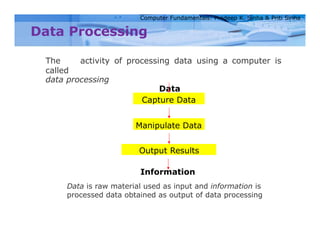
The activity of processing data using a computer is
called
data processing
Data
Capture Data
Manipulate Data
Output Results
Information
Data is raw material used as input and information is
processed data obtained as output of data processing
Computer Fundamentals: Pradeep K. Sinha & Priti Sinha
Characteristics of Computers
1) Automatic: Given a job, computer can work on it
automatically without human interventions
2) Speed: Computer can perform data processing jobs very fast,
usually measured in microseconds (10-6), nanoseconds (10-9),
and picoseconds (10-12)
3) Accuracy: Accuracy of a computer is consistently high and the
degree of its accuracy depends upon its design. Computer errors
caused due to incorrect input data or unreliable programs are
often referred to as Garbage–In–Garbage–Out (GIGO).
Computer Fundamentals: Pradeep K. Sinha & Priti Sinha
Characteristics of Computers
(Continued from previous slide..)
4) Diligence: Computer is free from monotony, tiredness,
and lack of concentration. It can continuously work for
hours without creating any error and without grumbling
Computer Fundamentals: Pradeep K. Sinha & Priti Sinha
Characteristics of Computers
(Continued from previous slide..)
5) Versatility: Computer is capable of performing almost
any task, if the task can be reduced to a finite series of
logical steps
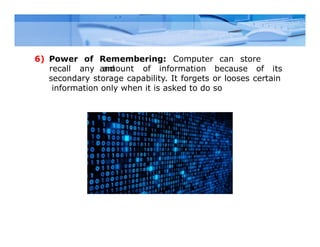
Remembering: Computer can store
and
6) Power of
recall any amount of information because of its
secondary storage capability. It forgets or looses certain
information only when it is asked to do so
Computer Fundamentals: Pradeep K. Sinha & Priti Sinha
Characteristics of Computers
(Continued from previous slide..)
7) No I.Q.: A computer does only what it is programmed
to do. It cannot take its own decision in this regard
Computer Fundamentals: Pradeep K. Sinha & Priti Sinha
Characteristics of Computers
(Continued from previous slide..)
8) No Feelings: Computers are devoid of emotions. Their
judgement is based on the instructions given to them in
the form of programs that are written by us (human
beings)
Computer Fundamentals: Pradeep K. Sinha & Priti Sinha
Evolution of Computers
 Blaise Pascal invented the first mechanical adding
machine in 1642
 Baron Gottfried Wilhelm von Leibniz invented the
first
calculator for multiplication in 1671
 Keyboard machines originated in the United States
around 1880
 Around 1880, Herman Hollerith came up with the concept
of punched cards that were extensively used as input
media until late 1970s
Computer Fundamentals: Pradeep K. Sinha & Priti Sinha
Evolution of Computers
(Continued from previous slide..)
 Charles Babbage is considered to be the
father of modern digital computers
 He designed “Difference Engine” in 1822
 He designed a fully automatic analytical engine in
1842 for performing basic arithmetic functions
 His efforts established a number of principles that
are fundamental to the design of any digital
computer
The Mark I Computer (1937-44)
Some Well Known Early Computers
The Atanasoff-Berry Computer (1939-42)
Some Well Known Early Computers
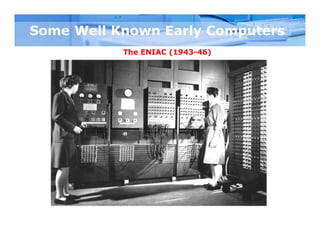
The ENIAC (1943-46)
Computer Fundamentals: Pradeep K. Sinha & Priti Sinha
Some Well Known Early Computers
The EDVAC (1946-52)
Computer Fundamentals: Pradeep K. Sinha & Priti Sinha
Some Well Known Early Computers
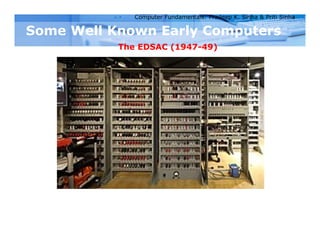
The EDSAC (1947-49)
Computer Fundamentals: Pradeep K. Sinha & Priti Sinha
Some Well Known Early Computers
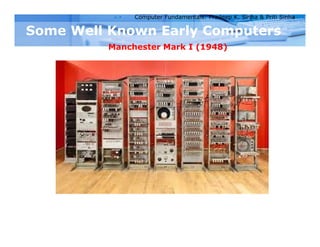
Manchester Mark I (1948)
Computer Fundamentals: Pradeep K. Sinha & Priti Sinha
Some Well Known Early Computers
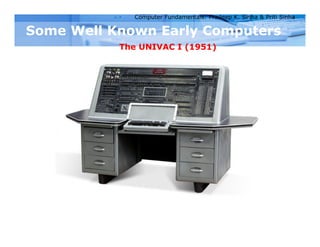
The UNIVAC I (1951)
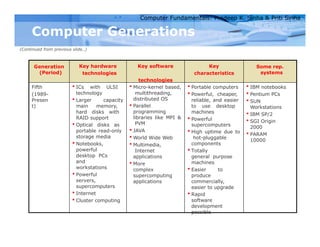
Computer Generations
 “Generation” in computer talk is a step in technology. It
provides a framework for the growth of computer industry
 Originally it was used to distinguish between various
hardware technologies, but now it has been extended to
include both hardware and software
 Till today, there are five computer generations
Computer Fundamentals: Pradeep K. Sinha & Priti Sinha
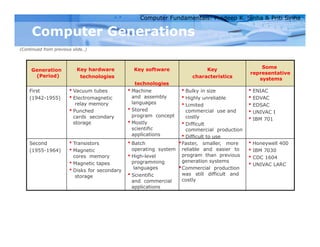
Computer Generations
(Continued from previous slide..)
Generation
(Period)
Key hardware
technologies
Key software
technologies
Key
characteristics
Some
representative
systems
First
(1942-1955)
 Vacuum tubes
 Electromagnetic
relay memory
 Punched
cards secondary
storage
 Machine
and assembly
languages
 Stored
program concept
 Mostly
scientific
applications
 Bulky in size
 Highly unreliable
 Limited
commercial use and
costly
 Difficult
commercial production
 Difficult to use
 ENIAC
 EDVAC
 EDSAC
 UNIVAC I
 IBM 701
Second
(1955-1964)
 Transistors
 Magnetic
cores memory
 Magnetic tapes
 Disks for secondary
storage
 Batch
operating system
 High-level
programming
languages
 Scientific
and commercial
applications
Faster, smaller, more
reliable and easier to
program than previous
generation systems
Commercial production
was still difficult and
costly
 Honeywell 400
 IBM 7030
 CDC 1604
 UNIVAC LARC
Computer Fundamentals: Pradeep K. Sinha & Priti Sinha
Computer Generations
(Continued from previous slide..)
Generation
(Period)
Key hardware
technologies
Key software
technologies
Key
characteristics
Some rep.
systems
Third
(1964-1975)
 ICs with SSI and
MSI
technologies
 Larger magnetic
cores memory
 Larger capacity
disks and
magnetic tapes
secondary
storage
 Minicomputers;
upward
compatible family
of computers
 Timesharing
operating
system
 Standardization
of high-level
programming
languages
 Unbundling of
software
from
hardware
 Faster, smaller, more
reliable, easier and
cheaper to produce
 Commercially, easier
to use, and easier
to upgrade than
previous generation
systems
 Scientific, commercial
and interactive on-
line applications
 IBM 360/370
 PDP-8
 PDP-11
 CDC 6600
Computer Fundamentals: Pradeep K. Sinha & Priti Sinha
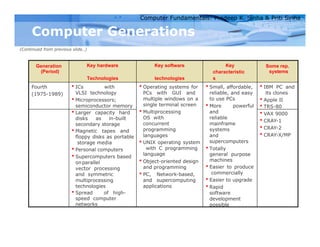
Computer Generations
(Continued from previous slide..)
Generation
(Period)
Key hardware
Technologies
Key software
technologies
Key
characteristic
s
Some rep.
systems
Fourth
(1975-1989)
 ICs with
VLSI technology
 Microprocessors;
semiconductor memory
 Operating systems for
PCs with GUI and
multiple windows on a
single terminal screen
 Multiprocessing
OS with
concurrent
programming
languages
 UNIX operating system
with C programming
language
 Object-oriented design
and programming
 PC, Network-based,
and supercomputing
applications
 Small, affordable,
reliable, and easy
to use PCs
 More powerful
and
reliable
mainframe
systems
and
supercomputers
 Totally
general purpose
machines
 Easier to produce
commercially
 Easier to upgrade
 Rapid
software
development
possible
 IBM PC and
its clones
 Apple II
 TRS-80
 Larger capacity hard
disks as in-built
secondary storage
 Magnetic tapes and
floppy disks as portable
storage media
 VAX 9000
 CRAY-1
 CRAY-2
 CRAY-X/MP
 Personal computers
 Supercomputers based
onparallel
vector processing
and symmetric
multiprocessing
technologies
 Spread of high-
speed computer
networks
Computer Fundamentals: Pradeep K. Sinha & Priti Sinha
Computer Generations
(Continued from previous slide..)
Generation
(Period)
Key hardware
technologies
Key software
technologies
Key
characteristics
Some rep.
systems
Fifth
(1989-
Presen
t)
 ICs with ULSI
technology
 Larger capacity
main memory,
hard disks with
RAID support
 Optical disks as
portable read-only
storage media
 Notebooks,
powerful
desktop PCs
and
workstations
 Powerful
servers,
supercomputers
 Internet
 Cluster computing
 Micro-kernel based,
multithreading,
distributed OS
 Parallel
programming
libraries like MPI &
PVM
 JAVA
 World Wide Web
 Multimedia,
Internet
applications
 More
complex
supercomputing
applications
 Portable computers
 Powerful, cheaper,
reliable, and easier
to use desktop
machines
 Powerful
supercomputers
 High uptime due to
hot-pluggable
components
 Totally
general purpose
machines
 Easier to
produce
commercially,
easier to upgrade
 Rapid
software
development
possible
 IBM notebooks
 Pentium PCs
 SUN
Workstations
 IBM SP/2
 SGI Origin
2000
 PARAM
10000
Computer Fundamentals: Pradeep K. Sinha & Priti Sinha
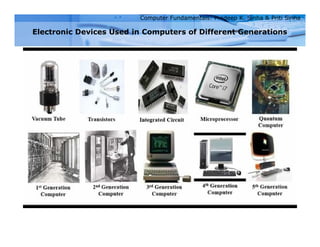
Electronic Devices Used in Computers of Different Generations
(c) An IC Chip
(b) A Transistor
(a) A Vacuum Tube
Computer Fundamentals: Pradeep K. Sinha & Priti Sinha
Key Words/Phrases
 Computer
 Computer generations
 Computer Supported Cooperative
Working (CSCW)
 Data
 Data processing
 Data processor
 First-generation computers
 Fourth-generation computers
 Garbage-in-garbage-out (GIGO)
 Graphical User Interface (GUI)
 Groupware
 Information
 Integrated Circuit (IC)
 Large Scale Integration (VLSI)
 Medium Scale Integration (MSI)
 Microprocessor
 Personal Computer (PC)
 Second-generation computers
 Small Scale Integration (SSI)
 Stored program concept
 Third-generation computers
 Transistor
 Ultra Large Scale Integration
(ULSI)
 Vacuum tubes

Chapter 1 Introduction to Computers.pptx

  • 2.
    Computer Fundamentals: PradeepK. Sinha & Priti Sinha Learning Objectives In this chapter you will learn about:  Computer  Data processing  Characteristic features of computers  Computers’ evolution to their present form  Computer generations  Characteristic features of each computer generation
  • 3.
    Computer Fundamentals: PradeepK. Sinha & Priti Sinha  The word computer comes from the word “compute”, which means, “to calculate”  Thereby, a computer is an electronic device that can perform arithmetic operations at high speed  A computer is also called a data processor because it can store, process, and retrieve data whenever desired Computer
  • 4.
    Computer Fundamentals: PradeepK. Sinha & Priti Sinha Data Processing The activity of processing data using a computer is called data processing Data Capture Data Manipulate Data Output Results Information Data is raw material used as input and information is processed data obtained as output of data processing
  • 5.
    Computer Fundamentals: PradeepK. Sinha & Priti Sinha Characteristics of Computers 1) Automatic: Given a job, computer can work on it automatically without human interventions
  • 6.
    2) Speed: Computercan perform data processing jobs very fast, usually measured in microseconds (10-6), nanoseconds (10-9), and picoseconds (10-12)
  • 7.
    3) Accuracy: Accuracyof a computer is consistently high and the degree of its accuracy depends upon its design. Computer errors caused due to incorrect input data or unreliable programs are often referred to as Garbage–In–Garbage–Out (GIGO).
  • 8.
    Computer Fundamentals: PradeepK. Sinha & Priti Sinha Characteristics of Computers (Continued from previous slide..) 4) Diligence: Computer is free from monotony, tiredness, and lack of concentration. It can continuously work for hours without creating any error and without grumbling
  • 9.
    Computer Fundamentals: PradeepK. Sinha & Priti Sinha Characteristics of Computers (Continued from previous slide..) 5) Versatility: Computer is capable of performing almost any task, if the task can be reduced to a finite series of logical steps
  • 10.
    Remembering: Computer canstore and 6) Power of recall any amount of information because of its secondary storage capability. It forgets or looses certain information only when it is asked to do so
  • 11.
    Computer Fundamentals: PradeepK. Sinha & Priti Sinha Characteristics of Computers (Continued from previous slide..) 7) No I.Q.: A computer does only what it is programmed to do. It cannot take its own decision in this regard
  • 12.
    Computer Fundamentals: PradeepK. Sinha & Priti Sinha Characteristics of Computers (Continued from previous slide..) 8) No Feelings: Computers are devoid of emotions. Their judgement is based on the instructions given to them in the form of programs that are written by us (human beings)
  • 13.
    Computer Fundamentals: PradeepK. Sinha & Priti Sinha Evolution of Computers  Blaise Pascal invented the first mechanical adding machine in 1642  Baron Gottfried Wilhelm von Leibniz invented the first calculator for multiplication in 1671  Keyboard machines originated in the United States around 1880  Around 1880, Herman Hollerith came up with the concept of punched cards that were extensively used as input media until late 1970s
  • 14.
    Computer Fundamentals: PradeepK. Sinha & Priti Sinha Evolution of Computers (Continued from previous slide..)  Charles Babbage is considered to be the father of modern digital computers  He designed “Difference Engine” in 1822  He designed a fully automatic analytical engine in 1842 for performing basic arithmetic functions  His efforts established a number of principles that are fundamental to the design of any digital computer
  • 15.
    The Mark IComputer (1937-44) Some Well Known Early Computers
  • 16.
    Some Well KnownEarly Computers The Atanasoff-Berry Computer (1939-42)
  • 17.
    Some Well KnownEarly Computers The ENIAC (1943-46)
  • 18.
    Computer Fundamentals: PradeepK. Sinha & Priti Sinha Some Well Known Early Computers The EDVAC (1946-52)
  • 19.
    Computer Fundamentals: PradeepK. Sinha & Priti Sinha Some Well Known Early Computers The EDSAC (1947-49)
  • 20.
    Computer Fundamentals: PradeepK. Sinha & Priti Sinha Some Well Known Early Computers Manchester Mark I (1948)
  • 21.
    Computer Fundamentals: PradeepK. Sinha & Priti Sinha Some Well Known Early Computers The UNIVAC I (1951)
  • 22.
    Computer Generations  “Generation”in computer talk is a step in technology. It provides a framework for the growth of computer industry  Originally it was used to distinguish between various hardware technologies, but now it has been extended to include both hardware and software  Till today, there are five computer generations
  • 23.
    Computer Fundamentals: PradeepK. Sinha & Priti Sinha Computer Generations (Continued from previous slide..) Generation (Period) Key hardware technologies Key software technologies Key characteristics Some representative systems First (1942-1955)  Vacuum tubes  Electromagnetic relay memory  Punched cards secondary storage  Machine and assembly languages  Stored program concept  Mostly scientific applications  Bulky in size  Highly unreliable  Limited commercial use and costly  Difficult commercial production  Difficult to use  ENIAC  EDVAC  EDSAC  UNIVAC I  IBM 701 Second (1955-1964)  Transistors  Magnetic cores memory  Magnetic tapes  Disks for secondary storage  Batch operating system  High-level programming languages  Scientific and commercial applications Faster, smaller, more reliable and easier to program than previous generation systems Commercial production was still difficult and costly  Honeywell 400  IBM 7030  CDC 1604  UNIVAC LARC
  • 24.
    Computer Fundamentals: PradeepK. Sinha & Priti Sinha Computer Generations (Continued from previous slide..) Generation (Period) Key hardware technologies Key software technologies Key characteristics Some rep. systems Third (1964-1975)  ICs with SSI and MSI technologies  Larger magnetic cores memory  Larger capacity disks and magnetic tapes secondary storage  Minicomputers; upward compatible family of computers  Timesharing operating system  Standardization of high-level programming languages  Unbundling of software from hardware  Faster, smaller, more reliable, easier and cheaper to produce  Commercially, easier to use, and easier to upgrade than previous generation systems  Scientific, commercial and interactive on- line applications  IBM 360/370  PDP-8  PDP-11  CDC 6600
  • 25.
    Computer Fundamentals: PradeepK. Sinha & Priti Sinha Computer Generations (Continued from previous slide..) Generation (Period) Key hardware Technologies Key software technologies Key characteristic s Some rep. systems Fourth (1975-1989)  ICs with VLSI technology  Microprocessors; semiconductor memory  Operating systems for PCs with GUI and multiple windows on a single terminal screen  Multiprocessing OS with concurrent programming languages  UNIX operating system with C programming language  Object-oriented design and programming  PC, Network-based, and supercomputing applications  Small, affordable, reliable, and easy to use PCs  More powerful and reliable mainframe systems and supercomputers  Totally general purpose machines  Easier to produce commercially  Easier to upgrade  Rapid software development possible  IBM PC and its clones  Apple II  TRS-80  Larger capacity hard disks as in-built secondary storage  Magnetic tapes and floppy disks as portable storage media  VAX 9000  CRAY-1  CRAY-2  CRAY-X/MP  Personal computers  Supercomputers based onparallel vector processing and symmetric multiprocessing technologies  Spread of high- speed computer networks
  • 26.
    Computer Fundamentals: PradeepK. Sinha & Priti Sinha Computer Generations (Continued from previous slide..) Generation (Period) Key hardware technologies Key software technologies Key characteristics Some rep. systems Fifth (1989- Presen t)  ICs with ULSI technology  Larger capacity main memory, hard disks with RAID support  Optical disks as portable read-only storage media  Notebooks, powerful desktop PCs and workstations  Powerful servers, supercomputers  Internet  Cluster computing  Micro-kernel based, multithreading, distributed OS  Parallel programming libraries like MPI & PVM  JAVA  World Wide Web  Multimedia, Internet applications  More complex supercomputing applications  Portable computers  Powerful, cheaper, reliable, and easier to use desktop machines  Powerful supercomputers  High uptime due to hot-pluggable components  Totally general purpose machines  Easier to produce commercially, easier to upgrade  Rapid software development possible  IBM notebooks  Pentium PCs  SUN Workstations  IBM SP/2  SGI Origin 2000  PARAM 10000
  • 27.
    Computer Fundamentals: PradeepK. Sinha & Priti Sinha Electronic Devices Used in Computers of Different Generations (c) An IC Chip (b) A Transistor (a) A Vacuum Tube
  • 28.
    Computer Fundamentals: PradeepK. Sinha & Priti Sinha Key Words/Phrases  Computer  Computer generations  Computer Supported Cooperative Working (CSCW)  Data  Data processing  Data processor  First-generation computers  Fourth-generation computers  Garbage-in-garbage-out (GIGO)  Graphical User Interface (GUI)  Groupware  Information  Integrated Circuit (IC)  Large Scale Integration (VLSI)  Medium Scale Integration (MSI)  Microprocessor  Personal Computer (PC)  Second-generation computers  Small Scale Integration (SSI)  Stored program concept  Third-generation computers  Transistor  Ultra Large Scale Integration (ULSI)  Vacuum tubes