Chapter 6
Arrays
Introduction to Arrays
• An array is a data structure used to process a
collection of data that is all of the same type
– An array behaves like a numbered list of variables with a
uniform naming mechanism
– It has a part that does not change: the name of the array
– It has a part that can change: an integer in square brackets
– For example, given five scores:
score[0], score[1], score[2], score[3], score[4]

Copyright © 2012 Pearson Addison-Wesley. All rights reserved.

6-2
Creating and Accessing Arrays
• An array that behaves like this collection of variables, all of
type double, can be created using one statement as follows:
double[] score = new double[5];

• Or using two statements:
double[] score;
score = new double[5];
– The first statement declares the variable score to be of the array
type double[]
– The second statement creates an array with five numbered variables
of type double and makes the variable score a name for the array

Copyright © 2012 Pearson Addison-Wesley. All rights reserved.

6-3
Creating and Accessing Arrays
• The individual variables that together make up the
array are called indexed variables
– They can also be called subscripted variables or elements
of the array
– The number in square brackets is called an index or
subscript
– In Java, indices must be numbered starting with 0, and
nothing else
score[0], score[1], score[2], score[3], score[4]

Copyright © 2012 Pearson Addison-Wesley. All rights reserved.

6-4
Creating and Accessing Arrays
• The number of indexed variables in an array is called
the length or size of the array
• When an array is created, the length of the array is
given in square brackets after the array type
• The indexed variables are then numbered starting
with 0, and ending with the integer that is one less
than the length of the array
score[0], score[1], score[2], score[3], score[4]

Copyright © 2012 Pearson Addison-Wesley. All rights reserved.

6-5
Creating and Accessing Arrays
double[] score = new double[5];

• A variable may be used in place of the integer (i.e., in place of
the integer 5 above)
– The value of this variable can then be read from the keyboard
– This enables the size of the array to be determined when the program
is run
double[] score = new double[count];

• An array can have indexed variables of any type, including any
class type
• All of the indexed variables in a single array must be of the
same type, called the base type of the array

Copyright © 2012 Pearson Addison-Wesley. All rights reserved.

6-6
Declaring and Creating an Array
• An array is declared and created in almost the same
way that objects are declared and created:
BaseType[] ArrayName = new BaseType[size];

– The size may be given as an expression that evaluates
to a nonnegative integer, for example, an int variable
char[] line = new char[80];
double[] reading = new double[count];
Person[] specimen = new Person[100];

Copyright © 2012 Pearson Addison-Wesley. All rights reserved.

6-7
Referring to Arrays and Array Elements
• Each array element can be used just like any other single
variable by referring to it using an indexed expression:
score[0]
• The array itself (i.e., the entire collection of indexed variables)
can be referred to using the array name (without any square
brackets): score
• An array index can be computed when a program is run
– It may be represented by a variable: score[index]
– It may be represented by an expression that evaluates to a suitable
integer: score[next + 1]

Copyright © 2012 Pearson Addison-Wesley. All rights reserved.

6-8
Using the score Array in a Program
• The for loop is ideally suited for performing array
manipulations:
for (index = 0; index < 5; index++)
System.out.println(score[index] +
" differs from max by " +
(max-score[index]) );

Copyright © 2012 Pearson Addison-Wesley. All rights reserved.

6-9
Three Ways to Use Square Brackets [] with an
Array Name
• Square brackets can be used to create a type name:
double[] score;

• Square brackets can be used with an integer value as
part of the special syntax Java uses to create a new
array:
score = new double[5];

• Square brackets can be used to name an indexed
variable of an array:
max = score[0];

Copyright © 2012 Pearson Addison-Wesley. All rights reserved.

6-10
The length Instance Variable
• An array is considered to be an object
• Since other objects can have instance variables, so can
arrays
• Every array has exactly one instance variable named
length
– When an array is created, the instance variable length is
automatically set equal to its size
– The value of length cannot be changed (other than by
creating an entirely new array with new)
double[] score = new double[5];
– Given score above, score.length has a value of 5

Copyright © 2012 Pearson Addison-Wesley. All rights reserved.

6-11
Pitfall: Array Index Out of Bounds
• Array indices always start with 0, and always end with
the integer that is one less than the size of the array
– The most common programming error made when using arrays
is attempting to use a nonexistent array index

• When an index expression evaluates to some value
other than those allowed by the array declaration, the
index is said to be out of bounds
– An out of bounds index will cause a program to terminate with
a run-time error message
– Array indices get out of bounds most commonly at the first or
last iteration of a loop that processes the array: Be sure to test
for this!

Copyright © 2012 Pearson Addison-Wesley. All rights reserved.

6-12
Initializing Arrays
• An array can be initialized when it is declared
– Values for the indexed variables are enclosed in braces,
and separated by commas
– The array size is automatically set to the number of values
in the braces
int[] age = {2, 12, 1};

– Given age above, age.length has a value of 3

Copyright © 2012 Pearson Addison-Wesley. All rights reserved.

6-13
Initializing Arrays
• Another way of initializing an array is by using a for loop
double[] reading = new double[100];
int index;
for (index = 0;
index < reading.length; index++)
reading[index] = 42.0;

• If the elements of an array are not initialized explicitly, they
will automatically be initialized to the default value for their
base type

Copyright © 2012 Pearson Addison-Wesley. All rights reserved.

6-14
Pitfall: An Array of Characters Is Not a String
• An array of characters is conceptually a list of
characters, and so is conceptually like a string
• However, an array of characters is not an object
of the class String
char[] a = {'A', 'B', 'C'};
String s = a; //Illegal!

• An array of characters can be converted to an
object of type String, however

Copyright © 2012 Pearson Addison-Wesley. All rights reserved.

6-15
Pitfall: An Array of Characters Is Not a String
• The class String has a constructor that has a single
parameter of type char[]
String s = new String(a);
– The object s will have the same sequence of characters as
the entire array a ("ABC"), but is an independent copy

• Another String constructor uses a subrange of a
character array instead
String s2 = new String(a,0,2);
– Given a as before, the new string object is "AB"

Copyright © 2012 Pearson Addison-Wesley. All rights reserved.

6-16
Pitfall: An Array of Characters Is Not a String

• An array of characters does have some things
in common with String objects
– For example, an array of characters can be output
using println
System.out.println(a);

– Given a as before, this would produce the output
ABC

Copyright © 2012 Pearson Addison-Wesley. All rights reserved.

6-17
Arrays and References
• Like class types, a variable of an array type
holds a reference
– Arrays are objects
– A variable of an array type holds the address of
where the array object is stored in memory
– Array types are (usually) considered to be class
types

Copyright © 2012 Pearson Addison-Wesley. All rights reserved.

6-18
Arrays are Objects
• An array can be viewed as a collection of indexed variables
• An array can also be viewed as a single item whose value is a
collection of values of a base type
– An array variable names the array as a single item
double[] a;
– A new expression creates an array object and stores the object in
memory
new double[10]
– An assignment statement places a reference to the memory address of
an array object in the array variable
a = new double[10];

Copyright © 2012 Pearson Addison-Wesley. All rights reserved.

6-19
Arrays Are Objects
• The previous steps can be combined into one statement
double[] a = new double[10];

• Note that the new expression that creates an array
invokes a constructor that uses a nonstandard syntax
• Not also that as a result of the assignment statement
above, a contains a single value: a memory address or
reference
• Since an array is a reference type, the behavior of arrays
with respect to assignment (=), equality testing (==),
and parameter passing are the same as that described
for classes

Copyright © 2012 Pearson Addison-Wesley. All rights reserved.

6-20
Pitfall: Arrays with a Class Base Type
• The base type of an array can be a class type
Date[] holidayList = new Date[20];

• The above example creates 20 indexed variables of
type Date
– It does not create 20 objects of the class Date
– Each of these indexed variables are automatically
initialized to null
– Any attempt to reference any them at this point would
result in a "null pointer exception" error message

Copyright © 2012 Pearson Addison-Wesley. All rights reserved.

6-21
Pitfall: Arrays with a Class Base Type
• Like any other object, each of the indexed variables requires a
separate invocation of a constructor using new (singly, or
perhaps using a for loop) to create an object to reference
holidayList[0] = new Date();
. . .
holidayList[19] = new Date();
OR
for (int i = 0; i < holidayList.length; i++)
holidayList[i] = new Date();

• Each of the indexed variables can now be referenced since
each holds the memory address of a Date object

Copyright © 2012 Pearson Addison-Wesley. All rights reserved.

6-22
Array Parameters
• Both array indexed variables and entire arrays
can be used as arguments to methods
– An indexed variable can be an argument to a
method in exactly the same way that any variable
of the array base type can be an argument

Copyright © 2012 Pearson Addison-Wesley. All rights reserved.

6-23
Array Parameters
double n = 0.0;
double[] a = new double[10];//all elements
//are initialized to 0.0
int i = 3;

• Given myMethod which takes one argument of type
double, then all of the following are legal:
myMethod(n);//n evaluates to 0.0
myMethod(a[3]);//a[3] evaluates to 0.0
myMethod(a[i]);//i evaluates to 3,
//a[3] evaluates to 0.0

Copyright © 2012 Pearson Addison-Wesley. All rights reserved.

6-24
Array Parameters
• An argument to a method may be an entire array
• Array arguments behave like objects of a class
– Therefore, a method can change the values stored in the
indexed variables of an array argument

• A method with an array parameter must specify the
base type of the array only
BaseType[]
– It does not specify the length of the array

Copyright © 2012 Pearson Addison-Wesley. All rights reserved.

6-25
Array Parameters
• The following method, doubleElements, specifies an
array of double as its single argument:
public class SampleClass
{
public static void doubleElements(double[] a)
{
int i;
for (i = 0; i < a.length; i++)
a[i] = a[i]*2;
. . .
}
. . .
}

Copyright © 2012 Pearson Addison-Wesley. All rights reserved.

6-26
Array Parameters
• Arrays of double may be defined as follows:
double[] a = new double[10];
double[] b = new double[30];

• Given the arrays above, the method doubleElements
from class SampleClass can be invoked as follows:
SampleClass.doubleElements(a);
SampleClass.doubleElements(b);
– Note that no square brackets are used when an entire array is
given as an argument
– Note also that a method that specifies an array for a parameter
can take an array of any length as an argument

Copyright © 2012 Pearson Addison-Wesley. All rights reserved.

6-27
Pitfall: Use of = and == with Arrays
• Because an array variable contains the memory
address of the array it names, the assignment
operator (=) only copies this memory address
– It does not copy the values of each indexed variable
– Using the assignment operator will make two array
variables be different names for the same array
b = a;

– The memory address in a is now the same as the
memory address in b: They reference the same array

Copyright © 2012 Pearson Addison-Wesley. All rights reserved.

6-28
Pitfall: Use of = and == with Arrays
• A for loop is usually used to make two
different arrays have the same values in each
indexed position:
int i;
for (i = 0;
(i < a.length)
b[i] = a[i];

&& (i < b.length); i++)

– Note that the above code will not make b an exact
copy of a, unless a and b have the same length

Copyright © 2012 Pearson Addison-Wesley. All rights reserved.

6-29
Pitfall: Use of = and == with Arrays
• For the same reason, the equality operator (==)
only tests two arrays to see if they are stored in
the same location in the computer's memory
– It does not test two arrays to see if they contain the
same values
(a == b)

– The result of the above boolean expression will be
true if a and b share the same memory address
(and, therefore, reference the same array), and
false otherwise

Copyright © 2012 Pearson Addison-Wesley. All rights reserved.

6-30
Pitfall: Use of = and == with Arrays
• In the same way that an equals method
can be defined for a class, an
equalsArray method can be defined
for a type of array
– This is how two arrays must be tested to see
if they contain the same elements
– The following method tests two integer
arrays to see if they contain the same integer
values

Copyright © 2012 Pearson Addison-Wesley. All rights reserved.

6-31
Pitfall: Use of = and == with Arrays
public static boolean equalsArray(int[] a, int[] b)
{
if (a.length != b.length) return false;
else
{
int i = 0;
while (i < a.length)
{
if (a[i] != b[i])
return false;
i++;
}
}
return true;
}

Copyright © 2012 Pearson Addison-Wesley. All rights reserved.

6-32
Arguments for the Method main
• The heading for the main method of a program has
a parameter for an array of String
– It is usually called args by convention
public static void main(String[] args)

– Note that since args is a parameter, it could be replaced
by any other non-keyword identifier

• If a Java program is run without giving an argument
to main, then a default empty array of strings is
automatically provided

Copyright © 2012 Pearson Addison-Wesley. All rights reserved.

6-33
Arguments for the Method main
• Here is a program that expects three string
arguments:
public class SomeProgram
{
public static void main(String[] args)
{
System.out.println(args[0] + " " +
args[2] + args[1]);
}
}

• Note that if it needed numbers, it would have to
convert them from strings first

Copyright © 2012 Pearson Addison-Wesley. All rights reserved.

6-34
Arguments for the Method main
• If a program requires that the main method be
provided an array of strings argument, each element
must be provided from the command line when the
program is run
java SomeProgram Hi ! there
– This will set args[0] to "Hi", args[1] to "!", and
args[2] to "there"
– It will also set args.length to 3

• When SomeProgram is run as shown, its output
will be:
Hi there!

Copyright © 2012 Pearson Addison-Wesley. All rights reserved.

6-35
Methods That Return an Array
• In Java, a method may also return an array
– The return type is specified in the same way that an array
parameter is specified
public static int[]
incrementArray(int[] a, int increment)
{
int[] temp = new int[a.length];
int i;
for (i = 0; i < a.length; i++)
temp[i] = a[i] + increment;
return temp;
}

Copyright © 2012 Pearson Addison-Wesley. All rights reserved.

6-36
Partially Filled Arrays
• The exact size needed for an array is not always
known when a program is written, or it may vary
from one run of the program to another
• A common way to handle this is to declare the array
to be of the largest size that the program could
possibly need
• Care must then be taken to keep track of how much
of the array is actually used
– An indexed variable that has not been given a meaningful
value must never be referenced

Copyright © 2012 Pearson Addison-Wesley. All rights reserved.

6-37
Partially Filled Arrays
• A variable can be used to keep track of how
many elements are currently stored in an array
– For example, given the variable count, the elements
of the array someArray will range from positions
someArray[0] through someArray[count –
1]
– Note that the variable count will be used to process
the partially filled array instead of
someArray.length
– Note also that this variable (count) must be an
argument to any method that manipulates the
partially filled array

Copyright © 2012 Pearson Addison-Wesley. All rights reserved.

6-38
Accessor Methods Need Not Simply Return
Instance Variables

• When an instance variable names an array, it
is not always necessary to provide an accessor
method that returns the contents of the entire
array
• Instead, other accessor methods that return a
variety of information about the array and its
elements may be sufficient

Copyright © 2012 Pearson Addison-Wesley. All rights reserved.

6-39
The "for each" Loop
• The standard Java libraries include a number of collection
classes
– Classes whose objects store a collection of values

• Ordinary for loops cannot cycle through the elements in
a collection object
– Unlike array elements, collection object elements are not
normally associated with indices

• However, there is a new kind of for loop, first available
in Java 5.0, called a for-each loop or enhanced for loop
• This kind of loop can cycle through each element in a
collection even though the elements are not indexed

Copyright © 2012 Pearson Addison-Wesley. All rights reserved.

6-40
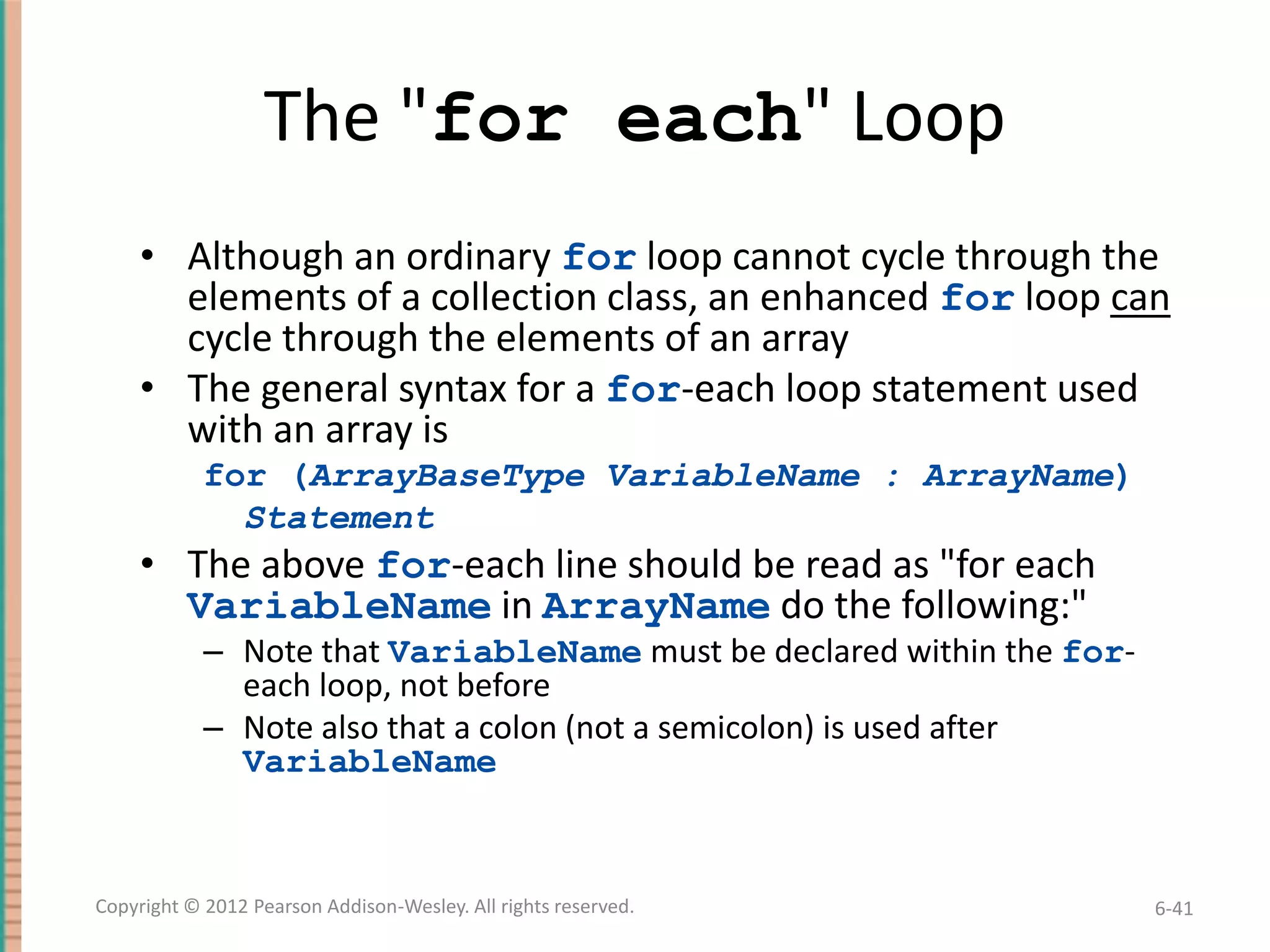
The "for each" Loop
• Although an ordinary for loop cannot cycle through the
elements of a collection class, an enhanced for loop can
cycle through the elements of an array
• The general syntax for a for-each loop statement used
with an array is
for (ArrayBaseType VariableName : ArrayName)
Statement

• The above for-each line should be read as "for each
VariableName in ArrayName do the following:"
– Note that VariableName must be declared within the foreach loop, not before
– Note also that a colon (not a semicolon) is used after
VariableName

Copyright © 2012 Pearson Addison-Wesley. All rights reserved.

6-41
The "For-Each" Loop
• The for-each loop can make code cleaner and less error
prone
• If the indexed variable in a for loop is used only as a way
to cycle through the elements, then it would be
preferable to change it to a for-each loop
– For example:
for (int i = 0; i < a.length; i++)
a[i] = 0.0;

– Can be changed to:
for (double element : a)
element = 0.0;

• Note that the for-each syntax is simpler and quite easy to
understand
Copyright © 2012 Pearson Addison-Wesley. All rights reserved.

6-42
Methods with a Variable Number of Parameters
• Starting with Java 5.0, methods can be defined that
take any number of arguments
• Essentially, it is implemented by taking in an array as
argument, but the job of placing values in the array is
done automatically
– The values for the array are given as arguments
– Java automatically creates an array and places the
arguments in the array
– Note that arguments corresponding to regular parameters
are handled in the usual way

Copyright © 2012 Pearson Addison-Wesley. All rights reserved.

6-43
Methods with a Variable Number of Parameters
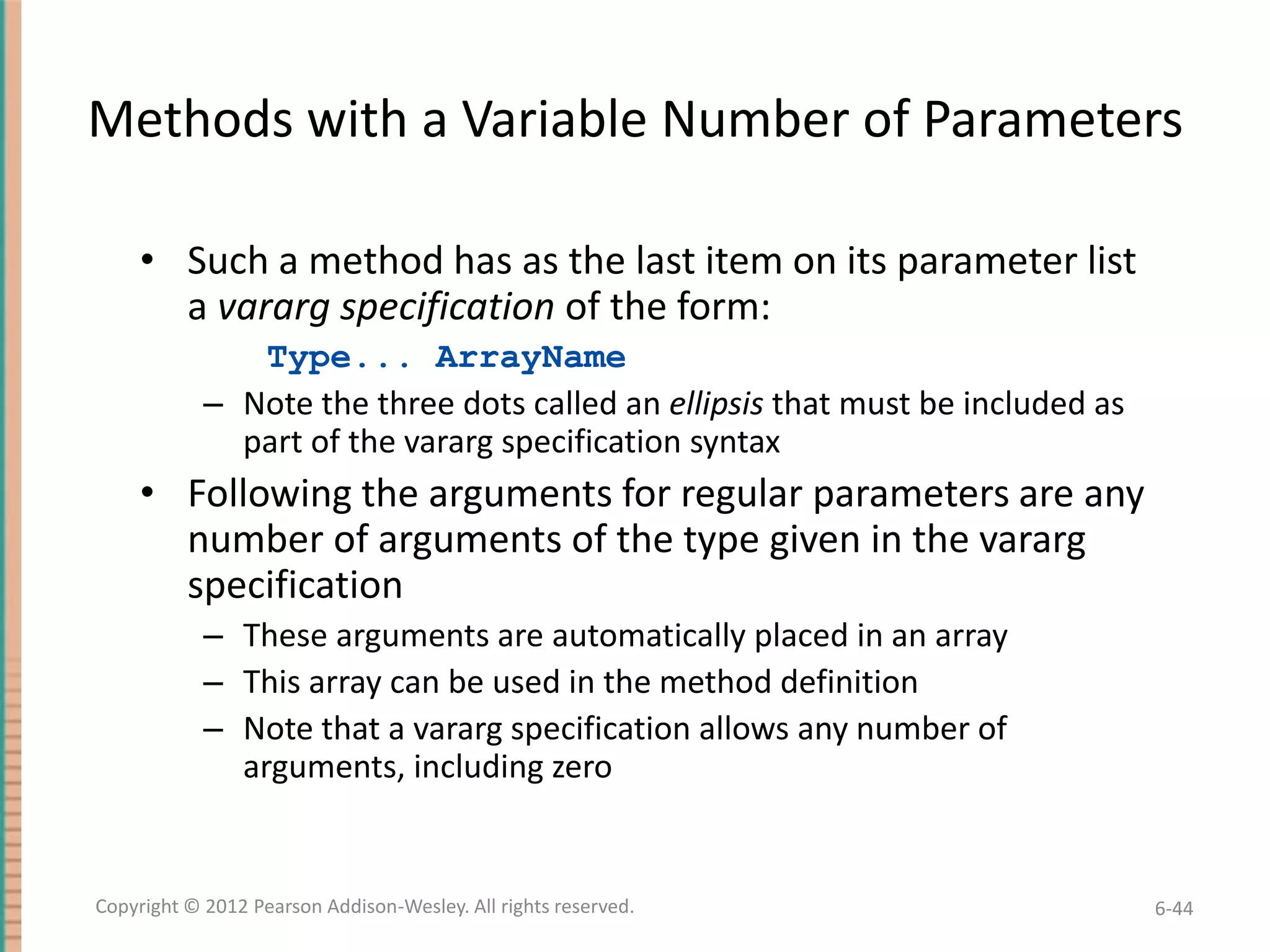
• Such a method has as the last item on its parameter list
a vararg specification of the form:
Type... ArrayName
– Note the three dots called an ellipsis that must be included as
part of the vararg specification syntax

• Following the arguments for regular parameters are any
number of arguments of the type given in the vararg
specification
– These arguments are automatically placed in an array
– This array can be used in the method definition
– Note that a vararg specification allows any number of
arguments, including zero

Copyright © 2012 Pearson Addison-Wesley. All rights reserved.

6-44
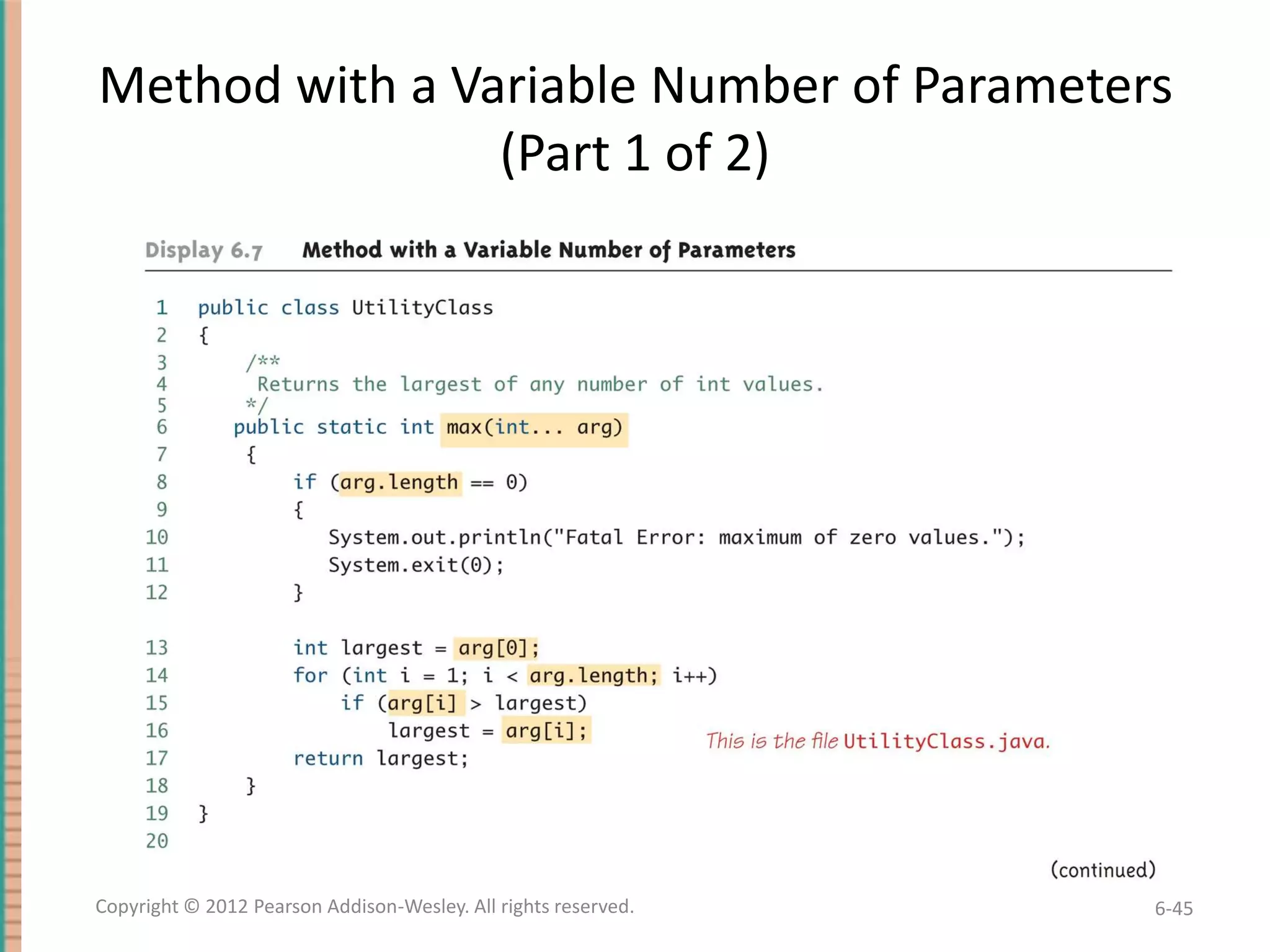
Method with a Variable Number of Parameters
(Part 1 of 2)

Copyright © 2012 Pearson Addison-Wesley. All rights reserved.

6-45
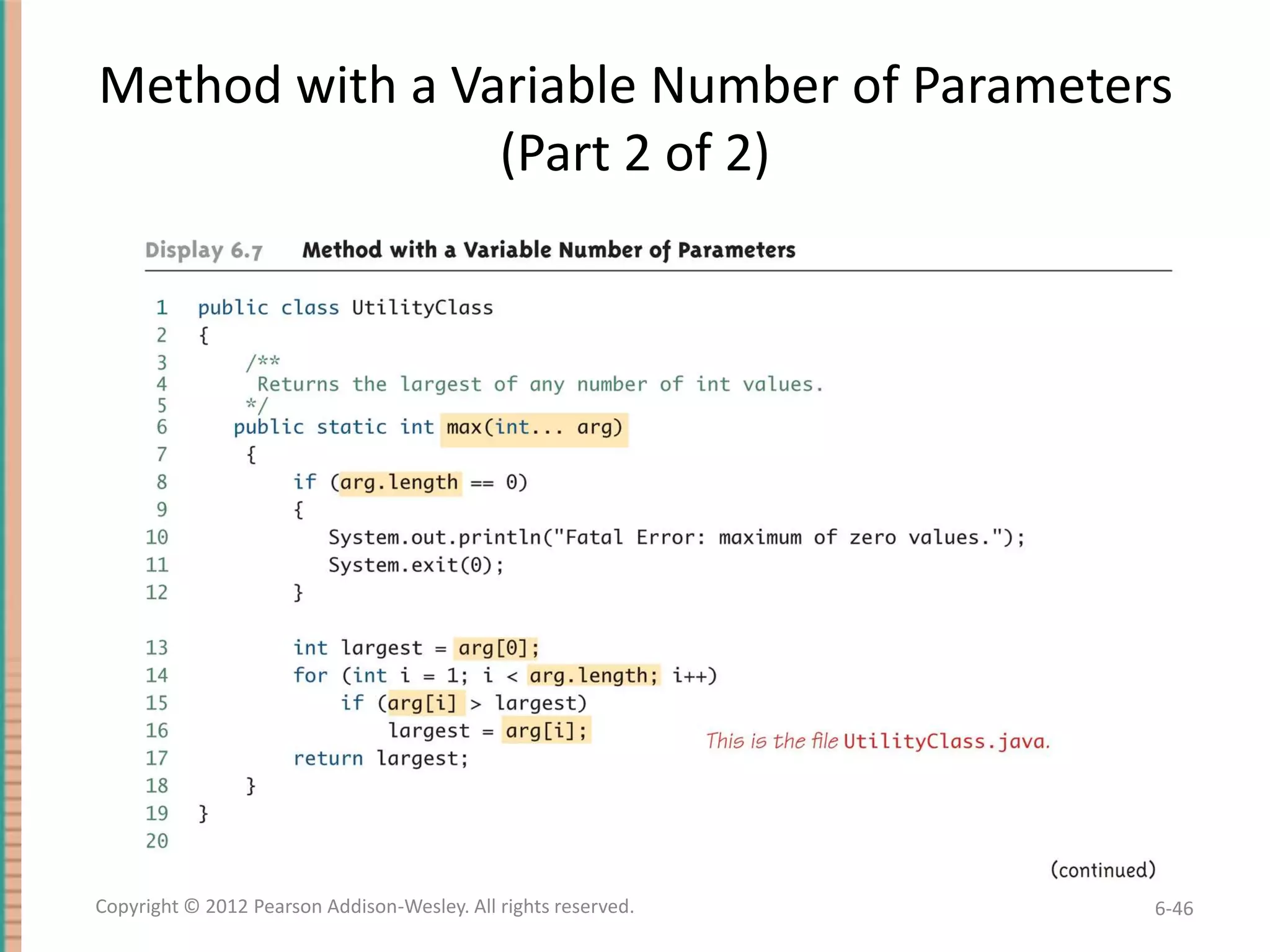
Method with a Variable Number of Parameters
(Part 2 of 2)

Copyright © 2012 Pearson Addison-Wesley. All rights reserved.

6-46
Privacy Leaks with Array Instance Variables
• If an accessor method does return the contents of an
array, special care must be taken
– Just as when an accessor returns a reference to any private
object
public double[] getArray()
{
return anArray;//BAD!
}
– The example above will result in a privacy leak

Copyright © 2012 Pearson Addison-Wesley. All rights reserved.

6-47
Privacy Leaks with Array Instance Variables
• The previous accessor method would simply return a
reference to the array anArray itself
• Instead, an accessor method should return a reference
to a deep copy of the private array object
– Below, both a and count are instance variables of the class
containing the getArray method
public double[] getArray()
{
double[] temp = new double[count];
for (int i = 0; i < count; i++)
temp[i] = a[i];
return temp
}

Copyright © 2012 Pearson Addison-Wesley. All rights reserved.

6-48
Privacy Leaks with Array Instance Variables
• If a private instance variable is an array that has a class as its
base type, then copies must be made of each class object in
the array when the array is copied:
public ClassType[] getArray()
{
ClassType[] temp = new ClassType[count];
for (int i = 0; i < count; i++)
temp[i] = new ClassType(someArray[i]);
return temp;
}

Copyright © 2012 Pearson Addison-Wesley. All rights reserved.

6-49
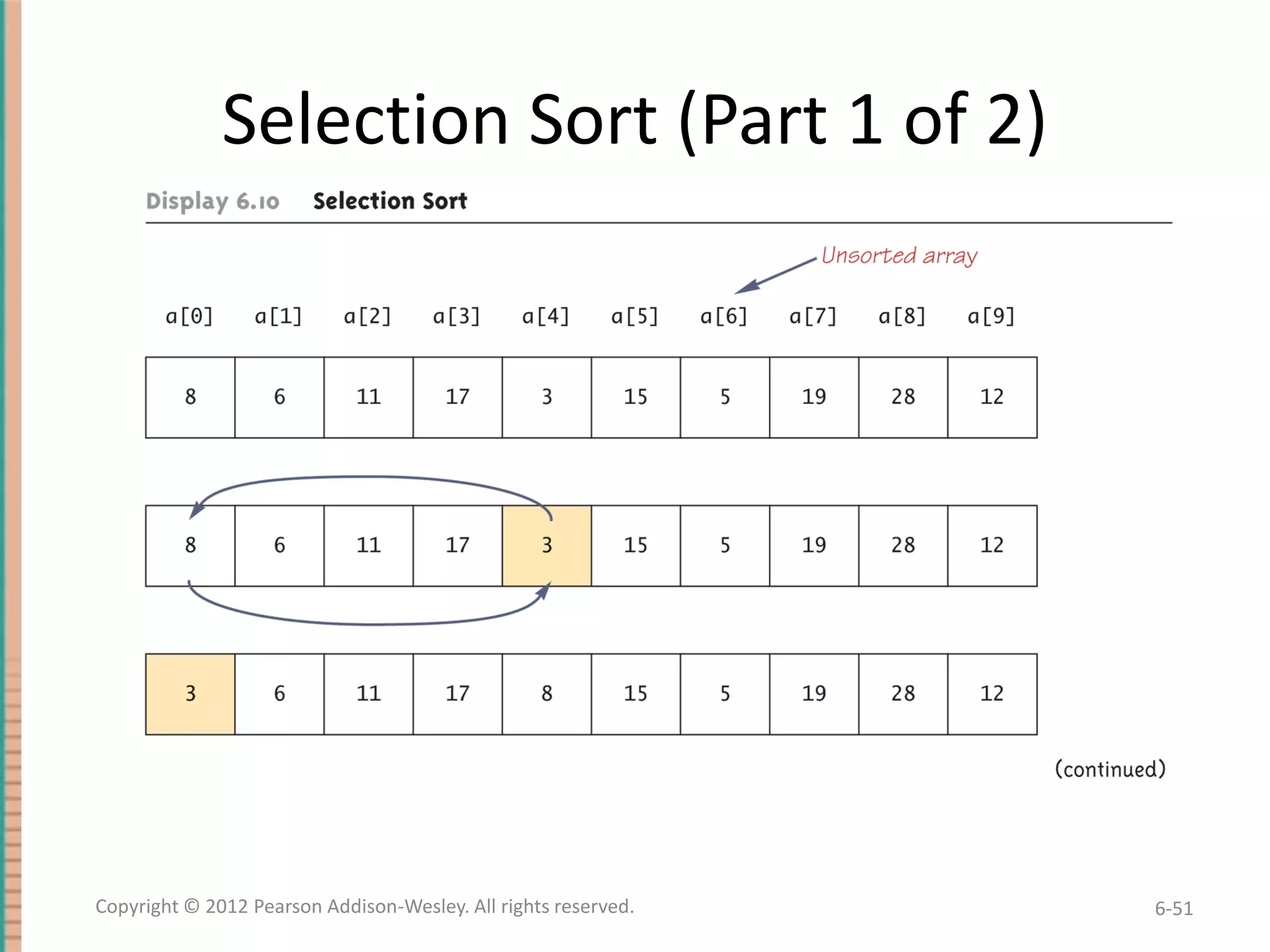
Sorting an Array
• A sort method takes in an array parameter a, and
rearranges the elements in a, so that after the
method call is finished, the elements of a are sorted
in ascending order
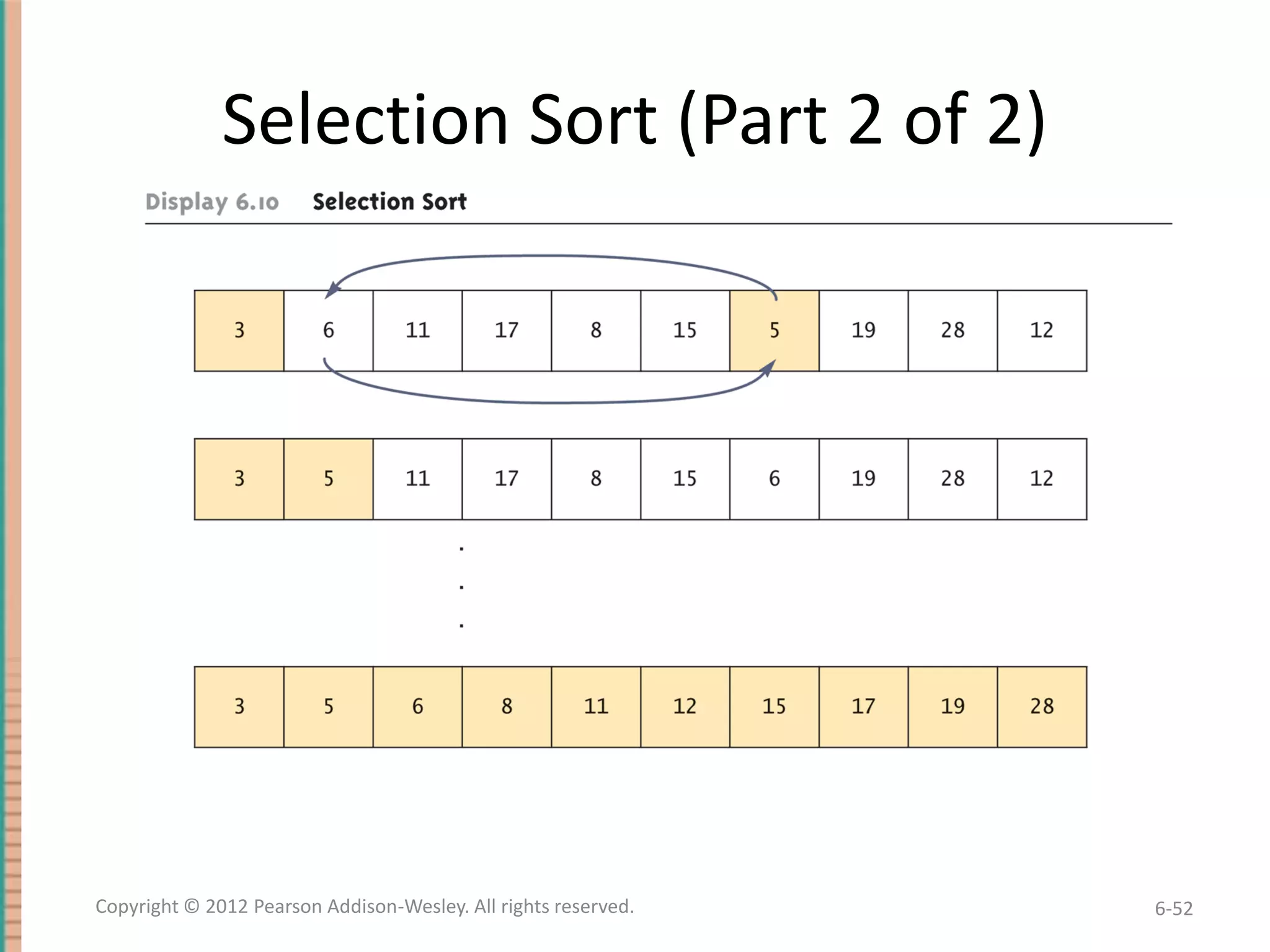
• A selection sort accomplishes this by using the
following algorithm:
for (int index = 0; index < count; index++)
Place the indexth smallest element in
a[index]

Copyright © 2012 Pearson Addison-Wesley. All rights reserved.

6-50
Selection Sort (Part 1 of 2)

Copyright © 2012 Pearson Addison-Wesley. All rights reserved.

6-51
Selection Sort (Part 2 of 2)

Copyright © 2012 Pearson Addison-Wesley. All rights reserved.

6-52
SelectionSort Class (Part 1 of 5)
public class SelectionSort
{
/**
Precondition: count <= a.length;
The first count indexed variables have
values.
Action: Sorts a so that a[0] <= a[1] <=
... <= a[count - 1].
*/

Copyright © 2012 Pearson Addison-Wesley. All rights reserved.

6-53
SelectionSort Class (Part 2 of 5)
public static void sort(double[] a, int count)
{
int index, indexOfNextSmallest;
for (index = 0; index < count - 1; index++)
{//Place the correct value in a[index]:
indexOfNextSmallest =
indexOfSmallest(index, a, count);
interchange(index,indexOfNextSmallest, a);
//a[0]<=a[1]<=...<=a[index] and these are
//the smallest of the original array
//elements. The remaining positions contain
//the rest of the original array elements.
}
}
Copyright © 2012 Pearson Addison-Wesley. All rights reserved.

6-54
SelectionSort Class (Part 3 of 5)
/**
Returns the index of the smallest value among
a[startIndex], a[startIndex+1], ...
a[numberUsed - 1]
*/

private static int indexOfSmallest(int
startIndex, double[] a, int count)
{
double min = a[startIndex];
int indexOfMin = startIndex;
int index;

Copyright © 2012 Pearson Addison-Wesley. All rights reserved.

6-55
SelectionSort Class (Part 4 of 5)
for (index = startIndex + 1;
index < count; index++)
if (a[index] < min)
{
min = a[index];
indexOfMin = index;
//min is smallest of a[startIndex] through
//a[index]
}
return indexOfMin;
}

Copyright © 2012 Pearson Addison-Wesley. All rights reserved.

6-56
SelectionSort Class (Part 5 of 5)
/**
Precondition: i and j are legal indices for
the array a.
Postcondition: Values of a[i] and a[j] have
been interchanged.
*/
private static void interchange(int i, int j,
double[] a)
{
double temp;
temp = a[i];
a[i] = a[j];
a[j] = temp; //original value of a[i]
}
}
Copyright © 2012 Pearson Addison-Wesley. All rights reserved.

6-57
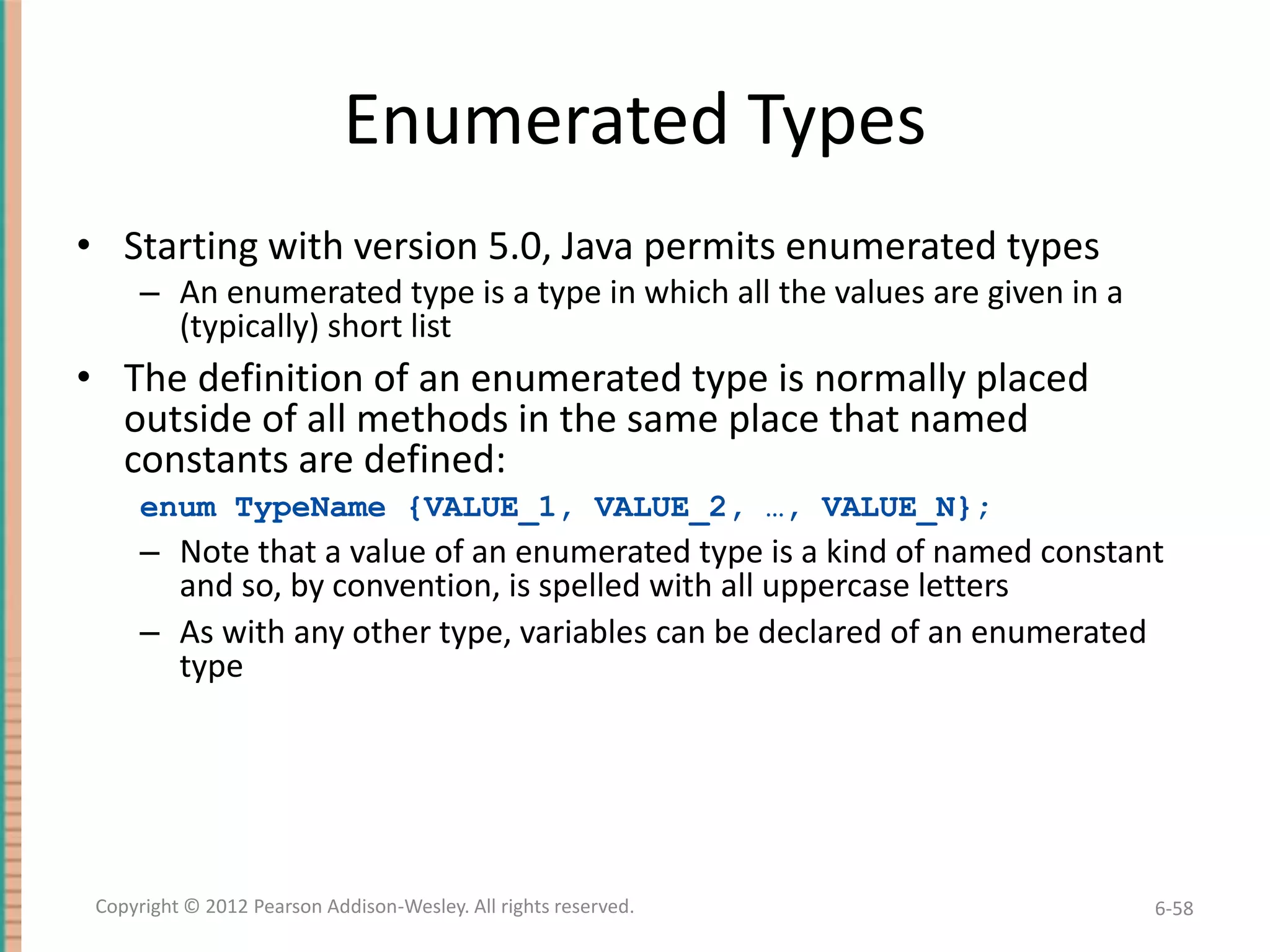
Enumerated Types
• Starting with version 5.0, Java permits enumerated types
– An enumerated type is a type in which all the values are given in a
(typically) short list

• The definition of an enumerated type is normally placed
outside of all methods in the same place that named
constants are defined:
enum TypeName {VALUE_1, VALUE_2, …, VALUE_N};

– Note that a value of an enumerated type is a kind of named constant
and so, by convention, is spelled with all uppercase letters
– As with any other type, variables can be declared of an enumerated
type

Copyright © 2012 Pearson Addison-Wesley. All rights reserved.

6-58
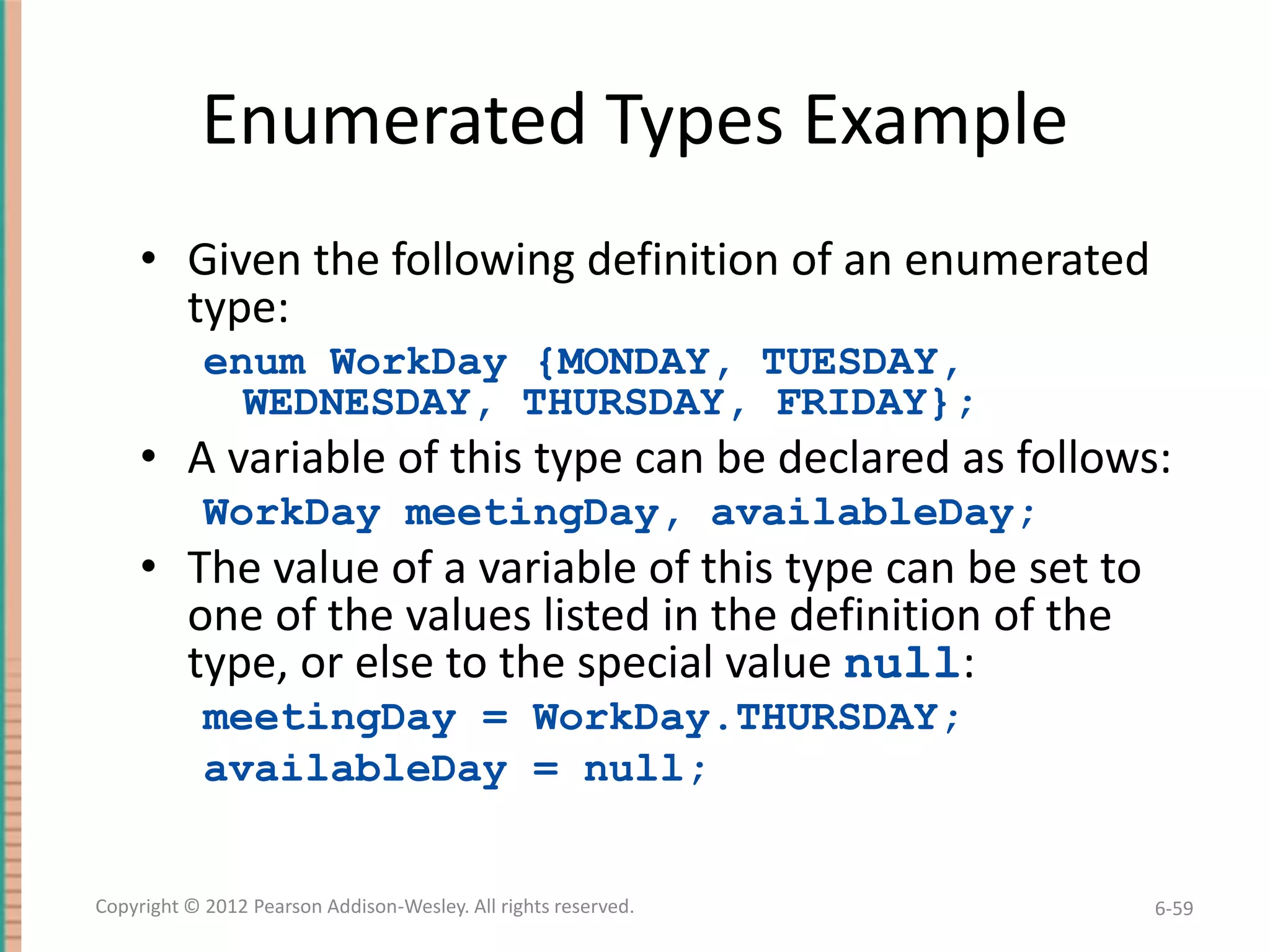
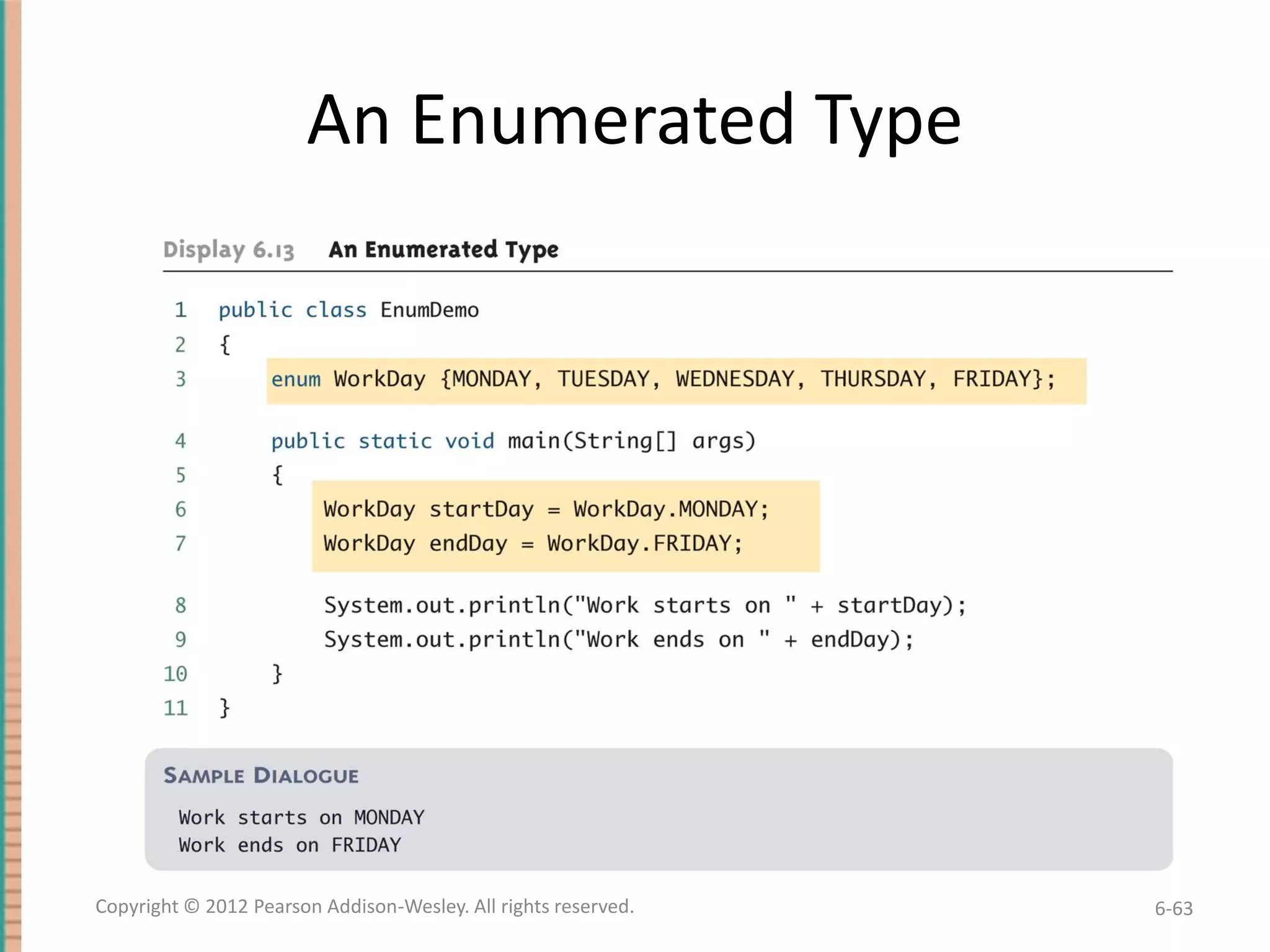
Enumerated Types Example
• Given the following definition of an enumerated
type:
enum WorkDay {MONDAY, TUESDAY,
WEDNESDAY, THURSDAY, FRIDAY};

• A variable of this type can be declared as follows:
WorkDay meetingDay, availableDay;

• The value of a variable of this type can be set to
one of the values listed in the definition of the
type, or else to the special value null:
meetingDay = WorkDay.THURSDAY;
availableDay = null;

Copyright © 2012 Pearson Addison-Wesley. All rights reserved.

6-59
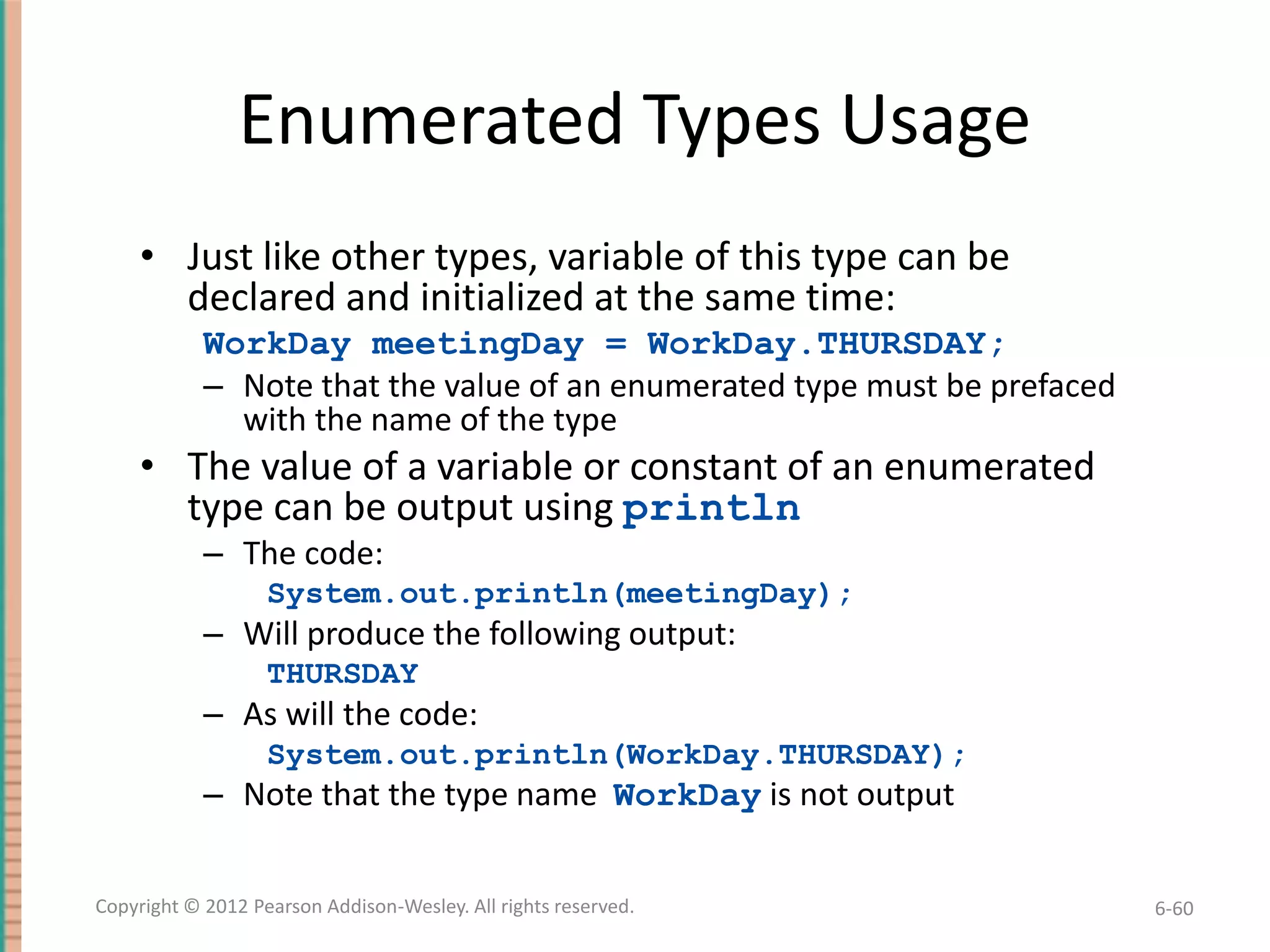
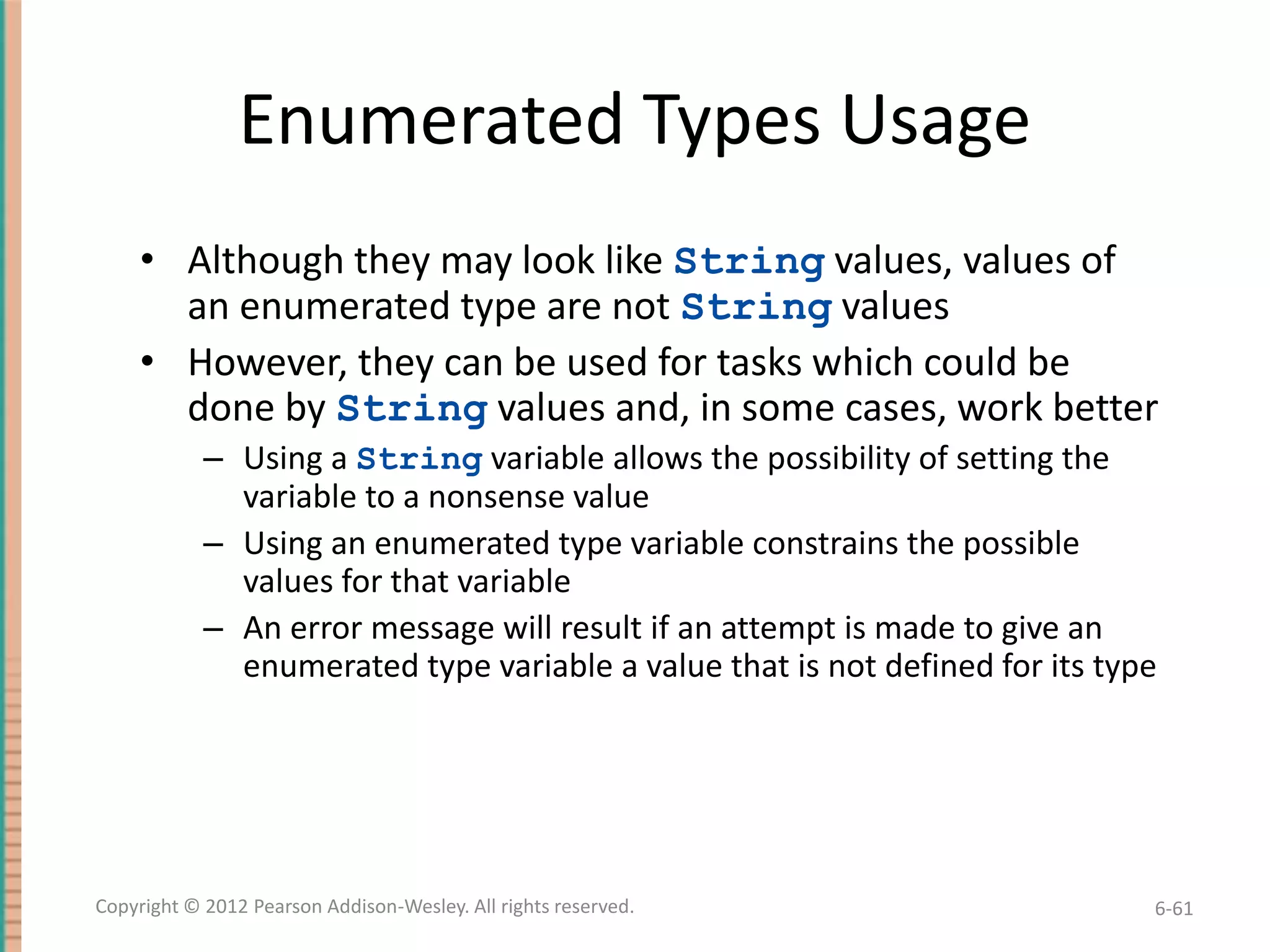
Enumerated Types Usage
• Just like other types, variable of this type can be
declared and initialized at the same time:
WorkDay meetingDay = WorkDay.THURSDAY;
– Note that the value of an enumerated type must be prefaced
with the name of the type

• The value of a variable or constant of an enumerated
type can be output using println
– The code:
System.out.println(meetingDay);

– Will produce the following output:
THURSDAY

– As will the code:
System.out.println(WorkDay.THURSDAY);

– Note that the type name WorkDay is not output
Copyright © 2012 Pearson Addison-Wesley. All rights reserved.

6-60
Enumerated Types Usage
• Although they may look like String values, values of
an enumerated type are not String values
• However, they can be used for tasks which could be
done by String values and, in some cases, work better
– Using a String variable allows the possibility of setting the
variable to a nonsense value
– Using an enumerated type variable constrains the possible
values for that variable
– An error message will result if an attempt is made to give an
enumerated type variable a value that is not defined for its type

Copyright © 2012 Pearson Addison-Wesley. All rights reserved.

6-61
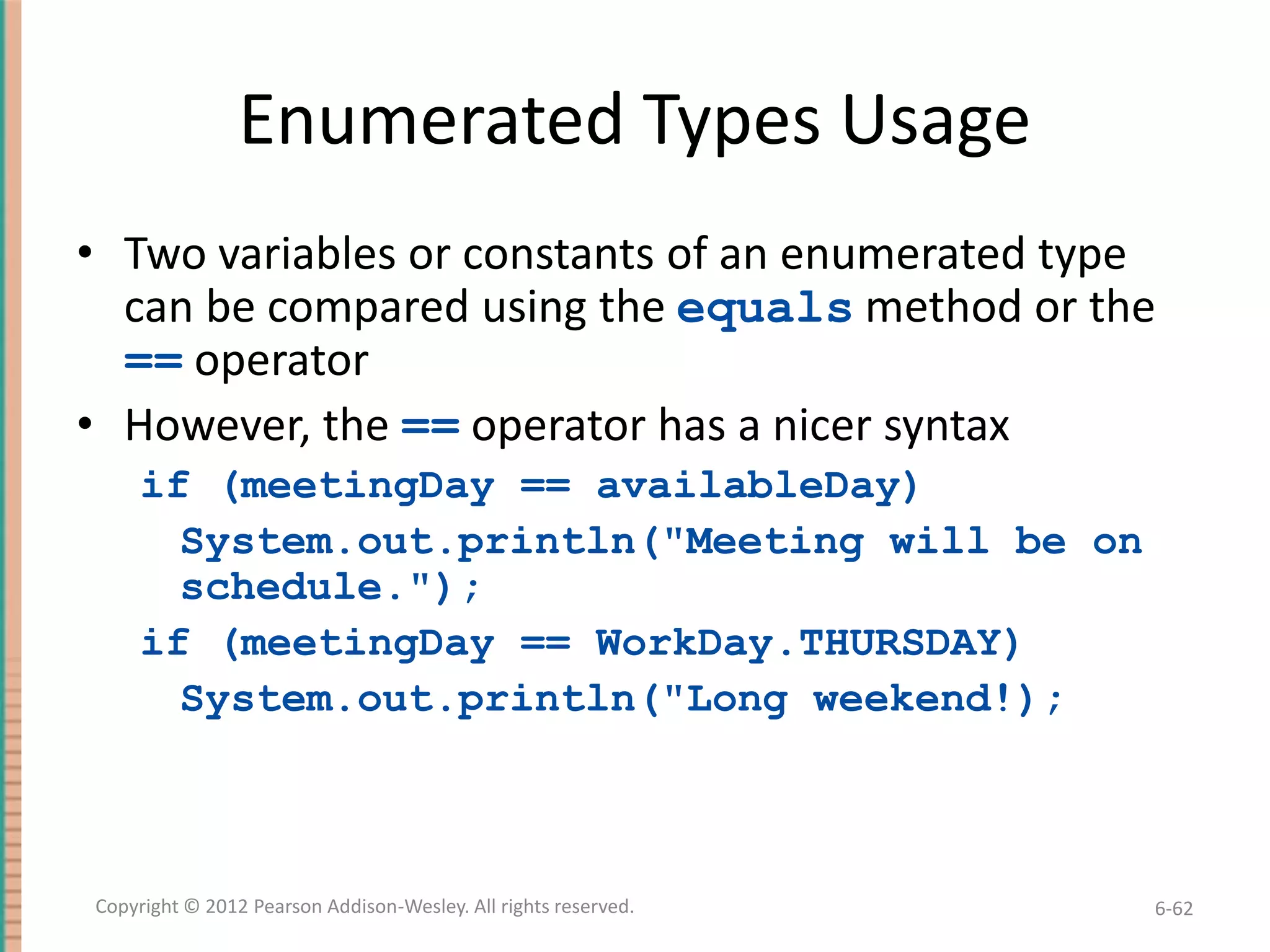
Enumerated Types Usage
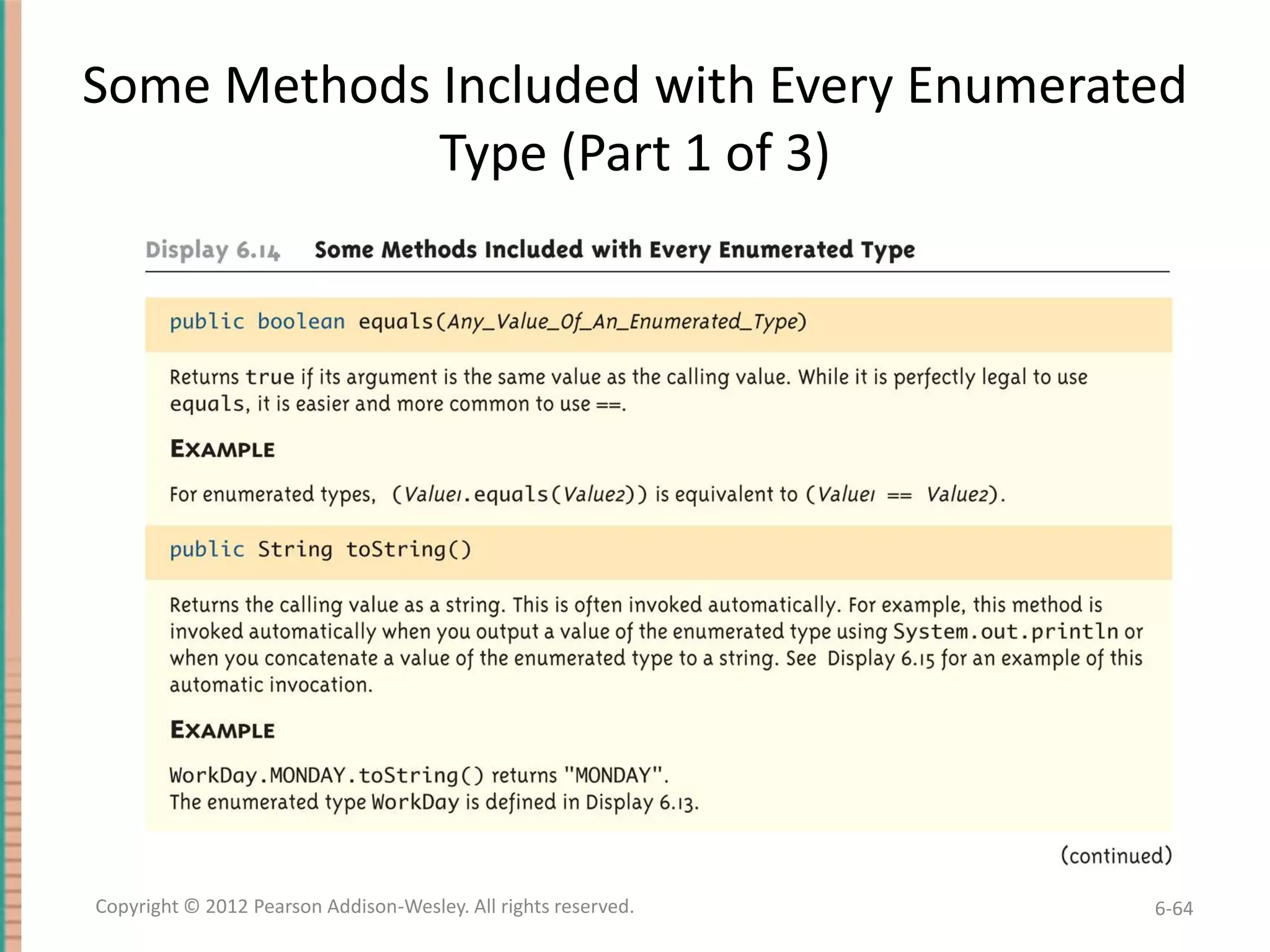
• Two variables or constants of an enumerated type
can be compared using the equals method or the
== operator
• However, the == operator has a nicer syntax
if (meetingDay == availableDay)
System.out.println("Meeting will be on
schedule.");
if (meetingDay == WorkDay.THURSDAY)
System.out.println("Long weekend!);

Copyright © 2012 Pearson Addison-Wesley. All rights reserved.

6-62
An Enumerated Type

Copyright © 2012 Pearson Addison-Wesley. All rights reserved.

6-63
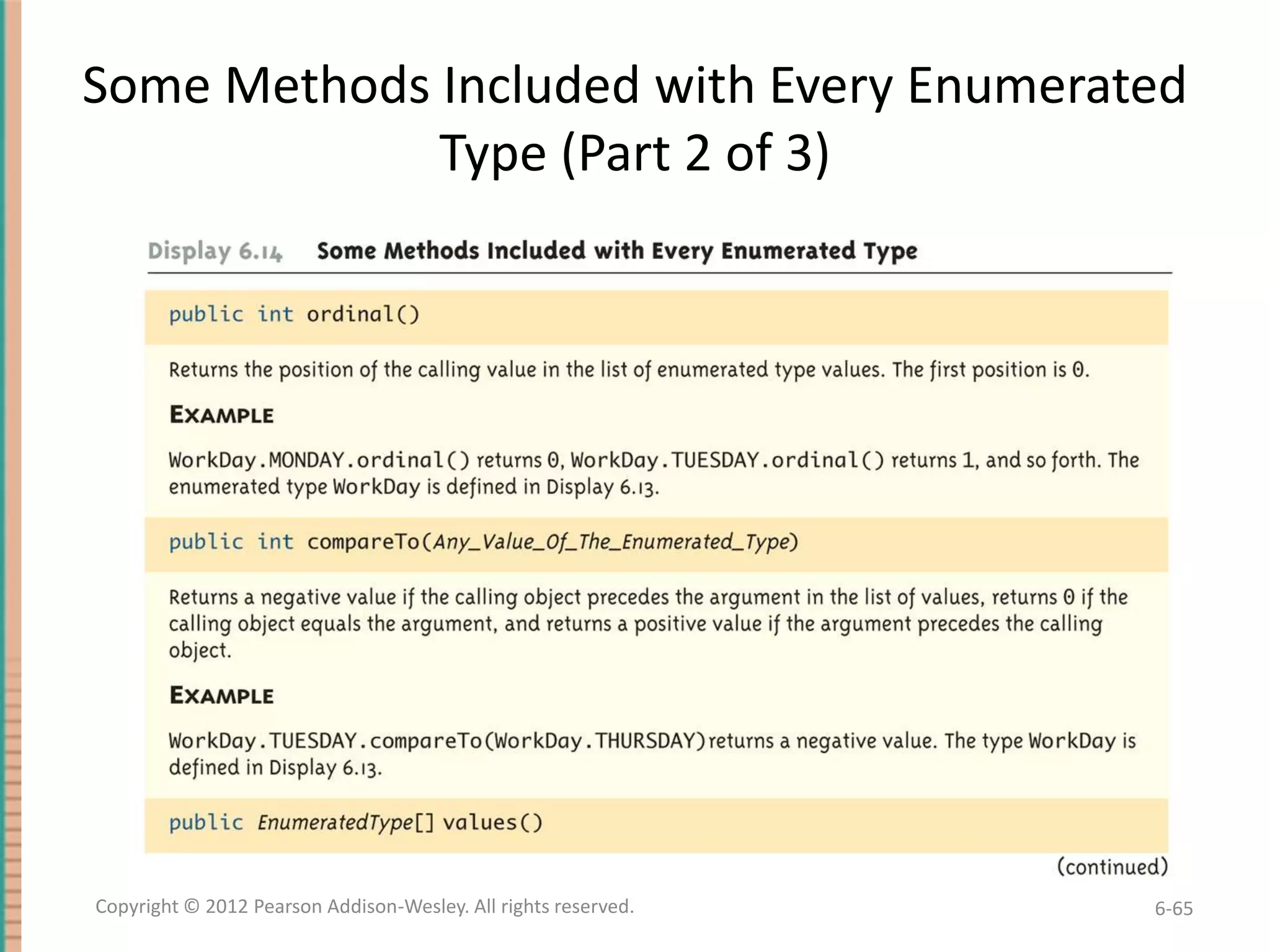
Some Methods Included with Every Enumerated
Type (Part 1 of 3)

Copyright © 2012 Pearson Addison-Wesley. All rights reserved.

6-64
Some Methods Included with Every Enumerated
Type (Part 2 of 3)

Copyright © 2012 Pearson Addison-Wesley. All rights reserved.

6-65
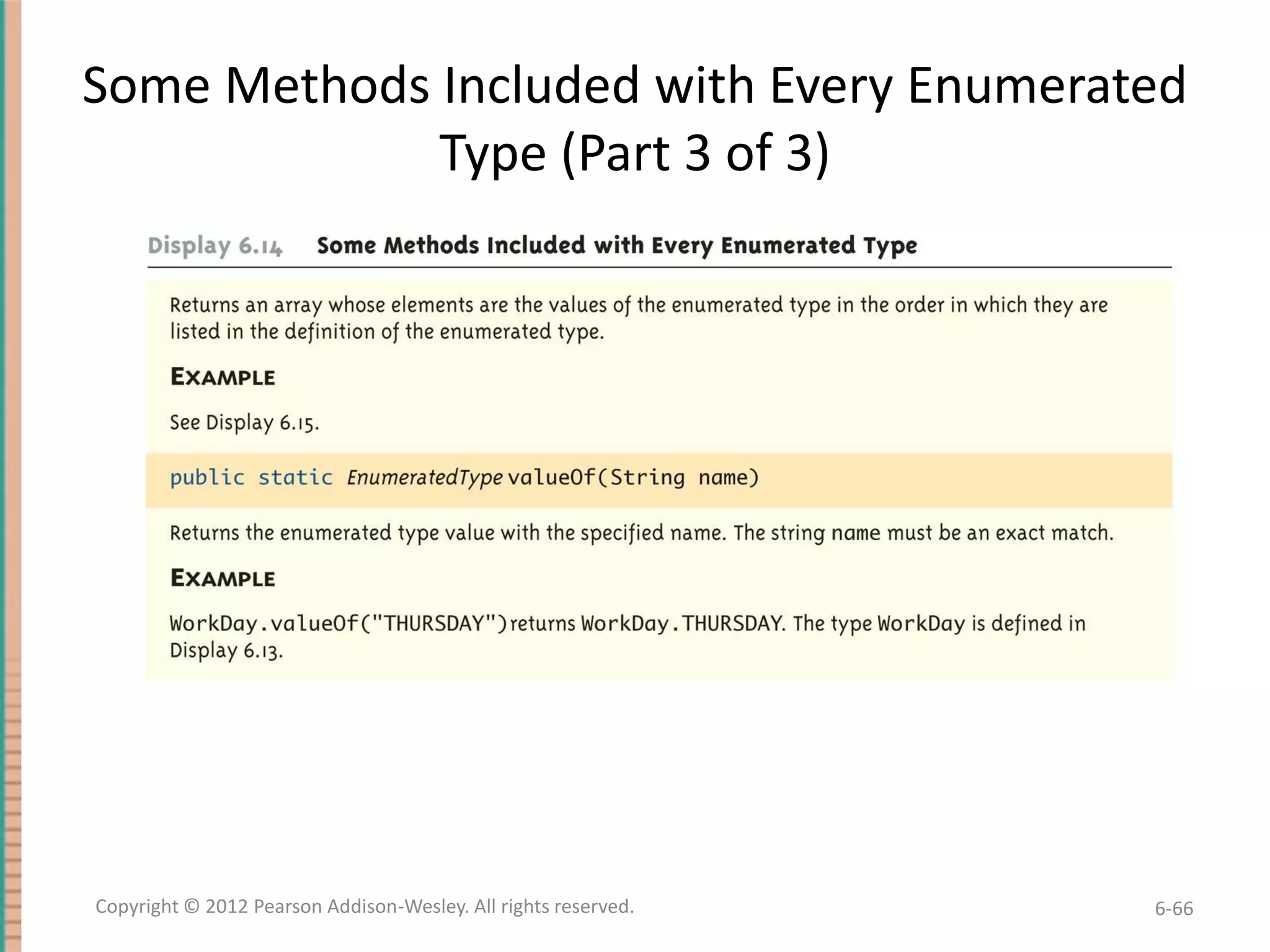
Some Methods Included with Every Enumerated
Type (Part 3 of 3)

Copyright © 2012 Pearson Addison-Wesley. All rights reserved.

6-66
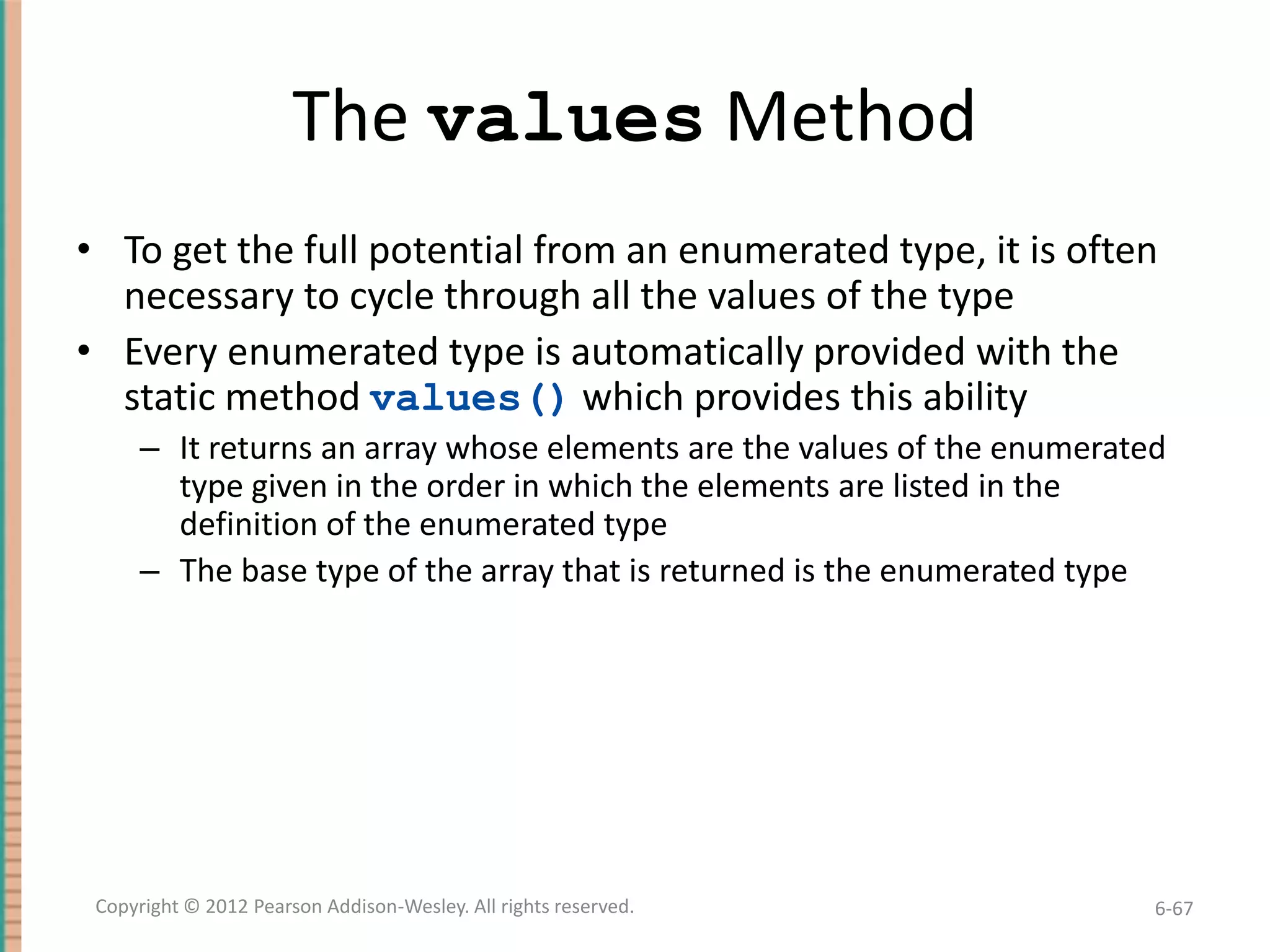
The values Method
• To get the full potential from an enumerated type, it is often
necessary to cycle through all the values of the type
• Every enumerated type is automatically provided with the
static method values() which provides this ability
– It returns an array whose elements are the values of the enumerated
type given in the order in which the elements are listed in the
definition of the enumerated type
– The base type of the array that is returned is the enumerated type

Copyright © 2012 Pearson Addison-Wesley. All rights reserved.

6-67
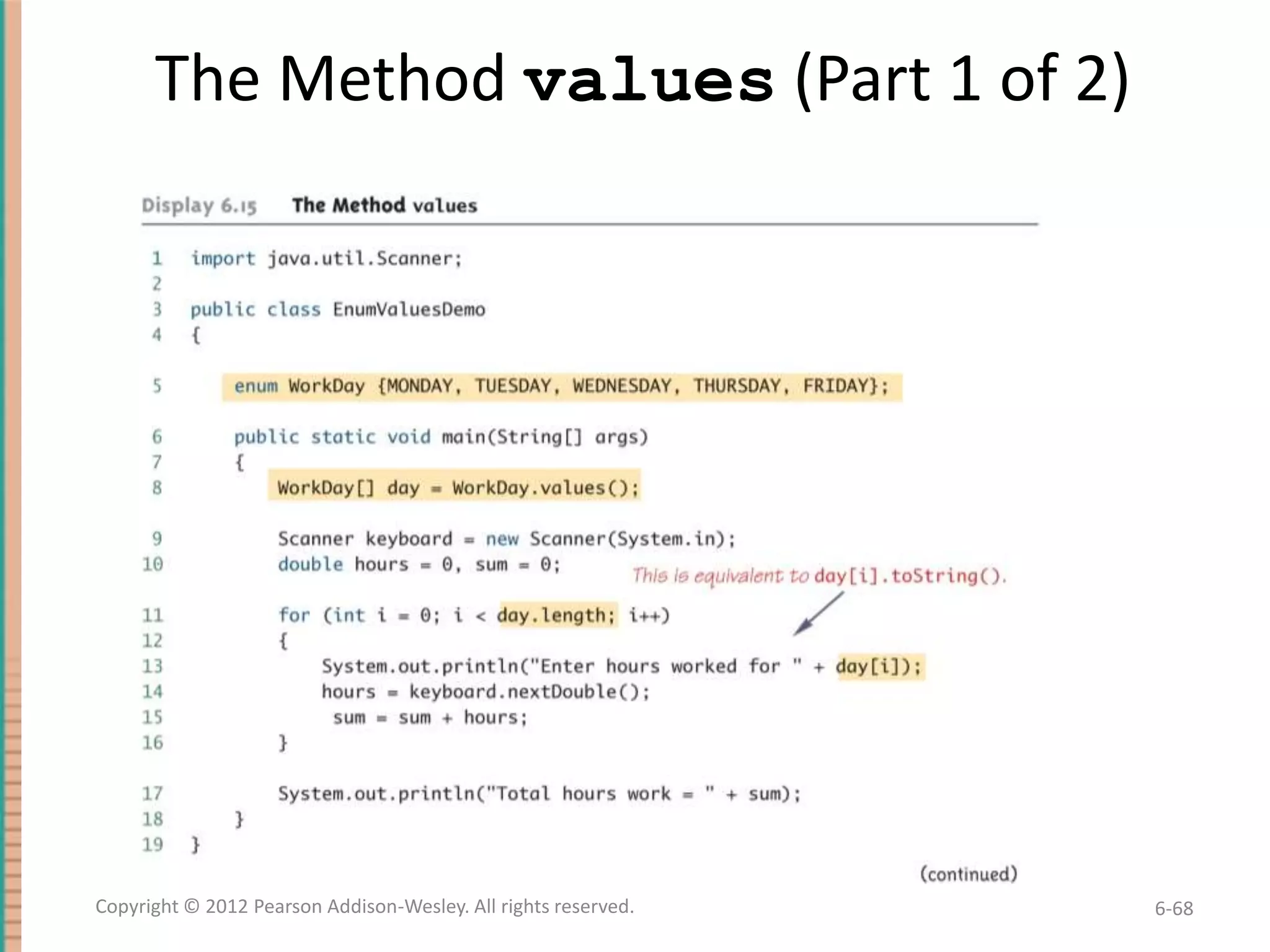
The Method values (Part 1 of 2)

Copyright © 2012 Pearson Addison-Wesley. All rights reserved.

6-68
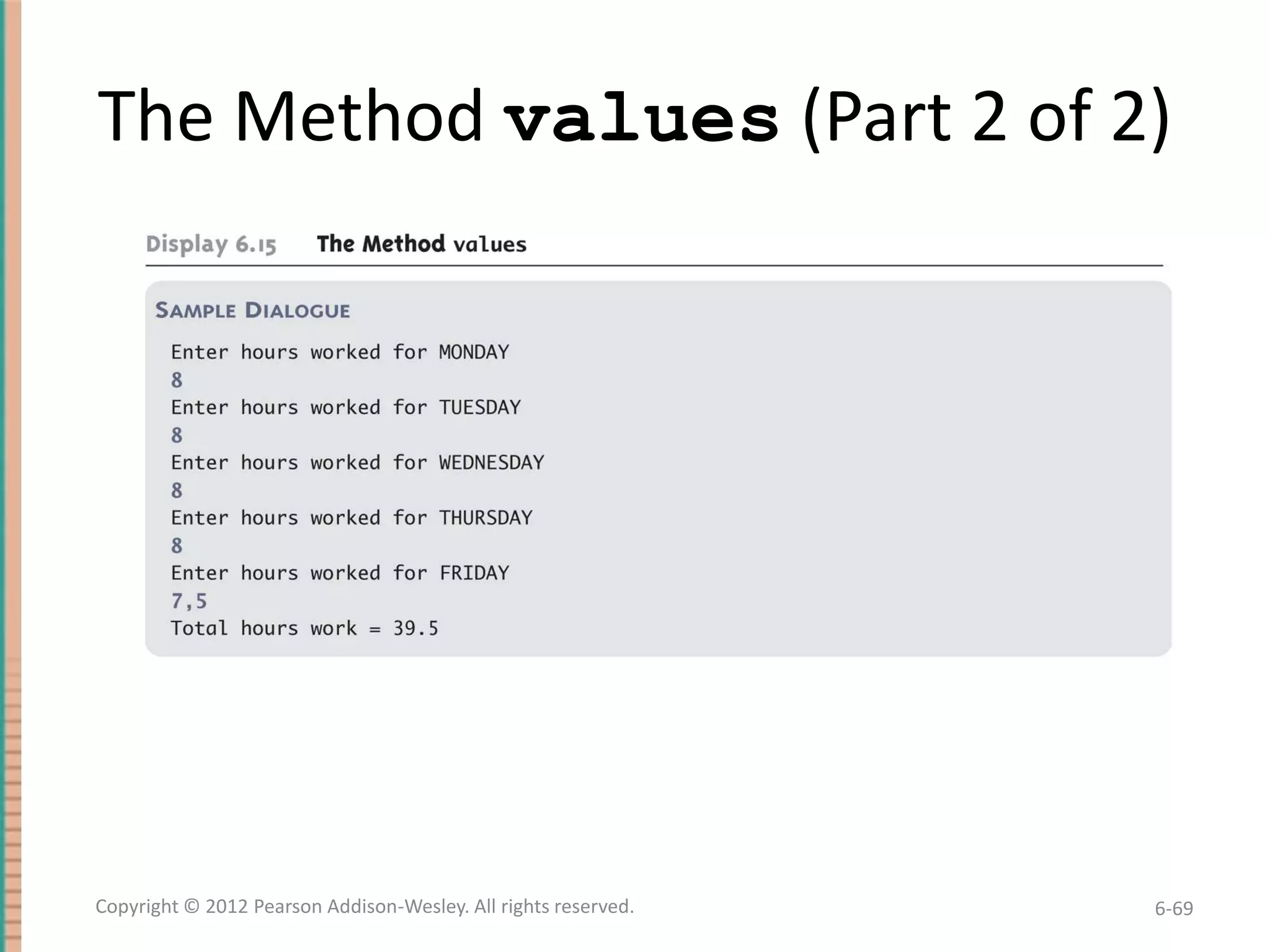
The Method values (Part 2 of 2)

Copyright © 2012 Pearson Addison-Wesley. All rights reserved.

6-69
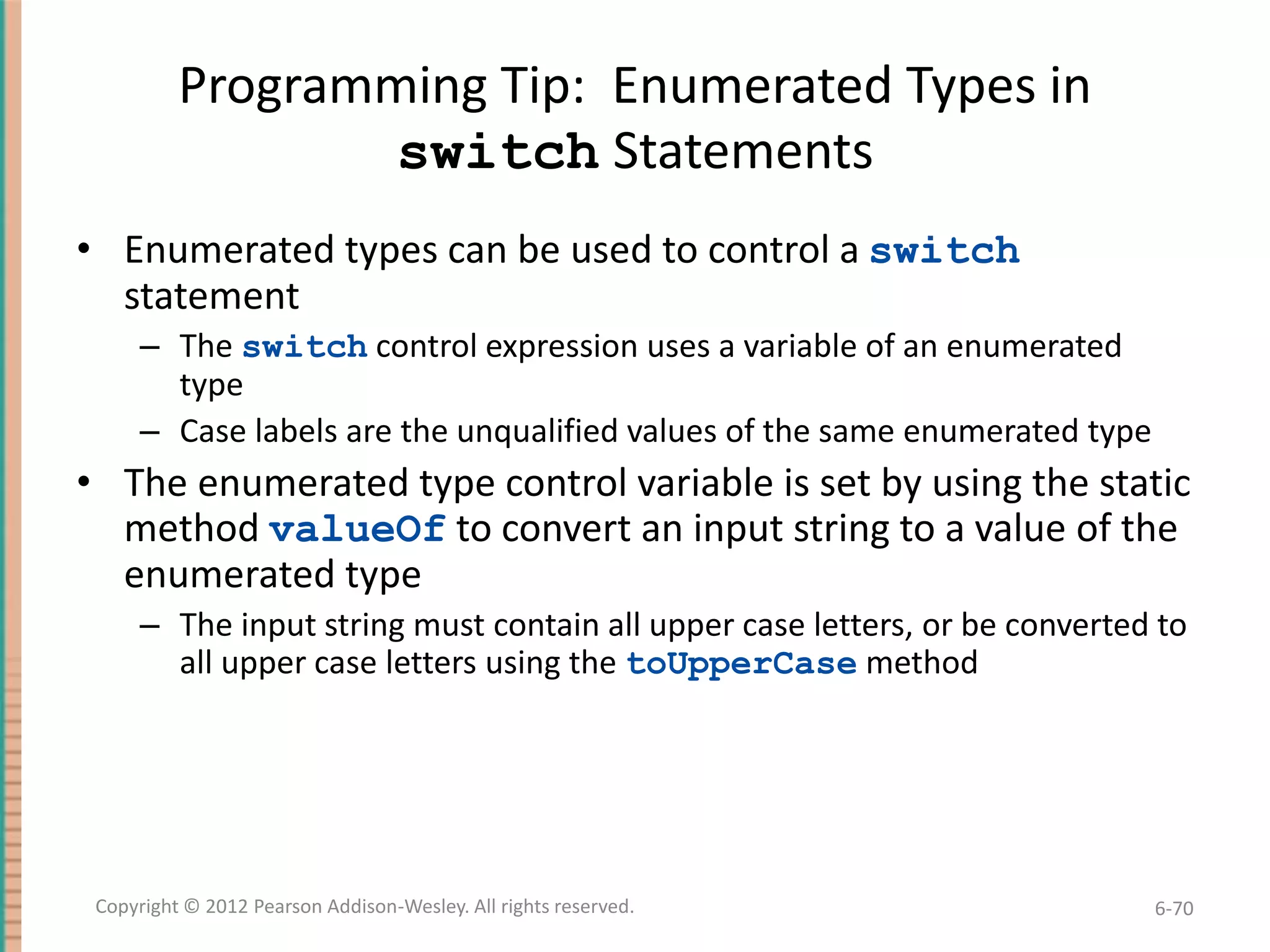
Programming Tip: Enumerated Types in
switch Statements
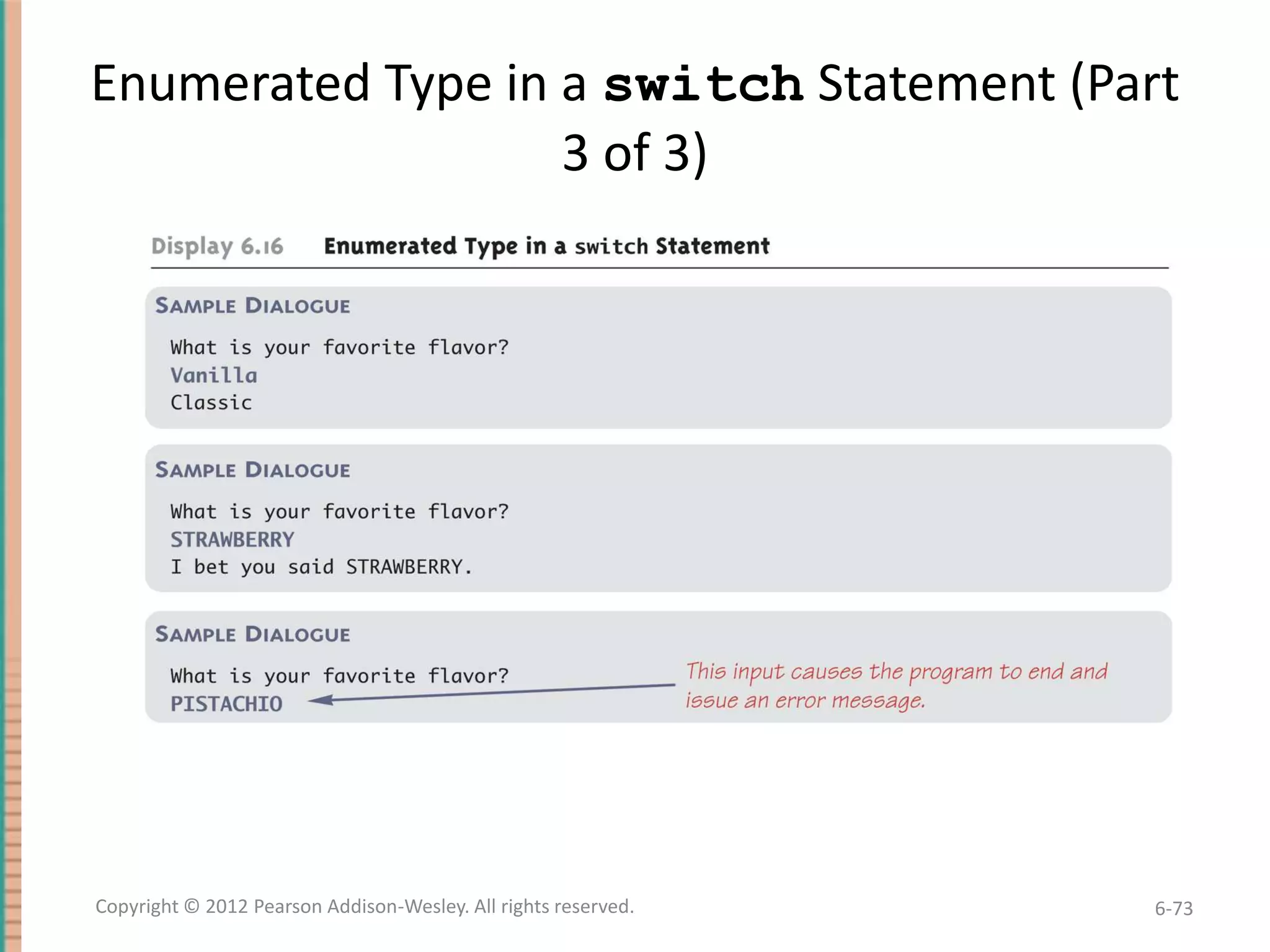
• Enumerated types can be used to control a switch
statement
– The switch control expression uses a variable of an enumerated
type
– Case labels are the unqualified values of the same enumerated type

• The enumerated type control variable is set by using the static
method valueOf to convert an input string to a value of the
enumerated type
– The input string must contain all upper case letters, or be converted to
all upper case letters using the toUpperCase method

Copyright © 2012 Pearson Addison-Wesley. All rights reserved.

6-70
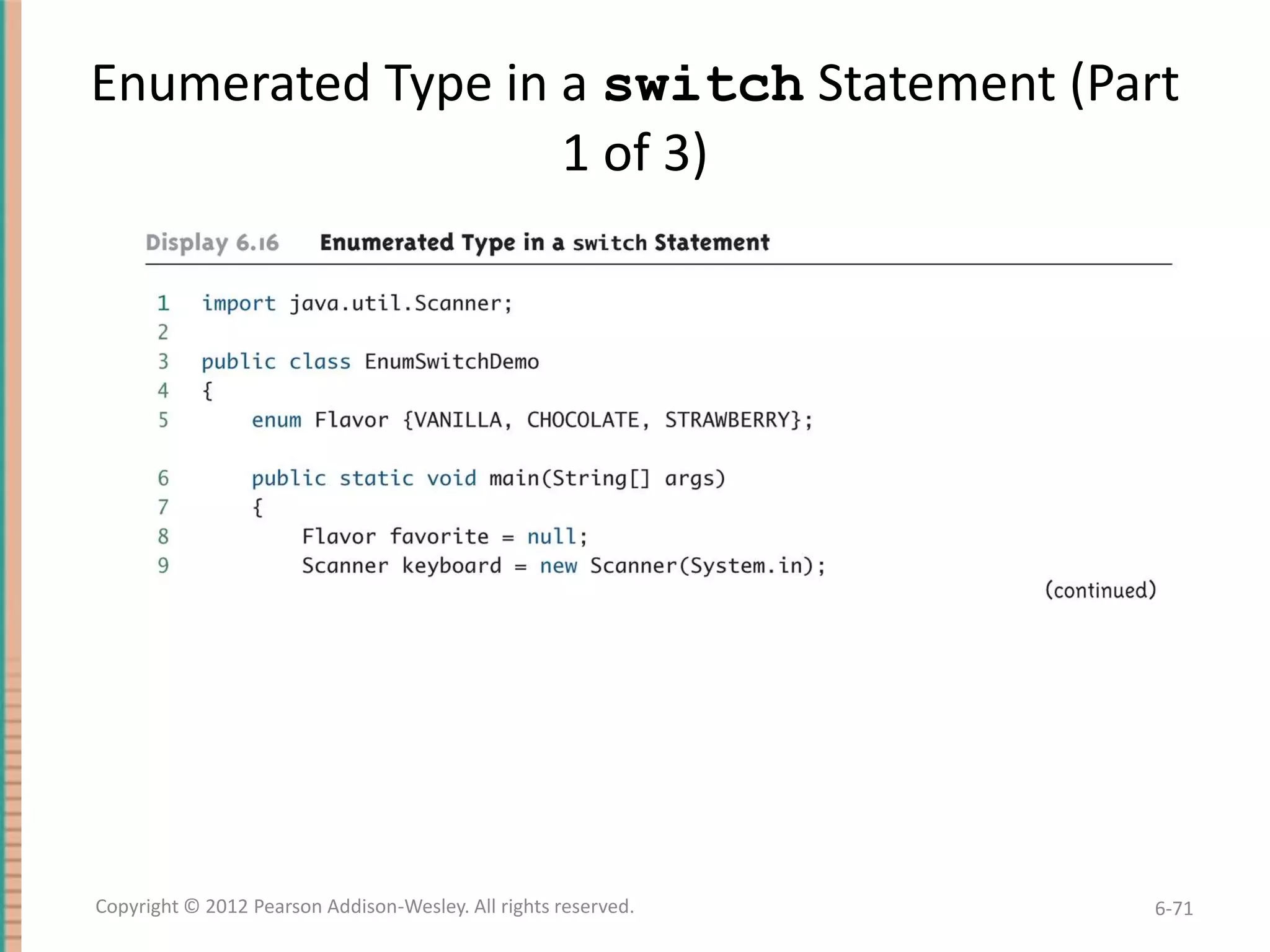
Enumerated Type in a switch Statement (Part
1 of 3)

Copyright © 2012 Pearson Addison-Wesley. All rights reserved.

6-71
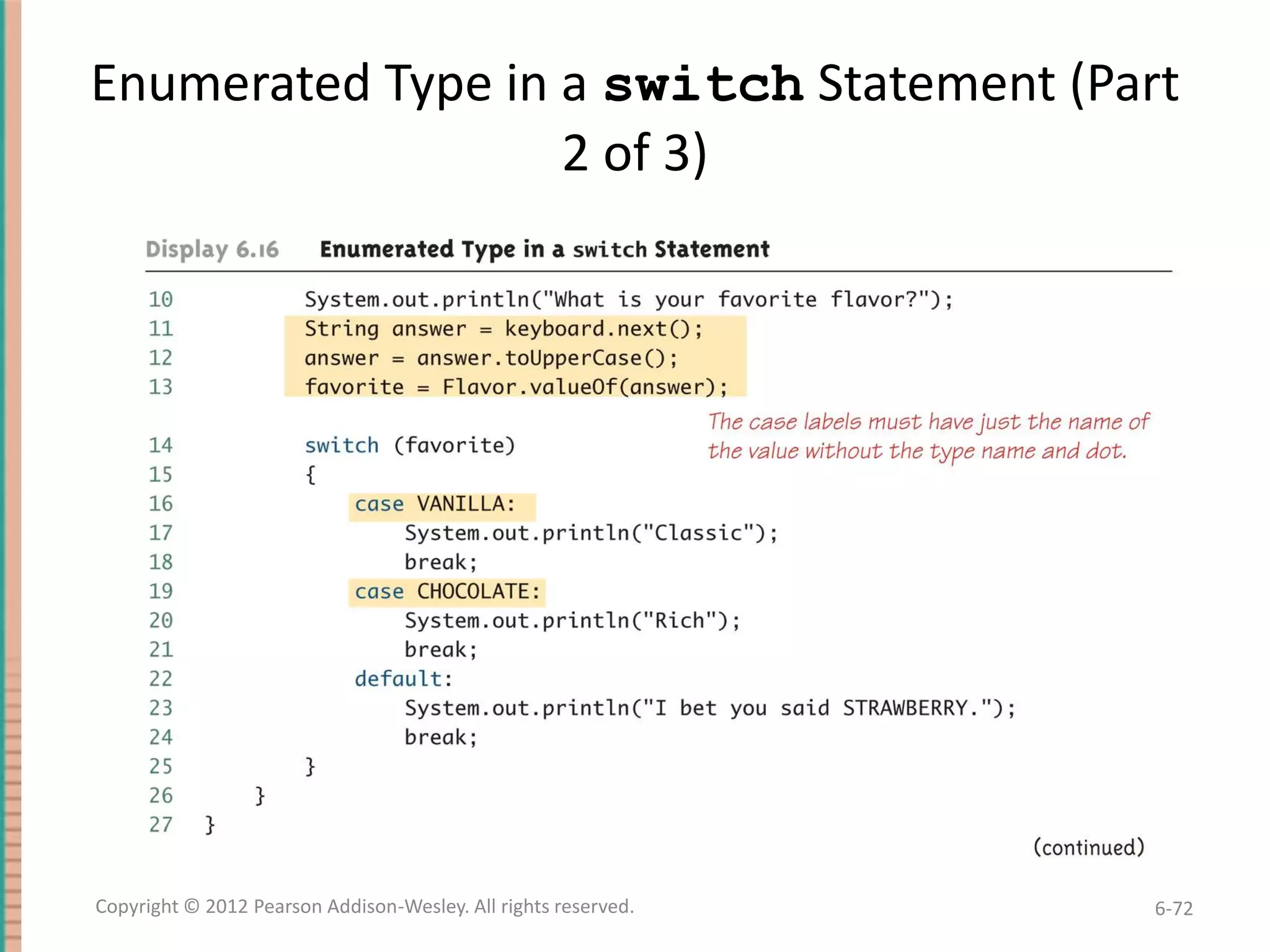
Enumerated Type in a switch Statement (Part
2 of 3)

Copyright © 2012 Pearson Addison-Wesley. All rights reserved.

6-72
Enumerated Type in a switch Statement (Part
3 of 3)

Copyright © 2012 Pearson Addison-Wesley. All rights reserved.

6-73
Multidimensional Arrays
• It is sometimes useful to have an array with more
than one index
• Multidimensional arrays are declared and created in
basically the same way as one-dimensional arrays
– You simply use as many square brackets as there are
indices
– Each index must be enclosed in its own brackets
double[][]table = new double[100][10];
int[][][] figure = new int[10][20][30];
Person[][] = new Person[10][100];

Copyright © 2012 Pearson Addison-Wesley. All rights reserved.

6-74
Multidimensional Arrays
• Multidimensional arrays may have any number of
indices, but perhaps the most common number is
two
– Two-dimensional array can be visualized as a twodimensional display with the first index giving the row, and
the second index giving the column
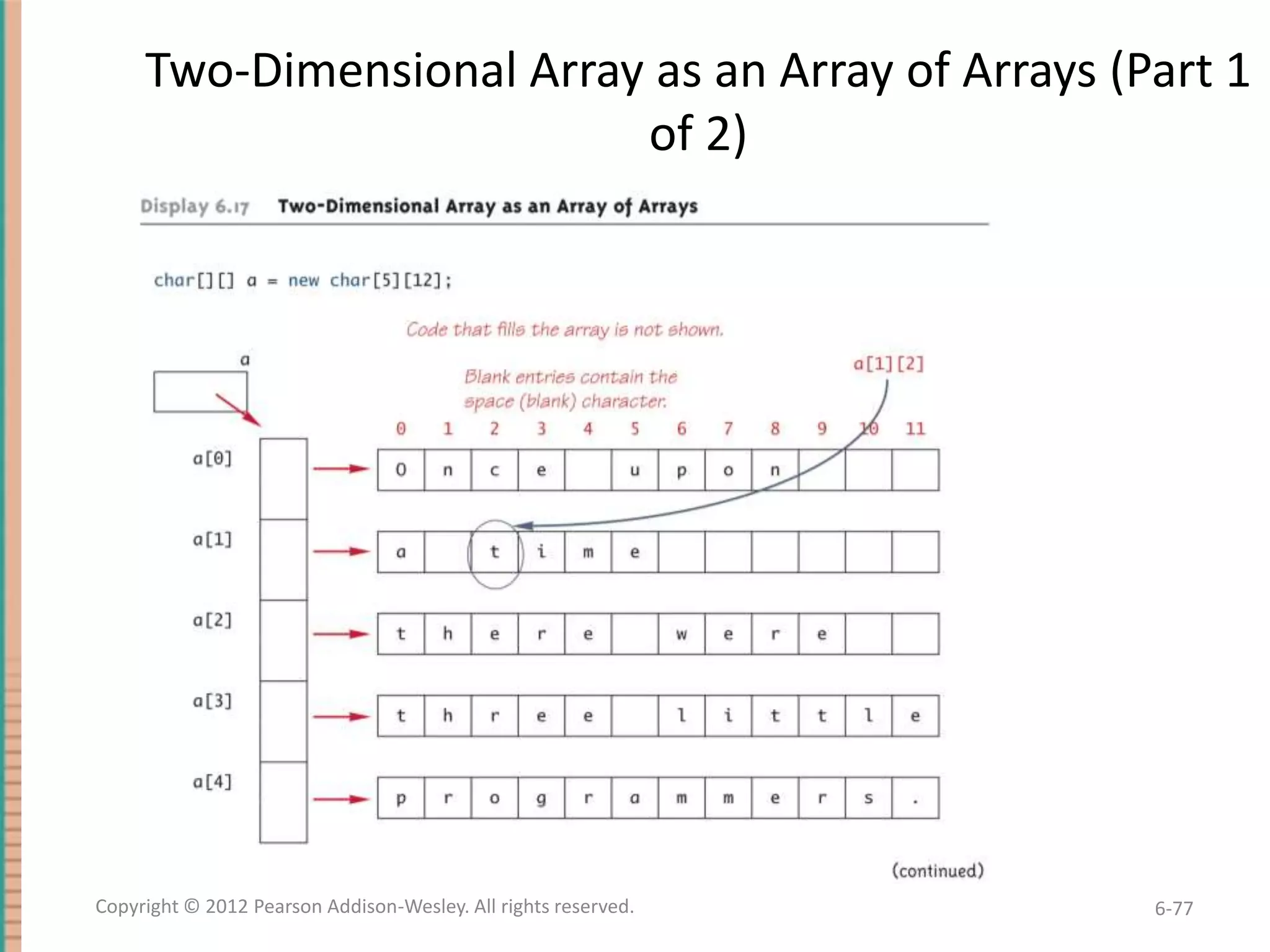
char[][] a = new char[5][12];

– Note that, like a one-dimensional array, each element of a
multidimensional array is just a variable of the base type
(in this case, char)

Copyright © 2012 Pearson Addison-Wesley. All rights reserved.

6-75
Multidimensional Arrays
• In Java, a two-dimensional array, such as a, is
actually an array of arrays
– The array a contains a reference to a one-dimensional
array of size 5 with a base type of char[]
– Each indexed variable (a[0], a[1], etc.) contains a
reference to a one-dimensional array of size 12, also with a
base type of char[]

• A three-dimensional array is an array of arrays of
arrays, and so forth for higher dimensions

Copyright © 2012 Pearson Addison-Wesley. All rights reserved.

6-76
Two-Dimensional Array as an Array of Arrays (Part 1
of 2)

Copyright © 2012 Pearson Addison-Wesley. All rights reserved.

6-77
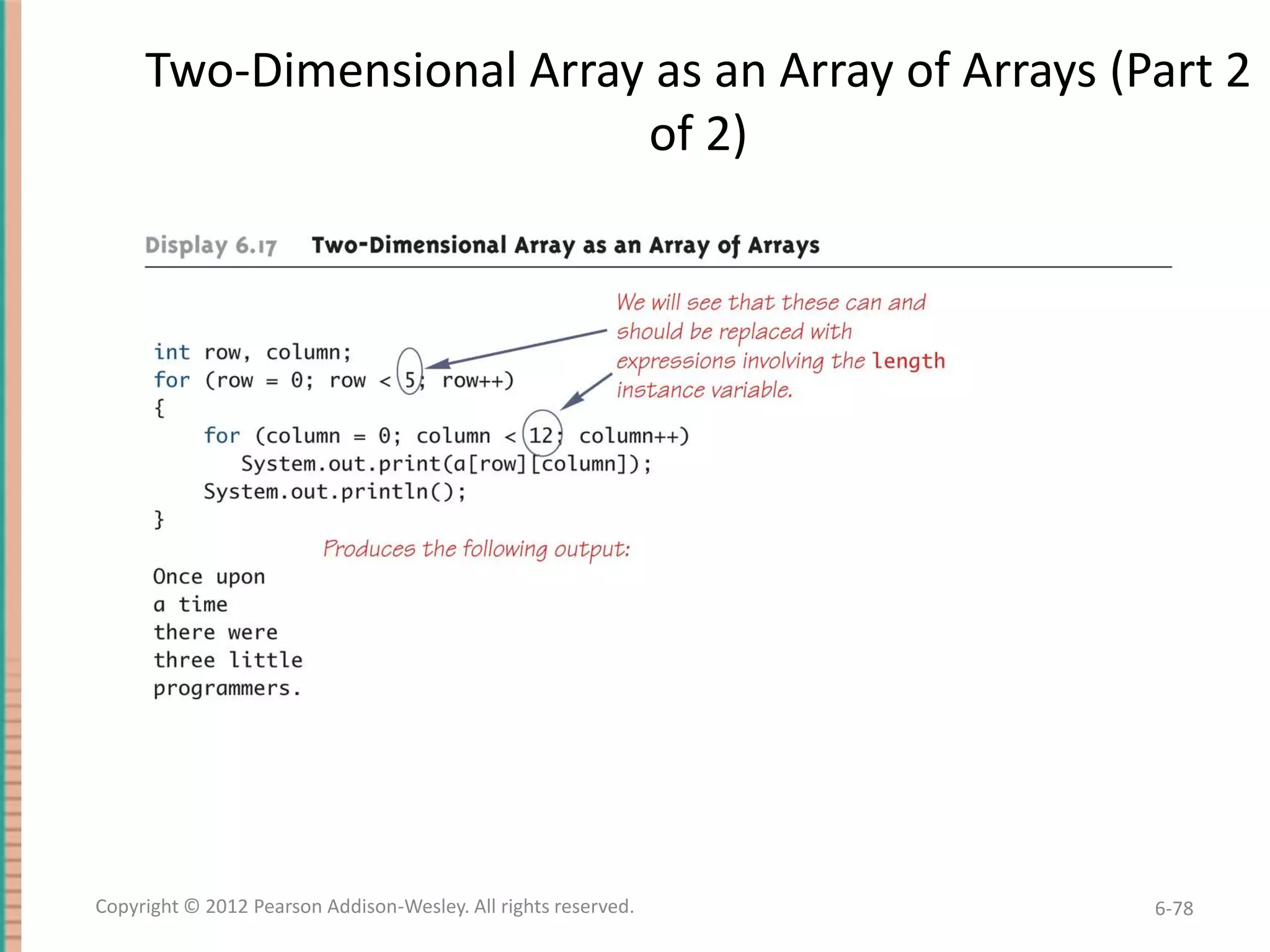
Two-Dimensional Array as an Array of Arrays (Part 2
of 2)

Copyright © 2012 Pearson Addison-Wesley. All rights reserved.

6-78
Using the length Instance Variable
char[][] page = new char[30][100];

• The instance variable length does not give the total number
of indexed variables in a two-dimensional array
– Because a two-dimensional array is actually an array of arrays, the
instance variable length gives the number of first indices (or "rows")
in the array
• page.length is equal to 30
– For the same reason, the number of second indices (or "columns") for
a given "row" is given by referencing length for that "row" variable
• page[0].length is equal to 100

Copyright © 2012 Pearson Addison-Wesley. All rights reserved.

6-79
Using the length Instance Variable
• The following program demonstrates how a
nested for loop can be used to process a twodimensional array
– Note how each length instance variable is used
int row, column;
for (row = 0; row < page.length; row++)
for (column = 0; column < page[row].length;
column++)
page[row][column] = 'Z';

Copyright © 2012 Pearson Addison-Wesley. All rights reserved.

6-80
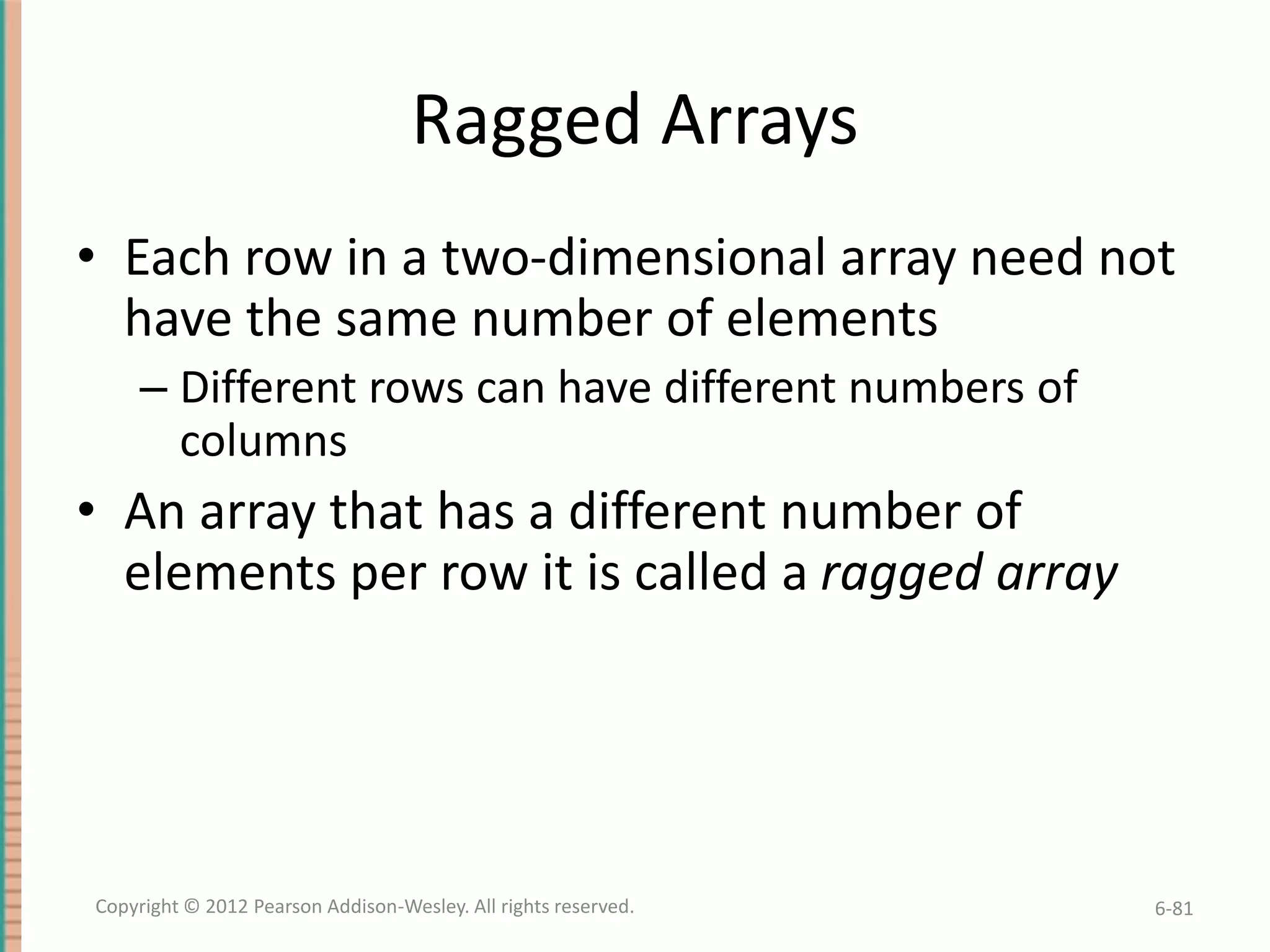
Ragged Arrays
• Each row in a two-dimensional array need not
have the same number of elements
– Different rows can have different numbers of
columns

• An array that has a different number of
elements per row it is called a ragged array

Copyright © 2012 Pearson Addison-Wesley. All rights reserved.

6-81
Ragged Arrays
double[][] a = new double[3][5];

• The above line is equivalent to the following:
double [][] a;
a = new double[3][]; //Note below
a[0] = new double[5];
a[1] = new double[5];
a[2] = new double[5];
– Note that the second line makes a the name of an array with room for
3 entries, each of which can be an array of doubles that can be of
any length
– The next 3 lines each create an array of doubles of size 5

Copyright © 2012 Pearson Addison-Wesley. All rights reserved.

6-82
Ragged Arrays
double [][] a;
a = new double[3][];

• Since the above line does not specify the size of
a[0], a[1], or a[2], each could be made a
different size instead:
a[0] = new double[5];
a[1] = new double[10];
a[2] = new double[4];

Copyright © 2012 Pearson Addison-Wesley. All rights reserved.

6-83
Multidimensional Array Parameters and
Returned Values
• Methods may have multidimensional array
parameters
– They are specified in a way similar to one-dimensional
arrays
– They use the same number of sets of square brackets as
they have dimensions
public void myMethod(int[][] a)
{ . . . }

– The parameter a is a two-dimensional array

Copyright © 2012 Pearson Addison-Wesley. All rights reserved.

6-84
Multidimensional Array Parameters and
Returned Values

• Methods may have a multidimensional array
type as their return type
– They use the same kind of type specification as for
a multidimensional array parameter
public double[][] aMethod()
{ . . . }

– The method aMethod returns an array of
double

Copyright © 2012 Pearson Addison-Wesley. All rights reserved.

6-85
A Grade Book Class
• As an example of using arrays in a program, a class
GradeBook is used to process quiz scores
• Objects of this class have three instance variables
– grade: a two-dimensional array that records the grade of
each student on each quiz
– studentAverage: an array used to record the average
quiz score for each student
– quizAverage: an array used to record the average
score for each quiz

Copyright © 2012 Pearson Addison-Wesley. All rights reserved.

6-86
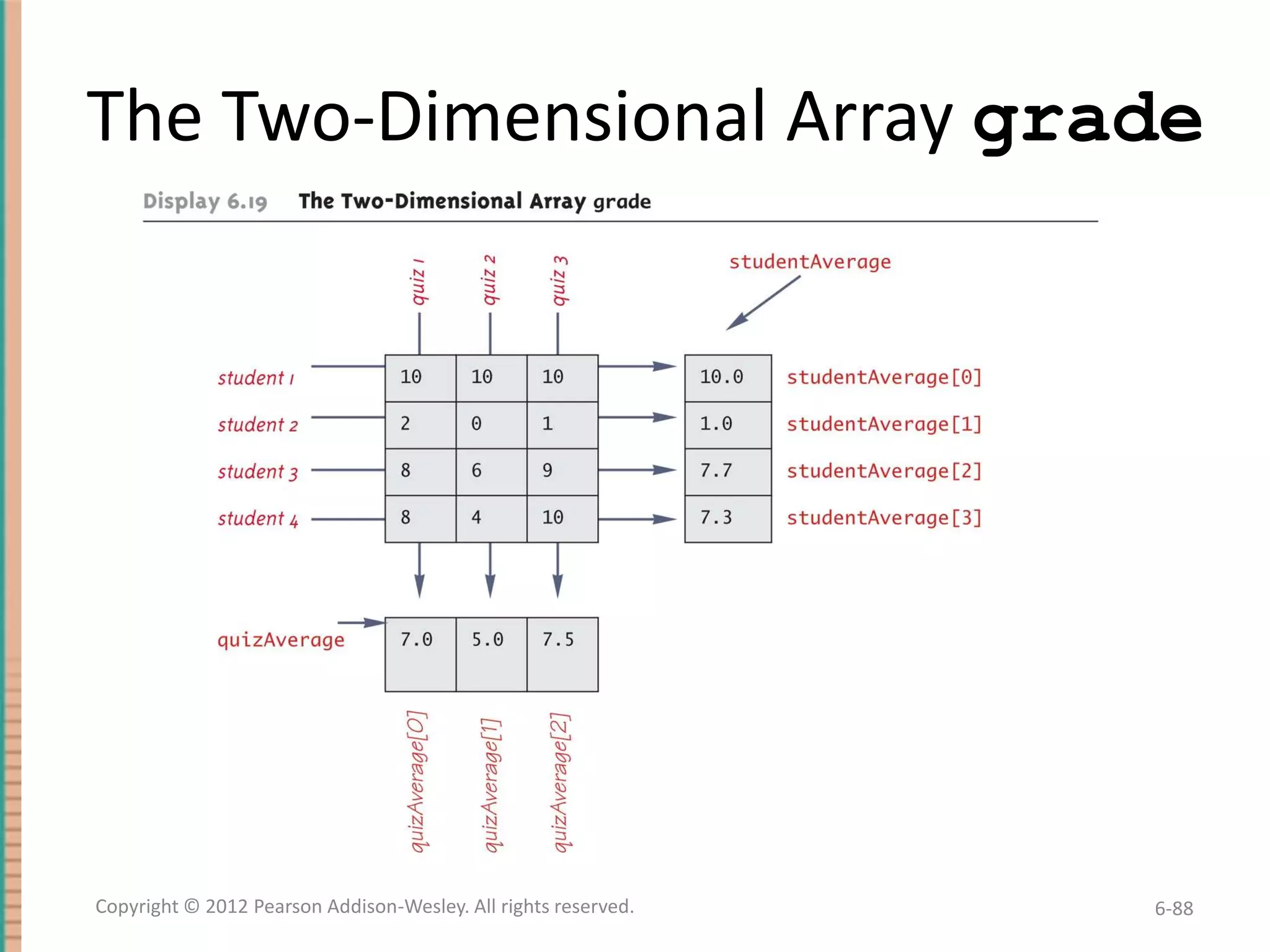
A Grade Book Class
• The score that student 1 received on quiz number 3
is recorded in grade[0][2]
• The average quiz grade for student 2 is recorded in
studentAverage[1]
• The average score for quiz 3 is recorded in
quizAverage[2]
• Note the relationship between the three arrays

Copyright © 2012 Pearson Addison-Wesley. All rights reserved.

6-87
The Two-Dimensional Array grade

Copyright © 2012 Pearson Addison-Wesley. All rights reserved.

6-88

Chapter 6 Absolute Java

  • 1.
  • 2.
    Introduction to Arrays •An array is a data structure used to process a collection of data that is all of the same type – An array behaves like a numbered list of variables with a uniform naming mechanism – It has a part that does not change: the name of the array – It has a part that can change: an integer in square brackets – For example, given five scores: score[0], score[1], score[2], score[3], score[4] Copyright © 2012 Pearson Addison-Wesley. All rights reserved. 6-2
  • 3.
    Creating and AccessingArrays • An array that behaves like this collection of variables, all of type double, can be created using one statement as follows: double[] score = new double[5]; • Or using two statements: double[] score; score = new double[5]; – The first statement declares the variable score to be of the array type double[] – The second statement creates an array with five numbered variables of type double and makes the variable score a name for the array Copyright © 2012 Pearson Addison-Wesley. All rights reserved. 6-3
  • 4.
    Creating and AccessingArrays • The individual variables that together make up the array are called indexed variables – They can also be called subscripted variables or elements of the array – The number in square brackets is called an index or subscript – In Java, indices must be numbered starting with 0, and nothing else score[0], score[1], score[2], score[3], score[4] Copyright © 2012 Pearson Addison-Wesley. All rights reserved. 6-4
  • 5.
    Creating and AccessingArrays • The number of indexed variables in an array is called the length or size of the array • When an array is created, the length of the array is given in square brackets after the array type • The indexed variables are then numbered starting with 0, and ending with the integer that is one less than the length of the array score[0], score[1], score[2], score[3], score[4] Copyright © 2012 Pearson Addison-Wesley. All rights reserved. 6-5
  • 6.
    Creating and AccessingArrays double[] score = new double[5]; • A variable may be used in place of the integer (i.e., in place of the integer 5 above) – The value of this variable can then be read from the keyboard – This enables the size of the array to be determined when the program is run double[] score = new double[count]; • An array can have indexed variables of any type, including any class type • All of the indexed variables in a single array must be of the same type, called the base type of the array Copyright © 2012 Pearson Addison-Wesley. All rights reserved. 6-6
  • 7.
    Declaring and Creatingan Array • An array is declared and created in almost the same way that objects are declared and created: BaseType[] ArrayName = new BaseType[size]; – The size may be given as an expression that evaluates to a nonnegative integer, for example, an int variable char[] line = new char[80]; double[] reading = new double[count]; Person[] specimen = new Person[100]; Copyright © 2012 Pearson Addison-Wesley. All rights reserved. 6-7
  • 8.
    Referring to Arraysand Array Elements • Each array element can be used just like any other single variable by referring to it using an indexed expression: score[0] • The array itself (i.e., the entire collection of indexed variables) can be referred to using the array name (without any square brackets): score • An array index can be computed when a program is run – It may be represented by a variable: score[index] – It may be represented by an expression that evaluates to a suitable integer: score[next + 1] Copyright © 2012 Pearson Addison-Wesley. All rights reserved. 6-8
  • 9.
    Using the scoreArray in a Program • The for loop is ideally suited for performing array manipulations: for (index = 0; index < 5; index++) System.out.println(score[index] + " differs from max by " + (max-score[index]) ); Copyright © 2012 Pearson Addison-Wesley. All rights reserved. 6-9
  • 10.
    Three Ways toUse Square Brackets [] with an Array Name • Square brackets can be used to create a type name: double[] score; • Square brackets can be used with an integer value as part of the special syntax Java uses to create a new array: score = new double[5]; • Square brackets can be used to name an indexed variable of an array: max = score[0]; Copyright © 2012 Pearson Addison-Wesley. All rights reserved. 6-10
  • 11.
    The length InstanceVariable • An array is considered to be an object • Since other objects can have instance variables, so can arrays • Every array has exactly one instance variable named length – When an array is created, the instance variable length is automatically set equal to its size – The value of length cannot be changed (other than by creating an entirely new array with new) double[] score = new double[5]; – Given score above, score.length has a value of 5 Copyright © 2012 Pearson Addison-Wesley. All rights reserved. 6-11
  • 12.
    Pitfall: Array IndexOut of Bounds • Array indices always start with 0, and always end with the integer that is one less than the size of the array – The most common programming error made when using arrays is attempting to use a nonexistent array index • When an index expression evaluates to some value other than those allowed by the array declaration, the index is said to be out of bounds – An out of bounds index will cause a program to terminate with a run-time error message – Array indices get out of bounds most commonly at the first or last iteration of a loop that processes the array: Be sure to test for this! Copyright © 2012 Pearson Addison-Wesley. All rights reserved. 6-12
  • 13.
    Initializing Arrays • Anarray can be initialized when it is declared – Values for the indexed variables are enclosed in braces, and separated by commas – The array size is automatically set to the number of values in the braces int[] age = {2, 12, 1}; – Given age above, age.length has a value of 3 Copyright © 2012 Pearson Addison-Wesley. All rights reserved. 6-13
  • 14.
    Initializing Arrays • Anotherway of initializing an array is by using a for loop double[] reading = new double[100]; int index; for (index = 0; index < reading.length; index++) reading[index] = 42.0; • If the elements of an array are not initialized explicitly, they will automatically be initialized to the default value for their base type Copyright © 2012 Pearson Addison-Wesley. All rights reserved. 6-14
  • 15.
    Pitfall: An Arrayof Characters Is Not a String • An array of characters is conceptually a list of characters, and so is conceptually like a string • However, an array of characters is not an object of the class String char[] a = {'A', 'B', 'C'}; String s = a; //Illegal! • An array of characters can be converted to an object of type String, however Copyright © 2012 Pearson Addison-Wesley. All rights reserved. 6-15
  • 16.
    Pitfall: An Arrayof Characters Is Not a String • The class String has a constructor that has a single parameter of type char[] String s = new String(a); – The object s will have the same sequence of characters as the entire array a ("ABC"), but is an independent copy • Another String constructor uses a subrange of a character array instead String s2 = new String(a,0,2); – Given a as before, the new string object is "AB" Copyright © 2012 Pearson Addison-Wesley. All rights reserved. 6-16
  • 17.
    Pitfall: An Arrayof Characters Is Not a String • An array of characters does have some things in common with String objects – For example, an array of characters can be output using println System.out.println(a); – Given a as before, this would produce the output ABC Copyright © 2012 Pearson Addison-Wesley. All rights reserved. 6-17
  • 18.
    Arrays and References •Like class types, a variable of an array type holds a reference – Arrays are objects – A variable of an array type holds the address of where the array object is stored in memory – Array types are (usually) considered to be class types Copyright © 2012 Pearson Addison-Wesley. All rights reserved. 6-18
  • 19.
    Arrays are Objects •An array can be viewed as a collection of indexed variables • An array can also be viewed as a single item whose value is a collection of values of a base type – An array variable names the array as a single item double[] a; – A new expression creates an array object and stores the object in memory new double[10] – An assignment statement places a reference to the memory address of an array object in the array variable a = new double[10]; Copyright © 2012 Pearson Addison-Wesley. All rights reserved. 6-19
  • 20.
    Arrays Are Objects •The previous steps can be combined into one statement double[] a = new double[10]; • Note that the new expression that creates an array invokes a constructor that uses a nonstandard syntax • Not also that as a result of the assignment statement above, a contains a single value: a memory address or reference • Since an array is a reference type, the behavior of arrays with respect to assignment (=), equality testing (==), and parameter passing are the same as that described for classes Copyright © 2012 Pearson Addison-Wesley. All rights reserved. 6-20
  • 21.
    Pitfall: Arrays witha Class Base Type • The base type of an array can be a class type Date[] holidayList = new Date[20]; • The above example creates 20 indexed variables of type Date – It does not create 20 objects of the class Date – Each of these indexed variables are automatically initialized to null – Any attempt to reference any them at this point would result in a "null pointer exception" error message Copyright © 2012 Pearson Addison-Wesley. All rights reserved. 6-21
  • 22.
    Pitfall: Arrays witha Class Base Type • Like any other object, each of the indexed variables requires a separate invocation of a constructor using new (singly, or perhaps using a for loop) to create an object to reference holidayList[0] = new Date(); . . . holidayList[19] = new Date(); OR for (int i = 0; i < holidayList.length; i++) holidayList[i] = new Date(); • Each of the indexed variables can now be referenced since each holds the memory address of a Date object Copyright © 2012 Pearson Addison-Wesley. All rights reserved. 6-22
  • 23.
    Array Parameters • Botharray indexed variables and entire arrays can be used as arguments to methods – An indexed variable can be an argument to a method in exactly the same way that any variable of the array base type can be an argument Copyright © 2012 Pearson Addison-Wesley. All rights reserved. 6-23
  • 24.
    Array Parameters double n= 0.0; double[] a = new double[10];//all elements //are initialized to 0.0 int i = 3; • Given myMethod which takes one argument of type double, then all of the following are legal: myMethod(n);//n evaluates to 0.0 myMethod(a[3]);//a[3] evaluates to 0.0 myMethod(a[i]);//i evaluates to 3, //a[3] evaluates to 0.0 Copyright © 2012 Pearson Addison-Wesley. All rights reserved. 6-24
  • 25.
    Array Parameters • Anargument to a method may be an entire array • Array arguments behave like objects of a class – Therefore, a method can change the values stored in the indexed variables of an array argument • A method with an array parameter must specify the base type of the array only BaseType[] – It does not specify the length of the array Copyright © 2012 Pearson Addison-Wesley. All rights reserved. 6-25
  • 26.
    Array Parameters • Thefollowing method, doubleElements, specifies an array of double as its single argument: public class SampleClass { public static void doubleElements(double[] a) { int i; for (i = 0; i < a.length; i++) a[i] = a[i]*2; . . . } . . . } Copyright © 2012 Pearson Addison-Wesley. All rights reserved. 6-26
  • 27.
    Array Parameters • Arraysof double may be defined as follows: double[] a = new double[10]; double[] b = new double[30]; • Given the arrays above, the method doubleElements from class SampleClass can be invoked as follows: SampleClass.doubleElements(a); SampleClass.doubleElements(b); – Note that no square brackets are used when an entire array is given as an argument – Note also that a method that specifies an array for a parameter can take an array of any length as an argument Copyright © 2012 Pearson Addison-Wesley. All rights reserved. 6-27
  • 28.
    Pitfall: Use of= and == with Arrays • Because an array variable contains the memory address of the array it names, the assignment operator (=) only copies this memory address – It does not copy the values of each indexed variable – Using the assignment operator will make two array variables be different names for the same array b = a; – The memory address in a is now the same as the memory address in b: They reference the same array Copyright © 2012 Pearson Addison-Wesley. All rights reserved. 6-28
  • 29.
    Pitfall: Use of= and == with Arrays • A for loop is usually used to make two different arrays have the same values in each indexed position: int i; for (i = 0; (i < a.length) b[i] = a[i]; && (i < b.length); i++) – Note that the above code will not make b an exact copy of a, unless a and b have the same length Copyright © 2012 Pearson Addison-Wesley. All rights reserved. 6-29
  • 30.
    Pitfall: Use of= and == with Arrays • For the same reason, the equality operator (==) only tests two arrays to see if they are stored in the same location in the computer's memory – It does not test two arrays to see if they contain the same values (a == b) – The result of the above boolean expression will be true if a and b share the same memory address (and, therefore, reference the same array), and false otherwise Copyright © 2012 Pearson Addison-Wesley. All rights reserved. 6-30
  • 31.
    Pitfall: Use of= and == with Arrays • In the same way that an equals method can be defined for a class, an equalsArray method can be defined for a type of array – This is how two arrays must be tested to see if they contain the same elements – The following method tests two integer arrays to see if they contain the same integer values Copyright © 2012 Pearson Addison-Wesley. All rights reserved. 6-31
  • 32.
    Pitfall: Use of= and == with Arrays public static boolean equalsArray(int[] a, int[] b) { if (a.length != b.length) return false; else { int i = 0; while (i < a.length) { if (a[i] != b[i]) return false; i++; } } return true; } Copyright © 2012 Pearson Addison-Wesley. All rights reserved. 6-32
  • 33.
    Arguments for theMethod main • The heading for the main method of a program has a parameter for an array of String – It is usually called args by convention public static void main(String[] args) – Note that since args is a parameter, it could be replaced by any other non-keyword identifier • If a Java program is run without giving an argument to main, then a default empty array of strings is automatically provided Copyright © 2012 Pearson Addison-Wesley. All rights reserved. 6-33
  • 34.
    Arguments for theMethod main • Here is a program that expects three string arguments: public class SomeProgram { public static void main(String[] args) { System.out.println(args[0] + " " + args[2] + args[1]); } } • Note that if it needed numbers, it would have to convert them from strings first Copyright © 2012 Pearson Addison-Wesley. All rights reserved. 6-34
  • 35.
    Arguments for theMethod main • If a program requires that the main method be provided an array of strings argument, each element must be provided from the command line when the program is run java SomeProgram Hi ! there – This will set args[0] to "Hi", args[1] to "!", and args[2] to "there" – It will also set args.length to 3 • When SomeProgram is run as shown, its output will be: Hi there! Copyright © 2012 Pearson Addison-Wesley. All rights reserved. 6-35
  • 36.
    Methods That Returnan Array • In Java, a method may also return an array – The return type is specified in the same way that an array parameter is specified public static int[] incrementArray(int[] a, int increment) { int[] temp = new int[a.length]; int i; for (i = 0; i < a.length; i++) temp[i] = a[i] + increment; return temp; } Copyright © 2012 Pearson Addison-Wesley. All rights reserved. 6-36
  • 37.
    Partially Filled Arrays •The exact size needed for an array is not always known when a program is written, or it may vary from one run of the program to another • A common way to handle this is to declare the array to be of the largest size that the program could possibly need • Care must then be taken to keep track of how much of the array is actually used – An indexed variable that has not been given a meaningful value must never be referenced Copyright © 2012 Pearson Addison-Wesley. All rights reserved. 6-37
  • 38.
    Partially Filled Arrays •A variable can be used to keep track of how many elements are currently stored in an array – For example, given the variable count, the elements of the array someArray will range from positions someArray[0] through someArray[count – 1] – Note that the variable count will be used to process the partially filled array instead of someArray.length – Note also that this variable (count) must be an argument to any method that manipulates the partially filled array Copyright © 2012 Pearson Addison-Wesley. All rights reserved. 6-38
  • 39.
    Accessor Methods NeedNot Simply Return Instance Variables • When an instance variable names an array, it is not always necessary to provide an accessor method that returns the contents of the entire array • Instead, other accessor methods that return a variety of information about the array and its elements may be sufficient Copyright © 2012 Pearson Addison-Wesley. All rights reserved. 6-39
  • 40.
    The "for each"Loop • The standard Java libraries include a number of collection classes – Classes whose objects store a collection of values • Ordinary for loops cannot cycle through the elements in a collection object – Unlike array elements, collection object elements are not normally associated with indices • However, there is a new kind of for loop, first available in Java 5.0, called a for-each loop or enhanced for loop • This kind of loop can cycle through each element in a collection even though the elements are not indexed Copyright © 2012 Pearson Addison-Wesley. All rights reserved. 6-40
  • 41.
    The "for each"Loop • Although an ordinary for loop cannot cycle through the elements of a collection class, an enhanced for loop can cycle through the elements of an array • The general syntax for a for-each loop statement used with an array is for (ArrayBaseType VariableName : ArrayName) Statement • The above for-each line should be read as "for each VariableName in ArrayName do the following:" – Note that VariableName must be declared within the foreach loop, not before – Note also that a colon (not a semicolon) is used after VariableName Copyright © 2012 Pearson Addison-Wesley. All rights reserved. 6-41
  • 42.
    The "For-Each" Loop •The for-each loop can make code cleaner and less error prone • If the indexed variable in a for loop is used only as a way to cycle through the elements, then it would be preferable to change it to a for-each loop – For example: for (int i = 0; i < a.length; i++) a[i] = 0.0; – Can be changed to: for (double element : a) element = 0.0; • Note that the for-each syntax is simpler and quite easy to understand Copyright © 2012 Pearson Addison-Wesley. All rights reserved. 6-42
  • 43.
    Methods with aVariable Number of Parameters • Starting with Java 5.0, methods can be defined that take any number of arguments • Essentially, it is implemented by taking in an array as argument, but the job of placing values in the array is done automatically – The values for the array are given as arguments – Java automatically creates an array and places the arguments in the array – Note that arguments corresponding to regular parameters are handled in the usual way Copyright © 2012 Pearson Addison-Wesley. All rights reserved. 6-43
  • 44.
    Methods with aVariable Number of Parameters • Such a method has as the last item on its parameter list a vararg specification of the form: Type... ArrayName – Note the three dots called an ellipsis that must be included as part of the vararg specification syntax • Following the arguments for regular parameters are any number of arguments of the type given in the vararg specification – These arguments are automatically placed in an array – This array can be used in the method definition – Note that a vararg specification allows any number of arguments, including zero Copyright © 2012 Pearson Addison-Wesley. All rights reserved. 6-44
  • 45.
    Method with aVariable Number of Parameters (Part 1 of 2) Copyright © 2012 Pearson Addison-Wesley. All rights reserved. 6-45
  • 46.
    Method with aVariable Number of Parameters (Part 2 of 2) Copyright © 2012 Pearson Addison-Wesley. All rights reserved. 6-46
  • 47.
    Privacy Leaks withArray Instance Variables • If an accessor method does return the contents of an array, special care must be taken – Just as when an accessor returns a reference to any private object public double[] getArray() { return anArray;//BAD! } – The example above will result in a privacy leak Copyright © 2012 Pearson Addison-Wesley. All rights reserved. 6-47
  • 48.
    Privacy Leaks withArray Instance Variables • The previous accessor method would simply return a reference to the array anArray itself • Instead, an accessor method should return a reference to a deep copy of the private array object – Below, both a and count are instance variables of the class containing the getArray method public double[] getArray() { double[] temp = new double[count]; for (int i = 0; i < count; i++) temp[i] = a[i]; return temp } Copyright © 2012 Pearson Addison-Wesley. All rights reserved. 6-48
  • 49.
    Privacy Leaks withArray Instance Variables • If a private instance variable is an array that has a class as its base type, then copies must be made of each class object in the array when the array is copied: public ClassType[] getArray() { ClassType[] temp = new ClassType[count]; for (int i = 0; i < count; i++) temp[i] = new ClassType(someArray[i]); return temp; } Copyright © 2012 Pearson Addison-Wesley. All rights reserved. 6-49
  • 50.
    Sorting an Array •A sort method takes in an array parameter a, and rearranges the elements in a, so that after the method call is finished, the elements of a are sorted in ascending order • A selection sort accomplishes this by using the following algorithm: for (int index = 0; index < count; index++) Place the indexth smallest element in a[index] Copyright © 2012 Pearson Addison-Wesley. All rights reserved. 6-50
  • 51.
    Selection Sort (Part1 of 2) Copyright © 2012 Pearson Addison-Wesley. All rights reserved. 6-51
  • 52.
    Selection Sort (Part2 of 2) Copyright © 2012 Pearson Addison-Wesley. All rights reserved. 6-52
  • 53.
    SelectionSort Class (Part1 of 5) public class SelectionSort { /** Precondition: count <= a.length; The first count indexed variables have values. Action: Sorts a so that a[0] <= a[1] <= ... <= a[count - 1]. */ Copyright © 2012 Pearson Addison-Wesley. All rights reserved. 6-53
  • 54.
    SelectionSort Class (Part2 of 5) public static void sort(double[] a, int count) { int index, indexOfNextSmallest; for (index = 0; index < count - 1; index++) {//Place the correct value in a[index]: indexOfNextSmallest = indexOfSmallest(index, a, count); interchange(index,indexOfNextSmallest, a); //a[0]<=a[1]<=...<=a[index] and these are //the smallest of the original array //elements. The remaining positions contain //the rest of the original array elements. } } Copyright © 2012 Pearson Addison-Wesley. All rights reserved. 6-54
  • 55.
    SelectionSort Class (Part3 of 5) /** Returns the index of the smallest value among a[startIndex], a[startIndex+1], ... a[numberUsed - 1] */ private static int indexOfSmallest(int startIndex, double[] a, int count) { double min = a[startIndex]; int indexOfMin = startIndex; int index; Copyright © 2012 Pearson Addison-Wesley. All rights reserved. 6-55
  • 56.
    SelectionSort Class (Part4 of 5) for (index = startIndex + 1; index < count; index++) if (a[index] < min) { min = a[index]; indexOfMin = index; //min is smallest of a[startIndex] through //a[index] } return indexOfMin; } Copyright © 2012 Pearson Addison-Wesley. All rights reserved. 6-56
  • 57.
    SelectionSort Class (Part5 of 5) /** Precondition: i and j are legal indices for the array a. Postcondition: Values of a[i] and a[j] have been interchanged. */ private static void interchange(int i, int j, double[] a) { double temp; temp = a[i]; a[i] = a[j]; a[j] = temp; //original value of a[i] } } Copyright © 2012 Pearson Addison-Wesley. All rights reserved. 6-57
  • 58.
    Enumerated Types • Startingwith version 5.0, Java permits enumerated types – An enumerated type is a type in which all the values are given in a (typically) short list • The definition of an enumerated type is normally placed outside of all methods in the same place that named constants are defined: enum TypeName {VALUE_1, VALUE_2, …, VALUE_N}; – Note that a value of an enumerated type is a kind of named constant and so, by convention, is spelled with all uppercase letters – As with any other type, variables can be declared of an enumerated type Copyright © 2012 Pearson Addison-Wesley. All rights reserved. 6-58
  • 59.
    Enumerated Types Example •Given the following definition of an enumerated type: enum WorkDay {MONDAY, TUESDAY, WEDNESDAY, THURSDAY, FRIDAY}; • A variable of this type can be declared as follows: WorkDay meetingDay, availableDay; • The value of a variable of this type can be set to one of the values listed in the definition of the type, or else to the special value null: meetingDay = WorkDay.THURSDAY; availableDay = null; Copyright © 2012 Pearson Addison-Wesley. All rights reserved. 6-59
  • 60.
    Enumerated Types Usage •Just like other types, variable of this type can be declared and initialized at the same time: WorkDay meetingDay = WorkDay.THURSDAY; – Note that the value of an enumerated type must be prefaced with the name of the type • The value of a variable or constant of an enumerated type can be output using println – The code: System.out.println(meetingDay); – Will produce the following output: THURSDAY – As will the code: System.out.println(WorkDay.THURSDAY); – Note that the type name WorkDay is not output Copyright © 2012 Pearson Addison-Wesley. All rights reserved. 6-60
  • 61.
    Enumerated Types Usage •Although they may look like String values, values of an enumerated type are not String values • However, they can be used for tasks which could be done by String values and, in some cases, work better – Using a String variable allows the possibility of setting the variable to a nonsense value – Using an enumerated type variable constrains the possible values for that variable – An error message will result if an attempt is made to give an enumerated type variable a value that is not defined for its type Copyright © 2012 Pearson Addison-Wesley. All rights reserved. 6-61
  • 62.
    Enumerated Types Usage •Two variables or constants of an enumerated type can be compared using the equals method or the == operator • However, the == operator has a nicer syntax if (meetingDay == availableDay) System.out.println("Meeting will be on schedule."); if (meetingDay == WorkDay.THURSDAY) System.out.println("Long weekend!); Copyright © 2012 Pearson Addison-Wesley. All rights reserved. 6-62
  • 63.
    An Enumerated Type Copyright© 2012 Pearson Addison-Wesley. All rights reserved. 6-63
  • 64.
    Some Methods Includedwith Every Enumerated Type (Part 1 of 3) Copyright © 2012 Pearson Addison-Wesley. All rights reserved. 6-64
  • 65.
    Some Methods Includedwith Every Enumerated Type (Part 2 of 3) Copyright © 2012 Pearson Addison-Wesley. All rights reserved. 6-65
  • 66.
    Some Methods Includedwith Every Enumerated Type (Part 3 of 3) Copyright © 2012 Pearson Addison-Wesley. All rights reserved. 6-66
  • 67.
    The values Method •To get the full potential from an enumerated type, it is often necessary to cycle through all the values of the type • Every enumerated type is automatically provided with the static method values() which provides this ability – It returns an array whose elements are the values of the enumerated type given in the order in which the elements are listed in the definition of the enumerated type – The base type of the array that is returned is the enumerated type Copyright © 2012 Pearson Addison-Wesley. All rights reserved. 6-67
  • 68.
    The Method values(Part 1 of 2) Copyright © 2012 Pearson Addison-Wesley. All rights reserved. 6-68
  • 69.
    The Method values(Part 2 of 2) Copyright © 2012 Pearson Addison-Wesley. All rights reserved. 6-69
  • 70.
    Programming Tip: EnumeratedTypes in switch Statements • Enumerated types can be used to control a switch statement – The switch control expression uses a variable of an enumerated type – Case labels are the unqualified values of the same enumerated type • The enumerated type control variable is set by using the static method valueOf to convert an input string to a value of the enumerated type – The input string must contain all upper case letters, or be converted to all upper case letters using the toUpperCase method Copyright © 2012 Pearson Addison-Wesley. All rights reserved. 6-70
  • 71.
    Enumerated Type ina switch Statement (Part 1 of 3) Copyright © 2012 Pearson Addison-Wesley. All rights reserved. 6-71
  • 72.
    Enumerated Type ina switch Statement (Part 2 of 3) Copyright © 2012 Pearson Addison-Wesley. All rights reserved. 6-72
  • 73.
    Enumerated Type ina switch Statement (Part 3 of 3) Copyright © 2012 Pearson Addison-Wesley. All rights reserved. 6-73
  • 74.
    Multidimensional Arrays • Itis sometimes useful to have an array with more than one index • Multidimensional arrays are declared and created in basically the same way as one-dimensional arrays – You simply use as many square brackets as there are indices – Each index must be enclosed in its own brackets double[][]table = new double[100][10]; int[][][] figure = new int[10][20][30]; Person[][] = new Person[10][100]; Copyright © 2012 Pearson Addison-Wesley. All rights reserved. 6-74
  • 75.
    Multidimensional Arrays • Multidimensionalarrays may have any number of indices, but perhaps the most common number is two – Two-dimensional array can be visualized as a twodimensional display with the first index giving the row, and the second index giving the column char[][] a = new char[5][12]; – Note that, like a one-dimensional array, each element of a multidimensional array is just a variable of the base type (in this case, char) Copyright © 2012 Pearson Addison-Wesley. All rights reserved. 6-75
  • 76.
    Multidimensional Arrays • InJava, a two-dimensional array, such as a, is actually an array of arrays – The array a contains a reference to a one-dimensional array of size 5 with a base type of char[] – Each indexed variable (a[0], a[1], etc.) contains a reference to a one-dimensional array of size 12, also with a base type of char[] • A three-dimensional array is an array of arrays of arrays, and so forth for higher dimensions Copyright © 2012 Pearson Addison-Wesley. All rights reserved. 6-76
  • 77.
    Two-Dimensional Array asan Array of Arrays (Part 1 of 2) Copyright © 2012 Pearson Addison-Wesley. All rights reserved. 6-77
  • 78.
    Two-Dimensional Array asan Array of Arrays (Part 2 of 2) Copyright © 2012 Pearson Addison-Wesley. All rights reserved. 6-78
  • 79.
    Using the lengthInstance Variable char[][] page = new char[30][100]; • The instance variable length does not give the total number of indexed variables in a two-dimensional array – Because a two-dimensional array is actually an array of arrays, the instance variable length gives the number of first indices (or "rows") in the array • page.length is equal to 30 – For the same reason, the number of second indices (or "columns") for a given "row" is given by referencing length for that "row" variable • page[0].length is equal to 100 Copyright © 2012 Pearson Addison-Wesley. All rights reserved. 6-79
  • 80.
    Using the lengthInstance Variable • The following program demonstrates how a nested for loop can be used to process a twodimensional array – Note how each length instance variable is used int row, column; for (row = 0; row < page.length; row++) for (column = 0; column < page[row].length; column++) page[row][column] = 'Z'; Copyright © 2012 Pearson Addison-Wesley. All rights reserved. 6-80
  • 81.
    Ragged Arrays • Eachrow in a two-dimensional array need not have the same number of elements – Different rows can have different numbers of columns • An array that has a different number of elements per row it is called a ragged array Copyright © 2012 Pearson Addison-Wesley. All rights reserved. 6-81
  • 82.
    Ragged Arrays double[][] a= new double[3][5]; • The above line is equivalent to the following: double [][] a; a = new double[3][]; //Note below a[0] = new double[5]; a[1] = new double[5]; a[2] = new double[5]; – Note that the second line makes a the name of an array with room for 3 entries, each of which can be an array of doubles that can be of any length – The next 3 lines each create an array of doubles of size 5 Copyright © 2012 Pearson Addison-Wesley. All rights reserved. 6-82
  • 83.
    Ragged Arrays double [][]a; a = new double[3][]; • Since the above line does not specify the size of a[0], a[1], or a[2], each could be made a different size instead: a[0] = new double[5]; a[1] = new double[10]; a[2] = new double[4]; Copyright © 2012 Pearson Addison-Wesley. All rights reserved. 6-83
  • 84.
    Multidimensional Array Parametersand Returned Values • Methods may have multidimensional array parameters – They are specified in a way similar to one-dimensional arrays – They use the same number of sets of square brackets as they have dimensions public void myMethod(int[][] a) { . . . } – The parameter a is a two-dimensional array Copyright © 2012 Pearson Addison-Wesley. All rights reserved. 6-84
  • 85.
    Multidimensional Array Parametersand Returned Values • Methods may have a multidimensional array type as their return type – They use the same kind of type specification as for a multidimensional array parameter public double[][] aMethod() { . . . } – The method aMethod returns an array of double Copyright © 2012 Pearson Addison-Wesley. All rights reserved. 6-85
  • 86.
    A Grade BookClass • As an example of using arrays in a program, a class GradeBook is used to process quiz scores • Objects of this class have three instance variables – grade: a two-dimensional array that records the grade of each student on each quiz – studentAverage: an array used to record the average quiz score for each student – quizAverage: an array used to record the average score for each quiz Copyright © 2012 Pearson Addison-Wesley. All rights reserved. 6-86
  • 87.
    A Grade BookClass • The score that student 1 received on quiz number 3 is recorded in grade[0][2] • The average quiz grade for student 2 is recorded in studentAverage[1] • The average score for quiz 3 is recorded in quizAverage[2] • Note the relationship between the three arrays Copyright © 2012 Pearson Addison-Wesley. All rights reserved. 6-87
  • 88.
    The Two-Dimensional Arraygrade Copyright © 2012 Pearson Addison-Wesley. All rights reserved. 6-88