Chapter 3: Operating-System Structures
 System Components
 Operating System Services
 System Calls
 Communication Models
 Operating System Structures
Common System Components
 Process Management
 Main Memory Management
 File Management
 Secondary Storage Management
 I/O System Management
 Networking
 Protection System
Process Management
 A process is a program in execution. It is a unit of work within
the system. Program is a passive entity (content of a file stored
on the disk), process is an active entity (with a program counter
specifying the next instruction to execute).
 A process needs certain resources, including CPU time,
memory, files, and I/O devices, to accomplish its task.
 The operating system is responsible for the following activities in
connection with process management.
 Process creation and deletion.
 process suspension and resumption.
 Provision of mechanisms for:
 process synchronization
 process communication
 Typically system has many processes, some user(execute user
code), some operating system(execute system code), running
concurrently on one or more CPUs
 Concurrency by multiplexing the CPUs among the processes /
threads
Process Management Activities
The operating system is responsible for the following
activities in connection with process management:
 Creating and deleting both user and system processes
 Suspending and resuming processes
 Providing mechanisms for process synchronization
 Providing mechanisms for process communication
 Providing mechanisms for deadlock handling
Operating System Concepts
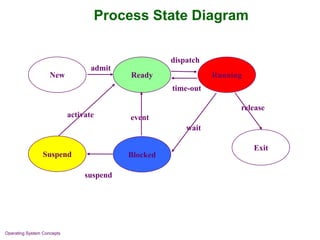
Process State Diagram
Ready
Blocked
Suspend
New Running
Exit
release
dispatch
time-out
event
activate
suspend
admit
wait
Main-Memory Management
 Memory is a large array of words or bytes, each with its own
address. Memory is a repository of quickly accessible data shared
by the CPU and I/O devices.
 To execute a program (or part) all of the instructions must be in
memory
 All (or part) of the data that is needed by the program must be in
memory.
 Main memory is a volatile storage device. It loses its contents in the
case of system failure.
 Memory management determines what is in memory and when
 Optimizing CPU utilization and computer response to users
 Memory management activities:
 Keeping track of which parts of memory are currently being used and
by whom
 Deciding which processes (or parts of processes) and data to move into
and out of memory
 Allocating and deallocating memory space as needed
File Management
 OS provides uniform, logical view of information storage
 Abstracts physical properties to logical storage unit - file
 A file is a collection of related information defined by its creator.
Commonly, files represent programs (both source and object
forms) and data.
 Each medium is controlled by device (i.e., disk drive, tape
drive).
 Varying properties include access speed, capacity, data-
transfer rate, access method (sequential or random).
 File-System management
 Files usually organized into directories
 Access control on most systems to determine who can access
and how (read, write, append)
 OS activities include
 Creating and deleting files and directories
 Primitives to manipulate(change name, type etc.) files and
directories
 Mapping files onto secondary storage
 Backup files onto stable (non-volatile) storage media
Secondary-Storage Management
 Since main memory (primary storage) is volatile and
too small to accommodate all data and programs
permanently, the computer system must provide
secondary storage to back up main memory.
 Usually disks used to store data and programs that
does not fit in main memory or data that must be kept
for a “long” period of time.
 The operating system is responsible for the following
activities in connection with disk management:
 Free space management
 Storage allocation
 Disk scheduling
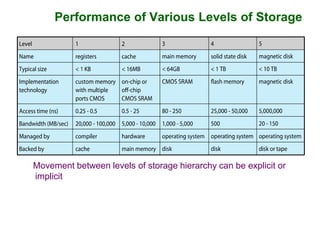
Performance of Various Levels of Storage
Movement between levels of storage hierarchy can be explicit or
implicit
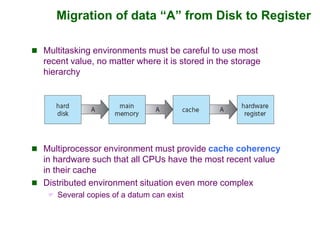
Migration of data “A” from Disk to Register
 Multitasking environments must be careful to use most
recent value, no matter where it is stored in the storage
hierarchy
 Multiprocessor environment must provide cache coherency
in hardware such that all CPUs have the most recent value
in their cache
 Distributed environment situation even more complex
 Several copies of a datum can exist
I/O Subsystem
 One purpose of OS is to hide peculiarities(characteristics)
of hardware devices from the user (only device driver
knows peculiarities of the specific device)
 I/O subsystem responsible for
 Memory management of I/O including buffering (storing data
temporarily while it is being transferred), caching (storing parts
of data in faster storage for performance), spooling (the
overlapping of output of one job with input of other jobs)
 General device-driver interface
 Drivers for specific hardware devices
Networking (Distributed Systems)
 A distributed system is a collection of processors that do
not share memory or a clock. Each processor has its
own local memory and clock.
 The processors in the system are connected through a
communication network.
 Communication takes place using protocols.
 A distributed system provides user access to various
system resources.
 Access to a shared resource allows:
 Computation speed-up
 Increased data availability
 Enhanced reliability
Protection and Security
 Protection – any mechanism for controlling access of
processes or users to resources defined by the OS
 Security – defense of the system against internal and external
attacks
 Huge range, including denial-of-service, worms, viruses, identity
theft, theft of service
 Systems generally first distinguish among users, to determine
who can do what
 User identities (user IDs, security IDs) include name and
associated number, one per user
 User ID then associated with all files, processes of that user to
determine access control
 Group identifier (group ID) allows set of users to be defined and
controls managed, then also associated with each process, thread
Operating System Services
 Operating systems provide an environment for execution of
programs and services to programs and users
 One set of operating-system services provides functions that
are helpful to the user:
 User interface - Almost all operating systems have an
user interface (UI).
Varies between Command-Line-Interface (CLI),
Graphics User Interface (GUI), Batch (commands
and directives to control those command are entered
into files, and those files are executed)
 Program execution - The system must be able to load a
program into memory and to run that program, end
execution, either normally or abnormally (indicating error)
 I/O operations - A running program may require I/O,
which may involve a file or an I/O device
Operating System Services (Cont.)
 One set of operating-system services provides functions that are helpful
to the user (Cont.):
 File-system manipulation - The file system is of particular interest.
Programs need to read and write files and directories, create and
delete them, search them, list file Information, permission
management.
 Communications – Processes may exchange information, on the
same computer or between computers over a network
 Communications may be via shared memory or through
message passing (packets moved by the OS)
 Error detection – OS needs to be constantly aware of possible
errors.
 May occur in the CPU and memory hardware, in I/O devices, in
user programs
 For each type of error, OS should take the appropriate action to
ensure correct and consistent computing
 Debugging facilities can greatly enhance the user’s and
programmer’s abilities to efficiently use the system
Operating System Services (Cont.)
 Another set of OS functions exists for ensuring the efficient
operation of the system itself via resource sharing
 Resource allocation - When multiple users or multiple jobs
running concurrently, resources must be allocated to each of
them
 Many types of resources - CPU cycles, main memory, file
storage, I/O devices.
 Accounting - To keep track of which users use how much and
what kinds of computer resources
 Protection and security - The owners of information stored in
a multiuser or networked computer system may want to control
use of that information, concurrent processes should not
interfere with each other
 Protection involves ensuring that all access to system
resources is controlled
 Security of the system from outsiders requires user
authentication, extends to defending external I/O devices
from invalid access attempts
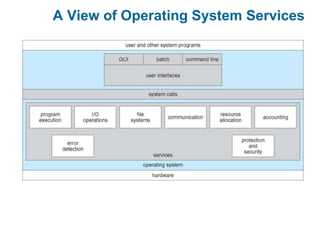
A View of Operating System Services
System Calls
 Programming interface to the services provided by the
OS(an interface between a running program and the OS).
 Typically written in a high-level language (C or C++)
 Mostly accessed by programs via a high-level Application
Programming Interface (API) rather than direct system
call use
 Three most common APIs are Win32 API for Windows,
POSIX API for POSIX-based systems (including virtually all
versions of UNIX, Linux, and Mac OS X), and Java API for
the Java virtual machine (JVM)
Note that the system-call names used throughout this text are
generic
System Call Implementation
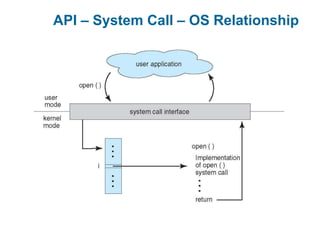
 Typically, a number associated with each system call
 System-call interface maintains a table indexed
according to these numbers
 The system call interface invokes the intended system call
in OS kernel and returns status of the system call and any
return values
 The caller need know nothing about how the system call is
implemented
 Just needs to obey API and understand what OS will do
as a result call
 Most details of OS interface hidden from programmer
by API
 Managed by run-time support library (set of functions
built into libraries included with compiler)
API – System Call – OS Relationship
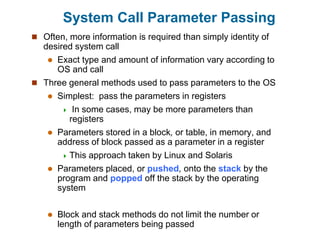
System Call Parameter Passing
 Often, more information is required than simply identity of
desired system call
 Exact type and amount of information vary according to
OS and call
 Three general methods used to pass parameters to the OS
 Simplest: pass the parameters in registers
 In some cases, may be more parameters than
registers
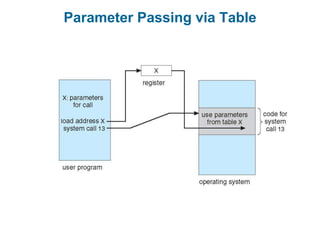
 Parameters stored in a block, or table, in memory, and
address of block passed as a parameter in a register
 This approach taken by Linux and Solaris
 Parameters placed, or pushed, onto the stack by the
program and popped off the stack by the operating
system
 Block and stack methods do not limit the number or
length of parameters being passed
Parameter Passing via Table
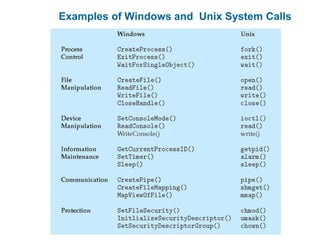
Examples of Windows and Unix System Calls
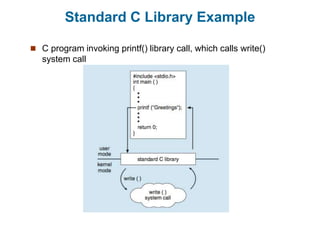
Standard C Library Example
 C program invoking printf() library call, which calls write()
system call
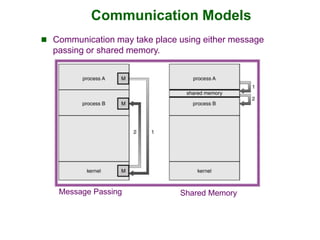
Communication Models
Message Passing Shared Memory
 Communication may take place using either message
passing or shared memory.
Operating System Structures
(reading assignment)
 General-purpose OS is very large program
 Various ways to structure ones
 Simple structure – MS-DOS
 More complex -- UNIX
 Layered – an abstrcation
 Microkernel -Mach
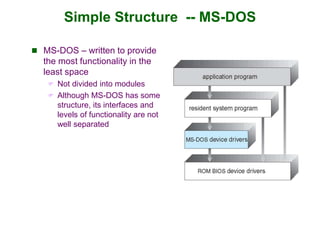
Simple Structure -- MS-DOS
 MS-DOS – written to provide
the most functionality in the
least space
 Not divided into modules
 Although MS-DOS has some
structure, its interfaces and
levels of functionality are not
well separated
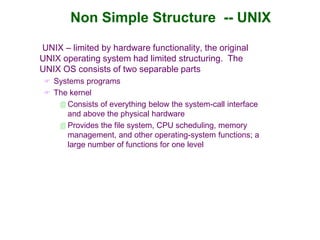
Non Simple Structure -- UNIX
UNIX – limited by hardware functionality, the original
UNIX operating system had limited structuring. The
UNIX OS consists of two separable parts
 Systems programs
 The kernel
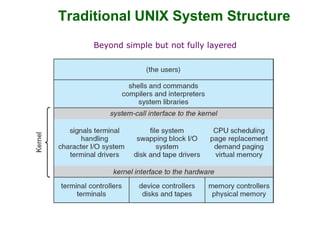
 Consists of everything below the system-call interface
and above the physical hardware
 Provides the file system, CPU scheduling, memory
management, and other operating-system functions; a
large number of functions for one level
Traditional UNIX System Structure
Beyond simple but not fully layered
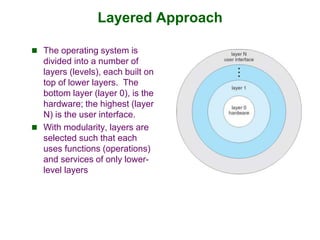
Layered Approach
 The operating system is
divided into a number of
layers (levels), each built on
top of lower layers. The
bottom layer (layer 0), is the
hardware; the highest (layer
N) is the user interface.
 With modularity, layers are
selected such that each
uses functions (operations)
and services of only lower-
level layers
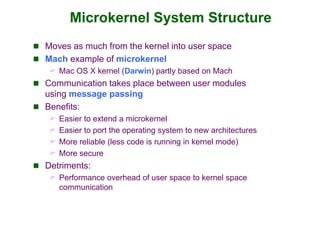
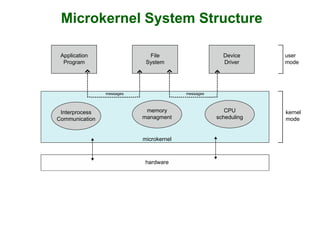
Microkernel System Structure
 Moves as much from the kernel into user space
 Mach example of microkernel
 Mac OS X kernel (Darwin) partly based on Mach
 Communication takes place between user modules
using message passing
 Benefits:
 Easier to extend a microkernel
 Easier to port the operating system to new architectures
 More reliable (less code is running in kernel mode)
 More secure
 Detriments:
 Performance overhead of user space to kernel space
communication
Microkernel System Structure
Application
Program
File
System
Device
Driver
Interprocess
Communication
memory
managment
CPU
scheduling
messages
messages
microkernel
hardware
user
mode
kernel
mode
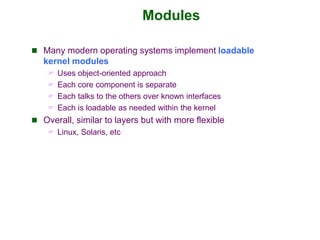
Modules
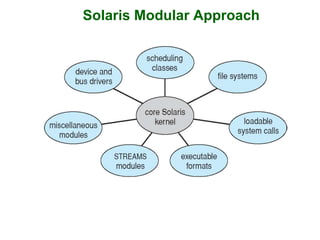
 Many modern operating systems implement loadable
kernel modules
 Uses object-oriented approach
 Each core component is separate
 Each talks to the others over known interfaces
 Each is loadable as needed within the kernel
 Overall, similar to layers but with more flexible
 Linux, Solaris, etc
Solaris Modular Approach
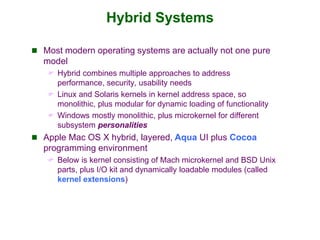
Hybrid Systems
 Most modern operating systems are actually not one pure
model
 Hybrid combines multiple approaches to address
performance, security, usability needs
 Linux and Solaris kernels in kernel address space, so
monolithic, plus modular for dynamic loading of functionality
 Windows mostly monolithic, plus microkernel for different
subsystem personalities
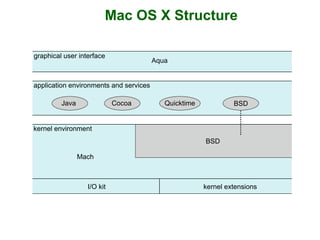
 Apple Mac OS X hybrid, layered, Aqua UI plus Cocoa
programming environment
 Below is kernel consisting of Mach microkernel and BSD Unix
parts, plus I/O kit and dynamically loadable modules (called
kernel extensions)
Mac OS X Structure
graphical user interface
Aqua
application environments and services
kernel environment
Java Cocoa Quicktime BSD
Mach
I/O kit kernel extensions
BSD
iOS
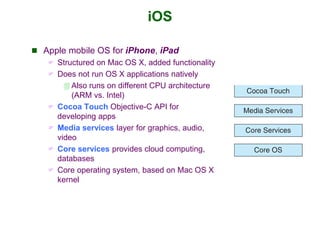
 Apple mobile OS for iPhone, iPad
 Structured on Mac OS X, added functionality
 Does not run OS X applications natively
 Also runs on different CPU architecture
(ARM vs. Intel)
 Cocoa Touch Objective-C API for
developing apps
 Media services layer for graphics, audio,
video
 Core services provides cloud computing,
databases
 Core operating system, based on Mac OS X
kernel
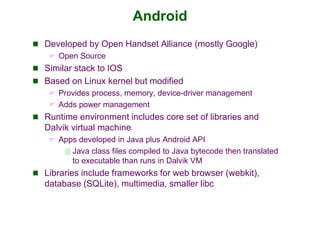
Android
 Developed by Open Handset Alliance (mostly Google)
 Open Source
 Similar stack to IOS
 Based on Linux kernel but modified
 Provides process, memory, device-driver management
 Adds power management
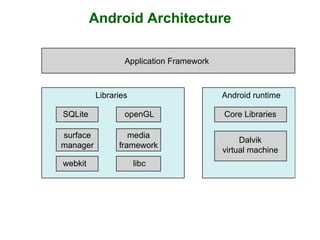
 Runtime environment includes core set of libraries and
Dalvik virtual machine
 Apps developed in Java plus Android API
 Java class files compiled to Java bytecode then translated
to executable than runs in Dalvik VM
 Libraries include frameworks for web browser (webkit),
database (SQLite), multimedia, smaller libc
Android Architecture
Applications
Application Framework
Android runtime
Core Libraries
Dalvik
virtual machine
Libraries
Linux kernel
SQLite openGL
surface
manager
webkit libc
media
framework
System Boot
 When power initialized on system, execution starts at a fixed
memory location
 Firmware ROM used to hold initial boot code
 Operating system must be made available to hardware so
hardware can start it
 Small piece of code – bootstrap loader, stored in ROM or
EEPROM locates the kernel, loads it into memory, and starts it
 Bootstrap program initializes all aspects of the system, from
CPU registers to device controller to memory contents.
 Common bootstrap loader, GRUB, allows selection of kernel
from multiple disks, versions, kernel options
 Kernel loads and system is then running(it can start
providing services to the system and its users).

ch3 - operating system structures.ppt

  • 1.
    Chapter 3: Operating-SystemStructures  System Components  Operating System Services  System Calls  Communication Models  Operating System Structures
  • 2.
    Common System Components Process Management  Main Memory Management  File Management  Secondary Storage Management  I/O System Management  Networking  Protection System
  • 3.
    Process Management  Aprocess is a program in execution. It is a unit of work within the system. Program is a passive entity (content of a file stored on the disk), process is an active entity (with a program counter specifying the next instruction to execute).  A process needs certain resources, including CPU time, memory, files, and I/O devices, to accomplish its task.  The operating system is responsible for the following activities in connection with process management.  Process creation and deletion.  process suspension and resumption.  Provision of mechanisms for:  process synchronization  process communication  Typically system has many processes, some user(execute user code), some operating system(execute system code), running concurrently on one or more CPUs  Concurrency by multiplexing the CPUs among the processes / threads
  • 4.
    Process Management Activities Theoperating system is responsible for the following activities in connection with process management:  Creating and deleting both user and system processes  Suspending and resuming processes  Providing mechanisms for process synchronization  Providing mechanisms for process communication  Providing mechanisms for deadlock handling
  • 5.
    Operating System Concepts ProcessState Diagram Ready Blocked Suspend New Running Exit release dispatch time-out event activate suspend admit wait
  • 6.
    Main-Memory Management  Memoryis a large array of words or bytes, each with its own address. Memory is a repository of quickly accessible data shared by the CPU and I/O devices.  To execute a program (or part) all of the instructions must be in memory  All (or part) of the data that is needed by the program must be in memory.  Main memory is a volatile storage device. It loses its contents in the case of system failure.  Memory management determines what is in memory and when  Optimizing CPU utilization and computer response to users  Memory management activities:  Keeping track of which parts of memory are currently being used and by whom  Deciding which processes (or parts of processes) and data to move into and out of memory  Allocating and deallocating memory space as needed
  • 7.
    File Management  OSprovides uniform, logical view of information storage  Abstracts physical properties to logical storage unit - file  A file is a collection of related information defined by its creator. Commonly, files represent programs (both source and object forms) and data.  Each medium is controlled by device (i.e., disk drive, tape drive).  Varying properties include access speed, capacity, data- transfer rate, access method (sequential or random).  File-System management  Files usually organized into directories  Access control on most systems to determine who can access and how (read, write, append)  OS activities include  Creating and deleting files and directories  Primitives to manipulate(change name, type etc.) files and directories  Mapping files onto secondary storage  Backup files onto stable (non-volatile) storage media
  • 8.
    Secondary-Storage Management  Sincemain memory (primary storage) is volatile and too small to accommodate all data and programs permanently, the computer system must provide secondary storage to back up main memory.  Usually disks used to store data and programs that does not fit in main memory or data that must be kept for a “long” period of time.  The operating system is responsible for the following activities in connection with disk management:  Free space management  Storage allocation  Disk scheduling
  • 9.
    Performance of VariousLevels of Storage Movement between levels of storage hierarchy can be explicit or implicit
  • 10.
    Migration of data“A” from Disk to Register  Multitasking environments must be careful to use most recent value, no matter where it is stored in the storage hierarchy  Multiprocessor environment must provide cache coherency in hardware such that all CPUs have the most recent value in their cache  Distributed environment situation even more complex  Several copies of a datum can exist
  • 11.
    I/O Subsystem  Onepurpose of OS is to hide peculiarities(characteristics) of hardware devices from the user (only device driver knows peculiarities of the specific device)  I/O subsystem responsible for  Memory management of I/O including buffering (storing data temporarily while it is being transferred), caching (storing parts of data in faster storage for performance), spooling (the overlapping of output of one job with input of other jobs)  General device-driver interface  Drivers for specific hardware devices
  • 12.
    Networking (Distributed Systems) A distributed system is a collection of processors that do not share memory or a clock. Each processor has its own local memory and clock.  The processors in the system are connected through a communication network.  Communication takes place using protocols.  A distributed system provides user access to various system resources.  Access to a shared resource allows:  Computation speed-up  Increased data availability  Enhanced reliability
  • 13.
    Protection and Security Protection – any mechanism for controlling access of processes or users to resources defined by the OS  Security – defense of the system against internal and external attacks  Huge range, including denial-of-service, worms, viruses, identity theft, theft of service  Systems generally first distinguish among users, to determine who can do what  User identities (user IDs, security IDs) include name and associated number, one per user  User ID then associated with all files, processes of that user to determine access control  Group identifier (group ID) allows set of users to be defined and controls managed, then also associated with each process, thread
  • 14.
    Operating System Services Operating systems provide an environment for execution of programs and services to programs and users  One set of operating-system services provides functions that are helpful to the user:  User interface - Almost all operating systems have an user interface (UI). Varies between Command-Line-Interface (CLI), Graphics User Interface (GUI), Batch (commands and directives to control those command are entered into files, and those files are executed)  Program execution - The system must be able to load a program into memory and to run that program, end execution, either normally or abnormally (indicating error)  I/O operations - A running program may require I/O, which may involve a file or an I/O device
  • 15.
    Operating System Services(Cont.)  One set of operating-system services provides functions that are helpful to the user (Cont.):  File-system manipulation - The file system is of particular interest. Programs need to read and write files and directories, create and delete them, search them, list file Information, permission management.  Communications – Processes may exchange information, on the same computer or between computers over a network  Communications may be via shared memory or through message passing (packets moved by the OS)  Error detection – OS needs to be constantly aware of possible errors.  May occur in the CPU and memory hardware, in I/O devices, in user programs  For each type of error, OS should take the appropriate action to ensure correct and consistent computing  Debugging facilities can greatly enhance the user’s and programmer’s abilities to efficiently use the system
  • 16.
    Operating System Services(Cont.)  Another set of OS functions exists for ensuring the efficient operation of the system itself via resource sharing  Resource allocation - When multiple users or multiple jobs running concurrently, resources must be allocated to each of them  Many types of resources - CPU cycles, main memory, file storage, I/O devices.  Accounting - To keep track of which users use how much and what kinds of computer resources  Protection and security - The owners of information stored in a multiuser or networked computer system may want to control use of that information, concurrent processes should not interfere with each other  Protection involves ensuring that all access to system resources is controlled  Security of the system from outsiders requires user authentication, extends to defending external I/O devices from invalid access attempts
  • 17.
    A View ofOperating System Services
  • 18.
    System Calls  Programminginterface to the services provided by the OS(an interface between a running program and the OS).  Typically written in a high-level language (C or C++)  Mostly accessed by programs via a high-level Application Programming Interface (API) rather than direct system call use  Three most common APIs are Win32 API for Windows, POSIX API for POSIX-based systems (including virtually all versions of UNIX, Linux, and Mac OS X), and Java API for the Java virtual machine (JVM) Note that the system-call names used throughout this text are generic
  • 19.
    System Call Implementation Typically, a number associated with each system call  System-call interface maintains a table indexed according to these numbers  The system call interface invokes the intended system call in OS kernel and returns status of the system call and any return values  The caller need know nothing about how the system call is implemented  Just needs to obey API and understand what OS will do as a result call  Most details of OS interface hidden from programmer by API  Managed by run-time support library (set of functions built into libraries included with compiler)
  • 20.
    API – SystemCall – OS Relationship
  • 21.
    System Call ParameterPassing  Often, more information is required than simply identity of desired system call  Exact type and amount of information vary according to OS and call  Three general methods used to pass parameters to the OS  Simplest: pass the parameters in registers  In some cases, may be more parameters than registers  Parameters stored in a block, or table, in memory, and address of block passed as a parameter in a register  This approach taken by Linux and Solaris  Parameters placed, or pushed, onto the stack by the program and popped off the stack by the operating system  Block and stack methods do not limit the number or length of parameters being passed
  • 22.
  • 23.
    Examples of Windowsand Unix System Calls
  • 24.
    Standard C LibraryExample  C program invoking printf() library call, which calls write() system call
  • 25.
    Communication Models Message PassingShared Memory  Communication may take place using either message passing or shared memory.
  • 26.
    Operating System Structures (readingassignment)  General-purpose OS is very large program  Various ways to structure ones  Simple structure – MS-DOS  More complex -- UNIX  Layered – an abstrcation  Microkernel -Mach
  • 27.
    Simple Structure --MS-DOS  MS-DOS – written to provide the most functionality in the least space  Not divided into modules  Although MS-DOS has some structure, its interfaces and levels of functionality are not well separated
  • 28.
    Non Simple Structure-- UNIX UNIX – limited by hardware functionality, the original UNIX operating system had limited structuring. The UNIX OS consists of two separable parts  Systems programs  The kernel  Consists of everything below the system-call interface and above the physical hardware  Provides the file system, CPU scheduling, memory management, and other operating-system functions; a large number of functions for one level
  • 29.
    Traditional UNIX SystemStructure Beyond simple but not fully layered
  • 30.
    Layered Approach  Theoperating system is divided into a number of layers (levels), each built on top of lower layers. The bottom layer (layer 0), is the hardware; the highest (layer N) is the user interface.  With modularity, layers are selected such that each uses functions (operations) and services of only lower- level layers
  • 31.
    Microkernel System Structure Moves as much from the kernel into user space  Mach example of microkernel  Mac OS X kernel (Darwin) partly based on Mach  Communication takes place between user modules using message passing  Benefits:  Easier to extend a microkernel  Easier to port the operating system to new architectures  More reliable (less code is running in kernel mode)  More secure  Detriments:  Performance overhead of user space to kernel space communication
  • 32.
  • 33.
    Modules  Many modernoperating systems implement loadable kernel modules  Uses object-oriented approach  Each core component is separate  Each talks to the others over known interfaces  Each is loadable as needed within the kernel  Overall, similar to layers but with more flexible  Linux, Solaris, etc
  • 34.
  • 35.
    Hybrid Systems  Mostmodern operating systems are actually not one pure model  Hybrid combines multiple approaches to address performance, security, usability needs  Linux and Solaris kernels in kernel address space, so monolithic, plus modular for dynamic loading of functionality  Windows mostly monolithic, plus microkernel for different subsystem personalities  Apple Mac OS X hybrid, layered, Aqua UI plus Cocoa programming environment  Below is kernel consisting of Mach microkernel and BSD Unix parts, plus I/O kit and dynamically loadable modules (called kernel extensions)
  • 36.
    Mac OS XStructure graphical user interface Aqua application environments and services kernel environment Java Cocoa Quicktime BSD Mach I/O kit kernel extensions BSD
  • 37.
    iOS  Apple mobileOS for iPhone, iPad  Structured on Mac OS X, added functionality  Does not run OS X applications natively  Also runs on different CPU architecture (ARM vs. Intel)  Cocoa Touch Objective-C API for developing apps  Media services layer for graphics, audio, video  Core services provides cloud computing, databases  Core operating system, based on Mac OS X kernel
  • 38.
    Android  Developed byOpen Handset Alliance (mostly Google)  Open Source  Similar stack to IOS  Based on Linux kernel but modified  Provides process, memory, device-driver management  Adds power management  Runtime environment includes core set of libraries and Dalvik virtual machine  Apps developed in Java plus Android API  Java class files compiled to Java bytecode then translated to executable than runs in Dalvik VM  Libraries include frameworks for web browser (webkit), database (SQLite), multimedia, smaller libc
  • 39.
    Android Architecture Applications Application Framework Androidruntime Core Libraries Dalvik virtual machine Libraries Linux kernel SQLite openGL surface manager webkit libc media framework
  • 40.
    System Boot  Whenpower initialized on system, execution starts at a fixed memory location  Firmware ROM used to hold initial boot code  Operating system must be made available to hardware so hardware can start it  Small piece of code – bootstrap loader, stored in ROM or EEPROM locates the kernel, loads it into memory, and starts it  Bootstrap program initializes all aspects of the system, from CPU registers to device controller to memory contents.  Common bootstrap loader, GRUB, allows selection of kernel from multiple disks, versions, kernel options  Kernel loads and system is then running(it can start providing services to the system and its users).