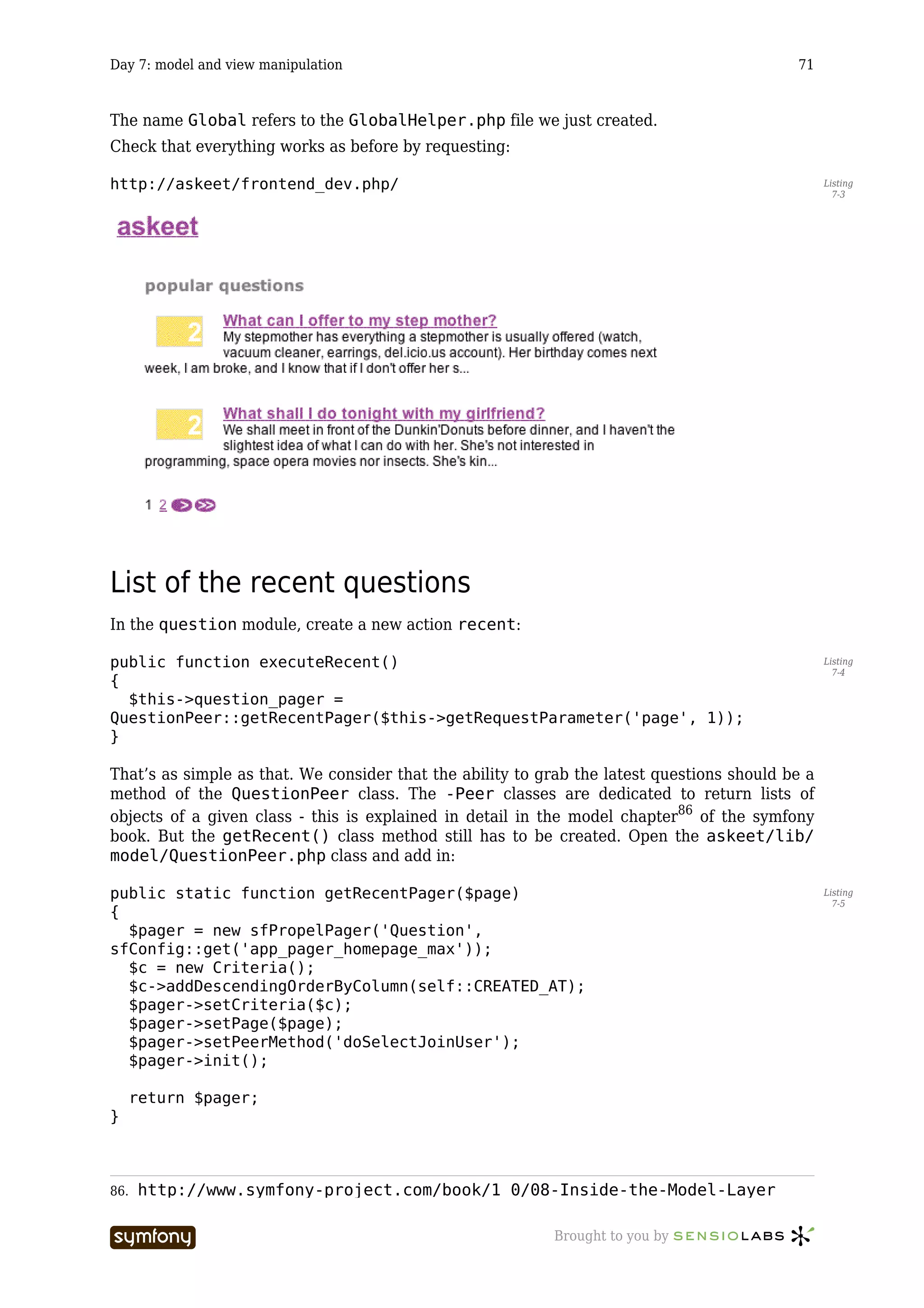
The Askeet Tutorial


                                             symfony 1.0


                                  This PDF is brought to you by


License: Creative Commons Attribution-Noncommercial-No Derivative Works 3.0 Unported License
Version: askeet-1.0-en-2010-05-24
Table of Contents                                                                                                                               ii


Table of Contents

Day 1: starting up a project .............................................................................. 9
 The challenge............................................................................................................. 9
 The project................................................................................................................. 9
 What for today ......................................................................................................... 10
 Symfony installation ................................................................................................ 10
 Project Setup ........................................................................................................... 11
 Web service setup.................................................................................................... 11
      Web server configuration ................................................................................................... 11
      Declare the domain name................................................................................................... 12
      Test the new configuration................................................................................................. 12
   IIS ............................................................................................................................ 13
   Subversion ............................................................................................................... 13
   See you Tomorrow ................................................................................................... 15
Day 2: setting up a data model ....................................................................... 17
 Previously on symfony ............................................................................................. 17
 The project unveiled ................................................................................................ 17
 Where to start? ........................................................................................................ 18
 Data Model .............................................................................................................. 18
      Relational model................................................................................................................. 18
      schema.xml....................................................................................................................... 19
      Object model build ............................................................................................................. 22
   The database............................................................................................................ 22
      Connection.......................................................................................................................... 22
      Build ................................................................................................................................... 23
   Test data access via a CRUD ................................................................................... 23
   See you Tomorrow ................................................................................................... 25
Day 3: dive into the MVC architecture ........................................................... 26
 Previously on symfony ............................................................................................. 26
 The MVC model ....................................................................................................... 26
 Change the layout.................................................................................................... 27
 A few words about environments ............................................................................ 28
 Redefine the default homepage ............................................................................... 29
 Define test data........................................................................................................ 29
 Create a batch to populate the database................................................................. 31
      Batch skeleton .................................................................................................................... 31
      Data import......................................................................................................................... 32
      Launch the batch................................................................................................................ 32
   Accessing the data in the model .............................................................................. 33
   Modify the question/list template ............................................................................ 34
   Cleanup.................................................................................................................... 35


                                   -----------------                                       Brought to you by
Table of Contents                                                                                                                            iii


   See you Tomorrow ................................................................................................... 36
Day 4: refactoring ........................................................................................... 37
 Previously on symfony ............................................................................................. 37
 Show the answers to a question .............................................................................. 37
      A quick look at the action ................................................................................................... 38
      Modify the showSuccess.php template........................................................................... 38
      Add some new test data ..................................................................................................... 39
   Modify the model, part I .......................................................................................... 40
   Don’t repeat yourself ............................................................................................... 41
   Modify the model, part II ......................................................................................... 42
      Add a field to the User object model ................................................................................. 42
      Modify the save() method of the Interest object ......................................................... 42
      Secure the updating request with a transaction ................................................................ 43
      Change the template .......................................................................................................... 44
      Test the validity of the modification ................................................................................... 45
   Same for the answers .............................................................................................. 45
   Routing .................................................................................................................... 47
      Create an alternate version of the title .............................................................................. 47
      Custom class....................................................................................................................... 48
      Change the links to the show action .................................................................................. 49
      Changing the routing rules ................................................................................................ 49
   See you Tomorrow ................................................................................................... 50
Day 5: forms and pager ................................................................................... 51
 Previously on symfony ............................................................................................. 51
 Login form ............................................................................................................... 51
      Create the user/login action .......................................................................................... 52
      Create the loginSuccess.php template ......................................................................... 52
      Handle the login form submission...................................................................................... 53
      Grant privileges .................................................................................................................. 54
      Add the user/logout action ............................................................................................ 54
      Update the layout ............................................................................................................... 55
   Question pager ........................................................................................................ 55
      Modify the question/list action ................................................................................... 55
      Use a custom parameter .................................................................................................... 56
      Modify the listSuccess.php template........................................................................... 56
      Add page navigation ........................................................................................................... 57
      Add a routing rule for the subsequent pages ..................................................................... 58
   Refactoring .............................................................................................................. 58
      Model.................................................................................................................................. 58
      Templates ........................................................................................................................... 59
   See you Tomorrow ................................................................................................... 59
Day 6: security and form validation ................................................................ 60
 Previously on symfony ............................................................................................. 60
 Login form validation............................................................................................... 60
      Validation file ..................................................................................................................... 60
      Error handling .................................................................................................................... 61
      Template error helpers....................................................................................................... 61
      Style errors......................................................................................................................... 62
   Authenticate a user.................................................................................................. 62
      Custom validator ................................................................................................................ 62
      Password storage ............................................................................................................... 63
      Add password in the test data ............................................................................................ 63


                                  -----------------                                       Brought to you by
Table of Contents                                                                                                                              iv


      Custom validator ................................................................................................................ 62
      Remove the code from the action....................................................................................... 66
   Restrict access ......................................................................................................... 66
   How about a bit of refactoring?............................................................................... 67
   See you Tomorrow ................................................................................................... 68
Day 7: model and view manipulation .............................................................. 69
 Previously on symfony ............................................................................................. 69
 Prefactoring ............................................................................................................. 69
 List of the recent questions ..................................................................................... 71
 List of the recent answers ....................................................................................... 73
 User profile .............................................................................................................. 75
 Add a navigation bar................................................................................................ 76
      Add the component in the layout ....................................................................................... 77
      Define what action goes into the component ..................................................................... 77
      Write the sidebar/default action and template ........................................................... 77
   A little more view configuration .............................................................................. 78
   Look at what we have done ..................................................................................... 80
   See you Tomorrow ................................................................................................... 81
Day 8: AJAX interactions ................................................................................. 82
 Previously on symfony ............................................................................................. 82
 Add an indicator in the layout ................................................................................. 82
 Add an AJAX interaction to declare interest............................................................ 83
      Caller .................................................................................................................................. 83
      Result zone ......................................................................................................................... 85
      Server action ...................................................................................................................... 85
      Final test............................................................................................................................. 86
   Add an inline ‘sign-in’ form...................................................................................... 86
      Add a hidden login form to the layout ................................................................................ 86
      Have the form appear when a non-authenticated user clicks an interested link............... 87
      Login the user..................................................................................................................... 87
   See you Tomorrow ................................................................................................... 88
Day 9: local improvements.............................................................................. 89
 Previously on symfony ............................................................................................. 89
 Allow rich text formatting on questions and answers ............................................. 89
      Markdown........................................................................................................................... 89
   Test Markdown text ................................................................................................. 90
      Markdown library ............................................................................................................... 90
      Extend the model................................................................................................................ 90
      Override the setBody method........................................................................................... 90
      Update the test data ........................................................................................................... 91
      Modify the templates.......................................................................................................... 91
   Hide all ids.............................................................................................................. 92
      Change the action............................................................................................................... 92
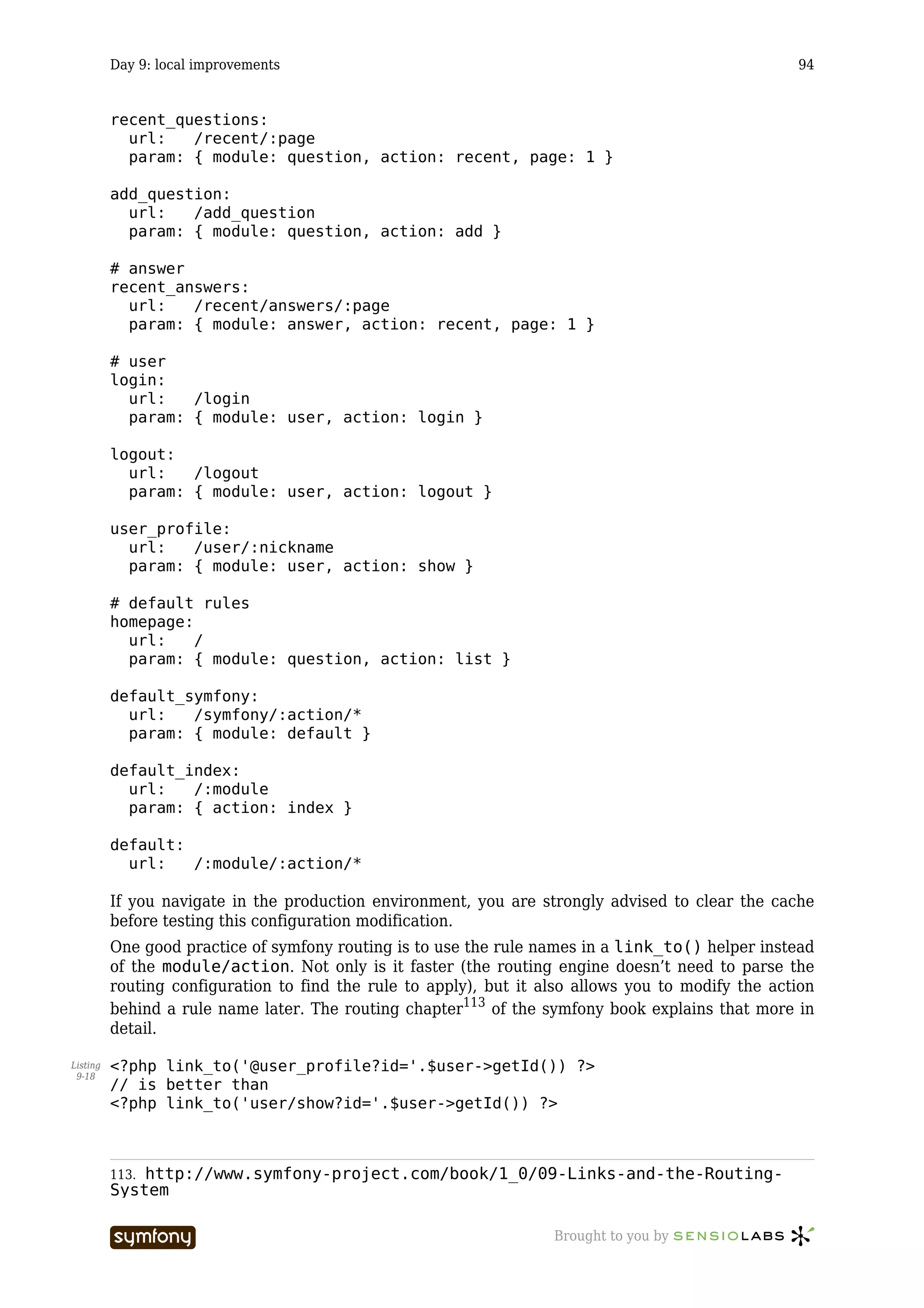
      Change the model............................................................................................................... 93
      Change the template .......................................................................................................... 93
      Add the routing rule ........................................................................................................... 93
   Routing .................................................................................................................... 93
   See you Tomorrow ................................................................................................... 95
Day 10: Alter data with Ajax forms ................................................................. 96
 Previously on symfony ............................................................................................. 96
 Add a new question.................................................................................................. 96

                                   -----------------                                       Brought to you by
Table of Contents                                                                                                                               v


      Restrict access to registered users .................................................................................... 96
      The addSuccess.php template ........................................................................................ 97
      Form validation .................................................................................................................. 98
   Handle the form submission .................................................................................... 98
   Add a new answer.................................................................................................... 99
      Add the AJAX form.............................................................................................................. 99
      A little refactoring ............................................................................................................ 100
      Handle the form submission............................................................................................. 101
      The answer/add action................................................................................................... 101
      Test it................................................................................................................................ 103
   See you Tomorrow ................................................................................................. 103
Day 11: syndication feed ............................................................................... 104
 Previously on symfony ........................................................................................... 104
 Popular questions feed .......................................................................................... 104
      Link to the feed in the head ............................................................................................. 104
      Install the plug-in ............................................................................................................. 104
      Create the action .............................................................................................................. 105
      Change the view configuration......................................................................................... 105
      Write the template............................................................................................................ 106
      Test it................................................................................................................................ 106
   The magic .............................................................................................................. 107
   Interface improvements......................................................................................... 108
      Routing ............................................................................................................................. 108
      RSS image ........................................................................................................................ 108
   See you Tomorrow ................................................................................................. 108
Day 12: Emails............................................................................................... 109
 Previously on symfony ........................................................................................... 109
 Password recovery................................................................................................. 109
      Password request form..................................................................................................... 109
      Form validation ................................................................................................................ 110
      Handling the request........................................................................................................ 110
   Send an email ........................................................................................................ 112
      Email sending action ........................................................................................................ 112
      Mail template ................................................................................................................... 113
      Alternate mail template.................................................................................................... 113
      Configuration.................................................................................................................... 114
      Test ................................................................................................................................... 114
   See you Tomorrow ................................................................................................. 114
Day 13: Tags.................................................................................................. 115
 Previously on symfony ........................................................................................... 115
 The QuestionTag class ........................................................................................ 115
      Schema update ................................................................................................................. 116
      Custom class..................................................................................................................... 117
      Extend the model.............................................................................................................. 118
      Add some test data ........................................................................................................... 118
   Display the tags of a question................................................................................ 118
      Extend model.................................................................................................................... 118
      Modify the view ................................................................................................................ 119
      Test it................................................................................................................................ 120
   Display a short list of popular tags for a question................................................. 120
      Extend the model.............................................................................................................. 118
      Modify the view ................................................................................................................ 119


                                   -----------------                                       Brought to you by
Table of Contents                                                                                                                              vi


      Test ................................................................................................................................... 123
   Display the list of questions tagged with a word................................................... 123
      The tag/show action ....................................................................................................... 123
      Extend the model.............................................................................................................. 118
      Create the template.......................................................................................................... 124
      Add the page parameter in the routing rule.................................................................... 124
      Test it................................................................................................................................ 120
   See you Tomorrow ................................................................................................. 124
Day 14: Tags, part II ..................................................................................... 126
 Previously on symfony ........................................................................................... 126
 Add tags to a question ........................................................................................... 126
      The form ........................................................................................................................... 126
      Autocomplete.................................................................................................................... 127
      Remote form ..................................................................................................................... 128
      Test it................................................................................................................................ 129
   Display the tag bubble ........................................................................................... 130
      Extend the QuestionTagPeer class............................................................................... 130
      Display a tag bubble ......................................................................................................... 131
      Style the tag list items...................................................................................................... 131
   See you Tomorrow ................................................................................................. 132
Day 15: Unit tests.......................................................................................... 133
 Previously on symfony ........................................................................................... 133
 Simple test ............................................................................................................. 133
 Unit tests in a symfony project .............................................................................. 134
      Default unit tests .............................................................................................................. 134
      Add a unit test .................................................................................................................. 135
      Running unit tests ............................................................................................................ 136
      The other way around ...................................................................................................... 136
      When a test fails ............................................................................................................... 137
   Simulating a web browsing session....................................................................... 138
      The sfTestBrowser object............................................................................................. 138
      The WebTestCase object................................................................................................. 139
      Selenium........................................................................................................................... 140
   A few words about environments .......................................................................... 144
   See you Tomorrow ................................................................................................. 144
Day 16: Lazy day............................................................................................ 146
 See you Tomorrow ................................................................................................. 147
Day 17: API.................................................................................................... 148
 Previously on symfony ........................................................................................... 148
 The API .................................................................................................................. 148
 HTTP Authentication ............................................................................................. 149
 API response .......................................................................................................... 152
      api/index action ............................................................................................................ 152
      questionSuccess.php template................................................................................... 153
      Test it................................................................................................................................ 153
   Integrating an external API ................................................................................... 153
   Paypal donation ..................................................................................................... 154
   See you Tomorrow ................................................................................................. 155
Day 18: Filters ............................................................................................... 156
 Previously on symfony ........................................................................................... 156


                                   -----------------                                       Brought to you by
Table of Contents                                                                                                                           vii


   Configurable feature.............................................................................................. 156
   Create a filter......................................................................................................... 156
   Get a permanent tag from the domain name......................................................... 157
   Model modifications .............................................................................................. 158
      Filter lists according to the permanent tag...................................................................... 159
      Lists of tags for a question or a user ................................................................................ 160
      Append the permanent tag to new questions................................................................... 160
   Server configuration .............................................................................................. 161
   See you Tomorrow ................................................................................................. 162
Day 19: Performance and cache ................................................................... 163
 Previously on symfony ........................................................................................... 163
 Load testing tools .................................................................................................. 163
      JMeter............................................................................................................................... 164
      Apache’s ab ...................................................................................................................... 165
   Improve performances with the cache .................................................................. 166
      Put the result of the action in the cache .......................................................................... 167
      Build a staging environment ............................................................................................ 168
      Put a template fragment in the cache .............................................................................. 169
      Clear selective parts of the cache .................................................................................... 170
   See you Tomorrow ................................................................................................. 171
Day 20: Administration and moderation....................................................... 172
 Previously on symfony ........................................................................................... 172
 The expected result: what the client says ............................................................. 172
      Stories .............................................................................................................................. 172
      Story #1: Profile management ......................................................................................... 173
      Story #2: Report of problematic questions or answers ................................................... 173
      Story #3: Handling of problematic questions or answers ............................................... 173
      Story #4: handling of problematic tags ........................................................................... 173
      Story #4: Handling of problematic users ......................................................................... 173
      Is that all? ......................................................................................................................... 174
   Backend vs. enhanced frontend............................................................................. 174
   The functionality: what the developers understand .............................................. 175
   Implementation...................................................................................................... 176
      New tables........................................................................................................................ 176
      Cascade deletion .............................................................................................................. 177
      Add links in the sidebar for users with credentials.......................................................... 178
      AJAX report....................................................................................................................... 180
      New action links for users with credentials ..................................................................... 182
      Access restriction ............................................................................................................. 183
      New moderator and administrator actions............................................................... 184
      Log deletions .................................................................................................................... 184
   See you Tomorrow ................................................................................................. 185
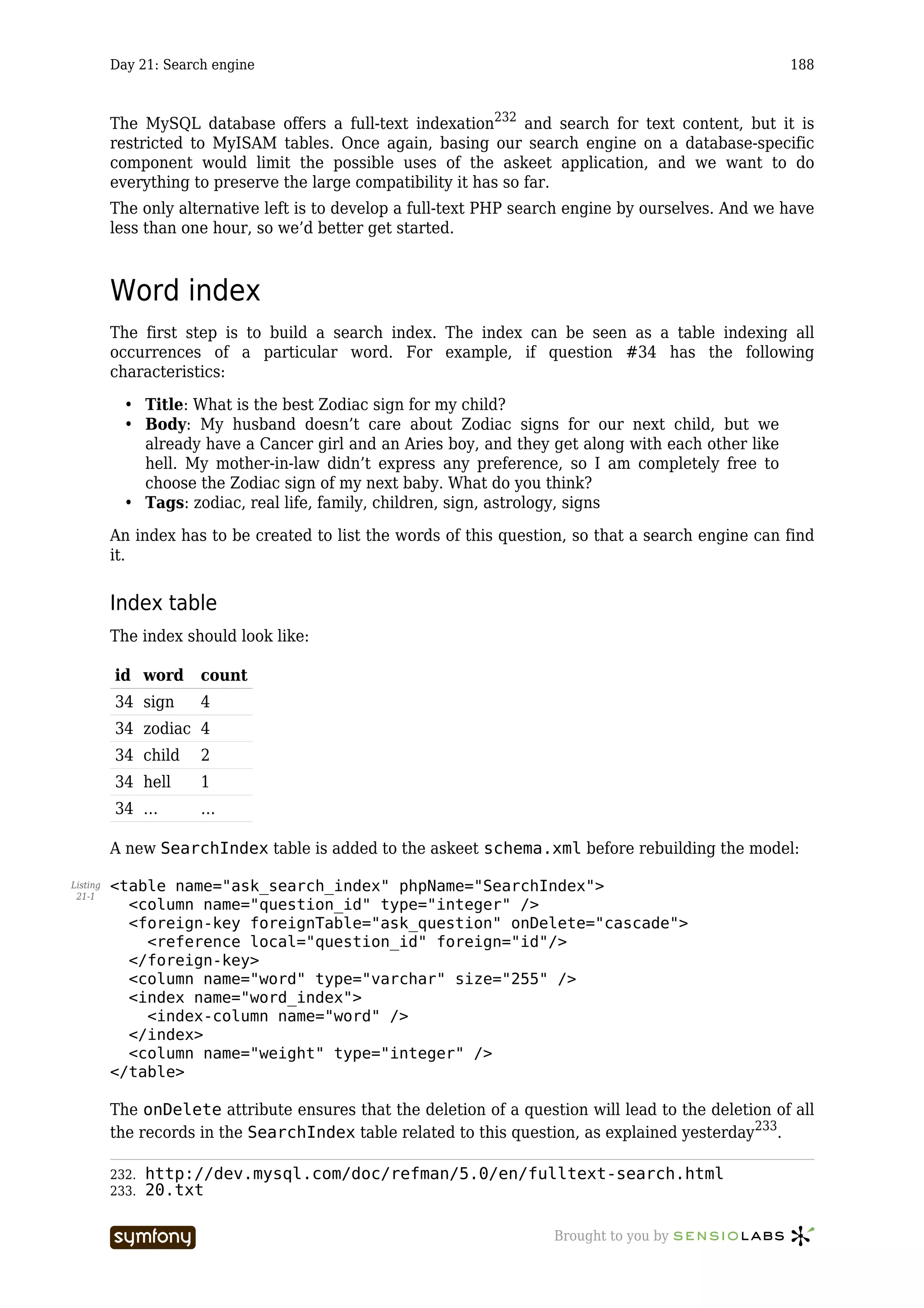
Day 21: Search engine .................................................................................. 187
 Previously on symfony ........................................................................................... 187
 How to build a search engine? .............................................................................. 187
 Word index............................................................................................................. 188
      Index table........................................................................................................................ 188
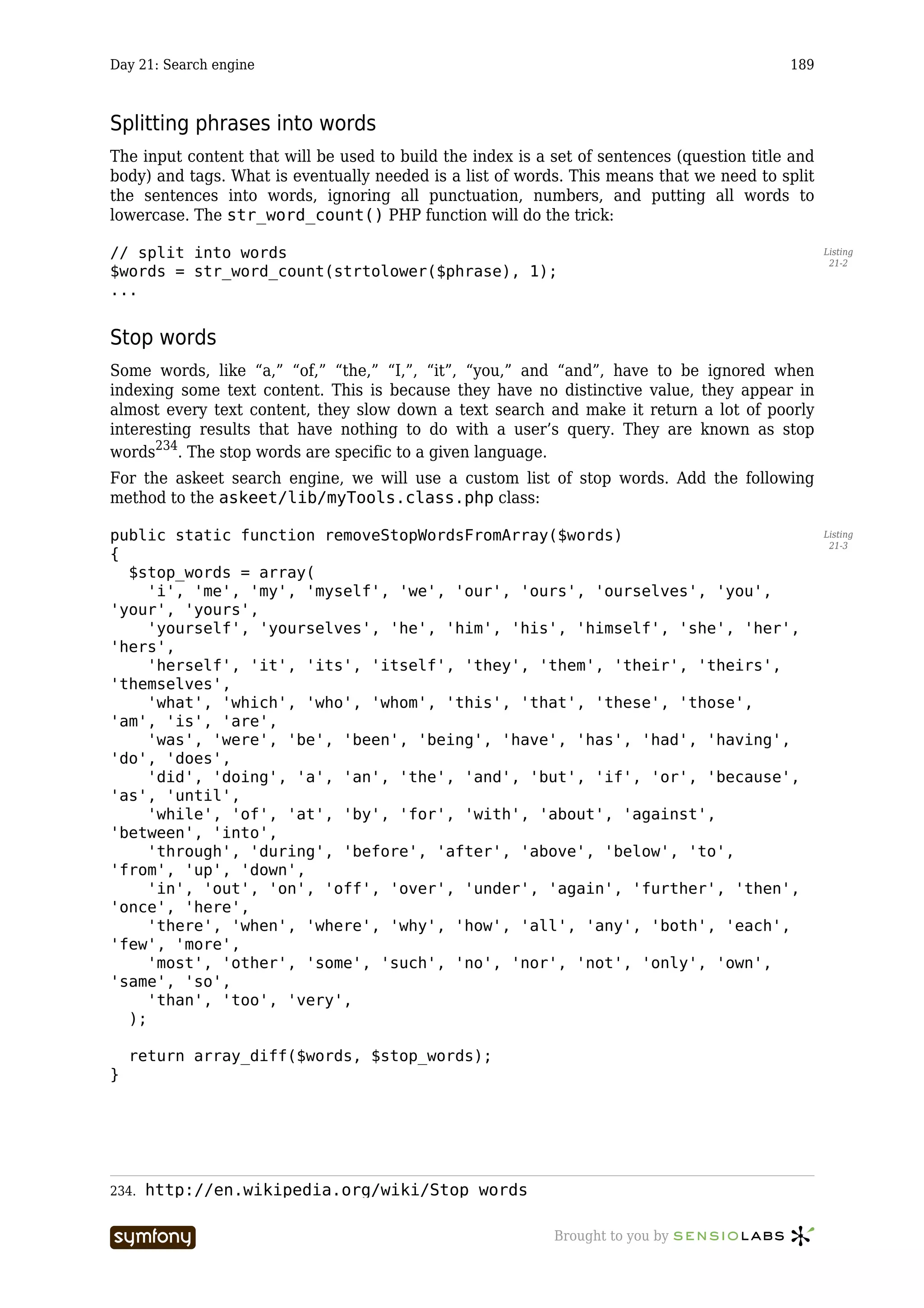
      Splitting phrases into words............................................................................................. 189
      Stop words........................................................................................................................ 189
      Stemming ......................................................................................................................... 190
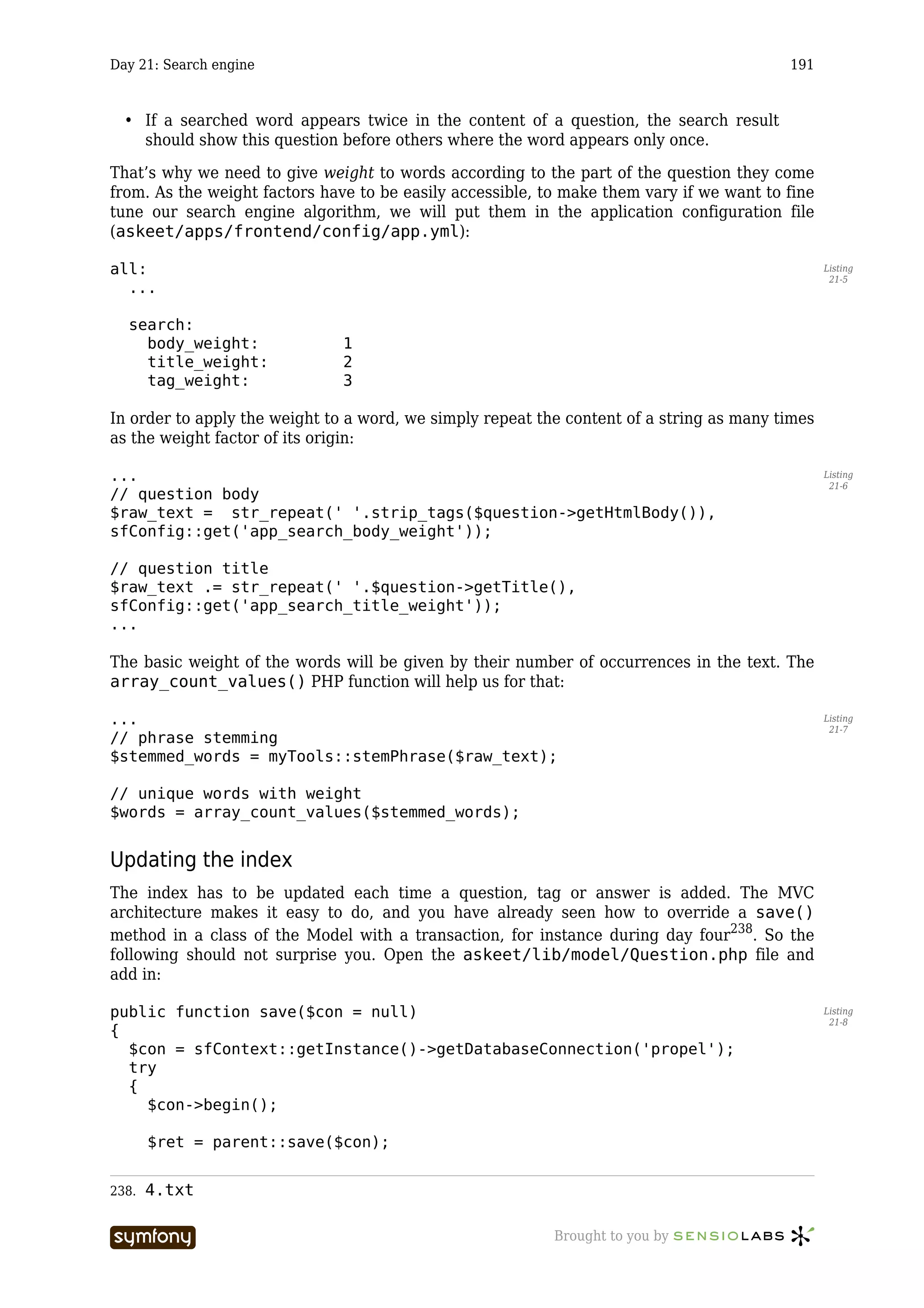
      Giving weight to words..................................................................................................... 190
      Updating the index ........................................................................................................... 191


                                  -----------------                                       Brought to you by
Table of Contents                                                                                                                          viii


      Test the index builder....................................................................................................... 193
   The search function ............................................................................................... 194
      AND or OR? ........................................................................................................................ 194
      The search method ........................................................................................................... 194
      The search form................................................................................................................ 196
      Display the search result.................................................................................................. 198
   See you Tomorrow ................................................................................................. 199
Day 22: Transfer to production..................................................................... 200
 Previously on symfony ........................................................................................... 200
 Synchronization ..................................................................................................... 200
      Good practices.................................................................................................................. 200
      The symfony sync command ......................................................................................... 201
      Ignoring irrelevant files.................................................................................................... 201
   Production server configuration ............................................................................ 202
      Installing symfony in a production server ........................................................................ 202
      Access to the symfony commands in production.............................................................. 203
      Web command .................................................................................................................. 204
   Upgrading your application ................................................................................... 205
      Show unavailability notice................................................................................................ 205
      Use two versions of your application ............................................................................... 206
      Switching databases......................................................................................................... 206
   See you Tomorrow ................................................................................................. 207
Day 23: Internationalization ......................................................................... 208
 Previously on symfony ........................................................................................... 208
 Localization............................................................................................................ 208
      Content ............................................................................................................................. 208
      Look and feel .................................................................................................................... 209
      Language-dependent functions ........................................................................................ 209
      Database content.............................................................................................................. 209
   Internationalization ............................................................................................... 209
      Set the culture.................................................................................................................. 209
      Dates, Times, Numbers, Currency, Measurements.......................................................... 210
      Interface translation......................................................................................................... 211
      Automated translation ...................................................................................................... 213
      Don’t forget ...................................................................................................................... 213
   See you Tomorrow ................................................................................................. 215
Day 24: What’s next?..................................................................................... 216
 Previously on symfony ........................................................................................... 216
 Use it...................................................................................................................... 216
 Install it.................................................................................................................. 216
      Download.......................................................................................................................... 217
      Documentation ................................................................................................................. 217
      File structure.................................................................................................................... 217
      Data model ....................................................................................................................... 218
   Contribute to it ...................................................................................................... 218
   Acknowledgements ................................................................................................ 219
   See you soon .......................................................................................................... 219


                                  -----------------                                      Brought to you by
Day 1: starting up a project                                                                  9


Day 1

starting up a project


The challenge
The symfony advent calendar is a set of 24 tutorials, published day-by-day between December
1st and Christmas. That’s right, every day including week-ends, a new tutorial will be
published. Each tutorial is meant to last less than one hour, and will be the occasion to see
the ongoing development of a web 2.0 application, from A to Z. For Christmas time, the
resulting application will be put online, and the source code made open source. This
application will be usable, interesting, useful, and fun.
Twenty-four times less than one hour equals less than a day, and that’s exactly how long we
think that a developer needs to learn symfony. Every day, new features will be added to the
application, and we’ll take advantage of this development to show you how to take advantage
of symfony’s functionality as well as good practices in symfony web development. Every day,
you will realize how fast and efficient it is to develop a web app with symfony, and you will
want to know more.
Considering that it wouldn’t be enough of a challenge with just that, and also because we are
lazy folks, we have no plans for the 21st day - winter time. The feature that the community
will require the most will be added to the application that day, without preparation, and we’ll
make it work. It will be the get-a-symfony-guru-for-a-day day.


The project
The application to be designed could have been a trivial “show-and-tell” application, like a to-
do list, a phone book, or a bookstore. But we want to use symfony on an original project,
something useful, with numerous features and an important size. The goal is really to prove
that symfony can be used in complex situations, to develop professional applications with
style and little effort.
We also hope that lots of people will actually use the application, in order to show that a
symfony website can support an important load. That’s why the application needs to bring an
actual service, and to answer an existing need - or to create a new one. The launch of the
website will be a live stress test; this also means that we will need you, humble readers, to
digg/bookmark/blog the site and talk about it in real life to check how many visits it can
support.
The content of the project will be kept secret for another day. We still have much to do today
without describing a full-featured web 2.0 application. This should give you some time to
argue and launch additional hypothesis. However, we need a name, so let’s call it: askeet.


                           -----------------                Brought to you by
Day 1: starting up a project                                                                    10


          What for today
          The objective of the day is to display a page of the application in a web browser, and to setup
          a professional development environment. This includes installation of symfony, creation of an
          application, web server configuration, and setup of a source version control system.
          It should be easy for those who already followed the previous tutorials, and not very hard for
          others. And everyone should learn something new.
          We’ll assume that you use a Unix-like system with Apache, MySQL and PHP 5 installed. If you
          run a Windows system, don’t panic: it will also work fine, you’ll just have to type a few
          commands in the cmd prompt.

                  Unix shell commands can come in handy in a Windows environment. If you would like to
                  use tools like tar, gzip, or grep on Windows you can install Cygwin1. The official docs are
                  a little sparse, so a good installation guide can be found here2. The adventurous may also
                  like to try Microsoft’s Windows Services for Unix3.


          Symfony installation
          The simplest way to install symfony is to use the PEAR4 package. However, to be able to use
          channels - and access the symfony channel - you need to upgrade to PEAR 1.4.0 or greater
          (unless you run PHP 5.1.0, which includes PEAR 1.4.5):

Listing   $ pear upgrade PEAR
  1-1


                  if you experience any problem while using PEAR, refer to the Running symfony5 book
                  chapter.

          Now you can add the ‘symfony’ channel:

Listing   $ pear channel-discover pear.symfony-project.com
  1-2


          You are ready to install the latest stable version of symfony together with all its
          dependencies:

Listing   $ pear install symfony/symfony
  1-3


          If a specific version is desired, say 1.0.11, it can be specified as follows:

Listing   $ pear upgrade symfony/symfony-1.0.11
  1-4


          Check that symfony is installed by using the command line to check the version (note capital -
          V):

Listing   $ symfony -V
  1-5


          1.   http://cygwin.com/
          2.   http://www.soe.ucsc.edu/~you/notes/cygwin-install.html
          3.   http://technet.microsoft.com/en-gb/interopmigration/bb380242.aspx
          4. http://pear.php.net
          5. http://www.symfony-project.com/book/1_0/03-Running-Symfony


                                     -----------------                   Brought to you by
Day 1: starting up a project                                                                 11


If you are curious about what this new command line tool can do for you, type symfony -T to
list the available options. You might also want to read the Running symfony6 book chapter to
see how to install symfony from a tgz archive or the svn repository. A community contribution
also details a non-PEAR installation in the symfony wiki7.


Project Setup
In symfony, applications sharing the same data model are regrouped into projects. For the
askeet project, we can already disclose the fact that there will be a frontend and a backend:
that makes two applications. The project being the shell of the applications, it has to be
created first. To do that, all you need is a directory and a symfony init-project command
line:

$ mkdir /home/sfprojects/askeet                                                                    Listing
                                                                                                     1-6
$ cd /home/sfprojects/askeet
$ symfony init-project askeet

Now it is time to create the frontend application with the symfony init-app command:

$ symfony init-app frontend                                                                        Listing
                                                                                                     1-7


Wow, that was fast.

        Windows users are advised to run symfony and to setup their new project in a path which
        contains no spaces. Avoid using the Documents and Settings directory, including
        anywhere under My Documents (or Documents on Vista).


Web service setup
Web server configuration
Now it is time to change your Apache configuration to make the new application accessible.
In a professional context, it is better to setup a new application as a virtual host, and that’s
what will be described here. However, if you prefer to add it as an alias, find how in the web
server configuration8 cookbook chapter.
Open the httpd.conf file of your Apache/conf/ directory and add at the end:

NameVirtualHost 127.0.0.1:80                                                                       Listing
                                                                                                     1-8


<VirtualHost 127.0.0.1:80>
  ServerName askeet
  DocumentRoot "/home/sfprojects/askeet/web"
  DirectoryIndex index.php
  Alias /sf /usr/local/lib/php/data/symfony/web/sf

     <Directory "/home/sfprojects/askeet/web">
      AllowOverride All


6.   http://www.symfony-project.com/book/1_0/03-Running-Symfony
7.   http://www.symfony-project.com/trac/wiki/InstallingSymfonyWithoutPear
8.   http://www.symfony-project.com/cookbook/1_0/web_server

                           -----------------                Brought to you by
Day 1: starting up a project                                                                   12


            </Directory>
          </VirtualHost>


                  The /sf alias has to point to the symfony folder in your PEAR data directory. To determine
                  it, just type pear config-show. Symfony applications need to have access to this folder
                  to get some image and javascript files, to properly run the web debug toolbar and the AJAX
                  helpers.

          In Windows, you need to replace the Alias line with something like:

Listing        Alias /sf "C:phppeardatasymfonywebsf"
  1-9


          If the above doesn’t work, it may be necessary to specify permissions for the aliased /sf
          directory. The following is from a working Windows WAMP9 installation:

Listing   NameVirtualHost 127.0.0.1:80
 1-10


          <VirtualHost 127.0.0.1:80>
            ServerName askeet
            DocumentRoot "C:/sfprojects/askeet/web"
            DirectoryIndex index.php
            Alias /sf "C:/wamp/php/PEAR/data/symfony/web/sf"
            <Directory "C:/sfprojects/askeet/web">
             AllowOverride All
             Allow from All
            </Directory>
            <Directory "C:/wamp/php/PEAR/data/symfony/web/sf">
              AllowOverride All
              Allow from All
            </Directory>
          </VirtualHost>


          Declare the domain name
          The domain name askeet has to be declared locally.
          If you run a Linux system, it has to be done in the /etc/hosts file. If you run Windows XP,
          this file is located in the C:WINDOWSsystem32driversetc directory.
          Add in the following line:

Listing   127.0.0.1                 askeet
 1-11


                  you need to have administrator rights to do this.


          If you don’t want to setup a new host, you should add a Listen statement to serve your
          website on another port. This will allow you to use the localhost domain.


          Test the new configuration
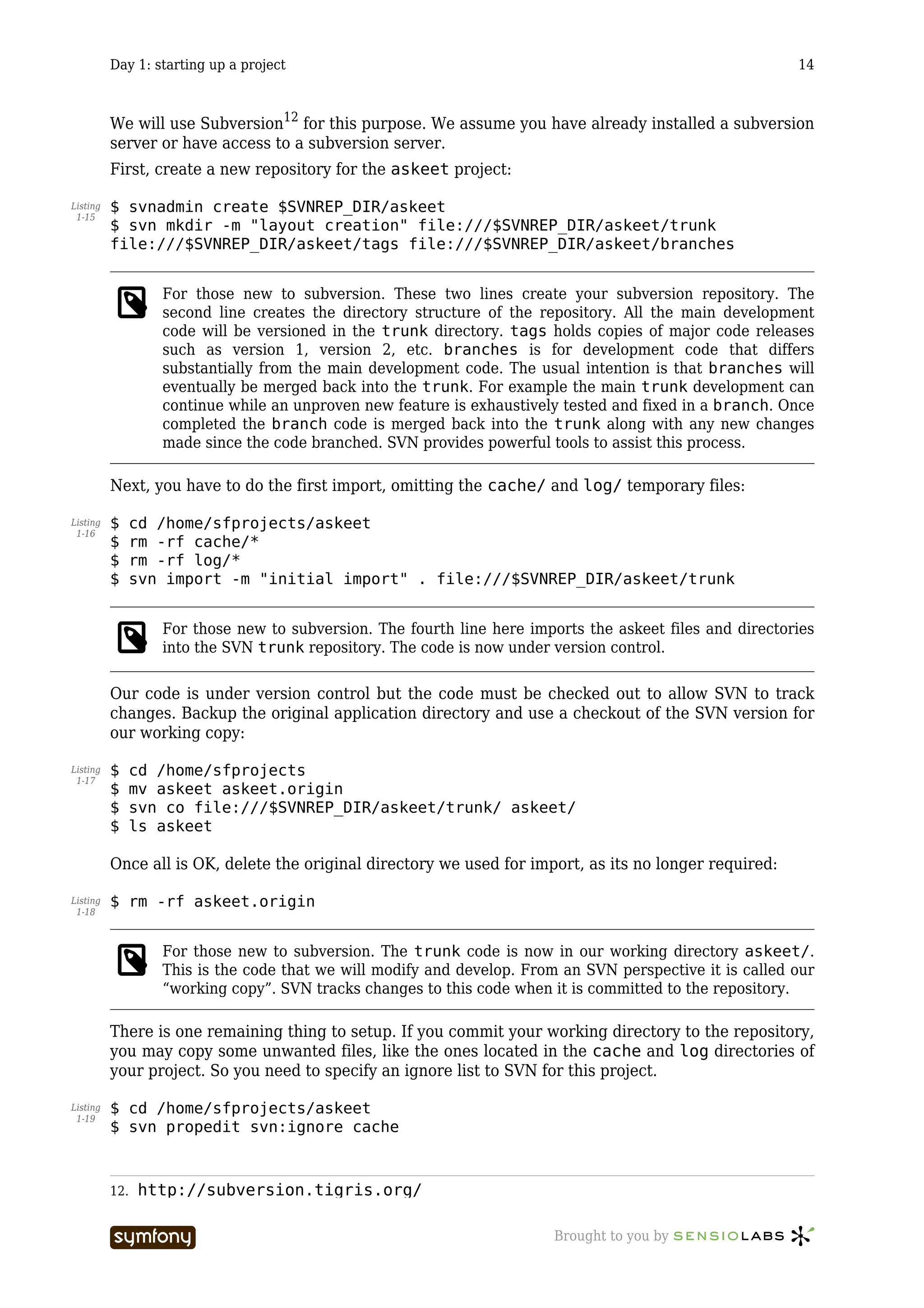
          Restart Apache, and check that you now have access to the new application:

Listing   http://askeet/
 1-12


          9.   http://www.wampserver.com/en/

                                     -----------------                  Brought to you by
Day 1: starting up a project                                                                    13


        Symfony can use the mod_rewrite module to remove the /index.php/ part of the URLs. If
        you don’t want to use it or if your web server does not provide an equivalent facility, you
        can remove the .htaccess file located in the web/ directory. If your version of Apache is
        not compiled with mod_rewrite, check that you have the mod_rewrite DSO installed and
        the following lines in your httpd.conf:

        AddModule mod_rewrite.c                                                                       Listing
                                                                                                       1-13
        LoadModule rewrite_module modules/mod_rewrite.so

        You will learn more about the smart URLs in the Links and the Routing System chapter 10.

You should also try to access the application in the development environment. Type in the
following URL:

http://askeet/frontend_dev.php/                                                                       Listing
                                                                                                       1-14


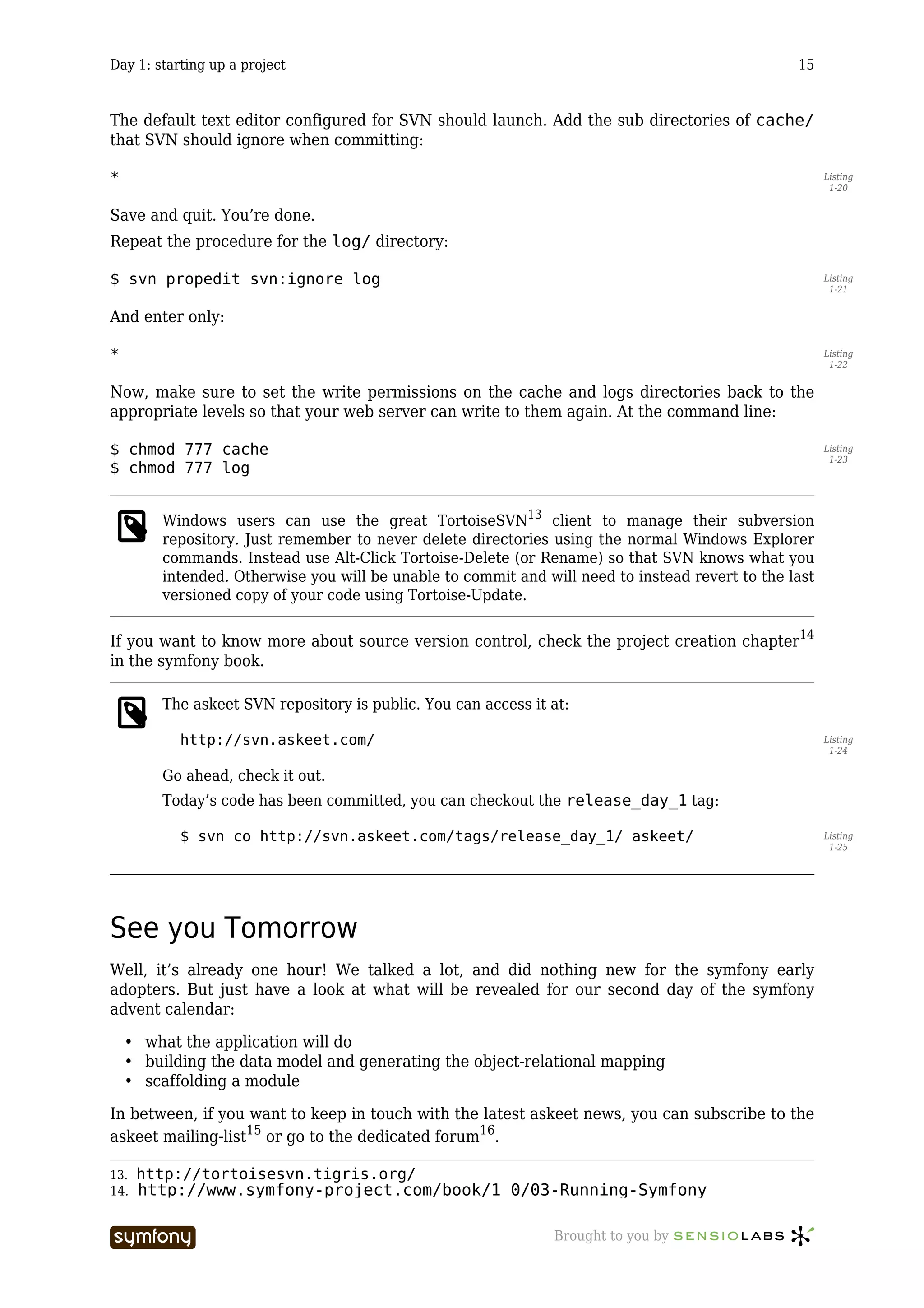
The web debug toolbar should show on the top right corner, including small icons proving
that your Alias sf/ configuration is correct.


        If the application works in the development environment (http://askeet/
        frontend_dev.php/), but not the production environment (http://askeet/) then
        check that mod_rewrite is configured in http.conf as described above, and restart
        Apache. It may also be necessary to run symfony cc at the command line to clear the
        symfony cache.


IIS
The setup is a little different if you want to run Symfony on an IIS server in a Windows
environment. Find how to configure it in the related tutorial11.


Subversion
One of the good principles of lazy folks is not to worry about breaking existing code. Source
version control allows us to:

  •   work fast
  •   revert to a previous version if a modification is inefficient
  •   allow more than one person to work on the project
  •   have access to all the daily versions of the application


10.   http://www.symfony-project.com/book/1_0/09-Links-and-the-Routing-System
11.   http://www.symfony-project.com/cookbook/1_0/web_server_iis

                           -----------------                    Brought to you by
Day 1: starting up a project                                                                    14


          We will use Subversion12 for this purpose. We assume you have already installed a subversion
          server or have access to a subversion server.
          First, create a new repository for the askeet project:

Listing   $ svnadmin create $SVNREP_DIR/askeet
 1-15
          $ svn mkdir -m "layout creation" file:///$SVNREP_DIR/askeet/trunk
          file:///$SVNREP_DIR/askeet/tags file:///$SVNREP_DIR/askeet/branches


                   For those new to subversion. These two lines create your subversion repository. The
                   second line creates the directory structure of the repository. All the main development
                   code will be versioned in the trunk directory. tags holds copies of major code releases
                   such as version 1, version 2, etc. branches is for development code that differs
                   substantially from the main development code. The usual intention is that branches will
                   eventually be merged back into the trunk. For example the main trunk development can
                   continue while an unproven new feature is exhaustively tested and fixed in a branch. Once
                   completed the branch code is merged back into the trunk along with any new changes
                   made since the code branched. SVN provides powerful tools to assist this process.

          Next, you have to do the first import, omitting the cache/ and log/ temporary files:

Listing   $     cd /home/sfprojects/askeet
 1-16
          $     rm -rf cache/*
          $     rm -rf log/*
          $     svn import -m "initial import" . file:///$SVNREP_DIR/askeet/trunk


                   For those new to subversion. The fourth line here imports the askeet files and directories
                   into the SVN trunk repository. The code is now under version control.

          Our code is under version control but the code must be checked out to allow SVN to track
          changes. Backup the original application directory and use a checkout of the SVN version for
          our working copy:

Listing   $     cd /home/sfprojects
 1-17
          $     mv askeet askeet.origin
          $     svn co file:///$SVNREP_DIR/askeet/trunk/ askeet/
          $     ls askeet

          Once all is OK, delete the original directory we used for import, as its no longer required:

Listing   $ rm -rf askeet.origin
 1-18


                   For those new to subversion. The trunk code is now in our working directory askeet/.
                   This is the code that we will modify and develop. From an SVN perspective it is called our
                   “working copy”. SVN tracks changes to this code when it is committed to the repository.

          There is one remaining thing to setup. If you commit your working directory to the repository,
          you may copy some unwanted files, like the ones located in the cache and log directories of
          your project. So you need to specify an ignore list to SVN for this project.

Listing   $ cd /home/sfprojects/askeet
 1-19
          $ svn propedit svn:ignore cache


          12.   http://subversion.tigris.org/

                                     -----------------                   Brought to you by
Day 1: starting up a project                                                                     15


The default text editor configured for SVN should launch. Add the sub directories of cache/
that SVN should ignore when committing:

*                                                                                                      Listing
                                                                                                        1-20


Save and quit. You’re done.
Repeat the procedure for the log/ directory:

$ svn propedit svn:ignore log                                                                          Listing
                                                                                                        1-21


And enter only:

*                                                                                                      Listing
                                                                                                        1-22


Now, make sure to set the write permissions on the cache and logs directories back to the
appropriate levels so that your web server can write to them again. At the command line:

$ chmod 777 cache                                                                                      Listing
                                                                                                        1-23
$ chmod 777 log


        Windows users can use the great TortoiseSVN13 client to manage their subversion
        repository. Just remember to never delete directories using the normal Windows Explorer
        commands. Instead use Alt-Click Tortoise-Delete (or Rename) so that SVN knows what you
        intended. Otherwise you will be unable to commit and will need to instead revert to the last
        versioned copy of your code using Tortoise-Update.

If you want to know more about source version control, check the project creation chapter14
in the symfony book.

        The askeet SVN repository is public. You can access it at:

           http://svn.askeet.com/                                                                      Listing
                                                                                                        1-24

        Go ahead, check it out.
        Today’s code has been committed, you can checkout the release_day_1 tag:

           $ svn co http://svn.askeet.com/tags/release_day_1/ askeet/                                  Listing
                                                                                                        1-25


See you Tomorrow
Well, it’s already one hour! We talked a lot, and did nothing new for the symfony early
adopters. But just have a look at what will be revealed for our second day of the symfony
advent calendar:

    • what the application will do
    • building the data model and generating the object-relational mapping
    • scaffolding a module

In between, if you want to keep in touch with the latest askeet news, you can subscribe to the
askeet mailing-list15 or go to the dedicated forum16.

13.   http://tortoisesvn.tigris.org/
14.   http://www.symfony-project.com/book/1_0/03-Running-Symfony

                           -----------------                   Brought to you by
Day 1: starting up a project                                        16


Make sure you come back tomorrow!
SVN: $Id$


15.   mailto:askeet-subscribe@symfony-project.com
16.   http://www.symfony-project.com/forum/index.php/f/8/

                           -----------------    Brought to you by
Day 2: setting up a data model                                                                17


Day 2

setting up a data model


Previously on symfony
During day one17 of this long but interesting tutorial, we saw how to install the symfony
framework, setup a new application and development environment, and bring safety to the
code with source version control. By the way, the code of the application generated during
the first day is available in the askeet SVN repository at:

http://svn.askeet.com/                                                                              Listing
                                                                                                      2-1


The objectives for the second day are to define what the final result should be in terms of
functionalities, sketch the data model, and begin coding. This will include generating an
object-relational mapping and using it interactively to create, retrieve and update records in a
database with an application scaffolding.
That’s quite a lot. Let’s get started.


The project unveiled
What do you want to know? That’s an interesting question. There are many interesting
questions, like:

  •   What shall I do tonight with my girlfriend?
  •   How can I generate traffic to my blog?
  •   What’s the best web application framework?
  •   What’s the best affordable restaurant in Paris?
  •   What’s the answer to life, the universe, and everything?

All these questions don’t have only one answer, and the best answer is a matter of opinion. As
a matter of fact, the questions that only have one answer are often the least interesting (like,
how much is 1 + 1?) but the only ones to be solved on the web. That’s not fair.
Meet askeet18. A website dedicated to help people find answers to their questions. Who will
answer those ticklish questions? Everybody. And everybody will be able to rate other people’s
answers, so that the most popular answers get more visibility. As the number of questions
increases, it becomes impossible to organize them in categories and sub-categories, so the
creator of a question will be able to tag it with any word he/she wants, “à la” del.icio.us19. Of

17.   1.txt
18.   http://www.askeet.com/
19.   http://del.icio.us/

                          -----------------                  Brought to you by
Day 2: setting up a data model                                                                 18


course, the popularity of tags will have to be represented through a tag bubble. If one wants
to follow the answers to a particular question, he/she can subscribe to this question’s RSS
feed. All these functionalities have to be elegant and lightweight, so all the interactions that
don’t actually need a new page have to be of AJAX type. Eventually, a back-end is necessary
to moderate questions and answers reported as spam, or to push artificially a question that
the administrator finds encouraging.
Then you should ask: Haven’t I already seen such a website on the web? Well, if you actually
did, we’re busted, but if you refer to faqts20, eHow21, Ask Jeeves22 or something similar, with
no collaborative answers, no AJAX, no RSS and no tags, this is not the same website. We are
talking about a web 2.0 application here.
The big deal about askeet is that it is not only a website, it is an application that anyone can
download, install at home or in a company Intranet, tweak and add features to. The source
code will be released with an open-source license. Your HR head is looking for a knowledge
management system? You want to keep track of all the tricks you learned about fixing your
car? You don’t want to develop a Frequently Asked Questions section for your website?
Search no more, for askeet exists. Well, it will exist, that’s our Christmas present.


Where to start?
So how are you supposed to start a symfony application? It all depends on you. You could
write stories, do a planning game and find a partner to do pair programming if you were an
XP23 adept, or write a detailed specification of the website, together with a sketch of all the
objects, states, interactions and so on if you were a UML24 fan.
But this tutorial isn’t about application development in general, so we’ll start with a basic
relational data model, and add working features one by one. What we need is an application
that can be used at the end of every day, not a gigantic ongoing bunch of code that never
outputs anything. In an ideal world, we should write unit tests for any feature we add, but we
honestly won’t have time for that. One day will be dedicated to unit tests though, so keep on
reading.
For this project, we will use a MySQL database with the InnoDB table type to take advantage
of the integrity constraints and transaction support. We could have used a SQLite database
for the first steps, to avoid setting up a real database. This would have required only a few
changes in the databases.yml file, that we’ll leave for you to investigate as an exercise.


Data Model
Relational model
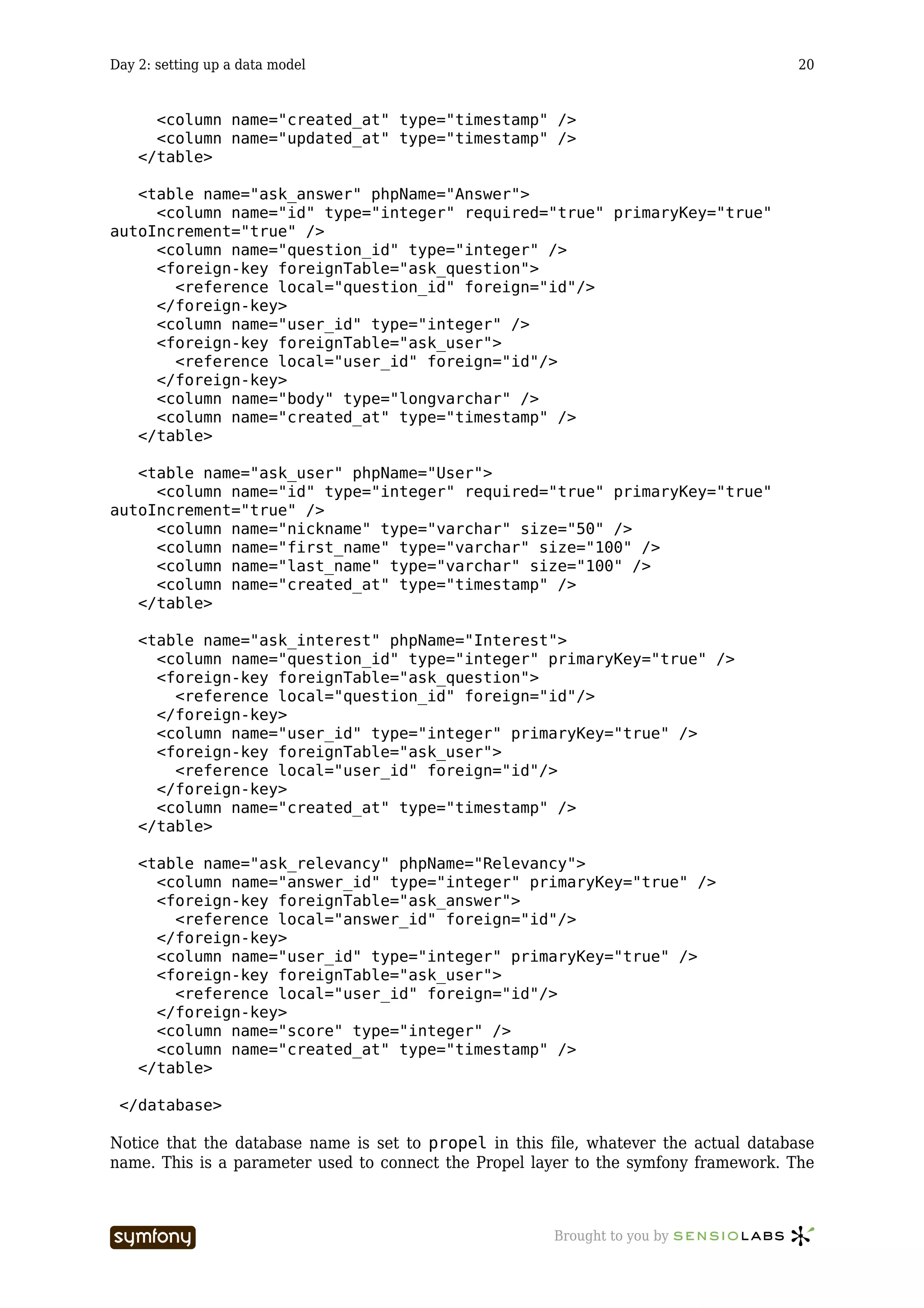
Obviously, there will be a ‘question’ and an ‘answer’ tables. We’ll need a ‘user’ table, and
we’ll store the interest of users for a question in a ‘interest’ table, and the relevancy given by
a person to an answer in a ‘relevancy’ table.
Users will have to be identified to add a question, to rate the relevancy an answer, or to
declare interest to a question. Users won’t need to be identified to add an answer, but an
answer will always be linked to a user so that users with popular answers can be
distinguished. The answers entered without any identification will be shown as contributions

20.   http://www.faqts.com/
21.   http://www.ehow.com/
22.   http://www.ask.com/
23.   http://www.xprogramming.com/xpmag/whatisxp.htm
24.   http://www.uml.org/

                          -----------------                  Brought to you by
Day 2: setting up a data model                                                              19


of a generic user, called ‘Anonymous Coward’. It’s easier to understand with an entity
relationship diagram:


Notice that we’ve declared a created_at field for each table. Symfony recognizes such
fields and sets the value to the current system time when a record is created. That’s the same
for updated_at fields: Their value is set to the system time whenever the record is updated.


schema.xml
The relational model has to be translated to a configuration file for symfony to understand it.
That’s the purpose of the schema.xml or schema.yml file, located in the askeet/config/
directory. Symfony supports schemas in the XML or YAML format.
There are two ways to write this file: by hand, and that’s the way we like it, or from an
existing database. Let’s see the first solution.
First, we need to remove the sample YAML file installed by default:

$ svn delete config/schema.yml                                                                    Listing
                                                                                                    2-2


The syntax of the schema.xml, explained in detail on the Propel website25, is relatively
simple: It’s an XML file, in which <table> tags contain <column>, <foreign-key> and
<index> tags. Once you write one, you can write all of them. Here is the schema.xml
corresponding to the relational model described previously:

<?xml version="1.0" encoding="UTF-8"?>                                                            Listing
                                                                                                    2-3
 <database name="propel" defaultIdMethod="native" noxsd="true">
   <table name="ask_question" phpName="Question">
     <column name="id" type="integer" required="true" primaryKey="true"
autoIncrement="true" />
     <column name="user_id" type="integer" />
     <foreign-key foreignTable="ask_user">
       <reference local="user_id" foreign="id"/>
     </foreign-key>
     <column name="title" type="longvarchar" />
     <column name="body" type="longvarchar" />

25.   http://propel.phpdb.org/trac/

                          -----------------                Brought to you by
Day 2: setting up a data model                                                        20


      <column name="created_at" type="timestamp" />
      <column name="updated_at" type="timestamp" />
    </table>

   <table name="ask_answer" phpName="Answer">
     <column name="id" type="integer" required="true" primaryKey="true"
autoIncrement="true" />
     <column name="question_id" type="integer" />
     <foreign-key foreignTable="ask_question">
       <reference local="question_id" foreign="id"/>
     </foreign-key>
     <column name="user_id" type="integer" />
     <foreign-key foreignTable="ask_user">
       <reference local="user_id" foreign="id"/>
     </foreign-key>
     <column name="body" type="longvarchar" />
     <column name="created_at" type="timestamp" />
   </table>

   <table name="ask_user" phpName="User">
     <column name="id" type="integer" required="true" primaryKey="true"
autoIncrement="true" />
     <column name="nickname" type="varchar" size="50" />
     <column name="first_name" type="varchar" size="100" />
     <column name="last_name" type="varchar" size="100" />
     <column name="created_at" type="timestamp" />
   </table>

    <table name="ask_interest" phpName="Interest">
      <column name="question_id" type="integer" primaryKey="true" />
      <foreign-key foreignTable="ask_question">
        <reference local="question_id" foreign="id"/>
      </foreign-key>
      <column name="user_id" type="integer" primaryKey="true" />
      <foreign-key foreignTable="ask_user">
        <reference local="user_id" foreign="id"/>
      </foreign-key>
      <column name="created_at" type="timestamp" />
    </table>

    <table name="ask_relevancy" phpName="Relevancy">
      <column name="answer_id" type="integer" primaryKey="true" />
      <foreign-key foreignTable="ask_answer">
        <reference local="answer_id" foreign="id"/>
      </foreign-key>
      <column name="user_id" type="integer" primaryKey="true" />
      <foreign-key foreignTable="ask_user">
        <reference local="user_id" foreign="id"/>
      </foreign-key>
      <column name="score" type="integer" />
      <column name="created_at" type="timestamp" />
    </table>

 </database>

Notice that the database name is set to propel in this file, whatever the actual database
name. This is a parameter used to connect the Propel layer to the symfony framework. The


                          -----------------             Brought to you by
Day 2: setting up a data model                                                                  21


actual name of the database will be defined in the databases.yml configuration file (see
below).
There is another way to create a schema.xml if you have an existing database. That is, if you
are familiar with a graphical database design tool, you will prefer to build the schema from
the generated MySQL database. Before you do that, you just need to edit the propel.ini
file located in the askeet/config/ directory and enter the connection settings to your
database:

propel.database.url = mysql://username:password@localhost/databasename                                Listing
                                                                                                        2-4


…where username, password, localhost and databasename are the actual connection
settings of your database. You can now call the propel-build-schema command (from the
askeet/ directory) to generate the schema.xml from the database:

$ symfony propel-build-schema                                                                         Listing
                                                                                                        2-5


        some tools allow you to build a database graphically (for instance Fabforce’s Dbdesigner26)
        and generate directly a schema.xml (with DB Designer 4 TO Propel Schema Converter27).

Instead of creating a schema.xml file, you can also create a schema.yml file using the
YAML schema format:

propel:                                                                                               Listing
                                                                                                        2-6
  _attributes:          { noXsd: false, defaultIdMethod: none, package: lib.model
}

  ask_question:
    _attributes: { phpName: Question, idMethod: native }
    id:          { type: integer, required: true, primaryKey: true,
autoIncrement: true }
    user_id:     { type: integer, foreignTable: ask_user,
foreignReference: id }
    title:       { type: longvarchar }
    body:        { type: longvarchar }
    created_at: ~
    updated_at: ~

  ask_answer:
    _attributes: { phpName: Answer, idMethod: native }
    id:          { type: integer, required: true, primaryKey: true,
autoIncrement: true }
    question_id: { type: integer, foreignTable: ask_question,
foreignReference: id }
    user_id:     { type: integer, foreignTable: ask_user,
foreignReference: id }
    body:        { type: longvarchar }
    created_at: ~

  ask_user:
    _attributes: { phpName: User, idMethod: native }
    id:          { type: integer, required: true, primaryKey: true,
autoIncrement: true }
    nickname:    { type: varchar(50), required: true, index: true }

26.   http://www.fabforce.net/dbdesigner4/
27.   http://blog.tooleshed.com/docs/dbd2propel/transform.php

                          -----------------                   Brought to you by
Day 2: setting up a data model                                                             22


                first_name:       varchar(100)
                last_name:        varchar(100)
                created_at:       ~

            ask_interest:
              _attributes: { phpName: Interest, idMethod: native }
              question_id: { type: integer, foreignTable: ask_question,
          foreignReference: id, primaryKey: true }
              user_id:     { type: integer, foreignTable: ask_user,
          foreignReference: id, primaryKey: true }
              created_at: ~

            ask_relevancy:
              _attributes: { phpName: Relevancy, idMethod: native }
              answer_id:   { type: integer, foreignTable: ask_answer,
          foreignReference: id, primaryKey: true }
              user_id:     { type: integer, foreignTable: ask_user,
          foreignReference: id, primaryKey: true }
              score:       { type: integer }
              created_at: ~


          Object model build
          To use the InnoDB engine, one line has to be added to the propel.ini file of the askeet/
          config/ directory:

Listing   propel.mysql.tableType = InnoDB
  2-7


          Once the schema.xml is built, you can generate an object model based on the relational
          model. In symfony, the object relational mapping is handled by Propel, but encapsulated into
          the symfony command:

Listing   $ symfony propel-build-model
  2-8


          This command (you need to call it from the root directory of the askeet project) will generate
          the classes corresponding to the tables defined in the schema, together with standard
          accessors (->get() and ->set() methods). You can look at the generated code in the
          askeet/lib/model/om/ directory. If you wonder why there are two classes per table, go
          and check the model chapter28 of the symfony book. These classes will be overridden each
          time that you do a build-model, and this will happen a lot in this project. So if you need to
          add methods to the model objects, you have to modify the ones located in the askeet/lib/
          model/ directory - these classes inherit from the /om ones.


          The database
          Connection
          Now that symfony has an object model of the database, it is time to connect your project to
          the MySQL database. First, you have to create a database in MySQL:

Listing   $ mysqladmin -u youruser -p create askeet
  2-9


          28.   http://www.symfony-project.com/book/1_0/08-Inside-the-Model-Layer

                                    -----------------                Brought to you by
Day 2: setting up a data model                                                            23


Now open the askeet/config/databases.yml configuration file. If this is your first time
with symfony, you will discover that the symfony configuration files are written in YAML29.
The syntax is very simple, but there is one major obligation in YAML files: never use
tabulations, always use spaces. Once you know that, you are ready to edit the file and enter
the actual connection settings to your database under the all: category:

all:                                                                                            Listing
                                                                                                 2-10
  propel:
     class:           sfPropelDatabase
     param:
       phptype:       mysql
       host:          localhost
       database:      askeet
       username:      youruser
       password:      yourpasswd

If you want to know more about symfony configuration and YAML files, read the configuration
in practice chapter30 of the symfony book.


Build
If you didn’t write the schema.xml file by hand, you probably already have the
corresponding tables in your database. You can then skip this part.
For you keyboard fans, here is a surprise: You don’t need to create the tables and the
columns in the MySQL database. You did it once in the schema.xml, so symfony will build
the SQL statement creating all that for you:

$ symfony propel-build-sql                                                                      Listing
                                                                                                 2-11


This command creates a lib.model.schema.sql in the askeet/data/sql/ directory. Use
it as a SQL command in MySQL:

$ mysql -u youruser -p askeet < data/sql/lib.model.schema.sql                                   Listing
                                                                                                 2-12


Alternatively, you can also use the propel-insert-sql task:

$ symfony propel-insert-sql                                                                     Listing
                                                                                                 2-13


Test data access via a CRUD
It is always good to see that the work done is useful. Until now, your browser wasn’t of any
use, and yet we are supposed to build a web application… So let’s create a basic set of
symfony templates and actions to manipulate the data of the ‘question’ table. This will allow
you to create a few questions and display them.
In the askeet/ directory, type:

$ symfony propel-generate-crud frontend question Question                                       Listing
                                                                                                 2-14


This generates a scaffolding for a question module in the frontend application, based on
the Question Propel object model, with basic Create Retrieve Update Delete actions (which


29.http://www.yaml.org/
30.http://www.symfony-project.com/book/1_0/19-Mastering-Symfony-s-
Configuration-Files

                          -----------------               Brought to you by
Day 2: setting up a data model                                                             24


          explains the CRUD acronym). Don’t get confused: A scaffolding is not a finished application,
          but the basic structure on top of which you can develop new features, add business rules and
          customize the look and feel.
          The list of all the actions created by a CRUD generator is:

          Action          Description
          name
          list            shows all the records of a table
          index           forwards to list
          show            shows all the fields of a given record
          edit            displays a form to create a new record or edit an existing one
          update          modifies a record according to the parameters given in the request, then
                          forwards to show
          delete          deletes a given record from the table

          You can find more about generated actions in the scaffolding chapter 31 of the symfony book.
          In the askeet/apps/frontend/modules/ directory, notice the new question module and
          browse its source.
          Whenever you add a new class that need to be autoloaded, don’t forget to clear the config
          cache (to reload the autoloading cache):

Listing   $ symfony cc frontend config
 2-15


          You can now test it online by requesting:

Listing   http://askeet/question
 2-16


          31.   http://www.symfony-project.com/book/1_0/14-Generators

                                    -----------------                   Brought to you by
Day 2: setting up a data model                                                                25


Go ahead, play with it. Add a few questions, edit them, list them, delete them. If it works, this
means that the object model is correct, that the connection to the database is correct, and
that the mapping between the relational model of the database and the object model of
symfony is correct. That’s a good functional test.


See you Tomorrow
You didn’t write one line of PHP, and yet you have a basic application to use. That’s not bad
for the second day. Tomorrow, we’ll start writing some code in order to have a welcoming
home page that displays the list of questions. We will also add test data to our database using
a batch process, and learn how to extend the model.
Now that you know what the application will do, you may be able to imagine an additional
feature to it. Feel free to suggest anything using the askeet mailing-list32, the most popular
idea will become the 21st day addition of this symfony advent calendar.
Feel free to browse the source of today’s tutorial (tag release_day_2) at:

http://svn.askeet.com/tags/release_day_2                                                            Listing
                                                                                                     2-17


32.   mailto:askeet-subscribe@symfony-project.com

                          -----------------                  Brought to you by
Day 3: dive into the MVC architecture                                                         26


          Day 3

          dive into the MVC architecture


          Previously on symfony
          During day two33 you learned how to build an object model based on a relational data model,
          and generate scaffolding for one of these objects. By the way, the code of the application
          generated during the previous days is available in the askeet SVN repository at:

Listing   http://svn.askeet.com/
  3-1


          The objectives for the third day are to define a nicer layout for the site, define the list of
          questions as the default homepage, show the number of users interested by one question, and
          populate the database from sample text files in order to have test data. That’s not much to do,
          but quite a lot to read and understand.
          To read this tutorial, you should be familiar with the concepts of project, application, module
          and action in symfony as explained in the controller chapter34 of the symfony book.


          The MVC model
          Today will be the first dive in the world of the MVC architecture35. What does this mean?
          Simply that the code used to generate one page is located in various files according to its
          nature.
          If the code concerns data manipulation independent from a page, it should be located in the
          Model (most of the time in askeet/lib/model/). If it concerns the final presentation, it
          should be located in the View; in symfony, the view layer relies on templates (for instance in
          askeet/apps/frontend/modules/question/templates/) and configuration files.
          Eventually, the code dedicated to tie all this together and to translate the site logic into good
          old PHP is located in the Controller, and in symfony the controller for a specific page is
          called an action (look for actions in askeet/apps/frontend/modules/question/
          actions/). You can read more about this model in the MVC implementation in symfony
          chapter36 of the symfony book.


          33. 2.txt
          34. http://www.symfony-project.com/book/1_0/06-Inside-the-Controller-
          Layer
          35. http://en.wikipedia.org/wiki/Model-view-controller
          36. http://www.symfony-project.com/book/1_0/02-Exploring-Symfony-s-Code


                                    -----------------                  Brought to you by
Day 3: dive into the MVC architecture                                                            27


While our applications view will only change slightly today, we will manipulate a lot of
different files. Don’t panic though, since the organization of files and the separation of the
code in various layers will soon become evident and very useful.


Change the layout
In application of the decorator design pattern37, the content of the template called by an
action is integrated into a global template, or layout. In other words, the layout contains all
the invariable parts of the interface, it “decorates” the result of actions. Open the default
layout (located in askeet/apps/frontend/templates/layout.php) and change it to the
following:

<!DOCTYPE html PUBLIC "-//W3C//DTD XHTML 1.0 Transitional//EN"                                         Listing
                                                                                                         3-2
"http://www.w3.org/TR/xhtml1/DTD/xhtml1-transitional.dtd">
<html xmlns="http://www.w3.org/1999/xhtml" xml:lang="en" lang="en">
<head>

<?php echo include_http_metas() ?>
<?php echo include_metas() ?>

<?php echo include_title() ?>

<link rel="shortcut icon" href="/favicon.ico" />

</head>
<body>

  <div id="header">
    <ul>
      <li><?php echo link_to('about', '@homepage') ?></li>
    </ul>
    <h1><?php echo link_to(image_tag('askeet_logo.gif', 'alt=askeet'),
'@homepage') ?></h1>
  </div>

      <div id="content">
        <div id="content_main">
          <?php echo $sf_data->getRaw('sf_content') ?>
          <div class="verticalalign"></div>
        </div>

        <div id="content_bar">
          <!-- Nothing for the moment -->
          <div class="verticalalign"></div>
        </div>
      </div>

</body>
</html>


         We tried to keep the markup as semantic as possible, and to move all the styling into the
         CSS stylesheets. These stylesheets won’t be described here, since CSS syntax is not the
         purpose of this tutorial. They are available for download though, in the SVN repository 38.


37.   http://en.wikipedia.org/wiki/Decorator_pattern

                          -----------------                    Brought to you by
Day 3: dive into the MVC architecture                                                        28


                      We created two stylesheets (main.css and layout.css). Copy them into your askeet/
                      web/css/ directory and edit your frontend/config/view.yml to change the
                      autoloaded stylesheets:

            Listing   stylesheets:       [main, layout]
              3-3


          This layout is still lightweight for the moment, it will be rebuilt later (in about a week). The
          important things in this template are the <head> part, which is mostly generated, and the
          sf_content variable, which contains the result of the actions.
          Check that the modifications display correctly by requesting the home page - this time in the
          development environment:

Listing   http://askeet/frontend_dev.php/
  3-4


          A few words about environments
          If you wonder what the difference between http://askeet/frontend_dev.php/ and
          http://askeet/ is, you should probably have a look at the configuration chapter39 of the
          symfony book. For now, you just need to know that they point to the same application, but in
          different environments. An environment is a unique configuration, where some features of the
          framework can be activated or deactivated as required.
          In this case, the /frontend_dev.php/ URL points to the development environment,
          where the whole configuration is parsed at each request, the HTML cache is deactivated, and
          the debug tools are all available (including a semi-transparent toolbar located at the top right
          corner of the window). The / URL - equivalent to /index.php/ - points to the production
          environment, where the configuration is “compiled” and the debug tools deactivated to
          speed up the delivery of pages.
          These two PHP scripts - frontend_dev.php and index.php - are called front controllers,
          and all the requests to the application are handled by them. You can find them in the
          askeet/web/ directory. As a matter of fact, the index.php file should be named
          frontend_prod.php, but as frontend is the first application that you created, symfony
          deduced that you probably wanted it to be the default application and renamed it to
          index.php, so that you can see your application in the production environment by just
          requesting /. If you want to learn more about the front controllers and the Controller layer of
          the MVC model in general, refer to the controller chapter40 in the symfony book.


          38.   http://svn.askeet.com/tags/release_day_3/web/css/
          39.http://www.symfony-project.com/book/1_0/05-Configuring-Symfony
          40.http://www.symfony-project.com/book/1_0/06-Inside-the-Controller-
          Layer

                                     -----------------                Brought to you by
Day 3: dive into the MVC architecture                                                            29


A good rule of thumb is to navigate in the development environment until you are satisfied
with the feature you are working on, then switch to the production environment to check its
speed and “nice” URLs.

         Remember to always clear the cache when you add some classes or when you change some
         configuration files to see the result in the production environment.


Redefine the default homepage
For now, if you request the home page of the new website, it shows a ‘Congratulations’ page.
A better idea would be to show the list of questions (referenced in these documents as
question/list and translated as: the list action of the question module). To do this,
open the routing configuration file of the frontend application, found in askeet/apps/
frontend/config/routing.yml and locate the homepage: section. Change it to:

homepage:                                                                                              Listing
                                                                                                         3-5
  url:    /
  param: { module: question, action: list }

Refresh the home page in the development environment                               (http://askeet/
frontend_dev.php/); it now displays the list of questions.

         if you are a curious person, you might have looked for this page containing the
         ‘Congratulations’ message. And you might be surprised not to find it in your askeet
         directory. As a matter of fact, the template for the default/index action is defined in the
         symfony data directory and is independent from the project. If you want to override it, you
         can still create a default module in your own project.

The possibilities offered by the routing system will be detailed in the near future, but if you
are interested, you can read the routing chapter41 of the symfony book.


Define test data
The list displayed by the home page will remain quite empty, unless you add your own
questions. When you develop an application, it is a good idea to have some test data at your
disposal. Entering test data by hand (either via the CRUD interface of directly in the
database) can be a real pain, that’s why symfony can use text files to populate databases.
We’ll create a test data file in the askeet/data/fixtures/ directory (this directory has to
be created). Create a file called test_data.yml with the following content:

User:                                                                                                  Listing
                                                                                                         3-6
  anonymous:
    nickname:   anonymous
    first_name: Anonymous
    last_name: Coward

      fabien:
        nickname:   fabpot
        first_name: Fabien

41.http://www.symfony-project.com/book/1_0/09-Links-and-the-Routing-
System

                          -----------------                    Brought to you by
Day 3: dive into the MVC architecture                                                        30


        last_name:    Potencier

      francois:
        nickname:   francoisz
        first_name: François
        last_name: Zaninotto

Question:
  q1:
    title: What shall I do tonight with my girlfriend?
    user_id: fabien
    body: |
      We shall meet in front of the Dunkin'Donuts before dinner,
      and I haven't the slightest idea of what I can do with her.
      She's not interested in programming, space opera movies nor insects.
      She's kinda cute, so I really need to find something
      that will keep her to my side for another evening.

      q2:
        title: What can I offer to my step mother?
        user_id: anonymous
        body: |
          My stepmother has everything a stepmother is usually offered
          (watch, vacuum cleaner, earrings, del.icio.us account).
          Her birthday comes next week, I am broke, and I know that
          if I don't offer her something sweet, my girlfriend
          won't look at me in the eyes for another month.

      q3:
        title: How can I generate traffic to my blog?
        user_id: francois
        body: |
          I have a very swell blog that talks
          about my class and mates and pets and favorite movies.

Interest:
  i1: { user_id:        fabien, question_id: q1 }
  i2: { user_id:        francois, question_id: q1 }
  i3: { user_id:        francois, question_id: q2 }
  i4: { user_id:        fabien, question_id: q2 }

First of all, you may recognize YAML42 here. If you are not familiar with symfony, you might
not know that the YAML format is the favorite format for configuration files in the framework.
It is not exclusive - if you are attached to XML or .ini files, it is very easy to add a
configuration handler to allow symfony to read them. If you have time and patience, read
more about YAML and the symfony configuration files in the configuration in practice
chapter43 of the symfony book. As of now, if you are not familiar with the YAML syntax, you
should get started44 right away, since this tutorial will use it extensively.
Ok, back to the test data file. It defines instances of objects, labeled with an internal name.
This label is of great use to link related objects without having to define ids (which are often
auto-incremented and can not be set). For instance, the first object created is of class User,


42. http://www.yaml.org/
43. http://www.symfony-project.com/book/1_0/19-Mastering-Symfony-s-
Configuration-Files
44. http://www.yaml.org/


                          -----------------                 Brought to you by
Day 3: dive into the MVC architecture                                                         31


and is labeled fabien. The first Question is labeled q1. This makes it easy to create an
object of class Interest by mentioning the related object labels:

Interest:                                                                                           Listing
                                                                                                      3-7
  i1:
    user_id: fabien
    question_id: q1

The data file given previously uses the short YAML syntax to say the same thing. You can find
more about data population files in the data files chapter45 of the symfony book.

        There is no need to define values for the created_at and updated_at columns, since
        symfony knows how to fill them by default.


Create a batch to populate the database
The next step is to actually populate the database, and we wish to do that with a PHP script
that can be called with a command line - a batch.


Batch skeleton
Create a file called load_data.php in the askeet/batch/ directory with the following
content:

<?php                                                                                               Listing
                                                                                                      3-8


define('SF_ROOT_DIR',                  realpath(dirname(__FILE__).'/..'));
define('SF_APP',                       'frontend');
define('SF_ENVIRONMENT',               'dev');
define('SF_DEBUG',                     true);

require_once(SF_ROOT_DIR.DIRECTORY_SEPARATOR.'apps'.DIRECTORY_SEPARATOR.SF_APP.DIRECTORY

// initialize database manager
$databaseManager = new sfDatabaseManager();
$databaseManager->initialize();

?>

This script does nothing, or close to nothing: it defines a path, an application and an
environment to get to a configuration, loads that configuration, and initializes the database
manager. But that’s already a lot: that means that all the code written below will take
advantage of the auto-loading of classes, automatic connection to Propel objects, and the
symfony root classes.

        If you have examined symfony’s front controllers (like askeet/web/index.php), you
        might find this code extremely familiar. That’s because every web request requires access
        to the same objects and configuration, as a batch request does.


45.   http://www.symfony-project.com/book/1_0/08-Inside-the-Model-Layer

                          -----------------                  Brought to you by
Day 3: dive into the MVC architecture                                                        32


          Data import
          Now that the frame of the batch is ready, it is time to make it do something. The batch has to:
             1. read the YAML file
             2. Create instances of Propel objects
             3. Create the related records in the tables of the linked database
          This might sound complicated, but in symfony, you can do that with two lines of code, thanks
          to the sfPropelData object. Just add the following code before the final ?> in the askeet/
          batch/load_data.php script:

Listing   $data = new sfPropelData();
  3-9
          $data->loadData(sfConfig::get('sf_data_dir').DIRECTORY_SEPARATOR.'fixtures');

          That’s all. A sfPropelData object is created, and told to load all the data of a specific
          directory - our fixtures directory - into the database defined in the databases.yml
          configuration file.

                 The DIRECTORY_SEPARATOR constant is used here to be compatible with Windows and
                 *nix platforms.


          Launch the batch
          At last, you can check if these few lines of code were worth the hassle. type in the command
          line:

Listing   $ cd /home/sfprojects/askeet/batch
 3-10
          $ php load_data.php

          Check the modifications in the database by refreshing the development home page again:

Listing   http://askeet/frontend_dev.php
 3-11


                                    -----------------                 Brought to you by
Day 3: dive into the MVC architecture                                                       33


Hooray, the data is there.

       By default, the sfPropelData object deletes all your data before loading the new ones.
       You can also append to the current data:

       $data = new sfPropelData();                                                Listing
                                                                                   3-12
       $data->setDeleteCurrentData(false);
       $data->loadData(sfConfig::get('sf_data_dir').DIRECTORY_SEPARATOR.'fixtures');


Accessing the data in the model
The page displayed when requesting the list action of the question module is the result of
the executeList() method (found in the askeet/apps/frontend/modules/question/
actions/action.class.php action file) passed to the askeet/apps/frontend/
modules/question/templates/listSuccess.php template. This is based on a naming
convention that is explained in the controller chapter46 of the symfony book. Let’s have a look
at the code that is executed:
actions.class.php:

public function executeList ()                                                                    Listing
                                                                                                   3-13
{
  $this->questions = QuestionPeer::doSelect(new Criteria());
}

listSuccess.php:

46.http://www.symfony-project.com/book/1_0/06-Inside-the-Controller-
Layer

                          -----------------                Brought to you by
Day 3: dive into the MVC architecture                                                       34


Listing   ...
 3-14
          <?php foreach ($questions as $question): ?>
          <tr>
               <td><?php echo link_to($question->getId(), 'question/
          show?id='.$question->getId()) ?></td>
               <td><?php echo $question->getTitle() ?></td>
               <td><?php echo $question->getBody() ?></td>
               <td><?php echo $question->getCreatedAt() ?></td>
               <td><?php echo $question->getUpdatedAt() ?></td>
            </tr>
          <?php endforeach; ?>

          Step-by-step, here is what it does:
              1. The action requires the records of the Question table that satisfy an empty criteria -
                  i.e. all the questions
              2. This list of records is put in an array ($questions) that is passed to the template
              3. The template iterates over all the questions passed by the action
              4. The templates shows the value of the columns of each record
          The ->getId(), ->getTitle(), ->getBody(), etc. methods were created during the
          symfony propel-build-model command call (do you remember yesterday47 ?) to retrieve
          the value of the id, title, body, etc. fields. These are standard getters, formed by adding
          the prefix get to the camelCased field name - and Propel also provides standard setters,
          prefixed with set. The Propel documentation48 describes the accessors created for each
          class.
          As for the mysterious QuestionPeer::doSelect(new Criteria()) call, it is also a
          standard Propel request. The Propel documentation will explain it thoroughly.
          Don’t worry if you don’t understand all the code written above, it will become clearer in a few
          days.


          Modify the question/list template
          Now that the database contains interests for questions, it should be easy to get the number of
          interested users for one question. If you have a look at the BaseQuestion.php class
          generated by Propel in the askeet/lib/model/om/ directory, you will notice a -
          >getInterests() method. Propel saw the question_id foreign key in the Interest table
          definition, and deduced that a question has several interests. This makes it very easy to
          display what we want by modifying the listSuccess.php template, located in askeet/
          apps/frontend/modules/question/templates/. In the process, we’ll remove the ugly
          tables and replace them with nice divs:

Listing   <?php use_helper('Text') ?>
 3-15


          <h1>popular questions</h1>

          <?php foreach($questions as $question): ?>
            <div class="question">
               <div class="interested_block">
                 <div class="interested_mark" id="mark_<?php echo $question->getId()
          ?>">
                   <?php echo count($question->getInterests()) ?>
                 </div>

          47.   2.txt
          48.   http://propel.phpdb.org/docs/user_guide/

                                    -----------------                Brought to you by
Day 3: dive into the MVC architecture                                                     35


      </div>

    <h2><?php echo link_to($question->getTitle(), 'question/
show?id='.$question->getId()) ?></h2>

    <div class="question_body">
      <?php echo truncate_text($question->getBody(), 200) ?>
    </div>
  </div>
<?php endforeach; ?>

You recognize here the same foreach loop as in the original listSuccess.php. The
link_to() and the truncate_text() functions are template helpers provided by
symfony. The first one creates a hyperlink to another action of the same module, and the
second one truncates the body of the question to 200 characters. The link_to() helper is
auto-loaded, but you have to declare the use of the Text group of helpers to use
truncate_text().
Come on, try on your new template by refreshing the development homepage again.

http://askeet/frontend_dev.php/                                                                Listing
                                                                                                3-16


The number of interested users appears correctly close to each question. To get the
presentation of the above capture, download the main.css49 stylesheet and put it in your
askeet/web/css/ directory.


Cleanup
The propel-generate-crud command created some actions and templates that will not be
needed. It’s time to remove them.
Actions  to  remove               in          askeet/apps/frontend/modules/question/actions/
actions.class.php:

  • executeIndex
  • executeEdit
  • executeUpdate


49.   http://svn.askeet.com/tags/release_day_3/web/css/main.css

                          -----------------                      Brought to you by
Day 3: dive into the MVC architecture                                                    36


            • executeCreate
            • executeDelete

          Template to remove in askeet/apps/frontend/modules/question/templates/:

            • editSuccess.php


          See you Tomorrow
          Today was a great first step in the world of the Model-View-Controller paradigm: By
          manipulating layouts, templates, actions and object of the Propel object model, you accessed
          all the layers of a MVC structured application. Don’t worry if you don’t understand all the
          bridges between these layers: It will become clearer little by little.
          Many files were opened today, and if you want to know how files are organized in a project,
          refer to the file structure chapter50 of the symfony book.
          Tomorrow will be another great day: We will modify views, setup a more complex routing
          policy, modify the model, and dig deeper into data manipulation and links between tables.
          Until then, sleep tight, and feel free to browse the source of today’s tutorial (tag
          release_day_3) at:

Listing   http://svn.askeet.com/tags/release_day_3
 3-17


          50.http://www.symfony-project.com/book/1_0/04-The-Basics-of-Page-
          Creation

                                    -----------------               Brought to you by
Day 4: refactoring                                                                           37


Day 4

refactoring


Previously on symfony
During day three51, all the layers of a MVC architecture were shown and modified to have the
list of questions properly displayed on the homepage. The application is getting nicer but still
lacks content.
The objectives for the fourth day are to show the list of answers to a question, to give a nice
URL to the question detail page, to add a custom class, and to move some chunk of codes to a
better place. This should help you understand the concepts of template, model, routing policy,
and refactoring. You may think that it is too early to rewrite code that is only a few days old,
but we’ll see how you feel about it at the end of this tutorial.
To read this tutorial, you should be familiar with the concepts of the MVC implementation in
symfony52. It would also help if you had an idea about what agile development 53 is.


Show the answers to a question
First, let’s continue the adaptation of the templates generated by the Question CRUD during
day two54
The question/show action is dedicated to display the details of a question, provided that
you pass it an id. To test it, just call (you will have to change 2 to the real id the question
has in your table):

http://askeet/frontend_dev.php/question/show/id/2                                                  Listing
                                                                                                     4-1


question detail55
You probably already saw the show page if you played with the application before. This is
where we are going to add the answers to a question.


51.   3.txt
52.   http://www.symfony-project.com/book/1_0/02-Exploring-Symfony-s-Code
53.   http://en.wikipedia.org/wiki/Agile_software_development
54.   2.txt
55.   /images/askeet/1_0/question_day4.gif

                       -----------------                    Brought to you by
Day 4: refactoring                                                                                38


          A quick look at the action
          First, let’s have a look at the show action, located in the askeet/apps/frontend/
          modules/question/actions/actions.class.php file:

Listing   public function executeShow()
  4-2
           {
             $this->question =
          QuestionPeer::retrieveByPk($this->getRequestParameter('id'));
             $this->forward404Unless($this->question);
           }

          If you are familiar with Propel, you recognize here a simple request to the Question table. It
          is aimed to get the unique record having the value of the id parameter of the request as a
          primary key. In the example given in the URL above, the id parameter has a value of 1, so
          the ->retrieveByPk() method of the QuestionPeer class will return the object of class
          Question with 1 as a primary key. If you are not familiar with Propel, come back after you’ve
          read some documentation56 on their website.
          The result of this request is passed to the showSuccess.php template through the
          $question variable.
          The ->getRequestParameter('id') method of the sfAction object gets… the request
          parameter called id, whether it is passed in a GET or in a POST mode. For instance, if you
          require:

Listing   http://askeet/frontend_dev.php/question/show/id/1/myparam/myvalue
  4-3


          …then the show action will be able to retrieve myvalue by requesting $this-
          >getRequestParameter('myparam').

                  The forward404Unless() method sends to the browser a 404 page if the question does
                  not exist in the database. It’s always a good pratice to deal with edge cases and errors that
                  can occur during execution and symfony gives you some simple methods to help you do the
                  right thing easily.


          Modify the showSuccess.php template
          The generated showSuccess.php template is not exactly what we need, so we will
          completely  rewrite   it.   Open      the   frontend/modules/question/templates/
          showSuccess.php file and replace its content by:

Listing   <?php use_helper('Date') ?>
  4-4


          <div class="interested_block">
            <div class="interested_mark" id="mark_<?php echo $question->getId() ?>">
              <?php echo count($question->getInterests()) ?>
            </div>
          </div>

          <h2><?php echo $question->getTitle() ?></h2>

          <div class="question_body">
            <?php echo $question->getBody() ?>
          </div>


          56.   http://propel.phpdb.org/docs/user_guide/

                                   -----------------                     Brought to you by
Day 4: refactoring                                                                              39


<div id="answers">
<?php foreach ($question->getAnswers() as $answer): ?>
  <div class="answer">
    posted by <?php echo $answer->getUser()->getFirstName().'
'.$answer->getUser()->getLastName() ?>
    on <?php echo format_date($answer->getCreatedAt(), 'p') ?>
    <div>
       <?php echo $answer->getBody() ?>
    </div>
  </div>
<?php endforeach; ?>
</div>

You recognize here the interested_block div that was already added to the
listSuccess.php template yesterday. It just displays the number of interested users for a
given question. After that, the markup also looks very much like the one of the list, except
that there is no link_to on the title. It is just a rewriting of the initial code to display only
the necessary information about a question.
The new part is the answers div. It displays all the answers to the question (using the simple
$question->getAnswers() Propel method), and for each of them, shows the total
relevancy, the name of the author, and the creation date in addition to the body.
The format_date() is another example of template helpers for which an initial declaration
is required. You can find more about this helper’s syntax and other helpers in the
internationalization helpers chapter57 of the symfony book (these helpers speed up the
tedious task of displaying dates in a good looking format).

         Propel creates method names for linked tables by adding an ‘s’ automatically at the end of
         the table name. Please forgive the ugly ->getRelevancys() method since it saves you
         several lines of SQL code.


Add some new test data
It is time to add some data for the answer and relevancy tables at the end of the data/
fixtures/test_data.yml (feel free to add your own):

Answer:                                                                                               Listing
                                                                                                        4-5
  a1_q1:
    question_id: q1
    user_id:     francois
    body:        |
      You can try to read her poetry. Chicks love that kind of things.

      a2_q1:
        question_id: q1
        user_id:     fabien
        body:        |
          Don't bring her to a donuts shop. Ever. Girls don't like to be
          seen eating with their fingers - although it's nice.

      a3_q2:
        question_id: q2
        user_id:     fabien


57.   http://www.symfony-project.com/book/1_0/13-I18n-and-L10n

                         -----------------                     Brought to you by
Day 4: refactoring                                                                         40


               body:        |
                 The answer is in the question: buy her a step, so she can
                 get some exercise and be grateful for the weight she will
                 lose.

            a4_q3:
              question_id: q3
              user_id:     fabien
              body:        |
                Build it with symfony - and people will love it.

          Reload your data with:

Listing   $ php batch/load_data.php
  4-6


          Navigate to the action showing the first question to check if the modifications were
          successful:

Listing   http://askeet/frontend_dev.php/question/show/id/XX
  4-7


                  Replace XX with the current id of your first question.


          The question is now displayed in a fancier way, followed by the answers to it. That’s better,
          isn’t it?


          Modify the model, part I
          It is almost certain that the full name of an author will be needed somewhere else in the
          application. You can also consider that the full name is an attribute of the User object. This
          means that there should be a method in the User model allowing to retrieve the full name,
          instead of reconstructing it in an action. Let’s write it. Open the askeet/lib/model/
          User.php and add in the following method:

Listing   public function __toString()
  4-8
          {
            return $this->getFirstName().' '.$this->getLastName();
          }

          Why is this method named __toString() instead of getFullName() or something similar?
          Because the __toString() method is the default method used by PHP5 for object
          representation as string. This means that you can replace the


                                   -----------------                       Brought to you by
Day 4: refactoring                                                                             41


posted by <?php echo $answer->getUser()->getFirstName().'                                           Listing
                                                                                                      4-9
'.$answer->getUser()->getLastName() ?>

line of the askeet/apps/frontend/modules/question/templates/showSuccess.php
template by a simpler

posted by <?php echo $answer->getUser() ?>                                                          Listing
                                                                                                     4-10


to achieve the same result. Neat, isn’t it ?


Don’t repeat yourself
One of the good principles of agile development is to avoid duplicating code. It says “Don’t
Repeat Yourself” (D.R.Y.). This is because duplicated code is twice as long to review, modify,
test and validate than a unique encapsulated chunk of code. It also makes application
maintenance much more complex. And if you paid attention to the last part of today’s tutorial,
you probably noticed some duplicated code between the listSuccess.php template written
yesterday and the showSuccess.php template:

<div class="interested_block">                                                                      Listing
                                                                                                     4-11
  <div class="interested_mark" id="mark_<?php echo $question->getId() ?>">
    <?php echo count($question->getInterests()) ?>
  </div>
</div>

So our first session of refactoring58 will remove this chunk of code from the two templates
and put it in a fragment, or reusable chunk of code. Create an _interested_user.php file
in the askeet/apps/frontend/modules/question/templates/ directory with the
following code:

<div class="interested_mark" id="mark_<?php echo $question->getId() ?>">                            Listing
                                                                                                     4-12
  <?php echo count($question->getInterests()) ?>
</div>

Then, replace the original                  code   in   both   templates   (listSuccess.php   and
showSuccess.php) with:

<div class="interested_block">                                                                      Listing
                                                                                                     4-13
   <?php include_partial('interested_user', array('question' => $question))
?>
</div>

A fragment doesn’t have native access to any of the current objects. The fragment uses a
$question variable, so it has to be defined in the include_partial call. The additional _
in front of the fragment file name helps to easily distinguish fragments from actual templates
in the templates/ directories. If you want to learn more about fragments, read the view
chapter59 of the symfony book.


58.   http://en.wikipedia.org/wiki/Refactoring
59.   http://www.symfony-project.com/book/1_0/07-Inside-the-View-Layer

                        -----------------                          Brought to you by
Day 4: refactoring                                                                                  42


          Modify the model, part II
          The $question->getInterests() call of the new fragment does a request to the database
          and returns an array of objects of class Interest. This is a heavy request for just a number
          of interested persons, and it might load the database too much. Remember that this call is
          also done in the listSuccess.php template, but this time in a loop, for each question of the
          list. It would be a good idea to optimize it.
          One good solution is to add a column to the Question table called interested_users, and
          to update this column each time an interest about the question is created.

                      We are about to modify the model without any apparent way to test it, since there is
                      currently no way to add Interest records through askeet. You should never modify
                      something without any way to test it.
                      Luckily, we do have a way to test this modification, and you will discover it later in this
                      part.


          Add a field to the User object model
          Go without fear and modify the askeet/config/schema.xml data model by adding to the
          ask_question table:

Listing   <column name="interested_users" type="integer" default="0" />
 4-14


          Then rebuild the model:

Listing   $ symfony propel-build-model
 4-15


          That’s right, we are already rebuilding the model without worrying about existing extensions
          to it! This is because the extension to the User class was made in the askeet/lib/model/
          User.php, which inherits from the Propel generated askeet/lib/model/om/
          BaseUser.php class. That’s why you should never edit the code of the askeet/lib/model/
          om/ directory: it is overridden each time a build-model is called. Symfony helps to ease the
          normal life cycle of model changes in the early stages of any web project.
          You also need to update the actual database. To avoid writing some SQL statement, you
          should rebuild your SQL schema and reload your test data:

Listing   $ symfony propel-build-sql
 4-16
          $ mysql -u youruser -p askeet < data/sql/lib.model.schema.sql
          $ php batch/load_data.php


                      TIMTOWTDI: There is more than one way to do it. Instead of rebuilding the database, you
                      can add the new column to the MySQL table by hand:

            Listing   $ mysql -u youruser -p askeet -e "alter table ask_question add
             4-17
                      interested_users int default '0'"


          Modify the save() method of the Interest object
          Updating the value of this new field has to be done each time a user declares its interest for a
          question, i.e. each time a record is added to the Interest table. You could implement that


                                       -----------------                    Brought to you by
Day 4: refactoring                                                                       43


with a trigger in MySQL, but that would be a database dependent solution, and you wouldn’t
be able to switch to another database as easily.
The best solution is to modify the model by overriding the save() method of the Interest
class. This method is called each time an object of class Interest is created. So open the
askeet/lib/model/Interest.php file and write in the following method:

public function save($con = null)                                                              Listing
                                                                                                4-18
{
    $ret = parent::save($con);

      // update interested_users in question table
      $question = $this->getQuestion();
      $interested_users = $question->getInterestedUsers();
      $question->setInterestedUsers($interested_users + 1);
      $question->save($con);

      return $ret;
}

The new save() method gets the question related to the current interest, and increments its
interested_users field. Then, it does the usual save(), but because a $this->save();
would end up in an infinite loop, it uses the class method parent::save() instead.


Secure the updating request with a transaction
What would happen if the database failed between the update of the Question object and
the one of the Interest object? You would end up with corrupted data. This is the same
problem met in a bank when a money transfer means a first request to decrease the amount
of an account, and a second request to increase another account.
If two request are highly dependent, you should secure their execution with a transaction. A
transaction is the insurance that both requests will succeed, or none of them. If something
wrong happens to one of the requests of a transaction, all the previously succeeded requests
are cancelled, and the database returns to the state where it was before the transaction.
Our save() method is a good opportunity to illustrate the implementation of transactions in
symfony. Replace the code by:

public function save($con = null)                                                              Listing
                                                                                                4-19
{
  $con = Propel::getConnection();
  try
  {
    $con->begin();

      $ret = parent::save($con);

      // update interested_users in question table
      $question = $this->getQuestion();
      $interested_users = $question->getInterestedUsers();
      $question->setInterestedUsers($interested_users + 1);
      $question->save($con);

      $con->commit();

      return $ret;
    }
    catch (Exception $e)


                      -----------------                   Brought to you by
Day 4: refactoring                                                                              44


               {
                   $con->rollback();
                   throw $e;
               }
          }

          First, the method opens a direct connection to the database through Creole. Between the -
          >begin() and the ->commit() declarations, the transaction ensures that all will be done or
          nothing. If something fails, an exception will be raised, and the database will execute a
          rollback to the previous state.


          Change the template
          Now that the ->getInterestedUsers() method of the Question object works properly, it
          is time to simplify the _interested_user.php fragment by replacing:

Listing   <?php echo count($question->getInterests()) ?>
 4-20


          by

Listing   <?php echo $question->getInterestedUsers() ?>
 4-21


                    Thanks to our briliant idea to use a fragment instead of leaving duplicated code in the
                    templates, this modification only needed to be made once. If not, we would have to modify
                    the listSuccess.php AND showSuccess.php templates, and for lazy folks like us, that
                    would have been overwhelming.

          In terms of number of requests and execution time, this should be better. You can verify it
          with the number of database requests indicated in the web debug toolbar, after the database
          icon. Notice that you can also get the detail of the SQL queries for the current page by
          clicking on the database icon itself:


                                    -----------------                    Brought to you by
Day 4: refactoring                                                                        45


Test the validity of the modification
We’ll check that nothing is broken by requesting the show action again, but before that, run
again the data import batch that we wrote yesterday:

$ cd /home/sfprojects/askeet/batch                                                                Listing
                                                                                                   4-22
$ php load_data.php

When creating the records of the Interest table, the sfPropelData object will use the
overridden save() method and should properly update the related User records. So this is a
good way to test the modification of the model, even if there is no CRUD interface with the
Interest object built yet.
Check it by requesting the home page and the detail of the first question:

http://askeet/frontend_dev.php/                                                                   Listing
                                                                                                   4-23
http://askeet/frontend_dev.php/question/show/id/XX

The number of interested users didn’t change. That’s a successful move!


Same for the answers
What was just done for the count($question->getInterests()) could as well be done
for the count($answer->getRelevancys()). The only difference will be that an answer
can have positive and negative votes by users, while a question can only be voted as
‘interesting’. Now that you understand how to modify the model, we can go fast. Here are the
changes, just as a reminder. You don’t have to copy them by hand for tomorrow’s tutorial if
you use the askeet SVN repository60.

  • Add the following columns to the answer table in the schema.xml

      <column name="relevancy_up" type="integer" default="0" />                         Listing
                                                                                         4-24
      <column name="relevancy_down" type="integer" default="0" />

  • Rebuild the model and update the database accordingly

      $ symfony propel-build-model                                                      Listing
                                                                                         4-25
      $ symfony propel-build-sql
      $ mysql -u youruser -p askeet < data/sql/lib.model.schema.sql

  • Override the ->save() method of the Relevancy class in the lib/model/
    Relevancy.php

      public function save($con = null)                                                 Listing
                                                                                         4-26
      {
        $con = Propel::getConnection();
        try
        {
          $con->begin();

           $ret = parent::save();

           // update relevancy in answer table
           $answer = $this->getAnswer();


60.   http://svn.askeet.com/tags/release_day_4/

                       -----------------                    Brought to you by
Day 4: refactoring                                                                       46


                if ($this->getScore() == 1)
                {
                  $answer->setRelevancyUp($answer->getRelevancyUp() + 1);
                }
                else
                {
                  $answer->setRelevancyDown($answer->getRelevancyDown() + 1);
                }
                $answer->save($con);

                $con->commit();

                return $ret;
              }
              catch (Exception $e)
              {
                $con->rollback();
                throw $e;
              }
          }

    • Add the two following methods to the Answer class in the model:

Listing   public function getRelevancyUpPercent()
 4-27
          {
            $total = $this->getRelevancyUp() + $this->getRelevancyDown();

            return $total ? sprintf('%.0f', $this->getRelevancyUp() * 100 /
          $total) : 0;
          }

          public function getRelevancyDownPercent()
          {
            $total = $this->getRelevancyUp() + $this->getRelevancyDown();

            return $total ? sprintf('%.0f', $this->getRelevancyDown() * 100
          / $total) : 0;
          }

    • Change the part concerning              the   answers   in   question/templates/
      showSuccess.php by:

Listing   <div id="answers">
 4-28
          <?php foreach ($question->getAnswers() as $answer): ?>
            <div class="answer">
              <?php echo $answer->getRelevancyUpPercent() ?>% UP <?php echo
          $answer->getRelevancyDownPercent() ?> % DOWN
              posted by <?php echo $answer->getUser()->getFirstName().'
          '.$answer->getUser()->getLastName() ?>
              on <?php echo format_date($answer->getCreatedAt(), 'p') ?>
              <div>
                 <?php echo $answer->getBody() ?>
              </div>
            </div>
          <?php endforeach; ?>
          </div>

    • Add some test data in the fixtures


                          -----------------                   Brought to you by
Day 4: refactoring                                                                              47


      Relevancy:                                                                              Listing
                                                                                               4-29
        rel1:
          answer_id: a1_q1
          user_id:   fabien
          score:     1

        rel2:
          answer_id: a1_q1
          user_id:   francois
          score:     -1

  • Launch the population batch
  • Check the question/show page


Routing
Since the beginning of this tutorial, we called the URL

http://askeet/frontend_dev.php/question/show/id/XX                                                      Listing
                                                                                                         4-30


The default routing rules of symfony understand this request as if you had actually requested

http://askeet/frontend_dev.php?module=question&action=show&id=XX                                        Listing
                                                                                                         4-31


But having a routing system opens up a lot of other possibilities. We could use the title of the
questions as the URL, to be able to require the same page with:

http://askeet/frontend_dev.php/question/                                                                Listing
                                                                                                         4-32
what-shall-i-do-tonight-with-my-girlfriend

This would optimize the way the search engines index the pages of the website, and to make
the URLs more readable.


Create an alternate version of the title
First, we need a converted version of the title - a stripped title - to be used as an URL. There’s
more than one way to do it61, and we will choose to store this alternate title as a new column
of the Question table. In the schema.xml, add the following line to the Question table:

                                                                                                        Listing
                                                                                                         4-33


61.   http://en.wikipedia.org/wiki/Perl

                        -----------------                    Brought to you by
Day 4: refactoring                                                                              48


          <column name="stripped_title" type="varchar" size="255" />
          <unique name="unique_stripped_title">
            <unique-column name="stripped_title" />
          </unique>

          …and rebuild the model and update the database:

Listing   $ symfony propel-build-model
 4-34
          $ symfony propel-build-sql
          $ mysql -u youruser -p askeet < data/sql/lib.model.schema.sql

          We will soon override the setTitle() method of the Question object so that it sets the
          stripped title at the same time.


          Custom class
          But before that, we will create a custom class to actually transform a title into a stripped title,
          since this function doesn’t really concern specifically the Question object (we will probably
          also use it for the Answer object).
          Create a new myTools.class.php file under the askeet/lib/ directory:

Listing   <?php
 4-35


          class myTools
          {
            public static function stripText($text)
            {
              $text = strtolower($text);

                  // strip all non word chars
                  $text = preg_replace('/W/', ' ', $text);

                  // replace all white space sections with a dash
                  $text = preg_replace('/ +/', '-', $text);

                  // trim dashes
                  $text = preg_replace('/-$/', '', $text);
                  $text = preg_replace('/^-/', '', $text);

                  return $text;
              }
          }

          Now open the askeet/lib/model/Question.php class file and add:

Listing   public function setTitle($v)
 4-36
          {
            parent::setTitle($v);

              $this->setStrippedTitle(myTools::stripText($v));
          }

          Notice that the myTools custom class doesn’t need to be declared: symfony autoloads it
          when needed, provided that it is located in the lib/ directory.
          We can now reload our data:


                                  -----------------                     Brought to you by
Day 4: refactoring                                                                              49


$ symfony cc                                                                                         Listing
                                                                                                      4-37
$ php batch/load_data.php

If you want to learn more about custom class and custom helpers, read the extension
chapter62 of the symfony book.


Change the links to the show action
In the listSuccess.php template, change the line

<h2><?php echo link_to($question->getTitle(), 'question/                                             Listing
                                                                                                      4-38
show?id='.$question->getId()) ?></h2>

by

<h2><?php echo link_to($question->getTitle(), 'question/                                             Listing
                                                                                                      4-39
show?stripped_title='.$question->getStrippedTitle()) ?></h2>

Now open the actions.class.php of the question module, and change the show action
to:

public function executeShow()                                                                        Listing
                                                                                                      4-40
{
  $c = new Criteria();
  $c->add(QuestionPeer::STRIPPED_TITLE,
$this->getRequestParameter('stripped_title'));
  $this->question = QuestionPeer::doSelectOne($c);

      $this->forward404Unless($this->question);
}

Try to display again the list of questions and to access each of them by clicking on their title:

http://askeet/frontend_dev.php/                                                                      Listing
                                                                                                      4-41


The URLs correctly display the stripped title of the questions:

http://askeet/frontend_dev.php/question/show/stripped-title/                                         Listing
                                                                                                      4-42
what-shall-i-do-tonight-with-my-girlfriend


Changing the routing rules
But this is not exactly how we wanted them to be displayed. It is now time to edit the routing
rules. Open the routing.yml configuration file (located in the askeet/apps/frontend/
config/ directory) and add the following rule on top of the file:

question:                                                                                            Listing
                                                                                                      4-43
  url:    /question/:stripped_title
  param: { module: question, action: show }

In the url line, the word question is a custom text that will appear in the final URL, while
the stripped_title is a parameter (it is preceded by :). They form a pattern that the
symfony routing system will apply to the links to the question/show action calls - because
all the links in our templates use the link_to() helper.


62.   http://www.symfony-project.com/book/1_0/07-Inside-the-View-Layer

                        -----------------                     Brought to you by
Day 4: refactoring                                                                            50


          It is time for the final test: Display again the homepage, click on the first question title. Not
          only does the first question show (proving that nothing is broken), but the address bar of your
          browser now displays:

Listing   http://askeet/frontend_dev.php/question/
 4-44
          what-shall-i-do-tonight-with-my-girlfriend

          If you want to learn more about the routing feature, read the routing policy chapter63 of the
          symfony book.


          See you Tomorrow
          Today, the website itself didn’t get many new features. However, you saw more template
          coding, you know how to modify the model, and the overall code has been refactored in a lot
          of places.
          This happens all the time in the life of a symfony project: the code that can be reused is
          refactored to a fragment or a custom class, the code that appears in an action or a template
          and that actually belongs to the model is moved to the model. Even if this spreads the code in
          lots of small files disseminated in lots of directories, the maintenance and evolution is made
          easier. In addition, the file structure of a symfony project makes it easy to find where a piece
          of code actually lies according to its nature (helper, model, template, action, custom class,
          etc.).
          The refactoring job done today will speed up the development of the upcoming days. And we
          will periodically do some more refactoring in the life of this project, since the way we develop
          - make a feature work without worrying about the upcoming functionalities - requires a good
          structure of code if we don’t want to end up with a total mess.
          What’s for tomorrow? We will start writing a form and see how to get information from it. We
          will also split the list of questions of the home page into pages. In the meantime, feel free to
          download today’s code from the SVN repository (tagged release_day_4) at:

Listing   http://svn.askeet.com/tags/release_day_4/
 4-45


          and to send us any questions using the askeet mailing-list64 or the dedicated forum65.


          63. http://www.symfony-project.com/book/1_0/09-Links-and-the-Routing-
          System
          64. mailto:askeet-subscribe@symfony-project.com
          65. http://www.symfony-project.com/forum/index.php/f/8/


                                  -----------------                    Brought to you by
Day 5: forms and pager                                                                         51


Day 5

forms and pager


Previously on symfony
During the long day four66, you got used to refactoring your application by moving chunks of
code to other files more related to their nature. You also learned to modify the model so that
common methods related to the data can be taken out of the action code.
The development is clean, but the number of functionalities is still poor. It is time to allow a
bit of interactivity between the askeet site and its users. And the root of HTML interactivity -
besides hyperlinks - are forms.
The objectives for today are to allow a user to login and to paginate the list of questions on
the home page. This will be quick to develop, but it will allow you to recover from yesterday.


Login form
There are users in the test data, but no way for the application to recognize one. Let’s give
access to a login form from every page of the application. Open the global layout askeet/
apps/frontend/templates/layout.php and add in the following line before the link to
about:

<li><?php echo link_to('sign in', 'user/login') ?></li>                                              Listing
                                                                                                       5-1


        The current layout places this link just behind the web debug toolbar. To see it, fold the
        toolbar by clicking its ‘Sf’ icon.

It is time to create the user module. While the question module was generated during day
two, this time we will just ask symfony to create the module skeleton, and we will write the
code ourselves.

$ symfony init-module frontend user                                                                  Listing
                                                                                                       5-2


        The skeleton contains a default index action and an indexSuccess.php template. Get rid
        of both, since we won’t need them.


66.   4.txt

                         -----------------                    Brought to you by
Day 5: forms and pager                                                                          52


          Create the user/login action
          In the user/actions/action.class.php file (under the new askeet/apps/frontend/
          modules/ directory), add the following login action:

Listing   public function executeLogin()
  5-3
          {
            $this->getRequest()->setAttribute('referer',
          $this->getRequest()->getReferer());

              return sfView::SUCCESS;
          }

          The action saves the referrer in a request attribute. It will then be available to the template to
          be put in a hidden field, so that the target action of the form can redirect to the original
          referer after a successful login.
          The return sfView::SUCCESS passes the result of the action to the loginSuccess.php
          template. This statement is implied in actions that don’t contain a return statement, that’s
          why the default template of an action is called actionnameSuccess.php.
          Before working more on the action, let’s have a look at the template.


          Create the loginSuccess.php template
          Many human-computer interactions on the web use forms, and symfony facilitates the
          creation and the management of forms by providing a set of form helpers.
          In the askeet/apps/frontend/modules/user/templates/                      directory,   create   the
          following loginSuccess.php template:

Listing   <?php echo form_tag('user/login') ?>
  5-4


              <fieldset>

              <div class="form-row">
                <label for="nickname">nickname:</label>
                <?php echo input_tag('nickname', $sf_params->get('nickname')) ?>
              </div>

              <div class="form-row">
                <label for="password">password:</label>
                <?php echo input_password_tag('password') ?>
              </div>

              </fieldset>

            <?php echo input_hidden_tag('referer',
          $sf_request->getAttribute('referer')) ?>
            <?php echo submit_tag('sign in') ?>

          </form>

          This template is your first introduction to the form helpers. These symfony functions help to
          automate the writing of form tags. The form_tag() helper opens a form with a default POST
          behaviour, and points to the action given as argument. The input_tag() helper produces an
          <input> tag (that’s a surprise) by automatically adding an id attribute based on the name
          given as first argument; the default value is taken from the second argument. You can find


                                   -----------------                   Brought to you by
Day 5: forms and pager                                                                      53


more about form helpers and the HTML code they generate in the related chapter67 of the
symfony book.
The essential thing here is that the action called when the form is submitted (the argument of
form_tag()) is the same login action used to display it. So let’s go back to the action.


Handle the login form submission
Replace the login action that we just wrote with the following code:

public function executeLogin()                                                                    Listing
                                                                                                    5-5
{
  if ($this->getRequest()->getMethod() != sfRequest::POST)
  {
    // display the form
    $this->getRequest()->setAttribute('referer',
$this->getRequest()->getReferer());
  }
  else
  {
    // handle the form submission
    $nickname = $this->getRequestParameter('nickname');

      $c = new Criteria();
      $c->add(UserPeer::NICKNAME, $nickname);
      $user = UserPeer::doSelectOne($c);

      // nickname exists?
      if ($user)
      {
        // password is OK?
        if (true)
        {
          $this->getUser()->setAuthenticated(true);
          $this->getUser()->addCredential('subscriber');

        $this->getUser()->setAttribute('subscriber_id', $user->getId(),
'subscriber');
        $this->getUser()->setAttribute('nickname', $user->getNickname(),
'subscriber');

        // redirect to last page
        return $this->redirect($this->getRequestParameter('referer',
'@homepage'));
      }
    }
  }
}

The login action will be used both to display the login form and to process it. In consequence,
it has to know in which context it is called. If the action is not called in POST mode, it is
because it is requested from a link: That’s the previous case we talked about earlier. If the
request is in POST mode, the action is called from a form and it is time to handle it.
The action gets the value of the nickname field from the request parameters, and requires
the User table to see if this user exists in the database.


67.   http://www.symfony-project.com/book/1_0/10-Forms

                         -----------------                 Brought to you by
Day 5: forms and pager                                                                         54


          Then there will be, in the near future, a control of the password that will grant credentials to
          the user. For now, the only thing this action does is to store in a session attribute the id and
          the nickname of the user. Eventually, the action redirects to the original referer thanks to
          the hidden referer field in the form, passed as a request parameter. If this field is empty,
          the default value (@homepage, which is the routing rule name for question/list) is used
          instead.
          Notice the difference between the two types of attributes set in this example: The request
          attributes ($this->getRequest()->setAttribute()) are held for the template and
          forgotten as soon as the answer is sent to the referrer. The session attributes ($this-
          >getUser()->setAttribute()) are kept during the life of the user’s session, and other
          actions will be able to access them again in the future. If you want to know more about
          attributes, you should have a look at the parameter holder chapter68 of the symfony book.


          Grant privileges
          It is a good thing that users can log in to the askeet website, but they won’t do it just for fun.
          Login will be required to post a new question, to declare interest about a question, and to
          rate a comment. All the other actions will be open to non logged users.
          To set a user as authenticated, you need to call the ->setAuthenticated() method of the
          sfUser object. This object also provides a credentials mechanism (->addCredential()), to
          refine access restriction according to profiles. The user credentials chapter69 of the symfony
          book explains all that in detail.
          That’s the purpose of the two lines:

Listing   $this->getContext()->getUser()->setAuthenticated(true);
  5-6
          $this->getContext()->getUser()->addCredential('subscriber');

          When the nickname is recognized, not only will the user data put in session attributes, but the
          user will also be granted access to restricted parts of the site. We’ll see tomorrow how to
          restrict access of some parts of the application to authenticated users.


          Add the user/logout action
          There is one last trick about the ->setAttribute() method: The last argument
          (subscriber in the above example) defines the namespace where the attribute will be
          stored. Not only does a namespace allow a name already existing in another namespace to be
          given to an attribute, it also allows the quick removal of all its attributes with a single
          command:

Listing   public function executeLogout()
  5-7
          {
            $this->getUser()->setAuthenticated(false);
            $this->getUser()->clearCredentials();

                $this->getUser()->getAttributeHolder()->removeNamespace('subscriber');

                $this->redirect('@homepage');
          }

          Using namespaces saved us from removing the two attributes one by one: That’s one less line
          of code. Talk about laziness!

          68.http://www.symfony-project.com/book/1_0/02-Exploring-Symfony-s-Code
          69.http://www.symfony-project.com/book/1_0/06-Inside-the-Controller-
          Layer

                                   -----------------                   Brought to you by
Day 5: forms and pager                                                                        55


Update the layout
The layout still shows a ‘login’ link even if a user is already logged. Let’s quickly fix it. In
askeet/apps/frontend/templates/layout.php, change the line that we just added at
the beginning of today’s tutorial with:

<?php if ($sf_user->isAuthenticated()): ?>                                                          Listing
                                                                                                      5-8
  <li><?php echo link_to('sign out', 'user/logout') ?></li>
  <li><?php echo link_to($sf_user->getAttribute('nickname', '',
'subscriber').' profile', 'user/profile') ?></li>
<?php else: ?>
  <li><?php echo link_to('sign in/register', 'user/login') ?></li>
<?php endif ?>

It is time to test all this by displaying any page of the application, clicking the ‘login’ link,
entering a valid nickname (‘anonymous’ should do the trick) and validating it. If the ‘login’
link on top of the window changes to ‘sign out’, you did everything right. Eventually, try to
logout to check if the ‘login’ links appears again.


You will find more information about the manipulation of user session attributes in the user
session chapter70 of the symfony book.


Question pager
As thousands of symfony enthusiasts will rush to the askeet site, it is very probable that the
list of questions displayed in the home page will grow very long. To avoid slow requests and
excessive scrolling, it is necessary to paginate the list of questions.
Symfony provides an object just for that purpose: The sfPropelPager. It encapsulates the
request to the database so that only the records to display on the current page are required.
For instance, if a pager is initialized to display 10 records per page, the request to the
database will be limited to 10 results, and the offset set to match the page rank.


Modify the question/list action
During day three71, we saw that the list action of the question module was quite succinct:

public function executeList ()                                                                      Listing
                                                                                                      5-9
{
  $this->questions = QuestionPeer::doSelect(new Criteria());
}

We are going to modify this action to pass a sfPropelPager object to the template instead
of an array. In the same time, we are going to order the questions by number of interests:

public function executeList ()                                                                      Listing
                                                                                                     5-10
{
  $pager = new sfPropelPager('Question', 2);
  $c = new Criteria();

70. http://www.symfony-project.com/book/1_0/06-Inside-the-Controller-
Layer
71. 3.txt


                         -----------------                   Brought to you by
Day 5: forms and pager                                                                         56


                $c->addDescendingOrderByColumn(QuestionPeer::INTERESTED_USERS);
                $pager->setCriteria($c);
                $pager->setPage($this->getRequestParameter('page', 1));
                $pager->setPeerMethod('doSelectJoinUser');
                $pager->init();

                $this->question_pager = $pager;
          }

          The initialization of the sfPropelPager object specifies which class of object it will contain,
          and the maximum number of objects that can be put in a page (two in this example). The -
          >setPage() method uses a request parameter to set the current page. For instance, if this
          page parameter has a value of 2, the sfPropelPager will return the results 3 to 5. The
          default value of the page request parameter being 1, this pager will return the results 1 to 2
          by default. You will find more information about the sfPropelPager object and its methods
          in the pager chapter72 of the symfony book.


          Use a custom parameter
          It is always a good idea to put the constants that you use in configuration files. For instance,
          the number of results per page (2 in this example) could be replaced by a parameter, defined
          in your custom application configuration. Change the new sfPropelPager line above by:

Listing   ...
 5-11
            $pager = new sfPropelPager('Question',
          sfConfig::get('app_pager_homepage_max'));

          Open the custom application                  configuration   file   (askeet/apps/frontend/config/
          app.yml) and add in:

Listing   all:
 5-12
            pager:
               homepage_max: 2

          The pager key here is used as a namespace, that’s why it also appears in the parameter
          name. You will find more about custom configuration and the rules to name custom
          parameters in the configuration chapter73 of the symfony book.


          Modify the listSuccess.php template
          In the listSuccess.php template, just replace the line

Listing   <?php foreach($questions as $question): ?>
 5-13


          by

Listing   <?php foreach($question_pager->getResults() as $question): ?>
 5-14


          so that the page displays the list of results stored in the pager.


          72.   http://www.symfony-project.com/book/1_0/08-Inside-the-Model-Layer
          73.   http://www.symfony-project.com/book/1_0/05-Configuring-Symfony

                                   -----------------                            Brought to you by
Day 5: forms and pager                                                                        57


Add page navigation
There is one more thing to add to this template: The page navigation. For now, all that the
template does is display the first two questions, but we should add the ability to go to the next
page, and then to go back to the previous page. To do that, append at the end of the template:

<div id="question_pager">                                                                           Listing
                                                                                                     5-15
<?php if ($question_pager->haveToPaginate()): ?>
  <?php echo link_to('&laquo;', 'question/list?page=1') ?>
  <?php echo link_to('&lt;', 'question/
list?page='.$question_pager->getPreviousPage()) ?>

   <?php foreach ($question_pager->getLinks() as $page): ?>
     <?php echo link_to_unless($page == $question_pager->getPage(), $page,
'question/list?page='.$page) ?>
     <?php echo ($page != $question_pager->getCurrentMaxLink()) ? '-' : ''
?>
   <?php endforeach; ?>

  <?php echo link_to('&gt;', 'question/
list?page='.$question_pager->getNextPage()) ?>
  <?php echo link_to('&raquo;', 'question/
list?page='.$question_pager->getLastPage()) ?>
<?php endif; ?>
</div>

This code takes advantage of the numerous methods of the sfPropelPager object, among
which ->haveToPaginate(), which returns true only if the number of results to the
request exceeds the page size; ->getPreviousPage(), ->getNextPage() and -
>getLastPage(), which have obvious meanings; ->getLinks(), which provides an array
of page numbers; and ->getCurrentMaxLink(), which returns the last page number.
This example also shows one handy symfony link helper: link_to_unless() will output a
regular link_to() if the test given as the first argument is false, otherwise the text will be
output without a link, enclosed in a simple <span>.
Did you test the pager? You should. The modification isn’t over until you validate it with your
own eyes. To do that, just open the test data file created during day three, and add a few
questions for the page navigation to appear. Relaunch the import data batch and request the
homepage again. Voila.


                         -----------------                   Brought to you by
Day 5: forms and pager                                                                   58


          Add a routing rule for the subsequent pages
          By default, the urls of the pages will look like:

Listing   http://askeet/frontend_dev.php/question/list/page/XX
 5-16


          Let’s take advantage of the routing rules to have those pages understand:

Listing   http://askeet/frontend_dev.php/index/XX
 5-17


          Just open the apps/frontend/config/routing.yml file and add at the top:

Listing   popular_questions:
 5-18
            url:   /index/:page
            param: { module: question, action: list }

          While we are at it, add another routing rule for the login page:

Listing   login:
 5-19
            url:   /login
            param: { module: user, action: login }


          Refactoring
          Model
          The question/list action executes code that is closely related to the model, that’s why we
          will move this code to the model. Replace the question/list action by:

Listing   public function executeList ()
 5-20
          {
            $this->question_pager =
          QuestionPeer::getHomepagePager($this->getRequestParameter('page', 1));
          }

          …and add the following method to the QuestionPeer.php class in lib/model:

Listing
 5-21
          public static function getHomepagePager($page)
          {
            $pager = new sfPropelPager('Question',
          sfConfig::get('app_pager_homepage_max'));
            $c = new Criteria();
            $c->addDescendingOrderByColumn(self::INTERESTED_USERS);
            $pager->setCriteria($c);
            $pager->setPage($page);
            $pager->setPeerMethod('doSelectJoinUser');
            $pager->init();

              return $pager;
          }

          The same idea applies to the question/show action, written yesterday: The use of Propel
          objects to retrieve a question from its stripped title should belong to the model. So change
          the question/show action by:


                                   -----------------                  Brought to you by
Day 5: forms and pager                                                                      59


public function executeShow()                                                Listing
                                                                              5-22
{
  $this->question =
QuestionPeer::getQuestionFromTitle($this->getRequestParameter('stripped_title'));

      $this->forward404Unless($this->question);
}

Add to QuestionPeer.php:

public static function getQuestionFromTitle($title)                                               Listing
                                                                                                   5-23
{
  $c = new Criteria();
  $c->add(QuestionPeer::STRIPPED_TITLE, $title);

      return self::doSelectOne($c);
}


Templates
The list of question displayed in question/templates/listSuccess.php will be reused
somewhere else in the future. So we will put the template code to display a list of question in
a _list.php fragment and replace the listSuccess.php content by a simple:

<h1>popular questions</h1>                                                                        Listing
                                                                                                   5-24


<?php echo include_partial('list', array('question_pager' =>
$question_pager)) ?>

The content of the _list.php fragment can be seen in the askeet SVN repository74.


See you Tomorrow
Login forms and list pagers are used in almost all web applications nowadays. You saw today
that they are quite easy to develop with symfony.
Once again, our day finished by some refactoring. That’s the price to pay when you build an
application little by little, without designing the big picture first.
Tomorrow, we will continue to work on the login process, by restricting the access of some
parts of the site to registered users, and we will do some form validation to avoid incorrect
submissions.


74.http://svn.askeet.com/tags/release_day_5/frontend/modules/question/
templates/_question_list.php

                         -----------------                 Brought to you by
Day 6: security and form validation                                                           60


          Day 6

          security and form validation


          Previously on symfony
          During the fifth day75, you got used to manipulating templates and actions; forms and pagers
          have no secrets for you anymore. But after building the login form, you probably expected us
          to show you how to restrict access to non-authorised users for a specific set of functionalities.
          That’s what we are going to do today, together with some form validation. As we will extend
          the application with custom classes, you should be comfortable with the concepts exposed in
          the custom extension chapter76 of the symfony book.


          Login form validation
          Validation file
          The login form has a nickname and a password field. But what will happen if a user submits
          incorrect data? To be able to handle this case, create a login.yml file in the /frontend/
          modules/user/validate directory (login is the name of the action to validate). Add the
          following content:

Listing   methods:
  6-1
            post: [nickname, password]

          names:
            nickname:
              required:     true
              required_msg: your nickname is required
              validators:   nicknameValidator

                password:
                  required:     true
                  required_msg: your password is required

          nicknameValidator:
              class:         sfStringValidator
              param:


          75.   5.txt
          76.   http://www.symfony-project.com/book/1_0/07-Inside-the-View-Layer

                                     -----------------                 Brought to you by
Day 6: security and form validation                                                           61


        min:              5
        min_error:        nickname must be 5 or more characters

First, under the methods header, the list of fields to be validated is defined for the methods
of the form (we only define POST method here because the GET is to display the login form
and does not need validation). Then, under the names header, the requirements for each of
the fields to be checked are listed, along with the corresponding error message. Eventually,
as the ‘nickname’ field is declared to have a specific set of validation rules, they are detailed
under the corresponding header. In this example, the sfStringValidator is a symfony
built-in validator that checks the format of a string (the default symfony validators are
exposed in the how to validate a form77 of the symfony book).


Error handling
So what is supposed to happen if a user enters wrong data? The conditions written in the
login.yml file will not be met, and the symfony controller will pass the request to the
handleErrorLogin() method of the userActions class - instead of the executeLogin()
method, as planned in the form_tag argument. If this method doesn’t exist, the default
behaviour is to display the loginError.php template. That’s because the default
handleError() method returns:

public function handleError()                                                                       Listing
                                                                                                      6-2
{
  return sfView::ERROR;
}

That’s a whole new template to write. But we’d rather display the login form again, with the
error messages displayed close to the problematic fields. So let’s modify the login error
behaviour to display, in this case, the loginSuccess.php template:

public function handleErrorLogin()                                                                  Listing
                                                                                                      6-3
{
  return sfView::SUCCESS;
}


        The naming conventions that link the action name, its return value and the template file
        name are exposed in the view chapter78 of the symfony book.


Template error helpers
Once the loginSuccess.php template is called again, it is time to display the errors. We
will use the form_error() helper of the Validation helper group for that purpose. Change
the two form-row divs of the template to:

<?php use_helper('Validation') ?>                                                                   Listing
                                                                                                      6-4


<div class="form-row">
  <?php echo form_error('nickname') ?>
  <label for="nickname">nickname:</label>
  <?php echo input_tag('nickname', $sf_params->get('nickname')) ?>
</div>


77. http://www.symfony-project.com/book/1_0/10-Forms
78. http://www.symfony-project.com/book/1_0/07-Inside-the-View-Layer


                           -----------------                 Brought to you by
Day 6: security and form validation                                                            62


          <div class="form-row">
            <?php echo form_error('password') ?>
            <label for="password">password:</label>
            <?php echo input_password_tag('password') ?>
          </div>

          The form_error() helper will output the error message defined in the login.yml if an
          error is declared in the field given as a parameter.
          It is time to test the form validation by trying to enter a nickname of less than 5 characters, or
          by omitting one the two fields. The error messages magically display above the concerned
          fields:


          The password is now compulsory, but there is no password in the database! That doesn’t
          matter, as soon as you enter any password, the login will be successful. That’s not a very
          secure process, is it?


          Style errors
          If you tested the form and got an error, you probably noticed that your errors are not styled
          the same way as the ones of the capture above. That’s because we defined the styling of the
          .form_error class (in web/main.css), which is the default class of the form errors
          generated by the form_error() helper:

Listing   .form_error
  6-5
          {
            padding-left: 85px;
            color: #d8732f;
          }


          Authenticate a user
          Custom validator
          Do you remember yesterday’s check about the existence of an entered nickname in the login
          action? Well, that sounds like a form validation. This code should be taken out from the action
          and included into a custom validator. You think it is complicated? It really isn’t. Edit the
          login.yml validation file as follows:

Listing   ...
  6-6
          names:
            nickname:
              required:              true
              required_msg:          your nickname is required
              validators:            [nicknameValidator, userValidator]


                                     -----------------                 Brought to you by
Day 6: security and form validation                                                            63


...
userValidator:
    class:         myLoginValidator
    param:
      password:    password
      login_error: this account does not exist or you entered a wrong
password

We just added a new validator for the nickname field, of class myLoginValidator. This
validator doesn’t exist yet, but we know that it will need the password to fully authenticate
the user, so it is passed as a parameter with the label password.


Password storage
But wait a minute. In our data model, as well as in the test data, there is no password set. It is
time to define one. But you know that storing a password in clear text, in a database, is a bad
idea for security reasons. So we will store a sha1 hash79 of the password as well as the
random key used to hash it. If you are not familiar with this ‘salt’ process, check out the
password cracking practices80.
So open the schema.xml and add the following columns to the User table:

<column name="email" type="varchar" size="100" />                                                    Listing
                                                                                                       6-7
<column name="sha1_password" type="varchar" size="40" />
<column name="salt" type="varchar" size="32" />

Rebuild the Propel model by a symfony propel-build-model. You should also add the two
columns to the database, either manually or by using the lib.model.schema.sql
generated after a symfony propel-build-sql. Now open the askeet/lib/model/
User.php and add this setPassword() method:

public function setPassword($password)                                                               Listing
                                                                                                       6-8
{
  $salt = md5(rand(100000, 999999).$this->getNickname().$this->getEmail());
  $this->setSalt($salt);
  $this->setSha1Password(sha1($salt.$password));
}

This function simulates a direct password storage, but instead it stores the salt random key
(a 32 characters hashed random string) and the hashed password (a 40 characters string).


Add password in the test data
Remember the day three81 test data file? It is time to add a password and an email to the test
users. Open and modify the askeet/data/fixtures/test_data.yml as follows:

User:                                                                                                Listing
                                                                                                       6-9
  ...
  fabien:
    nickname:          fabpot
    first_name:        Fabien
    last_name:         Potencier
    password:          symfony

79.   http://en.wikipedia.org/wiki/SHA_hash_functions
80.   http://en.wikipedia.org/wiki/Password_cracking
81.   3.txt

                           -----------------                 Brought to you by
Day 6: security and form validation                                                                64


                    email:        fp@example.com

                francois:
                  nickname:       francoisz
                  first_name:     François
                  last_name:      Zaninotto
                  password:       adventcal
                  email:          fz@example.com

          As the setPassword() method was defined for the User class, the sfPropelData object
          will correctly populate the new sha1_password and salt columns defined in the schema
          when we call:

Listing   $ php batch/load_data.php
 6-10


                     Notice that the sfPropelData object is able to deal with methods that are not bind to
                     ‘real’ database column (and now we overtake your traditional SQL dump!).
                     If you wonder how this is possible, take a look at the database population chapter82 of the
                     symfony book.
                     Note: There is no need to define a password for the ‘Anonymous Coward’ user since we
                     will forbid him to login. And we would really appreciate that you didn’t try the two
                     passwords given here on our bank accounts, since they are confidential!


          Custom validator
          Now it is time to write this custom myLoginValidator. You can create it in any of the lib/
          directories that are accessible to the module (that is, in askeet/lib/, or in askeet/apps/
          frontend/lib/, or in askeet/apps/frontend/modules/user/lib/). For now, it is
          considered to be an application-wide validator, so the myLoginValidator.class.php will
          be created in the askeet/apps/frontend/lib/ directory:

Listing   <?php
 6-11


          class myLoginValidator extends sfValidator
          {
            public function initialize($context, $parameters = null)
            {
              // initialize parent
              parent::initialize($context);

                    // set defaults
                    $this->setParameter('login_error', 'Invalid input');

                    $this->getParameterHolder()->add($parameters);

                    return true;
                }

            public function execute(&$value, &$error)
            {
              $password_param = $this->getParameter('password');
              $password =
          $this->getContext()->getRequest()->getParameter($password_param);


          82.   http://www.symfony-project.com/book/1_0/08-Inside-the-Model-Layer

                                      -----------------                    Brought to you by
Day 6: security and form validation                                                        65


        $login = $value;

        // anonymous is not a real user
        if ($login == 'anonymous')
        {
          $error = $this->getParameter('login_error');
          return false;
        }

        $c = new Criteria();
        $c->add(UserPeer::NICKNAME, $login);
        $user = UserPeer::doSelectOne($c);

        // nickname exists?
        if ($user)
        {
          // password is OK?
          if (sha1($user->getSalt().$password) == $user->getSha1Password())
          {
            $this->getContext()->getUser()->setAuthenticated(true);
            $this->getContext()->getUser()->addCredential('subscriber');

        $this->getContext()->getUser()->setAttribute('subscriber_id',
$user->getId(), 'subscriber');
        $this->getContext()->getUser()->setAttribute('nickname',
$user->getNickname(), 'subscriber');

                return true;
            }
        }

        $error = $this->getParameter('login_error');
        return false;
    }
}

When the validator is required - after the login form submission - the initialize()
method is called first. It initiates the default value of the login_error message (‘Invalid
Input’) and merges the parameters (the ones under the param: header in the login.yml
file) into the parameter holder object.
Then the execute() method is… executed. The $password_param is the field name
provided in the login.yml under the password header. It is used as a field name to retrieve
a value from the request parameters. So $password contains the password entered by the
user. $value takes the value of the current field - and the myLoginValidator class is called
for the nickname field. So $login contains the nickname entered by the user. At last! Now
the validator has all the necessary data to actually validate the user.
The following code was taken off the login action. But in addition, the test of the password
validity (previously always true) is implemented: A hash of the password entered by the user
(using the salt stored in the database) is compared to the hashed password of the user.
If the login and the password are correct, the validator returns true and the target action of
the form (executeLogin()) will be executed. If not, it returns false and it’s the
handleErrorLogin() that will be executed.


                           -----------------               Brought to you by
Day 6: security and form validation                                                         66


          Remove the code from the action
          Now that all the validation code is located inside the validator, we need to remove it from the
          login action. Indeed, when the action is called with the POST method, it means that the
          validator validated the request, so the user is correct. It means that the only thing that the
          action has to do in this case is to redirect to the referer page:

Listing   public function executeLogin()
 6-12
          {
            if ($this->getRequest()->getMethod() != sfRequest::POST)
            {
              // display the form
              $this->getRequest()->getParameterHolder()->set('referer',
          $this->getRequest()->getReferer());

              return sfView::SUCCESS;
            }
            else
            {
              // handle the form submission
              // redirect to last page
              return $this->redirect($this->getRequestParameter('referer',
          '@homepage'));
            }
          }

          Test the modifications by trying to login with one of the test users (after clearing the cache,
          since we created a new validator class that needs to be autoloaded).


          Restrict access
          If you want to restrict access to an action, you just need to add a security.yml in the
          module config/ directory, like the following (don’t do it for now):

Listing   all:
 6-13
            is_secure:   on
            credentials: subscriber

          The actions of such a module will only be executed if the user is authenticated, and a has
          subscriber credential.
          In askeet, login will be required to post a new question, to declare interest about a question,
          and to rate a comment. All the other actions will be open to non logged users.
          So to restrict the access of the question/add action (yet to be written), add the following
          security.yml file in the askeet/apps/frontend/modules/question/config/
          directory:

Listing   add:
 6-14
            is_secure:   on
            credentials: subscriber

          all:
            is_secure:         off


                                     -----------------               Brought to you by
Day 6: security and form validation                                                         67


How about a bit of refactoring?
The day is almost finished, but we would like to play our favorite game for a little while: The
move-the-code-to-an-unlikely-place game.
The four lines of code that are executed when the password is validated grant access to the
user and save his id for future requests. You could see it as a method of the myUser class
(the session class, not the User class corresponding to the User column). That’s easy to do.
Add the following methods to the askeet/apps/frontend/lib/myUser.php class:

public function signIn($user)                                                                     Listing
                                                                                                   6-15
{
  $this->setAttribute('subscriber_id', $user->getId(), 'subscriber');
  $this->setAuthenticated(true);

    $this->addCredential('subscriber');
    $this->setAttribute('nickname', $user->getNickname(), 'subscriber');
}

public function signOut()
{
  $this->getAttributeHolder()->removeNamespace('subscriber');

    $this->setAuthenticated(false);
    $this->clearCredentials();
}

Now, change the four lines starting by $this->getContext()->getUser() in the
myLoginValidator class with:

$this->getContext()->getUser()->signIn($user);                                                    Listing
                                                                                                   6-16


And also change the user/logout action (did you forget about this one?) by:

public function executeLogout()                                                                   Listing
                                                                                                   6-17
{
  $this->getUser()->signOut();

    $this->redirect('@homepage');
}

The subscriber_id and nickname session attributes could also be abstracted through a
getter method. Still in the myUser class, add the three following methods:

public function getSubscriberId()                                                                 Listing
                                                                                                   6-18
{
  return $this->getAttribute('subscriber_id', '', 'subscriber');
}

public function getSubscriber()
{
  return UserPeer::retrieveByPk($this->getSubscriberId());
}

public function getNickname()
{


                           -----------------               Brought to you by
Day 6: security and form validation                                                            68


                return $this->getAttribute('nickname', '', 'subscriber');
          }

          You can use one of these new methods in the layout.php: change the line

Listing   <li><?php echo link_to($sf_user->getAttribute('nickname', '',
 6-19
          'subscriber').' profile', 'user/profile') ?></li>

          by

Listing   <li><?php echo link_to($sf_user->getNickname().' profile', 'user/profile')
 6-20
          ?></li>

          Don’t forget to test the modifications. The same login process as previously should still work -
          but now with better code.


          See you Tomorrow
          Tomorrow, it will be time to work a bit on the view configuration, to customize CSS,
          consistent components, and to take care of the page headers.
          Don’t forget that you can still download today’s full code from the askeet SVN repository83,
          tagged release_day_6. If you feel like asking or answering questions about askeet, feel free
          to pay a visit to the askeet forum84. Don’t forget that the program of the 21st day is still up to
          you.


          83.   http://svn.askeet.com/tags/release_day_6/
          84.   http://www.symfony-project.com/forum/index.php/f/8/

                                     -----------------                 Brought to you by
Day 7: model and view manipulation                                                          69


Day 7

model and view manipulation


Previously on symfony
It has already been six days, and some of you may be thinking that the application is not very
useful so far. That is because some consider the usefulness of an application by the number of
pages available, and they see that askeet can only display a list of questions, display the
answers to it, and handle user sessions.
The reason why we don’t give so much importance to the number of pages is because it is so
easy to add new pages with symfony. You want proof? Ok, today we will display a list of the
last questions asked and a list of the last answers posted, a list of users interested in a
question, the profile of a user, and we will add a navigation bar on every page to access these
features. Because that wouldn’t be much work for an hour, we will also setup the view
configuration and have a look at what has been done during this week. Ready? Let’s go.


Prefactoring
So, we are going to add paginated lists with pagination controls similar to the ones in
question/templates/_list.php. We don’t like to repeat ourselves, so we will extract the
pagination code from this partial into a custom helper. A helper is a PHP function made
accessible to the templates (just like the link_to() and format_date() helpers).
Create a GlobalHelper.php in askeet/apps/frontend/lib/helper and add in:

<?php                                                                                             Listing
                                                                                                    7-1


function pager_navigation($pager, $uri)
{
  $navigation = '';

  if ($pager->haveToPaginate())
  {
    $uri .= (preg_match('/?/', $uri) ? '&' : '?').'page=';

    // First and previous page
    if ($pager->getPage() != 1)
    {
      $navigation .= link_to(image_tag('first.gif', 'align=absmiddle'),
$uri.'1');
      $navigation .= link_to(image_tag('previous.gif', 'align=absmiddle'),
$uri.$pager->getPreviousPage()).'&nbsp;';


                         -----------------                 Brought to you by
Day 7: model and view manipulation                                                             70


                    }

              // Pages one by one
              $links = array();
              foreach ($pager->getLinks() as $page)
              {
                $links[] = link_to_unless($page == $pager->getPage(), $page,
          $uri.$page);
              }
              $navigation .= join('&nbsp;&nbsp;', $links);

              // Next and last page
              if ($pager->getPage() != $pager->getCurrentMaxLink())
              {
                $navigation .= '&nbsp;'.link_to(image_tag('next.gif',
          'align=absmiddle'), $uri.$pager->getNextPage());
                $navigation .= link_to(image_tag('last.gif', 'align=absmiddle'),
          $uri.$pager->getLastPage());
              }

                }

                return $navigation;
          }

          The pagination navigation helper improves the code we previously wrote: it can use any
          routing rule, doesn’t display the ‘previous’ links for the first page nor the ‘next’ links for the
          last page. We also added four new images (first.gif, previous.gif, next.gif and
          last.gif) to make the links look prettier. Grab them from the askeet SVN repository85. You
          will probaby reuse this helper in the future for your own projects.
          To use this helper in the question/templates/_list.php fragment, call the helper
          function as follows:

Listing   <?php use_helper('Text', 'Global') ?>
  7-2


          <?php foreach($question_pager->getResults() as $question): ?>
            <div class="question">
              <div class="interested_block">
                <?php include_partial('interested_user', array('question' =>
          $question)) ?>
              </div>

              <h2><?php echo link_to($question->getTitle(), 'question/
          show?stripped_title='.$question->getStrippedTitle()) ?></h2>

              <div class="question_body">
                <?php echo truncate_text($question->getBody(), 200) ?>
              </div>
            </div>
          <?php endforeach; ?>

          <div id="question_pager">
            <?php echo pager_navigation($question_pager, 'question/list') ?>
          </div>


          85.   http://svn.askeet.com/tags/release_day_7/web/images/

                                   -----------------                   Brought to you by
Day 7: model and view manipulation                                                          71


The name Global refers to the GlobalHelper.php file we just created.
Check that everything works as before by requesting:

http://askeet/frontend_dev.php/                                                                   Listing
                                                                                                    7-3


List of the recent questions
In the question module, create a new action recent:

public function executeRecent()                                                                   Listing
                                                                                                    7-4
{
  $this->question_pager =
QuestionPeer::getRecentPager($this->getRequestParameter('page', 1));
}

That’s as simple as that. We consider that the ability to grab the latest questions should be a
method of the QuestionPeer class. The -Peer classes are dedicated to return lists of
objects of a given class - this is explained in detail in the model chapter86 of the symfony
book. But the getRecent() class method still has to be created. Open the askeet/lib/
model/QuestionPeer.php class and add in:

public static function getRecentPager($page)                                                      Listing
                                                                                                    7-5
{
  $pager = new sfPropelPager('Question',
sfConfig::get('app_pager_homepage_max'));
  $c = new Criteria();
  $c->addDescendingOrderByColumn(self::CREATED_AT);
  $pager->setCriteria($c);
  $pager->setPage($page);
  $pager->setPeerMethod('doSelectJoinUser');
  $pager->init();

      return $pager;
}


86.   http://www.symfony-project.com/book/1_0/08-Inside-the-Model-Layer

                         -----------------                 Brought to you by
Day 7: model and view manipulation                                                               72


          The creation date descending order criteria will select the latest questions. This method uses
          self instead of parent because it is a class function, not an object function. The reason why
          we do a doSelectJoinUser() here instead of a simple doSelect() is because we know
          that the template will need the details of the question’s author. That would mean a first
          request for the list of questions, plus one request per question to get the related user. The
          doSelectJoinUser() method does all that in only one request: when we ask

Listing   $question->getUser();
  7-6


          …there is no request sent to the database. The joinUser allows us to reduce the number of
          requests from 1 + the number of questions to only 1. The database will thank us for this easy
          optimization.
          The Propel documentation87 will give you all the explanations about this great feature.
          The template of the list of recent questions will look a lot like the list of questions displayed in
          the homepage. Create the askeet/apps/frontend/module/question/templates/
          recentSuccess.php with:

Listing   <h1>recent questions</h1>
  7-7


          <?php include_partial('list', array('question_pager' => $question_pager))
          ?>

          You now understand why we refactored the question list into a fragment during day five88.
          Finally, you need to add a recent_questions rule in the frontend/config/
          routing.yml configuration file, as exposed during day four89:

Listing   recent_questions:
  7-8
            url:   /question/recent/:page
            param: { module: question, action: recent, page: 1 }

          But wait: the question/_list fragment creates links with the routing rule question/
          list, so using it will not work for the recent questions list. We need to have the routing rule
          passed as a parameter to the fragment so that it can be reused for various pagers. So change
          the final line of recentSuccess.php to:

Listing   <?php include_partial('list', array('question_pager' => $question_pager,
  7-9
          'rule' => 'question/recent')) ?>

          and also change the final lines of the _list.php fragment to:

Listing   <div id="question_pager">
 7-10
            <?php echo pager_navigation($question_pager, $rule) ?>
          </div>

          Don’t forget to also add the rule parameter in the call to the _list fragment in modules/
          question/templates/listSuccess.php.

Listing   <h1>popular questions</h1>
 7-11


          <?php echo include_partial('list', array('question_pager' =>
          $question_pager, 'rule' => 'question/list')) ?>


          87.   http://propel.phpdb.org/docs/user_guide/
          88.   5.txt
          89.   4.txt

                                   -----------------                     Brought to you by
Day 7: model and view manipulation                                                              73


Clear the cache (the configuration was modified), and that’s it.
To display the list of latest questions, type in your browser URL bar:

http://askeet/question/recent                                                                           Listing
                                                                                                         7-12


List of the recent answers
It is pretty much the same thing as above, so we will be quite straightforward on this one:

  • Create an answer module:

     $ symfony init-module frontend answer                                                    Listing
                                                                                               7-13


  • Create a new action recent:

     public function executeRecent()                                                          Listing
                                                                                               7-14
     {
       $this->answer_pager =
     AnswerPeer::getRecentPager($this->getRequestParameter('page', 1));
     }

  • Extend the AnswerPeer class:

     public static function getRecentPager($page)                                             Listing
                                                                                               7-15
     {
       $pager = new sfPropelPager('Answer',
     sfConfig::get('app_pager_homepage_max'));
       $c = new Criteria();
       $c->addDescendingOrderByColumn(self::CREATED_AT);
       $pager->setCriteria($c);
       $pager->setPage($page);
       $pager->setPeerMethod('doSelectJoinUser');
       $pager->init();

         return $pager;
     }

  • Create a new recentSuccess.php template:


                         -----------------                   Brought to you by
Day 7: model and view manipulation                                                            74


Listing   <?php use_helper('Date', 'Global') ?>
 7-16


          <h1>recent answers</h1>

          <div id="answers">
          <?php foreach ($answer_pager->getResults() as $answer): ?>
            <div class="answer">
              <h2><?php echo link_to($answer->getQuestion()->getTitle(),
          'question/
          show?stripped_title='.$answer->getQuestion()->getStrippedTitle())
          ?></h2>
              <?php echo count($answer->getRelevancys()) ?> points
              posted by <?php echo link_to($answer->getUser(), 'user/
          show?id='.$answer->getUser()->getId()) ?>
              on <?php echo format_date($answer->getCreatedAt(), 'p') ?>
              <div>
                 <?php echo $answer->getBody() ?>
              </div>
            </div>
          <?php endforeach ?>
          </div>

          <div id="question_pager">
            <?php echo pager_navigation($answer_pager, 'answer/recent') ?>
          </div>

    • Test it in your browser:

Listing   http://askeet/answer/recent
 7-17


You are getting used to it, aren’t you?

           Those who paid attention to the day 490 probably recognized the chunk of code used to
           show the details of an answer. Since this code is used in at least two places, we will
           refactor it and create an _answer.php partial, to be used both in question/show and
           answer/recent. Details are to be found in the askeet SVN repository91.


90.4.txt
91.http://svn.askeet.com/tags/release_day_7/apps/frontend/modules/answer/
templates/

                           -----------------                  Brought to you by
Day 7: model and view manipulation                                                           75


User profile
The user name in an answer will link to a user/show action yet to be written. This will be the
user profile, and it will display the latest questions and answers contributed, as well as a few
details about the user.
The first thing to do is to create the action:

public function executeShow()                                                                      Listing
                                                                                                    7-18
{
  $this->subscriber =
UserPeer::retrieveByPk($this->getRequestParameter('id',
$this->getUser()->getSubscriberId()));
  $this->forward404Unless($this->subscriber);

    $this->interests = $this->subscriber->getInterestsJoinQuestion();
    $this->answers   = $this->subscriber->getAnswersJoinQuestion();
    $this->questions = $this->subscriber->getQuestions();
}

The ->getInterestsJoinQuestion() and ->getAnswersJoinQuestion() methods are
native methods of the User class. You can inspect the askeet/lib/model/om/
BaseUser.php class to see how they work.
The askeet/apps/frontend/modules/user/templates/showSuccess.php template
should not give you any problem:

<h1><?php echo $subscriber ?>'s profile</h1>                                                       Listing
                                                                                                    7-19


<h2>Interests</h2>

<ul>
<?php foreach ($interests as $interest): $question =
$interest->getQuestion() ?>
  <li><?php echo link_to($question->getTitle(), 'question/
show?stripped_title='.$question->getStrippedTitle()) ?></li>
<?php endforeach; ?>
</ul>

<h2>Contributions</h2>

<ul>
<?php foreach ($answers as $answer): $question = $answer->getQuestion() ?>
  <li>
     <?php echo link_to($question->getTitle(), 'question/
show?stripped_title='.$question->getStrippedTitle()) ?><br />
     <?php echo $answer->getBody() ?>
  </li>
<?php endforeach; ?>
</ul>

<h2>Questions</h2>

<ul>
<?php foreach ($questions as $question): ?>
  <li><?php echo link_to($question->getTitle(), 'question/
show?stripped_title='.$question->getStrippedTitle()) ?></li>


                         -----------------                  Brought to you by
Day 7: model and view manipulation                                                          76


          <?php endforeach; ?>
          </ul>

          Of course, you could wish to limit the number of result returned by each of the -
          >getInterestsJoinQuestion(), ->getAnswersJoinQuestion() and getQuestion()
          methods of the User object, as well as the sorting order. It is simply done by overriding these
          methods in the askeet/lib/model/User.php class file, and we won’t disclose here how to
          do it - but today’s release will include it.
          It is time for the final test. Let’s see what the first user did:

Listing   http://askeet/user/show/id/1
 7-20


          Now we can also link to a user profile from a question. Add the following line to question/
          templates/showSuccess.php and question/templates/_list.php at the beginning of
          the question_body div:

Listing   <div>asked by <?php echo link_to($question->getUser(), 'user/
 7-21
          show?id='.$question->getUser()->getId()) ?> on <?php echo
          format_date($question->getCreatedAt(), 'f') ?></div>

          Don’t forget to declare the use of the Date helper in _list.php.


          Add a navigation bar
          We will change the global layout to add a lateral bar. This bar will contain dynamic content,
          but as we want to settle its position in the layout, it can’t be part of each template. In
          addition, putting the code of the bar in the template would mean repeating it a lot, and you
          know we don’t like to do that.
          That’s why the bar will be a component. A component is the result of an action (i.e. the
          HTML code resulting from the template execution) made available in a variable. The view
          chapter92 of the symfony book explains what a component is, and the differences between a
          component and a fragment.


          92.   http://www.symfony-project.com/book/1_0/07-Inside-the-View-Layer

                                   -----------------                          Brought to you by
Day 7: model and view manipulation                                                          77


Add the component in the layout
Open the global layout (askeet/apps/frontend/templates/layout.php). Do you
remember this part of code:

<div id="content_bar">                                                                            Listing
                                                                                                   7-22
  <!-- Nothing for the moment -->
  <div class="verticalalign"></div>
</div>

Replace the comment by

      <?php include_component_slot('sidebar') ?>                                                  Listing
                                                                                                   7-23


And that’s it.


Define what action goes into the component
We decided to use something a little more powerful than a simple component: a component
slot. It is a component whose action can be modified according to the caller action - allowing
contextual content. It’s the view configuration (written in a view.yml file) that defines which
action corresponds to a component slot:

default:                                                                                          Listing
                                                                                                   7-24
  components:
    sidebar:            [sidebar, default]

In this example, the component slot named sidebar is declared to be the result of the
default action of the sidebar module.
The view configuration can be defined for the whole application (in the askeet/apps/
frontend/config/ directory) or specifically for a module (in a askeet/apps/frontend/
modules/mymodule/config/ directory). For our case, we will define it for the whole
application, and override it when necessary to provide context-specific links in the sidebar.
So open the askeet/apps/frontend/config/view.yml and add in the component slot
configuration shown above. You will find more information about the view configuration in
the related chapter93 of the symfony book.


Write the sidebar/default action and template
First, we will let symfony initialize the new sidebar module:

$ symfony init-module frontend sidebar                                                            Listing
                                                                                                   7-25


Next, we need to write a default component. In the askeet/apps/frontend/modules/
sidebar/actions/          directory,    rename        actions.class.php      into
components.class.php, and change its content by:

<?php                                                                                             Listing
                                                                                                   7-26


class sidebarComponents extends sfComponents
{
  public function executeDefault()
  {


93.   http://www.symfony-project.com/book/1_0/07-Inside-the-View-Layer

                         -----------------                 Brought to you by
Day 7: model and view manipulation                                                            78


               }
          }

          A component view is a template, just like for an action. The difference is in the naming: A
          component view is named like a fragment (starting with _) rather than like a regular template
          (ending with Success). So create a askeet/apps/frontend/modules/sidebar/
          templates/_default.php fragment (and erase the indexSuccess.php that will not be
          used) with the following content:

Listing   <?php echo link_to('ask a new question', 'question/add') ?>
 7-27


          <ul>
            <li><?php echo link_to('popular questions', 'question/list') ?></li>
            <li><?php echo link_to('latest questions', 'question/recent') ?></li>
            <li><?php echo link_to('latest answers', 'answer/recent') ?></li>
          </ul>

          If you try to navigate in any page of your askeet website now, you might get an error. That’s
          because you are navigating the site in the production environment, where the configuration is
          cached and not parsed at each request. We modified the view.yml configuration file, but the
          actions in the production environment don’t see it. They use the cached version - the one that
          doesn’t contain the component slot configuration. If you want to see the changes, either clear
          the cache or navigate in the development environment:

Listing   $ symfony clear-cache
 7-28


          or

Listing   http://askeet/frontend_dev.php/
 7-29


          The navigation bar is correctly displayed on every page


                   This is a general effect of the production environment configuration. So you need to
                   remember to use the development environment during the development phase (when you
                   change the configuration a lot), and clear the cache when you navigate in the production
                   environment after each change in the configuration.


          A little more view configuration
          While we are at it, let’s have a look at the application view.yml configuration file in apps/
          config/:


                                   -----------------                   Brought to you by
Day 7: model and view manipulation                                                              79


default:                                                                                              Listing
                                                                                                       7-30
  http_metas:
    content-type: text/html; charset=utf-8

      metas:
        title:          symfony project
        robots:         index, follow
        description:    symfony project
        keywords:       symfony, project
        language:       en

      stylesheets:      [main, layout]

      javascripts:      []

      has_layout:       on
      layout:           layout

      components:
        sidebar:        [sidebar, default]

The metas section contains a configuration for the meta tags of the whole site. The title
key also defines the title that is displayed in the title bar of the browser window. This title is
very important, because it is the first thing that a user sees of the site if it is found by a
search index. It is therefore necessary to change it to something more adapted to the askeet
site:

      metas:                                                                                          Listing
                                                                                                       7-31
        title:          askeet! ask questions, find answers
        robots:         index, follow
        description:    askeet!, a symfony project built in 24 hours
        keywords:       symfony, project, askeet, php5, question, answer
        language:       en

Refresh the current page. If you don’t see any change, that’s because you are in the
production environment, and you should clear the cache first, to get the proper window title:


         In addition to providing a default title for your project pages, symfony creates a default
         robots.txt and favicon.ico in the web root directory (askeet/web/). Don’t forget to
         change them also!
         Note: You might need to change the title for each page of your site. You can do that by
         defining a custom view.yml configuration for each module, but that would only let you
         give static titles. Alternatively, you can use a dynamic value from an action with the -
         >setTitle() method, as described in the view configuration chapter94:

           [php]                                                                                      Listing
                                                                                                       7-32
           $this->getResponse()->setTitle($title);


94.   http://www.symfony-project.com/book/1_0/07-Inside-the-View-Layer

                         -----------------                     Brought to you by
Day 7: model and view manipulation                                                         80


          Look at what we have done
          It is a general tradition to stop and look at what you’ve done when you reach the seventh day.
          That’s a good opportunity to document a few things, including the current data model and the
          available actions.
          As a matter of fact, you should document your code while you write it, for instance using PHP
          doc95-style comments for each method. The thing with a symfony project is that the names
          used in the methods or functions often serve as an explanation of their purpose and use. The
          methods are kept short, and so are very readable. Most of the time, the templates only use
          foreach and if statements that are pretty self-explanatory. That’s why the code you will
          find in the askeet SVN repository96 doesn’t contain much documentation - plus the fact that
          we’ve already written seven hours worth of explanations about the work we’ve done!
          Now let’s have a look at the updated entity relationship diagram:


          The list of available actions is the following:

Listing   answer/
 7-33
            recent
          question/
            list
            show
            recent
          sidebar/
            default (component)
          user/
            show
            login
            logout
            handleErrorLogin

          The model also contains the following methods:

          95.   http://www.phpdoc.org/
          96.   http://svn.askeet.com/

                                   -----------------                 Brought to you by
Day 7: model and view manipulation                                                   81


Anwser()                                                                                  Listing
                                                                                           7-34
  getRelevancyUpPercent()
  getRelevancyDownPercent()
AnswerPeer::
  getRecentPager()
Interest->
  save()
Question->
  setTitle()
QuestionPeer::
  getQuestionFromTitle()
  getHomepagePager()
  getRecentPager()
Relevancy
  save()
User->
  __toString()
  setPassword()

myUser->
  signIn()
  signOut()
  getSubscriberId()
  getSubscriber()
  getNickName()

…plus a custom tools class and a custom validator, placed in the askeet/apps/frontend/
lib/ directory.
That’s not bad for seven hours, is it?


See you Tomorrow
The application progressed a lot today, and it was quite fast to do. Everything is now
prepared to inject some AJAX in the human-computer interaction. Tomorrow, users will be
able to login and to declare their interest for a question using AJAX. Don’t miss it!
You can still download today’s full code from the askeet SVN repository97, tagged
release_day_7. The askeet mailing-list98 will answer any of your questions faster than
lightspeed.


97.   http://svn.askeet.com/tags/release_day_7/
98.   mailto:askeet-subscribe@symfony-project.com

                         -----------------            Brought to you by
Day 8: AJAX interactions                                                                    82


          Day 8

          AJAX interactions


          Previously on symfony
          After seven hours of work, the askeet application has advanced well. The home page displays
          a list of questions, the detail of a question shows its answers, users have a profile page, and
          thematic lists are available from every page in the sidebar. Our community-enhanced FAQ is
          in the right direction (see the list of actions available as of yesterday99), and yet the users
          cannot alter the data for now.
          If the base of data manipulation in the web has long been forms, today the AJAX techniques
          and usability enhancements can change the way an application is built. And that applies to
          askeet, too. This tutorial will show you how to add AJAX-enhanced interactions to askeet. The
          objective is to allow a registered user to declare its interest about a question.


          Add an indicator in the layout
          While an asynchronous request is pending, users of an AJAX-powered website don’t have any
          of the usual clues that their action was taken into account and that the result will soon be
          displayed. That’s why every page containing AJAX interactions should be able to display an
          activity indicator.
          For that purpose, add at the top of the <body> of the global layout.php:

Listing   <div id="indicator" style="display: none"></div>
  8-1


          Although hidden by default, this <div> will be displayed when an AJAX request is pending. It
          is empty, but the main.css stylesheet (stored in the askeet/web/css/ directory) gives it
          shape and content:

Listing   div#indicator
  8-2
          {
            position: absolute;
            width: 100px;
            height: 40px;
            left: 10px;
            top: 10px;
            z-index: 900;
            background: url(/images/indicator.gif) no-repeat 0 0;
          }

          99.   7.txt

                                     -----------------               Brought to you by
Day 8: AJAX interactions                                                                      83


Add an AJAX interaction to declare interest
An ajax interaction is made up of three parts: a caller (a link, a button or any control that the
user manipulates to launch the action), a server action, and a zone in the page to display the
result of the action to the user.


Caller
Let’s go back to the questions displayed. If you remember the day four100, a question can be
displayed in the lists of questions and in the detail of a question.


That’s why the code for the question title and interest block was refactored into a
_interested_user.php fragment. Open this fragment again, add a link to allow users to
declare their interest:

<?php use_helper('User') ?>                                                                         Listing
                                                                                                      8-3


<div class="interested_mark" id="mark_<?php echo $question->getId() ?>">
  <?php echo $question->getInterestedUsers() ?>
</div>

<?php echo link_to_user_interested($sf_user, $question) ?>

This link will do more than just redirect to another page. As a matter of fact, if a user already
declared his/her interest about a given question, he/she must not be able to declare it again.
And if the user is not authenticated… well, we will see this case later.
The link is written in a helper function, that needs to be created in a askeet/apps/
frontend/lib/helper/UserHelper.php:

<?php                                                                                               Listing
                                                                                                      8-4


use_helper('Javascript');

function link_to_user_interested($user, $question)

100.   4.txt

                           -----------------                 Brought to you by
Day 8: AJAX interactions                                                                         84


          {
            if ($user->isAuthenticated())
            {
              $interested = InterestPeer::retrieveByPk($question->getId(),
          $user->getSubscriberId());
              if ($interested)
              {
                 // already interested
                 return 'interested!';
              }
              else
              {
                 // didn't declare interest yet
                 return link_to_remote('interested?', array(
                   'url'      => 'user/interested?id='.$question->getId(),
                   'update'   => array('success' => 'block_'.$question->getId()),
                   'loading' => "Element.show('indicator')",
                   'complete' =>
          "Element.hide('indicator');".visual_effect('highlight',
          'mark_'.$question->getId()),
                 ));
              }
            }
            else
            {
              return link_to('interested?', 'user/login');
            }
          }

          ?>

          The link_to_remote() function is the first component of an AJAX interaction: The caller. It
          declares which action must be requested when a user clicks on the link (here: user/
          interested) and which zone of the page must be updated with the result of the action (here:
          the element of id block_XX). Two event handlers (loading and complete) are added and
          associated to prototype101 javascript functions. The prototype library offers very handy
          javascript tools to apply visual effects in a web page with simple function calls. Its only fault
          is the lack of documentation, but the source is pretty straightforward.
          We chose to use a helper instead of a partial because this function contains much more PHP
          code than HTML code.
          Don’t forget to add the id id="block_<?php echo $question->getId() ?>" to the
          question/_list fragment.

Listing   <div class="interested_block" id="block_<?php echo $question->getId() ?>">
  8-5
             <?php include_partial('interested_user', array('question' => $question))
          ?>
          </div>


                 This will only work if you properly defined the sf alias in your web server configuration, as
                 explained during day one102.


          101. http://prototype.conio.net/
          102. 1.txt


                                     -----------------                  Brought to you by
Day 8: AJAX interactions                                                                   85


Result zone
The update attribute of the link_to_remote() javascript helper specifies the result zone.
In this case, the result of the user/interested action will replace the content of the
element of id block_XX. If you are confused, take a look at what the integration of the
fragment in the templates will render:

...                                                                                              Listing
                                                                                                   8-6
<div class="interested_block" id="block_<?php echo $question->getId() ?>">
  <!-- between here -->
  <?php use_helper('User') ?>
  <div class="interested_mark" id="mark_<?php echo $question->getId() ?>">
    <?php echo $question->getInterestedUsers() ?>
  </div>
  <?php echo link_to_user_interested($sf_user, $question) ?>
  <!-- and there -->
</div>
...

The result zone is the part between the two comments. The action, once executed, will
replace this content.
The interest of the second id (mark_XX) is purely visual. The complete event handler of the
link_to_remote helper highlights the interested_mark <div> of the clicked interest…
after the action returns an incremented number of interest.


Server action
The AJAX caller points to a user/interested action. This action must create a new record
in the Interest table for the current question and the current user. Here is how to do it with
symfony:

public function executeInterested()                                                              Listing
                                                                                                   8-7
{
  $this->question =
QuestionPeer::retrieveByPk($this->getRequestParameter('id'));
  $this->forward404Unless($this->question);

    $user = $this->getUser()->getSubscriber();

    $interest = new Interest();
    $interest->setQuestion($this->question);
    $interest->setUser($user);
    $interest->save();
}

Remember that the ->save() method of the Interest object was modified to increment the
interested_user field of the related User. So the number of interested users about the
current question will be magically incremented on screen after the call of the action.
And what should the resulting interestedSuccess.php template display?

<?php include_partial('question/interested_user', array('question' =>                            Listing
                                                                                                   8-8
$question)) ?>

It displays the _interested_user.php fragment of the question module again. That’s the
greatest interest of having written this fragment in the first place.
We also have to disable layout for this template (modules/user/config/view.yml):


                           -----------------               Brought to you by
Day 8: AJAX interactions                                                                   86


Listing   interestedSuccess:
  8-9
            has_layout: off


          Final test
          The development of the AJAX interest is now over. You can test it by entering an existing
          login/password in the login page, displaying the quesiton list and then clicking an
          ‘interested?’ link. The indicator appears while the request is passed to the server. Then, the
          number is incremented in a highlight when the server answers. Note that the initial
          ‘interested?’ link is now an ‘interested!’ text without link, thanks to our
          link_to_user_interested helper:


          If you want more examples about the use of the AJAX helpers, you can read the drag-and-drop
          shopping cart tutorial103, watch the associated screencast104 or read the related book
          chapter105.


          Add an inline ‘sign-in’ form
          We previously said that only registered users could declare interest about a question. This
          means that if a non-authenticated user clicks on an ‘interested?’ link, the login page must be
          displayed first.
          But wait. Why should a user load a new page to login, and lose contact with the question he/
          she declared interest for? A better idea would be to have a login form appear dynamically on
          the page. That’s what we are going to do.


          Add a hidden login form to the layout
          Open the global layout (in askeet/apps/frontend/templates/layout.php), and add in
          (between the header and the content div):

Listing   <?php use_helper('Javascript') ?>
 8-10


          103.   http://www.symfony-project.com/tutorial/symfony_ajax.html
          104.   http://downloads.symfony-project.com/demo/cart/cart.mov
          105.   http://www.symfony-project.com/book/1_0/11-Ajax-Integration

                                     -----------------               Brought to you by
Day 8: AJAX interactions                                                                  87


<div id="login" style="display: none">
  <h2>Please sign-in first</h2>

  <?php echo link_to_function('cancel', visual_effect('blind_up', 'login',
array('duration' => 0.5))) ?>

  <?php echo form_tag('user/login', 'id=loginform') ?>
    nickname: <?php echo input_tag('nickname') ?><br />
    password: <?php echo input_password_tag('password') ?><br />
    <?php echo input_hidden_tag('referer', $sf_params->get('referer') ?
$sf_params->get('referer') : $sf_request->getUri()) ?>
    <?php echo submit_tag('login') ?>
  </form>
</div>

Once again, this form is hidden by default. The referer hidden tag contains the referer
request parameter if it exists, or else the current URI.


Have the form appear when a non-authenticated user clicks an
interested link
Do you remember the User helper that we wrote previously? We will now deal with the case
where the user is not authenticated. Open again the askeet/lib/helper/
UserHelper.php file and change the line:

return link_to('interested?', 'user/login');                                                    Listing
                                                                                                 8-11


with this one:

return link_to_function('interested?', visual_effect('blind_down',                              Listing
                                                                                                 8-12
'login', array('duration' => 0.5)));

When the user is not authenticated, the link on the ‘interested?’ word launches a prototype
javascript effect (blind_down) that will reveal the element of id login - and that’s the form
that we just added to the layout.


Login the user
The user/login action was already written during the fifth day, and refactored during day
six. Do we have to modify it again?

public function executeLogin()                                                                  Listing
                                                                                                 8-13
{
  if ($this->getRequest()->getMethod() != sfRequest::POST)
  {
    // display the form
    $this->getRequest()->getParameterHolder()->set('referer',
$this->getRequest()->getReferer());

    return sfView::SUCCESS;
  }
  else
  {
    // handle the form submission
    // redirect to last page
    return $this->redirect($this->getRequestParameter('referer',


                           -----------------              Brought to you by
Day 8: AJAX interactions                                                                          88


'@homepage'));
  }
}

After all, no. It works perfectly as it is, the handling of the referer will redirect the user to the
page where he/she was when the link was clicked.
Test the AJAX functionality now. An unregistered user will be presented a login form without
leaving the current page. If the nickname and the password are recognized, the page will be
refreshed and the user will be able to click on the ‘interested?’ link he intended to click
before.


        In many AJAX interactions like this one, the template of the server action is a simple
        include_partial. That’s because an initial result is often displayed when the whole page
        is first loaded, and because the part that is updated by the AJAX action is also part of the
        initial template.


See you Tomorrow
The most difficult thing in designing AJAX interactions is to properly define the caller, the
server action, and the result zone. Once you know them, symfony gives you the helpers that
do the rest. To be sure that you understood how it works, check out how we implement the
same mechanism for adding answers in chapter 10. This time, the AJAX action called is user/
vote, the _answer.php partial is split up into two parts (thus creating a _vote_user.php
partial),      and       two       helpers     link_to_user_relevancy_up()               and
link_to_user_relevancy_down() are created in the Answer helper. The User module
also gains a vote action and a voteSuccess.php template. Don’t forget to set the layout to
off for this template too.
Askeet is starting to look like a web 2.0 application. And it is just the beginning: In a few
days, we will add some more AJAX interactions to it. Tomorrow we will take the occasion to
do a general review of the MVC techniques in symfony, and to implement an external library.
If you come across a problem while trying to follow today’s tutorial, you can still download
the full code from the release_day_8 tagged source in the askeet SVN repository106. If you
don’t have any problems, come to the askeet forum107 to answer the other’s questions.


106.   http://svn.askeet.com/tags/release_day_8
107.   http://www.symfony-project.com/forum/index.php/f/8/

                           -----------------                   Brought to you by
Day 9: local improvements                                                                     89


Day 9

local improvements


Previously on symfony
During day eight108, we added AJAX interactions to askeet without pain. The application is
now quite usable, but could use a lot of little improvements. Rich text should be allowed in
the questions body, and primary keys should not appear in the URIs. All that is not difficult to
put in place with symfony: today will be a good occasion to practice what you already learned,
and to check that you know how to manipulate all the layers of the MVC architecture.


Allow rich text formatting on questions and answers
Markdown
The question and answer bodies only accept plain text for now. To allow basic formatting -
bold, italic, hyperlinks, images, etc. - we will use an external library rather than reinvent the
wheel.
If you have taken a look at the symfony documentation in text format, you probably know that
we are big Markdown109 fans. Markdown is a text-to-HTML conversion tool, and a syntax for
text formatting. The great advantage of Markdown over, for instance, Wiki or forum syntax, is
that a plain text markdown file is still very readable:

Test Markdown text                                                                                  Listing
                                                                                                      9-1
------------------

This is a **very simple** example of [Markdown][1].
The best thing about markdown is its _auto-escape_ feature for code chunks:

       <a href="http://www.symfony-project.com">link to symfony</a>

>The `<` and `>` are properly escaped as `&lt;` and `&gt;`,
>and are not interpreted by any browser

[1]: http://daringfireball.net/projects/markdown/                  "Markdown"

This Markdown renders as follow:


108.   8.txt
109.   http://daringfireball.net/projects/markdown/

                            -----------------                Brought to you by
Day 9: local improvements                                                                           90


               Test Markdown text
               This is a very simple example of Markdown110. The best thing about markdown is its auto-
               escape feature for code chunks:

     Listing     <a href="http://www.symfony-project.com">link to symfony</a>
       9-2


                  The < and > are properly escaped as &lt; and &gt;, and are not interpreted by any browser


          Markdown library
          Although originally written in Perl111, Markdown is available as a PHP library at PHP
          Markdown112. That’s the one we will use. Download the markdown.php file and put it in the
          lib folder of the askeet project (askeet/lib/). That’s all: It is now available to all the
          classes of the askeet applications, provided that you require it first:

Listing   require_once('markdown.php');
  9-3


          We could call the Markdown converter each time we display the body of a message, but that
          would require too high a load on our servers. We’d rather convert the text body to an HTML
          body when the question is created, and store the HTML version of the body in the Question
          table. You are probably getting used to this, so the model extension won’t be a surprise.


          Extend the model
          First, add a colomn to the Question table in the schema.xml:

Listing   <column name="html_body" type="longvarchar" />
  9-4


          Then, regenerate the model and update the database:

Listing   $ symfony propel-build-model
  9-5
          $ symfony propel-build-sql
          $ symfony propel-insert-sql


          Override the setBody method
          When the ->setBody() method of the Question class is called, the html_body column
          must also be updated with the Markdown conversion of the text body. Open the askeet/
          lib/model/Question.php model file, and create:

Listing   public function setBody($v)
  9-6
          {
            parent::setBody($v);

               require_once('markdown.php');


          110.   http://daringfireball.net/projects/markdown/
          111.   http://www.perl.com/
          112.   http://www.michelf.com/projects/php-markdown/

                                      -----------------                   Brought to you by
Day 9: local improvements                                                                 91


    // strip all HTML tags
    $v = htmlentities($v, ENT_QUOTES, 'UTF-8');

    $this->setHtmlBody(markdown($v));
}

Applying the htmlentities() function before setting the HTML body protects askeet from
cross-site-scripting (XSS) attacks since all <script> tags are escaped.


Update the test data
We will add some Markdown formatting to some of the questions of the test data (in askeet/
data/fixtures/test_data.yml), to be able to check that the conversion works properly:

Question:                                                                                      Listing
                                                                                                 9-7
  q1:
    title: What shall I do tonight with my girlfriend?
    user_id: fabien
    body: |
      We shall meet in front of the __Dunkin'Donuts__ before dinner,
      and I haven't the slightest idea of what I can do with her.
      She's not interested in _programming_, _space opera movies_ nor
_insects_.
      She's kinda cute, so I __really__ need to find something
      that will keep her to my side for another evening.

  q2:
    title: What can I offer to my step mother?
    user_id: anonymous
    body: |
      My stepmother has everything a stepmother is usually offered
      (watch, vacuum cleaner, earrings, [del.icio.us](http://del.icio.us)
account).
      Her birthday comes next week, I am broke, and I know that
      if I don't offer her something *sweet*, my girlfriend
      won't look at me in the eyes for another month.

You can now repopulate the database:

$ php batch/load_data.php                                                                      Listing
                                                                                                 9-8


Modify the templates
The showSuccess.php template of the question module can be sightly modified:

...                                                                                            Listing
                                                                                                 9-9
<div class="question_body">
  <?php echo $question->getHtmlBody() ?>
</div>
...

The list template fragment (_list.php) also shows the body, but in a truncated version:

<div class="question_body">                                                                    Listing
                                                                                                9-10
  <?php echo truncate_text(strip_tags($question->getHtmlBody()), 200) ?>
</div>


                            -----------------             Brought to you by
Day 9: local improvements                                                                 92


          Everything is now ready for the final test: display the three pages that were modified, and
          observe the formatted text coming from the test data:

Listing   http://askeet/question/list
 9-11
          http://askeet/recent
          http://askeet/question/show/stripped_title/
          what-shall-i-do-tonight-with-my-girlfriend


          The same goes for the Answer body: An alternate html_body column has to be created in
          the model, the ->setBody() method needs to be overridden, and the answers displayed in
          question/show have to use the ->getHtmlBody() method instead of the ->getBody().
          As the code is exactly the same as above, we won’t decribe it here, but you will find it in
          today’s SVN code.


          Hide all ids
          Another good practice in symfony actions is to avoid as much as possible to pass primary keys
          as request parameters. This is because our primary keys are mainly auto-incremental, and
          this gives hackers too much information about the records of the database. Plus, the
          displayed URI doesn’t mean anything, and that’s bad for the search engines.
          Take the user profile page, for instance. For now, it uses the user id as a parameter. But if
          we make sure that the nickname is unique, it could as well be the parameter for the request.
          Let’s do it.


          Change the action
          Edit the user/show action:

Listing   public function executeShow()
 9-12
          {
            $this->subscriber =
          UserPeer::retrieveByNickname($this->getRequestParameter('nickname'));
            $this->forward404Unless($this->subscriber);

              $this->interests = $this->subscriber->getInterestsJoinQuestion();
              $this->answers   = $this->subscriber->getAnswersJoinQuestion();
              $this->questions = $this->subscriber->getQuestions();
          }


                                      -----------------             Brought to you by
Day 9: local improvements                                                                   93


Change the model
Add the following method to the UserPeer class in the askeet/lib/model/ directory.

public static function retrieveByNickname($nickname)                                              Listing
                                                                                                   9-13
{
  $c = new Criteria();
  $c->add(self::NICKNAME, $nickname);

    return self::doSelectOne($c);
}


Change the template
The pages that display a link to the user profile must now mention the user’s nickname
instead of his/her id.
In the question/showSuccess.php, question/_list.php templates, replace:

<?php echo link_to($question->getUser(), 'user/                                                   Listing
                                                                                                   9-14
show?id='.$question->getUserId()) ?>

by:

<?php echo link_to($question->getUser(), 'user/                                                   Listing
                                                                                                   9-15
show?nickname='.$question->getUser()->getNickname()) ?>

The same kind of modification goes for the answer/_answer.php template.


Add the routing rule
Add a new rule in the routing configuration for this action so that the url pattern shows a
nickname request parameter:

user_profile:                                                                                     Listing
                                                                                                   9-16
  url:   /user/:nickname
  param: { module: user, action: show }

After a symfony clear-cache, the last thing to do is to test your modifications.


Routing
Apart from today’s additions, many of the actions written until now use the default routing, so
the module name and the action name are often displayed in the address bar of the browser.
You already learned how to fix it, so let’s define URL patterns for all the actions. Edit the
askeet/apps/frontend/config/routing.yml:

# question                                                                                        Listing
                                                                                                   9-17
question:
  url:    /question/:stripped_title
  param: { module: question, action: show }

popular_questions:
  url:   /index/:page
  param: { module: question, action: list, page: 1 }


                            -----------------              Brought to you by
Day 9: local improvements                                                                 94


          recent_questions:
            url:   /recent/:page
            param: { module: question, action: recent, page: 1 }

          add_question:
            url:   /add_question
            param: { module: question, action: add }

          # answer
          recent_answers:
            url:   /recent/answers/:page
            param: { module: answer, action: recent, page: 1 }

          # user
          login:
            url:   /login
            param: { module: user, action: login }

          logout:
            url:   /logout
            param: { module: user, action: logout }

          user_profile:
            url:   /user/:nickname
            param: { module: user, action: show }

          # default rules
          homepage:
            url:    /
            param: { module: question, action: list }

          default_symfony:
            url:   /symfony/:action/*
            param: { module: default }

          default_index:
            url:   /:module
            param: { action: index }

          default:
            url:   /:module/:action/*

          If you navigate in the production environment, you are strongly advised to clear the cache
          before testing this configuration modification.
          One good practice of symfony routing is to use the rule names in a link_to() helper instead
          of the module/action. Not only is it faster (the routing engine doesn’t need to parse the
          routing configuration to find the rule to apply), but it also allows you to modify the action
          behind a rule name later. The routing chapter113 of the symfony book explains that more in
          detail.

Listing   <?php link_to('@user_profile?id='.$user->getId()) ?>
 9-18
          // is better than
          <?php link_to('user/show?id='.$user->getId()) ?>


          113.http://www.symfony-project.com/book/1_0/09-Links-and-the-Routing-
          System

                                      -----------------             Brought to you by
Day 9: local improvements                                                                   95


Askeet follows the symfony good practices, so the code that you will download at the end of
this day’s tutorial contains only rule names in the link helpers. Replacing action/module by
@rule in all the templates and custom helper is not very fun to do, so the last advice
concerning routing is: Write the routing rules as you create actions, and use rule names in
the link helpers from the beginning.


See you Tomorrow
Today’s changes were longer to read than to understand. In addition, the modifications
described in the tutorial were repeated for similar cases in the overall code. Although no real
new feature was added today, the code changed a lot.
If you feel that you didn’t learn much about symfony today, it means that you are getting
ready to start your own project. The process of creating an action, modifying the model to
have it serve the action as needed, write a simple template to output the action and edit the
configuration to integrate the new action into the logic of the application are the basics of
symfony development.
All the good practices exposed here (using external libraries instead of rewriting it in
symfony, not showing primary keys in the application, using routing rule names instead of
module/action) will keep your application clean, safe, fast and maintainable.
But the askeet application is far from finished! The functionnality that lacks the most is the
ability to add a new question and to add a new answer. That’s what we will develop
tomorrow.
Do you have a suggestion about the additional feature of the 21st day? Make sure you send it
to the askeet mailing-list114. Stay tuned!


114.   mailto:askeet-subscribe@symfony-project.com

                            -----------------              Brought to you by
Day 10: Alter data with Ajax forms                                                           96


          Day 10

          Alter data with Ajax forms


          Previously on symfony
          After yesterday’s review of known techniques, some of you have a hunger for interaction.
          Displaying rich formatted questions and lists, even paginated, is not enough to make an
          application live. And the heart of the askeet concept is to allow any registered user to ask a
          new question, and any user to answer an existing one. Isn’t it time we get to it?


          Add a new question
          The sidebar built during day seven115 already contains a link to add a new question. It links to
          the question/add action, which is waiting to be developped.


          Restrict access to registered users
          First of all, only registered users can add a new question. To restrict access to the
          question/add action, create a security.yml in the askeet/apps/frontend/modules/
          question/config/ directory:

Listing   add:
 10-1
            is_secure:   on
            credentials: subscriber

          all:
            is_secure:         off

          When an unregistered user tries to access a restricted action, symfony redirects him/her to
          the login action. This action must be defined in the application settings.yml, under the
          login_module and login_action keys:

Listing   all:
 10-2
            .actions:
               login_module:                             user
               login_action:                             login

          More information about action access restriction can be found in the security chapter116 of
          the symfony book.

          115.   7.txt

                                     -----------------                Brought to you by
Day 10: Alter data with Ajax forms                                                            97


The addSuccess.php template
The question/add action will be used to both, display the form and handle the form. This
means that as of now, to display the form, you only need an empty action. In addition, the
form will be displayed again in case of error in the data validation:

public function executeAdd()                                                                        Listing
                                                                                                     10-3
{
}

public function handleErrorAdd()
{
  return sfView::SUCCESS;
}

Both actions will output the addSuccess.php template:

<?php use_helper('Validation') ?>                                                                   Listing
                                                                                                     10-4


<?php echo form_tag('@add_question') ?>

  <fieldset>

  <div class="form-row">
    <?php echo form_error('title') ?>
    <label for="title">Question title:</label>
    <?php echo input_tag('title', $sf_params->get('title')) ?>
  </div>

  <div class="form-row">
    <?php echo form_error('body') ?>
    <label for="label">Your question in details:</label>
    <?php echo textarea_tag('body', $sf_params->get('body')) ?>
  </div>

  </fieldset>

  <div class="submit-row">
    <?php echo submit_tag('ask it') ?>
  </div>
</form>

Both title and body controls have a default value (the second argument of the form
helpers) defined from the request parameter of the same name. Why is that? Because we are
going to add a validation file to the form. If the validation fails, the form is displayed again,
and the previous entries of the user are still in the request parameters. They can be used as
the default value of the form elements.


116.http://www.symfony-project.com/book/1_0/06-Inside-the-Controller-
Layer

                          -----------------                  Brought to you by
Day 10: Alter data with Ajax forms                                                        98


          The previous entry is not lost in case of a failed form validation. That is the least you can
          expect of a user-friendly application.
          But, in order to achieve that, you need a form validation file.


          Form validation
          Create a validate/ directory in the question module, and add in a add.yml validation
          file:

Listing   methods:
 10-5
            post:                    [title, body]

          names:
            title:
              required:              Yes
              required_msg:          You must give a title to your question

            body:
              required:              Yes
              required_msg:          You must provide a brief context for your question
              validators:            bodyValidator

          bodyValidator:
              class:                 sfStringValidator
              param:
                min:                 10
                min_error:           Please, give some more details

          If you need more information about form validation, go back to day six117 or read the form
          validation chapter118 of the symfony book.


          Handle the form submission
          Now edit again the question/add action to handle the form submission:

Listing   public function executeAdd()
 10-6
          {
            if ($this->getRequest()->getMethod() == sfRequest::POST)
            {
              // create question

          117.   6.txt
          118.   http://www.symfony-project.com/book/1_0/10-Forms

                                    -----------------                   Brought to you by
Day 10: Alter data with Ajax forms                                                              99


     $user = $this->getUser()->getSubscriber();

     $question = new Question();
     $question->setTitle($this->getRequestParameter('title'));
     $question->setBody($this->getRequestParameter('body'));
     $question->setUser($user);
     $question->save();

     $user->isInterestedIn($question);

    return
$this->redirect('@question?stripped_title='.$question->getStrippedTitle());
  }
}

Remember that the ->setTitle() method will also set the stripped_title, and the -
>setBody() method will also set the html_body field, because we overrode those methods
in the Question.php model class. The user creating a question will be declared interested in
it. This is intended to prevent questions with 0 interests, which would be too sad.
The end of the action contains a ->redirect() to the detail of the question created. The
main advantage over a ->forward() in that if the user refreshes the question detail page
afterwards, the form will not be submitted again. In addition, the ‘back’ button works as
expected. That’s a general rule: You should not end a form submission handling action with a
->forward().
The best thing is that the action still works to display the form, that is if the request is not in
POST mode. It will behave exactly as the empty action written previously, returning the
default sfView::SUCCESS that will launch the addSuccess.php template.
Don’t forget to create the isInterestedIn() method in the User model:

public function isInterestedIn($question)                                                             Listing
                                                                                                       10-7
{
  $interest = new Interest();
  $interest->setQuestion($question);
  $interest->setUserId($this->getId());
  $interest->save();
}

As a minor refactoring, you can use this method in the user/interested action to replace
the code snippet that does the same thing.
Go ahead, test it now. Using one of the test users, you can add a question.


Add a new answer
The answer addition will be implemented in a slightly different way. There is no need to
redirect the user to a new page with a form, then to another page again for the answer to be
displayed. So the new answer form will be in AJAX, and the new answer will appear
immediately in the question detail page.


Add the AJAX form
Change the end of the modules/question/templates/showSuccess.php template by:

...                                                                                                   Listing
                                                                                                       10-8
<div id="answers">


                          -----------------                   Brought to you by
Day 10: Alter data with Ajax forms                                         100


          <?php foreach ($question->getAnswers() as $answer): ?>
            <div class="answer">
            <?php include_partial('answer/answer', array('answer' => $answer)) ?>
            </div>
          <?php endforeach; ?>

          <?php echo use_helper('User') ?>

          <div class="answer" id="add_answer">
            <?php echo form_remote_tag(array(
              'url'      => '@add_answer',
              'update'   => array('success' => 'add_answer'),
              'loading' => "Element.show('indicator')",
              'complete' => "Element.hide('indicator');".visual_effect('highlight',
          'add_answer'),
            )) ?>

               <div class="form-row">
                 <?php if ($sf_user->isAuthenticated()): ?>
                   <?php echo $sf_user->getNickname() ?>
                 <?php else: ?>
                   <?php echo 'Anonymous Coward' ?>
                   <?php echo link_to_login('login') ?>
                 <?php endif; ?>
               </div>

               <div class="form-row">
                 <label for="label">Your answer:</label>
                 <?php echo textarea_tag('body', $sf_params->get('body')) ?>
               </div>

              <div class="submit-row">
                 <?php echo input_hidden_tag('question_id', $question->getId()) ?>
                 <?php echo submit_tag('answer it') ?>
              </div>
            </form>
          </div>

          </div>


          A little refactoring
          The link_to_login() function must be added to the UserHelper.php helper:

Listing   function link_to_login($name, $uri = null)
 10-9
          {
            if ($uri && sfContext::getInstance()->getUser()->isAuthenticated())
            {
              return link_to($name, $uri);
            }
            else
            {
              return link_to_function($name, visual_effect('blind_down', 'login',
          array('duration' => 0.5)));
            }
          }


                                    -----------------         Brought to you by
Day 10: Alter data with Ajax forms                                                           101


This function does something that we already saw in the other User helpers: it shows a link
to an action if the user is authenticated, and if not, the link points to the AJAX login form. So
replace the link_to_function() calls in the link_to_user_interested() and
link_to_user_relevancy() functions by calls to link_to_login(). Don’t forget the link
to @add_question in the modules/sidebar/templates/_default.php. Yes, this is
refactoring.


Handle the form submission
Even if it still involves a fragment, the method chosen here to handle the AJAX request is
slightly different from the one described during the eighth day119. This is because we want
the result of the form submission to actually replace the form. That’s why the update
parameter of the form_remote_tag() helper points to the container of the form itself,
rather than to an outer zone. The _answer.php fragment will be included in the result of the
answer addition action, so that the final result can look like:

...                                                                                                 Listing
                                                                                                    10-10
<div id="answers">
  <!-- Answer 1 -->
  <!-- Answer 2 -->
  <!-- Answer 3 -->
  ...
</div>

<div class="answer" id="add_answer">
  <!-- The new answer -->
</div>

You probably guessed how the form_remote_tag() javascript helper works: It handles the
form submission to the action specified in the url argument through a XMLHttpRequest
object. The result of the action replaces the element specified in the update argument. And,
just like the link_to_remote() helper of day eight120, it toggles the visibility of the activity
indicator on and off according to the request submission, and highlights the updated part at
the end of the AJAX transaction.
Let us add a few words about the user associated to the new answer. We previously
mentioned that answers have to be linked to a user. If the user is authenticated, then his/her
user_id is used for the new answer. In the other case, the anonymous user is used in place,
unless the user chooses to login then. The link_to_login() helper, located in the
GlobalHelper.php helper set, toggles the visibility of the hidden login form in the layout.
Browse the askeet source to see its code.


The answer/add action
The @add_answer rule given as the url argument of the AJAX form points to the answer/
add action:

add_answer:                                                                                         Listing
                                                                                                    10-11
  url:   /add_anwser
  param: { module: answer, action: add }

(In case you wonder, this configuration is to be added to the routing.yml application
configuration file)


119.   8.txt
120.   8.txt

                          -----------------                  Brought to you by
Day 10: Alter data with Ajax forms                                                           102


          Here is the content of the action:

Listing   public function executeAdd()
10-12
          {
            if ($this->getRequest()->getMethod() == sfRequest::POST)
            {
              if (!$this->getRequestParameter('body'))
              {
                return sfView::NONE;
              }

              $question =
          QuestionPeer::retrieveByPk($this->getRequestParameter('question_id'));
              $this->forward404Unless($question);

              // user or anonymous coward
              $user = $this->getUser()->isAuthenticated() ?
          $this->getUser()->getSubscriber() :
          UserPeer::retriveByNickname('anonymous');

                  // create answer
                  $this->answer = new Answer();
                  $this->answer->setQuestion($question);
                  $this->answer->setBody($this->getRequestParameter('body'));
                  $this->answer->setUser($user);
                  $this->answer->save();

                  return sfView::SUCCESS;
              }

              $this->forward404();
          }

          First of all, if this action is not called in POST mode, that means that someone typed its URI in
          a browser address bar. The action is not designed for that type of (hacker) request, so it
          returns a 404 error in that case.
          To determine the user to set as the answer’s author, the action checks if the current user is
          authenticated. If this is not the case, the action uses the ‘Anonymous Coward’ user, thanks to
          a new ::retrieveByNickname() method of the UserPeer class. Check the code if you
          have any doubt about what this method does.
          After that, everything is ready to create the new question and pass the request to the
          addSuccess.php template. As expected, this template contains only one line, the
          include_partial:

Listing   <?php include_partial('answer', array('answer' => $answer)) ?>
10-13


          We also need to disable layout for this action in frontend/modules/answer/config/
          view.yml:

Listing   addSuccess:
10-14
            has_layout: off

          Lastly, if the user submits an empty answer, we don’t want to save it. So the data handling
          part is bypassed, and the action returns nothing - this will simply erase the form of the page.
          We could have done error handling in this AJAX form, but it would imply putting the form
          itself in another fragment. That is not worth the effort for now.


                                    -----------------                  Brought to you by
Day 10: Alter data with Ajax forms                                                             103


Test it
Is that all? Yes, the AJAX form is ready to be used, clean and safe. Test it by displaying the list
of answers to a question, and by adding a new answer to it. The page doesn’t need a refresh,
and the new answer appears at the bottom of the list of previous ones. That was simple,
wasn’t it?


See you Tomorrow
Classic forms and AJAX forms are equally easy to implement in a symfony application. And
with these two additions, the askeet application has all the core features required to make it
work.
One thing though: We didn’t detail the way to register a new user. This feature was added to
the current askeet SVN repository121 anyway, since it is very similar to what has been done
today.
So ten days is all it takes to build a (very) beta version of an AJAX-enhanced FAQ with
symfony. However, we want askeet to be more than that. To help build the askeet community,
we need the site to deliver syndication feeds, so that a person asking a question can register
to receive the answers in a feed aggregator. That will be tomorrow’s tutorial.
Some of you already suggested a few ideas for the 21st day. Expand the list or support their
suggestions by visiting the askeet forum122.


121.   http://svn.askeet.com/tags/release_day_10/
122.   http://www.symfony-project.com/forum/index.php/f/8/

                          -----------------                   Brought to you by
Day 11: syndication feed                                                                    104


          Day 11

          syndication feed


          Previously on symfony
          The askeet application is ready to be launched in a (early) beta stage. As a matter of fact, it
          could already seduce lots of users since the core features (ask questions, read answers,
          contribute new answers) are built. The trouble is that recurrent users will find it difficult to
          keep up-to-date with the latest events on the askeet website. You need to provide them with
          fresh news without effort, and there is a media for that: news feed. So let’s add news feed to
          askeet today.


          Popular questions feed
          Link to the feed in the head
          What we want is an RSS123 popular questions feed inserted in the <head> of the global
          layout. The resulting HTML should look like:

Listing   <link rel="alternate" type="application/rss+xml" title="Popular questions
 11-1
          on askeet" href="http://askeet/frontend_dev.php/feed/popular" />

          To do this, open the layout.php and add in the <head>:

Listing   <?php echo auto_discovery_link_tag('rss', 'feed/popular') ?>
 11-2


          That’s all. The auto_discovery_link_tag helper (autoloaded with the AssetHelper.php
          helper library) transforms the module/action into a site URI, passing by the routing engine.


          Install the plug-in
          Symfony provides a sfFeed plug-in that automates most of the feed generation. To install it,
          you will use the symfony command line.

Listing   $ symfony plugin-install http://plugins.symfony-project.com/sfFeedPlugin
 11-3
          $ symfony clear-cache

          This installs the classes of the plug-in in the askeet/lib/symfony/plugins/ directory.


          123.   http://blogs.law.harvard.edu/tech/rss

                                     -----------------                Brought to you by
Day 11: syndication feed                                                                       105


If you want to learn more about plug-ins, how they extend the framework and how you can
package the features that you use across several projects into a plug-in, read the plug-in
chapter124 of the symfony book.
Don’t forget to clear the cache since the project lib/ folder was modified because of the
plugin. By the way, if you experiment problems with the plugin-install command, it’s
probably because you don’t have PEAR installed.
We will talk about this sfFeed class later. But first, we need to write a few lines of code.


Create the action
The feed points to a popular action of the feed action. To create it, type:

$ symfony init-module frontend feed                                                                  Listing
                                                                                                      11-4


Then edit the askeet/apps/frontend/modules/feed/actions/action.class.php
and add in the following method:

public function executePopular()                                                                     Listing
                                                                                                      11-5
{
  // questions
  $c = new Criteria();
  $c->addDescendingOrderByColumn(QuestionPeer::INTERESTED_USERS);
  $c->setLimit(sfConfig::get('app_feed_max'));
  $questions = QuestionPeer::doSelectJoinUser($c);

    $feed = sfFeed::newInstance('rss201rev2');

  // channel
  $feed->setTitle('Popular questions on askeet');
  $feed->setLink('@homepage');
  $feed->setDescription('A list of the most popular questions asked on the
askeet site, rated by the community.');

    // items
    $feed->setFeedItemsRouteName('@question');
    $feed->setItems($questions);

    $this->feed = $feed;
}

Define the app_feed_max_question custom parameter in your askeet/apps/frontend/
config/app.yml configuration file:

all:                                                                                                 Listing
                                                                                                      11-6
  feed:
     max: 10


Change the view configuration
By default, the result of our feed/popular action will be decorated by the layout, and will
have a text/html content-type. That’s not what we want. So create a view.yml in the
askeet/apps/frontend/modules/feed/config/ directory containing:

                                                                                                     Listing
                                                                                                      11-7


124.   http://www.symfony-project.com/book/1_0/17-Extending-Symfony

                           -----------------                 Brought to you by
Day 11: syndication feed                                                                 106


          all:
            has_layout: off
            template:   feed

          This deactivates the decorator and forces the output template to feedSuccess.php,
          whatever the action.


          Write the template
          That’s because the template is very simple and can be reused for other feeds. Just write this
          simple          askeet/apps/frontend/modules/feed/templates/feedSuccess.php
          template:

Listing   <?php echo $feed->getFeed() ?>
 11-8


          Test it
          Now clear the cache (because the configuration has changed), refresh any page of the site,
          and notice the feed icon of your favorite web browser. Check the feed by requesting
          manually:

Listing   http://askeet/feed/popular
 11-9


          The result is:

Listing   <?xml version="1.0" encoding="UTF-8" ?>
11-10
          <rss version="2.0">
            <channel>
            <title>Popular questions on askeet</title>
            <link>http://askeet/frontend_dev.php/</link>
            <description>A list of the most popular questions asked on the askeet
          site, rated by the community.</description>
            <language>en</language>
          <item>

            <title>What can I offer to my step mother?</title>
            <description>My stepmother has everything a stepmother is usually offered
          (watch, vacuum cleaner, earrings, [del.icio.us](http://del.icio.us)
          account).
          Her birthday comes next week, I am broke, and I know that
          if I don't offer her something *sweet*, my girlfriend
          won't look at me in the eyes for another month.</description>
            <link>http://askeet/frontend_dev.php/question/
          what-can-i-offer-to-my-step-mother</link>
            <guid>11</guid>
            <pubDate>Sat, 10 Dec 2005 09:44:11 +0100</pubDate>
          </item>
          <item>

            <title>What shall I do tonight with my girlfriend?</title>
            <description>We shall meet in front of the __Dunkin'Donuts__ before
          dinner,
          and I haven't the slightest idea of what I can do with her.
          She's not interested in _programming_, _space opera movies_ nor _insects_.
          She's kinda cute, so I __really__ need to find something
          that will keep her to my side for another evening.</description>
            <link>http://askeet/frontend_dev.php/question/


                                     -----------------              Brought to you by
Day 11: syndication feed                                                                       107


what-shall-i-do-tonight-with-my-girlfriend</link>
  <guid>10</guid>
  <author>fp@example.com (Fabien Potencier)</author>
  <pubDate>Sat, 10 Dec 2005 09:44:11 +0100</pubDate>

</item>
<item>
  <title>How can I generate traffic to my blog?</title>
  <description>I have a very swell blog that talks
about my class and mates and pets and favorite movies.</description>
  <link>http://askeet/frontend_dev.php/question/
how-can-i-generate-traffic-to-my-blog</link>
  <guid>12</guid>
  <author>fz@example.com (François Zaninotto)</author>

  <pubDate>Sat, 10 Dec 2005 09:44:12 +0100</pubDate>
</item>
  </channel>
</rss>

That fast?


The magic
Now you might say: how did symfony know where to find the question’s author, his/her email,
and how did symfony guess about the URI to a question detail? The answer is: That’s magic.
If you don’t believe in magic, then come beyond the curtain and meet the sfFeed class. This
class is able to interpret the names of the methods of the object that is passed as a parameter
to its ->setItems() methods. The Question object has a ->getUser() method, so it is
used to find the author of a question. The User object has a ->getEmail() method, so this
one is also used to determine the author’s email. And the rule name passed to the -
>setFeedItemsRouteName() method is:

question:                                                                                            Listing
                                                                                                     11-11
  url:    /question/:stripped_title
  param: { module: question, action: show }

It contains a stripped_title parameter, so the ->getStrippedTitle() method of the
Question object is called to determine the question URI.
All that happens because the getter method names make sense - and the sfFeed class
understands objects designed that way. The inference mechanisms of this class are described
in detail in the feed chapter125 of the symfony book - refer to it to see how to ask, for
instance, a feed without email addresses even if a ->getEmail() method exists for the
object’s author.

        The view of the feed has a XML content-type, so symfony will be smart enough not to add
        the web debug toolbar to it (otherwise the XML would’nt be valid anymore). If you ever
        need to disable the web debug toolbar manually, you can always call:

             sfConfig::set('sf_web_debug', false);                                                   Listing
                                                                                                     11-12


        (find more about the web debug toolbar in the debug chapter126 of the symfony book).


125.   http://www.symfony-project.com/cookbook/1_0/syndication

                           -----------------                 Brought to you by
Day 11: syndication feed                                                                    108


          Interface improvements
          Routing
          The URL of a feed is as important as a regular one, so append the following to the
          routing.yml:

Listing   # feeds
11-13
          feed_popular_questions:
            url:   /feed/popular
            param: { module: feed, action: popular }


          RSS image
          Whenever a link to a list had a corresponding field, a nice RSS icon is displayed, together
          with a link to the RSS. As this will happen quite a few times, create a link_to_feed()
          function in the GlobalHelper.php:

Listing   function link_to_feed($name, $uri)
11-14
          {
            return link_to(image_tag('feed.gif', array('alt' => $name, 'title' =>
          $name, 'align' => 'absmiddle')), $uri);
          }

          You will find the feed.gif image in the SVN repository.
          Now, edit the modules/sidebar/templates/defaultSuccess.php as follows:

Listing   <li><?php echo link_to('popular questions', '@popular_questions') ?> <?php
11-15
          echo link_to_feed('popular questions', '@feed_popular_questions') ?></li>


          See you Tomorrow
          This tutorial was supposed to last one hour, and only fifteen minutes passed. You are
          worried? Don’t. That’s another one of the lessons of agile programming: If you find a very
          simple solution to your problem, it is probably the right one. There is no need to pass too
          much time to develop a feature if it already works. And you now know that only fifteen
          minutes are necessary to setup, test and launch a RSS feed. After all, symfony offers
          professional web tools for lazy folks, so enjoy your free time and leave your computer for
          today.
          If you want some more symfony stuff, try making a new feed for the latest questions, the
          latest answers in general, and the latest answers to a question in particular. It should not
          take you more than fifteen more minutes, so you will have time to download the full code from
          the askeet SVN repository127, tagged release_day_11, and check if you did it well. Beware
          that there is one hidden difficulty - pay attention to the routing rule used for the feed of the
          latest comments.
          And if you still have a few minutes left, go to the askeet forum128 and express yourself.
          Tomorrow, we will send emails with symfony, because we are sure that some of our users will
          forget their access codes. Until then, sleep tight.


          126.   http://www.symfony-project.com/book/1_0/16-Application-Management-Tools
          127.   http://svn.askeet.com/tags/release_day_11/
          128.   http://www.symfony-project.com/forum/index.php/f/8/

                                     -----------------                Brought to you by
Day 12: Emails                                                                               109


Day 12

Emails


Previously on symfony
Yesterday, the askeet application was extended to broadcast content on another media - RSS
feed. Symfony is not just about web pages, and today’s tutorial will illustrate it again. We will
send an email by taking advantage of the MVC implementation.


Password recovery
The login forms (the AJAX one in every page, and the classic one accessed by the upper
menu) require a nickname and a password, but it happens very often that users forget them.
We must provide a mechanism to let them connect again in this case.
As we don’t store the passwords in clear, we will be obliged to reset it to a random password,
and send it to the user by email. For now, a user cannot modify his/her password, so the
random one will not be very easy to remember, but we will address this issue later.


Password request form
In the user module, we will create a new action that displays a form requesting an email
address. In askeet/apps/frontend/modules/user/actions/action.class.php, add:

public function executePasswordRequest()                                                            Listing
                                                                                                     12-1
{
}

In modules/user/templates/, create the following passwordRequestSuccess.php:

<h2>Receive your login details by email</h2>                                                        Listing
                                                                                                     12-2
<p>Did you forget your password? Enter your email to receive your login
details:</p>
<?php echo form_tag('@user_require_password') ?>
  <?php echo form_error('email') ?>
  <label for="email">email:</label>
  <?php echo input_tag('email', $sf_params->get('email'),
'style=width:150px') ?><br />
  <?php echo submit_tag('Send') ?>
</form>


                        -----------------                    Brought to you by
Day 12: Emails                                                                             110


          This form has to be accessible from the login forms, so add in each of them (in layout.php
          and in loginSuccess.php):

Listing   <?php echo link_to('Forgot your password?', '@user_require_password') ?>
 12-3


          Add the password request rule in the application routing.yml:

Listing   user_require_password:
 12-4
            url:   /password_request
            param: { module: user, action: passwordRequest }


          Form validation
          First, we will set the validation rules for the form submission.                  Create    a
          passwordRequest.yml file in the modules/user/validate/ directory:

Listing   methods:
 12-5
            post:                [email]

          names:
            email:
              required:          Yes
              required_msg:      You must provide an email
              validators:        emailValidator

          emailValidator:
              class:         sfEmailValidator
              param:
                email_error: 'You didn''t enter a valid email address (for example:
          name@domain.com). Please try again.'

          Next, have the passwordRequest form being displayed again with the error messages if an
          error is detected by adding to the askeet/apps/frontend/modules/user/actions/
          actions.class.php:

Listing   public function handleErrorPasswordRequest()
 12-6
          {
            return sfView::SUCCESS;
          }


          Handling the request
          As described during day six129, we will use the same action to handle the form submission, so
          modify it to:

Listing   public function executePasswordRequest()
 12-7
          {
            if ($this->getRequest()->getMethod() != sfRequest::POST)
            {
              // display the form
              return sfView::SUCCESS;
            }

            // handle the form submission
            $c = new Criteria();

          129.   6.txt

                                 -----------------                  Brought to you by
Day 12: Emails                                                                               111


    $c->add(UserPeer::EMAIL, $this->getRequestParameter('email'));
    $user = UserPeer::doSelectOne($c);

    // email exists?
    if ($user)
    {
      // set new random password
      $password = substr(md5(rand(100000, 999999)), 0, 6);
      $user->setPassword($password);

        $this->getRequest()->setAttribute('password', $password);
        $this->getRequest()->setAttribute('nickname', $user->getNickname());

        $raw_email = $this->sendEmail('mail', 'sendPassword');
        $this->logMessage($raw_email, 'debug');

        // save new password
        $user->save();

    return 'MailSent';
  }
  else
  {
    $this->getRequest()->setError('email', 'There is no askeet user with
this email address. Please try again');

        return sfView::SUCCESS;
    }
}

If the user exists, the action determines a random password to give to the user. Then it passes
the request to another action (mail/sendPassword) and gets the result in a $raw_email
variable. The ->sendEmail() method of the sfAction class is a special kind of -
>forward() that executes another action but comes back afterward (it doesn’t stop the
execution of the current action). In addition, it returns a raw email that can be written into a
log file (you will find more information about the way to log information in the debug
chapter130 of the symfony book).
If the email is successfully sent, the action specifies that a special template has to be used in
place of the default passwordRequestSuccess.php: return 'mailsent'; will launch
the passwordRequestMailSent.php template.

         Had we followed the example of day 6131, the verification of the existence of the email
         address should have been done in a custom validator. But you know that “There Is More
         Than One Way To Do It”, and the use of the ->setError() method avoids a double
         request to the database, and the creation of a much longer validation file.

So create the new template passwordRequestMailSent.php for the confirmation page:

<h2>Confirmation - login information sent</h2>                                                      Listing
                                                                                                     12-8


<p>Your login information was sent to</p>
<p><?php echo $sf_params->get('email') ?></p>


130. http://www.symfony-project.com/book/1_0/16-Application-Management-
Tools
131. 6.txt


                         -----------------                   Brought to you by
Day 12: Emails                                                                            112


          <p>You should receive it shortly, so you can proceed to
          the <?php echo link_to('login page', '@login') ?>.</p>


          Send an email
          Ok, so if a user enters a valid email address, a mail/sendPassword action is called. We now
          need to create it.


          Email sending action
          Create a new mail module:

Listing   $ symfony init-module frontend mail
 12-9


          Add a new sendPassword action to this module:

Listing   public function executeSendPassword()
12-10
          {
            $mail = new sfMail();
            $mail->addAddress($this->getRequestParameter('email'));
            $mail->setFrom('Askeet <askeet@symfony-project.com>');
            $mail->setSubject('Askeet password recovery');

               $mail->setPriority(1);

            $mail->addEmbeddedImage(sfConfig::get('sf_web_dir').'/images/
          askeet_logo.gif', 'CID1', 'Askeet Logo', 'base64', 'image/gif');

               $this->mail = $mail;

               $this->nickname = $this->getRequest()->getAttribute('nickname');
               $this->password = $this->getRequest()->getAttribute('password');
          }

          The action uses the sfMail object, which is an interface to a mail sender. All the email
          headers are defined in the action, but as the body will be more complicated than a simple
          text, we choose to use a template for it - otherwise, we could use a simple ->setBody()
          method.
          Embedded images are added by a call to the ->addEmbeddedImage() method, and the
          image path on the server, a unique ID for insertion into the template, an alternate text and a
          format description must be passed as arguments.

                        The sfMail object is also a good way to add attachments to a mail:

              Listing   // document attachment
              12-11
                        $mail->addAttachment(sfConfig::get('sf_data_dir').'/MyDocument.doc');
                        // string attachment
                        $mail->addStringAttachment('this is some cool text to embed',
                        'file.txt');


          You will find more details about the sfMail object in the mail chapter132 of the symfony
          book.

          132.     http://www.symfony-project.com/cookbook/1_0/email

                                        -----------------                    Brought to you by
Day 12: Emails                                                                            113


Mail template
Once the action is executed, the mail view handles the defined variables to the
sendPasswordSuccess.php, which is the default HTML template for the email body:

<p>Dear askeet user,</p>                                                                         Listing
                                                                                                 12-12


<p>A request for <?php echo $mail->getSubject() ?> was sent to this
address.</p>

<p>For safety reasons, the askeet website does not store passwords in
clear.
When you forget your password, askeet creates a new one that can be used
in place.</p>

<p>You can now connect to your askeet profile with:</p>

<p>
nickname: <strong><?php echo $nickname ?></strong><br/>
password: <strong><?php echo $password ?></strong>
</p>

<p>To get connected, go to the <?php echo link_to('login page', '@login',
array('absolute' => true)) ?>
and enter these codes.</p>

<p>We hope to see you soon on <img src="cid:CID1" /></p>

<p>The askeet email robot</p>

Just like in any other template, the standard helpers (like the link_to() helper used here)
work seamlessly in an email template. You can also insert any presentational HTML that you
need to make the email look good.
Embedding an image is as simple as passing a sid: parameter corresponding to the unique
id of the image loaded in the action.


Alternate mail template
If the view finds a sendPasswordSuccess.altbody.php, it will use it to add an alternate
(text) body to the email. This allows you to define a text-only template for email clients not
accepting HTML:

Dear askeet user,                                                                                Listing
                                                                                                 12-13


A request for <?php echo $mail->getSubject() ?> was sent to this address.

For safety reasons, the askeet website does not store passwords in clear.
When you forget your password, askeet creates a new one that can be used
in place.

You can now connect to your askeet profile with:

nickname: <?php echo $nickname ?>
password: <?php echo $password ?>

To get connected, go to the login page (http://www.askeet.com/login)
and enter these codes.


                       -----------------                   Brought to you by
Day 12: Emails                                                                          114


          We hope to see you soon on askeet!

          The askeet email robot


          Configuration
          The sfMail being the view defined for this action, it can accept additional configuration.
          Create a mailer.yml configuration file with:

Listing   dev:
12-14
            deliver:       off

          all:
            mailer:        sendmail

          This stipulates the mailer program to be used to send mails, and deactivates the sending of
          mails in the development environment - the emails in the test data are fake anyway.
          You don’t want users to have direct access to this mailing action. So create a module.yml in
          the module config/ directory with:

Listing   all:
12-15
            is_internal: on


          Test
          Test the new password recovery system by creating a custom user in the test data with your
          personal email, launch the import_data.php batch.
          Clear the cache and navigate to the password recovery page in the production environment.
          After entering your email address and submitting the form, you should receive the email
          shortly.
          email


          See you Tomorrow
          The email system of symfony is both simple and powerful. Simple emails are as easy to send
          as possible; complex emails are no harder to write than complex HTML pages, and you take
          full advantage of the MVC architecture. So for your next emailing campaign, maybe you
          should use symfony instead of a commercial emailing solution…
          Anyway, tomorrow will be the tag day. Askeet questions will be tagged, the tags will be
          searchable, and we will give you the nicest tag cloud that you have ever dreamed of.
          As usual, today’s code is available in the askeet SVN repository133, tagged /tags/
          release_day_12. We are still uncertain about what to talk during day 21, so post your
          suggestions to the askeet mailing-list134 or to the askeet forum135.


          133.   http://svn.askeet.com/tags/release_tag_12/
          134.   mailto:askeet-subscribe@symfony-project.com
          135.   http://www.symfony-project.com/forum/index.php/f/8/

                                 -----------------                  Brought to you by
Day 13: Tags                                                                              115


Day 13

Tags


Previously on symfony
The askeet application can serve data trough a web page, a RSS feed, or email. Questions can
be asked and answered. But the organization of questions is still to be developed. Organizing
questions in categories and subcategories could end up in an inextricable tree structure, with
thousands of branches and no easy way to know in which sub-branch a question you are
looking for may be.
However, web 2.0 applications have come out with a new way of organizing items: tags. Tags
are words, just as categories are. But the differences are that there is no hierarchy of tags,
and that an item can have several tags. While finding a cat with categories could prove
cumbersome (animal/mammal/four-legged/feline/, or other mysterious category names), it is
very simple with tags (pet+cute). Add to that the ability for all users to add tags to a given
question, and you get the famous concept of folksonomy136.
Guess what? That’s exactly what we are going to do with the askeet questions. It will take us
some time (today and tomorrow), but the result is worth the pain. It will also be the occasion
to show how to do complex SQL requests to a database using a Creole connection. Let’s go.


The QuestionTag class
There are several ways to implement tags. We chose to add a QuestionTag table with the
following structure:


136.   http://en.wikipedia.org/wiki/Folksonomy

                       -----------------                   Brought to you by
Day 13: Tags                                                                               116


          When a user tags a question, it creates a new record in the question_tag table, linked to
          both the user table and the question table. There are two versions of the tag recorded: The
          one entered by the user, and a normalized version (all lower case, without any special
          character) used for indexing.


          Schema update
          As usual, adding a table to a symfony project is done by appending its Propel definition to the
          schema.xml file:

Listing   ...
 13-1
          <table name="ask_question_tag" phpName="QuestionTag">
            <column name="question_id" type="integer" primaryKey="true" />
            <foreign-key foreignTable="ask_question">
              <reference local="question_id" foreign="id" />
            </foreign-key>
            <column name="user_id" type="integer" primaryKey="true" />
            <foreign-key foreignTable="ask_user">
              <reference local="user_id" foreign="id" />
            </foreign-key>
            <column name="created_at" type="timestamp" />
            <column name="tag" type="varchar" size="100" />
            <column name="normalized_tag" type="varchar" size="100"
          primaryKey="true" />
            <index name="normalized_tag_index">
              <index-column name="normalized_tag" />
            </index>
          </table>


                                 -----------------                   Brought to you by
Day 13: Tags                                                                         117


Rebuild the object model:

$ symfony propel-build-model                                                               Listing
                                                                                            13-2


Custom class
Add a new Tag.class.php in the askeet/lib/ directory with the following methods:

<?php                                                                                      Listing
                                                                                            13-3


class Tag
{
  public static function normalize($tag)
  {
    $n_tag = strtolower($tag);

         // remove all unwanted chars
         $n_tag = preg_replace('/[^a-zA-Z0-9]/', '', $n_tag);

         return trim($n_tag);
     }

     public static function splitPhrase($phrase)
     {
       $tags = array();
       $phrase = trim($phrase);

    $words = preg_split('/(")/', $phrase, -1, PREG_SPLIT_NO_EMPTY |
PREG_SPLIT_DELIM_CAPTURE);
    $delim = 0;
    foreach ($words as $key => $word)
    {
      if ($word == '"')
      {
        $delim++;
        continue;
      }
      if (($delim % 2 == 1) && $words[$key - 1] == '"')
      {
        $tags[] = trim($word);
      }
      else
      {
        $tags = array_merge($tags, preg_split('/s+/', trim($word), -1,
PREG_SPLIT_NO_EMPTY));
      }
    }

         return $tags;
     }
}

?>

The first method returns a normalized tag, the second one takes a phrase as argument and
returns an array of tags. These two methods will be of great use when manipulating tags.


                         -----------------             Brought to you by
Day 13: Tags                                                                                118


          The interest of adding the class in the lib/ directory is that it will be loaded automatically
          and only when needed, without needing to require it. It’s called autoloading.


          Extend the model
          In the new askeet/lib/model/QuestionTag.php, add the following method to set the
          normalized_tag when the tag is set:

Listing   public function setTag($v)
 13-4
          {
            parent::setTag($v);

              $this->setNormalizedTag(Tag::normalize($v));
          }

          The helper class that we just created is already of great use: It reduces the code of this
          method to only two lines.


          Add some test data
          Append a file to the askeet/data/fixtures/ directory with some tag test data in it:

Listing   QuestionTag:
 13-5
            t1: { question_id:       q1,      user_id:   fabien, tag: relatives }
            t2: { question_id:       q1,      user_id:   fabien, tag: girl }
            t4: { question_id:       q1,      user_id:   francois, tag: activities }
            t6: { question_id:       q2,      user_id:   francois, tag: 'real life' }
            t5: { question_id:       q2,      user_id:   fabien, tag: relatives }
            t5: { question_id:       q2,      user_id:   fabien, tag: present }
            t6: { question_id:       q2,      user_id:   francois, tag: 'real life' }
            t7: { question_id:       q3,      user_id:   francois, tag: blog }
            t8: { question_id:       q3,      user_id:   francois, tag: activities }

          Make sure this file comes after the other files of the directory in the alphabetical order, so
          that the sfPropelData object can link these new records with the related records of the
          Question and User tables. You can now repopulate your database by calling:

Listing   $ php batch/load_data.php
 13-6


          We are now ready to work on tags in the actions. But first, let us extend the model for the
          Question class.


          Display the tags of a question
          Before adding anything to the controller layer, let’s add a new tag module so that things
          keep organized:

Listing   $ symfony init-module frontend tag
 13-7


          Extend model
          We will need to display the whole list of words tagged by all users for a given question. As the
          ability to retrieve the related tags should be a method of the Question class, we will extend
          it (in askeet/lib/model/Question.php). The trick here is to group double entries to


                                 -----------------                    Brought to you by
Day 13: Tags                                                                              119


avoid double tags (two identical tags should only appear once in the result). The new method
has to return a tag array:

public function getTags()                                                                        Listing
                                                                                                  13-8
{
  $c = new Criteria();
  $c->clearSelectColumns();
  $c->addSelectColumn(QuestionTagPeer::NORMALIZED_TAG);
  $c->add(QuestionTagPeer::QUESTION_ID, $this->getId());
  $c->setDistinct();
  $c->addAscendingOrderByColumn(QuestionTagPeer::NORMALIZED_TAG);

    $tags = array();
    $rs = QuestionTagPeer::doSelectRS($c);
    while ($rs->next())
    {
      $tags[] = $rs->getString(1);
    }

    return $tags;
}

This time, as we need only one column (the normalized_tag), there is no point to ask
Propel to return an array of Tag objects populated from the database (this process, by the
way, is called hydrating). So we do a simple query that we parse into an array, which is much
faster.


Modify the view
The question detail page should now display the list of tags for a given question. We will use
the sidebar for that. As it has been built as a component slot during the seventh day137, we
can set a specific component for this bar in the question module only.
So in askeet/apps/frontend/modules/question/config/view.yml, add the following
configuration:

showSuccess:                                                                                     Listing
                                                                                                  13-9
  components:
    sidebar: [sidebar, question]

This component of the sidebar module is not yet created, but it is quite simple (in modules/
sidebar/actions/components.class.php):

public function executeQuestion()                                            Listing
                                                                             13-10
{
  $this->question =
QuestionPeer::getQuestionFromTitle($this->getRequestParameter('stripped_title'));
}

The longest part       to       write      is   the   fragment   (modules/sidebar/templates/
_question.php):

<?php include_partial('sidebar/default') ?>                                                      Listing
                                                                                                 13-11


<h2>question tags</h2>


137.   7.txt

                       -----------------                         Brought to you by
Day 13: Tags                                                                              120


          <ul id="question_tags">
            <?php include_partial('tag/question_tags', array('question' =>
          $question, 'tags' => $question->getTags())) ?>
          </ul>

          We choose to insert the list of tags as a fragment because it will be refreshed by an AJAX
          request a bit later.
          This partial has to be created in modules/tag/templates/_question_tags.php:

Listing   <?php foreach($tags as $tag): ?>
13-12
            <li><?php echo link_to($tag, '@tag?tag='.$tag, 'rel=tag') ?></li>
          <?php endforeach; ?>

          The rel=tag attribute is a MicroFormat138. It is by no means compulsory, but as it costs
          nothing to add it here, we’ll let it stay.
          Add the @tag routing rule in the routing.yml:

Listing   tag:
13-13
            url:   /tag/:tag
            param: { module: tag, action: show }


          Test it
          Display the detail of the first question and look for the list of tags in the sidebar:

Listing   http://askeet/question/what-can-i-offer-to-my-step-mother
13-14


          Display a short list of popular tags for a question
          The sidebar is a good place to show the whole list of tags for a question. But what about the
          tags displayed in the list of questions? For each question, we should only display a subset of
          tags. But which ones? We will choose the most popular ones, i.e. the tags than have been
          given to this question most often. We will probably have to encourage users to keep on
          tagging a question with existing tags to increase the popularity of relevant tags for this
          question. If all users don’t do that, maybe “moderators” will do it.

          138.   http://microformats.org/wiki/rel-tag

                                   -----------------                     Brought to you by
Day 13: Tags                                                                               121


Extend the model
Anyway, this means that we have to add a ->getPopularTags() method to our Question
object. But this time, the request to the database is not simple. Using Propel to do it would
multiply the number of requests and take way too much time. Symfony allows you to use the
power of SQL when it is the best solution, so we will just need a Creole connection to the
database and execute a regular SQL query.
This query should be something like:

SELECT normalized_tag AS tag, COUNT(normalized_tag) AS count                                      Listing
                                                                                                  13-15
FROM question_tag
WHERE question_id = $id
GROUP BY normalized_tag
ORDER BY count DESC
LIMIT $max

However, using the actual column and table names creates a dependency to the database and
bypasses the data abstraction layer. If, in the future, you decide to rename a column or a
table, this raw SQL query will not work anymore. That’s why the symfony version of the
request doesn’t use the current names but the abstracted ones instead. It is slightly harder to
read, but it is much easier to maintain.

public function getPopularTags($max = 5)                                                          Listing
                                                                                                  13-16
{
  $tags = array();

    $con = Propel::getConnection();
    $query = '
       SELECT %s AS tag, COUNT(%s) AS count
       FROM %s
       WHERE %s = ?
       GROUP BY %s
       ORDER BY count DESC
    ';

    $query = sprintf($query,
       QuestionTagPeer::NORMALIZED_TAG,
       QuestionTagPeer::NORMALIZED_TAG,
       QuestionTagPeer::TABLE_NAME,
       QuestionTagPeer::QUESTION_ID,
       QuestionTagPeer::NORMALIZED_TAG
    );

    $stmt = $con->prepareStatement($query);
    $stmt->setInt(1, $this->getId());
    $stmt->setLimit($max);
    $rs = $stmt->executeQuery();
    while ($rs->next())
    {
      $tags[$rs->getString('tag')] = $rs->getInt('count');
    }

    return $tags;
}

First, a connection to the database is opened in $con. The SQL query is built by replacing %s
tokens in a string by the column and table names that come from the abstraction layer. A


                       -----------------                   Brought to you by
Day 13: Tags                                                                               122


          Statement object containing the query and a ResultSet object containing the result of the
          query are created. These are Creole objects, and their use is described in detail in the Creole
          documentation139. The ->setInt() method of the Statement object replaces the first ? in
          the SQL query by the question id. The $max argument is used to limit the number of results
          returned with the ->setLimit() method.
          The method returns an associative array of normalized tags and popularity, ordered by
          descending popularity, with only one request to the database.


          Modify the view
          Now we can add the list of tags for a question, which is formatted in a _list.php fragment
          in the modules/question/templates/ directory:

Listing   <?php use_helper('Text', 'Date', 'Global', 'Question') ?>
13-17


          <?php foreach($question_pager->getResults() as $question): ?>
            <div class="question">
               <div class="interested_block" id="block_<?php echo $question->getId()
          ?>">
                 <?php include_partial('question/interested_user', array('question'
          => $question)) ?>
               </div>

              <h2><?php echo link_to($question->getTitle(),
          '@question?stripped_title='.$question->getStrippedTitle()) ?></h2>

              <div class="question_body">
                <div>asked by <?php echo link_to($question->getUser(),
          '@user_profile?nickname='.$question->getUser()->getNickname()) ?> on <?php
          echo format_date($question->getCreatedAt(), 'f') ?></div>
                <?php echo truncate_text(strip_tags($question->getHtmlBody()), 200)
          ?>
              </div>

                 tags: <?php echo tags_for_question($question) ?>

            </div>
          <?php endforeach; ?>

          <div id="question_pager">
            <?php echo pager_navigation($question_pager, $rule) ?>
          </div>

          Because we want to separate the tags by a + sign, and to avoid too much code in the template
          to deal with the limits, we write a tags_for_question() helper function in a new lib/
          helper/QuestionHelper.php helper library:

Listing   function tags_for_question($question, $max = 5)
13-18
          {
            $tags = array();

            foreach ($question->getPopularTags($max) as $tag => $count)
            {
              $tags[] = link_to($tag, '@tag?tag='.$tag);
            }

          139.   http://creole.phpdb.org/trac/wiki/Documentation/CreoleGuide

                                 -----------------                   Brought to you by
Day 13: Tags                                                                                123


    return implode(' + ', $tags);
}


Test
The list of questions now displays the popular tags for each question:

http://askeet/                                                                                     Listing
                                                                                                   13-19


Display the list of questions tagged with a word
Each time we displayed a tag, we added a link to a @tag routing rule. This is supposed to link
to a page that displays the popular questions tagged with a given tag. It is simple to write, so
we won’t delay it anymore.


The tag/show action
Create a show action in the tag module:

public function executeShow()                                                                      Listing
                                                                                                   13-20
{
  $this->question_pager =
QuestionPeer::getPopularByTag($this->getRequestParameter('tag'),
$this->getRequestParameter('page'));
}


Extend the model
As usual, the code that deals with the model is placed in the model, this time in the
QuestionPeer class since it returns a set of Question objects. We want the popular
question by interested users, so this time, there is no need for a complex request. Propel can
do it with a single ->doSelect() call:

public static function getPopularByTag($tag, $page)                                                Listing
                                                                                                   13-21
{
  $c = new Criteria();
  $c->add(QuestionTagPeer::NORMALIZED_TAG, $tag);
  $c->addDescendingOrderByColumn(QuestionPeer::INTERESTED_USERS);
  $c->addJoin(QuestionTagPeer::QUESTION_ID, QuestionPeer::ID,
Criteria::LEFT_JOIN);


                       -----------------                    Brought to you by
Day 13: Tags                                                                            124


            $pager = new sfPropelPager('Question',
          sfConfig::get('app_pager_homepage_max'));
            $pager->setCriteria($c);
            $pager->setPage($page);
            $pager->init();

              return $pager;
          }

          The method returns a pager of questions, ordered by popularity.


          Create the template
          The modules/tag/templates/showSuccess.php template is as simple as you expect it to
          be:

Listing   <h1>popular questions for tag "<?php echo $sf_params->get('tag') ?>"</h1>
13-22


          <?php include_partial('question/list', array('question_pager' =>
          $question_pager, 'rule' => '@tag?tag='.$sf_params->get('tag'))) ?>


          Add the page parameter in the routing rule
          In the routing.yml, add a :page parameter with a default value in the @tag routing rule:

Listing   tag:
13-23
            url:   /tag/:tag/:page
            param: { module: tag, action: show, page: 1 }


          Test it
          Navigate to the activities tag page to see all the questions tagged with this word:

Listing   http://askeet/tag/activities
13-24


          See you Tomorrow
          The Creole database abstraction layer allows symfony to do complex SQL requests. On top of
          that, the Propel object-relational mapping gives you the tools to work in an object-oriented
          world, useful methods that keep you from worrying about the database, and it transforms
          requests into simple sentences.
          Some of you may worry about the important load that the above requests may put on the
          database. Optimizations are still possible - for instance, you could create a popular_tags


                                -----------------                   Brought to you by
Day 13: Tags                                                                              125


column in the Question table, updated by a transaction each time a related QuestionTag is
created. The list of questions would then be much less heavy. But the benefits of the cache
system - which we will discuss in a few days - make this optimization useless.
Tomorrow, we will finish the tag features of the askeet application. Users will be able to add
tags to a question, and a global tag bubble will be made available. Make sure you come back
to read about it.
The full code of the askeet application as of today can be grabbed from the askeet SVN
repository140, tagged /tags/release_day_13/. If you have any questions about today’s
tutorial, feel free to ask them in the askeet forum141.


140.   http://svn.askeet.com/tags/release_day_13/
141.   http://www.symfony-project.com/forum/index.php/f/8/

                       -----------------                   Brought to you by
Day 14: Tags, part II                                                                      126


          Day 14

          Tags, part II


          Previously on symfony
          During yesterday’s tutorial, we built the first part of the folksonomy142 features of symfony.
          The QuestionTag class and the other extensions to the model helped us to display the tags
          of a question in the question list and in the question detail. In addition, the list of popular
          questions for a given tag was also developed.
          There are two things that are left to do concerning tags, and they both sound quite ‘web 2.0’:
          The ability to add a new tag with an AJAX form, and the global askeet tag bubble. Are you
          ready to experience the agile development methods of symfony?


          Add tags to a question
          The form
          Not only do we want to give the ability to a registered user to add a tag for a question, we
          also want to suggest one of the tags given to other questions before if they match the first
          letters he/she types. This is called auto complete. If you ever played with google suggest143,
          you know what this is about.
          Yesterday, we created a fragment that is inserted in the sidebar when a question detail is
          displayed.    Edit    this    askeet/apps/frontend/modules/sidebar/templates/
          _question.php file to add a form at the end:

Listing   ...
 14-1
          <?php if ($sf_user->isAuthenticated()): ?>
            <div>Add your own:
              <?php echo form_remote_tag(array(
                'url'    => '@tag_add',
                'update' => 'question_tags',
              )) ?>
                <?php echo input_hidden_tag('question_id', $question->getId()) ?>
                <?php echo input_auto_complete_tag('tag', '', 'tag/autocomplete',
          'autocomplete=off', 'use_style=true') ?>
                <?php echo submit_tag('Tag') ?>
              </form>


          142.   http://en.wikipedia.org/wiki/Folksonomy
          143.   http://www.google.com/webhp?complete=1&hl=en

                                  -----------------                  Brought to you by
Day 14: Tags, part II                                                                        127


  </div>
<?php endif; ?>

Of course, as a tag has to be linked to a user, the addition of a new tag is restricted to
authenticated users. We will talk in a minute about the form_remote_tag() helper. But
first, let’s have a look at the auto complete input tag. It specifies an action (here, tag/
autocomplete) to get the array of matching options.


Autocomplete
The list that the action should return is a list of tags entered by the user that match the entry
in the tag field, without duplicates, ordered by alphabetical order. The SQL query that
returns this is:

SELECT DISTINCT tag AS tag                                                                          Listing
                                                                                                     14-2
FROM question_tag
WHERE user_id = $id AND tag LIKE $entry
ORDER BY tag

Add this action to the modules/tag/actions/action.class.php file:

public function executeAutocomplete()                                                               Listing
                                                                                                     14-3
{
  $this->tags =
QuestionTagPeer::getTagsForUserLike($this->getUser()->getSubscriberId(),
$this->getRequestParameter('tag'), 10);
}

As usual, the heart of the database query lies in the model. Add the following method to the
QuestionTagPeer class:

public static function getTagsForUserLike($user_id, $tag, $max = 10)                                Listing
                                                                                                     14-4
{
  $tags = array();

  $con = Propel::getConnection();
  $query = '
     SELECT DISTINCT %s AS tag
     FROM %s
     WHERE %s = ? AND %s LIKE ?
     ORDER BY %s
  ';

  $query = sprintf($query,
     QuestionTagPeer::TAG,
     QuestionTagPeer::TABLE_NAME,
     QuestionTagPeer::USER_ID,
     QuestionTagPeer::TAG,
     QuestionTagPeer::TAG
  );

  $stmt = $con->prepareStatement($query);
  $stmt->setInt(1, $user_id);
  $stmt->setString(2, $tag.'%');
  $stmt->setLimit($max);
  $rs = $stmt->executeQuery();
  while ($rs->next())


                        -----------------                    Brought to you by
Day 14: Tags, part II                                                                         128


              {
                  $tags[] = $rs->getString('tag');
              }

              return $tags;
          }

          Now that the action has determined the list of tags, we only need to shape them in the
          autocompleteSuccess.php template:

Listing   <ul>
 14-5
          <?php foreach ($tags as $tag): ?>
            <li><?php echo $tag ?></li>
          <?php endforeach; ?>
          </ul>

          Add a new routing.yml route (and use it instead of the module/action in the
          input_auto_complete_tag() call of the _question.php partial):

Listing   tag_autocomplete:
 14-6
            url:   /tag_autocomplete
            param: { module: tag, action: autocomplete }

          And configure your view.yml:

Listing   autocompleteSuccess:
 14-7
            has_layout:   off
            components:   []

          Go ahead, you can try it: After registering with an existing account (for instance: fabpot/
          symfony), display a question and notice the new field in the sidebar. Type in the first letters of
          a tag already given by this user (for instance: relatives) and watch the div which appears
          below the field, suggesting the appropriate entry.


          Remote form
          When the form is submitted, there is no need to refresh the full page: Only the list of tags and
          the form to add a tag have to be refreshed. That’s the purpose of the form_remote_tag()
          helper, which specifies the action to be called when the form is submitted (tag/add), and the
          zone of the page to be updated by the result of this action (the element identified
          ‘question_tags’). This has already been explained during the eighth day144, with the AJAX
          form to add a question.
          Let’s create the executeAdd() method in the tag actions:


          144.    8.txt

                                  -----------------                    Brought to you by
Day 14: Tags, part II                                                                     129


public function executeAdd()                                                                     Listing
                                                                                                  14-8
{
  $this->question =
QuestionPeer::retrieveByPk($this->getRequestParameter('question_id'));
  $this->forward404Unless($this->question);

    $userId = $this->getUser()->getSubscriberId();
    $phrase = $this->getRequestParameter('tag');
    $this->question->addTagsForUser($phrase, $userId);

    $this->tags = $this->question->getTags();
}

And the addTagsForUser in the Question class:

public function addTagsForUser($phrase, $userId)                                                 Listing
                                                                                                  14-9
{
  // split phrase into individual tags
  $tags = Tag::splitPhrase($phrase);

    // add tags
    foreach ($tags as $tag)
    {
      $questionTag = new QuestionTag();
      $questionTag->setQuestionId($this->getId());
      $questionTag->setUserId($userId);
      $questionTag->setTag($tag);
      $questionTag->save();
    }
}

The addSuccess.php template will determine the code that will replace the update zone.
As usual with AJAX actions, it contains a simple include_partial():

<?php include_partial('tag/question_tags', array('question' => $question,                        Listing
                                                                                                 14-10
'tags' => $tags)) ?>

Add a new routing.yml route:

tag_add:                                                                                         Listing
                                                                                                 14-11
  url:   /tag_add
  param: { module: tag, action: add }

And configure your view.yml:

addSuccess:                                                                                      Listing
                                                                                                 14-12
  has_layout:           off
  components:           []


Test it
Try it on: Login to the site, display a question detail, enter a new tag and submit. The whole
list updates, and the new tag inserts were it should in the alphabetical order.


                         -----------------                 Brought to you by
Day 14: Tags, part II                                                                           130


          Display the tag bubble
          Folksonomy allows to rate a tag with a popularity. But the amount of tags make a list of tags
          difficult to read. The most satisfying solution, visually speaking, is to increase the size of a tag
          word according to its popularity, so that the most popular tags - the ones that are given most
          by users - appear immediately. Check the del.icio.us popular tags page145 to understand what
          a tag bubble is.
          80% of the visits to a website concern less than 20% of its content, that’s a rule that many
          website verify every day, and askeet will probably be no different. So if askeet proposes a list
          of tags, it will have to be arranged by popularity as well, to limit the perturbation of the most
          unpopular tags (‘grandma’, ‘chocolate’) and to increase the visibility of the most popular ones
          (‘php’, ‘real life’, ‘useful’).


          Extend the QuestionTagPeer class
          The provider of the list of popular tags cannot be another class than QuestionTagPeer.
          Extend it with a new method, in which we will experiment an alternative way of writing SQL
          queries:

Listing   public static function getPopularTags($max = 5)
14-13
          {
            $tags = array();

              $con = Propel::getConnection();
              $query = '
                SELECT '.QuestionTagPeer::NORMALIZED_TAG.' AS tag,
                COUNT('.QuestionTagPeer::NORMALIZED_TAG.') AS count
                FROM '.QuestionTagPeer::TABLE_NAME.'
                GROUP BY '.QuestionTagPeer::NORMALIZED_TAG.'
                ORDER BY count DESC';

              $stmt = $con->prepareStatement($query);
              $stmt->setLimit($max);
              $rs = $stmt->executeQuery();
              $max_popularity = 0;
              while ($rs->next())
              {
                if (!$max_popularity)
                {
                  $max_popularity = $rs->getInt('count');
                }

              $tags[$rs->getString('tag')] = floor(($rs->getInt('count') /
          $max_popularity * 3) + 1);
            }

              ksort($tags);

              return $tags;
          }

          We limit the number of popularity degrees to 4, because otherwise the tag cloud would
          become unreadable. The result of the method is an associative array of tag names and
          popularity. We are ready to display it.

          145.   http://del.icio.us/tag/

                                  -----------------                      Brought to you by
Day 14: Tags, part II                                                                        131


Display a tag bubble
Create a simple popular action in the tag module:

public function executePopular()                                                                    Listing
                                                                                                    14-14
{
  $this->tags =
QuestionTagPeer::getPopularTags(sfConfig::get('app_tag_cloud_max'));
}

Nearly as simple as the action is the popularSuccess.php template:

<h1>popular tags</h1>                                                                               Listing
                                                                                                    14-15


<ul id="tag_cloud">
  <?php foreach($tags as $tag => $count): ?>
  <li class="tag_popularity_<?php echo $count ?>"><?php echo link_to($tag,
'@tag?tag='.$tag, 'rel=tag') ?></li>
  <?php endforeach; ?>
</ul>

Don’t forget to add a routing rule for this new action in the routing.yml configuration file:

popular_tags:                                                                                       Listing
                                                                                                    14-16
  url:   /popular_tags
  param: { module: tag, action: popular }

And the app_tag_cloud_max parameter in the application app.yml:

all:                                                                                                Listing
                                                                                                    14-17
  tag:
     cloud_max:         40

Everything is ready: display the tag cloud by requesting

http://askeet/popular_tags                                                                          Listing
                                                                                                    14-18


Style the tag list items
But where is the cloud? All that the action returns is a list of tags, in alphabetical order. The
real shaping is done by a stylesheet, as recommended by web standards. Append the
following declarations to the main.css stylesheet (located in askeet/web/css).

ul#tag_cloud                                                                                        Listing
                                                                                                    14-19
{
  list-style: none;
}

ul#tag_cloud li
{
  list-style: none;
  display: inline;
}

ul#tag_cloud li.tag_popularity_1
{
  font-size: 60%;


                         -----------------                   Brought to you by
Day 14: Tags, part II                                                                       132


}

ul#tag_cloud li.tag_popularity_2
{
  font-size: 100%;
}

ul#tag_cloud li.tag_popularity_3
{
  font-size: 130%;
}

ul#tag_cloud li.tag_popularity_4
{
  font-size: 160%;
}

Refresh the popular tags page, and voila!


See you Tomorrow
Adding taxonomy to your site is not a big deal with symfony. Complex requests, autocomplete
forms and local refresh of a page after a form submission need only a few lines of code.
But the facility to develop applications must not let you forget the good principles of
development, and you should always test all the changes you make. The best tool to allow you
to develop fast and to refactor often are the unit tests146, the latest great advance in
computer programming, and we will be dealing with them tomorrow.
Until then, you can post your suggestions for the 21st day to the askeet mailing-list147. If you
want to download the entire code of the application so far, head to the askeet SVN
repository148, and the /tags/release_day_14 tag.


146.   http://en.wikipedia.org/wiki/Unit_test
147.   mailto:askeet-subscribe@symfony-project.com
148.   http://svn.askeet.com/tags/release_day_14/

                        -----------------                   Brought to you by
Day 15: Unit tests                                                                           133


Day 15

Unit tests


Previously on symfony
The questions are now well organized in the askeet website, thanks to the community tagging
feature that we added yesterday149.
But there is a thing that has not been described until now, despite its importance in the life of
web applications. Unit tests150 are one of the greatest advances in programming since object
orientation. They allow for a safe development process, refactoring without fear, and can
sometimes replace documentation since they illustrate quite clearly what an application is
supposed to do. Symfony supports and recommends unit testing, and provides tools for that.
The overview of these tools - and the addition of a few unit tests to askeet - will take much of
our time today.


Simple test
There are many unit test frameworks in the PHP world, mostly based on Junit151. We didn’t
develop another one for symfony, but instead we integrated the most mature of them all,
Simple Test152. It is stable, well documented, and offers tons of features that are of
considerable value for all PHP projects, including symfony ones. If you don’t know it already,
you are strongly advised to browse their documentation153, which is very clear and
progressive.
Simple Test is not bundled with symfony, but very simple to install. First, download the
Simple Test PEAR installable archive at SourceForge154. Install it via pear by calling:

$ pear install simpletest_1.0.0.tgz                                                                 Listing
                                                                                                     15-1


If you want to write a batch script that uses the Simple Test library, all you have to do is
insert these few lines of code on top of the script:

<?php                                                                                               Listing
                                                                                                     15-2


149.   14.txt
150.   http://en.wikipedia.org/wiki/Unit_test
151.   http://junit.org
152.   http://www.lastcraft.com/simple_test.php
153.   http://www.lastcraft.com/unit_test_documentation.php
154.   https://sourceforge.net/project/showfiles.php?group_id=76550

                        -----------------                    Brought to you by
Day 15: Unit tests                                                                                 134


          require_once('simpletest/unit_tester.php');
          require_once('simpletest/reporter.php');

          ?>

          Symfony does it for you if you use the test command line; we will talk about it shortly.

                  Due to non backward-compatible changes in PHP 5.0.5, Simple Test is currently not
                  working if you have a PHP version higher than 5.0.4. This should change shortly (an alpha
                  version addressing this problem is available), but unfortunately the rest of this tutorial will
                  probably not work if you have a later version.


          Unit tests in a symfony project
          Default unit tests
          Each symfony project has a test/ directory, divided into application subdirectories. For
          askeet, if you browse to the askeet/test/functional/frontend/ directory, you will see
          that a few files already exist there:

Listing   answerActionsTest.php
 15-3
          feedActionsTest.php
          mailActionsTest.php
          sidebarActionsTest.php
          userActionsTest.php

          They all contain the same initial code:

Listing   <?php
 15-4


          class answerActionsWebBrowserTest extends UnitTestCase
          {
            private
              $browser = null;

               public function setUp ()
               {
                 // create a new test browser
                 $this->browser = new sfTestBrowser();
                 $this->browser->initialize('hostname');
               }

               public function tearDown ()
               {
                 $this->browser->shutdown();
               }

               public function test_simple()
               {
                 $url = '/answer/index';
                 $html = $this->browser->get($url);
                 $this->assertWantedPattern('/answer/', $html);
               }
          }


                                   -----------------                       Brought to you by
Day 15: Unit tests                                                                        135


?>

The UnitTestCase class is the core class of the Simple Test unit tests. The setUp() method
is run just before each test method, and tearDown() is run just after each test method. The
actual test methods start with the word ‘test’. To check if a piece of code is behaving as you
expect, you use an assertion, which is a method call that verifies that something is true. In
Simple Test, assertions start by assert. In this example, one unit test is implemented, and it
looks for the word ‘user’ in the default page of the module. This autogenerated file is a stub
for you to start.
As a matter of fact, every time you call a symfony init-module, symfony creates a skeleton
like this one in the test/[appname]/ directory to store the unit tests related to the created
module. The trouble is that as soon as you modify the default template, the stub tests don’t
pass anymore (they check the default title of the page, which is ‘module $modulename’). So
for now, we will erase these files and work on our own test cases.


Add a unit test
During day 13155, we created a Tag.class.php file with two functions dedicated to tag
manipulation. We will add a few unit tests for our Tag library.
Create a TagTest.php file (all the test case files must end with Test for Simple Test to find
them):

<?php                                                                                            Listing
                                                                                                  15-5


require_once('Tag.class.php');

class TagTest extends UnitTestCase
{
  public function test_normalize()
  {
    $tests = array(
       'FOO'      => 'foo',
       '   foo'   => 'foo',
       'foo '     => 'foo',
       ' foo '    => 'foo',
       'foo-bar'  => 'foobar',
    );

         foreach ($tests as $tag => $normalized_tag)
         {
           $this->assertEqual($normalized_tag, Tag::normalize($tag));
         }
     }
}

?>

The first test case that we will implement concerns the Tag::normalize() method. Unit
tests are supposed to test one case at a time, so we decompose the expected result of the text
method into elementary cases. We know that the Tag::normalize() method is supposed to
return a lower-case version of its argument, without any spaces - either before or after the
argument - and without any special character. The five test cases defined in the $test array
are enough to test that.

155.     13.txt

                       -----------------                   Brought to you by
Day 15: Unit tests                                                                             136


          For each of the elementary test cases, we then compare the normalized version of the input
          with the expected result, with a call to the ->assertEqual() method. This is the heart of a
          unit test. If it fails, the name of the test case will be output when the test suite is run. If it
          passes, it will simply add to the number of passed tests.
          We could add a last test with the word ' FOo-bar ', but it mixes elementary cases. If this
          test fails, you won’t have a clear idea of the precise cause of the problem, and you will need
          to investigate further. Keeping to elementary cases gives you the insurance that the error will
          be located easily.

                   The extensive list of the assert methods can be found in the Simple Test
                   documentation156.


          Running unit tests
          The symfony command line allows you to run all the tests at once with a single command
          (remember to call it from your project root directory):

Listing   $ symfony test-functional frontend
 15-6


          Calling this command executes all the tests of the test/functional/frontend/ directory,
          and for now it is only the ones of our new TagTest.php set. These tests will pass and the
          command line will show:

Listing   $ symfony test-functional frontend
 15-7
          Test suite in (test/frontend)
          OK
          Test cases run: 1/1, Passes: 5, Failures: 0, Exceptions: 0


                   Tests launched by the symfony command line don’t need to include the Simple Test library
                   (unit_tester.php and reporter.php are included automatically).


          The other way around
          The greatest benefit of unit tests is experienced when doing test-driven development157. In
          this methodology, the tests are written before the function is written.
          With the example above, you would write an empty Tag::normalize() method, then write
          the first test case (‘Foo’/’foo’), then run the test suite. The test would fail. You would then add
          the necessary code to transform the argument into lowercase and return it in the
          Tag::normalize() method, then run the test again. The test would pass this time.
          So you would add the tests for blanks, run them, see that they fail, add the code to remove
          the blanks, run the tests again, see that they pass. Then do the same for the special
          characters.
          Writing tests first helps you to focus on the things that a function should do before actually
          developing it. It’s a good practice that others methodologies, like eXtreme Programming158,
          recommend as well. Plus it takes into account the undeniable fact that if you don’t write unit
          tests first, you never write them.


          156.   http://www.lastcraft.com/unit_test_documentation.php
          157.   http://en.wikipedia.org/wiki/Test_driven_development
          158.   http://en.wikipedia.org/wiki/Extreme_Programming

                                   -----------------                    Brought to you by
Day 15: Unit tests                                                                                  137


One last recommendation: keep your unit tests as simple as the ones described here. An
application built with a test driven methodology ends up with roughly as much test code as
actual code, so you don’t want to spend time debugging your tests cases…


When a test fails
We will now add the tests to check the second method of the Tag object, which splits a string
made of several tags into an array of tags. Add the following method to the TagTest class:

public function test_splitPhrase()                                                                         Listing
                                                                                                            15-8
{
  $tests = array(
     'foo'              => array('foo'),
     'foo bar'          => array('foo', 'bar'),
     ' foo     bar '    => array('foo', 'bar'),
     '"foo bar" askeet' => array('foo bar', 'askeet'),
     "'foo bar' askeet" => array('foo bar', 'askeet'),
  );

    foreach ($tests as $tag => $tags)
    {
      $this->assertEqual($tags, Tag::splitPhrase($tag));
    }
}


        As a good practice, we recommend to name the test files out of the class they are supposed
        to test, and the test cases out of the methods they are supposed to test. Your test/
        directory will soon contain a lot of files, and finding a test might prove difficult in the long
        run if you don’t.

If you try to run the tests again, they fail:

$ symfony test-functional frontend                                                                         Listing
                                                                                                            15-9
Test suite in (test/frontend)
1) Equal expectation fails as key list [0, 1] does not match key list [0,
1, 2] at line [35]
        in test_splitPhrase
        in TagTest
        in /home/production/askeet/test/functional/frontend/TagTest.php
FAILURES!!!
Test cases run: 1/1, Passes: 9, Failures: 1, Exceptions: 0

All right, one of the test cases of test_splitPhrase fails. To find which one it is, you will
need to remove them one at at time to see when the test passes. This time, it’s the last one,
when we test the handling of simple quotes. The current Tag::splitPhrase() method
doesn’t translate this string properly. As part of your homework, you will have to correct it for
tomorrow.
This illustrates the fact that if you pile up too much elementary test cases in an array, a
failure is harder to locate. Always prefer to split long test cases into methods, since Simple
Test mentions the name of the method where a test failed.


                          -----------------                      Brought to you by
Day 15: Unit tests                                                                        138


          Simulating a web browsing session
          Web applications are not all about objects that behave more or less like functions. The
          complex mechanisms of page request, HTML result and browser interactions require more
          than what’s been exposed before to build a complete set of unit tests for a symfony web app.
          We will examine three different ways to implement a simple web app test. The test has to do a
          request to the first question detail, and assume that some text of the answer is present. We
          will put this test into a QuestionTest.php file, located in the askeet/test/functional/
          frontend/ directory.


          The sfTestBrowser object
          Symfony provides an object called sfTestBrowser, which allows to simulate browsing
          without a browser and, more important, without a web server. Being inside the framework
          allows this object to bypass completely the http transport layer. This means that the browsing
          simulated by the sfTestBrowser is fast, and independent of the server configuration, since
          it does not use it.
          Let’s see how to do a request for a page with this object:

Listing   $browser = new sfTestBrowser();
15-10
          $browser->initialize();
          $html = $browser->get('uri');

          // do some test on $html

          $browser->shutdown();

          The get() request takes a routed URI as a parameter (not an internal URI), and returns a
          raw HTML page (a string). You can then proceed to all kinds of tests on this page, using the
          assert*() methods of the UnitTestCase object.
          You can pass parameters to your call as you would in the URL bar of your browser:

Listing   $html = $browser->get('/frontend_test.php/question/
15-11
          what-can-i-offer-to-my-stepmother');

          The reason why we use a specific front controller (frontend_test.php) will be explained in
          the next section.
          The sfTestBrowser simulates a cookie. This means that with a single sfTestBrowser
          object, you can require several pages one after the other, and they will be considered as part
          of a single session by the framework. In addition, the fact that sfTestBrowser uses routed
          URIs instead of internal URIs allows you to test the routing engine.
          To implement our web test, the test_QuestionShow() method must be built as follows:

Listing   <?php
15-12


          class QuestionTest extends UnitTestCase
          {
            public function test_QuestionShow()
            {
              $browser = new sfTestBrowser();
              $browser->initialize();
              $html = $browser->get('frontend_test.php/question/
          what-can-i-offer-to-my-step-mother');
              $this->assertWantedPattern('/My stepmother has everything a stepmother


                                 -----------------                     Brought to you by
Day 15: Unit tests                                                                       139


is usually offered/', $html);
    $browser->shutdown();
  }
}

Since almost all the web unit tests will need a new sfTestBrowser to be initialized and
closed after the test, you’d better move part of the code to the ->setUp() and -
>tearDown() methods:

<?php                                                                                           Listing
                                                                                                15-13


class QuestionTest extends UnitTestCase
{
  private $browser = null;

    public function setUp()
    {
      $this->browser = new sfTestBrowser();
      $this->browser->initialize();
    }

    public function tearDown()
    {
      $this->browser->shutdown();
    }

  public function test_QuestionShow()
  {
    $html = $this->browser->get('frontend_test.php/question/
what-can-i-offer-to-my-step-mother');
    $this->assertWantedPattern('/My stepmother has everything a stepmother
is usually offered/', $html);
  }
}

Now, every new test method that you add will have a clean sfTestBrowser object to start
with. You may recognize here the auto-generated test cases mentioned at the beginning of
this tutorial.


The WebTestCase object
Simple Test ships with a WebTestCase class, which includes facilities for navigation, content
and cookie checks, and form handling. Tests extending this class allow you to simulate a
browsing session with a http transport layer. Once again, the Simple Test documentation159
explains in detail how to use this class.
The tests built with WebTestCase are slower than the ones built with sfTestBrowser, since
the web server is in the middle of every request. They also require that you have a working
web server configuration. However, the WebTestCase object comes with numerous
navigation methods on top of the assert*() ones. Using these methods, you can simulate a
complex browsing session. Here is a subset of the WebTestCase navigation methods:

-                              -                          -
get($url,                      setField($name,            authenticate($name,
$parameters)                   $value)                    $password)

159.   http://www.lastcraft.com/web_tester_documentation.php

                       -----------------                  Brought to you by
Day 15: Unit tests                                                                        140


          -                              -                           -
          post($url,                     clickSubmit($label)         restart()
          $parameters)
          back()                         clickImage($label, $x, getCookie($name)
                                         $y)
          forward()                      clickLink($label,           ageCookies($interval)
                                         $index)

          We could easily do the same test case as previously with a WebTestCase. Beware that you
          now need to enter full URIs, since they will be requested to the web server:

Listing   require_once('simpletest/web_tester.php');
15-14


          class QuestionTest extends WebTestCase
          {
            public function test_QuestionShow()
            {
              $this->get('http://askeet/frontend_test.php/question/
          what-can-i-offer-to-my-step-mother');
              $this->assertWantedPattern('/My stepmother has everything a stepmother
          is usually offered/');
            }
          }

          The additional methods of this object could help us test how a submitted form is handled, for
          instance to unit test the login process:

Listing   public function test_QuestionAdd()
15-15
          {
            $this->get('http://askeet/frontend_dev.php/');
            $this->assertLink('sign in/register');
            $this->clickLink('sign in/register');
            $this->assertWantedPattern('/nickname:/');
            $this->setField('nickname', 'fabpot');
            $this->setField('password', 'symfony');
            $this->clickSubmit('sign in');
            $this->assertWantedPattern('/fabpot profile/');
          }

          It is very handy to be able to set a value for fields and submit the form as you would do by
          hand. If you had to simulate that by doing a POST request (and this is possible by a call to -
          >post($uri, $parameters)), you would have to write in the test function the target of the
          action and all the hidden fields, thus depending too much on the implementation. For more
          information about form test with Simple Test, read the related chapter160 of the Simple Test
          documentation.


          Selenium
          The main drawback of both the sfTestBrowser and the WebTestCase tests is that they
          cannot simulate JavaScript. For very complex interactions, like with AJAX interactions for
          instance, you need to be able to reproduce exactly the mouse and keyboard inputs that a user
          would do. Usually, these tests are reproduced by hand, but they are very time consuming and
          prone to error.

          160.   http://www.lastcraft.com/form_testing_documentation.php

                                 -----------------                   Brought to you by
Day 15: Unit tests                                                                           141


The solution, this time, comes from the JavaScript world. It is called Selenium161 and is better
when employed with the Selenium Recorder extension for Firefox162. Selenium executes a set
of action on a page just like a regular user would, using the current browser window.
Selenium is not bundled with symfony by default. To install it, you need to create a new
selenium/ directory in your web/ directory, and unpack there the content of the Selenium
archive163. This is because Selenium relies on JavaScript, and the security settings standard
in most browsers wouldn’t allow it to run unless it is available on the same host and port as
your application.

        Beware not to transfer the selenium/ directory to your production host, since it would be
        accessible from the outside.

Selenium tests are written in HTML and stored in the selenium/tests/ directory. For
instance, to do the simple unit test about question detail, create the following file called
testQuestion.html:

<!DOCTYPE html PUBLIC "-//W3C//DTD HTML 4.01 Transitional//EN">                                     Listing
                                                                                                    15-16
<html>
<head>
  <meta content="text/html; charset=UTF-8" http-equiv="content-type">
  <title>Question tests</title>
</head>
<body>
<table cellspacing="0">
<tbody>
  <tr><td colspan="3">First step</td></tr>

  <tr>
    <td>open</td>
    <td>/frontend_test.php/</td>
    <td>&nbsp;</td>
  </tr>

  <tr>
    <td>clickAndWait</td>
    <td>link=What can I offer to my step mother?</td>
    <td>&nbsp;</td>
  </tr>

  <tr>
    <td>assertTextPresent</td>
    <td>My stepmother has everything a stepmother is usually offered</td>
    <td>&nbsp;</td>
  </tr>

</tbody>
</table>
</body>
</html>


161.   http://selenium.thoughtworks.com/
162.   http://seleniumrecorder.mozdev.org/
163.   http://www.openqa.org/selenium/download.action

                        -----------------                    Brought to you by
Day 15: Unit tests                                                                             142


          A test-case is represented by an HTML document, containing a table with 3 columns:
          command, target, value. Not all commands take a value, however. In this case either leave
          the column blank or use a &nbsp; to make the table look better.
          You also need to add this test to the global test suite by inserting a new line in the table of the
          TestSuite.html file, located in the same directory:

Listing   ...
15-17
          <tr><td><a href='./testQuestion.html'>My First Test</a></td></tr>
          ...

          To run the test, simply browse to

Listing   http://askeet/selenium/index.html
15-18


          Select ‘Main Test Suite’, than click on the button to run all tests, and watch your browser as
          it reproduces the steps that you have told him to do.


                  As Selenium tests run in a real browser, they also allow you to test browser
                  inconsistencies. Build your test with one browser, and test them on all the others on which
                  your site is supposed to work with a single request.

          The fact that Selenium tests are written in HTML could make the writing of Selenium tests a
          hassle. But thanks to the Firefox Selenium extension, all it takes to create a test is to execute
          the test once in a recorded session. While navigating in a recording session, you can add
          assert-type tests by right clicking in the browser window and selecting the appropriate check
          under the Append Selenium Command in the pop-up menu.
          For instance, the following Selenium test checks the AJAX rating of a question. The user
          ‘fabpot’ logs in, displays the second page of questions to access the only one he’s not
          interested in so far, then clicks the ‘interested?’ link, and checks that it changes the ‘?’ into a
          ‘!’. It was all recorded with the Firefox extension, and it took less than 30 seconds:


                                   -----------------                    Brought to you by
Day 15: Unit tests                                                       143


<html>                                                                         Listing
                                                                               15-19
<head><title>New Test</title></head>
<body>
<table cellpadding="1" cellspacing="1" border="1">
<thead>
<tr><td rowspan="1" colspan="3">New Test</td></tr>
</thead><tbody>
<tr>
     <td>open</td>
     <td>/frontend_dev.php/</td>
     <td></td>
</tr>
<tr>
     <td>clickAndWait</td>
     <td>link=sign in/register</td>
     <td></td>
</tr>
<tr>
     <td>type</td>
     <td>//div/input[@value="" and @id="nickname" and @name="nickname"]</td>
     <td>fabpot</td>
</tr>
<tr>
     <td>type</td>
     <td>//div/input[@value="" and @id="password" and @name="password"]</td>
     <td>symfony</td>
</tr>
<tr>
     <td>clickAndWait</td>
     <td>//input[@type='submit' and @value='sign in']</td>
     <td></td>
</tr>
<tr>
     <td>clickAndWait</td>
     <td>link=2</td>
     <td></td>
</tr>
<tr>
     <td>click</td>
     <td>link=interested?</td>
     <td></td>
</tr>
<tr>
     <td>pause</td>
     <td>3000</td>
     <td></td>
</tr>
<tr>
     <td>verifyTextPresent</td>
     <td>interested!</td>
     <td></td>
</tr>
<tr>
     <td>clickAndWait</td>
     <td>link=sign out</td>
     <td></td>
</tr>


                     -----------------          Brought to you by
Day 15: Unit tests                                                                            144


          </tbody></table>
          </body>
          </html>

          Don’t forget to reinitialize the test data (by calling php batch/load_data.php) before
          launching the Selenium test.

                  We had to manually add a pause action after the click on the AJAX link, since Selenium
                  wouldn’t go ahead of the test otherwise. This is a general advice for testing AJAX
                  interactions with Selenium.

          You can save the test to a HTML file to build a Test Suite for your application. The Firefox
          extension even allows you to run the Selenium tests that you have recorded with it.


          A few words about environments
          Web tests have to use a front controller, and as such can use a specific environment (i.e.
          configuration). Symfony provides a test environment to every application by default,
          specifically for unit tests. You can define a custom set of settings for it in your application
          config/ directory. The default configuration parameters are (extract from askeet/apps/
          frontend/config/settings.yml):

Listing   test:
15-20
            .settings:
              # E_ALL | E_STRICT & ~E_NOTICE = 2047
              error_reporting:        2047
              cache:                  off
              stats:                  off
              web_debug:              off

          The cache, the stats and the web_debug toolbar are set to off. However, the code execution
          still leaves traces in a log file (askeet/log/frontend_test.log). You can have specific
          database connection settings, for instance to use another database with test data in it.
          This is why all the external URIs mentioned above show a frontend_test.php: the test
          front controller has to be specified - otherwise, the default index.php production controller
          will be used in place, and you won’t be able to use a different database or to have separate
          logs for your unit tests.

                  Web tests are not supposed to be launched in production. They are a developer tool, and as
                  such, they should be run in the developer’s computer, not in the host server.


          See you Tomorrow
          There is no perfect solution for unit testing PHP applications built with symfony for now. Each
          of the three solutions presented today have great advantages, but if you have an extensive
          approach of unit testing, you will probably need to use all the three. As for askeet, unit tests
          will be added little by little in the SVN source. Check for it every now and then, or propose
          your own to increase the solidity of the application.
          Unit testing can also be used to avoid regression. Refactoring a method can create new bugs
          that didn’t use to appear before. That’s why it is also a good practice to run all unit tests


                                  -----------------                     Brought to you by
Day 15: Unit tests                                                                     145


before deploying a new realease of an application in production - this is called regression
testing164. We will talk more about it when we deal with application deployement.
Tomorrow… well, tomorrow will be another day. If you have any questions about today’s
tutorial, feel free to ask them in the askeet forum165.


164.   http://en.wikipedia.org/wiki/Regression_testing
165.   http://www.symfony-project.com/forum/index.php/f/8/

                      -----------------                  Brought to you by
Day 16: Lazy day                                                                             146


Day 16

Lazy day

After fifteen hours of hard work, we all deserve some time off. So we have decided to declare
the sixteenth day the lazy day, because getting some rest is always a good thing when
developing web applications. There is no symfony tutorial published today, but there is still a
lot to learn.
A lazy day is an important part of the lifetime of a project. It gives you the opportunity to go
and see what happens in the outer world, grab new ideas and come back fresh and full of
energy for the future. To be honest, we had planned this day from the very beginning,
because that’s part of the symfony philosophy: If it takes less time to actually develop an
application, then you have more time to stand back a bit from things, and to think about
improvements.
Today will also be the time to experiment one of the principles of web 2.0 applications: They
are always released at a (too) early stage. Not only does it give time to the search engines to
visit them, but it also creates a solid group of early users, who will be able to say in the near
future: “I was there when it got started”. And those people, if they actually like your
application, are the best evangelists that you can find. Of course, releasing an unfinished
application adds an important constraint to the course of the project: Non-backward
compatible changes will be painful, since there already are users and data based on previous
versions. But the benefits are almost always more important than the drawbacks. In addition,
seeing the AJAX interactions that were developed during the past days in action is a much
better illustration than any screen capture.
That means that the askeet website166 is now open to the public, and you are invited to test it
and report any inconvenience that you may experience. But don’t talk about it too much yet,
because we planned a stress test for the end of the calendar and we will need that a lot of
people - including all your friends and relatives - come to visit it that day.
You will probably notice quite a lot of little changes, mostly in the design of the application.
We couldn’t possibly release askeet without rounded corner boxes and psychedelic colors, so
we worked a bit on every page and more on the stylesheets. The detail of the changes can be
seen in the askeet trac timeline167. You can still download the source from the askeet SVN
repository168 or, and that’s the news of the day, directly a .tgz archive169.


166.   http://www.askeet.com/
167.   http://trac.askeet.com/trac/changeset/35
168.   http://svn.askeet.com/tags/release_day_16/
169.   http://www.symfony-project.com/downloads/askeet/release_day_16.tgz

                        -----------------                    Brought to you by
Day 16: Lazy day                                                                          147


See you Tomorrow
Askeet is online, but far from being finished. The next days will be tough ones, since we will
have to develop web services, a back-office, cache and performance improvements,
internationalization, and a mysterious feature that you have to decide.
So make sure you come back tomorrow for the last week of the symfony advent calendar.


                       -----------------                   Brought to you by
Day 17: API                                                                              148


Day 17

API


Previously on symfony
The askeet application was just put online170 yesterday171, and we already have a lot of
feedback about feature tweaking and additions. The user input is fundamental to the design
of a web 2.0 application, and even if the concept of the application is new, it has to be
experimented with as soon as possible.
But we will add unplanned functionalities on day 21. Before that, we have scheduled a
handful of advanced web application development techniques to show you through askeet,
and the first to be revealed today is the programming of an external API requiring an HTTP
authentication.
As we made quite a lot of little changes yesterday, you are strongly advised to start today’s
tutorial with a fresh downloaded version of askeet from the day 16172 tagged version in the
askeet repository.


The API
An Application Programming Interface173, or API, is a developer’s interface to a particular
service on your application, so that it can be included in external websites. Think about
Google Maps174 or Flickr175, which are used to extend lots of websites over the Internet
thanks to their APIs.
Askeet makes no exception, and we believe that in order to increase the service’s popularity,
it has to be made available to other websites. The RSS feed developed during day 11176 was a
first approach to that requirement, but we can do much better.
Askeet will provide an API of answers to a question asked by the user. The access to this
API will be restricted to registered askeet users, through HTTP authentication. The API
response format chosen is Representational State Transfer177, or REST - that means that the
response is a simple XML block similar to most of the output of main APIs in the web:


170.   http://www.askeet.com
171.   16.txt
172.   http://svn.askeet.com/tags/release_day_17/
173.   http://en.wikipedia.org/wiki/Application_programming_interface
174.   http://www.google.com/apis/maps/
175.   http://www.flickr.com/services/api/response.rest.html
176.   11.txt
177.   http://en.wikipedia.org/wiki/REST

                       -----------------                  Brought to you by
Day 17: API                                                                              149


<?xml version="1.0" encoding="utf-8" ?>                                                         Listing
                                                                                                 17-1
<rsp stat="ok" version="1.0">
  <question href="http://www.askeet.com/question/
what-shall-i-do-tonight-with-my-girlfriend" time="2005-11-21T21:19:18Z" >
    <title>What shall I do tonight with my girlfriend?</title>
    <tags>
       <tag>activities</tag>
       <tag>relatives</tag>
       <tag>girl</tag>
    <tags>
    <answers>
       <answer relevancy="50" time="2005-11-22T12:21:53Z">You can try to
read her poetry. Chicks love that kind of things.</answer>
       <answer relevancy="0" time="2005-11-22T15:45:03Z">Don't bring her to
a doughnuts shop. Ever. Girls don't like to be seen eating with their
fingers - although it's nice.</answer>
    </answers>
  </question>
</rsp>

We will implement the API in a new module of the frontend application, so use the
command line to build the module skeleton:

$ symfony init-module frontend api                                                              Listing
                                                                                                 17-2


HTTP Authentication
We choose to limit the use of the API to registered askeet users. For that, we will use the
HTTP authentication process, which is a built-in authentication mechanism of the HTTP
protocol. It is different from the web authentication that we have seen previously because it
doesn’t even require a web page - all the exchanges take place in the HTTP headers.
We will need the authentication method included in a custom validator during day six178, so
first of all we will do some refactoring and relocate the login code in the UserPeer model
class:

public static function getAuthenticatedUser($login, $password)                                  Listing
                                                                                                 17-3
{
  $c = new Criteria();
  $c->add(UserPeer::NICKNAME, $login);
  $user = UserPeer::doSelectOne($c);

    // nickname exists?
    if ($user)
    {
      // password is OK?
      if (sha1($user->getSalt().$password) == $user->getSha1Password())
      {
        return $user;
      }
    }

    return null;
}


178.   6.txt

                       -----------------                  Brought to you by
Day 17: API                                                                             150


          The new class method UserPeer::getAutenticatedUser() can now be used in the
          myLoginValidator.class.php (we’ll leave that to you) and in the new api/index web
          service:

Listing   <?php
 17-4


          class apiActions extends sfActions
          {
            public function preExecute()
            {
              sfConfig::set('sf_web_debug', false);
            }

               public function executeIndex()
               {
                 $user = $this->authenticateUser();
                 if (!$user)
                 {
                   $this->error_code    = 1;
                   $this->error_message = 'login failed';

                     $this->forward('api', 'error');
                   }
                   // do some stuff
               }

            private function authenticateUser()
            {
              if (isset($_SERVER['PHP_AUTH_USER']))
              {
                if ($user =
          UserPeer::getAuthenticatedUser($_SERVER['PHP_AUTH_USER'],
          $_SERVER['PHP_AUTH_PW']))
                {
                  $this->getContext()->getUser()->signIn($user);

                           return $user;
                       }
                   }

                   header('WWW-Authenticate: Basic realm="askeet API"');
                   header('HTTP/1.0 401 Unauthorized');
               }

               public function executeError()
               {
               }
          }

          ?>

          First of all, before executing any action of the API module (thus in the preExecute()
          method), we turn off the web debug toolbar. The view of this action being XML, the insertion
          of the toolbar code would produce a non-valid response.
          The first thing that the index action will do is to check whether a login and a password are
          provided, and if they match an existing askeet account. If that is not the case, the
          authenticateUser() method sets the response HTTP header to ‘401’. It will cause an


                                     -----------------              Brought to you by
Day 17: API                                                                                    151


HTTP authentication window to pop-up in the user’s browser; the user will have to resubmit
the request with the login and password.

// first request to the API, without authentication                                                   Listing
                                                                                                       17-5
GET /api/index HTTP/1.1
Host: mysite.example.com
User-Agent: Mozilla/5.0 (Windows; U; Windows NT 5.1; fr; rv:1.8) Gecko/
20051111 Firefox/1.5
Accept: text/xml,application/xml,application/xhtml+xml,text/
html;q=0.9,text/plain;q=0.8,image/png,*/*;q=0.5
...

// the API returns a 401 header with no content
HTTP/1.x 401 Authorization Required
Date: Thu, 15 Dec 2005 10:32:44 GMT
Server: Apache
WWW-Authenticate: Basic realm="Order Answers Feed"
Content-Length: 401
Keep-Alive: timeout=15, max=100
Connection: Keep-Alive
Content-Type: text/html; charset=iso-8859-1

// a login box will then appear on the user's window.
// Once the user enters his login/password, a new GET is sent to the server
GET /api/index HTTP/1.1
Host: mysite.example.com
User-Agent: Mozilla/5.0 (Windows; U; Windows NT 5.1; fr; rv:1.8) Gecko/
20051111 Firefox/1.5
Accept: text/xml,application/xml,application/xhtml+xml,text/
html;q=0.9,text/plain;q=0.8,image/png,*/*;q=0.5
...
Authorization: Basic ZmFicG90OnN5bWZvbnk=

An Authorization attribute is added to the HTTP request, which is sent again. It contains a
base 64179 encoded ‘login:password’ string. This is what the $_SERVER['PHP_AUTH_USER']
and $_SERVER['PHP_AUTH_PW'] look for in our authenticateUser() method.

       Base64 does not output an encrypted version of its input. Decoding a base64-encoded
       string is very easy180, and it reveals the password in clear. For instance, decoding the
       string ZmFicG90OnN5bWZvbnk= gives fabpot:symfony. So you have to consider that the
       password transits in clear in the Internet (as when entered in a web form) and can be
       intercepted. HTTP authentication must be restricted to non-critical content and services for
       this reason. Added protection could be gained by requiring the HTTPS protocol for API
       calls as well.

If a login and password are provided and exist in the user database, then the index action
executes. Otherwise, it forwards to the error action (empty) and displays the
errorSuccess.php template:

<?php echo '<?' ?>xml version="1.0" encoding="utf-8" ?>                                               Listing
                                                                                                       17-6
<rsp stat="fail" version="1.0">
   <err code="<?php echo $error_code ?>" msg="<?php echo $error_message ?>"
/>
</rsp>

179. http://en.wikipedia.org/wiki/Base64
180. http://makcoder.sourceforge.net/demo/base64.php


                        -----------------                     Brought to you by
Day 17: API                                                                              152


          Of course, you have to set all the views of the api module to a XML content-type, and to
          deactivate the decorator. This is done by adding a view.yml file in the askeet/apps/
          frontend/modules/api/config/ directory:

Listing   all:
 17-7
            has_layout: off

            http_metas:
              content-type: text/xml


                 The reason why the index action returns a forward('api', 'error') instead of a
                 sfView::ERROR in case of error is because all of the actions of the api module use the
                 same view. Imagine that both our index action and another one, for instance popular,
                 end up with sfView::ERROR: we would have to serve two identical error views
                 (indexError.php and popularError.php) with the same content. The choice of a
                 forward() limits the repetition of code. However, it forces the execution of another
                 action.


          API response
          Building an XML response is exactly like building an XHTML page. So none of the following
          should surprise you now that you have 16 days of symfony behind you.


          api/index     action
Listing   public function executeQuestion()
 17-8
          {
            $user = $this->authenticateUser();
            if (!$user)
            {
              $this->error_code    = 1;
              $this->error_message = 'login failed';

                $this->forward('api', 'error');
            }

            if (!$this->getRequestParameter('stripped_title'))
            {
              $this->error_code    = 2;
              $this->error_message = 'The API returns answers to a specific
          question. Please provide a stripped_title parameter';

              $this->forward('api', 'error');
            }
            else
            {
              // get the question
              $question =
          QuestionPeer::getQuestionFromTitle($this->getRequestParameter('stripped_title'));

                if ($question->getUserId() != $user->getId())
                {
                  $this->error_code    = 3;
                  $this->error_message = 'You can only use the API for the questions


                                 -----------------                  Brought to you by
Day 17: API                                                                              153


you asked';

          $this->forward('api', 'error');
        }
        else
        {
          // get the answers
          $this->answers = $question->getAnswers();
          $this->question = $question;
        }
    }
}


questionSuccess.php          template
<?php echo '<?' ?>xml version="1.0" encoding="utf-8" ?>                                         Listing
                                                                                                 17-9
<rsp stat="ok" version="1.0">
  <question href="<?php echo
url_for('@question?stripped_title='.$question->getStrippedTitle(), true)
?>" time="<?php echo strftime('%Y-%m-%dT%H:%M:%SZ',
$question->getCreatedAt('U')) ?>">
    <title><?php echo $question->getTitle() ?></title>
    <tags>
       <?php foreach ($sf_user->getSubscriber()->getTagsFor($question) as
$tag): ?>
       <tag><?php echo $tag ?></tag>
       <?php endforeach ?>
    </tags>
    <answers>
       <?php foreach ($answers as $answer): ?>
       <answer relevancy="<?php echo $answer->getRelevancyUpPercent() ?>"
time="<?php echo strftime('%Y-%m-%dT%H:%M:%SZ',
$answer->getCreatedAt('U')) ?>"><?php echo $answer->getBody() ?></answer>
       <?php endforeach ?>
    </answers>
  </question>
</rsp>

Add a new routing rule for this API call:

api_question:                                                                                   Listing
                                                                                                17-10
  url:   /api/question/:stripped_title
  param: { module: api, action: question }


Test it
As the response of a REST API is simple XML, you can test it with a simple browser by
requiring:

http://askeet/api/question/what-shall-i-do-tonight-with-my-girlfriend                           Listing
                                                                                                17-11


Integrating an external API
Integrating an external API is not any harder than reading XML in PHP. As there is no
immediate interest to integrate an existing external API in askeet, we will describe in a few


                        -----------------                 Brought to you by
Day 17: API                                                                                 154


          words how to integrate the askeet API in a foreign website - whether built with symfony or
          not.
          PHP5 comes bundled with SimpleXML181, a very easy-to-use set of tools to interpret and loop
          through an XML document. With SimpleXML, element names are automatically mapped to
          properties on an object, and this happens recursively. Attributes are mapped to iterator
          accesses.
          To reconstitute the list of answers to a question provided by the API into a simple page, all it
          takes is these few lines of PHP:

Listing   <?php $xml = simplexml_load_file(dirname(__FILE__).'/question.xml') ?>
17-12


          <h1><?php echo $xml->question->title ?></h1>
          <p>Published on <?php echo $xml->question['time'] ?></p>

          <h2>Tags</h2>
          <ul>
            <?php foreach ($xml->question->tags->tag as $tag): ?>
            <li><?php echo $tag ?></li>
            <?php endforeach ?>
          </ul>

          <h2>Answers to this question from askeet users</h2>
          <ul>
          <?php foreach ($xml->question->answers->answer as $answer): ?>
            <li>
               <?php echo $answer ?>
               <br />
               Relevancy: <?php echo $answer['relevancy'] ?>% - Pulished on <?php
          echo $answer['time'] ?>
            </li>
          <?php endforeach ?>
          </ul>


          Paypal donation
          While we talk about external APIs, some of them are very simple to integrate and can bring a
          lot to your site. The Paypal182 donation API is a simple chunk of HTML code in which the
          email of the accountant must be included.
          Wouldn’t it be a good motivation for askeet users who generously answer questions to be able
          to receive a small donation from all the happy users who found their answer useful? The
          ‘Donate’ button could appear on the user profile page, and link to his/her Paypal donation
          page.
          First, add a has_paypal column to the User table in the schema.xml:

Listing   <column name="has_paypal" type="boolean" default="0" />
17-13


          Rebuild the model, and add to the user/show template the following code:

Listing   <?php if ($subscriber->getHasPaypal()): ?>
17-14
          <p>If you appreciated this user's contributions, you can grant him a small
          donation.</p>

          181.   http://www.zend.com/php5/articles/php5-simplexml.php
          182.   http://www.paypal.com

                                 -----------------                    Brought to you by
Day 17: API                                                                                 155


<form action="https://www.paypal.com/cgi-bin/webscr" method="post">
  <input type="hidden" name="cmd" value="_xclick">
  <input type="hidden" name="business" value="<?php echo
$subscriber->getEmail() ?>">
  <input type="hidden" name="item_name" value="askeet">
  <input type="hidden" name="return" value="http://www.askeet.com">
  <input type="hidden" name="no_shipping" value="1">
  <input type="hidden" name="no_note" value="1">
  <input type="hidden" name="tax" value="0">
  <input type="hidden" name="bn" value="PP-DonationsBF">
  <input type="image" src="http://images.paypal.com/images/
x-click-but04.gif" border="0" name="submit" alt="Donate to this user">
</form>
<?php endif ?>

Now a user must be given the opportunity to declare a Paypal account linked to his/her email
address. It will be a good occasion to allow a user to modify his/her profile. If a logged user
displays his/her own profile, an ‘edit profile’ must appear. It will link to a user/edit action,
used both to display the form and to handle the form submission. The ‘edit profile’ form will
allow the modification of the password and the email address. The nickname, as it is used as a
key, cannot be modified. Since you are familiar with symfony by now, the code will not be
described here but included in the SVN repository.


See you Tomorrow
Developing a web service or integrating an external one should not give you any difficulty
with symfony
Tomorrow will be the occasion to talk about filters, and to divide askeet.com in sub projects
such as php.askeet.com and symfony.askeet.com with only a few lines of code. If you were not
convinced about development speed and power with symfony, you may change your mind
then.
As usual, today’s code has been committed to the askeet SVN repository183, under the
/tags/release_day_17 tag. Questions ans suggestions about askeet and the advent
calendar tutorials are welcome in the askeet forum184. See you tomorrow!


183.   http://svn.askeet.com/tags/release_day_17/
184.   http://www.symfony-project.com/forum/index.php/f/8/

                       -----------------                    Brought to you by
Day 18: Filters                                                                              156


          Day 18

          Filters


          Previously on symfony
          We saw yesterday how to make the askeet service available through an XML API. Today’s
          program will focus on filters, and we will illustrate their use with the creation of sub domains
          to askeet. For instance, ‘php.askeet.com’ will display only PHP tagged questions, and any new
          question posted in this domain will be tagged with ‘php’. Let’s call this new feature ‘askeet
          universe’ and develop it right away.


          Configurable feature
          First, this new feature has to be optional. Askeet is supposed to be a piece of software that
          you can install on any configuration, and you might not want to allow subdomains in, say, an
          enterprise Intranet.
          So we will add a new parameter in the application configuration. To enable the universe
          feature, it must be set to on. To add a custom parameter, open the askeet/apps/
          frontend/config/app.yml file and add:

Listing   all:
 18-1
            .global:
               universe: on

          This parameter is now available to all the actions of your application. To get its value, use the
          sfConfig::get('app_universe') call.
          You will find more about custom settings in the configuration chapter 185 of the symfony book.


          Create a filter
          A filter is a piece of code executed before every action. That’s what we need to inspect the
          host name prior to all actions, in search for a tag name in the domain.
          Filters have to be declared in a special configuration file to be executed, the askeet/apps/
          frontend/config/filters.yml file. This file is created by default when you initiate an
          application, and it is empty. Open it and add in:


          185.   http://www.symfony-project.com/book/1_0/05-Configuring-Symfony

                                  -----------------                    Brought to you by
Day 18: Filters                                                                                    157


myTagFilter:                                                                                              Listing
                                                                                                           18-2
  class: myTagFilter

This declares a new myTagFilter filter. We will create a myTagFilter.class.php class
file in the askeet/apps/frontend/lib/ directory to make it available to the whole
frontend application:

<?php                                                                                                     Listing
                                                                                                           18-3


class myTagFilter extends sfFilter
{
  public function execute ($filterChain)
  {
    // execute this filter only once
    if (sfConfig::get('app_universe') && $this->isFirstCall())
    {
      // do things
    }

         // execute next filter
         $filterChain->execute();
     }
}

?>

This is the general structure of a filter. If the app_universe parameter is not set to on, the
filter doesn’t execute. As we want the filter to be executed only once per request (although
there may be more than one action per request, because we use forwards), we check the -
>isFirstCall() method. It is true only the first time the filter is executed in a given
request.
One word about the filterChain object: All the steps of the execution of a request
(configuration, front controller, action, view) are a chain of filters. A custom filter just comes
very early in this chain (before the execution of an action), and it must not break the
execution of the other steps of the chain filter. That’s why a custom filter must always end up
with $filterChain->execute();.

          The sfFilter class has an initialize() method, executed when the filter object is
          created. You can override it in your custom filter if you need to deal with filter parameters
          in your own way.


Get a permanent tag from the domain name
We want to inspect the host name to check if it contains a sub domain that might be a tag.
Tags like ‘www’ or ‘askeet’ must be ignored. In addition, we want to be able to modify the
rule of sub domains to ignore, for instance if we use load balancing techniques with
alternative domain names such as ‘www1’, ‘www2’, etc. This is why we decided to put the
rule of universes to ignore (a regular expression) in a parameter of the filters.yml
configuration file:

myTagFilter:                                                                                              Listing
                                                                                                           18-4
  class: myTagFilter
  param:
    host_exclude_regex: /^(www|askeet)/


                           -----------------                     Brought to you by
Day 18: Filters                                                                                 158


          Now it is time to have a look at the content of the execute() action of the filter (replacing
          the // do things comment):

Listing   // is there a tag in the hostname?
 18-5
          $hostname = $this->getContext()->getRequest()->getHost();
          if (!preg_match($this->getParameter('host_exclude_regex'), $hostname) &&
          $pos = strpos($hostname, '.'))
          {
            $tag = Tag::normalize(substr($hostname, 0, $pos));

              // add a permanent tag custom configuration parameter
              sfConfig::set('app_permanent_tag', $tag);

              // add a custom stylesheet
              $this->getContext()->getResponse()->addStylesheet($tag);
          }

          The filter looks for a possible permanent tag in the URI. If one is found, it is added as a
          custom parameter, and a custom stylesheet is added to the view. So, for instance:

Listing   // calling this URI to display the PHP universe
 18-6
          http://php.askeet.com

          // will create a constant
          sfConfig::set('app_permanent_tag', 'php');

          // and include a custom stylesheet in the view
          <link rel="stylesheet" type="text/css" media="screen" href="/css/php.css"
          />


                  As the execution of a custom filter happens very early in the filter chain, and even earlier
                  than the view configuration parsing, the custom stylesheet will appear in the output HTML
                  file before the other style sheets. So if you have to override style settings of the main
                  askeet site in a custom stylesheet, these settings need to be declared !important.


          Model modifications
          We now need to modify the actions and model methods that should take the permanent tag
          into account. As we like to keep the model logic inside the Model layer, and because
          refactoring becomes really necessary, we take advantage of the permanent tag modifications
          to take the Propel requests out of the actions, and put them in the model. If you take a look at
          the list of modifications for today’s release in the askeet trac186, you will see that a few new
          model methods were created, and that the actions call these methods instead of doing
          doSelect() by themselves:

Listing   Answer->getRecent()
 18-7
          Question->getPopularAnswers()
          QuestionPeer::getPopular()
          QuestionPeer::getRecent()
          QuestionTagPeer::getForUserLike()


          186.   http://trac.askeet.com/trac/changeset/40

                                   -----------------                     Brought to you by
Day 18: Filters                                                                             159


Filter lists according to the permanent tag
When a list of questions, tags, or answers are displayed in an askeet universe, all the requests
must take into account a new search parameter. In symfony, search parameters are calls to
the ->add() method of the Criteria object.
So add the following method to the QuestionPeer and AnswerPeer classes:

private static function addPermanentTagToCriteria($criteria)                                       Listing
                                                                                                    18-8
{
  if (sfConfig::get('app_permanent_tag'))
  {
    $criteria->addJoin(self::ID, QuestionTagPeer::QUESTION_ID,
Criteria::LEFT_JOIN);
    $criteria->add(QuestionTagPeer::NORMALIZED_TAG,
sfConfig::get('app_permanent_tag'));
    $criteria->setDistinct();
  }

    return $criteria;
}

We now need to look for all the model methods that return a list that must be filtered in a
universe, and add to the Criteria definition the following line:

$c = self::addPermanentTagToCriteria($c);                                                          Listing
                                                                                                    18-9


For instance, the QuestionPeer::getHomepagePager() has to be modified to look like:

public static function getHomepagePager($page)                                                     Listing
                                                                                                   18-10
{
  $pager = new sfPropelPager('Question',
sfConfig::get('app_pager_homepage_max'));
  $c = new Criteria();
  $c->addDescendingOrderByColumn(self::INTERESTED_USERS);

    // add this line
    $c = self::addPermanentTagToCriteria($c);

    $pager->setCriteria($c);
    $pager->setPage($page);
    $pager->setPeerMethod('doSelectJoinUser');
    $pager->init();

    return $pager;
}

The same modification must be repeated quite a few times, in the following methods:

QuestionPeer::getHomepagePager()                                                                   Listing
                                                                                                   18-11
QuestionPeer::getPopular()
QuestionPeer::getRecentPager()
QuestionPeer::getRecent()
AnswerPeer::getPager()
AnswerPeer::getRecentPager()
AnswerPeer::getRecent()


                       -----------------                    Brought to you by
Day 18: Filters                                                                              160


          For complex requests not using the Criteria object, we need to add the permanent tag as a
          WHERE statement in the SQL code.               Check     how we did it for the
          QuestionTagPeer::getPopularTags()                                                      and
                                                                                  187
          QuestionTagPeer::getPopularTagsFor() methods in the askeet trac             or in the SVN
          repository188.


          Lists of tags for a question or a user
          All the questions of the ‘PHP’ universe are tagged with ‘php’. But if a user is browsing
          questions in the ‘PHP’ universe, the ‘php’ tag must not be displayed in the list of tags since it
          is implied. When outputting a list of tags for a question or a user in a universe, the permanent
          tag must be omitted. This can be done easily by bypassing it in loops, as for instance in the
          Question->getTags() method:

Listing   public function getTags()
18-12
          {
            $c = new Criteria();
            $c->add(QuestionTagPeer::QUESTION_ID, $this->getId());
            $c->addGroupByColumn(QuestionTagPeer::NORMALIZED_TAG);
            $c->setDistinct();
            $c->addAscendingOrderByColumn(QuestionTagPeer::NORMALIZED_TAG);

              $tags = array();
              foreach (QuestionTagPeer::doSelect($c) as $tag)
              {
                if (sfConfig::get('app_permanent_tag') == $tag)
                {
                  continue;
                }

                  $tags[] = $tag->getNormalizedTag();
              }

              return $tags;
          }

          The same kind of technique is to be used in the following methods:

Listing   Question->getTags()
18-13
          Question->getPopularTags()
          User->getTagsFor()
          User->getPopularTags()


          Append the permanent tag to new questions
          When a question is created in an askeet universe, it must be tagged with the permanent tag
          in addition to the tags entered by the user. As a reminder, in the question/add method, the
          Question->addTagsForUser() method is called:

Listing   $question->addTagsForUser($this->getRequestParameter('tag'),
18-14
          $sf_user->getId());


          187. http://trac.askeet.com/trac/browser/trunk/lib/model/
          QuestionTagPeer.php?rev=40
          188. http://svn.askeet.com/tags/release_day_18/


                                  -----------------                    Brought to you by
Day 18: Filters                                                                              161


…where the tag request parameters contains the tags entered by the user, separated by
blanks (we called this a ‘phrase’). So we will just append the permanent tag to the phrase in
the first line of the addTagsForUser method:

public function addTagsForUser($phrase, $userId)                                                    Listing
                                                                                                    18-15
{
  // split phrase into individual tags
  $tags = Tag::splitPhrase($phrase.(sfConfig::get('app_permanent_tag') ? '
'.sfConfig::get('app_permanent_tag') : ''));

    // add tags
    foreach ($tags as $tag)
    {
      $questionTag = new QuestionTag();
      $questionTag->setQuestionId($this->getId());
      $questionTag->setUserId($userId);
      $questionTag->setTag($tag);
      $questionTag->save();
    }
}

That’s it: if the user hasn’t already included the permanent tag, it is added to the list of tags
to be given to the new question.


Server configuration
In order to make the new domains available, you have to modify your web server
configuration.
In local, i.e. if you don’t control the DNS to the askeet site, add a new host for each new
universe that you want to add (in the /etc/hosts file in a Linux system, or in the
C:WINDOWSsystem32driversetchosts file in a Windows system):

127.0.0.1               php.askeet                                                                  Listing
                                                                                                    18-16
127.0.0.1               senseoflife.askeet
127.0.0.1               women.askeet


        You need administrator rights to do this.


In all cases, you have to add a server alias in your virtual host configuration (in the
httpd.conf Apache file):

<VirtualHost *:80>                                                                                  Listing
                                                                                                    18-17
  ServerName askeet
  ServerAlias *.askeet
  DocumentRoot "/home/sfprojects/askeet/web"
  DirectoryIndex index.php
  Alias /sf /usr/local/lib/php/data/symfony/web/sf

  <Directory "/home/sfprojects/askeet/web">
   AllowOverride All
  </Directory>
</VirtualHost>


                         -----------------                   Brought to you by
Day 18: Filters                                                                             162


          After restarting the web server, you can test one of the universes by requesting, for instance:

Listing   http://php.askeet/
18-18


          See you Tomorrow
          Filters are powerful, and can be used for all kinds of things. Tags allow us to customize
          content according to a specific theme. Combining tags and filters helped us to partition
          askeet into several universes, and the possibilities of specialized askeet sites (think about
          music.askeet.com, programming.askeet.com or doityourself.askeet.com) are endless. As all
          these sites can be skinned differently, and since the content of the specialized sites still
          appear in the global askeet site, askeet gets the best of community-based web applications.
          Universes are small enough to allow a community to build up, and the global site can become
          the best place to look for the answer to any kind of question.
          Tomorrow, we will focus on performance and see how HTML cache can boost the delivery
          time of complex pages. In three days comes the mysterious functionality, there is still time for
          you to vote for the best idea. You can still pay a visit to the askeet forum189 and see how the
          askeet website behaves online190.


          189.   http://www.symfony-project.com/forum/index.php/f/8/
          190.   http://www.askeet.com/

                                 -----------------                    Brought to you by
Day 19: Performance and cache                                                                  163


Day 19

Performance and cache


Previously on symfony
As the advent calendar days pass, you are getting more comfortable with the symfony
framework and its concepts. Developing an application like askeet is not very demanding if
you follow the good practices of agile development. However, one thing that you should do as
soon as a prototype of your website is ready is to test and optimize its performance.
The overhead caused by a framework is a general concern, especially if your site is hosted in
a shared server. Although symfony doesn’t slow down the server response time very much,
you might want to see it yourself and tweak the code to speed up the page delivery. So
today’s tutorial will be focused on the performance measurement and improvement.


Load testing tools
Unit tests, described during the fifteenth day191, can validate that the application works as
expected if there is only one user connected to it at a time. But as soon as you release your
application on the Internet - and that’s the least we can wish for you - hordes of hectic fans
will rush to it simultaneously, and performance issues may occur. The web server might even
fail and need a manual restart, and this is a really painful experience that you should prevent
at all costs. This is especially important during the early days of your application, when the
first users quickly draw conclusions about it and decide to spread the word or not.
To avoid performance issues, it is necessary to simulate numerous concurrent access to your
website to see how it reacts - before releasing it. This is called load testing192. Basically, you
program an automate to post concurrent requests to your web server, and measure the
return time.

        Whatever load testing tool you choose, you should execute it on a different server than the
        one running the website. This is because the testing tools are generally CPU consuming,
        and their own activity could perturb the results of the server performance. In addition, do
        your tests in a local network, to avoid disturbance due to the external network components
        (proxy, firewall, cache, router, ISP, etc.).


191.   15.txt
192.   http://en.wikipedia.org/wiki/Load_testing

                         -----------------                    Brought to you by
Day 19: Performance and cache                                                                    164


JMeter
The most common load testing tool is JMeter193, and it is an open-source Java application
maintained by the Apache foundation. It has impressive online documentation194 to help you
get started using it, including a good introduction about load testing 195.
To install it, retrieve the latest stable version (currently 2.1.1) in the Jmeter download
page196. You’ll also need the latest version of the Java runtime environment197 which you can
find on Sun’s site198. To start JMeter, locate and run the jmeter.bat file (in Windows
platforms) or type java jmeter.jar (in Linux platforms).
The way to setup a load testing plan, called ‘Web test plan’, is described in detail in the
related page199 of the JMeter documentation, so we will not describe it here.


       Not only does JMeter report about average response time for a given request or set of
       requests, it can also do assertions on the content of the page it receives. So, in addition to
       using JMeter as a load testing tool, you can build scenarios to do regression tests and unit
       tests.


193. http://jakarta.apache.org/jmeter/
194. http://jakarta.apache.org/jmeter/usermanual/index.html
195. http://jakarta.apache.org/jmeter/usermanual/boss.html
196. http://jakarta.apache.org/site/downloads/index.html#jmeter_binaries
197. http://en.wikipedia.org/wiki/
Java_programming_language#Java_Runtime_Environment
198. http://java.com/en/download/index.jsp
199. http://jakarta.apache.org/jmeter/usermanual/build-web-test-plan.html


                        -----------------                      Brought to you by
Day 19: Performance and cache                                                               165


Apache’s ab
The second tool recommended by symfony is ApacheBench, or ab, another nice utility
brought to you by the Apache foundation. Its online manual200 is less detailed than JMeter’s,
but as ab is a command line tool, it is easier to use.
In Linux, it comes standard with the Apache package, so if you have an installed Apache
server, you should find it in /usr/local/apache/bin/ab. In Windows platforms, it is much
harder to find, so you’d better download it directly from symfony201.
The use of this benchmarking tool is very simple:

$ /usr/local/bin/apache2/bin/ab -c 1 -n 1 http://www.askeet.com/                                   Listing
                                                                                                    19-1
This is ApacheBench, Version 2.0.41-dev <$Revision: 1.121.2.12 $>
apache-2.0
Copyright   1996 Adam Twiss, Zeus Technology Ltd, http://www.zeustech.net/
Copyright   1998-2002 The Apache Software Foundation,
http://www.apache.org/

Benchmarking www.askeet.com (be patient).....done


Server Software:                   Apache
Server Hostname:                   www.askeet.com
Server Port:                       80

Document Path:                     /
Document Length:                   15525 bytes

Concurrency Level:                 1
Time taken for tests:              0.596104 seconds
Complete requests:                 1
Failed requests:                   0
Write errors:                      0
Total transferred:                 15874 bytes
HTML transferred:                  15525 bytes
Requests per second:               1.68 [#/sec] (mean)
Time per request:                  596.104 [ms] (mean)
Time per request:                  596.104 [ms] (mean, across all concurrent requests)
Transfer rate:                     25.16 [Kbytes/sec] received

Connection Times (ms)
              min mean[+/-sd] median                max
Connect:       61   61  0.0     61                   61
Processing:   532 532   0.0    532                  532
Waiting:      359 359   0.0    359                  359
Total:        593 593   0.0    593                  593


        you need to provide a page name (at least / like in the above example) because targeting
        only a host will give an incorrectly formatted URL error.

The -c and -n parameters define the number of simultaneous threads, and the total number
of requests to execute. The most interesting data in the result is the last line: the average
total connection time (second number from the left). In the example above, there is only one


200.   http://httpd.apache.org/docs/2.2/programs/ab.html
201.   http://www.symfony-project.com/downloads/ab.zip

                        -----------------                   Brought to you by
Day 19: Performance and cache                                                                      166


          connection, so the connection time is not very accurate. To have a better view of the actual
          performance of a page, you need to average several requests and launch them in parallel:

Listing   $ /usr/local/bin/apache2/bin/ab -c 10 -n 20 http://www.askeet.com/
 19-2
          ...

          Connection Times (ms)
                        min mean[+/-sd]                 median    max
          Connect:       59   88 19.9                     89      130
          Processing:   831 1431 510.9                  1446     3030
          Waiting:      632 1178 465.1                  1212     2781
          Total:        906 1519 508.4                  1556     3089

          Percentage of the requests served within a certain time (ms)
            50%   1556
            66%   1569
            75%   1761
            80%   1827
            90%   2285
            95%   3089
            98%   3089
            99%   3089
           100%   3089 (longest request)

          You should always start by a ab -c 1 -n 1 to have an idea of the time taken by the test
          itself before executing it on a larger number of requests. Then, increase the number of total
          requests (like ab -c 1 -n 30) until you have a reasonably low standard deviation. Only
          then will you have a significant average connection time measure, and you will be ready for
          the actual load test. Add threads little by little (and don’t forget to increase the total number
          of requests accordingly, like ab -c 10 -n 300) and see the connection time increase as
          your server load is being handled. When the average loading times pass beyond a few
          seconds, it means that your server is outnumbered and can probably not support more
          concurrent threads. You have determined the maximum charge of your service. This is called
          a stress test.

                   Please be kind enough not to stress test any running website in the Internet but your own.
                   Doing stress test on a foreign site is considered as a denial-of-service attack202. The askeet
                   website203 is no different, so once again, please do not stress test it.

          The load tests will provide you with two important pieces of information: the average loading
          time of a specific page, and the maximum capacity of your server. The first one is very useful
          to monitor performance improvements.


          Improve performances with the cache
          There are a lot of ways to increase the performance of a given page, including code profiling,
          database request optimization, addition of indexes, creation of an alternative light web server
          dedicated to the media of the website, etc. Existing techniques are either cross-language or
          PHP-specific, and browsing the web or buying a good book about it will teach you how to
          become a performance guru.


          202.   http://en.wikipedia.org/wiki/Denial-of-service_attack
          203.   http://www.askeet.com/

                                    -----------------                      Brought to you by
Day 19: Performance and cache                                                                    167


Symfony adds a certain overload to web requests, since the configuration and the framework
classes are loaded for each request, and because the MVC separation and the ORM
abstraction result in more code to execute. Although this overhead is relatively low (as
compared to other frameworks or languages), symfony also provides ways to balance the
response time with caching. The result of an action, or even a full page, can be written in a
file on the hard disk of the web server, and this file is reused when a similar request is
requested again. This considerably boosts performance, since all the database accesses,
decoration, and action execution are bypassed completely. You will find more information
about caching in symfony in the cache chapter204 of the symfony book.
We will try to use HTML cache to speed up the delivery of the popular tags page. As it
includes a complex SQL query, it is a good candidate for caching. First, let’s see how long it
takes to load it with the current code:

$ ab -c 1 -n 30 http://askeet/popular_tags                                                              Listing
                                                                                                         19-3
...
Connection Times (ms)
              min mean[+/-sd] median    max
Connect:        0     0  0.0      0        0
Processing:   147 148    2.4    148     154
Waiting:      138 139    2.3    139     145
Total:        147 148    2.4    148     154
...


Put the result of the action in the cache

   The following will not work on symfony 0.6. Please jump to the next section until this tutorial is
   updated.

The action executed to display the list of popular tags is tag/popular. To put the result of
this action in cache, all we have to do is to create a cache.yml file in the askeet/apps/
frontend/modules/tag/config/ directory with:

popular:                                                                                                Listing
                                                                                                         19-4
  activate:       on
  type:           slot

all:
  lifeTime:       600

This activates the slot type cache for this action. The result of the action (the view) will be
stored in a file in the cache/frontend/prod/template/askeet/popular_tags/
slot.cache file, and this file will be used instead of calling the action for the next 600
seconds (10 minutes) after it has been created. This means that the popular tags page will be
processed every ten minutes, and in between, the cache version will be used in place.
The caching is done at the first request, so you just need to browse to:

http://askeet/popular_tags                                                                              Listing
                                                                                                         19-5


…to create a cache version of the template. Now, all the calls to this page for the next 10
minutes should be faster, and we will check that immediately by running the Apache
benchmarking tool again:


204.   http://www.symfony-project.com/book/1_0/12-Caching

                         -----------------                     Brought to you by
Day 19: Performance and cache                                                                  168


Listing   $ ab -c 1 -n 30 http://askeet/popular_tags
 19-6
          ...
          Connection Times (ms)
                        min mean[+/-sd] median    max
          Connect:        0     0  0.0      0        0
          Processing:   137 138    2.0    138     144
          Waiting:      128 129    2.0    129     135
          Total:        137 138    2.0    138     144
          ...

          We passed from an average of 148ms to 138ms, that’s a 7% increase in performance. The
          cache system improves the performance in a significant way.

                  The slot type doesn’t bypass the decoration of the page (i.e. the insertion of the template
                  in the layout). We can not put the whole page in cache in this case because the layout
                  contains elements that depend on the context (the user name in the top bar for instance).
                  But for non-dynamic layouts, symfony also provides a page type which is even more
                  efficient.


          Build a staging environment
          By default, the cache system is deactivated in the development environment and activated in
          the production environment. This is because cached pages, if not configured properly, can
          create new errors. A good practice concerning the test of a web application including cached
          page is to build a new test environment, similar to the production one, but with all the debug
          and trace tools available in the development environment. We often call it the ‘staging’
          environment. If an error occurs in the staging environment but not in the development
          environment, then there are many chances that this error is caused by a problem with the
          cache.
          When you develop a functionality, make sure that it works properly in the development
          environment first. Then, change the cache parameters of the related actions to improve
          performance, and test it again in the staging environment to see if the caching system doesn’t
          create functional perturbation. If everything works fine, you just need to execute load tests in
          the production environment to measure the improvement. If the behaviour of the application
          is different than in the development environment, you need to review the way you configured
          the cache. Unit tests205 can be of great help to make this procedure systematic.
          In order to create the staging environment, you need to add a new front controller and to
          define the environment’s settings.
          Copy the production front controller (askeet/web/index.php) into a askeet/web/
          frontend_staging.php file, and change its definition to:

Listing   <?php
 19-7


          define('SF_ROOT_DIR',                 realpath(dirname(__FILE__).'/..'));
          define('SF_APP',                      'frontend');
          define('SF_ENVIRONMENT',              'staging');
          define('SF_DEBUG',                    false);

          require_once(SF_ROOT_DIR.DIRECTORY_SEPARATOR.'apps'.DIRECTORY_SEPARATOR.SF_APP.DIRECTORY

          sfContext::getInstance()->getController()->dispatch();

          ?>

          205.   15.txt

                                   -----------------                    Brought to you by
Day 19: Performance and cache                                                                  169


Now, open the askeet/apps/frontend/config/settings.yml, and add the following
lines:

staging:                                                                                              Listing
                                                                                                       19-8
  .settings:
    web_debug:                              on
    cache:                                  on
    no_script_name:                         off

That’s it, the staging environment, with web debug and cache activated, is ready to be used
by requesting:

http://askeet/frontend_staging.php/                                                                   Listing
                                                                                                       19-9


Put a template fragment in the cache
As many of the askeet pages are made of dynamic elements (a question description, for
instance, contains an ‘interested?’ link which might be turned into simple text if the user
displaying it already clicked on it), there are not many slot cache type candidates in our
actions. But we can put chunks of templates in cache, like for instance the list of tags for a
specific question. This one is trickier than the popular tag cloud, because the cache of this
chunk has to be cleared every time a user adds a tag to this question. But don’t worry,
symfony makes it easy to handle.
To measure the improvement, we need to know the current average loading time of the
question/show page.

$ ab -c 1 -n 30 http://askeet/question/what-can-i-offer-to-my-step-mother                             Listing
                                                                                                      19-10


First of all, the list of tags for a question has two versions: one for unregistered users (it is a
tag cloud), and the other for registered users (it is a list of tags with delete links for the tags
entered by the user himself). We can only put in cache the tag cloud for unregistered users
(the other one is dynamic). It is located in the tag/_question_tags template partial. Open
it    (askeet/apps/frontend/modules/tag/templates/_question_tags.php)                           and
enclose the fragment that has to be cached in a special if(!cache()) statement:

...                                                                                                   Listing
                                                                                                      19-11
<?php if ($sf_user->isAuthenticated()): ?>
...
<?php else: ?>
  <?php if (!cache('question_tags', 3600)): ?>
    <?php include_partial('tag/tag_cloud', array('tags' =>
QuestionTagPeer::getPopularTagsFor($question))) ?>
    <?php cache_save() ?>
  <?php endif ?>
<?php endif ?>

The if(!cache()) statement will check if a version of the fragment enclosed (called
fragment_question_tags.cache) already exists in the cache, with an age not older than
one hour (3600 seconds). If this is the case, the cache version is used, and the code between
the if(!cache()) and the endif is not executed. If not, then the code is executed and its
result saved in a fragment file with cache_save().
Let us see the performance improvement caused by the fragment cache:

$ ab -c 1 -n 30 http://askeet/question/what-can-i-offer-to-my-step-mother                             Listing
                                                                                                      19-12


                        -----------------                     Brought to you by
Day 19: Performance and cache                                                            170


          Of course, the improvement is not as significant as with a slot type cache, but doing lots of
          little optimizations like this one can bring an appreciable enhancement to your application.

                 Even if originally called by the sidebar/question action, the cache fragment file is
                 located     in     cache/frontend/prod/template/askeet/question/what-can-i-
                 offer-to-my-step-mother/fragment_question_tags.cache. This is because the
                 code of a slot depends on the main action called.


          Clear selective parts of the cache
          The tag list of a question can change within the lifetime of the fragment. Each time a user
          adds or removes a tag to a question, the tag list may change. This means that the related
          action have to be able to clear the cache for the fragment. This is made possible by the -
          >remove() method of the viewCacheManager object.
          Just modify the add and remove actions of the tag module by adding at the end of each one:

Listing   // clear the question tag list fragment in cache
19-13
          $this->getContext()->getViewCacheManager()->remove('@question?stripped_title='.$this->qu
          'fragment_question_tags');

          You can now check that the tag list fragment cache doesn’t create incoherences in the pages
          displayed by adding to or removing a tag from a question, and seeing the list of tag properly
          updated accordingly.
          You can also enable cache in the development environment to see which parts of a page are
          in cache. Change your settings.yml configuration:

Listing   dev:
19-14
            .settings:
               cache:                                 on

          And now, you can see when a page, fragment or slot is already in cache:


          or when it is a fresh copy:


                                  -----------------                 Brought to you by
Day 19: Performance and cache                                                             171


See you Tomorrow
Symfony doesn’t create a high overhead, and provides easy ways to accurately tune the
performance of a web application. The cache system is powerful and adaptive. Once again, if
some parts of this tutorial still seem somehow obscure to you, don’t hesitate to refer to the
cache chapter206 of the symfony book. It is very detailed and contains lots of new examples.
Tomorrow, we will start to think about the management of the website activity. Protection
against spam or correction of erroneous entries are among the functionality required by a
website as soon as it is open to semi-anonymous publication. We could either create an askeet
back-office for that, or give access to a new set of options to users with a certain profile.
Anyway, it will surely take less than an hour, since we will develop it with symfony.
Make sure you keep aware of the latest askeet207 news by visiting the forum208 or looking at
the askeet timeline209, in which you will find bug reports, version details, and wiki changes.


206.   http://www.symfony-project.com/book/1_0/12-Caching
207.   http://www.askeet.com/
208.   http://www.symfony-project.com/forum/index.php/f/8/
209.   http://trac.askeet.com/trac/timeline

                        -----------------                  Brought to you by
Day 20: Administration and moderation                                                        172


Day 20

Administration and moderation


Previously on symfony
The askeet service should work as expected and without any bad surprises, thanks to our
concern about performance before the initial release. But there is a much bigger problem:
being an application open to contributions from anyone, it is subject to spam, excesses, or
disturbing errors. Every service like askeet needs a way to moderate the publications, and
accessing the database by hand is surely a bad solution. Should we add a backend application
to askeet?
The advent calendar tutorials are supposed to talk about the development of a web
application using agile methods. However, until now, we talked a lot about coding and not
that much about application development, and the relations between the requirements of a
client and the functionality implemented. The backend need will be a good opportunity to
illustrate what comes before coding in agile development.


The expected result: what the client says
Today’s job will consist of a few new actions, new templates and new model method, and we
already know how to do that. The hardest part is probably to define what is needed, and
where to put it. It is both a functional and usability concern, and it’s a good thing that
developers focus on something else than code every once in a while.
It will be the opportunity to illustrate one of the tasks of the eXtreme Programming (XP)
methodology210: the writing of stories, and the work that developers have to do to transform
stories into functionality. XP is one of the best agile development approaches, and is usually
applicable to web 2.0 projects like askeet.


Stories
In XP, a story is a brief description of the way an action of the user triggers a reaction of the
application. Stories are written by the client of the website (the one who eventually pays for it
- the web is not all about open source). Stories rarely exceed one or two sentences. They are
regrouped in themes.
The stories are generally less detailed and more elementary than use cases. If you are
familiar with UML, you might find the stories to not be precise enough, but we will see
shortly that it can be a great chance.


210.   http://www.extremeprogramming.org/what.html

                         -----------------                   Brought to you by
Day 20: Administration and moderation                                                       173


Stories focus on the result of the action, not the implementation details. Of course, the client
may have preferences concerning the interface, and in this case the story has to contain the
demands and recommendations about the look and feel of the human computer interaction.
Stories have to be small enough to be evaluated easily by developers in terms of development
time. Usually, a team of extreme programmers measure stories in units. The value of a unit is
refined throughout the course of a project, and can vary from half a day to a few days.
Now, let’s have a look at how the client would define the requirements for the askeet
backend.


Story #1: Profile management
Every user can ask to become a moderator. In a user’s profile page, a link should be made
available to ask for this privilege. A person who asked to be moderator must not be able to
ask it again until he/she receives an answer.
The persons entitled to accept or refuse a moderator candidate are the administrators. They
must be able to browse the list of candidates, and have a button to grant or refuse the grade
of moderator for each one of them. Administrators need to have a link to the candidate’s
profile to see if their contributions are all right.
Granting moderator rights must be a reversible action: Administrators must be able to
browse a list of moderators, and for each, to delete the moderator credential.
Administrators can also grant administrator rights to other users. They have access to the list
of administrators.


Story #2: Report of problematic questions or answers
Every user must be able to report a problematic question or answer to a moderator. A simple
‘report spam’ link at the bottom of every question or answer can be a good solution.
To avoid spam of reports, the report from a user about a specific question or answer can only
be counted once. It would be great if the user had a visual feedback about the fact that his/
her report was taken into account.


Story #3: Handling of problematic questions or answers
Moderators have two more lists available: the list of problematic questions, and the list of
problematic answers. Each list is ordered according to the number of reports, in decreasing
order. So the most reported questions will appear on top of the reported question list.
Moderators have the ability to delete a question, to delete an answer, and to reset the
number of reports about either one. The deletion of a question causes the deletion of all the
answers to this question.


Story #4: handling of problematic tags
Moderators have the ability to delete a tag for a question, whether the tag was given by them
or not.
Moderators have access to a list of tags, ordered by inverse popularity, so that they can
detect the problematic tags - the ones that don’t make sense. By linking to the list of
questions tagged with this tag, the list gives the ability to suppress the tags.


Story #4: Handling of problematic users
When a moderator deletes a user’s contribution, it increments the number of problematic
contributions posted by this user.


                         -----------------                  Brought to you by
Day 20: Administration and moderation                                                         174


Administrators have a list of problematic users ordered by the number of problematic posts
erased. Administrators must be able to delete a user and all his/her contributions.


Is that all?
Yes, that’s all that the client needs to define about the functionality required for the askeet
site management. It doesn’t cover all cases as a functional specification would, it is not as
accurate as a complete set of use case, and it leaves a lot of open ends that may lead to
unwanted results.
But the job of the agile developers, which starts now, is to detect the possible ambiguities and
lack of data, and to require the assistance of the client when it turns out that a story must be
more precise. In a XP-style development phase, the client is always available to answer the
questions of the development team.
So the developers meet up in pairs, and each pair chooses a story to work on. They talk a bit
about what the story means, the unit test cases that would validate the functionality. They
write the unit tests. Then, they write the code to pass these tests. When it’s done, they
release the code that they added in the whole application, and validate the integration by
running all the unit tests written before. As it works, they take a cup of coffee, and split up.
Then they form a new pair with someone else and focus on a new story.
What if the final result doesn’t meet up with the desires of the client? Well, it only represents
a few units of work (a few hours or days), so it is easy to forget it and try a new approach. At
least, the client now knows what he/she doesn’t want, and that’s a great step towards
determinism. But most of the time, as the developers are given the opportunity to talk directly
with the client and read between the lines of he stories written, they get to produce the
functionality in an even better way than the client would expect. Plus, it’s the developer who
knows about the AJAX possibilities and the way a web 2.0 can become successful. So giving
them (us) the initiative is a good chance to end up with a great application.
If you are interested in XP and the benefits of agile development, have a look at the eXtreme
Programming website211 or read Extreme Programming Explained: Embrace Change by Kent
Beck.


Backend vs. enhanced frontend
The feedback of the developer on the client’s requirements is often crucial for the quality of
the application. Let us see what the developer, who knows how the application is built and
how powerful symfony is, could say to the client.
The idea to add a backend application to askeet is not that good, and for several reasons.
First, a moderator using the backend might need a lot of the features already available in the
frontend (including the list of latest questions, the login module, etc.). So there is a risk that
the backend application repeats part of the frontend. As we don’t like to repeat ourselves,
that would imply a lot of cross-application refactoring, and this is much too long for the hour
dedicated to it. Second, a new application would probably mean a new design to the site, with
a custom layout and stylesheets. This is what takes the most time in application development.
Last, to create the backend application in one hour, we would probably have to use the CRUD
generator a lot, resulting in many unnecessary actions and long-to-adapt templates.
In the near future (it is planned for version 0.6), symfony will provide a full-featured back-
office generator. All the functionality commonly needed to manage a website activity will be
handled easily, almost without a line of code. This brilliant addition would have changed our
mind about the way to build the askeet backend, but considering the current state of the


211.   http://www.extremeprogramming.org/

                         -----------------                   Brought to you by
Day 20: Administration and moderation                                                               175


framework, the best solution for the management features is to add them to the frontend
application.
The base of the askeet frontend is a set of lists, and detail pages for questions and users in
which certain actions are available. This is exactly the skeleton needed to build up site
management functionality on.
Although it would be helpful to show how a project can contain more than one application,
the client, impressed by this demonstration, goes for an integration of the site management
features in the frontend application.

         If you are still curious about the way to have more than one application running in a
         symfony project, have a look at the My first project212 tutorial, which describes it in detail.


The functionality: what the developers understand
After the developers meet up and talk with the client about the stories, they deduce the
modifications to be done to the askeet application. The developer transforms stories to tasks.
Tasks are usually smaller than stories, because implementing a story takes more than a day
or two, while a task can normally be developed within one or two time units.
       1. The model has to be modified to allow efficient requests:

            • new table ReportQuestion to be created, with question_id, user_id
              and created_at columns
            • new table ReportAnswer to be created, with question_id, user_id and
              created_at columns
            • new column reports to be added to the Question and Answer tables
            • new columns is_administrator, is_moderator and deletions to be
              added to the User table

       2. On every page, the sidebar has to provide access to new lists according to the
          credentials of the user:

            • All users: popular questions, latest questions, latest answers
            • Moderators: reported questions, reported answers, unpopular tags
            • Administrators: administrators, moderators, moderator candidates,
              problematic users

       3. The question detail page (question/show) has to provide access to new actions
          according to the credentials of the user:

            • Subscriber: report question, report answer
            • Moderators: delete question and answers, delete answer, reset reports for
              question, reset reports for answer, delete tag

          The question detail has to give additional information according to the credentials of
          the user:

            • Subscriber: if the question has already been reported by the subscriber
            • Moderator: the number of reports about the question and answers

       4. The user profile page (user/show) has to provide access to new actions according to
          the credentials of the user:

            • Subscriber on his own page: come forward as a moderator candidate

212.   http://www.symfony-project.com/tutorial/my_first_project.html

                          -----------------                       Brought to you by
Day 20: Administration and moderation                                                     176


                     • Administrators: delete the user and all his/her contributions, grant
                       moderator credentials, refuse moderator credentials, delete moderator
                       credentials, grant administrator credentials

                   The user profile page has to give additional information according to the credentials
                   of the user:

                     • All users: credentials of the user, credentials being applied for
                     • Administrators: number of erased posts

               5. New lists with restricted access must be created:

                     • Restricted to moderators:

                          • question/reports: list of reported questions, in decreasing
                            order of number of reports; For each, link to the question detail.
                          • answer/reports: list of reported answers, in decreasing order of
                            number of reports; For each, link to the question detail.
                          • tag/unpopular: list of tags, in increasing popularity order; For
                            each, link to the list of questions tagged with this tag

                     • Restricted to administrators:

                          • user/administrators: list of administrators, by alphabetical
                            order; For each, link to the user profile
                          • user/moderators: list of moderators, by alphabetical order; For
                            each, link to the user profile
                          • user/candidates: list of moderator candidates, by alphabetical
                            order; For each, link to the user profile
                          • user/problematic: list of problematic users, in decreasing
                            order of deleted contributions; For each, link to the user profile

               6. Two new credentials must be created: Administrator and Moderator.
               7. At least one administrator has to be setup by hand in the database for the application
                  to work.


          Implementation
          Once the task list is written, the way to implement the backend features on askeet with
          symfony is just a matter of work. Applying the XP methodology on this task list, including the
          writing of unit tests, would take at least a good day of work. For the needs of the advent
          calendar tutorial, we will do it a little faster, and we will just focus here on the new
          techniques not described previously, or on the ones that should help you to review classical
          symfony techniques.


          New tables
          For the question and answer reports, we add two new tables to the askeet database:

Listing   <table name="ask_report_question" phpName="ReportQuestion">
 20-1
            <column name="question_id" type="integer" primaryKey="true" />
            <foreign-key foreignTable="ask_question">
              <reference local="question_id" foreign="id" />
            </foreign-key>
            <column name="user_id" type="integer" primaryKey="true" />
            <foreign-key foreignTable="ask_user">


                                   -----------------                   Brought to you by
Day 20: Administration and moderation                                                     177


    <reference local="user_id" foreign="id" />
  </foreign-key>
  <column name="created_at" type="timestamp" />
</table>

<table name="ask_report_answer" phpName="ReportAnswer">
  <column name="answer_id" type="integer" primaryKey="true" />
  <foreign-key foreignTable="ask_answer">
    <reference local="answer_id" foreign="id" />
  </foreign-key>
  <column name="user_id" type="integer" primaryKey="true" />
  <foreign-key foreignTable="ask_user">
    <reference local="user_id" foreign="id" />
  </foreign-key>
  <column name="created_at" type="timestamp" />
</table>

The combination of the question_id/answer_id and the user id is enough to create a
unique primary key, so we don’t need to add an auto-increment id for these tables.
We also add a new reports column to the Question and Answer table. In order to
synchronize the number of records in the ReportQuestion and the number of reports in
the Question table, we override the save() method of the ReportQuestion object to add
a transaction, as we did during day 4213:

public function save($con = null)                                                                Listing
                                                                                                  20-2
{
  $con = sfContext::getInstance()->getDatabaseConnection('propel');
  try
  {
    $con->begin();

       $ret = parent::save();

       // update spam_count in answer table
       $answer = $this->getAnswer();
       $answer->setReports($answer->getReports() + 1);
       $answer->save();

       $con->commit();

      return $ret;
    }
    catch (Exception $e)
    {
      $con->rollback();
      throw $e;
    }
}

Same for the ReportAnswer table.


Cascade deletion
When a question is deleted, all the answers to this questions must also be deleted, as well as
all the interests about the question, the tags added to the question and the relevancy ratings

213.   4.txt

                         -----------------                 Brought to you by
Day 20: Administration and moderation                                                      178


          about all the answers. We need a mechanism of cascade deletion to take care of all that for
          us.
          During day two214, we had the idea of using the InnoDB engine for the askeet database. This
          facilitates the cascade deletions. But the Propel layer can manage to do the cascade deletions
          even on a non-InnoDB enabled database, provided that we indicate in the schema that
          cascade deletion has to be taken care of. This has to be done when declaring a foreign key:
          add a onDelete="cascade" attribute to the <foreign-key> tag in a table definition. For
          instance, for the Answer table:

Listing   ...
 20-3
          <table name="ask_answer" phpName="Answer">
            <column name="id" type="integer" required="true" primaryKey="true"
          autoIncrement="true" />
            <column name="question_id" type="integer" />
            <foreign-key foreignTable="ask_question" onDelete="cascade">
              <reference local="question_id" foreign="id"/>
            </foreign-key>
            <column name="user_id" type="integer" />
            <foreign-key foreignTable="ask_user">
              <reference local="user_id" foreign="id"/>
            </foreign-key>
            <column name="body" type="longvarchar" />
            <column name="html_body" type="longvarchar" />
            <column name="relevancy_up" type="integer" default="0" />
            <column name="relevancy_down" type="integer" default="0" />
            <column name="reports" type="integer" default="0" />
            <column name="created_at" type="timestamp" />
          </table>
          ...

          Once the model is rebuilt, cascade deletion is enabled for the relations bearing the onDelete
          attribute. When you delete a record in the Question table:

            • if the database uses the InnoDB engine, the related answers will be deleted
              automatically by the database itself
            • else, the Propel layer will automatically get the related answers, delete them, then
              delete the question.

          All relations may not involve a cascade deletion. Deleting a user, for instance, should delete
          his/her interests and ratings for answer relevancies, but not his/her contributions (questions
          and answers). These contributions should be associated to the anonymous user after deletion.
          So the onDelete attribute has to be set to cascade for the following relations:

            •    Answer/QuestionId
            •    Interest/QuestionId
            •    Relevancy/QuestionId
            •    QuestionTag/QuestionId
            •    ReportQuestion/QuestionId
            •    ReportAnswer/AnswerId


          Add links in the sidebar for users with credentials
          We create a new moderator module to handle all the moderator actions, and an
          administrator one to handle the administration actions.


          214.   2.txt

                                   -----------------                 Brought to you by
Day 20: Administration and moderation                                                 179


During day seven215, we used the component slot technique to store the code of the sidebar
in the sidebar module. The links to the new lists will appear there, but they need to be
conditionned to a credential. This is simply done by using the $sf_user-
>hasCredential() method, as seen during day six216:

// in askeet/apps/frontend/modules/sidebar/templates/_default.php and                        Listing
                                                                                              20-4
_question.php:
...
<?php include_partial('sidebar/moderation') ?>

<?php include_partial('sidebar/administration') ?>

// in askeet/apps/frontend/modules/sidebar/templates/_moderation.php:
<?php if ($sf_user->hasCredential('moderator')): ?>
  <h2>moderation</h2>

  <ul>
    <li><?php echo link_to('reported questions', 'moderator/
reportedQuestions') ?> (<?php echo QuestionPeer::getReportCount() ?>)</li>
    <li><?php echo link_to('reported answers', 'moderator/
reportedAnswers') ?> (<?php echo AnswerPeer::getReportCount() ?>)</li>
    <li><?php echo link_to('unpopular tags', 'moderator/unpopularTags')
?></li>
  </ul>
<?php endif ?>

// in askeet/apps/frontend/modules/sidebar/templates/_administration.php:
...
<?php if ($sf_user->hasCredential('administrator')): ?>
  <h2>administration</h2>

  <ul>
    <li><?php echo link_to('moderator candidates', 'administrator/
moderatorCandidates') ?> (<?php echo
UserPeer::getModeratorCandidatesCount() ?>)</li>
    <li><?php echo link_to('moderator list', 'administrator/moderators')
?></li>
    <li><?php echo link_to('administrator list', 'administrator/
administrators') ?></li>
    <li><?php echo link_to('problematic users', 'administrator/
problematicUsers') ?> (<?php echo UserPeer::getProblematicUsersCount()
?>)</li>
  </ul>
<?php endif ?>


215.   7.txt
216.   6.txt

                         -----------------              Brought to you by
Day 20: Administration and moderation                                                         180


          The            class         methods       QuestionPeer::getReportCount(),
          AnswerPeer::getReportCount(), UserPeer::getModeratorCandidatesCount() and
          UserPeer::getProblematicUsersCount() are to be added to the model. They are all
          based on the same principle:

Listing   public static function getReportCount()
 20-5
          {
            $c = new Criteria();
            $c->add(self::REPORTS, 0, Criteria::GREATER_THAN);
            $c = self::addPermanentTagToCriteria($c);

              return self::doCount($c);
          }


          AJAX report
          We will provide a ‘[report to moderator]’ link to report a question in all the places a question
          is displayed (in the question lists, in a question detail page). It would be nice if this link was
          an AJAX one, as in the day eight217 tutorial. So we add a new helper to the
          QuestionHelper.php file in the askeet/apps/frontend/lib/helper/ directory:

Listing   function link_to_report_question($question, $user)
 20-6
          {

          217.   8.txt

                                   -----------------                   Brought to you by
Day 20: Administration and moderation                                           181


    use_helper('Javascript');

  $text = '[report to moderator]';
  if ($user->isAuthenticated())
  {
    $has_already_reported_question =
ReportQuestionPeer::retrieveByPk($question->getId(),
$user->getSubscriberId());
    if ($has_already_reported_question)
    {
       // already reported for this user
       return '[reported]';
    }
    else
    {
       return link_to_remote($text, array(
         'url'      => '@user_report_question?id='.$question->getId(),
         'update'   => array('success' =>
'report_question_'.$question->getId()),
         'loading' => "Element.show('indicator')",
         'complete' =>
"Element.hide('indicator');".visual_effect('highlight',
'report_question_'.$question->getId()),
       ));
    }
  }
  else
  {
    return link_to_login($text);
  }
}

Now, the templates where the link has to appear (question/templates/
showSuccess.php, question/templates/_list.php) can use this helper:

<div class="options" id="report_question_<?php echo $question->getId() ?>">           Listing
                                                                                       20-7
  <?php echo link_to_report_question($question, $sf_user) ?>
</div>

The @user_report_question rule has to be written in the routing.yml as leading to a
user/reportQuestion action:

public function executeReportQuestion()                                               Listing
                                                                                       20-8
{
  $this->question =
QuestionPeer::retrieveByPk($this->getRequestParameter('id'));
  $this->forward404Unless($this->question);

    $spam = new ReportQuestion();
    $spam->setQuestionId($this->question->getId());
    $spam->setUserId($this->getUser()->getSubscriberId());
    $spam->save();
}

And the result of this action, the user/templates/reportQuestionSuccess.php
template, is simply:


                         -----------------          Brought to you by
Day 20: Administration and moderation                                               182


Listing   <?php use_helper('Question') ?>
 20-9
          <?php echo link_to_report_question($question, $sf_user) ?>


          The same goes for the reported answers.


          New action links for users with credentials
          In the question_body div tag of the askeet/apps/frontend/modules/question/
          templates/showSuccess.php, we add the question management actions for moderators
          only, so to be compatible with the AJAX report, we put them in a fragment:

Listing   ...
20-10
          <div class="options" id="report_question_<?php echo $question->getId() ?>">
            <?php echo link_to_report_question($question, $sf_user) ?>
            <?php include_partial('moderator/question_options', array('question' =>
          $question)) ?>
          </div>

          The                     askeet/apps/frontend/modules/moderator/templates/
          _question_options.php fragment contains:

Listing   <?php if ($sf_user->hasCredential('moderator')): ?>
20-11
            <?php if ($question->getReports()): ?>
              &nbsp;[<strong><?php echo $question->getReports() ?></strong> reports]
              &nbsp;<?php echo link_to('[reset reports]', 'moderator/
          resetQuestionReports?stripped_title='.$question->getStrippedTitle()) ?>
            <?php endif ?>
            &nbsp;<?php echo link_to('[delete question]', 'moderator/
          deleteQuestion?stripped_title='.$question->getStrippedTitle()) ?>
          <?php endif ?>
          ...


          The same options are added in                the   askeet/apps/frontend/modules/answer/
          templates/_answer.php,    with               a     link   to   a   moderator/templates/
          _answer_options.php fragment.


                                   -----------------                  Brought to you by
Day 20: Administration and moderation                                                           183


The same kind of adaptation goes for the administrator action links in the user profile page.

         One of the good practices about links to actions is to implement them as a normal link
         (doing a ‘GET’ request) when the action doesn’t modify the model, and as a button (doing a
         ‘POST’) request when the action alters the data. This is to avoid that automatic web
         crawlers, like search engine robots, click on a link that can modify the database. The AJAX
         links being inmplemented in javascript, they can’y be clicked by robots. The ‘reset’ and
         ‘report’ links that we just added, however, could be clicked by a robot. Fortunately, they
         are not displayed unless the user has moderator access, so there is no risk that they are
         clicked unintentionnally.
         We could add an extra protection on these links by declaring them as ‘POST’ links, as
         described in the link chapter218 of the symfony book:

          [php]                                                                                        Listing
                                                                                                       20-12
          <?php echo link_to('[delete answer]', 'moderator/
         deleteAnswer?id='.$answer->getId(), 'post=true') ?>


Access restriction
When a user with specific rights logs in, his sfUser object must be given the appropriate
credential. This is done in the signIn method of the myUser class in askeet/apps/
frontend/lib/myUser.class.php, that we created during day six219:

public function signIn($user)                                                                          Listing
                                                                                                       20-13
{
  $this->setAttribute('subscriber_id', $user->getId(), 'subscriber');
  $this->setAuthenticated(true);

    $this->addCredential('subscriber');

    if ($user->getIsModerator())
    {
      $this->addCredential('moderator');
    }

    if ($user->getIsAdministrator())
    {
      $this->addCredential('administrator');
    }

    $this->setAttribute('nickname', $user->getNickname(), 'subscriber');
}

Of course, all the moderator actions have to be restricted to moderators with appropriate
settings in the askeet/apps/frontend/modules/moderator/config/security.yml:

all:                                                                                                   Listing
                                                                                                       20-14
  is_secure:   on
  credentials: moderator

The same kind of restriction is to be applied for administrator actions.


218.   http://www.symfony-project.com/book/1_0/09-Links-and-the-Routing-System
219.   6.txt

                          -----------------                    Brought to you by
Day 20: Administration and moderation                                                       184


          New moderator and administrator actions
          There is nothing new in the actions to be added to the moderator and administrator
          actions. We will just give the list here so that you know about them:

Listing   // administrator actions
20-15
          executeProblematicUsers()                     ->   usersSuccess.php
          executeModerators()                           ->   usersSuccess.php
          executeAdministrators()                       ->   usersSuccess.php
          executeModeratorCandidates()                  ->   usersSuccess.php

          executePromoteModerator()                     ->   request   referrer
          executeRemoveModerator()                      ->   request   referrer
          executePromoteAdministrator()                 ->   request   referrer
          executeRemoveAdministrator()                  ->   request   referrer

          // moderator actions
          executeUnpopularTags()                        ->   unpopularTagsSuccess.php
          executeReportedQuestions()                    ->   reportedQuestions.php
          executeReportedAnswers()                      ->   reportedAnswers.php

          executeDeleteTag()                            ->   request referrer
          executeDeleteQuestion()                       ->   @homepage
          executeDeleteAnswer()                         ->   request referrer


                     To specify a custom template for an action, you can add a view.yml config file to the
                     module. For instance, to have half of the administrator actions use the
                     usersSuccess.php template, you can create the following askeet/apps/frontend/
                     modules/administrator/config/view.yml file:

           Listing   moderatorsSuccess:
           20-16
                       template: users

                     administratorsSuccess:
                       template: users

                     moderatorCandidatesSuccess:
                       template: users

                     problematicUsersSuccess:
                       template: users


          Log deletions
          When a moderator deletes a question, we want to keep a trace of the deletion in a log file, in
          a warning message. To allow the logging of warning messages in the production environment,
          we need to modify the logging.yml configuration file:

Listing   prod:
20-17
            level: warning

          Then, in all the delete actions, add the code to log the deletion, as in this moderator/
          deleteQuestion action:

Listing   public function executeDeleteQuestion()
20-18
          {


                                    -----------------                       Brought to you by
Day 20: Administration and moderation                                                         185


  $question =
QuestionPeer::getQuestionFromTitle($this->getRequestParameter('stripped_title'));
  $this->forward404Unless($question);

    $con = sfContext::getInstance()->getDatabaseConnection('propel');
    try
    {
      $con->begin();

       $user = $question->getUser();
       $user->setDeletions($user->getDeletions() + 1);
       $user->save();

       $question->delete();

       $con->commit();

    // log the deletion
    $log = 'moderator "%s" deleted question "%s"';
    $log = sprintf($log, $this->getUser()->getNickname(),
$question->getTitle());
    $this->getContext()->getLogger()->warning($log);
  }
  catch (PropelException $e)
  {
    $con->rollback();
    throw $e;
  }

    $this->redirect('@homepage');
}

If you want to know more about logging, you can have a look at the debug chapter220 of the
symfony book.
We changed the try/catch statement to react only to PropelExceptions instead of all
Exceptions. This is because we don’t want the transaction to fail only because there is a
problem in the logging of the deletion.

        In the example above, we use the object $question even after it has been deleted. This is
        because the call to the ->delete() method marks a record or a list of records for
        deletion, and the actual deletion is only processed by Propel once the action is finished.


See you Tomorrow
As we took some time to think about the way to implement the backend features, and because
there are quite a lot of them, today’s tutorial probably lasted two hours rather than only one.
But there is not many new things here, so the implementation should be a review of symfony
techniques. You can have a good view of the total list of changes by browsing to the askeet
timeline221.


220. http://www.symfony-project.com/book/1_0/16-Application-Management-
Tools
221. http://trac.askeet.com/trac/changeset/55


                         -----------------                    Brought to you by
Day 20: Administration and moderation                                                     186


Tomorrow is the day of the mysterious feature. Numerous suggestions were sent to the
forum, or even in the beta askeet site itself. You will see which one we decided to implement,
and how symfony can be of great help to it.
Feel free to go to the forum222 if you have any problem with today’s source, which, by the
way, can still be downloaded from the SVN repository223 or browsed in the trac224.


222.   http://www.symfony-project.com/forum/index.php/f/8/
223.   http://svn.askeet.com/tags/release_day_20/
224.   http://trac.askeet.com/trac/browser/tags/release_day_20

                         -----------------                 Brought to you by
Day 21: Search engine                                                                   187


Day 21

Search engine


Previously on symfony
With AJAX interactions, web services, RSS feed, a hat ful of site management features, and a
growing number or users, askeet225 has almost all that a web 2.0 application could ask for.
The symfony community debated about what could be added on top of that, in order to make
askeet a real killer application.
Some of the suggestions included features that were already planned for initially. Others
concerned small additions that will take only a couple minutes to implement, and that will
probably be added shortly after the 1.0 release. Askeet aims to be a living open-source
application, and you can start raising tickets or proposing evolutions in the askeet trac
system226. And you can also contribute patches and adapt or extend the application as you
wish. But please wait a few more days, for the advent calendar has some more surprises for
you before Christmas.


How to build a search engine?
The most popular suggestion about the 21st day addition proved to be a search engine.
If the Zsearch extension (a PHP implementation of the Lucene search engine227 from
Apache228) had already been released by Zend229, this would have been a piece of cake to
implement. Unfortunately, Zend seems to take longer than expected to launch their PHP
framework230, so we need to find another solution.
Integrating a foreign library (like, for instance, mnoGoSearch231) would probably take more
than one hour, and lots of custom adaptations would be necessary to obtain a good result for
the askeet specific content. Plus, foreign search libraries are often platform or database
dependant, and not all of them are open-source, and that’s something we don’t want for
askeet.


225.   http://www.askeet.com
226.   http://trac.askeet.com/
227.   http://lucene.apache.org/java/docs/
228.   http://www.apache.org/
229.   http://www.zend.com/
230.   http://phparch.com/webcasts/recordings/dec0205_zend.php
231.   http://www.mnogosearch.org/

                        -----------------                 Brought to you by
Day 21: Search engine                                                                      188


          The MySQL database offers a full-text indexation232 and search for text content, but it is
          restricted to MyISAM tables. Once again, basing our search engine on a database-specific
          component would limit the possible uses of the askeet application, and we want to do
          everything to preserve the large compatibility it has so far.
          The only alternative left is to develop a full-text PHP search engine by ourselves. And we have
          less than one hour, so we’d better get started.


          Word index
          The first step is to build a search index. The index can be seen as a table indexing all
          occurrences of a particular word. For example, if question #34 has the following
          characteristics:

            • Title: What is the best Zodiac sign for my child?
            • Body: My husband doesn’t care about Zodiac signs for our next child, but we
              already have a Cancer girl and an Aries boy, and they get along with each other like
              hell. My mother-in-law didn’t express any preference, so I am completely free to
              choose the Zodiac sign of my next baby. What do you think?
            • Tags: zodiac, real life, family, children, sign, astrology, signs

          An index has to be created to list the words of this question, so that a search engine can find
          it.


          Index table
          The index should look like:

          id word      count
          34 sign      4
          34 zodiac 4
          34 child     2
          34 hell      1
          34 …         …

          A new SearchIndex table is added to the askeet schema.xml before rebuilding the model:

Listing   <table name="ask_search_index" phpName="SearchIndex">
 21-1
            <column name="question_id" type="integer" />
            <foreign-key foreignTable="ask_question" onDelete="cascade">
              <reference local="question_id" foreign="id"/>
            </foreign-key>
            <column name="word" type="varchar" size="255" />
            <index name="word_index">
              <index-column name="word" />
            </index>
            <column name="weight" type="integer" />
          </table>

          The onDelete attribute ensures that the deletion of a question will lead to the deletion of all
          the records in the SearchIndex table related to this question, as explained yesterday233.

          232.   http://dev.mysql.com/doc/refman/5.0/en/fulltext-search.html
          233.   20.txt

                                  -----------------                  Brought to you by
Day 21: Search engine                                                                       189


Splitting phrases into words
The input content that will be used to build the index is a set of sentences (question title and
body) and tags. What is eventually needed is a list of words. This means that we need to split
the sentences into words, ignoring all punctuation, numbers, and putting all words to
lowercase. The str_word_count() PHP function will do the trick:

// split into words                                                                                Listing
                                                                                                    21-2
$words = str_word_count(strtolower($phrase), 1);
...


Stop words
Some words, like “a,” “of,” “the,” “I,”, “it”, “you,” and “and”, have to be ignored when
indexing some text content. This is because they have no distinctive value, they appear in
almost every text content, they slow down a text search and make it return a lot of poorly
interesting results that have nothing to do with a user’s query. They are known as stop
words234. The stop words are specific to a given language.
For the askeet search engine, we will use a custom list of stop words. Add the following
method to the askeet/lib/myTools.class.php class:

public static function removeStopWordsFromArray($words)                                            Listing
                                                                                                    21-3
{
  $stop_words = array(
     'i', 'me', 'my', 'myself', 'we', 'our', 'ours', 'ourselves', 'you',
'your', 'yours',
     'yourself', 'yourselves', 'he', 'him', 'his', 'himself', 'she', 'her',
'hers',
     'herself', 'it', 'its', 'itself', 'they', 'them', 'their', 'theirs',
'themselves',
     'what', 'which', 'who', 'whom', 'this', 'that', 'these', 'those',
'am', 'is', 'are',
     'was', 'were', 'be', 'been', 'being', 'have', 'has', 'had', 'having',
'do', 'does',
     'did', 'doing', 'a', 'an', 'the', 'and', 'but', 'if', 'or', 'because',
'as', 'until',
     'while', 'of', 'at', 'by', 'for', 'with', 'about', 'against',
'between', 'into',
     'through', 'during', 'before', 'after', 'above', 'below', 'to',
'from', 'up', 'down',
     'in', 'out', 'on', 'off', 'over', 'under', 'again', 'further', 'then',
'once', 'here',
     'there', 'when', 'where', 'why', 'how', 'all', 'any', 'both', 'each',
'few', 'more',
     'most', 'other', 'some', 'such', 'no', 'nor', 'not', 'only', 'own',
'same', 'so',
     'than', 'too', 'very',
  );

    return array_diff($words, $stop_words);
}


234.   http://en.wikipedia.org/wiki/Stop_words

                        -----------------                   Brought to you by
Day 21: Search engine                                                                        190


          Stemming
          The first thing that you should notice in the example question given above is that words
          having the same radical should be seen as a single one. ‘Children’ should increase the weight
          of ‘child’, as should ‘sign’ do for ‘signs’. So before indexing words, they have to be reduced to
          their greatest common divisor, and in linguistics vocabulary, this is called a stem235, or “the
          base part of the word including derivational affixes but not inflectional morphemes, i. e. the
          part of the word that remains unchanged through inflection”.
          There are lots of rules to transform a word into its stem, and these rules are all language-
          dependant. One of the best stemming techniques for the English language so far is called the
          Porter Stemming Algorithm236 and, as we are very lucky, it has been ported to PHP5 in an
          open-source script available from tartarus.org237.
          The PorterStemmer class provides a ::stem($word) method that is perfect for our needs.
          So we can write a method, still in myTools.class.php, that turns a phrase into an array of
          stem words:

Listing     [php]
 21-4
            public static function stemPhrase($phrase)
            {
              // split into words
              $words = str_word_count(strtolower($phrase), 1);

                 // ignore stop words
                 $words = myTools::removeStopWordsFromArray($words);

                 // stem words
                 $stemmed_words = array();
                 foreach ($words as $word)
                 {
                   // ignore 1 and 2 letter words
                   if (strlen($word) <= 2)
                   {
                     continue;
                   }

                     $stemmed_words[] = PorterStemmer::stem($word, true);
                 }

                 return $stemmed_words;
            }

          Of course, you have to put the PorterStemmer.class.php in the same askeet/lib/
          directory for this to work.


          Giving weight to words
          The search results have to appear in order of pertinence. The questions that are more tightly
          related to the words entered by the user have to appear first. But how can we translate this
          idea of pertinence into an algorithm? Let’s write a few basic principles:

            • If a searched word appears in the title of a question, this question should appear
              higher in a search result than another one where the word appears only in the body.

          235.   http://en.wikipedia.org/wiki/Stem_%28linguistics%29
          236.   http://www.tartarus.org/~martin/PorterStemmer/
          237.   http://www.tartarus.org/~martin/PorterStemmer/php.txt

                                  -----------------                    Brought to you by
Day 21: Search engine                                                                     191


  • If a searched word appears twice in the content of a question, the search result
    should show this question before others where the word appears only once.

That’s why we need to give weight to words according to the part of the question they come
from. As the weight factors have to be easily accessible, to make them vary if we want to fine
tune our search engine algorithm, we will put them in the application configuration file
(askeet/apps/frontend/config/app.yml):

all:                                                                                             Listing
                                                                                                  21-5
  ...

  search:
    body_weight:                     1
    title_weight:                    2
    tag_weight:                      3

In order to apply the weight to a word, we simply repeat the content of a string as many times
as the weight factor of its origin:

...                                                                                              Listing
                                                                                                  21-6
// question body
$raw_text = str_repeat(' '.strip_tags($question->getHtmlBody()),
sfConfig::get('app_search_body_weight'));

// question title
$raw_text .= str_repeat(' '.$question->getTitle(),
sfConfig::get('app_search_title_weight'));
...

The basic weight of the words will be given by their number of occurrences in the text. The
array_count_values() PHP function will help us for that:

...                                                                                              Listing
                                                                                                  21-7
// phrase stemming
$stemmed_words = myTools::stemPhrase($raw_text);

// unique words with weight
$words = array_count_values($stemmed_words);


Updating the index
The index has to be updated each time a question, tag or answer is added. The MVC
architecture makes it easy to do, and you have already seen how to override a save()
method in a class of the Model with a transaction, for instance during day four238. So the
following should not surprise you. Open the askeet/lib/model/Question.php file and
add in:

public function save($con = null)                                                                Listing
                                                                                                  21-8
{
  $con = sfContext::getInstance()->getDatabaseConnection('propel');
  try
  {
    $con->begin();

       $ret = parent::save($con);


238.   4.txt

                        -----------------                  Brought to you by
Day 21: Search engine                                                  192


      $this->updateSearchIndex();

      $con->commit();

      return $ret;
    }
    catch (Exception $e)
    {
      $con->rollback();
      throw $e;
    }
}

public function updateSearchIndex()
{
  // delete existing SearchIndex entries about the current question
  $c = new Criteria();
  $c->add(SearchIndexPeer::QUESTION_ID, $this->getId());
  SearchIndexPeer::doDelete($c);

    // create a new entry for each of the words of the question
    foreach ($this->getWords() as $word => $weight)
    {
      $index = new SearchIndex();
      $index->setQuestionId($this->getId());
      $index->setWord($word);
      $index->setWeight($weight);
      $index->save();
    }
}

public function getWords()
{
  // body
  $raw_text = str_repeat(' '.strip_tags($this->getHtmlBody()),
sfConfig::get('app_search_body_weight'));

  // title
  $raw_text .= str_repeat(' '.$this->getTitle(),
sfConfig::get('app_search_title_weight'));

    // title and body stemming
    $stemmed_words = myTools::stemPhrase($raw_text);

    // unique words with weight
    $words = array_count_values($stemmed_words);

    // add tags
    $max = 0;
    foreach ($this->getPopularTags(20) as $tag => $count)
    {
      if (!$max)
      {
        $max = $count;
      }

      $stemmed_tag = PorterStemmer::stem($tag);


                        -----------------          Brought to you by
Day 21: Search engine                                                                193


    if (!isset($words[$stemmed_tag]))
    {
      $words[$stemmed_tag] = 0;
    }
    $words[$stemmed_tag] += ceil(($count / $max) *
sfConfig::get('app_search_tag_weight'));
  }

    return $words;
}

We also have to update the question index each time a tag is added to it, so override the
save() method of the Tag model object as well:

public function save($con = null)                                                           Listing
                                                                                             21-9
{
  $con = sfContext::getInstance()->getDatabaseConnection('propel');
  try
  {
    $con->begin();

      $ret = parent::save($con);
      $this->getQuestion()->updateSearchIndex();

      $con->commit();

      return $ret;
    }
    catch (Exception $e)
    {
      $con->rollback();
      throw $e;
    }
}


Test the index builder
The index is ready to be built. Initialize it by populating the database again:

$ php batch/load_data.php                                                                   Listing
                                                                                            21-10


You can inspect the SearchIndex table to check if the indexing went all well:

id word         weight
10 blog         6
9    offer      4
8    girl       3
8    rel        3
8    activ      3
10 activ        3
9    present    3
9    reallif    3
11 test         3


                         -----------------                    Brought to you by
Day 21: Search engine                                                                      194


          id word          weight
          12 test          3
          13 test          3
          8      shall     3
          8      tonight   2
          8      girlfriend 2
          ..     …..       ..


          The search function
          AND    or OR?
          We want the search function to manage both ‘AND’ and ‘OR’ searches. For instance, if a user
          enters ‘family zodiac’, he (she?) must be given the choice to look only for the questions where
          both the two terms appear (that’s an ‘AND’), or for all the questions where at least one of the
          term appears (that’s an ‘OR’). The trouble is that these two options lead to different queries:

Listing   // OR query
21-11
          SELECT DISTINCT question_id, COUNT(*) AS nb, SUM(weight) AS total_weight
          FROM ask_search_index
          WHERE (word = "family" OR word = "zodiac")
          GROUP BY question_id
          ORDER BY nb DESC, total_weight DESC

          // AND query
          SELECT DISTINCT question_id, COUNT(*) AS nb, SUM(weight) AS total_weight
          FROM ask_search_index
          WHERE (word = "family" OR word = "zodiac")
          GROUP BY question_id
          HAVING nb = 2
          ORDER BY nb DESC, total_weight DESC

          Thanks to the HAVING keyword (explained, for instance, at w3schools239), the AND SQL query
          is only one line longer than the OR one. As the GROUP BY is on the id column, and because
          there is only one index occurrence for a given word in a question, if a question_id is
          returned twice, it is because the question matches both the ‘family’ and ‘zodiac’ term. Neat,
          isn’t it?


          The search method
          For the search to work, we need to apply the same treatment to the search phrase as to the
          content, so that the words entered by the user are reduced to the same kind of stem that lies
          in the index. Since it returns a set of questions without any foreign constraint, we decide to
          implement it as a method of the QuestionPeer object.
          The search results need to be paginated. As we use a complex request, the sfPropelPager
          object cannot be employed here, so we will do a pagination by hand, using an offset.
          There is one more thing to remember: askeet is made to work with universes (that was the
          subject of the eighteenth day240 tutorial). This means that a search function must only return

          239.   http://www.w3schools.com/sql/sql_groupby.asp
          240.   18.txt

                                    -----------------                Brought to you by
Day 21: Search engine                                                                195


the questions tagged with the current app_permanent_tag if the user is browsing askeet in
a universe.
All these conditions make the SQL query slightly more difficult to read, but not much
different from the ones described above:

public static function search($phrase, $exact = false, $offset = 0, $max =                  Listing
                                                                                            21-12
10)
{
  $words    = array_values(myTools::stemPhrase($phrase));
  $nb_words = count($words);

  if (!$words)
  {
    return array();
  }

  $con = sfContext::getInstance()->getDatabaseConnection('propel');

  // define the base query
  $query = '
      SELECT DISTINCT '.SearchIndexPeer::QUESTION_ID.', COUNT(*) AS nb,
SUM('.SearchIndexPeer::WEIGHT.') AS total_weight
      FROM '.SearchIndexPeer::TABLE_NAME;

  if (sfConfig::get('app_permanent_tag'))
  {
    $query .= '
       WHERE ';
  }
  else
  {
    $query .= '
       LEFT JOIN '.QuestionTagPeer::TABLE_NAME.' ON
'.QuestionTagPeer::QUESTION_ID.' = '.SearchIndexPeer::QUESTION_ID.'
       WHERE '.QuestionTagPeer::NORMALIZED_TAG.' = ? AND ';
  }

  $query .= '
      ('.implode(' OR ', array_fill(0, $nb_words, SearchIndexPeer::WORD.'
= ?')).')
      GROUP BY '.SearchIndexPeer::QUESTION_ID;

  // AND query?
  if ($exact)
  {
    $query .= '
      HAVING nb = '.$nb_words;
  }

  $query .= '
      ORDER BY nb DESC, total_weight DESC';

  // prepare the statement
  $stmt = $con->prepareStatement($query);
  $stmt->setOffset($offset);
  $stmt->setLimit($max);
  $placeholder_offset = 1;


                        -----------------               Brought to you by
Day 21: Search engine                                                                      196


              if (sfConfig::get('app_permanent_tag'))
              {
                $stmt->setString(1, sfConfig::get('app_permanent_tag'));
                $placeholder_offset = 2;
              }
              for ($i = 0; $i < $nb_words; $i++)
              {
                $stmt->setString($i + $placeholder_offset, $words[$i]);
              }
              $rs = $stmt->executeQuery(ResultSet::FETCHMODE_NUM);

              // Manage the results
              $questions = array();
              while ($rs->next())
              {
                $questions[] = self::retrieveByPK($rs->getInt(1));
              }

              return $questions;
          }

          The method returns a list of Question objects, ordered by pertinence.


          The search form
          The search form has to be always available, so we choose to put it in the sidebar. As there are
          two distinct sidebars, they should include the same partial:

Listing   // add to defaultSuccess.php and questionSuccess.php in askeet/apps/
21-13
          frontend/modules/sidebar/templates/
          <h2>find it</h2>
          <?php include_partial('question/search') ?>

          // create the following askeet/apps/frontend/modules/question/templates/
          _search.php fragment
          <?php echo form_tag('@search_question') ?>
            <?php echo input_tag('search',
          htmlspecialchars($sf_params->get('search')), array('style' => 'width:
          150px')) ?>&nbsp;
            <?php echo submit_tag('search it', 'class=small') ?>
            <?php echo checkbox_tag('search_all', 1, $sf_params->get('search_all'))
          ?>&nbsp;<label for="search_all" class="small">search with all words</label>
          </form>


                                  -----------------                  Brought to you by
Day 21: Search engine                                                              197


The @search_question rule has to be defined in the routing.yml:

search_question:                                                                         Listing
                                                                                         21-14
  url:   /search/*
  param: { module: question, action: search }

Do you know what this question/search action does? Almost nothing, since most of the
work is handled by the QuestionPeer::search() method described above:

public function executeSearch ()                                                         Listing
                                                                                         21-15
{
  if ($this->getRequestParameter('search'))
  {
    $this->questions =
QuestionPeer::search($this->getRequestParameter('search'),
$this->getRequestParameter('search_all', false),
($this->getRequestParameter('page', 1) - 1) *
sfConfig::get('app_search_results_max'),
sfConfig::get('app_search_results_max'));
  }
  else
  {
    $this->redirect('@homepage');
  }
}

The action has to translate a page request parameter into an offset for the ::search()
method. The app_search_results_max is the number of results per page, and as usual, it
is an application parameter defined in the app.yml file:

all:                                                                                     Listing
                                                                                         21-16
  search:
     results_max:                    10


                        -----------------             Brought to you by
Day 21: Search engine                                                                        198


          Display the search result
          The hardest part of the job is done, we just have to display the search result in a askeet/
          apps/frontend/modules/question/templates/searchSuccess.php. As we didn’t
          implement a real pagination to keep the query light, the template has no information about
          the total number of results. The pagination will just display a ‘more results’ link at the bottom
          of the result list if the number of results equals the maximum of results per page:

Listing   <?php use_helper('Global') ?>
21-17


          <h1>questions matching "<?php echo
          htmlspecialchars($sf_params->get('search')) ?>"</h1>

          <?php foreach($questions as $question): ?>
            <?php include_partial('question/question_block', array('question' =>
          $question)) ?>
          <?php endforeach ?>

          <?php if ($sf_params->get('page') > 1 && !count($questions)): ?>
            <div>There is no more result for your search.</div>
          <?php elseif (!count($questions)): ?>
            <div>Sorry, there is no question matching your search terms.</div>
          <?php endif ?>

          <?php if (count($questions) == sfConfig::get('app_search_results_max')): ?>
            <div class="right">
              <?php echo link_to('more results &raquo;',
          '@search_question?search='.$sf_params->get('search').'&page='.($sf_params->get('page',
          1) + 1)) ?>
            </div>
          <?php endif ?>

          Ah, yes, this is the final surprise. We refactored a little the question templates to create a
          _question_block.php question block, as the code was reused in more than one place.
          Have a look at this fragment in the source repository241, there is nothing new in it. But it
          helps us to keep the code clean.


          241.   http://svn.askeet.com/tags/release_day_21/

                                  -----------------                    Brought to you by
Day 21: Search engine                                                                       199


See you Tomorrow
It took us about one hour to build a good search engine, perfectly adapted to our needs. It is
light, fast and efficient. It returns pertinent results. Would you want to integrate an external
library to do the same job without any possibility to tweak it?
If not, you are probably getting to think the symfony way. If you understood this tutorial, you
can probably add to the search engine the indexing of answers to a question. Questions and
suggestions are welcome in the askeet forum242. And most of all, don’t create new questions
on askeet243 if a similar question has already been asked: Now there is a search engine, you
have no excuse!


242.   http://www.symfony-project.com/forum/index.php/f/8/
243.   http://www.askeet.com

                        -----------------                   Brought to you by
Day 22: Transfer to production                                                                  200


Day 22

Transfer to production


Previously on symfony
Yesterday, we added a back-office to askeet. So everything is ready for the application to
actually run and be released on the Internet (by the way, it is already online, try browsing to
www.askeet.com244 if you didn’t do it already). This is the perfect moment to focus on the
techniques involved in the synchronization of two servers, since you developed askeet on your
computer and will probably host it in another server, connected to the Internet.


Synchronization
Good practices
There are a lot of ways to synchronize two environments for a website. The basic file
transfers can be achieved by an FTP245 connection, but there are two major drawbacks to this
solution. First, it is not secure, the data stream transmits in the clear over the Internet and
can be intercepted. Second, sending the root project directory by FTP is fine for the first
transfer, but when you have to upload an update of your application, where only a few files
changed, this is not a good and fast way to do it. Either you transfer the whole project again
which, can be long or you browse to the directories where you know that some files changed,
and transfer only the ones with different modification dates. That’s a long job, and it is prone
to error. In addition, the website can be unavailable or buggy during the time of the transfer.
The solution that is supported by symfony is rsync synchronization through a SSH layer.
Rsync246 is a command line utility that provides fast incremental file transfer, and it’s open
source. By ‘incremental’, it means that only the modified data will be transferred. If a file
didn’t change, it won’t be sent to the host. If a file changed only partially, only the differential
will be sent. The major advantages is that rsync synchronizations transfer only a little data
and are very fast.
Symfony adds SSH247 on top of rsync to secure the data transfer. More and more commercial
hosts support an SSH tunnel to secure file uploads on their servers, and that’s a good
practice that symfony encourages.


244.   http://www.askeet.com
245.   http://en.wikipedia.org/wiki/Ftp
246.   http://samba.anu.edu.au/rsync/
247.   http://en.wikipedia.org/wiki/Secure_Shell

                          -----------------                    Brought to you by
Day 22: Transfer to production                                                              201


For notes on installing rsync and SSH on Linux, read the instructions in the related websites.
For Windows users, an open-source alternative called cwRsync248 exists, or you can try to
install the binaries by hand (instructions can be found here249). Of course, to be able to setup
an SSH tunnel between an integration server and a host server, the SSH service has to be
installed and running on both computers.


The symfony       sync   command
Doing a rsync over SSH requires several commands, and synchronization can occur a lot of
times in the life of an application. Fortunately, symfony automates this process with just one
command:

$ symfony sync production                                                                          Listing
                                                                                                    22-1


This command, called from the root directory of a symfony project, launches the
synchronization of the project code with the production hosted server. The connection
details of this server are to be written in the project properties.ini, found in askeet/
config/:

  name=askeet                                                                                      Listing
                                                                                                    22-2


[production]
  host=myaskeetprodserver.com
  port=22
  user=myuser
  dir=/home/myaccount/askeet/

The connection settings will be used by the SSH client call enclosed in the symfony sync
command line.
If you just call symfony sync like mentioned above, the rsync utility will run in dry mode by
default (--dry-run), i. e. it will show you which files have to be synchronized but without
actually synchronizing them. If you want the synchronization to be done, you have to mention
it explicitly:

$ symfony sync production go                                                                       Listing
                                                                                                    22-3


Ignoring irrelevant files
If you synchronize your symfony project with a production host, there are a few files and
directories that should not be transferred:

  • All the .svn directories and their content: They contain source version control
    information, only necessary for development and integration
  • askeet/web/frontend_dev.php: The web front controller for the development
    environment must not be available to the final users. The debugging and logging
    tools available when using the application through this front controller slow down
    the application, and give information about the core variables of your actions. It is
    something to keep off of the host server.
  • The cache/ and log/ directories of a project must not be erased in the host server
    each time you do a synchronization. These directories must be ignored as well. If
    you have a stats/ directory, it should probably be treated the same.


248. http://www.itefix.no/phpws/
index.php?module=pagemaster&PAGE_user_op=view_page&PAGE_id=6&MMN_position=23:23
249. http://optics.ph.unimelb.edu.au/help/rsync/rsync_pc1.html


                          -----------------                 Brought to you by
Day 22: Transfer to production                                                               202


            • The files uploaded by users: one of the good practices of symfony projects is to store
              the uploaded files in the web/uploads/ directory. This allows us to exclude all
              these files by pointing to only one directory.

          To exclude files from rsync synchronizations, open and edit the rsync_exclude.txt file
          under the askeet/config/ directory. Each line can contain either a file, a directory, or a
          pattern:

Listing   .svn
 22-4
          web/frontend_dev.php
          cache
          log
          stats
          web/uploads

          Thanks to the symfony file structure, you don’t have too many files or directories to exclude
          manually from the synchronization. If you want to learn more about the way the files are
          organized in a symfony project, read the file structure chapter250 of the symfony book.

                 The cache/ and log/ directories must not be synchronized with the development server,
                 but they must at least exist in the production server. Create them by hand if the askeet
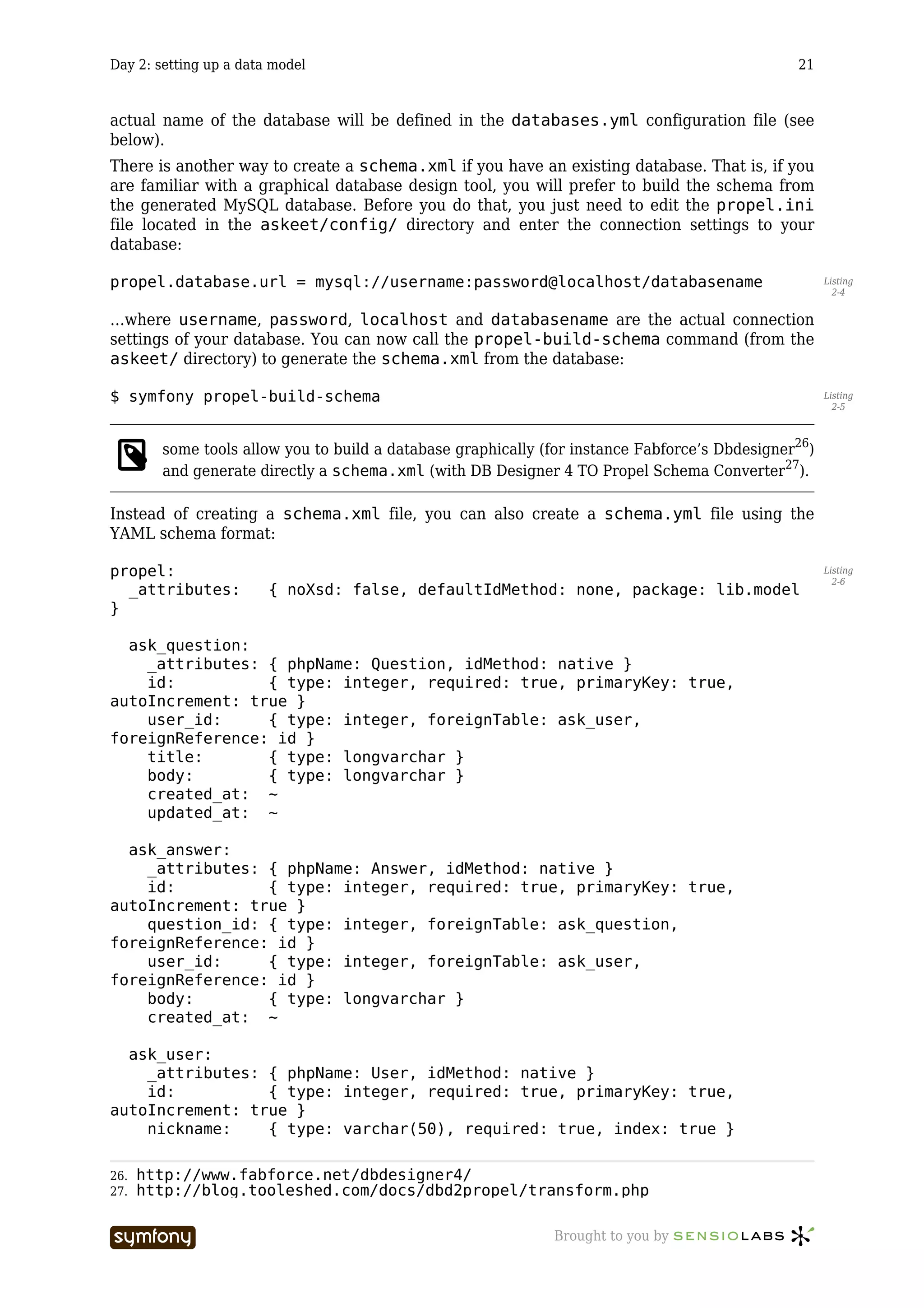
                 project tree structure doesn’t contain them.


          Production server configuration
          For your project to work in the production server, the symfony framework has to be installed
          in the host.


          Installing symfony in a production server
          There are several ways to install symfony on a server, but they are not all adapted to a
          production environment. For instance, doing a PEAR install requires administrator rights on
          directories that might not be open to you if you share a web server.
          Based on the principle that you will probably host several projects using symfony on the
          production web server, the recommended symfony installation is to uncompress the archive
          of the framework in a specific directory. Only the lib/ and data/ directories are necessary
          in a production server, so you can get rid of the other files (bin/, doc/, test/ and the files
          from the root directory).
          You should end up with a file structure looking like:

Listing   /home/myaccount/
 22-5
            symfony/
              lib/
              data/
            askeet/
              apps/
                frontend/
              batch/
              cache/
              config/
              data/

          250.http://www.symfony-project.com/book/1_0/04-The-Basics-of-Page-
          Creation

                                    -----------------                Brought to you by
Day 22: Transfer to production                                                              203


       doc/
       lib/
       log/
       test/
       web/

For the askeet project to use the symfony classes, you have to set up two symbolic links
between the application lib/symfony and data/symfony, and the related directories in the
symfony installation:

$ cd /home/myaccount/askeet                                                                        Listing
                                                                                                    22-6
$ ln -sf /home/myaccount/symfony/lib lib/symfony
$ ln -sf /home/myaccount/symfony/data data/symfony

Alternatively, if you don’t have command line access, the files of the framework can be copied
directly into the project lib/ and data/ directories:

copy /home/myaccount/symfony/lib/*             into /home/myaccount/askeet/lib/                    Listing
                                                                                                    22-7
symfony
copy /home/myaccount/symfony/data/*            into /home/myaccount/askeet/data/
symfony

Beware that in this case, each time you update the framework, you have to do it in all your
projects.
For more information, all the possible ways to install symfony are described in the installation
chapter251 of the symfony book.


Access to the symfony commands in production
While developing, you took the good habit of using:

$ symfony clear-cache                                                                              Listing
                                                                                                    22-8


…each time you change the configuration or the object model of the project. When you upload
a new version of your project in production, the cache also needs to be cleared if you want
the application to work. You can easily do it by deleting the full content of the askeet/
cache/ directory (by ftp or with a ssh console). Alternatively, you can have the power of the
symfony command line at the price of a slightly longer installation.
To use the command line, you need to install the pake utility252. Pake is a PHP tool similar to
the make command. It automates some administration tasks according to a specific
configuration file called pakefile.php. The symfony command line uses the pake utility,
and each time you type symfony, you actually call pake with a special pakefile.php
located in the symfony/bin/ directory (find more about pake in symfony in the project
creation chapter253 of the symfony book). If you install symfony via PEAR, pake is installed as
a requirement, so you usually don’t see it at all and don’t need to bother about what comes
next. But if you do a manual installation, you have to uncompress the pake directory (get it
from your symfony pear installation or download it254 from the pake website) into your
directory in the production server. Just like for the symfony libs, you also have to add a
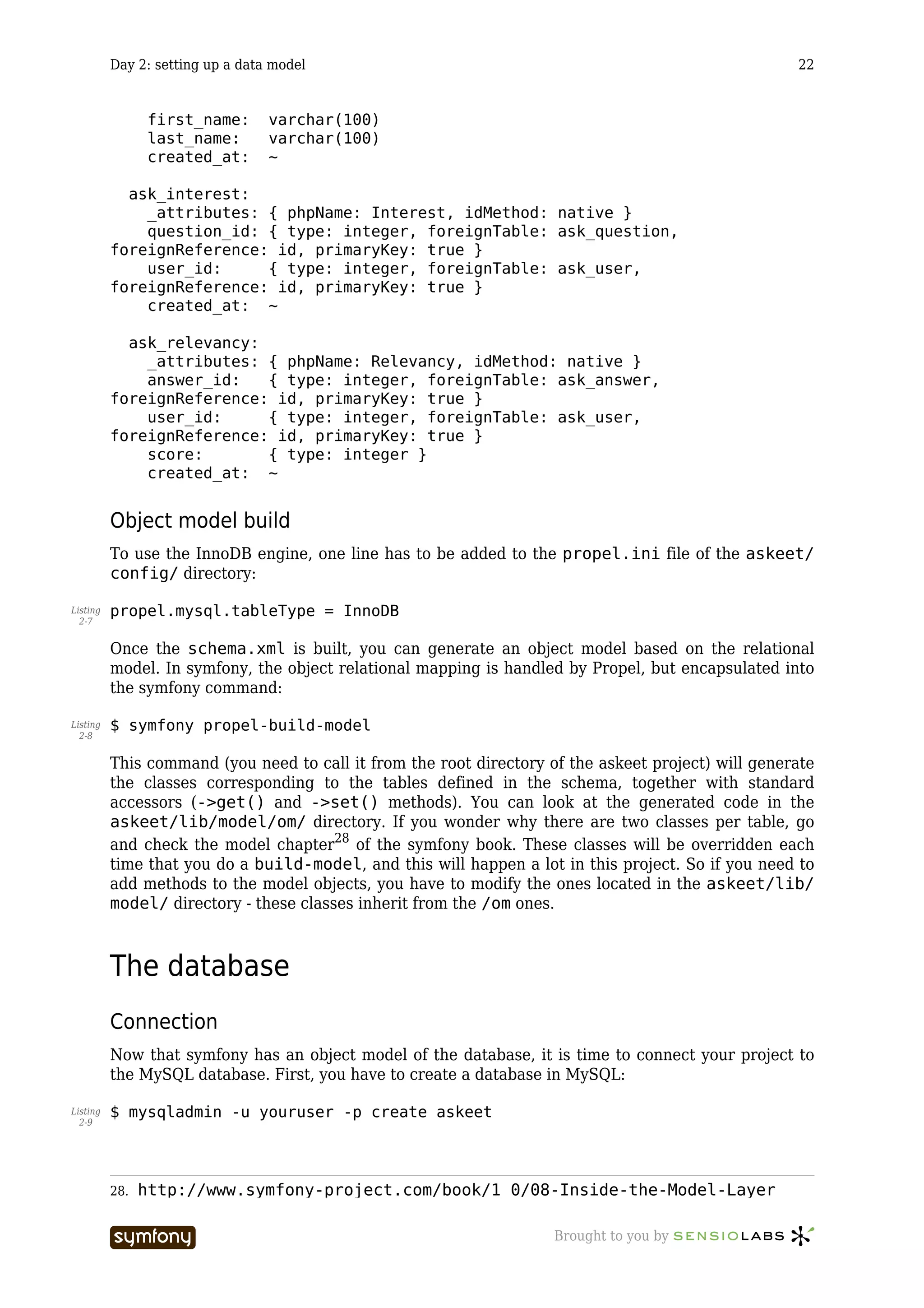
symlink in order to enable symfony to use pake:


251.   http://www.symfony-project.com/book/1_0/02-Exploring-Symfony-s-Code
252.   http://www.pake-project.org
253.   http://www.symfony-project.com/book/1_0/03-Running-Symfony
254.   http://www.pake-project.org/download.html

                          -----------------                 Brought to you by
Day 22: Transfer to production                                                        204


Listing   $ ln -sf /home/myaccount/pake/lib lib/pake
 22-9


          You should end up with something like this:

Listing   /home/myaccount/
22-10
            pake/
              lib/
            symfony/
              lib/
              data/
            askeet/
              apps/
                frontend/
              batch/
              cache/
              config/
              data/
                symfony/ -> /home/myaccount/symfony/data
              doc/
              lib/
                symfony/ -> /home/myaccount/symfony/lib
                pake      -> /home/myaccount/pake/data
              log/
              test/
              web/

          To call the symfony command to do a clear-cache, you need to do:

Listing   $ cd /home/myaccount/askeet/
22-11
          $ php lib/pake/bin/pake.php -f lib/symfony/data/symfony/bin/pakefile.php
          clear-cache

          Alternatively, you can create a file called symfony in the home/myaccount/askeet/ with:

Listing   #!/bin/sh
22-12


          php lib/pake/bin/pake.php -f lib/symfony/data/symfony/bin/pakefile.php $@

          Then, all you need to do in order to clear the cache is that good old

Listing   $ symfony clear-cache
22-13


          Web command
          If you want to have the power of the pake utility but without command line access, you can
          also create a web access for the clear-cache command.
          For instance, you could save the following webpake.php in your /home/myaccount/
          askeet/web/ directory:

Listing   <?php
22-14


          // as we are in the web/ dir, we need to go up one level to get to the
          project root
          chdir(dirname(__FILE__).DIRECTORY_SEPARATOR.'..');

          include_once('/lib/symfony/pake/bin/pake.php');


                                    -----------------                  Brought to you by
Day 22: Transfer to production                                                               205


$pake = pakeApp::get_instance();
try
{
  $ret = $pake->run('/data/symfony/bin/pakefile.php', 'clear-cache');
}
catch (pakeException $e)
{
  print "<strong>ERROR</strong>: ".$e->getMessage();
}

?>

Then, clearing the cache could be done by navigating to:

http://myaskeetprodserver.com/webpake.php                                                           Listing
                                                                                                    22-15


       Beware that by letting web access to administration tools, you can compromise the security
       of your website.


Upgrading your application
There will be times in the life of your project when you need to switch between two versions
of an application. It can be in order to correct bugs, or to upload new features. You can also
be faced with the problem of switching between two versions of the database. If you follow a
few good practices, these actions will prove easy and harmless.


Show unavailability notice
Between the moment when you start the data transfer and the moment you clear the cache (if
you modify the configuration or the data model), there are sometimes more than a few
seconds of delay. You must plan to display an unavailability notice for users trying to browse
the site at that very moment.
In  the  application  settings.yml,                    define   the   unavailable_module     and
unavailable_action settings:

all:                                                                                                Listing
                                                                                                    22-16
  .settings:
     unavailable_module:                      content
     unavailable_action:                      unavailable

Create an empty content/unavailable action and a unavailableSuccess.php
template:

// askeet/apps/frontend/modules/content/actions/actions.class.php                                   Listing
                                                                                                    22-17
public function executeUnavailable()
{
  $this->setTitle('askeet! &raquo; maintenance');
}

// askeet/apps/frontend/modules/content/templates/unavailableSuccess.php
<h1>Askeet: Site maintenance</h1>

<p>The askeet website is currently being updated.</p>


                          -----------------                       Brought to you by
Day 22: Transfer to production                                                                206


          <p>Please try again in a few minutes.</p>

          <p><i>The askeet team</i></p>

          Now each time that you want to make your application unavailable, just change the
          available setting:

Listing   all:
22-18


             .settings:

                 available:                             off

          Don’t forget that for a configuration change to be taken into account in production, you need
          to clear the cache.

                   The fact that the whole application can be turned off with only a single parameter is
                   possible because symfony applications use a single entry point, the front web controller.
                   You will find more information about it in the controller page255 of the symfony book.


          Use two versions of your application
          A good way to avoid unavailability is to have the project root folder configured as a symlink.
          For instance, imagine that you are currently using the version 123 of your application, and
          that you want to switch to the version 134. If your web server root is set to /home/
          myaccount/askeet/web/ and that the production folder looks like that:

Listing   /home/myaccount/
22-19
            pake/
              lib/
            symfony/
              lib/
              data/
            askeet/     -> /home/production/askeet.123/
            askeet.123/
            askeet.134/

          Then you can instantly switch between the two versions by changing the symlink:

Listing   $ ln -sf /home/myaccount/askeet/ /home/myaccount/askeet.134/
22-20


          The users will see no interruption, and yet all the files used after the change of the symlink
          will be the ones of the new release. If, in addition, you emptied the cache/ folder of your
          release 134, you don’t even need to launch a clear-cache after switching applications.


          Switching databases
          You can extrapolate that technique to switching databases. Remember that the address of the
          database used by your application is defined in the databases.yml configuration file. If you
          create a copy of the database with a new name, say askeet.134, you just need to write in
          the askeet.134/apps/frontend/config/databases.yml:

Listing   all:
22-21
            propel:

          255.   http://www.symfony-project.com/book/1_0/06-Inside-the-Controller-Layer

                                    -----------------                   Brought to you by
Day 22: Transfer to production                                                               207


       class:          sfPropelDatabase
       param:
         phptype:      mysql
         hostspec:     localhost
         database:     askeet.134
         username:     myuser
         password:     mypassword
         compat_assoc_lower: true
         compat_rtrim_string: true

As the databases.yml will be switched as the same time as the application itself, your
askeet will instantly start querying the new database.
This technique is especially useful if your application has a big traffic and if you can’t afford
any service interruption.


See you Tomorrow
Synchronization is often a big issue for high traffic websites, but thanks to the file structure
of the symfony projects, it should not create any problem for askeet.
Tomorrow, we will talk about the way to adapt askeet to other languages. The patient
speakers call it internationalization, the others find it more convenient to talk about i18n.
Symfony has built-in support for multilingual sites, so that should not be a big deal.
You can still post your questions and suggestions in the askeet forum256. And did you try to
ask one in the brand new askeet website257?


256.   http://www.symfony-project.com/forum/index.php/f/8/
257.   http://www.askeet.com

                          -----------------                  Brought to you by
Day 23: Internationalization                                                                 208


          Day 23

          Internationalization


          Previously on symfony
          Now that you learned how to transfer a symfony application to a production host, the askeet
          application can run anywhere. But what if someone decided to use it in a non-English
          speaking country like, say, France?
          Askeet being an open-source project, we hope that people from all over the world will use it
          shortly. Not only does that mean that all the files of the project have to be encoded in
          utf-8258, the application also has to propose a multilingual interface and content localization.
          Think about the multinational companies that are going to install askeet on their Intranet to
          have a knowledge management base. They will definitely require that users can switch
          interface language or content rather than install one askeet per language… Fortunately, the
          choices made during the eighteenth day259 to implement universes will ease our task a lot,
          and symfony has native support for internationalized interfaces.


          Localization
          What if the call to an address like:

Listing   http://fr.askeet.com/
 23-1


          …displayed only the French questions? Well, this is quite easy, because since the eighteenth
          day260, such an URI is understood as a universe.


          Content
          Creating a question in a language universe will have it tagged automatically with the
          language tag (here: ‘fr’). And, if you browse the ‘fr’ universe, only the questions with the ‘fr’
          tag will appear.
          So the universe filter already takes care of content localization. That was an easy move.


          258.   http://en.wikipedia.org/wiki/UTF-8
          259.   18.txt
          260.   18.txt

                                     -----------------                 Brought to you by
Day 23: Internationalization                                                                209


Look and feel
The universes can have their own stylesheet. This means that the look and feel of a localized
askeet can be easily adapted as well, with the same mechanism. Next, please.


Language-dependent functions
The database indexing system built during the twenty-first day261 relies on a stemming
algorithm which is language-dependant. In a localized version, it has to be adapted.
For now, there is no available stemming library for other languages than English in PHP, but
what if there was one, or what if someone decided to port one of the Perl stemming
libraries262 to PHP?
Then, in the myTools::stemPhrase() method, we should call a factory method263 instead
of a simple PorterStemmer (left as an exercise for now).


Database content
Imagine an international website proposing a list of hotels around the world. Each hotel is
shown with a text description of the rooms, the service and the opening hours. There are
thousands of hotels, so this content is to be stored in a database. The problem is that there
must be as many versions of the descriptions as there are translations of the site.
Symfony provides a way to structure data in order to handle such cases. As for the example
above, there would be a Hotel class for the fares, address and not-to-be-translated content,
and a HotelI18n class for the localized content. As the Propel accessors abstract this
separation, even if the description was located in the HotelI18n table, you would still
access it with a simple:

$description = $hotel->getDescription();                                                           Listing
                                                                                                    23-2


To understand how this works, refer to the i18n chapter264 of the symfony book.
Fortunately, the filter system of the askeet universes replaces the need for content
adaptation, so we won’t use it here..


Internationalization
As it is a long word, developers often refer to internationalization265 as ‘i18n’. For those who
don’t know why, just count the letters in the word ‘internationalization’, and you will also
understand why ‘localization’ is referred to as ‘l10n’. In web application development, i18n
mostly concerns the translation of text content and the use of local formats for the interface.


Set the culture
A lot of built-in i18n features in symfony are based on a parameter of the user session called
the culture. The culture is the combination of the country and the language of the user, and
it determines how the text and culture-dependant information will be displayed.


261.   http://www.symfony-project.com/askeet/22
262.   http://search.cpan.org/search?query=stem&mode=all
263.   http://en.wikipedia.org/wiki/Factory_method_pattern
264.   http://www.symfony-project.com/book/1_0/13-I18n-and-L10n
265.   http://en.wikipedia.org/wiki/Internationalization_and_localization

                           -----------------                Brought to you by
Day 23: Internationalization                                                                   210


          When the askeet application recognizes a universe as a localization, it has to set the
          corresponding culture. When should a permanent tag be recognized as a localization? We
          choose to allow only the ones for which the interface is translated (see below), so the fact that
          a universe is a localization is determined by the existence of an XML translation file in the
          project i18n/ directory.
          The    universes are      discovered      in     the      askeet/apps/frontend/lib/
          myTagFilter.class.php filter, so we just need to modify it a little bit:

Listing   public function execute ($filterChain)
 23-3
          {
            ...
            // is there a tag in the hostname?
            $request = $this->getContext()->getRequest();
            $hostname = $request->getHost();
            if (!preg_match($this->getParameter('host_exclude_regex'), $hostname) &&
          $pos = strpos($hostname, '.'))
            {
              $tag = Tag::normalize(substr($hostname, 0, $pos));

                 // add a permanent tag constant
                 sfConfig::set('app_permanent_tag', $tag);

              // add a custom stylesheet
              $request->setAttribute('app/tag_filter', $tag, 'helper/asset/auto/
          stylesheet');

              // is the tag a culture?
              if (is_readable(sfConfig::get('sf_app_i18n_dir').'/global/
          messages.'.strtolower($tag).'.xml'))
              {
                $this->getContext()->getUser()->setCulture(strtolower($tag));
              }
              else
              {
                $this->getContext()->getUser()->setCulture('en');
              }
            }
            ...
          }


                   The language tags that will be recognized are to be coded in two lower-case characters, as
                   described in the ISO 639-1 norm266 (for instance fr for French). When dealing with
                   internationalization, always prefer ISO codes for countries and languages, so that your
                   code can comply with international standards and be understood by foreign developers.

          You will find more information about internationalization and cultures in the i18n chapter267
          of the symfony book.


          Dates, Times, Numbers, Currency, Measurements
          The way to display a date in France is not the same as in the US. What an American would
          write:


          266.   http://www.w3.org/WAI/ER/IG/ert/iso639.htm
          267.   http://www.symfony-project.com/book/1_0/13-I18n-and-L10n

                                     -----------------                   Brought to you by
Day 23: Internationalization                                                                  211


December 16, 2005 9:26 PM                                                                            Listing
                                                                                                      23-4


…is written by a French

16 décembre 2005 21:26                                                                               Listing
                                                                                                      23-5


If you remember well, each time we had to display a date in an askeet template, we used the
format_date() helper. This helper formats the date given as parameter according to the
user culture. As the culture is set in the myTagFilter.class.php filter, the date formatting
will be done automatically.


This is a another good practice for international projects: always use the i18n helpers when
you have to output a date, a time, a number, a currency or a measurement. Symfony provides
helpers for most of them (see the i18 helpers chapter268 of the symfony book for more
information).


Interface translation
The interface of the askeet project contains text. In a localized version, the text of the
interface should be displayed in the language of the user culture.
To enable interface translation, all the texts of the askeet templates have to be enclosed in a
special i18n helper, __(). In addition, the helper must be declared at the top of the template.
For instance, to enable interface translation in the home page, open the askeet/apps/
frontend/modules/question/templates/listSuccess.php template and change it to:

<?php use_helper('I18N') ?>                                                                          Listing
                                                                                                      23-6


<h1><?php echo __('popular questions') ?></h1>

<?php include_partial('list', array('question_pager' => $question_pager))
?>


        Instead of having to add the i18n helper on top of each template, you can just add it once
        to the application settings.yml in askeet/apps/frontend.config/:
        all: .settings:
        standard_helpers: Partial,Cache,Form,I18N

For each language in which the interface is translated, a messages.xx.xml file must be
created in the askeet/apps/frontend/i18n/ directory, where xx is the language of the
translation. This XML file is a XLIFF269 dictionary, showing the translated version of the text
from the source language (English for askeet).
For instance, to enable a French translation, you must create a messages.fr.xml with the
following content:

                                                                                                     Listing
                                                                                                      23-7


268.   http://www.symfony-project.com/book/1_0/13-I18n-and-L10n
269.   http://www.xliff.org/

                           -----------------                  Brought to you by
Day 23: Internationalization                                                                        212


          <?xml version="1.0" ?>
          <xliff version="1.0">
            <file original="global" source-language="en_US" datatype="plaintext">
              <body>
                <trans-unit id="1">
                   <source>popular questions</source>
                   <target>questions populaires</target>
                </trans-unit>
              </body>
            </file>
          </xliff>

          The syntax of the XLIFF file is explained in detail in the i18N chapter 270 of the symfony book.
          Now, the big part of the job is to browse all the templates (and template fragments) to find
          the text to translate. Each time you find a sentence, you have to enclose it between <?php
          echo __(' and ') ?>, and create a new <trans-unit> tag in the messages.fr.xml file.
          Fortunately, all the templates in symfony projects are localized in templates/ directories, so
          you don’t need to browse all the files of your project.

                      A translation only makes sense if the translation files contains full sentences. However, as
                      you sometimes have formatting or variables in the text, you can add a second argument to
                      the __() helper to do substitution. For instance, to mark the following template text:

            Listing   There are <?php echo count_logged() ?> persons logged.
             23-8

                      …use only one __()) call to avoid splitting the sentence into two parts that can’t be
                      understood on their own:

            Listing   <?php echo __('There are %1% persons logged', array('%1%' =>
             23-9
                      count_logged())) ?>


          Finally, to allow the automatic translation, you have to set the i18n parameter to on in the
          application settings.yml:

Listing   all:
23-10
            .settings:

                 i18n:                              on

          Now browse to fr.askeet.com and watch the translated interface:


          270.   http://www.symfony-project.com/book/1_0/13-I18n-and-L10n

                                       -----------------                     Brought to you by
Day 23: Internationalization                                                               213


Automated translation
Some tools exist to automate the task of enclosing source text and creating
messages.xx.xml files. Unfortunately, none will be able to do the enclosing as well as you
would do. Only you can determine where to start and where to end the __() call. Although
we don’t use them, we provide a link to the websites where you will find resources about
automated translation tools:

  • The xgettext command from the GNU getText tool271 provides a way to extract
    text from PHP code. It produces a .pot file (list of the terms) that can be declined
    into a series of .po files (list of the terms translated in one language).
  • The po2xliff command from the XLIFF tools272 turns .po files into
    messages.xx.xml XLIFF files.
  • For Windows users, the Okapi framework273 can be a good alternative.
  • To edit the translation files, poedit274 proposes an intuitive interface (this is
    especially useful since most of the human translators don’t understand either XML
    or .po files).


Don’t forget
Once the text from the templates is marked for translation, there is still a close code
inspection to be done. As a matter of fact, text messages can hide in unexpected parts of your
application. Make sure you do an inventory to find the following “hidden” text:

  • Image folders (images can include text)


271.   http://en.wikipedia.org/wiki/Gettext
272.   http://xliff-tools.freedesktop.org/wiki/Projects/XliffPoTools
273.   http://okapi.sourceforge.net/
274.   http://www.poedit.org/index.php

                           -----------------               Brought to you by
Day 23: Internationalization                                                                       214


          If you need to localize images, put them in a sub directory corresponding to their
          culture, and add the culture to the image_tag() helper call:

Listing     [php]
23-11
             getCulture().'/myimage.png') ?>

    • The alternative text for images, the button labels and all the text messages that are
      parameters of <?php and ?> instructions.
    • The JavaScript messages can be located in helpers (as in link_to('click',
      '@rule', 'confirm=Are you sure?')), in JavaScript tags in your templates, or
      in included .js files

All in all, if you don’t design an application with i18n in mind from the beginning, there is a
high risk that you will forget some untranslated text somewhere. Our best advice is to think
about i18n before starting to develop, and if you know that your application will probably be
translated, keep in mind to use __('') each time you write text that will be displayed to the
end user.

            There are some hidden text messages in the validate/ directories of your modules, that
            appear when a form is not properly validated. The cool thing is that you don’t have to do a
            special treatment to these texts if they appear in the XLIFF translation. Symfony will
            automatically find the translation in a <trans-unit> node, and use it instead of the
            original text of the YAML files.


                             -----------------                    Brought to you by
Day 23: Internationalization                                                                 215


See you Tomorrow
Askeet275 is making its way to be a really useful open-source application. Being an i18n-
compatible application, it becomes available to the non-English speakers (roughly 90% of the
world population).
The modified source of the application, including i18n, is available in the SVN repository276
and can be browsed directly from the askeet trac277. Your comments on the forum278 are
welcome.
And tomorrow is already the last day of the symfony advent calendar series. Don’t miss it.


275.   http://www.askeet.com/
276.   http://svn.askeet.com/tags/release_day_23/
277.   http://trac.askeet.com/trac/browser/tags/release_day_23
278.   http://www.symfony-project.com/forum/index.php/f/8/

                           -----------------               Brought to you by
Day 24: What’s next?                                                                         216


Day 24

What’s next?


Previously on symfony
For twenty-three days, we have been building a web 2.0 application in PHP5 with the symfony
framework. Yesterday was the last step of the askeet development, and it is fully i18n
compatible. If you browse to www.askeet.com279, what you will see is the result of roughly 3
days (24 hours) of work with symfony. As you see it, the application is ready to answer your
questions about chocolate, sex, astronomy, or PHP programming.
But more than that, askeet is an open source project, and what comes next is, hopefully, a
long story.


Use it
The askeet website is open to the public. You can advertise it and talk about it to your friends
and relatives. Some of the test contributions will be removed, but most of the existing
questions and user accounts will remain. Askeet is a great tool to find answers - provided that
many users visit it. So spread the word.
Opening an account is fast and easy, and requires nothing but a nickname, a password, and
an email. It allows you to declare interest about questions, to ask new questions, and to rate
answers. The email address will not be used for any kind of advertising, ever.
Subscribe to the RSS feeds to keep informed about the latest questions, or about the answers
to the questions you asked.
Askeet can also be a way to make some money, since user profiles can be linked to a Paypal
account. If a user finds your contributions useful, he/she can thank you by granting you a
small donation.
All in all, there is no good reason not to use askeet everyday. It would be our great pleasure if
you bookmarked the site, visited it regularly, and contributed questions and answers.


Install it
Askeet is more than a website, it is an open-source project. As of today, askeet can already be
downloaded and installed anywhere. Today’s version is tagged 1.0, it is free to use, adapt,
customize, and integrate in third party applications.


279.   http://www.askeet.com/

                        -----------------                    Brought to you by
Day 24: What’s next?                                                                             217


This is technically possible because askeet is based on PHP5 and symfony, and this is legally
possible because askeet is an open-source project on its own, published under the MIT
license.


Download
To install askeet, you have two options:

  • Download the 1.0 release as a .tgz archive280 from the symfony-project website
  • Do a checkout from the 1.0 release in the SVN repository281 into your own askeet
    folder.

You will have a symfony project, ready to run as soon as you configure your web server.

       The full source can also be browsed online in the askeet trac282.


Documentation
The 24 advent calendar tutorials will still be available online in the symfony project
website283.
If you feel like translating them to a foreign language, you can also find the Markdown
version284 of the tutorials on the symfony Subversion repository. We will be delighted to host
any foreign translations of the askeet tutorials on our repository. The symfony site uses a
Markdown converter which does the formatting, media inclusion and syntax coloring. So just
send us a translated Markdown version, calling the same media, encoded in utf-8, and we will
publish it.

       Before starting a translation, please write a post in the askeet forum285 so that two people
       don’t start the translation at the same time. And commit the chapters one by one as you
       translate them, so that the content can be made available sooner.


File structure
After uncompressing the askeet project archive, you will obtain a list of directories which are
the classic file tree structure of a symfony project. It is explained in detail in the file structure
chapter286 of the symfony book.
At the time of the 1.0 release, the askeet project contains one application (called ‘frontend’)
and 11 modules:

modules/                                                                                                Listing
                                                                                                         24-1
  administrator
  answer
  api
  content

280. http://www.symfony-project.com/downloads/askeet_release_1_0.tgz
281. http://svn.askeet.com/tags/release_1_0/
282. http://trac.askeet.com/trac/browser/trunk/
283. http://www.symfony-project.com/askeet
284. http://svn.symfony-project.com/doc/branches/1.0/askeet/
285. http://www.symfony-project.com/forum/index.php/t/275/
286. http://www.symfony-project.com/book/1_0/04-The-Basics-of-Page-
Creation

                         -----------------                     Brought to you by
Day 24: What’s next?                                                                      218


            feed
            mail
            moderator
            question
            sidebar
            tag
            user


          Data model
          Askeet is compatible with MySQL, PostgreSQL, Oracle, MSSQL, and all database for which a
          Creole287 driver exists. Here is the data model of the askeet application as of release 1.0:


          You can find a SQL query that will add these tables to any existing database in askeet/
          data/sql/lib.model.schema.sql.
          There is a set of test data in askeet/data/fixtures/. If you want to use it to populate
          your database, call:

Listing   $ php batch/load_data.php
 24-2


          …from the root directory of the project.


          Contribute to it
          The askeet application is a living open-source project. As such, we hope that it will continue
          to improve, but we need your help for that.
          Askeet was developed by Fabien Potencier288, who is also the lead developer of the symfony
          project. As the framework already represents an important amount of work, contributions
          from askeet enthusiasts are needed to make the project live. And there is much to do! If you
          are a developer interested in contributing to askeet, have a look at the following to-do list:


          287.   http://creole.phpdb.org/wiki/
          288.   mailto:fabien.potencier@symfony-project.com

                                 -----------------                   Brought to you by
Day 24: What’s next?                                                                        219


  • Additional features:

        • Alternative site designs to propose more than one presentation. This is
          mostly a graphical design and CSS coding job.
        • User-contributed Captchas, under the shape of a simple question (like
          “how many fingers in one hand?”), to avoid automatic spam on question
          contributions.
        • Preview of questions before publication to avoid big typos
        • Confirmation of user subscription by email (optional)
        • Auto login (with a cookie)
        • RSS Feed of reports for Moderators
        • Ajax Pagination of the contributions/interests in the User profile page
        • Popular algorithm so that the questions of the front page can change over
          the time
        • …

  • Project strengthening:

        • Unit tests
        • Code documentation in PHP doc format
        • Installation manual

In addition, there are or will be bugs to detect, track and fix.
For enhancements and bugs, please use the askeet ticketing system289. You can keep track of
all the askeet changes by consulting the project timeline290 regularly.
All contributions are welcome. Regular contributors with a good understanding of the project
will quickly be granted a right to commit to the SVN repository.
Finally, if you want to discuss about askeet, you have the choice between the askeet forum
section291 in the symfony project website, or a dedicated wiki at trac.askeet.com/trac/wiki 292.


Acknowledgements
Fabien Potencier293 (lead developer of askeet and symfony)
François Zaninotto294 (writer of the tutorials) would like to thank John Christopher295 for his
great help on rereading each of the tutorials to put them in good English, Bruno Klein for his
work on the askeet design, and his wife for the incredible patience and tolerance she showed
during 24 days…


See you soon
That’s about it. It’s been a pleasure developing and writing this for you, we hope that askeet
will live long and that lots of people will start using symfony for their web projects.
Merry Christmas to you all.


289.   http://trac.askeet.com/trac/report/1
290.   http://trac.askeet.com/trac/timeline
291.   http://www.symfony-project.com/forum/index.php/f/8/
292.   http://trac.askeet.com/trac/wiki
293.   mailto:fabien.potencier@symfony-project.com
294.   mailto:francois.zaninotto@symfony-project.com
295.   mailto:john.christopher@symfony-project.com

                        -----------------                     Brought to you by
C:\fake path\askeet 1.0-en

C:\fake path\askeet 1.0-en

  • 1.
    The Askeet Tutorial symfony 1.0 This PDF is brought to you by License: Creative Commons Attribution-Noncommercial-No Derivative Works 3.0 Unported License Version: askeet-1.0-en-2010-05-24
  • 2.
    Table of Contents ii Table of Contents Day 1: starting up a project .............................................................................. 9 The challenge............................................................................................................. 9 The project................................................................................................................. 9 What for today ......................................................................................................... 10 Symfony installation ................................................................................................ 10 Project Setup ........................................................................................................... 11 Web service setup.................................................................................................... 11 Web server configuration ................................................................................................... 11 Declare the domain name................................................................................................... 12 Test the new configuration................................................................................................. 12 IIS ............................................................................................................................ 13 Subversion ............................................................................................................... 13 See you Tomorrow ................................................................................................... 15 Day 2: setting up a data model ....................................................................... 17 Previously on symfony ............................................................................................. 17 The project unveiled ................................................................................................ 17 Where to start? ........................................................................................................ 18 Data Model .............................................................................................................. 18 Relational model................................................................................................................. 18 schema.xml....................................................................................................................... 19 Object model build ............................................................................................................. 22 The database............................................................................................................ 22 Connection.......................................................................................................................... 22 Build ................................................................................................................................... 23 Test data access via a CRUD ................................................................................... 23 See you Tomorrow ................................................................................................... 25 Day 3: dive into the MVC architecture ........................................................... 26 Previously on symfony ............................................................................................. 26 The MVC model ....................................................................................................... 26 Change the layout.................................................................................................... 27 A few words about environments ............................................................................ 28 Redefine the default homepage ............................................................................... 29 Define test data........................................................................................................ 29 Create a batch to populate the database................................................................. 31 Batch skeleton .................................................................................................................... 31 Data import......................................................................................................................... 32 Launch the batch................................................................................................................ 32 Accessing the data in the model .............................................................................. 33 Modify the question/list template ............................................................................ 34 Cleanup.................................................................................................................... 35 ----------------- Brought to you by
  • 3.
    Table of Contents iii See you Tomorrow ................................................................................................... 36 Day 4: refactoring ........................................................................................... 37 Previously on symfony ............................................................................................. 37 Show the answers to a question .............................................................................. 37 A quick look at the action ................................................................................................... 38 Modify the showSuccess.php template........................................................................... 38 Add some new test data ..................................................................................................... 39 Modify the model, part I .......................................................................................... 40 Don’t repeat yourself ............................................................................................... 41 Modify the model, part II ......................................................................................... 42 Add a field to the User object model ................................................................................. 42 Modify the save() method of the Interest object ......................................................... 42 Secure the updating request with a transaction ................................................................ 43 Change the template .......................................................................................................... 44 Test the validity of the modification ................................................................................... 45 Same for the answers .............................................................................................. 45 Routing .................................................................................................................... 47 Create an alternate version of the title .............................................................................. 47 Custom class....................................................................................................................... 48 Change the links to the show action .................................................................................. 49 Changing the routing rules ................................................................................................ 49 See you Tomorrow ................................................................................................... 50 Day 5: forms and pager ................................................................................... 51 Previously on symfony ............................................................................................. 51 Login form ............................................................................................................... 51 Create the user/login action .......................................................................................... 52 Create the loginSuccess.php template ......................................................................... 52 Handle the login form submission...................................................................................... 53 Grant privileges .................................................................................................................. 54 Add the user/logout action ............................................................................................ 54 Update the layout ............................................................................................................... 55 Question pager ........................................................................................................ 55 Modify the question/list action ................................................................................... 55 Use a custom parameter .................................................................................................... 56 Modify the listSuccess.php template........................................................................... 56 Add page navigation ........................................................................................................... 57 Add a routing rule for the subsequent pages ..................................................................... 58 Refactoring .............................................................................................................. 58 Model.................................................................................................................................. 58 Templates ........................................................................................................................... 59 See you Tomorrow ................................................................................................... 59 Day 6: security and form validation ................................................................ 60 Previously on symfony ............................................................................................. 60 Login form validation............................................................................................... 60 Validation file ..................................................................................................................... 60 Error handling .................................................................................................................... 61 Template error helpers....................................................................................................... 61 Style errors......................................................................................................................... 62 Authenticate a user.................................................................................................. 62 Custom validator ................................................................................................................ 62 Password storage ............................................................................................................... 63 Add password in the test data ............................................................................................ 63 ----------------- Brought to you by
  • 4.
    Table of Contents iv Custom validator ................................................................................................................ 62 Remove the code from the action....................................................................................... 66 Restrict access ......................................................................................................... 66 How about a bit of refactoring?............................................................................... 67 See you Tomorrow ................................................................................................... 68 Day 7: model and view manipulation .............................................................. 69 Previously on symfony ............................................................................................. 69 Prefactoring ............................................................................................................. 69 List of the recent questions ..................................................................................... 71 List of the recent answers ....................................................................................... 73 User profile .............................................................................................................. 75 Add a navigation bar................................................................................................ 76 Add the component in the layout ....................................................................................... 77 Define what action goes into the component ..................................................................... 77 Write the sidebar/default action and template ........................................................... 77 A little more view configuration .............................................................................. 78 Look at what we have done ..................................................................................... 80 See you Tomorrow ................................................................................................... 81 Day 8: AJAX interactions ................................................................................. 82 Previously on symfony ............................................................................................. 82 Add an indicator in the layout ................................................................................. 82 Add an AJAX interaction to declare interest............................................................ 83 Caller .................................................................................................................................. 83 Result zone ......................................................................................................................... 85 Server action ...................................................................................................................... 85 Final test............................................................................................................................. 86 Add an inline ‘sign-in’ form...................................................................................... 86 Add a hidden login form to the layout ................................................................................ 86 Have the form appear when a non-authenticated user clicks an interested link............... 87 Login the user..................................................................................................................... 87 See you Tomorrow ................................................................................................... 88 Day 9: local improvements.............................................................................. 89 Previously on symfony ............................................................................................. 89 Allow rich text formatting on questions and answers ............................................. 89 Markdown........................................................................................................................... 89 Test Markdown text ................................................................................................. 90 Markdown library ............................................................................................................... 90 Extend the model................................................................................................................ 90 Override the setBody method........................................................................................... 90 Update the test data ........................................................................................................... 91 Modify the templates.......................................................................................................... 91 Hide all ids.............................................................................................................. 92 Change the action............................................................................................................... 92 Change the model............................................................................................................... 93 Change the template .......................................................................................................... 93 Add the routing rule ........................................................................................................... 93 Routing .................................................................................................................... 93 See you Tomorrow ................................................................................................... 95 Day 10: Alter data with Ajax forms ................................................................. 96 Previously on symfony ............................................................................................. 96 Add a new question.................................................................................................. 96 ----------------- Brought to you by
  • 5.
    Table of Contents v Restrict access to registered users .................................................................................... 96 The addSuccess.php template ........................................................................................ 97 Form validation .................................................................................................................. 98 Handle the form submission .................................................................................... 98 Add a new answer.................................................................................................... 99 Add the AJAX form.............................................................................................................. 99 A little refactoring ............................................................................................................ 100 Handle the form submission............................................................................................. 101 The answer/add action................................................................................................... 101 Test it................................................................................................................................ 103 See you Tomorrow ................................................................................................. 103 Day 11: syndication feed ............................................................................... 104 Previously on symfony ........................................................................................... 104 Popular questions feed .......................................................................................... 104 Link to the feed in the head ............................................................................................. 104 Install the plug-in ............................................................................................................. 104 Create the action .............................................................................................................. 105 Change the view configuration......................................................................................... 105 Write the template............................................................................................................ 106 Test it................................................................................................................................ 106 The magic .............................................................................................................. 107 Interface improvements......................................................................................... 108 Routing ............................................................................................................................. 108 RSS image ........................................................................................................................ 108 See you Tomorrow ................................................................................................. 108 Day 12: Emails............................................................................................... 109 Previously on symfony ........................................................................................... 109 Password recovery................................................................................................. 109 Password request form..................................................................................................... 109 Form validation ................................................................................................................ 110 Handling the request........................................................................................................ 110 Send an email ........................................................................................................ 112 Email sending action ........................................................................................................ 112 Mail template ................................................................................................................... 113 Alternate mail template.................................................................................................... 113 Configuration.................................................................................................................... 114 Test ................................................................................................................................... 114 See you Tomorrow ................................................................................................. 114 Day 13: Tags.................................................................................................. 115 Previously on symfony ........................................................................................... 115 The QuestionTag class ........................................................................................ 115 Schema update ................................................................................................................. 116 Custom class..................................................................................................................... 117 Extend the model.............................................................................................................. 118 Add some test data ........................................................................................................... 118 Display the tags of a question................................................................................ 118 Extend model.................................................................................................................... 118 Modify the view ................................................................................................................ 119 Test it................................................................................................................................ 120 Display a short list of popular tags for a question................................................. 120 Extend the model.............................................................................................................. 118 Modify the view ................................................................................................................ 119 ----------------- Brought to you by
  • 6.
    Table of Contents vi Test ................................................................................................................................... 123 Display the list of questions tagged with a word................................................... 123 The tag/show action ....................................................................................................... 123 Extend the model.............................................................................................................. 118 Create the template.......................................................................................................... 124 Add the page parameter in the routing rule.................................................................... 124 Test it................................................................................................................................ 120 See you Tomorrow ................................................................................................. 124 Day 14: Tags, part II ..................................................................................... 126 Previously on symfony ........................................................................................... 126 Add tags to a question ........................................................................................... 126 The form ........................................................................................................................... 126 Autocomplete.................................................................................................................... 127 Remote form ..................................................................................................................... 128 Test it................................................................................................................................ 129 Display the tag bubble ........................................................................................... 130 Extend the QuestionTagPeer class............................................................................... 130 Display a tag bubble ......................................................................................................... 131 Style the tag list items...................................................................................................... 131 See you Tomorrow ................................................................................................. 132 Day 15: Unit tests.......................................................................................... 133 Previously on symfony ........................................................................................... 133 Simple test ............................................................................................................. 133 Unit tests in a symfony project .............................................................................. 134 Default unit tests .............................................................................................................. 134 Add a unit test .................................................................................................................. 135 Running unit tests ............................................................................................................ 136 The other way around ...................................................................................................... 136 When a test fails ............................................................................................................... 137 Simulating a web browsing session....................................................................... 138 The sfTestBrowser object............................................................................................. 138 The WebTestCase object................................................................................................. 139 Selenium........................................................................................................................... 140 A few words about environments .......................................................................... 144 See you Tomorrow ................................................................................................. 144 Day 16: Lazy day............................................................................................ 146 See you Tomorrow ................................................................................................. 147 Day 17: API.................................................................................................... 148 Previously on symfony ........................................................................................... 148 The API .................................................................................................................. 148 HTTP Authentication ............................................................................................. 149 API response .......................................................................................................... 152 api/index action ............................................................................................................ 152 questionSuccess.php template................................................................................... 153 Test it................................................................................................................................ 153 Integrating an external API ................................................................................... 153 Paypal donation ..................................................................................................... 154 See you Tomorrow ................................................................................................. 155 Day 18: Filters ............................................................................................... 156 Previously on symfony ........................................................................................... 156 ----------------- Brought to you by
  • 7.
    Table of Contents vii Configurable feature.............................................................................................. 156 Create a filter......................................................................................................... 156 Get a permanent tag from the domain name......................................................... 157 Model modifications .............................................................................................. 158 Filter lists according to the permanent tag...................................................................... 159 Lists of tags for a question or a user ................................................................................ 160 Append the permanent tag to new questions................................................................... 160 Server configuration .............................................................................................. 161 See you Tomorrow ................................................................................................. 162 Day 19: Performance and cache ................................................................... 163 Previously on symfony ........................................................................................... 163 Load testing tools .................................................................................................. 163 JMeter............................................................................................................................... 164 Apache’s ab ...................................................................................................................... 165 Improve performances with the cache .................................................................. 166 Put the result of the action in the cache .......................................................................... 167 Build a staging environment ............................................................................................ 168 Put a template fragment in the cache .............................................................................. 169 Clear selective parts of the cache .................................................................................... 170 See you Tomorrow ................................................................................................. 171 Day 20: Administration and moderation....................................................... 172 Previously on symfony ........................................................................................... 172 The expected result: what the client says ............................................................. 172 Stories .............................................................................................................................. 172 Story #1: Profile management ......................................................................................... 173 Story #2: Report of problematic questions or answers ................................................... 173 Story #3: Handling of problematic questions or answers ............................................... 173 Story #4: handling of problematic tags ........................................................................... 173 Story #4: Handling of problematic users ......................................................................... 173 Is that all? ......................................................................................................................... 174 Backend vs. enhanced frontend............................................................................. 174 The functionality: what the developers understand .............................................. 175 Implementation...................................................................................................... 176 New tables........................................................................................................................ 176 Cascade deletion .............................................................................................................. 177 Add links in the sidebar for users with credentials.......................................................... 178 AJAX report....................................................................................................................... 180 New action links for users with credentials ..................................................................... 182 Access restriction ............................................................................................................. 183 New moderator and administrator actions............................................................... 184 Log deletions .................................................................................................................... 184 See you Tomorrow ................................................................................................. 185 Day 21: Search engine .................................................................................. 187 Previously on symfony ........................................................................................... 187 How to build a search engine? .............................................................................. 187 Word index............................................................................................................. 188 Index table........................................................................................................................ 188 Splitting phrases into words............................................................................................. 189 Stop words........................................................................................................................ 189 Stemming ......................................................................................................................... 190 Giving weight to words..................................................................................................... 190 Updating the index ........................................................................................................... 191 ----------------- Brought to you by
  • 8.
    Table of Contents viii Test the index builder....................................................................................................... 193 The search function ............................................................................................... 194 AND or OR? ........................................................................................................................ 194 The search method ........................................................................................................... 194 The search form................................................................................................................ 196 Display the search result.................................................................................................. 198 See you Tomorrow ................................................................................................. 199 Day 22: Transfer to production..................................................................... 200 Previously on symfony ........................................................................................... 200 Synchronization ..................................................................................................... 200 Good practices.................................................................................................................. 200 The symfony sync command ......................................................................................... 201 Ignoring irrelevant files.................................................................................................... 201 Production server configuration ............................................................................ 202 Installing symfony in a production server ........................................................................ 202 Access to the symfony commands in production.............................................................. 203 Web command .................................................................................................................. 204 Upgrading your application ................................................................................... 205 Show unavailability notice................................................................................................ 205 Use two versions of your application ............................................................................... 206 Switching databases......................................................................................................... 206 See you Tomorrow ................................................................................................. 207 Day 23: Internationalization ......................................................................... 208 Previously on symfony ........................................................................................... 208 Localization............................................................................................................ 208 Content ............................................................................................................................. 208 Look and feel .................................................................................................................... 209 Language-dependent functions ........................................................................................ 209 Database content.............................................................................................................. 209 Internationalization ............................................................................................... 209 Set the culture.................................................................................................................. 209 Dates, Times, Numbers, Currency, Measurements.......................................................... 210 Interface translation......................................................................................................... 211 Automated translation ...................................................................................................... 213 Don’t forget ...................................................................................................................... 213 See you Tomorrow ................................................................................................. 215 Day 24: What’s next?..................................................................................... 216 Previously on symfony ........................................................................................... 216 Use it...................................................................................................................... 216 Install it.................................................................................................................. 216 Download.......................................................................................................................... 217 Documentation ................................................................................................................. 217 File structure.................................................................................................................... 217 Data model ....................................................................................................................... 218 Contribute to it ...................................................................................................... 218 Acknowledgements ................................................................................................ 219 See you soon .......................................................................................................... 219 ----------------- Brought to you by
  • 9.
    Day 1: startingup a project 9 Day 1 starting up a project The challenge The symfony advent calendar is a set of 24 tutorials, published day-by-day between December 1st and Christmas. That’s right, every day including week-ends, a new tutorial will be published. Each tutorial is meant to last less than one hour, and will be the occasion to see the ongoing development of a web 2.0 application, from A to Z. For Christmas time, the resulting application will be put online, and the source code made open source. This application will be usable, interesting, useful, and fun. Twenty-four times less than one hour equals less than a day, and that’s exactly how long we think that a developer needs to learn symfony. Every day, new features will be added to the application, and we’ll take advantage of this development to show you how to take advantage of symfony’s functionality as well as good practices in symfony web development. Every day, you will realize how fast and efficient it is to develop a web app with symfony, and you will want to know more. Considering that it wouldn’t be enough of a challenge with just that, and also because we are lazy folks, we have no plans for the 21st day - winter time. The feature that the community will require the most will be added to the application that day, without preparation, and we’ll make it work. It will be the get-a-symfony-guru-for-a-day day. The project The application to be designed could have been a trivial “show-and-tell” application, like a to- do list, a phone book, or a bookstore. But we want to use symfony on an original project, something useful, with numerous features and an important size. The goal is really to prove that symfony can be used in complex situations, to develop professional applications with style and little effort. We also hope that lots of people will actually use the application, in order to show that a symfony website can support an important load. That’s why the application needs to bring an actual service, and to answer an existing need - or to create a new one. The launch of the website will be a live stress test; this also means that we will need you, humble readers, to digg/bookmark/blog the site and talk about it in real life to check how many visits it can support. The content of the project will be kept secret for another day. We still have much to do today without describing a full-featured web 2.0 application. This should give you some time to argue and launch additional hypothesis. However, we need a name, so let’s call it: askeet. ----------------- Brought to you by
  • 10.
    Day 1: startingup a project 10 What for today The objective of the day is to display a page of the application in a web browser, and to setup a professional development environment. This includes installation of symfony, creation of an application, web server configuration, and setup of a source version control system. It should be easy for those who already followed the previous tutorials, and not very hard for others. And everyone should learn something new. We’ll assume that you use a Unix-like system with Apache, MySQL and PHP 5 installed. If you run a Windows system, don’t panic: it will also work fine, you’ll just have to type a few commands in the cmd prompt. Unix shell commands can come in handy in a Windows environment. If you would like to use tools like tar, gzip, or grep on Windows you can install Cygwin1. The official docs are a little sparse, so a good installation guide can be found here2. The adventurous may also like to try Microsoft’s Windows Services for Unix3. Symfony installation The simplest way to install symfony is to use the PEAR4 package. However, to be able to use channels - and access the symfony channel - you need to upgrade to PEAR 1.4.0 or greater (unless you run PHP 5.1.0, which includes PEAR 1.4.5): Listing $ pear upgrade PEAR 1-1 if you experience any problem while using PEAR, refer to the Running symfony5 book chapter. Now you can add the ‘symfony’ channel: Listing $ pear channel-discover pear.symfony-project.com 1-2 You are ready to install the latest stable version of symfony together with all its dependencies: Listing $ pear install symfony/symfony 1-3 If a specific version is desired, say 1.0.11, it can be specified as follows: Listing $ pear upgrade symfony/symfony-1.0.11 1-4 Check that symfony is installed by using the command line to check the version (note capital - V): Listing $ symfony -V 1-5 1. http://cygwin.com/ 2. http://www.soe.ucsc.edu/~you/notes/cygwin-install.html 3. http://technet.microsoft.com/en-gb/interopmigration/bb380242.aspx 4. http://pear.php.net 5. http://www.symfony-project.com/book/1_0/03-Running-Symfony ----------------- Brought to you by
  • 11.
    Day 1: startingup a project 11 If you are curious about what this new command line tool can do for you, type symfony -T to list the available options. You might also want to read the Running symfony6 book chapter to see how to install symfony from a tgz archive or the svn repository. A community contribution also details a non-PEAR installation in the symfony wiki7. Project Setup In symfony, applications sharing the same data model are regrouped into projects. For the askeet project, we can already disclose the fact that there will be a frontend and a backend: that makes two applications. The project being the shell of the applications, it has to be created first. To do that, all you need is a directory and a symfony init-project command line: $ mkdir /home/sfprojects/askeet Listing 1-6 $ cd /home/sfprojects/askeet $ symfony init-project askeet Now it is time to create the frontend application with the symfony init-app command: $ symfony init-app frontend Listing 1-7 Wow, that was fast. Windows users are advised to run symfony and to setup their new project in a path which contains no spaces. Avoid using the Documents and Settings directory, including anywhere under My Documents (or Documents on Vista). Web service setup Web server configuration Now it is time to change your Apache configuration to make the new application accessible. In a professional context, it is better to setup a new application as a virtual host, and that’s what will be described here. However, if you prefer to add it as an alias, find how in the web server configuration8 cookbook chapter. Open the httpd.conf file of your Apache/conf/ directory and add at the end: NameVirtualHost 127.0.0.1:80 Listing 1-8 <VirtualHost 127.0.0.1:80> ServerName askeet DocumentRoot "/home/sfprojects/askeet/web" DirectoryIndex index.php Alias /sf /usr/local/lib/php/data/symfony/web/sf <Directory "/home/sfprojects/askeet/web"> AllowOverride All 6. http://www.symfony-project.com/book/1_0/03-Running-Symfony 7. http://www.symfony-project.com/trac/wiki/InstallingSymfonyWithoutPear 8. http://www.symfony-project.com/cookbook/1_0/web_server ----------------- Brought to you by
  • 12.
    Day 1: startingup a project 12 </Directory> </VirtualHost> The /sf alias has to point to the symfony folder in your PEAR data directory. To determine it, just type pear config-show. Symfony applications need to have access to this folder to get some image and javascript files, to properly run the web debug toolbar and the AJAX helpers. In Windows, you need to replace the Alias line with something like: Listing Alias /sf "C:phppeardatasymfonywebsf" 1-9 If the above doesn’t work, it may be necessary to specify permissions for the aliased /sf directory. The following is from a working Windows WAMP9 installation: Listing NameVirtualHost 127.0.0.1:80 1-10 <VirtualHost 127.0.0.1:80> ServerName askeet DocumentRoot "C:/sfprojects/askeet/web" DirectoryIndex index.php Alias /sf "C:/wamp/php/PEAR/data/symfony/web/sf" <Directory "C:/sfprojects/askeet/web"> AllowOverride All Allow from All </Directory> <Directory "C:/wamp/php/PEAR/data/symfony/web/sf"> AllowOverride All Allow from All </Directory> </VirtualHost> Declare the domain name The domain name askeet has to be declared locally. If you run a Linux system, it has to be done in the /etc/hosts file. If you run Windows XP, this file is located in the C:WINDOWSsystem32driversetc directory. Add in the following line: Listing 127.0.0.1 askeet 1-11 you need to have administrator rights to do this. If you don’t want to setup a new host, you should add a Listen statement to serve your website on another port. This will allow you to use the localhost domain. Test the new configuration Restart Apache, and check that you now have access to the new application: Listing http://askeet/ 1-12 9. http://www.wampserver.com/en/ ----------------- Brought to you by
  • 13.
    Day 1: startingup a project 13 Symfony can use the mod_rewrite module to remove the /index.php/ part of the URLs. If you don’t want to use it or if your web server does not provide an equivalent facility, you can remove the .htaccess file located in the web/ directory. If your version of Apache is not compiled with mod_rewrite, check that you have the mod_rewrite DSO installed and the following lines in your httpd.conf: AddModule mod_rewrite.c Listing 1-13 LoadModule rewrite_module modules/mod_rewrite.so You will learn more about the smart URLs in the Links and the Routing System chapter 10. You should also try to access the application in the development environment. Type in the following URL: http://askeet/frontend_dev.php/ Listing 1-14 The web debug toolbar should show on the top right corner, including small icons proving that your Alias sf/ configuration is correct. If the application works in the development environment (http://askeet/ frontend_dev.php/), but not the production environment (http://askeet/) then check that mod_rewrite is configured in http.conf as described above, and restart Apache. It may also be necessary to run symfony cc at the command line to clear the symfony cache. IIS The setup is a little different if you want to run Symfony on an IIS server in a Windows environment. Find how to configure it in the related tutorial11. Subversion One of the good principles of lazy folks is not to worry about breaking existing code. Source version control allows us to: • work fast • revert to a previous version if a modification is inefficient • allow more than one person to work on the project • have access to all the daily versions of the application 10. http://www.symfony-project.com/book/1_0/09-Links-and-the-Routing-System 11. http://www.symfony-project.com/cookbook/1_0/web_server_iis ----------------- Brought to you by
  • 14.
    Day 1: startingup a project 14 We will use Subversion12 for this purpose. We assume you have already installed a subversion server or have access to a subversion server. First, create a new repository for the askeet project: Listing $ svnadmin create $SVNREP_DIR/askeet 1-15 $ svn mkdir -m "layout creation" file:///$SVNREP_DIR/askeet/trunk file:///$SVNREP_DIR/askeet/tags file:///$SVNREP_DIR/askeet/branches For those new to subversion. These two lines create your subversion repository. The second line creates the directory structure of the repository. All the main development code will be versioned in the trunk directory. tags holds copies of major code releases such as version 1, version 2, etc. branches is for development code that differs substantially from the main development code. The usual intention is that branches will eventually be merged back into the trunk. For example the main trunk development can continue while an unproven new feature is exhaustively tested and fixed in a branch. Once completed the branch code is merged back into the trunk along with any new changes made since the code branched. SVN provides powerful tools to assist this process. Next, you have to do the first import, omitting the cache/ and log/ temporary files: Listing $ cd /home/sfprojects/askeet 1-16 $ rm -rf cache/* $ rm -rf log/* $ svn import -m "initial import" . file:///$SVNREP_DIR/askeet/trunk For those new to subversion. The fourth line here imports the askeet files and directories into the SVN trunk repository. The code is now under version control. Our code is under version control but the code must be checked out to allow SVN to track changes. Backup the original application directory and use a checkout of the SVN version for our working copy: Listing $ cd /home/sfprojects 1-17 $ mv askeet askeet.origin $ svn co file:///$SVNREP_DIR/askeet/trunk/ askeet/ $ ls askeet Once all is OK, delete the original directory we used for import, as its no longer required: Listing $ rm -rf askeet.origin 1-18 For those new to subversion. The trunk code is now in our working directory askeet/. This is the code that we will modify and develop. From an SVN perspective it is called our “working copy”. SVN tracks changes to this code when it is committed to the repository. There is one remaining thing to setup. If you commit your working directory to the repository, you may copy some unwanted files, like the ones located in the cache and log directories of your project. So you need to specify an ignore list to SVN for this project. Listing $ cd /home/sfprojects/askeet 1-19 $ svn propedit svn:ignore cache 12. http://subversion.tigris.org/ ----------------- Brought to you by
  • 15.
    Day 1: startingup a project 15 The default text editor configured for SVN should launch. Add the sub directories of cache/ that SVN should ignore when committing: * Listing 1-20 Save and quit. You’re done. Repeat the procedure for the log/ directory: $ svn propedit svn:ignore log Listing 1-21 And enter only: * Listing 1-22 Now, make sure to set the write permissions on the cache and logs directories back to the appropriate levels so that your web server can write to them again. At the command line: $ chmod 777 cache Listing 1-23 $ chmod 777 log Windows users can use the great TortoiseSVN13 client to manage their subversion repository. Just remember to never delete directories using the normal Windows Explorer commands. Instead use Alt-Click Tortoise-Delete (or Rename) so that SVN knows what you intended. Otherwise you will be unable to commit and will need to instead revert to the last versioned copy of your code using Tortoise-Update. If you want to know more about source version control, check the project creation chapter14 in the symfony book. The askeet SVN repository is public. You can access it at: http://svn.askeet.com/ Listing 1-24 Go ahead, check it out. Today’s code has been committed, you can checkout the release_day_1 tag: $ svn co http://svn.askeet.com/tags/release_day_1/ askeet/ Listing 1-25 See you Tomorrow Well, it’s already one hour! We talked a lot, and did nothing new for the symfony early adopters. But just have a look at what will be revealed for our second day of the symfony advent calendar: • what the application will do • building the data model and generating the object-relational mapping • scaffolding a module In between, if you want to keep in touch with the latest askeet news, you can subscribe to the askeet mailing-list15 or go to the dedicated forum16. 13. http://tortoisesvn.tigris.org/ 14. http://www.symfony-project.com/book/1_0/03-Running-Symfony ----------------- Brought to you by
  • 16.
    Day 1: startingup a project 16 Make sure you come back tomorrow! SVN: $Id$ 15. mailto:askeet-subscribe@symfony-project.com 16. http://www.symfony-project.com/forum/index.php/f/8/ ----------------- Brought to you by
  • 17.
    Day 2: settingup a data model 17 Day 2 setting up a data model Previously on symfony During day one17 of this long but interesting tutorial, we saw how to install the symfony framework, setup a new application and development environment, and bring safety to the code with source version control. By the way, the code of the application generated during the first day is available in the askeet SVN repository at: http://svn.askeet.com/ Listing 2-1 The objectives for the second day are to define what the final result should be in terms of functionalities, sketch the data model, and begin coding. This will include generating an object-relational mapping and using it interactively to create, retrieve and update records in a database with an application scaffolding. That’s quite a lot. Let’s get started. The project unveiled What do you want to know? That’s an interesting question. There are many interesting questions, like: • What shall I do tonight with my girlfriend? • How can I generate traffic to my blog? • What’s the best web application framework? • What’s the best affordable restaurant in Paris? • What’s the answer to life, the universe, and everything? All these questions don’t have only one answer, and the best answer is a matter of opinion. As a matter of fact, the questions that only have one answer are often the least interesting (like, how much is 1 + 1?) but the only ones to be solved on the web. That’s not fair. Meet askeet18. A website dedicated to help people find answers to their questions. Who will answer those ticklish questions? Everybody. And everybody will be able to rate other people’s answers, so that the most popular answers get more visibility. As the number of questions increases, it becomes impossible to organize them in categories and sub-categories, so the creator of a question will be able to tag it with any word he/she wants, “à la” del.icio.us19. Of 17. 1.txt 18. http://www.askeet.com/ 19. http://del.icio.us/ ----------------- Brought to you by
  • 18.
    Day 2: settingup a data model 18 course, the popularity of tags will have to be represented through a tag bubble. If one wants to follow the answers to a particular question, he/she can subscribe to this question’s RSS feed. All these functionalities have to be elegant and lightweight, so all the interactions that don’t actually need a new page have to be of AJAX type. Eventually, a back-end is necessary to moderate questions and answers reported as spam, or to push artificially a question that the administrator finds encouraging. Then you should ask: Haven’t I already seen such a website on the web? Well, if you actually did, we’re busted, but if you refer to faqts20, eHow21, Ask Jeeves22 or something similar, with no collaborative answers, no AJAX, no RSS and no tags, this is not the same website. We are talking about a web 2.0 application here. The big deal about askeet is that it is not only a website, it is an application that anyone can download, install at home or in a company Intranet, tweak and add features to. The source code will be released with an open-source license. Your HR head is looking for a knowledge management system? You want to keep track of all the tricks you learned about fixing your car? You don’t want to develop a Frequently Asked Questions section for your website? Search no more, for askeet exists. Well, it will exist, that’s our Christmas present. Where to start? So how are you supposed to start a symfony application? It all depends on you. You could write stories, do a planning game and find a partner to do pair programming if you were an XP23 adept, or write a detailed specification of the website, together with a sketch of all the objects, states, interactions and so on if you were a UML24 fan. But this tutorial isn’t about application development in general, so we’ll start with a basic relational data model, and add working features one by one. What we need is an application that can be used at the end of every day, not a gigantic ongoing bunch of code that never outputs anything. In an ideal world, we should write unit tests for any feature we add, but we honestly won’t have time for that. One day will be dedicated to unit tests though, so keep on reading. For this project, we will use a MySQL database with the InnoDB table type to take advantage of the integrity constraints and transaction support. We could have used a SQLite database for the first steps, to avoid setting up a real database. This would have required only a few changes in the databases.yml file, that we’ll leave for you to investigate as an exercise. Data Model Relational model Obviously, there will be a ‘question’ and an ‘answer’ tables. We’ll need a ‘user’ table, and we’ll store the interest of users for a question in a ‘interest’ table, and the relevancy given by a person to an answer in a ‘relevancy’ table. Users will have to be identified to add a question, to rate the relevancy an answer, or to declare interest to a question. Users won’t need to be identified to add an answer, but an answer will always be linked to a user so that users with popular answers can be distinguished. The answers entered without any identification will be shown as contributions 20. http://www.faqts.com/ 21. http://www.ehow.com/ 22. http://www.ask.com/ 23. http://www.xprogramming.com/xpmag/whatisxp.htm 24. http://www.uml.org/ ----------------- Brought to you by
  • 19.
    Day 2: settingup a data model 19 of a generic user, called ‘Anonymous Coward’. It’s easier to understand with an entity relationship diagram: Notice that we’ve declared a created_at field for each table. Symfony recognizes such fields and sets the value to the current system time when a record is created. That’s the same for updated_at fields: Their value is set to the system time whenever the record is updated. schema.xml The relational model has to be translated to a configuration file for symfony to understand it. That’s the purpose of the schema.xml or schema.yml file, located in the askeet/config/ directory. Symfony supports schemas in the XML or YAML format. There are two ways to write this file: by hand, and that’s the way we like it, or from an existing database. Let’s see the first solution. First, we need to remove the sample YAML file installed by default: $ svn delete config/schema.yml Listing 2-2 The syntax of the schema.xml, explained in detail on the Propel website25, is relatively simple: It’s an XML file, in which <table> tags contain <column>, <foreign-key> and <index> tags. Once you write one, you can write all of them. Here is the schema.xml corresponding to the relational model described previously: <?xml version="1.0" encoding="UTF-8"?> Listing 2-3 <database name="propel" defaultIdMethod="native" noxsd="true"> <table name="ask_question" phpName="Question"> <column name="id" type="integer" required="true" primaryKey="true" autoIncrement="true" /> <column name="user_id" type="integer" /> <foreign-key foreignTable="ask_user"> <reference local="user_id" foreign="id"/> </foreign-key> <column name="title" type="longvarchar" /> <column name="body" type="longvarchar" /> 25. http://propel.phpdb.org/trac/ ----------------- Brought to you by
  • 20.
    Day 2: settingup a data model 20 <column name="created_at" type="timestamp" /> <column name="updated_at" type="timestamp" /> </table> <table name="ask_answer" phpName="Answer"> <column name="id" type="integer" required="true" primaryKey="true" autoIncrement="true" /> <column name="question_id" type="integer" /> <foreign-key foreignTable="ask_question"> <reference local="question_id" foreign="id"/> </foreign-key> <column name="user_id" type="integer" /> <foreign-key foreignTable="ask_user"> <reference local="user_id" foreign="id"/> </foreign-key> <column name="body" type="longvarchar" /> <column name="created_at" type="timestamp" /> </table> <table name="ask_user" phpName="User"> <column name="id" type="integer" required="true" primaryKey="true" autoIncrement="true" /> <column name="nickname" type="varchar" size="50" /> <column name="first_name" type="varchar" size="100" /> <column name="last_name" type="varchar" size="100" /> <column name="created_at" type="timestamp" /> </table> <table name="ask_interest" phpName="Interest"> <column name="question_id" type="integer" primaryKey="true" /> <foreign-key foreignTable="ask_question"> <reference local="question_id" foreign="id"/> </foreign-key> <column name="user_id" type="integer" primaryKey="true" /> <foreign-key foreignTable="ask_user"> <reference local="user_id" foreign="id"/> </foreign-key> <column name="created_at" type="timestamp" /> </table> <table name="ask_relevancy" phpName="Relevancy"> <column name="answer_id" type="integer" primaryKey="true" /> <foreign-key foreignTable="ask_answer"> <reference local="answer_id" foreign="id"/> </foreign-key> <column name="user_id" type="integer" primaryKey="true" /> <foreign-key foreignTable="ask_user"> <reference local="user_id" foreign="id"/> </foreign-key> <column name="score" type="integer" /> <column name="created_at" type="timestamp" /> </table> </database> Notice that the database name is set to propel in this file, whatever the actual database name. This is a parameter used to connect the Propel layer to the symfony framework. The ----------------- Brought to you by
  • 21.
    Day 2: settingup a data model 21 actual name of the database will be defined in the databases.yml configuration file (see below). There is another way to create a schema.xml if you have an existing database. That is, if you are familiar with a graphical database design tool, you will prefer to build the schema from the generated MySQL database. Before you do that, you just need to edit the propel.ini file located in the askeet/config/ directory and enter the connection settings to your database: propel.database.url = mysql://username:password@localhost/databasename Listing 2-4 …where username, password, localhost and databasename are the actual connection settings of your database. You can now call the propel-build-schema command (from the askeet/ directory) to generate the schema.xml from the database: $ symfony propel-build-schema Listing 2-5 some tools allow you to build a database graphically (for instance Fabforce’s Dbdesigner26) and generate directly a schema.xml (with DB Designer 4 TO Propel Schema Converter27). Instead of creating a schema.xml file, you can also create a schema.yml file using the YAML schema format: propel: Listing 2-6 _attributes: { noXsd: false, defaultIdMethod: none, package: lib.model } ask_question: _attributes: { phpName: Question, idMethod: native } id: { type: integer, required: true, primaryKey: true, autoIncrement: true } user_id: { type: integer, foreignTable: ask_user, foreignReference: id } title: { type: longvarchar } body: { type: longvarchar } created_at: ~ updated_at: ~ ask_answer: _attributes: { phpName: Answer, idMethod: native } id: { type: integer, required: true, primaryKey: true, autoIncrement: true } question_id: { type: integer, foreignTable: ask_question, foreignReference: id } user_id: { type: integer, foreignTable: ask_user, foreignReference: id } body: { type: longvarchar } created_at: ~ ask_user: _attributes: { phpName: User, idMethod: native } id: { type: integer, required: true, primaryKey: true, autoIncrement: true } nickname: { type: varchar(50), required: true, index: true } 26. http://www.fabforce.net/dbdesigner4/ 27. http://blog.tooleshed.com/docs/dbd2propel/transform.php ----------------- Brought to you by
  • 22.
    Day 2: settingup a data model 22 first_name: varchar(100) last_name: varchar(100) created_at: ~ ask_interest: _attributes: { phpName: Interest, idMethod: native } question_id: { type: integer, foreignTable: ask_question, foreignReference: id, primaryKey: true } user_id: { type: integer, foreignTable: ask_user, foreignReference: id, primaryKey: true } created_at: ~ ask_relevancy: _attributes: { phpName: Relevancy, idMethod: native } answer_id: { type: integer, foreignTable: ask_answer, foreignReference: id, primaryKey: true } user_id: { type: integer, foreignTable: ask_user, foreignReference: id, primaryKey: true } score: { type: integer } created_at: ~ Object model build To use the InnoDB engine, one line has to be added to the propel.ini file of the askeet/ config/ directory: Listing propel.mysql.tableType = InnoDB 2-7 Once the schema.xml is built, you can generate an object model based on the relational model. In symfony, the object relational mapping is handled by Propel, but encapsulated into the symfony command: Listing $ symfony propel-build-model 2-8 This command (you need to call it from the root directory of the askeet project) will generate the classes corresponding to the tables defined in the schema, together with standard accessors (->get() and ->set() methods). You can look at the generated code in the askeet/lib/model/om/ directory. If you wonder why there are two classes per table, go and check the model chapter28 of the symfony book. These classes will be overridden each time that you do a build-model, and this will happen a lot in this project. So if you need to add methods to the model objects, you have to modify the ones located in the askeet/lib/ model/ directory - these classes inherit from the /om ones. The database Connection Now that symfony has an object model of the database, it is time to connect your project to the MySQL database. First, you have to create a database in MySQL: Listing $ mysqladmin -u youruser -p create askeet 2-9 28. http://www.symfony-project.com/book/1_0/08-Inside-the-Model-Layer ----------------- Brought to you by
  • 23.
    Day 2: settingup a data model 23 Now open the askeet/config/databases.yml configuration file. If this is your first time with symfony, you will discover that the symfony configuration files are written in YAML29. The syntax is very simple, but there is one major obligation in YAML files: never use tabulations, always use spaces. Once you know that, you are ready to edit the file and enter the actual connection settings to your database under the all: category: all: Listing 2-10 propel: class: sfPropelDatabase param: phptype: mysql host: localhost database: askeet username: youruser password: yourpasswd If you want to know more about symfony configuration and YAML files, read the configuration in practice chapter30 of the symfony book. Build If you didn’t write the schema.xml file by hand, you probably already have the corresponding tables in your database. You can then skip this part. For you keyboard fans, here is a surprise: You don’t need to create the tables and the columns in the MySQL database. You did it once in the schema.xml, so symfony will build the SQL statement creating all that for you: $ symfony propel-build-sql Listing 2-11 This command creates a lib.model.schema.sql in the askeet/data/sql/ directory. Use it as a SQL command in MySQL: $ mysql -u youruser -p askeet < data/sql/lib.model.schema.sql Listing 2-12 Alternatively, you can also use the propel-insert-sql task: $ symfony propel-insert-sql Listing 2-13 Test data access via a CRUD It is always good to see that the work done is useful. Until now, your browser wasn’t of any use, and yet we are supposed to build a web application… So let’s create a basic set of symfony templates and actions to manipulate the data of the ‘question’ table. This will allow you to create a few questions and display them. In the askeet/ directory, type: $ symfony propel-generate-crud frontend question Question Listing 2-14 This generates a scaffolding for a question module in the frontend application, based on the Question Propel object model, with basic Create Retrieve Update Delete actions (which 29.http://www.yaml.org/ 30.http://www.symfony-project.com/book/1_0/19-Mastering-Symfony-s- Configuration-Files ----------------- Brought to you by
  • 24.
    Day 2: settingup a data model 24 explains the CRUD acronym). Don’t get confused: A scaffolding is not a finished application, but the basic structure on top of which you can develop new features, add business rules and customize the look and feel. The list of all the actions created by a CRUD generator is: Action Description name list shows all the records of a table index forwards to list show shows all the fields of a given record edit displays a form to create a new record or edit an existing one update modifies a record according to the parameters given in the request, then forwards to show delete deletes a given record from the table You can find more about generated actions in the scaffolding chapter 31 of the symfony book. In the askeet/apps/frontend/modules/ directory, notice the new question module and browse its source. Whenever you add a new class that need to be autoloaded, don’t forget to clear the config cache (to reload the autoloading cache): Listing $ symfony cc frontend config 2-15 You can now test it online by requesting: Listing http://askeet/question 2-16 31. http://www.symfony-project.com/book/1_0/14-Generators ----------------- Brought to you by
  • 25.
    Day 2: settingup a data model 25 Go ahead, play with it. Add a few questions, edit them, list them, delete them. If it works, this means that the object model is correct, that the connection to the database is correct, and that the mapping between the relational model of the database and the object model of symfony is correct. That’s a good functional test. See you Tomorrow You didn’t write one line of PHP, and yet you have a basic application to use. That’s not bad for the second day. Tomorrow, we’ll start writing some code in order to have a welcoming home page that displays the list of questions. We will also add test data to our database using a batch process, and learn how to extend the model. Now that you know what the application will do, you may be able to imagine an additional feature to it. Feel free to suggest anything using the askeet mailing-list32, the most popular idea will become the 21st day addition of this symfony advent calendar. Feel free to browse the source of today’s tutorial (tag release_day_2) at: http://svn.askeet.com/tags/release_day_2 Listing 2-17 32. mailto:askeet-subscribe@symfony-project.com ----------------- Brought to you by
  • 26.
    Day 3: diveinto the MVC architecture 26 Day 3 dive into the MVC architecture Previously on symfony During day two33 you learned how to build an object model based on a relational data model, and generate scaffolding for one of these objects. By the way, the code of the application generated during the previous days is available in the askeet SVN repository at: Listing http://svn.askeet.com/ 3-1 The objectives for the third day are to define a nicer layout for the site, define the list of questions as the default homepage, show the number of users interested by one question, and populate the database from sample text files in order to have test data. That’s not much to do, but quite a lot to read and understand. To read this tutorial, you should be familiar with the concepts of project, application, module and action in symfony as explained in the controller chapter34 of the symfony book. The MVC model Today will be the first dive in the world of the MVC architecture35. What does this mean? Simply that the code used to generate one page is located in various files according to its nature. If the code concerns data manipulation independent from a page, it should be located in the Model (most of the time in askeet/lib/model/). If it concerns the final presentation, it should be located in the View; in symfony, the view layer relies on templates (for instance in askeet/apps/frontend/modules/question/templates/) and configuration files. Eventually, the code dedicated to tie all this together and to translate the site logic into good old PHP is located in the Controller, and in symfony the controller for a specific page is called an action (look for actions in askeet/apps/frontend/modules/question/ actions/). You can read more about this model in the MVC implementation in symfony chapter36 of the symfony book. 33. 2.txt 34. http://www.symfony-project.com/book/1_0/06-Inside-the-Controller- Layer 35. http://en.wikipedia.org/wiki/Model-view-controller 36. http://www.symfony-project.com/book/1_0/02-Exploring-Symfony-s-Code ----------------- Brought to you by
  • 27.
    Day 3: diveinto the MVC architecture 27 While our applications view will only change slightly today, we will manipulate a lot of different files. Don’t panic though, since the organization of files and the separation of the code in various layers will soon become evident and very useful. Change the layout In application of the decorator design pattern37, the content of the template called by an action is integrated into a global template, or layout. In other words, the layout contains all the invariable parts of the interface, it “decorates” the result of actions. Open the default layout (located in askeet/apps/frontend/templates/layout.php) and change it to the following: <!DOCTYPE html PUBLIC "-//W3C//DTD XHTML 1.0 Transitional//EN" Listing 3-2 "http://www.w3.org/TR/xhtml1/DTD/xhtml1-transitional.dtd"> <html xmlns="http://www.w3.org/1999/xhtml" xml:lang="en" lang="en"> <head> <?php echo include_http_metas() ?> <?php echo include_metas() ?> <?php echo include_title() ?> <link rel="shortcut icon" href="/favicon.ico" /> </head> <body> <div id="header"> <ul> <li><?php echo link_to('about', '@homepage') ?></li> </ul> <h1><?php echo link_to(image_tag('askeet_logo.gif', 'alt=askeet'), '@homepage') ?></h1> </div> <div id="content"> <div id="content_main"> <?php echo $sf_data->getRaw('sf_content') ?> <div class="verticalalign"></div> </div> <div id="content_bar"> <!-- Nothing for the moment --> <div class="verticalalign"></div> </div> </div> </body> </html> We tried to keep the markup as semantic as possible, and to move all the styling into the CSS stylesheets. These stylesheets won’t be described here, since CSS syntax is not the purpose of this tutorial. They are available for download though, in the SVN repository 38. 37. http://en.wikipedia.org/wiki/Decorator_pattern ----------------- Brought to you by
  • 28.
    Day 3: diveinto the MVC architecture 28 We created two stylesheets (main.css and layout.css). Copy them into your askeet/ web/css/ directory and edit your frontend/config/view.yml to change the autoloaded stylesheets: Listing stylesheets: [main, layout] 3-3 This layout is still lightweight for the moment, it will be rebuilt later (in about a week). The important things in this template are the <head> part, which is mostly generated, and the sf_content variable, which contains the result of the actions. Check that the modifications display correctly by requesting the home page - this time in the development environment: Listing http://askeet/frontend_dev.php/ 3-4 A few words about environments If you wonder what the difference between http://askeet/frontend_dev.php/ and http://askeet/ is, you should probably have a look at the configuration chapter39 of the symfony book. For now, you just need to know that they point to the same application, but in different environments. An environment is a unique configuration, where some features of the framework can be activated or deactivated as required. In this case, the /frontend_dev.php/ URL points to the development environment, where the whole configuration is parsed at each request, the HTML cache is deactivated, and the debug tools are all available (including a semi-transparent toolbar located at the top right corner of the window). The / URL - equivalent to /index.php/ - points to the production environment, where the configuration is “compiled” and the debug tools deactivated to speed up the delivery of pages. These two PHP scripts - frontend_dev.php and index.php - are called front controllers, and all the requests to the application are handled by them. You can find them in the askeet/web/ directory. As a matter of fact, the index.php file should be named frontend_prod.php, but as frontend is the first application that you created, symfony deduced that you probably wanted it to be the default application and renamed it to index.php, so that you can see your application in the production environment by just requesting /. If you want to learn more about the front controllers and the Controller layer of the MVC model in general, refer to the controller chapter40 in the symfony book. 38. http://svn.askeet.com/tags/release_day_3/web/css/ 39.http://www.symfony-project.com/book/1_0/05-Configuring-Symfony 40.http://www.symfony-project.com/book/1_0/06-Inside-the-Controller- Layer ----------------- Brought to you by
  • 29.
    Day 3: diveinto the MVC architecture 29 A good rule of thumb is to navigate in the development environment until you are satisfied with the feature you are working on, then switch to the production environment to check its speed and “nice” URLs. Remember to always clear the cache when you add some classes or when you change some configuration files to see the result in the production environment. Redefine the default homepage For now, if you request the home page of the new website, it shows a ‘Congratulations’ page. A better idea would be to show the list of questions (referenced in these documents as question/list and translated as: the list action of the question module). To do this, open the routing configuration file of the frontend application, found in askeet/apps/ frontend/config/routing.yml and locate the homepage: section. Change it to: homepage: Listing 3-5 url: / param: { module: question, action: list } Refresh the home page in the development environment (http://askeet/ frontend_dev.php/); it now displays the list of questions. if you are a curious person, you might have looked for this page containing the ‘Congratulations’ message. And you might be surprised not to find it in your askeet directory. As a matter of fact, the template for the default/index action is defined in the symfony data directory and is independent from the project. If you want to override it, you can still create a default module in your own project. The possibilities offered by the routing system will be detailed in the near future, but if you are interested, you can read the routing chapter41 of the symfony book. Define test data The list displayed by the home page will remain quite empty, unless you add your own questions. When you develop an application, it is a good idea to have some test data at your disposal. Entering test data by hand (either via the CRUD interface of directly in the database) can be a real pain, that’s why symfony can use text files to populate databases. We’ll create a test data file in the askeet/data/fixtures/ directory (this directory has to be created). Create a file called test_data.yml with the following content: User: Listing 3-6 anonymous: nickname: anonymous first_name: Anonymous last_name: Coward fabien: nickname: fabpot first_name: Fabien 41.http://www.symfony-project.com/book/1_0/09-Links-and-the-Routing- System ----------------- Brought to you by
  • 30.
    Day 3: diveinto the MVC architecture 30 last_name: Potencier francois: nickname: francoisz first_name: François last_name: Zaninotto Question: q1: title: What shall I do tonight with my girlfriend? user_id: fabien body: | We shall meet in front of the Dunkin'Donuts before dinner, and I haven't the slightest idea of what I can do with her. She's not interested in programming, space opera movies nor insects. She's kinda cute, so I really need to find something that will keep her to my side for another evening. q2: title: What can I offer to my step mother? user_id: anonymous body: | My stepmother has everything a stepmother is usually offered (watch, vacuum cleaner, earrings, del.icio.us account). Her birthday comes next week, I am broke, and I know that if I don't offer her something sweet, my girlfriend won't look at me in the eyes for another month. q3: title: How can I generate traffic to my blog? user_id: francois body: | I have a very swell blog that talks about my class and mates and pets and favorite movies. Interest: i1: { user_id: fabien, question_id: q1 } i2: { user_id: francois, question_id: q1 } i3: { user_id: francois, question_id: q2 } i4: { user_id: fabien, question_id: q2 } First of all, you may recognize YAML42 here. If you are not familiar with symfony, you might not know that the YAML format is the favorite format for configuration files in the framework. It is not exclusive - if you are attached to XML or .ini files, it is very easy to add a configuration handler to allow symfony to read them. If you have time and patience, read more about YAML and the symfony configuration files in the configuration in practice chapter43 of the symfony book. As of now, if you are not familiar with the YAML syntax, you should get started44 right away, since this tutorial will use it extensively. Ok, back to the test data file. It defines instances of objects, labeled with an internal name. This label is of great use to link related objects without having to define ids (which are often auto-incremented and can not be set). For instance, the first object created is of class User, 42. http://www.yaml.org/ 43. http://www.symfony-project.com/book/1_0/19-Mastering-Symfony-s- Configuration-Files 44. http://www.yaml.org/ ----------------- Brought to you by
  • 31.
    Day 3: diveinto the MVC architecture 31 and is labeled fabien. The first Question is labeled q1. This makes it easy to create an object of class Interest by mentioning the related object labels: Interest: Listing 3-7 i1: user_id: fabien question_id: q1 The data file given previously uses the short YAML syntax to say the same thing. You can find more about data population files in the data files chapter45 of the symfony book. There is no need to define values for the created_at and updated_at columns, since symfony knows how to fill them by default. Create a batch to populate the database The next step is to actually populate the database, and we wish to do that with a PHP script that can be called with a command line - a batch. Batch skeleton Create a file called load_data.php in the askeet/batch/ directory with the following content: <?php Listing 3-8 define('SF_ROOT_DIR', realpath(dirname(__FILE__).'/..')); define('SF_APP', 'frontend'); define('SF_ENVIRONMENT', 'dev'); define('SF_DEBUG', true); require_once(SF_ROOT_DIR.DIRECTORY_SEPARATOR.'apps'.DIRECTORY_SEPARATOR.SF_APP.DIRECTORY // initialize database manager $databaseManager = new sfDatabaseManager(); $databaseManager->initialize(); ?> This script does nothing, or close to nothing: it defines a path, an application and an environment to get to a configuration, loads that configuration, and initializes the database manager. But that’s already a lot: that means that all the code written below will take advantage of the auto-loading of classes, automatic connection to Propel objects, and the symfony root classes. If you have examined symfony’s front controllers (like askeet/web/index.php), you might find this code extremely familiar. That’s because every web request requires access to the same objects and configuration, as a batch request does. 45. http://www.symfony-project.com/book/1_0/08-Inside-the-Model-Layer ----------------- Brought to you by
  • 32.
    Day 3: diveinto the MVC architecture 32 Data import Now that the frame of the batch is ready, it is time to make it do something. The batch has to: 1. read the YAML file 2. Create instances of Propel objects 3. Create the related records in the tables of the linked database This might sound complicated, but in symfony, you can do that with two lines of code, thanks to the sfPropelData object. Just add the following code before the final ?> in the askeet/ batch/load_data.php script: Listing $data = new sfPropelData(); 3-9 $data->loadData(sfConfig::get('sf_data_dir').DIRECTORY_SEPARATOR.'fixtures'); That’s all. A sfPropelData object is created, and told to load all the data of a specific directory - our fixtures directory - into the database defined in the databases.yml configuration file. The DIRECTORY_SEPARATOR constant is used here to be compatible with Windows and *nix platforms. Launch the batch At last, you can check if these few lines of code were worth the hassle. type in the command line: Listing $ cd /home/sfprojects/askeet/batch 3-10 $ php load_data.php Check the modifications in the database by refreshing the development home page again: Listing http://askeet/frontend_dev.php 3-11 ----------------- Brought to you by
  • 33.
    Day 3: diveinto the MVC architecture 33 Hooray, the data is there. By default, the sfPropelData object deletes all your data before loading the new ones. You can also append to the current data: $data = new sfPropelData(); Listing 3-12 $data->setDeleteCurrentData(false); $data->loadData(sfConfig::get('sf_data_dir').DIRECTORY_SEPARATOR.'fixtures'); Accessing the data in the model The page displayed when requesting the list action of the question module is the result of the executeList() method (found in the askeet/apps/frontend/modules/question/ actions/action.class.php action file) passed to the askeet/apps/frontend/ modules/question/templates/listSuccess.php template. This is based on a naming convention that is explained in the controller chapter46 of the symfony book. Let’s have a look at the code that is executed: actions.class.php: public function executeList () Listing 3-13 { $this->questions = QuestionPeer::doSelect(new Criteria()); } listSuccess.php: 46.http://www.symfony-project.com/book/1_0/06-Inside-the-Controller- Layer ----------------- Brought to you by
  • 34.
    Day 3: diveinto the MVC architecture 34 Listing ... 3-14 <?php foreach ($questions as $question): ?> <tr> <td><?php echo link_to($question->getId(), 'question/ show?id='.$question->getId()) ?></td> <td><?php echo $question->getTitle() ?></td> <td><?php echo $question->getBody() ?></td> <td><?php echo $question->getCreatedAt() ?></td> <td><?php echo $question->getUpdatedAt() ?></td> </tr> <?php endforeach; ?> Step-by-step, here is what it does: 1. The action requires the records of the Question table that satisfy an empty criteria - i.e. all the questions 2. This list of records is put in an array ($questions) that is passed to the template 3. The template iterates over all the questions passed by the action 4. The templates shows the value of the columns of each record The ->getId(), ->getTitle(), ->getBody(), etc. methods were created during the symfony propel-build-model command call (do you remember yesterday47 ?) to retrieve the value of the id, title, body, etc. fields. These are standard getters, formed by adding the prefix get to the camelCased field name - and Propel also provides standard setters, prefixed with set. The Propel documentation48 describes the accessors created for each class. As for the mysterious QuestionPeer::doSelect(new Criteria()) call, it is also a standard Propel request. The Propel documentation will explain it thoroughly. Don’t worry if you don’t understand all the code written above, it will become clearer in a few days. Modify the question/list template Now that the database contains interests for questions, it should be easy to get the number of interested users for one question. If you have a look at the BaseQuestion.php class generated by Propel in the askeet/lib/model/om/ directory, you will notice a - >getInterests() method. Propel saw the question_id foreign key in the Interest table definition, and deduced that a question has several interests. This makes it very easy to display what we want by modifying the listSuccess.php template, located in askeet/ apps/frontend/modules/question/templates/. In the process, we’ll remove the ugly tables and replace them with nice divs: Listing <?php use_helper('Text') ?> 3-15 <h1>popular questions</h1> <?php foreach($questions as $question): ?> <div class="question"> <div class="interested_block"> <div class="interested_mark" id="mark_<?php echo $question->getId() ?>"> <?php echo count($question->getInterests()) ?> </div> 47. 2.txt 48. http://propel.phpdb.org/docs/user_guide/ ----------------- Brought to you by
  • 35.
    Day 3: diveinto the MVC architecture 35 </div> <h2><?php echo link_to($question->getTitle(), 'question/ show?id='.$question->getId()) ?></h2> <div class="question_body"> <?php echo truncate_text($question->getBody(), 200) ?> </div> </div> <?php endforeach; ?> You recognize here the same foreach loop as in the original listSuccess.php. The link_to() and the truncate_text() functions are template helpers provided by symfony. The first one creates a hyperlink to another action of the same module, and the second one truncates the body of the question to 200 characters. The link_to() helper is auto-loaded, but you have to declare the use of the Text group of helpers to use truncate_text(). Come on, try on your new template by refreshing the development homepage again. http://askeet/frontend_dev.php/ Listing 3-16 The number of interested users appears correctly close to each question. To get the presentation of the above capture, download the main.css49 stylesheet and put it in your askeet/web/css/ directory. Cleanup The propel-generate-crud command created some actions and templates that will not be needed. It’s time to remove them. Actions to remove in askeet/apps/frontend/modules/question/actions/ actions.class.php: • executeIndex • executeEdit • executeUpdate 49. http://svn.askeet.com/tags/release_day_3/web/css/main.css ----------------- Brought to you by
  • 36.
    Day 3: diveinto the MVC architecture 36 • executeCreate • executeDelete Template to remove in askeet/apps/frontend/modules/question/templates/: • editSuccess.php See you Tomorrow Today was a great first step in the world of the Model-View-Controller paradigm: By manipulating layouts, templates, actions and object of the Propel object model, you accessed all the layers of a MVC structured application. Don’t worry if you don’t understand all the bridges between these layers: It will become clearer little by little. Many files were opened today, and if you want to know how files are organized in a project, refer to the file structure chapter50 of the symfony book. Tomorrow will be another great day: We will modify views, setup a more complex routing policy, modify the model, and dig deeper into data manipulation and links between tables. Until then, sleep tight, and feel free to browse the source of today’s tutorial (tag release_day_3) at: Listing http://svn.askeet.com/tags/release_day_3 3-17 50.http://www.symfony-project.com/book/1_0/04-The-Basics-of-Page- Creation ----------------- Brought to you by
  • 37.
    Day 4: refactoring 37 Day 4 refactoring Previously on symfony During day three51, all the layers of a MVC architecture were shown and modified to have the list of questions properly displayed on the homepage. The application is getting nicer but still lacks content. The objectives for the fourth day are to show the list of answers to a question, to give a nice URL to the question detail page, to add a custom class, and to move some chunk of codes to a better place. This should help you understand the concepts of template, model, routing policy, and refactoring. You may think that it is too early to rewrite code that is only a few days old, but we’ll see how you feel about it at the end of this tutorial. To read this tutorial, you should be familiar with the concepts of the MVC implementation in symfony52. It would also help if you had an idea about what agile development 53 is. Show the answers to a question First, let’s continue the adaptation of the templates generated by the Question CRUD during day two54 The question/show action is dedicated to display the details of a question, provided that you pass it an id. To test it, just call (you will have to change 2 to the real id the question has in your table): http://askeet/frontend_dev.php/question/show/id/2 Listing 4-1 question detail55 You probably already saw the show page if you played with the application before. This is where we are going to add the answers to a question. 51. 3.txt 52. http://www.symfony-project.com/book/1_0/02-Exploring-Symfony-s-Code 53. http://en.wikipedia.org/wiki/Agile_software_development 54. 2.txt 55. /images/askeet/1_0/question_day4.gif ----------------- Brought to you by
  • 38.
    Day 4: refactoring 38 A quick look at the action First, let’s have a look at the show action, located in the askeet/apps/frontend/ modules/question/actions/actions.class.php file: Listing public function executeShow() 4-2 { $this->question = QuestionPeer::retrieveByPk($this->getRequestParameter('id')); $this->forward404Unless($this->question); } If you are familiar with Propel, you recognize here a simple request to the Question table. It is aimed to get the unique record having the value of the id parameter of the request as a primary key. In the example given in the URL above, the id parameter has a value of 1, so the ->retrieveByPk() method of the QuestionPeer class will return the object of class Question with 1 as a primary key. If you are not familiar with Propel, come back after you’ve read some documentation56 on their website. The result of this request is passed to the showSuccess.php template through the $question variable. The ->getRequestParameter('id') method of the sfAction object gets… the request parameter called id, whether it is passed in a GET or in a POST mode. For instance, if you require: Listing http://askeet/frontend_dev.php/question/show/id/1/myparam/myvalue 4-3 …then the show action will be able to retrieve myvalue by requesting $this- >getRequestParameter('myparam'). The forward404Unless() method sends to the browser a 404 page if the question does not exist in the database. It’s always a good pratice to deal with edge cases and errors that can occur during execution and symfony gives you some simple methods to help you do the right thing easily. Modify the showSuccess.php template The generated showSuccess.php template is not exactly what we need, so we will completely rewrite it. Open the frontend/modules/question/templates/ showSuccess.php file and replace its content by: Listing <?php use_helper('Date') ?> 4-4 <div class="interested_block"> <div class="interested_mark" id="mark_<?php echo $question->getId() ?>"> <?php echo count($question->getInterests()) ?> </div> </div> <h2><?php echo $question->getTitle() ?></h2> <div class="question_body"> <?php echo $question->getBody() ?> </div> 56. http://propel.phpdb.org/docs/user_guide/ ----------------- Brought to you by
  • 39.
    Day 4: refactoring 39 <div id="answers"> <?php foreach ($question->getAnswers() as $answer): ?> <div class="answer"> posted by <?php echo $answer->getUser()->getFirstName().' '.$answer->getUser()->getLastName() ?> on <?php echo format_date($answer->getCreatedAt(), 'p') ?> <div> <?php echo $answer->getBody() ?> </div> </div> <?php endforeach; ?> </div> You recognize here the interested_block div that was already added to the listSuccess.php template yesterday. It just displays the number of interested users for a given question. After that, the markup also looks very much like the one of the list, except that there is no link_to on the title. It is just a rewriting of the initial code to display only the necessary information about a question. The new part is the answers div. It displays all the answers to the question (using the simple $question->getAnswers() Propel method), and for each of them, shows the total relevancy, the name of the author, and the creation date in addition to the body. The format_date() is another example of template helpers for which an initial declaration is required. You can find more about this helper’s syntax and other helpers in the internationalization helpers chapter57 of the symfony book (these helpers speed up the tedious task of displaying dates in a good looking format). Propel creates method names for linked tables by adding an ‘s’ automatically at the end of the table name. Please forgive the ugly ->getRelevancys() method since it saves you several lines of SQL code. Add some new test data It is time to add some data for the answer and relevancy tables at the end of the data/ fixtures/test_data.yml (feel free to add your own): Answer: Listing 4-5 a1_q1: question_id: q1 user_id: francois body: | You can try to read her poetry. Chicks love that kind of things. a2_q1: question_id: q1 user_id: fabien body: | Don't bring her to a donuts shop. Ever. Girls don't like to be seen eating with their fingers - although it's nice. a3_q2: question_id: q2 user_id: fabien 57. http://www.symfony-project.com/book/1_0/13-I18n-and-L10n ----------------- Brought to you by
  • 40.
    Day 4: refactoring 40 body: | The answer is in the question: buy her a step, so she can get some exercise and be grateful for the weight she will lose. a4_q3: question_id: q3 user_id: fabien body: | Build it with symfony - and people will love it. Reload your data with: Listing $ php batch/load_data.php 4-6 Navigate to the action showing the first question to check if the modifications were successful: Listing http://askeet/frontend_dev.php/question/show/id/XX 4-7 Replace XX with the current id of your first question. The question is now displayed in a fancier way, followed by the answers to it. That’s better, isn’t it? Modify the model, part I It is almost certain that the full name of an author will be needed somewhere else in the application. You can also consider that the full name is an attribute of the User object. This means that there should be a method in the User model allowing to retrieve the full name, instead of reconstructing it in an action. Let’s write it. Open the askeet/lib/model/ User.php and add in the following method: Listing public function __toString() 4-8 { return $this->getFirstName().' '.$this->getLastName(); } Why is this method named __toString() instead of getFullName() or something similar? Because the __toString() method is the default method used by PHP5 for object representation as string. This means that you can replace the ----------------- Brought to you by
  • 41.
    Day 4: refactoring 41 posted by <?php echo $answer->getUser()->getFirstName().' Listing 4-9 '.$answer->getUser()->getLastName() ?> line of the askeet/apps/frontend/modules/question/templates/showSuccess.php template by a simpler posted by <?php echo $answer->getUser() ?> Listing 4-10 to achieve the same result. Neat, isn’t it ? Don’t repeat yourself One of the good principles of agile development is to avoid duplicating code. It says “Don’t Repeat Yourself” (D.R.Y.). This is because duplicated code is twice as long to review, modify, test and validate than a unique encapsulated chunk of code. It also makes application maintenance much more complex. And if you paid attention to the last part of today’s tutorial, you probably noticed some duplicated code between the listSuccess.php template written yesterday and the showSuccess.php template: <div class="interested_block"> Listing 4-11 <div class="interested_mark" id="mark_<?php echo $question->getId() ?>"> <?php echo count($question->getInterests()) ?> </div> </div> So our first session of refactoring58 will remove this chunk of code from the two templates and put it in a fragment, or reusable chunk of code. Create an _interested_user.php file in the askeet/apps/frontend/modules/question/templates/ directory with the following code: <div class="interested_mark" id="mark_<?php echo $question->getId() ?>"> Listing 4-12 <?php echo count($question->getInterests()) ?> </div> Then, replace the original code in both templates (listSuccess.php and showSuccess.php) with: <div class="interested_block"> Listing 4-13 <?php include_partial('interested_user', array('question' => $question)) ?> </div> A fragment doesn’t have native access to any of the current objects. The fragment uses a $question variable, so it has to be defined in the include_partial call. The additional _ in front of the fragment file name helps to easily distinguish fragments from actual templates in the templates/ directories. If you want to learn more about fragments, read the view chapter59 of the symfony book. 58. http://en.wikipedia.org/wiki/Refactoring 59. http://www.symfony-project.com/book/1_0/07-Inside-the-View-Layer ----------------- Brought to you by
  • 42.
    Day 4: refactoring 42 Modify the model, part II The $question->getInterests() call of the new fragment does a request to the database and returns an array of objects of class Interest. This is a heavy request for just a number of interested persons, and it might load the database too much. Remember that this call is also done in the listSuccess.php template, but this time in a loop, for each question of the list. It would be a good idea to optimize it. One good solution is to add a column to the Question table called interested_users, and to update this column each time an interest about the question is created. We are about to modify the model without any apparent way to test it, since there is currently no way to add Interest records through askeet. You should never modify something without any way to test it. Luckily, we do have a way to test this modification, and you will discover it later in this part. Add a field to the User object model Go without fear and modify the askeet/config/schema.xml data model by adding to the ask_question table: Listing <column name="interested_users" type="integer" default="0" /> 4-14 Then rebuild the model: Listing $ symfony propel-build-model 4-15 That’s right, we are already rebuilding the model without worrying about existing extensions to it! This is because the extension to the User class was made in the askeet/lib/model/ User.php, which inherits from the Propel generated askeet/lib/model/om/ BaseUser.php class. That’s why you should never edit the code of the askeet/lib/model/ om/ directory: it is overridden each time a build-model is called. Symfony helps to ease the normal life cycle of model changes in the early stages of any web project. You also need to update the actual database. To avoid writing some SQL statement, you should rebuild your SQL schema and reload your test data: Listing $ symfony propel-build-sql 4-16 $ mysql -u youruser -p askeet < data/sql/lib.model.schema.sql $ php batch/load_data.php TIMTOWTDI: There is more than one way to do it. Instead of rebuilding the database, you can add the new column to the MySQL table by hand: Listing $ mysql -u youruser -p askeet -e "alter table ask_question add 4-17 interested_users int default '0'" Modify the save() method of the Interest object Updating the value of this new field has to be done each time a user declares its interest for a question, i.e. each time a record is added to the Interest table. You could implement that ----------------- Brought to you by
  • 43.
    Day 4: refactoring 43 with a trigger in MySQL, but that would be a database dependent solution, and you wouldn’t be able to switch to another database as easily. The best solution is to modify the model by overriding the save() method of the Interest class. This method is called each time an object of class Interest is created. So open the askeet/lib/model/Interest.php file and write in the following method: public function save($con = null) Listing 4-18 { $ret = parent::save($con); // update interested_users in question table $question = $this->getQuestion(); $interested_users = $question->getInterestedUsers(); $question->setInterestedUsers($interested_users + 1); $question->save($con); return $ret; } The new save() method gets the question related to the current interest, and increments its interested_users field. Then, it does the usual save(), but because a $this->save(); would end up in an infinite loop, it uses the class method parent::save() instead. Secure the updating request with a transaction What would happen if the database failed between the update of the Question object and the one of the Interest object? You would end up with corrupted data. This is the same problem met in a bank when a money transfer means a first request to decrease the amount of an account, and a second request to increase another account. If two request are highly dependent, you should secure their execution with a transaction. A transaction is the insurance that both requests will succeed, or none of them. If something wrong happens to one of the requests of a transaction, all the previously succeeded requests are cancelled, and the database returns to the state where it was before the transaction. Our save() method is a good opportunity to illustrate the implementation of transactions in symfony. Replace the code by: public function save($con = null) Listing 4-19 { $con = Propel::getConnection(); try { $con->begin(); $ret = parent::save($con); // update interested_users in question table $question = $this->getQuestion(); $interested_users = $question->getInterestedUsers(); $question->setInterestedUsers($interested_users + 1); $question->save($con); $con->commit(); return $ret; } catch (Exception $e) ----------------- Brought to you by
  • 44.
    Day 4: refactoring 44 { $con->rollback(); throw $e; } } First, the method opens a direct connection to the database through Creole. Between the - >begin() and the ->commit() declarations, the transaction ensures that all will be done or nothing. If something fails, an exception will be raised, and the database will execute a rollback to the previous state. Change the template Now that the ->getInterestedUsers() method of the Question object works properly, it is time to simplify the _interested_user.php fragment by replacing: Listing <?php echo count($question->getInterests()) ?> 4-20 by Listing <?php echo $question->getInterestedUsers() ?> 4-21 Thanks to our briliant idea to use a fragment instead of leaving duplicated code in the templates, this modification only needed to be made once. If not, we would have to modify the listSuccess.php AND showSuccess.php templates, and for lazy folks like us, that would have been overwhelming. In terms of number of requests and execution time, this should be better. You can verify it with the number of database requests indicated in the web debug toolbar, after the database icon. Notice that you can also get the detail of the SQL queries for the current page by clicking on the database icon itself: ----------------- Brought to you by
  • 45.
    Day 4: refactoring 45 Test the validity of the modification We’ll check that nothing is broken by requesting the show action again, but before that, run again the data import batch that we wrote yesterday: $ cd /home/sfprojects/askeet/batch Listing 4-22 $ php load_data.php When creating the records of the Interest table, the sfPropelData object will use the overridden save() method and should properly update the related User records. So this is a good way to test the modification of the model, even if there is no CRUD interface with the Interest object built yet. Check it by requesting the home page and the detail of the first question: http://askeet/frontend_dev.php/ Listing 4-23 http://askeet/frontend_dev.php/question/show/id/XX The number of interested users didn’t change. That’s a successful move! Same for the answers What was just done for the count($question->getInterests()) could as well be done for the count($answer->getRelevancys()). The only difference will be that an answer can have positive and negative votes by users, while a question can only be voted as ‘interesting’. Now that you understand how to modify the model, we can go fast. Here are the changes, just as a reminder. You don’t have to copy them by hand for tomorrow’s tutorial if you use the askeet SVN repository60. • Add the following columns to the answer table in the schema.xml <column name="relevancy_up" type="integer" default="0" /> Listing 4-24 <column name="relevancy_down" type="integer" default="0" /> • Rebuild the model and update the database accordingly $ symfony propel-build-model Listing 4-25 $ symfony propel-build-sql $ mysql -u youruser -p askeet < data/sql/lib.model.schema.sql • Override the ->save() method of the Relevancy class in the lib/model/ Relevancy.php public function save($con = null) Listing 4-26 { $con = Propel::getConnection(); try { $con->begin(); $ret = parent::save(); // update relevancy in answer table $answer = $this->getAnswer(); 60. http://svn.askeet.com/tags/release_day_4/ ----------------- Brought to you by
  • 46.
    Day 4: refactoring 46 if ($this->getScore() == 1) { $answer->setRelevancyUp($answer->getRelevancyUp() + 1); } else { $answer->setRelevancyDown($answer->getRelevancyDown() + 1); } $answer->save($con); $con->commit(); return $ret; } catch (Exception $e) { $con->rollback(); throw $e; } } • Add the two following methods to the Answer class in the model: Listing public function getRelevancyUpPercent() 4-27 { $total = $this->getRelevancyUp() + $this->getRelevancyDown(); return $total ? sprintf('%.0f', $this->getRelevancyUp() * 100 / $total) : 0; } public function getRelevancyDownPercent() { $total = $this->getRelevancyUp() + $this->getRelevancyDown(); return $total ? sprintf('%.0f', $this->getRelevancyDown() * 100 / $total) : 0; } • Change the part concerning the answers in question/templates/ showSuccess.php by: Listing <div id="answers"> 4-28 <?php foreach ($question->getAnswers() as $answer): ?> <div class="answer"> <?php echo $answer->getRelevancyUpPercent() ?>% UP <?php echo $answer->getRelevancyDownPercent() ?> % DOWN posted by <?php echo $answer->getUser()->getFirstName().' '.$answer->getUser()->getLastName() ?> on <?php echo format_date($answer->getCreatedAt(), 'p') ?> <div> <?php echo $answer->getBody() ?> </div> </div> <?php endforeach; ?> </div> • Add some test data in the fixtures ----------------- Brought to you by
  • 47.
    Day 4: refactoring 47 Relevancy: Listing 4-29 rel1: answer_id: a1_q1 user_id: fabien score: 1 rel2: answer_id: a1_q1 user_id: francois score: -1 • Launch the population batch • Check the question/show page Routing Since the beginning of this tutorial, we called the URL http://askeet/frontend_dev.php/question/show/id/XX Listing 4-30 The default routing rules of symfony understand this request as if you had actually requested http://askeet/frontend_dev.php?module=question&action=show&id=XX Listing 4-31 But having a routing system opens up a lot of other possibilities. We could use the title of the questions as the URL, to be able to require the same page with: http://askeet/frontend_dev.php/question/ Listing 4-32 what-shall-i-do-tonight-with-my-girlfriend This would optimize the way the search engines index the pages of the website, and to make the URLs more readable. Create an alternate version of the title First, we need a converted version of the title - a stripped title - to be used as an URL. There’s more than one way to do it61, and we will choose to store this alternate title as a new column of the Question table. In the schema.xml, add the following line to the Question table: Listing 4-33 61. http://en.wikipedia.org/wiki/Perl ----------------- Brought to you by
  • 48.
    Day 4: refactoring 48 <column name="stripped_title" type="varchar" size="255" /> <unique name="unique_stripped_title"> <unique-column name="stripped_title" /> </unique> …and rebuild the model and update the database: Listing $ symfony propel-build-model 4-34 $ symfony propel-build-sql $ mysql -u youruser -p askeet < data/sql/lib.model.schema.sql We will soon override the setTitle() method of the Question object so that it sets the stripped title at the same time. Custom class But before that, we will create a custom class to actually transform a title into a stripped title, since this function doesn’t really concern specifically the Question object (we will probably also use it for the Answer object). Create a new myTools.class.php file under the askeet/lib/ directory: Listing <?php 4-35 class myTools { public static function stripText($text) { $text = strtolower($text); // strip all non word chars $text = preg_replace('/W/', ' ', $text); // replace all white space sections with a dash $text = preg_replace('/ +/', '-', $text); // trim dashes $text = preg_replace('/-$/', '', $text); $text = preg_replace('/^-/', '', $text); return $text; } } Now open the askeet/lib/model/Question.php class file and add: Listing public function setTitle($v) 4-36 { parent::setTitle($v); $this->setStrippedTitle(myTools::stripText($v)); } Notice that the myTools custom class doesn’t need to be declared: symfony autoloads it when needed, provided that it is located in the lib/ directory. We can now reload our data: ----------------- Brought to you by
  • 49.
    Day 4: refactoring 49 $ symfony cc Listing 4-37 $ php batch/load_data.php If you want to learn more about custom class and custom helpers, read the extension chapter62 of the symfony book. Change the links to the show action In the listSuccess.php template, change the line <h2><?php echo link_to($question->getTitle(), 'question/ Listing 4-38 show?id='.$question->getId()) ?></h2> by <h2><?php echo link_to($question->getTitle(), 'question/ Listing 4-39 show?stripped_title='.$question->getStrippedTitle()) ?></h2> Now open the actions.class.php of the question module, and change the show action to: public function executeShow() Listing 4-40 { $c = new Criteria(); $c->add(QuestionPeer::STRIPPED_TITLE, $this->getRequestParameter('stripped_title')); $this->question = QuestionPeer::doSelectOne($c); $this->forward404Unless($this->question); } Try to display again the list of questions and to access each of them by clicking on their title: http://askeet/frontend_dev.php/ Listing 4-41 The URLs correctly display the stripped title of the questions: http://askeet/frontend_dev.php/question/show/stripped-title/ Listing 4-42 what-shall-i-do-tonight-with-my-girlfriend Changing the routing rules But this is not exactly how we wanted them to be displayed. It is now time to edit the routing rules. Open the routing.yml configuration file (located in the askeet/apps/frontend/ config/ directory) and add the following rule on top of the file: question: Listing 4-43 url: /question/:stripped_title param: { module: question, action: show } In the url line, the word question is a custom text that will appear in the final URL, while the stripped_title is a parameter (it is preceded by :). They form a pattern that the symfony routing system will apply to the links to the question/show action calls - because all the links in our templates use the link_to() helper. 62. http://www.symfony-project.com/book/1_0/07-Inside-the-View-Layer ----------------- Brought to you by
  • 50.
    Day 4: refactoring 50 It is time for the final test: Display again the homepage, click on the first question title. Not only does the first question show (proving that nothing is broken), but the address bar of your browser now displays: Listing http://askeet/frontend_dev.php/question/ 4-44 what-shall-i-do-tonight-with-my-girlfriend If you want to learn more about the routing feature, read the routing policy chapter63 of the symfony book. See you Tomorrow Today, the website itself didn’t get many new features. However, you saw more template coding, you know how to modify the model, and the overall code has been refactored in a lot of places. This happens all the time in the life of a symfony project: the code that can be reused is refactored to a fragment or a custom class, the code that appears in an action or a template and that actually belongs to the model is moved to the model. Even if this spreads the code in lots of small files disseminated in lots of directories, the maintenance and evolution is made easier. In addition, the file structure of a symfony project makes it easy to find where a piece of code actually lies according to its nature (helper, model, template, action, custom class, etc.). The refactoring job done today will speed up the development of the upcoming days. And we will periodically do some more refactoring in the life of this project, since the way we develop - make a feature work without worrying about the upcoming functionalities - requires a good structure of code if we don’t want to end up with a total mess. What’s for tomorrow? We will start writing a form and see how to get information from it. We will also split the list of questions of the home page into pages. In the meantime, feel free to download today’s code from the SVN repository (tagged release_day_4) at: Listing http://svn.askeet.com/tags/release_day_4/ 4-45 and to send us any questions using the askeet mailing-list64 or the dedicated forum65. 63. http://www.symfony-project.com/book/1_0/09-Links-and-the-Routing- System 64. mailto:askeet-subscribe@symfony-project.com 65. http://www.symfony-project.com/forum/index.php/f/8/ ----------------- Brought to you by
  • 51.
    Day 5: formsand pager 51 Day 5 forms and pager Previously on symfony During the long day four66, you got used to refactoring your application by moving chunks of code to other files more related to their nature. You also learned to modify the model so that common methods related to the data can be taken out of the action code. The development is clean, but the number of functionalities is still poor. It is time to allow a bit of interactivity between the askeet site and its users. And the root of HTML interactivity - besides hyperlinks - are forms. The objectives for today are to allow a user to login and to paginate the list of questions on the home page. This will be quick to develop, but it will allow you to recover from yesterday. Login form There are users in the test data, but no way for the application to recognize one. Let’s give access to a login form from every page of the application. Open the global layout askeet/ apps/frontend/templates/layout.php and add in the following line before the link to about: <li><?php echo link_to('sign in', 'user/login') ?></li> Listing 5-1 The current layout places this link just behind the web debug toolbar. To see it, fold the toolbar by clicking its ‘Sf’ icon. It is time to create the user module. While the question module was generated during day two, this time we will just ask symfony to create the module skeleton, and we will write the code ourselves. $ symfony init-module frontend user Listing 5-2 The skeleton contains a default index action and an indexSuccess.php template. Get rid of both, since we won’t need them. 66. 4.txt ----------------- Brought to you by
  • 52.
    Day 5: formsand pager 52 Create the user/login action In the user/actions/action.class.php file (under the new askeet/apps/frontend/ modules/ directory), add the following login action: Listing public function executeLogin() 5-3 { $this->getRequest()->setAttribute('referer', $this->getRequest()->getReferer()); return sfView::SUCCESS; } The action saves the referrer in a request attribute. It will then be available to the template to be put in a hidden field, so that the target action of the form can redirect to the original referer after a successful login. The return sfView::SUCCESS passes the result of the action to the loginSuccess.php template. This statement is implied in actions that don’t contain a return statement, that’s why the default template of an action is called actionnameSuccess.php. Before working more on the action, let’s have a look at the template. Create the loginSuccess.php template Many human-computer interactions on the web use forms, and symfony facilitates the creation and the management of forms by providing a set of form helpers. In the askeet/apps/frontend/modules/user/templates/ directory, create the following loginSuccess.php template: Listing <?php echo form_tag('user/login') ?> 5-4 <fieldset> <div class="form-row"> <label for="nickname">nickname:</label> <?php echo input_tag('nickname', $sf_params->get('nickname')) ?> </div> <div class="form-row"> <label for="password">password:</label> <?php echo input_password_tag('password') ?> </div> </fieldset> <?php echo input_hidden_tag('referer', $sf_request->getAttribute('referer')) ?> <?php echo submit_tag('sign in') ?> </form> This template is your first introduction to the form helpers. These symfony functions help to automate the writing of form tags. The form_tag() helper opens a form with a default POST behaviour, and points to the action given as argument. The input_tag() helper produces an <input> tag (that’s a surprise) by automatically adding an id attribute based on the name given as first argument; the default value is taken from the second argument. You can find ----------------- Brought to you by
  • 53.
    Day 5: formsand pager 53 more about form helpers and the HTML code they generate in the related chapter67 of the symfony book. The essential thing here is that the action called when the form is submitted (the argument of form_tag()) is the same login action used to display it. So let’s go back to the action. Handle the login form submission Replace the login action that we just wrote with the following code: public function executeLogin() Listing 5-5 { if ($this->getRequest()->getMethod() != sfRequest::POST) { // display the form $this->getRequest()->setAttribute('referer', $this->getRequest()->getReferer()); } else { // handle the form submission $nickname = $this->getRequestParameter('nickname'); $c = new Criteria(); $c->add(UserPeer::NICKNAME, $nickname); $user = UserPeer::doSelectOne($c); // nickname exists? if ($user) { // password is OK? if (true) { $this->getUser()->setAuthenticated(true); $this->getUser()->addCredential('subscriber'); $this->getUser()->setAttribute('subscriber_id', $user->getId(), 'subscriber'); $this->getUser()->setAttribute('nickname', $user->getNickname(), 'subscriber'); // redirect to last page return $this->redirect($this->getRequestParameter('referer', '@homepage')); } } } } The login action will be used both to display the login form and to process it. In consequence, it has to know in which context it is called. If the action is not called in POST mode, it is because it is requested from a link: That’s the previous case we talked about earlier. If the request is in POST mode, the action is called from a form and it is time to handle it. The action gets the value of the nickname field from the request parameters, and requires the User table to see if this user exists in the database. 67. http://www.symfony-project.com/book/1_0/10-Forms ----------------- Brought to you by
  • 54.
    Day 5: formsand pager 54 Then there will be, in the near future, a control of the password that will grant credentials to the user. For now, the only thing this action does is to store in a session attribute the id and the nickname of the user. Eventually, the action redirects to the original referer thanks to the hidden referer field in the form, passed as a request parameter. If this field is empty, the default value (@homepage, which is the routing rule name for question/list) is used instead. Notice the difference between the two types of attributes set in this example: The request attributes ($this->getRequest()->setAttribute()) are held for the template and forgotten as soon as the answer is sent to the referrer. The session attributes ($this- >getUser()->setAttribute()) are kept during the life of the user’s session, and other actions will be able to access them again in the future. If you want to know more about attributes, you should have a look at the parameter holder chapter68 of the symfony book. Grant privileges It is a good thing that users can log in to the askeet website, but they won’t do it just for fun. Login will be required to post a new question, to declare interest about a question, and to rate a comment. All the other actions will be open to non logged users. To set a user as authenticated, you need to call the ->setAuthenticated() method of the sfUser object. This object also provides a credentials mechanism (->addCredential()), to refine access restriction according to profiles. The user credentials chapter69 of the symfony book explains all that in detail. That’s the purpose of the two lines: Listing $this->getContext()->getUser()->setAuthenticated(true); 5-6 $this->getContext()->getUser()->addCredential('subscriber'); When the nickname is recognized, not only will the user data put in session attributes, but the user will also be granted access to restricted parts of the site. We’ll see tomorrow how to restrict access of some parts of the application to authenticated users. Add the user/logout action There is one last trick about the ->setAttribute() method: The last argument (subscriber in the above example) defines the namespace where the attribute will be stored. Not only does a namespace allow a name already existing in another namespace to be given to an attribute, it also allows the quick removal of all its attributes with a single command: Listing public function executeLogout() 5-7 { $this->getUser()->setAuthenticated(false); $this->getUser()->clearCredentials(); $this->getUser()->getAttributeHolder()->removeNamespace('subscriber'); $this->redirect('@homepage'); } Using namespaces saved us from removing the two attributes one by one: That’s one less line of code. Talk about laziness! 68.http://www.symfony-project.com/book/1_0/02-Exploring-Symfony-s-Code 69.http://www.symfony-project.com/book/1_0/06-Inside-the-Controller- Layer ----------------- Brought to you by
  • 55.
    Day 5: formsand pager 55 Update the layout The layout still shows a ‘login’ link even if a user is already logged. Let’s quickly fix it. In askeet/apps/frontend/templates/layout.php, change the line that we just added at the beginning of today’s tutorial with: <?php if ($sf_user->isAuthenticated()): ?> Listing 5-8 <li><?php echo link_to('sign out', 'user/logout') ?></li> <li><?php echo link_to($sf_user->getAttribute('nickname', '', 'subscriber').' profile', 'user/profile') ?></li> <?php else: ?> <li><?php echo link_to('sign in/register', 'user/login') ?></li> <?php endif ?> It is time to test all this by displaying any page of the application, clicking the ‘login’ link, entering a valid nickname (‘anonymous’ should do the trick) and validating it. If the ‘login’ link on top of the window changes to ‘sign out’, you did everything right. Eventually, try to logout to check if the ‘login’ links appears again. You will find more information about the manipulation of user session attributes in the user session chapter70 of the symfony book. Question pager As thousands of symfony enthusiasts will rush to the askeet site, it is very probable that the list of questions displayed in the home page will grow very long. To avoid slow requests and excessive scrolling, it is necessary to paginate the list of questions. Symfony provides an object just for that purpose: The sfPropelPager. It encapsulates the request to the database so that only the records to display on the current page are required. For instance, if a pager is initialized to display 10 records per page, the request to the database will be limited to 10 results, and the offset set to match the page rank. Modify the question/list action During day three71, we saw that the list action of the question module was quite succinct: public function executeList () Listing 5-9 { $this->questions = QuestionPeer::doSelect(new Criteria()); } We are going to modify this action to pass a sfPropelPager object to the template instead of an array. In the same time, we are going to order the questions by number of interests: public function executeList () Listing 5-10 { $pager = new sfPropelPager('Question', 2); $c = new Criteria(); 70. http://www.symfony-project.com/book/1_0/06-Inside-the-Controller- Layer 71. 3.txt ----------------- Brought to you by
  • 56.
    Day 5: formsand pager 56 $c->addDescendingOrderByColumn(QuestionPeer::INTERESTED_USERS); $pager->setCriteria($c); $pager->setPage($this->getRequestParameter('page', 1)); $pager->setPeerMethod('doSelectJoinUser'); $pager->init(); $this->question_pager = $pager; } The initialization of the sfPropelPager object specifies which class of object it will contain, and the maximum number of objects that can be put in a page (two in this example). The - >setPage() method uses a request parameter to set the current page. For instance, if this page parameter has a value of 2, the sfPropelPager will return the results 3 to 5. The default value of the page request parameter being 1, this pager will return the results 1 to 2 by default. You will find more information about the sfPropelPager object and its methods in the pager chapter72 of the symfony book. Use a custom parameter It is always a good idea to put the constants that you use in configuration files. For instance, the number of results per page (2 in this example) could be replaced by a parameter, defined in your custom application configuration. Change the new sfPropelPager line above by: Listing ... 5-11 $pager = new sfPropelPager('Question', sfConfig::get('app_pager_homepage_max')); Open the custom application configuration file (askeet/apps/frontend/config/ app.yml) and add in: Listing all: 5-12 pager: homepage_max: 2 The pager key here is used as a namespace, that’s why it also appears in the parameter name. You will find more about custom configuration and the rules to name custom parameters in the configuration chapter73 of the symfony book. Modify the listSuccess.php template In the listSuccess.php template, just replace the line Listing <?php foreach($questions as $question): ?> 5-13 by Listing <?php foreach($question_pager->getResults() as $question): ?> 5-14 so that the page displays the list of results stored in the pager. 72. http://www.symfony-project.com/book/1_0/08-Inside-the-Model-Layer 73. http://www.symfony-project.com/book/1_0/05-Configuring-Symfony ----------------- Brought to you by
  • 57.
    Day 5: formsand pager 57 Add page navigation There is one more thing to add to this template: The page navigation. For now, all that the template does is display the first two questions, but we should add the ability to go to the next page, and then to go back to the previous page. To do that, append at the end of the template: <div id="question_pager"> Listing 5-15 <?php if ($question_pager->haveToPaginate()): ?> <?php echo link_to('&laquo;', 'question/list?page=1') ?> <?php echo link_to('&lt;', 'question/ list?page='.$question_pager->getPreviousPage()) ?> <?php foreach ($question_pager->getLinks() as $page): ?> <?php echo link_to_unless($page == $question_pager->getPage(), $page, 'question/list?page='.$page) ?> <?php echo ($page != $question_pager->getCurrentMaxLink()) ? '-' : '' ?> <?php endforeach; ?> <?php echo link_to('&gt;', 'question/ list?page='.$question_pager->getNextPage()) ?> <?php echo link_to('&raquo;', 'question/ list?page='.$question_pager->getLastPage()) ?> <?php endif; ?> </div> This code takes advantage of the numerous methods of the sfPropelPager object, among which ->haveToPaginate(), which returns true only if the number of results to the request exceeds the page size; ->getPreviousPage(), ->getNextPage() and - >getLastPage(), which have obvious meanings; ->getLinks(), which provides an array of page numbers; and ->getCurrentMaxLink(), which returns the last page number. This example also shows one handy symfony link helper: link_to_unless() will output a regular link_to() if the test given as the first argument is false, otherwise the text will be output without a link, enclosed in a simple <span>. Did you test the pager? You should. The modification isn’t over until you validate it with your own eyes. To do that, just open the test data file created during day three, and add a few questions for the page navigation to appear. Relaunch the import data batch and request the homepage again. Voila. ----------------- Brought to you by
  • 58.
    Day 5: formsand pager 58 Add a routing rule for the subsequent pages By default, the urls of the pages will look like: Listing http://askeet/frontend_dev.php/question/list/page/XX 5-16 Let’s take advantage of the routing rules to have those pages understand: Listing http://askeet/frontend_dev.php/index/XX 5-17 Just open the apps/frontend/config/routing.yml file and add at the top: Listing popular_questions: 5-18 url: /index/:page param: { module: question, action: list } While we are at it, add another routing rule for the login page: Listing login: 5-19 url: /login param: { module: user, action: login } Refactoring Model The question/list action executes code that is closely related to the model, that’s why we will move this code to the model. Replace the question/list action by: Listing public function executeList () 5-20 { $this->question_pager = QuestionPeer::getHomepagePager($this->getRequestParameter('page', 1)); } …and add the following method to the QuestionPeer.php class in lib/model: Listing 5-21 public static function getHomepagePager($page) { $pager = new sfPropelPager('Question', sfConfig::get('app_pager_homepage_max')); $c = new Criteria(); $c->addDescendingOrderByColumn(self::INTERESTED_USERS); $pager->setCriteria($c); $pager->setPage($page); $pager->setPeerMethod('doSelectJoinUser'); $pager->init(); return $pager; } The same idea applies to the question/show action, written yesterday: The use of Propel objects to retrieve a question from its stripped title should belong to the model. So change the question/show action by: ----------------- Brought to you by
  • 59.
    Day 5: formsand pager 59 public function executeShow() Listing 5-22 { $this->question = QuestionPeer::getQuestionFromTitle($this->getRequestParameter('stripped_title')); $this->forward404Unless($this->question); } Add to QuestionPeer.php: public static function getQuestionFromTitle($title) Listing 5-23 { $c = new Criteria(); $c->add(QuestionPeer::STRIPPED_TITLE, $title); return self::doSelectOne($c); } Templates The list of question displayed in question/templates/listSuccess.php will be reused somewhere else in the future. So we will put the template code to display a list of question in a _list.php fragment and replace the listSuccess.php content by a simple: <h1>popular questions</h1> Listing 5-24 <?php echo include_partial('list', array('question_pager' => $question_pager)) ?> The content of the _list.php fragment can be seen in the askeet SVN repository74. See you Tomorrow Login forms and list pagers are used in almost all web applications nowadays. You saw today that they are quite easy to develop with symfony. Once again, our day finished by some refactoring. That’s the price to pay when you build an application little by little, without designing the big picture first. Tomorrow, we will continue to work on the login process, by restricting the access of some parts of the site to registered users, and we will do some form validation to avoid incorrect submissions. 74.http://svn.askeet.com/tags/release_day_5/frontend/modules/question/ templates/_question_list.php ----------------- Brought to you by
  • 60.
    Day 6: securityand form validation 60 Day 6 security and form validation Previously on symfony During the fifth day75, you got used to manipulating templates and actions; forms and pagers have no secrets for you anymore. But after building the login form, you probably expected us to show you how to restrict access to non-authorised users for a specific set of functionalities. That’s what we are going to do today, together with some form validation. As we will extend the application with custom classes, you should be comfortable with the concepts exposed in the custom extension chapter76 of the symfony book. Login form validation Validation file The login form has a nickname and a password field. But what will happen if a user submits incorrect data? To be able to handle this case, create a login.yml file in the /frontend/ modules/user/validate directory (login is the name of the action to validate). Add the following content: Listing methods: 6-1 post: [nickname, password] names: nickname: required: true required_msg: your nickname is required validators: nicknameValidator password: required: true required_msg: your password is required nicknameValidator: class: sfStringValidator param: 75. 5.txt 76. http://www.symfony-project.com/book/1_0/07-Inside-the-View-Layer ----------------- Brought to you by
  • 61.
    Day 6: securityand form validation 61 min: 5 min_error: nickname must be 5 or more characters First, under the methods header, the list of fields to be validated is defined for the methods of the form (we only define POST method here because the GET is to display the login form and does not need validation). Then, under the names header, the requirements for each of the fields to be checked are listed, along with the corresponding error message. Eventually, as the ‘nickname’ field is declared to have a specific set of validation rules, they are detailed under the corresponding header. In this example, the sfStringValidator is a symfony built-in validator that checks the format of a string (the default symfony validators are exposed in the how to validate a form77 of the symfony book). Error handling So what is supposed to happen if a user enters wrong data? The conditions written in the login.yml file will not be met, and the symfony controller will pass the request to the handleErrorLogin() method of the userActions class - instead of the executeLogin() method, as planned in the form_tag argument. If this method doesn’t exist, the default behaviour is to display the loginError.php template. That’s because the default handleError() method returns: public function handleError() Listing 6-2 { return sfView::ERROR; } That’s a whole new template to write. But we’d rather display the login form again, with the error messages displayed close to the problematic fields. So let’s modify the login error behaviour to display, in this case, the loginSuccess.php template: public function handleErrorLogin() Listing 6-3 { return sfView::SUCCESS; } The naming conventions that link the action name, its return value and the template file name are exposed in the view chapter78 of the symfony book. Template error helpers Once the loginSuccess.php template is called again, it is time to display the errors. We will use the form_error() helper of the Validation helper group for that purpose. Change the two form-row divs of the template to: <?php use_helper('Validation') ?> Listing 6-4 <div class="form-row"> <?php echo form_error('nickname') ?> <label for="nickname">nickname:</label> <?php echo input_tag('nickname', $sf_params->get('nickname')) ?> </div> 77. http://www.symfony-project.com/book/1_0/10-Forms 78. http://www.symfony-project.com/book/1_0/07-Inside-the-View-Layer ----------------- Brought to you by
  • 62.
    Day 6: securityand form validation 62 <div class="form-row"> <?php echo form_error('password') ?> <label for="password">password:</label> <?php echo input_password_tag('password') ?> </div> The form_error() helper will output the error message defined in the login.yml if an error is declared in the field given as a parameter. It is time to test the form validation by trying to enter a nickname of less than 5 characters, or by omitting one the two fields. The error messages magically display above the concerned fields: The password is now compulsory, but there is no password in the database! That doesn’t matter, as soon as you enter any password, the login will be successful. That’s not a very secure process, is it? Style errors If you tested the form and got an error, you probably noticed that your errors are not styled the same way as the ones of the capture above. That’s because we defined the styling of the .form_error class (in web/main.css), which is the default class of the form errors generated by the form_error() helper: Listing .form_error 6-5 { padding-left: 85px; color: #d8732f; } Authenticate a user Custom validator Do you remember yesterday’s check about the existence of an entered nickname in the login action? Well, that sounds like a form validation. This code should be taken out from the action and included into a custom validator. You think it is complicated? It really isn’t. Edit the login.yml validation file as follows: Listing ... 6-6 names: nickname: required: true required_msg: your nickname is required validators: [nicknameValidator, userValidator] ----------------- Brought to you by
  • 63.
    Day 6: securityand form validation 63 ... userValidator: class: myLoginValidator param: password: password login_error: this account does not exist or you entered a wrong password We just added a new validator for the nickname field, of class myLoginValidator. This validator doesn’t exist yet, but we know that it will need the password to fully authenticate the user, so it is passed as a parameter with the label password. Password storage But wait a minute. In our data model, as well as in the test data, there is no password set. It is time to define one. But you know that storing a password in clear text, in a database, is a bad idea for security reasons. So we will store a sha1 hash79 of the password as well as the random key used to hash it. If you are not familiar with this ‘salt’ process, check out the password cracking practices80. So open the schema.xml and add the following columns to the User table: <column name="email" type="varchar" size="100" /> Listing 6-7 <column name="sha1_password" type="varchar" size="40" /> <column name="salt" type="varchar" size="32" /> Rebuild the Propel model by a symfony propel-build-model. You should also add the two columns to the database, either manually or by using the lib.model.schema.sql generated after a symfony propel-build-sql. Now open the askeet/lib/model/ User.php and add this setPassword() method: public function setPassword($password) Listing 6-8 { $salt = md5(rand(100000, 999999).$this->getNickname().$this->getEmail()); $this->setSalt($salt); $this->setSha1Password(sha1($salt.$password)); } This function simulates a direct password storage, but instead it stores the salt random key (a 32 characters hashed random string) and the hashed password (a 40 characters string). Add password in the test data Remember the day three81 test data file? It is time to add a password and an email to the test users. Open and modify the askeet/data/fixtures/test_data.yml as follows: User: Listing 6-9 ... fabien: nickname: fabpot first_name: Fabien last_name: Potencier password: symfony 79. http://en.wikipedia.org/wiki/SHA_hash_functions 80. http://en.wikipedia.org/wiki/Password_cracking 81. 3.txt ----------------- Brought to you by
  • 64.
    Day 6: securityand form validation 64 email: fp@example.com francois: nickname: francoisz first_name: François last_name: Zaninotto password: adventcal email: fz@example.com As the setPassword() method was defined for the User class, the sfPropelData object will correctly populate the new sha1_password and salt columns defined in the schema when we call: Listing $ php batch/load_data.php 6-10 Notice that the sfPropelData object is able to deal with methods that are not bind to ‘real’ database column (and now we overtake your traditional SQL dump!). If you wonder how this is possible, take a look at the database population chapter82 of the symfony book. Note: There is no need to define a password for the ‘Anonymous Coward’ user since we will forbid him to login. And we would really appreciate that you didn’t try the two passwords given here on our bank accounts, since they are confidential! Custom validator Now it is time to write this custom myLoginValidator. You can create it in any of the lib/ directories that are accessible to the module (that is, in askeet/lib/, or in askeet/apps/ frontend/lib/, or in askeet/apps/frontend/modules/user/lib/). For now, it is considered to be an application-wide validator, so the myLoginValidator.class.php will be created in the askeet/apps/frontend/lib/ directory: Listing <?php 6-11 class myLoginValidator extends sfValidator { public function initialize($context, $parameters = null) { // initialize parent parent::initialize($context); // set defaults $this->setParameter('login_error', 'Invalid input'); $this->getParameterHolder()->add($parameters); return true; } public function execute(&$value, &$error) { $password_param = $this->getParameter('password'); $password = $this->getContext()->getRequest()->getParameter($password_param); 82. http://www.symfony-project.com/book/1_0/08-Inside-the-Model-Layer ----------------- Brought to you by
  • 65.
    Day 6: securityand form validation 65 $login = $value; // anonymous is not a real user if ($login == 'anonymous') { $error = $this->getParameter('login_error'); return false; } $c = new Criteria(); $c->add(UserPeer::NICKNAME, $login); $user = UserPeer::doSelectOne($c); // nickname exists? if ($user) { // password is OK? if (sha1($user->getSalt().$password) == $user->getSha1Password()) { $this->getContext()->getUser()->setAuthenticated(true); $this->getContext()->getUser()->addCredential('subscriber'); $this->getContext()->getUser()->setAttribute('subscriber_id', $user->getId(), 'subscriber'); $this->getContext()->getUser()->setAttribute('nickname', $user->getNickname(), 'subscriber'); return true; } } $error = $this->getParameter('login_error'); return false; } } When the validator is required - after the login form submission - the initialize() method is called first. It initiates the default value of the login_error message (‘Invalid Input’) and merges the parameters (the ones under the param: header in the login.yml file) into the parameter holder object. Then the execute() method is… executed. The $password_param is the field name provided in the login.yml under the password header. It is used as a field name to retrieve a value from the request parameters. So $password contains the password entered by the user. $value takes the value of the current field - and the myLoginValidator class is called for the nickname field. So $login contains the nickname entered by the user. At last! Now the validator has all the necessary data to actually validate the user. The following code was taken off the login action. But in addition, the test of the password validity (previously always true) is implemented: A hash of the password entered by the user (using the salt stored in the database) is compared to the hashed password of the user. If the login and the password are correct, the validator returns true and the target action of the form (executeLogin()) will be executed. If not, it returns false and it’s the handleErrorLogin() that will be executed. ----------------- Brought to you by
  • 66.
    Day 6: securityand form validation 66 Remove the code from the action Now that all the validation code is located inside the validator, we need to remove it from the login action. Indeed, when the action is called with the POST method, it means that the validator validated the request, so the user is correct. It means that the only thing that the action has to do in this case is to redirect to the referer page: Listing public function executeLogin() 6-12 { if ($this->getRequest()->getMethod() != sfRequest::POST) { // display the form $this->getRequest()->getParameterHolder()->set('referer', $this->getRequest()->getReferer()); return sfView::SUCCESS; } else { // handle the form submission // redirect to last page return $this->redirect($this->getRequestParameter('referer', '@homepage')); } } Test the modifications by trying to login with one of the test users (after clearing the cache, since we created a new validator class that needs to be autoloaded). Restrict access If you want to restrict access to an action, you just need to add a security.yml in the module config/ directory, like the following (don’t do it for now): Listing all: 6-13 is_secure: on credentials: subscriber The actions of such a module will only be executed if the user is authenticated, and a has subscriber credential. In askeet, login will be required to post a new question, to declare interest about a question, and to rate a comment. All the other actions will be open to non logged users. So to restrict the access of the question/add action (yet to be written), add the following security.yml file in the askeet/apps/frontend/modules/question/config/ directory: Listing add: 6-14 is_secure: on credentials: subscriber all: is_secure: off ----------------- Brought to you by
  • 67.
    Day 6: securityand form validation 67 How about a bit of refactoring? The day is almost finished, but we would like to play our favorite game for a little while: The move-the-code-to-an-unlikely-place game. The four lines of code that are executed when the password is validated grant access to the user and save his id for future requests. You could see it as a method of the myUser class (the session class, not the User class corresponding to the User column). That’s easy to do. Add the following methods to the askeet/apps/frontend/lib/myUser.php class: public function signIn($user) Listing 6-15 { $this->setAttribute('subscriber_id', $user->getId(), 'subscriber'); $this->setAuthenticated(true); $this->addCredential('subscriber'); $this->setAttribute('nickname', $user->getNickname(), 'subscriber'); } public function signOut() { $this->getAttributeHolder()->removeNamespace('subscriber'); $this->setAuthenticated(false); $this->clearCredentials(); } Now, change the four lines starting by $this->getContext()->getUser() in the myLoginValidator class with: $this->getContext()->getUser()->signIn($user); Listing 6-16 And also change the user/logout action (did you forget about this one?) by: public function executeLogout() Listing 6-17 { $this->getUser()->signOut(); $this->redirect('@homepage'); } The subscriber_id and nickname session attributes could also be abstracted through a getter method. Still in the myUser class, add the three following methods: public function getSubscriberId() Listing 6-18 { return $this->getAttribute('subscriber_id', '', 'subscriber'); } public function getSubscriber() { return UserPeer::retrieveByPk($this->getSubscriberId()); } public function getNickname() { ----------------- Brought to you by
  • 68.
    Day 6: securityand form validation 68 return $this->getAttribute('nickname', '', 'subscriber'); } You can use one of these new methods in the layout.php: change the line Listing <li><?php echo link_to($sf_user->getAttribute('nickname', '', 6-19 'subscriber').' profile', 'user/profile') ?></li> by Listing <li><?php echo link_to($sf_user->getNickname().' profile', 'user/profile') 6-20 ?></li> Don’t forget to test the modifications. The same login process as previously should still work - but now with better code. See you Tomorrow Tomorrow, it will be time to work a bit on the view configuration, to customize CSS, consistent components, and to take care of the page headers. Don’t forget that you can still download today’s full code from the askeet SVN repository83, tagged release_day_6. If you feel like asking or answering questions about askeet, feel free to pay a visit to the askeet forum84. Don’t forget that the program of the 21st day is still up to you. 83. http://svn.askeet.com/tags/release_day_6/ 84. http://www.symfony-project.com/forum/index.php/f/8/ ----------------- Brought to you by
  • 69.
    Day 7: modeland view manipulation 69 Day 7 model and view manipulation Previously on symfony It has already been six days, and some of you may be thinking that the application is not very useful so far. That is because some consider the usefulness of an application by the number of pages available, and they see that askeet can only display a list of questions, display the answers to it, and handle user sessions. The reason why we don’t give so much importance to the number of pages is because it is so easy to add new pages with symfony. You want proof? Ok, today we will display a list of the last questions asked and a list of the last answers posted, a list of users interested in a question, the profile of a user, and we will add a navigation bar on every page to access these features. Because that wouldn’t be much work for an hour, we will also setup the view configuration and have a look at what has been done during this week. Ready? Let’s go. Prefactoring So, we are going to add paginated lists with pagination controls similar to the ones in question/templates/_list.php. We don’t like to repeat ourselves, so we will extract the pagination code from this partial into a custom helper. A helper is a PHP function made accessible to the templates (just like the link_to() and format_date() helpers). Create a GlobalHelper.php in askeet/apps/frontend/lib/helper and add in: <?php Listing 7-1 function pager_navigation($pager, $uri) { $navigation = ''; if ($pager->haveToPaginate()) { $uri .= (preg_match('/?/', $uri) ? '&' : '?').'page='; // First and previous page if ($pager->getPage() != 1) { $navigation .= link_to(image_tag('first.gif', 'align=absmiddle'), $uri.'1'); $navigation .= link_to(image_tag('previous.gif', 'align=absmiddle'), $uri.$pager->getPreviousPage()).'&nbsp;'; ----------------- Brought to you by
  • 70.
    Day 7: modeland view manipulation 70 } // Pages one by one $links = array(); foreach ($pager->getLinks() as $page) { $links[] = link_to_unless($page == $pager->getPage(), $page, $uri.$page); } $navigation .= join('&nbsp;&nbsp;', $links); // Next and last page if ($pager->getPage() != $pager->getCurrentMaxLink()) { $navigation .= '&nbsp;'.link_to(image_tag('next.gif', 'align=absmiddle'), $uri.$pager->getNextPage()); $navigation .= link_to(image_tag('last.gif', 'align=absmiddle'), $uri.$pager->getLastPage()); } } return $navigation; } The pagination navigation helper improves the code we previously wrote: it can use any routing rule, doesn’t display the ‘previous’ links for the first page nor the ‘next’ links for the last page. We also added four new images (first.gif, previous.gif, next.gif and last.gif) to make the links look prettier. Grab them from the askeet SVN repository85. You will probaby reuse this helper in the future for your own projects. To use this helper in the question/templates/_list.php fragment, call the helper function as follows: Listing <?php use_helper('Text', 'Global') ?> 7-2 <?php foreach($question_pager->getResults() as $question): ?> <div class="question"> <div class="interested_block"> <?php include_partial('interested_user', array('question' => $question)) ?> </div> <h2><?php echo link_to($question->getTitle(), 'question/ show?stripped_title='.$question->getStrippedTitle()) ?></h2> <div class="question_body"> <?php echo truncate_text($question->getBody(), 200) ?> </div> </div> <?php endforeach; ?> <div id="question_pager"> <?php echo pager_navigation($question_pager, 'question/list') ?> </div> 85. http://svn.askeet.com/tags/release_day_7/web/images/ ----------------- Brought to you by
  • 71.
    Day 7: modeland view manipulation 71 The name Global refers to the GlobalHelper.php file we just created. Check that everything works as before by requesting: http://askeet/frontend_dev.php/ Listing 7-3 List of the recent questions In the question module, create a new action recent: public function executeRecent() Listing 7-4 { $this->question_pager = QuestionPeer::getRecentPager($this->getRequestParameter('page', 1)); } That’s as simple as that. We consider that the ability to grab the latest questions should be a method of the QuestionPeer class. The -Peer classes are dedicated to return lists of objects of a given class - this is explained in detail in the model chapter86 of the symfony book. But the getRecent() class method still has to be created. Open the askeet/lib/ model/QuestionPeer.php class and add in: public static function getRecentPager($page) Listing 7-5 { $pager = new sfPropelPager('Question', sfConfig::get('app_pager_homepage_max')); $c = new Criteria(); $c->addDescendingOrderByColumn(self::CREATED_AT); $pager->setCriteria($c); $pager->setPage($page); $pager->setPeerMethod('doSelectJoinUser'); $pager->init(); return $pager; } 86. http://www.symfony-project.com/book/1_0/08-Inside-the-Model-Layer ----------------- Brought to you by
  • 72.
    Day 7: modeland view manipulation 72 The creation date descending order criteria will select the latest questions. This method uses self instead of parent because it is a class function, not an object function. The reason why we do a doSelectJoinUser() here instead of a simple doSelect() is because we know that the template will need the details of the question’s author. That would mean a first request for the list of questions, plus one request per question to get the related user. The doSelectJoinUser() method does all that in only one request: when we ask Listing $question->getUser(); 7-6 …there is no request sent to the database. The joinUser allows us to reduce the number of requests from 1 + the number of questions to only 1. The database will thank us for this easy optimization. The Propel documentation87 will give you all the explanations about this great feature. The template of the list of recent questions will look a lot like the list of questions displayed in the homepage. Create the askeet/apps/frontend/module/question/templates/ recentSuccess.php with: Listing <h1>recent questions</h1> 7-7 <?php include_partial('list', array('question_pager' => $question_pager)) ?> You now understand why we refactored the question list into a fragment during day five88. Finally, you need to add a recent_questions rule in the frontend/config/ routing.yml configuration file, as exposed during day four89: Listing recent_questions: 7-8 url: /question/recent/:page param: { module: question, action: recent, page: 1 } But wait: the question/_list fragment creates links with the routing rule question/ list, so using it will not work for the recent questions list. We need to have the routing rule passed as a parameter to the fragment so that it can be reused for various pagers. So change the final line of recentSuccess.php to: Listing <?php include_partial('list', array('question_pager' => $question_pager, 7-9 'rule' => 'question/recent')) ?> and also change the final lines of the _list.php fragment to: Listing <div id="question_pager"> 7-10 <?php echo pager_navigation($question_pager, $rule) ?> </div> Don’t forget to also add the rule parameter in the call to the _list fragment in modules/ question/templates/listSuccess.php. Listing <h1>popular questions</h1> 7-11 <?php echo include_partial('list', array('question_pager' => $question_pager, 'rule' => 'question/list')) ?> 87. http://propel.phpdb.org/docs/user_guide/ 88. 5.txt 89. 4.txt ----------------- Brought to you by
  • 73.
    Day 7: modeland view manipulation 73 Clear the cache (the configuration was modified), and that’s it. To display the list of latest questions, type in your browser URL bar: http://askeet/question/recent Listing 7-12 List of the recent answers It is pretty much the same thing as above, so we will be quite straightforward on this one: • Create an answer module: $ symfony init-module frontend answer Listing 7-13 • Create a new action recent: public function executeRecent() Listing 7-14 { $this->answer_pager = AnswerPeer::getRecentPager($this->getRequestParameter('page', 1)); } • Extend the AnswerPeer class: public static function getRecentPager($page) Listing 7-15 { $pager = new sfPropelPager('Answer', sfConfig::get('app_pager_homepage_max')); $c = new Criteria(); $c->addDescendingOrderByColumn(self::CREATED_AT); $pager->setCriteria($c); $pager->setPage($page); $pager->setPeerMethod('doSelectJoinUser'); $pager->init(); return $pager; } • Create a new recentSuccess.php template: ----------------- Brought to you by
  • 74.
    Day 7: modeland view manipulation 74 Listing <?php use_helper('Date', 'Global') ?> 7-16 <h1>recent answers</h1> <div id="answers"> <?php foreach ($answer_pager->getResults() as $answer): ?> <div class="answer"> <h2><?php echo link_to($answer->getQuestion()->getTitle(), 'question/ show?stripped_title='.$answer->getQuestion()->getStrippedTitle()) ?></h2> <?php echo count($answer->getRelevancys()) ?> points posted by <?php echo link_to($answer->getUser(), 'user/ show?id='.$answer->getUser()->getId()) ?> on <?php echo format_date($answer->getCreatedAt(), 'p') ?> <div> <?php echo $answer->getBody() ?> </div> </div> <?php endforeach ?> </div> <div id="question_pager"> <?php echo pager_navigation($answer_pager, 'answer/recent') ?> </div> • Test it in your browser: Listing http://askeet/answer/recent 7-17 You are getting used to it, aren’t you? Those who paid attention to the day 490 probably recognized the chunk of code used to show the details of an answer. Since this code is used in at least two places, we will refactor it and create an _answer.php partial, to be used both in question/show and answer/recent. Details are to be found in the askeet SVN repository91. 90.4.txt 91.http://svn.askeet.com/tags/release_day_7/apps/frontend/modules/answer/ templates/ ----------------- Brought to you by
  • 75.
    Day 7: modeland view manipulation 75 User profile The user name in an answer will link to a user/show action yet to be written. This will be the user profile, and it will display the latest questions and answers contributed, as well as a few details about the user. The first thing to do is to create the action: public function executeShow() Listing 7-18 { $this->subscriber = UserPeer::retrieveByPk($this->getRequestParameter('id', $this->getUser()->getSubscriberId())); $this->forward404Unless($this->subscriber); $this->interests = $this->subscriber->getInterestsJoinQuestion(); $this->answers = $this->subscriber->getAnswersJoinQuestion(); $this->questions = $this->subscriber->getQuestions(); } The ->getInterestsJoinQuestion() and ->getAnswersJoinQuestion() methods are native methods of the User class. You can inspect the askeet/lib/model/om/ BaseUser.php class to see how they work. The askeet/apps/frontend/modules/user/templates/showSuccess.php template should not give you any problem: <h1><?php echo $subscriber ?>'s profile</h1> Listing 7-19 <h2>Interests</h2> <ul> <?php foreach ($interests as $interest): $question = $interest->getQuestion() ?> <li><?php echo link_to($question->getTitle(), 'question/ show?stripped_title='.$question->getStrippedTitle()) ?></li> <?php endforeach; ?> </ul> <h2>Contributions</h2> <ul> <?php foreach ($answers as $answer): $question = $answer->getQuestion() ?> <li> <?php echo link_to($question->getTitle(), 'question/ show?stripped_title='.$question->getStrippedTitle()) ?><br /> <?php echo $answer->getBody() ?> </li> <?php endforeach; ?> </ul> <h2>Questions</h2> <ul> <?php foreach ($questions as $question): ?> <li><?php echo link_to($question->getTitle(), 'question/ show?stripped_title='.$question->getStrippedTitle()) ?></li> ----------------- Brought to you by
  • 76.
    Day 7: modeland view manipulation 76 <?php endforeach; ?> </ul> Of course, you could wish to limit the number of result returned by each of the - >getInterestsJoinQuestion(), ->getAnswersJoinQuestion() and getQuestion() methods of the User object, as well as the sorting order. It is simply done by overriding these methods in the askeet/lib/model/User.php class file, and we won’t disclose here how to do it - but today’s release will include it. It is time for the final test. Let’s see what the first user did: Listing http://askeet/user/show/id/1 7-20 Now we can also link to a user profile from a question. Add the following line to question/ templates/showSuccess.php and question/templates/_list.php at the beginning of the question_body div: Listing <div>asked by <?php echo link_to($question->getUser(), 'user/ 7-21 show?id='.$question->getUser()->getId()) ?> on <?php echo format_date($question->getCreatedAt(), 'f') ?></div> Don’t forget to declare the use of the Date helper in _list.php. Add a navigation bar We will change the global layout to add a lateral bar. This bar will contain dynamic content, but as we want to settle its position in the layout, it can’t be part of each template. In addition, putting the code of the bar in the template would mean repeating it a lot, and you know we don’t like to do that. That’s why the bar will be a component. A component is the result of an action (i.e. the HTML code resulting from the template execution) made available in a variable. The view chapter92 of the symfony book explains what a component is, and the differences between a component and a fragment. 92. http://www.symfony-project.com/book/1_0/07-Inside-the-View-Layer ----------------- Brought to you by
  • 77.
    Day 7: modeland view manipulation 77 Add the component in the layout Open the global layout (askeet/apps/frontend/templates/layout.php). Do you remember this part of code: <div id="content_bar"> Listing 7-22 <!-- Nothing for the moment --> <div class="verticalalign"></div> </div> Replace the comment by <?php include_component_slot('sidebar') ?> Listing 7-23 And that’s it. Define what action goes into the component We decided to use something a little more powerful than a simple component: a component slot. It is a component whose action can be modified according to the caller action - allowing contextual content. It’s the view configuration (written in a view.yml file) that defines which action corresponds to a component slot: default: Listing 7-24 components: sidebar: [sidebar, default] In this example, the component slot named sidebar is declared to be the result of the default action of the sidebar module. The view configuration can be defined for the whole application (in the askeet/apps/ frontend/config/ directory) or specifically for a module (in a askeet/apps/frontend/ modules/mymodule/config/ directory). For our case, we will define it for the whole application, and override it when necessary to provide context-specific links in the sidebar. So open the askeet/apps/frontend/config/view.yml and add in the component slot configuration shown above. You will find more information about the view configuration in the related chapter93 of the symfony book. Write the sidebar/default action and template First, we will let symfony initialize the new sidebar module: $ symfony init-module frontend sidebar Listing 7-25 Next, we need to write a default component. In the askeet/apps/frontend/modules/ sidebar/actions/ directory, rename actions.class.php into components.class.php, and change its content by: <?php Listing 7-26 class sidebarComponents extends sfComponents { public function executeDefault() { 93. http://www.symfony-project.com/book/1_0/07-Inside-the-View-Layer ----------------- Brought to you by
  • 78.
    Day 7: modeland view manipulation 78 } } A component view is a template, just like for an action. The difference is in the naming: A component view is named like a fragment (starting with _) rather than like a regular template (ending with Success). So create a askeet/apps/frontend/modules/sidebar/ templates/_default.php fragment (and erase the indexSuccess.php that will not be used) with the following content: Listing <?php echo link_to('ask a new question', 'question/add') ?> 7-27 <ul> <li><?php echo link_to('popular questions', 'question/list') ?></li> <li><?php echo link_to('latest questions', 'question/recent') ?></li> <li><?php echo link_to('latest answers', 'answer/recent') ?></li> </ul> If you try to navigate in any page of your askeet website now, you might get an error. That’s because you are navigating the site in the production environment, where the configuration is cached and not parsed at each request. We modified the view.yml configuration file, but the actions in the production environment don’t see it. They use the cached version - the one that doesn’t contain the component slot configuration. If you want to see the changes, either clear the cache or navigate in the development environment: Listing $ symfony clear-cache 7-28 or Listing http://askeet/frontend_dev.php/ 7-29 The navigation bar is correctly displayed on every page This is a general effect of the production environment configuration. So you need to remember to use the development environment during the development phase (when you change the configuration a lot), and clear the cache when you navigate in the production environment after each change in the configuration. A little more view configuration While we are at it, let’s have a look at the application view.yml configuration file in apps/ config/: ----------------- Brought to you by
  • 79.
    Day 7: modeland view manipulation 79 default: Listing 7-30 http_metas: content-type: text/html; charset=utf-8 metas: title: symfony project robots: index, follow description: symfony project keywords: symfony, project language: en stylesheets: [main, layout] javascripts: [] has_layout: on layout: layout components: sidebar: [sidebar, default] The metas section contains a configuration for the meta tags of the whole site. The title key also defines the title that is displayed in the title bar of the browser window. This title is very important, because it is the first thing that a user sees of the site if it is found by a search index. It is therefore necessary to change it to something more adapted to the askeet site: metas: Listing 7-31 title: askeet! ask questions, find answers robots: index, follow description: askeet!, a symfony project built in 24 hours keywords: symfony, project, askeet, php5, question, answer language: en Refresh the current page. If you don’t see any change, that’s because you are in the production environment, and you should clear the cache first, to get the proper window title: In addition to providing a default title for your project pages, symfony creates a default robots.txt and favicon.ico in the web root directory (askeet/web/). Don’t forget to change them also! Note: You might need to change the title for each page of your site. You can do that by defining a custom view.yml configuration for each module, but that would only let you give static titles. Alternatively, you can use a dynamic value from an action with the - >setTitle() method, as described in the view configuration chapter94: [php] Listing 7-32 $this->getResponse()->setTitle($title); 94. http://www.symfony-project.com/book/1_0/07-Inside-the-View-Layer ----------------- Brought to you by
  • 80.
    Day 7: modeland view manipulation 80 Look at what we have done It is a general tradition to stop and look at what you’ve done when you reach the seventh day. That’s a good opportunity to document a few things, including the current data model and the available actions. As a matter of fact, you should document your code while you write it, for instance using PHP doc95-style comments for each method. The thing with a symfony project is that the names used in the methods or functions often serve as an explanation of their purpose and use. The methods are kept short, and so are very readable. Most of the time, the templates only use foreach and if statements that are pretty self-explanatory. That’s why the code you will find in the askeet SVN repository96 doesn’t contain much documentation - plus the fact that we’ve already written seven hours worth of explanations about the work we’ve done! Now let’s have a look at the updated entity relationship diagram: The list of available actions is the following: Listing answer/ 7-33 recent question/ list show recent sidebar/ default (component) user/ show login logout handleErrorLogin The model also contains the following methods: 95. http://www.phpdoc.org/ 96. http://svn.askeet.com/ ----------------- Brought to you by
  • 81.
    Day 7: modeland view manipulation 81 Anwser() Listing 7-34 getRelevancyUpPercent() getRelevancyDownPercent() AnswerPeer:: getRecentPager() Interest-> save() Question-> setTitle() QuestionPeer:: getQuestionFromTitle() getHomepagePager() getRecentPager() Relevancy save() User-> __toString() setPassword() myUser-> signIn() signOut() getSubscriberId() getSubscriber() getNickName() …plus a custom tools class and a custom validator, placed in the askeet/apps/frontend/ lib/ directory. That’s not bad for seven hours, is it? See you Tomorrow The application progressed a lot today, and it was quite fast to do. Everything is now prepared to inject some AJAX in the human-computer interaction. Tomorrow, users will be able to login and to declare their interest for a question using AJAX. Don’t miss it! You can still download today’s full code from the askeet SVN repository97, tagged release_day_7. The askeet mailing-list98 will answer any of your questions faster than lightspeed. 97. http://svn.askeet.com/tags/release_day_7/ 98. mailto:askeet-subscribe@symfony-project.com ----------------- Brought to you by
  • 82.
    Day 8: AJAXinteractions 82 Day 8 AJAX interactions Previously on symfony After seven hours of work, the askeet application has advanced well. The home page displays a list of questions, the detail of a question shows its answers, users have a profile page, and thematic lists are available from every page in the sidebar. Our community-enhanced FAQ is in the right direction (see the list of actions available as of yesterday99), and yet the users cannot alter the data for now. If the base of data manipulation in the web has long been forms, today the AJAX techniques and usability enhancements can change the way an application is built. And that applies to askeet, too. This tutorial will show you how to add AJAX-enhanced interactions to askeet. The objective is to allow a registered user to declare its interest about a question. Add an indicator in the layout While an asynchronous request is pending, users of an AJAX-powered website don’t have any of the usual clues that their action was taken into account and that the result will soon be displayed. That’s why every page containing AJAX interactions should be able to display an activity indicator. For that purpose, add at the top of the <body> of the global layout.php: Listing <div id="indicator" style="display: none"></div> 8-1 Although hidden by default, this <div> will be displayed when an AJAX request is pending. It is empty, but the main.css stylesheet (stored in the askeet/web/css/ directory) gives it shape and content: Listing div#indicator 8-2 { position: absolute; width: 100px; height: 40px; left: 10px; top: 10px; z-index: 900; background: url(/images/indicator.gif) no-repeat 0 0; } 99. 7.txt ----------------- Brought to you by
  • 83.
    Day 8: AJAXinteractions 83 Add an AJAX interaction to declare interest An ajax interaction is made up of three parts: a caller (a link, a button or any control that the user manipulates to launch the action), a server action, and a zone in the page to display the result of the action to the user. Caller Let’s go back to the questions displayed. If you remember the day four100, a question can be displayed in the lists of questions and in the detail of a question. That’s why the code for the question title and interest block was refactored into a _interested_user.php fragment. Open this fragment again, add a link to allow users to declare their interest: <?php use_helper('User') ?> Listing 8-3 <div class="interested_mark" id="mark_<?php echo $question->getId() ?>"> <?php echo $question->getInterestedUsers() ?> </div> <?php echo link_to_user_interested($sf_user, $question) ?> This link will do more than just redirect to another page. As a matter of fact, if a user already declared his/her interest about a given question, he/she must not be able to declare it again. And if the user is not authenticated… well, we will see this case later. The link is written in a helper function, that needs to be created in a askeet/apps/ frontend/lib/helper/UserHelper.php: <?php Listing 8-4 use_helper('Javascript'); function link_to_user_interested($user, $question) 100. 4.txt ----------------- Brought to you by
  • 84.
    Day 8: AJAXinteractions 84 { if ($user->isAuthenticated()) { $interested = InterestPeer::retrieveByPk($question->getId(), $user->getSubscriberId()); if ($interested) { // already interested return 'interested!'; } else { // didn't declare interest yet return link_to_remote('interested?', array( 'url' => 'user/interested?id='.$question->getId(), 'update' => array('success' => 'block_'.$question->getId()), 'loading' => "Element.show('indicator')", 'complete' => "Element.hide('indicator');".visual_effect('highlight', 'mark_'.$question->getId()), )); } } else { return link_to('interested?', 'user/login'); } } ?> The link_to_remote() function is the first component of an AJAX interaction: The caller. It declares which action must be requested when a user clicks on the link (here: user/ interested) and which zone of the page must be updated with the result of the action (here: the element of id block_XX). Two event handlers (loading and complete) are added and associated to prototype101 javascript functions. The prototype library offers very handy javascript tools to apply visual effects in a web page with simple function calls. Its only fault is the lack of documentation, but the source is pretty straightforward. We chose to use a helper instead of a partial because this function contains much more PHP code than HTML code. Don’t forget to add the id id="block_<?php echo $question->getId() ?>" to the question/_list fragment. Listing <div class="interested_block" id="block_<?php echo $question->getId() ?>"> 8-5 <?php include_partial('interested_user', array('question' => $question)) ?> </div> This will only work if you properly defined the sf alias in your web server configuration, as explained during day one102. 101. http://prototype.conio.net/ 102. 1.txt ----------------- Brought to you by
  • 85.
    Day 8: AJAXinteractions 85 Result zone The update attribute of the link_to_remote() javascript helper specifies the result zone. In this case, the result of the user/interested action will replace the content of the element of id block_XX. If you are confused, take a look at what the integration of the fragment in the templates will render: ... Listing 8-6 <div class="interested_block" id="block_<?php echo $question->getId() ?>"> <!-- between here --> <?php use_helper('User') ?> <div class="interested_mark" id="mark_<?php echo $question->getId() ?>"> <?php echo $question->getInterestedUsers() ?> </div> <?php echo link_to_user_interested($sf_user, $question) ?> <!-- and there --> </div> ... The result zone is the part between the two comments. The action, once executed, will replace this content. The interest of the second id (mark_XX) is purely visual. The complete event handler of the link_to_remote helper highlights the interested_mark <div> of the clicked interest… after the action returns an incremented number of interest. Server action The AJAX caller points to a user/interested action. This action must create a new record in the Interest table for the current question and the current user. Here is how to do it with symfony: public function executeInterested() Listing 8-7 { $this->question = QuestionPeer::retrieveByPk($this->getRequestParameter('id')); $this->forward404Unless($this->question); $user = $this->getUser()->getSubscriber(); $interest = new Interest(); $interest->setQuestion($this->question); $interest->setUser($user); $interest->save(); } Remember that the ->save() method of the Interest object was modified to increment the interested_user field of the related User. So the number of interested users about the current question will be magically incremented on screen after the call of the action. And what should the resulting interestedSuccess.php template display? <?php include_partial('question/interested_user', array('question' => Listing 8-8 $question)) ?> It displays the _interested_user.php fragment of the question module again. That’s the greatest interest of having written this fragment in the first place. We also have to disable layout for this template (modules/user/config/view.yml): ----------------- Brought to you by
  • 86.
    Day 8: AJAXinteractions 86 Listing interestedSuccess: 8-9 has_layout: off Final test The development of the AJAX interest is now over. You can test it by entering an existing login/password in the login page, displaying the quesiton list and then clicking an ‘interested?’ link. The indicator appears while the request is passed to the server. Then, the number is incremented in a highlight when the server answers. Note that the initial ‘interested?’ link is now an ‘interested!’ text without link, thanks to our link_to_user_interested helper: If you want more examples about the use of the AJAX helpers, you can read the drag-and-drop shopping cart tutorial103, watch the associated screencast104 or read the related book chapter105. Add an inline ‘sign-in’ form We previously said that only registered users could declare interest about a question. This means that if a non-authenticated user clicks on an ‘interested?’ link, the login page must be displayed first. But wait. Why should a user load a new page to login, and lose contact with the question he/ she declared interest for? A better idea would be to have a login form appear dynamically on the page. That’s what we are going to do. Add a hidden login form to the layout Open the global layout (in askeet/apps/frontend/templates/layout.php), and add in (between the header and the content div): Listing <?php use_helper('Javascript') ?> 8-10 103. http://www.symfony-project.com/tutorial/symfony_ajax.html 104. http://downloads.symfony-project.com/demo/cart/cart.mov 105. http://www.symfony-project.com/book/1_0/11-Ajax-Integration ----------------- Brought to you by
  • 87.
    Day 8: AJAXinteractions 87 <div id="login" style="display: none"> <h2>Please sign-in first</h2> <?php echo link_to_function('cancel', visual_effect('blind_up', 'login', array('duration' => 0.5))) ?> <?php echo form_tag('user/login', 'id=loginform') ?> nickname: <?php echo input_tag('nickname') ?><br /> password: <?php echo input_password_tag('password') ?><br /> <?php echo input_hidden_tag('referer', $sf_params->get('referer') ? $sf_params->get('referer') : $sf_request->getUri()) ?> <?php echo submit_tag('login') ?> </form> </div> Once again, this form is hidden by default. The referer hidden tag contains the referer request parameter if it exists, or else the current URI. Have the form appear when a non-authenticated user clicks an interested link Do you remember the User helper that we wrote previously? We will now deal with the case where the user is not authenticated. Open again the askeet/lib/helper/ UserHelper.php file and change the line: return link_to('interested?', 'user/login'); Listing 8-11 with this one: return link_to_function('interested?', visual_effect('blind_down', Listing 8-12 'login', array('duration' => 0.5))); When the user is not authenticated, the link on the ‘interested?’ word launches a prototype javascript effect (blind_down) that will reveal the element of id login - and that’s the form that we just added to the layout. Login the user The user/login action was already written during the fifth day, and refactored during day six. Do we have to modify it again? public function executeLogin() Listing 8-13 { if ($this->getRequest()->getMethod() != sfRequest::POST) { // display the form $this->getRequest()->getParameterHolder()->set('referer', $this->getRequest()->getReferer()); return sfView::SUCCESS; } else { // handle the form submission // redirect to last page return $this->redirect($this->getRequestParameter('referer', ----------------- Brought to you by
  • 88.
    Day 8: AJAXinteractions 88 '@homepage')); } } After all, no. It works perfectly as it is, the handling of the referer will redirect the user to the page where he/she was when the link was clicked. Test the AJAX functionality now. An unregistered user will be presented a login form without leaving the current page. If the nickname and the password are recognized, the page will be refreshed and the user will be able to click on the ‘interested?’ link he intended to click before. In many AJAX interactions like this one, the template of the server action is a simple include_partial. That’s because an initial result is often displayed when the whole page is first loaded, and because the part that is updated by the AJAX action is also part of the initial template. See you Tomorrow The most difficult thing in designing AJAX interactions is to properly define the caller, the server action, and the result zone. Once you know them, symfony gives you the helpers that do the rest. To be sure that you understood how it works, check out how we implement the same mechanism for adding answers in chapter 10. This time, the AJAX action called is user/ vote, the _answer.php partial is split up into two parts (thus creating a _vote_user.php partial), and two helpers link_to_user_relevancy_up() and link_to_user_relevancy_down() are created in the Answer helper. The User module also gains a vote action and a voteSuccess.php template. Don’t forget to set the layout to off for this template too. Askeet is starting to look like a web 2.0 application. And it is just the beginning: In a few days, we will add some more AJAX interactions to it. Tomorrow we will take the occasion to do a general review of the MVC techniques in symfony, and to implement an external library. If you come across a problem while trying to follow today’s tutorial, you can still download the full code from the release_day_8 tagged source in the askeet SVN repository106. If you don’t have any problems, come to the askeet forum107 to answer the other’s questions. 106. http://svn.askeet.com/tags/release_day_8 107. http://www.symfony-project.com/forum/index.php/f/8/ ----------------- Brought to you by
  • 89.
    Day 9: localimprovements 89 Day 9 local improvements Previously on symfony During day eight108, we added AJAX interactions to askeet without pain. The application is now quite usable, but could use a lot of little improvements. Rich text should be allowed in the questions body, and primary keys should not appear in the URIs. All that is not difficult to put in place with symfony: today will be a good occasion to practice what you already learned, and to check that you know how to manipulate all the layers of the MVC architecture. Allow rich text formatting on questions and answers Markdown The question and answer bodies only accept plain text for now. To allow basic formatting - bold, italic, hyperlinks, images, etc. - we will use an external library rather than reinvent the wheel. If you have taken a look at the symfony documentation in text format, you probably know that we are big Markdown109 fans. Markdown is a text-to-HTML conversion tool, and a syntax for text formatting. The great advantage of Markdown over, for instance, Wiki or forum syntax, is that a plain text markdown file is still very readable: Test Markdown text Listing 9-1 ------------------ This is a **very simple** example of [Markdown][1]. The best thing about markdown is its _auto-escape_ feature for code chunks: <a href="http://www.symfony-project.com">link to symfony</a> >The `<` and `>` are properly escaped as `&lt;` and `&gt;`, >and are not interpreted by any browser [1]: http://daringfireball.net/projects/markdown/ "Markdown" This Markdown renders as follow: 108. 8.txt 109. http://daringfireball.net/projects/markdown/ ----------------- Brought to you by
  • 90.
    Day 9: localimprovements 90 Test Markdown text This is a very simple example of Markdown110. The best thing about markdown is its auto- escape feature for code chunks: Listing <a href="http://www.symfony-project.com">link to symfony</a> 9-2 The < and > are properly escaped as &lt; and &gt;, and are not interpreted by any browser Markdown library Although originally written in Perl111, Markdown is available as a PHP library at PHP Markdown112. That’s the one we will use. Download the markdown.php file and put it in the lib folder of the askeet project (askeet/lib/). That’s all: It is now available to all the classes of the askeet applications, provided that you require it first: Listing require_once('markdown.php'); 9-3 We could call the Markdown converter each time we display the body of a message, but that would require too high a load on our servers. We’d rather convert the text body to an HTML body when the question is created, and store the HTML version of the body in the Question table. You are probably getting used to this, so the model extension won’t be a surprise. Extend the model First, add a colomn to the Question table in the schema.xml: Listing <column name="html_body" type="longvarchar" /> 9-4 Then, regenerate the model and update the database: Listing $ symfony propel-build-model 9-5 $ symfony propel-build-sql $ symfony propel-insert-sql Override the setBody method When the ->setBody() method of the Question class is called, the html_body column must also be updated with the Markdown conversion of the text body. Open the askeet/ lib/model/Question.php model file, and create: Listing public function setBody($v) 9-6 { parent::setBody($v); require_once('markdown.php'); 110. http://daringfireball.net/projects/markdown/ 111. http://www.perl.com/ 112. http://www.michelf.com/projects/php-markdown/ ----------------- Brought to you by
  • 91.
    Day 9: localimprovements 91 // strip all HTML tags $v = htmlentities($v, ENT_QUOTES, 'UTF-8'); $this->setHtmlBody(markdown($v)); } Applying the htmlentities() function before setting the HTML body protects askeet from cross-site-scripting (XSS) attacks since all <script> tags are escaped. Update the test data We will add some Markdown formatting to some of the questions of the test data (in askeet/ data/fixtures/test_data.yml), to be able to check that the conversion works properly: Question: Listing 9-7 q1: title: What shall I do tonight with my girlfriend? user_id: fabien body: | We shall meet in front of the __Dunkin'Donuts__ before dinner, and I haven't the slightest idea of what I can do with her. She's not interested in _programming_, _space opera movies_ nor _insects_. She's kinda cute, so I __really__ need to find something that will keep her to my side for another evening. q2: title: What can I offer to my step mother? user_id: anonymous body: | My stepmother has everything a stepmother is usually offered (watch, vacuum cleaner, earrings, [del.icio.us](http://del.icio.us) account). Her birthday comes next week, I am broke, and I know that if I don't offer her something *sweet*, my girlfriend won't look at me in the eyes for another month. You can now repopulate the database: $ php batch/load_data.php Listing 9-8 Modify the templates The showSuccess.php template of the question module can be sightly modified: ... Listing 9-9 <div class="question_body"> <?php echo $question->getHtmlBody() ?> </div> ... The list template fragment (_list.php) also shows the body, but in a truncated version: <div class="question_body"> Listing 9-10 <?php echo truncate_text(strip_tags($question->getHtmlBody()), 200) ?> </div> ----------------- Brought to you by
  • 92.
    Day 9: localimprovements 92 Everything is now ready for the final test: display the three pages that were modified, and observe the formatted text coming from the test data: Listing http://askeet/question/list 9-11 http://askeet/recent http://askeet/question/show/stripped_title/ what-shall-i-do-tonight-with-my-girlfriend The same goes for the Answer body: An alternate html_body column has to be created in the model, the ->setBody() method needs to be overridden, and the answers displayed in question/show have to use the ->getHtmlBody() method instead of the ->getBody(). As the code is exactly the same as above, we won’t decribe it here, but you will find it in today’s SVN code. Hide all ids Another good practice in symfony actions is to avoid as much as possible to pass primary keys as request parameters. This is because our primary keys are mainly auto-incremental, and this gives hackers too much information about the records of the database. Plus, the displayed URI doesn’t mean anything, and that’s bad for the search engines. Take the user profile page, for instance. For now, it uses the user id as a parameter. But if we make sure that the nickname is unique, it could as well be the parameter for the request. Let’s do it. Change the action Edit the user/show action: Listing public function executeShow() 9-12 { $this->subscriber = UserPeer::retrieveByNickname($this->getRequestParameter('nickname')); $this->forward404Unless($this->subscriber); $this->interests = $this->subscriber->getInterestsJoinQuestion(); $this->answers = $this->subscriber->getAnswersJoinQuestion(); $this->questions = $this->subscriber->getQuestions(); } ----------------- Brought to you by
  • 93.
    Day 9: localimprovements 93 Change the model Add the following method to the UserPeer class in the askeet/lib/model/ directory. public static function retrieveByNickname($nickname) Listing 9-13 { $c = new Criteria(); $c->add(self::NICKNAME, $nickname); return self::doSelectOne($c); } Change the template The pages that display a link to the user profile must now mention the user’s nickname instead of his/her id. In the question/showSuccess.php, question/_list.php templates, replace: <?php echo link_to($question->getUser(), 'user/ Listing 9-14 show?id='.$question->getUserId()) ?> by: <?php echo link_to($question->getUser(), 'user/ Listing 9-15 show?nickname='.$question->getUser()->getNickname()) ?> The same kind of modification goes for the answer/_answer.php template. Add the routing rule Add a new rule in the routing configuration for this action so that the url pattern shows a nickname request parameter: user_profile: Listing 9-16 url: /user/:nickname param: { module: user, action: show } After a symfony clear-cache, the last thing to do is to test your modifications. Routing Apart from today’s additions, many of the actions written until now use the default routing, so the module name and the action name are often displayed in the address bar of the browser. You already learned how to fix it, so let’s define URL patterns for all the actions. Edit the askeet/apps/frontend/config/routing.yml: # question Listing 9-17 question: url: /question/:stripped_title param: { module: question, action: show } popular_questions: url: /index/:page param: { module: question, action: list, page: 1 } ----------------- Brought to you by
  • 94.
    Day 9: localimprovements 94 recent_questions: url: /recent/:page param: { module: question, action: recent, page: 1 } add_question: url: /add_question param: { module: question, action: add } # answer recent_answers: url: /recent/answers/:page param: { module: answer, action: recent, page: 1 } # user login: url: /login param: { module: user, action: login } logout: url: /logout param: { module: user, action: logout } user_profile: url: /user/:nickname param: { module: user, action: show } # default rules homepage: url: / param: { module: question, action: list } default_symfony: url: /symfony/:action/* param: { module: default } default_index: url: /:module param: { action: index } default: url: /:module/:action/* If you navigate in the production environment, you are strongly advised to clear the cache before testing this configuration modification. One good practice of symfony routing is to use the rule names in a link_to() helper instead of the module/action. Not only is it faster (the routing engine doesn’t need to parse the routing configuration to find the rule to apply), but it also allows you to modify the action behind a rule name later. The routing chapter113 of the symfony book explains that more in detail. Listing <?php link_to('@user_profile?id='.$user->getId()) ?> 9-18 // is better than <?php link_to('user/show?id='.$user->getId()) ?> 113.http://www.symfony-project.com/book/1_0/09-Links-and-the-Routing- System ----------------- Brought to you by
  • 95.
    Day 9: localimprovements 95 Askeet follows the symfony good practices, so the code that you will download at the end of this day’s tutorial contains only rule names in the link helpers. Replacing action/module by @rule in all the templates and custom helper is not very fun to do, so the last advice concerning routing is: Write the routing rules as you create actions, and use rule names in the link helpers from the beginning. See you Tomorrow Today’s changes were longer to read than to understand. In addition, the modifications described in the tutorial were repeated for similar cases in the overall code. Although no real new feature was added today, the code changed a lot. If you feel that you didn’t learn much about symfony today, it means that you are getting ready to start your own project. The process of creating an action, modifying the model to have it serve the action as needed, write a simple template to output the action and edit the configuration to integrate the new action into the logic of the application are the basics of symfony development. All the good practices exposed here (using external libraries instead of rewriting it in symfony, not showing primary keys in the application, using routing rule names instead of module/action) will keep your application clean, safe, fast and maintainable. But the askeet application is far from finished! The functionnality that lacks the most is the ability to add a new question and to add a new answer. That’s what we will develop tomorrow. Do you have a suggestion about the additional feature of the 21st day? Make sure you send it to the askeet mailing-list114. Stay tuned! 114. mailto:askeet-subscribe@symfony-project.com ----------------- Brought to you by
  • 96.
    Day 10: Alterdata with Ajax forms 96 Day 10 Alter data with Ajax forms Previously on symfony After yesterday’s review of known techniques, some of you have a hunger for interaction. Displaying rich formatted questions and lists, even paginated, is not enough to make an application live. And the heart of the askeet concept is to allow any registered user to ask a new question, and any user to answer an existing one. Isn’t it time we get to it? Add a new question The sidebar built during day seven115 already contains a link to add a new question. It links to the question/add action, which is waiting to be developped. Restrict access to registered users First of all, only registered users can add a new question. To restrict access to the question/add action, create a security.yml in the askeet/apps/frontend/modules/ question/config/ directory: Listing add: 10-1 is_secure: on credentials: subscriber all: is_secure: off When an unregistered user tries to access a restricted action, symfony redirects him/her to the login action. This action must be defined in the application settings.yml, under the login_module and login_action keys: Listing all: 10-2 .actions: login_module: user login_action: login More information about action access restriction can be found in the security chapter116 of the symfony book. 115. 7.txt ----------------- Brought to you by
  • 97.
    Day 10: Alterdata with Ajax forms 97 The addSuccess.php template The question/add action will be used to both, display the form and handle the form. This means that as of now, to display the form, you only need an empty action. In addition, the form will be displayed again in case of error in the data validation: public function executeAdd() Listing 10-3 { } public function handleErrorAdd() { return sfView::SUCCESS; } Both actions will output the addSuccess.php template: <?php use_helper('Validation') ?> Listing 10-4 <?php echo form_tag('@add_question') ?> <fieldset> <div class="form-row"> <?php echo form_error('title') ?> <label for="title">Question title:</label> <?php echo input_tag('title', $sf_params->get('title')) ?> </div> <div class="form-row"> <?php echo form_error('body') ?> <label for="label">Your question in details:</label> <?php echo textarea_tag('body', $sf_params->get('body')) ?> </div> </fieldset> <div class="submit-row"> <?php echo submit_tag('ask it') ?> </div> </form> Both title and body controls have a default value (the second argument of the form helpers) defined from the request parameter of the same name. Why is that? Because we are going to add a validation file to the form. If the validation fails, the form is displayed again, and the previous entries of the user are still in the request parameters. They can be used as the default value of the form elements. 116.http://www.symfony-project.com/book/1_0/06-Inside-the-Controller- Layer ----------------- Brought to you by
  • 98.
    Day 10: Alterdata with Ajax forms 98 The previous entry is not lost in case of a failed form validation. That is the least you can expect of a user-friendly application. But, in order to achieve that, you need a form validation file. Form validation Create a validate/ directory in the question module, and add in a add.yml validation file: Listing methods: 10-5 post: [title, body] names: title: required: Yes required_msg: You must give a title to your question body: required: Yes required_msg: You must provide a brief context for your question validators: bodyValidator bodyValidator: class: sfStringValidator param: min: 10 min_error: Please, give some more details If you need more information about form validation, go back to day six117 or read the form validation chapter118 of the symfony book. Handle the form submission Now edit again the question/add action to handle the form submission: Listing public function executeAdd() 10-6 { if ($this->getRequest()->getMethod() == sfRequest::POST) { // create question 117. 6.txt 118. http://www.symfony-project.com/book/1_0/10-Forms ----------------- Brought to you by
  • 99.
    Day 10: Alterdata with Ajax forms 99 $user = $this->getUser()->getSubscriber(); $question = new Question(); $question->setTitle($this->getRequestParameter('title')); $question->setBody($this->getRequestParameter('body')); $question->setUser($user); $question->save(); $user->isInterestedIn($question); return $this->redirect('@question?stripped_title='.$question->getStrippedTitle()); } } Remember that the ->setTitle() method will also set the stripped_title, and the - >setBody() method will also set the html_body field, because we overrode those methods in the Question.php model class. The user creating a question will be declared interested in it. This is intended to prevent questions with 0 interests, which would be too sad. The end of the action contains a ->redirect() to the detail of the question created. The main advantage over a ->forward() in that if the user refreshes the question detail page afterwards, the form will not be submitted again. In addition, the ‘back’ button works as expected. That’s a general rule: You should not end a form submission handling action with a ->forward(). The best thing is that the action still works to display the form, that is if the request is not in POST mode. It will behave exactly as the empty action written previously, returning the default sfView::SUCCESS that will launch the addSuccess.php template. Don’t forget to create the isInterestedIn() method in the User model: public function isInterestedIn($question) Listing 10-7 { $interest = new Interest(); $interest->setQuestion($question); $interest->setUserId($this->getId()); $interest->save(); } As a minor refactoring, you can use this method in the user/interested action to replace the code snippet that does the same thing. Go ahead, test it now. Using one of the test users, you can add a question. Add a new answer The answer addition will be implemented in a slightly different way. There is no need to redirect the user to a new page with a form, then to another page again for the answer to be displayed. So the new answer form will be in AJAX, and the new answer will appear immediately in the question detail page. Add the AJAX form Change the end of the modules/question/templates/showSuccess.php template by: ... Listing 10-8 <div id="answers"> ----------------- Brought to you by
  • 100.
    Day 10: Alterdata with Ajax forms 100 <?php foreach ($question->getAnswers() as $answer): ?> <div class="answer"> <?php include_partial('answer/answer', array('answer' => $answer)) ?> </div> <?php endforeach; ?> <?php echo use_helper('User') ?> <div class="answer" id="add_answer"> <?php echo form_remote_tag(array( 'url' => '@add_answer', 'update' => array('success' => 'add_answer'), 'loading' => "Element.show('indicator')", 'complete' => "Element.hide('indicator');".visual_effect('highlight', 'add_answer'), )) ?> <div class="form-row"> <?php if ($sf_user->isAuthenticated()): ?> <?php echo $sf_user->getNickname() ?> <?php else: ?> <?php echo 'Anonymous Coward' ?> <?php echo link_to_login('login') ?> <?php endif; ?> </div> <div class="form-row"> <label for="label">Your answer:</label> <?php echo textarea_tag('body', $sf_params->get('body')) ?> </div> <div class="submit-row"> <?php echo input_hidden_tag('question_id', $question->getId()) ?> <?php echo submit_tag('answer it') ?> </div> </form> </div> </div> A little refactoring The link_to_login() function must be added to the UserHelper.php helper: Listing function link_to_login($name, $uri = null) 10-9 { if ($uri && sfContext::getInstance()->getUser()->isAuthenticated()) { return link_to($name, $uri); } else { return link_to_function($name, visual_effect('blind_down', 'login', array('duration' => 0.5))); } } ----------------- Brought to you by
  • 101.
    Day 10: Alterdata with Ajax forms 101 This function does something that we already saw in the other User helpers: it shows a link to an action if the user is authenticated, and if not, the link points to the AJAX login form. So replace the link_to_function() calls in the link_to_user_interested() and link_to_user_relevancy() functions by calls to link_to_login(). Don’t forget the link to @add_question in the modules/sidebar/templates/_default.php. Yes, this is refactoring. Handle the form submission Even if it still involves a fragment, the method chosen here to handle the AJAX request is slightly different from the one described during the eighth day119. This is because we want the result of the form submission to actually replace the form. That’s why the update parameter of the form_remote_tag() helper points to the container of the form itself, rather than to an outer zone. The _answer.php fragment will be included in the result of the answer addition action, so that the final result can look like: ... Listing 10-10 <div id="answers"> <!-- Answer 1 --> <!-- Answer 2 --> <!-- Answer 3 --> ... </div> <div class="answer" id="add_answer"> <!-- The new answer --> </div> You probably guessed how the form_remote_tag() javascript helper works: It handles the form submission to the action specified in the url argument through a XMLHttpRequest object. The result of the action replaces the element specified in the update argument. And, just like the link_to_remote() helper of day eight120, it toggles the visibility of the activity indicator on and off according to the request submission, and highlights the updated part at the end of the AJAX transaction. Let us add a few words about the user associated to the new answer. We previously mentioned that answers have to be linked to a user. If the user is authenticated, then his/her user_id is used for the new answer. In the other case, the anonymous user is used in place, unless the user chooses to login then. The link_to_login() helper, located in the GlobalHelper.php helper set, toggles the visibility of the hidden login form in the layout. Browse the askeet source to see its code. The answer/add action The @add_answer rule given as the url argument of the AJAX form points to the answer/ add action: add_answer: Listing 10-11 url: /add_anwser param: { module: answer, action: add } (In case you wonder, this configuration is to be added to the routing.yml application configuration file) 119. 8.txt 120. 8.txt ----------------- Brought to you by
  • 102.
    Day 10: Alterdata with Ajax forms 102 Here is the content of the action: Listing public function executeAdd() 10-12 { if ($this->getRequest()->getMethod() == sfRequest::POST) { if (!$this->getRequestParameter('body')) { return sfView::NONE; } $question = QuestionPeer::retrieveByPk($this->getRequestParameter('question_id')); $this->forward404Unless($question); // user or anonymous coward $user = $this->getUser()->isAuthenticated() ? $this->getUser()->getSubscriber() : UserPeer::retriveByNickname('anonymous'); // create answer $this->answer = new Answer(); $this->answer->setQuestion($question); $this->answer->setBody($this->getRequestParameter('body')); $this->answer->setUser($user); $this->answer->save(); return sfView::SUCCESS; } $this->forward404(); } First of all, if this action is not called in POST mode, that means that someone typed its URI in a browser address bar. The action is not designed for that type of (hacker) request, so it returns a 404 error in that case. To determine the user to set as the answer’s author, the action checks if the current user is authenticated. If this is not the case, the action uses the ‘Anonymous Coward’ user, thanks to a new ::retrieveByNickname() method of the UserPeer class. Check the code if you have any doubt about what this method does. After that, everything is ready to create the new question and pass the request to the addSuccess.php template. As expected, this template contains only one line, the include_partial: Listing <?php include_partial('answer', array('answer' => $answer)) ?> 10-13 We also need to disable layout for this action in frontend/modules/answer/config/ view.yml: Listing addSuccess: 10-14 has_layout: off Lastly, if the user submits an empty answer, we don’t want to save it. So the data handling part is bypassed, and the action returns nothing - this will simply erase the form of the page. We could have done error handling in this AJAX form, but it would imply putting the form itself in another fragment. That is not worth the effort for now. ----------------- Brought to you by
  • 103.
    Day 10: Alterdata with Ajax forms 103 Test it Is that all? Yes, the AJAX form is ready to be used, clean and safe. Test it by displaying the list of answers to a question, and by adding a new answer to it. The page doesn’t need a refresh, and the new answer appears at the bottom of the list of previous ones. That was simple, wasn’t it? See you Tomorrow Classic forms and AJAX forms are equally easy to implement in a symfony application. And with these two additions, the askeet application has all the core features required to make it work. One thing though: We didn’t detail the way to register a new user. This feature was added to the current askeet SVN repository121 anyway, since it is very similar to what has been done today. So ten days is all it takes to build a (very) beta version of an AJAX-enhanced FAQ with symfony. However, we want askeet to be more than that. To help build the askeet community, we need the site to deliver syndication feeds, so that a person asking a question can register to receive the answers in a feed aggregator. That will be tomorrow’s tutorial. Some of you already suggested a few ideas for the 21st day. Expand the list or support their suggestions by visiting the askeet forum122. 121. http://svn.askeet.com/tags/release_day_10/ 122. http://www.symfony-project.com/forum/index.php/f/8/ ----------------- Brought to you by
  • 104.
    Day 11: syndicationfeed 104 Day 11 syndication feed Previously on symfony The askeet application is ready to be launched in a (early) beta stage. As a matter of fact, it could already seduce lots of users since the core features (ask questions, read answers, contribute new answers) are built. The trouble is that recurrent users will find it difficult to keep up-to-date with the latest events on the askeet website. You need to provide them with fresh news without effort, and there is a media for that: news feed. So let’s add news feed to askeet today. Popular questions feed Link to the feed in the head What we want is an RSS123 popular questions feed inserted in the <head> of the global layout. The resulting HTML should look like: Listing <link rel="alternate" type="application/rss+xml" title="Popular questions 11-1 on askeet" href="http://askeet/frontend_dev.php/feed/popular" /> To do this, open the layout.php and add in the <head>: Listing <?php echo auto_discovery_link_tag('rss', 'feed/popular') ?> 11-2 That’s all. The auto_discovery_link_tag helper (autoloaded with the AssetHelper.php helper library) transforms the module/action into a site URI, passing by the routing engine. Install the plug-in Symfony provides a sfFeed plug-in that automates most of the feed generation. To install it, you will use the symfony command line. Listing $ symfony plugin-install http://plugins.symfony-project.com/sfFeedPlugin 11-3 $ symfony clear-cache This installs the classes of the plug-in in the askeet/lib/symfony/plugins/ directory. 123. http://blogs.law.harvard.edu/tech/rss ----------------- Brought to you by
  • 105.
    Day 11: syndicationfeed 105 If you want to learn more about plug-ins, how they extend the framework and how you can package the features that you use across several projects into a plug-in, read the plug-in chapter124 of the symfony book. Don’t forget to clear the cache since the project lib/ folder was modified because of the plugin. By the way, if you experiment problems with the plugin-install command, it’s probably because you don’t have PEAR installed. We will talk about this sfFeed class later. But first, we need to write a few lines of code. Create the action The feed points to a popular action of the feed action. To create it, type: $ symfony init-module frontend feed Listing 11-4 Then edit the askeet/apps/frontend/modules/feed/actions/action.class.php and add in the following method: public function executePopular() Listing 11-5 { // questions $c = new Criteria(); $c->addDescendingOrderByColumn(QuestionPeer::INTERESTED_USERS); $c->setLimit(sfConfig::get('app_feed_max')); $questions = QuestionPeer::doSelectJoinUser($c); $feed = sfFeed::newInstance('rss201rev2'); // channel $feed->setTitle('Popular questions on askeet'); $feed->setLink('@homepage'); $feed->setDescription('A list of the most popular questions asked on the askeet site, rated by the community.'); // items $feed->setFeedItemsRouteName('@question'); $feed->setItems($questions); $this->feed = $feed; } Define the app_feed_max_question custom parameter in your askeet/apps/frontend/ config/app.yml configuration file: all: Listing 11-6 feed: max: 10 Change the view configuration By default, the result of our feed/popular action will be decorated by the layout, and will have a text/html content-type. That’s not what we want. So create a view.yml in the askeet/apps/frontend/modules/feed/config/ directory containing: Listing 11-7 124. http://www.symfony-project.com/book/1_0/17-Extending-Symfony ----------------- Brought to you by
  • 106.
    Day 11: syndicationfeed 106 all: has_layout: off template: feed This deactivates the decorator and forces the output template to feedSuccess.php, whatever the action. Write the template That’s because the template is very simple and can be reused for other feeds. Just write this simple askeet/apps/frontend/modules/feed/templates/feedSuccess.php template: Listing <?php echo $feed->getFeed() ?> 11-8 Test it Now clear the cache (because the configuration has changed), refresh any page of the site, and notice the feed icon of your favorite web browser. Check the feed by requesting manually: Listing http://askeet/feed/popular 11-9 The result is: Listing <?xml version="1.0" encoding="UTF-8" ?> 11-10 <rss version="2.0"> <channel> <title>Popular questions on askeet</title> <link>http://askeet/frontend_dev.php/</link> <description>A list of the most popular questions asked on the askeet site, rated by the community.</description> <language>en</language> <item> <title>What can I offer to my step mother?</title> <description>My stepmother has everything a stepmother is usually offered (watch, vacuum cleaner, earrings, [del.icio.us](http://del.icio.us) account). Her birthday comes next week, I am broke, and I know that if I don't offer her something *sweet*, my girlfriend won't look at me in the eyes for another month.</description> <link>http://askeet/frontend_dev.php/question/ what-can-i-offer-to-my-step-mother</link> <guid>11</guid> <pubDate>Sat, 10 Dec 2005 09:44:11 +0100</pubDate> </item> <item> <title>What shall I do tonight with my girlfriend?</title> <description>We shall meet in front of the __Dunkin'Donuts__ before dinner, and I haven't the slightest idea of what I can do with her. She's not interested in _programming_, _space opera movies_ nor _insects_. She's kinda cute, so I __really__ need to find something that will keep her to my side for another evening.</description> <link>http://askeet/frontend_dev.php/question/ ----------------- Brought to you by
  • 107.
    Day 11: syndicationfeed 107 what-shall-i-do-tonight-with-my-girlfriend</link> <guid>10</guid> <author>fp@example.com (Fabien Potencier)</author> <pubDate>Sat, 10 Dec 2005 09:44:11 +0100</pubDate> </item> <item> <title>How can I generate traffic to my blog?</title> <description>I have a very swell blog that talks about my class and mates and pets and favorite movies.</description> <link>http://askeet/frontend_dev.php/question/ how-can-i-generate-traffic-to-my-blog</link> <guid>12</guid> <author>fz@example.com (François Zaninotto)</author> <pubDate>Sat, 10 Dec 2005 09:44:12 +0100</pubDate> </item> </channel> </rss> That fast? The magic Now you might say: how did symfony know where to find the question’s author, his/her email, and how did symfony guess about the URI to a question detail? The answer is: That’s magic. If you don’t believe in magic, then come beyond the curtain and meet the sfFeed class. This class is able to interpret the names of the methods of the object that is passed as a parameter to its ->setItems() methods. The Question object has a ->getUser() method, so it is used to find the author of a question. The User object has a ->getEmail() method, so this one is also used to determine the author’s email. And the rule name passed to the - >setFeedItemsRouteName() method is: question: Listing 11-11 url: /question/:stripped_title param: { module: question, action: show } It contains a stripped_title parameter, so the ->getStrippedTitle() method of the Question object is called to determine the question URI. All that happens because the getter method names make sense - and the sfFeed class understands objects designed that way. The inference mechanisms of this class are described in detail in the feed chapter125 of the symfony book - refer to it to see how to ask, for instance, a feed without email addresses even if a ->getEmail() method exists for the object’s author. The view of the feed has a XML content-type, so symfony will be smart enough not to add the web debug toolbar to it (otherwise the XML would’nt be valid anymore). If you ever need to disable the web debug toolbar manually, you can always call: sfConfig::set('sf_web_debug', false); Listing 11-12 (find more about the web debug toolbar in the debug chapter126 of the symfony book). 125. http://www.symfony-project.com/cookbook/1_0/syndication ----------------- Brought to you by
  • 108.
    Day 11: syndicationfeed 108 Interface improvements Routing The URL of a feed is as important as a regular one, so append the following to the routing.yml: Listing # feeds 11-13 feed_popular_questions: url: /feed/popular param: { module: feed, action: popular } RSS image Whenever a link to a list had a corresponding field, a nice RSS icon is displayed, together with a link to the RSS. As this will happen quite a few times, create a link_to_feed() function in the GlobalHelper.php: Listing function link_to_feed($name, $uri) 11-14 { return link_to(image_tag('feed.gif', array('alt' => $name, 'title' => $name, 'align' => 'absmiddle')), $uri); } You will find the feed.gif image in the SVN repository. Now, edit the modules/sidebar/templates/defaultSuccess.php as follows: Listing <li><?php echo link_to('popular questions', '@popular_questions') ?> <?php 11-15 echo link_to_feed('popular questions', '@feed_popular_questions') ?></li> See you Tomorrow This tutorial was supposed to last one hour, and only fifteen minutes passed. You are worried? Don’t. That’s another one of the lessons of agile programming: If you find a very simple solution to your problem, it is probably the right one. There is no need to pass too much time to develop a feature if it already works. And you now know that only fifteen minutes are necessary to setup, test and launch a RSS feed. After all, symfony offers professional web tools for lazy folks, so enjoy your free time and leave your computer for today. If you want some more symfony stuff, try making a new feed for the latest questions, the latest answers in general, and the latest answers to a question in particular. It should not take you more than fifteen more minutes, so you will have time to download the full code from the askeet SVN repository127, tagged release_day_11, and check if you did it well. Beware that there is one hidden difficulty - pay attention to the routing rule used for the feed of the latest comments. And if you still have a few minutes left, go to the askeet forum128 and express yourself. Tomorrow, we will send emails with symfony, because we are sure that some of our users will forget their access codes. Until then, sleep tight. 126. http://www.symfony-project.com/book/1_0/16-Application-Management-Tools 127. http://svn.askeet.com/tags/release_day_11/ 128. http://www.symfony-project.com/forum/index.php/f/8/ ----------------- Brought to you by
  • 109.
    Day 12: Emails 109 Day 12 Emails Previously on symfony Yesterday, the askeet application was extended to broadcast content on another media - RSS feed. Symfony is not just about web pages, and today’s tutorial will illustrate it again. We will send an email by taking advantage of the MVC implementation. Password recovery The login forms (the AJAX one in every page, and the classic one accessed by the upper menu) require a nickname and a password, but it happens very often that users forget them. We must provide a mechanism to let them connect again in this case. As we don’t store the passwords in clear, we will be obliged to reset it to a random password, and send it to the user by email. For now, a user cannot modify his/her password, so the random one will not be very easy to remember, but we will address this issue later. Password request form In the user module, we will create a new action that displays a form requesting an email address. In askeet/apps/frontend/modules/user/actions/action.class.php, add: public function executePasswordRequest() Listing 12-1 { } In modules/user/templates/, create the following passwordRequestSuccess.php: <h2>Receive your login details by email</h2> Listing 12-2 <p>Did you forget your password? Enter your email to receive your login details:</p> <?php echo form_tag('@user_require_password') ?> <?php echo form_error('email') ?> <label for="email">email:</label> <?php echo input_tag('email', $sf_params->get('email'), 'style=width:150px') ?><br /> <?php echo submit_tag('Send') ?> </form> ----------------- Brought to you by
  • 110.
    Day 12: Emails 110 This form has to be accessible from the login forms, so add in each of them (in layout.php and in loginSuccess.php): Listing <?php echo link_to('Forgot your password?', '@user_require_password') ?> 12-3 Add the password request rule in the application routing.yml: Listing user_require_password: 12-4 url: /password_request param: { module: user, action: passwordRequest } Form validation First, we will set the validation rules for the form submission. Create a passwordRequest.yml file in the modules/user/validate/ directory: Listing methods: 12-5 post: [email] names: email: required: Yes required_msg: You must provide an email validators: emailValidator emailValidator: class: sfEmailValidator param: email_error: 'You didn''t enter a valid email address (for example: name@domain.com). Please try again.' Next, have the passwordRequest form being displayed again with the error messages if an error is detected by adding to the askeet/apps/frontend/modules/user/actions/ actions.class.php: Listing public function handleErrorPasswordRequest() 12-6 { return sfView::SUCCESS; } Handling the request As described during day six129, we will use the same action to handle the form submission, so modify it to: Listing public function executePasswordRequest() 12-7 { if ($this->getRequest()->getMethod() != sfRequest::POST) { // display the form return sfView::SUCCESS; } // handle the form submission $c = new Criteria(); 129. 6.txt ----------------- Brought to you by
  • 111.
    Day 12: Emails 111 $c->add(UserPeer::EMAIL, $this->getRequestParameter('email')); $user = UserPeer::doSelectOne($c); // email exists? if ($user) { // set new random password $password = substr(md5(rand(100000, 999999)), 0, 6); $user->setPassword($password); $this->getRequest()->setAttribute('password', $password); $this->getRequest()->setAttribute('nickname', $user->getNickname()); $raw_email = $this->sendEmail('mail', 'sendPassword'); $this->logMessage($raw_email, 'debug'); // save new password $user->save(); return 'MailSent'; } else { $this->getRequest()->setError('email', 'There is no askeet user with this email address. Please try again'); return sfView::SUCCESS; } } If the user exists, the action determines a random password to give to the user. Then it passes the request to another action (mail/sendPassword) and gets the result in a $raw_email variable. The ->sendEmail() method of the sfAction class is a special kind of - >forward() that executes another action but comes back afterward (it doesn’t stop the execution of the current action). In addition, it returns a raw email that can be written into a log file (you will find more information about the way to log information in the debug chapter130 of the symfony book). If the email is successfully sent, the action specifies that a special template has to be used in place of the default passwordRequestSuccess.php: return 'mailsent'; will launch the passwordRequestMailSent.php template. Had we followed the example of day 6131, the verification of the existence of the email address should have been done in a custom validator. But you know that “There Is More Than One Way To Do It”, and the use of the ->setError() method avoids a double request to the database, and the creation of a much longer validation file. So create the new template passwordRequestMailSent.php for the confirmation page: <h2>Confirmation - login information sent</h2> Listing 12-8 <p>Your login information was sent to</p> <p><?php echo $sf_params->get('email') ?></p> 130. http://www.symfony-project.com/book/1_0/16-Application-Management- Tools 131. 6.txt ----------------- Brought to you by
  • 112.
    Day 12: Emails 112 <p>You should receive it shortly, so you can proceed to the <?php echo link_to('login page', '@login') ?>.</p> Send an email Ok, so if a user enters a valid email address, a mail/sendPassword action is called. We now need to create it. Email sending action Create a new mail module: Listing $ symfony init-module frontend mail 12-9 Add a new sendPassword action to this module: Listing public function executeSendPassword() 12-10 { $mail = new sfMail(); $mail->addAddress($this->getRequestParameter('email')); $mail->setFrom('Askeet <askeet@symfony-project.com>'); $mail->setSubject('Askeet password recovery'); $mail->setPriority(1); $mail->addEmbeddedImage(sfConfig::get('sf_web_dir').'/images/ askeet_logo.gif', 'CID1', 'Askeet Logo', 'base64', 'image/gif'); $this->mail = $mail; $this->nickname = $this->getRequest()->getAttribute('nickname'); $this->password = $this->getRequest()->getAttribute('password'); } The action uses the sfMail object, which is an interface to a mail sender. All the email headers are defined in the action, but as the body will be more complicated than a simple text, we choose to use a template for it - otherwise, we could use a simple ->setBody() method. Embedded images are added by a call to the ->addEmbeddedImage() method, and the image path on the server, a unique ID for insertion into the template, an alternate text and a format description must be passed as arguments. The sfMail object is also a good way to add attachments to a mail: Listing // document attachment 12-11 $mail->addAttachment(sfConfig::get('sf_data_dir').'/MyDocument.doc'); // string attachment $mail->addStringAttachment('this is some cool text to embed', 'file.txt'); You will find more details about the sfMail object in the mail chapter132 of the symfony book. 132. http://www.symfony-project.com/cookbook/1_0/email ----------------- Brought to you by
  • 113.
    Day 12: Emails 113 Mail template Once the action is executed, the mail view handles the defined variables to the sendPasswordSuccess.php, which is the default HTML template for the email body: <p>Dear askeet user,</p> Listing 12-12 <p>A request for <?php echo $mail->getSubject() ?> was sent to this address.</p> <p>For safety reasons, the askeet website does not store passwords in clear. When you forget your password, askeet creates a new one that can be used in place.</p> <p>You can now connect to your askeet profile with:</p> <p> nickname: <strong><?php echo $nickname ?></strong><br/> password: <strong><?php echo $password ?></strong> </p> <p>To get connected, go to the <?php echo link_to('login page', '@login', array('absolute' => true)) ?> and enter these codes.</p> <p>We hope to see you soon on <img src="cid:CID1" /></p> <p>The askeet email robot</p> Just like in any other template, the standard helpers (like the link_to() helper used here) work seamlessly in an email template. You can also insert any presentational HTML that you need to make the email look good. Embedding an image is as simple as passing a sid: parameter corresponding to the unique id of the image loaded in the action. Alternate mail template If the view finds a sendPasswordSuccess.altbody.php, it will use it to add an alternate (text) body to the email. This allows you to define a text-only template for email clients not accepting HTML: Dear askeet user, Listing 12-13 A request for <?php echo $mail->getSubject() ?> was sent to this address. For safety reasons, the askeet website does not store passwords in clear. When you forget your password, askeet creates a new one that can be used in place. You can now connect to your askeet profile with: nickname: <?php echo $nickname ?> password: <?php echo $password ?> To get connected, go to the login page (http://www.askeet.com/login) and enter these codes. ----------------- Brought to you by
  • 114.
    Day 12: Emails 114 We hope to see you soon on askeet! The askeet email robot Configuration The sfMail being the view defined for this action, it can accept additional configuration. Create a mailer.yml configuration file with: Listing dev: 12-14 deliver: off all: mailer: sendmail This stipulates the mailer program to be used to send mails, and deactivates the sending of mails in the development environment - the emails in the test data are fake anyway. You don’t want users to have direct access to this mailing action. So create a module.yml in the module config/ directory with: Listing all: 12-15 is_internal: on Test Test the new password recovery system by creating a custom user in the test data with your personal email, launch the import_data.php batch. Clear the cache and navigate to the password recovery page in the production environment. After entering your email address and submitting the form, you should receive the email shortly. email See you Tomorrow The email system of symfony is both simple and powerful. Simple emails are as easy to send as possible; complex emails are no harder to write than complex HTML pages, and you take full advantage of the MVC architecture. So for your next emailing campaign, maybe you should use symfony instead of a commercial emailing solution… Anyway, tomorrow will be the tag day. Askeet questions will be tagged, the tags will be searchable, and we will give you the nicest tag cloud that you have ever dreamed of. As usual, today’s code is available in the askeet SVN repository133, tagged /tags/ release_day_12. We are still uncertain about what to talk during day 21, so post your suggestions to the askeet mailing-list134 or to the askeet forum135. 133. http://svn.askeet.com/tags/release_tag_12/ 134. mailto:askeet-subscribe@symfony-project.com 135. http://www.symfony-project.com/forum/index.php/f/8/ ----------------- Brought to you by
  • 115.
    Day 13: Tags 115 Day 13 Tags Previously on symfony The askeet application can serve data trough a web page, a RSS feed, or email. Questions can be asked and answered. But the organization of questions is still to be developed. Organizing questions in categories and subcategories could end up in an inextricable tree structure, with thousands of branches and no easy way to know in which sub-branch a question you are looking for may be. However, web 2.0 applications have come out with a new way of organizing items: tags. Tags are words, just as categories are. But the differences are that there is no hierarchy of tags, and that an item can have several tags. While finding a cat with categories could prove cumbersome (animal/mammal/four-legged/feline/, or other mysterious category names), it is very simple with tags (pet+cute). Add to that the ability for all users to add tags to a given question, and you get the famous concept of folksonomy136. Guess what? That’s exactly what we are going to do with the askeet questions. It will take us some time (today and tomorrow), but the result is worth the pain. It will also be the occasion to show how to do complex SQL requests to a database using a Creole connection. Let’s go. The QuestionTag class There are several ways to implement tags. We chose to add a QuestionTag table with the following structure: 136. http://en.wikipedia.org/wiki/Folksonomy ----------------- Brought to you by
  • 116.
    Day 13: Tags 116 When a user tags a question, it creates a new record in the question_tag table, linked to both the user table and the question table. There are two versions of the tag recorded: The one entered by the user, and a normalized version (all lower case, without any special character) used for indexing. Schema update As usual, adding a table to a symfony project is done by appending its Propel definition to the schema.xml file: Listing ... 13-1 <table name="ask_question_tag" phpName="QuestionTag"> <column name="question_id" type="integer" primaryKey="true" /> <foreign-key foreignTable="ask_question"> <reference local="question_id" foreign="id" /> </foreign-key> <column name="user_id" type="integer" primaryKey="true" /> <foreign-key foreignTable="ask_user"> <reference local="user_id" foreign="id" /> </foreign-key> <column name="created_at" type="timestamp" /> <column name="tag" type="varchar" size="100" /> <column name="normalized_tag" type="varchar" size="100" primaryKey="true" /> <index name="normalized_tag_index"> <index-column name="normalized_tag" /> </index> </table> ----------------- Brought to you by
  • 117.
    Day 13: Tags 117 Rebuild the object model: $ symfony propel-build-model Listing 13-2 Custom class Add a new Tag.class.php in the askeet/lib/ directory with the following methods: <?php Listing 13-3 class Tag { public static function normalize($tag) { $n_tag = strtolower($tag); // remove all unwanted chars $n_tag = preg_replace('/[^a-zA-Z0-9]/', '', $n_tag); return trim($n_tag); } public static function splitPhrase($phrase) { $tags = array(); $phrase = trim($phrase); $words = preg_split('/(")/', $phrase, -1, PREG_SPLIT_NO_EMPTY | PREG_SPLIT_DELIM_CAPTURE); $delim = 0; foreach ($words as $key => $word) { if ($word == '"') { $delim++; continue; } if (($delim % 2 == 1) && $words[$key - 1] == '"') { $tags[] = trim($word); } else { $tags = array_merge($tags, preg_split('/s+/', trim($word), -1, PREG_SPLIT_NO_EMPTY)); } } return $tags; } } ?> The first method returns a normalized tag, the second one takes a phrase as argument and returns an array of tags. These two methods will be of great use when manipulating tags. ----------------- Brought to you by
  • 118.
    Day 13: Tags 118 The interest of adding the class in the lib/ directory is that it will be loaded automatically and only when needed, without needing to require it. It’s called autoloading. Extend the model In the new askeet/lib/model/QuestionTag.php, add the following method to set the normalized_tag when the tag is set: Listing public function setTag($v) 13-4 { parent::setTag($v); $this->setNormalizedTag(Tag::normalize($v)); } The helper class that we just created is already of great use: It reduces the code of this method to only two lines. Add some test data Append a file to the askeet/data/fixtures/ directory with some tag test data in it: Listing QuestionTag: 13-5 t1: { question_id: q1, user_id: fabien, tag: relatives } t2: { question_id: q1, user_id: fabien, tag: girl } t4: { question_id: q1, user_id: francois, tag: activities } t6: { question_id: q2, user_id: francois, tag: 'real life' } t5: { question_id: q2, user_id: fabien, tag: relatives } t5: { question_id: q2, user_id: fabien, tag: present } t6: { question_id: q2, user_id: francois, tag: 'real life' } t7: { question_id: q3, user_id: francois, tag: blog } t8: { question_id: q3, user_id: francois, tag: activities } Make sure this file comes after the other files of the directory in the alphabetical order, so that the sfPropelData object can link these new records with the related records of the Question and User tables. You can now repopulate your database by calling: Listing $ php batch/load_data.php 13-6 We are now ready to work on tags in the actions. But first, let us extend the model for the Question class. Display the tags of a question Before adding anything to the controller layer, let’s add a new tag module so that things keep organized: Listing $ symfony init-module frontend tag 13-7 Extend model We will need to display the whole list of words tagged by all users for a given question. As the ability to retrieve the related tags should be a method of the Question class, we will extend it (in askeet/lib/model/Question.php). The trick here is to group double entries to ----------------- Brought to you by
  • 119.
    Day 13: Tags 119 avoid double tags (two identical tags should only appear once in the result). The new method has to return a tag array: public function getTags() Listing 13-8 { $c = new Criteria(); $c->clearSelectColumns(); $c->addSelectColumn(QuestionTagPeer::NORMALIZED_TAG); $c->add(QuestionTagPeer::QUESTION_ID, $this->getId()); $c->setDistinct(); $c->addAscendingOrderByColumn(QuestionTagPeer::NORMALIZED_TAG); $tags = array(); $rs = QuestionTagPeer::doSelectRS($c); while ($rs->next()) { $tags[] = $rs->getString(1); } return $tags; } This time, as we need only one column (the normalized_tag), there is no point to ask Propel to return an array of Tag objects populated from the database (this process, by the way, is called hydrating). So we do a simple query that we parse into an array, which is much faster. Modify the view The question detail page should now display the list of tags for a given question. We will use the sidebar for that. As it has been built as a component slot during the seventh day137, we can set a specific component for this bar in the question module only. So in askeet/apps/frontend/modules/question/config/view.yml, add the following configuration: showSuccess: Listing 13-9 components: sidebar: [sidebar, question] This component of the sidebar module is not yet created, but it is quite simple (in modules/ sidebar/actions/components.class.php): public function executeQuestion() Listing 13-10 { $this->question = QuestionPeer::getQuestionFromTitle($this->getRequestParameter('stripped_title')); } The longest part to write is the fragment (modules/sidebar/templates/ _question.php): <?php include_partial('sidebar/default') ?> Listing 13-11 <h2>question tags</h2> 137. 7.txt ----------------- Brought to you by
  • 120.
    Day 13: Tags 120 <ul id="question_tags"> <?php include_partial('tag/question_tags', array('question' => $question, 'tags' => $question->getTags())) ?> </ul> We choose to insert the list of tags as a fragment because it will be refreshed by an AJAX request a bit later. This partial has to be created in modules/tag/templates/_question_tags.php: Listing <?php foreach($tags as $tag): ?> 13-12 <li><?php echo link_to($tag, '@tag?tag='.$tag, 'rel=tag') ?></li> <?php endforeach; ?> The rel=tag attribute is a MicroFormat138. It is by no means compulsory, but as it costs nothing to add it here, we’ll let it stay. Add the @tag routing rule in the routing.yml: Listing tag: 13-13 url: /tag/:tag param: { module: tag, action: show } Test it Display the detail of the first question and look for the list of tags in the sidebar: Listing http://askeet/question/what-can-i-offer-to-my-step-mother 13-14 Display a short list of popular tags for a question The sidebar is a good place to show the whole list of tags for a question. But what about the tags displayed in the list of questions? For each question, we should only display a subset of tags. But which ones? We will choose the most popular ones, i.e. the tags than have been given to this question most often. We will probably have to encourage users to keep on tagging a question with existing tags to increase the popularity of relevant tags for this question. If all users don’t do that, maybe “moderators” will do it. 138. http://microformats.org/wiki/rel-tag ----------------- Brought to you by
  • 121.
    Day 13: Tags 121 Extend the model Anyway, this means that we have to add a ->getPopularTags() method to our Question object. But this time, the request to the database is not simple. Using Propel to do it would multiply the number of requests and take way too much time. Symfony allows you to use the power of SQL when it is the best solution, so we will just need a Creole connection to the database and execute a regular SQL query. This query should be something like: SELECT normalized_tag AS tag, COUNT(normalized_tag) AS count Listing 13-15 FROM question_tag WHERE question_id = $id GROUP BY normalized_tag ORDER BY count DESC LIMIT $max However, using the actual column and table names creates a dependency to the database and bypasses the data abstraction layer. If, in the future, you decide to rename a column or a table, this raw SQL query will not work anymore. That’s why the symfony version of the request doesn’t use the current names but the abstracted ones instead. It is slightly harder to read, but it is much easier to maintain. public function getPopularTags($max = 5) Listing 13-16 { $tags = array(); $con = Propel::getConnection(); $query = ' SELECT %s AS tag, COUNT(%s) AS count FROM %s WHERE %s = ? GROUP BY %s ORDER BY count DESC '; $query = sprintf($query, QuestionTagPeer::NORMALIZED_TAG, QuestionTagPeer::NORMALIZED_TAG, QuestionTagPeer::TABLE_NAME, QuestionTagPeer::QUESTION_ID, QuestionTagPeer::NORMALIZED_TAG ); $stmt = $con->prepareStatement($query); $stmt->setInt(1, $this->getId()); $stmt->setLimit($max); $rs = $stmt->executeQuery(); while ($rs->next()) { $tags[$rs->getString('tag')] = $rs->getInt('count'); } return $tags; } First, a connection to the database is opened in $con. The SQL query is built by replacing %s tokens in a string by the column and table names that come from the abstraction layer. A ----------------- Brought to you by
  • 122.
    Day 13: Tags 122 Statement object containing the query and a ResultSet object containing the result of the query are created. These are Creole objects, and their use is described in detail in the Creole documentation139. The ->setInt() method of the Statement object replaces the first ? in the SQL query by the question id. The $max argument is used to limit the number of results returned with the ->setLimit() method. The method returns an associative array of normalized tags and popularity, ordered by descending popularity, with only one request to the database. Modify the view Now we can add the list of tags for a question, which is formatted in a _list.php fragment in the modules/question/templates/ directory: Listing <?php use_helper('Text', 'Date', 'Global', 'Question') ?> 13-17 <?php foreach($question_pager->getResults() as $question): ?> <div class="question"> <div class="interested_block" id="block_<?php echo $question->getId() ?>"> <?php include_partial('question/interested_user', array('question' => $question)) ?> </div> <h2><?php echo link_to($question->getTitle(), '@question?stripped_title='.$question->getStrippedTitle()) ?></h2> <div class="question_body"> <div>asked by <?php echo link_to($question->getUser(), '@user_profile?nickname='.$question->getUser()->getNickname()) ?> on <?php echo format_date($question->getCreatedAt(), 'f') ?></div> <?php echo truncate_text(strip_tags($question->getHtmlBody()), 200) ?> </div> tags: <?php echo tags_for_question($question) ?> </div> <?php endforeach; ?> <div id="question_pager"> <?php echo pager_navigation($question_pager, $rule) ?> </div> Because we want to separate the tags by a + sign, and to avoid too much code in the template to deal with the limits, we write a tags_for_question() helper function in a new lib/ helper/QuestionHelper.php helper library: Listing function tags_for_question($question, $max = 5) 13-18 { $tags = array(); foreach ($question->getPopularTags($max) as $tag => $count) { $tags[] = link_to($tag, '@tag?tag='.$tag); } 139. http://creole.phpdb.org/trac/wiki/Documentation/CreoleGuide ----------------- Brought to you by
  • 123.
    Day 13: Tags 123 return implode(' + ', $tags); } Test The list of questions now displays the popular tags for each question: http://askeet/ Listing 13-19 Display the list of questions tagged with a word Each time we displayed a tag, we added a link to a @tag routing rule. This is supposed to link to a page that displays the popular questions tagged with a given tag. It is simple to write, so we won’t delay it anymore. The tag/show action Create a show action in the tag module: public function executeShow() Listing 13-20 { $this->question_pager = QuestionPeer::getPopularByTag($this->getRequestParameter('tag'), $this->getRequestParameter('page')); } Extend the model As usual, the code that deals with the model is placed in the model, this time in the QuestionPeer class since it returns a set of Question objects. We want the popular question by interested users, so this time, there is no need for a complex request. Propel can do it with a single ->doSelect() call: public static function getPopularByTag($tag, $page) Listing 13-21 { $c = new Criteria(); $c->add(QuestionTagPeer::NORMALIZED_TAG, $tag); $c->addDescendingOrderByColumn(QuestionPeer::INTERESTED_USERS); $c->addJoin(QuestionTagPeer::QUESTION_ID, QuestionPeer::ID, Criteria::LEFT_JOIN); ----------------- Brought to you by
  • 124.
    Day 13: Tags 124 $pager = new sfPropelPager('Question', sfConfig::get('app_pager_homepage_max')); $pager->setCriteria($c); $pager->setPage($page); $pager->init(); return $pager; } The method returns a pager of questions, ordered by popularity. Create the template The modules/tag/templates/showSuccess.php template is as simple as you expect it to be: Listing <h1>popular questions for tag "<?php echo $sf_params->get('tag') ?>"</h1> 13-22 <?php include_partial('question/list', array('question_pager' => $question_pager, 'rule' => '@tag?tag='.$sf_params->get('tag'))) ?> Add the page parameter in the routing rule In the routing.yml, add a :page parameter with a default value in the @tag routing rule: Listing tag: 13-23 url: /tag/:tag/:page param: { module: tag, action: show, page: 1 } Test it Navigate to the activities tag page to see all the questions tagged with this word: Listing http://askeet/tag/activities 13-24 See you Tomorrow The Creole database abstraction layer allows symfony to do complex SQL requests. On top of that, the Propel object-relational mapping gives you the tools to work in an object-oriented world, useful methods that keep you from worrying about the database, and it transforms requests into simple sentences. Some of you may worry about the important load that the above requests may put on the database. Optimizations are still possible - for instance, you could create a popular_tags ----------------- Brought to you by
  • 125.
    Day 13: Tags 125 column in the Question table, updated by a transaction each time a related QuestionTag is created. The list of questions would then be much less heavy. But the benefits of the cache system - which we will discuss in a few days - make this optimization useless. Tomorrow, we will finish the tag features of the askeet application. Users will be able to add tags to a question, and a global tag bubble will be made available. Make sure you come back to read about it. The full code of the askeet application as of today can be grabbed from the askeet SVN repository140, tagged /tags/release_day_13/. If you have any questions about today’s tutorial, feel free to ask them in the askeet forum141. 140. http://svn.askeet.com/tags/release_day_13/ 141. http://www.symfony-project.com/forum/index.php/f/8/ ----------------- Brought to you by
  • 126.
    Day 14: Tags,part II 126 Day 14 Tags, part II Previously on symfony During yesterday’s tutorial, we built the first part of the folksonomy142 features of symfony. The QuestionTag class and the other extensions to the model helped us to display the tags of a question in the question list and in the question detail. In addition, the list of popular questions for a given tag was also developed. There are two things that are left to do concerning tags, and they both sound quite ‘web 2.0’: The ability to add a new tag with an AJAX form, and the global askeet tag bubble. Are you ready to experience the agile development methods of symfony? Add tags to a question The form Not only do we want to give the ability to a registered user to add a tag for a question, we also want to suggest one of the tags given to other questions before if they match the first letters he/she types. This is called auto complete. If you ever played with google suggest143, you know what this is about. Yesterday, we created a fragment that is inserted in the sidebar when a question detail is displayed. Edit this askeet/apps/frontend/modules/sidebar/templates/ _question.php file to add a form at the end: Listing ... 14-1 <?php if ($sf_user->isAuthenticated()): ?> <div>Add your own: <?php echo form_remote_tag(array( 'url' => '@tag_add', 'update' => 'question_tags', )) ?> <?php echo input_hidden_tag('question_id', $question->getId()) ?> <?php echo input_auto_complete_tag('tag', '', 'tag/autocomplete', 'autocomplete=off', 'use_style=true') ?> <?php echo submit_tag('Tag') ?> </form> 142. http://en.wikipedia.org/wiki/Folksonomy 143. http://www.google.com/webhp?complete=1&hl=en ----------------- Brought to you by
  • 127.
    Day 14: Tags,part II 127 </div> <?php endif; ?> Of course, as a tag has to be linked to a user, the addition of a new tag is restricted to authenticated users. We will talk in a minute about the form_remote_tag() helper. But first, let’s have a look at the auto complete input tag. It specifies an action (here, tag/ autocomplete) to get the array of matching options. Autocomplete The list that the action should return is a list of tags entered by the user that match the entry in the tag field, without duplicates, ordered by alphabetical order. The SQL query that returns this is: SELECT DISTINCT tag AS tag Listing 14-2 FROM question_tag WHERE user_id = $id AND tag LIKE $entry ORDER BY tag Add this action to the modules/tag/actions/action.class.php file: public function executeAutocomplete() Listing 14-3 { $this->tags = QuestionTagPeer::getTagsForUserLike($this->getUser()->getSubscriberId(), $this->getRequestParameter('tag'), 10); } As usual, the heart of the database query lies in the model. Add the following method to the QuestionTagPeer class: public static function getTagsForUserLike($user_id, $tag, $max = 10) Listing 14-4 { $tags = array(); $con = Propel::getConnection(); $query = ' SELECT DISTINCT %s AS tag FROM %s WHERE %s = ? AND %s LIKE ? ORDER BY %s '; $query = sprintf($query, QuestionTagPeer::TAG, QuestionTagPeer::TABLE_NAME, QuestionTagPeer::USER_ID, QuestionTagPeer::TAG, QuestionTagPeer::TAG ); $stmt = $con->prepareStatement($query); $stmt->setInt(1, $user_id); $stmt->setString(2, $tag.'%'); $stmt->setLimit($max); $rs = $stmt->executeQuery(); while ($rs->next()) ----------------- Brought to you by
  • 128.
    Day 14: Tags,part II 128 { $tags[] = $rs->getString('tag'); } return $tags; } Now that the action has determined the list of tags, we only need to shape them in the autocompleteSuccess.php template: Listing <ul> 14-5 <?php foreach ($tags as $tag): ?> <li><?php echo $tag ?></li> <?php endforeach; ?> </ul> Add a new routing.yml route (and use it instead of the module/action in the input_auto_complete_tag() call of the _question.php partial): Listing tag_autocomplete: 14-6 url: /tag_autocomplete param: { module: tag, action: autocomplete } And configure your view.yml: Listing autocompleteSuccess: 14-7 has_layout: off components: [] Go ahead, you can try it: After registering with an existing account (for instance: fabpot/ symfony), display a question and notice the new field in the sidebar. Type in the first letters of a tag already given by this user (for instance: relatives) and watch the div which appears below the field, suggesting the appropriate entry. Remote form When the form is submitted, there is no need to refresh the full page: Only the list of tags and the form to add a tag have to be refreshed. That’s the purpose of the form_remote_tag() helper, which specifies the action to be called when the form is submitted (tag/add), and the zone of the page to be updated by the result of this action (the element identified ‘question_tags’). This has already been explained during the eighth day144, with the AJAX form to add a question. Let’s create the executeAdd() method in the tag actions: 144. 8.txt ----------------- Brought to you by
  • 129.
    Day 14: Tags,part II 129 public function executeAdd() Listing 14-8 { $this->question = QuestionPeer::retrieveByPk($this->getRequestParameter('question_id')); $this->forward404Unless($this->question); $userId = $this->getUser()->getSubscriberId(); $phrase = $this->getRequestParameter('tag'); $this->question->addTagsForUser($phrase, $userId); $this->tags = $this->question->getTags(); } And the addTagsForUser in the Question class: public function addTagsForUser($phrase, $userId) Listing 14-9 { // split phrase into individual tags $tags = Tag::splitPhrase($phrase); // add tags foreach ($tags as $tag) { $questionTag = new QuestionTag(); $questionTag->setQuestionId($this->getId()); $questionTag->setUserId($userId); $questionTag->setTag($tag); $questionTag->save(); } } The addSuccess.php template will determine the code that will replace the update zone. As usual with AJAX actions, it contains a simple include_partial(): <?php include_partial('tag/question_tags', array('question' => $question, Listing 14-10 'tags' => $tags)) ?> Add a new routing.yml route: tag_add: Listing 14-11 url: /tag_add param: { module: tag, action: add } And configure your view.yml: addSuccess: Listing 14-12 has_layout: off components: [] Test it Try it on: Login to the site, display a question detail, enter a new tag and submit. The whole list updates, and the new tag inserts were it should in the alphabetical order. ----------------- Brought to you by
  • 130.
    Day 14: Tags,part II 130 Display the tag bubble Folksonomy allows to rate a tag with a popularity. But the amount of tags make a list of tags difficult to read. The most satisfying solution, visually speaking, is to increase the size of a tag word according to its popularity, so that the most popular tags - the ones that are given most by users - appear immediately. Check the del.icio.us popular tags page145 to understand what a tag bubble is. 80% of the visits to a website concern less than 20% of its content, that’s a rule that many website verify every day, and askeet will probably be no different. So if askeet proposes a list of tags, it will have to be arranged by popularity as well, to limit the perturbation of the most unpopular tags (‘grandma’, ‘chocolate’) and to increase the visibility of the most popular ones (‘php’, ‘real life’, ‘useful’). Extend the QuestionTagPeer class The provider of the list of popular tags cannot be another class than QuestionTagPeer. Extend it with a new method, in which we will experiment an alternative way of writing SQL queries: Listing public static function getPopularTags($max = 5) 14-13 { $tags = array(); $con = Propel::getConnection(); $query = ' SELECT '.QuestionTagPeer::NORMALIZED_TAG.' AS tag, COUNT('.QuestionTagPeer::NORMALIZED_TAG.') AS count FROM '.QuestionTagPeer::TABLE_NAME.' GROUP BY '.QuestionTagPeer::NORMALIZED_TAG.' ORDER BY count DESC'; $stmt = $con->prepareStatement($query); $stmt->setLimit($max); $rs = $stmt->executeQuery(); $max_popularity = 0; while ($rs->next()) { if (!$max_popularity) { $max_popularity = $rs->getInt('count'); } $tags[$rs->getString('tag')] = floor(($rs->getInt('count') / $max_popularity * 3) + 1); } ksort($tags); return $tags; } We limit the number of popularity degrees to 4, because otherwise the tag cloud would become unreadable. The result of the method is an associative array of tag names and popularity. We are ready to display it. 145. http://del.icio.us/tag/ ----------------- Brought to you by
  • 131.
    Day 14: Tags,part II 131 Display a tag bubble Create a simple popular action in the tag module: public function executePopular() Listing 14-14 { $this->tags = QuestionTagPeer::getPopularTags(sfConfig::get('app_tag_cloud_max')); } Nearly as simple as the action is the popularSuccess.php template: <h1>popular tags</h1> Listing 14-15 <ul id="tag_cloud"> <?php foreach($tags as $tag => $count): ?> <li class="tag_popularity_<?php echo $count ?>"><?php echo link_to($tag, '@tag?tag='.$tag, 'rel=tag') ?></li> <?php endforeach; ?> </ul> Don’t forget to add a routing rule for this new action in the routing.yml configuration file: popular_tags: Listing 14-16 url: /popular_tags param: { module: tag, action: popular } And the app_tag_cloud_max parameter in the application app.yml: all: Listing 14-17 tag: cloud_max: 40 Everything is ready: display the tag cloud by requesting http://askeet/popular_tags Listing 14-18 Style the tag list items But where is the cloud? All that the action returns is a list of tags, in alphabetical order. The real shaping is done by a stylesheet, as recommended by web standards. Append the following declarations to the main.css stylesheet (located in askeet/web/css). ul#tag_cloud Listing 14-19 { list-style: none; } ul#tag_cloud li { list-style: none; display: inline; } ul#tag_cloud li.tag_popularity_1 { font-size: 60%; ----------------- Brought to you by
  • 132.
    Day 14: Tags,part II 132 } ul#tag_cloud li.tag_popularity_2 { font-size: 100%; } ul#tag_cloud li.tag_popularity_3 { font-size: 130%; } ul#tag_cloud li.tag_popularity_4 { font-size: 160%; } Refresh the popular tags page, and voila! See you Tomorrow Adding taxonomy to your site is not a big deal with symfony. Complex requests, autocomplete forms and local refresh of a page after a form submission need only a few lines of code. But the facility to develop applications must not let you forget the good principles of development, and you should always test all the changes you make. The best tool to allow you to develop fast and to refactor often are the unit tests146, the latest great advance in computer programming, and we will be dealing with them tomorrow. Until then, you can post your suggestions for the 21st day to the askeet mailing-list147. If you want to download the entire code of the application so far, head to the askeet SVN repository148, and the /tags/release_day_14 tag. 146. http://en.wikipedia.org/wiki/Unit_test 147. mailto:askeet-subscribe@symfony-project.com 148. http://svn.askeet.com/tags/release_day_14/ ----------------- Brought to you by
  • 133.
    Day 15: Unittests 133 Day 15 Unit tests Previously on symfony The questions are now well organized in the askeet website, thanks to the community tagging feature that we added yesterday149. But there is a thing that has not been described until now, despite its importance in the life of web applications. Unit tests150 are one of the greatest advances in programming since object orientation. They allow for a safe development process, refactoring without fear, and can sometimes replace documentation since they illustrate quite clearly what an application is supposed to do. Symfony supports and recommends unit testing, and provides tools for that. The overview of these tools - and the addition of a few unit tests to askeet - will take much of our time today. Simple test There are many unit test frameworks in the PHP world, mostly based on Junit151. We didn’t develop another one for symfony, but instead we integrated the most mature of them all, Simple Test152. It is stable, well documented, and offers tons of features that are of considerable value for all PHP projects, including symfony ones. If you don’t know it already, you are strongly advised to browse their documentation153, which is very clear and progressive. Simple Test is not bundled with symfony, but very simple to install. First, download the Simple Test PEAR installable archive at SourceForge154. Install it via pear by calling: $ pear install simpletest_1.0.0.tgz Listing 15-1 If you want to write a batch script that uses the Simple Test library, all you have to do is insert these few lines of code on top of the script: <?php Listing 15-2 149. 14.txt 150. http://en.wikipedia.org/wiki/Unit_test 151. http://junit.org 152. http://www.lastcraft.com/simple_test.php 153. http://www.lastcraft.com/unit_test_documentation.php 154. https://sourceforge.net/project/showfiles.php?group_id=76550 ----------------- Brought to you by
  • 134.
    Day 15: Unittests 134 require_once('simpletest/unit_tester.php'); require_once('simpletest/reporter.php'); ?> Symfony does it for you if you use the test command line; we will talk about it shortly. Due to non backward-compatible changes in PHP 5.0.5, Simple Test is currently not working if you have a PHP version higher than 5.0.4. This should change shortly (an alpha version addressing this problem is available), but unfortunately the rest of this tutorial will probably not work if you have a later version. Unit tests in a symfony project Default unit tests Each symfony project has a test/ directory, divided into application subdirectories. For askeet, if you browse to the askeet/test/functional/frontend/ directory, you will see that a few files already exist there: Listing answerActionsTest.php 15-3 feedActionsTest.php mailActionsTest.php sidebarActionsTest.php userActionsTest.php They all contain the same initial code: Listing <?php 15-4 class answerActionsWebBrowserTest extends UnitTestCase { private $browser = null; public function setUp () { // create a new test browser $this->browser = new sfTestBrowser(); $this->browser->initialize('hostname'); } public function tearDown () { $this->browser->shutdown(); } public function test_simple() { $url = '/answer/index'; $html = $this->browser->get($url); $this->assertWantedPattern('/answer/', $html); } } ----------------- Brought to you by
  • 135.
    Day 15: Unittests 135 ?> The UnitTestCase class is the core class of the Simple Test unit tests. The setUp() method is run just before each test method, and tearDown() is run just after each test method. The actual test methods start with the word ‘test’. To check if a piece of code is behaving as you expect, you use an assertion, which is a method call that verifies that something is true. In Simple Test, assertions start by assert. In this example, one unit test is implemented, and it looks for the word ‘user’ in the default page of the module. This autogenerated file is a stub for you to start. As a matter of fact, every time you call a symfony init-module, symfony creates a skeleton like this one in the test/[appname]/ directory to store the unit tests related to the created module. The trouble is that as soon as you modify the default template, the stub tests don’t pass anymore (they check the default title of the page, which is ‘module $modulename’). So for now, we will erase these files and work on our own test cases. Add a unit test During day 13155, we created a Tag.class.php file with two functions dedicated to tag manipulation. We will add a few unit tests for our Tag library. Create a TagTest.php file (all the test case files must end with Test for Simple Test to find them): <?php Listing 15-5 require_once('Tag.class.php'); class TagTest extends UnitTestCase { public function test_normalize() { $tests = array( 'FOO' => 'foo', ' foo' => 'foo', 'foo ' => 'foo', ' foo ' => 'foo', 'foo-bar' => 'foobar', ); foreach ($tests as $tag => $normalized_tag) { $this->assertEqual($normalized_tag, Tag::normalize($tag)); } } } ?> The first test case that we will implement concerns the Tag::normalize() method. Unit tests are supposed to test one case at a time, so we decompose the expected result of the text method into elementary cases. We know that the Tag::normalize() method is supposed to return a lower-case version of its argument, without any spaces - either before or after the argument - and without any special character. The five test cases defined in the $test array are enough to test that. 155. 13.txt ----------------- Brought to you by
  • 136.
    Day 15: Unittests 136 For each of the elementary test cases, we then compare the normalized version of the input with the expected result, with a call to the ->assertEqual() method. This is the heart of a unit test. If it fails, the name of the test case will be output when the test suite is run. If it passes, it will simply add to the number of passed tests. We could add a last test with the word ' FOo-bar ', but it mixes elementary cases. If this test fails, you won’t have a clear idea of the precise cause of the problem, and you will need to investigate further. Keeping to elementary cases gives you the insurance that the error will be located easily. The extensive list of the assert methods can be found in the Simple Test documentation156. Running unit tests The symfony command line allows you to run all the tests at once with a single command (remember to call it from your project root directory): Listing $ symfony test-functional frontend 15-6 Calling this command executes all the tests of the test/functional/frontend/ directory, and for now it is only the ones of our new TagTest.php set. These tests will pass and the command line will show: Listing $ symfony test-functional frontend 15-7 Test suite in (test/frontend) OK Test cases run: 1/1, Passes: 5, Failures: 0, Exceptions: 0 Tests launched by the symfony command line don’t need to include the Simple Test library (unit_tester.php and reporter.php are included automatically). The other way around The greatest benefit of unit tests is experienced when doing test-driven development157. In this methodology, the tests are written before the function is written. With the example above, you would write an empty Tag::normalize() method, then write the first test case (‘Foo’/’foo’), then run the test suite. The test would fail. You would then add the necessary code to transform the argument into lowercase and return it in the Tag::normalize() method, then run the test again. The test would pass this time. So you would add the tests for blanks, run them, see that they fail, add the code to remove the blanks, run the tests again, see that they pass. Then do the same for the special characters. Writing tests first helps you to focus on the things that a function should do before actually developing it. It’s a good practice that others methodologies, like eXtreme Programming158, recommend as well. Plus it takes into account the undeniable fact that if you don’t write unit tests first, you never write them. 156. http://www.lastcraft.com/unit_test_documentation.php 157. http://en.wikipedia.org/wiki/Test_driven_development 158. http://en.wikipedia.org/wiki/Extreme_Programming ----------------- Brought to you by
  • 137.
    Day 15: Unittests 137 One last recommendation: keep your unit tests as simple as the ones described here. An application built with a test driven methodology ends up with roughly as much test code as actual code, so you don’t want to spend time debugging your tests cases… When a test fails We will now add the tests to check the second method of the Tag object, which splits a string made of several tags into an array of tags. Add the following method to the TagTest class: public function test_splitPhrase() Listing 15-8 { $tests = array( 'foo' => array('foo'), 'foo bar' => array('foo', 'bar'), ' foo bar ' => array('foo', 'bar'), '"foo bar" askeet' => array('foo bar', 'askeet'), "'foo bar' askeet" => array('foo bar', 'askeet'), ); foreach ($tests as $tag => $tags) { $this->assertEqual($tags, Tag::splitPhrase($tag)); } } As a good practice, we recommend to name the test files out of the class they are supposed to test, and the test cases out of the methods they are supposed to test. Your test/ directory will soon contain a lot of files, and finding a test might prove difficult in the long run if you don’t. If you try to run the tests again, they fail: $ symfony test-functional frontend Listing 15-9 Test suite in (test/frontend) 1) Equal expectation fails as key list [0, 1] does not match key list [0, 1, 2] at line [35] in test_splitPhrase in TagTest in /home/production/askeet/test/functional/frontend/TagTest.php FAILURES!!! Test cases run: 1/1, Passes: 9, Failures: 1, Exceptions: 0 All right, one of the test cases of test_splitPhrase fails. To find which one it is, you will need to remove them one at at time to see when the test passes. This time, it’s the last one, when we test the handling of simple quotes. The current Tag::splitPhrase() method doesn’t translate this string properly. As part of your homework, you will have to correct it for tomorrow. This illustrates the fact that if you pile up too much elementary test cases in an array, a failure is harder to locate. Always prefer to split long test cases into methods, since Simple Test mentions the name of the method where a test failed. ----------------- Brought to you by
  • 138.
    Day 15: Unittests 138 Simulating a web browsing session Web applications are not all about objects that behave more or less like functions. The complex mechanisms of page request, HTML result and browser interactions require more than what’s been exposed before to build a complete set of unit tests for a symfony web app. We will examine three different ways to implement a simple web app test. The test has to do a request to the first question detail, and assume that some text of the answer is present. We will put this test into a QuestionTest.php file, located in the askeet/test/functional/ frontend/ directory. The sfTestBrowser object Symfony provides an object called sfTestBrowser, which allows to simulate browsing without a browser and, more important, without a web server. Being inside the framework allows this object to bypass completely the http transport layer. This means that the browsing simulated by the sfTestBrowser is fast, and independent of the server configuration, since it does not use it. Let’s see how to do a request for a page with this object: Listing $browser = new sfTestBrowser(); 15-10 $browser->initialize(); $html = $browser->get('uri'); // do some test on $html $browser->shutdown(); The get() request takes a routed URI as a parameter (not an internal URI), and returns a raw HTML page (a string). You can then proceed to all kinds of tests on this page, using the assert*() methods of the UnitTestCase object. You can pass parameters to your call as you would in the URL bar of your browser: Listing $html = $browser->get('/frontend_test.php/question/ 15-11 what-can-i-offer-to-my-stepmother'); The reason why we use a specific front controller (frontend_test.php) will be explained in the next section. The sfTestBrowser simulates a cookie. This means that with a single sfTestBrowser object, you can require several pages one after the other, and they will be considered as part of a single session by the framework. In addition, the fact that sfTestBrowser uses routed URIs instead of internal URIs allows you to test the routing engine. To implement our web test, the test_QuestionShow() method must be built as follows: Listing <?php 15-12 class QuestionTest extends UnitTestCase { public function test_QuestionShow() { $browser = new sfTestBrowser(); $browser->initialize(); $html = $browser->get('frontend_test.php/question/ what-can-i-offer-to-my-step-mother'); $this->assertWantedPattern('/My stepmother has everything a stepmother ----------------- Brought to you by
  • 139.
    Day 15: Unittests 139 is usually offered/', $html); $browser->shutdown(); } } Since almost all the web unit tests will need a new sfTestBrowser to be initialized and closed after the test, you’d better move part of the code to the ->setUp() and - >tearDown() methods: <?php Listing 15-13 class QuestionTest extends UnitTestCase { private $browser = null; public function setUp() { $this->browser = new sfTestBrowser(); $this->browser->initialize(); } public function tearDown() { $this->browser->shutdown(); } public function test_QuestionShow() { $html = $this->browser->get('frontend_test.php/question/ what-can-i-offer-to-my-step-mother'); $this->assertWantedPattern('/My stepmother has everything a stepmother is usually offered/', $html); } } Now, every new test method that you add will have a clean sfTestBrowser object to start with. You may recognize here the auto-generated test cases mentioned at the beginning of this tutorial. The WebTestCase object Simple Test ships with a WebTestCase class, which includes facilities for navigation, content and cookie checks, and form handling. Tests extending this class allow you to simulate a browsing session with a http transport layer. Once again, the Simple Test documentation159 explains in detail how to use this class. The tests built with WebTestCase are slower than the ones built with sfTestBrowser, since the web server is in the middle of every request. They also require that you have a working web server configuration. However, the WebTestCase object comes with numerous navigation methods on top of the assert*() ones. Using these methods, you can simulate a complex browsing session. Here is a subset of the WebTestCase navigation methods: - - - get($url, setField($name, authenticate($name, $parameters) $value) $password) 159. http://www.lastcraft.com/web_tester_documentation.php ----------------- Brought to you by
  • 140.
    Day 15: Unittests 140 - - - post($url, clickSubmit($label) restart() $parameters) back() clickImage($label, $x, getCookie($name) $y) forward() clickLink($label, ageCookies($interval) $index) We could easily do the same test case as previously with a WebTestCase. Beware that you now need to enter full URIs, since they will be requested to the web server: Listing require_once('simpletest/web_tester.php'); 15-14 class QuestionTest extends WebTestCase { public function test_QuestionShow() { $this->get('http://askeet/frontend_test.php/question/ what-can-i-offer-to-my-step-mother'); $this->assertWantedPattern('/My stepmother has everything a stepmother is usually offered/'); } } The additional methods of this object could help us test how a submitted form is handled, for instance to unit test the login process: Listing public function test_QuestionAdd() 15-15 { $this->get('http://askeet/frontend_dev.php/'); $this->assertLink('sign in/register'); $this->clickLink('sign in/register'); $this->assertWantedPattern('/nickname:/'); $this->setField('nickname', 'fabpot'); $this->setField('password', 'symfony'); $this->clickSubmit('sign in'); $this->assertWantedPattern('/fabpot profile/'); } It is very handy to be able to set a value for fields and submit the form as you would do by hand. If you had to simulate that by doing a POST request (and this is possible by a call to - >post($uri, $parameters)), you would have to write in the test function the target of the action and all the hidden fields, thus depending too much on the implementation. For more information about form test with Simple Test, read the related chapter160 of the Simple Test documentation. Selenium The main drawback of both the sfTestBrowser and the WebTestCase tests is that they cannot simulate JavaScript. For very complex interactions, like with AJAX interactions for instance, you need to be able to reproduce exactly the mouse and keyboard inputs that a user would do. Usually, these tests are reproduced by hand, but they are very time consuming and prone to error. 160. http://www.lastcraft.com/form_testing_documentation.php ----------------- Brought to you by
  • 141.
    Day 15: Unittests 141 The solution, this time, comes from the JavaScript world. It is called Selenium161 and is better when employed with the Selenium Recorder extension for Firefox162. Selenium executes a set of action on a page just like a regular user would, using the current browser window. Selenium is not bundled with symfony by default. To install it, you need to create a new selenium/ directory in your web/ directory, and unpack there the content of the Selenium archive163. This is because Selenium relies on JavaScript, and the security settings standard in most browsers wouldn’t allow it to run unless it is available on the same host and port as your application. Beware not to transfer the selenium/ directory to your production host, since it would be accessible from the outside. Selenium tests are written in HTML and stored in the selenium/tests/ directory. For instance, to do the simple unit test about question detail, create the following file called testQuestion.html: <!DOCTYPE html PUBLIC "-//W3C//DTD HTML 4.01 Transitional//EN"> Listing 15-16 <html> <head> <meta content="text/html; charset=UTF-8" http-equiv="content-type"> <title>Question tests</title> </head> <body> <table cellspacing="0"> <tbody> <tr><td colspan="3">First step</td></tr> <tr> <td>open</td> <td>/frontend_test.php/</td> <td>&nbsp;</td> </tr> <tr> <td>clickAndWait</td> <td>link=What can I offer to my step mother?</td> <td>&nbsp;</td> </tr> <tr> <td>assertTextPresent</td> <td>My stepmother has everything a stepmother is usually offered</td> <td>&nbsp;</td> </tr> </tbody> </table> </body> </html> 161. http://selenium.thoughtworks.com/ 162. http://seleniumrecorder.mozdev.org/ 163. http://www.openqa.org/selenium/download.action ----------------- Brought to you by
  • 142.
    Day 15: Unittests 142 A test-case is represented by an HTML document, containing a table with 3 columns: command, target, value. Not all commands take a value, however. In this case either leave the column blank or use a &nbsp; to make the table look better. You also need to add this test to the global test suite by inserting a new line in the table of the TestSuite.html file, located in the same directory: Listing ... 15-17 <tr><td><a href='./testQuestion.html'>My First Test</a></td></tr> ... To run the test, simply browse to Listing http://askeet/selenium/index.html 15-18 Select ‘Main Test Suite’, than click on the button to run all tests, and watch your browser as it reproduces the steps that you have told him to do. As Selenium tests run in a real browser, they also allow you to test browser inconsistencies. Build your test with one browser, and test them on all the others on which your site is supposed to work with a single request. The fact that Selenium tests are written in HTML could make the writing of Selenium tests a hassle. But thanks to the Firefox Selenium extension, all it takes to create a test is to execute the test once in a recorded session. While navigating in a recording session, you can add assert-type tests by right clicking in the browser window and selecting the appropriate check under the Append Selenium Command in the pop-up menu. For instance, the following Selenium test checks the AJAX rating of a question. The user ‘fabpot’ logs in, displays the second page of questions to access the only one he’s not interested in so far, then clicks the ‘interested?’ link, and checks that it changes the ‘?’ into a ‘!’. It was all recorded with the Firefox extension, and it took less than 30 seconds: ----------------- Brought to you by
  • 143.
    Day 15: Unittests 143 <html> Listing 15-19 <head><title>New Test</title></head> <body> <table cellpadding="1" cellspacing="1" border="1"> <thead> <tr><td rowspan="1" colspan="3">New Test</td></tr> </thead><tbody> <tr> <td>open</td> <td>/frontend_dev.php/</td> <td></td> </tr> <tr> <td>clickAndWait</td> <td>link=sign in/register</td> <td></td> </tr> <tr> <td>type</td> <td>//div/input[@value="" and @id="nickname" and @name="nickname"]</td> <td>fabpot</td> </tr> <tr> <td>type</td> <td>//div/input[@value="" and @id="password" and @name="password"]</td> <td>symfony</td> </tr> <tr> <td>clickAndWait</td> <td>//input[@type='submit' and @value='sign in']</td> <td></td> </tr> <tr> <td>clickAndWait</td> <td>link=2</td> <td></td> </tr> <tr> <td>click</td> <td>link=interested?</td> <td></td> </tr> <tr> <td>pause</td> <td>3000</td> <td></td> </tr> <tr> <td>verifyTextPresent</td> <td>interested!</td> <td></td> </tr> <tr> <td>clickAndWait</td> <td>link=sign out</td> <td></td> </tr> ----------------- Brought to you by
  • 144.
    Day 15: Unittests 144 </tbody></table> </body> </html> Don’t forget to reinitialize the test data (by calling php batch/load_data.php) before launching the Selenium test. We had to manually add a pause action after the click on the AJAX link, since Selenium wouldn’t go ahead of the test otherwise. This is a general advice for testing AJAX interactions with Selenium. You can save the test to a HTML file to build a Test Suite for your application. The Firefox extension even allows you to run the Selenium tests that you have recorded with it. A few words about environments Web tests have to use a front controller, and as such can use a specific environment (i.e. configuration). Symfony provides a test environment to every application by default, specifically for unit tests. You can define a custom set of settings for it in your application config/ directory. The default configuration parameters are (extract from askeet/apps/ frontend/config/settings.yml): Listing test: 15-20 .settings: # E_ALL | E_STRICT & ~E_NOTICE = 2047 error_reporting: 2047 cache: off stats: off web_debug: off The cache, the stats and the web_debug toolbar are set to off. However, the code execution still leaves traces in a log file (askeet/log/frontend_test.log). You can have specific database connection settings, for instance to use another database with test data in it. This is why all the external URIs mentioned above show a frontend_test.php: the test front controller has to be specified - otherwise, the default index.php production controller will be used in place, and you won’t be able to use a different database or to have separate logs for your unit tests. Web tests are not supposed to be launched in production. They are a developer tool, and as such, they should be run in the developer’s computer, not in the host server. See you Tomorrow There is no perfect solution for unit testing PHP applications built with symfony for now. Each of the three solutions presented today have great advantages, but if you have an extensive approach of unit testing, you will probably need to use all the three. As for askeet, unit tests will be added little by little in the SVN source. Check for it every now and then, or propose your own to increase the solidity of the application. Unit testing can also be used to avoid regression. Refactoring a method can create new bugs that didn’t use to appear before. That’s why it is also a good practice to run all unit tests ----------------- Brought to you by
  • 145.
    Day 15: Unittests 145 before deploying a new realease of an application in production - this is called regression testing164. We will talk more about it when we deal with application deployement. Tomorrow… well, tomorrow will be another day. If you have any questions about today’s tutorial, feel free to ask them in the askeet forum165. 164. http://en.wikipedia.org/wiki/Regression_testing 165. http://www.symfony-project.com/forum/index.php/f/8/ ----------------- Brought to you by
  • 146.
    Day 16: Lazyday 146 Day 16 Lazy day After fifteen hours of hard work, we all deserve some time off. So we have decided to declare the sixteenth day the lazy day, because getting some rest is always a good thing when developing web applications. There is no symfony tutorial published today, but there is still a lot to learn. A lazy day is an important part of the lifetime of a project. It gives you the opportunity to go and see what happens in the outer world, grab new ideas and come back fresh and full of energy for the future. To be honest, we had planned this day from the very beginning, because that’s part of the symfony philosophy: If it takes less time to actually develop an application, then you have more time to stand back a bit from things, and to think about improvements. Today will also be the time to experiment one of the principles of web 2.0 applications: They are always released at a (too) early stage. Not only does it give time to the search engines to visit them, but it also creates a solid group of early users, who will be able to say in the near future: “I was there when it got started”. And those people, if they actually like your application, are the best evangelists that you can find. Of course, releasing an unfinished application adds an important constraint to the course of the project: Non-backward compatible changes will be painful, since there already are users and data based on previous versions. But the benefits are almost always more important than the drawbacks. In addition, seeing the AJAX interactions that were developed during the past days in action is a much better illustration than any screen capture. That means that the askeet website166 is now open to the public, and you are invited to test it and report any inconvenience that you may experience. But don’t talk about it too much yet, because we planned a stress test for the end of the calendar and we will need that a lot of people - including all your friends and relatives - come to visit it that day. You will probably notice quite a lot of little changes, mostly in the design of the application. We couldn’t possibly release askeet without rounded corner boxes and psychedelic colors, so we worked a bit on every page and more on the stylesheets. The detail of the changes can be seen in the askeet trac timeline167. You can still download the source from the askeet SVN repository168 or, and that’s the news of the day, directly a .tgz archive169. 166. http://www.askeet.com/ 167. http://trac.askeet.com/trac/changeset/35 168. http://svn.askeet.com/tags/release_day_16/ 169. http://www.symfony-project.com/downloads/askeet/release_day_16.tgz ----------------- Brought to you by
  • 147.
    Day 16: Lazyday 147 See you Tomorrow Askeet is online, but far from being finished. The next days will be tough ones, since we will have to develop web services, a back-office, cache and performance improvements, internationalization, and a mysterious feature that you have to decide. So make sure you come back tomorrow for the last week of the symfony advent calendar. ----------------- Brought to you by
  • 148.
    Day 17: API 148 Day 17 API Previously on symfony The askeet application was just put online170 yesterday171, and we already have a lot of feedback about feature tweaking and additions. The user input is fundamental to the design of a web 2.0 application, and even if the concept of the application is new, it has to be experimented with as soon as possible. But we will add unplanned functionalities on day 21. Before that, we have scheduled a handful of advanced web application development techniques to show you through askeet, and the first to be revealed today is the programming of an external API requiring an HTTP authentication. As we made quite a lot of little changes yesterday, you are strongly advised to start today’s tutorial with a fresh downloaded version of askeet from the day 16172 tagged version in the askeet repository. The API An Application Programming Interface173, or API, is a developer’s interface to a particular service on your application, so that it can be included in external websites. Think about Google Maps174 or Flickr175, which are used to extend lots of websites over the Internet thanks to their APIs. Askeet makes no exception, and we believe that in order to increase the service’s popularity, it has to be made available to other websites. The RSS feed developed during day 11176 was a first approach to that requirement, but we can do much better. Askeet will provide an API of answers to a question asked by the user. The access to this API will be restricted to registered askeet users, through HTTP authentication. The API response format chosen is Representational State Transfer177, or REST - that means that the response is a simple XML block similar to most of the output of main APIs in the web: 170. http://www.askeet.com 171. 16.txt 172. http://svn.askeet.com/tags/release_day_17/ 173. http://en.wikipedia.org/wiki/Application_programming_interface 174. http://www.google.com/apis/maps/ 175. http://www.flickr.com/services/api/response.rest.html 176. 11.txt 177. http://en.wikipedia.org/wiki/REST ----------------- Brought to you by
  • 149.
    Day 17: API 149 <?xml version="1.0" encoding="utf-8" ?> Listing 17-1 <rsp stat="ok" version="1.0"> <question href="http://www.askeet.com/question/ what-shall-i-do-tonight-with-my-girlfriend" time="2005-11-21T21:19:18Z" > <title>What shall I do tonight with my girlfriend?</title> <tags> <tag>activities</tag> <tag>relatives</tag> <tag>girl</tag> <tags> <answers> <answer relevancy="50" time="2005-11-22T12:21:53Z">You can try to read her poetry. Chicks love that kind of things.</answer> <answer relevancy="0" time="2005-11-22T15:45:03Z">Don't bring her to a doughnuts shop. Ever. Girls don't like to be seen eating with their fingers - although it's nice.</answer> </answers> </question> </rsp> We will implement the API in a new module of the frontend application, so use the command line to build the module skeleton: $ symfony init-module frontend api Listing 17-2 HTTP Authentication We choose to limit the use of the API to registered askeet users. For that, we will use the HTTP authentication process, which is a built-in authentication mechanism of the HTTP protocol. It is different from the web authentication that we have seen previously because it doesn’t even require a web page - all the exchanges take place in the HTTP headers. We will need the authentication method included in a custom validator during day six178, so first of all we will do some refactoring and relocate the login code in the UserPeer model class: public static function getAuthenticatedUser($login, $password) Listing 17-3 { $c = new Criteria(); $c->add(UserPeer::NICKNAME, $login); $user = UserPeer::doSelectOne($c); // nickname exists? if ($user) { // password is OK? if (sha1($user->getSalt().$password) == $user->getSha1Password()) { return $user; } } return null; } 178. 6.txt ----------------- Brought to you by
  • 150.
    Day 17: API 150 The new class method UserPeer::getAutenticatedUser() can now be used in the myLoginValidator.class.php (we’ll leave that to you) and in the new api/index web service: Listing <?php 17-4 class apiActions extends sfActions { public function preExecute() { sfConfig::set('sf_web_debug', false); } public function executeIndex() { $user = $this->authenticateUser(); if (!$user) { $this->error_code = 1; $this->error_message = 'login failed'; $this->forward('api', 'error'); } // do some stuff } private function authenticateUser() { if (isset($_SERVER['PHP_AUTH_USER'])) { if ($user = UserPeer::getAuthenticatedUser($_SERVER['PHP_AUTH_USER'], $_SERVER['PHP_AUTH_PW'])) { $this->getContext()->getUser()->signIn($user); return $user; } } header('WWW-Authenticate: Basic realm="askeet API"'); header('HTTP/1.0 401 Unauthorized'); } public function executeError() { } } ?> First of all, before executing any action of the API module (thus in the preExecute() method), we turn off the web debug toolbar. The view of this action being XML, the insertion of the toolbar code would produce a non-valid response. The first thing that the index action will do is to check whether a login and a password are provided, and if they match an existing askeet account. If that is not the case, the authenticateUser() method sets the response HTTP header to ‘401’. It will cause an ----------------- Brought to you by
  • 151.
    Day 17: API 151 HTTP authentication window to pop-up in the user’s browser; the user will have to resubmit the request with the login and password. // first request to the API, without authentication Listing 17-5 GET /api/index HTTP/1.1 Host: mysite.example.com User-Agent: Mozilla/5.0 (Windows; U; Windows NT 5.1; fr; rv:1.8) Gecko/ 20051111 Firefox/1.5 Accept: text/xml,application/xml,application/xhtml+xml,text/ html;q=0.9,text/plain;q=0.8,image/png,*/*;q=0.5 ... // the API returns a 401 header with no content HTTP/1.x 401 Authorization Required Date: Thu, 15 Dec 2005 10:32:44 GMT Server: Apache WWW-Authenticate: Basic realm="Order Answers Feed" Content-Length: 401 Keep-Alive: timeout=15, max=100 Connection: Keep-Alive Content-Type: text/html; charset=iso-8859-1 // a login box will then appear on the user's window. // Once the user enters his login/password, a new GET is sent to the server GET /api/index HTTP/1.1 Host: mysite.example.com User-Agent: Mozilla/5.0 (Windows; U; Windows NT 5.1; fr; rv:1.8) Gecko/ 20051111 Firefox/1.5 Accept: text/xml,application/xml,application/xhtml+xml,text/ html;q=0.9,text/plain;q=0.8,image/png,*/*;q=0.5 ... Authorization: Basic ZmFicG90OnN5bWZvbnk= An Authorization attribute is added to the HTTP request, which is sent again. It contains a base 64179 encoded ‘login:password’ string. This is what the $_SERVER['PHP_AUTH_USER'] and $_SERVER['PHP_AUTH_PW'] look for in our authenticateUser() method. Base64 does not output an encrypted version of its input. Decoding a base64-encoded string is very easy180, and it reveals the password in clear. For instance, decoding the string ZmFicG90OnN5bWZvbnk= gives fabpot:symfony. So you have to consider that the password transits in clear in the Internet (as when entered in a web form) and can be intercepted. HTTP authentication must be restricted to non-critical content and services for this reason. Added protection could be gained by requiring the HTTPS protocol for API calls as well. If a login and password are provided and exist in the user database, then the index action executes. Otherwise, it forwards to the error action (empty) and displays the errorSuccess.php template: <?php echo '<?' ?>xml version="1.0" encoding="utf-8" ?> Listing 17-6 <rsp stat="fail" version="1.0"> <err code="<?php echo $error_code ?>" msg="<?php echo $error_message ?>" /> </rsp> 179. http://en.wikipedia.org/wiki/Base64 180. http://makcoder.sourceforge.net/demo/base64.php ----------------- Brought to you by
  • 152.
    Day 17: API 152 Of course, you have to set all the views of the api module to a XML content-type, and to deactivate the decorator. This is done by adding a view.yml file in the askeet/apps/ frontend/modules/api/config/ directory: Listing all: 17-7 has_layout: off http_metas: content-type: text/xml The reason why the index action returns a forward('api', 'error') instead of a sfView::ERROR in case of error is because all of the actions of the api module use the same view. Imagine that both our index action and another one, for instance popular, end up with sfView::ERROR: we would have to serve two identical error views (indexError.php and popularError.php) with the same content. The choice of a forward() limits the repetition of code. However, it forces the execution of another action. API response Building an XML response is exactly like building an XHTML page. So none of the following should surprise you now that you have 16 days of symfony behind you. api/index action Listing public function executeQuestion() 17-8 { $user = $this->authenticateUser(); if (!$user) { $this->error_code = 1; $this->error_message = 'login failed'; $this->forward('api', 'error'); } if (!$this->getRequestParameter('stripped_title')) { $this->error_code = 2; $this->error_message = 'The API returns answers to a specific question. Please provide a stripped_title parameter'; $this->forward('api', 'error'); } else { // get the question $question = QuestionPeer::getQuestionFromTitle($this->getRequestParameter('stripped_title')); if ($question->getUserId() != $user->getId()) { $this->error_code = 3; $this->error_message = 'You can only use the API for the questions ----------------- Brought to you by
  • 153.
    Day 17: API 153 you asked'; $this->forward('api', 'error'); } else { // get the answers $this->answers = $question->getAnswers(); $this->question = $question; } } } questionSuccess.php template <?php echo '<?' ?>xml version="1.0" encoding="utf-8" ?> Listing 17-9 <rsp stat="ok" version="1.0"> <question href="<?php echo url_for('@question?stripped_title='.$question->getStrippedTitle(), true) ?>" time="<?php echo strftime('%Y-%m-%dT%H:%M:%SZ', $question->getCreatedAt('U')) ?>"> <title><?php echo $question->getTitle() ?></title> <tags> <?php foreach ($sf_user->getSubscriber()->getTagsFor($question) as $tag): ?> <tag><?php echo $tag ?></tag> <?php endforeach ?> </tags> <answers> <?php foreach ($answers as $answer): ?> <answer relevancy="<?php echo $answer->getRelevancyUpPercent() ?>" time="<?php echo strftime('%Y-%m-%dT%H:%M:%SZ', $answer->getCreatedAt('U')) ?>"><?php echo $answer->getBody() ?></answer> <?php endforeach ?> </answers> </question> </rsp> Add a new routing rule for this API call: api_question: Listing 17-10 url: /api/question/:stripped_title param: { module: api, action: question } Test it As the response of a REST API is simple XML, you can test it with a simple browser by requiring: http://askeet/api/question/what-shall-i-do-tonight-with-my-girlfriend Listing 17-11 Integrating an external API Integrating an external API is not any harder than reading XML in PHP. As there is no immediate interest to integrate an existing external API in askeet, we will describe in a few ----------------- Brought to you by
  • 154.
    Day 17: API 154 words how to integrate the askeet API in a foreign website - whether built with symfony or not. PHP5 comes bundled with SimpleXML181, a very easy-to-use set of tools to interpret and loop through an XML document. With SimpleXML, element names are automatically mapped to properties on an object, and this happens recursively. Attributes are mapped to iterator accesses. To reconstitute the list of answers to a question provided by the API into a simple page, all it takes is these few lines of PHP: Listing <?php $xml = simplexml_load_file(dirname(__FILE__).'/question.xml') ?> 17-12 <h1><?php echo $xml->question->title ?></h1> <p>Published on <?php echo $xml->question['time'] ?></p> <h2>Tags</h2> <ul> <?php foreach ($xml->question->tags->tag as $tag): ?> <li><?php echo $tag ?></li> <?php endforeach ?> </ul> <h2>Answers to this question from askeet users</h2> <ul> <?php foreach ($xml->question->answers->answer as $answer): ?> <li> <?php echo $answer ?> <br /> Relevancy: <?php echo $answer['relevancy'] ?>% - Pulished on <?php echo $answer['time'] ?> </li> <?php endforeach ?> </ul> Paypal donation While we talk about external APIs, some of them are very simple to integrate and can bring a lot to your site. The Paypal182 donation API is a simple chunk of HTML code in which the email of the accountant must be included. Wouldn’t it be a good motivation for askeet users who generously answer questions to be able to receive a small donation from all the happy users who found their answer useful? The ‘Donate’ button could appear on the user profile page, and link to his/her Paypal donation page. First, add a has_paypal column to the User table in the schema.xml: Listing <column name="has_paypal" type="boolean" default="0" /> 17-13 Rebuild the model, and add to the user/show template the following code: Listing <?php if ($subscriber->getHasPaypal()): ?> 17-14 <p>If you appreciated this user's contributions, you can grant him a small donation.</p> 181. http://www.zend.com/php5/articles/php5-simplexml.php 182. http://www.paypal.com ----------------- Brought to you by
  • 155.
    Day 17: API 155 <form action="https://www.paypal.com/cgi-bin/webscr" method="post"> <input type="hidden" name="cmd" value="_xclick"> <input type="hidden" name="business" value="<?php echo $subscriber->getEmail() ?>"> <input type="hidden" name="item_name" value="askeet"> <input type="hidden" name="return" value="http://www.askeet.com"> <input type="hidden" name="no_shipping" value="1"> <input type="hidden" name="no_note" value="1"> <input type="hidden" name="tax" value="0"> <input type="hidden" name="bn" value="PP-DonationsBF"> <input type="image" src="http://images.paypal.com/images/ x-click-but04.gif" border="0" name="submit" alt="Donate to this user"> </form> <?php endif ?> Now a user must be given the opportunity to declare a Paypal account linked to his/her email address. It will be a good occasion to allow a user to modify his/her profile. If a logged user displays his/her own profile, an ‘edit profile’ must appear. It will link to a user/edit action, used both to display the form and to handle the form submission. The ‘edit profile’ form will allow the modification of the password and the email address. The nickname, as it is used as a key, cannot be modified. Since you are familiar with symfony by now, the code will not be described here but included in the SVN repository. See you Tomorrow Developing a web service or integrating an external one should not give you any difficulty with symfony Tomorrow will be the occasion to talk about filters, and to divide askeet.com in sub projects such as php.askeet.com and symfony.askeet.com with only a few lines of code. If you were not convinced about development speed and power with symfony, you may change your mind then. As usual, today’s code has been committed to the askeet SVN repository183, under the /tags/release_day_17 tag. Questions ans suggestions about askeet and the advent calendar tutorials are welcome in the askeet forum184. See you tomorrow! 183. http://svn.askeet.com/tags/release_day_17/ 184. http://www.symfony-project.com/forum/index.php/f/8/ ----------------- Brought to you by
  • 156.
    Day 18: Filters 156 Day 18 Filters Previously on symfony We saw yesterday how to make the askeet service available through an XML API. Today’s program will focus on filters, and we will illustrate their use with the creation of sub domains to askeet. For instance, ‘php.askeet.com’ will display only PHP tagged questions, and any new question posted in this domain will be tagged with ‘php’. Let’s call this new feature ‘askeet universe’ and develop it right away. Configurable feature First, this new feature has to be optional. Askeet is supposed to be a piece of software that you can install on any configuration, and you might not want to allow subdomains in, say, an enterprise Intranet. So we will add a new parameter in the application configuration. To enable the universe feature, it must be set to on. To add a custom parameter, open the askeet/apps/ frontend/config/app.yml file and add: Listing all: 18-1 .global: universe: on This parameter is now available to all the actions of your application. To get its value, use the sfConfig::get('app_universe') call. You will find more about custom settings in the configuration chapter 185 of the symfony book. Create a filter A filter is a piece of code executed before every action. That’s what we need to inspect the host name prior to all actions, in search for a tag name in the domain. Filters have to be declared in a special configuration file to be executed, the askeet/apps/ frontend/config/filters.yml file. This file is created by default when you initiate an application, and it is empty. Open it and add in: 185. http://www.symfony-project.com/book/1_0/05-Configuring-Symfony ----------------- Brought to you by
  • 157.
    Day 18: Filters 157 myTagFilter: Listing 18-2 class: myTagFilter This declares a new myTagFilter filter. We will create a myTagFilter.class.php class file in the askeet/apps/frontend/lib/ directory to make it available to the whole frontend application: <?php Listing 18-3 class myTagFilter extends sfFilter { public function execute ($filterChain) { // execute this filter only once if (sfConfig::get('app_universe') && $this->isFirstCall()) { // do things } // execute next filter $filterChain->execute(); } } ?> This is the general structure of a filter. If the app_universe parameter is not set to on, the filter doesn’t execute. As we want the filter to be executed only once per request (although there may be more than one action per request, because we use forwards), we check the - >isFirstCall() method. It is true only the first time the filter is executed in a given request. One word about the filterChain object: All the steps of the execution of a request (configuration, front controller, action, view) are a chain of filters. A custom filter just comes very early in this chain (before the execution of an action), and it must not break the execution of the other steps of the chain filter. That’s why a custom filter must always end up with $filterChain->execute();. The sfFilter class has an initialize() method, executed when the filter object is created. You can override it in your custom filter if you need to deal with filter parameters in your own way. Get a permanent tag from the domain name We want to inspect the host name to check if it contains a sub domain that might be a tag. Tags like ‘www’ or ‘askeet’ must be ignored. In addition, we want to be able to modify the rule of sub domains to ignore, for instance if we use load balancing techniques with alternative domain names such as ‘www1’, ‘www2’, etc. This is why we decided to put the rule of universes to ignore (a regular expression) in a parameter of the filters.yml configuration file: myTagFilter: Listing 18-4 class: myTagFilter param: host_exclude_regex: /^(www|askeet)/ ----------------- Brought to you by
  • 158.
    Day 18: Filters 158 Now it is time to have a look at the content of the execute() action of the filter (replacing the // do things comment): Listing // is there a tag in the hostname? 18-5 $hostname = $this->getContext()->getRequest()->getHost(); if (!preg_match($this->getParameter('host_exclude_regex'), $hostname) && $pos = strpos($hostname, '.')) { $tag = Tag::normalize(substr($hostname, 0, $pos)); // add a permanent tag custom configuration parameter sfConfig::set('app_permanent_tag', $tag); // add a custom stylesheet $this->getContext()->getResponse()->addStylesheet($tag); } The filter looks for a possible permanent tag in the URI. If one is found, it is added as a custom parameter, and a custom stylesheet is added to the view. So, for instance: Listing // calling this URI to display the PHP universe 18-6 http://php.askeet.com // will create a constant sfConfig::set('app_permanent_tag', 'php'); // and include a custom stylesheet in the view <link rel="stylesheet" type="text/css" media="screen" href="/css/php.css" /> As the execution of a custom filter happens very early in the filter chain, and even earlier than the view configuration parsing, the custom stylesheet will appear in the output HTML file before the other style sheets. So if you have to override style settings of the main askeet site in a custom stylesheet, these settings need to be declared !important. Model modifications We now need to modify the actions and model methods that should take the permanent tag into account. As we like to keep the model logic inside the Model layer, and because refactoring becomes really necessary, we take advantage of the permanent tag modifications to take the Propel requests out of the actions, and put them in the model. If you take a look at the list of modifications for today’s release in the askeet trac186, you will see that a few new model methods were created, and that the actions call these methods instead of doing doSelect() by themselves: Listing Answer->getRecent() 18-7 Question->getPopularAnswers() QuestionPeer::getPopular() QuestionPeer::getRecent() QuestionTagPeer::getForUserLike() 186. http://trac.askeet.com/trac/changeset/40 ----------------- Brought to you by
  • 159.
    Day 18: Filters 159 Filter lists according to the permanent tag When a list of questions, tags, or answers are displayed in an askeet universe, all the requests must take into account a new search parameter. In symfony, search parameters are calls to the ->add() method of the Criteria object. So add the following method to the QuestionPeer and AnswerPeer classes: private static function addPermanentTagToCriteria($criteria) Listing 18-8 { if (sfConfig::get('app_permanent_tag')) { $criteria->addJoin(self::ID, QuestionTagPeer::QUESTION_ID, Criteria::LEFT_JOIN); $criteria->add(QuestionTagPeer::NORMALIZED_TAG, sfConfig::get('app_permanent_tag')); $criteria->setDistinct(); } return $criteria; } We now need to look for all the model methods that return a list that must be filtered in a universe, and add to the Criteria definition the following line: $c = self::addPermanentTagToCriteria($c); Listing 18-9 For instance, the QuestionPeer::getHomepagePager() has to be modified to look like: public static function getHomepagePager($page) Listing 18-10 { $pager = new sfPropelPager('Question', sfConfig::get('app_pager_homepage_max')); $c = new Criteria(); $c->addDescendingOrderByColumn(self::INTERESTED_USERS); // add this line $c = self::addPermanentTagToCriteria($c); $pager->setCriteria($c); $pager->setPage($page); $pager->setPeerMethod('doSelectJoinUser'); $pager->init(); return $pager; } The same modification must be repeated quite a few times, in the following methods: QuestionPeer::getHomepagePager() Listing 18-11 QuestionPeer::getPopular() QuestionPeer::getPopular() QuestionPeer::getRecentPager() QuestionPeer::getRecent() AnswerPeer::getPager() AnswerPeer::getRecentPager() AnswerPeer::getRecent() ----------------- Brought to you by
  • 160.
    Day 18: Filters 160 For complex requests not using the Criteria object, we need to add the permanent tag as a WHERE statement in the SQL code. Check how we did it for the QuestionTagPeer::getPopularTags() and 187 QuestionTagPeer::getPopularTagsFor() methods in the askeet trac or in the SVN repository188. Lists of tags for a question or a user All the questions of the ‘PHP’ universe are tagged with ‘php’. But if a user is browsing questions in the ‘PHP’ universe, the ‘php’ tag must not be displayed in the list of tags since it is implied. When outputting a list of tags for a question or a user in a universe, the permanent tag must be omitted. This can be done easily by bypassing it in loops, as for instance in the Question->getTags() method: Listing public function getTags() 18-12 { $c = new Criteria(); $c->add(QuestionTagPeer::QUESTION_ID, $this->getId()); $c->addGroupByColumn(QuestionTagPeer::NORMALIZED_TAG); $c->setDistinct(); $c->addAscendingOrderByColumn(QuestionTagPeer::NORMALIZED_TAG); $tags = array(); foreach (QuestionTagPeer::doSelect($c) as $tag) { if (sfConfig::get('app_permanent_tag') == $tag) { continue; } $tags[] = $tag->getNormalizedTag(); } return $tags; } The same kind of technique is to be used in the following methods: Listing Question->getTags() 18-13 Question->getPopularTags() User->getTagsFor() User->getPopularTags() Append the permanent tag to new questions When a question is created in an askeet universe, it must be tagged with the permanent tag in addition to the tags entered by the user. As a reminder, in the question/add method, the Question->addTagsForUser() method is called: Listing $question->addTagsForUser($this->getRequestParameter('tag'), 18-14 $sf_user->getId()); 187. http://trac.askeet.com/trac/browser/trunk/lib/model/ QuestionTagPeer.php?rev=40 188. http://svn.askeet.com/tags/release_day_18/ ----------------- Brought to you by
  • 161.
    Day 18: Filters 161 …where the tag request parameters contains the tags entered by the user, separated by blanks (we called this a ‘phrase’). So we will just append the permanent tag to the phrase in the first line of the addTagsForUser method: public function addTagsForUser($phrase, $userId) Listing 18-15 { // split phrase into individual tags $tags = Tag::splitPhrase($phrase.(sfConfig::get('app_permanent_tag') ? ' '.sfConfig::get('app_permanent_tag') : '')); // add tags foreach ($tags as $tag) { $questionTag = new QuestionTag(); $questionTag->setQuestionId($this->getId()); $questionTag->setUserId($userId); $questionTag->setTag($tag); $questionTag->save(); } } That’s it: if the user hasn’t already included the permanent tag, it is added to the list of tags to be given to the new question. Server configuration In order to make the new domains available, you have to modify your web server configuration. In local, i.e. if you don’t control the DNS to the askeet site, add a new host for each new universe that you want to add (in the /etc/hosts file in a Linux system, or in the C:WINDOWSsystem32driversetchosts file in a Windows system): 127.0.0.1 php.askeet Listing 18-16 127.0.0.1 senseoflife.askeet 127.0.0.1 women.askeet You need administrator rights to do this. In all cases, you have to add a server alias in your virtual host configuration (in the httpd.conf Apache file): <VirtualHost *:80> Listing 18-17 ServerName askeet ServerAlias *.askeet DocumentRoot "/home/sfprojects/askeet/web" DirectoryIndex index.php Alias /sf /usr/local/lib/php/data/symfony/web/sf <Directory "/home/sfprojects/askeet/web"> AllowOverride All </Directory> </VirtualHost> ----------------- Brought to you by
  • 162.
    Day 18: Filters 162 After restarting the web server, you can test one of the universes by requesting, for instance: Listing http://php.askeet/ 18-18 See you Tomorrow Filters are powerful, and can be used for all kinds of things. Tags allow us to customize content according to a specific theme. Combining tags and filters helped us to partition askeet into several universes, and the possibilities of specialized askeet sites (think about music.askeet.com, programming.askeet.com or doityourself.askeet.com) are endless. As all these sites can be skinned differently, and since the content of the specialized sites still appear in the global askeet site, askeet gets the best of community-based web applications. Universes are small enough to allow a community to build up, and the global site can become the best place to look for the answer to any kind of question. Tomorrow, we will focus on performance and see how HTML cache can boost the delivery time of complex pages. In three days comes the mysterious functionality, there is still time for you to vote for the best idea. You can still pay a visit to the askeet forum189 and see how the askeet website behaves online190. 189. http://www.symfony-project.com/forum/index.php/f/8/ 190. http://www.askeet.com/ ----------------- Brought to you by
  • 163.
    Day 19: Performanceand cache 163 Day 19 Performance and cache Previously on symfony As the advent calendar days pass, you are getting more comfortable with the symfony framework and its concepts. Developing an application like askeet is not very demanding if you follow the good practices of agile development. However, one thing that you should do as soon as a prototype of your website is ready is to test and optimize its performance. The overhead caused by a framework is a general concern, especially if your site is hosted in a shared server. Although symfony doesn’t slow down the server response time very much, you might want to see it yourself and tweak the code to speed up the page delivery. So today’s tutorial will be focused on the performance measurement and improvement. Load testing tools Unit tests, described during the fifteenth day191, can validate that the application works as expected if there is only one user connected to it at a time. But as soon as you release your application on the Internet - and that’s the least we can wish for you - hordes of hectic fans will rush to it simultaneously, and performance issues may occur. The web server might even fail and need a manual restart, and this is a really painful experience that you should prevent at all costs. This is especially important during the early days of your application, when the first users quickly draw conclusions about it and decide to spread the word or not. To avoid performance issues, it is necessary to simulate numerous concurrent access to your website to see how it reacts - before releasing it. This is called load testing192. Basically, you program an automate to post concurrent requests to your web server, and measure the return time. Whatever load testing tool you choose, you should execute it on a different server than the one running the website. This is because the testing tools are generally CPU consuming, and their own activity could perturb the results of the server performance. In addition, do your tests in a local network, to avoid disturbance due to the external network components (proxy, firewall, cache, router, ISP, etc.). 191. 15.txt 192. http://en.wikipedia.org/wiki/Load_testing ----------------- Brought to you by
  • 164.
    Day 19: Performanceand cache 164 JMeter The most common load testing tool is JMeter193, and it is an open-source Java application maintained by the Apache foundation. It has impressive online documentation194 to help you get started using it, including a good introduction about load testing 195. To install it, retrieve the latest stable version (currently 2.1.1) in the Jmeter download page196. You’ll also need the latest version of the Java runtime environment197 which you can find on Sun’s site198. To start JMeter, locate and run the jmeter.bat file (in Windows platforms) or type java jmeter.jar (in Linux platforms). The way to setup a load testing plan, called ‘Web test plan’, is described in detail in the related page199 of the JMeter documentation, so we will not describe it here. Not only does JMeter report about average response time for a given request or set of requests, it can also do assertions on the content of the page it receives. So, in addition to using JMeter as a load testing tool, you can build scenarios to do regression tests and unit tests. 193. http://jakarta.apache.org/jmeter/ 194. http://jakarta.apache.org/jmeter/usermanual/index.html 195. http://jakarta.apache.org/jmeter/usermanual/boss.html 196. http://jakarta.apache.org/site/downloads/index.html#jmeter_binaries 197. http://en.wikipedia.org/wiki/ Java_programming_language#Java_Runtime_Environment 198. http://java.com/en/download/index.jsp 199. http://jakarta.apache.org/jmeter/usermanual/build-web-test-plan.html ----------------- Brought to you by
  • 165.
    Day 19: Performanceand cache 165 Apache’s ab The second tool recommended by symfony is ApacheBench, or ab, another nice utility brought to you by the Apache foundation. Its online manual200 is less detailed than JMeter’s, but as ab is a command line tool, it is easier to use. In Linux, it comes standard with the Apache package, so if you have an installed Apache server, you should find it in /usr/local/apache/bin/ab. In Windows platforms, it is much harder to find, so you’d better download it directly from symfony201. The use of this benchmarking tool is very simple: $ /usr/local/bin/apache2/bin/ab -c 1 -n 1 http://www.askeet.com/ Listing 19-1 This is ApacheBench, Version 2.0.41-dev <$Revision: 1.121.2.12 $> apache-2.0 Copyright 1996 Adam Twiss, Zeus Technology Ltd, http://www.zeustech.net/ Copyright 1998-2002 The Apache Software Foundation, http://www.apache.org/ Benchmarking www.askeet.com (be patient).....done Server Software: Apache Server Hostname: www.askeet.com Server Port: 80 Document Path: / Document Length: 15525 bytes Concurrency Level: 1 Time taken for tests: 0.596104 seconds Complete requests: 1 Failed requests: 0 Write errors: 0 Total transferred: 15874 bytes HTML transferred: 15525 bytes Requests per second: 1.68 [#/sec] (mean) Time per request: 596.104 [ms] (mean) Time per request: 596.104 [ms] (mean, across all concurrent requests) Transfer rate: 25.16 [Kbytes/sec] received Connection Times (ms) min mean[+/-sd] median max Connect: 61 61 0.0 61 61 Processing: 532 532 0.0 532 532 Waiting: 359 359 0.0 359 359 Total: 593 593 0.0 593 593 you need to provide a page name (at least / like in the above example) because targeting only a host will give an incorrectly formatted URL error. The -c and -n parameters define the number of simultaneous threads, and the total number of requests to execute. The most interesting data in the result is the last line: the average total connection time (second number from the left). In the example above, there is only one 200. http://httpd.apache.org/docs/2.2/programs/ab.html 201. http://www.symfony-project.com/downloads/ab.zip ----------------- Brought to you by
  • 166.
    Day 19: Performanceand cache 166 connection, so the connection time is not very accurate. To have a better view of the actual performance of a page, you need to average several requests and launch them in parallel: Listing $ /usr/local/bin/apache2/bin/ab -c 10 -n 20 http://www.askeet.com/ 19-2 ... Connection Times (ms) min mean[+/-sd] median max Connect: 59 88 19.9 89 130 Processing: 831 1431 510.9 1446 3030 Waiting: 632 1178 465.1 1212 2781 Total: 906 1519 508.4 1556 3089 Percentage of the requests served within a certain time (ms) 50% 1556 66% 1569 75% 1761 80% 1827 90% 2285 95% 3089 98% 3089 99% 3089 100% 3089 (longest request) You should always start by a ab -c 1 -n 1 to have an idea of the time taken by the test itself before executing it on a larger number of requests. Then, increase the number of total requests (like ab -c 1 -n 30) until you have a reasonably low standard deviation. Only then will you have a significant average connection time measure, and you will be ready for the actual load test. Add threads little by little (and don’t forget to increase the total number of requests accordingly, like ab -c 10 -n 300) and see the connection time increase as your server load is being handled. When the average loading times pass beyond a few seconds, it means that your server is outnumbered and can probably not support more concurrent threads. You have determined the maximum charge of your service. This is called a stress test. Please be kind enough not to stress test any running website in the Internet but your own. Doing stress test on a foreign site is considered as a denial-of-service attack202. The askeet website203 is no different, so once again, please do not stress test it. The load tests will provide you with two important pieces of information: the average loading time of a specific page, and the maximum capacity of your server. The first one is very useful to monitor performance improvements. Improve performances with the cache There are a lot of ways to increase the performance of a given page, including code profiling, database request optimization, addition of indexes, creation of an alternative light web server dedicated to the media of the website, etc. Existing techniques are either cross-language or PHP-specific, and browsing the web or buying a good book about it will teach you how to become a performance guru. 202. http://en.wikipedia.org/wiki/Denial-of-service_attack 203. http://www.askeet.com/ ----------------- Brought to you by
  • 167.
    Day 19: Performanceand cache 167 Symfony adds a certain overload to web requests, since the configuration and the framework classes are loaded for each request, and because the MVC separation and the ORM abstraction result in more code to execute. Although this overhead is relatively low (as compared to other frameworks or languages), symfony also provides ways to balance the response time with caching. The result of an action, or even a full page, can be written in a file on the hard disk of the web server, and this file is reused when a similar request is requested again. This considerably boosts performance, since all the database accesses, decoration, and action execution are bypassed completely. You will find more information about caching in symfony in the cache chapter204 of the symfony book. We will try to use HTML cache to speed up the delivery of the popular tags page. As it includes a complex SQL query, it is a good candidate for caching. First, let’s see how long it takes to load it with the current code: $ ab -c 1 -n 30 http://askeet/popular_tags Listing 19-3 ... Connection Times (ms) min mean[+/-sd] median max Connect: 0 0 0.0 0 0 Processing: 147 148 2.4 148 154 Waiting: 138 139 2.3 139 145 Total: 147 148 2.4 148 154 ... Put the result of the action in the cache The following will not work on symfony 0.6. Please jump to the next section until this tutorial is updated. The action executed to display the list of popular tags is tag/popular. To put the result of this action in cache, all we have to do is to create a cache.yml file in the askeet/apps/ frontend/modules/tag/config/ directory with: popular: Listing 19-4 activate: on type: slot all: lifeTime: 600 This activates the slot type cache for this action. The result of the action (the view) will be stored in a file in the cache/frontend/prod/template/askeet/popular_tags/ slot.cache file, and this file will be used instead of calling the action for the next 600 seconds (10 minutes) after it has been created. This means that the popular tags page will be processed every ten minutes, and in between, the cache version will be used in place. The caching is done at the first request, so you just need to browse to: http://askeet/popular_tags Listing 19-5 …to create a cache version of the template. Now, all the calls to this page for the next 10 minutes should be faster, and we will check that immediately by running the Apache benchmarking tool again: 204. http://www.symfony-project.com/book/1_0/12-Caching ----------------- Brought to you by
  • 168.
    Day 19: Performanceand cache 168 Listing $ ab -c 1 -n 30 http://askeet/popular_tags 19-6 ... Connection Times (ms) min mean[+/-sd] median max Connect: 0 0 0.0 0 0 Processing: 137 138 2.0 138 144 Waiting: 128 129 2.0 129 135 Total: 137 138 2.0 138 144 ... We passed from an average of 148ms to 138ms, that’s a 7% increase in performance. The cache system improves the performance in a significant way. The slot type doesn’t bypass the decoration of the page (i.e. the insertion of the template in the layout). We can not put the whole page in cache in this case because the layout contains elements that depend on the context (the user name in the top bar for instance). But for non-dynamic layouts, symfony also provides a page type which is even more efficient. Build a staging environment By default, the cache system is deactivated in the development environment and activated in the production environment. This is because cached pages, if not configured properly, can create new errors. A good practice concerning the test of a web application including cached page is to build a new test environment, similar to the production one, but with all the debug and trace tools available in the development environment. We often call it the ‘staging’ environment. If an error occurs in the staging environment but not in the development environment, then there are many chances that this error is caused by a problem with the cache. When you develop a functionality, make sure that it works properly in the development environment first. Then, change the cache parameters of the related actions to improve performance, and test it again in the staging environment to see if the caching system doesn’t create functional perturbation. If everything works fine, you just need to execute load tests in the production environment to measure the improvement. If the behaviour of the application is different than in the development environment, you need to review the way you configured the cache. Unit tests205 can be of great help to make this procedure systematic. In order to create the staging environment, you need to add a new front controller and to define the environment’s settings. Copy the production front controller (askeet/web/index.php) into a askeet/web/ frontend_staging.php file, and change its definition to: Listing <?php 19-7 define('SF_ROOT_DIR', realpath(dirname(__FILE__).'/..')); define('SF_APP', 'frontend'); define('SF_ENVIRONMENT', 'staging'); define('SF_DEBUG', false); require_once(SF_ROOT_DIR.DIRECTORY_SEPARATOR.'apps'.DIRECTORY_SEPARATOR.SF_APP.DIRECTORY sfContext::getInstance()->getController()->dispatch(); ?> 205. 15.txt ----------------- Brought to you by
  • 169.
    Day 19: Performanceand cache 169 Now, open the askeet/apps/frontend/config/settings.yml, and add the following lines: staging: Listing 19-8 .settings: web_debug: on cache: on no_script_name: off That’s it, the staging environment, with web debug and cache activated, is ready to be used by requesting: http://askeet/frontend_staging.php/ Listing 19-9 Put a template fragment in the cache As many of the askeet pages are made of dynamic elements (a question description, for instance, contains an ‘interested?’ link which might be turned into simple text if the user displaying it already clicked on it), there are not many slot cache type candidates in our actions. But we can put chunks of templates in cache, like for instance the list of tags for a specific question. This one is trickier than the popular tag cloud, because the cache of this chunk has to be cleared every time a user adds a tag to this question. But don’t worry, symfony makes it easy to handle. To measure the improvement, we need to know the current average loading time of the question/show page. $ ab -c 1 -n 30 http://askeet/question/what-can-i-offer-to-my-step-mother Listing 19-10 First of all, the list of tags for a question has two versions: one for unregistered users (it is a tag cloud), and the other for registered users (it is a list of tags with delete links for the tags entered by the user himself). We can only put in cache the tag cloud for unregistered users (the other one is dynamic). It is located in the tag/_question_tags template partial. Open it (askeet/apps/frontend/modules/tag/templates/_question_tags.php) and enclose the fragment that has to be cached in a special if(!cache()) statement: ... Listing 19-11 <?php if ($sf_user->isAuthenticated()): ?> ... <?php else: ?> <?php if (!cache('question_tags', 3600)): ?> <?php include_partial('tag/tag_cloud', array('tags' => QuestionTagPeer::getPopularTagsFor($question))) ?> <?php cache_save() ?> <?php endif ?> <?php endif ?> The if(!cache()) statement will check if a version of the fragment enclosed (called fragment_question_tags.cache) already exists in the cache, with an age not older than one hour (3600 seconds). If this is the case, the cache version is used, and the code between the if(!cache()) and the endif is not executed. If not, then the code is executed and its result saved in a fragment file with cache_save(). Let us see the performance improvement caused by the fragment cache: $ ab -c 1 -n 30 http://askeet/question/what-can-i-offer-to-my-step-mother Listing 19-12 ----------------- Brought to you by
  • 170.
    Day 19: Performanceand cache 170 Of course, the improvement is not as significant as with a slot type cache, but doing lots of little optimizations like this one can bring an appreciable enhancement to your application. Even if originally called by the sidebar/question action, the cache fragment file is located in cache/frontend/prod/template/askeet/question/what-can-i- offer-to-my-step-mother/fragment_question_tags.cache. This is because the code of a slot depends on the main action called. Clear selective parts of the cache The tag list of a question can change within the lifetime of the fragment. Each time a user adds or removes a tag to a question, the tag list may change. This means that the related action have to be able to clear the cache for the fragment. This is made possible by the - >remove() method of the viewCacheManager object. Just modify the add and remove actions of the tag module by adding at the end of each one: Listing // clear the question tag list fragment in cache 19-13 $this->getContext()->getViewCacheManager()->remove('@question?stripped_title='.$this->qu 'fragment_question_tags'); You can now check that the tag list fragment cache doesn’t create incoherences in the pages displayed by adding to or removing a tag from a question, and seeing the list of tag properly updated accordingly. You can also enable cache in the development environment to see which parts of a page are in cache. Change your settings.yml configuration: Listing dev: 19-14 .settings: cache: on And now, you can see when a page, fragment or slot is already in cache: or when it is a fresh copy: ----------------- Brought to you by
  • 171.
    Day 19: Performanceand cache 171 See you Tomorrow Symfony doesn’t create a high overhead, and provides easy ways to accurately tune the performance of a web application. The cache system is powerful and adaptive. Once again, if some parts of this tutorial still seem somehow obscure to you, don’t hesitate to refer to the cache chapter206 of the symfony book. It is very detailed and contains lots of new examples. Tomorrow, we will start to think about the management of the website activity. Protection against spam or correction of erroneous entries are among the functionality required by a website as soon as it is open to semi-anonymous publication. We could either create an askeet back-office for that, or give access to a new set of options to users with a certain profile. Anyway, it will surely take less than an hour, since we will develop it with symfony. Make sure you keep aware of the latest askeet207 news by visiting the forum208 or looking at the askeet timeline209, in which you will find bug reports, version details, and wiki changes. 206. http://www.symfony-project.com/book/1_0/12-Caching 207. http://www.askeet.com/ 208. http://www.symfony-project.com/forum/index.php/f/8/ 209. http://trac.askeet.com/trac/timeline ----------------- Brought to you by
  • 172.
    Day 20: Administrationand moderation 172 Day 20 Administration and moderation Previously on symfony The askeet service should work as expected and without any bad surprises, thanks to our concern about performance before the initial release. But there is a much bigger problem: being an application open to contributions from anyone, it is subject to spam, excesses, or disturbing errors. Every service like askeet needs a way to moderate the publications, and accessing the database by hand is surely a bad solution. Should we add a backend application to askeet? The advent calendar tutorials are supposed to talk about the development of a web application using agile methods. However, until now, we talked a lot about coding and not that much about application development, and the relations between the requirements of a client and the functionality implemented. The backend need will be a good opportunity to illustrate what comes before coding in agile development. The expected result: what the client says Today’s job will consist of a few new actions, new templates and new model method, and we already know how to do that. The hardest part is probably to define what is needed, and where to put it. It is both a functional and usability concern, and it’s a good thing that developers focus on something else than code every once in a while. It will be the opportunity to illustrate one of the tasks of the eXtreme Programming (XP) methodology210: the writing of stories, and the work that developers have to do to transform stories into functionality. XP is one of the best agile development approaches, and is usually applicable to web 2.0 projects like askeet. Stories In XP, a story is a brief description of the way an action of the user triggers a reaction of the application. Stories are written by the client of the website (the one who eventually pays for it - the web is not all about open source). Stories rarely exceed one or two sentences. They are regrouped in themes. The stories are generally less detailed and more elementary than use cases. If you are familiar with UML, you might find the stories to not be precise enough, but we will see shortly that it can be a great chance. 210. http://www.extremeprogramming.org/what.html ----------------- Brought to you by
  • 173.
    Day 20: Administrationand moderation 173 Stories focus on the result of the action, not the implementation details. Of course, the client may have preferences concerning the interface, and in this case the story has to contain the demands and recommendations about the look and feel of the human computer interaction. Stories have to be small enough to be evaluated easily by developers in terms of development time. Usually, a team of extreme programmers measure stories in units. The value of a unit is refined throughout the course of a project, and can vary from half a day to a few days. Now, let’s have a look at how the client would define the requirements for the askeet backend. Story #1: Profile management Every user can ask to become a moderator. In a user’s profile page, a link should be made available to ask for this privilege. A person who asked to be moderator must not be able to ask it again until he/she receives an answer. The persons entitled to accept or refuse a moderator candidate are the administrators. They must be able to browse the list of candidates, and have a button to grant or refuse the grade of moderator for each one of them. Administrators need to have a link to the candidate’s profile to see if their contributions are all right. Granting moderator rights must be a reversible action: Administrators must be able to browse a list of moderators, and for each, to delete the moderator credential. Administrators can also grant administrator rights to other users. They have access to the list of administrators. Story #2: Report of problematic questions or answers Every user must be able to report a problematic question or answer to a moderator. A simple ‘report spam’ link at the bottom of every question or answer can be a good solution. To avoid spam of reports, the report from a user about a specific question or answer can only be counted once. It would be great if the user had a visual feedback about the fact that his/ her report was taken into account. Story #3: Handling of problematic questions or answers Moderators have two more lists available: the list of problematic questions, and the list of problematic answers. Each list is ordered according to the number of reports, in decreasing order. So the most reported questions will appear on top of the reported question list. Moderators have the ability to delete a question, to delete an answer, and to reset the number of reports about either one. The deletion of a question causes the deletion of all the answers to this question. Story #4: handling of problematic tags Moderators have the ability to delete a tag for a question, whether the tag was given by them or not. Moderators have access to a list of tags, ordered by inverse popularity, so that they can detect the problematic tags - the ones that don’t make sense. By linking to the list of questions tagged with this tag, the list gives the ability to suppress the tags. Story #4: Handling of problematic users When a moderator deletes a user’s contribution, it increments the number of problematic contributions posted by this user. ----------------- Brought to you by
  • 174.
    Day 20: Administrationand moderation 174 Administrators have a list of problematic users ordered by the number of problematic posts erased. Administrators must be able to delete a user and all his/her contributions. Is that all? Yes, that’s all that the client needs to define about the functionality required for the askeet site management. It doesn’t cover all cases as a functional specification would, it is not as accurate as a complete set of use case, and it leaves a lot of open ends that may lead to unwanted results. But the job of the agile developers, which starts now, is to detect the possible ambiguities and lack of data, and to require the assistance of the client when it turns out that a story must be more precise. In a XP-style development phase, the client is always available to answer the questions of the development team. So the developers meet up in pairs, and each pair chooses a story to work on. They talk a bit about what the story means, the unit test cases that would validate the functionality. They write the unit tests. Then, they write the code to pass these tests. When it’s done, they release the code that they added in the whole application, and validate the integration by running all the unit tests written before. As it works, they take a cup of coffee, and split up. Then they form a new pair with someone else and focus on a new story. What if the final result doesn’t meet up with the desires of the client? Well, it only represents a few units of work (a few hours or days), so it is easy to forget it and try a new approach. At least, the client now knows what he/she doesn’t want, and that’s a great step towards determinism. But most of the time, as the developers are given the opportunity to talk directly with the client and read between the lines of he stories written, they get to produce the functionality in an even better way than the client would expect. Plus, it’s the developer who knows about the AJAX possibilities and the way a web 2.0 can become successful. So giving them (us) the initiative is a good chance to end up with a great application. If you are interested in XP and the benefits of agile development, have a look at the eXtreme Programming website211 or read Extreme Programming Explained: Embrace Change by Kent Beck. Backend vs. enhanced frontend The feedback of the developer on the client’s requirements is often crucial for the quality of the application. Let us see what the developer, who knows how the application is built and how powerful symfony is, could say to the client. The idea to add a backend application to askeet is not that good, and for several reasons. First, a moderator using the backend might need a lot of the features already available in the frontend (including the list of latest questions, the login module, etc.). So there is a risk that the backend application repeats part of the frontend. As we don’t like to repeat ourselves, that would imply a lot of cross-application refactoring, and this is much too long for the hour dedicated to it. Second, a new application would probably mean a new design to the site, with a custom layout and stylesheets. This is what takes the most time in application development. Last, to create the backend application in one hour, we would probably have to use the CRUD generator a lot, resulting in many unnecessary actions and long-to-adapt templates. In the near future (it is planned for version 0.6), symfony will provide a full-featured back- office generator. All the functionality commonly needed to manage a website activity will be handled easily, almost without a line of code. This brilliant addition would have changed our mind about the way to build the askeet backend, but considering the current state of the 211. http://www.extremeprogramming.org/ ----------------- Brought to you by
  • 175.
    Day 20: Administrationand moderation 175 framework, the best solution for the management features is to add them to the frontend application. The base of the askeet frontend is a set of lists, and detail pages for questions and users in which certain actions are available. This is exactly the skeleton needed to build up site management functionality on. Although it would be helpful to show how a project can contain more than one application, the client, impressed by this demonstration, goes for an integration of the site management features in the frontend application. If you are still curious about the way to have more than one application running in a symfony project, have a look at the My first project212 tutorial, which describes it in detail. The functionality: what the developers understand After the developers meet up and talk with the client about the stories, they deduce the modifications to be done to the askeet application. The developer transforms stories to tasks. Tasks are usually smaller than stories, because implementing a story takes more than a day or two, while a task can normally be developed within one or two time units. 1. The model has to be modified to allow efficient requests: • new table ReportQuestion to be created, with question_id, user_id and created_at columns • new table ReportAnswer to be created, with question_id, user_id and created_at columns • new column reports to be added to the Question and Answer tables • new columns is_administrator, is_moderator and deletions to be added to the User table 2. On every page, the sidebar has to provide access to new lists according to the credentials of the user: • All users: popular questions, latest questions, latest answers • Moderators: reported questions, reported answers, unpopular tags • Administrators: administrators, moderators, moderator candidates, problematic users 3. The question detail page (question/show) has to provide access to new actions according to the credentials of the user: • Subscriber: report question, report answer • Moderators: delete question and answers, delete answer, reset reports for question, reset reports for answer, delete tag The question detail has to give additional information according to the credentials of the user: • Subscriber: if the question has already been reported by the subscriber • Moderator: the number of reports about the question and answers 4. The user profile page (user/show) has to provide access to new actions according to the credentials of the user: • Subscriber on his own page: come forward as a moderator candidate 212. http://www.symfony-project.com/tutorial/my_first_project.html ----------------- Brought to you by
  • 176.
    Day 20: Administrationand moderation 176 • Administrators: delete the user and all his/her contributions, grant moderator credentials, refuse moderator credentials, delete moderator credentials, grant administrator credentials The user profile page has to give additional information according to the credentials of the user: • All users: credentials of the user, credentials being applied for • Administrators: number of erased posts 5. New lists with restricted access must be created: • Restricted to moderators: • question/reports: list of reported questions, in decreasing order of number of reports; For each, link to the question detail. • answer/reports: list of reported answers, in decreasing order of number of reports; For each, link to the question detail. • tag/unpopular: list of tags, in increasing popularity order; For each, link to the list of questions tagged with this tag • Restricted to administrators: • user/administrators: list of administrators, by alphabetical order; For each, link to the user profile • user/moderators: list of moderators, by alphabetical order; For each, link to the user profile • user/candidates: list of moderator candidates, by alphabetical order; For each, link to the user profile • user/problematic: list of problematic users, in decreasing order of deleted contributions; For each, link to the user profile 6. Two new credentials must be created: Administrator and Moderator. 7. At least one administrator has to be setup by hand in the database for the application to work. Implementation Once the task list is written, the way to implement the backend features on askeet with symfony is just a matter of work. Applying the XP methodology on this task list, including the writing of unit tests, would take at least a good day of work. For the needs of the advent calendar tutorial, we will do it a little faster, and we will just focus here on the new techniques not described previously, or on the ones that should help you to review classical symfony techniques. New tables For the question and answer reports, we add two new tables to the askeet database: Listing <table name="ask_report_question" phpName="ReportQuestion"> 20-1 <column name="question_id" type="integer" primaryKey="true" /> <foreign-key foreignTable="ask_question"> <reference local="question_id" foreign="id" /> </foreign-key> <column name="user_id" type="integer" primaryKey="true" /> <foreign-key foreignTable="ask_user"> ----------------- Brought to you by
  • 177.
    Day 20: Administrationand moderation 177 <reference local="user_id" foreign="id" /> </foreign-key> <column name="created_at" type="timestamp" /> </table> <table name="ask_report_answer" phpName="ReportAnswer"> <column name="answer_id" type="integer" primaryKey="true" /> <foreign-key foreignTable="ask_answer"> <reference local="answer_id" foreign="id" /> </foreign-key> <column name="user_id" type="integer" primaryKey="true" /> <foreign-key foreignTable="ask_user"> <reference local="user_id" foreign="id" /> </foreign-key> <column name="created_at" type="timestamp" /> </table> The combination of the question_id/answer_id and the user id is enough to create a unique primary key, so we don’t need to add an auto-increment id for these tables. We also add a new reports column to the Question and Answer table. In order to synchronize the number of records in the ReportQuestion and the number of reports in the Question table, we override the save() method of the ReportQuestion object to add a transaction, as we did during day 4213: public function save($con = null) Listing 20-2 { $con = sfContext::getInstance()->getDatabaseConnection('propel'); try { $con->begin(); $ret = parent::save(); // update spam_count in answer table $answer = $this->getAnswer(); $answer->setReports($answer->getReports() + 1); $answer->save(); $con->commit(); return $ret; } catch (Exception $e) { $con->rollback(); throw $e; } } Same for the ReportAnswer table. Cascade deletion When a question is deleted, all the answers to this questions must also be deleted, as well as all the interests about the question, the tags added to the question and the relevancy ratings 213. 4.txt ----------------- Brought to you by
  • 178.
    Day 20: Administrationand moderation 178 about all the answers. We need a mechanism of cascade deletion to take care of all that for us. During day two214, we had the idea of using the InnoDB engine for the askeet database. This facilitates the cascade deletions. But the Propel layer can manage to do the cascade deletions even on a non-InnoDB enabled database, provided that we indicate in the schema that cascade deletion has to be taken care of. This has to be done when declaring a foreign key: add a onDelete="cascade" attribute to the <foreign-key> tag in a table definition. For instance, for the Answer table: Listing ... 20-3 <table name="ask_answer" phpName="Answer"> <column name="id" type="integer" required="true" primaryKey="true" autoIncrement="true" /> <column name="question_id" type="integer" /> <foreign-key foreignTable="ask_question" onDelete="cascade"> <reference local="question_id" foreign="id"/> </foreign-key> <column name="user_id" type="integer" /> <foreign-key foreignTable="ask_user"> <reference local="user_id" foreign="id"/> </foreign-key> <column name="body" type="longvarchar" /> <column name="html_body" type="longvarchar" /> <column name="relevancy_up" type="integer" default="0" /> <column name="relevancy_down" type="integer" default="0" /> <column name="reports" type="integer" default="0" /> <column name="created_at" type="timestamp" /> </table> ... Once the model is rebuilt, cascade deletion is enabled for the relations bearing the onDelete attribute. When you delete a record in the Question table: • if the database uses the InnoDB engine, the related answers will be deleted automatically by the database itself • else, the Propel layer will automatically get the related answers, delete them, then delete the question. All relations may not involve a cascade deletion. Deleting a user, for instance, should delete his/her interests and ratings for answer relevancies, but not his/her contributions (questions and answers). These contributions should be associated to the anonymous user after deletion. So the onDelete attribute has to be set to cascade for the following relations: • Answer/QuestionId • Interest/QuestionId • Relevancy/QuestionId • QuestionTag/QuestionId • ReportQuestion/QuestionId • ReportAnswer/AnswerId Add links in the sidebar for users with credentials We create a new moderator module to handle all the moderator actions, and an administrator one to handle the administration actions. 214. 2.txt ----------------- Brought to you by
  • 179.
    Day 20: Administrationand moderation 179 During day seven215, we used the component slot technique to store the code of the sidebar in the sidebar module. The links to the new lists will appear there, but they need to be conditionned to a credential. This is simply done by using the $sf_user- >hasCredential() method, as seen during day six216: // in askeet/apps/frontend/modules/sidebar/templates/_default.php and Listing 20-4 _question.php: ... <?php include_partial('sidebar/moderation') ?> <?php include_partial('sidebar/administration') ?> // in askeet/apps/frontend/modules/sidebar/templates/_moderation.php: <?php if ($sf_user->hasCredential('moderator')): ?> <h2>moderation</h2> <ul> <li><?php echo link_to('reported questions', 'moderator/ reportedQuestions') ?> (<?php echo QuestionPeer::getReportCount() ?>)</li> <li><?php echo link_to('reported answers', 'moderator/ reportedAnswers') ?> (<?php echo AnswerPeer::getReportCount() ?>)</li> <li><?php echo link_to('unpopular tags', 'moderator/unpopularTags') ?></li> </ul> <?php endif ?> // in askeet/apps/frontend/modules/sidebar/templates/_administration.php: ... <?php if ($sf_user->hasCredential('administrator')): ?> <h2>administration</h2> <ul> <li><?php echo link_to('moderator candidates', 'administrator/ moderatorCandidates') ?> (<?php echo UserPeer::getModeratorCandidatesCount() ?>)</li> <li><?php echo link_to('moderator list', 'administrator/moderators') ?></li> <li><?php echo link_to('administrator list', 'administrator/ administrators') ?></li> <li><?php echo link_to('problematic users', 'administrator/ problematicUsers') ?> (<?php echo UserPeer::getProblematicUsersCount() ?>)</li> </ul> <?php endif ?> 215. 7.txt 216. 6.txt ----------------- Brought to you by
  • 180.
    Day 20: Administrationand moderation 180 The class methods QuestionPeer::getReportCount(), AnswerPeer::getReportCount(), UserPeer::getModeratorCandidatesCount() and UserPeer::getProblematicUsersCount() are to be added to the model. They are all based on the same principle: Listing public static function getReportCount() 20-5 { $c = new Criteria(); $c->add(self::REPORTS, 0, Criteria::GREATER_THAN); $c = self::addPermanentTagToCriteria($c); return self::doCount($c); } AJAX report We will provide a ‘[report to moderator]’ link to report a question in all the places a question is displayed (in the question lists, in a question detail page). It would be nice if this link was an AJAX one, as in the day eight217 tutorial. So we add a new helper to the QuestionHelper.php file in the askeet/apps/frontend/lib/helper/ directory: Listing function link_to_report_question($question, $user) 20-6 { 217. 8.txt ----------------- Brought to you by
  • 181.
    Day 20: Administrationand moderation 181 use_helper('Javascript'); $text = '[report to moderator]'; if ($user->isAuthenticated()) { $has_already_reported_question = ReportQuestionPeer::retrieveByPk($question->getId(), $user->getSubscriberId()); if ($has_already_reported_question) { // already reported for this user return '[reported]'; } else { return link_to_remote($text, array( 'url' => '@user_report_question?id='.$question->getId(), 'update' => array('success' => 'report_question_'.$question->getId()), 'loading' => "Element.show('indicator')", 'complete' => "Element.hide('indicator');".visual_effect('highlight', 'report_question_'.$question->getId()), )); } } else { return link_to_login($text); } } Now, the templates where the link has to appear (question/templates/ showSuccess.php, question/templates/_list.php) can use this helper: <div class="options" id="report_question_<?php echo $question->getId() ?>"> Listing 20-7 <?php echo link_to_report_question($question, $sf_user) ?> </div> The @user_report_question rule has to be written in the routing.yml as leading to a user/reportQuestion action: public function executeReportQuestion() Listing 20-8 { $this->question = QuestionPeer::retrieveByPk($this->getRequestParameter('id')); $this->forward404Unless($this->question); $spam = new ReportQuestion(); $spam->setQuestionId($this->question->getId()); $spam->setUserId($this->getUser()->getSubscriberId()); $spam->save(); } And the result of this action, the user/templates/reportQuestionSuccess.php template, is simply: ----------------- Brought to you by
  • 182.
    Day 20: Administrationand moderation 182 Listing <?php use_helper('Question') ?> 20-9 <?php echo link_to_report_question($question, $sf_user) ?> The same goes for the reported answers. New action links for users with credentials In the question_body div tag of the askeet/apps/frontend/modules/question/ templates/showSuccess.php, we add the question management actions for moderators only, so to be compatible with the AJAX report, we put them in a fragment: Listing ... 20-10 <div class="options" id="report_question_<?php echo $question->getId() ?>"> <?php echo link_to_report_question($question, $sf_user) ?> <?php include_partial('moderator/question_options', array('question' => $question)) ?> </div> The askeet/apps/frontend/modules/moderator/templates/ _question_options.php fragment contains: Listing <?php if ($sf_user->hasCredential('moderator')): ?> 20-11 <?php if ($question->getReports()): ?> &nbsp;[<strong><?php echo $question->getReports() ?></strong> reports] &nbsp;<?php echo link_to('[reset reports]', 'moderator/ resetQuestionReports?stripped_title='.$question->getStrippedTitle()) ?> <?php endif ?> &nbsp;<?php echo link_to('[delete question]', 'moderator/ deleteQuestion?stripped_title='.$question->getStrippedTitle()) ?> <?php endif ?> ... The same options are added in the askeet/apps/frontend/modules/answer/ templates/_answer.php, with a link to a moderator/templates/ _answer_options.php fragment. ----------------- Brought to you by
  • 183.
    Day 20: Administrationand moderation 183 The same kind of adaptation goes for the administrator action links in the user profile page. One of the good practices about links to actions is to implement them as a normal link (doing a ‘GET’ request) when the action doesn’t modify the model, and as a button (doing a ‘POST’) request when the action alters the data. This is to avoid that automatic web crawlers, like search engine robots, click on a link that can modify the database. The AJAX links being inmplemented in javascript, they can’y be clicked by robots. The ‘reset’ and ‘report’ links that we just added, however, could be clicked by a robot. Fortunately, they are not displayed unless the user has moderator access, so there is no risk that they are clicked unintentionnally. We could add an extra protection on these links by declaring them as ‘POST’ links, as described in the link chapter218 of the symfony book: [php] Listing 20-12 <?php echo link_to('[delete answer]', 'moderator/ deleteAnswer?id='.$answer->getId(), 'post=true') ?> Access restriction When a user with specific rights logs in, his sfUser object must be given the appropriate credential. This is done in the signIn method of the myUser class in askeet/apps/ frontend/lib/myUser.class.php, that we created during day six219: public function signIn($user) Listing 20-13 { $this->setAttribute('subscriber_id', $user->getId(), 'subscriber'); $this->setAuthenticated(true); $this->addCredential('subscriber'); if ($user->getIsModerator()) { $this->addCredential('moderator'); } if ($user->getIsAdministrator()) { $this->addCredential('administrator'); } $this->setAttribute('nickname', $user->getNickname(), 'subscriber'); } Of course, all the moderator actions have to be restricted to moderators with appropriate settings in the askeet/apps/frontend/modules/moderator/config/security.yml: all: Listing 20-14 is_secure: on credentials: moderator The same kind of restriction is to be applied for administrator actions. 218. http://www.symfony-project.com/book/1_0/09-Links-and-the-Routing-System 219. 6.txt ----------------- Brought to you by
  • 184.
    Day 20: Administrationand moderation 184 New moderator and administrator actions There is nothing new in the actions to be added to the moderator and administrator actions. We will just give the list here so that you know about them: Listing // administrator actions 20-15 executeProblematicUsers() -> usersSuccess.php executeModerators() -> usersSuccess.php executeAdministrators() -> usersSuccess.php executeModeratorCandidates() -> usersSuccess.php executePromoteModerator() -> request referrer executeRemoveModerator() -> request referrer executePromoteAdministrator() -> request referrer executeRemoveAdministrator() -> request referrer // moderator actions executeUnpopularTags() -> unpopularTagsSuccess.php executeReportedQuestions() -> reportedQuestions.php executeReportedAnswers() -> reportedAnswers.php executeDeleteTag() -> request referrer executeDeleteQuestion() -> @homepage executeDeleteAnswer() -> request referrer To specify a custom template for an action, you can add a view.yml config file to the module. For instance, to have half of the administrator actions use the usersSuccess.php template, you can create the following askeet/apps/frontend/ modules/administrator/config/view.yml file: Listing moderatorsSuccess: 20-16 template: users administratorsSuccess: template: users moderatorCandidatesSuccess: template: users problematicUsersSuccess: template: users Log deletions When a moderator deletes a question, we want to keep a trace of the deletion in a log file, in a warning message. To allow the logging of warning messages in the production environment, we need to modify the logging.yml configuration file: Listing prod: 20-17 level: warning Then, in all the delete actions, add the code to log the deletion, as in this moderator/ deleteQuestion action: Listing public function executeDeleteQuestion() 20-18 { ----------------- Brought to you by
  • 185.
    Day 20: Administrationand moderation 185 $question = QuestionPeer::getQuestionFromTitle($this->getRequestParameter('stripped_title')); $this->forward404Unless($question); $con = sfContext::getInstance()->getDatabaseConnection('propel'); try { $con->begin(); $user = $question->getUser(); $user->setDeletions($user->getDeletions() + 1); $user->save(); $question->delete(); $con->commit(); // log the deletion $log = 'moderator "%s" deleted question "%s"'; $log = sprintf($log, $this->getUser()->getNickname(), $question->getTitle()); $this->getContext()->getLogger()->warning($log); } catch (PropelException $e) { $con->rollback(); throw $e; } $this->redirect('@homepage'); } If you want to know more about logging, you can have a look at the debug chapter220 of the symfony book. We changed the try/catch statement to react only to PropelExceptions instead of all Exceptions. This is because we don’t want the transaction to fail only because there is a problem in the logging of the deletion. In the example above, we use the object $question even after it has been deleted. This is because the call to the ->delete() method marks a record or a list of records for deletion, and the actual deletion is only processed by Propel once the action is finished. See you Tomorrow As we took some time to think about the way to implement the backend features, and because there are quite a lot of them, today’s tutorial probably lasted two hours rather than only one. But there is not many new things here, so the implementation should be a review of symfony techniques. You can have a good view of the total list of changes by browsing to the askeet timeline221. 220. http://www.symfony-project.com/book/1_0/16-Application-Management- Tools 221. http://trac.askeet.com/trac/changeset/55 ----------------- Brought to you by
  • 186.
    Day 20: Administrationand moderation 186 Tomorrow is the day of the mysterious feature. Numerous suggestions were sent to the forum, or even in the beta askeet site itself. You will see which one we decided to implement, and how symfony can be of great help to it. Feel free to go to the forum222 if you have any problem with today’s source, which, by the way, can still be downloaded from the SVN repository223 or browsed in the trac224. 222. http://www.symfony-project.com/forum/index.php/f/8/ 223. http://svn.askeet.com/tags/release_day_20/ 224. http://trac.askeet.com/trac/browser/tags/release_day_20 ----------------- Brought to you by
  • 187.
    Day 21: Searchengine 187 Day 21 Search engine Previously on symfony With AJAX interactions, web services, RSS feed, a hat ful of site management features, and a growing number or users, askeet225 has almost all that a web 2.0 application could ask for. The symfony community debated about what could be added on top of that, in order to make askeet a real killer application. Some of the suggestions included features that were already planned for initially. Others concerned small additions that will take only a couple minutes to implement, and that will probably be added shortly after the 1.0 release. Askeet aims to be a living open-source application, and you can start raising tickets or proposing evolutions in the askeet trac system226. And you can also contribute patches and adapt or extend the application as you wish. But please wait a few more days, for the advent calendar has some more surprises for you before Christmas. How to build a search engine? The most popular suggestion about the 21st day addition proved to be a search engine. If the Zsearch extension (a PHP implementation of the Lucene search engine227 from Apache228) had already been released by Zend229, this would have been a piece of cake to implement. Unfortunately, Zend seems to take longer than expected to launch their PHP framework230, so we need to find another solution. Integrating a foreign library (like, for instance, mnoGoSearch231) would probably take more than one hour, and lots of custom adaptations would be necessary to obtain a good result for the askeet specific content. Plus, foreign search libraries are often platform or database dependant, and not all of them are open-source, and that’s something we don’t want for askeet. 225. http://www.askeet.com 226. http://trac.askeet.com/ 227. http://lucene.apache.org/java/docs/ 228. http://www.apache.org/ 229. http://www.zend.com/ 230. http://phparch.com/webcasts/recordings/dec0205_zend.php 231. http://www.mnogosearch.org/ ----------------- Brought to you by
  • 188.
    Day 21: Searchengine 188 The MySQL database offers a full-text indexation232 and search for text content, but it is restricted to MyISAM tables. Once again, basing our search engine on a database-specific component would limit the possible uses of the askeet application, and we want to do everything to preserve the large compatibility it has so far. The only alternative left is to develop a full-text PHP search engine by ourselves. And we have less than one hour, so we’d better get started. Word index The first step is to build a search index. The index can be seen as a table indexing all occurrences of a particular word. For example, if question #34 has the following characteristics: • Title: What is the best Zodiac sign for my child? • Body: My husband doesn’t care about Zodiac signs for our next child, but we already have a Cancer girl and an Aries boy, and they get along with each other like hell. My mother-in-law didn’t express any preference, so I am completely free to choose the Zodiac sign of my next baby. What do you think? • Tags: zodiac, real life, family, children, sign, astrology, signs An index has to be created to list the words of this question, so that a search engine can find it. Index table The index should look like: id word count 34 sign 4 34 zodiac 4 34 child 2 34 hell 1 34 … … A new SearchIndex table is added to the askeet schema.xml before rebuilding the model: Listing <table name="ask_search_index" phpName="SearchIndex"> 21-1 <column name="question_id" type="integer" /> <foreign-key foreignTable="ask_question" onDelete="cascade"> <reference local="question_id" foreign="id"/> </foreign-key> <column name="word" type="varchar" size="255" /> <index name="word_index"> <index-column name="word" /> </index> <column name="weight" type="integer" /> </table> The onDelete attribute ensures that the deletion of a question will lead to the deletion of all the records in the SearchIndex table related to this question, as explained yesterday233. 232. http://dev.mysql.com/doc/refman/5.0/en/fulltext-search.html 233. 20.txt ----------------- Brought to you by
  • 189.
    Day 21: Searchengine 189 Splitting phrases into words The input content that will be used to build the index is a set of sentences (question title and body) and tags. What is eventually needed is a list of words. This means that we need to split the sentences into words, ignoring all punctuation, numbers, and putting all words to lowercase. The str_word_count() PHP function will do the trick: // split into words Listing 21-2 $words = str_word_count(strtolower($phrase), 1); ... Stop words Some words, like “a,” “of,” “the,” “I,”, “it”, “you,” and “and”, have to be ignored when indexing some text content. This is because they have no distinctive value, they appear in almost every text content, they slow down a text search and make it return a lot of poorly interesting results that have nothing to do with a user’s query. They are known as stop words234. The stop words are specific to a given language. For the askeet search engine, we will use a custom list of stop words. Add the following method to the askeet/lib/myTools.class.php class: public static function removeStopWordsFromArray($words) Listing 21-3 { $stop_words = array( 'i', 'me', 'my', 'myself', 'we', 'our', 'ours', 'ourselves', 'you', 'your', 'yours', 'yourself', 'yourselves', 'he', 'him', 'his', 'himself', 'she', 'her', 'hers', 'herself', 'it', 'its', 'itself', 'they', 'them', 'their', 'theirs', 'themselves', 'what', 'which', 'who', 'whom', 'this', 'that', 'these', 'those', 'am', 'is', 'are', 'was', 'were', 'be', 'been', 'being', 'have', 'has', 'had', 'having', 'do', 'does', 'did', 'doing', 'a', 'an', 'the', 'and', 'but', 'if', 'or', 'because', 'as', 'until', 'while', 'of', 'at', 'by', 'for', 'with', 'about', 'against', 'between', 'into', 'through', 'during', 'before', 'after', 'above', 'below', 'to', 'from', 'up', 'down', 'in', 'out', 'on', 'off', 'over', 'under', 'again', 'further', 'then', 'once', 'here', 'there', 'when', 'where', 'why', 'how', 'all', 'any', 'both', 'each', 'few', 'more', 'most', 'other', 'some', 'such', 'no', 'nor', 'not', 'only', 'own', 'same', 'so', 'than', 'too', 'very', ); return array_diff($words, $stop_words); } 234. http://en.wikipedia.org/wiki/Stop_words ----------------- Brought to you by
  • 190.
    Day 21: Searchengine 190 Stemming The first thing that you should notice in the example question given above is that words having the same radical should be seen as a single one. ‘Children’ should increase the weight of ‘child’, as should ‘sign’ do for ‘signs’. So before indexing words, they have to be reduced to their greatest common divisor, and in linguistics vocabulary, this is called a stem235, or “the base part of the word including derivational affixes but not inflectional morphemes, i. e. the part of the word that remains unchanged through inflection”. There are lots of rules to transform a word into its stem, and these rules are all language- dependant. One of the best stemming techniques for the English language so far is called the Porter Stemming Algorithm236 and, as we are very lucky, it has been ported to PHP5 in an open-source script available from tartarus.org237. The PorterStemmer class provides a ::stem($word) method that is perfect for our needs. So we can write a method, still in myTools.class.php, that turns a phrase into an array of stem words: Listing [php] 21-4 public static function stemPhrase($phrase) { // split into words $words = str_word_count(strtolower($phrase), 1); // ignore stop words $words = myTools::removeStopWordsFromArray($words); // stem words $stemmed_words = array(); foreach ($words as $word) { // ignore 1 and 2 letter words if (strlen($word) <= 2) { continue; } $stemmed_words[] = PorterStemmer::stem($word, true); } return $stemmed_words; } Of course, you have to put the PorterStemmer.class.php in the same askeet/lib/ directory for this to work. Giving weight to words The search results have to appear in order of pertinence. The questions that are more tightly related to the words entered by the user have to appear first. But how can we translate this idea of pertinence into an algorithm? Let’s write a few basic principles: • If a searched word appears in the title of a question, this question should appear higher in a search result than another one where the word appears only in the body. 235. http://en.wikipedia.org/wiki/Stem_%28linguistics%29 236. http://www.tartarus.org/~martin/PorterStemmer/ 237. http://www.tartarus.org/~martin/PorterStemmer/php.txt ----------------- Brought to you by
  • 191.
    Day 21: Searchengine 191 • If a searched word appears twice in the content of a question, the search result should show this question before others where the word appears only once. That’s why we need to give weight to words according to the part of the question they come from. As the weight factors have to be easily accessible, to make them vary if we want to fine tune our search engine algorithm, we will put them in the application configuration file (askeet/apps/frontend/config/app.yml): all: Listing 21-5 ... search: body_weight: 1 title_weight: 2 tag_weight: 3 In order to apply the weight to a word, we simply repeat the content of a string as many times as the weight factor of its origin: ... Listing 21-6 // question body $raw_text = str_repeat(' '.strip_tags($question->getHtmlBody()), sfConfig::get('app_search_body_weight')); // question title $raw_text .= str_repeat(' '.$question->getTitle(), sfConfig::get('app_search_title_weight')); ... The basic weight of the words will be given by their number of occurrences in the text. The array_count_values() PHP function will help us for that: ... Listing 21-7 // phrase stemming $stemmed_words = myTools::stemPhrase($raw_text); // unique words with weight $words = array_count_values($stemmed_words); Updating the index The index has to be updated each time a question, tag or answer is added. The MVC architecture makes it easy to do, and you have already seen how to override a save() method in a class of the Model with a transaction, for instance during day four238. So the following should not surprise you. Open the askeet/lib/model/Question.php file and add in: public function save($con = null) Listing 21-8 { $con = sfContext::getInstance()->getDatabaseConnection('propel'); try { $con->begin(); $ret = parent::save($con); 238. 4.txt ----------------- Brought to you by
  • 192.
    Day 21: Searchengine 192 $this->updateSearchIndex(); $con->commit(); return $ret; } catch (Exception $e) { $con->rollback(); throw $e; } } public function updateSearchIndex() { // delete existing SearchIndex entries about the current question $c = new Criteria(); $c->add(SearchIndexPeer::QUESTION_ID, $this->getId()); SearchIndexPeer::doDelete($c); // create a new entry for each of the words of the question foreach ($this->getWords() as $word => $weight) { $index = new SearchIndex(); $index->setQuestionId($this->getId()); $index->setWord($word); $index->setWeight($weight); $index->save(); } } public function getWords() { // body $raw_text = str_repeat(' '.strip_tags($this->getHtmlBody()), sfConfig::get('app_search_body_weight')); // title $raw_text .= str_repeat(' '.$this->getTitle(), sfConfig::get('app_search_title_weight')); // title and body stemming $stemmed_words = myTools::stemPhrase($raw_text); // unique words with weight $words = array_count_values($stemmed_words); // add tags $max = 0; foreach ($this->getPopularTags(20) as $tag => $count) { if (!$max) { $max = $count; } $stemmed_tag = PorterStemmer::stem($tag); ----------------- Brought to you by
  • 193.
    Day 21: Searchengine 193 if (!isset($words[$stemmed_tag])) { $words[$stemmed_tag] = 0; } $words[$stemmed_tag] += ceil(($count / $max) * sfConfig::get('app_search_tag_weight')); } return $words; } We also have to update the question index each time a tag is added to it, so override the save() method of the Tag model object as well: public function save($con = null) Listing 21-9 { $con = sfContext::getInstance()->getDatabaseConnection('propel'); try { $con->begin(); $ret = parent::save($con); $this->getQuestion()->updateSearchIndex(); $con->commit(); return $ret; } catch (Exception $e) { $con->rollback(); throw $e; } } Test the index builder The index is ready to be built. Initialize it by populating the database again: $ php batch/load_data.php Listing 21-10 You can inspect the SearchIndex table to check if the indexing went all well: id word weight 10 blog 6 9 offer 4 8 girl 3 8 rel 3 8 activ 3 10 activ 3 9 present 3 9 reallif 3 11 test 3 ----------------- Brought to you by
  • 194.
    Day 21: Searchengine 194 id word weight 12 test 3 13 test 3 8 shall 3 8 tonight 2 8 girlfriend 2 .. ….. .. The search function AND or OR? We want the search function to manage both ‘AND’ and ‘OR’ searches. For instance, if a user enters ‘family zodiac’, he (she?) must be given the choice to look only for the questions where both the two terms appear (that’s an ‘AND’), or for all the questions where at least one of the term appears (that’s an ‘OR’). The trouble is that these two options lead to different queries: Listing // OR query 21-11 SELECT DISTINCT question_id, COUNT(*) AS nb, SUM(weight) AS total_weight FROM ask_search_index WHERE (word = "family" OR word = "zodiac") GROUP BY question_id ORDER BY nb DESC, total_weight DESC // AND query SELECT DISTINCT question_id, COUNT(*) AS nb, SUM(weight) AS total_weight FROM ask_search_index WHERE (word = "family" OR word = "zodiac") GROUP BY question_id HAVING nb = 2 ORDER BY nb DESC, total_weight DESC Thanks to the HAVING keyword (explained, for instance, at w3schools239), the AND SQL query is only one line longer than the OR one. As the GROUP BY is on the id column, and because there is only one index occurrence for a given word in a question, if a question_id is returned twice, it is because the question matches both the ‘family’ and ‘zodiac’ term. Neat, isn’t it? The search method For the search to work, we need to apply the same treatment to the search phrase as to the content, so that the words entered by the user are reduced to the same kind of stem that lies in the index. Since it returns a set of questions without any foreign constraint, we decide to implement it as a method of the QuestionPeer object. The search results need to be paginated. As we use a complex request, the sfPropelPager object cannot be employed here, so we will do a pagination by hand, using an offset. There is one more thing to remember: askeet is made to work with universes (that was the subject of the eighteenth day240 tutorial). This means that a search function must only return 239. http://www.w3schools.com/sql/sql_groupby.asp 240. 18.txt ----------------- Brought to you by
  • 195.
    Day 21: Searchengine 195 the questions tagged with the current app_permanent_tag if the user is browsing askeet in a universe. All these conditions make the SQL query slightly more difficult to read, but not much different from the ones described above: public static function search($phrase, $exact = false, $offset = 0, $max = Listing 21-12 10) { $words = array_values(myTools::stemPhrase($phrase)); $nb_words = count($words); if (!$words) { return array(); } $con = sfContext::getInstance()->getDatabaseConnection('propel'); // define the base query $query = ' SELECT DISTINCT '.SearchIndexPeer::QUESTION_ID.', COUNT(*) AS nb, SUM('.SearchIndexPeer::WEIGHT.') AS total_weight FROM '.SearchIndexPeer::TABLE_NAME; if (sfConfig::get('app_permanent_tag')) { $query .= ' WHERE '; } else { $query .= ' LEFT JOIN '.QuestionTagPeer::TABLE_NAME.' ON '.QuestionTagPeer::QUESTION_ID.' = '.SearchIndexPeer::QUESTION_ID.' WHERE '.QuestionTagPeer::NORMALIZED_TAG.' = ? AND '; } $query .= ' ('.implode(' OR ', array_fill(0, $nb_words, SearchIndexPeer::WORD.' = ?')).') GROUP BY '.SearchIndexPeer::QUESTION_ID; // AND query? if ($exact) { $query .= ' HAVING nb = '.$nb_words; } $query .= ' ORDER BY nb DESC, total_weight DESC'; // prepare the statement $stmt = $con->prepareStatement($query); $stmt->setOffset($offset); $stmt->setLimit($max); $placeholder_offset = 1; ----------------- Brought to you by
  • 196.
    Day 21: Searchengine 196 if (sfConfig::get('app_permanent_tag')) { $stmt->setString(1, sfConfig::get('app_permanent_tag')); $placeholder_offset = 2; } for ($i = 0; $i < $nb_words; $i++) { $stmt->setString($i + $placeholder_offset, $words[$i]); } $rs = $stmt->executeQuery(ResultSet::FETCHMODE_NUM); // Manage the results $questions = array(); while ($rs->next()) { $questions[] = self::retrieveByPK($rs->getInt(1)); } return $questions; } The method returns a list of Question objects, ordered by pertinence. The search form The search form has to be always available, so we choose to put it in the sidebar. As there are two distinct sidebars, they should include the same partial: Listing // add to defaultSuccess.php and questionSuccess.php in askeet/apps/ 21-13 frontend/modules/sidebar/templates/ <h2>find it</h2> <?php include_partial('question/search') ?> // create the following askeet/apps/frontend/modules/question/templates/ _search.php fragment <?php echo form_tag('@search_question') ?> <?php echo input_tag('search', htmlspecialchars($sf_params->get('search')), array('style' => 'width: 150px')) ?>&nbsp; <?php echo submit_tag('search it', 'class=small') ?> <?php echo checkbox_tag('search_all', 1, $sf_params->get('search_all')) ?>&nbsp;<label for="search_all" class="small">search with all words</label> </form> ----------------- Brought to you by
  • 197.
    Day 21: Searchengine 197 The @search_question rule has to be defined in the routing.yml: search_question: Listing 21-14 url: /search/* param: { module: question, action: search } Do you know what this question/search action does? Almost nothing, since most of the work is handled by the QuestionPeer::search() method described above: public function executeSearch () Listing 21-15 { if ($this->getRequestParameter('search')) { $this->questions = QuestionPeer::search($this->getRequestParameter('search'), $this->getRequestParameter('search_all', false), ($this->getRequestParameter('page', 1) - 1) * sfConfig::get('app_search_results_max'), sfConfig::get('app_search_results_max')); } else { $this->redirect('@homepage'); } } The action has to translate a page request parameter into an offset for the ::search() method. The app_search_results_max is the number of results per page, and as usual, it is an application parameter defined in the app.yml file: all: Listing 21-16 search: results_max: 10 ----------------- Brought to you by
  • 198.
    Day 21: Searchengine 198 Display the search result The hardest part of the job is done, we just have to display the search result in a askeet/ apps/frontend/modules/question/templates/searchSuccess.php. As we didn’t implement a real pagination to keep the query light, the template has no information about the total number of results. The pagination will just display a ‘more results’ link at the bottom of the result list if the number of results equals the maximum of results per page: Listing <?php use_helper('Global') ?> 21-17 <h1>questions matching "<?php echo htmlspecialchars($sf_params->get('search')) ?>"</h1> <?php foreach($questions as $question): ?> <?php include_partial('question/question_block', array('question' => $question)) ?> <?php endforeach ?> <?php if ($sf_params->get('page') > 1 && !count($questions)): ?> <div>There is no more result for your search.</div> <?php elseif (!count($questions)): ?> <div>Sorry, there is no question matching your search terms.</div> <?php endif ?> <?php if (count($questions) == sfConfig::get('app_search_results_max')): ?> <div class="right"> <?php echo link_to('more results &raquo;', '@search_question?search='.$sf_params->get('search').'&page='.($sf_params->get('page', 1) + 1)) ?> </div> <?php endif ?> Ah, yes, this is the final surprise. We refactored a little the question templates to create a _question_block.php question block, as the code was reused in more than one place. Have a look at this fragment in the source repository241, there is nothing new in it. But it helps us to keep the code clean. 241. http://svn.askeet.com/tags/release_day_21/ ----------------- Brought to you by
  • 199.
    Day 21: Searchengine 199 See you Tomorrow It took us about one hour to build a good search engine, perfectly adapted to our needs. It is light, fast and efficient. It returns pertinent results. Would you want to integrate an external library to do the same job without any possibility to tweak it? If not, you are probably getting to think the symfony way. If you understood this tutorial, you can probably add to the search engine the indexing of answers to a question. Questions and suggestions are welcome in the askeet forum242. And most of all, don’t create new questions on askeet243 if a similar question has already been asked: Now there is a search engine, you have no excuse! 242. http://www.symfony-project.com/forum/index.php/f/8/ 243. http://www.askeet.com ----------------- Brought to you by
  • 200.
    Day 22: Transferto production 200 Day 22 Transfer to production Previously on symfony Yesterday, we added a back-office to askeet. So everything is ready for the application to actually run and be released on the Internet (by the way, it is already online, try browsing to www.askeet.com244 if you didn’t do it already). This is the perfect moment to focus on the techniques involved in the synchronization of two servers, since you developed askeet on your computer and will probably host it in another server, connected to the Internet. Synchronization Good practices There are a lot of ways to synchronize two environments for a website. The basic file transfers can be achieved by an FTP245 connection, but there are two major drawbacks to this solution. First, it is not secure, the data stream transmits in the clear over the Internet and can be intercepted. Second, sending the root project directory by FTP is fine for the first transfer, but when you have to upload an update of your application, where only a few files changed, this is not a good and fast way to do it. Either you transfer the whole project again which, can be long or you browse to the directories where you know that some files changed, and transfer only the ones with different modification dates. That’s a long job, and it is prone to error. In addition, the website can be unavailable or buggy during the time of the transfer. The solution that is supported by symfony is rsync synchronization through a SSH layer. Rsync246 is a command line utility that provides fast incremental file transfer, and it’s open source. By ‘incremental’, it means that only the modified data will be transferred. If a file didn’t change, it won’t be sent to the host. If a file changed only partially, only the differential will be sent. The major advantages is that rsync synchronizations transfer only a little data and are very fast. Symfony adds SSH247 on top of rsync to secure the data transfer. More and more commercial hosts support an SSH tunnel to secure file uploads on their servers, and that’s a good practice that symfony encourages. 244. http://www.askeet.com 245. http://en.wikipedia.org/wiki/Ftp 246. http://samba.anu.edu.au/rsync/ 247. http://en.wikipedia.org/wiki/Secure_Shell ----------------- Brought to you by
  • 201.
    Day 22: Transferto production 201 For notes on installing rsync and SSH on Linux, read the instructions in the related websites. For Windows users, an open-source alternative called cwRsync248 exists, or you can try to install the binaries by hand (instructions can be found here249). Of course, to be able to setup an SSH tunnel between an integration server and a host server, the SSH service has to be installed and running on both computers. The symfony sync command Doing a rsync over SSH requires several commands, and synchronization can occur a lot of times in the life of an application. Fortunately, symfony automates this process with just one command: $ symfony sync production Listing 22-1 This command, called from the root directory of a symfony project, launches the synchronization of the project code with the production hosted server. The connection details of this server are to be written in the project properties.ini, found in askeet/ config/: name=askeet Listing 22-2 [production] host=myaskeetprodserver.com port=22 user=myuser dir=/home/myaccount/askeet/ The connection settings will be used by the SSH client call enclosed in the symfony sync command line. If you just call symfony sync like mentioned above, the rsync utility will run in dry mode by default (--dry-run), i. e. it will show you which files have to be synchronized but without actually synchronizing them. If you want the synchronization to be done, you have to mention it explicitly: $ symfony sync production go Listing 22-3 Ignoring irrelevant files If you synchronize your symfony project with a production host, there are a few files and directories that should not be transferred: • All the .svn directories and their content: They contain source version control information, only necessary for development and integration • askeet/web/frontend_dev.php: The web front controller for the development environment must not be available to the final users. The debugging and logging tools available when using the application through this front controller slow down the application, and give information about the core variables of your actions. It is something to keep off of the host server. • The cache/ and log/ directories of a project must not be erased in the host server each time you do a synchronization. These directories must be ignored as well. If you have a stats/ directory, it should probably be treated the same. 248. http://www.itefix.no/phpws/ index.php?module=pagemaster&PAGE_user_op=view_page&PAGE_id=6&MMN_position=23:23 249. http://optics.ph.unimelb.edu.au/help/rsync/rsync_pc1.html ----------------- Brought to you by
  • 202.
    Day 22: Transferto production 202 • The files uploaded by users: one of the good practices of symfony projects is to store the uploaded files in the web/uploads/ directory. This allows us to exclude all these files by pointing to only one directory. To exclude files from rsync synchronizations, open and edit the rsync_exclude.txt file under the askeet/config/ directory. Each line can contain either a file, a directory, or a pattern: Listing .svn 22-4 web/frontend_dev.php cache log stats web/uploads Thanks to the symfony file structure, you don’t have too many files or directories to exclude manually from the synchronization. If you want to learn more about the way the files are organized in a symfony project, read the file structure chapter250 of the symfony book. The cache/ and log/ directories must not be synchronized with the development server, but they must at least exist in the production server. Create them by hand if the askeet project tree structure doesn’t contain them. Production server configuration For your project to work in the production server, the symfony framework has to be installed in the host. Installing symfony in a production server There are several ways to install symfony on a server, but they are not all adapted to a production environment. For instance, doing a PEAR install requires administrator rights on directories that might not be open to you if you share a web server. Based on the principle that you will probably host several projects using symfony on the production web server, the recommended symfony installation is to uncompress the archive of the framework in a specific directory. Only the lib/ and data/ directories are necessary in a production server, so you can get rid of the other files (bin/, doc/, test/ and the files from the root directory). You should end up with a file structure looking like: Listing /home/myaccount/ 22-5 symfony/ lib/ data/ askeet/ apps/ frontend/ batch/ cache/ config/ data/ 250.http://www.symfony-project.com/book/1_0/04-The-Basics-of-Page- Creation ----------------- Brought to you by
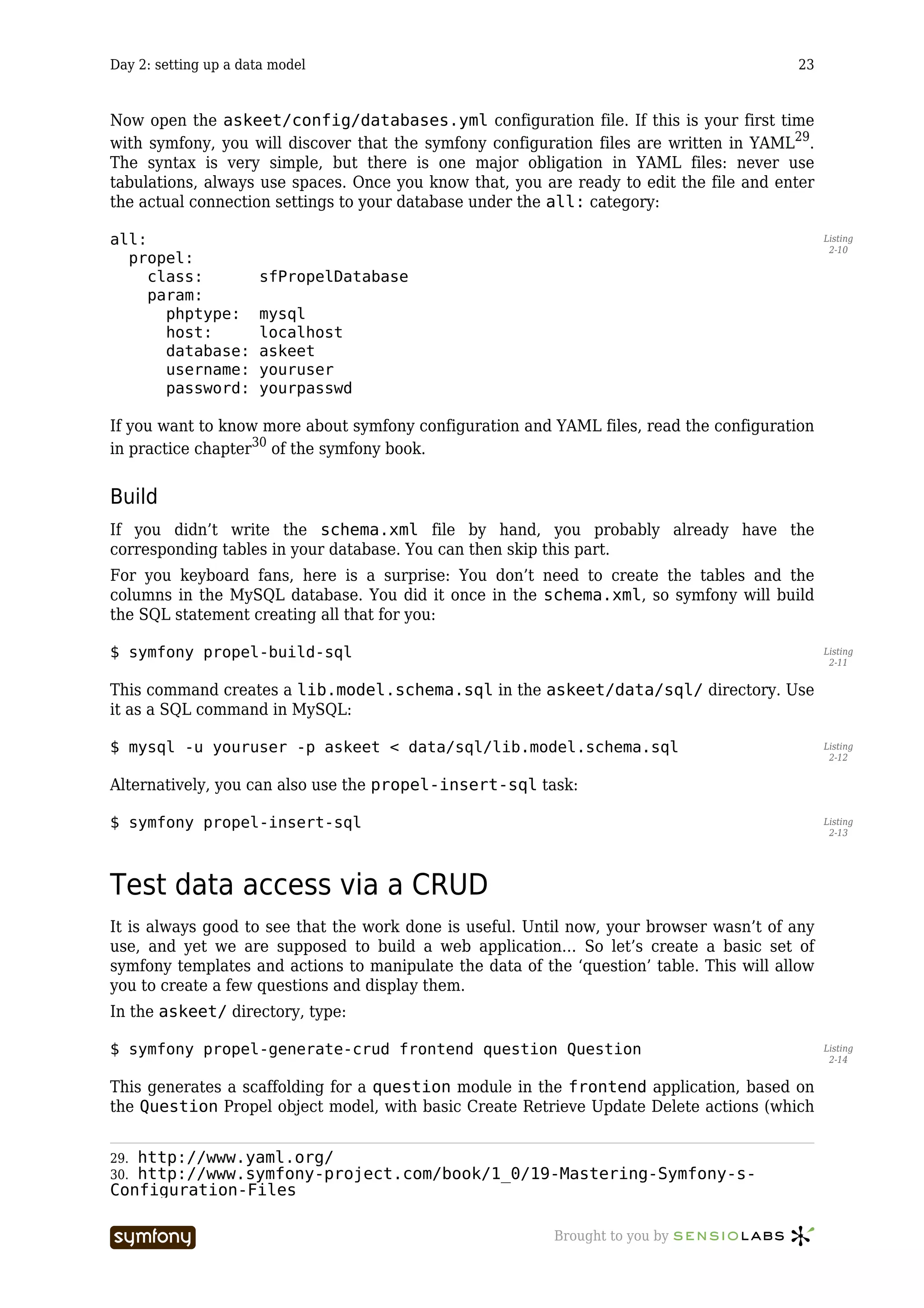
  • 203.
    Day 22: Transferto production 203 doc/ lib/ log/ test/ web/ For the askeet project to use the symfony classes, you have to set up two symbolic links between the application lib/symfony and data/symfony, and the related directories in the symfony installation: $ cd /home/myaccount/askeet Listing 22-6 $ ln -sf /home/myaccount/symfony/lib lib/symfony $ ln -sf /home/myaccount/symfony/data data/symfony Alternatively, if you don’t have command line access, the files of the framework can be copied directly into the project lib/ and data/ directories: copy /home/myaccount/symfony/lib/* into /home/myaccount/askeet/lib/ Listing 22-7 symfony copy /home/myaccount/symfony/data/* into /home/myaccount/askeet/data/ symfony Beware that in this case, each time you update the framework, you have to do it in all your projects. For more information, all the possible ways to install symfony are described in the installation chapter251 of the symfony book. Access to the symfony commands in production While developing, you took the good habit of using: $ symfony clear-cache Listing 22-8 …each time you change the configuration or the object model of the project. When you upload a new version of your project in production, the cache also needs to be cleared if you want the application to work. You can easily do it by deleting the full content of the askeet/ cache/ directory (by ftp or with a ssh console). Alternatively, you can have the power of the symfony command line at the price of a slightly longer installation. To use the command line, you need to install the pake utility252. Pake is a PHP tool similar to the make command. It automates some administration tasks according to a specific configuration file called pakefile.php. The symfony command line uses the pake utility, and each time you type symfony, you actually call pake with a special pakefile.php located in the symfony/bin/ directory (find more about pake in symfony in the project creation chapter253 of the symfony book). If you install symfony via PEAR, pake is installed as a requirement, so you usually don’t see it at all and don’t need to bother about what comes next. But if you do a manual installation, you have to uncompress the pake directory (get it from your symfony pear installation or download it254 from the pake website) into your directory in the production server. Just like for the symfony libs, you also have to add a symlink in order to enable symfony to use pake: 251. http://www.symfony-project.com/book/1_0/02-Exploring-Symfony-s-Code 252. http://www.pake-project.org 253. http://www.symfony-project.com/book/1_0/03-Running-Symfony 254. http://www.pake-project.org/download.html ----------------- Brought to you by
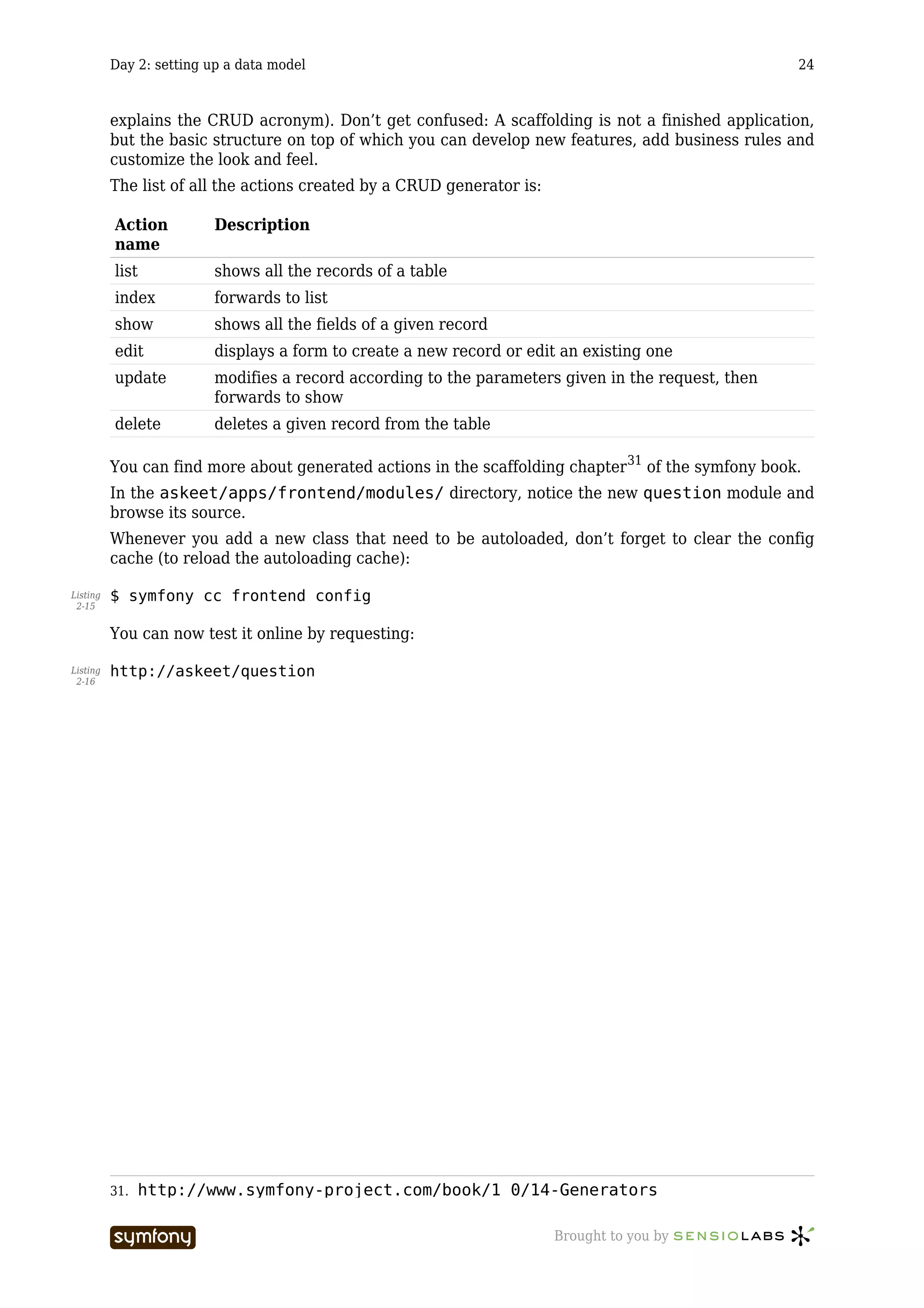
  • 204.
    Day 22: Transferto production 204 Listing $ ln -sf /home/myaccount/pake/lib lib/pake 22-9 You should end up with something like this: Listing /home/myaccount/ 22-10 pake/ lib/ symfony/ lib/ data/ askeet/ apps/ frontend/ batch/ cache/ config/ data/ symfony/ -> /home/myaccount/symfony/data doc/ lib/ symfony/ -> /home/myaccount/symfony/lib pake -> /home/myaccount/pake/data log/ test/ web/ To call the symfony command to do a clear-cache, you need to do: Listing $ cd /home/myaccount/askeet/ 22-11 $ php lib/pake/bin/pake.php -f lib/symfony/data/symfony/bin/pakefile.php clear-cache Alternatively, you can create a file called symfony in the home/myaccount/askeet/ with: Listing #!/bin/sh 22-12 php lib/pake/bin/pake.php -f lib/symfony/data/symfony/bin/pakefile.php $@ Then, all you need to do in order to clear the cache is that good old Listing $ symfony clear-cache 22-13 Web command If you want to have the power of the pake utility but without command line access, you can also create a web access for the clear-cache command. For instance, you could save the following webpake.php in your /home/myaccount/ askeet/web/ directory: Listing <?php 22-14 // as we are in the web/ dir, we need to go up one level to get to the project root chdir(dirname(__FILE__).DIRECTORY_SEPARATOR.'..'); include_once('/lib/symfony/pake/bin/pake.php'); ----------------- Brought to you by
  • 205.
    Day 22: Transferto production 205 $pake = pakeApp::get_instance(); try { $ret = $pake->run('/data/symfony/bin/pakefile.php', 'clear-cache'); } catch (pakeException $e) { print "<strong>ERROR</strong>: ".$e->getMessage(); } ?> Then, clearing the cache could be done by navigating to: http://myaskeetprodserver.com/webpake.php Listing 22-15 Beware that by letting web access to administration tools, you can compromise the security of your website. Upgrading your application There will be times in the life of your project when you need to switch between two versions of an application. It can be in order to correct bugs, or to upload new features. You can also be faced with the problem of switching between two versions of the database. If you follow a few good practices, these actions will prove easy and harmless. Show unavailability notice Between the moment when you start the data transfer and the moment you clear the cache (if you modify the configuration or the data model), there are sometimes more than a few seconds of delay. You must plan to display an unavailability notice for users trying to browse the site at that very moment. In the application settings.yml, define the unavailable_module and unavailable_action settings: all: Listing 22-16 .settings: unavailable_module: content unavailable_action: unavailable Create an empty content/unavailable action and a unavailableSuccess.php template: // askeet/apps/frontend/modules/content/actions/actions.class.php Listing 22-17 public function executeUnavailable() { $this->setTitle('askeet! &raquo; maintenance'); } // askeet/apps/frontend/modules/content/templates/unavailableSuccess.php <h1>Askeet: Site maintenance</h1> <p>The askeet website is currently being updated.</p> ----------------- Brought to you by
  • 206.
    Day 22: Transferto production 206 <p>Please try again in a few minutes.</p> <p><i>The askeet team</i></p> Now each time that you want to make your application unavailable, just change the available setting: Listing all: 22-18 .settings: available: off Don’t forget that for a configuration change to be taken into account in production, you need to clear the cache. The fact that the whole application can be turned off with only a single parameter is possible because symfony applications use a single entry point, the front web controller. You will find more information about it in the controller page255 of the symfony book. Use two versions of your application A good way to avoid unavailability is to have the project root folder configured as a symlink. For instance, imagine that you are currently using the version 123 of your application, and that you want to switch to the version 134. If your web server root is set to /home/ myaccount/askeet/web/ and that the production folder looks like that: Listing /home/myaccount/ 22-19 pake/ lib/ symfony/ lib/ data/ askeet/ -> /home/production/askeet.123/ askeet.123/ askeet.134/ Then you can instantly switch between the two versions by changing the symlink: Listing $ ln -sf /home/myaccount/askeet/ /home/myaccount/askeet.134/ 22-20 The users will see no interruption, and yet all the files used after the change of the symlink will be the ones of the new release. If, in addition, you emptied the cache/ folder of your release 134, you don’t even need to launch a clear-cache after switching applications. Switching databases You can extrapolate that technique to switching databases. Remember that the address of the database used by your application is defined in the databases.yml configuration file. If you create a copy of the database with a new name, say askeet.134, you just need to write in the askeet.134/apps/frontend/config/databases.yml: Listing all: 22-21 propel: 255. http://www.symfony-project.com/book/1_0/06-Inside-the-Controller-Layer ----------------- Brought to you by
  • 207.
    Day 22: Transferto production 207 class: sfPropelDatabase param: phptype: mysql hostspec: localhost database: askeet.134 username: myuser password: mypassword compat_assoc_lower: true compat_rtrim_string: true As the databases.yml will be switched as the same time as the application itself, your askeet will instantly start querying the new database. This technique is especially useful if your application has a big traffic and if you can’t afford any service interruption. See you Tomorrow Synchronization is often a big issue for high traffic websites, but thanks to the file structure of the symfony projects, it should not create any problem for askeet. Tomorrow, we will talk about the way to adapt askeet to other languages. The patient speakers call it internationalization, the others find it more convenient to talk about i18n. Symfony has built-in support for multilingual sites, so that should not be a big deal. You can still post your questions and suggestions in the askeet forum256. And did you try to ask one in the brand new askeet website257? 256. http://www.symfony-project.com/forum/index.php/f/8/ 257. http://www.askeet.com ----------------- Brought to you by
  • 208.
    Day 23: Internationalization 208 Day 23 Internationalization Previously on symfony Now that you learned how to transfer a symfony application to a production host, the askeet application can run anywhere. But what if someone decided to use it in a non-English speaking country like, say, France? Askeet being an open-source project, we hope that people from all over the world will use it shortly. Not only does that mean that all the files of the project have to be encoded in utf-8258, the application also has to propose a multilingual interface and content localization. Think about the multinational companies that are going to install askeet on their Intranet to have a knowledge management base. They will definitely require that users can switch interface language or content rather than install one askeet per language… Fortunately, the choices made during the eighteenth day259 to implement universes will ease our task a lot, and symfony has native support for internationalized interfaces. Localization What if the call to an address like: Listing http://fr.askeet.com/ 23-1 …displayed only the French questions? Well, this is quite easy, because since the eighteenth day260, such an URI is understood as a universe. Content Creating a question in a language universe will have it tagged automatically with the language tag (here: ‘fr’). And, if you browse the ‘fr’ universe, only the questions with the ‘fr’ tag will appear. So the universe filter already takes care of content localization. That was an easy move. 258. http://en.wikipedia.org/wiki/UTF-8 259. 18.txt 260. 18.txt ----------------- Brought to you by
  • 209.
    Day 23: Internationalization 209 Look and feel The universes can have their own stylesheet. This means that the look and feel of a localized askeet can be easily adapted as well, with the same mechanism. Next, please. Language-dependent functions The database indexing system built during the twenty-first day261 relies on a stemming algorithm which is language-dependant. In a localized version, it has to be adapted. For now, there is no available stemming library for other languages than English in PHP, but what if there was one, or what if someone decided to port one of the Perl stemming libraries262 to PHP? Then, in the myTools::stemPhrase() method, we should call a factory method263 instead of a simple PorterStemmer (left as an exercise for now). Database content Imagine an international website proposing a list of hotels around the world. Each hotel is shown with a text description of the rooms, the service and the opening hours. There are thousands of hotels, so this content is to be stored in a database. The problem is that there must be as many versions of the descriptions as there are translations of the site. Symfony provides a way to structure data in order to handle such cases. As for the example above, there would be a Hotel class for the fares, address and not-to-be-translated content, and a HotelI18n class for the localized content. As the Propel accessors abstract this separation, even if the description was located in the HotelI18n table, you would still access it with a simple: $description = $hotel->getDescription(); Listing 23-2 To understand how this works, refer to the i18n chapter264 of the symfony book. Fortunately, the filter system of the askeet universes replaces the need for content adaptation, so we won’t use it here.. Internationalization As it is a long word, developers often refer to internationalization265 as ‘i18n’. For those who don’t know why, just count the letters in the word ‘internationalization’, and you will also understand why ‘localization’ is referred to as ‘l10n’. In web application development, i18n mostly concerns the translation of text content and the use of local formats for the interface. Set the culture A lot of built-in i18n features in symfony are based on a parameter of the user session called the culture. The culture is the combination of the country and the language of the user, and it determines how the text and culture-dependant information will be displayed. 261. http://www.symfony-project.com/askeet/22 262. http://search.cpan.org/search?query=stem&mode=all 263. http://en.wikipedia.org/wiki/Factory_method_pattern 264. http://www.symfony-project.com/book/1_0/13-I18n-and-L10n 265. http://en.wikipedia.org/wiki/Internationalization_and_localization ----------------- Brought to you by
  • 210.
    Day 23: Internationalization 210 When the askeet application recognizes a universe as a localization, it has to set the corresponding culture. When should a permanent tag be recognized as a localization? We choose to allow only the ones for which the interface is translated (see below), so the fact that a universe is a localization is determined by the existence of an XML translation file in the project i18n/ directory. The universes are discovered in the askeet/apps/frontend/lib/ myTagFilter.class.php filter, so we just need to modify it a little bit: Listing public function execute ($filterChain) 23-3 { ... // is there a tag in the hostname? $request = $this->getContext()->getRequest(); $hostname = $request->getHost(); if (!preg_match($this->getParameter('host_exclude_regex'), $hostname) && $pos = strpos($hostname, '.')) { $tag = Tag::normalize(substr($hostname, 0, $pos)); // add a permanent tag constant sfConfig::set('app_permanent_tag', $tag); // add a custom stylesheet $request->setAttribute('app/tag_filter', $tag, 'helper/asset/auto/ stylesheet'); // is the tag a culture? if (is_readable(sfConfig::get('sf_app_i18n_dir').'/global/ messages.'.strtolower($tag).'.xml')) { $this->getContext()->getUser()->setCulture(strtolower($tag)); } else { $this->getContext()->getUser()->setCulture('en'); } } ... } The language tags that will be recognized are to be coded in two lower-case characters, as described in the ISO 639-1 norm266 (for instance fr for French). When dealing with internationalization, always prefer ISO codes for countries and languages, so that your code can comply with international standards and be understood by foreign developers. You will find more information about internationalization and cultures in the i18n chapter267 of the symfony book. Dates, Times, Numbers, Currency, Measurements The way to display a date in France is not the same as in the US. What an American would write: 266. http://www.w3.org/WAI/ER/IG/ert/iso639.htm 267. http://www.symfony-project.com/book/1_0/13-I18n-and-L10n ----------------- Brought to you by
  • 211.
    Day 23: Internationalization 211 December 16, 2005 9:26 PM Listing 23-4 …is written by a French 16 décembre 2005 21:26 Listing 23-5 If you remember well, each time we had to display a date in an askeet template, we used the format_date() helper. This helper formats the date given as parameter according to the user culture. As the culture is set in the myTagFilter.class.php filter, the date formatting will be done automatically. This is a another good practice for international projects: always use the i18n helpers when you have to output a date, a time, a number, a currency or a measurement. Symfony provides helpers for most of them (see the i18 helpers chapter268 of the symfony book for more information). Interface translation The interface of the askeet project contains text. In a localized version, the text of the interface should be displayed in the language of the user culture. To enable interface translation, all the texts of the askeet templates have to be enclosed in a special i18n helper, __(). In addition, the helper must be declared at the top of the template. For instance, to enable interface translation in the home page, open the askeet/apps/ frontend/modules/question/templates/listSuccess.php template and change it to: <?php use_helper('I18N') ?> Listing 23-6 <h1><?php echo __('popular questions') ?></h1> <?php include_partial('list', array('question_pager' => $question_pager)) ?> Instead of having to add the i18n helper on top of each template, you can just add it once to the application settings.yml in askeet/apps/frontend.config/: all: .settings: standard_helpers: Partial,Cache,Form,I18N For each language in which the interface is translated, a messages.xx.xml file must be created in the askeet/apps/frontend/i18n/ directory, where xx is the language of the translation. This XML file is a XLIFF269 dictionary, showing the translated version of the text from the source language (English for askeet). For instance, to enable a French translation, you must create a messages.fr.xml with the following content: Listing 23-7 268. http://www.symfony-project.com/book/1_0/13-I18n-and-L10n 269. http://www.xliff.org/ ----------------- Brought to you by
  • 212.
    Day 23: Internationalization 212 <?xml version="1.0" ?> <xliff version="1.0"> <file original="global" source-language="en_US" datatype="plaintext"> <body> <trans-unit id="1"> <source>popular questions</source> <target>questions populaires</target> </trans-unit> </body> </file> </xliff> The syntax of the XLIFF file is explained in detail in the i18N chapter 270 of the symfony book. Now, the big part of the job is to browse all the templates (and template fragments) to find the text to translate. Each time you find a sentence, you have to enclose it between <?php echo __(' and ') ?>, and create a new <trans-unit> tag in the messages.fr.xml file. Fortunately, all the templates in symfony projects are localized in templates/ directories, so you don’t need to browse all the files of your project. A translation only makes sense if the translation files contains full sentences. However, as you sometimes have formatting or variables in the text, you can add a second argument to the __() helper to do substitution. For instance, to mark the following template text: Listing There are <?php echo count_logged() ?> persons logged. 23-8 …use only one __()) call to avoid splitting the sentence into two parts that can’t be understood on their own: Listing <?php echo __('There are %1% persons logged', array('%1%' => 23-9 count_logged())) ?> Finally, to allow the automatic translation, you have to set the i18n parameter to on in the application settings.yml: Listing all: 23-10 .settings: i18n: on Now browse to fr.askeet.com and watch the translated interface: 270. http://www.symfony-project.com/book/1_0/13-I18n-and-L10n ----------------- Brought to you by
  • 213.
    Day 23: Internationalization 213 Automated translation Some tools exist to automate the task of enclosing source text and creating messages.xx.xml files. Unfortunately, none will be able to do the enclosing as well as you would do. Only you can determine where to start and where to end the __() call. Although we don’t use them, we provide a link to the websites where you will find resources about automated translation tools: • The xgettext command from the GNU getText tool271 provides a way to extract text from PHP code. It produces a .pot file (list of the terms) that can be declined into a series of .po files (list of the terms translated in one language). • The po2xliff command from the XLIFF tools272 turns .po files into messages.xx.xml XLIFF files. • For Windows users, the Okapi framework273 can be a good alternative. • To edit the translation files, poedit274 proposes an intuitive interface (this is especially useful since most of the human translators don’t understand either XML or .po files). Don’t forget Once the text from the templates is marked for translation, there is still a close code inspection to be done. As a matter of fact, text messages can hide in unexpected parts of your application. Make sure you do an inventory to find the following “hidden” text: • Image folders (images can include text) 271. http://en.wikipedia.org/wiki/Gettext 272. http://xliff-tools.freedesktop.org/wiki/Projects/XliffPoTools 273. http://okapi.sourceforge.net/ 274. http://www.poedit.org/index.php ----------------- Brought to you by
  • 214.
    Day 23: Internationalization 214 If you need to localize images, put them in a sub directory corresponding to their culture, and add the culture to the image_tag() helper call: Listing [php] 23-11 getCulture().'/myimage.png') ?> • The alternative text for images, the button labels and all the text messages that are parameters of <?php and ?> instructions. • The JavaScript messages can be located in helpers (as in link_to('click', '@rule', 'confirm=Are you sure?')), in JavaScript tags in your templates, or in included .js files All in all, if you don’t design an application with i18n in mind from the beginning, there is a high risk that you will forget some untranslated text somewhere. Our best advice is to think about i18n before starting to develop, and if you know that your application will probably be translated, keep in mind to use __('') each time you write text that will be displayed to the end user. There are some hidden text messages in the validate/ directories of your modules, that appear when a form is not properly validated. The cool thing is that you don’t have to do a special treatment to these texts if they appear in the XLIFF translation. Symfony will automatically find the translation in a <trans-unit> node, and use it instead of the original text of the YAML files. ----------------- Brought to you by
  • 215.
    Day 23: Internationalization 215 See you Tomorrow Askeet275 is making its way to be a really useful open-source application. Being an i18n- compatible application, it becomes available to the non-English speakers (roughly 90% of the world population). The modified source of the application, including i18n, is available in the SVN repository276 and can be browsed directly from the askeet trac277. Your comments on the forum278 are welcome. And tomorrow is already the last day of the symfony advent calendar series. Don’t miss it. 275. http://www.askeet.com/ 276. http://svn.askeet.com/tags/release_day_23/ 277. http://trac.askeet.com/trac/browser/tags/release_day_23 278. http://www.symfony-project.com/forum/index.php/f/8/ ----------------- Brought to you by
  • 216.
    Day 24: What’snext? 216 Day 24 What’s next? Previously on symfony For twenty-three days, we have been building a web 2.0 application in PHP5 with the symfony framework. Yesterday was the last step of the askeet development, and it is fully i18n compatible. If you browse to www.askeet.com279, what you will see is the result of roughly 3 days (24 hours) of work with symfony. As you see it, the application is ready to answer your questions about chocolate, sex, astronomy, or PHP programming. But more than that, askeet is an open source project, and what comes next is, hopefully, a long story. Use it The askeet website is open to the public. You can advertise it and talk about it to your friends and relatives. Some of the test contributions will be removed, but most of the existing questions and user accounts will remain. Askeet is a great tool to find answers - provided that many users visit it. So spread the word. Opening an account is fast and easy, and requires nothing but a nickname, a password, and an email. It allows you to declare interest about questions, to ask new questions, and to rate answers. The email address will not be used for any kind of advertising, ever. Subscribe to the RSS feeds to keep informed about the latest questions, or about the answers to the questions you asked. Askeet can also be a way to make some money, since user profiles can be linked to a Paypal account. If a user finds your contributions useful, he/she can thank you by granting you a small donation. All in all, there is no good reason not to use askeet everyday. It would be our great pleasure if you bookmarked the site, visited it regularly, and contributed questions and answers. Install it Askeet is more than a website, it is an open-source project. As of today, askeet can already be downloaded and installed anywhere. Today’s version is tagged 1.0, it is free to use, adapt, customize, and integrate in third party applications. 279. http://www.askeet.com/ ----------------- Brought to you by
  • 217.
    Day 24: What’snext? 217 This is technically possible because askeet is based on PHP5 and symfony, and this is legally possible because askeet is an open-source project on its own, published under the MIT license. Download To install askeet, you have two options: • Download the 1.0 release as a .tgz archive280 from the symfony-project website • Do a checkout from the 1.0 release in the SVN repository281 into your own askeet folder. You will have a symfony project, ready to run as soon as you configure your web server. The full source can also be browsed online in the askeet trac282. Documentation The 24 advent calendar tutorials will still be available online in the symfony project website283. If you feel like translating them to a foreign language, you can also find the Markdown version284 of the tutorials on the symfony Subversion repository. We will be delighted to host any foreign translations of the askeet tutorials on our repository. The symfony site uses a Markdown converter which does the formatting, media inclusion and syntax coloring. So just send us a translated Markdown version, calling the same media, encoded in utf-8, and we will publish it. Before starting a translation, please write a post in the askeet forum285 so that two people don’t start the translation at the same time. And commit the chapters one by one as you translate them, so that the content can be made available sooner. File structure After uncompressing the askeet project archive, you will obtain a list of directories which are the classic file tree structure of a symfony project. It is explained in detail in the file structure chapter286 of the symfony book. At the time of the 1.0 release, the askeet project contains one application (called ‘frontend’) and 11 modules: modules/ Listing 24-1 administrator answer api content 280. http://www.symfony-project.com/downloads/askeet_release_1_0.tgz 281. http://svn.askeet.com/tags/release_1_0/ 282. http://trac.askeet.com/trac/browser/trunk/ 283. http://www.symfony-project.com/askeet 284. http://svn.symfony-project.com/doc/branches/1.0/askeet/ 285. http://www.symfony-project.com/forum/index.php/t/275/ 286. http://www.symfony-project.com/book/1_0/04-The-Basics-of-Page- Creation ----------------- Brought to you by
  • 218.
    Day 24: What’snext? 218 feed mail moderator question sidebar tag user Data model Askeet is compatible with MySQL, PostgreSQL, Oracle, MSSQL, and all database for which a Creole287 driver exists. Here is the data model of the askeet application as of release 1.0: You can find a SQL query that will add these tables to any existing database in askeet/ data/sql/lib.model.schema.sql. There is a set of test data in askeet/data/fixtures/. If you want to use it to populate your database, call: Listing $ php batch/load_data.php 24-2 …from the root directory of the project. Contribute to it The askeet application is a living open-source project. As such, we hope that it will continue to improve, but we need your help for that. Askeet was developed by Fabien Potencier288, who is also the lead developer of the symfony project. As the framework already represents an important amount of work, contributions from askeet enthusiasts are needed to make the project live. And there is much to do! If you are a developer interested in contributing to askeet, have a look at the following to-do list: 287. http://creole.phpdb.org/wiki/ 288. mailto:fabien.potencier@symfony-project.com ----------------- Brought to you by
  • 219.
    Day 24: What’snext? 219 • Additional features: • Alternative site designs to propose more than one presentation. This is mostly a graphical design and CSS coding job. • User-contributed Captchas, under the shape of a simple question (like “how many fingers in one hand?”), to avoid automatic spam on question contributions. • Preview of questions before publication to avoid big typos • Confirmation of user subscription by email (optional) • Auto login (with a cookie) • RSS Feed of reports for Moderators • Ajax Pagination of the contributions/interests in the User profile page • Popular algorithm so that the questions of the front page can change over the time • … • Project strengthening: • Unit tests • Code documentation in PHP doc format • Installation manual In addition, there are or will be bugs to detect, track and fix. For enhancements and bugs, please use the askeet ticketing system289. You can keep track of all the askeet changes by consulting the project timeline290 regularly. All contributions are welcome. Regular contributors with a good understanding of the project will quickly be granted a right to commit to the SVN repository. Finally, if you want to discuss about askeet, you have the choice between the askeet forum section291 in the symfony project website, or a dedicated wiki at trac.askeet.com/trac/wiki 292. Acknowledgements Fabien Potencier293 (lead developer of askeet and symfony) François Zaninotto294 (writer of the tutorials) would like to thank John Christopher295 for his great help on rereading each of the tutorials to put them in good English, Bruno Klein for his work on the askeet design, and his wife for the incredible patience and tolerance she showed during 24 days… See you soon That’s about it. It’s been a pleasure developing and writing this for you, we hope that askeet will live long and that lots of people will start using symfony for their web projects. Merry Christmas to you all. 289. http://trac.askeet.com/trac/report/1 290. http://trac.askeet.com/trac/timeline 291. http://www.symfony-project.com/forum/index.php/f/8/ 292. http://trac.askeet.com/trac/wiki 293. mailto:fabien.potencier@symfony-project.com 294. mailto:francois.zaninotto@symfony-project.com 295. mailto:john.christopher@symfony-project.com ----------------- Brought to you by