Smarty Manual


Monte Ohrt <monte at ohrt dot com>
Andrei Zmievski <andrei@php.net>
Smarty - the compiling PHP template engine
by Monte Ohrt <monte at ohrt dot com> and Andrei Zmievski <andrei@php.net>

Publication date 2010-09-20
Copyright © 2001-2005 New Digital Group, Inc.
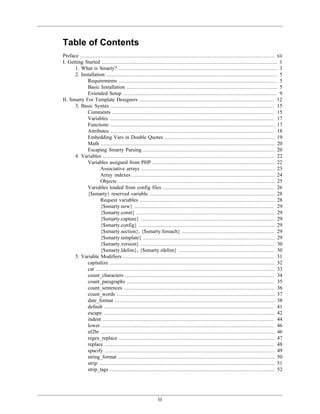
Table of Contents
Preface ............................................................................................................................ xii
I. Getting Started ................................................................................................................ 1
      1. What is Smarty? ..................................................................................................... 3
      2. Installation ............................................................................................................. 5
             Requirements ..................................................................................................... 5
             Basic Installation ................................................................................................ 5
             Extended Setup .................................................................................................. 9
II. Smarty For Template Designers ...................................................................................... 12
      3. Basic Syntax ........................................................................................................ 15
             Comments ....................................................................................................... 15
             Variables ......................................................................................................... 17
             Functions ......................................................................................................... 17
             Attributes ........................................................................................................ 18
             Embedding Vars in Double Quotes ...................................................................... 19
             Math ............................................................................................................... 20
             Escaping Smarty Parsing .................................................................................... 20
      4. Variables ............................................................................................................. 22
             Variables assigned from PHP .............................................................................. 22
                     Associative arrays ..................................................................................... 23
                     Array indexes ........................................................................................... 24
                     Objects .................................................................................................... 25
             Variables loaded from config files ....................................................................... 26
             {$smarty} reserved variable ................................................................................ 28
                     Request variables ...................................................................................... 28
                     {$smarty.now} ......................................................................................... 29
                     {$smarty.const} ........................................................................................ 29
                     {$smarty.capture} ..................................................................................... 29
                     {$smarty.config} ....................................................................................... 29
                     {$smarty.section}, {$smarty.foreach} ........................................................... 29
                     {$smarty.template} .................................................................................... 29
                     {$smarty.version} ..................................................................................... 30
                     {$smarty.ldelim}, {$smarty.rdelim} ............................................................. 30
      5. Variable Modifiers ................................................................................................ 31
             capitalize ......................................................................................................... 32
             cat .................................................................................................................. 33
             count_characters ............................................................................................... 34
             count_paragraphs .............................................................................................. 35
             count_sentences ................................................................................................ 36
             count_words ..................................................................................................... 37
             date_format ...................................................................................................... 38
             default ............................................................................................................ 41
             escape ............................................................................................................. 42
             indent ............................................................................................................. 44
             lower .............................................................................................................. 46
             nl2br ............................................................................................................... 46
             regex_replace ................................................................................................... 47
             replace ............................................................................................................ 48
             spacify ............................................................................................................ 49
             string_format .................................................................................................... 50
             strip ................................................................................................................ 51
             strip_tags ......................................................................................................... 52


                                                          iii
Smarty Manual


            truncate ........................................................................................................... 53
            upper .............................................................................................................. 55
            wordwrap ........................................................................................................ 56
      6. Combining Modifiers ............................................................................................. 59
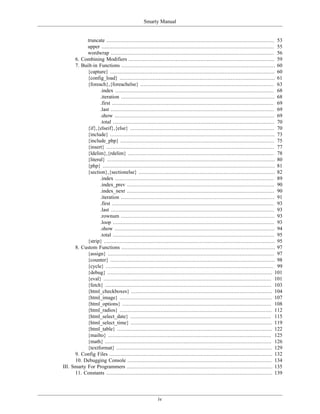
      7. Built-in Functions .................................................................................................. 60
            {capture} ......................................................................................................... 60
            {config_load} ................................................................................................... 61
            {foreach},{foreachelse} ..................................................................................... 63
                   .index ..................................................................................................... 68
                   .iteration .................................................................................................. 68
                   .first ....................................................................................................... 69
                   .last ........................................................................................................ 69
                   .show ...................................................................................................... 69
                   .total ....................................................................................................... 70
            {if},{elseif},{else} ............................................................................................ 70
            {include} ......................................................................................................... 73
            {include_php} .................................................................................................. 75
            {insert} ........................................................................................................... 77
            {ldelim},{rdelim} ............................................................................................. 78
            {literal} ........................................................................................................... 80
            {php} .............................................................................................................. 81
            {section},{sectionelse} ....................................................................................... 82
                   .index ..................................................................................................... 89
                   .index_prev .............................................................................................. 90
                   .index_next .............................................................................................. 90
                   .iteration .................................................................................................. 91
                   .first ....................................................................................................... 93
                   .last ........................................................................................................ 93
                   .rownum .................................................................................................. 93
                   .loop ....................................................................................................... 93
                   .show ...................................................................................................... 94
                   .total ....................................................................................................... 95
            {strip} ............................................................................................................. 95
      8. Custom Functions .................................................................................................. 97
            {assign} .......................................................................................................... 97
            {counter} ......................................................................................................... 98
            {cycle} ........................................................................................................... 99
            {debug} ......................................................................................................... 101
            {eval} ........................................................................................................... 101
            {fetch} .......................................................................................................... 103
            {html_checkboxes} .......................................................................................... 104
            {html_image} ................................................................................................. 107
            {html_options} ............................................................................................... 108
            {html_radios} ................................................................................................. 112
            {html_select_date} .......................................................................................... 115
            {html_select_time} .......................................................................................... 119
            {html_table} ................................................................................................... 122
            {mailto} ........................................................................................................ 125
            {math} .......................................................................................................... 126
            {textformat} ................................................................................................... 129
      9. Config Files ........................................................................................................ 132
      10. Debugging Console ............................................................................................ 134
III. Smarty For Programmers ............................................................................................. 135
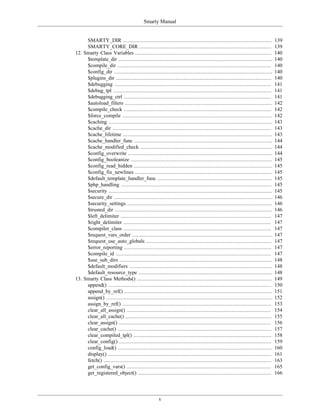
      11. Constants .......................................................................................................... 139


                                                         iv
Smarty Manual


     SMARTY_DIR ...............................................................................................            139
     SMARTY_CORE_DIR ....................................................................................                  139
12. Smarty Class Variables .......................................................................................         140
     $template_dir ..................................................................................................      140
     $compile_dir ..................................................................................................       140
     $config_dir .....................................................................................................     140
     $plugins_dir ...................................................................................................      140
     $debugging ....................................................................................................       141
     $debug_tpl .....................................................................................................      141
     $debugging_ctrl ..............................................................................................        141
     $autoload_filters ..............................................................................................      142
     $compile_check ..............................................................................................         142
     $force_compile ...............................................................................................        142
     $caching ........................................................................................................     143
     $cache_dir .....................................................................................................      143
     $cache_lifetime ...............................................................................................       143
     $cache_handler_func ........................................................................................          144
     $cache_modified_check ....................................................................................            144
     $config_overwrite ............................................................................................        144
     $config_booleanize ..........................................................................................         145
     $config_read_hidden ........................................................................................          145
     $config_fix_newlines .......................................................................................          145
     $default_template_handler_func .........................................................................              145
     $php_handling ................................................................................................        145
     $security ........................................................................................................    145
     $secure_dir .....................................................................................................     146
     $security_settings ............................................................................................       146
     $trusted_dir ....................................................................................................     146
     $left_delimiter ................................................................................................      147
     $right_delimiter ..............................................................................................       147
     $compiler_class ..............................................................................................        147
     $request_vars_order .........................................................................................         147
     $request_use_auto_globals ................................................................................            147
     $error_reporting ..............................................................................................       147
     $compile_id ...................................................................................................       147
     $use_sub_dirs .................................................................................................       148
     $default_modifiers ...........................................................................................        148
     $default_resource_type .....................................................................................          148
13. Smarty Class Methods() ......................................................................................          149
     append() ........................................................................................................     150
     append_by_ref() ..............................................................................................        151
     assign() ..........................................................................................................   152
     assign_by_ref() ...............................................................................................       153
     clear_all_assign() ............................................................................................       154
     clear_all_cache() .............................................................................................       155
     clear_assign() .................................................................................................      156
     clear_cache() ..................................................................................................      157
     clear_compiled_tpl() ........................................................................................         158
     clear_config() .................................................................................................      159
     config_load() ..................................................................................................      160
     display() ........................................................................................................    161
     fetch() ...........................................................................................................   163
     get_config_vars() ............................................................................................        165
     get_registered_object() .....................................................................................         166


                                                  v
Smarty Manual


           get_template_vars() ..........................................................................................        167
           is_cached() .....................................................................................................     168
           load_filter() ....................................................................................................    170
           register_block() ...............................................................................................      171
           register_compiler_function() ..............................................................................           173
           register_function() ...........................................................................................       174
           register_modifier() ...........................................................................................       176
           register_object() ..............................................................................................      177
           register_outputfilter() .......................................................................................       178
           register_postfilter() ..........................................................................................      179
           register_prefilter() ............................................................................................     180
           register_resource() ...........................................................................................       181
           trigger_error() .................................................................................................     182
           template_exists() .............................................................................................       183
           unregister_block() ............................................................................................       184
           unregister_compiler_function() ..........................................................................             185
           unregister_function ..........................................................................................        186
           unregister_modifier() ........................................................................................        187
           unregister_object() ...........................................................................................       188
           unregister_outputfilter() ....................................................................................        189
           unregister_postfilter() .......................................................................................       190
           unregister_prefilter() ........................................................................................       191
           unregister_resource() ........................................................................................        192
     14. Caching ............................................................................................................    193
           Setting Up Caching .........................................................................................          193
           Multiple Caches Per Page .................................................................................            195
           Cache Groups .................................................................................................        197
           Controlling Cacheability of Plugins' Output .........................................................                 198
     15. Advanced Features .............................................................................................         201
           Objects ..........................................................................................................    201
           Prefilters ........................................................................................................   203
           Postfilters .......................................................................................................   203
           Output Filters .................................................................................................      204
           Cache Handler Function ...................................................................................            205
           Resources ......................................................................................................      207
                  Templates from $template_dir ...................................................................               207
                  Templates from any directory ....................................................................              207
                  Templates from other sources ....................................................................              208
                  Default template handler function ...............................................................              210
     16. Extending Smarty With Plugins ............................................................................              211
           How Plugins Work ..........................................................................................           211
           Naming Conventions .......................................................................................            211
           Writing Plugins ...............................................................................................       212
           Template Functions .........................................................................................          212
           Modifiers .......................................................................................................     214
           Block Functions ..............................................................................................        216
           Compiler Functions .........................................................................................          218
           Prefilters/Postfilters ..........................................................................................     219
           Output Filters .................................................................................................      220
           Resources ......................................................................................................      221
           Inserts ...........................................................................................................   223
IV. Appendixes ...............................................................................................................   225
     17. Troubleshooting .................................................................................................       227
           Smarty/PHP errors ...........................................................................................         227


                                                         vi
Smarty Manual


18. Tips & Tricks ...................................................................................................      229
      Blank Variable Handling ..................................................................................           229
      Default Variable Handling ................................................................................           229
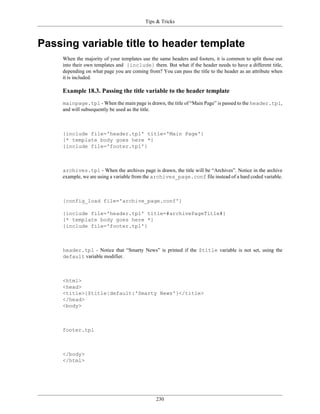
      Passing variable title to header template ..............................................................             230
      Dates ............................................................................................................   231
      WAP/WML ....................................................................................................         232
      Componentized Templates ................................................................................             234
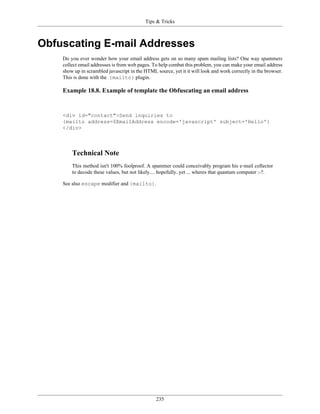
      Obfuscating E-mail Addresses ...........................................................................             235
19. Resources .........................................................................................................    236
20. BUGS ..............................................................................................................    237


                                                 vii
List of Examples
2.1. Required Smarty library files .......................................................................................... 5
2.2. Set SMARTY_DIR constant manually ............................................................................. 6
2.3. Supply absolute path to library file .................................................................................. 6
2.4. Add the library path to the php.ini file ......................................................................... 6
2.5. Appending the include path in a php script with ini_set() ..................................................... 7
2.6. What the file structure looks like .................................................................................... 7
2.7. Permissions and making directories writable ...................................................................... 8
2.8. /web/www.example.com/guestbook/templates/index.tpl ........................................................ 8
2.9. Editing /web/www.example.com/docs/guestbook/index.php .................................................. 9
2.10. /php/includes/guestbook/setup.php ................................................................................ 10
2.11. /web/www.example.com/guestbook/htdocs/index.php ....................................................... 11
3.1. Comments within a template ......................................................................................... 16
3.2. Variables ................................................................................................................... 17
3.3. function syntax .......................................................................................................... 18
3.4. function attribute syntax ............................................................................................... 19
3.5. Syntax examples ......................................................................................................... 19
3.6. Practical examples ...................................................................................................... 20
3.7. math examples ........................................................................................................... 20
3.8. changing delimiters example ......................................................................................... 21
4.1. Example variables ....................................................................................................... 22
4.2. Assigned variables ...................................................................................................... 23
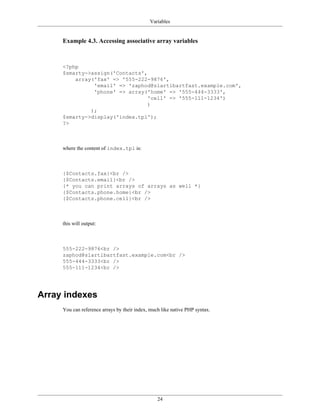
4.3. Accessing associative array variables .............................................................................. 24
4.4. Accessing arrays by index ............................................................................................ 25
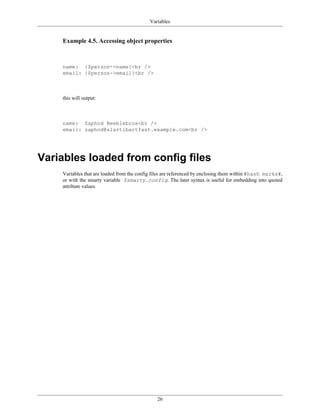
4.5. Accessing object properties .......................................................................................... 26
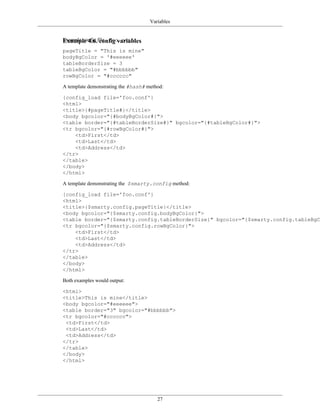
4.6. config variables .......................................................................................................... 27
4.7. Displaying request variables ......................................................................................... 28
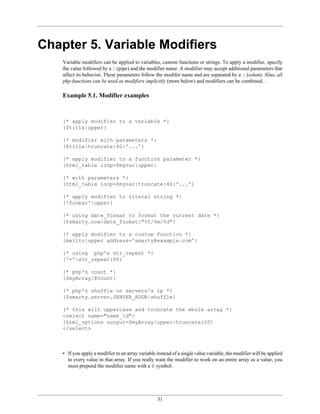
5.1. Modifier examples ...................................................................................................... 31
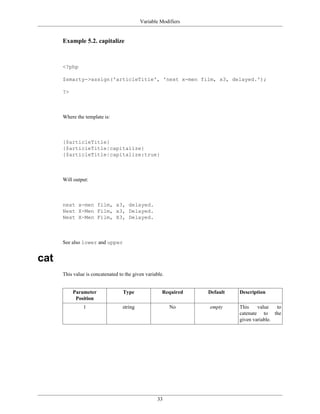
5.2. capitalize ................................................................................................................... 33
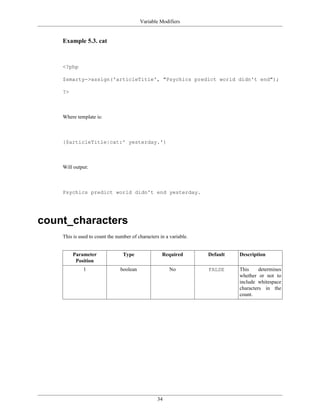
5.3. cat ............................................................................................................................ 34
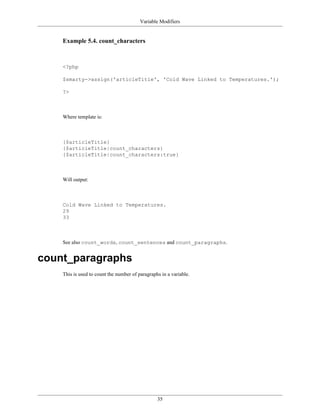
5.4. count_characters ......................................................................................................... 35
5.5. count_paragraphs ........................................................................................................ 36
5.6. count_sentences .......................................................................................................... 37
5.7. count_words .............................................................................................................. 38
5.8. date_format ................................................................................................................ 39
5.9. default ...................................................................................................................... 42
5.10. escape ..................................................................................................................... 43
5.11. Other examples ......................................................................................................... 44
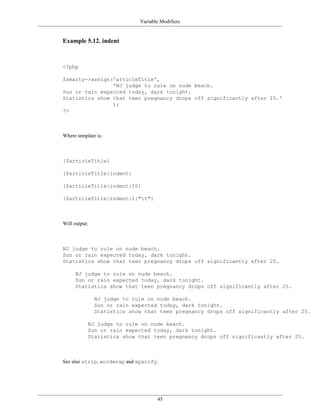
5.12. indent ...................................................................................................................... 45
5.13. lower ...................................................................................................................... 46
5.14. nl2br ....................................................................................................................... 47
5.15. regex_replace ........................................................................................................... 48
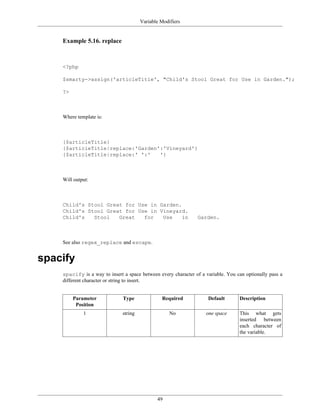
5.16. replace .................................................................................................................... 49
5.17. spacify .................................................................................................................... 50
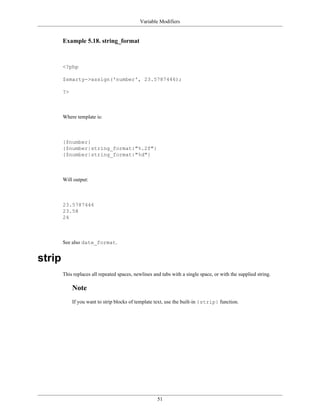
5.18. string_format ............................................................................................................ 51
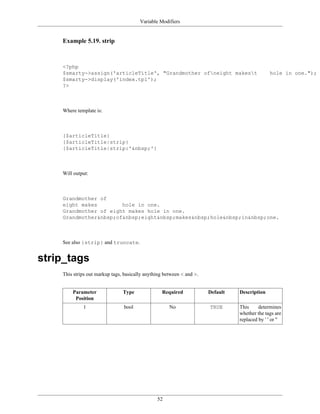
5.19. strip ........................................................................................................................ 52
5.20. strip_tags ................................................................................................................. 53
5.21. truncate ................................................................................................................... 55
5.22. upper ...................................................................................................................... 56
5.23. wordwrap ................................................................................................................ 57
6.1. combining modifiers .................................................................................................... 59
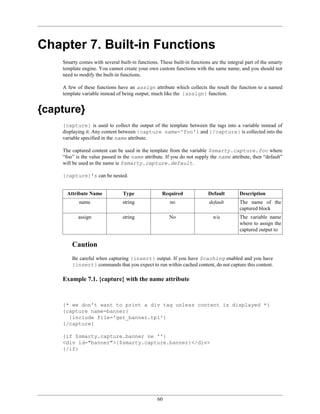
7.1. {capture} with the name attribute .................................................................................. 60


                                                         viii
Smarty Manual


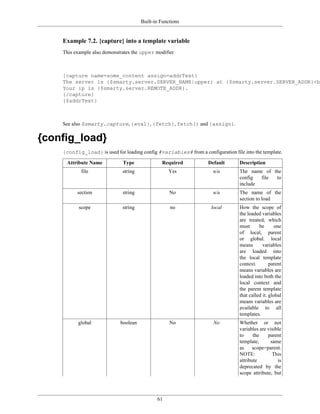
7.2. {capture} into a template variable .................................................................................. 61
7.3. {config_load} ............................................................................................................. 62
7.4. function {config_load} with section ............................................................................... 63
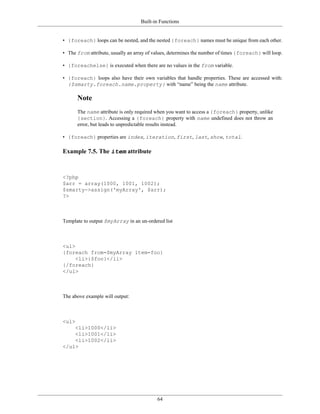
7.5. The item attribute ..................................................................................................... 64
7.6. Demonstrates the item and key attributes ..................................................................... 65
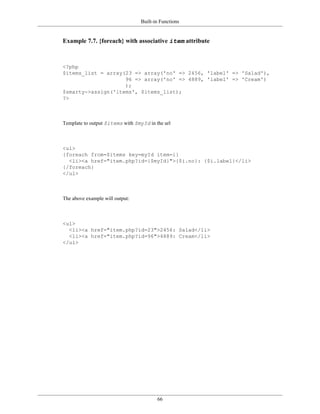
7.7. {foreach} with associative item attribute ....................................................................... 66
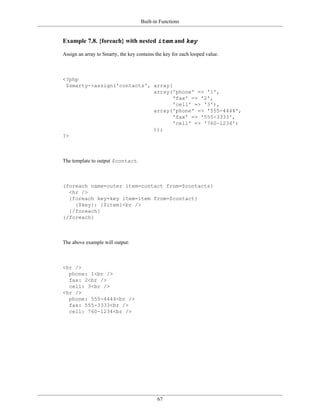
7.8. {foreach} with nested item and key ............................................................................ 67
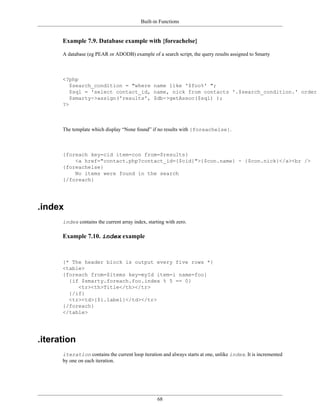
7.9. Database example with {foreachelse} ............................................................................. 68
7.10. index example ........................................................................................................ 68
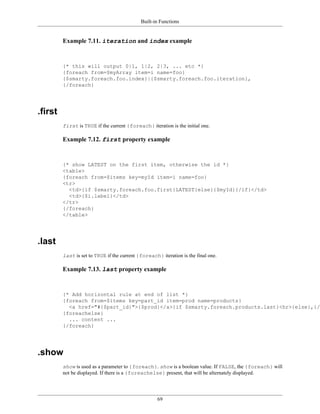
7.11. iteration and index example ............................................................................... 69
7.12. first property example ........................................................................................... 69
7.13. last property example ............................................................................................. 69
7.14. total property example ........................................................................................... 70
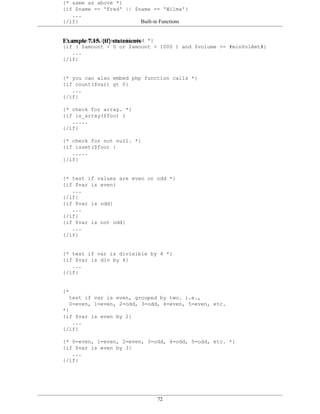
7.15. {if} statements .......................................................................................................... 72
7.16. {if} with more examples ............................................................................................ 73
7.17. Simple {include} example .......................................................................................... 74
7.18. {include} passing variables ......................................................................................... 74
7.19. {include} and assign to variable .................................................................................. 75
7.20. Various {include} resource examples ............................................................................ 75
7.21. function {include_php} .............................................................................................. 77
7.22. function {insert} ....................................................................................................... 78
7.23. {ldelim}, {rdelim} .................................................................................................... 79
7.24. Another Javascript example ........................................................................................ 79
7.25. {literal} tags ............................................................................................................ 80
7.26. Javascript function example ........................................................................................ 80
7.27. Some css style in a template ....................................................................................... 81
7.28. php code within {php} tags ........................................................................................ 81
7.29. {php} tags with global and assigning a variable .............................................................. 82
7.30. Looping a simple array with {section} .......................................................................... 84
7.31. {section} without an assigned array .............................................................................. 85
7.32. Naming a {section} ................................................................................................... 85
7.33. Looping an associative array with {section} ................................................................... 86
7.34. {section} demonstrating the loop variable .................................................................... 87
7.35. Nested {section}'s ..................................................................................................... 88
7.36. Database example with a {sectionelse} ......................................................................... 89
7.37. {section} index property .......................................................................................... 90
7.38. index, index_next and index_prev properties ..................................................... 91
7.39. A section's iteration property ............................................................................... 92
7.40. {section} property first and last ........................................................................... 93
7.41. {section} property loop ............................................................................................ 94
7.42. show property ........................................................................................................ 95
7.43. total property example ........................................................................................... 95
7.44. {strip} tags .............................................................................................................. 96
8.1. {assign} .................................................................................................................... 97
8.2. {assign} with some maths ............................................................................................ 97
8.3. Accessing {assign} variables from a PHP script ............................................................... 98
8.4. {counter} .................................................................................................................. 99
8.5. {cycle} .................................................................................................................... 101
8.6. {eval} ..................................................................................................................... 102
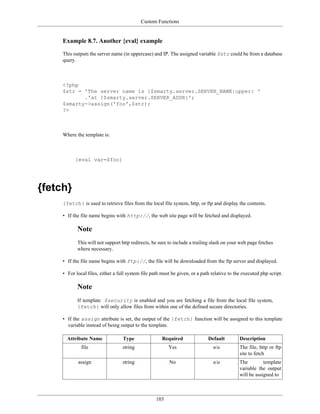
8.7. Another {eval} example ............................................................................................. 103
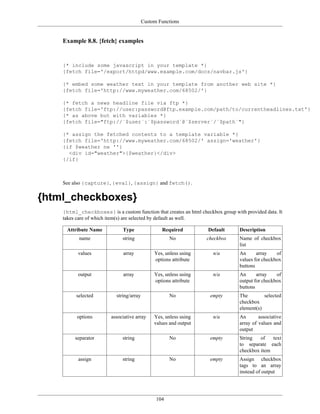
8.8. {fetch} examples ...................................................................................................... 104
8.9. {html_checkboxes} .................................................................................................... 106
8.10. Database example (eg PEAR or ADODB): .................................................................. 107
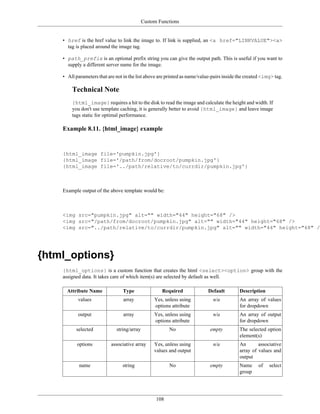
8.11. {html_image} example ............................................................................................. 108


                                                         ix
Smarty Manual


8.12. Associative array with the options attribute ..............................................................                   109
8.13. Dropdown with seperate arrays for values and ouptut ..............................................                            110
8.14. Database example (eg ADODB or PEAR) ...................................................................                       111
8.15. Dropdown's with <optgroup> ...................................................................................                112
8.16. {html_radios} first example .......................................................................................           113
8.17. {html_radios} second example ...................................................................................              114
8.18. {html_radios} - Database example (eg PEAR or ADODB): .............................................                            115
8.19. {html_select_date} ...................................................................................................        118
8.20. {html_select_date} second example ............................................................................                119
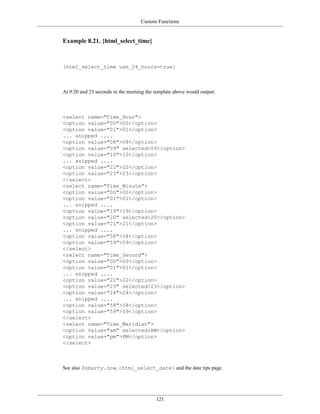
8.21. {html_select_time} ..................................................................................................         121
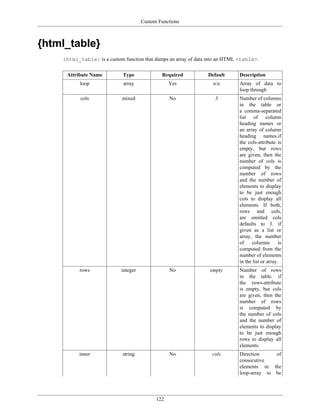
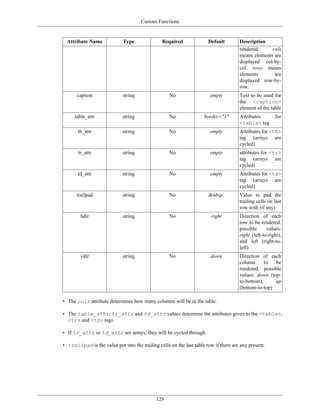
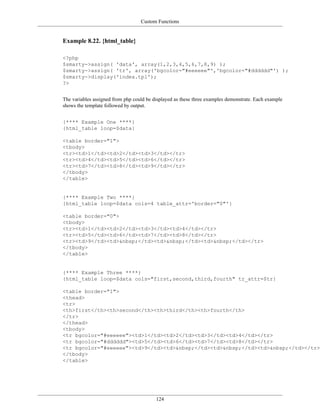
8.22. {html_table} ...........................................................................................................      124
8.23. {mailto} example lines followed by the result ...............................................................                 126
8.24. {math} ..................................................................................................................     128
8.25. {textformat} ...........................................................................................................      130
9.1. Example of config file syntax ......................................................................................           132
11.1. SMARTY_DIR .......................................................................................................            139
11.2. SMARTY_CORE_DIR .............................................................................................                 139
12.1. Appending a local plugin dir .....................................................................................            141
12.2. Multiple $plugins_dir ...............................................................................................         141
12.3. $debugging_ctrl on localhost .....................................................................................            142
12.4. Array of config #variables# .......................................................................................           144
12.5. $secure_dir example ................................................................................................          146
12.6. $compile_id in a virtual host enviroment .....................................................................                148
13.1. append ...................................................................................................................    150
13.2. append_by_ref ........................................................................................................        151
13.3. assign() ..................................................................................................................   152
13.4. assign_by_ref() .......................................................................................................       153
13.5. clear_all_assign() .....................................................................................................      154
13.6. clear_all_cache ........................................................................................................      155
13.7. clear_assign() ..........................................................................................................     156
13.8. clear_cache() ..........................................................................................................      157
13.9. clear_compiled_tpl() ................................................................................................         158
13.10. clear_config() ........................................................................................................      159
13.11. config_load() .........................................................................................................      160
13.12. display() ...............................................................................................................    161
13.13. Other display() template resource examples ................................................................                  162
13.14. fetch() ..................................................................................................................   163
13.15. Using fetch() to send an email .................................................................................             164
13.16. get_config_vars() ...................................................................................................        165
13.17. get_registered_object() ............................................................................................         166
13.18. get_template_vars ..................................................................................................         167
13.19. is_cached() ...........................................................................................................      168
13.20. is_cached() with multiple-cache template ...................................................................                 169
13.21. Loading filter plugins .............................................................................................         170
13.22. register_block() .....................................................................................................       171
13.23. register_function() ..................................................................................................       174
13.24. register_modifier() .................................................................................................        176
13.25. register_resource() ..................................................................................................       181
13.26. template_exists() ....................................................................................................       183
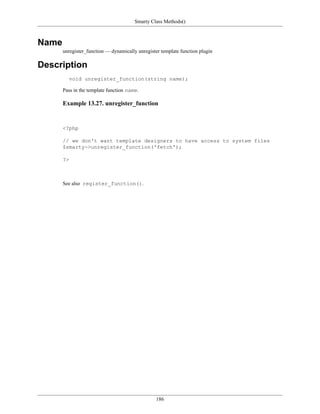
13.27. unregister_function .................................................................................................        186
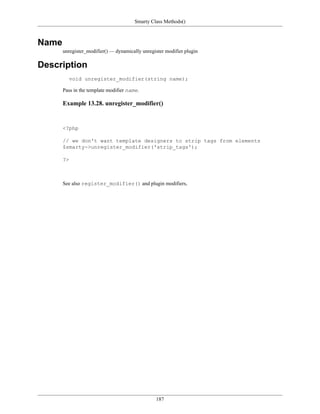
13.28. unregister_modifier() ..............................................................................................         187
13.29. unregister_resource() ..............................................................................................         192
14.1. Enabling caching .....................................................................................................        193
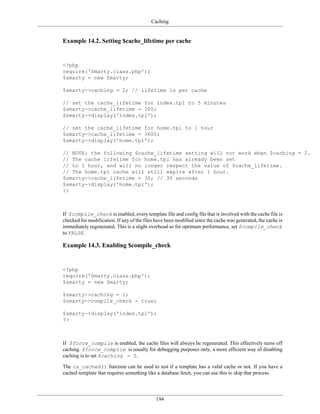
14.2. Setting $cache_lifetime per cache ...............................................................................             194


                                                           x
Smarty Manual


14.3. Enabling $compile_check .........................................................................................           194
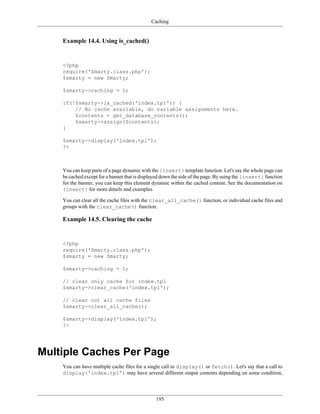
14.4. Using is_cached() ....................................................................................................      195
14.5. Clearing the cache ...................................................................................................      195
14.6. Passing a $cache_id to display() .................................................................................          196
14.7. Passing a cache_id to is_cached() ...............................................................................           197
14.8. Clearing all caches for a particular $cache_id ...............................................................              197
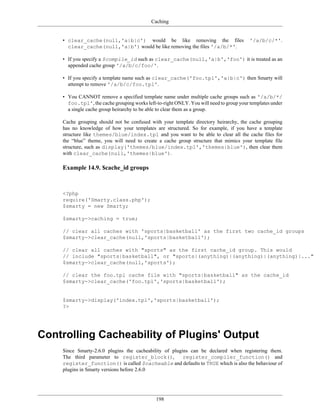
14.9. $cache_id groups .....................................................................................................      198
14.10. Preventing a plugin's output from being cached ...........................................................                 199
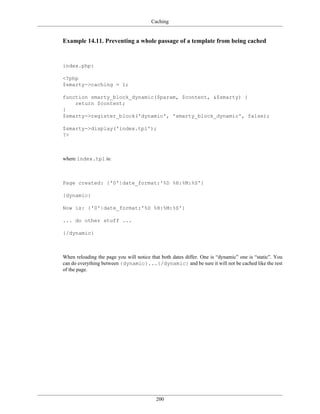
14.11. Preventing a whole passage of a template from being cached .........................................                       200
15.1. Using a registered or assigned object ..........................................................................            202
15.2. Using a template prefilter .........................................................................................        203
15.3. Using a template postfilter ........................................................................................        204
15.4. Using a template outputfilter .....................................................................................         205
15.5. Example using MySQL as a cache source ....................................................................                  206
15.6. Using templates from the $template_dir .......................................................................              207
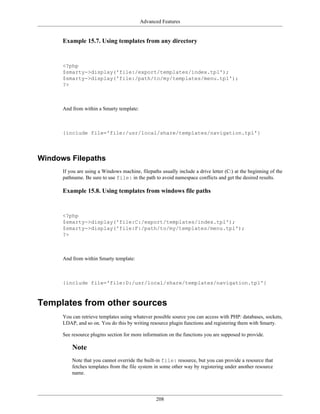
15.7. Using templates from any directory ............................................................................             208
15.8. Using templates from windows file paths .....................................................................               208
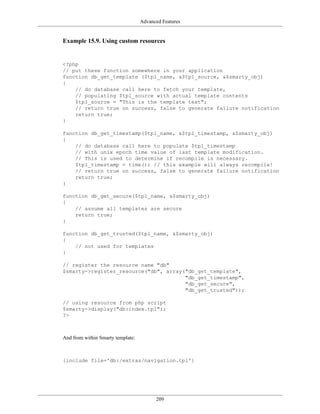
15.9. Using custom resources ............................................................................................         209
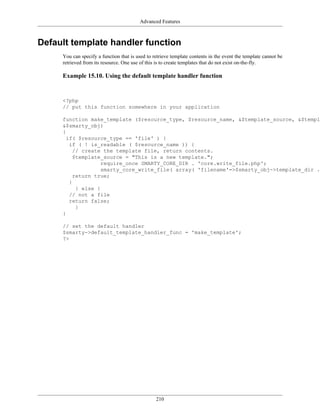
15.10. Using the default template handler function ................................................................               210
16.1. function plugin with output .......................................................................................         213
16.2. function plugin without output ...................................................................................          214
16.3. A simple modifier plugin ..........................................................................................         215
16.4. More complex modifier plugin ...................................................................................            216
16.5. block function .........................................................................................................    217
16.6. A simple compiler function .......................................................................................          218
16.7. prefilter plugin ........................................................................................................   219
16.8. postfilter plugin .......................................................................................................   220
16.9. An output filter plugin .............................................................................................       221
16.10. resource plugin ......................................................................................................     223
16.11. insert plugin ..........................................................................................................   224
17.1. Smarty errors ..........................................................................................................    227
17.2. PHP parsing errors ..................................................................................................       227
17.3. Other common errors ...............................................................................................         228
18.1. Printing &nbsp; when a variable is empty ....................................................................               229
18.2. Assigning a template variable its default value ..............................................................              229
18.3. Passing the title variable to the header template ............................................................              230
18.4. Using date_format ...................................................................................................       231
18.5. Converting form date elements back to a timestamp .......................................................                   232
18.6. Using {insert} to write a WML Content-Type header .....................................................                     233
18.7. componentized template ............................................................................................         234
18.8. Example of template the Obfuscating an email address ...................................................                    235


                                                         xi
Preface
   It is undoubtedly one of the most asked questions on the PHP mailing lists: how do I make my PHP scripts
   independent of the layout? While PHP is billed as "HTML embedded scripting language", after writing
   a couple of projects that mixed PHP and HTML freely one comes up with the idea that separation of
   form and content is a Good Thing [TM]. In addition, in many companies the roles of layout designer and
   programmer are separate. Consequently, the search for a templating solution ensues.

   In our company for example, the development of an application goes on as follows: After the requirements
   docs are done, the interface designer makes mockups of the interface and gives them to the programmer.
   The programmer implements business logic in PHP and uses interface mockups to create skeleton
   templates. The project is then handed off to the HTML designer/web page layout person who brings the
   templates up to their full glory. The project may go back and forth between programming/HTML a couple
   of times. Thus, it's important to have good template support because programmers don't want anything to do
   with HTML and don't want HTML designers mucking around with PHP code. Designers need support for
   config files, dynamic blocks and other interface issues, but they don't want to have to deal with intricacies
   of the PHP programming language.

   Looking at many templating solutions available for PHP today, most of them provide a rudimentary way of
   substituting variables into templates and do a limited form of dynamic block functionality. But our needs
   required a bit more than that. We didn't want programmers to be dealing with HTML layout at ALL, but
   this was almost inevitable. For instance, if a designer wanted background colors to alternate on dynamic
   blocks, this had to be worked out with the programmer in advance. We also needed designers to be able
   to use their own configuration files, and pull variables from them into the templates. The list goes on.

   We started out writing out a spec for a template engine back in late 1999. After finishing the spec, we
   began to work on a template engine written in C that would hopefully be accepted for inclusion with
   PHP. Not only did we run into many complicated technical barriers, but there was also much heated
   debate about exactly what a template engine should and should not do. From this experience, we decided
   that the template engine should be written in PHP as a class, for anyone to use as they see fit. So
   we wrote an engine that did just that and SmartTemplate™ came into existence (note: this class was
   never submitted to the public). It was a class that did almost everything we wanted: regular variable
   substitution, supported including other templates, integration with config files, embedding PHP code,
   limited 'if' statement functionality and much more robust dynamic blocks which could be multiply nested.
   It did all this with regular expressions and the code turned out to be rather, shall we say, impenetrable. It
   was also noticably slow in large applications from all the parsing and regular expression work it had to do
   on each invocation. The biggest problem from a programmer's point of view was all the necessary work
   in the PHP script to setup and process templates and dynamic blocks. How do we make this easier?

   Then came the vision of what ultimately became Smarty. We know how fast PHP code is without the
   overhead of template parsing. We also know how meticulous and overbearing the PHP language may look
   to the average designer, and this could be masked with a much simpler templating syntax. So what if we
   combined the two strengths? Thus, Smarty was born... :-)


                                                 xii
Part I. Getting Started
Table of Contents
1. What is Smarty? .............................................................................................................        3
2. Installation .....................................................................................................................   5
      Requirements .............................................................................................................        5
      Basic Installation ........................................................................................................       5
      Extended Setup ..........................................................................................................         9


                                                           2
Chapter 1. What is Smarty?
   Smarty is a template engine for PHP. More specifically, it facilitates a manageable way to separate
   application logic and content from its presentation. This is best described in a situation where the
   application programmer and the template designer play different roles, or in most cases are not the same
   person.

   For example, let's say you are creating a web page that is displaying a newspaper article.

   • The article $headline, $tagline, $author and $body are content elements, they contain no
     information about how they will be presented. They are passed into Smarty by the application.

   • Then the template designer edits the templates and uses a combination of HTML tags and template tags
     to format the presentation of these variables with elements such as tables, div's, background colors, font
     sizes, style sheets, svg etc.

   • One day the programmer needs to change the way the article content is retrieved, ie a change in
     application logic. This change does not affect the template designer, the content will still arrive in the
     template exactly the same.

   • Likewise, if the template designer wants to completely redesign the templates, this would require no
     change to the application logic.

   • Therefore, the programmer can make changes to the application logic without the need to restructure
     templates, and the template designer can make changes to templates without breaking application logic.

   One design goal of Smarty is the separation of business logic and presentation logic.

   • This means templates can certainly contain logic under the condition that it is for presentation only.
     Things such as including other templates, alternating table row colors, upper-casing a variable, looping
     over an array of data and displaying it are examples of presentation logic.

   • This does not mean however that Smarty forces a separation of business and presentation logic. Smarty
     has no knowledge of which is which, so placing business logic in the template is your own doing.

   • Also, if you desire no logic in your templates you certainly can do so by boiling the content down to
     text and variables only.

   Some of Smarty's features:

   • It is extremely fast.

   • It is efficient since the PHP parser does the dirty work.

   • No template parsing overhead, only compiles once.

   • It is smart about recompiling only the template files that have changed.

   • You can easily create your own custom functions and variable modifiers, so the template language is
     extremely extensible.

   • Configurable template {delimiter} tag syntax, so you can use {$foo}, {{$foo}}, <!--{$foo}--
     >, etc.

   • The {if}..{elseif}..{else}..{/if} constructs are passed to the PHP parser, so the
     {if...} expression syntax can be as simple or as complex an evaluation as you like.


                                                  3
What is Smarty?


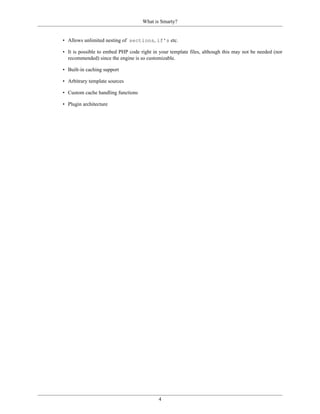
• Allows unlimited nesting of sections, if's etc.

• It is possible to embed PHP code right in your template files, although this may not be needed (nor
  recommended) since the engine is so customizable.

• Built-in caching support

• Arbitrary template sources

• Custom cache handling functions

• Plugin architecture


                                            4
Chapter 2. Installation
Requirements
     Smarty requires a web server running PHP 4.0.6 or greater.


Basic Installation
     Install the Smarty library files which are in the /libs/ sub directory of the distribution. These are .php
     files that you SHOULD NOT edit. They are shared among all applications and only get changed when
     you upgrade to a new version of Smarty.

     In the examples below the Smarty tarball has been unpacked to:

     • /usr/local/lib/Smarty-v.e.r/ for *nix machines

     • and c:webrootlibsSmarty-v.e.r for the windows enviroment.

     Example 2.1. Required Smarty library files


     Smarty-v.e.r/
        libs/
           Smarty.class.php
           Smarty_Compiler.class.php
           Config_File.class.php
           debug.tpl
           internals/*.php (all of them)
           plugins/*.php    (all of them)


     Smarty uses a PHP constant [http://php.net/define] named SMARTY_DIR which is the full system file
     path to the Smarty libs/ directory. Basically, if your application can find the Smarty.class.php
     file, you do not need to set the SMARTY_DIR as Smarty will figure it out on its own. Therefore, if
     Smarty.class.php is not in your include_path [http://php.net/ini.core.php#ini.include-path], or you
     do not supply an absolute path to it in your application, then you must define SMARTY_DIR manually.
     SMARTY_DIR must include a trailing slash/.

     Here's how you create an instance of Smarty in your PHP scripts:


     <?php
     // NOTE: Smarty has a capital 'S'
     require_once('Smarty.class.php');
     $smarty = new Smarty();
     ?>


                                                   5
Installation


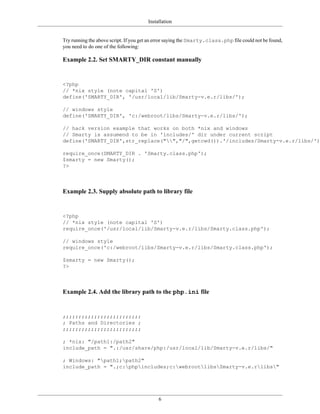
Try running the above script. If you get an error saying the Smarty.class.php file could not be found,
you need to do one of the following:

Example 2.2. Set SMARTY_DIR constant manually


<?php
// *nix style (note capital 'S')
define('SMARTY_DIR', '/usr/local/lib/Smarty-v.e.r/libs/');

// windows style
define('SMARTY_DIR', 'c:/webroot/libs/Smarty-v.e.r/libs/');

// hack version example that works on both *nix and windows
// Smarty is assumend to be in 'includes/' dir under current script
define('SMARTY_DIR',str_replace("","/",getcwd()).'/includes/Smarty-v.e.r/libs/');

require_once(SMARTY_DIR . 'Smarty.class.php');
$smarty = new Smarty();
?>


Example 2.3. Supply absolute path to library file


<?php
// *nix style (note capital 'S')
require_once('/usr/local/lib/Smarty-v.e.r/libs/Smarty.class.php');

// windows style
require_once('c:/webroot/libs/Smarty-v.e.r/libs/Smarty.class.php');

$smarty = new Smarty();
?>


Example 2.4. Add the library path to the php.ini file


;;;;;;;;;;;;;;;;;;;;;;;;;
; Paths and Directories ;
;;;;;;;;;;;;;;;;;;;;;;;;;

; *nix: "/path1:/path2"
include_path = ".:/usr/share/php:/usr/local/lib/Smarty-v.e.r/libs/"

; Windows: "path1;path2"
include_path = ".;c:phpincludes;c:webrootlibsSmarty-v.e.rlibs"


                                            6
Installation


Example 2.5. Appending the include path in a php script with ini_set()
[http://php.net/ini-set]


<?php
// *nix
ini_set('include_path', ini_get('include_path').PATH_SEPARATOR.'/usr/local/lib/Smar

// windows
ini_set('include_path', ini_get('include_path').PATH_SEPARATOR.'c:/webroot/lib/Smar
?>


Now that the library files are in place, it's time to setup the Smarty directories for your application:

• Smarty requires four directories which are by default named templates/, templates_c/,
  configs/ and cache/

• Each of these are definable by the Smarty class properties $template_dir, $compile_dir,
  $config_dir, and $cache_dir respectively

• It is highly recommended that you setup a separate set of these directories for each application that will
  use Smarty

For our installation example, we will be setting up the Smarty environment for a guest book application.
We picked an application only for the purpose of a directory naming convention. You can use the same
environment for any application, just replace guestbook/ with the name of your application.

Example 2.6. What the file structure looks like


/usr/local/lib/Smarty-v.e.r/libs/
        Smarty.class.php
        Smarty_Compiler.class.php
        Config_File.class.php
        debug.tpl
        internals/*.php
        plugins/*.php

/web/www.example.com/
        guestbook/
                templates/
                    index.tpl
                templates_c/
                configs/
                cache/
                htdocs/
                    index.php


Be sure that you know the location of your web server's document root as a file path. In the following
examples, the document root is /web/www.example.com/guestbook/htdocs/. The Smarty


                                                7
Installation


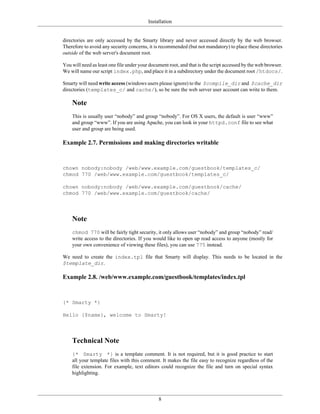
directories are only accessed by the Smarty library and never accessed directly by the web browser.
Therefore to avoid any security concerns, it is recommended (but not mandatory) to place these directories
outside of the web server's document root.

You will need as least one file under your document root, and that is the script accessed by the web browser.
We will name our script index.php, and place it in a subdirectory under the document root /htdocs/.

Smarty will need write access (windows users please ignore) to the $compile_dir and $cache_dir
directories (templates_c/ and cache/), so be sure the web server user account can write to them.

    Note
    This is usually user “nobody” and group “nobody”. For OS X users, the default is user “www”
    and group “www”. If you are using Apache, you can look in your httpd.conf file to see what
    user and group are being used.

Example 2.7. Permissions and making directories writable


chown nobody:nobody /web/www.example.com/guestbook/templates_c/
chmod 770 /web/www.example.com/guestbook/templates_c/

chown nobody:nobody /web/www.example.com/guestbook/cache/
chmod 770 /web/www.example.com/guestbook/cache/


    Note
    chmod 770 will be fairly tight security, it only allows user “nobody” and group “nobody” read/
    write access to the directories. If you would like to open up read access to anyone (mostly for
    your own convenience of viewing these files), you can use 775 instead.

We need to create the index.tpl file that Smarty will display. This needs to be located in the
$template_dir.

Example 2.8. /web/www.example.com/guestbook/templates/index.tpl


{* Smarty *}

Hello {$name}, welcome to Smarty!


    Technical Note
    {* Smarty *} is a template comment. It is not required, but it is good practice to start
    all your template files with this comment. It makes the file easy to recognize regardless of the
    file extension. For example, text editors could recognize the file and turn on special syntax
    highlighting.


                                               8
Installation


    Now lets edit index.php. We'll create an instance of Smarty, assign() a template variable and
    display() the index.tpl file.

    Example 2.9. Editing /web/www.example.com/docs/guestbook/index.php


    <?php

    require_once(SMARTY_DIR . 'Smarty.class.php');

    $smarty = new Smarty();

    $smarty->template_dir              =   '/web/www.example.com/guestbook/templates/';
    $smarty->compile_dir               =   '/web/www.example.com/guestbook/templates_c/';
    $smarty->config_dir                =   '/web/www.example.com/guestbook/configs/';
    $smarty->cache_dir                 =   '/web/www.example.com/guestbook/cache/';

    $smarty->assign('name','Ned');

    //** un-comment the following line to show the debug console
    //$smarty->debugging = true;

    $smarty->display('index.tpl');

    ?>


         Note
         In our example, we are setting absolute paths to all of the Smarty directories. If /web/
         www.example.com/guestbook/ is within your PHP include_path, then these settings are
         not necessary. However, it is more efficient and (from experience) less error-prone to set them to
         absolute paths. This ensures that Smarty is getting files from the directories you intended.

    Now naviagate to the index.php file with the web browser. You should see "Hello Ned, welcome to
    Smarty!"

    You have completed the basic setup for Smarty!


Extended Setup
    This is a continuation of the basic installation, please read that first!

    A slightly more flexible way to setup Smarty is to extend the class [http://php.net/ref.classobj] and initialize
    your Smarty environment. So instead of repeatedly setting directory paths, assigning the same vars, etc.,
    we can do that in one place.

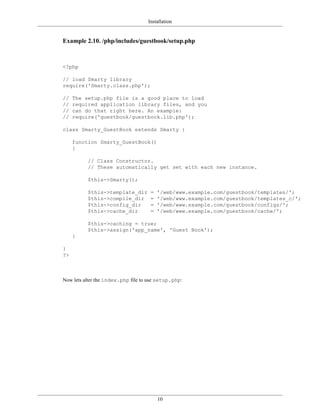
    Lets create a new directory /php/includes/guestbook/ and make a new file called setup.php.
    In our example environment, /php/includes is in our include_path. Be sure you set this up too,
    or use absolute file paths.


                                                     9
Installation


Example 2.10. /php/includes/guestbook/setup.php


<?php

// load Smarty library
require('Smarty.class.php');

//   The setup.php file is a good place to load
//   required application library files, and you
//   can do that right here. An example:
//   require('guestbook/guestbook.lib.php');

class Smarty_GuestBook extends Smarty {

     function Smarty_GuestBook()
     {

          // Class Constructor.
          // These automatically get set with each new instance.

          $this->Smarty();

          $this->template_dir        =   '/web/www.example.com/guestbook/templates/';
          $this->compile_dir         =   '/web/www.example.com/guestbook/templates_c/';
          $this->config_dir          =   '/web/www.example.com/guestbook/configs/';
          $this->cache_dir           =   '/web/www.example.com/guestbook/cache/';

          $this->caching = true;
          $this->assign('app_name', 'Guest Book');
     }

}
?>


Now lets alter the index.php file to use setup.php:


                                         10
Installation


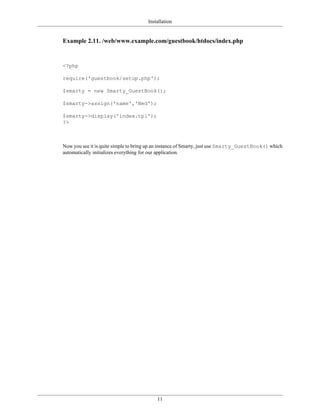
Example 2.11. /web/www.example.com/guestbook/htdocs/index.php


<?php

require('guestbook/setup.php');

$smarty = new Smarty_GuestBook();

$smarty->assign('name','Ned');

$smarty->display('index.tpl');
?>


Now you see it is quite simple to bring up an instance of Smarty, just use Smarty_GuestBook() which
automatically initializes everything for our application.


                                          11
Part II. Smarty For Template Designers
Table of Contents
3. Basic Syntax ................................................................................................................      15
     Comments ...............................................................................................................         15
     Variables .................................................................................................................      17
     Functions .................................................................................................................      17
     Attributes ................................................................................................................      18
     Embedding Vars in Double Quotes ..............................................................................                   19
     Math .......................................................................................................................     20
     Escaping Smarty Parsing ............................................................................................             20
4. Variables .....................................................................................................................    22
     Variables assigned from PHP ......................................................................................               22
            Associative arrays .............................................................................................          23
            Array indexes ...................................................................................................         24
            Objects ............................................................................................................      25
     Variables loaded from config files ...............................................................................               26
     {$smarty} reserved variable ........................................................................................             28
            Request variables ..............................................................................................          28
            {$smarty.now} .................................................................................................           29
            {$smarty.const} ................................................................................................          29
            {$smarty.capture} .............................................................................................           29
            {$smarty.config} ...............................................................................................          29
            {$smarty.section}, {$smarty.foreach} ...................................................................                  29
            {$smarty.template} ............................................................................................           29
            {$smarty.version} .............................................................................................           30
            {$smarty.ldelim}, {$smarty.rdelim} .....................................................................                  30
5. Variable Modifiers ........................................................................................................        31
     capitalize .................................................................................................................     32
     cat ..........................................................................................................................   33
     count_characters .......................................................................................................         34
     count_paragraphs ......................................................................................................          35
     count_sentences ........................................................................................................         36
     count_words .............................................................................................................        37
     date_format ..............................................................................................................       38
     default ....................................................................................................................     41
     escape .....................................................................................................................     42
     indent .....................................................................................................................     44
     lower ......................................................................................................................     46
     nl2br .......................................................................................................................    46
     regex_replace ...........................................................................................................        47
     replace ....................................................................................................................     48
     spacify ....................................................................................................................     49
     string_format ............................................................................................................       50
     strip ........................................................................................................................   51
     strip_tags .................................................................................................................     52
     truncate ...................................................................................................................     53
     upper ......................................................................................................................     55
     wordwrap ................................................................................................................        56
6. Combining Modifiers .....................................................................................................          59
7. Built-in Functions .........................................................................................................       60
     {capture} .................................................................................................................      60
     {config_load} ...........................................................................................................        61
     {foreach},{foreachelse} .............................................................................................            63


                                                          13
Smarty For Template Designers


            .index ............................................................................................................. 68
            .iteration .......................................................................................................... 68
            .first ............................................................................................................... 69
            .last ................................................................................................................ 69
            .show .............................................................................................................. 69
            .total ............................................................................................................... 70
     {if},{elseif},{else} .................................................................................................... 70
     {include} ................................................................................................................. 73
     {include_php} .......................................................................................................... 75
     {insert} ................................................................................................................... 77
     {ldelim},{rdelim} ..................................................................................................... 78
     {literal} ................................................................................................................... 80
     {php} ...................................................................................................................... 81
     {section},{sectionelse} ............................................................................................... 82
            .index ............................................................................................................. 89
            .index_prev ...................................................................................................... 90
            .index_next ...................................................................................................... 90
            .iteration .......................................................................................................... 91
            .first ............................................................................................................... 93
            .last ................................................................................................................ 93
            .rownum .......................................................................................................... 93
            .loop ............................................................................................................... 93
            .show .............................................................................................................. 94
            .total ............................................................................................................... 95
     {strip} ..................................................................................................................... 95
8. Custom Functions ......................................................................................................... 97
     {assign} .................................................................................................................. 97
     {counter} ................................................................................................................. 98
     {cycle} ................................................................................................................... 99
     {debug} ................................................................................................................. 101
     {eval} ................................................................................................................... 101
     {fetch} .................................................................................................................. 103
     {html_checkboxes} .................................................................................................. 104
     {html_image} ......................................................................................................... 107
     {html_options} ....................................................................................................... 108
     {html_radios} ......................................................................................................... 112
     {html_select_date} .................................................................................................. 115
     {html_select_time} .................................................................................................. 119
     {html_table} ........................................................................................................... 122
     {mailto} ................................................................................................................ 125
     {math} .................................................................................................................. 126
     {textformat} ........................................................................................................... 129
9. Config Files ................................................................................................................ 132
10. Debugging Console .................................................................................................... 134


                                                         14
Chapter 3. Basic Syntax
   All Smarty template tags are enclosed within delimiters. By default these are { and }, but they can be
   changed.

   For the examples in this manual, we will assume that you are using the default delimiters. In Smarty,
   all content outside of delimiters is displayed as static content, or unchanged. When Smarty encounters
   template tags, it attempts to interpret them, and displays the appropriate output in their place.


Comments
   Template comments are surrounded by asterisks, and that is surrounded by the delimiter tags like so:


   {* this is a comment *}


   Smarty comments are NOT displayed in the final output of the template, unlike <!-- HTML comments
   -->. These are useful for making internal notes in the templates which no one will see ;-)


                                               15
{* I am a Smarty comment, I don't exist in the compiled output   *}
<html>                      Basic Syntax
<head>
<title>{$title}</title>
Example 3.1. Comments within a template
</head>
<body>

{* another single line smarty comment *}
<!-- HTML comment that is sent to the browser -->

{* this multiline smarty
   comment is
   not sent to browser
*}

{*********************************************************
Multi line comment block with credits block
  @ author:         bg@example.com
  @ maintainer:     support@example.com
  @ para:           var that sets block style
  @ css:            the style output
**********************************************************}

{* The header file with the main logo and stuff   *}
{include file='header.tpl'}


{* Dev note: the $includeFile var is assigned in foo.php script    *}
<!-- Displays main content block -->
{include file=$includeFile}

{* this <select> block is redundant *}
{*
<select name="company">
   {html_options options=$vals selected=$selected_id}
</select>
*}

<!-- Show header from affiliate is disabled -->
{* $affiliate|upper *}

{* you cannot nest comments *}
{*
<select name="company">
   {* <option value="0">-- none -- </option> *}
   {html_options options=$vals selected=$selected_id}
</select>
*}


{* cvs tag for a template, below the 36 SHOULD be an american currency
. however its converted in cvs.. *}
{* &#36;Id: Exp &#36; *}
{* $Id: *}
</body>
</html>


                              16
Basic Syntax


Variables
    Template variables start with the $dollar sign. They can contain numbers, letters and underscores, much
    like a PHP variable [http://php.net/language.variables]. You can reference arrays by index numerically or
    non-numerically. Also reference object properties and methods.

    Config file variables are an exception to the $dollar syntax and are instead referenced with surrounding
    #hashmarks#, or via the $smarty.config variable.

    Example 3.2. Variables


    {$foo}        <-- displaying a simple variable (non array/object)
    {$foo[4]}     <-- display the 5th element of a zero-indexed array
    {$foo.bar}    <-- display the "bar" key value of an array, similar to PHP $foo['bar
    {$foo.$bar}   <-- display variable key value of an array, similar to PHP $foo[$bar]
    {$foo->bar}   <-- display the object property "bar"
    {$foo->bar()} <-- display the return value of object method "bar"
    {#foo#}       <-- display the config file variable "foo"
    {$smarty.config.foo} <-- synonym for {#foo#}
    {$foo[bar]}   <-- syntax only valid in a section loop, see {section}
    {assign var=foo value='baa'}{$foo} <-- displays "baa", see {assign}

    Many other combinations are allowed

    {$foo.bar.baz}
    {$foo.$bar.$baz}
    {$foo[4].baz}
    {$foo[4].$baz}
    {$foo.bar.baz[4]}
    {$foo->bar($baz,2,$bar)} <-- passing parameters
    {"foo"}        <-- static values are allowed

    {* display the server variable "SERVER_NAME" ($_SERVER['SERVER_NAME'])*}
    {$smarty.server.SERVER_NAME}


    Request variables such as $_GET, $_SESSION, etc are available via the reserved $smarty variable.

    See also $smarty, config variables {assign} and assign().


Functions
    Every Smarty tag either prints a variable or invokes some sort of function. These are processed
    and displayed by enclosing the function and its attributes within delimiters like so: {funcname
    attr1='val1' attr2='val2'}.


                                                 17
Basic Syntax


    Example 3.3. function syntax


    {config_load file='colors.conf'}

    {include file='header.tpl'}
    {insert file='banner_ads.tpl' title='Smarty is cool'}

    {if $logged_in}
        Welcome, <font color="{#fontColor#}">{$name}!</font>
    {else}
        hi, {$name}
    {/if}

    {include file='footer.tpl' ad=$random_id}


    • Both built-in functions and custom functions have the same syntax within templates.

    • Built-in functions are the inner workings of Smarty, such as {if}, {section} and {strip}. There
      should be no need to change or modify them.

    • Custom functions are additional functions implemented via plugins. They can be modified to your
      liking, or you can create new ones. {html_options} is an example of a custom function.

    See also register_function()


Attributes
    Most of the functions take attributes that specify or modify their behavior. Attributes to Smarty functions
    are much like HTML attributes. Static values don't have to be enclosed in quotes, but it is recommended
    for literal strings. Variables may also be used, and should not be in quotes.

    Some attributes require boolean values (TRUE or FALSE). These can be specified as either unquoted
    true, on, and yes, or false, off, and no.


                                                  18
Basic Syntax


    Example 3.4. function attribute syntax


    {include file='header.tpl'}

    {include file='header.tpl' attrib_name='attrib value'}

    {include file=$includeFile}

    {include file=#includeFile# title='Smarty is cool'}

    {html_select_date display_days=yes}

    {mailto address='smarty@example.com'}

    <select name='company_id'>
      {html_options options=$companies selected=$company_id}
    </select>


Embedding Vars in Double Quotes
    • Smarty will recognize assigned variables embedded in "double quotes" so long as the variable
      name contains only numbers, letters, under_scores and brackets[]. See naming [http://php.net/
      language.variables] for more detail.

    • With any other characters, for example a .period or $object>reference, then the variable must
      be surrounded by `backticks`.

    • You cannot embed modifiers, they must always be applied outside of quotes.

    Example 3.5. Syntax examples


    {func   var="test     $foo test"}       <-- sees $foo
    {func   var="test     $foo_bar test"}   <-- sees $foo_bar
    {func   var="test     $foo[0] test"}    <-- sees $foo[0]
    {func   var="test     $foo[bar] test"} <-- sees $foo[bar]
    {func   var="test     $foo.bar test"}   <-- sees $foo (not $foo.bar)
    {func   var="test     `$foo.bar` test"} <-- sees $foo.bar
    {func   var="test     `$foo.bar` test"|escape} <-- modifiers outside quotes!


                                               19
Basic Syntax


    Example 3.6. Practical examples


    {* will replace $tpl_name with value *}
    {include file="subdir/$tpl_name.tpl"}

    {* doesn't replace $tpl_name *}
    {include file='subdir/$tpl_name.tpl'} <--

    {* must have backticks as it contains a . *}
    {cycle values="one,two,`$smarty.config.myval`"}

    {* same as $module['contact'].'.tpl' in a php script
    {include file="`$module.contact`.tpl"}

    {* same as $module[$view].'.tpl' in a php script
    {include file="`$module.$view`.tpl"}


    See also escape.

Math
    Math can be applied directly to variable values.

    Example 3.7. math examples


    {$foo+1}

    {$foo*$bar}

    {* some more complicated examples *}

    {$foo->bar-$bar[1]*$baz->foo->bar()-3*7}

    {if ($foo+$bar.test%$baz*134232+10+$b+10)}

    {$foo|truncate:"`$fooTruncCount/$barTruncFactor-1`"}

    {assign var="foo" value="`$foo+$bar`"}


    See also the {math} function for complex equations and {eval}.

Escaping Smarty Parsing
    It is sometimes desirable or even necessary to have Smarty ignore sections it would otherwise parse. A
    classic example is embedding Javascript or CSS code in a template. The problem arises as those languages
    use the { and } characters which are also the default delimiters for Smarty.


                                                 20
Basic Syntax


The simplest thing is to avoid the situation altogether by separating your Javascript and CSS code into
their own files and then using standard HTML methods to access them.

Including literal content is possible using {literal}..{/literal} blocks. Similar to HTML entity
usage, you can use {ldelim},{rdelim} or {$smarty.ldelim} to display the current delimiters.

It is often convenient to simply change Smarty's $left_delimiter and $right_delimiter.

Example 3.8. changing delimiters example


<?php

$smarty->left_delimiter = '<!--{';
$smarty->right_delimiter = '}-->';

$smarty->assign('foo', 'bar');
$smarty->assign('name', 'Albert');
$smarty->display('example.tpl');

?>


Where the template is:


Welcome <!--{$name}--> to Smarty
<script language="javascript">
  var foo = <!--{$foo}-->;
  function dosomething() {
    alert("foo is " + foo);
  }
  dosomething();
</script>


                                            21
Chapter 4. Variables
    Smarty has several different types of variables. The type of the variable depends on what symbol it is
    prefixed or enclosed within.

    Variables in Smarty can be either displayed directly or used as arguments for functions, attributes and
    modifiers, inside conditional expressions, etc. To print a variable, simply enclose it in the delimiters so
    that it is the only thing contained between them.

    Example 4.1. Example variables


    {$Name}

    {$product.part_no} <b>{$product.description}</b>

    {$Contacts[row].Phone}

    <body bgcolor="{#bgcolor#}">


        Top Tip
        An easy way to examine Smarty variables is with the debugging console.


Variables assigned from PHP
    Variables that are assigned from PHP are referenced by preceding them with a dollar sign $ (like php).
    Variables assigned from within a template with the {assign} function are also displayed this way.


                                                  22
Variables


     Example 4.2. Assigned variables

     php script


     <?php

     $smarty = new Smarty();

     $smarty->assign('firstname', 'Doug');
     $smarty->assign('lastname', 'Evans');
     $smarty->assign('meetingPlace', 'New York');

     $smarty->display('index.tpl');

     ?>


     where the content of index.tpl is:


     Hello {$firstname} {$lastname}, glad to see you can make it.
     <br />
     {* this will not work as $variables are case sensitive *}
     This weeks meeting is in {$meetingplace}.
     {* this will work *}
     This weeks meeting is in {$meetingPlace}.


     This above would output:


     Hello Doug Evans, glad to see you can make it.
     <br />
     This weeks meeting is in .
     This weeks meeting is in New York.


Associative arrays
     You can also reference associative array variables that are assigned from PHP by specifying the key after
     the '.' (period) symbol.


                                                  23
Variables


     Example 4.3. Accessing associative array variables


     <?php
     $smarty->assign('Contacts',
         array('fax' => '555-222-9876',
               'email' => 'zaphod@slartibartfast.example.com',
               'phone' => array('home' => '555-444-3333',
                                 'cell' => '555-111-1234')
                                 )
              );
     $smarty->display('index.tpl');
     ?>


     where the content of index.tpl is:


     {$Contacts.fax}<br />
     {$Contacts.email}<br />
     {* you can print arrays of arrays as well *}
     {$Contacts.phone.home}<br />
     {$Contacts.phone.cell}<br />


     this will output:


     555-222-9876<br />
     zaphod@slartibartfast.example.com<br />
     555-444-3333<br />
     555-111-1234<br />


Array indexes
     You can reference arrays by their index, much like native PHP syntax.


                                                 24
Variables


     Example 4.4. Accessing arrays by index


     <?php
     $smarty->assign('Contacts', array(
                                '555-222-9876',
                                'zaphod@slartibartfast.example.com',
                                 array('555-444-3333',
                                        '555-111-1234')
                                 ));
     $smarty->display('index.tpl');
     ?>


     where index.tpl is:


     {$Contacts[0]}<br />
     {$Contacts[1]}<br />
     {* you can print arrays of arrays as well *}
     {$Contacts[2][0]}<br />
     {$Contacts[2][1]}<br />


     This will output:


     555-222-9876<br />
     zaphod@slartibartfast.example.com<br />
     555-444-3333<br />
     555-111-1234<br />


Objects
     Properties of objects assigned from PHP can be referenced by specifying the property name after the -
     > symbol.


                                                25
Variables


    Example 4.5. Accessing object properties


    name: {$person->name}<br />
    email: {$person->email}<br />


    this will output:


    name: Zaphod Beeblebrox<br />
    email: zaphod@slartibartfast.example.com<br />


Variables loaded from config files
    Variables that are loaded from the config files are referenced by enclosing them within #hash marks#,
    or with the smarty variable $smarty.config. The later syntax is useful for embedding into quoted
    attribute values.


                                               26
Variables


Example config file - foo.conf:
Example 4.6. config variables
pageTitle = "This is mine"
bodyBgColor = '#eeeeee'
tableBorderSize = 3
tableBgColor = "#bbbbbb"
rowBgColor = "#cccccc"

A template demonstrating the #hash# method:

{config_load file='foo.conf'}
<html>
<title>{#pageTitle#}</title>
<body bgcolor="{#bodyBgColor#}">
<table border="{#tableBorderSize#}" bgcolor="{#tableBgColor#}">
<tr bgcolor="{#rowBgColor#}">
    <td>First</td>
    <td>Last</td>
    <td>Address</td>
</tr>
</table>
</body>
</html>

A template demonstrating the $smarty.config method:

{config_load file='foo.conf'}
<html>
<title>{$smarty.config.pageTitle}</title>
<body bgcolor="{$smarty.config.bodyBgColor}">
<table border="{$smarty.config.tableBorderSize}" bgcolor="{$smarty.config.tableBgCo
<tr bgcolor="{$smarty.config.rowBgColor}">
    <td>First</td>
    <td>Last</td>
    <td>Address</td>
</tr>
</table>
</body>
</html>

Both examples would output:

<html>
<title>This is mine</title>
<body bgcolor="#eeeeee">
<table border="3" bgcolor="#bbbbbb">
<tr bgcolor="#cccccc">
 <td>First</td>
 <td>Last</td>
 <td>Address</td>
</tr>
</table>
</body>
</html>


                                        27
Variables


     Config file variables cannot be used until after they are loaded in from a config file. This procedure is
     explained later in this document under {config_load}.

     See also variables and $smarty reserved variables


{$smarty} reserved variable
     The PHP reserved {$smarty} variable can be used to access several enviroment and request variables.
     The full list of them follows.

Request variables
     The request variables [http://php.net/reserved.variables] such as $_GET, $_POST,
     $_COOKIE, $_SERVER, $_ENV and $_SESSION (see              $request_vars_order and
     $request_use_auto_globals) can be accessed as demonstrated in the examples below:

     Example 4.7. Displaying request variables


     {* display value of page from URL ($_GET) http://www.example.com/index.php?page=foo
     {$smarty.get.page}

     {* display the variable "page" from a form ($_POST['page']) *}
     {$smarty.post.page}

     {* display the value of the cookie "username" ($_COOKIE['username']) *}
     {$smarty.cookies.username}

     {* display the server variable "SERVER_NAME" ($_SERVER['SERVER_NAME'])*}
     {$smarty.server.SERVER_NAME}

     {* display the system environment variable "PATH" *}
     {$smarty.env.PATH}

     {* display the php session variable "id" ($_SESSION['id']) *}
     {$smarty.session.id}

     {* display the variable "username" from merged get/post/cookies/server/env *}
     {$smarty.request.username}


         Note
         For historical reasons {$SCRIPT_NAME} can be accessed directly,                        although
         {$smarty.server.SCRIPT_NAME} is the proposed way to access this value.


         <a href="{$SCRIPT_NAME}?page=smarty">click me</a>
         <a href="{$smarty.server.SCRIPT_NAME}?page=smarty">click me</a>


                                                  28
Variables


{$smarty.now}
     The current timestamp [http://php.net/function.time] can be accessed with {$smarty.now}. The value
     reflects the number of seconds passed since the so-called Epoch on January 1, 1970, and can be passed
     directly to the date_format modifier for display. Note that time() [http://php.net/function.time] is
     called on each invocation; eg a script that takes three seconds to execute with a call to $smarty.now at
     start and end will show the three second difference.


     {* use the date_format modifier to show current date and time *}
     {$smarty.now|date_format:'%Y-%m-%d %H:%M:%S'}


{$smarty.const}
     You can access PHP constant values directly. See also smarty constants.


     <?php
     // the constant defined in php
     define('MY_CONST_VAL','CHERRIES');
     ?>


     Output the constant in a template with


     {$smarty.const.MY_CONST_VAL}


{$smarty.capture}
     Template output captured via the built-in {capture}..{/capture} function can be accessed using
     the {$smarty.capture} variable. See the {capture} page for more information.

{$smarty.config}
     {$smarty.config} variable can be used to refer to loaded config variables.
     {$smarty.config.foo} is a synonym for {#foo#}. See the {config_load} page for more info.

{$smarty.section}, {$smarty.foreach}
     The {$smarty.section} and {$smarty.foreach} variables can be used to refer to {section}
     and {foreach} loop properties respectfully. These have some very useful values such as .first,
     .index, etc.

{$smarty.template}
     Returns the name of the current template being processed. The following example shows the
     container.tpl and the included banner.tpl with {$smarty.template} within both.


                                                 29
Variables


     <b>Main container is {$smarty.template}</b>
     {include file='banner.tpl'}


     will output


     <b>Main page is container.tpl</b>
     banner.tpl


{$smarty.version}
     Returns the version of Smarty the template was compiled with.


     <div id="footer">Powered by Smarty {$smarty.version}</div>


{$smarty.ldelim}, {$smarty.rdelim}
     These variables are used for printing the left-delimiter and right-delimiter value literally, the same as
     {ldelim},{rdelim}.

     See also assigned variables and config variables


                                                  30
Chapter 5. Variable Modifiers
    Variable modifiers can be applied to variables, custom functions or strings. To apply a modifier, specify
    the value followed by a | (pipe) and the modifier name. A modifier may accept additional parameters that
    affect its behavior. These parameters follow the modifer name and are separated by a : (colon). Also, all
    php-functions can be used as modifiers implicitly (more below) and modifiers can be combined. .

    Example 5.1. Modifier examples


    {* apply modifier to a variable *}
    {$title|upper}

    {* modifier with parameters *}
    {$title|truncate:40:'...'}

    {* apply modifier to a function parameter *}
    {html_table loop=$myvar|upper}

    {* with parameters *}
    {html_table loop=$myvar|truncate:40:'...'}

    {* apply modifier to literal string *}
    {'foobar'|upper}

    {* using date_format to format the current date *}
    {$smarty.now|date_format:"%Y/%m/%d"}

    {* apply modifier to a custom function *}
    {mailto|upper address='smarty@example.com'}

    {* using php's str_repeat *}
    {'='|str_repeat:80}

    {* php's count *}
    {$myArray|@count}

    {* php's shuffle on servers's ip *}
    {$smarty.server.SERVER_ADDR|shuffle}

    (* this will uppercase and truncate the whole array *}
    <select name="name_id">
    {html_options output=$myArray|upper|truncate:20}
    </select>


    • If you apply a modifier to an array variable instead of a single value variable, the modifier will be applied
      to every value in that array. If you really want the modifier to work on an entire array as a value, you
      must prepend the modifier name with a @ symbol.


                                                   31
Variable Modifiers


            Example
            {$articleTitle|@count} - will print out the number of elements in the
            $articleTitle array using the php count() [http://php.net/count] function as a
            modifier.

     • Modifiers are autoloaded from the $plugins_dir or can be registered explicitly with the
       register_modifier() function. The later is useful for sharing a function between php scripts and
       smarty templates.

     • All php-functions can be used as modifiers implicitly, as demonstrated in the example above. However,
       using php-functions as modifiers has two little pitfalls:

       • First - sometimes the order of the function-parameters is not the desirable one. Formatting $foo
         with {"%2.f"|sprintf:$foo} actually works, but asks for the more intuitive, like {$foo|
         string_format:"%2.f"} that is provided by the Smarty distribution.

       • Secondly - if $security is enabled, all php-functions that are to be used as modifiers have to be
         declared trusted in the MODIFIER_FUNCS element of the $security_settings array.

     See also register_modifier(), combining modifiers. and extending smarty with plugins


capitalize
     This is used to capitalize the first letter of all words in a variable. This is similar to the PHP ucwords()
     [http://php.net/ucwords] function.


         Parameter                Type               Required               Default        Description
          Position
               1                 boolean                 No                 FALSE          This     determines
                                                                                           whether or not
                                                                                           words with digits
                                                                                           will be uppercased


                                                   32
Variable Modifiers


      Example 5.2. capitalize


      <?php

      $smarty->assign('articleTitle', 'next x-men film, x3, delayed.');

      ?>


      Where the template is:


      {$articleTitle}
      {$articleTitle|capitalize}
      {$articleTitle|capitalize:true}


      Will output:


      next x-men film, x3, delayed.
      Next X-Men Film, x3, Delayed.
      Next X-Men Film, X3, Delayed.


      See also lower and upper


cat
      This value is concatenated to the given variable.


           Parameter               Type               Required   Default   Description
            Position
                1                  string                 No     empty     This    value   to
                                                                           catenate to the
                                                                           given variable.


                                                    33
Variable Modifiers


    Example 5.3. cat


    <?php

    $smarty->assign('articleTitle', "Psychics predict world didn't end");

    ?>


    Where template is:


    {$articleTitle|cat:' yesterday.'}


    Will output:


    Psychics predict world didn't end yesterday.


count_characters
    This is used to count the number of characters in a variable.


         Parameter               Type               Required        Default   Description
          Position
              1                 boolean                 No          FALSE     This     determines
                                                                              whether or not to
                                                                              include whitespace
                                                                              characters in the
                                                                              count.


                                                  34
Variable Modifiers


    Example 5.4. count_characters


    <?php

    $smarty->assign('articleTitle', 'Cold Wave Linked to Temperatures.');

    ?>


    Where template is:


    {$articleTitle}
    {$articleTitle|count_characters}
    {$articleTitle|count_characters:true}


    Will output:


    Cold Wave Linked to Temperatures.
    29
    33


    See also count_words, count_sentences and count_paragraphs.


count_paragraphs
    This is used to count the number of paragraphs in a variable.


                                                 35
Variable Modifiers


    Example 5.5. count_paragraphs


    <?php

    $smarty->assign('articleTitle',
                     "War Dims Hope for Peace. Child's Death Ruins Couple's Holiday.n
                     Man is Fatally Slain. Death Causes Loneliness, Feeling of Isolatio
                    );

    ?>


    Where template is:


    {$articleTitle}
    {$articleTitle|count_paragraphs}


    Will output:


    War Dims Hope for Peace. Child's Death Ruins Couple's Holiday.

    Man is Fatally Slain. Death Causes Loneliness, Feeling of Isolation.
    2


    See also count_characters, count_sentences and count_words.


count_sentences
    This is used to count the number of sentences in a variable.


                                                 36
Variable Modifiers


    Example 5.6. count_sentences


    <?php

    $smarty->assign('articleTitle',
                     'Two Soviet Ships Collide - One Dies.
                     Enraged Cow Injures Farmer with Axe.'
                     );

    ?>


    Where template is:


    {$articleTitle}
    {$articleTitle|count_sentences}


    Will output:


    Two Soviet Ships Collide - One Dies. Enraged Cow Injures Farmer with Axe.
    2


    See also count_characters, count_paragraphs and count_words.


count_words
    This is used to count the number of words in a variable.


                                                 37
Variable Modifiers


    Example 5.7. count_words


    <?php

    $smarty->assign('articleTitle', 'Dealers Will Hear Car Talk at Noon.');

    ?>


    Where template is:


    {$articleTitle}
    {$articleTitle|count_words}


    This will output:


    Dealers Will Hear Car Talk at Noon.
    7


    See also count_characters, count_paragraphs and count_sentences.


date_format
    This formats a date and time into the given strftime() [http://php.net/strftime] format. Dates can
    be passed to Smarty as unix timestamps [http://php.net/function.time], mysql timestamps or any string
    made up of month day year, parsable by php's strtotime() [http://php.net/strtotime]. Designers can
    then use date_format to have complete control of the formatting of the date. If the date passed to
    date_format is empty and a second parameter is passed, that will be used as the date to format.

         Parameter             Type              Required             Default        Description
          Position
              1                string                No             %b %e, %Y        This is the format
                                                                                     for the outputted
                                                                                     date.
              2                string                No                  n/a         This is the default
                                                                                     date if the input is
                                                                                     empty.

         Note
         Since Smarty-2.6.10 numeric values passed to date_format are always (except for mysql
         timestamps, see below) interpreted as a unix timestamp.


                                               38
Variable Modifiers


     Before Smarty-2.6.10 numeric strings that where also parsable by strtotime() in
     php (like YYYYMMDD) where sometimes (depending on the underlying implementation of
     strtotime()) interpreted as date strings and NOT as timestamps.

     The only exception are mysql timestamps: They are also numeric only and 14 characters long
     (YYYYMMDDHHMMSS), mysql timestamps have precedence over unix timestamps.

     Programmers note
     date_format is essentially a wrapper to PHP's strftime() [http://php.net/strftime]
     function. You may have more or less conversion specifiers available depending on your system's
     strftime() [http://php.net/strftime] function where PHP was compiled. Check your system's
     manpage for a full list of valid specifiers. However, a few of the specifiers are emulated on
     Windows. These are: %D, %e, %h, %l, %n, %r, %R, %t, %T.

Example 5.8. date_format


<?php

$config['date'] = '%I:%M %p';
$config['time'] = '%H:%M:%S';
$smarty->assign('config', $config);
$smarty->assign('yesterday', strtotime('-1 day'));

?>


This template uses $smarty.now to get the current time:


{$smarty.now|date_format}
{$smarty.now|date_format:"%D"}
{$smarty.now|date_format:$config.date}
{$yesterday|date_format}
{$yesterday|date_format:"%A, %B %e, %Y"}
{$yesterday|date_format:$config.time}


This above will output:


Jan 1, 2022
01/01/22
02:33 pm
Dec 31, 2021
Monday, December 1, 2021
14:33:00


                                            39
Variable Modifiers


date_format conversion specifiers:

• %a - abbreviated weekday name according to the current locale

• %A - full weekday name according to the current locale

• %b - abbreviated month name according to the current locale

• %B - full month name according to the current locale

• %c - preferred date and time representation for the current locale

• %C - century number (the year divided by 100 and truncated to an integer, range 00 to 99)

• %d - day of the month as a decimal number (range 01 to 31)

• %D - same as %m/%d/%y

• %e - day of the month as a decimal number, a single digit is preceded by a space (range 1 to 31)

• %g - Week-based year within century [00,99]

• %G - Week-based year, including the century [0000,9999]

• %h - same as %b

• %H - hour as a decimal number using a 24-hour clock (range 00 to 23)

• %I - hour as a decimal number using a 12-hour clock (range 01 to 12)

• %j - day of the year as a decimal number (range 001 to 366)

• %k - Hour (24-hour clock) single digits are preceded by a blank. (range 0 to 23)

• %l - hour as a decimal number using a 12-hour clock, single digits preceeded by a space (range 1 to 12)

• %m - month as a decimal number (range 01 to 12)

• %M - minute as a decimal number

• %n - newline character

• %p - either `am' or `pm' according to the given time value, or the corresponding strings for the current
  locale

• %r - time in a.m. and p.m. notation

• %R - time in 24 hour notation

• %S - second as a decimal number

• %t - tab character

• %T - current time, equal to %H:%M:%S


                                             40
Variable Modifiers


    • %u - weekday as a decimal number [1,7], with 1 representing Monday

    • %U - week number of the current year as a decimal number, starting with the first Sunday as the first
      day of the first week

    • %V - The ISO 8601:1988 week number of the current year as a decimal number, range 01 to 53, where
      week 1 is the first week that has at least 4 days in the current year, and with Monday as the first day
      of the week.

    • %w - day of the week as a decimal, Sunday being 0

    • %W - week number of the current year as a decimal number, starting with the first Monday as the first
      day of the first week

    • %x - preferred date representation for the current locale without the time

    • %X - preferred time representation for the current locale without the date

    • %y - year as a decimal number without a century (range 00 to 99)

    • %Y - year as a decimal number including the century

    • %Z - time zone or name or abbreviation

    • %% - a literal `%' character

    See also $smarty.now, strftime() [http://php.net/strftime], {html_select_date} and the
    date tips page.


default
    This is used to set a default value for a variable. If the variable is unset or an empty string, the given default
    value is printed instead. Default takes the one argument.

        Note
        With error_reporting(E_ALL) [http://php.net/error_reporting], undeclared variables
        will always throw an error within the template. This function is useful for replacing null or zero
        length strings.


         Parameter                 Type                Required                Default         Description
          Position
              1                    string                  No                   empty          This is the default
                                                                                               value to output
                                                                                               if the variable is
                                                                                               empty.


                                                     41
Variable Modifiers


    Example 5.9. default


    <?php

    $smarty->assign('articleTitle', 'Dealers Will Hear Car Talk at Noon.');
    $smarty->assign('email', '');

    ?>


    Where template is:


    {$articleTitle|default:'no title'}
    {$myTitle|default:'no title'}
    {$email|default:'No email address available'}


    Will output:


    Dealers Will Hear Car Talk at Noon.
    no title
    No email address available


    See also the default variable handling and the blank variable handling pages.


escape
    escape is used to encode or escape a variable to for example html, url, single quotes, hex,
    hexentity, javascript and mail. By default its html.

         Parameter         Type           Required            Possible         Default   Description
          Position                                            Values
             1             string             No             html,              html     This is the
                                                           htmlall,                      escape format to
                                                              url,                       use.
                                                        urlpathinfo,
                                                         quotes, hex,
                                                          hexentity,
                                                         javascript,
                                                             mail
             2             string             No         ISO-8859-1, ISO-8859-1 The character
                                                            UTF-8,              set    encoding
                                                            and any             passed       to
                                                          character set


                                                 42
Variable Modifiers


     Parameter        Type          Required         Possible       Default   Description
      Position                                        Values
                                                  supported by                htmlentities() et.
                                               htmlentities()                 al.
                                                 [http://php.net/
                                                   htmlentities]


Example 5.10. escape


<?php

$smarty->assign('articleTitle',
                "'Stiff Opposition Expected to Casketless Funeral Plan'"
                );
$smarty->assign('EmailAddress','smarty@example.com');

?>


These are example escape template lines followed by the output


{$articleTitle}
'Stiff Opposition Expected to Casketless Funeral Plan'

{$articleTitle|escape}
&#039;Stiff Opposition Expected to Casketless Funeral Plan&#039;

{$articleTitle|escape:'html'}    {* escapes & " ' < > *}
&#039;Stiff Opposition Expected to Casketless Funeral Plan&#039;

{$articleTitle|escape:'htmlall'} {* escapes ALL html entities *}
&#039;Stiff Opposition Expected to Casketless Funeral Plan&#039;

<a href="?title={$articleTitle|escape:'url'}">click here</a>
<a
href="?title=%27Stiff%20Opposition%20Expected%20to%20Casketless%20Funeral%20Plan%27

{$articleTitle|escape:'quotes'}
'Stiff Opposition Expected to Casketless Funeral Plan'

<a href="mailto:{$EmailAddress|escape:"hex"}">{$EmailAddress|escape:"hexentity"}</a
{$EmailAddress|escape:'mail'}    {* this converts to email to text *}
<a href="mailto:%62%6f%..snip..%65%74">&#x62;&#x6f;&#x62..snip..&#x65;&#x74;</a>

{'mail@example.com'|escape:'mail'}
smarty [AT] example [DOT] com


                                          43
Variable Modifiers


    Example 5.11. Other examples

    PHP functions can be used as modifiers, $security permitting.


    {* the "rewind" paramater registers the current location *}
    <a href="{$SCRIPT_NAME}?page=foo&rewind={$smarty.server.REQUEST_URI|urlencode}">cli


    This snippet is useful for emails, but see also {mailto}


    {* email address mangled *}
    <a href="mailto:{$EmailAddress|escape:'hex'}">{$EmailAddress|escape:'mail'}</a>


    See also escaping smarty parsing, {mailto} and the obfuscating email addresses page.


indent
    This indents a string on each line, default is 4. As an optional parameter, you can specify the number of
    characters to indent. As an optional second parameter, you can specify the character to use to indent with
    eg use "t" for a tab.


         Parameter               Type              Required               Default        Description
          Position
             1                  integer                No                    4           This     determines
                                                                                         how            many
                                                                                         characters to indent
                                                                                         to.
             2                  string                 No               (one space)      This is the character
                                                                                         used to indent with.


                                                 44
Variable Modifiers


Example 5.12. indent


<?php

$smarty->assign('articleTitle',
                'NJ judge to rule on nude beach.
Sun or rain expected today, dark tonight.
Statistics show that teen pregnancy drops off significantly after 25.'
                );
?>


Where template is:


{$articleTitle}

{$articleTitle|indent}

{$articleTitle|indent:10}

{$articleTitle|indent:1:"t"}


Will output:


NJ judge to rule on nude beach.
Sun or rain expected today, dark tonight.
Statistics show that teen pregnancy drops off significantly after 25.

     NJ judge to rule on nude beach.
     Sun or rain expected today, dark tonight.
     Statistics show that teen pregnancy drops off significantly after 25.

               NJ judge to rule on nude beach.
               Sun or rain expected today, dark tonight.
               Statistics show that teen pregnancy drops off significantly after 25.

           NJ judge to rule on nude beach.
           Sun or rain expected today, dark tonight.
           Statistics show that teen pregnancy drops off significantly after 25.


See also strip, wordwrap and spacify.


                                    45
Variable Modifiers


lower
    This is used to lowercase a variable. This is equivalent to the PHP strtolower() [http://php.net/
    strtolower] function.

    Example 5.13. lower


    <?php

    $smarty->assign('articleTitle', 'Two Convicts Evade Noose, Jury Hung.');

    ?>


    Where template is:


    {$articleTitle}
    {$articleTitle|lower}


    This will output:


    Two Convicts Evade Noose, Jury Hung.
    two convicts evade noose, jury hung.


    See also upper and capitalize.


nl2br
    All "n" line breaks will be converted to html <br /> tags in the given variable. This is equivalent to
    the PHP's nl2br() [http://php.net/nl2br] function.


                                                46
Variable Modifiers


    Example 5.14. nl2br


    <?php

    $smarty->assign('articleTitle',
                    "Sun or rain expectedntoday, dark tonight"
                    );

    ?>


    Where the template is:


    {$articleTitle|nl2br}


    Will output:


    Sun or rain expected<br />today, dark tonight


    See also word_wrap, count_paragraphs and count_sentences.


regex_replace
    A regular expression search and replace on a variable. Use the preg_replace() [http://php.net/
    preg_replace] syntax from the PHP manual.


         Parameter           Type              Required           Default      Description
          Position
             1               string               Yes               n/a        This is the regular
                                                                               expression to be
                                                                               replaced.
             2               string               Yes               n/a        This is the string of
                                                                               text to replace with.


                                             47
Variable Modifiers


    Example 5.15. regex_replace


    <?php

    $smarty->assign('articleTitle', "Infertility unlikely tonbe passed on, experts say

    ?>


    Where template is:


    {* replace each carriage return, tab and new line with a space *}

    {$articleTitle}
    {$articleTitle|regex_replace:"/[rtn]/":" "}


    Will output:


    Infertility unlikely to
    be passed on, experts say.
    Infertility unlikely to be passed on, experts say.


    See also replace and escape.


replace
    A simple search and replace on a variable. This is equivalent to the PHP's str_replace() [http://
    php.net/str_replace] function.


         Parameter            Type              Required            Default       Description
          Position
             1                string               Yes                n/a         This is the string of
                                                                                  text to be replaced.
             2                string               Yes                n/a         This is the string of
                                                                                  text to replace with.


                                              48
Variable Modifiers


    Example 5.16. replace


    <?php

    $smarty->assign('articleTitle', "Child's Stool Great for Use in Garden.");

    ?>


    Where template is:


    {$articleTitle}
    {$articleTitle|replace:'Garden':'Vineyard'}
    {$articleTitle|replace:' ':'   '}


    Will output:


    Child's Stool Great for Use in Garden.
    Child's Stool Great for Use in Vineyard.
    Child's   Stool   Great   for   Use    in                   Garden.


    See also regex_replace and escape.


spacify
    spacify is a way to insert a space between every character of a variable. You can optionally pass a
    different character or string to insert.


         Parameter             Type              Required            Default       Description
          Position
             1                 string                No             one space      This what gets
                                                                                   inserted between
                                                                                   each character of
                                                                                   the variable.


                                               49
Variable Modifiers


    Example 5.17. spacify


    <?php

    $smarty->assign('articleTitle', 'Something Went Wrong in Jet Crash, Experts Say.');

    ?>


    Where template is:


    {$articleTitle}
    {$articleTitle|spacify}
    {$articleTitle|spacify:"^^"}


    Will output:


    Something Went Wrong in Jet Crash, Experts Say.
    S o m e t h i n g   W .... snip .... s h ,    E x p e r t s   S a y .
    S^^o^^m^^e^^t^^h^^i^^n^^g^^ .... snip .... ^^e^^r^^t^^s^^ ^^S^^a^^y^^.


    See also wordwrap and nl2br.


string_format
    This is a way to format strings, such as decimal numbers and such. Use the syntax for sprintf() [http://
    php.net/sprintf] for the formatting.


         Parameter              Type               Required             Default        Description
          Position
             1                  string                Yes                  n/a         This is what format
                                                                                       to use. (sprintf)


                                                50
Variable Modifiers


        Example 5.18. string_format


        <?php

        $smarty->assign('number', 23.5787446);

        ?>


        Where template is:


        {$number}
        {$number|string_format:"%.2f"}
        {$number|string_format:"%d"}


        Will output:


        23.5787446
        23.58
        24


        See also date_format.


strip
        This replaces all repeated spaces, newlines and tabs with a single space, or with the supplied string.

             Note
             If you want to strip blocks of template text, use the built-in {strip} function.


                                                      51
Variable Modifiers


    Example 5.19. strip


    <?php
    $smarty->assign('articleTitle', "Grandmother ofneight makest                              hole in one.");
    $smarty->display('index.tpl');
    ?>


    Where template is:


    {$articleTitle}
    {$articleTitle|strip}
    {$articleTitle|strip:'&nbsp;'}


    Will output:


    Grandmother of
    eight makes        hole in one.
    Grandmother of eight makes hole in one.
    Grandmother&nbsp;of&nbsp;eight&nbsp;makes&nbsp;hole&nbsp;in&nbsp;one.


    See also {strip} and truncate.


strip_tags
    This strips out markup tags, basically anything between < and >.


        Parameter               Type              Required             Default   Description
         Position
             1                  bool                  No               TRUE      This     determines
                                                                                 whether the tags are
                                                                                 replaced by ' ' or ''


                                                52
Variable Modifiers


    Example 5.20. strip_tags


    <?php

    $smarty->assign('articleTitle',
                    "Blind Woman Gets <font face="helvetica">New
    Kidney</font> from Dad she Hasn't Seen in <b>years</b>."
                   );

    ?>


    Where template is:


    {$articleTitle}
    {$articleTitle|strip_tags} {* same as {$articleTitle|strip_tags:true} *}
    {$articleTitle|strip_tags:false}


    Will output:


    Blind Woman Gets <font face="helvetica">New Kidney</font> from Dad she Hasn't Seen
    Blind Woman Gets New Kidney from Dad she Hasn't Seen in years .
    Blind Woman Gets New Kidney from Dad she Hasn't Seen in years.


    See also replace and regex_replace.


truncate
    This truncates a variable to a character length, the default is 80. As an optional second parameter, you
    can specify a string of text to display at the end if the variable was truncated. The characters in the string
    are included with the original truncation length. By default, truncate will attempt to cut off at a word
    boundary. If you want to cut off at the exact character length, pass the optional third parameter of TRUE.

         Parameter                Type               Required               Default         Description
          Position
              1                  integer                 No                    80           This     determines
                                                                                            how           many
                                                                                            characters       to
                                                                                            truncate to.
              2                   string                 No                     ...         This is a text string
                                                                                            that replaces the
                                                                                            truncated text. Its
                                                                                            length is included


                                                   53
Variable Modifiers


Parameter    Type              Required    Default   Description
 Position
                                                     in the truncation
                                                     length setting.
    3       boolean                No      FALSE     This     determines
                                                     whether or not
                                                     to truncate at a
                                                     word boundary with
                                                     FALSE, or at the
                                                     exact character with
                                                     TRUE.
    4       boolean                No      FALSE     This     determines
                                                     whether          the
                                                     truncation happens
                                                     at the end of
                                                     the string with
                                                     FALSE, or in the
                                                     middle of the string
                                                     with TRUE. Note
                                                     that if this setting
                                                     is TRUE, then
                                                     word     boundaries
                                                     are ignored.


                             54
Variable Modifiers


    Example 5.21. truncate


    <?php
    $smarty->assign('articleTitle', 'Two Sisters Reunite after Eighteen Years at Checko
    ?>


    where template is:


    {$articleTitle}
    {$articleTitle|truncate}
    {$articleTitle|truncate:30}
    {$articleTitle|truncate:30:""}
    {$articleTitle|truncate:30:"---"}
    {$articleTitle|truncate:30:"":true}
    {$articleTitle|truncate:30:"...":true}
    {$articleTitle|truncate:30:'..':true:true}


    This will output:


    Two   Sisters       Reunite after Eighteen Years at Checkout Counter.
    Two   Sisters       Reunite after Eighteen Years at Checkout Counter.
    Two   Sisters       Reunite after...
    Two   Sisters       Reunite after
    Two   Sisters       Reunite after---
    Two   Sisters       Reunite after Eigh
    Two   Sisters       Reunite after E...
    Two   Sisters       Re..ckout Counter.


upper
    This is used to uppercase a variable. This is equivalent to the PHP strtoupper() [http://php.net/
    strtoupper] function.


                                             55
Variable Modifiers


   Example 5.22. upper


   <?php
   $smarty->assign('articleTitle', "If Strike isn't Settled Quickly it may Last a Whil
   ?>


   Where template is:


   {$articleTitle}
   {$articleTitle|upper}


   Will output:


   If Strike isn't Settled Quickly it may Last a While.
   IF STRIKE ISN'T SETTLED QUICKLY IT MAY LAST A WHILE.


   See also lower and capitalize.


wordwrap
   Wraps a string to a column width, the default is 80. As an optional second parameter, you can specify a
   string of text to wrap the text to the next line, the default is a carriage return "n". By default, wordwrap
   will attempt to wrap at a word boundary. If you want to cut off at the exact character length, pass the
   optional third parameter as TRUE. This is equivalent to the PHP wordwrap() [http://php.net/wordwrap]
   function.

       Parameter                Type                Required               Default        Description
        Position
             1                  integer                No                     80          This     determines
                                                                                          how many columns
                                                                                          to wrap to.
             2                  string                 No                     n          This is the string
                                                                                          used to wrap words
                                                                                          with.
             3                 boolean                 No                  FALSE          This     determines
                                                                                          whether or not to
                                                                                          wrap at a word
                                                                                          boundary (FALSE),
                                                                                          or at the exact
                                                                                          character (TRUE).


                                                 56
Variable Modifiers


Example 5.23. wordwrap


<?php

$smarty->assign('articleTitle',
                "Blind woman gets new kidney from dad she hasn't seen in years."
               );

?>


Where template is


{$articleTitle}

{$articleTitle|wordwrap:30}

{$articleTitle|wordwrap:20}

{$articleTitle|wordwrap:30:"<br />n"}

{$articleTitle|wordwrap:26:"n":true}


Will output:


Blind woman gets new kidney from dad she hasn't seen in years.

Blind woman gets new kidney
from dad she hasn't seen in
years.

Blind woman gets new
kidney from dad she
hasn't seen in
years.

Blind woman gets new kidney<br />
from dad she hasn't seen in<br />
years.

Blind woman gets new kidn
ey from dad she hasn't se
en in years.


                                57
Variable Modifiers


See also nl2br and {textformat}.


                                    58
Chapter 6. Combining Modifiers
   You can apply any number of modifiers to a variable. They will be applied in the order they are combined,
   from left to right. They must be separated with a | (pipe) character.

   Example 6.1. combining modifiers


   <?php

   $smarty->assign('articleTitle', 'Smokers are Productive, but Death Cuts Efficiency.

   ?>


   where template is:


   {$articleTitle}
   {$articleTitle|upper|spacify}
   {$articleTitle|lower|spacify|truncate}
   {$articleTitle|lower|truncate:30|spacify}
   {$articleTitle|lower|spacify|truncate:30:". . ."}


   The above example will output:


   Smokers    are   Productive, but Death            Cuts Efficiency.
   S M O K    E R   S   A R ....snip....             H   C U T S   E F F I C I E N C Y .
   s m o k    e r   s   a r ....snip....             b u t   d e a t h   c u t s...
   s m o k    e r   s   a r e   p r o d u            c t i v e ,   b u t . . .
   s m o k    e r   s   a r e   p. . .


                                                59
Chapter 7. Built-in Functions
    Smarty comes with several built-in functions. These built-in functions are the integral part of the smarty
    template engine. You cannot create your own custom functions with the same name; and you should not
    need to modify the built-in functions.

    A few of these functions have an assign attribute which collects the result the function to a named
    template variable instead of being output; much like the {assign} function.


{capture}
    {capture} is used to collect the output of the template between the tags into a variable instead of
    displaying it. Any content between {capture name='foo'} and {/capture} is collected into the
    variable specified in the name attribute.

    The captured content can be used in the template from the variable $smarty.capture.foo where
    “foo” is the value passed in the name attribute. If you do not supply the name attribute, then “default”
    will be used as the name ie $smarty.capture.default.

    {capture}'s can be nested.


      Attribute Name             Type              Required               Default        Description
           name                 string                 no                 default        The name of the
                                                                                         captured block
           assign               string                 No                   n/a          The variable name
                                                                                         where to assign the
                                                                                         captured output to

        Caution
        Be careful when capturing {insert} output. If you have $caching enabled and you have
        {insert} commands that you expect to run within cached content, do not capture this content.

    Example 7.1. {capture} with the name attribute


    {* we don't want to print a div tag unless content is displayed *}
    {capture name=banner}
      {include file='get_banner.tpl'}
    {/capture}

    {if $smarty.capture.banner ne ''}
    <div id="banner">{$smarty.capture.banner}</div>
    {/if}


                                                 60
Built-in Functions


    Example 7.2. {capture} into a template variable
    This example also demonstrates the upper modifier


    {capture name=some_content assign=addrText}
    The server is {$smarty.server.SERVER_NAME|upper} at {$smarty.server.SERVER_ADDR}<br
    Your ip is {$smarty.server.REMOTE_ADDR}.
    {/capture}
    {$addrText}


    See also $smarty.capture, {eval}, {fetch}, fetch() and {assign}.

{config_load}
    {config_load} is used for loading config #variables# from a configuration file into the template.

     Attribute Name           Type              Required            Default       Description
            file              string               Yes                n/a         The name of the
                                                                                  config  file to
                                                                                  include
          section             string                No                n/a         The name of the
                                                                                  section to load
           scope              string                no               local        How the scope of
                                                                                  the loaded variables
                                                                                  are treated, which
                                                                                  must      be       one
                                                                                  of local, parent
                                                                                  or global. local
                                                                                  means       variables
                                                                                  are loaded into
                                                                                  the local template
                                                                                  context.        parent
                                                                                  means variables are
                                                                                  loaded into both the
                                                                                  local context and
                                                                                  the parent template
                                                                                  that called it. global
                                                                                  means variables are
                                                                                  available to all
                                                                                  templates.
          global             boolean                No                No          Whether or not
                                                                                  variables are visible
                                                                                  to     the    parent
                                                                                  template,      same
                                                                                  as    scope=parent.
                                                                                  NOTE:           This
                                                                                  attribute          is
                                                                                  deprecated by the
                                                                                  scope attribute, but


                                              61
Built-in Functions


  Attribute Name            Type               Required             Default        Description
                                                                                   still supported. If
                                                                                   scope is supplied,
                                                                                   this    value    is
                                                                                   ignored.

Example 7.3. {config_load}
The example.conf file.


#this is config file comment

# global variables
pageTitle = "Main Menu"
bodyBgColor = #000000
tableBgColor = #000000
rowBgColor = #00ff00

#customer variables section
[Customer]
pageTitle = "Customer Info"


and the template


{config_load file="example.conf"}

<html>
<title>{#pageTitle#|default:"No title"}</title>
<body bgcolor="{#bodyBgColor#}">
<table border="{#tableBorderSize#}" bgcolor="{#tableBgColor#}">
   <tr bgcolor="{#rowBgColor#}">
       <td>First</td>
       <td>Last</td>
       <td>Address</td>
   </tr>
</table>
</body>
</html>


Config Files may also contain sections. You can load variables from within a section with the added
attribute section. Note that global config variables are always loaded along with section variables, and
same-named section variables overwrite the globals.

    Note
    Config file sections and the built-in template function called {section} have nothing to do
    with each other, they just happen to share a common naming convention.


                                            62
Built-in Functions


    Example 7.4. function {config_load} with section


    {config_load file='example.conf' section='Customer'}

    <html>
    <title>{#pageTitle#}</title>
    <body bgcolor="{#bodyBgColor#}">
    <table border="{#tableBorderSize#}" bgcolor="{#tableBgColor#}">
       <tr bgcolor="{#rowBgColor#}">
           <td>First</td>
           <td>Last</td>
           <td>Address</td>
       </tr>
    </table>
    </body>
    </html>


    See $config_overwrite to create arrays of config file variables.

    See also the config files page, config variables page, $config_dir, get_config_vars() and
    config_load().


{foreach},{foreachelse}
    {foreach} is used to loop over an associative array as well a numerically-indexed array, unlike
    {section} which is for looping over numerically-indexed arrays only. The syntax for {foreach}
    is much easier than {section}, but as a tradeoff it can only be used for a single array. Every
    {foreach} tag must be paired with a closing {/foreach} tag.


     Attribute Name           Type              Required           Default      Description
           from               array                 Yes                n/a      The array you are
                                                                                looping through
           item               string                Yes                n/a      The name of the
                                                                                variable that is the
                                                                                current element
            key               string                No                 n/a      The name of the
                                                                                variable that is the
                                                                                current key
           name               string                No                 n/a      The name of the
                                                                                foreach loop for
                                                                                accessing foreach
                                                                                properties

    • Required attributes are from and item.

    • The name of the {foreach} loop can be anything you like, made up of letters, numbers and
      underscores, like PHP variables [http://php.net/language.variables].


                                               63
Built-in Functions


• {foreach} loops can be nested, and the nested {foreach} names must be unique from each other.

• The from attribute, usually an array of values, determines the number of times {foreach} will loop.

• {foreachelse} is executed when there are no values in the from variable.

• {foreach} loops also have their own variables that handle properties. These are accessed with:
  {$smarty.foreach.name.property} with “name” being the name attribute.

       Note
       The name attribute is only required when you want to access a {foreach} property, unlike
       {section}. Accessing a {foreach} property with name undefined does not throw an
       error, but leads to unpredictable results instead.

• {foreach} properties are index, iteration, first, last, show, total.

Example 7.5. The item attribute


<?php
$arr = array(1000, 1001, 1002);
$smarty->assign('myArray', $arr);
?>


Template to output $myArray in an un-ordered list


<ul>
{foreach from=$myArray item=foo}
     <li>{$foo}</li>
{/foreach}
</ul>


The above example will output:


<ul>
    <li>1000</li>
    <li>1001</li>
    <li>1002</li>
</ul>


                                           64
Built-in Functions


Example 7.6. Demonstrates the item and key attributes


<?php
$arr = array(9 => 'Tennis', 3 => 'Swimming', 8 => 'Coding');
$smarty->assign('myArray', $arr);
?>


Template to output $myArray as key/val pair, like PHP's foreach [http://php.net/foreach].


<ul>
{foreach from=$myArray key=k item=v}
   <li>{$k}: {$v}</li>
{/foreach}
</ul>


The above example will output:


<ul>
    <li>9: Tennis</li>
    <li>3: Swimming</li>
    <li>8: Coding</li>
</ul>


                                          65
Built-in Functions


Example 7.7. {foreach} with associative item attribute


<?php
$items_list = array(23 => array('no' => 2456, 'label' => 'Salad'),
                    96 => array('no' => 4889, 'label' => 'Cream')
                    );
$smarty->assign('items', $items_list);
?>


Template to output $items with $myId in the url


<ul>
{foreach from=$items key=myId item=i}
  <li><a href="item.php?id={$myId}">{$i.no}: {$i.label}</li>
{/foreach}
</ul>


The above example will output:


<ul>
  <li><a href="item.php?id=23">2456: Salad</li>
  <li><a href="item.php?id=96">4889: Cream</li>
</ul>


                                         66
Built-in Functions


Example 7.8. {foreach} with nested item and key

Assign an array to Smarty, the key contains the key for each looped value.


<?php
 $smarty->assign('contacts', array(
                             array('phone' => '1',
                                    'fax' => '2',
                                    'cell' => '3'),
                             array('phone' => '555-4444',
                                    'fax' => '555-3333',
                                    'cell' => '760-1234')
                             ));
?>


The template to output $contact.


{foreach name=outer item=contact from=$contacts}
  <hr />
  {foreach key=key item=item from=$contact}
    {$key}: {$item}<br />
  {/foreach}
{/foreach}


The above example will output:


<hr />
  phone: 1<br />
  fax: 2<br />
  cell: 3<br />
<hr />
  phone: 555-4444<br />
  fax: 555-3333<br />
  cell: 760-1234<br />


                                             67
Built-in Functions


      Example 7.9. Database example with {foreachelse}

      A database (eg PEAR or ADODB) example of a search script, the query results assigned to Smarty


      <?php
         $search_condition = "where name like '$foo%' ";
         $sql = 'select contact_id, name, nick from contacts '.$search_condition.' order b
         $smarty->assign('results', $db->getAssoc($sql) );
      ?>


      The template which display “None found” if no results with {foreachelse}.


      {foreach key=cid item=con from=$results}
          <a href="contact.php?contact_id={$cid}">{$con.name} - {$con.nick}</a><br />
      {foreachelse}
          No items were found in the search
      {/foreach}


.index
      index contains the current array index, starting with zero.

      Example 7.10. index example


      {* The header block is output every five rows *}
      <table>
      {foreach from=$items key=myId item=i name=foo}
        {if $smarty.foreach.foo.index % 5 == 0}
           <tr><th>Title</th></tr>
        {/if}
        <tr><td>{$i.label}</td></tr>
      {/foreach}
      </table>


.iteration
      iteration contains the current loop iteration and always starts at one, unlike index. It is incremented
      by one on each iteration.


                                                   68
Built-in Functions


         Example 7.11. iteration and index example


         {* this will output 0|1, 1|2, 2|3, ... etc *}
         {foreach from=$myArray item=i name=foo}
         {$smarty.foreach.foo.index}|{$smarty.foreach.foo.iteration},
         {/foreach}


.first
         first is TRUE if the current {foreach} iteration is the initial one.

         Example 7.12. first property example


         {* show LATEST on the first item, otherwise the id *}
         <table>
         {foreach from=$items key=myId item=i name=foo}
         <tr>
           <td>{if $smarty.foreach.foo.first}LATEST{else}{$myId}{/if}</td>
           <td>{$i.label}</td>
         </tr>
         {/foreach}
         </table>


.last
         last is set to TRUE if the current {foreach} iteration is the final one.

         Example 7.13. last property example


         {* Add horizontal rule at end of list *}
         {foreach from=$items key=part_id item=prod name=products}
           <a href="#{$part_id}">{$prod}</a>{if $smarty.foreach.products.last}<hr>{else},{/i
         {foreachelse}
           ... content ...
         {/foreach}


.show
         show is used as a parameter to {foreach}. show is a boolean value. If FALSE, the {foreach} will
         not be displayed. If there is a {foreachelse} present, that will be alternately displayed.


                                                     69
Built-in Functions


.total
         total contains the number of iterations that this {foreach} will loop. This can be used inside or after
         the {foreach}.

         Example 7.14. total property example


         {* show rows returned at end *}
         {foreach from=$items key=part_id item=prod name=foo}
         {$prod.name}<hr/>
         {if $smarty.foreach.foo.last}
           <div id="total">{$smarty.foreach.foo.total} items</div>
         {/if}
         {foreachelse}
          ... something else ...
         {/foreach}


         See also {section} and $smarty.foreach.


{if},{elseif},{else}
         {if} statements in Smarty have much the same flexibility as PHP if [http://php.net/if] statements, with a
         few added features for the template engine. Every {if} must be paired with a matching {/if}. {else}
         and {elseif} are also permitted. All PHP conditionals and functions are recognized, such as ||, or, &&,
         and, is_array(), etc.

         If $security is enabled, only               PHP       functions   from      the   IF_FUNCS     array    from
         $security_settings are allowed.

         The following is a list of recognized qualifiers, which must be separated from surrounding elements by
         spaces. Note that items listed in [brackets] are optional. PHP equivalents are shown where applicable.

              Qualifier           Alternates        Syntax Example         Meaning                PHP Equivalent
                  ==                   eq           $a eq $b               equals                 ==
                  !=                ne, neq         $a neq $b              not equals             !=
                  >                    gt           $a gt $b               greater than           >
                  <                    lt           $a lt $b               less than              <
                  >=                 gte, ge        $a ge $b               greater      than    or >=
                                                                           equal
                  <=                 lte, le        $a le $b               less than or equal     <=
                 ===                                $a === 0               check for identity     ===
                   !                  not           not $a                 negation (unary)       !
                  %                   mod           $a mod $b              modulous               %
            is [not] div by                         $a is not div by 4     divisible by           $a % $b == 0
             is [not] even                          $a is not even         [not]   an   even $a % 2 == 0
                                                                           number (unary)


                                                      70
Built-in Functions


   Qualifier       Alternates        Syntax Example      Meaning              PHP Equivalent
is [not] even by                     $a is not even by $b grouping level [not] ($a / $b) % 2 == 0
                                                          even
  is [not] odd                       $a is not odd       [not] an odd number $a % 2 != 0
                                                         (unary)
is [not] odd by                      $a is not odd by $b [not]    an     odd ($a / $b) % 2 != 0
                                                         grouping


                                       71
{* same as above *}
{if $name == 'Fred' || $name == 'Wilma'}
   ...
{/if}                    Built-in Functions


{* parenthesis statements
Example 7.15. {if}are allowed *}
{if ( $amount < 0 or $amount > 1000 ) and $volume >= #minVolAmt#}
   ...
{/if}


{* you can also embed php function calls *}
{if count($var) gt 0}
   ...
{/if}

{* check for array. *}
{if is_array($foo) }
   .....
{/if}

{* check for not null. *}
{if isset($foo) }
   .....
{/if}


{* test if values are even or odd *}
{if $var is even}
   ...
{/if}
{if $var is odd}
   ...
{/if}
{if $var is not odd}
   ...
{/if}


{* test if var is divisible by 4 *}
{if $var is div by 4}
   ...
{/if}


{*
  test if var is even, grouped by two. i.e.,
  0=even, 1=even, 2=odd, 3=odd, 4=even, 5=even, etc.
*}
{if $var is even by 2}
   ...
{/if}

{* 0=even, 1=even, 2=even, 3=odd, 4=odd, 5=odd, etc. *}
{if $var is even by 3}
   ...
{/if}


                                72
Built-in Functions


    Example 7.16. {if} with more examples


    {if isset($name) && $name == 'Blog'}
          {* do something *}
    {elseif $name == $foo}
        {* do something *}
    {/if}

    {if is_array($foo) && count($foo) > 0}
        {* do a foreach loop *}
    {/if}


{include}
    {include} tags are used for including other templates in the current template. Any variables available
    in the current template are also available within the included template.

    • The {include} tag must have the file attribute which contains the template resource path.

    • Setting the optional assign attribute specifies the template variable that the output of {include} is
      assigned to, instead of being displayed. Similar to {assign}.

    • Variables can be passed to included templates as attributes. Any variables explicitly passed to an
      included template are only available within the scope of the included file. Attribute variables override
      current template variables, in the case when they are named the same.

    • All assigned variable values are restored after the scope of the included template is left. This means
      you can use all variables from the including template inside the included template. But changes to
      variables inside the included template are not visible inside the including template after the {include}
      statement.

    • Use the syntax for template resources to {include} files outside of the $template_dir directory.

      Attribute Name             Type               Required              Default        Description
            file                string                 Yes                  n/a          The name of the
                                                                                         template file to
                                                                                         include
           assign               string                  No                  n/a          The name of the
                                                                                         variable that the
                                                                                         output of include
                                                                                         will be assigned to
          [var ...]           [var type]                No                  n/a          variable to pass
                                                                                         local to template


                                                  73
Built-in Functions


Example 7.17. Simple {include} example


<html>
<head>
  <title>{$title}</title>
</head>
<body>
{include file='page_header.tpl'}

{* body of template goes here, the $tpl_name variable
   is replaced with a value eg 'contact.tpl'
*}
{include file="$tpl_name.tpl"}

{include file='page_footer.tpl'}
</body>
</html>


Example 7.18. {include} passing variables


{include file='links.tpl' title='Newest links' links=$link_array}
{* body of template goes here *}
{include file='footer.tpl' foo='bar'}


The template above includes the example links.tpl below


<div id="box">
<h3>{$title}{/h3>
<ul>
{foreach from=$links item=l}
.. do stuff ...
</foreach}
</ul>
</div>


                                       74
Built-in Functions


    Example 7.19. {include} and assign to variable
    This example assigns the contents of nav.tpl to the $navbar variable, which is then output at both
    the top and bottom of the page.


    <body>
      {include file='nav.tpl' assign=navbar}
      {include file='header.tpl' title='Smarty is cool'}
        {$navbar}
        {* body of template goes here *}
        {$navbar}
      {include file='footer.tpl'}
    </body>


    Example 7.20. Various {include} resource examples


    {* absolute filepath *}
    {include file='/usr/local/include/templates/header.tpl'}

    {* absolute filepath (same thing) *}
    {include file='file:/usr/local/include/templates/header.tpl'}

    {* windows absolute filepath (MUST use "file:" prefix) *}
    {include file='file:C:/www/pub/templates/header.tpl'}

    {* include from template resource named "db" *}
    {include file='db:header.tpl'}

    {* include a $variable template - eg $module = 'contacts' *}
    {include file="$module.tpl"}

    {* wont work as its single quotes ie no variable substitution *}
    {include file='$module.tpl'}

    {* include a multi $variable template - eg amber/links.view.tpl *}
    {include file="$style_dir/$module.$view.tpl"}


    See also {include_php}, {insert}, {php}, template resources and componentized templates.


{include_php}
        Technical Note
        {include_php} is pretty much deprecated from Smarty, you can accomplish the same
        functionality via a custom template function. The only reason to use {include_php} is if you


                                               75
Built-in Functions


    really have a need to quarantine the php function away from the plugins/ directory or your
    application code. See the componentized template example for details.


  Attribute Name             Type               Required              Default         Description
         file                string                Yes                   n/a          The name of the php
                                                                                      file to include
        once                boolean                No                  TRUE           whether or not to
                                                                                      include the php
                                                                                      file more than once
                                                                                      if included multiple
                                                                                      times
       assign                string                No                    n/a          The     name     of
                                                                                      the variable that
                                                                                      the    output    of
                                                                                      include_php will be
                                                                                      assigned to

{include_php} tags are used to include a php script in your template. If $security is enabled, then
the php script must be located in the $trusted_dir path. The {include_php} tag must have the
attribute file, which contains the path to the included php file, either relative to $trusted_dir, or
an absolute path.

By default, php files are only included once even if called multiple times in the template. You can specify
that it should be included every time with the once attribute. Setting once to FALSE will include the php
script each time it is included in the template.

You can optionally pass the assign attribute, which will specify a template variable name that the output
of {include_php} will be assigned to instead of displayed.

The smarty object is available as $this within the PHP script that you include.


                                              76
Built-in Functions


     Example 7.21. function {include_php}
     The load_nav.php file:


     <?php

     // load in variables from a mysql db and assign them to the template
     require_once('database.class.php');
     $db = new Db();
     $db->query('select url, name from navigation order by name');
     $this->assign('navigation', $db->getRows());

     ?>


     where the template is:


     {* absolute path, or relative to $trusted_dir *}
     {include_php file='/path/to/load_nav.php'}

     {foreach item='nav' from=$navigation}
       <a href="{$nav.url}">{$nav.name}</a><br />
     {/foreach}


     See also {include}, $security, $trusted_dir, {php}, {capture}, template resources and
     componentized templates


{insert}
     {insert} tags work much like {include} tags, except that {insert} tags are NOT cached when
     template caching is enabled. They will be executed on every invocation of the template.

       Attribute Name         Type              Required        Default      Description
             name             string               Yes            n/a        The     name     of
                                                                             the insert function
                                                                             (insert_name)
            assign            string                No            n/a        The name of the
                                                                             template variable
                                                                             the output will be
                                                                             assigned to
             script           string                No            n/a        The name of the
                                                                             php script that is
                                                                             included before the
                                                                             insert function is
                                                                             called


                                              77
Built-in Functions


       Attribute Name             Type                Required              Default        Description
            [var ...]           [var type]                No                  n/a          variable to pass to
                                                                                           insert function

     Let's say you have a template with a banner slot at the top of the page. The banner can contain any mixture
     of HTML, images, flash, etc. so we can't just use a static link here, and we don't want this contents cached
     with the page. In comes the {insert} tag: the template knows #banner_location_id# and #site_id# values
     (gathered from a config file), and needs to call a function to get the banner contents.

     Example 7.22. function {insert}

     {* example of fetching a banner *}
     {insert name="getBanner" lid=#banner_location_id# sid=#site_id#}

     In this example, we are using the name “getBanner” and passing the parameters #banner_location_id# and
     #site_id#. Smarty will look for a function named insert_getBanner() in your PHP application, passing the
     values of #banner_location_id# and #site_id# as the first argument in an associative array. All {insert}
     function names in your application must be prepended with "insert_" to remedy possible function name-
     space conflicts. Your insert_getBanner() function should do something with the passed values and return
     the results. These results are then displayed in the template in place of the {insert} tag. In this example,
     Smarty would call this function: insert_getBanner(array("lid" => "12345","sid" => "67890")); and display
     the returned results in place of the {insert} tag.

     • If you supply the assign attribute, the output of the {insert} tag will be assigned to this template
       variable instead of being output to the template.

            Note
            Assigning the output to a template variable isn't too useful with caching enabled.

     • If you supply the script attribute, this php script will be included (only once) before the {insert}
       function is executed. This is the case where the insert function may not exist yet, and a php script must
       be included first to make it work.

       The path can be either absolute, or relative to $trusted_dir. When $security is enabled, the
       script must reside in $trusted_dir.

     The Smarty object is passed as the second argument. This way you can reference and modify information
     in the Smarty object from within the {insert} function.

         Technical Note
         It is possible to have portions of the template not cached. If you have caching turned on,
         {insert} tags will not be cached. They will run dynamically every time the page is created,
         even within cached pages. This works good for things like banners, polls, live weather, search
         results, user feedback areas, etc.

     See also {include}

{ldelim},{rdelim}
     {ldelim} and {rdelim} are used for escaping template delimiters, by default { and }. You can also
     use {literal}{/literal} to escape blocks of text eg Javascript or CSS. See also the complimentary
     {$smarty.ldelim}.


                                                    78
Built-in Functions


Example 7.23. {ldelim}, {rdelim}


{* this will print literal delimiters out of the template *}

{ldelim}funcname{rdelim} is how functions look in Smarty!


The above example will output:


{funcname} is how functions look in Smarty!


Another example with some Javascript


<script language="JavaScript">
function foo() {ldelim}
    ... code ...
{rdelim}
</script>


will output


<script language="JavaScript">
function foo() {
    .... code ...
}
</script>


Example 7.24. Another Javascript example


<script language="JavaScript" type="text/javascript">
    function myJsFunction(){ldelim}
        alert("The server namen{$smarty.server.SERVER_NAME}n{$smarty.server.SERVE
    {rdelim}
</script>
<a href="javascript:myJsFunction()">Click here for Server Info</a>


See also {literal} and escaping Smarty parsing.


                                         79
Built-in Functions


{literal}
      {literal} tags allow a block of data to be taken literally. This is typically used around Javascript
      or stylesheet blocks where {curly braces} would interfere with the template delimiter syntax. Anything
      within {literal}{/literal} tags is not interpreted, but displayed as-is. If you need template
      tags embedded in a {literal} block, consider using {ldelim}{rdelim} to escape the individual
      delimiters instead.

      Example 7.25. {literal} tags


      {literal}
      <script type="text/javascript">
      <!--
        function isblank(field) {
           if (field.value == '')
             { return false; }
           else
             {
             document.loginform.submit();
             return true;
           }
        }
      // -->
      </script>
      {/literal}


      Example 7.26. Javascript function example


      <script language="JavaScript" type="text/javascript">
      {literal}
      function myJsFunction(name, ip){
         alert("The server namen" + name + "n" + ip);
      }
      {/literal}
      </script>
      <a href="javascript:myJsFunction('{$smarty.server.SERVER_NAME}','{$smarty.server.SE


                                                 80
Built-in Functions


    Example 7.27. Some css style in a template


    {* included this style .. as an experiment *}
    <style type="text/css">
    {literal}
    /* this is an intersting idea for this section */
    .madIdea{
        border: 3px outset #ffffff;
        margin: 2 3 4 5px;
        background-color: #001122;
    }
    {/literal}
    </style>
    <div class="madIdea">With smarty you can embed CSS in the template</div>


    See also {ldelim} {rdelim} and the escaping Smarty parsing page.


{php}
    The {php} tags allow PHP code to be embedded directly into the template. They will not be escaped,
    regardless of the $php_handling setting. This is for advanced users only, not normally needed and
    not recommended.

        Technical Note
        To access PHP variables in {php} blocks you will need to use the PHP global [http://php.net/
        global] keyword.

    Example 7.28. php code within {php} tags


    {php}
       // including a php script directly from the template.
       include('/path/to/display_weather.php');
    {/php}


                                               81
Built-in Functions


    Example 7.29. {php} tags with global and assigning a variable


    {* this template includes a {php} block that assign's the variable $varX *}
    {php}
       global $foo, $bar;
       if($foo == $bar){
          echo 'This will be sent to browser';
       }
      // assign a variable to Smarty
      $this->assign('varX','Toffee');
    {/php}
    {* output the variable *}
    <strong>{$varX}</strong> is my fav ice cream :-)


    See also $php_handling, {include_php}, {include}, {insert} and componentized
    templates.


{section},{sectionelse}
    A {section} is for looping over sequentially indexed arrays of data, unlike {foreach} which is
    used to loop over a single associative array. Every {section} tag must be paired with a closing {/
    section} tag.

     Attribute Name           Type               Required           Default       Description
           name               string                Yes                n/a        The name of the
                                                                                  section
           loop               mixed                 Yes                n/a        Value to determine
                                                                                  the number of loop
                                                                                  iterations
           start              integer                No                 0         The index position
                                                                                  that the section will
                                                                                  begin looping. If the
                                                                                  value is negative,
                                                                                  the start position
                                                                                  is calculated from
                                                                                  the end of the
                                                                                  array. For example,
                                                                                  if there are seven
                                                                                  values in the loop
                                                                                  array and start is
                                                                                  -2, the start index
                                                                                  is 5. Invalid values
                                                                                  (values outside of
                                                                                  the     length     of
                                                                                  the loop array)
                                                                                  are automatically
                                                                                  truncated to the
                                                                                  closest valid value.


                                               82
Built-in Functions


 Attribute Name            Type              Required            Default       Description
        step              integer                No                 1          The step value that
                                                                               will be used to
                                                                               traverse the loop
                                                                               array. For example,
                                                                               step=2 will loop
                                                                               on index 0,2,4,
                                                                               etc. If step is
                                                                               negative, it will step
                                                                               through the array
                                                                               backwards.
       max                integer                No                n/a         Sets the maximum
                                                                               number of times the
                                                                               section will loop.
       show              boolean                 No               TRUE         Determines
                                                                               whether or not to
                                                                               show this section

• Required attributes are name and loop.

• The name of the {section} can be anything you like, made up of letters, numbers and underscores,
  like PHP variables [http://php.net/language.variables].

• {section}'s can be nested, and the nested {section} names must be unique from each other.

• The loop attribute, usually an array of values, determines the number of times the {section} will
  loop. You can also pass an integer as the loop value.

• When printing a variable within a {section}, the {section} name must be given next to variable
  name within [brackets].

• {sectionelse} is executed when there are no values in the loop variable.

• A {section} also has its own variables that handle {section} properties. These properties are
  accessible as: {$smarty.section.name.property} where “name” is the attribute name.

• {section} properties are index, index_prev, index_next, iteration, first, last,
  rownum, loop, show, total.


                                           83
Built-in Functions


Example 7.30. Looping a simple array with {section}

assign() an array to Smarty


<?php
$data = array(1000,1001,1002);
$smarty->assign('custid',$data);
?>


The template that outputs the array


{* this example will print out all the values of the $custid array *}
{section name=customer loop=$custid}
  id: {$custid[customer]}<br />
{/section}
<hr />
{* print out all the values of the $custid array reversed *}
{section name=foo loop=$custid step=-1}
  {$custid[foo]}<br />
{/section}


The above example will output:


id:   1000<br     />
id:   1001<br     />
id:   1002<br     />
<hr   />
id:   1002<br     />
id:   1001<br     />
id:   1000<br     />


                                             84
Built-in Functions


Example 7.31. {section} without an assigned array


{section name=foo start=10 loop=20 step=2}
  {$smarty.section.foo.index}
{/section}
<hr />
{section name=bar loop=21 max=6 step=-2}
  {$smarty.section.bar.index}
{/section}


The above example will output:


10 12 14 16 18
<hr />
20 18 16 14 12 10


Example 7.32. Naming a {section}

The name of the {section} can be anything you like, see PHP variables [http://php.net/
language.variables]. It is used to reference the data within the {section}.


{section name=anything loop=$myArray}
  {$myArray[anything].foo}
  {$name[anything]}
  {$address[anything].bar}
{/section}


                                        85
Built-in Functions


Example 7.33. Looping an associative array with {section}
This is an example of printing an associative array of data with a {section}. Following is the php script
to assign the $contacts array to Smarty.


<?php
$data = array(
           array('name' => 'John Smith', 'home' => '555-555-5555',
                 'cell' => '666-555-5555', 'email' => 'john@myexample.com'),
           array('name' => 'Jack Jones', 'home' => '777-555-5555',
                 'cell' => '888-555-5555', 'email' => 'jack@myexample.com'),
           array('name' => 'Jane Munson', 'home' => '000-555-5555',
                 'cell' => '123456', 'email' => 'jane@myexample.com')
        );
$smarty->assign('contacts',$data);
?>


The template to output $contacts


{section name=customer loop=$contacts}
<p>
  name: {$contacts[customer].name}<br />
  home: {$contacts[customer].home}<br />
  cell: {$contacts[customer].cell}<br />
  e-mail: {$contacts[customer].email}
</p>
{/section}


The above example will output:


<p>
  name: John Smith<br />
  home: 555-555-5555<br />
  cell: 666-555-5555<br />
  e-mail: john@myexample.com
</p>
<p>
  name: Jack Jones<br />
  home phone: 777-555-5555<br />
  cell phone: 888-555-5555<br />
  e-mail: jack@myexample.com
</p>
<p>
  name: Jane Munson<br />
  home phone: 000-555-5555<br />
  cell phone: 123456<br />
  e-mail: jane@myexample.com
</p>


                                             86
Built-in Functions


Example 7.34. {section} demonstrating the loop variable
This example assumes that $custid, $name and $address are all arrays containing the same number
of values. First the php script that assign's the arrays to Smarty.


<?php

$id = array(1001,1002,1003);
$smarty->assign('custid',$id);

$fullnames = array('John Smith','Jack Jones','Jane Munson');
$smarty->assign('name',$fullnames);

$addr = array('253 Abbey road', '417 Mulberry ln', '5605 apple st');
$smarty->assign('address',$addr);

?>

The loop variable only determines the number of times to loop. You can access ANY variable from the
template within the {section}


{section name=customer loop=$custid}
<p>
  id: {$custid[customer]}<br />
  name: {$name[customer]}<br />
  address: {$address[customer]}
</p>
{/section}


The above example will output:


<p>
  id: 1000<br />
  name: John Smith<br />
  address: 253 Abbey road
</p>
<p>
  id: 1001<br />
  name: Jack Jones<br />
  address: 417 Mulberry ln
</p>
<p>
  id: 1002<br />
  name: Jane Munson<br />
  address: 5605 apple st
</p>


                                          87
Built-in Functions

{section}'s can be nested as deep as you like. With nested {section}'s, you can access complex data
structures, such as multi-dimensional arrays. This is an example .php script thats assign's the arrays.
Example 7.35. Nested {section}'s
<?php

$id = array(1001,1002,1003);
$smarty->assign('custid',$id);

$fullnames = array('John Smith','Jack Jones','Jane Munson');
$smarty->assign('name',$fullnames);

$addr = array('253 N 45th', '417 Mulberry ln', '5605 apple st');
$smarty->assign('address',$addr);

$types = array(
            array( 'home phone', 'cell phone', 'e-mail'),
            array( 'home phone', 'web'),
            array( 'cell phone')
         );
$smarty->assign('contact_type', $types);

$info = array(
           array('555-555-5555', '666-555-5555', 'john@myexample.com'),
           array( '123-456-4', 'www.example.com'),
           array( '0457878')
        );
$smarty->assign('contact_info', $info);
In this template, $contact_type[customer] is an array of contact types for the current customer.
{section name=customer loop=$custid}
?>
<hr>
   id: {$custid[customer]}<br />
   name: {$name[customer]}<br />
   address: {$address[customer]}<br />
   {section name=contact loop=$contact_type[customer]}
       {$contact_type[customer][contact]}: {$contact_info[customer][contact]}<br />
   {/section}
{/section}
The above example will output:
<hr>
   id: 1000<br />
   name: John Smith<br />
   address: 253 N 45th<br />
       home phone: 555-555-5555<br />
       cell phone: 666-555-5555<br />
       e-mail: john@myexample.com<br />
<hr>
   id: 1001<br />
   name: Jack Jones<br />
   address: 417 Mulberry ln<br />
       home phone: 123-456-4<br />
       web: www.example.com<br />
<hr>
   id: 1002<br />
   name: Jane Munson<br />
   address: 5605 apple st<br />
       cell phone: 0457878<br />


                                            88
Built-in Functions


     Example 7.36. Database example with a {sectionelse}

     Results of a database search (eg ADODB or PEAR) are assigned to Smarty


     <?php
     $sql = 'select id, name, home, cell, email from contacts '
           ."where name like '$foo%' ";
     $smarty->assign('contacts', $db->getAll($sql));
     ?>


     The template to output the database result in a HTML table


     <table>
     <tr><th>&nbsp;</th><th>Name></th><th>Home</th><th>Cell</th><th>Email</th></tr>
     {section name=co loop=$contacts}
       <tr>
         <td><a href="view.php?id={$contacts[co].id}">view<a></td>
         <td>{$contacts[co].name}</td>
         <td>{$contacts[co].home}</td>
         <td>{$contacts[co].cell}</td>
         <td>{$contacts[co].email}</td>
       <tr>
     {sectionelse}
       <tr><td colspan="5">No items found</td></tr>
     {/section}
     </table>


.index
     index contains the current array index, starting with zero or the start attribute if given. It increments
     by one or by the step attribute if given.

         Technical Note
         If the step and start properties are not modified, then this works the same as the iteration
         property, except it starts at zero instead of one.


                                                  89
Built-in Functions


     Example 7.37. {section} index property

         FYI
         $custid[customer.index] and $custid[customer] are identical.


     {section name=customer loop=$custid}
       {$smarty.section.customer.index} id: {$custid[customer]}<br />
     {/section}


     The above example will output:


     0 id: 1000<br />
     1 id: 1001<br />
     2 id: 1002<br />


.index_prev
     index_prev is the previous loop index. On the first loop, this is set to -1.


.index_next
     index_next is the next loop index. On the last loop, this is still one more than the current index,
     respecting the setting of the step attribute, if given.


                                                  90
Built-in Functions


      Example 7.38. index, index_next and index_prev properties


      <?php
      $data = array(1001,1002,1003,1004,1005);
      $smarty->assign('rows',$data);
      ?>


      Template to output the above array in a table


      {* $rows[row.index] and $rows[row] are identical in meaning *}
      <table>
        <tr>
          <th>index</th><th>id</th>
          <th>index_prev</th><th>prev_id</th>
          <th>index_next</th><th>next_id</th>
        </tr>
      {section name=row loop=$rows}
        <tr>
          <td>{$smarty.section.row.index}</td><td>{$rows[row]}</td>
          <td>{$smarty.section.row.index_prev}</td><td>{$rows[row.index_prev]}</td>
          <td>{$smarty.section.row.index_next}</td><td>{$rows[row.index_next]}</td>
        </tr>
      {/section}
      </table>


      The above example will output a table containing the following:


      index     id       index_prev       prev_id index_next            next_id
      0         1001     -1                       1                     1002
      1         1002     0                1001    2                     1003
      2         1003     1                1002    3                     1004
      3         1004     2                1003    4                     1005
      4         1005     3                1004    5


.iteration
      iteration contains the current loop iteration and starts at one.

          Note
          This is not affected by the {section} properties start, step and max, unlike the index
          property. iteration also starts with one instead of zero unlike index. rownum is an alias
          to iteration, they are identical.


                                                      91
Built-in Functions


Example 7.39. A section's iteration property


<?php
// array of 3000 to 3015
$id = range(3000,3015);
$smarty->assign('arr',$id);
?>


Template to output every other element of the $arr array as step=2


{section name=cu loop=$arr start=5 step=2}
  iteration={$smarty.section.cu.iteration}
  index={$smarty.section.cu.index}
  id={$custid[cu]}<br />
{/section}


The above example will output:


iteration=1      index=5 id=3005<br />
iteration=2      index=7 id=3007<br />
iteration=3      index=9 id=3009<br />
iteration=4      index=11 id=3011<br />
iteration=5      index=13 id=3013<br />
iteration=6      index=15 id=3015<br />


Another example that uses the iteration property to output a table header block every five rows. Uses
the {if} function with the mod operator.


<table>
{section name=co loop=$contacts}
  {if $smarty.section.co.iteration % 5 == 1}
    <tr><th>&nbsp;</th><th>Name></th><th>Home</th><th>Cell</th><th>Email</th></tr>
  {/if}
  <tr>
    <td><a href="view.php?id={$contacts[co].id}">view<a></td>
    <td>{$contacts[co].name}</td>
    <td>{$contacts[co].home}</td>
    <td>{$contacts[co].cell}</td>
    <td>{$contacts[co].email}</td>
  <tr>
{/section}
</table>


                                           92
Built-in Functions


.first
         first is set to TRUE if the current {section} iteration is the initial one.


.last
         last is set to TRUE if the current section iteration is the final one.

         Example 7.40. {section} property first and last

         This example loops the $customers array, outputs a header block on the first iteration and on the last
         outputs the footer block. Also uses the total property.


         {section name=customer loop=$customers}
           {if $smarty.section.customer.first}
             <table>
             <tr><th>id</th><th>customer</th></tr>
           {/if}

            <tr>
              <td>{$customers[customer].id}}</td>
              <td>{$customers[customer].name}</td>
            </tr>

           {if $smarty.section.customer.last}
             <tr><td></td><td>{$smarty.section.customer.total} customers</td></tr>
             </table>
           {/if}
         {/section}


.rownum
         rownum contains the current loop iteration, starting with one. It is an alias to iteration, they work
         identically.


.loop
         loop contains the last index number that this {section} looped. This can be used inside or after the
         {section}.


                                                        93
Built-in Functions


    Example 7.41. {section} property loop


    {section name=customer loop=$custid}
      {$smarty.section.customer.index} id: {$custid[customer]}<br />
    {/section}
    There are {$smarty.section.customer.loop} customers shown above.


    The above example will output:


    0 id:    1000<br />
    1 id:    1001<br />
    2 id:    1002<br />
    There    are 3 customers shown above.


.show
    show is used as a parameter to section and is a boolean value. If FALSE, the section will not be displayed.
    If there is a {sectionelse} present, that will be alternately displayed.


                                                  94
Built-in Functions


         Example 7.42. show property
         Boolean $show_customer_info has been passed from the PHP application, to regulate whether or
         not this section shows.


         {section name=customer loop=$customers show=$show_customer_info}
           {$smarty.section.customer.rownum} id: {$customers[customer]}<br />
         {/section}

         {if $smarty.section.customer.show}
           the section was shown.
         {else}
           the section was not shown.
         {/if}


         The above example will output:


         1 id: 1000<br />
         2 id: 1001<br />
         3 id: 1002<br />

         the section was shown.


.total
         total contains the number of iterations that this {section} will loop. This can be used inside or after
         a {section}.

         Example 7.43. total property example


         {section name=customer loop=$custid step=2}
           {$smarty.section.customer.index} id: {$custid[customer]}<br />
         {/section}
            There are {$smarty.section.customer.total} customers shown above.


         See also {foreach} and $smarty.section.


{strip}
         Many times web designers run into the issue where white space and carriage returns affect the output of
         the rendered HTML (browser "features"), so you must run all your tags together in the template to get the
         desired results. This usually ends up in unreadable or unmanageable templates.


                                                      95
Built-in Functions


Anything within {strip}{/strip} tags are stripped of the extra spaces or carriage returns at the
beginnings and ends of the lines before they are displayed. This way you can keep your templates readable,
and not worry about extra white space causing problems.

    Note
    {strip}{/strip} does not affect the contents of template variables, see the strip modifier
    instead.

Example 7.44. {strip} tags


{* the following will be all run into one line upon output *}
{strip}
<table border='0'>
 <tr>
  <td>
   <a href="{$url}">
    <font color="red">This is a test</font>
   </a>
  </td>
 </tr>
</table>
{/strip}


The above example will output:


<table border='0'><tr><td><a href="http://. snipped...</a></td></tr></table>


Notice that in the above example, all the lines begin and end with HTML tags. Be aware that all the lines
are run together. If you have plain text at the beginning or end of any line, they will be run together, and
may not be desired results.

See also the strip modifier.


                                              96
Chapter 8. Custom Functions
    Smarty comes with several custom functions that you can use in the templates.


{assign}
    {assign} is used for assigning template variables during the execution of a template.


      Attribute Name            Type              Required              Default     Description
            var                 string               Yes                  n/a       The     name    of
                                                                                    the variable being
                                                                                    assigned
           value                string               Yes                  n/a       The value     being
                                                                                    assigned


    Example 8.1. {assign}


    {assign var='name' value='Bob'}

    The value of $name is {$name}.


    The above example will output:


    The value of $name is Bob.


    Example 8.2. {assign} with some maths

    This complex example must have the variables in `backticks`


    {assign var=running_total value=`$running_total+$some_array[row].some_value`}


                                                97
Custom Functions


    Example 8.3. Accessing {assign} variables from a PHP script
    To access {assign} variables from a php script use get_template_vars(). Here's the template
    that creates the variable $foo.


    {assign var='foo' value='Smarty'}


    The template variables are only available after/during template execution as in the following script.


    <?php

    // this will output nothing as the template has not been executed
    echo $smarty->get_template_vars('foo');

    // fetch the template to a variable
    $whole_page = $smarty->fetch('index.tpl');

    // this will output 'smarty' as the template has been executed
    echo $smarty->get_template_vars('foo');

    $smarty->assign('foo','Even smarter');

    // this will output 'Even smarter'
    echo $smarty->get_template_vars('foo');

    ?>


    The following functions can also optionally assign template variables.

    {capture}, {include}, {include_php}, {insert}, {counter}, {cycle}, {eval},
    {fetch}, {math}, {textformat}

    See also assign() and get_template_vars().


{counter}
    {counter} is used to print out a count. {counter} will remember the count on each iteration. You
    can adjust the number, the interval and the direction of the count, as well as determine whether or not to
    print the value. You can run multiple counters concurrently by supplying a unique name for each one. If
    you do not supply a name, the name “default” will be used.

    If you supply the assign attribute, the output of the {counter} function will be assigned to this
    template variable instead of being output to the template.

      Attribute Name             Type               Required              Default         Description
            name                 string                No                  default        The name of the
                                                                                          counter


                                                  98
Custom Functions


      Attribute Name            Type               Required              Default        Description
             start             number                 No                    1           The initial number
                                                                                        to start counting
                                                                                        from
             skip              number                 No                    1           The interval      to
                                                                                        count by
           direction            string                No                    up          The direction to
                                                                                        count (up/down)
             print             boolean                No                  TRUE          Whether or not to
                                                                                        print the value
            assign              string                No                   n/a          the         template
                                                                                        variable the output
                                                                                        will be assigned to

    Example 8.4. {counter}


    {* initialize the count *}
    {counter start=0 skip=2}<br />
    {counter}<br />
    {counter}<br />
    {counter}<br />


    this will output:


    0<br    />
    2<br    />
    4<br    />
    6<br    />


{cycle}
    {cycle} is used to alternate a set of values. This makes it easy to for example, alternate between two or
    more colors in a table, or cycle through an array of values.


      Attribute Name            Type               Required              Default        Description
            name                string                No                  default       The name of the
                                                                                        cycle
            values              mixed                 Yes                  N/A          The values to cycle
                                                                                        through, either a
                                                                                        comma delimited
                                                                                        list (see delimiter


                                                 99
Custom Functions


  Attribute Name            Type              Required              Default       Description
                                                                                  attribute), or     an
                                                                                  array of values
       print               boolean                No                 TRUE         Whether to print the
                                                                                  value or not
      advance              boolean                No                 TRUE         Whether or not to
                                                                                  advance to the next
                                                                                  value
     delimiter              string                No                   ,          The delimiter to
                                                                                  use in the values
                                                                                  attribute
       assign               string                No                  n/a         The         template
                                                                                  variable the output
                                                                                  will be assigned to
       reset               boolean                No                FALSE         The cycle will be set
                                                                                  to the first value and
                                                                                  not advanced

• You can {cycle} through more than one set of values in a template by supplying a name attribute.
  Give each {cycle} an unique name.

• You can force the current value not to print with the print attribute set to FALSE. This would be
  useful for silently skipping a value.

• The advance attribute is used to repeat a value. When set to FALSE, the next call to {cycle} will
  print the same value.

• If you supply the assign attribute, the output of the {cycle} function will be assigned to a template
  variable instead of being output to the template.


                                           100
Custom Functions


     Example 8.5. {cycle}


     {section name=rows loop=$data}
     <tr class="{cycle values="odd,even"}">
        <td>{$data[rows]}</td>
     </tr>
     {/section}


     The above template would output:


     <tr class="odd">
        <td>1</td>
     </tr>
     <tr class="even">
        <td>2</td>
     </tr>
     <tr class="odd">
        <td>3</td>
     </tr>


{debug}
     {debug} dumps the debug console to the page. This works regardless of the debug settings in the php
     script. Since this gets executed at runtime, this is only able to show the assigned variables; not the templates
     that are in use. However, you can see all the currently available variables within the scope of a template.

       Attribute Name              Type                Required                Default         Description
            output                 string                  No                 javascript       output type, html or
                                                                                               javascript

     See also the debugging console page.


{eval}
     {eval} is used to evaluate a variable as a template. This can be used for things like embedding template
     tags/variables into variables or tags/variables into config file variables.

     If you supply the assign attribute, the output of the {eval} function will be assigned to this template
     variable instead of being output to the template.

       Attribute Name              Type                Required                Default         Description
              var                  mixed                  Yes                    n/a           Variable (or string)
                                                                                               to evaluate


                                                    101
Custom Functions


  Attribute Name            Type               Required             Default        Description
       assign              string                No                   n/a          The         template
                                                                                   variable the output
                                                                                   will be assigned to

    Technical Note
    • Evaluated variables are treated the same as templates. They follow the same escapement and
      security features just as if they were templates.

    • Evaluated variables are compiled on every invocation, the compiled versions are not saved!
      However if you have caching enabled, the output will be cached with the rest of the template.

Example 8.6. {eval}

The contents of the config file, setup.conf.


emphstart = <strong>
emphend = </strong>
title = Welcome to {$company}'s home page!
ErrorCity = You must supply a {#emphstart#}city{#emphend#}.
ErrorState = You must supply a {#emphstart#}state{#emphend#}.


Where the template is:


{config_load file='setup.conf'}

{eval var=$foo}
{eval var=#title#}
{eval var=#ErrorCity#}
{eval var=#ErrorState# assign='state_error'}
{$state_error}


The above template will output:


This is the contents of foo.
Welcome to Foobar Pub & Grill's home page!
You must supply a <strong>city</strong>.
You must supply a <strong>state</strong>.


                                           102
Custom Functions


     Example 8.7. Another {eval} example

     This outputs the server name (in uppercase) and IP. The assigned variable $str could be from a database
     query.


     <?php
     $str = 'The server name is {$smarty.server.SERVER_NAME|upper} '
            .'at {$smarty.server.SERVER_ADDR}';
     $smarty->assign('foo',$str);
     ?>


     Where the template is:


           {eval var=$foo}


{fetch}
     {fetch} is used to retrieve files from the local file system, http, or ftp and display the contents.

     • If the file name begins with http://, the web site page will be fetched and displayed.

            Note
            This will not support http redirects, be sure to include a trailing slash on your web page fetches
            where necessary.

     • If the file name begins with ftp://, the file will be downloaded from the ftp server and displayed.

     • For local files, either a full system file path must be given, or a path relative to the executed php script.

            Note
            If template $security is enabled and you are fetching a file from the local file system,
            {fetch} will only allow files from within one of the defined secure directories.

     • If the assign attribute is set, the output of the {fetch} function will be assigned to this template
       variable instead of being output to the template.

       Attribute Name              Type                Required               Default         Description
              file                 string                 Yes                    n/a          The file, http or ftp
                                                                                              site to fetch
            assign                 string                 No                     n/a          The         template
                                                                                              variable the output
                                                                                              will be assigned to


                                                    103
Custom Functions


    Example 8.8. {fetch} examples


    {* include some javascript in your template *}
    {fetch file='/export/httpd/www.example.com/docs/navbar.js'}

    {* embed some weather text in your template from another web site *}
    {fetch file='http://www.myweather.com/68502/'}

    {* fetch a news headline file via ftp *}
    {fetch file='ftp://user:password@ftp.example.com/path/to/currentheadlines.txt'}
    {* as above but with variables *}
    {fetch file="ftp://`$user`:`$password`@`$server`/`$path`"}

    {* assign the fetched contents to a template variable *}
    {fetch file='http://www.myweather.com/68502/' assign='weather'}
    {if $weather ne ''}
      <div id="weather">{$weather}</div>
    {/if}


    See also {capture}, {eval}, {assign} and fetch().


{html_checkboxes}
    {html_checkboxes} is a custom function that creates an html checkbox group with provided data. It
    takes care of which item(s) are selected by default as well.

     Attribute Name           Type                Required          Default       Description
           name               string                  No           checkbox       Name of checkbox
                                                                                  list
          values              array            Yes, unless using      n/a         An      array    of
                                               options attribute                  values for checkbox
                                                                                  buttons
          output              array            Yes, unless using      n/a         An      array    of
                                               options attribute                  output for checkbox
                                                                                  buttons
         selected          string/array               No             empty        The        selected
                                                                                  checkbox
                                                                                  element(s)
          options        associative array     Yes, unless using      n/a         An       associative
                                               values and output                  array of values and
                                                                                  output
         separator            string                  No             empty        String   of   text
                                                                                  to separate each
                                                                                  checkbox item
          assign              string                  No             empty        Assign checkbox
                                                                                  tags to an array
                                                                                  instead of output


                                                104
Custom Functions


  Attribute Name             Type              Required               Default        Description
       labels              boolean                 No                  TRUE          Add <label>-tags to
                                                                                     the output

• Required attributes are values and output, unless you use options instead.

• All output is XHTML compliant.

• All parameters that are not in the list above are printed as name/value-pairs inside each of the created
  <input>-tags.


                                             105
Custom Functions


Example 8.9. {html_checkboxes}

<?php

$smarty->assign('cust_ids', array(1000,1001,1002,1003));
$smarty->assign('cust_names', array(
                                 'Joe Schmoe',
                                 'Jack Smith',
                                 'Jane Johnson',
                                 'Charlie Brown')
                              );
$smarty->assign('customer_id', 1001);

?>


where template is


{html_checkboxes name='id' values=$cust_ids output=$cust_names
   selected=$customer_id separator='<br />'}


or where PHP code is:


<?php

$smarty->assign('cust_checkboxes', array(
                                      1000         =>   'Joe Schmoe',
                                      1001         =>   'Jack Smith',
                                      1002         =>   'Jane Johnson',
                                      1003         =>   'Charlie Brown')
                                   );
$smarty->assign('customer_id', 1001);

?>


and the template is


{html_checkboxes name='id' options=$cust_checkboxes
   selected=$customer_id separator='<br />'}


both examples will output:


<label><input         type="checkbox" name="id[]" value="1000" />Joe Schmoe</label><br />
<label><input         type="checkbox" name="id[]" value="1001" checked="checked" />Jack Smi
<br />
<label><input         type="checkbox" name="id[]" value="1002" />Jane Johnson</label><br />
<label><input         type="checkbox" name="id[]" value="1003" />Charlie Brown</label><br /


                                      106
Custom Functions


    Example 8.10. Database example (eg PEAR or ADODB):


    <?php

    $sql = 'select type_id, types from contact_types order by type';
    $smarty->assign('contact_types',$db->getAssoc($sql));

    $sql = 'select contact_id, contact_type_id, contact '
           .'from contacts where contact_id=12';
    $smarty->assign('contact',$db->getRow($sql));

    ?>


    The results of the database queries above would be output with.


    {html_checkboxes name='contact_type_id' options=$contact_types
            selected=$contact.contact_type_id separator='<br />'}


    See also {html_radios} and {html_options}


{html_image}
    {html_image} is a custom function that generates an HTML <img> tag. The height and width
    are automatically calculated from the image file if they are not supplied.

      Attribute Name            Type               Required               Default      Description
             file               string                Yes                   n/a        name/path to image
           height               string                No          actual image height Height to display
                                                                                      image
            width               string                No              actual image width Width to display
                                                                                         image
           basedir              string                no                 web server    Directory to base
                                                                          doc root     relative paths from
             alt                string                no                     “”        Alternative
                                                                                       description of the
                                                                                       image
            href                string                no                    n/a        href value to link
                                                                                       the image to
         path_prefix            string                no                    n/a        Prefix for output
                                                                                       path

    • basedir is the base directory that relative image paths are based from. If not given, the web server's
      document root $_ENV['DOCUMENT_ROOT'] is used as the base. If $security is enabled, the path
      to the image must be within a secure directory.


                                                107
Custom Functions


    • href is the href value to link the image to. If link is supplied, an <a href="LINKVALUE"><a>
      tag is placed around the image tag.

    • path_prefix is an optional prefix string you can give the output path. This is useful if you want to
      supply a different server name for the image.

    • All parameters that are not in the list above are printed as name/value-pairs inside the created <img> tag.

        Technical Note
        {html_image} requires a hit to the disk to read the image and calculate the height and width. If
        you don't use template caching, it is generally better to avoid {html_image} and leave image
        tags static for optimal performance.

    Example 8.11. {html_image} example


    {html_image file='pumpkin.jpg'}
    {html_image file='/path/from/docroot/pumpkin.jpg'}
    {html_image file='../path/relative/to/currdir/pumpkin.jpg'}


    Example output of the above template would be:


    <img src="pumpkin.jpg" alt="" width="44" height="68" />
    <img src="/path/from/docroot/pumpkin.jpg" alt="" width="44" height="68" />
    <img src="../path/relative/to/currdir/pumpkin.jpg" alt="" width="44" height="68" />


{html_options}
    {html_options} is a custom function that creates the html <select><option> group with the
    assigned data. It takes care of which item(s) are selected by default as well.

      Attribute Name             Type                Required               Default        Description
           values                 array           Yes, unless using           n/a          An array of values
                                                  options attribute                        for dropdown
           output                 array           Yes, unless using           n/a          An array of output
                                                  options attribute                        for dropdown
          selected            string/array               No                  empty         The selected option
                                                                                           element(s)
           options          associative array     Yes, unless using           n/a          An       associative
                                                  values and output                        array of values and
                                                                                           output
            name                 string                  No                  empty         Name      of   select
                                                                                           group


                                                   108
Custom Functions


• Required attributes are values and output, unless you use the combined options instead.

• If the optional name attribute is given, the <select></select> tags are created, otherwise ONLY
  the <option> list is generated.

• If a given value is an array, it will treat it as an html <optgroup>, and display the groups. Recursion
  is supported with <optgroup>.

• All parameters that are not in the list above are printed as name/value-pairs inside the <select> tag.
  They are ignored if the optional name is not given.

• All output is XHTML compliant.

Example 8.12. Associative array with the options attribute


<?php
$smarty->assign('myOptions', array(
                                1800 => 'Joe Schmoe',
                                9904 => 'Jack Smith',
                                2003 => 'Charlie Brown')
                                );
$smarty->assign('mySelect', 9904);
?>


The following template will generate a drop-down list. Note the presence of the name attribute which
creates the <select> tags.


{html_options name=foo options=$myOptions selected=$mySelect}


Output of the above example would be:


<select name="foo">
<option label="Joe Schmoe" value="1800">Joe Schmoe</option>
<option label="Jack Smith" value="9904" selected="selected">Jack Smith</option>
<option label="Charlie Brown" value="2003">Charlie Brown</option>
</select>


                                            109
Custom Functions


Example 8.13. Dropdown with seperate arrays for values and ouptut


<?php
$smarty->assign('cust_ids', array(56,92,13));
$smarty->assign('cust_names', array(
                              'Joe Schmoe',
                              'Jane Johnson',
                              'Charlie Brown'));
$smarty->assign('customer_id', 92);
?>


The above arrays would be output with the following template (note the use of the php count() [http://
php.net/function.count] function as a modifier to set the select size).


<select name="customer_id" size="{$cust_names|@count}">
   {html_options values=$cust_ids output=$cust_names selected=$customer_id}
</select>


The above example would output:


<select name="customer_id" size="3">
    <option label="Joe Schmoe" value="56">Joe Schmoe</option>
    <option label="Jack Smith" value="92" selected="selected">Jane Johnson</option>
    <option label="Charlie Brown" value="13">Charlie Brown</option>
</select>


                                           110
Custom Functions


Example 8.14. Database example (eg ADODB or PEAR)


<?php

$sql = 'select type_id, types from contact_types order by type';
$smarty->assign('contact_types',$db->getAssoc($sql));

$sql = 'select contact_id, name, email, contact_type_id
        from contacts where contact_id='.$contact_id;
$smarty->assign('contact',$db->getRow($sql));

?>


Where a template could be as follows. Note the use of the truncate modifier.


<select name="type_id">
    <option value='null'>-- none --</option>
    {html_options options=$contact_types|truncate:20 selected=$contact.type_id}
</select>


                                          111
Custom Functions


    Example 8.15. Dropdown's with <optgroup>


    <?php
    $arr['Sport'] = array(6 => 'Golf', 9 => 'Cricket',7 => 'Swim');
    $arr['Rest'] = array(3 => 'Sauna',1 => 'Massage');
    $smarty->assign('lookups', $arr);
    $smarty->assign('fav', 7);
    ?>


    The script above and the following template


    {html_options name=foo options=$lookups selected=$fav}


    would output:


    <select name="foo">
    <optgroup label="Sport">
    <option label="Golf" value="6">Golf</option>
    <option label="Cricket" value="9">Cricket</option>
    <option label="Swim" value="7" selected="selected">Swim</option>
    </optgroup>
    <optgroup label="Rest">
    <option label="Sauna" value="3">Sauna</option>
    <option label="Massage" value="1">Massage</option>
    </optgroup>
    </select>


    See also {html_checkboxes} and {html_radios}


{html_radios}
    {html_radios} is a custom function that creates a HTML radio button group. It also takes care of
    which item is selected by default as well.


      Attribute Name            Type                Required       Default       Description
           name                string                   No          radio        Name of radio list
           values               array         Yes, unless using      n/a         An array of values
                                              options attribute                  for radio buttons
           output               array         Yes, unless using      n/a         An array of output
                                              options attribute                  for radio buttons


                                                  112
Custom Functions


  Attribute Name            Type               Required              Default        Description
      selected              string                No                  empty         The selected radio
                                                                                    element
      options          associative array   Yes, unless using           n/a          An       associative
                                           values and output                        array of values and
                                                                                    output
     separator              string                No                  empty         String of text to
                                                                                    separate each radio
                                                                                    item
       assign               string                No                  empty         Assign radio tags to
                                                                                    an array instead of
                                                                                    output

• Required attributes are values and output, unless you use options instead.

• All output is XHTML compliant.

• All parameters that are not in the list above are output as name/value-pairs inside each of the created
  <input>-tags.

Example 8.16. {html_radios} first example


<?php

$smarty->assign('cust_ids', array(1000,1001,1002,1003));
$smarty->assign('cust_names', array(
                              'Joe Schmoe',
                              'Jack Smith',
                              'Jane Johnson',
                              'Charlie Brown')
                              );
$smarty->assign('customer_id', 1001);

?>


Where template is:


{html_radios name='id' values=$cust_ids output=$cust_names
       selected=$customer_id separator='<br />'}


                                            113
Custom Functions


Example 8.17. {html_radios} second example


<?php

$smarty->assign('cust_radios', array(
                               1000 =>          'Joe Schmoe',
                               1001 =>          'Jack Smith',
                               1002 =>          'Jane Johnson',
                               1003 =>          'Charlie Brown'));
$smarty->assign('customer_id', 1001);

?>


Where template is:


{html_radios name='id' options=$cust_radios
     selected=$customer_id separator='<br />'}


Both examples will output:


<label    for="id_1000">
<input    type="radio" name="id" value="1000" id="id_1000" />Joe Schmoe</label><br />
<label    for="id_1001"><input type="radio" name="id" value="1001" id="id_1001" checke
<label    for="id_1002"><input type="radio" name="id" value="1002" id="id_1002" />Jane
<label    for="id_1003"><input type="radio" name="id" value="1003" id="id_1003" />Char


                                   114
Custom Functions


    Example 8.18. {html_radios} - Database example (eg PEAR or ADODB):


    <?php

    $sql = 'select type_id, types from contact_types order by type';
    $smarty->assign('contact_types',$db->getAssoc($sql));

    $sql = 'select contact_id, name, email, contact_type_id '
            .'from contacts where contact_id='.$contact_id;
    $smarty->assign('contact',$db->getRow($sql));

    ?>


    The variable assigned from the database above would be output with the template:


    {html_radios name='contact_type_id' options=$contact_types
         selected=$contact.contact_type_id separator='<br />'}


    See also {html_checkboxes} and {html_options}

{html_select_date}
    {html_select_date} is a custom function that creates date dropdowns. It can display any or all of
    year, month, and day. All parameters that are not in the list below are printed as name/value-pairs inside
    the <select> tags of day, month and year.
      Attribute Name             Type              Required               Default        Description
            prefix              string                 No                  Date_         What to prefix the
                                                                                         var name with
            time             timestamp/                No             current time in    What date/time to
                           YYYY-MM-DD                                 unix timestamp     use
                                                                        or YYYY-
                                                                      MM-DD format
          start_year            string                 No               current year     The first year in the
                                                                                         dropdown, either
                                                                                         year number, or
                                                                                         relative to current
                                                                                         year (+/- N)
          end_year              string                 No           same as start_year The last year in the
                                                                                       dropdown, either
                                                                                       year number, or
                                                                                       relative to current
                                                                                       year (+/- N)
         display_days          boolean                 No                  TRUE          Whether to display
                                                                                         days or not


                                                 115
Custom Functions


Attribute Name      Type             Required   Default   Description
 display_months    boolean               No     TRUE      Whether to display
                                                          months or not
 display_years     boolean               No     TRUE      Whether to display
                                                          years or not
 month_format      string                No      %B       What format the
                                                          month should be in
                                                          (strftime)
  day_format       string                No     %02d      What format the
                                                          day output should
                                                          be in (sprintf)
day_value_format   string                No       %d      What format the
                                                          day value should be
                                                          in (sprintf)
  year_as_text     boolean               No     FALSE     Whether or not to
                                                          display the year as
                                                          text
 reverse_years     boolean               No     FALSE     Display years in
                                                          reverse order
   field_array     string                No      null     If a name is given,
                                                          the select boxes
                                                          will be drawn such
                                                          that the results
                                                          will be returned
                                                          to PHP in the
                                                          form of name[Day],
                                                          name[Year],
                                                          name[Month].
    day_size       string                No      null     Adds size attribute
                                                          to select tag if given
  month_size       string                No      null     Adds size attribute
                                                          to select tag if given
   year_size       string                No      null     Adds size attribute
                                                          to select tag if given
    all_extra      string                No      null     Adds           extra
                                                          attributes to all
                                                          select/input tags if
                                                          given
   day_extra       string                No      null     Adds            extra
                                                          attributes to select/
                                                          input tags if given
  month_extra      string                No      null     Adds            extra
                                                          attributes to select/
                                                          input tags if given
   year_extra      string                No      null     Adds            extra
                                                          attributes to select/
                                                          input tags if given


                                   116
Custom Functions


 Attribute Name      Type             Required   Default   Description
    field_order      string               No     MDY       The order in which
                                                           to display the fields
  field_separator    string               No       n      String       printed
                                                           between     different
                                                           fields
month_value_format   string               No      %m       strftime() format of
                                                           the month values,
                                                           default is %m for
                                                           month numbers.
   year_empty        string               No      null     If supplied then
                                                           the first element of
                                                           the year's select-
                                                           box has this value
                                                           as it's label and
                                                           “” as it's value.
                                                           This is useful to
                                                           make the select-box
                                                           read “Please select
                                                           a year” for example.
                                                           Note that you can
                                                           use values like “-
                                                           MM-DD” as time-
                                                           attribute to indicate
                                                           an unselected year.
   month_empty       string               No      null     If supplied then the
                                                           first element of the
                                                           month's select-box
                                                           has this value as it's
                                                           label and “” as it's
                                                           value. . Note that
                                                           you can use values
                                                           like “YYYY--DD”
                                                           as      time-attribute
                                                           to     indicate     an
                                                           unselected month.
    day_empty        string               No      null     If supplied then the
                                                           first element of the
                                                           day's select-box has
                                                           this value as it's
                                                           label and “” as
                                                           it's value. Note that
                                                           you can use values
                                                           like “YYYY-MM-”
                                                           as      time-attribute
                                                           to     indicate     an
                                                           unselected day.


                                    117
Custom Functions


    Note
    There is an useful php function on the date tips page for converting {html_select_date}
    form values to a timestamp.

Example 8.19. {html_select_date}

Template code


{html_select_date}


This will output:


<select name="Date_Month">
<option value="1">January</option>
<option value="2">February</option>
<option value="3">March</option>
  ..... snipped .....
<option value="10">October</option>
<option value="11">November</option>
<option value="12" selected="selected">December</option>
</select>
<select name="Date_Day">
<option value="1">01</option>
<option value="2">02</option>
<option value="3">03</option>
  ..... snipped .....
<option value="11">11</option>
<option value="12">12</option>
<option value="13" selected="selected">13</option>
<option value="14">14</option>
<option value="15">15</option>
  ..... snipped .....
<option value="29">29</option>
<option value="30">30</option>
<option value="31">31</option>
</select>
<select name="Date_Year">
<option value="2006" selected="selected">2006</option>
</select>


                                        118
Custom Functions


    Example 8.20. {html_select_date} second example


    {* start and end year can be relative to current year *}
    {html_select_date prefix='StartDate' time=$time start_year='-5'
       end_year='+1' display_days=false}


    With 2000 as the current year the output:


    <select name="StartDateMonth">
    <option value="1">January</option>
    <option value="2">February</option>
    .... snipped ....
    <option value="11">November</option>
    <option value="12" selected="selected">December</option>
    </select>
    <select name="StartDateYear">
    <option value="1995">1995</option>
    .... snipped ....
    <option value="1999">1999</option>
    <option value="2000" selected="selected">2000</option>
    <option value="2001">2001</option>
    </select>


    See also {html_select_time}, date_format, $smarty.now and the date tips page.


{html_select_time}
    {html_select_time} is a custom function that creates time dropdowns for you. It can display any
    or all of hour, minute, second and meridian.

    The time attribute can have different formats. It can be a unique timestamp, a string of the format
    YYYYMMDDHHMMSS or a string that is parseable by PHP's strtotime() [http://php.net/strtotime].

      Attribute Name            Type              Required           Default       Description
           prefix               string                No              Time_        What to prefix the
                                                                                   var name with
            time              timestamp               No           current time    What date/time to
                                                                                   use
       display_hours           boolean                No              TRUE         Whether or not to
                                                                                   display hours
      display_minutes          boolean                No              TRUE         Whether or not to
                                                                                   display minutes
      display_seconds          boolean                No              TRUE         Whether or not to
                                                                                   display seconds


                                                119
Custom Functions


Attribute Name      Type             Required   Default   Description
display_meridian   boolean               No     TRUE      Whether or not
                                                          to display meridian
                                                          (am/pm)
 use_24_hours      boolean               No     TRUE      Whether or not to
                                                          use 24 hour clock
minute_interval    integer               No       1       Number interval in
                                                          minute dropdown
second_interval    integer               No       1       Number interval in
                                                          second dropdown
  field_array      string                No       n/a     Outputs values to
                                                          array of this name
   all_extra       string                No      null     Adds            extra
                                                          attributes to select/
                                                          input tags if given
   hour_extra      string                No      null     Adds            extra
                                                          attributes to select/
                                                          input tags if given
 minute_extra      string                No      null     Adds            extra
                                                          attributes to select/
                                                          input tags if given
 second_extra      string                No      null     Adds            extra
                                                          attributes to select/
                                                          input tags if given
 meridian_extra    string                No      null     Adds            extra
                                                          attributes to select/
                                                          input tags if given


                                   120
Custom Functions


Example 8.21. {html_select_time}


{html_select_time use_24_hours=true}


At 9:20 and 23 seconds in the morning the template above would output:


<select name="Time_Hour">
<option value="00">00</option>
<option value="01">01</option>
... snipped ....
<option value="08">08</option>
<option value="09" selected>09</option>
<option value="10">10</option>
... snipped ....
<option value="22">22</option>
<option value="23">23</option>
</select>
<select name="Time_Minute">
<option value="00">00</option>
<option value="01">01</option>
... snipped ....
<option value="19">19</option>
<option value="20" selected>20</option>
<option value="21">21</option>
... snipped ....
<option value="58">58</option>
<option value="59">59</option>
</select>
<select name="Time_Second">
<option value="00">00</option>
<option value="01">01</option>
... snipped ....
<option value="22">22</option>
<option value="23" selected>23</option>
<option value="24">24</option>
... snipped ....
<option value="58">58</option>
<option value="59">59</option>
</select>
<select name="Time_Meridian">
<option value="am" selected>AM</option>
<option value="pm">PM</option>
</select>


See also $smarty.now, {html_select_date} and the date tips page.


                                          121
Custom Functions


{html_table}
    {html_table} is a custom function that dumps an array of data into an HTML <table>.

     Attribute Name          Type             Required           Default      Description
           loop              array                Yes              n/a        Array of data to
                                                                              loop through
           cols              mixed                No                3         Number of columns
                                                                              in the table or
                                                                              a comma-separated
                                                                              list of column
                                                                              heading names or
                                                                              an array of column
                                                                              heading names.if
                                                                              the cols-attribute is
                                                                              empty, but rows
                                                                              are given, then the
                                                                              number of cols is
                                                                              computed by the
                                                                              number of rows
                                                                              and the number of
                                                                              elements to display
                                                                              to be just enough
                                                                              cols to display all
                                                                              elements. If both,
                                                                              rows and cols,
                                                                              are omitted cols
                                                                              defaults to 3. if
                                                                              given as a list or
                                                                              array, the number
                                                                              of    columns        is
                                                                              computed from the
                                                                              number of elements
                                                                              in the list or array.
           rows             integer               No              empty       Number of rows
                                                                              in the table. if
                                                                              the rows-attribute
                                                                              is empty, but cols
                                                                              are given, then the
                                                                              number of rows
                                                                              is computed by
                                                                              the number of cols
                                                                              and the number of
                                                                              elements to display
                                                                              to be just enough
                                                                              rows to display all
                                                                              elements.
           inner             string               No               cols       Direction     of
                                                                              consecutive
                                                                              elements in the
                                                                              loop-array to be


                                            122
Custom Functions


  Attribute Name             Type               Required               Default        Description
                                                                                      rendered.     cols
                                                                                      means elements are
                                                                                      displayed col-by-
                                                                                      col. rows means
                                                                                      elements       are
                                                                                      displayed row-by-
                                                                                      row.
      caption                string                 No                  empty         Text to be used for
                                                                                      the <caption>
                                                                                      element of the table
     table_attr              string                 No               border="1"       Attributes        for
                                                                                      <table> tag
       th_attr               string                 No                  empty         Attributes for <th>
                                                                                      tag (arrays are
                                                                                      cycled)
       tr_attr               string                 No                  empty         attributes for <tr>
                                                                                      tag (arrays are
                                                                                      cycled)
       td_attr               string                 No                  empty         Attributes for <td>
                                                                                      tag (arrays are
                                                                                      cycled)
      trailpad               string                 No                 &nbsp;         Value to pad the
                                                                                      trailing cells on last
                                                                                      row with (if any)
        hdir                 string                 No                  right         Direction of each
                                                                                      row to be rendered.
                                                                                      possible      values:
                                                                                      right (left-to-right),
                                                                                      and left (right-to-
                                                                                      left)
        vdir                 string                 No                  down          Direction of each
                                                                                      column      to  be
                                                                                      rendered. possible
                                                                                      values: down (top-
                                                                                      to-bottom),     up
                                                                                      (bottom-to-top)

• The cols attribute determines how many columns will be in the table.

• The table_attr, tr_attr and td_attr values determine the attributes given to the <table>,
  <tr> and <td> tags.

• If tr_attr or td_attr are arrays, they will be cycled through.

• trailpad is the value put into the trailing cells on the last table row if there are any present.


                                             123
Custom Functions


Example 8.22. {html_table}

<?php
$smarty->assign( 'data', array(1,2,3,4,5,6,7,8,9) );
$smarty->assign( 'tr', array('bgcolor="#eeeeee"','bgcolor="#dddddd"') );
$smarty->display('index.tpl');
?>


The variables assigned from php could be displayed as these three examples demonstrate. Each example
shows the template followed by output.


{**** Example One ****}
{html_table loop=$data}

<table border="1">
<tbody>
<tr><td>1</td><td>2</td><td>3</td></tr>
<tr><td>4</td><td>5</td><td>6</td></tr>
<tr><td>7</td><td>8</td><td>9</td></tr>
</tbody>
</table>


{**** Example Two ****}
{html_table loop=$data cols=4 table_attr='border="0"'}

<table border="0">
<tbody>
<tr><td>1</td><td>2</td><td>3</td><td>4</td></tr>
<tr><td>5</td><td>6</td><td>7</td><td>8</td></tr>
<tr><td>9</td><td>&nbsp;</td><td>&nbsp;</td><td>&nbsp;</td></tr>
</tbody>
</table>


{**** Example Three ****}
{html_table loop=$data cols="first,second,third,fourth" tr_attr=$tr}

<table border="1">
<thead>
<tr>
<th>first</th><th>second</th><th>third</th><th>fourth</th>
</tr>
</thead>
<tbody>
<tr bgcolor="#eeeeee"><td>1</td><td>2</td><td>3</td><td>4</td></tr>
<tr bgcolor="#dddddd"><td>5</td><td>6</td><td>7</td><td>8</td></tr>
<tr bgcolor="#eeeeee"><td>9</td><td>&nbsp;</td><td>&nbsp;</td><td>&nbsp;</td></tr>
</tbody>
</table>


                                          124
Custom Functions


{mailto}
    {mailto} automates the creation of a mailto: anchor links and optionally encodes them. Encoding
    emails makes it more difficult for web spiders to lift email addresses off of a site.

        Technical Note
        Javascript is probably the most thorough form of encoding, although you can use hex encoding
        too.


     Attribute Name            Type              Required             Default       Description
          address              string               Yes                 n/a         The e-mail address
           text                string               No                  n/a         The text to display,
                                                                                    default is the e-mail
                                                                                    address
          encode               string               No                 none         How to encode
                                                                                    the e-mail. Can be
                                                                                    one of none, hex,
                                                                                    javascript or
                                                                                    javascript_charcode.
            cc                 string               No                  n/a         Email     addresses
                                                                                    to carbon copy,
                                                                                    separate entries by a
                                                                                    comma.
            bcc                string               No                  n/a         Email addresses to
                                                                                    blind carbon copy,
                                                                                    separate entries by a
                                                                                    comma
          subject              string               No                  n/a         Email subject
        newsgroups             string               No                  n/a         Newsgroups to post
                                                                                    to, separate entries
                                                                                    by a comma.
        followupto             string               No                  n/a         Addresses to follow
                                                                                    up to, separate
                                                                                    entries by a comma.
           extra               string               No                  n/a         Any           extra
                                                                                    information    you
                                                                                    want passed to the
                                                                                    link, such as style
                                                                                    sheet classes


                                              125
Custom Functions


    Example 8.23. {mailto} example lines followed by the result


    {mailto address="me@example.com"}
    <a href="mailto:me@example.com" >me@example.com</a>

    {mailto address="me@example.com" text="send me some mail"}
    <a href="mailto:me@example.com" >send me some mail</a>

    {mailto address="me@example.com" encode="javascript"}
    <script type="text/javascript" language="javascript">
       eval(unescape('%64%6f% ... snipped ...%61%3e%27%29%3b'))
    </script>

    {mailto address="me@example.com" encode="hex"}
    <a href="mailto:%6d%65.. snipped..3%6f%6d">&#x6d;&..snipped...#x6f;&#x6d;</a>

    {mailto address="me@example.com" subject="Hello to you!"}
    <a href="mailto:me@example.com?subject=Hello%20to%20you%21" >me@example.com</a>

    {mailto address="me@example.com" cc="you@example.com,they@example.com"}
    <a href="mailto:me@example.com?cc=you@example.com%2Cthey@example.com" >me@example.c

    {mailto address="me@example.com" extra='class="email"'}
    <a href="mailto:me@example.com" class="email">me@example.com</a>

    {mailto address="me@example.com" encode="javascript_charcode"}
    <script type="text/javascript" language="javascript">
        <!--
        {document.write(String.fromCharCode(60,97, ... snipped ....60,47,97,62))}
        //-->
    </script>


    See also escape, {textformat} and obfuscating email addresses.


{math}
    {math} allows the template designer to do math equations in the template.

    • Any numeric template variables may be used in the equations, and the result is printed in place of the tag.

    • The variables used in the equation are passed as parameters, which can be template variables or static
      values.

    • +, -, /, *, abs, ceil, cos, exp, floor, log, log10, max, min, pi, pow, rand, round, sin, sqrt, srans and tan are
      all valid operators. Check the PHP documentation for further information on these math [http://php.net/
      eval] functions.

    • If you supply the assign attribute, the output of the {math} function will be assigned to this template
      variable instead of being output to the template.


                                                    126
Custom Functions


  Technical Note
  {math} is an expensive function in performance due to its use of the php eval() [http://
  php.net/eval] function. Doing the math in PHP is much more efficient, so whenever possible do
  the math calculations in the script and assign() the results to the template. Definitely avoid
  repetitive {math} function calls, eg within {section} loops.


Attribute Name           Type               Required             Default        Description
   equation              string                Yes                 n/a          The equation       to
                                                                                execute
    format               string                No                  n/a          The format of the
                                                                                result (sprintf)
      var               numeric                Yes                 n/a          Equation   variable
                                                                                value
    assign               string                No                  n/a          Template variable
                                                                                the output will be
                                                                                assigned to
    [var ...]           numeric                Yes                 n/a          Equation   variable
                                                                                value


                                         127
Custom Functions


Example 8.24. {math}
Example a:


    {* $height=4, $width=5 *}

    {math equation="x + y" x=$height y=$width}


The above example will output:


    9


Example b:


    {* $row_height = 10, $row_width = 20, #col_div# = 2, assigned in template *}

    {math equation="height * width / division"
    height=$row_height
    width=$row_width
    division=#col_div#}


The above example will output:


    100


Example c:


    {* you can use parenthesis *}

    {math equation="(( x + y ) / z )" x=2 y=10 z=2}


The above example will output:


    6


Example d:


    {* you can supply a format parameter in sprintf format *}

    {math equation="x + y" x=4.4444 y=5.0000 format="%.2f"}


The above example will output:


    9.44


                                       128
Custom Functions


{textformat}
    {textformat} is a block function used to format text. It basically cleans up spaces and special
    characters, and formats paragraphs by wrapping at a boundary and indenting lines.

    You can set the parameters explicitly, or use a preset style. Currently “email” is the only available style.


      Attribute Name             Type                Required               Default        Description
            style                string                 No                    n/a          Preset style
           indent               number                  No                     0           The number of
                                                                                           chars to indent
                                                                                           every line
        indent_first            number                  No                     0           The number of
                                                                                           chars to indent the
                                                                                           first line
        indent_char              string                 No               (single space)    The character (or
                                                                                           string of chars) to
                                                                                           indent with
            wrap                number                  No                     80          How           many
                                                                                           characters to wrap
                                                                                           each line to
         wrap_char               string                 No                     n          The character (or
                                                                                           string of chars) to
                                                                                           break each line with
          wrap_cut              boolean                 No                  FALSE          If TRUE, wrap will
                                                                                           break the line at
                                                                                           the exact character
                                                                                           instead of at a word
                                                                                           boundary
           assign                string                 No                    n/a          The         template
                                                                                           variable the output
                                                                                           will be assigned to


                                                  129
{textformat wrap=40}

   This is foo.
   This is foo.              Custom Functions
   This is foo.
   This is foo.
Example is foo.
   This 8.25. {textformat}
   This is foo.
   This is foo. This is foo. This is foo.
   This is bar.
   This is foo. This is foo. This is foo.
    bar foo bar foo            foo.
    Thisfoo bar.foo
    bar is bar                 foo.
    {textformat wrap=40 indent=4}
    bar foo bar foo            foo.
The bar foo bar foo foo.foo. foo bar foo
    above example will output:
    bar foo bar foo             bar
    This is foo. bar foo foo. bar foo bar
    foo.foo bar foo
           bar foo
    bar                        foo.
    Thisfoo.foo. foo bar foo foo. bar foo
           is bar
    foo foo bar foo
    bar                        foo.
    Thisfoo foo. bar foo bar foo foo.
           is
    bar foo foo.foo
    bar       bar              foo.
    This is foo.
    This is foo.
    {/textformat}
    This is foo.
    This is foo. This is foo. This is
    This is bar.
    foo. This is foo. This is foo. This
    is foo. bar foo
    bar foo                    foo.
    bar foo bar foo            foo.
    Thisfoo bar.foo
    bar is bar                 foo.
The bar foo bar foo
    above example will output: foo.
    {textformat wrap=40 indent=4 indent_first=4}
    bar foo bar foo foo.foo. foo bar foo
                                bar
    bar foo bar foo
    foo.foo bar foo foofoo. bar foo
    bar    bar foo bar          foo.
    Thisfoo foo. bar foo bar foo foo.
           is
    bar foo foo.foo
    bar       bar              foo.
    Thisfoo foo.foo foo. bar foo bar
    bar is bar
    Thisfoo.foo.
    foo is
    {/textformat}
    This is foo.
    This is foo.
    This is foo.
    This is foo. This is foo. This
    is foo. This is foo. This is foo.
    This is bar.
    This is foo.
    bar foo bar foo            foo.
    Thisfoo bar.foo
    bar is bar                 foo.
The bar foo bar foo
    above example will output: foo.
    {textformat style="email"}
    bar foo bar foo foo.foo. foo bar
                                bar
    bar foo bar foo
    foo foo.bar foo barfoo. foo. bar
    bar foo    bar foo          foo
    This is foo.
    foo bar foo foo. barfoo. bar foo
                                foo
    bar foo bar foo
    This bar foo bar
    foo.foo foo.foo foofoo. bar foo
           is                   foo.
    bar       bar
    This is foo.
    bar foo foo.
    This is foo.
    {/textformat}
    This is foo.
    This is foo.
   This is foo. This is foo. This is foo. This is foo. This is foo. This is
   This is bar.
   foo.
    bar foo bar foo            foo.
    Thisfoo bar.foo
    bar is bar                 foo.
    bar foo bar foo            foo.
The bar foo bar foo foo.foo. foo bar foo foo. bar foo bar foo foo. bar foo
    above example will output:
    bar foo bar foo             bar
    bar foo foo.foo foofoo. foo foo. bar foo bar foo foo. bar foo bar foo
    bar foo bar       bar       bar
    foo.foo bar foo
    bar                        foo.
    bar foo bar foo            foo.

   {/textformat}


                                   130
Custom Functions


See also {strip} and wordwrap.


                                       131
Chapter 9. Config Files
    Config files are handy for designers to manage global template variables from one file. One example is
    template colors. Normally if you wanted to change the color scheme of an application, you would have to
    go through each and every template file and change the colors. With a config file, the colors can be kept
    in one place, and only one file needs to be updated.

    Example 9.1. Example of config file syntax


    # global variables
    pageTitle = "Main Menu"
    bodyBgColor = #000000
    tableBgColor = #000000
    rowBgColor = #00ff00

    [Customer]
    pageTitle = "Customer Info"

    [Login]
    pageTitle = "Login"
    focus = "username"
    Intro = """This is a value that spans more
               than one line. you must enclose
               it in triple quotes."""

    # hidden section
    [.Database]
    host=my.example.com
    db=ADDRESSBOOK
    user=php-user
    pass=foobar


    Values of config file variables can be in quotes, but not necessary. You can use either single or double
    quotes. If you have a value that spans more than one line, enclose the entire value with triple quotes (""").
    You can put comments into config files by any syntax that is not a valid config file syntax. We recommend
    using a # (hash) at the beginning of the line.

    The example config file above has two sections. Section names are enclosed in [brackets]. Section names
    can be arbitrary strings not containing [ or ] symbols. The four variables at the top are global variables,
    or variables not within a section. These variables are always loaded from the config file. If a particular
    section is loaded, then the global variables and the variables from that section are also loaded. If a variable
    exists both as a global and in a section, the section variable is used. If you name two variables the same
    within a section, the last one will be used unless $config_overwrite is disabled.

    Config files are loaded into templates with the built-in template function {config_load} or the API
    config_load() function.

    You can hide variables or entire sections by prepending the variable name or section name with a period
    eg [.hidden]. This is useful if your application reads the config files and gets sensitive data from them


                                                   132
Config Files


that the template engine does not need. If you have third parties doing template editing, you can be certain
that they cannot read sensitive data from the config file by loading it into the template.

See also {config_load}, $config_overwrite, get_config_vars(), clear_config()
and config_load()


                                             133
Chapter 10. Debugging Console
   There is a debugging console included with Smarty. The console informs you of all the included templates,
   assigned variables and config file variables for the current invocation of the template. A template file
   named debug.tpl is included with the distribution of Smarty which controls the formatting of the
   console.

   Set $debugging to TRUE in Smarty, and if needed set $debug_tpl to the template resource path to
   debug.tpl (this is in SMARTY_DIR by default). When you load the page, a Javascript console window
   will pop up and give you the names of all the included templates and assigned variables for the current page.

   To see the available variables for a particular template, see the {debug} template function. To disable
   the debugging console, set $debugging to FALSE. You can also temporarily turn on the debugging
   console by putting SMARTY_DEBUG in the URL if you enable this option with $debugging_ctrl .

       Technical Note
       The debugging console does not work when you use the fetch() API, only when using
       display(). It is a set of javascript statements added to the very bottom of the generated
       template. If you do not like javascript, you can edit the debug.tpl template to format the output
       however you like. Debug data is not cached and debug.tpl info is not included in the output
       of the debug console.

       Note
       The load times of each template and config file are in seconds, or fractions thereof.

   See also troubleshooting, $error_reporting and trigger_error().


                                                 134
Part III. Smarty For Programmers
Table of Contents
11. Constants ..................................................................................................................   139
     SMARTY_DIR .......................................................................................................            139
     SMARTY_CORE_DIR ............................................................................................                  139
12. Smarty Class Variables ...............................................................................................         140
     $template_dir ..........................................................................................................      140
     $compile_dir ..........................................................................................................       140
     $config_dir .............................................................................................................     140
     $plugins_dir ...........................................................................................................      140
     $debugging ............................................................................................................       141
     $debug_tpl .............................................................................................................      141
     $debugging_ctrl ......................................................................................................        141
     $autoload_filters ......................................................................................................      142
     $compile_check ......................................................................................................         142
     $force_compile .......................................................................................................        142
     $caching ................................................................................................................     143
     $cache_dir .............................................................................................................      143
     $cache_lifetime .......................................................................................................       143
     $cache_handler_func ................................................................................................          144
     $cache_modified_check ............................................................................................            144
     $config_overwrite ....................................................................................................        144
     $config_booleanize ..................................................................................................         145
     $config_read_hidden ................................................................................................          145
     $config_fix_newlines ...............................................................................................          145
     $default_template_handler_func .................................................................................              145
     $php_handling ........................................................................................................        145
     $security ................................................................................................................    145
     $secure_dir .............................................................................................................     146
     $security_settings ....................................................................................................       146
     $trusted_dir ............................................................................................................     146
     $left_delimiter ........................................................................................................      147
     $right_delimiter ......................................................................................................       147
     $compiler_class ......................................................................................................        147
     $request_vars_order .................................................................................................         147
     $request_use_auto_globals ........................................................................................            147
     $error_reporting ......................................................................................................       147
     $compile_id ...........................................................................................................       147
     $use_sub_dirs .........................................................................................................       148
     $default_modifiers ...................................................................................................        148
     $default_resource_type .............................................................................................          148
13. Smarty Class Methods() ..............................................................................................          149
     append() ................................................................................................................     150
     append_by_ref() ......................................................................................................        151
     assign() ..................................................................................................................   152
     assign_by_ref() .......................................................................................................       153
     clear_all_assign() ....................................................................................................       154
     clear_all_cache() .....................................................................................................       155
     clear_assign() .........................................................................................................      156
     clear_cache() ..........................................................................................................      157
     clear_compiled_tpl() ................................................................................................         158
     clear_config() .........................................................................................................      159
     config_load() ..........................................................................................................      160


                                                        136
Smarty For Programmers


     display() ................................................................................................................    161
     fetch() ...................................................................................................................   163
     get_config_vars() ....................................................................................................        165
     get_registered_object() .............................................................................................         166
     get_template_vars() ..................................................................................................        167
     is_cached() .............................................................................................................     168
     load_filter() ............................................................................................................    170
     register_block() .......................................................................................................      171
     register_compiler_function() ......................................................................................           173
     register_function() ...................................................................................................       174
     register_modifier() ...................................................................................................       176
     register_object() ......................................................................................................      177
     register_outputfilter() ...............................................................................................       178
     register_postfilter() ..................................................................................................      179
     register_prefilter() ....................................................................................................     180
     register_resource() ...................................................................................................       181
     trigger_error() .........................................................................................................     182
     template_exists() .....................................................................................................       183
     unregister_block() ....................................................................................................       184
     unregister_compiler_function() ..................................................................................             185
     unregister_function ..................................................................................................        186
     unregister_modifier() ...............................................................................................         187
     unregister_object() ...................................................................................................       188
     unregister_outputfilter() ............................................................................................        189
     unregister_postfilter() ...............................................................................................       190
     unregister_prefilter() ................................................................................................       191
     unregister_resource() ................................................................................................        192
14. Caching ....................................................................................................................   193
     Setting Up Caching .................................................................................................          193
     Multiple Caches Per Page .........................................................................................            195
     Cache Groups .........................................................................................................        197
     Controlling Cacheability of Plugins' Output .................................................................                 198
15. Advanced Features .....................................................................................................        201
     Objects ..................................................................................................................    201
     Prefilters ................................................................................................................   203
     Postfilters ...............................................................................................................   203
     Output Filters .........................................................................................................      204
     Cache Handler Function ...........................................................................................            205
     Resources ..............................................................................................................      207
            Templates from $template_dir ...........................................................................               207
            Templates from any directory ............................................................................              207
            Templates from other sources ............................................................................              208
            Default template handler function .......................................................................              210
16. Extending Smarty With Plugins ....................................................................................             211
     How Plugins Work ..................................................................................................           211
     Naming Conventions ...............................................................................................            211
     Writing Plugins .......................................................................................................       212
     Template Functions .................................................................................................          212
     Modifiers ...............................................................................................................     214
     Block Functions ......................................................................................................        216
     Compiler Functions .................................................................................................          218
     Prefilters/Postfilters ..................................................................................................     219
     Output Filters .........................................................................................................      220
     Resources ..............................................................................................................      221


                                                        137
Smarty For Programmers


Inserts ................................................................................................................... 223


                                                 138
Chapter 11. Constants
SMARTY_DIR
   This is the full system path to the location of the Smarty class files. If this is not defined in your script,
   then Smarty will attempt to determine the appropriate value automatically. If defined, the path must end
   with a trailing slash/.

   Example 11.1. SMARTY_DIR


   <?php
   // set path to Smarty directory *nix style
   define('SMARTY_DIR', '/usr/local/lib/php/Smarty-v.e.r/libs/');

   // path to Smarty windows style
   define('SMARTY_DIR', 'c:/webroot/libs/Smarty-v.e.r/libs/');

   // include the smarty class, note 'S' is upper case
   require_once(SMARTY_DIR . 'Smarty.class.php');
   ?>


   See also $smarty.const and $php_handling constants


SMARTY_CORE_DIR
   This is the full system path to the location of the Smarty core files. If not defined, Smarty will default this
   constant to the internals/ sub-directory below SMARTY_DIR. If defined, the path must end with a
   slash/. Use this constant when manually including any of the core.* files.

   Example 11.2. SMARTY_CORE_DIR


   <?php

   // load core.get_microtime.php
   require_once(SMARTY_CORE_DIR . 'core.get_microtime.php');

   ?>


   See also $smarty.const


                                                  139
Chapter 12. Smarty Class Variables
$template_dir
    This is the name of the default template directory. If you do not supply a resource type when including
    files, they will be found here. By default this is ./templates, meaning that Smarty will look for the
    templates/ directory in the same directory as the executing php script.

        Technical Note
        It is not recommended to put this directory under the web server document root.


$compile_dir
    This is the name of the directory where compiled templates are located. By default this is ./
    templates_c, meaning that Smarty will look for the templates_c/ directory in the same directory
    as the executing php script. This directory must be writeable by the web server, see install for more info.

        Technical Note
        This setting must be either a relative or absolute path. include_path is not used for writing files.

        Technical Note
        It is not recommended to put this directory under the web server document root.

    See also $compile_id and $use_sub_dirs.


$config_dir
    This is the directory used to store config files used in the templates. Default is ./configs, meaning that
    Smarty will look for the configs/ directory in the same directory as the executing php script.

        Technical Note
        It is not recommended to put this directory under the web server document root.


$plugins_dir
    This is the directory or directories where Smarty will look for the plugins that it needs. Default is
    plugins/ under the SMARTY_DIR. If you supply a relative path, Smarty will first look under the
    SMARTY_DIR, then relative to the current working directory, then relative to the PHP include_path. If
    $plugins_dir is an array of directories, Smarty will search for your plugin in each plugin directory
    in the order they are given.

        Technical Note
        For best performance, do not setup your $plugins_dir to have to use the PHP include path.
        Use an absolute pathname, or a path relative to SMARTY_DIR or the current working directory.


                                                  140
Smarty Class Variables


    Example 12.1. Appending a local plugin dir


    <?php

    $smarty->plugins_dir[] = 'includes/my_smarty_plugins';

    ?>


    Example 12.2. Multiple $plugins_dir


    <?php

    $smarty->plugins_dir = array(
                           'plugins', // the default under SMARTY_DIR
                           '/path/to/shared/plugins',
                           '../../includes/my/plugins'
                           );

    ?>


$debugging
    This enables the debugging console. The console is a javascript popup window that informs you of the
    included templates, variables assigned from php and config file variables for the current script. It does not
    show variables assigned within a template with the {assign} function.

    The console can also be enabled from the url with $debugging_ctrl.

    See also {debug}, $debug_tpl, and $debugging_ctrl.


$debug_tpl
    This is the name of the template file used for the debugging console. By default, it is named debug.tpl
    and is located in the SMARTY_DIR.

    See also $debugging and the debugging console section.


$debugging_ctrl
    This allows alternate ways to enable debugging. NONE means no alternate methods are allowed. URL
    means when the keyword SMARTY_DEBUG is found in the QUERY_STRING, debugging is enabled for
    that invocation of the script. If $debugging is TRUE, this value is ignored.


                                                  141
Smarty Class Variables


    Example 12.3. $debugging_ctrl on localhost


    <?php
    // shows debug console only on localhost ie
    // http://localhost/script.php?foo=bar&SMARTY_DEBUG
    $smarty->debugging = false; // the default
    $smarty->debugging_ctrl = ($_SERVER['SERVER_NAME'] == 'localhost') ? 'URL' : 'NONE'
    ?>


    See also debugging console section and $debugging.


$autoload_filters
    If there are some filters that you wish to load on every template invocation, you can specify them using
    this variable and Smarty will automatically load them for you. The variable is an associative array where
    keys are filter types and values are arrays of the filter names. For example:


    <?php
    $smarty->autoload_filters = array('pre' => array('trim', 'stamp'),
                                      'output' => array('convert'));
    ?>


    See      also      register_outputfilter(),                                register_prefilter(),
    register_postfilter() and load_filter()


$compile_check
    Upon each invocation of the PHP application, Smarty tests to see if the current template has changed
    (different time stamp) since the last time it was compiled. If it has changed, it recompiles that template.
    If the template has not been compiled, it will compile regardless of this setting. By default this variable
    is set to TRUE.

    Once an application is put into production (ie the templates won't be changing), the compile check step is
    no longer needed. Be sure to set $compile_check to FALSE for maximal performance. Note that if
    you change this to FALSE and a template file is changed, you will *not* see the change since the template
    will not get recompiled. If $caching is enabled and $compile_check is enabled, then the cache files
    will get regenerated if an involved template file or config file was updated. See $force_compile and
    clear_compiled_tpl() .


$force_compile
    This forces Smarty to (re)compile templates on every invocation. This setting overrides
    $compile_check. By default this is FALSE. This is handy for development and debugging. It should
    never be used in a production environment. If $caching is enabled, the cache file(s) will be regenerated
    every time.


                                                 142
Smarty Class Variables


$caching
    This tells Smarty whether or not to cache the output of the templates to the $cache_dir. By default this
    is set to 0 ie disabled. If your templates generate redundant content, it is advisable to turn on $caching,
    as this will result in significant performance gains.

    You can also have multiple caches for the same template.

    • A value of 1 or 2 enables caching.

    • A value of 1 tells Smarty to use the current $cache_lifetime variable to determine if the cache
      has expired.

    • A value of 2 tells Smarty to use the $cache_lifetime value at the time the cache was generated.
      This way you can set the $cache_lifetime just before fetching the template to have granular
      control over when that particular cache expires. See also is_cached().

    • If $compile_check is enabled, the cached content will be regenerated if any of the templates or
      config files that are part of this cache are changed.

    • If $force_compile is enabled, the cached content will always be regenerated.

    See    also    $cache_dir,     $cache_lifetime,             $cache_handler_func,
    $cache_modified_check, is_cached() and the caching section.

$cache_dir
    This is the name of the directory where template caches are stored. By default this is ./cache, meaning
    that Smarty will look for the cache/ directory in the same directory as the executing php script. This
    directory must be writeable by the web server, see install for more info.

    You can also use your own custom cache handler function to control cache files, which will ignore this
    setting. See also $use_sub_dirs.

        Technical Note
        This setting must be either a relative or absolute path. include_path is not used for writing files.

        Technical Note
        It is not recommended to put this directory under the web server document root.

    See also $caching, $use_sub_dirs, $cache_lifetime, $cache_handler_func,
    $cache_modified_check and the caching section.

$cache_lifetime
    This is the length of time in seconds that a template cache is valid. Once this time has expired, the cache
    will be regenerated.

    • $caching must be turned on (either 1 or 2) for $cache_lifetime to have any purpose.

    • A $cache_lifetime value of -1 will force the cache to never expire.

    • A value of 0 will cause the cache to always regenerate (good for testing only, to disable caching a more
      efficient method is to set $caching = 0).


                                                  143
Smarty Class Variables


    • If you want to give certain templates their own cache lifetime, you could do this by setting $caching
      = 2, then set $cache_lifetime to a unique value just before calling display() or fetch().

    If $force_compile is enabled, the cache files will be regenerated every time, effectively disabling
    caching. You can clear all the cache files with the clear_all_cache() function, or individual cache
    files (or groups) with the clear_cache() function.

$cache_handler_func
    You can supply a custom function to handle cache files instead of using the built-in method using the
    $cache_dir. See the custom cache handler function section for more details.

$cache_modified_check
    If set to TRUE, Smarty will respect the If-Modified-Since header sent from the client. If the cached file
    timestamp has not changed since the last visit, then a '304: Not Modified' header will be sent
    instead of the content. This works only on cached content without {insert} tags.

    See also $caching, $cache_lifetime, $cache_handler_func, and the caching section.

$config_overwrite
    If set to TRUE, the default then variables read in from config files will overwrite each other. Otherwise,
    the variables will be pushed onto an array. This is helpful if you want to store arrays of data in config files,
    just list each element multiple times.

    Example 12.4. Array of config #variables#
    This examples uses {cycle} to output a table with alternating red/green/blue row colors with
    $config_overwrite = FALSE.

    The config file.


    # row colors
    rowColors = #FF0000
    rowColors = #00FF00
    rowColors = #0000FF


    The template with a {section} loop.


    <table>
      {section name=r loop=$rows}
      <tr bgcolor="{cycle values=#rowColors#}">
        <td> ....etc.... </td>
      </tr>
      {/section}
    </table>


                                                   144
Smarty Class Variables


    See also {config_load}, get_config_vars(), clear_config(), config_load() and the
    config files section.


$config_booleanize
    If set to TRUE, config files values of on/true/yes and off/false/no get converted to boolean
    values automatically. This way you can use the values in the template like so: {if #foobar#}...{/
    if}. If foobar was on, true or yes, the {if} statement will execute. Defaults to TRUE.


$config_read_hidden
    If set to TRUE, hidden sections ie section names beginning with a .period in config files can be read from
    templates. Typically you would leave this FALSE, that way you can store sensitive data in the config files
    such as database parameters and not worry about the template loading them. FALSE by default.


$config_fix_newlines
    If set to TRUE, mac and dos newlines ie 'r' and 'rn' in config files are converted to 'n' when
    they are parsed. Default is TRUE.


$default_template_handler_func
    This function is called when a template cannot be obtained from its resource.


$php_handling
    This tells Smarty how to handle PHP code embedded in the templates. There are four possible settings,
    the default being SMARTY_PHP_PASSTHRU. Note that this does NOT affect php code within {php}
    {/php} tags in the template.

    • SMARTY_PHP_PASSTHRU - Smarty echos tags as-is.

    • SMARTY_PHP_QUOTE - Smarty quotes the tags as html entities.

    • SMARTY_PHP_REMOVE - Smarty removes the tags from the templates.

    • SMARTY_PHP_ALLOW - Smarty will execute the tags as PHP code.

        Note
        Embedding PHP code into templates is highly discouraged. Use custom functions or modifiers
        instead.


$security
    $security can be TRUE or FALSE, defaults to FALSE. Security is good for situations when you have
    untrusted parties editing the templates eg via ftp, and you want to reduce the risk of system security
    compromises through the template language. Turning on security enforces the following rules to the
    template language, unless specifially overridden with $security_settings:

    • If $php_handling is set             to   SMARTY_PHP_ALLOW,          this   is   implicitly   changed   to
      SMARTY_PHP_PASSTHRU


                                                 145
Smarty Class Variables


    • PHP functions are not allowed in {if} statements, except those specified in the
      $security_settings

    • Templates can only be included from directories listed in the $secure_dir array

    • Local files can only be fetched from directories listed in the $secure_dir array using {fetch}

    • {php}{/php} tags are not allowed

    • PHP functions are not allowed as modifiers, except those specified in the $security_settings


$secure_dir
    This is an array of all local files and directories that are considered secure. {include} and {fetch}
    use this when $security is enabled.

    Example 12.5. $secure_dir example


    <?php
    $secure_dirs[] = '/path/to/site/root/templates/';
    $secure_dirs[] = '/path/to/includes/';
    $smarty->secure_dir = $secure_dirs;
    ?>


    See also $security_settings and $trusted_dir.


$security_settings
    These are used to override or specify the security settings when $security is enabled. These are the
    possible settings:

    • PHP_HANDLING - boolean. If set to TRUE, the $php_handling setting is not checked for security.

    • IF_FUNCS - array. The names of permitted PHP functions in {if} statements.

    • INCLUDE_ANY - boolean. If set to TRUE, any template can be included from the file system, regardless
      of the $secure_dir list.

    • PHP_TAGS - boolean. If set to TRUE, {php}{/php} tags are permitted in the templates.

    • MODIFIER_FUNCS - array. The names of permitted PHP functions that can be used as variable
      modifiers.

    • ALLOW_CONSTANTS - boolean. If set to TRUE, constants via {$smarty.const.FOO} are allowed
      in the templates.


$trusted_dir
    $trusted_dir is only for use when $security is enabled. This is an array of all directories that are
    considered trusted. Trusted directories are where you keep php scripts that are executed directly from the
    templates with {include_php}.


                                                 146
Smarty Class Variables


$left_delimiter
     This is the left delimiter used by the template language. Default is {.

     See also $right_delimiter and escaping smarty parsing .


$right_delimiter
     This is the right delimiter used by the template language. Default is }.

     See also $left_delimiter and escaping smarty parsing.


$compiler_class
     Specifies the name of the compiler class that Smarty will use to compile the templates. The default is
     'Smarty_Compiler'. For advanced users only.


$request_vars_order
     The order in which request variables are registered, similar to variables_order in php.ini

     See also $smarty.request and $request_use_auto_globals.


$request_use_auto_globals
     Specifies if Smarty should use PHP's $HTTP_*_VARS[] when FALSE or $_*[] when TRUE
     which is the default value. This affects templates that make use of {$smarty.request.*},
     {$smarty.get.*} etc.

         Caution
         If you set $request_use_auto_globals to true, $request_vars_order has no
         effect but PHP's configuration value gpc_order is used.


$error_reporting
     When this value is set to a non-null-value it's value is used as php's error_reporting [http://php.net/
     error_reporting] level inside of display() and fetch(). When debugging is enabled this value is
     ignored and the error-level is left untouched.

     See also trigger_error(), debugging and troubleshooting.


$compile_id
     Persistant compile identifier. As an alternative to passing the same $compile_id to each and every
     function call, you can set this $compile_id and it will be used implicitly thereafter.

     With a $compile_id you can work around the limitation that you cannot use the same $compile_dir
     for different $template_dirs. If you set a distinct $compile_id for each $template_dir then
     Smarty can tell the compiled templates apart by their $compile_id.


                                                   147
Smarty Class Variables


    If you have for example a prefilter that localizes your templates (that is: translates language dependend
    parts) at compile time, then you could use the current language as $compile_id and you will get a set
    of compiled templates for each language you use.

    Another application would be to use the same compile directory across multiple domains / multiple virtual
    hosts.

    Example 12.6. $compile_id in a virtual host enviroment


    <?php

    $smarty->compile_id = $_SERVER['SERVER_NAME'];
    $smarty->compile_dir = '/path/to/shared_compile_dir';

    ?>


$use_sub_dirs
    Smarty will create subdirectories under the compiled templates and cache directories if $use_sub_dirs
    is set to TRUE, default is FALSE. In an environment where there are potentially tens of thousands of files
    created, this may help the filesystem speed. On the other hand, some environments do not allow PHP
    processes to create directories, so this must be disabled which is the default.

    Sub directories are more efficient, so use them if you can. Theoretically you get much better perfomance
    on a filesystem with 10 directories each having 100 files, than with 1 directory having 1000 files. This
    was certainly the case with Solaris 7 (UFS)... with newer filesystems such as ext3 and especially reiserfs,
    the difference is almost nothing.

         Technical Note
         • $use_sub_dirs=true doesn't work with safe_mode=On [http://php.net/features.safe-
           mode], that's why it's switchable and why it's off by default.

         • $use_sub_dirs=true on Windows can cause problems.

         • Safe_mode is being deprecated in PHP6.

    See also $compile_id, $cache_dir, and $compile_dir.

$default_modifiers
    This is an array of modifiers to implicitly apply to every variable in a template. For example, to HTML-
    escape every variable by default, use array('escape:"htmlall"'). To make a variable exempt
    from default modifiers, pass the special smarty modifier with a parameter value of nodefaults
    modifier to it, such as {$var|smarty:nodefaults}.

$default_resource_type
    This tells smarty what resource type to use implicitly. The default value is file, meaning that $smarty-
    >display('index.tpl') and $smarty->display('file:index.tpl') are identical in
    meaning. See the resource chapter for more details.


                                                 148
Chapter 13. Smarty Class Methods()


                  149
Smarty Class Methods()


Name
       append() — append an element to an assigned array

Description
          void append(mixed var);


          void append(string varname,
                      mixed var,
                      bool merge);

       If you append to a string value, it is converted to an array value and then appended to. You can explicitly
       pass name/value pairs, or associative arrays containing the name/value pairs. If you pass the optional third
       parameter of TRUE, the value will be merged with the current array instead of appended.

           Technical Note
           The merge parameter respects array keys, so if you merge two numerically indexed arrays,
           they may overwrite each other or result in non-sequential keys. This is unlike the PHP
           array_merge() [http://php.net/array_merge] function which wipes out numerical keys and
           renumbers them.

       Example 13.1. append


       <?php
       // This is effectively the same as assign()
       $smarty->append('foo', 'Fred');
       // After this line, foo will now be seen as an array in the template
       $smarty->append('foo', 'Albert');

       $array = array(1 => 'one', 2 => 'two');
       $smarty->append('X', $array);
       $array2 = array(3 => 'three', 4 => 'four');
       // The following line will add a second element to the X array
       $smarty->append('X', $array2);

       // passing an associative array
       $smarty->append(array('city' => 'Lincoln', 'state' => 'Nebraska'));
       ?>


       See also append_by_ref(), assign() and get_template_vars()


                                                    150
Smarty Class Methods()


Name
       append_by_ref() — append values by reference

Description
         void append_by_ref(string varname,
                            mixed var,
                            bool merge);

       This is used to append() values to the templates by reference. If you append a variable by reference
       then change its value, the appended value sees the change as well. For objects, append_by_ref() also
       avoids an in-memory copy of the appended object. See the PHP manual on variable referencing for an in-
       depth explanation. If you pass the optional third parameter of TRUE, the value will be merged with the
       current array instead of appended.

           Technical Note
           The merge parameter respects array keys, so if you merge two numerically indexed arrays,
           they may overwrite each other or result in non-sequential keys. This is unlike the PHP
           array_merge() [http://php.net/array_merge] function which wipes out numerical keys and
           renumbers them.

       Example 13.2. append_by_ref


       <?php
       // appending name/value pairs
       $smarty->append_by_ref('Name', $myname);
       $smarty->append_by_ref('Address', $address);
       ?>


       See also append(), assign() and get_template_vars().


                                                  151
Smarty Class Methods()


Name
       assign() — assign values to the templates

Description
          void assign(mixed var);


          void assign(string varname,
                      mixed var);

       You can explicitly pass name/value pairs, or associative arrays containing the name/value pairs.

       Example 13.3. assign()


       <?php
       // passing name/value pairs
       $smarty->assign('Name', 'Fred');
       $smarty->assign('Address', $address);

       // passing an associative array
       $smarty->assign(array('city' => 'Lincoln', 'state' => 'Nebraska'));

       // passing an array
       $myArray = array('no' => 10, 'label' => 'Peanuts');
       $smarty->assign('foo',$myArray);

       // passing a row from a database (eg adodb)
       $sql = 'select id, name, email from contacts where contact ='.$id;
       $smarty->assign('contact', $db->getRow($sql));
       ?>


       These are accessed in the template with


       {* note the vars are case sensitive like php *}
       {$Name}
       {$Address}
       {$city}
       {$state}

       {$foo.no}, {$foo.label}
       {$contact.id}, {$contact.name},{$contact.email}


       To access more complex array assignments see {foreach} and {section}

       See also assign_by_ref(), get_template_vars(), clear_assign(), append() and
       {assign}


                                                   152
Smarty Class Methods()


Name
       assign_by_ref() — assign values by reference

Description
         void assign_by_ref(string varname,
                            mixed var);

       This is used to assign() values to the templates by reference instead of making a copy. See the PHP
       manual on variable referencing for an explanation.

           Technical Note
           This is used to assign values to the templates by reference. If you assign a variable by
           reference then change its value, the assigned value sees the change as well. For objects,
           assign_by_ref() also avoids an in-memory copy of the assigned object. See the PHP manual
           on variable referencing for an in-depth explanation.

       Example 13.4. assign_by_ref()


       <?php
       // passing name/value pairs
       $smarty->assign_by_ref('Name', $myname);
       $smarty->assign_by_ref('Address', $address);
       ?>


       See   also  assign(),            clear_all_assign(),           append(),       {assign}         and
       get_template_vars().


                                                 153
Smarty Class Methods()


Name
       clear_all_assign() — clears the values of all assigned variables

Description
          void clear_all_assign();

       Example 13.5. clear_all_assign()


       <?php
       // passing name/value pairs
       $smarty->assign('Name', 'Fred');
       $smarty->assign('Address', $address);

       // will output above
       print_r( $smarty->get_template_vars() );

       // clear all assigned variables
       $smarty->clear_all_assign();

       // will output nothing
       print_r( $smarty->get_template_vars() );

       ?>


       See also clear_assign(), clear_config(), get_template_vars(), assign() and
       append()


                                                    154
Smarty Class Methods()


Name
       clear_all_cache() — clears the entire template cache

Description
         void clear_all_cache(int expire_time);

       As an optional parameter, you can supply a minimum age in seconds the cache files must be before they
       will get cleared.

       Example 13.6. clear_all_cache


       <?php
       // clear the entire cache
       $smarty->clear_all_cache();

       // clears all files over one hour old
       $smarty->clear_all_cache(3600);
       ?>


       See also clear_cache(), is_cached() and the caching page.


                                                   155
Smarty Class Methods()


Name
       clear_assign() — clears the value of an assigned variable

Description
          void clear_assign(mixed var);

       This can be a single value, or an array of values.

       Example 13.7. clear_assign()


       <?php
       // clear a single variable
       $smarty->clear_assign('Name');

       // clears multiple variables
       $smarty->clear_assign(array('Name', 'Address', 'Zip'));
       ?>


       See also clear_all_assign(), clear_config(), get_template_vars(), assign() and
       append()


                                                     156
Smarty Class Methods()


Name
       clear_cache() — clears the cache for a specific template

Description
          void clear_cache(string template,
                           string cache_id,
                           string compile_id,
                           int expire_time);

       • If you have multiple caches for a template, you can clear a specific cache by supplying the cache_id
         as the second parameter.

       • You can also pass a $compile_id as a third parameter. You can group templates together so they
         can be removed as a group, see the caching section for more information.

       • As an optional fourth parameter, you can supply a minimum age in seconds the cache file must be before
         it will get cleared.

       Example 13.8. clear_cache()


       <?php
       // clear the cache for a template
       $smarty->clear_cache('index.tpl');

       // clear the cache for a particular cache id in an multiple-cache template
       $smarty->clear_cache('index.tpl', 'MY_CACHE_ID');
       ?>


       See also clear_all_cache() and caching section.


                                                   157
Smarty Class Methods()


Name
       clear_compiled_tpl() — clears the compiled version of the specified template resource

Description
          void clear_compiled_tpl(string tpl_file,
                                  string compile_id,
                                  int exp_time);

       This clears the compiled version of the specified template resource, or all compiled template files if one is
       not specified. If you pass a $compile_id only the compiled template for this specific $compile_id is
       cleared. If you pass an exp_time, then only compiled templates older than exp_time seconds are cleared,
       by default all compiled templates are cleared regardless of their age. This function is for advanced use
       only, not normally needed.

       Example 13.9. clear_compiled_tpl()


       <?php
       // clear a specific template resource
       $smarty->clear_compiled_tpl('index.tpl');

       // clear entire compile directory
       $smarty->clear_compiled_tpl();
       ?>


       See also clear_cache().


                                                     158
Smarty Class Methods()


Name
       clear_config() — clears assigned config variables

Description
          void clear_config(string var);

       This clears all assigned config variables. If a variable name is supplied, only that variable is cleared.

       Example 13.10. clear_config()


       <?php
       // clear all assigned config variables.
       $smarty->clear_config();

       // clear one variable
       $smarty->clear_config('foobar');
       ?>


       See also get_config_vars(), config                  variables, config          files, {config_load},
       config_load() and clear_assign().


                                                     159
Smarty Class Methods()


Name
       config_load() — loads config file data and assigns it to the template

Description
          void config_load(string file,
                           string section);

       This loads config file data and assigns it to the template. This works identically to the template
       {config_load} function.

           Technical Note
           As of Smarty 2.4.0, assigned template variables are kept across invocations of fetch()
           and display(). Config vars loaded from config_load() are always global in scope.
           Config files are also compiled for faster execution, and respect the $force_compile and
           $compile_check settings.

       Example 13.11. config_load()


       <?php
       // load config variables and assign them
       $smarty->config_load('my.conf');

       // load a section
       $smarty->config_load('my.conf', 'foobar');
       ?>


       See also {config_load},             get_config_vars(),            clear_config(),   and   config
       variables


                                                    160
Smarty Class Methods()


Name
       display() — displays the template

Description
           void display(string template,
                        string cache_id,
                        string compile_id);

       This displays the template unlike fetch(). Supply a valid template resource type and path. As an optional
       second parameter, you can pass a $cache id, see the caching section for more information.

       As an optional third parameter, you can pass a $compile_id. This is in the event that you want to
       compile different versions of the same template, such as having separate templates compiled for different
       languages. Another use for $compile_id is when you use more than one $template_dir but only
       one $compile_dir. Set a separate $compile_id for each $template_dir, otherwise templates
       of the same name will overwrite each other. You can also set the $compile_id variable once instead
       of passing this to each call to this function.

       Example 13.12. display()


       <?php
       include(SMARTY_DIR.'Smarty.class.php');
       $smarty = new Smarty();
       $smarty->caching = true;

       // only do db calls if cache doesn't exist
       if(!$smarty->is_cached('index.tpl')) {

           // dummy up some data
           $address = '245 N 50th';
           $db_data = array(
                         'City' => 'Lincoln',
                         'State' => 'Nebraska',
                         'Zip' => '68502'
                      );

           $smarty->assign('Name', 'Fred');
           $smarty->assign('Address', $address);
           $smarty->assign('data', $db_data);

       }

       // display the output
       $smarty->display('index.tpl');
       ?>


                                                    161
Smarty Class Methods()


Example 13.13. Other display() template resource examples
Use the syntax for template resources to display files outside of the $template_dir directory.


<?php
// absolute filepath
$smarty->display('/usr/local/include/templates/header.tpl');

// absolute filepath (same thing)
$smarty->display('file:/usr/local/include/templates/header.tpl');

// windows absolute filepath (MUST use "file:" prefix)
$smarty->display('file:C:/www/pub/templates/header.tpl');

// include from template resource named "db"
$smarty->display('db:header.tpl');
?>


See also fetch() and template_exists().


                                          162
Smarty Class Methods()


Name
       fetch() — returns the template output

Description
           string fetch(string template,
                        string cache_id,
                        string $compile_id);

       This returns the template output instead of displaying it. Supply a valid template resource type and path. As
       an optional second parameter, you can pass a $cache id, see the caching section for more information.

       As an optional third parameter, you can pass a $compile_id. This is in the event that you want to
       compile different versions of the same template, such as having separate templates compiled for different
       languages. Another use for $compile_id is when you use more than one $template_dir but only
       one $compile_dir. Set a separate $compile_id for each $template_dir, otherwise templates
       of the same name will overwrite each other. You can also set the $compile_id variable once instead
       of passing this to each call to this function.

       Example 13.14. fetch()


       <?php
       include('Smarty.class.php');
       $smarty = new Smarty;

       $smarty->caching = true;

       // only do db calls if cache doesn't exist
       if(!$smarty->is_cached('index.tpl')) {

           // dummy up some data
           $address = '245 N 50th';
           $db_data = array(
                         'City' => 'Lincoln',
                         'State' => 'Nebraska',
                         'Zip' => '68502'
                      );

           $smarty->assign('Name','Fred');
           $smarty->assign('Address',$address);
           $smarty->assign($db_data);

       }

       // capture the output
       $output = $smarty->fetch('index.tpl');

       // do something with $output here
       echo $output;
       ?>


                                                     163
Smarty Class Methods()


Example 13.15. Using fetch() to send an email
The email_body.tpl template


Dear {$contact.name},

Welcome and thankyou for signing up as a member of our user group,

Click on the link below to login with your user name of '{$contact.login_id}'
so you can post in our forums.

http://{$smarty.server.SERVER_NAME}/login/

List master
Some user group

{include file='email_disclaimer.tpl'}


The email_disclaimer.tpl template which uses the {textformat} modifier.


{textformat wrap=40}
Unless you are named "{$contact.name}", you may read only the "odd numbered
words" (every other word beginning with the first) of the message above. If you hav
violated that, then you hereby owe the sender 10 GBP for each even
numbered word you have read
{/textformat}


The php script using the PHP mail() [http://php.net/function.mail] function


<?php

// get contact from database eg using pear or adodb
$query = 'select name, email, login_id from contacts where contact_id='.$contact_i
$contact = $db->getRow($sql);
$smarty->assign('contact', $contact);

mail($contact['email'], 'Subject', $smarty->fetch('email_body.tpl'));

?>


See also {fetch} display(), {eval}, and template_exists().


                                          164
Smarty Class Methods()


Name
       get_config_vars() — returns the given loaded config variable value

Description
          array get_config_vars(string varname);

       If no parameter is given, an array of all loaded config variables is returned.

       Example 13.16. get_config_vars()


       <?php

       // get loaded config template var #foo#
       $myVar = $smarty->get_config_vars('foo');

       // get all loaded config template vars
       $all_config_vars = $smarty->get_config_vars();

       // take a look at them
       print_r($all_config_vars);
       ?>


       See also clear_config(), {config_load}, config_load() and get_template_vars().


                                                     165
Smarty Class Methods()


Name
       get_registered_object() — returns a reference to a registered object

Description
          array get_registered_object(string object_name);

       This is useful from within a custom function when you need direct access to a registered object. See the
       objects page for more info.

       Example 13.17. get_registered_object()


       <?php
       function smarty_block_foo($params, &$smarty)
       {
          if (isset($params['object'])) {
            // get reference to registered object
            $obj_ref = &$smarty->get_registered_object($params['object']);
            // use $obj_ref is now a reference to the object
          }
       }
       ?>


       See also register_object(), unregister_object() and objects page


                                                    166
Smarty Class Methods()


Name
       get_template_vars() — returns assigned variable value(s)

Description
          array get_template_vars(string varname);

       If no parameter is given, an array of all assigned variables are returned.

       Example 13.18. get_template_vars


       <?php
       // get assigned template var 'foo'
       $myVar = $smarty->get_template_vars('foo');

       // get all assigned template vars
       $all_tpl_vars = $smarty->get_template_vars();

       // take a look at them
       print_r($all_tpl_vars);
       ?>


       See also assign(), {assign}, append(), clear_assign(), clear_all_assign() and
       get_config_vars()


                                                     167
Smarty Class Methods()


Name
       is_cached() — returns true if there is a valid cache for this template

Description
          bool is_cached(string template,
                         string cache_id,
                         string compile_id);

       • This only works if $caching is set to TRUE, see the caching section for more info.

       • You can also pass a $cache_id as an optional second parameter in case you want multiple caches
         for the given template.

       • You can supply a $compile id as an optional third parameter. If you omit that parameter the
         persistent $compile_id is used if its set.

       • If you do not want to pass a $cache_id but want to pass a $compile_id you have to pass NULL
         as a $cache_id.

           Technical Note
           If is_cached() returns TRUE it actually loads the cached output and stores it internally. Any
           subsequent call to display() or fetch() will return this internally stored output and does
           not try to reload the cache file. This prevents a race condition that may occur when a second
           process clears the cache between the calls to is_cached() and to display() in the example
           above. This also means calls to clear_cache() and other changes of the cache-settings may
           have no effect after is_cached() returned TRUE.

       Example 13.19. is_cached()


       <?php
       $smarty->caching = true;

       if(!$smarty->is_cached('index.tpl')) {
       // do database calls, assign vars here
       }

       $smarty->display('index.tpl');
       ?>


                                                     168
Smarty Class Methods()


Example 13.20. is_cached() with multiple-cache template


<?php
$smarty->caching = true;

if(!$smarty->is_cached('index.tpl', 'FrontPage')) {
  // do database calls, assign vars here
}

$smarty->display('index.tpl', 'FrontPage');
?>


See also clear_cache(), clear_all_cache(), and caching section.


                                     169
Smarty Class Methods()


Name
       load_filter() — load a filter plugin

Description
          void load_filter(string type,
                           string name);

       The first argument specifies the type of the filter to load and can be one of the following: pre, post or
       output. The second argument specifies the name of the filter plugin.

       Example 13.21. Loading filter plugins


       <?php

       // load prefilter named 'trim'
       $smarty->load_filter('pre', 'trim');

       // load another prefilter named 'datefooter'
       $smarty->load_filter('pre', 'datefooter');

       // load output filter named 'compress'
       $smarty->load_filter('output', 'compress');

       ?>


       See       also      register_prefilter(),            register_postfilter(),
       register_outputfilter(), $autoload_filters and advanced features.


                                                   170
Smarty Class Methods()


Name
       register_block() — dynamically register block functions plugins

Description
         void register_block(string name,
                             mixed impl,
                             bool cacheable,
                             mixed cache_attrs);

       Use this to dynamically register block function plugins. Pass in the block function name, followed by the
       PHP function's name that implements it.

       The php-function callback function can be either:

       • A string containing the function name

       • An array of the form array(&$object, $method) with &$object being a reference to an object
         and $method being a string containing the method-name

       • An array of the form array($class,              $method) with $class being the class name and
         $method being a method of the class.

       cacheable and cache_attrs can be omitted in most cases. See controlling cacheability of plugins'
       output section on how to implement them properly.

       Example 13.22. register_block()


       <?php
       // function declaration
       function do_translation ($params, $content, &$smarty, &$repeat)
       {
         if (isset($content)) {
           $lang = $params['lang'];
           // do some translation with $content
           return $translation;
         }
       }

       // register with smarty
       $smarty->register_block('translate', 'do_translation');
       ?>


       Where the template is:


       {translate lang='br'}Hello, world!{/translate}


                                                   171
Smarty Class Methods()


See also unregister_block() and the plugin block functions page.


                                       172
Smarty Class Methods()


Name
       register_compiler_function() — dynamically register a compiler function plugin

Description
         bool register_compiler_function(string name,
                                         mixed impl,
                                         bool cacheable);

       Pass in the compiler function name, followed by the PHP function that implements it.

       The php-function callback function can be either:

       • A string containing the function name

       • An array of the form array(&$object, $method) with &$object being a reference to an object
         and $method being a string containing the method-name

       • An array of the form array($class,             $method) with $class being the class name and
         $method being a method of the class.

       cacheable can be omitted in most cases. See controlling cacheability of plugin output on how to use
       it properly.

       See also unregister_compiler_function() and the plugin compiler functions section.


                                                  173
Smarty Class Methods()


Name
       register_function() — dynamically register template function plugins

Description
         void register_function(string name,
                                mixed impl,
                                bool cacheable,
                                mixed cache_attrs);

       Pass in the template function name, followed by the PHP function name that implements it.

       The php-function callback function can be either:

       • A string containing the function name

       • An array of the form array(&$object, $method) with &$object being a reference to an object
         and $method being a string containing the method-name

       • An array of the form array($class,             $method) with $class being the class name and
         $method being a method of the class.

       cacheable and cache_attrs can be omitted in most cases. See controlling cacheability of plugins
       output on how to use them properly.

       Example 13.23. register_function()


       <?php
       $smarty->register_function('date_now', 'print_current_date');

       function print_current_date($params, &$smarty)
       {
          if(empty($params['format'])) {
            $format = "%b %e, %Y";
          } else {
            $format = $params['format'];
          }
          return strftime($format,time());
       }
       ?>


       And in the template


       {date_now}

       {* or to format differently *}
       {date_now format="%Y/%m/%d"}


                                                  174
Smarty Class Methods()


See also unregister_function() and the plugin functions section.


                                      175
Smarty Class Methods()


Name
       register_modifier() — dynamically register modifier plugin

Description
          void register_modifier(string name,
                                 mixed impl);

       Pass in the template modifier name, followed by the PHP function that it implements it.

       The php-function callback function can be either:

       • A string containing the function name

       • An array of the form array(&$object, $method) with &$object being a reference to an object
         and $method being a string containing the method-name

       • An array of the form array($class,              $method) with $class being the class name and
         $method being a method of the class.

       Example 13.24. register_modifier()


       <?php

       // let's map PHP's stripslashes function to a Smarty modifier.
       $smarty->register_modifier('ss', 'stripslashes');

       ?>


       In the template, use ss to strip slashes.


       <?php
       {$var|ss}
       ?>


       See also unregister_modifier(), register_function(), modifiers section, extending
       Smarty with plugins and creating plugin modifiers,


                                                   176
Smarty Class Methods()


Name
       register_object() — register an object for use in the templates

Description
          void register_object(string object_name,
                               object object,
                               array allowed_methods_properties,
                               boolean format,
                               array block_methods);

       See the objects section for more information.

       See also get_registered_object(), and unregister_object().


                                                    177
Smarty Class Methods()


Name
       register_outputfilter() — dynamically register outputfilters

Description
          void register_outputfilter(mixed function);

       Use this to dynamically register outputfilters to operate on a template's output before it is displayed. See
       template output filters for more information on how to set up an output filter function.

       The php-function callback function can be either:

       • A string containing the function name

       • An array of the form array(&$object, $method) with &$object being a reference to an object
         and $method being a string containing the method-name

       • An array of the form array($class,               $method) with $class being the class name and
         $method being a method of the class.

           Technical Note
           If the chosen function callback is of the form array(&$object, $method), only one
           instance of the same class and with the same $method can be registered. The latest registered
           function callback will be used in such a scenario.

       See also unregister_outputfilter(), load_filter(), $autoload_filters and the
       template output filters section.


                                                    178
Smarty Class Methods()


Name
       register_postfilter() — dynamically register postfilters

Description
          void register_postfilter(mixed function);

       Use this to dynamically register postfilters to run templates through after they are compiled. See template
       postfilters for more information on how to setup a postfiltering function.

       The php-function callback function can be either:

       • A string containing the function name

       • An array of the form array(&$object, $method) with &$object being a reference to an object
         and $method being a string containing the method-name

       • An array of the form array($class,                $method) with $class being the class name and
         $method being a method of the class.

           Technical Note
           If the chosen function callback is of the form array(&$object, $method), only one
           instance of the same class and with the same $method can be registered. The latest registered
           function callback will be used in such a scenario.

       See also unregister_postfilter(),            register_prefilter(), load_filter(),
       $autoload_filters and the template output filters section.


                                                     179
Smarty Class Methods()


Name
       register_prefilter() — dynamically register prefilters

Description
          void register_prefilter(mixed function);

       Use this to dynamically register prefilters to run templates through before they are compiled. See template
       prefilters for more information on how to setup a prefiltering function.

       The php-function callback function can be either:

       • A string containing the function name

       • An array of the form array(&$object, $method) with &$object being a reference to an object
         and $method being a string containing the method-name

       • An array of the form array($class,                $method) with $class being the class name and
         $method being a method of the class.

           Technical Note
           If the chosen function callback is of the form array(&$object, $method), only one
           instance of the same class and with the same $method can be registered. The latest registered
           function callback will be used in such a scenario.

       See             also unregister_prefilter(),      register_postfilter(),
       register_ouputfilter(), load_filter(), $autoload_filters and template output
       filters section.


                                                     180
Smarty Class Methods()


Name
       register_resource() — dynamically register resources

Description
         void register_resource(string name,
                                array resource_funcs);

       Use this to dynamically register a resource plugin with Smarty. Pass in the name of the resource and the
       array of PHP functions implementing it. See template resources for more information on how to setup a
       function for fetching templates.

           Technical Note
           A resource name must be at least two characters in length. One character resource names will
           be ignored and used as part of the file path, such as $smarty->display('c:/path/to/
           index.tpl');

       • The php-function-array resource_funcs must have 4 or 5 elements.

       • With 4 elements the elements are the functions-callbacks for the respective source, timestamp,
         secure and trusted functions of the resource.

       • With 5 elements the first element has to be an object reference or a class name of the object or class
         implementing the resource and the 4 following elements have to be the method names implementing
         source, timestamp, secure and trusted.

       Example 13.25. register_resource()


       <?php
       $smarty->register_resource('db', array(
                                       'db_get_template',
                                       'db_get_timestamp',
                                       'db_get_secure',
                                       'db_get_trusted')
                                       );
       ?>


       See also unregister_resource() and the template resources section.


                                                   181
Smarty Class Methods()


Name
       trigger_error() — output an error message

Description
         void trigger_error(string error_msg,
                            int level);

       This function can be used to output an error message using Smarty. level parameter can be one
       of the values used for the PHP trigger_error() [http://php.net/trigger_error] function, eg:
       E_USER_NOTICE, E_USER_WARNING, etc. By default it's E_USER_WARNING.

       See also $error_reporting, debugging and troubleshooting.


                                                   182
Smarty Class Methods()


Name
       template_exists() — checks whether the specified template exists

Description
          bool template_exists(string template);

       It can accept either a path to the template on the filesystem or a resource string specifying the template.

       Example 13.26. template_exists()
       This example uses $_GET['page'] to {include} a content template. If the template does not exist
       then an error page is displayed instead. First the page_container.tpl


       <html>
       <head><title>{$title}</title></head>
       <body>
       {include file='page_top.tpl'}

       {* include middle content page *}
       {include file=$content_template}

       {include file='page_footer.tpl'}
       </body>


       And the php script


       <?php

       // set the filename eg index.inc.tpl
       $mid_template = $_GET['page'].'.inc.tpl';

       if( !$smarty->template_exists($mid_template) ){
           $mid_template = 'page_not_found.tpl';
       }
       $smarty->assign('content_template', $mid_template);

       $smarty->display('page_container.tpl');

       ?>


       See also display(), fetch(), {include} and {insert}


                                                     183
Smarty Class Methods()


Name
       unregister_block() — dynamically unregister block function plugins

Description
         void unregister_block(string name);

       Use this to dynamically unregister block function plugin. Pass in the block function name.

       See also register_block() and block functions plugins.


                                                   184
Smarty Class Methods()


Name
       unregister_compiler_function() — dynamically unregister a compiler function

Description
         void unregister_compiler_function(string name);

       Pass in the name of the compiler function.

       See also register_compiler_function() and plugin compiler functions.


                                                    185
Smarty Class Methods()


Name
       unregister_function — dynamically unregister template function plugin

Description
         void unregister_function(string name);

       Pass in the template function name.

       Example 13.27. unregister_function


       <?php

       // we don't want template designers to have access to system files
       $smarty->unregister_function('fetch');

       ?>


       See also register_function().


                                                  186
Smarty Class Methods()


Name
       unregister_modifier() — dynamically unregister modifier plugin

Description
         void unregister_modifier(string name);

       Pass in the template modifier name.

       Example 13.28. unregister_modifier()


       <?php

       // we don't want template designers to strip tags from elements
       $smarty->unregister_modifier('strip_tags');

       ?>


       See also register_modifier() and plugin modifiers,


                                                 187
Smarty Class Methods()


Name
       unregister_object() — dynamically unregister an object

Description
         void unregister_object(string object_name);

       See also register_object() and objects section


                                                  188
Smarty Class Methods()


Name
       unregister_outputfilter() — dynamically unregister an output filter

Description
          void unregister_outputfilter(string function_name);

       Use this to dynamically unregister an output filter.

       See also register_outputfilter() and template output filters.


                                                     189
Smarty Class Methods()


Name
       unregister_postfilter() — dynamically unregister a postfilter

Description
          void unregister_postfilter(string function_name);

       See also register_postfilter() and template post filters.


                                                    190
Smarty Class Methods()


Name
       unregister_prefilter() — dynamically unregister a prefilter

Description
          void unregister_prefilter(string function_name);

       See also register_prefilter() and pre filters.


                                                    191
Smarty Class Methods()


Name
       unregister_resource() — dynamically unregister a resource plugin

Description
         void unregister_resource(string name);

       Pass in the name of the resource.

       Example 13.29. unregister_resource()


       <?php

       $smarty->unregister_resource('db');

       ?>


       See also register_resource() and template resources


                                                    192
Chapter 14. Caching
    Caching is used to speed up a call to display() or fetch() by saving its output to a file. If a cached
    version of the call is available, that is displayed instead of regenerating the output. Caching can speed things
    up tremendously, especially templates with longer computation times. Since the output of display()
    or fetch() is cached, one cache file could conceivably be made up of several template files, config
    files, etc.

    Since templates are dynamic, it is important to be careful what you are caching and for how long. For
    instance, if you are displaying the front page of your website that does not change its content very often,
    it might work well to cache this page for an hour or more. On the other hand, if you are displaying a page
    with a timetable containing new information by the minute, it would not make sense to cache this page.


Setting Up Caching
    The first thing to do is enable caching by setting $caching = 1 (or 2).

    Example 14.1. Enabling caching


    <?php
    require('Smarty.class.php');
    $smarty = new Smarty;

    $smarty->caching = 1;

    $smarty->display('index.tpl');
    ?>


    With caching enabled, the function call to display('index.tpl') will render the template as usual,
    but also saves a copy of its output to a file (a cached copy) in the $cache_dir. On the next call to
    display('index.tpl'), the cached copy will be used instead of rendering the template again.

        Technical Note
        The files in the $cache_dir are named similar to the template name. Although they end in the
        .php extention, they are not intended to be directly executable. Do not edit these files!

    Each cached page has a limited lifetime determined by $cache_lifetime. The default value is 3600
    seconds ie an hour. After that time expires, the cache is regenerated. It is possible to give individual caches
    their own expiration time by setting $caching=2. See $cache_lifetime for more details.


                                                   193
Caching


Example 14.2. Setting $cache_lifetime per cache


<?php
require('Smarty.class.php');
$smarty = new Smarty;

$smarty->caching = 2; // lifetime is per cache

// set the cache_lifetime for index.tpl to 5 minutes
$smarty->cache_lifetime = 300;
$smarty->display('index.tpl');

// set the cache_lifetime for home.tpl to 1 hour
$smarty->cache_lifetime = 3600;
$smarty->display('home.tpl');

// NOTE: the following $cache_lifetime setting will not work when $caching = 2.
// The cache lifetime for home.tpl has already been set
// to 1 hour, and will no longer respect the value of $cache_lifetime.
// The home.tpl cache will still expire after 1 hour.
$smarty->cache_lifetime = 30; // 30 seconds
$smarty->display('home.tpl');
?>


If $compile_check is enabled, every template file and config file that is involved with the cache file is
checked for modification. If any of the files have been modified since the cache was generated, the cache is
immediately regenerated. This is a slight overhead so for optimum performance, set $compile_check
to FALSE.

Example 14.3. Enabling $compile_check


<?php
require('Smarty.class.php');
$smarty = new Smarty;

$smarty->caching = 1;
$smarty->compile_check = true;

$smarty->display('index.tpl');
?>


If $force_compile is enabled, the cache files will always be regenerated. This effectively turns off
caching. $force_compile is usually for debugging purposes only, a more efficient way of disabling
caching is to set $caching = 0.

The is_cached() function can be used to test if a template has a valid cache or not. If you have a
cached template that requires something like a database fetch, you can use this to skip that process.


                                             194
Caching


    Example 14.4. Using is_cached()


    <?php
    require('Smarty.class.php');
    $smarty = new Smarty;

    $smarty->caching = 1;

    if(!$smarty->is_cached('index.tpl')) {
        // No cache available, do variable assignments here.
        $contents = get_database_contents();
        $smarty->assign($contents);
    }

    $smarty->display('index.tpl');
    ?>


    You can keep parts of a page dynamic with the {insert} template function. Let's say the whole page can
    be cached except for a banner that is displayed down the side of the page. By using the {insert} function
    for the banner, you can keep this element dynamic within the cached content. See the documentation on
    {insert} for more details and examples.

    You can clear all the cache files with the clear_all_cache() function, or individual cache files and
    groups with the clear_cache() function.

    Example 14.5. Clearing the cache


    <?php
    require('Smarty.class.php');
    $smarty = new Smarty;

    $smarty->caching = 1;

    // clear only cache for index.tpl
    $smarty->clear_cache('index.tpl');

    // clear out all cache files
    $smarty->clear_all_cache();

    $smarty->display('index.tpl');
    ?>


Multiple Caches Per Page
    You can have multiple cache files for a single call to display() or fetch(). Let's say that a call to
    display('index.tpl') may have several different output contents depending on some condition,


                                                195
Caching


and you want separate caches for each one. You can do this by passing a $cache_id as the second
parameter to the function call.

Example 14.6. Passing a $cache_id to display()


<?php
require('Smarty.class.php');
$smarty = new Smarty;

$smarty->caching = 1;

$my_cache_id = $_GET['article_id'];

$smarty->display('index.tpl', $my_cache_id);
?>


Above, we are passing the variable $my_cache_id to display() as the $cache_id. For each
unique value of $my_cache_id, a separate cache will be generated for index.tpl. In this example,
article_id was passed in the URL and is used as the $cache_id.

    Technical Note
    Be very cautious when passing values from a client (web browser) into Smarty or any PHP
    application. Although the above example of using the article_id from the URL looks handy, it
    could have bad consequences. The $cache_id is used to create a directory on the file system,
    so if the user decided to pass an extremely large value for article_id, or write a script that sends
    random article_id's at a rapid pace, this could possibly cause problems at the server level. Be sure
    to sanitize any data passed in before using it. In this instance, maybe you know the article_id has
    a length of ten characters and is made up of alpha-numerics only, and must be a valid article_id
    in the database. Check for this!

Be sure to pass the same $cache_id as the second parameter to is_cached() and clear_cache().


                                             196
Caching


    Example 14.7. Passing a cache_id to is_cached()


    <?php
    require('Smarty.class.php');
    $smarty = new Smarty;

    $smarty->caching = 1;

    $my_cache_id = $_GET['article_id'];

    if(!$smarty->is_cached('index.tpl',$my_cache_id)) {
        // No cache available, do variable assignments here.
        $contents = get_database_contents();
        $smarty->assign($contents);
    }

    $smarty->display('index.tpl',$my_cache_id);
    ?>


    You can clear all caches for a particular $cache_id by passing NULL as the first parameter to
    clear_cache().

    Example 14.8. Clearing all caches for a particular $cache_id


    <?php
    require('Smarty.class.php');
    $smarty = new Smarty;

    $smarty->caching = 1;

    // clear all caches with "sports" as the $cache_id
    $smarty->clear_cache(null,'sports');

    $smarty->display('index.tpl','sports');
    ?>


    In this manner, you can “group” your caches together by giving them the same $cache_id.


Cache Groups
    You can do more elaborate grouping by setting up $cache_id groups. This is accomplished by
    separating each sub-group with a vertical bar | in the $cache_id value. You can have as many sub-
    groups as you like.

    • You can think of cache groups like a directory hierarchy. For instance, a cache group of 'a|b|c'
      could be thought of as the directory structure '/a/b/c/'.


                                             197
Caching


    • clear_cache(null,'a|b|c') would be like removing the files                         '/a/b/c/*'.
      clear_cache(null,'a|b') would be like removing the files '/a/b/*'.

    • If you specify a $compile_id such as clear_cache(null,'a|b','foo') it is treated as an
      appended cache group '/a/b/c/foo/'.

    • If you specify a template name such as clear_cache('foo.tpl','a|b|c') then Smarty will
      attempt to remove '/a/b/c/foo.tpl'.

    • You CANNOT remove a specified template name under multiple cache groups such as '/a/b/*/
      foo.tpl', the cache grouping works left-to-right ONLY. You will need to group your templates under
      a single cache group heirarchy to be able to clear them as a group.

    Cache grouping should not be confused with your template directory heirarchy, the cache grouping
    has no knowledge of how your templates are structured. So for example, if you have a template
    structure like themes/blue/index.tpl and you want to be able to clear all the cache files for
    the “blue” theme, you will need to create a cache group structure that mimics your template file
    structure, such as display('themes/blue/index.tpl','themes|blue'), then clear them
    with clear_cache(null,'themes|blue').

    Example 14.9. $cache_id groups


    <?php
    require('Smarty.class.php');
    $smarty = new Smarty;

    $smarty->caching = true;

    // clear all caches with 'sports|basketball' as the first two cache_id groups
    $smarty->clear_cache(null,'sports|basketball');

    // clear all caches with "sports" as the first cache_id group. This would
    // include "sports|basketball", or "sports|(anything)|(anything)|(anything)|..."
    $smarty->clear_cache(null,'sports');

    // clear the foo.tpl cache file with "sports|basketball" as the cache_id
    $smarty->clear_cache('foo.tpl','sports|basketball');


    $smarty->display('index.tpl','sports|basketball');
    ?>


Controlling Cacheability of Plugins' Output
    Since Smarty-2.6.0 plugins the cacheability of plugins can be declared when registering them.
    The third parameter to register_block(),            register_compiler_function() and
    register_function() is called $cacheable and defaults to TRUE which is also the behaviour of
    plugins in Smarty versions before 2.6.0


                                              198
Caching


When registering a plugin with $cacheable=false the plugin is called everytime the page is
displayed, even if the page comes from the cache. The plugin function behaves a little like an {insert}
function.

In contrast to {insert} the attributes to the plugins are not cached by default. They can be declared to
be cached with the fourth parameter $cache_attrs. $cache_attrs is an array of attribute-names
that should be cached, so the plugin-function get value as it was the time the page was written to cache
everytime it is fetched from the cache.

Example 14.10. Preventing a plugin's output from being cached


<?php
$smarty->caching = true;

function remaining_seconds($params, &$smarty) {
    $remain = $params['endtime'] - time();
    if($remain >= 0){
        return $remain . ' second(s)';
    }else{
        return 'done';
    }
}

$smarty->register_function('remaining', 'remaining_seconds', false, array('endtime'

if (!$smarty->is_cached('index.tpl')) {
    // fetch $obj from db and assign...
    $smarty->assign_by_ref('obj', $obj);
}

$smarty->display('index.tpl');
?>


where index.tpl is:


Time Remaining: {remaining endtime=$obj->endtime}


The number of seconds till the endtime of $obj is reached changes on each display of the page, even if
the page is cached. Since the endtime attribute is cached the object only has to be pulled from the database
when page is written to the cache but not on subsequent requests of the page.


                                             199
Caching


Example 14.11. Preventing a whole passage of a template from being cached


index.php:

<?php
$smarty->caching = 1;

function smarty_block_dynamic($param, $content, &$smarty) {
    return $content;
}
$smarty->register_block('dynamic', 'smarty_block_dynamic', false);

$smarty->display('index.tpl');
?>


where index.tpl is:


Page created: {'0'|date_format:'%D %H:%M:%S'}

{dynamic}

Now is: {'0'|date_format:'%D %H:%M:%S'}

... do other stuff ...

{/dynamic}


When reloading the page you will notice that both dates differ. One is “dynamic” one is “static”. You
can do everything between {dynamic}...{/dynamic} and be sure it will not be cached like the rest
of the page.


                                          200
Chapter 15. Advanced Features
Objects
    Smarty allows access to PHP objects [http://php.net/object] through the templates. There are two ways
    to access them.

    • One way is to register objects to the template, then use access them via syntax similar to custom
      functions.
    • The other way is to assign() objects to the templates and access them much like any other assigned
      variable.

    The first method has a much nicer template syntax. It is also more secure, as a registered object can
    be restricted to certain methods or properties. However, a registered object cannot be looped over or
    assigned in arrays of objects, etc. The method you choose will be determined by your needs, but use the
    first method whenever possible to keep template syntax to a minimum.

    If $security is enabled, no private methods or functions can be accessed (begininning with '_'). If a
    method and property of the same name exist, the method will be used.

    You can restrict the methods and properties that can be accessed by listing them in an array as the third
    registration parameter.

    By default, parameters passed to objects through the templates are passed the same way custom functions
    get them. An associative array is passed as the first parameter, and the smarty object as the second. If you
    want the parameters passed one at a time for each argument like traditional object parameter passing, set
    the fourth registration parameter to FALSE.

    The optional fifth parameter has only effect with format being TRUE and contains a list of methods that
    should be treated as blocks. That means these methods have a closing tag in the template ({foobar-
    >meth2}...{/foobar->meth2}) and the parameters to the methods have the same synopsis as the
    parameters for block-function-plugins: They get the four parameters $params, $content,
    &$smarty and &$repeat and they also behave like block-function-plugins.


                                                 201
Advanced Features


Example 15.1. Using a registered or assigned object


<?php
// the object

class My_Object {
  function meth1($params, &$smarty_obj) {
    return 'this is my meth1';
  }
}

$myobj = new My_Object;

// registering the object (will be by reference)
$smarty->register_object('foobar',$myobj);

// if we want to restrict access to certain methods or properties, list them
$smarty->register_object('foobar',$myobj,array('meth1','meth2','prop1'));

// if you want to use the traditional object parameter format, pass a boolean of fa
$smarty->register_object('foobar',$myobj,null,false);

// We can also assign objects. assign_by_ref when possible.
$smarty->assign_by_ref('myobj', $myobj);

$smarty->display('index.tpl');
?>


And here's how to access your objects in index.tpl:


{* access our registered object *}
{foobar->meth1 p1='foo' p2=$bar}

{* you can also assign the output *}
{foobar->meth1 p1='foo' p2=$bar assign='output'}
the output was {$output}

{* access our assigned object *}
{$myobj->meth1('foo',$bar)}


See also register_object() and assign().


                                         202
Advanced Features


Prefilters
     Template prefilters are PHP functions that your templates are ran through before they are compiled. This
     is good for preprocessing your templates to remove unwanted comments, keeping an eye on what people
     are putting in their templates, etc.

     Prefilters can be either registered or loaded from the plugins directory by using load_filter()
     function or by setting the $autoload_filters variable.

     Smarty will pass the template source code as the first argument, and expect the function to return the
     resulting template source code.

     Example 15.2. Using a template prefilter

     This will remove all the html comments in the template source.


     <?php
     // put this in your application
     function remove_dw_comments($tpl_source, &$smarty)
     {
         return preg_replace("/<!--#.*-->/U",'',$tpl_source);
     }

     // register the prefilter
     $smarty->register_prefilter('remove_dw_comments');
     $smarty->display('index.tpl');
     ?>


     See also register_prefilter(), postfilters and load_filter().


Postfilters
     Template postfilters are PHP functions that your templates are ran through after they are compiled.
     Postfilters can be either registered or loaded from the plugins directory by using the load_filter()
     function or by setting the $autoload_filters variable. Smarty will pass the compiled template code
     as the first argument, and expect the function to return the result of the processing.


                                                 203
Advanced Features


    Example 15.3. Using a template postfilter


    <?php
    // put this in your application
    function add_header_comment($tpl_source, &$smarty)
    {
        return "<?php echo "<!-- Created by Smarty! -->n"; ?>n".$tpl_source;
    }

    // register the postfilter
    $smarty->register_postfilter('add_header_comment');
    $smarty->display('index.tpl');
    ?>


    The postfilter above will make the compiled Smarty template index.tpl look like:


    <!-- Created by Smarty! -->
    {* rest of template content... *}


    See also register_postfilter(), prefilters, outputfilters, and load_filter().


Output Filters
    When the template is invoked via display() or fetch(), its output can be sent through one or more
    output filters. This differs from postfilters because postfilters operate on compiled templates before
    they are saved to the disk, whereas output filters operate on the template output when it is executed.

    Output filters can be either registered or loaded from the plugins directory by using the load_filter()
    method or by setting the $autoload_filters variable. Smarty will pass the template output as the
    first argument, and expect the function to return the result of the processing.


                                               204
Advanced Features


    Example 15.4. Using a template outputfilter


    <?php
    // put this in your application
    function protect_email($tpl_output, &$smarty)
    {
        $tpl_output =
           preg_replace('!(S+)@([a-zA-Z0-9.-]+.([a-zA-Z]{2,3}|[0-9]{1,3}))!',
                        '$1%40$2', $tpl_output);
        return $tpl_output;
    }

    // register the outputfilter
    $smarty->register_outputfilter('protect_email');
    $smarty->display('index.tpl');

    // now any occurrence of an email address in the template output will have
    // a simple protection against spambots
    ?>


    See also register_outputfilter(), load_filter(), $autoload_filters, postfilters
    and $plugins_dir.


Cache Handler Function
    As an alternative to using the default file-based caching mechanism, you can specify a custom cache
    handling function that will be used to read, write and clear cached files.

    Create a function in your application that Smarty will use as a cache handler. Set the name of it in the
    $cache_handler_func class variable. Smarty will now use this to handle cached data.

    • The first argument is the action, which will be one of read, write and clear.

    • The second parameter is the Smarty object.

    • The third parameter is the cached content. Upon a write, Smarty passes the cached content in these
      parameters. Upon a read, Smarty expects your function to accept this parameter by reference and
      populate it with the cached data. Upon a clear, pass a dummy variable here since it is not used.

    • The fourth parameter is the name of the template file, needed for read/write.

    • The fifth parameter is the optional $cache_id.

    • The sixth is the optional $compile_id.

    • The seventh and last parameter $exp_time was added in Smarty-2.6.0.


                                                205
switch ($action) {
  case 'read':
   // read cache from database
                          Advanced Features
   $results = mysql_query("select CacheContents from CACHE_PAGES where CacheID='$Ca
   if(!$results) {
     $smarty_obj->_trigger_error_msg('cache_handler: query failed.');
Example 15.5. Example using MySQL as a cache source
   }
   $row = mysql_fetch_array($results,MYSQL_ASSOC);

     if($use_gzip && function_exists('gzuncompress')) {
       $cache_content = gzuncompress($row['CacheContents']);
     } else {
       $cache_content = $row['CacheContents'];
     }
     $return = $results;
     break;
    case 'write':
     // save cache to database

     if($use_gzip && function_exists("gzcompress")) {
       // compress the contents for storage efficiency
       $contents = gzcompress($cache_content);
     } else {
       $contents = $cache_content;
     }
     $results = mysql_query("replace into CACHE_PAGES values(
          '$CacheID',
          '".addslashes($contents)."')
         ");
     if(!$results) {
       $smarty_obj->_trigger_error_msg('cache_handler: query failed.');
     }
     $return = $results;
     break;
    case 'clear':
     // clear cache info
     if(empty($cache_id) && empty($compile_id) && empty($tpl_file)) {
       // clear them all
       $results = mysql_query('delete from CACHE_PAGES');
     } else {
       $results = mysql_query("delete from CACHE_PAGES where CacheID='$CacheID'");
     }
     if(!$results) {
       $smarty_obj->_trigger_error_msg('cache_handler: query failed.');
     }
     $return = $results;
     break;
    default:
     // error, unknown action
     $smarty_obj->_trigger_error_msg("cache_handler: unknown action "$action"");
     $return = false;
     break;
 }
 mysql_close($link);
 return $return;

}

?>


                                206
Advanced Features


Resources
     The templates may come from a variety of sources. When you display() or fetch() a template,
     or when you include a template from within another template, you supply a resource type, followed
     by the appropriate path and template name. If a resource is not explicitly given the value of
     $default_resource_type is assumed.


Templates from $template_dir
     Templates from the $template_dir do not require a template resource, although you can use the
     file: resource for consistancy. Just supply the path to the template you want to use relative to the
     $template_dir root directory.

     Example 15.6. Using templates from the $template_dir


     <?php
     $smarty->display('index.tpl');
     $smarty->display('admin/menu.tpl');
     $smarty->display('file:admin/menu.tpl'); // same as one above
     ?>


     From within a Smarty template


     {include file='index.tpl'}
     {* below is same as above *}
     {include file='file:index.tpl'}


Templates from any directory
     Templates outside of the $template_dir require the file: template resource type, followed by the
     absolute path to the template.


                                               207
Advanced Features


      Example 15.7. Using templates from any directory


      <?php
      $smarty->display('file:/export/templates/index.tpl');
      $smarty->display('file:/path/to/my/templates/menu.tpl');
      ?>


      And from within a Smarty template:


      {include file='file:/usr/local/share/templates/navigation.tpl'}


Windows Filepaths
      If you are using a Windows machine, filepaths usually include a drive letter (C:) at the beginning of the
      pathname. Be sure to use file: in the path to avoid namespace conflicts and get the desired results.

      Example 15.8. Using templates from windows file paths


      <?php
      $smarty->display('file:C:/export/templates/index.tpl');
      $smarty->display('file:F:/path/to/my/templates/menu.tpl');
      ?>


      And from within Smarty template:


      {include file='file:D:/usr/local/share/templates/navigation.tpl'}


Templates from other sources
      You can retrieve templates using whatever possible source you can access with PHP: databases, sockets,
      LDAP, and so on. You do this by writing resource plugin functions and registering them with Smarty.

      See resource plugins section for more information on the functions you are supposed to provide.

          Note
          Note that you cannot override the built-in file: resource, but you can provide a resource that
          fetches templates from the file system in some other way by registering under another resource
          name.


                                                  208
Advanced Features


Example 15.9. Using custom resources


<?php
// put these function somewhere in your application
function db_get_template ($tpl_name, &$tpl_source, &$smarty_obj)
{
    // do database call here to fetch your template,
    // populating $tpl_source with actual template contents
    $tpl_source = "This is the template text";
    // return true on success, false to generate failure notification
    return true;
}

function db_get_timestamp($tpl_name, &$tpl_timestamp, &$smarty_obj)
{
    // do database call here to populate $tpl_timestamp
    // with unix epoch time value of last template modification.
    // This is used to determine if recompile is necessary.
    $tpl_timestamp = time(); // this example will always recompile!
    // return true on success, false to generate failure notification
    return true;
}

function db_get_secure($tpl_name, &$smarty_obj)
{
    // assume all templates are secure
    return true;
}

function db_get_trusted($tpl_name, &$smarty_obj)
{
    // not used for templates
}

// register the resource name "db"
$smarty->register_resource("db", array("db_get_template",
                                       "db_get_timestamp",
                                       "db_get_secure",
                                       "db_get_trusted"));

// using resource from php script
$smarty->display("db:index.tpl");
?>


And from within Smarty template:


{include file='db:/extras/navigation.tpl'}


                                         209
Advanced Features


Default template handler function
     You can specify a function that is used to retrieve template contents in the event the template cannot be
     retrieved from its resource. One use of this is to create templates that do not exist on-the-fly.

     Example 15.10. Using the default template handler function


     <?php
     // put this function somewhere in your application

     function make_template ($resource_type, $resource_name, &$template_source, &$templa
     &$smarty_obj)
     {
       if( $resource_type == 'file' ) {
        if ( ! is_readable ( $resource_name )) {
          // create the template file, return contents.
          $template_source = "This is a new template.";
                    require_once SMARTY_CORE_DIR . 'core.write_file.php';
                    smarty_core_write_file( array( 'filename'=>$smarty_obj->template_dir .
          return true;
        }
           } else {
        // not a file
        return false;
           }
     }

     // set the default handler
     $smarty->default_template_handler_func = 'make_template';
     ?>


                                                 210
Chapter 16. Extending Smarty With
Plugins
    Version 2.0 introduced the plugin architecture that is used for almost all the customizable functionality
    of Smarty. This includes:

    •   functions
    •   modifiers
    •   block functions
    •   compiler functions
    •   prefilters
    •   postfilters
    •   outputfilters
    •   resources
    •   inserts

    With the exception of resources, backwards compatibility with the old way of registering handler functions
    via register_* API is preserved. If you did not use the API but instead modified the class variables
    $custom_funcs, $custom_mods, and other ones directly, then you will need to adjust your scripts
    to either use the API or convert your custom functionality into plugins.


How Plugins Work
    Plugins are always loaded on demand. Only the specific modifiers, functions, resources, etc invoked in
    the templates scripts will be loaded. Moreover, each plugin is loaded only once, even if you have several
    different instances of Smarty running within the same request.

    Pre/postfilters and output filters are a bit of a special case. Since they are not mentioned in the templates,
    they must be registered or loaded explicitly via API functions before the template is processed. The order
    in which multiple filters of the same type are executed depends on the order in which they are registered
    or loaded.

    The plugins directory can be a string containing a path or an array containing multiple paths. To install a
    plugin, simply place it in one of the directories and Smarty will use it automatically.


Naming Conventions
    Plugin files and functions must follow a very specific naming convention in order to be located by Smarty.

    plugin files must be named as follows:

              type.name.php

    • Where type is one of these plugin types:
      • function
      • modifier
      • block
      • compiler


                                                  211
Extending Smarty With Plugins


      •   prefilter
      •   postfilter
      •   outputfilter
      •   resource
      •   insert

    • And name should be a valid identifier; letters, numbers, and underscores only, see php variables [http://
      php.net/language.variables].

    • Some    examples:  function.html_select_date.php,                                 resource.db.php,
      modifier.spacify.php.

    plugin functions inside the PHP files must be named as follows:

              smarty_type, _name

    • The meanings of type and name are the same as above.

    • An example modifier name foo would be function smarty_modifier_foo().

    Smarty will output appropriate error messages if the plugin file it needs is not found, or if the file or the
    plugin function are named improperly.


Writing Plugins
    Plugins can be either loaded by Smarty automatically from the filesystem or they can be registered at
    runtime via one of the register_* API functions. They can also be unregistered by using unregister_* API
    functions.

    For the plugins that are registered at runtime, the name of the plugin function(s) does not have to follow
    the naming convention.

    If a plugin depends on some functionality provided by another plugin (as is the case with some plugins
    bundled with Smarty), then the proper way to load the needed plugin is this:


    <?php
    require_once $smarty->_get_plugin_filepath('function', 'html_options');
    ?>


    As a general rule, Smarty object is always passed to the plugins as the last parameter with two exceptions:

    • modifiers do not get passed the Smarty object at all

    • blocks get passed $repeat after the Smarty object to keep backwards compatibility to older versions
      of Smarty.


Template Functions
    void smarty_function_name($params, &$smarty);


                                                  212
Extending Smarty With Plugins


array $params;
object &$smarty;

All attributes passed to template functions from the template are contained in the $params as an
associative array.

The output (return value) of the function will be substituted in place of the function tag in the template,
eg the {fetch} function. Alternatively, the function can simply perform some other task without any
output, eg the {assign} function.

If the function needs to assign some variables to the template or use some other Smarty-provided
functionality, it can use the supplied $smarty object to do so eg $smarty->foo().

Example 16.1. function plugin with output


<?php
/*
  * Smarty plugin
  * -------------------------------------------------------------
  * File:     function.eightball.php
  * Type:     function
  * Name:     eightball
  * Purpose: outputs a random magic answer
  * -------------------------------------------------------------
  */
function smarty_function_eightball($params, &$smarty)
{
     $answers = array('Yes',
                       'No',
                       'No way',
                       'Outlook not so good',
                       'Ask again soon',
                       'Maybe in your reality');

      $result = array_rand($answers);
      return $answers[$result];
}
?>


which can be used in the template as:


Question: Will we ever have time travel?
Answer: {eightball}.


                                             213
Extending Smarty With Plugins


    Example 16.2. function plugin without output


    <?php
    /*
      * Smarty plugin
      * -------------------------------------------------------------
      * File:      function.assign.php
      * Type:      function
      * Name:      assign
      * Purpose: assign a value to a template variable
      * -------------------------------------------------------------
      */
    function smarty_function_assign($params, &$smarty)
    {
         if (empty($params['var'])) {
              $smarty->trigger_error("assign: missing 'var' parameter");
              return;
         }

          if (!in_array('value', array_keys($params))) {
              $smarty->trigger_error("assign: missing 'value' parameter");
              return;
          }

          $smarty->assign($params['var'], $params['value']);
    }
    ?>


    See also: register_function(), unregister_function().


Modifiers
    Modifiers are little functions that are applied to a variable in the template before it is displayed or used in
    some other context. Modifiers can be chained together.

    mixed smarty_modifier_name($value, $param1);

    mixed $value;
    [mixed $param1, ...];

    The first parameter to the modifier plugin is the value on which the modifier is to operate. The rest of the
    parameters are optional, depending on what kind of operation is to be performed.

    The modifier has to return [http://php.net/return] the result of its processing.


                                                   214
Extending Smarty With Plugins


Example 16.3. A simple modifier plugin

This plugin basically aliases one of the built-in PHP functions. It does not have any additional parameters.


<?php
/*
  * Smarty plugin
  * -------------------------------------------------------------
  * File:     modifier.capitalize.php
  * Type:     modifier
  * Name:     capitalize
  * Purpose: capitalize words in the string
  * -------------------------------------------------------------
  */
function smarty_modifier_capitalize($string)
{
     return ucwords($string);
}
?>


                                             215
Extending Smarty With Plugins


    Example 16.4. More complex modifier plugin


    <?php
    /*
      * Smarty plugin
      * -------------------------------------------------------------
      * File:      modifier.truncate.php
      * Type:      modifier
      * Name:      truncate
      * Purpose: Truncate a string to a certain length if necessary,
      *            optionally splitting in the middle of a word, and
      *            appending the $etc string.
      * -------------------------------------------------------------
      */
    function smarty_modifier_truncate($string, $length = 80, $etc = '...',
                                         $break_words = false)
    {
         if ($length == 0)
              return '';

         if (strlen($string) > $length) {
             $length -= strlen($etc);
             $fragment = substr($string, 0, $length+1);
             if ($break_words)
                  $fragment = substr($fragment, 0, -1);
             else
                  $fragment = preg_replace('/s+(S+)?$/', '', $fragment);
             return $fragment.$etc;
         } else
             return $string;
    }
    ?>


    See also register_modifier(), unregister_modifier().

Block Functions
    void smarty_block_name($params, $content, &$smarty, &$repeat);

    array $params;
    mixed $content;
    object &$smarty;
    boolean &$repeat;

    Block functions are functions of the form: {func} .. {/func}. In other words, they enclose a template
    block and operate on the contents of this block. Block functions take precedence over custom functions
    of the same name, that is, you cannot have both custom function {func} and block function {func}..
    {/func}.

    • By default your function implementation is called twice by Smarty: once for the opening tag, and once
      for the closing tag. (See $repeat below on how to change this.)


                                               216
Extending Smarty With Plugins


• Only the opening tag of the block function may have attributes. All attributes passed to template
  functions from the template are contained in the $params variable as an associative array. The opening
  tag attributes are also accessible to your function when processing the closing tag.

• The value of the $content variable depends on whether your function is called for the opening or
  closing tag. In case of the opening tag, it will be NULL, and in case of the closing tag it will be the
  contents of the template block. Note that the template block will have already been processed by Smarty,
  so all you will receive is the template output, not the template source.

• The parameter $repeat is passed by reference to the function implementation and provides a
  possibility for it to control how many times the block is displayed. By default $repeat is TRUE at the
  first call of the block-function (the opening tag) and FALSE on all subsequent calls to the block function
  (the block's closing tag). Each time the function implementation returns with $repeat being TRUE,
  the contents between {func}...{/func} are evaluated and the function implementation is called
  again with the new block contents in the parameter $content.

If you have nested block functions, it's possible to find out what the parent block function is by accessing
$smarty->_tag_stack variable. Just do a var_dump() [http://php.net/var_dump] on it and the
structure should be apparent.

Example 16.5. block function


<?php
/*
  * Smarty plugin
  * -------------------------------------------------------------
  * File:      block.translate.php
  * Type:      block
  * Name:      translate
  * Purpose: translate a block of text
  * -------------------------------------------------------------
  */
function smarty_block_translate($params, $content, &$smarty, &$repeat)
{
     // only output on the closing tag
     if(!$repeat){
          if (isset($content)) {
              $lang = $params['lang'];
              // do some intelligent translation thing here with $content
              return $translation;
          }
     }
}
?>


See also: register_block(), unregister_block().


                                             217
Extending Smarty With Plugins


Compiler Functions
    Compiler functions are called only during compilation of the template. They are useful for injecting PHP
    code or time-sensitive static content into the template. If there is both a compiler function and a custom
    function registered under the same name, the compiler function has precedence.

    mixed smarty_compiler_name($tag_arg, &$smarty);

    string $tag_arg;
    object &$smarty;

    The compiler function is passed two parameters: the tag argument string - basically, everything from the
    function name until the ending delimiter, and the Smarty object. It's supposed to return the PHP code to
    be injected into the compiled template.

    Example 16.6. A simple compiler function


    <?php
    /*
      * Smarty plugin
      * -------------------------------------------------------------
      * File:     compiler.tplheader.php
      * Type:     compiler
      * Name:     tplheader
      * Purpose: Output header containing the source file name and
      *           the time it was compiled.
      * -------------------------------------------------------------
      */
    function smarty_compiler_tplheader($tag_arg, &$smarty)
    {
         return "necho '" . $smarty->_current_file . " compiled at " . date('Y-m-d H:M'
    }
    ?>


    This function can be called from the template as:


    {* this function gets executed at compile time only *}
    {tplheader}


    The resulting PHP code in the compiled template would be something like this:


    <?php
    echo 'index.tpl compiled at 2002-02-20 20:02';
    ?>


                                                 218
Extending Smarty With Plugins


     See also register_compiler_function(), unregister_compiler_function().


Prefilters/Postfilters
     Prefilter and postfilter plugins are very similar in concept; where they differ is in the execution -- more
     precisely the time of their execution.

     string smarty_prefilter_name($source, &$smarty);

     string $source;
     object &$smarty;

     Prefilters are used to process the source of the template immediately before compilation. The first
     parameter to the prefilter function is the template source, possibly modified by some other prefilters. The
     plugin is supposed to return the modified source. Note that this source is not saved anywhere, it is only
     used for compilation.

     string smarty_postfilter_name($compiled, &$smarty);

     string $compiled;
     object &$smarty;

     Postfilters are used to process the compiled output of the template (the PHP code) immediately after the
     compilation is done but before the compiled template is saved to the filesystem. The first parameter to
     the postfilter function is the compiled template code, possibly modified by other postfilters. The plugin is
     supposed to return the modified version of this code.

     Example 16.7. prefilter plugin


     <?php
     /*
      * Smarty plugin
      * -------------------------------------------------------------
      * File:      prefilter.pre01.php
      * Type:      prefilter
      * Name:      pre01
      * Purpose: Convert html tags to be lowercase.
      * -------------------------------------------------------------
      */
      function smarty_prefilter_pre01($source, &$smarty)
      {
           return preg_replace('!<(w+)[^>]+>!e', 'strtolower("$1")', $source);
      }
     ?>


                                                  219
Extending Smarty With Plugins


    Example 16.8. postfilter plugin


    <?php
    /*
     * Smarty plugin
     * -------------------------------------------------------------
     * File:      postfilter.post01.php
     * Type:      postfilter
     * Name:      post01
     * Purpose: Output code that lists all current template vars.
     * -------------------------------------------------------------
     */
     function smarty_postfilter_post01($compiled, &$smarty)
     {
          $compiled = "<pre>n<?php print_r($this->get_template_vars()); ?>n</pre>" .
          return $compiled;
     }
    ?>


    See    also        register_prefilter(),                                 unregister_prefilter()
    register_postfilter(), unregister_postfilter().


Output Filters
    Output filter plugins operate on a template's output, after the template is loaded and executed, but before
    the output is displayed.

    string smarty_outputfilter_name($template_output, &$smarty);

    string $template_output;
    object &$smarty;

    The first parameter to the output filter function is the template output that needs to be processed, and
    the second parameter is the instance of Smarty invoking the plugin. The plugin is supposed to do the
    processing and return the results.


                                                 220
Extending Smarty With Plugins


    Example 16.9. An output filter plugin


    <?php
    /*
     * Smarty plugin
     * -------------------------------------------------------------
     * File:      outputfilter.protect_email.php
     * Type:      outputfilter
     * Name:      protect_email
     * Purpose: Converts @ sign in email addresses to %40 as
     *            a simple protection against spambots
     * -------------------------------------------------------------
     */
     function smarty_outputfilter_protect_email($output, &$smarty)
     {
          return preg_replace('!(S+)@([a-zA-Z0-9.-]+.([a-zA-Z]{2,3}|[0-9]{1,3}))!',
                               '$1%40$2', $output);
     }
    ?>


    See also register_outputfilter(), unregister_outputfilter().


Resources
    Resource plugins are meant as a generic way of providing template sources or PHP script components to
    Smarty. Some examples of resources: databases, LDAP, shared memory, sockets, and so on.

    There are a total of four functions that need to be registered for each type of resource. Every function will
    receive the requested resource as the first parameter and the Smarty object as the last parameter. The rest
    of parameters depend on the function.

    bool smarty_resource_name_source($rsrc_name, &$source, &$smarty);

    string $rsrc_name;
    string &$source;
    object &$smarty;

    bool smarty_resource_name_timestamp($rsrc_name, &$timestamp, &$smarty);

    string $rsrc_name;
    int &$timestamp;
    object &$smarty;

    bool smarty_resource_name_secure($rsrc_name, &$smarty);

    string $rsrc_name;
    object &$smarty;

    bool smarty_resource_name_trusted($rsrc_name, &$smarty);


                                                  221
Extending Smarty With Plugins


string $rsrc_name;
object &$smarty;

• The first function, source() is supposed to retrieve the resource. Its second parameter $source is a
  variable passed by reference where the result should be stored. The function is supposed to return TRUE
  if it was able to successfully retrieve the resource and FALSE otherwise.

• The second function, timestamp() is supposed to retrieve the last modification time of the requested
  resource, as a UNIX timestamp. The second parameter $timestamp is a variable passed by reference
  where the timestamp should be stored. The function is supposed to return TRUE if the timestamp could
  be succesfully determined, or FALSE otherwise.

• The third function, secure()is supposed to return TRUE or FALSE, depending on whether the
  requested resource is secure or not. This function is used only for template resources but should still
  be defined.

• The fourth function, trusted() is supposed to return TRUE or FALSE, depending on whether the
  requested resource is trusted or not. This function is used for only for PHP script components requested
  by {include_php} tag or {insert} tag with the src attribute. However, it should still be defined
  even for template resources.


                                             222
Extending Smarty With Plugins


    Example 16.10. resource plugin


    <?php
    /*
      * Smarty plugin
      * -------------------------------------------------------------
      * File:     resource.db.php
      * Type:     resource
      * Name:     db
      * Purpose: Fetches templates from a database
      * -------------------------------------------------------------
      */
    function smarty_resource_db_source($tpl_name, &$tpl_source, &$smarty)
    {
         // do database call here to fetch your template,
         // populating $tpl_source with actual template contents
         $tpl_source = "This is the template text";
         // return true on success, false to generate failure notification
         return true;
    }

    function smarty_resource_db_timestamp($tpl_name, &$tpl_timestamp, &$smarty)
    {
        // do database call here to populate $tpl_timestamp
        // with unix epoch time value of last template modification.
        // This is used to determine if recompile is necessary.
        $tpl_timestamp = time(); // this example will always recompile!
        // return true on success, false to generate failure notification
        return true;
    }

    function smarty_resource_db_secure($tpl_name, &$smarty)
    {
        // assume all templates are secure
        return true;
    }

    function smarty_resource_db_trusted($tpl_name, &$smarty)
    {
        // not used for templates
    }
    ?>


    See also register_resource(), unregister_resource().


Inserts
    Insert plugins are used to implement functions that are invoked by {insert} tags in the template.

    string smarty_insert_name($params, &$smarty);


                                               223
Extending Smarty With Plugins


array $params;
object &$smarty;

The first parameter to the function is an associative array of attributes passed to the insert.

The insert function is supposed to return the result which will be substituted in place of the {insert}
tag in the template.

Example 16.11. insert plugin


<?php
/*
  * Smarty plugin
  * -------------------------------------------------------------
  * File:      insert.time.php
  * Type:      time
  * Name:      time
  * Purpose: Inserts current date/time according to format
  * -------------------------------------------------------------
  */
function smarty_insert_time($params, &$smarty)
{
     if (empty($params['format'])) {
          $smarty->trigger_error("insert time: missing 'format' parameter");
          return;
     }
     return strftime($params['format']);
}
?>


                                               224
Part IV. Appendixes
Table of Contents
17. Troubleshooting .........................................................................................................      227
      Smarty/PHP errors ...................................................................................................        227
18. Tips & Tricks ...........................................................................................................      229
      Blank Variable Handling ..........................................................................................           229
      Default Variable Handling ........................................................................................           229
      Passing variable title to header template ......................................................................             230
      Dates ....................................................................................................................   231
      WAP/WML ............................................................................................................         232
      Componentized Templates ........................................................................................             234
      Obfuscating E-mail Addresses ...................................................................................             235
19. Resources .................................................................................................................    236
20. BUGS ......................................................................................................................    237


                                                         226
Chapter 17. Troubleshooting

Smarty/PHP errors
    Smarty can catch many errors such as missing tag attributes or malformed variable names. If this happens,
    you will see an error similar to the following:

    Example 17.1. Smarty errors


    Warning: Smarty: [in index.tpl line 4]: syntax error: unknown tag - '%blah'
           in /path/to/smarty/Smarty.class.php on line 1041

    Fatal error: Smarty: [in index.tpl line 28]: syntax error: missing section name
           in /path/to/smarty/Smarty.class.php on line 1041


    Smarty shows you the template name, the line number and the error. After that, the error consists of the
    actual line number in the Smarty class that the error occured.

    There are certain errors that Smarty cannot catch, such as missing close tags. These types of errors usually
    end up in PHP compile-time parsing errors.

    Example 17.2. PHP parsing errors


    Parse error: parse error in /path/to/smarty/templates_c/index.tpl.php on line 75


    When you encounter a PHP parsing error, the error line number will correspond to the compiled PHP
    script, NOT the template itself. Usually you can look at the template and spot the syntax error. Here are
    some common things to look for: missing close tags for {if}{/if} or {section}{/section} , or
    syntax of logic within an {if} tag. If you can't find the error, you might have to open the compiled PHP
    file and go to the line number to figure out where the corresponding error is in the template.


                                                 227
Troubleshooting


Example 17.3. Other common errors


Warning: Smarty error: unable to read resource: "index.tpl" in...
or
Warning: Smarty error: unable to read resource: "site.conf" in...


• The $template_dir is incorrect, doesn't exist or the file index.tpl is not in the templates/
  directory

• A {config_load} function is within a template (or config_load() has been called) and either
  $config_dir is incorrect, does not exist or site.conf is not in the directory.


Fatal error: Smarty error: the $compile_dir 'templates_c' does not exist,
or is not a directory...


• Either the $compile_diris incorrectly set, the directory does not exist, or templates_c is a file
  and not a directory.


Fatal error: Smarty error: unable to write to $compile_dir '....


• The $compile_dir is not writable by the web server. See the bottom of the installing smarty page
  for more about permissions.


Fatal error: Smarty error: the $cache_dir 'cache' does not exist,
or is not a directory. in /..


• This means that $caching is enabled and either; the $cache_dir is incorrectly set, the directory
  does not exist, or cache/ is a file and not a directory.


Fatal error: Smarty error: unable to write to $cache_dir '/...


• This means that $caching is enabled and the $cache_dir is not writable by the web server. See
  the bottom of the installing smarty page for permissions.

See also debugging, $error_reporting and trigger_error().


                                          228
Chapter 18. Tips & Tricks
Blank Variable Handling
    There may be times when you want to print a default value for an empty variable instead of printing
    nothing, such as printing &nbsp; so that html table backgrounds work properly. Many would use an {if}
    statement to handle this, but there is a shorthand way with Smarty, using the default variable modifier.

        Note
        “Undefined variable” errors will show if PHP error_reporting() [http://php.net/
        error_reporting] is E_ALL and a variable had not been assigned to Smarty.

    Example 18.1. Printing &nbsp; when a variable is empty


    {* the long way *}
    {if $title eq ''}
       &nbsp;
    {else}
       {$title}
    {/if}

    {* the short way *}
    {$title|default:'&nbsp;'}


    See also default modifier and default variable handling.


Default Variable Handling
    If a variable is used frequently throughout your templates, applying the default modifier every time
    it is mentioned can get a bit ugly. You can remedy this by assigning the variable its default value with
    the {assign} function.

    Example 18.2. Assigning a template variable its default value


    {* do this somewhere at the top of your template *}
    {assign var='title' value=$title|default:'no title'}

    {* if $title was empty, it now contains the value "no title" when you use it *}
    {$title}


    See also default modifier and blank variable handling.


                                                229
Tips & Tricks


Passing variable title to header template
    When the majority of your templates use the same headers and footers, it is common to split those out
    into their own templates and {include} them. But what if the header needs to have a different title,
    depending on what page you are coming from? You can pass the title to the header as an attribute when
    it is included.

    Example 18.3. Passing the title variable to the header template
    mainpage.tpl - When the main page is drawn, the title of “Main Page” is passed to the header.tpl,
    and will subsequently be used as the title.


    {include file='header.tpl' title='Main Page'}
    {* template body goes here *}
    {include file='footer.tpl'}


    archives.tpl - When the archives page is drawn, the title will be “Archives”. Notice in the archive
    example, we are using a variable from the archives_page.conf file instead of a hard coded variable.


    {config_load file='archive_page.conf'}

    {include file='header.tpl' title=#archivePageTitle#}
    {* template body goes here *}
    {include file='footer.tpl'}


    header.tpl - Notice that “Smarty News” is printed if the $title variable is not set, using the
    default variable modifier.


    <html>
    <head>
    <title>{$title|default:'Smarty News'}</title>
    </head>
    <body>


    footer.tpl


    </body>
    </html>


                                              230
Tips & Tricks


Dates
    As a rule of thumb, always pass dates to Smarty as timestamps [http://php.net/time]. This allows template
    designers to use the date_format modifier for full control over date formatting, and also makes it easy
    to compare dates if necessary.

    Example 18.4. Using date_format


    {$startDate|date_format}


    This will output:


    Jan 4, 2009


    {$startDate|date_format:"%Y/%m/%d"}


    This will output:


    2009/01/04


    Dates can be compared in the template by timestamps with:


    {if $order_date < $invoice_date}
       ...do something..
    {/if}


    When using {html_select_date} in a template, the programmer will most likely want to convert
    the output from the form back into timestamp format. Here is a function to help you with that.


                                                231
Tips & Tricks


   Example 18.5. Converting form date elements back to a timestamp


   <?php

   // this assumes your form elements are named
   // startDate_Day, startDate_Month, startDate_Year

   $startDate = makeTimeStamp($startDate_Year, $startDate_Month, $startDate_Day);

   function makeTimeStamp($year='', $month='', $day='')
   {
      if(empty($year)) {
          $year = strftime('%Y');
      }
      if(empty($month)) {
          $month = strftime('%m');
      }
      if(empty($day)) {
          $day = strftime('%d');
      }

        return mktime(0, 0, 0, $month, $day, $year);
   }
   ?>


   See also {html_select_date}, {html_select_time}, date_format and $smarty.now,


WAP/WML
   WAP/WML templates require a php Content-Type header [http://php.net/header] to be passed along with
   the template. The easist way to do this would be to write a custom function that prints the header. If you are
   using caching, that won't work so we'll do it using the {insert} tag; remember {insert} tags are not
   cached! Be sure that there is nothing output to the browser before the template, or else the header may fail.


                                                 232
Tips & Tricks


Example 18.6. Using {insert} to write a WML Content-Type header


<?php

// be sure apache is configure for the .wml extensions!
// put this function somewhere in your application, or in Smarty.addons.php
function insert_header($params)
{
   // this function expects $content argument
   if (empty($params['content'])) {
       return;
   }
   header($params['content']);
   return;
}

?>


your Smarty template must begin with the insert tag :


{insert name=header content="Content-Type: text/vnd.wap.wml"}

<?xml version="1.0"?>
<!DOCTYPE wml PUBLIC "-//WAPFORUM//DTD WML 1.1//EN" "http://www.wapforum.org/DTD/wm

<!-- begin new wml deck -->
<wml>
 <!-- begin first card -->
 <card>
  <do type="accept">
   <go href="#two"/>
  </do>
  <p>
   Welcome to WAP with Smarty!
   Press OK to continue...
  </p>
 </card>
 <!-- begin second card -->
 <card id="two">
  <p>
   Pretty easy isn't it?
  </p>
 </card>
</wml>


                                            233
Tips & Tricks


Componentized Templates
    Traditionally, programming templates into your applications goes as follows: First, you accumulate your
    variables within your PHP application, (maybe with database queries.) Then, you instantiate your Smarty
    object, assign() the variables and display() the template. So lets say for example we have a stock
    ticker on our template. We would collect the stock data in our application, then assign these variables in
    the template and display it. Now wouldn't it be nice if you could add this stock ticker to any application
    by merely including the template, and not worry about fetching the data up front?

    You can do this by writing a custom plugin for fetching the content and assigning it to a template variable.

    Example 18.7. componentized template

    function.load_ticker.php - drop file in $plugins directory


    <?php

    // setup our function for fetching stock data
    function fetch_ticker($symbol)
    {
       // put logic here that fetches $ticker_info
       // from some ticker resource
       return $ticker_info;
    }

    function smarty_function_load_ticker($params, &$smarty)
    {
       // call the function
       $ticker_info = fetch_ticker($params['symbol']);

         // assign template variable
         $smarty->assign($params['assign'], $ticker_info);
    }
    ?>


    index.tpl


    {load_ticker symbol='SMARTY' assign='ticker'}

    Stock Name: {$ticker.name} Stock Price: {$ticker.price}


    See also {include_php}, {include} and {php}.


                                                 234
Tips & Tricks


Obfuscating E-mail Addresses
    Do you ever wonder how your email address gets on so many spam mailing lists? One way spammers
    collect email addresses is from web pages. To help combat this problem, you can make your email address
    show up in scrambled javascript in the HTML source, yet it it will look and work correctly in the browser.
    This is done with the {mailto} plugin.

    Example 18.8. Example of template the Obfuscating an email address


    <div id="contact">Send inquiries to
    {mailto address=$EmailAddress encode='javascript' subject='Hello'}
    </div>


        Technical Note
        This method isn't 100% foolproof. A spammer could conceivably program his e-mail collector
        to decode these values, but not likely.... hopefully..yet ... wheres that quantum computer :-?.

    See also escape modifier and {mailto}.


                                                 235
Chapter 19. Resources
   Smarty's homepage is located at http://www.smarty.net/

   • You can join the mailing list by sending an e-mail to ismarty-discussion-
     subscribe@googlegroups.com. An archive of the mailing list can be viewed at here [http://
     groups.google.com/group/smarty-discussion]

   • Forums are at http://www.smarty.net/forums/

   • The wiki is located at http://smarty.incutio.com/

   • Join the chat at irc.freenode.net#smarty [http://smarty.incutio.com/]

   • FAQ's are here [http://smarty.incutio.com/?page=SmartyFrequentlyAskedQuestions] and here [http://
     www.smarty.net/forums/viewforum.php?f=23]


                                                236
Chapter 20. BUGS
   Check the BUGS file that comes with the latest distribution of Smarty, or check the website.


                                               237

smartyankur

  • 1.
    Smarty Manual Monte Ohrt<monte at ohrt dot com> Andrei Zmievski <andrei@php.net>
  • 2.
    Smarty - thecompiling PHP template engine by Monte Ohrt <monte at ohrt dot com> and Andrei Zmievski <andrei@php.net> Publication date 2010-09-20 Copyright © 2001-2005 New Digital Group, Inc.
  • 3.
    Table of Contents Preface............................................................................................................................ xii I. Getting Started ................................................................................................................ 1 1. What is Smarty? ..................................................................................................... 3 2. Installation ............................................................................................................. 5 Requirements ..................................................................................................... 5 Basic Installation ................................................................................................ 5 Extended Setup .................................................................................................. 9 II. Smarty For Template Designers ...................................................................................... 12 3. Basic Syntax ........................................................................................................ 15 Comments ....................................................................................................... 15 Variables ......................................................................................................... 17 Functions ......................................................................................................... 17 Attributes ........................................................................................................ 18 Embedding Vars in Double Quotes ...................................................................... 19 Math ............................................................................................................... 20 Escaping Smarty Parsing .................................................................................... 20 4. Variables ............................................................................................................. 22 Variables assigned from PHP .............................................................................. 22 Associative arrays ..................................................................................... 23 Array indexes ........................................................................................... 24 Objects .................................................................................................... 25 Variables loaded from config files ....................................................................... 26 {$smarty} reserved variable ................................................................................ 28 Request variables ...................................................................................... 28 {$smarty.now} ......................................................................................... 29 {$smarty.const} ........................................................................................ 29 {$smarty.capture} ..................................................................................... 29 {$smarty.config} ....................................................................................... 29 {$smarty.section}, {$smarty.foreach} ........................................................... 29 {$smarty.template} .................................................................................... 29 {$smarty.version} ..................................................................................... 30 {$smarty.ldelim}, {$smarty.rdelim} ............................................................. 30 5. Variable Modifiers ................................................................................................ 31 capitalize ......................................................................................................... 32 cat .................................................................................................................. 33 count_characters ............................................................................................... 34 count_paragraphs .............................................................................................. 35 count_sentences ................................................................................................ 36 count_words ..................................................................................................... 37 date_format ...................................................................................................... 38 default ............................................................................................................ 41 escape ............................................................................................................. 42 indent ............................................................................................................. 44 lower .............................................................................................................. 46 nl2br ............................................................................................................... 46 regex_replace ................................................................................................... 47 replace ............................................................................................................ 48 spacify ............................................................................................................ 49 string_format .................................................................................................... 50 strip ................................................................................................................ 51 strip_tags ......................................................................................................... 52 iii
  • 4.
    Smarty Manual truncate ........................................................................................................... 53 upper .............................................................................................................. 55 wordwrap ........................................................................................................ 56 6. Combining Modifiers ............................................................................................. 59 7. Built-in Functions .................................................................................................. 60 {capture} ......................................................................................................... 60 {config_load} ................................................................................................... 61 {foreach},{foreachelse} ..................................................................................... 63 .index ..................................................................................................... 68 .iteration .................................................................................................. 68 .first ....................................................................................................... 69 .last ........................................................................................................ 69 .show ...................................................................................................... 69 .total ....................................................................................................... 70 {if},{elseif},{else} ............................................................................................ 70 {include} ......................................................................................................... 73 {include_php} .................................................................................................. 75 {insert} ........................................................................................................... 77 {ldelim},{rdelim} ............................................................................................. 78 {literal} ........................................................................................................... 80 {php} .............................................................................................................. 81 {section},{sectionelse} ....................................................................................... 82 .index ..................................................................................................... 89 .index_prev .............................................................................................. 90 .index_next .............................................................................................. 90 .iteration .................................................................................................. 91 .first ....................................................................................................... 93 .last ........................................................................................................ 93 .rownum .................................................................................................. 93 .loop ....................................................................................................... 93 .show ...................................................................................................... 94 .total ....................................................................................................... 95 {strip} ............................................................................................................. 95 8. Custom Functions .................................................................................................. 97 {assign} .......................................................................................................... 97 {counter} ......................................................................................................... 98 {cycle} ........................................................................................................... 99 {debug} ......................................................................................................... 101 {eval} ........................................................................................................... 101 {fetch} .......................................................................................................... 103 {html_checkboxes} .......................................................................................... 104 {html_image} ................................................................................................. 107 {html_options} ............................................................................................... 108 {html_radios} ................................................................................................. 112 {html_select_date} .......................................................................................... 115 {html_select_time} .......................................................................................... 119 {html_table} ................................................................................................... 122 {mailto} ........................................................................................................ 125 {math} .......................................................................................................... 126 {textformat} ................................................................................................... 129 9. Config Files ........................................................................................................ 132 10. Debugging Console ............................................................................................ 134 III. Smarty For Programmers ............................................................................................. 135 11. Constants .......................................................................................................... 139 iv
  • 5.
    Smarty Manual SMARTY_DIR ............................................................................................... 139 SMARTY_CORE_DIR .................................................................................... 139 12. Smarty Class Variables ....................................................................................... 140 $template_dir .................................................................................................. 140 $compile_dir .................................................................................................. 140 $config_dir ..................................................................................................... 140 $plugins_dir ................................................................................................... 140 $debugging .................................................................................................... 141 $debug_tpl ..................................................................................................... 141 $debugging_ctrl .............................................................................................. 141 $autoload_filters .............................................................................................. 142 $compile_check .............................................................................................. 142 $force_compile ............................................................................................... 142 $caching ........................................................................................................ 143 $cache_dir ..................................................................................................... 143 $cache_lifetime ............................................................................................... 143 $cache_handler_func ........................................................................................ 144 $cache_modified_check .................................................................................... 144 $config_overwrite ............................................................................................ 144 $config_booleanize .......................................................................................... 145 $config_read_hidden ........................................................................................ 145 $config_fix_newlines ....................................................................................... 145 $default_template_handler_func ......................................................................... 145 $php_handling ................................................................................................ 145 $security ........................................................................................................ 145 $secure_dir ..................................................................................................... 146 $security_settings ............................................................................................ 146 $trusted_dir .................................................................................................... 146 $left_delimiter ................................................................................................ 147 $right_delimiter .............................................................................................. 147 $compiler_class .............................................................................................. 147 $request_vars_order ......................................................................................... 147 $request_use_auto_globals ................................................................................ 147 $error_reporting .............................................................................................. 147 $compile_id ................................................................................................... 147 $use_sub_dirs ................................................................................................. 148 $default_modifiers ........................................................................................... 148 $default_resource_type ..................................................................................... 148 13. Smarty Class Methods() ...................................................................................... 149 append() ........................................................................................................ 150 append_by_ref() .............................................................................................. 151 assign() .......................................................................................................... 152 assign_by_ref() ............................................................................................... 153 clear_all_assign() ............................................................................................ 154 clear_all_cache() ............................................................................................. 155 clear_assign() ................................................................................................. 156 clear_cache() .................................................................................................. 157 clear_compiled_tpl() ........................................................................................ 158 clear_config() ................................................................................................. 159 config_load() .................................................................................................. 160 display() ........................................................................................................ 161 fetch() ........................................................................................................... 163 get_config_vars() ............................................................................................ 165 get_registered_object() ..................................................................................... 166 v
  • 6.
    Smarty Manual get_template_vars() .......................................................................................... 167 is_cached() ..................................................................................................... 168 load_filter() .................................................................................................... 170 register_block() ............................................................................................... 171 register_compiler_function() .............................................................................. 173 register_function() ........................................................................................... 174 register_modifier() ........................................................................................... 176 register_object() .............................................................................................. 177 register_outputfilter() ....................................................................................... 178 register_postfilter() .......................................................................................... 179 register_prefilter() ............................................................................................ 180 register_resource() ........................................................................................... 181 trigger_error() ................................................................................................. 182 template_exists() ............................................................................................. 183 unregister_block() ............................................................................................ 184 unregister_compiler_function() .......................................................................... 185 unregister_function .......................................................................................... 186 unregister_modifier() ........................................................................................ 187 unregister_object() ........................................................................................... 188 unregister_outputfilter() .................................................................................... 189 unregister_postfilter() ....................................................................................... 190 unregister_prefilter() ........................................................................................ 191 unregister_resource() ........................................................................................ 192 14. Caching ............................................................................................................ 193 Setting Up Caching ......................................................................................... 193 Multiple Caches Per Page ................................................................................. 195 Cache Groups ................................................................................................. 197 Controlling Cacheability of Plugins' Output ......................................................... 198 15. Advanced Features ............................................................................................. 201 Objects .......................................................................................................... 201 Prefilters ........................................................................................................ 203 Postfilters ....................................................................................................... 203 Output Filters ................................................................................................. 204 Cache Handler Function ................................................................................... 205 Resources ...................................................................................................... 207 Templates from $template_dir ................................................................... 207 Templates from any directory .................................................................... 207 Templates from other sources .................................................................... 208 Default template handler function ............................................................... 210 16. Extending Smarty With Plugins ............................................................................ 211 How Plugins Work .......................................................................................... 211 Naming Conventions ....................................................................................... 211 Writing Plugins ............................................................................................... 212 Template Functions ......................................................................................... 212 Modifiers ....................................................................................................... 214 Block Functions .............................................................................................. 216 Compiler Functions ......................................................................................... 218 Prefilters/Postfilters .......................................................................................... 219 Output Filters ................................................................................................. 220 Resources ...................................................................................................... 221 Inserts ........................................................................................................... 223 IV. Appendixes ............................................................................................................... 225 17. Troubleshooting ................................................................................................. 227 Smarty/PHP errors ........................................................................................... 227 vi
  • 7.
    Smarty Manual 18. Tips& Tricks ................................................................................................... 229 Blank Variable Handling .................................................................................. 229 Default Variable Handling ................................................................................ 229 Passing variable title to header template .............................................................. 230 Dates ............................................................................................................ 231 WAP/WML .................................................................................................... 232 Componentized Templates ................................................................................ 234 Obfuscating E-mail Addresses ........................................................................... 235 19. Resources ......................................................................................................... 236 20. BUGS .............................................................................................................. 237 vii
  • 8.
    List of Examples 2.1.Required Smarty library files .......................................................................................... 5 2.2. Set SMARTY_DIR constant manually ............................................................................. 6 2.3. Supply absolute path to library file .................................................................................. 6 2.4. Add the library path to the php.ini file ......................................................................... 6 2.5. Appending the include path in a php script with ini_set() ..................................................... 7 2.6. What the file structure looks like .................................................................................... 7 2.7. Permissions and making directories writable ...................................................................... 8 2.8. /web/www.example.com/guestbook/templates/index.tpl ........................................................ 8 2.9. Editing /web/www.example.com/docs/guestbook/index.php .................................................. 9 2.10. /php/includes/guestbook/setup.php ................................................................................ 10 2.11. /web/www.example.com/guestbook/htdocs/index.php ....................................................... 11 3.1. Comments within a template ......................................................................................... 16 3.2. Variables ................................................................................................................... 17 3.3. function syntax .......................................................................................................... 18 3.4. function attribute syntax ............................................................................................... 19 3.5. Syntax examples ......................................................................................................... 19 3.6. Practical examples ...................................................................................................... 20 3.7. math examples ........................................................................................................... 20 3.8. changing delimiters example ......................................................................................... 21 4.1. Example variables ....................................................................................................... 22 4.2. Assigned variables ...................................................................................................... 23 4.3. Accessing associative array variables .............................................................................. 24 4.4. Accessing arrays by index ............................................................................................ 25 4.5. Accessing object properties .......................................................................................... 26 4.6. config variables .......................................................................................................... 27 4.7. Displaying request variables ......................................................................................... 28 5.1. Modifier examples ...................................................................................................... 31 5.2. capitalize ................................................................................................................... 33 5.3. cat ............................................................................................................................ 34 5.4. count_characters ......................................................................................................... 35 5.5. count_paragraphs ........................................................................................................ 36 5.6. count_sentences .......................................................................................................... 37 5.7. count_words .............................................................................................................. 38 5.8. date_format ................................................................................................................ 39 5.9. default ...................................................................................................................... 42 5.10. escape ..................................................................................................................... 43 5.11. Other examples ......................................................................................................... 44 5.12. indent ...................................................................................................................... 45 5.13. lower ...................................................................................................................... 46 5.14. nl2br ....................................................................................................................... 47 5.15. regex_replace ........................................................................................................... 48 5.16. replace .................................................................................................................... 49 5.17. spacify .................................................................................................................... 50 5.18. string_format ............................................................................................................ 51 5.19. strip ........................................................................................................................ 52 5.20. strip_tags ................................................................................................................. 53 5.21. truncate ................................................................................................................... 55 5.22. upper ...................................................................................................................... 56 5.23. wordwrap ................................................................................................................ 57 6.1. combining modifiers .................................................................................................... 59 7.1. {capture} with the name attribute .................................................................................. 60 viii
  • 9.
    Smarty Manual 7.2. {capture}into a template variable .................................................................................. 61 7.3. {config_load} ............................................................................................................. 62 7.4. function {config_load} with section ............................................................................... 63 7.5. The item attribute ..................................................................................................... 64 7.6. Demonstrates the item and key attributes ..................................................................... 65 7.7. {foreach} with associative item attribute ....................................................................... 66 7.8. {foreach} with nested item and key ............................................................................ 67 7.9. Database example with {foreachelse} ............................................................................. 68 7.10. index example ........................................................................................................ 68 7.11. iteration and index example ............................................................................... 69 7.12. first property example ........................................................................................... 69 7.13. last property example ............................................................................................. 69 7.14. total property example ........................................................................................... 70 7.15. {if} statements .......................................................................................................... 72 7.16. {if} with more examples ............................................................................................ 73 7.17. Simple {include} example .......................................................................................... 74 7.18. {include} passing variables ......................................................................................... 74 7.19. {include} and assign to variable .................................................................................. 75 7.20. Various {include} resource examples ............................................................................ 75 7.21. function {include_php} .............................................................................................. 77 7.22. function {insert} ....................................................................................................... 78 7.23. {ldelim}, {rdelim} .................................................................................................... 79 7.24. Another Javascript example ........................................................................................ 79 7.25. {literal} tags ............................................................................................................ 80 7.26. Javascript function example ........................................................................................ 80 7.27. Some css style in a template ....................................................................................... 81 7.28. php code within {php} tags ........................................................................................ 81 7.29. {php} tags with global and assigning a variable .............................................................. 82 7.30. Looping a simple array with {section} .......................................................................... 84 7.31. {section} without an assigned array .............................................................................. 85 7.32. Naming a {section} ................................................................................................... 85 7.33. Looping an associative array with {section} ................................................................... 86 7.34. {section} demonstrating the loop variable .................................................................... 87 7.35. Nested {section}'s ..................................................................................................... 88 7.36. Database example with a {sectionelse} ......................................................................... 89 7.37. {section} index property .......................................................................................... 90 7.38. index, index_next and index_prev properties ..................................................... 91 7.39. A section's iteration property ............................................................................... 92 7.40. {section} property first and last ........................................................................... 93 7.41. {section} property loop ............................................................................................ 94 7.42. show property ........................................................................................................ 95 7.43. total property example ........................................................................................... 95 7.44. {strip} tags .............................................................................................................. 96 8.1. {assign} .................................................................................................................... 97 8.2. {assign} with some maths ............................................................................................ 97 8.3. Accessing {assign} variables from a PHP script ............................................................... 98 8.4. {counter} .................................................................................................................. 99 8.5. {cycle} .................................................................................................................... 101 8.6. {eval} ..................................................................................................................... 102 8.7. Another {eval} example ............................................................................................. 103 8.8. {fetch} examples ...................................................................................................... 104 8.9. {html_checkboxes} .................................................................................................... 106 8.10. Database example (eg PEAR or ADODB): .................................................................. 107 8.11. {html_image} example ............................................................................................. 108 ix
  • 10.
    Smarty Manual 8.12. Associativearray with the options attribute .............................................................. 109 8.13. Dropdown with seperate arrays for values and ouptut .............................................. 110 8.14. Database example (eg ADODB or PEAR) ................................................................... 111 8.15. Dropdown's with <optgroup> ................................................................................... 112 8.16. {html_radios} first example ....................................................................................... 113 8.17. {html_radios} second example ................................................................................... 114 8.18. {html_radios} - Database example (eg PEAR or ADODB): ............................................. 115 8.19. {html_select_date} ................................................................................................... 118 8.20. {html_select_date} second example ............................................................................ 119 8.21. {html_select_time} .................................................................................................. 121 8.22. {html_table} ........................................................................................................... 124 8.23. {mailto} example lines followed by the result ............................................................... 126 8.24. {math} .................................................................................................................. 128 8.25. {textformat} ........................................................................................................... 130 9.1. Example of config file syntax ...................................................................................... 132 11.1. SMARTY_DIR ....................................................................................................... 139 11.2. SMARTY_CORE_DIR ............................................................................................. 139 12.1. Appending a local plugin dir ..................................................................................... 141 12.2. Multiple $plugins_dir ............................................................................................... 141 12.3. $debugging_ctrl on localhost ..................................................................................... 142 12.4. Array of config #variables# ....................................................................................... 144 12.5. $secure_dir example ................................................................................................ 146 12.6. $compile_id in a virtual host enviroment ..................................................................... 148 13.1. append ................................................................................................................... 150 13.2. append_by_ref ........................................................................................................ 151 13.3. assign() .................................................................................................................. 152 13.4. assign_by_ref() ....................................................................................................... 153 13.5. clear_all_assign() ..................................................................................................... 154 13.6. clear_all_cache ........................................................................................................ 155 13.7. clear_assign() .......................................................................................................... 156 13.8. clear_cache() .......................................................................................................... 157 13.9. clear_compiled_tpl() ................................................................................................ 158 13.10. clear_config() ........................................................................................................ 159 13.11. config_load() ......................................................................................................... 160 13.12. display() ............................................................................................................... 161 13.13. Other display() template resource examples ................................................................ 162 13.14. fetch() .................................................................................................................. 163 13.15. Using fetch() to send an email ................................................................................. 164 13.16. get_config_vars() ................................................................................................... 165 13.17. get_registered_object() ............................................................................................ 166 13.18. get_template_vars .................................................................................................. 167 13.19. is_cached() ........................................................................................................... 168 13.20. is_cached() with multiple-cache template ................................................................... 169 13.21. Loading filter plugins ............................................................................................. 170 13.22. register_block() ..................................................................................................... 171 13.23. register_function() .................................................................................................. 174 13.24. register_modifier() ................................................................................................. 176 13.25. register_resource() .................................................................................................. 181 13.26. template_exists() .................................................................................................... 183 13.27. unregister_function ................................................................................................. 186 13.28. unregister_modifier() .............................................................................................. 187 13.29. unregister_resource() .............................................................................................. 192 14.1. Enabling caching ..................................................................................................... 193 14.2. Setting $cache_lifetime per cache ............................................................................... 194 x
  • 11.
    Smarty Manual 14.3. Enabling$compile_check ......................................................................................... 194 14.4. Using is_cached() .................................................................................................... 195 14.5. Clearing the cache ................................................................................................... 195 14.6. Passing a $cache_id to display() ................................................................................. 196 14.7. Passing a cache_id to is_cached() ............................................................................... 197 14.8. Clearing all caches for a particular $cache_id ............................................................... 197 14.9. $cache_id groups ..................................................................................................... 198 14.10. Preventing a plugin's output from being cached ........................................................... 199 14.11. Preventing a whole passage of a template from being cached ......................................... 200 15.1. Using a registered or assigned object .......................................................................... 202 15.2. Using a template prefilter ......................................................................................... 203 15.3. Using a template postfilter ........................................................................................ 204 15.4. Using a template outputfilter ..................................................................................... 205 15.5. Example using MySQL as a cache source .................................................................... 206 15.6. Using templates from the $template_dir ....................................................................... 207 15.7. Using templates from any directory ............................................................................ 208 15.8. Using templates from windows file paths ..................................................................... 208 15.9. Using custom resources ............................................................................................ 209 15.10. Using the default template handler function ................................................................ 210 16.1. function plugin with output ....................................................................................... 213 16.2. function plugin without output ................................................................................... 214 16.3. A simple modifier plugin .......................................................................................... 215 16.4. More complex modifier plugin ................................................................................... 216 16.5. block function ......................................................................................................... 217 16.6. A simple compiler function ....................................................................................... 218 16.7. prefilter plugin ........................................................................................................ 219 16.8. postfilter plugin ....................................................................................................... 220 16.9. An output filter plugin ............................................................................................. 221 16.10. resource plugin ...................................................................................................... 223 16.11. insert plugin .......................................................................................................... 224 17.1. Smarty errors .......................................................................................................... 227 17.2. PHP parsing errors .................................................................................................. 227 17.3. Other common errors ............................................................................................... 228 18.1. Printing &nbsp; when a variable is empty .................................................................... 229 18.2. Assigning a template variable its default value .............................................................. 229 18.3. Passing the title variable to the header template ............................................................ 230 18.4. Using date_format ................................................................................................... 231 18.5. Converting form date elements back to a timestamp ....................................................... 232 18.6. Using {insert} to write a WML Content-Type header ..................................................... 233 18.7. componentized template ............................................................................................ 234 18.8. Example of template the Obfuscating an email address ................................................... 235 xi
  • 12.
    Preface It is undoubtedly one of the most asked questions on the PHP mailing lists: how do I make my PHP scripts independent of the layout? While PHP is billed as "HTML embedded scripting language", after writing a couple of projects that mixed PHP and HTML freely one comes up with the idea that separation of form and content is a Good Thing [TM]. In addition, in many companies the roles of layout designer and programmer are separate. Consequently, the search for a templating solution ensues. In our company for example, the development of an application goes on as follows: After the requirements docs are done, the interface designer makes mockups of the interface and gives them to the programmer. The programmer implements business logic in PHP and uses interface mockups to create skeleton templates. The project is then handed off to the HTML designer/web page layout person who brings the templates up to their full glory. The project may go back and forth between programming/HTML a couple of times. Thus, it's important to have good template support because programmers don't want anything to do with HTML and don't want HTML designers mucking around with PHP code. Designers need support for config files, dynamic blocks and other interface issues, but they don't want to have to deal with intricacies of the PHP programming language. Looking at many templating solutions available for PHP today, most of them provide a rudimentary way of substituting variables into templates and do a limited form of dynamic block functionality. But our needs required a bit more than that. We didn't want programmers to be dealing with HTML layout at ALL, but this was almost inevitable. For instance, if a designer wanted background colors to alternate on dynamic blocks, this had to be worked out with the programmer in advance. We also needed designers to be able to use their own configuration files, and pull variables from them into the templates. The list goes on. We started out writing out a spec for a template engine back in late 1999. After finishing the spec, we began to work on a template engine written in C that would hopefully be accepted for inclusion with PHP. Not only did we run into many complicated technical barriers, but there was also much heated debate about exactly what a template engine should and should not do. From this experience, we decided that the template engine should be written in PHP as a class, for anyone to use as they see fit. So we wrote an engine that did just that and SmartTemplate™ came into existence (note: this class was never submitted to the public). It was a class that did almost everything we wanted: regular variable substitution, supported including other templates, integration with config files, embedding PHP code, limited 'if' statement functionality and much more robust dynamic blocks which could be multiply nested. It did all this with regular expressions and the code turned out to be rather, shall we say, impenetrable. It was also noticably slow in large applications from all the parsing and regular expression work it had to do on each invocation. The biggest problem from a programmer's point of view was all the necessary work in the PHP script to setup and process templates and dynamic blocks. How do we make this easier? Then came the vision of what ultimately became Smarty. We know how fast PHP code is without the overhead of template parsing. We also know how meticulous and overbearing the PHP language may look to the average designer, and this could be masked with a much simpler templating syntax. So what if we combined the two strengths? Thus, Smarty was born... :-) xii
  • 13.
  • 14.
    Table of Contents 1.What is Smarty? ............................................................................................................. 3 2. Installation ..................................................................................................................... 5 Requirements ............................................................................................................. 5 Basic Installation ........................................................................................................ 5 Extended Setup .......................................................................................................... 9 2
  • 15.
    Chapter 1. Whatis Smarty? Smarty is a template engine for PHP. More specifically, it facilitates a manageable way to separate application logic and content from its presentation. This is best described in a situation where the application programmer and the template designer play different roles, or in most cases are not the same person. For example, let's say you are creating a web page that is displaying a newspaper article. • The article $headline, $tagline, $author and $body are content elements, they contain no information about how they will be presented. They are passed into Smarty by the application. • Then the template designer edits the templates and uses a combination of HTML tags and template tags to format the presentation of these variables with elements such as tables, div's, background colors, font sizes, style sheets, svg etc. • One day the programmer needs to change the way the article content is retrieved, ie a change in application logic. This change does not affect the template designer, the content will still arrive in the template exactly the same. • Likewise, if the template designer wants to completely redesign the templates, this would require no change to the application logic. • Therefore, the programmer can make changes to the application logic without the need to restructure templates, and the template designer can make changes to templates without breaking application logic. One design goal of Smarty is the separation of business logic and presentation logic. • This means templates can certainly contain logic under the condition that it is for presentation only. Things such as including other templates, alternating table row colors, upper-casing a variable, looping over an array of data and displaying it are examples of presentation logic. • This does not mean however that Smarty forces a separation of business and presentation logic. Smarty has no knowledge of which is which, so placing business logic in the template is your own doing. • Also, if you desire no logic in your templates you certainly can do so by boiling the content down to text and variables only. Some of Smarty's features: • It is extremely fast. • It is efficient since the PHP parser does the dirty work. • No template parsing overhead, only compiles once. • It is smart about recompiling only the template files that have changed. • You can easily create your own custom functions and variable modifiers, so the template language is extremely extensible. • Configurable template {delimiter} tag syntax, so you can use {$foo}, {{$foo}}, <!--{$foo}-- >, etc. • The {if}..{elseif}..{else}..{/if} constructs are passed to the PHP parser, so the {if...} expression syntax can be as simple or as complex an evaluation as you like. 3
  • 16.
    What is Smarty? •Allows unlimited nesting of sections, if's etc. • It is possible to embed PHP code right in your template files, although this may not be needed (nor recommended) since the engine is so customizable. • Built-in caching support • Arbitrary template sources • Custom cache handling functions • Plugin architecture 4
  • 17.
    Chapter 2. Installation Requirements Smarty requires a web server running PHP 4.0.6 or greater. Basic Installation Install the Smarty library files which are in the /libs/ sub directory of the distribution. These are .php files that you SHOULD NOT edit. They are shared among all applications and only get changed when you upgrade to a new version of Smarty. In the examples below the Smarty tarball has been unpacked to: • /usr/local/lib/Smarty-v.e.r/ for *nix machines • and c:webrootlibsSmarty-v.e.r for the windows enviroment. Example 2.1. Required Smarty library files Smarty-v.e.r/ libs/ Smarty.class.php Smarty_Compiler.class.php Config_File.class.php debug.tpl internals/*.php (all of them) plugins/*.php (all of them) Smarty uses a PHP constant [http://php.net/define] named SMARTY_DIR which is the full system file path to the Smarty libs/ directory. Basically, if your application can find the Smarty.class.php file, you do not need to set the SMARTY_DIR as Smarty will figure it out on its own. Therefore, if Smarty.class.php is not in your include_path [http://php.net/ini.core.php#ini.include-path], or you do not supply an absolute path to it in your application, then you must define SMARTY_DIR manually. SMARTY_DIR must include a trailing slash/. Here's how you create an instance of Smarty in your PHP scripts: <?php // NOTE: Smarty has a capital 'S' require_once('Smarty.class.php'); $smarty = new Smarty(); ?> 5
  • 18.
    Installation Try running theabove script. If you get an error saying the Smarty.class.php file could not be found, you need to do one of the following: Example 2.2. Set SMARTY_DIR constant manually <?php // *nix style (note capital 'S') define('SMARTY_DIR', '/usr/local/lib/Smarty-v.e.r/libs/'); // windows style define('SMARTY_DIR', 'c:/webroot/libs/Smarty-v.e.r/libs/'); // hack version example that works on both *nix and windows // Smarty is assumend to be in 'includes/' dir under current script define('SMARTY_DIR',str_replace("","/",getcwd()).'/includes/Smarty-v.e.r/libs/'); require_once(SMARTY_DIR . 'Smarty.class.php'); $smarty = new Smarty(); ?> Example 2.3. Supply absolute path to library file <?php // *nix style (note capital 'S') require_once('/usr/local/lib/Smarty-v.e.r/libs/Smarty.class.php'); // windows style require_once('c:/webroot/libs/Smarty-v.e.r/libs/Smarty.class.php'); $smarty = new Smarty(); ?> Example 2.4. Add the library path to the php.ini file ;;;;;;;;;;;;;;;;;;;;;;;;; ; Paths and Directories ; ;;;;;;;;;;;;;;;;;;;;;;;;; ; *nix: "/path1:/path2" include_path = ".:/usr/share/php:/usr/local/lib/Smarty-v.e.r/libs/" ; Windows: "path1;path2" include_path = ".;c:phpincludes;c:webrootlibsSmarty-v.e.rlibs" 6
  • 19.
    Installation Example 2.5. Appendingthe include path in a php script with ini_set() [http://php.net/ini-set] <?php // *nix ini_set('include_path', ini_get('include_path').PATH_SEPARATOR.'/usr/local/lib/Smar // windows ini_set('include_path', ini_get('include_path').PATH_SEPARATOR.'c:/webroot/lib/Smar ?> Now that the library files are in place, it's time to setup the Smarty directories for your application: • Smarty requires four directories which are by default named templates/, templates_c/, configs/ and cache/ • Each of these are definable by the Smarty class properties $template_dir, $compile_dir, $config_dir, and $cache_dir respectively • It is highly recommended that you setup a separate set of these directories for each application that will use Smarty For our installation example, we will be setting up the Smarty environment for a guest book application. We picked an application only for the purpose of a directory naming convention. You can use the same environment for any application, just replace guestbook/ with the name of your application. Example 2.6. What the file structure looks like /usr/local/lib/Smarty-v.e.r/libs/ Smarty.class.php Smarty_Compiler.class.php Config_File.class.php debug.tpl internals/*.php plugins/*.php /web/www.example.com/ guestbook/ templates/ index.tpl templates_c/ configs/ cache/ htdocs/ index.php Be sure that you know the location of your web server's document root as a file path. In the following examples, the document root is /web/www.example.com/guestbook/htdocs/. The Smarty 7
  • 20.
    Installation directories are onlyaccessed by the Smarty library and never accessed directly by the web browser. Therefore to avoid any security concerns, it is recommended (but not mandatory) to place these directories outside of the web server's document root. You will need as least one file under your document root, and that is the script accessed by the web browser. We will name our script index.php, and place it in a subdirectory under the document root /htdocs/. Smarty will need write access (windows users please ignore) to the $compile_dir and $cache_dir directories (templates_c/ and cache/), so be sure the web server user account can write to them. Note This is usually user “nobody” and group “nobody”. For OS X users, the default is user “www” and group “www”. If you are using Apache, you can look in your httpd.conf file to see what user and group are being used. Example 2.7. Permissions and making directories writable chown nobody:nobody /web/www.example.com/guestbook/templates_c/ chmod 770 /web/www.example.com/guestbook/templates_c/ chown nobody:nobody /web/www.example.com/guestbook/cache/ chmod 770 /web/www.example.com/guestbook/cache/ Note chmod 770 will be fairly tight security, it only allows user “nobody” and group “nobody” read/ write access to the directories. If you would like to open up read access to anyone (mostly for your own convenience of viewing these files), you can use 775 instead. We need to create the index.tpl file that Smarty will display. This needs to be located in the $template_dir. Example 2.8. /web/www.example.com/guestbook/templates/index.tpl {* Smarty *} Hello {$name}, welcome to Smarty! Technical Note {* Smarty *} is a template comment. It is not required, but it is good practice to start all your template files with this comment. It makes the file easy to recognize regardless of the file extension. For example, text editors could recognize the file and turn on special syntax highlighting. 8
  • 21.
    Installation Now lets edit index.php. We'll create an instance of Smarty, assign() a template variable and display() the index.tpl file. Example 2.9. Editing /web/www.example.com/docs/guestbook/index.php <?php require_once(SMARTY_DIR . 'Smarty.class.php'); $smarty = new Smarty(); $smarty->template_dir = '/web/www.example.com/guestbook/templates/'; $smarty->compile_dir = '/web/www.example.com/guestbook/templates_c/'; $smarty->config_dir = '/web/www.example.com/guestbook/configs/'; $smarty->cache_dir = '/web/www.example.com/guestbook/cache/'; $smarty->assign('name','Ned'); //** un-comment the following line to show the debug console //$smarty->debugging = true; $smarty->display('index.tpl'); ?> Note In our example, we are setting absolute paths to all of the Smarty directories. If /web/ www.example.com/guestbook/ is within your PHP include_path, then these settings are not necessary. However, it is more efficient and (from experience) less error-prone to set them to absolute paths. This ensures that Smarty is getting files from the directories you intended. Now naviagate to the index.php file with the web browser. You should see "Hello Ned, welcome to Smarty!" You have completed the basic setup for Smarty! Extended Setup This is a continuation of the basic installation, please read that first! A slightly more flexible way to setup Smarty is to extend the class [http://php.net/ref.classobj] and initialize your Smarty environment. So instead of repeatedly setting directory paths, assigning the same vars, etc., we can do that in one place. Lets create a new directory /php/includes/guestbook/ and make a new file called setup.php. In our example environment, /php/includes is in our include_path. Be sure you set this up too, or use absolute file paths. 9
  • 22.
    Installation Example 2.10. /php/includes/guestbook/setup.php <?php //load Smarty library require('Smarty.class.php'); // The setup.php file is a good place to load // required application library files, and you // can do that right here. An example: // require('guestbook/guestbook.lib.php'); class Smarty_GuestBook extends Smarty { function Smarty_GuestBook() { // Class Constructor. // These automatically get set with each new instance. $this->Smarty(); $this->template_dir = '/web/www.example.com/guestbook/templates/'; $this->compile_dir = '/web/www.example.com/guestbook/templates_c/'; $this->config_dir = '/web/www.example.com/guestbook/configs/'; $this->cache_dir = '/web/www.example.com/guestbook/cache/'; $this->caching = true; $this->assign('app_name', 'Guest Book'); } } ?> Now lets alter the index.php file to use setup.php: 10
  • 23.
    Installation Example 2.11. /web/www.example.com/guestbook/htdocs/index.php <?php require('guestbook/setup.php'); $smarty= new Smarty_GuestBook(); $smarty->assign('name','Ned'); $smarty->display('index.tpl'); ?> Now you see it is quite simple to bring up an instance of Smarty, just use Smarty_GuestBook() which automatically initializes everything for our application. 11
  • 24.
    Part II. SmartyFor Template Designers
  • 25.
    Table of Contents 3.Basic Syntax ................................................................................................................ 15 Comments ............................................................................................................... 15 Variables ................................................................................................................. 17 Functions ................................................................................................................. 17 Attributes ................................................................................................................ 18 Embedding Vars in Double Quotes .............................................................................. 19 Math ....................................................................................................................... 20 Escaping Smarty Parsing ............................................................................................ 20 4. Variables ..................................................................................................................... 22 Variables assigned from PHP ...................................................................................... 22 Associative arrays ............................................................................................. 23 Array indexes ................................................................................................... 24 Objects ............................................................................................................ 25 Variables loaded from config files ............................................................................... 26 {$smarty} reserved variable ........................................................................................ 28 Request variables .............................................................................................. 28 {$smarty.now} ................................................................................................. 29 {$smarty.const} ................................................................................................ 29 {$smarty.capture} ............................................................................................. 29 {$smarty.config} ............................................................................................... 29 {$smarty.section}, {$smarty.foreach} ................................................................... 29 {$smarty.template} ............................................................................................ 29 {$smarty.version} ............................................................................................. 30 {$smarty.ldelim}, {$smarty.rdelim} ..................................................................... 30 5. Variable Modifiers ........................................................................................................ 31 capitalize ................................................................................................................. 32 cat .......................................................................................................................... 33 count_characters ....................................................................................................... 34 count_paragraphs ...................................................................................................... 35 count_sentences ........................................................................................................ 36 count_words ............................................................................................................. 37 date_format .............................................................................................................. 38 default .................................................................................................................... 41 escape ..................................................................................................................... 42 indent ..................................................................................................................... 44 lower ...................................................................................................................... 46 nl2br ....................................................................................................................... 46 regex_replace ........................................................................................................... 47 replace .................................................................................................................... 48 spacify .................................................................................................................... 49 string_format ............................................................................................................ 50 strip ........................................................................................................................ 51 strip_tags ................................................................................................................. 52 truncate ................................................................................................................... 53 upper ...................................................................................................................... 55 wordwrap ................................................................................................................ 56 6. Combining Modifiers ..................................................................................................... 59 7. Built-in Functions ......................................................................................................... 60 {capture} ................................................................................................................. 60 {config_load} ........................................................................................................... 61 {foreach},{foreachelse} ............................................................................................. 63 13
  • 26.
    Smarty For TemplateDesigners .index ............................................................................................................. 68 .iteration .......................................................................................................... 68 .first ............................................................................................................... 69 .last ................................................................................................................ 69 .show .............................................................................................................. 69 .total ............................................................................................................... 70 {if},{elseif},{else} .................................................................................................... 70 {include} ................................................................................................................. 73 {include_php} .......................................................................................................... 75 {insert} ................................................................................................................... 77 {ldelim},{rdelim} ..................................................................................................... 78 {literal} ................................................................................................................... 80 {php} ...................................................................................................................... 81 {section},{sectionelse} ............................................................................................... 82 .index ............................................................................................................. 89 .index_prev ...................................................................................................... 90 .index_next ...................................................................................................... 90 .iteration .......................................................................................................... 91 .first ............................................................................................................... 93 .last ................................................................................................................ 93 .rownum .......................................................................................................... 93 .loop ............................................................................................................... 93 .show .............................................................................................................. 94 .total ............................................................................................................... 95 {strip} ..................................................................................................................... 95 8. Custom Functions ......................................................................................................... 97 {assign} .................................................................................................................. 97 {counter} ................................................................................................................. 98 {cycle} ................................................................................................................... 99 {debug} ................................................................................................................. 101 {eval} ................................................................................................................... 101 {fetch} .................................................................................................................. 103 {html_checkboxes} .................................................................................................. 104 {html_image} ......................................................................................................... 107 {html_options} ....................................................................................................... 108 {html_radios} ......................................................................................................... 112 {html_select_date} .................................................................................................. 115 {html_select_time} .................................................................................................. 119 {html_table} ........................................................................................................... 122 {mailto} ................................................................................................................ 125 {math} .................................................................................................................. 126 {textformat} ........................................................................................................... 129 9. Config Files ................................................................................................................ 132 10. Debugging Console .................................................................................................... 134 14
  • 27.
    Chapter 3. BasicSyntax All Smarty template tags are enclosed within delimiters. By default these are { and }, but they can be changed. For the examples in this manual, we will assume that you are using the default delimiters. In Smarty, all content outside of delimiters is displayed as static content, or unchanged. When Smarty encounters template tags, it attempts to interpret them, and displays the appropriate output in their place. Comments Template comments are surrounded by asterisks, and that is surrounded by the delimiter tags like so: {* this is a comment *} Smarty comments are NOT displayed in the final output of the template, unlike <!-- HTML comments -->. These are useful for making internal notes in the templates which no one will see ;-) 15
  • 28.
    {* I ama Smarty comment, I don't exist in the compiled output *} <html> Basic Syntax <head> <title>{$title}</title> Example 3.1. Comments within a template </head> <body> {* another single line smarty comment *} <!-- HTML comment that is sent to the browser --> {* this multiline smarty comment is not sent to browser *} {********************************************************* Multi line comment block with credits block @ author: bg@example.com @ maintainer: support@example.com @ para: var that sets block style @ css: the style output **********************************************************} {* The header file with the main logo and stuff *} {include file='header.tpl'} {* Dev note: the $includeFile var is assigned in foo.php script *} <!-- Displays main content block --> {include file=$includeFile} {* this <select> block is redundant *} {* <select name="company"> {html_options options=$vals selected=$selected_id} </select> *} <!-- Show header from affiliate is disabled --> {* $affiliate|upper *} {* you cannot nest comments *} {* <select name="company"> {* <option value="0">-- none -- </option> *} {html_options options=$vals selected=$selected_id} </select> *} {* cvs tag for a template, below the 36 SHOULD be an american currency . however its converted in cvs.. *} {* &#36;Id: Exp &#36; *} {* $Id: *} </body> </html> 16
  • 29.
    Basic Syntax Variables Template variables start with the $dollar sign. They can contain numbers, letters and underscores, much like a PHP variable [http://php.net/language.variables]. You can reference arrays by index numerically or non-numerically. Also reference object properties and methods. Config file variables are an exception to the $dollar syntax and are instead referenced with surrounding #hashmarks#, or via the $smarty.config variable. Example 3.2. Variables {$foo} <-- displaying a simple variable (non array/object) {$foo[4]} <-- display the 5th element of a zero-indexed array {$foo.bar} <-- display the "bar" key value of an array, similar to PHP $foo['bar {$foo.$bar} <-- display variable key value of an array, similar to PHP $foo[$bar] {$foo->bar} <-- display the object property "bar" {$foo->bar()} <-- display the return value of object method "bar" {#foo#} <-- display the config file variable "foo" {$smarty.config.foo} <-- synonym for {#foo#} {$foo[bar]} <-- syntax only valid in a section loop, see {section} {assign var=foo value='baa'}{$foo} <-- displays "baa", see {assign} Many other combinations are allowed {$foo.bar.baz} {$foo.$bar.$baz} {$foo[4].baz} {$foo[4].$baz} {$foo.bar.baz[4]} {$foo->bar($baz,2,$bar)} <-- passing parameters {"foo"} <-- static values are allowed {* display the server variable "SERVER_NAME" ($_SERVER['SERVER_NAME'])*} {$smarty.server.SERVER_NAME} Request variables such as $_GET, $_SESSION, etc are available via the reserved $smarty variable. See also $smarty, config variables {assign} and assign(). Functions Every Smarty tag either prints a variable or invokes some sort of function. These are processed and displayed by enclosing the function and its attributes within delimiters like so: {funcname attr1='val1' attr2='val2'}. 17
  • 30.
    Basic Syntax Example 3.3. function syntax {config_load file='colors.conf'} {include file='header.tpl'} {insert file='banner_ads.tpl' title='Smarty is cool'} {if $logged_in} Welcome, <font color="{#fontColor#}">{$name}!</font> {else} hi, {$name} {/if} {include file='footer.tpl' ad=$random_id} • Both built-in functions and custom functions have the same syntax within templates. • Built-in functions are the inner workings of Smarty, such as {if}, {section} and {strip}. There should be no need to change or modify them. • Custom functions are additional functions implemented via plugins. They can be modified to your liking, or you can create new ones. {html_options} is an example of a custom function. See also register_function() Attributes Most of the functions take attributes that specify or modify their behavior. Attributes to Smarty functions are much like HTML attributes. Static values don't have to be enclosed in quotes, but it is recommended for literal strings. Variables may also be used, and should not be in quotes. Some attributes require boolean values (TRUE or FALSE). These can be specified as either unquoted true, on, and yes, or false, off, and no. 18
  • 31.
    Basic Syntax Example 3.4. function attribute syntax {include file='header.tpl'} {include file='header.tpl' attrib_name='attrib value'} {include file=$includeFile} {include file=#includeFile# title='Smarty is cool'} {html_select_date display_days=yes} {mailto address='smarty@example.com'} <select name='company_id'> {html_options options=$companies selected=$company_id} </select> Embedding Vars in Double Quotes • Smarty will recognize assigned variables embedded in "double quotes" so long as the variable name contains only numbers, letters, under_scores and brackets[]. See naming [http://php.net/ language.variables] for more detail. • With any other characters, for example a .period or $object>reference, then the variable must be surrounded by `backticks`. • You cannot embed modifiers, they must always be applied outside of quotes. Example 3.5. Syntax examples {func var="test $foo test"} <-- sees $foo {func var="test $foo_bar test"} <-- sees $foo_bar {func var="test $foo[0] test"} <-- sees $foo[0] {func var="test $foo[bar] test"} <-- sees $foo[bar] {func var="test $foo.bar test"} <-- sees $foo (not $foo.bar) {func var="test `$foo.bar` test"} <-- sees $foo.bar {func var="test `$foo.bar` test"|escape} <-- modifiers outside quotes! 19
  • 32.
    Basic Syntax Example 3.6. Practical examples {* will replace $tpl_name with value *} {include file="subdir/$tpl_name.tpl"} {* doesn't replace $tpl_name *} {include file='subdir/$tpl_name.tpl'} <-- {* must have backticks as it contains a . *} {cycle values="one,two,`$smarty.config.myval`"} {* same as $module['contact'].'.tpl' in a php script {include file="`$module.contact`.tpl"} {* same as $module[$view].'.tpl' in a php script {include file="`$module.$view`.tpl"} See also escape. Math Math can be applied directly to variable values. Example 3.7. math examples {$foo+1} {$foo*$bar} {* some more complicated examples *} {$foo->bar-$bar[1]*$baz->foo->bar()-3*7} {if ($foo+$bar.test%$baz*134232+10+$b+10)} {$foo|truncate:"`$fooTruncCount/$barTruncFactor-1`"} {assign var="foo" value="`$foo+$bar`"} See also the {math} function for complex equations and {eval}. Escaping Smarty Parsing It is sometimes desirable or even necessary to have Smarty ignore sections it would otherwise parse. A classic example is embedding Javascript or CSS code in a template. The problem arises as those languages use the { and } characters which are also the default delimiters for Smarty. 20
  • 33.
    Basic Syntax The simplestthing is to avoid the situation altogether by separating your Javascript and CSS code into their own files and then using standard HTML methods to access them. Including literal content is possible using {literal}..{/literal} blocks. Similar to HTML entity usage, you can use {ldelim},{rdelim} or {$smarty.ldelim} to display the current delimiters. It is often convenient to simply change Smarty's $left_delimiter and $right_delimiter. Example 3.8. changing delimiters example <?php $smarty->left_delimiter = '<!--{'; $smarty->right_delimiter = '}-->'; $smarty->assign('foo', 'bar'); $smarty->assign('name', 'Albert'); $smarty->display('example.tpl'); ?> Where the template is: Welcome <!--{$name}--> to Smarty <script language="javascript"> var foo = <!--{$foo}-->; function dosomething() { alert("foo is " + foo); } dosomething(); </script> 21
  • 34.
    Chapter 4. Variables Smarty has several different types of variables. The type of the variable depends on what symbol it is prefixed or enclosed within. Variables in Smarty can be either displayed directly or used as arguments for functions, attributes and modifiers, inside conditional expressions, etc. To print a variable, simply enclose it in the delimiters so that it is the only thing contained between them. Example 4.1. Example variables {$Name} {$product.part_no} <b>{$product.description}</b> {$Contacts[row].Phone} <body bgcolor="{#bgcolor#}"> Top Tip An easy way to examine Smarty variables is with the debugging console. Variables assigned from PHP Variables that are assigned from PHP are referenced by preceding them with a dollar sign $ (like php). Variables assigned from within a template with the {assign} function are also displayed this way. 22
  • 35.
    Variables Example 4.2. Assigned variables php script <?php $smarty = new Smarty(); $smarty->assign('firstname', 'Doug'); $smarty->assign('lastname', 'Evans'); $smarty->assign('meetingPlace', 'New York'); $smarty->display('index.tpl'); ?> where the content of index.tpl is: Hello {$firstname} {$lastname}, glad to see you can make it. <br /> {* this will not work as $variables are case sensitive *} This weeks meeting is in {$meetingplace}. {* this will work *} This weeks meeting is in {$meetingPlace}. This above would output: Hello Doug Evans, glad to see you can make it. <br /> This weeks meeting is in . This weeks meeting is in New York. Associative arrays You can also reference associative array variables that are assigned from PHP by specifying the key after the '.' (period) symbol. 23
  • 36.
    Variables Example 4.3. Accessing associative array variables <?php $smarty->assign('Contacts', array('fax' => '555-222-9876', 'email' => 'zaphod@slartibartfast.example.com', 'phone' => array('home' => '555-444-3333', 'cell' => '555-111-1234') ) ); $smarty->display('index.tpl'); ?> where the content of index.tpl is: {$Contacts.fax}<br /> {$Contacts.email}<br /> {* you can print arrays of arrays as well *} {$Contacts.phone.home}<br /> {$Contacts.phone.cell}<br /> this will output: 555-222-9876<br /> zaphod@slartibartfast.example.com<br /> 555-444-3333<br /> 555-111-1234<br /> Array indexes You can reference arrays by their index, much like native PHP syntax. 24
  • 37.
    Variables Example 4.4. Accessing arrays by index <?php $smarty->assign('Contacts', array( '555-222-9876', 'zaphod@slartibartfast.example.com', array('555-444-3333', '555-111-1234') )); $smarty->display('index.tpl'); ?> where index.tpl is: {$Contacts[0]}<br /> {$Contacts[1]}<br /> {* you can print arrays of arrays as well *} {$Contacts[2][0]}<br /> {$Contacts[2][1]}<br /> This will output: 555-222-9876<br /> zaphod@slartibartfast.example.com<br /> 555-444-3333<br /> 555-111-1234<br /> Objects Properties of objects assigned from PHP can be referenced by specifying the property name after the - > symbol. 25
  • 38.
    Variables Example 4.5. Accessing object properties name: {$person->name}<br /> email: {$person->email}<br /> this will output: name: Zaphod Beeblebrox<br /> email: zaphod@slartibartfast.example.com<br /> Variables loaded from config files Variables that are loaded from the config files are referenced by enclosing them within #hash marks#, or with the smarty variable $smarty.config. The later syntax is useful for embedding into quoted attribute values. 26
  • 39.
    Variables Example config file- foo.conf: Example 4.6. config variables pageTitle = "This is mine" bodyBgColor = '#eeeeee' tableBorderSize = 3 tableBgColor = "#bbbbbb" rowBgColor = "#cccccc" A template demonstrating the #hash# method: {config_load file='foo.conf'} <html> <title>{#pageTitle#}</title> <body bgcolor="{#bodyBgColor#}"> <table border="{#tableBorderSize#}" bgcolor="{#tableBgColor#}"> <tr bgcolor="{#rowBgColor#}"> <td>First</td> <td>Last</td> <td>Address</td> </tr> </table> </body> </html> A template demonstrating the $smarty.config method: {config_load file='foo.conf'} <html> <title>{$smarty.config.pageTitle}</title> <body bgcolor="{$smarty.config.bodyBgColor}"> <table border="{$smarty.config.tableBorderSize}" bgcolor="{$smarty.config.tableBgCo <tr bgcolor="{$smarty.config.rowBgColor}"> <td>First</td> <td>Last</td> <td>Address</td> </tr> </table> </body> </html> Both examples would output: <html> <title>This is mine</title> <body bgcolor="#eeeeee"> <table border="3" bgcolor="#bbbbbb"> <tr bgcolor="#cccccc"> <td>First</td> <td>Last</td> <td>Address</td> </tr> </table> </body> </html> 27
  • 40.
    Variables Config file variables cannot be used until after they are loaded in from a config file. This procedure is explained later in this document under {config_load}. See also variables and $smarty reserved variables {$smarty} reserved variable The PHP reserved {$smarty} variable can be used to access several enviroment and request variables. The full list of them follows. Request variables The request variables [http://php.net/reserved.variables] such as $_GET, $_POST, $_COOKIE, $_SERVER, $_ENV and $_SESSION (see $request_vars_order and $request_use_auto_globals) can be accessed as demonstrated in the examples below: Example 4.7. Displaying request variables {* display value of page from URL ($_GET) http://www.example.com/index.php?page=foo {$smarty.get.page} {* display the variable "page" from a form ($_POST['page']) *} {$smarty.post.page} {* display the value of the cookie "username" ($_COOKIE['username']) *} {$smarty.cookies.username} {* display the server variable "SERVER_NAME" ($_SERVER['SERVER_NAME'])*} {$smarty.server.SERVER_NAME} {* display the system environment variable "PATH" *} {$smarty.env.PATH} {* display the php session variable "id" ($_SESSION['id']) *} {$smarty.session.id} {* display the variable "username" from merged get/post/cookies/server/env *} {$smarty.request.username} Note For historical reasons {$SCRIPT_NAME} can be accessed directly, although {$smarty.server.SCRIPT_NAME} is the proposed way to access this value. <a href="{$SCRIPT_NAME}?page=smarty">click me</a> <a href="{$smarty.server.SCRIPT_NAME}?page=smarty">click me</a> 28
  • 41.
    Variables {$smarty.now} The current timestamp [http://php.net/function.time] can be accessed with {$smarty.now}. The value reflects the number of seconds passed since the so-called Epoch on January 1, 1970, and can be passed directly to the date_format modifier for display. Note that time() [http://php.net/function.time] is called on each invocation; eg a script that takes three seconds to execute with a call to $smarty.now at start and end will show the three second difference. {* use the date_format modifier to show current date and time *} {$smarty.now|date_format:'%Y-%m-%d %H:%M:%S'} {$smarty.const} You can access PHP constant values directly. See also smarty constants. <?php // the constant defined in php define('MY_CONST_VAL','CHERRIES'); ?> Output the constant in a template with {$smarty.const.MY_CONST_VAL} {$smarty.capture} Template output captured via the built-in {capture}..{/capture} function can be accessed using the {$smarty.capture} variable. See the {capture} page for more information. {$smarty.config} {$smarty.config} variable can be used to refer to loaded config variables. {$smarty.config.foo} is a synonym for {#foo#}. See the {config_load} page for more info. {$smarty.section}, {$smarty.foreach} The {$smarty.section} and {$smarty.foreach} variables can be used to refer to {section} and {foreach} loop properties respectfully. These have some very useful values such as .first, .index, etc. {$smarty.template} Returns the name of the current template being processed. The following example shows the container.tpl and the included banner.tpl with {$smarty.template} within both. 29
  • 42.
    Variables <b>Main container is {$smarty.template}</b> {include file='banner.tpl'} will output <b>Main page is container.tpl</b> banner.tpl {$smarty.version} Returns the version of Smarty the template was compiled with. <div id="footer">Powered by Smarty {$smarty.version}</div> {$smarty.ldelim}, {$smarty.rdelim} These variables are used for printing the left-delimiter and right-delimiter value literally, the same as {ldelim},{rdelim}. See also assigned variables and config variables 30
  • 43.
    Chapter 5. VariableModifiers Variable modifiers can be applied to variables, custom functions or strings. To apply a modifier, specify the value followed by a | (pipe) and the modifier name. A modifier may accept additional parameters that affect its behavior. These parameters follow the modifer name and are separated by a : (colon). Also, all php-functions can be used as modifiers implicitly (more below) and modifiers can be combined. . Example 5.1. Modifier examples {* apply modifier to a variable *} {$title|upper} {* modifier with parameters *} {$title|truncate:40:'...'} {* apply modifier to a function parameter *} {html_table loop=$myvar|upper} {* with parameters *} {html_table loop=$myvar|truncate:40:'...'} {* apply modifier to literal string *} {'foobar'|upper} {* using date_format to format the current date *} {$smarty.now|date_format:"%Y/%m/%d"} {* apply modifier to a custom function *} {mailto|upper address='smarty@example.com'} {* using php's str_repeat *} {'='|str_repeat:80} {* php's count *} {$myArray|@count} {* php's shuffle on servers's ip *} {$smarty.server.SERVER_ADDR|shuffle} (* this will uppercase and truncate the whole array *} <select name="name_id"> {html_options output=$myArray|upper|truncate:20} </select> • If you apply a modifier to an array variable instead of a single value variable, the modifier will be applied to every value in that array. If you really want the modifier to work on an entire array as a value, you must prepend the modifier name with a @ symbol. 31
  • 44.
    Variable Modifiers Example {$articleTitle|@count} - will print out the number of elements in the $articleTitle array using the php count() [http://php.net/count] function as a modifier. • Modifiers are autoloaded from the $plugins_dir or can be registered explicitly with the register_modifier() function. The later is useful for sharing a function between php scripts and smarty templates. • All php-functions can be used as modifiers implicitly, as demonstrated in the example above. However, using php-functions as modifiers has two little pitfalls: • First - sometimes the order of the function-parameters is not the desirable one. Formatting $foo with {"%2.f"|sprintf:$foo} actually works, but asks for the more intuitive, like {$foo| string_format:"%2.f"} that is provided by the Smarty distribution. • Secondly - if $security is enabled, all php-functions that are to be used as modifiers have to be declared trusted in the MODIFIER_FUNCS element of the $security_settings array. See also register_modifier(), combining modifiers. and extending smarty with plugins capitalize This is used to capitalize the first letter of all words in a variable. This is similar to the PHP ucwords() [http://php.net/ucwords] function. Parameter Type Required Default Description Position 1 boolean No FALSE This determines whether or not words with digits will be uppercased 32
  • 45.
    Variable Modifiers Example 5.2. capitalize <?php $smarty->assign('articleTitle', 'next x-men film, x3, delayed.'); ?> Where the template is: {$articleTitle} {$articleTitle|capitalize} {$articleTitle|capitalize:true} Will output: next x-men film, x3, delayed. Next X-Men Film, x3, Delayed. Next X-Men Film, X3, Delayed. See also lower and upper cat This value is concatenated to the given variable. Parameter Type Required Default Description Position 1 string No empty This value to catenate to the given variable. 33
  • 46.
    Variable Modifiers Example 5.3. cat <?php $smarty->assign('articleTitle', "Psychics predict world didn't end"); ?> Where template is: {$articleTitle|cat:' yesterday.'} Will output: Psychics predict world didn't end yesterday. count_characters This is used to count the number of characters in a variable. Parameter Type Required Default Description Position 1 boolean No FALSE This determines whether or not to include whitespace characters in the count. 34
  • 47.
    Variable Modifiers Example 5.4. count_characters <?php $smarty->assign('articleTitle', 'Cold Wave Linked to Temperatures.'); ?> Where template is: {$articleTitle} {$articleTitle|count_characters} {$articleTitle|count_characters:true} Will output: Cold Wave Linked to Temperatures. 29 33 See also count_words, count_sentences and count_paragraphs. count_paragraphs This is used to count the number of paragraphs in a variable. 35
  • 48.
    Variable Modifiers Example 5.5. count_paragraphs <?php $smarty->assign('articleTitle', "War Dims Hope for Peace. Child's Death Ruins Couple's Holiday.n Man is Fatally Slain. Death Causes Loneliness, Feeling of Isolatio ); ?> Where template is: {$articleTitle} {$articleTitle|count_paragraphs} Will output: War Dims Hope for Peace. Child's Death Ruins Couple's Holiday. Man is Fatally Slain. Death Causes Loneliness, Feeling of Isolation. 2 See also count_characters, count_sentences and count_words. count_sentences This is used to count the number of sentences in a variable. 36
  • 49.
    Variable Modifiers Example 5.6. count_sentences <?php $smarty->assign('articleTitle', 'Two Soviet Ships Collide - One Dies. Enraged Cow Injures Farmer with Axe.' ); ?> Where template is: {$articleTitle} {$articleTitle|count_sentences} Will output: Two Soviet Ships Collide - One Dies. Enraged Cow Injures Farmer with Axe. 2 See also count_characters, count_paragraphs and count_words. count_words This is used to count the number of words in a variable. 37
  • 50.
    Variable Modifiers Example 5.7. count_words <?php $smarty->assign('articleTitle', 'Dealers Will Hear Car Talk at Noon.'); ?> Where template is: {$articleTitle} {$articleTitle|count_words} This will output: Dealers Will Hear Car Talk at Noon. 7 See also count_characters, count_paragraphs and count_sentences. date_format This formats a date and time into the given strftime() [http://php.net/strftime] format. Dates can be passed to Smarty as unix timestamps [http://php.net/function.time], mysql timestamps or any string made up of month day year, parsable by php's strtotime() [http://php.net/strtotime]. Designers can then use date_format to have complete control of the formatting of the date. If the date passed to date_format is empty and a second parameter is passed, that will be used as the date to format. Parameter Type Required Default Description Position 1 string No %b %e, %Y This is the format for the outputted date. 2 string No n/a This is the default date if the input is empty. Note Since Smarty-2.6.10 numeric values passed to date_format are always (except for mysql timestamps, see below) interpreted as a unix timestamp. 38
  • 51.
    Variable Modifiers Before Smarty-2.6.10 numeric strings that where also parsable by strtotime() in php (like YYYYMMDD) where sometimes (depending on the underlying implementation of strtotime()) interpreted as date strings and NOT as timestamps. The only exception are mysql timestamps: They are also numeric only and 14 characters long (YYYYMMDDHHMMSS), mysql timestamps have precedence over unix timestamps. Programmers note date_format is essentially a wrapper to PHP's strftime() [http://php.net/strftime] function. You may have more or less conversion specifiers available depending on your system's strftime() [http://php.net/strftime] function where PHP was compiled. Check your system's manpage for a full list of valid specifiers. However, a few of the specifiers are emulated on Windows. These are: %D, %e, %h, %l, %n, %r, %R, %t, %T. Example 5.8. date_format <?php $config['date'] = '%I:%M %p'; $config['time'] = '%H:%M:%S'; $smarty->assign('config', $config); $smarty->assign('yesterday', strtotime('-1 day')); ?> This template uses $smarty.now to get the current time: {$smarty.now|date_format} {$smarty.now|date_format:"%D"} {$smarty.now|date_format:$config.date} {$yesterday|date_format} {$yesterday|date_format:"%A, %B %e, %Y"} {$yesterday|date_format:$config.time} This above will output: Jan 1, 2022 01/01/22 02:33 pm Dec 31, 2021 Monday, December 1, 2021 14:33:00 39
  • 52.
    Variable Modifiers date_format conversionspecifiers: • %a - abbreviated weekday name according to the current locale • %A - full weekday name according to the current locale • %b - abbreviated month name according to the current locale • %B - full month name according to the current locale • %c - preferred date and time representation for the current locale • %C - century number (the year divided by 100 and truncated to an integer, range 00 to 99) • %d - day of the month as a decimal number (range 01 to 31) • %D - same as %m/%d/%y • %e - day of the month as a decimal number, a single digit is preceded by a space (range 1 to 31) • %g - Week-based year within century [00,99] • %G - Week-based year, including the century [0000,9999] • %h - same as %b • %H - hour as a decimal number using a 24-hour clock (range 00 to 23) • %I - hour as a decimal number using a 12-hour clock (range 01 to 12) • %j - day of the year as a decimal number (range 001 to 366) • %k - Hour (24-hour clock) single digits are preceded by a blank. (range 0 to 23) • %l - hour as a decimal number using a 12-hour clock, single digits preceeded by a space (range 1 to 12) • %m - month as a decimal number (range 01 to 12) • %M - minute as a decimal number • %n - newline character • %p - either `am' or `pm' according to the given time value, or the corresponding strings for the current locale • %r - time in a.m. and p.m. notation • %R - time in 24 hour notation • %S - second as a decimal number • %t - tab character • %T - current time, equal to %H:%M:%S 40
  • 53.
    Variable Modifiers • %u - weekday as a decimal number [1,7], with 1 representing Monday • %U - week number of the current year as a decimal number, starting with the first Sunday as the first day of the first week • %V - The ISO 8601:1988 week number of the current year as a decimal number, range 01 to 53, where week 1 is the first week that has at least 4 days in the current year, and with Monday as the first day of the week. • %w - day of the week as a decimal, Sunday being 0 • %W - week number of the current year as a decimal number, starting with the first Monday as the first day of the first week • %x - preferred date representation for the current locale without the time • %X - preferred time representation for the current locale without the date • %y - year as a decimal number without a century (range 00 to 99) • %Y - year as a decimal number including the century • %Z - time zone or name or abbreviation • %% - a literal `%' character See also $smarty.now, strftime() [http://php.net/strftime], {html_select_date} and the date tips page. default This is used to set a default value for a variable. If the variable is unset or an empty string, the given default value is printed instead. Default takes the one argument. Note With error_reporting(E_ALL) [http://php.net/error_reporting], undeclared variables will always throw an error within the template. This function is useful for replacing null or zero length strings. Parameter Type Required Default Description Position 1 string No empty This is the default value to output if the variable is empty. 41
  • 54.
    Variable Modifiers Example 5.9. default <?php $smarty->assign('articleTitle', 'Dealers Will Hear Car Talk at Noon.'); $smarty->assign('email', ''); ?> Where template is: {$articleTitle|default:'no title'} {$myTitle|default:'no title'} {$email|default:'No email address available'} Will output: Dealers Will Hear Car Talk at Noon. no title No email address available See also the default variable handling and the blank variable handling pages. escape escape is used to encode or escape a variable to for example html, url, single quotes, hex, hexentity, javascript and mail. By default its html. Parameter Type Required Possible Default Description Position Values 1 string No html, html This is the htmlall, escape format to url, use. urlpathinfo, quotes, hex, hexentity, javascript, mail 2 string No ISO-8859-1, ISO-8859-1 The character UTF-8, set encoding and any passed to character set 42
  • 55.
    Variable Modifiers Parameter Type Required Possible Default Description Position Values supported by htmlentities() et. htmlentities() al. [http://php.net/ htmlentities] Example 5.10. escape <?php $smarty->assign('articleTitle', "'Stiff Opposition Expected to Casketless Funeral Plan'" ); $smarty->assign('EmailAddress','smarty@example.com'); ?> These are example escape template lines followed by the output {$articleTitle} 'Stiff Opposition Expected to Casketless Funeral Plan' {$articleTitle|escape} &#039;Stiff Opposition Expected to Casketless Funeral Plan&#039; {$articleTitle|escape:'html'} {* escapes & " ' < > *} &#039;Stiff Opposition Expected to Casketless Funeral Plan&#039; {$articleTitle|escape:'htmlall'} {* escapes ALL html entities *} &#039;Stiff Opposition Expected to Casketless Funeral Plan&#039; <a href="?title={$articleTitle|escape:'url'}">click here</a> <a href="?title=%27Stiff%20Opposition%20Expected%20to%20Casketless%20Funeral%20Plan%27 {$articleTitle|escape:'quotes'} 'Stiff Opposition Expected to Casketless Funeral Plan' <a href="mailto:{$EmailAddress|escape:"hex"}">{$EmailAddress|escape:"hexentity"}</a {$EmailAddress|escape:'mail'} {* this converts to email to text *} <a href="mailto:%62%6f%..snip..%65%74">&#x62;&#x6f;&#x62..snip..&#x65;&#x74;</a> {'mail@example.com'|escape:'mail'} smarty [AT] example [DOT] com 43
  • 56.
    Variable Modifiers Example 5.11. Other examples PHP functions can be used as modifiers, $security permitting. {* the "rewind" paramater registers the current location *} <a href="{$SCRIPT_NAME}?page=foo&rewind={$smarty.server.REQUEST_URI|urlencode}">cli This snippet is useful for emails, but see also {mailto} {* email address mangled *} <a href="mailto:{$EmailAddress|escape:'hex'}">{$EmailAddress|escape:'mail'}</a> See also escaping smarty parsing, {mailto} and the obfuscating email addresses page. indent This indents a string on each line, default is 4. As an optional parameter, you can specify the number of characters to indent. As an optional second parameter, you can specify the character to use to indent with eg use "t" for a tab. Parameter Type Required Default Description Position 1 integer No 4 This determines how many characters to indent to. 2 string No (one space) This is the character used to indent with. 44
  • 57.
    Variable Modifiers Example 5.12.indent <?php $smarty->assign('articleTitle', 'NJ judge to rule on nude beach. Sun or rain expected today, dark tonight. Statistics show that teen pregnancy drops off significantly after 25.' ); ?> Where template is: {$articleTitle} {$articleTitle|indent} {$articleTitle|indent:10} {$articleTitle|indent:1:"t"} Will output: NJ judge to rule on nude beach. Sun or rain expected today, dark tonight. Statistics show that teen pregnancy drops off significantly after 25. NJ judge to rule on nude beach. Sun or rain expected today, dark tonight. Statistics show that teen pregnancy drops off significantly after 25. NJ judge to rule on nude beach. Sun or rain expected today, dark tonight. Statistics show that teen pregnancy drops off significantly after 25. NJ judge to rule on nude beach. Sun or rain expected today, dark tonight. Statistics show that teen pregnancy drops off significantly after 25. See also strip, wordwrap and spacify. 45
  • 58.
    Variable Modifiers lower This is used to lowercase a variable. This is equivalent to the PHP strtolower() [http://php.net/ strtolower] function. Example 5.13. lower <?php $smarty->assign('articleTitle', 'Two Convicts Evade Noose, Jury Hung.'); ?> Where template is: {$articleTitle} {$articleTitle|lower} This will output: Two Convicts Evade Noose, Jury Hung. two convicts evade noose, jury hung. See also upper and capitalize. nl2br All "n" line breaks will be converted to html <br /> tags in the given variable. This is equivalent to the PHP's nl2br() [http://php.net/nl2br] function. 46
  • 59.
    Variable Modifiers Example 5.14. nl2br <?php $smarty->assign('articleTitle', "Sun or rain expectedntoday, dark tonight" ); ?> Where the template is: {$articleTitle|nl2br} Will output: Sun or rain expected<br />today, dark tonight See also word_wrap, count_paragraphs and count_sentences. regex_replace A regular expression search and replace on a variable. Use the preg_replace() [http://php.net/ preg_replace] syntax from the PHP manual. Parameter Type Required Default Description Position 1 string Yes n/a This is the regular expression to be replaced. 2 string Yes n/a This is the string of text to replace with. 47
  • 60.
    Variable Modifiers Example 5.15. regex_replace <?php $smarty->assign('articleTitle', "Infertility unlikely tonbe passed on, experts say ?> Where template is: {* replace each carriage return, tab and new line with a space *} {$articleTitle} {$articleTitle|regex_replace:"/[rtn]/":" "} Will output: Infertility unlikely to be passed on, experts say. Infertility unlikely to be passed on, experts say. See also replace and escape. replace A simple search and replace on a variable. This is equivalent to the PHP's str_replace() [http:// php.net/str_replace] function. Parameter Type Required Default Description Position 1 string Yes n/a This is the string of text to be replaced. 2 string Yes n/a This is the string of text to replace with. 48
  • 61.
    Variable Modifiers Example 5.16. replace <?php $smarty->assign('articleTitle', "Child's Stool Great for Use in Garden."); ?> Where template is: {$articleTitle} {$articleTitle|replace:'Garden':'Vineyard'} {$articleTitle|replace:' ':' '} Will output: Child's Stool Great for Use in Garden. Child's Stool Great for Use in Vineyard. Child's Stool Great for Use in Garden. See also regex_replace and escape. spacify spacify is a way to insert a space between every character of a variable. You can optionally pass a different character or string to insert. Parameter Type Required Default Description Position 1 string No one space This what gets inserted between each character of the variable. 49
  • 62.
    Variable Modifiers Example 5.17. spacify <?php $smarty->assign('articleTitle', 'Something Went Wrong in Jet Crash, Experts Say.'); ?> Where template is: {$articleTitle} {$articleTitle|spacify} {$articleTitle|spacify:"^^"} Will output: Something Went Wrong in Jet Crash, Experts Say. S o m e t h i n g W .... snip .... s h , E x p e r t s S a y . S^^o^^m^^e^^t^^h^^i^^n^^g^^ .... snip .... ^^e^^r^^t^^s^^ ^^S^^a^^y^^. See also wordwrap and nl2br. string_format This is a way to format strings, such as decimal numbers and such. Use the syntax for sprintf() [http:// php.net/sprintf] for the formatting. Parameter Type Required Default Description Position 1 string Yes n/a This is what format to use. (sprintf) 50
  • 63.
    Variable Modifiers Example 5.18. string_format <?php $smarty->assign('number', 23.5787446); ?> Where template is: {$number} {$number|string_format:"%.2f"} {$number|string_format:"%d"} Will output: 23.5787446 23.58 24 See also date_format. strip This replaces all repeated spaces, newlines and tabs with a single space, or with the supplied string. Note If you want to strip blocks of template text, use the built-in {strip} function. 51
  • 64.
    Variable Modifiers Example 5.19. strip <?php $smarty->assign('articleTitle', "Grandmother ofneight makest hole in one."); $smarty->display('index.tpl'); ?> Where template is: {$articleTitle} {$articleTitle|strip} {$articleTitle|strip:'&nbsp;'} Will output: Grandmother of eight makes hole in one. Grandmother of eight makes hole in one. Grandmother&nbsp;of&nbsp;eight&nbsp;makes&nbsp;hole&nbsp;in&nbsp;one. See also {strip} and truncate. strip_tags This strips out markup tags, basically anything between < and >. Parameter Type Required Default Description Position 1 bool No TRUE This determines whether the tags are replaced by ' ' or '' 52
  • 65.
    Variable Modifiers Example 5.20. strip_tags <?php $smarty->assign('articleTitle', "Blind Woman Gets <font face="helvetica">New Kidney</font> from Dad she Hasn't Seen in <b>years</b>." ); ?> Where template is: {$articleTitle} {$articleTitle|strip_tags} {* same as {$articleTitle|strip_tags:true} *} {$articleTitle|strip_tags:false} Will output: Blind Woman Gets <font face="helvetica">New Kidney</font> from Dad she Hasn't Seen Blind Woman Gets New Kidney from Dad she Hasn't Seen in years . Blind Woman Gets New Kidney from Dad she Hasn't Seen in years. See also replace and regex_replace. truncate This truncates a variable to a character length, the default is 80. As an optional second parameter, you can specify a string of text to display at the end if the variable was truncated. The characters in the string are included with the original truncation length. By default, truncate will attempt to cut off at a word boundary. If you want to cut off at the exact character length, pass the optional third parameter of TRUE. Parameter Type Required Default Description Position 1 integer No 80 This determines how many characters to truncate to. 2 string No ... This is a text string that replaces the truncated text. Its length is included 53
  • 66.
    Variable Modifiers Parameter Type Required Default Description Position in the truncation length setting. 3 boolean No FALSE This determines whether or not to truncate at a word boundary with FALSE, or at the exact character with TRUE. 4 boolean No FALSE This determines whether the truncation happens at the end of the string with FALSE, or in the middle of the string with TRUE. Note that if this setting is TRUE, then word boundaries are ignored. 54
  • 67.
    Variable Modifiers Example 5.21. truncate <?php $smarty->assign('articleTitle', 'Two Sisters Reunite after Eighteen Years at Checko ?> where template is: {$articleTitle} {$articleTitle|truncate} {$articleTitle|truncate:30} {$articleTitle|truncate:30:""} {$articleTitle|truncate:30:"---"} {$articleTitle|truncate:30:"":true} {$articleTitle|truncate:30:"...":true} {$articleTitle|truncate:30:'..':true:true} This will output: Two Sisters Reunite after Eighteen Years at Checkout Counter. Two Sisters Reunite after Eighteen Years at Checkout Counter. Two Sisters Reunite after... Two Sisters Reunite after Two Sisters Reunite after--- Two Sisters Reunite after Eigh Two Sisters Reunite after E... Two Sisters Re..ckout Counter. upper This is used to uppercase a variable. This is equivalent to the PHP strtoupper() [http://php.net/ strtoupper] function. 55
  • 68.
    Variable Modifiers Example 5.22. upper <?php $smarty->assign('articleTitle', "If Strike isn't Settled Quickly it may Last a Whil ?> Where template is: {$articleTitle} {$articleTitle|upper} Will output: If Strike isn't Settled Quickly it may Last a While. IF STRIKE ISN'T SETTLED QUICKLY IT MAY LAST A WHILE. See also lower and capitalize. wordwrap Wraps a string to a column width, the default is 80. As an optional second parameter, you can specify a string of text to wrap the text to the next line, the default is a carriage return "n". By default, wordwrap will attempt to wrap at a word boundary. If you want to cut off at the exact character length, pass the optional third parameter as TRUE. This is equivalent to the PHP wordwrap() [http://php.net/wordwrap] function. Parameter Type Required Default Description Position 1 integer No 80 This determines how many columns to wrap to. 2 string No n This is the string used to wrap words with. 3 boolean No FALSE This determines whether or not to wrap at a word boundary (FALSE), or at the exact character (TRUE). 56
  • 69.
    Variable Modifiers Example 5.23.wordwrap <?php $smarty->assign('articleTitle', "Blind woman gets new kidney from dad she hasn't seen in years." ); ?> Where template is {$articleTitle} {$articleTitle|wordwrap:30} {$articleTitle|wordwrap:20} {$articleTitle|wordwrap:30:"<br />n"} {$articleTitle|wordwrap:26:"n":true} Will output: Blind woman gets new kidney from dad she hasn't seen in years. Blind woman gets new kidney from dad she hasn't seen in years. Blind woman gets new kidney from dad she hasn't seen in years. Blind woman gets new kidney<br /> from dad she hasn't seen in<br /> years. Blind woman gets new kidn ey from dad she hasn't se en in years. 57
  • 70.
    Variable Modifiers See alsonl2br and {textformat}. 58
  • 71.
    Chapter 6. CombiningModifiers You can apply any number of modifiers to a variable. They will be applied in the order they are combined, from left to right. They must be separated with a | (pipe) character. Example 6.1. combining modifiers <?php $smarty->assign('articleTitle', 'Smokers are Productive, but Death Cuts Efficiency. ?> where template is: {$articleTitle} {$articleTitle|upper|spacify} {$articleTitle|lower|spacify|truncate} {$articleTitle|lower|truncate:30|spacify} {$articleTitle|lower|spacify|truncate:30:". . ."} The above example will output: Smokers are Productive, but Death Cuts Efficiency. S M O K E R S A R ....snip.... H C U T S E F F I C I E N C Y . s m o k e r s a r ....snip.... b u t d e a t h c u t s... s m o k e r s a r e p r o d u c t i v e , b u t . . . s m o k e r s a r e p. . . 59
  • 72.
    Chapter 7. Built-inFunctions Smarty comes with several built-in functions. These built-in functions are the integral part of the smarty template engine. You cannot create your own custom functions with the same name; and you should not need to modify the built-in functions. A few of these functions have an assign attribute which collects the result the function to a named template variable instead of being output; much like the {assign} function. {capture} {capture} is used to collect the output of the template between the tags into a variable instead of displaying it. Any content between {capture name='foo'} and {/capture} is collected into the variable specified in the name attribute. The captured content can be used in the template from the variable $smarty.capture.foo where “foo” is the value passed in the name attribute. If you do not supply the name attribute, then “default” will be used as the name ie $smarty.capture.default. {capture}'s can be nested. Attribute Name Type Required Default Description name string no default The name of the captured block assign string No n/a The variable name where to assign the captured output to Caution Be careful when capturing {insert} output. If you have $caching enabled and you have {insert} commands that you expect to run within cached content, do not capture this content. Example 7.1. {capture} with the name attribute {* we don't want to print a div tag unless content is displayed *} {capture name=banner} {include file='get_banner.tpl'} {/capture} {if $smarty.capture.banner ne ''} <div id="banner">{$smarty.capture.banner}</div> {/if} 60
  • 73.
    Built-in Functions Example 7.2. {capture} into a template variable This example also demonstrates the upper modifier {capture name=some_content assign=addrText} The server is {$smarty.server.SERVER_NAME|upper} at {$smarty.server.SERVER_ADDR}<br Your ip is {$smarty.server.REMOTE_ADDR}. {/capture} {$addrText} See also $smarty.capture, {eval}, {fetch}, fetch() and {assign}. {config_load} {config_load} is used for loading config #variables# from a configuration file into the template. Attribute Name Type Required Default Description file string Yes n/a The name of the config file to include section string No n/a The name of the section to load scope string no local How the scope of the loaded variables are treated, which must be one of local, parent or global. local means variables are loaded into the local template context. parent means variables are loaded into both the local context and the parent template that called it. global means variables are available to all templates. global boolean No No Whether or not variables are visible to the parent template, same as scope=parent. NOTE: This attribute is deprecated by the scope attribute, but 61
  • 74.
    Built-in Functions Attribute Name Type Required Default Description still supported. If scope is supplied, this value is ignored. Example 7.3. {config_load} The example.conf file. #this is config file comment # global variables pageTitle = "Main Menu" bodyBgColor = #000000 tableBgColor = #000000 rowBgColor = #00ff00 #customer variables section [Customer] pageTitle = "Customer Info" and the template {config_load file="example.conf"} <html> <title>{#pageTitle#|default:"No title"}</title> <body bgcolor="{#bodyBgColor#}"> <table border="{#tableBorderSize#}" bgcolor="{#tableBgColor#}"> <tr bgcolor="{#rowBgColor#}"> <td>First</td> <td>Last</td> <td>Address</td> </tr> </table> </body> </html> Config Files may also contain sections. You can load variables from within a section with the added attribute section. Note that global config variables are always loaded along with section variables, and same-named section variables overwrite the globals. Note Config file sections and the built-in template function called {section} have nothing to do with each other, they just happen to share a common naming convention. 62
  • 75.
    Built-in Functions Example 7.4. function {config_load} with section {config_load file='example.conf' section='Customer'} <html> <title>{#pageTitle#}</title> <body bgcolor="{#bodyBgColor#}"> <table border="{#tableBorderSize#}" bgcolor="{#tableBgColor#}"> <tr bgcolor="{#rowBgColor#}"> <td>First</td> <td>Last</td> <td>Address</td> </tr> </table> </body> </html> See $config_overwrite to create arrays of config file variables. See also the config files page, config variables page, $config_dir, get_config_vars() and config_load(). {foreach},{foreachelse} {foreach} is used to loop over an associative array as well a numerically-indexed array, unlike {section} which is for looping over numerically-indexed arrays only. The syntax for {foreach} is much easier than {section}, but as a tradeoff it can only be used for a single array. Every {foreach} tag must be paired with a closing {/foreach} tag. Attribute Name Type Required Default Description from array Yes n/a The array you are looping through item string Yes n/a The name of the variable that is the current element key string No n/a The name of the variable that is the current key name string No n/a The name of the foreach loop for accessing foreach properties • Required attributes are from and item. • The name of the {foreach} loop can be anything you like, made up of letters, numbers and underscores, like PHP variables [http://php.net/language.variables]. 63
  • 76.
    Built-in Functions • {foreach}loops can be nested, and the nested {foreach} names must be unique from each other. • The from attribute, usually an array of values, determines the number of times {foreach} will loop. • {foreachelse} is executed when there are no values in the from variable. • {foreach} loops also have their own variables that handle properties. These are accessed with: {$smarty.foreach.name.property} with “name” being the name attribute. Note The name attribute is only required when you want to access a {foreach} property, unlike {section}. Accessing a {foreach} property with name undefined does not throw an error, but leads to unpredictable results instead. • {foreach} properties are index, iteration, first, last, show, total. Example 7.5. The item attribute <?php $arr = array(1000, 1001, 1002); $smarty->assign('myArray', $arr); ?> Template to output $myArray in an un-ordered list <ul> {foreach from=$myArray item=foo} <li>{$foo}</li> {/foreach} </ul> The above example will output: <ul> <li>1000</li> <li>1001</li> <li>1002</li> </ul> 64
  • 77.
    Built-in Functions Example 7.6.Demonstrates the item and key attributes <?php $arr = array(9 => 'Tennis', 3 => 'Swimming', 8 => 'Coding'); $smarty->assign('myArray', $arr); ?> Template to output $myArray as key/val pair, like PHP's foreach [http://php.net/foreach]. <ul> {foreach from=$myArray key=k item=v} <li>{$k}: {$v}</li> {/foreach} </ul> The above example will output: <ul> <li>9: Tennis</li> <li>3: Swimming</li> <li>8: Coding</li> </ul> 65
  • 78.
    Built-in Functions Example 7.7.{foreach} with associative item attribute <?php $items_list = array(23 => array('no' => 2456, 'label' => 'Salad'), 96 => array('no' => 4889, 'label' => 'Cream') ); $smarty->assign('items', $items_list); ?> Template to output $items with $myId in the url <ul> {foreach from=$items key=myId item=i} <li><a href="item.php?id={$myId}">{$i.no}: {$i.label}</li> {/foreach} </ul> The above example will output: <ul> <li><a href="item.php?id=23">2456: Salad</li> <li><a href="item.php?id=96">4889: Cream</li> </ul> 66
  • 79.
    Built-in Functions Example 7.8.{foreach} with nested item and key Assign an array to Smarty, the key contains the key for each looped value. <?php $smarty->assign('contacts', array( array('phone' => '1', 'fax' => '2', 'cell' => '3'), array('phone' => '555-4444', 'fax' => '555-3333', 'cell' => '760-1234') )); ?> The template to output $contact. {foreach name=outer item=contact from=$contacts} <hr /> {foreach key=key item=item from=$contact} {$key}: {$item}<br /> {/foreach} {/foreach} The above example will output: <hr /> phone: 1<br /> fax: 2<br /> cell: 3<br /> <hr /> phone: 555-4444<br /> fax: 555-3333<br /> cell: 760-1234<br /> 67
  • 80.
    Built-in Functions Example 7.9. Database example with {foreachelse} A database (eg PEAR or ADODB) example of a search script, the query results assigned to Smarty <?php $search_condition = "where name like '$foo%' "; $sql = 'select contact_id, name, nick from contacts '.$search_condition.' order b $smarty->assign('results', $db->getAssoc($sql) ); ?> The template which display “None found” if no results with {foreachelse}. {foreach key=cid item=con from=$results} <a href="contact.php?contact_id={$cid}">{$con.name} - {$con.nick}</a><br /> {foreachelse} No items were found in the search {/foreach} .index index contains the current array index, starting with zero. Example 7.10. index example {* The header block is output every five rows *} <table> {foreach from=$items key=myId item=i name=foo} {if $smarty.foreach.foo.index % 5 == 0} <tr><th>Title</th></tr> {/if} <tr><td>{$i.label}</td></tr> {/foreach} </table> .iteration iteration contains the current loop iteration and always starts at one, unlike index. It is incremented by one on each iteration. 68
  • 81.
    Built-in Functions Example 7.11. iteration and index example {* this will output 0|1, 1|2, 2|3, ... etc *} {foreach from=$myArray item=i name=foo} {$smarty.foreach.foo.index}|{$smarty.foreach.foo.iteration}, {/foreach} .first first is TRUE if the current {foreach} iteration is the initial one. Example 7.12. first property example {* show LATEST on the first item, otherwise the id *} <table> {foreach from=$items key=myId item=i name=foo} <tr> <td>{if $smarty.foreach.foo.first}LATEST{else}{$myId}{/if}</td> <td>{$i.label}</td> </tr> {/foreach} </table> .last last is set to TRUE if the current {foreach} iteration is the final one. Example 7.13. last property example {* Add horizontal rule at end of list *} {foreach from=$items key=part_id item=prod name=products} <a href="#{$part_id}">{$prod}</a>{if $smarty.foreach.products.last}<hr>{else},{/i {foreachelse} ... content ... {/foreach} .show show is used as a parameter to {foreach}. show is a boolean value. If FALSE, the {foreach} will not be displayed. If there is a {foreachelse} present, that will be alternately displayed. 69
  • 82.
    Built-in Functions .total total contains the number of iterations that this {foreach} will loop. This can be used inside or after the {foreach}. Example 7.14. total property example {* show rows returned at end *} {foreach from=$items key=part_id item=prod name=foo} {$prod.name}<hr/> {if $smarty.foreach.foo.last} <div id="total">{$smarty.foreach.foo.total} items</div> {/if} {foreachelse} ... something else ... {/foreach} See also {section} and $smarty.foreach. {if},{elseif},{else} {if} statements in Smarty have much the same flexibility as PHP if [http://php.net/if] statements, with a few added features for the template engine. Every {if} must be paired with a matching {/if}. {else} and {elseif} are also permitted. All PHP conditionals and functions are recognized, such as ||, or, &&, and, is_array(), etc. If $security is enabled, only PHP functions from the IF_FUNCS array from $security_settings are allowed. The following is a list of recognized qualifiers, which must be separated from surrounding elements by spaces. Note that items listed in [brackets] are optional. PHP equivalents are shown where applicable. Qualifier Alternates Syntax Example Meaning PHP Equivalent == eq $a eq $b equals == != ne, neq $a neq $b not equals != > gt $a gt $b greater than > < lt $a lt $b less than < >= gte, ge $a ge $b greater than or >= equal <= lte, le $a le $b less than or equal <= === $a === 0 check for identity === ! not not $a negation (unary) ! % mod $a mod $b modulous % is [not] div by $a is not div by 4 divisible by $a % $b == 0 is [not] even $a is not even [not] an even $a % 2 == 0 number (unary) 70
  • 83.
    Built-in Functions Qualifier Alternates Syntax Example Meaning PHP Equivalent is [not] even by $a is not even by $b grouping level [not] ($a / $b) % 2 == 0 even is [not] odd $a is not odd [not] an odd number $a % 2 != 0 (unary) is [not] odd by $a is not odd by $b [not] an odd ($a / $b) % 2 != 0 grouping 71
  • 84.
    {* same asabove *} {if $name == 'Fred' || $name == 'Wilma'} ... {/if} Built-in Functions {* parenthesis statements Example 7.15. {if}are allowed *} {if ( $amount < 0 or $amount > 1000 ) and $volume >= #minVolAmt#} ... {/if} {* you can also embed php function calls *} {if count($var) gt 0} ... {/if} {* check for array. *} {if is_array($foo) } ..... {/if} {* check for not null. *} {if isset($foo) } ..... {/if} {* test if values are even or odd *} {if $var is even} ... {/if} {if $var is odd} ... {/if} {if $var is not odd} ... {/if} {* test if var is divisible by 4 *} {if $var is div by 4} ... {/if} {* test if var is even, grouped by two. i.e., 0=even, 1=even, 2=odd, 3=odd, 4=even, 5=even, etc. *} {if $var is even by 2} ... {/if} {* 0=even, 1=even, 2=even, 3=odd, 4=odd, 5=odd, etc. *} {if $var is even by 3} ... {/if} 72
  • 85.
    Built-in Functions Example 7.16. {if} with more examples {if isset($name) && $name == 'Blog'} {* do something *} {elseif $name == $foo} {* do something *} {/if} {if is_array($foo) && count($foo) > 0} {* do a foreach loop *} {/if} {include} {include} tags are used for including other templates in the current template. Any variables available in the current template are also available within the included template. • The {include} tag must have the file attribute which contains the template resource path. • Setting the optional assign attribute specifies the template variable that the output of {include} is assigned to, instead of being displayed. Similar to {assign}. • Variables can be passed to included templates as attributes. Any variables explicitly passed to an included template are only available within the scope of the included file. Attribute variables override current template variables, in the case when they are named the same. • All assigned variable values are restored after the scope of the included template is left. This means you can use all variables from the including template inside the included template. But changes to variables inside the included template are not visible inside the including template after the {include} statement. • Use the syntax for template resources to {include} files outside of the $template_dir directory. Attribute Name Type Required Default Description file string Yes n/a The name of the template file to include assign string No n/a The name of the variable that the output of include will be assigned to [var ...] [var type] No n/a variable to pass local to template 73
  • 86.
    Built-in Functions Example 7.17.Simple {include} example <html> <head> <title>{$title}</title> </head> <body> {include file='page_header.tpl'} {* body of template goes here, the $tpl_name variable is replaced with a value eg 'contact.tpl' *} {include file="$tpl_name.tpl"} {include file='page_footer.tpl'} </body> </html> Example 7.18. {include} passing variables {include file='links.tpl' title='Newest links' links=$link_array} {* body of template goes here *} {include file='footer.tpl' foo='bar'} The template above includes the example links.tpl below <div id="box"> <h3>{$title}{/h3> <ul> {foreach from=$links item=l} .. do stuff ... </foreach} </ul> </div> 74
  • 87.
    Built-in Functions Example 7.19. {include} and assign to variable This example assigns the contents of nav.tpl to the $navbar variable, which is then output at both the top and bottom of the page. <body> {include file='nav.tpl' assign=navbar} {include file='header.tpl' title='Smarty is cool'} {$navbar} {* body of template goes here *} {$navbar} {include file='footer.tpl'} </body> Example 7.20. Various {include} resource examples {* absolute filepath *} {include file='/usr/local/include/templates/header.tpl'} {* absolute filepath (same thing) *} {include file='file:/usr/local/include/templates/header.tpl'} {* windows absolute filepath (MUST use "file:" prefix) *} {include file='file:C:/www/pub/templates/header.tpl'} {* include from template resource named "db" *} {include file='db:header.tpl'} {* include a $variable template - eg $module = 'contacts' *} {include file="$module.tpl"} {* wont work as its single quotes ie no variable substitution *} {include file='$module.tpl'} {* include a multi $variable template - eg amber/links.view.tpl *} {include file="$style_dir/$module.$view.tpl"} See also {include_php}, {insert}, {php}, template resources and componentized templates. {include_php} Technical Note {include_php} is pretty much deprecated from Smarty, you can accomplish the same functionality via a custom template function. The only reason to use {include_php} is if you 75
  • 88.
    Built-in Functions really have a need to quarantine the php function away from the plugins/ directory or your application code. See the componentized template example for details. Attribute Name Type Required Default Description file string Yes n/a The name of the php file to include once boolean No TRUE whether or not to include the php file more than once if included multiple times assign string No n/a The name of the variable that the output of include_php will be assigned to {include_php} tags are used to include a php script in your template. If $security is enabled, then the php script must be located in the $trusted_dir path. The {include_php} tag must have the attribute file, which contains the path to the included php file, either relative to $trusted_dir, or an absolute path. By default, php files are only included once even if called multiple times in the template. You can specify that it should be included every time with the once attribute. Setting once to FALSE will include the php script each time it is included in the template. You can optionally pass the assign attribute, which will specify a template variable name that the output of {include_php} will be assigned to instead of displayed. The smarty object is available as $this within the PHP script that you include. 76
  • 89.
    Built-in Functions Example 7.21. function {include_php} The load_nav.php file: <?php // load in variables from a mysql db and assign them to the template require_once('database.class.php'); $db = new Db(); $db->query('select url, name from navigation order by name'); $this->assign('navigation', $db->getRows()); ?> where the template is: {* absolute path, or relative to $trusted_dir *} {include_php file='/path/to/load_nav.php'} {foreach item='nav' from=$navigation} <a href="{$nav.url}">{$nav.name}</a><br /> {/foreach} See also {include}, $security, $trusted_dir, {php}, {capture}, template resources and componentized templates {insert} {insert} tags work much like {include} tags, except that {insert} tags are NOT cached when template caching is enabled. They will be executed on every invocation of the template. Attribute Name Type Required Default Description name string Yes n/a The name of the insert function (insert_name) assign string No n/a The name of the template variable the output will be assigned to script string No n/a The name of the php script that is included before the insert function is called 77
  • 90.
    Built-in Functions Attribute Name Type Required Default Description [var ...] [var type] No n/a variable to pass to insert function Let's say you have a template with a banner slot at the top of the page. The banner can contain any mixture of HTML, images, flash, etc. so we can't just use a static link here, and we don't want this contents cached with the page. In comes the {insert} tag: the template knows #banner_location_id# and #site_id# values (gathered from a config file), and needs to call a function to get the banner contents. Example 7.22. function {insert} {* example of fetching a banner *} {insert name="getBanner" lid=#banner_location_id# sid=#site_id#} In this example, we are using the name “getBanner” and passing the parameters #banner_location_id# and #site_id#. Smarty will look for a function named insert_getBanner() in your PHP application, passing the values of #banner_location_id# and #site_id# as the first argument in an associative array. All {insert} function names in your application must be prepended with "insert_" to remedy possible function name- space conflicts. Your insert_getBanner() function should do something with the passed values and return the results. These results are then displayed in the template in place of the {insert} tag. In this example, Smarty would call this function: insert_getBanner(array("lid" => "12345","sid" => "67890")); and display the returned results in place of the {insert} tag. • If you supply the assign attribute, the output of the {insert} tag will be assigned to this template variable instead of being output to the template. Note Assigning the output to a template variable isn't too useful with caching enabled. • If you supply the script attribute, this php script will be included (only once) before the {insert} function is executed. This is the case where the insert function may not exist yet, and a php script must be included first to make it work. The path can be either absolute, or relative to $trusted_dir. When $security is enabled, the script must reside in $trusted_dir. The Smarty object is passed as the second argument. This way you can reference and modify information in the Smarty object from within the {insert} function. Technical Note It is possible to have portions of the template not cached. If you have caching turned on, {insert} tags will not be cached. They will run dynamically every time the page is created, even within cached pages. This works good for things like banners, polls, live weather, search results, user feedback areas, etc. See also {include} {ldelim},{rdelim} {ldelim} and {rdelim} are used for escaping template delimiters, by default { and }. You can also use {literal}{/literal} to escape blocks of text eg Javascript or CSS. See also the complimentary {$smarty.ldelim}. 78
  • 91.
    Built-in Functions Example 7.23.{ldelim}, {rdelim} {* this will print literal delimiters out of the template *} {ldelim}funcname{rdelim} is how functions look in Smarty! The above example will output: {funcname} is how functions look in Smarty! Another example with some Javascript <script language="JavaScript"> function foo() {ldelim} ... code ... {rdelim} </script> will output <script language="JavaScript"> function foo() { .... code ... } </script> Example 7.24. Another Javascript example <script language="JavaScript" type="text/javascript"> function myJsFunction(){ldelim} alert("The server namen{$smarty.server.SERVER_NAME}n{$smarty.server.SERVE {rdelim} </script> <a href="javascript:myJsFunction()">Click here for Server Info</a> See also {literal} and escaping Smarty parsing. 79
  • 92.
    Built-in Functions {literal} {literal} tags allow a block of data to be taken literally. This is typically used around Javascript or stylesheet blocks where {curly braces} would interfere with the template delimiter syntax. Anything within {literal}{/literal} tags is not interpreted, but displayed as-is. If you need template tags embedded in a {literal} block, consider using {ldelim}{rdelim} to escape the individual delimiters instead. Example 7.25. {literal} tags {literal} <script type="text/javascript"> <!-- function isblank(field) { if (field.value == '') { return false; } else { document.loginform.submit(); return true; } } // --> </script> {/literal} Example 7.26. Javascript function example <script language="JavaScript" type="text/javascript"> {literal} function myJsFunction(name, ip){ alert("The server namen" + name + "n" + ip); } {/literal} </script> <a href="javascript:myJsFunction('{$smarty.server.SERVER_NAME}','{$smarty.server.SE 80
  • 93.
    Built-in Functions Example 7.27. Some css style in a template {* included this style .. as an experiment *} <style type="text/css"> {literal} /* this is an intersting idea for this section */ .madIdea{ border: 3px outset #ffffff; margin: 2 3 4 5px; background-color: #001122; } {/literal} </style> <div class="madIdea">With smarty you can embed CSS in the template</div> See also {ldelim} {rdelim} and the escaping Smarty parsing page. {php} The {php} tags allow PHP code to be embedded directly into the template. They will not be escaped, regardless of the $php_handling setting. This is for advanced users only, not normally needed and not recommended. Technical Note To access PHP variables in {php} blocks you will need to use the PHP global [http://php.net/ global] keyword. Example 7.28. php code within {php} tags {php} // including a php script directly from the template. include('/path/to/display_weather.php'); {/php} 81
  • 94.
    Built-in Functions Example 7.29. {php} tags with global and assigning a variable {* this template includes a {php} block that assign's the variable $varX *} {php} global $foo, $bar; if($foo == $bar){ echo 'This will be sent to browser'; } // assign a variable to Smarty $this->assign('varX','Toffee'); {/php} {* output the variable *} <strong>{$varX}</strong> is my fav ice cream :-) See also $php_handling, {include_php}, {include}, {insert} and componentized templates. {section},{sectionelse} A {section} is for looping over sequentially indexed arrays of data, unlike {foreach} which is used to loop over a single associative array. Every {section} tag must be paired with a closing {/ section} tag. Attribute Name Type Required Default Description name string Yes n/a The name of the section loop mixed Yes n/a Value to determine the number of loop iterations start integer No 0 The index position that the section will begin looping. If the value is negative, the start position is calculated from the end of the array. For example, if there are seven values in the loop array and start is -2, the start index is 5. Invalid values (values outside of the length of the loop array) are automatically truncated to the closest valid value. 82
  • 95.
    Built-in Functions AttributeName Type Required Default Description step integer No 1 The step value that will be used to traverse the loop array. For example, step=2 will loop on index 0,2,4, etc. If step is negative, it will step through the array backwards. max integer No n/a Sets the maximum number of times the section will loop. show boolean No TRUE Determines whether or not to show this section • Required attributes are name and loop. • The name of the {section} can be anything you like, made up of letters, numbers and underscores, like PHP variables [http://php.net/language.variables]. • {section}'s can be nested, and the nested {section} names must be unique from each other. • The loop attribute, usually an array of values, determines the number of times the {section} will loop. You can also pass an integer as the loop value. • When printing a variable within a {section}, the {section} name must be given next to variable name within [brackets]. • {sectionelse} is executed when there are no values in the loop variable. • A {section} also has its own variables that handle {section} properties. These properties are accessible as: {$smarty.section.name.property} where “name” is the attribute name. • {section} properties are index, index_prev, index_next, iteration, first, last, rownum, loop, show, total. 83
  • 96.
    Built-in Functions Example 7.30.Looping a simple array with {section} assign() an array to Smarty <?php $data = array(1000,1001,1002); $smarty->assign('custid',$data); ?> The template that outputs the array {* this example will print out all the values of the $custid array *} {section name=customer loop=$custid} id: {$custid[customer]}<br /> {/section} <hr /> {* print out all the values of the $custid array reversed *} {section name=foo loop=$custid step=-1} {$custid[foo]}<br /> {/section} The above example will output: id: 1000<br /> id: 1001<br /> id: 1002<br /> <hr /> id: 1002<br /> id: 1001<br /> id: 1000<br /> 84
  • 97.
    Built-in Functions Example 7.31.{section} without an assigned array {section name=foo start=10 loop=20 step=2} {$smarty.section.foo.index} {/section} <hr /> {section name=bar loop=21 max=6 step=-2} {$smarty.section.bar.index} {/section} The above example will output: 10 12 14 16 18 <hr /> 20 18 16 14 12 10 Example 7.32. Naming a {section} The name of the {section} can be anything you like, see PHP variables [http://php.net/ language.variables]. It is used to reference the data within the {section}. {section name=anything loop=$myArray} {$myArray[anything].foo} {$name[anything]} {$address[anything].bar} {/section} 85
  • 98.
    Built-in Functions Example 7.33.Looping an associative array with {section} This is an example of printing an associative array of data with a {section}. Following is the php script to assign the $contacts array to Smarty. <?php $data = array( array('name' => 'John Smith', 'home' => '555-555-5555', 'cell' => '666-555-5555', 'email' => 'john@myexample.com'), array('name' => 'Jack Jones', 'home' => '777-555-5555', 'cell' => '888-555-5555', 'email' => 'jack@myexample.com'), array('name' => 'Jane Munson', 'home' => '000-555-5555', 'cell' => '123456', 'email' => 'jane@myexample.com') ); $smarty->assign('contacts',$data); ?> The template to output $contacts {section name=customer loop=$contacts} <p> name: {$contacts[customer].name}<br /> home: {$contacts[customer].home}<br /> cell: {$contacts[customer].cell}<br /> e-mail: {$contacts[customer].email} </p> {/section} The above example will output: <p> name: John Smith<br /> home: 555-555-5555<br /> cell: 666-555-5555<br /> e-mail: john@myexample.com </p> <p> name: Jack Jones<br /> home phone: 777-555-5555<br /> cell phone: 888-555-5555<br /> e-mail: jack@myexample.com </p> <p> name: Jane Munson<br /> home phone: 000-555-5555<br /> cell phone: 123456<br /> e-mail: jane@myexample.com </p> 86
  • 99.
    Built-in Functions Example 7.34.{section} demonstrating the loop variable This example assumes that $custid, $name and $address are all arrays containing the same number of values. First the php script that assign's the arrays to Smarty. <?php $id = array(1001,1002,1003); $smarty->assign('custid',$id); $fullnames = array('John Smith','Jack Jones','Jane Munson'); $smarty->assign('name',$fullnames); $addr = array('253 Abbey road', '417 Mulberry ln', '5605 apple st'); $smarty->assign('address',$addr); ?> The loop variable only determines the number of times to loop. You can access ANY variable from the template within the {section} {section name=customer loop=$custid} <p> id: {$custid[customer]}<br /> name: {$name[customer]}<br /> address: {$address[customer]} </p> {/section} The above example will output: <p> id: 1000<br /> name: John Smith<br /> address: 253 Abbey road </p> <p> id: 1001<br /> name: Jack Jones<br /> address: 417 Mulberry ln </p> <p> id: 1002<br /> name: Jane Munson<br /> address: 5605 apple st </p> 87
  • 100.
    Built-in Functions {section}'s canbe nested as deep as you like. With nested {section}'s, you can access complex data structures, such as multi-dimensional arrays. This is an example .php script thats assign's the arrays. Example 7.35. Nested {section}'s <?php $id = array(1001,1002,1003); $smarty->assign('custid',$id); $fullnames = array('John Smith','Jack Jones','Jane Munson'); $smarty->assign('name',$fullnames); $addr = array('253 N 45th', '417 Mulberry ln', '5605 apple st'); $smarty->assign('address',$addr); $types = array( array( 'home phone', 'cell phone', 'e-mail'), array( 'home phone', 'web'), array( 'cell phone') ); $smarty->assign('contact_type', $types); $info = array( array('555-555-5555', '666-555-5555', 'john@myexample.com'), array( '123-456-4', 'www.example.com'), array( '0457878') ); $smarty->assign('contact_info', $info); In this template, $contact_type[customer] is an array of contact types for the current customer. {section name=customer loop=$custid} ?> <hr> id: {$custid[customer]}<br /> name: {$name[customer]}<br /> address: {$address[customer]}<br /> {section name=contact loop=$contact_type[customer]} {$contact_type[customer][contact]}: {$contact_info[customer][contact]}<br /> {/section} {/section} The above example will output: <hr> id: 1000<br /> name: John Smith<br /> address: 253 N 45th<br /> home phone: 555-555-5555<br /> cell phone: 666-555-5555<br /> e-mail: john@myexample.com<br /> <hr> id: 1001<br /> name: Jack Jones<br /> address: 417 Mulberry ln<br /> home phone: 123-456-4<br /> web: www.example.com<br /> <hr> id: 1002<br /> name: Jane Munson<br /> address: 5605 apple st<br /> cell phone: 0457878<br /> 88
  • 101.
    Built-in Functions Example 7.36. Database example with a {sectionelse} Results of a database search (eg ADODB or PEAR) are assigned to Smarty <?php $sql = 'select id, name, home, cell, email from contacts ' ."where name like '$foo%' "; $smarty->assign('contacts', $db->getAll($sql)); ?> The template to output the database result in a HTML table <table> <tr><th>&nbsp;</th><th>Name></th><th>Home</th><th>Cell</th><th>Email</th></tr> {section name=co loop=$contacts} <tr> <td><a href="view.php?id={$contacts[co].id}">view<a></td> <td>{$contacts[co].name}</td> <td>{$contacts[co].home}</td> <td>{$contacts[co].cell}</td> <td>{$contacts[co].email}</td> <tr> {sectionelse} <tr><td colspan="5">No items found</td></tr> {/section} </table> .index index contains the current array index, starting with zero or the start attribute if given. It increments by one or by the step attribute if given. Technical Note If the step and start properties are not modified, then this works the same as the iteration property, except it starts at zero instead of one. 89
  • 102.
    Built-in Functions Example 7.37. {section} index property FYI $custid[customer.index] and $custid[customer] are identical. {section name=customer loop=$custid} {$smarty.section.customer.index} id: {$custid[customer]}<br /> {/section} The above example will output: 0 id: 1000<br /> 1 id: 1001<br /> 2 id: 1002<br /> .index_prev index_prev is the previous loop index. On the first loop, this is set to -1. .index_next index_next is the next loop index. On the last loop, this is still one more than the current index, respecting the setting of the step attribute, if given. 90
  • 103.
    Built-in Functions Example 7.38. index, index_next and index_prev properties <?php $data = array(1001,1002,1003,1004,1005); $smarty->assign('rows',$data); ?> Template to output the above array in a table {* $rows[row.index] and $rows[row] are identical in meaning *} <table> <tr> <th>index</th><th>id</th> <th>index_prev</th><th>prev_id</th> <th>index_next</th><th>next_id</th> </tr> {section name=row loop=$rows} <tr> <td>{$smarty.section.row.index}</td><td>{$rows[row]}</td> <td>{$smarty.section.row.index_prev}</td><td>{$rows[row.index_prev]}</td> <td>{$smarty.section.row.index_next}</td><td>{$rows[row.index_next]}</td> </tr> {/section} </table> The above example will output a table containing the following: index id index_prev prev_id index_next next_id 0 1001 -1 1 1002 1 1002 0 1001 2 1003 2 1003 1 1002 3 1004 3 1004 2 1003 4 1005 4 1005 3 1004 5 .iteration iteration contains the current loop iteration and starts at one. Note This is not affected by the {section} properties start, step and max, unlike the index property. iteration also starts with one instead of zero unlike index. rownum is an alias to iteration, they are identical. 91
  • 104.
    Built-in Functions Example 7.39.A section's iteration property <?php // array of 3000 to 3015 $id = range(3000,3015); $smarty->assign('arr',$id); ?> Template to output every other element of the $arr array as step=2 {section name=cu loop=$arr start=5 step=2} iteration={$smarty.section.cu.iteration} index={$smarty.section.cu.index} id={$custid[cu]}<br /> {/section} The above example will output: iteration=1 index=5 id=3005<br /> iteration=2 index=7 id=3007<br /> iteration=3 index=9 id=3009<br /> iteration=4 index=11 id=3011<br /> iteration=5 index=13 id=3013<br /> iteration=6 index=15 id=3015<br /> Another example that uses the iteration property to output a table header block every five rows. Uses the {if} function with the mod operator. <table> {section name=co loop=$contacts} {if $smarty.section.co.iteration % 5 == 1} <tr><th>&nbsp;</th><th>Name></th><th>Home</th><th>Cell</th><th>Email</th></tr> {/if} <tr> <td><a href="view.php?id={$contacts[co].id}">view<a></td> <td>{$contacts[co].name}</td> <td>{$contacts[co].home}</td> <td>{$contacts[co].cell}</td> <td>{$contacts[co].email}</td> <tr> {/section} </table> 92
  • 105.
    Built-in Functions .first first is set to TRUE if the current {section} iteration is the initial one. .last last is set to TRUE if the current section iteration is the final one. Example 7.40. {section} property first and last This example loops the $customers array, outputs a header block on the first iteration and on the last outputs the footer block. Also uses the total property. {section name=customer loop=$customers} {if $smarty.section.customer.first} <table> <tr><th>id</th><th>customer</th></tr> {/if} <tr> <td>{$customers[customer].id}}</td> <td>{$customers[customer].name}</td> </tr> {if $smarty.section.customer.last} <tr><td></td><td>{$smarty.section.customer.total} customers</td></tr> </table> {/if} {/section} .rownum rownum contains the current loop iteration, starting with one. It is an alias to iteration, they work identically. .loop loop contains the last index number that this {section} looped. This can be used inside or after the {section}. 93
  • 106.
    Built-in Functions Example 7.41. {section} property loop {section name=customer loop=$custid} {$smarty.section.customer.index} id: {$custid[customer]}<br /> {/section} There are {$smarty.section.customer.loop} customers shown above. The above example will output: 0 id: 1000<br /> 1 id: 1001<br /> 2 id: 1002<br /> There are 3 customers shown above. .show show is used as a parameter to section and is a boolean value. If FALSE, the section will not be displayed. If there is a {sectionelse} present, that will be alternately displayed. 94
  • 107.
    Built-in Functions Example 7.42. show property Boolean $show_customer_info has been passed from the PHP application, to regulate whether or not this section shows. {section name=customer loop=$customers show=$show_customer_info} {$smarty.section.customer.rownum} id: {$customers[customer]}<br /> {/section} {if $smarty.section.customer.show} the section was shown. {else} the section was not shown. {/if} The above example will output: 1 id: 1000<br /> 2 id: 1001<br /> 3 id: 1002<br /> the section was shown. .total total contains the number of iterations that this {section} will loop. This can be used inside or after a {section}. Example 7.43. total property example {section name=customer loop=$custid step=2} {$smarty.section.customer.index} id: {$custid[customer]}<br /> {/section} There are {$smarty.section.customer.total} customers shown above. See also {foreach} and $smarty.section. {strip} Many times web designers run into the issue where white space and carriage returns affect the output of the rendered HTML (browser "features"), so you must run all your tags together in the template to get the desired results. This usually ends up in unreadable or unmanageable templates. 95
  • 108.
    Built-in Functions Anything within{strip}{/strip} tags are stripped of the extra spaces or carriage returns at the beginnings and ends of the lines before they are displayed. This way you can keep your templates readable, and not worry about extra white space causing problems. Note {strip}{/strip} does not affect the contents of template variables, see the strip modifier instead. Example 7.44. {strip} tags {* the following will be all run into one line upon output *} {strip} <table border='0'> <tr> <td> <a href="{$url}"> <font color="red">This is a test</font> </a> </td> </tr> </table> {/strip} The above example will output: <table border='0'><tr><td><a href="http://. snipped...</a></td></tr></table> Notice that in the above example, all the lines begin and end with HTML tags. Be aware that all the lines are run together. If you have plain text at the beginning or end of any line, they will be run together, and may not be desired results. See also the strip modifier. 96
  • 109.
    Chapter 8. CustomFunctions Smarty comes with several custom functions that you can use in the templates. {assign} {assign} is used for assigning template variables during the execution of a template. Attribute Name Type Required Default Description var string Yes n/a The name of the variable being assigned value string Yes n/a The value being assigned Example 8.1. {assign} {assign var='name' value='Bob'} The value of $name is {$name}. The above example will output: The value of $name is Bob. Example 8.2. {assign} with some maths This complex example must have the variables in `backticks` {assign var=running_total value=`$running_total+$some_array[row].some_value`} 97
  • 110.
    Custom Functions Example 8.3. Accessing {assign} variables from a PHP script To access {assign} variables from a php script use get_template_vars(). Here's the template that creates the variable $foo. {assign var='foo' value='Smarty'} The template variables are only available after/during template execution as in the following script. <?php // this will output nothing as the template has not been executed echo $smarty->get_template_vars('foo'); // fetch the template to a variable $whole_page = $smarty->fetch('index.tpl'); // this will output 'smarty' as the template has been executed echo $smarty->get_template_vars('foo'); $smarty->assign('foo','Even smarter'); // this will output 'Even smarter' echo $smarty->get_template_vars('foo'); ?> The following functions can also optionally assign template variables. {capture}, {include}, {include_php}, {insert}, {counter}, {cycle}, {eval}, {fetch}, {math}, {textformat} See also assign() and get_template_vars(). {counter} {counter} is used to print out a count. {counter} will remember the count on each iteration. You can adjust the number, the interval and the direction of the count, as well as determine whether or not to print the value. You can run multiple counters concurrently by supplying a unique name for each one. If you do not supply a name, the name “default” will be used. If you supply the assign attribute, the output of the {counter} function will be assigned to this template variable instead of being output to the template. Attribute Name Type Required Default Description name string No default The name of the counter 98
  • 111.
    Custom Functions Attribute Name Type Required Default Description start number No 1 The initial number to start counting from skip number No 1 The interval to count by direction string No up The direction to count (up/down) print boolean No TRUE Whether or not to print the value assign string No n/a the template variable the output will be assigned to Example 8.4. {counter} {* initialize the count *} {counter start=0 skip=2}<br /> {counter}<br /> {counter}<br /> {counter}<br /> this will output: 0<br /> 2<br /> 4<br /> 6<br /> {cycle} {cycle} is used to alternate a set of values. This makes it easy to for example, alternate between two or more colors in a table, or cycle through an array of values. Attribute Name Type Required Default Description name string No default The name of the cycle values mixed Yes N/A The values to cycle through, either a comma delimited list (see delimiter 99
  • 112.
    Custom Functions Attribute Name Type Required Default Description attribute), or an array of values print boolean No TRUE Whether to print the value or not advance boolean No TRUE Whether or not to advance to the next value delimiter string No , The delimiter to use in the values attribute assign string No n/a The template variable the output will be assigned to reset boolean No FALSE The cycle will be set to the first value and not advanced • You can {cycle} through more than one set of values in a template by supplying a name attribute. Give each {cycle} an unique name. • You can force the current value not to print with the print attribute set to FALSE. This would be useful for silently skipping a value. • The advance attribute is used to repeat a value. When set to FALSE, the next call to {cycle} will print the same value. • If you supply the assign attribute, the output of the {cycle} function will be assigned to a template variable instead of being output to the template. 100
  • 113.
    Custom Functions Example 8.5. {cycle} {section name=rows loop=$data} <tr class="{cycle values="odd,even"}"> <td>{$data[rows]}</td> </tr> {/section} The above template would output: <tr class="odd"> <td>1</td> </tr> <tr class="even"> <td>2</td> </tr> <tr class="odd"> <td>3</td> </tr> {debug} {debug} dumps the debug console to the page. This works regardless of the debug settings in the php script. Since this gets executed at runtime, this is only able to show the assigned variables; not the templates that are in use. However, you can see all the currently available variables within the scope of a template. Attribute Name Type Required Default Description output string No javascript output type, html or javascript See also the debugging console page. {eval} {eval} is used to evaluate a variable as a template. This can be used for things like embedding template tags/variables into variables or tags/variables into config file variables. If you supply the assign attribute, the output of the {eval} function will be assigned to this template variable instead of being output to the template. Attribute Name Type Required Default Description var mixed Yes n/a Variable (or string) to evaluate 101
  • 114.
    Custom Functions Attribute Name Type Required Default Description assign string No n/a The template variable the output will be assigned to Technical Note • Evaluated variables are treated the same as templates. They follow the same escapement and security features just as if they were templates. • Evaluated variables are compiled on every invocation, the compiled versions are not saved! However if you have caching enabled, the output will be cached with the rest of the template. Example 8.6. {eval} The contents of the config file, setup.conf. emphstart = <strong> emphend = </strong> title = Welcome to {$company}'s home page! ErrorCity = You must supply a {#emphstart#}city{#emphend#}. ErrorState = You must supply a {#emphstart#}state{#emphend#}. Where the template is: {config_load file='setup.conf'} {eval var=$foo} {eval var=#title#} {eval var=#ErrorCity#} {eval var=#ErrorState# assign='state_error'} {$state_error} The above template will output: This is the contents of foo. Welcome to Foobar Pub & Grill's home page! You must supply a <strong>city</strong>. You must supply a <strong>state</strong>. 102
  • 115.
    Custom Functions Example 8.7. Another {eval} example This outputs the server name (in uppercase) and IP. The assigned variable $str could be from a database query. <?php $str = 'The server name is {$smarty.server.SERVER_NAME|upper} ' .'at {$smarty.server.SERVER_ADDR}'; $smarty->assign('foo',$str); ?> Where the template is: {eval var=$foo} {fetch} {fetch} is used to retrieve files from the local file system, http, or ftp and display the contents. • If the file name begins with http://, the web site page will be fetched and displayed. Note This will not support http redirects, be sure to include a trailing slash on your web page fetches where necessary. • If the file name begins with ftp://, the file will be downloaded from the ftp server and displayed. • For local files, either a full system file path must be given, or a path relative to the executed php script. Note If template $security is enabled and you are fetching a file from the local file system, {fetch} will only allow files from within one of the defined secure directories. • If the assign attribute is set, the output of the {fetch} function will be assigned to this template variable instead of being output to the template. Attribute Name Type Required Default Description file string Yes n/a The file, http or ftp site to fetch assign string No n/a The template variable the output will be assigned to 103
  • 116.
    Custom Functions Example 8.8. {fetch} examples {* include some javascript in your template *} {fetch file='/export/httpd/www.example.com/docs/navbar.js'} {* embed some weather text in your template from another web site *} {fetch file='http://www.myweather.com/68502/'} {* fetch a news headline file via ftp *} {fetch file='ftp://user:password@ftp.example.com/path/to/currentheadlines.txt'} {* as above but with variables *} {fetch file="ftp://`$user`:`$password`@`$server`/`$path`"} {* assign the fetched contents to a template variable *} {fetch file='http://www.myweather.com/68502/' assign='weather'} {if $weather ne ''} <div id="weather">{$weather}</div> {/if} See also {capture}, {eval}, {assign} and fetch(). {html_checkboxes} {html_checkboxes} is a custom function that creates an html checkbox group with provided data. It takes care of which item(s) are selected by default as well. Attribute Name Type Required Default Description name string No checkbox Name of checkbox list values array Yes, unless using n/a An array of options attribute values for checkbox buttons output array Yes, unless using n/a An array of options attribute output for checkbox buttons selected string/array No empty The selected checkbox element(s) options associative array Yes, unless using n/a An associative values and output array of values and output separator string No empty String of text to separate each checkbox item assign string No empty Assign checkbox tags to an array instead of output 104
  • 117.
    Custom Functions Attribute Name Type Required Default Description labels boolean No TRUE Add <label>-tags to the output • Required attributes are values and output, unless you use options instead. • All output is XHTML compliant. • All parameters that are not in the list above are printed as name/value-pairs inside each of the created <input>-tags. 105
  • 118.
    Custom Functions Example 8.9.{html_checkboxes} <?php $smarty->assign('cust_ids', array(1000,1001,1002,1003)); $smarty->assign('cust_names', array( 'Joe Schmoe', 'Jack Smith', 'Jane Johnson', 'Charlie Brown') ); $smarty->assign('customer_id', 1001); ?> where template is {html_checkboxes name='id' values=$cust_ids output=$cust_names selected=$customer_id separator='<br />'} or where PHP code is: <?php $smarty->assign('cust_checkboxes', array( 1000 => 'Joe Schmoe', 1001 => 'Jack Smith', 1002 => 'Jane Johnson', 1003 => 'Charlie Brown') ); $smarty->assign('customer_id', 1001); ?> and the template is {html_checkboxes name='id' options=$cust_checkboxes selected=$customer_id separator='<br />'} both examples will output: <label><input type="checkbox" name="id[]" value="1000" />Joe Schmoe</label><br /> <label><input type="checkbox" name="id[]" value="1001" checked="checked" />Jack Smi <br /> <label><input type="checkbox" name="id[]" value="1002" />Jane Johnson</label><br /> <label><input type="checkbox" name="id[]" value="1003" />Charlie Brown</label><br / 106
  • 119.
    Custom Functions Example 8.10. Database example (eg PEAR or ADODB): <?php $sql = 'select type_id, types from contact_types order by type'; $smarty->assign('contact_types',$db->getAssoc($sql)); $sql = 'select contact_id, contact_type_id, contact ' .'from contacts where contact_id=12'; $smarty->assign('contact',$db->getRow($sql)); ?> The results of the database queries above would be output with. {html_checkboxes name='contact_type_id' options=$contact_types selected=$contact.contact_type_id separator='<br />'} See also {html_radios} and {html_options} {html_image} {html_image} is a custom function that generates an HTML <img> tag. The height and width are automatically calculated from the image file if they are not supplied. Attribute Name Type Required Default Description file string Yes n/a name/path to image height string No actual image height Height to display image width string No actual image width Width to display image basedir string no web server Directory to base doc root relative paths from alt string no “” Alternative description of the image href string no n/a href value to link the image to path_prefix string no n/a Prefix for output path • basedir is the base directory that relative image paths are based from. If not given, the web server's document root $_ENV['DOCUMENT_ROOT'] is used as the base. If $security is enabled, the path to the image must be within a secure directory. 107
  • 120.
    Custom Functions • href is the href value to link the image to. If link is supplied, an <a href="LINKVALUE"><a> tag is placed around the image tag. • path_prefix is an optional prefix string you can give the output path. This is useful if you want to supply a different server name for the image. • All parameters that are not in the list above are printed as name/value-pairs inside the created <img> tag. Technical Note {html_image} requires a hit to the disk to read the image and calculate the height and width. If you don't use template caching, it is generally better to avoid {html_image} and leave image tags static for optimal performance. Example 8.11. {html_image} example {html_image file='pumpkin.jpg'} {html_image file='/path/from/docroot/pumpkin.jpg'} {html_image file='../path/relative/to/currdir/pumpkin.jpg'} Example output of the above template would be: <img src="pumpkin.jpg" alt="" width="44" height="68" /> <img src="/path/from/docroot/pumpkin.jpg" alt="" width="44" height="68" /> <img src="../path/relative/to/currdir/pumpkin.jpg" alt="" width="44" height="68" /> {html_options} {html_options} is a custom function that creates the html <select><option> group with the assigned data. It takes care of which item(s) are selected by default as well. Attribute Name Type Required Default Description values array Yes, unless using n/a An array of values options attribute for dropdown output array Yes, unless using n/a An array of output options attribute for dropdown selected string/array No empty The selected option element(s) options associative array Yes, unless using n/a An associative values and output array of values and output name string No empty Name of select group 108
  • 121.
    Custom Functions • Requiredattributes are values and output, unless you use the combined options instead. • If the optional name attribute is given, the <select></select> tags are created, otherwise ONLY the <option> list is generated. • If a given value is an array, it will treat it as an html <optgroup>, and display the groups. Recursion is supported with <optgroup>. • All parameters that are not in the list above are printed as name/value-pairs inside the <select> tag. They are ignored if the optional name is not given. • All output is XHTML compliant. Example 8.12. Associative array with the options attribute <?php $smarty->assign('myOptions', array( 1800 => 'Joe Schmoe', 9904 => 'Jack Smith', 2003 => 'Charlie Brown') ); $smarty->assign('mySelect', 9904); ?> The following template will generate a drop-down list. Note the presence of the name attribute which creates the <select> tags. {html_options name=foo options=$myOptions selected=$mySelect} Output of the above example would be: <select name="foo"> <option label="Joe Schmoe" value="1800">Joe Schmoe</option> <option label="Jack Smith" value="9904" selected="selected">Jack Smith</option> <option label="Charlie Brown" value="2003">Charlie Brown</option> </select> 109
  • 122.
    Custom Functions Example 8.13.Dropdown with seperate arrays for values and ouptut <?php $smarty->assign('cust_ids', array(56,92,13)); $smarty->assign('cust_names', array( 'Joe Schmoe', 'Jane Johnson', 'Charlie Brown')); $smarty->assign('customer_id', 92); ?> The above arrays would be output with the following template (note the use of the php count() [http:// php.net/function.count] function as a modifier to set the select size). <select name="customer_id" size="{$cust_names|@count}"> {html_options values=$cust_ids output=$cust_names selected=$customer_id} </select> The above example would output: <select name="customer_id" size="3"> <option label="Joe Schmoe" value="56">Joe Schmoe</option> <option label="Jack Smith" value="92" selected="selected">Jane Johnson</option> <option label="Charlie Brown" value="13">Charlie Brown</option> </select> 110
  • 123.
    Custom Functions Example 8.14.Database example (eg ADODB or PEAR) <?php $sql = 'select type_id, types from contact_types order by type'; $smarty->assign('contact_types',$db->getAssoc($sql)); $sql = 'select contact_id, name, email, contact_type_id from contacts where contact_id='.$contact_id; $smarty->assign('contact',$db->getRow($sql)); ?> Where a template could be as follows. Note the use of the truncate modifier. <select name="type_id"> <option value='null'>-- none --</option> {html_options options=$contact_types|truncate:20 selected=$contact.type_id} </select> 111
  • 124.
    Custom Functions Example 8.15. Dropdown's with <optgroup> <?php $arr['Sport'] = array(6 => 'Golf', 9 => 'Cricket',7 => 'Swim'); $arr['Rest'] = array(3 => 'Sauna',1 => 'Massage'); $smarty->assign('lookups', $arr); $smarty->assign('fav', 7); ?> The script above and the following template {html_options name=foo options=$lookups selected=$fav} would output: <select name="foo"> <optgroup label="Sport"> <option label="Golf" value="6">Golf</option> <option label="Cricket" value="9">Cricket</option> <option label="Swim" value="7" selected="selected">Swim</option> </optgroup> <optgroup label="Rest"> <option label="Sauna" value="3">Sauna</option> <option label="Massage" value="1">Massage</option> </optgroup> </select> See also {html_checkboxes} and {html_radios} {html_radios} {html_radios} is a custom function that creates a HTML radio button group. It also takes care of which item is selected by default as well. Attribute Name Type Required Default Description name string No radio Name of radio list values array Yes, unless using n/a An array of values options attribute for radio buttons output array Yes, unless using n/a An array of output options attribute for radio buttons 112
  • 125.
    Custom Functions Attribute Name Type Required Default Description selected string No empty The selected radio element options associative array Yes, unless using n/a An associative values and output array of values and output separator string No empty String of text to separate each radio item assign string No empty Assign radio tags to an array instead of output • Required attributes are values and output, unless you use options instead. • All output is XHTML compliant. • All parameters that are not in the list above are output as name/value-pairs inside each of the created <input>-tags. Example 8.16. {html_radios} first example <?php $smarty->assign('cust_ids', array(1000,1001,1002,1003)); $smarty->assign('cust_names', array( 'Joe Schmoe', 'Jack Smith', 'Jane Johnson', 'Charlie Brown') ); $smarty->assign('customer_id', 1001); ?> Where template is: {html_radios name='id' values=$cust_ids output=$cust_names selected=$customer_id separator='<br />'} 113
  • 126.
    Custom Functions Example 8.17.{html_radios} second example <?php $smarty->assign('cust_radios', array( 1000 => 'Joe Schmoe', 1001 => 'Jack Smith', 1002 => 'Jane Johnson', 1003 => 'Charlie Brown')); $smarty->assign('customer_id', 1001); ?> Where template is: {html_radios name='id' options=$cust_radios selected=$customer_id separator='<br />'} Both examples will output: <label for="id_1000"> <input type="radio" name="id" value="1000" id="id_1000" />Joe Schmoe</label><br /> <label for="id_1001"><input type="radio" name="id" value="1001" id="id_1001" checke <label for="id_1002"><input type="radio" name="id" value="1002" id="id_1002" />Jane <label for="id_1003"><input type="radio" name="id" value="1003" id="id_1003" />Char 114
  • 127.
    Custom Functions Example 8.18. {html_radios} - Database example (eg PEAR or ADODB): <?php $sql = 'select type_id, types from contact_types order by type'; $smarty->assign('contact_types',$db->getAssoc($sql)); $sql = 'select contact_id, name, email, contact_type_id ' .'from contacts where contact_id='.$contact_id; $smarty->assign('contact',$db->getRow($sql)); ?> The variable assigned from the database above would be output with the template: {html_radios name='contact_type_id' options=$contact_types selected=$contact.contact_type_id separator='<br />'} See also {html_checkboxes} and {html_options} {html_select_date} {html_select_date} is a custom function that creates date dropdowns. It can display any or all of year, month, and day. All parameters that are not in the list below are printed as name/value-pairs inside the <select> tags of day, month and year. Attribute Name Type Required Default Description prefix string No Date_ What to prefix the var name with time timestamp/ No current time in What date/time to YYYY-MM-DD unix timestamp use or YYYY- MM-DD format start_year string No current year The first year in the dropdown, either year number, or relative to current year (+/- N) end_year string No same as start_year The last year in the dropdown, either year number, or relative to current year (+/- N) display_days boolean No TRUE Whether to display days or not 115
  • 128.
    Custom Functions Attribute Name Type Required Default Description display_months boolean No TRUE Whether to display months or not display_years boolean No TRUE Whether to display years or not month_format string No %B What format the month should be in (strftime) day_format string No %02d What format the day output should be in (sprintf) day_value_format string No %d What format the day value should be in (sprintf) year_as_text boolean No FALSE Whether or not to display the year as text reverse_years boolean No FALSE Display years in reverse order field_array string No null If a name is given, the select boxes will be drawn such that the results will be returned to PHP in the form of name[Day], name[Year], name[Month]. day_size string No null Adds size attribute to select tag if given month_size string No null Adds size attribute to select tag if given year_size string No null Adds size attribute to select tag if given all_extra string No null Adds extra attributes to all select/input tags if given day_extra string No null Adds extra attributes to select/ input tags if given month_extra string No null Adds extra attributes to select/ input tags if given year_extra string No null Adds extra attributes to select/ input tags if given 116
  • 129.
    Custom Functions AttributeName Type Required Default Description field_order string No MDY The order in which to display the fields field_separator string No n String printed between different fields month_value_format string No %m strftime() format of the month values, default is %m for month numbers. year_empty string No null If supplied then the first element of the year's select- box has this value as it's label and “” as it's value. This is useful to make the select-box read “Please select a year” for example. Note that you can use values like “- MM-DD” as time- attribute to indicate an unselected year. month_empty string No null If supplied then the first element of the month's select-box has this value as it's label and “” as it's value. . Note that you can use values like “YYYY--DD” as time-attribute to indicate an unselected month. day_empty string No null If supplied then the first element of the day's select-box has this value as it's label and “” as it's value. Note that you can use values like “YYYY-MM-” as time-attribute to indicate an unselected day. 117
  • 130.
    Custom Functions Note There is an useful php function on the date tips page for converting {html_select_date} form values to a timestamp. Example 8.19. {html_select_date} Template code {html_select_date} This will output: <select name="Date_Month"> <option value="1">January</option> <option value="2">February</option> <option value="3">March</option> ..... snipped ..... <option value="10">October</option> <option value="11">November</option> <option value="12" selected="selected">December</option> </select> <select name="Date_Day"> <option value="1">01</option> <option value="2">02</option> <option value="3">03</option> ..... snipped ..... <option value="11">11</option> <option value="12">12</option> <option value="13" selected="selected">13</option> <option value="14">14</option> <option value="15">15</option> ..... snipped ..... <option value="29">29</option> <option value="30">30</option> <option value="31">31</option> </select> <select name="Date_Year"> <option value="2006" selected="selected">2006</option> </select> 118
  • 131.
    Custom Functions Example 8.20. {html_select_date} second example {* start and end year can be relative to current year *} {html_select_date prefix='StartDate' time=$time start_year='-5' end_year='+1' display_days=false} With 2000 as the current year the output: <select name="StartDateMonth"> <option value="1">January</option> <option value="2">February</option> .... snipped .... <option value="11">November</option> <option value="12" selected="selected">December</option> </select> <select name="StartDateYear"> <option value="1995">1995</option> .... snipped .... <option value="1999">1999</option> <option value="2000" selected="selected">2000</option> <option value="2001">2001</option> </select> See also {html_select_time}, date_format, $smarty.now and the date tips page. {html_select_time} {html_select_time} is a custom function that creates time dropdowns for you. It can display any or all of hour, minute, second and meridian. The time attribute can have different formats. It can be a unique timestamp, a string of the format YYYYMMDDHHMMSS or a string that is parseable by PHP's strtotime() [http://php.net/strtotime]. Attribute Name Type Required Default Description prefix string No Time_ What to prefix the var name with time timestamp No current time What date/time to use display_hours boolean No TRUE Whether or not to display hours display_minutes boolean No TRUE Whether or not to display minutes display_seconds boolean No TRUE Whether or not to display seconds 119
  • 132.
    Custom Functions Attribute Name Type Required Default Description display_meridian boolean No TRUE Whether or not to display meridian (am/pm) use_24_hours boolean No TRUE Whether or not to use 24 hour clock minute_interval integer No 1 Number interval in minute dropdown second_interval integer No 1 Number interval in second dropdown field_array string No n/a Outputs values to array of this name all_extra string No null Adds extra attributes to select/ input tags if given hour_extra string No null Adds extra attributes to select/ input tags if given minute_extra string No null Adds extra attributes to select/ input tags if given second_extra string No null Adds extra attributes to select/ input tags if given meridian_extra string No null Adds extra attributes to select/ input tags if given 120
  • 133.
    Custom Functions Example 8.21.{html_select_time} {html_select_time use_24_hours=true} At 9:20 and 23 seconds in the morning the template above would output: <select name="Time_Hour"> <option value="00">00</option> <option value="01">01</option> ... snipped .... <option value="08">08</option> <option value="09" selected>09</option> <option value="10">10</option> ... snipped .... <option value="22">22</option> <option value="23">23</option> </select> <select name="Time_Minute"> <option value="00">00</option> <option value="01">01</option> ... snipped .... <option value="19">19</option> <option value="20" selected>20</option> <option value="21">21</option> ... snipped .... <option value="58">58</option> <option value="59">59</option> </select> <select name="Time_Second"> <option value="00">00</option> <option value="01">01</option> ... snipped .... <option value="22">22</option> <option value="23" selected>23</option> <option value="24">24</option> ... snipped .... <option value="58">58</option> <option value="59">59</option> </select> <select name="Time_Meridian"> <option value="am" selected>AM</option> <option value="pm">PM</option> </select> See also $smarty.now, {html_select_date} and the date tips page. 121
  • 134.
    Custom Functions {html_table} {html_table} is a custom function that dumps an array of data into an HTML <table>. Attribute Name Type Required Default Description loop array Yes n/a Array of data to loop through cols mixed No 3 Number of columns in the table or a comma-separated list of column heading names or an array of column heading names.if the cols-attribute is empty, but rows are given, then the number of cols is computed by the number of rows and the number of elements to display to be just enough cols to display all elements. If both, rows and cols, are omitted cols defaults to 3. if given as a list or array, the number of columns is computed from the number of elements in the list or array. rows integer No empty Number of rows in the table. if the rows-attribute is empty, but cols are given, then the number of rows is computed by the number of cols and the number of elements to display to be just enough rows to display all elements. inner string No cols Direction of consecutive elements in the loop-array to be 122
  • 135.
    Custom Functions Attribute Name Type Required Default Description rendered. cols means elements are displayed col-by- col. rows means elements are displayed row-by- row. caption string No empty Text to be used for the <caption> element of the table table_attr string No border="1" Attributes for <table> tag th_attr string No empty Attributes for <th> tag (arrays are cycled) tr_attr string No empty attributes for <tr> tag (arrays are cycled) td_attr string No empty Attributes for <td> tag (arrays are cycled) trailpad string No &nbsp; Value to pad the trailing cells on last row with (if any) hdir string No right Direction of each row to be rendered. possible values: right (left-to-right), and left (right-to- left) vdir string No down Direction of each column to be rendered. possible values: down (top- to-bottom), up (bottom-to-top) • The cols attribute determines how many columns will be in the table. • The table_attr, tr_attr and td_attr values determine the attributes given to the <table>, <tr> and <td> tags. • If tr_attr or td_attr are arrays, they will be cycled through. • trailpad is the value put into the trailing cells on the last table row if there are any present. 123
  • 136.
    Custom Functions Example 8.22.{html_table} <?php $smarty->assign( 'data', array(1,2,3,4,5,6,7,8,9) ); $smarty->assign( 'tr', array('bgcolor="#eeeeee"','bgcolor="#dddddd"') ); $smarty->display('index.tpl'); ?> The variables assigned from php could be displayed as these three examples demonstrate. Each example shows the template followed by output. {**** Example One ****} {html_table loop=$data} <table border="1"> <tbody> <tr><td>1</td><td>2</td><td>3</td></tr> <tr><td>4</td><td>5</td><td>6</td></tr> <tr><td>7</td><td>8</td><td>9</td></tr> </tbody> </table> {**** Example Two ****} {html_table loop=$data cols=4 table_attr='border="0"'} <table border="0"> <tbody> <tr><td>1</td><td>2</td><td>3</td><td>4</td></tr> <tr><td>5</td><td>6</td><td>7</td><td>8</td></tr> <tr><td>9</td><td>&nbsp;</td><td>&nbsp;</td><td>&nbsp;</td></tr> </tbody> </table> {**** Example Three ****} {html_table loop=$data cols="first,second,third,fourth" tr_attr=$tr} <table border="1"> <thead> <tr> <th>first</th><th>second</th><th>third</th><th>fourth</th> </tr> </thead> <tbody> <tr bgcolor="#eeeeee"><td>1</td><td>2</td><td>3</td><td>4</td></tr> <tr bgcolor="#dddddd"><td>5</td><td>6</td><td>7</td><td>8</td></tr> <tr bgcolor="#eeeeee"><td>9</td><td>&nbsp;</td><td>&nbsp;</td><td>&nbsp;</td></tr> </tbody> </table> 124
  • 137.
    Custom Functions {mailto} {mailto} automates the creation of a mailto: anchor links and optionally encodes them. Encoding emails makes it more difficult for web spiders to lift email addresses off of a site. Technical Note Javascript is probably the most thorough form of encoding, although you can use hex encoding too. Attribute Name Type Required Default Description address string Yes n/a The e-mail address text string No n/a The text to display, default is the e-mail address encode string No none How to encode the e-mail. Can be one of none, hex, javascript or javascript_charcode. cc string No n/a Email addresses to carbon copy, separate entries by a comma. bcc string No n/a Email addresses to blind carbon copy, separate entries by a comma subject string No n/a Email subject newsgroups string No n/a Newsgroups to post to, separate entries by a comma. followupto string No n/a Addresses to follow up to, separate entries by a comma. extra string No n/a Any extra information you want passed to the link, such as style sheet classes 125
  • 138.
    Custom Functions Example 8.23. {mailto} example lines followed by the result {mailto address="me@example.com"} <a href="mailto:me@example.com" >me@example.com</a> {mailto address="me@example.com" text="send me some mail"} <a href="mailto:me@example.com" >send me some mail</a> {mailto address="me@example.com" encode="javascript"} <script type="text/javascript" language="javascript"> eval(unescape('%64%6f% ... snipped ...%61%3e%27%29%3b')) </script> {mailto address="me@example.com" encode="hex"} <a href="mailto:%6d%65.. snipped..3%6f%6d">&#x6d;&..snipped...#x6f;&#x6d;</a> {mailto address="me@example.com" subject="Hello to you!"} <a href="mailto:me@example.com?subject=Hello%20to%20you%21" >me@example.com</a> {mailto address="me@example.com" cc="you@example.com,they@example.com"} <a href="mailto:me@example.com?cc=you@example.com%2Cthey@example.com" >me@example.c {mailto address="me@example.com" extra='class="email"'} <a href="mailto:me@example.com" class="email">me@example.com</a> {mailto address="me@example.com" encode="javascript_charcode"} <script type="text/javascript" language="javascript"> <!-- {document.write(String.fromCharCode(60,97, ... snipped ....60,47,97,62))} //--> </script> See also escape, {textformat} and obfuscating email addresses. {math} {math} allows the template designer to do math equations in the template. • Any numeric template variables may be used in the equations, and the result is printed in place of the tag. • The variables used in the equation are passed as parameters, which can be template variables or static values. • +, -, /, *, abs, ceil, cos, exp, floor, log, log10, max, min, pi, pow, rand, round, sin, sqrt, srans and tan are all valid operators. Check the PHP documentation for further information on these math [http://php.net/ eval] functions. • If you supply the assign attribute, the output of the {math} function will be assigned to this template variable instead of being output to the template. 126
  • 139.
    Custom Functions Technical Note {math} is an expensive function in performance due to its use of the php eval() [http:// php.net/eval] function. Doing the math in PHP is much more efficient, so whenever possible do the math calculations in the script and assign() the results to the template. Definitely avoid repetitive {math} function calls, eg within {section} loops. Attribute Name Type Required Default Description equation string Yes n/a The equation to execute format string No n/a The format of the result (sprintf) var numeric Yes n/a Equation variable value assign string No n/a Template variable the output will be assigned to [var ...] numeric Yes n/a Equation variable value 127
  • 140.
    Custom Functions Example 8.24.{math} Example a: {* $height=4, $width=5 *} {math equation="x + y" x=$height y=$width} The above example will output: 9 Example b: {* $row_height = 10, $row_width = 20, #col_div# = 2, assigned in template *} {math equation="height * width / division" height=$row_height width=$row_width division=#col_div#} The above example will output: 100 Example c: {* you can use parenthesis *} {math equation="(( x + y ) / z )" x=2 y=10 z=2} The above example will output: 6 Example d: {* you can supply a format parameter in sprintf format *} {math equation="x + y" x=4.4444 y=5.0000 format="%.2f"} The above example will output: 9.44 128
  • 141.
    Custom Functions {textformat} {textformat} is a block function used to format text. It basically cleans up spaces and special characters, and formats paragraphs by wrapping at a boundary and indenting lines. You can set the parameters explicitly, or use a preset style. Currently “email” is the only available style. Attribute Name Type Required Default Description style string No n/a Preset style indent number No 0 The number of chars to indent every line indent_first number No 0 The number of chars to indent the first line indent_char string No (single space) The character (or string of chars) to indent with wrap number No 80 How many characters to wrap each line to wrap_char string No n The character (or string of chars) to break each line with wrap_cut boolean No FALSE If TRUE, wrap will break the line at the exact character instead of at a word boundary assign string No n/a The template variable the output will be assigned to 129
  • 142.
    {textformat wrap=40} This is foo. This is foo. Custom Functions This is foo. This is foo. Example is foo. This 8.25. {textformat} This is foo. This is foo. This is foo. This is foo. This is bar. This is foo. This is foo. This is foo. bar foo bar foo foo. Thisfoo bar.foo bar is bar foo. {textformat wrap=40 indent=4} bar foo bar foo foo. The bar foo bar foo foo.foo. foo bar foo above example will output: bar foo bar foo bar This is foo. bar foo foo. bar foo bar foo.foo bar foo bar foo bar foo. Thisfoo.foo. foo bar foo foo. bar foo is bar foo foo bar foo bar foo. Thisfoo foo. bar foo bar foo foo. is bar foo foo.foo bar bar foo. This is foo. This is foo. {/textformat} This is foo. This is foo. This is foo. This is This is bar. foo. This is foo. This is foo. This is foo. bar foo bar foo foo. bar foo bar foo foo. Thisfoo bar.foo bar is bar foo. The bar foo bar foo above example will output: foo. {textformat wrap=40 indent=4 indent_first=4} bar foo bar foo foo.foo. foo bar foo bar bar foo bar foo foo.foo bar foo foofoo. bar foo bar bar foo bar foo. Thisfoo foo. bar foo bar foo foo. is bar foo foo.foo bar bar foo. Thisfoo foo.foo foo. bar foo bar bar is bar Thisfoo.foo. foo is {/textformat} This is foo. This is foo. This is foo. This is foo. This is foo. This is foo. This is foo. This is foo. This is bar. This is foo. bar foo bar foo foo. Thisfoo bar.foo bar is bar foo. The bar foo bar foo above example will output: foo. {textformat style="email"} bar foo bar foo foo.foo. foo bar bar bar foo bar foo foo foo.bar foo barfoo. foo. bar bar foo bar foo foo This is foo. foo bar foo foo. barfoo. bar foo foo bar foo bar foo This bar foo bar foo.foo foo.foo foofoo. bar foo is foo. bar bar This is foo. bar foo foo. This is foo. {/textformat} This is foo. This is foo. This is foo. This is foo. This is foo. This is foo. This is foo. This is This is bar. foo. bar foo bar foo foo. Thisfoo bar.foo bar is bar foo. bar foo bar foo foo. The bar foo bar foo foo.foo. foo bar foo foo. bar foo bar foo foo. bar foo above example will output: bar foo bar foo bar bar foo foo.foo foofoo. foo foo. bar foo bar foo foo. bar foo bar foo bar foo bar bar bar foo.foo bar foo bar foo. bar foo bar foo foo. {/textformat} 130
  • 143.
    Custom Functions See also{strip} and wordwrap. 131
  • 144.
    Chapter 9. ConfigFiles Config files are handy for designers to manage global template variables from one file. One example is template colors. Normally if you wanted to change the color scheme of an application, you would have to go through each and every template file and change the colors. With a config file, the colors can be kept in one place, and only one file needs to be updated. Example 9.1. Example of config file syntax # global variables pageTitle = "Main Menu" bodyBgColor = #000000 tableBgColor = #000000 rowBgColor = #00ff00 [Customer] pageTitle = "Customer Info" [Login] pageTitle = "Login" focus = "username" Intro = """This is a value that spans more than one line. you must enclose it in triple quotes.""" # hidden section [.Database] host=my.example.com db=ADDRESSBOOK user=php-user pass=foobar Values of config file variables can be in quotes, but not necessary. You can use either single or double quotes. If you have a value that spans more than one line, enclose the entire value with triple quotes ("""). You can put comments into config files by any syntax that is not a valid config file syntax. We recommend using a # (hash) at the beginning of the line. The example config file above has two sections. Section names are enclosed in [brackets]. Section names can be arbitrary strings not containing [ or ] symbols. The four variables at the top are global variables, or variables not within a section. These variables are always loaded from the config file. If a particular section is loaded, then the global variables and the variables from that section are also loaded. If a variable exists both as a global and in a section, the section variable is used. If you name two variables the same within a section, the last one will be used unless $config_overwrite is disabled. Config files are loaded into templates with the built-in template function {config_load} or the API config_load() function. You can hide variables or entire sections by prepending the variable name or section name with a period eg [.hidden]. This is useful if your application reads the config files and gets sensitive data from them 132
  • 145.
    Config Files that thetemplate engine does not need. If you have third parties doing template editing, you can be certain that they cannot read sensitive data from the config file by loading it into the template. See also {config_load}, $config_overwrite, get_config_vars(), clear_config() and config_load() 133
  • 146.
    Chapter 10. DebuggingConsole There is a debugging console included with Smarty. The console informs you of all the included templates, assigned variables and config file variables for the current invocation of the template. A template file named debug.tpl is included with the distribution of Smarty which controls the formatting of the console. Set $debugging to TRUE in Smarty, and if needed set $debug_tpl to the template resource path to debug.tpl (this is in SMARTY_DIR by default). When you load the page, a Javascript console window will pop up and give you the names of all the included templates and assigned variables for the current page. To see the available variables for a particular template, see the {debug} template function. To disable the debugging console, set $debugging to FALSE. You can also temporarily turn on the debugging console by putting SMARTY_DEBUG in the URL if you enable this option with $debugging_ctrl . Technical Note The debugging console does not work when you use the fetch() API, only when using display(). It is a set of javascript statements added to the very bottom of the generated template. If you do not like javascript, you can edit the debug.tpl template to format the output however you like. Debug data is not cached and debug.tpl info is not included in the output of the debug console. Note The load times of each template and config file are in seconds, or fractions thereof. See also troubleshooting, $error_reporting and trigger_error(). 134
  • 147.
    Part III. SmartyFor Programmers
  • 148.
    Table of Contents 11.Constants .................................................................................................................. 139 SMARTY_DIR ....................................................................................................... 139 SMARTY_CORE_DIR ............................................................................................ 139 12. Smarty Class Variables ............................................................................................... 140 $template_dir .......................................................................................................... 140 $compile_dir .......................................................................................................... 140 $config_dir ............................................................................................................. 140 $plugins_dir ........................................................................................................... 140 $debugging ............................................................................................................ 141 $debug_tpl ............................................................................................................. 141 $debugging_ctrl ...................................................................................................... 141 $autoload_filters ...................................................................................................... 142 $compile_check ...................................................................................................... 142 $force_compile ....................................................................................................... 142 $caching ................................................................................................................ 143 $cache_dir ............................................................................................................. 143 $cache_lifetime ....................................................................................................... 143 $cache_handler_func ................................................................................................ 144 $cache_modified_check ............................................................................................ 144 $config_overwrite .................................................................................................... 144 $config_booleanize .................................................................................................. 145 $config_read_hidden ................................................................................................ 145 $config_fix_newlines ............................................................................................... 145 $default_template_handler_func ................................................................................. 145 $php_handling ........................................................................................................ 145 $security ................................................................................................................ 145 $secure_dir ............................................................................................................. 146 $security_settings .................................................................................................... 146 $trusted_dir ............................................................................................................ 146 $left_delimiter ........................................................................................................ 147 $right_delimiter ...................................................................................................... 147 $compiler_class ...................................................................................................... 147 $request_vars_order ................................................................................................. 147 $request_use_auto_globals ........................................................................................ 147 $error_reporting ...................................................................................................... 147 $compile_id ........................................................................................................... 147 $use_sub_dirs ......................................................................................................... 148 $default_modifiers ................................................................................................... 148 $default_resource_type ............................................................................................. 148 13. Smarty Class Methods() .............................................................................................. 149 append() ................................................................................................................ 150 append_by_ref() ...................................................................................................... 151 assign() .................................................................................................................. 152 assign_by_ref() ....................................................................................................... 153 clear_all_assign() .................................................................................................... 154 clear_all_cache() ..................................................................................................... 155 clear_assign() ......................................................................................................... 156 clear_cache() .......................................................................................................... 157 clear_compiled_tpl() ................................................................................................ 158 clear_config() ......................................................................................................... 159 config_load() .......................................................................................................... 160 136
  • 149.
    Smarty For Programmers display() ................................................................................................................ 161 fetch() ................................................................................................................... 163 get_config_vars() .................................................................................................... 165 get_registered_object() ............................................................................................. 166 get_template_vars() .................................................................................................. 167 is_cached() ............................................................................................................. 168 load_filter() ............................................................................................................ 170 register_block() ....................................................................................................... 171 register_compiler_function() ...................................................................................... 173 register_function() ................................................................................................... 174 register_modifier() ................................................................................................... 176 register_object() ...................................................................................................... 177 register_outputfilter() ............................................................................................... 178 register_postfilter() .................................................................................................. 179 register_prefilter() .................................................................................................... 180 register_resource() ................................................................................................... 181 trigger_error() ......................................................................................................... 182 template_exists() ..................................................................................................... 183 unregister_block() .................................................................................................... 184 unregister_compiler_function() .................................................................................. 185 unregister_function .................................................................................................. 186 unregister_modifier() ............................................................................................... 187 unregister_object() ................................................................................................... 188 unregister_outputfilter() ............................................................................................ 189 unregister_postfilter() ............................................................................................... 190 unregister_prefilter() ................................................................................................ 191 unregister_resource() ................................................................................................ 192 14. Caching .................................................................................................................... 193 Setting Up Caching ................................................................................................. 193 Multiple Caches Per Page ......................................................................................... 195 Cache Groups ......................................................................................................... 197 Controlling Cacheability of Plugins' Output ................................................................. 198 15. Advanced Features ..................................................................................................... 201 Objects .................................................................................................................. 201 Prefilters ................................................................................................................ 203 Postfilters ............................................................................................................... 203 Output Filters ......................................................................................................... 204 Cache Handler Function ........................................................................................... 205 Resources .............................................................................................................. 207 Templates from $template_dir ........................................................................... 207 Templates from any directory ............................................................................ 207 Templates from other sources ............................................................................ 208 Default template handler function ....................................................................... 210 16. Extending Smarty With Plugins .................................................................................... 211 How Plugins Work .................................................................................................. 211 Naming Conventions ............................................................................................... 211 Writing Plugins ....................................................................................................... 212 Template Functions ................................................................................................. 212 Modifiers ............................................................................................................... 214 Block Functions ...................................................................................................... 216 Compiler Functions ................................................................................................. 218 Prefilters/Postfilters .................................................................................................. 219 Output Filters ......................................................................................................... 220 Resources .............................................................................................................. 221 137
  • 150.
    Smarty For Programmers Inserts................................................................................................................... 223 138
  • 151.
    Chapter 11. Constants SMARTY_DIR This is the full system path to the location of the Smarty class files. If this is not defined in your script, then Smarty will attempt to determine the appropriate value automatically. If defined, the path must end with a trailing slash/. Example 11.1. SMARTY_DIR <?php // set path to Smarty directory *nix style define('SMARTY_DIR', '/usr/local/lib/php/Smarty-v.e.r/libs/'); // path to Smarty windows style define('SMARTY_DIR', 'c:/webroot/libs/Smarty-v.e.r/libs/'); // include the smarty class, note 'S' is upper case require_once(SMARTY_DIR . 'Smarty.class.php'); ?> See also $smarty.const and $php_handling constants SMARTY_CORE_DIR This is the full system path to the location of the Smarty core files. If not defined, Smarty will default this constant to the internals/ sub-directory below SMARTY_DIR. If defined, the path must end with a slash/. Use this constant when manually including any of the core.* files. Example 11.2. SMARTY_CORE_DIR <?php // load core.get_microtime.php require_once(SMARTY_CORE_DIR . 'core.get_microtime.php'); ?> See also $smarty.const 139
  • 152.
    Chapter 12. SmartyClass Variables $template_dir This is the name of the default template directory. If you do not supply a resource type when including files, they will be found here. By default this is ./templates, meaning that Smarty will look for the templates/ directory in the same directory as the executing php script. Technical Note It is not recommended to put this directory under the web server document root. $compile_dir This is the name of the directory where compiled templates are located. By default this is ./ templates_c, meaning that Smarty will look for the templates_c/ directory in the same directory as the executing php script. This directory must be writeable by the web server, see install for more info. Technical Note This setting must be either a relative or absolute path. include_path is not used for writing files. Technical Note It is not recommended to put this directory under the web server document root. See also $compile_id and $use_sub_dirs. $config_dir This is the directory used to store config files used in the templates. Default is ./configs, meaning that Smarty will look for the configs/ directory in the same directory as the executing php script. Technical Note It is not recommended to put this directory under the web server document root. $plugins_dir This is the directory or directories where Smarty will look for the plugins that it needs. Default is plugins/ under the SMARTY_DIR. If you supply a relative path, Smarty will first look under the SMARTY_DIR, then relative to the current working directory, then relative to the PHP include_path. If $plugins_dir is an array of directories, Smarty will search for your plugin in each plugin directory in the order they are given. Technical Note For best performance, do not setup your $plugins_dir to have to use the PHP include path. Use an absolute pathname, or a path relative to SMARTY_DIR or the current working directory. 140
  • 153.
    Smarty Class Variables Example 12.1. Appending a local plugin dir <?php $smarty->plugins_dir[] = 'includes/my_smarty_plugins'; ?> Example 12.2. Multiple $plugins_dir <?php $smarty->plugins_dir = array( 'plugins', // the default under SMARTY_DIR '/path/to/shared/plugins', '../../includes/my/plugins' ); ?> $debugging This enables the debugging console. The console is a javascript popup window that informs you of the included templates, variables assigned from php and config file variables for the current script. It does not show variables assigned within a template with the {assign} function. The console can also be enabled from the url with $debugging_ctrl. See also {debug}, $debug_tpl, and $debugging_ctrl. $debug_tpl This is the name of the template file used for the debugging console. By default, it is named debug.tpl and is located in the SMARTY_DIR. See also $debugging and the debugging console section. $debugging_ctrl This allows alternate ways to enable debugging. NONE means no alternate methods are allowed. URL means when the keyword SMARTY_DEBUG is found in the QUERY_STRING, debugging is enabled for that invocation of the script. If $debugging is TRUE, this value is ignored. 141
  • 154.
    Smarty Class Variables Example 12.3. $debugging_ctrl on localhost <?php // shows debug console only on localhost ie // http://localhost/script.php?foo=bar&SMARTY_DEBUG $smarty->debugging = false; // the default $smarty->debugging_ctrl = ($_SERVER['SERVER_NAME'] == 'localhost') ? 'URL' : 'NONE' ?> See also debugging console section and $debugging. $autoload_filters If there are some filters that you wish to load on every template invocation, you can specify them using this variable and Smarty will automatically load them for you. The variable is an associative array where keys are filter types and values are arrays of the filter names. For example: <?php $smarty->autoload_filters = array('pre' => array('trim', 'stamp'), 'output' => array('convert')); ?> See also register_outputfilter(), register_prefilter(), register_postfilter() and load_filter() $compile_check Upon each invocation of the PHP application, Smarty tests to see if the current template has changed (different time stamp) since the last time it was compiled. If it has changed, it recompiles that template. If the template has not been compiled, it will compile regardless of this setting. By default this variable is set to TRUE. Once an application is put into production (ie the templates won't be changing), the compile check step is no longer needed. Be sure to set $compile_check to FALSE for maximal performance. Note that if you change this to FALSE and a template file is changed, you will *not* see the change since the template will not get recompiled. If $caching is enabled and $compile_check is enabled, then the cache files will get regenerated if an involved template file or config file was updated. See $force_compile and clear_compiled_tpl() . $force_compile This forces Smarty to (re)compile templates on every invocation. This setting overrides $compile_check. By default this is FALSE. This is handy for development and debugging. It should never be used in a production environment. If $caching is enabled, the cache file(s) will be regenerated every time. 142
  • 155.
    Smarty Class Variables $caching This tells Smarty whether or not to cache the output of the templates to the $cache_dir. By default this is set to 0 ie disabled. If your templates generate redundant content, it is advisable to turn on $caching, as this will result in significant performance gains. You can also have multiple caches for the same template. • A value of 1 or 2 enables caching. • A value of 1 tells Smarty to use the current $cache_lifetime variable to determine if the cache has expired. • A value of 2 tells Smarty to use the $cache_lifetime value at the time the cache was generated. This way you can set the $cache_lifetime just before fetching the template to have granular control over when that particular cache expires. See also is_cached(). • If $compile_check is enabled, the cached content will be regenerated if any of the templates or config files that are part of this cache are changed. • If $force_compile is enabled, the cached content will always be regenerated. See also $cache_dir, $cache_lifetime, $cache_handler_func, $cache_modified_check, is_cached() and the caching section. $cache_dir This is the name of the directory where template caches are stored. By default this is ./cache, meaning that Smarty will look for the cache/ directory in the same directory as the executing php script. This directory must be writeable by the web server, see install for more info. You can also use your own custom cache handler function to control cache files, which will ignore this setting. See also $use_sub_dirs. Technical Note This setting must be either a relative or absolute path. include_path is not used for writing files. Technical Note It is not recommended to put this directory under the web server document root. See also $caching, $use_sub_dirs, $cache_lifetime, $cache_handler_func, $cache_modified_check and the caching section. $cache_lifetime This is the length of time in seconds that a template cache is valid. Once this time has expired, the cache will be regenerated. • $caching must be turned on (either 1 or 2) for $cache_lifetime to have any purpose. • A $cache_lifetime value of -1 will force the cache to never expire. • A value of 0 will cause the cache to always regenerate (good for testing only, to disable caching a more efficient method is to set $caching = 0). 143
  • 156.
    Smarty Class Variables • If you want to give certain templates their own cache lifetime, you could do this by setting $caching = 2, then set $cache_lifetime to a unique value just before calling display() or fetch(). If $force_compile is enabled, the cache files will be regenerated every time, effectively disabling caching. You can clear all the cache files with the clear_all_cache() function, or individual cache files (or groups) with the clear_cache() function. $cache_handler_func You can supply a custom function to handle cache files instead of using the built-in method using the $cache_dir. See the custom cache handler function section for more details. $cache_modified_check If set to TRUE, Smarty will respect the If-Modified-Since header sent from the client. If the cached file timestamp has not changed since the last visit, then a '304: Not Modified' header will be sent instead of the content. This works only on cached content without {insert} tags. See also $caching, $cache_lifetime, $cache_handler_func, and the caching section. $config_overwrite If set to TRUE, the default then variables read in from config files will overwrite each other. Otherwise, the variables will be pushed onto an array. This is helpful if you want to store arrays of data in config files, just list each element multiple times. Example 12.4. Array of config #variables# This examples uses {cycle} to output a table with alternating red/green/blue row colors with $config_overwrite = FALSE. The config file. # row colors rowColors = #FF0000 rowColors = #00FF00 rowColors = #0000FF The template with a {section} loop. <table> {section name=r loop=$rows} <tr bgcolor="{cycle values=#rowColors#}"> <td> ....etc.... </td> </tr> {/section} </table> 144
  • 157.
    Smarty Class Variables See also {config_load}, get_config_vars(), clear_config(), config_load() and the config files section. $config_booleanize If set to TRUE, config files values of on/true/yes and off/false/no get converted to boolean values automatically. This way you can use the values in the template like so: {if #foobar#}...{/ if}. If foobar was on, true or yes, the {if} statement will execute. Defaults to TRUE. $config_read_hidden If set to TRUE, hidden sections ie section names beginning with a .period in config files can be read from templates. Typically you would leave this FALSE, that way you can store sensitive data in the config files such as database parameters and not worry about the template loading them. FALSE by default. $config_fix_newlines If set to TRUE, mac and dos newlines ie 'r' and 'rn' in config files are converted to 'n' when they are parsed. Default is TRUE. $default_template_handler_func This function is called when a template cannot be obtained from its resource. $php_handling This tells Smarty how to handle PHP code embedded in the templates. There are four possible settings, the default being SMARTY_PHP_PASSTHRU. Note that this does NOT affect php code within {php} {/php} tags in the template. • SMARTY_PHP_PASSTHRU - Smarty echos tags as-is. • SMARTY_PHP_QUOTE - Smarty quotes the tags as html entities. • SMARTY_PHP_REMOVE - Smarty removes the tags from the templates. • SMARTY_PHP_ALLOW - Smarty will execute the tags as PHP code. Note Embedding PHP code into templates is highly discouraged. Use custom functions or modifiers instead. $security $security can be TRUE or FALSE, defaults to FALSE. Security is good for situations when you have untrusted parties editing the templates eg via ftp, and you want to reduce the risk of system security compromises through the template language. Turning on security enforces the following rules to the template language, unless specifially overridden with $security_settings: • If $php_handling is set to SMARTY_PHP_ALLOW, this is implicitly changed to SMARTY_PHP_PASSTHRU 145
  • 158.
    Smarty Class Variables • PHP functions are not allowed in {if} statements, except those specified in the $security_settings • Templates can only be included from directories listed in the $secure_dir array • Local files can only be fetched from directories listed in the $secure_dir array using {fetch} • {php}{/php} tags are not allowed • PHP functions are not allowed as modifiers, except those specified in the $security_settings $secure_dir This is an array of all local files and directories that are considered secure. {include} and {fetch} use this when $security is enabled. Example 12.5. $secure_dir example <?php $secure_dirs[] = '/path/to/site/root/templates/'; $secure_dirs[] = '/path/to/includes/'; $smarty->secure_dir = $secure_dirs; ?> See also $security_settings and $trusted_dir. $security_settings These are used to override or specify the security settings when $security is enabled. These are the possible settings: • PHP_HANDLING - boolean. If set to TRUE, the $php_handling setting is not checked for security. • IF_FUNCS - array. The names of permitted PHP functions in {if} statements. • INCLUDE_ANY - boolean. If set to TRUE, any template can be included from the file system, regardless of the $secure_dir list. • PHP_TAGS - boolean. If set to TRUE, {php}{/php} tags are permitted in the templates. • MODIFIER_FUNCS - array. The names of permitted PHP functions that can be used as variable modifiers. • ALLOW_CONSTANTS - boolean. If set to TRUE, constants via {$smarty.const.FOO} are allowed in the templates. $trusted_dir $trusted_dir is only for use when $security is enabled. This is an array of all directories that are considered trusted. Trusted directories are where you keep php scripts that are executed directly from the templates with {include_php}. 146
  • 159.
    Smarty Class Variables $left_delimiter This is the left delimiter used by the template language. Default is {. See also $right_delimiter and escaping smarty parsing . $right_delimiter This is the right delimiter used by the template language. Default is }. See also $left_delimiter and escaping smarty parsing. $compiler_class Specifies the name of the compiler class that Smarty will use to compile the templates. The default is 'Smarty_Compiler'. For advanced users only. $request_vars_order The order in which request variables are registered, similar to variables_order in php.ini See also $smarty.request and $request_use_auto_globals. $request_use_auto_globals Specifies if Smarty should use PHP's $HTTP_*_VARS[] when FALSE or $_*[] when TRUE which is the default value. This affects templates that make use of {$smarty.request.*}, {$smarty.get.*} etc. Caution If you set $request_use_auto_globals to true, $request_vars_order has no effect but PHP's configuration value gpc_order is used. $error_reporting When this value is set to a non-null-value it's value is used as php's error_reporting [http://php.net/ error_reporting] level inside of display() and fetch(). When debugging is enabled this value is ignored and the error-level is left untouched. See also trigger_error(), debugging and troubleshooting. $compile_id Persistant compile identifier. As an alternative to passing the same $compile_id to each and every function call, you can set this $compile_id and it will be used implicitly thereafter. With a $compile_id you can work around the limitation that you cannot use the same $compile_dir for different $template_dirs. If you set a distinct $compile_id for each $template_dir then Smarty can tell the compiled templates apart by their $compile_id. 147
  • 160.
    Smarty Class Variables If you have for example a prefilter that localizes your templates (that is: translates language dependend parts) at compile time, then you could use the current language as $compile_id and you will get a set of compiled templates for each language you use. Another application would be to use the same compile directory across multiple domains / multiple virtual hosts. Example 12.6. $compile_id in a virtual host enviroment <?php $smarty->compile_id = $_SERVER['SERVER_NAME']; $smarty->compile_dir = '/path/to/shared_compile_dir'; ?> $use_sub_dirs Smarty will create subdirectories under the compiled templates and cache directories if $use_sub_dirs is set to TRUE, default is FALSE. In an environment where there are potentially tens of thousands of files created, this may help the filesystem speed. On the other hand, some environments do not allow PHP processes to create directories, so this must be disabled which is the default. Sub directories are more efficient, so use them if you can. Theoretically you get much better perfomance on a filesystem with 10 directories each having 100 files, than with 1 directory having 1000 files. This was certainly the case with Solaris 7 (UFS)... with newer filesystems such as ext3 and especially reiserfs, the difference is almost nothing. Technical Note • $use_sub_dirs=true doesn't work with safe_mode=On [http://php.net/features.safe- mode], that's why it's switchable and why it's off by default. • $use_sub_dirs=true on Windows can cause problems. • Safe_mode is being deprecated in PHP6. See also $compile_id, $cache_dir, and $compile_dir. $default_modifiers This is an array of modifiers to implicitly apply to every variable in a template. For example, to HTML- escape every variable by default, use array('escape:"htmlall"'). To make a variable exempt from default modifiers, pass the special smarty modifier with a parameter value of nodefaults modifier to it, such as {$var|smarty:nodefaults}. $default_resource_type This tells smarty what resource type to use implicitly. The default value is file, meaning that $smarty- >display('index.tpl') and $smarty->display('file:index.tpl') are identical in meaning. See the resource chapter for more details. 148
  • 161.
    Chapter 13. SmartyClass Methods() 149
  • 162.
    Smarty Class Methods() Name append() — append an element to an assigned array Description void append(mixed var); void append(string varname, mixed var, bool merge); If you append to a string value, it is converted to an array value and then appended to. You can explicitly pass name/value pairs, or associative arrays containing the name/value pairs. If you pass the optional third parameter of TRUE, the value will be merged with the current array instead of appended. Technical Note The merge parameter respects array keys, so if you merge two numerically indexed arrays, they may overwrite each other or result in non-sequential keys. This is unlike the PHP array_merge() [http://php.net/array_merge] function which wipes out numerical keys and renumbers them. Example 13.1. append <?php // This is effectively the same as assign() $smarty->append('foo', 'Fred'); // After this line, foo will now be seen as an array in the template $smarty->append('foo', 'Albert'); $array = array(1 => 'one', 2 => 'two'); $smarty->append('X', $array); $array2 = array(3 => 'three', 4 => 'four'); // The following line will add a second element to the X array $smarty->append('X', $array2); // passing an associative array $smarty->append(array('city' => 'Lincoln', 'state' => 'Nebraska')); ?> See also append_by_ref(), assign() and get_template_vars() 150
  • 163.
    Smarty Class Methods() Name append_by_ref() — append values by reference Description void append_by_ref(string varname, mixed var, bool merge); This is used to append() values to the templates by reference. If you append a variable by reference then change its value, the appended value sees the change as well. For objects, append_by_ref() also avoids an in-memory copy of the appended object. See the PHP manual on variable referencing for an in- depth explanation. If you pass the optional third parameter of TRUE, the value will be merged with the current array instead of appended. Technical Note The merge parameter respects array keys, so if you merge two numerically indexed arrays, they may overwrite each other or result in non-sequential keys. This is unlike the PHP array_merge() [http://php.net/array_merge] function which wipes out numerical keys and renumbers them. Example 13.2. append_by_ref <?php // appending name/value pairs $smarty->append_by_ref('Name', $myname); $smarty->append_by_ref('Address', $address); ?> See also append(), assign() and get_template_vars(). 151
  • 164.
    Smarty Class Methods() Name assign() — assign values to the templates Description void assign(mixed var); void assign(string varname, mixed var); You can explicitly pass name/value pairs, or associative arrays containing the name/value pairs. Example 13.3. assign() <?php // passing name/value pairs $smarty->assign('Name', 'Fred'); $smarty->assign('Address', $address); // passing an associative array $smarty->assign(array('city' => 'Lincoln', 'state' => 'Nebraska')); // passing an array $myArray = array('no' => 10, 'label' => 'Peanuts'); $smarty->assign('foo',$myArray); // passing a row from a database (eg adodb) $sql = 'select id, name, email from contacts where contact ='.$id; $smarty->assign('contact', $db->getRow($sql)); ?> These are accessed in the template with {* note the vars are case sensitive like php *} {$Name} {$Address} {$city} {$state} {$foo.no}, {$foo.label} {$contact.id}, {$contact.name},{$contact.email} To access more complex array assignments see {foreach} and {section} See also assign_by_ref(), get_template_vars(), clear_assign(), append() and {assign} 152
  • 165.
    Smarty Class Methods() Name assign_by_ref() — assign values by reference Description void assign_by_ref(string varname, mixed var); This is used to assign() values to the templates by reference instead of making a copy. See the PHP manual on variable referencing for an explanation. Technical Note This is used to assign values to the templates by reference. If you assign a variable by reference then change its value, the assigned value sees the change as well. For objects, assign_by_ref() also avoids an in-memory copy of the assigned object. See the PHP manual on variable referencing for an in-depth explanation. Example 13.4. assign_by_ref() <?php // passing name/value pairs $smarty->assign_by_ref('Name', $myname); $smarty->assign_by_ref('Address', $address); ?> See also assign(), clear_all_assign(), append(), {assign} and get_template_vars(). 153
  • 166.
    Smarty Class Methods() Name clear_all_assign() — clears the values of all assigned variables Description void clear_all_assign(); Example 13.5. clear_all_assign() <?php // passing name/value pairs $smarty->assign('Name', 'Fred'); $smarty->assign('Address', $address); // will output above print_r( $smarty->get_template_vars() ); // clear all assigned variables $smarty->clear_all_assign(); // will output nothing print_r( $smarty->get_template_vars() ); ?> See also clear_assign(), clear_config(), get_template_vars(), assign() and append() 154
  • 167.
    Smarty Class Methods() Name clear_all_cache() — clears the entire template cache Description void clear_all_cache(int expire_time); As an optional parameter, you can supply a minimum age in seconds the cache files must be before they will get cleared. Example 13.6. clear_all_cache <?php // clear the entire cache $smarty->clear_all_cache(); // clears all files over one hour old $smarty->clear_all_cache(3600); ?> See also clear_cache(), is_cached() and the caching page. 155
  • 168.
    Smarty Class Methods() Name clear_assign() — clears the value of an assigned variable Description void clear_assign(mixed var); This can be a single value, or an array of values. Example 13.7. clear_assign() <?php // clear a single variable $smarty->clear_assign('Name'); // clears multiple variables $smarty->clear_assign(array('Name', 'Address', 'Zip')); ?> See also clear_all_assign(), clear_config(), get_template_vars(), assign() and append() 156
  • 169.
    Smarty Class Methods() Name clear_cache() — clears the cache for a specific template Description void clear_cache(string template, string cache_id, string compile_id, int expire_time); • If you have multiple caches for a template, you can clear a specific cache by supplying the cache_id as the second parameter. • You can also pass a $compile_id as a third parameter. You can group templates together so they can be removed as a group, see the caching section for more information. • As an optional fourth parameter, you can supply a minimum age in seconds the cache file must be before it will get cleared. Example 13.8. clear_cache() <?php // clear the cache for a template $smarty->clear_cache('index.tpl'); // clear the cache for a particular cache id in an multiple-cache template $smarty->clear_cache('index.tpl', 'MY_CACHE_ID'); ?> See also clear_all_cache() and caching section. 157
  • 170.
    Smarty Class Methods() Name clear_compiled_tpl() — clears the compiled version of the specified template resource Description void clear_compiled_tpl(string tpl_file, string compile_id, int exp_time); This clears the compiled version of the specified template resource, or all compiled template files if one is not specified. If you pass a $compile_id only the compiled template for this specific $compile_id is cleared. If you pass an exp_time, then only compiled templates older than exp_time seconds are cleared, by default all compiled templates are cleared regardless of their age. This function is for advanced use only, not normally needed. Example 13.9. clear_compiled_tpl() <?php // clear a specific template resource $smarty->clear_compiled_tpl('index.tpl'); // clear entire compile directory $smarty->clear_compiled_tpl(); ?> See also clear_cache(). 158
  • 171.
    Smarty Class Methods() Name clear_config() — clears assigned config variables Description void clear_config(string var); This clears all assigned config variables. If a variable name is supplied, only that variable is cleared. Example 13.10. clear_config() <?php // clear all assigned config variables. $smarty->clear_config(); // clear one variable $smarty->clear_config('foobar'); ?> See also get_config_vars(), config variables, config files, {config_load}, config_load() and clear_assign(). 159
  • 172.
    Smarty Class Methods() Name config_load() — loads config file data and assigns it to the template Description void config_load(string file, string section); This loads config file data and assigns it to the template. This works identically to the template {config_load} function. Technical Note As of Smarty 2.4.0, assigned template variables are kept across invocations of fetch() and display(). Config vars loaded from config_load() are always global in scope. Config files are also compiled for faster execution, and respect the $force_compile and $compile_check settings. Example 13.11. config_load() <?php // load config variables and assign them $smarty->config_load('my.conf'); // load a section $smarty->config_load('my.conf', 'foobar'); ?> See also {config_load}, get_config_vars(), clear_config(), and config variables 160
  • 173.
    Smarty Class Methods() Name display() — displays the template Description void display(string template, string cache_id, string compile_id); This displays the template unlike fetch(). Supply a valid template resource type and path. As an optional second parameter, you can pass a $cache id, see the caching section for more information. As an optional third parameter, you can pass a $compile_id. This is in the event that you want to compile different versions of the same template, such as having separate templates compiled for different languages. Another use for $compile_id is when you use more than one $template_dir but only one $compile_dir. Set a separate $compile_id for each $template_dir, otherwise templates of the same name will overwrite each other. You can also set the $compile_id variable once instead of passing this to each call to this function. Example 13.12. display() <?php include(SMARTY_DIR.'Smarty.class.php'); $smarty = new Smarty(); $smarty->caching = true; // only do db calls if cache doesn't exist if(!$smarty->is_cached('index.tpl')) { // dummy up some data $address = '245 N 50th'; $db_data = array( 'City' => 'Lincoln', 'State' => 'Nebraska', 'Zip' => '68502' ); $smarty->assign('Name', 'Fred'); $smarty->assign('Address', $address); $smarty->assign('data', $db_data); } // display the output $smarty->display('index.tpl'); ?> 161
  • 174.
    Smarty Class Methods() Example13.13. Other display() template resource examples Use the syntax for template resources to display files outside of the $template_dir directory. <?php // absolute filepath $smarty->display('/usr/local/include/templates/header.tpl'); // absolute filepath (same thing) $smarty->display('file:/usr/local/include/templates/header.tpl'); // windows absolute filepath (MUST use "file:" prefix) $smarty->display('file:C:/www/pub/templates/header.tpl'); // include from template resource named "db" $smarty->display('db:header.tpl'); ?> See also fetch() and template_exists(). 162
  • 175.
    Smarty Class Methods() Name fetch() — returns the template output Description string fetch(string template, string cache_id, string $compile_id); This returns the template output instead of displaying it. Supply a valid template resource type and path. As an optional second parameter, you can pass a $cache id, see the caching section for more information. As an optional third parameter, you can pass a $compile_id. This is in the event that you want to compile different versions of the same template, such as having separate templates compiled for different languages. Another use for $compile_id is when you use more than one $template_dir but only one $compile_dir. Set a separate $compile_id for each $template_dir, otherwise templates of the same name will overwrite each other. You can also set the $compile_id variable once instead of passing this to each call to this function. Example 13.14. fetch() <?php include('Smarty.class.php'); $smarty = new Smarty; $smarty->caching = true; // only do db calls if cache doesn't exist if(!$smarty->is_cached('index.tpl')) { // dummy up some data $address = '245 N 50th'; $db_data = array( 'City' => 'Lincoln', 'State' => 'Nebraska', 'Zip' => '68502' ); $smarty->assign('Name','Fred'); $smarty->assign('Address',$address); $smarty->assign($db_data); } // capture the output $output = $smarty->fetch('index.tpl'); // do something with $output here echo $output; ?> 163
  • 176.
    Smarty Class Methods() Example13.15. Using fetch() to send an email The email_body.tpl template Dear {$contact.name}, Welcome and thankyou for signing up as a member of our user group, Click on the link below to login with your user name of '{$contact.login_id}' so you can post in our forums. http://{$smarty.server.SERVER_NAME}/login/ List master Some user group {include file='email_disclaimer.tpl'} The email_disclaimer.tpl template which uses the {textformat} modifier. {textformat wrap=40} Unless you are named "{$contact.name}", you may read only the "odd numbered words" (every other word beginning with the first) of the message above. If you hav violated that, then you hereby owe the sender 10 GBP for each even numbered word you have read {/textformat} The php script using the PHP mail() [http://php.net/function.mail] function <?php // get contact from database eg using pear or adodb $query = 'select name, email, login_id from contacts where contact_id='.$contact_i $contact = $db->getRow($sql); $smarty->assign('contact', $contact); mail($contact['email'], 'Subject', $smarty->fetch('email_body.tpl')); ?> See also {fetch} display(), {eval}, and template_exists(). 164
  • 177.
    Smarty Class Methods() Name get_config_vars() — returns the given loaded config variable value Description array get_config_vars(string varname); If no parameter is given, an array of all loaded config variables is returned. Example 13.16. get_config_vars() <?php // get loaded config template var #foo# $myVar = $smarty->get_config_vars('foo'); // get all loaded config template vars $all_config_vars = $smarty->get_config_vars(); // take a look at them print_r($all_config_vars); ?> See also clear_config(), {config_load}, config_load() and get_template_vars(). 165
  • 178.
    Smarty Class Methods() Name get_registered_object() — returns a reference to a registered object Description array get_registered_object(string object_name); This is useful from within a custom function when you need direct access to a registered object. See the objects page for more info. Example 13.17. get_registered_object() <?php function smarty_block_foo($params, &$smarty) { if (isset($params['object'])) { // get reference to registered object $obj_ref = &$smarty->get_registered_object($params['object']); // use $obj_ref is now a reference to the object } } ?> See also register_object(), unregister_object() and objects page 166
  • 179.
    Smarty Class Methods() Name get_template_vars() — returns assigned variable value(s) Description array get_template_vars(string varname); If no parameter is given, an array of all assigned variables are returned. Example 13.18. get_template_vars <?php // get assigned template var 'foo' $myVar = $smarty->get_template_vars('foo'); // get all assigned template vars $all_tpl_vars = $smarty->get_template_vars(); // take a look at them print_r($all_tpl_vars); ?> See also assign(), {assign}, append(), clear_assign(), clear_all_assign() and get_config_vars() 167
  • 180.
    Smarty Class Methods() Name is_cached() — returns true if there is a valid cache for this template Description bool is_cached(string template, string cache_id, string compile_id); • This only works if $caching is set to TRUE, see the caching section for more info. • You can also pass a $cache_id as an optional second parameter in case you want multiple caches for the given template. • You can supply a $compile id as an optional third parameter. If you omit that parameter the persistent $compile_id is used if its set. • If you do not want to pass a $cache_id but want to pass a $compile_id you have to pass NULL as a $cache_id. Technical Note If is_cached() returns TRUE it actually loads the cached output and stores it internally. Any subsequent call to display() or fetch() will return this internally stored output and does not try to reload the cache file. This prevents a race condition that may occur when a second process clears the cache between the calls to is_cached() and to display() in the example above. This also means calls to clear_cache() and other changes of the cache-settings may have no effect after is_cached() returned TRUE. Example 13.19. is_cached() <?php $smarty->caching = true; if(!$smarty->is_cached('index.tpl')) { // do database calls, assign vars here } $smarty->display('index.tpl'); ?> 168
  • 181.
    Smarty Class Methods() Example13.20. is_cached() with multiple-cache template <?php $smarty->caching = true; if(!$smarty->is_cached('index.tpl', 'FrontPage')) { // do database calls, assign vars here } $smarty->display('index.tpl', 'FrontPage'); ?> See also clear_cache(), clear_all_cache(), and caching section. 169
  • 182.
    Smarty Class Methods() Name load_filter() — load a filter plugin Description void load_filter(string type, string name); The first argument specifies the type of the filter to load and can be one of the following: pre, post or output. The second argument specifies the name of the filter plugin. Example 13.21. Loading filter plugins <?php // load prefilter named 'trim' $smarty->load_filter('pre', 'trim'); // load another prefilter named 'datefooter' $smarty->load_filter('pre', 'datefooter'); // load output filter named 'compress' $smarty->load_filter('output', 'compress'); ?> See also register_prefilter(), register_postfilter(), register_outputfilter(), $autoload_filters and advanced features. 170
  • 183.
    Smarty Class Methods() Name register_block() — dynamically register block functions plugins Description void register_block(string name, mixed impl, bool cacheable, mixed cache_attrs); Use this to dynamically register block function plugins. Pass in the block function name, followed by the PHP function's name that implements it. The php-function callback function can be either: • A string containing the function name • An array of the form array(&$object, $method) with &$object being a reference to an object and $method being a string containing the method-name • An array of the form array($class, $method) with $class being the class name and $method being a method of the class. cacheable and cache_attrs can be omitted in most cases. See controlling cacheability of plugins' output section on how to implement them properly. Example 13.22. register_block() <?php // function declaration function do_translation ($params, $content, &$smarty, &$repeat) { if (isset($content)) { $lang = $params['lang']; // do some translation with $content return $translation; } } // register with smarty $smarty->register_block('translate', 'do_translation'); ?> Where the template is: {translate lang='br'}Hello, world!{/translate} 171
  • 184.
    Smarty Class Methods() Seealso unregister_block() and the plugin block functions page. 172
  • 185.
    Smarty Class Methods() Name register_compiler_function() — dynamically register a compiler function plugin Description bool register_compiler_function(string name, mixed impl, bool cacheable); Pass in the compiler function name, followed by the PHP function that implements it. The php-function callback function can be either: • A string containing the function name • An array of the form array(&$object, $method) with &$object being a reference to an object and $method being a string containing the method-name • An array of the form array($class, $method) with $class being the class name and $method being a method of the class. cacheable can be omitted in most cases. See controlling cacheability of plugin output on how to use it properly. See also unregister_compiler_function() and the plugin compiler functions section. 173
  • 186.
    Smarty Class Methods() Name register_function() — dynamically register template function plugins Description void register_function(string name, mixed impl, bool cacheable, mixed cache_attrs); Pass in the template function name, followed by the PHP function name that implements it. The php-function callback function can be either: • A string containing the function name • An array of the form array(&$object, $method) with &$object being a reference to an object and $method being a string containing the method-name • An array of the form array($class, $method) with $class being the class name and $method being a method of the class. cacheable and cache_attrs can be omitted in most cases. See controlling cacheability of plugins output on how to use them properly. Example 13.23. register_function() <?php $smarty->register_function('date_now', 'print_current_date'); function print_current_date($params, &$smarty) { if(empty($params['format'])) { $format = "%b %e, %Y"; } else { $format = $params['format']; } return strftime($format,time()); } ?> And in the template {date_now} {* or to format differently *} {date_now format="%Y/%m/%d"} 174
  • 187.
    Smarty Class Methods() Seealso unregister_function() and the plugin functions section. 175
  • 188.
    Smarty Class Methods() Name register_modifier() — dynamically register modifier plugin Description void register_modifier(string name, mixed impl); Pass in the template modifier name, followed by the PHP function that it implements it. The php-function callback function can be either: • A string containing the function name • An array of the form array(&$object, $method) with &$object being a reference to an object and $method being a string containing the method-name • An array of the form array($class, $method) with $class being the class name and $method being a method of the class. Example 13.24. register_modifier() <?php // let's map PHP's stripslashes function to a Smarty modifier. $smarty->register_modifier('ss', 'stripslashes'); ?> In the template, use ss to strip slashes. <?php {$var|ss} ?> See also unregister_modifier(), register_function(), modifiers section, extending Smarty with plugins and creating plugin modifiers, 176
  • 189.
    Smarty Class Methods() Name register_object() — register an object for use in the templates Description void register_object(string object_name, object object, array allowed_methods_properties, boolean format, array block_methods); See the objects section for more information. See also get_registered_object(), and unregister_object(). 177
  • 190.
    Smarty Class Methods() Name register_outputfilter() — dynamically register outputfilters Description void register_outputfilter(mixed function); Use this to dynamically register outputfilters to operate on a template's output before it is displayed. See template output filters for more information on how to set up an output filter function. The php-function callback function can be either: • A string containing the function name • An array of the form array(&$object, $method) with &$object being a reference to an object and $method being a string containing the method-name • An array of the form array($class, $method) with $class being the class name and $method being a method of the class. Technical Note If the chosen function callback is of the form array(&$object, $method), only one instance of the same class and with the same $method can be registered. The latest registered function callback will be used in such a scenario. See also unregister_outputfilter(), load_filter(), $autoload_filters and the template output filters section. 178
  • 191.
    Smarty Class Methods() Name register_postfilter() — dynamically register postfilters Description void register_postfilter(mixed function); Use this to dynamically register postfilters to run templates through after they are compiled. See template postfilters for more information on how to setup a postfiltering function. The php-function callback function can be either: • A string containing the function name • An array of the form array(&$object, $method) with &$object being a reference to an object and $method being a string containing the method-name • An array of the form array($class, $method) with $class being the class name and $method being a method of the class. Technical Note If the chosen function callback is of the form array(&$object, $method), only one instance of the same class and with the same $method can be registered. The latest registered function callback will be used in such a scenario. See also unregister_postfilter(), register_prefilter(), load_filter(), $autoload_filters and the template output filters section. 179
  • 192.
    Smarty Class Methods() Name register_prefilter() — dynamically register prefilters Description void register_prefilter(mixed function); Use this to dynamically register prefilters to run templates through before they are compiled. See template prefilters for more information on how to setup a prefiltering function. The php-function callback function can be either: • A string containing the function name • An array of the form array(&$object, $method) with &$object being a reference to an object and $method being a string containing the method-name • An array of the form array($class, $method) with $class being the class name and $method being a method of the class. Technical Note If the chosen function callback is of the form array(&$object, $method), only one instance of the same class and with the same $method can be registered. The latest registered function callback will be used in such a scenario. See also unregister_prefilter(), register_postfilter(), register_ouputfilter(), load_filter(), $autoload_filters and template output filters section. 180
  • 193.
    Smarty Class Methods() Name register_resource() — dynamically register resources Description void register_resource(string name, array resource_funcs); Use this to dynamically register a resource plugin with Smarty. Pass in the name of the resource and the array of PHP functions implementing it. See template resources for more information on how to setup a function for fetching templates. Technical Note A resource name must be at least two characters in length. One character resource names will be ignored and used as part of the file path, such as $smarty->display('c:/path/to/ index.tpl'); • The php-function-array resource_funcs must have 4 or 5 elements. • With 4 elements the elements are the functions-callbacks for the respective source, timestamp, secure and trusted functions of the resource. • With 5 elements the first element has to be an object reference or a class name of the object or class implementing the resource and the 4 following elements have to be the method names implementing source, timestamp, secure and trusted. Example 13.25. register_resource() <?php $smarty->register_resource('db', array( 'db_get_template', 'db_get_timestamp', 'db_get_secure', 'db_get_trusted') ); ?> See also unregister_resource() and the template resources section. 181
  • 194.
    Smarty Class Methods() Name trigger_error() — output an error message Description void trigger_error(string error_msg, int level); This function can be used to output an error message using Smarty. level parameter can be one of the values used for the PHP trigger_error() [http://php.net/trigger_error] function, eg: E_USER_NOTICE, E_USER_WARNING, etc. By default it's E_USER_WARNING. See also $error_reporting, debugging and troubleshooting. 182
  • 195.
    Smarty Class Methods() Name template_exists() — checks whether the specified template exists Description bool template_exists(string template); It can accept either a path to the template on the filesystem or a resource string specifying the template. Example 13.26. template_exists() This example uses $_GET['page'] to {include} a content template. If the template does not exist then an error page is displayed instead. First the page_container.tpl <html> <head><title>{$title}</title></head> <body> {include file='page_top.tpl'} {* include middle content page *} {include file=$content_template} {include file='page_footer.tpl'} </body> And the php script <?php // set the filename eg index.inc.tpl $mid_template = $_GET['page'].'.inc.tpl'; if( !$smarty->template_exists($mid_template) ){ $mid_template = 'page_not_found.tpl'; } $smarty->assign('content_template', $mid_template); $smarty->display('page_container.tpl'); ?> See also display(), fetch(), {include} and {insert} 183
  • 196.
    Smarty Class Methods() Name unregister_block() — dynamically unregister block function plugins Description void unregister_block(string name); Use this to dynamically unregister block function plugin. Pass in the block function name. See also register_block() and block functions plugins. 184
  • 197.
    Smarty Class Methods() Name unregister_compiler_function() — dynamically unregister a compiler function Description void unregister_compiler_function(string name); Pass in the name of the compiler function. See also register_compiler_function() and plugin compiler functions. 185
  • 198.
    Smarty Class Methods() Name unregister_function — dynamically unregister template function plugin Description void unregister_function(string name); Pass in the template function name. Example 13.27. unregister_function <?php // we don't want template designers to have access to system files $smarty->unregister_function('fetch'); ?> See also register_function(). 186
  • 199.
    Smarty Class Methods() Name unregister_modifier() — dynamically unregister modifier plugin Description void unregister_modifier(string name); Pass in the template modifier name. Example 13.28. unregister_modifier() <?php // we don't want template designers to strip tags from elements $smarty->unregister_modifier('strip_tags'); ?> See also register_modifier() and plugin modifiers, 187
  • 200.
    Smarty Class Methods() Name unregister_object() — dynamically unregister an object Description void unregister_object(string object_name); See also register_object() and objects section 188
  • 201.
    Smarty Class Methods() Name unregister_outputfilter() — dynamically unregister an output filter Description void unregister_outputfilter(string function_name); Use this to dynamically unregister an output filter. See also register_outputfilter() and template output filters. 189
  • 202.
    Smarty Class Methods() Name unregister_postfilter() — dynamically unregister a postfilter Description void unregister_postfilter(string function_name); See also register_postfilter() and template post filters. 190
  • 203.
    Smarty Class Methods() Name unregister_prefilter() — dynamically unregister a prefilter Description void unregister_prefilter(string function_name); See also register_prefilter() and pre filters. 191
  • 204.
    Smarty Class Methods() Name unregister_resource() — dynamically unregister a resource plugin Description void unregister_resource(string name); Pass in the name of the resource. Example 13.29. unregister_resource() <?php $smarty->unregister_resource('db'); ?> See also register_resource() and template resources 192
  • 205.
    Chapter 14. Caching Caching is used to speed up a call to display() or fetch() by saving its output to a file. If a cached version of the call is available, that is displayed instead of regenerating the output. Caching can speed things up tremendously, especially templates with longer computation times. Since the output of display() or fetch() is cached, one cache file could conceivably be made up of several template files, config files, etc. Since templates are dynamic, it is important to be careful what you are caching and for how long. For instance, if you are displaying the front page of your website that does not change its content very often, it might work well to cache this page for an hour or more. On the other hand, if you are displaying a page with a timetable containing new information by the minute, it would not make sense to cache this page. Setting Up Caching The first thing to do is enable caching by setting $caching = 1 (or 2). Example 14.1. Enabling caching <?php require('Smarty.class.php'); $smarty = new Smarty; $smarty->caching = 1; $smarty->display('index.tpl'); ?> With caching enabled, the function call to display('index.tpl') will render the template as usual, but also saves a copy of its output to a file (a cached copy) in the $cache_dir. On the next call to display('index.tpl'), the cached copy will be used instead of rendering the template again. Technical Note The files in the $cache_dir are named similar to the template name. Although they end in the .php extention, they are not intended to be directly executable. Do not edit these files! Each cached page has a limited lifetime determined by $cache_lifetime. The default value is 3600 seconds ie an hour. After that time expires, the cache is regenerated. It is possible to give individual caches their own expiration time by setting $caching=2. See $cache_lifetime for more details. 193
  • 206.
    Caching Example 14.2. Setting$cache_lifetime per cache <?php require('Smarty.class.php'); $smarty = new Smarty; $smarty->caching = 2; // lifetime is per cache // set the cache_lifetime for index.tpl to 5 minutes $smarty->cache_lifetime = 300; $smarty->display('index.tpl'); // set the cache_lifetime for home.tpl to 1 hour $smarty->cache_lifetime = 3600; $smarty->display('home.tpl'); // NOTE: the following $cache_lifetime setting will not work when $caching = 2. // The cache lifetime for home.tpl has already been set // to 1 hour, and will no longer respect the value of $cache_lifetime. // The home.tpl cache will still expire after 1 hour. $smarty->cache_lifetime = 30; // 30 seconds $smarty->display('home.tpl'); ?> If $compile_check is enabled, every template file and config file that is involved with the cache file is checked for modification. If any of the files have been modified since the cache was generated, the cache is immediately regenerated. This is a slight overhead so for optimum performance, set $compile_check to FALSE. Example 14.3. Enabling $compile_check <?php require('Smarty.class.php'); $smarty = new Smarty; $smarty->caching = 1; $smarty->compile_check = true; $smarty->display('index.tpl'); ?> If $force_compile is enabled, the cache files will always be regenerated. This effectively turns off caching. $force_compile is usually for debugging purposes only, a more efficient way of disabling caching is to set $caching = 0. The is_cached() function can be used to test if a template has a valid cache or not. If you have a cached template that requires something like a database fetch, you can use this to skip that process. 194
  • 207.
    Caching Example 14.4. Using is_cached() <?php require('Smarty.class.php'); $smarty = new Smarty; $smarty->caching = 1; if(!$smarty->is_cached('index.tpl')) { // No cache available, do variable assignments here. $contents = get_database_contents(); $smarty->assign($contents); } $smarty->display('index.tpl'); ?> You can keep parts of a page dynamic with the {insert} template function. Let's say the whole page can be cached except for a banner that is displayed down the side of the page. By using the {insert} function for the banner, you can keep this element dynamic within the cached content. See the documentation on {insert} for more details and examples. You can clear all the cache files with the clear_all_cache() function, or individual cache files and groups with the clear_cache() function. Example 14.5. Clearing the cache <?php require('Smarty.class.php'); $smarty = new Smarty; $smarty->caching = 1; // clear only cache for index.tpl $smarty->clear_cache('index.tpl'); // clear out all cache files $smarty->clear_all_cache(); $smarty->display('index.tpl'); ?> Multiple Caches Per Page You can have multiple cache files for a single call to display() or fetch(). Let's say that a call to display('index.tpl') may have several different output contents depending on some condition, 195
  • 208.
    Caching and you wantseparate caches for each one. You can do this by passing a $cache_id as the second parameter to the function call. Example 14.6. Passing a $cache_id to display() <?php require('Smarty.class.php'); $smarty = new Smarty; $smarty->caching = 1; $my_cache_id = $_GET['article_id']; $smarty->display('index.tpl', $my_cache_id); ?> Above, we are passing the variable $my_cache_id to display() as the $cache_id. For each unique value of $my_cache_id, a separate cache will be generated for index.tpl. In this example, article_id was passed in the URL and is used as the $cache_id. Technical Note Be very cautious when passing values from a client (web browser) into Smarty or any PHP application. Although the above example of using the article_id from the URL looks handy, it could have bad consequences. The $cache_id is used to create a directory on the file system, so if the user decided to pass an extremely large value for article_id, or write a script that sends random article_id's at a rapid pace, this could possibly cause problems at the server level. Be sure to sanitize any data passed in before using it. In this instance, maybe you know the article_id has a length of ten characters and is made up of alpha-numerics only, and must be a valid article_id in the database. Check for this! Be sure to pass the same $cache_id as the second parameter to is_cached() and clear_cache(). 196
  • 209.
    Caching Example 14.7. Passing a cache_id to is_cached() <?php require('Smarty.class.php'); $smarty = new Smarty; $smarty->caching = 1; $my_cache_id = $_GET['article_id']; if(!$smarty->is_cached('index.tpl',$my_cache_id)) { // No cache available, do variable assignments here. $contents = get_database_contents(); $smarty->assign($contents); } $smarty->display('index.tpl',$my_cache_id); ?> You can clear all caches for a particular $cache_id by passing NULL as the first parameter to clear_cache(). Example 14.8. Clearing all caches for a particular $cache_id <?php require('Smarty.class.php'); $smarty = new Smarty; $smarty->caching = 1; // clear all caches with "sports" as the $cache_id $smarty->clear_cache(null,'sports'); $smarty->display('index.tpl','sports'); ?> In this manner, you can “group” your caches together by giving them the same $cache_id. Cache Groups You can do more elaborate grouping by setting up $cache_id groups. This is accomplished by separating each sub-group with a vertical bar | in the $cache_id value. You can have as many sub- groups as you like. • You can think of cache groups like a directory hierarchy. For instance, a cache group of 'a|b|c' could be thought of as the directory structure '/a/b/c/'. 197
  • 210.
    Caching • clear_cache(null,'a|b|c') would be like removing the files '/a/b/c/*'. clear_cache(null,'a|b') would be like removing the files '/a/b/*'. • If you specify a $compile_id such as clear_cache(null,'a|b','foo') it is treated as an appended cache group '/a/b/c/foo/'. • If you specify a template name such as clear_cache('foo.tpl','a|b|c') then Smarty will attempt to remove '/a/b/c/foo.tpl'. • You CANNOT remove a specified template name under multiple cache groups such as '/a/b/*/ foo.tpl', the cache grouping works left-to-right ONLY. You will need to group your templates under a single cache group heirarchy to be able to clear them as a group. Cache grouping should not be confused with your template directory heirarchy, the cache grouping has no knowledge of how your templates are structured. So for example, if you have a template structure like themes/blue/index.tpl and you want to be able to clear all the cache files for the “blue” theme, you will need to create a cache group structure that mimics your template file structure, such as display('themes/blue/index.tpl','themes|blue'), then clear them with clear_cache(null,'themes|blue'). Example 14.9. $cache_id groups <?php require('Smarty.class.php'); $smarty = new Smarty; $smarty->caching = true; // clear all caches with 'sports|basketball' as the first two cache_id groups $smarty->clear_cache(null,'sports|basketball'); // clear all caches with "sports" as the first cache_id group. This would // include "sports|basketball", or "sports|(anything)|(anything)|(anything)|..." $smarty->clear_cache(null,'sports'); // clear the foo.tpl cache file with "sports|basketball" as the cache_id $smarty->clear_cache('foo.tpl','sports|basketball'); $smarty->display('index.tpl','sports|basketball'); ?> Controlling Cacheability of Plugins' Output Since Smarty-2.6.0 plugins the cacheability of plugins can be declared when registering them. The third parameter to register_block(), register_compiler_function() and register_function() is called $cacheable and defaults to TRUE which is also the behaviour of plugins in Smarty versions before 2.6.0 198
  • 211.
    Caching When registering aplugin with $cacheable=false the plugin is called everytime the page is displayed, even if the page comes from the cache. The plugin function behaves a little like an {insert} function. In contrast to {insert} the attributes to the plugins are not cached by default. They can be declared to be cached with the fourth parameter $cache_attrs. $cache_attrs is an array of attribute-names that should be cached, so the plugin-function get value as it was the time the page was written to cache everytime it is fetched from the cache. Example 14.10. Preventing a plugin's output from being cached <?php $smarty->caching = true; function remaining_seconds($params, &$smarty) { $remain = $params['endtime'] - time(); if($remain >= 0){ return $remain . ' second(s)'; }else{ return 'done'; } } $smarty->register_function('remaining', 'remaining_seconds', false, array('endtime' if (!$smarty->is_cached('index.tpl')) { // fetch $obj from db and assign... $smarty->assign_by_ref('obj', $obj); } $smarty->display('index.tpl'); ?> where index.tpl is: Time Remaining: {remaining endtime=$obj->endtime} The number of seconds till the endtime of $obj is reached changes on each display of the page, even if the page is cached. Since the endtime attribute is cached the object only has to be pulled from the database when page is written to the cache but not on subsequent requests of the page. 199
  • 212.
    Caching Example 14.11. Preventinga whole passage of a template from being cached index.php: <?php $smarty->caching = 1; function smarty_block_dynamic($param, $content, &$smarty) { return $content; } $smarty->register_block('dynamic', 'smarty_block_dynamic', false); $smarty->display('index.tpl'); ?> where index.tpl is: Page created: {'0'|date_format:'%D %H:%M:%S'} {dynamic} Now is: {'0'|date_format:'%D %H:%M:%S'} ... do other stuff ... {/dynamic} When reloading the page you will notice that both dates differ. One is “dynamic” one is “static”. You can do everything between {dynamic}...{/dynamic} and be sure it will not be cached like the rest of the page. 200
  • 213.
    Chapter 15. AdvancedFeatures Objects Smarty allows access to PHP objects [http://php.net/object] through the templates. There are two ways to access them. • One way is to register objects to the template, then use access them via syntax similar to custom functions. • The other way is to assign() objects to the templates and access them much like any other assigned variable. The first method has a much nicer template syntax. It is also more secure, as a registered object can be restricted to certain methods or properties. However, a registered object cannot be looped over or assigned in arrays of objects, etc. The method you choose will be determined by your needs, but use the first method whenever possible to keep template syntax to a minimum. If $security is enabled, no private methods or functions can be accessed (begininning with '_'). If a method and property of the same name exist, the method will be used. You can restrict the methods and properties that can be accessed by listing them in an array as the third registration parameter. By default, parameters passed to objects through the templates are passed the same way custom functions get them. An associative array is passed as the first parameter, and the smarty object as the second. If you want the parameters passed one at a time for each argument like traditional object parameter passing, set the fourth registration parameter to FALSE. The optional fifth parameter has only effect with format being TRUE and contains a list of methods that should be treated as blocks. That means these methods have a closing tag in the template ({foobar- >meth2}...{/foobar->meth2}) and the parameters to the methods have the same synopsis as the parameters for block-function-plugins: They get the four parameters $params, $content, &$smarty and &$repeat and they also behave like block-function-plugins. 201
  • 214.
    Advanced Features Example 15.1.Using a registered or assigned object <?php // the object class My_Object { function meth1($params, &$smarty_obj) { return 'this is my meth1'; } } $myobj = new My_Object; // registering the object (will be by reference) $smarty->register_object('foobar',$myobj); // if we want to restrict access to certain methods or properties, list them $smarty->register_object('foobar',$myobj,array('meth1','meth2','prop1')); // if you want to use the traditional object parameter format, pass a boolean of fa $smarty->register_object('foobar',$myobj,null,false); // We can also assign objects. assign_by_ref when possible. $smarty->assign_by_ref('myobj', $myobj); $smarty->display('index.tpl'); ?> And here's how to access your objects in index.tpl: {* access our registered object *} {foobar->meth1 p1='foo' p2=$bar} {* you can also assign the output *} {foobar->meth1 p1='foo' p2=$bar assign='output'} the output was {$output} {* access our assigned object *} {$myobj->meth1('foo',$bar)} See also register_object() and assign(). 202
  • 215.
    Advanced Features Prefilters Template prefilters are PHP functions that your templates are ran through before they are compiled. This is good for preprocessing your templates to remove unwanted comments, keeping an eye on what people are putting in their templates, etc. Prefilters can be either registered or loaded from the plugins directory by using load_filter() function or by setting the $autoload_filters variable. Smarty will pass the template source code as the first argument, and expect the function to return the resulting template source code. Example 15.2. Using a template prefilter This will remove all the html comments in the template source. <?php // put this in your application function remove_dw_comments($tpl_source, &$smarty) { return preg_replace("/<!--#.*-->/U",'',$tpl_source); } // register the prefilter $smarty->register_prefilter('remove_dw_comments'); $smarty->display('index.tpl'); ?> See also register_prefilter(), postfilters and load_filter(). Postfilters Template postfilters are PHP functions that your templates are ran through after they are compiled. Postfilters can be either registered or loaded from the plugins directory by using the load_filter() function or by setting the $autoload_filters variable. Smarty will pass the compiled template code as the first argument, and expect the function to return the result of the processing. 203
  • 216.
    Advanced Features Example 15.3. Using a template postfilter <?php // put this in your application function add_header_comment($tpl_source, &$smarty) { return "<?php echo "<!-- Created by Smarty! -->n"; ?>n".$tpl_source; } // register the postfilter $smarty->register_postfilter('add_header_comment'); $smarty->display('index.tpl'); ?> The postfilter above will make the compiled Smarty template index.tpl look like: <!-- Created by Smarty! --> {* rest of template content... *} See also register_postfilter(), prefilters, outputfilters, and load_filter(). Output Filters When the template is invoked via display() or fetch(), its output can be sent through one or more output filters. This differs from postfilters because postfilters operate on compiled templates before they are saved to the disk, whereas output filters operate on the template output when it is executed. Output filters can be either registered or loaded from the plugins directory by using the load_filter() method or by setting the $autoload_filters variable. Smarty will pass the template output as the first argument, and expect the function to return the result of the processing. 204
  • 217.
    Advanced Features Example 15.4. Using a template outputfilter <?php // put this in your application function protect_email($tpl_output, &$smarty) { $tpl_output = preg_replace('!(S+)@([a-zA-Z0-9.-]+.([a-zA-Z]{2,3}|[0-9]{1,3}))!', '$1%40$2', $tpl_output); return $tpl_output; } // register the outputfilter $smarty->register_outputfilter('protect_email'); $smarty->display('index.tpl'); // now any occurrence of an email address in the template output will have // a simple protection against spambots ?> See also register_outputfilter(), load_filter(), $autoload_filters, postfilters and $plugins_dir. Cache Handler Function As an alternative to using the default file-based caching mechanism, you can specify a custom cache handling function that will be used to read, write and clear cached files. Create a function in your application that Smarty will use as a cache handler. Set the name of it in the $cache_handler_func class variable. Smarty will now use this to handle cached data. • The first argument is the action, which will be one of read, write and clear. • The second parameter is the Smarty object. • The third parameter is the cached content. Upon a write, Smarty passes the cached content in these parameters. Upon a read, Smarty expects your function to accept this parameter by reference and populate it with the cached data. Upon a clear, pass a dummy variable here since it is not used. • The fourth parameter is the name of the template file, needed for read/write. • The fifth parameter is the optional $cache_id. • The sixth is the optional $compile_id. • The seventh and last parameter $exp_time was added in Smarty-2.6.0. 205
  • 218.
    switch ($action) { case 'read': // read cache from database Advanced Features $results = mysql_query("select CacheContents from CACHE_PAGES where CacheID='$Ca if(!$results) { $smarty_obj->_trigger_error_msg('cache_handler: query failed.'); Example 15.5. Example using MySQL as a cache source } $row = mysql_fetch_array($results,MYSQL_ASSOC); if($use_gzip && function_exists('gzuncompress')) { $cache_content = gzuncompress($row['CacheContents']); } else { $cache_content = $row['CacheContents']; } $return = $results; break; case 'write': // save cache to database if($use_gzip && function_exists("gzcompress")) { // compress the contents for storage efficiency $contents = gzcompress($cache_content); } else { $contents = $cache_content; } $results = mysql_query("replace into CACHE_PAGES values( '$CacheID', '".addslashes($contents)."') "); if(!$results) { $smarty_obj->_trigger_error_msg('cache_handler: query failed.'); } $return = $results; break; case 'clear': // clear cache info if(empty($cache_id) && empty($compile_id) && empty($tpl_file)) { // clear them all $results = mysql_query('delete from CACHE_PAGES'); } else { $results = mysql_query("delete from CACHE_PAGES where CacheID='$CacheID'"); } if(!$results) { $smarty_obj->_trigger_error_msg('cache_handler: query failed.'); } $return = $results; break; default: // error, unknown action $smarty_obj->_trigger_error_msg("cache_handler: unknown action "$action""); $return = false; break; } mysql_close($link); return $return; } ?> 206
  • 219.
    Advanced Features Resources The templates may come from a variety of sources. When you display() or fetch() a template, or when you include a template from within another template, you supply a resource type, followed by the appropriate path and template name. If a resource is not explicitly given the value of $default_resource_type is assumed. Templates from $template_dir Templates from the $template_dir do not require a template resource, although you can use the file: resource for consistancy. Just supply the path to the template you want to use relative to the $template_dir root directory. Example 15.6. Using templates from the $template_dir <?php $smarty->display('index.tpl'); $smarty->display('admin/menu.tpl'); $smarty->display('file:admin/menu.tpl'); // same as one above ?> From within a Smarty template {include file='index.tpl'} {* below is same as above *} {include file='file:index.tpl'} Templates from any directory Templates outside of the $template_dir require the file: template resource type, followed by the absolute path to the template. 207
  • 220.
    Advanced Features Example 15.7. Using templates from any directory <?php $smarty->display('file:/export/templates/index.tpl'); $smarty->display('file:/path/to/my/templates/menu.tpl'); ?> And from within a Smarty template: {include file='file:/usr/local/share/templates/navigation.tpl'} Windows Filepaths If you are using a Windows machine, filepaths usually include a drive letter (C:) at the beginning of the pathname. Be sure to use file: in the path to avoid namespace conflicts and get the desired results. Example 15.8. Using templates from windows file paths <?php $smarty->display('file:C:/export/templates/index.tpl'); $smarty->display('file:F:/path/to/my/templates/menu.tpl'); ?> And from within Smarty template: {include file='file:D:/usr/local/share/templates/navigation.tpl'} Templates from other sources You can retrieve templates using whatever possible source you can access with PHP: databases, sockets, LDAP, and so on. You do this by writing resource plugin functions and registering them with Smarty. See resource plugins section for more information on the functions you are supposed to provide. Note Note that you cannot override the built-in file: resource, but you can provide a resource that fetches templates from the file system in some other way by registering under another resource name. 208
  • 221.
    Advanced Features Example 15.9.Using custom resources <?php // put these function somewhere in your application function db_get_template ($tpl_name, &$tpl_source, &$smarty_obj) { // do database call here to fetch your template, // populating $tpl_source with actual template contents $tpl_source = "This is the template text"; // return true on success, false to generate failure notification return true; } function db_get_timestamp($tpl_name, &$tpl_timestamp, &$smarty_obj) { // do database call here to populate $tpl_timestamp // with unix epoch time value of last template modification. // This is used to determine if recompile is necessary. $tpl_timestamp = time(); // this example will always recompile! // return true on success, false to generate failure notification return true; } function db_get_secure($tpl_name, &$smarty_obj) { // assume all templates are secure return true; } function db_get_trusted($tpl_name, &$smarty_obj) { // not used for templates } // register the resource name "db" $smarty->register_resource("db", array("db_get_template", "db_get_timestamp", "db_get_secure", "db_get_trusted")); // using resource from php script $smarty->display("db:index.tpl"); ?> And from within Smarty template: {include file='db:/extras/navigation.tpl'} 209
  • 222.
    Advanced Features Default templatehandler function You can specify a function that is used to retrieve template contents in the event the template cannot be retrieved from its resource. One use of this is to create templates that do not exist on-the-fly. Example 15.10. Using the default template handler function <?php // put this function somewhere in your application function make_template ($resource_type, $resource_name, &$template_source, &$templa &$smarty_obj) { if( $resource_type == 'file' ) { if ( ! is_readable ( $resource_name )) { // create the template file, return contents. $template_source = "This is a new template."; require_once SMARTY_CORE_DIR . 'core.write_file.php'; smarty_core_write_file( array( 'filename'=>$smarty_obj->template_dir . return true; } } else { // not a file return false; } } // set the default handler $smarty->default_template_handler_func = 'make_template'; ?> 210
  • 223.
    Chapter 16. ExtendingSmarty With Plugins Version 2.0 introduced the plugin architecture that is used for almost all the customizable functionality of Smarty. This includes: • functions • modifiers • block functions • compiler functions • prefilters • postfilters • outputfilters • resources • inserts With the exception of resources, backwards compatibility with the old way of registering handler functions via register_* API is preserved. If you did not use the API but instead modified the class variables $custom_funcs, $custom_mods, and other ones directly, then you will need to adjust your scripts to either use the API or convert your custom functionality into plugins. How Plugins Work Plugins are always loaded on demand. Only the specific modifiers, functions, resources, etc invoked in the templates scripts will be loaded. Moreover, each plugin is loaded only once, even if you have several different instances of Smarty running within the same request. Pre/postfilters and output filters are a bit of a special case. Since they are not mentioned in the templates, they must be registered or loaded explicitly via API functions before the template is processed. The order in which multiple filters of the same type are executed depends on the order in which they are registered or loaded. The plugins directory can be a string containing a path or an array containing multiple paths. To install a plugin, simply place it in one of the directories and Smarty will use it automatically. Naming Conventions Plugin files and functions must follow a very specific naming convention in order to be located by Smarty. plugin files must be named as follows: type.name.php • Where type is one of these plugin types: • function • modifier • block • compiler 211
  • 224.
    Extending Smarty WithPlugins • prefilter • postfilter • outputfilter • resource • insert • And name should be a valid identifier; letters, numbers, and underscores only, see php variables [http:// php.net/language.variables]. • Some examples: function.html_select_date.php, resource.db.php, modifier.spacify.php. plugin functions inside the PHP files must be named as follows: smarty_type, _name • The meanings of type and name are the same as above. • An example modifier name foo would be function smarty_modifier_foo(). Smarty will output appropriate error messages if the plugin file it needs is not found, or if the file or the plugin function are named improperly. Writing Plugins Plugins can be either loaded by Smarty automatically from the filesystem or they can be registered at runtime via one of the register_* API functions. They can also be unregistered by using unregister_* API functions. For the plugins that are registered at runtime, the name of the plugin function(s) does not have to follow the naming convention. If a plugin depends on some functionality provided by another plugin (as is the case with some plugins bundled with Smarty), then the proper way to load the needed plugin is this: <?php require_once $smarty->_get_plugin_filepath('function', 'html_options'); ?> As a general rule, Smarty object is always passed to the plugins as the last parameter with two exceptions: • modifiers do not get passed the Smarty object at all • blocks get passed $repeat after the Smarty object to keep backwards compatibility to older versions of Smarty. Template Functions void smarty_function_name($params, &$smarty); 212
  • 225.
    Extending Smarty WithPlugins array $params; object &$smarty; All attributes passed to template functions from the template are contained in the $params as an associative array. The output (return value) of the function will be substituted in place of the function tag in the template, eg the {fetch} function. Alternatively, the function can simply perform some other task without any output, eg the {assign} function. If the function needs to assign some variables to the template or use some other Smarty-provided functionality, it can use the supplied $smarty object to do so eg $smarty->foo(). Example 16.1. function plugin with output <?php /* * Smarty plugin * ------------------------------------------------------------- * File: function.eightball.php * Type: function * Name: eightball * Purpose: outputs a random magic answer * ------------------------------------------------------------- */ function smarty_function_eightball($params, &$smarty) { $answers = array('Yes', 'No', 'No way', 'Outlook not so good', 'Ask again soon', 'Maybe in your reality'); $result = array_rand($answers); return $answers[$result]; } ?> which can be used in the template as: Question: Will we ever have time travel? Answer: {eightball}. 213
  • 226.
    Extending Smarty WithPlugins Example 16.2. function plugin without output <?php /* * Smarty plugin * ------------------------------------------------------------- * File: function.assign.php * Type: function * Name: assign * Purpose: assign a value to a template variable * ------------------------------------------------------------- */ function smarty_function_assign($params, &$smarty) { if (empty($params['var'])) { $smarty->trigger_error("assign: missing 'var' parameter"); return; } if (!in_array('value', array_keys($params))) { $smarty->trigger_error("assign: missing 'value' parameter"); return; } $smarty->assign($params['var'], $params['value']); } ?> See also: register_function(), unregister_function(). Modifiers Modifiers are little functions that are applied to a variable in the template before it is displayed or used in some other context. Modifiers can be chained together. mixed smarty_modifier_name($value, $param1); mixed $value; [mixed $param1, ...]; The first parameter to the modifier plugin is the value on which the modifier is to operate. The rest of the parameters are optional, depending on what kind of operation is to be performed. The modifier has to return [http://php.net/return] the result of its processing. 214
  • 227.
    Extending Smarty WithPlugins Example 16.3. A simple modifier plugin This plugin basically aliases one of the built-in PHP functions. It does not have any additional parameters. <?php /* * Smarty plugin * ------------------------------------------------------------- * File: modifier.capitalize.php * Type: modifier * Name: capitalize * Purpose: capitalize words in the string * ------------------------------------------------------------- */ function smarty_modifier_capitalize($string) { return ucwords($string); } ?> 215
  • 228.
    Extending Smarty WithPlugins Example 16.4. More complex modifier plugin <?php /* * Smarty plugin * ------------------------------------------------------------- * File: modifier.truncate.php * Type: modifier * Name: truncate * Purpose: Truncate a string to a certain length if necessary, * optionally splitting in the middle of a word, and * appending the $etc string. * ------------------------------------------------------------- */ function smarty_modifier_truncate($string, $length = 80, $etc = '...', $break_words = false) { if ($length == 0) return ''; if (strlen($string) > $length) { $length -= strlen($etc); $fragment = substr($string, 0, $length+1); if ($break_words) $fragment = substr($fragment, 0, -1); else $fragment = preg_replace('/s+(S+)?$/', '', $fragment); return $fragment.$etc; } else return $string; } ?> See also register_modifier(), unregister_modifier(). Block Functions void smarty_block_name($params, $content, &$smarty, &$repeat); array $params; mixed $content; object &$smarty; boolean &$repeat; Block functions are functions of the form: {func} .. {/func}. In other words, they enclose a template block and operate on the contents of this block. Block functions take precedence over custom functions of the same name, that is, you cannot have both custom function {func} and block function {func}.. {/func}. • By default your function implementation is called twice by Smarty: once for the opening tag, and once for the closing tag. (See $repeat below on how to change this.) 216
  • 229.
    Extending Smarty WithPlugins • Only the opening tag of the block function may have attributes. All attributes passed to template functions from the template are contained in the $params variable as an associative array. The opening tag attributes are also accessible to your function when processing the closing tag. • The value of the $content variable depends on whether your function is called for the opening or closing tag. In case of the opening tag, it will be NULL, and in case of the closing tag it will be the contents of the template block. Note that the template block will have already been processed by Smarty, so all you will receive is the template output, not the template source. • The parameter $repeat is passed by reference to the function implementation and provides a possibility for it to control how many times the block is displayed. By default $repeat is TRUE at the first call of the block-function (the opening tag) and FALSE on all subsequent calls to the block function (the block's closing tag). Each time the function implementation returns with $repeat being TRUE, the contents between {func}...{/func} are evaluated and the function implementation is called again with the new block contents in the parameter $content. If you have nested block functions, it's possible to find out what the parent block function is by accessing $smarty->_tag_stack variable. Just do a var_dump() [http://php.net/var_dump] on it and the structure should be apparent. Example 16.5. block function <?php /* * Smarty plugin * ------------------------------------------------------------- * File: block.translate.php * Type: block * Name: translate * Purpose: translate a block of text * ------------------------------------------------------------- */ function smarty_block_translate($params, $content, &$smarty, &$repeat) { // only output on the closing tag if(!$repeat){ if (isset($content)) { $lang = $params['lang']; // do some intelligent translation thing here with $content return $translation; } } } ?> See also: register_block(), unregister_block(). 217
  • 230.
    Extending Smarty WithPlugins Compiler Functions Compiler functions are called only during compilation of the template. They are useful for injecting PHP code or time-sensitive static content into the template. If there is both a compiler function and a custom function registered under the same name, the compiler function has precedence. mixed smarty_compiler_name($tag_arg, &$smarty); string $tag_arg; object &$smarty; The compiler function is passed two parameters: the tag argument string - basically, everything from the function name until the ending delimiter, and the Smarty object. It's supposed to return the PHP code to be injected into the compiled template. Example 16.6. A simple compiler function <?php /* * Smarty plugin * ------------------------------------------------------------- * File: compiler.tplheader.php * Type: compiler * Name: tplheader * Purpose: Output header containing the source file name and * the time it was compiled. * ------------------------------------------------------------- */ function smarty_compiler_tplheader($tag_arg, &$smarty) { return "necho '" . $smarty->_current_file . " compiled at " . date('Y-m-d H:M' } ?> This function can be called from the template as: {* this function gets executed at compile time only *} {tplheader} The resulting PHP code in the compiled template would be something like this: <?php echo 'index.tpl compiled at 2002-02-20 20:02'; ?> 218
  • 231.
    Extending Smarty WithPlugins See also register_compiler_function(), unregister_compiler_function(). Prefilters/Postfilters Prefilter and postfilter plugins are very similar in concept; where they differ is in the execution -- more precisely the time of their execution. string smarty_prefilter_name($source, &$smarty); string $source; object &$smarty; Prefilters are used to process the source of the template immediately before compilation. The first parameter to the prefilter function is the template source, possibly modified by some other prefilters. The plugin is supposed to return the modified source. Note that this source is not saved anywhere, it is only used for compilation. string smarty_postfilter_name($compiled, &$smarty); string $compiled; object &$smarty; Postfilters are used to process the compiled output of the template (the PHP code) immediately after the compilation is done but before the compiled template is saved to the filesystem. The first parameter to the postfilter function is the compiled template code, possibly modified by other postfilters. The plugin is supposed to return the modified version of this code. Example 16.7. prefilter plugin <?php /* * Smarty plugin * ------------------------------------------------------------- * File: prefilter.pre01.php * Type: prefilter * Name: pre01 * Purpose: Convert html tags to be lowercase. * ------------------------------------------------------------- */ function smarty_prefilter_pre01($source, &$smarty) { return preg_replace('!<(w+)[^>]+>!e', 'strtolower("$1")', $source); } ?> 219
  • 232.
    Extending Smarty WithPlugins Example 16.8. postfilter plugin <?php /* * Smarty plugin * ------------------------------------------------------------- * File: postfilter.post01.php * Type: postfilter * Name: post01 * Purpose: Output code that lists all current template vars. * ------------------------------------------------------------- */ function smarty_postfilter_post01($compiled, &$smarty) { $compiled = "<pre>n<?php print_r($this->get_template_vars()); ?>n</pre>" . return $compiled; } ?> See also register_prefilter(), unregister_prefilter() register_postfilter(), unregister_postfilter(). Output Filters Output filter plugins operate on a template's output, after the template is loaded and executed, but before the output is displayed. string smarty_outputfilter_name($template_output, &$smarty); string $template_output; object &$smarty; The first parameter to the output filter function is the template output that needs to be processed, and the second parameter is the instance of Smarty invoking the plugin. The plugin is supposed to do the processing and return the results. 220
  • 233.
    Extending Smarty WithPlugins Example 16.9. An output filter plugin <?php /* * Smarty plugin * ------------------------------------------------------------- * File: outputfilter.protect_email.php * Type: outputfilter * Name: protect_email * Purpose: Converts @ sign in email addresses to %40 as * a simple protection against spambots * ------------------------------------------------------------- */ function smarty_outputfilter_protect_email($output, &$smarty) { return preg_replace('!(S+)@([a-zA-Z0-9.-]+.([a-zA-Z]{2,3}|[0-9]{1,3}))!', '$1%40$2', $output); } ?> See also register_outputfilter(), unregister_outputfilter(). Resources Resource plugins are meant as a generic way of providing template sources or PHP script components to Smarty. Some examples of resources: databases, LDAP, shared memory, sockets, and so on. There are a total of four functions that need to be registered for each type of resource. Every function will receive the requested resource as the first parameter and the Smarty object as the last parameter. The rest of parameters depend on the function. bool smarty_resource_name_source($rsrc_name, &$source, &$smarty); string $rsrc_name; string &$source; object &$smarty; bool smarty_resource_name_timestamp($rsrc_name, &$timestamp, &$smarty); string $rsrc_name; int &$timestamp; object &$smarty; bool smarty_resource_name_secure($rsrc_name, &$smarty); string $rsrc_name; object &$smarty; bool smarty_resource_name_trusted($rsrc_name, &$smarty); 221
  • 234.
    Extending Smarty WithPlugins string $rsrc_name; object &$smarty; • The first function, source() is supposed to retrieve the resource. Its second parameter $source is a variable passed by reference where the result should be stored. The function is supposed to return TRUE if it was able to successfully retrieve the resource and FALSE otherwise. • The second function, timestamp() is supposed to retrieve the last modification time of the requested resource, as a UNIX timestamp. The second parameter $timestamp is a variable passed by reference where the timestamp should be stored. The function is supposed to return TRUE if the timestamp could be succesfully determined, or FALSE otherwise. • The third function, secure()is supposed to return TRUE or FALSE, depending on whether the requested resource is secure or not. This function is used only for template resources but should still be defined. • The fourth function, trusted() is supposed to return TRUE or FALSE, depending on whether the requested resource is trusted or not. This function is used for only for PHP script components requested by {include_php} tag or {insert} tag with the src attribute. However, it should still be defined even for template resources. 222
  • 235.
    Extending Smarty WithPlugins Example 16.10. resource plugin <?php /* * Smarty plugin * ------------------------------------------------------------- * File: resource.db.php * Type: resource * Name: db * Purpose: Fetches templates from a database * ------------------------------------------------------------- */ function smarty_resource_db_source($tpl_name, &$tpl_source, &$smarty) { // do database call here to fetch your template, // populating $tpl_source with actual template contents $tpl_source = "This is the template text"; // return true on success, false to generate failure notification return true; } function smarty_resource_db_timestamp($tpl_name, &$tpl_timestamp, &$smarty) { // do database call here to populate $tpl_timestamp // with unix epoch time value of last template modification. // This is used to determine if recompile is necessary. $tpl_timestamp = time(); // this example will always recompile! // return true on success, false to generate failure notification return true; } function smarty_resource_db_secure($tpl_name, &$smarty) { // assume all templates are secure return true; } function smarty_resource_db_trusted($tpl_name, &$smarty) { // not used for templates } ?> See also register_resource(), unregister_resource(). Inserts Insert plugins are used to implement functions that are invoked by {insert} tags in the template. string smarty_insert_name($params, &$smarty); 223
  • 236.
    Extending Smarty WithPlugins array $params; object &$smarty; The first parameter to the function is an associative array of attributes passed to the insert. The insert function is supposed to return the result which will be substituted in place of the {insert} tag in the template. Example 16.11. insert plugin <?php /* * Smarty plugin * ------------------------------------------------------------- * File: insert.time.php * Type: time * Name: time * Purpose: Inserts current date/time according to format * ------------------------------------------------------------- */ function smarty_insert_time($params, &$smarty) { if (empty($params['format'])) { $smarty->trigger_error("insert time: missing 'format' parameter"); return; } return strftime($params['format']); } ?> 224
  • 237.
  • 238.
    Table of Contents 17.Troubleshooting ......................................................................................................... 227 Smarty/PHP errors ................................................................................................... 227 18. Tips & Tricks ........................................................................................................... 229 Blank Variable Handling .......................................................................................... 229 Default Variable Handling ........................................................................................ 229 Passing variable title to header template ...................................................................... 230 Dates .................................................................................................................... 231 WAP/WML ............................................................................................................ 232 Componentized Templates ........................................................................................ 234 Obfuscating E-mail Addresses ................................................................................... 235 19. Resources ................................................................................................................. 236 20. BUGS ...................................................................................................................... 237 226
  • 239.
    Chapter 17. Troubleshooting Smarty/PHPerrors Smarty can catch many errors such as missing tag attributes or malformed variable names. If this happens, you will see an error similar to the following: Example 17.1. Smarty errors Warning: Smarty: [in index.tpl line 4]: syntax error: unknown tag - '%blah' in /path/to/smarty/Smarty.class.php on line 1041 Fatal error: Smarty: [in index.tpl line 28]: syntax error: missing section name in /path/to/smarty/Smarty.class.php on line 1041 Smarty shows you the template name, the line number and the error. After that, the error consists of the actual line number in the Smarty class that the error occured. There are certain errors that Smarty cannot catch, such as missing close tags. These types of errors usually end up in PHP compile-time parsing errors. Example 17.2. PHP parsing errors Parse error: parse error in /path/to/smarty/templates_c/index.tpl.php on line 75 When you encounter a PHP parsing error, the error line number will correspond to the compiled PHP script, NOT the template itself. Usually you can look at the template and spot the syntax error. Here are some common things to look for: missing close tags for {if}{/if} or {section}{/section} , or syntax of logic within an {if} tag. If you can't find the error, you might have to open the compiled PHP file and go to the line number to figure out where the corresponding error is in the template. 227
  • 240.
    Troubleshooting Example 17.3. Othercommon errors Warning: Smarty error: unable to read resource: "index.tpl" in... or Warning: Smarty error: unable to read resource: "site.conf" in... • The $template_dir is incorrect, doesn't exist or the file index.tpl is not in the templates/ directory • A {config_load} function is within a template (or config_load() has been called) and either $config_dir is incorrect, does not exist or site.conf is not in the directory. Fatal error: Smarty error: the $compile_dir 'templates_c' does not exist, or is not a directory... • Either the $compile_diris incorrectly set, the directory does not exist, or templates_c is a file and not a directory. Fatal error: Smarty error: unable to write to $compile_dir '.... • The $compile_dir is not writable by the web server. See the bottom of the installing smarty page for more about permissions. Fatal error: Smarty error: the $cache_dir 'cache' does not exist, or is not a directory. in /.. • This means that $caching is enabled and either; the $cache_dir is incorrectly set, the directory does not exist, or cache/ is a file and not a directory. Fatal error: Smarty error: unable to write to $cache_dir '/... • This means that $caching is enabled and the $cache_dir is not writable by the web server. See the bottom of the installing smarty page for permissions. See also debugging, $error_reporting and trigger_error(). 228
  • 241.
    Chapter 18. Tips& Tricks Blank Variable Handling There may be times when you want to print a default value for an empty variable instead of printing nothing, such as printing &nbsp; so that html table backgrounds work properly. Many would use an {if} statement to handle this, but there is a shorthand way with Smarty, using the default variable modifier. Note “Undefined variable” errors will show if PHP error_reporting() [http://php.net/ error_reporting] is E_ALL and a variable had not been assigned to Smarty. Example 18.1. Printing &nbsp; when a variable is empty {* the long way *} {if $title eq ''} &nbsp; {else} {$title} {/if} {* the short way *} {$title|default:'&nbsp;'} See also default modifier and default variable handling. Default Variable Handling If a variable is used frequently throughout your templates, applying the default modifier every time it is mentioned can get a bit ugly. You can remedy this by assigning the variable its default value with the {assign} function. Example 18.2. Assigning a template variable its default value {* do this somewhere at the top of your template *} {assign var='title' value=$title|default:'no title'} {* if $title was empty, it now contains the value "no title" when you use it *} {$title} See also default modifier and blank variable handling. 229
  • 242.
    Tips & Tricks Passingvariable title to header template When the majority of your templates use the same headers and footers, it is common to split those out into their own templates and {include} them. But what if the header needs to have a different title, depending on what page you are coming from? You can pass the title to the header as an attribute when it is included. Example 18.3. Passing the title variable to the header template mainpage.tpl - When the main page is drawn, the title of “Main Page” is passed to the header.tpl, and will subsequently be used as the title. {include file='header.tpl' title='Main Page'} {* template body goes here *} {include file='footer.tpl'} archives.tpl - When the archives page is drawn, the title will be “Archives”. Notice in the archive example, we are using a variable from the archives_page.conf file instead of a hard coded variable. {config_load file='archive_page.conf'} {include file='header.tpl' title=#archivePageTitle#} {* template body goes here *} {include file='footer.tpl'} header.tpl - Notice that “Smarty News” is printed if the $title variable is not set, using the default variable modifier. <html> <head> <title>{$title|default:'Smarty News'}</title> </head> <body> footer.tpl </body> </html> 230
  • 243.
    Tips & Tricks Dates As a rule of thumb, always pass dates to Smarty as timestamps [http://php.net/time]. This allows template designers to use the date_format modifier for full control over date formatting, and also makes it easy to compare dates if necessary. Example 18.4. Using date_format {$startDate|date_format} This will output: Jan 4, 2009 {$startDate|date_format:"%Y/%m/%d"} This will output: 2009/01/04 Dates can be compared in the template by timestamps with: {if $order_date < $invoice_date} ...do something.. {/if} When using {html_select_date} in a template, the programmer will most likely want to convert the output from the form back into timestamp format. Here is a function to help you with that. 231
  • 244.
    Tips & Tricks Example 18.5. Converting form date elements back to a timestamp <?php // this assumes your form elements are named // startDate_Day, startDate_Month, startDate_Year $startDate = makeTimeStamp($startDate_Year, $startDate_Month, $startDate_Day); function makeTimeStamp($year='', $month='', $day='') { if(empty($year)) { $year = strftime('%Y'); } if(empty($month)) { $month = strftime('%m'); } if(empty($day)) { $day = strftime('%d'); } return mktime(0, 0, 0, $month, $day, $year); } ?> See also {html_select_date}, {html_select_time}, date_format and $smarty.now, WAP/WML WAP/WML templates require a php Content-Type header [http://php.net/header] to be passed along with the template. The easist way to do this would be to write a custom function that prints the header. If you are using caching, that won't work so we'll do it using the {insert} tag; remember {insert} tags are not cached! Be sure that there is nothing output to the browser before the template, or else the header may fail. 232
  • 245.
    Tips & Tricks Example18.6. Using {insert} to write a WML Content-Type header <?php // be sure apache is configure for the .wml extensions! // put this function somewhere in your application, or in Smarty.addons.php function insert_header($params) { // this function expects $content argument if (empty($params['content'])) { return; } header($params['content']); return; } ?> your Smarty template must begin with the insert tag : {insert name=header content="Content-Type: text/vnd.wap.wml"} <?xml version="1.0"?> <!DOCTYPE wml PUBLIC "-//WAPFORUM//DTD WML 1.1//EN" "http://www.wapforum.org/DTD/wm <!-- begin new wml deck --> <wml> <!-- begin first card --> <card> <do type="accept"> <go href="#two"/> </do> <p> Welcome to WAP with Smarty! Press OK to continue... </p> </card> <!-- begin second card --> <card id="two"> <p> Pretty easy isn't it? </p> </card> </wml> 233
  • 246.
    Tips & Tricks ComponentizedTemplates Traditionally, programming templates into your applications goes as follows: First, you accumulate your variables within your PHP application, (maybe with database queries.) Then, you instantiate your Smarty object, assign() the variables and display() the template. So lets say for example we have a stock ticker on our template. We would collect the stock data in our application, then assign these variables in the template and display it. Now wouldn't it be nice if you could add this stock ticker to any application by merely including the template, and not worry about fetching the data up front? You can do this by writing a custom plugin for fetching the content and assigning it to a template variable. Example 18.7. componentized template function.load_ticker.php - drop file in $plugins directory <?php // setup our function for fetching stock data function fetch_ticker($symbol) { // put logic here that fetches $ticker_info // from some ticker resource return $ticker_info; } function smarty_function_load_ticker($params, &$smarty) { // call the function $ticker_info = fetch_ticker($params['symbol']); // assign template variable $smarty->assign($params['assign'], $ticker_info); } ?> index.tpl {load_ticker symbol='SMARTY' assign='ticker'} Stock Name: {$ticker.name} Stock Price: {$ticker.price} See also {include_php}, {include} and {php}. 234
  • 247.
    Tips & Tricks ObfuscatingE-mail Addresses Do you ever wonder how your email address gets on so many spam mailing lists? One way spammers collect email addresses is from web pages. To help combat this problem, you can make your email address show up in scrambled javascript in the HTML source, yet it it will look and work correctly in the browser. This is done with the {mailto} plugin. Example 18.8. Example of template the Obfuscating an email address <div id="contact">Send inquiries to {mailto address=$EmailAddress encode='javascript' subject='Hello'} </div> Technical Note This method isn't 100% foolproof. A spammer could conceivably program his e-mail collector to decode these values, but not likely.... hopefully..yet ... wheres that quantum computer :-?. See also escape modifier and {mailto}. 235
  • 248.
    Chapter 19. Resources Smarty's homepage is located at http://www.smarty.net/ • You can join the mailing list by sending an e-mail to ismarty-discussion- subscribe@googlegroups.com. An archive of the mailing list can be viewed at here [http:// groups.google.com/group/smarty-discussion] • Forums are at http://www.smarty.net/forums/ • The wiki is located at http://smarty.incutio.com/ • Join the chat at irc.freenode.net#smarty [http://smarty.incutio.com/] • FAQ's are here [http://smarty.incutio.com/?page=SmartyFrequentlyAskedQuestions] and here [http:// www.smarty.net/forums/viewforum.php?f=23] 236
  • 249.
    Chapter 20. BUGS Check the BUGS file that comes with the latest distribution of Smarty, or check the website. 237