Check Point Certified
Troubleshooting
Expert - R81.20 (CCTE)
Version: Demo
[ Total Questions: 10]
Web: www.certsout.com
Email: support@certsout.com
Checkpoint
156-587
IMPORTANT NOTICE
Feedback
We have developed quality product and state-of-art service to ensure our customers interest. If you have any
suggestions, please feel free to contact us at feedback@certsout.com
Support
If you have any questions about our product, please provide the following items:
exam code
screenshot of the question
login id/email
please contact us at and our technical experts will provide support within 24 hours.
support@certsout.com
Copyright
The product of each order has its own encryption code, so you should use it independently. Any unauthorized
changes will inflict legal punishment. We reserve the right of final explanation for this statement.
Checkpoint - 156-587
Certs Exam
1 of 6
Pass with Valid Exam Questions Pool
A.
B.
C.
D.
A.
B.
C.
D.
A.
B.
C.
D.
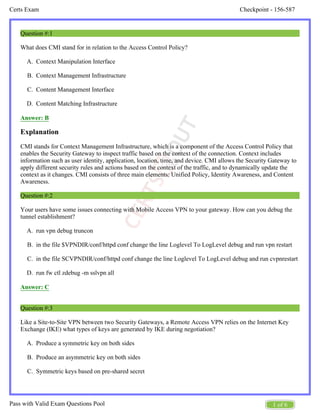
Question #:1
What does CMI stand for in relation to the Access Control Policy?
Context Manipulation Interface
Context Management Infrastructure
Content Management Interface
Content Matching Infrastructure
Answer: B
Explanation
CMI stands for Context Management Infrastructure, which is a component of the Access Control Policy that
enables the Security Gateway to inspect traffic based on the context of the connection. Context includes
information such as user identity, application, location, time, and device. CMI allows the Security Gateway to
apply different security rules and actions based on the context of the traffic, and to dynamically update the
context as it changes. CMI consists of three main elements: Unified Policy, Identity Awareness, and Content
Awareness.
Question #:2
Your users have some issues connecting with Mobile Access VPN to your gateway. How can you debug the
tunnel establishment?
run vpn debug truncon
in the file $VPNDIR/conf/httpd conf change the line Loglevel To LogLevel debug and run vpn restart
in the file SCVPNDIR/conf/httpd conf change the line Loglevel To LogLevel debug and run cvpnrestart
run fw ctl zdebug -m sslvpn all
Answer: C
Question #:3
Like a Site-to-Site VPN between two Security Gateways, a Remote Access VPN relies on the Internet Key
Exchange (IKE) what types of keys are generated by IKE during negotiation?
Produce a symmetric key on both sides
Produce an asymmetric key on both sides
Symmetric keys based on pre-shared secret
Checkpoint - 156-587
Certs Exam
2 of 6
Pass with Valid Exam Questions Pool
D.
A.
B.
C.
D.
A.
B.
C.
D.
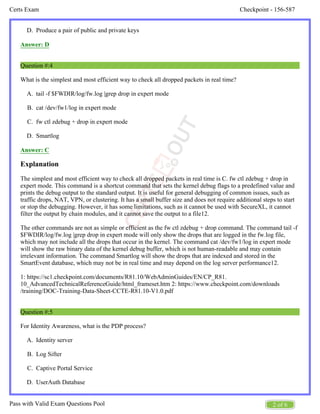
Produce a pair of public and private keys
Answer: D
Question #:4
What is the simplest and most efficient way to check all dropped packets in real time?
tail -f $FWDIR/log/fw.log |grep drop in expert mode
cat /dev/fw1/log in expert mode
fw ctl zdebug + drop in expert mode
Smartlog
Answer: C
Explanation
The simplest and most efficient way to check all dropped packets in real time is C. fw ctl zdebug + drop in
expert mode. This command is a shortcut command that sets the kernel debug flags to a predefined value and
prints the debug output to the standard output. It is useful for general debugging of common issues, such as
traffic drops, NAT, VPN, or clustering. It has a small buffer size and does not require additional steps to start
or stop the debugging. However, it has some limitations, such as it cannot be used with SecureXL, it cannot
filter the output by chain modules, and it cannot save the output to a file12.
The other commands are not as simple or efficient as the fw ctl zdebug + drop command. The command tail -f
$FWDIR/log/fw.log |grep drop in expert mode will only show the drops that are logged in the fw.log file,
which may not include all the drops that occur in the kernel. The command cat /dev/fw1/log in expert mode
will show the raw binary data of the kernel debug buffer, which is not human-readable and may contain
irrelevant information. The command Smartlog will show the drops that are indexed and stored in the
SmartEvent database, which may not be in real time and may depend on the log server performance12.
1: https://sc1.checkpoint.com/documents/R81.10/WebAdminGuides/EN/CP_R81.
10_AdvancedTechnicalReferenceGuide/html_frameset.htm 2: https://www.checkpoint.com/downloads
/training/DOC-Training-Data-Sheet-CCTE-R81.10-V1.0.pdf
Question #:5
For Identity Awareness, what is the PDP process?
Identity server
Log Sifter
Captive Portal Service
UserAuth Database
Checkpoint - 156-587
Certs Exam
3 of 6
Pass with Valid Exam Questions Pool
A.
B.
C.
D.
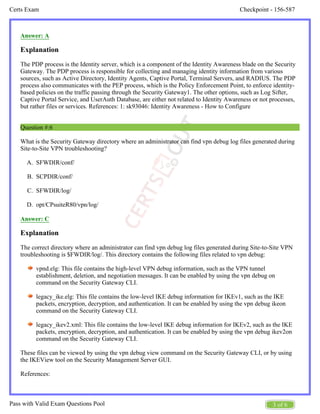
Answer: A
Explanation
The PDP process is the Identity server, which is a component of the Identity Awareness blade on the Security
Gateway. The PDP process is responsible for collecting and managing identity information from various
sources, such as Active Directory, Identity Agents, Captive Portal, Terminal Servers, and RADIUS. The PDP
process also communicates with the PEP process, which is the Policy Enforcement Point, to enforce identity-
based policies on the traffic passing through the Security Gateway1. The other options, such as Log Sifter,
Captive Portal Service, and UserAuth Database, are either not related to Identity Awareness or not processes,
but rather files or services. References: 1: sk93046: Identity Awareness - How to Configure
Question #:6
What is the Security Gateway directory where an administrator can find vpn debug log files generated during
Site-to-Site VPN troubleshooting?
SFWDIR/conf/
SCPDIR/conf/
SFWDIR/log/
opt/CPsuiteR80/vpn/log/
Answer: C
Explanation
The correct directory where an administrator can find vpn debug log files generated during Site-to-Site VPN
troubleshooting is $FWDIR/log/. This directory contains the following files related to vpn debug:
vpnd.elg: This file contains the high-level VPN debug information, such as the VPN tunnel
establishment, deletion, and negotiation messages. It can be enabled by using the vpn debug on
command on the Security Gateway CLI.
legacy_ike.elg: This file contains the low-level IKE debug information for IKEv1, such as the IKE
packets, encryption, decryption, and authentication. It can be enabled by using the vpn debug ikeon
command on the Security Gateway CLI.
legacy_ikev2.xml: This file contains the low-level IKE debug information for IKEv2, such as the IKE
packets, encryption, decryption, and authentication. It can be enabled by using the vpn debug ikev2on
command on the Security Gateway CLI.
These files can be viewed by using the vpn debug view command on the Security Gateway CLI, or by using
the IKEView tool on the Security Management Server GUI.
References:
Checkpoint - 156-587
Certs Exam
4 of 6
Pass with Valid Exam Questions Pool
A.
B.
C.
D.
A.
B.
C.
D.
vpn debug - Check Point Software
IKE Debug on R81 and above - Check Point CheckMates
(CCTE) - Check Point Software
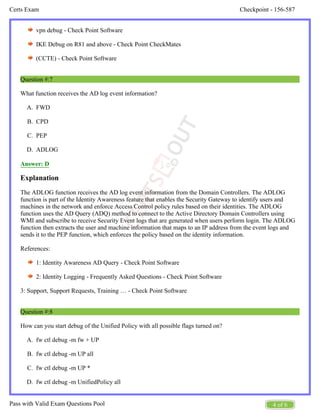
Question #:7
What function receives the AD log event information?
FWD
CPD
PEP
ADLOG
Answer: D
Explanation
The ADLOG function receives the AD log event information from the Domain Controllers. The ADLOG
function is part of the Identity Awareness feature that enables the Security Gateway to identify users and
machines in the network and enforce Access Control policy rules based on their identities. The ADLOG
function uses the AD Query (ADQ) method to connect to the Active Directory Domain Controllers using
WMI and subscribe to receive Security Event logs that are generated when users perform login. The ADLOG
function then extracts the user and machine information that maps to an IP address from the event logs and
sends it to the PEP function, which enforces the policy based on the identity information.
References:
1: Identity Awareness AD Query - Check Point Software
2: Identity Logging - Frequently Asked Questions - Check Point Software
3: Support, Support Requests, Training … - Check Point Software
Question #:8
How can you start debug of the Unified Policy with all possible flags turned on?
fw ctl debug -m fw + UP
fw ctl debug -m UP all
fw ctl debug -m UP *
fw ctl debug -m UnifiedPolicy all
Checkpoint - 156-587
Certs Exam
5 of 6
Pass with Valid Exam Questions Pool
A.
B.
C.
D.
A.
B.
C.
D.
Answer: B
Question #:9
Captive Portal, PDP and PEP run in what space?
User
CPM
FWD
Kernel
Answer: A
Question #:10
In some scenarios it is very helpful to use advanced Linux commands for troubleshooting purposes. Which
command displays information about resource utilization for running processes and shows additional
information for core utilization and memory?
top
vmstat
cptop
mpstat
Answer: A
Explanation
The top command is a Linux command that displays information about resource utilization for running
processes and shows additional information for core utilization and memory. The top command provides a
dynamic real-time view of the system, showing the processes that are consuming the most CPU, memory, and
other resources. The top command also shows the total number of processes, the system load average, the
uptime, and the CPU usage by user, system, and idle. The top command can be customized by using various
options and interactive commands to change the display, sort the processes, filter the output, and kill
processes.
The other commands are incorrect because:
B. vmstat is a Linux command that displays information about the virtual memory, CPU, disk, and
system activity. It does not show information about individual processes or core utilization.
Checkpoint - 156-587
Certs Exam
6 of 6
Pass with Valid Exam Questions Pool
C. cptop is a Check Point command that displays information about the firewall kernel activity, such as
the number of connections, packets, drops, and rejects. It does not show information about other
processes or memory usage.
D. mpstat is a Linux command that displays information about the CPU utilization by each processor or
core. It does not show information about processes or memory usage.
References:
top(1) - Linux manual page
vmstat(8) - Linux manual page
cptop - Check Point Software
mpstat(1) - Linux manual page
About certsout.com
certsout.com was founded in 2007. We provide latest & high quality IT / Business Certification Training Exam
Questions, Study Guides, Practice Tests.
We help you pass any IT / Business Certification Exams with 100% Pass Guaranteed or Full Refund. Especially
Cisco, CompTIA, Citrix, EMC, HP, Oracle, VMware, Juniper, Check Point, LPI, Nortel, EXIN and so on.
View list of all certification exams: All vendors
We prepare state-of-the art practice tests for certification exams. You can reach us at any of the email addresses
listed below.
Sales: sales@certsout.com
Feedback: feedback@certsout.com
Support: support@certsout.com
Any problems about IT certification or our products, You can write us back and we will get back to you within 24
hours.

CertsOut Checkpoint-156-587 exam dumps pdf

  • 1.
    Check Point Certified Troubleshooting Expert- R81.20 (CCTE) Version: Demo [ Total Questions: 10] Web: www.certsout.com Email: support@certsout.com Checkpoint 156-587
  • 2.
    IMPORTANT NOTICE Feedback We havedeveloped quality product and state-of-art service to ensure our customers interest. If you have any suggestions, please feel free to contact us at feedback@certsout.com Support If you have any questions about our product, please provide the following items: exam code screenshot of the question login id/email please contact us at and our technical experts will provide support within 24 hours. support@certsout.com Copyright The product of each order has its own encryption code, so you should use it independently. Any unauthorized changes will inflict legal punishment. We reserve the right of final explanation for this statement.
  • 3.
    Checkpoint - 156-587 CertsExam 1 of 6 Pass with Valid Exam Questions Pool A. B. C. D. A. B. C. D. A. B. C. D. Question #:1 What does CMI stand for in relation to the Access Control Policy? Context Manipulation Interface Context Management Infrastructure Content Management Interface Content Matching Infrastructure Answer: B Explanation CMI stands for Context Management Infrastructure, which is a component of the Access Control Policy that enables the Security Gateway to inspect traffic based on the context of the connection. Context includes information such as user identity, application, location, time, and device. CMI allows the Security Gateway to apply different security rules and actions based on the context of the traffic, and to dynamically update the context as it changes. CMI consists of three main elements: Unified Policy, Identity Awareness, and Content Awareness. Question #:2 Your users have some issues connecting with Mobile Access VPN to your gateway. How can you debug the tunnel establishment? run vpn debug truncon in the file $VPNDIR/conf/httpd conf change the line Loglevel To LogLevel debug and run vpn restart in the file SCVPNDIR/conf/httpd conf change the line Loglevel To LogLevel debug and run cvpnrestart run fw ctl zdebug -m sslvpn all Answer: C Question #:3 Like a Site-to-Site VPN between two Security Gateways, a Remote Access VPN relies on the Internet Key Exchange (IKE) what types of keys are generated by IKE during negotiation? Produce a symmetric key on both sides Produce an asymmetric key on both sides Symmetric keys based on pre-shared secret
  • 4.
    Checkpoint - 156-587 CertsExam 2 of 6 Pass with Valid Exam Questions Pool D. A. B. C. D. A. B. C. D. Produce a pair of public and private keys Answer: D Question #:4 What is the simplest and most efficient way to check all dropped packets in real time? tail -f $FWDIR/log/fw.log |grep drop in expert mode cat /dev/fw1/log in expert mode fw ctl zdebug + drop in expert mode Smartlog Answer: C Explanation The simplest and most efficient way to check all dropped packets in real time is C. fw ctl zdebug + drop in expert mode. This command is a shortcut command that sets the kernel debug flags to a predefined value and prints the debug output to the standard output. It is useful for general debugging of common issues, such as traffic drops, NAT, VPN, or clustering. It has a small buffer size and does not require additional steps to start or stop the debugging. However, it has some limitations, such as it cannot be used with SecureXL, it cannot filter the output by chain modules, and it cannot save the output to a file12. The other commands are not as simple or efficient as the fw ctl zdebug + drop command. The command tail -f $FWDIR/log/fw.log |grep drop in expert mode will only show the drops that are logged in the fw.log file, which may not include all the drops that occur in the kernel. The command cat /dev/fw1/log in expert mode will show the raw binary data of the kernel debug buffer, which is not human-readable and may contain irrelevant information. The command Smartlog will show the drops that are indexed and stored in the SmartEvent database, which may not be in real time and may depend on the log server performance12. 1: https://sc1.checkpoint.com/documents/R81.10/WebAdminGuides/EN/CP_R81. 10_AdvancedTechnicalReferenceGuide/html_frameset.htm 2: https://www.checkpoint.com/downloads /training/DOC-Training-Data-Sheet-CCTE-R81.10-V1.0.pdf Question #:5 For Identity Awareness, what is the PDP process? Identity server Log Sifter Captive Portal Service UserAuth Database
  • 5.
    Checkpoint - 156-587 CertsExam 3 of 6 Pass with Valid Exam Questions Pool A. B. C. D. Answer: A Explanation The PDP process is the Identity server, which is a component of the Identity Awareness blade on the Security Gateway. The PDP process is responsible for collecting and managing identity information from various sources, such as Active Directory, Identity Agents, Captive Portal, Terminal Servers, and RADIUS. The PDP process also communicates with the PEP process, which is the Policy Enforcement Point, to enforce identity- based policies on the traffic passing through the Security Gateway1. The other options, such as Log Sifter, Captive Portal Service, and UserAuth Database, are either not related to Identity Awareness or not processes, but rather files or services. References: 1: sk93046: Identity Awareness - How to Configure Question #:6 What is the Security Gateway directory where an administrator can find vpn debug log files generated during Site-to-Site VPN troubleshooting? SFWDIR/conf/ SCPDIR/conf/ SFWDIR/log/ opt/CPsuiteR80/vpn/log/ Answer: C Explanation The correct directory where an administrator can find vpn debug log files generated during Site-to-Site VPN troubleshooting is $FWDIR/log/. This directory contains the following files related to vpn debug: vpnd.elg: This file contains the high-level VPN debug information, such as the VPN tunnel establishment, deletion, and negotiation messages. It can be enabled by using the vpn debug on command on the Security Gateway CLI. legacy_ike.elg: This file contains the low-level IKE debug information for IKEv1, such as the IKE packets, encryption, decryption, and authentication. It can be enabled by using the vpn debug ikeon command on the Security Gateway CLI. legacy_ikev2.xml: This file contains the low-level IKE debug information for IKEv2, such as the IKE packets, encryption, decryption, and authentication. It can be enabled by using the vpn debug ikev2on command on the Security Gateway CLI. These files can be viewed by using the vpn debug view command on the Security Gateway CLI, or by using the IKEView tool on the Security Management Server GUI. References:
  • 6.
    Checkpoint - 156-587 CertsExam 4 of 6 Pass with Valid Exam Questions Pool A. B. C. D. A. B. C. D. vpn debug - Check Point Software IKE Debug on R81 and above - Check Point CheckMates (CCTE) - Check Point Software Question #:7 What function receives the AD log event information? FWD CPD PEP ADLOG Answer: D Explanation The ADLOG function receives the AD log event information from the Domain Controllers. The ADLOG function is part of the Identity Awareness feature that enables the Security Gateway to identify users and machines in the network and enforce Access Control policy rules based on their identities. The ADLOG function uses the AD Query (ADQ) method to connect to the Active Directory Domain Controllers using WMI and subscribe to receive Security Event logs that are generated when users perform login. The ADLOG function then extracts the user and machine information that maps to an IP address from the event logs and sends it to the PEP function, which enforces the policy based on the identity information. References: 1: Identity Awareness AD Query - Check Point Software 2: Identity Logging - Frequently Asked Questions - Check Point Software 3: Support, Support Requests, Training … - Check Point Software Question #:8 How can you start debug of the Unified Policy with all possible flags turned on? fw ctl debug -m fw + UP fw ctl debug -m UP all fw ctl debug -m UP * fw ctl debug -m UnifiedPolicy all
  • 7.
    Checkpoint - 156-587 CertsExam 5 of 6 Pass with Valid Exam Questions Pool A. B. C. D. A. B. C. D. Answer: B Question #:9 Captive Portal, PDP and PEP run in what space? User CPM FWD Kernel Answer: A Question #:10 In some scenarios it is very helpful to use advanced Linux commands for troubleshooting purposes. Which command displays information about resource utilization for running processes and shows additional information for core utilization and memory? top vmstat cptop mpstat Answer: A Explanation The top command is a Linux command that displays information about resource utilization for running processes and shows additional information for core utilization and memory. The top command provides a dynamic real-time view of the system, showing the processes that are consuming the most CPU, memory, and other resources. The top command also shows the total number of processes, the system load average, the uptime, and the CPU usage by user, system, and idle. The top command can be customized by using various options and interactive commands to change the display, sort the processes, filter the output, and kill processes. The other commands are incorrect because: B. vmstat is a Linux command that displays information about the virtual memory, CPU, disk, and system activity. It does not show information about individual processes or core utilization.
  • 8.
    Checkpoint - 156-587 CertsExam 6 of 6 Pass with Valid Exam Questions Pool C. cptop is a Check Point command that displays information about the firewall kernel activity, such as the number of connections, packets, drops, and rejects. It does not show information about other processes or memory usage. D. mpstat is a Linux command that displays information about the CPU utilization by each processor or core. It does not show information about processes or memory usage. References: top(1) - Linux manual page vmstat(8) - Linux manual page cptop - Check Point Software mpstat(1) - Linux manual page
  • 9.
    About certsout.com certsout.com wasfounded in 2007. We provide latest & high quality IT / Business Certification Training Exam Questions, Study Guides, Practice Tests. We help you pass any IT / Business Certification Exams with 100% Pass Guaranteed or Full Refund. Especially Cisco, CompTIA, Citrix, EMC, HP, Oracle, VMware, Juniper, Check Point, LPI, Nortel, EXIN and so on. View list of all certification exams: All vendors We prepare state-of-the art practice tests for certification exams. You can reach us at any of the email addresses listed below. Sales: sales@certsout.com Feedback: feedback@certsout.com Support: support@certsout.com Any problems about IT certification or our products, You can write us back and we will get back to you within 24 hours.