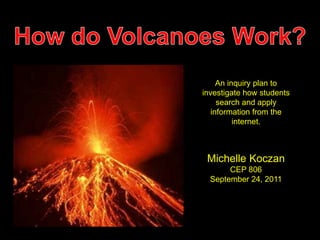
An inquiry plan to 
investigate how students 
search and apply 
information from the 
internet. 
Michelle Koczan 
CEP 806 
September 24, 2011
•With the growing use of technology for student 
research, educators need to ensure the students are well 
equipped with the tools that they need in order to 
conduct a meaningful internet search. 
• Working as a substitute teacher, I have had the 
opportunity to work with students of many different age 
groups. My most recent long term position was in 
second grade, and I observed that students did not 
understand how the internet could be used to find 
information. They most associated it with playing 
games.
• I currently do not have a classroom of my own, so I 
conducted my research on my niece who is in 8th grade, 
and my nephew who is 5th grade. 
• Both students have used the internet to conduct 
research for school projects many times. I was 
interested to see what kind of research skills that they 
possessed, having had this experience.
• Do the students know how to conduct a concise Internet search? 
a) When asked to search the Internet for particular topic, do 
they use specific information, or broad terms? 
• Do the students know how to evaluate a web page for useful 
information? 
a) Do they understand what credibility is? 
b) Can they determine whether it is a good source of 
information or a bad source of information? 
• Do the students know how to determine whether or not the 
information that they find is useful to them? 
a) While the information might apply to the broad topic they are 
searching for, does it specifically help to answer their 
research question?
• Students will use Google to conduct their research, and 
will choose the results that are listed first, and will view 
each page in order of how it is listed. 
 Google is the most advertised search engine, and 
many students are not even aware that other search 
engines exist. 
 Many students view their search results from the 
first one that is listed and go on down the list. The 
common misconception is that the top listed sites are 
the most relevant.
• The students will find sites about volcanoes that will be 
interactive, possibly with videos or animations, and a 
variety of photos and/or graphics. 
 This prediction is based on the fact that I know both 
students enjoy video games and things that are 
“visual”. This grasps their attention easily. 
 Students tend do enjoy websites that offer games 
to enhance learning. 
Volcanoes are unique, and students will concentrate 
on the eruption of the volcano by searching for 
photos.
• Using only internet resources, students are to find 
valuable websites to help them answer the question: 
How do Volcanoes work? 
• The students will present their information on their own 
“Glog” that they create on Glogster.com. This is an 
excellent, visually appealing way for students to exhibit 
their work and reveals their creative side. 
• Students will focus on key vocabulary terms: magma, 
lava, volcano, volcanic dust, vent, and volcanic ash to 
include in their research project.
• I approached my niece who is in 8th grade and 
described to her what my assignment was. She told me 
that she enjoys using the internet for projects at school. 
•I stated that I wanted her to use the internet to look for 
information on how volcanoes work. I told her that I 
wanted her to use key vocabulary words that I presented 
to her, and that she was to present her findings on her 
own Glog. 
•She was not familiar with Glogster.com, but once I 
introduced it to her and showed her examples of others’ 
work, she was ready to explore it.
• I let her begin her research while I sat near by and 
observed. She opened up Internet Explorer and went 
straight to Google. 
• The first thing that she searched was “volcanoes” 
which presented almost twenty million results. The first 
search that was listed was Wikipedia, and I was happy to 
see that she did not click on it. I asked her why she had 
skipped it, and she told me that they were not allowed to 
use Wikipedia at school.
• After viewing a few more websites she decided to turn to 
the vocabulary list that I gave her, and continued her 
research. 
• When the results showed up on Google, she did not view 
them in order from the first listed. She read the brief 
descriptions below to try and get a feel for what type of site it 
was. 
•She told me that she knew that sites that were scientific such 
as National Geographic and Discovery would be good sites to 
use because they were educational. These were sites that 
she had used before at school.
• Finally, she typed into Google, ‘How to volcanoes work?’ She 
was directed to a website with various diagrams and maps. She told 
me that diagrams are good sources because they are something 
that is true and can not be altered like photographs can be. 
• After observing her for about a half hour, I finally asked her what 
type of sites she thought are the best for this project. She told me 
that scientific sites and websites that have .gov or .org because they 
are “more reliable”. 
• I found that it was evident that basic internet research skills are 
being taught in my niece’s middle school. I was pleasantly surprised 
with her responses to my questions, and she really seemed to know 
what she was doing.
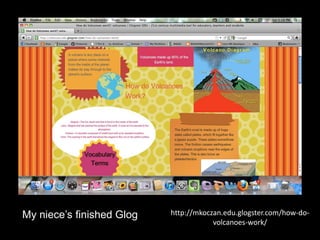
http://mkoczan.edu.glogster.com/how-do-volcanoes- 
work/ 
My niece’s finished Glog
• My nephew was much more nervous taking on this 
assignment than my niece was. He told me that he really like 
to play games and talk with his friends on the internet, and 
that he used the internet “sometimes” at school. 
•Once I told him that I was going to research volcanoes, he 
became more motivated. This was a topic that he was 
interested in, and thought was “really cool.” 
• My nephew was not familiar with Glogster either, and I 
presented the site to him in the same way that I had to my 
niece.
• He opened up Internet Explorer and the homepage is set 
to yahoo.com. He typed in the word “volcano” directly into the 
search bar. This site presented over 62 million hits. 
• The very first listing was an article from the Boston Globe 
about activity that was currently in the news. It was about a 
volcano in Alaska that was about to erupt. This was very 
different from Google. 
• He skimmed the article quite quickly and left the site. I 
asked him if he read the information, and he said that “there 
was too much writing and no pictures. I like pictures.”
• He also checked out Wikipedia. He had used this site 
before at school, and said that encyclopedias are where you 
are supposed to look up information. 
• He viewed several more websites that were listed, including 
some sites that we clearly unrelated. After about ten minutes, 
he seemed lost. 
• I told him that maybe he should use a word or words that 
were more specific. I reminded him of the vocabulary terms 
that I had given him. He then typed “How volcanoes work” 
into the search bar. After reviewing the list of sites, he went 
back to the search bar and selected “How volcanoes work for 
kids”.
• He went directly to the listing for Discovery for Kids which 
had the “Volcano Explorer”, and interactive tool with 
animations and diagrams. 
• He also discovered National Geographic for kids which 
explained and defined each of the vocabulary words that I had 
assigned. 
• My nephew finished the project with much more guidance 
from me than my niece required. He told me that “good 
science sites needed lots of pictures to help describe the 
information and to help people understand it better.”
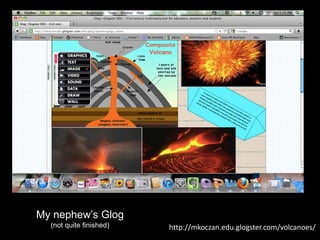
http://mkoczan.edu.glogster.com/volcanoes/ 
My nephew’s Glog 
(not quite finished)
• One of the trends that I noticed when observing my niece 
that she was looking for “scientific sites” that were well-known 
scientific sites, or sites that ended in .org or .gov. 
• One of the trends that I noticed with both students was that 
they looked for diagrams to help explain the information. 
• My first prediction before beginning my research was that 
the students would both use Google as their search engine. 
My niece did use Google, but my nephew used Yahoo, which 
was set to his homepage.
• In my first prediction, I stated that I thought the students 
would view the websites in the order that they showed up on 
the search engine. The 8th grade student read the brief 
description and evaluated whether or not she felt that it would 
be a good site. The fifth grade student on the other hand, did 
exactly as I had predicted. 
•After the students were finished with the project, I went over 
with them what I thought they did well, and gave some 
suggestions on things that I felt would help them in the future.
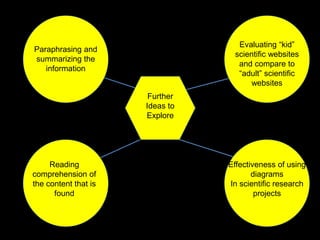
Paraphrasing and 
summarizing the 
information 
Reading 
comprehension of 
the content that is 
found 
Further 
Ideas to 
Explore 
Evaluating “kid” 
scientific websites 
and compare to 
“adult” scientific 
websites 
Effectiveness of using 
diagrams 
In scientific research 
projects
• I noticed that my nephew was instantly drawn in to 
sites that had animations, videos, or interactive 
components. He enjoys playing video games on the 
computer and on a gaming system at home. Could 
these types of sites be more appealing to boys who 
thrive on hands-on activities to learn new concepts? 
• Is internet based learning an effective way for students 
to master a concept?
• I was surprised at how knowledgeable my niece was with 
internet research. Not only did she know where and how to 
look for the information, but she knew what type of sites she 
should not use. 
• The observation of my nephew was very close to the what I 
had expected. I think that with some of the information that I 
gave him on how to look for information may lower his anxiety 
in research projects in the future.
• The predictions that I made initially turned out to be true for 
my students. However, I found it very helpful to observe the 
process in which my students went through to get to the end 
result. It had allowed for me to reflect upon the assignment, 
and revise how I would use this in the future in a classroom.
As an introduction to a project of this type in my classroom I 
would conduct two mini-lessons. 
• First I would provide a short list of websites for students 
to view, explore and evaluate. I think that it is important 
for students to be able to narrow down the information that 
they are looking for. I found this with both of my subjects. 
Both students began their search by simply typing in 
“volcanoes” and the search engine found millions of hits. 
• The second mini-lesson that I would use would be to 
have the class search a topic together on the over head, 
and I would model how using key words can narrow down 
search results.

Cep 806 inquiry project 1

  • 1.
    An inquiry planto investigate how students search and apply information from the internet. Michelle Koczan CEP 806 September 24, 2011
  • 2.
    •With the growinguse of technology for student research, educators need to ensure the students are well equipped with the tools that they need in order to conduct a meaningful internet search. • Working as a substitute teacher, I have had the opportunity to work with students of many different age groups. My most recent long term position was in second grade, and I observed that students did not understand how the internet could be used to find information. They most associated it with playing games.
  • 3.
    • I currentlydo not have a classroom of my own, so I conducted my research on my niece who is in 8th grade, and my nephew who is 5th grade. • Both students have used the internet to conduct research for school projects many times. I was interested to see what kind of research skills that they possessed, having had this experience.
  • 4.
    • Do thestudents know how to conduct a concise Internet search? a) When asked to search the Internet for particular topic, do they use specific information, or broad terms? • Do the students know how to evaluate a web page for useful information? a) Do they understand what credibility is? b) Can they determine whether it is a good source of information or a bad source of information? • Do the students know how to determine whether or not the information that they find is useful to them? a) While the information might apply to the broad topic they are searching for, does it specifically help to answer their research question?
  • 5.
    • Students willuse Google to conduct their research, and will choose the results that are listed first, and will view each page in order of how it is listed.  Google is the most advertised search engine, and many students are not even aware that other search engines exist.  Many students view their search results from the first one that is listed and go on down the list. The common misconception is that the top listed sites are the most relevant.
  • 6.
    • The studentswill find sites about volcanoes that will be interactive, possibly with videos or animations, and a variety of photos and/or graphics.  This prediction is based on the fact that I know both students enjoy video games and things that are “visual”. This grasps their attention easily.  Students tend do enjoy websites that offer games to enhance learning. Volcanoes are unique, and students will concentrate on the eruption of the volcano by searching for photos.
  • 7.
    • Using onlyinternet resources, students are to find valuable websites to help them answer the question: How do Volcanoes work? • The students will present their information on their own “Glog” that they create on Glogster.com. This is an excellent, visually appealing way for students to exhibit their work and reveals their creative side. • Students will focus on key vocabulary terms: magma, lava, volcano, volcanic dust, vent, and volcanic ash to include in their research project.
  • 8.
    • I approachedmy niece who is in 8th grade and described to her what my assignment was. She told me that she enjoys using the internet for projects at school. •I stated that I wanted her to use the internet to look for information on how volcanoes work. I told her that I wanted her to use key vocabulary words that I presented to her, and that she was to present her findings on her own Glog. •She was not familiar with Glogster.com, but once I introduced it to her and showed her examples of others’ work, she was ready to explore it.
  • 9.
    • I lether begin her research while I sat near by and observed. She opened up Internet Explorer and went straight to Google. • The first thing that she searched was “volcanoes” which presented almost twenty million results. The first search that was listed was Wikipedia, and I was happy to see that she did not click on it. I asked her why she had skipped it, and she told me that they were not allowed to use Wikipedia at school.
  • 10.
    • After viewinga few more websites she decided to turn to the vocabulary list that I gave her, and continued her research. • When the results showed up on Google, she did not view them in order from the first listed. She read the brief descriptions below to try and get a feel for what type of site it was. •She told me that she knew that sites that were scientific such as National Geographic and Discovery would be good sites to use because they were educational. These were sites that she had used before at school.
  • 11.
    • Finally, shetyped into Google, ‘How to volcanoes work?’ She was directed to a website with various diagrams and maps. She told me that diagrams are good sources because they are something that is true and can not be altered like photographs can be. • After observing her for about a half hour, I finally asked her what type of sites she thought are the best for this project. She told me that scientific sites and websites that have .gov or .org because they are “more reliable”. • I found that it was evident that basic internet research skills are being taught in my niece’s middle school. I was pleasantly surprised with her responses to my questions, and she really seemed to know what she was doing.
  • 12.
  • 13.
    • My nephewwas much more nervous taking on this assignment than my niece was. He told me that he really like to play games and talk with his friends on the internet, and that he used the internet “sometimes” at school. •Once I told him that I was going to research volcanoes, he became more motivated. This was a topic that he was interested in, and thought was “really cool.” • My nephew was not familiar with Glogster either, and I presented the site to him in the same way that I had to my niece.
  • 14.
    • He openedup Internet Explorer and the homepage is set to yahoo.com. He typed in the word “volcano” directly into the search bar. This site presented over 62 million hits. • The very first listing was an article from the Boston Globe about activity that was currently in the news. It was about a volcano in Alaska that was about to erupt. This was very different from Google. • He skimmed the article quite quickly and left the site. I asked him if he read the information, and he said that “there was too much writing and no pictures. I like pictures.”
  • 15.
    • He alsochecked out Wikipedia. He had used this site before at school, and said that encyclopedias are where you are supposed to look up information. • He viewed several more websites that were listed, including some sites that we clearly unrelated. After about ten minutes, he seemed lost. • I told him that maybe he should use a word or words that were more specific. I reminded him of the vocabulary terms that I had given him. He then typed “How volcanoes work” into the search bar. After reviewing the list of sites, he went back to the search bar and selected “How volcanoes work for kids”.
  • 16.
    • He wentdirectly to the listing for Discovery for Kids which had the “Volcano Explorer”, and interactive tool with animations and diagrams. • He also discovered National Geographic for kids which explained and defined each of the vocabulary words that I had assigned. • My nephew finished the project with much more guidance from me than my niece required. He told me that “good science sites needed lots of pictures to help describe the information and to help people understand it better.”
  • 17.
  • 18.
    • One ofthe trends that I noticed when observing my niece that she was looking for “scientific sites” that were well-known scientific sites, or sites that ended in .org or .gov. • One of the trends that I noticed with both students was that they looked for diagrams to help explain the information. • My first prediction before beginning my research was that the students would both use Google as their search engine. My niece did use Google, but my nephew used Yahoo, which was set to his homepage.
  • 19.
    • In myfirst prediction, I stated that I thought the students would view the websites in the order that they showed up on the search engine. The 8th grade student read the brief description and evaluated whether or not she felt that it would be a good site. The fifth grade student on the other hand, did exactly as I had predicted. •After the students were finished with the project, I went over with them what I thought they did well, and gave some suggestions on things that I felt would help them in the future.
  • 20.
    Paraphrasing and summarizingthe information Reading comprehension of the content that is found Further Ideas to Explore Evaluating “kid” scientific websites and compare to “adult” scientific websites Effectiveness of using diagrams In scientific research projects
  • 21.
    • I noticedthat my nephew was instantly drawn in to sites that had animations, videos, or interactive components. He enjoys playing video games on the computer and on a gaming system at home. Could these types of sites be more appealing to boys who thrive on hands-on activities to learn new concepts? • Is internet based learning an effective way for students to master a concept?
  • 22.
    • I wassurprised at how knowledgeable my niece was with internet research. Not only did she know where and how to look for the information, but she knew what type of sites she should not use. • The observation of my nephew was very close to the what I had expected. I think that with some of the information that I gave him on how to look for information may lower his anxiety in research projects in the future.
  • 23.
    • The predictionsthat I made initially turned out to be true for my students. However, I found it very helpful to observe the process in which my students went through to get to the end result. It had allowed for me to reflect upon the assignment, and revise how I would use this in the future in a classroom.
  • 24.
    As an introductionto a project of this type in my classroom I would conduct two mini-lessons. • First I would provide a short list of websites for students to view, explore and evaluate. I think that it is important for students to be able to narrow down the information that they are looking for. I found this with both of my subjects. Both students began their search by simply typing in “volcanoes” and the search engine found millions of hits. • The second mini-lesson that I would use would be to have the class search a topic together on the over head, and I would model how using key words can narrow down search results.