Cassandra: From tarball to production
Why talk about this?
You are about to deploy Cassandra
You are looking for “best practices”
You don’t want:
... to scour through the documentation
... to do something known not to work well
... to forget to cover some important step
What we won’t cover
● Cassandra: how does
it work?
● How do I design my
schema?
● What’s new in
Cassandra X.Y?
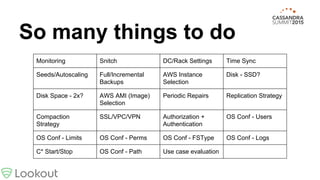
So many things to do
Monitoring Snitch DC/Rack Settings Time Sync
Seeds/Autoscaling Full/Incremental
Backups
AWS Instance
Selection
Disk - SSD?
Disk Space - 2x? AWS AMI (Image)
Selection
Periodic Repairs Replication Strategy
Compaction
Strategy
SSL/VPC/VPN Authorization +
Authentication
OS Conf - Users
OS Conf - Limits OS Conf - Perms OS Conf - FSType OS Conf - Logs
C* Start/Stop OS Conf - Path Use case evaluation
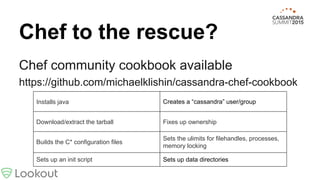
Chef to the rescue?
Chef community cookbook available
https://github.com/michaelklishin/cassandra-chef-cookbook
Installs java Creates a “cassandra” user/group
Download/extract the tarball Fixes up ownership
Builds the C* configuration files
Sets the ulimits for filehandles, processes,
memory locking
Sets up an init script Sets up data directories
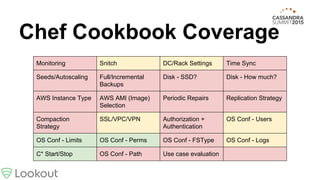
Chef Cookbook Coverage
Monitoring Snitch DC/Rack Settings Time Sync
Seeds/Autoscaling Full/Incremental
Backups
Disk - SSD? Disk - How much?
AWS Instance Type AWS AMI (Image)
Selection
Periodic Repairs Replication Strategy
Compaction
Strategy
SSL/VPC/VPN Authorization +
Authentication
OS Conf - Users
OS Conf - Limits OS Conf - Perms OS Conf - FSType OS Conf - Logs
C* Start/Stop OS Conf - Path Use case evaluation
Monitoring
Is every node answering queries?
Are nodes talking to each other?
Are any nodes running slowly?
Push UDP! (statsd)
http://hackers.lookout.com/2015/01/cassandra-monitoring/
https://github.com/lookout/cassandra-statsd-agent
Monitoring - Synthetic
Health checks, bad and good
● ‘nodetool status’ exit code
○ Might return 0 if the node is not accepting requests
○ Slow, cross node reads
● cqlsh -u sysmon -p password < /dev/null
● Verifies this node can read auth table
● https://github.com/lookout/cassandra-health-check
What about OpsCenter?
We chose not to use it
Want consistent interface for all monitoring
GUI vs Command Line argument
Didn’t see good auditing capabilities
Didn’t interface well with our chef solution
Snitch
Use the right snitch!
● AWS EC2MultiRegionSnitch
● Google? GoogleCloudSnitch
● GossipingPropertyFileSnitch
NOT
● SimpleSnitch (default)
Community cookbook: set it!
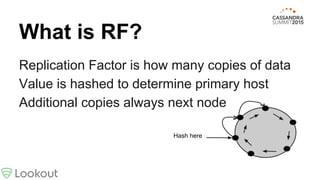
What is RF?
Replication Factor is how many copies of data
Value is hashed to determine primary host
Additional copies always next node
Hash here
What is CL?
Consistency Level -- It’s not RF!
Describes how many nodes must respond
before operation is considered COMPLETE
CL_ONE - only one node responds
CL_QUORUM - (RF/2)+1 nodes (round down)
CL_ALL - RF nodes respond
DC/Rack Settings
You might need to set these
Maybe you’re not in Amazon
Rack == Availability Zone?
Hard: Renaming DC or adding racks
Renaming DCs
Clients “remember” which DC they talk to
Renaming single DC causes all clients to fail
Better to spin up a new one than rename old
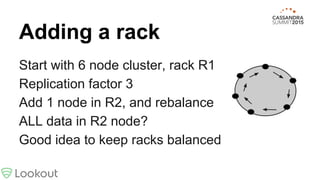
Adding a rack
Start with 6 node cluster, rack R1
Replication factor 3
Add 1 node in R2, and rebalance
ALL data in R2 node?
Good idea to keep racks balanced
I don’t have time for this
Clusters must have synchronized time
You will get lots of drift with: [0-3].amazon.pool.
ntp.org
Community cookbook doesn’t cover anything
here
Better make time for this
C* serializes write operations by time stamps
Clocks on virtual machines drift!
It’s the relative difference among clocks that matters
C* nodes should synchronize with each other
Solution: use a pair of peered NTP servers (level 2 or 3)
and a small set of known upstream providers
From a small seed…
Seeds are used for new nodes to find cluster
Every new node should use the same seeds
Seed nodes get topology changes faster
Each seed node must be in the config file
Multiple seeds per datacenter recommended
Tricky to configure on AWS
Backups - Full+Incremental
Nothing in the cookbooks for this
C* makes it “easy”: snapshot, then copy
Snapshots might require a lot more space
Remove the snapshot after copying it
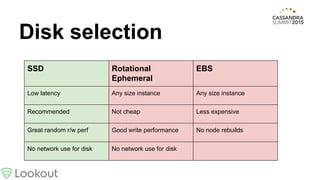
Disk selection
SSD Rotational
Ephemeral
EBS
Low latency Any size instance Any size instance
Recommended Not cheap Less expensive
Great random r/w perf Good write performance No node rebuilds
No network use for disk No network use for disk
AWS Instance Selection
We moved to EC2
c3.2xlarge (15GiB mem, Disk 160GB)?
i2.xlarge (30GiB mem, 800GB disk)
Max recommended storage per node is 1TB
Use instance types that support HVM
Some previous generation instance types, such as T1, C1, M1, and M2 do not support Linux HVM AMIs. Some current generation instance
types, such as T2, I2, R3, G2, and C4 do not support PV AMIs.
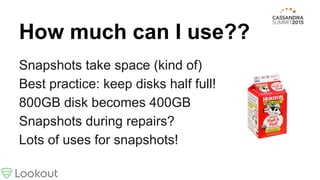
How much can I use??
Snapshots take space (kind of)
Best practice: keep disks half full!
800GB disk becomes 400GB
Snapshots during repairs?
Lots of uses for snapshots!
Periodic Repairs
Buried in the docs:
“As a best practice, you should
schedule repairs weekly”
http://www.datastax.com/documentation/cassandra/2.0/cassandra/operations/ops_repair_nodes_c.html
● “-pr” (yes)
● “-par” (maybe)
● “--in-local-dc” (no)
Repair Tips
Raise gc_grace_seconds (tombstones?)
Run on one node at a time
Schedule for low usage hours
Use “par” if you have dead time (faster)
Tune with: nodetool setcompactionthroughput
I thought I deleted that
Compaction removes “old” tombstones
10 day default grace period (gc_grace_period)
After that, deletes will not be propagated!
Run ‘nodetool repair’ at least every 10 days
Once a week is perfect (3 day grace)
Node down >7 days? ‘nodetool remove’ it!
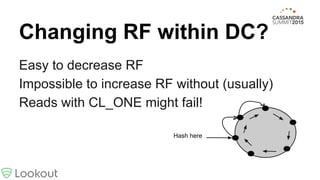
Changing RF within DC?
Easy to decrease RF
Impossible to increase RF without (usually)
Reads with CL_ONE might fail!
Hash here
Replication Strategy
How many replicas should we have?
What happens if some data is lost?
Are you write-heavy or read-heavy?
Quorum considerations: odd is better!
RF=1? RF=3? RF=5?
Magic JMX setting: reduce traffic to a node
Great when node is “behind” the 4 hour window
Used by gossiper to divert traffic during repairs
Writes: ok, read repair: ok, nodetool repair: ok
$ java -jar jmxterm.jar -l localhost:7199
$> set -b org.apache.cassandra.db:type=DynamicEndpointSnitch Severity
10000
Don’t be too severe!
Compaction Strategy
Solved by using a good C* design
SizeTiered or Leveled?
Leveled has better guarantees for read times
SizeTiered may require 10 (or more) reads!
Leveled uses less disk space
Leveled tombstone collection is slower
Auth*
Cookbooks default to OFF
Turn authenticator and authorizer on
‘cassandra’ user is super special
Requires QUORUM (cross-DC) for signon
LOCAL_ONE for all other users!
Users
OS users vs Cassandra users: 1 to 1?
Shared credentials for apps?
Nothing logs the user taking the action!
‘cassandra’ user is created by cookbook
All processes run as ‘cassandra’
Limits
Chef helps here! Startup:
ulimit -l unlimited # mem lock
ulimit -n 48000 # fds
/etc/security/limits.d
cassandra - nofile 48000
cassandra - nproc unlimited
cassandra - memlock unlimited
Filesystem Type
Officially supported: ext4 or XFS
XFS is slightly faster
Interesting options:
● ext4 without journal
● ext2
● zfs
Logs
To consolidate or not to consolidate?
Push or pull? Usually push!
FOSS: syslogd, syslog-ng, logstash/kibana,
heka, banana
Others: Splunk, SumoLogic, Loggly, Stackify
Shutdown
Nice init script with cookbook, steps are:
● nodetool disablethrift (no more clients)
● nodetool disablegossip (stop talking to
cluster)
● nodetool drain (flush all memtables)
● kill the jvm
Quick performance wins
● Disable assertions - cookbook property
● No swap space (or vm.swappiness=1)
● max_concurrent_reads
● max_concurrent_writes
Thank
You!@rkuris
ron.kuris@gmail.com

Cassandra from tarball to production

  • 1.
  • 2.
    Why talk aboutthis? You are about to deploy Cassandra You are looking for “best practices” You don’t want: ... to scour through the documentation ... to do something known not to work well ... to forget to cover some important step
  • 3.
    What we won’tcover ● Cassandra: how does it work? ● How do I design my schema? ● What’s new in Cassandra X.Y?
  • 4.
    So many thingsto do Monitoring Snitch DC/Rack Settings Time Sync Seeds/Autoscaling Full/Incremental Backups AWS Instance Selection Disk - SSD? Disk Space - 2x? AWS AMI (Image) Selection Periodic Repairs Replication Strategy Compaction Strategy SSL/VPC/VPN Authorization + Authentication OS Conf - Users OS Conf - Limits OS Conf - Perms OS Conf - FSType OS Conf - Logs C* Start/Stop OS Conf - Path Use case evaluation
  • 5.
    Chef to therescue? Chef community cookbook available https://github.com/michaelklishin/cassandra-chef-cookbook Installs java Creates a “cassandra” user/group Download/extract the tarball Fixes up ownership Builds the C* configuration files Sets the ulimits for filehandles, processes, memory locking Sets up an init script Sets up data directories
  • 6.
    Chef Cookbook Coverage MonitoringSnitch DC/Rack Settings Time Sync Seeds/Autoscaling Full/Incremental Backups Disk - SSD? Disk - How much? AWS Instance Type AWS AMI (Image) Selection Periodic Repairs Replication Strategy Compaction Strategy SSL/VPC/VPN Authorization + Authentication OS Conf - Users OS Conf - Limits OS Conf - Perms OS Conf - FSType OS Conf - Logs C* Start/Stop OS Conf - Path Use case evaluation
  • 7.
    Monitoring Is every nodeanswering queries? Are nodes talking to each other? Are any nodes running slowly? Push UDP! (statsd) http://hackers.lookout.com/2015/01/cassandra-monitoring/ https://github.com/lookout/cassandra-statsd-agent
  • 8.
    Monitoring - Synthetic Healthchecks, bad and good ● ‘nodetool status’ exit code ○ Might return 0 if the node is not accepting requests ○ Slow, cross node reads ● cqlsh -u sysmon -p password < /dev/null ● Verifies this node can read auth table ● https://github.com/lookout/cassandra-health-check
  • 9.
    What about OpsCenter? Wechose not to use it Want consistent interface for all monitoring GUI vs Command Line argument Didn’t see good auditing capabilities Didn’t interface well with our chef solution
  • 10.
    Snitch Use the rightsnitch! ● AWS EC2MultiRegionSnitch ● Google? GoogleCloudSnitch ● GossipingPropertyFileSnitch NOT ● SimpleSnitch (default) Community cookbook: set it!
  • 11.
    What is RF? ReplicationFactor is how many copies of data Value is hashed to determine primary host Additional copies always next node Hash here
  • 12.
    What is CL? ConsistencyLevel -- It’s not RF! Describes how many nodes must respond before operation is considered COMPLETE CL_ONE - only one node responds CL_QUORUM - (RF/2)+1 nodes (round down) CL_ALL - RF nodes respond
  • 13.
    DC/Rack Settings You mightneed to set these Maybe you’re not in Amazon Rack == Availability Zone? Hard: Renaming DC or adding racks
  • 14.
    Renaming DCs Clients “remember”which DC they talk to Renaming single DC causes all clients to fail Better to spin up a new one than rename old
  • 15.
    Adding a rack Startwith 6 node cluster, rack R1 Replication factor 3 Add 1 node in R2, and rebalance ALL data in R2 node? Good idea to keep racks balanced
  • 16.
    I don’t havetime for this Clusters must have synchronized time You will get lots of drift with: [0-3].amazon.pool. ntp.org Community cookbook doesn’t cover anything here
  • 17.
    Better make timefor this C* serializes write operations by time stamps Clocks on virtual machines drift! It’s the relative difference among clocks that matters C* nodes should synchronize with each other Solution: use a pair of peered NTP servers (level 2 or 3) and a small set of known upstream providers
  • 18.
    From a smallseed… Seeds are used for new nodes to find cluster Every new node should use the same seeds Seed nodes get topology changes faster Each seed node must be in the config file Multiple seeds per datacenter recommended Tricky to configure on AWS
  • 19.
    Backups - Full+Incremental Nothingin the cookbooks for this C* makes it “easy”: snapshot, then copy Snapshots might require a lot more space Remove the snapshot after copying it
  • 20.
    Disk selection SSD Rotational Ephemeral EBS Lowlatency Any size instance Any size instance Recommended Not cheap Less expensive Great random r/w perf Good write performance No node rebuilds No network use for disk No network use for disk
  • 21.
    AWS Instance Selection Wemoved to EC2 c3.2xlarge (15GiB mem, Disk 160GB)? i2.xlarge (30GiB mem, 800GB disk) Max recommended storage per node is 1TB Use instance types that support HVM Some previous generation instance types, such as T1, C1, M1, and M2 do not support Linux HVM AMIs. Some current generation instance types, such as T2, I2, R3, G2, and C4 do not support PV AMIs.
  • 22.
    How much canI use?? Snapshots take space (kind of) Best practice: keep disks half full! 800GB disk becomes 400GB Snapshots during repairs? Lots of uses for snapshots!
  • 23.
    Periodic Repairs Buried inthe docs: “As a best practice, you should schedule repairs weekly” http://www.datastax.com/documentation/cassandra/2.0/cassandra/operations/ops_repair_nodes_c.html ● “-pr” (yes) ● “-par” (maybe) ● “--in-local-dc” (no)
  • 24.
    Repair Tips Raise gc_grace_seconds(tombstones?) Run on one node at a time Schedule for low usage hours Use “par” if you have dead time (faster) Tune with: nodetool setcompactionthroughput
  • 25.
    I thought Ideleted that Compaction removes “old” tombstones 10 day default grace period (gc_grace_period) After that, deletes will not be propagated! Run ‘nodetool repair’ at least every 10 days Once a week is perfect (3 day grace) Node down >7 days? ‘nodetool remove’ it!
  • 26.
    Changing RF withinDC? Easy to decrease RF Impossible to increase RF without (usually) Reads with CL_ONE might fail! Hash here
  • 27.
    Replication Strategy How manyreplicas should we have? What happens if some data is lost? Are you write-heavy or read-heavy? Quorum considerations: odd is better! RF=1? RF=3? RF=5?
  • 28.
    Magic JMX setting:reduce traffic to a node Great when node is “behind” the 4 hour window Used by gossiper to divert traffic during repairs Writes: ok, read repair: ok, nodetool repair: ok $ java -jar jmxterm.jar -l localhost:7199 $> set -b org.apache.cassandra.db:type=DynamicEndpointSnitch Severity 10000 Don’t be too severe!
  • 29.
    Compaction Strategy Solved byusing a good C* design SizeTiered or Leveled? Leveled has better guarantees for read times SizeTiered may require 10 (or more) reads! Leveled uses less disk space Leveled tombstone collection is slower
  • 30.
    Auth* Cookbooks default toOFF Turn authenticator and authorizer on ‘cassandra’ user is super special Requires QUORUM (cross-DC) for signon LOCAL_ONE for all other users!
  • 31.
    Users OS users vsCassandra users: 1 to 1? Shared credentials for apps? Nothing logs the user taking the action! ‘cassandra’ user is created by cookbook All processes run as ‘cassandra’
  • 32.
    Limits Chef helps here!Startup: ulimit -l unlimited # mem lock ulimit -n 48000 # fds /etc/security/limits.d cassandra - nofile 48000 cassandra - nproc unlimited cassandra - memlock unlimited
  • 33.
    Filesystem Type Officially supported:ext4 or XFS XFS is slightly faster Interesting options: ● ext4 without journal ● ext2 ● zfs
  • 34.
    Logs To consolidate ornot to consolidate? Push or pull? Usually push! FOSS: syslogd, syslog-ng, logstash/kibana, heka, banana Others: Splunk, SumoLogic, Loggly, Stackify
  • 35.
    Shutdown Nice init scriptwith cookbook, steps are: ● nodetool disablethrift (no more clients) ● nodetool disablegossip (stop talking to cluster) ● nodetool drain (flush all memtables) ● kill the jvm
  • 36.
    Quick performance wins ●Disable assertions - cookbook property ● No swap space (or vm.swappiness=1) ● max_concurrent_reads ● max_concurrent_writes
  • 37.