Cassandra for Barcodes, Products and Scans:

                       The Backend Infrastructure at Scandit


Christof Roduner
Co-founder and COO
christof@scandit.com   Link: NoSQL concept and data model

@scandit
www.scandit.com                                             February 1, 2012
AGENDA
2


       About Scandit

       Requirements

       Apache Cassandra

       Scandit backend
WHAT IS SCANDIT?
3


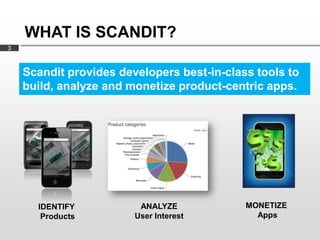
    Scandit provides developers best-in-class tools to
    build, analyze and monetize product-centric apps.


      IDENTIFY           ANALYZE            MONETIZE
       Products         User Interest         Apps
ANALYZE:
    THE SCANALYTICS PLATFORM
4

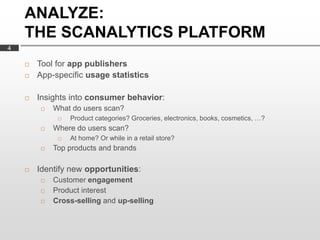
       Tool for app publishers
       App-specific usage statistics

       Insights into consumer behavior:
           What do users scan?
                Product categories? Groceries, electronics, books, cosmetics, …?
           Where do users scan?
                At home? Or while in a retail store?
           Top products and brands

       Identify new opportunities:
           Customer engagement
           Product interest
           Cross-selling and up-selling
BACKEND REQUIREMENTS
5

       Product database
            Many millions of products
            Many different data sources
            Curation of product data (filtering, etc.)


       Analysis of scans
            Accept and store high volumes of scans
            Generate statistics over extended time periods
            Correlate with product data


       Provide reports to developers
BACKEND DESIGN GOALS
6

       Scalability
            High-volume storage
            High-volume throughput
            Support large number of concurrent client requests (app)


       Availability

       Low maintenance
WHICH DATABASE?
7


    Apache Cassandra
     Large, distributed key-value store (DHT)

     «NoSQL» Polyglot Persistence

     Inspired by:

            Amazon’s Dynamo distributed storage system
            Google’s BigTable data model
       Originally developed at Facebook
            Inbox search
WHY DID WE CHOOSE IT?
8

       Looked very fast
            Even when data is much larger than RAM


       Performs well in write-heavy environment

       Proven scalability
            Without downtime

       Tunable replication

       Easy to run and maintain
            No sharding
            All nodes are the same - no coordinators, masters, slaves, …

       Data model
            YMMV…
WHAT YOU HAVE TO GIVE UP
9


       Joins
       Referential integrity
       Transactions
       Expressive query language
       Consistency (tunable, but…)

       Limited support for:
            Schema
            Secondary indices
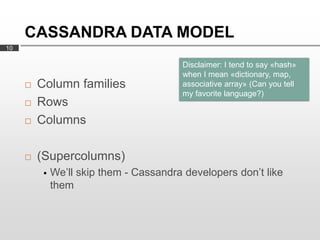
CASSANDRA DATA MODEL
10

                                         Disclaimer: I tend to say «hash»
                                         when I mean «dictionary, map,
        Column families                 associative array» (Can you tell
                                         my favorite language?)
        Rows
        Columns

        (Supercolumns)
             We’ll skip them - Cassandra developers don’t like
              them
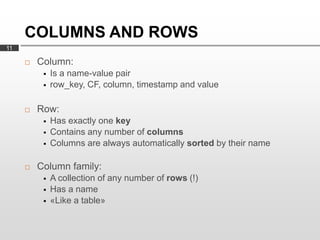
COLUMNS AND ROWS
11

        Column:
             Is a name-value pair
             row_key, CF, column, timestamp and value

        Row:
             Has exactly one key
             Contains any number of columns
             Columns are always automatically sorted by their name

        Column family:
             A collection of any number of rows (!)
             Has a name
             «Like a table»
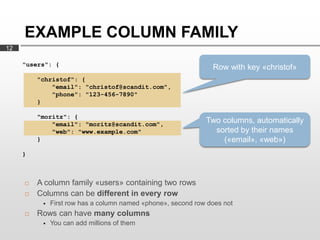
EXAMPLE COLUMN FAMILY
12

     "users": {
                                                                Row with key «christof»
         "christof": {
             "email": "christof@scandit.com",
             "phone": "123-456-7890"
         }

         "moritz": {
             "email": "moritz@scandit.com",
                                                              Two columns, automatically
             "web": "www.example.com"                           sorted by their names
         }                                                        («email», «web»)
     }


        A column family «users» containing two rows
        Columns can be different in every row
             First row has a column named «phone», second row does not
        Rows can have many columns
             You can add millions of them
DATA IN COLUMN NAMES
13

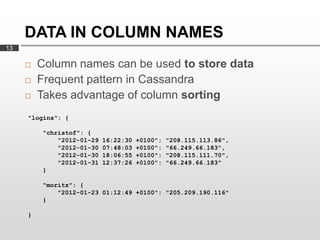
        Column names can be used to store data
        Frequent pattern in Cassandra
        Takes advantage of column sorting
     "logins": {

         "christof": {
             "2012-01-29   16:22:30   +0100":   "208.115.113.86",
             "2012-01-30   07:48:03   +0100":   "66.249.66.183",
             "2012-01-30   18:06:55   +0100":   "208.115.111.70",
             "2012-01-31   12:37:26   +0100":   "66.249.66.183"
         }

         "moritz": {
             "2012-01-23 01:12:49 +0100": "205.209.190.116"
         }

     }
SCHEMA AND DATA TYPES
14

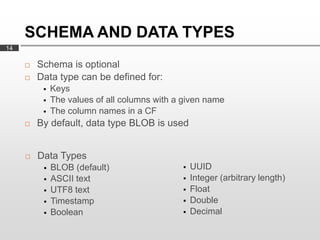
        Schema is optional
        Data type can be defined for:
             Keys
             The values of all columns with a given name
             The column names in a CF
        By default, data type BLOB is used


        Data Types
             BLOB (default)                     UUID
             ASCII text                         Integer (arbitrary length)
             UTF8 text                          Float
             Timestamp                          Double
             Boolean                            Decimal
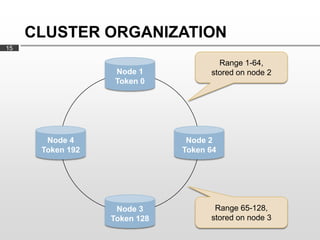
CLUSTER ORGANIZATION
15

                                      Range 1-64,
                   Node 1           stored on node 2
                   Token 0


       Node 4                  Node 2
      Token 192               Token 64


                   Node 3            Range 65-128,
                  Token 128         stored on node 3
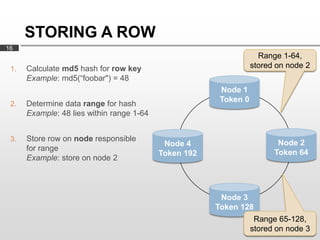
STORING A ROW
16
                                                                    Range 1-64,
 1.   Calculate md5 hash for row key                              stored on node 2
      Example: md5(“foobar") = 48
                                                        Node 1
                                                        Token 0
 2.   Determine data range for hash
      Example: 48 lies within range 1-64


 3.   Store row on node responsible
                                            Node 4                       Node 2
      for range
                                           Token 192                    Token 64
      Example: store on node 2


                                                        Node 3
                                                       Token 128
                                                                   Range 65-128,
                                                                  stored on node 3
IMPLICATIONS
17


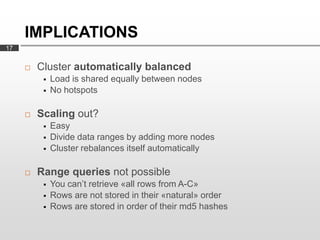
        Cluster automatically balanced
             Load is shared equally between nodes
             No hotspots

        Scaling out?
             Easy
             Divide data ranges by adding more nodes
             Cluster rebalances itself automatically

        Range queries not possible
             You can’t retrieve «all rows from A-C»
             Rows are not stored in their «natural» order
             Rows are stored in order of their md5 hashes
IF YOU NEED RANGE QUERIES…
18


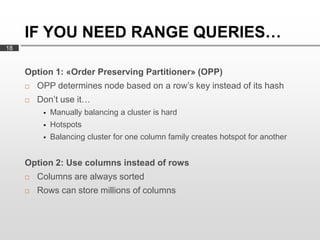
     Option 1: «Order Preserving Partitioner» (OPP)
        OPP determines node based on a row’s key instead of its hash
        Don’t use it…
             Manually balancing a cluster is hard
             Hotspots
             Balancing cluster for one column family creates hotspot for another


     Option 2: Use columns instead of rows
        Columns are always sorted
        Rows can store millions of columns
REPLICATION
19


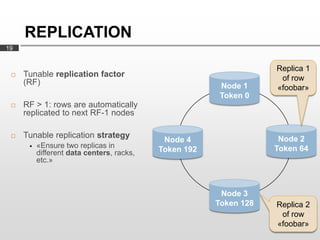
                                                                   Replica 1
    Tunable replication factor                                     of row
     (RF)                                               Node 1     «foobar»
                                                        Token 0
    RF > 1: rows are automatically
     replicated to next RF-1 nodes

    Tunable replication strategy                                   Node 2
                                            Node 4
         «Ensure two replicas in                                  Token 64
          different data centers, racks,   Token 192
          etc.»


                                                        Node 3
                                                       Token 128   Replica 2
                                                                    of row
                                                                   «foobar»
CLIENT ACCESS
20

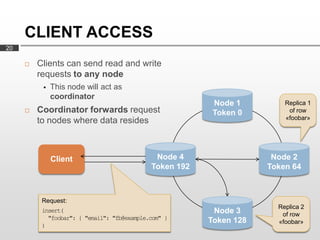
        Clients can send read and write
         requests to any node
             This node will act as
              coordinator
                                                          Node 1         Replica 1
        Coordinator forwards request                     Token 0         of row
         to nodes where data resides                                     «foobar»


              Client                          Node 4                  Node 2
                                             Token 192               Token 64


          Request:
                                                                       Replica 2
          insert(                                         Node 3        of row
            "foobar": { "email": "fb@example.com" }      Token 128     «foobar»
          )
CONSISTENCY LEVELS
21

        For all requests, clients can set a consistency level (CL)

        For writes:
             CL defines how many replicas must be written before
              «success» is returned to client

        For reads:
             CL defines how many replicas must respond before result is
              returned to client

        Consistency levels:
             ONE
             QUORUM
             ALL
             … (data center-aware levels)
INCONSISTENT DATA
22

        Example scenario:
             Replication factor 2
             Two existing replica for row «foobar»
             Client overwrites existing columns in «foobar»
             Replica 2 is down

        What happens:
             Column is updated in replica 1, but not replica 2 (even with CL=ALL !)

        Timestamps to the rescue
             Every column has a timestamp
             Timestamps are supplied by clients
             Upon read, column with latest timestamp wins

        →Use NTP
PREVENTING INCONSISTENCIES
23

        Read repair

        Hinted handoff

        Anti entropy
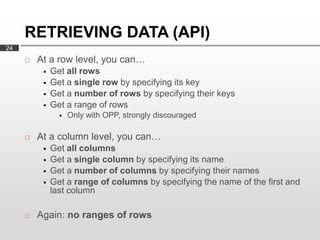
RETRIEVING DATA (API)
24
        At a row level, you can…
             Get all rows
             Get a single row by specifying its key
             Get a number of rows by specifying their keys
             Get a range of rows
                   Only with OPP, strongly discouraged

        At a column level, you can…
             Get all columns
             Get a single column by specifying its name
             Get a number of columns by specifying their names
             Get a range of columns by specifying the name of the first and
              last column

        Again: no ranges of rows
CASSANDRA QUERY LANGUAGE
     (CQL)
25


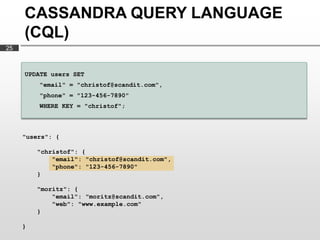
     UPDATE users SET
         "email" = "christof@scandit.com",
         "phone" = "123-456-7890"
         WHERE KEY = "christof";


     "users": {

         "christof": {
             "email": "christof@scandit.com",
             "phone": "123-456-7890"
         }

         "moritz": {
             "email": "moritz@scandit.com",
             "web": "www.example.com"
         }

     }
CASSANDRA QUERY LANGUAGE
     (CQL)
26


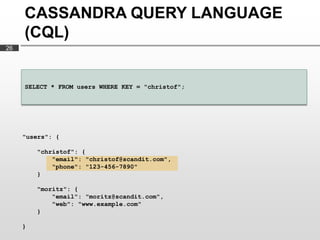
     SELECT * FROM users WHERE KEY = "christof";


     "users": {

         "christof": {
             "email": "christof@scandit.com",
             "phone": "123-456-7890"
         }

         "moritz": {
             "email": "moritz@scandit.com",
             "web": "www.example.com"
         }

     }
CASSANDRA QUERY LANGUAGE
     (CQL)
27


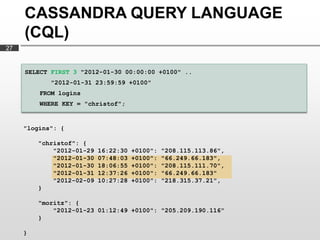
     SELECT FIRST 3 "2012-01-30 00:00:00 +0100" ..
            "2012-01-31 23:59:59 +0100"
         FROM logins
         WHERE KEY = "christof";


     "logins": {

         "christof": {
             "2012-01-29   16:22:30   +0100":   "208.115.113.86",
             "2012-01-30   07:48:03   +0100":   "66.249.66.183",
             "2012-01-30   18:06:55   +0100":   "208.115.111.70",
             "2012-01-31   12:37:26   +0100":   "66.249.66.183"
             "2012-02-09   10:27:28   +0100":   "218.315.37.21",
         }

         "moritz": {
             "2012-01-23 01:12:49 +0100": "205.209.190.116"
         }

     }
SECONDARY INDICES
28

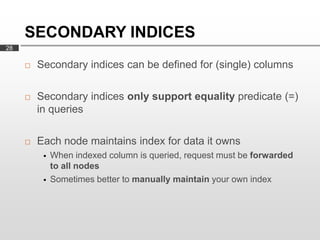
        Secondary indices can be defined for (single) columns

        Secondary indices only support equality predicate (=)
         in queries

        Each node maintains index for data it owns
             When indexed column is queried, request must be forwarded
              to all nodes
             Sometimes better to manually maintain your own index
PRODUCTION EXPERIENCE
29

        No stability issues

        Very fast

        Language bindings don’t have the same quality
             Out of sync, bugs

        Data model is a mental twist

        Design-time decisions sometimes hard to change

        Rudimentary access control
TRYING OUT CASSANDRA
30


        DataStax website
             Company founded by Cassandra developers
             Provides
                   Documentation
                   Amazon Machine Image


        Apache website

        Mailing lists
CLUSTER AT SCANDIT
31


        Several nodes in two data centers

        Linux machines

        Identical setup on every node
             Allows for easy failover
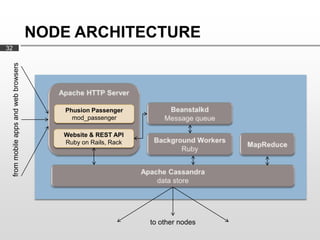
NODE ARCHITECTURE
32
     from mobile apps and web browsers


                                            Phusion Passenger
                                              mod_passenger

                                            Website & REST API
                                            Ruby on Rails, Rack


                                                                  to other nodes
THANK YOU!

www.scandit.com

Cassandra 2012 scandit

  • 1.
    Cassandra for Barcodes,Products and Scans: The Backend Infrastructure at Scandit Christof Roduner Co-founder and COO christof@scandit.com Link: NoSQL concept and data model @scandit www.scandit.com February 1, 2012
  • 2.
    AGENDA 2  About Scandit  Requirements  Apache Cassandra  Scandit backend
  • 3.
    WHAT IS SCANDIT? 3 Scandit provides developers best-in-class tools to build, analyze and monetize product-centric apps. IDENTIFY ANALYZE MONETIZE Products User Interest Apps
  • 4.
    ANALYZE: THE SCANALYTICS PLATFORM 4  Tool for app publishers  App-specific usage statistics  Insights into consumer behavior:  What do users scan?  Product categories? Groceries, electronics, books, cosmetics, …?  Where do users scan?  At home? Or while in a retail store?  Top products and brands  Identify new opportunities:  Customer engagement  Product interest  Cross-selling and up-selling
  • 5.
    BACKEND REQUIREMENTS 5  Product database  Many millions of products  Many different data sources  Curation of product data (filtering, etc.)  Analysis of scans  Accept and store high volumes of scans  Generate statistics over extended time periods  Correlate with product data  Provide reports to developers
  • 6.
    BACKEND DESIGN GOALS 6  Scalability  High-volume storage  High-volume throughput  Support large number of concurrent client requests (app)  Availability  Low maintenance
  • 7.
    WHICH DATABASE? 7 Apache Cassandra  Large, distributed key-value store (DHT)  «NoSQL» Polyglot Persistence  Inspired by:  Amazon’s Dynamo distributed storage system  Google’s BigTable data model  Originally developed at Facebook  Inbox search
  • 8.
    WHY DID WECHOOSE IT? 8  Looked very fast  Even when data is much larger than RAM  Performs well in write-heavy environment  Proven scalability  Without downtime  Tunable replication  Easy to run and maintain  No sharding  All nodes are the same - no coordinators, masters, slaves, …  Data model  YMMV…
  • 9.
    WHAT YOU HAVETO GIVE UP 9  Joins  Referential integrity  Transactions  Expressive query language  Consistency (tunable, but…)  Limited support for:  Schema  Secondary indices
  • 10.
    CASSANDRA DATA MODEL 10 Disclaimer: I tend to say «hash» when I mean «dictionary, map,  Column families associative array» (Can you tell my favorite language?)  Rows  Columns  (Supercolumns)  We’ll skip them - Cassandra developers don’t like them
  • 11.
    COLUMNS AND ROWS 11  Column:  Is a name-value pair  row_key, CF, column, timestamp and value  Row:  Has exactly one key  Contains any number of columns  Columns are always automatically sorted by their name  Column family:  A collection of any number of rows (!)  Has a name  «Like a table»
  • 12.
    EXAMPLE COLUMN FAMILY 12 "users": { Row with key «christof» "christof": { "email": "christof@scandit.com", "phone": "123-456-7890" } "moritz": { "email": "moritz@scandit.com", Two columns, automatically "web": "www.example.com" sorted by their names } («email», «web») }  A column family «users» containing two rows  Columns can be different in every row  First row has a column named «phone», second row does not  Rows can have many columns  You can add millions of them
  • 13.
    DATA IN COLUMNNAMES 13  Column names can be used to store data  Frequent pattern in Cassandra  Takes advantage of column sorting "logins": { "christof": { "2012-01-29 16:22:30 +0100": "208.115.113.86", "2012-01-30 07:48:03 +0100": "66.249.66.183", "2012-01-30 18:06:55 +0100": "208.115.111.70", "2012-01-31 12:37:26 +0100": "66.249.66.183" } "moritz": { "2012-01-23 01:12:49 +0100": "205.209.190.116" } }
  • 14.
    SCHEMA AND DATATYPES 14  Schema is optional  Data type can be defined for:  Keys  The values of all columns with a given name  The column names in a CF  By default, data type BLOB is used  Data Types  BLOB (default)  UUID  ASCII text  Integer (arbitrary length)  UTF8 text  Float  Timestamp  Double  Boolean  Decimal
  • 15.
    CLUSTER ORGANIZATION 15 Range 1-64, Node 1 stored on node 2 Token 0 Node 4 Node 2 Token 192 Token 64 Node 3 Range 65-128, Token 128 stored on node 3
  • 16.
    STORING A ROW 16 Range 1-64, 1. Calculate md5 hash for row key stored on node 2 Example: md5(“foobar") = 48 Node 1 Token 0 2. Determine data range for hash Example: 48 lies within range 1-64 3. Store row on node responsible Node 4 Node 2 for range Token 192 Token 64 Example: store on node 2 Node 3 Token 128 Range 65-128, stored on node 3
  • 17.
    IMPLICATIONS 17  Cluster automatically balanced  Load is shared equally between nodes  No hotspots  Scaling out?  Easy  Divide data ranges by adding more nodes  Cluster rebalances itself automatically  Range queries not possible  You can’t retrieve «all rows from A-C»  Rows are not stored in their «natural» order  Rows are stored in order of their md5 hashes
  • 18.
    IF YOU NEEDRANGE QUERIES… 18 Option 1: «Order Preserving Partitioner» (OPP)  OPP determines node based on a row’s key instead of its hash  Don’t use it…  Manually balancing a cluster is hard  Hotspots  Balancing cluster for one column family creates hotspot for another Option 2: Use columns instead of rows  Columns are always sorted  Rows can store millions of columns
  • 19.
    REPLICATION 19 Replica 1  Tunable replication factor of row (RF) Node 1 «foobar» Token 0  RF > 1: rows are automatically replicated to next RF-1 nodes  Tunable replication strategy Node 2 Node 4  «Ensure two replicas in Token 64 different data centers, racks, Token 192 etc.» Node 3 Token 128 Replica 2 of row «foobar»
  • 20.
    CLIENT ACCESS 20  Clients can send read and write requests to any node  This node will act as coordinator Node 1 Replica 1  Coordinator forwards request Token 0 of row to nodes where data resides «foobar» Client Node 4 Node 2 Token 192 Token 64 Request: Replica 2 insert( Node 3 of row "foobar": { "email": "fb@example.com" } Token 128 «foobar» )
  • 21.
    CONSISTENCY LEVELS 21  For all requests, clients can set a consistency level (CL)  For writes:  CL defines how many replicas must be written before «success» is returned to client  For reads:  CL defines how many replicas must respond before result is returned to client  Consistency levels:  ONE  QUORUM  ALL  … (data center-aware levels)
  • 22.
    INCONSISTENT DATA 22  Example scenario:  Replication factor 2  Two existing replica for row «foobar»  Client overwrites existing columns in «foobar»  Replica 2 is down  What happens:  Column is updated in replica 1, but not replica 2 (even with CL=ALL !)  Timestamps to the rescue  Every column has a timestamp  Timestamps are supplied by clients  Upon read, column with latest timestamp wins  →Use NTP
  • 23.
    PREVENTING INCONSISTENCIES 23  Read repair  Hinted handoff  Anti entropy
  • 24.
    RETRIEVING DATA (API) 24  At a row level, you can…  Get all rows  Get a single row by specifying its key  Get a number of rows by specifying their keys  Get a range of rows  Only with OPP, strongly discouraged  At a column level, you can…  Get all columns  Get a single column by specifying its name  Get a number of columns by specifying their names  Get a range of columns by specifying the name of the first and last column  Again: no ranges of rows
  • 25.
    CASSANDRA QUERY LANGUAGE (CQL) 25 UPDATE users SET "email" = "christof@scandit.com", "phone" = "123-456-7890" WHERE KEY = "christof"; "users": { "christof": { "email": "christof@scandit.com", "phone": "123-456-7890" } "moritz": { "email": "moritz@scandit.com", "web": "www.example.com" } }
  • 26.
    CASSANDRA QUERY LANGUAGE (CQL) 26 SELECT * FROM users WHERE KEY = "christof"; "users": { "christof": { "email": "christof@scandit.com", "phone": "123-456-7890" } "moritz": { "email": "moritz@scandit.com", "web": "www.example.com" } }
  • 27.
    CASSANDRA QUERY LANGUAGE (CQL) 27 SELECT FIRST 3 "2012-01-30 00:00:00 +0100" .. "2012-01-31 23:59:59 +0100" FROM logins WHERE KEY = "christof"; "logins": { "christof": { "2012-01-29 16:22:30 +0100": "208.115.113.86", "2012-01-30 07:48:03 +0100": "66.249.66.183", "2012-01-30 18:06:55 +0100": "208.115.111.70", "2012-01-31 12:37:26 +0100": "66.249.66.183" "2012-02-09 10:27:28 +0100": "218.315.37.21", } "moritz": { "2012-01-23 01:12:49 +0100": "205.209.190.116" } }
  • 28.
    SECONDARY INDICES 28  Secondary indices can be defined for (single) columns  Secondary indices only support equality predicate (=) in queries  Each node maintains index for data it owns  When indexed column is queried, request must be forwarded to all nodes  Sometimes better to manually maintain your own index
  • 29.
    PRODUCTION EXPERIENCE 29  No stability issues  Very fast  Language bindings don’t have the same quality  Out of sync, bugs  Data model is a mental twist  Design-time decisions sometimes hard to change  Rudimentary access control
  • 30.
    TRYING OUT CASSANDRA 30  DataStax website  Company founded by Cassandra developers  Provides  Documentation  Amazon Machine Image  Apache website  Mailing lists
  • 31.
    CLUSTER AT SCANDIT 31  Several nodes in two data centers  Linux machines  Identical setup on every node  Allows for easy failover
  • 32.
    NODE ARCHITECTURE 32 from mobile apps and web browsers Phusion Passenger mod_passenger Website & REST API Ruby on Rails, Rack to other nodes
  • 33.