IPA
1st
Semester, 2007-2008
Internet 1
Ch. 5
Cascading Style Sheets
(CSS)
attasr@ipa.edu.sa
09/30/15 © Reem Al-Attas 2
CSS
Cascading Style Sheets: Separation of
structure from presentation.
09/30/15 © Reem Al-Attas 3
Three Ways to Use Style
1. Inline Styles  Individual element.
2. Embedded Style Sheets  Individual
document.
3. External Style Sheets  multiple
documents (entire site).
09/30/15 © Reem Al-Attas 4
Inline Styles
Declare an individual element’s format
 Attribute style
 CSS property
 Followed by a colon and a value
09/30/15 © Reem Al-Attas 5
inline.html
(1 of 2)
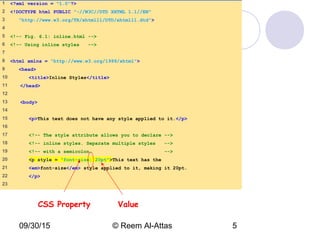
1 <?xml version = "1.0"?>
2 <!DOCTYPE html PUBLIC "-//W3C//DTD XHTML 1.1//EN"
3 "http://www.w3.org/TR/xhtml11/DTD/xhtml11.dtd">
4
5 <!-- Fig. 6.1: inline.html -->
6 <!-- Using inline styles -->
7
8 <html xmlns = "http://www.w3.org/1999/xhtml">
9 <head>
10 <title>Inline Styles</title>
11 </head>
12
13 <body>
14
15 <p>This text does not have any style applied to it.</p>
16
17 <!-- The style attribute allows you to declare -->
18 <!-- inline styles. Separate multiple styles -->
19 <!-- with a semicolon. -->
20 <p style = "font-size: 20pt">This text has the
21 <em>font-size</em> style applied to it, making it 20pt.
22 </p>
23
CSS Property Value
09/30/15 © Reem Al-Attas 6
inline.html
(2 of 2)
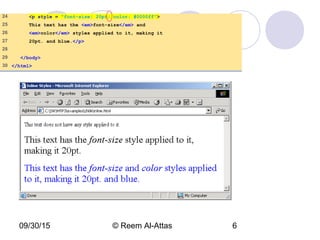
24 <p style = "font-size: 20pt; color: #0000ff">
25 This text has the <em>font-size</em> and
26 <em>color</em> styles applied to it, making it
27 20pt. and blue.</p>
28
29 </body>
30 </html>
09/30/15 © Reem Al-Attas 7
Embedded Style Sheets
Embed an entire CSS document in an
XHTML document’s head section
 Multipurpose Internet Mail Extensions (MIME)
type
 Describes a file’s content
 Property background-color
 Specifies the background color
 Property font-family
 Specifies the name of the font to use
 Property font-size
 Specifies a 14-point font
declared.html
(1 of 3)
1 <?xml version = "1.0"?>
2 <!DOCTYPE html PUBLIC "-//W3C//DTD XHTML 1.1//EN"
3 "http://www.w3.org/TR/xhtml11/DTD/xhtml11.dtd">
4
5 <!-- Fig. 6.2: declared.html -->
6 <!-- Declaring a style sheet in the header section. -->
7
8 <html xmlns = "http://www.w3.org/1999/xhtml">
9 <head>
10 <title>Style Sheets</title>
11
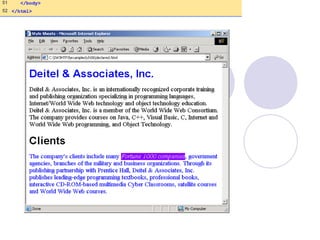
12 <!-- this begins the style sheet section -->
13 <style type = "text/css">
14
15 em { background-color: #8000ff;
16 color: white }
17
18 h1 { font-family: arial, sans-serif }
19
20 p { font-size: 14pt }
21
22 .special { color: blue }
23
24 </style>
25 </head>
declared.html
(2 of 3)
26
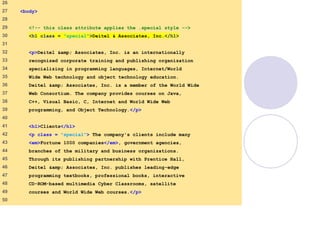
27 <body>
28
29 <!-- this class attribute applies the .special style -->
30 <h1 class = "special">Deitel & Associates, Inc.</h1>
31
32 <p>Deitel &amp; Associates, Inc. is an internationally
33 recognized corporate training and publishing organization
34 specializing in programming languages, Internet/World
35 Wide Web technology and object technology education.
36 Deitel &amp; Associates, Inc. is a member of the World Wide
37 Web Consortium. The company provides courses on Java,
38 C++, Visual Basic, C, Internet and World Wide Web
39 programming, and Object Technology.</p>
40
41 <h1>Clients</h1>
42 <p class = "special"> The company's clients include many
43 <em>Fortune 1000 companies</em>, government agencies,
44 branches of the military and business organizations.
45 Through its publishing partnership with Prentice Hall,
46 Deitel &amp; Associates, Inc. publishes leading-edge
47 programming textbooks, professional books, interactive
48 CD-ROM-based multimedia Cyber Classrooms, satellite
49 courses and World Wide Web courses.</p>
50
declared.html
(3 of 3)
51 </body>
52 </html>
09/30/15 © Reem Al-Attas 11
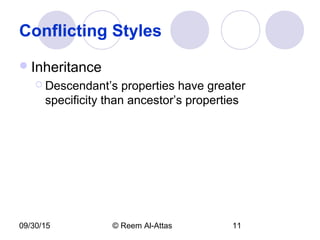
Conflicting Styles
Inheritance
 Descendant’s properties have greater
specificity than ancestor’s properties
09/30/15 © Reem Al-Attas 12
advance.html
(1 of 3)
1 <?xml version = "1.0"?>
2 <!DOCTYPE html PUBLIC "-//W3C//DTD XHTML 1.1//EN"
3 "http://www.w3.org/TR/xhtml11/DTD/xhtml11.dtd">
4
5 <!-- Fig 6.3: advanced.html -->
6 <!-- More advanced style sheets -->
7
8 <html xmlns = "http://www.w3.org/1999/xhtml">
9 <head>
10 <title>More Styles</title>
11
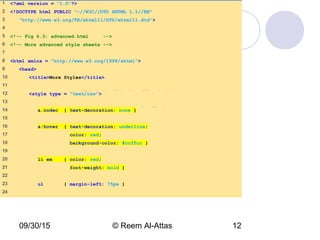
12 <style type = "text/css">
13
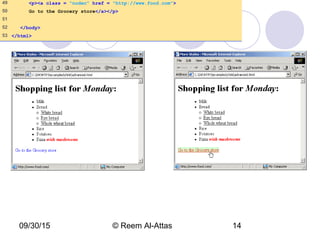
14 a.nodec { text-decoration: none }
15
16 a:hover { text-decoration: underline;
17 color: red;
18 background-color: #ccffcc }
19
20 li em { color: red;
21 font-weight: bold }
22
23 ul { margin-left: 75px }
24
09/30/15 © Reem Al-Attas 13
advance.html
(2 of 3)
25 ul ul { text-decoration: underline;
26 margin-left: 15px }
27
28 </style>
29 </head>
30
31 <body>
32
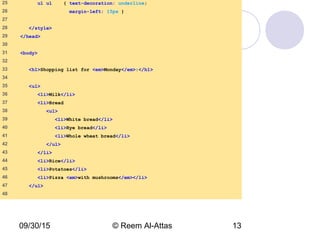
33 <h1>Shopping list for <em>Monday</em>:</h1>
34
35 <ul>
36 <li>Milk</li>
37 <li>Bread
38 <ul>
39 <li>White bread</li>
40 <li>Rye bread</li>
41 <li>Whole wheat bread</li>
42 </ul>
43 </li>
44 <li>Rice</li>
45 <li>Potatoes</li>
46 <li>Pizza <em>with mushrooms</em></li>
47 </ul>
48
09/30/15 © Reem Al-Attas 14
49 <p><a class = "nodec" href = "http://www.food.com">
50 Go to the Grocery store</a></p>
51
52 </body>
53 </html>
09/30/15 © Reem Al-Attas 15
Exercise
Create an XHTML document that has:
 h1 element with inline style.
 The XHTML doc have an embedded style sheet
for:
 p
 a:hover
 A special class called myown.
09/30/15 © Reem Al-Attas 16
Linking External Style Sheets
External style sheets
 Can provide uniform look and feel to entire site.
09/30/15 © Reem Al-Attas 17
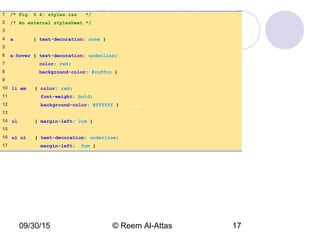
styles.css
(1 of 1)
1 /* Fig. 6.4: styles.css */
2 /* An external stylesheet */
3
4 a { text-decoration: none }
5
6 a:hover { text-decoration: underline;
7 color: red;
8 background-color: #ccffcc }
9
10 li em { color: red;
11 font-weight: bold;
12 background-color: #ffffff }
13
14 ul { margin-left: 2cm }
15
16 ul ul { text-decoration: underline;
17 margin-left: .5cm }
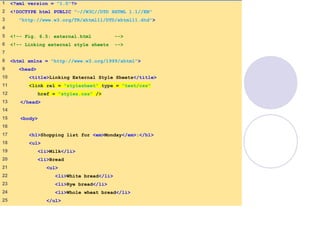
external.html
(1 of 2)
1 <?xml version = "1.0"?>
2 <!DOCTYPE html PUBLIC "-//W3C//DTD XHTML 1.1//EN"
3 "http://www.w3.org/TR/xhtml11/DTD/xhtml11.dtd">
4
5 <!-- Fig. 6.5: external.html -->
6 <!-- Linking external style sheets -->
7
8 <html xmlns = "http://www.w3.org/1999/xhtml">
9 <head>
10 <title>Linking External Style Sheets</title>
11 <link rel = "stylesheet" type = "text/css"
12 href = "styles.css" />
13 </head>
14
15 <body>
16
17 <h1>Shopping list for <em>Monday</em>:</h1>
18 <ul>
19 <li>Milk</li>
20 <li>Bread
21 <ul>
22 <li>White bread</li>
23 <li>Rye bread</li>
24 <li>Whole wheat bread</li>
25 </ul>
09/30/15 © Reem Al-Attas 19
26 </li>
27 <li>Rice</li>
28 <li>Potatoes</li>
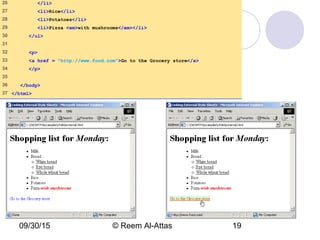
29 <li>Pizza <em>with mushrooms</em></li>
30 </ul>
31
32 <p>
33 <a href = "http://www.food.com">Go to the Grocery store</a>
34 </p>
35
36 </body>
37 </html>
09/30/15 © Reem Al-Attas 20
Exercise
Cut the embedded style sheet you made
in the previous exercise and paste it in a
new file called “styles.css”.
Link the CSS file to the XHTML doc
created previously.
09/30/15 © Reem Al-Attas 21
Element Dimensions
CSS rules can specify the actual
dimensions of each page element.
The <div> tag defines a division/section
in a document.
09/30/15 © Reem Al-Attas 22
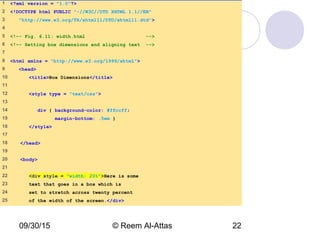
width.html
(1 of 2)
1 <?xml version = "1.0"?>
2 <!DOCTYPE html PUBLIC "-//W3C//DTD XHTML 1.1//EN"
3 "http://www.w3.org/TR/xhtml11/DTD/xhtml11.dtd">
4
5 <!-- Fig. 6.11: width.html -->
6 <!-- Setting box dimensions and aligning text -->
7
8 <html xmlns = "http://www.w3.org/1999/xhtml">
9 <head>
10 <title>Box Dimensions</title>
11
12 <style type = "text/css">
13
14 div { background-color: #ffccff;
15 margin-bottom: .5em }
16 </style>
17
18 </head>
19
20 <body>
21
22 <div style = "width: 20%">Here is some
23 text that goes in a box which is
24 set to stretch across twenty percent
25 of the width of the screen.</div>
09/30/15 © Reem Al-Attas 23
26
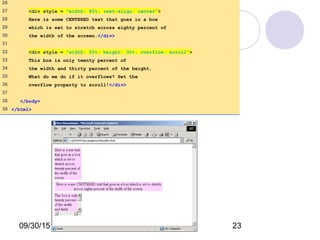
27 <div style = "width: 80%; text-align: center">
28 Here is some CENTERED text that goes in a box
29 which is set to stretch across eighty percent of
30 the width of the screen.</div>
31
32 <div style = "width: 20%; height: 30%; overflow: scroll">
33 This box is only twenty percent of
34 the width and thirty percent of the height.
35 What do we do if it overflows? Set the
36 overflow property to scroll!</div>
37
38 </body>
39 </html>
Thank You!
We’ve just finished XHTML basics


Cascading Style Sheet - CSS

  • 1.
    IPA 1st Semester, 2007-2008 Internet 1 Ch.5 Cascading Style Sheets (CSS) attasr@ipa.edu.sa
  • 2.
    09/30/15 © ReemAl-Attas 2 CSS Cascading Style Sheets: Separation of structure from presentation.
  • 3.
    09/30/15 © ReemAl-Attas 3 Three Ways to Use Style 1. Inline Styles  Individual element. 2. Embedded Style Sheets  Individual document. 3. External Style Sheets  multiple documents (entire site).
  • 4.
    09/30/15 © ReemAl-Attas 4 Inline Styles Declare an individual element’s format  Attribute style  CSS property  Followed by a colon and a value
  • 5.
    09/30/15 © ReemAl-Attas 5 inline.html (1 of 2) 1 <?xml version = "1.0"?> 2 <!DOCTYPE html PUBLIC "-//W3C//DTD XHTML 1.1//EN" 3 "http://www.w3.org/TR/xhtml11/DTD/xhtml11.dtd"> 4 5 <!-- Fig. 6.1: inline.html --> 6 <!-- Using inline styles --> 7 8 <html xmlns = "http://www.w3.org/1999/xhtml"> 9 <head> 10 <title>Inline Styles</title> 11 </head> 12 13 <body> 14 15 <p>This text does not have any style applied to it.</p> 16 17 <!-- The style attribute allows you to declare --> 18 <!-- inline styles. Separate multiple styles --> 19 <!-- with a semicolon. --> 20 <p style = "font-size: 20pt">This text has the 21 <em>font-size</em> style applied to it, making it 20pt. 22 </p> 23 CSS Property Value
  • 6.
    09/30/15 © ReemAl-Attas 6 inline.html (2 of 2) 24 <p style = "font-size: 20pt; color: #0000ff"> 25 This text has the <em>font-size</em> and 26 <em>color</em> styles applied to it, making it 27 20pt. and blue.</p> 28 29 </body> 30 </html>
  • 7.
    09/30/15 © ReemAl-Attas 7 Embedded Style Sheets Embed an entire CSS document in an XHTML document’s head section  Multipurpose Internet Mail Extensions (MIME) type  Describes a file’s content  Property background-color  Specifies the background color  Property font-family  Specifies the name of the font to use  Property font-size  Specifies a 14-point font
  • 8.
    declared.html (1 of 3) 1<?xml version = "1.0"?> 2 <!DOCTYPE html PUBLIC "-//W3C//DTD XHTML 1.1//EN" 3 "http://www.w3.org/TR/xhtml11/DTD/xhtml11.dtd"> 4 5 <!-- Fig. 6.2: declared.html --> 6 <!-- Declaring a style sheet in the header section. --> 7 8 <html xmlns = "http://www.w3.org/1999/xhtml"> 9 <head> 10 <title>Style Sheets</title> 11 12 <!-- this begins the style sheet section --> 13 <style type = "text/css"> 14 15 em { background-color: #8000ff; 16 color: white } 17 18 h1 { font-family: arial, sans-serif } 19 20 p { font-size: 14pt } 21 22 .special { color: blue } 23 24 </style> 25 </head>
  • 9.
    declared.html (2 of 3) 26 27<body> 28 29 <!-- this class attribute applies the .special style --> 30 <h1 class = "special">Deitel & Associates, Inc.</h1> 31 32 <p>Deitel &amp; Associates, Inc. is an internationally 33 recognized corporate training and publishing organization 34 specializing in programming languages, Internet/World 35 Wide Web technology and object technology education. 36 Deitel &amp; Associates, Inc. is a member of the World Wide 37 Web Consortium. The company provides courses on Java, 38 C++, Visual Basic, C, Internet and World Wide Web 39 programming, and Object Technology.</p> 40 41 <h1>Clients</h1> 42 <p class = "special"> The company's clients include many 43 <em>Fortune 1000 companies</em>, government agencies, 44 branches of the military and business organizations. 45 Through its publishing partnership with Prentice Hall, 46 Deitel &amp; Associates, Inc. publishes leading-edge 47 programming textbooks, professional books, interactive 48 CD-ROM-based multimedia Cyber Classrooms, satellite 49 courses and World Wide Web courses.</p> 50
  • 10.
    declared.html (3 of 3) 51</body> 52 </html>
  • 11.
    09/30/15 © ReemAl-Attas 11 Conflicting Styles Inheritance  Descendant’s properties have greater specificity than ancestor’s properties
  • 12.
    09/30/15 © ReemAl-Attas 12 advance.html (1 of 3) 1 <?xml version = "1.0"?> 2 <!DOCTYPE html PUBLIC "-//W3C//DTD XHTML 1.1//EN" 3 "http://www.w3.org/TR/xhtml11/DTD/xhtml11.dtd"> 4 5 <!-- Fig 6.3: advanced.html --> 6 <!-- More advanced style sheets --> 7 8 <html xmlns = "http://www.w3.org/1999/xhtml"> 9 <head> 10 <title>More Styles</title> 11 12 <style type = "text/css"> 13 14 a.nodec { text-decoration: none } 15 16 a:hover { text-decoration: underline; 17 color: red; 18 background-color: #ccffcc } 19 20 li em { color: red; 21 font-weight: bold } 22 23 ul { margin-left: 75px } 24
  • 13.
    09/30/15 © ReemAl-Attas 13 advance.html (2 of 3) 25 ul ul { text-decoration: underline; 26 margin-left: 15px } 27 28 </style> 29 </head> 30 31 <body> 32 33 <h1>Shopping list for <em>Monday</em>:</h1> 34 35 <ul> 36 <li>Milk</li> 37 <li>Bread 38 <ul> 39 <li>White bread</li> 40 <li>Rye bread</li> 41 <li>Whole wheat bread</li> 42 </ul> 43 </li> 44 <li>Rice</li> 45 <li>Potatoes</li> 46 <li>Pizza <em>with mushrooms</em></li> 47 </ul> 48
  • 14.
    09/30/15 © ReemAl-Attas 14 49 <p><a class = "nodec" href = "http://www.food.com"> 50 Go to the Grocery store</a></p> 51 52 </body> 53 </html>
  • 15.
    09/30/15 © ReemAl-Attas 15 Exercise Create an XHTML document that has:  h1 element with inline style.  The XHTML doc have an embedded style sheet for:  p  a:hover  A special class called myown.
  • 16.
    09/30/15 © ReemAl-Attas 16 Linking External Style Sheets External style sheets  Can provide uniform look and feel to entire site.
  • 17.
    09/30/15 © ReemAl-Attas 17 styles.css (1 of 1) 1 /* Fig. 6.4: styles.css */ 2 /* An external stylesheet */ 3 4 a { text-decoration: none } 5 6 a:hover { text-decoration: underline; 7 color: red; 8 background-color: #ccffcc } 9 10 li em { color: red; 11 font-weight: bold; 12 background-color: #ffffff } 13 14 ul { margin-left: 2cm } 15 16 ul ul { text-decoration: underline; 17 margin-left: .5cm }
  • 18.
    external.html (1 of 2) 1<?xml version = "1.0"?> 2 <!DOCTYPE html PUBLIC "-//W3C//DTD XHTML 1.1//EN" 3 "http://www.w3.org/TR/xhtml11/DTD/xhtml11.dtd"> 4 5 <!-- Fig. 6.5: external.html --> 6 <!-- Linking external style sheets --> 7 8 <html xmlns = "http://www.w3.org/1999/xhtml"> 9 <head> 10 <title>Linking External Style Sheets</title> 11 <link rel = "stylesheet" type = "text/css" 12 href = "styles.css" /> 13 </head> 14 15 <body> 16 17 <h1>Shopping list for <em>Monday</em>:</h1> 18 <ul> 19 <li>Milk</li> 20 <li>Bread 21 <ul> 22 <li>White bread</li> 23 <li>Rye bread</li> 24 <li>Whole wheat bread</li> 25 </ul>
  • 19.
    09/30/15 © ReemAl-Attas 19 26 </li> 27 <li>Rice</li> 28 <li>Potatoes</li> 29 <li>Pizza <em>with mushrooms</em></li> 30 </ul> 31 32 <p> 33 <a href = "http://www.food.com">Go to the Grocery store</a> 34 </p> 35 36 </body> 37 </html>
  • 20.
    09/30/15 © ReemAl-Attas 20 Exercise Cut the embedded style sheet you made in the previous exercise and paste it in a new file called “styles.css”. Link the CSS file to the XHTML doc created previously.
  • 21.
    09/30/15 © ReemAl-Attas 21 Element Dimensions CSS rules can specify the actual dimensions of each page element. The <div> tag defines a division/section in a document.
  • 22.
    09/30/15 © ReemAl-Attas 22 width.html (1 of 2) 1 <?xml version = "1.0"?> 2 <!DOCTYPE html PUBLIC "-//W3C//DTD XHTML 1.1//EN" 3 "http://www.w3.org/TR/xhtml11/DTD/xhtml11.dtd"> 4 5 <!-- Fig. 6.11: width.html --> 6 <!-- Setting box dimensions and aligning text --> 7 8 <html xmlns = "http://www.w3.org/1999/xhtml"> 9 <head> 10 <title>Box Dimensions</title> 11 12 <style type = "text/css"> 13 14 div { background-color: #ffccff; 15 margin-bottom: .5em } 16 </style> 17 18 </head> 19 20 <body> 21 22 <div style = "width: 20%">Here is some 23 text that goes in a box which is 24 set to stretch across twenty percent 25 of the width of the screen.</div>
  • 23.
    09/30/15 © ReemAl-Attas 23 26 27 <div style = "width: 80%; text-align: center"> 28 Here is some CENTERED text that goes in a box 29 which is set to stretch across eighty percent of 30 the width of the screen.</div> 31 32 <div style = "width: 20%; height: 30%; overflow: scroll"> 33 This box is only twenty percent of 34 the width and thirty percent of the height. 35 What do we do if it overflows? Set the 36 overflow property to scroll!</div> 37 38 </body> 39 </html>
  • 24.
    Thank You! We’ve justfinished XHTML basics 

Editor's Notes

  • #6 Font-size: xx-small, x-small, small, smaller, medium, large, larger, x-large, xx-large.
  • #13 Text-decoration: blink, line-through, overline, underline. Only CSS1-aware versions of Netscape Navigator are going to see the blink effect. Hover is a pseudoclass.
  • #14 Margin- unit: pt, %, em, ex, in, cm, pt, pc.