Oct. 2014 Computer Architecture, The Arithmetic/Logic Unit Slide 1
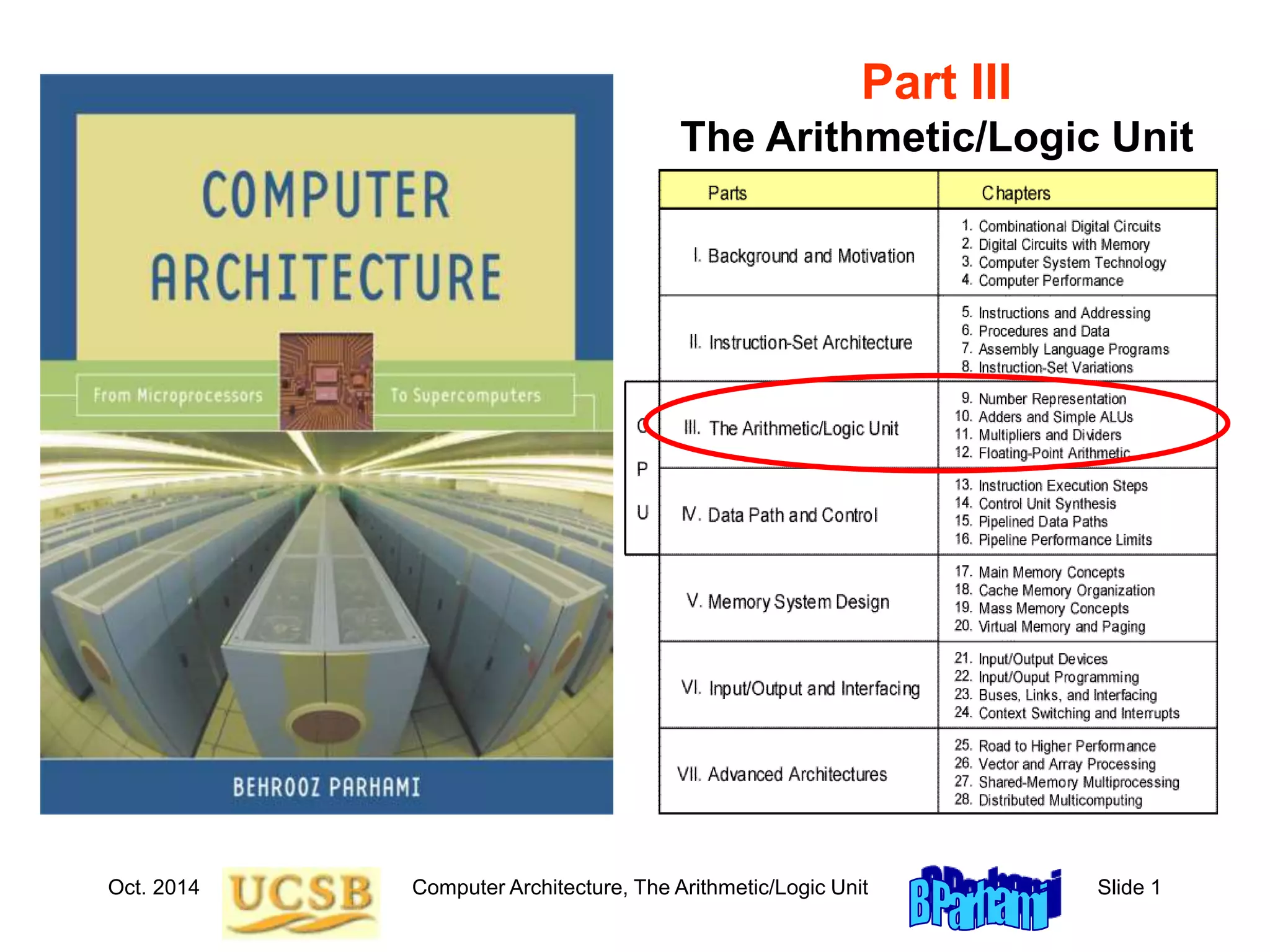
Part III
The Arithmetic/Logic Unit
Oct. 2014 Computer Architecture, The Arithmetic/Logic Unit Slide 2
About This Presentation
This presentation is intended to support the use of the textbook
Computer Architecture: From Microprocessors toSupercomputers,
Oxford University Press, 2005, ISBN 0-19-515455-X. It is updated
regularly by the author as part of his teaching of the upper-division
course ECE 154, Introduction to Computer Architecture, at the
University of California, Santa Barbara. Instructors can use these
slides freely in classroom teaching and for other educational
purposes. Any other use is strictly prohibited. © Behrooz Parhami
Edition Released Revised Revised Revised Revised
First July 2003 July 2004 July 2005 Mar. 2006 Jan. 2007
Jan. 2008 Jan. 2009 Jan. 2011 Oct. 2014
Oct. 2014 Computer Architecture, The Arithmetic/Logic Unit Slide 3
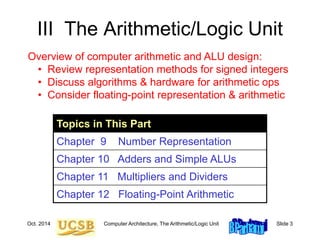
III The Arithmetic/Logic Unit
Topics in This Part
Chapter 9 Number Representation
Chapter 10 Adders and Simple ALUs
Chapter 11 Multipliers and Dividers
Chapter 12 Floating-Point Arithmetic
Overview of computer arithmetic and ALU design:
• Review representation methods for signed integers
• Discuss algorithms & hardware for arithmetic ops
• Consider floating-point representation & arithmetic
Oct. 2014 Computer Architecture, The Arithmetic/Logic Unit Slide 4
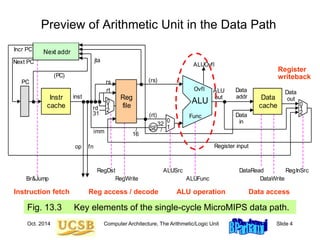
Preview of Arithmetic Unit in the Data Path
Fig. 13.3 Key elements of the single-cycle MicroMIPS data path.
/
ALU Data
cache
Instr
cache
Next addr
Reg
file
op
jta
fn
inst
imm
rs (rs)
(rt)
Data
addr
Data
in
0
1
ALUSrc
ALUFunc DataWrite
DataRead
SE
RegInSrc
rt
rd
RegDst
RegWrite
32
/
16
Register input
Data
out
Func
ALUOvfl
Ovfl
31
0
1
2
Next PC
Incr PC
(PC)
Br&Jump
ALU
out
PC
0
1
2
Instruction fetch Reg access / decode ALU operation Data access
Register
writeback
Oct. 2014 Computer Architecture, The Arithmetic/Logic Unit Slide 5
Computer Arithmetic as a Topic of Study
Brief overview article –
Encyclopedia of Info Systems,
Academic Press, 2002,
Vol. 3, pp. 317-333
Our textbook’s treatment
of the topic falls between
the extremes (4 chaps.)
Graduate course
ECE 252B – Text:
Computer Arithmetic,
Oxford U Press, 2000
(2nd ed., 2010)
Oct. 2014 Computer Architecture, The Arithmetic/Logic Unit Slide 6
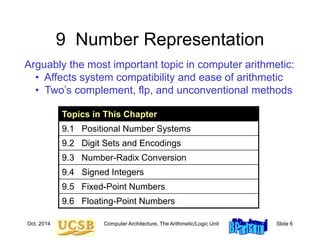
9 Number Representation
Arguably the most important topic in computer arithmetic:
• Affects system compatibility and ease of arithmetic
• Two’s complement, flp, and unconventional methods
Topics in This Chapter
9.1 Positional Number Systems
9.2 Digit Sets and Encodings
9.3 Number-Radix Conversion
9.4 Signed Integers
9.5 Fixed-Point Numbers
9.6 Floating-Point Numbers
Oct. 2014 Computer Architecture, The Arithmetic/Logic Unit Slide 7
9.1 Positional Number Systems
Representations of natural numbers {0, 1, 2, 3, …}
||||| ||||| ||||| ||||| ||||| || sticks or unary code
27 radix-10 or decimal code
11011 radix-2 or binary code
XXVII Roman numerals
Fixed-radix positional representation with k digits
Value of a number: x = (xk–1xk–2 . . . x1x0)r = S xi r i
For example:
27 = (11011)two = (124) + (123) + (022) + (121) + (120)
Number of digits for [0, P]: k = logr (P + 1) = logr P + 1
k–1
i=0
Oct. 2014 Computer Architecture, The Arithmetic/Logic Unit Slide 8
Unsigned Binary Integers
Figure 9.1 Schematic representation of 4-bit code for
integers in [0, 15].
0000
0001
1111
0010
1110
0011
1101
0100
1100
1000
0101
1011
0110
1010
0111
1001
0
1
2
3
4
5
6
7
15
11
14
13
12
8
9
10
Inside: Natural number
Outside: 4-bit encoding
0
1
2
3
15
4
5
6
7
8
9
Turn x notches
counterclockwise
to add x
Turn y notches
clockwise
to subtract y
11
14
13
12
10
Oct. 2014 Computer Architecture, The Arithmetic/Logic Unit Slide 9
Representation Range and Overflow
Figure 9.2 Overflow regions in finite number representation systems.
For unsigned representations covered in this section, max – = 0.
max
Finite set of representable numbers
Overflow region
max
Overflow region
Numbers larger
than max
Numbers smaller
than max
 
 
Example 9.2, Part d
Discuss if overflow will occur when computing 317 – 316 in a number
system with k = 8 digits in radix r = 10.
Solution
The result 86 093 442 is representable in the number system which
has a range [0, 99 999 999]; however, if 317 is computed en route to
the final result, overflow will occur.
Oct. 2014 Computer Architecture, The Arithmetic/Logic Unit Slide 10
9.2 Digit Sets and Encodings
Conventional and unconventional digit sets
 Decimal digits in [0, 9]; 4-bit BCD, 8-bit ASCII
 Hexadecimal, or hex for short: digits 0-9 & a-f
 Conventional ternary digit set in [0, 2]
Conventional digit set for radix r is [0, r – 1]
Symmetric ternary digit set in [–1, 1]
 Conventional binary digit set in [0, 1]
Redundant digit set [0, 2], encoded in 2 bits
( 0 2 1 1 0 )two and ( 1 0 1 0 2 )two represent 22
Oct. 2014 Computer Architecture, The Arithmetic/Logic Unit Slide 11
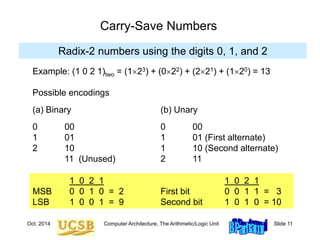
Carry-Save Numbers
Radix-2 numbers using the digits 0, 1, and 2
Example: (1 0 2 1)two = (123) + (022) + (221) + (120) = 13
Possible encodings
(a) Binary (b) Unary
0 00 0 00
1 01 1 01 (First alternate)
2 10 1 10 (Second alternate)
11 (Unused) 2 11
1 0 2 1 1 0 2 1
MSB 0 0 1 0 = 2 First bit 0 0 1 1 = 3
LSB 1 0 0 1 = 9 Second bit 1 0 1 0 = 10
Oct. 2014 Computer Architecture, The Arithmetic/Logic Unit Slide 12
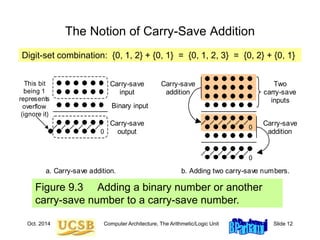
Figure 9.3 Adding a binary number or another
carry-save number to a carry-save number.
The Notion of Carry-Save Addition
Two
carry-save
inputs
Carry-save
input
Binary input
Carry-save
output
This bit
being 1
represents
overflow
(ignore it)
0
0
0
a. Carry-save addition. b. Adding two carry-save numbers.
Carry-save
addition
Carry-save
addition
Digit-set combination: {0, 1, 2} + {0, 1} = {0, 1, 2, 3} = {0, 2} + {0, 1}
Oct. 2014 Computer Architecture, The Arithmetic/Logic Unit Slide 13
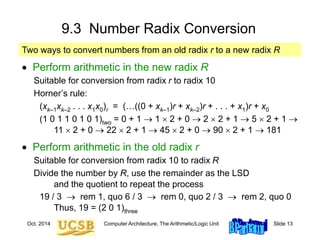
9.3 Number Radix Conversion
 Perform arithmetic in the new radix R
Suitable for conversion from radix r to radix 10
Horner’s rule:
(xk–1xk–2 . . . x1x0)r = (…((0 + xk–1)r + xk–2)r + . . . + x1)r + x0
(1 0 1 1 0 1 0 1)two = 0 + 1  1  2 + 0  2  2 + 1  5  2 + 1 
11  2 + 0  22  2 + 1  45  2 + 0  90  2 + 1  181
 Perform arithmetic in the old radix r
Suitable for conversion from radix 10 to radix R
Divide the number by R, use the remainder as the LSD
and the quotient to repeat the process
19 / 3  rem 1, quo 6 / 3  rem 0, quo 2 / 3  rem 2, quo 0
Thus, 19 = (2 0 1)three
Two ways to convert numbers from an old radix r to a new radix R
Oct. 2014 Computer Architecture, The Arithmetic/Logic Unit Slide 14
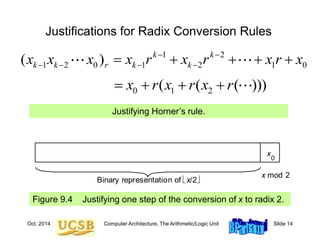
Justifications for Radix Conversion Rules
Figure 9.4 Justifying one step of the conversion of x to radix 2.
x
0
x mod 2
Binary representation of x/2
Justifying Horner’s rule.
1 2
1 2 0 1 2 1 0
( ) k k
k k r k k
x x x x r x r x r x
 
   
    
0 1 2
( ( ( )))
x r x r x r
   
Oct. 2014 Computer Architecture, The Arithmetic/Logic Unit Slide 15
9.4 Signed Integers
 We dealt with representing the natural numbers
 Signed or directed whole numbers = integers
{ . . . , 3, 2, 1, 0, 1, 2, 3, . . . }
 Signed-magnitude representation
+27 in 8-bit signed-magnitude binary code 0 0011011
–27 in 8-bit signed-magnitude binary code 1 0011011
–27 in 2-digit decimal code with BCD digits 1 0010 0111
 Biased representation
Represent the interval of numbers [N, P] by the unsigned
interval [0, P + N]; i.e., by adding N to every number
Oct. 2014 Computer Architecture, The Arithmetic/Logic Unit Slide 16
Two’s-Complement Representation
Figure 9.5 Schematic representation of 4-bit 2’s-complement
code for integers in [–8, +7].
0000
0001
1111
0010
1110
0011
1101
0100
1100
1000
0101
1011
0110
1010
0111
1001
+0
+1
+2
+3
+4
+5
+6
+7
–1
–5
–2
–3
–4
–8
–7
–6
+
_
0
1
2
3
–1
4
5
6
7
–8
–7
Turn x notches
counterclockwise
to add x
Turn 16 – y notches
counterclockwise to
add –y (subtract y)
–5
–2
–3
–4
–6
With k bits, numbers in the range [–2k–1, 2k–1 – 1] represented.
Negation is performed by inverting all bits and adding 1.
Oct. 2014 Computer Architecture, The Arithmetic/Logic Unit Slide 17
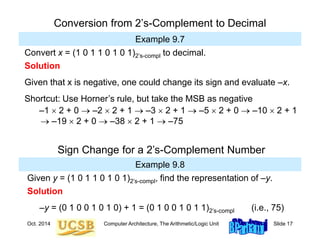
Conversion from 2’s-Complement to Decimal
Example 9.7
Convert x = (1 0 1 1 0 1 0 1)2’s-compl to decimal.
Solution
Given that x is negative, one could change its sign and evaluate –x.
Shortcut: Use Horner’s rule, but take the MSB as negative
–1  2 + 0  –2  2 + 1  –3  2 + 1  –5  2 + 0  –10  2 + 1
 –19  2 + 0  –38  2 + 1  –75
Example 9.8
Sign Change for a 2’s-Complement Number
Given y = (1 0 1 1 0 1 0 1)2’s-compl, find the representation of –y.
Solution
–y = (0 1 0 0 1 0 1 0) + 1 = (0 1 0 0 1 0 1 1)2’s-compl (i.e., 75)
Oct. 2014 Computer Architecture, The Arithmetic/Logic Unit Slide 18
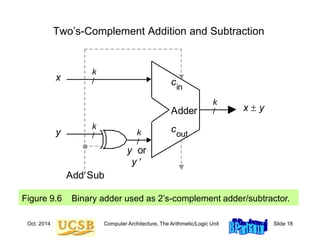
Two’s-Complement Addition and Subtraction
Figure 9.6 Binary adder used as 2’s-complement adder/subtractor.
AddSub
x  y
y
x
k
/
k
/
k
/
y or
y 
Adder
cout
cin
k
/
Oct. 2014 Computer Architecture, The Arithmetic/Logic Unit Slide 19
9.5 Fixed-Point Numbers
Positional representation: k whole and l fractional digits
Value of a number: x = (xk–1xk–2 . . .x1x0 .x–1x–2 . . . x–l )r = S xi r i
For example:
2.375 = (10.011)two = (121) + (020) + (021) + (122) + (123)
Numbers in the range [0, rk – ulp] representable, where ulp = r –l
Fixed-point arithmetic same as integer arithmetic
(radix point implied, not explicit)
Two’s complement properties (including sign change) hold here as well:
(01.011)2’s-compl = (–021) + (120) + (02–1) + (12–2) + (12–3) = +1.375
(11.011)2’s-compl = (–121) + (120) + (02–1) + (12–2) + (12–3) = –0.625
Oct. 2014 Computer Architecture, The Arithmetic/Logic Unit Slide 20
Fixed-Point 2’s-Complement Numbers
Figure 9.7 Schematic representation of 4-bit 2’s-complement
encoding for (1 + 3)-bit fixed-point numbers in the range [–1, +7/8].
0.000
0.001
1.111
0.010
1.110
0.011
1.101
0.100
1.100
1.000
0.101
1.011
0.110
1.010
0.111
1.001
+0
+.125
+.25
+.375
+.5
+.625
+.75
+.875
–.125
–.625
–.25
–.375
–.5
–1
–.875
–.75
+
_
Oct. 2014 Computer Architecture, The Arithmetic/Logic Unit Slide 21
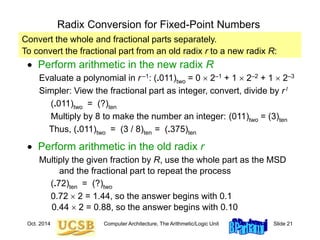
Radix Conversion for Fixed-Point Numbers
 Perform arithmetic in the new radix R
Evaluate a polynomial in r –1: (.011)two = 0  2–1 + 1  2–2 + 1  2–3
Simpler: View the fractional part as integer, convert, divide by r l
(.011)two = (?)ten
Multiply by 8 to make the number an integer: (011)two = (3)ten
Thus, (.011)two = (3 / 8)ten = (.375)ten
 Perform arithmetic in the old radix r
Multiply the given fraction by R, use the whole part as the MSD
and the fractional part to repeat the process
(.72)ten = (?)two
0.72  2 = 1.44, so the answer begins with 0.1
0.44  2 = 0.88, so the answer begins with 0.10
Convert the whole and fractional parts separately.
To convert the fractional part from an old radix r to a new radix R:
Oct. 2014 Computer Architecture, The Arithmetic/Logic Unit Slide 22
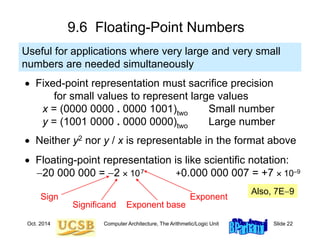
9.6 Floating-Point Numbers
 Fixed-point representation must sacrifice precision
for small values to represent large values
x = (0000 0000 . 0000 1001)two Small number
y = (1001 0000 . 0000 0000)two Large number
 Neither y2 nor y / x is representable in the format above
 Floating-point representation is like scientific notation:
20 000 000 = 2  107 +0.000 000 007 = +7  10–9
Useful for applications where very large and very small
numbers are needed simultaneously
Also, 7E9
Significand
Exponent
Exponent base
Sign
Oct. 2014 Computer Architecture, The Arithmetic/Logic Unit Slide 23
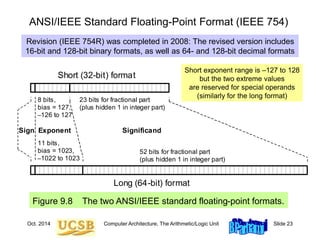
ANSI/IEEE Standard Floating-Point Format (IEEE 754)
Figure 9.8 The two ANSI/IEEE standard floating-point formats.
Short (32-bit) format
Long (64-bit) format
Sign Exponent Significand
8 bits,
bias = 127,
–126 to 127
11 bits,
bias = 1023,
–1022 to 1023
52 bits for fractional part
(plus hidden 1 in integer part)
23 bits for fractional part
(plus hidden 1 in integer part)
Short exponent range is –127 to 128
but the two extreme values
are reserved for special operands
(similarly for the long format)
Revision (IEEE 754R) was completed in 2008: The revised version includes
16-bit and 128-bit binary formats, as well as 64- and 128-bit decimal formats
Oct. 2014 Computer Architecture, The Arithmetic/Logic Unit Slide 24
Short and Long IEEE 754 Formats: Features
Table 9.1 Some features of ANSI/IEEE standard floating-point formats
Feature Single/Short Double/Long
Word width in bits 32 64
Significand in bits 23 + 1 hidden 52 + 1 hidden
Significand range [1, 2 – 2–23] [1, 2 – 2–52]
Exponent bits 8 11
Exponent bias 127 1023
Zero (±0) e + bias = 0, f = 0 e + bias = 0, f = 0
Denormal e + bias = 0, f ≠ 0
represents ±0.f  2–126
e + bias = 0, f ≠ 0
represents ±0.f  2–1022
Infinity (∞) e + bias = 255, f = 0 e + bias = 2047, f = 0
Not-a-number (NaN) e + bias = 255, f ≠ 0 e + bias = 2047, f ≠ 0
Ordinary number e + bias  [1, 254]
e  [–126, 127]
represents 1.f  2e
e + bias  [1, 2046]
e  [–1022, 1023]
represents 1.f  2e
min 2–126  1.2  10–38 2–1022  2.2  10–308
max  2128  3.4  1038  21024  1.8  10308
Subnormal
Oct. 2014 Computer Architecture, The Arithmetic/Logic Unit Slide 25
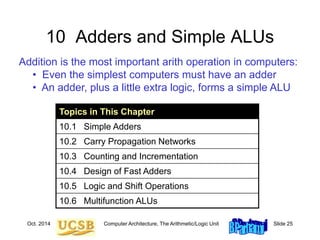
10 Adders and Simple ALUs
Addition is the most important arith operation in computers:
• Even the simplest computers must have an adder
• An adder, plus a little extra logic, forms a simple ALU
Topics in This Chapter
10.1 Simple Adders
10.2 Carry Propagation Networks
10.3 Counting and Incrementation
10.4 Design of Fast Adders
10.5 Logic and Shift Operations
10.6 Multifunction ALUs
Oct. 2014 Computer Architecture, The Arithmetic/Logic Unit Slide 26
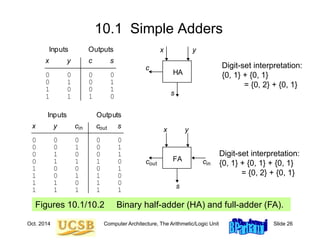
10.1 Simple Adders
Figures 10.1/10.2 Binary half-adder (HA) and full-adder (FA).
x y c s
0 0 0 0
0 1 0 1
1 0 0 1
1 1 1 0
Inputs Outputs
HA
x y
c
s
x y c c s
0 0 0 0 0
0 0 1 0 1
0 1 0 0 1
0 1 1 1 0
1 0 0 0 1
1 0 1 1 0
1 1 0 1 0
1 1 1 1 1
Inputs Outputs
cout cin
out
in x y
s
FA
Digit-set interpretation:
{0, 1} + {0, 1}
= {0, 2} + {0, 1}
Digit-set interpretation:
{0, 1} + {0, 1} + {0, 1}
= {0, 2} + {0, 1}
Oct. 2014 Computer Architecture, The Arithmetic/Logic Unit Slide 27
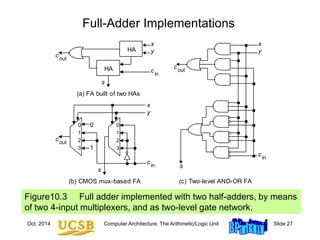
Full-Adder Implementations
Figure10.3 Full adder implemented with two half-adders, by means
of two 4-input multiplexers, and as two-level gate network.
(a) FA built of two HAs
(c) Two-level AND-OR FA
(b) CMOS mux-based FA
1
0
3
2
HA
HA
1
0
3
2
0
1
x
y
x
y
x
y
s
s
s
cout
cout
cout
cin
cin
cin
Oct. 2014 Computer Architecture, The Arithmetic/Logic Unit Slide 28
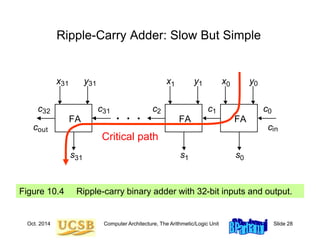
Ripple-Carry Adder: Slow But Simple
Figure 10.4 Ripple-carry binary adder with 32-bit inputs and output.
x
s
y
c
c
x
s
y
c
x
s
y
c
cout cin
0 0
0
c0
1 1
1
1
2
31
31
31
31
FA FA FA
32
. . .
Critical path
Oct. 2014 Computer Architecture, The Arithmetic/Logic Unit Slide 29
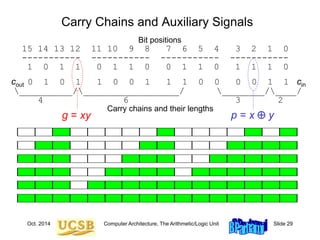
Carry Chains and Auxiliary Signals
Bit positions
15 14 13 12 11 10 9 8 7 6 5 4 3 2 1 0
----------- ----------- ----------- -----------
1 0 1 1 0 1 1 0 0 1 1 0 1 1 1 0
cout 0 1 0 1 1 0 0 1 1 1 0 0 0 0 1 1 cin
__________/__________________/ ________/____/
4 6 3 2
Carry chains and their lengths
g = xy p = x  y
Oct. 2014 Computer Architecture, The Arithmetic/Logic Unit Slide 30
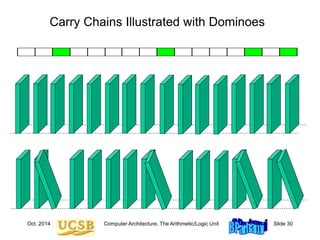
Carry Chains Illustrated with Dominoes
Oct. 2014 Computer Architecture, The Arithmetic/Logic Unit Slide 31
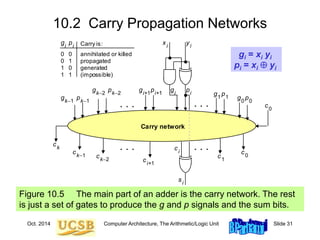
10.2 Carry Propagation Networks
Figure 10.5 The main part of an adder is the carry network. The rest
is just a set of gates to produce the g and p signals and the sum bits.
Carry network
. . . . . .
xi
yi
g p
s
i
i
i
ci
ci+1
ck1
ck
ck2
c1
c0
g p1
1 g p0
0
g pk2
k2
g pi+1
i+1
g pk1
k1
c0
. . . . . .
0 0
0 1
1 0
1 1
annihilated or killed
propagated
generated
(impossible)
Carry is:
gi
pi
gi = xi yi
pi = xi  yi
Oct. 2014 Computer Architecture, The Arithmetic/Logic Unit Slide 32
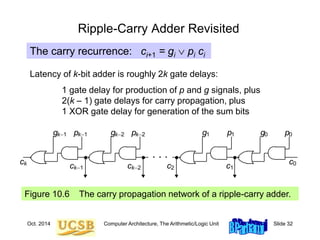
Ripple-Carry Adder Revisited
Figure 10.6 The carry propagation network of a ripple-carry adder.
. . .
ck1
ck
ck2 c1
g p1
1 g p0
0
g pk2
k2
g pk1
k1
c0
c2
The carry recurrence: ci+1 = gi  pi ci
Latency of k-bit adder is roughly 2k gate delays:
1 gate delay for production of p and g signals, plus
2(k – 1) gate delays for carry propagation, plus
1 XOR gate delay for generation of the sum bits
Oct. 2014 Computer Architecture, The Arithmetic/Logic Unit Slide 33
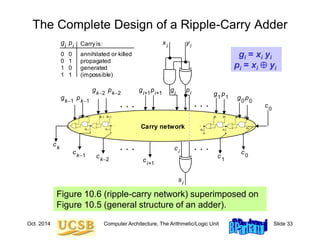
The Complete Design of a Ripple-Carry Adder
Figure 10.6 (ripple-carry network) superimposed on
Figure 10.5 (general structure of an adder).
Carry network
. . . . . .
xi
yi
g p
s
i
i
i
ci
ci+1
ck1
ck
ck2
c1
c0
g p1
1 g p0
0
g pk2
k2
g pi+1
i+1
g pk1
k1
c0
. . . . . .
0 0
0 1
1 0
1 1
annihilated or killed
propagated
generated
(impossible)
Carry is:
gi
pi
gi = xi yi
pi = xi  yi
. . .
ck1
ck
ck2 c1
g p1
1 g p0
0
g pk2
k2
g pk1
k1
c0
c2
. . .
ck1
ck
ck2 c1
g p1
1 g p0
0
g pk2
k2
g pk1
k1
c0
c2
Oct. 2014 Computer Architecture, The Arithmetic/Logic Unit Slide 34
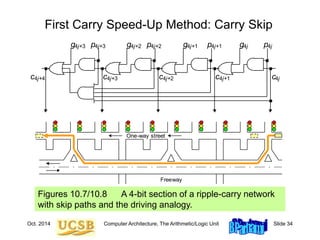
First Carry Speed-Up Method: Carry Skip
Figures 10.7/10.8 A 4-bit section of a ripple-carry network
with skip paths and the driving analogy.
c
g p4j+1
4j+1 g p4j
4j
g p4j+2
4j+2
g p4j+3
4j+3
c4j
4j+4 c4j+3 c4j+2 c4j+1
One-way street
Freeway
Oct. 2014 Computer Architecture, The Arithmetic/Logic Unit Slide 35
Mux-Based Skip Carry Logic
The carry-skip adder of Fig. 10.7 works fine if we begin with a
clean slate, where all signals are 0s; otherwise, it will run into
problems, which do not exist in this mux-based implementation
c
g p4j+1
4j+1 g p4j
4j
g p4j+2
4j+2
g p4j+3
4j+3
c4j
4j+4 c4j+3 c4j+2 c4j+1
0
1
p[4j, 4j+3]
c4j+4
c
g p4j+1
4j+1 g p4j
4j
g p4j+2
4j+2
g p4j+3
4j+3
c4j
4j+4 c4j+3 c4j+2 c4j+1
Fig. 10.7
Oct. 2014 Computer Architecture, The Arithmetic/Logic Unit Slide 36
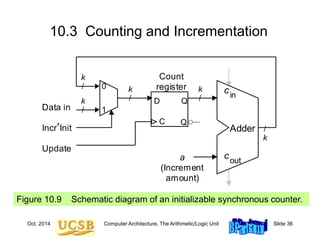
10.3 Counting and Incrementation
Figure 10.9 Schematic diagram of an initializable synchronous counter.
D Q
C
_
Q
D
cout
cin
Adder
Update
/
k
k
/
a
(Increment
amount)
Count
register k
/
1
0
Data in
k
/
k
/
IncrInit
Oct. 2014 Computer Architecture, The Arithmetic/Logic Unit Slide 37
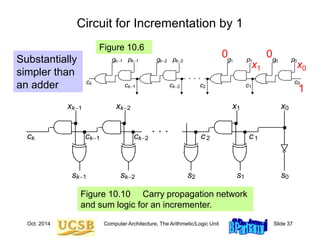
Circuit for Incrementation by 1
Substantially
simpler than
an adder
Figure 10.10 Carry propagation network
and sum logic for an incrementer.
1 0
k2
k1
. . .
ck1
ck ck2 c1
x x
x
x
c2
1 0
k2
k1 s s
s
s 2
s
. . .
ck1
ck
ck2 c1
g p1
1 g p0
0
g pk2
k2
g pk1
k1
c0
c2
0
0
x0
x1
Figure 10.6
1
Oct. 2014 Computer Architecture, The Arithmetic/Logic Unit Slide 38
 Carries can be computed directly without propagation
 For example, by unrolling the equation for c3, we get:
c3 = g2  p2 c2 = g2  p2 g1  p2 p1 g0  p2 p1 p0 c0
 We define “generate” and “propagate” signals for a block
extending from bit position a to bit position b as follows:
g[a,b] = gb  pb gb–1  pb pb–1gb–2  . . .  pb pb–1…pa+1 ga
p[a,b] = pb pb–1. . . pa+1 pa
 Combining g and p signals for adjacent blocks:
g[h,j] = g[i+1,j]  p[i+1,j] g[h,i]
p[h,j] = p[i+1,j] p[h,i]
10.4 Design of Fast Adders
h
i
i+1
j
[h, j] = [i + 1, j] ¢ [h, i]
Oct. 2014 Computer Architecture, The Arithmetic/Logic Unit Slide 39
Carries as Generate Signals for Blocks [ 0, i]
Figure 10.5
Carry network
. . . . . .
xi
yi
g p
s
i
i
i
ci
ci+1
ck1
ck
ck2
c1
c0
g p1
1 g p0
0
g pk2
k2
g pi+1
i+1
g pk1
k1
c0
. . . . . .
0 0
0 1
1 0
1 1
annihilated or killed
propagated
generated
(impossible)
Carry is:
gi
pi
Assuming c0 = 0,
we have ci = g[0,i –1]
Oct. 2014 Computer Architecture, The Arithmetic/Logic Unit Slide 40
Second Carry Speed-Up Method: Carry Lookahead
Figure 10.11 Brent-Kung lookahead carry network for an 8-digit adder,
along with details of one of the carry operator blocks.
¢ ¢ ¢ ¢
¢ ¢
¢ ¢
¢ ¢ ¢
[7, 7] [6, 6] [5, 5] [4, 4] [3, 3] [2, 2] [1, 1] [0, 0]
[0, 7] [0, 6] [0, 5] [0, 4] [0, 3] [0, 2] [0, 1] [0, 0]
[2, 3]
[4, 5]
[6, 7]
[4, 7]
[0, 3]
[0, 1]
g[0, 0]
g[0, 1]
g[1, 1]
p[0, 0]
p[0, 1]
p[1, 1]
Oct. 2014 Computer Architecture, The Arithmetic/Logic Unit Slide 41
Recursive Structure of Brent-Kung Carry Network
Figure 10.12 Brent-Kung lookahead carry network for an 8-digit adder,
with only its top and bottom rows of carry-operators shown.
¢ ¢ ¢ ¢
¢ ¢ ¢
[7, 7] [6, 6] [5, 5] [4, 4] [3, 3] [2, 2] [1, 1] [0, 0]
[0, 7] [0, 6] [0, 5] [0, 4] [0, 3] [0, 2] [0, 1] [0, 0]
4-input Brent-Kung
carry network
¢ ¢ ¢ ¢
¢ ¢
¢ ¢
¢ ¢ ¢
[7, 7] [6, 6] [5, 5] [4, 4] [3, 3] [2, 2] [1, 1] [0, 0]
[0, 7] [0, 6] [0, 5] [0, 4] [0, 3] [0, 2] [0, 1] [0, 0]
[2, 3]
[4, 5]
[6, 7]
[4, 7]
[0, 3]
[0, 1]
Oct. 2014 Computer Architecture, The Arithmetic/Logic Unit Slide 42
An Alternate Design: Kogge-Stone Network
Kogge-Stone lookahead carry network for an 8-digit adder.
¢ ¢ ¢ ¢
¢ ¢ ¢ ¢
¢ ¢
¢ ¢
¢ ¢
¢
¢ ¢
c1 = g[0,0]
c2 = g[0,1]
c3 = g[0,2]
c8 = g[0,7] c4 = g[0,3]
c5 = g[0,4]
c6 = g[0,5]
c7 = g[0,6]
Oct. 2014 Computer Architecture, The Arithmetic/Logic Unit Slide 43
¢ ¢ ¢ ¢
¢ ¢
¢ ¢
¢ ¢ ¢
[7, 7] [6, 6] [5, 5] [4, 4] [3, 3] [2, 2] [1, 1] [0, 0]
[0, 7] [0, 6] [0, 5] [0, 4] [0, 3] [0, 2] [0, 1] [0, 0]
[2, 3]
[4, 5]
[6, 7]
[4, 7]
[0, 3]
[0, 1]
g[0, 0]
g[0, 1]
g[1, 1]
p[0, 0]
p[0, 1]
p[1, 1]
Brent-Kung vs. Kogge-Stone Carry Network
11 carry operators
4 levels
17 carry operators
3 levels
Oct. 2014 Computer Architecture, The Arithmetic/Logic Unit Slide 44
Carry-Lookahead Logic with 4-Bit Block
Figure 10.13 Blocks needed in the design of carry-lookahead adders
with four-way grouping of bits.
Block
signal
generation
p[i, i+3]
ci
Intermeidte
carries
ci+1
ci+2
ci+3
g[i, i+3]
pi+3
gi+3
pi+2
gi+2
pi+1
gi+1
pi
gi
Oct. 2014 Computer Architecture, The Arithmetic/Logic Unit Slide 45
Third Carry Speed-Up Method: Carry Select
Figure 10.14 Carry-select addition principle.
cout
cin
Adder
Version 1
of sum bits
1
0
x
[a, b]
cout
cin
Adder
Version 0
of sum bits
y
[a, b]
s
[a, b]
c
a
0 1
Allows doubling of adder width with a single-mux additional delay
The lower
a positions,
(0 to a – 1)
are added
as usual
Oct. 2014 Computer Architecture, The Arithmetic/Logic Unit Slide 46
10.5 Logic and Shift Operations
Conceptually, shifts can be implemented by multiplexing
Figure 10.15 Multiplexer-based logical shifting unit.
Multiplexer
0 1 2 31 32 33 62 63
5
6
Right’Left
Shift amount 0, x[31, 1]
x[31, 0]
00, x[30, 2]
00...0, x[31]
x[31, 0]
x[30, 0], 0
x[1, 0], 00...0
x[0], 00...0
. . . . . .
32
32 32
32
32
32
32
32
32
6-bit code specifying
shift direction & amount
Right-shifted
values
Left-shifted
values
Oct. 2014 Computer Architecture, The Arithmetic/Logic Unit Slide 47
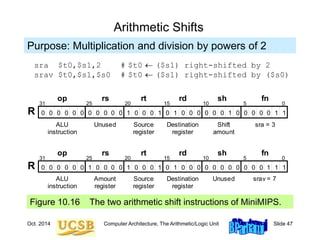
Arithmetic Shifts
Figure 10.16 The two arithmetic shift instructions of MiniMIPS.
Purpose: Multiplication and division by powers of 2
sra $t0,$s1,2 # $t0  ($s1) right-shifted by 2
srav $t0,$s1,$s0 # $t0  ($s1) right-shifted by ($s0)
1
1
1 1
0 0 0
fn
0 0 0 0 0 0 0 0 0 0 0 1 0
0
0 0 1 1
1
0 0 0 0 0
0 0 0
31 25 20 15 0
ALU
instruction
Unused Source
register
op rs rt
R
rd sh
10 5
Destination
register
Shift
amount
sra = 3
1
0 0 0 0 0 0 0 0 0 0 0 0 0 0
0
0 0 1 1
1
1 0 0 0 0 0
0 0 0
31 25 20 15 0
ALU
instruction
Amount
register
Source
register
op rs rt
R
rd sh
10 5
fn
Destination
register
Unused srav = 7
Oct. 2014 Computer Architecture, The Arithmetic/Logic Unit Slide 48
Practical Shifting in Multiple Stages
Figure 10.17 Multistage shifting in a barrel shifter.
2
0, x[31, 1]
x[31, 0]
x[30, 0], 0
32
0 1 2 3
32 32 32 32
0 0 No shift
0 1 Logical left
1 0 Logical right
1 1 Arith right
x[31], x[31, 1]
Multiplexer
2
0 1 2 3
(0 or 4)-bit shift
2
0 1 2 3
(0 or 2)-bit shift
2
0 1 2 3
(0 or 1)-bit shift
(a) Single-bit shifter (b) Shifting by up to 7 bits
y[31, 0]
z[31, 0]
Oct. 2014 Computer Architecture, The Arithmetic/Logic Unit Slide 49
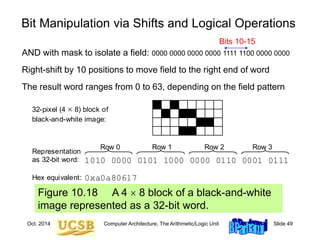
Figure 10.18 A 4  8 block of a black-and-white
image represented as a 32-bit word.
Bit Manipulation via Shifts and Logical Operations
AND with mask to isolate a field: 0000 0000 0000 0000 1111 1100 0000 0000
Right-shift by 10 positions to move field to the right end of word
The result word ranges from 0 to 63, depending on the field pattern
32-pixel (4  8) block of
black-and-white image:
1010 0000 0101 1000 0000 0110 0001 0111
Representation
as 32-bit word:
Hex equivalent: 0xa0a80617
Row 0 Row 1 Row 2 Row 3
Bits 10-15
Oct. 2014 Computer Architecture, The Arithmetic/Logic Unit Slide 50
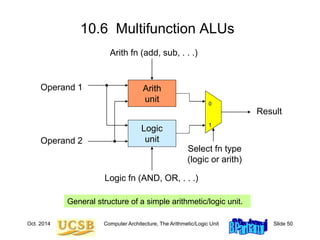
10.6 Multifunction ALUs
General structure of a simple arithmetic/logic unit.
Logic
unit
Arith
unit 0
1
Operand 1
Operand 2
Result
Logic fn (AND, OR, . . .)
Arith fn (add, sub, . . .)
Select fn type
(logic or arith)
Oct. 2014 Computer Architecture, The Arithmetic/Logic Unit Slide 51
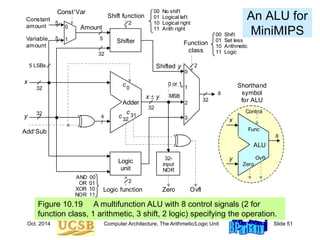
An ALU for
MiniMIPS
Figure 10.19 A multifunction ALU with 8 control signals (2 for
function class, 1 arithmetic, 3 shift, 2 logic) specifying the operation.
AddSub
x  y
y
x
Adder
c32
c0
k
/
Shifter
Logic
unit
s
Logic function
Amount
5
2
Constant
amount
Variable
amount
5
5
ConstVar
0
1
0
1
2
3
Function
class
2
Shift function
5 LSBs Shifted y
32
32
32
2
c31
32-
input
NOR
Ovfl
Zero
32
32
MSB
ALU
y
x
s
Shorthand
symbol
for ALU
Ovfl
Zero
Func
Control
0 or 1
AND 00
OR 01
XOR 10
NOR 11
00 Shift
01 Set less
10 Arithmetic
11 Logic
00 No shift
01 Logical left
10 Logical right
11 Arith right
Oct. 2014 Computer Architecture, The Arithmetic/Logic Unit Slide 52
11 Multipliers and Dividers
Modern processors perform many multiplications & divisions:
• Encryption, image compression, graphic rendering
• Hardware vs programmed shift-add/sub algorithms
Topics in This Chapter
11.1 Shift-Add Multiplication
11.2 Hardware Multipliers
11.3 Programmed Multiplication
11.4 Shift-Subtract Division
11.5 Hardware Dividers
11.6 Programmed Division
Oct. 2014 Computer Architecture, The Arithmetic/Logic Unit Slide 53
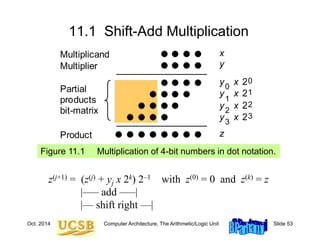
11.1 Shift-Add Multiplication
Figure 11.1 Multiplication of 4-bit numbers in dot notation.
Multiplicand
Partial
products
bit-matrix
x
y
z
y x 20
0
y x 21
1
y x 22
2
y x 23
3
Multiplier
Product
z(j+1) = (z(j) + yj x 2k) 2–1 with z(0) = 0 and z(k) = z
|––– add –––|
|–– shift right ––|
Oct. 2014 Computer Architecture, The Arithmetic/Logic Unit Slide 54
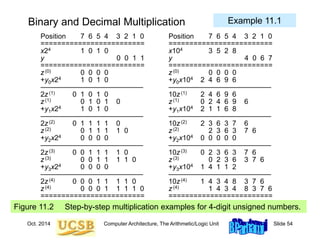
Binary and Decimal Multiplication
Figure 11.2 Step-by-step multiplication examples for 4-digit unsigned numbers.
Position 7 6 5 4 3 2 1 0 Position 7 6 5 4 3 2 1 0
========================= =========================
x24 1 0 1 0 x104 3 5 2 8
y 0 0 1 1 y 4 0 6 7
========================= =========================
z(0) 0 0 0 0 z(0) 0 0 0 0
+y0x24 1 0 1 0 +y0x104 2 4 6 9 6
–––––––––––––––––––––––––– ––––––––––––––––––––––––––
2z(1) 0 1 0 1 0 10z(1) 2 4 6 9 6
z(1) 0 1 0 1 0 z(1) 0 2 4 6 9 6
+y1x24 1 0 1 0 +y1x104 2 1 1 6 8
–––––––––––––––––––––––––– ––––––––––––––––––––––––––
2z(2) 0 1 1 1 1 0 10z(2) 2 3 6 3 7 6
z(2) 0 1 1 1 1 0 z(2) 2 3 6 3 7 6
+y2x24 0 0 0 0 +y2x104 0 0 0 0 0
–––––––––––––––––––––––––– ––––––––––––––––––––––––––
2z(3) 0 0 1 1 1 1 0 10z(3) 0 2 3 6 3 7 6
z(3) 0 0 1 1 1 1 0 z(3) 0 2 3 6 3 7 6
+y3x24 0 0 0 0 +y3x104 1 4 1 1 2
–––––––––––––––––––––––––– ––––––––––––––––––––––––––
2z(4) 0 0 0 1 1 1 1 0 10z(4) 1 4 3 4 8 3 7 6
z(4) 0 0 0 1 1 1 1 0 z(4) 1 4 3 4 8 3 7 6
========================= =========================
Example 11.1
Oct. 2014 Computer Architecture, The Arithmetic/Logic Unit Slide 55
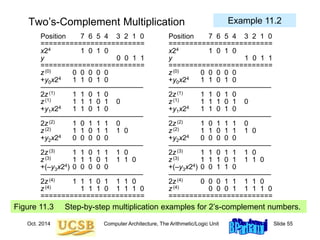
Two’s-Complement Multiplication
Figure 11.3 Step-by-step multiplication examples for 2’s-complement numbers.
Position 7 6 5 4 3 2 1 0 Position 7 6 5 4 3 2 1 0
========================= =========================
x24 1 0 1 0 x24 1 0 1 0
y 0 0 1 1 y 1 0 1 1
========================= =========================
z(0) 0 0 0 0 0 z(0) 0 0 0 0 0
+y0x24 1 1 0 1 0 +y0x24 1 1 0 1 0
–––––––––––––––––––––––––– ––––––––––––––––––––––––––
2z(1) 1 1 0 1 0 2z(1) 1 1 0 1 0
z(1) 1 1 1 0 1 0 z(1) 1 1 1 0 1 0
+y1x24 1 1 0 1 0 +y1x24 1 1 0 1 0
–––––––––––––––––––––––––– ––––––––––––––––––––––––––
2z(2) 1 0 1 1 1 0 2z(2) 1 0 1 1 1 0
z(2) 1 1 0 1 1 1 0 z(2) 1 1 0 1 1 1 0
+y2x24 0 0 0 0 0 +y2x24 0 0 0 0 0
–––––––––––––––––––––––––– ––––––––––––––––––––––––––
2z(3) 1 1 0 1 1 1 0 2z(3) 1 1 0 1 1 1 0
z(3) 1 1 1 0 1 1 1 0 z(3) 1 1 1 0 1 1 1 0
+(–y3x24) 0 0 0 0 0 +(–y3x24) 0 0 1 1 0
–––––––––––––––––––––––––– ––––––––––––––––––––––––––
2z(4) 1 1 1 0 1 1 1 0 2z(4) 0 0 0 1 1 1 1 0
z(4) 1 1 1 0 1 1 1 0 z(4) 0 0 0 1 1 1 1 0
========================= =========================
Example 11.2
Oct. 2014 Computer Architecture, The Arithmetic/Logic Unit Slide 56
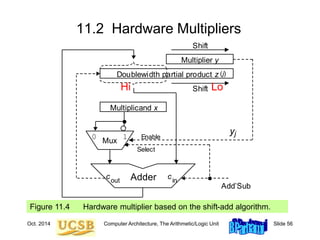
11.2 Hardware Multipliers
Multiplier y
Mux
Adder
out
c
0 1
Doublewidth partial product z
Multiplicand x
Shift
Shift
(j)
j
y
Add’Sub
Enable
Select
in
c
Figure 11.4 Hardware multiplier based on the shift-add algorithm.
Hi Lo
Oct. 2014 Computer Architecture, The Arithmetic/Logic Unit Slide 57
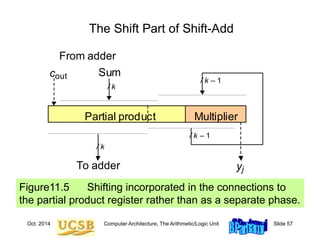
The Shift Part of Shift-Add
Figure11.5 Shifting incorporated in the connections to
the partial product register rather than as a separate phase.
out
c
To adder j
y
From adder
Sum
Partial product Multiplier
/ k – 1
/ k – 1
/ k
/ k
Oct. 2014 Computer Architecture, The Arithmetic/Logic Unit Slide 58
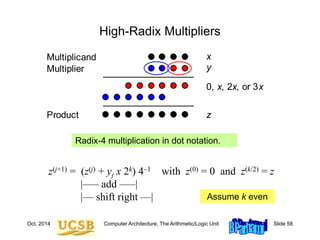
High-Radix Multipliers
Radix-4 multiplication in dot notation.
Multiplicand x
y
z
Multiplier
Product
0, x, 2x, or 3x
z(j+1) = (z(j) + yj x 2k) 4–1 with z(0) = 0 and z(k/2) = z
|––– add –––|
|–– shift right ––| Assume k even
Oct. 2014 Computer Architecture, The Arithmetic/Logic Unit Slide 59
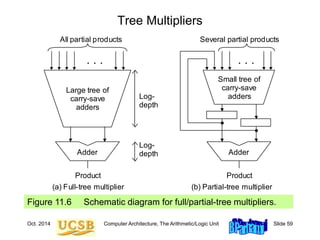
Tree Multipliers
Figure 11.6 Schematic diagram for full/partial-tree multipliers.
Adder
Large tree of
carry-save
adders
. . .
All partial products
Product
Adder
Small tree of
carry-save
adders
. . .
Several partial products
Product
Log-
depth
Log-
depth
(a) Full-tree multiplier (b) Partial-tree multiplier
Oct. 2014 Computer Architecture, The Arithmetic/Logic Unit Slide 60
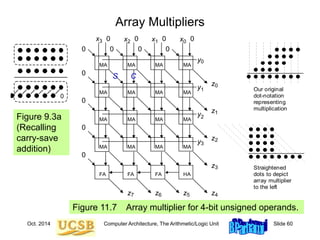
Array Multipliers
Figure 11.7 Array multiplier for 4-bit unsigned operands.
3
2
1
0
4
5
6
7
0
1
2
3
2 1 0
x x x
y
y
y
z
y
3
x 0
0
0
0
0
0
0
0
0
0
0
z
z
z
z
z
z
z
HA
FA
FA
MA
MA
MA
MA
MA
MA
MA
MA
MA
MA
MA
MA
MA
MA
MA
MA
FA
0
Our original
dot-notation
representing
multiplication
Straightened
dots to depict
array multiplier
to the left
s c
Two
carry-save
inputs
Carry-save
input
Binary input
Carry-save
output
bit
g 1
ents
ow
e it)
0
0
0
a. Carry-save addition. b. Adding two carry-save numbers.
Carry-save
addition
Carry-save
addition
Figure 9.3a
(Recalling
carry-save
addition)
Oct. 2014 Computer Architecture, The Arithmetic/Logic Unit Slide 61
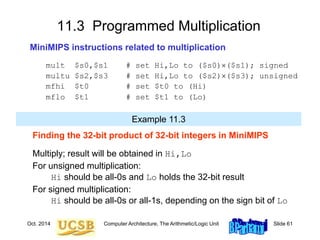
11.3 Programmed Multiplication
MiniMIPS instructions related to multiplication
mult $s0,$s1 # set Hi,Lo to ($s0)($s1); signed
multu $s2,$s3 # set Hi,Lo to ($s2)($s3); unsigned
mfhi $t0 # set $t0 to (Hi)
mflo $t1 # set $t1 to (Lo)
Finding the 32-bit product of 32-bit integers in MiniMIPS
Multiply; result will be obtained in Hi,Lo
For unsigned multiplication:
Hi should be all-0s and Lo holds the 32-bit result
For signed multiplication:
Hi should be all-0s or all-1s, depending on the sign bit of Lo
Example 11.3
Oct. 2014 Computer Architecture, The Arithmetic/Logic Unit Slide 62
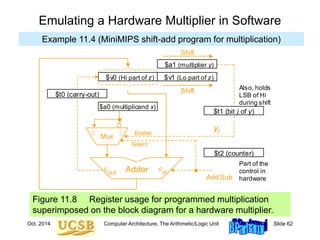
Figure 11.8 Register usage for programmed multiplication
superimposed on the block diagram for a hardware multiplier.
Emulating a Hardware Multiplier in Software
$t2 (counter)
Part of the
control in
hardware
Also, holds
LSB of Hi
during shift
Multiplier y
Mux
Adder
out
c
0 1
Doublewidth partial product z
Multiplicand x
Shift
Shift
(j)
j
y
Add’Sub
Enable
Select
in
c
$a0 (multiplicand x)
$a1 (multiplier y)
$v1 (Lo part of z)
$v0 (Hi part of z)
$t0 (carry-out)
$t1 (bit j of y)
Example 11.4 (MiniMIPS shift-add program for multiplication)
Oct. 2014 Computer Architecture, The Arithmetic/Logic Unit Slide 63
shamu: move $v0,$zero # initialize Hi to 0
move $vl,$zero # initialize Lo to 0
addi $t2,$zero,32 # init repetition counter to 32
mloop: move $t0,$zero # set c-out to 0 in case of no add
move $t1,$a1 # copy ($a1) into $t1
srl $a1,1 # halve the unsigned value in $a1
subu $t1,$t1,$a1 # subtract ($a1) from ($t1) twice to
subu $t1,$t1,$a1 # obtain LSB of ($a1), or y[j], in $t1
beqz $t1,noadd # no addition needed if y[j] = 0
addu $v0,$v0,$a0 # add x to upper part of z
sltu $t0,$v0,$a0 # form carry-out of addition in $t0
noadd: move $t1,$v0 # copy ($v0) into $t1
srl $v0,1 # halve the unsigned value in $v0
subu $t1,$t1,$v0 # subtract ($v0) from ($t1) twice to
subu $t1,$t1,$v0 # obtain LSB of Hi in $t1
sll $t0,$t0,31 # carry-out converted to 1 in MSB of $t0
addu $v0,$v0,$t0 # right-shifted $v0 corrected
srl $v1,1 # halve the unsigned value in $v1
sll $t1,$t1,31 # LSB of Hi converted to 1 in MSB of $t1
addu $v1,$v1,$t1 # right-shifted $v1 corrected
addi $t2,$t2,-1 # decrement repetition counter by 1
bne $t2,$zero,mloop # if counter > 0, repeat multiply loop
jr $ra # return to the calling program
Multiplication When There Is No Multiply Instruction
Example 11.4 (MiniMIPS shift-add program for multiplication)
Oct. 2014 Computer Architecture, The Arithmetic/Logic Unit Slide 64
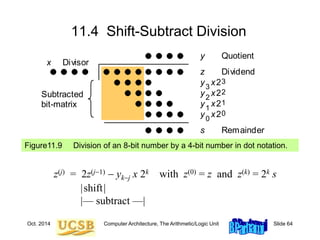
11.4 Shift-Subtract Division
Figure11.9 Division of an 8-bit number by a 4-bit number in dot notation.
z(j) = 2z(j1)  ykj x 2k with z(0) = z and z(k) = 2k s
|shift|
|–– subtract ––|
2
1
2
y
2
x2
2
1
0
3
0
Subtracted
bit-matrix
Divisor
x
Dividend
z
s Remainder
Quotient
y
y x 3
y x 2
y x
Oct. 2014 Computer Architecture, The Arithmetic/Logic Unit Slide 65
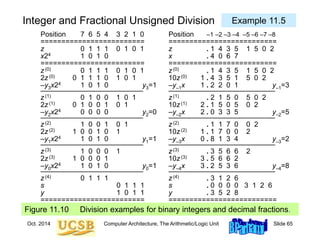
Integer and Fractional Unsigned Division
Figure 11.10 Division examples for binary integers and decimal fractions.
Position 7 6 5 4 3 2 1 0 Position –1 –2 –3 –4 –5 –6 –7 –8
========================= ==========================
z 0 1 1 1 0 1 0 1 z . 1 4 3 5 1 5 0 2
x24 1 0 1 0 x . 4 0 6 7
========================= ==========================
z(0) 0 1 1 1 0 1 0 1 z(0) . 1 4 3 5 1 5 0 2
2z(0) 0 1 1 1 0 1 0 1 10z(0) 1 . 4 3 5 1 5 0 2
–y3x24 1 0 1 0 y3=1 –y–1x 1 . 2 2 0 1 y–1=3
–––––––––––––––––––––––––– –––––––––––––––––––––––––––
z(1) 0 1 0 0 1 0 1 z(1) . 2 1 5 0 5 0 2
2z(1) 0 1 0 0 1 0 1 10z(1) 2 . 1 5 0 5 0 2
–y2x24 0 0 0 0 y2=0 –y–2x 2 . 0 3 3 5 y–2=5
–––––––––––––––––––––––––– –––––––––––––––––––––––––––
z(2) 1 0 0 1 0 1 z(2) . 1 1 7 0 0 2
2z(2) 1 0 0 1 0 1 10z(2) 1 . 1 7 0 0 2
–y1x24 1 0 1 0 y1=1 –y–3x 0 . 8 1 3 4 y–3=2
–––––––––––––––––––––––––– –––––––––––––––––––––––––––
z(3) 1 0 0 0 1 z(3) . 3 5 6 6 2
2z(3) 1 0 0 0 1 10z(3) 3 . 5 6 6 2
–y0x24 1 0 1 0 y0=1 –y–4x 3 . 2 5 3 6 y–4=8
–––––––––––––––––––––––––– –––––––––––––––––––––––––––
z(4) 0 1 1 1 z(4) . 3 1 2 6
s 0 1 1 1 s . 0 0 0 0 3 1 2 6
y 1 0 1 1 y . 3 5 2 8
========================= ==========================
Example 11.5
Oct. 2014 Computer Architecture, The Arithmetic/Logic Unit Slide 66
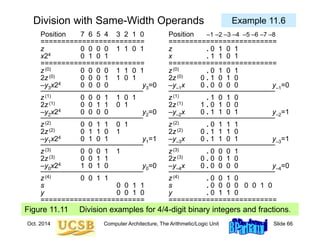
Division with Same-Width Operands
Figure 11.11 Division examples for 4/4-digit binary integers and fractions.
Position 7 6 5 4 3 2 1 0 Position –1 –2 –3 –4 –5 –6 –7 –8
========================= ==========================
z 0 0 0 0 1 1 0 1 z . 0 1 0 1
x24 0 1 0 1 x . 1 1 0 1
========================= ==========================
z(0) 0 0 0 0 1 1 0 1 z(0) . 0 1 0 1
2z(0) 0 0 0 1 1 0 1 2z(0) 0 . 1 0 1 0
–y3x24 0 0 0 0 y3=0 –y–1x 0 . 0 0 0 0 y–1=0
–––––––––––––––––––––––––– –––––––––––––––––––––––––––
z(1) 0 0 0 1 1 0 1 z(1) . 1 0 1 0
2z(1) 0 0 1 1 0 1 2z(1) 1 . 0 1 0 0
–y2x24 0 0 0 0 y2=0 –y–2x 0 . 1 1 0 1 y–2=1
–––––––––––––––––––––––––– –––––––––––––––––––––––––––
z(2) 0 0 1 1 0 1 z(2) . 0 1 1 1
2z(2) 0 1 1 0 1 2z(2) 0 . 1 1 1 0
–y1x24 0 1 0 1 y1=1 –y–3x 0 . 1 1 0 1 y–3=1
–––––––––––––––––––––––––– –––––––––––––––––––––––––––
z(3) 0 0 0 1 1 z(3) . 0 0 0 1
2z(3) 0 0 1 1 2z(3) 0 . 0 0 1 0
–y0x24 1 0 1 0 y0=0 –y–4x 0 . 0 0 0 0 y–4=0
–––––––––––––––––––––––––– –––––––––––––––––––––––––––
z(4) 0 0 1 1 z(4) . 0 0 1 0
s 0 0 1 1 s . 0 0 0 0 0 0 1 0
y 0 0 1 0 y . 0 1 1 0
========================= ==========================
Example 11.6
Oct. 2014 Computer Architecture, The Arithmetic/Logic Unit Slide 67
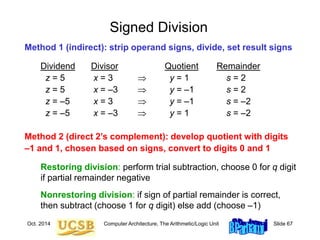
Signed Division
Method 1 (indirect): strip operand signs, divide, set result signs
Dividend Divisor Quotient Remainder
z = 5 x = 3  y = 1 s = 2
z = 5 x = –3  y = –1 s = 2
z = –5 x = 3  y = –1 s = –2
z = –5 x = –3  y = 1 s = –2
Method 2 (direct 2’s complement): develop quotient with digits
–1 and 1, chosen based on signs, convert to digits 0 and 1
Restoring division: perform trial subtraction, choose 0 for q digit
if partial remainder negative
Nonrestoring division: if sign of partial remainder is correct,
then subtract (choose 1 for q digit) else add (choose –1)
Oct. 2014 Computer Architecture, The Arithmetic/Logic Unit Slide 68
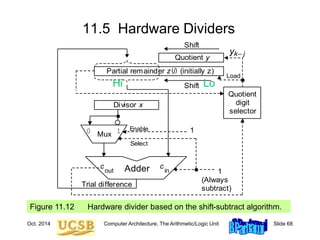
11.5 Hardware Dividers
Figure 11.12 Hardware divider based on the shift-subtract algorithm.
Load
Quotient y
Mux
Adder
0 1
Partial remainder z (initially z)
Divisor x
Shift
Shift
(j)
k– j
y
1
Enable
Select
Quotient
digit
selector
1
out
c
in
c
Trial difference
(Always
subtract)
Hi Lo
Oct. 2014 Computer Architecture, The Arithmetic/Logic Unit Slide 69
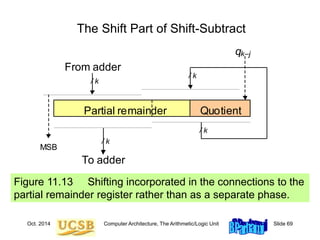
The Shift Part of Shift-Subtract
Figure 11.13 Shifting incorporated in the connections to the
partial remainder register rather than as a separate phase.
To adder
From adder
Partial remainder Quotient
/ k
/ k
/ k
/ k
k–j
q
MSB
Oct. 2014 Computer Architecture, The Arithmetic/Logic Unit Slide 70
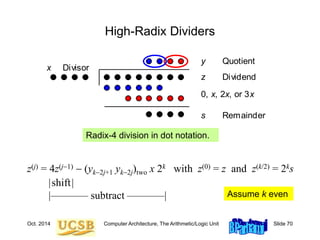
High-Radix Dividers
Radix-4 division in dot notation.
Divisor
x
Dividend
z
s Remainder
Quotient
y
0, x, 2x, or 3x
z(j) = 4z(j1)  (yk2j+1 yk2j)two x 2k with z(0) = z and z(k/2) = 2ks
|shift|
|––––––– subtract –––––––| Assume k even
Oct. 2014 Computer Architecture, The Arithmetic/Logic Unit Slide 71
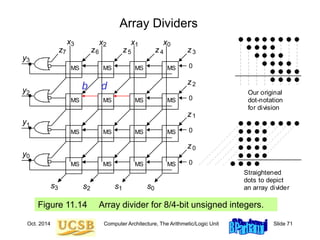
Array Dividers
Figure 11.14 Array divider for 8/4-bit unsigned integers.
2 1 0
x x x
1
y
2
y
3
y
3
z
0
y
3
x
2
z
1
z
0
z
4
z
5
z
6
z
7
z
MS
MS
MS
MS
MS
MS
MS
MS
MS
MS
MS
MS
MS
MS
MS
MS
Our original
dot-notation
for division
Straightened
dots to depict
an array divider
2 1 0
s s s
3
s
0
0
0
0
b d
Oct. 2014 Computer Architecture, The Arithmetic/Logic Unit Slide 72
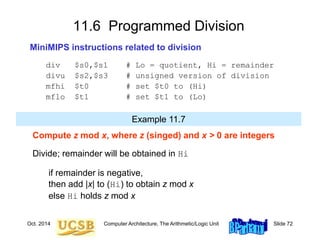
11.6 Programmed Division
MiniMIPS instructions related to division
div $s0,$s1 # Lo = quotient, Hi = remainder
divu $s2,$s3 # unsigned version of division
mfhi $t0 # set $t0 to (Hi)
mflo $t1 # set $t1 to (Lo)
Compute z mod x, where z (singed) and x > 0 are integers
Divide; remainder will be obtained in Hi
if remainder is negative,
then add |x| to (Hi) to obtain z mod x
else Hi holds z mod x
Example 11.7
Oct. 2014 Computer Architecture, The Arithmetic/Logic Unit Slide 73
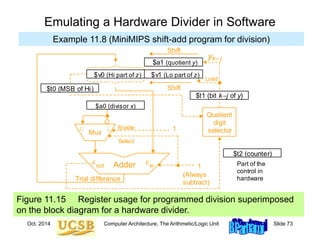
Figure 11.15 Register usage for programmed division superimposed
on the block diagram for a hardware divider.
Emulating a Hardware Divider in Software
Example 11.8 (MiniMIPS shift-add program for division)
Load
Quotient y
Mux
Adder
0 1
Partial remainder z (initially z)
Divisor x
Shift
Shift
(j)
k– j
y
1
Enable
Select
Quotient
digit
selector
1
out
c in
c
Trial difference
(Always
subtract)
$t2 (counter)
$a0 (divisor x)
$a1 (quotient y)
$v1 (Lo part of z)
$v0 (Hi part of z)
$t1 (bit kj of y)
Part of the
control in
hardware
$t0 (MSB of Hi)
Oct. 2014 Computer Architecture, The Arithmetic/Logic Unit Slide 74
shsdi: move $v0,$a2 # initialize Hi to ($a2)
move $vl,$a3 # initialize Lo to ($a3)
addi $t2,$zero,32 # initialize repetition counter to 32
dloop: slt $t0,$v0,$zero # copy MSB of Hi into $t0
sll $v0,$v0,1 # left-shift the Hi part of z
slt $t1,$v1,$zero # copy MSB of Lo into $t1
or $v0,$v0,$t1 # move MSB of Lo into LSB of Hi
sll $v1,$v1,1 # left-shift the Lo part of z
sge $t1,$v0,$a0 # quotient digit is 1 if (Hi)  x,
or $t1,$t1,$t0 # or if MSB of Hi was 1 before shifting
sll $a1,$a1,1 # shift y to make room for new digit
or $a1,$a1,$t1 # copy y[k-j] into LSB of $a1
beq $t1,$zero,nosub # if y[k-j] = 0, do not subtract
subu $v0,$v0,$a0 # subtract divisor x from Hi part of z
nosub: addi $t2,$t2,-1 # decrement repetition counter by 1
bne $t2,$zero,dloop # if counter > 0, repeat divide loop
move $v1,$a1 # copy the quotient y into $v1
jr $ra # return to the calling program
Division When There Is No Divide Instruction
Example 11.7 (MiniMIPS shift-subtract program for division)
Oct. 2014 Computer Architecture, The Arithmetic/Logic Unit Slide 75
Load
Quotient y
Mux
Adder
0 1
Partial remainder z (initially z)
Divisor x
Shift
Shift
(j)
k– j
y
1
Enable
Select
Quotient
digit
selector
1
out
c
in
c
Trial difference
(Always
subtract)
Multiplier y
Mux
Adder
out
c
0 1
Doublewidth partial product z
Multiplicand x
Shift
Shift
(j)
j
y
Add’Sub
Enable
Select
in
c
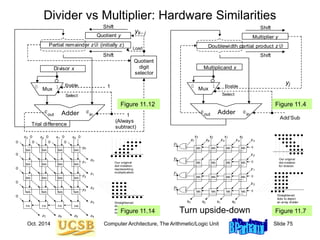
Divider vs Multiplier: Hardware Similarities
2 1 0
x x x
1
y
2
y
3
y
3
z
0
y
3
x
2
z
1
z
0
z
4
z
5
z
6
z
7
z
MS
MS
MS
MS
MS
MS
MS
MS
MS
MS
MS
MS
MS
MS
MS
MS
Our original
dot-notation
for division
Straightened
dots to depict
an array divider
2 1 0
s s s
3
s
0
0
0
0
Figure 11.12 Figure 11.4
3
2
1
0
4
5
6
7
0
1
2
3
2 1 0
x x x
y
y
y
z
y
3
x 0
0
0
0
0
0
0
0
0
0
0
z
z
z
z
z
z
z
HA
FA
FA
MA
MA
MA
MA
MA
MA
MA
MA
MA
MA
MA
MA
MA
MA
MA
MA
FA
0
Our original
dot-notation
representing
multiplication
Straightened
dots to depict
array multiplier
to the left
Figure 11.14 Figure 11.7
Turn upside-down
Oct. 2014 Computer Architecture, The Arithmetic/Logic Unit Slide 76
12 Floating-Point Arithmetic
Floating-point is no longer reserved for high-end machines
• Multimedia and signal processing require flp arithmetic
• Details of standard flp format and arithmetic operations
Topics in This Chapter
12.1 Rounding Modes
12.2 Special Values and Exceptions
12.3 Floating-Point Addition
12.4 Other Floating-Point Operations
12.5 Floating-Point Instructions
12.6 Result Precision and Errors
Oct. 2014 Computer Architecture, The Arithmetic/Logic Unit Slide 77
12.1 Rounding Modes
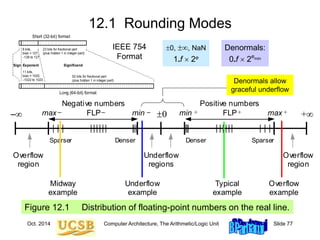
Figure 12.1 Distribution of floating-point numbers on the real line.
Denser Denser
Sparser Sparser
Negative numbers
FLP FLP
0 +
–
Overflow
region
Overflow
region
Underflow
regions
Positive numbers
Underflow
example
Overflow
example
Midway
example
Typical
example
min
max min max
+ +
– –
– +
Denormals allow
graceful underflow
Short (32-bit) format
Long (64-bit) format
Sign Exponent Significand
8 bits,
bias = 127,
–126 to 127
11 bits,
bias = 1023,
–1022 to 1023
52 bits for fractional part
(plus hidden 1 in integer part)
23 bits for fractional part
(plus hidden 1 in integer part)
IEEE 754
Format
0, , NaN
1.f  2e
Denormals:
0.f  2emin
Oct. 2014 Computer Architecture, The Arithmetic/Logic Unit Slide 78
Figure 12.2 Two round-to-nearest-integer functions for x in [–4, 4].
Round-to-Nearest (Even)
rtnei(x)
–4
–3
–2
–1
x
–4 –3 –2 –1 4
3
2
1
4
3
2
1
rtni(x)
–4
–3
–2
–1
x
–4 –3 –2 –1 4
3
2
1
4
3
2
1
(a) Round to nearest even integer (b) Round to nearest integer
Oct. 2014 Computer Architecture, The Arithmetic/Logic Unit Slide 79
Figure 12.3 Two directed round-to-nearest-integer functions for x in [–4, 4].
Directed Rounding
(a) Round inward to nearest integer (b) Round upward to nearest integer
rutni(x)
–4
–3
–2
–1
x
–4 –3 –2 –1 4
3
2
1
4
3
2
1
ritni(x)
–4
–3
–2
–1
x
–4 –3 –2 –1 4
3
2
1
4
3
2
1
Oct. 2014 Computer Architecture, The Arithmetic/Logic Unit Slide 80
12.2 Special Values and Exceptions
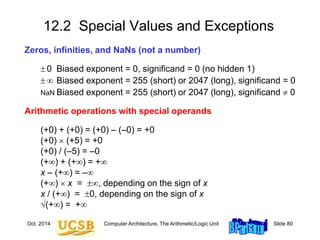
Zeros, infinities, and NaNs (not a number)
 0 Biased exponent = 0, significand = 0 (no hidden 1)
  Biased exponent = 255 (short) or 2047 (long), significand = 0
NaN Biased exponent = 255 (short) or 2047 (long), significand  0
Arithmetic operations with special operands
(+0) + (+0) = (+0) – (–0) = +0
(+0)  (+5) = +0
(+0) / (–5) = –0
(+) + (+) = +
x – (+) = –
(+)  x = , depending on the sign of x
x / (+) = 0, depending on the sign of x
(+) = +
Oct. 2014 Computer Architecture, The Arithmetic/Logic Unit Slide 81
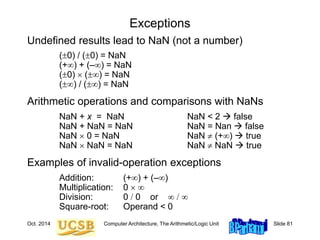
Exceptions
Undefined results lead to NaN (not a number)
(0) / (0) = NaN
(+) + (–) = NaN
(0)  () = NaN
() / () = NaN
Arithmetic operations and comparisons with NaNs
NaN + x = NaN NaN < 2  false
NaN + NaN = NaN NaN = Nan  false
NaN  0 = NaN NaN  (+)  true
NaN  NaN = NaN NaN  NaN  true
Examples of invalid-operation exceptions
Addition: (+) + (–)
Multiplication: 0  
Division: 0 / 0 or  / 
Square-root: Operand < 0
Oct. 2014 Computer Architecture, The Arithmetic/Logic Unit Slide 82
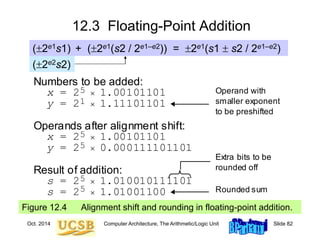
12.3 Floating-Point Addition
Figure 12.4 Alignment shift and rounding in floating-point addition.
Operands after alignment shift:
x = 2 1.00101101
y = 2 0.000111101101
Numbers to be added:
x = 2 1.00101101
y = 2 1.11101101
5 

5


Extra bits to be
rounded off
Operand with
smaller exponent
to be preshifted
Result of addition:
s = 2 1.010010111101
s = 2 1.01001100 Rounded sum


5
1
5
5
(2e1s1)
(2e2s2)
+ (2e1(s2 / 2e1–e2)) = 2e1(s1  s2 / 2e1–e2)
Oct. 2014 Computer Architecture, The Arithmetic/Logic Unit Slide 83
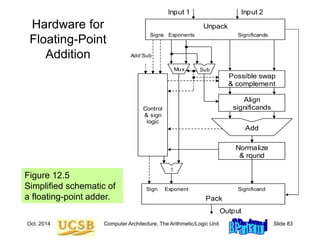
Hardware for
Floating-Point
Addition
Figure 12.5
Simplified schematic of
a floating-point adder.
Normalize
& round
Add
Align
significands
Possible swap
& complement
Unpack
Control
& sign
logic
Pack
Input 1
Output
Significands
Exponents
Signs
Significand
Exponent
Sign
Sub

Mux
Input 2
AddSub
Oct. 2014 Computer Architecture, The Arithmetic/Logic Unit Slide 84
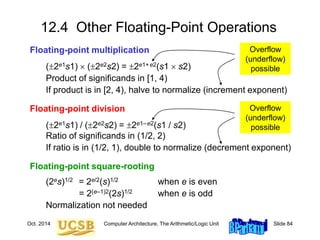
12.4 Other Floating-Point Operations
Floating-point multiplication
(2e1s1)  (2e2s2) = 2e1+e2(s1  s2)
Product of significands in [1, 4)
If product is in [2, 4), halve to normalize (increment exponent)
Floating-point division
(2e1s1) / (2e2s2) = 2e1–e2(s1 / s2)
Ratio of significands in (1/2, 2)
If ratio is in (1/2, 1), double to normalize (decrement exponent)
Floating-point square-rooting
(2es)1/2 = 2e/2(s)1/2 when e is even
= 2(e–1)2(2s)1/2 when e is odd
Normalization not needed
Overflow
(underflow)
possible
Overflow
(underflow)
possible
Oct. 2014 Computer Architecture, The Arithmetic/Logic Unit Slide 85
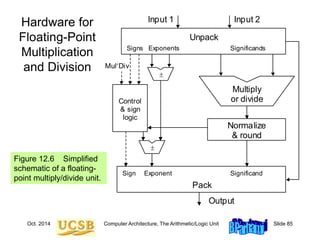
Hardware for
Floating-Point
Multiplication
and Division
Figure 12.6 Simplified
schematic of a floating-
point multiply/divide unit.
Normalize
& round
Multiply
or divide
Unpack
Control
& sign
logic
MulDiv
Pack
Input 1
Output
Significands
Exponents
Signs
Significand
Exponent
Sign


Input 2
Oct. 2014 Computer Architecture, The Arithmetic/Logic Unit Slide 86
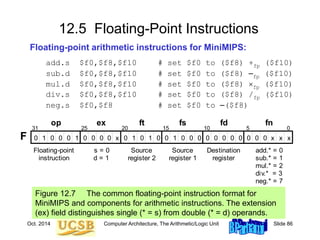
12.5 Floating-Point Instructions
Floating-point arithmetic instructions for MiniMIPS:
add.s $f0,$f8,$f10 # set $f0 to ($f8) +fp ($f10)
sub.d $f0,$f8,$f10 # set $f0 to ($f8) –fp ($f10)
mul.d $f0,$f8,$f10 # set $f0 to ($f8) fp ($f10)
div.s $f0,$f8,$f10 # set $f0 to ($f8) /fp ($f10)
neg.s $f0,$f8 # set $f0 to –($f8)
Figure 12.7 The common floating-point instruction format for
MiniMIPS and components for arithmetic instructions. The extension
(ex) field distinguishes single (* = s) from double (* = d) operands.
x
x x
x
0
1
1 0 0 0 0 0 0 0 0 0 0 0 0 0
0 1 1
1
0 0 0 0
0 0 0 0
31 25 20 15 0
Floating-point
instruction
s = 0
d = 1
Source
register 2
op ex ft
F
fs fd
10 5
fn
Destination
register
add.* = 0
sub.* = 1
mul.* = 2
div.* = 3
neg.* = 7
Source
register 1
Oct. 2014 Computer Architecture, The Arithmetic/Logic Unit Slide 87
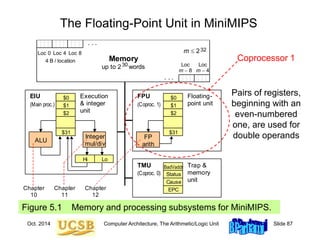
The Floating-Point Unit in MiniMIPS
Figure 5.1 Memory and processing subsystems for MiniMIPS.
Memory
up to 2 words
30
Loc 0 Loc 4 Loc 8
Loc
m 4
Loc
m 8
4 B / location
m  232
$0
$1
$2
$31
Hi Lo
ALU
$0
$1
$2
$31
FP
arith
EPC
Cause
BadVaddr
Status
EIU FPU
TMU
Execution
& integer
unit
Floating-
point unit
Trap &
memory
unit
. . .
. . .
(Coproc. 1)
(Coproc. 0)
(Main proc.)
Integer
mul/div
Chapter
10
Chapter
11
Chapter
12
Pairs of registers,
beginning with an
even-numbered
one, are used for
double operands
Coprocessor 1
Oct. 2014 Computer Architecture, The Arithmetic/Logic Unit Slide 88
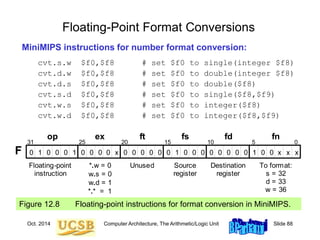
Floating-Point Format Conversions
MiniMIPS instructions for number format conversion:
cvt.s.w $f0,$f8 # set $f0 to single(integer $f8)
cvt.d.w $f0,$f8 # set $f0 to double(integer $f8)
cvt.d.s $f0,$f8 # set $f0 to double($f8)
cvt.s.d $f0,$f8 # set $f0 to single($f8,$f9)
cvt.w.s $f0,$f8 # set $f0 to integer($f8)
cvt.w.d $f0,$f8 # set $f0 to integer($f8,$f9)
Figure 12.8 Floating-point instructions for format conversion in MiniMIPS.
1
0 0 x
x x
x
0
1
1 0 0 0 0 0 0 0 0 0 0 0 0 0
0 1
0 0 0 0
0 0 0
31 25 20 15 0
Floating-point
instruction
*.w = 0
w.s = 0
w.d = 1
*.* = 1
Unused
op ex ft
F
fs fd
10 5
fn
Destination
register
To format:
s = 32
d = 33
w = 36
Source
register
Oct. 2014 Computer Architecture, The Arithmetic/Logic Unit Slide 89
Floating-Point Data Transfers
MiniMIPS instructions for floating-point load, store, and move:
lwc1 $f8,40($s3) # load mem[40+($s3)] into $f8
swc1 $f8,A($s3) # store ($f8) into mem[A+($s3)]
mov.s $f0,$f8 # load $f0 with ($f8)
mov.d $f0,$f8 # load $f0,$f1 with ($f8,$f9)
mfc1 $t0,$f12 # load $t0 with ($f12)
mtc1 $f8,$t4 # load $f8 with ($t4)
Figure 12.9 Instructions for floating-point data movement in MiniMIPS.
0
1 1
0 0
x
0
1
1 0 0 0 0 0 0 0 0 0 0 0 0 0
0 1
0 0 0 0
0 0 0 0
31 25 20 15 0
Floating-point
instruction
s = 0
d = 1
Unused
op ex ft
F
fs fd
10 5
fn
Destination
register
mov.* = 6
Source
register
1 1
1 0 0
0
0
x
0
1
1 0 0 0 0 0 0 0 0 0 0 0 0 0
0 0 0
0 0
0 0 0
31 25 20 15 0
Floating-point
instruction
mfc1 = 0
mtc1 = 4
Unused
op rs rt
R
rd sh
10 5
fn
Destination
register
Source
register
Unused
Oct. 2014 Computer Architecture, The Arithmetic/Logic Unit Slide 90
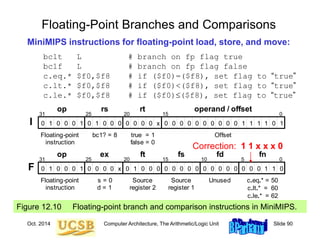
Floating-Point Branches and Comparisons
MiniMIPS instructions for floating-point load, store, and move:
bc1t L # branch on fp flag true
bc1f L # branch on fp flag false
c.eq.* $f0,$f8 # if ($f0)=($f8), set flag to “true”
c.lt.* $f0,$f8 # if ($f0)<($f8), set flag to “true”
c.le.* $f0,$f8 # if ($f0)($f8), set flag to “true”
Figure 12.10 Floating-point branch and comparison instructions in MiniMIPS.
x
0
0
1
0 0 0 0 0 0 0 0 0 0 0 0 0
1 1 1 1 1
0 0
1 1
0 0 0 0 0 0
31 25 20 15 0
Floating-point
instruction
true = 1
false = 0
bc1? = 8 Offset
op rs rt operand / offset
I
1 0 0
1 1
0 0
x
0
1
1 0 0 0 0 0 0 0 0 0 0 0 0 0
0 0 0 0 0
0 0 0
31 25 20 15 0
Floating-point
instruction
s = 0
d = 1
Source
register 2
op ex ft
F
fs fd
10 5
fn
Unused c.eq.* = 50
c.lt.* = 60
c.le.* = 62
Source
register 1
Correction: 1 1 x x x 0
Oct. 2014 Computer Architecture, The Arithmetic/Logic Unit Slide 91
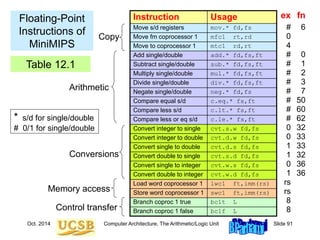
Floating-Point
Instructions of
MiniMIPS
Instruction Usage
Move s/d registers mov.* fd,fs
Move fm coprocessor 1 mfc1 rt,rd
Move to coprocessor 1 mtc1 rd,rt
Add single/double add.* fd,fs,ft
Subtract single/double sub.* fd,fs,ft
Multiply single/double mul.* fd,fs,ft
Divide single/double div.* fd,fs,ft
Negate single/double neg.* fd,fs
Compare equal s/d c.eq.* fs,ft
Compare less s/d c.lt.* fs,ft
Compare less or eq s/d c.le.* fs,ft
Convert integer to single cvt.s.w fd,fs
Convert integer to double cvt.d.w fd,fs
Convert single to double cvt.d.s fd,fs
Convert double to single cvt.s.d fd,fs
Convert single to integer cvt.w.s fd,fs
Convert double to integer cvt.w.d fd,fs
Load word coprocessor 1 lwc1 ft,imm(rs)
Store word coprocessor 1 swc1 ft,imm(rs)
Branch coproc 1 true bc1t L
Branch coproc 1 false bc1f L
Copy
Control transfer
Conversions
Arithmetic
Memory access
ex
#
0
4
#
#
#
#
#
#
#
#
0
0
1
1
0
1
rs
rs
8
8
fn
6
0
1
2
3
7
50
60
62
32
33
33
32
36
36
Table 12.1
* s/d for single/double
# 0/1 for single/double
Oct. 2014 Computer Architecture, The Arithmetic/Logic Unit Slide 92
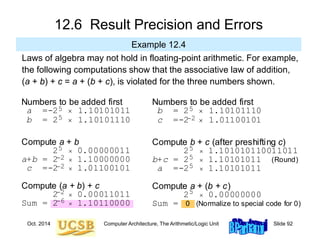
12.6 Result Precision and Errors
Example 12.4
Laws of algebra may not hold in floating-point arithmetic. For example,
the following computations show that the associative law of addition,
(a + b) + c = a + (b + c), is violated for the three numbers shown.
Compute a + b
2  0.00000011
a+b = 2  1.10000000
c =-2  1.01100101
Numbers to be added first
a =-2  1.10101011
b = 2  1.10101110
5
5
Compute (a + b) + c
2  0.00011011
Sum = 2  1.10110000
5
2
2
2
6
Compute b + c (after preshifting c)
2  1.101010110011011
b+c = 2  1.10101011 (Round)
a =-2  1.10101011
Numbers to be added first
b = 2  1.10101110
c =-2  1.01100101
5
5
Compute a + (b + c)
2  0.00000000
Sum = 0 (Normalize to special code for 0)
5
5
5
2
Oct. 2014 Computer Architecture, The Arithmetic/Logic Unit Slide 93
Error Control and Certifiable Arithmetic
Catastrophic cancellation in subtracting almost equal numbers:
Area of a needlelike triangle
A = [s(s – a)(s – b)(s – c)]1/2
Possible remedies
Carry extra precision in intermediate results (guard digits):
commonly used in calculators
Use alternate formula that does not produce cancellation errors
Certifiable arithmetic with intervals
A number is represented by its lower and upper bounds [xl, xu]
Example of arithmetic: [xl, xu] +interval [yl, yu] = [xl +fp yl, xu +fp yu]
a
b
c
Oct. 2014 Computer Architecture, The Arithmetic/Logic Unit Slide 94
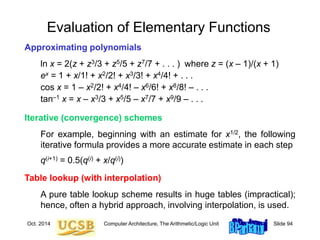
Evaluation of Elementary Functions
Approximating polynomials
ln x = 2(z + z3/3 + z5/5 + z7/7 + . . . ) where z = (x – 1)/(x + 1)
ex = 1 + x/1! + x2/2! + x3/3! + x4/4! + . . .
cos x = 1 – x2/2! + x4/4! – x6/6! + x8/8! – . . .
tan–1 x = x – x3/3 + x5/5 – x7/7 + x9/9 – . . .
Iterative (convergence) schemes
For example, beginning with an estimate for x1/2, the following
iterative formula provides a more accurate estimate in each step
q(i+1) = 0.5(q(i) + x/q(i))
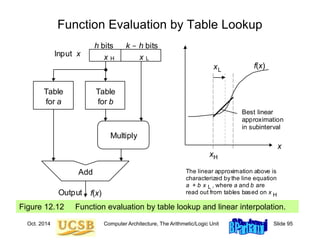
Table lookup (with interpolation)
A pure table lookup scheme results in huge tables (impractical);
hence, often a hybrid approach, involving interpolation, is used.
Oct. 2014 Computer Architecture, The Arithmetic/Logic Unit Slide 95
Figure 12.12 Function evaluation by table lookup and linear interpolation.
Function Evaluation by Table Lookup
L
Add
x
Table
for a
Output
Table
for b
x
Input x
H L
f(x)
Multiply
h bits k - h bits
xH
f(x)
x
x
Best linear
approximation
in subinterval
The linear approximation above is
characterized by the line equation
a + b x , where a and b are
read out from tables based on x
L
H

CA.ppt

  • 1.
    Oct. 2014 ComputerArchitecture, The Arithmetic/Logic Unit Slide 1 Part III The Arithmetic/Logic Unit
  • 2.
    Oct. 2014 ComputerArchitecture, The Arithmetic/Logic Unit Slide 2 About This Presentation This presentation is intended to support the use of the textbook Computer Architecture: From Microprocessors toSupercomputers, Oxford University Press, 2005, ISBN 0-19-515455-X. It is updated regularly by the author as part of his teaching of the upper-division course ECE 154, Introduction to Computer Architecture, at the University of California, Santa Barbara. Instructors can use these slides freely in classroom teaching and for other educational purposes. Any other use is strictly prohibited. © Behrooz Parhami Edition Released Revised Revised Revised Revised First July 2003 July 2004 July 2005 Mar. 2006 Jan. 2007 Jan. 2008 Jan. 2009 Jan. 2011 Oct. 2014
  • 3.
    Oct. 2014 ComputerArchitecture, The Arithmetic/Logic Unit Slide 3 III The Arithmetic/Logic Unit Topics in This Part Chapter 9 Number Representation Chapter 10 Adders and Simple ALUs Chapter 11 Multipliers and Dividers Chapter 12 Floating-Point Arithmetic Overview of computer arithmetic and ALU design: • Review representation methods for signed integers • Discuss algorithms & hardware for arithmetic ops • Consider floating-point representation & arithmetic
  • 4.
    Oct. 2014 ComputerArchitecture, The Arithmetic/Logic Unit Slide 4 Preview of Arithmetic Unit in the Data Path Fig. 13.3 Key elements of the single-cycle MicroMIPS data path. / ALU Data cache Instr cache Next addr Reg file op jta fn inst imm rs (rs) (rt) Data addr Data in 0 1 ALUSrc ALUFunc DataWrite DataRead SE RegInSrc rt rd RegDst RegWrite 32 / 16 Register input Data out Func ALUOvfl Ovfl 31 0 1 2 Next PC Incr PC (PC) Br&Jump ALU out PC 0 1 2 Instruction fetch Reg access / decode ALU operation Data access Register writeback
  • 5.
    Oct. 2014 ComputerArchitecture, The Arithmetic/Logic Unit Slide 5 Computer Arithmetic as a Topic of Study Brief overview article – Encyclopedia of Info Systems, Academic Press, 2002, Vol. 3, pp. 317-333 Our textbook’s treatment of the topic falls between the extremes (4 chaps.) Graduate course ECE 252B – Text: Computer Arithmetic, Oxford U Press, 2000 (2nd ed., 2010)
  • 6.
    Oct. 2014 ComputerArchitecture, The Arithmetic/Logic Unit Slide 6 9 Number Representation Arguably the most important topic in computer arithmetic: • Affects system compatibility and ease of arithmetic • Two’s complement, flp, and unconventional methods Topics in This Chapter 9.1 Positional Number Systems 9.2 Digit Sets and Encodings 9.3 Number-Radix Conversion 9.4 Signed Integers 9.5 Fixed-Point Numbers 9.6 Floating-Point Numbers
  • 7.
    Oct. 2014 ComputerArchitecture, The Arithmetic/Logic Unit Slide 7 9.1 Positional Number Systems Representations of natural numbers {0, 1, 2, 3, …} ||||| ||||| ||||| ||||| ||||| || sticks or unary code 27 radix-10 or decimal code 11011 radix-2 or binary code XXVII Roman numerals Fixed-radix positional representation with k digits Value of a number: x = (xk–1xk–2 . . . x1x0)r = S xi r i For example: 27 = (11011)two = (124) + (123) + (022) + (121) + (120) Number of digits for [0, P]: k = logr (P + 1) = logr P + 1 k–1 i=0
  • 8.
    Oct. 2014 ComputerArchitecture, The Arithmetic/Logic Unit Slide 8 Unsigned Binary Integers Figure 9.1 Schematic representation of 4-bit code for integers in [0, 15]. 0000 0001 1111 0010 1110 0011 1101 0100 1100 1000 0101 1011 0110 1010 0111 1001 0 1 2 3 4 5 6 7 15 11 14 13 12 8 9 10 Inside: Natural number Outside: 4-bit encoding 0 1 2 3 15 4 5 6 7 8 9 Turn x notches counterclockwise to add x Turn y notches clockwise to subtract y 11 14 13 12 10
  • 9.
    Oct. 2014 ComputerArchitecture, The Arithmetic/Logic Unit Slide 9 Representation Range and Overflow Figure 9.2 Overflow regions in finite number representation systems. For unsigned representations covered in this section, max – = 0. max Finite set of representable numbers Overflow region max Overflow region Numbers larger than max Numbers smaller than max     Example 9.2, Part d Discuss if overflow will occur when computing 317 – 316 in a number system with k = 8 digits in radix r = 10. Solution The result 86 093 442 is representable in the number system which has a range [0, 99 999 999]; however, if 317 is computed en route to the final result, overflow will occur.
  • 10.
    Oct. 2014 ComputerArchitecture, The Arithmetic/Logic Unit Slide 10 9.2 Digit Sets and Encodings Conventional and unconventional digit sets  Decimal digits in [0, 9]; 4-bit BCD, 8-bit ASCII  Hexadecimal, or hex for short: digits 0-9 & a-f  Conventional ternary digit set in [0, 2] Conventional digit set for radix r is [0, r – 1] Symmetric ternary digit set in [–1, 1]  Conventional binary digit set in [0, 1] Redundant digit set [0, 2], encoded in 2 bits ( 0 2 1 1 0 )two and ( 1 0 1 0 2 )two represent 22
  • 11.
    Oct. 2014 ComputerArchitecture, The Arithmetic/Logic Unit Slide 11 Carry-Save Numbers Radix-2 numbers using the digits 0, 1, and 2 Example: (1 0 2 1)two = (123) + (022) + (221) + (120) = 13 Possible encodings (a) Binary (b) Unary 0 00 0 00 1 01 1 01 (First alternate) 2 10 1 10 (Second alternate) 11 (Unused) 2 11 1 0 2 1 1 0 2 1 MSB 0 0 1 0 = 2 First bit 0 0 1 1 = 3 LSB 1 0 0 1 = 9 Second bit 1 0 1 0 = 10
  • 12.
    Oct. 2014 ComputerArchitecture, The Arithmetic/Logic Unit Slide 12 Figure 9.3 Adding a binary number or another carry-save number to a carry-save number. The Notion of Carry-Save Addition Two carry-save inputs Carry-save input Binary input Carry-save output This bit being 1 represents overflow (ignore it) 0 0 0 a. Carry-save addition. b. Adding two carry-save numbers. Carry-save addition Carry-save addition Digit-set combination: {0, 1, 2} + {0, 1} = {0, 1, 2, 3} = {0, 2} + {0, 1}
  • 13.
    Oct. 2014 ComputerArchitecture, The Arithmetic/Logic Unit Slide 13 9.3 Number Radix Conversion  Perform arithmetic in the new radix R Suitable for conversion from radix r to radix 10 Horner’s rule: (xk–1xk–2 . . . x1x0)r = (…((0 + xk–1)r + xk–2)r + . . . + x1)r + x0 (1 0 1 1 0 1 0 1)two = 0 + 1  1  2 + 0  2  2 + 1  5  2 + 1  11  2 + 0  22  2 + 1  45  2 + 0  90  2 + 1  181  Perform arithmetic in the old radix r Suitable for conversion from radix 10 to radix R Divide the number by R, use the remainder as the LSD and the quotient to repeat the process 19 / 3  rem 1, quo 6 / 3  rem 0, quo 2 / 3  rem 2, quo 0 Thus, 19 = (2 0 1)three Two ways to convert numbers from an old radix r to a new radix R
  • 14.
    Oct. 2014 ComputerArchitecture, The Arithmetic/Logic Unit Slide 14 Justifications for Radix Conversion Rules Figure 9.4 Justifying one step of the conversion of x to radix 2. x 0 x mod 2 Binary representation of x/2 Justifying Horner’s rule. 1 2 1 2 0 1 2 1 0 ( ) k k k k r k k x x x x r x r x r x            0 1 2 ( ( ( ))) x r x r x r    
  • 15.
    Oct. 2014 ComputerArchitecture, The Arithmetic/Logic Unit Slide 15 9.4 Signed Integers  We dealt with representing the natural numbers  Signed or directed whole numbers = integers { . . . , 3, 2, 1, 0, 1, 2, 3, . . . }  Signed-magnitude representation +27 in 8-bit signed-magnitude binary code 0 0011011 –27 in 8-bit signed-magnitude binary code 1 0011011 –27 in 2-digit decimal code with BCD digits 1 0010 0111  Biased representation Represent the interval of numbers [N, P] by the unsigned interval [0, P + N]; i.e., by adding N to every number
  • 16.
    Oct. 2014 ComputerArchitecture, The Arithmetic/Logic Unit Slide 16 Two’s-Complement Representation Figure 9.5 Schematic representation of 4-bit 2’s-complement code for integers in [–8, +7]. 0000 0001 1111 0010 1110 0011 1101 0100 1100 1000 0101 1011 0110 1010 0111 1001 +0 +1 +2 +3 +4 +5 +6 +7 –1 –5 –2 –3 –4 –8 –7 –6 + _ 0 1 2 3 –1 4 5 6 7 –8 –7 Turn x notches counterclockwise to add x Turn 16 – y notches counterclockwise to add –y (subtract y) –5 –2 –3 –4 –6 With k bits, numbers in the range [–2k–1, 2k–1 – 1] represented. Negation is performed by inverting all bits and adding 1.
  • 17.
    Oct. 2014 ComputerArchitecture, The Arithmetic/Logic Unit Slide 17 Conversion from 2’s-Complement to Decimal Example 9.7 Convert x = (1 0 1 1 0 1 0 1)2’s-compl to decimal. Solution Given that x is negative, one could change its sign and evaluate –x. Shortcut: Use Horner’s rule, but take the MSB as negative –1  2 + 0  –2  2 + 1  –3  2 + 1  –5  2 + 0  –10  2 + 1  –19  2 + 0  –38  2 + 1  –75 Example 9.8 Sign Change for a 2’s-Complement Number Given y = (1 0 1 1 0 1 0 1)2’s-compl, find the representation of –y. Solution –y = (0 1 0 0 1 0 1 0) + 1 = (0 1 0 0 1 0 1 1)2’s-compl (i.e., 75)
  • 18.
    Oct. 2014 ComputerArchitecture, The Arithmetic/Logic Unit Slide 18 Two’s-Complement Addition and Subtraction Figure 9.6 Binary adder used as 2’s-complement adder/subtractor. AddSub x  y y x k / k / k / y or y  Adder cout cin k /
  • 19.
    Oct. 2014 ComputerArchitecture, The Arithmetic/Logic Unit Slide 19 9.5 Fixed-Point Numbers Positional representation: k whole and l fractional digits Value of a number: x = (xk–1xk–2 . . .x1x0 .x–1x–2 . . . x–l )r = S xi r i For example: 2.375 = (10.011)two = (121) + (020) + (021) + (122) + (123) Numbers in the range [0, rk – ulp] representable, where ulp = r –l Fixed-point arithmetic same as integer arithmetic (radix point implied, not explicit) Two’s complement properties (including sign change) hold here as well: (01.011)2’s-compl = (–021) + (120) + (02–1) + (12–2) + (12–3) = +1.375 (11.011)2’s-compl = (–121) + (120) + (02–1) + (12–2) + (12–3) = –0.625
  • 20.
    Oct. 2014 ComputerArchitecture, The Arithmetic/Logic Unit Slide 20 Fixed-Point 2’s-Complement Numbers Figure 9.7 Schematic representation of 4-bit 2’s-complement encoding for (1 + 3)-bit fixed-point numbers in the range [–1, +7/8]. 0.000 0.001 1.111 0.010 1.110 0.011 1.101 0.100 1.100 1.000 0.101 1.011 0.110 1.010 0.111 1.001 +0 +.125 +.25 +.375 +.5 +.625 +.75 +.875 –.125 –.625 –.25 –.375 –.5 –1 –.875 –.75 + _
  • 21.
    Oct. 2014 ComputerArchitecture, The Arithmetic/Logic Unit Slide 21 Radix Conversion for Fixed-Point Numbers  Perform arithmetic in the new radix R Evaluate a polynomial in r –1: (.011)two = 0  2–1 + 1  2–2 + 1  2–3 Simpler: View the fractional part as integer, convert, divide by r l (.011)two = (?)ten Multiply by 8 to make the number an integer: (011)two = (3)ten Thus, (.011)two = (3 / 8)ten = (.375)ten  Perform arithmetic in the old radix r Multiply the given fraction by R, use the whole part as the MSD and the fractional part to repeat the process (.72)ten = (?)two 0.72  2 = 1.44, so the answer begins with 0.1 0.44  2 = 0.88, so the answer begins with 0.10 Convert the whole and fractional parts separately. To convert the fractional part from an old radix r to a new radix R:
  • 22.
    Oct. 2014 ComputerArchitecture, The Arithmetic/Logic Unit Slide 22 9.6 Floating-Point Numbers  Fixed-point representation must sacrifice precision for small values to represent large values x = (0000 0000 . 0000 1001)two Small number y = (1001 0000 . 0000 0000)two Large number  Neither y2 nor y / x is representable in the format above  Floating-point representation is like scientific notation: 20 000 000 = 2  107 +0.000 000 007 = +7  10–9 Useful for applications where very large and very small numbers are needed simultaneously Also, 7E9 Significand Exponent Exponent base Sign
  • 23.
    Oct. 2014 ComputerArchitecture, The Arithmetic/Logic Unit Slide 23 ANSI/IEEE Standard Floating-Point Format (IEEE 754) Figure 9.8 The two ANSI/IEEE standard floating-point formats. Short (32-bit) format Long (64-bit) format Sign Exponent Significand 8 bits, bias = 127, –126 to 127 11 bits, bias = 1023, –1022 to 1023 52 bits for fractional part (plus hidden 1 in integer part) 23 bits for fractional part (plus hidden 1 in integer part) Short exponent range is –127 to 128 but the two extreme values are reserved for special operands (similarly for the long format) Revision (IEEE 754R) was completed in 2008: The revised version includes 16-bit and 128-bit binary formats, as well as 64- and 128-bit decimal formats
  • 24.
    Oct. 2014 ComputerArchitecture, The Arithmetic/Logic Unit Slide 24 Short and Long IEEE 754 Formats: Features Table 9.1 Some features of ANSI/IEEE standard floating-point formats Feature Single/Short Double/Long Word width in bits 32 64 Significand in bits 23 + 1 hidden 52 + 1 hidden Significand range [1, 2 – 2–23] [1, 2 – 2–52] Exponent bits 8 11 Exponent bias 127 1023 Zero (±0) e + bias = 0, f = 0 e + bias = 0, f = 0 Denormal e + bias = 0, f ≠ 0 represents ±0.f  2–126 e + bias = 0, f ≠ 0 represents ±0.f  2–1022 Infinity (∞) e + bias = 255, f = 0 e + bias = 2047, f = 0 Not-a-number (NaN) e + bias = 255, f ≠ 0 e + bias = 2047, f ≠ 0 Ordinary number e + bias  [1, 254] e  [–126, 127] represents 1.f  2e e + bias  [1, 2046] e  [–1022, 1023] represents 1.f  2e min 2–126  1.2  10–38 2–1022  2.2  10–308 max  2128  3.4  1038  21024  1.8  10308 Subnormal
  • 25.
    Oct. 2014 ComputerArchitecture, The Arithmetic/Logic Unit Slide 25 10 Adders and Simple ALUs Addition is the most important arith operation in computers: • Even the simplest computers must have an adder • An adder, plus a little extra logic, forms a simple ALU Topics in This Chapter 10.1 Simple Adders 10.2 Carry Propagation Networks 10.3 Counting and Incrementation 10.4 Design of Fast Adders 10.5 Logic and Shift Operations 10.6 Multifunction ALUs
  • 26.
    Oct. 2014 ComputerArchitecture, The Arithmetic/Logic Unit Slide 26 10.1 Simple Adders Figures 10.1/10.2 Binary half-adder (HA) and full-adder (FA). x y c s 0 0 0 0 0 1 0 1 1 0 0 1 1 1 1 0 Inputs Outputs HA x y c s x y c c s 0 0 0 0 0 0 0 1 0 1 0 1 0 0 1 0 1 1 1 0 1 0 0 0 1 1 0 1 1 0 1 1 0 1 0 1 1 1 1 1 Inputs Outputs cout cin out in x y s FA Digit-set interpretation: {0, 1} + {0, 1} = {0, 2} + {0, 1} Digit-set interpretation: {0, 1} + {0, 1} + {0, 1} = {0, 2} + {0, 1}
  • 27.
    Oct. 2014 ComputerArchitecture, The Arithmetic/Logic Unit Slide 27 Full-Adder Implementations Figure10.3 Full adder implemented with two half-adders, by means of two 4-input multiplexers, and as two-level gate network. (a) FA built of two HAs (c) Two-level AND-OR FA (b) CMOS mux-based FA 1 0 3 2 HA HA 1 0 3 2 0 1 x y x y x y s s s cout cout cout cin cin cin
  • 28.
    Oct. 2014 ComputerArchitecture, The Arithmetic/Logic Unit Slide 28 Ripple-Carry Adder: Slow But Simple Figure 10.4 Ripple-carry binary adder with 32-bit inputs and output. x s y c c x s y c x s y c cout cin 0 0 0 c0 1 1 1 1 2 31 31 31 31 FA FA FA 32 . . . Critical path
  • 29.
    Oct. 2014 ComputerArchitecture, The Arithmetic/Logic Unit Slide 29 Carry Chains and Auxiliary Signals Bit positions 15 14 13 12 11 10 9 8 7 6 5 4 3 2 1 0 ----------- ----------- ----------- ----------- 1 0 1 1 0 1 1 0 0 1 1 0 1 1 1 0 cout 0 1 0 1 1 0 0 1 1 1 0 0 0 0 1 1 cin __________/__________________/ ________/____/ 4 6 3 2 Carry chains and their lengths g = xy p = x  y
  • 30.
    Oct. 2014 ComputerArchitecture, The Arithmetic/Logic Unit Slide 30 Carry Chains Illustrated with Dominoes
  • 31.
    Oct. 2014 ComputerArchitecture, The Arithmetic/Logic Unit Slide 31 10.2 Carry Propagation Networks Figure 10.5 The main part of an adder is the carry network. The rest is just a set of gates to produce the g and p signals and the sum bits. Carry network . . . . . . xi yi g p s i i i ci ci+1 ck1 ck ck2 c1 c0 g p1 1 g p0 0 g pk2 k2 g pi+1 i+1 g pk1 k1 c0 . . . . . . 0 0 0 1 1 0 1 1 annihilated or killed propagated generated (impossible) Carry is: gi pi gi = xi yi pi = xi  yi
  • 32.
    Oct. 2014 ComputerArchitecture, The Arithmetic/Logic Unit Slide 32 Ripple-Carry Adder Revisited Figure 10.6 The carry propagation network of a ripple-carry adder. . . . ck1 ck ck2 c1 g p1 1 g p0 0 g pk2 k2 g pk1 k1 c0 c2 The carry recurrence: ci+1 = gi  pi ci Latency of k-bit adder is roughly 2k gate delays: 1 gate delay for production of p and g signals, plus 2(k – 1) gate delays for carry propagation, plus 1 XOR gate delay for generation of the sum bits
  • 33.
    Oct. 2014 ComputerArchitecture, The Arithmetic/Logic Unit Slide 33 The Complete Design of a Ripple-Carry Adder Figure 10.6 (ripple-carry network) superimposed on Figure 10.5 (general structure of an adder). Carry network . . . . . . xi yi g p s i i i ci ci+1 ck1 ck ck2 c1 c0 g p1 1 g p0 0 g pk2 k2 g pi+1 i+1 g pk1 k1 c0 . . . . . . 0 0 0 1 1 0 1 1 annihilated or killed propagated generated (impossible) Carry is: gi pi gi = xi yi pi = xi  yi . . . ck1 ck ck2 c1 g p1 1 g p0 0 g pk2 k2 g pk1 k1 c0 c2 . . . ck1 ck ck2 c1 g p1 1 g p0 0 g pk2 k2 g pk1 k1 c0 c2
  • 34.
    Oct. 2014 ComputerArchitecture, The Arithmetic/Logic Unit Slide 34 First Carry Speed-Up Method: Carry Skip Figures 10.7/10.8 A 4-bit section of a ripple-carry network with skip paths and the driving analogy. c g p4j+1 4j+1 g p4j 4j g p4j+2 4j+2 g p4j+3 4j+3 c4j 4j+4 c4j+3 c4j+2 c4j+1 One-way street Freeway
  • 35.
    Oct. 2014 ComputerArchitecture, The Arithmetic/Logic Unit Slide 35 Mux-Based Skip Carry Logic The carry-skip adder of Fig. 10.7 works fine if we begin with a clean slate, where all signals are 0s; otherwise, it will run into problems, which do not exist in this mux-based implementation c g p4j+1 4j+1 g p4j 4j g p4j+2 4j+2 g p4j+3 4j+3 c4j 4j+4 c4j+3 c4j+2 c4j+1 0 1 p[4j, 4j+3] c4j+4 c g p4j+1 4j+1 g p4j 4j g p4j+2 4j+2 g p4j+3 4j+3 c4j 4j+4 c4j+3 c4j+2 c4j+1 Fig. 10.7
  • 36.
    Oct. 2014 ComputerArchitecture, The Arithmetic/Logic Unit Slide 36 10.3 Counting and Incrementation Figure 10.9 Schematic diagram of an initializable synchronous counter. D Q C _ Q D cout cin Adder Update / k k / a (Increment amount) Count register k / 1 0 Data in k / k / IncrInit
  • 37.
    Oct. 2014 ComputerArchitecture, The Arithmetic/Logic Unit Slide 37 Circuit for Incrementation by 1 Substantially simpler than an adder Figure 10.10 Carry propagation network and sum logic for an incrementer. 1 0 k2 k1 . . . ck1 ck ck2 c1 x x x x c2 1 0 k2 k1 s s s s 2 s . . . ck1 ck ck2 c1 g p1 1 g p0 0 g pk2 k2 g pk1 k1 c0 c2 0 0 x0 x1 Figure 10.6 1
  • 38.
    Oct. 2014 ComputerArchitecture, The Arithmetic/Logic Unit Slide 38  Carries can be computed directly without propagation  For example, by unrolling the equation for c3, we get: c3 = g2  p2 c2 = g2  p2 g1  p2 p1 g0  p2 p1 p0 c0  We define “generate” and “propagate” signals for a block extending from bit position a to bit position b as follows: g[a,b] = gb  pb gb–1  pb pb–1gb–2  . . .  pb pb–1…pa+1 ga p[a,b] = pb pb–1. . . pa+1 pa  Combining g and p signals for adjacent blocks: g[h,j] = g[i+1,j]  p[i+1,j] g[h,i] p[h,j] = p[i+1,j] p[h,i] 10.4 Design of Fast Adders h i i+1 j [h, j] = [i + 1, j] ¢ [h, i]
  • 39.
    Oct. 2014 ComputerArchitecture, The Arithmetic/Logic Unit Slide 39 Carries as Generate Signals for Blocks [ 0, i] Figure 10.5 Carry network . . . . . . xi yi g p s i i i ci ci+1 ck1 ck ck2 c1 c0 g p1 1 g p0 0 g pk2 k2 g pi+1 i+1 g pk1 k1 c0 . . . . . . 0 0 0 1 1 0 1 1 annihilated or killed propagated generated (impossible) Carry is: gi pi Assuming c0 = 0, we have ci = g[0,i –1]
  • 40.
    Oct. 2014 ComputerArchitecture, The Arithmetic/Logic Unit Slide 40 Second Carry Speed-Up Method: Carry Lookahead Figure 10.11 Brent-Kung lookahead carry network for an 8-digit adder, along with details of one of the carry operator blocks. ¢ ¢ ¢ ¢ ¢ ¢ ¢ ¢ ¢ ¢ ¢ [7, 7] [6, 6] [5, 5] [4, 4] [3, 3] [2, 2] [1, 1] [0, 0] [0, 7] [0, 6] [0, 5] [0, 4] [0, 3] [0, 2] [0, 1] [0, 0] [2, 3] [4, 5] [6, 7] [4, 7] [0, 3] [0, 1] g[0, 0] g[0, 1] g[1, 1] p[0, 0] p[0, 1] p[1, 1]
  • 41.
    Oct. 2014 ComputerArchitecture, The Arithmetic/Logic Unit Slide 41 Recursive Structure of Brent-Kung Carry Network Figure 10.12 Brent-Kung lookahead carry network for an 8-digit adder, with only its top and bottom rows of carry-operators shown. ¢ ¢ ¢ ¢ ¢ ¢ ¢ [7, 7] [6, 6] [5, 5] [4, 4] [3, 3] [2, 2] [1, 1] [0, 0] [0, 7] [0, 6] [0, 5] [0, 4] [0, 3] [0, 2] [0, 1] [0, 0] 4-input Brent-Kung carry network ¢ ¢ ¢ ¢ ¢ ¢ ¢ ¢ ¢ ¢ ¢ [7, 7] [6, 6] [5, 5] [4, 4] [3, 3] [2, 2] [1, 1] [0, 0] [0, 7] [0, 6] [0, 5] [0, 4] [0, 3] [0, 2] [0, 1] [0, 0] [2, 3] [4, 5] [6, 7] [4, 7] [0, 3] [0, 1]
  • 42.
    Oct. 2014 ComputerArchitecture, The Arithmetic/Logic Unit Slide 42 An Alternate Design: Kogge-Stone Network Kogge-Stone lookahead carry network for an 8-digit adder. ¢ ¢ ¢ ¢ ¢ ¢ ¢ ¢ ¢ ¢ ¢ ¢ ¢ ¢ ¢ ¢ ¢ c1 = g[0,0] c2 = g[0,1] c3 = g[0,2] c8 = g[0,7] c4 = g[0,3] c5 = g[0,4] c6 = g[0,5] c7 = g[0,6]
  • 43.
    Oct. 2014 ComputerArchitecture, The Arithmetic/Logic Unit Slide 43 ¢ ¢ ¢ ¢ ¢ ¢ ¢ ¢ ¢ ¢ ¢ [7, 7] [6, 6] [5, 5] [4, 4] [3, 3] [2, 2] [1, 1] [0, 0] [0, 7] [0, 6] [0, 5] [0, 4] [0, 3] [0, 2] [0, 1] [0, 0] [2, 3] [4, 5] [6, 7] [4, 7] [0, 3] [0, 1] g[0, 0] g[0, 1] g[1, 1] p[0, 0] p[0, 1] p[1, 1] Brent-Kung vs. Kogge-Stone Carry Network 11 carry operators 4 levels 17 carry operators 3 levels
  • 44.
    Oct. 2014 ComputerArchitecture, The Arithmetic/Logic Unit Slide 44 Carry-Lookahead Logic with 4-Bit Block Figure 10.13 Blocks needed in the design of carry-lookahead adders with four-way grouping of bits. Block signal generation p[i, i+3] ci Intermeidte carries ci+1 ci+2 ci+3 g[i, i+3] pi+3 gi+3 pi+2 gi+2 pi+1 gi+1 pi gi
  • 45.
    Oct. 2014 ComputerArchitecture, The Arithmetic/Logic Unit Slide 45 Third Carry Speed-Up Method: Carry Select Figure 10.14 Carry-select addition principle. cout cin Adder Version 1 of sum bits 1 0 x [a, b] cout cin Adder Version 0 of sum bits y [a, b] s [a, b] c a 0 1 Allows doubling of adder width with a single-mux additional delay The lower a positions, (0 to a – 1) are added as usual
  • 46.
    Oct. 2014 ComputerArchitecture, The Arithmetic/Logic Unit Slide 46 10.5 Logic and Shift Operations Conceptually, shifts can be implemented by multiplexing Figure 10.15 Multiplexer-based logical shifting unit. Multiplexer 0 1 2 31 32 33 62 63 5 6 Right’Left Shift amount 0, x[31, 1] x[31, 0] 00, x[30, 2] 00...0, x[31] x[31, 0] x[30, 0], 0 x[1, 0], 00...0 x[0], 00...0 . . . . . . 32 32 32 32 32 32 32 32 32 6-bit code specifying shift direction & amount Right-shifted values Left-shifted values
  • 47.
    Oct. 2014 ComputerArchitecture, The Arithmetic/Logic Unit Slide 47 Arithmetic Shifts Figure 10.16 The two arithmetic shift instructions of MiniMIPS. Purpose: Multiplication and division by powers of 2 sra $t0,$s1,2 # $t0  ($s1) right-shifted by 2 srav $t0,$s1,$s0 # $t0  ($s1) right-shifted by ($s0) 1 1 1 1 0 0 0 fn 0 0 0 0 0 0 0 0 0 0 0 1 0 0 0 0 1 1 1 0 0 0 0 0 0 0 0 31 25 20 15 0 ALU instruction Unused Source register op rs rt R rd sh 10 5 Destination register Shift amount sra = 3 1 0 0 0 0 0 0 0 0 0 0 0 0 0 0 0 0 0 1 1 1 1 0 0 0 0 0 0 0 0 31 25 20 15 0 ALU instruction Amount register Source register op rs rt R rd sh 10 5 fn Destination register Unused srav = 7
  • 48.
    Oct. 2014 ComputerArchitecture, The Arithmetic/Logic Unit Slide 48 Practical Shifting in Multiple Stages Figure 10.17 Multistage shifting in a barrel shifter. 2 0, x[31, 1] x[31, 0] x[30, 0], 0 32 0 1 2 3 32 32 32 32 0 0 No shift 0 1 Logical left 1 0 Logical right 1 1 Arith right x[31], x[31, 1] Multiplexer 2 0 1 2 3 (0 or 4)-bit shift 2 0 1 2 3 (0 or 2)-bit shift 2 0 1 2 3 (0 or 1)-bit shift (a) Single-bit shifter (b) Shifting by up to 7 bits y[31, 0] z[31, 0]
  • 49.
    Oct. 2014 ComputerArchitecture, The Arithmetic/Logic Unit Slide 49 Figure 10.18 A 4  8 block of a black-and-white image represented as a 32-bit word. Bit Manipulation via Shifts and Logical Operations AND with mask to isolate a field: 0000 0000 0000 0000 1111 1100 0000 0000 Right-shift by 10 positions to move field to the right end of word The result word ranges from 0 to 63, depending on the field pattern 32-pixel (4  8) block of black-and-white image: 1010 0000 0101 1000 0000 0110 0001 0111 Representation as 32-bit word: Hex equivalent: 0xa0a80617 Row 0 Row 1 Row 2 Row 3 Bits 10-15
  • 50.
    Oct. 2014 ComputerArchitecture, The Arithmetic/Logic Unit Slide 50 10.6 Multifunction ALUs General structure of a simple arithmetic/logic unit. Logic unit Arith unit 0 1 Operand 1 Operand 2 Result Logic fn (AND, OR, . . .) Arith fn (add, sub, . . .) Select fn type (logic or arith)
  • 51.
    Oct. 2014 ComputerArchitecture, The Arithmetic/Logic Unit Slide 51 An ALU for MiniMIPS Figure 10.19 A multifunction ALU with 8 control signals (2 for function class, 1 arithmetic, 3 shift, 2 logic) specifying the operation. AddSub x  y y x Adder c32 c0 k / Shifter Logic unit s Logic function Amount 5 2 Constant amount Variable amount 5 5 ConstVar 0 1 0 1 2 3 Function class 2 Shift function 5 LSBs Shifted y 32 32 32 2 c31 32- input NOR Ovfl Zero 32 32 MSB ALU y x s Shorthand symbol for ALU Ovfl Zero Func Control 0 or 1 AND 00 OR 01 XOR 10 NOR 11 00 Shift 01 Set less 10 Arithmetic 11 Logic 00 No shift 01 Logical left 10 Logical right 11 Arith right
  • 52.
    Oct. 2014 ComputerArchitecture, The Arithmetic/Logic Unit Slide 52 11 Multipliers and Dividers Modern processors perform many multiplications & divisions: • Encryption, image compression, graphic rendering • Hardware vs programmed shift-add/sub algorithms Topics in This Chapter 11.1 Shift-Add Multiplication 11.2 Hardware Multipliers 11.3 Programmed Multiplication 11.4 Shift-Subtract Division 11.5 Hardware Dividers 11.6 Programmed Division
  • 53.
    Oct. 2014 ComputerArchitecture, The Arithmetic/Logic Unit Slide 53 11.1 Shift-Add Multiplication Figure 11.1 Multiplication of 4-bit numbers in dot notation. Multiplicand Partial products bit-matrix x y z y x 20 0 y x 21 1 y x 22 2 y x 23 3 Multiplier Product z(j+1) = (z(j) + yj x 2k) 2–1 with z(0) = 0 and z(k) = z |––– add –––| |–– shift right ––|
  • 54.
    Oct. 2014 ComputerArchitecture, The Arithmetic/Logic Unit Slide 54 Binary and Decimal Multiplication Figure 11.2 Step-by-step multiplication examples for 4-digit unsigned numbers. Position 7 6 5 4 3 2 1 0 Position 7 6 5 4 3 2 1 0 ========================= ========================= x24 1 0 1 0 x104 3 5 2 8 y 0 0 1 1 y 4 0 6 7 ========================= ========================= z(0) 0 0 0 0 z(0) 0 0 0 0 +y0x24 1 0 1 0 +y0x104 2 4 6 9 6 –––––––––––––––––––––––––– –––––––––––––––––––––––––– 2z(1) 0 1 0 1 0 10z(1) 2 4 6 9 6 z(1) 0 1 0 1 0 z(1) 0 2 4 6 9 6 +y1x24 1 0 1 0 +y1x104 2 1 1 6 8 –––––––––––––––––––––––––– –––––––––––––––––––––––––– 2z(2) 0 1 1 1 1 0 10z(2) 2 3 6 3 7 6 z(2) 0 1 1 1 1 0 z(2) 2 3 6 3 7 6 +y2x24 0 0 0 0 +y2x104 0 0 0 0 0 –––––––––––––––––––––––––– –––––––––––––––––––––––––– 2z(3) 0 0 1 1 1 1 0 10z(3) 0 2 3 6 3 7 6 z(3) 0 0 1 1 1 1 0 z(3) 0 2 3 6 3 7 6 +y3x24 0 0 0 0 +y3x104 1 4 1 1 2 –––––––––––––––––––––––––– –––––––––––––––––––––––––– 2z(4) 0 0 0 1 1 1 1 0 10z(4) 1 4 3 4 8 3 7 6 z(4) 0 0 0 1 1 1 1 0 z(4) 1 4 3 4 8 3 7 6 ========================= ========================= Example 11.1
  • 55.
    Oct. 2014 ComputerArchitecture, The Arithmetic/Logic Unit Slide 55 Two’s-Complement Multiplication Figure 11.3 Step-by-step multiplication examples for 2’s-complement numbers. Position 7 6 5 4 3 2 1 0 Position 7 6 5 4 3 2 1 0 ========================= ========================= x24 1 0 1 0 x24 1 0 1 0 y 0 0 1 1 y 1 0 1 1 ========================= ========================= z(0) 0 0 0 0 0 z(0) 0 0 0 0 0 +y0x24 1 1 0 1 0 +y0x24 1 1 0 1 0 –––––––––––––––––––––––––– –––––––––––––––––––––––––– 2z(1) 1 1 0 1 0 2z(1) 1 1 0 1 0 z(1) 1 1 1 0 1 0 z(1) 1 1 1 0 1 0 +y1x24 1 1 0 1 0 +y1x24 1 1 0 1 0 –––––––––––––––––––––––––– –––––––––––––––––––––––––– 2z(2) 1 0 1 1 1 0 2z(2) 1 0 1 1 1 0 z(2) 1 1 0 1 1 1 0 z(2) 1 1 0 1 1 1 0 +y2x24 0 0 0 0 0 +y2x24 0 0 0 0 0 –––––––––––––––––––––––––– –––––––––––––––––––––––––– 2z(3) 1 1 0 1 1 1 0 2z(3) 1 1 0 1 1 1 0 z(3) 1 1 1 0 1 1 1 0 z(3) 1 1 1 0 1 1 1 0 +(–y3x24) 0 0 0 0 0 +(–y3x24) 0 0 1 1 0 –––––––––––––––––––––––––– –––––––––––––––––––––––––– 2z(4) 1 1 1 0 1 1 1 0 2z(4) 0 0 0 1 1 1 1 0 z(4) 1 1 1 0 1 1 1 0 z(4) 0 0 0 1 1 1 1 0 ========================= ========================= Example 11.2
  • 56.
    Oct. 2014 ComputerArchitecture, The Arithmetic/Logic Unit Slide 56 11.2 Hardware Multipliers Multiplier y Mux Adder out c 0 1 Doublewidth partial product z Multiplicand x Shift Shift (j) j y Add’Sub Enable Select in c Figure 11.4 Hardware multiplier based on the shift-add algorithm. Hi Lo
  • 57.
    Oct. 2014 ComputerArchitecture, The Arithmetic/Logic Unit Slide 57 The Shift Part of Shift-Add Figure11.5 Shifting incorporated in the connections to the partial product register rather than as a separate phase. out c To adder j y From adder Sum Partial product Multiplier / k – 1 / k – 1 / k / k
  • 58.
    Oct. 2014 ComputerArchitecture, The Arithmetic/Logic Unit Slide 58 High-Radix Multipliers Radix-4 multiplication in dot notation. Multiplicand x y z Multiplier Product 0, x, 2x, or 3x z(j+1) = (z(j) + yj x 2k) 4–1 with z(0) = 0 and z(k/2) = z |––– add –––| |–– shift right ––| Assume k even
  • 59.
    Oct. 2014 ComputerArchitecture, The Arithmetic/Logic Unit Slide 59 Tree Multipliers Figure 11.6 Schematic diagram for full/partial-tree multipliers. Adder Large tree of carry-save adders . . . All partial products Product Adder Small tree of carry-save adders . . . Several partial products Product Log- depth Log- depth (a) Full-tree multiplier (b) Partial-tree multiplier
  • 60.
    Oct. 2014 ComputerArchitecture, The Arithmetic/Logic Unit Slide 60 Array Multipliers Figure 11.7 Array multiplier for 4-bit unsigned operands. 3 2 1 0 4 5 6 7 0 1 2 3 2 1 0 x x x y y y z y 3 x 0 0 0 0 0 0 0 0 0 0 0 z z z z z z z HA FA FA MA MA MA MA MA MA MA MA MA MA MA MA MA MA MA MA FA 0 Our original dot-notation representing multiplication Straightened dots to depict array multiplier to the left s c Two carry-save inputs Carry-save input Binary input Carry-save output bit g 1 ents ow e it) 0 0 0 a. Carry-save addition. b. Adding two carry-save numbers. Carry-save addition Carry-save addition Figure 9.3a (Recalling carry-save addition)
  • 61.
    Oct. 2014 ComputerArchitecture, The Arithmetic/Logic Unit Slide 61 11.3 Programmed Multiplication MiniMIPS instructions related to multiplication mult $s0,$s1 # set Hi,Lo to ($s0)($s1); signed multu $s2,$s3 # set Hi,Lo to ($s2)($s3); unsigned mfhi $t0 # set $t0 to (Hi) mflo $t1 # set $t1 to (Lo) Finding the 32-bit product of 32-bit integers in MiniMIPS Multiply; result will be obtained in Hi,Lo For unsigned multiplication: Hi should be all-0s and Lo holds the 32-bit result For signed multiplication: Hi should be all-0s or all-1s, depending on the sign bit of Lo Example 11.3
  • 62.
    Oct. 2014 ComputerArchitecture, The Arithmetic/Logic Unit Slide 62 Figure 11.8 Register usage for programmed multiplication superimposed on the block diagram for a hardware multiplier. Emulating a Hardware Multiplier in Software $t2 (counter) Part of the control in hardware Also, holds LSB of Hi during shift Multiplier y Mux Adder out c 0 1 Doublewidth partial product z Multiplicand x Shift Shift (j) j y Add’Sub Enable Select in c $a0 (multiplicand x) $a1 (multiplier y) $v1 (Lo part of z) $v0 (Hi part of z) $t0 (carry-out) $t1 (bit j of y) Example 11.4 (MiniMIPS shift-add program for multiplication)
  • 63.
    Oct. 2014 ComputerArchitecture, The Arithmetic/Logic Unit Slide 63 shamu: move $v0,$zero # initialize Hi to 0 move $vl,$zero # initialize Lo to 0 addi $t2,$zero,32 # init repetition counter to 32 mloop: move $t0,$zero # set c-out to 0 in case of no add move $t1,$a1 # copy ($a1) into $t1 srl $a1,1 # halve the unsigned value in $a1 subu $t1,$t1,$a1 # subtract ($a1) from ($t1) twice to subu $t1,$t1,$a1 # obtain LSB of ($a1), or y[j], in $t1 beqz $t1,noadd # no addition needed if y[j] = 0 addu $v0,$v0,$a0 # add x to upper part of z sltu $t0,$v0,$a0 # form carry-out of addition in $t0 noadd: move $t1,$v0 # copy ($v0) into $t1 srl $v0,1 # halve the unsigned value in $v0 subu $t1,$t1,$v0 # subtract ($v0) from ($t1) twice to subu $t1,$t1,$v0 # obtain LSB of Hi in $t1 sll $t0,$t0,31 # carry-out converted to 1 in MSB of $t0 addu $v0,$v0,$t0 # right-shifted $v0 corrected srl $v1,1 # halve the unsigned value in $v1 sll $t1,$t1,31 # LSB of Hi converted to 1 in MSB of $t1 addu $v1,$v1,$t1 # right-shifted $v1 corrected addi $t2,$t2,-1 # decrement repetition counter by 1 bne $t2,$zero,mloop # if counter > 0, repeat multiply loop jr $ra # return to the calling program Multiplication When There Is No Multiply Instruction Example 11.4 (MiniMIPS shift-add program for multiplication)
  • 64.
    Oct. 2014 ComputerArchitecture, The Arithmetic/Logic Unit Slide 64 11.4 Shift-Subtract Division Figure11.9 Division of an 8-bit number by a 4-bit number in dot notation. z(j) = 2z(j1)  ykj x 2k with z(0) = z and z(k) = 2k s |shift| |–– subtract ––| 2 1 2 y 2 x2 2 1 0 3 0 Subtracted bit-matrix Divisor x Dividend z s Remainder Quotient y y x 3 y x 2 y x
  • 65.
    Oct. 2014 ComputerArchitecture, The Arithmetic/Logic Unit Slide 65 Integer and Fractional Unsigned Division Figure 11.10 Division examples for binary integers and decimal fractions. Position 7 6 5 4 3 2 1 0 Position –1 –2 –3 –4 –5 –6 –7 –8 ========================= ========================== z 0 1 1 1 0 1 0 1 z . 1 4 3 5 1 5 0 2 x24 1 0 1 0 x . 4 0 6 7 ========================= ========================== z(0) 0 1 1 1 0 1 0 1 z(0) . 1 4 3 5 1 5 0 2 2z(0) 0 1 1 1 0 1 0 1 10z(0) 1 . 4 3 5 1 5 0 2 –y3x24 1 0 1 0 y3=1 –y–1x 1 . 2 2 0 1 y–1=3 –––––––––––––––––––––––––– ––––––––––––––––––––––––––– z(1) 0 1 0 0 1 0 1 z(1) . 2 1 5 0 5 0 2 2z(1) 0 1 0 0 1 0 1 10z(1) 2 . 1 5 0 5 0 2 –y2x24 0 0 0 0 y2=0 –y–2x 2 . 0 3 3 5 y–2=5 –––––––––––––––––––––––––– ––––––––––––––––––––––––––– z(2) 1 0 0 1 0 1 z(2) . 1 1 7 0 0 2 2z(2) 1 0 0 1 0 1 10z(2) 1 . 1 7 0 0 2 –y1x24 1 0 1 0 y1=1 –y–3x 0 . 8 1 3 4 y–3=2 –––––––––––––––––––––––––– ––––––––––––––––––––––––––– z(3) 1 0 0 0 1 z(3) . 3 5 6 6 2 2z(3) 1 0 0 0 1 10z(3) 3 . 5 6 6 2 –y0x24 1 0 1 0 y0=1 –y–4x 3 . 2 5 3 6 y–4=8 –––––––––––––––––––––––––– ––––––––––––––––––––––––––– z(4) 0 1 1 1 z(4) . 3 1 2 6 s 0 1 1 1 s . 0 0 0 0 3 1 2 6 y 1 0 1 1 y . 3 5 2 8 ========================= ========================== Example 11.5
  • 66.
    Oct. 2014 ComputerArchitecture, The Arithmetic/Logic Unit Slide 66 Division with Same-Width Operands Figure 11.11 Division examples for 4/4-digit binary integers and fractions. Position 7 6 5 4 3 2 1 0 Position –1 –2 –3 –4 –5 –6 –7 –8 ========================= ========================== z 0 0 0 0 1 1 0 1 z . 0 1 0 1 x24 0 1 0 1 x . 1 1 0 1 ========================= ========================== z(0) 0 0 0 0 1 1 0 1 z(0) . 0 1 0 1 2z(0) 0 0 0 1 1 0 1 2z(0) 0 . 1 0 1 0 –y3x24 0 0 0 0 y3=0 –y–1x 0 . 0 0 0 0 y–1=0 –––––––––––––––––––––––––– ––––––––––––––––––––––––––– z(1) 0 0 0 1 1 0 1 z(1) . 1 0 1 0 2z(1) 0 0 1 1 0 1 2z(1) 1 . 0 1 0 0 –y2x24 0 0 0 0 y2=0 –y–2x 0 . 1 1 0 1 y–2=1 –––––––––––––––––––––––––– ––––––––––––––––––––––––––– z(2) 0 0 1 1 0 1 z(2) . 0 1 1 1 2z(2) 0 1 1 0 1 2z(2) 0 . 1 1 1 0 –y1x24 0 1 0 1 y1=1 –y–3x 0 . 1 1 0 1 y–3=1 –––––––––––––––––––––––––– ––––––––––––––––––––––––––– z(3) 0 0 0 1 1 z(3) . 0 0 0 1 2z(3) 0 0 1 1 2z(3) 0 . 0 0 1 0 –y0x24 1 0 1 0 y0=0 –y–4x 0 . 0 0 0 0 y–4=0 –––––––––––––––––––––––––– ––––––––––––––––––––––––––– z(4) 0 0 1 1 z(4) . 0 0 1 0 s 0 0 1 1 s . 0 0 0 0 0 0 1 0 y 0 0 1 0 y . 0 1 1 0 ========================= ========================== Example 11.6
  • 67.
    Oct. 2014 ComputerArchitecture, The Arithmetic/Logic Unit Slide 67 Signed Division Method 1 (indirect): strip operand signs, divide, set result signs Dividend Divisor Quotient Remainder z = 5 x = 3  y = 1 s = 2 z = 5 x = –3  y = –1 s = 2 z = –5 x = 3  y = –1 s = –2 z = –5 x = –3  y = 1 s = –2 Method 2 (direct 2’s complement): develop quotient with digits –1 and 1, chosen based on signs, convert to digits 0 and 1 Restoring division: perform trial subtraction, choose 0 for q digit if partial remainder negative Nonrestoring division: if sign of partial remainder is correct, then subtract (choose 1 for q digit) else add (choose –1)
  • 68.
    Oct. 2014 ComputerArchitecture, The Arithmetic/Logic Unit Slide 68 11.5 Hardware Dividers Figure 11.12 Hardware divider based on the shift-subtract algorithm. Load Quotient y Mux Adder 0 1 Partial remainder z (initially z) Divisor x Shift Shift (j) k– j y 1 Enable Select Quotient digit selector 1 out c in c Trial difference (Always subtract) Hi Lo
  • 69.
    Oct. 2014 ComputerArchitecture, The Arithmetic/Logic Unit Slide 69 The Shift Part of Shift-Subtract Figure 11.13 Shifting incorporated in the connections to the partial remainder register rather than as a separate phase. To adder From adder Partial remainder Quotient / k / k / k / k k–j q MSB
  • 70.
    Oct. 2014 ComputerArchitecture, The Arithmetic/Logic Unit Slide 70 High-Radix Dividers Radix-4 division in dot notation. Divisor x Dividend z s Remainder Quotient y 0, x, 2x, or 3x z(j) = 4z(j1)  (yk2j+1 yk2j)two x 2k with z(0) = z and z(k/2) = 2ks |shift| |––––––– subtract –––––––| Assume k even
  • 71.
    Oct. 2014 ComputerArchitecture, The Arithmetic/Logic Unit Slide 71 Array Dividers Figure 11.14 Array divider for 8/4-bit unsigned integers. 2 1 0 x x x 1 y 2 y 3 y 3 z 0 y 3 x 2 z 1 z 0 z 4 z 5 z 6 z 7 z MS MS MS MS MS MS MS MS MS MS MS MS MS MS MS MS Our original dot-notation for division Straightened dots to depict an array divider 2 1 0 s s s 3 s 0 0 0 0 b d
  • 72.
    Oct. 2014 ComputerArchitecture, The Arithmetic/Logic Unit Slide 72 11.6 Programmed Division MiniMIPS instructions related to division div $s0,$s1 # Lo = quotient, Hi = remainder divu $s2,$s3 # unsigned version of division mfhi $t0 # set $t0 to (Hi) mflo $t1 # set $t1 to (Lo) Compute z mod x, where z (singed) and x > 0 are integers Divide; remainder will be obtained in Hi if remainder is negative, then add |x| to (Hi) to obtain z mod x else Hi holds z mod x Example 11.7
  • 73.
    Oct. 2014 ComputerArchitecture, The Arithmetic/Logic Unit Slide 73 Figure 11.15 Register usage for programmed division superimposed on the block diagram for a hardware divider. Emulating a Hardware Divider in Software Example 11.8 (MiniMIPS shift-add program for division) Load Quotient y Mux Adder 0 1 Partial remainder z (initially z) Divisor x Shift Shift (j) k– j y 1 Enable Select Quotient digit selector 1 out c in c Trial difference (Always subtract) $t2 (counter) $a0 (divisor x) $a1 (quotient y) $v1 (Lo part of z) $v0 (Hi part of z) $t1 (bit kj of y) Part of the control in hardware $t0 (MSB of Hi)
  • 74.
    Oct. 2014 ComputerArchitecture, The Arithmetic/Logic Unit Slide 74 shsdi: move $v0,$a2 # initialize Hi to ($a2) move $vl,$a3 # initialize Lo to ($a3) addi $t2,$zero,32 # initialize repetition counter to 32 dloop: slt $t0,$v0,$zero # copy MSB of Hi into $t0 sll $v0,$v0,1 # left-shift the Hi part of z slt $t1,$v1,$zero # copy MSB of Lo into $t1 or $v0,$v0,$t1 # move MSB of Lo into LSB of Hi sll $v1,$v1,1 # left-shift the Lo part of z sge $t1,$v0,$a0 # quotient digit is 1 if (Hi)  x, or $t1,$t1,$t0 # or if MSB of Hi was 1 before shifting sll $a1,$a1,1 # shift y to make room for new digit or $a1,$a1,$t1 # copy y[k-j] into LSB of $a1 beq $t1,$zero,nosub # if y[k-j] = 0, do not subtract subu $v0,$v0,$a0 # subtract divisor x from Hi part of z nosub: addi $t2,$t2,-1 # decrement repetition counter by 1 bne $t2,$zero,dloop # if counter > 0, repeat divide loop move $v1,$a1 # copy the quotient y into $v1 jr $ra # return to the calling program Division When There Is No Divide Instruction Example 11.7 (MiniMIPS shift-subtract program for division)
  • 75.
    Oct. 2014 ComputerArchitecture, The Arithmetic/Logic Unit Slide 75 Load Quotient y Mux Adder 0 1 Partial remainder z (initially z) Divisor x Shift Shift (j) k– j y 1 Enable Select Quotient digit selector 1 out c in c Trial difference (Always subtract) Multiplier y Mux Adder out c 0 1 Doublewidth partial product z Multiplicand x Shift Shift (j) j y Add’Sub Enable Select in c Divider vs Multiplier: Hardware Similarities 2 1 0 x x x 1 y 2 y 3 y 3 z 0 y 3 x 2 z 1 z 0 z 4 z 5 z 6 z 7 z MS MS MS MS MS MS MS MS MS MS MS MS MS MS MS MS Our original dot-notation for division Straightened dots to depict an array divider 2 1 0 s s s 3 s 0 0 0 0 Figure 11.12 Figure 11.4 3 2 1 0 4 5 6 7 0 1 2 3 2 1 0 x x x y y y z y 3 x 0 0 0 0 0 0 0 0 0 0 0 z z z z z z z HA FA FA MA MA MA MA MA MA MA MA MA MA MA MA MA MA MA MA FA 0 Our original dot-notation representing multiplication Straightened dots to depict array multiplier to the left Figure 11.14 Figure 11.7 Turn upside-down
  • 76.
    Oct. 2014 ComputerArchitecture, The Arithmetic/Logic Unit Slide 76 12 Floating-Point Arithmetic Floating-point is no longer reserved for high-end machines • Multimedia and signal processing require flp arithmetic • Details of standard flp format and arithmetic operations Topics in This Chapter 12.1 Rounding Modes 12.2 Special Values and Exceptions 12.3 Floating-Point Addition 12.4 Other Floating-Point Operations 12.5 Floating-Point Instructions 12.6 Result Precision and Errors
  • 77.
    Oct. 2014 ComputerArchitecture, The Arithmetic/Logic Unit Slide 77 12.1 Rounding Modes Figure 12.1 Distribution of floating-point numbers on the real line. Denser Denser Sparser Sparser Negative numbers FLP FLP 0 + – Overflow region Overflow region Underflow regions Positive numbers Underflow example Overflow example Midway example Typical example min max min max + + – – – + Denormals allow graceful underflow Short (32-bit) format Long (64-bit) format Sign Exponent Significand 8 bits, bias = 127, –126 to 127 11 bits, bias = 1023, –1022 to 1023 52 bits for fractional part (plus hidden 1 in integer part) 23 bits for fractional part (plus hidden 1 in integer part) IEEE 754 Format 0, , NaN 1.f  2e Denormals: 0.f  2emin
  • 78.
    Oct. 2014 ComputerArchitecture, The Arithmetic/Logic Unit Slide 78 Figure 12.2 Two round-to-nearest-integer functions for x in [–4, 4]. Round-to-Nearest (Even) rtnei(x) –4 –3 –2 –1 x –4 –3 –2 –1 4 3 2 1 4 3 2 1 rtni(x) –4 –3 –2 –1 x –4 –3 –2 –1 4 3 2 1 4 3 2 1 (a) Round to nearest even integer (b) Round to nearest integer
  • 79.
    Oct. 2014 ComputerArchitecture, The Arithmetic/Logic Unit Slide 79 Figure 12.3 Two directed round-to-nearest-integer functions for x in [–4, 4]. Directed Rounding (a) Round inward to nearest integer (b) Round upward to nearest integer rutni(x) –4 –3 –2 –1 x –4 –3 –2 –1 4 3 2 1 4 3 2 1 ritni(x) –4 –3 –2 –1 x –4 –3 –2 –1 4 3 2 1 4 3 2 1
  • 80.
    Oct. 2014 ComputerArchitecture, The Arithmetic/Logic Unit Slide 80 12.2 Special Values and Exceptions Zeros, infinities, and NaNs (not a number)  0 Biased exponent = 0, significand = 0 (no hidden 1)   Biased exponent = 255 (short) or 2047 (long), significand = 0 NaN Biased exponent = 255 (short) or 2047 (long), significand  0 Arithmetic operations with special operands (+0) + (+0) = (+0) – (–0) = +0 (+0)  (+5) = +0 (+0) / (–5) = –0 (+) + (+) = + x – (+) = – (+)  x = , depending on the sign of x x / (+) = 0, depending on the sign of x (+) = +
  • 81.
    Oct. 2014 ComputerArchitecture, The Arithmetic/Logic Unit Slide 81 Exceptions Undefined results lead to NaN (not a number) (0) / (0) = NaN (+) + (–) = NaN (0)  () = NaN () / () = NaN Arithmetic operations and comparisons with NaNs NaN + x = NaN NaN < 2  false NaN + NaN = NaN NaN = Nan  false NaN  0 = NaN NaN  (+)  true NaN  NaN = NaN NaN  NaN  true Examples of invalid-operation exceptions Addition: (+) + (–) Multiplication: 0   Division: 0 / 0 or  /  Square-root: Operand < 0
  • 82.
    Oct. 2014 ComputerArchitecture, The Arithmetic/Logic Unit Slide 82 12.3 Floating-Point Addition Figure 12.4 Alignment shift and rounding in floating-point addition. Operands after alignment shift: x = 2 1.00101101 y = 2 0.000111101101 Numbers to be added: x = 2 1.00101101 y = 2 1.11101101 5   5   Extra bits to be rounded off Operand with smaller exponent to be preshifted Result of addition: s = 2 1.010010111101 s = 2 1.01001100 Rounded sum   5 1 5 5 (2e1s1) (2e2s2) + (2e1(s2 / 2e1–e2)) = 2e1(s1  s2 / 2e1–e2)
  • 83.
    Oct. 2014 ComputerArchitecture, The Arithmetic/Logic Unit Slide 83 Hardware for Floating-Point Addition Figure 12.5 Simplified schematic of a floating-point adder. Normalize & round Add Align significands Possible swap & complement Unpack Control & sign logic Pack Input 1 Output Significands Exponents Signs Significand Exponent Sign Sub  Mux Input 2 AddSub
  • 84.
    Oct. 2014 ComputerArchitecture, The Arithmetic/Logic Unit Slide 84 12.4 Other Floating-Point Operations Floating-point multiplication (2e1s1)  (2e2s2) = 2e1+e2(s1  s2) Product of significands in [1, 4) If product is in [2, 4), halve to normalize (increment exponent) Floating-point division (2e1s1) / (2e2s2) = 2e1–e2(s1 / s2) Ratio of significands in (1/2, 2) If ratio is in (1/2, 1), double to normalize (decrement exponent) Floating-point square-rooting (2es)1/2 = 2e/2(s)1/2 when e is even = 2(e–1)2(2s)1/2 when e is odd Normalization not needed Overflow (underflow) possible Overflow (underflow) possible
  • 85.
    Oct. 2014 ComputerArchitecture, The Arithmetic/Logic Unit Slide 85 Hardware for Floating-Point Multiplication and Division Figure 12.6 Simplified schematic of a floating- point multiply/divide unit. Normalize & round Multiply or divide Unpack Control & sign logic MulDiv Pack Input 1 Output Significands Exponents Signs Significand Exponent Sign   Input 2
  • 86.
    Oct. 2014 ComputerArchitecture, The Arithmetic/Logic Unit Slide 86 12.5 Floating-Point Instructions Floating-point arithmetic instructions for MiniMIPS: add.s $f0,$f8,$f10 # set $f0 to ($f8) +fp ($f10) sub.d $f0,$f8,$f10 # set $f0 to ($f8) –fp ($f10) mul.d $f0,$f8,$f10 # set $f0 to ($f8) fp ($f10) div.s $f0,$f8,$f10 # set $f0 to ($f8) /fp ($f10) neg.s $f0,$f8 # set $f0 to –($f8) Figure 12.7 The common floating-point instruction format for MiniMIPS and components for arithmetic instructions. The extension (ex) field distinguishes single (* = s) from double (* = d) operands. x x x x 0 1 1 0 0 0 0 0 0 0 0 0 0 0 0 0 0 1 1 1 0 0 0 0 0 0 0 0 31 25 20 15 0 Floating-point instruction s = 0 d = 1 Source register 2 op ex ft F fs fd 10 5 fn Destination register add.* = 0 sub.* = 1 mul.* = 2 div.* = 3 neg.* = 7 Source register 1
  • 87.
    Oct. 2014 ComputerArchitecture, The Arithmetic/Logic Unit Slide 87 The Floating-Point Unit in MiniMIPS Figure 5.1 Memory and processing subsystems for MiniMIPS. Memory up to 2 words 30 Loc 0 Loc 4 Loc 8 Loc m 4 Loc m 8 4 B / location m  232 $0 $1 $2 $31 Hi Lo ALU $0 $1 $2 $31 FP arith EPC Cause BadVaddr Status EIU FPU TMU Execution & integer unit Floating- point unit Trap & memory unit . . . . . . (Coproc. 1) (Coproc. 0) (Main proc.) Integer mul/div Chapter 10 Chapter 11 Chapter 12 Pairs of registers, beginning with an even-numbered one, are used for double operands Coprocessor 1
  • 88.
    Oct. 2014 ComputerArchitecture, The Arithmetic/Logic Unit Slide 88 Floating-Point Format Conversions MiniMIPS instructions for number format conversion: cvt.s.w $f0,$f8 # set $f0 to single(integer $f8) cvt.d.w $f0,$f8 # set $f0 to double(integer $f8) cvt.d.s $f0,$f8 # set $f0 to double($f8) cvt.s.d $f0,$f8 # set $f0 to single($f8,$f9) cvt.w.s $f0,$f8 # set $f0 to integer($f8) cvt.w.d $f0,$f8 # set $f0 to integer($f8,$f9) Figure 12.8 Floating-point instructions for format conversion in MiniMIPS. 1 0 0 x x x x 0 1 1 0 0 0 0 0 0 0 0 0 0 0 0 0 0 1 0 0 0 0 0 0 0 31 25 20 15 0 Floating-point instruction *.w = 0 w.s = 0 w.d = 1 *.* = 1 Unused op ex ft F fs fd 10 5 fn Destination register To format: s = 32 d = 33 w = 36 Source register
  • 89.
    Oct. 2014 ComputerArchitecture, The Arithmetic/Logic Unit Slide 89 Floating-Point Data Transfers MiniMIPS instructions for floating-point load, store, and move: lwc1 $f8,40($s3) # load mem[40+($s3)] into $f8 swc1 $f8,A($s3) # store ($f8) into mem[A+($s3)] mov.s $f0,$f8 # load $f0 with ($f8) mov.d $f0,$f8 # load $f0,$f1 with ($f8,$f9) mfc1 $t0,$f12 # load $t0 with ($f12) mtc1 $f8,$t4 # load $f8 with ($t4) Figure 12.9 Instructions for floating-point data movement in MiniMIPS. 0 1 1 0 0 x 0 1 1 0 0 0 0 0 0 0 0 0 0 0 0 0 0 1 0 0 0 0 0 0 0 0 31 25 20 15 0 Floating-point instruction s = 0 d = 1 Unused op ex ft F fs fd 10 5 fn Destination register mov.* = 6 Source register 1 1 1 0 0 0 0 x 0 1 1 0 0 0 0 0 0 0 0 0 0 0 0 0 0 0 0 0 0 0 0 0 31 25 20 15 0 Floating-point instruction mfc1 = 0 mtc1 = 4 Unused op rs rt R rd sh 10 5 fn Destination register Source register Unused
  • 90.
    Oct. 2014 ComputerArchitecture, The Arithmetic/Logic Unit Slide 90 Floating-Point Branches and Comparisons MiniMIPS instructions for floating-point load, store, and move: bc1t L # branch on fp flag true bc1f L # branch on fp flag false c.eq.* $f0,$f8 # if ($f0)=($f8), set flag to “true” c.lt.* $f0,$f8 # if ($f0)<($f8), set flag to “true” c.le.* $f0,$f8 # if ($f0)($f8), set flag to “true” Figure 12.10 Floating-point branch and comparison instructions in MiniMIPS. x 0 0 1 0 0 0 0 0 0 0 0 0 0 0 0 0 1 1 1 1 1 0 0 1 1 0 0 0 0 0 0 31 25 20 15 0 Floating-point instruction true = 1 false = 0 bc1? = 8 Offset op rs rt operand / offset I 1 0 0 1 1 0 0 x 0 1 1 0 0 0 0 0 0 0 0 0 0 0 0 0 0 0 0 0 0 0 0 0 31 25 20 15 0 Floating-point instruction s = 0 d = 1 Source register 2 op ex ft F fs fd 10 5 fn Unused c.eq.* = 50 c.lt.* = 60 c.le.* = 62 Source register 1 Correction: 1 1 x x x 0
  • 91.
    Oct. 2014 ComputerArchitecture, The Arithmetic/Logic Unit Slide 91 Floating-Point Instructions of MiniMIPS Instruction Usage Move s/d registers mov.* fd,fs Move fm coprocessor 1 mfc1 rt,rd Move to coprocessor 1 mtc1 rd,rt Add single/double add.* fd,fs,ft Subtract single/double sub.* fd,fs,ft Multiply single/double mul.* fd,fs,ft Divide single/double div.* fd,fs,ft Negate single/double neg.* fd,fs Compare equal s/d c.eq.* fs,ft Compare less s/d c.lt.* fs,ft Compare less or eq s/d c.le.* fs,ft Convert integer to single cvt.s.w fd,fs Convert integer to double cvt.d.w fd,fs Convert single to double cvt.d.s fd,fs Convert double to single cvt.s.d fd,fs Convert single to integer cvt.w.s fd,fs Convert double to integer cvt.w.d fd,fs Load word coprocessor 1 lwc1 ft,imm(rs) Store word coprocessor 1 swc1 ft,imm(rs) Branch coproc 1 true bc1t L Branch coproc 1 false bc1f L Copy Control transfer Conversions Arithmetic Memory access ex # 0 4 # # # # # # # # 0 0 1 1 0 1 rs rs 8 8 fn 6 0 1 2 3 7 50 60 62 32 33 33 32 36 36 Table 12.1 * s/d for single/double # 0/1 for single/double
  • 92.
    Oct. 2014 ComputerArchitecture, The Arithmetic/Logic Unit Slide 92 12.6 Result Precision and Errors Example 12.4 Laws of algebra may not hold in floating-point arithmetic. For example, the following computations show that the associative law of addition, (a + b) + c = a + (b + c), is violated for the three numbers shown. Compute a + b 2  0.00000011 a+b = 2  1.10000000 c =-2  1.01100101 Numbers to be added first a =-2  1.10101011 b = 2  1.10101110 5 5 Compute (a + b) + c 2  0.00011011 Sum = 2  1.10110000 5 2 2 2 6 Compute b + c (after preshifting c) 2  1.101010110011011 b+c = 2  1.10101011 (Round) a =-2  1.10101011 Numbers to be added first b = 2  1.10101110 c =-2  1.01100101 5 5 Compute a + (b + c) 2  0.00000000 Sum = 0 (Normalize to special code for 0) 5 5 5 2
  • 93.
    Oct. 2014 ComputerArchitecture, The Arithmetic/Logic Unit Slide 93 Error Control and Certifiable Arithmetic Catastrophic cancellation in subtracting almost equal numbers: Area of a needlelike triangle A = [s(s – a)(s – b)(s – c)]1/2 Possible remedies Carry extra precision in intermediate results (guard digits): commonly used in calculators Use alternate formula that does not produce cancellation errors Certifiable arithmetic with intervals A number is represented by its lower and upper bounds [xl, xu] Example of arithmetic: [xl, xu] +interval [yl, yu] = [xl +fp yl, xu +fp yu] a b c
  • 94.
    Oct. 2014 ComputerArchitecture, The Arithmetic/Logic Unit Slide 94 Evaluation of Elementary Functions Approximating polynomials ln x = 2(z + z3/3 + z5/5 + z7/7 + . . . ) where z = (x – 1)/(x + 1) ex = 1 + x/1! + x2/2! + x3/3! + x4/4! + . . . cos x = 1 – x2/2! + x4/4! – x6/6! + x8/8! – . . . tan–1 x = x – x3/3 + x5/5 – x7/7 + x9/9 – . . . Iterative (convergence) schemes For example, beginning with an estimate for x1/2, the following iterative formula provides a more accurate estimate in each step q(i+1) = 0.5(q(i) + x/q(i)) Table lookup (with interpolation) A pure table lookup scheme results in huge tables (impractical); hence, often a hybrid approach, involving interpolation, is used.
  • 95.
    Oct. 2014 ComputerArchitecture, The Arithmetic/Logic Unit Slide 95 Figure 12.12 Function evaluation by table lookup and linear interpolation. Function Evaluation by Table Lookup L Add x Table for a Output Table for b x Input x H L f(x) Multiply h bits k - h bits xH f(x) x x Best linear approximation in subinterval The linear approximation above is characterized by the line equation a + b x , where a and b are read out from tables based on x L H