Model #626SW
Piezo Keypad
W/ Wiegand Output
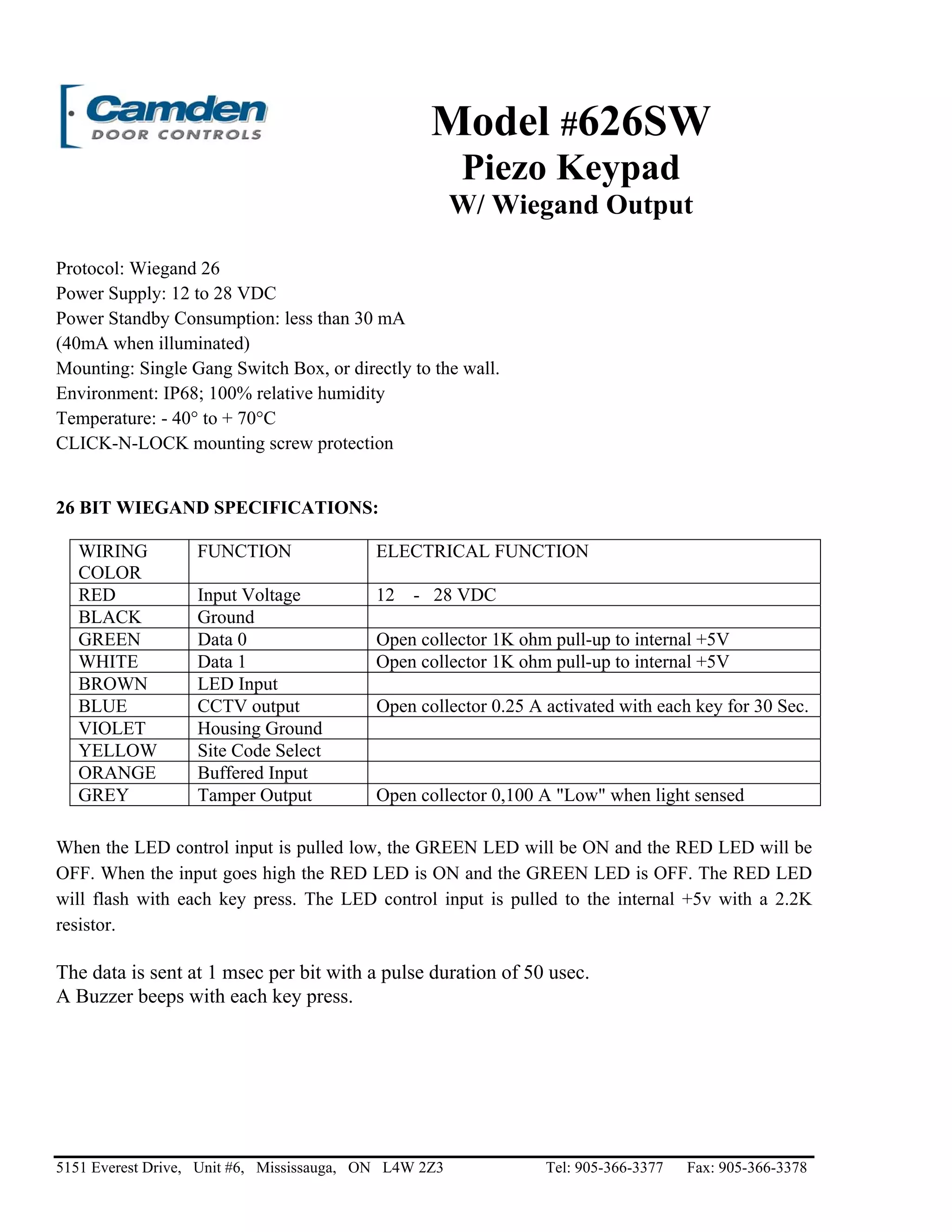
Protocol: Wiegand 26
Power Supply: 12 to 28 VDC
Power Standby Consumption: less than 30 mA
(40mA when illuminated)
Mounting: Single Gang Switch Box, or directly to the wall.
Environment: IP68; 100% relative humidity
Temperature: - 40° to + 70°C
CLICK-N-LOCK mounting screw protection
26 BIT WIEGAND SPECIFICATIONS:
WIRING
COLOR
FUNCTION ELECTRICAL FUNCTION
RED Input Voltage 12 - 28 VDC
BLACK Ground
GREEN Data 0 Open collector 1K ohm pull-up to internal +5V
WHITE Data 1 Open collector 1K ohm pull-up to internal +5V
BROWN LED Input
BLUE CCTV output Open collector 0.25 A activated with each key for 30 Sec.
VIOLET Housing Ground
YELLOW Site Code Select
ORANGE Buffered Input
GREY Tamper Output Open collector 0,100 A "Low" when light sensed
When the LED control input is pulled low, the GREEN LED will be ON and the RED LED will be
OFF. When the input goes high the RED LED is ON and the GREEN LED is OFF. The RED LED
will flash with each key press. The LED control input is pulled to the internal +5v with a 2.2K
resistor.
The data is sent at 1 msec per bit with a pulse duration of 50 usec.
A Buzzer beeps with each key press.
5151 Everest Drive, Unit #6, Mississauga, ON L4W 2Z3 Tel: 905-366-3377 Fax: 905-366-3378
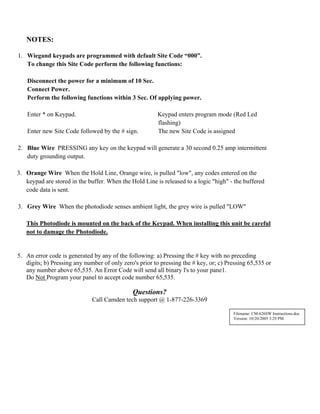
NOTES:
1. Wiegand keypads are programmed with default Site Code “000”.
To change this Site Code perform the following functions:
Disconnect the power for a minimum of 10 Sec.
Connect Power.
Perform the following functions within 3 Sec. Of applying power.
Enter * on Keypad. Keypad enters program mode (Red Led
flashing)
Enter new Site Code followed by the # sign. The new Site Code is assigned
2. Blue Wire PRESSING any key on the keypad will generate a 30 second 0.25 amp intermittent
duty grounding output.
3. Orange Wire When the Hold Line, Orange wire, is pulled "low", any codes entered on the
keypad are stored in the buffer. When the Hold Line is released to a logic "high" - the buffered
code data is sent.
3. Grey Wire When the photodiode senses ambient light, the grey wire is pulled "LOW"
This Photodiode is mounted on the back of the Keypad. When installing this unit be careful
not to damage the Photodiode.
5. An error code is generated by any of the following: a) Pressing the # key with no preceding
digits; b) Pressing any number of only zero's prior to pressing the # key, or; c) Pressing 65,535 or
any number above 65,535. An Error Code will send all binary l's to your pane1.
Do Not Program your panel to accept code number 65,535.
Questions?
Call Camden tech support @ 1-877-226-3369
Filename: CM-626SW Instructions.doc
Version: 10/20/2005 3:29 PM

Camden 626SW Instruction Manual

  • 1.
    Model #626SW Piezo Keypad W/Wiegand Output Protocol: Wiegand 26 Power Supply: 12 to 28 VDC Power Standby Consumption: less than 30 mA (40mA when illuminated) Mounting: Single Gang Switch Box, or directly to the wall. Environment: IP68; 100% relative humidity Temperature: - 40° to + 70°C CLICK-N-LOCK mounting screw protection 26 BIT WIEGAND SPECIFICATIONS: WIRING COLOR FUNCTION ELECTRICAL FUNCTION RED Input Voltage 12 - 28 VDC BLACK Ground GREEN Data 0 Open collector 1K ohm pull-up to internal +5V WHITE Data 1 Open collector 1K ohm pull-up to internal +5V BROWN LED Input BLUE CCTV output Open collector 0.25 A activated with each key for 30 Sec. VIOLET Housing Ground YELLOW Site Code Select ORANGE Buffered Input GREY Tamper Output Open collector 0,100 A "Low" when light sensed When the LED control input is pulled low, the GREEN LED will be ON and the RED LED will be OFF. When the input goes high the RED LED is ON and the GREEN LED is OFF. The RED LED will flash with each key press. The LED control input is pulled to the internal +5v with a 2.2K resistor. The data is sent at 1 msec per bit with a pulse duration of 50 usec. A Buzzer beeps with each key press. 5151 Everest Drive, Unit #6, Mississauga, ON L4W 2Z3 Tel: 905-366-3377 Fax: 905-366-3378
  • 2.
    NOTES: 1. Wiegand keypadsare programmed with default Site Code “000”. To change this Site Code perform the following functions: Disconnect the power for a minimum of 10 Sec. Connect Power. Perform the following functions within 3 Sec. Of applying power. Enter * on Keypad. Keypad enters program mode (Red Led flashing) Enter new Site Code followed by the # sign. The new Site Code is assigned 2. Blue Wire PRESSING any key on the keypad will generate a 30 second 0.25 amp intermittent duty grounding output. 3. Orange Wire When the Hold Line, Orange wire, is pulled "low", any codes entered on the keypad are stored in the buffer. When the Hold Line is released to a logic "high" - the buffered code data is sent. 3. Grey Wire When the photodiode senses ambient light, the grey wire is pulled "LOW" This Photodiode is mounted on the back of the Keypad. When installing this unit be careful not to damage the Photodiode. 5. An error code is generated by any of the following: a) Pressing the # key with no preceding digits; b) Pressing any number of only zero's prior to pressing the # key, or; c) Pressing 65,535 or any number above 65,535. An Error Code will send all binary l's to your pane1. Do Not Program your panel to accept code number 65,535. Questions? Call Camden tech support @ 1-877-226-3369 Filename: CM-626SW Instructions.doc Version: 10/20/2005 3:29 PM