CALL II
TOPIC “DIGITAL
LITERACY
ASSISTING
LANGUAGE
LEARNING AND
TEACHING
TODAY”
C
E
S
A
R
P
A
L
A
C
I
O
S
Personal
Aim
By the end of this task I will
learn how to use digital
books to improve my
reading and my writing
skills.
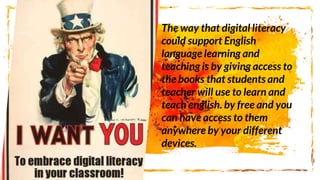
The way that digital literacy
could support English
language learning and
teaching is by giving access to
the books that students and
teacher will use to learn and
teach english. by free and you
can have access to them
anywhere by your different
devices.
nowadays the technology is
giving us a lot of benefits in all
the areas but in learning we can
have in the cloud all the books
and files and all the information
that we can use to learn english
and the best part of everything is
that we can access to the books,
files, articles, information from
anywhere
Just by a single click you just
click the screen on any of your
devices and you will have all
the information and books of
your english classes this is a
very useful tool and it is being
used nowadays by most of the
students for the easy access to
it and also it is faster and less
heavier for you to lift.
if you have trouble with
listening you can add some
songs and recordings in
english and you can listen
to them in the go by just
one click.
With the help of technology
and social networks we can
improve in so many fields of
learning and languages it's
not an exception, by the
portability and the easiness
of technology that we have
nowadays it is easier and
more interactive than ever.
With the help of technology and
social networks we can improve in so
many fields of learning and
languages it's not an exception, by
the portability and the easiness of
technology that we have nowadays it
is easier and more interactive than
ever.
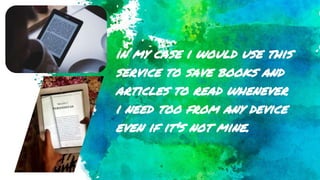
in my case i would use this
service to save books and
articles to read whenever
i need too from any device
even if it's not mine.
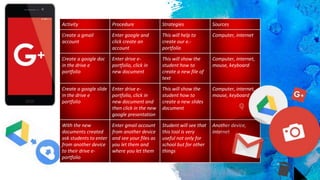
Activity Procedure Strategies Sources
Create a gmail
account
Enter google and
click create an
account
This will help to
create our e.-
portfolio
Computer, internet
Create a google doc
in the drive e
portfolio
Enter drive e-
portfolio, click in
new document
This will show the
student how to
create a new file of
text
Computer, internet,
mouse, keyboard
Create a google slide
in the drive e
portfolio
Enter drive e-
portfolio, click in
new document and
then click in the new
google presentation
This will show the
student how to
create a new slides
document
Computer, internet,
mouse, keyboard
With the new
documents created
ask students to enter
from another device
to their drive e-
portfolio
Enter gmail account
from another device
and see your files as
you let them and
where you let them
Student will see that
this tool is very
useful not only for
school but for other
things
Another device,
internet

Call 2 aims

  • 1.
    CALL II TOPIC “DIGITAL LITERACY ASSISTING LANGUAGE LEARNINGAND TEACHING TODAY” C E S A R P A L A C I O S
  • 2.
    Personal Aim By the endof this task I will learn how to use digital books to improve my reading and my writing skills.
  • 3.
    The way thatdigital literacy could support English language learning and teaching is by giving access to the books that students and teacher will use to learn and teach english. by free and you can have access to them anywhere by your different devices.
  • 4.
    nowadays the technologyis giving us a lot of benefits in all the areas but in learning we can have in the cloud all the books and files and all the information that we can use to learn english and the best part of everything is that we can access to the books, files, articles, information from anywhere
  • 5.
    Just by asingle click you just click the screen on any of your devices and you will have all the information and books of your english classes this is a very useful tool and it is being used nowadays by most of the students for the easy access to it and also it is faster and less heavier for you to lift.
  • 6.
    if you havetrouble with listening you can add some songs and recordings in english and you can listen to them in the go by just one click.
  • 7.
    With the helpof technology and social networks we can improve in so many fields of learning and languages it's not an exception, by the portability and the easiness of technology that we have nowadays it is easier and more interactive than ever.
  • 8.
    With the helpof technology and social networks we can improve in so many fields of learning and languages it's not an exception, by the portability and the easiness of technology that we have nowadays it is easier and more interactive than ever.
  • 9.
    in my casei would use this service to save books and articles to read whenever i need too from any device even if it's not mine.
  • 11.
    Activity Procedure StrategiesSources Create a gmail account Enter google and click create an account This will help to create our e.- portfolio Computer, internet Create a google doc in the drive e portfolio Enter drive e- portfolio, click in new document This will show the student how to create a new file of text Computer, internet, mouse, keyboard Create a google slide in the drive e portfolio Enter drive e- portfolio, click in new document and then click in the new google presentation This will show the student how to create a new slides document Computer, internet, mouse, keyboard With the new documents created ask students to enter from another device to their drive e- portfolio Enter gmail account from another device and see your files as you let them and where you let them Student will see that this tool is very useful not only for school but for other things Another device, internet