Low Code Best Practices
Cairo Salesforce Developers Meetup
July 18th 2020
Salesforce Admin The Awesome Role
What to expect
- Best practices of using:
- Custom Permissions
- Custom Settings
- Custom Metadata
- Prior understanding to Salesforce Profiles,
Permission Set, Field Level Security…etc
Profiles
Profiles define how users access objects and data, and what they can do within the application.
When you create users, you assign a profile to each one.
• Apps
• Tabs
• Record Types
• Page Layouts
• Fields
What elements a user can see
• Create, read, edit, delete records (can be defined per object)
• Administrative permissision (customize app)
• General functionality (e.g. run report, create public list views)
What actions can a user do
• Standard profiles are available out of the box
• Custom profiles can be created
Profiles (Continued)
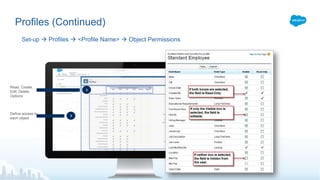
Set-up  Profiles  <Profile Name>  Object Permissions
Define access to
each object
Read, Create,
Edit, Delete
Options
Permission Set
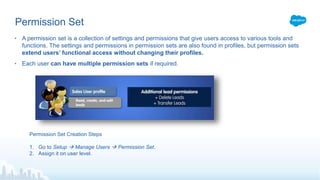
• A permission set is a collection of settings and permissions that give users access to various tools and
functions. The settings and permissions in permission sets are also found in profiles, but permission sets
extend users’ functional access without changing their profiles.
• Each user can have multiple permission sets if required.
Permission Set Creation Steps
1. Go to Setup  Manage Users  Permission Set.
2. Assign it on user level.
Demo
Profiles & Permission set
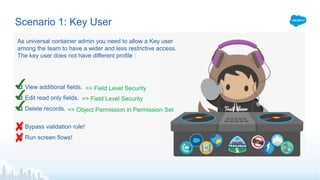
Scenario 1: Key User
 View additional fields.
 Edit read only fields.
 Delete records.
 Bypass validation rule!
 Run screen flows!
=> Field Level Security
As universal container admin you need to allow a Key user
among the team to have a wider and less restrictive access.
The key user does not have different profile :
=> Field Level Security
=> Object Permission in Permission Set
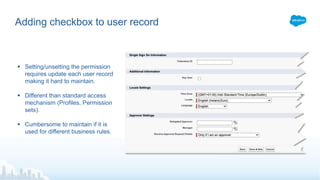
Adding checkbox to user record
 Setting/unsetting the permission
requires update each user record
making it hard to maintain.
 Different than standard access
mechanism (Profiles, Permission
sets).
 Cumbersome to maintain if it is
used for different business rules.
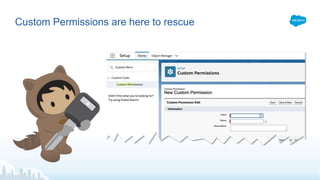
Custom Permissions are here to rescue
Demo
Custom Permissions
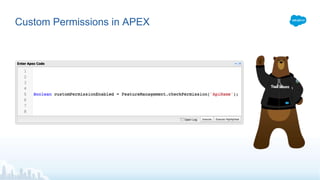
Custom Permissions in APEX
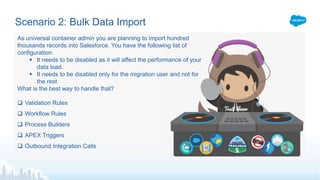
Scenario 2: Bulk Data Import
 Validation Rules
 Workflow Rules
 Process Builders
 APEX Triggers
 Outbound Integration Calls
As universal container admin you are planning to import hundred
thousands records into Salesforce. You have the following list of
configuration:
 It needs to be disabled as it will affect the performance of your
data load.
 It needs to be disabled only for the migration user and not for
the rest
What is the best way to handle that?
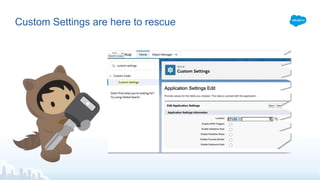
Custom Settings are here to rescue
Demo
Custom Settings
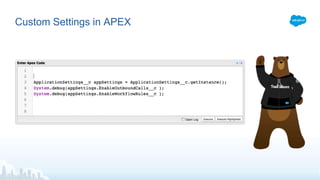
Custom Settings in APEX
Scenario 3: Business Rules Global Settings
As universal Co-spaces admin you just finished a meeting with the
Sales Manager and he want to enable the sales team to create
opportunities based on templates.
Most of the time UC sell 2 products bundles (Coworking space basic
furniture and Cowrking space basic conferencing).
The templates will define, the opportunity stage and products to be
added.
What is the best way to handle that?
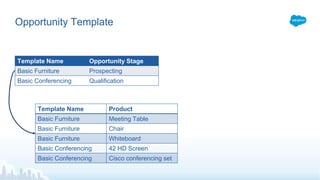
Opportunity Template
Template Name Opportunity Stage
Basic Furniture Prospecting
Basic Conferencing Qualification
Template Name Product
Basic Furniture Meeting Table
Basic Furniture Chair
Basic Furniture Whiteboard
Basic Conferencing 42 HD Screen
Basic Conferencing Cisco conferencing set
Demo
Custom Metadata
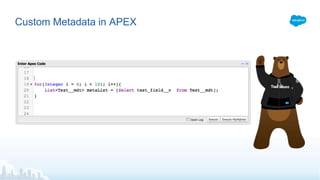
Custom Metadata in APEX
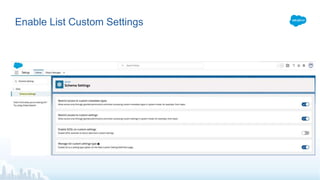
Enable List Custom Settings
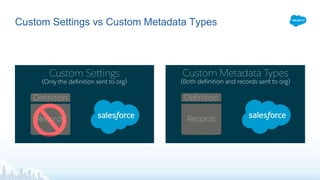
Custom Settings vs Custom Metadata Types
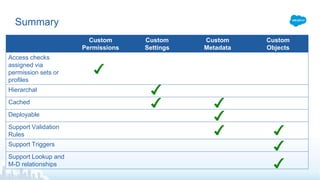
Summary
Custom
Permissions
Custom
Settings
Custom
Metadata
Custom
Objects
Access checks
assigned via
permission sets or
profiles
Hierarchal
Cached
Deployable
Support Validation
Rules
Support Triggers
Support Lookup and
M-D relationships
Thank You!
Cairo Salesforce Developers
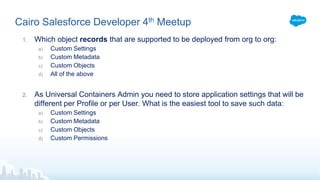
Cairo Salesforce Developer 4th Meetup
1. Which object records that are supported to be deployed from org to org:
a) Custom Settings
b) Custom Metadata
c) Custom Objects
d) All of the above
2. As Universal Containers Admin you need to store application settings that will be
different per Profile or per User. What is the easiest tool to save such data:
a) Custom Settings
b) Custom Metadata
c) Custom Objects
d) Custom Permissions
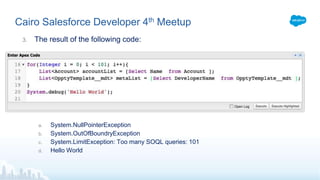
Cairo Salesforce Developer 4th Meetup
3. The result of the following code:
a. System.NullPointerException
b. System.OutOfBoundryException
c. System.LimitException: Too many SOQL queries: 101
d. Hello World

Cairo meetup low code best practices

  • 1.
    Low Code BestPractices Cairo Salesforce Developers Meetup July 18th 2020
  • 2.
  • 3.
    What to expect -Best practices of using: - Custom Permissions - Custom Settings - Custom Metadata - Prior understanding to Salesforce Profiles, Permission Set, Field Level Security…etc
  • 4.
    Profiles Profiles define howusers access objects and data, and what they can do within the application. When you create users, you assign a profile to each one. • Apps • Tabs • Record Types • Page Layouts • Fields What elements a user can see • Create, read, edit, delete records (can be defined per object) • Administrative permissision (customize app) • General functionality (e.g. run report, create public list views) What actions can a user do • Standard profiles are available out of the box • Custom profiles can be created
  • 5.
    Profiles (Continued) Set-up Profiles  <Profile Name>  Object Permissions Define access to each object Read, Create, Edit, Delete Options
  • 6.
    Permission Set • Apermission set is a collection of settings and permissions that give users access to various tools and functions. The settings and permissions in permission sets are also found in profiles, but permission sets extend users’ functional access without changing their profiles. • Each user can have multiple permission sets if required. Permission Set Creation Steps 1. Go to Setup  Manage Users  Permission Set. 2. Assign it on user level.
  • 7.
  • 8.
    Scenario 1: KeyUser  View additional fields.  Edit read only fields.  Delete records.  Bypass validation rule!  Run screen flows! => Field Level Security As universal container admin you need to allow a Key user among the team to have a wider and less restrictive access. The key user does not have different profile : => Field Level Security => Object Permission in Permission Set
  • 9.
    Adding checkbox touser record  Setting/unsetting the permission requires update each user record making it hard to maintain.  Different than standard access mechanism (Profiles, Permission sets).  Cumbersome to maintain if it is used for different business rules.
  • 10.
    Custom Permissions arehere to rescue
  • 11.
  • 12.
  • 13.
    Scenario 2: BulkData Import  Validation Rules  Workflow Rules  Process Builders  APEX Triggers  Outbound Integration Calls As universal container admin you are planning to import hundred thousands records into Salesforce. You have the following list of configuration:  It needs to be disabled as it will affect the performance of your data load.  It needs to be disabled only for the migration user and not for the rest What is the best way to handle that?
  • 14.
    Custom Settings arehere to rescue
  • 15.
  • 16.
  • 17.
    Scenario 3: BusinessRules Global Settings As universal Co-spaces admin you just finished a meeting with the Sales Manager and he want to enable the sales team to create opportunities based on templates. Most of the time UC sell 2 products bundles (Coworking space basic furniture and Cowrking space basic conferencing). The templates will define, the opportunity stage and products to be added. What is the best way to handle that?
  • 18.
    Opportunity Template Template NameOpportunity Stage Basic Furniture Prospecting Basic Conferencing Qualification Template Name Product Basic Furniture Meeting Table Basic Furniture Chair Basic Furniture Whiteboard Basic Conferencing 42 HD Screen Basic Conferencing Cisco conferencing set
  • 19.
  • 20.
  • 21.
  • 22.
    Custom Settings vsCustom Metadata Types
  • 23.
    Summary Custom Permissions Custom Settings Custom Metadata Custom Objects Access checks assigned via permissionsets or profiles Hierarchal Cached Deployable Support Validation Rules Support Triggers Support Lookup and M-D relationships
  • 24.
  • 25.
    Cairo Salesforce Developer4th Meetup 1. Which object records that are supported to be deployed from org to org: a) Custom Settings b) Custom Metadata c) Custom Objects d) All of the above 2. As Universal Containers Admin you need to store application settings that will be different per Profile or per User. What is the easiest tool to save such data: a) Custom Settings b) Custom Metadata c) Custom Objects d) Custom Permissions
  • 26.
    Cairo Salesforce Developer4th Meetup 3. The result of the following code: a. System.NullPointerException b. System.OutOfBoundryException c. System.LimitException: Too many SOQL queries: 101 d. Hello World