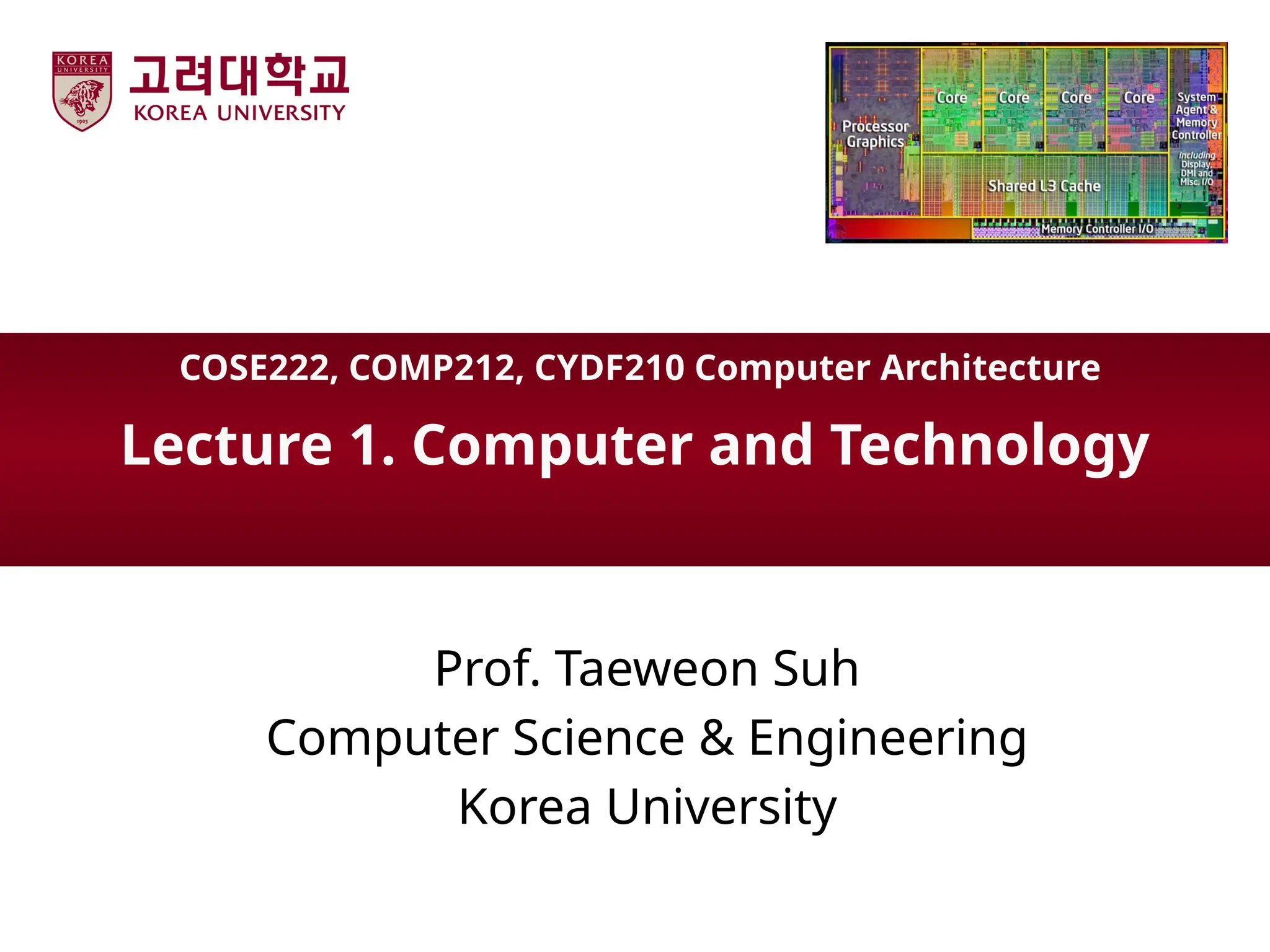
Lecture 1. Computerand Technology
Prof. Taeweon Suh
Computer Science & Engineering
Korea University
COSE222, COMP212, CYDF210 Computer Architecture
2.
Korea Univ
My FirstComputer in 1990
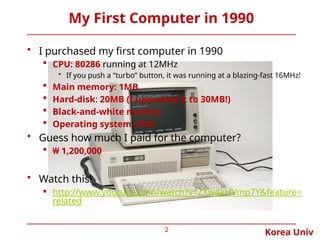
• I purchased my first computer in 1990
CPU: 80286 running at 12MHz
• If you push a “turbo” button, it was running at a blazing-fast 16MHz!
Main memory: 1MB
Hard-disk: 20MB (I upgraded it to 30MB!)
Black-and-white monitor
Operating system: DOS
• Guess how much I paid for the computer?
₩ 1,200,000
• Watch this!
http://www.youtube.com/watch?v=ZXw4kHVmp7Y&feature=
related
2
Korea Univ
The ComputerRevolution
• Computer technology has been advancing rapidly
• Progress in computer technology makes novel
applications feasible. In the recent past, the following
applications were “computer science fiction”
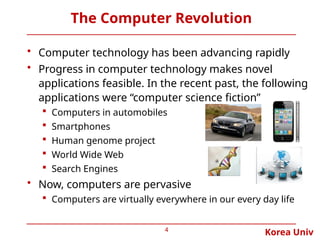
Computers in automobiles
Smartphones
Human genome project
World Wide Web
Search Engines
• Now, computers are pervasive
Computers are virtually everywhere in our every day life
4
5.
Korea Univ
Classes ofComputers
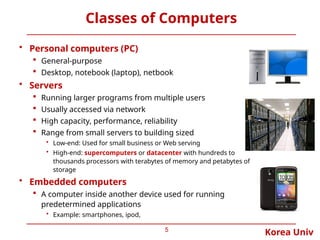
• Personal computers (PC)
General-purpose
Desktop, notebook (laptop), netbook
• Servers
Running larger programs from multiple users
Usually accessed via network
High capacity, performance, reliability
Range from small servers to building sized
• Low-end: Used for small business or Web serving
• High-end: supercomputers or datacenter with hundreds to
thousands processors with terabytes of memory and petabytes of
storage
• Embedded computers
A computer inside another device used for running
predetermined applications
• Example: smartphones, ipod,
5
6.
Korea Univ
Components ofa Computer
• Same components for
all kinds of computer
Desktop, server, embedded
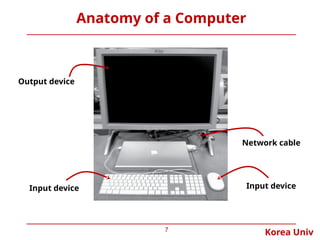
• Input/output includes
User-interface devices
• Display, keyboard, mouse
Storage devices
• Hard disk, CD/DVD, flash
Network adapters
• For communicating with other
computers
6
Korea Univ
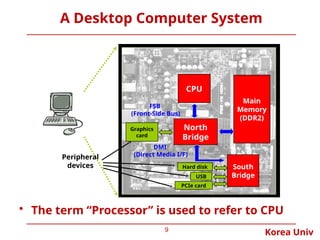
A DesktopComputer System
9
CPU
North
Bridge
South
Bridge
Main
Memory
(DDR2)
FSB
(Front-Side Bus)
DMI
(Direct Media I/F)
Hard disk
USB
PCIe card
Peripheral
devices
Graphics
card
• The term “Processor” is used to refer to CPU
10.
Korea Univ
Mouse
10
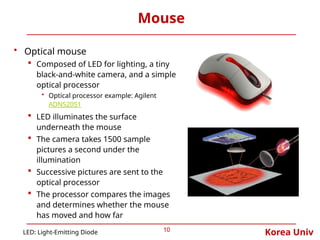
• Opticalmouse
Composed of LED for lighting, a tiny
black-and-white camera, and a simple
optical processor
• Optical processor example: Agilent
ADNS2051
LED illuminates the surface
underneath the mouse
The camera takes 1500 sample
pictures a second under the
illumination
Successive pictures are sent to the
optical processor
The processor compares the images
and determines whether the mouse
has moved and how far
LED: Light-Emitting Diode
11.
Korea Univ
Display Devices
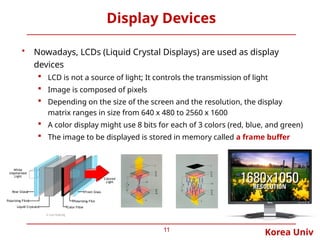
•Nowadays, LCDs (Liquid Crystal Displays) are used as display
devices
LCD is not a source of light; It controls the transmission of light
Image is composed of pixels
Depending on the size of the screen and the resolution, the display
matrix ranges in size from 640 x 480 to 2560 x 1600
A color display might use 8 bits for each of 3 colors (red, blue, and green)
The image to be displayed is stored in memory called a frame buffer
11
12.
Korea Univ
Main Memoryand Storage
12
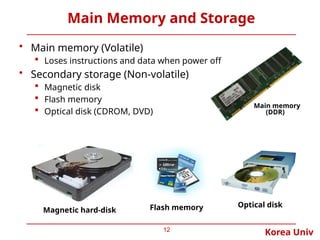
• Main memory (Volatile)
Loses instructions and data when power off
• Secondary storage (Non-volatile)
Magnetic disk
Flash memory
Optical disk (CDROM, DVD)
Magnetic hard-disk Flash memory Optical disk
Main memory
(DDR)
13.
Korea Univ
Networks
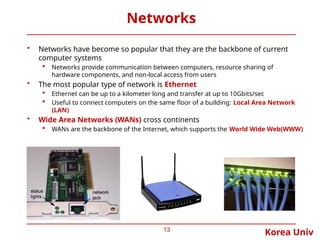
• Networkshave become so popular that they are the backbone of current
computer systems
Networks provide communication between computers, resource sharing of
hardware components, and non-local access from users
• The most popular type of network is Ethernet
Ethernet can be up to a kilometer long and transfer at up to 10Gbits/sec
Useful to connect computers on the same floor of a building: Local Area Network
(LAN)
• Wide Area Networks (WANs) cross continents
WANs are the backbone of the Internet, which supports the World Wide Web(WWW)
13
14.
Korea Univ
What Kindsof Processors (CPUs) Are There?
• x86
Used in PC
Intel (www.intel.com) , AMD (www.amd.com) , Via Technologies (www.via.com.tw)
• POWER, PowerPC
Used in Mac, but now it is replaced with Intel Processor
Freescale (formerly Motorola): www.freescale.com
• Sparc
Used in workstation
Sun Microsystems (Acquired by Oracle): www.sun.com
• ARM
Most popular in embedded world
ARM: www.arm.com
• MIPS
Used in embedded world
MIPS Technologies: www.mips.com
We stick to MIPS architecture throughout this course
• Because architecture is easy to understand
• Because the book is based on MIPS
14
15.
Korea Univ
x86?
• Whatis x86?
Generic term referring to processors from Intel, AMD and VIA
Derived from the model numbers of the first few generations of processors:
• 8086, 80286, 80386, 80486 x86
Now it generally refers to processors from Intel, AMD, and VIA
• x86-16: 16-bit processor
• x86-32 (aka IA32): 32-bit processor * IA: Intel Architecture
• x86-64: 64-bit processor
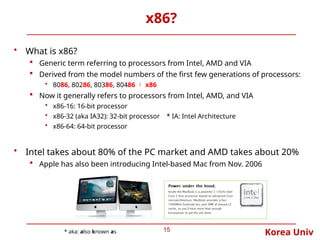
• Intel takes about 80% of the PC market and AMD takes about 20%
Apple has also been introducing Intel-based Mac from Nov. 2006
15
* aka: also known as
Korea Univ
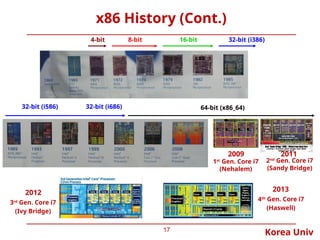
x86 History(Cont.)
17
32-bit (i386)
32-bit (i586) 64-bit (x86_64)
32-bit (i686)
8-bit 16-bit
4-bit
2009 2011
1st
Gen. Core i7
(Nehalem)
2nd
Gen. Core i7
(Sandy Bridge)
2012
3rd
Gen. Core i7
(Ivy Bridge)
2013
4th
Gen. Core i7
(Haswell)
18.
Korea Univ
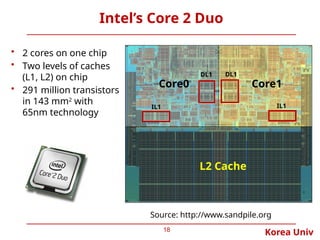
Intel’s Core2 Duo
18
• 2 cores on one chip
• Two levels of caches
(L1, L2) on chip
• 291 million transistors
in 143 mm2
with
65nm technology
L2 Cache
Core0 Core1
Source: http://www.sandpile.org
DL1 DL1
IL1 IL1
19.
Korea Univ
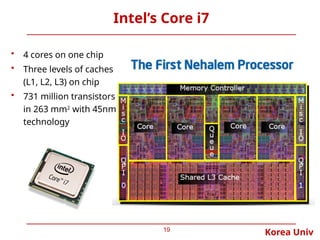
Intel’s Corei7
19
• 4 cores on one chip
• Three levels of caches
(L1, L2, L3) on chip
• 731 million transistors
in 263 mm2
with 45nm
technology
20.
Korea Univ
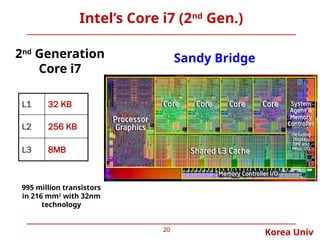
Intel’s Corei7 (2nd
Gen.)
20
2nd
Generation
Core i7
995 million transistors
in 216 mm2
with 32nm
technology
L1 32 KB
L2 256 KB
L3 8MB
Sandy Bridge
21.
Korea Univ
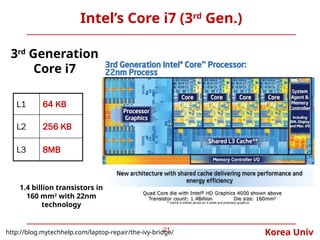
Intel’s Corei7 (3rd
Gen.)
21
3rd
Generation
Core i7
L1 64 KB
L2 256 KB
L3 8MB
1.4 billion transistors in
160 mm2
with 22nm
technology
http://blog.mytechhelp.com/laptop-repair/the-ivy-bridge/
22.
Korea Univ
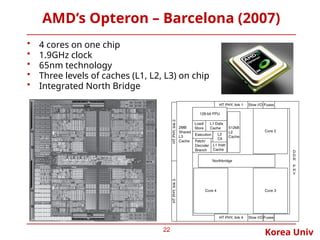
AMD’s Opteron– Barcelona (2007)
22
• 4 cores on one chip
• 1.9GHz clock
• 65nm technology
• Three levels of caches (L1, L2, L3) on chip
• Integrated North Bridge
23.
Korea Univ
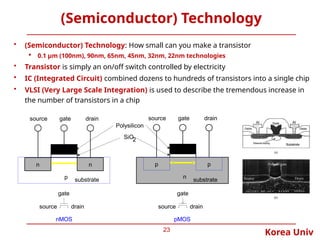
(Semiconductor) Technology
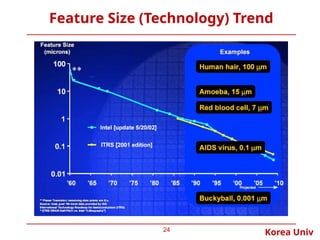
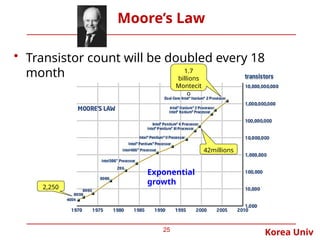
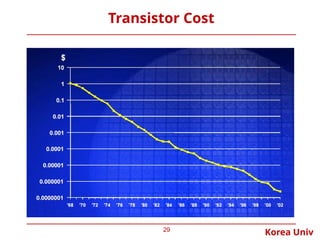
•(Semiconductor) Technology: How small can you make a transistor
0.1 µm (100nm), 90nm, 65nm, 45nm, 32nm, 22nm technologies
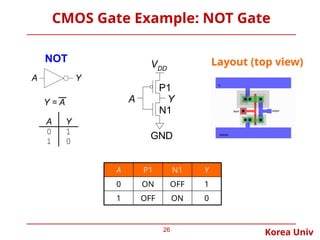
• Transistor is simply an on/off switch controlled by electricity
• IC (Integrated Circuit) combined dozens to hundreds of transistors into a single chip
• VLSI (Very Large Scale Integration) is used to describe the tremendous increase in
the number of transistors in a chip
23
n
p
gate
source drain
substrate
SiO2
n
gate
source drain
nMOS
Polysilicon
n p p
pMOS
gate
source drain
gate
source drain
substrate
#4 Motoring with microprocessors
By Jim Turley
Embedded Systems Design
(08/11/03, 09:00:00 AM EDT)
Thanks to the magic of microprocessors and embedded systems, our cars are becoming safer, more efficient, and entertaining.
"I'm drivin' in my car. I turn on the radio." — Bruce Springsteen, "Fire"
By my estimates, the average middle-class American household includes over 40 embedded processors. About half are in the garage. Cars make a great vehicle (sorry) for deploying embedded processors in huge numbers. These processors provide a ready source of power, ventilation, and mounting space and sell in terrific quantities. Besides, they're cool. Better still, automotive processors add sexy high-profile features that car buyers will pay for. Processors provide better profit margins than leather seats, undercoating, or "convenience lighting groups."
How many embedded processors does your car have? Go ahead, guess. If you've got a late-model luxury sedan, two or three processors might be obvious in the GPS navigation system or the automatic distance control. Yet you'd still be off by a factor of 25 or 50. The current 7-Series BMW and S-class Mercedes boast about 100 processors apiece. A relatively low-profile Volvo still has 50 to 60 baby processors on board. Even a boring low-cost econobox has a few dozen different microprocessors in it. Your transportation appliance probably has more chips than your Internet appliance.
The statistics are startling. New cars now frequently carry 200 pounds of electronics and more than a mile of wiring. Processors and their peripherals have squeezed into the side- and rear-view mirrors, wheel rims, headliner, gas tank, seat cushions, headrests, bumpers, and every other crevice of a modern car. Dashboard electronics such as the radio, air conditioning, and satellite navigation system are just the obvious ones. Even more MIPS and MHz are lurking under the surface.
The first car to use a microprocessor was the 1978 Cadillac Seville. The chip, a modified 6802, drove the car's "Trip Computer," a flashy dashboard bauble that displayed mileage and other trivia. Today that kind of microprocessor muscle could barely adjust your mirrors.
#11 Twisted nematic displays contain liquid crystals that twist and untwist at varying degrees to allow light to pass through. When no voltage is applied to a TN liquid crystal cell, polarized light passes through the 90-degrees twisted LC layer. In proportion to the voltage applied, the liquid crystals untwist changing the polarization and blocking the light's path. By properly adjusting the level of the voltage almost any gray level or transmission can be achieved. -Wikipedia
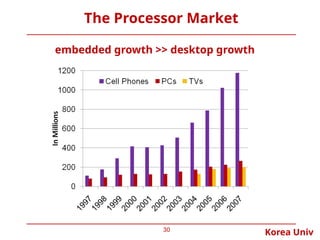
#30 Cell phone sales exceeded PCs by only a factor of 1.4 in 1997, but the ratio grew to 4.5 in 2007.
The total number in use in 2004 estimated to be about 2.0B televisions, 1.8B cell phones, and 0.8B PCs. As the worlds population was about 6.4B in 2004, that makes about 1PC, 2.2 cell phones, and 2.5 televisions for every 8 people on the planet.