C++:
The Complete Reference
          Third Edition
About the Author…
 Herb Schildt is the leading authority on C and
 C++ and a best-selling author whose books
 have sold more than 1.5 million copies. His
 acclaimed C and C++books include Teach
 Yourself C, C++ from the Ground Up, Teach
 Yourself C++, C++: The Complete Reference,
 Borland C++: The Complete Reference, and C++
 Programmer's Reference to name a few.
C++:
The Complete Reference
          Third Edition

                                    Herbert Schildt


                                   Osborne McGraw-Hill
                   Berkeley New York St. Louis San Francisco
                Auckland Bogotá Hamburg London Madrid
        Mexico City Milan Montreal New Delhi Panama City
                           Paris São Paulo Singapore Sydney
                                              Tokyo Toronto
McGraw-Hill
                   abc
Copyright © 1998 by McGraw-Hill Companies. All rights reserved. Manufactured in the United States of America. Except as permitted
under the United States Copyright Act of 1976, no part of this publication may be reproduced or distributed in any form or by any means,
or stored in a database or retrieval system, without the prior written permission of the publisher.

0-07-213293-0

The material in this eBook also appears in the print version of this title: 0-07-882476-1


All trademarks are trademarks of their respective owners. Rather than put a trademark symbol after every occurrence of a trademarked
name, we use names in an editorial fashion only, and to the benefit of the trademark owner, with no intention of infringement of the
trademark. Where such designations appear in this book, they have been printed with initial caps.
McGraw-Hill eBooks are available at special quantity discounts to use as premiums and sales promotions, or for use in corporate train-
ing programs. For more information, please contact George Hoare, Special Sales, at george_hoare@mcgraw-hill.com or (212) 904-
4069.


TERMS OF USE
This is a copyrighted work and The McGraw-Hill Companies, Inc. (“McGraw-Hill”) and its licensors reserve all rights in and to the
work. Use of this work is subject to these terms. Except as permitted under the Copyright Act of 1976 and the right to store and retrieve
one copy of the work, you may not decompile, disassemble, reverse engineer, reproduce, modify, create derivative works based upon,
transmit, distribute, disseminate, sell, publish or sublicense the work or any part of it without McGraw-Hill’s prior consent. You may
use the work for your own noncommercial and personal use; any other use of the work is strictly prohibited. Your right to use the work
may be terminated if you fail to comply with these terms.
THE WORK IS PROVIDED “AS IS”. McGRAW-HILL AND ITS LICENSORS MAKE NO GUARANTEES OR WARRANTIES AS
TO THE ACCURACY, ADEQUACY OR COMPLETENESS OF OR RESULTS TO BE OBTAINED FROM USING THE WORK,
INCLUDING ANY INFORMATION THAT CAN BE ACCESSED THROUGH THE WORK VIA HYPERLINK OR OTHERWISE,
AND EXPRESSLY DISCLAIM ANY WARRANTY, EXPRESS OR IMPLIED, INCLUDING BUT NOT LIMITED TO IMPLIED
WARRANTIES OF MERCHANTABILITY OR FITNESS FOR A PARTICULAR PURPOSE. McGraw-Hill and its licensors do not
warrant or guarantee that the functions contained in the work will meet your requirements or that its operation will be uninterrupted or
error free. Neither McGraw-Hill nor its licensors shall be liable to you or anyone else for any inaccuracy, error or omission, regardless
of cause, in the work or for any damages resulting therefrom. McGraw-Hill has no responsibility for the content of any information
accessed through the work. Under no circumstances shall McGraw-Hill and/or its licensors be liable for any indirect, incidental, spe-
cial, punitive, consequential or similar damages that result from the use of or inability to use the work, even if any of them has been
advised of the possibility of such damages. This limitation of liability shall apply to any claim or cause whatsoever whether such claim
or cause arises in contract, tort or otherwise.

DOI: 10.1036/0072132930
Contents at a Glance
Part I The Foundation of C++: The C Subset

     1An Overview of C . . . . . . . . . . . . . . . . . . . . . . . . . . . . . . . .               3
     2Expressions . . . . . . . . . . . . . . . . . . . . . . . . . . . . . . . . . . . . . .       13
     3Statements . . . . . . . . . . . . . . . . . . . . . . . . . . . . . . . . . . . . . . .      57
     4Arrays and Null-Terminated Strings . . . . . . . . . . . . . . . .                            89
     5Pointers . . . . . . . . . . . . . . . . . . . . . . . . . . . . . . . . . . . . . . . . .   113
     6Functions . . . . . . . . . . . . . . . . . . . . . . . . . . . . . . . . . . . . . . . .    137
     7Structures, Unions, Enumerations, and User-
         Defined Types . . . . . . . . . . . . . . . . . . . . . . . . . . . . . . . . . .         161
    8 C-Style Console I/O . . . . . . . . . . . . . . . . . . . . . . . . . . . . . .              187
    9 File I/O . . . . . . . . . . . . . . . . . . . . . . . . . . . . . . . . . . . . . . . . .   211
   10 The Preprocessor and Comments . . . . . . . . . . . . . . . . . . .                          237


Part II C++

   11 An Overview of C++ . . . . . . . . . . . . . . . . . . . . . . . . . . . . .                 255
   12 Classes and Objects . . . . . . . . . . . . . . . . . . . . . . . . . . . . . . . .          289
   13 Arrays, Pointers, References and the Dynamic
        Allocation Operators . . . . . . . . . . . . . . . . . . . . . . . . . . .                 327
   14 Function Overloading, Copy Constructors,
        and Default Arguments . . . . . . . . . . . . . . . . . . . . . . . .                      361
   15 Operator Overloading . . . . . . . . . . . . . . . . . . . . . . . . . . . .                 385


                                                 v
vi   C++: The Complete Reference


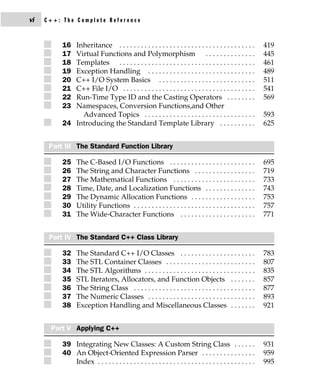
          16 Inheritance . . . . . . . . . . . . . . . . . . . . . . . . . . . . . . . . . . . . . .         419
          17 Virtual Functions and Polymorphism . . . . . . . . . . . . . .                                  445
          18 Templates . . . . . . . . . . . . . . . . . . . . . . . . . . . . . . . . . . . . . .           461
          19 Exception Handling . . . . . . . . . . . . . . . . . . . . . . . . . . . . . .                  489
          20 C++ I/O System Basics . . . . . . . . . . . . . . . . . . . . . . . . . . .                     511
          21 C++ File I/O . . . . . . . . . . . . . . . . . . . . . . . . . . . . . . . . . . . . .          541
          22 Run-Time Type ID and the Casting Operators . . . . . . . .                                      569
          23 Namespaces, Conversion Functions,and Other
               Advanced Topics . . . . . . . . . . . . . . . . . . . . . . . . . . . . . . .                 593
          24 Introducing the Standard Template Library . . . . . . . . . .                                   625


      Part III The Standard Function Library

          25     The C-Based I/O Functions . . . . . . . . . . . . . . . . . . . . . . . .                   695
          26     The String and Character Functions . . . . . . . . . . . . . . . . .                        719
          27     The Mathematical Functions . . . . . . . . . . . . . . . . . . . . . . .                    733
          28     Time, Date, and Localization Functions . . . . . . . . . . . . . .                          743
          29     The Dynamic Allocation Functions . . . . . . . . . . . . . . . . . .                        753
          30     Utility Functions . . . . . . . . . . . . . . . . . . . . . . . . . . . . . . . . . .       757
          31     The Wide-Character Functions . . . . . . . . . . . . . . . . . . . . .                      771


      Part IV The Standard C++ Class Library

          32     The Standard C++ I/O Classes . . . . . . . . . . . . . . . . . . . . .                      783
          33     The STL Container Classes . . . . . . . . . . . . . . . . . . . . . . . . .                 807
          34     The STL Algorithms . . . . . . . . . . . . . . . . . . . . . . . . . . . . . . .            835
          35     STL Iterators, Allocators, and Function Objects . . . . . . .                               857
          36     The String Class . . . . . . . . . . . . . . . . . . . . . . . . . . . . . . . . . .        877
          37     The Numeric Classes . . . . . . . . . . . . . . . . . . . . . . . . . . . . . .             893
          38     Exception Handling and Miscellaneous Classes . . . . . . .                                  921


      Part V Applying C++

          39 Integrating New Classes: A Custom String Class . . . . . .                                      931
          40 An Object-Oriented Expression Parser . . . . . . . . . . . . . . .                              959
             Index . . . . . . . . . . . . . . . . . . . . . . . . . . . . . . . . . . . . . . . . . . . .   995
Contents
    Preface . . . . . . . . . . . . . . . . . . . . . . . . . . . . . . . . . . . . . . . . . . . . . . . . . . . .   xxix


                                                  Part I
                      The Foundation of C++: The C Subset

1   An Overview of C . . . . . . . . . . . . . . . . . . . . . . . . . . . . . . .                                      3
    The Origins of C . . . . . . . . . . . . . . . . . . . . . . . . . . . . . . . . . . . . . . . . . . .              4
    C Is a Middle-Level Language . . . . . . . . . . . . . . . . . . . . . . . . . . . . . . .                          4
    C Is a Structured Language . . . . . . . . . . . . . . . . . . . . . . . . . . . . . . . . .                        6
    C Is a Programmer's Language . . . . . . . . . . . . . . . . . . . . . . . . . . . . . .                            8
    The Form of a C Program . . . . . . . . . . . . . . . . . . . . . . . . . . . . . . . . . . .                       9
    The Library and Linking . . . . . . . . . . . . . . . . . . . . . . . . . . . . . . . . . . . .                    10
    Separate Compilation . . . . . . . . . . . . . . . . . . . . . . . . . . . . . . . . . . . . . .                   12
    Understanding the .C and .CPP File Extensions . . . . . . . . . . . . . . . .                                      12

2   Expressions . . . . . . . . . . . . . . . . . . . . . . . . . . . . . . . . . . . . .                              13
    The Five Basic Data Types . . . . . . . . . . . . . . . . . . . . . . . . . . . . . . . . . .                      14


                                                    vii
viii   C++: The Complete Reference


                 Modifying the Basic Types . . . . . . . . . . . . . . . . . . . . . . . . . . . . . . . . . .                 15
                 Identifier Names . . . . . . . . . . . . . . . . . . . . . . . . . . . . . . . . . . . . . . . . . .          16
                 Variables . . . . . . . . . . . . . . . . . . . . . . . . . . . . . . . . . . . . . . . . . . . . . . . . .   17
                          Where Variables Are Declared . . . . . . . . . . . . . . . . . . . . . . .                           17
                          Local Variables . . . . . . . . . . . . . . . . . . . . . . . . . . . . . . . . . . . . .            17
                          Formal Parameters . . . . . . . . . . . . . . . . . . . . . . . . . . . . . . . . .                  21
                          Global Variables . . . . . . . . . . . . . . . . . . . . . . . . . . . . . . . . . . . .             21
                 Access Modifiers . . . . . . . . . . . . . . . . . . . . . . . . . . . . . . . . . . . . . . . . . .          23
                          const . . . . . . . . . . . . . . . . . . . . . . . . . . . . . . . . . . . . . . . . . . . . . .    23
                          volatile . . . . . . . . . . . . . . . . . . . . . . . . . . . . . . . . . . . . . . . . . . . .     24
                 Storage Class Specifiers . . . . . . . . . . . . . . . . . . . . . . . . . . . . . . . . . . . . .            25
                          extern . . . . . . . . . . . . . . . . . . . . . . . . . . . . . . . . . . . . . . . . . . . . .     25
                          static Variables . . . . . . . . . . . . . . . . . . . . . . . . . . . . . . . . . . . . .           27
                          register Variables . . . . . . . . . . . . . . . . . . . . . . . . . . . . . . . . . . .             29
                 Variable Initializations . . . . . . . . . . . . . . . . . . . . . . . . . . . . . . . . . . . . .            31
                 Constants . . . . . . . . . . . . . . . . . . . . . . . . . . . . . . . . . . . . . . . . . . . . . . . . .   31
                          Hexadecimal and Octal Constants . . . . . . . . . . . . . . . . . . . .                              32
                          String Constants . . . . . . . . . . . . . . . . . . . . . . . . . . . . . . . . . . .               33
                          Backslash Character Constants . . . . . . . . . . . . . . . . . . . . . . .                          33
                 Operators . . . . . . . . . . . . . . . . . . . . . . . . . . . . . . . . . . . . . . . . . . . . . . . . .   34
                          The Assignment Operator . . . . . . . . . . . . . . . . . . . . . . . . . . .                        34
                          Type Conversion in Assignments . . . . . . . . . . . . . . . . . . . . .                             35
                          Multiple Assignments . . . . . . . . . . . . . . . . . . . . . . . . . . . . . . .                   36
                          Arithmetic Operators . . . . . . . . . . . . . . . . . . . . . . . . . . . . . . .                   37
                          Increment and Decrement . . . . . . . . . . . . . . . . . . . . . . . . . . .                        37
                          Relational and Logical Operators . . . . . . . . . . . . . . . . . . . . .                           39
                          Bitwise Operators . . . . . . . . . . . . . . . . . . . . . . . . . . . . . . . . . .                42
                          The ? Operator . . . . . . . . . . . . . . . . . . . . . . . . . . . . . . . . . . . . .             47
                          The & and * Pointer Operators . . . . . . . . . . . . . . . . . . . . . . .                          47
                          The Compile-Time Operator sizeof . . . . . . . . . . . . . . . . . . .                               49
                          The Comma Operator . . . . . . . . . . . . . . . . . . . . . . . . . . . . . . .                     50
                          The Dot (.) and Arrow (−>) Operators . . . . . . . . . . . . . . . . .                               51
                          The [ ] and ( ) Operators . . . . . . . . . . . . . . . . . . . . . . . . . . . . .                  51
                          Precedence Summary . . . . . . . . . . . . . . . . . . . . . . . . . . . . . . .                     52
                 Expressions . . . . . . . . . . . . . . . . . . . . . . . . . . . . . . . . . . . . . . . . . . . . . . .     53
                          Order of Evaluation . . . . . . . . . . . . . . . . . . . . . . . . . . . . . . . . .                53
                          Type Conversion in Expressions . . . . . . . . . . . . . . . . . . . . . .                           53
                           Casts . . . . . . . . . . . . . . . . . . . . . . . . . . . . . . . . . . . . . . . . . . . . .     54
                          Spacing and Parentheses . . . . . . . . . . . . . . . . . . . . . . . . . . . .                      55
                  Shorthand Assignments . . . . . . . . . . . . . . . . . . . . . . . . . . . . . . . . . . . .                56

             3   Statements . . . . . . . . . . . . . . . . . . . . . . . . . . . . . . . . . . . . . .                        57
                 True and False in C and C++ . . . . . . . . . . . . . . . . . . . . . . . . . . . . . . . .                   58
Contents      ix


    Selection Statements . . . . . . . . . . . . . . . . . . . . . . . . . . . . . . . . . . . . . . .               59
             if . . . . . . . . . . . . . . . . . . . . . . . . . . . . . . . . . . . . . . . . . . . . . . . . .    59
             Nested ifs . . . . . . . . . . . . . . . . . . . . . . . . . . . . . . . . . . . . . . . . .            60
             The if-else-if Ladder . . . . . . . . . . . . . . . . . . . . . . . . . . . . . . . .                   62
             The ? Alternative . . . . . . . . . . . . . . . . . . . . . . . . . . . . . . . . . . .                 63
             The Conditional Expression . . . . . . . . . . . . . . . . . . . . . . . . . .                          66
             switch . . . . . . . . . . . . . . . . . . . . . . . . . . . . . . . . . . . . . . . . . . . .          67
             Nested switch Statements . . . . . . . . . . . . . . . . . . . . . . . . . . .                          70
    Iteration Statements . . . . . . . . . . . . . . . . . . . . . . . . . . . . . . . . . . . . . . . .             70
             The for Loop . . . . . . . . . . . . . . . . . . . . . . . . . . . . . . . . . . . . . . .              70
             for Loop Variations . . . . . . . . . . . . . . . . . . . . . . . . . . . . . . . . .                   72
             The Infinite Loop . . . . . . . . . . . . . . . . . . . . . . . . . . . . . . . . . . .                 76
             for Loops with No Bodies . . . . . . . . . . . . . . . . . . . . . . . . . . .                          77
             The while Loop . . . . . . . . . . . . . . . . . . . . . . . . . . . . . . . . . . . .                  77
             The do-while Loop . . . . . . . . . . . . . . . . . . . . . . . . . . . . . . . . .                     79
    Declaring Variables within Selection and Iteration Statements . . .                                              81
    Jump Statements . . . . . . . . . . . . . . . . . . . . . . . . . . . . . . . . . . . . . . . . . .              82
             The return Statement . . . . . . . . . . . . . . . . . . . . . . . . . . . . . . . .                    82
             The goto Statement . . . . . . . . . . . . . . . . . . . . . . . . . . . . . . . . .                    83
             The break Statement . . . . . . . . . . . . . . . . . . . . . . . . . . . . . . . .                     83
             The exit( ) Function . . . . . . . . . . . . . . . . . . . . . . . . . . . . . . . . .                  85
             The continue Statement . . . . . . . . . . . . . . . . . . . . . . . . . . . . .                        86
    Expression Statements . . . . . . . . . . . . . . . . . . . . . . . . . . . . . . . . . . . . .                  88
    Block Statements . . . . . . . . . . . . . . . . . . . . . . . . . . . . . . . . . . . . . . . . . .             88

4   Arrays and Null-Terminated Strings . . . . . . . . . . . . . . .                                                89
    Single-Dimension Arrays . . . . . . . . . . . . . . . . . . . . . . . . . . . . . . . . . . .                    90
    Generating a Pointer to an Array . . . . . . . . . . . . . . . . . . . . . . . . . . . .                         92
    Passing Single-Dimension Arrays to Functions . . . . . . . . . . . . . . . .                                     92
    Null-Terminated Strings . . . . . . . . . . . . . . . . . . . . . . . . . . . . . . . . . . . .                  94
    Two-Dimensional Arrays . . . . . . . . . . . . . . . . . . . . . . . . . . . . . . . . . . .                     96
            Arrays of Strings . . . . . . . . . . . . . . . . . . . . . . . . . . . . . . . . . . .                 100
    Multidimensional Arrays . . . . . . . . . . . . . . . . . . . . . . . . . . . . . . . . . . .                   101
    Indexing Pointers . . . . . . . . . . . . . . . . . . . . . . . . . . . . . . . . . . . . . . . . . .           102
    Array Initialization . . . . . . . . . . . . . . . . . . . . . . . . . . . . . . . . . . . . . . . .            105
            Unsized Array Initializations . . . . . . . . . . . . . . . . . . . . . . . . .                         106
    A Tic-Tac-Toe Example . . . . . . . . . . . . . . . . . . . . . . . . . . . . . . . . . . . . .                 108

5   Pointers . . . . . . . . . . . . . . . . . . . . . . . . . . . . . . . . . . . . . . . .                        113
    What Are Pointers? . . . . . . . . . . . . . . . . . . . . . . . . . . . . . . . . . . . . . . . .              114
    Pointer Variables . . . . . . . . . . . . . . . . . . . . . . . . . . . . . . . . . . . . . . . . . .           115
    The Pointer Operators . . . . . . . . . . . . . . . . . . . . . . . . . . . . . . . . . . . . . .               115
    Pointer Expressions . . . . . . . . . . . . . . . . . . . . . . . . . . . . . . . . . . . . . . . .             116
x   C++: The Complete Reference


                        Pointer Assignments . . . . . . . . . . . . . . . . . . . . . . . . . . . . . . . .                  117
                        Pointer Arithmetic . . . . . . . . . . . . . . . . . . . . . . . . . . . . . . . . . .               117
                        Pointer Comparisons . . . . . . . . . . . . . . . . . . . . . . . . . . . . . . . .                  119
              Pointers and Arrays . . . . . . . . . . . . . . . . . . . . . . . . . . . . . . . . . . . . . . . .            120
                        Arrays of Pointers . . . . . . . . . . . . . . . . . . . . . . . . . . . . . . . . . .               122
              Multiple Indirection . . . . . . . . . . . . . . . . . . . . . . . . . . . . . . . . . . . . . . .             123
              Initializing Pointers . . . . . . . . . . . . . . . . . . . . . . . . . . . . . . . . . . . . . . . .          124
              Pointers to Functions . . . . . . . . . . . . . . . . . . . . . . . . . . . . . . . . . . . . . . .            126
              C's Dynamic Allocation Functions . . . . . . . . . . . . . . . . . . . . . . . . . . .                         129
              Problems with Pointers . . . . . . . . . . . . . . . . . . . . . . . . . . . . . . . . . . . . .               131

          6   Functions . . . . . . . . . . . . . . . . . . . . . . . . . . . . . . . . . . . . . . .                        137
              The General Form of a Function . . . . . . . . . . . . . . . . . . . . . . . . . . . . .                       138
              Scope Rules of Functions . . . . . . . . . . . . . . . . . . . . . . . . . . . . . . . . . . .                 138
              Function Arguments . . . . . . . . . . . . . . . . . . . . . . . . . . . . . . . . . . . . . . .               139
                       Call by Value, Call by Reference . . . . . . . . . . . . . . . . . . . . . .                          139
                       Creating a Call by Reference . . . . . . . . . . . . . . . . . . . . . . . . .                        140
                       Calling Functions with Arrays . . . . . . . . . . . . . . . . . . . . . . .                           142
              argc and argv—Arguments to main( ) . . . . . . . . . . . . . . . . . . . . . . . .                             144
              The return Statement . . . . . . . . . . . . . . . . . . . . . . . . . . . . . . . . . . . . . . .             147
                       Returning from a Function . . . . . . . . . . . . . . . . . . . . . . . . . . .                       147
                       Returning Values . . . . . . . . . . . . . . . . . . . . . . . . . . . . . . . . . . .                149
                       Returning Pointers . . . . . . . . . . . . . . . . . . . . . . . . . . . . . . . . . .                151
                       Functions of Type void . . . . . . . . . . . . . . . . . . . . . . . . . . . . . .                    152
                       What Does main( ) Return? . . . . . . . . . . . . . . . . . . . . . . . . . .                         153
              Recursion . . . . . . . . . . . . . . . . . . . . . . . . . . . . . . . . . . . . . . . . . . . . . . . . .    153
              Function Prototypes . . . . . . . . . . . . . . . . . . . . . . . . . . . . . . . . . . . . . . .              155
                       Standard Library Function Prototypes . . . . . . . . . . . . . . . . .                                157
              Declaring Variable-Length Parameter Lists . . . . . . . . . . . . . . . . . . . .                              158
              Old-Style Versus Modern Function Parameter Declarations . . . . .                                              158
              Implementation Issues . . . . . . . . . . . . . . . . . . . . . . . . . . . . . . . . . . . . .                159
                       Parameters and General-Purpose Functions . . . . . . . . . . . .                                      159
              Efficiency . . . . . . . . . . . . . . . . . . . . . . . . . . . . . . . . . . . . . . . . . . . . . . . . .   159

          7   Structures, Unions, Enumerations, and User-
                Defined Types . . . . . . . . . . . . . . . . . . . . . . . . . . . . . . . . .                              161
              Structures . . . . . . . . . . . . . . . . . . . . . . . . . . . . . . . . . . . . . . . . . . . . . . . .     162
                      Accessing Structure Members . . . . . . . . . . . . . . . . . . . . . . . .                            165
                      Structure Assignments . . . . . . . . . . . . . . . . . . . . . . . . . . . . . .                      165
              Arrays of Structures . . . . . . . . . . . . . . . . . . . . . . . . . . . . . . . . . . . . . . . .           166
              Passing Structures to Functions . . . . . . . . . . . . . . . . . . . . . . . . . . . . . .                    166
                      Passing Structure Members to Functions . . . . . . . . . . . . . . .                                   167
                      Passing Entire Structures to Functions . . . . . . . . . . . . . . . . .                               167
Contents      xi


    Structure Pointers . . . . . . . . . . . . . . . . . . . . . . . . . . . . . . . . . . . . . . . . .              169
             Declaring a Structure Pointer . . . . . . . . . . . . . . . . . . . . . . . . .                          170
             Using Structure Pointers . . . . . . . . . . . . . . . . . . . . . . . . . . . . .                       170
    Arrays and Structures Within Structures . . . . . . . . . . . . . . . . . . . . . .                               173
    Bit-Fields . . . . . . . . . . . . . . . . . . . . . . . . . . . . . . . . . . . . . . . . . . . . . . . . .      174
    Unions . . . . . . . . . . . . . . . . . . . . . . . . . . . . . . . . . . . . . . . . . . . . . . . . . . .      176
    Enumerations . . . . . . . . . . . . . . . . . . . . . . . . . . . . . . . . . . . . . . . . . . . . .            180
    Using sizeof to Ensure Portability . . . . . . . . . . . . . . . . . . . . . . . . . . . .                        183
    typedef . . . . . . . . . . . . . . . . . . . . . . . . . . . . . . . . . . . . . . . . . . . . . . . . . . .     184

8   C-Style Console I/O . . . . . . . . . . . . . . . . . . . . . . . . . . . . . .                                   187
    An Important Application Note . . . . . . . . . . . . . . . . . . . . . . . . . . . . .                           188
    Reading and Writing Characters . . . . . . . . . . . . . . . . . . . . . . . . . . . . .                          189
             A Problem with getchar( ) . . . . . . . . . . . . . . . . . . . . . . . . . . .                          190
             Alternatives to getchar( ) . . . . . . . . . . . . . . . . . . . . . . . . . . . .                       190
    Reading and Writing Strings . . . . . . . . . . . . . . . . . . . . . . . . . . . . . . . .                       192
    Formatted Console I/O . . . . . . . . . . . . . . . . . . . . . . . . . . . . . . . . . . . . .                   195
    printf( ) . . . . . . . . . . . . . . . . . . . . . . . . . . . . . . . . . . . . . . . . . . . . . . . . . . .   195
             Printing Characters . . . . . . . . . . . . . . . . . . . . . . . . . . . . . . . . .                    196
             Printing Numbers . . . . . . . . . . . . . . . . . . . . . . . . . . . . . . . . . .                     196
             Displaying an Address . . . . . . . . . . . . . . . . . . . . . . . . . . . . . .                        198
             The %n Specifier . . . . . . . . . . . . . . . . . . . . . . . . . . . . . . . . . . .                   198
             Format Modifiers . . . . . . . . . . . . . . . . . . . . . . . . . . . . . . . . . . .                   199
             The Minimum Field Width Specifier . . . . . . . . . . . . . . . . . .                                    199
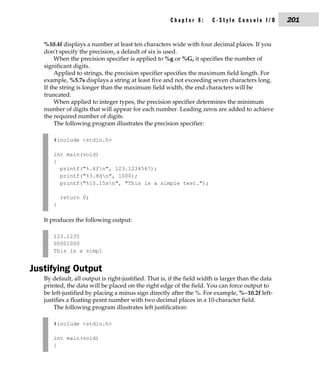
             The Precision Specifier . . . . . . . . . . . . . . . . . . . . . . . . . . . . . .                      200
             Justifying Output . . . . . . . . . . . . . . . . . . . . . . . . . . . . . . . . . . .                  201
             Handling Other Data Types . . . . . . . . . . . . . . . . . . . . . . . . . .                            202
             The * and # Modifiers . . . . . . . . . . . . . . . . . . . . . . . . . . . . . . .                      202
    scanf( ) . . . . . . . . . . . . . . . . . . . . . . . . . . . . . . . . . . . . . . . . . . . . . . . . . . .    203
             Format Specifiers . . . . . . . . . . . . . . . . . . . . . . . . . . . . . . . . . . .                  203
             Inputting Numbers . . . . . . . . . . . . . . . . . . . . . . . . . . . . . . . . .                      203
             Inputting Unsigned Integers . . . . . . . . . . . . . . . . . . . . . . . . .                            205
             Reading Individual Characters Using scanf( ) . . . . . . . . . .                                         205
             Reading Strings . . . . . . . . . . . . . . . . . . . . . . . . . . . . . . . . . . . .                  205
             Inputting an Address . . . . . . . . . . . . . . . . . . . . . . . . . . . . . . .                       206
             The %n Specifier . . . . . . . . . . . . . . . . . . . . . . . . . . . . . . . . . . .                   206
             Using a Scanset . . . . . . . . . . . . . . . . . . . . . . . . . . . . . . . . . . . .                  206
             Discarding Unwanted White Space . . . . . . . . . . . . . . . . . . .                                    207
             Non-White-Space Characters in the Control String . . . . . .                                             208
             You Must Pass scanf( ) Addresses . . . . . . . . . . . . . . . . . . . . .                               208
             Format Modifiers . . . . . . . . . . . . . . . . . . . . . . . . . . . . . . . . . . .                   208
    Suppressing Input . . . . . . . . . . . . . . . . . . . . . . . . . . . . . . . . . . . . . . . . .               209
xii   C++: The Complete Reference


            9   File I/O . . . . . . . . . . . . . . . . . . . . . . . . . . . . . . . . . . . . . . . .                          211
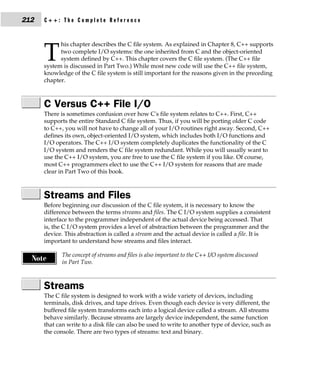
                C Versus C++ File I/O . . . . . . . . . . . . . . . . . . . . . . . . . . . . . . . . . . . . .                   212
                Streams and Files . . . . . . . . . . . . . . . . . . . . . . . . . . . . . . . . . . . . . . . . . .             212
                Streams . . . . . . . . . . . . . . . . . . . . . . . . . . . . . . . . . . . . . . . . . . . . . . . . . .       212
                         Text Streams . . . . . . . . . . . . . . . . . . . . . . . . . . . . . . . . . . . . . . .               213
                         Binary Streams . . . . . . . . . . . . . . . . . . . . . . . . . . . . . . . . . . . . .                 213
                Files . . . . . . . . . . . . . . . . . . . . . . . . . . . . . . . . . . . . . . . . . . . . . . . . . . . . .   213
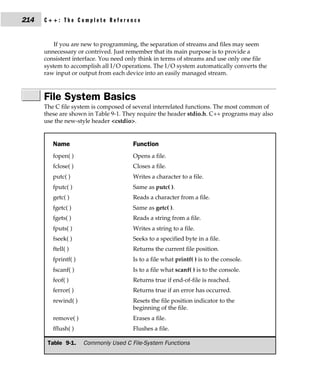
                File System Basics . . . . . . . . . . . . . . . . . . . . . . . . . . . . . . . . . . . . . . . . .              214
                         The File Pointer . . . . . . . . . . . . . . . . . . . . . . . . . . . . . . . . . . . .                 215
                         Opening a File . . . . . . . . . . . . . . . . . . . . . . . . . . . . . . . . . . . . .                 215
                         Closing a File . . . . . . . . . . . . . . . . . . . . . . . . . . . . . . . . . . . . . .               217
                         Writing a Character . . . . . . . . . . . . . . . . . . . . . . . . . . . . . . . . .                    218
                         Reading a Character . . . . . . . . . . . . . . . . . . . . . . . . . . . . . . . .                      218
                         Using fopen( ), getc( ), putc( ), and fclose( ) . . . . . . . . . . . . .                                218
                         Using feof( ) . . . . . . . . . . . . . . . . . . . . . . . . . . . . . . . . . . . . . . .              220
                         Working with Strings: fputs( ) and fgets( ) . . . . . . . . . . . . .                                    222
                         rewind( ) . . . . . . . . . . . . . . . . . . . . . . . . . . . . . . . . . . . . . . . . . .            223
                         ferror( ) . . . . . . . . . . . . . . . . . . . . . . . . . . . . . . . . . . . . . . . . . . .          224
                         Erasing Files . . . . . . . . . . . . . . . . . . . . . . . . . . . . . . . . . . . . . . .              226
                         Flushing a Stream . . . . . . . . . . . . . . . . . . . . . . . . . . . . . . . . . .                    227
                fread( ) and fwrite( ) . . . . . . . . . . . . . . . . . . . . . . . . . . . . . . . . . . . . . . .              227
                         Using fread( ) and fwrite( ) . . . . . . . . . . . . . . . . . . . . . . . . . . .                       228
                fseek( ) and Random-Access I/O . . . . . . . . . . . . . . . . . . . . . . . . . . . .                            229
                fprintf( ) and fscanf( ) . . . . . . . . . . . . . . . . . . . . . . . . . . . . . . . . . . . . . .              231
                The Standard Streams . . . . . . . . . . . . . . . . . . . . . . . . . . . . . . . . . . . . . .                  232
                         The Console I/O Connection . . . . . . . . . . . . . . . . . . . . . . . . .                             234
                Using freopen( ) to Redirect the Standard Streams . . . . . . . . . . . . .                                       235

           10   The Preprocessor and Comments . . . . . . . . . . . . . . . . . .                                                 237
                The Preprocessor . . . . . . . . . . . . . . . . . . . . . . . . . . . . . . . . . . . . . . . . . .              238
                #define . . . . . . . . . . . . . . . . . . . . . . . . . . . . . . . . . . . . . . . . . . . . . . . . . . .     238
                         Defining Function-like Macros . . . . . . . . . . . . . . . . . . . . . . .                              240
                #error . . . . . . . . . . . . . . . . . . . . . . . . . . . . . . . . . . . . . . . . . . . . . . . . . . . .    241
                #include . . . . . . . . . . . . . . . . . . . . . . . . . . . . . . . . . . . . . . . . . . . . . . . . . .      242
                Conditional Compilation Directives . . . . . . . . . . . . . . . . . . . . . . . . . .                            242
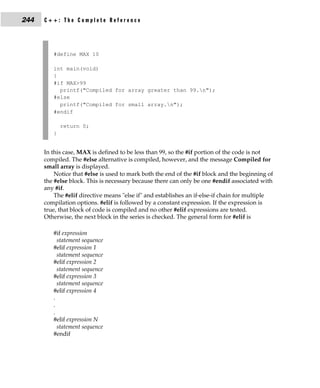
                         #if, #else, #elif, and #endif . . . . . . . . . . . . . . . . . . . . . . . . . . .                      243
                         #ifdef and #ifndef . . . . . . . . . . . . . . . . . . . . . . . . . . . . . . . . . . .                 245
                #undef . . . . . . . . . . . . . . . . . . . . . . . . . . . . . . . . . . . . . . . . . . . . . . . . . . .      246
                Using defined . . . . . . . . . . . . . . . . . . . . . . . . . . . . . . . . . . . . . . . . . . . . .           247
                #line . . . . . . . . . . . . . . . . . . . . . . . . . . . . . . . . . . . . . . . . . . . . . . . . . . . . .   248
                #pragma . . . . . . . . . . . . . . . . . . . . . . . . . . . . . . . . . . . . . . . . . . . . . . . . . .       248
                The # and ## Preprocessor Operators . . . . . . . . . . . . . . . . . . . . . . . . .                             248
                Predefined Macro Names . . . . . . . . . . . . . . . . . . . . . . . . . . . . . . . . . . .                      250
Contents      xiii


     C-Style Comments . . . . . . . . . . . . . . . . . . . . . . . . . . . . . . . . . . . . . . . . .              250

                                                 Part II
                                                   C++

11   An Overview of C++ . . . . . . . . . . . . . . . . . . . . . . . . . . . . .                                    255
     The Origins of C++ . . . . . . . . . . . . . . . . . . . . . . . . . . . . . . . . . . . . . . . .              256
     What Is Object-Oriented Programming? . . . . . . . . . . . . . . . . . . . . . .                                257
             Encapsulation . . . . . . . . . . . . . . . . . . . . . . . . . . . . . . . . . . . . . .               258
             Polymorphism . . . . . . . . . . . . . . . . . . . . . . . . . . . . . . . . . . . . .                  258
             Inheritance . . . . . . . . . . . . . . . . . . . . . . . . . . . . . . . . . . . . . . . .             259
     Some C++ Fundamentals . . . . . . . . . . . . . . . . . . . . . . . . . . . . . . . . . . .                     259
             A Sample C++ Program . . . . . . . . . . . . . . . . . . . . . . . . . . . . .                          260
             A Closer Look at the I/O Operators . . . . . . . . . . . . . . . . . . .                                263
             Declaring Local Variables . . . . . . . . . . . . . . . . . . . . . . . . . . . .                       264
             No Default to int . . . . . . . . . . . . . . . . . . . . . . . . . . . . . . . . . . .                 265
             The bool Data Type . . . . . . . . . . . . . . . . . . . . . . . . . . . . . . . . .                    266
     Old-Style vs. Modern C++ . . . . . . . . . . . . . . . . . . . . . . . . . . . . . . . . . .                    266
             The New C++ Headers . . . . . . . . . . . . . . . . . . . . . . . . . . . . . .                         268
             Namespaces . . . . . . . . . . . . . . . . . . . . . . . . . . . . . . . . . . . . . . .                269
             Working with an Old Compiler . . . . . . . . . . . . . . . . . . . . . .                                270
     Introducing C++ Classes . . . . . . . . . . . . . . . . . . . . . . . . . . . . . . . . . . . .                 270
     Function Overloading . . . . . . . . . . . . . . . . . . . . . . . . . . . . . . . . . . . . . .                274
     Operator Overloading . . . . . . . . . . . . . . . . . . . . . . . . . . . . . . . . . . . . . .                278
     Inheritance . . . . . . . . . . . . . . . . . . . . . . . . . . . . . . . . . . . . . . . . . . . . . . .       278
     Constructors and Destructors . . . . . . . . . . . . . . . . . . . . . . . . . . . . . . .                      283
     The C++ Keywords . . . . . . . . . . . . . . . . . . . . . . . . . . . . . . . . . . . . . . . .                287
     The General Form of a C++ Program . . . . . . . . . . . . . . . . . . . . . . . . .                             288

12   Classes and Objects . . . . . . . . . . . . . . . . . . . . . . . . . . . . . .                                 289
     Classes . . . . . . . . . . . . . . . . . . . . . . . . . . . . . . . . . . . . . . . . . . . . . . . . . . .   290
     Structures and Classes Are Related . . . . . . . . . . . . . . . . . . . . . . . . . .                          293
     Unions and Classes Are Related . . . . . . . . . . . . . . . . . . . . . . . . . . . . .                        295
              Anonymous Unions . . . . . . . . . . . . . . . . . . . . . . . . . . . . . . . .                       297
     Friend Functions . . . . . . . . . . . . . . . . . . . . . . . . . . . . . . . . . . . . . . . . . .            298
     Friend Classes . . . . . . . . . . . . . . . . . . . . . . . . . . . . . . . . . . . . . . . . . . . . .        302
     Inline Functions . . . . . . . . . . . . . . . . . . . . . . . . . . . . . . . . . . . . . . . . . . .          303
              Defining Inline Functions Within a Class . . . . . . . . . . . . . .                                   306
     Parameterized Constructors . . . . . . . . . . . . . . . . . . . . . . . . . . . . . . . . .                    307
              Constructors with One Parameter: A Special Case . . . . . .                                            309
     Static Class Members . . . . . . . . . . . . . . . . . . . . . . . . . . . . . . . . . . . . . . .              310
              Static Data Members . . . . . . . . . . . . . . . . . . . . . . . . . . . . . . . .                    310
xiv   C++: The Complete Reference


                        Static Member Functions . . . . . . . . . . . . . . . . . . . . . . . . . . . .                      315
                When Constructors and Destructors Are Executed . . . . . . . . . . . . .                                     317
                The Scope Resolution Operator . . . . . . . . . . . . . . . . . . . . . . . . . . . . . .                    319
                Nested Classes . . . . . . . . . . . . . . . . . . . . . . . . . . . . . . . . . . . . . . . . . . . .       320
                Local Classes . . . . . . . . . . . . . . . . . . . . . . . . . . . . . . . . . . . . . . . . . . . . . .    320
                Passing Objects to Functions . . . . . . . . . . . . . . . . . . . . . . . . . . . . . . . .                 321
                Returning Objects . . . . . . . . . . . . . . . . . . . . . . . . . . . . . . . . . . . . . . . . .          323
                Object Assignment . . . . . . . . . . . . . . . . . . . . . . . . . . . . . . . . . . . . . . . . .          324

           13   Arrays, Pointers, References, and the Dynamic Allocation
                  Operators . . . . . . . . . . . . . . . . . . . . . . . . . . . . . . . . . . . . . 327
                Arrays of Objects . . . . . . . . . . . . . . . . . . . . . . . . . . . . . . . . . . . . . . . . . .        328
                        Creating Initialized vs. Uninitialized Arrays . . . . . . . . . . .                                  330
                Pointers to Objects . . . . . . . . . . . . . . . . . . . . . . . . . . . . . . . . . . . . . . . . .        331
                Type Checking C++ Pointers . . . . . . . . . . . . . . . . . . . . . . . . . . . . . . . .                   333
                The this Pointer . . . . . . . . . . . . . . . . . . . . . . . . . . . . . . . . . . . . . . . . . . .       334
                Pointers to Derived Types . . . . . . . . . . . . . . . . . . . . . . . . . . . . . . . . . .                336
                Pointers to Class Members . . . . . . . . . . . . . . . . . . . . . . . . . . . . . . . . . .                339
                References . . . . . . . . . . . . . . . . . . . . . . . . . . . . . . . . . . . . . . . . . . . . . . . .   341
                        Reference Parameters . . . . . . . . . . . . . . . . . . . . . . . . . . . . . . .                   341
                        Passing References to Objects . . . . . . . . . . . . . . . . . . . . . . . .                        345
                        Returning References . . . . . . . . . . . . . . . . . . . . . . . . . . . . . . .                   346
                        Independent References . . . . . . . . . . . . . . . . . . . . . . . . . . . . .                     347
                        References to Derived Types . . . . . . . . . . . . . . . . . . . . . . . . .                        348
                        Restrictions to References . . . . . . . . . . . . . . . . . . . . . . . . . . . .                   349
                A Matter of Style . . . . . . . . . . . . . . . . . . . . . . . . . . . . . . . . . . . . . . . . . .        349
                C++'s Dynamic Allocation Operators . . . . . . . . . . . . . . . . . . . . . . . . .                         349
                        Initializing Allocated Memory . . . . . . . . . . . . . . . . . . . . . . .                          351
                        Allocating Arrays . . . . . . . . . . . . . . . . . . . . . . . . . . . . . . . . . .                352
                        Allocating Objects . . . . . . . . . . . . . . . . . . . . . . . . . . . . . . . . . .               353
                        The nothrow Alternative . . . . . . . . . . . . . . . . . . . . . . . . . . . .                      358
                The Placement Forms of new and delete . . . . . . . . . . . . . . . . . . . . . .                            359

           14   Function Overloading, Copy Constructors, and Default
                  Arguments . . . . . . . . . . . . . . . . . . . . . . . . . . . . . . . . . . . .                          361
                Function Overloading . . . . . . . . . . . . . . . . . . . . . . . . . . . . . . . . . . . . . .             362
                Overloading Constructor Functions . . . . . . . . . . . . . . . . . . . . . . . . . .                        364
                        Overloading a Constructor to Gain Flexibility . . . . . . . . . .                                    364
                        Allowing Both Initialized and Uninitialized Objects . . . . .                                        366
                Copy Constructors . . . . . . . . . . . . . . . . . . . . . . . . . . . . . . . . . . . . . . . . .          368
                Finding the Address of an Overloaded Function . . . . . . . . . . . . . . .                                  372
                The overload Anachronism . . . . . . . . . . . . . . . . . . . . . . . . . . . . . . . . .                   373
Contents      xv


     Default Function Arguments . . . . . . . . . . . . . . . . . . . . . . . . . . . . . . . .              374
             Default Arguments vs. Overloading . . . . . . . . . . . . . . . . . .                           378
             Using Default Arguments Correctly . . . . . . . . . . . . . . . . . . .                         380
     Function Overloading and Ambiguity . . . . . . . . . . . . . . . . . . . . . . . .                      380

15   Operator Overloading . . . . . . . . . . . . . . . . . . . . . . . . . . . .                            385
     Creating a Member Operator Function . . . . . . . . . . . . . . . . . . . . . . .                       386
             Creating Prefix and Postfix Forms of the
                Increment and Decrement Operators . . . . . . . . . . . . . . .                              391
             Overloading the Shorthand Operators . . . . . . . . . . . . . . . . .                           392
             Operator Overloading Restrictions . . . . . . . . . . . . . . . . . . . .                       392
     Operator Overloading Using a Friend Function . . . . . . . . . . . . . . . .                            393
             Using a Friend to Overload ++ or – – . . . . . . . . . . . . . . . . . .                        395
             Friend Operator Functions Add Flexibility . . . . . . . . . . . . .                             398
     Overloading new and delete . . . . . . . . . . . . . . . . . . . . . . . . . . . . . . . .              400
             Overloading new and delete for Arrays . . . . . . . . . . . . . . .                             405
             Overloading the nothrow Version of new and delete . . . .                                       408
     Overloading Some Special Operators . . . . . . . . . . . . . . . . . . . . . . . . .                    409
             Overloading [ ] . . . . . . . . . . . . . . . . . . . . . . . . . . . . . . . . . . . . .       409
             Overloading ( ) . . . . . . . . . . . . . . . . . . . . . . . . . . . . . . . . . . . . .       413
             Overloading –> . . . . . . . . . . . . . . . . . . . . . . . . . . . . . . . . . . . .          415
     Overloading the Comma Operator . . . . . . . . . . . . . . . . . . . . . . . . . . .                    416

16   Inheritance . . . . . . . . . . . . . . . . . . . . . . . . . . . . . . . . . . . . . .                 419
     Base-Class Access Control . . . . . . . . . . . . . . . . . . . . . . . . . . . . . . . . . .           420
     Inheritance and protected Members . . . . . . . . . . . . . . . . . . . . . . . . . .                   422
              Protected Base-Class Inheritance . . . . . . . . . . . . . . . . . . . . .                     426
     Inheriting Multiple Base Classes . . . . . . . . . . . . . . . . . . . . . . . . . . . . .              427
     Constructors, Destructors, and Inheritance . . . . . . . . . . . . . . . . . . . .                      428
              When Constructor and Destructor
                Functions Are Executed . . . . . . . . . . . . . . . . . . . . . . . . . . .                 428
              Passing Parameters to Base-Class Constructors . . . . . . . . .                                432
     Granting Access . . . . . . . . . . . . . . . . . . . . . . . . . . . . . . . . . . . . . . . . . . .   436
     Virtual Base Classes . . . . . . . . . . . . . . . . . . . . . . . . . . . . . . . . . . . . . . . .    439

17   Virtual Functions and Polymorphism . . . . . . . . . . . . . . .                                        445
     Virtual Functions . . . . . . . . . . . . . . . . . . . . . . . . . . . . . . . . . . . . . . . . . .   446
             Calling a Virtual Function Through a Base Class
               Reference . . . . . . . . . . . . . . . . . . . . . . . . . . . . . . . . . . . . . . .       449
     The Virtual Attribute Is Inherited . . . . . . . . . . . . . . . . . . . . . . . . . . . .              450
     Virtual Functions Are Hierarchical . . . . . . . . . . . . . . . . . . . . . . . . . . .                452
     Pure Virtual Functions . . . . . . . . . . . . . . . . . . . . . . . . . . . . . . . . . . . . .        455
             Abstract Classes . . . . . . . . . . . . . . . . . . . . . . . . . . . . . . . . . . . .        457
xvi   C++: The Complete Reference


                Using Virtual Functions . . . . . . . . . . . . . . . . . . . . . . . . . . . . . . . . . . . .           457
                Early vs. Late Binding . . . . . . . . . . . . . . . . . . . . . . . . . . . . . . . . . . . . . .        460

           18   Templates . . . . . . . . . . . . . . . . . . . . . . . . . . . . . . . . . . . . . .                     461
                Generic Functions . . . . . . . . . . . . . . . . . . . . . . . . . . . . . . . . . . . . . . . . .       462
                        A Function with Two Generic Types . . . . . . . . . . . . . . . . . .                             465
                        Explicitly Overloading a Generic Function . . . . . . . . . . . . .                               465
                        Overloading a Function Template . . . . . . . . . . . . . . . . . . . .                           468
                        Using Standard Parameters with Template Functions . . .                                           468
                        Generic Function Restrictions . . . . . . . . . . . . . . . . . . . . . . . .                     469
                Applying Generic Functions . . . . . . . . . . . . . . . . . . . . . . . . . . . . . . . .                470
                        A Generic Sort . . . . . . . . . . . . . . . . . . . . . . . . . . . . . . . . . . . . .          471
                        Compacting an Array . . . . . . . . . . . . . . . . . . . . . . . . . . . . . . .                 472
                Generic Classes . . . . . . . . . . . . . . . . . . . . . . . . . . . . . . . . . . . . . . . . . . . .   474
                        An Example with Two Generic Data Types . . . . . . . . . . . .                                    478
                        Applying Template Classes: A Generic Array Class . . . . .                                        479
                        Using Non-Type Arguments with Generic Classes . . . . . .                                         481
                        Using Default Arguments with Template Classes . . . . . . .                                       483
                        Explicit Class Specializations . . . . . . . . . . . . . . . . . . . . . . . . .                  485
                The typename and export Keywords . . . . . . . . . . . . . . . . . . . . . . . . .                        486
                The Power of Templates . . . . . . . . . . . . . . . . . . . . . . . . . . . . . . . . . . . .            487

           19   Exception Handling . . . . . . . . . . . . . . . . . . . . . . . . . . . . . .                            489
                Exception Handling Fundamentals . . . . . . . . . . . . . . . . . . . . . . . . . .                       490
                        Catching Class Types . . . . . . . . . . . . . . . . . . . . . . . . . . . . . . .                496
                        Using Multiple catch Statements . . . . . . . . . . . . . . . . . . . . . .                       497
                Handling Derived-Class Exceptions . . . . . . . . . . . . . . . . . . . . . . . . . .                     499
                Exception Handling Options . . . . . . . . . . . . . . . . . . . . . . . . . . . . . . . .                500
                        Catching All Exceptions . . . . . . . . . . . . . . . . . . . . . . . . . . . . .                 500
                        Restricting Exceptions . . . . . . . . . . . . . . . . . . . . . . . . . . . . . . .              502
                        Rethrowing an Exception . . . . . . . . . . . . . . . . . . . . . . . . . . . .                   504
                Understanding terminate( ) and unexpected( ) . . . . . . . . . . . . . . . . .                            505
                        Setting the Terminate and Unexpected Handlers . . . . . . . .                                     506
                The uncaught_exception( ) Function . . . . . . . . . . . . . . . . . . . . . . . . .                      507
                The exception and bad_exception Classes . . . . . . . . . . . . . . . . . . . . .                         508
                Applying Exception Handling . . . . . . . . . . . . . . . . . . . . . . . . . . . . . . .                 508

           20   The C++ I/O System Basics . . . . . . . . . . . . . . . . . . . . . . .                                   511
                Old vs. Modern C++ I/O . . . . . . . . . . . . . . . . . . . . . . . . . . . . . . . . . . .              512
                C++ Streams . . . . . . . . . . . . . . . . . . . . . . . . . . . . . . . . . . . . . . . . . . . . . .   513
                The C++ Stream Classes . . . . . . . . . . . . . . . . . . . . . . . . . . . . . . . . . . . .            513
                        C++'s Predefined Streams . . . . . . . . . . . . . . . . . . . . . . . . . . .                    514
                Formatted I/O . . . . . . . . . . . . . . . . . . . . . . . . . . . . . . . . . . . . . . . . . . . .     515
Contents      xvii


             Formatting Using the ios Members . . . . . . . . . . . . . . . . . . . .                                 515
             Setting the Format Flags . . . . . . . . . . . . . . . . . . . . . . . . . . . . .                       516
             Clearing Format Flags . . . . . . . . . . . . . . . . . . . . . . . . . . . . . . .                      517
             An Overloaded Form of setf( ) . . . . . . . . . . . . . . . . . . . . . . . .                            518
             Examining the Formatting Flags . . . . . . . . . . . . . . . . . . . . . .                               520
             Setting All Flags . . . . . . . . . . . . . . . . . . . . . . . . . . . . . . . . . . . .                521
             Using width( ), precision( ), and fill( ) . . . . . . . . . . . . . . . . .                              522
             Using Manipulators to Format I/O . . . . . . . . . . . . . . . . . . .                                   524
     Overloading << and >> . . . . . . . . . . . . . . . . . . . . . . . . . . . . . . . . . . . .                    528
             Creating Your Own Inserters . . . . . . . . . . . . . . . . . . . . . . . . .                            528
             Creating Your Own Extractors . . . . . . . . . . . . . . . . . . . . . . .                               534
     Creating Your Own Manipulator Functions . . . . . . . . . . . . . . . . . . .                                    537

21   C++ File I/O . . . . . . . . . . . . . . . . . . . . . . . . . . . . . . . . . . . .                             541
     <fstream> and the File Classes . . . . . . . . . . . . . . . . . . . . . . . . . . . . . .                       542
     Opening and Closing a File . . . . . . . . . . . . . . . . . . . . . . . . . . . . . . . . .                     542
     Reading and Writing Text Files . . . . . . . . . . . . . . . . . . . . . . . . . . . . . .                       545
     Unformatted and Binary I/O . . . . . . . . . . . . . . . . . . . . . . . . . . . . . . . .                       547
              Characters vs. Bytes . . . . . . . . . . . . . . . . . . . . . . . . . . . . . . . . .                  547
              put( ) and get( ) . . . . . . . . . . . . . . . . . . . . . . . . . . . . . . . . . . . .               548
              read( ) and write( ) . . . . . . . . . . . . . . . . . . . . . . . . . . . . . . . . . .                550
     More get( ) Functions . . . . . . . . . . . . . . . . . . . . . . . . . . . . . . . . . . . . . .                553
     getline( ) . . . . . . . . . . . . . . . . . . . . . . . . . . . . . . . . . . . . . . . . . . . . . . . . . .   553
     Detecting EOF . . . . . . . . . . . . . . . . . . . . . . . . . . . . . . . . . . . . . . . . . . . .            555
     The ignore( ) Function . . . . . . . . . . . . . . . . . . . . . . . . . . . . . . . . . . . . . .               557
     peek( ) and putback( ) . . . . . . . . . . . . . . . . . . . . . . . . . . . . . . . . . . . . . .               558
     flush( ) . . . . . . . . . . . . . . . . . . . . . . . . . . . . . . . . . . . . . . . . . . . . . . . . . . .   558
     Random Access . . . . . . . . . . . . . . . . . . . . . . . . . . . . . . . . . . . . . . . . . . .              559
              Obtaining the Current File Position . . . . . . . . . . . . . . . . . . .                               563
     I/O Status . . . . . . . . . . . . . . . . . . . . . . . . . . . . . . . . . . . . . . . . . . . . . . . .       563
     Customized I/O and Files . . . . . . . . . . . . . . . . . . . . . . . . . . . . . . . . . .                     565

22   Run-Time Type ID and the Casting Operators . . . . . . .                                                         569
     Run-Time Type Identification (RTTI) . . . . . . . . . . . . . . . . . . . . . . . . .                            570
             A Simple Application of Run-Time Type ID . . . . . . . . . . . .                                         576
             typeid Can Be Applied to Template Classes . . . . . . . . . . . .                                        578
     The Casting Operators . . . . . . . . . . . . . . . . . . . . . . . . . . . . . . . . . . . . .                  580
     dynamic_cast . . . . . . . . . . . . . . . . . . . . . . . . . . . . . . . . . . . . . . . . . . . . .           580
             Replacing typeid with dynamic_cast . . . . . . . . . . . . . . . . . .                                   584
             Using dynamic_cast with Template Classes . . . . . . . . . . . .                                         586
             const_cast . . . . . . . . . . . . . . . . . . . . . . . . . . . . . . . . . . . . . . . . .             588
             static_cast . . . . . . . . . . . . . . . . . . . . . . . . . . . . . . . . . . . . . . . . .            590
     reinterpret_cast . . . . . . . . . . . . . . . . . . . . . . . . . . . . . . . . . . . . . . . . . . . .         590
xviii   C++: The Complete Reference


             23   Namespaces, Conversion Functions,
                   and Other Advanced Topics . . . . . . . . . . . . . . . . . . . . .                                              593
                  Namespaces . . . . . . . . . . . . . . . . . . . . . . . . . . . . . . . . . . . . . . . . . . . . . .            594
                           Namespace Fundamentals . . . . . . . . . . . . . . . . . . . . . . . . . . .                             594
                           using . . . . . . . . . . . . . . . . . . . . . . . . . . . . . . . . . . . . . . . . . . . . .          598
                           Unnamed Namespaces . . . . . . . . . . . . . . . . . . . . . . . . . . . . . .                           600
                           Some Namespace Options . . . . . . . . . . . . . . . . . . . . . . . . . . .                             601
                  The std Namespace . . . . . . . . . . . . . . . . . . . . . . . . . . . . . . . . . . . . . . . .                 603
                  Creating Conversion Functions . . . . . . . . . . . . . . . . . . . . . . . . . . . . . .                         605
                  const Member Functions and mutable . . . . . . . . . . . . . . . . . . . . . . . .                                609
                  Volatile Member Functions . . . . . . . . . . . . . . . . . . . . . . . . . . . . . . . . .                       611
                  Explicit Constructors . . . . . . . . . . . . . . . . . . . . . . . . . . . . . . . . . . . . . . .               612
                  Using the asm Keyword . . . . . . . . . . . . . . . . . . . . . . . . . . . . . . . . . . . .                     613
                  Linkage Specification . . . . . . . . . . . . . . . . . . . . . . . . . . . . . . . . . . . . . .                 614
                  Array-Based I/O . . . . . . . . . . . . . . . . . . . . . . . . . . . . . . . . . . . . . . . . . .               615
                           The Array-Based Classes . . . . . . . . . . . . . . . . . . . . . . . . . . . .                          616
                           Creating an Array-Based Output Stream . . . . . . . . . . . . . . .                                      616
                           Using an Array as Input . . . . . . . . . . . . . . . . . . . . . . . . . . . . .                        618
                           Input/Output Array-Based Streams . . . . . . . . . . . . . . . . . .                                     620
                  Using Dynamic Arrays . . . . . . . . . . . . . . . . . . . . . . . . . . . . . . . . . . . . .                    621
                  Using Binary I/O with Array-Based Streams . . . . . . . . . . . . . . . . . .                                     622
                  Summarizing the Differences
                     Between C and C++ . . . . . . . . . . . . . . . . . . . . . . . . . . . . . . . . . . . . .                    623

             24   Introducing the Standard Template Library . . . . . . . . .                                                       625
                  An Overview of the STL . . . . . . . . . . . . . . . . . . . . . . . . . . . . . . . . . . . .                    626
                           Containers . . . . . . . . . . . . . . . . . . . . . . . . . . . . . . . . . . . . . . . . .             626
                           Algorithms . . . . . . . . . . . . . . . . . . . . . . . . . . . . . . . . . . . . . . . .               627
                           Iterators . . . . . . . . . . . . . . . . . . . . . . . . . . . . . . . . . . . . . . . . . . .          627
                           Other STL Elements . . . . . . . . . . . . . . . . . . . . . . . . . . . . . . . . .                     628
                  The Container Classes . . . . . . . . . . . . . . . . . . . . . . . . . . . . . . . . . . . . . .                 629
                  General Theory of Operation . . . . . . . . . . . . . . . . . . . . . . . . . . . . . . . .                       630
                           Vectors . . . . . . . . . . . . . . . . . . . . . . . . . . . . . . . . . . . . . . . . . . . .          631
                           Accessing a Vector Through an Iterator . . . . . . . . . . . . . . . .                                   635
                           Inserting and Deleting Elements in a Vector . . . . . . . . . . . .                                      637
                           Storing Class Objects in a Vector . . . . . . . . . . . . . . . . . . . . . .                            639
                  Lists . . . . . . . . . . . . . . . . . . . . . . . . . . . . . . . . . . . . . . . . . . . . . . . . . . . . .   641
                           Understanding end( ) . . . . . . . . . . . . . . . . . . . . . . . . . . . . . . .                       645
                           push_front( ) vs push_back( ) . . . . . . . . . . . . . . . . . . . . . . . .                            647
                           Sort a List . . . . . . . . . . . . . . . . . . . . . . . . . . . . . . . . . . . . . . . . .            648
                           Merging One List with Another . . . . . . . . . . . . . . . . . . . . . .                                649
                           Storing Class Objects in a List . . . . . . . . . . . . . . . . . . . . . . . .                          651
                  Maps . . . . . . . . . . . . . . . . . . . . . . . . . . . . . . . . . . . . . . . . . . . . . . . . . . . .      654
Contents      xix


             Storing Class Objects In a Map . . . . . . . . . . . . . . . . . . . . . . .                              658
     Algorithms . . . . . . . . . . . . . . . . . . . . . . . . . . . . . . . . . . . . . . . . . . . . . . .          660
             Counting . . . . . . . . . . . . . . . . . . . . . . . . . . . . . . . . . . . . . . . . . .              660
             Removing and Replacing Elements . . . . . . . . . . . . . . . . . . .                                     666
             Reversing a Sequence . . . . . . . . . . . . . . . . . . . . . . . . . . . . . . .                        668
             Transforming a Sequence . . . . . . . . . . . . . . . . . . . . . . . . . . . .                           669
     Using Function Objects . . . . . . . . . . . . . . . . . . . . . . . . . . . . . . . . . . . . .                  671
             Unary and Binary Function Objects . . . . . . . . . . . . . . . . . . .                                   671
             Using the Built-in Function Objects . . . . . . . . . . . . . . . . . . .                                 671
             Creating a Function Object . . . . . . . . . . . . . . . . . . . . . . . . . . .                          674
             Using Binders . . . . . . . . . . . . . . . . . . . . . . . . . . . . . . . . . . . . . .                 676
     The string Class . . . . . . . . . . . . . . . . . . . . . . . . . . . . . . . . . . . . . . . . . . .            679
             Some string Member Functions . . . . . . . . . . . . . . . . . . . . . . .                                683
             Strings Are Containers . . . . . . . . . . . . . . . . . . . . . . . . . . . . . .                        689
             Putting Strings into Other Containers . . . . . . . . . . . . . . . . .                                   690
     Final Thoughts on the STL . . . . . . . . . . . . . . . . . . . . . . . . . . . . . . . . . .                     691

                                                Part III
                            The Standard Function Library

25   The C-Based I/O Functions . . . . . . . . . . . . . . . . . . . . . . .                                           695
                 clearerr . . . . . . . . . . . . . . . . . . . . . . . . . . . . . . . . . . . . . . . . . . . .      696
                 fclose . . . . . . . . . . . . . . . . . . . . . . . . . . . . . . . . . . . . . . . . . . . . .      697
                 feof . . . . . . . . . . . . . . . . . . . . . . . . . . . . . . . . . . . . . . . . . . . . . . .    697
                 ferror . . . . . . . . . . . . . . . . . . . . . . . . . . . . . . . . . . . . . . . . . . . . .      697
                 fflush . . . . . . . . . . . . . . . . . . . . . . . . . . . . . . . . . . . . . . . . . . . . .      698
                 fgetc . . . . . . . . . . . . . . . . . . . . . . . . . . . . . . . . . . . . . . . . . . . . . .     698
                 fgetpos . . . . . . . . . . . . . . . . . . . . . . . . . . . . . . . . . . . . . . . . . . . .       698
                 fgets . . . . . . . . . . . . . . . . . . . . . . . . . . . . . . . . . . . . . . . . . . . . . .     699
                 fopen . . . . . . . . . . . . . . . . . . . . . . . . . . . . . . . . . . . . . . . . . . . . .       699
                 fprintf . . . . . . . . . . . . . . . . . . . . . . . . . . . . . . . . . . . . . . . . . . . . .     701
                 fputc . . . . . . . . . . . . . . . . . . . . . . . . . . . . . . . . . . . . . . . . . . . . . .     701
                 fputs . . . . . . . . . . . . . . . . . . . . . . . . . . . . . . . . . . . . . . . . . . . . . .     702
                 fread . . . . . . . . . . . . . . . . . . . . . . . . . . . . . . . . . . . . . . . . . . . . . .     702
                 freopen . . . . . . . . . . . . . . . . . . . . . . . . . . . . . . . . . . . . . . . . . . .         702
                 fscanf . . . . . . . . . . . . . . . . . . . . . . . . . . . . . . . . . . . . . . . . . . . . .      703
                 fseek . . . . . . . . . . . . . . . . . . . . . . . . . . . . . . . . . . . . . . . . . . . . . .     703
                 fsetpos . . . . . . . . . . . . . . . . . . . . . . . . . . . . . . . . . . . . . . . . . . . .       704
                 ftell . . . . . . . . . . . . . . . . . . . . . . . . . . . . . . . . . . . . . . . . . . . . . . .   704
                 fwrite . . . . . . . . . . . . . . . . . . . . . . . . . . . . . . . . . . . . . . . . . . . . .      705
                 getc . . . . . . . . . . . . . . . . . . . . . . . . . . . . . . . . . . . . . . . . . . . . . . .    705
                 getchar . . . . . . . . . . . . . . . . . . . . . . . . . . . . . . . . . . . . . . . . . . . .       706
                 gets . . . . . . . . . . . . . . . . . . . . . . . . . . . . . . . . . . . . . . . . . . . . . . .    706
xx   C++: The Complete Reference


                       perror . . . . . . . . . . . . . . . . . . . . . . . . . . . . . . . . . . . . . . . . . . . . .    706
                       printf . . . . . . . . . . . . . . . . . . . . . . . . . . . . . . . . . . . . . . . . . . . . .    707
                       putc . . . . . . . . . . . . . . . . . . . . . . . . . . . . . . . . . . . . . . . . . . . . . .    710
                       putchar . . . . . . . . . . . . . . . . . . . . . . . . . . . . . . . . . . . . . . . . . . .       710
                       puts . . . . . . . . . . . . . . . . . . . . . . . . . . . . . . . . . . . . . . . . . . . . . .    710
                       remove . . . . . . . . . . . . . . . . . . . . . . . . . . . . . . . . . . . . . . . . . . . .      711
                       rename . . . . . . . . . . . . . . . . . . . . . . . . . . . . . . . . . . . . . . . . . . . .      711
                       rewind . . . . . . . . . . . . . . . . . . . . . . . . . . . . . . . . . . . . . . . . . . . .      711
                       scanf . . . . . . . . . . . . . . . . . . . . . . . . . . . . . . . . . . . . . . . . . . . . . .   711
                       setbuf . . . . . . . . . . . . . . . . . . . . . . . . . . . . . . . . . . . . . . . . . . . . .    715
                       setvbuf . . . . . . . . . . . . . . . . . . . . . . . . . . . . . . . . . . . . . . . . . . . .     715
                       sprintf . . . . . . . . . . . . . . . . . . . . . . . . . . . . . . . . . . . . . . . . . . . .     716
                       sscanf . . . . . . . . . . . . . . . . . . . . . . . . . . . . . . . . . . . . . . . . . . . . .    716
                       tmpfile . . . . . . . . . . . . . . . . . . . . . . . . . . . . . . . . . . . . . . . . . . . .     716
                       tmpnam . . . . . . . . . . . . . . . . . . . . . . . . . . . . . . . . . . . . . . . . . . .        717
                       ungetc . . . . . . . . . . . . . . . . . . . . . . . . . . . . . . . . . . . . . . . . . . . .      717
                       vprintf, vfprintf, and vsprintf . . . . . . . . . . . . . . . . . . . . . . . .                     718

          26   The String and Character Functions . . . . . . . . . . . . . . . .                                          719
                       isalnum . . . . . . . . . . . . . . . . . . . . . . . . . . . . . . . . . . . . . . . . . . .       720
                       isalpha . . . . . . . . . . . . . . . . . . . . . . . . . . . . . . . . . . . . . . . . . . . .     720
                       iscntrl . . . . . . . . . . . . . . . . . . . . . . . . . . . . . . . . . . . . . . . . . . . . .   721
                       isdigit . . . . . . . . . . . . . . . . . . . . . . . . . . . . . . . . . . . . . . . . . . . . .   721
                       isgraph . . . . . . . . . . . . . . . . . . . . . . . . . . . . . . . . . . . . . . . . . . . .     721
                       islower . . . . . . . . . . . . . . . . . . . . . . . . . . . . . . . . . . . . . . . . . . . .     721
                       isprint . . . . . . . . . . . . . . . . . . . . . . . . . . . . . . . . . . . . . . . . . . . .     722
                       ispunct . . . . . . . . . . . . . . . . . . . . . . . . . . . . . . . . . . . . . . . . . . . .     722
                       isspace . . . . . . . . . . . . . . . . . . . . . . . . . . . . . . . . . . . . . . . . . . . .     722
                       isupper . . . . . . . . . . . . . . . . . . . . . . . . . . . . . . . . . . . . . . . . . . . .     723
                       isxdigit . . . . . . . . . . . . . . . . . . . . . . . . . . . . . . . . . . . . . . . . . . . .    723
                       memchr . . . . . . . . . . . . . . . . . . . . . . . . . . . . . . . . . . . . . . . . . . .        723
                       memcmp . . . . . . . . . . . . . . . . . . . . . . . . . . . . . . . . . . . . . . . . . .          723
                       memcpy . . . . . . . . . . . . . . . . . . . . . . . . . . . . . . . . . . . . . . . . . . .        724
                       memmove . . . . . . . . . . . . . . . . . . . . . . . . . . . . . . . . . . . . . . . . .           724
                       memset . . . . . . . . . . . . . . . . . . . . . . . . . . . . . . . . . . . . . . . . . . .        725
                       strcat . . . . . . . . . . . . . . . . . . . . . . . . . . . . . . . . . . . . . . . . . . . . .    725
                       strchr . . . . . . . . . . . . . . . . . . . . . . . . . . . . . . . . . . . . . . . . . . . . .    725
                       strcmp . . . . . . . . . . . . . . . . . . . . . . . . . . . . . . . . . . . . . . . . . . . .      726
                       strcoll . . . . . . . . . . . . . . . . . . . . . . . . . . . . . . . . . . . . . . . . . . . . .   726
                       strcpy . . . . . . . . . . . . . . . . . . . . . . . . . . . . . . . . . . . . . . . . . . . . .    727
                       strcspn . . . . . . . . . . . . . . . . . . . . . . . . . . . . . . . . . . . . . . . . . . . .     727
                       strerror . . . . . . . . . . . . . . . . . . . . . . . . . . . . . . . . . . . . . . . . . . . .    727
                       strlen . . . . . . . . . . . . . . . . . . . . . . . . . . . . . . . . . . . . . . . . . . . . .    727
Contents      xxi


             strncat . . . . . . . . . . . . . . . . . . . . . . . . . . . . . . . . . . . . . . . . . . . .       728
             strncmp . . . . . . . . . . . . . . . . . . . . . . . . . . . . . . . . . . . . . . . . . . .         728
             strncpy . . . . . . . . . . . . . . . . . . . . . . . . . . . . . . . . . . . . . . . . . . . .       729
             strpbrk . . . . . . . . . . . . . . . . . . . . . . . . . . . . . . . . . . . . . . . . . . . .       729
             strrchr . . . . . . . . . . . . . . . . . . . . . . . . . . . . . . . . . . . . . . . . . . . .       729
             strspn . . . . . . . . . . . . . . . . . . . . . . . . . . . . . . . . . . . . . . . . . . . . .      730
             strstr . . . . . . . . . . . . . . . . . . . . . . . . . . . . . . . . . . . . . . . . . . . . . .    730
             strtok . . . . . . . . . . . . . . . . . . . . . . . . . . . . . . . . . . . . . . . . . . . . .      730
             strxfrm . . . . . . . . . . . . . . . . . . . . . . . . . . . . . . . . . . . . . . . . . . . .       731
             tolower . . . . . . . . . . . . . . . . . . . . . . . . . . . . . . . . . . . . . . . . . . .         731
             toupper . . . . . . . . . . . . . . . . . . . . . . . . . . . . . . . . . . . . . . . . . . .         731

27   The Mathematical Functions . . . . . . . . . . . . . . . . . . . . . .                                        733
             acos . . . . . . . . . . . . . . . . . . . . . . . . . . . . . . . . . . . . . . . . . . . . . .      734
             asin . . . . . . . . . . . . . . . . . . . . . . . . . . . . . . . . . . . . . . . . . . . . . . .    734
             atan . . . . . . . . . . . . . . . . . . . . . . . . . . . . . . . . . . . . . . . . . . . . . .      735
             atan2 . . . . . . . . . . . . . . . . . . . . . . . . . . . . . . . . . . . . . . . . . . . . .       735
             ceil . . . . . . . . . . . . . . . . . . . . . . . . . . . . . . . . . . . . . . . . . . . . . . .    735
             cos . . . . . . . . . . . . . . . . . . . . . . . . . . . . . . . . . . . . . . . . . . . . . . .     736
             cosh . . . . . . . . . . . . . . . . . . . . . . . . . . . . . . . . . . . . . . . . . . . . . .      736
             exp . . . . . . . . . . . . . . . . . . . . . . . . . . . . . . . . . . . . . . . . . . . . . . .     736
             fabs . . . . . . . . . . . . . . . . . . . . . . . . . . . . . . . . . . . . . . . . . . . . . . .    737
             floor . . . . . . . . . . . . . . . . . . . . . . . . . . . . . . . . . . . . . . . . . . . . . .     737
             fmod . . . . . . . . . . . . . . . . . . . . . . . . . . . . . . . . . . . . . . . . . . . . . .      737
             frexp . . . . . . . . . . . . . . . . . . . . . . . . . . . . . . . . . . . . . . . . . . . . . .     737
             ldexp . . . . . . . . . . . . . . . . . . . . . . . . . . . . . . . . . . . . . . . . . . . . .       738
             log . . . . . . . . . . . . . . . . . . . . . . . . . . . . . . . . . . . . . . . . . . . . . . . .   738
             log10 . . . . . . . . . . . . . . . . . . . . . . . . . . . . . . . . . . . . . . . . . . . . . .     738
             modf . . . . . . . . . . . . . . . . . . . . . . . . . . . . . . . . . . . . . . . . . . . . . .      739
             pow . . . . . . . . . . . . . . . . . . . . . . . . . . . . . . . . . . . . . . . . . . . . . .       739
             sin . . . . . . . . . . . . . . . . . . . . . . . . . . . . . . . . . . . . . . . . . . . . . . . .   739
             sinh . . . . . . . . . . . . . . . . . . . . . . . . . . . . . . . . . . . . . . . . . . . . . . .    740
             sqrt . . . . . . . . . . . . . . . . . . . . . . . . . . . . . . . . . . . . . . . . . . . . . . .    740
             tan . . . . . . . . . . . . . . . . . . . . . . . . . . . . . . . . . . . . . . . . . . . . . . .     740
             tanh . . . . . . . . . . . . . . . . . . . . . . . . . . . . . . . . . . . . . . . . . . . . . .      741

28   Time, Date, and Localization Functions . . . . . . . . . . . . .                                              743
             asctime . . . . . . . . . . . . . . . . . . . . . . . . . . . . . . . . . . . . . . . . . . . .       744
             clock . . . . . . . . . . . . . . . . . . . . . . . . . . . . . . . . . . . . . . . . . . . . . .     745
             ctime . . . . . . . . . . . . . . . . . . . . . . . . . . . . . . . . . . . . . . . . . . . . .       745
             difftime . . . . . . . . . . . . . . . . . . . . . . . . . . . . . . . . . . . . . . . . . . .        746
             gmtime . . . . . . . . . . . . . . . . . . . . . . . . . . . . . . . . . . . . . . . . . . .          746
             localeconv . . . . . . . . . . . . . . . . . . . . . . . . . . . . . . . . . . . . . . . . .          746
xxii   C++: The Complete Reference


                           localtime . . . . . . . . . . . . . . . . . . . . . . . . . . . . . . . . . . . . . . . . . .        748
                           mktime . . . . . . . . . . . . . . . . . . . . . . . . . . . . . . . . . . . . . . . . . . .         748
                           setlocale . . . . . . . . . . . . . . . . . . . . . . . . . . . . . . . . . . . . . . . . . . .      748
                           strftime . . . . . . . . . . . . . . . . . . . . . . . . . . . . . . . . . . . . . . . . . . .       749
                           time . . . . . . . . . . . . . . . . . . . . . . . . . . . . . . . . . . . . . . . . . . . . . .     750

            29   The Dynamic Allocation Functions . . . . . . . . . . . . . . . . .                                             753
                           calloc . . . . . . . . . . . . . . . . . . . . . . . . . . . . . . . . . . . . . . . . . . . . .     754
                           free . . . . . . . . . . . . . . . . . . . . . . . . . . . . . . . . . . . . . . . . . . . . . . .   754
                           malloc . . . . . . . . . . . . . . . . . . . . . . . . . . . . . . . . . . . . . . . . . . . .       755
                           realloc . . . . . . . . . . . . . . . . . . . . . . . . . . . . . . . . . . . . . . . . . . . .      755

            30   Utility Functions . . . . . . . . . . . . . . . . . . . . . . . . . . . . . . . . .                            757
                           abort . . . . . . . . . . . . . . . . . . . . . . . . . . . . . . . . . . . . . . . . . . . . . .    758
                           abs . . . . . . . . . . . . . . . . . . . . . . . . . . . . . . . . . . . . . . . . . . . . . . .    758
                           assert . . . . . . . . . . . . . . . . . . . . . . . . . . . . . . . . . . . . . . . . . . . . .     759
                           atexit . . . . . . . . . . . . . . . . . . . . . . . . . . . . . . . . . . . . . . . . . . . . .     759
                           atof . . . . . . . . . . . . . . . . . . . . . . . . . . . . . . . . . . . . . . . . . . . . . . .   759
                           atoi . . . . . . . . . . . . . . . . . . . . . . . . . . . . . . . . . . . . . . . . . . . . . . .   760
                           atol . . . . . . . . . . . . . . . . . . . . . . . . . . . . . . . . . . . . . . . . . . . . . . .   760
                           bsearch . . . . . . . . . . . . . . . . . . . . . . . . . . . . . . . . . . . . . . . . . . . .      760
                           div . . . . . . . . . . . . . . . . . . . . . . . . . . . . . . . . . . . . . . . . . . . . . . .    761
                           exit . . . . . . . . . . . . . . . . . . . . . . . . . . . . . . . . . . . . . . . . . . . . . . .   762
                           getenv . . . . . . . . . . . . . . . . . . . . . . . . . . . . . . . . . . . . . . . . . . . .       762
                           labs . . . . . . . . . . . . . . . . . . . . . . . . . . . . . . . . . . . . . . . . . . . . . . .   762
                           ldiv . . . . . . . . . . . . . . . . . . . . . . . . . . . . . . . . . . . . . . . . . . . . . . .   763
                           longjmp . . . . . . . . . . . . . . . . . . . . . . . . . . . . . . . . . . . . . . . . . . .        763
                           mblen . . . . . . . . . . . . . . . . . . . . . . . . . . . . . . . . . . . . . . . . . . . . .      763
                           mbstowcs . . . . . . . . . . . . . . . . . . . . . . . . . . . . . . . . . . . . . . . . .           764
                           mbtowc . . . . . . . . . . . . . . . . . . . . . . . . . . . . . . . . . . . . . . . . . . .         764
                           qsort . . . . . . . . . . . . . . . . . . . . . . . . . . . . . . . . . . . . . . . . . . . . . .    764
                           raise . . . . . . . . . . . . . . . . . . . . . . . . . . . . . . . . . . . . . . . . . . . . . .    765
                           rand . . . . . . . . . . . . . . . . . . . . . . . . . . . . . . . . . . . . . . . . . . . . . .     766
                           setjmp . . . . . . . . . . . . . . . . . . . . . . . . . . . . . . . . . . . . . . . . . . . .       766
                           signal . . . . . . . . . . . . . . . . . . . . . . . . . . . . . . . . . . . . . . . . . . . . .     766
                           srand . . . . . . . . . . . . . . . . . . . . . . . . . . . . . . . . . . . . . . . . . . . . .      767
                           strtod . . . . . . . . . . . . . . . . . . . . . . . . . . . . . . . . . . . . . . . . . . . . .     767
                           strtol . . . . . . . . . . . . . . . . . . . . . . . . . . . . . . . . . . . . . . . . . . . . . .   768
                           strtoul . . . . . . . . . . . . . . . . . . . . . . . . . . . . . . . . . . . . . . . . . . . .      768
                           system . . . . . . . . . . . . . . . . . . . . . . . . . . . . . . . . . . . . . . . . . . . .       769
                           va_arg, va_start, and va_end . . . . . . . . . . . . . . . . . . . . . . . . .                       769
                           wcstombs . . . . . . . . . . . . . . . . . . . . . . . . . . . . . . . . . . . . . . . . .           770
                           wctomb . . . . . . . . . . . . . . . . . . . . . . . . . . . . . . . . . . . . . . . . . . .         770
Contents      xxiii


31   The Wide-Character Functions . . . . . . . . . . . . . . . . . . . . .                                         771
     The Wide-Character Classification Functions . . . . . . . . . . . . . . . . . .                                772
     The Wide-Character I/O Functions . . . . . . . . . . . . . . . . . . . . . . . . . .                           775
     The Wide-Character String Functions . . . . . . . . . . . . . . . . . . . . . . . .                            775
     Wide-Character String Conversion Functions . . . . . . . . . . . . . . . . . .                                 775
     Wide-Character Array Functions . . . . . . . . . . . . . . . . . . . . . . . . . . . .                         778
     Multibyte/Wide-Character Conversion Functions . . . . . . . . . . . . .                                        779

                                                Part IV
                            The Standard C++ Class Library

32   The Standard C++ I/O Classes . . . . . . . . . . . . . . . . . . . .                                           783
     The I/O Classes . . . . . . . . . . . . . . . . . . . . . . . . . . . . . . . . . . . . . . . . . . .          784
     The I/O Headers . . . . . . . . . . . . . . . . . . . . . . . . . . . . . . . . . . . . . . . . . .            786
     The Format Flags and I/O Manipulators . . . . . . . . . . . . . . . . . . . . . .                              787
     Several Data Types . . . . . . . . . . . . . . . . . . . . . . . . . . . . . . . . . . . . . . . .             789
             The streamsize and streamoff Types . . . . . . . . . . . . . . . . . .                                 789
             The streampos and wstreampos Types . . . . . . . . . . . . . . . .                                     789
             The pos_type and off_type Types . . . . . . . . . . . . . . . . . . . . .                              789
             The openmode Type . . . . . . . . . . . . . . . . . . . . . . . . . . . . . . . .                      789
             The iostate Type . . . . . . . . . . . . . . . . . . . . . . . . . . . . . . . . . . . .               790
             The seekdir type . . . . . . . . . . . . . . . . . . . . . . . . . . . . . . . . . . . .               790
             The failure Class . . . . . . . . . . . . . . . . . . . . . . . . . . . . . . . . . . .                790
     Overload << and >> Operators . . . . . . . . . . . . . . . . . . . . . . . . . . . . . .                       790
     The General-Purpose I/O Functions . . . . . . . . . . . . . . . . . . . . . . . . .                            791
             bad . . . . . . . . . . . . . . . . . . . . . . . . . . . . . . . . . . . . . . . . . . . . . . .      791
             clear . . . . . . . . . . . . . . . . . . . . . . . . . . . . . . . . . . . . . . . . . . . . . .      791
             eof . . . . . . . . . . . . . . . . . . . . . . . . . . . . . . . . . . . . . . . . . . . . . . . .    791
             exceptions . . . . . . . . . . . . . . . . . . . . . . . . . . . . . . . . . . . . . . . . .           792
             fail . . . . . . . . . . . . . . . . . . . . . . . . . . . . . . . . . . . . . . . . . . . . . . .     792
             fill . . . . . . . . . . . . . . . . . . . . . . . . . . . . . . . . . . . . . . . . . . . . . . . .   792
             flags . . . . . . . . . . . . . . . . . . . . . . . . . . . . . . . . . . . . . . . . . . . . . .      793
             flush . . . . . . . . . . . . . . . . . . . . . . . . . . . . . . . . . . . . . . . . . . . . . .      793
             fstream, ifstream, and ofstream . . . . . . . . . . . . . . . . . . . . . . .                          793
             gcount . . . . . . . . . . . . . . . . . . . . . . . . . . . . . . . . . . . . . . . . . . . .         794
             get . . . . . . . . . . . . . . . . . . . . . . . . . . . . . . . . . . . . . . . . . . . . . . . .    794
             getline . . . . . . . . . . . . . . . . . . . . . . . . . . . . . . . . . . . . . . . . . . . .        795
             good . . . . . . . . . . . . . . . . . . . . . . . . . . . . . . . . . . . . . . . . . . . . . .       796
             ignore . . . . . . . . . . . . . . . . . . . . . . . . . . . . . . . . . . . . . . . . . . . . .       796
             open . . . . . . . . . . . . . . . . . . . . . . . . . . . . . . . . . . . . . . . . . . . . . .       796
             peek . . . . . . . . . . . . . . . . . . . . . . . . . . . . . . . . . . . . . . . . . . . . . .       797
             precision . . . . . . . . . . . . . . . . . . . . . . . . . . . . . . . . . . . . . . . . . .          798
xxiv   C++: The Complete Reference


                              put . . . . . . . . . . . . . . . . . . . . . . . . . . . . . . . . . . . . . . . . . . . . . . .     798
                              putback . . . . . . . . . . . . . . . . . . . . . . . . . . . . . . . . . . . . . . . . . . .         798
                              rdstate . . . . . . . . . . . . . . . . . . . . . . . . . . . . . . . . . . . . . . . . . . . .       798
                              read . . . . . . . . . . . . . . . . . . . . . . . . . . . . . . . . . . . . . . . . . . . . . .      799
                              readsome . . . . . . . . . . . . . . . . . . . . . . . . . . . . . . . . . . . . . . . . . .          799
                              seekg and seekp . . . . . . . . . . . . . . . . . . . . . . . . . . . . . . . . . . . .               800
                              setf . . . . . . . . . . . . . . . . . . . . . . . . . . . . . . . . . . . . . . . . . . . . . . .    801
                              setstate . . . . . . . . . . . . . . . . . . . . . . . . . . . . . . . . . . . . . . . . . . . .      801
                              str . . . . . . . . . . . . . . . . . . . . . . . . . . . . . . . . . . . . . . . . . . . . . . . .   802
                              stringstream, istringstream, ostringstream . . . . . . . . . . . . .                                  802
                              sync_with_stdio . . . . . . . . . . . . . . . . . . . . . . . . . . . . . . . . . . . .               803
                              tellg and tellp . . . . . . . . . . . . . . . . . . . . . . . . . . . . . . . . . . . . . .           804
                              unsetf . . . . . . . . . . . . . . . . . . . . . . . . . . . . . . . . . . . . . . . . . . . . .      804
                              width . . . . . . . . . . . . . . . . . . . . . . . . . . . . . . . . . . . . . . . . . . . . .       804
                              write . . . . . . . . . . . . . . . . . . . . . . . . . . . . . . . . . . . . . . . . . . . . . .     805

            33   The STL Container Classes . . . . . . . . . . . . . . . . . . . . . . . .                                          807
                 The Container Classes . . . . . . . . . . . . . . . . . . . . . . . . . . . . . . . . . . . . . .                  808
                        bitset . . . . . . . . . . . . . . . . . . . . . . . . . . . . . . . . . . . . . . . . . . . . .            810
                        deque . . . . . . . . . . . . . . . . . . . . . . . . . . . . . . . . . . . . . . . . . . . . .             812
                        list . . . . . . . . . . . . . . . . . . . . . . . . . . . . . . . . . . . . . . . . . . . . . . . .        815
                        map . . . . . . . . . . . . . . . . . . . . . . . . . . . . . . . . . . . . . . . . . . . . . .             818
                        multimap . . . . . . . . . . . . . . . . . . . . . . . . . . . . . . . . . . . . . . . . . .                820
                        multiset . . . . . . . . . . . . . . . . . . . . . . . . . . . . . . . . . . . . . . . . . . .              823
                        queue . . . . . . . . . . . . . . . . . . . . . . . . . . . . . . . . . . . . . . . . . . . . .             825
                        priority_queue . . . . . . . . . . . . . . . . . . . . . . . . . . . . . . . . . . . . .                    826
                        set . . . . . . . . . . . . . . . . . . . . . . . . . . . . . . . . . . . . . . . . . . . . . . . .         827
                        stack . . . . . . . . . . . . . . . . . . . . . . . . . . . . . . . . . . . . . . . . . . . . . .           829
                        vector . . . . . . . . . . . . . . . . . . . . . . . . . . . . . . . . . . . . . . . . . . . . .            830

            34   The STL Algorithms . . . . . . . . . . . . . . . . . . . . . . . . . . . . . .                                     835
                              adjacent_find . . . . . . . . . . . . . . . . . . . . . . . . . . . . . . . . . . . . . .             836
                              binary_search . . . . . . . . . . . . . . . . . . . . . . . . . . . . . . . . . . . . . .             836
                              copy . . . . . . . . . . . . . . . . . . . . . . . . . . . . . . . . . . . . . . . . . . . . . .      837
                              copy_backward . . . . . . . . . . . . . . . . . . . . . . . . . . . . . . . . . . . .                 837
                              count . . . . . . . . . . . . . . . . . . . . . . . . . . . . . . . . . . . . . . . . . . . . .       837
                              count_if . . . . . . . . . . . . . . . . . . . . . . . . . . . . . . . . . . . . . . . . . . .        838
                              equal . . . . . . . . . . . . . . . . . . . . . . . . . . . . . . . . . . . . . . . . . . . . .       838
                              equal_range . . . . . . . . . . . . . . . . . . . . . . . . . . . . . . . . . . . . . . .             838
                              fill and fill_n . . . . . . . . . . . . . . . . . . . . . . . . . . . . . . . . . . . . . . .         839
                              find . . . . . . . . . . . . . . . . . . . . . . . . . . . . . . . . . . . . . . . . . . . . . . .    839
                              find_end . . . . . . . . . . . . . . . . . . . . . . . . . . . . . . . . . . . . . . . . . .          839
                              find_first_of . . . . . . . . . . . . . . . . . . . . . . . . . . . . . . . . . . . . . . .           839
Contents      xxv


find_if . . . . . . . . . . . . . . . . . . . . . . . . . . . . . . . . . . . . . . . . . . . .      840
for_each . . . . . . . . . . . . . . . . . . . . . . . . . . . . . . . . . . . . . . . . . . .       840
generate and generate_n . . . . . . . . . . . . . . . . . . . . . . . . . . . . .                    840
includes . . . . . . . . . . . . . . . . . . . . . . . . . . . . . . . . . . . . . . . . . . .       841
inplace_merge . . . . . . . . . . . . . . . . . . . . . . . . . . . . . . . . . . . . .              841
iter_swap . . . . . . . . . . . . . . . . . . . . . . . . . . . . . . . . . . . . . . . . . .        841
lexicographical_compare . . . . . . . . . . . . . . . . . . . . . . . . . . . .                      842
lower_bound . . . . . . . . . . . . . . . . . . . . . . . . . . . . . . . . . . . . . .              842
make_heap . . . . . . . . . . . . . . . . . . . . . . . . . . . . . . . . . . . . . . . .            842
max . . . . . . . . . . . . . . . . . . . . . . . . . . . . . . . . . . . . . . . . . . . . . .      843
max_element . . . . . . . . . . . . . . . . . . . . . . . . . . . . . . . . . . . . . .              843
merge . . . . . . . . . . . . . . . . . . . . . . . . . . . . . . . . . . . . . . . . . . . . .      843
min . . . . . . . . . . . . . . . . . . . . . . . . . . . . . . . . . . . . . . . . . . . . . . .    844
min_element . . . . . . . . . . . . . . . . . . . . . . . . . . . . . . . . . . . . . . .            844
mismatch . . . . . . . . . . . . . . . . . . . . . . . . . . . . . . . . . . . . . . . . . .         844
next_permutation . . . . . . . . . . . . . . . . . . . . . . . . . . . . . . . . . .                 845
nth_element . . . . . . . . . . . . . . . . . . . . . . . . . . . . . . . . . . . . . . .            845
partial_sort . . . . . . . . . . . . . . . . . . . . . . . . . . . . . . . . . . . . . . . .         845
partial_sort_copy . . . . . . . . . . . . . . . . . . . . . . . . . . . . . . . . . . .              846
partition . . . . . . . . . . . . . . . . . . . . . . . . . . . . . . . . . . . . . . . . . . .      846
pop_heap . . . . . . . . . . . . . . . . . . . . . . . . . . . . . . . . . . . . . . . . .           846
prev_permutation . . . . . . . . . . . . . . . . . . . . . . . . . . . . . . . . . .                 847
push_heap . . . . . . . . . . . . . . . . . . . . . . . . . . . . . . . . . . . . . . . . .          847
random_shuffle . . . . . . . . . . . . . . . . . . . . . . . . . . . . . . . . . . . .               847
remove, remove_if, remove_copy, and remove_copy_if . .                                               848
replace, replace_copy, replace_if, and replace_copy_if . . .                                         848
reverse and reverse_copy . . . . . . . . . . . . . . . . . . . . . . . . . . . .                     849
rotate and rotate_copy . . . . . . . . . . . . . . . . . . . . . . . . . . . . . .                   849
search . . . . . . . . . . . . . . . . . . . . . . . . . . . . . . . . . . . . . . . . . . . . .     850
search_n . . . . . . . . . . . . . . . . . . . . . . . . . . . . . . . . . . . . . . . . . .         850
set_difference . . . . . . . . . . . . . . . . . . . . . . . . . . . . . . . . . . . . . .           850
set_intersection . . . . . . . . . . . . . . . . . . . . . . . . . . . . . . . . . . . . .           851
set_symmetric_difference . . . . . . . . . . . . . . . . . . . . . . . . . . . .                     851
set_union . . . . . . . . . . . . . . . . . . . . . . . . . . . . . . . . . . . . . . . . . .        852
sort . . . . . . . . . . . . . . . . . . . . . . . . . . . . . . . . . . . . . . . . . . . . . . .   852
sort_heap . . . . . . . . . . . . . . . . . . . . . . . . . . . . . . . . . . . . . . . . . .        852
stable_partition . . . . . . . . . . . . . . . . . . . . . . . . . . . . . . . . . . . .             853
stable_sort . . . . . . . . . . . . . . . . . . . . . . . . . . . . . . . . . . . . . . . . .        853
swap . . . . . . . . . . . . . . . . . . . . . . . . . . . . . . . . . . . . . . . . . . . . . .     853
swap_ranges . . . . . . . . . . . . . . . . . . . . . . . . . . . . . . . . . . . . . . .            854
transform . . . . . . . . . . . . . . . . . . . . . . . . . . . . . . . . . . . . . . . . . .        854
unique and unique_copy . . . . . . . . . . . . . . . . . . . . . . . . . . . .                       854
upper_bound . . . . . . . . . . . . . . . . . . . . . . . . . . . . . . . . . . . . . .              855
xxvi   C++: The Complete Reference


            35   STL Iterators, Allocators, and Function Objects . . . . . .                                                     857
                 Iterators . . . . . . . . . . . . . . . . . . . . . . . . . . . . . . . . . . . . . . . . . . . . . . . . . .   858
                          The Basic Iterator Types . . . . . . . . . . . . . . . . . . . . . . . . . . . . .                     858
                          The Low-Level Iterator Classes . . . . . . . . . . . . . . . . . . . . . . .                           859
                          The Predefined Iterators . . . . . . . . . . . . . . . . . . . . . . . . . . . . .                     860
                          Two Iterator Functions . . . . . . . . . . . . . . . . . . . . . . . . . . . . . .                     868
                 Function Objects . . . . . . . . . . . . . . . . . . . . . . . . . . . . . . . . . . . . . . . . . . .          868
                          Function Objects . . . . . . . . . . . . . . . . . . . . . . . . . . . . . . . . . . .                 869
                          Binders . . . . . . . . . . . . . . . . . . . . . . . . . . . . . . . . . . . . . . . . . . . .        870
                          Negators . . . . . . . . . . . . . . . . . . . . . . . . . . . . . . . . . . . . . . . . . .           871
                          Adaptors . . . . . . . . . . . . . . . . . . . . . . . . . . . . . . . . . . . . . . . . . .           872
                          Allocators . . . . . . . . . . . . . . . . . . . . . . . . . . . . . . . . . . . . . . . . .           875

            36   The String Class . . . . . . . . . . . . . . . . . . . . . . . . . . . . . . . . .                              877
                 The basic_string Class . . . . . . . . . . . . . . . . . . . . . . . . . . . . . . . . . . . . . .              878
                 The char_traits Class . . . . . . . . . . . . . . . . . . . . . . . . . . . . . . . . . . . . . . .             890

            37   The Numeric Classes . . . . . . . . . . . . . . . . . . . . . . . . . . . . .                                   893
                 The complex Class . . . . . . . . . . . . . . . . . . . . . . . . . . . . . . . . . . . . . . . . .             894
                 The valarray Class . . . . . . . . . . . . . . . . . . . . . . . . . . . . . . . . . . . . . . . . .            898
                         The slice and gslice Classes . . . . . . . . . . . . . . . . . . . . . . . . . .                        913
                         The Helper Classes . . . . . . . . . . . . . . . . . . . . . . . . . . . . . . . . .                    916
                 The Numeric Algorithms . . . . . . . . . . . . . . . . . . . . . . . . . . . . . . . . . . .                    916
                         accumulate . . . . . . . . . . . . . . . . . . . . . . . . . . . . . . . . . . . . . . . .              916
                         adjacent_difference . . . . . . . . . . . . . . . . . . . . . . . . . . . . . . . . .                   917
                         inner_product . . . . . . . . . . . . . . . . . . . . . . . . . . . . . . . . . . . . . .               918
                         partial_sum . . . . . . . . . . . . . . . . . . . . . . . . . . . . . . . . . . . . . . . .             919

            38   Exception Handling and Miscellaneous Classes . . . . . .                                                        921
                 Exceptions . . . . . . . . . . . . . . . . . . . . . . . . . . . . . . . . . . . . . . . . . . . . . . . .      922
                         <exception> . . . . . . . . . . . . . . . . . . . . . . . . . . . . . . . . . . . . . . .               922
                         <stdexcept> . . . . . . . . . . . . . . . . . . . . . . . . . . . . . . . . . . . . . . .               923
                 auto_ptr . . . . . . . . . . . . . . . . . . . . . . . . . . . . . . . . . . . . . . . . . . . . . . . . . .    924
                 The pair Class . . . . . . . . . . . . . . . . . . . . . . . . . . . . . . . . . . . . . . . . . . . . .        926
                 Localization . . . . . . . . . . . . . . . . . . . . . . . . . . . . . . . . . . . . . . . . . . . . . . .      927
                 Other Classes of Interest . . . . . . . . . . . . . . . . . . . . . . . . . . . . . . . . . . . .               927

                                                             Part V
                                                       Applying C++

            39   Integrating New Classes: A Custom String Class . . . . .                                                        931
                 The StrType Class . . . . . . . . . . . . . . . . . . . . . . . . . . . . . . . . . . . . . . . . .             932
Contents      xxvii


     The Constructor and Destructor Functions . . . . . . . . . . . . . . . . . . . .                            934
     I/O on Strings . . . . . . . . . . . . . . . . . . . . . . . . . . . . . . . . . . . . . . . . . . . . .    935
     The Assignment Functions . . . . . . . . . . . . . . . . . . . . . . . . . . . . . . . . . .                937
     Concatenation . . . . . . . . . . . . . . . . . . . . . . . . . . . . . . . . . . . . . . . . . . . . .     938
     Substring Subtraction . . . . . . . . . . . . . . . . . . . . . . . . . . . . . . . . . . . . . .           941
     The Relational Operators . . . . . . . . . . . . . . . . . . . . . . . . . . . . . . . . . . .              943
     Miscellaneous String Functions . . . . . . . . . . . . . . . . . . . . . . . . . . . . . .                  944
     The Entire StrType Class . . . . . . . . . . . . . . . . . . . . . . . . . . . . . . . . . . . .            945
     Using the StrType Class . . . . . . . . . . . . . . . . . . . . . . . . . . . . . . . . . . . .             954
     Creating and Integrating New Types in General . . . . . . . . . . . . . . .                                 957
     A Challenge . . . . . . . . . . . . . . . . . . . . . . . . . . . . . . . . . . . . . . . . . . . . . .     957

40   An Object-Oriented Expression Parser . . . . . . . . . . . . . .                                            959
     Expressions . . . . . . . . . . . . . . . . . . . . . . . . . . . . . . . . . . . . . . . . . . . . . . .   960
     Parsing Expressions: The Problem . . . . . . . . . . . . . . . . . . . . . . . . . . .                      961
     Parsing an Expression . . . . . . . . . . . . . . . . . . . . . . . . . . . . . . . . . . . . . .           962
     The Parser Class . . . . . . . . . . . . . . . . . . . . . . . . . . . . . . . . . . . . . . . . . . .      964
     Dissecting an Expression . . . . . . . . . . . . . . . . . . . . . . . . . . . . . . . . . . .              965
     A Simple Expression Parser . . . . . . . . . . . . . . . . . . . . . . . . . . . . . . . . .                967
             Understanding the Parser . . . . . . . . . . . . . . . . . . . . . . . . . . .                      973
     Adding Variables to the Parser . . . . . . . . . . . . . . . . . . . . . . . . . . . . . .                  974
     Syntax Checking in a Recursive-Descent Parser . . . . . . . . . . . . . . . .                               984
     Building a Generic Parser . . . . . . . . . . . . . . . . . . . . . . . . . . . . . . . . . . .             985
     Some Things to Try . . . . . . . . . . . . . . . . . . . . . . . . . . . . . . . . . . . . . . . .          993

     Index          ..........................................                                                   995
This page intentionally left blank.
Preface
This is the third edition of C++: The Complete Reference. In the years that have transpired
since the second edition, C++ has undergone many changes. Perhaps the most important
is that it is now a standardized language. In November of 1997, the ANSI/ISO
committee charged with the task of standardizing C++, passed out of committee an
International Standard for C++. This event marked the end of a very long, and at
times contentious, process. As a member of the ANSI/ISO C++ committee, I watched
the progress of the emerging standard, following each debate and argument. Near the
end, there was a world-wide, daily dialogue, conducted via e-mail, in which the pros
and cons of this or that issue were put forth, and finally resolved. While the process
was longer and more exhausting than anyone at first envisioned, the result was worth
the trouble. We now have a standard for what is, without question, the most important
programming language in the world.
     During standardization, several new features were added to C++. Some are
relatively small. Others, like the STL (Standard Template Library) have ramifications
that will affect the course of programming for years to come. The net effect of the
additions was that the scope and range of the language were greatly expanded. For
example, because of the addition of the numerics library, C++ can be more conveniently
used for numeric processing. Of course, the information contained in this edition


                                          xxix
xxx   C++: The Complete Reference


      reflects the International Standard for C++ defined by the ANSI/ISO committee,
      including its new features.


      What's New in the Third Edition
      The third edition of C++: The Complete Reference is greatly expanded beyond its
      predecessor. In fact, the length of the book has nearly doubled! The main reason for
      this is that the third edition now includes comprehensive coverage of both the standard
      function library and the standard class library. Neither of these were sufficiently well
      defined when the second edition was being prepared to warrant inclusion. With the
      standardization of C++ being complete, these topics can finally be added.
           Aside from these major additions, the third edition also includes a substantial
      amount of new material scattered throughout the book. Most is the result of features
      that have been added to C++ since the previous edition was prepared. New or
      expanded coverage includes the following topics: the Standard Template Library,
      run-time type ID (RTTI), the new casting operators, new features of templates,
      namespaces, new-style headers, and the modern-style I/O system. Also, some
      fundamental changes to the way new and delete are implemented are described and
      several new keywords are discussed.
           Frankly, if you have not taken a close look at C++ for the past few years, you will
      be surprised at how much it has grown and how many new features have been added.
      It's not the same old C++ that you learned years ago.


      What's Inside
      This books covers in detail all aspects of the C++ language, including its foundation: C.
      The book is divided into these five parts:

          s The C Subset — The foundation of C++
          s The C++ language
          s The Standard Function Library
          s The Standard Class Library
          s Sample C++ applications

          Part One provides a comprehensive discussion of the C subset of C++. As most
      readers will know, C is the foundation upon which C++ was built. It is the C subset
      that defines the bedrock features of C++, including such things as for loops and if
      statements. It also defines the essential nature of C++'s block structure, pointers, and
      functions. Since many readers are already familiar with and proficient in C, discussing
      the C subset separately in Part One prevents the knowledgeable C programmer from
      having to "wade through" reams of information he or she already knows. Instead, the
Preface     xxxi


experienced C programmer can simply turn to the sections of this book that cover the
C++-specific features.
    Part Two discusses in detail the extensions and enhancements to C added by C++.
These include its object-oriented features such as classes, constructors, destructors, and
templates. Thus, Part Two covers those constructs that "make C++, C++."
    Part Three describes the standard function library and Part Four examines the
standard class library, including the STL (Standard Template Library). Part Five shows
two practical examples of applying C++ and object-oriented programming.


A Book for All Programmers
This C++ reference is designed for all C++ programmers, regardless of their experience
level. It does assume, however, a reader able to create at least a simple program. If you
are just learning C++, this book will make an excellent companion to any C++ tutorial
and serve as a source of answers to your specific questions. Experienced C++ pros will
find the coverage of the many new features added by the International Standard
especially useful.


If You're Using Windows
If your computer uses Windows, then you have chosen the right language. C++ is
completely at home with Windows programming. However, none of the programs
in this book are Windows programs. Instead, they are console-based programs. The
reason for this is easy to understand: Windows programs are, by their nature, large and
complex. The overhead required to create even a minimal Windows skeletal program
is 50 to 70 lines of code. To write Windows programs that demonstrate the features of
C++ would require hundreds of lines of code each. Put simply, Windows is not an
appropriate environment in which to discuss the features of a programming language.
However, you can still use a Windows-based compiler to compile the programs in this
book because the compiler will automatically create a console session in which to
execute your program.


Don't Forget: Code On The Web
Remember, the source code for all of the programs in this book is available
free-of-charge on the Web at http://www.osborne.com. Downloading this code
prevents you from having to type in the examples.
xxxii   C++: The Complete Reference


                                    For Further Study
        C++: The Complete Reference is your gateway into the "Herb Schildt" series of
        programming books. Here is a partial list of Schildt's other books.
           If you want to learn more about C++, then you will find these books especially
        helpful.

           C++ From the Ground Up
           Teach Yourself C++
           Expert C++

           If you want to learn more about C, the foundation of C++, we recommend

           Teach Yourself C
           C: The Complete Reference
           The Annotated ANSI C Standard

           If you will be developing programs for the Web, you will want to read

           Java: The Complete Reference

        co-authored by Herbert Schildt and Patrick Naughton.
            Finally, if you want to program for Windows, we recommend

           Windows 98 Programming From the Ground Up
           Windows NT 4 From the Ground Up
           MFC Programming From the Ground Up


         When you need solid answers, fast, turn to Herbert Schildt,
                the recognized authority on programming.
Part I
    The Foundation of C++:
    The C Subset


T    his book divides the description of the C++ language into
     two parts. Part One discusses the C-like features of C++.
This is commonly referred to as the C subset of C++. Part Two
describes those features specific to C++. Together, they describe
the entire C++ language.
     As you may know, C++ was built upon the foundation of C.
In fact, C++ includes the entire C language, and (with minor
exceptions) all C programs are also C++ programs. When C++
was invented, the C language was used as the starting point. To C
were added several new features and extensions designed to


                                                               1
2   C++: The Complete Reference


     support object-oriented programming (OOP). However, the C-like aspects of
     C++ were never abandoned, and the ANSI/ISO C standard is a base document for
     the International Standard for C++. Thus, an understanding of C++ implies an
     understanding of C.
         In a book such as this Complete Reference, dividing the C++ language into two
     pieces—the C foundation and the C++-specific features—achieves three major benefits:

           1. The dividing line between C and C++ is clearly delineated.
           2. Readers already familiar with C can easily find the C++-specific information.
           3. It provides a convenient place in which to discuss those features of C++ that
              relate mostly to the C subset.

         Understanding the dividing line between C and C++ is important because both are
     widely used languages and it is very likely that you will be called upon to write or
     maintain both C and C++ code. When working on C code, you need to know where C
     ends and C++ begins. Many C++ programmers will, from time to time, be required to
     write code that is limited to the "C subset." This will be especially true for embedded
     systems programming and the maintenance of existing applications. Knowing the
     difference between C and C++ is simply part of being a top-notch professional C++
     programmer.
         A clear understanding of C is also valuable when converting C code into C++. To
     do this in a professional manner, a solid knowledge of C is required. For example,
     without a thorough understanding of the C I/O system, it is not possible to efficiently
     convert an I/O-intensive C program into C++.
         Many readers already know C. Covering the C-like features of C++ in their own
     section makes it easier for the experienced C programmer to quickly and easily find
     information about C++ without having to wade through reams of information that he
     or she already knows. Of course, throughout Part One, any minor differences between
     C and C++ are noted. Also, separating the C foundation from the more advanced,
     object-oriented features of C++ makes it possible to tightly focus on those advanced
     features because all of the basics will have already been discussed.
         Although C++ contains the entire C language, not all of the features provided by
     the C language are commonly used when writing "C++-style" programs. For example,
     the C I/O system is still available to the C++ programmer even though C++ defines its
     own, object-oriented version. The preprocessor is another example. The preprocessor is
     very important to C, but less so to C++. Discussing several of the "C-only" features in
     Part One prevents them from cluttering up the remainder of the book.

            The C subset described in Part One constitutes the core of C++ and the foundation
Remember    upon which C++'s object-oriented features are built. All the features described here
            are part of C++ and available for your use.

            Part One of this book is adapted from my book C: The Complete Reference
 Note       (Osborne/McGraw-Hill). If you are particularly interested in C, you will find this
            book helpful.
C++


Chapter 1
 An Overview of C


                      3
4   C++: The Complete Reference


          o understand C++ is to understand the forces that drove its creation, the ideas

    T     that shaped it, and the legacy it inherits. Thus, the story of C++ begins with C.
          This chapter presents an overview of the C programming language, its origins, its
    uses, and its underlying philosophy. Since C++ is built upon C, this chapter provides
    an important historical perspective on the roots of C++. Much of what makes C++
    what it is had its genesis in the C language.


    The Origins of C
    C was invented and first implemented by Dennis Ritchie on a DEC PDP-11 that used
    the Unix operating system. C is the result of a development process that started with an
    older language called BCPL. BCPL was developed by Martin Richards, and it
    influenced a language called B, which was invented by Ken Thompson. B led to the
    development of C in the 1970s.
        For many years, the de facto standard for C was the version supplied with the Unix
    version 5 operating system. It was first described in The C Programming Language by
    Brian Kernighan and Dennis Ritchie (Englewood Cliffs, N.J.: Prentice-Hall, 1978). In the
    summer of 1983 a committee was established to create an ANSI (American National
    Standards Institute) standard that would define the C language once and for all. The
    standardization process took six years (much longer than anyone reasonably expected).
    The ANSI C standard was finally adopted in December 1989, with the first copies
    becoming available in early 1990. The standard was also adopted by ISO (International
    Standards Organization) and is now referred to as the ANSI/ISO C standard. For
    simplicity, this book will use the term Standard C when referring to the ANSI/ISO C
    standard. Today, all mainstream C/C++ compilers comply with Standard C. Standard
    C is the foundation upon which C++ is built.


    C Is a Middle-Level Language
    C is often called a middle-level computer language. This does not mean that C is less
    powerful, harder to use, or less developed than a high-level language such as BASIC
    or Pascal, nor does it imply that C has the cumbersome nature of assembly language
    (and its associated troubles). Rather, C is thought of as a middle-level language because
    it combines the best elements of high-level languages with the control and flexibilityof
    assembly language. Table 1-1 shows how C fits into the spectrum of computer
    languages.
         As a middle-level language, C allows the manipulation of bits, bytes, and
    addresses—the basic elements with which the computer functions. Despite this fact
    C code is also very portable. Portability means that it is easy to adapt software written
    for one type of computer or operating system to another. For example, if you can easily
    convert a program written for DOS so that it runs under Windows, that program is
    portable.
Chapter 1:     An Overview of C        5


   Highest level                             Ada

                                             Modula-2
                                             Pascal
                                             COBOL
                                             FORTRAN
                                             BASIC


   Middle level                              Java

                                             C++
                                             C
                                             FORTH


   Lowest level                              Macro-assembler

                                             Assembler


 Table 1-1.    C's Place in the World of Programming Languages


    All high-level programming languages support the concept of data types. A data
type defines a set of values that a variable can store along with a set of operations that
can be performed on that variable. Common data types are integer, character, and real.
Although C has five basic built-in data types, it is not a strongly typed language, as are
Pascal and Ada. C permits almost all type conversions. For example, you may freely
intermix character and integer types in an expression.
    Unlike a high-level language, C performs almost no run-time error checking. For
example, no check is performed to ensure that array boundaries are not overrun. These
types of checks are the responsibility of the programmer.
    In the same vein, C does not demand strict type compatibility between a parameter
and an argument. As you may know from your other programming experience, a
high-level computer language will typically require that the type of an argument be
(more or less) exactly the same type as the parameter that will receive the argument.
However, such is not the case for C. Instead, C allows an argument to be of any type
as long as it can be reasonably converted into the type of the parameter. Further, C
provides all of the automatic conversions to accomplish this.
6   C++: The Complete Reference


        C is special in that it allows the direct manipulation of bits, bytes, words, and
    pointers. This makes it well suited for system-level programming, where these
    operations are common.
        Another important aspect of C is that it has only 32 keywords (27 from the
    Kernighan and Ritchie de facto standard, and five added by the ANSI standardization
    committee), which are the commands that make up the C language. High-level
    languages typically have several times more keywords. As a comparison, consider
    that most versions of BASIC have well over 100 keywords!


    C Is a Structured Language
    In your previous programming experience, you may have heard the term block-
    structured applied to a computer language. Although the term block-structured
    language does not strictly apply to C, C is commonly referred to simply as a
    structured language. It has many similarities to other structured languages, such
    as ALGOL, Pascal, and Modula-2.

          The reason that C (and C++) is not, technically, a block-structured language is that
Note      block-structured languages permit procedures or functions to be declared inside
          other procedures or functions. Since C does not allow the creation of functions
          within functions, it cannot formally be called block-structured.

        The distinguishing feature of a structured language is compartmentalization of code
    and data. This is the ability of a language to section off and hide from the rest of the
    program all information and instructions necessary to perform a specific task. One
    way that you achieve compartmentalization is by using subroutines that employ local
    (temporary) variables. By using local variables, you can write subroutines so that the
    events that occur within them cause no side effects in other parts of the program. This
    capability makes it very easy for programs to share sections of code. If you develop
    compartmentalized functions, you only need to know what a function does, not how it
    does it. Remember, excessive use of global variables (variables known throughout the
    entire program) may allow bugs to creep into a program by allowing unwanted side
    effects. (Anyone who has programmed in standard BASIC is well aware of this
    problem.)

          The concept of compartmentalization is greatly expanded by C++. Specifically, in
Note      C++, one part of your program may tightly control which other parts of your
          program are allowed access.

        A structured language allows you a variety of programming possibilities. It
    directly supports several loop constructs, such as while, do-while, and for. In a
    structured language, the use of goto is either prohibited or discouraged and is not the
    common form of program control (as is the case in standard BASIC and traditional
Chapter 1:      An Overview of C   7


   FORTRAN, for example). A structured language allows you to place statements
   anywhere on a line and does not require a strict field concept (as some older
   FORTRANs do).
      Here are some examples of structured and nonstructured languages:

       Nonstructured                               Structured
       FORTRAN                                     Pascal
       BASIC                                       Ada
       COBOL                                       Java
                                                   C++
                                                   C
                                                   Modula-2

      Structured languages tend to be modern. In fact, a mark of an old computer
   language is that it is nonstructured. Today, few programmers would consider using
   a nonstructured language for serious, new programs.

         New versions of many older languages have attempted to add structured elements.
Note     BASIC is an example. However, the shortcomings of these languages can never be
         fully mitigated because they were not designed with structured features from the
         beginning.

       C's main structural component is the function—C's stand-alone subroutine. In
   C, functions are the building blocks in which all program activity occurs. They let
   you define and code separately the separate tasks in a program, thus allowing your
   programs to be modular. After you have created a function, you can rely on it to
   work properly in various situations without creating side effects in other parts of
   the program. Being able to create stand-alone functions is extremely critical in larger
   projects where one programmer's code must not accidentally affect another's.
       Another way to structure and compartmentalize code in C is through the use of
   code blocks. A code block is a logically connected group of program statements that is
   treated as a unit. In C, you create a code block by placing a sequence of statements
   between opening and closing curly braces. In this example,


       if (x < 10) {
         printf("Too low, try again.n");
         scanf("%d", &x);
       }
8   C++: The Complete Reference


    the two statements after the if and between the curly braces are both executed if x is
    less than 10. These two statements together with the braces represent a code block.
    They are a logical unit: One of the statements cannot execute without the other
    executing also. Code blocks allow many algorithms to be implemented with clarity,
    elegance, and efficiency. Moreover, they help the programmer better conceptualize
    the true nature of the algorithm being implemented.


    C Is a Programmer's Language
    Surprisingly, not all computer programming languages are for programmers. Consider
    the classic examples of nonprogrammer languages, COBOL and BASIC. COBOL was
    designed not to better the programmer's lot, nor to improve the reliability of the code
    produced, nor even to improve the speed with which code can be written. Rather,
    COBOL was designed, in part, to enable nonprogrammers to read and presumably
    (however unlikely) to understand the program. BASIC was created essentially to allow
    nonprogrammers to program a computer to solve relatively simple problems.
         In contrast, C was created, influenced, and field-tested by working programmers.
    The end result is that C gives the programmer what the programmer wants: few
    restrictions, few complaints, block structures, stand-alone functions, and a compact
    set of keywords. By using C, you can nearly achieve the efficiency of assembly code
    combined with the structure of ALGOL or Modula-2. It's no wonder that C and C++
    are easily the most popular languages among topflight professional programmers.
         The fact that you can often use C in place of assembly language is a major factor in
    its popularity among programmers. Assembly language uses a symbolic representation
    of the actual binary code that the computer executes directly. Each assembly-language
    operation maps into a single task for the computer to perform. Although assembly
    language gives programmers the potential to accomplish tasks with maximum
    flexibility and efficiency, it is notoriously difficult to work with when developing and
    debugging a program. Furthermore, since assembly language is unstructured, the final
    program tends to be spaghetti code—a tangled mess of jumps, calls, and indexes. This
    lack of structure makes assembly-language programs difficult to read, enhance, and
    maintain. Perhaps more important, assembly-language routines are not portable
    between machines with different central processing units (CPUs).
         Initially, C was used for systems programming. A systems program forms a portion
    of the operating system of the computer or its support utilities. For example, the
    following are usually called systems programs:

        s Operating systems
        s Interpreters

        s Editors
Chapter 1:   An Overview of C       9


    s Compilers

    s File utilities
    s Performance enhancers

    s Real-time executives

    As C grew in popularity, many programmers began to use it to program all tasks
because of its portability and efficiency—and because they liked it! At the time of its
creation, C was a much longed-for, dramatic improvement in programming languages.
Of course, C++ has carried on this tradition.
    With the advent of C++, some thought that C as a distinct language would die
out. Such has not been the case. First, not all programs require the application of the
object-oriented programming features provided by C++. For example, applications
such as embedded systems are still typically programmed in C. Second, much of the
world still runs on C code, and those programs will continue to be enhanced and
maintained. While C's greatest legacy is as the foundation for C++, it will continue to
be a vibrant, widely used language for many years to come.


The Form of a C Program
Table 1-2 lists the 32 keywords that, combined with the formal C syntax, form the C
programming language. Of these, 27 were defined by the original version of C. These
five were added by the ANSI C committee: enum, const, signed, void, and volatile.
All are, of course, part of the C++ language.


   auto                 double               int                   struct
   break                else                 long                  switch
   case                 enum                 register              typedef
   char                 extern               return                union
   const                float                short                 unsigned
   continue             for                  signed                void
   default              goto                 sizeof                volatile
   do                   if                   static                while

 Table 1-2. The 32 Keywords Defined by Standard C
10   C++: The Complete Reference


         In addition, many compilers have added several keywords that better exploit their
     operating environment. For example, several compilers include keywords to manage
     the memory organization of the 8086 family of processors, to support inter-language
     programming, and to access interrupts. Here is a list of some commonly used extended
     keywords:

         asm                  _cs                   _ds                   _es
         _ss                  cdecl                 far                   huge
         interrupt            near                  pascal

          Your compiler may also support other extensions that help it take better advantage
     of its specific environment.
          All C (and C++) keywords are lowercase. Also, uppercase and lowercase are
     different: else is a keyword; ELSE is not. You may not use a keyword for any other
     purpose in a program—that is, you may not use it as a variable or function name.
          All C programs consist of one or more functions. The only function that must be
     present is called main( ), which is the first function called when program execution
     begins. In well-written C code, main( ) contains what is, in essence, an outline of what
     the program does. The outline is composed of function calls. Although main( ) is not
     a keyword, treat it as if it were. For example, don't try to use main( ) as the name of a
     variable because you will probably confuse the compiler.
          The general form of a C program is illustrated in Figure 1-1, where f1( ) through
     fN( ) represent user-defined functions.


     The Library and Linking
     Technically speaking, you can create a useful, functional C or C++ program that
     consists solely of the statements that you actually created. However, this is quite
     rare because neither C nor C++ provides any keywords that perform such things as
     input/output (I/O) operations, high-level mathematical computations, or character
     handling. As a result, most programs include calls to various functions contained in
     the standard library.
         All C++ compilers come with a standard library of functions that perform most
     commonly needed tasks. Standard C++ specifies a minimal set of functions that will be
     supported by all compilers. However, your compiler will probably contain many other
     functions. For example, the standard library does not define any graphics functions,
     but your compiler will probably include some.
         The C++ standard library can be divided into two halves: the standard function
     library and the class library. The standard function library is inherited from the C
     language. C++ supports the entire function library defined by Standard C. Thus, all
     of the standard C functions are available for use in C++ programs that you write.
Chapter 1:      An Overview of C       11


       global declarations
       return-type main(parameter list)
       {
           statement sequence
       }
       return-type f1(parameter list)
       {
           statement sequence
       }
       return-type f2(parameter list)
       {
           statement sequence
       }
       .
       .
       .
       return-type fN(parameter list)
       {
           statement sequence
       }


 Figure 1-1.    The general form of a C program.


    In addition to the standard function library, C++ also defines its own class library.
The class library provides object-oriented routines that your programs may use. It also
defines the Standard Template Library (STL), which offers off-the-shelf solutions to a
variety of programming problems. However, both the class library and the STL are
discussed later in this book. In Part One, only the standard function library is used,
since it is the only one that is also defined by C.
    The implementors of your compiler have already written most of the general-
purpose functions that you will use. When you call a function that is not part of your
program, the compiler "remembers" its name. Later, the linker combines the code you
12   C++: The Complete Reference


     wrote with the object code already found in the standard library. This process is called
     linking. Some compilers have their own linker, while others use the standard linker
     supplied by the operating system.
         The functions in the library are in relocatable format. This means that the memory
     addresses for the various machine-code instructions have not been absolutely
     defined—only offset information has been kept. When your program links with the
     functions in the standard library, these memory offsets are used to create the actual
     addresses used. There are several technical manuals and books that explain this
     process in more detail. However, you do not need any further explanation of the
     relocation process to program in C++.
         Many of the functions that you will need as you write programs are in the standard
     library. They act as building blocks that you combine. If you write a function that you
     will use again and again, you can place it into a library, too.


     Separate Compilation
     Most short programs are completely contained within one source file. However, as a
     program's length grows, so does its compile time (and long compile times make for
     short tempers). Hence, C/C++ allows a program to be contained in many files and lets
     you compile each file separately. Once you have compiled all files, they are linked,
     along with any library routines, to form the complete object code. The advantage of
     separate compilation is that if you change the code of one file, you do not need to
     recompile the entire program. On all but the simplest projects, this saves a substantial
     amount of time. The user documentation to your C/C++ compiler will contain
     instructions for compiling multifile programs.


     Understanding the .C and .CPP File Extensions
     The programs in Part One of this book are, of course, valid C++ programs and can be
     compiled using any modern C++ compiler. They are also valid C programs and can be
     compiled using a C compiler. Thus, if you are called upon to write C programs, the
     ones shown in Part One qualify as examples. Traditionally, C programs use the file
     extension .C, and C++ programs use the extension .CPP. A C++ compiler uses the file
     extension to determine what type of program it is compiling. This is important because
     the compiler assumes that any program using the .C extension is a C program and that
     any file using .CPP is a C++ program. Unless explicitly noted otherwise, you may use
     either extension for the programs in Part One. However, the programs in the rest of
     this book will require .CPP.
         One last point: Although C is a subset of C++, there are a few minor differences
     between the two languages, and in a few cases, you may need to compile a C program
     as a C program (using the .C extension). Any instances of this will be noted.
C++


Chapter 2
 Expressions


                 13
14   C++: The Complete Reference


           his chapter examines the most fundamental element of the C (as well as the C++)

     T     language: the expression. As you will see, expressions in C/C++ are substantially
           more general and more powerful than in most other computer languages.
     Expressions are formed from these atomic elements: data and operators. Data may be
     represented either by variables or by constants. Like most other computer languages,
     C/C++ supports a number of different types of data. It also provides a wide variety of
     operators.


     The Five Basic Data Types
     There are five atomic data types in C: character, integer, floating-point, double
     floating-point, and valueless (char, int, float, double, and void, respectively). As you
     will see, all other data types in C are based upon one of these types. The size and range
     of these data types may vary between processor types and compilers. However, in all
     cases a character is 1 byte. The size of an integer is usually the same as the word length
     of the execution environment of the program. For most 16-bit environments, such as
     DOS or Windows 3.1, an integer is 16 bits. For most 32-bit environments, such as
     Windows NT, an integer is 32 bits. However, you cannot make assumptions about
     the size of an integer if you want your programs to be portable to the widest range of
     environments. It is important to understand that both C and C++ only stipulate
     the minimal range of each data type, not its size in bytes.

            To the five basic data types defined by C, C++ adds two more: bool and wchar_t.
 Note       These are discussed in Part Two.

         The exact format of floating-point values will depend upon how they are
     implemented. Integers will generally correspond to the natural size of a word on the
     host computer. Values of type char are generally used to hold values defined by the
     ASCII character set. Values outside that range may be handled differently by different
     compilers.
         The range of float and double will depend upon the method used to represent
     the floating-point numbers. Whatever the method, the range is quite large. Standard
     C specifies that the minimum range for a floating-point value is 1E−37 to 1E+37. The
     minimum number of digits of precision for each floating-point type is shown in
     Table 2-1.

            Standard C++ does not specify a minimum size or range for the basic types. Instead,
 Note       it simply states that they must meet certain requirements. For example, Standard
            C++ states that an int will “have the natural size suggested by the architecture of
            the execution environment." In all cases, this will meet or exceed
            the minimum ranges specified by Standard C. Each C++ compiler specifies the size
            and range of the basic types in the header <climits>.
Chapter 2:       Expressions    15


   Type                       Typical Size in Bits          Minimal Range
   char                              8                      −127 to 127
   unsigned char                     8                      0 to 255
   signed char                       8                      −127 to 127
   int                               16 or 32               −32,767 to 32,767
   unsigned int                      16 or 32               0 to 65,535
   signed int                        16 or 32               same as int
   short int                         16                     −32,767 to 32,767
   unsigned short int                16                     0 to 65,535
   signed short int                  16                     same as short int
   long int                          32                     −2,147,483,647 to
                                                            2,147,483,647
   signed long int                   32                     same as long int
   unsigned long int                 32                     0 to 4,294,967,295
   float                             32                     Six digits of precision
   double                            64                     Ten digits of precision
   long double                       80                     Ten digits of precision

 Table 2-1.     All Data Types Defined by the ANSI/ISO C Standard


   The type void either explicitly declares a function as returning no value or creates
generic pointers. Both of these uses are discussed in subsequent chapters.


Modifying the Basic Types
Except for type void, the basic data types may have various modifiers preceding them.
You use a modifier to alter the meaning of the base type to fit various situations more
precisely. The list of modifiers is shown here:

   signed
   unsigned
   long
   short
16   C++: The Complete Reference


         You can apply the modifiers signed, short, long, and unsigned to integer base
     types. You can apply unsigned and signed to characters. You may also apply long to
     double. Table 2-1 shows all valid data type combinations, along with their minimal
     ranges and approximate bit widths. (These values also apply to a typical C++
     implementation.) Remember, the table shows the minimum range that these types will
     have as specified by Standard C/C++, not their typical range. For example, on
     computers that use two's complement arithmetic (which is nearly all), an integer will
     have a range of at least 32,767 to –32,768.
         The use of signed on integers is allowed, but redundant because the default integer
     declaration assumes a signed number. The most important use of signed is to modify
     char in implementations in which char is unsigned by default.
         The difference between signed and unsigned integers is in the way that the high-
     order bit of the integer is interpreted. If you specify a signed integer, the compiler
     generates code that assumes that the high-order bit of an integer is to be used as a sign
     flag. If the sign flag is 0, the number is positive; if it is 1, the number is negative.
         In general, negative numbers are represented using the two's complement approach,
     which reverses all bits in the number (except the sign flag), adds 1 to this number, and
     sets the sign flag to 1.
         Signed integers are important for a great many algorithms, but they only have half
     the absolute magnitude of their unsigned relatives. For example, here is 32,767:

        01111111 11111111

     If the high-order bit were set to 1, the number would be interpreted as −1. However,
     if you declare this to be an unsigned int, the number becomes 65,535 when the high-
     order bit is set to 1.


     Identifier Names
     In C/C++, the names of variables, functions, labels, and various other user-defined
     objects are called identifiers. These identifiers can vary from one to several characters.
     The first character must be a letter or an underscore, and subsequent characters must
     be either letters, digits, or underscores. Here are some correct and incorrect identifier
     names:

         Correct                        Incorrect
         Count                          1count
         test23                         hi!there
         high_balance                   high...balance
Chapter 2:       Expressions      17


       In C, identifiers may be of any length. However, not all characters will necessarily
   be significant. If the identifier will be involved in an external link process, then at
   least the first six characters will be significant. These identifiers, called external names,
   include function names and global variables that are shared between files. If the
   identifier is not used in an external link process, then at least the first 31 characters
   will be significant. This type of identifier is called an internal name and includes the
   names of local variables, for example. In C++, there is no limit to the length of an
   identifier, and at least the first 1,024 characters are significant. This difference may
   be important if you are converting a program from C to C++.
       In an identifier, upper- and lowercase are treated as distinct. Hence, count, Count,
   and COUNT are three separate identifiers.
       An identifier cannot be the same as a C or C++ keyword, and should not have the
   same name as functions that are in the C or C++ library.


   Variables
   As you probably know, a variable is a named location in memory that is used to hold a
   value that may be modified by the program. All variables must be declared before they
   can be used. The general form of a declaration is

      type variable_list;

   Here, type must be a valid data type plus any modifiers, and variable_list may consist of
   one or more identifier names separated by commas. Here are some declarations:

      int i,j,l;
      short int si;
      unsigned int ui;
      double balance, profit, loss;

   Remember, in C/C++ the name of a variable has nothing to do with its type.

Where Variables Are Declared
   Variables will be declared in three basic places: inside functions, in the definition of
   function parameters, and outside of all functions. These are local variables, formal
   parameters, and global variables.

Local Variables
   Variables that are declared inside a function are called local variables. In some C/C++
   literature, these variables are referred to as automatic variables. This book uses the more
18   C++: The Complete Reference


     common term, local variable. Local variables may be referenced only by statements
     that are inside the block in which the variables are declared. In other words, local
     variables are not known outside their own code block. Remember, a block of code
     begins with an opening curly brace and terminates with a closing curly brace.
         Local variables exist only while the block of code in which they are declared is
     executing. That is, a local variable is created upon entry into its block and destroyed
     upon exit.
         The most common code block in which local variables are declared is the function.
     For example, consider the following two functions:

        void func1(void)
        {
          int x;

            x = 10;
        }

        void func2(void)
        {
          int x;

            x = -199;
        }

     The integer variable x is declared twice, once in func1( ) and once in func2( ). The x in
     func1( ) has no bearing on or relationship to the x in func2( ). This is because each x is
     only known to the code within the same block as the variable declaration.
          The C language contains the keyword auto, which you can use to declare local
     variables. However, since all nonglobal variables are, by default, assumed to be auto,
     this keyword is virtually never used. Hence, the examples in this book will not use it.
     (It has been said that auto was included in C to provide for source-level compatibility
     with its predecessor B. Further, auto is supported in C++ to provide compatibility
     with C.)
          For reasons of convenience and tradition, most programmers declare all the
     variables used by a function immediately after the function's opening curly brace
     and before any other statements. However, you may declare local variables within any
     code block. The block defined by a function is simply a special case. For example,

        void f(void)
        {
          int t;
Chapter 2:      Expressions       19


       scanf("%d%*c", &t);

       if(t==1) {
         char s[80];    /* this is created only upon
                           entry into this block */
           printf("Enter name:");
           gets(s);
           /* do something ... */
       }
   }


Here, the local variable s is created upon entry into the if code block and destroyed
upon exit. Furthermore, s is known only within the if block and may not be referenced
elsewhere—even in other parts of the function that contains it.
    One advantage of declaring a local variable within a conditional block is that
memory for the variable will only be allocated if needed. This is because local variables
do not come into existence until the block in which they are declared is entered. You
might need to worry about this when producing code for dedicated controllers (like a
garage door opener that responds to a digital security code) in which RAM is in short
supply, for example.
    Declaring variables within the block of code that uses them also helps prevent
unwanted side effects. Since the variable does not exist outside the block in which it
is declared, it cannot be accidentally altered.
    There is an important difference between C and C++ as to where you can declare
local variables. In C, you must declare all local variables at the start of the block in
which they are defined, prior to any "action" statements. For example, the following
function is in error if compiled by a C compiler.

   /* This function is in error if compiled as
       a C program, but perfectly acceptable if
       compiled as a C++ program.
   */
   void f(void)
   {
      int i;

       i = 10;

       int j;    /* this line will cause an error */
20   C++: The Complete Reference


            j = 20;
        }


     However, in C++, this function is perfectly valid because you can define local variables
     at any point in your program. (The topic of C++ variable declaration is discussed in
     depth in Part Two.)
          Because local variables are created and destroyed with each entry and exit from
     the block in which they are declared, their content is lost once the block is left. This is
     especially important to remember when calling a function. When a function is called,
     its local variables are created, and upon its return they are destroyed. This means that
     local variables cannot retain their values between calls. (However, you can direct the
     compiler to retain their values by using the static modifier.)
          Unless otherwise specified, local variables are stored on the stack. The fact that
     the stack is a dynamic and changing region of memory explains why local variables
     cannot, in general, hold their values between function calls.
          You can initialize a local variable to some known value. This value will be assigned
     to the variable each time the block of code in which it is declared is entered. For example,
     the following program prints the number 10 ten times:

        #include <stdio.h>

        void f(void);

        int main(void)
        {
          int i;

            for(i=0; i<10; i++)       f();

            return 0;
        }

        void f(void)
        {
          int j = 10;

            printf("%d ", j);

            j++;   /* this line has no lasting effect */
        }
Chapter 2:       Expressions      21


Formal Parameters
   If a function is to use arguments, it must declare variables that will accept the values
   of the arguments. These variables are called the formal parameters of the function. They
   behave like any other local variables inside the function. As shown in the following
   program fragment, their declarations occur after the function name and inside
   parentheses:

      /* Return 1 if c is part of string s; 0 otherwise */
      int is_in(char *s, char c)
      {
        while(*s)
          if(*s==c) return 1;
          else s++;

          return 0;
      }

   The function is_in( ) has two parameters: s and c. This function returns 1 if the character
   specified in c is contained within the string s; 0 if it is not.
       You must specify the type of the formal parameters by declaring them as just shown.
   Then you may use them inside the function as normal local variables. Keep in mind that,
   as local variables, they are also dynamic and are destroyed upon exit from the function.
       As with local variables, you may make assignments to a function's formal parameters
   or use them in any allowable expression. Even though these variables receive the value of
   the arguments passed to the function, you can use them like any other local variable.

Global Variables
   Unlike local variables, global variables are known throughout the program and may be
   used by any piece of code. Also, they will hold their value throughout the program's
   execution. You create global variables by declaring them outside of any function. Any
   expression may access them, regardless of what block of code that expression is in.
      In the following program, the variable count has been declared outside of all
   functions. Although its declaration occurs before the main( ) function, you could have
   placed it anywhere before its first use as long as it was not in a function. However, it is
   usually best to declare global variables at the top of the program.

      #include <stdio.h>
      int count; /* count is global */

      void func1(void);
22   C++: The Complete Reference


        void func2(void);

        int main(void)
        {
          count = 100;
          func1();

            return 0;
        }

        void func1(void)
        {
          int temp;

            temp = count;
            func2();
            printf("count is %d", count); /* will print 100 */
        }

        void func2(void)
        {
          int count;

            for(count=1; count<10; count++)
              putchar('.');
        }


     Look closely at this program. Notice that although neither main( ) nor func1( ) has
     declared the variable count, both may use it. func2( ), however, has declared a local
     variable called count. When func2( ) refers to count, it refers to only its local variable,
     not the global one. If a global variable and a local variable have the same name, all
     references to that variable name inside the code block in which the local variable is
     declared will refer to that local variable and have no effect on the global variable.
     This can be convenient, but forgetting it can cause your program to act strangely,
     even though it looks correct.
         Storage for global variables is in a fixed region of memory set aside for this purpose
     by the compiler. Global variables are helpful when many functions in your program
     use the same data. You should avoid using unnecessary global variables, however.
     They take up memory the entire time your program is executing, not just when they are
     needed. In addition, using a global where a local variable would do makes a function
     less general because it relies on something that must be defined outside itself. Finally,
     using a large number of global variables can lead to program errors because of unknown
Chapter 2:      Expressions       23


   and unwanted side effects. A major problem in developing large programs is the
   accidental changing of a variable's value because it was used elsewhere in the program.
   This can happen in C/C++ if you use too many global variables in your programs.


   Access Modifiers
   There are two modifiers that control how variables may be accessed or modified. These
   qualifiers are const and volatile. They must precede the type modifiers and the type
   names that they qualify. These modifiers are also referred to as cv-qualifiers.

const
  Variables of type const may not be changed by your program. (A const variable can be
  given an initial value, however.) The compiler is free to place variables of this type into
  read-only memory (ROM). For example,

        const int a=10;

  creates an integer variable called a with an initial value of 10 that your program may
  not modify. However, you can use the variable a in other types of expressions. A const
  variable will receive its value either from an explicit initialization or by some
  hardware-dependent means.
      The const qualifier can be used to protect the objects pointed to by the arguments
  to a function from being modified by that function. That is, when a pointer is passed
  to a function, that function can modify the actual variable pointed to by the pointer.
  However, if the pointer is specified as const in the parameter declaration, the function
  code won't be able to modify what it points to. For example, the sp_to_dash( ) function
  in the following program prints a dash for each space in its string argument. That is,
  the string "this is a test" will be printed as "this-is-a-test". The use of const in the
  parameter declaration ensures that the code inside the function cannot modify the
  object pointed to by the parameter.

        #include <stdio.h>

        void sp_to_dash(const char *str);

        int main(void)
        {
          sp_to_dash("this is a test");

            return 0;
        }
24   C++: The Complete Reference


        void sp_to_dash(const char *str)
        {
          while(*str) {
            if(*str== ' ') printf("%c", '-');
            else printf("%c", *str);
            str++;
          }
        }


     If you had written sp_to_dash( ) in such a way that the string would be modified, it
     would not compile. For example, if you had coded sp_to_dash( ) as follows, you would
     receive a compile-time error:

        /* This is wrong. */
        void sp_to_dash(const char *str)
        {
          while(*str) {
            if(*str==' ' ) *str = '-'; /* can't do this; str is const */
            printf("%c", *str);
            str++;
          }
        }

        Many functions in the standard library use const in their parameter declarations.
     For example, the strlen( ) function has this prototype:

        size_t strlen(const char *str);

     Specifying str as const ensures that strlen( ) will not modify the string pointed to by str.
     In general, when a standard library function has no need to modify an object pointed to
     by a calling argument, it is declared as const.
         You can also use const to verify that your program does not modify a variable.
     Remember, a variable of type const can be modified by something outside your
     program. For example, a hardware device may set its value. However, by declaring
     a variable as const, you can prove that any changes to that variable occur because of
     external events.

volatile
     The modifier volatile tells the compiler that a variable's value may be changed in ways
     not explicitly specified by the program. For example, a global variable's address may
     be passed to the operating system's clock routine and used to hold the real time of the
Chapter 2:       Expressions   25


   system. In this situation, the contents of the variable are altered without any explicit
   assignment statements in the program. This is important because most C/C++
   compilers automatically optimize certain expressions by assuming that a variable's
   content is unchanging if it does not occur on the left side of an assignment statement;
   thus, it might not be reexamined each time it is referenced. Also, some compilers
   change the order of evaluation of an expression during the compilation process. The
   volatile modifier prevents these changes.
       You can use const and volatile together. For example, if 0x30 is assumed to be the
   value of a port that is changed by external conditions only, the following declaration
   would prevent any possibility of accidental side effects:

       const volatile char *port = (const volatile char *) 0x30;


   Storage Class Specifiers
   There are four storage class specifiers supported by C:

       extern
       static
       register
       auto

   These specifiers tell the compiler how to store the subsequent variable. The general
   form of a declaration that uses one is shown here.

       storage_specifier type var_name;

   Notice that the storage specifier precedes the rest of the variable declaration.

          C++ adds another storage-class specifier called mutable, which is described in
Note      Part Two.

extern
   Because C/C++ allows separate modules of a large program to be separately compiled
   and linked together, there must be some way of telling all the files about the global
   variables required by the program. Although C technically allows you to define a
   global variable more than once, it is not good practice (and may cause problems when
   linking). More importantly, in C++, you may define a global variable only once. How,
   then, do you inform all the files in your program about the global variables used by
   the program?
       The solution to the problem is found in the distinction between the declaration
   and the definition of a variable. A declaration declares the name and type of a variable.
26   C++: The Complete Reference


           File One                                 File Two
           int x, y;                                extern int x, y;
           char ch;                                 extern char ch;
           int main(void)                           void func22(void)
           {                                        {
           /* ... */                                x = y / 10;
           }                                        }


           void func1(void)                         void func23(void)
           {                                        {
           x = 123;                                 y = 10;
           }                                        }


      Figure 2-1.      Using global variables in separately compiled modules


     A definition causes storage to be allocated for the variable. In most cases, variable
     declarations are also definitions. However, by preceding a variable name with the
     extern specifier, you can declare a variable without defining it. Thus, in a multifile
     program, you can declare all of your global variables in one file and use extern
     declarations in the other, as in Figure 2-1.
         In File Two, the global variable list was copied from File One and the extern
     specifier was added to the declarations. The extern specifier tells the compiler that the
     variable types and names that follow it have been defined elsewhere. In other words,
     extern lets the compiler know what the types and names are for these global variables
     without actually creating storage for them again. When the linker links the two
     modules, all references to the external variables are resolved.
         The extern keyword has this general form:

        extern var-list;

        There is another, optional use of extern that you may occasionally see. When you
     use a global variable inside a function, you can declare it as extern, as shown here:

        int first, last;        /* global definition of first
                                   and last */
Chapter 2:       Expressions       27


      main(void)
      {
        extern int first;        /* optional use of the
                                    extern declaration */
         .
         .
         .
        }


   Although extern variable declarations as shown in this example are allowed, they are
   not necessary. If the compiler finds a variable that has not been declared within the
   current block, the compiler checks if it matches any of the variables declared within
   enclosing blocks. If it does not, the compiler then checks the global variables. If a match
   is found, the compiler assumes that the global variable is being referenced.
        In C++, the extern specifier has another use, which is described in Part Two.

static Variables
   static variables are permanent variables within their own function or file. Unlike global
   variables, they are not known outside their function or file, but they maintain their
   values between calls. This feature makes them useful when you write generalized
   functions and function libraries that other programmers may use. static has different
   effects upon local variables and global variables.

   static Local Variables
   When you apply the static modifier to a local variable, the compiler creates permanent
   storage for it, much as it creates storage for a global variable. The key difference
   between a static local variable and a global variable is that the static local variable
   remains known only to the block in which it is declared. In simple terms, a static
   local variable is a local variable that retains its value between function calls.
       static local variables are very important to the creation of stand-alone functions
   because several types of routines must preserve a value between calls. If static variables
   were not allowed, globals would have to be used, opening the door to possible side
   effects. An example of a function that benefits from a static local variable is a number-
   series generator that produces a new value based on the previous one. You could use
   a global variable to hold this value. However, each time the function is used in a
   program, you would have to declare that global variable and make sure that it did not
   conflict with any other global variables already in place. The better solution is to declare
   the variable that holds the generated number to be static, as in this program fragment:

      int series(void)
28   C++: The Complete Reference


        {
            static int series_num;

            series_num = series_num+23;
            return series_num;
        }


     In this example, the variable series_num stays in existence between function calls,
     instead of coming and going the way a normal local variable would. This means that
     each call to series( ) can produce a new member in the series based on the preceding
     number without declaring that variable globally.
         You can give a static local variable an initialization value. This value is assigned
     only once, at program start-up—not each time the block of code is entered, as with
     normal local variables. For example, this version of series( ) initializes series_num
     to 100:

        int series(void)
        {
          static int series_num = 100;

            series_num = series_num+23;
            return series_num;
        }

     As the function now stands, the series will always begin with the value 123. While this
     is acceptable for some applications, most series generators need to let the user specify
     the starting point. One way to give series_num a user-specified value is to make it a
     global variable and then let the user set its value. However, not defining series_num
     as global was the point of making it static. This leads to the second use of static.

     static Global Variables
     Applying the specifier static to a global variable instructs the compiler to create a
     global variable that is known only to the file in which you declared it. This means
     that even though the variable is global, routines in other files may have no knowledge
     of it or alter its contents directly, keeping it free from side effects. For the few situations
     where a local static cannot do the job, you can create a small file that contains only the
     functions that need the global static variable, separately compile that file, and use it
     without fear of side effects.
          To illustrate a global static, the series generator example from the previous section
     is recoded so that a seed value initializes the series through a call to a second function
     called series_start( ). The entire file containing series( ), series_start( ), and series_num
     is shown here:
Chapter 2:       Expressions   29


       /* This must all be in one file - preferably by itself. */

       static int series_num;
       void series_start(int seed);
       int series(void);

       int series(void)
       {
         series_num = series_num+23;
         return series_num;
       }

       /* initialize series_num */
       void series_start(int seed)
       {
         series_num = seed;
       }

   Calling series_start( ) with some known integer value initializes the series generator.
   After that, calls to series( ) generate the next element in the series.
        To review: The names of local static variables are known only to the block of code
   in which they are declared; the names of global static variables are known only to the
   file in which they reside. If you place the series( ) and series_start( ) functions in a
   library, you can use the functions but cannot reference the variable series_num, which
   is hidden from the rest of the code in your program. In fact, you can even declare and
   use another variable called series_num in your program (in another file, of course). In
   essence, the static modifier permits variables that are known only to the functions that
   need them, without unwanted side effects.
        static variables enable you to hide portions of your program from other portions.
   This can be a tremendous advantage when you are trying to manage a very large and
   complex program.

         In C++, the preceding use of static is still supported, but deprecated. This means
Note     that it is not recommended for new code. Instead, you should use a namespace,
         which is described in Part Two.

register Variables
   The register storage specifier originally applied only to variables of type int, char, or
   pointer types. However, in Standard C, register's definition has been broadened so that
   it applies to any type of variable.
       Originally, the register specifier requested that the compiler keep the value of a
   variable in a register of the CPU rather than in memory, where normal variables are
30   C++: The Complete Reference


     stored. This meant that operations on a register variable could occur much faster than
     on a normal variable because the register variable was actually held in the CPU and
     did not require a memory access to determine or modify its value.
         Today, the definition of register has been greatly expanded and it now may be
     applied to any type of variable. Standard C simply states "that access to the object be
     as fast as possible." (Standard C++ states that register is a "hint to the implementation
     that the object so declared will be heavily used.") In practice, characters and integers
     are still stored in registers in the CPU. Larger objects like arrays obviously cannot be
     stored in a register, but they may still receive preferential treatment by the compiler.
     Depending upon the implementation of the C/C++ compiler and its operating
     environment, register variables may be handled in any way deemed fit by the
     compiler's implementor. In fact, it is technically permissible for a compiler to ignore
     the register specifier altogether and treat variables modified by it as if they weren't,
     but this is seldom done in practice.
         You can only apply the register specifier to local variables and to the formal
     parameters in a function. Global register variables are not allowed. Here is an example
                                                                             e
     that uses register variables. This function computes the result of M for integers:

        int int_pwr(register int m,          register int e)
        {
          register int temp;

            temp = 1;

            for(; e; e--) temp = temp * m;
            return temp;
        }

         In this example, e, m, and temp are declared as register variables because they
     are all used within the loop. The fact that register variables are optimized for speed
     makes them ideal for control of or use in loops. Generally, register variables are used
     where they will do the most good, which are often places where many references will
     be made to the same variable. This is important because you can declare any number
     of variables as being of type register, but not all will receive the same access speed
     optimization.
         The number of register variables optimized for speed allowed within any one code
     block is determined by both the environment and the specific implementation of
     C/C++. You don't have to worry about declaring too many register variables because
     the compiler automatically transforms register variables into nonregister variables
     when the limit is reached. (This ensures portability of code across a broad line of
     processors.)
Chapter 2:      Expressions       31


    Usually at least two register variables of type char or int can actually be held in the
registers of the CPU. Because environments vary widely, consult your compiler's user
manual to determine if you can apply any other types of optimization options.
    In C, you cannot find the address of a register variable using the & operator
(discussed later in this chapter). This makes sense because a register variable might be
stored in a register of the CPU, which is not usually addressable. But this restriction
does not apply to C++. However, taking the address of a register variable in C++ may
prevent it from being fully optimized.
    Although the description of register has been broadened beyond its traditional
meaning, in practice it still generally has a significant effect only with integer and
character types. Thus, you should probably not count on substantial speed
improvements for other variable types.


Variable Initializations
You can give variables a value as you declare them by placing an equal sign and a
value after the variable name. The general form of initialization is

   type variable_name = value;

Some examples are

   char ch = 'a';
   int first = 0;
   float balance = 123.23;

Global and static local variables are initialized only at the start of the program. Local
variables (excluding static local variables) are initialized each time the block in which
they are declared is entered. Local variables that are not initialized have unknown
values before the first assignment is made to them. Uninitialized global and static local
variables are automatically set to zero.


Constants
Constants refer to fixed values that the program may not alter. Constants can be of any
of the basic data types. The way each constant is represented depends upon its type.
Constants are also called literals.
    Character constants are enclosed between single quotes. For example 'a' and '%' are
both character constants. Both C and C++ define wide characters (used mostly in
32   C++: The Complete Reference


     non-English language environments), which are 16 bits long. To specify a wide
     character constant, precede the character with an L. For example,

        wchar_t wc;
        wc = L'A';

          Here, wc is assigned the wide-character constant equivalent of A. The type of wide
     characters is wchar_t. In C, this type is defined in a header file and is not a built-in
     type. In C++, wchar_t is built in.
          Integer constants are specified as numbers without fractional components. For
     example, 10 and –100 are integer constants. Floating-point constants require the
     decimal point followed by the number's fractional component. For example, 11.123
     is a floating-point constant. C/C++ also allows you to use scientific notation for
     floating-point numbers.
          There are two floating-point types: float and double. There are also several
     variations of the basic types that you can generate using the type modifiers. By default,
     the compiler fits a numeric constant into the smallest compatible data type that will
     hold it. Therefore, assuming 16-bit integers, 10 is int by default, but 103,000 is a long.
     Even though the value 10 could fit into a character type, the compiler will not cross
     type boundaries. The only exception to the smallest type rule are floating-point
     constants, which are assumed to be doubles.
          For most programs you will write, the compiler defaults are adequate. However,
     you can specify precisely the type of numeric constant you want by using a suffix. For
     floating-point types, if you follow the number with an F, the number is treated as a
     float. If you follow it with an L, the number becomes a long double. For integer types,
     the U suffix stands for unsigned and the L for long. Here are some examples:

         Data type                      Constant examples
         int                            1 123 21000 −234
         long int                       35000L −34L
         unsigned int                   10000U 987U 40000U
         float                          123.23F 4.34e−3F
         double                         123.23 1.0 −0.9876324
         long double                    1001.2L


Hexadecimal and Octal Constants
     It is sometimes easier to use a number system based on 8 or 16 rather than 10 (our
     standard decimal system). The number system based on 8 is called octal and uses the
Chapter 2:      Expressions     33


   digits 0 through 7. In octal, the number 10 is the same as 8 in decimal. The base 16
   number system is called hexadecimal and uses the digits 0 through 9 plus the letters
   A through F, which stand for 10, 11, 12, 13, 14, and 15, respectively. For example, the
   hexadecimal number 10 is 16 in decimal. Because these two number systems are
   used frequently, C/C++ allows you to specify integer constants in hexadecimal or octal
   instead of decimal. A hexadecimal constant must consist of a 0x followed by the
   constant in hexadecimal form. An octal constant begins with a 0. Here are some
   examples:

      int hex = 0x80;         /* 128 in decimal */
      int oct = 012;          /* 10 in decimal */


String Constants
   C/C++ supports one other type of constant: the string. A string is a set of characters
   enclosed in double quotes. For example, "this is a test" is a string. You have seen
   examples of strings in some of the printf( ) statements in the sample programs.
   Although C allows you to define string constants, it does not formally have a string
   data type. (C++ does define a string class, however.)
      You must not confuse strings with characters. A single character constant is
   enclosed in single quotes, as in 'a'. However, "a" is a string containing only one letter.


Backslash Character Constants
   Enclosing character constants in single quotes works for most printing characters. A
   few, however, such as the carriage return, are impossible to enter into a string from the
   keyboard. For this reason, C/C++ include the special backslash character constants
   shown in Table 2-2 so that you may easily enter these special characters as constants.
   These are also referred to as escape sequences. You should use the backslash codes
   instead of their ASCII equivalents to help ensure portability.
       For example, the following program outputs a new line and a tab and then prints
   the string This is a test.

      #include <stdio.h>

      int main(void)
      {
        printf("ntThis is a test.");

          return 0;
      }
34   C++: The Complete Reference


        Code                              Meaning
        b                                Backspace
        f                                Form feed
        n                                New line
        r                                Carriage return
        t                                Horizontal tab
        "                                Double quote
        '                                Single quote
        0                                Null
                                        Backslash
        v                                Vertical tab
        a                                Alert
        ?                                Question mark
        N                                Octal constant (where N is an octal constant)
        xN                               Hexadecimal constant (where N is a hexadecimal
                                          constant)


      Table 2-2.     Backslash Codes


     Operators
     C/C++ is very rich in built-in operators. In fact, it places more significance on
     operators than do most other computer languages. There are four main classes
     of operators: arithmetic, relational, logical, and bitwise. In addition, there are some
     special operators for particular tasks.

The Assignment Operator
     You can use the assignment operator within any valid expression. This is not the
     case with most computer languages (including Pascal, BASIC, and FORTRAN), which
     treat the assignment operator as a special case statement. The general form of the
     assignment operator is

        variable_name = expression;
Chapter 2:       Expressions       35


   where an expression may be as simple as a single constant or as complex as you
   require. C/C++ uses a single equal sign to indicate assignment (unlike Pascal or
   Modula-2, which use the := construct). The target, or left part, of the assignment
   must be a variable or a pointer, not a function or a constant.
       Frequently in literature on C/C++ and in compiler error messages you will see
   these two terms: lvalue and rvalue. Simply put, an lvalue is any object that can occur
   on the left side of an assignment statement. For all practical purposes, "lvalue" means
   "variable." The term rvalue refers to expressions on the right side of an assignment and
   simply means the value of an expression.

Type Conversion in Assignments
   When variables of one type are mixed with variables of another type, a type conversion
   will occur. In an assignment statement, the type conversion rule is easy: The value of
   the right side (expression side) of the assignment is converted to the type of the left
   side (target variable), as illustrated here:

      int x;
      char ch;
      float f;

      void func(void)
      {
        ch = x;    /*      line   1   */
        x = f;     /*      line   2   */
        f = ch;    /*      line   3   */
        f = x;     /*      line   4   */
      }

   In line 1, the left high-order bits of the integer variable x are lopped off, leaving ch with
   the lower 8 bits. If x were between 255 and 0, ch and x would have identical values.
   Otherwise, the value of ch would reflect only the lower-order bits of x. In line 2, x will
   receive the nonfractional part of f. In line 3, f will convert the 8-bit integer value stored
   in ch to the same value in the floating-point format. This also happens in line 4, except
   that f will convert an integer value into floating-point format.
       When converting from integers to characters and long integers to integers, the
   appropriate amount of high-order bits will be removed. In many 16-bit environments,
   this means that 8 bits will be lost when going from an integer to a character and 16 bits
   will be lost when going from a long integer to an integer. For 32-bit environments, 24
   bits will be lost when converting from an integer to a character and 16 bits will be lost
   when converting from an integer to a short integer.
       Table 2-3 summarizes the assignment type conversions. Remember that the
   conversion of an int to a float, or a float to a double, and so on, does not add any
36   C++: The Complete Reference


     precision or accuracy. These kinds of conversions only change the form in which the
     value is represented. In addition, some compilers always treat a char variable as
     positive, no matter what value it has, when converting it to an int or float. Other
     compilers treat char variable values greater than 127 as negative numbers when
     converting. Generally speaking, you should use char variables for characters, and use
     ints, short ints, or signed chars when needed to avoid possible portability problems.
         To use Table 2-3 to make a conversion not shown, simply convert one type at a time
     until you finish. For example, to convert from double to int, first convert from double
     to float and then from float to int.

Multiple Assignments
     C/C++ allows you to assign many variables the same value by using multiple
     assignments in a single statement. For example, this program fragment assigns x, y,
     and z the value 0:

        x = y = z = 0;


        Target Type               Expression Type     Possible Info Loss
        signed char               char                If value > 127, target is negative
        char                      short int           High-order 8 bits
        char                      int (16 bits)       High-order 8 bits
        char                      int (32 bits)       High-order 24 bits
        char                      long int            High-order 24 bits
        short int                 int (16 bits)       None
        short int                 int (32 bits)       High-order 16 bits
        int (16 bits)             long int            High-order 16 bits
        int (32 bits)             long int            None
        int                       float               Fractional part and possibly more
        float                     double              Precision, result rounded
        double                    long double         Precision, result rounded

      Table 2-3.        The Outcome of Common Type Conversions
Chapter 2:      Expressions       37


   In professional programs, variables are frequently assigned common values using this
   method.

Arithmetic Operators
   Table 2-4 lists C/C++'s arithmetic operators. The operators +, −, *, and / work as they
   do in most other computer languages. You can apply them to almost any built-in data
   type. When you apply / to an integer or character, any remainder will be truncated.
   For example, 5/2 will equal 2 in integer division.
       The modulus operator % also works in C/C++ as it does in other languages,
   yielding the remainder of an integer division. However, you cannot use it on
   floating-point types. The following code fragment illustrates %:

      int x, y;

      x = 5;
      y = 2;

      printf("%d ", x/y);          /* will display 2 */
      printf("%d ", x%y);          /* will display 1, the remainder of
                                      the integer division */

      x = 1;
      y = 2;

      printf("%d %d", x/y, x%y); /*            will display 0 1 */

   The last line prints a 0 and a 1 because 1/2 in integer division is 0 with a remainder of 1.
      The unary minus multiplies its operand by –1. That is, any number preceded by a
   minus sign switches its sign.

Increment and Decrement
   C/C++ includes two useful operators not generally found in other computer
   languages. These are the increment and decrement operators, ++ and − −. The operator
   ++ adds 1 to its operand, and − − subtracts one. In other words:

      x = x+1;

   is the same as

      ++x;

   and
38   C++: The Complete Reference


          x = x-1;

     is the same as

          x--;

     Both the increment and decrement operators may either precede (prefix) or follow
     (postfix) the operand. For example,

          x = x+1;

     can be written

          ++x;

     or

          x++;

     There is, however, a difference between the prefix and postfix forms when you use
     these operators in an expression. When an increment or decrement operator precedes
     its operand, the increment or decrement operation is performed before obtaining the
     value of the operand for use in the expression. If the operator follows its operand,


          Operator                       Action
          −                              Subtraction, also unary minus
          +                              Addition
          *                              Multiplication
          /                              Division
          %                              Modulus
          ––                             Decrement
          ++                             Increment

      Table 2-4.      Arithmetic Operators
Chapter 2:      Expressions       39


   the value of the operand is obtained before incrementing or decrementing it. For
   instance,

      x = 10;
      y = ++x;

   sets y to 11. However, if you write the code as

      x = 10;
      y = x++;

   y is set to 10. Either way, x is set to 11; the difference is in when it happens.
       Most C/C++ compilers produce very fast, efficient object code for increment and
   decrement operations—code that is better than that generated by using the equivalent
   assignment statement. For this reason, you should use the increment and decrement
   operators when you can.
       Here is the precedence of the arithmetic operators:

       highest                           ++ – –
                                         – (unary minus)
                                         * / %
       lowest                            + –

   Operators on the same level of precedence are evaluated by the compiler from left to
   right. Of course, you can use parentheses to alter the order of evaluation. C/C++ treats
   parentheses in the same way as virtually all other computer languages. Parentheses
   force an operation, or set of operations, to have a higher level of precedence.

Relational and Logical Operators
   In the term relational operator, relational refers to the relationships that values can
   have with one another. In the term logical operator, logical refers to the ways these
   relationships can be connected. Because the relational and logical operators often
   work together, they are discussed together here.
       The idea of true and false underlies the concepts of relational and logical operators.
   In C, true is any value other than zero. False is zero. Expressions that use relational or
   logical operators return 0 for false and 1 for true.
       C++ fully supports the zero/non-zero concept of true and false. However, it also
   defines the bool data type and the Boolean constants true and false. In C++, a 0 value
   is automatically converted into false, and a non-zero value is automatically converted
   into true. The reverse also applies: true converts to 1 and false converts to 0. In C++,
40   C++: The Complete Reference


     the outcome of a relational or logical operation is true or false. But since this
     automatically converts into 1 or 0, the distinction between C and C++ on this issue is
     mostly academic.
         Table 2-5 shows the relational and logical operators. The truth table for the logical
     operators is shown here using 1's and 0's.

            p             q                 p && q            p || q           !p
            0             0                    0                 0             1
            0             1                    0                 1             1
            1             1                    1                 1             0
            1             0                    0                 1             0

         Both the relational and logical operators are lower in precedence than the
     arithmetic operators. That is, an expression like 10 > 1+12 is evaluated as if it were
     written 10 > (1+12). Of course, the result is false.
         You can combine several operations together into one expression, as shown here:

        10>5 && !(10<9) || 3<=4


        Relational Operators
        Operator                                     Action
        >                                            Greater than
        >=                                           Greater than or equal
        <                                            Less than
        <=                                           Less than or equal
        ==                                           Equal
        !=                                           Not equal
        Logical Operators
        Operator                                     Action
        &&                                           AND
        ||                                           OR
        !                                            NOT

      Table 2-5.    Relational and Logical Operators
Chapter 2:      Expressions     41


In this case, the result is true.
    Although neither C nor C++ contain an exclusive OR (XOR) logical operator, you
can easily create a function that performs this task using the other logical operators.
The outcome of an XOR operation is true if and only if one operand (but not both) is
true. The following program contains the function xor( ), which returns the outcome of
an exclusive OR operation performed on its two arguments:

   #include <stdio.h>

   int xor(int a, int b);

   int main(void)
   {
     printf("%d",     xor(1,   0));
     printf("%d",     xor(1,   1));
     printf("%d",     xor(0,   1));
     printf("%d",     xor(0,   0));

       return 0;
   }

   /* Perform a logical XOR operation using the
      two arguments. */
   int xor(int a, int b)
   {
     return (a || b) && !(a && b);
   }

   The following table shows the relative precedence of the relational and logical
operators:

    Highest                                   !
                                              > >= < <=
                                              == !=
                                              &&
    Lowest                                    ||

As with arithmetic expressions, you can use parentheses to alter the natural order of
evaluation in a relational and/or logical expression. For example,
42   C++: The Complete Reference


        !0 && 0 || 0

     is false. However, when you add parentheses to the same expression, as shown here,
     the result is true:

        !(0 && 0) || 0

         Remember, all relational and logical expressions produce either a true or false
     result. Therefore, the following program fragment is not only correct, but will print
     the number 1.

        int x;

        x = 100;
        printf("%d", x>10);


Bitwise Operators
     Unlike many other languages, C/C++ supports a full complement of bitwise
     operators. Since C was designed to take the place of assembly language for most
     programming tasks, it needed to be able to support many operations that can be done
     in assembler, including operations on bits. Bitwise operation refers to testing, setting, or
     shifting the actual bits in a byte or word, which correspond to the char and int data
     types and variants. You cannot use bitwise operations on float, double, long double,
     void, bool, or other, more complex types. Table 2-6 lists the operators that apply to
     bitwise operations. These operations are applied to the individual bits of the
     operands.


        Operator                                     Action
        &                                            AND
        |                                            OR
        ^                                            Exclusive OR (XOR)
        ~                                            One's complement (NOT)


      Table 2-6.    Bitwise Operators
Chapter 2:    Expressions       43


   Operator                                     Action
   >>                                           Shift right
   <<                                           Shift left


 Table 2-6.    Bitwise Operators (Continued)


    The bitwise AND, OR, and NOT (one's complement) are governed by the same
truth table as their logical equivalents, except that they work bit by bit. The exclusive
OR has the truth table shown here:

    p                            q                              p ^q
    0                            0                              0
    1                            0                              1
    1                            1                              0
    0                            1                              1

As the table indicates, the outcome of an XOR is true only if exactly one of the
operands is true; otherwise, it is false.
    Bitwise operations most often find application in device drivers—such as modem
programs, disk file routines, and printer routines — because the bitwise operations
can be used to mask off certain bits, such as parity. (The parity bit confirms that the
rest of the bits in the byte are unchanged. It is usually the high-order bit in each byte.)
    Think of the bitwise AND as a way to clear a bit. That is, any bit that is 0 in either
operand causes the corresponding bit in the outcome to be set to 0. For example, the
following function reads a character from the modem port and resets the parity bit to 0:

   char get_char_from_modem(void)
   {
     char ch;

        ch = read_modem(); /* get a character from the
                              modem port */
        return(ch & 127);
   }
44       C++: The Complete Reference


              Parity is often indicated by the eighth bit, which is set to 0 by ANDing it with a
          byte that has bits 1 through 7 set to 1 and bit 8 set to 0. The expression ch & 127 means
          to AND together the bits in ch with the bits that make up the number 127. The net
          result is that the eighth bit of ch is set to 0. In the following example, assume that ch
          had received the character "A" and had the parity bit set:


                    Parity bit


                    11000001              ch containing an "A" with parity set
                    01111111              127 in binary
                   &___________           bitwise AND
                    01000001              "A" without parity


              The bitwise OR, as the reverse of AND, can be used to set a bit. Any bit that is set
          to 1 in either operand causes the corresponding bit in the outcome to be set to 1. For
          example, the following is 128 | 3:

Ill 2-2
                    10000000              128 in binary
                    00000011              3 in binary
                   ¦___________           bitwise OR
                    10000011              result


             An exclusive OR, usually abbreviated XOR, will set a bit on if and only if the bits
          being compared are different. For example, 127 ^120 is


                    01111111              127 in binary
                    01111000              120 in binary
                   ^___________           bitwise XOR
                    00000111              result


              Remember, relational and logical operators always produce a result that is either
          true or false, whereas the similar bitwise operations may produce any arbitrary value
          in accordance with the specific operation. In other words, bitwise operations may
          produce values other than 0 or 1, while logical operators will always evaluate to 0 or 1.
              The bit-shift operators, >> and <<, move all bits in a variable to the right or left as
          specified. The general form of the shift-right statement is
Chapter 2:      Expressions        45


   variable >> number of bit positions

The general form of the shift-left statement is

   variable << number of bit positions

    As bits are shifted off one end, 0's are brought in the other end. (In the case of a
signed, negative integer, a right shift will cause a 1 to be brought in so that the sign bit
is preserved.) Remember, a shift is not a rotate. That is, the bits shifted off one end do
not come back around to the other. The bits shifted off are lost.
     Bit-shift operations can be very useful when you are decoding input from an
external device, like a D/A converter, and reading status information. The bitwise shift
operators can also quickly multiply and divide integers. A shift right effectively divides
a number by 2 and a shift left multiplies it by 2, as shown in Table 2-7. The following
program illustrates the shift operators:

   /* A bit shift example. */
   #include <stdio.h>

   int main(void)
   {
     unsigned int i;
     int j;

       i = 1;

       /* left shifts */
       for(j=0; j<4; j++) {
         i = i << 1; /* left shift i by 1, which
                         is same as a multiply by 2 */
         printf("Left shift %d: %dn", j, i);
       }

       /* right shifts */
       for(j=0; j<4; j++) {
         i = i >> 1; /* right shift i by 1, which
                         is same as a division by 2 */
         printf("Right shift %d: %dn", j, i);
       }

       return 0;
   }
46   C++: The Complete Reference


        unsigned char x;            x as each statement               value of x
                                    executes
        x = 7;                      00000111                          7
        x = x<<1;                   00001110                          14
        x = x<<3;                   01110000                          112
        x = x<<2;                   11000000                          192
        x = x>>1;                   01100000                          96
        x = x>>2;                   00011000                          24
        *Each left shift multiplies by 2. Notice that information has been lost after x<<2 because
         a bit was shifted off the end.
        **Each right shift divides by 2. Notice that subsequent divisions do not bring back any
          lost bits.

      Table 2-7.     Multiplication and Division with Shift Operators


          The one's complement operator, ~, reverses the state of each bit in its operand. That
     is, all 1's are set to 0, and all 0's are set to 1.
          The bitwise operators are often used in cipher routines. If you want to make a disk
     file appear unreadable, perform some bitwise manipulations on it. One of the simplest
     methods is to complement each byte by using the one's complement to reverse each bit
     in the byte, as is shown here:


              Original byte                    00101100
              After 1st complement             11010011                            Same
              After 2nd complement             00101100


        Notice that a sequence of two complements in a row always produces the original
     number. Thus, the first complement represents the coded version of that byte. The
     second complement decodes the byte to its original value.
        You could use the encode( ) function shown here to encode a character.

        /* A simple cipher function. */
        char encode(char ch)
        {
Chapter 2:      Expressions     47


          return(~ch); /* complement it */
      }


      Of course, a file encoded using encode( ) would be very easy to crack!

The ? Operator
   C/C++ contains a very powerful and convenient operator that replaces certain
   statements of the if-then-else form. The ternary operator ? takes the general form

      Exp1 ? Exp2 : Exp3;

   where Exp1, Exp2, and Exp3 are expressions. Notice the use and placement of the colon.
      The ? operator works like this: Exp1 is evaluated. If it is true, Exp2 is evaluated
   and becomes the value of the expression. If Exp1 is false, Exp3 is evaluated and its
   value becomes the value of the expression. For example, in

      x = 10;

      y = x>9 ? 100 : 200;

   y is assigned the value 100. If x had been less than 9, y would have received the value
   200. The same code written using the if-else statement is

      x = 10;

      if(x>9) y = 100;
      else y = 200;

   The ? operator will be discussed more fully in Chapter 3 in relationship to the other
   conditional statements.

The & and * Pointer Operators
   A pointer is the memory address of some object. A pointer variable is a variable that is
   specifically declared to hold a pointer to an object of its specified type. Knowing a
   variable's address can be of great help in certain types of routines. However, pointers
   have three main functions in C/C++. They can provide a fast means of referencing
   array elements. They allow functions to modify their calling parameters. Lastly,
   they support linked lists and other dynamic data structures. Chapter 5 is devoted
   exclusively to pointers. However, this chapter briefly covers the two operators that
   are used to manipulate pointers.
48   C++: The Complete Reference


          The first pointer operator is &, a unary operator that returns the memory address of
     its operand. (Remember, a unary operator only requires one operand.) For example,

        m = &count;

     places into m the memory address of the variable count. This address is the computer's
     internal location of the variable. It has nothing to do with the value of count. You can
     think of & as meaning "the address of." Therefore, the preceding assignment statement
     means "m receives the address of count."
         To better understand this assignment, assume that the variable count is at memory
     location 2000. Also assume that count has a value of 100. Then, after the previous
     assignment, m will have the value 2000.
         The second pointer operator is *, which is the complement of &. The * is a unary
     operator that returns the value of the variable located at the address that follows it. For
     example, if m contains the memory address of the variable count,

        q = *m;

     places the value of count into q. Now q has the value 100 because 100 is stored at
     location 2000, the memory address that was stored in m. Think of * as meaning
     "at address." In this case, you could read the statement as "q receives the value at
     address m."
         Unfortunately, the multiplication symbol and the "at address" symbol are the
     same, and the symbol for the bitwise AND and the "address of" symbol are the same.
     These operators have no relationship to each other. Both & and * have a higher
     precedence than all other arithmetic operators except the unary minus, with which
     they share equal precedence.
         Variables that will hold memory addresses (i.e., pointers), must be declared by
     putting * in front of the variable name. This indicates to the compiler that it will hold a
     pointer. For example, to declare ch as a pointer to a character, write

        char *ch;

     Here, ch is not a character but a pointer to a character—there is a big difference. The
     type of data that a pointer points to, in this case char, is called the base type of the
     pointer. However, the pointer variable itself is a variable that holds the address to an
     object of the base type. Thus, a character pointer (or any pointer) is of sufficient size
     to hold an address as defined by the architecture of the computer that it is running on.
     However, remember that a pointer should only point to data that is of that pointer's
     base type.
Chapter 2:      Expressions       49


       You can mix both pointer and nonpointer variables in the same declaration
   statement. For example,

      int x, *y, count;

   declares x and count as integer types and y as a pointer to an integer type.
       The following program uses * and & operators to put the value 10 into a variable
   called target. As expected, this program displays the value 10 on the screen.

      #include <stdio.h>

      int main(void)
      {
        int target, source;
        int *m;

          source = 10;
          m = &source;
          target = *m;

          printf("%d", target);

          return 0;
      }


The Compile-Time Operator sizeof
   sizeof is a unary compile-time operator that returns the length, in bytes, of the variable
   or parenthesized type-specifier that it precedes. For example, assuming that integers
   are 4 bytes and doubles are 8 bytes,

      double f;

      printf("%d ", sizeof f);
      printf("%d", sizeof(int));

   will display 8 4.
       Remember, to compute the size of a type, you must enclose the type name in
   parentheses. This is not necessary for variable names, although there is no harm done
   if you do so.
50   C++: The Complete Reference


         C/C++ defines (using typedef) a special type called size_t, which corresponds
     loosely to an unsigned integer. Technically, the value returned by sizeof is of type
     size_t. For all practical purposes, however, you can think of it (and use it) as if it were
     an unsigned integer value.
         sizeof primarily helps to generate portable code that depends upon the size of the
     built-in data types. For example, imagine a database program that needs to store six
     integer values per record. If you want to port the database program to a variety of
     computers, you must not assume the size of an integer, but must determine its actual
     length using sizeof. This being the case, you could use the following routine to write a
     record to a disk file:

        /* Write 6 integers to a disk file. */
        void put_rec(int rec[6], FILE *fp)
        {
          int len;

            len = fwrite(rec, sizeof(int)*6, 1, fp);
            if(len != 1) printf("Write Error");
        }

     Coded as shown, put_rec( ) compiles and runs correctly in any environment, including
     those that use 16- and 32-bit integers.
         One final point: sizeof is evaluated at compile time, and the value it produces is
     treated as a constant within your program.

The Comma Operator
     The comma operator strings together several expressions. The left side of the comma
     operator is always evaluated as void. This means that the expression on the right side
     becomes the value of the total comma-separated expression. For example,

        x = (y=3, y+1);

     first assigns y the value 3 and then assigns x the value 4. The parentheses are necessary
     because the comma operator has a lower precedence than the assignment operator.
         Essentially, the comma causes a sequence of operations. When you use it on the
     right side of an assignment statement, the value assigned is the value of the last
     expression of the comma-separated list.
         The comma operator has somewhat the same meaning as the word "and" in normal
     English as used in the phrase "do this and this and this."
Chapter 2:      Expressions     51


The Dot (.) and Arrow (−>) Operators
   In C, the . (dot) and the −>(arrow) operators access individual elements of structures
   and unions. Structures and unions are compound (also called aggregate) data types that
   may be referenced under a single name (see Chapter 7). In C++, the dot and arrow
   operators are also used to access the members of a class.
       The dot operator is used when working with a structure or union directly. The
   arrow operator is used when a pointer to a structure or union is used. For example,
   given the fragment

      struct employee
      {
        char name[80];
        int age;
        float wage;
      } emp;

      struct employee *p = &emp; /* address of emp into p */

   you would write the following code to assign the value 123.23 to the wage member of
   structure variable emp:

      emp.wage = 123.23;

   However, the same assignment using a pointer to emp would be

      p->wage = 123.23;


The [ ] and ( ) Operators
   Parentheses are operators that increase the precedence of the operations inside them.
   Square brackets perform array indexing (arrays are discussed fully in Chapter 4).
   Given an array, the expression within square brackets provides an index into that
   array. For example,

      #include <stdio.h>
      char s[80];

      int main(void)
      {
        s[3] = 'X';
        printf("%c", s[3]);
52   C++: The Complete Reference


            return 0;
        }


     first assigns the value 'X' to the fourth element (remember, all arrays begin at 0) of
     array s, and then prints that element.

Precedence Summary
     Table 2-8 lists the precedence of all operators defined by C. Note that all operators,
     except the unary operators and ?, associate from left to right. The unary operators
     (*, &, −) and ? associate from right to left.


        Highest                          ( ) [ ] −> .

                                         ! ~ ++ – – (type) * & sizeof
                                         */%
                                         +−
                                         << >>
                                         < <= > >=
                                         == !=
                                         &
                                         ^
                                         |
                                         &&
                                         ||
                                         ?:
                                         = += − = *= /= etc.
        Lowest                           ,

      Table 2-8.    The Precedence of C Operators
Chapter 2:        Expressions   53


          C++ defines a few additional operators, which are discussed at length in Part Two.
Note

   Expressions
   Operators, constants, and variables are the constituents of expressions. An expression in
   C/C++ is any valid combination of these elements. Because most expressions tend to
   follow the general rules of algebra, they are often taken for granted. However, a few
   aspects of expressions relate specifically to C and C++.

Order of Evaluation
   Neither C nor C++ specifies the order in which the subexpressions of an expression are
   evaluated. This leaves the compiler free to rearrange an expression to produce more
   optimal code. However, it also means that your code should never rely upon the order
   in which subexpressions are evaluated. For example, the expression

       x = f1() + f2();

   does not ensure that f1( ) will be called before f2( ).

Type Conversion in Expressions
   When constants and variables of different types are mixed in an expression, they are
   all converted to the same type. The compiler converts all operands up to the type of
   the largest operand, which is called type promotion. First, all char and short int values
   are automatically elevated to int. (This process is called integral promotion.) Once this
   step has been completed, all other conversions are done operation by operation, as
   described in the following type conversion algorithm:

       IF an operand is a long double
       THEN the second is converted to long double
       ELSE IF an operand is a double
       THEN the second is converted to double
       ELSE IF an operand is a float
       THEN the second is converted to float
       ELSE IF an operand is an unsigned long
       THEN the second is converted to unsigned long
       ELSE IF an operand is long
       THEN the second is converted to long
       ELSE IF an operand is unsigned int
       THEN the second is converted to unsigned int
54   C++: The Complete Reference


                            char ch;
                            int i;
                            float f;
                            double d;
                            result=(ch/i)   +   (f*d)    –    (f+i);

                                   int      double               float


                                    int         double         float


                                                     double

     Figure 2-2.    A type conversion example


         There is one additional special case: If one operand is long and the other is
     unsigned int, and if the value of the unsigned int cannot be represented by a long,
     both operands are converted to unsigned long.
         Once these conversion rules have been applied, each pair of operands is of the
     same type and the result of each operation is the same as the type of both operands.
         For example, consider the type conversions that occur in Figure 2-2. First, the
     character ch is converted to an integer. Then the outcome of ch/i is converted to a
     double because f*d is double. The outcome of f+i is float, because f is a float. The
     final result is double.

 Casts
     You can force an expression to be of a specific type by using a cast. The general form of
     a cast is

        (type) expression

     where type is a valid data type. For example, to make sure that the expression x/2
     evaluates to type float, write

        (float) x/2
Chapter 2:       Expressions   55


       Casts are technically operators. As an operator, a cast is unary and has the same
   precedence as any other unary operator.
       Although casts are not usually used a great deal in programming, they can be very
   useful when needed. For example, suppose you wish to use an integer for loop control,
   yet to perform computation on it requires a fractional part, as in the following
   program:

       #include <stdio.h>

       int main(void) /* print i and i/2 with fractions */
       {
         int i;

           for(i=1; i<=100; ++i)
             printf("%d / 2 is: %fn", i, (float) i /2);

           return 0;
       }

   Without the cast (float), only an integer division would have been performed. The cast
   ensures that the fractional part of the answer is displayed.

           C++ adds four new casting operators, such as const_cast and static_cast. These
Note       operators are discussed in Part Two.

Spacing and Parentheses
   You can add tabs and spaces to expressions to make them easier to read. For example,
   the following two expressions are the same:

       x=10/y~(127/x);

       x = 10 / y ~(127/x);

   Redundant or additional parentheses do not cause errors or slow down the execution
   of an expression. You should use parentheses to clarify the exact order of evaluation,
   both for yourself and for others. For example, which of the following two expressions
   is easier to read?

       x = y/3-34*temp+127;

       x = (y/3) - (34*temp) + 127;
56   C++: The Complete Reference


 Shorthand Assignments
     There is a variation on the assignment statement, sometimes referred to as a shorthand
     assignment, that simplifies the coding of a certain type of assignment operation. For
     example,

        x = x+10;

     can be written as

        x += 10;

     The operator += tells the compiler to assign to x the value of x plus 10.
        This shorthand works for all the binary operators (those that require two
     operands). In general, statements like:

        var = var operator expression

     can be rewritten as

        var operator = expression

     For another example,

        x = x-100;

     is the same as

        x -= 100;

        Shorthand notation is widely used in professionally written C/C++ programs; you
     should become familiar with it.
C++


Chapter 3
 Statements


                57
58   C++: The Complete Reference


           his chapter discusses the statement. In the most general sense, a statement is a

     T     part of your program that can be executed. That is, a statement specifies an
           action. C and C++ categorize statements into these groups:

         s Selection
         s Iteration
         s Jump
         s Label
         s Expression
         s Block

         Included in the selection statements are if and switch. (The term conditional
     statement is often used in place of "selection statement.") The iteration statements are
     while, for, and do-while. These are also commonly called loop statements. The jump
     statements are break, continue, goto, and return. The label statements include the case
     and default statements (discussed along with the switch statement) and the label
     statement (discussed with goto). Expression statements are statements composed of a
     valid expression. Block statements are simply blocks of code. (Remember, a block
     begins with a { and ends with a }.) Block statements are also referred to as
     compound statements.

            C++ adds two additional statement types: the try block (used by exception handling)
 Note       and the declaration statement. These are discussed in Part Two.

         Since many statements rely upon the outcome of some conditional test, let's begin
     by reviewing the concepts of true and false.


     True and False in C and C++
     Many C/C++ statements rely upon a conditional expression that determines what
     course of action is to be taken. A conditional expression evaluates to either a true or
     false value. In C, a true value is any nonzero value, including negative numbers. A
     false value is 0. This approach to true and false allows a wide range of routines to be
     coded extremely efficiently.
         C++ fully supports the zero/nonzero definition of true and false just described. But
     C++ also defines a Boolean data type called bool, which can have only the values true
     and false. As explained in Chapter 2, in C++, a 0 value is automatically converted into
     false and a nonzero value is automatically converted into true. The reverse also
     applies: true converts to 1 and false converts to 0. In C++, the expression that controls a
     conditional statement is technically of type bool. But since any nonzero value converts
Chapter 3:      Statements        59


     to true and any zero value converts to false, there is no practical difference between C
     and C++ on this point.


     Selection Statements
     C/C++ supports two types of selection statements: if and switch. In addition, the ?
     operator is an alternative to if in certain circumstances.

if
     The general form of the if statement is

        if (expression) statement;
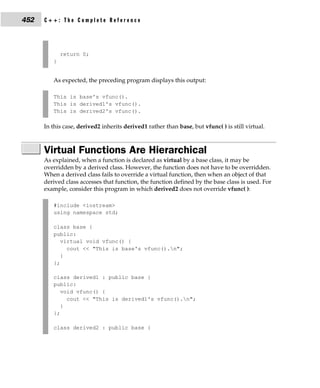
        else statement;

     where a statement may consist of a single statement, a block of statements, or nothing
     (in the case of empty statements). The else clause is optional.
          If expression evaluates to true (anything other than 0), the statement or block that
     forms the target of if is executed; otherwise, the statement or block that is the target of
     else will be executed, if it exists. Remember, only the code associated with if or the
     code associated with else executes, never both.
          In C, the conditional statement controlling if must produce a scalar result. A scalar
     is either an integer, character, pointer, or floating-point type. In C++, it may also be of
     type bool. It is rare to use a floating-point number to control a conditional statement
     because this slows execution time considerably. (It takes several instructions to perform
     a floating-point operation. It takes relatively few instructions to perform an integer or
     character operation.)
          The following program contains an example of if. The program plays a very simple
     version of the "guess the magic number" game. It prints the message ** Right ** when
     the player guesses the magic number. It generates the magic number using the
     standard random number generator rand( ), which returns an arbitrary number
     between 0 and RAND_MAX (which defines an integer value that is 32,767 or larger).
     rand( ) requires the header file stdlib.h. (A C++ program may also use the new-style
     header <cstdlib>.)

        /* Magic number program #1. */
        #include <stdio.h>
        #include <stdlib.h>

        int main(void)
        {
          int magic; /* magic number */
60   C++: The Complete Reference


            int guess; /* user's guess */

            magic = rand(); /* generate the magic number */

            printf("Guess the magic number: ");
            scanf("%d", &guess);

            if(guess == magic) printf("** Right **");

            return 0;
        }


         Taking the magic number program further, the next version illustrates the use of
     the else statement to print a message in response to the wrong number.

        /* Magic number program #2. */
        #include <stdio.h>
        #include <stdlib.h>

        int main(void)
        {
          int magic; /* magic number */
          int guess; /* user's guess */

            magic = rand(); /* generate the magic number */

            printf("Guess the magic number: ");
            scanf("%d", &guess);

            if(guess == magic) printf("** Right **");
            else printf("Wrong");

            return 0;
        }


Nested ifs
     A nested if is an if that is the target of another if or else. Nested ifs are very common
     in programming. In a nested if, an else statement always refers to the nearest if
     statement that is within the same block as the else and that is not already associated
     with an else. For example,
Chapter 3:       Statements        61


   if(i)
   {
     if(j) statement       1;
     if(k) statement       2; /* this if */
     else statement        3; /* is associated with this else */
   }
   else statement 4;       /* associated with if(i) */

As noted, the final else is not associated with if(j) because it is not in the same block.
Rather, the final else is associated with if(i). Also, the inner else is associated with if(k),
which is the nearest if.
    Standard C specifies that at least 15 levels of nesting must be supported. In practice,
most compilers allow substantially more. More importantly, Standard C++ suggests
that at least 256 levels of nested ifs be allowed in a C++ program. However, nesting
beyond a few levels is seldom necessary, and excessive nesting can quickly confuse the
meaning of an algorithm.
    You can use a nested if to further improve the magic number program by
providing the player with feedback about a wrong guess.

   /* Magic number program #3. */
   #include <stdio.h>
   #include <stdlib.h>

   int main(void)
   {
     int magic; /* magic number */
     int guess; /* user's guess */

      magic = rand(); /* get a random number */

      printf("Guess the magic number: ");
      scanf("%d", &guess);

      if (guess == magic) {
        printf("** Right **");
        printf(" %d is the magic numbern", magic);
      }
      else {
        printf("Wrong, ");
        if(guess > magic) printf("too highn");
        else printf("too lown");
      }
62   C++: The Complete Reference


              return 0;
          }


The if-else-if Ladder
     A common programming construct is the if-else-if ladder, sometimes called the if-else-if
     staircase because of its appearance. Its general form is

        if (expression) statement;
        else
           if (expression) statement;
           else
              if (expression) statement;
              .
              .
              .
              else statement;

     The conditions are evaluated from the top downward. As soon as a true condition is
     found, the statement associated with it is executed and the rest of the ladder is
     bypassed. If none of the conditions are true, the final else is executed. That is, if all
     other conditional tests fail, the last else statement is performed. If the final else is not
     present, no action takes place if all other conditions are false.
        Although the indentation of the preceding if-else-if ladder is technically correct, it
     can lead to overly deep indentation. For this reason, the if-else-if ladder is generally
     indented like this:

        if (expression)
          statement;
        else if (expression)
           statement;
        else if (expression)
           statement;
        .
        .
        .
        else
          statement;

     Using an if-else-if ladder, the magic number program becomes

        /* Magic number program #4. */
Chapter 3:      Statements     63


      #include <stdio.h>
      #include <stdlib.h>

      int main(void)
      {
        int magic; /* magic number */
        int guess; /* user's guess */

          magic = rand(); /* generate the magic number */

          printf("Guess the magic number: ");
          scanf("%d", &guess);

          if(guess == magic) {
            printf("** Right ** ");
            printf("%d is the magic number", magic);
          }
          else if(guess > magic)
            printf("Wrong, too high");
          else printf("Wrong, too low");

          return 0;
      }


The ? Alternative
   You can use the ? operator to replace if-else statements of the general form:

      if(condition) expression;
      else expression;

   However, the target of both if and else must be a single expression—not another
   statement.
       The ? is called a ternary operator because it requires three operands. It takes the
   general form

      Exp1 ? Exp2 : Exp3

   where Exp1, Exp2, and Exp3 are expressions. Notice the use and placement of the colon.
      The value of a ? expression is determined as follows: Exp1 is evaluated. If it is true,
   Exp2 is evaluated and becomes the value of the entire ? expression. If Exp1 is false, then
   Exp3 is evaluated and its value becomes the value of the expression. For example,
   consider
64   C++: The Complete Reference


        x = 10;
        y = x>9 ? 100 : 200;

     In this example, y is assigned the value 100. If x had been less than 9, y would have
     received the value 200. The same code written with the if-else statement would be

        x = 10;
        if(x>9) y = 100;
        else y = 200;

         The following program uses the ? operator to square an integer value entered by
     the user. However, this program preserves the sign (10 squared is 100 and −10 squared
     is −100).

        #include <stdio.h>

        int main(void)
        {
          int isqrd, i;

            printf("Enter a number: ");
            scanf("%d", &i);

            isqrd = i>0 ? i*i : -(i*i);

            printf("%d squared is %d", i, isqrd);

            return 0;
        }

         The use of the ? operator to replace if-else statements is not restricted to
     assignments only. Remember, all functions (except those declared as void) may return
     a value. Thus, you can use one or more function calls in a ? expression. When the
     function's name is encountered, the function is executed so that its return value may be
     determined. Therefore, you can execute one or more function calls using the ? operator
     by placing the calls in the expressions that form the ?'s operands. Here is an example.

        #include <stdio.h>

        int f1(int n);
        int f2(void);
Chapter 3:      Statements       65


   int main(void)
   {
     int t;

       printf("Enter a number: ");
       scanf("%d", &t);

       /* print proper message */
       t ? f1(t) + f2() : printf("zero entered.n");

       return 0;
   }

   int f1(int n)
   {
     printf("%d ", n);
     return 0;
   }

   int f2(void)
   {
     printf("entered.n");
     return 0;
   }


Entering a 0 in this example calls the printf( ) function and displays the message zero
entered. If you enter any other number, both f1( ) and f2( ) execute. Note that the value
of the ? expression is discarded in this example. You don't need to assign it to anything.
    A word of warning: Some C++ compilers rearrange the order of evaluation of an
expression in an attempt to optimize the object code. This could cause functions that
form the operands of the ? operator to execute in an unintended sequence.
    Using the ? operator, you can rewrite the magic number program yet again.

   /* Magic number program #5. */
   #include <stdio.h>
   #include <stdlib.h>

   int main(void)
   {
     int magic;
     int guess;
66   C++: The Complete Reference


            magic = rand(); /* generate the magic number */

            printf("Guess the magic number: ");
            scanf("%d", &guess);

            if(guess == magic) {
              printf("** Right ** ");
              printf("%d is the magic number", magic);
            }
            else
              guess > magic ? printf("High") : printf("Low");

            return 0;
        }


     Here, the ? operator displays the proper message based on the outcome of the test
     guess > magic.

The Conditional Expression
     Sometimes newcomers to C/C++ are confused by the fact that you can use any valid
     expression to control the if or the ? operator. That is, you are not restricted to
     expressions involving the relational and logical operators (as is the case in languages
     like BASIC or Pascal). The expression must simply evaluate to either a true or false
     (zero or nonzero) value. For example, the following program reads two integers from
     the keyboard and displays the quotient. It uses an if statement, controlled by the
     second number, to avoid a divide-by-zero error.

        /* Divide the first number by the second. */

        #include <stdio.h>

        int main(void)
        {
          int a, b;

            printf("Enter two numbers: ");
            scanf("%d%d", &a, &b);

            if(b) printf("%dn", a/b);
            else printf("Cannot divide by zero.n");

            return 0;
        }
Chapter 3:       Statements       67


   This approach works because if b is 0, the condition controlling the if is false and the
   else executes. Otherwise, the condition is true (nonzero) and the division takes place.
       One other point: Writing the if statement as shown here

      if(b != 0) printf("%dn", a/b);

   is redundant, potentially inefficient, and is considered bad style. Since the value of b
   alone is sufficient to control the if, there is no need to test it against 0.

switch
   C/C++ has a built-in multiple-branch selection statement, called switch, which
   successively tests the value of an expression against a list of integer or character
   constants. When a match is found, the statements associated with that constant are
   executed. The general form of the switch statement is

      switch (expression) {
        case constant1:
          statement sequence
          break;
        case constant2:
          statement sequence
          break;
        case constant3:
          statement sequence
          break;
        .
        .
        .
        default
          statement sequence
      }

   The expression must evaluate to a character or integer value. Floating-point expressions,
   for example, are not allowed. The value of expression is tested, in order, against the
   values of the constants specified in the case statements. When a match is found, the
   statement sequence associated with that case is executed until the break statement or
   the end of the switch statement is reached. The default statement is executed if no
   matches are found. The default is optional and, if it is not present, no action takes place
   if all matches fail.
        Standard C specifies that a switch can have at least 257 case statements. Standard
   C++ recommends that at least 16,384 case statements be supported! In practice, you
   will want to limit the number of case statements to a smaller amount for efficiency.
   Although case is a label statement, it cannot exist by itself, outside of a switch.
68   C++: The Complete Reference


        The break statement is one of C/C++'s jump statements. You can use it in loops as
     well as in the switch statement (see the section "Iteration Statements"). When break is
     encountered in a switch, program execution "jumps" to the line of code following the
     switch statement.
        There are three important things to know about the switch statement:

         s The switch differs from the if in that switch can only test for equality, whereas
           if can evaluate any type of relational or logical expression.

         s No two case constants in the same switch can have identical values. Of course,
           a switch statement enclosed by an outer switch may have case constants that
           are the same.

         s If character constants are used in the switch statement, they are automatically
           converted to integers.

         The switch statement is often used to process keyboard commands, such as menu
     selection. As shown here, the function menu( ) displays a menu for a spelling-checker
     program and calls the proper procedures:

        void menu(void)
        {
          char ch;

           printf("1. Check Spellingn");
           printf("2. Correct Spelling Errorsn");
           printf("3. Display Spelling Errorsn");
           printf("Strike Any Other Key to Skipn");
           printf("      Enter your choice: ");

           ch = getchar(); /* read the selection from
                              the keyboard */

           switch(ch) {
             case '1':
               check_spelling();
               break;
             case '2':
               correct_errors();
               break;
             case '3':
               display_errors();
               break;
             default :
Chapter 3:      Statements      69


           printf("No option selected");
       }
   }


    Technically, the break statements inside the switch statement are optional. They
terminate the statement sequence associated with each constant. If the break statement
is omitted, execution will continue on into the next case's statements until either a
break or the end of the switch is reached. For example, the following function uses the
"drop through" nature of the cases to simplify the code for a device-driver input
handler:

   /* Process a value */
   void inp_handler(int i)
   {
     int flag;

       flag = -1;

       switch(i) {
         case 1: /* These cases have common */
         case 2: /* statement sequences. */
         case 3:
           flag = 0;
           break;
         case 4:
           flag = 1;
         case 5:
           error(flag);
           break;
         default:
           process(i);
       }
   }

    This example illustrates two aspects of switch. First, you can have case statements
that have no statement sequence associated with them. When this occurs, execution
simply drops through to the next case. In this example, the first three cases all execute
the same statements, which are

   flag = 0;
   break;
70   C++: The Complete Reference


         Second, execution of one statement sequence continues into the next case if no
     break statement is present. If i matches 4, flag is set to 1 and, because there is no break
     statement at the end of that case, execution continues and the call to error(flag) is
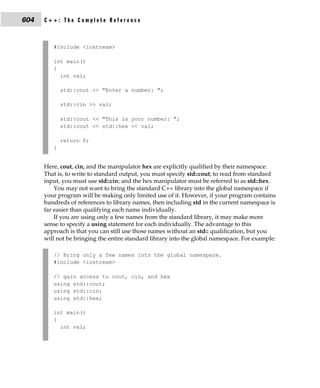
     executed. If i had matched 5, error(flag) would have been called with a flag value of −1
     (rather than 1).
         The fact that cases can run together when no break is present prevents the
     unnecessary duplication of statements, resulting in more efficient code.

Nested switch Statements
     You can have a switch as part of the statement sequence of an outer switch. Even if the
     case constants of the inner and outer switch contain common values, no conflicts arise.
     For example, the following code fragment is perfectly acceptable:

        switch(x) {
          case 1:
            switch(y) {
              case 0: printf("Divide by zero error.n");
                      break;
              case 1: process(x,y);
            }
            break;
          case 2:
            .
            .
            .


     Iteration Statements
     In C/C++, and all other modern programming languages, iteration statements (also
     called loops) allow a set of instructions to be executed repeatedly until a certain
     condition is reached. This condition may be predefined (as in the for loop), or
     open-ended (as in the while and do-while loops).

The for Loop
     The general design of the for loop is reflected in some form or another in all procedural
     programming languages. However, in C/C++, it provides unexpected flexibility and
     power.
        The general form of the for statement is

        for(initialization; condition; increment) statement;

     The for loop allows many variations, but its most common form works like this. The
     initialization is an assignment statement that is used to set the loop control variable. The
Chapter 3:       Statements         71


condition is a relational expression that determines when the loop exits. The increment
defines how the loop control variable changes each time the loop is repeated. You must
separate these three major sections by semicolons. The for loop continues to execute as
long as the condition is true. Once the condition becomes false, program execution
resumes on the statement following the for.
    In the following program, a for loop is used to print the numbers 1 through 100 on
the screen:

    #include <stdio.h>

    int main(void)
    {
      int x;

        for(x=1; x <= 100; x++) printf("%d ", x);

        return 0;
    }

In the loop, x is initially set to 1 and then compared with 100. Since x is less than 100,
printf( ) is called and the loop iterates. This causes x to be increased by 1 and again
tested to see if it is still less than or equal to 100. If it is, printf( ) is called. This process
repeats until x is greater than 100, at which point the loop terminates. In this example, x
is the loop control variable, which is changed and checked each time the loop repeats.
     The following example is a for loop that iterates multiple statements:

    for(x=100; x != 65; x -= 5) {
      z = x*x;
      printf("The square of %d, %f", x, z);
    }

Both the squaring of x and the call to printf( ) are executed until x equals 65. Note that
the loop is negative running: x is initialized to 100 and 5 is subtracted from it each time
the loop repeats.
    In for loops, the conditional test is always performed at the top of the loop. This
means that the code inside the loop may not be executed at all if the condition is false
to begin with. For example, in

    x = 10;
    for(y=10; y!=x; ++y) printf("%d", y);
    printf("%d", y); /* this is the only printf()
                         statement that will execute */
72   C++: The Complete Reference


     the loop will never execute because x and y are equal when the loop is entered. Because
     this causes the conditional expression to evaluate to false, neither the body of the loop
     nor the increment portion of the loop executes. Hence, y still has the value 10, and the
     only output produced by the fragment is the number 10 printed once on the screen.

for Loop Variations
     The previous discussion described the most common form of the for loop. However,
     several variations of the for are allowed that increase its power, flexibility, and
     applicability to certain programming situations.
         One of the most common variations uses the comma operator to allow two or more
     variables to control the loop. (Remember, you use the comma operator to string
     together a number of expressions in a "do this and this" fashion. See Chapter 2.) For
     example, the variables x and y control the following loop, and both are initialized
     inside the for statement:

        for(x=0, y=0; x+y<10; ++x) {
          y = getchar();
          y = y - '0'; /* subtract the ASCII code for 0
                          from y */
            .
            .
            .
        }

     Commas separate the two initialization statements. Each time the loop repeats, x is
     incremented and y's value is set by keyboard input. Both x and y must be at the correct
     value for the loop to terminate. Even though y's value is set by keyboard input, y must
     be initialized to 0 so that its value is defined before the first evaluation of the
     conditional expression. (If y were not defined, it could by chance contain the value 10,
     making the conditional test false and preventing the loop from executing.)
         The converge( ) function, shown next, demonstrates multiple loop control variables
     in action. The converge( ) function copies the contents of one string into another by
     moving characters from both ends, converging in the middle.

        /* Demonstrate multiple loop control variables. */
        #include <stdio.h>
        #include <string.h>

        void converge(char *targ, char *src);

        int main(void)
        {
          char target[80] = "XXXXXXXXXXXXXXXXXXXXXXXXXXXXX";
Chapter 3:   Statements   73


    converge(target, "This is a test of converge().");
    printf("Final string: %sn", target);

    return 0;
}

/* This function copies one string into another.
   It copies characters to both the ends,
   converging at the middle. */
void converge(char *targ, char *src)
{
  int i, j;

    printf("%sn", targ);
    for(i=0, j=strlen(src); i<=j; i++, j--) {
      targ[i] = src[i];
      targ[j] = src[j];
      printf("%sn", targ);
    }
}


Here is the output produced by the program.

XXXXXXXXXXXXXXXXXXXXXXXXXXXXX
TXXXXXXXXXXXXXXXXXXXXXXXXXXXX
ThXXXXXXXXXXXXXXXXXXXXXXXXXX.
ThiXXXXXXXXXXXXXXXXXXXXXXXX).
ThisXXXXXXXXXXXXXXXXXXXXXX().
This XXXXXXXXXXXXXXXXXXXXe().
This iXXXXXXXXXXXXXXXXXXge().
This isXXXXXXXXXXXXXXXXrge().
This is XXXXXXXXXXXXXXerge().
This is aXXXXXXXXXXXXverge().
This is a XXXXXXXXXXnverge().
This is a tXXXXXXXXonverge().
This is a teXXXXXXconverge().
This is a tesXXXX converge().
This is a testXXf converge().
This is a test of converge().
Final string: This is a test of converge().
74   C++: The Complete Reference


         In converge( ), the for loop uses two loop control variables, i and j, to index the
     string from opposite ends. As the loop iterates, i is increased and j is decreased. The
     loop stops when i is greater than j, thus ensuring that all characters are copied.
         The conditional expression does not have to involve testing the loop control
     variable against some target value. In fact, the condition may be any relational or
     logical statement. This means that you can test for several possible terminating
     conditions.
         For example, you could use the following function to log a user onto a remote
     system. The user has three tries to enter the password. The loop terminates when the
     three tries are used up or the user enters the correct password.

        void sign_on(void)
        {
          char str[20];
          int x;

            for(x=0; x<3 && strcmp(str, "password"); ++x) {
              printf("Enter password please:");
              gets(str);
            }

            if(x==3) return;
            /* else log user in ... */
        }

     This function uses strcmp( ), the standard library function that compares two strings
     and returns 0 if they match.
         Remember, each of the three sections of the for loop may consist of any valid
     expression. The expressions need not actually have anything to do with what the
     sections are generally used for. With this in mind, consider the following example:

        #include <stdio.h>

        int sqrnum(int num);
        int readnum(void);
        int prompt(void);

        int main(void)
        {
          int t;

            for(prompt(); t=readnum(); prompt())
Chapter 3:       Statements        75


         sqrnum(t);

       return 0;
   }

   int prompt(void)
   {
     printf("Enter a number: ");
     return 0;
   }

   int readnum(void)
   {
     int t;

       scanf("%d", &t);
       return t;
   }

   int sqrnum(int num)
   {
     printf("%dn", num*num);
     return num*num;
   }


Look closely at the for loop in main( ). Notice that each part of the for loop is
composed of function calls that prompt the user and read a number entered from the
keyboard. If the number entered is 0, the loop terminates because the conditional
expression will be false. Otherwise, the number is squared. Thus, this for loop uses the
initialization and increment portions in a nontraditional but completely valid sense.
    Another interesting trait of the for loop is that pieces of the loop definition need not
be there. In fact, there need not be an expression present for any of the sections—the
expressions are optional. For example, this loop will run until the user enters 123:

   for(x=0; x!=123; ) scanf("%d", &x);

Notice that the increment portion of the for definition is blank. This means that each
time the loop repeats, x is tested to see if it equals 123, but no further action takes place.
If you type 123 at the keyboard, however, the loop condition becomes false and the
loop terminates.
76   C++: The Complete Reference


        The initialization of the loop control variable can occur outside the for statement.
     This most frequently happens when the initial condition of the loop control variable
     must be computed by some complex means as in this example:

        gets(s); /* read a string into s */
        if(*s) x = strlen(s); /* get the string's length */
        else x = 10;

        for( ; x<10; ) {
          printf("%d", x);
          ++x;
        }

     The initialization section has been left blank and x is initialized before the loop is
     entered.

The Infinite Loop
     Although you can use any loop statement to create an infinite loop, for is traditionally
     used for this purpose. Since none of the three expressions that form the for loop are
     required, you can make an endless loop by leaving the conditional expression empty:

        for( ; ; ) printf("This loop will run forever.n");

     When the conditional expression is absent, it is assumed to be true. You may have an
     initialization and increment expression, but C++ programmers more commonly use the
     for(;;) construct to signify an infinite loop.
         Actually, the for(;;) construct does not guarantee an infinite loop because a break
     statement, encountered anywhere inside the body of a loop, causes immediate
     termination. (break is discussed in detail later in this chapter.) Program control then
     resumes at the code following the loop, as shown here:

        ch = '0';

        for( ; ; ) {
          ch = getchar(); /* get a character */
          if(ch=='A') break; /* exit the loop */
        }

        printf("you typed an A");

     This loop will run until the user types an A at the keyboard.
Chapter 3:        Statements     77


for Loops with No Bodies
   A statement may be empty. This means that the body of the for loop (or any other loop)
   may also be empty. You can use this fact to improve the efficiency of certain algorithms
   and to create time delay loops.
       Removing spaces from an input stream is a common programming task. For
   example, a database program may allow a query such as "show all balances less than
   400." The database needs to have each word fed to it separately, without leading
   spaces. That is, the database input processor recognizes "show" but not " show". The
   following loop shows one way to accomplish this. It advances past leading spaces in
   the string pointed to by str.

      for( ; *str == ' '; str++) ;

   As you can see, this loop has no body—and no need for one either.
       Time delay loops are often used in programs. The following code shows how to
   create one by using for:

      for(t=0; t<SOME_VALUE; t++) ;


The while Loop
   The second loop available in C/C++ is the while loop. Its general form is

      while(condition) statement;

   where statement is either an empty statement, a single statement, or a block of
   statements. The condition may be any expression, and true is any nonzero value. The
   loop iterates while the condition is true. When the condition becomes false, program
   control passes to the line of code immediately following the loop.
       The following example shows a keyboard input routine that simply loops until the
   user types A:

      char wait_for_char(void)
      {
        char ch;

          ch = '0'; /* initialize ch */
          while(ch != 'A') ch = getchar();
          return ch;
      }
78   C++: The Complete Reference


         First, ch is initialized to null. As a local variable, its value is not known when
     wait_for_char( ) is executed. The while loop then checks to see if ch is not equal to A.
     Because ch was initialized to null, the test is true and the loop begins. Each time you
     press a key, the condition is tested again. Once you enter an A, the condition becomes
     false because ch equals A, and the loop terminates.
         Like for loops, while loops check the test condition at the top of the loop, which
     means that the body of the loop will not execute if the condition is false to begin with.
     This feature may eliminate the need to perform a separate conditional test before the
     loop. The pad( ) function provides a good illustration of this. It adds spaces to the end
     of a string to fill the string to a predefined length. If the string is already at the desired
     length, no spaces are added.

        #include <stdio.h>
        #include <string.h>

        void pad(char *s, int length);

        int main(void)
        {
          char str[80];

            strcpy(str, "this is a test");
            pad(str, 40);
            printf("%d", strlen(str));

            return 0;
        }

        /* Add spaces to the end of a string. */
        void pad(char *s, int length)
        {
          int l;

            l = strlen(s); /* find out how long it is */

            while(l<length) {
              s[l] = ' '; /* insert a space */
              l++;
            }
            s[l]= '0'; /* strings need to be
                           terminated in a null */
        }
Chapter 3:      Statements       79


   The two arguments of pad( ) are s, a pointer to the string to lengthen, and length, the
   number of characters that s should have. If the length of string s is already equal to or
   greater than length, the code inside the while loop does not execute. If s is shorter than
   length, pad( ) adds the required number of spaces. The strlen( ) function, part of the
   standard library, returns the length of the string.
       If several separate conditions need to terminate a while loop, a single variable
   commonly forms the conditional expression. The value of this variable is set at various
   points throughout the loop. In this example,

      void func1(void)
      {
        int working;

          working = 1; /* i.e., true */

          while(working) {
            working = process1();
            if(working)
              working = process2();
            if(working)
              working = process3();
          }
      }

   any of the three routines may return false and cause the loop to exit.
      There need not be any statements in the body of the while loop. For example,

      while((ch=getchar()) != 'A') ;

   will simply loop until the user types A. If you feel uncomfortable putting the
   assignment inside the while conditional expression, remember that the equal sign is
   just an operator that evaluates to the value of the right-hand operand.

The do-while Loop
   Unlike for and while loops, which test the loop condition at the top of the loop, the
   do-while loop checks its condition at the bottom of the loop. This means that a
   do-while loop always executes at least once. The general form of the do-while loop is

      do{
        statement;
      } while(condition);
80   C++: The Complete Reference


     Although the curly braces are not necessary when only one statement is present, they
     are usually used to avoid confusion (to you, not the compiler) with the while. The
     do-while loop iterates until condition becomes false.
         The following do-while loop will read numbers from the keyboard until it finds a
     number less than or equal to 100.

        do {
          scanf("%d", &num);
        } while(num > 100);

         Perhaps the most common use of the do-while loop is in a menu selection function.
     When the user enters a valid response, it is returned as the value of the function.
     Invalid responses cause a reprompt. The following code shows an improved version of
     the spelling-checker menu developed earlier in this chapter:

        void menu(void)
        {
          char ch;

            printf("1. Check Spellingn");
            printf("2. Correct Spelling Errorsn");
            printf("3. Display Spelling Errorsn");
            printf("      Enter your choice: ");

            do {
              ch = getchar(); /* read the selection from
                                 the keyboard */
              switch(ch) {
                case '1':
                  check_spelling();
                  break;
                case '2':
                  correct_errors();
                  break;
                case '3':
                  display_errors();
                  break;
              }
            } while(ch!='1' && ch!='2' && ch!='3');
        }
Chapter 3:         Statements   81


  Here, the do-while loop is a good choice because you will always want a menu
  function to execute at least once. After the options have been displayed, the program
  will loop until a valid option is selected.


  Declaring Variables within Selection and
  Iteration Statements
  In C++ (but not C), it is possible to declare a variable within the conditional expression
  of an if or switch, within the conditional expression of a while loop, or within the
  initialization portion of a for loop. A variable declared in one of these places has its
  scope limited to the block of code controlled by that statement. For example, a variable
  declared within a for loop will be local to that loop.
      Here is an example that declares a variable within the initialization portion of a
  for loop:

      /* i is local to for loop; j is known outside loop. */
      int j;
      for(int i = 0; i<10; i++)
        j = i * i;

      /* i = 10; // *** Error *** -- i not known here! */


  Here, i is declared within the initialization portion of the for and is used to control the
  loop. Outside the loop, i is unknown.
     Since often a loop control variable in a for is needed only by that loop, the
  declaration of the variable in the initialization portion of the for is becoming common
  practice. Remember, however, that this is not supported by C.

         Whether a variable declared within the initialization portion of a for loop is local to
Tip      that loop has changed over time. Originally, the variable was available after the for.
         However, Standard C++ restricts the variable to the scope of the for loop.

     If your compiler fully complies with Standard C++, then you can also declare a
  variable within any conditional expression, such as those used by the if or a while. For
  example, this fragment,

      if(int x = 20) {
        x = x - y;
82   C++: The Complete Reference


            if(x>10) y = 0;
        }


     declares x and assigns it the value 20. Since this is a true value, the target of the if
     executes. Variables declared within a conditional statement have their scope limited
     to the block of code controlled by that statement. Thus, in this case, x is not known
     outside the if. Frankly, not all programmers believe that declaring variables within
     conditional statements is good practice, and this technique will not be used in
     this book.


     Jump Statements
     C/C++ has four statements that perform an unconditional branch: return, goto, break,
     and continue. Of these, you may use return and goto anywhere in your program. You
     may use the break and continue statements in conjunction with any of the loop
     statements. As discussed earlier in this chapter, you can also use break with switch.

The return Statement
     The return statement is used to return from a function. It is categorized as a jump
     statement because it causes execution to return (jump back) to the point at which the
     call to the function was made. A return may or may not have a value associated with it.
     If return has a value associated with it, that value becomes the return value of the
     function. In C, a non-void function does not technically have to return a value. If no
     return value is specified, a garbage value is returned. However, in C++, a non-void
     function must return a value. That is, in C++, if a function is specified as returning a
     value, any return statement within it must have a value associated with it. (Even in C,
     if a function is declared as returning a value, it is good practice to actually return one.)
          The general form of the return statement is

        return expression;

     The expression is present only if the function is declared as returning a value. In this
     case, the value of expression will become the return value of the function.
         You can use as many return statements as you like within a function. However, the
     function will stop executing as soon as it encounters the first return. The } that ends a
     function also causes the function to return. It is the same as a return without any
     specified value. If this occurs within a non-void function, then the return value of the
     function is undefined.
         A function declared as void may not contain a return statement that specifies a
     value. Since a void function has no return value, it makes sense that no return
     statement within a void function can return a value.
Chapter 3:      Statements       83


      See Chapter 6 for more information on return.


The goto Statement
   Since C/C++ has a rich set of control structures and allows additional control using
   break and continue, there is little need for goto. Most programmers' chief concern
   about the goto is its tendency to render programs unreadable. Nevertheless, although
   the goto statement fell out of favor some years ago, it occasionally has its uses. There
   are no programming situations that require goto. Rather, it is a convenience, which, if
   used wisely, can be a benefit in a narrow set of programming situations, such as
   jumping out of a set of deeply nested loops. The goto is not used outside of this section.
       The goto statement requires a label for operation. (A label is a valid identifier
   followed by a colon.) Furthermore, the label must be in the same function as the goto
   that uses it—you cannot jump between functions. The general form of the goto
   statement is

      goto label;
      .
      .
      .
      label:

   where label is any valid label either before or after goto. For example, you could create
   a loop from 1 to 100 using the goto and a label, as shown here:

      x = 1;
      loop1:
        x++;
        if(x<100) goto loop1;


The break Statement
   The break statement has two uses. You can use it to terminate a case in the switch
   statement (covered in the section on switch earlier in this chapter). You can also use it
   to force immediate termination of a loop, bypassing the normal loop conditional test.
       When the break statement is encountered inside a loop, the loop is immediately
   terminated and program control resumes at the next statement following the loop. For
   example,

      #include <stdio.h>

      int main(void)
84   C++: The Complete Reference


        {
            int t;

            for(t=0; t<100; t++) {
              printf("%d ", t);
              if(t==10) break;
            }

            return 0;
        }


     prints the numbers 0 through 10 on the screen. Then the loop terminates because break
     causes immediate exit from the loop, overriding the conditional test t<100.
         Programmers often use the break statement in loops in which a special condition
     can cause immediate termination. For example, here a keypress can stop the execution
     of the look_up( ) function:

        void look_up(char *name)
        {
          do {
            /* look up names ... */
            if(kbhit()) break;
          } while(!found);
          /* process match */
        }

     The kbhit( ) function returns 0 if you do not press a key. Otherwise, it returns a
     nonzero value. Because of the wide differences between computing environments,
     neither Standard C nor Standard C++ defines kbhit( ), but you will almost certainly
     have it (or one with a slightly different name) supplied with your compiler.
         A break causes an exit from only the innermost loop. For example,

        for(t=0; t<100; ++t) {
          count = 1;
          for(;;) {
            printf("%d ", count);
            count++;
            if(count==10) break;
          }
        }
Chapter 3:      Statements      85


   prints the numbers 1 through 10 on the screen 100 times. Each time execution
   encounters break, control is passed back to the outer for loop.
       A break used in a switch statement will affect only that switch. It does not affect
   any loop the switch happens to be in.

The exit( ) Function
   Although exit( ) is not a program control statement, a short digression that discusses it
   is in order at this time. Just as you can break out of a loop, you can break out of a
   program by using the standard library function exit( ). This function causes immediate
   termination of the entire program, forcing a return to the operating system. In effect,
   the exit( ) function acts as if it were breaking out of the entire program.
        The general form of the exit( ) function is

      void exit(int return_code);

   The value of return_code is returned to the calling process, which is usually the
   operating system. Zero is generally used as a return code to indicate normal program
   termination. Other arguments are used to indicate some sort of error. You can also use
   the macros EXIT_SUCCESS and EXIT_FAILURE for the return_code. The exit( )
   function requires the header stdlib.h. A C++ program may also use the new-style
   header <cstdlib>.
       Programmers frequently use exit( ) when a mandatory condition for program
   execution is not satisfied. For example, imagine a virtual reality computer game that
   requires a special graphics adapter. The main( ) function of this game might look
   like this:

      #include <stdlib.h>

      int main(void)
      {
         if(!virtual_graphics()) exit(1);
         play();
         /* ... */
      }
      /* .... */

   where virtual_graphics( ) is a user-defined function that returns true if the
   virtual-reality graphics adapter is present. If the adapter is not in the system,
   virtual_graphics( ) returns false and the program terminates.
       As another example, this version of menu( ) uses exit( ) to quit the program and
   return to the operating system:
86   C++: The Complete Reference


        void menu(void)
        {
          char ch;

          printf("1.    Check Spellingn");
          printf("2.    Correct Spelling Errorsn");
          printf("3.    Display Spelling Errorsn");
          printf("4.    Quitn");
          printf("         Enter your choice: ");

          do {
            ch = getchar(); /* read the selection from
                             the keyboard */
              switch(ch) {
                case '1':
                  check_spelling();
                  break;
                case '2':
                  correct_errors();
                  break;
                case '3':
                  display_errors();
                  break;
                case '4':
                  exit(0); /* return to OS */
              }
            } while(ch!='1' && ch!='2' && ch!='3');
          }


The continue Statement
     The continue statement works somewhat like the break statement. Instead of forcing
     termination, however, continue forces the next iteration of the loop to take place,
     skipping any code in between. For the for loop, continue causes the conditional test
     and increment portions of the loop to execute. For the while and do-while loops,
     program control passes to the conditional tests. For example, the following program
     counts the number of spaces contained in the string entered by the user:

        /* Count spaces */
        #include <stdio.h>

        int main(void)
        {
Chapter 3:      Statements        87


       char s[80], *str;
       int space;

       printf("Enter a string: ");
       gets(s);
       str = s;

       for(space=0; *str; str++) {
         if(*str != ' ') continue;
         space++;
       }
       printf("%d spacesn", space);

       return 0;
   }


Each character is tested to see if it is a space. If it is not, the continue statement forces
the for to iterate again. If the character is a space, space is incremented.
    The following example shows how you can use continue to expedite the exit from a
loop by forcing the conditional test to be performed sooner:

   void code(void)
   {
     char done, ch;

       done = 0;
       while(!done) {
         ch = getchar();
         if(ch=='$') {
           done = 1;
           continue;
         }
         putchar(ch+1); /* shift the alphabet one
                           position higher */
       }
   }

This function codes a message by shifting all characters you type one letter higher. For
example, an A becomes a B. The function will terminate when you type a $. After a $
has been input, no further output will occur because the conditional test, brought into
effect by continue, will find done to be true and will cause the loop to exit.
88   C++: The Complete Reference


     Expression Statements
     Chapter 2 covered expressions thoroughly. However, a few special points are
     mentioned here. Remember, an expression statement is simply a valid expression
     followed by a semicolon, as in

        func();     /*   a function call */
        a = b+c;    /*   an assignment statement */
        b+f();      /*   a valid, but strange statement */
        ;           /*   an empty statement */

     The first expression statement executes a function call. The second is an assignment.
     The third expression, though strange, is still evaluated by the C++ compiler because
     the function f( ) may perform some necessary task. The final example shows that a
     statement can be empty (sometimes called a null statement).


     Block Statements
     Block statements are simply groups of related statements that are treated as a unit. The
     statements that make up a block are logically bound together. Block statements are also
     called compound statements. A block is begun with a { and terminated by its matching }.
     Programmers use block statements most commonly to create a multistatement target
     for some other statement, such as if. However, you may place a block statement
     anywhere you would put any other statement. For example, this is perfectly valid
     (although unusual) C/C++ code:

        #include <stdio.h>

        int main(void)
        {
          int i;

            {   /* a block statement */
                i = 120;
                printf("%d", i);
            }

            return 0;
        }
C++


Chapter 4
 Arrays and Null-Terminated
 Strings


                              89
90   C++: The Complete Reference


              n array is a collection of variables of the same type that are referred to through

     A        a common name. A specific element in an array is accessed by an index. In
              C/C++, all arrays consist of contiguous memory locations. The lowest address
     corresponds to the first element and the highest address to the last element.
     Arrays may have from one to several dimensions. The most common array is the
     null-terminated string, which is simply an array of characters terminated by a null.
         Arrays and pointers are closely related; a discussion of one usually refers to the
     other. This chapter focuses on arrays, while Chapter 5 looks closely at pointers. You
     should read both to understand fully these important constructs.


     Single-Dimension Arrays
     The general form for declaring a single-dimension array is

        type var_name[size];

     Like other variables, arrays must be explicitly declared so that the compiler may
     allocate space for them in memory. Here, type declares the base type of the array, which
     is the type of each element in the array, and size defines how many elements the array
     will hold. For example, to declare a 100-element array called balance of type double,
     use this statement:

        double balance[100];

        An element is accessed by indexing the array name. This is done by placing the
     index of the element within square brackets after the name of the array. For example,

        balance[3] = 12.23;

     assigns element number 3 in balance the value 12.23.
         In C/C++, all arrays have 0 as the index of their first element. Therefore, when
     you write

        char p[10];

     you are declaring a character array that has ten elements, p[0] through p[9]. For
     example, the following program loads an integer array with the numbers 0 through 99:

        #include <stdio.h>

        int main(void)
Chapter 4:       Arrays and Null-Terminated Strings             91


   {
       int x[100]; /* this declares a 100-integer array */
       int t;

       /* load x with values 0 through 99 */
       for(t=0; t<100; ++t) x[t] = t;

       /* display contents of x */
       for(t=0; t<100; ++t) printf("%d ", x[t]);

       return 0;
   }


    The amount of storage required to hold an array is directly related to its type and
size. For a single-dimension array, the total size in bytes is computed as shown here:

   total bytes = sizeof(base type) x size of array

    C/C++ has no bounds checking on arrays. You could overwrite either end of an
array and write into some other variable's data or even into the program's code. As the
programmer, it is your job to provide bounds checking where needed. For example,
this code will compile without error, but is incorrect because the for loop will cause the
array count to be overrun.

   int count[10], i;

   /* this causes count to be overrun */
   for(i=0; i<100; i++) count[i] = i;

    Single-dimension arrays are essentially lists of information of the same type that are
stored in contiguous memory locations in index order. For example, Figure 4-1 shows
how array a appears in memory if it starts at memory location 1000 and is declared as
shown here:

   char a[7];


   Element         a[0]     a[1]      a[2]     a[3]      a[4]      a[5]     a[6]
   Address         1000     1001      1002     1003      1004      1005     1006

 Figure 4-1.    A seven-element character array beginning at location 1000
92   C++: The Complete Reference


     Generating a Pointer to an Array
     You can generate a pointer to the first element of an array by simply specifying the
     array name, without any index. For example, given

        int sample[10];

     you can generate a pointer to the first element by using the name sample. Thus, the
     following program fragment assigns p the address of the first element of sample:

        int *p;
        int sample[10];

        p = sample;

        You can also specify the address of the first element of an array using the &
     operator. For example, sample and &sample[0] both produce the same results.
     However, in professionally written C/C++ code, you will almost never see
     &sample[0].


     Passing Single-Dimension Arrays to Functions
     In C/C++, you cannot pass an entire array as an argument to a function. You can,
     however, pass to the function a pointer to an array by specifying the array's name
     without an index. For example, the following program fragment passes the address of i
     to func1( ):

        int main(void)
        {
          int i[10];

            func1(i);
            .
            .
            .
        }

        If a function receives a single-dimension array, you may declare its formal
     parameter in one of three ways: as a pointer, as a sized array, or as an unsized array.
     For example, to receive i, a function called func1( ) can be declared as
Chapter 4:      Arrays and Null-Terminated Strings            93


     void func1(int *x) /* pointer */
     {
       .
       .
       .
     }

or

     void func1(int x[10]) /* sized array */
     {
         .
         .
         .
     }


or finally as

     void func1(int x[]) /* unsized array */
     {
         .
         .
         .
     }


    All three declaration methods produce similar results because each tells the
compiler that an integer pointer is going to be received. The first declaration actually
uses a pointer. The second employs the standard array declaration. In the final version,
a modified version of an array declaration simply specifies that an array of type int of
some length is to be received. As you can see, the length of the array doesn't matter as
far as the function is concerned because C/C++ performs no bounds checking. In fact,
as far as the compiler is concerned,

     void func1(int x[32])
     {
        .
        .
        .
     }

also works because the compiler generates code that instructs func1( ) to receive a
pointer—it does not actually create a 32-element array.
94   C++: The Complete Reference


     Null-Terminated Strings
     By far the most common use of the one-dimensional array is as a character string.
     C++ supports two types of strings. The first is the null-terminated string, which is a
     null-terminated character array. (A null is zero.) Thus a null-terminated string contains
     the characters that comprise the string followed by a null. This is the only type of string
     defined by C, and it is still the most widely used. Sometimes null-terminated strings
     are called C-strings. C++ also defines a string class, called string, which provides an
     object-oriented approach to string handling. It is described later in this book. Here,
     null-terminated strings are examined.
         When declaring a character array that will hold a null-terminated string, you need
     to declare it to be one character longer than the largest string that it is to hold. For
     example, to declare an array str that can hold a 10-character string, you would write

        char str[11];

     This makes room for the null at the end of the string.
        When you use a quoted string constant in your program, you are also creating a
     null-terminated string. A string constant is a list of characters enclosed in double quotes.
     For example,

        "hello there"

     You do not need to add the null to the end of string constants manually—the compiler
     does this for you automatically.
        C/C++ supports a wide range of functions that manipulate null-terminated strings.
     The most common are

         Name                      Function
         strcpy(s1, s2)            Copies s2 into s1.
         strcat(s1, s2)            Concatenates s2 onto the end of s1.
         strlen(s1)                Returns the length of s1.
         strcmp(s1, s2)            Returns 0 if s1 and s2 are the same; less than 0 if s1<s2;
                                   greater than 0 if s1>s2.
         strchr(s1, ch)            Returns a pointer to the first occurrence of ch in s1.
         strstr(s1, s2)            Returns a pointer to the first occurrence of s2 in s1.

     These functions use the standard header file string.h. (C++ programs can also use the
     new-style header <cstring>.) The following program illustrates the use of these string
     functions:
Chapter 4:      Arrays and Null-Terminated Strings          95


   #include <stdio.h>
   #include <string.h>

   int main(void)
   {
     char s1[80], s2[80];

       gets(s1);
       gets(s2);

       printf("lengths: %d %dn", strlen(s1), strlen(s2));

       if(!strcmp(s1, s2)) printf("The strings are equaln");

       strcat(s1, s2);
       printf("%sn", s1);

       strcpy(s1, "This is a test.n");
       printf(s1);
       if(strchr("hello", 'e')) printf("e is in hellon");
       if(strstr("hi there", "hi")) printf("found hi");

       return 0;
   }

If you run this program and enter the strings "hello" and "hello", the output is

   lengths: 5 5
   The strings are equal
   hellohello
   This is a test.
   e is in hello
   found hi

Remember, strcmp( ) returns false if the strings are equal. Be sure to use the logical
operator ! to reverse the condition, as just shown, if you are testing for equality.
   Although C++ now defines a string class, null-terminated strings are still widely
used in existing programs. They will probably stay in wide use because they offer a
high level of efficiency and afford the programmer detailed control of string
operations. However, for many simple string-handling chores, C++'s string class
provides a convenient alternative.
96   C++: The Complete Reference


     Two-Dimensional Arrays
     C/C++ supports multidimensional arrays. The simplest form of the multidimensional
     array is the two-dimensional array. A two-dimensional array is, essentially, an array of
     one-dimensional arrays. To declare a two-dimensional integer array d of size 10,20, you
     would write

        int d[10][20];

     Pay careful attention to the declaration. Some other computer languages use commas
     to separate the array dimensions; C/C++, in contrast, places each dimension in its own
     set of brackets.
         Similarly, to access point 1,2 of array d, you would use

        d[1][2]

     The following example loads a two-dimensional array with the numbers 1 through 12
     and prints them row by row.

        #include <stdio.h>

        int main(void)
        {
          int t, i, num[3][4];

            for(t=0; t<3; ++t)
              for(i=0; i<4; ++i)
                num[t][i] = (t*4)+i+1;

            /* now print them out */
            for(t=0; t<3; ++t) {
              for(i=0; i<4; ++i)
                printf("%3d ", num[t][i]);
              printf("n");
            }

            return 0;
        }

     In this example, num[0][0] has the value 1, num[0][1] the value 2, num[0][2] the value
     3, and so on. The value of num[2][3] will be 12. You can visualize the num array as
     shown here:
Chapter 4:      Arrays and Null-Terminated Strings          97


   Two-dimensional arrays are stored in a row-column matrix, where the first index
indicates the row and the second indicates the column. This means that the rightmost
index changes faster than the leftmost when accessing the elements in the array in the
order in which they are actually stored in memory. See Figure 4-2 for a graphic
representation of a two-dimensional array in memory.
   In the case of a two-dimensional array, the following formula yields the number of
bytes of memory needed to hold it:

   bytes = size of 1st index x size of 2nd index x sizeof(base type)

Therefore, assuming 4-byte integers, an integer array with dimensions 10,5 would have

   10 x 5 x 4

or 200 bytes allocated.


 Figure 4-2.    A two-dimensional array in memory
98   C++: The Complete Reference


         When a two-dimensional array is used as an argument to a function, only a
     pointer to the first element is actually passed. However, the parameter receiving a
     two-dimensional array must define at least the size of the rightmost dimension. (You
     can specify the left dimension if you like, but it is not necessary.) The rightmost
     dimension is needed because the compiler must know the length of each row if it is to
     index the array correctly. For example, a function that receives a two-dimensional
     integer array with dimensions 10,10 is declared like this:

        void func1(int x[][10])
        {
            .
            .
            .
        }

     The compiler needs to know the size of the right dimension in order to correctly
     execute expressions such as

        x[2][4]

     inside the function. If the length of the rows is not known, the compiler cannot
     determine where the third row begins.
         The following short program uses a two-dimensional array to store the numeric
     grade for each student in a teacher's classes. The program assumes that the teacher has
     three classes and a maximum of 30 students per class. Notice the way the array grade is
     accessed by each of the functions.

        /* A simple student grades database. */
        #include <stdio.h>
        #include <ctype.h>
        #include <stdlib.h>

        #define CLASSES 3
        #define GRADES 30

        int grade[CLASSES][GRADES];

        void enter_grades(void);
        int get_grade(int num);
        void disp_grades(int g[][GRADES]);
Chapter 4:    Arrays and Null-Terminated Strings   99


int main(void)
{
  char ch, str[80];

    for(;;) {
      do {
        printf("(E)nter gradesn");
        printf("(R)eport gradesn");
        printf("(Q)uitn");
        gets(str);
        ch = toupper(*str);
      } while(ch!='E' && ch!='R' && ch!='Q');

        switch(ch) {
          case 'E':
            enter_grades();
            break;
          case 'R':
            disp_grades(grade);
            break;
          case 'Q':
            exit(0);
        }
    }

    return 0;
}

/* Enter the student's grades. */
void enter_grades(void)
{
  int t, i;

    for(t=0; t<CLASSES; t++) {
      printf("Class # %d:n", t+1);
      for(i=0; i<GRADES; ++i)
        grade[t][i] = get_grade(i);
    }
}

/* Read a grade. */
int get_grade(int num)
100   C++: The Complete Reference


         {
             char s[80];

             printf("Enter grade for student # %d:n", num+1);
             gets(s);
             return(atoi(s));
         }

         /* Display grades. */
         void disp_grades(int g[][GRADES])
         {
           int t, i;

             for(t=0; t<CLASSES; ++t) {
               printf("Class # %d:n", t+1);
               for(i=0; i<GRADES; ++i)
                 printf("Student #%d is %dn", i+1, g[t][i]);
             }
         }


 Arrays of Strings
      It is not uncommon in programming to use an array of strings. For example, the input
      processor to a database may verify user commands against an array of valid
      commands. To create an array of null-terminated strings, use a two-dimensional
      character array. The size of the left index determines the number of strings and the size
      of the right index specifies the maximum length of each string. The following code
      declares an array of 30 strings, each with a maximum length of 79 characters

         char str_array[30][80];

         It is easy to access an individual string: You simply specify only the left index. For
      example, the following statement calls gets( ) with the third string in str_array.

         gets(str_array[2]);

      The preceding statement is functionally equivalent to

         gets(&str_array[2][0]);

      but the first of the two forms is much more common in professionally written
      C/C++ code.
Chapter 4:         Arrays and Null-Terminated Strings        101


   To better understand how string arrays work, study the following short program,
which uses a string array as the basis for a very simple text editor:

   /* A very simple text editor. */
   #include <stdio.h>

   #define MAX 100
   #define LEN 80

   char text[MAX][LEN];

   int main(void)
   {
     register int t, i, j;

       printf("Enter an empty line to quit.n");

       for(t=0; t<MAX; t++) {
         printf("%d: ", t);
         gets(text[t]);
         if(!*text[t]) break; /* quit on blank line */
       }

       for(i=0; i<t; i++) {
         for(j=0; text[i][j]; j++) putchar(text[i][j]);
         putchar('n');
       }

       return 0;
   }

This program inputs lines of text until a blank line is entered. Then it redisplays each
line one character at a time.


Multidimensional Arrays
C/C++ allows arrays of more than two dimensions. The exact limit, if any, is
determined by your compiler. The general form of a multidimensional array
declaration is

   type name[Size1][Size2][Size3]. . .[SizeN];
102   C++: The Complete Reference


      Arrays of more than three dimensions are not often used because of the amount of
      memory they require. For example, a four-dimensional character array with
      dimensions 10,6,9,4 requires

         10 * 6 * 9 * 4

      or 2,160 bytes. If the array held 2-byte integers, 4,320 bytes would be needed. If the
      array held doubles (assuming 8 bytes per double), 17,280 bytes would be required. The
      storage required increases exponentially with the number of dimensions. For example,
      if a fifth dimension of size 10 was added to the preceding array, then 172, 800 bytes
      would be required.
           In multidimensional arrays, it takes the computer time to compute each index. This
      means that accessing an element in a multidimensional array can be slower than
      accessing an element in a single-dimension array.
           When passing multidimensional arrays into functions, you must declare all but the
      leftmost dimension. For example, if you declare array m as

         int m[4][3][6][5];

      a function, func1( ), that receives m, would look like this:

         void func1(int d[][3][6][5])
         {
           .
           .
           .
         }

      Of course, you can include the first dimension if you like.


      Indexing Pointers
      In C/C++, pointers and arrays are closely related. As you know, an array name
      without an index is a pointer to the first element in the array. For example, consider the
      following array.

         char p[10];

      The following statements are identical:
Chapter 4:       Arrays and Null-Terminated Strings              103


   p
   &p[0]

Put another way,

   p == &p[0]

evaluates to true because the address of the first element of an array is the same as the
address of the array.
   As stated, an array name without an index generates a pointer. Conversely, a
pointer can be indexed as if it were declared to be an array. For example, consider this
program fragment:

   int *p, i[10];
   p = i;
   p[5] = 100; /* assign using index */
   *(p+5) = 100; /* assign using pointer arithmetic */

Both assignment statements place the value 100 in the sixth element of i. The first
statement indexes p; the second uses pointer arithmetic. Either way, the result is the
same. (Chapter 5 discusses pointers and pointer arithmetic.)
    This same concept also applies to arrays of two or more dimensions. For example,
assuming that a is a 10-by-10 integer array, these two statements are equivalent:

   a
   &a[0][0]

Furthermore, the 0,4 element of a may be referenced two ways: either by array
indexing, a[0][4], or by the pointer, *((int *)a+4). Similarly, element 1,2 is either a[1][2]
or *((int *)a+12). In general, for any two-dimensional array

   a[j][k] is equivalent to *((base-type *)a+(j*row length)+k)

The cast of the pointer to the array into a pointer of its base type is necessary in order
for the pointer arithmetic to operate properly. Pointers are sometimes used to access
arrays because pointer arithmetic is often faster than array indexing.
    A two-dimensional array can be reduced to a pointer to an array of one-
dimensional arrays. Therefore, using a separate pointer variable is one easy way
to use pointers to access elements within a row of a two-dimensional array. The
following function illustrates this technique. It will print the contents of the specified
row for the global integer array num:
104   C++: The Complete Reference


         int num[10][10];
           .
           .
           .
         void pr_row(int j)
         {
           int *p, t;

             p = (int *) &num[j][0]; /* get address of first
                                        element in row j */

             for(t=0; t<10; ++t) printf("%d ", *(p+t));
         }

      You can generalize this routine by making the calling arguments be the row, the row
      length, and a pointer to the first array element, as shown here:

         void pr_row(int j, int row_dimension, int *p)
         {
           int t;

             p = p + (j * row_dimension);

             for(t=0; t<row_dimension; ++t)
               printf("%d ", *(p+t));
         }
           .
           .
           .
         void f(void)
         {
           int num[10][10];

             pr_row(0, 10, (int *) num); /* print first row */
         }

          Arrays of greater than two dimensions may be reduced in a similar way. For
      example, a three-dimensional array can be reduced to a pointer to a two-dimensional
      array, which can be reduced to a pointer to a single-dimension array. Generally, an
      n-dimensional array can be reduced to a pointer and an (n-1)-dimensional array. This
      new array can be reduced again with the same method. The process ends when a
      single-dimension array is produced.
Chapter 4:        Arrays and Null-Terminated Strings              105


Array Initialization
C/C++ allows the initialization of arrays at the time of their declaration. The general
form of array initialization is similar to that of other variables, as shown here:

   type_specifier array_name[size1]. . .[sizeN] = { value_list };

The value_list is a comma-separated list of values whose type is compatible with
type_specifier. The first value is placed in the first position of the array, the second value
in the second position, and so on. Note that a semicolon follows the }.
    In the following example, a 10-element integer array is initialized with the numbers
1 through 10:

   int i[10] = {1, 2, 3, 4, 5, 6, 7, 8, 9, 10};

This means that i[0] will have the value 1 and i[9] will have the value 10.
    Character arrays that hold strings allow a shorthand initialization that takes
the form:

   char array_name[size] = "string";

For example, this code fragment initializes str to the phrase "I like C++".

   char str[11] = "I like C++";

This is the same as writing

   char str[11] = {'I', ' ', 'l', 'i', 'k', 'e',' ', 'C',
                   '+', '+', '0'};

Because null-terminated strings end with a null, you must make sure that the array you
declare is long enough to include the null. This is why str is 11 characters long even
though "I like C++" is only 10. When you use the string constant, the compiler
automatically supplies the null terminator.
   Multidimensional arrays are initialized the same as single-dimension ones. For
example, the following initializes sqrs with the numbers 1 through 10 and their
squares.

   int sqrs[10][2] = {
     1, 1,
106   C++: The Complete Reference


            2, 4,
            3, 9,
            4, 16,
            5, 25,
            6, 36,
            7, 49,
            8, 64,
            9, 81,
            10, 100
         };


          When initializing a multidimensional array, you may add braces around the
      initializers for each dimension. This is called subaggregate grouping. For example, here is
      another way to write the preceding declaration.

         int sqrs[10][2] = {
            {1, 1},
            {2, 4},
            {3, 9},
            {4, 16},
            {5, 25},
            {6, 36},
            {7, 49},
            {8, 64},
            {9, 81},
            {10, 100}
         };

         When using subaggregate grouping, if you don't supply enough initializers for a
      given group, the remaining members will be set to zero automatically.

 Unsized Array Initializations
      Imagine that you are using array initialization to build a table of error messages, as
      shown here:

         char e1[12] = "Read errorn";
         char e2[13] = "Write errorn";
         char e3[18] = "Cannot open filen";

          As you might guess, it is tedious to count the characters in each message manually
      to determine the correct array dimension. Fortunately, you can let the compiler
Chapter 4:        Arrays and Null-Terminated Strings            107


automatically calculate the dimensions of the arrays. If, in an array initialization
statement, the size of the array is not specified, the C/C++ compiler automatically
creates an array big enough to hold all the initializers present. This is called an unsized
array. Using this approach, the message table becomes

   char e1[] = "Read errorn";
   char e2[] = "Write errorn";
   char e3[] = "Cannot open filen";

Given these initializations, this statement

   printf("%s has length %dn",           e2,    sizeof e2);

will print

   Write error has length 13

Besides being less tedious, unsized array initialization allows you to change any of the
messages without fear of using incorrect array dimensions.
   Unsized array initializations are not restricted to one-dimensional arrays. For
multidimensional arrays, you must specify all but the leftmost dimension. (The other
dimensions are needed to allow the compiler to index the array properly.) In this way,
you may build tables of varying lengths and the compiler automatically allocates
enough storage for them. For example, the declaration of sqrs as an unsized array is
shown here:

   int sqrs[][2] = {
      {1, 1},
      {2, 4},
      {3, 9},
      {4, 16},
      {5, 25},
      {6, 36},
      {7, 49},
      {8, 64},
      {9, 81},
      {10, 100}
   };

The advantage of this declaration over the sized version is that you may lengthen or
shorten the table without changing the array dimensions.
108   C++: The Complete Reference


      A Tic-Tac-Toe Example
      The longer example that follows illustrates many of the ways that you can manipulate
      arrays with C/C++. This section develops a simple tic-tac-toe program.
      Two-dimensional arrays are commonly used to simulate board game matrices.
          The computer plays a very simple game. When it is the computer's turn, it uses
      get_computer_move( ) to scan the matrix, looking for an unoccupied cell. When it finds
      one, it puts an O there. If it cannot find an empty location, it reports a draw game and
      exits. The get_player_move( ) function asks you where you want to place an X. The
      upper-left corner is location 1,1; the lower-right corner is 3,3.
          The matrix array is initialized to contain spaces. Each move made by the player or
      the computer changes a space into either an X or an O. This makes it easy to display the
      matrix on the screen.
          Each time a move has been made, the program calls the check( ) function. This
      function returns a space if there is no winner yet, an X if you have won, or an O if the
      computer has won. It scans the rows, the columns, and then the diagonals, looking for
      one that contains either all X's or all O's.
          The disp_matrix( ) function displays the current state of the game. Notice how
      initializing the matrix with spaces simplified this function.
          The routines in this example all access the matrix array differently. Study them to
      make sure that you understand each array operation.

         /* A simple Tic Tac Toe game. */
         #include <stdio.h>
         #include <stdlib.h>

         char matrix[3][3];       /* the tic tac toe matrix */

         char   check(void);
         void   init_matrix(void);
         void   get_player_move(void);
         void   get_computer_move(void);
         void   disp_matrix(void);

         int main(void)
         {
           char done;

            printf("This is the game of Tic Tac Toe.n");
            printf("You will be playing against the computer.n");

            done =   ' ';
Chapter 4:   Arrays and Null-Terminated Strings   109


    init_matrix();
    do{
      disp_matrix();
      get_player_move();
      done = check(); /* see if winner */
      if(done!= ' ') break; /* winner!*/
      get_computer_move();
      done = check(); /* see if winner */
    } while(done== ' ');
    if(done=='X') printf("You won!n");
    else printf("I won!!!!n");
    disp_matrix(); /* show final positions */

    return 0;
}

/* Initialize the matrix. */
void init_matrix(void)
{
  int i, j;

    for(i=0; i<3; i++)
      for(j=0; j<3; j++) matrix[i][j] =   ' ';
}

/* Get a player's move. */
void get_player_move(void)
{
  int x, y;

    printf("Enter X,Y coordinates for your move: ");
    scanf("%d%*c%d", &x, &y);

    x--; y--;

    if(matrix[x][y]!= ' '){
      printf("Invalid move, try again.n");
      get_player_move();
    }
    else matrix[x][y] = 'X';
}
110   C++: The Complete Reference


        /* Get a move from the computer. */
        void get_computer_move(void)
        {
          int i, j;
          for(i=0; i<3; i++){
            for(j=0; j<3; j++)
              if(matrix[i][j]==' ') break;
            if(matrix[i][j]==' ') break;
          }

            if(i*j==9) {
              printf("drawn");
              exit(0);
            }
            else
              matrix[i][j] = 'O';
        }

        /* Display the matrix on the screen. */
        void disp_matrix(void)
        {
          int t;

            for(t=0; t<3; t++) {
              printf(" %c | %c | %c ",matrix[t][0],
                      matrix[t][1], matrix [t][2]);
              if(t!=2) printf("n---|---|---n");
            }
            printf("n");
        }

        /* See if there is a winner. */
        char check(void)
        {
          int i;

            for(i=0; i<3; i++) /* check rows */
              if(matrix[i][0]==matrix[i][1] &&
                 matrix[i][0]==matrix[i][2]) return matrix[i][0];

            for(i=0; i<3; i++) /* check columns */
              if(matrix[0][i]==matrix[1][i] &&
Chapter 4:   Arrays and Null-Terminated Strings   111


         matrix[0][i]==matrix[2][i]) return matrix[0][i];

    /* test diagonals */
    if(matrix[0][0]==matrix[1][1] &&
       matrix[1][1]==matrix[2][2])
         return matrix[0][0];

    if(matrix[0][2]==matrix[1][1] &&
       matrix[1][1]==matrix[2][0])
         return matrix[0][2];

    return ' ';
}
This page intentionally left blank.
C++


Chapter 5
 Pointers


              113
114   C++: The Complete Reference


            he correct understanding and use of pointers is critical to successful C/C++

      T     programming. There are three reasons for this: First, pointers provide the means
            by which functions can modify their calling arguments. Second, pointers support
      dynamic allocation. Third, pointers can improve the efficiency of certain routines. Also,
      as you will see in Part Two, pointers take on additional roles in C++.
          Pointers are one of the strongest but also one of the most dangerous features in
      C/C++. For example, uninitialized pointers (or pointers containing invalid values) can
      cause your system to crash. Perhaps worse, it is easy to use pointers incorrectly,
      causing bugs that are very difficult to find.
          Because of both their importance and their potential for abuse, this chapter
      examines the subject of pointers in detail.


      What Are Pointers?
      A pointer is a variable that holds a memory address. This address is the location of
      another object (typically another variable) in memory. For example, if one variable
      contains the address of another variable, the first variable is said to point to the second.
      Figure 5-1 illustrates this situation.


       Figure 5-1.    One variable points to another
Chapter 5:         Pointers   115


Pointer Variables
If a variable is going to hold a pointer, it must be declared as such. A pointer
declaration consists of a base type, an *, and the variable name. The general
form for declaring a pointer variable is

   type *name;

where type is the base type of the pointer and may be any valid type. The name of
the pointer variable is specified by name.
    The base type of the pointer defines what type of variables the pointer can point to.
Technically, any type of pointer can point anywhere in memory. However, all pointer
arithmetic is done relative to its base type, so it is important to declare the pointer
correctly. (Pointer arithmetic is discussed later in this chapter.)


The Pointer Operators
The pointer operators were discussed in Chapter 2. We will take a closer look at them
here, beginning with a review of their basic operation. There are two special pointer
operators: * and &. The & is a unary operator that returns the memory address of its
operand. (Remember, a unary operator only requires one operand.)
For example,

   m = &count;

places into m the memory address of the variable count. This address is the computer's
internal location of the variable. It has nothing to do with the value of count. You can
think of & as returning "the address of." Therefore, the preceding assignment statement
means "m receives the address of count."
    To understand the above assignment better, assume that the variable count uses
memory location 2000 to store its value. Also assume that count has a value of 100.
Then, after the preceding assignment, m will have the value 2000.
    The second pointer operator, *, is the complement of &. It is a unary operator that
returns the value located at the address that follows. For example, if m contains the
memory address of the variable count,

   q = *m;

places the value of count into q. Thus, q will have the value 100 because 100 is stored
at location 2000, which is the memory address that was stored in m. You can think of
116   C++: The Complete Reference


      * as "at address." In this case, the preceding statement means "q receives the value at
      address m."
          Both & and * have a higher precedence than all other arithmetic operators except
      the unary minus, with which they are equal.
          You must make sure that your pointer variables always point to the correct type of
      data. For example, when you declare a pointer to be of type int, the compiler assumes
      that any address that it holds points to an integer variable—whether it actually does
      or not. Because C allows you to assign any address to a pointer variable, the following
      code fragment compiles with no error messages (or only warnings, depending upon
      your compiler), but does not produce the desired result:

         #include <stdio.h>

         int main(void)
         {
           double x = 100.1, y;
           int *p;

             /* The next statement causes p (which is an
                 integer pointer) to point to a double. */
             p = &x;

             /* The next statement does not operate as
                 expected. */
             y = *p;


             printf("%f", y); /* won't output 100.1 */
             return 0;
         }

      This will not assign the value of x to y. Because p is declared as an integer pointer, only
      2 or 4 bytes of information will be transferred to y, not the 8 bytes that normally make
      up a double.

             In C++, it is illegal to convert one type of pointer into another without the use of an
  Note       explicit type cast. For this reason, the preceding program will not even compile if
             you try to compile it as a C++ (rather than as a C) program. However, the type of
             error described can still occur in C++ in a more roundabout manner.


      Pointer Expressions
      In general, expressions involving pointers conform to the same rules as other
      expressions. This section examines a few special aspects of pointer expressions.
Chapter 5:      Pointers    117


Pointer Assignments
   As with any variable, you may use a pointer on the right-hand side of an assignment
   statement to assign its value to another pointer. For example,

      #include <stdio.h>

      int main(void)
      {
        int x;
        int *p1, *p2;

          p1 = &x;
          p2 = p1;

          printf(" %p", p2); /* print the address of x, not x's value! */

          return 0;
      }

   Both p1 and p2 now point to x. The address of x is displayed by using the %p printf( )
   format specifier, which causes printf( ) to display an address in the format used by the
   host computer.

Pointer Arithmetic
   There are only two arithmetic operations that you may use on pointers: addition
   and subtraction. To understand what occurs in pointer arithmetic, let p1 be an
   integer pointer with a current value of 2000. Also, assume integers are 2 bytes long.
   After the expression

      p1++;

   p1 contains 2002, not 2001. The reason for this is that each time p1 is incremented, it
   will point to the next integer. The same is true of decrements. For example, assuming
   that p1 has the value 2000, the expression

      p1--;

   causes p1 to have the value 1998.
       Generalizing from the preceding example, the following rules govern pointer
   arithmetic. Each time a pointer is incremented, it points to the memory location
   of the next element of its base type. Each time it is decremented, it points to the
   location of the previous element. When applied to character pointers, this will
118   C++: The Complete Reference


      appear as "normal" arithmetic because characters are always 1 byte long. All other
      pointers will increase or decrease by the length of the data type they point to. This
      approach ensures that a pointer is always pointing to an appropriate element of its
      base type. Figure 5-2 illustrates this concept.
         You are not limited to the increment and decrement operators. For example, you
      may add or subtract integers to or from pointers. The expression

         p1 = p1 + 12;

      makes p1 point to the twelfth element of p1's type beyond the one it currently points to.
          Besides addition and subtraction of a pointer and an integer, only one other
      arithmetic operation is allowed: You may subtract one pointer from another in
      order to find the number of objects of their base type that separate the two. All
      other arithmetic operations are prohibited. Specifically, you may not multiply or
       divide pointers; you may not add two pointers; you may not aypply the bitwise
      operators to them; and you may not add or subtract type float or double to or
      from pointers.


       Figure 5-2.   All pointer arithmetic is relative to its base type (assume 2-byte
                     integers)
Chapter 5:      Pointers   119


Pointer Comparisons
   You can compare two pointers in a relational expression. For instance, given two
   pointers p and q, the following statement is perfectly valid:

      if(p<q) printf("p points to lower memory than qn");

       Generally, pointer comparisons are used when two or more pointers point to
   a common object, such as an array. As an example, a pair of stack routines are
   developed that store and retrieve integer values. A stack is a list that uses first-in,
   last-out accessing. It is often compared to a stack of plates on a table—the first
   one set down is the last one to be used. Stacks are used frequently in compilers,
   interpreters, spreadsheets, and other system-related software. To create a stack,
   you need two functions: push( ) and pop( ). The push( ) function places values on
   the stack and pop( ) takes them off. These routines are shown here with a simple
   main( ) function to drive them. The program puts the values you enter into the
   stack. If you enter 0, a value is popped from the stack. To stop the program,
   enter −1.

      #include <stdio.h>
      #include <stdlib.h>

      #define SIZE 50

      void push(int i);
      int pop(void);

      int   *tos, *p1, stack[SIZE];

      int main(void)
      {
        int value;

         tos = stack; /* tos points to the top of stack */
         p1 = stack; /* initialize p1 */

         do {
           printf("Enter value: ");
           scanf("%d", &value);
           if(value!=0) push(value);
           else printf("value on top is %dn", pop());
         } while(value!=-1);
120   C++: The Complete Reference


             return 0;
         }

         void push(int i)
         {
           p1++;
           if(p1==(tos+SIZE)) {
             printf("Stack Overflow.n");
             exit(1);
           }
           *p1 = i;
         }

         int pop(void)
         {
           if(p1==tos) {
             printf("Stack Underflow.n");
             exit(1);
           }
           p1--;
           return *(p1+1);
         }


      You can see that memory for the stack is provided by the array stack. The pointer
      p1 is set to point to the first element in stack. The p1 variable accesses the stack. The
      variable tos holds the memory address of the top of the stack. It is used to prevent
      stack overflows and underflows. Once the stack has been initialized, push( ) and
      pop( ) may be used. Both the push( ) and pop( ) functions perform a relational test
      on the pointer p1 to detect limit errors. In push( ), p1 is tested against the end of
      stack by adding SIZE (the size of the stack) to tos. This prevents an overflow. In
      pop( ), p1 is checked against tos to be sure that a stack underflow has not occurred.
          In pop( ), the parentheses are necessary in the return statement. Without them, the
      statement would look like this:

         return *p1 +1;

      which would return the value at location p1 plus one, not the value of the location p1+1.


      Pointers and Arrays
      There is a close relationship between pointers and arrays. Consider this program
      fragment:
Chapter 5:       Pointers    121


     char str[80], *p1;
     p1 = str;

Here, p1 has been set to the address of the first array element in str. To access the fifth
element in str, you could write

     str[4]

or

     *(p1+4)

Both statements will return the fifth element. Remember, arrays start at 0. To access
the fifth element, you must use 4 to index str. You also add 4 to the pointer p1 to
access the fifth element because p1 currently points to the first element of str. (Recall
that an array name without an index returns the starting address of the array, which
is the address of the first element.)
     The preceding example can be generalized. In essence, C/C++ provides
two methods of accessing array elements: pointer arithmetic and array indexing.
Although the standard array-indexing notation is sometimes easier to understand,
pointer arithmetic can be faster. Since speed is often a consideration in programming,
C/C++ programmers commonly use pointers to access array elements.
     These two versions of putstr( )—one with array indexing and one with pointers—
illustrate how you can use pointers in place of array indexing. The putstr( ) function
writes a string to the standard output device one character at a time.

     /* Index s as an array. */
     void putstr(char *s)
     {
       register int t;

         for(t=0; s[t]; ++t) putchar(s[t]);
     }

     /* Access s as a pointer. */
     void putstr(char *s)
     {
       while(*s) putchar(*s++);
     }

Most professional C/C++ programmers would find the second version easier to
read and understand. In fact, the pointer version is the way routines of this sort
are commonly written in C/C++.
122   C++: The Complete Reference


 Arrays of Pointers
      Pointers may be arrayed like any other data type. The declaration for an int pointer
      array of size 10 is

         int *x[10];

      To assign the address of an integer variable called var to the third element of the
      pointer array, write

         x[2] = &var;

      To find the value of var, write

         *x[2]

          If you want to pass an array of pointers into a function, you can use the same
      method that you use to pass other arrays—simply call the function with the array name
      without any indexes. For example, a function that can receive array x looks
      like this:

         void display_array(int *q[])
         {
           int t;

             for(t=0; t<10; t++)
               printf("%d ", *q[t]);
         }

      Remember, q is not a pointer to integers, but rather a pointer to an array of pointers to
      integers. Therefore you need to declare the parameter q as an array of integer pointers,
      as just shown. You cannot declare q simply as an integer pointer because that is not
      what it is.
          Pointer arrays are often used to hold pointers to strings. You can create a function
      that outputs an error message given its code number, as shown here:

         void syntax_error(int num)
         {
           static char *err[] = {
             "Cannot Open Filen",
             "Read Errorn",
Chapter 5:        Pointers   123


             "Write Errorn",
             "Media Failuren"
           };

           printf("%s", err[num]);
       }


   The array err holds pointers to each string. As you can see, printf( ) inside
   syntax_error( ) is called with a character pointer that points to one of the
   various error messages indexed by the error number passed to the function.
   For example, if num is passed a 2, the message Write Error is displayed.
       As a point of interest, note that the command line argument argv is an
    array of character pointers. (See Chapter 6.)


   Multiple Indirection
   You can have a pointer point to another pointer that points to the target value. This
   situation is called multiple indirection, or pointers to pointers. Pointers to pointers can
   be confusing. Figure 5-3 helps clarify the concept of multiple indirection. As you can
   see, the value of a normal pointer is the address of the object that contains the value
   desired. In the case of a pointer to a pointer, the first pointer contains the address of the
   second pointer, which points to the object that contains the value desired.
       Multiple indirection can be carried on to whatever extent rquired, but more than a
   pointer to a pointer is rarely needed. In fact, excessive indirection is difficult to follow
   and prone to conceptual errors.

           Do not confuse multiple indirection with high-level data structures, such as linked
Note       lists, that use pointers. These are two fundamentally different concepts.

      A variable that is a pointer to a pointer must be declared as such. You do this by
   placing an additional asterisk in front of the variable name. For example, the following
   declaration tells the compiler that newbalance is a pointer to a pointer of type float:

       float **newbalance;

   You should understand that newbalance is not a pointer to a floating-point number
   but rather a pointer to a float pointer.
      To access the target value indirectly pointed to by a pointer to a pointer, you must
   apply the asterisk operator twice, as in this example:
124   C++: The Complete Reference


         #include <stdio.h>

         int main(void)
         {
           int x, *p, **q;

             x = 10;
             p = &x;
             q = &p;

             printf("%d", **q); /* print the value of x */

             return 0;
         }

      Here, p is declared as a pointer to an integer and q as a pointer to a pointer to an
      integer. The call to printf( ) prints the number 10 on the screen.


      Initializing Pointers
      After a local pointer is declared but before it has been assigned a value, it contains
      an unknown value. (Global pointers are automatically initialized to null.) Should
      you try to use the pointer before giving it a valid value, you will probably crash


       Figure 5-3.     Single and multiple indirection
Chapter 5:      Pointers     125


your program—and possibly your computer's operating system as well—a very
nasty type of error!
    There is an important convention that most C/C++ programmers follow when
working with pointers: A pointer that does not currently point to a valid memory
location is given the value null (which is zero). By convention, any pointer that is
null implies that it points to nothing and should not be used. However, just because
a pointer has a null value does not make it "safe." The use of null is simply a convention
that programmers follow. It is not a rule enforced by the C or C++ languages. For
example, if you use a null pointer on the left side of an assignment statement, you still
run the risk of crashing your program or operating system.
    Because a null pointer is assumed to be unused, you can use the null pointer to
make many of your pointer routines easier to code and more efficient. For example,
you could use a null pointer to mark the end of a pointer array. A routine that accesses
that array knows that it has reached the end when it encounters the null value. The
search( ) function shown here illustrates this type of approach.

   /* look up a name */
   int search(char *p[], char *name)
   {
     register int t;

       for(t=0; p[t]; ++t)
         if(!strcmp(p[t], name)) return t;

        return -1; /* not found */
   }

The for loop inside search( ) runs until either a match is found or a null pointer
is encountered. Assuming the end of the array is marked with a null, the condition
controlling the loop fails when it is reached.
    C/C++ programmers commonly initialize strings. You saw an example of this in
the syntax_error( ) function in the section "Arrays of Pointers." Another variation on
the initialization theme is the following type of string declaration:

   char *p = "hello world";

As you can see, the pointer p is not an array. The reason this sort of initialization
works is because of the way the compiler operates. All C/C++ compilers create
what is called a string table, which is used to store the string constants used by
the program. Therefore, the preceding declaration statement places the address
of hello world, as stored in the string table, into the pointer p. Throughout a
126   C++: The Complete Reference


      program, p can be used like any other string. For example, the following program is
      perfectly valid:

         #include <stdio.h>
         #include <string.h>

         char *p = "hello world";

         int main(void)
         {
           register int t;

             /* print the string forward and backwards */
             printf(p);
             for(t=strlen(p)-1; t>-1; t--) printf("%c", p[t]);

             return 0;
         }

          In Standard C++, the type of a string literal is technically const char *. But C++
      provides an automatic conversion to char *. Thus, the preceding program is still valid.
      However, this automatic conversion is a deprecated feature, which means that you
      should not rely upon it for new code. For new programs, you should assume that
      string literals are constants and the declaration of p in the preceding program should
      be written like this.

         const char *p = "hello world";


      Pointers to Functions
      A particularly confusing yet powerful feature of C++ is the function pointer. Even
      though a function is not a variable, it still has a physical location in memory that
      can be assigned to a pointer. This address is the entry point of the function and it is
      the address used when the function is called. Once a pointer points to a function, the
      function can be called through that pointer. Function pointers also allow functions
      to be passed as arguments to other functions.
          You obtain the address of a function by using the function's name without any
      parentheses or arguments. (This is similar to the way an array's address is obtained
      when only the array name, without indexes, is used.) To see how this is done, study the
      following program, paying close attention to the declarations:
Chapter 5:      Pointers    127


   #include <stdio.h>
   #include <string.h>

   void check(char *a, char *b,
              int (*cmp)(const char *, const char *));

   int main(void)
   {
     char s1[80], s2[80];
     int (*p)(const char *, const char *);

       p = strcmp;

       gets(s1);
       gets(s2);

       check(s1, s2, p);

       return 0;
   }

   void check(char *a, char *b,
              int (*cmp)(const char *, const char *))
   {
     printf("Testing for equality.n");
     if(!(*cmp)(a, b)) printf("Equal");
     else printf("Not Equal");
   }

When the check( ) function is called, two character pointers and one function pointer
are passed as parameters. Inside the function check( ), the arguments are declared as
character pointers and a function pointer. Notice how the function pointer is declared.
You must use a similar form when declaring other function pointers, although the
return type and parameters of the function may differ. The parentheses around the
*cmp are necessary for the compiler to interpret this statement correctly.
    Inside check( ), the expression

   (*cmp)(a, b)

calls strcmp( ), which is pointed to by cmp, with the arguments a and b. The
parentheses around *cmp are necessary. This is one way to call a function through
a pointer. A second, simpler syntax, as shown here, may also be used.
128   C++: The Complete Reference


         cmp(a, b);

      The reason that you will frequently see the first style is that it tips off anyone reading
      your code that a function is being called through a pointer. (That is, that
      cmp is a function pointer, not the name of a function.) Other than that, the two
      expressions are equivalent.
         Note that you can call check( ) by using strcmp( ) directly, as shown here:

         check(s1, s2, strcmp);

      This eliminates the need for an additional pointer variable.
          You may wonder why anyone would write a program in this way. Obviously,
      nothing is gained and significant confusion is introduced in the previous example.
      However, at times it is advantageous to pass functions as parameters or to create an
      array of functions. For example, when a compiler or interpreter is written, the parser
      (the part that evaluates expressions) often calls various support functions, such as
      those that compute mathematical operations (sine, cosine, tangent, etc.), perform
      I/O, or access system resources. Instead of having a large switch statement with all
      of these functions listed in it, an array of function pointers can be created. In this
      approach, the proper function is selected by its index. You can get the flavor of this
      type of usage by studying the expanded version of the previous example. In this
      program, check( ) can be made to check for either alphabetical equality or numeric
      equality by simply calling it with a different comparison function.

         #include    <stdio.h>
         #include    <ctype.h>
         #include    <stdlib.h>
         #include    <string.h>

         void check(char *a, char *b,
                    int (*cmp)(const char *, const char *));
         int numcmp(const char *a, const char *b);

         int main(void)
         {
           char s1[80], s2[80];

            gets(s1);
            gets(s2);

            if(isalpha(*s1))
Chapter 5:      Pointers      129


               check(s1, s2, strcmp);
       else
               check(s1, s2, numcmp);

       return 0;
   }

   void check(char *a, char *b,
              int (*cmp)(const char *, const char *))
   {
     printf("Testing for equality.n");
     if(!(*cmp)(a, b)) printf("Equal");
     else printf("Not Equal");
   }

   int numcmp(const char *a, const char *b)
   {
     if(atoi(a)==atoi(b)) return 0;
     else return 1;
   }


In this program, if you enter a letter, strcmp( ) is passed to check( ). Otherwise,
numcmp( ) is used. Since check( ) calls the function that it is passed, it can use different
comparison functions in different cases.


C's Dynamic Allocation Functions
Pointers provide necessary support for C/C++'s dynamic allocation system. Dynamic
allocation is the means by which a program can obtain memory while it is running.
As you know, global variables are allocated storage at compile time. Local variables
use the stack. However, neither global nor local variables can be added during
program execution. Yet there will be times when the storage needs of a program
cannot be known ahead of time. For example, a word processor or a database should
take advantage of all the RAM in a system. However, because the amount of available
RAM varies between computers, such programs will not be able to do so using
normal variables. Instead, these and other programs must allocate memory as
they need it.
    C++ actually supports two complete dynamic allocation systems: the one
defined by C and the one specific to C++. The system specific to C++ contains
several improvements over that used by C, and this approach is discussed in
Part Two. Here, C's dynamic allocation functions are described.
130   C++: The Complete Reference


          Memory allocated by C's dynamic allocation functions is obtained from the
      heap—the region of free memory that lies between your program and its permanent
      storage area and the stack. Although the size of the heap is unknown, it generally
      contains a fairly large amount of free memory.
          The core of C's allocation system consists of the functions malloc( ) and free( ).
      (Most compilers supply several other dynamic allocation functions, but these two
      are the most important.) These functions work together using the free memory region
      to establish and maintain a list of available storage. The malloc( ) function allocates
      memory and the free( ) function releases it. That is, each time a malloc( ) memory
      request is made, a portion of the remaining free memory is allocated. Each time a
      free( ) memory release call is made, memory is returned to the system. Any program
      that uses these functions should include the header file stdlib.h. (A C++ program may
      also use the new-style header <cstdlib>.)
          The malloc( ) function has this prototype:

         void *malloc(size_t number_of_bytes);

      Here, number_of_bytes is the number of bytes of memory you wish to allocate. (The type
      size_t is defined in stdlib.h as, more or less, an unsigned integer.) The malloc( )
      function returns a pointer of type void, which means that you can assign it to any type
      of pointer. After a successful call, malloc( ) returns a pointer to the first byte
      of the region of memory allocated from the heap. If there is not enough available
      memory to satisfy the malloc( ) request, an allocation failure occurs and malloc( )
      returns a null.
          The code fragment shown here allocates 1,000 bytes of contiguous memory:

         char *p;
         p = malloc(1000); /* get 1000 bytes */

      After the assignment, p points to the start of 1,000 bytes of free memory.
          In the preceding example, notice that no type cast is used to assign the return
      value of malloc( ) to p. In C, a void * pointer is automatically converted to the type
      of the pointer on the left side of an assignment. However, it is important to understand
      that this automatic conversion does not occur in C++. In C++, an explicit type cast is
      needed when a void * pointer is assigned to another type of pointer. Thus, in C++, the
      preceding assignment must be written like this:

         p = (char *) malloc(1000);

      As a general rule, in C++ you must use a type cast when assigning (or otherwise
      converting) one type of pointer to another. This is one of the few fundamental
      differences between C and C++.
Chapter 5:      Pointers     131


   The next example allocates space for 50 integers. Notice the use of sizeof to ensure
portability.

   int *p;
   p = (int *) malloc(50*sizeof(int));

    Since the heap is not infinite, whenever you allocate memory, you must check
the value returned by malloc( ) to make sure that it is not null before using the pointer.
Using a null pointer will almost certainly crash your program. The proper way to
allocate memory and test for a valid pointer is illustrated in this code fragment:

   p = (int *) malloc(100);
   if(!p) {
     printf("Out of memory.n");
     exit(1);
   }

Of course, you can substitute some other sort of error handler in place of the call to
exit( ). Just make sure that you do not use the pointer p if it is null.
    The free( ) function is the opposite of malloc( ) in that it returns previously
allocated memory to the system. Once the memory has been freed, it may be reused by
a subsequent call to malloc( ). The function free( ) has this prototype:
         void free(void *p);
Here, p is a pointer to memory that was previously allocated using malloc( ).
It is critical that you never call free( ) with an invalid argument; this will destroy
the free list.


Problems with Pointers
Nothing will get you into more trouble than a wild pointer! Pointers are a mixed
blessing. They give you tremendous power and are necessary for many programs.
At the same time, when a pointer accidentally contains a wrong value, it can be the
most difficult bug to find.
     An erroneous pointer is difficult to find because the pointer itself is not the
problem. The problem is that each time you perform an operation using the bad
pointer, you are reading or writing to some unknown piece of memory. If you read
from it, the worst that can happen is that you get garbage. However, if you write to
it, you might be writing over other pieces of your code or data. This may not show
up until later in the execution of your program, and may lead you to look for the bug
in the wrong place. There may be little or no evidence to suggest that the pointer is
132   C++: The Complete Reference


      the original cause of the problem. This type of bug causes programmers to lose sleep
      time and time again.
          Because pointer errors are such nightmares, you should do your best never to
      generate one. To help you avoid them, a few of the more common errors are discussed
      here. The classic example of a pointer error is the uninitialized pointer. Consider this
      program.

         /* This program is wrong. */
         int main(void)
         {
           int x, *p;

             x = 10;
             *p = x;

             return 0;
         }

      This program assigns the value 10 to some unknown memory location. Here is why:
      Since the pointer p has never been given a value, it contains an unknown value when
      the assignment *p = x takes place. This causes the value of x to be written to some
      unknown memory location. This type of problem often goes unnoticed when your
      program is small because the odds are in favor of p containing a "safe" address—one
      that is not in your code, data area, or operating system. However, as your program
      grows, the probability increases of p pointing to something vital. Eventually, your
      program stops working. The solution is to always make sure that a pointer is pointing
      at something valid before it is used.
          A second common error is caused by a simple misunderstanding of how to use a
      pointer. Consider the following:

         /* This program is wrong. */
         #include <stdio.h>

         int main(void)
         {
           int x, *p;

             x = 10;
             p = x;
Chapter 5:       Pointers   133


       printf("%d", *p);

       return 0;
   }


The call to printf( ) does not print the value of x, which is 10, on the screen. It prints
some unknown value because the assignment

   p = x;

is wrong. That statement assigns the value 10 to the pointer p. However, p is supposed
to contain an address, not a value. To correct the program, write

   p = &x;

    Another error that sometimes occurs is caused by incorrect assumptions about
the placement of variables in memory. You can never know where your data will be
placed in memory, or if it will be placed there the same way again, or whether each
compiler will treat it in the same way. For these reasons, making any comparisons
between pointers that do not point to a common object may yield unexpected results.
For example,

   char s[80], y[80];
   char *p1, *p2;

   p1 = s;
   p2 = y;
   if(p1 < p2) . . .

is generally an invalid concept. (In very unusual situations, you might use something
like this to determine the relative position of the variables. But this would be rare.)
    A related error results when you assume that two adjacent arrays may be indexed
as one by simply incrementing a pointer across the array boundaries. For example,

   int first[10], second[10];
   int *p, t;

   p = first;
   for(t=0; t<20; ++t)         *p++ = t;
134   C++: The Complete Reference


      This is not a good way to initialize the arrays first and second with the numbers 0
      through 19. Even though it may work on some compilers under certain circumstances,
      it assumes that both arrays will be placed back to back in memory with first first. This
      may not always be the case.
          The next program illustrates a very dangerous type of bug. See if you can find it.

         /* This program has a bug. */
         #include <string.h>
         #include <stdio.h>

         int main(void)
         {
           char *p1;
           char s[80];

             p1 = s;
             do {
               gets(s);     /* read a string */

               /* print the decimal equivalent of each
                  character */
               while(*p1) printf(" %d", *p1++);

             } while(strcmp(s, "done"));

             return 0;
         }

      This program uses p1 to print the ASCII values associated with the characters
      contained in s. The problem is that p1 is assigned the address of s only once. The
      first time through the loop, p1 points to the first character in s. However, the second
      time through, it continues where it left off because it is not reset to the start of s. This
      next character may be part of the second string, another variable, or a piece of the
      program! The proper way to write this program is

         /* This program is now correct. */
         #include <string.h>
         #include <stdio.h>

         int main(void)
         {
           char *p1;
Chapter 5:      Pointers   135


       char s[80];

       do {
         p1 = s;
         gets(s);    /* read a string */

         /* print the decimal equivalent of each
            character */
         while(*p1) printf(" %d", *p1++);

       } while(strcmp(s, "done"));

       return 0;
   }


Here, each time the loop iterates, p1 is set to the start of the string. In general,
you should remember to reinitialize a pointer if it is to be reused.
    The fact that handling pointers incorrectly can cause tricky bugs is no reason to
avoid using them. Just be careful, and make sure that you know where each pointer
is pointing before you use it.
This page intentionally left blank.
C++


Chapter 6
 Functions


               137
138   C++: The Complete Reference


           unctions are the building blocks of C and C++ and the place where all program

      F    activity occurs. This chapter examines their C-like features, including passing
           arguments, returning values, prototypes, and recursion. Part Two discusses
      the C++-specific features of functions, such as function overloading and reference
      parameters.


      The General Form of a Function
      The general form of a function is

         ret-type function-name(parameter list)
         {
           body of the function
         }

      The ret-type specifies the type of data that the function returns. A function may return
      any type of data except an array. The parameter list is a comma-separated list of variable
      names and their associated types that receive the values of the arguments when the
      function is called. A function may be without parameters, in which case the parameter
      list is empty. However, even if there are no parameters, the parentheses are still required.
           In variable declarations, you can declare many variables to be of a common type
      by using a comma-separated list of variable names. In contrast, all function parameters
      must be declared individually, each including both the type and name. That is, the
      parameter declaration list for a function takes this general form:

         f(type varname1, type varname2, . . . , type varnameN)

      For example, here are correct and incorrect function parameter declarations:

         f(int i, int k, int j) /* correct */
         f(int i, k, float j)   /* incorrect */


      Scope Rules of Functions
      The scope rules of a language are the rules that govern whether a piece of code knows
      about or has access to another piece of code or data.
          Each function is a discrete block of code. A function's code is private to that function
      and cannot be accessed by any statement in any other function except through a call to
      that function. (For instance, you cannot use goto to jump into the middle of another
      function.) The code that constitutes the body of a function is hidden from the rest of the
      program and, unless it uses global variables or data, it can neither affect nor be affected
Chapter 6:       Functions    139


   by other parts of the program. Stated another way, the code and data that are defined
   within one function cannot interact with the code or data defined in another function
   because the two functions have a different scope.
       Variables that are defined within a function are called local variables. A local
   variable comes into existence when the function is entered and is destroyed upon
   exit. That is, local variables cannot hold their value between function calls. The only
   exception to this rule is when the variable is declared with the static storage class
   specifier. This causes the compiler to treat the variable as if it were a global variable
   for storage purposes, but limits its scope to within the function. (Chapter 2 covers
   global and local variables in depth.)
       In C (and C++) you cannot define a function within a function. This is why neither
   C nor C++ are technically block-structured languages.


   Function Arguments
   If a function is to use arguments, it must declare variables that accept the values
   of the arguments. These variables are called the formal parameters of the function.
   They behave like other local variables inside the function and are created upon entry
   into the function and destroyed upon exit. As shown in the following function, the
   parameter declarations occur after the function name:

      /* Return 1 if c is part of string s; 0 otherwise. */
      int is_in(char *s, char c)
      {
        while(*s)
          if(*s==c) return 1;
          else s++;
        return 0;
      }

   The function is_in( ) has two parameters: s and c. This function returns 1 if the
   character c is part of the string s; otherwise, it returns 0.
       As with local variables, you may make assignments to a function's formal
   parameters or use them in an expression. Even though these variables perform
   the special task of receiving the value of the arguments passed to the function,
   you can use them as you do any other local variable.

Call by Value, Call by Reference
   In a computer language, there are two ways that arguments can be passed to a
   subroutine. The first is known as call by value. This method copies the value of an
140   C++: The Complete Reference


      argument into the formal parameter of the subroutine. In this case, changes made to
      the parameter have no effect on the argument.
          Call by reference is the second way of passing arguments to a subroutine. In this
      method, the address of an argument is copied into the parameter. Inside the subroutine,
      the address is used to access the actual argument used in the call. This means that
      changes made to the parameter affect the argument.
          By default, C/C++ uses call by value to pass arguments. In general, this means that
      code within a function cannot alter the arguments used to call the function. Consider
      the following program:

         #include <stdio.h>

         int sqr(int x);

         int main(void)
         {
           int t=10;

             printf("%d %d", sqr(t), t);

             return 0;
         }

         int sqr(int x)
         {
           x = x*x;
           return(x);
         }

      In this example, the value of the argument to sqr( ), 10, is copied into the parameter
      x. When the assignment x = x*x takes place, only the local variable x is modified. The
      variable t, used to call sqr( ), still has the value 10. Hence, the output is 100 10.
          Remember that it is a copy of the value of the argument that is passed into the
      function. What occurs inside the function has no effect on the variable used in the call.

 Creating a Call by Reference
      Even though C/C++ uses call by value for passing parameters, you can create a
      call by reference by passing a pointer to an argument, instead of the argument itself.
      Since the address of the argument is passed to the function, code within the function
      can change the value of the argument outside the function.
          Pointers are passed to functions just like any other value. Of course, you need
       to declare the parameters as pointer types. For example, the function swap( ),
Chapter 6:       Functions   141


   which exchanges the values of the two integer variables pointed to by its arguments,
   shows how.

       void swap(int *x, int *y)
       {
         int temp;

           temp = *x;     /* save the value at address x */
           *x = *y;       /* put y into x */
           *y = temp;     /* put x into y */
       }

   swap( ) is able to exchange the values of the two variables pointed to by x and y
   because their addresses (not their values) are passed. Thus, within the function,
   the contents of the variables can be accessed using standard pointer operations, and
   the contents of the variables used to call the function are swapped.
       Remember that swap( ) (or any other function that uses pointer parameters) must
   be called with the addresses of the arguments. The following program shows the correct
   way to call swap( ):

       void swap(int *x, int *y);

       int main(void)
       {
         int i, j;

           i = 10;
           j = 20;

           swap(&i, &j); /* pass the addresses of i and j */

           return 0;
       }

       In this example, the variable i is assigned the value 10 and j is assigned the value
   20. Then swap( ) is called with the addresses of i and j. (The unary operator & is used
   to produce the address of the variables.) Therefore, the addresses of i and j, not their
   values, are passed into the function swap( ).

           C++ allows you to fully automate a call by reference through the use of reference
Note       parameters. This feature is described in Part Two.
142   C++: The Complete Reference


 Calling Functions with Arrays
      Arrays are covered in detail in Chapter 4. However, this section discusses passing
      arrays as arguments to functions because it is an exception to the normal call-by-value
      parameter passing.
          When an array is used as a function argument, its address is passed to a function.
      This is an exception to the call-by-value parameter passing convention. In this case, the
      code inside the function is operating on, and potentially altering, the actual contents of
      the array used to call the function. For example, consider the function print_upper( ),
      which prints its string argument in uppercase:

         #include <stdio.h>
         #include <ctype.h>

         void print_upper(char *string);

         int main(void)
         {
           char s[80];

             gets(s);
             print_upper(s);
             printf("ns is now uppercase: %s", s);
             return 0;
         }

         /* Print a string in uppercase. */
         void print_upper(char *string)
         {
           register int t;

             for(t=0; string[t]; ++t) {
               string[t] = toupper(string[t]);
               putchar(string[t]);
             }
         }

      After the call to print_upper( ), the contents of array s in main( ) will change to
      uppercase. If this is not what you want, you could write the program like this:

         #include <stdio.h>
         #include <ctype.h>
Chapter 6:      Functions   143


   void print_upper(char *string);

   int main(void)
   {
     char s[80];

       gets(s);
       print_upper(s);
       printf("ns is unchanged: %s", s);

       return 0;
   }

   void print_upper(char *string)
   {
     register int t;

       for(t=0; string[t]; ++t)
         putchar(toupper(string[t]));
   }


In this version, the contents of array s remain unchanged because its values are not
altered inside print_upper( ).
    The standard library function gets( ) is a classic example of passing arrays into
functions. Although the gets( ) in your standard library is more sophisticated, the
following simpler version, called xgets( ), will give you an idea of how it works.

   /* A simple version of the standard
      gets() library function. */
   char *xgets(char *s)
   {
     char ch, *p;
     int t;

       p = s;   /* gets() returns a pointer to s */

       for(t=0; t<80; ++t){
         ch = getchar();

        switch(ch) {
144   C++: The Complete Reference


                 case 'n':
                   s[t] = '0'; /* terminate the string */
                   return p;
                 case 'b':
                   if(t>0) t--;
                   break;
                 default:
                   s[t] = ch;
               }
             }
             s[79] = '0';
             return p;
         }


          The xgets( ) function must be called with a character pointer. This, of course, can
      be the name of a character array, which by definition is a character pointer. Upon entry,
      xgets( ) establishes a for loop from 0 to 79. This prevents larger strings from being
      entered at the keyboard. If more than 80 characters are entered, the function returns.
      (The real gets( ) function does not have this restriction.) Because C/C++ has no built-in
      bounds checking, you should make sure that any array used to call xgets( ) can accept
      at least 80 characters. As you type characters on the keyboard, they are placed in the
      string. If you type a backspace, the counter t is reduced by 1, effectively removing the
      previous character from the array. When you press ENTER, a null is placed at the end
      of the string, signaling its termination. Because the actual array used to call xgets( ) is
      modified, upon return it contains the characters that you type.


      argc and argv—Arguments to main( )
      Sometimes it is useful to pass information into a program when you run it. Generally,
      you pass information into the main( ) function via command line arguments. A
      command line argument is the information that follows the program's name on the
      command line of the operating system. For example, when you compile a program,
      you might type something like the following after the command prompt:

         cc program_name

      where program_name is a command line argument that specifies the name of the
      program you wish to compile.
         There are two special built-in arguments, argv and argc, that are used to receive
      command line arguments. The argc parameter holds the number of arguments on
Chapter 6:      Functions    145


the command line and is an integer. It is always at least 1 because the name of the
program qualifies as the first argument. The argv parameter is a pointer to an array of
character pointers. Each element in this array points to a command line argument. All
command line arguments are strings—any numbers will have to be converted by the
program into the proper internal format. For example, this simple program prints
Hello and your name on the screen if you type it directly after the program name.

   #include <stdio.h>
   #include <stdlib.h>

   int main(int argc, char *argv[])
   {
     if(argc!=2) {
       printf("You forgot to type your name.n");
       exit(1);
     }
     printf("Hello %s", argv[1]);

       return 0;
   }

If you called this program name and your name were Tom, you would type name Tom
to run the program. The output from the program would be Hello Tom.
    In many environments, each command line argument must be separated by a space
or a tab. Commas, semicolons, and the like are not considered separators. For example,

   run Spot, run

is made up of three strings, while

   Herb,Rick,Fred

is a single string since commas are not generally legal separators.
     Some environments allow you to enclose within double quotes a string containing
spaces. This causes the entire string to be treated as a single argument. Check your
operating system documentation for details on the definition of command line
parameters for your system.
     You must declare argv properly. The most common method is

   char *argv[];
146   C++: The Complete Reference


      The empty brackets indicate that the array is of undetermined length. You can now
      access the individual arguments by indexing argv. For example, argv[0] points to the
      first string, which is always the program's name; argv[1] points to the first argument,
      and so on.
          Another short example using command line arguments is the program called
      countdown, shown here. It counts down from a starting value (which is specified on
      the command line) and beeps when it reaches 0. Notice that the first argument
      containing the number is converted into an integer by the standard function atoi( ).If
      the string "display" is the second command line argument, the countdown will also be
      displayed on the screen.

         /* Countdown program. */
         #include <stdio.h>
         #include <stdlib.h>
         #include <ctype.h>
         #include <string.h>

         int main(int argc, char *argv[])
         {
           int disp, count;

             if(argc<2) {
               printf("You must enter the length of the countn");
               printf("on the command line. Try again.n");
               exit(1);
             }

             if(argc==3 && !strcmp(argv[2], "display")) disp = 1;
             else disp = 0;

             for(count=atoi(argv[1]); count; --count)
               if(disp) printf("%dn", count);

             putchar('a'); /* this will ring the bell */
             printf("Done");

             return 0;
         }

      Notice that if no command line arguments have been specified, an error message is
      printed. A program with command line arguments often issues instructions if the
      user attempts to run the program without entering the proper information.
          To access an individual character in one of the command line arguments, add a
      second index to argv. For example, the next program displays all of the arguments
      with which it was called, one character at a time:
Chapter 6:       Functions      147


      #include <stdio.h>

      int main(int argc, char *argv[])
      {
        int t, i;

          for(t=0; t<argc; ++t) {
            i = 0;

              while(argv[t][i]) {
                putchar(argv[t][i]);
                ++i;
              }
              printf("n");
          }

          return 0;
      }

   Remember, the first index accesses the string, and the second index accesses the
   individual characters of the string.
       Normally, you use argc and argv to get initial commands into your program. In
   theory, you can have up to 32,767 arguments, but most operating systems do not allow
   more than a few. You typically use these arguments to indicate a filename or an option.
   Using command line arguments gives your program a professional appearance and
   facilitates its use in batch files.
       When a program does not require command line parameters, it is common
   practice to explicitly declare main( ) as having no parameters. For C programs this is
   accomplished by using the void keyword in its parameter list. (This is the approach
   used by the programs in Part One of this book.) However, for C++ programs you
   may simply specify an empty parameter list. In C++, the use of void to indicate an
   empty parameter list is allowed, but redundant.
       The names argc and argv are traditional but arbitrary. You may name these two
   parameters to main( ) anything you like. Also, some compilers may support additional
   arguments to main( ), so be sure to check your user's manual.


   The return Statement
   The return statement itself is described in Chapter 3. As explained, it has two important
   uses. First, it causes an immediate exit from the function that it is in. That is, it causes
   program execution to return to the calling code. Second, it may be used to return a
   value. This section examines how the return statement is used.

Returning from a Function
   There are two ways that a function terminates execution and returns to the caller. The
   first occurs when the last statement in the function has executed and, conceptually,
148   C++: The Complete Reference


      the function's ending curly brace (}) is encountered. (Of course, the curly brace isn't
      actually present in the object code, but you can think of it in this way.) For example, the
      pr_reverse( ) function in this program simply prints the string "I like C++" backwards
      on the screen and then returns.

         #include <string.h>
         #include <stdio.h>

         void pr_reverse(char *s);

         int main(void)
         {
           pr_reverse("I like C++");

             return 0;
         }

         void pr_reverse(char *s)
         {
           register int t;

             for(t=strlen(s)-1; t>=0; t--) putchar(s[t]);
         }

      Once the string has been displayed, there is nothing left for pr_reverse( ) to do, so it
      returns to the place from which it was called.
          Actually, not many functions use this default method of terminating their
      execution. Most functions rely on the return statement to stop execution either
      because a value must be returned or to make a function's code simpler and more
      efficient.
          A function may contain several return statements. For example, the find_substr( )
      function in the following program returns the starting position of a substring within
      a string, or returns −1 if no match is found.

         #include <stdio.h>

         int find_substr(char *s1, char *s2);

         int main(void)
         {
           if(find_substr("C++ is fun", "is") != -1)
             printf("substring is found");
Chapter 6:       Functions      149


          return 0;
      }

      /* Return index of first match of s2 in s1. */
      int find_substr(char *s1, char *s2)
      {
        register int t;
        char *p, *p2;

          for(t=0; s1[t]; t++) {
            p = &s1[t];
            p2 = s2;

              while(*p2 && *p2==*p) {
                p++;
                p2++;
              }
              if(!*p2) return t; /* 1st return */
          }
           return -1; /* 2nd return */
      }


Returning Values
   All functions, except those of type void, return a value. This value is specified by the
   return statement. In C, if a non-void function does not explicitly return a value via a
   return statement, then a garbage value is returned. In C++, a non-void function must
   contain a return statement that returns a value. That is, in C++, if a function is specified
   as returning a value, any return statement within it must have a value associated with
   it. However, if execution reaches the end of a non-void function, then a garbage value
   is returned. Although this condition is not a syntax error, it is still a fundamental error
   and should be avoided.
        As long as a function is not declared as void, you may use it as an operand in an
   expression. Therefore, each of the following expressions is valid:

      x = power(y);
      if(max(x,y) > 100) printf("greater");
      for(ch=getchar(); isdigit(ch); ) ... ;

      As a general rule, a function cannot be the target of an assignment. A statement
   such as
150   C++: The Complete Reference


         swap(x,y) = 100; /* incorrect statement */

      is wrong. The C/C++ compiler will flag it as an error and will not compile a program
      that contains it. (As is discussed in Part Two, C++ allows some interesting exceptions
      to this general rule, enabling some types of functions to occur on the left side of an
      assignment.)
           When you write programs, your functions generally will be of three types. The
      first type is simply computational. These functions are specifically designed to
      perform operations on their arguments and return a value based on that operation.
      A computational function is a "pure" function. Examples are the standard library
      functions sqrt( ) and sin( ), which compute the square root and sine of their arguments.
           The second type of function manipulates information and returns a value that
      simply indicates the success or failure of that manipulation. An example is the library
      function fclose( ), which is used to close a file. If the close operation is successful, the
      function returns 0; if the operation is unsuccessful, it returns EOF.
           The last type of function has no explicit return value. In essence, the function is
      strictly procedural and produces no value. An example is exit( ), which terminates a
      program. All functions that do not return values should be declared as returning type
      void. By declaring a function as void, you keep it from being used in an expression,
      thus preventing accidental misuse.
           Sometimes, functions that really don't produce an interesting result return
      something anyway. For example, printf( ) returns the number of characters written.
      Yet it would be unusual to find a program that actually checked this. In other words,
      although all functions, except those of type void, return values, you don't have to use
      the return value for anything. A common question concerning function return values
      is, "Don't I have to assign this value to some variable since a value is being returned?"
      The answer is no. If there is no assignment specified, the return value is simply
      discarded. Consider the following program, which uses the function mul( ):

         #include <stdio.h>

         int mul(int a, int b);

         int main(void)
         {
           int x, y, z;

            x = 10;   y = 20;
            z = mul(x, y);                  /* 1 */
            printf("%d", mul(x,y));         /* 2 */
            mul(x, y);                      /* 3 */
Chapter 6:       Functions   151


          return 0;
      }

      int mul(int a, int b)
      {
        return a*b;
      }


   In line 1, the return value of mul( ) is assigned to z. In line 2, the return value is not
   actually assigned, but it is used by the printf( ) function. Finally, in line 3, the return
   value is lost because it is neither assigned to another variable nor used as part of an
   expression.

Returning Pointers
   Although functions that return pointers are handled just like any other type of
   function, a few important concepts need to be discussed.
       Pointers to variables are neither integers nor unsigned integers. They are the
   memory addresses of a certain type of data. The reason for this distinction is because
   pointer arithmetic is relative to the base type. For example, if an integer pointer is
   incremented, it will contain a value that is 4 greater than its previous value (assuming
   4-byte integers). In general, each time a pointer is incremented (or decremented), it
   points to the next (or previous) item of its type. Since the length of different data types
   may differ, the compiler must know what type of data the pointer is pointing to. For
   this reason, a function that returns a pointer must declare explicitly what type of
   pointer it is returning. For example, you should not use a return type of int * to return
   a char * pointer!
       To return a pointer, a function must be declared as having a pointer return type.
   For example, this function returns a pointer to the first occurrence of the character c
   in string s:

      /* Return pointer of first occurrence of c in s. */
      char *match(char c, char *s)
      {
        while(c!=*s && *s) s++;
        return(s);
      }

   If no match is found, a pointer to the null terminator is returned. Here is a short
   program that uses match( ):
152   C++: The Complete Reference


         #include <stdio.h>

         char *match(char c, char *s);          /* prototype */

         int main(void)
         {
           char s[80], *p, ch;

             gets(s);
             ch = getchar();
             p = match(ch, s);

             if(*p) /* there is a match */
               printf("%s ", p);
             else
               printf("No match found.");

             return 0;
         }

      This program reads a string and then a character. If the character is in the string, the
      program prints the string from the point of match. Otherwise, it prints No match found.

 Functions of Type void
      One of void's uses is to explicitly declare functions that do not return values. This
      prevents their use in any expression and helps avert accidental misuse. For example,
      the function print_vertical( ) prints its string argument vertically down the side of
      the screen. Since it returns no value, it is declared as void.

         void print_vertical(char *str)
         {
           while(*str)
             printf("%cn", *str++);
         }

      Here is an example that uses print_vertical( ).

         #include <stdio.h>

         void print_vertical(char *str);           /* prototype */
Chapter 6:       Functions      153


      int main(int argc, char *argv[])
      {
        if(argc > 1) print_vertical(argv[1]);

          return 0;
      }

      void print_vertical(char *str)
      {
        while(*str)
          printf("%cn", *str++);
      }


       One last point: Early versions of C did not define the void keyword. Thus, in
   early C programs, functions that did not return values simply defaulted to type int.
   Therefore, don't be surprised to see many examples of this in older code.

What Does main( ) Return?
   The main( ) function returns an integer to the calling process, which is generally the
   operating system. Returning a value from main( ) is the equivalent of calling exit( )
   with the same value. If main( ) does not explicitly return a value, the value passed
   to the calling process is technically undefined. In practice, most C/C++ compilers
   automatically return 0, but do not rely on this if portability is a concern.


   Recursion
   In C/C++, a function can call itself. A function is said to be recursive if a statement in
   the body of the function calls itself. Recursion is the process of defining something in
   terms of itself, and is sometimes called circular definition.
       A simple example of a recursive function is factr( ), which computes the factorial of
   an integer. The factorial of a number n is the product of all the whole numbers between
   1 and n. For example, 3 factorial is 1 x 2 x 3, or 6. Both factr( ) and its iterative
   equivalent are shown here:

      /* recursive */
      int factr(int n) {
        int answer;

          if(n==1) return(1);
          answer = factr(n-1)*n; /* recursive call */
          return(answer);
154   C++: The Complete Reference


         }

         /* non-recursive */
         int fact(int n) {
           int t, answer;

             answer = 1;

             for(t=1; t<=n; t++)
               answer=answer*(t);

             return(answer);
         }


      The nonrecursive version of fact( ) should be clear. It uses a loop that runs from 1 to
      n and progressively multiplies each number by the moving product.
          The operation of the recursive factr( ) is a little more complex. When factr( ) is
      called with an argument of 1, the function returns 1. Otherwise, it returns the product
      of factr(n−1)*n. To evaluate this expression, factr( ) is called with n−1. This happens
      until n equals 1 and the calls to the function begin returning.
          Computing the factorial of 2, the first call to factr( ) causes a second, recursive call
      with the argument of 1. This call returns 1, which is then multiplied by 2 (the original
      n value). The answer is then 2. Try working through the computation of 3 factorial on
      your own. (You might want to insert printf( ) statements into factr( ) to see the level of
      each call and what the intermediate answers are.)
          When a function calls itself, a new set of local variables and parameters are
      allocated storage on the stack, and the function code is executed from the top with
      these new variables. A recursive call does not make a new copy of the function. Only
      the values being operated upon are new. As each recursive call returns, the old local
      variables and parameters are removed from the stack and execution resumes at the
      point of the function call inside the function. Recursive functions could be said to
      "telescope" out and back.
          Most recursive routines do not significantly reduce code size or improve memory
      utilization. Also, the recursive versions of most routines may execute a bit slower than
      their iterative equivalents because of the overhead of the repeated function calls. In
      fact, many recursive calls to a function could cause a stack overrun. Because storage for
      function parameters and local variables is on the stack and each new call creates a new
      copy of these variables, the stack could be overrun. However, you probably will not
      have to worry about this unless a recursive function runs wild.
          The main advantage to recursive functions is that you can use them to create clearer
      and simpler versions of several algorithms. For example, the quicksort algorithm is
      difficult to implement in an iterative way. Also, some problems, especially ones related
Chapter 6:        Functions      155


to artificial intelligence, lend themselves to recursive solutions. Finally, some people
seem to think recursively more easily than iteratively.
    When writing recursive functions, you must have a conditional statement, such
as an if, somewhere to force the function to return without the recursive call being
executed. If you don't, the function will never return once you call it. Omitting the
conditional statement is a common error when writing recursive functions. Use
printf( ) liberally during program development so that you can watch what is going
on and abort execution if you see a mistake.


Function Prototypes
In C++ all functions must be declared before they are used. This is normally
accomplished using a function prototype. Function prototypes were not part of the
original C language. They were, however, added when C was standardized. While
prototypes are not technically required by Standard C, their use is strongly encouraged.
Prototypes have always been required by C++. In this book, all examples include full
function prototypes. Prototypes enable both C and C++ to provide stronger type
checking, somewhat like that provided by languages such as Pascal. When you use
prototypes, the compiler can find and report any illegal type conversions between the
type of arguments used to call a function and the type definition of its parameters. The
compiler will also catch differences between the number of arguments used to call a
function and the number of parameters in the function.
    The general form of a function prototype is

   type func_name(type parm_name1, type parm_name2,. . .,
                 type parm_nameN);

The use of parameter names is optional. However, they enable the compiler to identify
any type mismatches by name when an error occurs, so it is a good idea to include
them.
    The following program illustrates the value of function prototypes. It produces an
error message because it contains an attempt to call sqr_it( ) with an integer argument
instead of the integer pointer required. (It is illegal to convert an integer into a pointer.)

   /* This program uses a function prototype to
      enforce strong type checking. */

   void sqr_it(int *i); /* prototype */

   int main(void)
   {
156   C++: The Complete Reference


             int x;

             x = 10;
             sqr_it(x);    /* type mismatch */

             return 0;
         }

         void sqr_it(int *i)
         {
           *i = *i * *i;
         }


          A function's definition can also serve as its prototype if the definition occurs prior
      to the function's first use in the program. For example, this is a valid program.

         #include <stdio.h>

         /* This definition will also serve
            as a prototype within this program. */
         void f(int a, int b)
         {
           printf("%d ", a % b);
         }

         int main(void)
         {
           f(10,3);

             return 0;
         }

         In this example, since f( ) is defined prior to its use in main( ), no separate
      prototype is required. While it is possible for a function's definition to serve as its
      prototype in small programs, it is seldom possible in large onesespecially when
      several files are used. The programs in this book include a separate prototype for
      each function because that is the way C/C++ code is normally written in practice.
         The only function that does not require a prototype is main( ), since it is the first
      function called when your program begins.
         Because of the need for compatibility with the original version of C, there is a
      small but important difference between how C and C++ handle the prototyping of a
Chapter 6:       Functions      157


     function that has no parameters. In C++, an empty parameter list is simply indicated
     in the prototype by the absence of any parameters. For example,

           int f(); /* C++ prototype for a function with no parameters */

         However, in C this prototype means something different. For historical reasons,
     an empty parameter list simply says that no parameter information is given. As far as the
     compiler is concerned, the function could have several parameters or no parameters. In
     C, when a function has no parameters, its prototype uses void inside the parameter list.
     For example, here is f( )'s prototype as it would appear in a C program.

           float f(void);

     This tells the compiler that the function has no parameters, and any call to that function
     that has parameters is an error. In C++, the use of void inside an empty parameter list
     is still allowed, but is redundant.

             In C++, f( ) and f(void) are equivalent.
Remember

         Function prototypes help you trap bugs before they occur. In addition, they help
     verify that your program is working correctly by not allowing functions to be called
     with mismatched arguments.
         One last point: Since early versions of C did not support the full prototype syntax,
     prototypes are technically optional in C. This is necessary to support pre-prototype
     C code. If you are porting older C code to C++, you may need to add full function
     prototypes before it will compile. Remember: Although prototypes are optional in C,
     they are required by C++. This means that every function in a C++ program must be
     fully prototyped.

 Standard Library Function Prototypes
     Any standard library function used by your program must be prototyped. To
     accomplish this, you must include the appropriate header for each library function.
     All necessary headers are provided by the C/C++ compiler. In C, all headers are files
     that use the .H extension. In C++, headers may be either separate files or built into
     the compiler itself. In either case, a header contains two main elements: any definitions
     used by the library functions and the prototypes for the library functions. For example,
     stdio.h is included in almost all programs in this part of the book because it contains
     the prototype for printf( ). The headers for the standard library are described in
     Part Three.
158   C++: The Complete Reference


      Declaring Variable-Length Parameter Lists
      You can specify a function that has a variable number of parameters. The most
      common example is printf( ). To tell the compiler that an unknown number of
      arguments may be passed to a function, you must end the declaration of its
      parameters using three periods. For example, this prototype specifies that func( )
      will have at least two integer parameters and an unknown number (including 0)
      of parameters after that.

         int func(int a, int b, ...);

      This form of declaration is also used by a function's definition.
          Any function that uses a variable number of parameters must have at least one
      actual parameter. For example, this is incorrect:

         int func(...); /* illegal */


      Old-Style Versus Modern Function Parameter
      Declarations
      Early versions of C used a different parameter declaration method than does either
      Standard C or Standard C++. This early approach is sometimes called the classic form.
      This book uses a declaration approach called the modern form. Standard C supports
      both forms, but strongly recommends the modern form. Standard C++ only supports
      the modern parameter declaration method. However, you should know the old-style
      form because many older C programs still use it.
           The old-style function parameter declaration consists of two parts: a parameter
      list, which goes inside the parentheses that follow the function name, and the actual
      parameter declarations, which go between the closing parentheses and the function's
      opening curly brace. The general form of the old-style parameter definition is

         type func_name(parm1, parm2, . . .parmN)
         type parm1;
         type parm2;
          .
          .
          .
         type parmN;
         {
          function code
         }
Chapter 6:      Functions   159


     For example, this modern declaration:

           float f(int a, int b, char ch)
           {
             /* ... */
           }

     will look like this in its old-style form:

           float f(a, b, ch)
           int a, b;
           char ch;
           {
             /* ... */
           }


     Notice that the old-style form allows the declaration of more than one parameter in a
     list after the type name.

             The old-style form of parameter declaration is designated as obsolete by the C
Remember     language and is not supported by C++.


     Implementation Issues
     There are a few important things to remember about functions that affect their
     efficiency and usability. These issues are the subject of this section.

 Parameters and General-Purpose Functions
     A general-purpose function is one that will be used in a variety of situations, perhaps
     by many different programmers. Typically, you should not base general-purpose
     functions on global data. All of the information a function needs should be passed
     to it by its parameters. When this is not possible, you should use static variables.
         Besides making your functions general purpose, parameters keep your code
     readable and less susceptible to bugs resulting from side effects.

 Efficiency
     Functions are the building blocks of C/C++ and are crucial to all but the simplest
     programs. However, in certain specialized applications, you may need to eliminate
     a function and replace it with inline code. Inline code performs the same actions as a
160   C++: The Complete Reference


      function, but without the overhead associated with a function call. For this reason,
      inline code is often used instead of function calls when execution time is critical.
          Inline code is faster than a function call for two reasons. First, a CALL instruction
      takes time to execute. Second, if there are arguments to pass, these have to be placed
      on the stack, which also takes time. For most applications, this very slight increase in
      execution time is of no significance. But if it is, remember that each function call uses
      time that would be saved if the function's code were placed in line. For example, the
      following are two versions of a program that prints the square of the numbers from 1
      to 10. The inline version runs faster than the other because the function call adds time.

                 in line                                     function call

         #include <stdio.h>                             #include <stdio.h>
                                                        int sqr(int a);

         int main(void)                               int main(void)
         {                                             {
           int x;                                        int x;

             for(x=1; x<11; ++x)                            for(x=1; x<11; ++x)
               printf("%d", x*x);                             printf("%d", sqr(x));

             return 0;                                      return 0;
         }                                              }

                                                        int sqr(int a)
                                                        {
                                                          return a*a;
                                                        }

             In C++, the concept of inline functions is expanded and formalized. In fact, inline
  Note       functions are an important component of the C++ language.
C++


Chapter 7
 Structures, Unions,
 Enumerations, and
 User-Defined Types


                         161
162   C++: The Complete Reference


            he C language gives you five ways to create a custom data type:

      T    1. The structure, which is a grouping of variables under one name and is called
              a compound data type. (The terms aggregate or conglomerate are also commonly
              used.)
           2. The bit-field, which is a variation on the structure and allows easy access to
              individual bits.
           3. The union, which enables the same piece of memory to be defined as two or
              more different types of variables.
           4. The enumeration, which is a list of named integer constants.
           5. The typedef keyword, which defines a new name for an existing type.

         C++ supports all of the above and adds classes, which are described in Part Two.
      The other methods of creating custom data types are described here.

             In C++, structures and unions have both object-oriented and non-object-oriented
  Note       attributes. This chapter discusses only their C-like, non-object-oriented features.
             Their object-oriented qualities are described later in this book.


      Structures
      A structure is a collection of variables referenced under one name, providing a
      convenient means of keeping related information together. A structure declaration
      forms a template that may be used to create structure objects (that is, instances of
      a structure). The variables that make up the structure are called members. (Structure
      members are also commonly referred to as elements or fields.)
          Generally, all of the members of a structure are logically related. For example, the
      name and address information in a mailing list would normally be represented in a
      structure. The following code fragment shows how to declare a structure that defines
      the name and address fields. The keyword struct tells the compiler that a structure is
      being declared.

         struct addr
         {
            char name[30];
            char street[40];
            char city[20];
            char state[3];
            unsigned long int zip;
         };
Chapter 7:       Structures, Unions, Enumerations, and User-Defined Types                      163


Notice that the declaration is terminated by a semicolon. This is because a structure
declaration is a statement. The type name of the structure is addr. As such, addr
identifies this particular data structure and is its type specifier.
    At this point, no variable has actually been created. Only the form of the data has been
defined. When you define a structure, you are defining a compound variable type, not
a variable. Not until you declare a variable of that type does one actually exist. In C, to
declare a variable (i.e., a physical object) of type addr, write

   struct addr addr_info;

This declares a variable of type addr called addr_info. In C++, you may use this shorter
form.

   addr addr_info;

As you can see, the keyword struct is not needed. In C++, once a structure
has been declared, you may declare variables of its type using only its type name,
without preceding it with the keyword struct. The reason for this difference is that
in C, a structure's name does not define a complete type name. In fact, Standard C
refers to a structure's name as a tag. In C, you must precede the tag with the keyword
struct when declaring variables. However, in C++, a structure's name is a complete
type name and may be used by itself to define variables. Keep in mind, however,
that it is still perfectly legal to use the C-style declaration in a C++ program. Since the
programs in Part One of this book are valid for both C and C++, they will use the C
declaration method. Just remember that C++ allows the shorter form.
    When a structure variable (such as addr_info) is declared, the compiler auto-
matically allocates sufficient memory to accommodate all of its members. Figure 7-1
shows how addr_info appears in memory assuming 1-byte characters and 4-byte
long integers.
    You may also declare one or more structure variables when you declare a structure.
For example,

   struct addr {
     char name[30];
     char street[40];
     char city[20];
     char state[3];
     unsigned long int zip;
   } addr_info, binfo, cinfo;

defines a structure type called addr and declares variables addr_info, binfo, and cinfo
of that type.
164   C++: The Complete Reference


       Figure 7-1.    The addr_info structure in memory


        If you only need one structure variable, the structure type name is not needed. That
      means that

         struct {
           char name[30];
           char street[40];
           char city[20];
           char state[3];
           unsigned long int zip;
         } addr_info;

      declares one variable named addr_info as defined by the structure preceding it.
         The general form of a structure declaration is

         struct struct-type-name {
           type member-name;
           type member-name;
           type member-name;
           .
           .
           .
         } structure-variables;

      where either struct-type-name or structure-variables may be omitted, but not both.
Chapter 7:      Structures, Unions, Enumerations, and User-Defined Types                 165


Accessing Structure Members
   Individual members of a structure are accessed through the use of the . operator
   (usually called the dot operator). For example, the following code assigns the ZIP
   code 12345 to the zip field of the structure variable addr_info declared earlier:

      addr_info.zip = 12345;

   The structure variable name followed by a period and the member name references
   that individual member. The general form for accessing a member of a structure is
            structure-name.member-name
   Therefore, to print the ZIP code on the screen, write

      printf("%d", addr_info.zip);

   This prints the ZIP code contained in the zip member of the structure variable
   addr_info.
      In the same fashion, the character array addr_info.name can be used to call
   gets( ), as shown here:

      gets(addr_info.name);

   This passes a character pointer to the start of name.
      Since name is a character array, you can access the individual characters of
   addr_info.name by indexing name. For example, you can print the contents of
   addr_info.name one character at a time by using the following code:

      register int t;

      for(t=0; addr_info.name[t]; ++t)
        putchar(addr_info.name[t]);


Structure Assignments
   The information contained in one structure may be assigned to another structure of the
   same type using a single assignment statement. That is, you do not need to assign the
   value of each member separately. The following program illustrates structure
   assignments:

      #include <stdio.h>

      int main(void)
166   C++: The Complete Reference


         {
             struct {
               int a;
               int b;
             } x, y;

             x.a = 10;

             y = x;   /* assign one structure to another */

             printf("%d", y.a);

             return 0;
         }


      After the assignment, y.a will contain the value 10.


      Arrays of Structures
      Perhaps the most common usage of structures is in arrays of structures. To declare
      an array of structures, you must first define a structure and then declare an array
      variable of that type. For example, to declare a 100-element array of structures of
      type addr, defined earlier, write

         struct addr addr_info[100];

      This creates 100 sets of variables that are organized as defined in the structure addr.
         To access a specific structure, index the structure name. For example, to print the
      ZIP code of structure 3, write

         printf("%d", addr_info[2].zip);

      Like all array variables, arrays of structures begin indexing at 0.


      Passing Structures to Functions
      This section discusses passing structures and their members to functions.
Chapter 7:      Structures, Unions, Enumerations, and User-Defined Types                167


Passing Structure Members to Functions
   When you pass a member of a structure to a function, you are actually passing
   the value of that member to the function. Therefore, you are passing a simple
   variable (unless, of course, that element is compound, such as an array). For
   example, consider this structure:

      struct fred
      {
        char x;
        int y;
        float z;
        char s[10];
      } mike;

   Here are examples of each member being passed to a function:

      func(mike.x);        /*   passes   character value of x */
      func2(mike.y);       /*   passes   integer value of y */
      func3(mike.z);       /*   passes   float value of z */
      func4(mike.s);       /*   passes   address of string s */
      func(mike.s[2]);     /*   passes   character value of s[2] */


   If you wish to pass the address of an individual structure member, put the & operator
   before the structure name. For example, to pass the address of the members of the
   structure mike, write

      func(&mike.x);        /*   passes   address   of   character x */
      func2(&mike.y);       /*   passes   address   of   integer y */
      func3(&mike.z);       /*   passes   address   of   float z */
      func4(mike.s);        /*   passes   address   of   string s */
      func(&mike.s[2]);     /*   passes   address   of   character s[2] */

     Remember that the & operator precedes the structure name, not the individual
   member name. Note also that s already signifies an address, so no & is required.

Passing Entire Structures to Functions
   When a structure is used as an argument to a function, the entire structure is passed
   using the standard call-by-value method. Of course, this means that any changes
168   C++: The Complete Reference


      made to the contents of the structure inside the function to which it is passed do not
      affect the structure used as an argument.
          When using a structure as a parameter, remember that the type of the argument
      must match the type of the parameter. For example, in the following program both the
      argument arg and the parameter parm are declared as the same type of structure.

         #include <stdio.h>

         /* Define a structure type. */
         struct struct_type {
           int a, b;
           char ch;
         } ;

         void f1(struct struct_type parm);

         int main(void)
         {
           struct struct_type arg;

             arg.a = 1000;

             f1(arg);

             return 0;
         }

         void f1(struct struct_type parm)
         {
           printf("%d", parm.a);
         }

      As this program illustrates, if you will be declaring parameters that are structures,
      you must make the declaration of the structure type global so that all parts of your
      program can use it. For example, had struct_type been declared inside main( ) (for
      example), then it would not have been visible to f1( ).
          As just stated, when passing structures, the type of the argument must match
      the type of the parameter. It is not sufficient for them to simply be physically similar;
      their type names must match. For example, the following version of the preceding
      program is incorrect and will not compile because the type name of the argument
      used to call f1( ) differs from the type name of its parameter.
Chapter 7:      Structures, Unions, Enumerations, and User-Defined Types           169


   /* This program is incorrect and will not compile. */
   #include <stdio.h>

   /* Define a structure type. */
   struct struct_type {
     int a, b;
     char ch;
   } ;

   /* Define a structure similar to struct_type,
      but with a different name. */
   struct struct_type2 {
     int a, b;
     char ch;
   } ;

   void f1(struct struct_type2 parm);

   int main(void)
   {
     struct struct_type arg;

       arg.a = 1000;

       f1(arg); /* type mismatch */

       return 0;
   }

   void f1(struct struct_type2 parm)
   {
     printf("%d", parm.a);
   }


Structure Pointers
C/C++ allows pointers to structures just as it allows pointers to any other type
of variable. However, there are some special aspects to structure pointers that
you should know.
170   C++: The Complete Reference


 Declaring a Structure Pointer
      Like other pointers, structure pointers are declared by placing * in front of a structure
      variable's name. For example, assuming the previously defined structure addr, the
      following declares addr_pointer as a pointer to data of that type:

         struct addr *addr_pointer;

      Remember, in C++ it is not necessary to precede this declaration with the keyword
      struct.

 Using Structure Pointers
      There are two primary uses for structure pointers: to pass a structure to a function
      using call by reference, and to create linked lists and other dynamic data structures that
      rely on dynamic allocation. This chapter covers the first use.
          There is one major drawback to passing all but the simplest structures to functions:
      the overhead needed to push the structure onto the stack when the function call is
      executed. (Recall that arguments are passed to functions on the stack.) For simple
      structures with few members, this overhead is not too great. If the structure contains
      many members, however, or if some of its members are arrays, run-time performance
      may degrade to unacceptable levels. The solution to this problem is to pass only a
      pointer to the function.
          When a pointer to a structure is passed to a function, only the address of the
      structure is pushed on the stack. This makes for very fast function calls. A second
      advantage, in some cases, is when a function needs to reference the actual structure
      used as the argument, instead of a copy. By passing a pointer, the function can
      modify the contents of the structure used in the call.
          To find the address of a structure variable, place the & operator before the
      structure's name. For example, given the following fragment:

         struct bal {
           float balance;
           char name[80];
         } person;

         struct bal *p;       /* declare a structure pointer */

      then

         p = &person;
Chapter 7:      Structures, Unions, Enumerations, and User-Defined Types               171


places the address of the structure person into the pointer p.
   To access the members of a structure using a pointer to that structure, you must
use the −> operator. For example, this references the balance field:

   p->balance

The −> is usually called the arrow operator, and consists of the minus sign followed
by a greater-than sign. The arrow is used in place of the dot operator when you are
accessing a structure member through a pointer to the structure.
    To see how a structure pointer can be used, examine this simple program, which
prints the hours, minutes, and seconds on your screen using a software timer.

   /* Display a software timer. */
   #include <stdio.h>

   #define DELAY 128000

   struct my_time {
     int hours;
     int minutes;
     int seconds;
   } ;

   void display(struct my_time *t);
   void update(struct my_time *t);
   void delay(void);

   int main(void)
   {
     struct my_time systime;

       systime.hours = 0;
       systime.minutes = 0;
       systime.seconds = 0;

       for(;;) {
         update(&systime);
         display(&systime);
       }

       return 0;
   }
172   C++: The Complete Reference


         void update(struct my_time *t)
         {
           t->seconds++;
           if(t->seconds==60) {
             t->seconds = 0;
             t->minutes++;
           }

             if(t->minutes==60) {
               t->minutes = 0;
               t->hours++;
             }

             if(t->hours==24) t->hours = 0;
             delay();
         }

         void display(struct my_time *t)
         {
           printf("%02d:", t->hours);
           printf("%02d:", t->minutes);
           printf("%02dn", t->seconds);
         }

         void delay(void)
         {
           long int t;

             /* change this as needed */
             for(t=1; t<DELAY; ++t) ;
         }


      The timing of this program is adjusted by changing the definition of DELAY.
          As you can see, a global structure called my_time is defined but no variable is
      declared. Inside main( ), the structure systime is declared and initialized to 00:00:00.
      This means that systime is known directly only to the main( ) function.
          The functions update( ) (which changes the time) and display( ) (which prints
      the time) are passed the address of systime. In both functions, their arguments are
      declared as a pointer to a my_time structure.
          Inside update( ) and display( ), each member of systime is accessed via a pointer.
      Because update( ) receives a pointer to the systime structure, it can update its value.
Chapter 7:       Structures, Unions, Enumerations, and User-Defined Types                173


For example, to set the hours back to 0 when 24:00:00 is reached, update( ) contains
this line of code:

   if(t->hours==24) t->hours = 0;

This tells the compiler to take the address of t (which points to systime in main( ))
and to reset hours to zero.
    Remember, use the dot operator to access structure elements when operating on
the structure itself. When you have a pointer to a structure, use the arrow operator.


Arrays and Structures Within Structures
A member of a structure may be either a simple or compound type. A simple
member is one that is of any of the built-in data types, such as integer or character.
You have already seen one type of compound element: the character arrays used in
addr. Other compound data types include one-dimensional and multidimensional
arrays of the other data types and structures.
    A member of a structure that is an array is treated as you might expect from
the earlier examples. For example, consider this structure:

   struct x {
     int a[10][10]; /* 10 x 10 array of ints */
     float b;
   } y;

To reference integer 3,7 in a of structure y, write

   y.a[3][7]

When a structure is a member of another structure, it is called a nested structure.
For example, the structure address is nested inside emp in this example:

   struct emp {
     struct addr address; /* nested structure */
     float wage;
   } worker;

Here, structure emp has been defined as having two members. The first is a structure
of type addr, which contains an employee's address. The other is wage, which holds
the employee's wage. The following code fragment assigns 93456 to the zip element
of address.
174   C++: The Complete Reference


         worker.address.zip = 93456;

      As you can see, the members of each structure are referenced from outermost to
      innermost. Standard C specifies that structures may be nested to at least 15 levels.
      Standard C++ suggests that at least 256 levels of nesting be allowed.


      Bit-Fields
      Unlike some other computer languages, C/C++ has a built-in feature called a bit-field
      that allows you to access a single bit. Bit-fields can be useful for a number of reasons,
      such as:

          s If storage is limited, you can store several Boolean (true/false) variables in
            one byte.

          s Certain devices transmit status information encoded into one or more bits
            within a byte.

          s Certain encryption routines need to access the bits within a byte.

      Although these tasks can be performed using the bitwise operators, a bit-field can
      add more structure (and possibly efficiency) to your code.
          To access individual bits, C/C++ uses a method based on the structure. In fact,
      a bit-field is really just a special type of structure member that defines how long,
      in bits, the field is to be. The general form of a bit-field definition is

                struct struct-type-name {
                   type name1 : length;
                   type name2 : length;
                   .
                   .
                   .
                   type nameN : length;
                } variable_list;

      Here, type is the type of the bit-field and length is the number of bits in the field.
      A bit-field must be declared as an integral or enumeration type. Bit-fields of length
      1 should be declared as unsigned, because a single bit cannot have a sign.
          Bit-fields are frequently used when analyzing input from a hardware device.
      For example, the status port of a serial communications adapter might return a
      status byte organized like this:
Chapter 7:      Structures, Unions, Enumerations, and User-Defined Types                   175


     Bit                Meaning When Set
     0                  Change in clear-to-send line
     1                  Change in data-set-ready
     2                  Trailing edge detected
     3                  Change in receive line
     4                  Clear-to-send
     5                  Data-set-ready
     6                  Telephone ringing
     7                  Received signal

You can represent the information in a status byte using the following bit-field:

   struct status_type {
     unsigned delta_cts:       1;
     unsigned delta_dsr:       1;
     unsigned tr_edge:         1;
     unsigned delta_rec:       1;
     unsigned cts:             1;
     unsigned dsr:             1;
     unsigned ring:            1;
     unsigned rec_line:        1;
   } status;

You might use a routine similar to that shown here to enable a program to determine
when it can send or receive data.

   status = get_port_status();
   if(status.cts) printf("clear to send");
   if(status.dsr) printf("data ready");

To assign a value to a bit-field, simply use the form you would use for any other type
of structure element. For example, this code fragment clears the ring field:

   status.ring = 0;

As you can see from this example, each bit-field is accessed with the dot operator.
However, if the structure is referenced through a pointer, you must use the −> operator.
176   C++: The Complete Reference


          You do not have to name each bit-field. This makes it easy to reach the bit you
      want, bypassing unused ones. For example, if you only care about the cts and dsr
      bits, you could declare the status_type structure like this:

         struct status_type {
           unsigned :    4;
           unsigned cts: 1;
           unsigned dsr: 1;
         } status;

      Also, notice that the bits after dsr do not need to be specified if they are not used.
         It is valid to mix normal structure members with bit-fields. For example,

         struct emp {
            struct addr address;
            float pay;
            unsigned lay_off:    1; /* lay off or active */
            unsigned hourly:     1; /* hourly pay or wage */
            unsigned deductions: 3; /* IRS deductions */
         };

      defines an employee record that uses only 1 byte to hold three pieces of information:
      the employee's status, whether the employee is salaried, and the number of deductions.
      Without the bit-field, this information would have taken 3 bytes.
          Bit-fields have certain restrictions. You cannot take the address of a bit-field. Bit-
      fields cannot be arrayed. They cannot be declared as static. You cannot know, from
      machine to machine, whether the fields will run from right to left or from left to right;
      this implies that any code using bit-fields may have some machine dependencies.
      Other restrictions may be imposed by various specific implementations, so check the
      user manual for your compiler.


      Unions
      A union is a memory location that is shared by two or more different variables,
      generally of different types, at different times. Declaring a union is similar to
      declaring a structure. Its general form is

         union union-type-name {
          type member-name;
          type member-name;
          type member-name;
Chapter 7:      Structures, Unions, Enumerations, and User-Defined Types               177


     .
     .
     .
   } union-variables;

For example:

   union u_type {
      int i;
      char ch;
   };

This declaration does not create any variables. You may declare a variable either
by placing its name at the end of the declaration or by using a separate declaration
statement. In C, to declare a union variable called cnvt of type u_type using the
definition just given, write

   union u_type cnvt;

When declaring union variables in C++, you need use only the type name—
you don't need to precede it with the keyword union. For example, this is how
cnvt is declared in C++:

   u_type cnvt;

In C++, preceding this declaration with the keyword union is allowed, but redundant.
In C++, the name of a union defines a complete type name. In C, a union name is its
tag and it must be preceded by the keyword union. (This is similar to the situation
with structures described earlier.) However, since the programs in this chapter are
valid for both C and C++, the C-style declaration form will be used.
    In cnvt, both integer i and character ch share the same memory location. Of
course, i occupies 2 bytes (assuming 2-byte integers) and ch uses only 1. Figure 7-2
shows how i and ch share the same address. At any point in your program, you can
refer to the data stored in a cnvt as either an integer or a character.
    When a union variable is declared, the compiler automatically allocates enough
storage to hold the largest member of the union. For example (assuming 2-byte
integers), cnvt is 2 bytes long so that it can hold i, even though ch requires only
1 byte.
178   C++: The Complete Reference


       Figure 7-2.    How i and ch utilize the union cnvt (assume 2-byte integers)


          To access a member of a union, use the same syntax that you would use for
      structures: the dot and arrow operators. If you are operating on the union directly,
      use the dot operator. If the union is accessed through a pointer, use the arrow
      operator. For example, to assign the integer 10 to element i of cnvt, write

         cnvt.i = 10;

      In the next example, a pointer to cnvt is passed to a function:

         void func1(union u_type *un)
         {
           un->i = 10; /* assign 10 to cnvt using
                          function */
         }

         Using a union can aid in the production of machine-independent (portable)
      code. Because the compiler keeps track of the actual sizes of the union members,
      no unnecessary machine dependencies are produced. That is, you need not worry
      about the size of an int, long, float, or whatever.
         Unions are used frequently when specialized type conversions are needed
      because you can refer to the data held in the union in fundamentally different
      ways. For example, you may use a union to manipulate the bytes that comprise a
      double in order to alter its precision or to perform some unusual type of rounding.
Chapter 7:      Structures, Unions, Enumerations, and User-Defined Types                  179


     To get an idea of the usefulness of a union when nonstandard type conversions
are needed, consider the problem of writing a short integer to a disk file. The C/C++
standard library defines no function specifically designed to write a short integer to
a file. While you can write any type of data to a file using fwrite( ), using fwrite( )
incurs excessive overhead for such a simple operation. However, using a union you
can easily create a function called putw( ), which writes the binary representation of
a short integer to a file one byte at a time. (This example assumes that short integers
are 2 bytes long.) To see how, first create a union consisting of one short integer and
a 2-byte character array:

   union pw {
      short int i;
      char ch[2];
   };

Now, you can use pw to create the version of putw( ) shown in the following program.

   #include <stdio.h>

   union pw {
      short int i;
      char ch[2];
   };

   int putw(short int num, FILE *fp);

   int main(void)
   {
     FILE *fp;

       fp = fopen("test.tmp", "wb+");

       putw(1000, fp);     /* write the value 1000 as an integer */
       fclose(fp);

       return 0;
   }

   int putw(short int num, FILE *fp)
   {
     union pw word;
180   C++: The Complete Reference


             word.i = num;

             putc(word.ch[0], fp); /* write first half */
             return putc(word.ch[1], fp); /* write second half */
         }


         Although putw( ) is called with a short integer, it can still use the standard function
      putc( ) to write each byte in the integer to a disk file one byte at a time.

             C++ supports a special type of union called an anonymous union which is
  Note       discussed in Part Two of this book.


      Enumerations
      An enumeration is a set of named integer constants that specify all the legal values
      a variable of that type may have. Enumerations are common in everyday life. For
      example, an enumeration of the coins used in the United States is

         penny, nickel, dime, quarter, half-dollar, dollar

      Enumerations are defined much like structures; the keyword enum signals the start
      of an enumeration type. The general form for enumerations is

         enum enum-type-name { enumeration list } variable_list;

      Here, both the type name and the variable list are optional. (But at least one must
      be present.) The following code fragment defines an enumeration called coin:

         enum coin { penny, nickel, dime, quarter,
                     half_dollar, dollar};

          The enumeration type name can be used to declare variables of its type. In C,
      the following declares money to be a variable of type coin.

         enum coin money;

      In C++, the variable money may be declared using this shorter form:

         coin money;
Chapter 7:       Structures, Unions, Enumerations, and User-Defined Types                     181


In C++, an enumeration name specifies a complete type. In C, an enumeration name is
its tag and it requires the keyword enum to complete it. (This is similar to the situation
as it applies to structures and unions, described earlier.)
     Given these declarations, the following types of statements are perfectly valid:

   money = dime;
   if(money==quarter) printf("Money is a quarter.n");

    The key point to understand about an enumeration is that each of the symbols
stands for an integer value. As such, they may be used anywhere that an integer may
be used. Each symbol is given a value one greater than the symbol that precedes it.
The value of the first enumeration symbol is 0. Therefore,

   printf("%d %d", penny, dime);

displays 0 2 on the screen.
    You can specify the value of one or more of the symbols by using an initializer.
Do this by following the symbol with an equal sign and an integer value. Symbols
that appear after initializers are assigned values greater than the previous initialization
value. For example, the following code assigns the value of 100 to quarter:

   enum coin { penny, nickel, dime, quarter=100,
               half_dollar, dollar};

Now, the values of these symbols are

   penny                            0
   nickel                           1
   dime                             2
   quarter                        100
   half_dollar                    101
   dollar                         102

    One common but erroneous assumption about enumerations is that the symbols
can be input and output directly. This is not the case. For example, the following code
fragment will not perform as desired:
182   C++: The Complete Reference


         /* this will not work */
         money = dollar;
         printf("%s", money);

      Remember, dollar is simply a name for an integer; it is not a string. For the same
      reason, you cannot use this code to achieve the desired results:

         /* this code is wrong */
         strcpy(money, "dime");

      That is, a string that contains the name of a symbol is not automatically converted to
      that symbol.
          Actually, creating code to input and output enumeration symbols is quite tedious
      (unless you are willing to settle for their integer values). For example, you need the
      following code to display, in words, the kind of coins that money contains:

         switch(money) {
           case penny: printf("penny");
             break;
           case nickel: printf("nickel");
             break;
           case dime: printf("dime");
             break;
           case quarter: printf("quarter");
             break;
           case half_dollar: printf("half_dollar");
             break;
           case dollar: printf("dollar");
         }

         Sometimes you can declare an array of strings and use the enumeration value as an
      index to translate that value into its corresponding string. For example, this code also
      outputs the proper string:

         char name[][12]={
           "penny",
           "nickel",
           "dime",
           "quarter",
           "half_dollar",
           "dollar"
Chapter 7:      Structures, Unions, Enumerations, and User-Defined Types                   183


   };
   printf("%s", name[money]);


Of course, this only works if no symbol is initialized, because the string array must
be indexed starting at 0.
    Since enumeration values must be converted manually to their human-readable
string values for I/O operations, they are most useful in routines that do not make
such conversions. An enumeration is often used to define a compiler's symbol table,
for example. Enumerations are also used to help prove the validity of a program by
providing a compile-time redundancy check confirming that a variable is assigned
only valid values.


Using sizeof to Ensure Portability
You have seen that structures and unions can be used to create variables of different
sizes, and that the actual size of these variables may change from machine to machine.
The sizeof operator computes the size of any variable or type and can help eliminate
machine-dependent code from your programs. This operator is especially useful where
structures or unions are concerned.
    For the following discussion, assume an implementation, common to many
C/C++ compilers, that has the sizes for data types shown here:

   Type                      Size in Bytes
   char                             1
   int                              4
   double                           8

Therefore, the following code will print the numbers 1, 4, and 8 on the screen:

   char ch;
   int i;
   double f;

   printf("%d", sizeof(ch));
   printf("%d", sizeof(i));
   printf("%d", sizeof(f));

The size of a structure is equal to or greater than the sum of the sizes of its members.
For example,
184   C++: The Complete Reference


         struct s {
           char ch;
           int i;
           double f;
         } s_var;


      Here, sizeof(s_var) is at least 13 (8 + 4 + 1). However, the size of s_var might be
      greater because the compiler is allowed to pad a structure in order to achieve word
      or paragraph alignment. (A paragraph is 16 bytes.) Since the size of a structure may
      be greater than the sum of the sizes of its members, you should always use sizeof
      when you need to know the size of a structure.
          Since sizeof is a compile-time operator, all the information necessary to compute
      the size of any variable is known at compile time. This is especially meaningful for
      unions, because the size of a union is always equal to the size of its largest member.
      For example, consider

         union u {
           char ch;
           int i;
           double f;
         } u_var;

      Here, the sizeof(u_var) is 8. At run time, it does not matter what u_var is actually
      holding. All that matters is the size of its largest member, because any union must
      be as large as its largest element.


      typedef
      You can define new data type names by using the keyword typedef. You are not
      actually creating a new data type, but rather defining a new name for an existing
      type. This process can help make machine-dependent programs more portable. If
      you define your own type name for each machine-dependent data type used by your
      program, then only the typedef statements have to be changed when compiling for a
      new environment. typedef also can aid in self-documenting your code by allowing
      descriptive names for the standard data types. The general form of the typedef
      statement is
Chapter 7:      Structures, Unions, Enumerations, and User-Defined Types                  185


   typedef type newname;

where type is any valid data type and newname is the new name for this type. The
new name you define is in addition to, not a replacement for, the existing type name.
   For example, you could create a new name for float by using

   typedef float balance;

This statement tells the compiler to recognize balance as another name for float.
Next, you could create a float variable using balance:

   balance over_due;

Here, over_due is a floating-point variable of type balance, which is another word
for float.
    Now that balance has been defined, it can be used in another typedef. For example,

   typedef balance overdraft;

tells the compiler to recognize overdraft as another name for balance, which is another
name for float.
     Using typedef can make your code easier to read and easier to port to a new
machine, but you are not creating a new physical type.
This page intentionally left blank.
C++


Chapter 8
 C-Style Console I/O


                         187
188   C++: The Complete Reference


              ++ supports two complete I/O systems. The first it inherits from C. The second

      C       is the object-oriented I/O system defined by C++. This and the next chapter
              discuss the C-like I/O system. (Part Two examines C++ I/O.) While you will
      probably want to use the C++ I/O system for most new projects, C-style I/O is still
      quite common, and knowledge of its features is fundamental to a complete
      understanding of C++.
          In C, input and output are accomplished through library functions. There are both
      console and file I/O functions. Technically, there is little distinction between console
      I/O and file I/O, but conceptually they are in very different worlds. This chapter
      examines in detail the console I/O functions. The next chapter presents the file I/O
      system and describes how the two systems relate.
          With one exception, this chapter covers only console I/O functions defined by
      Standard C++. Standard C++ does not define any functions that perform various
      screen control operations (such as cursor positioning) or that display graphics,
      because these operations vary widely between machines. Nor does it define any
      functions that write to a window or dialog box under Windows. Instead, the console
      I/O functions perform only TTY-based output. However, most compilers include in
      their libraries screen control and graphics functions that apply to the specific
      environment in which the compiler is designed to run. And, of course, you may use
      C++ to write Windows programs, but keep in mind that the C++ language does not
      directly define functions that perform these tasks.
          The Standard C I/O functions all use the header file stdio.h. C++ programs can
      also use the new-style header <cstdio>.
          This chapter refers to the console I/O functions as performing input from the
      keyboard and output to the screen. However, these functions actually have the
      standard input and standard output of the system as the target and/or source of
      their I/O operations. Furthermore, standard input and standard output may be
      redirected to other devices. These concepts are covered in Chapter 9.


      An Important Application Note
      Part One of this book uses the C-like I/O system because it is the only style of I/O
      that is defined for the C subset of C++. As explained, C++ also defines its own
      object-oriented I/O system. For most C++ applications, you will want to use the
      C++-specific I/O system, not the C I/O system described in this chapter. However,
      an understanding of C-based I/O is important for the following reasons:

          s At some point in your career you may be called upon to write code that is
            restricted to the C subset. In this case, you will need to use the C-like I/O
            functions.

          s For the foreseeable future, C and C++ will coexist. Also, many programs will be
            hybrids of both C and C++ code. Further, it will be common for C programs to
            be "upgraded" into C++ programs. Thus, knowledge of both the C and the C++
Chapter 8:      C-Style Console I/O        189


       I/O system will be necessary. For example, in order to change the C-style I/O
       functions into their C++ object-oriented equivalents, you will need to know
       how both the C and C++ I/O systems operate.

    s An understanding of the basic principles behind the C-like I/O system is
      crucial to an understanding of the C++ object-oriented I/O system. (Both
      share the same general concepts.)

    s In certain situations (for example, in very short programs), it may be easier to
      use C's non-object-oriented approach to I/O than it is to use the object-oriented
      I/O defined by C++.

   In addition, there is an unwritten rule that any C++ programmer must also be a C
programmer. If you don't know how to use the C I/O system, you will be limiting your
professional horizons.


Reading and Writing Characters
The simplest of the console I/O functions are getchar( ), which reads a character from
the keyboard, and putchar( ), which prints a character to the screen. The getchar( )
function waits until a key is pressed and then returns its value. The key pressed is also
automatically echoed to the screen. The putchar( ) function writes a character to the
screen at the current cursor position. The prototypes for getchar( ) and putchar( ) are
shown here:

   int getchar(void);
   int putchar(int c);

As its prototype shows, the getchar( ) function is declared as returning an integer.
However, you can assign this value to a char variable, as is usually done, because the
character is contained in the low-order byte. (The high-order byte is normally zero.)
getchar( ) returns EOF if an error occurs.
    In the case of putchar( ), even though it is declared as taking an integer parameter,
you will generally call it using a character argument. Only the low-order byte of its
parameter is actually output to the screen. The putchar( ) function returns the character
written, or EOF if an error occurs. (The EOF macro is defined in stdio.h and is
generally equal to −1.)
    The following program illustrates getchar( ) and putchar( ). It inputs characters
from the keyboard and displays them in reverse casethat is, it prints uppercase as
lowercase and lowercase as uppercase. To stop the program, enter a period.

   #include <stdio.h>
   #include <ctype.h>
190   C++: The Complete Reference


         int main(void)
         {
           char ch;

             printf("Enter some text (type a period to quit).n");
             do {
               ch = getchar();

               if(islower(ch)) ch = toupper(ch);
               else ch = tolower(ch);

               putchar(ch);
             } while (ch != '.');

             return 0;
         }


 A Problem with getchar( )
      There are some potential problems with getchar( ). Normally, getchar( ) is implemented
      in such a way that it buffers input until ENTER is pressed. This is called line-buffered input;
      you have to press ENTER before anything you typed is actually sent to your program.
      Also, since getchar( ) inputs only one character each time it is called, line-buffering may
      leave one or more characters waiting in the input queue, which is annoying in interactive
      environments. Even though Standard C/C++ specify that getchar( ) can be implemented
      as an interactive function, it seldom is. Therefore, if the preceding program did not
      behave as you expected, you now know why.

 Alternatives to getchar( )
      getchar( ) might not be implemented by your compiler in such a way that it is useful in
      an interactive environment. If this is the case, you might want to use a different function
      to read characters from the keyboard. Standard C++ does not define any function that is
      guaranteed to provide interactive input, but virtually all C++ compilers do. Although
      these functions are not defined by Standard C++, they are commonly used since
      getchar( ) does not fill the needs of most programmers.
          Two of the most common alternative functions, getch( ) and getche( ), have these
      prototypes:

         int getch(void);
         int getche(void);
Chapter 8:        C-Style Console I/O   191


   For most compilers, the prototypes for these functions are found in the header file
   conio.h. For some compilers, these functions have a leading underscore. For example,
   in Microsoft's Visual C++, they are called _getch( ) and _getche( ).
       The getch( ) function waits for a keypress, after which it returns immediately.
   It does not echo the character to the screen. The getche( ) function is the same as
   getch( ), but the key is echoed. You will frequently see getche( ) or getch( ) used
   instead of getchar( ) when a character needs to be read from the keyboard in an
   interactive program. However, if your compiler does not support these alternative
   functions, or if getchar( ) is implemented as an interactive function by your compiler,
   you should substitute getchar( ) when necessary.
       For example, the previous program is shown here using getch( ) instead of getchar( ):

       #include <stdio.h>
       #include <conio.h>
       #include <ctype.h>

       int main(void)
       {
         char ch;

           printf("Enter some text (type a period to quit).n");
           do {
             ch = getch();

             if(islower(ch)) ch = toupper(ch);
             else ch = tolower(ch);

             putchar(ch);
           } while (ch != '.');

           return 0;
       }

       When you run this version of the program, each time you press a key, it is
   immediately transmitted to the program and displayed in reverse case. Input is
   no longer line-buffered. While the code in this book will not make further use of
   getch( ) or getche( ), they may be useful in the programs that you write.

           At the time of this writing, when using Microsoft's Visual C++ compiler,
Note       _getche( ) and _getch( ) are not compatible with the standard C/C++
           input functions, such as scanf( ) or gets( ). Instead, you must use special
           versions of the standard functions, such as cscanf( ) or cgets( ). You will
           need to examine the Visual C++ documentation for details.
192   C++: The Complete Reference


      Reading and Writing Strings
      The next step up in console I/O, in terms of complexity and power, are the functions
      gets( ) and puts( ). They enable you to read and write strings of characters.
          The gets( ) function reads a string of characters entered at the keyboard and
      places them at the address pointed to by its argument. You may type characters at
      the keyboard until you press ENTER. The carriage return does not become part of the
      string; instead, a null terminator is placed at the end and gets( ) returns. In fact, you
      cannot use gets( ) to return a carriage return (although getchar( ) can do so). You can
      correct typing mistakes by using the backspace key before pressing ENTER. The
      prototype for gets( ) is

         char *gets(char *str);

      where str is a character array that receives the characters input by the user. gets( ) also
      returns str. The following program reads a string into the array str and prints its length:

         #include <stdio.h>
         #include <string.h>

         int main(void)
         {
           char str[80];

             gets(str);
             printf("Length is %d", strlen(str));

             return 0;
         }

           You need to be careful when using gets( ) because it performs no boundary checks on
      the array that is receiving input. Thus, it is possible for the user to enter more characters
      than the array can hold. While gets( ) is fine for sample programs and simple utilities
      that only you will use, you will want to avoid its use in commercial code. One alternative
      is the fgets( ) function described in the next chapter, which allows you to prevent an
      array overrun.
           The puts( ) function writes its string argument to the screen followed by a newline.
      Its prototype is:

         int puts(const char *str);
Chapter 8:      C-Style Console I/O       193


puts( ) recognizes the same backslash codes as printf( ), such as 't' for tab. A call
to puts( ) requires far less overhead than the same call to printf( ) because puts( ) can
only output a string of charactersit cannot output numbers or do format
conversions. Therefore, puts( ) takes up less space and runs faster than printf( ). For
this reason, the puts( ) function is often used when it is important to have highly
optimized code. The puts( ) function returns EOF if an error occurs. Otherwise, it
returns a nonnegative value. However, when writing to the console, you can usually
assume that no error will occur, so the return value of puts( ) is seldom monitored.
The following statement displays hello:

   puts("hello");

Table 8-1 summarizes the basic console I/O functions.
    The following program, a simple computerized dictionary, demonstrates several of
the basic console I/O functions. It prompts the user to enter a word and then checks
to see if the word matches one in its built-in database. If a match is found,
the program prints the word's meaning. Pay special attention to the indirection used
in this program. If you have any trouble understanding it, remember that the dic
array is an array of pointers to strings. Notice that the list must be terminated by
two nulls.


   Function                         Operation
   getchar( )                       Reads a character from the keyboard;
                                    waits for carriage return.
   getche( )                        Reads a character with echo; does not
                                    wait for carriage return; not defined by
                                    Standard C/C++, but a common extension.
   getch( )                         Reads a character without echo; does not
                                    wait for carriage return; not defined by
                                    Standard C/C++, but a common extension.
   putchar( )                       Writes a character to the screen.
   gets( )                          Reads a string from the keyboard.
   puts( )                          Writes a string to the screen.


 Table 8-1.     The Basic I/O Functions
194   C++: The Complete Reference


        /* A simple dictionary. */
        #include <stdio.h>
        #include <string.h>
        #include <ctype.h>

        /* list of words and meanings */
        char *dic[][40] = {
           "atlas", "A volume of maps.",
           "car", "A motorized vehicle.",
           "telephone", "A communication device.",
           "airplane", "A flying machine.",
           "", "" /* null terminate the list */
        };

        int main(void)
        {
          char word[80], ch;
          char **p;

            do {
              puts("nEnter word: ");
              scanf("%s", word);

              p = (char **)dic;

              /* find matching word and print its meaning */
              do {
                if(!strcmp(*p, word)) {
                  puts("Meaning:");
                  puts(*(p+1));
                  break;
                }
                if(!strcmp(*p, word)) break;
                p = p + 2; /* advance through the list */
              } while(*p);
              if(!*p) puts("Word not in dictionary.");
              printf("Another? (y/n): ");
              scanf(" %c%*c", &ch);
            } while(toupper(ch) != 'N');

            return 0;
        }
Chapter 8:    C-Style Console I/O         195


Formatted Console I/O
The functions printf( ) and scanf( ) perform formatted output and inputthat is, they
can read and write data in various formats that are under your control. The printf( )
function writes data to the console. The scanf( ) function, its complement, reads data
from the keyboard. Both functions can operate on any of the built-in data types,
including characters, strings, and numbers.


printf( )
The prototype for printf( ) is

   int printf(const char *control_string, ...);

The printf( ) function returns the number of characters written or a negative value if an
error occurs.
    The control_string consists of two types of items. The first type is composed of
characters that will be printed on the screen. The second type contains format specifiers
that define the way the subsequent arguments are displayed. A format specifier begins
with a percent sign and is followed by the format code. There must be exactly the same
number of arguments as there are format specifiers, and the format specifiers and the
arguments are matched in order from left to right. For example, this printf( ) call

   printf("I like %c%s", 'C', "++ very much!");

displays

   I like C++ very much!

   The printf( ) function accepts a wide variety of format specifiers, as shown in
Table 8-2.


   Code                     Format
   %c                       Character
   %d                       Signed decimal integers


 Table 8-2.     printf( ) Format Specifiers
196   C++: The Complete Reference


         Code                  Format
         %i                    Signed decimal integers
         %e                    Scientific notation (lowercase e)
         %E                    Scientific notation (uppercase E)
         %f                    Decimal floating point
         %g                    Uses %e or %f, whichever is shorter
         %G                    Uses %E or %F, whichever is shorter
         %o                    Unsigned octal
         %s                    String of characters
         %u                    Unsigned decimal integers
         %x                    Unsigned hexadecimal (lowercase letters)
         %X                    Unsigned hexadecimal (uppercase letters)
         %p                    Displays a pointer
         %n                    The associated argument must be a pointer to
                               an integer. This specifier causes the number of
                               characters written so far to be put into that integer.
         %%                    Prints a % sign

       Table 8-2.   printf( ) Format Specifiers (continued)


 Printing Characters
      To print an individual character, use %c. This causes its matching argument to be
      output, unmodified, to the screen.

         To print a string, use %s.


 Printing Numbers
      You may use either %d or %i to indicate a signed decimal number. These format
      specifiers are equivalent; both are supported for historical reasons.

         To output an unsigned value, use %u.

         The %f format specifier displays numbers in floating point.
Chapter 8:      C-Style Console I/O         197


   The %e and %E specifiers tell printf( ) to display a double argument in scientific
notation. Numbers represented in scientific notation take this general form:

   x.dddddE+/−yy

If you want to display the letter "E" in uppercase, use the %E format; otherwise use %e.
    You can tell printf( ) to use either %f or %e by using the %g or %G format specifiers.
This causes printf( ) to select the format specifier that produces the shortest output.
Where applicable, use %G if you want "E" shown in uppercase; otherwise, use %g. The
following program demonstrates the effect of the %g format specifier:

   #include <stdio.h>

   int main(void)
   {
     double f;

       for(f=1.0; f<1.0e+10; f=f*10)
         printf("%g ", f);

       return 0;
   }

It produces the following output.

   1 10 100 1000 10000 100000 1e+006 1e+007 1e+008 1e+009

   You can display unsigned integers in octal or hexadecimal format using %o and
%x, respectively. Since the hexadecimal number system uses the letters A through F to
represent the numbers 10 through 15, you can display these letters in either upper- or
lowercase. For uppercase, use the %X format specifier; for lowercase, use %x, as shown
here:

   #include <stdio.h>

   int main(void)
   {
     unsigned num;

       for(num=0; num<255; num++) {
         printf("%o ", num);
198   C++: The Complete Reference


                 printf("%x ", num);
                 printf("%Xn", num);
             }

             return 0;
         }


 Displaying an Address
      If you wish to display an address, use %p. This format specifier causes printf( ) to
      display a machine address in a format compatible with the type of addressing used
      by the computer. The next program displays the address of sample:

         #include <stdio.h>

         int sample;

         int main(void)
         {
           printf("%p", &sample);

             return 0;
         }


 The %n Specifier
      The %n format specifier is different from the others. Instead of telling printf( ) to
      display something, it causes printf( ) to load the variable pointed to by its corresponding
      argument with a value equal to the number of characters that have been output. In other
      words, the value that corresponds to the %n format specifier must be a pointer to a
      variable. After the call to printf( ) has returned, this variable will hold the number of
      characters output, up to the point at which the %n was encountered. Examine this
      program to understand this somewhat unusual format code.

         #include <stdio.h>

         int main(void)
         {
           int count;

             printf("this%n is a testn", &count);
             printf("%d", count);

             return 0;
         }
Chapter 8:      C-Style Console I/O        199


   This program displays this is a test followed by the number 4. The %n format specifier
   is used primarily to enable your program to perform dynamic formatting.

Format Modifiers
   Many format specifiers may take modifiers that alter their meaning slightly. For
   example, you can specify a minimum field width, the number of decimal places,
   and left justification. The format modifier goes between the percent sign and the
   format code. These modifiers are discussed next.

The Minimum Field Width Specifier
   An integer placed between the % sign and the format code acts as a minimum field width
   specifier. This pads the output with spaces to ensure that it reaches a certain minimum
   length. If the string or number is longer than that minimum, it will still be printed in
   full. The default padding is done with spaces. If you wish to pad with 0's, place a 0
   before the field width specifier. For example, %05d will pad a number of less than five
   digits with 0's so that its total length is five. The following program demonstrates the
   minimum field width specifier:

      #include <stdio.h>

      int main(void)
      {
        double item;

          item = 10.12304;

          printf("%fn", item);
          printf("%10fn", item);
          printf("%012fn", item);

          return 0;
      }

   This program produces the following output:

      10.123040
       10.123040
      00010.123040

   The minimum field width modifier is most commonly used to produce tables in which
   the columns line up. For example, the next program produces a table of squares and
   cubes for the numbers between 1 and 19:
200   C++: The Complete Reference


         #include <stdio.h>

         int main(void)
         {
           int i;

             /* display a table of squares and cubes */
             for(i=1; i<20; i++)
               printf("%8d %8d %8dn", i, i*i, i*i*i);

             return 0;
         }

      A sample of its output is shown here:

          1          1          1
          2          4          8
          3          9         27
          4         16         64
          5         25        125
          6         36        216
          7         49        343
          8         64        512
          9         81        729
         10        100       1000
         11        121       1331
         12        144       1728
         13        169       2197
         14        196       2744
         15        225       3375
         16        256       4096
         17        289       4913
         18        324       5832
         19        361       6859


 The Precision Specifier
      The precision specifier follows the minimum field width specifier (if there is one). It
      consists of a period followed by an integer. Its exact meaning depends upon the
      type of data it is applied to.
         When you apply the precision specifier to floating-point data using the %f, %e,
      or %E specifiers, it determines the number of decimal places displayed. For example,
Chapter 8:       C-Style Console I/O         201


   %10.4f displays a number at least ten characters wide with four decimal places. If you
   don't specify the precision, a default of six is used.
        When the precision specifier is applied to %g or %G, it specifies the number of
   significant digits.
        Applied to strings, the precision specifier specifies the maximum field length. For
   example, %5.7s displays a string at least five and not exceeding seven characters long.
   If the string is longer than the maximum field width, the end characters will be
   truncated.
        When applied to integer types, the precision specifier determines the minimum
   number of digits that will appear for each number. Leading zeros are added to achieve
   the required number of digits.
        The following program illustrates the precision specifier:

      #include <stdio.h>

      int main(void)
      {
        printf("%.4fn", 123.1234567);
        printf("%3.8dn", 1000);
        printf("%10.15sn", "This is a simple test.");

          return 0;
      }

   It produces the following output:

      123.1235
      00001000
      This is a simpl


Justifying Output
   By default, all output is right-justified. That is, if the field width is larger than the data
   printed, the data will be placed on the right edge of the field. You can force output to
   be left-justified by placing a minus sign directly after the %. For example, %−10.2f left-
   justifies a floating-point number with two decimal places in a 10-character field.
       The following program illustrates left justification:

      #include <stdio.h>

      int main(void)
      {
202   C++: The Complete Reference


             printf("right-justified:%8dn", 100);
             printf("left-justified:%-8dn", 100);

             return 0;
         }


 Handling Other Data Types
      There are two format modifiers that allow printf( ) to display short and long integers.
      These modifiers may be applied to the d, i, o, u, and x type specifiers. The l (ell) modifier
      tells printf( ) that a long data type follows. For example, %ld means that a long int is to
      be displayed. The h modifier instructs printf( ) to display a short integer. For instance,
      %hu indicates that the data is of type short unsigned int.
           The L modifier may prefix the floating-point specifiers e, f, and g, and indicates that
      a long double follows.

 The * and # Modifiers
      The printf( ) function supports two additional modifiers to some of its format
      specifiers: * and #.
          Preceding g, G, f, E, or e specifiers with a # ensures that there will be a decimal
      point even if there are no decimal digits. If you precede the x or X format specifier with
      a #, the hexadecimal number will be printed with a 0x prefix. Preceding the o specifier
      with # causes the number to be printed with a leading zero. You cannot
      apply # to any other format specifiers.
          Instead of constants, the minimum field width and precision specifiers may be
      provided by arguments to printf( ). To accomplish this, use an * as a placeholder.
      When the format string is scanned, printf( ) will match the * to an argument in the
      order in which they occur. For example, in Figure 8-1, the minimum field width is 10,
      the precision is 4, and the value to be displayed is 123.3.
          The following program illustrates both # and *:

         #include <stdio.h>

         int main(void)
         {
           printf("%x %#xn", 10, 10);
           printf("%*.*f", 10, 4, 1234.34);

             return 0;
         }
Chapter 8:    C-Style Console I/O       203


                                    printf("%*.*f", 10, 4, 123.3);


    Figure 8-1.    How the * is matched to its value


   scanf( )
   scanf( ) is the general-purpose console input routine. It can read all the built-in
   data types and automatically convert numbers into the proper internal format. It is
   much like the reverse of printf( ). The prototype for scanf( ) is

      int scanf(const char *control_string, ...);

      The scanf( ) function returns the number of data items successfully assigned a
   value. If an error occurs, scanf( ) returns EOF. The control_string determines how
   values are read into the variables pointed to in the argument list.
      The control string consists of three classifications of characters:

       s Format specifiers
       s White-space characters

       s Non-white-space characters

   Let's take a look at each of these now.

Format Specifiers
   The input format specifiers are preceded by a % sign and tell scanf( ) what type of
   data is to be read next. These codes are listed in Table 8-3. The format specifiers are
   matched, in order from left to right, with the arguments in the argument list. Let's look
   at some examples.

Inputting Numbers
   To read an integer, use either the %d or %i specifier. To read a floating-point number
   represented in either standard or scientific notation, use %e, %f, or %g.
       You can use scanf( ) to read integers in either octal or hexadecimal form by using
   the %o and %x format commands, respectively. The %x may be in either upper- or
204   C++: The Complete Reference


      lowercase. Either way, you may enter the letters "A" through "F" in either case when
      entering hexadecimal numbers. The following program reads an octal and hexadecimal
      number:

         #include <stdio.h>

         int main(void)
         {
           int i, j;

             scanf("%o%x", &i, &j);
             printf("%o %x", i, j);

             return 0;
         }


         Code                       Meaning
         %c                         Read a single character.
         %d                         Read a decimal integer.
         %i                         Read an integer in either decimal, octal, or
                                    hexadecimal format.
         %e                         Read a floating-point number.
         %f                         Read a floating-point number.
         %g                         Read a floating-point number.
         %o                         Read an octal number.
         %s                         Read a string.
         %x                         Read a hexadecimal number.
         %p                         Read a pointer.
         %n                         Receives an integer value equal to the number
                                    of characters read so far.
         %u                         Read an unsigned decimal integer.
         %[ ]                       Scan for a set of characters.
         %%                         Read a percent sign.

       Table 8-3.   scanf( ) Format Specifiers
Chapter 8:       C-Style Console I/O         205


   The scanf( ) function stops reading a number when the first nonnumeric character is
   encountered.

Inputting Unsigned Integers
   To input an unsigned integer, use the %u format specifier. For example,

      unsigned num;
      scanf("%u", &num);

   reads an unsigned number and puts its value into num.

Reading Individual Characters Using scanf( )
   As explained earlier in this chapter, you can read individual characters using
   getchar( ) or a derivative function. You can also use scanf( ) for this purpose if
   you use the %c format specifier. However, like most implementations of getchar( ),
   scanf( ) will generally line-buffer input when the %c specifier is used. This makes
   it somewhat troublesome in an interactive environment.
       Although spaces, tabs, and newlines are used as field separators when reading
   other types of data, when reading a single character, white-space characters are read
   like any other character. For example, with an input stream of "x y," this code fragment

      scanf("%c%c%c", &a, &b, &c);

   returns with the character x in a, a space in b, and the character y in c.

Reading Strings
   The scanf( ) function can be used to read a string from the input stream using the %s
   format specifier. Using %s causes scanf( ) to read characters until it encounters a
   white-space character. The characters that are read are put into the character array
   pointed to by the corresponding argument and the result is null terminated. As it
   applies to scanf( ), a white-space character is either a space, a newline, a tab, a vertical
   tab, or a form feed. Unlike gets( ), which reads a string until a carriage return is typed,
   scanf( ) reads a string until the first white space is entered. This means that you cannot
   use scanf( ) to read a string like "this is a test" because the first space terminates the
   reading process. To see the effect of the %s specifier, try this program using the string
   "hello there".

      #include <stdio.h>

      int main(void)
206   C++: The Complete Reference


         {
             char str[80];

             printf("Enter a string: ");
             scanf("%s", str);
             printf("Here's your string: %s", str);

             return 0;
         }


      The program responds with only the "hello" portion of the string.

 Inputting an Address
      To input a memory address, use the %p format specifier. This specifier causes scanf( )
      to read an address in the format defined by the architecture of the CPU. For example,
      this program inputs an address and then displays what is at that memory address:

         #include <stdio.h>

         int main(void)
         {
           char *p;

             printf("Enter an address: ");
             scanf("%p", &p);
             printf("Value at location %p is %cn", p, *p);

             return 0;
         }


 The %n Specifier
      The %n specifier instructs scanf( ) to assign the number of characters read from the
      input stream at the point at which the %n was encountered to the variable pointed
      to by the corresponding argument.

 Using a Scanset
      The scanf( ) function supports a general-purpose format specifier called a scanset.
      A scanset defines a set of characters. When scanf( ) processes a scanset, it will input
      characters as long as those characters are part of the set defined by the scanset. The
      characters read will be assigned to the character array that is pointed to by the scanset's
Chapter 8:       C-Style Console I/O          207


  corresponding argument. You define a scanset by putting the characters to scan for
  inside square brackets. The beginning square bracket must be prefixed by a percent
  sign. For example, the following scanset tells scanf( ) to read only the characters X, Y,
  and Z.

      %[XYZ]

      When you use a scanset, scanf( ) continues to read characters, putting them into the
  corresponding character array until it encounters a character that is not in the scanset.
  Upon return from scanf( ), this array will contain a null-terminated string that consists
  of the characters that have been read. To see how this works, try this program:

      #include <stdio.h>

      int main(void)
      {
        int i;
        char str[80], str2[80];

          scanf("%d%[abcdefg]%s", &i, str, str2);
          printf("%d %s %s", i, str, str2);

          return 0;
      }

  Enter 123abcdtye followed by ENTER. The program will then display 123 abcd tye.
  Because the "t" is not part of the scanset, scanf( ) stops reading characters into str
  when it encounters the "t." The remaining characters are put into str2.
       You can specify an inverted set if the first character in the set is a ^. The ^ instructs
  scanf( ) to accept any character that is not defined by the scanset.
       In most implementations you can specify a range using a hyphen. For example, this
  tells scanf( ) to accept the characters A through Z:

      %[A-Z]

       One important point to remember is that the scanset is case sensitive. If you want
   to scan for both upper- and lowercase letters, you must specify them individually.

Discarding Unwanted White Space
  A white-space character in the control string causes scanf( ) to skip over one or more
  leading white-space characters in the input stream. A white-space character is either a
208   C++: The Complete Reference


      space, a tab, vertical tab, form feed, or a newline. In essence, one white-space character
      in the control string causes scanf( ) to read, but not store, any number (including zero)
      of white-space characters up to the first non-white-space character.

 Non-White-Space Characters in the Control String
      A non-white-space character in the control string causes scanf( ) to read and discard
      matching characters in the input stream. For example, "%d,%d" causes scanf( ) to read
      an integer, read and discard a comma, and then read another integer. If the specified
      character is not found, scanf( ) terminates. If you wish to read and discard a percent
      sign, use %% in the control string.

 You Must Pass scanf( ) Addresses
      All the variables used to receive values through scanf( ) must be passed by their
      addresses. This means that all arguments must be pointers to the variables used as
      arguments. Recall that this is one way of creating a call by reference, and it allows
      a function to alter the contents of an argument. For example, to read an integer into
      the variable count, you would use the following scanf( ) call:

         scanf("%d", &count);

           Strings will be read into character arrays, and the array name, without any index, is
      the address of the first element of the array. So, to read a string into the character array
      str, you would use

         scanf("%s", str);

      In this case, str is already a pointer and need not be preceded by the & operator.

 Format Modifiers
      As with printf( ), scanf( ) allows a number of its format specifiers to be modified.
           The format specifiers can include a maximum field length modifier. This is an
      integer, placed between the % and the format specifier, that limits the number of
      characters read for that field. For example, to read no more than 20 characters into
      str, write

         scanf("%20s", str);

      If the input stream is greater than 20 characters, a subsequent call to input begins
      where this call leaves off. For example, if you enter

         ABCDEFGHIJKLMNOPQRSTUVWXYZ
Chapter 8:        C-Style Console I/O         209


   as the response to the scanf( ) call in this example, only the first 20 characters, or up
   to the "T," are placed into str because of the maximum field width specifier. This means
   that the remaining characters, UVWXYZ, have not yet been used. If another scanf( )
   call is made, such as

       scanf("%s", str);

   the letters UVWXYZ are placed into str. Input for a field may terminate before the
   maximum field length is reached if a white space is encountered. In this case, scanf( )
   moves on to the next field.
        To read a long integer, put an l (ell) in front of the format specifier. To read a short
   integer, put an h in front of the format specifier. These modifiers can be used with the
   d, i, o, u, and x format codes.
        By default, the f, e, and g specifiers instruct scanf( ) to assign data to a float. If you
   put an l (ell) in front of one of these specifiers, scanf( ) assigns the data to a double.
   Using an L tells scanf( ) that the variable receiving the data is a long double.

Suppressing Input
   You can tell scanf( ) to read a field but not assign it to any variable by preceding that
   field's format code with an *. For example, given

       scanf("%d%*c%d", &x, &y);

   you could enter the coordinate pair 10,10. The comma would be correctly read, but not
   assigned to anything. Assignment suppression is especially useful when you need to
   process only a part of what is being entered.
This page intentionally left blank.
C++


Chapter 9
 File I/O


              211
212   C++: The Complete Reference


            his chapter describes the C file system. As explained in Chapter 8, C++ supports

      T     two complete I/O systems: the one inherited from C and the object-oriented
            system defined by C++. This chapter covers the C file system. (The C++ file
      system is discussed in Part Two.) While most new code will use the C++ file system,
      knowledge of the C file system is still important for the reasons given in the preceding
      chapter.


      C Versus C++ File I/O
      There is sometimes confusion over how C's file system relates to C++. First, C++
      supports the entire Standard C file system. Thus, if you will be porting older C code
      to C++, you will not have to change all of your I/O routines right away. Second, C++
      defines its own, object-oriented I/O system, which includes both I/O functions and
      I/O operators. The C++ I/O system completely duplicates the functionality of the C
      I/O system and renders the C file system redundant. While you will usually want to
      use the C++ I/O system, you are free to use the C file system if you like. Of course,
      most C++ programmers elect to use the C++ I/O system for reasons that are made
      clear in Part Two of this book.


      Streams and Files
      Before beginning our discussion of the C file system, it is necessary to know the
      difference between the terms streams and files. The C I/O system supplies a consistent
      interface to the programmer independent of the actual device being accessed. That
      is, the C I/O system provides a level of abstraction between the programmer and the
      device. This abstraction is called a stream and the actual device is called a file. It is
      important to understand how streams and files interact.

             The concept of streams and files is also important to the C++ I/O system discussed
  Note       in Part Two.


      Streams
      The C file system is designed to work with a wide variety of devices, including
      terminals, disk drives, and tape drives. Even though each device is very different, the
      buffered file system transforms each into a logical device called a stream. All streams
      behave similarly. Because streams are largely device independent, the same function
      that can write to a disk file can also be used to write to another type of device, such as
      the console. There are two types of streams: text and binary.
Chapter 9:      File I/O     213


Text Streams
   A text stream is a sequence of characters. Standard C allows (but does not require) a
   text stream to be organized into lines terminated by a newline character. However,
   the newline character is optional on the last line. (Actually, most C/C++ compilers do
   not terminate text streams with newline characters.) In a text stream, certain character
   translations may occur as required by the host environment. For example, a newline
   may be converted to a carriage return/linefeed pair. Therefore, there may not be a
   one-to-one relationship between the characters that are written (or read) and those
   on the external device. Also, because of possible translations, the number of characters
   written (or read) may not be the same as those on the external device.

Binary Streams
   A binary stream is a sequence of bytes that have a one-to-one correspondence to those
   in the external devicethat is, no character translations occur. Also, the number of
   bytes written (or read) is the same as the number on the external device. However,
   an implementation-defined number of null bytes may be appended to a binary stream.
   These null bytes might be used to pad the information so that it fills a sector on a disk,
   for example.


   Files
   In C/C++, a file may be anything from a disk file to a terminal or printer. You associate
   a stream with a specific file by performing an open operation. Once a file is open,
   information may be exchanged between it and your program.
        Not all files have the same capabilities. For example, a disk file can support random
   access while some printers cannot. This brings up an important point about the C I/O
   system: All streams are the same but all files are not.
        If the file can support position requests, opening that file also initializes the file
   position indicator to the start of the file. As each character is read from or written to
   the file, the position indicator is incremented, ensuring progression through the file.
        You disassociate a file from a specific stream with a close operation. If you close
   a file opened for output, the contents, if any, of its associated stream are written to
   the external device. This process is generally referred to as flushing the stream, and
   guarantees that no information is accidentally left in the disk buffer. All files are
   closed automatically when your program terminates normally, either by main( )
   returning to the operating system or by a call to exit( ). Files are not closed when a
   program terminates abnormally, such as when it crashes or when it calls abort( ).
        Each stream that is associated with a file has a file control structure of type FILE.
   Never modify this file control block.
214   C++: The Complete Reference


          If you are new to programming, the separation of streams and files may seem
      unnecessary or contrived. Just remember that its main purpose is to provide a
      consistent interface. You need only think in terms of streams and use only one file
      system to accomplish all I/O operations. The I/O system automatically converts the
      raw input or output from each device into an easily managed stream.


      File System Basics
      The C file system is composed of several interrelated functions. The most common of
      these are shown in Table 9-1. They require the header stdio.h. C++ programs may also
      use the new-style header <cstdio>.


         Name                          Function
         fopen( )                      Opens a file.
         fclose( )                     Closes a file.
         putc( )                       Writes a character to a file.
         fputc( )                      Same as putc( ).
         getc( )                       Reads a character from a file.
         fgetc( )                      Same as getc( ).
         fgets( )                      Reads a string from a file.
         fputs( )                      Writes a string to a file.
         fseek( )                      Seeks to a specified byte in a file.
         ftell( )                      Returns the current file position.
         fprintf( )                    Is to a file what printf( ) is to the console.
         fscanf( )                     Is to a file what scanf( ) is to the console.
         feof( )                       Returns true if end-of-file is reached.
         ferror( )                     Returns true if an error has occurred.
         rewind( )                     Resets the file position indicator to the
                                       beginning of the file.
         remove( )                     Erases a file.
         fflush( )                     Flushes a file.

       Table 9-1.     Commonly Used C File-System Functions
Chapter 9:        File I/O   215


       The header file stdio.h and <cstdio> header provide the prototypes for the I/O
   functions and define these three types: size_t, fpos_t, and FILE. The size_t type is some
   variety of unsigned integer, as is fpos_t. The FILE type is discussed in the next section.
       Also defined in stdio.h and <cstdio> are several macros. The ones relevant to this
   chapter are NULL, EOF, FOPEN_MAX, SEEK_SET, SEEK_CUR, and SEEK_END.
   The NULL macro defines a null pointer. The EOF macro is generally defined as −1
   and is the value returned when an input function tries to read past the end of the file.
   FOPEN_MAX defines an integer value that determines the number of files that may
   be open at any one time. The other macros are used with fseek( ), which is the function
   that performs random access on a file.

The File Pointer
   The file pointer is the common thread that unites the C I/O system. A file pointer is a
   pointer to a structure of type FILE. It points to information that defines various things
   about the file, including its name, status, and the current position of the file. In essence,
   the file pointer identifies a specific file and is used by the associated stream to direct the
   operation of the I/O functions. In order to read or write files, your program needs to use
   file pointers. To obtain a file pointer variable, use a statement like this:

      FILE *fp;


Opening a File
   The fopen( ) function opens a stream for use and links a file with that stream. Then
   it returns the file pointer associated with that file. Most often (and for the rest of this
   discussion), the file is a disk file. The fopen( ) function has this prototype:

      FILE *fopen(const char *filename, const char *mode);

   where filename is a pointer to a string of characters that make up a valid filename and
   may include a path specification. The string pointed to by mode determines how the file
   will be opened. Table 9-2 shows the legal values for mode. Strings like "r+b" may also be
   represented as "rb+."


      Mode                         Meaning
      r                            Open a text file for reading.
      w                            Create a text file for writing.
      a                            Append to a text file.

    Table 9-2.     The Legal Values for Mode
216   C++: The Complete Reference


         Mode                       Meaning
         rb                         Open a binary file for reading.
         wb                         Create a binary file for writing.
         ab                         Append to a binary file.
         r+                         Open a text file for read/write.
         w+                         Create a text file for read/write.
         a+                         Append or create a text file for
                                    read/write.
         r+b                        Open a binary file for read/write.
         w+b                        Create a binary file for read/write.
         a+b                        Append or create a binary file for
                                    read/write.

       Table 9-2.    The Legal Values for Mode (continued)


          As stated, the fopen( ) function returns a file pointer. Your program should
      never alter the value of this pointer. If an error occurs when it is trying to open
      the file, fopen( ) returns a null pointer.
          The following code uses fopen( ) to open a file named TEST for output.

         FILE *fp;
         fp = fopen("test", "w");

      While technically correct, you will usually see the preceding code written like this:

         FILE *fp;

         if ((fp = fopen("test","w"))==NULL) {
           printf("Cannot open file.n");
           exit(1);
         }
Chapter 9:       File I/O      217


   This method will detect any error in opening a file, such as a write-protected or a full
   disk, before your program attempts to write to it. In general, you will always want to
   confirm that fopen( ) succeeded before attempting any other operations on the file.
        Although most of the file modes are self-explanatory, a few comments are in
   order. If, when opening a file for read-only operations, the file does not exist, fopen( )
   will fail. When opening a file using append mode, if the file does not exist, it will be
   created. Further, when a file is opened for append, all new data written to the file will
   be written to the end of the file. The original contents will remain unchanged. If, when
   a file is opened for writing, the file does not exist, it will be created. If it does exist, the
   contents of the original file will be destroyed and a new file created. The difference
   between modes r+ and w+ is that r+ will not create a file if it does not exist; however,
   w+ will. Further, if the file already exists, opening it with w+ destroys its contents;
   opening it with r+ does not.
        As Table 9-2 shows, a file may be opened in either text or binary mode. In most
   implementations, in text mode, carriage return/linefeed sequences are translated to
   newline characters on input. On output, the reverse occurs: newlines are translated
   to carriage return/linefeeds. No such translations occur on binary files.
        The number of files that may be open at any one time is specified by FOPEN_MAX.
   This value will usually be at least 8, but you must check your compiler manual for its
   exact value.

Closing a File
   The fclose( ) function closes a stream that was opened by a call to fopen( ). It writes
   any data still remaining in the disk buffer to the file and does a formal operating-
   system-level close on the file. Failure to close a stream invites all kinds of trouble,
   including lost data, destroyed files, and possible intermittent errors in your program.
   fclose( ) also frees the file control block associated with the stream, making it available
   for reuse. There is an operating-system limit to the number of open files you may have
   at any one time, so you may have to close one file before opening another.
       The fclose( ) function has this prototype:

      int fclose(FILE *fp);

   where fp is the file pointer returned by the call to fopen( ). A return value of zero signifies
   a successful close operation. The function returns EOF if an error occurs. You can use the
   standard function ferror( ) (discussed shortly) to determine and report any problems.
   Generally, fclose( ) will fail only when a disk has been prematurely removed from the
   drive or there is no more space on the disk.
218   C++: The Complete Reference


 Writing a Character
      The C I/O system defines two equivalent functions that output a character: putc( ) and
      fputc( ). (Actually, putc( ) is usually implemented as a macro.) There are two identical
      functions simply to preserve compatibility with older versions of C. This book uses
      putc( ), but you can use fputc( ) if you like.
         The putc( ) function writes characters to a file that was previously opened for
      writing using the fopen( ) function. The prototype of this function is

         int putc(int ch, FILE *fp);

      where fp is the file pointer returned by fopen( ) and ch is the character to be output.
      The file pointer tells putc( ) which file to write to. For historical reasons, ch is defined
      as an int but only the low-order byte is written.
          If a putc( ) operation is successful, it returns the character written. Otherwise, it
      returns EOF.

 Reading a Character
      There are also two equivalent functions that input a character: getc( ) and fgetc( ). Both
      are defined to preserve compatibility with older versions of C. This book uses getc( )
      (which is usually implemented as a macro), but you can use fgetc( ) if you like.
          The getc( ) function reads characters from a file opened in read mode by fopen( ).
      The prototype of getc( ) is

         int getc(FILE *fp);

      where fp is a file pointer of type FILE returned by fopen( ). getc( ) returns an integer,
      but the character is contained in the low-order byte. Unless an error occurs, the high-
      order byte is zero.
         The getc( ) function returns an EOF when the end of the file has been reached.
      Therefore, to read to the end of a text file, you could use the following code:

         do {
           ch = getc(fp);
         } while(ch!=EOF);

      However, getc( ) also returns EOF if an error occurs. You can use ferror( ) to determine
      precisely what has occurred.

 Using fopen( ), getc( ), putc( ), and fclose( )
      The functions fopen( ), getc( ), putc( ), and fclose( ) constitute the minimal set of file
      routines. The following program, KTOD, is a simple example of using putc( ), fopen( ),
Chapter 9:       File I/O    219


and fclose( ). It reads characters from the keyboard and writes them to a disk file until
the user types a dollar sign. The filename is specified from the command line. For
example, if you call this program KTOD, typing KTOD TEST allows you to enter lines
of text into the file called TEST.

   /* KTOD: A key to disk program. */
   #include <stdio.h>
   #include <stdlib.h>

   int main(int argc, char *argv[])
   {
     FILE *fp;
     char ch;

       if(argc!=2) {
         printf("You forgot to enter the filename.n");
         exit(1);
       }

       if((fp=fopen(argv[1], "w"))==NULL) {
         printf("Cannot open file.n");
         exit(1);
       }

       do {
         ch = getchar();
         putc(ch, fp);
       } while (ch != '$');

       fclose(fp);

       return 0;
   }

The complementary program DTOS reads any text file and displays the contents on
the screen.

   /* DTOS: A program that reads files and displays them
            on the screen. */
   #include <stdio.h>
   #include <stdlib.h>
220   C++: The Complete Reference


         int main(int argc, char *argv[])
         {
           FILE *fp;
           char ch;

             if(argc!=2) {
               printf("You forgot to enter the filename.n");
               exit(1);
             }

             if((fp=fopen(argv[1], "r"))==NULL) {
               printf("Cannot open file.n");
               exit(1);
             }

             ch = getc(fp);      /* read one character */

             while (ch!=EOF) {
               putchar(ch); /* print on screen */
               ch = getc(fp);
             }

             fclose(fp);

             return 0;
         }


         To try these two programs, first use KTOD to create a text file. Then read its
      contents using DTOS.

 Using feof( )
      As just described, getc( ) returns EOF when the end of the file has been encountered.
      However, testing the value returned by getc( ) may not be the best way to determine
      when you have arrived at the end of a file. First, the file system can operate on both
      text and binary files. When a file is opened for binary input, an integer value that will
      test equal to EOF may be read. This would cause the input routine to indicate an
      end-of-file condition even though the physical end of the file had not been reached.
      Second, getc( ) returns EOF when it fails and when it reaches the end of the file. Using
      only the return value of getc( ), it is impossible to know which occurred. To solve these
Chapter 9:       File I/O   221


problems, the C file system includes the function feof( ), which determines when the
end of the file has been encountered. The feof( ) function has this prototype:

   int feof(FILE *fp);

feof( ) returns true if the end of the file has been reached; otherwise, it returns 0.
Therefore, the following routine reads a binary file until the end of the file is
encountered:

   while(!feof(fp)) ch = getc(fp);

Of course, you can apply this method to text files as well as binary files.
    The following program, which copies text or binary files, contains an example of
feof( ). The files are opened in binary mode and feof( ) checks for the end of the file.

   /* Copy a file. */
   #include <stdio.h>
   #include <stdlib.h>

   int main(int argc, char *argv[])
   {
     FILE *in, *out;
     char ch;

      if(argc!=3) {
        printf("You forgot to enter a filename.n");
        exit(1);
      }

      if((in=fopen(argv[1], "rb"))==NULL) {
        printf("Cannot open source file.n");
        exit(1);
      }
      if((out=fopen(argv[2], "wb")) == NULL) {
        printf("Cannot open destination file.n");
        exit(1);
      }

      /* This code actually copies the file. */
      while(!feof(in)) {
        ch = getc(in);
222   C++: The Complete Reference


                 if(!feof(in)) putc(ch, out);
             }

             fclose(in);
             fclose(out);

             return 0;
         }


 Working with Strings: fputs( ) and fgets( )
      In addition to getc( ) and putc( ), the C file system supports the related functions
      fgets( ) and fputs( ), which read and write character strings from and to a disk file.
      These functions work just like putc( ) and getc( ), but instead of reading or writing a
      single character, they read or write strings. They have the following prototypes:

         int fputs(const char *str, FILE *fp);
         char *fgets(char *str, int length, FILE *fp);

          The fputs( ) function writes the string pointed to by str to the specified stream. It
      returns EOF if an error occurs.
          The fgets( ) function reads a string from the specified stream until either a newline
      character is read or length −1 characters have been read. If a newline is read, it will be part
      of the string (unlike the gets( ) function). The resultant string will be null terminated. The
      function returns str if successful and a null pointer if an error occurs.
          The following program demonstrates fputs( ). It reads strings from the keyboard
      and writes them to the file called TEST. To terminate the program, enter a blank line.
      Since gets( ) does not store the newline character, one is added before each string is
      written to the file so that the file can be read more easily.

         #include <stdio.h>
         #include <stdlib.h>
         #include <string.h>

         int main(void)
         {
           char str[80];
           FILE *fp;

             if((fp = fopen("TEST", "w"))==NULL) {
               printf("Cannot open file.n");
Chapter 9:       File I/O   223


              exit(1);
          }

          do {
            printf("Enter a string (CR to quit):n");
            gets(str);
            strcat(str, "n"); /* add a newline */
            fputs(str, fp);
          } while(*str!='n');

          return 0;
      }


rewind( )
   The rewind( ) function resets the file position indicator to the beginning of the file
   specified as its argument. That is, it "rewinds" the file. Its prototype is

      void rewind(FILE *fp);

   where fp is a valid file pointer.
       To see an example of rewind( ), you can modify the program from the previous
   section so that it displays the contents of the file just created. To accomplish this, the
   program rewinds the file after input is complete and then uses fgets( ) to read back
   the file. Notice that the file must now be opened in read/write mode using "w+" for
   the mode parameter.

      #include <stdio.h>
      #include <stdlib.h>
      #include <string.h>

      int main(void)
      {
        char str[80];
        FILE *fp;

          if((fp = fopen("TEST", "w+"))==NULL) {
            printf("Cannot open file.n");
            exit(1);
          }
224   C++: The Complete Reference


             do {
               printf("Enter a string (CR to quit):n");
               gets(str);
               strcat(str, "n"); /* add a newline */
               fputs(str, fp);
             } while(*str!='n');

             /* now, read and display the file */
             rewind(fp); /* reset file position indicator to
                             start of the file. */
             while(!feof(fp)) {
               fgets(str, 79, fp);
               printf(str);
             }

             return 0;
         }


 ferror( )
      The ferror( ) function determines whether a file operation has produced an error. The
      ferror( ) function has this prototype:

         int ferror(FILE *fp);

      where fp is a valid file pointer. It returns true if an error has occurred during the last
      file operation; otherwise, it returns false. Because each file operation sets the error
      condition, ferror( ) should be called immediately after each file operation; otherwise,
      an error may be lost.
           The following program illustrates ferror( ) by removing tabs from a file and
      substituting the appropriate number of spaces. The tab size is defined by TAB_SIZE.
      Notice how ferror( ) is called after each file operation. To use the program, specify the
      names of the input and output files on the command line.

         /* The program substitutes spaces for tabs
            in a text file and supplies error checking. */

         #include <stdio.h>
         #include <stdlib.h>

         #define TAB_SIZE 8
Chapter 9:    File I/O   225


#define IN 0
#define OUT 1

void err(int e);

int main(int argc, char *argv[])
{
  FILE *in, *out;
  int tab, i;
  char ch;

  if(argc!=3) {
    printf("usage: detab <in> <out>n");
    exit(1);
  }

  if((in = fopen(argv[1], "rb"))==NULL) {
    printf("Cannot open %s.n", argv[1]);
    exit(1);
  }

  if((out = fopen(argv[2], "wb"))==NULL) {
    printf("Cannot open %s.n", argv[1]);
    exit(1);
  }

  tab = 0;
  do {
    ch = getc(in);
    if(ferror(in)) err(IN);

    /* if tab found, output appropriate number of spaces */
    if(ch=='t') {
      for(i=tab; i<8; i++) {
        putc(' ', out);
        if(ferror(out)) err(OUT);
      }
      tab = 0;
    }
    else {
      putc(ch, out);
      if(ferror(out)) err(OUT);
226   C++: The Complete Reference


                 tab++;
                 if(tab==TAB_SIZE) tab = 0;
                 if(ch=='n' || ch=='r') tab = 0;
               }
             } while(!feof(in));
             fclose(in);
             fclose(out);

             return 0;
         }

         void err(int e)
         {
           if(e==IN) printf("Error on input.n");
           else printf("Error on output.n");
           exit(1);
         }


 Erasing Files
      The remove( ) function erases the specified file. Its prototype is

         int remove(const char *filename);

      It returns zero if successful; otherwise, it returns a nonzero value.
           The following program erases the file specified on the command line. However, it
      first gives you a chance to change your mind. A utility like this might be useful to new
      computer users.

         /* Double check before erasing. */
         #include <stdio.h>
         #include <stdlib.h>
         #include <ctype.h>

         int main(int argc, char *argv[])
         {
           char str[80];

             if(argc!=2) {
               printf("usage: xerase <filename>n");
               exit(1);
Chapter 9:      File I/O    227


          }

          printf("Erase %s? (Y/N): ", argv[1]);
          gets(str);

          if(toupper(*str)=='Y')
            if(remove(argv[1])) {
              printf("Cannot erase file.n");
              exit(1);
            }
          return 0;
      }


Flushing a Stream
   If you wish to flush the contents of an output stream, use the fflush( ) function, whose
   prototype is shown here:

      int fflush(FILE *fp);

   This function writes the contents of any buffered data to the file associated with fp.
   If you call fflush( ) with fp being null, all files opened for output are flushed.
       The fflush( ) function returns 0 if successful; otherwise, it returns EOF.


   fread( ) and fwrite( )
   To read and write data types that are longer than one byte, the C file system provides
   two functions: fread( ) and fwrite( ). These functions allow the reading and writing
   of blocks of any type of data. Their prototypes are

      size_t fread(void *buffer, size_t num_bytes, size_t count, FILE *fp);
      size_t fwrite(const void *buffer, size_t num_bytes, size_t count, FILE *fp);

   For fread( ), buffer is a pointer to a region of memory that will receive the data from
   the file. For fwrite( ), buffer is a pointer to the information that will be written to the
   file. The value of count determines how many items are read or written, with each
   item being num_bytes bytes in length. (Remember, the type size_t is defined as some
   type of unsigned integer.) Finally, fp is a file pointer to a previously opened stream.
        The fread( ) function returns the number of items read. This value may be less than
   count if the end of the file is reached or an error occurs. The fwrite( ) function returns
   the number of items written. This value will equal count unless an error occurs.
228   C++: The Complete Reference


 Using fread( ) and fwrite( )
      As long as the file has been opened for binary data, fread( ) and fwrite( ) can read
      and write any type of information. For example, the following program writes and
      then reads back a double, an int, and a long to and from a disk file. Notice how it
      uses sizeof to determine the length of each data type.

         /* Write some non-character data to a disk file
            and read it back. */
         #include <stdio.h>
         #include <stdlib.h>

         int main(void)
         {
           FILE *fp;
           double d = 12.23;
           int i = 101;
           long l = 123023L;

             if((fp=fopen("test", "wb+"))==NULL) {
               printf("Cannot open file.n");
               exit(1);
             }

             fwrite(&d, sizeof(double), 1, fp);
             fwrite(&i, sizeof(int), 1, fp);
             fwrite(&l, sizeof(long), 1, fp);

             rewind(fp);

             fread(&d, sizeof(double), 1, fp);
             fread(&i, sizeof(int), 1, fp);
             fread(&l, sizeof(long), 1, fp);

             printf("%f %d %ld", d, i, l);

             fclose(fp);

             return 0;
         }

      As this program illustrates, the buffer can be (and often is) merely the memory used to
      hold a variable. In this simple program, the return values of fread( ) and fwrite( ) are
      ignored. In the real world, however, you should check their return values for errors.
Chapter 9:         File I/O   229


    One of the most useful applications of fread( ) and fwrite( ) involves reading and
writing user-defined data types, especially structures. For example, given this
structure:

   struct struct_type {
     float balance;
     char name[80];
   } cust;

the following statement writes the contents of cust to the file pointed to by fp.

   fwrite(&cust, sizeof(struct struct_type), 1, fp);


fseek( ) and Random-Access I/O
You can perform random-access read and write operations using the C I/O system with
the help of fseek( ), which sets the file position indicator. Its prototype is shown here:

   int fseek(FILE *fp, long numbytes, int origin);

Here, fp is a file pointer returned by a call to fopen( ). numbytes is the number of bytes
from origin that will become the new current position, and origin is one of the following
macros:

   Origin                            Macro Name
   Beginning of file                 SEEK_SET
   Current position                  SEEK_CUR
   End of file                       SEEK_END

Therefore, to seek numbytes from the start of the file, origin should be SEEK_SET. To
seek from the current position, use SEEK_CUR; and to seek from the end of the file,
use SEEK_END. The fseek( ) function returns 0 when successful and a nonzero value if
an error occurs.
    The following program illustrates fseek( ). It seeks to and displays the specified
byte in the specified file. Specify the filename and then the byte to seek to on the
command line.

   #include <stdio.h>
   #include <stdlib.h>

   int main(int argc, char *argv[])
230   C++: The Complete Reference


         {
             FILE *fp;

             if(argc!=3) {
               printf("Usage: SEEK filename byten");
               exit(1);
             }

             if((fp = fopen(argv[1], "rb"))==NULL) {
               printf("Cannot open file.n");
               exit(1);
             }

             if(fseek(fp, atol(argv[2]), SEEK_SET)) {
               printf("Seek error.n");
               exit(1);
             }

             printf("Byte at %ld is %c.n", atol(argv[2]), getc(fp));
             fclose(fp);

             return 0;
         }


          You can use fseek( ) to seek in multiples of any type of data by simply multiplying
      the size of the data by the number of the item you want to reach. For example, assume
      that you have a mailing list that consists of structures of type list_type. To seek to the
      tenth address in the file that holds the addresses, use this statement:

         fseek(fp, 9*sizeof(struct list_type), SEEK_SET);

         You can determine the current location of a file using ftell( ). Its prototype is

         long ftell(FILE *fp);

      It returns the location of the current position of the file associated with fp. If a failure
      occurs, it returns −1.
           In general, you will want to use random access only on binary files. The reason
      for this is simple. Because text files may have character translations performed on
      them, there may not be a direct correspondence between what is in the file and the
      byte to which it would appear that you want to seek. The only time you should use
Chapter 9:       File I/O    231


fseek( ) with a text file is when seeking to a position previously determined by ftell( ),
using SEEK_SET as the origin.
    Remember one important point: Even a file that contains only text can be opened
as a binary file, if you like. There is no inherent restriction about random access on files
containing text. The restriction applies only to files opened as text files.


fprintf( ) and fscanf( )
In addition to the basic I/O functions already discussed, the C I/O system includes
fprintf( ) and fscanf( ). These functions behave exactly like printf( ) and scanf( ) except
that they operate with files. The prototypes of fprintf( ) and fscanf( ) are

   int fprintf(FILE *fp, const char *control_string,. . .);
   int fscanf(FILE *fp, const char *control_string,. . .);

where fp is a file pointer returned by a call to fopen( ). fprintf( ) and fscanf( ) direct
their I/O operations to the file pointed to by fp.
    As an example, the following program reads a string and an integer from the
keyboard and writes them to a disk file called TEST. The program then reads the file
and displays the information on the screen. After running this program, examine the
TEST file. As you will see, it contains human-readable text.

   /* fscanf() - fprintf() example */
   #include <stdio.h>
   #include <io.h>
   #include <stdlib.h>

   int main(void)
   {
     FILE *fp;
     char s[80];
     int t;

      if((fp=fopen("test", "w")) == NULL) {
        printf("Cannot open file.n");
        exit(1);
      }

      printf("Enter a string and a number: ");
      fscanf(stdin, "%s%d", s, &t); /* read from keyboard */
232   C++: The Complete Reference


             fprintf(fp, "%s %d", s, t); /* write to file */
             fclose(fp);

             if((fp=fopen("test","r")) == NULL) {
               printf("Cannot open file.n");
               exit(1);
             }

             fscanf(fp, "%s%d", s, &t); /* read from file */
             fprintf(stdout, "%s %d", s, t); /* print on screen */

             return 0;
         }


           A word of warning: Although fprintf( ) and fscanf( ) often are the easiest way to
      write and read assorted data to disk files, they are not always the most efficient.
      Because formatted ASCII data is being written as it would appear on the screen
      (instead of in binary), extra overhead is incurred with each call. So, if speed or file size
      is a concern, you should probably use fread( ) and fwrite( ).


      The Standard Streams
      As it relates to the C file system, when a program starts execution, three streams are
      opened automatically. They are stdin (standard input), stdout (standard output), and
      stderr (standard error). Normally, these streams refer to the console, but they may be
      redirected by the operating system to some other device in environments that support
      redirectable I/O. (Redirectable I/O is supported by Windows, DOS, Unix, and OS/2,
      for example.)
          Because the standard streams are file pointers, they may be used by the C I/O
      system to perform I/O operations on the console. For example, putchar( ) could be
      defined like this:

         int putchar(char c)
         {
           return putc(c, stdout);
         }

      In general, stdin is used to read from the console, and stdout and stderr are used to
      write to the console.
Chapter 9:       File I/O    233


   You may use stdin, stdout, and stderr as file pointers in any function that uses a
variable of type FILE *. For example, you could use fgets( ) to input a string from the
console using a call like this:

   char str[255];
   fgets(str, 80, stdin);

In fact, using fgets( ) in this manner can be quite useful. As mentioned earlier in this
chapter, when using gets( ) it is possible to overrun the array that is being used to
receive the characters entered by the user because gets( ) provides no bounds checking.
When used with stdin, the fgets( ) function offers a useful alternative because it can
limit the number of characters read and thus prevent array overruns. The only trouble
is that fgets( ) does not remove the newline character and gets( ) does, so you will have
to manually remove it, as shown in the following program.

   #include <stdio.h>
   #include <string.h>

   int main(void)
   {
     char str[80];
     int i;

       printf("Enter a string: ");
       fgets(str, 10, stdin);

       /* remove newline, if present */
       i = strlen(str)-1;
       if(str[i]=='n') str[i] = '0';

       printf("This is your string: %s", str);

       return 0;
   }

    Keep in mind that stdin, stdout, and stderr are not variables in the normal sense
and may not be assigned a value using fopen( ). Also, just as these file pointers are
created automatically at the start of your program, they are closed automatically at the
end; you should not try to close them.
234   C++: The Complete Reference


 The Console I/O Connection
      Recall from Chapter 8 that there is little distinction between console I/O and file I/O.
      The console I/O functions described in Chapter 8 actually direct their I/O operations to
      either stdin or stdout. In essence, the console I/O functions are simply special versions
      of their parallel file functions. The reason they exist is as a convenience to you, the
      programmer.
           As described in the previous section, you can perform console I/O using any of the
      file system functions. However, what might surprise you is that you can perform disk
      file I/O using console I/O functions, such as printf( )! This is because all of the console
      I/O functions operate on stdin and stdout. In environments that allow redirection of
      I/O, this means that stdin and stdout could refer to a device other than the keyboard
      and screen. For example, consider this program:

         #include <stdio.h>

         int main(void)
         {
           char str[80];

             printf("Enter a string: ");
             gets(str);
             printf(str);

             return 0;
         }

           Assume that this program is called TEST. If you execute TEST normally, it displays
      its prompt on the screen, reads a string from the keyboard, and displays that string on
      the display. However, in an environment that supports I/O redirection, either stdin,
      stdout, or both could be redirected to a file. For example, in a DOS or Windows
      environment, executing TEST like this:

         TEST > OUTPUT

      causes the output of TEST to be written to a file called OUTPUT. Executing TEST like
      this:

         TEST < INPUT > OUTPUT

      directs stdin to the file called INPUT and sends output to the file called OUTPUT.
          When a program terminates, any redirected streams are reset to their default status.
Chapter 9:      File I/O    235


Using freopen( ) to Redirect the Standard Streams
   You can redirect the standard streams by using the freopen( ) function. This function
   associates an existing stream with a new file. Thus, you can use it to associate a
   standard stream with a new file. Its prototype is

      FILE *freopen(const char *filename, const char *mode, FILE *stream);

   where filename is a pointer to the filename you wish associated with the stream
   pointed to by stream. The file is opened using the value of mode, which may have
   the same values as those used with fopen( ). freopen( ) returns stream if successful
   or NULL on failure.
       The following program uses freopen( ) to redirect stdout to a file called OUTPUT:

      #include <stdio.h>

      int main(void)
      {
        char str[80];

          freopen("OUTPUT", "w", stdout);

          printf("Enter a string: ");
          gets(str);
          printf(str);

          return 0;
      }

       In general, redirecting the standard streams by using freopen( ) is useful in special
   situations, such as debugging. However, performing disk I/O using redirected stdin
   and stdout is not as efficient as using functions like fread( ) or fwrite( ).
This page intentionally left blank.
C++


Chapter 10
 The Preprocessor and
 Comments


                          237
238   C++: The Complete Reference


            ou can include various instructions to the compiler in the source code of a

      Y     C/C++ program. These are called preprocessor directives, and although not
            actually part of the C or C++ language per se, they expand the scope of the
      programming environment. This chapter also examines comments.


      The Preprocessor
      Before beginning, it is important to put the preprocessor in historical perspective.
      As it relates to C++, the preprocessor is largely a holdover from C. Moreover, the
      C++ preprocessor is virtually identical to the one defined by C. The main difference
      between C and C++ in this regard is the degree to which each relies upon the
      preprocessor. In C, each preprocessor directive is necessary. In C++, some features
      have been rendered redundant by newer and better C++ language elements. In fact,
      one of the long-term design goals of C++ is the elimination of the preprocessor
      altogether. But for now and well into the foreseeable future, the preprocessor will
      still be widely used.
           The preprocessor contains the following directives:

         #define                  #elif              #else                  #endif
         #error                   #if                #ifdef                 #ifndef
         #include                 #line              #pragma                #undef

         As you can see, all preprocessor directives begin with a # sign. In addition, each
      preprocessing directive must be on its own line. For example,

         #include <stdio.h>        #include <stdlib.h>

      will not work.


      #define
      The #define directive defines an identifier and a character sequence (i.e., a set of
      characters) that will be substituted for the identifier each time it is encountered in the
      source file. The identifier is referred to as a macro name and the replacement process as
      macro replacement. The general form of the directive is

         #define macro-name char-sequence
Chapter 10:      The Preprocessor and Comments             239


Notice that there is no semicolon in this statement. There may be any number of spaces
between the identifier and the character sequence, but once the character sequence
begins, it is terminated only by a newline.
   For example, if you wish to use the word LEFT for the value 1 and the word
RIGHT for the value 0, you could declare these two #define directives:

   #define LEFT 1
   #define RIGHT 0

This causes the compiler to substitute a 1 or a 0 each time LEFT or RIGHT is
encountered in your source file. For example, the following prints 0 1 2 on the screen:

   printf("%d %d %d", RIGHT, LEFT, LEFT+1);

   Once a macro name has been defined, it may be used as part of the definition of other
macro names. For example, this code defines the values of ONE, TWO, and THREE:

   #define ONE        1
   #define TWO        ONE+ONE
   #define THREE      ONE+TWO

   Macro substitution is simply the replacement of an identifier by the character
sequence associated with it. Therefore, if you wish to define a standard error message,
you might write something like this:

   #define E_MS "standard error on inputn"
   /* ... */
   printf(E_MS);

The compiler will actually substitute the string "standard error on inputn" when the
identifier E_MS is encountered. To the compiler, the printf( ) statement will actually
appear to be

   printf("standard error on inputn");

   No text substitutions occur if the identifier is within a quoted string. For example,

   #define XYZ this is a test

   printf("XYZ");
240   C++: The Complete Reference


      does not print this is a test, but rather XYZ.
         If the character sequence is longer than one line, you may continue it on the next by
      placing a backslash at the end of the line, as shown here:

         #define LONG_STRING "this is a very long 
         string that is used as an example"

           C/C++ programmers commonly use uppercase letters for defined identifiers. This
      convention helps anyone reading the program know at a glance that a macro
      replacement will take place. Also, it is usually best to put all #defines at the start of the
      file or in a separate header file rather than sprinkling them throughout the program.
           Macros are most frequently used to define names for "magic numbers" that occur in
      a program. For example, you may have a program that defines an array and has
      several routines that access that array. Instead of "hard-coding" the array's size with a
      constant, you can define the size using a #define statement and then use that macro
      name whenever the array size is needed. In this way, if you need to change the size of
      the array, you will only need to change the #define statement and then recompile your
      program. For example,

         #define MAX_SIZE 100
         /* ... */
         float balance[MAX_SIZE];
         /* ... */
         for(i=0; i<MAX_SIZE; i++) printf("%f", balance[i]);
         /* ... */
         for(i=0; i<MAX_SIZE; i++) x =+ balance[i];

      Since MAX_SIZE defines the size of the array balance, if the size of balance needs to
      be changed in the future, you need only change the definition of MAX_SIZE. All
      subsequent references to it will be automatically updated when you recompile
      your program.

             C++ provides a better way of defining constants, which uses the const keyword.
  Note       This is described in Part Two.

 Defining Function-like Macros
      The #define directive has another powerful feature: the macro name can have
      arguments. Each time the macro name is encountered, the arguments used in its
      definition are replaced by the actual arguments found in the program. This form of a
      macro is called a function-like macro. For example,
Chapter 10:       The Preprocessor and Comments            241


       #include <stdio.h>

       #define ABS(a)         (a)<0 ? -(a) : (a)

       int main(void)
       {
         printf("abs of -1 and 1: %d %d", ABS(-1), ABS(1));

           return 0;
       }

       When this program is compiled, a in the macro definition will be substituted with
   the values –1 and 1. The parentheses that enclose a ensure proper substitution in all
   cases. For example, if the parentheses around a were removed, this expression

       ABS(10-20)

   would be converted to

       10-20<0 ? -10-20 : 10-20

   after macro replacement and would yield the wrong result.
       The use of a function-like macro in place of real functions has one major benefit: It
   increases the execution speed of the code because there is no function call overhead.
   However, if the size of the function-like macro is very large, this increased speed may
   be paid for with an increase in the size of the program because of duplicated code.

Note       Although parameterized macros are a valuable feature, C++ has a better way of
           creating inline code, which uses the inline keyword.


   #error
   The #error directive forces the compiler to stop compilation. It is used primarily for
   debugging. The general form of the #error directive is

       #error error-message

       The error-message is not between double quotes. When the #error directive is
   encountered, the error message is displayed, possibly along with other information
   defined by the compiler.
242   C++: The Complete Reference


      #include
      The #include directive instructs the compiler to read another source file in addition to
      the one that contains the #include directive. The name of the additional source file
      must be enclosed between double quotes or angle brackets. For example,

         #include "stdio.h"
         #include <stdio.h>

      both instruct the compiler to read and compile the header for the C I/O system library
      functions.
          Include files can have #include directives in them. This is referred to as nested
      includes. The number of levels of nesting allowed varies between compilers. However,
      Standard C stipulates that at least eight nested inclusions will be available. Standard
      C++ recommends that at least 256 levels of nesting be supported.
          Whether the filename is enclosed by quotes or by angle brackets determines
      how the search for the specified file is conducted. If the filename is enclosed in angle
      brackets, the file is searched for in a manner defined by the creator of the compiler.
      Often, this means searching some special directory set aside for include files. If the
      filename is enclosed in quotes, the file is looked for in another implementation-defined
      manner. For many compilers, this means searching the current working directory. If
      the file is not found, the search is repeated as if the filename had been enclosed in angle
      brackets.
          Typically, most programmers use angle brackets to include the standard header
      files. The use of quotes is generally reserved for including files specifically related to
      the program at hand. However, there is no hard and fast rule that demands this usage.
          In addition to files, a C++ program can use the #include directive to include a C++
      header. C++ defines a set of standard headers that provide the information necessary
      to the various C++ libraries. A header is a standard identifier that might, but need not,
      map to a filename. Thus, a header is simply an abstraction that guarantees that the
      appropriate information required by your program is included. Various issues
      associated with headers are described in Part Two.


      Conditional Compilation Directives
      There are several directives that allow you to selectively compile portions of your
      program's source code. This process is called conditional compilation and is used widely
      by commercial software houses that provide and maintain many customized versions
      of one program.
Chapter 10:      The Preprocessor and Comments             243


#if, #else, #elif, and #endif
   Perhaps the most commonly used conditional compilation directives are the #if, #else,
   #elif, and #endif. These directives allow you to conditionally include portions of code
   based upon the outcome of a constant expression.
       The general form of #if is

      #if constant-expression
        statement sequence
      #endif

      If the constant expression following #if is true, the code that is between it and
   #endif is compiled. Otherwise, the intervening code is skipped. The #endif directive
   marks the end of an #if block. For example,

      /* Simple #if example. */
      #include <stdio.h>

      #define MAX 100

      int main(void)
      {
      #if MAX>99
        printf("Compiled for array greater than 99.n");
      #endif

          return 0;
      }

       This program displays the message on the screen because MAX is greater than 99.
   This example illustrates an important point. The expression that follows the #if is
   evaluated at compile time. Therefore, it must contain only previously defined
   identifiers and constants—no variables may be used.
       The #else directive works much like the else that is part of the C++ language: it
   establishes an alternative if #if fails. The previous example can be expanded as
   shown here:

      /* Simple #if/#else example. */
      #include <stdio.h>
244   C++: The Complete Reference


         #define MAX 10

         int main(void)
         {
         #if MAX>99
           printf("Compiled for array greater than 99.n");
         #else
           printf("Compiled for small array.n");
         #endif

             return 0;
         }


      In this case, MAX is defined to be less than 99, so the #if portion of the code is not
      compiled. The #else alternative is compiled, however, and the message Compiled for
      small array is displayed.
          Notice that #else is used to mark both the end of the #if block and the beginning of
      the #else block. This is necessary because there can only be one #endif associated with
      any #if.
          The #elif directive means "else if" and establishes an if-else-if chain for multiple
      compilation options. #elif is followed by a constant expression. If the expression is
      true, that block of code is compiled and no other #elif expressions are tested.
      Otherwise, the next block in the series is checked. The general form for #elif is

         #if expression
           statement sequence
         #elif expression 1
           statement sequence
         #elif expression 2
           statement sequence
         #elif expression 3
           statement sequence
         #elif expression 4
         .
         .
         .
         #elif expression N
           statement sequence
         #endif
Chapter 10:      The Preprocessor and Comments              245


       For example, the following fragment uses the value of ACTIVE_COUNTRY to
   define the currency sign:

      #define US 0
      #define ENGLAND 1
      #define FRANCE 2

      #define ACTIVE_COUNTRY US

      #if ACTIVE_COUNTRY == US
        char currency[] = "dollar";
      #elif ACTIVE_COUNTRY == ENGLAND
        char currency[] = "pound";
      #else
        char currency[] = "franc";
      #endif

       Standard C states that #ifs and #elifs may be nested at least eight levels. Standard
   C++ suggests that at least 256 levels of nesting be allowed. When nested, each #endif,
   #else, or #elif associates with the nearest #if or #elif. For example, the following is
   perfectly valid:

      #if MAX>100
        #if SERIAL_VERSION
          int port=198;
        #elif
          int port=200;
        #endif
      #else
        char out_buffer[100];
      #endif


#ifdef and #ifndef
   Another method of conditional compilation uses the directives #ifdef and #ifndef,
   which mean "if defined" and "if not defined," respectively. The general form of #ifdef is

      #ifdef macro-name
       statement sequence
      #endif
246   C++: The Complete Reference


          If macro-name has been previously defined in a #define statement, the block of code
      will be compiled.
          The general form of #ifndef is

         #ifndef macro-name
          statement sequence
         #endif

         If macro-name is currently undefined by a #define statement, the block of code is
      compiled.
         Both #ifdef and #ifndef may use an #else or #elif statement. For example,

         #include <stdio.h>

         #define TED 10

         int main(void)
         {
         #ifdef TED
           printf("Hi Tedn");
         #else
           printf("Hi anyonen");
         #endif
         #ifndef RALPH
           printf("RALPH not definedn");
         #endif

             return 0;
         }

      will print Hi Ted and RALPH not defined. However, if TED were not defined, Hi
      anyone would be displayed, followed by RALPH not defined.
          You may nest #ifdefs and #ifndefs to at least eight levels in Standard C. Standard
      C++ suggests that at least 256 levels of nesting be supported.


      #undef
      The #undef directive removes a previously defined definition of the macro name that
      follows it. That is, it "undefines" a macro. The general form for #undef is

         #undef macro-name
Chapter 10:       The Preprocessor and Comments               247


   For example,

   #define LEN 100
   #define WIDTH 100

   char array[LEN][WIDTH];

   #undef LEN
   #undef WIDTH
   /* at this point both LEN and WIDTH are undefined */

Both LEN and WIDTH are defined until the #undef statements are encountered.
    #undef is used principally to allow macro names to be localized to only those
sections of code that need them.


Using defined
In addition to #ifdef, there is a second way to determine if a macro name is defined.
You can use the #if directive in conjunction with the defined compile-time operator.
The defined operator has this general form:

   defined macro-name

If macro-name is currently defined, then the expression is true. Otherwise, it is false. For
example, to determine if the macro MYFILE is defined, you can use either of these two
preprocessing commands:

   #if defined MYFILE

   or

   #ifdef MYFILE

You may also precede defined with the ! to reverse the condition. For example, the
following fragment is compiled only if DEBUG is not defined.

   #if !defined DEBUG
     printf("Final version!n");
   #endif
248   C++: The Complete Reference


      One reason for using defined is that it allows the existence of a macro name to be
      determined by a #elif statement.


      #line
      The #line directive changes the contents of _ _LINE_ _ and _ _FILE_ _ , which are
      predefined identifiers in the compiler. The _ _LINE_ _ identifier contains the line
      number of the currently compiled line of code. The _ _FILE_ _ identifier is a string that
      contains the name of the source file being compiled. The general form for #line is

         #line number "filename"

      where number is any positive integer and becomes the new value of _ _LINE_ _ , and
      the optional filename is any valid file identifier, which becomes the new value of
      _ _FILE_ _. #line is primarily used for debugging and special applications.
          For example, the following code specifies that the line count will begin with 100.
      The printf( ) statement displays the number 102 because it is the third line in the
      program after the #line 100 statement.

         #include <stdio.h>

         #line 100                         /*   reset the line counter */
         int main(void)                    /*   line 100 */
         {                                 /*   line 101 */
           printf("%dn",__LINE__);        /*   line 102 */

             return 0;
         }


      #pragma
      #pragma is an implementation-defined directive that allows various instructions to
      be given to the compiler. For example, a compiler may have an option that supports
      program execution tracing. A trace option would then be specified by a #pragma
      statement. You must check the compiler's documentation for details and options.


      The # and ## Preprocessor Operators
      There are two preprocessor operators: # and ##. These operators are used with the
      #define statement.
Chapter 10:      The Preprocessor and Comments             249


    The # operator, which is generally called the stringize operator, turns the argument
it precedes into a quoted string. For example, consider this program.

   #include <stdio.h>

   #define mkstr(s)       # s

   int main(void)
   {
     printf(mkstr(I like C++));

       return 0;
   }

   The preprocessor turns the line

   printf(mkstr(I like C++));

into

   printf("I like C++");

   The ## operator, called the pasting operator, concatenates two tokens. For example,

   #include <stdio.h>

   #define concat(a, b)         a ## b

   int main(void)
   {
     int xy = 10;

       printf("%d", concat(x, y));

       return 0;
   }

   The preprocessor transforms

   printf("%d", concat(x, y));
250   C++: The Complete Reference


      into

         printf("%d", xy);

         If these operators seem strange to you, keep in mind that they are not needed or
      used in most programs. They exist primarily to allow the preprocessor to handle some
      special cases.


      Predefined Macro Names
      C++ specifies six built-in predefined macro names. They are

         _ _LINE_ _
         _ _FILE_ _
         _ _DATE_ _
         _ _TIME_ _
         _ _STDC_ _
         _ _cplusplus

      The C language defines the first five of these. Each will be described here, in turn.
          The _ _LINE_ _ and _ _FILE_ _ macros were described in the discussion of #line.
      Briefly, they contain the current line number and filename of the program when it is
      being compiled.
          The _ _DATE_ _ macro contains a string of the form month/day/year that is the date
      of the translation of the source file into object code.
          The _ _TIME_ _ macro contains the time at which the program was compiled. The
      time is represented in a string having the form hour:minute:second.
          The meaning of _ _STDC_ _ is implementation-defined. Generally, if _ _STDC_ _ is
      defined, the compiler will accept only standard C/C++ code that does not contain any
      nonstandard extensions.
          A compiler conforming to Standard C++ will define_ _cplusplus as a value
      containing at least six digits. Nonconforming compilers will use a value with five or
      less digits.


      C-Style Comments
      A C-style comment begins with the character pair /* and ends with */. There must be no
      spaces between the asterisk and the slash. The compiler ignores any text between the
      beginning and ending comment symbols. For example, this program prints only hello
      on the screen:
Chapter 10:      The Preprocessor and Comments           251


   #include <stdio.h>

   int main(void)
   {
     printf("hello");
     /* printf("there"); */

        return 0;
   }

   A C-style comment is commonly called a multiline comment because the text of the
comment may extend over two or more lines. For example,

   /* this is a
   multi-line
   comment */

    Comments may be placed anywhere in a program, as long as they do not appear in
the middle of a keyword or identifier. For example, this comment is valid:

   x = 10+ /* add the numbers */5;

while

   swi/*this will not work*/tch(c) { ...

is incorrect because a keyword cannot contain a comment. However, you should not
generally place comments in the middle of expressions because it obscures their
meaning.
     C-style comments may not be nested. That is, one comment may not contain
another comment. For example, this code fragment causes a compile-time error:

   /* this is an outer comment
      x = y/a;
      /* this is an inner comment - and causes an error */
   */

   At the time of this writing, Standard C defines only the style of comments just
described. However, C++ supports two types of comments. The first is the C-style,
multiline comment. The second is the single-line comment. Single-line comments begin
with a // and end at the end of the line. For example,
252   C++: The Complete Reference


         // this is a single-line comment

      Although Standard C does not currently define the single-line comment, most C
      compilers will accept it and it will probably be formally incorporated into Standard C
      within the next year or two. We will look more closely at single-line comments in
      Part Two.
          You should include comments whenever they are needed to explain the operation
      of the code. All but the most obvious functions should have a comment at the top that
      states what the function does, how it is called, and what it returns.
Part II
    C++


P   art One examined the C subset of C++. Part Two describes
    those features of the language specific to C++. That is, it
discusses those features of C++ that it does not have in common
with C. Because many of the C++ features are designed to
support object-oriented programming (OOP), Part Two also
provides a discussion of its theory and merits. We will begin
with an overview of C++.


                                                           253
This page intentionally left blank.
C++


Chapter 11
 An Overview of C++


                        255
256   C++: The Complete Reference


            his chapter provides an overview of the key concepts embodied in C++. C++ is

      T     an object-oriented programming language, and its object-oriented features are
            highly interrelated. In several instances, this interrelatedness makes it difficult
      to describe one feature of C++ without implicitly involving several others. The
      object-oriented features of C++ are, in many places, so intertwined that discussion of
      one feature implies prior knowledge of one or more other ones. To address this
      problem, this chapter presents a quick overview of the most important aspects of
      C++, including its history, its key features, and the difference between traditional
      and Standard C++. The remaining chapters examine C++ in detail.


      The Origins of C++
      C++ began as an expanded version of C. The C++ extensions were first invented
      by Bjarne Stroustrup in 1979 at Bell Laboratories in Murray Hill, New Jersey. He
      initially called the new language "C with Classes." However, in 1983 the name was
      changed to C++.
           Although C was one of the most liked and widely used professional programming
      languages in the world, the invention of C++ was necessitated by one major program-
      ming factor: increasing complexity. Over the years, computer programs have become
      larger and more complex. Even though C is an excellent programming language, it has
      its limits. In C, once a program exceeds from 25,000 to 100,000 lines of code, it becomes
      so complex that it is difficult to grasp as a totality. The purpose of C++ is to allow this
      barrier to be broken. The essence of C++ is to allow the programmer to comprehend
      and manage larger, more complex programs.
           Most additions made by Stroustrup to C support object-oriented programming,
      sometimes referred to as OOP. (See the next section for a brief explanation of object-
      oriented programming.) Stroustrup states that some of C++'s object-oriented features
      were inspired by another object-oriented language called Simula67. Therefore, C++
      represents the blending of two powerful programming methods.
           Since C++ was first invented, it has undergone three major revisions, with each
      adding to and altering the language. The first revision was in 1985 and the second in
      1990. The third occurred during the standardization of C++. Several years ago, work
      began on a standard for C++. Toward that end, a joint ANSI (American National
      Standards Institute) and ISO (International Standards Organization) standardization
      committee was formed. The first draft of the proposed standard was created on
      January 25, 1994. In that draft, the ANSI/ISO C++ committee (of which I am a member)
      kept the features first defined by Stroustrup and added some new ones as well. But in
      general, this initial draft reflected the state of C++ at the time.
           Soon after the completion of the first draft of the C++ standard, an event occurred
      that caused the language to be greatly expanded: the creation of the Standard Template
      Library (STL) by Alexander Stepanov. The STL is a set of generic routines that you can
      use to manipulate data. It is both powerful and elegant, but also quite large. Subsequent
Chapter 11:       An Overview of C++           257


to the first draft, the committee voted to include the STL in the specification for C++. The
addition of the STL expanded the scope of C++ well beyond its original definition. While
important, the inclusion of the STL, among other things, slowed the standardization
of C++.
    It is fair to say that the standardization of C++ took far longer than anyone had
expected when it began. In the process, many new features were added to the language
and many small changes were made. In fact, the version of C++ defined by the C++
committee is much larger and more complex than Stroustrup's original design.
However, the standard is now complete. The final draft was passed out of committee
on November 14, 1997. A standard for C++ is now a reality.
    The material in this book describes Standard C++, including all of its newest
features. This is the version of C++ created by the ANSI/ISO standardization
committee, and it is the one that is currently accepted by all major compilers.


What Is Object-Oriented Programming?
Since object-oriented programming (OOP) drove the creation of C++, it is necessary to
understand its foundational principles. OOP is a powerful way to approach the job of
programming. Programming methodologies have changed dramatically since the
invention of the computer, primarily to accommodate the increasing complexity of
programs. For example, when computers were first invented, programming was done
by toggling in the binary machine instructions using the computer's front panel. As
long as programs were just a few hundred instructions long, this approach worked. As
programs grew, assembly language was invented so that a programmer could deal
with larger, increasingly complex programs, using symbolic representations of the
machine instructions. As programs continued to grow, high-level languages were
introduced that gave the programmer more tools with which to handle complexity.
The first widespread language was, of course, FORTRAN. Although FORTRAN was a
very impressive first step, it is hardly a language that encourages clear, easy-to-
understand programs.
    The 1960s gave birth to structured programming. This is the method encouraged by
languages such as C and Pascal. The use of structured languages made it possible to write
moderately complex programs fairly easily. Structured languages are characterized by
their support for stand-alone subroutines, local variables, rich control constructs, and
their lack of reliance upon the GOTO. Although structured languages are a powerful tool,
even they reach their limit when a project becomes too large.
    Consider this: At each milestone in the development of programming, techniques
and tools were created to allow the programmer to deal with increasingly greater
complexity. Each step of the way, the new approach took the best elements of the
previous methods and moved forward. Prior to the invention of OOP, many projects
were nearing (or exceeding) the point where the structured approach no longer
258   C++: The Complete Reference


      worked. Object-oriented methods were created to help programmers break through
      these barriers.
          Object-oriented programming took the best ideas of structured programming
      and combined them with several new concepts. The result was a different way of
      organizing a program. In the most general sense, a program can be organized in
      one of two ways: around its code (what is happening) or around its data (who is being
      affected). Using only structured programming techniques, programs are typically
      organized around code. This approach can be thought of as "code acting on data." For
      example, a program written in a structured language such as C is defined by its
      functions, any of which may operate on any type of data used by the program.
          Object-oriented programs work the other way around. They are organized
      around data, with the key principle being "data controlling access to code." In an
      object-oriented language, you define the data and the routines that are permitted
      to act on that data. Thus, a data type defines precisely what sort of operations can
      be applied to that data.
          To support the principles of object-oriented programming, all OOP languages
      have three traits in common: encapsulation, polymorphism, and inheritance. Let's
      examine each.

 Encapsulation
      Encapsulation is the mechanism that binds together code and the data it manipulates,
      and keeps both safe from outside interference and misuse. In an object-oriented
      language, code and data may be combined in such a way that a self-contained "black
      box" is created. When code and data are linked together in this fashion, an object is
      created. In other words, an object is the device that supports encapsulation.
          Within an object, code, data, or both may be private to that object or public. Private
      code or data is known to and accessible only by another part of the object. That is,
      private code or data may not be accessed by a piece of the program that exists outside
      the object. When code or data is public, other parts of your program may access it even
      though it is defined within an object. Typically, the public parts of an object are used to
      provide a controlled interface to the private elements of the object.
          For all intents and purposes, an object is a variable of a user-defined type. It may
      seem strange that an object that links both code and data can be thought of as a
      variable. However, in object-oriented programming, this is precisely the case. Each
      time you define a new type of object, you are creating a new data type. Each specific
      instance of this data type is a compound variable.

 Polymorphism
      Object-oriented programming languages support polymorphism, which is characterized
      by the phrase "one interface, multiple methods." In simple terms, polymorphism is the
      attribute that allows one interface to control access to a general class of actions. The
Chapter 11:       An Overview of C++           259


   specific action selected is determined by the exact nature of the situation. A real-world
   example of polymorphism is a thermostat. No matter what type of furnace your house
   has (gas, oil, electric, etc.), the thermostat works the same way. In this case, the
   thermostat (which is the interface) is the same no matter what type of furnace (method)
   you have. For example, if you want a 70-degree temperature, you set the thermostat to
   70 degrees. It doesn't matter what type of furnace actually provides the heat.
        This same principle can also apply to programming. For example, you might
   have a program that defines three different types of stacks. One stack is used for
   integer values, one for character values, and one for floating-point values. Because
   of polymorphism, you can define one set of names, push( ) and pop( ), that can be used
   for all three stacks. In your program you will create three specific versions of these
   functions, one for each type of stack, but names of the functions will be the same. The
   compiler will automatically select the right function based upon the data being stored.
   Thus, the interface to a stack—the functions push( ) and pop( )—are the same no
   matter which type of stack is being used. The individual versions of these functions
   define the specific implementations (methods) for each type of data.
        Polymorphism helps reduce complexity by allowing the same interface to be used
   to access a general class of actions. It is the compiler's job to select the specific action
   (i.e., method) as it applies to each situation. You, the programmer, don't need to do
   this selection manually. You need only remember and utilize the general interface.
        The first object-oriented programming languages were interpreters, so poly-
   morphism was, of course, supported at run time. However, C++ is a compiled
   language. Therefore, in C++, both run-time and compile-time polymorphism
   are supported.

Inheritance
   Inheritance is the process by which one object can acquire the properties of another
   object. This is important because it supports the concept of classification. If you think
   about it, most knowledge is made manageable by hierarchical classifications. For
   example, a Red Delicious apple is part of the classification apple, which in turn is part
   of the fruit class, which is under the larger class food. Without the use of classifications,
   each object would have to define explicitly all of its characteristics. However, through
   the use of classifications, an object need only define those qualities that make it unique
   within its class. It is the inheritance mechanism that makes it possible for one object to
   be a specific instance of a more general case. As you will see, inheritance is an
   important aspect of object-oriented programming.


   Some C++ Fundamentals
   In Part One, the C subset of C++ was described and C programs were used to
   demonstrate those features. From this point forward, all examples will be "C++
260   C++: The Complete Reference


      programs." That is, they will be making use of features unique to C++. For ease of
      discussion, we will refer to these C++-specific features simply as "C++ features" from
      now on.
          If you come from a C background, or if you have been studying the C subset
      programs in Part One, be aware that C++ programs differ from C programs in some
      important respects. Most of the differences have to do with taking advantage of C++'s
      object-oriented capabilities. But C++ programs differ from C programs in other ways,
      including how I/O is performed and what headers are included. Also, most C++
      programs share a set of common traits that clearly identify them as C++ programs.
      Before moving on to C++'s object-oriented constructs, an understanding of the
      fundamental elements of a C++ program is required.
          This section describes several issues relating to nearly all C++ programs. Along the
      way, some important differences with C and earlier versions of C++ are pointed out.

 A Sample C++ Program
      Let's start with the short sample C++ program shown here.

         #include <iostream>
         using namespace std;

         int main()
         {
           int i;

             cout << "This is output.n"; // this is a single line comment
             /* you can still use C style comments */

             // input a number using >>
             cout << "Enter a number: ";
             cin >> i;

             // now, output a number using <<
             cout << i << " squared is " << i*i << "n";

             return 0;
         }

           As you can see, this program looks much different from the C subset programs
      found in Part One. A line-by-line commentary will be useful. To begin, the header
      <iostream> is included. This header supports C++-style I/O operations. (<iostream>
      is to C++ what stdio.h is to C.) Notice one other thing: there is no .h extension to the
Chapter 11:        An Overview of C++      261


   name iostream. The reason is that <iostream> is one of the new-style headers defined
   by Standard C++. New-style headers do not use the .h extension.
      The next line in the program is

       using namespace std;

   This tells the compiler to use the std namespace. Namespaces are a recent addition
   to C++. A namespace creates a declarative region in which various program elements
   can be placed. Namespaces help in the organization of large programs. The using
   statement informs the compiler that you want to use the std namespace. This is the
   namespace in which the entire Standard C++ library is declared. By using the std
   namespace you simplify access to the standard library. The programs in Part One,
   which use only the C subset, don't need a namespace statement because the C library
   functions are also available in the default, global namespace.

          Since both new-style headers and namespaces are recent additions to C++, you may
Note      encounter older code that does not use them. Also, if you are using an older compiler,
          it may not support them. Instructions for using an older compiler are found later in
          this chapter.

       Now examine the following line.

       int main()

   Notice that the parameter list in main( ) is empty. In C++, this indicates that main( )
   has no parameters. This differs from C. In C, a function that has no parameters must
   use void in its parameter list, as shown here:

       int main(void)

   This was the way main( ) was declared in the programs in Part One. However, in
   C++, the use of void is redundant and unnecessary. As a general rule, in C++ when
   a function takes no parameters, its parameter list is simply empty; the use of void is
   not required.
       The next line contains two C++ features.

       cout << "This is output.n";             // this is a single line comment

       First, the statement

       cout << "This is output.n";
262   C++: The Complete Reference


      causes This is output. to be displayed on the screen, followed by a carriage return-
      linefeed combination. In C++, the << has an expanded role. It is still the left shift
      operator, but when it is used as shown in this example, it is also an output operator. The
      word cout is an identifier that is linked to the screen. (Actually, like C, C++ supports
      I/O redirection, but for the sake of discussion, assume that cout refers to the screen.)
      You can use cout and the << to output any of the built-in data types, as well as strings
      of characters.
          Note that you can still use printf( ) or any other of C's I/O functions in a C++
      program. However, most programmers feel that using << is more in the spirit of C++.
      Further, while using printf( ) to output a string is virtually equivalent to using << in
      this case, the C++ I/O system can be expanded to perform operations on objects that
      you define (something that you cannot do using printf( )).
          What follows the output expression is a C++ single-line comment. As mentioned in
      Chapter 10, C++ defines two types of comments. First, you may use a C-like comment,
      which works the same in C++ as in C. You can also define a single-line comment by
      using //; whatever follows such a comment is ignored by the compiler until the end of
      the line is reached. In general, C++ programmers use C-like comments when a multiline
      comment is being created and use C++ single-line comments when only a single-line
      remark is needed.
          Next, the program prompts the user for a number. The number is read from the
      keyboard with this statement:

         cin >> i;

         In C++, the >> operator still retains its right shift meaning. However, when used as
      shown, it also is C++'s input operator. This statement causes i to be given a value read
      from the keyboard. The identifier cin refers to the standard input device, which is
      usually the keyboard. In general, you can use cin >> to input a variable of any of the
      basic data types plus strings.

             The line of code just described is not misprinted. Specifically, there is not supposed to
  Note       be an & in front of the i. When inputting information using a C-based function like
             scanf( ), you have to explicitly pass a pointer to the variable that will receive the
             information. This means preceding the variable name with the "address of" operator,
             &. However, because of the way the >> operator is implemented in C++, you do not
             need (in fact, must not use) the &. The reason for this is explained in Chapter 13.

         Although it is not illustrated by the example, you are free to use any of the
      C-based input functions, such as scanf( ), instead of using >>. However, as with
      cout, most programmers feel that cin >> is more in the spirit of C++.
         Another interesting line in the program is shown here:
         cout << i << "squared is " << i*i << "n";
Chapter 11:      An Overview of C++           263


       Assuming that i has the value 10, this statement causes the phrase 10 squared is 100
   to be displayed, followed by a carriage return-linefeed. As this line illustrates, you can
   run together several << output operations.
       The program ends with this statement:

      return 0;

   This causes zero to be returned to the calling process (which is usually the operating
   system). This works the same in C++ as it does in C. Returning zero indicates that the
   program terminated normally. Abnormal program termination should be signaled by
   returning a nonzero value. You may also use the values EXIT_SUCCESS and EXIT_
   FAILURE if you like.

A Closer Look at the I/O Operators
   As stated, when used for I/O, the << and >> operators are capable of handling any
   of C++'s built-in data types. For example, this program inputs a float, a double, and
   a string and then outputs them:

      #include <iostream>
      using namespace std;

      int main()
      {
        float f;
        char str[80];
        double d;

          cout << "Enter two floating point numbers: ";
          cin >> f >> d;

          cout << "Enter a string: ";
          cin >> str;

          cout << f << " " << d << " " << str;

          return 0;
      }

       When you run this program, try entering This is a test. when prompted for the
   string. When the program redisplays the information you entered, only the word "This"
   will be displayed. The rest of the string is not shown because the >> operator stops
   reading input when the first white-space character is encountered. Thus, "is a test" is
264   C++: The Complete Reference


      never read by the program. This program also illustrates that you can string together
      several input operations in a single statement.
         The C++ I/O operators recognize the entire set of backslash character constants
      described in Chapter 2. For example, it is perfectly acceptable to write

         cout << "AtBtC";

      This statement outputs the letters A, B, and C, separated by tabs.

 Declaring Local Variables
      If you come from a C background, you need to be aware of an important difference
      between C and C++ regarding when local variables can be declared. In C, you must
      declare all local variables used within a block at the start of that block. You cannot
      declare a variable in a block after an "action" statement has occurred. For example, in C,
      this fragment is incorrect:

         /* Incorrect in C. OK in C++. */
         int f()
         {
           int i;
           i = 10;

             int j; /* won't compile as a C program */
             j = i*2;

             return j;
         }

      Because the assignment intervenes between the declaration of i and that of j, compiling
      this code as a C program will cause an error. However, when compiling it as a C++
      program, this fragment is perfectly acceptable. In C++ you may declare local variables
      at any point within a block—not just at the beginning.
          Here is another example. This version of the program from the preceding section
      declares each variable just before it is needed.

         #include <iostream>
         using namespace std;

         int main()
         {
           float f;
Chapter 11:       An Overview of C++           265


          double d;
          cout << "Enter two floating point numbers: ";
          cin >> f >> d;

          cout << "Enter a string: ";
          char str[80]; // str declared here, just before 1st use
          cin >> str;

          cout << f << " " << d << " " << str;

          return 0;
      }


       Whether you declare all variables at the start of a block or at the point of first use is
   completely up to you. Since much of the philosophy behind C++ is the encapsulation of
   code and data, it makes sense that you can declare variables close to where they are used
   instead of just at the beginning of the block. In the preceding example, the declarations
   are separated simply for illustration, but it is easy to imagine more complex examples in
   which this feature of C++ is more valuable.
       Declaring variables close to where they are used can help you avoid accidental side
   effects. However, the greatest benefit of declaring variables at the point of first use is
   gained in large functions. Frankly, in short functions (like many of the examples in this
   book), there is little reason not to simply declare variables at the start of a function. For
   this reason, this book will declare variables at the point of first use only when it seems
   warranted by the size or complexity of a function.
       There is some debate as to the general wisdom of localizing the declaration of
   variables. Opponents suggest that sprinkling declarations throughout a block makes
   it harder, not easier, for someone reading the code to find quickly the declarations
   of all variables used in that block, making the program harder to maintain. For this
   reason, some C++ programmers do not make significant use of this feature. This book
   will not take a stand either way on this issue. However, when applied properly,
   especially in large functions, declaring variables at the point of their first use can
   help you create bug-free programs more easily.

No Default to int
   There has been a fairly recent change to C++ that may affect older C++ code as well as
   C code being ported to C++. The C language and the original specification for C++
   state that when no explicit type is specified in a declaration, type int is assumed.
   However, the "default-to-int" rule was dropped from C++ a couple of years ago, during
   standardization. The next standard for the C language is also expected to drop this
   rule, but it is still currently in effect and is used by a large amount of existing code. The
   "default-to-int" rule is also applied in much older C++ code.
266   C++: The Complete Reference


          The most common use of the "default-to-int" rule is with function return types. It
      was common practice to not specify int explicitly when a function returned an integer
      result. For example, in C and older C++ code the following function is valid.

         func(int i)
         {
           return i*i;
         }

      In Standard C++, this function must have the return type of int specified, as shown here.

         int func(int i)
         {
           return i*i;
         }

      As a practical matter, nearly all C++ compilers still support the "default-to-int" rule for
      compatibility with older code. However, you should not use this feature for new code
      because it is no longer allowed.

 The bool Data Type
      C++ defines a built-in Boolean type called bool. At the time of this writing, Standard C
      does not. Objects of type bool can store only the values true or false, which are keywords
      defined by C++. As explained in Part One, automatic conversions take place which allow
      bool values to be converted to integers, and vice versa. Specifically, any non-zero value
      is converted to true and zero is converted to false. The reverse also occurs; true is
      converted to 1 and false is converted to zero. Thus, the fundamental concept of zero
      being false and non-zero being true is still fully entrenched in the C++ language.


      Old-Style vs. Modern C++
      As explained, C++ underwent a rather extensive evolutionary process during its
      development and standardization. As a result, there are really two versions of C++.
      The first is the traditional version that is based upon Bjarne Stroustrup's original
      designs. This is the version of C++ that has been used by programmers for the past
      decade. The second is the new, Standard C++ that was created by Stroustrup and
      the ANSI/ISO standardization committee. While these two versions of C++ are
      very similar at their core, Standard C++ contains several enhancements not found
      in traditional C++. Thus, Standard C++ is essentially a superset of traditional C++.
Chapter 11:      An Overview of C++         267


    This book describes Standard C++. This is the version of C++ defined by the
ANSI/ISO standardization committee and the one implemented by all modern C++
compilers. The code in this book reflects the contemporary coding style and practices
as encouraged by Standard C++. However, if you are using an older compiler, it
may not accept all of the programs in this book. Here's why. During the process of
standardization, the ANSI/ISO committee added many new features to the language.
As these features were defined, they were implemented by compiler developers. Of
course, there is always a lag time between when a new feature is added to the language
and when it is available in commercial compilers. Since features were added to C++
over a period of years, an older compiler might not support one or more of them. This
is important because two recent additions to the C++ language affect every program
that you will write—even the simplest. If you are using an older compiler that does not
accept these new features, don't worry. There is an easy work-around, which is
described here.
    The key differences between old-style and modern code involve two features:
new-style headers and the namespace statement. To understand the differences, we
will begin by looking at two versions of a minimal, do-nothing C++ program. The
first version shown here reflects the way C++ programs were written using old-style
coding.

   /*
        An old-style C++ program.
   */

   #include <iostream.h>

   int main()
   {
     return 0;
   }

Pay special attention to the #include statement. It includes the file iostream.h, not the
header <iostream>. Also notice that no namespace statement is present.
   Here is the second version of the skeleton, which uses the modern style.

   /*
        A modern-style C++ program that uses
        the new-style headers and a namespace.
   */
   #include <iostream>
   using namespace std;
268   C++: The Complete Reference


         int main()
         {
           return 0;
         }


      This version uses the new-style header and specifies a namespace. Both of these
      features were mentioned in passing earlier. Let's look closely at them now.

 The New C++ Headers
      As you know, when you use a library function in a program, you must include its
      header file. This is done using the #include statement. For example, in C, to include the
      header file for the I/O functions, you include stdio.h with a statement like this:

         #include <stdio.h>

      Here, stdio.h is the name of the file used by the I/O functions, and the preceding
      statement causes that file to be included in your program. The key point is that this
      #include statement includes a file.
          When C++ was first invented and for several years after that, it used the same
      style of headers as did C. That is, it used header files. In fact, Standard C++ still supports
      C-style headers for header files that you create and for backward compatibility.
      However, Standard C++ created a new kind of header that is used by the Standard
      C++ library. The new-style headers do not specify filenames. Instead, they simply
      specify standard identifiers that may be mapped to files by the compiler, although
      they need not be. The new-style C++ headers are an abstraction that simply guarantee
      that the appropriate prototypes and definitions required by the C++ library have
      been declared.
          Since the new-style headers are not filenames, they do not have a .h extension. They
      consist solely of the header name contained between angle brackets. For example, here
      are some of the new-style headers supported by Standard C++.

         <iostream>      <fstream>      <vector>     <string>

      The new-style headers are included using the #include statement. The only difference
      is that the new-style headers do not necessarily represent filenames.
           Because C++ includes the entire C function library, it still supports the standard
      C-style header files associated with that library. That is, header files such as stdio.h
      or ctype.h are still available. However, Standard C++ also defines new-style headers
      that you can use in place of these header files. The C++ versions of the C standard
      headers simply add a "c" prefix to the filename and drop the .h. For example, the C++
      new-style header for math.h is <cmath>. The one for string.h is <cstring>. Although it
Chapter 11:        An Overview of C++    269


     is currently permissible to include a C-style header file when using C library functions,
     this approach is deprecated by Standard C++ (that is, it is not recommended). For this
     reason, from this point forward, this book will use new-style C++ headers in all
     #include statements. If your compiler does not support new-style headers for the C
     function library, then simply substitute the old-style, C-like headers.
         Since the new-style header is a recent addition to C++, you will still find many,
     many older programs that don't use it. These programs employ C-style headers, in
     which a filename is specified. As the old-style skeletal program shows, the traditional
     way to include the I/O header is as shown here.

           #include <iostream.h>

     This causes the file iostream.h to be included in your program. In general, an old-style
     header file will use the same name as its corresponding new-style header with
     a .h appended.
         As of this writing, all C++ compilers support the old-style headers. However, the
     old-style headers have been declared obsolete and their use in new programs is not
     recommended. This is why they are not used in this book.

             While still common in existing C++ code, old-style headers are obsolete.
Remember

 Namespaces
     When you include a new-style header in your program, the contents of that header
     are contained in the std namespace. A namespace is simply a declarative region. The
     purpose of a namespace is to localize the names of identifiers to avoid name collisions.
     Elements declared in one namespace are separate from elements declared in another.
     Originally, the names of the C++ library functions, etc., were simply put into the global
     namespace (as they are in C). However, with the advent of the new-style headers, the
     contents of these headers were placed in the std namespace. We will look closely at
     namespaces later in this book. For now, you won't need to worry about them because
     the statement

           using namespace std;

     brings the std namespace into visibility (i.e., it puts std into the global namespace).
     After this statement has been compiled, there is no difference between working with an
     old-style header and a new-style one.
         One other point: for the sake of compatibility, when a C++ program includes a C
     header, such as stdio.h, its contents are put into the global namespace. This allows a
     C++ compiler to compile C-subset programs.
270   C++: The Complete Reference


 Working with an Old Compiler
      As explained, both namespaces and the new-style headers are fairly recent additions
      to the C++ language, added during standardization. While all new C++ compilers
      support these features, older compilers may not. When this is the case, your compiler
      will report one or more errors when it tries to compile the first two lines of the sample
      programs in this book. If this is the case, there is an easy work-around: simply use an
      old-style header and delete the namespace statement. That is, just replace

         #include <iostream>
         using namespace std;

         with

         #include <iostream.h>

      This change transforms a modern program into an old-style one. Since the old-style
      header reads all of its contents into the global namespace, there is no need for a
      namespace statement.
          One other point: for now and for the next few years, you will see many C++
      programs that use the old-style headers and do not include a using statement. Your
      C++ compiler will be able to compile them just fine. However, for new programs, you
      should use the modern style because it is the only style of program that complies with
      the C++ Standard. While old-style programs will continue to be supported for many
      years, they are technically noncompliant.


      Introducing C++ Classes
      This section introduces C++'s most important feature: the class. In C++, to create an
      object, you first must define its general form by using the keyword class. A class is
      similar syntactically to a structure. Here is an example. The following class defines a
      type called stack, which will be used to create a stack:

         #define SIZE 100

         // This creates the class stack.
         class stack {
           int stck[SIZE];
           int tos;
         public:
           void init();
Chapter 11:      An Overview of C++           271


      void push(int i);
      int pop();
   };


    A class may contain private as well as public parts. By default, all items defined in
a class are private. For example, the variables stck and tos are private. This means that
they cannot be accessed by any function that is not a member of the class. This is one
way that encapsulation is achieved—access to certain items of data may be tightly
controlled by keeping them private. Although it is not shown in this example, you can
also define private functions, which then may be called only by other members of the
class.
    To make parts of a class public (that is, accessible to other parts of your program),
you must declare them after the public keyword. All variables or functions defined
after public can be accessed by all other functions in the program. Essentially, the rest
of your program accesses an object through its public functions. Although you can
have public variables, good practice dictates that you should try to limit their use.
Instead, you should make all data private and control access to it through public
functions. One other point: Notice that the public keyword is followed by a colon.
    The functions init( ), push( ), and pop( ) are called member functions because they
are part of the class stack. The variables stck and tos are called member variables (or data
members). Remember, an object forms a bond between code and data. Only member
functions have access to the private members of their class. Thus, only init( ), push( ),
and pop( ) may access stck and tos.
    Once you have defined a class, you can create an object of that type by using the
class name. In essence, the class name becomes a new data type specifier. For example,
this creates an object called mystack of type stack:

   stack mystack;

When you declare an object of a class, you are creating an instance of that class. In this
case, mystack is an instance of stack. You may also create objects when the class is
defined by putting their names after the closing curly brace, in exactly the same way as
you would with a structure.
    To review: In C++, class creates a new data type that may be used to create objects
of that type. Therefore, an object is an instance of a class in just the same way that some
other variable is an instance of the int data type, for example. Put differently, a class is
a logical abstraction, while an object is real. (That is, an object exists inside the memory
of the computer.)
    The general form of a simple class declaration is

   class class-name {
      private data and functions
272   C++: The Complete Reference


          public:
             public data and functions
          } object name list;

      Of course, the object name list may be empty.
          Inside the declaration of stack, member functions were identified using their
      prototypes. In C++, all functions must be prototyped. Prototypes are not optional.
      The prototype for a member function within a class definition serves as that function's
      prototype in general.
          When it comes time to actually code a function that is the member of a class, you
      must tell the compiler which class the function belongs to by qualifying its name with
      the name of the class of which it is a member. For example, here is one way to code the
      push( ) function:

          void stack::push(int i)
          {
            if(tos==SIZE) {
              cout << "Stack is full.n";
              return;
            }
            stck[tos] = i;
            tos++;
          }

          The :: is called the scope resolution operator. Essentially, it tells the compiler that this
      version of push( ) belongs to the stack class or, put differently, that this push( ) is in
      stack's scope. In C++, several different classes can use the same function name. The
      compiler knows which function belongs to which class because of the scope resolution
      operator.
          When you refer to a member of a class from a piece of code that is not part of the
      class, you must always do so in conjunction with an object of that class. To do so, use
      the object's name, followed by the dot operator, followed by the name of the member.
      This rule applies whether you are accessing a data member or a function member. For
      example, this calls init( ) for object stack1.

          stack stack1, stack2;

          stack1.init();

          This fragment creates two objects, stack1 and stack2, and initializes stack1.
      Understand that stack1 and stack2 are two separate objects. This means, for example,
      that initializing stack1 does not cause stack2 to be initialized as well. The only
      relationship stack1 has with stack2 is that they are objects of the same type.
Chapter 11:     An Overview of C++         273


    Within a class, one member function can call another member function or refer to a
data member directly, without using the dot operator. It is only when a member is
referred to by code that does not belong to the class that the object name and the dot
operator must be used.
    The program shown here puts together all the pieces and missing details and
illustrates the stack class:

   #include <iostream>
   using namespace std;

   #define SIZE 100

   // This creates the class stack.
   class stack {
      int stck[SIZE];
      int tos;
   public:
      void init();
      void push(int i);
      int pop();
   };

   void stack::init()
   {
     tos = 0;
   }

   void stack::push(int i)
   {
     if(tos==SIZE) {
       cout << "Stack is full.n";
       return;
     }
     stck[tos] = i;
     tos++;
   }

   int stack::pop()
   {
     if(tos==0) {
       cout << "Stack underflow.n";
       return 0;
     }
     tos--;
274   C++: The Complete Reference


             return stck[tos];
         }

         int main()
         {
           stack stack1, stack2;         // create two stack objects

             stack1.init();
             stack2.init();

             stack1.push(1);
             stack2.push(2);

             stack1.push(3);
             stack2.push(4);

             cout   <<   stack1.pop()   <<   " ";
             cout   <<   stack1.pop()   <<   " ";
             cout   <<   stack2.pop()   <<   " ";
             cout   <<   stack2.pop()   <<   "n";

             return 0;
         }


      The output from this program is shown here.

         3 1 4 2

         One last point: Recall that the private members of an object are accessible only by
      functions that are members of that object. For example, a statement like

         stack1.tos = 0; // Error, tos is private.

      could not be in the main( ) function of the previous program because tos is private.


      Function Overloading
      One way that C++ achieves polymorphism is through the use of function overloading.
      In C++, two or more functions can share the same name as long as their parameter
      declarations are different. In this situation, the functions that share the same name are
      said to be overloaded, and the process is referred to as function overloading.
Chapter 11:      An Overview of C++           275


     To see why function overloading is important, first consider three functions defined
by the C subset: abs( ), labs( ), and fabs( ). The abs( ) function returns the absolute
value of an integer, labs( ) returns the absolute value of a long, and fabs( ) returns the
absolute value of a double. Although these functions perform almost identical actions,
in C three slightly different names must be used to represent these essentially similar
tasks. This makes the situation more complex, conceptually, than it actually is. Even
though the underlying concept of each function is the same, the programmer has to
remember three things, not just one. However, in C++, you can use just one name for
all three functions, as this program illustrates:

   #include <iostream>
   using namespace std;

   // abs is overloaded three ways
   int abs(int i);
   double abs(double d);
   long abs(long l);

   int main()
   {
     cout << abs(-10) << "n";

       cout << abs(-11.0) << "n";

       cout << abs(-9L) << "n";

       return 0;
   }

   int abs(int i)
   {
     cout << "Using integer abs()n";

       return i<0 ? -i : i;
   }

   double abs(double d)
   {
     cout << "Using double abs()n";

       return d<0.0 ? -d : d;
   }
276   C++: The Complete Reference


         long abs(long l)
         {
           cout << "Using long abs()n";

             return l<0 ? -l : l;
         }


         The output from this program is shown here.

         Using integer abs()
         10
         Using double abs()
         11
         Using long abs()
         9


           This program creates three similar but different functions called abs( ), each of
      which returns the absolute value of its argument. The compiler knows which function
      to call in each situation because of the type of the argument. The value of overloaded
      functions is that they allow related sets of functions to be accessed with a common
      name. Thus, the name abs( ) represents the general action that is being performed. It is
      left to the compiler to choose the right specific method for a particular circumstance. You
      need only remember the general action being performed. Due to polymorphism, three
      things to remember have been reduced to one. This example is fairly trivial, but if you
      expand the concept, you can see how polymorphism can help you manage very
      complex programs.
           In general, to overload a function, simply declare different versions of it. The
      compiler takes care of the rest. You must observe one important restriction when
      overloading a function: the type and/or number of the parameters of each overloaded
      function must differ. It is not sufficient for two functions to differ only in their return
      types. They must differ in the types or number of their parameters. (Return types do
      not provide sufficient information in all cases for the compiler to decide which function
      to use.) Of course, overloaded functions may differ in their return types, too.
           Here is another example that uses overloaded functions:

         #include <iostream>
         #include <cstdio>
         #include <cstring>
         using namespace std;
Chapter 11:      An Overview of C++          277


   void stradd(char *s1, char *s2);
   void stradd(char *s1, int i);

   int main()
   {
     char str[80];

       strcpy(str, "Hello ");
       stradd(str, "there");
       cout << str << "n";

       stradd(str, 100);
       cout << str << "n";

       return 0;
   }

   // concatenate two strings
   void stradd(char *s1, char *s2)
   {
     strcat(s1, s2);
   }

   // concatenate a string with a "stringized" integer
   void stradd(char *s1, int i)
   {
     char temp[80];

       sprintf(temp, "%d", i);
       strcat(s1, temp);
   }


    In this program, the function stradd( ) is overloaded. One version concatenates
two strings (just like strcat( ) does). The other version "stringizes" an integer and then
appends that to a string. Here, overloading is used to create one interface that appends
either a string or an integer to another string.
    You can use the same name to overload unrelated functions, but you should not.
For example, you could use the name sqr( ) to create functions that return the
square of an int and the square root of a double. However, these two operations are
fundamentally different; applying function overloading in this manner defeats its
purpose (and, in fact, is considered bad programming style). In practice, you should
overload only closely related operations.
278   C++: The Complete Reference


      Operator Overloading
      Polymorphism is also achieved in C++ through operator overloading. As you know, in
      C++, it is possible to use the << and >> operators to perform console I/O operations.
      They can perform these extra operations because in the <iostream> header, these
      operators are overloaded. When an operator is overloaded, it takes on an additional
      meaning relative to a certain class. However, it still retains all of its old meanings.
           In general, you can overload most of C++'s operators by defining what they mean
      relative to a specific class. For example, think back to the stack class developed earlier
      in this chapter. It is possible to overload the + operator relative to objects of type stack
      so that it appends the contents of one stack to the contents of another. However, the +
      still retains its original meaning relative to other types of data.
           Because operator overloading is, in practice, somewhat more complex than function
      overloading, examples are deferred until Chapter 14.


      Inheritance
      As stated earlier in this chapter, inheritance is one of the major traits of an object-
      oriented programming language. In C++, inheritance is supported by allowing one
      class to incorporate another class into its declaration. Inheritance allows a hierarchy
      of classes to be built, moving from most general to most specific. The process involves
      first defining a base class, which defines those qualities common to all objects to be
      derived from the base. The base class represents the most general description. The
      classes derived from the base are usually referred to as derived classes. A derived class
      includes all features of the generic base class and then adds qualities specific to the
      derived class. To demonstrate how this works, the next example creates classes that
      categorize different types of buildings.
          To begin, the building class is declared, as shown here. It will serve as the base for
      two derived classes.

         class building {
            int rooms;
            int floors;
            int area;
         public:
            void set_rooms(int num);
            int get_rooms();
            void set_floors(int num);
            int get_floors();
            void set_area(int num);
            int get_area();
         };
Chapter 11:        An Overview of C++      279


         Because (for the sake of this example) all buildings have three common
     features—one or more rooms, one or more floors, and a total area—the building
     class embodies these components into its declaration. The member functions beginning
     with set set the values of the private data. The functions starting with
     get return those values.
         You can now use this broad definition of a building to create derived classes that
     describe specific types of buildings. For example, here is a derived class called house:

           // house is derived from building
           class house : public building {
              int bedrooms;
              int baths;
           public:
              void set_bedrooms(int num);
              int get_bedrooms();
              void set_baths(int num);
              int get_baths();
           };

           Notice how building is inherited. The general form for inheritance is

           class derived-class : access base-class {
              // body of new class
           }

     Here, access is optional. However, if present, it must be public, private, or protected.
     (These options are further examined in Chapter 12.) For now, all inherited classes
     will use public. Using public means that all of the public members of the base class
     will become public members of the derived class. Therefore, the public members of the
     class building become public members of the derived class house and are available
     to the member functions of house just as if they had been declared inside house.
     However, house's member functions do not have access to the private elements of
     building. This is an important point. Even though house inherits building, it has
     access only to the public members of building. In this way, inheritance does not
     circumvent the principles of encapsulation necessary to OOP.

               A derived class has direct access to both its own members and the public members of
Remember      the base class.

        Here is a program illustrating inheritance. It creates two derived classes of building
     using inheritance; one is house, the other, school.
280   C++: The Complete Reference


        #include <iostream>
        using namespace std;

        class building {
           int rooms;
           int floors;
           int area;
        public:
           void set_rooms(int num);
           int get_rooms();
           void set_floors(int num);
           int get_floors();
           void set_area(int num);
           int get_area();
        };

        // house is derived from building
        class house : public building {
           int bedrooms;
           int baths;
        public:
           void set_bedrooms(int num);
           int get_bedrooms();
           void set_baths(int num);
           int get_baths();
        };

        // school is also derived from building
        class school : public building {
           int classrooms;
           int offices;
        public:
           void set_classrooms(int num);
           int get_classrooms();
           void set_offices(int num);
           int get_offices();
        };

        void building::set_rooms(int num)
        {
          rooms = num;
        }
Chapter 11:   An Overview of C++   281


void building::set_floors(int num)
{
  floors = num;
}

void building::set_area(int num)
{
  area = num;
}

int building::get_rooms()
{
  return rooms;
}

int building::get_floors()
{
  return floors;
}

int building::get_area()
{
  return area;
}

void house::set_bedrooms(int num)
{
  bedrooms = num;
}

void house::set_baths(int num)
{
  baths = num;
}

int house::get_bedrooms()
{
  return bedrooms;
}

int house::get_baths()
{
282   C++: The Complete Reference


            return baths;
        }

        void school::set_classrooms(int num)
        {
          classrooms = num;
        }

        void school::set_offices(int num)
        {
          offices = num;
        }

        int school::get_classrooms()
        {
          return classrooms;
        }

        int school::get_offices()
        {
          return offices;
        }

        int main()
        {
          house h;
          school s;

            h.set_rooms(12);
            h.set_floors(3);
            h.set_area(4500);
            h.set_bedrooms(5);
            h.set_baths(3);

            cout << "house has " << h.get_bedrooms();
            cout << " bedroomsn";

            s.set_rooms(200);
            s.set_classrooms(180);
            s.set_offices(5);
            s.set_area(25000);
Chapter 11:       An Overview of C++          283


       cout << "school has " << s.get_classrooms();
       cout << " classroomsn";
       cout << "Its area is " << s.get_area();

       return 0;
   }


The output produced by this program is shown here.

   house has 5 bedrooms
   school has 180 classrooms
   Its area is 25000

    As this program shows, the major advantage of inheritance is that you can create a
general classification that can be incorporated into more specific ones. In this way, each
object can precisely represent its own subclass.
    When writing about C++, the terms base and derived are generally used to describe
the inheritance relationship. However, the terms parent and child are also used. You
may also see the terms superclass and subclass.
    Aside from providing the advantages of hierarchical classification, inheritance
also provides support for run-time polymorphism through the mechanism of virtual
functions. (Refer to Chapter 16 for details.)


Constructors and Destructors
It is very common for some part of an object to require initialization before it can
be used. For example, think back to the stack class developed earlier in this chapter.
Before the stack could be used, tos had to be set to zero. This was performed by
using the function init( ). Because the requirement for initialization is so common, C++
allows objects to initialize themselves when they are created. This automatic
initialization is performed through the use of a constructor function.
     A constructor function is a special function that is a member of a class and has
the same name as that class. For example, here is how the stack class looks when
converted to use a constructor function for initialization:

   // This creates the class stack.
   class stack {
     int stck[SIZE];
     int tos;
   public:
284   C++: The Complete Reference


            stack(); // constructor
            void push(int i);
            int pop();
         };


      Notice that the constructor stack( ) has no return type specified. In C++, constructor
      functions cannot return values and, thus, have no return type.
         The stack( ) function is coded like this:

         // stack's constructor function
         stack::stack()
         {
           tos = 0;
           cout << "Stack Initializedn";
         }

          Keep in mind that the message Stack Initialized is output as a way to illustrate the
      constructor. In actual practice, most constructor functions will not output or input
      anything. They will simply perform various initializations.
          An object's constructor is automatically called when the object is created. This
      means that it is called when the object's declaration is executed. If you are accustomed
      to thinking of a declaration statement as being passive, this is not the case for C++. In
      C++, a declaration statement is a statement that is executed. This distinction is not just
      academic. The code executed to construct an object may be quite significant. An object's
      constructor is called once for global or static local objects. For local objects, the
      constructor is called each time the object declaration is encountered.
          The complement of the constructor is the destructor. In many circumstances, an
      object will need to perform some action or actions when it is destroyed. Local objects
      are created when their block is entered, and destroyed when the block is left. Global
      objects are destroyed when the program terminates. When an object is destroyed, its
      destructor (if it has one) is automatically called. There are many reasons why a
      destructor function may be needed. For example, an object may need to deallocate
      memory that it had previously allocated or it may need to close a file that it had
      opened. In C++, it is the destructor function that handles deactivation events. The
      destructor has the same name as the constructor, but it is preceded by a ~. For example,
      here is the stack class and its constructor and destructor functions. (Keep in mind that
      the stack class does not require a destructor; the one shown here is just for illustration.)

         // This creates the class stack.
         class stack {
           int stck[SIZE];
           int tos;
Chapter 11:      An Overview of C++         285


   public:
      stack(); // constructor
      ~stack(); // destructor
      void push(int i);
      int pop();
   };

   // stack's constructor function
   stack::stack()
   {
     tos = 0;
     cout << "Stack Initializedn";
   }

   // stack's destructor function
   stack::~stack()
   {
     cout << "Stack Destroyedn";
   }


Notice that, like constructor functions, destructor functions do not have return values.
   To see how constructors and destructors work, here is a new version of the stack
program examined earlier in this chapter. Observe that init( ) is no longer needed.

   // Using a constructor and destructor.
   #include <iostream>
   using namespace std;

   #define SIZE 100

   // This creates the class stack.
   class stack {
      int stck[SIZE];
      int tos;
   public:
      stack(); // constructor
      ~stack(); // destructor
      void push(int i);
      int pop();
   };

   // stack's constructor function
   stack::stack()
286   C++: The Complete Reference


        {
            tos = 0;
            cout << "Stack Initializedn";
        }

        // stack's destructor function
        stack::~stack()
        {
          cout << "Stack Destroyedn";
        }

        void stack::push(int i)
        {
          if(tos==SIZE) {
            cout << "Stack is full.n";
            return;
          }
          stck[tos] = i;
          tos++;
        }

        int stack::pop()
        {
          if(tos==0) {
            cout << "Stack underflow.n";
            return 0;
          }
          tos--;
          return stck[tos];
        }

        int main()
        {
          stack a, b;    // create two stack objects

            a.push(1);
            b.push(2);

            a.push(3);
            b.push(4);

            cout << a.pop() << " ";
Chapter 11:   An Overview of C++        287


         cout << a.pop() << " ";
         cout << b.pop() << " ";
         cout << b.pop() << "n";

         return 0;
   }


   This program displays the following:

   Stack     Initialized
   Stack     Initialized
   3 1 4     2
   Stack     Destroyed
   Stack     Destroyed


The C++ Keywords
There are 63 keywords currently defined for Standard C++. These are shown in Table
11-1. Together with the formal C++ syntax, they form the C++ programming language.
Also, early versions of C++ defined the overload keyword, but it is obsolete. Keep in
mind that C++ is a case-sensitive language and it requires that all keywords be in
lowercase.


   asm                 auto                bool                  break
   case                catch               char                  class
   const               const_cast          continue              default
   delete              do                  double                dynamic_cast
   else                enum                explicit              export
   extern              false               float                 for
   friend              goto                if                    inline
   int                 long                mutable               namespace
   new                 operator            private               protected


 Table 11-1.     The C++ keywords
288   C++: The Complete Reference


         public                register             reinterpret_cast        return
         short                 signed               sizeof                  static
         static_cast           struct               switch                  template
         this                  throw                true                    try
         typedef               typeid               typename                union
         unsigned              using                virtual                 void
         volatile              wchar_t              while

       Table 11-1.     The C++ keywords (continued)


      The General Form of a C++ Program
      Although individual styles will differ, most C++ programs will have this general form:

         #includes
         base-class declarations
         derived class declarations
         nonmember function prototypes
         int main( )
         {
              //...
         }
         nonmember function definitions

      In most large projects, all class declarations will be put into a header file and included
      with each module. But the general organization of a program remains the same.
          The remaining chapters in this section examine in greater detail the features
      discussed in this chapter, as well as all other aspects of C++.
C++


Chapter 12
 Classes and Objects


                         289
290   C++: The Complete Reference


          n C++, the class forms the basis for object-oriented programming. The class is used

      I   to define the nature of an object, and it is C++'s basic unit of encapsulation. This
          chapter examines classes and objects in detail.


      Classes
      Classes are created using the keyword class. A class declaration defines a new type
      that links code and data. This new type is then used to declare objects of that class.
      Thus, a class is a logical abstraction, but an object has physical existence. In other
      words, an object is an instance of a class.
          A class declaration is similar syntactically to a structure. In Chapter 11, a simplified
      general form of a class declaration was shown. Here is the entire general form of a class
      declaration that does not inherit any other class.

          class class-name {
             private data and functions
          access-specifier:
             data and functions
          access-specifier:
             data and functions
          // ...
          access-specifier:
             data and functions
          } object-list;

          The object-list is optional. If present, it declares objects of the class. Here,
      access-specifier is one of these three C++ keywords:

          public
          private
          protected

          By default, functions and data declared within a class are private to that
      class and may be accessed only by other members of the class. The public
      access specifier allows functions or data to be accessible to other parts of your
      program. The protected access specifier is needed only when inheritance is
      involved (see Chapter 15). Once an access specifier has been used, it remains
      in effect until either another access specifier is encountered or the end of the
      class declaration is reached.
Chapter 12:      Classes and Objects         291


   You may change access specifications as often as you like within a class declaration.
For example, you may switch to public for some declarations and then switch back to
private again. The class declaration in the following example illustrates this feature:

   #include <iostream>
   #include <cstring>
   using namespace std;

   class employee {
      char name[80]; // private by default
   public:
      void putname(char *n); // these are public
      void getname(char *n);
   private:
      double wage; // now, private again
   public:
      void putwage(double w); // back to public
      double getwage();
   };

   void employee::putname(char *n)
   {
     strcpy(name, n);
   }

   void employee::getname(char *n)
   {
     strcpy(n, name);
   }

   void employee::putwage(double w)
   {
     wage = w;
   }

   double employee::getwage()
   {
     return wage;
   }

   int main()
   {
     employee ted;
292   C++: The Complete Reference


             char name[80];

             ted.putname("Ted Jones");
             ted.putwage(75000);

             ted.getname(name);
             cout << name << " makes $";
             cout << ted.getwage() << " per year.";

             return 0;
         }


           Here, employee is a simple class that is used to store an employee's name and
      wage. Notice that the public access specifier is used twice.
           Although you may use the access specifiers as often as you like within a class
      declaration, the only advantage of doing so is that by visually grouping various parts
      of a class, you may make it easier for someone else reading the program to understand
      it. However, to the compiler, using multiple access specifiers makes no difference.
      Actually, most programmers find it easier to have only one private, protected, and
      public section within each class. For example, most programmers would code the
      employee class as shown here, with all private elements grouped together and all
      public elements grouped together:

         class employee {
            char name[80];
            double wage;
         public:
            void putname(char *n);
            void getname(char *n);
            void putwage(double w);
            double getwage();
         };

          Functions that are declared within a class are called member functions. Member
      functions may access any element of the class of which they are a part. This includes all
      private elements. Variables that are elements of a class are called member variables or
      data members. Collectively, any element of a class can be referred to as a member
      of that class.
          There are a few restrictions that apply to class members. A non-static member
      variable cannot have an initializer. No member can be an object of the class that is
Chapter 12:       Classes and Objects         293


being declared. (Although a member can be a pointer to the class that is being
declared.) No member can be declared as auto, extern, or register.
   In general, you should make all data members of a class private to that class. This is
part of the way that encapsulation is achieved. However, there may be situations in
which you will need to make one or more variables public. (For example, a heavily
used variable may need to be accessible globally in order to achieve faster run times.)
When a variable is public, it may be accessed directly by any other part of your
program. The syntax for accessing a public data member is the same as for calling a
member function: Specify the object's name, the dot operator, and the variable name.
This simple program illustrates the use of a public variable:

   #include <iostream>
   using namespace std;

   class myclass {
   public:
      int i, j, k; // accessible to entire program
   };

   int main()
   {
     myclass a, b;

       a.i = 100; // access to i, j, and k is OK
       a.j = 4;
       a.k = a.i * a.j;

       b.k = 12; // remember, a.k and b.k are different
       cout << a.k << " " << b.k;

       return 0;
   }


Structures and Classes Are Related
Structures are part of the C subset and were inherited from the C language. As you
have seen, a class is syntactically similar to a struct. But the relationship between a
class and a struct is closer than you may at first think. In C++, the role of the structure
was expanded, making it an alternative way to specify a class. In fact, the only
difference between a class and a struct is that by default all members are public in a
struct and private in a class. In all other respects, structures and classes are equivalent.
294   C++: The Complete Reference


      That is, in C++, a structure defines a class type. For example, consider this short program,
      which uses a structure to declare a class that controls access to a string:

         // Using a structure to define a class.
         #include <iostream>
         #include <cstring>
         using namespace std;

         struct mystr {
           void buildstr(char *s); // public
           void showstr();
         private: // now go private
           char str[255];
         } ;

         void mystr::buildstr(char *s)
         {
           if(!*s) *str = '0'; // initialize string
           else strcat(str, s);
         }

         void mystr::showstr()
         {
           cout << str << "n";
         }

         int main()
         {
           mystr s;

             s.buildstr(""); // init
             s.buildstr("Hello ");
             s.buildstr("there!");

             s.showstr();

             return 0;
         }

      This program displays the string Hello there!.
         The class mystr could be rewritten by using class as shown here:

         class mystr {
           char str[255];
Chapter 12:   Classes and Objects        295


           public:
             void buildstr(char *s); // public
             void showstr();
           } ;


         You might wonder why C++ contains the two virtually equivalent keywords struct
     and class. This seeming redundancy is justified for several reasons. First, there is no
     fundamental reason not to increase the capabilities of a structure. In C, structures
     already provide a means of grouping data. Therefore, it is a small step to allow them to
     include member functions. Second, because structures and classes are related, it may be
     easier to port existing C programs to C++. Finally, although struct and class are
     virtually equivalent today, providing two different keywords allows the definition of a
     class to be free to evolve. In order for C++ to remain compatible with C, the definition
     of struct must always be tied to its C definition.
         Although you can use a struct where you use a class, most programmers don't.
     Usually it is best to use a class when you want a class, and a struct when you want a
     C-like structure. This is the style that this book will follow. Sometimes the acronym
     POD is used to describe a C-style structure—one that does not contain member
     functions, constructors, or destructors. It stands for Plain Old Data. (Actually, the term
     POD is a bit more narrowly defined in the Standard C++ specification, but means
     essentially the same thing.)

             In C++, a structure declaration defines a class type.
Remember

     Unions and Classes Are Related
     Like a structure, a union may also be used to define a class. In C++, unions may
     contain both member functions and variables. They may also include constructor
     and destructor functions. A union in C++ retains all of its C-like features, the most
     important being that all data elements share the same location in memory. Like the
     structure, union members are public by default and are fully compatible with C. In the
     next example, a union is used to swap the bytes that make up an unsigned short
     integer. (This example assumes that short integers are 2 bytes long.)

           #include <iostream>
           using namespace std;

           union swap_byte {
             void swap();
             void set_byte(unsigned short i);
             void show_word();
296   C++: The Complete Reference


             unsigned short u;
             unsigned char c[2];
         };

         void swap_byte::swap()
         {
           unsigned char t;

             t = c[0];
             c[0] = c[1];
             c[1] = t;
         }

         void swap_byte::show_word()
         {
           cout << u;
         }

         void swap_byte::set_byte(unsigned short i)
         {
           u = i;
         }

         int main()
         {
           swap_byte b;

             b.set_byte(49034);
             b.swap();
             b.show_word();

             return 0;
         }


          Like a structure, a union declaration in C++ defines a special type of class. This
      means that the principle of encapsulation is preserved.
          There are several restrictions that must be observed when you use C++ unions.
      First, a union cannot inherit any other classes of any type. Further, a union cannot be a
      base class. A union cannot have virtual member functions. (Virtual functions are
      discussed in Chapter 17.) No static variables can be members of a union. A reference
      member cannot be used. A union cannot have as a member any object that overloads
      the = operator. Finally, no object can be a member of a union if the object has an
      explicit constructor or destructor function.
Chapter 12:      Classes and Objects          297


     As with struct, the term POD is also commonly applied to unions that do not
  contain member functions, constructors, or destructors.

Anonymous Unions
  There is a special type of union in C++ called an anonymous union. An anonymous
  union does not include a type name, and no objects of the union can be declared.
  Instead, an anonymous union tells the compiler that its member variables are to
  share the same location. However, the variables themselves are referred to directly,
  without the normal dot operator syntax. For example, consider this program:
     #include <iostream>
     #include <cstring>
     using namespace std;

     int main()
     {
       // define anonymous union
       union {
         long l;
         double d;
         char s[4];
       } ;

         // now, reference union elements directly
         l = 100000;
         cout << l << " ";
         d = 123.2342;
         cout << d << " ";
         strcpy(s, "hi");
         cout << s;

         return 0;
     }

      As you can see, the elements of the union are referenced as if they had been
  declared as normal local variables. In fact, relative to your program, that is exactly how
  you will use them. Further, even though they are defined within a union declaration,
  they are at the same scope level as any other local variable within the same block. This
  implies that the names of the members of an anonymous union must not conflict with
  other identifiers known within the same scope.
      All restrictions involving unions apply to anonymous ones, with these additions.
  First, the only elements contained within an anonymous union must be data. No
  member functions are allowed. Anonymous unions cannot contain private or protected
  elements. Finally, global anonymous unions must be specified as static.
298   C++: The Complete Reference


      Friend Functions
      It is possible to grant a nonmember function access to the private members of a class
      by using a friend. A friend function has access to all private and protected members
      of the class for which it is a friend. To declare a friend function, include its prototype
      within the class, preceding it with the keyword friend. Consider this program:

         #include <iostream>
         using namespace std;

         class myclass {
            int a, b;
         public:
            friend int sum(myclass x);
            void set_ab(int i, int j);
         };

         void myclass::set_ab(int i, int j)
         {
           a = i;
           b = j;
         }

         // Note: sum() is not a member function of any class.
         int sum(myclass x)
         {
           /* Because sum() is a friend of myclass, it can
              directly access a and b. */

             return x.a + x.b;
         }

         int main()
         {
           myclass n;

             n.set_ab(3, 4);

             cout << sum(n);

             return 0;
         }
Chapter 12:      Classes and Objects          299


     In this example, the sum( ) function is not a member of myclass. However, it still
has full access to its private members. Also, notice that sum( ) is called without the use
of the dot operator. Because it is not a member function, it does not need to be (indeed,
it may not be) qualified with an object's name.
     Although there is nothing gained by making sum( ) a friend rather than a member
function of myclass, there are some circumstances in which friend functions are quite
valuable. First, friends can be useful when you are overloading certain types of operators
(see Chapter 14). Second, friend functions make the creation of some types of I/O
functions easier (see Chapter 18). The third reason that friend functions may be desirable
is that in some cases, two or more classes may contain members that are interrelated
relative to other parts of your program. Let's examine this third usage now.
     To begin, imagine two different classes, each of which displays a pop-up message
on the screen when error conditions occur. Other parts of your program may wish
to know if a pop-up message is currently being displayed before writing to the screen
so that no message is accidentally overwritten. Although you can create member
functions in each class that return a value indicating whether a message is active,
this means additional overhead when the condition is checked (that is, two function
calls, not just one). If the condition needs to be checked frequently, this additional
overhead may not be acceptable. However, using a function that is a friend of each
class, it is possible to check the status of each object by calling only this one function.
Thus, in situations like this, a friend function allows you to generate more efficient
code. The following program illustrates this concept:

   #include <iostream>
   using namespace std;

   const int IDLE = 0;
   const int INUSE = 1;

   class C2;     // forward declaration

   class C1 {
      int status; // IDLE if off, INUSE if on screen
      // ...
   public:
      void set_status(int state);
      friend int idle(C1 a, C2 b);
   };

   class C2 {
     int status; // IDLE if off, INUSE if on screen
     // ...
300   C++: The Complete Reference


         public:
            void set_status(int state);
            friend int idle(C1 a, C2 b);
         };

         void C1::set_status(int state)
         {
           status = state;
         }

         void C2::set_status(int state)
         {
           status = state;
         }

         int idle(C1 a, C2 b)
         {
           if(a.status || b.status) return 0;
           else return 1;
         }

         int main()
         {
           C1 x;
           C2 y;

             x.set_status(IDLE);
             y.set_status(IDLE);

             if(idle(x, y)) cout << "Screen can be used.n";
             else cout << "In use.n";

             x.set_status(INUSE);

             if(idle(x, y)) cout << "Screen can be used.n";
             else cout << "In use.n";

             return 0;
         }


          Notice that this program uses a forward declaration (also called a forward reference) for
      the class C2. This is necessary because the declaration of idle( ) inside C1 refers
Chapter 12:       Classes and Objects     301


to C2 before it is declared. To create a forward declaration to a class, simply use the
form shown in this program.
    A friend of one class may be a member of another. For example, here is the
preceding program rewritten so that idle( ) is a member of C1:

   #include <iostream>
   using namespace std;

   const int IDLE = 0;
   const int INUSE = 1;

   class C2;     // forward declaration

   class C1 {
      int status; // IDLE if off, INUSE if on screen
      // ...
   public:
      void set_status(int state);
      int idle(C2 b); // now a member of C1
   };

   class C2 {
      int status; // IDLE if off, INUSE if on screen
      // ...
   public:
      void set_status(int state);
      friend int C1::idle(C2 b);
   };

   void C1::set_status(int state)
   {
     status = state;
   }

   void C2::set_status(int state)
   {
     status = state;
   }

   // idle() is member of C1, but friend of C2
   int C1::idle(C2 b)
   {
302   C++: The Complete Reference


             if(status || b.status) return 0;
             else return 1;
         }

         int main()
         {
           C1 x;
           C2 y;

             x.set_status(IDLE);
             y.set_status(IDLE);

             if(x.idle(y)) cout << "Screen can be used.n";
             else cout << "In use.n";
             x.set_status(INUSE);

             if(x.idle(y)) cout << "Screen can be used.n";
             else cout << "In use.n";

             return 0;
         }


          Because idle( ) is a member of C1, it can access the status variable of objects of type
      C1 directly. Thus, only objects of type C2 need be passed to idle( ).
          There are two important restrictions that apply to friend functions. First, a derived
      class does not inherit friend functions. Second, friend functions may not have a
      storage-class specifier. That is, they may not be declared as static or extern.


      Friend Classes
      It is possible for one class to be a friend of another class. When this is the case, the
      friend class and all of its member functions have access to the private members defined
      within the other class. For example,

         // Using a friend class.
         #include <iostream>
         using namespace std;

         class TwoValues {
           int a;
           int b;
Chapter 12:       Classes and Objects         303


   public:
      TwoValues(int i, int j) { a = i; b = j; }
      friend class Min;
   };

   class Min {
   public:
      int min(TwoValues x);
   };

   int Min::min(TwoValues x)
   {
     return x.a < x.b ? x.a : x.b;
   }

   int main()
   {
     TwoValues ob(10, 20);
     Min m;

       cout << m.min(ob);

       return 0;
   }


In this example, class Min has access to the private variables a and b declared within
the TwoValues class.
    It is critical to understand that when one class is a friend of another, it only has
access to names defined within the other class. It does not inherit the other class.
Specifically, the members of the first class do not become members of the friend class.
    Friend classes are seldom used. They are supported to allow certain special case
situations to be handled.


Inline Functions
There is an important feature in C++, called an inline function, that is commonly used
with classes. Since the rest of this chapter (and the rest of the book) will make heavy
use of it, inline functions are examined here.
    In C++, you can create short functions that are not actually called; rather, their code
is expanded in line at the point of each invocation. This process is similar to using a
function-like macro. To cause a function to be expanded in line rather than called,
304   C++: The Complete Reference


      precede its definition with the inline keyword. For example, in this program, the
      function max( ) is expanded in line instead of called:

         #include <iostream>
         using namespace std;

         inline int max(int a, int b)
         {
           return a>b ? a : b;
         }

         int main()
         {
           cout << max(10, 20);
           cout << " " << max(99, 88);

             return 0;
         }

         As far as the compiler is concerned, the preceding program is equivalent to this one:

         #include <iostream>
         using namespace std;

         int main()
         {

             cout << (10>20 ? 10 : 20);
             cout << " " << (99>88 ? 99 : 88);

             return 0;
         }


          The reason that inline functions are an important addition to C++ is that they allow
      you to create very efficient code. Since classes typically require several frequently
      executed interface functions (which provide access to private data), the efficiency of
      these functions is of critical concern. As you probably know, each time a function is
      called, a significant amount of overhead is generated by the calling and return
      mechanism. Typically, arguments are pushed onto the stack and various registers are
      saved when a function is called, and then restored when the function returns. The
      trouble is that these instructions take time. However, when a function is expanded in
      line, none of those operations occur. Although expanding function calls in line can
Chapter 12:       Classes and Objects          305


produce faster run times, it can also result in larger code size because of duplicated
code. For this reason, it is best to inline only very small functions. Further, it is also a
good idea to inline only those functions that will have significant impact on the
performance of your program.
    Like the register specifier, inline is actually just a request, not a command, to the
compiler. The compiler can choose to ignore it. Also, some compilers may not inline all
types of functions. For example, it is common for a compiler not to inline a recursive
function. You will need to check your compiler's user manual for any restrictions to
inline. Remember, if a function cannot be inlined, it will simply be called as a normal
function.
    Inline functions may be class member functions. For example, this is a perfectly
valid C++ program:

   #include <iostream>
   using namespace std;

   class myclass {
      int a, b;
   public:
      void init(int i, int j);
      void show();
   };

   // Create an inline function.
   inline void myclass::init(int i, int j)
   {
     a = i;
     b = j;
   }

   // Create another inline function.
   inline void myclass::show()
   {
     cout << a << " " << b << "n";
   }

   int main()
   {
     myclass x;

       x.init(10, 20);
       x.show();

       return 0;
   }
306   C++: The Complete Reference


 Defining Inline Functions Within a Class
      It is possible to define short functions completely within a class declaration. When a
      function is defined inside a class declaration, it is automatically made into an inline
      function (if possible). It is not necessary (but not an error) to precede its declaration
      with the inline keyword. For example, the preceding program is rewritten here with
      the definitions of init( ) and show( ) contained within the declaration of myclass:

         #include <iostream>
         using namespace std;

         class myclass {
            int a, b;
         public:
            // automatic inline
            void init(int i, int j) { a=i; b=j; }
            void show() { cout << a << " " << b << "n"; }
         };

         int main()
         {
           myclass x;

             x.init(10, 20);
             x.show();

             return 0;
         }

          Notice the format of the function code within myclass. Because inline functions are
      short, this style of coding within a class is fairly typical. However, you are free
      to use any format you like. For example, this is a perfectly valid way to rewrite the
      myclass declaration:

         #include <iostream>
         using namespace std;

         class myclass {
           int a, b;
         public:
           // automatic inline
           void init(int i, int j)
           {
             a = i;
Chapter 12:       Classes and Objects       307


           b = j;
       }

     void show()
     {
       cout << a << " " << b << "n";
     }
   };


    Technically, the inlining of the show( ) function is of limited value because (in
general) the amount of time the I/O statement will take far exceeds the overhead
of a function call. However, it is extremely common to see all short member functions
defined inside their class in C++ programs. (In fact, it is rare to see short member
functions defined outside their class declarations in professionally written C++ code.)
    Constructor and destructor functions may also be inlined, either by default, if
defined within their class, or explicitly.


Parameterized Constructors
It is possible to pass arguments to constructor functions. Typically, these arguments
help initialize an object when it is created. To create a parameterized constructor,
simply add parameters to it the way you would to any other function. When you
define the constructor's body, use the parameters to initialize the object. For example,
here is a simple class that includes a parameterized constructor:

   #include <iostream>
   using namespace std;

   class myclass {
      int a, b;
   public:
      myclass(int i, int j) {a=i; b=j;}
      void show() {cout << a << " " << b;}
   };

   int main()
   {
     myclass ob(3, 5);

       ob.show();

       return 0;
   }
308   C++: The Complete Reference


      Notice that in the definition of myclass( ), the parameters i and j are used to give initial
      values to a and b.
          The program illustrates the most common way to specify arguments when you
      declare an object that uses a parameterized constructor function. Specifically, this
      statement

         myclass ob(3, 4);

      causes an object called ob to be created and passes the arguments 3 and 4 to the i and j
      parameters of myclass( ). You may also pass arguments using this type of declaration
      statement:

         myclass ob = myclass(3, 4);

      However, the first method is the one generally used, and this is the approach taken
      by most of the examples in this book. Actually, there is a small technical difference
      between the two types of declarations that relates to copy constructors. (Copy
      constructors are discussed in Chapter 14.)
          Here is another example that uses a parameterized constructor function. It creates a
      class that stores information about library books.

         #include <iostream>
         #include <cstring>
         using namespace std;

         const int IN = 1;
         const int CHECKED_OUT = 0;

         class book {
            char author[40];
            char title[40];
            int status;
         public:
            book(char *n, char *t, int s);
            int get_status() {return status;}
            void set_status(int s) {status = s;}
            void show();
         };

         book::book(char *n, char *t, int s)
         {
Chapter 12:       Classes and Objects         309


          strcpy(author, n);
          strcpy(title, t);
          status = s;
      }

      void book::show()
      {
        cout << title << " by " << author;
        cout << " is ";
        if(status==IN) cout << "in.n";
        else cout << "out.n";
      }

      int main()
      {
        book b1("Twain", "Tom Sawyer", IN);
        book b2("Melville", "Moby Dick", CHECKED_OUT);

          b1.show();
          b2.show();

          return 0;
      }


        Parameterized constructor functions are very useful because they allow you to
   avoid having to make an additional function call simply to initialize one or more
   variables in an object. Each function call you can avoid makes your program more
   efficient. Also, notice that the short get_status( ) and set_status( ) functions are defined
   in line, within the book class. This is a common practice when writing C++ programs.

Constructors with One Parameter: A Special Case
   If a constructor only has one parameter, there is a third way to pass an initial value to
   that constructor. For example, consider the following short program.

      #include <iostream>
      using namespace std;

      class X {
        int a;
310   C++: The Complete Reference


         public:
            X(int j) { a = j; }
            int geta() { return a; }
         };

         int main()
         {
           X ob = 99; // passes 99 to j

             cout << ob.geta(); // outputs 99

             return 0;
         }


      Here, the constructor for X takes one parameter. Pay special attention to how ob
      is declared in main( ). In this form of initialization, 99 is automatically passed to the j
      parameter in the X( ) constructor. That is, the declaration statement is handled by the
      compiler as if it were written like this:

         X ob = X(99);

         In general, any time you have a constructor that requires only one argument, you
      can use either ob(i) or ob = i to initialize an object. The reason for this is that whenever
      you create a constructor that takes one argument, you are also implicitly creating a
      conversion from the type of that argument to the type of the class.
         Remember that the alternative shown here applies only to constructors that have
      exactly one parameter.


      Static Class Members
      Both function and data members of a class can be made static. This section explains the
      consequences of each.

 Static Data Members
      When you precede a member variable's declaration with static, you are telling the
      compiler that only one copy of that variable will exist and that all objects of the class
      will share that variable. Unlike regular data members, individual copies of a static
      member variable are not made for each object. No matter how many objects of a class
      are created, only one copy of a static data member exists. Thus, all objects of that class
      use that same variable. All static variables are initialized to zero before the first object
      is created.
Chapter 12:       Classes and Objects         311


     When you declare a static data member within a class, you are not defining it. (That
is, you are not allocating storage for it.) Instead, you must provide a global definition
for it elsewhere, outside the class. This is done by redeclaring the static variable using
the scope resolution operator to identify the class to which it belongs. This causes
storage for the variable to be allocated. (Remember, a class declaration is simply a
logical construct that does not have physical reality.)
     To understand the usage and effect of a static data member, consider this program:

   #include <iostream>
   using namespace std;

   class shared {
     static int a;
     int b;
   public:
     void set(int i, int j) {a=i; b=j;}
     void show();
   } ;

   int shared::a; // define a

   void shared::show()
   {
     cout << "This is static a: " << a;
     cout << "nThis is non-static b: " << b;
     cout << "n";
   }

   int main()
   {
     shared x, y;

       x.set(1, 1); // set a to 1
       x.show();

       y.set(2, 2); // change a to 2
       y.show();

       x.show(); /* Here, a has been changed for both x and y
                    because a is shared by both objects. */

       return 0;
   }
312   C++: The Complete Reference


         This program displays the following output when run.

         This   is   static a: 1
         This   is   non-static b: 1
         This   is   static a: 2
         This   is   non-static b: 2
         This   is   static a: 2
         This   is   non-static b: 1

          Notice that the integer a is declared both inside shared and outside of it. As
      mentioned earlier, this is necessary because the declaration of a inside shared does
      not allocate storage.

             As a convenience, older versions of C++ did not require the second declaration of a
  Note       static member variable. However, this convenience gave rise to serious
             inconsistencies and it was eliminated several years ago. However, you may still find
             older C++ code that does not redeclare static member variables. In these cases, you
             will need to add the required definitions.

           A static member variable exists before any object of its class is created. For example,
      in the following short program, a is both public and static. Thus it may
      be directly accessed in main( ). Further, since a exists before an object of shared is
      created, a can be given a value at any time. As this program illustrates, the value of
      a is unchanged by the creation of object x. For this reason, both output statements
      display the same value: 99.

         #include <iostream>
         using namespace std;

         class shared {
         public:
           static int a;
         } ;

         int shared::a; // define a

         int main()
         {
           // initialize a before creating any objects
           shared::a = 99;

            cout << "This is initial value of a: " << shared::a;
Chapter 12:       Classes and Objects          313


       cout << "n";

       shared x;

       cout << "This is x.a: " << x.a;

       return 0;
   }


    Notice how a is referred to through the use of the class name and the scope resolution
operator. In general, to refer to a static member independently of an object, you must
qualify it by using the name of the class of which it is a member.
    One use of a static member variable is to provide access control to some shared
resource used by all objects of a class. For example, you might create several objects,
each of which needs to write to a specific disk file. Clearly, however, only one object
can be allowed to write to the file at a time. In this case, you will want to declare a
static variable that indicates when the file is in use and when it is free. Each object then
interrogates this variable before writing to the file. The following program shows how
you might use a static variable of this type to control access to a scarce resource:

   #include <iostream>
   using namespace std;

   class cl {
      static int resource;
   public:
      int get_resource();
      void free_resource() {resource = 0;}
   };

   int cl::resource; // define resource

   int cl::get_resource()
   {
     if(resource) return 0; // resource already in use
     else {
       resource = 1;
       return 1; // resource allocated to this object
     }
   }
314   C++: The Complete Reference


         int main()
         {
           cl ob1, ob2;

             if(ob1.get_resource()) cout << "ob1 has resourcen";

             if(!ob2.get_resource()) cout << "ob2 denied resourcen";

             ob1.free_resource();      // let someone else use it

             if(ob2.get_resource())
               cout << "ob2 can now use resourcen";

             return 0;
         }


          Another interesting use of a static member variable is to keep track of the number
      of objects of a particular class type that are in existence. For example,

         #include <iostream>
         using namespace std;

         class Counter {
         public:
            static int count;
            Counter() { count++; }
            ~Counter() { count--; }
         };
         int Counter::count;

         void f();

         int main(void)
         {
           Counter o1;
           cout << "Objects in existence: ";
           cout << Counter::count << "n";

             Counter o2;
             cout << "Objects in existence: ";
             cout << Counter::count << "n";
Chapter 12:      Classes and Objects         315


          f();
          cout << "Objects in existence: ";
          cout << Counter::count << "n";

          return 0;
      }

      void f()
      {
        Counter    temp;
        cout <<    "Objects in existence: ";
        cout <<    Counter::count << "n";
        // temp    is destroyed when f() returns
      }


      This program produces the following output.

      Objects   in    existence:   1
      Objects   in    existence:   2
      Objects   in    existence:   3
      Objects   in    existence:   2

   As you can see, the static member variable count is incremented whenever an object is
   created and decremented when an object is destroyed. This way, it keeps track of how
   many objects of type Counter are currently in existence.
       By using static member variables, you should be able to virtually eliminate any
   need for global variables. The trouble with global variables relative to OOP is that they
   almost always violate the principle of encapsulation.

Static Member Functions
   Member functions may also be declared as static. There are several restrictions placed
   on static member functions. They may only directly refer to other static members of the
   class. (Of course, global functions and data may be accessed by static member
   functions.) A static member function does not have a this pointer. (See Chapter 13
   for information on this.) There cannot be a static and a non-static version of the same
   function. A static member function may not be virtual. Finally, they cannot be declared
   as const or volatile.
       Following is a slightly reworked version of the shared-resource program from the
   previous section. Notice that get_resource( ) is now declared as static. As the program
316   C++: The Complete Reference


      illustrates, get_resource( ) may be called either by itself, independent of any object, by
      using the class name and the scope resolution operator, or in connection with an object.

         #include <iostream>
         using namespace std;

         class cl {
            static int resource;
         public:
            static int get_resource();
            void free_resource() { resource = 0; }
         };

         int cl::resource; // define resource

         int cl::get_resource()
         {
           if(resource) return 0; // resource already in use
           else {
             resource = 1;
             return 1; // resource allocated to this object
           }
         }

         int main()
         {
           cl ob1, ob2;

             /* get_resource() is static so may be called independent
                of any object. */
             if(cl::get_resource()) cout << "ob1 has resourcen";

             if(!cl::get_resource()) cout << "ob2 denied resourcen";

             ob1.free_resource();

             if(ob2.get_resource()) // can still call using object syntax
               cout << "ob2 can now use resourcen";

             return 0;
         }
Chapter 12:       Classes and Objects          317


    Actually, static member functions have limited applications, but one good use
for them is to "preinitialize" private static data before any object is actually created. For
example, this is a perfectly valid C++ program:

   #include <iostream>
   using namespace std;

   class static_type {
      static int i;
   public:
      static void init(int x) {i = x;}
      void show() {cout << i;}
   };

   int static_type::i; // define i

   int main()
   {
     // init static data before object creation
     static_type::init(100);

       static_type x;
       x.show(); // displays 100

       return 0;
   }


When Constructors and Destructors Are
Executed
As a general rule, an object's constructor is called when the object comes into existence,
and an object's destructor is called when the object is destroyed. Precisely when these
events occur is discussed here.
    A local object's constructor function is executed when the object's declaration
statement is encountered. The destructor functions for local objects are executed
in the reverse order of the constructor functions.
    Global objects have their constructor functions execute before main( ) begins
execution. Global constructors are executed in order of their declaration, within
the same file. You cannot know the order of execution of global constructors spread
among several files. Global destructors execute in reverse order after main( ) has
terminated.
318   C++: The Complete Reference


        This program illustrates when constructors and destructors are executed:

        #include <iostream>
        using namespace std;

        class myclass {
        public:
          int who;
          myclass(int id);
          ~myclass();
        } glob_ob1(1), glob_ob2(2);

        myclass::myclass(int id)
        {
          cout << "Initializing " << id << "n";
          who = id;
        }

        myclass::~myclass()
        {
          cout << "Destructing " << who << "n";
        }

        int main()
        {
          myclass local_ob1(3);

            cout << "This will not be first line displayed.n";

            myclass local_ob2(4);

            return 0;
        }

        It displays this output:

        Initializing 1
        Initializing 2
        Initializing 3
        This will not be first line displayed.
        Initializing 4
        Destructing 4
Chapter 12:      Classes and Objects     319


   Destructing 3
   Destructing 2
   Destructing 1


One thing: Because of differences between compilers and execution environments, you
may or may not see the last two lines of output.


The Scope Resolution Operator
As you know, the :: operator links a class name with a member name in order to
tell the compiler what class the member belongs to. However, the scope resolution
operator has another related use: it can allow access to a name in an enclosing scope
that is "hidden" by a local declaration of the same name. For example, consider this
fragment:

   int i;    // global i

   void f()
   {
     int i; // local i

       i = 10; // uses local i
       .
       .
       .
   }

As the comment suggests, the assignment i = 10 refers to the local i. But what if
function f( ) needs to access the global version of i? It may do so by preceding the i
with the :: operator, as shown here.

   int i;    // global i

   void f()
   {
     int i; // local i

       ::i = 10; // now refers to global i
       .
       .
       .
   }
320   C++: The Complete Reference


      Nested Classes
      It is possible to define one class within another. Doing so creates a nested class. Since
      a class declaration does, in fact, define a scope, a nested class is valid only within the
      scope of the enclosing class. Frankly, nested classes are seldom used. Because of
      C++'s flexible and powerful inheritance mechanism, the need for nested classes is
      virtually nonexistent.


      Local Classes
      A class may be defined within a function. For example, this is a valid C++ program:

         #include <iostream>
         using namespace std;

         void f();

         int main()
         {
           f();
           // myclass not known here
           return 0;
         }

         void f()
         {
           class myclass {
             int i;
           public:
             void put_i(int n) { i=n; }
             int get_i() { return i; }
           } ob;

             ob.put_i(10);
             cout << ob.get_i();
         }

          When a class is declared within a function, it is known only to that function and
      unknown outside of it.
          Several restrictions apply to local classes. First, all member functions must be
      defined within the class declaration. The local class may not use or access local
      variables of the function in which it is declared (except that a local class has access
Chapter 12:      Classes and Objects          321


to static local variables declared within the function or those declared as extern). It may
access type names and enumerators defined by the enclosing function, however. No
static variables may be declared inside a local class. Because of these restrictions, local
classes are not common in C++ programming.


Passing Objects to Functions
Objects may be passed to functions in just the same way that any other type of
variable can. Objects are passed to functions through the use of the standard call-by-
value mechanism. This means that a copy of an object is made when it is passed to
a function. However, the fact that a copy is created means, in essence, that another
object is created. This raises the question of whether the object's constructor function is
executed when the copy is made and whether the destructor function is executed when
the copy is destroyed. The answer to these two questions may surprise you. To begin,
here is an example:

   // Passing an object to a function.
   #include <iostream>
   using namespace std;

   class myclass {
      int i;
   public:
      myclass(int n);
      ~myclass();
      void set_i(int n) { i=n; }
      int get_i() { return i; }
   };

   myclass::myclass(int n)
   {
     i = n;
     cout << "Constructing " << i << "n";
   }

   myclass::~myclass()
   {
     cout << "Destroying " << i << "n";
   }

   void f(myclass ob);
322   C++: The Complete Reference


         int main()
         {
           myclass o(1);

             f(o);
             cout << "This is i in main: ";
             cout << o.get_i() << "n";

             return 0;
         }

         void f(myclass ob)
         {
           ob.set_i(2);

             cout << "This is local i: " << ob.get_i();
             cout << "n";
         }


         This program produces this output:

         Constructing 1
         This is local i: 2
         Destroying 2
         This is i in main: 1
         Destroying 1


          Notice that two calls to the destructor function are executed, but only one call is
      made to the constructor function. As the output illustrates, the constructor function
      is not called when the copy of o (in main( )) is passed to ob (within f( )). The reason
      that the constructor function is not called when the copy of the object is made is easy to
      understand. When you pass an object to a function, you want the current state of that
      object. If the constructor is called when the copy is created, initialization will occur,
      possibly changing the object. Thus, the constructor function cannot be executed when
      the copy of an object is generated in a function call.
          Although the constructor function is not called when an object is passed to a
      function, it is necessary to call the destructor when the copy is destroyed. (The copy
      is destroyed like any other local variable, when the function terminates.) Remember,
      a new copy of the object has been created when the copy is made. This means that
      the copy could be performing operations that will require a destructor function to
      be called when the copy is destroyed. For example, it is perfectly valid for the copy to
Chapter 12:       Classes and Objects          323


allocate memory that must be freed when it is destroyed. For this reason, the destructor
function must be executed when the copy is destroyed.
    To summarize: When a copy of an object is generated because it is passed to a
function, the object's constructor function is not called. However, when the copy of the
object inside the function is destroyed, its destructor function is called.
    By default, when a copy of an object is made, a bitwise copy occurs. This means
that the new object is an exact duplicate of the original. The fact that an exact copy is
made can, at times, be a source of trouble. Even though objects are passed to functions
by means of the normal call-by-value parameter passing mechanism, which, in theory,
protects and insulates the calling argument, it is still possible for a side effect to occur
that may affect, or even damage, the object used as an argument. For example, if an
object used as an argument allocates memory and frees that memory when it is
destroyed, then its local copy inside the function will free the same memory when its
destructor is called. This will leave the original object damaged and effectively useless.
As explained in Chapter 14, it is possible to prevent this type of problem by defining
the copy operation relative to your own classes by creating a special type of constructor
called a copy constructor.


Returning Objects
A function may return an object to the caller. For example, this is a valid C++ program:

   // Returning objects from a function.
   #include <iostream>
   using namespace std;

   class myclass {
      int i;
   public:
      void set_i(int n) { i=n; }
      int get_i() { return i; }
   };

   myclass f();      // return object of type myclass

   int main()
   {
     myclass o;

      o = f();
324   C++: The Complete Reference


             cout << o.get_i() << "n";

             return 0;
         }

         myclass f()
         {
           myclass x;

             x.set_i(1);
             return x;
         }


          When an object is returned by a function, a temporary object is automatically
      created that holds the return value. It is this object that is actually returned by the
      function. After the value has been returned, this object is destroyed. The destruction of
      this temporary object may cause unexpected side effects in some situations. For
      example, if the object returned by the function has a destructor that frees dynamically
      allocated memory, that memory will be freed even though the object that is receiving
      the return value is still using it. There are ways to overcome this problem that involve
      overloading the assignment operator (see Chapter 15) and defining a copy constructor
      (see Chapter 14).


      Object Assignment
      Assuming that both objects are of the same type, you can assign one object to another.
      This causes the data of the object on the right side to be copied into the data of the
      object on the left. For example, this program displays 99:

         // Assigning objects.
         #include <iostream>
         using namespace std;

         class myclass {
            int i;
         public:
            void set_i(int n) { i=n; }
            int get_i() { return i; }
         };
Chapter 12:       Classes and Objects     325


   int main()
   {
     myclass ob1, ob2;

       ob1.set_i(99);
       ob2 = ob1; // assign data from ob1 to ob2

       cout << "This is ob2's i: " << ob2.get_i();

       return 0;
   }


   By default, all data from one object is assigned to the other by use of a bit-by-bit
copy. However, it is possible to overload the assignment operator and define some
other assignment procedure (see Chapter 15).
This page intentionally left blank.
C++


Chapter 13
 Arrays, Pointers, References,
 and the Dynamic Allocation
 Operators


                                 327
328   C++: The Complete Reference


         n Part One, pointers and arrays were examined as they relate to C++'s built-in

      I  types. Here, they are discussed relative to objects. This chapter also looks at a
         feature related to the pointer called a reference. The chapter concludes with an
      examination of C++'s dynamic allocation operators.


      Arrays of Objects
      In C++, it is possible to have arrays of objects. The syntax for declaring and using an
      object array is exactly the same as it is for any other type of array. For example, this
      program uses a three-element array of objects:

          #include <iostream>
          using namespace std;

          class cl {
             int i;
          public:
             void set_i(int j) { i=j; }
             int get_i() { return i; }
          };

          int main()
          {
            cl ob[3];
            int i;

              for(i=0; i<3; i++) ob[i].set_i(i+1);

              for(i=0; i<3; i++)
                cout << ob[i].get_i() << "n";

              return 0;
          }

      This program displays the numbers 1, 2, and 3 on the screen.
          If a class defines a parameterized constructor, you may initialize each object in an
      array by specifying an initialization list, just like you do for other types of arrays.
      However, the exact form of the initialization list will be decided by the number of
      parameters required by the object's constructor function. For objects whose
      constructors have only one parameter, you can simply specify a list of initial values,
      using the normal array-initialization syntax. As each element in the array is created, a
Chapter 13:   Arrays, Pointers, References, and the Dynamic Allocation Operators                      329


          value from the list is passed to the constructor's parameter. For example, here is a
          slightly different version of the preceding program that uses an initialization:

              #include <iostream>
              using namespace std;

              class cl {
                 int i;
              public:
                 cl(int j) { i=j; } // constructor
                 int get_i() { return i; }
              };

              int main()
              {
                cl ob[3] = {1, 2, 3}; // initializers
                int i;

                  for(i=0; i<3; i++)
                    cout << ob[i].get_i() << "n";

                  return 0;
              }

          As before, this program displays the numbers 1, 2, and 3 on the screen.
              Actually, the initialization syntax shown in the preceding program is shorthand for
          this longer form:

              cl ob[3] = { cl(1), cl(2), cl(3) };

          Here, the constructor for cl is invoked explicitly. Of course, the short form used in the
          program is more common. The short form works because of the automatic conversion
          that applies to constructors taking only one argument (see Chapter 12). Thus, the short
          form can only be used to initialize object arrays whose constructors only require one
          argument.
              If an object's constructor requires two or more arguments, you will have to use the
          longer initialization form. For example,

              #include <iostream>
              using namespace std;
330   C++: The Complete Reference


         class cl {
            int h;
            int i;
         public:
            cl(int j, int k) { h=j; i=k; } // constructor with 2 parameters
            int get_i() {return i;}
            int get_h() {return h;}
         };

         int main()
         {
           cl ob[3] = {
             cl(1, 2), // initialize
             cl(3, 4),
             cl(5, 6)
           };

             int i;

             for(i=0; i<3; i++) {
               cout << ob[i].get_h();
               cout << ", ";
               cout << ob[i].get_i() << "n";
             }

             return 0;
         }


      Here, cl's constructor has two parameters and, therefore, requires two arguments. This
      means that the shorthand initialization format cannot be used and the long form,
      shown in the example, must be employed.

 Creating Initialized vs. Uninitialized Arrays
      A special case situation occurs if you intend to create both initialized and uninitialized
      arrays of objects. Consider the following class.

         class cl {
           int i;
         public:
           cl(int j) { i=j; }
Chapter 13:   Arrays, Pointers, References, and the Dynamic Allocation Operators                       331


                int get_i() { return i; }
              };


          Here, the constructor function defined by cl requires one parameter. This implies that
          any array declared of this type must be initialized. That is, it precludes this array
          declaration:

              cl a[9]; // error, constructor requires initializers

          The reason that this statement isn't valid (as cl is currently defined) is that it implies
          that cl has a parameterless constructor because no initializers are specified. However,
          as it stands, cl does not have a parameterless constructor. Because there is no valid
          constructor that corresponds to this declaration, the compiler will report an error. To
          solve this problem, you need to overload the constructor function, adding one that
          takes no parameters. In this way, arrays that are initialized and those that are not are
          both allowed.

              class cl {
                 int i;
              public:
                 cl() { i=0; } // called for non-initialized arrays
                 cl(int j) { i=j; } // called for initialized arrays
                 int get_i() { return i; }
              };

              Given this class, both of the following statements are permissible:

              cl a1[3] = {3, 5, 6}; // initialized

              cl a2[34]; // uninitialized


          Pointers to Objects
          Just as you can have pointers to other types of variables, you can have pointers to
          objects. When accessing members of a class given a pointer to an object, use the arrow
          (–>) operator instead of the dot operator. The next program illustrates how to access an
          object given a pointer to it:

              #include <iostream>
              using namespace std;
332   C++: The Complete Reference


         class cl {
            int i;
         public:
            cl(int j) { i=j; }
            int get_i() { return i; }
         };

         int main()
         {
           cl ob(88), *p;

             p = &ob; // get address of ob

             cout << p->get_i(); // use -> to call get_i()

             return 0;
         }


          As you know, when a pointer is incremented, it points to the next element of its
      type. For example, an integer pointer will point to the next integer. In general, all
      pointer arithmetic is relative to the base type of the pointer. (That is, it is relative to the
      type of data that the pointer is declared as pointing to.) The same is true of pointers to
      objects. For example, this program uses a pointer to access all three elements of array
      ob after being assigned ob's starting address:

         #include <iostream>
         using namespace std;

         class cl {
            int i;
         public:
            cl() { i=0; }
            cl(int j) { i=j; }
            int get_i() { return i; }
         };

         int main()
         {
           cl ob[3] = {1, 2, 3};
           cl *p;
           int i;
Chapter 13:   Arrays, Pointers, References, and the Dynamic Allocation Operators                        333


                  p = ob; // get start of array
                  for(i=0; i<3; i++) {
                    cout << p->get_i() << "n";
                    p++; // point to next object
                  }

                  return 0;
              }


             You can assign the address of a public member of an object to a pointer and then
          access that member by using the pointer. For example, this is a valid C++ program that
          displays the number 1 on the screen:

              #include <iostream>
              using namespace std;

              class cl {
              public:
                 int i;
                 cl(int j) { i=j; }
              };

              int main()
              {
                cl ob(1);
                int *p;

                  p = &ob.i; // get address of ob.i

                  cout << *p; // access ob.i via p

                  return 0;
              }

          Because p is pointing to an integer, it is declared as an integer pointer. It is irrelevant
          that i is a member of ob in this situation.


          Type Checking C++ Pointers
          There is one important thing to understand about pointers in C++: You may assign one
          pointer to another only if the two pointer types are compatible. For example, given:
334   C++: The Complete Reference


         int *pi;
         float *pf;

      in C++, the following assignment is illegal:

         pi = pf; // error -- type mismatch

      Of course, you can override any type incompatibilities using a cast, but doing so
      bypasses C++'s type-checking mechanism.

             C++'s stronger type checking where pointers are involved differs from C, in which
  Note       you may assign any value to any pointer.


      The this Pointer
      When a member function is called, it is automatically passed an implicit argument that
      is a pointer to the invoking object (that is, the object on which the function is called).
      This pointer is called this. To understand this, first consider a program that creates a
      class called pwr that computes the result of a number raised to some power:

         #include <iostream>
         using namespace std;

         class pwr {
            double b;
            int e;
            double val;
         public:
            pwr(double base, int exp);
            double get_pwr() { return val; }
         };

         pwr::pwr(double base, int exp)
         {
           b = base;
           e = exp;
           val = 1;
           if(exp==0) return;
           for( ; exp>0; exp--) val = val * b;
         }
Chapter 13:   Arrays, Pointers, References, and the Dynamic Allocation Operators                     335


              int main()
              {
                pwr x(4.0, 2), y(2.5, 1), z(5.7, 0);

                  cout << x.get_pwr() << " ";
                  cout << y.get_pwr() << " ";
                  cout << z.get_pwr() << "n";

                  return 0;
              }


             Within a member function, the members of a class can be accessed directly, without
          any object or class qualification. Thus, inside pwr( ), the statement

              b = base;

          means that the copy of b associated with the invoking object will be assigned the value
          contained in base. However, the same statement can also be written like this:

              this->b = base;

          The this pointer points to the object that invoked pwr( ). Thus, this –>b refers to that
          object's copy of b. For example, if pwr( ) had been invoked by x (as in x(4.0, 2)), then
          this in the preceding statement would have been pointing to x. Writing the statement
          without using this is really just shorthand.
              Here is the entire pwr( ) function written using the this pointer:

              pwr::pwr(double base, int exp)
              {
                this->b = base;
                this->e = exp;
                this->val = 1;
                if(exp==0) return;
                for( ; exp>0; exp--)
                  this->val = this->val * this->b;
              }

             Actually, no C++ programmer would write pwr( ) as just shown because nothing is
          gained, and the standard form is easier. However, the this pointer is very important
          when operators are overloaded and whenever a member function must utilize a
          pointer to the object that invoked it.
336   C++: The Complete Reference


         Remember that the this pointer is automatically passed to all member functions.
      Therefore, get_pwr( ) could also be rewritten as shown here:

         double get_pwr() { return this->val; }

      In this case, if get_pwr( ) is invoked like this:

         y.get_pwr();

      then this will point to object y.
          Two final points about this. First, friend functions are not members of a class and,
      therefore, are not passed a this pointer. Second, static member functions do not have a
      this pointer.


      Pointers to Derived Types
      In general, a pointer of one type cannot point to an object of a different type. However,
      there is an important exception to this rule that relates only to derived classes. To
      begin, assume two classes called B and D. Further, assume that D is derived from the
      base class B. In this situation, a pointer of type B * may also point to an object of type
      D. More generally, a base class pointer can also be used as a pointer to an object of any
      class derived from that base.
          Although a base class pointer can be used to point to a derived object, the opposite
      is not true. A pointer of type D * may not point to an object of type B. Further, although
      you can use a base pointer to point to a derived object, you can access only the
      members of the derived type that were imported from the base. That is, you won't be
      able to access any members added by the derived class. (You can cast a base pointer
      into a derived pointer and gain full access to the entire derived class, however.)
          Here is a short program that illustrates the use of a base pointer to access
      derived objects.

         #include <iostream>
         using namespace std;

         class base {
            int i;
         public:
            void set_i(int num) { i=num; }
            int get_i() { return i; }
         };
Chapter 13:   Arrays, Pointers, References, and the Dynamic Allocation Operators                         337


              class derived: public base {
                 int j;
              public:
                 void set_j(int num) { j=num; }
                 int get_j() { return j; }
              };

              int main()
              {
                base *bp;
                derived d;

                  bp = &d; // base pointer points to derived object

                  // access derived object using base pointer
                  bp->set_i(10);
                  cout << bp->get_i() << " ";

              /* The following won't work. You can't access element of
                 a derived class using a base class pointer.

                   bp->set_j(88); // error
                   cout << bp->get_j(); // error

              */
                  return 0;
              }


          As you can see, a base pointer is used to access an object of a derived class.
              Although you must be careful, it is possible to cast a base pointer into a pointer of
          the derived type to access a member of the derived class through the base pointer. For
          example, this is valid C++ code:

              // access now allowed because of cast
              ((derived *)bp)->set_j(88);
              cout << ((derived *)bp)->get_j();

              It is important to remember that pointer arithmetic is relative to the base type of
          the pointer. For this reason, when a base pointer is pointing to a derived object,
          incrementing the pointer does not cause it to point to the next object of the derived
          type. Instead, it will point to what it thinks is the next object of the base type. This, of
338   C++: The Complete Reference


      course, usually spells trouble. For example, this program, while syntactically correct,
      contains this error.

         // This program contains an error.
         #include <iostream>
         using namespace std;

         class base {
            int i;
         public:
            void set_i(int num) { i=num; }
            int get_i() { return i; }
         };

         class derived: public base {
            int j;
         public:
            void set_j(int num) {j=num;}
            int get_j() {return j;}
         };

         int main()
         {
           base *bp;
           derived d[2];

             bp = d;

             d[0].set_i(1);
             d[1].set_i(2);

             cout << bp->get_i() << " ";
             bp++; // relative to base, not derived
             cout << bp->get_i(); // garbage value displayed

             return 0;
         }

         The use of base pointers to derived types is most useful when creating run-time
      polymorphism through the mechanism of virtual functions (see Chapter 17).
Chapter 13:   Arrays, Pointers, References, and the Dynamic Allocation Operators                          339


          Pointers to Class Members
          C++ allows you to generate a special type of pointer that "points" generically to a
          member of a class, not to a specific instance of that member in an object. This sort of
          pointer is called a pointer to a class member or a pointer-to-member, for short. A pointer to
          a member is not the same as a normal C++ pointer. Instead, a pointer to a member
          provides only an offset into an object of the member's class at which that member can
          be found. Since member pointers are not true pointers, the . and -> cannot be applied to
          them. To access a member of a class given a pointer to it, you must use the special
          pointer-to-member operators .* and –>*. Their job is to allow you to access a member of
          a class given a pointer to that member.
              Here is an example:

              #include <iostream>
              using namespace std;

              class cl {
              public:
                 cl(int i) { val=i; }
                 int val;
                 int double_val() { return val+val; }
              };

              int main()
              {
                int cl::*data; // data member pointer
                int (cl::*func)(); // function member pointer
                cl ob1(1), ob2(2); // create objects

                  data = &cl::val; // get offset of val
                  func = &cl::double_val; // get offset of double_val()

                  cout << "Here are values: ";
                  cout << ob1.*data << " " << ob2.*data << "n";

                  cout << "Here they are doubled: ";
                  cout << (ob1.*func)() << " ";
                  cout << (ob2.*func)() << "n";

                  return 0;
              }
340   C++: The Complete Reference


          In main( ), this program creates two member pointers: data and func. Note
      carefully the syntax of each declaration. When declaring pointers to members, you
      must specify the class and use the scope resolution operator. The program also creates
      objects of cl called ob1 and ob2. As the program illustrates, member pointers may
      point to either functions or data. Next, the program obtains the addresses of val and
      double_val( ). As stated earlier, these "addresses" are really just offsets into an object of
      type cl, at which point val and double_val( ) will be found. Next, to display the values
      of each object's val, each is accessed through data. Finally, the program uses func to
      call the double_val( ) function. The extra parentheses are necessary in order to
      correctly associate the .* operator.
          When you are accessing a member of an object by using an object or a reference
      (discussed later in this chapter), you must use the .* operator. However, if you are
      using a pointer to the object, you need to use the –>* operator, as illustrated in this
      version of the preceding program:

         #include <iostream>
         using namespace std;

         class cl {
         public:
            cl(int i) { val=i; }
            int val;
            int double_val() { return val+val; }
         };

         int main()
         {
           int cl::*data; // data member pointer
           int (cl::*func)(); // function member pointer
           cl ob1(1), ob2(2); // create objects
           cl *p1, *p2;

            p1 = &ob1; // access objects through a pointer
            p2 = &ob2;

            data = &cl::val; // get offset of val
            func = &cl::double_val; // get offset of double_val()

            cout << "Here are values: ";
            cout << p1->*data << " " << p2->*data << "n";

            cout << "Here they are doubled: ";
Chapter 13:   Arrays, Pointers, References, and the Dynamic Allocation Operators                        341


                  cout << (p1->*func)() << " ";
                  cout << (p2->*func)() << "n";

                  return 0;
              }


          In this version, p1 and p2 are pointers to objects of type cl. Therefore, the –>* operator
          is used to access val and double_val( ).
              Remember, pointers to members are different from pointers to specific instances of
          elements of an object. Consider this fragment (assume that cl is declared as shown in
          the preceding programs):

              int cl::*d;
              int *p;
              cl o;

              p = &o.val // this is address of a specific val

              d = &cl::val // this is offset of generic val

          Here, p is a pointer to an integer inside a specific object. However, d is simply an offset
          that indicates where val will be found in any object of type cl.
              In general, pointer-to-member operators are applied in special-case situations. They
          are not typically used in day-to-day programming.


          References
          C++ contains a feature that is related to the pointer called a reference. A reference is
          essentially an implicit pointer. There are three ways that a reference can be used: as a
          function parameter, as a function return value, or as a stand-alone reference. Each is
          examined here.

      Reference Parameters
          Probably the most important use for a reference is to allow you to create functions that
          automatically use call-by-reference parameter passing. As explained in Chapter 6,
          arguments can be passed to functions in one of two ways: using call-by-value or
          call-by-reference. When using call-by-value, a copy of the argument is passed to the
          function. Call-by-reference passes the address of the argument to the function. By
          default, C++ uses call-by-value, but it provides two ways to achieve call-by-reference
          parameter passing. First, you can explicitly pass a pointer to the argument. Second, you
342   C++: The Complete Reference


      can use a reference parameter. For most circumstances the best way is to use a
      reference parameter.
          To fully understand what a reference parameter is and why it is valuable, we will
      begin by reviewing how a call-by-reference can be generated using a pointer
      parameter. The following program manually creates a call-by-reference parameter
      using a pointer in the function called neg( ), which reverses the sign of the integer
      variable pointed to by its argument.

         // Manually create a call-by-reference using a pointer.
         #include <iostream>
         using namespace std;

         void neg(int *i);

         int main()
         {
           int x;

             x = 10;
             cout << x << " negated is ";

             neg(&x);
             cout << x << "n";

             return 0;
         }

         void neg(int *i)
         {
           *i = -*i;
         }

          In this program, neg( ) takes as a parameter a pointer to the integer whose sign it
      will reverse. Therefore, neg( ) must be explicitly called with the address of x. Further,
      inside neg( ) the * operator must be used to access the variable pointed to by i. This is
      how you generate a "manual" call-by-reference in C++, and it is the only way to obtain
      a call-by-reference using the C subset. Fortunately, in C++ you can automate this
      feature by using a reference parameter.
          To create a reference parameter, precede the parameter's name with an &. For
      example, here is how to declare neg( ) with i declared as a reference parameter:

         void neg(int &i);
Chapter 13:   Arrays, Pointers, References, and the Dynamic Allocation Operators                       343


          For all practical purposes, this causes i to become another name for whatever argument
          neg( ) is called with. Any operations that are applied to i actually affect the calling
          argument. In technical terms, i is an implicit pointer that automatically refers to the
          argument used in the call to neg( ). Once i has been made into a reference, it is no
          longer necessary (or even legal) to apply the * operator. Instead, each time i is used, it
          is implicitly a reference to the argument and any changes made to i affect the
          argument. Further, when calling neg( ), it is no longer necessary (or legal) to precede
          the argument's name with the & operator. Instead, the compiler does this
          automatically. Here is the reference version of the preceding program:

              // Use a reference parameter.
              #include <iostream>
              using namespace std;

              void neg(int &i); // i now a reference

              int main()
              {
                int x;

                  x = 10;
                  cout << x << " negated is ";

                  neg(x); // no longer need the & operator
                  cout << x << "n";

                  return 0;
              }

              void neg(int &i)
              {
                i = -i; // i is now a reference, don't need *
              }

          To review: When you create a reference parameter, it automatically refers to (implicitly
          points to) the argument used to call the function. Therefore, in the preceding program,
          the statement

              i = -i ;

          actually operates on x, not on a copy of x. There is no need to apply the & operator to
          an argument. Also, inside the function, the reference parameter is used directly
344   C++: The Complete Reference


      without the need to apply the * operator. In general, when you assign a value to a
      reference, you are actually assigning that value to the variable that the reference
      points to.
          Inside the function, it is not possible to change what the reference parameter is
      pointing to. That is, a statement like

         i++:

      inside neg( ) increments the value of the variable used in the call. It does not cause i to
      point to some new location.
          Here is another example. This program uses reference parameters to swap the
      values of the variables it is called with. The swap( ) function is the classic example of
      call-by-reference parameter passing.

         #include <iostream>
         using namespace std;

         void swap(int &i, int &j);

         int main()
         {
           int a, b, c, d;

             a   =   1;
             b   =   2;
             c   =   3;
             d   =   4;

             cout << "a and b: " << a << " " << b << "n";
             swap(a, b); // no & operator needed
             cout << "a and b: " << a << " " << b << "n";

             cout << "c and d: " << c << " " << d << "n";
             swap(c, d);
             cout << "c and d: " << c << " " << d << "n";

             return 0;
         }

         void swap(int &i, int &j)
         {
           int t;
Chapter 13:   Arrays, Pointers, References, and the Dynamic Allocation Operators                     345


                  t = i; // no * operator needed
                  i = j;
                  j = t;
              }


              This program displays the following:

              a   and   b:   1   2
              a   and   b:   2   1
              c   and   d:   3   4
              c   and   d:   4   3


      Passing References to Objects
          In Chapter 12 it was explained that when an object is passed as an argument to a
          function, a copy of that object is made. When the function terminates, the copy's
          destructor is called. If for some reason you do not want the destructor function to be
          called, simply pass the object by reference. (Later in this book you will see examples
          where this is the case.) When you pass by reference, no copy of the object is made. This
          means that no object used as a parameter is destroyed when the function terminates,
          and the parameter's destructor is not called. For example, try this program:

              #include <iostream>
              using namespace std;

              class cl {
                 int id;
              public:
                 int i;
                 cl(int i);
                 ~cl();
                 void neg(cl &o) { o.i = -o.i; } // no temporary created
              };

              cl::cl(int num)
              {
                cout << "Constructing " << num << "n";
                id = num;
              }

              cl::~cl()
346   C++: The Complete Reference


         {
             cout << "Destructing " << id << "n";
         }

         int main()
         {
           cl o(1);

             o.i = 10;
             o.neg(o);

             cout << o.i << "n";

             return 0;
         }


         Here is the output of this program:

         Constructing 1
         -10
         Destructing 1

      As you can see, only one call is made to cl's destructor function. Had o been passed
      by value, a second object would have been created inside neg( ), and the destructor
      would have been called a second time when that object was destroyed at the time
      neg( ) terminated.
          As the code inside neg( ) illustrates, when you access a member of a class through a
      reference, you use the dot operator. The arrow operator is reserved for use with
      pointers only.
          When passing parameters by reference, remember that changes to the object inside
      the function affect the calling object.
          One other point: Passing all but the smallest objects by reference is faster than
      passing them by value. Arguments are usually passed on the stack. Thus, large objects
      take a considerable number of CPU cycles to push onto and pop from the stack.

 Returning References
      A function may return a reference. This has the rather startling effect of allowing a
      function to be used on the left side of an assignment statement! For example, consider
      this simple program:
Chapter 13:   Arrays, Pointers, References, and the Dynamic Allocation Operators                      347


              #include <iostream>
              using namespace std;

              char &replace(int i); // return a reference

              char s[80] = "Hello There";

              int main()
              {

                  replace(5) = 'X'; // assign X to space after Hello

                  cout << s;

                  return 0;
              }

              char &replace(int i)
              {
                return s[i];
              }

              This program replaces the space between Hello and There with an X. That is, the
          program displays HelloXthere. Take a look at how this is accomplished. First, replace( )
          is declared as returning a reference to a character. As replace( ) is coded, it returns a
          reference to the element of s that is specified by its argument i. The reference returned
          by replace( ) is then used in main( ) to assign to that element the character X.
              One thing to beware of when returning references is that the object being referred
          to does not go out of scope after the function terminates.

      Independent References
          By far the most common uses for references are to pass an argument using
          call-by-reference and to act as a return value from a function. However, you can
          declare a reference that is simply a variable. This type of reference is called an
          independent reference.
               When you create an independent reference, all you are creating is another name for
          an object variable. All independent references must be initialized when they are
          created. The reason for this is easy to understand. Aside from initialization, you cannot
          change what object a reference variable points to. Therefore, it must be initialized when
          it is declared. (In C++, initialization is a wholly separate operation from assignment.)
               The following program illustrates an independent reference:
348   C++: The Complete Reference


         #include <iostream>
         using namespace std;

         int main()
         {
           int a;
           int &ref = a; // independent reference

             a = 10;
             cout << a << " " << ref << "n";

             ref = 100;
             cout << a << " " << ref << "n";

             int b = 19;
             ref = b; // this puts b's value into a
             cout << a << " " << ref << "n";

             ref--; // this decrements a
                    // it does not affect what ref refers to

             cout << a << " " << ref << "n";

             return 0;
         }

         The program displays this output:

         10 10
         100 100
         19 19
         18 18

           Actually, independent references are of little real value because each one is,
      literally, just another name for another variable. Having two names to describe the
      same object is likely to confuse, not organize, your program.

 References to Derived Types
      Similar to the situation as described for pointers earlier, a base class reference can be
      used to refer to an object of a derived class. The most common application of this is
      found in function parameters. A base class reference parameter can receive objects of
      the base class as well as any other type derived from that base.
Chapter 13:   Arrays, Pointers, References, and the Dynamic Allocation Operators                         349


      Restrictions to References
          There are a number of restrictions that apply to references. You cannot reference
          another reference. Put differently, you cannot obtain the address of a reference. You
          cannot create arrays of references. You cannot create a pointer to a reference. You
          cannot reference a bit-field.
              A reference variable must be initialized when it is declared unless it is a member of
          a class, a function parameter, or a return value. Null references are prohibited.


          A Matter of Style
          When declaring pointer and reference variables, some C++ programmers use a unique
          coding style that associates the * or the & with the type name and not the variable. For
          example, here are two functionally equivalent declarations:

              int& p; // & associated with type
              int &p; // & associated with variable

              Associating the * or & with the type name reflects the desire of some programmers
          for C++ to contain a separate pointer type. However, the trouble with associating the &
          or * with the type name rather than the variable is that, according to the formal C++
          syntax, neither the & nor the * is distributive over a list of variables. Thus, misleading
          declarations are easily created. For example, the following declaration creates one, not
          two, integer pointers.

              int* a, b;

          Here, b is declared as an integer (not an integer pointer) because, as specified by the
          C++ syntax, when used in a declaration, the * (or &) is linked to the individual variable
          that it precedes, not to the type that it follows. The trouble with this declaration is that
          the visual message suggests that both a and b are pointer types, even though, in fact,
          only a is a pointer. This visual confusion not only misleads novice C++ programmers,
          but occasionally old pros, too.
              It is important to understand that, as far as the C++ compiler is concerned, it
          doesn't matter whether you write int *p or int* p. Thus, if you prefer to associate the *
          or & with the type rather than the variable, feel free to do so. However, to avoid
          confusion, this book will continue to associate the * and the & with the variables that
          they modify rather than their types.


          C++'s Dynamic Allocation Operators
          C++ provides two dynamic allocation operators: new and delete. These operators are
          used to allocate and free memory at run time. Dynamic allocation is an important part
350   C++: The Complete Reference


      of almost all real-world programs. As explained in Part One, C++ also supports
      dynamic memory allocation functions, called malloc( ) and free( ). These are included
      for the sake of compatibility with C. However, for C++ code, you should use the new
      and delete operators because they have several advantages.
          The new operator allocates memory and returns a pointer to the start of it. The
      delete operator frees memory previously allocated using new. The general forms of
      new and delete are shown here:

         p_var = new type;
         delete p_var;

      Here, p_var is a pointer variable that receives a pointer to memory that is large enough
      to hold an item of type type.
          Since the heap is finite, it can become exhausted. If there is insufficient available
      memory to fill an allocation request, then new will fail and a bad_alloc exception will be
      generated. This exception is defined in the header <new>. Your program should handle
      this exception and take appropriate action if a failure occurs. (Exception handling is
      described in Chapter 19.) If this exception is not handled by your program, then your
      program will be terminated.
          The actions of new on failure as just described are specified by Standard C++. The
      trouble is that not all compilers, especially older ones, will have implemented new in
      compliance with Standard C++. When C++ was first invented, new returned null on
      failure. Later, this was changed such that new caused an exception on failure. Finally, it
      was decided that a new failure will generate an exception by default, but that a null
      pointer could be returned instead, as an option. Thus, new has been implemented
      differently, at different times, by compiler manufacturers. Although all compilers will
      eventually implement new in compliance with Standard C++, currently the only way
      to know the precise action of new on failure is to check your compiler's documentation.
          Since Standard C++ specifies that new generates an exception on failure, this is the
      way the code in this book is written. If your compiler handles an allocation failure
      differently, you will need to make the appropriate changes.
          Here is a program that allocates memory to hold an integer:

         #include <iostream>
         #include <new>
         using namespace std;

         int main()
         {
           int *p;

            try {
Chapter 13:   Arrays, Pointers, References, and the Dynamic Allocation Operators                        351


                    p = new int; // allocate space for an int
                  } catch (bad_alloc xa) {
                    cout << "Allocation Failuren";
                    return 1;
                  }

                  *p = 100;

                  cout << "At " << p << " ";
                  cout << "is the value " << *p << "n";

                  delete p;

                  return 0;
              }


              This program assigns to p an address in the heap that is large enough to hold an
          integer. It then assigns that memory the value 100 and displays the contents of the
          memory on the screen. Finally, it frees the dynamically allocated memory. Remember,
          if your compiler implements new such that it returns null on failure, you must change
          the preceding program appropriately.
              The delete operator must be used only with a valid pointer previously allocated by
          using new. Using any other type of pointer with delete is undefined and will almost
          certainly cause serious problems, such as a system crash.
              Although new and delete perform functions similar to malloc( ) and free( ), they
          have several advantages. First, new automatically allocates enough memory to hold an
          object of the specified type. You do not need to use the sizeof operator. Because the size
          is computed automatically, it eliminates any possibility for error in this regard. Second,
          new automatically returns a pointer of the specified type. You don't need to use an
          explicit type cast as you do when allocating memory by using malloc( ). Finally, both
          new and delete can be overloaded, allowing you to create customized allocation systems.
              Although there is no formal rule that states this, it is best not to mix new and delete
          with malloc( ) and free( ) in the same program. There is no guarantee that they are
          mutually compatible.

      Initializing Allocated Memory
          You can initialize allocated memory to some known value by putting an initializer after
          the type name in the new statement. Here is the general form of new when an
          initialization is included:

              p_var = new var_type (initializer);
352   C++: The Complete Reference


      Of course, the type of the initializer must be compatible with the type of data for which
      memory is being allocated.
          This program gives the allocated integer an initial value of 87:

         #include <iostream>
         #include <new>
         using namespace std;

         int main()
         {
           int *p;

             try {
               p = new int (87); // initialize to 87
             } catch (bad_alloc xa) {
               cout << "Allocation Failuren";
               return 1;
             }

             cout << "At " << p << " ";
             cout << "is the value " << *p << "n";

             delete p;

             return 0;
         }


 Allocating Arrays
      You can allocate arrays using new by using this general form:

         p_var = new array_type [size];

      Here, size specifies the number of elements in the array.
         To free an array, use this form of delete:

         delete [ ] p_var;

      Here, the [ ] informs delete that an array is being released.
         For example, the next program allocates a 10-element integer array.
Chapter 13:   Arrays, Pointers, References, and the Dynamic Allocation Operators                       353


              #include <iostream>
              #include <new>
              using namespace std;

              int main()
              {
                int *p, i;

                  try {
                    p = new int [10]; // allocate 10 integer array
                  } catch (bad_alloc xa) {
                    cout << "Allocation Failuren";
                    return 1;
                  }

                  for(i=0; i<10; i++ )
                    p[i] = i;

                  for(i=0; i<10; i++)
                    cout << p[i] << " ";

                  delete [] p; // release the array

                  return 0;
              }

              Notice the delete statement. As just mentioned, when an array allocated by new is
          released, delete must be made aware that an array is being freed by using the [ ]. (As
          you will see in the next section, this is especially important when you are allocating
          arrays of objects.)
              One restriction applies to allocating arrays: They may not be given initial values.
          That is, you may not specify an initializer when allocating arrays.

      Allocating Objects
          You can allocate objects dynamically by using new. When you do this, an object is
          created and a pointer is returned to it. The dynamically created object acts just like any
          other object. When it is created, its constructor function (if it has one) is called. When
          the object is freed, its destructor function is executed.
              Here is a short program that creates a class called balance that links a person's
          name with his or her account balance. Inside main( ), an object of type balance is
          created dynamically.
354   C++: The Complete Reference


        #include <iostream>
        #include <new>
        #include <cstring>
        using namespace std;

        class balance {
          double cur_bal;
          char name[80];
        public:
          void set(double n, char *s) {
            cur_bal = n;
            strcpy(name, s);
          }

          void get_bal(double &n, char *s) {
            n = cur_bal;
            strcpy(s, name);
          }
        };

        int main()
        {
          balance *p;
          char s[80];
          double n;

          try {
            p = new balance;
          } catch (bad_alloc xa) {
            cout << "Allocation Failuren";
            return 1;
          }

          p->set(12387.87, "Ralph Wilson");

          p->get_bal(n, s);

          cout << s << "'s balance is: " << n;
          cout << "n";

          delete p;
Chapter 13:   Arrays, Pointers, References, and the Dynamic Allocation Operators                    355


                  return 0;
              }


          Because p contains a pointer to an object, the arrow operator is used to access members
          of the object.
              As stated, dynamically allocated objects may have constructors and destructors.
          Also, the constructor functions can be parameterized. Examine this version of the
          previous program:

              #include <iostream>
              #include <new>
              #include <cstring>
              using namespace std;

              class balance {
                 double cur_bal;
                 char name[80];
              public:
                 balance(double n, char *s) {
                   cur_bal = n;
                   strcpy(name, s);
                 }
                 ~balance() {
                   cout << "Destructing ";
                   cout << name << "n";
                 }
                 void get_bal(double &n, char *s) {
                   n = cur_bal;
                   strcpy(s, name);
                 }
              };

              int main()
              {
                balance *p;
                char s[80];
                double n;

                  // this version uses an initializer
                  try {
                    p = new balance (12387.87, "Ralph Wilson");
356   C++: The Complete Reference


             } catch (bad_alloc xa) {
               cout << "Allocation Failuren";
               return 1;
             }

             p->get_bal(n, s);

             cout << s << "'s balance is: " << n;
             cout << "n";

             delete p;

             return 0;
         }


         The parameters to the object's constructor function are specified after the type
      name, just as in other sorts of initializations.
         You can allocate arrays of objects, but there is one catch. Since no array allocated by
      new can have an initializer, you must make sure that if the class contains constructor
      functions, one will be parameterless. If you don't, the C++ compiler will not find a
      matching constructor when you attempt to allocate the array and will not compile your
      program.
         In this version of the preceding program, an array of balance objects is allocated,
      and the parameterless constructor is called.

         #include <iostream>
         #include <new>
         #include <cstring>
         using namespace std;

         class balance {
           double cur_bal;
           char name[80];
         public:
           balance(double n, char *s) {
             cur_bal = n;
             strcpy(name, s);
           }
           balance() {} // parameterless constructor
           ~balance() {
             cout << "Destructing ";
Chapter 13:   Arrays, Pointers, References, and the Dynamic Allocation Operators   357


                  cout << name << "n";
                }
                void set(double n, char *s) {
                  cur_bal = n;
                  strcpy(name, s);
                }
                void get_bal(double &n, char *s) {
                  n = cur_bal;
                  strcpy(s, name);
                }
              };

              int main()
              {
                balance *p;
                char s[80];
                double n;
                int i;

                  try {
                    p = new balance [3]; // allocate entire array
                  } catch (bad_alloc xa) {
                    cout << "Allocation Failuren";
                    return 1;
                  }

                  // note use of dot, not arrow operators
                  p[0].set(12387.87, "Ralph Wilson");
                  p[1].set(144.00, "A. C. Conners");
                  p[2].set(-11.23, "I. M. Overdrawn");

                  for(i=0; i<3; i++) {
                    p[i].get_bal(n, s);

                      cout << s << "'s balance is: " << n;
                      cout << "n";
                  }

                  delete [] p;
                  return 0;
              }
358   C++: The Complete Reference


         The output from this program is shown here.

         Ralph Wilson's balance is: 12387.9
         A. C. Conners's balance is: 144
         I. M. Overdrawn's balance is: -11.23
         Destructing I. M. Overdrawn
         Destructing A. C. Conners
         Destructing Ralph Wilson

          One reason that you need to use the delete [ ] form when deleting an array of
      dynamically allocated objects is so that the destructor function can be called for each
      object in the array.

 The nothrow Alternative
      In Standard C++ it is possible to have new return null instead of throwing an
      exception when an allocation failure occurs. This form of new is most useful when you
      are compiling older code with a modern C++ compiler. It is also valuable when you are
      replacing calls to malloc( ) with new. (This is common when updating C code to C++.)
      This form of new is shown here:

         p_var = new(nothrow) type;

      Here, p_var is a pointer variable of type. The nothrow form of new works like the
      original version of new from years ago. Since it returns null on failure, it can be
      "dropped into" older code without having to add exception handling. However, for
      new code, exceptions provide a better alternative. To use the nothrow option, you
      must include the header <new>.
          The following program shows how to use the new(nothrow) alternative.

         // Demonstrate nothrow version of new.
         #include <iostream>
         #include <new>
         using namespace std;

         int main()
         {
           int *p, i;

            p = new(nothrow) int[32]; // use nothrow option
            if(!p) {
              cout << "Allocation failure.n";
Chapter 13:   Arrays, Pointers, References, and the Dynamic Allocation Operators                      359


                      return 1;
                  }

                  for(i=0; i<32; i++) p[i] = i;

                  for(i=0; i<32; i++) cout << p[i] << " ";

                  delete [] p; // free the memory

                  return 0;
              }


          As this program demonstrates, when using the nothrow approach, you must check the
          pointer returned by new after each allocation request.

      The Placement Forms of new and delete
          There is a special form of new, called the placement form, that can be used to specify an
          alternative method of allocating memory. It is primarily useful when overloading the
          new operator for special circumstances. There is a default implementation of the
          placement new operator, which has this general form:

              p_var = new (location) type;

          Here, location specifies an address that is simply returned by new.
              There is also a placement form of delete, which is used to free memory allocated by
          the placement form of new.
This page intentionally left blank.
C++


Chapter 14
 Function Overloading, Copy
 Constructors, and Default
 Arguments


                              361
362   C++: The Complete Reference


            his chapter examines function overloading, copy constructors, and default

      T     arguments. Function overloading is one of the defining aspects of the C++
            programming language. Not only does it provide support for compile-time
      polymorphism, it also adds flexibility and convenience. Some of the most commonly
      overloaded functions are constructors. Perhaps the most important form of an
      overloaded constructor is the copy constructor. Closely related to function overloading
      are default arguments. Default arguments can sometimes provide an alternative to
      function overloading.


      Function Overloading
      Function overloading is the process of using the same name for two or more functions.
      The secret to overloading is that each redefinition of the function must use either
      different types of parameters or a different number of parameters. It is only through
      these differences that the compiler knows which function to call in any
      given situation. For example, this program overloads myfunc( ) by using different
      types of parameters.

         #include <iostream>
         using namespace std;

         int myfunc(int i); // these differ in types of parameters
         double myfunc(double i);

         int main()
         {

             cout << myfunc(10) << " "; // calls myfunc(int i)
             cout << myfunc(5.4); // calls myfunc(double i)

             return 0;
         }

         double myfunc(double i)
         {
           return i;
         }

         int myfunc(int i)
         {
           return i;
         }
Chapter 14:    Function Overloading, Copy Constructors, and Default Arguments                     363


          The next program overloads myfunc( ) using a different number of parameters:

          #include <iostream>
          using namespace std;

          int myfunc(int i); // these differ in number of parameters
          int myfunc(int i, int j);

          int main()
          {
            cout << myfunc(10) << " "; // calls myfunc(int i)
            cout << myfunc(4, 5); // calls myfunc(int i, int j)

              return 0;
          }

          int myfunc(int i)
          {
            return i;
          }

          int myfunc(int i, int j)
          {
            return i*j;
          }

           As mentioned, the key point about function overloading is that the functions must
       differ in regard to the types and/or number of parameters. Two functions differing
       only in their return types cannot be overloaded. For example, this is an invalid attempt
       to overload myfunc( ):

          int myfunc(int i);   // Error: differing return types are
          float myfunc(int i); // insufficient when overloading.

       Sometimes, two function declarations will appear to differ, when in fact they do not.
       For example, consider the following declarations.

          void f(int *p);
          void f(int p[]); // error, *p is same as p[]

       Remember, to the compiler *p is the same as p[ ]. Therefore, although the two
       prototypes appear to differ in the types of their parameter, in actuality they do not.
364   C++: The Complete Reference


      Overloading Constructor Functions
      Constructor functions can be overloaded; in fact, overloaded constructors are very
      common. There are three main reasons why you will want to overload a constructor
      function: to gain flexibility, to allow both initialized and uninitialized objects to be
      created, and to define copy constructors. In this section, the first two of these are
      examined. The following section describes the copy constructor.

 Overloading a Constructor to Gain Flexibility
      Many times you will create a class for which there are two or more possible ways to
      construct an object. In these cases, you will want to provide an overloaded constructor
      function for each way. This is a self-enforcing rule because if you attempt to create an
      object for which there is no matching constructor, a compile-time error results.
          By providing a constructor for each way that a user of your class may plausibly
      want to construct an object, you increase the flexibility of your class. The user is free to
      choose the best way to construct an object given the specific circumstance. Consider
      this program that creates a class called date, which holds a calendar date. Notice that
      the constructor is overloaded two ways:

         #include <iostream>
         #include <cstdio>
         using namespace std;

         class date {
            int day, month, year;
         public:
            date(char *d);
            date(int m, int d, int y);
            void show_date();
         };

         // Initialize using string.
         date::date(char *d)
         {
           sscanf(d, "%d%*c%d%*c%d", &month, &day, &year);
         }

         // Initialize using integers.
         date::date(int m, int d, int y)
         {
Chapter 14:    Function Overloading, Copy Constructors, and Default Arguments                       365


              day = d;
              month = m;
              year = y;
          }

          void date::show_date()
          {
            cout << month << "/" << day;
            cout << "/" << year << "n";
          }

          int main()
          {
            date ob1(12, 4, 2001), ob2("10/22/2001");

              ob1.show_date();
              ob2.show_date();

              return 0;
          }


           In this program, you can initialize an object of type date, either by specifying the
       date using three integers to represent the month, day, and year, or by using a string
       that contains the date in this general form:

          mm/dd/yyyy

       Since both are common ways to represent a date, it makes sense that date allow both
       when constructing an object.
           As the date class illustrates, perhaps the most common reason to overload a
       constructor is to allow an object to be created by using the most appropriate and
       natural means for each particular circumstance. For example, in the following main( ),
       the user is prompted for the date, which is input to array s. This string can then be used
       directly to create d. There is no need for it to be converted to any other form. However,
       if date( ) were not overloaded to accept the string form, you would have to manually
       convert it into three integers.

          int main()
          {
            char s[80];
366   C++: The Complete Reference


             cout << "Enter new date: ";
             cin >> s;

             date d(s);
             d.show_date();

             return 0;
         }


          In another situation, initializing an object of type date by using three integers may
      be more convenient. For example, if the date is generated by some sort of
      computational method, then creating a date object using date(int, int, int) is the most
      natural and appropriate constructor to employ. The point here is that by overloading
      date's constructor, you have made it more flexible and easier to use. This increased
      flexibility and ease of use are especially important if you are creating class libraries that
      will be used by other programmers.

 Allowing Both Initialized and Uninitialized Objects
      Another common reason constructor functions are overloaded is to allow both
      initialized and uninitialized objects (or, more precisely, default initialized objects) to
      be created. This is especially important if you want to be able to create dynamic arrays
      of objects of some class, since it is not possible to initialize a dynamically allocated
      array. To allow uninitialized arrays of objects along with initialized objects, you must
      include a constructor that supports initialization and one that does not.
          For example, the following program declares two arrays of type powers; one is
      initialized and the other is not. It also dynamically allocates an array.

         #include <iostream>
         #include <new>
         using namespace std;

         class powers {
           int x;
         public:
           // overload constructor two ways
           powers() { x = 0; } // no initializer
           powers(int n) { x = n; } // initializer

             int getx() { return x; }
Chapter 14:    Function Overloading, Copy Constructors, and Default Arguments   367


              void setx(int i) { x = i; }
          };

          int main()
          {
            powers ofTwo[] = {1, 2, 4, 8, 16}; // initialized
            powers ofThree[5]; // uninitialized
            powers *p;
            int i;

              // show powers of two
              cout << "Powers of two: ";
              for(i=0; i<5; i++) {
                cout << ofTwo[i].getx() << " ";
              }
              cout << "nn";

              // set powers of three
              ofThree[0].setx(1);
              ofThree[1].setx(3);
              ofThree[2].setx(9);
              ofThree[3].setx(27);
              ofThree[4].setx(81);

              // show powers of three
              cout << "Powers of three: ";
              for(i=0; i<5; i++) {
                cout << ofThree[i].getx() << " ";
              }
              cout << "nn";

              // dynamically allocate an array
              try {
                p = new powers[5]; // no initialization
              } catch (bad_alloc xa) {
                  cout << "Allocation Failuren";
                  return 1;
              }

              // initialize dynamic array with powers of two
              for(i=0; i<5; i++) {
                p[i].setx(ofTwo[i].getx());
368   C++: The Complete Reference


             }

             // show powers of two
             cout << "Powers of two: ";
             for(i=0; i<5; i++) {
               cout << p[i].getx() << " ";
             }
             cout << "nn";

             delete [] p;
             return 0;
         }


      In this example, both constructors are necessary. The default constructor is used to
      construct the uninitialized ofThree array and the dynamically allocated array. The
      parameterized constructor is called to create the objects for the ofTwo array.


      Copy Constructors
      One of the more important forms of an overloaded constructor is the copy constructor.
      Defining a copy constructor can help you prevent problems that might occur when one
      object is used to initialize another.
          Let's begin by restating the problem that the copy constructor is designed to solve.
      By default, when one object is used to initialize another, C++ performs a bitwise copy.
      That is, an identical copy of the initializing object is created in the target object.
      Although this is perfectly adequate for many cases—and generally exactly what you
      want to happen—there are situations in which a bitwise copy should not be used. One
      of the most common is when an object allocates memory when it is created. For
      example, assume a class called MyClass that allocates memory for each object when it is
      created, and an object A of that class. This means that A has already allocated its
      memory. Further, assume that A is used to initialize B, as shown here:

         MyClass B = A;

      If a bitwise copy is performed, then B will be an exact copy of A. This means that B will
      be using the same piece of allocated memory that A is using, instead of allocating its
      own. Clearly, this is not the desired outcome. For example, if MyClass includes a
      destructor that frees the memory, then the same piece of memory will be freed twice
      when A and B are destroyed!
Chapter 14:    Function Overloading, Copy Constructors, and Default Arguments                            369


           The same type of problem can occur in two additional ways: first, when a copy of
       an object is made when it is passed as an argument to a function; second, when a
       temporary object is created as a return value from a function. Remember, temporary
       objects are automatically created to hold the return value of a function and they may
       also be created in certain other circumstances.
           To solve the type of problem just described, C++ allows you to create a copy
       constructor, which the compiler uses when one object initializes another. When a copy
       constructor exists, the default, bitwise copy is bypassed. The most common general
       form of a copy constructor is

          classname (const classname &o) {
             // body of constructor
          }

       Here, o is a reference to the object on the right side of the initialization. It is permissible
       for a copy constructor to have additional parameters as long as they have default
       arguments defined for them. However, in all cases the first parameter must be a
       reference to the object doing the initializing.
           It is important to understand that C++ defines two distinct types of situations in
       which the value of one object is given to another. The first is assignment. The second is
       initialization, which can occur any of three ways:

           s When one object explicitly initializes another, such as in a declaration
           s When a copy of an object is made to be passed to a function
           s When a temporary object is generated (most commonly, as a return value)

       The copy constructor applies only to initializations. For example, assuming a class
       called myclass, and that y is an object of type myclass, each of the following statements
       involves initialization.

          myclass x = y; // y explicitly initializing x
          func(y);       // y passed as a parameter
          y = func();    // y receiving a temporary, return object

           Following is an example where an explicit copy constructor function is needed.
       This program creates a very limited "safe" integer array type that prevents array
       boundaries from being overrun. (Chapter 15 shows a better way to create a safe array
       that uses overloaded operators.) Storage for each array is allocated by the use of new,
       and a pointer to the memory is maintained within each array object.
370   C++: The Complete Reference


        /* This program creates a "safe" array class. Since space
           for the array is allocated using new, a copy constructor
           is provided to allocate memory when one array object is
           used to initialize another.
        */
        #include <iostream>
        #include <new>
        #include <cstdlib>
        using namespace std;

        class array {
          int *p;
          int size;
        public:
          array(int sz) {
            try {
              p = new int[sz];
            } catch (bad_alloc xa) {
              cout << "Allocation Failuren";
              exit(EXIT_FAILURE);
            }
            size = sz;
          }
          ~array() { delete [] p; }

          // copy constructor
          array(const array &a);

          void put(int i, int j) {
            if(i>=0 && i<size) p[i] = j;
          }
          int get(int i) {
            return p[i];
          }
        };

        // Copy Constructor
        array::array(const array &a) {
          int i;

          try {
            p = new int[a.size];
          } catch (bad_alloc xa) {
Chapter 14:    Function Overloading, Copy Constructors, and Default Arguments                     371


                cout << "Allocation Failuren";
                exit(EXIT_FAILURE);
              }
              for(i=0; i<a.size; i++) p[i] = a.p[i];
          }

          int main()
          {
            array num(10);
            int i;

              for(i=0; i<10; i++) num.put(i, i);
              for(i=9; i>=0; i--) cout << num.get(i);
              cout << "n";

              // create another array and initialize with num
              array x(num); // invokes copy constructor
              for(i=0; i<10; i++) cout << x.get(i);

              return 0;
          }


          Let's look closely at what happens when num is used to initialize x in the statement

          array x(num); // invokes copy constructor

       The copy constructor is called, memory for the new array is allocated and stored in x.p,
       and the contents of num are copied to x's array. In this way, x and num have arrays
       that contain the same values, but each array is separate and distinct. (That is, num.p
       and x.p do not point to the same piece of memory.) If the copy constructor had not
       been created, the default bitwise initialization would have resulted in x and num
       sharing the same memory for their arrays. (That is, num.p and x.p would have indeed
       pointed to the same location.)
           Remember that the copy constructor is called only for initializations. For example,
       this sequence does not call the copy constructor defined in the preceding program:

          array a(10);
          // ...
          array b(10);

          b = a; // does not call copy constructor
372   C++: The Complete Reference


      In this case, b = a performs the assignment operation. If = is not overloaded (as it is not
      here), a bitwise copy will be made. Therefore, in some cases, you may need to overload
      the = operator as well as create a copy constructor to avoid certain types of problems
      (see Chapter 15).


      Finding the Address of an Overloaded Function
      As explained in Chapter 5, you can obtain the address of a function. One reason to do
      so is to assign the address of the function to a pointer and then call that function
      through that pointer. If the function is not overloaded, this process is straightforward.
      However, for overloaded functions, the process requires a little more subtlety. To
      understand why, first consider this statement, which assigns the address of some
      function called myfunc( ) to a pointer called p:

         p = myfunc;

      If myfunc( ) is not overloaded, there is one and only one function called myfunc( ), and
      the compiler has no difficulty assigning its address to p. However, if myfunc( ) is
      overloaded, how does the compiler know which version's address to assign to p? The
      answer is that it depends upon how p is declared. For example, consider this program:

         #include <iostream>
         using namespace std;

         int myfunc(int a);
         int myfunc(int a, int b);

         int main()
         {
           int (*fp)(int a); // pointer to int f(int)

             fp = myfunc; // points to myfunc(int)

             cout << fp(5);

             return 0;
         }

         int myfunc(int a)
         {
Chapter 14:    Function Overloading, Copy Constructors, and Default Arguments                      373


              return a;
          }

          int myfunc(int a, int b)
          {
            return a*b;
          }


           Here, there are two versions of myfunc( ). Both return int, but one takes a single
       integer argument; the other requires two integer arguments. In the program, fp is
       declared as a pointer to a function that returns an integer and that takes one integer
       argument. When fp is assigned the address of myfunc( ), C++ uses this information to
       select the myfunc(int a) version of myfunc( ). Had fp been declared like this:

          int (*fp)(int a, int b);

       then fp would have been assigned the address of the myfunc(int a, int b) version of
       myfunc( ).
          In general, when you assign the address of an overloaded function to a function
       pointer, it is the declaration of the pointer that determines which function's address is
       obtained. Further, the declaration of the function pointer must exactly match one and
       only one of the overloaded function's declarations.


       The overload Anachronism
       When C++ was created, the keyword overload was required to create an overloaded
       function. It is obsolete and no longer used or supported. Indeed, it is not even a
       reserved word in Standard C++. However, because you might encounter older
       programs, and for its historical interest, it is a good idea to know how overload was
       used. Here is its general form:

          overload func-name;

       Here, func-name is the name of the function that you will be overloading. This
       statement must precede the overloaded declarations. For example, this tells an
       old-style compiler that you will be overloading a function called test( ):

          overload test;
374   C++: The Complete Reference


      Default Function Arguments
      C++ allows a function to assign a parameter a default value when no argument
      corresponding to that parameter is specified in a call to that function. The default value
      is specified in a manner syntactically similar to a variable initialization. For example,
      this declares myfunc( ) as taking one double argument with a default value of 0.0:

         void myfunc(double d = 0.0)
         {
           // ...
         }

      Now, myfunc( ) can be called one of two ways, as the following examples show:

         myfunc(198.234); // pass an explicit value
         myfunc();        // let function use default

      The first call passes the value 198.234 to d. The second call automatically gives d the
      default value zero.
          One reason that default arguments are included in C++ is because they provide
      another method for the programmer to manage greater complexity. To handle the
      widest variety of situations, quite frequently a function contains more parameters than
      are required for its most common usage. Thus, when the default arguments apply, you
      need specify only the arguments that are meaningful to the exact situation, not all those
      needed by the most general case. For example, many of the C++ I/O functions make
      use of default arguments for just this reason.
          A simple illustration of how useful a default function argument can be is shown by
      the clrscr( ) function in the following program. The clrscr( ) function clears the screen
      by outputting a series of linefeeds (not the most efficient way, but sufficient for this
      example). Because a very common video mode displays 25 lines of text, the default
      argument of 25 is provided. However, because some terminals can display more or less
      than 25 lines (often depending upon what type of video mode is used), you can
      override the default argument by specifying one explicitly.

         #include <iostream>
         using namespace std;

         void clrscr(int size=25);

         int main()
         {
           register int i;
Chapter 14:    Function Overloading, Copy Constructors, and Default Arguments                           375


              for(i=0; i<30; i++ ) cout << i << endl;
              cin.get();
              clrscr(); // clears 25 lines

              for(i=0; i<30; i++ ) cout << i << endl;
              cin.get();
              clrscr(10); // clears 10 lines

              return 0;
          }

          void clrscr(int size)
          {
             for(; size; size--) cout << endl;
          }


           As this program illustrates, when the default value is appropriate to the situation,
       no argument need be specified when clrscr( ) is called. However, it is still possible to
       override the default and give size a different value when needed.
           A default argument can also be used as a flag telling the function to reuse a
       previous argument. To illustrate this usage, a function called iputs( ) is developed here
       that automatically indents a string by a specified amount. To begin, here is a version of
       this function that does not use a default argument:

          void iputs(char *str, int indent)
          {
            if(indent < 0) indent = 0;

              for( ; indent; indent--) cout << " ";

              cout << str << "n";
          }

           This version of iputs( ) is called with the string to output as the first argument and the
       amount to indent as the second. Although there is nothing wrong with writing iputs( ) this
       way, you can improve its usability by providing a default argument for the indent
       parameter that tells iputs( ) to indent to the previously specified level. It is quite common
       to display a block of text with each line indented the same amount. In this situation,
       instead of having to supply the same indent argument over and over, you can give
376   C++: The Complete Reference


      indent a default value that tells iputs( ) to indent to the level of the previous call. This
      approach is illustrated in the following program:

         #include <iostream>
         using namespace std;

         /* Default indent to -1. This value tells the function
            to reuse the previous value. */
         void iputs(char *str, int indent = -1);

         int main()
         {
           iputs("Hello there", 10);
           iputs("This will be indented 10 spaces by default");
           iputs("This will be indented 5 spaces", 5);
           iputs("This is not indented", 0);

             return 0;
         }

         void iputs(char *str, int indent)
         {
           static i = 0; // holds previous indent value

             if(indent >= 0)
               i = indent;
             else // reuse old indent value
               indent = i;

             for( ; indent; indent--) cout << " ";

             cout << str << "n";
         }

         This program displays this output:

                   Hello there
                   This will be indented 10 spaces by default
              This will be indented 5 spaces
         This is not indented
Chapter 14:    Function Overloading, Copy Constructors, and Default Arguments                      377


           When you are creating functions that have default arguments, it is important to
       remember that the default values must be specified only once, and this must be the first
       time the function is declared within the file. In the preceding example, the default
       argument was specified in iputs( )'s prototype. If you try to specify new (or even the
       same) default values in iputs( )'s definition, the compiler will display an error and not
       compile your program. Even though default arguments for the same function cannot
       be redefined, you can specify different default arguments for each version of an
       overloaded function.
           All parameters that take default values must appear to the right of those that do
       not. For example, it is incorrect to define iputs( ) like this:

          // wrong!
          void iputs(int indent = -1, char *str);

          Once you begin to define parameters that take default values, you cannot specify a
       nondefaulting parameter. That is, a declaration like this is also wrong and will not
       compile:

          int myfunc(float f, char *str, int i=10, int j);

       Because i has been given a default value, j must be given one too.
           You can also use default parameters in an object's constructor function. For
       example, the cube class shown here maintains the integer dimensions of a cube. Its
       constructor function defaults all dimensions to zero if no other arguments are supplied,
       as shown here:

          #include <iostream>
          using namespace std;

          class cube {
            int x, y, z;
          public:
            cube(int i=0, int j=0, int k=0) {
              x=i;
              y=j;
              z=k;
            }

              int volume() {
                return x*y*z;
              }
378   C++: The Complete Reference


         };

         int main()
         {
           cube a(2,3,4), b;

             cout << a.volume() << endl;
             cout << b.volume();

             return 0;
         }


          There are two advantages to including default arguments, when appropriate, in a
      constructor function. First, they prevent you from having to provide an overloaded
      constructor that takes no parameters. For example, if the parameters to cube( ) were
      not given defaults, the second constructor shown here would be needed to handle the
      declaration of b (which specified no arguments).

         cube() {x=0; y=0; z=0}

      Second, defaulting common initial values is more convenient than specifying them
      each time an object is declared.

 Default Arguments vs. Overloading
      In some situations, default arguments can be used as a shorthand form of function
      overloading. The cube class's constructor just shown is one example. Let's look at
      another. Imagine that you want to create two customized versions of the standard
      strcat( ) function. The first version will operate like strcat( ) and concatenate the entire
      contents of one string to the end of another. The second version takes a third argument
      that specifies the number of characters to concatenate. That is, the second version will
      only concatenate a specified number of characters from one string to the end of
      another. Thus, assuming that you call your customized functions mystrcat( ), they will
      have the following prototypes:

         void mystrcat(char *s1, char *s2, int len);
         void mystrcat(char *s1, char *s2);

      The first version would copy len characters from s2 to the end of s1. The second
      version would copy the entire string pointed to by s2 onto the end of the string pointed
      to by s1 and would operate like strcat( ).
Chapter 14:    Function Overloading, Copy Constructors, and Default Arguments                    379


           While it would not be wrong to implement two versions of mystrcat( ) to create the
       two versions that you desire, there is an easier way. Using a default argument, you can
       create only one version of mystrcat( ) that performs both functions. The following
       program demonstrates this.

          // A customized version of strcat().
          #include <iostream>
          #include <cstring>
          using namespace std;

          void mystrcat(char *s1, char *s2, int len = -1);

          int main()
          {
            char str1[80] = "This is a test";
            char str2[80] = "0123456789";

              mystrcat(str1, str2, 5); // concatenate 5 chars
              cout << str1 << 'n';

              strcpy(str1, "This is a test"); // reset str1

              mystrcat(str1, str2); // concatenate entire string
              cout << str1 << 'n';

              return 0;
          }

          // A custom version of strcat().
          void mystrcat(char *s1, char *s2, int len)
          {
            // find end of s1
            while(*s1) s1++;

              if(len == -1) len = strlen(s2);

              while(*s2 && len) {
                *s1 = *s2; // copy chars
                s1++;
                s2++;
                len--;
              }
380   C++: The Complete Reference


             *s1 = '0'; // null terminate s1
         }


          Here, mystrcat( ) concatenates up to len characters from the string pointed to by s2
      onto the end of the string pointed to by s1. However, if len is –1, as it will be when it is
      allowed to default, mystrcat( ) concatenates the entire string pointed to by s2 onto s1.
      (Thus, when len is –1, the function operates like the standard strcat( ) function.) By
      using a default argument for len, it is possible to combine both operations into one
      function. In this way, default arguments sometimes provide an alternative to function
      overloading.

 Using Default Arguments Correctly
      Although default arguments can be a very powerful tool when used correctly, they can
      also be misused. The point of default arguments is to allow a function to perform its job
      in an efficient, easy-to-use manner while still allowing considerable flexibility. Toward
      this end, all default arguments should reflect the way a function is generally used, or a
      reasonable alternate usage. When there is no single value that is normally associated
      with a parameter, there is no reason to declare a default argument. In fact, declaring
      default arguments when there is insufficient basis for doing so destructures your code,
      because they are liable to mislead and confuse anyone reading your program.
          One other important guideline you should follow when using default arguments is
      this: No default argument should cause a harmful or destructive action. That is, the
      accidental use of a default argument should not cause a catastrophe.


      Function Overloading and Ambiguity
      You can create a situation in which the compiler is unable to choose between two (or
      more) overloaded functions. When this happens, the situation is said to be ambiguous.
      Ambiguous statements are errors, and programs containing ambiguity will not compile.
          By far the main cause of ambiguity involves C++'s automatic type conversions. As
      you know, C++ automatically attempts to convert the arguments used to call a function
      into the type of arguments expected by the function. For example, consider this
      fragment:

         int myfunc(double d);
         // ...
         cout << myfunc('c'); // not an error, conversion applied
Chapter 14:    Function Overloading, Copy Constructors, and Default Arguments                        381


       As the comment indicates, this is not an error because C++ automatically converts the
       character c into its double equivalent. In C++, very few type conversions of this sort
       are actually disallowed. Although automatic type conversions are convenient, they are
       also a prime cause of ambiguity. For example, consider the following program:

          #include <iostream>
          using namespace std;

          float myfunc(float i);
          double myfunc(double i);

          int main()
          {
            cout << myfunc(10.1) << " "; // unambiguous, calls myfunc(double)
            cout << myfunc(10); // ambiguous

              return 0;
          }

          float myfunc(float i)
          {
            return i;
          }

          double myfunc(double i)
          {
            return -i;
          }

           Here, myfunc( ) is overloaded so that it can take arguments of either type float or
       type double. In the unambiguous line, myfunc(double) is called because, unless
       explicitly specified as float, all floating-point constants in C++ are automatically of
       type double. Hence, that call is unambiguous. However, when myfunc( ) is called by
       using the integer 10, ambiguity is introduced because the compiler has no way of
       knowing whether it should be converted to a float or to a double. This causes an error
       message to be displayed, and the program will not compile.
           As the preceding example illustrates, it is not the overloading of myfunc( ) relative
       to double and float that causes the ambiguity. Rather, it is the specific call to myfunc( )
       using an indeterminate type of argument that causes the confusion. Put differently, the
       error is not caused by the overloading of myfunc( ), but by the specific invocation.
382   C++: The Complete Reference


         Here is another example of ambiguity caused by C++'s automatic type conversions:

         #include <iostream>
         using namespace std;

         char myfunc(unsigned char ch);
         char myfunc(char ch);

         int main()
         {
           cout << myfunc('c'); // this calls myfunc(char)
           cout << myfunc(88) << " "; // ambiguous

             return 0;
         }

         char myfunc(unsigned char ch)
         {
           return ch-1;
         }

         char myfunc(char ch)
         {
           return ch+1;
         }

          In C++, unsigned char and char are not inherently ambiguous. However, when
      myfunc( ) is called by using the integer 88, the compiler does not know which function
      to call. That is, should 88 be converted into a char or an unsigned char?
          Another way you can cause ambiguity is by using default arguments in overloaded
      functions. To see how, examine this program:

         #include <iostream>
         using namespace std;

         int myfunc(int i);
         int myfunc(int i, int j=1);

         int main()
         {
           cout << myfunc(4, 5) << " "; // unambiguous
           cout << myfunc(10); // ambiguous
Chapter 14:    Function Overloading, Copy Constructors, and Default Arguments                     383


              return 0;
          }

          int myfunc(int i)
          {
            return i;
          }

          int myfunc(int i, int j)
          {
            return i*j;
          }


           Here, in the first call to myfunc( ), two arguments are specified; therefore, no
       ambiguity is introduced and myfunc(int i, int j) is called. However, when the second
       call to myfunc( ) is made, ambiguity occurs because the compiler does not know
       whether to call the version of myfunc( ) that takes one argument or to apply the default
       to the version that takes two arguments.
           Some types of overloaded functions are simply inherently ambiguous even if, at
       first, they may not seem so. For example, consider this program.

          // This program contains an error.
          #include <iostream>
          using namespace std;

          void f(int x);
          void f(int &x); // error

          int main()
          {
            int a=10;

              f(a); // error, which f()?

              return 0;
          }

          void f(int x)
          {
            cout << "In f(int)n";
384   C++: The Complete Reference


         }

         void f(int &x)
         {
           cout << "In f(int &)n";
         }


      As the comments in the program describe, two functions cannot be overloaded when
      the only difference is that one takes a reference parameter and the other takes a normal,
      call-by-value parameter. In this situation, the compiler has no way of knowing which
      version of the function is intended when it is called. Remember, there is no syntactical
      difference in the way that an argument is specified when it will be received by a
      reference parameter or by a value parameter.
C++


Chapter 15
 Operator Overloading


                          385
386   C++: The Complete Reference


             losely related to function overloading is operator overloading. In C++, you can

      C      overload most operators so that they perform special operations relative to
             classes that you create. For example, a class that maintains a stack might
      overload + to perform a push operation and – – to perform a pop. When an operator is
      overloaded, none of its original meanings are lost. Instead, the type of objects it can be
      applied to is expanded.
          The ability to overload operators is one of C++'s most powerful features. It allows
      the full integration of new class types into the programming environment. After
      overloading the appropriate operators, you can use objects in expressions in just the
      same way that you use C++'s built-in data types. Operator overloading also forms the
      basis of C++'s approach to I/O.
          You overload operators by creating operator functions. An operator function defines
      the operations that the overloaded operator will perform relative to the
      class upon which it will work. An operator function is created using the keyword
      operator. Operator functions can be either members or nonmembers of a class.
      Nonmember operator functions are almost always friend functions of the class,
      however. The way operator functions are written differs between member and
      nonmember functions. Therefore, each will be examined separately, beginning with
      member operator functions.


      Creating a Member Operator Function
      A member operator function takes this general form:

         ret-type class-name::operator#(arg-list)
         {
           // operations
         }

      Often, operator functions return an object of the class they operate on, but ret-type can
      be any valid type. The # is a placeholder. When you create an operator function,
      substitute the operator for the #. For example, if you are overloading the / operator, use
      operator/. When you are overloading a unary operator, arg-list will be empty. When
      you are overloading binary operators, arg-list will contain one parameter. (The reasons
      for this seemingly unusual situation will be made clear in a moment.)
          Here is a simple first example of operator overloading. This program creates a class
      called loc, which stores longitude and latitude values. It overloads the + operator
      relative to this class. Examine this program carefully, paying special attention to the
      definition of operator+( ):
Chapter 15:   Operator Overloading   387


#include <iostream>
using namespace std;

class loc {
  int longitude, latitude;
public:
  loc() {}
  loc(int lg, int lt) {
    longitude = lg;
    latitude = lt;
  }

    void show() {
      cout << longitude << " ";
      cout << latitude << "n";
    }

    loc operator+(loc op2);
};

// Overload + for loc.
loc loc::operator+(loc op2)
{
  loc temp;

    temp.longitude = op2.longitude + longitude;
    temp.latitude = op2.latitude + latitude;

    return temp;
}

int main()
{
  loc ob1(10, 20), ob2( 5, 30);

    ob1.show(); // displays 10 20
    ob2.show(); // displays 5 30

    ob1 = ob1 + ob2;
    ob1.show(); // displays 15 50

    return 0;
}
388   C++: The Complete Reference


           As you can see, operator+( ) has only one parameter even though it overloads the
      binary + operator. (You might expect two parameters corresponding to the two
      operands of a binary operator.) The reason that operator+( ) takes only one parameter
      is that the operand on the left side of the + is passed implicitly to the function through
      the this pointer. The operand on the right is passed in the parameter op2. The fact that
      the left operand is passed using this also implies one important point: When binary
      operators are overloaded, it is the object on the left that generates the call to the
      operator function.
           As mentioned, it is common for an overloaded operator function to return an object
      of the class it operates upon. By doing so, it allows the operator to be used in larger
      expressions. For example, if the operator+( ) function returned some other type, this
      expression would not have been valid:

         ob1 = ob1 + ob2;

      In order for the sum of ob1 and ob2 to be assigned to ob1, the outcome of that
      operation must be an object of type loc.
          Further, having operator+( ) return an object of type loc makes possible the
      following statement:

         (ob1+ob2).show(); // displays outcome of ob1+ob2

      In this situation, ob1+ob2 generates a temporary object that ceases to exist after the call
      to show( ) terminates.
          It is important to understand that an operator function can return any type and that
      the type returned depends solely upon your specific application. It is just that, often, an
      operator function will return an object of the class upon which it operates.
          One last point about the operator+( ) function: It does not modify either operand.
      Because the traditional use of the + operator does not modify either operand, it makes
      sense for the overloaded version not to do so either. (For example, 5+7 yields 12, but
      neither 5 nor 7 is changed.) Although you are free to perform any operation you want
      inside an operator function, it is usually best to stay within the context of the normal
      use of the operator.
          The next program adds three additional overloaded operators to the loc class: the –,
      the =, and the unary ++. Pay special attention to how these functions are defined.

         #include <iostream>
         using namespace std;

         class loc {
           int longitude, latitude;
Chapter 15:    Operator Overloading   389


public:
  loc() {} // needed to construct temporaries
  loc(int lg, int lt) {
    longitude = lg;
    latitude = lt;
  }

    void show() {
      cout << longitude << " ";
      cout << latitude << "n";
    }

    loc   operator+(loc op2);
    loc   operator-(loc op2);
    loc   operator=(loc op2);
    loc   operator++();
};

// Overload + for loc.
loc loc::operator+(loc op2)
{
  loc temp;

    temp.longitude = op2.longitude + longitude;
    temp.latitude = op2.latitude + latitude;

    return temp;
}

// Overload - for loc.
loc loc::operator-(loc op2)
{
  loc temp;

    // notice order of operands
    temp.longitude = longitude - op2.longitude;
    temp.latitude = latitude - op2.latitude;

    return temp;
}

// Overload asignment for loc.
390   C++: The Complete Reference


         loc loc::operator=(loc op2)
         {
           longitude = op2.longitude;
           latitude = op2.latitude;

             return *this; // i.e., return object that generated call
         }

         // Overload prefix ++ for loc.
         loc loc::operator++()
         {
           longitude++;
           latitude++;

             return *this;
         }

         int main()
         {
           loc ob1(10, 20), ob2( 5, 30), ob3(90, 90);

             ob1.show();
             ob2.show();

             ++ob1;
             ob1.show(); // displays 11 21

             ob2 = ++ob1;
             ob1.show(); // displays 12 22
             ob2.show(); // displays 12 22

             ob1 = ob2 = ob3; // multiple assignment
             ob1.show(); // displays 90 90
             ob2.show(); // displays 90 90

             return 0;
         }


          First, examine the operator–( ) function. Notice the order of the operands in the
      subtraction. In keeping with the meaning of subtraction, the operand on the right side
      of the minus sign is subtracted from the operand on the left. Because it is the object on
      the left that generates the call to the operator–( ) function, op2's data must be
Chapter 15:       Operator Overloading         391


   subtracted from the data pointed to by this. It is important to remember which
   operand generates the call to the function.
       In C++, if the = is not overloaded, a default assignment operation is created
   automatically for any class you define. The default assignment is simply a
   member-by-member, bitwise copy. By overloading the =, you can define explicitly
   what the assignment does relative to a class. In this example, the overloaded = does
   exactly the same thing as the default, but in other situations, it could perform other
   operations. Notice that the operator=( ) function returns *this, which is the object that
   generated the call. This arrangement is necessary if you want to be able to use multiple
   assignment operations such as this:

      ob1 = ob2 = ob3; // multiple assignment

       Now, look at the definition of operator++( ). As you can see, it takes no parameters.
   Since ++ is a unary operator, its only operand is implicitly passed by using the this
   pointer.
       Notice that both operator=( ) and operator++( ) alter the value of an operand. In the
   case of assignment, the operand on the left (the one generating the call to the
   operator=( ) function) is assigned a new value. In the case of the ++, the operand is
   incremented. As stated previously, although you are free to make these functions
   do anything you please, it is almost always wisest to stay consistent with their original
   meanings.

Creating Prefix and Postfix Forms of the
Increment and Decrement Operators
   In the preceding program, only the prefix form of the increment operator was
   overloaded. However, Standard C++ allows you to explicitly create separate prefix and
   postfix versions of increment or decrement operators. To accomplish this, you must
   define two versions of the operator++( ) function. One is defined as shown in the
   foregoing program. The other is declared like this:

      loc operator++(int x);

   If the ++ precedes its operand, the operator++( ) function is called. If the ++ follows its
   operand, the operator++(int x) is called and x has the value zero.
        The preceding example can be generalized. Here are the general forms for the
   prefix and postfix ++ and – – operator functions.

      // Prefix increment
      type operator++( ) {
        // body of prefix operator
      }
392   C++: The Complete Reference


         // Postfix increment
         type operator++(int x) {
          // body of postfix operator
         }

         // Prefix decrement
         type operator– –( ) {
           // body of prefix operator
         }

         // Postfix decrement
         type operator– –(int x) {
          // body of postfix operator
         }

             You should be careful when working with older C++ programs where the increment
  Note       and decrement operators are concerned. In older versions of C++, it was not possible
             to specify separate prefix and postfix versions of an overloaded ++ or – –. The prefix
             form was used for both.

 Overloading the Shorthand Operators
      You can overload any of C++'s "shorthand" operators, such as +=, –=, and the like. For
      example, this function overloads += relative to loc:

         loc loc::operator+=(loc op2)
         {
           longitude = op2.longitude + longitude;
           latitude = op2.latitude + latitude;

             return *this;
         }

         When overloading one of these operators, keep in mind that you are simply
      combining an assignment with another type of operation.

 Operator Overloading Restrictions
      There are some restrictions that apply to operator overloading. You cannot alter the
      precedence of an operator. You cannot change the number of operands that an operator
      takes. (You can choose to ignore an operand, however.) Except for the function call
Chapter 15:       Operator Overloading          393


operator (described later), operator functions cannot have default arguments. Finally,
these operators cannot be overloaded:

   . : : .* ?

    As stated, technically you are free to perform any activity inside an operator
function. For example, if you want to overload the + operator in such a way that it
writes I like C++ 10 times to a disk file, you can do so. However, when you stray
significantly from the normal meaning of an operator, you run the risk of dangerously
destructuring your program. When someone reading your program sees a statement
like Ob1+Ob2, he or she expects something resembling addition to be taking
place—not a disk access, for example. Therefore, before decoupling an overloaded
operator from its normal meaning, be sure that you have sufficient reason to do so. One
good example where decoupling is successful is found in the way C++ overloads the
<< and >> operators for I/O. Although the I/O operations have no relationship to bit
shifting, these operators provide a visual "clue" as to their meaning relative to both I/O
and bit shifting, and this decoupling works. In general, however, it is best to stay
within the context of the expected meaning of an operator when overloading it.
    Except for the = operator, operator functions are inherited by any derived class.
However, a derived class is free to overload any operator (including those overloaded
by the base class) it chooses relative to itself.


Operator Overloading Using a Friend Function
You can overload an operator for a class by using a nonmember function, which is
usually a friend of the class. Since a friend function is not a member of the class, it does
not have a this pointer. Therefore, an overloaded friend operator function is passed the
operands explicitly. This means that a friend function that overloads a binary operator
has two parameters, and a friend function that overloads a unary operator has one
parameter. When overloading a binary operator using a friend function, the left
operand is passed in the first parameter and the right operand is passed in the second
parameter.
    In this program, the operator+( ) function is made into a friend:

   #include <iostream>
   using namespace std;

   class loc {
     int longitude, latitude;
   public:
394   C++: The Complete Reference


            loc() {} // needed to construct temporaries
            loc(int lg, int lt) {
              longitude = lg;
              latitude = lt;
            }

            void show() {
              cout << longitude << " ";
              cout << latitude << "n";
            }

            friend loc operator+(loc op1, loc op2); // now a friend
            loc operator-(loc op2);
            loc operator=(loc op2);
            loc operator++();
        };

        // Now, + is overloaded using friend function.
        loc operator+(loc op1, loc op2)
        {
          loc temp;

            temp.longitude = op1.longitude + op2.longitude;
            temp.latitude = op1.latitude + op2.latitude;

            return temp;
        }

        // Overload - for loc.
        loc loc::operator-(loc op2)
        {
          loc temp;

            // notice order of operands
            temp.longitude = longitude - op2.longitude;
            temp.latitude = latitude - op2.latitude;

            return temp;
        }

        // Overload assignment for loc.
Chapter 15:      Operator Overloading         395


      loc loc::operator=(loc op2)
      {
        longitude = op2.longitude;
        latitude = op2.latitude;

          return *this; // i.e., return object that generated call
      }

      // Overload ++ for loc.
      loc loc::operator++()
      {
        longitude++;
        latitude++;

          return *this;
      }

      int main()
      {
        loc ob1(10, 20), ob2( 5, 30);

          ob1 = ob1 + ob2;
          ob1.show();

          return 0;
      }


       There are some restrictions that apply to friend operator functions. First, you may
   not overload the =, ( ), [ ], or –> operators by using a friend function. Second, as
   explained in the next section, when overloading the increment or decrement operators,
   you will need to use a reference parameter when using a friend function.

Using a Friend to Overload ++ or – –
   If you want to use a friend function to overload the increment or decrement operators,
   you must pass the operand as a reference parameter. This is because friend functions
   do not have this pointers. Assuming that you stay true to the original meaning of the
   ++ and – – operators, these operations imply the modification of the operand they
   operate upon. However, if you overload these operators by using a friend, then the
   operand is passed by value as a parameter. This means that a friend operator function
   has no way to modify the operand. Since the friend operator function is not passed a
396   C++: The Complete Reference


      this pointer to the operand, but rather a copy of the operand, no changes made to that
      parameter affect the operand that generated the call. However, you can remedy this
      situation by specifying the parameter to the friend operator function as a reference
      parameter. This causes any changes made to the parameter inside the function to affect
      the operand that generated the call. For example, this program uses friend functions to
      overload the prefix versions of ++ and – – operators relative to the loc class:

         #include <iostream>
         using namespace std;

         class loc {
           int longitude, latitude;
         public:
           loc() {}
           loc(int lg, int lt) {
             longitude = lg;
             latitude = lt;
           }

             void show() {
               cout << longitude << " ";
               cout << latitude << "n";
             }

             loc operator=(loc op2);
             friend loc operator++(loc &op);
             friend loc operator--(loc &op);
         };

         // Overload assignment for loc.
         loc loc::operator=(loc op2)
         {
           longitude = op2.longitude;
           latitude = op2.latitude;

             return *this; // i.e., return object that generated call
         }

         // Now a friend; use a reference parameter.
         loc operator++(loc &op)
         {
Chapter 15:      Operator Overloading        397


       op.longitude++;
       op.latitude++;

       return op;
   }

   // Make op-- a friend; use reference.
   loc operator--(loc &op)
   {
     op.longitude--;
     op.latitude--;

       return op;
   }

   int main()
   {
     loc ob1(10, 20), ob2;

       ob1.show();
       ++ob1;
       ob1.show(); // displays 11 21

       ob2 = ++ob1;
       ob2.show(); // displays 12 22

       --ob2;
       ob2.show(); // displays 11 21

       return 0;
   }


If you want to overload the postfix versions of the increment and decrement operators
using a friend, simply specify a second, dummy integer parameter. For example, this
shows the prototype for the friend, postfix version of the increment operator relative
to loc.

   // friend, postfix version of ++
   friend loc operator++(loc &op, int x);
398   C++: The Complete Reference


 Friend Operator Functions Add Flexibility
      In many cases, whether you overload an operator by using a friend or a member
      function makes no functional difference. In those cases, it is usually best to overload by
      using member functions. However, there is one situation in which overloading by
      using a friend increases the flexibility of an overloaded operator. Let's examine this
      case now.
          As you know, when you overload a binary operator by using a member function,
      the object on the left side of the operator generates the call to the operator function.
      Further, a pointer to that object is passed in the this pointer. Now, assume some
      class called CL that defines a member operator+( ) function that adds an object of
      the class to an integer. Given an object of that class called Ob, the following expression
      is valid:

         Ob + 100 // valid

      In this case, Ob generates the call to the overloaded + function, and the addition is
      performed. But what happens if the expression is written like this?

         100 + Ob // invalid

      In this case, it is the integer that appears on the left. Since an integer is a built-in type,
      no operation between an integer and an object of Ob's type is defined. Therefore, the
      compiler will not compile this expression. As you can imagine, in some applications,
      having to always position the object on the left could be a significant burden and cause
      of frustration.
          The solution to the preceding problem is to overload addition using a friend, not a
      member, function. When this is done, both arguments are explicitly passed to the
      operator function. Therefore, to allow both object+integer and integer+object, simply
      overload the function twice—one version for each situation. Thus, when you overload
      an operator by using two friend functions, the object may appear on either the left or
      right side of the operator.
          This program illustrates how friend functions are used to define an operation that
      involves an object and built-in type:

         #include <iostream>
         using namespace std;

         class loc {
           int longitude, latitude;
         public:
Chapter 15:   Operator Overloading   399


    loc() {}
    loc(int lg, int lt) {
      longitude = lg;
      latitude = lt;
    }

    void show() {
      cout << longitude << " ";
      cout << latitude << "n";
    }

    friend loc operator+(loc op1, int op2);
    friend loc operator+(int op1, loc op2);
};

// + is overloaded for loc + int.
loc operator+(loc op1, int op2)
{
  loc temp;

    temp.longitude = op1.longitude + op2;
    temp.latitude = op1.latitude + op2;

  return temp;
}
// + is overloaded for int + loc.
loc operator+(int op1, loc op2)
{
  loc temp;

    temp.longitude = op1 + op2.longitude;
    temp.latitude = op1 + op2.latitude;

    return temp;
}

int main()
{
  loc ob1(10, 20), ob2( 5, 30), ob3(7, 14);

    ob1.show();
400   C++: The Complete Reference


             ob2.show();
             ob3.show();

             ob1 = ob2 + 10; // both of these
             ob3 = 10 + ob2; // are valid

             ob1.show();
             ob3.show();

             return 0;
         }


      Overloading new and delete
      It is possible to overload new and delete. You might choose to do this if you want
      to use some special allocation method. For example, you may want allocation routines
      that automatically begin using a disk file as virtual memory when the heap has
      been exhausted. Whatever the reason, it is a very simple matter to overload
      these operators.
           The skeletons for the functions that overload new and delete are shown here:

         // Allocate an object.
         void *operator new(size_t size)
         {
           /* Perform allocation. Throw bad_alloc on failure.
              Constructor called automatically. */
           return pointer_to_memory;
         }

         // Delete an object.
         void operator delete(void *p)
         {
           /* Free memory pointed to by p.
              Destructor called automatically. */
         }

          The type size_t is a defined type capable of containing the largest single piece
      of memory that can be allocated. (size_t is essentially an unsigned integer.) The
      parameter size will contain the number of bytes needed to hold the object being
      allocated. This is the amount of memory that your version of new must allocate. The
      overloaded new function must return a pointer to the memory that it allocates, or
      throw a bad_alloc exception if an allocation error occurs. Beyond these constraints, the
Chapter 15:      Operator Overloading        401


overloaded new function can do anything else you require. When you allocate an
object using new (whether your own version or not), the object's constructor is
automatically called.
    The delete function receives a pointer to the region of memory to be freed. It then
releases the previously allocated memory back to the system. When an object is
deleted, its destructor function is automatically called.
    The new and delete operators may be overloaded globally so that all uses of these
operators call your custom versions. They may also be overloaded relative to one or
more classes. Lets begin with an example of overloading new and delete relative to a
class. For the sake of simplicity, no new allocation scheme will be used. Instead, the
overloaded operators will simply invoke the standard library functions malloc( ) and
free( ). (In your own application, you may, of course, implement any alternative
allocation scheme you like.)
    To overload the new and delete operators for a class, simply make the overloaded
operator functions class members. For example, here the new and delete operators are
overloaded for the loc class:

   #include <iostream>
   #include <cstdlib>
   #include <new>
   using namespace std;

   class loc {
     int longitude, latitude;
   public:
     loc() {}
     loc(int lg, int lt) {
       longitude = lg;
       latitude = lt;
     }

      void show() {
        cout << longitude << " ";
        cout << latitude << "n";
      }

      void *operator new(size_t size);
      void operator delete(void *p);
   };

   // new overloaded relative to loc.
   void *loc::operator new(size_t size)
402   C++: The Complete Reference


        {
            void *p;

            cout << "In overloaded new.n";
            p = malloc(size);
            if(!p) {
              bad_alloc ba;
              throw ba;
            }
            return p;
        }

        // delete overloaded relative to loc.
        void loc::operator delete(void *p)
        {
          cout << "In overloaded delete.n";
          free(p);
        }

        int main()
        {
          loc *p1, *p2;

            try {
              p1 = new loc (10, 20);
            } catch (bad_alloc xa) {
              cout << "Allocation error for p1.n";
              return 1;
            }

            try {
              p2 = new loc (-10, -20);
            } catch (bad_alloc xa) {
              cout << "Allocation error for p2.n";
              return 1;;
            }

            p1->show();
            p2->show();

            delete p1;
Chapter 15:       Operator Overloading         403


       delete p2;

       return 0;
   }


Output from this program is shown here.

   In overloaded     new.
   In overloaded     new.
   10 20
   -10 -20
   In overloaded     delete.
   In overloaded     delete.


   When new and delete are for a specific class, the use of these operators on any
other type of data causes the original new or delete to be employed. The overloaded
operators are only applied to the types for which they are defined. This means that if
you add this line to the main( ), the default new will be executed:

   int *f = new float; // uses default new

    You can overload new and delete globally by overloading these operators outside
of any class declaration. When new and delete are overloaded globally, C++'s default
new and delete are ignored and the new operators are used for all allocation
requests. Of course, if you have defined any versions of new and delete relative to
one or more classes, then the class-specific versions are used when allocating objects
of the class for which they are defined. In other words, when new or delete are
encountered, the compiler first checks to see whether they are defined relative to the
class they are operating on. If so, those specific versions are used. If not, C++ uses the
globally defined new and delete. If these have been overloaded, the overloaded
versions are used.
    To see an example of overloading new and delete globally, examine this program:

   #include <iostream>
   #include <cstdlib>
   #include <new>
   using namespace std;

   class loc {
404   C++: The Complete Reference


        int longitude, latitude;
        public:
          loc() {}
          loc(int lg, int lt) {
            longitude = lg;
            latitude = lt;
          }

            void show() {
              cout << longitude << " ";
              cout << latitude << "n";
            }
        };

        // Global new
        void *operator new(size_t size)
        {
          void *p;

            p = malloc(size);
            if(!p) {
              bad_alloc ba;
              throw ba;
            }
            return p;
        }

        // Global delete
        void operator delete(void *p)
        {
          free(p);
        }

        int main()
        {
          loc *p1, *p2;
          float *f;

            try {
              p1 = new loc (10, 20);
            } catch (bad_alloc xa) {
Chapter 15:      Operator Overloading       405


              cout << "Allocation error for p1.n";
              return 1;;
          }

          try {
            p2 = new loc (-10, -20);
          } catch (bad_alloc xa) {
            cout << "Allocation error for p2.n";
            return 1;;
          }

          try {
            f = new float; // uses overloaded new, too
          } catch (bad_alloc xa) {
            cout << "Allocation error for f.n";
            return 1;;
          }

          *f = 10.10F;
          cout << *f << "n";

          p1->show();
          p2->show();

          delete p1;
          delete p2;
          delete f;

          return 0;
      }


      Run this program to prove to yourself that the built-in new and delete operators
   have indeed been overloaded.


Overloading new and delete for Arrays
   If you want to be able to allocate arrays of objects using your own allocation system,
   you will need to overload new and delete a second time. To allocate and free arrays,
   you must use these forms of new and delete.
406   C++: The Complete Reference


         // Allocate an array of objects.
         void *operator new[](size_t size)
         {
           /* Perform allocation. Throw bad_alloc on failure.
              Constructor for each element called automatically. */
           return pointer_to_memory;
         }

         // Delete an array of objects.
         void operator delete[](void *p)
         {
           /* Free memory pointed to by p.
              Destructor for each element called automatically.
           */
         }

           When allocating an array, the constructor function for each object in the array is
      automatically called. When freeing an array, each object's destructor is automatically
      called. You do not have to provide explicit code to accomplish these actions.
           The following program allocates and frees an object and an array of objects of type
      loc.

         #include <iostream>
         #include <cstdlib>
         #include <new>
         using namespace std;

         class loc {
           int longitude, latitude;
         public:
           loc() {longitude = latitude = 0;}
           loc(int lg, int lt) {
             longitude = lg;
             latitude = lt;
           }

            void show() {
              cout << longitude << " ";
              cout << latitude << "n";
            }

            void *operator new(size_t size);
Chapter 15:   Operator Overloading   407


    void operator delete(void *p);

    void *operator new[](size_t size);
    void operator delete[](void *p);
};

// new overloaded relative to loc.
void *loc::operator new(size_t size)
{
void *p;

    cout << "In overloaded new.n";
    p = malloc(size);
    if(!p) {
      bad_alloc ba;
      throw ba;
    }
    return p;
}

// delete overloaded relative to loc.
void loc::operator delete(void *p)
{
  cout << "In overloaded delete.n";
  free(p);
}

// new overloaded for loc arrays.
void *loc::operator new[](size_t size)
{
  void *p;

    cout << "Using overload new[].n";
    p = malloc(size);
    if(!p) {
      bad_alloc ba;
      throw ba;
    }
    return p;
}
408   C++: The Complete Reference


         // delete overloaded for loc arrays.
         void loc::operator delete[](void *p)
         {
           cout << "Freeing array using overloaded delete[]n";
           free(p);
         }

         int main()
         {
           loc *p1, *p2;
           int i;

             try {
               p1 = new loc (10, 20); // allocate an object
             } catch (bad_alloc xa) {
               cout << "Allocation error for p1.n";
               return 1;;
             }

             try {
               p2 = new loc [10]; // allocate an array
             } catch (bad_alloc xa) {
               cout << "Allocation error for p2.n";
               return 1;;
             }

             p1->show();

             for(i=0; i<10; i++)
               p2[i].show();

             delete p1; // free an object
             delete [] p2; // free an array

             return 0;
         }


 Overloading the nothrow Version of new and delete
      You can also create overloaded nothrow versions of new and delete. To do so, use
      these skeletons.
Chapter 15:      Operator Overloading        409


      // Nothrow version of new.
      void *operator new(size_t size, const nothrow_t &n)
      {
        // Perform allocation.
        if(success) return pointer_to_memory;
        else return 0;
      }

      // Nothrow version of new for arrays.
      void *operator new[](size_t size, const nothrow_t &n)
      {
        // Perform allocation.
        if(success) return pointer_to_memory;
        else return 0;
      }

      void operator delete(void *p, const nothrow_t &n)
      {
        // free memory
      }

      void operator delete[](void *p, const nothrow_t &n)
      {
        // free memory
      }

   The type nothrow_t is defined in <new>. This is the type of the nothrow object. The
   nothrow_t parameter is unused.


   Overloading Some Special Operators
   C++ defines array subscripting, function calling, and class member access as
   operations. The operators that perform these functions are the [ ], ( ), and –>,
   respectively. These rather exotic operators may be overloaded in C++, opening up
   some very interesting uses.
       One important restriction applies to overloading these three operators: They must
   be nonstatic member functions. They cannot be friends.

Overloading [ ]
   In C++, the [ ] is considered a binary operator when you are overloading it. Therefore,
   the general form of a member operator[ ]( ) function is as shown here:
410   C++: The Complete Reference


          type class-name::operator[](int i)
          {
            // . . .
          }

      Technically, the parameter does not have to be of type int, but an operator[ ]( ) function
      is typically used to provide array subscripting, and as such, an integer value is
      generally used.
           Given an object called O, the expression

          O[3]

      translates into this call to the operator[ ]( ) function:

          O.operator[](3)

      That is, the value of the expression within the subscripting operators is passed to the
      operator[ ]( ) function in its explicit parameter. The this pointer will point to O, the
      object that generated the call.
          In the following program, atype declares an array of three integers. Its constructor
      function initializes each member of the array to the specified values. The overloaded
      operator[ ]( ) function returns the value of the array as indexed by the value of its
      parameter.

          #include <iostream>
          using namespace std;

          class atype {
             int a[3];
          public:
             atype(int i, int j, int k) {
               a[0] = i;
               a[1] = j;
               a[2] = k;
             }
             int operator[](int i) { return a[i]; }
          };

          int main()
          {
Chapter 15:       Operator Overloading        411


       atype ob(1, 2, 3);

       cout << ob[1]; // displays 2

       return 0;
   }


    You can design the operator[ ]( ) function in such a way that the [ ] can be used on
both the left and right sides of an assignment statement. To do this, simply specify the
return value of operator[ ]( ) as a reference. The following program makes this change
and shows its use:

   #include <iostream>
   using namespace std;

   class atype {
      int a[3];
   public:
      atype(int i, int j, int k) {
        a[0] = i;
        a[1] = j;
        a[2] = k;
      }
      int &operator[](int i) { return a[i]; }
   };

   int main()
   {
     atype ob(1, 2, 3);

       cout << ob[1]; // displays 2
       cout << " ";

       ob[1] = 25; // [] on left of =

       cout << ob[1]; // now displays 25

       return 0;
   }
412   C++: The Complete Reference


          Because operator[ ]( ) now returns a reference to the array element indexed by i, it
      can be used on the left side of an assignment to modify an element of the array. (Of
      course, it may still be used on the right side as well.)
          One advantage of being able to overload the [ ] operator is that it allows a means of
      implementing safe array indexing in C++. As you know, in C++, it is possible to
      overrun (or underrun) an array boundary at run time without generating a run-time
      error message. However, if you create a class that contains the array, and allow access
      to that array only through the overloaded [ ] subscripting operator, then you can
      intercept an out-of-range index. For example, this program adds a range check to the
      preceding program and proves that it works:

         // A safe array example.
         #include <iostream>
         #include <cstdlib>
         using namespace std;

         class atype {
            int a[3];
         public:
            atype(int i, int j, int k) {
              a[0] = i;
              a[1] = j;
              a[2] = k;
            }
            int &operator[](int i);
         };

         // Provide range checking for atype.
         int &atype::operator[](int i)
         {
           if(i<0 || i> 2) {
             cout << "Boundary Errorn";
             exit(1);
           }
           return a[i];
         }

         int main()
         {
           atype ob(1, 2, 3);
Chapter 15:   Operator Overloading         413


          cout << ob[1]; // displays 2
          cout << " ";

          ob[1] = 25; // [] appears on left
          cout << ob[1]; // displays 25

          ob[3] = 44; // generates runtime error, 3 out-of-range

          return 0;
      }


      In this program, when the statement

      ob[3] = 44;

   executes, the boundary error is intercepted by operator[]( ), and the program is
   terminated before any damage can be done. (In actual practice, some sort of
   error-handling function would be called to deal with the out-of-range condition; the
   program would not have to terminate.)

Overloading ( )
   When you overload the ( ) function call operator, you are not, per se, creating a new
   way to call a function. Rather, you are creating an operator function that can be passed
   an arbitrary number of parameters. Let's begin with an example. Given the overloaded
   operator function declaration

      double operator()(int a, float f, char *s);

   and an object O of its class, then the statement

      O(10, 23.34, "hi");

   translates into this call to the operator( ) function.

      O.operator()(10, 23.34, "hi");

     In general, when you overload the ( ) operator, you define the parameters that you
   want to pass to that function. When you use the ( ) operator in your program, the
414   C++: The Complete Reference


      arguments you specify are copied to those parameters. As always, the object that
      generates the call (O in this example) is pointed to by the this pointer.
         Here is an example of overloading ( ) for the loc class. It assigns the value of its two
      arguments to the longitude and latitude of the object to which it is applied.

         #include <iostream>
         using namespace std;

         class loc {
           int longitude, latitude;
         public:
           loc() {}
           loc(int lg, int lt) {
             longitude = lg;
             latitude = lt;
           }

             void show() {
               cout << longitude << " ";
               cout << latitude << "n";
             }

             loc operator+(loc op2);
             loc operator()(int i, int j);
         };

         // Overload ( ) for loc.
         loc loc::operator()(int i, int j)
         {
           longitude = i;
           latitude = j;

             return *this;
         }

         // Overload + for loc.
         loc loc::operator+(loc op2)
         {
           loc temp;

             temp.longitude = op2.longitude + longitude;
             temp.latitude = op2.latitude + latitude;
Chapter 15:       Operator Overloading          415


          return temp;
      }

      int main()
      {
        loc ob1(10, 20), ob2(1, 1);

          ob1.show();
          ob1(7, 8); // can be executed by itself
          ob1.show();

          ob1 = ob2 + ob1(10, 10); // can be used in expressions
          ob1.show();

          return 0;
      }


   The output produced by the program is shown here.

      10 20
      7 8
      11 11

      Remember, when overloading ( ), you can use any type of parameters and return
   any type of value. These types will be dictated by the demands of your programs. You
   can also specify default arguments.

Overloading –>
   The –> pointer operator, also called the class member access operator, is considered a
   unary operator when overloading. Its general usage is shown here:

      object->element;

   Here, object is the object that activates the call. The operator–>( ) function must return a
   pointer to an object of the class that operator–>( ) operates upon. The element must be
   some member accessible within the object.
      The following program illustrates overloading the –> by showing the equivalence
   between ob.i and ob–>i when operator–>( ) returns the this pointer:
416   C++: The Complete Reference


         #include <iostream>
         using namespace std;

         class myclass {
         public:
            int i;
            myclass *operator->() {return this;}
         };

         int main()
         {
           myclass ob;

             ob->i = 10; // same as ob.i

             cout << ob.i << " " << ob->i;

             return 0;
         }

      An operator–>( ) function must be a member of the class upon which it works.


      Overloading the Comma Operator
      You can overload C++'s comma operator. The comma is a binary operator, and like all
      overloaded operators, you can make an overloaded comma perform any operation you
      want. However, if you want the overloaded comma to perform in a fashion similar to
      its normal operation, then your version must discard the values of all operands except
      the rightmost. The rightmost value becomes the result of the comma operation. This is
      the way the comma works by default in C++.
           Here is a program that illustrates the effect of overloading the comma operator.

         #include <iostream>
         using namespace std;

         class loc {
           int longitude, latitude;
         public:
           loc() {}
           loc(int lg, int lt) {
             longitude = lg;
             latitude = lt;
Chapter 15:    Operator Overloading   417


    }

    void show() {
      cout << longitude << " ";
      cout << latitude << "n";
    }

    loc operator+(loc op2);
    loc operator,(loc op2);
};

// overload comma for loc
loc loc::operator,(loc op2)
{
  loc temp;

    temp.longitude = op2.longitude;
    temp.latitude = op2.latitude;
    cout << op2.longitude << " " << op2.latitude << "n";

    return temp;
}

// Overload + for loc
loc loc::operator+(loc op2)
{
  loc temp;

    temp.longitude = op2.longitude + longitude;
    temp.latitude = op2.latitude + latitude;

    return temp;
}

int main()
{
  loc ob1(10, 20), ob2( 5, 30), ob3(1, 1);

    ob1.show();
    ob2.show();
    ob3.show();
418   C++: The Complete Reference


             cout << "n";

             ob1 = (ob1, ob2+ob2, ob3);

             ob1.show(); // displays 1 1, the value of ob3

             return 0;
         }


         This program displays the following output:

         10 20
         5 30
         1 1

         10 60
         1 1
         1 1


          Notice that although the values of the left-hand operands are discarded, each
      expression is still evaluated by the compiler so that any desired side effects will be
      performed.
          Remember, the left-hand operand is passed via this, and its value is discarded by
      the operator,( ) function. The value of the right-hand operation is returned by the
      function. This causes the overloaded comma to behave similarly to its default
      operation. If you want the overloaded comma to do something else, you will have
      to change these two features.
C++


Chapter 16
 Inheritance


                 419
420   C++: The Complete Reference


          nheritance is one of the cornerstones of OOP because it allows the creation of

      I   hierarchical classifications. Using inheritance, you can create a general class that
          defines traits common to a set of related items. This class may then be inherited by
      other, more specific classes, each adding only those things that are unique to the
      inheriting class.
          In keeping with standard C++ terminology, a class that is inherited is referred to as
      a base class. The class that does the inheriting is called the derived class. Further, a
      derived class can be used as a base class for another derived class. In this way, multiple
      inheritance is achieved.
          C++'s support of inheritance is both rich and flexible. Inheritance was introduced in
      Chapter 11. It is examined in detail here.


      Base-Class Access Control
      When a class inherits another, the members of the base class become members of the
      derived class. Class inheritance uses this general form:

          class derived-class-name : access base-class-name {
             // body of class
          };

      The access status of the base-class members inside the derived class is determined by
      access. The base-class access specifier must be either public, private, or protected. If no
      access specifier is present, the access specifier is private by default if the derived class
      is a class. If the derived class is a struct, then public is the default in the absence of an
      explicit access specifier. Let's examine the ramifications of using public or private
      access. (The protected specifier is examined in the next section.)
           When the access specifier for a base class is public, all public members of the base
      become public members of the derived class, and all protected members of the base
      become protected members of the derived class. In all cases, the base's private elements
      remain private to the base and are not accessible by members of the derived class. For
      example, as illustrated in this program, objects of type derived can directly access the
      public members of base:

          #include <iostream>
          using namespace std;

          class base {
            int i, j;
          public:
            void set(int a, int b) { i=a; j=b; }
Chapter 16:       Inheritance      421


       void show() { cout << i << " " << j << "n"; }
   };

   class derived : public base {
      int k;
   public:
      derived(int x) { k=x; }
      void showk() { cout << k << "n"; }
   };

   int main()
   {
     derived ob(3);

       ob.set(1, 2); // access member of base
       ob.show(); // access member of base

       ob.showk(); // uses member of derived class

       return 0;
   }


    When the base class is inherited by using the private access specifier, all public and
protected members of the base class become private members of the derived class. For
example, the following program will not even compile because both set( ) and show( )
are now private elements of derived:

   // This program won't compile.
   #include <iostream>
   using namespace std;

   class base {
      int i, j;
   public:
      void set(int a, int b) { i=a; j=b; }
      void show() { cout << i << " " << j << "n";}
   };

   // Public elements of base are private in derived.
   class derived : private base {
     int k;
422   C++: The Complete Reference


           public:
              derived(int x) { k=x; }
              void showk() { cout << k << "n"; }
           };

           int main()
           {
             derived ob(3);

               ob.set(1, 2); // error, can't access set()
               ob.show(); // error, can't access show()

               return 0;
           }


               When a base class' access specifier is private, public and protected members of the
Remember       base become private members of the derived class. This means that they are still
               accessible by members of the derived class but cannot be accessed by parts of your
               program that are not members of either the base or derived class.


      Inheritance and protected Members
      The protected keyword is included in C++ to provide greater flexibility in the
      inheritance mechanism. When a member of a class is declared as protected, that
      member is not accessible by other, nonmember elements of the program. With one
      important exception, access to a protected member is the same as access to a private
      member—it can be accessed only by other members of its class. The sole exception to
      this is when a protected member is inherited. In this case, a protected member differs
      substantially from a private one.
          As explained in the preceding section, a private member of a base class is not
      accessible by other parts of your program, including any derived class. However,
      protected members behave differently. If the base class is inherited as public, then the
      base class' protected members become protected members of the derived class and are,
      therefore, accessible by the derived class. By using protected, you can create class
      members that are private to their class but that can still be inherited and accessed by a
      derived class. Here is an example:

           #include <iostream>
           using namespace std;

           class base {
Chapter 16:       Inheritance      423


   protected:
      int i, j; // private to base, but accessible by derived
   public:
      void set(int a, int b) { i=a; j=b; }
      void show() { cout << i << " " << j << "n"; }
   };

   class derived : public base {
     int k;
   public:
     // derived may access base's i and j
     void setk() { k=i*j; }

       void showk() { cout << k << "n"; }
   };

   int main()
   {
     derived ob;

       ob.set(2, 3); // OK, known to derived
       ob.show(); // OK, known to derived

       ob.setk();
       ob.showk();

       return 0;
   }


    In this example, because base is inherited by derived as public and because i and j
are declared as protected, derived's function setk( ) may access them. If i and j had
been declared as private by base, then derived would not have access to them, and the
program would not compile.
    When a derived class is used as a base class for another derived class, any protected
member of the initial base class that is inherited (as public) by the first derived class
may also be inherited as protected again by a second derived class. For example, this
program is correct, and derived2 does indeed have access to i and j.

   #include <iostream>
   using namespace std;

   class base {
424   C++: The Complete Reference


        protected:
           int i, j;
        public:
           void set(int a, int b) { i=a; j=b; }
           void show() { cout << i << " " << j << "n"; }
        };

        // i and j inherited as protected.
        class derived1 : public base {
           int k;
        public:
           void setk() { k = i*j; } // legal
           void showk() { cout << k << "n"; }
        };

        // i and j inherited indirectly through derived1.
        class derived2 : public derived1 {
           int m;
        public:
           void setm() { m = i-j; } // legal
           void showm() { cout << m << "n"; }
        };

        int main()
        {
          derived1 ob1;
          derived2 ob2;

            ob1.set(2, 3);
            ob1.show();
            ob1.setk();
            ob1.showk();

            ob2.set(3, 4);
            ob2.show();
            ob2.setk();
            ob2.setm();
            ob2.showk();
            ob2.showm();

            return 0;
        }
Chapter 16:       Inheritance     425


    If, however, base were inherited as private, then all members of base would
become private members of derived1, which means that they would not be accessible
by derived2. (However, i and j would still be accessible by derived1.) This situation is
illustrated by the following program, which is in error (and won't compile). The
comments describe each error:

   // This program won't compile.
   #include <iostream>
   using namespace std;

   class base {
   protected:
      int i, j;
   public:
      void set(int a, int b) { i=a; j=b; }
      void show() { cout << i << " " << j << "n"; }
   };

   // Now, all elements of base are private in derived1.
   class derived1 : private base {
      int k;
   public:
      // this is legal because i and j are private to derived1
      void setk() { k = i*j; } // OK
      void showk() { cout << k << "n"; }
   };

   // Access to i, j, set(), and show() not inherited.
   class derived2 : public derived1 {
      int m;
   public:
      // illegal because i and j are private to derived1
      void setm() { m = i-j; } // Error
      void showm() { cout << m << "n"; }
   };

   int main()
   {
     derived1 ob1;
     derived2 ob2;

      ob1.set(1, 2); // error, can't use set()
426   C++: The Complete Reference


             ob1.show(); // error, can't use show()

             ob2.set(3, 4); // error, can't use set()
             ob2.show(); // error, can't use show()

             return 0;
         }


              Even though base is inherited as private by derived1, derived1 still has access to
  Note        base's public and protected elements. However, it cannot pass along this
              privilege.

 Protected Base-Class Inheritance
      It is possible to inherit a base class as protected. When this is done, all public and
      protected members of the base class become protected members of the derived class.
      For example,

         #include <iostream>
         using namespace std;

         class base {
         protected:
            int i, j; // private to base, but accessible by derived
         public:
            void setij(int a, int b) { i=a; j=b; }
            void showij() { cout << i << " " << j << "n"; }
         };

         // Inherit base as protected.
         class derived : protected base{
           int k;
         public:
           // derived may access base's i and j and setij().
           void setk() { setij(10, 12); k = i*j; }

             // may access showij() here
             void showall() { cout << k << " "; showij(); }
         };

         int main()
Chapter 16:       Inheritance       427


   {
       derived ob;

   //    ob.setij(2, 3); // illegal, setij() is
   //                       protected member of derived

       ob.setk(); // OK, public member of derived
       ob.showall(); // OK, public member of derived

   // ob.showij(); // illegal, showij() is protected
   //                 member of derived

       return 0;
   }


   As you can see by reading the comments, even though setij( ) and showij( ) are
public members of base, they become protected members of derived when it is
inherited using the protected access specifier. This means that they will not be
accessible inside main( ).


Inheriting Multiple Base Classes
It is possible for a derived class to inherit two or more base classes. For example, in this
short example, derived inherits both base1 and base2.

   // An example of multiple base classes.

   #include <iostream>
   using namespace std;

   class base1 {
   protected:
      int x;
   public:
      void showx() { cout << x << "n"; }
   };

   class base2 {
   protected:
     int y;
   public:
428   C++: The Complete Reference


             void showy() {cout << y << "n";}
         };

         // Inherit multiple base classes.
         class derived: public base1, public base2 {
         public:
            void set(int i, int j) { x=i; y=j; }
         };

         int main()
         {
           derived ob;

             ob.set(10, 20); // provided by derived
             ob.showx(); // from base1
             ob.showy(); // from base2

             return 0;
         }


         As the example illustrates, to inherit more than one base class, use a
      comma-separated list. Further, be sure to use an access-specifier for each base
      inherited.


      Constructors, Destructors, and Inheritance
      There are two major questions that arise relative to constructors and destructors when
      inheritance is involved. First, when are base-class and derived-class constructor and
      destructor functions called? Second, how can parameters be passed to base-class
      constructor functions? This section examines these two important topics.

 When Constructor and Destructor
 Functions Are Executed
      It is possible for a base class, a derived class, or both to contain constructor and/or
      destructor functions. It is important to understand the order in which these functions
      are executed when an object of a derived class comes into existence and when it goes
      out of existence. To begin, examine this short program:

         #include <iostream>
         using namespace std;
Chapter 16:       Inheritance     429


   class base {
   public:
      base() { cout << "Constructing basen"; }
      ~base() { cout << "Destructing basen"; }
   };

   class derived: public base {
   public:
      derived() { cout << "Constructing derivedn"; }
      ~derived() { cout << "Destructing derivedn"; }
   };

   int main()
   {
     derived ob;

       // do nothing but construct and destruct ob

       return 0;
   }


   As the comment in main( ) indicates, this program simply constructs and then
destroys an object called ob that is of class derived. When executed, this program
displays

   Constructing base
   Constructing derived
   Destructing derived
   Destructing base

As you can see, first base's constructor is executed followed by derived's. Next
(because ob is immediately destroyed in this program), derived's destructor is called,
followed by base's.
    The results of the foregoing experiment can be generalized. When an object of a
derived class is created, if the base class contains a constructor, it will be called first,
followed by the derived class' constructor. When a derived object is destroyed, its
destructor is called first, followed by the base class' destructor, if it exists. Put
differently, constructor functions are executed in their order of derivation. Destructor
functions are executed in reverse order of derivation.
    If you think about it, it makes sense that constructor functions are executed in
order of derivation. Because a base class has no knowledge of any derived class, any
430   C++: The Complete Reference


      initialization it needs to perform is separate from and possibly prerequisite to any
      initialization performed by the derived class. Therefore, it must be executed first.
          Likewise, it is quite sensible that destructors be executed in reverse order of
      derivation. Because the base class underlies the derived class, the destruction of the
      base object implies the destruction of the derived object. Therefore, the derived
      destructor must be called before the object is fully destroyed.
          In cases of multiple inheritance (that is, where a derived class becomes the base
      class for another derived class), the general rule applies: Constructors are called in
      order of derivation, destructors in reverse order. For example, this program

         #include <iostream>
         using namespace std;

         class base {
         public:
            base() { cout << "Constructing basen"; }
            ~base() { cout << "Destructing basen"; }
         };

         class derived1 : public base {
         public:
            derived1() { cout << "Constructing derived1n"; }
            ~derived1() { cout << "Destructing derived1n"; }
         };

         class derived2: public derived1 {
         public:
            derived2() { cout << "Constructing derived2n"; }
            ~derived2() { cout << "Destructing derived2n"; }
         };

         int main()
         {
           derived2 ob;

             // construct and destruct ob

             return 0;
         }
Chapter 16:       Inheritance   431


displays this output:

   Constructing base
   Constructing derived1
   Constructing derived2
   Destructing derived2
   Destructing derived1
   Destructing base

   The same general rule applies in situations involving multiple base classes. For
example, this program

   #include <iostream>
   using namespace std;

   class base1 {
   public:
      base1() { cout << "Constructing base1n"; }
      ~base1() { cout << "Destructing base1n"; }
   };

   class base2 {
   public:
      base2() { cout << "Constructing base2n"; }
      ~base2() { cout << "Destructing base2n"; }
   };

   class derived: public base1, public base2 {
   public:
      derived() { cout << "Constructing derivedn"; }
      ~derived() { cout << "Destructing derivedn"; }
   };

   int main()
   {
     derived ob;

       // construct and destruct ob

       return 0;
   }
432   C++: The Complete Reference


      produces this output:

         Constructing base1
         Constructing base2
         Constructing derived
         Destructing derived
         Destructing base2
         Destructing base1

          As you can see, constructors are called in order of derivation, left to right, as specified
      in derived's inheritance list. Destructors are called in reverse order, right to left. This
      means that had base2 been specified before base1 in derived's list, as shown here:

         class derived: public base2, public base1 {

      then the output of this program would have looked like this:

         Constructing base2
         Constructing base1
         Constructing derived
         Destructing derived
         Destructing base1
         Destructing base2


 Passing Parameters to Base-Class Constructors
      So far, none of the preceding examples have included constructor functions that
      require arguments. In cases where only the derived class' constructor requires one or
      more parameters, you simply use the standard parameterized constructor syntax (see
      Chapter 12). However, how do you pass arguments to a constructor in a base class?
      The answer is to use an expanded form of the derived class's constructor declaration
      that passes along arguments to one or more base-class constructors. The general form
      of this expanded derived-class constructor declaration is shown here:

         derived-constructor(arg-list) : base1(arg-list),
                                         base2(arg-list),
                                         // ...
                                         baseN(arg-list)
         {
           // body of derived constructor
         }
Chapter 16:       Inheritance     433


Here, base1 through baseN are the names of the base classes inherited by the derived
class. Notice that a colon separates the derived class' constructor declaration from the
base-class specifications, and that the base-class specifications are separated from each
other by commas, in the case of multiple base classes. Consider this program:

   #include <iostream>
   using namespace std;

   class base {
   protected:
      int i;
   public:
      base(int x) { i=x; cout << "Constructing basen"; }
      ~base() { cout << "Destructing basen"; }
   };

   class derived: public base {
     int j;
   public:
     // derived uses x; y is passed along to base.
     derived(int x, int y): base(y)
       { j=x; cout << "Constructing derivedn"; }

       ~derived() { cout << "Destructing derivedn"; }
       void show() { cout << i << " " << j << "n"; }
   };

   int main()
   {
     derived ob(3, 4);

       ob.show(); // displays 4 3

       return 0;
   }

    Here, derived's constructor is declared as taking two parameters, x and y.
However, derived( ) uses only x; y is passed along to base( ). In general, the derived
class' constructor must declare both the parameter(s) that it requires as well as any
required by the base class. As the example illustrates, any parameters required by the
base class are passed to it in the base class' argument list specified after the colon.
434   C++: The Complete Reference


         Here is an example that uses multiple base classes:

         #include <iostream>
         using namespace std;

         class base1 {
         protected:
            int i;
         public:
            base1(int x) { i=x; cout << "Constructing base1n"; }
            ~base1() { cout << "Destructing base1n"; }
         };

         class base2 {
         protected:
            int k;
         public:
            base2(int x) { k=x; cout << "Constructing base2n"; }
            ~base2() { cout << "Destructing base1n"; }
         };

         class derived: public base1, public base2 {
           int j;
         public:
           derived(int x, int y, int z): base1(y), base2(z)
             { j=x; cout << "Constructing derivedn"; }

             ~derived() { cout << "Destructing derivedn"; }
             void show() { cout << i << " " << j << " " << k << "n"; }
         };

         int main()
         {
           derived ob(3, 4, 5);

             ob.show(); // displays 4 3 5

             return 0;
         }

          It is important to understand that arguments to a base-class constructor are passed
      via arguments to the derived class' constructor. Therefore, even if a derived class'
      constructor does not use any arguments, it will still need to declare one if the base class
Chapter 16:      Inheritance    435


requires it. In this situation, the arguments passed to the derived class are simply
passed along to the base. For example, in this program, the derived class' constructor
takes no arguments, but base1( ) and base2( ) do:

   #include <iostream>
   using namespace std;

   class base1 {
   protected:
      int i;
   public:
      base1(int x) { i=x; cout << "Constructing base1n"; }
      ~base1() { cout << "Destructing base1n"; }
   };

   class base2 {
   protected:
      int k;
   public:
      base2(int x) { k=x; cout << "Constructing base2n"; }
      ~base2() { cout << "Destructing base2n"; }
   };

   class derived: public base1, public base2 {
   public:
     /* Derived constructor uses no parameter,
        but still must be declared as taking them to
        pass them along to base classes.
     */

      derived(int x, int y): base1(x), base2(y)
        { cout << "Constructing derivedn"; }

      ~derived() { cout << "Destructing derivedn"; }
      void show() { cout << i << " " << k << "n"; }
   };

   int main()
   {
     derived ob(3, 4);

      ob.show(); // displays 3 4
436   C++: The Complete Reference


             return 0;
         }


          A derived class' constructor function is free to make use of any and all parameters
      that it is declared as taking, even if one or more are passed along to a base class. Put
      differently, passing an argument along to a base class does not preclude its use by the
      derived class as well. For example, this fragment is perfectly valid:

         class derived: public base {
           int j;
         public:
           // derived uses both x and y and then passes them to base.
           derived(int x, int y): base(x, y)
             { j = x*y; cout << "Constructing derivedn"; }

          One final point to keep in mind when passing arguments to base-class constructors:
      The argument can consist of any expression valid at the time. This includes function
      calls and variables. This is in keeping with the fact that C++ allows dynamic
      initialization.


      Granting Access
      When a base class is inherited as private, all public and protected members of that class
      become private members of the derived class. However, in certain circumstances, you
      may want to restore one or more inherited members to their original access
      specification. For example, you might want to grant certain public members of the base
      class public status in the derived class even though the base class is inherited as
      private. In Standard C++, you have two ways to accomplish this. First, you can use a
      using statement, which is the preferred way. The using statement is designed
      primarily to support namespaces and is discussed in Chapter 23. The second way to
      restore an inherited member's access specification is to employ an access declaration
      within the derived class. Access declarations are currently supported by Standard C++,
      but they are deprecated. This means that they should not be used for new code. Since
      there are still many, many existing programs that use access declarations, they will be
      examined here.
          An access declaration takes this general form:

         base-class::member;
Chapter 16:       Inheritance       437


The access declaration is put under the appropriate access heading in the derived class'
declaration. Notice that no type declaration is required (or, indeed, allowed) in an
access declaration.
   To see how an access declaration works, let's begin with this short fragment:

   class base {
   public:
      int j; // public in base
   };

   // Inherit base as private.
   class derived: private base {
   public:

      // here is access declaration
      base::j; // make j public again
      .
      .
      .
   };

Because base is inherited as private by derived, the public member j is made a private
member of derived. However, by including

   base::j;

as the access declaration under derived's public heading, j is restored to its public status.
    You can use an access declaration to restore the access rights of public and
protected members. However, you cannot use an access declaration to raise or lower a
member's access status. For example, a member declared as private in a base class
cannot be made public by a derived class. (If C++ allowed this to occur, it would
destroy its encapsulation mechanism!)
    The following program illustrates the access declaration; notice how it uses access
declarations to restore j, seti( ), and geti( ) to public status.

   #include <iostream>
   using namespace std;

   class base {
     int i; // private to base
438   C++: The Complete Reference


         public:
            int j, k;
            void seti(int x) { i = x; }
            int geti() { return i; }
         };

         // Inherit base as private.
         class derived: private base {
         public:
           /* The next three statements override
              base's inheritance as private and restore j,
              seti(), and geti() to public access. */
           base::j; // make j public again - but not k
           base::seti; // make seti() public
           base::geti; // make geti() public

         // base::i; // illegal, you cannot elevate access

             int a; // public
         };

         int main()
         {
           derived ob;

         //ob.i = 10; // illegal because i is private in derived

           ob.j = 20; // legal because j is made public in derived
         //ob.k = 30; // illegal because k is private in derived

             ob.a = 40; // legal because a is public in derived
             ob.seti(10);

             cout << ob.geti() << " " << ob.j << " " << ob.a;

             return 0;
         }


          Access declarations are supported in C++ to accommodate those situations in
      which most of an inherited class is intended to be made private, but a few members are
      to retain their public or protected status.
Chapter 16:         Inheritance   439


             While Standard C++ still supports access declarations, they are deprecated. This
Remember     means that they are allowed for now, but they might not be supported in the future.
             Instead, the standard suggests achieving the same effect by applying the using
             keyword.


     Virtual Base Classes
     An element of ambiguity can be introduced into a C++ program when multiple base
     classes are inherited. For example, consider this incorrect program:

           // This program contains an error and will not compile.
           #include <iostream>
           using namespace std;

           class base {
           public:
              int i;
           };

           // derived1 inherits base.
           class derived1 : public base {
           public:
              int j;
           };

           // derived2 inherits base.
           class derived2 : public base {
           public:
              int k;
           };

           /* derived3 inherits both derived1 and derived2.
               This means that there are two copies of base
               in derived3! */
           class derived3 : public derived1, public derived2 {
           public:
              int sum;
           };

           int main()
           {
440   C++: The Complete Reference


             derived3 ob;

             ob.i = 10; // this is ambiguous, which i???
             ob.j = 20;
             ob.k = 30;

             // i ambiguous here, too
             ob.sum = ob.i + ob.j + ob.k;

             // also ambiguous, which i?
             cout << ob.i << " ";

             cout << ob.j << " " << ob.k << " ";
             cout << ob.sum;

             return 0;
         }


      As the comments in the program indicate, both derived1 and derived2 inherit base.
      However, derived3 inherits both derived1 and derived2. This means that there are two
      copies of base present in an object of type derived3. Therefore, in an expression like

         ob.i = 10;

      which i is being referred to, the one in derived1 or the one in derived2? Because there
      are two copies of base present in object ob, there are two ob.is! As you can see, the
      statement is inherently ambiguous.
          There are two ways to remedy the preceding program. The first is to apply the
      scope resolution operator to i and manually select one i. For example, this version of
      the program does compile and run as expected:

         // This program uses explicit scope resolution to select i.
         #include <iostream>
         using namespace std;

         class base {
         public:
            int i;
         };

         // derived1 inherits base.
Chapter 16:      Inheritance    441


   class derived1 :      public base {
   public:
      int j;
   };

   // derived2 inherits base.
   class derived2 : public base {
   public:
      int k;
   };

   /* derived3 inherits both derived1 and derived2.
       This means that there are two copies of base
       in derived3! */
   class derived3 : public derived1, public derived2 {
   public:
      int sum;
   };

   int main()
   {
     derived3 ob;

       ob.derived1::i = 10; // scope resolved, use derived1's i
       ob.j = 20;
       ob.k = 30;

       // scope resolved
       ob.sum = ob.derived1::i + ob.j + ob.k;

       // also resolved here
       cout << ob.derived1::i << " ";

       cout << ob.j << " " << ob.k << " ";
       cout << ob.sum;

       return 0;
   }


   As you can see, because the :: was applied, the program has manually selected
derived1's version of base. However, this solution raises a deeper issue: What if only
one copy of base is actually required? Is there some way to prevent two copies from
442   C++: The Complete Reference


      being included in derived3? The answer, as you probably have guessed, is yes. This
      solution is achieved using virtual base classes.
          When two or more objects are derived from a common base class, you can prevent
      multiple copies of the base class from being present in an object derived from those
      objects by declaring the base class as virtual when it is inherited. You accomplish this
      by preceding the base class' name with the keyword virtual when it is inherited. For
      example, here is another version of the example program in which derived3 contains
      only one copy of base:

         // This program uses virtual base classes.
         #include <iostream>
         using namespace std;

         class base {
         public:
            int i;
         };

         // derived1 inherits base as virtual.
         class derived1 : virtual public base {
         public:
            int j;
         };

         // derived2 inherits base as virtual.
         class derived2 : virtual public base {
         public:
            int k;
         };

         /* derived3 inherits both derived1 and derived2.
             This time, there is only one copy of base class. */
         class derived3 : public derived1, public derived2 {
         public:
            int sum;
         };

         int main()
         {
           derived3 ob;

            ob.i = 10; // now unambiguous
Chapter 16:       Inheritance      443


       ob.j = 20;
       ob.k = 30;

       // unambiguous
       ob.sum = ob.i + ob.j + ob.k;

       // unambiguous
       cout << ob.i << " ";

       cout << ob.j << " " << ob.k << " ";
       cout << ob.sum;

       return 0;
   }


    As you can see, the keyword virtual precedes the rest of the inherited class'
specification. Now that both derived1 and derived2 have inherited base as virtual, any
multiple inheritance involving them will cause only one copy of base to be present.
Therefore, in derived3, there is only one copy of base and ob.i = 10 is perfectly valid
and unambiguous.
    One further point to keep in mind: Even though both derived1 and derived2
specify base as virtual, base is still present in objects of either type. For example, the
following sequence is perfectly valid:

   // define a class of type derived1
   derived1 myclass;

   myclass.i = 88;

The only difference between a normal base class and a virtual one is what occurs when
an object inherits the base more than once. If virtual base classes are used, then only
one base class is present in the object. Otherwise, multiple copies will be found.
This page intentionally left blank.
C++


Chapter 17
 Virtual Functions and
 Polymorphism


                           445
446   C++: The Complete Reference


            olymorphism is supported by C++ both at compile time and at run time. As

      P     discussed in earlier chapters, compile-time polymorphism is achieved by
            overloading functions and operators. Run-time polymorphism is accomplished
      by using inheritance and virtual functions, and these are the topics of this chapter.


      Virtual Functions
      A virtual function is a member function that is declared within a base class and
      redefined by a derived class. To create a virtual function, precede the function's
      declaration in the base class with the keyword virtual. When a class containing a
      virtual function is inherited, the derived class redefines the virtual function to fit its
      own needs. In essence, virtual functions implement the "one interface, multiple
      methods" philosophy that underlies polymorphism. The virtual function within the
      base class defines the form of the interface to that function. Each redefinition of the
      virtual function by a derived class implements its operation as it relates specifically to
      the derived class. That is, the redefinition creates a specific method.
          When accessed "normally," virtual functions behave just like any other type of class
      member function. However, what makes virtual functions important and capable of
      supporting run-time polymorphism is how they behave when accessed via a pointer.
      As discussed in Chapter 13, a base-class pointer can be used to point to an object of any
      class derived from that base. When a base pointer points to a derived object that
      contains a virtual function, C++ determines which version of that function to call based
      upon the type of object pointed to by the pointer. And this determination is made at run
      time. Thus, when different objects are pointed to, different versions of the virtual
      function are executed. The same effect applies to base-class references.
          To begin, examine this short example:

         #include <iostream>
         using namespace std;

         class base {
         public:
            virtual void vfunc() {
              cout << "This is base's vfunc().n";
            }
         };

         class derived1 : public base {
         public:
           void vfunc() {
             cout << "This is derived1's vfunc().n";
           }
Chapter 17:       Virtual Functions and Polymorphism          447


   };

   class derived2 : public base {
   public:
      void vfunc() {
        cout << "This is derived2's vfunc().n";
      }
   };

   int main()
   {
     base *p, b;
     derived1 d1;
     derived2 d2;

       // point to base
       p = &b;
       p->vfunc(); // access base's vfunc()

       // point to derived1
       p = &d1;
       p->vfunc(); // access derived1's vfunc()

       // point to derived2
       p = &d2;
       p->vfunc(); // access derived2's vfunc()

       return 0;
   }


   This program displays the following:

   This is base's vfunc().
   This is derived1's vfunc().
   This is derived2's vfunc().

   As the program illustrates, inside base, the virtual function vfunc( ) is declared.
Notice that the keyword virtual precedes the rest of the function declaration. When
vfunc( ) is redefined by derived1 and derived2, the keyword virtual is not needed.
(However, it is not an error to include it when redefining a virtual function inside a
derived class; it's just not needed.)
448   C++: The Complete Reference


          In this program, base is inherited by both derived1 and derived2. Inside each
      class definition, vfunc( ) is redefined relative to that class. Inside main( ), four
      variables are declared:

          Name              Type
          p                 base class pointer
          b                 object of base
          d1                object of derived1
          d2                object of derived2

          Next, p is assigned the address of b, and vfunc( ) is called via p. Since p is pointing
      to an object of type base, that version of vfunc( ) is executed. Next, p is set to the
      address of d1, and again vfunc( ) is called by using p. This time p points to an object of
      type derived1. This causes derived1::vfunc( ) to be executed. Finally, p is assigned the
      address of d2, and p−>vfunc( ) causes the version of vfunc( ) redefined inside derived2
      to be executed. The key point here is that the kind of object to which p points
      determines which version of vfunc( ) is executed. Further, this determination is made
      at run time, and this process forms the basis for run-time polymorphism.
          Although you can call a virtual function in the "normal" manner by using an
      object's name and the dot operator, it is only when access is through a base-class
      pointer (or reference) that run-time polymorphism is achieved. For example, assuming
      the preceding example, this is syntactically valid:

         d2.vfunc(); // calls derived2's vfunc()

      Although calling a virtual function in this manner is not wrong, it simply does not take
      advantage of the virtual nature of vfunc( ).
           At first glance, the redefinition of a virtual function by a derived class appears similar
      to function overloading. However, this is not the case, and the term overloading is not
      applied to virtual function redefinition because several differences exist. Perhaps the
      most important is that the prototype for a redefined virtual function must match exactly
      the prototype specified in the base class. This differs from overloading a normal function,
      in which return types and the number and type of parameters may differ. (In fact, when
      you overload a function, either the number or the type of the parameters must differ! It
      is through these differences that C++ can select the correct version of an overloaded
      function.) However, when a virtual function is redefined, all aspects of its prototype
      must be the same. If you change the prototype when you attempt to redefine a virtual
      function, the function will simply be considered overloaded by the C++ compiler, and its
      virtual nature will be lost. Another important restriction is that virtual functions must be
Chapter 17:       Virtual Functions and Polymorphism             449


   nonstatic members of the classes of which they are part. They cannot be friends. Finally,
   constructor functions cannot be virtual, but destructor functions can.
       Because of the restrictions and differences between function overloading and
   virtual function redefinition, the term overriding is used to describe virtual function
   redefinition by a derived class.

Calling a Virtual Function Through a
Base Class Reference
   In the preceding example, a virtual function was called through a base-class pointer,
   but the polymorphic nature of a virtual function is also available when called through a
   base-class reference. As explained in Chapter 13, a reference is an implicit pointer.
   Thus, a base-class reference can be used to refer to an object of the base class or any
   object derived from that base. When a virtual function is called through a base-class
   reference, the version of the function executed is determined by the object being
   referred to at the time of the call.
       The most common situation in which a virtual function is invoked through a base
   class reference is when the reference is a function parameter. For example, consider the
   following variation on the preceding program.

      /* Here, a base class reference is used to access
         a virtual function. */
      #include <iostream>
      using namespace std;

      class base {
      public:
         virtual void vfunc() {
           cout << "This is base's vfunc().n";
         }
      };

      class derived1 : public base {
      public:
         void vfunc() {
           cout << "This is derived1's vfunc().n";
         }
      };

      class derived2 : public base {
      public:
450   C++: The Complete Reference


             void vfunc() {
               cout << "This is derived2's vfunc().n";
             }
         };

         // Use a base class reference parameter.
         void f(base &r) {
           r.vfunc();
         }

         int main()
         {
           base b;
           derived1 d1;
           derived2 d2;

             f(b); // pass a base object to f()
             f(d1); // pass a derived1 object to f()
             f(d2); // pass a derived2 object to f()

             return 0;
         }


      This program produces the same output as its preceding version. In this example, the
      function f( ) defines a reference parameter of type base. Inside main( ), the function is
      called using objects of type base, derived1, and derived2. Inside f( ), the specific
      version of vfunc( ) that is called is determined by the type of object being referenced
      when the function is called.
          For the sake of simplicity, the rest of the examples in this chapter will call virtual
      functions through base-class pointers, but the effects are same for base-class references.


      The Virtual Attribute Is Inherited
      When a virtual function is inherited, its virtual nature is also inherited. This means that
      when a derived class that has inherited a virtual function is itself used as a base class
      for another derived class, the virtual function can still be overridden. Put differently,
      no matter how many times a virtual function is inherited, it remains virtual. For
      example, consider this program:

         #include <iostream>
         using namespace std;
Chapter 17:   Virtual Functions and Polymorphism   451


class base {
public:
   virtual void vfunc() {
     cout << "This is base's vfunc().n";
   }
};

class derived1 : public base {
public:
   void vfunc() {
     cout << "This is derived1's vfunc().n";
   }
};

/* derived2 inherits virtual function vfunc()
    from derived1. */
class derived2 : public derived1 {
public:
   // vfunc() is still virtual
   void vfunc() {
     cout << "This is derived2's vfunc().n";
   }
};

int main()
{
  base *p, b;
  derived1 d1;
  derived2 d2;

  // point to base
  p = &b;
  p->vfunc(); // access base's vfunc()

  // point to derived1
  p = &d1;
  p->vfunc(); // access derived1's vfunc()

  // point to derived2
  p = &d2;
  p->vfunc(); // access derived2's vfunc()
452   C++: The Complete Reference


             return 0;
         }


         As expected, the preceding program displays this output:

         This is base's vfunc().
         This is derived1's vfunc().
         This is derived2's vfunc().

      In this case, derived2 inherits derived1 rather than base, but vfunc( ) is still virtual.


      Virtual Functions Are Hierarchical
      As explained, when a function is declared as virtual by a base class, it may be
      overridden by a derived class. However, the function does not have to be overridden.
      When a derived class fails to override a virtual function, then when an object of that
      derived class accesses that function, the function defined by the base class is used. For
      example, consider this program in which derived2 does not override vfunc( ):

         #include <iostream>
         using namespace std;

         class base {
         public:
            virtual void vfunc() {
              cout << "This is base's vfunc().n";
            }
         };

         class derived1 : public base {
         public:
            void vfunc() {
              cout << "This is derived1's vfunc().n";
            }
         };

         class derived2 : public base {
Chapter 17:       Virtual Functions and Polymorphism            453


   public:
   // vfunc() not overridden by derived2, base's is used
   };

   int main()
   {
     base *p, b;
     derived1 d1;
     derived2 d2;

       // point to base
       p = &b;
       p->vfunc(); // access base's vfunc()

       // point to derived1
       p = &d1;
       p->vfunc(); // access derived1's vfunc()

       // point to derived2
       p = &d2;
       p->vfunc(); // use base's vfunc()

       return 0;
   }


   The program produces this output:

   This is base's vfunc().
   This is derived1's vfunc().
   This is base's vfunc().

Because derived2 does not override vfunc( ), the function defined by base is used
when vfunc( ) is referenced relative to objects of type derived2.
    The preceding program illustrates a special case of a more general rule. Because
inheritance is hierarchical in C++, it makes sense that virtual functions are also
hierarchical. This means that when a derived class fails to override a virtual function,
the first redefinition found in reverse order of derivation is used. For example, in the
following program, derived2 is derived from derived1, which is derived from base.
However, derived2 does not override vfunc( ). This means that, relative to derived2,
454   C++: The Complete Reference


      the closest version of vfunc( ) is in derived1. Therefore, it is derived1::vfunc( ) that is
      used when an object of derived2 attempts to call vfunc( ).

         #include <iostream>
         using namespace std;

         class base {
         public:
            virtual void vfunc() {
              cout << "This is base's vfunc().n";
            }
         };

         class derived1 : public base {
         public:
            void vfunc() {
              cout << "This is derived1's vfunc().n";
            }
         };

         class derived2 : public derived1 {
         public:
         /* vfunc() not overridden by derived2.
            In this case, since derived2 is derived from
            derived1, derived1's vfunc() is used.
         */
         };

         int main()
         {
           base *p, b;
           derived1 d1;
           derived2 d2;

            // point to base
            p = &b;
            p->vfunc(); // access base's vfunc()

            // point to derived1
            p = &d1;
            p->vfunc(); // access derived1's vfunc()
Chapter 17:          Virtual Functions and Polymorphism            455


       // point to derived2
       p = &d2;
       p->vfunc(); // use derived1's vfunc()

       return 0;
   }


   The program displays the following:

   This is base's vfunc().
   This is derived1's vfunc().
   This is derived1's vfunc().


Pure Virtual Functions
As the examples in the preceding section illustrate, when a virtual function is
 not redefined by a derived class, the version defined in the base class will be used.
However, in many situations there can be no meaningful definition of a virtual
function within a base class. For example, a base class may not be able to define an
object sufficiently to allow a base-class virtual function to be created. Further, in some
situations you will want to ensure that all derived classes override a virtual function.
To handle these two cases, C++ supports the pure virtual function.
    A pure virtual function is a virtual function that has no definition within the base
class. To declare a pure virtual function, use this general form:

   virtual type func-name(parameter-list) = 0;

    When a virtual function is made pure, any derived class must provide its own
definition. If the derived class fails to override the pure virtual function, a compile-time
error will result.
    The following program contains a simple example of a pure virtual function. The
base class, number, contains an integer called val, the function setval( ), and the pure
virtual function show( ). The derived classes hextype, dectype, and octtype inherit
number and redefine show( ) so that it outputs the value of val in each respective
number base (that is, hexadecimal, decimal, or octal).

   #include <iostream>
   using namespace std;

   class number {
456   C++: The Complete Reference


        protected:
          int val;
        public:
          void setval(int i) { val = i; }

          // show() is a pure virtual function
          virtual void show() = 0;
        };

        class hextype : public number {
        public:
           void show() {
             cout << hex << val << "n";
           }
        };

        class dectype : public number {
        public:
           void show() {
             cout << val << "n";
           }
        };

        class octtype : public number {
        public:
           void show() {
             cout << oct << val << "n";
           }
        };

        int main()
        {
          dectype d;
          hextype h;
          octtype o;

          d.setval(20);
          d.show(); // displays 20 - decimal

          h.setval(20);
          h.show(); // displays 14 - hexadecimal
Chapter 17:       Virtual Functions and Polymorphism              457


          o.setval(20);
          o.show(); // displays 24 - octal

          return 0;
      }


       Although this example is quite simple, it illustrates how a base class may not be
   able to meaningfully define a virtual function. In this case, number simply provides the
   common interface for the derived types to use. There is no reason to define show( )
   inside number since the base of the number is undefined. Of course, you can always
   create a placeholder definition of a virtual function. However, making show( ) pure
   also ensures that all derived classes will indeed redefine it to meet their own needs.
       Keep in mind that when a virtual function is declared as pure, all derived classes
   must override it. If a derived class fails to do this, a compile-time error will result.

Abstract Classes
   A class that contains at least one pure virtual function is said to be abstract. Because an
   abstract class contains one or more functions for which there is no definition (that is, a
   pure virtual function), no objects of an abstract class may be created. Instead, an
   abstract class constitutes an incomplete type that is used as a foundation for derived
   classes.
       Although you cannot create objects of an abstract class, you can create pointers and
   references to an abstract class. This allows abstract classes to support run-time
   polymorphism, which relies upon base-class pointers and references to select the
   proper virtual function.


   Using Virtual Functions
   One of the central aspects of object-oriented programming is the principle of "one
   interface, multiple methods." This means that a general class of actions can be defined,
   the interface to which is constant, with each derivation defining its own specific
   operations. In concrete C++ terms, a base class can be used to define the nature of the
   interface to a general class. Each derived class then implements the specific operations
   as they relate to the type of data used by the derived type.
       One of the most powerful and flexible ways to implement the "one interface,
   multiple methods" approach is to use virtual functions, abstract classes, and run-time
   polymorphism. Using these features, you create a class hierarchy that moves from
   general to specific (base to derived). Following this philosophy, you define all common
   features and interfaces in a base class. In cases where certain actions can be
   implemented only by the derived class, use a virtual function. In essence, in the base
458   C++: The Complete Reference


      class you create and define everything you can that relates to the general case. The
      derived class fills in the specific details.
          Following is a simple example that illustrates the value of the "one interface,
      multiple methods" philosophy. A class hierarchy is created that performs conversions
      from one system of units to another. (For example, liters to gallons.) The base class
      convert declares two variables, val1 and val2, which hold the initial and converted
      values, respectively. It also defines the functions getinit( ) and getconv( ), which return
      the initial value and the converted value. These elements of convert are fixed and
      applicable to all derived classes that will inherit convert. However, the function that
      will actually perform the conversion, compute( ), is a pure virtual function that must be
      defined by the classes derived from convert. The specific nature of compute( ) will be
      determined by what type of conversion is taking place.

         // Virtual function practical example.
         #include <iostream>
         using namespace std;

         class convert {
         protected:
           double val1; // initial value
           double val2; // converted value
         public:
           convert(double i) {
             val1 = i;
           }
           double getconv() { return val2; }
           double getinit() { return val1; }

            virtual void compute() = 0;
         };

         // Liters to gallons.
         class l_to_g : public convert {
         public:
            l_to_g(double i) : convert(i) { }
            void compute() {
              val2 = val1 / 3.7854;
            }
         };

         // Fahrenheit to Celsius
         class f_to_c : public convert {
Chapter 17:     Virtual Functions and Polymorphism             459


   public:
      f_to_c(double i) : convert(i) { }
      void compute() {
        val2 = (val1-32) / 1.8;
      }
   };

   int main()
   {
     convert *p;     // pointer to base class

       l_to_g lgob(4);
       f_to_c fcob(70);

       // use virtual function mechanism to convert
       p = &lgob;
       cout << p->getinit() << " liters is ";
       p->compute();
       cout << p->getconv() << " gallonsn"; // l_to_g

       p = &fcob;
       cout << p->getinit() << " in Fahrenheit is ";
       p->compute();
       cout << p->getconv() << " Celsiusn"; // f_to_c

       return 0;
   }


    The preceding program creates two derived classes from convert, called l_to_g and
f_to_c. These classes perform the conversions of liters to gallons and Fahrenheit to
Celsius, respectively. Each derived class overrides compute( ) in its own way to
perform the desired conversion. However, even though the actual conversion (that is,
method) differs between l_to_g and f_to_c, the interface remains constant.
    One of the benefits of derived classes and virtual functions is that handling a new
case is a very easy matter. For example, assuming the preceding program, you can add
a conversion from feet to meters by including this class:

   // Feet to meters
   class f_to_m : public convert {
   public:
     f_to_m(double i) : convert(i) { }
460   C++: The Complete Reference


            void compute() {
              val2 = val1 / 3.28;
            }
         };


           An important use of abstract classes and virtual functions is in class libraries. You
      can create a generic, extensible class library that will be used by other programmers.
      Another programmer will inherit your general class, which defines the interface and
      all elements common to all classes derived from it, and will add those functions
      specific to the derived class. By creating class libraries, you are able to create and
      control the interface of a general class while still letting other programmers adapt it
      to their specific needs.
           One final point: The base class convert is an example of an abstract class. The
      virtual function compute( ) is not defined within convert because no meaningful
      definition can be provided. The class convert simply does not contain sufficient
      information for compute( ) to be defined. It is only when convert is inherited by a
      derived class that a complete type is created.


      Early vs. Late Binding
      Before concluding this chapter on virtual functions and run-time polymorphism, there
      are two terms that need to be defined because they are used frequently in discussions
      of C++ and object-oriented programming: early binding and late binding.
          Early binding refers to events that occur at compile time. In essence, early binding
      occurs when all information needed to call a function is known at compile time. (Put
      differently, early binding means that an object and a function call are bound during
      compilation.) Examples of early binding include normal function calls (including
      standard library functions), overloaded function calls, and overloaded operators. The
      main advantage to early binding is efficiency. Because all information necessary to call
      a function is determined at compile time, these types of function calls are very fast.
          The opposite of early binding is late binding. As it relates to C++, late binding refers
      to function calls that are not resolved until run time. Virtual functions are used to
      achieve late binding. As you know, when access is via a base pointer or reference, the
      virtual function actually called is determined by the type of object pointed to by the
      pointer. Because in most cases this cannot be determined at compile time, the object
      and the function are not linked until run time. The main advantage to late binding is
      flexibility. Unlike early binding, late binding allows you to create programs that can
      respond to events occurring while the program executes without having to create a
      large amount of "contingency code." Keep in mind that because a function call is not
      resolved until run time, late binding can make for somewhat slower execution times.
C++


Chapter 18
 Templates


               461
462   C++: The Complete Reference


            he template is one of C++'s most sophisticated and high-powered features.

      T     Although not part of the original specification for C++, it was added several
            years ago and is supported by all modern C++ compilers. Using templates, it
      is possible to create generic functions and classes. In a generic function or class, the
      type of data upon which the function or class operates is specified as a parameter.
      Thus, you can use one function or class with several different types of data without
      having to explicitly recode specific versions for each data type. Both generic functions
      and generic classes are discussed in this chapter.


      Generic Functions
      A generic function defines a general set of operations that will be applied to various
      types of data. The type of data that the function will operate upon is passed to it as a
      parameter. Through a generic function, a single general procedure can be applied to a
      wide range of data. As you probably know, many algorithms are logically the same no
      matter what type of data is being operated upon. For example, the Quicksort sorting
      algorithm is the same whether it is applied to an array of integers or an array of floats. It
      is just that the type of the data being sorted is different. By creating a generic function,
      you can define the nature of the algorithm, independent of any data. Once you have
      done this, the compiler will automatically generate the correct code for the type of data
      that is actually used when you execute the function. In essence, when you create a
      generic function you are creating a function that can automatically overload itself.
           A generic function is created using the keyword template. The normal meaning of
      the word "template" accurately reflects its use in C++. It is used to create a template (or
      framework) that describes what a function will do, leaving it to the compiler to fill in
      the details as needed. The general form of a template function definition is shown here:

         template <class Ttype> ret-type func-name(parameter list)
         {
            // body of function
         }

      Here, Ttype is a placeholder name for a data type used by the function. This name may
      be used within the function definition. However, it is only a placeholder that the
      compiler will automatically replace with an actual data type when it creates a specific
      version of the function. Although the use of the keyword class to specify a generic type
      in a template declaration is traditional, you may also use the keyword typename.
           The following example creates a generic function that swaps the values of the two
      variables with which it is called. Because the general process of exchanging two values
      is independent of the type of the variables, it is a good candidate for being made into a
      generic function.
Chapter 18:      Templates       463


   // Function template example.
   #include <iostream>
   using namespace std;

   // This is a function template.
   template <class X> void swapargs(X &a, X &b)
   {
     X temp;

       temp = a;
       a = b;
       b = temp;
   }

   int main()
   {
     int i=10, j=20;
     double x=10.1, y=23.3;
     char a='x', b='z';

       cout << "Original i, j: " << i << ' ' << j << 'n';
       cout << "Original x, y: " << x << ' ' << y << 'n';
       cout << "Original a, b: " << a << ' ' << b << 'n';

       swapargs(i, j); // swap integers
       swapargs(x, y); // swap floats
       swapargs(a, b); // swap chars

       cout << "Swapped i, j: " << i << ' ' << j << 'n';
       cout << "Swapped x, y: " << x << ' ' << y << 'n';
       cout << "Swapped a, b: " << a << ' ' << b << 'n';

       return 0;
   }

   Let's look closely at this program. The line:

   template <class X> void swapargs(X &a, X &b)

tells the compiler two things: that a template is being created and that a generic
definition is beginning. Here, X is a generic type that is used as a placeholder. After the
template portion, the function swapargs( ) is declared, using X as the data type of the
values that will be swapped. In main( ), the swapargs( ) function is called using three
464   C++: The Complete Reference


      different types of data: ints, doubles, and chars. Because swapargs( ) is a generic
      function, the compiler automatically creates three versions of swapargs( ): one that will
      exchange integer values, one that will exchange floating-point values, and one that will
      swap characters.
          Here are some important terms related to templates. First, a generic function (that is,
      a function definition preceded by a template statement) is also called a template function.
      Both terms will be used interchangeably in this book. When the compiler creates a
      specific version of this function, it is said to have created a specialization. This is also called
      a generated function. The act of generating a function is referred to as instantiating it. Put
      differently, a generated function is a specific instance of a template function.
          Since C++ does not recognize end-of-line as a statement terminator, the template
      clause of a generic function definition does not have to be on the same line as the
      function's name. The following example shows another common way to format the
      swapargs( ) function.

          template <class X>
          void swapargs(X &a, X &b)
          {
            X temp;

              temp = a;
              a = b;
              b = temp;
          }

      If you use this form, it is important to understand that no other statements can occur
      between the template statement and the start of the generic function definition. For
      example, the fragment shown next will not compile.

          // This will not compile.
          template <class X>
          int i; // this is an error
          void swapargs(X &a, X &b)
          {
            X temp;

              temp = a;
              a = b;
              b = temp;
          }

      As the comments imply, the template specification must directly precede the
      function definition.
Chapter 18:        Templates   465


 A Function with Two Generic Types
     You can define more than one generic data type in the template statement by using a
     comma-separated list. For example, this program creates a template function that has
     two generic types.

           #include <iostream>
           using namespace std;

           template <class type1, class type2>
           void myfunc(type1 x, type2 y)
           {
             cout << x << ' ' << y << 'n';
           }

           int main()
           {
             myfunc(10, "I like C++");

               myfunc(98.6, 19L);

               return 0;
           }

        In this example, the placeholder types type1 and type2 are replaced by the compiler
     with the data types int and char *, and double and long, respectively, when the
     compiler generates the specific instances of myfunc( ) within main( ).

               When you create a template function, you are, in essence, allowing the compiler to
Remember       generate as many different versions of that function as are necessary for handling
               the various ways that your program calls the function.

 Explicitly Overloading a Generic Function
     Even though a generic function overloads itself as needed, you can explicitly overload
     one, too. This is formally called explicit specialization. If you overload a generic function,
     that overloaded function overrides (or "hides") the generic function relative to that
     specific version. For example, consider the following revised version of the argument-
     swapping example shown earlier.

           // Overriding a template function.
           #include <iostream>
           using namespace std;
466   C++: The Complete Reference


        template <class X> void swapargs(X &a, X &b)
        {
          X temp;

            temp = a;
            a = b;
            b = temp;
            cout << "Inside template swapargs.n";
        }

        // This overrides the generic version of swapargs() for ints.
        void swapargs(int &a, int &b)
        {
          int temp;

            temp = a;
            a = b;
            b = temp;
            cout << "Inside swapargs int specialization.n";
        }

        int main()
        {
          int i=10, j=20;
          double x=10.1, y=23.3;
          char a='x', b='z';

            cout << "Original i, j: " << i << ' ' << j << 'n';
            cout << "Original x, y: " << x << ' ' << y << 'n';
            cout << "Original a, b: " << a << ' ' << b << 'n';

            swapargs(i, j); // calls explicitly overloaded swapargs()
            swapargs(x, y); // calls generic swapargs()
            swapargs(a, b); // calls generic swapargs()

            cout << "Swapped i, j: " << i << ' ' << j << 'n';
            cout << "Swapped x, y: " << x << ' ' << y << 'n';
            cout << "Swapped a, b: " << a << ' ' << b << 'n';

            return 0;
        }
Chapter 18:       Templates    467


This program displays the following output.

   Original i, j: 10 20
   Original x, y: 10.1 23.3
   Original a, b: x z
   Inside swapargs int specialization.
   Inside template swapargs.
   Inside template swapargs.
   Swapped i, j: 20 10
   Swapped x, y: 23.3 10.1
   Swapped a, b: z x

    As the comments inside the program indicate, when swapargs(i, j) is called, it
invokes the explicitly overloaded version of swapargs( ) defined in the program. Thus,
the compiler does not generate this version of the generic swapargs( ) function, because
the generic function is overridden by the explicit overloading.
    Recently, a new-style syntax was introduced to denote the explicit specialization of
a function. This new method uses the template keyword. For example, using the
new-style specialization syntax, the overloaded swapargs( ) function from the
preceding program looks like this.

   // Use new-style specialization syntax.
   template<> void swapargs<int>(int &a, int &b)
   {
     int temp;

       temp = a;
       a = b;
       b = temp;
       cout << "Inside swapargs int specialization.n";
   }

As you can see, the new-style syntax uses the template<> construct to indicate
specialization. The type of data for which the specialization is being created is placed
inside the angle brackets following the function name. This same syntax is used to
specialize any type of generic function. While there is no advantage to using one
specialization syntax over the other at this time, the new-style is probably a better
approach for the long term.
    Explicit specialization of a template allows you to tailor a version of a generic
function to accommodate a unique situation—perhaps to take advantage of some
performance boost that applies to only one type of data, for example. However, as a
general rule, if you need to have different versions of a function for different data
types, you should use overloaded functions rather than templates.
468   C++: The Complete Reference


 Overloading a Function Template
      In addition to creating explicit, overloaded versions of a generic function, you can also
      overload the template specification itself. To do so, simply create another version of the
      template that differs from any others in its parameter list. For example:

         // Overload a function template declaration.
         #include <iostream>
         using namespace std;

         // First version of f() template.
         template <class X> void f(X a)
         {
           cout << "Inside f(X a)n";
         }

         // Second version of f() template.
         template <class X, class Y> void f(X a, Y b)
         {
           cout << "Inside f(X a, Y b)n";
         }

         int main()
         {
           f(10);     // calls f(X)
           f(10, 20); // calls f(X, Y)

             return 0;
         }


      Here, the template for f( ) is overloaded to accept either one or two parameters.

 Using Standard Parameters with Template Functions
      You can mix standard parameters with generic type parameters in a template function.
      These nongeneric parameters work just like they do with any other function. For
      example:

         // Using standard parameters in a template function.
         #include <iostream>
         using namespace std;
Chapter 18:       Templates      469


      const int TABWIDTH = 8;

      // Display data at specified tab position.
      template<class X> void tabOut(X data, int tab)
      {
        for(; tab; tab--)
          for(int i=0; i<TABWIDTH; i++) cout << ' ';

           cout << data << "n";
      }

      int main()
      {
        tabOut("This is a test", 0);
        tabOut(100, 1);
        tabOut('X', 2);
        tabOut(10/3, 3);

          return 0;
      }


   Here is the output produced by this program.

      This is a test
              100
                          X
                                    3

      In the program, the function tabOut( ) displays its first argument at the tab position
   requested by its second argument. Since the first argument is a generic type, tabOut( )
   can be used to display any type of data. The tab parameter is a standard, call-by-value
   parameter. The mixing of generic and nongeneric parameters causes no trouble and is,
   indeed, both common and useful.

Generic Function Restrictions
   Generic functions are similar to overloaded functions except that they are more
   restrictive. When functions are overloaded, you may have different actions performed
   within the body of each function. But a generic function must perform the same general
   action for all versions—only the type of data can differ. Consider the overloaded
470   C++: The Complete Reference


      functions in the following example program. These functions could not be replaced by
      a generic function because they do not do the same thing.

         #include <iostream>
         #include <cmath>
         using namespace std;

         void myfunc(int i)
         {
           cout << "value is: " << i << "n";
         }

         void myfunc(double d)
         {
           double intpart;
           double fracpart;

             fracpart = modf(d, &intpart);
             cout << "Fractional part: " << fracpart;
             cout << "n";
             cout << "Integer part: " << intpart;
         }

         int main()
         {
           myfunc(1);
           myfunc(12.2);

             return 0;
         }


      Applying Generic Functions
      Generic functions are one of C++'s most useful features. They can be applied to all
      types of situations. As mentioned earlier, whenever you have a function that defines a
      generalizable algorithm, you can make it into a template function. Once you have done
      so, you may use it with any type of data without having to recode it. Before moving on
      to generic classes, two examples of applying generic functions will be given. They
      illustrate how easy it is to take advantage of this powerful C++ feature.
Chapter 18:       Templates       471


A Generic Sort
   Sorting is exactly the type of operation for which generic functions were designed.
   Within wide latitude, a sorting algorithm is the same no matter what type of data is
   being sorted. The following program illustrates this by creating a generic bubble sort.
   While the bubble sort is a rather poor sorting algorithm, its operation is clear and
   uncluttered and it makes an easy-to-understand example. The bubble( ) function will
   sort any type of array. It is called with a pointer to the first element in the array and the
   number of elements in the array.

      // A Generic bubble sort.
      #include <iostream>
      using namespace std;

      template <class X> void bubble(
        X *items, // pointer to array to be sorted
        int count) // number of items in array
      {
        register int a, b;
        X t;

          for(a=1; a<count; a++)
            for(b=count-1; b>=a; b--)
              if(items[b-1] > items[b]) {
                // exchange elements
                t = items[b-1];
                items[b-1] = items[b];
                items[b] = t;
              }
      }

      int main()
      {
        int iarray[7] = {7, 5, 4, 3, 9, 8, 6};
        double darray[5] = {4.3, 2.5, -0.9, 100.2, 3.0};

          int i;

          cout << "Here is unsorted integer array: ";
          for(i=0; i<7; i++)
472   C++: The Complete Reference


               cout << iarray[i] << ' ';
             cout << endl;

             cout << "Here is unsorted double array: ";
             for(i=0; i<5; i++)
               cout << darray[i] << ' ';
             cout << endl;

             bubble(iarray, 7);
             bubble(darray, 5);

             cout << "Here is sorted integer array: ";
             for(i=0; i<7; i++)
               cout << iarray[i] << ' ';
             cout << endl;

             cout << "Here is sorted double array: ";
             for(i=0; i<5; i++)
               cout << darray[i] << ' ';
             cout << endl;

             return 0;
         }


      The output produced by the program is shown here.

         Here   is   unsorted integer array: 7 5 4 3 9 8 6
         Here   is   unsorted double array: 4.3 2.5 -0.9 100.2 3
         Here   is   sorted integer array: 3 4 5 6 7 8 9
         Here   is   sorted double array: -0.9 2.5 3 4.3 100.2

      As you can see, the preceding program creates two arrays: one integer and one double.
      It then sorts each. Because bubble( ) is a template function, it is automatically
      overloaded to accommodate the two different types of data. You might want to try
      using bubble( ) to sort other types of data, including classes that you create. In each
      case, the compiler will create the right version of the function for you.

 Compacting an Array
      Another function that benefits from being made into a template is called compact( ).
      This function compacts the elements in an array. It is not uncommon to want to remove
      elements from the middle of an array and then move the remaining elements down so
Chapter 18:      Templates      473


that all unused elements are at the end. This sort of operation is the same for all types
of arrays because it is independent of the type data actually being operated upon. The
generic compact( ) function shown in the following program is called with a pointer to
the first element in the array, the number of elements in the array, and the starting and
ending indexes of the elements to be removed. The function then removes those
elements and compacts the array. For the purposes of illustration, it also zeroes the
unused elements at the end of the array that have been freed by the compaction.

   // A Generic array compaction function.
   #include <iostream>
   using namespace std;

   template <class X> void compact(
     X *items, // pointer to array to be compacted
     int count, // number of items in array
     int start, // starting index of compacted region
     int end)   // ending index of compacted region
   {
     register int i;

       for(i=end+1; i<count; i++, start++)
         items[start] = items[i];

       /* For the sake of illustration, the remainder of
          the array will be zeroed. */
       for( ; start<count; start++) items[start] = (X) 0;
   }

   int main()
   {
     int nums[7] = {0, 1, 2, 3, 4, 5, 6};
     char str[18] = "Generic Functions";

       int i;

       cout << "Here is uncompacted integer array: ";
       for(i=0; i<7; i++)
         cout << nums[i] << ' ';
       cout << endl;

       cout << "Here is uncompacted string: ";
       for(i=0; i<18; i++)
474   C++: The Complete Reference


               cout << str[i] << ' ';
             cout << endl;

             compact(nums, 7, 2, 4);
             compact(str, 18, 6, 10);

             cout << "Here is compacted integer array: ";
             for(i=0; i<7; i++)
               cout << nums[i] << ' ';
             cout << endl;

             cout << "Here is compacted string: ";
             for(i=0; i<18; i++)
               cout << str[i] << ' ';
             cout << endl;

             return 0;
         }


      This program compacts two different types of arrays. One is an integer array, and the
      other is a string. However, the compact( ) function will work for any type of array. The
      output from this program in shown here.

         Here   is   uncompacted integer array: 0 1 2 3 4 5 6
         Here   is   uncompacted string: G e n e r i c   F u n c t i o n s
         Here   is   compacted integer array: 0 1 5 6 0 0 0
         Here   is   compacted string: G e n e r i c t i o n s

      As the preceding examples illustrate, once you begin to think in terms of templates,
      many uses will naturally suggest themselves. As long as the underlying logic of a
      function is independent of the data, it can be made into a generic function.


      Generic Classes
      In addition to generic functions, you can also define a generic class. When you do this,
      you create a class that defines all the algorithms used by that class; however, the actual
      type of the data being manipulated will be specified as a parameter when objects of
      that class are created.
          Generic classes are useful when a class uses logic that can be generalized. For
      example, the same algorithms that maintain a queue of integers will also work for a
      queue of characters, and the same mechanism that maintains a linked list of mailing
Chapter 18:       Templates     475


addresses will also maintain a linked list of auto part information. When you create a
generic class, it can perform the operation you define, such as maintaining a queue or a
linked list, for any type of data. The compiler will automatically generate the correct
type of object, based upon the type you specify when the object is created.
    The general form of a generic class declaration is shown here:

   template <class Ttype> class class-name {
     .
     .
     .
   }

Here, Ttype is the placeholder type name, which will be specified when a class is
instantiated. If necessary, you can define more than one generic data type using a
comma-separated list.
    Once you have created a generic class, you create a specific instance of that class
using the following general form:

   class-name <type> ob;

Here, type is the type name of the data that the class will be operating upon. Member
functions of a generic class are themselves automatically generic. You need not use
template to explicitly specify them as such.
    In the following program, the stack class (first introduced in Chapter 11) is
reworked into a generic class. Thus, it can be used to store objects of any type. In this
example, a character stack and a floating-point stack are created, but any data type can
be used.

   // This function demonstrates a generic stack.
   #include <iostream>
   using namespace std;

   const int SIZE = 10;

   // Create a generic stack class
   template <class StackType> class stack {
     StackType stck[SIZE]; // holds the stack
     int tos; // index of top-of-stack

   public:
     stack() { tos = 0; } // initialize stack
     void push(StackType ob); // push object on stack
476   C++: The Complete Reference


          StackType pop(); // pop object from stack
        };

        // Push an object.
        template <class StackType> void stack<StackType>::push(StackType ob)
        {
          if(tos==SIZE) {
            cout << "Stack is full.n";
            return;
          }
          stck[tos] = ob;
          tos++;
        }
        // Pop an object.
        template <class StackType> StackType stack<StackType>::pop()
        {
          if(tos==0) {
            cout << "Stack is empty.n";
            return 0; // return null on empty stack
          }
          tos--;
          return stck[tos];
        }

        int main()
        {
          // Demonstrate character stacks.
          stack<char> s1, s2; // create two character stacks
          int i;

          s1.push('a');
          s2.push('x');
          s1.push('b');
          s2.push('y');
          s1.push('c');
          s2.push('z');

          for(i=0; i<3; i++) cout << "Pop s1: " << s1.pop() << "n";
          for(i=0; i<3; i++) cout << "Pop s2: " << s2.pop() << "n";

          // demonstrate double stacks
          stack<double> ds1, ds2; // create two double stacks
Chapter 18:      Templates       477


       ds1.push(1.1);
       ds2.push(2.2);
       ds1.push(3.3);
       ds2.push(4.4);
       ds1.push(5.5);
       ds2.push(6.6);

       for(i=0; i<3; i++) cout << "Pop ds1: " << ds1.pop() << "n";
       for(i=0; i<3; i++) cout << "Pop ds2: " << ds2.pop() << "n";

       return 0;
   }


     As you can see, the declaration of a generic class is similar to that of a generic
function. The actual type of data stored by the stack is generic in the class declaration.
It is not until an object of the stack is declared that the actual data type is determined.
When a specific instance of stack is declared, the compiler automatically generates all
the functions and variables necessary for handling the actual data. In this example, two
different types of stacks are declared. Two are integer stacks. Two are stacks of
doubles. Pay special attention to these declarations:

   stack<char> s1, s2; // create two character stacks
   stack<double> ds1, ds2; // create two double stacks

Notice how the desired data type is passed inside the angle brackets. By changing the
type of data specified when stack objects are created, you can change the type of data
stored in that stack. For example, by using the following declaration, you can create
another stack that stores character pointers.

   stack<char *> chrptrQ;

  You can also create stacks to store data types that you create. For example, if you
want to use the following structure to store address information,

   struct   addr {
     char   name[40];
     char   street[40];
     char   city[30];
     char   state[3];
478   C++: The Complete Reference


            char zip[12];
         };


      then to use stack to generate a stack that will store objects of type addr, use a
      declaration like this:

         stack<addr> obj;

          As the stack class illustrates, generic functions and classes are powerful tools that
      you can use to maximize your programming efforts, because they allow you to define
      the general form of an object that can then be used with any type of data. You are
      saved from the tedium of creating separate implementations for each data type with
      which you want the algorithm to work. The compiler automatically creates the specific
      versions of the class for you.

 An Example with Two Generic Data Types
      A template class can have more than one generic data type. Simply declare all the data
      types required by the class in a comma-separated list within the template specification.
      For example, the following short example creates a class that uses two generic data types.

         /* This example uses two generic data types in a
            class definition.
         */
         #include <iostream>
         using namespace std;

         template <class Type1, class Type2> class myclass
         {
            Type1 i;
            Type2 j;
         public:
            myclass(Type1 a, Type2 b) { i = a; j = b; }
            void show() { cout << i << ' ' << j << 'n'; }
         };

         int main()
         {
           myclass<int, double> ob1(10, 0.23);
           myclass<char, char *> ob2('X', "Templates add power.");
Chapter 18:       Templates     479


          ob1.show(); // show int, double
          ob2.show(); // show char, char *

          return 0;
      }


      This program produces the following output:

      10 0.23
      X Templates add power.

       The program declares two types of objects. ob1 uses int and double data. ob2 uses a
   character and a character pointer. For both cases, the compiler automatically generates
   the appropriate data and functions to accommodate the way the objects are created.

Applying Template Classes: A Generic Array Class
   To illustrate the practical benefits of template classes, let's look at one way in which
   they are commonly applied. As you saw in Chapter 15, you can overload the [ ]
   operator. Doing so allows you to create your own array implementations, including
   "safe arrays" that provide run-time boundary checking. As you know, in C++, it is
   possible to overrun (or underrun) an array boundary at run time without generating a
   run-time error message. However, if you create a class that contains the array, and
   allow access to that array only through the overloaded [ ] subscripting operator, then
   you can intercept an out-of-range index.
       By combining operator overloading with a template class, it is possible to create a
   generic safe-array type that can be used for creating safe arrays of any data type. This
   type of array is shown in the following program:

      // A generic safe array example.
      #include <iostream>
      #include <cstdlib>
      using namespace std;

      const int SIZE = 10;

      template <class AType> class atype {
        AType a[SIZE];
      public:
        atype() {
480   C++: The Complete Reference


               register int i;
               for(i=0; i<SIZE; i++) a[i] = i;
           }
           AType &operator[](int i);
         };

         // Provide range checking for atype.
         template <class AType> AType &atype<AType>::operator[](int i)
         {
           if(i<0 || i> SIZE-1) {
             cout << "nIndex value of ";
             cout << i << " is out-of-bounds.n";
             exit(1);
           }
           return a[i];
         }

         int main()
         {
           atype<int> intob; // integer array
           atype<double> doubleob; // double array

             int i;

             cout << "Integer array: ";
             for(i=0; i<SIZE; i++) intob[i] = i;
             for(i=0; i<SIZE; i++) cout << intob[i] << "            ";
             cout << 'n';

             cout << "Double array: ";
             for(i=0; i<SIZE; i++) doubleob[i] = (double) i/3;
             for(i=0; i<SIZE; i++) cout << doubleob[i] << " ";
             cout << 'n';

             intob[12] = 100; // generates runtime error

             return 0;
         }


          This program implements a generic safe-array type and then demonstrates its use
      by creating an array of ints and an array of doubles. You should try creating other
      types of arrays. As this example shows, part of the power of generic classes is that they
Chapter 18:      Templates   481


   allow you to write the code once, debug it, and then apply it to any type of data
   without having to re-engineer it for each specific application.

Using Non-Type Arguments with Generic Classes
   In the template specification for a generic class, you may also specify non-type
   arguments. That is, in a template specification you can specify what you would
   normally think of as a standard argument, such as an integer or a pointer. The syntax
   to accomplish this is essentially the same as for normal function parameters: simply
   include the type and name of the argument. For example, here is a better way to
   implement the safe-array class presented in the preceding section.

      // Demonstrate non-type template arguments.
      #include <iostream>
      #include <cstdlib>
      using namespace std;

      // Here, int size is a non-type argument.
      template <class AType, int size> class atype {
         AType a[size]; // length of array is passed in size
      public:
         atype() {
           register int i;
           for(i=0; i<size; i++) a[i] = i;
         }
         AType &operator[](int i);
      };

      // Provide range checking for atype.
      template <class AType, int size>
      AType &atype<AType, size>::operator[](int i)
      {
        if(i<0 || i> size-1) {
          cout << "nIndex value of ";
          cout << i << " is out-of-bounds.n";
          exit(1);
        }
        return a[i];
      }

      int main()
      {
482   C++: The Complete Reference


             atype<int, 10> intob;       // integer array of size 10
             atype<double, 15> doubleob; // double array of size 15

             int i;

             cout << "Integer array: ";
             for(i=0; i<10; i++) intob[i] = i;
             for(i=0; i<10; i++) cout << intob[i] << "              ";
             cout << 'n';

             cout << "Double array: ";
             for(i=0; i<15; i++) doubleob[i] = (double) i/3;
             for(i=0; i<15; i++) cout << doubleob[i] << " ";
             cout << 'n';

             intob[12] = 100; // generates runtime error

             return 0;
         }


          Look carefully at the template specification for atype. Note that size is declared as
      an int. This parameter is then used within atype to declare the size of the array a. Even
      though size is depicted as a "variable" in the source code, its value is known at compile
      time. This allows it to be used to set the size of the array. size is also used in the bounds
      checking within the operator[ ]( ) function. Within main( ), notice how the integer and
      floating-point arrays are created. The second parameter specifies the size of each array.
          Non-type parameters are restricted to integers, pointers, or references. Other types,
      such as float, are not allowed. The arguments that you pass to a non-type parameter
      must consist of either an integer constant, or a pointer or reference to a global function
      or object. Thus, non-type parameters should themselves be thought of as constants,
      since their values cannot be changed. For example, inside operator[ ]( ), the following
      statement is not allowed.

         size = 10; // Error

      Since non-type parameters are treated as constants, they can be used to set the
      dimension of an array, which is a significant, practical benefit.
         As the safe-array example illustrates, the use of non-type parameters greatly
      expands the utility of template classes. Although the information contained in the
      non-type argument must be known at compile-time, this restriction is mild compared
      with the power offered by non-type parameters.
Chapter 18:      Templates       483


Using Default Arguments with Template Classes
   A template class can have a default argument associated with a generic type.
   For example,

      template <class X=int> class myclass { //...

   Here, the type int will be used if no other type is specified when an object of type
   myclass is instantiated.
       It is also permissible for non-type arguments to take default arguments. The default
   value is used when no explicit value is specified when the class is instantiated. Default
   arguments for non-type parameters are specified using the same syntax as default
   arguments for function parameters.
       Here is another version of the safe-array class that uses default arguments for both
   the type of data and the size of the array.

      // Demonstrate default template arguments.
      #include <iostream>
      #include <cstdlib>
      using namespace std;

      // Here, AType defaults to int and size defaults to 10.
      template <class AType=int, int size=10> class atype {
         AType a[size]; // size of array is passed in size
      public:
         atype() {
           register int i;
           for(i=0; i<size; i++) a[i] = i;
         }
         AType &operator[](int i);
      };

      // Provide range checking for atype.
      template <class AType, int size>
      AType &atype<AType, size>::operator[](int i)
      {
        if(i<0 || i> size-1) {
          cout << "nIndex value of ";
          cout << i << " is out-of-bounds.n";
          exit(1);
        }
484   C++: The Complete Reference


             return a[i];
         }

         int main()
         {
           atype<int, 100> intarray; // integer array, size 100
           atype<double> doublearray; // double array, default size
           atype<> defarray;          // default to int array of size 10

             int i;

             cout << "int array: ";
             for(i=0; i<100; i++) intarray[i] = i;
             for(i=0; i<100; i++) cout << intarray[i] << "                ";
             cout << 'n';

             cout << "double array: ";
             for(i=0; i<10; i++) doublearray[i] = (double) i/3;
             for(i=0; i<10; i++) cout << doublearray[i] << " ";
             cout << 'n';

             cout << "defarray array: ";
             for(i=0; i<10; i++) defarray[i] = i;
             for(i=0; i<10; i++) cout << defarray[i] << "                ";
             cout << 'n';

             return 0;
         }


      Pay close attention to this line:

         template <class AType=int, int size=10> class atype {

      Here, AType defaults to type int, and size defaults to 10. As the program illustrates,
      atype objects can be created three ways:

          s explicitly specifying both the type and size of the array
          s explicitly specifying the type, but letting the size default to 10
          s letting the type default to int and the size default to 10
Chapter 18:       Templates     485


   The use of default arguments—especially default types—adds versatility to your
   template classes. You can provide a default for the type of data most commonly used
   while still allowing the user of your classes to specialize them as needed.

Explicit Class Specializations
   As with template functions, you can create an explicit specialization of a generic class.
   To do so, use the template<> construct, which works the same as it does for explicit
   function specializations. For example:

      // Demonstrate class specialization.
      #include <iostream>
      using namespace std;

      template <class T> class myclass {
         T x;
      public:
         myclass(T a) {
           cout << "Inside generic myclassn";
           x = a;
         }
         T getx() { return x; }
      };

      // Explicit specialization for int.
      template <> class myclass<int> {
         int x;
      public:
         myclass(int a) {
           cout << "Inside myclass<int> specializationn";
           x = a * a;
         }
         int getx() { return x; }
      };

      int main()
      {
        myclass<double> d(10.1);
        cout << "double: " << d.getx() << "nn";

         myclass<int> i(5);
486   C++: The Complete Reference


             cout << "int: " << i.getx() << "n";

             return 0;
         }


      This program displays the following output:

         Inside generic myclass
         double: 10.1

         Inside myclass<int> specialization
         int: 25

         In the program, pay close attention to this line:

         template <> class myclass<int> {

      It tells the compiler that an explicit integer specialization of myclass is being created.
      This same general syntax is used for any type of class specialization.
           Explicit class specialization expands the utility of generic classes because it lets you
      easily handle one or two special cases while allowing all others to be automatically
      processed by the compiler. Of course, if you find that you are creating too many
      specializations, you are probably better off not using a template class in the first place.


      The typename and export Keywords
      Recently, two keywords were added to C++ that relate specifically to templates:
      typename and export. Both play specialized roles in C++ programming. Each is
      briefly examined.
          The typename keyword has two uses. First, as mentioned earlier, it can be
      substituted for the keyword class in a template declaration. For example, the
      swapargs( ) template function could be specified like this:

         template <typename X> void swapargs(X &a, X &b)
         {
           X temp;

             temp = a;
Chapter 18:      Templates      487


       a = b;
       b = temp;
   }


Here, typename specifies the generic type X. There is no difference between using class
and using typename in this context.
   The second use of typename is to inform the compiler that a name used in a
template declaration is a type name rather than an object name. For example,

   typename X::Name someObject;

ensures that X::Name is treated as a type name.
    The export keyword can precede a template declaration. It allows other files to use
a template declared in a different file by specifying only its declaration rather than
duplicating its entire definition.


The Power of Templates
Templates help you achieve one of the most elusive goals in programming: the creation
of reusable code. Through the use of template classes you can create frameworks that
can be applied over and over again to a variety of programming situations. For
example, consider the stack class. When first shown in Chapter 11, it could only be
used to store integer values. Even though the underlying algorithms could be used to
store any type of data, the hard-coding of the data type into the stack class severely
limited its application. However, by making stack into a generic class, it can create a
stack for any type of data.
    Generic functions and classes provide a powerful tool that you can use to amplify
your programming efforts. Once you have written and debugged a template class, you
have a solid software component that you can use with confidence in a variety of
different situations. You are saved from the tedium of creating separate
implementations for each data type with which you want the class to work.
    While it is true that the template syntax can seem a bit intimidating at first, the
rewards are well worth the time it takes to become comfortable with it. Template
functions and classes are already becoming commonplace in programming, and this
trend is expected to continue. For example, the STL (Standard Template Library)
defined by C++ is, as its name implies, built upon templates. One last point: although
templates add a layer of abstraction, they still ultimately compile down to the same,
high-performance object code that you have come to expect from C++.
This page intentionally left blank.
C++


Chapter 19
 Exception Handling


                        489
490   C++: The Complete Reference


            his chapter discusses the exception handling subsystem. Exception handling allows

      T     you to manage run-time errors in an orderly fashion. Using exception handling,
            your program can automatically invoke an error-handling routine when an error
      occurs. The principal advantage of exception handling is that it automates much of the
      error-handling code that previously had to be coded "by hand" in any large program.


      Exception Handling Fundamentals
      C++ exception handling is built upon three keywords: try, catch, and throw. In the
      most general terms, program statements that you want to monitor for exceptions are
      contained in a try block. If an exception (i.e., an error) occurs within the try block, it is
      thrown (using throw). The exception is caught, using catch, and processed. The
      following discussion elaborates upon this general description.
          Code that you want to monitor for exceptions must have been executed from
      within a try block. (Functions called from within a try block may also throw an
      exception.) Exceptions that can be thrown by the monitored code are caught by a catch
      statement, which immediately follows the try statement in which the exception was
      thrown. The general form of try and catch are shown here.

         try {
           // try block
         }
         catch (type1 arg) {
           // catch block
         }
         catch (type2 arg) {
           // catch block
         }
         catch (type3 arg) {
           // catch block
         }
         .
         .
         .
         catch (typeN arg) {
           // catch block
         }

          The try can be as short as a few statements within one function or as all-
      encompassing as enclosing the main( ) function code within a try block (which
      effectively causes the entire program to be monitored).
Chapter 19:      Exception Handling         491


    When an exception is thrown, it is caught by its corresponding catch statement,
which processes the exception. There can be more than one catch statement associated
with a try. Which catch statement is used is determined by the type of the exception.
That is, if the data type specified by a catch matches that of the exception, then that
catch statement is executed (and all others are bypassed). When an exception is caught,
arg will receive its value. Any type of data may be caught, including classes that you
create. If no exception is thrown (that is, no error occurs within the try block), then no
catch statement is executed.
    The general form of the throw statement is shown here:

   throw exception;

throw generates the exception specified by exception. If this exception is to be caught,
then throw must be executed either from within a try block itself, or from any function
called from within the try block (directly or indirectly).
    If you throw an exception for which there is no applicable catch statement, an
abnormal program termination may occur. Throwing an unhandled exception causes
the standard library function terminate( ) to be invoked. By default, terminate( ) calls
abort( ) to stop your program, but you can specify your own termination handler, as
described later in this chapter.
    Here is a simple example that shows the way C++ exception handling operates.

   // A simple exception handling example.
   #include <iostream>
   using namespace std;

   int main()
   {
     cout << "Startn";

      try { // start a try block
        cout << "Inside try blockn";
        throw 100; // throw an error
        cout << "This will not execute";
      }
      catch (int i) { // catch an error
        cout << "Caught an exception -- value is: ";
        cout << i << "n";
      }

      cout << "End";
492   C++: The Complete Reference


             return 0;
         }


      This program displays the following output:

         Start
         Inside try block
         Caught an exception -- value is: 100
         End

          Look carefully at this program. As you can see, there is a try block containing three
      statements and a catch(int i) statement that processes an integer exception. Within the
      try block, only two of the three statements will execute: the first cout statement and the
      throw. Once an exception has been thrown, control passes to the catch expression and
      the try block is terminated. That is, catch is not called. Rather, program execution is
      transferred to it. (The program's stack is automatically reset as needed to accomplish
      this.) Thus, the cout statement following the throw will never execute.
          Usually, the code within a catch statement attempts to remedy an error by taking
      appropriate action. If the error can be fixed, execution will continue with the
      statements following the catch. However, often an error cannot be fixed and a catch
      block will terminate the program with a call to exit( ) or abort( ).
          As mentioned, the type of the exception must match the type specified in a catch
      statement. For example, in the preceding example, if you change the type in the catch
      statement to double, the exception will not be caught and abnormal termination will
      occur. This change is shown here.

         // This example will not work.
         #include <iostream>
         using namespace std;

         int main()
         {
           cout << "Startn";

             try { // start a try block
               cout << "Inside try blockn";
               throw 100; // throw an error
               cout << "This will not execute";
             }
             catch (double i) { // won't work for an int exception
               cout << "Caught an exception -- value is: ";
Chapter 19:      Exception Handling      493


           cout << i << "n";
       }

       cout << "End";

       return 0;
   }


This program produces the following output because the integer exception will not be
caught by the catch(double i) statement.

   Start
   Inside try block
   Abnormal program termination

   An exception can be thrown from outside the try block as long as it is thrown by a
function that is called from within try block. For example, this is a valid program.

   /* Throwing an exception from a function outside the
      try block.
   */
   #include <iostream>
   using namespace std;

   void Xtest(int test)
   {
     cout << "Inside Xtest, test is: " << test << "n";
     if(test) throw test;
   }

   int main()
   {
     cout << "Startn";

       try { // start a try block
         cout << "Inside try blockn";
         Xtest(0);
         Xtest(1);
         Xtest(2);
       }
       catch (int i) { // catch an error
494   C++: The Complete Reference


                 cout << "Caught an exception -- value is: ";
                 cout << i << "n";
             }

             cout << "End";

             return 0;
         }


      This program produces the following output:

         Start
         Inside     try block
         Inside     Xtest, test is: 0
         Inside     Xtest, test is: 1
         Caught     an exception -- value is: 1
         End


         A try block can be localized to a function. When this is the case, each time the
      function is entered, the exception handling relative to that function is reset. For
      example, examine this program.

         #include <iostream>
         using namespace std;

         // Localize a try/catch to a function.
         void Xhandler(int test)
         {
           try{
             if(test) throw test;
           }
           catch(int i) {
             cout << "Caught Exception #: " << i << 'n';
           }
         }

         int main()
         {
           cout << "Startn";

             Xhandler(1);
Chapter 19:       Exception Handling         495


       Xhandler(2);
       Xhandler(0);
       Xhandler(3);

       cout << "End";

       return 0;
   }


This program displays this output:

   Start
   Caught Exception #: 1
   Caught Exception #: 2
   Caught Exception #: 3
   End


As you can see, three exceptions are thrown. After each exception, the function returns.
When the function is called again, the exception handling is reset.
    It is important to understand that the code associated with a catch statement will
be executed only if it catches an exception. Otherwise, execution simply bypasses the
catch altogether. (That is, execution never flows into a catch statement.) For example, in
the following program, no exception is thrown, so the catch statement does not execute.

   #include <iostream>
   using namespace std;

   int main()
   {
     cout << "Startn";

       try { // start a try block
         cout << "Inside try blockn";
         cout << "Still inside try blockn";
       }
       catch (int i) { // catch an error
         cout << "Caught an exception -- value is: ";
         cout << i << "n";
       }
496   C++: The Complete Reference


             cout << "End";

             return 0;
         }


      The preceding program produces the following output.

         Start
         Inside try block
         Still inside try block
         End

      As you see, the catch statement is bypassed by the flow of execution.

 Catching Class Types
      An exception can be of any type, including class types that you create. Actually, in
      real-world programs, most exceptions will be class types rather than built-in types.
      Perhaps the most common reason that you will want to define a class type for an
      exception is to create an object that describes the error that occurred. This information
      can be used by the exception handler to help it process the error. The following
      example demonstrates this.

         // Catching class type exceptions.
         #include <iostream>
         #include <cstring>
         using namespace std;

         class MyException {
         public:
           char str_what[80];
           int what;

             MyException() { *str_what = 0; what = 0; }

             MyException(char *s, int e) {
               strcpy(str_what, s);
               what = e;
             }
         };
Chapter 19:      Exception Handling        497


      int main()
      {
        int i;

          try {
            cout << "Enter a positive number: ";
            cin >> i;
            if(i<0)
              throw MyException("Not Positive", i);
          }
          catch (MyException e) { // catch an error
            cout << e.str_what << ": ";
            cout << e.what << "n";
          }

          return 0;
      }


   Here is a sample run:

      Enter a positive number: -4
      Not Positive: -4

   The program prompts the user for a positive number. If a negative number is entered, an
   object of the class MyException is created that describes the error. Thus, MyException
   encapsulates information about the error. This information is then used by the exception
   handler. In general, you will want to create exception classes that will encapsulate
   information about an error to enable the exception handler to respond effectively.

Using Multiple catch Statements
   As stated, you can have more than one catch associated with a try. In fact, it is common
   to do so. However, each catch must catch a different type of exception. For example,
   this program catches both integers and strings.

      #include <iostream>
      using namespace std;

      // Different types of exceptions can be caught.
498   C++: The Complete Reference


         void Xhandler(int test)
         {
           try{
             if(test) throw test;
             else throw "Value is zero";
           }
           catch(int i) {
             cout << "Caught Exception #: " << i << 'n';
           }
           catch(const char *str) {
             cout << "Caught a string: ";
             cout << str << 'n';
           }
         }

         int main()
         {
           cout << "Startn";

             Xhandler(1);
             Xhandler(2);
             Xhandler(0);
             Xhandler(3);

             cout << "End";

             return 0;
         }


      This program produces the following output:

         Start
         Caught   Exception   #: 1
         Caught   Exception   #: 2
         Caught   a string:   Value is zero
         Caught   Exception   #: 3
         End


      As you can see, each catch statement responds only to its own type.
         In general, catch expressions are checked in the order in which they occur in a
      program. Only a matching statement is executed. All other catch blocks are ignored.
Chapter 19:       Exception Handling        499


Handling Derived-Class Exceptions
You need to be careful how you order your catch statements when trying to catch
exception types that involve base and derived classes because a catch clause for a base
class will also match any class derived from that base. Thus, if you want to catch
exceptions of both a base class type and a derived class type, put the derived class first
in the catch sequence. If you don't do this, the base class catch will also catch all
derived classes. For example, consider the following program.


   // Catching derived classes.
   #include <iostream>
   using namespace std;

   class B {
   };

   class D: public B {
   };

   int main()
   {
     D derived;

       try {
         throw derived;
       }
       catch(B b) {
         cout << "Caught a base class.n";
       }
       catch(D d) {
         cout << "This won't execute.n";
       }

       return 0;
   }


Here, because derived is an object that has B as a base class, it will be caught by the
first catch clause and the second clause will never execute. Some compilers will flag
this condition with a warning message. Others may issue an error. Either way, to fix
this condition, reverse the order of the catch clauses.
500   C++: The Complete Reference


      Exception Handling Options
      There are several additional features and nuances to C++ exception handling that make
      it easier and more convenient to use. These attributes are discussed here.

 Catching All Exceptions
      In some circumstances you will want an exception handler to catch all exceptions
      instead of just a certain type. This is easy to accomplish. Simply use this form of catch.

         catch(...) {
           // process all exceptions
         }

      Here, the ellipsis matches any type of data. The following program illustrates catch(...).

         // This example catches all exceptions.
         #include <iostream>
         using namespace std;

         void Xhandler(int test)
         {
           try{
             if(test==0) throw test; // throw int
             if(test==1) throw 'a'; // throw char
             if(test==2) throw 123.23; // throw double
           }
           catch(...) { // catch all exceptions
             cout << "Caught One!n";
           }
         }

         int main()
         {
           cout << "Startn";

            Xhandler(0);
            Xhandler(1);
            Xhandler(2);

            cout << "End";
Chapter 19:       Exception Handling        501


       return 0;
   }


This program displays the following output.

   Start
   Caught One!
   Caught One!
   Caught One!
   End


As you can see, all three throws were caught using the one catch statement.
    One very good use for catch(...) is as the last catch of a cluster of catches. In this
capacity it provides a useful default or "catch all" statement. For example, this slightly
different version of the preceding program explicity catches integer exceptions but
relies upon catch(...) to catch all others.

   // This example uses catch(...) as a default.
   #include <iostream>
   using namespace std;

   void Xhandler(int test)
   {
     try{
       if(test==0) throw test; // throw int
       if(test==1) throw 'a'; // throw char
       if(test==2) throw 123.23; // throw double
     }
     catch(int i) { // catch an int exception
       cout << "Caught an integern";
     }
     catch(...) { // catch all other exceptions
       cout << "Caught One!n";
     }
   }

   int main()
   {
     cout << "Startn";
502   C++: The Complete Reference


             Xhandler(0);
             Xhandler(1);
             Xhandler(2);

             cout << "End";

             return 0;
         }


      The output produced by this program is shown here.

         Start
         Caught an integer
         Caught One!
         Caught One!
         End


         As this example suggests, using catch(...) as a default is a good way to catch all
      exceptions that you don't want to handle explicitly. Also, by catching all exceptions,
      you prevent an unhandled exception from causing an abnormal program termination.

 Restricting Exceptions
      You can restrict the type of exceptions that a function can throw outside of itself. In
      fact, you can also prevent a function from throwing any exceptions whatsoever. To
      accomplish these restrictions, you must add a throw clause to a function definition. The
      general form of this is shown here:

         ret-type func-name(arg-list) throw(type-list)
         {
           // ...
         }

      Here, only those data types contained in the comma-separated type-list may be thrown
      by the function. Throwing any other type of expression will cause abnormal program
      termination. If you don't want a function to be able to throw any exceptions, then use
      an empty list.
          Attempting to throw an exception that is not supported by a function will cause the
      standard library function unexpected( ) to be called. By default, this causes abort( ) to
      be called, which causes abnormal program termination. However, you can specify your
      own unexpected handler if you like, as described later in this chapter.
Chapter 19:      Exception Handling        503


    The following program shows how to restrict the types of exceptions that can be
thrown from a function.

   // Restricting function throw types.
   #include <iostream>
   using namespace std;

   // This function can only throw ints, chars, and doubles.
   void Xhandler(int test) throw(int, char, double)
   {
     if(test==0) throw test; // throw int
     if(test==1) throw 'a'; // throw char
     if(test==2) throw 123.23; // throw double
   }

   int main()
   {
     cout << "startn";

       try{
         Xhandler(0); //    also, try passing 1 and 2 to Xhandler()
       }
       catch(int i) {
         cout << "Caught    an integern";
       }
       catch(char c) {
         cout << "Caught    charn";
       }
       catch(double d) {
         cout << "Caught    doublen";
       }

       cout << "end";

       return 0;
   }

   In this program, the function Xhandler( ) may only throw integer, character, and
double exceptions. If it attempts to throw any other type of exception, an abnormal
program termination will occur. (That is, unexpected( ) will be called.) To see an
example of this, remove int from the list and retry the program.
   It is important to understand that a function can be restricted only in what types of
exceptions it throws back to the try block that called it. That is, a try block within a
504   C++: The Complete Reference


      function may throw any type of exception so long as it is caught within that function.
      The restriction applies only when throwing an exception outside of the function.
         The following change to Xhandler( ) prevents it from throwing any exceptions.

         // This function can throw NO exceptions!
         void Xhandler(int test) throw()
         {
           /* The following statements no longer work. Instead,
              they will cause an abnormal program termination. */
           if(test==0) throw test;
           if(test==1) throw 'a';
           if(test==2) throw 123.23;
         }

            At the time of this writing, Microsoft's Visual C++ does not support the throw( )
  Note      clause for functions.

 Rethrowing an Exception
      If you wish to rethrow an expression from within an exception handler, you may do so
      by calling throw, by itself, with no exception. This causes the current exception to be
      passed on to an outer try/catch sequence. The most likely reason for doing so is to
      allow multiple handlers access to the exception. For example, perhaps one exception
      handler manages one aspect of an exception and a second handler copes with another.
      An exception can only be rethrown from within a catch block (or from any function
      called from within that block). When you rethrow an exception, it will not be recaught
      by the same catch statement. It will propagate outward to the next catch statement. The
      following program illustrates rethrowing an exception, in this case a char * exception.

         // Example of "rethrowing" an exception.
         #include <iostream>
         using namespace std;

         void Xhandler()
         {
           try {
             throw "hello"; // throw a char *
           }
           catch(const char *) { // catch a char *
             cout << "Caught char * inside Xhandlern";
             throw ; // rethrow char * out of function
           }
         }
Chapter 19:      Exception Handling         505


   int main()
   {
     cout << "Startn";

       try{
         Xhandler();
       }
       catch(const char *) {
         cout << "Caught char * inside mainn";
       }

       cout << "End";

       return 0;
   }


This program displays this output:

   Start
   Caught char * inside Xhandler
   Caught char * inside main
   End


Understanding terminate( ) and unexpected( )
As mentioned earlier, terminate( ) and unexpected( ) are called when something goes
wrong during the exception handling process. These functions are supplied by the
Standard C++ library. Their prototypes are shown here:

   void terminate( );
   void unexpected( );

These functions require the header <exception>.
     The terminate( ) function is called whenever the exception handling subsystem fails
to find a matching catch statement for an exception. It is also called if your program
attempts to rethrow an exception when no exception was originally thrown. The
terminate( ) function is also called under various other, more obscure circumstances.
For example, such a circumstance could occur when, in the process of unwinding the
stack because of an exception, a destructor for an object being destroyed throws an
exception. In general, terminate( ) is the handler of last resort when no other handlers
for an exception are available. By default, terminate( ) calls abort( ).
506   C++: The Complete Reference


          The unexpected( ) function is called when a function attempts to throw an exception
      that is not allowed by its throw list. By default, unexpected( ) calls terminate( ).

 Setting the Terminate and Unexpected Handlers
      The terminate( ) and unexpected( ) functions simply call other functions to actually
      handle an error. As just explained, by default terminate( ) calls abort( ), and
      unexpected( ) calls terminate( ). Thus, by default, both functions halt program
      execution when an exception handling error occurs. However, you can change the
      functions that are called by terminate( ) and unexpected( ). Doing so allows your
      program to take full control of the exception handling subsystem.
         To change the terminate handler, use set_terminate( ), shown here:

         terminate_handler set_terminate(terminate_handler newhandler) throw( );

      Here, newhandler is a pointer to the new terminate handler. The function returns a
      pointer to the old terminate handler. The new terminate handler must be of type
      terminate_handler, which is defined like this:

         typedef void (*terminate_handler) ( );

      The only thing that your terminate handler must do is stop program execution. It must
      not return to the program or resume it in any way.
          To change the unexpected handler, use set_unexpected( ), shown here:

         unexpected_handler set_unexpected(unexpected_handler newhandler) throw( );

      Here, newhandler is a pointer to the new unexpected handler. The function returns a
      pointer to the old unexpected handler. The new unexpected handler must be of type
      unexpected_handler, which is defined like this:

         typedef void (*unexpected_handler) ( );

      This handler may itself throw an exception, stop the program, or call terminate( ).
      However, it must not return to the program.
         Both set_terminate( ) and set_unexpected( ) require the header <exception>.
         Here is an example that defines its own terminate( ) handler.

         // Set a new terminate handler.
         #include <iostream>
Chapter 19:      Exception Handling    507


   #include <cstdlib>
   #include <exception>
   using namespace std;

   void my_Thandler() {
     cout << "Inside new terminate handlern";
     abort();
   }

   int main()
   {
     // set a new terminate handler
     set_terminate(my_Thandler);

       try {
         cout << "Inside try blockn";
         throw 100; // throw an error
       }
       catch (double i) { // won't catch an int exception
         // ...
       }

       return 0;
   }


The output from this program is shown here.

   Inside try block
   Inside new terminate handler
   abnormal program termination


The uncaught_exception( ) Function
The C++ exception handling subsystem supplies one other function that you may find
useful: uncaught_exception( ). Its prototype is shown here:

   bool uncaught_exception( );

This function returns true if an exception has been thrown but not yet caught. Once
caught, the function returns false.
508   C++: The Complete Reference


      The exception and bad_exception Classes
      When a function supplied by the C++ standard library throws an exception, it will be
      an object derived from the base class exception. An object of the class bad_exception
      can be thrown by the unexpected handler. These classes require the header <exception>.


      Applying Exception Handling
      Exception handling is designed to provide a structured means by which your program
      can handle abnormal events. This implies that the error handler must do something
      rational when an error occurs. For example, consider the following simple program. It
      inputs two numbers and divides the first by the second. It uses exception handling to
      manage a divide-by-zero error.

         #include <iostream>
         using namespace std;

         void divide(double a, double b);

         int main()
         {
           double i, j;

             do {
               cout << "Enter numerator (0 to stop): ";
               cin >> i;
               cout << "Enter denominator: ";
               cin >> j;
               divide(i, j);
             } while(i != 0);

             return 0;
         }

         void divide(double a, double b)
         {
           try {
             if(!b) throw b; // check for divide-by-zero
             cout << "Result: " << a/b << endl;
           }
           catch (double b) {
             cout << "Can't divide by zero.n";
Chapter 19:     Exception Handling        509


       }
   }


While the preceding program is a very simple example, it does illustrate the essential
nature of exception handling. Since division by zero is illegal, the program cannot
continue if a zero is entered for the second number. In this case, the exception is
handled by not performing the division (which would have caused abnormal program
termination) and notifying the user of the error. The program then reprompts the user
for two more numbers. Thus, the error has been handled in an orderly fashion and the
user may continue on with the program. The same basic concepts will apply to more
complex applications of exception handling.
    Exception handling is especially useful for exiting from a deeply nested set of
routines when a catastrophic error occurs. In this regard, C++'s exception handling is
designed to replace the rather clumsy C-based setjmp( ) and longjmp( ) functions.
    Remember, the key point about using exception handling is to provide an orderly
way of handling errors. This means rectifying the situation, if possible.
This page intentionally left blank.
C++


Chapter 20
 The C++ I/O System Basics


                             511
512   C++: The Complete Reference


              ++ supports two complete I/O systems: the one inherited from C and the

      C       object-oriented I/O system defined by C++ (hereafter called simply the C++ I/O
              system). The C-based I/O system was discussed in Part One. Here we will begin
      to examine the C++ I/O system. Like C-based I/O, C++'s I/O system is fully
      integrated. The different aspects of C++'s I/O system, such as console I/O and disk
      I/O, are actually just different perspectives on the same mechanism. This chapter
      discusses the foundations of the C++ I/O system. Although the examples in this
      chapter use "console" I/O, the information is applicable to other devices, including
      disk files (discussed in Chapter 21).
          Since the I/O system inherited from C is extremely rich, flexible, and powerful, you
      might be wondering why C++ defines yet another system. The answer is that C's I/O
      system knows nothing about objects. Therefore, for C++ to provide complete support
      for object-oriented programming, it was necessary to create an I/O system that could
      operate on user-defined objects. In addition to support for objects, there are several
      benefits to using C++'s I/O system even in programs that don't make extensive (or
      any) use of user-defined objects. Frankly, for all new code, you should use the C++ I/O
      system. The C I/O is supported by C++ only for compatibility.
          This chapter explains how to format data, how to overload the << and >> I/O
      operators so they can be used with classes that you create, and how to create special
      I/O functions called manipulators that can make your programs more efficient.


      Old vs. Modern C++ I/O
      There are currently two versions of the C++ object-oriented I/O library in use: the
      older one that is based upon the original specifications for C++ and the newer one
      defined by Standard C++. The old I/O library is supported by the header file
      <iostream.h>. The new I/O library is supported by the header <iostream>. For the
      most part the two libraries appear the same to the programmer. This is because the
      new I/O library is, in essence, simply an updated and improved version of the old
      one. In fact, the vast majority of differences between the two occur beneath the surface,
      in the way that the libraries are implemented—not in how they are used.
          From the programmer's perspective, there are two main differences between the
      old and new C++ I/O libraries. First, the new I/O library contains a few additional
      features and defines some new data types. Thus, the new I/O library is essentially a
      superset of the old one. Nearly all programs originally written for the old library will
      compile without substantive changes when the new library is used. Second, the
      old-style I/O library was in the global namespace. The new-style library is in the std
      namespace. (Recall that the std namespace is used by all of the Standard C++ libraries.)
      Since the old-style I/O library is now obsolete, this book describes only the new I/O
      library, but most of the information is applicable to the old I/O library as well.
Chapter 20:       The C++ I/O System Basics             513


C++ Streams
Like the C-based I/O system, the C++ I/O system operates through streams. Streams
were discussed in detail in Chapter 9; that discussion will not be repeated here.
However, to summarize: A stream is a logical device that either produces or consumes
information. A stream is linked to a physical device by the I/O system. All streams
behave in the same way even though the actual physical devices they are connected to
may differ substantially. Because all streams behave the same, the same I/O functions
can operate on virtually any type of physical device. For example, you can use the
same function that writes to a file to write to the printer or to the screen. The advantage
to this approach is that you need learn only one I/O system.


The C++ Stream Classes
As mentioned, Standard C++ provides support for its I/O system in <iostream>. In
this header, a rather complicated set of class hierarchies is defined that supports I/O
operations. The I/O classes begin with a system of template classes. As explained in
Chapter 18, a template class defines the form of a class without fully specifying the
data upon which it will operate. Once a template class has been defined, specific
instances of it can be created. As it relates to the I/O library, Standard C++ creates two
specializations of the I/O template classes: one for 8-bit characters and another for
wide characters. This book will use only the 8-bit character classes since they are by far
the most common. But the same techniques apply to both.
     The C++ I/O system is built upon two related but different template class
hierarchies. The first is derived from the low-level I/O class called basic_streambuf.
This class supplies the basic, low-level input and output operations, and provides the
underlying support for the entire C++ I/O system. Unless you are doing advanced I/O
programming, you will not need to use basic_streambuf directly. The class hierarchy
that you will most commonly be working with is derived from basic_ios. This is a
high-level I/O class that provides formatting, error checking, and status information
related to stream I/O. (A base class for basic_ios is called ios_base, which defines
several nontemplate traits used by basic_ios.) basic_ios is used as a base for several
derived classes, including basic_istream, basic_ostream, and basic_iostream. These
classes are used to create streams capable of input, output, and input/output,
respectively.
     As explained, the I/O library creates two specializations of the template class
hierarchies just described: one for 8-bit characters and one for wide characters. Here is
a list of the mapping of template class names to their character and wide-character
versions.
514   C++: The Complete Reference


         Template Class            Character-          Wide-Character-
                                   based Class         based Class
         basic_streambuf           streambuf           wstreambuf
         basic_ios                 ios                 wios
         basic_istream             istream             wistream
         basic_ostream             ostream             wostream
         basic_iostream            iostream            wiostream
         basic_fstream             fstream             wfstream
         basic_ifstream            ifstream            wifstream
         basic_ofstream            ofstream            wofstream

          The character-based names will be used throughout the remainder of this book,
      since they are the names that you will normally use in your programs. They are also
      the same names that were used by the old I/O library. This is why the old and the new
      I/O library are compatible at the source code level.
          One last point: The ios class contains many member functions and variables that
      control or monitor the fundamental operation of a stream. It will be referred to
      frequently. Just remember that if you include <iostream> in your program, you will
      have access to this important class.

 C++'s Predefined Streams
      When a C++ program begins execution, four built-in streams are automatically opened.
      They are:

         Stream           Meaning                       Default Device
         cin              Standard input                Keyboard
         cout             Standard output               Screen
         cerr             Standard error output         Screen
         clog             Buffered version of cerr      Screen

      Streams cin, cout, and cerr correspond to C's stdin, stdout, and stderr.
          By default, the standard streams are used to communicate with the console.
      However, in environments that support I/O redirection (such as DOS, Unix, OS/2, and
      Windows), the standard streams can be redirected to other devices or files. For the sake
      of simplicity, the examples in this chapter assume that no I/O redirection has occurred.
Chapter 20:       The C++ I/O System Basics             515


       Standard C++ also defines these four additional streams: win, wout, werr, and
   wlog. These are wide-character versions of the standard streams. Wide characters are
   of type wchar_t and are generally 16-bit quantities. Wide characters are used to hold
   the large character sets associated with some human languages.


   Formatted I/O
   The C++ I/O system allows you to format I/O operations. For example, you can set a
   field width, specify a number base, or determine how many digits after the decimal
   point will be displayed. There are two related but conceptually different ways that
   you can format data. First, you can directly access members of the ios class.
   Specifically, you can set various format status flags defined inside the ios class or
   call various ios member functions. Second, you can use special functions called
   manipulators that can be included as part of an I/O expression.
       We will begin the discussion of formatted I/O by using the ios member functions
   and flags.

Formatting Using the ios Members
   Each stream has associated with it a set of format flags that control the way
   information is formatted. The ios class declares a bitmask enumeration called fmtflags
   in which the following values are defined. (Technically, these values are defined within
   ios_base, which, as explained earlier, is a base class for ios.)

      adjustfield           basefield             boolalpha             dec
      fixed                 floatfield            hex                   internal
      left                  oct                   right                 scientific
      showbase              showpoint             showpos               skipws
      unitbuf               uppercase

   These values are used to set or clear the format flags. If you are using an older
   compiler, it may not define the fmtflags enumeration type. In this case, the format flags
   will be encoded into a long integer.
       When the skipws flag is set, leading white-space characters (spaces, tabs, and
   newlines) are discarded when performing input on a stream. When skipws is cleared,
   white-space characters are not discarded.
       When the left flag is set, output is left justified. When right is set, output is right
   justified. When the internal flag is set, a numeric value is padded to fill a field by
   inserting spaces between any sign or base character. If none of these flags are set,
   output is right justified by default.
516   C++: The Complete Reference


          By default, numeric values are output in decimal. However, it is possible to change
      the number base. Setting the oct flag causes output to be displayed in octal. Setting the
      hex flag causes output to be displayed in hexadecimal. To return output to decimal, set
      the dec flag.
          Setting showbase causes the base of numeric values to be shown. For example, if
      the conversion base is hexadecimal, the value 1F will be displayed as 0x1F.
          By default, when scientific notation is displayed, the e is in lowercase. Also, when a
      hexadecimal value is displayed, the x is in lowercase. When uppercase is set, these
      characters are displayed in uppercase.
          Setting showpos causes a leading plus sign to be displayed before positive values.
          Setting showpoint causes a decimal point and trailing zeros to be displayed for all
      floating-point output—whether needed or not.
          By setting the scientific flag, floating-point numeric values are displayed using
      scientific notation. When fixed is set, floating-point values are displayed using normal
      notation. When neither flag is set, the compiler chooses an appropriate method.
          When unitbuf is set, the buffer is flushed after each insertion operation.
          When boolalpha is set, Booleans can be input or output using the keywords true
      and false.
          Since it is common to refer to the oct, dec, and hex fields, they can be collectively
      referred to as basefield. Similarly, the left, right, and internal fields can be referred to
      as adjustfield. Finally, the scientific and fixed fields can be referenced as floatfield.

 Setting the Format Flags
      To set a flag, use the setf( ) function. This function is a member of ios. Its most common
      form is shown here:

         fmtflags setf(fmtflags flags);

      This function returns the previous settings of the format flags and turns on those flags
      specified by flags. For example, to turn on the showpos flag, you can use this statement:

         stream.setf(ios::showpos);

      Here, stream is the stream you wish to affect. Notice the use of ios:: to qualify showpos.
      Since showpos is an enumerated constant defined by the ios class, it must be qualified
      by ios when it is used.
          The following program displays the value 100 with the showpos and showpoint
      flags turned on.
Chapter 20:        The C++ I/O System Basics         517


           #include <iostream>
           using namespace std;

           int main()
           {
             cout.setf(ios::showpoint);
             cout.setf(ios::showpos);

               cout << 100.0; // displays +100.0

               return 0;
           }

          It is important to understand that setf( ) is a member function of the ios class and
     affects streams created by that class. Therefore, any call to setf( ) is done relative to a
     specific stream. There is no concept of calling setf( ) by itself. Put differently, there is
     no concept in C++ of global format status. Each stream maintains its own format status
     information individually.
          Although there is nothing technically wrong with the preceding program, there
     is a more efficient way to write it. Instead of making multiple calls to setf( ), you can
     simply OR together the values of the flags you want set. For example, this single call
     accomplishes the same thing:

           // You can OR together two or more flags,
           cout.setf(ios::showpoint | ios::showpos);

               Because the format flags are defined within the ios class, you must access their
Remember       values by using ios and the scope resolution operator. For example, showbase by
               itself will not be recognized. You must specify ios::showbase.

 Clearing Format Flags
     The complement of setf( ) is unsetf( ). This member function of ios is used to clear one
     or more format flags. Its general form is

           void unsetf(fmtflags flags);

     The flags specified by flags are cleared. (All other flags are unaffected.) The previous
     flag settings are returned.
         The following program illustrates unsetf( ). It first sets both the uppercase and
     scientific flags. It then outputs 100.12 in scientific notation. In this case, the "E" used
518   C++: The Complete Reference


      in the scientific notation is in uppercase. Next, it clears the uppercase flag and again
      outputs 100.12 in scientific notation, using a lowercase "e."

         #include <iostream>
         using namespace std;

         int main()
         {
           cout.setf(ios::uppercase | ios::scientific);

             cout << 100.12;      // displays 1.0012E+02

             cout.unsetf(ios::uppercase); // clear uppercase

             cout << " n" << 100.12; // displays 1.0012e+02

             return 0;
         }


 An Overloaded Form of setf( )
      There is an overloaded form of setf( ) that takes this general form:

         fmtflags setf(fmtflags flags1, fmtflags flags2);

      In this version, only the flags specified by flags2 are affected. They are first cleared and
      then set according to the flags specified by flags1. Note that even if flags1 contains other
      flags, only those specified by flags2 will be affected. The previous flags setting is
      returned. For example,

         #include <iostream>
         using namespace std;

         int main( )
         {
           cout.setf(ios::showpoint | ios::showpos, ios::showpoint);

             cout << 100.0; // displays 100.0, not +100.0

             return 0;
         }
Chapter 20:       The C++ I/O System Basics              519


Here, showpoint is set, but not showpos, since it is not specified in the second
parameter.
    Perhaps the most common use of the two-parameter form of setf( ) is when setting
the number base, justification, and format flags. As explained, references to the oct,
dec, and hex fields can collectively be referred to as basefield. Similarly, the left, right,
and internal fields can be referred to as adjustfield. Finally, the scientific and fixed
fields can be referenced as floatfield. Since the flags that comprise these groupings are
mutually exclusive, you may need to turn off one flag when setting another. For
example, the following program sets output to hexadecimal. To output in hexadecimal,
some implementations require that the other number base flags be turned off in
addition to turning on the hex flag. This is most easily accomplished using the
two-parameter form of setf( ).

   #include <iostream>
   using namespace std;

   int main()
   {
     cout.setf(ios::hex, ios::basefield);

       cout << 100; // this displays 64

       return 0;
   }

Here, the basefield flags (i.,e., dec, oct, and hex) are first cleared and then the hex flag
is set.
    Remember, only the flags specified in flags2 can be affected by flags specified by
flags1. For example, in this program, the first attempt to set the showpos flag fails.

   // This program will not work.
   #include <iostream>
   using namespace std;

   int main()
   {
     cout.setf(ios::showpos, ios::hex); // error, showpos not set

       cout << 100 << 'n'; // displays 100, not +100

       cout.setf(ios::showpos, ios::showpos); // this is correct
520   C++: The Complete Reference


             cout << 100; // now displays +100

             return 0;
         }


          Keep in mind that most of the time you will want to use unsetf( ) to clear flags and
      the single parameter version of setf( ) (described earlier) to set flags. The setf(fmtflags,
      fmtflags) version of setf( ) is most often used in specialized situations, such as setting
      the number base. Another good use may involve a situation in which you are using a
      flag template that specifies the state of all format flags but wish to alter only one or
      two. In this case, you could specify the template in flags1 and use flags2 to specify
      which of those flags will be affected.

 Examining the Formatting Flags
      There will be times when you only want to know the current format settings but not
      alter any. To accomplish this goal, ios includes the member function flags( ), which
      simply returns the current setting of each format flag. Its prototype is shown here:

         fmtflags flags( );

          The following program uses flags( ) to display the setting of the format flags
      relative to cout. Pay special attention to the showflags( ) function. You might find it
      useful in programs you write.

         #include <iostream>
         using namespace std;

         void showflags() ;

         int main()
         {
           // show default condition of format flags
           showflags();

             cout.setf(ios::right | ios::showpoint | ios::fixed);

             showflags();

             return 0;
         }
Chapter 20:       The C++ I/O System Basics             521


      // This function displays the status of the format flags.
      void showflags()
      {
        ios::fmtflags f;
        long i;

          f = (long) cout.flags(); // get flag settings

          // check each flag
          for(i=0x4000; i; i = i >> 1)
            if(i & f) cout << "1 ";
            else cout << "0 ";

          cout << " n";
      }


      The output from the program is shown here:

      0 0 0 0 0 1 0 0 0 0 0 0 0 0 1
      0 1 0 0 0 1 0 1 0 0 1 0 0 0 1


Setting All Flags
   The flags( ) function has a second form that allows you to set all format flags associated
   with a stream. The prototype for this version of flags( ) is shown here:

      fmtflags flags(fmtflags f);

   When you use this version, the bit pattern found in f is used to set the format flags
   associated with the stream. Thus, all format flags are affected. The function returns the
   previous settings.
       The next program illustrates this version of flags( ). It first constructs a flag mask
   that turns on showpos, showbase, oct, and right. All other flags are off. It then uses
   flags( ) to set the format flags associated with cout to these settings. The function
   showflags( ) verifies that the flags are set as indicated. (It is the same function used in
   the previous program.)

      #include <iostream>
      using namespace std;
522   C++: The Complete Reference


         void showflags();

         int main()
         {
           // show default condition of format flags
           showflags();

             // showpos, showbase, oct, right are on, others off
             long f = ios::showpos | ios::showbase | ios::oct | ios::right;
             cout.flags(f); // set all flags

             showflags();

             return 0;
         }


 Using width( ), precision( ), and fill( )
      In addition to the formatting flags, there are three member functions defined by ios
      that set these format parameters: the field width, the precision, and the fill character.
      The functions that do these things are width( ), precision( ), and fill( ), respectively.
      Each is examined in turn.
          By default, when a value is output, it occupies only as much space as the number
      of characters it takes to display it. However, you can specify a minimum field width by
      using the width( ) function. Its prototype is shown here:

         streamsize width(streamsize w);

      Here, w becomes the field width, and the previous field width is returned. In some
      implementations, the field width must be set before each output. If it isn't, the default
      field width is used. The streamsize type is defined as some form of integer by the
      compiler.
          After you set a minimum field width, when a value uses less than the specified
      width, the field will be padded with the current fill character (space, by default) to
      reach the field width. If the size of the value exceeds the minimum field width, the
      field will be overrun. No values are truncated.
          When outputting floating-point values, you can determine the number of digits to
      be displayed after the decimal point by using the precision( ) function. Its prototype is
      shown here:

         streamsize precision(streamsize p);
Chapter 20:       The C++ I/O System Basics            523


Here, the precision is set to p, and the old value is returned. The default precision is 6.
In some implementations, the precision must be set before each floating-point output.
If it is not, then the default precision will be used.
     By default, when a field needs to be filled, it is filled with spaces. You can specify
the fill character by using the fill( ) function. Its prototype is

   char fill(char ch);

After a call to fill( ), ch becomes the new fill character, and the old one is returned.
   Here is a program that illustrates these functions:

   #include <iostream>
   using namespace std;

   int main()
   {
     cout.precision(4) ;
     cout.width(10);

       cout << 10.12345 << "n";         // displays 10.12

       cout.fill('*');

       cout.width(10);
       cout << 10.12345 << "n"; // displays *****10.12

       // field width applies to strings, too
       cout.width(10);
       cout << "Hi!" << "n"; // displays *******Hi!
       cout.width(10);
       cout.setf(ios::left); // left justify
       cout << 10.12345; // displays 10.12*****

       return 0;
   }

   This program's output is shown here:

        10.12
   *****10.12
   *******Hi!
   10.12*****
524   C++: The Complete Reference


          There are overloaded forms of width( ), precision( ), and fill( ) that obtain but do
      not change the current setting. These forms are shown here:

         char fill( );
         streamsize width( );
         streamsize precision( );


 Using Manipulators to Format I/O
      The second way you can alter the format parameters of a stream is through the use of
      special functions called manipulators that can be included in an I/O expression. The
      standard manipulators are shown in Table 20-1. As you can see by examining the table,
      many of the I/O manipulators parallel member functions of the ios class. Many of the
      manipulators were added recently to C++ and will not be supported by older
      compilers.


         Manipulator                 Purpose                        Input/Output
         boolalpha                   Turns on boolapha flag.        Input/Output
         dec                         Turns on dec flag.             Input/Output
         endl                        Output a newline character     Output
                                     and flush the stream.
         ends                        Output a null.                 Output
         fixed                       Turns on fixed flag.           Output
         flush                       Flush a stream.                Output
         hex                         Turns on hex flag.             Input/Output
         internal                    Turns on internal flag.        Output
         left                        Turns on left flag.            Output
         nobooalpha                  Turns off boolalpha flag.      Input/Output
         noshowbase                  Turns off showbase flag.       Output
         noshowpoint                 Turns off showpoint flag.      Output
         noshowpos                   Turns off showpos flag.        Output


      Table 20-1.     The C++ Manipulators
Chapter 20:          The C++ I/O System Basics   525


  Manipulator                    Purpose                          Input/Output
  noskipws                       Turns off skipws flag.           Input
  nounitbuf                      Turns off unitbuf flag.          Output
  nouppercase                    Turns off uppercase flag.        Output
  oct                            Turns on oct flag.               Input/Output
  resetiosflags (fmtflags f )    Turn off the flags               Input/Output
                                 specified in f.
  right                          Turns on right flag.             Output
  scientific                     Turns on scientific flag.        Output
  setbase(int base)              Set the number base              Input/Output
                                 to base.
  setfill(int ch)                Set the fill character to ch.    Output
  setiosflags(fmtflags f )       Turn on the flags                Input/output
                                 specified in f.
  setprecision (int p)           Set the number of digits of      Output
                                 precision.
  setw(int w)                    Set the field width to w.        Output
  showbase                       Turns on showbase flag.          Output
  showpoint                      Turns on showpoint flag.         Output
  showpos                        Turns on showpos flag.           Output
  skipws                         Turns on skipws flag.            Input
  unitbuf                        Turns on unitbuf flag.           Output
  uppercase                      Turns on uppercase flag.         Output
  ws                             Skip leading white space.        Input


Table 20-1.         The C++ Manipulators (continued)


   To access manipulators that take parameters (such as setw( )), you must include
<iomanip> in your program.
526   C++: The Complete Reference


         Here is an example that uses some manipulators:

         #include <iostream>
         #include <iomanip>
         using namespace std;

         int main()
         {
           cout << hex << 100 << endl;

             cout << setfill('?') << setw(10) << 2343.0;

             return 0;
         }

         This displays

         64
         ??????2343

          Notice how the manipulators occur within a larger I/O expression. Also notice that
      when a manipulator does not take an argument, such as endl( ) in the example, it is not
      followed by parentheses. This is because it is the address of the function that is passed
      to the overloaded << operator.
          As a comparison, here is a functionally equivalent version of the preceding
      program that uses ios member functions to achieve the same results:

         #include <iostream>
         #include <iomanip>
         using namespace std;

         int main()
         {
           cout.setf(ios::hex, ios::basefield);
           cout << 100 << "n"; // 100 in hex

             cout.fill('?');
             cout.width(10);
             cout << 2343.0;

             return 0;
         }
Chapter 20:      The C++ I/O System Basics           527


    As the examples suggest, the main advantage of using manipulators instead of the
ios member functions is that they commonly allow more compact code to be written.
    You can use the setiosflags( ) manipulator to directly set the various format flags
related to a stream. For example, this program uses setiosflags( ) to set the showbase
and showpos flags:

   #include <iostream>
   #include <iomanip>
   using namespace std;

   int main()
   {
     cout << setiosflags(ios::showpos);
     cout << setiosflags(ios::showbase);
     cout << 123 << " " << hex << 123;

       return 0;
   }

The manipulator setiosflags( ) performs the same function as the member function
setf( ).
    One of the more interesting manipulators is boolapha. It allows true and false
values to be input and output using the words "true" and "false" rather than numbers.
For example,

   #include <iostream>
   using namespace std;

   int main()
   {
     bool b;

       b = true;
       cout << b << " " << boolalpha << b << endl;

       cout << "Enter a Boolean value: ";
       cin >> boolalpha >> b;
       cout << "Here is what you entered:         " << b;

       return 0;
   }
528   C++: The Complete Reference


      Here is a sample run.

         1 true
         Enter a Boolean value: false
         Here is what you entered: false


      Overloading << and >>
      As you know, the << and the >> operators are overloaded in C++ to perform I/O
      operations on C++'s built-in types. You can also overload these operators so that they
      perform I/O operations on types that you create.
          In the language of C++, the << output operator is referred to as the insertion operator
      because it inserts characters into a stream. Likewise, the >> input operator is called the
      extraction operator because it extracts characters from a stream. The functions that
      overload the insertion and extraction operators are generally called inserters and
      extractors, respectively.

 Creating Your Own Inserters
      It is quite simple to create an inserter for a class that you create. All inserter functions
      have this general form:

         ostream &operator<<(ostream &stream, class_type obj)
         {
           // body of inserter
           return stream;
         }

      Notice that the function returns a reference to a stream of type ostream. (Remember,
      ostream is a class derived from ios that supports output.) Further, the first parameter
      to the function is a reference to the output stream. The second parameter is the object
      being inserted. (The second parameter may also be a reference to the object being
      inserted.) The last thing the inserter must do before exiting is return stream. This allows
      the inserter to be used in a larger I/O expression.
          Within an inserter function, you may put any type of procedures or operations that
      you want. That is, precisely what an inserter does is completely up to you. However,
      for the inserter to be in keeping with good programming practices, you should limit its
      operations to outputting information to a stream. For example, having an inserter
      compute pi to 30 decimal places as a side effect to an insertion operation is probably
      not a very good idea!
          To demonstrate a custom inserter, one will be created for objects of type
      phonebook, shown here.

         class phonebook {
         public:
Chapter 20:      The C++ I/O System Basics         529


       char name[80];
       int areacode;
       int prefix;
       int num;
       phonebook(char *n, int a, int p, int nm)
       {
         strcpy(name, n);
         areacode = a;
         prefix = p;
         num = nm;
       }
   };


    This class holds a person's name and telephone number. Here is one way to create
an inserter function for objects of type phonebook.

   // Display name and phone number
   ostream &operator<<(ostream &stream, phonebook o)
   {
     stream << o.name << " ";
     stream << "(" << o.areacode << ") ";
     stream << o.prefix << "-" << o.num << "n";

       return stream; // must return stream
   }

   Here is a short program that illustrates the phonebook inserter function:

   #include <iostream>
   #include <cstring>
   using namespace std;

   class phonebook {
   public:
     char name[80];
     int areacode;
     int prefix;
     int num;
     phonebook(char *n, int a, int p, int nm)
     {
       strcpy(name, n);
       areacode = a;
       prefix = p;
       num = nm;
530   C++: The Complete Reference


             }
         };

         // Display name and phone number.
         ostream &operator<<(ostream &stream, phonebook o)
         {
           stream << o.name << " ";
           stream << "(" << o.areacode << ") ";
           stream << o.prefix << "-" << o.num << "n";

             return stream; // must return stream
         }

         int main()
         {
           phonebook a("Ted", 111, 555, 1234);
           phonebook b("Alice", 312, 555, 5768);
           phonebook c("Tom", 212, 555, 9991);

             cout << a << b << c;

             return 0;
         }


         The program produces this output:

         Ted (111) 555-1234
         Alice (312) 555-5768
         Tom (212) 555-9991

          In the preceding program, notice that the phonebook inserter is not a member of
      phonebook. Although this may seem weird at first, the reason is easy to understand.
      When an operator function of any type is a member of a class, the left operand (passed
      implicitly through this) is the object that generates the call to the operator function.
      Further, this object is an object of the class for which the operator function is a member.
      There is no way to change this. If an overloaded operator function is a member of a
      class, the left operand must be an object of that class. However, when you overload
      inserters, the left operand is a stream and the right operand is an object of the class.
      Therefore, overloaded inserters cannot be members of the class for which they are
      overloaded. The variables name, areacode, prefix, and num are public in the preceding
      program so that they can be accessed by the inserter.
Chapter 20:       The C++ I/O System Basics           531


    The fact that inserters cannot be members of the class for which they are defined
seems to be a serious flaw in C++. Since overloaded inserters are not members, how
can they access the private elements of a class? In the foregoing program, all members
were made public. However, encapsulation is an essential component of object-
oriented programming. Requiring that all data that will be output be public conflicts
with this principle. Fortunately, there is a solution to this dilemma: Make the inserter
a friend of the class. This preserves the requirement that the first argument to the
overloaded inserter be a stream and still grants the function access to the private
members of the class for which it is overloaded. Here is the same program modified
to make the inserter into a friend function:

   #include <iostream>
   #include <cstring>
   using namespace std;

   class phonebook {
      // now private
      char name[80];
      int areacode;
      int prefix;
      int num;
   public:
      phonebook(char *n, int a, int p, int nm)
      {
        strcpy(name, n);
        areacode = a;
        prefix = p;
        num = nm;
      }
      friend ostream &operator<<(ostream &stream, phonebook o);
   };

   // Display name and phone number.
   ostream &operator<<(ostream &stream, phonebook o)
   {
     stream << o.name << " ";
     stream << "(" << o.areacode << ") ";
     stream << o.prefix << "-" << o.num << "n";

       return stream; // must return stream
   }
532   C++: The Complete Reference


           int main()
           {
             phonebook a("Ted", 111, 555, 1234);
             phonebook b("Alice", 312, 555, 5768);
             phonebook c("Tom", 212, 555, 9991);

               cout << a << b << c;

               return 0;
           }


          When you define the body of an inserter function, remember to keep it as general as
      possible. For example, the inserter shown in the preceding example can be used with
      any stream because the body of the function directs its output to stream, which is the
      stream that invoked the inserter. While it would not be wrong to have written

           stream << o.name << " ";

      as

           cout << o.name << " ";

      this would have the effect of hard-coding cout as the output stream. The original
      version will work with any stream, including those linked to disk files. Although in
      some situations, especially where special output devices are involved, you will want to
      hard-code the output stream, in most cases you will not. In general, the more flexible
      your inserters are, the more valuable they are.

               The inserter for the phonebook class works fine unless the value of num is
  Note         something like 0034, in which case the preceding zeroes will not be displayed. To fix
               this, you can either make num into a string or you can set the fill character to zero
               and use the width( ) format function to generate the leading zeroes. The solution is
               left to the reader as an exercise.

          Before moving on to extractors, let's look at one more example of an inserter
      function. An inserter need not be limited to handling only text. An inserter can be used
      to output data in any form that makes sense. For example, an inserter for some class
      that is part of a CAD system may output plotter instructions. Another inserter might
      generate graphics images. An inserter for a Windows-based program could display a
      dialog box. To sample the flavor of outputting things other than text, examine the
      following program, which draws boxes on the screen. (Because C++ does not define a
Chapter 20:       The C++ I/O System Basics           533


graphics library, the program uses characters to draw a box, but feel free to substitute
graphics if your system supports them.)

   #include <iostream>
   using namespace std;

   class box {
      int x, y;
   public:
      box(int i, int j) { x=i; y=j; }
      friend ostream &operator<<(ostream &stream, box o);
   };

   // Output a box.
   ostream &operator<<(ostream &stream, box o)
   {
     register int i, j;

       for(i=0; i<o.x; i++)
         stream << "*";

       stream << "n";

       for(j=1; j<o.y-1; j++) {
         for(i=0; i<o.x; i++)
           if(i==0 || i==o.x-1) stream << "*";
           else stream << " ";
         stream << "n";
       }

       for(i=0; i<o.x; i++)
          stream << "*";
       stream << "n";

       return stream;
   }

   int main()
   {
     box a(14, 6), b(30, 7), c(40, 5);
534   C++: The Complete Reference


             cout << "Here are some boxes:n";
             cout << a << b << c;

             return 0;
         }


         The program displays the following:

         Here are some boxes:
         **************
         *            *
         *            *
         *            *
         *            *
         **************
         ******************************
         *                            *
         *                            *
         *                            *
         *                            *
         *                            *
         ******************************
         ****************************************
         *                                      *
         *                                      *
         *                                      *
         ****************************************


 Creating Your Own Extractors
      Extractors are the complement of inserters. The general form of an extractor function is

         istream &operator>>(istream &stream, class_type &obj)
         {
           // body of extractor
           return stream;
         }

      Extractors return a reference to a stream of type istream, which is an input stream. The
      first parameter must also be a reference to a stream of type istream. Notice that the
Chapter 20:       The C++ I/O System Basics            535


second parameter must be a reference to an object of the class for which the extractor is
overloaded. This is so the object can be modified by the input (extraction) operation.
   Continuing with the phonebook class, here is one way to write an extraction
function:

   istream &operator>>(istream &stream, phonebook &o)
   {
     cout << "Enter name: ";
     stream >> o.name;
     cout << "Enter area code: ";
     stream >> o.areacode;
     cout << "Enter prefix: ";
     stream >> o.prefix;
     cout << "Enter number: ";
     stream >> o.num;
     cout << "n";

       return stream;
   }

Notice that although this is an input function, it performs output by prompting the
user. The point is that although the main purpose of an extractor is input, it can
perform any operations necessary to achieve that end. However, as with inserters, it is
best to keep the actions performed by an extractor directly related to input. If you
don't, you run the risk of losing much in terms of structure and clarity.
   Here is a program that illustrates the phonebook extractor:

   #include <iostream>
   #include <cstring>
   using namespace std;

   class phonebook {
     char name[80];
     int areacode;
     int prefix;
     int num;
   public:
     phonebook() { };
     phonebook(char *n, int a, int p, int nm)
     {
       strcpy(name, n);
       areacode = a;
       prefix = p;
536   C++: The Complete Reference


            num = nm;
          }
          friend ostream &operator<<(ostream &stream, phonebook o);
          friend istream &operator>>(istream &stream, phonebook &o);
        };

        // Display name and phone number.
        ostream &operator<<(ostream &stream, phonebook o)
        {
          stream << o.name << " ";
          stream << "(" << o.areacode << ") ";
          stream << o.prefix << "-" << o.num << "n";

            return stream; // must return stream
        }

        // Input name and telephone number.
        istream &operator>>(istream &stream, phonebook &o)
        {
          cout << "Enter name: ";
          stream >> o.name;
          cout << "Enter area code: ";
          stream >> o.areacode;
          cout << "Enter prefix: ";
          stream >> o.prefix;
          cout << "Enter number: ";
          stream >> o.num;
          cout << "n";

            return stream;
        }

        int main()
        {
          phonebook a;

            cin >> a;

            cout << a;

            return 0;
        }
Chapter 20:       The C++ I/O System Basics            537


    Actually, the extractor for phonebook is less than perfect because the cout
statements are needed only if the input stream is connected to an interactive device
such as the console (that is, when the input stream is cin). If the extractor is used on a
stream connected to a disk file, for example, then the cout statements would not be
applicable. For fun, you might want to try suppressing the cout statements except
when the input stream refers to cin. For example, you might use if statements such as
the one shown here.

   if(stream == cin) cout << "Enter name: ";

Now, the prompt will take place only when the output device is most likely the screen.


Creating Your Own Manipulator Functions
In addition to overloading the insertion and extraction operators, you can further
customize C++'s I/O system by creating your own manipulator functions. Custom
manipulators are important for two main reasons. First, you can consolidate a sequence
of several separate I/O operations into one manipulator. For example, it is not
uncommon to have situations in which the same sequence of I/O operations occurs
frequently within a program. In these cases you can use a custom manipulator to
perform these actions, thus simplifying your source code and preventing accidental
errors. A custom manipulator can also be important when you need to perform I/O
operations on a nonstandard device. For example, you might use a manipulator to send
control codes to a special type of printer or to an optical recognition system.
    Custom manipulators are a feature of C++ that supports OOP, but also can benefit
programs that aren't object oriented. As you will see, custom manipulators can help
make any I/O-intensive program clearer and more efficient.
    As you know, there are two basic types of manipulators: those that operate on
input streams and those that operate on output streams. In addition to these two broad
categories, there is a secondary division: those manipulators that take an argument and
those that don't. Frankly, the procedures necessary to create a parameterized
manipulator vary widely from compiler to compiler, and even between two different
versions of the same compiler. For this reason, you must consult the documentation to
your compiler for instructions on creating parameterized manipulators. However, the
creation of parameterless manipulators is straightforward and the same for all
compilers. It is described here.
    All parameterless manipulator output functions have this skeleton:

   ostream &manip-name(ostream &stream)
   {
     // your code here
     return stream;
   }
538   C++: The Complete Reference


      Here, manip-name is the name of the manipulator. Notice that a reference to a stream of
      type ostream is returned. This is necessary if a manipulator is used as part of a larger
      I/O expression. It is important to note that even though the manipulator has as its
      single argument a reference to the stream upon which it is operating, no argument is
      used when the manipulator is inserted in an output operation.
          As a simple first example, the following program creates a manipulator called
      sethex( ), which turns on the showbase flag and sets output to hexadecimal.

         #include <iostream>
         #include <iomanip>
         using namespace std;

         // A simple output manipulator.
         ostream &sethex(ostream &stream)
         {
           stream.setf(ios::showbase);
           stream.setf(ios::hex, ios::basefield);

             return stream;
         }

         int main()
         {
           cout << 256 << " " << sethex << 256;

             return 0;
         }

      This program displays 256 0x100. As you can see, sethex is used as part of an I/O
      expression in the same way as any of the built-in manipulators.
         Custom manipulators need not be complex to be useful. For example, the simple
      manipulators la( ) and ra( ) display a left and right arrow for emphasis, as shown here:

         #include <iostream>
         #include <iomanip>
         using namespace std;

         // Right Arrow
         ostream &ra(ostream &stream)
         {
           stream << "-------> ";
           return stream;
Chapter 20:       The C++ I/O System Basics              539


   }

   // Left Arrow
   ostream &la(ostream &stream)
   {
     stream << " <-------";
     return stream;
   }

   int main()
   {
     cout << "High balance " << ra << 1233.23 << "n";
     cout << "Over draft " << ra << 567.66 << la;

       return 0;
   }


This program displays:

   High balance -------> 1233.23
   Over draft -------> 567.66 <-------

If used frequently, these simple manipulators save you from some tedious typing.
    Using an output manipulator is particularly useful for sending special codes to a
device. For example, a printer may be able to accept various codes that change the type
size or font, or that position the print head in a special location. If these adjustments are
going to be made frequently, they are perfect candidates for a manipulator.
    All parameterless input manipulator functions have this skeleton:

   istream &manip-name(istream &stream)
   {
     // your code here
     return stream;
   }

An input manipulator receives a reference to the stream for which it was invoked. This
stream must be returned by the manipulator.
    The following program creates the getpass( ) input manipulator, which rings the
bell and then prompts for a password:

   #include <iostream>
   #include <cstring>
540   C++: The Complete Reference


         using namespace std;

         // A simple input manipulator.
         istream &getpass(istream &stream)
         {
           cout << 'a'; // sound bell
           cout << "Enter password: ";

             return stream;
         }

         int main()
         {
           char pw[80];

             do {
               cin >> getpass >> pw;
             } while (strcmp(pw, "password"));

             cout << "Logon completen";

             return 0;
         }


        Remember that it is crucial that your manipulator return stream. If it does not, your
      manipulator cannot be used in a series of input or output operations.
C++


Chapter 21
 C++ File I/O


                  541
542   C++: The Complete Reference


              lthough C++ I/O forms an integrated system, file I/O is sufficiently specialized

      A       that it is generally thought of as a special case, subject to its own constraints and
              quirks. In part, this is because the most common file is a disk file, and disk files
      have capabilities and features that most other devices don't. Keep in mind, however,
      that disk file I/O is simply a special case of the general I/O system and that most of the
      material discussed in this chapter also applies to streams connected to other types of
      devices.


      <fstream> and the File Classes
      To perform file I/O, you must include the header <fstream> in your program. It
      defines several classes, including ifstream, ofstream, and fstream. These classes are
      derived from istream, ostream, and iostream, respectively. Remember, istream,
      ostream, and iostream are derived from ios, so ifstream, ofstream, and fstream also
      have access to all operations defined by ios (discussed in the preceding chapter).
      Another class used by the file system is filebuf, which provides low-level facilities to
      manage a file stream. Usually, you don't use filebuf directly, but it is part of the other
      file classes.


      Opening and Closing a File
      In C++, you open a file by linking it to a stream. Before you can open a file, you must
      first obtain a stream. There are three types of streams: input, output, and input/output.
      To create an input stream, you must declare the stream to be of class ifstream. To
      create an output stream, you must declare it as class ofstream. Streams that will be
      performing both input and output operations must be declared as class fstream. For
      example, this fragment creates one input stream, one output stream, and one stream
      capable of both input and output:

         ifstream in; // input
         ofstream out; // output
         fstream io;   // input and output

         Once you have created a stream, one way to associate it with a file is by using
      open( ). This function is a member of each of the three stream classes. The prototype for
      each is shown here:

         void ifstream::open(const char *filename, ios::openmode mode = ios::in);
         void ofstream::open(const char *filename, ios::openmode mode = ios::out | ios::trunc);
         void fstream::open(const char *filename, ios::openmode mode = ios::in | ios::out);
Chapter 21:      C++ File I/O        543


   Here, filename is the name of the file; it can include a path specifier. The value of mode
   determines how the file is opened. It must be one or more of the following values defined
   by openmode, which is an enumeration defined by ios (through its base class ios_base).

       ios::app
       ios::ate
       ios::binary
       ios::in
       ios::out
       ios::trunc

   You can combine two or more of these values by ORing them together.
       Including ios::app causes all output to that file to be appended to the end. This
   value can be used only with files capable of output. Including ios::ate causes a seek to
   the end of the file to occur when the file is opened. Although ios::ate causes an initial
   seek to end-of-file, I/O operations can still occur anywhere within the file.
       The ios::in value specifies that the file is capable of input. The ios::out value
   specifies that the file is capable of output.
       The ios::binary value causes a file to be opened in binary mode. By default, all files
   are opened in text mode. In text mode, various character translations may take place,
   such as carriage return/linefeed sequences being converted into newlines. However,
   when a file is opened in binary mode, no such character translations will occur.
   Understand that any file, whether it contains formatted text or raw data, can be opened
   in either binary or text mode. The only difference is whether character translations
   take place.
       The ios::trunc value causes the contents of a preexisting file by the same name to be
   destroyed, and the file is truncated to zero length. When creating an output stream
   using ofstream, any preexisting file by that name is automatically truncated.
       The following fragment opens a normal output file.

       ofstream out;
       out.open("test", ios::out);

   However, you will seldom see open( ) called as shown, because the mode parameter
   provides default values for each type of stream. As their prototypes show, for ifstream,
   mode defaults to ios::in; for ofstream, it is ios::out | ios::trunc; and for fstream, it is
   ios::in | ios::out. Therefore, the preceding statement will usually look like this:

       out.open("test"); // defaults to output and normal file

          Depending on your compiler, the mode parameter for fstream::open( ) may not
Note      default to in | out. Therefore, you might need to specify this explicitly.
544   C++: The Complete Reference


         If open( ) fails, the stream will evaluate to false when used in a Boolean expression.
      Therefore, before using a file, you should test to make sure that the open operation
      succeeded. You can do so by using a statement like this:

         if(!mystream) {
           cout << "Cannot open file.n";
           // handle error
         }

          Although it is entirely proper to open a file by using the open( ) function, most of
      the time you will not do so because the ifstream, ofstream, and fstream classes have
      constructor functions that automatically open the file. The constructor functions have
      the same parameters and defaults as the open( ) function. Therefore, you will most
      commonly see a file opened as shown here:

         ifstream mystream("myfile"); // open file for input

           As stated, if for some reason the file cannot be opened, the value of the associated
      stream variable will evaluate to false. Therefore, whether you use a constructor
      function to open the file or an explicit call to open( ), you will want to confirm that the
      file has actually been opened by testing the value of the stream.
           You can also check to see if you have successfully opened a file by using the
      is_open( ) function, which is a member of fstream, ifstream, and ofstream. It has this
      prototype:

         bool is_open( );

      It returns true if the stream is linked to an open file and false otherwise. For example,
      the following checks if mystream is currently open:

         if(!mystream.is_open()) {
           cout << "File is not open.n";
           // ...

          To close a file, use the member function close( ). For example, to close the file linked
      to a stream called mystream, use this statement:

         mystream.close();

      The close( ) function takes no parameters and returns no value.
Chapter 21:      C++ File I/O        545


Reading and Writing Text Files
It is very easy to read from or write to a text file. Simply use the << and >> operators
the same way you do when performing console I/O, except that instead of using cin
and cout, substitute a stream that is linked to a file. For example, this program creates a
short inventory file that contains each item's name and its cost:

   #include <iostream>
   #include <fstream>
   using namespace std;

   int main()
   {
     ofstream out("INVNTRY"); // output, normal file

       if(!out) {
         cout << "Cannot open INVENTORY file.n";
         return 1;
       }

       out << "Radios " << 39.95 << endl;
       out << "Toasters " << 19.95 << endl;
       out << "Mixers " << 24.80 << endl;

       out.close();
       return 0;
   }

   The following program reads the inventory file created by the previous program
and displays its contents on the screen:

   #include <iostream>
   #include <fstream>
   using namespace std;

   int main()
   {
     ifstream in("INVNTRY"); // input

       if(!in) {
         cout << "Cannot open INVENTORY file.n";
         return 1;
546   C++: The Complete Reference


             }

             char item[20];
             float cost;

             in >> item >> cost;
             cout << item << " " << cost << "n";
             in >> item >> cost;
             cout << item << " " << cost << "n";
             in >> item >> cost;
             cout << item << " " << cost << "n";

             in.close();
             return 0;
         }


          In a way, reading and writing files by using >> and << is like using the C-based
      functions fprintf( ) and fscanf( ) functions. All information is stored in the file in the
      same format as it would be displayed on the screen.
          Following is another example of disk I/O. This program reads strings entered at
      the keyboard and writes them to disk. The program stops when the user enters an
      exclamation point. To use the program, specify the name of the output file on the
      command line.

         #include <iostream>
         #include <fstream>
         using namespace std;

         int main(int argc, char *argv[])
         {
           if(argc!=2) {
             cout << "Usage: output <filename>n";
             return 1;
           }

             ofstream out(argv[1]); // output, normal file

             if(!out) {
               cout << "Cannot open output file.n";
               return 1;
             }
Chapter 21:       C++ File I/O       547


          char str[80];
          cout << "Write strings to disk. Enter ! to stop.n";

          do {
            cout << ": ";
            cin >> str;
            out << str << endl;
          } while (*str != '!');

          out.close();
          return 0;
      }


       When reading text files using the >> operator, keep in mind that certain character
   translations will occur. For example, white-space characters are omitted. If you want to
   prevent any character translations, you must open a file for binary access and use the
   functions discussed in the next section.
       When inputting, if end-of-file is encountered, the stream linked to that file will
   evaluate as false. (The next section illustrates this fact.)


   Unformatted and Binary I/O
   While reading and writing formatted text files is very easy, it is not always the most
   efficient way to handle files. Also, there will be times when you need to store
   unformatted (raw) binary data, not text. The functions that allow you to do this are
   described here.
       When performing binary operations on a file, be sure to open it using the
   ios::binary mode specifier. Although the unformatted file functions will work on files
   opened for text mode, some character translations may occur. Character translations
   negate the purpose of binary file operations.

Characters vs. Bytes
   Before beginning our examination of unformatted I/O, it is important to clarify an
   important concept. For many years, I/O in C and C++ was thought of as byte oriented.
   This is because a char is equivalent to a byte and the only types of streams available
   were char streams. However, with the advent of wide characters (of type wchar_t) and
   their attendant streams, we can no longer say that C++ I/O is byte oriented. Instead,
   we must say that it is character oriented. Of course, char streams are still byte oriented
   and we can continue to think in terms of bytes, especially when operating on
548   C++: The Complete Reference


      nontextual data. But the equivalency between a byte and a character can no longer be
      taken for granted.
          As explained in Chapter 20, all of the streams used in this book are char streams
      since they are by far the most common. They also make unformatted file handling
      easier because a char stream establishes a one-to-one correspondence between bytes
      and characters, which is a benefit when reading or writing blocks of binary data.

 put( ) and get( )
      One way that you may read and write unformatted data is by using the member
      functions get( ) and put( ). These functions operate on characters. That is, get( ) will
      read a character and put( ) will write a character. Of course, if you have opened the file
      for binary operations and are operating on a char (rather than a wchar_t stream), then
      these functions read and write bytes of data.
          The get( ) function has many forms, but the most commonly used version is shown
      here along with put( ):

         istream &get(char &ch);
         ostream &put(char ch);

      The get( ) function reads a single character from the invoking stream and puts that
      value in ch. It returns a reference to the stream. The put( ) function writes ch to the
      stream and returns a reference to the stream.
          The following program displays the contents of any file, whether it contains text or
      binary data, on the screen. It uses the get( ) function.

         #include <iostream>
         #include <fstream>
         using namespace std;

         int main(int argc, char *argv[])
         {
           char ch;

            if(argc!=2) {
              cout << "Usage: PR <filename>n";
              return 1;
            }

            ifstream in(argv[1], ios::in | ios::binary);
            if(!in) {
              cout << "Cannot open file.";
Chapter 21:      C++ File I/O       549


           return 1;
       }

       while(in) { // in will be false when eof is reached
         in.get(ch);
         if(in) cout << ch;
       }

       return 0;
   }


     As stated in the preceding section, when the end-of-file is reached, the stream
associated with the file becomes false. Therefore, when in reaches the end of the file, it
will be false, causing the while loop to stop.
     There is actually a more compact way to code the loop that reads and displays a
file, as shown here:

   while(in.get(ch))
     cout << ch;

This works because get( ) returns a reference to the stream in, and in will be false when
the end of the file is encountered.
    The next program uses put( ) to write all characters from zero to 255 to a file called
CHARS. As you probably know, the ASCII characters occupy only about half the
available values that can be held by a char. The other values are generally called the
extended character set and include such things as foreign language and mathematical
symbols. (Not all systems support the extended character set, but most do.)

   #include <iostream>
   #include <fstream>
   using namespace std;

   int main()
   {
     int i;
     ofstream out("CHARS", ios::out | ios::binary);

       if(!out) {
         cout << "Cannot open output file.n";
         return 1;
       }
550   C++: The Complete Reference


             // write all characters to disk
             for(i=0; i<256; i++) out.put((char) i);

             out.close();
             return 0;
         }


          You might find it interesting to examine the contents of the CHARS file to see what
      extended characters your computer has available.

 read( ) and write( )
      Another way to read and write blocks of binary data is to use C++'s read( ) and write( )
      functions. Their prototypes are

         istream &read(char *buf, streamsize num);
         ostream &write(const char *buf, streamsize num);

      The read( ) function reads num characters from the invoking stream and puts them in
      the buffer pointed to by buf. The write( ) function writes num characters to the invoking
      stream from the buffer pointed to by buf. As mentioned in the preceding chapter,
      streamsize is a type defined by the C++ library as some form of integer. It is capable of
      holding the largest number of characters that can be transferred in any one I/O
      operation.
          The next program writes a structure to disk and then reads it back in:

         #include <iostream>
         #include <fstream>
         #include <cstring>
         using namespace std;

         struct status {
            char name[80];
            double balance;
            unsigned long account_num;
         };

         int main()
         {
           struct status acc;
Chapter 21:        C++ File I/O   551


           strcpy(acc.name, "Ralph Trantor");
           acc.balance = 1123.23;
           acc.account_num = 34235678;

           // write data
           ofstream outbal("balance", ios::out | ios::binary);
           if(!outbal) {
             cout << "Cannot open file.n";
             return 1;
           }

           outbal.write((char *) &acc, sizeof(struct status));
           outbal.close();

           // now, read back;
           ifstream inbal("balance", ios::in | ios::binary);
           if(!inbal) {
             cout << "Cannot open file.n";
             return 1;
           }

           inbal.read((char *) &acc, sizeof(struct status));

           cout << acc.name << endl;
           cout << "Account # " << acc.account_num;
           cout.precision(2);
           cout.setf(ios::fixed);
           cout << endl << "Balance: $" << acc.balance;

           inbal.close();
           return 0;
       }


       As you can see, only a single call to read( ) or write( ) is necessary to read or write
   the entire structure. Each individual field need not be read or written separately. As
   this example illustrates, the buffer can be any type of object.

           The type casts inside the calls to read( ) and write( ) are necessary when operating
Note       on a buffer that is not defined as a character array. Because of C++'s strong type
           checking, a pointer of one type will not automatically be converted into a pointer of
           another type.
552   C++: The Complete Reference


          If the end of the file is reached before num characters have been read, then read( )
      simply stops, and the buffer contains as many characters as were available. You can
      find out how many characters have been read by using another member function,
      called gcount( ), which has this prototype:

         streamsize gcount();

      It returns the number of characters read by the last binary input operation. The
      following program shows another example of read( ) and write( ) and illustrates the
      use of gcount( ):

         #include <iostream>
         #include <fstream>
         using namespace std;

         int main()
         {
           double fnum[4] = {99.75, -34.4, 1776.0, 200.1};
           int i;

            ofstream out("numbers", ios::out | ios::binary);
            if(!out) {
               cout << "Cannot open file.";
               return 1;
             }

            out.write((char *) &fnum, sizeof fnum);

            out.close();

            for(i=0; i<4; i++) // clear array
              fnum[i] = 0.0;

            ifstream in("numbers", ios::in | ios::binary);
            in.read((char *) &fnum, sizeof fnum);

            // see how many bytes have been read
            cout << in.gcount() << " bytes readn";

            for(i=0; i<4; i++) // show values read from file
            cout << fnum[i] << " ";
Chapter 21:      C++ File I/O        553


       in.close();

       return 0;
   }


   The preceding program writes an array of floating-point values to disk and then
reads them back. After the call to read( ), gcount( ) is used to determine how many
bytes were just read.


More get( ) Functions
In addition to the form shown earlier, the get( ) function is overloaded in several
different ways. The prototypes for the three most commonly used overloaded forms
are shown here:

   istream &get(char *buf, streamsize num);
   istream &get(char *buf, streamsize num, char delim);
   int get( );

    The first form reads characters into the array pointed to by buf until either num-1
characters have been read, a newline is found, or the end of the file has been
encountered. The array pointed to by buf will be null terminated by get( ). If the
newline character is encountered in the input stream, it is not extracted. Instead, it
remains in the stream until the next input operation.
    The second form reads characters into the array pointed to by buf until either num-1
characters have been read, the character specified by delim has been found, or the end
of the file has been encountered. The array pointed to by buf will be null terminated by
get( ). If the delimiter character is encountered in the input stream, it is not extracted.
Instead, it remains in the stream until the next input operation.
    The third overloaded form of get( ) returns the next character from the stream. It
returns EOF if the end of the file is encountered. This form of get( ) is similar to C's
getc( ) function.


getline( )
Another function that performs input is getline( ). It is a member of each input stream
class. Its prototypes are shown here:

   istream &getline(char *buf, streamsize num);
   istream &getline(char *buf, streamsize num, char delim);
554   C++: The Complete Reference


      The first form reads characters into the array pointed to by buf until either num−1
      characters have been read, a newline character has been found, or the end of the file
      has been encountered. The array pointed to by buf will be null terminated by getline( ).
      If the newline character is encountered in the input stream, it is extracted, but is not put
      into buf.
           The second form reads characters into the array pointed to by buf until either num−1
      characters have been read, the character specified by delim has been found, or the end
      of the file has been encountered. The array pointed to by buf will be null terminated by
      getline( ). If the delimiter character is encountered in the input stream, it is extracted,
      but is not put into buf.
           As you can see, the two versions of getline( ) are virtually identical to the get(buf,
      num) and get(buf, num, delim) versions of get( ). Both read characters from input and
      put them into the array pointed to by buf until either num−1 characters have been read
      or until the delimiter character is encountered. The difference is that getline( ) reads
      and removes the delimiter from the input stream; get( ) does not.
           Here is a program that demonstrates the getline( ) function. It reads the contents of
      a text file one line at a time and displays it on the screen.

         // Read and display a text file line by line.

         #include <iostream>
         #include <fstream>
         using namespace std;

         int main(int argc, char *argv[])
         {
           if(argc!=2) {
             cout << "Usage: Display <filename>n";
             return 1;
           }

            ifstream in(argv[1]); // input

            if(!in) {
              cout << "Cannot open input file.n";
              return 1;
            }

            char str[255];
Chapter 21:      C++ File I/O    555


       while(in) {
         in.getline(str, 255); // delim defaults to 'n'
         if(in) cout << str << endl;
       }

       in.close();

       return 0;
   }


Detecting EOF
You can detect when the end of the file is reached by using the member function eof( ),
which has this prototype:

   bool eof( );

It returns true when the end of the file has been reached; otherwise it returns false.
     The following program uses eof( ) to display the contents of a file in both
hexadecimal and ASCII.

   /* Display contents of specified file
      in both ASCII and in hex.
   */
   #include <iostream>
   #include <fstream>
   #include <cctype>
   #include <iomanip>
   using namespace std;

   int main(int argc, char *argv[])
   {
     if(argc!=2) {
       cout << "Usage: Display <filename>n";
       return 1;
     }
556   C++: The Complete Reference


            ifstream in(argv[1], ios::in | ios::binary);

            if(!in) {
              cout << "Cannot open input file.n";
              return 1;
            }

            register int i, j;
            int count = 0;
            char c[16];

            cout.setf(ios::uppercase);
            while(!in.eof()) {
              for(i=0; i<16 && !in.eof(); i++) {
                in.get(c[i]);
              }
              if(i<16) i--; // get rid of eof

                for(j=0; j<i; j++)
                  cout << setw(3) << hex << (int) c[j];
                for(; j<16; j++) cout << " ";

                cout << "t";
                for(j=0; j<i; j++)
                  if(isprint(c[j])) cout << c[j];
                  else cout << ".";

                cout << endl;

                count++;
                if(count==16) {
                  count = 0;
                  cout << "Press ENTER to continue: ";
                  cin.get();
                  cout << endl;
                }
            }

            in.close();

            return 0;
        }
Chapter 21:       C++ File I/O   557


   When this program is used to display itself, the first screen looks like this:

    2F 2A 20 44 69 73 70 6C        61   79   20   63   6F   6E   74   65   /* Display conte
    6E 74 73 20 6F 66 20 73        70   65   63   69   66   69   65   64   nts of specified
    20 66 69 6C 65 D A 20          20   20   69   6E   20   62   6F   74   file..    in bot
    68 20 41 53 43 49 49 20        61   6E   64   20   69   6E   20   68   h ASCII and in h
    65 78 2E D A 2A 2F D            A   23   69   6E   63   6C   75   64   ex...*/..#includ
    65 20 3C 69 6F 73 74 72        65   61   6D   3E    D    A   23   69   e <iostream>..#i
    6E 63 6C 75 64 65 20 3C        66   73   74   72   65   61   6D   3E   nclude <fstream>
     D A 23 69 6E 63 6C 75         64   65   20   3C   63   63   74   79   ..#include <ccty
    70 65 3E D A 23 69 6E          63   6C   75   64   65   20   3C   69   pe>..#include <i
    6F 6D 61 6E 69 70 3E D          A   75   73   69   6E   67   20   6E   omanip>..using n
    61 6D 65 73 70 61 63 65        20   73   74   64   3B    D    A    D   amespace std;...
     A 69 6E 74 20 6D 61 69        6E   28   69   6E   74   20   61   72   .int main(int ar
    67 63 2C 20 63 68 61 72        20   2A   61   72   67   76   5B   5D   gc, char *argv[]
    29 D A 7B D A 20 20            69   66   28   61   72   67   63   21   )..{.. if(argc!
    3D 32 29 20 7B D A 20          20   20   20   63   6F   75   74   20   =2) {..    cout
    3C 3C 20 22 55 73 61 67        65   3A   20   44   69   73   70   6C   << "Usage: Displ
   Press ENTER to continue:


The ignore( ) Function
You can use the ignore( ) member function to read and discard characters from the
input stream. It has this prototype:

   istream &ignore(streamsize num=1, int_type delim=EOF);

It reads and discards characters until either num characters have been ignored (1 by
default) or the character specified by delim is encountered (EOF by default). If the
delimiting character is encountered, it is not removed from the input stream. Here,
int_type is defined as some form of integer.
     The next program reads a file called TEST. It ignores characters until either a space
is encountered or 10 characters have been read. It then displays the rest of the file.

   #include <iostream>
   #include <fstream>
   using namespace std;

   int main()
   {
     ifstream in("test");
558   C++: The Complete Reference


             if(!in) {
               cout << "Cannot open file.n";
               return 1;
             }

             /* Ignore up to 10 characters or until first
                space is found. */
             in.ignore(10, ' ');
             char c;
             while(in) {
               in.get(c);
               if(in) cout << c;
             }

             in.close();
             return 0;
         }


      peek( ) and putback( )
      You can obtain the next character in the input stream without removing it from that
      stream by using peek( ). It has this prototype:

         int_type peek( );

      It returns the next character in the stream or EOF if the end of the file is encountered.
      (int_type is defined as some form of integer.)
           You can return the last character read from a stream to that stream by using
      putback( ). Its prototype is

         istream &putback(char c);

      where c is the last character read.


      flush( )
      When output is performed, data is not necessarily immediately written to the physical
      device linked to the stream. Instead, information is stored in an internal buffer until the
      buffer is full. Only then are the contents of that buffer written to disk. However, you
Chapter 21:   C++ File I/O       559


   can force the information to be physically written to disk before the buffer is full by
   calling flush( ). Its prototype is

       ostream &flush( );

      Calls to flush( ) might be warranted when a program is going to be used in adverse
   environments (for example, in situations where power outages occur frequently).

          Closing a file or terminating a program also flushes all buffers.
Note

   Random Access
   In C++'s I/O system, you perform random access by using the seekg( ) and seekp( )
   functions. Their most common forms are

       istream &seekg(off_type offset, seekdir origin);
       ostream &seekp(off_type offset, seekdir origin);

   Here, off_type is an integer type defined by ios that is capable of containing the largest
   valid value that offset can have. seekdir is an enumeration defined by ios that
   determines how the seek will take place.
        The C++ I/O system manages two pointers associated with a file. One is the get
   pointer, which specifies where in the file the next input operation will occur. The other
   is the put pointer, which specifies where in the file the next output operation will occur.
   Each time an input or output operation takes place, the appropriate pointer is
   automatically sequentially advanced. However, using the seekg( ) and seekp( )
   functions allows you to access the file in a nonsequential fashion.
        The seekg( ) function moves the associated file's current get pointer offset number of
   characters from the specified origin, which must be one of these three values:

       ios::beg           Beginning-of-file
       ios::cur           Current location
       ios::end           End-of-file

       The seekp( ) function moves the associated file's current put pointer offset number
   of characters from the specified origin, which must be one of the values just shown.
       Generally, random-access I/O should be performed only on those files opened for
   binary operations. The character translations that may occur on text files could cause a
   position request to be out of sync with the actual contents of the file.
560   C++: The Complete Reference


          The following program demonstrates the seekp( ) function. It allows you to change
      a specific character in a file. Specify a filename on the command line, followed by the
      number of the character in the file you want to change, followed by the new character.
      Notice that the file is opened for read/write operations.

         #include <iostream>
         #include <fstream>
         #include <cstdlib>
         using namespace std;

         int main(int argc, char *argv[])
         {
           if(argc!=4) {
             cout << "Usage: CHANGE <filename> <character> <char>n";
             return 1;
           }

             fstream out(argv[1], ios::in | ios::out | ios::binary);
             if(!out) {
               cout << "Cannot open file.";
               return 1;
             }

             out.seekp(atoi(argv[2]), ios::beg);

             out.put(*argv[3]);
             out.close();

             return 0;
         }

         For example, to use this program to change the twelfth character of a file called
      TEST to a Z, use this command line:

         change test 12 Z

          The next program uses seekg( ). It displays the contents of a file beginning with the
      location you specify on the command line.

         #include <iostream>
         #include <fstream>
Chapter 21:      C++ File I/O    561


   #include <cstdlib>
   using namespace std;

   int main(int argc, char *argv[])
   {
     char ch;

       if(argc!=3) {
         cout << "Usage: SHOW <filename> <starting location>n";
         return 1;
       }

       ifstream in(argv[1], ios::in | ios::binary);
       if(!in) {
         cout << "Cannot open file.";
         return 1;
       }

       in.seekg(atoi(argv[2]), ios::beg);

       while(in.get(ch))
         cout << ch;

       return 0;
   }


   The following program uses both seekp( ) and seekg( ) to reverse the first <num>
characters in a file.

   #include <iostream>
   #include <fstream>
   #include <cstdlib>
   using namespace std;

   int main(int argc, char *argv[])
   {
     if(argc!=3) {
       cout << "Usage: Reverse <filename> <num>n";
       return 1;
     }
562   C++: The Complete Reference


             fstream inout(argv[1], ios::in | ios::out | ios::binary);

             if(!inout) {
               cout << "Cannot open input file.n";
               return 1;
             }

             long e, i, j;
             char c1, c2;
             e = atol(argv[2]);

             for(i=0, j=e; i<j; i++, j--) {
               inout.seekg(i, ios::beg);
               inout.get(c1);
               inout.seekg(j, ios::beg);
               inout.get(c2);

                 inout.seekp(i, ios::beg);
                 inout.put(c2);
                 inout.seekp(j, ios::beg);
                 inout.put(c1);
             }

             inout.close();
             return 0;
         }


           To use the program, specify the name of the file that you want to reverse, followed
      by the number of characters to reverse. For example, to reverse the first 10 characters of
      a file called TEST, use this command line:

         reverse test 10

      If the file had contained this:

         This is a test.

      it will contain the following after the program executes:

         a si sihTtest.
Chapter 21:      C++ File I/O        563


Obtaining the Current File Position
   You can determine the current position of each file pointer by using these functions:

      pos_type tellg( );
      pos_type tellp( );

   Here, pos_type is a type defined by ios that is capable of holding the largest value that
   either function can return. You can use the values returned by tellg( ) and tellp( ) as
   arguments to the following forms of seekg( ) and seekp( ), respectively.

      istream &seekg(pos_type pos);
      ostream &seekp(pos_type pos);

   These functions allow you to save the current file location, perform other file
   operations, and then reset the file location to its previously saved location.


   I/O Status
   The C++ I/O system maintains status information about the outcome of each I/O
   operation. The current state of the I/O system is held in an object of type iostate, which
   is an enumeration defined by ios that includes the following members.

       Name                       Meaning
       ios::goodbit               No error bits set
       ios::eofbit                1 when end-of-file is encountered; 0 otherwise
       ios::failbit               1 when a (possibly) nonfatal I/O error has occurred;
                                  0 otherwise
       ios::badbit                1 when a fatal I/O error has occurred; 0 otherwise

       There are two ways in which you can obtain I/O status information. First, you can
   call the rdstate( ) function. It has this prototype:

      iostate rdstate( );

   It returns the current status of the error flags. As you can probably guess from looking
   at the preceding list of flags, rdstate( ) returns goodbit when no error has occurred.
   Otherwise, an error flag is turned on.
564   C++: The Complete Reference


          The following program illustrates rdstate( ). It displays the contents of a text file. If
      an error occurs, the program reports it, using checkstatus( ).

         #include <iostream>
         #include <fstream>
         using namespace std;

         void checkstatus(ifstream &in);

         int main(int argc, char *argv[])
         {
           if(argc!=2) {
             cout << "Usage: Display <filename>n";
             return 1;
           }

             ifstream in(argv[1]);

             if(!in) {
               cout << "Cannot open input file.n";
               return 1;
             }

             char c;
             while(in.get(c)) {
               if(in) cout << c;
               checkstatus(in);
             }

             checkstatus(in);       // check final status
             in.close();
             return 0;
         }

         void checkstatus(ifstream &in)
         {
           ios::iostate i;

             i = in.rdstate();

             if(i & ios::eofbit)
               cout << "EOF encounteredn";
Chapter 21:        C++ File I/O      565


        else if(i   & ios::failbit)
          cout <<   "Non-Fatal I/O errorn";
        else if(i   & ios::badbit)
          cout <<   "Fatal I/O errorn";
    }


    This program will always report one "error." After the while loop ends, the final
call to checkstatus( ) reports, as expected, that an EOF has been encountered. You
might find the checkstatus( ) function useful in programs that you write.
    The other way that you can determine if an error has occurred is by using one or
more of these functions:

    bool bad( );
    bool eof( );
    bool fail( );
    bool good( );

    The bad( ) function returns true if badbit is set. The eof( ) function was discussed
earlier. The fail( ) returns true if failbit is set. The good( ) function returns true if there
are no errors. Otherwise, it returns false.
    Once an error has occurred, it may need to be cleared before your program
continues. To do this, use the clear( ) function, which has this prototype:

    void clear(iostate flags=ios::goodbit);

If flags is goodbit (as it is by default), all error flags are cleared. Otherwise, set flags as
you desire.


Customized I/O and Files
In Chapter 20 you learned how to overload the insertion and extraction operators
relative to your own classes. In that chapter, only console I/O was performed, but
because all C++ streams are the same, you can use the same overloaded inserter or
extractor function to perform I/O on the console or a file with no changes whatsoever.
As an example, the following program reworks the phone book example in Chapter 20
so that it stores a list on disk. The program is very simple: It allows you to add names
to the list or to display the list on the screen. It uses custom inserters and extractors to
input and output the telephone numbers. You might find it interesting to enhance the
program so that it will find a specific number or delete unwanted numbers.
566   C++: The Complete Reference


        #include <iostream>
        #include <fstream>
        #include <cstring>
        using namespace std;

        class phonebook {
           char name[80];
           char areacode[4];
           char prefix[4];
           char num[5];
        public:
           phonebook() { };
           phonebook(char *n, char *a, char *p, char *nm)
           {
             strcpy(name, n);
             strcpy(areacode, a);
             strcpy(prefix, p);
             strcpy(num, nm);
           }
           friend ostream &operator<<(ostream &stream, phonebook o);
           friend istream &operator>>(istream &stream, phonebook &o);
        };

        // Display name and phone number.
        ostream &operator<<(ostream &stream, phonebook o)
        {
          stream << o.name << " ";
          stream << "(" << o.areacode << ") ";
          stream << o.prefix << "-";
          stream << o.num << "n";
          return stream; // must return stream
        }

        // Input name and telephone number.
        istream &operator>>(istream &stream, phonebook &o)
        {
          cout << "Enter name: ";
          stream >> o.name;
          cout << "Enter area code: ";
          stream >> o.areacode;
          cout << "Enter prefix: ";
          stream >> o.prefix;
          cout << "Enter number: ";
Chapter 21:    C++ File I/O   567


    stream >> o.num;
    cout << "n";
    return stream;
}

int main()
{
  phonebook a;
  char c;

    fstream pb("phone", ios::in | ios::out | ios::app);

    if(!pb) {
      cout << "Cannot open phone book file.n";
      return 1;
    }

    for(;;) {
      do {
        cout << "1. Enter numbersn";
        cout << "2. Display numbersn";
        cout << "3. Quitn";
        cout << "nEnter a choice: ";
        cin >> c;
      } while(c<'1' || c>'3');

      switch(c) {
        case '1':
          cin >> a;
          cout << "Entry is: ";
          cout << a; // show on screen
          pb << a; // write to disk
          break;
        case '2':
          char ch;
          pb.seekg(0, ios::beg);
          while(!pb.eof()) {
            pb.get(ch);
            if(!pb.eof()) cout << ch;
          }
          pb.clear(); // reset eof
          cout << endl;
568   C++: The Complete Reference


                       break;
                     case '3':
                       pb.close();
                       return 0;
                 }
             }
         }


          Notice that the overloaded << operator can be used to write to a disk file or to the
      screen without any changes. This is one of the most important and useful features of
      C++'s approach to I/O.
C++


Chapter 22
 Run-Time Type ID and the
 Casting Operators


                              569
570   C++: The Complete Reference


           tandard C++ contains two features that help support modern, object-oriented

      S    programming: run-time type identification (RTTI for short) and the new casting
           operators. Neither of these were part of the original specification for C++, but both
      were added to provide enhanced support for run-time polymorphism. RTTI allows
      you to identify the type of an object during the execution of your program. The casting
      operators give you safer, more controlled ways to cast. Since one of the casting
      operators, dynamic_cast, relates directly to RTTI, it makes sense to discuss them in the
      same chapter.


      Run-Time Type Identification (RTTI)
      Run-time type information may be new to you because it is not found in
      nonpolymorphic languages, such as C. In nonpolymorphic languages there is no need
      for run-time type information because the type of each object is known at compile
      time (i.e., when the program is written). However, in polymorphic languages such as
      C++, there can be situations in which the type of an object is unknown at compile time
      because the precise nature of that object is not determined until the program is
      executed. As explained in Chapter 17, C++ implements polymorphism through the use
      of class hierarchies, virtual functions, and base-class pointers. Since base-class pointers
      may be used to point to objects of the base class or any object derived from that base, it is
      not always possible to know in advance what type of object will be pointed to by a base
      pointer at any given moment in time. This determination must be made at run time,
      using run-time type identification.
          To obtain an object's type, use typeid. You must include the header <typeinfo> in
      order to use typeid. Its most commonly used form is shown here:

         typeid(object)

      Here, object is the object whose type you will be obtaining. It may be of any type,
      including the built-in types and class types that you create. typeid returns a reference
      to an object of type type_info that describes the type of object.
          The type_info class defines the following public members:

         bool operator==(const type_info &ob);
         bool operator!=(const type_info &ob);
         bool before(const type_info &ob);
         const char *name( );

          The overloaded == and != provide for the comparison of types. The before( )
      function returns true if the invoking object is before the object used as a parameter in
      collation order. (This function is mostly for internal use only. Its return value has
Chapter 22:     Run-Time Type ID and the Casting Operators           571


nothing to do with inheritance or class hierarchies.) The name( ) function returns a
pointer to the name of the type.
   Here is a simple example that uses typeid.

   // A simple example that uses typeid.
   #include <iostream>
   #include <typeinfo>
   using namespace std;

   class myclass1 {
      // ...
   };

   class myclass2 {
      // ...
   };

   int main()
   {
     int i, j;
     float f;
     char *p;
     myclass1 ob1;
     myclass2 ob2;

      cout   <<   "The type of i is: " << typeid(i).name();
      cout   <<   endl;
      cout   <<   "The type of f is: " << typeid(f).name();
      cout   <<   endl;
      cout   <<   "The type of p is: " << typeid(p).name();
      cout   <<   endl;

      cout   <<   "The type of ob1 is: " << typeid(ob1).name();
      cout   <<   endl;
      cout   <<   "The type of ob2 is: " << typeid(ob2).name();
      cout   <<   "nn";

      if(typeid(i) == typeid(j))
        cout << "The types of i and j are the samen";

      if(typeid(i) != typeid(f))
        cout << "The types of i and f are not the samen";
572   C++: The Complete Reference


             if(typeid(ob1) != typeid(ob2))
               cout << "ob1 and ob2 are of differing typesn";

             return 0;
         }


      The output produced by this program is shown here:

         The   type   of   i is: int
         The   type   of   f is: float
         The   type   of   p is: char *
         The   type   of   ob1 is: class myclass1
         The   type   of   ob2 is: class myclass2

         The types of i and j are the same
         The types of i and f are not the same
         ob1 and ob2 are of differing types


          The most important use of typeid occurs when it is applied through a pointer of a
      polymorphic base class. In this case, it will automatically return the type of the actual
      object being pointed to, which may be a base-class object or an object derived from that
      base. (Remember, a base-class pointer can point to objects of the base class or of any
      class derived from that base.) Thus, using typeid, you can determine at run time the
      type of the object that is being pointed to by a base-class pointer. The following
      program demonstrates this principle.

         // An example that uses typeid on a polymorphic class hierarchy.
         #include <iostream>
         #include <typeinfo>
         using namespace std;

         class Mammal {
         public:
           virtual bool lays_eggs() { return false; } // Mammal is polymorphic
           // ...
         };

         class Cat: public Mammal {
         public:
           // ...
Chapter 22:      Run-Time Type ID and the Casting Operators               573


   };

   class Platypus: public Mammal {
   public:
     bool lays_eggs() { return true; }
     // ...
   };

   int main()
   {
     Mammal *p, AnyMammal;
     Cat cat;
     Platypus platypus;

       p = &AnyMammal;
       cout << "p is pointing to an object of type ";
       cout << typeid(*p).name() << endl;

       p = &cat;
       cout << "p is pointing to an object of type ";
       cout << typeid(*p).name() << endl;

       p = &platypus;
       cout << "p is pointing to an object of type ";
       cout << typeid(*p).name() << endl;

       return 0;
   }


The output produced by this program is shown here:

   p is pointing to an object of type class Mammal
   p is pointing to an object of type class Cat
   p is pointing to an object of type class Platypus

As explained, when typeid is applied to a base-class pointer of a polymorphic type, the
type of object pointed to will be determined at run time, as shown by the output
produced by the program.
    In all cases, when typeid is applied to a pointer of a nonpolymorphic class
heirarchy, then the base type of the pointer is obtained. That is, no determination of
what that pointer is actually pointing to is made. For example, comment out the virtual
574   C++: The Complete Reference


      keyword before the function lays_eggs( ) in Mammal and then compile and run the
      program. You will see the following output.

         p is pointing to an object of type class Mammal
         p is pointing to an object of type class Mammal
         p is pointing to an object of type class Mammal

      Since Mammal is no longer a polymorphic class, the type of each object will be
      Mammal because that is the type of the pointer.
          Since typeid is commonly applied to a dereferenced pointer (i.e., one to which the *
      operator has been applied), a special exception has been created to handle the situation
      in which the pointer being dereferenced is null. In this case, typeid throws bad_typeid.
          References to an object of a polymorphic class hierarchy work the same as pointers.
      When typeid is applied to a reference to an object of a polymorphic class, it will return
      the type of the object actually being referred to, which may be of a derived type. The
      circumstance where you will most often make use of this feature is when objects are
      passed to functions by reference. For example, in the following program, the function
      WhatMammal( ) declares a reference parameter to objects of type Mammal. This
      means that WhatMammal( ) can be passed references to objects of type Mammal or
      any class derived from Mammal. When the typeid operator is applied to this
      parameter, it returns the actual type of the object being passed.

         // Use a reference with typeid.
         #include <iostream>
         #include <typeinfo>
         using namespace std;

         class Mammal {
         public:
           virtual bool lays_eggs() { return false; } // Mammal is polymorphic
           // ...
         };

         class Cat: public Mammal {
         public:
           // ...
         };

         class Platypus: public Mammal {
         public:
Chapter 22:      Run-Time Type ID and the Casting Operators              575


     bool lays_eggs() { return true; }
     // ...
   };

    // Demonstrate typeid with a reference parameter.
   void WhatMammal(Mammal &ob)
   {
     cout << "ob is referencing an object of type ";
     cout << typeid(ob).name() << endl;
   }

   int main()
   {
     Mammal AnyMammal;
     Cat cat;
     Platypus platypus;

       WhatMammal(AnyMammal);
       WhatMammal(cat);
       WhatMammal(platypus);

       return 0;
   }


The output produced by this program is shown here:

   ob is referencing an object of type class Mammal
   ob is referencing an object of type class Cat
   ob is referencing an object of type class Platypus

    There is a second form of typeid that takes a type name as its argument. This form
is shown here:

   typeid(type-name)

For example, the following statement is perfectly acceptable:

   cout << typeid(int).name();
576   C++: The Complete Reference


      The main use of this form of typeid is to obtain a type_info object that describes the
      specified type so that it can be used in a type comparison statement. For example, this
      form of WhatMammal( ) reports that cats don't like water:

         void WhatMammal(Mammal &ob)
         {
           cout << "ob is referencing an object of type ";
           cout << typeid(ob).name() << endl;
           if(typeid(ob) == typeid(Cat))
             cout << "Cats don't like water.n";
         }


 A Simple Application of Run-Time Type ID
      The following program hints at the power of RTTI. In the program, the function called
      factory( ) creates instances of various types of objects derived from the class Mammal.
      (A function that produces objects is sometimes called an object factory.) The specific type
      of object created is determined by the outcome of a call to rand( ), C++'s random
      number generator. Thus, there is no way to know in advance what type of object will
      be generated. The program creates 10 objects and counts the number of each type of
      mammal. Since any type of mammal may be generated by a call to factory( ), the
      program relies upon typeid to determine which type of object has actually been made.

         // Demonstrating run-time type id.
         #include <iostream>
         using namespace std;

         class Mammal {
         public:
           virtual bool lays_eggs() { return false; } // Mammal is polymorphic
           // ...
         };

         class Cat: public Mammal {
         public:
           // ...
         };

         class Platypus: public Mammal {
         public:
           bool lays_eggs() { return true; }
           // ...
Chapter 22:   Run-Time Type ID and the Casting Operators   577


};

class Dog: public Mammal {
public:
 // ...
};

// A factory for objects derived from Mammal.
Mammal *factory()
{
  switch(rand() % 3 ) {
    case 0: return new Dog;
    case 1: return new Cat;
    case 2: return new Platypus;
  }
  return 0;
}

int main()
{
  Mammal *ptr; // pointer to base class
  int i;
  int c=0, d=0, p=0;

 // generate and count objects
 for(i=0; i<10; i++) {
   ptr = factory(); // generate an object

     cout << "Object is " << typeid(*ptr).name();
     cout << endl;

     // count it
     if(typeid(*ptr) == typeid(Dog)) d++;
     if(typeid(*ptr) == typeid(Cat)) c++;
     if(typeid(*ptr) == typeid(Platypus)) p++;
 }

 cout   <<   endl;
 cout   <<   "Animals generated:n";
 cout   <<   " Dogs: " << d << endl;
 cout   <<   " Cats: " << c << endl;
578   C++: The Complete Reference


             cout << "   Platypuses: " << p << endl;

             return 0;
         }


      Sample output is shown here.

         Object   is   class   Platypus
         Object   is   class   Platypus
         Object   is   class   Cat
         Object   is   class   Cat
         Object   is   class   Platypus
         Object   is   class   Cat
         Object   is   class   Dog
         Object   is   class   Dog
         Object   is   class   Cat
         Object   is   class   Platypus

         Animals generated:
           Dogs: 2
           Cats: 4
           Platypuses: 4


 typeid Can Be Applied to Template Classes
      The typeid operator can be applied to template classes. The type of an object that is an
      instance of a template class is in part determined by what data is used for its generic
      data when the object is instantiated. Two instances of the same template class that are
      created using different data are therefore different types. Here is a simple example:

         // Using typeid with templates.
         #include <iostream>
         using namespace std;

         template <class T> class myclass {
            T a;
         public:
            myclass(T i) { a = i; }
            // ...
         };
Chapter 22:      Run-Time Type ID and the Casting Operators             579


   int main()
   {
     myclass<int> o1(10), o2(9);
     myclass<double> o3(7.2);

       cout << "Type of o1 is ";
       cout << typeid(o1).name() << endl;

       cout << "Type of o2 is ";
       cout << typeid(o2).name() << endl;

       cout << "Type of o3 is ";
       cout << typeid(o3).name() << endl;

       cout << endl;

       if(typeid(o1) == typeid(o2))
         cout << "o1 and o2 are the same typen";

       if(typeid(o1) == typeid(o3))
         cout << "Errorn";
       else
         cout << "o1 and o3 are different typesn";

       return 0;
   }


The output produced by this program is shown here.

   Type of o1 is class myclass<int>
   Type of o2 is class myclass<int>
   Type of o3 is class myclass<double>

   o1 and o2 are the same type
   o1 and o3 are different types


As you can see, even though two objects are of the same template class type, if their
parameterized data does not match, they are not equivalent types. In the program, o1
is of type myclass<int> and o3 is of type myclass<double>. Thus, they are of
different types.
580   C++: The Complete Reference


         Run-time type identification is not something that every program will use.
      However, when you are working with polymorphic types, it allows you to know what
      type of object is being operated upon in any given situation.


      The Casting Operators
      C++ defines five casting operators. The first is the traditional-style cast inherited from
      C. The remaining four were added a few years ago. They are dynamic_cast, const_cast,
      reinterpret_cast, and static_cast. These operators give you additional control over how
      casting takes place.


      dynamic_cast
      Perhaps the most important of the new casting operators is dynamic_cast. The
      dynamic_cast performs a run-time cast that verifies the validity of a cast. If the cast is
      invalid at the time dynamic_cast is executed, then the cast fails. The general form of
      dynamic_cast is shown here:

         dynamic_cast<target-type> (expr)

      Here, target-type specifies the target type of the cast, and expr is the expression being
      cast into the new type. The target type must be a pointer or reference type, and the
      expression being cast must evaluate to a pointer or reference. Thus, dynamic_cast may
      be used to cast one type of pointer into another or one type of reference into another.
           The purpose of dynamic_cast is to perform casts on polymorphic types. For
      example, given two polymorphic classes B and D, with D derived from B, a
      dynamic_cast can always cast a D* pointer into a B* pointer. This is because a base
      pointer can always point to a derived object. But a dynamic_cast can cast a B* pointer
      into a D* pointer only if the object being pointed to actually is a D object. In general,
      dynamic_cast will succeed if the pointer (or reference) being cast is a pointer (or
      reference) to either an object of the target type or an object derived from the target type.
      Otherwise, the cast will fail. If the cast fails, then dynamic_cast evaluates to null if the
      cast involves pointers. If a dynamic_cast on reference types fails, a bad_cast exception
      is thrown.
           Here is a simple example. Assume that Base is a polymorphic class and that
      Derived is derived from Base.

         Base *bp, b_ob;
         Derived *dp, d_ob;

         bp = &d_ob; // base pointer points to Derived object
Chapter 22:      Run-Time Type ID and the Casting Operators                 581


   dp = dynamic_cast<Derived *> (bp); // cast to derived pointer OK
   if(dp) cout << "Cast OK";


Here, the cast from the base pointer bp to the derived pointer dp works because bp is
actually pointing to a Derived object. Thus, this fragment displays Cast OK. But in the
next fragment, the cast fails because bp is pointing to a Base object and it is illegal to
cast a base object into a derived object.

   bp = &b_ob; // base pointer points to Base object
   dp = dynamic_cast<Derived *> (bp); // error
   if(!dp) cout << "Cast Fails";

Because the cast fails, this fragment displays Cast Fails.
   The following program demonstrates the various situations that dynamic_cast can
handle.

   // Demonstrate dynamic_cast.
   #include <iostream>
   using namespace std;

   class Base {
   public:
      virtual void f() { cout << "Inside Basen"; }
      // ...
   };

   class Derived : public Base {
   public:
      void f() { cout << "Inside Derivedn"; }
   };

   int main()
   {
     Base *bp, b_ob;
     Derived *dp, d_ob;

      dp = dynamic_cast<Derived *> (&d_ob);
      if(dp) {
        cout << "Cast from Derived * to Derived * OK.n";
        dp->f();
      } else
582   C++: The Complete Reference


            cout << "Errorn";

          cout << endl;

          bp = dynamic_cast<Base *> (&d_ob);
          if(bp) {
            cout << "Cast from Derived * to Base * OK.n";
            bp->f();
          } else
            cout << "Errorn";

          cout << endl;

          bp = dynamic_cast<Base *> (&b_ob);
          if(bp) {
            cout << "Cast from Base * to Base * OK.n";
            bp->f();
          } else
            cout << "Errorn";

          cout << endl;

          dp = dynamic_cast<Derived *> (&b_ob);
          if(dp)
            cout << "Errorn";
          else
            cout << "Cast from Base * to Derived * not OK.n";

          cout << endl;

          bp = &d_ob; // bp points to Derived object
          dp = dynamic_cast<Derived *> (bp);
          if(dp) {
            cout << "Casting bp to a Derived * OKn" <<
              "because bp is really pointingn" <<
              "to a Derived object.n";
            dp->f();
          } else
            cout << "Errorn";

          cout << endl;
Chapter 22:     Run-Time Type ID and the Casting Operators   583


       bp = &b_ob; // bp points to Base object
       dp = dynamic_cast<Derived *> (bp);
       if(dp)
         cout << "Error";
       else {
         cout << "Now casting bp to a Derived *n" <<
           "is not OK because bp is really n" <<
           "pointing to a Base object.n";
       }

       cout << endl;

       dp = &d_ob; // dp points to Derived object
       bp = dynamic_cast<Base *> (dp);
       if(bp) {
         cout << "Casting dp to a Base * is OK.n";
         bp->f();
       } else
         cout << "Errorn";

       return 0;
   }


The program produces the following output:

   Cast from Derived * to Derived * OK.
   Inside Derived

   Cast from Derived * to Base * OK.
   Inside Derived

   Cast from Base * to Base * OK.
   Inside Base

   Cast from Base * to Derived * not OK.

   Casting bp to a Derived * OK
   because bp is really pointing
   to a Derived object.
   Inside Derived
584   C++: The Complete Reference


         Now casting bp to a Derived *
         is not OK because bp is really
         pointing to a Base object.

         Casting dp to a Base * is OK.
         Inside Derived


 Replacing typeid with dynamic_cast
      The dynamic_cast operator can sometimes be used instead of typeid in certain cases.
      For example, again assume that Base is a polymorphic base class for Derived. The
      following fragment will assign dp the address of the object pointed to by bp if and only
      if the object really is a Derived object.

         Base *bp;
         Derived *dp;
         // ...
         if(typeid(*bp) == typeid(Derived)) dp = (Derived *) bp;

      In this case, a traditional-style cast is used to actually perform the cast. This is safe
      because the if statement checks the legality of the cast using typeid before the cast
      actually occurs. However, a better way to accomplish this is to replace the typeid
      operators and if statement with this dynamic_cast.

         dp = dynamic_cast<Derived *> (bp);

      Since dynamic_cast succeeds only if the object being cast is either an object of the target
      type or an object derived from the target type, after this statement executes dp will
      contain either a null or a pointer to an object of type Derived. Since dynamic_cast
      succeeds only if the cast is legal, it can simplify the logic in certain situations. The
      following program illustrates how a dynamic_cast can be used to replace typeid. It
      performs the same set of operations twice—first with typeid, then using dynamic_cast.

         // Use dynamic_cast to replace typeid.
         #include <iostream>
         #include <typeinfo>
         using namespace std;

         class Base {
         public:
           virtual void f() {}
Chapter 22:    Run-Time Type ID and the Casting Operators   585


};

class Derived : public Base {
public:
   void derivedOnly() {
     cout << "Is a Derived Object.n";
   }
};

int main()
{
  Base *bp, b_ob;
  Derived *dp, d_ob;

  // ************************************
  // use typeid
  // ************************************
  bp = &b_ob;
  if(typeid(*bp) == typeid(Derived)) {
    dp = (Derived *) bp;
    dp->derivedOnly();
  }
  else
    cout << "Cast from Base to Derived failed.n";

  bp = &d_ob;
  if(typeid(*bp) == typeid(Derived)) {
    dp = (Derived *) bp;
    dp->derivedOnly();
  }
  else
    cout << "Error, cast should work!n";

  // ************************************
  // use dynamic_cast
  // ************************************
  bp = &b_ob;
  dp = dynamic_cast<Derived *> (bp);
  if(dp) dp->derivedOnly();
  else
    cout << "Cast from Base to Derived failed.n";
586   C++: The Complete Reference


             bp = &d_ob;
             dp = dynamic_cast<Derived *> (bp);
             if(dp) dp->derivedOnly();
             else
               cout << "Error, cast should work!n";

             return 0;
         }


      As you can see, the use of dynamic_cast simplifies the logic required to cast a base
      pointer into a derived pointer. The output from the program is shown here:

         Cast   from Base to Derived failed.
         Is a   Derived Object.
         Cast   from Base to Derived failed.
         Is a   Derived Object.


 Using dynamic_cast with Template Classes
      The dynamic_cast operator can also be used with template classes. For example,

         // Demonstrate dynamic_cast on template classes.
         #include <iostream>
         using namespace std;

         template <class T> class Num {
         protected:
            T val;
         public:
            Num(T x) { val = x; }
            virtual T getval() { return val; }
            // ...
         };

         template <class T> class SqrNum : public Num<T> {
         public:
            SqrNum(T x) : Num<T>(x) { }
            T getval() { return val * val; }
         };

         int main()
Chapter 22:     Run-Time Type ID and the Casting Operators   587


   {
       Num<int> *bp, numInt_ob(2);
       SqrNum<int> *dp, sqrInt_ob(3);
       Num<double> numDouble_ob(3.3);

       bp = dynamic_cast<Num<int> *> (&sqrInt_ob);
       if(bp) {
         cout << "Cast from SqrNum<int>* to Num<int>* OK.n";
         cout << "Value is " << bp->getval() << endl;
       } else
         cout << "Errorn";

       cout << endl;

       dp = dynamic_cast<SqrNum<int> *> (&numInt_ob);
       if(dp)
         cout << "Errorn";
       else {
         cout << "Cast from Num<int>* to SqrNum<int>* not OK.n";
         cout << "Can't cast a pointer to a base object inton";
         cout << "a pointer to a derived object.n";
       }
       cout << endl;

       bp = dynamic_cast<Num<int> *> (&numDouble_ob);
       if(bp)
         cout << "Errorn";
       else
         cout << "Can't cast from Num<double>* to Num<int>*.n";
         cout << "These are two different types.n";

       return 0;
   }


The output from this program is shown here:

   Cast from SqrNum<int>* to Num<int>* OK.
   Value is 9

   Cast from Num<int>* to SqrNum<int>* not OK.
   Can't cast a pointer to a base object into
588   C++: The Complete Reference


         a pointer to a derived object.

         Can't cast from Num<double>* to Num<int>*.
         These are two different types.


          A key point illustrated by this example is that it is not possible to use dynamic_cast
      to cast a pointer to one type of template instantiation into a pointer to another type of
      instance. Remember, the precise type of an object of a template class is determined by
      the type of data used to create an instance of the template. Thus, Num<double> and
      Num<int> are two different types.

 const_cast
      The const_cast operator is used to explicitly override const and/or volatile in a cast.
      The target type must be the same as the source type except for the alteration of its const
      or volatile attributes. The most common use of const_cast is to remove const-ness. The
      general form of const_cast is shown here.

         const_cast<type> (expr)

      Here, type specifies the target type of the cast, and expr is the expression being cast into
      the new type.
          The following program demonstrates const_cast.

         // Demonstrate const_cast.
         #include <iostream>
         using namespace std;

         void sqrval(const int *val)
         {
           int *p;

             // cast away const-ness.
             p = const_cast<int *> (val);

             *p = *val * *val; // now, modify object through v
         }

         int main()
         {
Chapter 22:      Run-Time Type ID and the Casting Operators              589


       int x = 10;

       cout << "x before call: " << x << endl;
       sqrval(&x);
       cout << "x after call: " << x << endl;

       return 0;
   }


The output produced by this program is shown here:

   x before call: 10
   x after call: 100

As you can see, x was modified by sqrval( ) even though the parameter to sqrval( ) was
specified as a const pointer.
   const_cast can also be used to cast away const-ness from a const reference. For
example, here is the preceding program reworked so that the value being squared is
passed as a const reference.

   // Use const_cast on a const reference.
   #include <iostream>
   using namespace std;

   void sqrval(const int &val)
   {
     // cast away const on val
     const_cast<int &> (val) = val * val;
   }

   int main()
   {
     int x = 10;

       cout << "x before call: " << x << endl;
       sqrval(x);
       cout << "x after call: " << x << endl;

       return 0;
   }
590   C++: The Complete Reference


      This program produces the same output as before. Again, it works only because the
      const_cast temporarily removes the const attribute from val, allowing it to be used to
      assign a new value to the calling argument (in this case, x).
          It must be stressed that the use of const_cast to cast way const-ness is a potentially
      dangerous feature. Use it with care.
          One other point: Only const_cast can cast away const-ness. That is, neither
      dynamic_cast, static_cast nor reinterpret_cast can alter the const-ness of an object.

 static_cast
      The static_cast operator performs a nonpolymorphic cast. It can be used for any
      standard conversion. No run-time checks are performed. Its general form is

         static_cast<type> (expr)

      Here, type specifies the target type of the cast, and expr is the expression being cast into
      the new type.
          The static_cast operator is essentially a substitute for the original cast operator. It
      simply performs a nonpolymorphic cast. For example, the following casts an int value
      into a double.

         // Use static_cast.
         #include <iostream>
         using namespace std;

         int main()
         {
           int i;

             for(i=0; i<10; i++)
               cout << static_cast<double> (i) / 3 << " ";

             return 0;
         }


 reinterpret_cast
      The reinterpret_cast operator converts one type into a fundamentally different type.
      For example, it can change a pointer into an integer and an integer into a pointer. It can
      also be used for casting inherently incompatible pointer types. Its general form is

         reinterpret_cast<type> (expr)
Chapter 22:       Run-Time Type ID and the Casting Operators                  591


Here, type specifies the target type of the cast, and expr is the expression being cast into
the new type.
    The following program demonstrates the use of reinterpret_cast:

   // An example that uses reinterpret_cast.
   #include <iostream>
   using namespace std;

   int main()
   {
     int i;
     char *p = "This is a string";

       i = reinterpret_cast<int> (p); // cast pointer to integer

       cout << i;

       return 0;
   }

Here, reinterpret_cast converts the pointer p into an integer. This conversion
represents a fundamental type change and is a good use of reinterpret_cast.
This page intentionally left blank.
C++


Chapter 23
 Namespaces,
 Conversion Functions,
 and Other Advanced Topics


                             593
594   C++: The Complete Reference


            his chapter describes namespaces and several other advanced features, including

      T     conversion functions, explicit constructors, const and volatile member functions,
            the asm keyword, and linkage specifications. It ends with a discussion of C++'s
      array-based I/O and a summary of the differences between C and C++.


      Namespaces
      Namespaces were briefly introduced earlier in this book. They are a relatively recent
      addition to C++. Their purpose is to localize the names of identifiers to avoid name
      collisions. The C++ programming environment has seen an explosion of variable,
      function, and class names. Prior to the invention of namespaces, all of these names
      competed for slots in the global namespace and many conflicts arose. For example, if
      your program defined a function called abs( ), it could (depending upon its parameter
      list) override the standard library function abs( ) because both names would be stored
      in the global namespace. Name collisions were compounded when two or more
      third-party libraries were used by the same program. In this case, it was possible—
      even likely—that a name defined by one library would conflict with the same name
      defined by the other library. The situation can be particularly troublesome for class
      names. For example, if your program defines a class call ThreeDCircle and a library
      used by your program defines a class by the same name, a conflict will arise.
           The creation of the namespace keyword was a response to these problems. Because
      it localizes the visibility of names declared within it, a namespace allows the same
      name to be used in different contexts without conflicts arising. Perhaps the most
      noticeable beneficiary of namespace is the C++ standard library. Prior to namespace,
      the entire C++ library was defined within the global namespace (which was, of course,
      the only namespace). Since the addition of namespace, the C++ library is now defined
      within its own namespace, called std, which reduces the chance of name collisions. You
      can also create your own namespaces within your program to localize the visibility of
      any names that you think may cause conflicts. This is especially important if you are
      creating class or function libraries.

 Namespace Fundamentals
      The namespace keyword allows you to partition the global namespace by creating a
      declarative region. In essence, a namespace defines a scope. The general form of
      namespace is shown here:

         namespace name {
           // declarations
         }
Chapter 23:      Namespaces, Conversion Functions, and Other Advanced Topics                 595


     Anything defined within a namespace statement is within the scope of that namespace.
        Here is an example of a namespace. It localizes the names used to implement a
     simple countdown counter class. In the namespace are defined the counter class, which
     implements the counter, and the variables upperbound and lowerbound, which
     contain the upper and lower bounds that apply to all counters.

        namespace CounterNameSpace {
          int upperbound;
          int lowerbound;

            class counter {
               int count;
             public:
               counter(int n) {
                 if(n <= upperbound) count = n;
                 else count = upperbound;
               }

                 void reset(int n) {
                   if(n <= upperbound) count = n;
                 }

                 int run() {
                   if(count > lowerbound) return count--;
                   else return lowerbound;
                 }
            };
        }

     Here, upperbound, lowerbound, and the class counter are part of the scope defined by
     the CounterNameSpace namespace.
         Inside a namespace, identifiers declared within that namespace can be referred to
     directly, without any namespace qualification. For example, within
     CounterNameSpace, the run( ) function can refer directly to lowerbound in the
     statement

        if(count > lowerbound) return count--;

     However, since namespace defines a scope, you need to use the scope resolution
     operator to refer to objects declared within a namespace from outside that namespace.
596   C++: The Complete Reference


      For example, to assign the value 10 to upperbound from code outside
      CounterNameSpace, you must use this statement:

         CounterNameSpace::upperbound = 10;

      Or to declare an object of type counter from outside CounterNameSpace, you will use
      a statement like this:

         CounterNameSpace::counter ob;

      In general, to access a member of a namespace from outside its namespace, precede the
      member's name with the name of the namespace followed by the scope resolution
      operator.
          Here is a program that demonstrates the use of CounterNameSpace.

         // Demonstrate a namespace.
         #include <iostream>
         using namespace std;

         namespace CounterNameSpace {
           int upperbound;
           int lowerbound;

           class counter {
              int count;
            public:
              counter(int n) {
                if(n <= upperbound) count = n;
                else count = upperbound;
              }

               void reset(int n) {
                 if(n <= upperbound) count = n;
               }

               int run() {
                 if(count > lowerbound) return count--;
                 else return lowerbound;
               }
Chapter 23:      Namespaces, Conversion Functions, and Other Advanced Topics                597


            };
        }

        int main()
        {
          CounterNameSpace::upperbound = 100;
          CounterNameSpace::lowerbound = 0;

            CounterNameSpace::counter ob1(10);
            int i;

            do {
              i = ob1.run();
              cout << i << " ";
            } while(i > CounterNameSpace::lowerbound);
            cout << endl;

            CounterNameSpace::counter ob2(20);

            do {
              i = ob2.run();
              cout << i << " ";
            } while(i > CounterNameSpace::lowerbound);
            cout << endl;

            ob2.reset(100);
            CounterNameSpace::lowerbound = 90;
            do {
              i = ob2.run();
              cout << i << " ";
            } while(i > CounterNameSpace::lowerbound);

            return 0;
        }


     Notice that the declaration of a counter object and the references to upperbound and
     lowerbound are qualified by CounterNameSpace. However, once an object of type
     counter has been declared, it is not necessary to further qualify it or any of its
     members. Thus, ob1.run( ) can be called directly; the namespace has already
     been resolved.
598   C++: The Complete Reference


 using
      As you can imagine, if your program includes frequent references to the members of a
      namespace, having to specify the namespace and the scope resolution operator each
      time you need to refer to one quickly becomes a tedious chore. The using statement
      was invented to alleviate this problem. The using statement has these two
      general forms:

         using namespace name;
         using name::member;

      In the first form, name specifies the name of the namespace you want to access. All of
      the members defined within the specified namespace are brought into view (i.e., they
      become part of the current namespace) and may be used without qualification. In the
      second form, only a specific member of the namespace is made visible. For example,
      assuming CounterNameSpace as shown above, the following using statements and
      assignments are valid.

         using CounterNameSpace::lowerbound; // only lowerbound is visible
         lowerbound = 10; // OK because lowerbound is visible

         using namespace CounterNameSpace; // all members are visible
         upperbound = 100; // OK because all members are now visible

          The following program illustrates using by reworking the counter example from
      the previous section.

         // Demonstrate using.
         #include <iostream>
         using namespace std;

         namespace CounterNameSpace {
           int upperbound;
           int lowerbound;

            class counter {
               int count;
             public:
               counter(int n) {
                 if(n <= upperbound) count = n;
                 else count = upperbound;
               }
Chapter 23:      Namespaces, Conversion Functions, and Other Advanced Topics   599


                 void reset(int n) {
                   if(n <= upperbound) count = n;
                 }

                 int run() {
                   if(count > lowerbound) return count--;
                   else return lowerbound;
                 }
            };
        }

        int main()
        {
          // use only upperbound from CounterNameSpace
          using CounterNameSpace::upperbound;

            // now, no qualification needed to set upperbound
            upperbound = 100;

            // qualification still needed for lowerbound, etc.
            CounterNameSpace::lowerbound = 0;

            CounterNameSpace::counter ob1(10);
            int i;

            do {
              i = ob1.run();
              cout << i << " ";
            } while(i > CounterNameSpace::lowerbound);
            cout << endl;

            // now, use entire CounterNameSpace
            using namespace CounterNameSpace;

            counter ob2(20);

            do {
              i = ob2.run();
              cout << i << " ";
            } while(i > lowerbound);
            cout << endl;

            ob2.reset(100);
600   C++: The Complete Reference


             lowerbound = 90;
             do {
               i = ob2.run();
               cout << i << " ";
             } while(i > lowerbound);

             return 0;
         }


      The program illustrates one other important point: using one namespace does not
      override another. When you bring a namespace into view, it simply adds its names to
      whatever other namespaces are currently in effect. Thus, by the end of the program,
      both std and CounterNameSpace have been added to the global namespace.

 Unnamed Namespaces
      There is a special type of namespace, called an unnamed namespace, that allows you to
      create identifiers that are unique within a file. Unnamed namespaces are also called
      anonymous namespaces. They have this general form:

         namespace {
           // declarations
         }

      Unnamed namespaces allow you to establish unique identifiers that are known only
      within the scope of a single file. That is, within the file that contains the unnamed
      namespace, the members of that namespace may be used directly, without
      qualification. But outside the file, the identifiers are unknown.
          Unnamed namespaces eliminate the need for certain uses of the static storage class
      modifier. As explained in Chapter 2, one way to restrict the scope of a global name to
      the file in which it is declared is to use static. For example, consider the following two
      files that are part of the same program.

          File One                       File Two
          static int k;                  extern int k;
          void f1() {                    void f2() {
            k = 99; // OK                  k = 10; // error
          }                              }

      Because k is defined in File One, it may be used in File One. In File Two, k is specified
      as extern, which means that its name and type are known but that k itself is not
Chapter 23:     Namespaces, Conversion Functions, and Other Advanced Topics                         601


     actually defined. When these two files are linked, the attempt to use k within File Two
     results in an error because there is no definition for k. By preceding k with static in File
     One, its scope is restricted to that file and it is not available to File Two.
         While the use of static global declarations is still allowed in C++, a better way to
     accomplish the same effect is to use an unnamed namespace. For example:

         File One                         File Two
         namespace {                      extern int k;
           int k;                         void f2() {
         }                                  k = 10; // error
         void f1() {                      }
           k = 99; // OK
         }

     Here, k is also restricted to File One. The use of the unnamed namespace rather than
     static is recommended for new code.

Some Namespace Options
     There may be more than one namespace declaration of the same name. This allows a
     namespace to be split over several files or even separated within the same file.
     For example:

        #include <iostream>
        using namespace std;

        namespace NS {
          int i;
        }

        // ...

        namespace NS {
          int j;
        }

        int main()
        {
          NS::i = NS::j = 10;

           // refer to NS specifically
602   C++: The Complete Reference


             cout << NS::i * NS::j << "n";

             // use NS namespace
             using namespace NS;

             cout << i * j;

             return 0;
         }


      This program produces the following output:

         100
         100

      Here, NS is split into two pieces. However, the contents of each piece are still within
      the same namespace, that is, NS.
          A namespace must be declared outside of all other scopes. This means that you
      cannot declare namespaces that are localized to a function, for example. There is,
      however, one exception: a namespace can be nested within another. Consider
      this program:

         #include <iostream>
         using namespace std;

         namespace NS1 {
           int i;
           namespace NS2 { // a nested namespace
             int j;
           }
         }

         int main()
         {
           NS1::i = 19;
           // NS2::j = 10; Error, NS2 is not in view
           NS1::NS2::j = 10; // this is right

             cout << NS1::i << " "<<       NS1::NS2::j << "n";

             // use NS1
Chapter 23:     Namespaces, Conversion Functions, and Other Advanced Topics                     603


            using namespace NS1;

            /* Now that NS1 is in view, NS2 can be used to
               refer to j. */
            cout << i * NS2::j;

            return 0;
        }


     This program produces the following output:

        19 10
        190

     Here, the namespace NS2 is nested within NS1. Thus, when the program begins, to
     refer to j, you must qualify it with both the NS1 and NS2 namespaces. NS2 by itself is
     insufficient. After the statement

        using namespace NS1;

     executes, you can refer directly to NS2 since the using statement brings NS1 into view.
        Typically, you will not need to create namespaces for most small to medium-sized
     programs. However, if you will be creating libraries of reusable code or it you want to
     ensure the widest portability, then consider wrapping your code within a namespace.


     The std Namespace
     Standard C++ defines its entire library in its own namespace called std. This is the
     reason that most of the programs in this book include the following statement:

        using namespace std;

     This causes the std namespace to be brought into the current namespace, which gives
     you direct access to the names of the functions and classes defined within the library
     without having to qualify each one with std::.
         Of course, you can explicitly qualify each name with std:: if you like. For example,
     the following program does not bring the library into the global namespace.

        // Use explicit std:: qualification.
604   C++: The Complete Reference


         #include <iostream>

         int main()
         {
           int val;

             std::cout << "Enter a number: ";

             std::cin >> val;

             std::cout << "This is your number: ";
             std::cout << std::hex << val;

             return 0;
         }


      Here, cout, cin, and the manipulator hex are explicitly qualified by their namespace.
      That is, to write to standard output, you must specify std::cout; to read from standard
      input, you must use std::cin; and the hex manipulator must be referred to as std::hex.
          You may not want to bring the standard C++ library into the global namespace if
      your program will be making only limited use of it. However, if your program contains
      hundreds of references to library names, then including std in the current namespace is
      far easier than qualifying each name individually.
          If you are using only a few names from the standard library, it may make more
      sense to specify a using statement for each individually. The advantage to this
      approach is that you can still use those names without an std:: qualification, but you
      will not be bringing the entire standard library into the global namespace. For example:

         // Bring only a few names into the global namespace.
         #include <iostream>

         // gain access to cout, cin, and hex
         using std::cout;
         using std::cin;
         using std::hex;

         int main()
         {
           int val;
Chapter 23:     Namespaces, Conversion Functions, and Other Advanced Topics                        605


            cout << "Enter a number: ";

            cin >> val;
            cout << "This is your number: ";
            cout << hex << val;
            return 0;
        }


     Here, cin, cout, and hex may be used directly, but the rest of the std namespace has not
     been brought into view.
         As explained, the original C++ library was defined in the global namespace. If you
     will be converting older C++ programs, then you will need to either include a using
     namespace std statement or qualify each reference to a library member with std::. This
     is especially important if you are replacing old .H header files with the new-style
     headers. Remember, the old .H headers put their contents into the global namespace;
     the new-style headers put their contents into the std namespace.


     Creating Conversion Functions
     In some situations, you will want to use an object of a class in an expression involving
     other types of data. Sometimes, overloaded operator functions can provide the means
     of doing this. However, in other cases, what you want is a simple type conversion from
     the class type to the target type. To handle these cases, C++ allows you to create
     custom conversion functions. A conversion function converts your class into a type
     compatible with that of the rest of the expression. The general format of a type
     conversion function is

        operator type( ) { return value; }

     Here, type is the target type that you are converting your class to, and value is the value
     of the class after conversion. Conversion functions return data of type type, and no
     other return type specifier is allowed. Also, no parameters may be included. A
     conversion function must be a member of the class for which it is defined. Conversion
     functions are inherited and they may be virtual.
         The following illustration of a conversion function uses the stack class first
     developed in Chapter 11. Suppose that you want to be able to use objects of type stack
     within an integer expression. Further, suppose that the value of a stack object used in
     an integer expression is the number of values currently on the stack. (You might want
606   C++: The Complete Reference


      to do something like this if, for example, you are using stack objects in a simulation
      and are monitoring how quickly the stacks fill up.) One way to approach this is to
      convert an object of type stack into an integer that represents the number of items
      on the stack. To accomplish this, you use a conversion function that looks
      like this:

         operator int() { return tos; }

         Here is a program that illustrates how the conversion function works:

         #include <iostream>
         using namespace std;

         const int SIZE=100;

         // this creates the class stack
         class stack {
            int stck[SIZE];
            int tos;
         public:
            stack() { tos=0; }
            void push(int i);
            int pop(void);
            operator int() { return tos; } // conversion of stack to int
         };

         void stack::push(int i)
         {
           if(tos==SIZE) {
             cout << "Stack is full.n";
             return;
           }
           stck[tos] = i;
           tos++;
         }

         int stack::pop()
         {
           if(tos==0) {
             cout << "Stack underflow.n";
             return 0;
           }
Chapter 23:     Namespaces, Conversion Functions, and Other Advanced Topics                       607


            tos--;
            return stck[tos];
        }

        int main()
        {
          stack stck;
          int i, j;

            for(i=0; i<20; i++)       stck.push(i);

            j = stck; // convert to integer

            cout << j << " items on stack.n";

            cout << SIZE - stck << " spaces open.n";
            return 0;
        }


     This program displays this output:

        20 items on stack.
        80 spaces open.

         As the program illustrates, when a stack object is used in an integer expression,
     such as j = stck, the conversion function is applied to the object. In this specific case,
     the conversion function returns the value 20. Also, when stck is subtracted from SIZE,
     the conversion function is also called.
         Here is another example of a conversion function. This program creates a class
     called pwr( ) that stores and computes the outcome of some number raised to some
     power. It stores the result as a double. By supplying a conversion function to type
     double and returning the result, you can use objects of type pwr in expressions
     involving other double values.

        #include <iostream>
        using namespace std;

        class pwr {
          double b;
          int e;
          double val;
608   C++: The Complete Reference


        public:
          pwr(double base, int exp);
          pwr operator+(pwr o) {
            double base;
            int exp;
            base = b + o.b;
            exp = e + o.e;

              pwr temp(base, exp);
              return temp;
            }
            operator double() { return val; } // convert to double
        };

        pwr::pwr(double base, int exp)
        {
          b = base;
          e = exp;
          val = 1;
          if(exp==0) return;
          for( ; exp>0; exp--) val = val * b;
        }

        int main()
        {
          pwr x(4.0, 2);
          double a;

            a = x; // convert to double
            cout << x + 100.2; // convert x to double and add 100.2
            cout << "n";

            pwr y(3.3, 3), z(0, 0);

            z = x + y; // no conversion
            a = z; // convert to double
            cout << a;

            return 0;
        }
Chapter 23:     Namespaces, Conversion Functions, and Other Advanced Topics                       609


     The output from the program is shown here.

        116.2
        20730.7

     As you can see, when x is used in the expression x + 100.2, the conversion function is
     used to produce the double value. Notice also that in the expression x + y, no
     conversion is applied because the expression involves only objects of type pwr.
         As you can infer from the foregoing examples, there are many situations in which it
     is beneficial to create a conversion function for a class. Often, conversion functions
     provide a more natural syntax to be used when class objects are mixed with the built-in
     types. Specifically, in the case of the pwr class, the availability of the conversion to
     double makes objects of that class used in "normal" mathematical expressions both
     easier to program and easier to understand.
         You can create different conversion functions to meet different needs. You could
     define one that converts to double or long, for example. Each will be applied
     automatically as determined by the type of each expression.


     const Member Functions and mutable
     Class member functions may be declared as const, which causes this to be treated as a
     const pointer. Thus, that function cannot modify the object that invokes it. Also, a const
     object may not invoke a non-const member function. However, a const member
     function can be called by either const or non-const objects.
         To specify a member function as const, use the form shown in the following
     example.

        class X {
           int some_var;
        public:
           int f1() const; // const member function
        };

     As you can see, the const follows the function's parameter declaration.
        The purpose of declaring a member function as const is to prevent it from
     modifying the object that invokes it. For example, consider the following program.

        /*
              Demonstrate const member functions.
610   C++: The Complete Reference


            This program won't compile.
         */
         #include <iostream>
         using namespace std;

         class Demo {
           int i;
         public:
           int geti() const {
             return i; // ok
           }

           void seti(int x) const {
             i = x; // error!
           }
         };

         int main()
         {
           Demo ob;

             ob.seti(1900);
             cout << ob.geti();

             return 0;
         }


      This program will not compile because seti( ) is declared as const. This means that it is
      not allowed to modify the invoking object. Since it attempts to change i, the program is
      in error. In contrast, since geti( ) does not attempt to modify i, it is perfectly acceptable.
          Sometimes there will be one or more members of a class that you want a const
      function to be able to modify even though you don't want the function to be able to
      modify any of its other members. You can accomplish this through the use of mutable.
      It overrides constness. That is, a mutable member can be modified by a const member
      function. For example:

         // Demonstrate mutable.
         #include <iostream>
         using namespace std;

         class Demo {
Chapter 23:    Namespaces, Conversion Functions, and Other Advanced Topics                       611


          mutable int i;
          int j;
        public:
          int geti() const {
            return i; // ok
          }

            void seti(int x) const {
              i = x; // now, OK.
            }

        /* The following function won't compile.
           void setj(int x) const {
             j = x; // Still Wrong!
           }
        */
        };

        int main()
        {
          Demo ob;

            ob.seti(1900);
            cout << ob.geti();

            return 0;
        }


     Here, i is specified as mutable, so it may be changed by the seti( ) function. However, j
     is not mutable and setj( ) is unable to modify its value.


     Volatile Member Functions
     Class member functions may be declared as volatile, which causes this to be treated as
     a volatile pointer. To specify a member function as volatile, use the form shown in the
     following example:

        class X {
        public:
           void f2(int a) volatile; // volatile member function
        };
612   C++: The Complete Reference


      Explicit Constructors
      As explained in Chapter 12, any time you have a constructor that requires only one
      argument, you can use either ob(x) or ob = x to initialize an object. The reason for this is
      that whenever you create a constructor that takes one argument, you are also implicitly
      creating a conversion from the type of that argument to the type of the class. But there
      may be times when you do not want this automatic conversion to take place. For this
      purpose, C++ defines the keyword explicit. To understand its effects, consider the
      following program.

         #include <iostream>
         using namespace std;

         class myclass {
            int a;
         public:
            myclass(int x) { a = x; }
            int geta() { return a; }
         };

         int main()
         {
           myclass ob = 4; // automatically converted into myclass(4)

             cout << ob.geta();

             return 0;
         }

          Here, the constructor for myclass takes one parameter. Pay special attention to how
      ob is declared in main( ). The statement

         myclass ob = 4; // automatically converted into myclass(4)

      is automatically converted into a call to the myclass constructor with 4 being the
      argument. That is, the preceding statement is handled by the compiler as if it were
      written like this:

         myclass ob(4);
Chapter 23:     Namespaces, Conversion Functions, and Other Advanced Topics                      613


         If you do not want this implicit conversion to be made, you can prevent it by using
     explicit. The explicit specifier applies only to constructors. A constructor specified as
     explicit will only be used when an initialization uses the normal constructor syntax. It
     will not perform any automatic conversion. For example, by declaring the myclass
     constructor as explicit, the automatic conversion will not be supplied. Here is
     myclass( ) declared as explicit.

        #include <iostream>
        using namespace std;

        class myclass {
           int a;
        public:
           explicit myclass(int x) { a = x; }
           int geta() { return a; }
        };

     Now, only constructors of the form

        myclass ob(4);

     will be allowed and a statement like

        myclass ob = 4; // now in error

     will be invalid.


     Using the asm Keyword
     While C++ is a comprehensive and powerful programming language, there are a few
     highly specialized situations that it cannot handle. (For example, there is no C++
     statement that disables interrupts.) To accommodate special situations, C++ provides a
     "trap door" that allows you to drop into assembly code at any time, bypassing the C++
     compiler entirely. This "trap door" is the asm statement. Using asm, you can embed
     assembly language directly into your C++ program. This assembly code is compiled
     without any modification, and it becomes part of your program's code at the point at
     which the asm statement occurs.
         The general form of the asm keyword is shown here:

        asm ("op-code");
614   C++: The Complete Reference


      where op-code is the assembly language instruction that will be embedded in your
      program. However, several compilers also allow the following forms of asm:

           asm instruction ;
           asm instruction newline
           asm {
             instruction sequence
           }

      Here, instruction is any valid assembly language instruction. Because of the
      implementation-specific nature of asm, you must check the documentation that
      came with your compiler for details.
          At the time of this writing, Microsoft's Visual C++ uses _ _asm for embedding
      assembly code. It is otherwise similar to asm.
          Here is a simple (and fairly "safe") example that uses the asm keyword:

           #include <iostream>
           using namespace std;

           int main()
           {
             asm int 5; // generate intertupt 5

               return 0;
           }

      When run under DOS, this program generates an INT 5 instruction, which invokes the
      print-screen function.

               A thorough working knowledge of assembly language programming is required for
 Caution       using the asm statement. If you are not proficient with assembly language, it is best
               to avoid using asm because very nasty errors may result.


      Linkage Specification
      In C++ you can specify how a function is linked into your program. By default,
      functions are linked as C++ functions. However, by using a linkage specification, you can
      cause a function to be linked for a different type of language. The general form of a
      linkage specifier is

           extern "language" function-prototype
Chapter 23:     Namespaces, Conversion Functions, and Other Advanced Topics                     615


     where language denotes the desired language. All C++ compilers support both C and
     C++ linkage. Some will also allow linkage specifiers for Fortran, Pascal, or BASIC. (You
     will need to check the user's manual for your compiler.)
         This program causes myCfunc( ) to be linked as a C function.

        #include <iostream>
        using namespace std;

        extern "C" void myCfunc();

        int main()
        {
          myCfunc();

            return 0;
        }

        // This will link as a C function.
        void myCfunc()
        {
          cout << "This links as a C function.n";
        }

            The extern keyword is a necessary part of the linkage specification. Further, the
 Note       linkage specification must be global; it cannot be used inside of a function.

        You can specify more than one function at a time using this form of the linkage
     specification:

        extern "language" {
          prototypes
        }


     Array-Based I/O
     In addition to console and file I/O, C++'s stream-based I/O system allows array-based
     I/O. Array-based I/O uses a character array as either the input device, the output
     device, or both. Array-based I/O is performed through normal C++ streams. In fact,
     everything you already know about C++ I/O is applicable to array-based I/O. The
     only thing that makes array-based I/O unique is that the device linked to the stream is
     an array of characters. Streams that are linked to character arrays are commonly
616   C++: The Complete Reference


      referred to as char * streams. To use array-based I/O in your programs, you must
      include <strstream>.

             The character-based stream classes described in this section are deprecated by
  Note       Standard C++. This means that they are still valid, but not recommended for new
             code. This brief discussion is included because they are presently in wide use.

 The Array-Based Classes
      The array-based I/O classes are istrstream, ostrstream, and strstream. These classes are
      used to create input, output, and input/output streams, respectively. Further, the
      istrstream class is derived from istream, the ostrstream class is derived from ostream,
      and strstream has iostream as a base class. Therefore, all array-based classes are
      indirectly derived from ios and have access to the same member functions that the
      "normal" I/O classes do.

 Creating an Array-Based Output Stream
      To perform output to an array, you must link that array to a stream using this
      ostrstream constructor:

         ostrstream ostr(char *buf, streamsize size, openmode mode=ios::out);

      Here, buf is a pointer to the array that will be used to collect characters written to the
      stream ostr. The size of the array is passed in the size parameter. By default, the stream
      is opened for normal output, but you can OR various other options with it to create the
      mode that you need. For example, you might include ios::app to cause output to be
      written at the end of any information already contained in the array. For most
      purposes, mode will be allowed to default.
          Once you have opened an array-based output stream, all output to that stream is
      put into the array. However, no output will be written outside the bounds of the array.
      Attempting to do so will result in an error.
          Here is a simple program that demonstrates an array-based output stream.

         #include <strstream>
         #include <iostream>
         using namespace std;

         int main()
         {
           char str[80];

            ostrstream outs(str, sizeof(str));
Chapter 23:    Namespaces, Conversion Functions, and Other Advanced Topics                        617


            outs << "C++ array-based I/O. ";
            outs << 1024 << hex << " ";
            outs.setf(ios::showbase);
            outs << 100 << ' ' << 99.789 << ends;

            cout << str;    // display string on console

            return 0;
        }


        This program displays the following:

        C++ array-based I/O. 1024 0x64 99.789

         Keep in mind that outs is a stream like any other stream; it has the same capabilities
     as any other type of stream that you have seen earlier. The only difference is that the
     device that it is linked to is a character array. Because outs is a stream, manipulators
     like hex and ends are perfectly valid. ostream member functions, such as setf( ), are
     also available for use.
         This program manually null terminates the array by using the ends manipulator.
     Whether the array will be automatically null terminated or not depends on the
     implementation, so it is best to perform null termination manually if it is important to
     your application.
         You can determine how many characters are in the output array by calling the
     pcount( ) member function. It has this prototype:

        streamsize pcount( );

     The number returned by pcount( ) also includes the null terminator, if it exists.
        The following program demonstrates pcount( ). It reports that outs contains 18
     characters: 17 characters plus the null terminator.

        #include <strstream>
        #include <iostream>
        using namespace std;

        int main()
        {
          char str[80];

            ostrstream outs(str, sizeof(str));
618   C++: The Complete Reference


             outs << "abcdefg ";
             outs << 27 << " " << 890.23;
             outs << ends; // null terminate

             cout << outs.pcount(); // display how many chars in outs

             cout << " " << str;

             return 0;
         }


 Using an Array as Input
      To link an input stream to an array, use this istrstream constructor:

         istrstream istr(const char *buf);

      Here, buf is a pointer to the array that will be used as a source of characters each time
      input is performed on the stream istr. The contents of the array pointed to by buf must
      be null terminated. However, the null terminator is never read from the array.
          Here is a sample program that uses a string as input.

         #include <iostream>
         #include <strstream>
         using namespace std;

         int main()
         {
           char s[] = "10 Hello 0x75 42.73 OK";

             istrstream ins(s);

             int i;
             char str[80];
             float f;

             // reading: 10 Hello
             ins >> i;
             ins >> str;
             cout << i << " " << str << endl;
Chapter 23:     Namespaces, Conversion Functions, and Other Advanced Topics                        619


            // reading 0x75 42.73 OK
            ins >> hex >> i;
            ins >> f;
            ins >> str;

            cout << hex << i << " " << f << " " << str;

            return 0;
        }


        If you want only part of a string to be used for input, use this form of the istrstream
     constructor:

        istrstream istr(const char *buf, streamsize size);

     Here, only the first size elements of the array pointed to by buf will be used. This string
     need not be null terminated, since it is the value of size that determines the size of
     the string.
         Streams linked to memory behave just like those linked to other devices. For
     example, the following program demonstrates how the contents of any text array can
     be read. When the end of the array (same as end-of-file) is reached, ins will be false.

        /* This program shows how to read the contents of any
           array that contains text. */
        #include <iostream>
        #include <strstream>
        using namespace std;

        int main()
        {
          char s[] = "10.23 this is a test <<>><<?!n";

            istrstream ins(s);

            char ch;

            /* This will read and display the contents
               of any text array. */

            ins.unsetf(ios::skipws); // don't skip spaces
            while (ins) { // false when end of array is reached
620   C++: The Complete Reference


                 ins >> ch;
                 cout << ch;
             }

             return 0;
         }


 Input/Output Array-Based Streams
      To create an array-based stream that can perform both input and output, use this
      strstream constructor function:

         strstream iostr(char *buf, streamsize size, openmode mode = ios::in | ios::out);

      Here, buf points to the string that will be used for I/O operations. The value of size
      specifies the size of the array. The value of mode determines how the stream iostr
      operates. For normal input/output operations, mode will be ios::in | ios::out. For input,
      the array must be null terminated.
          Here is a program that uses an array to perform both input and output.

         // Perform both input and output.
         #include <iostream>
         #include <strstream>
         using namespace std;

         int main()
         {
           char iostr[80];

             strstream strio(iostr, sizeof(iostr), ios::in | ios::out);

             int a, b;
             char str[80];

             strio << "10 20 testing ";
             strio >> a >> b >> str;
             cout << a << " " << b << " " << str << endl;

             return 0;
         }

         This program first writes 10 20 testing to the array and then reads it back in again.
Chapter 23:     Namespaces, Conversion Functions, and Other Advanced Topics                      621


     Using Dynamic Arrays
     In the preceding examples, when you linked a stream to an output array, the array and
     its size were passed to the ostrstream constructor. This approach is fine as long as you
     know the maximum number of characters that you will be outputting to the array.
     However, what if you don't know how large the output array needs to be? The solution
     to this problem is to use a second form of the ostrstream constructor, shown here:

        ostrstream( );

     When this constructor is used, ostrstream creates and maintains a dynamically
     allocated array, which automatically grows in length to accommodate the output that it
     must store.
         To access the dynamically allocated array, you must use a second function, called
     str( ), which has this prototype:

        char *str( );

     This function "freezes" the array and returns a pointer to it. You use the pointer
     returned by str( ) to access the dynamic array as a string. Once a dynamic array is
     frozen, it cannot be used for output again unless its is unfrozen (see below). Therefore,
     you will not want to freeze the array until you are through outputting characters to it.
         Here is a program that uses a dynamic output array.

        #include <strstream>
        #include <iostream>
        using namespace std;

        int main()
        {
          char *p;

           ostrstream outs;      // dynamically allocate array

           outs << "C++ array-based I/O ";
           outs << -10 << hex << " ";
           outs.setf(ios::showbase);
           outs << 100 << ends;

           p = outs.str(); // Freeze dynamic buffer and return
                           // pointer to it.
622   C++: The Complete Reference


              cout << p;

              return 0;
          }


          You can also use dynamic I/O arrays with the strstream class, which can perform
      both input and output on an array.
          It is possible to freeze or unfreeze a dynamic array by calling the freeze( ) function.
      Its prototype is shown here:

          void freeze(bool action = true);

      If action is true, the array is frozen. If action is false, the array is unfrozen.


      Using Binary I/O with Array-Based Streams
      Remember that array-based I/O has all of the functionality and capability of "normal"
      I/O. Therefore, arrays linked to array-based streams can also contain binary
      information. When reading binary information, you may need to use the eof( ) function
      to determine when the end of the array has been reached. For example, the following
      program shows how to read the contents of any array—binary or text—using the
      function get( ).

          #include <iostream>
          #include <strstream>
          using namespace std;

          int main()
          {
            char *p = "this is a test1234567";

              istrstream ins(p);

              char ch;

              // read and display binary info
              while (!ins.eof()) {
                ins.get(ch);
                cout << hex << (int) ch << ' ';
Chapter 23:    Namespaces, Conversion Functions, and Other Advanced Topics                      623


         }
            return 0;
        }


     In this example, the values formed by 123, and so on are nonprinting values.
         To output binary characters, use the put( ) function. If you need to read buffers of
     binary data, you can use the read( ) member function. To write buffers of binary data,
     use the write( ) function.


     Summarizing the Differences
     Between C and C++
     For the most part, Standard C++ is a superset of Standard C, and virtually all C
     programs are also C++ programs. However, a few differences do exist, and these have
     been discussed throughout Parts One and Two of this book. The most important are
     summarized here.
        In C++, local variables can be declared anywhere within a block. In C, they must be
     declared at the start of a block, before any "action" statements occur.
        In C, a function declared like

        int f();

     says nothing about any parameters to that function. That is, when there is nothing
     specified between the parentheses following the function's name, in C this means that
     nothing is being stated, one way or the other, about any parameters to that function. It
     might have parameters, or it might not. However, in C++, a function declaration like
     this means that the function does not have parameters. That is, in C++, these two
     declarations are equivalent:

        int f();

        int f(void);

     In C++, void in a parameter list is optional. Many C++ programmers include void as a
     means of making it completely clear to anyone reading the program that a function
     does not have any parameters, but this is technically unnecessary.
         In C++, all functions must be prototyped. This is an option in C (although good
     programming practice suggests full prototyping be used in a C program).
         A small but potentially important difference between C and C++ is that in C, a
     character constant is automatically elevated to an integer. In C++, it is not.
624   C++: The Complete Reference


          In C, it is not an error to declare a global variable several times, even though this is
      bad programming practice. In C++, it is an error.
          In C, an identifier will have at least 31 significant characters. In C++, all characters
      are significant. However, from a practical point of view, extremely long identifiers are
      unwieldy and seldom needed.
          In C, although it is unusual, you can call main( ) from within your program. This is
      not allowed by C++.
          In C, you cannot take the address of a register variable. In C++, this is allowed.
          In C, if no type specifier is present in some types of declaration statements, the type
      int is assumed. This "default-to-int" rule no longer applies to C++. (Future versions of
      C are also expected to drop the "default-to-int" rule.)
C++


Chapter 24
 Introducing the Standard
 Template Library


                              625
626   C++: The Complete Reference


            his chapter explores what is considered by many to be the most important new

      T     feature added to C++ in recent years: the standard template library (STL). The
            inclusion of the STL was one of the major efforts that took place during the
      standardization of C++. It provides general-purpose, templatized classes and functions
      that implement many popular and commonly used algorithms and data structures,
      including, for example, support for vectors, lists, queues, and stacks. It also defines
      various routines that access them. Because the STL is constructed from template
      classes, the algorithms and data structures can be applied to nearly any type of data.
          The STL is a complex piece of software engineering that uses some of C++'s most
      sophisticated features. To understand and use the STL, you must have a complete
      understanding of the C++ language, including pointers, references, and templates.
      Frankly, the template syntax that describes the STL can seem quite intimidating—
      although it looks more complicated than it actually is. While there is nothing in this
      chapter that is any more difficult than the material in the rest of this book, don't be
      surprised or dismayed if you find the STL confusing at first. Just be patient, study the
      examples, and don't let the unfamiliar syntax override the STL's basic simplicity.
          The purpose of this chapter is to present an overview of the STL, including its
      design philosophy, organization, constituents, and the programming techniques
      needed to use it. Because the STL is a large library, it is not possible to discuss all of its
      features here. However, a complete reference to the STL is provided in Part Four.
          This chapter also describes one of C++'s most important new classes: string. The
      string class defines a string data type that allows you to work with character strings
      much as you do other data types: using operators. The string class is closely related
      to the STL.


      An Overview of the STL
      Although the standard template library is large and its syntax can be intimidating, it is
      actually quite easy to use once you understand how it is constructed and what
      elements it employs. Therefore, before looking at any code examples, an overview of
      the STL is warranted.
          At the core of the standard template library are three foundational items: containers,
      algorithms, and iterators. These items work in conjunction with one another to provide
      off-the-shelf solutions to a variety of programming problems.

 Containers
      Containers are objects that hold other objects, and there are several different types. For
      example, the vector class defines a dynamic array, deque creates a double-ended
      queue, and list provides a linear list. These containers are called sequence containers
      because in STL terminology, a sequence is a linear list. In addition to the basic
Chapter 24:      Introducing the Standard Template Library                627


   containers, the STL also defines associative containers, which allow efficient retrieval of
   values based on keys. For example, a map provides access to values with unique keys.
   Thus, a map stores a key/value pair and allows a value to be retrieved given its key.
      Each container class defines a set of functions that may be applied to the container.
   For example, a list container includes functions that insert, delete, and merge elements.
   A stack includes functions that push and pop values.

Algorithms
   Algorithms act on containers. They provide the means by which you will manipulate
   the contents of containers. Their capabilities include initialization, sorting, searching,
   and transforming the contents of containers. Many algorithms operate on a range of
   elements within a container.

Iterators
   Iterators are objects that are, more or less, pointers. They give you the ability to cycle
   through the contents of a container in much the same way that you would use a
   pointer to cycle through an array. There are five types of iterators:

       Iterator             Access Allowed
       Random Access        Store and retrieve values. Elements may be accessed randomly.
       Bidirectional        Store and retrieve values. Forward and backward moving.
       Forward              Store and retrieve values. Forward moving only.
       Input                Retrieve, but not store values. Forward moving only.
       Output               Store, but not retrieve values. Forward moving only.

   In general, an iterator that has greater access capabilities can be used in place of one
   that has lesser capabilities. For example, a forward iterator can be used in place of an
   input iterator.
        Iterators are handled just like pointers. You can increment and decrement them.
   You can apply the * operator to them. Iterators are declared using the iterator type
   defined by the various containers.
        The STL also supports reverse iterators. Reverse iterators are either bidirectional or
   random-access iterators that move through a sequence in the reverse direction. Thus, if
   a reverse iterator points to the end of a sequence, incrementing that iterator will cause
   it to point to one element before the end.
        When referring to the various iterator types in template descriptions, this book will
   use the following terms:
628   C++: The Complete Reference


      Term                 Represents
      BiIter               Bidirectional iterator
      ForIter              Forward iterator
      InIter               Input iterator
      OutIter              Output iterator
      RandIter             Random access iterator


 Other STL Elements
      In addition to containers, algorithms, and iterators, the STL relies upon several other
      standard components for support. Chief among these are allocators, predicates,
      comparison functions, and function objects.
          Each container has defined for it an allocator. Allocators manage memory allocation
      for a container. The default allocator is an object of class allocator, but you can define
      your own allocators if needed by specialized applications. For most uses, the default
      allocator is sufficient.
          Several of the algorithms and containers use a special type of function called a
      predicate. There are two variations of predicates: unary and binary. A unary predicate
      takes one argument, while a binary predicate has two. These functions return true/false
      results. But the precise conditions that make them return true or false are defined by
      you. For the rest of this chapter, when a unary predicate function is required, it will be
      notated using the type UnPred. When a binary predicate is required, the type BinPred
      will be used. In a binary predicate, the arguments are always in the order of first,second.
      For both unary and binary predicates, the arguments will contain values of the type of
      objects being stored by the container.
          Some algorithms and classes use a special type of binary predicate that compares
      two elements. Comparison functions return true if their first argument is less than their
      second. Comparison functions will be notated using the type Comp.
          In addition to the headers required by the various STL classes, the C++ standard
      library includes the <utility> and <functional> headers, which provide support for the
      STL. For example, the template class pair, which can hold a pair of values, is defined in
      <utility>. We will make use of pair later in this chapter.
          The templates in <functional> help you construct objects that define operator( ).
      These are called function objects and they may be used in place of function pointers in
      many places. There are several predefined function objects declared within
      <functional>. They are shown here:

          plus        minus         multiplies        divides         modulus
          negate      equal_to      not_equal_to      greater         greater_equal
          less        less_equal    logical_and       logical_or      logical_not
Chapter 24:         Introducing the Standard Template Library            629


Perhaps the most widely used function object is less, which determines when one
object is less than another. Function objects can be used in place of actual function
pointers in the STL algorithms described later. Using function objects rather than
function pointers allows the STL to generate more efficient code.
    Two other entities that populate the STL are binders and negators. A binder binds an
argument to a function object. A negator returns the complement of a predicate.
    One final term to know is adaptor. In STL terms, an adaptor transforms one thing
into another. For example, the container queue (which creates a standard queue) is an
adaptor for the deque container.


The Container Classes
As explained, containers are the STL objects that actually store data. The containers
defined by the STL are shown in Table 24-1. Also shown are the headers necessary to
use each container. The string class, which manages character strings, is also a
container, but it is discussed later in this chapter.


   Container         Description                                    Required Header
   bitset            A set of bits.                                 <bitset>
   deque             A double-ended queue.                          <deque>
   list              A linear list.                                 <list>
   map               Stores key/value pairs in which each key is    <map>
                     associated with only one value.
   multimap          Stores key/value pairs in which one key        <map>
                     may be associated with two or more values.
   multiset          A set in which each element is not             <set>
                     necessarily unique.
   priority_queue    A priority queue.                              <queue>
   queue             A queue.                                       <queue>
   set               A set in which each element is unique.         <set>
   stack             A stack.                                       <stack>
   vector            A dynamic array.                               <vector>

 Table 24-1.    The Containers Defined by the STL
630   C++: The Complete Reference


          Since the names of the generic placeholder types in a template class declaration are
      arbitrary, the container classes declare typedefed versions of these types. This makes
      the type names concrete. Some of the most common typedef names are shown here:

          size_type                  Some type of integer
          reference                  A reference to an element
          const_reference            A const reference to an element
          iterator                   An iterator
          const_iterator             A const iterator
          reverse_iterator           A reverse iterator
          const_reverse_iterator     A const reverse iterator
          value_type                 The type of a value stored in a container
          allocator_type             The type of the allocator
          key_type                   The type of a key
          key_compare                The type of a function that compares two keys
          value_compare              The type of a function that compares two values


      General Theory of Operation
      Although the internal operation of the STL is highly sophisticated, to use the STL
      is actually quite easy. First, you must decide on the type of container that you wish
      to use. Each offers certain benefits and trade-offs. For example, a vector is very
      good when a random-access, array-like object is required and not too many insertions
      or deletions are needed. A list offers low-cost insertion and deletion but trades away
      speed. A map provides an associative container, but of course incurs additional
      overhead.
          Once you have chosen a container, you will use its member functions to add
      elements to the container, access or modify those elements, and delete elements. Except
      for bitset, a container will automatically grow as needed when elements are added to it
      and shrink when elements are removed.
          Elements can be added to and removed from a container a number of different
      ways. For example, both the sequence containers (vector, list, and deque) and the
      associative containers (map, multimap, set, and multiset) provide a member function
      called insert( ), which inserts elements into a container, and erase( ), which removes
      elements from a container. The sequence containers also provide push_back( ) and
      push_front( ), which add an element to the end or the beginning of a container,
      respectively. These functions are probably the most common way that individual
      elements are added to a sequence container. You can remove individual elements from
Chapter 24:        Introducing the Standard Template Library               631


a sequence container by using pop_back( ) and pop_front( ), which remove elements
from the end and start of the container.
    One of the most common ways to access the elements within a container is through
an iterator. The sequence and the associative containers provide the member functions
begin( ) and end( ), which return iterators to the start and end of the container,
respectively. These iterators are very useful when accessing the contents of a container.
For example, to cycle through a container, you can obtain an iterator to its beginning
using begin( ) and then increment that iterator until its value is equal to end( ).
    The associative containers provide the function find( ), which is used to locate an
element in an associative container given its key. Since associative containers link a key
with its value, find( ) is how most elements in such a container are located.
    Since a vector is a dynamic array, it also supports the standard array-indexing
syntax for accessing its elements.
    Once you have a container that holds information, it can be manipulated using one
or more algorithms. The algorithms not only allow you to alter the contents of a
container in some prescribed fashion, but they also let you transform one type of
sequence into another.
    In the following sections, you will learn to apply these general techniques to three
representative containers: vector, list, and map. Once you understand how these
containers work, you will have no trouble using the others.


Vectors
Perhaps the most general-purpose of the containers is vector. The vector class supports
a dynamic array. This is an array that can grow as needed. As you know, in C++ the
size of an array is fixed at compile time. While this is by far the most efficient way to
implement arrays, it is also the most restrictive because the size of the array cannot be
adjusted at run time to accommodate changing program conditions. A vector solves
this problem by allocating memory as needed. Although a vector is dynamic, you can
still use the standard array subscript notation to access its elements.
     The template specification for vector is shown here:

   template <class T, class Allocator = allocator<T>> class vector

Here, T is the type of data being stored and Allocator specifies the allocator, which
defaults to the standard allocator. vector has the following constructors:

   explicit vector(const Allocator &a = Allocator( ) );
   explicit vector(size_type num, const T &val = T ( ),
                 const Allocator &a = Allocator( ));
   vector(const vector<T, Allocator> &ob);
   template <class InIter> vector(InIter start, InIter end,
                 const Allocator &a = Allocator( ));
632   C++: The Complete Reference


          The first form constructs an empty vector. The second form constructs a vector that
      has num elements with the value val. The value of val may be allowed to default. The
      third form constructs a vector that contains the same elements as ob. The fourth form
      constructs a vector that contains the elements in the range specified by the iterators
      start and end.
          Any object that will be stored in a vector must define a default constructor. It must
      also define the < and == operations. Some compilers may require that other
      comparison operators be defined. (Since implementations vary, consult your compiler's
      documentation for precise information.) All of the built-in types automatically satisfy
      these requirements.
          Although the template syntax looks rather complex, there is nothing difficult about
      declaring a vector. Here are some examples:

         vector<int> iv;                  //   create zero-length int vector
         vector<char> cv(5);              //   create 5-element char vector
         vector<char> cv(5, 'x');         //   initialize a 5-element char vector
         vector<int> iv2(iv);             //   create int vector from an int vector

         The following comparison operators are defined for vector:

         ==, <, <=, !=, >, >=

      The subscripting operator [ ] is also defined for vector. This allows you to access the
      elements of a vector using standard array subscripting notation.
          Several of the member functions defined by vector are shown in Table 24-2.
      (Remember, Part Four contains a complete reference to the STL classes.) Some of the
      most commonly used member functions are size( ), begin( ), end( ), push_back( ),
      insert( ), and erase( ). The size( ) function returns the current size of the vector. This
      function is quite useful because it allows you to determine the size of a vector at run
      time. Remember, vectors will increase in size as needed, so the size of a vector must be
      determined during execution, not during compilation.
          The begin( ) function returns an iterator to the start of the vector. The end( )
      function returns an iterator to the end of the vector. As explained, iterators are similar
      to pointers, and it is through the use of the begin( ) and end( ) functions that you
      obtain an iterator to the beginning and end of a vector.
          The push_back( ) function puts a value onto the end of the vector. If necessary, the
      vector is increased in length to accommodate the new element. You can also add
      elements to the middle using insert( ). A vector can also be initialized. In any event,
      once a vector contains elements, you can use array subscripting to access or modify
      those elements. You can remove elements from a vector using erase( ).
Chapter 24:       Introducing the Standard Template Library              633


 Member                                          Description
 reference back( );                              Returns a reference to the last element
 const_reference back( ) const;                  in the vector.
 iterator begin( );                              Returns an iterator to the first element
 const_iterator begin( ) const;                  in the vector.
 void clear( );                                  Removes all elements from the vector.
 bool empty( ) const;                            Returns true if the invoking vector is
                                                 empty and false otherwise.
 iterator end( );                                Returns an iterator to the end of the
 const_iterator end( ) const;                    vector.
 iterator erase(iterator i);                     Removes the element pointed to by i.
                                                 Returns an iterator to the element after
                                                 the one removed.
 iterator erase(iterator start, iterator end);   Removes the elements in the range
                                                 start to end. Returns an iterator to the
                                                 element after the last element removed.
 reference front( );                             Returns a reference to the first element
 const_reference front( ) const;                 in the vector.
 iterator insert(iterator i,                     Inserts val immediately before the
                 const T &val);                  element specified by i. An iterator to
                                                 the element is returned.
 void insert(iterator i, size_type num,          Inserts num copies of val immediately
             const T & val)                      before the element specified by i.
 template <class InIter>                         Inserts the sequence defined by start
   void insert(iterator i, InIter start,         and end immediately before the
               InIter end);                      element specified by i.
 reference operator[ ](size_type i) const;       Returns a reference to the element
 const_reference operator[ ](size_type i)        specified by i.
   const;
 void pop_back( );                               Removes the last element in the vector.
 void push_back(const T &val);                   Adds an element with the value speci-
                                                 fied by val to the end of the vector.
 size_type size( ) const;                        Returns the number of elements
                                                 currently in the vector.

Table 24-2.       Some Commonly Used Member Functions Defined by vector
634   C++: The Complete Reference


        Here is a short example that illustrates the basic operation of a vector.

        // Demonstrate a vector.
        #include <iostream>
        #include <vector>
        #include <cctype>
        using namespace std;

        int main()
        {
          vector<char> v(10); // create a vector of length 10
          int i;

          // display original size of v
          cout << "Size = " << v.size() << endl;

          // assign the elements of the vector some values
          for(i=0; i<10; i++) v[i] = i + 'a';

          // display contents of vector
          cout << "Current Contents:n";
          for(i=0; i<v.size(); i++) cout << v[i] << " ";
          cout << "nn";

          cout << "Expanding vectorn";
          /* put more values onto the end of the vector,
             it will grow as needed */
          for(i=0; i<10; i++) v.push_back(i + 10 + 'a');

          // display current size of v
          cout << "Size now = " << v.size() << endl;

          // display contents of vector
          cout << "Current contents:n";
          for(i=0; i<v.size(); i++) cout << v[i] << " ";
          cout << "nn";

          // change contents of vector
          for(i=0; i<v.size(); i++) v[i] = toupper(v[i]);
          cout << "Modified Contents:n";
          for(i=0; i<v.size(); i++) cout << v[i] << " ";
          cout << endl;
Chapter 24:       Introducing the Standard Template Library                 635


          return 0;
      }


   The output of this program is shown here:

      Size = 10
      Current Contents:
      a b c d e f g h i j

      Expanding vector
      Size now = 20
      Current contents:
      a b c d e f g h i j k l m n o p q r s t

      Modified Contents:
      A B C D E F G H I J K L M N O P Q R S T


       Let's look at this program carefully. In main( ), a character vector called v is created
   with an initial capacity of 10. That is, v initially contains 10 elements. This is confirmed
   by calling the size( ) member function. Next, these 10 elements are initialized to the
   characters a through j and the contents of v are displayed. Notice that the standard
   array subscripting notation is employed. Next, 10 more elements are added to the end
   of v using the push_back( ) function. This causes v to grow in order to accommodate
   the new elements. As the output shows, its size after these additions is 20. Finally, the
   values of v's elements are altered using standard subscripting notation.
       There is one other point of interest in this program. Notice that the loops that
   display the contents of v use as their target value v.size( ). One of the advantages that
   vectors have over arrays is that it is possible to find the current size of a vector. As you
   can imagine, this can be quite useful in a variety of situations.

Accessing a Vector Through an Iterator
   As you know, arrays and pointers are tightly linked in C++. An array can be accessed
   either through subscripting or through a pointer. The parallel to this in the STL is the
   link between vectors and iterators. You can access the members of a vector using
   subscripting or through the use of an iterator. The following example shows how.

      // Access the elements of a vector through an iterator.
      #include <iostream>
      #include <vector>
      #include <cctype>
636   C++: The Complete Reference


        using namespace std;

        int main()
        {
          vector<char> v(10); // create a vector of length 10
          vector<char>::iterator p; // create an iterator
          int i;

          // assign elements in vector a value
          p = v.begin();
          i = 0;
          while(p != v.end()) {
            *p = i + 'a';
            p++;
            i++;
          }

          // display contents of vector
          cout << "Original contents:n";
          p = v.begin();
          while(p != v.end()) {
            cout << *p << " ";
            p++;
          }
          cout << "nn";

          // change contents of vector
          p = v.begin();
          while(p != v.end()) {
            *p = toupper(*p);
            p++;
          }

          // display contents of vector
          cout << "Modified Contents:n";
          p = v.begin();
          while(p != v.end()) {
            cout << *p << " ";
            p++;
          }
          cout << endl;
Chapter 24:      Introducing the Standard Template Library                 637


          return 0;
      }


   The output from this program is

      Original contents:
      a b c d e f g h i j

      Modified Contents:
      A B C D E F G H I J

       In the program, notice how the iterator p is declared. The type iterator is defined by
   the container classes. Thus, to obtain an iterator for a particular container, you will use
   a declaration similar to that shown in the example: simply qualify iterator with the
   name of the container. In the program, p is initialized to point to the start of the vector
   by using the begin( ) member function. This function returns an iterator to the start of
   the vector. This iterator can then be used to access the vector an element at a time by
   incrementing it as needed. This process is directly parallel to the way a pointer can be
   used to access the elements of an array. To determine when the end of the vector has
   been reached, the end( ) member function is employed. This function returns an
   iterator to the location that is one past the last element in the vector. Thus, when p
   equals v.end( ), the end of the vector has been reached.

Inserting and Deleting Elements in a Vector
   In addition to putting new values on the end of a vector, you can insert elements into
   the middle using the insert( ) function. You can also remove elements using erase( ).
   The following program demonstrates insert( ) and erase( ).

      // Demonstrate insert and erase.
      #include <iostream>
      #include <vector>
      using namespace std;

      int main()
      {
        vector<char> v(10);
        vector<char> v2;
        char str[] = "<Vector>";
        int i;
638   C++: The Complete Reference


          // initialize v
          for(i=0; i<10; i++) v[i] = i + 'a';

          // copy characters in str into v2
          for(i=0; str[i]; i++) v2.push_back(str[i]);

          // display original contents of vector
          cout << "Original contents of v:n";
          for(i=0; i<v.size(); i++) cout << v[i] << " ";
          cout << "nn";

          vector<char>::iterator p = v.begin();
          p += 2; // point to 3rd element

          // insert 10 X's into v
          v.insert(p, 10, 'X');

          // display contents after insertion
          cout << "Size after inserting X's = " << v.size() << endl;
          cout << "Contents after insert:n";
          for(i=0; i<v.size(); i++) cout << v[i] << " ";
          cout << "nn";

          // remove those elements
          p = v.begin();
          p += 2; // point to 3rd element
          v.erase(p, p+10); // remove next 10 elements

          // display contents after deletion
          cout << "Size after erase = " << v.size() << endl;
          cout << "Contents after erase:n";
          for(i=0; i<v.size(); i++) cout << v[i] << " ";
          cout << "nn";

          // Insert v2 into v
          v.insert(p, v2.begin(), v2.end());
          cout << "Size after v2's insertion = ";
          cout << v.size() << endl;
          cout << "Contents after insert:n";
          for(i=0; i<v.size(); i++) cout << v[i] << " ";
          cout << endl;
Chapter 24:      Introducing the Standard Template Library                639


          return 0;
      }


   This program produces the following output:

      Original contents of v:
      a b c d e f g h i j

      Size after inserting X's = 20
      Contents after insert:
      a b X X X X X X X X X X c d e f g h i j

      Size after erase = 10
      Contents after erase:
      a b c d e f g h i j

      Size after v2's insertion = 18
      Contents after insert:
      a b < V e c t o r > c d e f g h i j


   This program demonstrates two forms of insert( ). The first time it is used, it inserts 10
   X's into v. The second time, it inserts the contents of a second vector, v2, into v. This
   second use is the most interesting. It takes three iterator arguments. The first specifies
   the point at which the insertion will occur within the invoking container. The last two
   point to the beginning and ending of the sequence to be inserted.

Storing Class Objects in a Vector
   Although the preceding examples have only stored objects of the built-in types in a
   vector, vectors are not limited to this. They can store any type of objects, including
   those of classes that you create. Here is an example that uses a vector to store objects
   that hold the daily temperature highs for a week. Notice that DailyTemp defines the
   default constructor and that overloaded versions of < and == are provided. Remember,
   depending upon how your compiler implements the STL, other comparison operators
   may need to be defined.

      // Store a class object in a vector.
      #include <iostream>
      #include <vector>
      #include <cstdlib>
      using namespace std;
640   C++: The Complete Reference


        class DailyTemp {
          int temp;
        public:
          DailyTemp() { temp = 0; }
          DailyTemp(int x) { temp = x; }

          DailyTemp &operator=(int x) {
            temp = x; return *this;
          }

          double get_temp() { return temp; }
        };

        bool operator<(DailyTemp a, DailyTemp b)
        {
          return a.get_temp() < b.get_temp();
        }

        bool operator==(DailyTemp a, DailyTemp b)
        {
          return a.get_temp() == b.get_temp();
        }

        int main()
        {
          vector<DailyTemp> v;
          int i;

          for(i=0; i<7; i++)
            v.push_back(DailyTemp(60 + rand()%30));

          cout << "Farenheit temperatures:n";
          for(i=0; i<v.size(); i++)
            cout << v[i].get_temp() << " ";

          cout << endl;

          // convert from Farenheit to Centigrade
          for(i=0; i<v.size(); i++)
            v[i] = (v[i].get_temp()-32) * 5/9 ;

          cout << "Centigrade temperatures:n";
          for(i=0; i<v.size(); i++)
Chapter 24:       Introducing the Standard Template Library              641


         cout << v[i].get_temp() << " ";

       return 0;
   }


The output from this program is shown here:

   Farenheit temperatures:
   71 77 64 70 89 64 78
   Centigrade temperatures:
   21 25 17 21 31 17 25

     Vectors offer great power, safety, and flexibility, but they are less efficient than
normal arrays. Thus, for most programming tasks, normal arrays will still be your
first choice. But watch for situations in which the benefits of using a vector outweigh
its costs.


Lists
The list class supports a bidirectional, linear list. Unlike a vector, which supports
random access, a list can be accessed sequentially only. Since lists are bidirectional,
they may be accessed front to back or back to front.
   A list has this template specification:

   template <class T, class Allocator = allocator<T>> class list

Here, T is the type of data stored in the list. The allocator is specified by Allocator,
which defaults to the standard allocator. It has the following constructors:

   explicit list(const Allocator &a = Allocator( ) );
   explicit list(size_type num, const T &val = T ( ),
                        const Allocator &a = Allocator( ));
   list(const list<T, Allocator> &ob);
   template <class InIter>list(InIter start, InIter end,
                         const Allocator &a = Allocator( ));

The first form constructs an empty list. The second form constructs a list that has num
elements with the value val, which can be allowed to default. The third form constructs
a list that contains the same elements as ob. The fourth form constructs a list that
contains the elements in the range specified by the iterators start and end.
642   C++: The Complete Reference


         The following comparison operators are defined for list:

         ==, <, <=, !=, >, >=

         Some of the commonly used list member functions are shown in Table 24-3. Like
      vectors, elements may be put into a list by using the push_back( ) function. You can


         Member                                          Description
         reference back( );                              Returns a reference to the last element in
         const_reference back( ) const;                  the list.
         iterator begin( );                              Returns an iterator to the first element in
         const_iterator begin( ) const;                  the list.
         void clear( );                                  Removes all elements from the list.
         bool empty( ) const;                            Returns true if the invoking list is empty
                                                         and false otherwise.
         iterator end( );                                Returns an iterator to the end of the list.
         const_iterator end( ) const;
         iterator erase(iterator i);                     Removes the element pointed to by i.
                                                         Returns an iterator to the element after
                                                         the one removed.
         iterator erase(iterator start, iterator end);   Removes the elements in the range start
                                                         to end. Returns an iterator to the element
                                                         after the last element removed.
         reference front( );                             Returns a reference to the first element in
         const_reference front( ) const;                 the list.
         iterator insert(iterator i,                     Inserts val immediately before the
                         const T &val);                  element specified by i. An iterator to the
                                                         element is returned.
         void insert(iterator i, size_type num,          Inserts num copies of val immediately
                     const T &val)                       before the element specified by i.
         template <class InIter>                         Inserts the sequence defined by start and
           void insert(iterator i,                       end immediately before the element
                       InIter start, InIter end);        specified by i.

       Table 24-3.        Some Commonly Used list Member Functions
Chapter 24:       Introducing the Standard Template Library             643


Member                                       Description
void merge(list<T, Allocator> &ob);          Merges the ordered list contained in ob
template <class Comp>                        with the ordered invoking list. The result
  void merge(<list<T, Allocator> &ob,        is ordered. After the merge, the list
              Comp cmpfn);                   contained in ob is empty. In the second
                                             form, a comparison function can be
                                             specified that determines when one
                                             element is less than another.
void pop_back( );                            Removes the last element in the list.
void pop_front( );                           Removes the first element in the list.
void push_back(const T &val);                Adds an element with the value specified
                                             by val to the end of the list.
void push_front(const T &val);               Adds an element with the value specified
                                             by val to the front of the list.
void remove(const T &val);                   Removes elements with the value val from
                                             the list.
void reverse( );                             Reverses the invoking list.
size_type size( ) const;                     Returns the number of elements currently
                                             in the list.
void sort( );                                Sorts the list. The second form sorts the
template <class Comp>                        list using the comparison function fn to
  void sort(Comp cmpfn);                     determine when one element is less than
                                             another.
void splice(iterator i,                      The contents of ob are inserted into the
            list<T, Allocator> &ob);         invoking list at the location pointed to by
                                             i. After the operation, ob is empty.
void splice(iterator i,                      The element pointed to by el is removed
            list<T, Allocator> &ob,          from the list ob and stored in the invoking
            iterator el);                    list at the location pointed to by i.
void splice(iterator i,                      The range defined by start and end is
            list<T, Allocator> &ob,          removed from ob and stored in the
            iterator start, iterator end);   invoking list beginning at the location
                                             pointed to by i.


Table 24-3.    Some Commonly Used list Member Functions (continued)
644   C++: The Complete Reference


      put elements on the front of the list by using push_front( ). An element can also be
      inserted into the middle of a list by using insert( ). Two lists may be joined using
      splice( ). One list may be merged into another using merge( ).
          Any data type that will be held in a list must define a default constructor. It must
      also define the various comparison operators. At the time of this writing, the precise
      requirements for an object that will be stored in a list vary from compiler to compiler,
      so you will need to check your compiler's documentation.
          Here is a simple example of a list.

         // List basics.
         #include <iostream>
         #include <list>
         using namespace std;

         int main()
         {
           list<int> lst; // create an empty list
           int i;

            for(i=0; i<10; i++) lst.push_back(i);

            cout << "Size = " << lst.size() << endl;

            cout << "Contents: ";
            list<int>::iterator p = lst.begin();
            while(p != lst.end()) {
              cout << *p << " ";
              p++;
            }
            cout << "nn";

            // change contents of list
            p = lst.begin();
            while(p != lst.end()) {
              *p = *p + 100;
              p++;
            }

            cout << "Contents modified: ";
            p = lst.begin();
            while(p != lst.end()) {
              cout << *p << " ";
Chapter 24:        Introducing the Standard Template Library                  645


              p++;
          }

          return 0;
      }


   The output produced by this program is shown here:

      Size = 10
      Contents: 0 1 2 3 4 5 6 7 8 9

      Contents modified: 100 101 102 103 104 105 106 107 108 109

       This program creates a list of integers. First, an empty list object is created. Next, 10
   integers are put into the list. This is accomplished using the push_back( ) function,
   which puts each new value on the end of the existing list. Next, the size of the list and
   the list itself is displayed. The list is displayed via an iterator, using the following code:

      list<int>::iterator p = lst.begin();
      while(p != lst.end()) {
        cout << *p << " ";
        p++;
      }

   Here, the iterator p is initialized to point to the start of the list. Each time through the
   loop, p is incremented, causing it to point to the next element. The loop ends when p
   points to the end of the list. This code is essentially the same as was used to cycle
   through a vector using an iterator. Loops like this are common in STL code, and the
   fact that the same constructs can be used to access different types of containers is part
   of the power of the STL.

Understanding end( )
   Now is a good time to emphasize a somewhat unexpected attribute of the end( )
   container function. end( ) does not return a pointer to the last element in a container.
   Instead, it returns a pointer one past the last element. Thus, the last element in a
   container is pointed to by end( ) - 1. This feature allows us to write very efficient
   algorithms that cycle through all of the elements of a container, including the last one,
   using an iterator. When the iterator has the same value as the one returned by end( ),
   we know that all elements have been accessed. However, you must keep this feature in
   mind since it may seem a bit counterintuitive. For example, consider the following
   program, which displays a list forward and backward.
646   C++: The Complete Reference


         // Understanding end().
         #include <iostream>
         #include <list>
         using namespace std;

         int main()
         {
           list<int> lst; // create an empty list
           int i;

             for(i=0; i<10; i++) lst.push_back(i);

             cout << "List printed forwards:n";
             list<int>::iterator p = lst.begin();
             while(p != lst.end()) {
               cout << *p << " ";
               p++;
             }
             cout << "nn";

             cout << "List printed backwards:n";
             p = lst.end();
             while(p != lst.begin()) {
               p--; // decrement pointer before using
               cout << *p << " ";
             }

             return 0;
         }

      The output produced by this program is shown here:

         List printed forwards:
          0 1 2 3 4 5 6 7 8 9

           List printed backwards:
           9 8 7 6 5 4 3 2 1 0

      The code that displays the list in the forward direction is the same as we have been
      using. But pay special attention to the code that displays the list in reverse order. The
      iterator p is initially set to the end of the list through the use of the end( ) function.
      Since end( ) returns an iterator to an object that is one past the last object actually
Chapter 24:        Introducing the Standard Template Library                   647


   stored in the list, p must be decremented before it is used. This is why p is decremented
   before the cout statement inside the loop, rather than after. Remember: end( ) does not
   return a pointer to the last object in the list; it returns a pointer that is one past the last
   value in the list.

push_front( ) vs push_back( )
   You can build a list by adding elements to either the end or the start of the list. So far,
   we have been adding elements to the end by using push_back( ). To add elements to
   the start, use push_front( ). For example,

      /* Demonstrating the difference between
         push_back() and push_front(). */
      #include <iostream>
      #include <list>
      using namespace std;

      int main()
      {
        list<int> lst1, lst2;
        int i;

         for(i=0; i<10; i++) lst1.push_back(i);
         for(i=0; i<10; i++) lst2.push_front(i);

         list<int>::iterator p;

         cout << "Contents of lst1:n";
         p = lst1.begin();
         while(p != lst1.end()) {
           cout << *p << " ";
           p++;
         }
         cout << "nn";

         cout << "Contents of lst2:n";
         p = lst2.begin();
         while(p != lst2.end()) {
           cout << *p << " ";
           p++;
         }
648   C++: The Complete Reference


             return 0;
         }


      The output produced by this program is shown here:

         Contents of lst1:
         0 1 2 3 4 5 6 7 8 9

         Contents of lst2:
         9 8 7 6 5 4 3 2 1 0

      Since lst2 is built by putting elements onto its front, the resulting list is in the reverse
      order of lst1, which is built by putting elements onto its end.

 Sort a List
      A list may be sorted by calling the sort( ) member function. The following program
      creates a list of random integers and then puts the list into sorted order.

         // Sort a list.
         #include <iostream>
         #include <list>
         #include <cstdlib>
         using namespace std;

         int main()
         {
           list<int> lst;
           int i;

             // create a list of random integers
             for(i=0; i<10; i++)
               lst.push_back(rand());

             cout << "Original contents:n";
             list<int>::iterator p = lst.begin();
             while(p != lst.end()) {
               cout << *p << " ";
               p++;
             }
Chapter 24:       Introducing the Standard Template Library                649


          cout << endl << endl;

          // sort the list
          lst.sort();

          cout << "Sorted contents:n";
          p = lst.begin();
          while(p != lst.end()) {
            cout << *p << " ";
            p++;
          }

          return 0;
      }


   Here is sample output produced by the program:

      Original contents:
      41 18467 6334 26500 19169 15724 11478 29358 26962 24464

      Sorted contents:
      41 6334 11478 15724 18467 19169 24464 26500 26962 29358


Merging One List with Another
   One ordered list may be merged with another. The result is an ordered list that
   contains the contents of the two original lists. The new list is left in the invoking list,
   and the second list is left empty. The next example merges two lists. The first contains
   the even numbers between 0 and 9. The second contains the odd numbers. These lists
   are then merged to produce the sequence 0 1 2 3 4 5 6 7 8 9.

      // Merge two lists.
      #include <iostream>
      #include <list>
      using namespace std;

      int main()
      {
        list<int> lst1, lst2;
        int i;
650   C++: The Complete Reference


             for(i=0; i<10; i+=2) lst1.push_back(i);
             for(i=1; i<11; i+=2) lst2.push_back(i);

             cout << "Contents of lst1:n";
             list<int>::iterator p = lst1.begin();
             while(p != lst1.end()) {
               cout << *p << " ";
               p++;
             }
             cout << endl << endl;

             cout << "Contents of lst2:n";
             p = lst2.begin();
             while(p != lst2.end()) {
               cout << *p << " ";
               p++;
             }
             cout << endl << endl;

             // now, merge the two lists
             lst1.merge(lst2);
             if(lst2.empty())
               cout << "lst2 is now emptyn";

             cout << "Contents of lst1 after merge:n";
             p = lst1.begin();
             while(p != lst1.end()) {
               cout << *p << " ";
               p++;
             }

             return 0;
         }


      The output produced by this program is shown here:

         Contents of lst1:
         0 2 4 6 8

         Contents of lst2:
         1 3 5 7 9
Chapter 24:       Introducing the Standard Template Library                 651


      lst2 is now empty
      Contents of lst1 after merge:
      0 1 2 3 4 5 6 7 8 9


       One other thing to notice about this example is the use of the empty( ) function. It
   returns true if the invoking container is empty. Since merge( ) removes all of the
   elements from the list being merged, it will be empty after the merge is completed, as
   the program output confirms.

Storing Class Objects in a List
   Here is an example that uses a list to store objects of type myclass. Notice that the <, >,
   !=, and == are overloaded for objects of type myclass. These are the operators that
   were required by Microsoft's Visual C++ (the compiler used to test the STL examples in
   this chapter.) Other compilers may require additional ones. The STL uses these
   functions to determine the ordering and equality of objects in a container. Even though
   a list is not an ordered container, it still needs a way to compare elements when
   searching, sorting, or merging.

      // Store class objects in a list.
      #include <iostream>
      #include <list>
      #include <cstring>
      using namespace std;

      class myclass {
        int a, b;
        int sum;
      public:
        myclass() { a = b = 0; }
        myclass(int i, int j) {
          a = i;
          b = j;
          sum = a + b;
        }
        int getsum() { return sum; }

         friend bool operator<(const        myclass    &o1,
                               const        myclass    &o2);
         friend bool operator>(const        myclass    &o1,
                               const        myclass    &o2);
652   C++: The Complete Reference


          friend bool operator==(const myclass &o1,
                                const myclass &o2);
          friend bool operator!=(const myclass &o1,
                                const myclass &o2);
        };

        bool operator<(const myclass &o1, const myclass &o2)
        {
          return o1.sum < o2.sum;
        }

        bool operator>(const myclass &o1, const myclass &o2)
        {
          return o1.sum > o2.sum;
        }

        bool operator==(const myclass &o1, const myclass &o2)
        {
          return o1.sum == o2.sum;
        }

        bool operator!=(const myclass &o1, const myclass &o2)
        {
          return o1.sum != o2.sum;
        }

        int main()
        {
          int i;

          // create first list
          list<myclass> lst1;
          for(i=0; i<10; i++) lst1.push_back(myclass(i, i));

          cout << "First list: ";
          list<myclass>::iterator p = lst1.begin();
          while(p != lst1.end()) {
            cout << p->getsum() << " ";
            p++;
Chapter 24:      Introducing the Standard Template Library              653


       }
       cout << endl;

       // create a second list
       list<myclass> lst2;
       for(i=0; i<10; i++) lst2.push_back(myclass(i*2, i*3));

       cout << "Second list: ";
       p = lst2.begin();
       while(p != lst2.end()) {
         cout << p->getsum() << " ";
         p++;
       }
       cout << endl;

       // now, merget lst1 and lst2
       lst1.merge(lst2);

       // display merged list
       cout << "Merged list: ";
       p = lst1.begin();
       while(p != lst1.end()) {
         cout << p->getsum() << " ";
         p++;
       }

       return 0;
   }


     The program creates two lists of myclass objects and displays the contents of each
list. It then merges the two lists and displays the result. The output from this program
is shown here:

   First list: 0 2 4 6 8 10 12 14 16 18
   Second list: 0 5 10 15 20 25 30 35 40 45
   Merged list: 0 0 2 4 5 6 8 10 10 12 14 15 16 18 20 25 30 35 40 45
654   C++: The Complete Reference


      Maps
      The map class supports an associative container in which unique keys are mapped
      with values. In essence, a key is simply a name that you give to a value. Once a value
      has been stored, you can retrieve it by using its key. Thus, in its most general sense, a
      map is a list of key/value pairs. The power of a map is that you can look up a value
      given its key. For example, you could define a map that uses a person's name as its key
      and stores that person's telephone number as its value. Associative containers are
      becoming more popular in programming.
         As mentioned, a map can hold only unique keys. Duplicate keys are not allowed.
      To create a map that allows nonunique keys, use multimap.
         The map container has the following template specification:

         template <class Key, class T, class Comp = less<Key>,
                  class Allocator = allocator<T>> class map

      Here, Key is the data type of the keys, T is the data type of the values being stored
      (mapped), and Comp is a function that compares two keys. This defaults to the
      standard less( ) utility function object. Allocator is the allocator (which defaults to
      allocator) .
          A map has the following constructors:

         explicit map(const Comp &cmpfn = Comp( ),
                   const Allocator &a = Allocator( ) );
         map(const map<Key, T, Comp, Allocator> &ob);
         template <class InIter> map(InIter start, InIter end,
                   const Comp &cmpfn = Comp( ), const Allocator &a = Allocator( ));

      The first form constructs an empty map. The second form constructs a map that
      contains the same elements as ob. The third form constructs a map that contains the
      elements in the range specified by the iterators start and end. The function specified by
      cmpfn, if present, determines the ordering of the map.
         In general, any object used as a key must define a default constructor and overload
      any necessary comparison operators.
         The following comparison operators are defined for map.

         ==, <, <=, !=, >, >=

         Several of the map member functions are shown in Table 24-4. In the descriptions,
      key_type is the type of the key, and value_type represents pair<Key, T>.
Chapter 24:      Introducing the Standard Template Library            655


 Member                                       Description
 iterator begin( );                           Returns an iterator to the first element
 const_iterator begin( ) const;               in the map.
 void clear( );                               Removes all elements from the map.
 size_type count(const key_type &k) const;    Returns the number of times k occurs
                                              in the map (1 or zero).
 bool empty( ) const;                         Returns true if the invoking map is
                                              empty and false otherwise.
 iterator end( );                             Returns an iterator to the end of
 const_iterator end( ) const;                 the list.
 void erase(iterator i);                      Removes the element pointed to by i.
 void erase(iterator start, iterator end);    Removes the elements in the range
                                              start to end.
 size_type erase(const key_type &k)           Removes from the map elements that
                                              have keys with the value k.
 iterator find(const key_type &k);            Returns an iterator to the specified
 const_iterator find(const key_type &k)       key. If the key is not found, then an
    const;                                    iterator to the end of the map is
                                              returned.
 iterator insert(iterator i,                  Inserts val at or after the element
               const value_type &val);        specified by i. An iterator to the
                                              element is returned.
 template <class InIter>                      Inserts a range of elements.
   void insert(InIter start, InIter end)
 pair<iterator, bool>                         Inserts val into the invoking map. An
   insert(const value_type &val);             iterator to the element is returned. The
                                              element is inserted only if it does not
                                              already exist. If the element was
                                              inserted, pair<iterator, true> is
                                              returned. Otherwise, pair<iterator,
                                              false> is returned.

Table 24-4.       Several Commonly Used map Member Functions
656   C++: The Complete Reference


         Member                                        Description
         reference operator[ ](const key_type &i)      Returns a reference to the element
                                                       specified by i. If this element does not
                                                       exist, it is inserted.
         size_type size( ) const;                      Returns the number of elements
                                                       currently in the list.

       Table 24-4.    Several Commonly Used map Member Functions (continued)


         Key/value pairs are stored in a map as objects of type pair, which has this
      template specification.

         template <class Ktype, class Vtype> struct pair {
           typedef Ktype first_type; // type of key
           typedef Vtype second_type; // type of value
           Ktype first; // contains the key
           Vtype second; // contains the value

             // constructors
             pair();
             pair(const Ktype &k, const Vtype &v);
             template<class A, class B> pair(const<A, B> &ob);
         }

      As the comments suggest, the value in first contains the key and the value in second
      contains the value associated with that key.
         You can construct a pair using either one of pair's constructors or by using
      make_pair( ), which constructs a pair object based upon the types of the data used as
      parameters. make_pair( ) is a generic function that has this prototype.

         template <class Ktype, class Vtype>
           pair<Ktype, Vtype> make_pair(const Ktype &k, const Vtype &v);

      As you can see, it returns a pair object consisting of values of the types specified by
      Ktype and Vtype. The advantage of make_pair( ) is that the types of the objects being
Chapter 24:       Introducing the Standard Template Library            657


stored are determined automatically by the compiler rather than being explicitly
specified by you.
    The following program illustrates the basics of using a map. It stores key/value
pairs that show the mapping between the uppercase letters and their ASCII character
codes. Thus, the key is a character and the value is an integer. The key/value pairs
stored are

   A      65
   B      66
   C      67

and so on. Once the pairs have been stored, you are prompted for a key (i.e., a letter
between A and Z), and the ASCII code for that letter is displayed.

   // A simple map demonstration.
   #include <iostream>
   #include <map>
   using namespace std;

   int main()
   {
     map<char, int> m;
     int i;

       // put pairs into map
       for(i=0; i<26; i++) {
         m.insert(pair<char, int>('A'+i, 65+i));
       }

       char ch;
       cout << "Enter key: ";
       cin >> ch;

       map<char, int>::iterator p;

       // find value given key
       p = m.find(ch);
       if(p != m.end())
         cout << "Its ASCII value is " << p->second;
       else
         cout << "Key not in map.n";
658   C++: The Complete Reference


             return 0;
         }


      Notice the use of the pair template class to construct the key/value pairs. The data
      types specified by pair must match those of the map into which the pairs are being
      inserted.
          Once the map has been initialized with keys and values, you can search for a value
      given its key by using the find( ) function. find( ) returns an iterator to the matching
      element or to the end of the map if the key is not found. When a match is found, the
      value associated with the key is contained in the second member of pair.
          In the preceding example, key/value pairs were constructed explicitly, using
      pair<char, int>. While there is nothing wrong with this approach, it is often easier to
      use make_pair( ), which constructs a pair object based upon the types of the data used
      as parameters. For example, assuming the previous program, this line of code will also
      insert key/value pairs into m.

         m.insert(make_pair((char)('A'+i), 65+i));

      Here, the cast to char is needed to override the automatic conversion to int when i is
      added to 'A.' Otherwise, the type determination is automatic.

 Storing Class Objects In a Map
      As with all of the containers, you can use a map to store objects of types that you
      create. For example, the next program creates a simple phone directory. That is, it
      creates a map of names with their numbers. To do this, it creates two classes called
      name and number. Since a map maintains a sorted list of keys, the program also
      defines the < operator for objects of type name. In general, you must define the <
      operator for any classes that you will use as the key. (Some compilers may require that
      additional comparison operators be defined.)

         // Use a map to create a phone directory.
         #include <iostream>
         #include <map>
         #include <cstring>
         using namespace std;

         class name {
           char str[40];
         public:
           name() { strcpy(str, ""); }
Chapter 24:   Introducing the Standard Template Library   659


  name(char *s) { strcpy(str, s); }
  char *get() { return str; }

};

// Must define less than relative to name objects.
bool operator<(name a, name b)
{
   return strcmp(a.get(), b.get()) < 0;
}

class phoneNum {
   char str[80];
public:
   phoneNum() { strcmp(str, ""); }
   phoneNum(char *s) { strcpy(str, s); }
   char *get() { return str; }
};


int main()
{
  map<name, phoneNum> directory;

 // put names and numbers into map
  directory.insert(pair<name, phoneNum>(name("Tom"),
                    phoneNum("555-4533")));
  directory.insert(pair<name, phoneNum>(name("Chris"),
                    phoneNum("555-9678")));
  directory.insert(pair<name, phoneNum>(name("John"),
             phoneNum("555-8195")));
  directory.insert(pair<name, phoneNum>(name("Rachel"),
                    phoneNum("555-0809")));

  // given a name, find number
  char str[80];
  cout << "Enter name: ";
  cin >> str;

  map<name, phoneNum>::iterator p;

  p = directory.find(name(str));
660   C++: The Complete Reference


             if(p != directory.end())
               cout << "Phone number: " << p->second.get();
             else
               cout << "Name not in directory.n";

             return 0;
         }


      Here is a sample run:

         Enter name: Rachel
         Phone number: 555-0809.

         In the program, each entry in the map is a character array that holds a
      null-terminated string. Later in this chapter, you will see an easier way to write this
      program that uses the standard string type.


      Algorithms
      As explained, algorithms act on containers. Although each container provides support
      for its own basic operations, the standard algorithms provide more extended or
      complex actions. They also allow you to work with two different types of containers at
      the same time. To have access to the STL algorithms, you must include <algorithm> in
      your program.
          The STL defines a large number of algorithms, which are summarized in Table 24-5.
      All of the algorithms are template functions. This means that they can be applied to
      any type of container. All of the algorithms in the STL are covered in Part Four. The
      following sections demonstrate a representative sample.

 Counting
      One of the most basic operations that you can perform on a sequence is to count its
      contents. To do this, you can use either count( ) or count_if( ). Their general forms are
      shown here:

         template <class InIter, class T>
            size_t count(InIter start, InIter end, const T &val);
         template <class InIter, class UnPred>
            size_t count_if(InIter start, InIter end, UnPred pfn);
Chapter 24:        Introducing the Standard Template Library              661


Algorithm                     Purpose
adjacent_find                 Searches for adjacent matching elements within a
                              sequence and returns an iterator to the first match.
binary_search                 Performs a binary search on an ordered sequence.
copy                          Copies a sequence.
copy_backward                 Same as copy( ) except that it moves the elements from
                              the end of the sequence first.
count                         Returns the number of elements in the sequence.
count_if                      Returns the number of elements in the sequence that
                              satisfy some predicate.
equal                         Determines if two ranges are the same.
equal_range                   Returns a range in which an element can be inserted into
                              a sequence without disrupting the ordering of
                              the sequence.
fill and fill_n               Fills a range with the specified value.
find                          Searches a range for a value and returns an iterator to the
                              first occurrence of the element.
find_end                      Searches a range for a subsequence. It returns an iterator
                              to the end of the subsequence within the range.
find_first_of                 Finds the first element within a sequence that matches an
                              element within a range.
find_if                       Searches a range for an element for which a user-defined
                              unary predicate returns true.
for_each                      Applies a function to a range of elements.
generate and generate_n       Assign elements in a range the values returned by a
                              generator function.
includes                      Determines if one sequence includes all of the elements
                              in another sequence.
inplace_merge                 Merges a range with another range. Both ranges must be
                              sorted in increasing order. The resulting sequence is sorted.
iter_swap                     Exchanges the values pointed to by its two iterator
                              arguments.
lexicographical_compare       Alphabetically compares one sequence with another.

Table 24-5.       The STL Algorithms
662   C++: The Complete Reference


       Algorithm                  Purpose
       lower_bound                Finds the first point in the sequence that is not less than a
                                  specified value.
       make_heap                  Constructs a heap from a sequence.
       max                        Returns the maximum of two values.
       max_element                Returns an iterator to the maximum element within a range.
       merge                      Merges two ordered sequences, placing the result into a
                                  third sequence.
       min                        Returns the minimum of two values.
       min_element                Returns an iterator to the minimum element within a range.
       mismatch                   Finds first mismatch between the elements in two
                                  sequences. Iterators to the two elements are returned.
       next_permutation           Constructs next permutation of a sequence.
       nth_element                Arranges a sequence such that all elements less than a
                                  specified element E come before that element and all
                                  elements greater than E come after it.
       partial_sort               Sorts a range.
       partial_sort_copy          Sorts a range and then copies as many elements as will
                                  fit into a resulting sequence.
       partition                  Arranges a sequence such that all elements for which a
                                  predicate returns true come before those for which the
                                  predicate returns false.
       pop_heap                   Exchanges the first and last −1 elements and then
                                  rebuilds the heap.
       prev_permutation           Constructs previous permutation of a sequence.
       push_heap                  Pushes an element onto the end of a heap.
       random_shuffle             Randomizes a sequence.
       remove, remove_if,         Removes elements from a specified range.
       remove_copy, and
       remove_copy_if
       replace, replace_copy,     Replaces elements within a range.
       replace_if, and
       replace_copy_if

      Table 24-5.     The STL Algorithms (continued)
Chapter 24:     Introducing the Standard Template Library               663


Algorithm                    Purpose
reverse and reverse_copy Reverses the order of a range.
rotate and rotate_copy       Left-rotates the elements in a range.
search                       Searches for subsequence within a sequence.
search_n                     Searches for a sequence of a specified number of similar
                             elements.
set_difference               Produces a sequence that contains the difference
                             between two ordered sets.
set_intersection             Produces a sequence that contains the intersection of the
                             two ordered sets.
set_symmetric_difference Produces a sequence that contains the symmetric
                         difference between the two ordered sets.
set_union                    Produces a sequence that contains the union of the two
                             ordered sets.
sort                         Sorts a range.
sort_heap                    Sorts a heap within a specified range.
stable_partition             Arranges a sequence such that all elements for which a
                             predicate returns true come before those for which the
                             predicate returns false. The partitioning is stable. This
                             means that the relative ordering of the sequence is
                             preserved.
stable_sort                  Sorts a range. The sort is stable. This means that equal
                             elements are not rearranged.
swap                         Exchanges two values.
swap_ranges                  Exchanges elements in a range.
transform                    Applies a function to a range of elements and stores the
                             outcome in a new sequence.
unique and unique_copy       Eliminates duplicate elements from a range.
upper_bound                  Finds the last point in a sequence that is not greater than
                             some value.


Table 24-5.      The STL Algorithms (continued)
664   C++: The Complete Reference


      The count( ) algorithm returns the number of elements in the sequence beginning at
      start and ending at end that match val. The count_if( ) algorithm returns the number of
      elements in the sequence beginning at start and ending at end for which the unary
      predicate pfn returns true.
          The following program demonstrates count( ).

         // Demonstrate count().
         #include <iostream>
         #include <vector>
         #include <cstdlib>
         #include <algorithm>
         using namespace std;

         int main()
         {
           vector<bool> v;
           int i;

             for(i=0; i < 10; i++) {
              if(rand() % 2) v.push_back(true);
              else v.push_back(false);
             }

             cout << "Sequence:n";
             for(i=0; i<v.size(); i++)
               cout << boolalpha << v[i] << " ";
             cout << endl;

             i = count(v.begin(), v.end(), true);
             cout << i << " elements are true.n";

             return 0;
         }


      This program displays the following output:

         Sequence:
         true true false false true false false false false false
         3 elements are true.
Chapter 24:      Introducing the Standard Template Library               665


The program begins by creating a vector comprised of randomly generated true and
false values. Next, count( ) is used to count the number of true values.
    This next program demonstrates count_if( ). It creates a vector containing the
numbers 1 through 19. It then counts those that are evenly divisible by 3. To do this, it
creates a unary predicate called dividesBy3( ), which returns true if its argument is
evenly divisible by 3.

   // Demonstrate count_if().
   #include <iostream>
   #include <vector>
   #include <algorithm>
   using namespace std;

   /* This is a unary predicate that determines
      if number is divisible by 3. */
   bool dividesBy3(int i)
   {
     if((i%3) == 0) return true;

       return false;
   }

   int main()
   {
     vector<int> v;
     int i;

       for(i=1; i < 20; i++) v.push_back(i);

       cout << "Sequence:n";
       for(i=0; i<v.size(); i++)
         cout << v[i] << " ";
       cout << endl;

       i = count_if(v.begin(), v.end(), dividesBy3);
       cout << i << " numbers are divisible by 3.n";

       return 0;
   }

This program produces the following output:
666   C++: The Complete Reference


         Sequence:
         1 2 3 4 5 6 7 8 9 10 11 12 13 14 15 16 17 18 19
         6 numbers are divisible by 3.

      Notice how the unary predicate dividesBy3( ) is coded. All unary predicates receive as
      a parameter an object that is of the same type as that stored in the container upon
      which the predicate is operating. The predicate must then return a true or false result
      based upon this object.

 Removing and Replacing Elements
      Sometimes it is useful to generate a new sequence that consists of only certain items
      from an original sequence. One algorithm that does this is remove_copy( ). Its general
      form is shown here:

         template <class InIter, class OutIter, class T>
            OutIter remove_copy(InIter start, InIter end,
                                    OutIter result, const T &val);

      The remove_copy( ) algorithm copies elements from the specified range, removing
      those that are equal to val. It puts the result into the sequence pointed to by result and
      returns an iterator to the end of the result. The output container must be large enough
      to hold the result.
          To replace one element in a sequence with another when a copy is made, use
      replace_copy( ). Its general form is shown here:

         template <class InIter, class OutIter, class T>
            OutIter replace_copy(InIter start, InIter end,
                                   OutIter result, const T &old, const T &new);

      The replace_copy( ) algorithm copies elements from the specified range, replacing
      elements equal to old with new. It puts the result into the sequence pointed to by result
      and returns an iterator to the end of the result. The output container must be large
      enough to hold the result.
          The following program demonstrates remove_copy( ) and replace_copy( ). It
      creates a sequence of characters. It then removes all of the spaces from the sequence.
      Next, it replaces all spaces with colons.

         // Demonstrate remove_copy and replace_copy.
         #include <iostream>
         #include <vector>
         #include <algorithm>
Chapter 24:   Introducing the Standard Template Library   667


   using namespace std;

   int main()
   {
     char str[] = "The STL is power programming.";
     vector<char> v, v2(30);
     int i;

       for(i=0; str[i]; i++) v.push_back(str[i]);

       // **** demonstrate remove_copy ****
       cout << "Input sequence:n";
       for(i=0; i<v.size(); i++) cout << v[i];
       cout << endl;

       // remove all spaces
       remove_copy(v.begin(), v.end(), v2.begin(), ' ');

       cout << "Result after removing spaces:n";
       for(i=0; i<v2.size(); i++) cout << v2[i];
       cout << endl << endl;

       // **** now, demonstrate replace_copy ****
       cout << "Input sequence:n";
       for(i=0; i<v.size(); i++) cout << v[i];
       cout << endl;

       // replace spaces with colons
       replace_copy(v.begin(), v.end(), v2.begin(), ' ', ':');


       cout << "Result after replacing spaces with colons:n";
       for(i=0; i<v2.size(); i++) cout << v2[i];
       cout << endl << endl;

       return 0;
   }


The output produced by this program is shown here:
668   C++: The Complete Reference


         Input sequence:
         The STL is power programming.
         Result after removing spaces:
         TheSTLispowerprogramming.

         Input sequence:
         The STL is power programming.
         Result after replacing spaces with colons:
         The:STL:is:power:programming.


 Reversing a Sequence
      An often useful algorithm is reverse( ), which reverses a sequence. Its general form is

         template <class BiIter> void reverse(BiIter start, BiIter end);

      The reverse( ) algorithm reverses the order of the range specified by start and end.
         The following program demonstrates reverse( ).

         // Demonstrate reverse.
         #include <iostream>
         #include <vector>
         #include <algorithm>
         using namespace std;

         int main()
         {
           vector<int> v;
           int i;

             for(i=0; i<10; i++) v.push_back(i);

             cout << "Initial: ";
             for(i=0; i<v.size(); i++) cout << v[i] << " ";
             cout << endl;

             reverse(v.begin(), v.end());

             cout << "Reversed: ";
             for(i=0; i<v.size(); i++) cout << v[i] << " ";

             return 0;
         }
Chapter 24:       Introducing the Standard Template Library              669


      The output from this program is shown here:

      Initial: 0 1 2 3 4 5 6 7 8 9
      Reversed: 9 8 7 6 5 4 3 2 1 0


Transforming a Sequence
   One of the more interesting algorithms is transform( ) because it modifies each element
   in a range according to a function that you provide. The transform( ) algorithm has
   these two general forms:

      template <class InIter, class OutIter, class Func)
         OutIter transform(InIter start, InIter end, OutIter result, Func unaryfunc);
      template <class InIter1, class InIter2, class OutIter, class Func)
         OutIter transform(InIter1 start1, InIter1 end1, InIter2 start2,
                             OutIter result, Func binaryfunc);

       The transform( ) algorithm applies a function to a range of elements and stores
   the outcome in result. In the first form, the range is specified by start and end. The
   function to be applied is specified unaryfunc. This function receives the value of an
   element in its parameter, and it must return its transformation. In the second form, the
   transformation is applied using a binary operator function that receives the value of an
   element from the sequence to be transformed in its first parameter and an element from
   the second sequence as its second parameter. Both versions return an iterator to the
   end of the resulting sequence.
       The following program uses a simple transformation function called reciprocal( ) to
   transform the contents of a list of numbers into their reciprocals. Notice that the
   resulting sequence is stored in the same list that provided the original sequence.

      // An example of the transform algorithm.
      #include <iostream>
      #include <list>
      #include <algorithm>
      using namespace std;

      // A simple transformation function.
      double reciprocal(double i) {
        return 1.0/i; // return reciprocal
      }

      int main()
670   C++: The Complete Reference


         {

             list<double> vals;
             int i;

             // put values into list
             for(i=1; i<10; i++) vals.push_back((double)i);

             cout << "Original contents of vals:n";
             list<double>::iterator p = vals.begin();
             while(p != vals.end()) {
               cout << *p << " ";
               p++;
             }

             cout << endl;

             // transform vals
             p = transform(vals.begin(), vals.end(),
                           vals.begin(), reciprocal);

             cout << "Transformed contents of vals:n";
             p = vals.begin();
             while(p != vals.end()) {
               cout << *p << " ";
               p++;
             }

             return 0;
         }


      The output produced by the program is shown here:

         Original contents of vals:
         1 2 3 4 5 6 7 8 9
         Transformed contents of vals:
         1 0.5 0.333333 0.25 0.2 0.166667 0.142857 0.125 0.111111


      As you can see, each element in vals has been transformed into its reciprocal.
Chapter 24:       Introducing the Standard Template Library                671


   Using Function Objects
   As explained at the start of this chapter, the STL supports (and extensively utilizes)
   function objects. Recall that function objects are simply classes that define operator( ).
   The STL provides many built-in function objects, such as less, minus, etc. It also allows
   you to define your own function objects. Frankly, it is beyond the scope of this book to
   fully describe all of the issues surrounding the creation and use of function objects.
   Fortunately, as the preceding examples have shown, you can make significant use of
   the STL without ever creating a function object. However, since function objects are a
   main ingredient of the STL, it is important to have a general understanding.

Unary and Binary Function Objects
   Just as there are unary and binary predicates, there are unary and binary function
   objects. A unary function object requires one argument; a binary function object
   requires two. You must use the type of object required. For example, if an algorithm is
   expecting a binary function object, you must pass it a binary function object.

Using the Built-in Function Objects
   The STL provides a rich assortment of built-in function objects. The binary function
   objects are shown here:

       plus            minus                 multiplies    divides            modulus
       equal_to        not_equal_to          greater       greater_equal      less
       less_equal      logical_and           logical_or

      Here are the unary function objects:

       logical_not      negate

   The function objects perform the operations specified by their names. The only one that
   may not be self-evident is negate( ), which reverses the sign of its argument.
       The built-in function objects are template classes that overload operator( ), which
   returns the result of the specified operation on whatever type of data you select. For
   example, to invoke the binary function object plus( ), use this syntax:

      plus<float>()

   The built-in function objects use the header <functional>.
672   C++: The Complete Reference


         Let's begin with a simple example. The following program uses the transform( )
      algorithm (described in the preceding section) and the negate( ) function object to
      reverse the sign of a list of values.

         // Use a unary function object.
         #include <iostream>
         #include <list>
         #include <functional>
         #include <algorithm>
         using namespace std;

         int main()
         {
           list<double> vals;
           int i;

             // put values into list
             for(i=1; i<10; i++) vals.push_back((double)i);

             cout << "Original contents of vals:n";
             list<double>::iterator p = vals.begin();
             while(p != vals.end()) {
               cout << *p << " ";
               p++;
             }
             cout << endl;

             // use the negate function object
             p = transform(vals.begin(), vals.end(),
                           vals.begin(),
                           negate<double>()); // call function object

             cout << "Negated contents of vals:n";
             p = vals.begin();
             while(p != vals.end()) {
               cout << *p << " ";
               p++;
             }

             return 0;
         }
Chapter 24:       Introducing the Standard Template Library               673


This program produces the following output:

   Original contents of vals:
   1 2 3 4 5 6 7 8 9
   Negated contents of vals:
   -1 -2 -3 -4 -5 -6 -7 -8 -9

In the program, notice how negate( ) is invoked. Since vals is a list of double values,
negate( ) is called using negate<double>( ). The transform( ) algorithm automatically
calls negate( ) for each element in the sequence. Thus, the single parameter to negate( )
receives as its argument an element from the sequence.
    The next program demonstrates the use of the binary function object divides( ). It
creates two lists of double values and has one divide the other. This program uses the
binary form of the transform( ) algorithm.

   // Use a binary function object.
   #include <iostream>
   #include <list>
   #include <functional>
   #include <algorithm>
   using namespace std;

   int main()
   {
     list<double> vals;
     list<double> divisors;
     int i;

      // put values into list
      for(i=10; i<100; i+=10) vals.push_back((double)i);
      for(i=1; i<10; i++) divisors.push_back(3.0);

      cout << "Original contents of vals:n";
      list<double>::iterator p = vals.begin();
      while(p != vals.end()) {
        cout << *p << " ";
        p++;
      }

      cout << endl;

      // transform vals
674   C++: The Complete Reference


             p = transform(vals.begin(), vals.end(),
                           divisors.begin(), vals.begin(),
                           divides<double>()); // call function object

             cout << "Divided contents of vals:n";
             p = vals.begin();
             while(p != vals.end()) {
               cout << *p << " ";
               p++;
             }

             return 0;
         }


      The output from this program is shown here:

         Original contents of vals:
         10 20 30 40 50 60 70 80 90
         Divided contents of vals:
         3.33333 6.66667 10 13.3333 16.6667 20 23.3333 26.6667 30

          In this case, the binary function object divides( ) divides the elements from the first
      sequence by their corresponding elements from the second sequence. Thus, divides( )
      receives arguments in this order:

         divides(first, second)

      This order can be generalized. Whenever a binary function object is used, its arguments
      are ordered first, second.

 Creating a Function Object
      In addition to using the built-in function objects, you can create your own. To do so,
      you will simply create a class that overloads the operator( ) function. However, for the
      greatest flexibility, you will want to use one of the following classes defined by the STL
      as a base class for your function objects.

         template <class Argument, class Result> struct unary_function {
            typedef Argument argument_type;
            typedef Result result_type;
         };
Chapter 24:      Introducing the Standard Template Library             675


   template <class Argument1, class Argument2, class Result>
   struct binary_function {
      typedef Argument1 first_argument_type;
      typedef Argument2 second_argument_type;
      typedef Result result_type;
   };


These template classes provide concrete type names for the generic data types used by
the function object. Although they are technically a convenience, they are almost
always used when creating function objects.
    The following program demonstrates a custom function object. It converts the
reciprocal( ) function (used to demonstrate the transform( ) algorithm earlier) into a
function object.

   // Create a reciprocal function object.
   #include <iostream>
   #include <list>
   #include <functional>
   #include <algorithm>
   using namespace std;

   // A simple function object.
   class reciprocal: unary_function<double, double> {
   public:
      result_type operator()(argument_type i)
      {
        return (result_type) 1.0/i; // return reciprocal
      }
   };

   int main()
   {
     list<double> vals;
     int i;

      // put values into list
      for(i=1; i<10; i++) vals.push_back((double)i);

      cout << "Original contents of vals:n";
      list<double>::iterator p = vals.begin();
      while(p != vals.end()) {
676   C++: The Complete Reference


               cout << *p << " ";
               p++;
             }
             cout << endl;

             // use reciprocal function object
             p = transform(vals.begin(), vals.end(),
                           vals.begin(),
                           reciprocal()); // call function object

             cout << "Transformed contents of vals:n";
             p = vals.begin();
             while(p != vals.end()) {
               cout << *p << " ";
               p++;
             }

             return 0;
         }


         Notice two important aspects of reciprocal( ). First, it inherits the base class
      unary_function. This gives it access to the argument_type and result_type types.
      Second, it defines operator( ) such that it returns the reciprocal of its argument. In
      general, to create a function object, simply inherit the proper base class and overload
      operator( ) as required. It really is that easy.

 Using Binders
      When using a binary function object, it is possible to bind a value to one of the
      arguments. This can be useful in many situations. For example, you may wish to
      remove all elements from a sequence that are greater than some value, such as 8. To do
      this, you need some way to bind 8 to the right-hand operand of the function object
      greater( ). That is, you want greater( ) to perform the comparison

         val > 8

      for each element of the sequence. The STL provides a mechanism, called binders, that
      accomplishes this.
          There are two binders: bind2nd( ) and bind1st( ). They take these general forms:

         bind1st(binfunc_obj, value)
         bind2nd(binfunc_obj, value)
Chapter 24:       Introducing the Standard Template Library                 677


Here, binfunc_obj is a binary function object. bind1st( ) returns a unary function object
that has binfunc_obj's left-hand operand bound to value. bind2nd( ) returns a unary
function object that has binfunc_obj's right-hand operand bound to value. The bind2nd( )
binder is by far the most commonly used. In either case, the outcome of a binder is a
unary function object that is bound to the value specified.
    To demonstrate the use of a binder, we will use the remove_if( ) algorithm. It
removes elements from a sequence based upon the outcome of a predicate. It has
this prototype:

   template <class ForIter, class UnPred>
      ForIter remove_if(ForIter start, ForIter end, UnPred func);

The algorithm removes elements from the sequence defined by start and end if the
unary predicate defined by func is true. The algorithm returns a pointer to the new end
of the sequence which reflects the deletion of the elements.
    The following program removes all values from a sequence that are greater than
the value 8. Since the predicate required by remove_if( ) is unary, we cannot simply
use the greater( ) function object as-is because greater( ) is a binary object. Instead, we
must bind the value 8 to the second argument of greater( ) using the bind2nd( ) binder,
as shown in the program.

   // Demonstrate bind2nd().
   #include <iostream>
   #include <list>
   #include <functional>
   #include <algorithm>
   using namespace std;

   int main()
   {
     list<int> lst;
     list<int>::iterator p, endp;

      int i;

      for(i=1; i < 20; i++) lst.push_back(i);

      cout << "Original sequence:n";
      p = lst.begin();
      while(p != lst.end()) {
        cout << *p << " ";
        p++;
678   C++: The Complete Reference


             }
             cout << endl;

             endp = remove_if(lst.begin(), lst.end(),
                              bind2nd(greater<int>(), 8));

             cout << "Resulting sequence:n";
             p = lst.begin();
             while(p != endp) {
               cout << *p << " ";
               p++;
             }

             return 0;
         }


      The output produced by the program is shown here:

         Original sequence:
         1 2 3 4 5 6 7 8 9 10 11 12 13 14 15 16 17 18 19
         Resulting sequence:
         1 2 3 4 5 6 7 8

      You might want to experiment with this program, trying different function objects and
      binding different values. As you will discover, binders expand the power of the STL in
      very significant ways.
          One last point: There is an object related to a binder called a negator. The negators
      are not1( ) and not2( ). They return the negation (i.e., the complement of) whatever
      predicate they modify. They have these general forms:

         not1(unary_predicate)
         not2(binary_predicate)

      For example, if you substitute the line

          endp = remove_if(lst.begin(), lst.end(),
                            not1(bind2nd(greater<int>(), 8)));

      into the preceding program, it will remove all elements from lst that are not
      greater than 8.
Chapter 24:       Introducing the Standard Template Library                679


The string Class
As you know, C++ does not support a built-in string type per se. It does, however,
provide for two ways of handling strings. First, you may use the traditional,
null-terminated character array with which you are already familiar. This is sometimes
referred to as a C string. The second way is as a class object of type string; this is the
approach examined here.
    Actually, the string class is a specialization of a more general template class called
basic_string. In fact, there are two specializations of basic_string: string, which
supports 8-bit character strings, and wstring, which supports wide-character strings.
Since 8-bit characters are by far the most commonly used in normal programming,
string is the version of basic_string examined here.
    Before looking at the string class, it is important to understand why it is part of the
C++ library. Standard classes have not been casually added to C++. In fact, a
significant amount of thought and debate has accompanied each new addition. Given
that C++ already contains some support for strings as null-terminated character arrays,
it may at first seem that the inclusion of the string class is an exception to this rule.
However, this is actually far from the truth. Here is why: Null-terminated strings
cannot be manipulated by any of the standard C++ operators. Nor can they take part in
normal C++ expressions. For example, consider this fragment:

   char s1[80], s2[80], s3[80];

   s1 = "Alpha"; // can't do
   s2 = "Beta"; // can't do
   s3 = s1 + s2; // error, not allowed

As the comments show, in C++ it is not possible to use the assignment operator to give
a character array a new value (except during initialization), nor is it possible to use the
+ operator to concatenate two strings. These operations must be written using library
functions, as shown here:

   strcpy(s1,    "Alpha");
   strcpy(s2,    "Beta");
   strcpy(s3,    s1);
   strcat(s3,    s2);

    Since null-terminated character arrays are not technically data types in their own
right, the C++ operators cannot be applied to them. This makes even the most
rudimentary string operations clumsy. More than anything else, it is the inability to
operate on null-terminated strings using the standard C++ operators that has driven
the development of a standard string class. Remember, when you define a class in C++,
680   C++: The Complete Reference


      you are defining a new data type that may be fully integrated into the C++
      environment. This, of course, means that the operators can be overloaded relative to
      the new class. Therefore, by adding a standard string class, it becomes possible to
      manage strings in the same way as any other type of data: through the use of operators.
          There is, however, one other reason for the standard string class: safety. In the
      hands of an inexperienced or careless programmer, it is very easy to overrun the end of
      an array that holds a null-terminated string. For example, consider the standard string
      copy function strcpy( ). This function contains no provision for checking the boundary
      of the target array. If the source array contains more characters than the target array
      can hold, then a program error or system crash is possible (likely). As you will see, the
      standard string class prevents such errors.
          In the final analysis, there are three reasons for the inclusion of the standard string
      class: consistency (a string now defines a data type), convenience (you may use the
      standard C++ operators), and safety (array boundaries will not be overrun). Keep in
      mind that there is no reason that you should abandon normal, null-terminated strings
      altogether. They are still the most efficient way in which to implement strings.
      However, when speed is not an overriding concern, using the new string class gives
      you access to a safe and fully integrated way to manage strings.
          Although not traditionally thought of as part of the STL, string is another container
      class defined by C++. This means that it supports the algorithms described in the
      previous section. However, strings have additional capabilities. To have access to the
      string class, you must include <string> in your program.
          The string class is very large, with many constructors and member functions. Also,
      many member functions have multiple overloaded forms. For this reason, it is not
      possible to look at the entire contents of string in this chapter. Instead, we will examine
      several of its most commonly used features. Once you have a general understanding of
      how string works, you can easily explore the rest of it on your own.
          The string class supports several constructors. The prototypes for three of its most
      commonly used ones are shown here:

         string( );
         string(const char *str);
         string(const string &str);

      The first form creates an empty string object. The second creates a string object from
      the null-terminated string pointed to by str. This form provides a conversion
      from null-terminated strings to string objects. The third form creates a string from
      another string.
          A number of operators that apply to strings are defined for string objects,
      including:
Chapter 24:        Introducing the Standard Template Library                681


    Operator           Meaning
    =                  Assignment
    +                  Concatenation
    +=                 Concatenation assignment
    ==                 Equality
    !=                 Inequality
    <                  Less than
    <=                 Less than or equal
    >                  Greater than
    >=                 Greater than or equal
    []                 Subscripting
    <<                 Output
    >>                 Input

    These operators allow the use of string objects in normal expressions and eliminate
the need for calls to functions such as strcpy( ) or strcat( ), for example. In general, you
can mix string objects with normal, null-terminated strings in expressions. For
example, a string object can be assigned a null-terminated string.
    The + operator can be used to concatenate a string object with another string object
or a string object with a C-style string. That is, the following variations are supported:

   string + string
   string + C-string
   C-string + string

The + operator can also be used to concatenate a character onto the end of a string.
    The string class defines the constant npos, which is −1. This constant represents the
length of the longest possible string.
    The C++ string classes make string handling extraordinarily easy. For example,
using string objects you can use the assignment operator to assign a quoted string to a
string, the + operator to concatenate strings, and the comparison operators to compare
strings. The following program illustrates these operations.
682   C++: The Complete Reference


        // A short string demonstration.
        #include <iostream>
        #include <string>
        using namespace std;

        int main()
        {
          string str1("Alpha");
          string str2("Beta");
          string str3("Omega");
          string str4;

          // assign a string
          str4 = str1;
          cout << str1 << "n" << str3 << "n";

          // concatenate two strings
          str4 = str1 + str2;
          cout << str4 << "n";

          // concatenate a string with a C-string
          str4 = str1 + " to " + str3;
          cout << str4 << "n";

          // compare strings
          if(str3 > str1) cout << "str3 > str1n";
          if(str3 == str1+str2)
            cout << "str3 == str1+str2n";

          /* A string object can also be
             assigned a normal string. */
          str1 = "This is a null-terminated string.n";
          cout << str1;

          // create a string object using another string object
          string str5(str1);
          cout << str5;

          // input a string
          cout << "Enter a string: ";
          cin >> str5;
          cout << str5;
Chapter 24:      Introducing the Standard Template Library                 683


         return 0;
     }


  This program produces the following output:

     Alpha
     Omega
     AlphaBeta
     Alpha to Omega
     str3 > str1
     This is a null-terminated string.
     This is a null-terminated string.
     Enter a string: STL
     STL


      Notice the ease with which the string handling is accomplished. For example, the +
  is used to concatenate strings and the > is used to compare two strings. To accomplish
  these operations using C-style, null-terminated strings, less convenient calls to the
  strcat( ) and strcmp( ) functions would be required. Because C++ string objects can be
  freely mixed with C-style null-terminated strings, there is no disadvantage to using
  them in your program—and there are considerable benefits to be gained.
      There is one other thing to notice in the preceding program: the size of the strings is
  not specified. string objects are automatically sized to hold the string that they are
  given. Thus, when assigning or concatenating strings, the target string will grow as
  needed to accommodate the size of the new string. It is not possible to overrun the end
  of the string. This dynamic aspect of string objects is one of the ways that they are
  better than standard null-terminated strings (which are subject to boundary overruns).


Some string Member Functions
  Although most simple string operations can be accomplished using the string
  operators, more complex or subtle ones are accomplished using string member
  functions. While string has far too many member functions to discuss them all, we will
  examine several of the most common.


  Basic String Manipulations
  To assign one string to another, use the assign( ) function. Two of its forms are
  shown here:
684   C++: The Complete Reference


         string &assign(const string &strob, size_type start, size_type num);
         string &assign(const char *str, size_type num);

      In the first form, num characters from strob beginning at the index specified by start will
      be assigned to the invoking object. In the second form, the first num characters of the
      null-terminated string str are assigned to the invoking object. In each case, a reference
      to the invoking object is returned. Of course, it is much easier to use the = to assign one
      entire string to another. You will need to use the assign( ) function only when
      assigning a partial string.
          You can append part of one string to another using the append( ) member function.
      Two of its forms are shown here:

         string &append(const string &strob, size_type start, size_type num);
         string &append(const char *str, size_type num);

      Here, num characters from strob beginning at the index specified by start will be
      appended to the invoking object. In the second form, the first num characters of the
      null-terminated string str are appended to the invoking object. In each case, a reference
      to the invoking object is returned. Of course, it is much easier to use the + to append
      one entire string to another. You will need to use the append( ) function only when
      appending a partial string.
          You can insert or replace characters within a string using insert( ) and replace( ).
      The prototypes for their most common forms are shown here:

         string &insert(size_type start, const string &strob);
         string &insert(size_type start, const string &strob,
                        size_type insStart, size_type num);
         string &replace(size_type start, size_type num, const string &strob);
         string &replace(size_type start, size_type orgNum, const string &strob,
                          size_type replaceStart, size_type replaceNum);

           The first form of insert( ) inserts strob into the invoking string at the index specified
      by start. The second form of insert( ) function inserts num characters from strob
      beginning at insStart into the invoking string at the index specified by start.
           Beginning at start, the first form of replace( ) replaces num characters from the
      invoking string, with strob. The second form replaces orgNum characters, beginning
      at start, in the invoking string with the replaceNum characters from the string specified
      by strob beginning at replaceStart. In both cases, a reference to the invoking object
      is returned.
           You can remove characters from a string using erase( ). One of its forms is
      shown here:
Chapter 24:      Introducing the Standard Template Library                685


   string &erase(size_type start = 0, size_type num = npos);

It removes num characters from the invoking string beginning at start. A reference to
the invoking string is returned.
     The following program demonstrates the insert( ), erase( ), and replace( ) functions.

   // Demonstrate insert(), erase(), and replace().
   #include <iostream>
   #include <string>
   using namespace std;

   int main()
   {
     string str1("String handling C++ style.");
     string str2("STL Power");

       cout << "Initial strings:n";
       cout << "str1: " << str1 << endl;
       cout << "str2: " << str2 << "nn";

       // demonstrate insert()
       cout << "Insert str2 into str1:n";
       str1.insert(6, str2);
       cout << str1 << "nn";

       // demonstrate erase()
       cout << "Remove 9 characters from str1:n";
       str1.erase(6, 9);
       cout << str1 <<"nn";

       // demonstrate replace
       cout << "Replace 8 characters in str1 with str2:n";
       str1.replace(7, 8, str2);
       cout << str1 << endl;

       return 0;
   }


The output produced by this program is shown here:
686   C++: The Complete Reference


         Initial strings:
         str1: String handling C++ style.
         str2: STL Power

         Insert str2 into str1:
         StringSTL Power handling C++ style.

         Remove 9 characters from str1:
         String handling C++ style.

         Replace 8 characters in str1 with str2:
         String STL Power C++ style.


      Searching a String
      The string class provides several member functions that search a string, including
      find( ) and rfind( ). Here are the prototypes for the most common versions of
      these functions:

         size_type find(const string &strob, size_type start=0) const;
         size_type rfind(const string &strob, size_type start=npos) const;

           Beginning at start, find( ) searches the invoking string for the first occurrence of
      the string contained in strob. If found, find( ) returns the index at which the match
      occurs within the invoking string. If no match is found, then npos is returned. rfind( )
      is the opposite of find( ). Beginning at start, it searches the invoking string in the
      reverse direction for the first occurrence of the string contained in strob (i.e, it finds
      the last occurrence of strob within the invoking string). If found, rfind( ) returns the
      index at which the match occurs within the invoking string. If no match is found,
      npos is returned.
           Here is a short example that uses find( ) and rfind( ).

         #include <iostream>
         #include <string>
         using namespace std;

         int main()
         {
           int i;
           string s1 =
             "Quick of Mind, Strong of Body, Pure of Heart";
           string s2;
Chapter 24:   Introducing the Standard Template Library   687


    i = s1.find("Quick");
    if(i!=string::npos) {
      cout << "Match found at " << i << endl;
      cout << "Remaining string is:n";
      s2.assign(s1, i, s1.size());
      cout << s2;
    }
    cout << "nn";

    i = s1.find("Strong");
    if(i!=string::npos) {
      cout << "Match found at " << i << endl;
      cout << "Remaining string is:n";
      s2.assign(s1, i, s1.size());
      cout << s2;
    }
    cout << "nn";

    i = s1.find("Pure");
    if(i!=string::npos) {
      cout << "Match found at " << i << endl;
      cout << "Remaining string is:n";
      s2.assign(s1, i, s1.size());
      cout << s2;
    }
    cout << "nn";

    // find list "of"
    i = s1.rfind("of");
    if(i!=string::npos) {
      cout << "Match found at " << i << endl;
      cout << "Remaining string is:n";
      s2.assign(s1, i, s1.size());
      cout << s2;
    }

    return 0;
}


The output produced by this program is shown here:
688   C++: The Complete Reference


         Match found at 0
         Remaining string is:
         Quick of Mind, Strong of Body, Pure of Heart

         Match found at 15
         Remaining string is:
         Strong of Body, Pure of Heart

         Match found at 31
         Remaining string is:
         Pure of Heart

         Match found at 36
         Remaining string is:
         of Heart


      Comparing Strings
      To compare the entire contents of one string object to another, you will normally use
      the overloaded relational operators described earlier. However, if you want to compare
      a portion of one string to another, you will need to use the compare( ) member
      function, shown here:

         int compare(size_type start, size_type num, const string &strob) const;

      Here, num characters in strob, beginning at start, will be compared against the invoking
      string. If the invoking string is less than strob, compare( ) will return less than zero. If
      the invoking string is greater than strob, it will return greater than zero. If strob is equal
      to the invoking string, compare( ) will return zero.

      Obtaining a Null-Terminated String
      Although string objects are useful in their own right, there will be times when you will
      need to obtain a null-terminated character-array version of the string. For example, you
      might use a string object to construct a filename. However, when opening a file, you
      will need to specify a pointer to a standard, null-terminated string. To solve this
      problem, the member function c_str( ) is provided. Its prototype is shown here:

         const char *c_str( ) const;

      This function returns a pointer to a null-terminated version of the string contained in
      the invoking string object. The null-terminated string must not be altered. It is also not
      guaranteed to be valid after any other operations have taken place on the string object.
Chapter 24:       Introducing the Standard Template Library                689


Strings Are Containers
   The string class meets all of the basic requirements necessary to be a container. Thus, it
   supports the common container functions, such as begin( ), end( ), and size( ). It also
   supports iterators. Therefore, a string object can also be manipulated by the STL
   algorithms. Here is a simple example:

      // Strings as containers.
      #include <iostream>
      #include <string>
      #include <algorithm>
      using namespace std;

      int main()
      {
        string str1("Strings handling is easy in C++");
        string::iterator p;
        int i;

         // use size()
         for(i=0; i<str1.size(); i++)
           cout << str1[i];
         cout << endl;

         // use iterator
         p = str1.begin();
         while(p != str1.end())
           cout << *p++;
         cout << endl;

         // use the count() algorithm
         i = count(str1.begin(), str1.end(), 'i');
         cout << "There are " << i << " i's in str1n";

         // use transform() to upper case the string
         transform(str1.begin(), str1.end(), str1.begin(),
                   toupper);
         p = str1.begin();
         while(p != str1.end())
           cout << *p++;
         cout << endl;
690   C++: The Complete Reference


             return 0;
         }


      Output from the program is shown here:

         Strings handling is easy in C++
         Strings handling is easy in C++
         There are 4 i's in str1
         STRINGS HANDLING IS EASY IN C++


 Putting Strings into Other Containers
      Even though string is a container, objects of type string are commonly held in other
      STL containers, such as maps or lists. For example, here is a better way to write the
      telephone directory program shown earlier. It uses a map of string objects, rather than
      null-terminated strings, to hold the names and telephone numbers.

         // Use a map of strings to create a phone directory.
         #include <iostream>
         #include <map>
         #include <string>
         using namespace std;

         int main()
         {
           map<string, string> directory;

             directory.insert(pair<string,       string>("Tom", "555-4533"));
             directory.insert(pair<string,       string>("Chris", "555-9678"));
             directory.insert(pair<string,       string>("John", "555-8195"));
             directory.insert(pair<string,       string>("Rachel", "555-0809"));

             string s;
             cout << "Enter name: ";
             cin >> s;

             map<string, string>::iterator p;

             p = directory.find(s);
             if(p != directory.end())
               cout << "Phone number: " << p->second;
Chapter 24:     Introducing the Standard Template Library              691


       else
         cout << "Name not in directory.n";

       return 0;
   }


Final Thoughts on the STL
The STL is now an important, integral part of the C++ language. Many programming
tasks can (and will) be framed in terms of it. The STL combines power with flexibility,
and while its syntax is a bit complex, its ease of use is remarkable. No C++
programmer can afford to neglect the STL because it will play an important role in the
way future programs are written.
This page intentionally left blank.
Part III
    The Standard Function Library


C     ++ defines two types of libraries. The first is the standard
      function library. This library consists of general-purpose,
stand-alone functions that are not part of any class. The function
library is inherited from C. The second library is the object-
oriented class library. Part Three of the book provides a reference
to the standard function library. Part Four describes the class
library.


                                                               693
694   C++: The Complete Reference


         The standard function library is divided into the following categories:

          s I/O
          s String and character handling
          s Mathematical
          s Time, date, and localization
          s Dynamic allocation
          s Miscellaneous
          s Wide-character functions

      The last category was added to Standard C in 1995 and was subsequently incorporated
      into C++. It provides wide-character (wchar_t) equivalents to several of the library
      functions. Frankly, the use of the wide-character library has been very limited, and
      C++ provides a better way of handling wide-character environments, but it is briefly
      described in Chapter 31 for completeness.
          One last point: All compilers supply more functions than are defined by Standard
      C/C++. These additional functions typically provide for operating-system interfacing
      and other environment-dependent operations. You will want to check your compiler's
      documentation.
C++


Chapter 25
 The C-Based I/O Functions


                             695
696   C++: The Complete Reference


            his chapter describes the C-based I/O functions. These functions are defined by

      T     Standard C and Standard C++. While you will usually want to use C++'s
            object-oriented I/O system for new code, there is no fundamental reason that you
      cannot use the C I/O functions in a C++ program when you deem it appropriate. The
      functions in this chapter were first specified by the ANSI C standard, and they are
      commonly referred to collectively as the ANSI C I/O system.
          The header associated with the C-based I/O functions is called <cstdio>. (A C
      program must use the header file stdio.h.) This header defines several macros and
      types used by the file system. The most important type is FILE, which is used to
      declare a file pointer. Two other types are size_t and fpos_t. The size_t type (usually
      some form of unsigned integer) defines an object that is capable of holding the size of
      the largest file allowed by the operating environment. The fpos_t type defines an object
      that can hold all information needed to uniquely specify every position within a file.
      The most commonly used macro defined by the headers is EOF, which is the value that
      indicates end-of-file.
          Many of the I/O functions set the built-in global integer variable errno when an
      error occurs. Your program can check this variable when an error occurs to obtain
      more information about the error. The values that errno may take are implementation
      dependent.
          For an overview of the C-based I/O system, see Chapters 8 and 9 in Part One.

             This chapter describes the character-based I/O functions. These are the functions
  Note       that were originally defined for Standard C and C++ and are, by far, the most widely
             used. In 1995, several wide-character (wchar_t) functions were added, and they are
             briefly described in Chapter 31.

 clearerr
         #include <cstdio>
         void clearerr(FILE *stream);


          The clearerr( ) function resets (i.e., sets to zero) the error flag associated with the
      stream pointed to by stream. The end-of-file indicator is also reset.
          The error flags for each stream are initially set to zero by a successful call to fopen( ).
      Once an error has occurred, the flags stay set until an explicit call to either clearerr( ) or
      rewind( ) is made.
          File errors can occur for a wide variety of reasons, many of which are system
      dependent. The exact nature of the error can be determined by calling perror( ), which
      displays what error has occurred (see perror( )).
          Related functions are feof( ), ferror( ), and perror( ).
Chapter 25:        The C-Based I/O Functions            697


fclose
         #include <cstdio>
         int fclose(FILE *stream);


        The fclose( ) function closes the file associated with stream and flushes its buffer.
   After an fclose( ), stream is no longer connected with the file, and any automatically
   allocated buffers are deallocated.
        If fclose( ) is successful, zero is returned; otherwise EOF is returned. Trying to close
   a file that has already been closed is an error. Removing the storage media before
   closing a file will also generate an error, as will lack of sufficient free disk space.
        Related functions are fopen( ), freopen( ), and fflush( ).

feof
         #include <cstdio>
         int feof(FILE *stream);


        The feof( ) function checks the file position indicator to determine if the end of the
   file associated with stream has been reached. A nonzero value is returned if the file
   position indicator is at end-of-file; zero is returned otherwise.
        Once the end of the file has been reached, subsequent read operations will return
   EOF until either rewind( ) is called or the file position indicator is moved using fseek( ).
        The feof( ) function is particularly useful when working with binary files because
   the end-of-file marker is also a valid binary integer. Explicit calls must be made to
   feof( ) rather than simply testing the return value of getc( ), for example, to determine
   when the end of a binary file has been reached.
        Related functions are clearerr( ), ferror( ), perror( ), putc( ), and getc( ).

ferror
         #include <cstdio>
         int ferror(FILE *stream);


      The ferror( ) function checks for a file error on the given stream. A return value of
   zero indicates that no error has occurred, while a nonzero value means an error.
      The error flags associated with stream will stay set until either the file is closed, or
   rewind( ) or clearerr( ) is called.
698   C++: The Complete Reference


          To determine the exact nature of the error, use the perror( ) function.
          Related functions are clearerr( ), feof( ), and perror( ).

 fflush
          #include <cstdio>
          int fflush(FILE *stream);


          If stream is associated with a file opened for writing, a call to fflush( ) causes
      the contents of the output buffer to be physically written to the file. If stream points
      to an input file, the contents of the input buffer are cleared. In either case, the file
      remains open.
          A return value of zero indicates success; EOF indicates that a write error
      has occurred.
          All buffers are automatically flushed upon normal termination of the program or
      when they are full. Also, closing a file flushes its buffer.
          Related functions are fclose( ), fopen( ), fread( ), fwrite( ), getc( ), and putc( ).

 fgetc
          #include <cstdio>
          int fgetc(FILE *stream);


          The fgetc( ) function returns the next character from the input stream from the
      current position and increments the file position indicator. The character is read as an
      unsigned char that is converted to an integer.
          If the end of the file is reached, fgetc( ) returns EOF. However, since EOF is a valid
      integer value, when working with binary files you must use feof( ) to check for the end
      of the file. If fgetc( ) encounters an error, EOF is also returned. If working with binary
      files, you must use ferror( ) to check for file errors.
          Related functions are fputc( ), getc( ), putc( ), and fopen( ).

 fgetpos
          #include <cstdio>
          int fgetpos(FILE *stream, fpos_t *position);
Chapter 25:       The C-Based I/O Functions          699


       The fgetpos( ) function stores the current value of the file position indicator in the
   object pointed to by position. The object pointed to by position must be of type fpos_t.
   The value stored there is useful only in a subsequent call to fsetpos( ).
       If an error occurs, fgetpos( ) returns nonzero; otherwise it returns zero.
       Related functions are fsetpos( ), fseek( ), and ftell( ).

fgets
        #include <cstdio>
        char *fgets(char *str, int num, FILE *stream);


       The fgets( ) function reads up to num-1 characters from stream and places them into
   the character array pointed to by str. Characters are read until either a newline or an
   EOF is received or until the specified limit is reached. After the characters have been
   read, a null is placed in the array immediately after the last character read. A newline
   character will be retained and will be part of the array pointed to by str.
       If successful, fgets( ) returns str; a null pointer is returned upon failure. If a read
   error occurs, the contents of the array pointed to by str are indeterminate. Because
   a null pointer will be returned when either an error has occurred or when the end
   of the file is reached, you should use feof( ) or ferror( ) to determine what has
   actually happened.
       Related functions are fputs( ), fgetc( ), gets( ), and puts( ).

fopen
        #include <cstdio>
        FILE *fopen(const char *fname, const char *mode);


       The fopen( ) function opens a file whose name is pointed to by fname and returns
   the stream that is associated with it. The type of operations that will be allowed on
   the file are defined by the value of mode. The legal values for mode are shown in
   Table 25-1. The filename must be a string of characters comprising a valid filename
   as defined by the operating system and may include a path specification if the
   environment supports it.
       If fopen( ) is successful in opening the specified file, a FILE pointer is returned. If
   the file cannot be opened, a null pointer is returned.
700   C++: The Complete Reference


         Mode                       Meaning
         "r"                        Open text file for reading.
         "w"                        Create a text file for writing.
         "a"                        Append to text file.
         "rb"                       Open binary file for reading.
         "wb"                       Create binary file for writing.
         "ab"                       Append to a binary file.
         "r+"                       Open text file for read/write.
         "w+"                       Create text file for read/write.
         "a+"                       Open text file for read/write.
         "rb+" or "r+b"             Open binary file for read/write.
         "wb+" or "w+b"             Create binary file for read/write.
         "ab+" or "a+b"             Open binary file for read/write.


       Table 25-1.     The Legal Values for the mode Parameter of fopen( )


          As the table shows, a file may be opened in either text or binary mode. In text
      mode, some character translations may occur. For example, newlines may be converted
      into carriage return/linefeed sequences. No such translations occur on binary files.
          The correct method of opening a file is illustrated by this code fragment:

         FILE *fp;

         if ((fp = fopen("test", "w"))==NULL) {
           printf("Cannot open file.n");
           exit(1);
         }


      This method detects any error in opening a file, such as a write-protected or a full disk,
      before attempting to write to it. NULL is used to indicate an error because no file
      pointer will ever have that value.
          If you use fopen( ) to open a file for output, any preexisting file by that name will
      be erased and a new file started. If no file by that name exists, one will be created.
Chapter 25:       The C-Based I/O Functions           701


   Opening a file for read operations requires that the file exists. If it does not exist, an
   error will be returned. If you want to add to the end of the file, you must use mode "a."
   If the file does not exist, it will be created.
        When accessing a file opened for read/write operations, you may not follow an
   output operation with an input operation without an intervening call to either fflush( ),
   fseek( ), fsetpos( ), or rewind( ). Also, you may not follow an input operation with an
   output operation without an intervening call to one of the previously mentioned
   functions.
        Related functions are fclose( ), fread( ), fwrite( ), putc( ), and getc( ).

fprintf
        #include <cstdio>
        int fprintf(FILE *stream, const char *format, ...);


       The fprintf( ) function outputs the values of the arguments that comprise the
   argument list as specified in the format string to the stream pointed to by stream. The
   return value is the number of characters actually printed. If an error occurs, a negative
   number is returned.
       There may be from zero to several arguments, with the maximum number being
   system dependent.
       The operations of the format control string and commands are identical to those in
   printf( ); see printf( ) for a complete description.
       Related functions are printf( ) and fscanf( ).

fputc
        #include <cstdio>
        int fputc(int ch, FILE *stream);


        The fputc( ) function writes the character ch to the specified stream at the current
   file position and then advances the file position indicator. Even though ch is declared to
   be an int for historical reasons, it is converted by fputc( ) into an unsigned char.
   Because all character arguments are elevated to integers at the time of the call, you will
   generally see character values used as arguments. If an integer were used, the
   high-order byte(s) would simply be discarded.
        The value returned by fputc( ) is the value of the character written. If an error
   occurs, EOF is returned. For files opened for binary operations, an EOF may be a valid
   character, and the function ferror( ) will need to be used to determine whether an error
   has actually occurred.
702   C++: The Complete Reference


         Related functions are fgetc( ), fopen( ), fprintf( ), fread( ), and fwrite( ).

 fputs
         #include <cstdio>
         int fputs(const char *str, FILE *stream);


         The fputs( ) function writes the contents of the string pointed to by str to the
      specified stream. The null terminator is not written.
         The fputs( ) function returns nonnegative on success and EOF on failure.
         If the stream is opened in text mode, certain character translations may take place.
      This means that there may not be a one-to-one mapping of the string onto the file.
      However, if the stream is opened in binary mode, no character translations will occur,
      and a one-to-one mapping between the string and the file will exist.
         Related functions are fgets( ), gets( ), puts( ), fprintf( ), and fscanf( ).

 fread
         #include <cstdio>
         size_t fread(void *buf, size_t size, size_t count,
                      FILE *stream);


          The fread( ) function reads count number of objects, each object being size bytes in
      length, from the stream pointed to by stream and places them in the array pointed to by
      buf. The file position indicator is advanced by the number of characters read.
          The fread( ) function returns the number of items actually read. If fewer items are
      read than are requested in the call, either an error has occurred or the end of the file has
      been reached. You must use feof( ) or ferror( ) to determine what has taken place.
          If the stream is opened for text operations, certain character translations, such as
      carriage return/linefeed sequences being transformed into newlines, may occur.
          Related functions are fwrite( ), fopen( ), fscanf( ), fgetc( ), and getc( ).

 freopen
         #include <cstdio>
         FILE *freopen(const char *fname, const char *mode,
                       FILE *stream);
Chapter 25:       The C-Based I/O Functions           703


        The freopen( ) function associates an existing stream with a different file. The new
   file's name is pointed to by fname, the access mode is pointed to by mode, and the
   stream to be reassigned is pointed to by stream. The string mode uses the same format as
   fopen( ); a complete discussion is found in the fopen( ) description.
        When called, freopen( ) first tries to close a file that may currently be associated
   with stream. However, if the attempt to close the file fails, the freopen( ) function still
   continues to open the other file.
        The freopen( ) function returns a pointer to stream on success and a null pointer
   otherwise.
        The main use of freopen( ) is to redirect the system defined files stdin, stdout, and
   stderr to some other file.
        Related functions are fopen( ) and fclose( ).

fscanf
        #include <cstdio>
        int fscanf(FILE *stream, const char *format, ...);


       The fscanf( ) function works exactly like the scanf( ) function, except that it reads
   the information from the stream specified by stream instead of stdin. See scanf( )
   for details.
       The fscanf( ) function returns the number of arguments actually assigned values.
   This number does not include skipped fields. A return value of EOF means that a
   failure occurred before the first assignment was made.
       Related functions are scanf( ) and fprintf( ).

fseek
        #include <cstdio>
        int fseek(FILE *stream, long offset, int origin);


      The fseek( ) function sets the file position indicator associated with stream
   according to the values of offset and origin. Its purpose is to support random-access I/O
   operations. The offset is the number of bytes from origin to seek to. The values for origin
   must be one of these macros (defined in <cstdio>):
704   C++: The Complete Reference


          Name                  Meaning
          SEEK_SET              Seek from start of file
          SEEK_CUR              Seek from current location
          SEEK_END              Seek from end of file

          A return value of zero means that fseek( ) succeeded. A nonzero value
      indicates failure.
          You may use fseek( ) to move the position indicator anywhere in the file, even
      beyond the end. However, it is an error to attempt to set the position indicator before
      the beginning of the file.
          The fseek( ) function clears the end-of-file flag associated with the specified stream.
      Furthermore, it nullifies any prior ungetc( ) on the same stream (see ungetc( )).
          Related functions are ftell( ), rewind( ), fopen( ), fgetpos( ), and fsetpos( ).

 fsetpos
         #include <cstdio>
         int fsetpos(FILE *stream, const fpos_t *position);


          The fsetpos( ) function moves the file position indicator to the point specified by
      the object pointed to by position. This value must have been previously obtained
      through a call to fgetpos( ). After fsetpos( ) is executed, the end-of-file indicator is
      reset. Also, any previous call to ungetc( ) is nullified.
          If fsetpos( ) fails, it returns nonzero. If it is successful, it returns zero.
          Related functions are fgetpos( ), fseek( ), and ftell( ).

 ftell
         #include <cstdio>
         long ftell(FILE *stream);


          The ftell( ) function returns the current value of the file position indicator for the
      specified stream. In the case of binary streams, the value is the number of bytes the
      indicator is from the beginning of the file. For text streams, the return value may not be
      meaningful except as an argument to fseek( ) because of possible character
      translations, such as carriage return/linefeeds being substituted for newlines, which
      affect the apparent size of the file.
Chapter 25:       The C-Based I/O Functions          705


      The ftell( ) function returns −1 when an error occurs. If the stream is incapable of
   random seeks—if it is a modem, for instance—the return value is undefined.
      Related functions are fseek( ) and fgetpos( ).

fwrite
       #include <cstdio>
       size_t fwrite(const void *buf, size_t size,
                     size_t count, FILE *stream);


       The fwrite( ) function writes count number of objects, each object being size bytes in
   length, to the stream pointed to by stream from the character array pointed to by buf.
   The file position indicator is advanced by the number of characters written.
       The fwrite( ) function returns the number of items actually written, which, if the
   function is successful, will equal the number requested. If fewer items are written than
   are requested, an error has occurred. For text streams, various character translations
   may take place but will have no effect upon the return value.
       Related functions are fread( ), fscanf( ), getc( ), and fgetc( ).

getc
       #include <cstdio>
       int getc(FILE *stream);


        The getc( ) function returns the next character from the input stream and
   increments the file position indicator. The character is read as an unsigned char that
   is converted to an integer.
        If the end of the file is reached, getc( ) returns EOF. However, since EOF is a valid
   integer value, when working with binary files you must use feof( ) to check for the
   end-of-file character. If getc( ) encounters an error, EOF is also returned. If working
   with binary files, you must use ferror( ) to check for file errors.
        The functions getc( ) and fgetc( ) are identical, and in most implementations getc( )
   is simply defined as the macro shown here.

       #define getc(fp) fgetc(fp)


   This causes the fgetc( ) function to be substituted for the getc( ) macro.
      Related functions are fputc( ), fgetc( ), putc( ), and fopen( ).
706   C++: The Complete Reference


 getchar
         #include <cstdio>
         int getchar(void);


          The getchar( ) function returns the next character from stdin. The character is read
      as an unsigned char that is converted to an integer.
          If the end of the file is reached, getchar( ) returns EOF. However, since EOF is a
      valid integer value, when working with binary files you must use feof( ) to check for
      end-of-file. If getchar( ) encounters an error, EOF is also returned. If working with
      binary files, you must use ferror( ) to check for file errors.
          The getchar( ) function is often implemented as a macro.
          Related functions are fputc( ), fgetc( ), putc( ), and fopen( ).

 gets
         #include <cstdio>
         char *gets(char *str);


          The gets( ) function reads characters from stdin and places them into the character
      array pointed to by str. Characters are read until a newline or an EOF is received. The
      newline character is not made part of the string; instead, it is translated into a null to
      terminate the string.
          If successful, gets( ) returns str; a null pointer is returned upon failure. If a read
      error occurs, the contents of the array pointed to by str are indeterminate. Because a
      null pointer will be returned when either an error has occurred or when the end
      of the file is reached, you should use feof( ) or ferror( ) to determine what has
      actually happened.
          There is no way to limit to the number of characters that gets( ) will read, and it is
      therefore your job to make sure that the array pointed to by str will not be overrun.
          Related functions are fputs( ), fgetc( ), fgets( ), and puts( ).

 perror
         #include <cstdio>
         void perror(const char *str);
Chapter 25:        The C-Based I/O Functions              707


       The perror( ) function maps the value of the global variable errno onto a string and
   writes that string to stderr. If the value of str is not null, it is written first, followed by a
   colon, and then the implementation-defined error message.

printf
         #include <cstdio>
         int printf(const char *format, ...);


        The printf( ) function writes to stdout the arguments that comprise the argument
   list as specified by the string pointed to by format.
        The string pointed to by format consists of two types of items. The first type is made
   up of characters that will be printed on the screen. The second type contains format
   specifiers that define the way the arguments are displayed. A format specifier begins
   with a percent sign and is followed by the format code. There must be exactly the same
   number of arguments as there are format specifiers, and the format specifiers and the
   arguments are matched in order. For example, the following printf( ) call displays "Hi c
   10 there!".

         printf("Hi %c %d %s", 'c', 10, "there!");


        If there are insufficient arguments to match the format specifiers, the output is
   undefined. If there are more arguments than format specifiers, the remaining
   arguments are discarded. The format specifiers are shown in Table 25-2.
        The printf( ) function returns the number of characters actually printed. A negative
   return value indicates that an error has taken place.
        The format codes may have modifiers that specify the field width, precision, and a
   left-justification flag. An integer placed between the % sign and the format code acts as
   a minimum field-width specifier. This pads the output with spaces or 0's to ensure that it
   is at least a certain minimum length. If the string or number is greater than that
   minimum, it will be printed in full, even if it overruns the minimum. The default
   padding is done with spaces. If you wish to pad with 0's, place a 0 before the
   field-width specifier. For example, %05d will pad a number of less than five digits with
   0's so that its total length is 5.
        The exact meaning of the precision modifier depends on the format code being
   modified. To add a precision modifier, place a decimal point followed by the precision
   after the field-width specifier. For e, E, and f formats, the precision modifier
708   C++: The Complete Reference


         Code           Format
         %c             Character
         %d             Signed decimal integers
         %i             Signed decimal integers
         %e             Scientific notation (lowercase e)
         %E             Scientific notation (uppercase E)
         %f             Decimal floating point
         %g             Uses %e or %f, whichever is shorter (if %e, uses lowercase e)
         %G             Uses %E or %f, whichever is shorter (if %E, uses uppercase E)
         %o             Unsigned octal
         %s             String of characters
         %u             Unsigned decimal integers
         %x             Unsigned hexadecimal (lowercase letters)
         %X             Unsigned hexadecimal (uppercase letters)
         %p             Displays a pointer
         %n             The associated argument is a pointer to an integer into which is
                        placed the number of characters written so far
         %%             Prints a % sign


       Table 25-2.    The printf( ) Format Specifiers


      determines the number of decimal places printed. For example, %10.4f will display a
      number at least 10 characters wide with four decimal places. When the precision
      modifier is applied to the g or G format code, it determines the maximum number
      of significant digits displayed. When applied to integers, the precision modifier
      specifies the minimum number of digits that will be displayed. Leading zeros are
      added, if necessary.
          When the precision modifier is applied to strings, the number following the period
      specifies the maximum field length. For example, %5.7s will display a string that will
Chapter 25:       The C-Based I/O Functions            709


be at least five characters long and will not exceed seven. If the string is longer than the
maximum field width, the characters will be truncated off the end.
    By default, all output is right-justified: if the field width is larger than the data
printed, the data will be placed on the right edge of the field. You can force the
information to be left-justified by placing a minus sign directly after the %. For
example, %−10.2f will left-justify a floating-point number with two decimal places in a
10-character field.
    There are two format modifiers that allow printf( ) to display short and long
integers. These modifiers may be applied to the d, i, o, u, and x type specifiers. The l
modifier tells printf( ) that a long data type follows. For example, %ld means that a
long integer is to be displayed. The h modifier tells printf( ) to display a short integer.
Therefore, %hu indicates that the data is of type short unsigned integer.
    If you are using a modern compiler that supports the wide-character features
added in 1995, then you may use the l modifier with the c specifier to indicate a
wide-character of type wchar_t. You may also use the l modifier with the s format
command to indicate a wide-character string.
    An L modifier may prefix the floating-point commands of e, f, and g and indicates
that a long double follows.
    The %n command causes the number of characters that have been written at the
time the %n is encountered to be placed in an integer variable whose pointer is
specified in the argument list. For example, this code fragment displays the number 14
after the line "This is a test":

   int i;

   printf("This is a test%n", &i);
   printf("%d", i);


    The # has a special meaning when used with some printf( ) format codes. Preceding
a g, G, f, e, or E code with a # ensures that the decimal point will be present, even if
there are no decimal digits. If you precede the x or X format code with a #, the
hexadecimal number will be printed with a 0x prefix. If you precede the o format with
a #, the octal value will be printed with a 0 prefix. The # cannot be applied to any other
format specifiers.
    The minimum field-width and precision specifiers may be provided by arguments
to printf( ) instead of by constants. To accomplish this, use an * as a placeholder. When
the format string is scanned, printf( ) will match each * to an argument in the order in
which they occur.
    Related functions are scanf( ) and fprintf( ).
710   C++: The Complete Reference


 putc
         #include <cstdio>
         int putc(int ch, FILE *stream);


          The putc( ) function writes the character contained in the least significant byte of ch
      to the output stream pointed to by stream. Because character arguments are elevated to
      integer at the time of the call, you may use character values as arguments to putc( ).
          The putc( ) function returns the character written on success or EOF if an error
      occurs. If the output stream has been opened in binary mode, EOF is a valid value for
      ch. This means that you must use ferror( ) to determine if an error has occurred.
          Related functions are fgetc( ), fputc( ), getchar( ), and putchar( ).

 putchar
         #include <cstdio>
         int putchar(int ch);


          The putchar( ) function writes the character contained in the least significant byte of
      ch to stdout. It is functionally equivalent to putc(ch, stdout). Because character
      arguments are elevated to integer at the time of the call, you may use character values
      as arguments to putchar( ).
          The putchar( ) function returns the character written on success or EOF if an error
      occurs. If the output stream has been opened in binary mode, EOF is a valid value for
      ch. This means that you must use ferror( ) to determine if an error has occurred.
          A related function is putc( ).

 puts
         #include <cstdio>
         int puts(const char *str);


         The puts( ) function writes the string pointed to by str to the standard output
      device. The null terminator is translated to a newline.
         The puts( ) function returns a nonnegative value if successful and an EOF
      upon failure.
         Related functions are putc( ), gets( ), and printf( ).
Chapter 25:       The C-Based I/O Functions          711


remove
        #include <cstdio>
        int remove(const char *fname);


      The remove( ) function erases the file specified by fname. It returns zero if the file
   was successfully deleted and nonzero if an error occurred.
      A related function is rename( ).

rename
        #include <cstdio>
        int rename(const char *oldfname, const char *newfname);


      The rename( ) function changes the name of the file specified by oldfname to
   newfname. The newfname must not match any existing directory entry.
      The rename( ) function returns zero if successful and nonzero if an error
   has occurred.
      A related function is remove( ).

rewind
        #include <cstdio>
        void rewind(FILE *stream);


       The rewind( ) function moves the file position indicator to the start of the specified
   stream. It also clears the end-of-file and error flags associated with stream. It has no
   return value.
       A related function is fseek( ).

scanf
        #include <cstdio>
        int scanf(const char *format, ...);
712   C++: The Complete Reference


          The scanf( ) function is a general-purpose input routine that reads the stream stdin
      and stores the information in the variables pointed to in its argument list. It can read all
      the built-in data types and automatically convert them into the proper internal format.
          The control string pointed to by format consists of three classifications of characters:

         Format specifiers
         White-space characters
         Non–white-space characters

      The input format specifiers begin with a % sign and tell scanf( ) what type of data is to
      be read next. The format specifiers are listed in Table 25-3. For example, %s reads a
      string while %d reads an integer. The format string is read left to right and the format
      specifiers are matched, in order, with the arguments that comprise the argument list.


         Code      Meaning
         %c        Reads a single character.
         %d        Reads a decimal integer.
         %i        Reads an integer.
         %e        Reads a floating-point number.
         %f        Reads a floating-point number.
         %g        Reads a floating-point number.
         %o        Reads an octal number.
         %s        Reads a string.
         %x        Reads a hexadecimal number.
         %p        Reads a pointer.
         %n        Receives an integer value equal to the number of characters read so far.
         %u        Reads an unsigned integer.
         %[ ]      Scans for a set of characters.
         %%        Reads a percent sign.

       Table 25-3.    The scanf( ) Format Specifiers
Chapter 25:        The C-Based I/O Functions             713


     To read a long integer, put an l (ell) in front of the format specifier. To read a short
integer, put an h in front of the format specifier. These modifiers can be used with the
d, i, o, u, and x format codes.
     By default, the f, e, and g specifiers instruct scanf( ) to assign data to a float. If you
put an l (ell) in front of one of these specifiers, scanf( ) assigns the data to a double.
Using an L tells scanf( ) that the variable receiving the data is a long double.
     If you are using a modern compiler that supports wide-character features added in
1995, you may use the l modifier with the c format code to indicate a pointer to a wide
character of type wchar_t. You may also use the l modifier with the s format code to
indicate a pointer to a wide-character string. The l may also be used to modify a scanset
to indicate wide characters.
     A white-space character in the format string causes scanf( ) to skip over one or
more white-space characters in the input stream. A white-space character is either a
space, a tab character, or a newline. In essence, one white-space character in the control
string will cause scanf( ) to read, but not store, any number (including zero) of
white-space characters up to the first non–white-space character.
     A non–white-space character in the format string causes scanf( ) to read and
discard a matching character. For example, %d,%d causes scanf( ) to first read an
integer, then read and discard a comma, and finally read another integer. If the
specified character is not found, scanf( ) will terminate.
     All the variables used to receive values through scanf( ) must be passed by their
addresses. This means that all arguments must be pointers.
     The input data items must be separated by spaces, tabs, or newlines. Punctuation
such as commas, semicolons, and the like do not count as separators. This means that

   scanf("%d%d", &r, &c);


will accept an input of 10 20 but fail with 10,20.
    An * placed after the % and before the format code will read data of the specified
type but suppress its assignment. Thus, the command

   scanf("%d%*c%d", &x, &y);


given the input 10/20, will place the value 10 into x, discard the divide sign, and give y
the value 20.
    The format commands can specify a maximum field-length modifier. This is an
integer number placed between the % and the format code that limits the number of
characters read for any field. For example, if you wish to read no more than 20
characters into address, you would write the following:
714   C++: The Complete Reference


         scanf("%20s", address);


      If the input stream were greater than 20 characters, a subsequent call to input would
      begin where this call left off. Input for a field may terminate before the maximum field
      length is reached if a white space is encountered. In this case, scanf( ) moves on to the
      next field.
           Although spaces, tabs, and newlines are used as field separators, when reading a
      single character, these are read like any other character. For example, with an input
      stream of x y,

         scanf("%c%c%c", &a, &b, &c);


      will return with the character x in a, a space in b and the character y in c.
          Beware: Any other characters in the control string—including spaces, tabs, and
      newlines—will be used to match and discard characters from the input stream. Any
      character that matches is discarded. For example, given the input stream 10t20,

         scanf("%dt%d", &x, &y);


      will place 10 into x and 20 into y. The t is discarded because of the t in the
      control string.
          Another feature of scanf( ) is called a scanset. A scanset defines a set of characters
      that will be read by scanf( ) and assigned to the corresponding character array. A
      scanset is defined by putting the characters you want to scan for inside square brackets.
      The beginning square bracket must be prefixed by a percent sign. For example, this
      scanset tells scanf( ) to read only the characters A, B, and C:

         %[ABC]


          When a scanset is used, scanf( ) continues to read characters and put them into
      the corresponding character array until a character that is not in the scanset is
      encountered. The corresponding variable must be a pointer to a character array. Upon
      return from scanf( ), the array will contain a null-terminated string comprised of the
      characters read.
          You can specify an inverted set if the first character in the set is a ^. When the ^ is
      present, it instructs scanf( ) to accept any character that is not defined by the scanset.
          You can specify a range using a hyphen. For example, this tells scanf( ) to accept
      the characters A through Z.
Chapter 25:       The C-Based I/O Functions           715


      %[A-Z]

       One important point to remember is that the scanset is case sensitive. Therefore, if
   you want to scan for both upper- and lowercase letters, they must be specified
   individually.
       The scanf( ) function returns a number equal to the number of fields that were
   successfully assigned values. This number will not include fields that were read but not
   assigned because the * modifier was used to suppress the assignment. EOF is returned
   if an error occurs before the first field is assigned.
       Related functions are printf( ) and fscanf( ).

setbuf
      #include <cstdio>
      void setbuf(FILE *stream, char *buf);


      The setbuf( ) function is used to either specify the buffer the specified stream will
   use or, if called with buf set to null, to turn off buffering. If a programmer-defined
   buffer is to be specified, it must be BUFSIZ characters long. BUFSIZ is defined in
   <cstdio>.
      The setbuf( ) function returns no value.
      Related functions are fopen( ), fclose( ), and setvbuf( ).

setvbuf
      #include <cstdio>
      int setvbuf(FILE *stream, char *buf, int mode, size_t size);


       The setvbuf( ) function allows the programmer to specify the buffer, its size, and
   its mode for the specified stream. The character array pointed to by buf is used as
   the stream buffer for I/O operations. The size of the buffer is set by size, and mode
   determines how buffering will be handled. If buf is null, setvbuf( ) will allocate its
   own buffer.
       The legal values of mode are _IOFBF, _IONBF, and _IOLBF. These are defined in
   <cstdio>. When mode is set to _IOFBF, full buffering will take place. If mode is _IOLBF,
   the stream will be line buffered, which means that the buffer will be flushed each time
   a newline character is written for output streams; for input streams, an input request
   reads all characters up to a newline. In either case, the buffer is also flushed when full.
   If mode is _IONBF, no buffering takes place.
       The value of size must be greater than zero.
716   C++: The Complete Reference


         The setvbuf( ) function returns zero on success, nonzero on failure.
         A related function is setbuf( ).

 sprintf
         #include <cstdio>
         int sprintf(char *buf, const char *format, ...);


          The sprintf( ) function is identical to printf( ) except that the output is put into the
      array pointed to by buf instead of being written to the console. See printf( ) for details.
          The return value is equal to the number of characters actually placed into the array.
          Related functions are printf( ) and fsprintf( ).

 sscanf
         #include <cstdio>
         int sscanf(const char *buf, const char *format, ...);


         The sscanf( ) function is identical to scanf( ) except that data is read from the array
      pointed to by buf rather than stdin. See scanf( ) for details.
         The return value is equal to the number of variables that were actually assigned
      values. This number does not include fields that were skipped through the use of the *
      format command modifier. A value of zero means that no fields were assigned, and
      EOF indicates that an error occurred prior to the first assignment.
         Related functions are scanf( ) and fscanf( ).

 tmpfile
         #include <cstdio>
         FILE *tmpfile(void);


          The tmpfile( ) function opens a temporary file for update and returns a pointer to
      the stream. The function automatically uses a unique filename to avoid conflicts with
      existing files.
          The tmpfile( ) function returns a null pointer on failure; otherwise it returns a
      pointer to the stream.
Chapter 25:       The C-Based I/O Functions            717


      The temporary file created by tmpfile( ) is automatically removed when the file is
  closed or when the program terminates.
      A related function is tmpnam( ).

tmpnam
     #include <cstdio>
     char *tmpnam(char *name);


      The tmpnam( ) function generates a unique filename and stores it in the array
  pointed to by name. The main purpose of tmpnam( ) is to generate a temporary
  filename that is different from any other file in the current disk directory.
      The function may be called up to TMP_MAX times. TMP_MAX is defined in
  <cstdio>, and it will be at least 25. Each time tmpnam( ) is called, it will generate a new
  temporary filename.
      A pointer to name is returned on success; otherwise a null pointer is returned.
      A related function is tmpfile( ).

ungetc
     #include <cstdio>
     int ungetc(int ch, FILE *stream);


      The ungetc( ) function returns the character specified by the low-order byte of ch to
  the input stream stream. This character will then be obtained by the next read operation
  on stream. A call to fflush( ) or fseek( ) undoes an ungetc( ) operation and discards
  the character.
      A one-character pushback is guaranteed; however, some implementations will
  accept more.
      You may not unget an EOF.
      A call to ungetc( ) clears the end-of-file flag associated with the specified stream.
  The value of the file position indicator for a text stream is undefined until all
  pushed-back characters are read, in which case it will be the same as it was prior to
  the first ungetc( ) call. For binary streams, each ungetc( ) call decrements the file
  position indicator.
      The return value is equal to ch on success and EOF on failure.
      A related function is getc( ).
718   C++: The Complete Reference


 vprintf, vfprintf, and vsprintf
         #include <cstdarg>
         #include <cstdio>
         int vprintf(char *format, va_list arg_ptr);
         int vfprintf(FILE *stream, const char *format,
                      va_list arg_ptr);
         int vsprintf(char *buf, const char *format,
                      va_list arg_ptr);


          The functions vprintf( ), vfprintf( ), and vsprintf( ) are functionally equivalent to
      printf( ), fprintf( ), and sprintf( ), respectively, except that the argument list has been
      replaced by a pointer to a list of arguments. This pointer must be of type va_list, which
      is defined in the header <cstdarg> (or the C header file stdarg.h).
          Related functions are va_arg( ), va_start( ), and va_end( ).
C++


Chapter 26
 The String and
 Character Functions


                         719
720   C++: The Complete Reference


            he standard function library has a rich and varied set of string and character

      T     handling functions. The string functions operate on null-terminated arrays of
            characters and require the header <cstring>. The character functions use the
      header <cctype>. C programs must use the header files string.h and ctype.h.
          Because C/C++ has no bounds checking on array operations, it is the programmer's
      responsibility to prevent an array overflow. Neglecting to do so may cause your
      program to crash.
          In C/C++, a printable character is one that can be displayed on a terminal. These are
      usually the characters between a space (0x20) and tilde (0xFE). Control characters have
      values between (0) and (0x1F) as well as DEL (0x7F).
          For historical reasons, the parameters to the character functions are integers, but
      only the low-order byte is used; the character functions automatically convert their
      arguments to unsigned char. However, you are free to call these functions with
      character arguments because characters are automatically elevated to integers at the
      time of the call.
          The header <cstring> defines the size_t type, which is essentially the same as
      unsigned.
          This chapter describes only those functions that operate on characters of type char.
      These are the functions originally defined by Standard C and C++, and they are by far
      the most widely used and supported. Wide-character functions that operate on
      characters of type wchar_t are discussed in Chapter 31.

 isalnum
         #include <cctype>
         int isalnum(int ch);


         The isalnum( ) function returns nonzero if its argument is either a letter of the
      alphabet or a digit. If the character is not alphanumeric, zero is returned.
         Related functions are isalpha( ), iscntrl( ), isdigit( ), isgraph( ), isprint( ), ispunct( ),
      and isspace( ).

 isalpha
         #include <cctype>
         int isalpha(int ch);


         The isalpha( ) function returns nonzero if ch is a letter of the alphabet; otherwise
      zero is returned. What constitutes a letter of the alphabet may vary from language to
      language. For English, these are the upper- and lowercase letters A through Z.
Chapter 26:        The String and Character Functions                 721


      Related functions are isalnum( ), iscntrl( ), isdigit( ), isgraph( ), isprint( ), ispunct( ),
   and isspace( ).

iscntrl
       #include <cctype>
       int iscntrl(int ch);


      The iscntrl( ) function returns nonzero if ch is between zero and 0x1F or is equal to
   0x7F (DEL); otherwise zero is returned.
      Related functions are isalnum( ), isalpha( ), isdigit( ), isgraph( ), isprint( ), ispunct( ),
   and isspace( ).

isdigit
       #include <cctype>
       int isdigit(int ch);


      The isdigit( ) function returns nonzero if ch is a digit, that is, 0 through 9. Otherwise
   zero is returned.
      Related functions are isalnum( ), isalpha( ), iscntrl( ), isgraph( ), isprint( ), ispunct( ),
   and isspace( ).

isgraph
       #include <cctype>
       int isgraph(int ch);


       The isgraph( ) function returns nonzero if ch is any printable character other than a
   space; otherwise zero is returned. Printable characters are generally in the range 0x21
   through 0x7E.
       Related functions are isalnum( ), isalpha( ), iscntrl( ), isdigit( ), isprint( ), ispunct( ),
   and isspace( ).

islower
       #include <cctype>
       int islower(int ch);
722   C++: The Complete Reference


           The islower( ) function returns nonzero if ch is a lowercase letter; otherwise zero
      is returned.
           A related function is isupper( ).

 isprint
          #include <cctype>
          int isprint(int ch);


          The isprint( ) function returns nonzero if ch is a printable character, including a
      space; otherwise zero is returned. Printable characters are often in the range 0x20
      through 0x7E.
          Related functions are isalnum( ), isalpha( ), iscntrl( ), isdigit( ), isgraph( ), ispunct( ),
      and isspace( ).

 ispunct
          #include <cctype>
          int ispunct(int ch);


          The ispunct( ) function returns nonzero if ch is a punctuation character; otherwise
      zero is returned. The term "punctuation," as defined by this function, includes all
      printing characters that are neither alphanumeric nor a space.
          Related functions are isalnum( ), isalpha( ), iscntrl( ), isdigit( ), isgraph( ), and
      isspace( ).

 isspace
          #include <cctype>
          int isspace(int ch);


         The isspace( ) function returns nonzero if ch is either a space, horizontal tab,
      vertical tab, formfeed, carriage return, or newline character; otherwise zero is returned.
         Related functions are isalnum( ), isalpha( ), iscntrl( ), isdigit( ), isgraph( ), and
      ispunct( ).
Chapter 26:         The String and Character Functions                 723


isupper
       #include <cctype>
       int isupper(int ch);


        The isupper( ) function returns nonzero if ch is an uppercase letter; otherwise zero
   is returned.
        A related function is islower( ).

isxdigit
       #include <cctype>
       int isxdigit(int ch);


        The isxdigit( ) function returns nonzero if ch is a hexadecimal digit; otherwise zero
   is returned. A hexadecimal digit will be in one of these ranges: A–F, a–f, or 0–9.
        Related functions are isalnum( ), isalpha( ), iscntrl( ), isdigit( ), isgraph( ), ispunct( ),
   and isspace( ).

memchr
       #include <cstring>
       void *memchr(const void *buffer, int ch, size_t count);


       The memchr( ) function searches the array pointed to by buffer for the first
   occurrence of ch in the first count characters.
       The memchr( ) function returns a pointer to the first occurrence of ch in buffer, or it
   returns a null pointer if ch is not found.
       Related functions are memcpy( ) and isspace( ).

memcmp
       #include <cstring>
       int memcmp(const void *buf1, const void *buf2, size_t count);
724   C++: The Complete Reference


          The memcmp( ) function compares the first count characters of the arrays pointed to
      by buf1 and buf2.
          The memcmp( ) function returns an integer that is interpreted as indicated here:

           Value                            Meaning

           Less than zero                   buf1 is less than buf2.
           Zero                             buf1 is equal to buf2.
           Greater than zero                buf1 is greater than buf2.

         Related functions are memchr( ), memcpy( ), and strcmp( ).

 memcpy
         #include <cstring>
         void *memcpy(void *to, const void *from, size_t count);


          The memcpy( ) function copies count characters from the array pointed to by
      from into the array pointed to by to. If the arrays overlap, the behavior of memcopy( )
      is undefined.
          The memcpy( ) function returns a pointer to to.
          A related function is memmove( ).

 memmove
         #include <cstring>
         void *memmove(void *to, const void *from, size_t count);


          The memmove( ) function copies count characters from the array pointed to by from
      into the array pointed to by to. If the arrays overlap, the copy will take place correctly,
      placing the correct contents into to but leaving from modified.
          The memmove( ) function returns a pointer to to.
          A related function is memcpy( ).
Chapter 26:       The String and Character Functions                725


memset
      #include <cstring>
      void *memset(void *buf, int ch, size_t count);


       The memset( ) function copies the low-order byte of ch into the first count characters
   of the array pointed to by buf. It returns buf.
       The most common use of memset( ) is to initialize a region of memory to some
   known value.
       Related functions are memcmp( ), memcpy( ), and memmove( ).

strcat
      #include <cstring>
      char *strcat(char *str1, const char *str2);


       The strcat( ) function concatenates a copy of str2 to str1 and terminates str1 with a
   null. The null terminator originally ending str1 is overwritten by the first character of
   str2. The string str2 is untouched by the operation. If the arrays overlap, the behavior of
   strcat( ) is undefined.
       The strcat( ) function returns str1.
       Remember, no bounds checking takes place, so it is the programmer's responsibility
   to ensure that str1 is large enough to hold both its original contents and also those of str2.
       Related functions are strchr( ), strcmp( ), and strcpy( ).

strchr
      #include <cstring>
      char *strchr(const char *str, int ch);


       The strchr( ) function returns a pointer to the first occurrence of the low-order byte
   of ch in the string pointed to by str. If no match is found, a null pointer is returned.
       Related functions are strpbrk( ), strspn( ), strstr( ), and strtok( ).
726   C++: The Complete Reference


 strcmp
         #include <cstring>
         int strcmp(const char *str1, const char *str2);


          The strcmp( ) function lexicographically compares two strings and returns an
      integer based on the outcome as shown here:

          Value                       Meaning
          Less than zero              str1 is less than str2.
          Zero                        str1 is equal to str2.
          Greater than zero           str1 is greater than str2.

         Related functions are strchr( ), strcpy( ), and strcmp( ).

 strcoll
         #include <cstring>
         int strcoll(const char *str1, const char *str2);


          The strcoll( ) function compares the string pointed to by str1 with the one pointed
      to by str2. The comparison is performed in accordance to the locale specified using the
      setlocale( ) function (see setlocale for details).
          The strcoll( ) function returns an integer that is interpreted as indicated here:

          Value                       Meaning
          Less than zero              str1 is less than str2.
          Zero                        str1 is equal to str2.
          Greater than zero           str1 is greater than str2.

         Related functions are memcmp( ) and strcmp( ).
Chapter 26:        The String and Character Functions             727


strcpy
      #include <cstring>
      char *strcpy(char *str1, const char *str2);


      The strcpy( ) function is used to copy the contents of str2 into str1. str2 must be a
   pointer to a null-terminated string. The strcpy( ) function returns a pointer to str1.
      If str1 and str2 overlap, the behavior of strcpy( ) is undefined.
      Related functions are memcpy( ), strchr( ), strcmp( ), and strncmp( ).

strcspn
      #include <cstring>
      size_t strcspn(const char *str1, const char *str2);


       The strcspn( ) function returns the length of the initial substring of the string
   pointed to by str1 that is made up of only those characters not contained in the string
   pointed to by str2. Stated differently, strcspn( ) returns the index of the first character
   in the string pointed to by str1 that matches any of the characters in the string pointed
   to by str2.
       Related functions are strrchr( ), strpbrk( ), strstr( ), and strtok( ).

strerror
      #include <cstring>
      char *strerror(int errnum);


       The strerror( ) function returns a pointer to an implementation-defined string
   associated with the value of errnum. Under no circumstances should you modify
   the string.

strlen
      #include <cstring>
      size_t strlen(const char *str);
728   C++: The Complete Reference


          The strlen( ) function returns the length of the null-terminated string pointed to
      by str. The null terminator is not counted.
          Related functions are memcpy( ), strchr( ), strcmp( ), and strncmp( ).

 strncat
         #include <cstring>
         char *strncat(char *str1, const char *str2, size_t count);


          The strncat( ) function concatenates not more than count characters of the string
      pointed to by str2 to the string pointed to by str1 and terminates str1 with a null. The null
      terminator originally ending str1 is overwritten by the first character of str2. The string
      str2 is untouched by the operation. If the strings overlap, the behavior is undefined.
          The strncat( ) function returns str1.
          Remember that no bounds checking takes place, so it is the programmer's
      responsibility to ensure that str1 is large enough to hold both its original contents and
      also those of str2.
          Related functions are strcat( ), strnchr( ), strncmp( ), and strncpy( ).

 strncmp
         #include <cstring>
         int strncmp(const char *str1, const char *str2, size_t count);


         The strncmp( ) function lexicographically compares not more than count characters
      from the two null-terminated strings and returns an integer based on the outcome, as
      shown here:

          Value                        Meaning
          Less than zero               str1 is less than str2.
          Zero                         str1 is equal to str2.
          Greater than zero            str1 is greater than str2.

      If there are less than count characters in either string, the comparison ends when the
      first null is encountered.
           Related functions are strcmp( ), strnchr( ), and strncpy( ).
Chapter 26:       The String and Character Functions              729


strncpy
      #include <cstring>
      char *strncpy(char *str1, const char *str2, size_t count);


       The strncpy( ) function is used to copy up to count characters from the string
   pointed to by str2 into the string pointed to by str1. str2 must be a pointer to a
   null-terminated string.
       If str1 and str2 overlap, the behavior of strncpy( ) is undefined.
       If the string pointed to by str2 has less than count characters, nulls will be appended
   to the end of str1 until count characters have been copied.
       Alternatively, if the string pointed to by str2 is longer than count characters, the
   resultant string pointed to by str1 will not be null terminated.
       The strncpy( ) function returns a pointer to str1.
       Related functions are memcpy( ), strchr( ), strncat( ), and strncmp( ).

strpbrk
      #include <cstring>
      char *strpbrk(const char *str1, const char *str2);


       The strpbrk( ) function returns a pointer to the first character in the string pointed
   to by str1 that matches any character in the string pointed to by str2. The null
   terminators are not included. If there are no matches, a null pointer is returned.
       Related functions are strspn( ), strrchr( ), strstr( ), and strtok( ).

strrchr
      #include <cstring>
      char *strrchr(const char *str, int ch);


       The strrchr( ) function returns a pointer to the last occurrence of the low-order byte
   of ch in the string pointed to by str. If no match is found, a null pointer is returned.
       Related functions are strpbrk( ), strspn( ), strstr( ), and strtok( ).
730   C++: The Complete Reference


 strspn
          #include <cstring>
          size_t strspn(const char *str1, const char *str2);


          The strspn( ) function returns the length of the initial substring of the string pointed
      to by str1 that is made up of only those characters contained in the string pointed to by
      str2. Stated differently, strspn( ) returns the index of the first character in the string
      pointed to by str1 that does not match any of the characters in the string pointed to
      by str2.
          Related functions are strpbrk( ), strrchr( ), strstr( ), and strtok( ).

 strstr
          #include <cstring>
          char *strstr(const char *str1, const char *str2);


          The strstr( ) function returns a pointer to the first occurrence in the string pointed to
      by str1 of the string pointed to by str2. It returns a null pointer if no match is found.
          Related functions are strchr( ), strcspn( ), strpbrk( ), strspn( ), strtok( ), and strrchr( ).

 strtok
          #include <cstring>
          char *strtok(char *str1, const char *str2);


          The strtok( ) function returns a pointer to the next token in the string pointed to by
      str1. The characters making up the string pointed to by str2 are the delimiters that
      determine the token. A null pointer is returned when there is no token to return.
          To tokenize a string, the first call to strtok( ) must have str1 point to the string being
      tokenized. Subsequent calls must use a null pointer for str1. In this way, the entire
      string can be reduced to its tokens.
          It is possible to use a different set of delimiters for each call to strtok( ).
          Related functions are strchr( ), strcspn( ), strpbrk( ), strrchr( ), and strspn( ).
Chapter 26:       The String and Character Functions             731


strxfrm
      #include <cstring>
      size_t strxfrm(char *str1, const char *str2, size_t count);


       The strxfrm( ) function transforms the first count characters of the string pointed to
   by str2 so that it can be used by the strcmp( ) function and puts the result into the
   string pointed to by str1. After the transformation, the outcome of a strcmp( ) using str1
   and a strcoll( ) using the original string pointed to by str2 will be the same.
       The strxfrm( ) function returns the length of the transformed string.
       A related function is strcoll( ).

tolower
      #include <cctype>
      int tolower(int ch);


      The tolower( ) function returns the lowercase equivalent of ch if ch is a letter;
   otherwise ch is returned unchanged.
      A related function is toupper( ).

toupper
      #include <cctype>
      int toupper(int ch);


      The toupper( ) function returns the uppercase equivalent of ch if ch is a letter;
   otherwise ch is returned unchanged.
      A related function is tolower( ).
This page intentionally left blank.
C++


Chapter 27
 The Mathematical Functions


                              733
734   C++: The Complete Reference


            he standard function library contains several mathematical functions, which fall

      T     into the following categories:

          s Trigonometric functions
          s Hyperbolic functions
          s Exponential and logarithmic functions
          s Miscellaneous functions

          All the math functions require the header <cmath>. (C programs must use the
      header file math.h.) In addition to declaring the math functions, this header defines the
      macro called HUGE_VAL. The macros EDOM and ERANGE are also used by the
      math functions. These macros are defined in the header <cerrno> (or the file errno.h).
      If an argument to a math function is not in the domain for which it is defined, an
      implementation-defined value is returned, and the built-in global integer variable
      errno is set equal to EDOM. If a routine produces a result that is too large to be
      represented, an overflow occurs. This causes the routine to return HUGE_VAL, and
      errno is set to ERANGE, indicating a range error. If an underflow happens, the
      function returns zero and sets errno to ERANGE.
          All angles are in radians.
          Originally, the mathematical functions were specified as operating on values of type
      double, but Standard C++ added overloaded versions to explicitly accommodate values
      of type float and long double. The operation of the functions is otherwise unchanged.

 acos
         #include <cmath>
         float acos(float arg);
         double acos(double arg);
         long double acos(long double arg);


          The acos( ) function returns the arc cosine of arg. The argument to acos( ) must be in
      the range –1 to 1; otherwise a domain error will occur.
          Related functions are asin( ), atan( ), atan2( ), sin( ), cos( ), tan( ), sinh( ), cosh( ),
      and tanh( ).

 asin
         #include <cmath>
         float asin(float arg);
Chapter 27:        The Mathematical Functions            735


       double asin(double arg);
       long double asin(long double arg);


       The asin( ) function returns the arc sine of arg. The argument to asin( ) must be in
   the range –1 to 1; otherwise a domain error will occur.
       Related functions are acos( ), atan( ), atan2( ), sin( ), cos( ), tan( ), sinh( ), cosh( ),
   and tanh( ).

atan
       #include <cmath>
       float atan(float arg);
       double atan(double arg);
       long double atan(long double arg);


      The atan( ) function returns the arc tangent of arg.
      Related functions are asin( ), acos( ), atan2( ), tan( ), cos( ), sin( ), sinh( ), cosh( ),
   and tanh( ).

atan2
       #include <cmath>
       float atan2(float y, float x);
       double atan2(double y, double x);
       long double atan2(long double y, long double x);


      The atan2( ) function returns the arc tangent of y/x. It uses the signs of its
   arguments to compute the quadrant of the return value.
      Related functions are asin( ), acos( ), atan( ), tan( ), cos( ), sin( ), sinh( ), cosh( ),
   and tanh( ).

ceil
       #include <cmath>
       float ceil(float num);
       double ceil(double num);
       long double ceil(long double num);
736   C++: The Complete Reference


          The ceil( ) function returns the smallest integer (represented as a floating-point
      value) not less than num. For example, given 1.02, ceil( ) would return 2.0. Given –1.02,
      ceil( ) would return –1.
          Related functions are floor( ) and fmod( ).

 cos
          #include <cmath>
          float cos(float arg);
          double cos(double arg);
          long double cos(long double arg);


         The cos( ) function returns the cosine of arg. The value of arg must be in radians.
         Related functions are asin( ), acos( ), atan2( ), atan( ), tan( ), sin( ), sinh( ), cos( ),
      and tanh( ).

 cosh
          #include <cmath>
          float cosh(float arg);
          double cosh(double arg);
          long double cosh(long double arg);


         The cosh( ) function returns the hyperbolic cosine of arg.
         Related functions are asin( ), acos( ), atan2( ), atan( ), tan( ), sin( ), cosh( ), and
      tanh( ).

 exp
          #include <cmath>
          float exp(float arg);
          double exp(double arg);
          long double exp(long double arg);


          The exp( ) function returns the natural logarithm base e raised to the arg power.
          A related function is log( ).
Chapter 27:           The Mathematical Functions   737


fabs
        #include <cmath>
        float fabs(float num);
        double fabs(double num);
        long double fabs(long double num);


        The fabs( ) function returns the absolute value of num.
        A related function is abs( ).

floor
        #include <cmath>
        float floor(float num);
        double floor(double num);
        long double floor(long double num);


       The floor( ) function returns the largest integer (represented as a floating-point
   value) not greater than num. For example, given 1.02, floor( ) would return 1.0. Given
   –1.02, floor( ) would return –2.0.
       Related functions are fceil( ) and fmod( ).

fmod
        #include <cmath>
        float fmod(float x, float y);
        double fmod(double x, double y);
        long double fmod(long double x, long double y);


        The fmod( ) function returns the remainder of x/y.
        Related functions are ceil( ), floor( ), and fabs( ).

frexp
        #include <cmath>
        float frexp(float num, int *exp);
738    C++: The Complete Reference


          double frexp(double num, int *exp);
          long double frexp(long double num, int *exp);


           The frexp( ) function decomposes the number num into a mantissa in the range 0.5
                                                                           exp
       to less than 1, and an integer exponent such that num = mantissa * 2 . The mantissa is
       returned by the function, and the exponent is stored at the variable pointed to by exp.
           A related function is ldexp( ).

 ldexp
          #include <cmath>
          float ldexp(float num, int exp);
          double ldexp(double num, int exp);
          long double ldexp(long double num, int exp);

                                                   exp.
            The ldexp( ) returns the value of num * 2   If overflow occurs, HUGE_VAL
       is returned.
            Related functions are frexp( ) and modf( ).

 log
          #include <cmath>
          float log(float num);
          double log(double num);
          long double log(long double num);


          The log( ) function returns the natural logarithm for num. A domain error occurs if
       num is negative, and a range error occurs if the argument is zero.
          A related function is log10( ).

 log10
          #include <cmath>
          float log10(float num);
          double log10(double num);
          long double log10(long double num);
Chapter 27:       The Mathematical Functions            739


          The log10( ) function returns the base 10 logarithm for num. A domain error occurs
      if num is negative, and a range error occurs if the argument is zero.
          A related function is log( ).

modf
         #include <cmath>
         float modf(float num, float *i);
         double modf(double num, double *i);
         long double modf(long double num, long double *i);


          The modf( ) function decomposes num into its integer and fractional parts. It
      returns the fractional portion and places the integer part in the variable pointed to by i.
          Related functions are frexp( ) and ldexp( ).

pow
         #include <cmath>
         float pow(float base, float exp);
         float pow(float base, int exp);
         double pow(double base, double exp);
         double pow(double base, int exp);
         long double pow(long double base, long double exp);
         long double pow(long double base, int exp);

                                                                           exp
          The pow( ) function returns base raised to the exp power (base ). A domain error
      may occur if base is zero and exp is less than or equal to zero. It will also happen if base
      is negative and exp is not an integer. An overflow produces a range error.
          Related functions are exp( ), log( ), and sqrt( ).

sin
         #include <cmath>
         float sin(float arg);
         double sin(double arg);
         long double sin(long double arg);


         The sin( ) function returns the sine of arg. The value of arg must be in radians.
740    C++: The Complete Reference


          Related functions are asin( ), acos( ), atan2( ), atan( ), tan( ), cos( ), sinh( ), cosh( ),
       and tanh( ).

 sinh
           #include <cmath>
           float sinh(float arg);
           double sinh(double arg);
           long double sinh(long double arg);


          The sinh( ) function returns the hyperbolic sine of arg.
          Related functions are asin( ), acos( ), atan2( ), atan( ), tan( ), cos( ), tanh( ), cosh( ),
       and sin( ).

 sqrt
           #include <cmath>
           float sqrt(float num);
           double sqrt(double num);
           long double sqrt(long double num);


          The sqrt( ) function returns the square root of num. If it is called with a negative
       argument, a domain error will occur.
          Related functions are exp( ), log( ), and pow( ).

 tan
           #include <cmath>
           float tan(float arg);
           double tan(double arg);
           long double tan(long double arg);


          The tan( ) function returns the tangent of arg. The value of arg must be in radians.
          Related functions are acos( ), asin( ), atan( ), atan2( ), cos( ), sin( ), sinh( ), cosh( ),
       and tanh( ).
Chapter 27:        The Mathematical Functions            741


tanh
       #include <cmath>
       float tanh(float arg);
       double tanh(double arg);
       long double tanh(long double arg);


     The tanh( ) function returns the hyperbolic tangent of arg.
     Related functions are acos( ), asin( ), atan( ), atan2( ), cos( ), sin( ), cosh( ), sinh( ),
  and tan( ).
This page intentionally left blank.
C++


Chapter 28
 Time, Date, and
 Localization Functions


                            743
744   C++: The Complete Reference


            he standard function library defines several functions that deal with the date and

      T     time. It also defines functions that handle the geopolitical information associated
            with a program. These functions are described here.
         The time and date functions require the header <ctime>. (A C program must use the
      header file time.h.) This header defines three time-related types: clock_t, time_t, and tm.
      The types clock_t and time_t are capable of representing the system time and date as
      some sort of integer. This is called the calendar time. The structure type tm holds the date
      and time broken down into its elements. The tm structure is defined as shown here:

         struct tm {
           int tm_sec;       /*   seconds, 0-61 */
           int tm_min;       /*   minutes, 0-59 */
           int tm_hour;      /*   hours, 0-23 */
           int tm_mday;      /*   day of the month, 1-31 */
           int tm_mon;       /*   months since Jan, 0-11 */
           int tm_year;      /*   years from 1900 */
           int tm_wday;      /*   days since Sunday, 0-6 */
           int tm_yday;      /*   days since Jan 1, 0-365 */
           int tm_isdst      /*   Daylight Saving Time
                                  indicator */
         }

          The value of tm_isdst will be positive if daylight saving time is in effect, zero if it is
      not in effect, and negative if there is no information available. This form of the time and
      date is called the broken-down time.
          In addition, <ctime> defines the macro CLOCKS_PER_SEC, which is the number
      of system clock ticks per second.
          The geopolitical environmental functions require the header <clocale>. (A C
      program must use the header file locale.h.)

 asctime
         #include <ctime>
         char *asctime(const struct tm *ptr);


          The asctime( ) function returns a pointer to a string that contains the information
      stored in the structure pointed to by ptr converted into the following form:

         day month date hours:minutes:seconds yearn0
Chapter 28:       Time, Date, and Localization Functions              745


   For example:

        Wed Jun 19 12:05:34 1999

       The structure pointer passed to asctime( ) is usually obtained from either localtime( )
   or gmtime( ).
       The buffer used by asctime( ) to hold the formatted output string is a statically
   allocated character array and is overwritten each time the function is called. If you wish
   to save the contents of the string, you must copy it elsewhere.
       Related functions are localtime( ), gmtime( ), time( ), and ctime( ).

clock
        #include <ctime>
        clock_t clock(void);


       The clock( ) function returns a value that approximates the amount of time the
   calling program has been running. To transform this value into seconds, divide it by
   CLOCKS_PER_SEC. A value of –1 is returned if the time is not available.
       Related functions are time( ), asctime( ), and ctime( ).

ctime
        #include <ctime>
        char *ctime(const time_t *time);


        The ctime( ) function returns a pointer to a string of the form

        day month year hours:minutes:seconds yearn0

   given a pointer to the calendar time. The calendar time is often obtained through a call
   to time( ).
       The buffer used by ctime( ) to hold the formatted output string is a statically
   allocated character array and is overwritten each time the function is called. If you wish
   to save the contents of the string, it is necessary to copy it elsewhere.
       Related functions are localtime( ), gmtime( ), time( ), and asctime( ).
746   C++: The Complete Reference


 difftime
         #include <ctime>
         double difftime(time_t time2, time_t time1);


         The difftime( ) function returns the difference, in seconds, between time1 and time2.
      That is, time2 –time1.
         Related functions are localtime( ), gmtime( ), time( ), asctime( ).

 gmtime
         #include <ctime>
         struct tm *gmtime(const time_t *time);


          The gmtime( ) function returns a pointer to the broken-down form of time in the
      form of a tm structure. The time is represented in Coordinated Universal Time (UTC),
      which is essentially Greenwich mean time. The time value is usually obtained through
      a call to time( ). If the system does not support UTC, NULL is returned.
          The structure used by gmtime( ) to hold the broken-down time is statically
      allocated and is overwritten each time the function is called. If you wish to save the
      contents of the structure, you must copy it elsewhere.
          Related functions are localtime( ), time( ), and asctime( ).

 localeconv
         #include <clocale>
         struct lconv *localeconv(void);


          The localeconv( ) function returns a pointer to a structure of type lconv, which
      contains various geopolitical environmental information relating to the way numbers
      are formatted. The lconv structure is organized as shown here:

         struct lconv {
           char *decimal_point;           /* decimal point character
                                             for nonmonetary values */
            char *thousands_sep;          /* thousands separator
                                             for nonmonetary values */
            char *grouping;               /* specifies grouping for
Chapter 28:       Time, Date, and Localization Functions          747


                                   nonmonetary values */
       char *int_curr_symbol;   /* international currency symbol */
       char *currency_symbol;   /* local currency symbol */
       char *mon_decimal_point; /* decimal point character for
                                   monetary values */
       char *mon_thousands_sep; /* thousands separator for
                                   monetary values */
       char *mon_grouping;      /* specifies grouping for
                                   monetary values */
       char *positive_sign;     /* positive value indicator for
                                   monetary values */
       char *negative_sign;     /* negative value indicator for
                                   monetary values */
       char int_frac_digits;    /* number of digits displayed to the
                                   right of the decimal point for
                                   monetary values displayed using
                                   international format */
       char frac_digits;        /* number of digits displayed to the
                                   right of the decimal point for
                                   monetary values displayed using
                                   local format */
       char p_cs_precedes;      /* 1 if currency symbol precedes
                                   positive value, 0 if currency
                                   symbol follows value */
       char p_sep_by_space;     /* 1 if currency symbol is
                                   separated from value by a space,
                                   0 otherwise */
       char n_cs_precedes;      /* 1 if currency symbol precedes
                                   a negative value, 0 if currency
                                   symbol follows value */
       char n_sep_by_space;     /* 1 if currency symbol is
                                   separated from a negative
                                   value by a space, 0 if
                                   currency symbol follows value */
       char p_sign_posn;        /* indicates position of
                                   positive value symbol */
       char n_sign_posn;        /* indicates position of
                                   negative value symbol */
   }


    The localeconv( ) function returns a pointer to the lconv structure. You must not
alter the contents of this structure. Refer to your compiler's documentation for
implementation-specific information relating to the lconv structure.
748   C++: The Complete Reference


         A related function is setlocale( ).

 localtime
         #include <ctime>
         struct tm *localtime(const time_t *time);


          The localtime( ) function returns a pointer to the broken-down form of time in the
      form of a tm structure. The time is represented in local time. The time value is usually
      obtained through a call to time( ).
          The structure used by localtime( ) to hold the broken-down time is statically
      allocated and is overwritten each time the function is called. If you wish to save the
      contents of the structure, you must copy it elsewhere.
          Related functions are gmtime( ), time( ), and asctime( ).

 mktime
         #include <ctime>
         time_t mktime(struct tm *time);


          The mktime( ) function returns the calendar-time equivalent of the broken-down
      time found in the structure pointed to by time. The elements tm_wday and tm_yday
      are set by the function, so they need not be defined at the time of the call.
          If mktime( ) cannot represent the information as a valid calendar time, –1 is returned.
          Related functions are time( ), gmtime( ), asctime( ), and ctime( ).

 setlocale
         #include <clocale>
         char *setlocale(int type, const char *locale);


          The setlocale( ) function allows certain parameters that are sensitive to the
      geopolitical environment of a program's execution to be queried or set. If locale is null,
      setlocale( ) returns a pointer to the current localization string. Otherwise, setlocale( )
      attempts to use the string specified by locale to set the locale parameters as specified by
      type. Refer to your compiler's documentation for the localization strings that it supports.
          At the time of the call, type must be one of the following macros:
Chapter 28:       Time, Date, and Localization Functions              749


      LC_ALL
      LC_COLLATE
      LC_CTYPE
      LC_MONETARY
      LC_NUMERIC
      LC_TIME

   LC_ALL refers to all localization categories. LC_COLLATE affects the operation of the
   strcoll( ) function. LC_CTYPE alters the way the character functions work.
   LC_MONETARY determines the monetary format. LC_NUMERIC changes the
   decimal-point character for formatted input/output functions. Finally, LC_TIME
   determines the behavior of the strftime( ) function.
       The setlocale( ) function returns a pointer to a string associated with the type
   parameter.
       Related functions are localeconv( ), time( ), strcoll( ), and strftime( ).

strftime
      #include <ctime>
      size_t strftime(char *str, size_t maxsize, const char *fmt,
                      const struct tm *time);


       The strftime( ) function places time and date information, along with other
   information, into the string pointed to by str according to the format commands found
   in the string pointed to by fmt and using the broken-down time time. A maximum of
   maxsize characters will be placed into str.
       The strftime( ) function works a little like sprintf( ) in that it recognizes a set of
   format commands that begin with the percent sign (%) and places its formatted output
   into a string. The format commands are used to specify the exact way various time and
   date information is represented in str. Any other characters found in the format string
   are placed into str unchanged. The time and date displayed are in local time. The
   format commands are shown in the table below. Notice that many of the commands
   are case sensitive.
       The strftime( ) function returns the number of characters placed in the string
   pointed to by str or zero if an error occurs.

       Command                  Replaced By
       %a                       Abbreviated weekday name
       %A                       Full weekday name
750   C++: The Complete Reference


          Command                  Replaced By
          %b                       Abbreviated month name
          %B                       Full month name
          %c                       Standard date and time string
          %d                       Day of month as a decimal (1-31)
          %H                       Hour (0-23)
          %I                       Hour (1-12)
          %j                       Day of year as a decimal (1-366)
          %m                       Month as decimal (1-12)
          %M                       Minute as decimal (0-59)
          %p                       Locale's equivalent of AM or PM
          %S                       Second as decimal (0-61)
          %U                       Week of year, Sunday being first day (0-53)
          %w                       Weekday as a decimal (0-6, Sunday being 0)
          %W                       Week of year, Monday being first day (0-53)
          %x                       Standard date string
          %X                       Standard time string
          %y                       Year in decimal without century (0-99)
          %Y                       Year including century as decimal
          %Z                       Time zone name
          %%                       The percent sign

         Related functions are time( ), localtime( ), and gmtime( ).

 time
         #include <ctime>
         time_t time(time_t *time);


         The time( ) function returns the current calendar time of the system. If the system
      has no time, –1 is returned.
Chapter 28:       Time, Date, and Localization Functions            751


    The time( ) function can be called either with a null pointer or with a pointer to a
variable of type time_t. If the latter is used, the variable will also be assigned the
calendar time.
    Related functions are localtime( ), gmtime( ), strftime( ), and ctime( ).
This page intentionally left blank.
C++


Chapter 29
 The Dynamic
 Allocation Functions


                          753
754   C++: The Complete Reference


            his chapter describes the dynamic allocation functions, which were inherited

      T     from the C language. At their core are the functions malloc( ) and free( ). Each
            time malloc( ) is called, a portion of the remaining free memory is allocated. Each
      time free( ) is called, memory is returned to the system. The region of free memory
      from which memory is allocated is called the heap. The prototypes for the dynamic
      allocation functions are in <cstdlib>. A C program must use the header file stdlib.h.
          All C++ compilers will include at least these four dynamic allocation functions:
      calloc( ), malloc( ), free( ), realloc( ). However, your compiler will almost certainly
      contain several variants on these functions to accommodate various options and
      environmental differences. You will want to refer to your compiler's documentation.
          While C++ supports the dynamic allocation functions described here, you will
      typically not use them in a C++ program. The reason for this is that C++ provides the
      dynamic allocation operators new and delete. There are several advantages to using
      the dynamic allocation operators. First, new automatically allocates the correct amount
      of memory for the type of data being allocated. Second, it returns the correct type of
      pointer to that memory. Third, both new and delete can be overloaded. Since new and
      delete have advantages over the C-based dynamic allocation functions, their use is
      recommended for C++ programs.

 calloc
         #include <cstdlib>
         void *calloc(size_t num, size_t size);


           The calloc( ) function allocates memory the size of which is equal to num * size. That
      is, calloc( ) allocates sufficient memory for an array of num objects of size size.
           The calloc( ) function returns a pointer to the first byte of the allocated region. If
      there is not enough memory to satisfy the request, a null pointer is returned. It is
      always important to verify that the return value is not null before attempting to use it.
           Related functions are free( ), malloc( ), and realloc( ).

 free
         #include <cstdlib>
         void free(void *ptr);


          The free( ) function returns the memory pointed to by ptr to the heap. This makes
      the memory available for future allocation.
          It is imperative that free( ) only be called with a pointer that was previously
      allocated using one of the dynamic allocation system's functions (either malloc( ) or
Chapter 29:       The Dynamic Allocation Functions               755


   calloc( )). Using an invalid pointer in the call most likely will destroy the memory
   management mechanism and cause a system crash.
       Related functions are calloc( ), malloc( ), and realloc( ).

malloc
      #include <cstdlib>
      void *malloc(size_t size);


       The malloc( ) function returns a pointer to the first byte of a region of memory of
   size size that has been allocated from the heap. If there is insufficient memory in the
   heap to satisfy the request, malloc( ) returns a null pointer. It is always important to
   verify that the return value is not null before attempting to use it. Attempting to use a
   null pointer will usually result in a system crash.
       Related functions are free( ), realloc( ), and calloc( ).

realloc
      #include <cstdlib>
      void *realloc(void *ptr, size_t size);


        The realloc( ) function changes the size of the previously allocated memory pointed
   to by ptr to that specified by size. The value of size may be greater or less than the
   original. A pointer to the memory block is returned because it may be necessary for
   realloc( ) to move the block in order to increase its size. If this occurs, the contents of
   the old block are copied into the new block—no information is lost.
        If ptr is null, realloc( ) simply allocates size bytes of memory and returns a pointer
   to it. If size is zero, the memory pointed to by ptr is freed.
        If there is not enough free memory in the heap to allocate size bytes, a null pointer is
   returned, and the original block is left unchanged.
        Related functions are free( ), malloc( ), and calloc( ).
This page intentionally left blank.
C++


Chapter 30
 Utility Functions


                       757
758   C++: The Complete Reference


             he standard function library defines several utility functions that provide various

      T      commonly used services. They include a number of conversions, variable-length
             argument processing, sorting and searching, and random number generation.
      Many of the functions covered here require the use of the header <cstdlib>. (A C
      program must use the header file stdlib.h.) In this header are defined div_t and ldiv_t,
      which are the types of values returned by div( ) and ldiv( ), respectively. Also defined
      is the type size_t, which is the unsigned value returned by sizeof. The following
      macros are defined:

          Macro                     Meaning
          NULL                      A null pointer.
          RAND_MAX                  The maximum value that can be returned by the rand( )
                                    function.
          EXIT_FAILURE              The value returned to the calling process if program
                                    termination is unsuccessful.
          EXIT_SUCCESS              The value returned to the calling process if program
                                    termination is successful.

          If a function requires a different header than <cstdlib>, that function description
      will discuss it.

 abort
         #include <cstdlib>
         void abort(void);


         The abort( ) function causes immediate abnormal termination of a program.
      Generally, no files are flushed. In environments that support it, abort( ) will return an
      implementation-defined value to the calling process (usually the operating system)
      indicating failure.
         Related functions are exit( ) and atexit( ).

 abs
         #include <cstdlib>
         int abs(int num);
         long abs(long num);
         double abs(double num);
Chapter 30:    Utility Functions       759


       The abs( ) function returns the absolute value of num. The long version of abs( ) is
   the same as labs( ). The double version of abs( ) is the same as fabs( ).
       A related function is labs( ).

assert
       #include <cassert>
       void assert(int exp);


       The assert( ) macro, defined in its header <cassert>, writes error information to
   stderr and then aborts program execution if the expression exp evaluates to zero.
   Otherwise, assert( ) does nothing. Although the exact output is implementation
   defined, many compilers use a message similar to this:

       Assertion failed: <expression>, file <file>, line <linenum>

       The assert( ) macro is generally used to help verify that a program is operating
   correctly, with the expression being devised in such a way that it evaluates to true only
   when no errors have taken place.
       It is not necessary to remove the assert( ) statements from the source code once a
   program is debugged because if the macro NDEBUG is defined (as anything), the
   assert( ) macros will be ignored.
       A related function is abort( ).

atexit
       #include <cstdlib>
       int atexit(void (*func)(void));


      The atexit( ) function causes the function pointed to by func to be called upon
   normal program termination. The atexit( ) function returns zero if the function is
   successfully registered as a termination function, nonzero otherwise.
      At least 32 termination functions may be established, and they will be called in the
   reverse order of their establishment.
      Related functions are exit( ) and abort( ).

atof
       #include <cstdlib>
       double atof(const char *str);
760   C++: The Complete Reference


          The atof( ) function converts the string pointed to by str into a double value. The
      string must contain a valid floating-point number. If this is not the case, the returned
      value is undefined.
          The number may be terminated by any character that cannot be part of a valid
      floating-point number. This includes white space, punctuation (other than periods), and
      characters other than E or e. This means that if atof( ) is called with "100.00HELLO", the
      value 100.00 will be returned.
          Related functions are atoi( ) and atol( ).

 atoi
         #include <cstdlib>
         int atoi(const char *str);


          The atoi( ) function converts the string pointed to by str into an int value. The string
      must contain a valid integer number. If this is not the case, the returned value is
      undefined; however, most implementations will return zero.
          The number may be terminated by any character that cannot be part of an integer
      number. This includes white space, punctuation, and characters. This means that if atoi( )
      is called with "123.23", the integer value 123 will be returned, and the ".23" is ignored.
          Related functions are atof( ) and atol( ).

 atol
         #include <cstdlib>
         long atol(const char *str);


           The atol( ) function converts the string pointed to by str into a long value. The
      string must contain a valid long integer number. If this is not the case, the returned
      value is undefined; however, most implementations will return zero.
           The number may be terminated by any character that cannot be part of an integer
      number. This includes white space, punctuation, and characters. This means that if
      atol( ) is called with "123.23", the long integer value 123L will be returned, and the ".23"
      is ignored.
           Related functions are atof( ) and atoi( ).

 bsearch
         #include <cstdlib>
         void *bsearch(const void *key, const void *buf,
Chapter 30:       Utility Functions       761


                           size_t num, size_t size,
                           int (*compare)(const void *, const void *));


          The bsearch( ) function performs a binary search on the sorted array pointed to by
      buf and returns a pointer to the first member that matches the key pointed to by key.
      The number of elements in the array is specified by num, and the size (in bytes) of each
      element is described by size.
          The function pointed to by compare is used to compare an element of the array with
      the key. The form of the compare function must be as follows:

         int func_name(const void *arg1, const void *arg2);

      It must return values as described in the following table:

          Comparison                                 Value Returned
          arg1 is less than arg2                     Less than zero
          Arg1 is equal to arg2                      Zero
          Arg1 is greater than arg2                  Greater than zero

      The array must be sorted in ascending order with the lowest address containing the
      lowest element.
         If the array does not contain the key, a null pointer is returned.
         A related function is qsort( ).

div
         #include <cstdlib>
         div_t div(int numerator, int denominator);
         ldiv_t div(long numerator, long denominator);


          The int version of div( ) function returns the quotient and the remainder of the
      operation numerator / denominator in a structure of type div_t. The long version of div( )
      returns the quotient and remainder in a structure of type ldiv_t. The long version of
      div( ) provides the same capabilities as the ldiv( ) function.
          The structure type div_t will have at least these two fields:

         int quot; /* quotient */
         int rem; /* remainder */
762   C++: The Complete Reference


         The structure type ldiv_t will have at least these two fields:

         long quot; /* quotient */
         long rem; /* remainder */

         A related function is ldiv( ).

 exit
         #include <cstdlib>
         void exit(int exit_code);


           The exit( ) function causes immediate, normal termination of a program.
           The value of exit_code is passed to the calling process, usually the operating system,
      if the environment supports it. By convention, if the value of exit_code is zero, or
      EXIT_SUCCESS, normal program termination is assumed. A nonzero value, or
      EXIT_FAILURE, is used to indicate an implementation-defined error.
           Related functions are atexit( ) and abort( ).

 getenv
         #include <cstdlib>
         char *getenv(const char *name);


          The getenv( ) function returns a pointer to environmental information associated
      with the string pointed to by name in the implementation-defined environmental
      information table. The string returned must never be changed by the program.
          The environment of a program may include such things as path names and devices
      online. The exact nature of this data is implementation defined. You will need to refer
      to your compiler's documentation for details.
          If a call is made to getenv( ) with an argument that does not match any of the
      environment data, a null pointer is returned.
          A related function is system( ).

 labs
         #include <cstdlib>
         long labs(long num);


         The labs( ) function returns the absolute value of num.
         A related function is abs( ).
Chapter 30:       Utility Functions       763


ldiv
       #include <cstdlib>
       ldiv_t ldiv(long numerator, long denominator);


      The ldiv( ) function returns the quotient and the remainder of the operation
   numerator / denominator.
      The structure type ldiv_t will have at least these two fields:

       long quot; /* quotient */
       long rem; /* remainder */

       A related function is div( ).

longjmp
       #include <csetjmp>
       void longjmp(jmp_buf envbuf, int status);


       The longjmp( ) function causes program execution to resume at the point of the last
   call to setjmp( ). These two functions provide a means of jumping between functions.
   Notice that the header <csetjmp> is required.
       The longjmp( ) function operates by resetting the stack to the state as described in
   envbuf, which must have been set by a prior call to setjmp( ). This causes program
   execution to resume at the statement following the setjmp( ) invocation. That is, the
   computer is "tricked" into thinking that it never left the function that called setjmp( ).
   (As a somewhat graphic explanation, the longjmp( ) function "warps" across time and
   (memory) space to a previous point in your program without having to perform the
   normal function return process.)
       The buffer evnbuf is of type jmp_buf, which is defined in the header <csetjmp>.
   The buffer must have been set through a call to setjmp( ) prior to calling longjmp( ).
       The value of status becomes the return value of setjmp( ) and may be interrogated to
   determine where the long jump came from. The only value that is not allowed is zero.
       By far the most common use of longjmp( ) is to return from a deeply nested set of
   routines when an error occurs.
       A related function is setjmp( ).

mblen
       #include <cstdlib>
       int mblen(const char *str, size_t size);
764   C++: The Complete Reference


          The mblen( ) function returns the length (in bytes) of a multibyte character pointed
      to by str. Only the first size number of characters are examined. It returns –1 on error.
          If str is null, then mblen( ) returns non-zero if multibyte characters have
      state-dependent encodings. If they do not, zero is returned.
          Related functions are mbtowc( ) and wctomb( ).

 mbstowcs
         #include <cstdlib>
         size_t mbstowcs(wchar_t *out, const char *in, size_t size);


         The mbstowcs( ) function converts the multibyte string pointed to by in into a wide
      character string and puts that result in the array pointed to by out. Only size number of
      bytes will be stored in out.
         The mbstowcs( ) function returns the number of multibyte characters that are
      converted. If an error occurs, the function returns –1.
         Related functions are wcstombs( ), mbtowc( ).

 mbtowc
         #include <cstdlib>
         int mbtowc(wchar_t *out, const char *in, size_t size);


          The mbtowc( ) function converts the multibyte character in the array pointed to by
      in into its wide character equivalent and puts that result in the object pointed to by out.
      Only size number of characters will be examined.
          This function returns the number of bytes that are put into out. –1 is returned if an
      error occurs. If in is null, then mbtowc( ) returns non-zero if multibyte characters have
      state dependencies. If they do not, zero is returned.
          Related functions are mblen( ), wctomb( ).

 qsort
         #include <cstdlib>
         void qsort(void *buf, size_t num, size_t size,
                    int (*compare) (const void *, const void *));
Chapter 30:    Utility Functions        765


       The qsort( ) function sorts the array pointed to by buf using a Quicksort (developed
   by C.A.R. Hoare). The Quicksort is the best general-purpose sorting algorithm. Upon
   termination, the array will be sorted. The number of elements in the array is specified by
   num, and the size (in bytes) of each element is described by size.
       The function pointed to by compare is used to compare an element of the array with
   the key. The form of the compare function must be as follows:

        int func_name(const void *arg1, const void *arg2);

   It must return values as described here:

        Comparison                      Value Returned
        arg1 is less than arg2          Less than zero
        arg1 is equal to arg2           Zero
        arg1 is greater than arg2       Greater than zero

      The array is sorted into ascending order with the lowest address containing the
   lowest element.
      A related function is bsearch( ).

raise
        #include <csignal>
        int raise(int signal);


       The raise( ) function sends the signal specified by signal to the executing program. It
   returns zero if successful, and nonzero otherwise. It uses the header <csignal>.
       The following signals are defined by Standard C++. Of course, your compiler is free
   to provide additional signals.

        Macro                           Meaning
        SIGABRT                         Termination error
        SIGFPE                          Floating-point error
        SIGILL                          Bad instruction
766   C++: The Complete Reference


          Macro                             Meaning
          SIGINT                            User pressed CTRL-C
          SIGSEGV                           Illegal memory access
          SIGTERM                           Terminate program

         A related function is signal( ).

 rand
         #include <cstdlib>
         int rand(void);


          The rand( ) function generates a sequence of pseudorandom numbers. Each time it
      is called, an integer between zero and RAND_MAX is returned.
          A related function is srand( ).

 setjmp
         #include <csetjmp>
         int setjmp(jmp_buf envbuf);


          The setjmp( ) function saves the contents of the system stack in the buffer envbuf for
      later use by longjmp( ). It uses the header <csetjmp>.
          The setjmp( ) function returns zero upon invocation. However, longjmp( ) passes
      an argument to setjmp( ) when it executes, and it is this value (always nonzero) that
      will appear to be the value of setjmp( ) after a call to longjmp( ) has occurred.
          See longjmp for additional information.
          A related function is longjmp( ).

 signal
         #include <csignal>
         void (*signal(int signal, void (*func)(int))) (int);
Chapter 30:       Utility Functions      767


       The signal( ) function registers the function pointed to by func as a handler for the
   signal specified by signal. That is, the function pointed to by func will be called when
   signal is received by your program.
       The value of func may be the address of a signal handler function or one of the
   following macros, defined in <csignal>:

         Macro                          Meaning
         SIG_DFL                        Use default signal handling
         SIG_IGN                        Ignore the signal

   If a function address is used, the specified handler will be executed when its signal
   is received.
        On success, signal( ) returns the address of the previously defined function for the
   specified signal. On error, SIG_ERR (defined in <csignal>) is returned.
        A related function is raise( ).

srand
        #include <cstdlib>
        void srand(unsigned seed);


       The srand( ) function is used to set a starting point for the sequence generated by
   rand( ). (The rand( ) function returns pseudorandom numbers.)
       srand( ) is generally used to allow multiple program runs to use different sequences
   of pseudorandom numbers by specifying different starting points. Conversely, you can
   also use srand( ) to generate the same pseudorandom sequence over and over again by
   calling it with the same seed before starting the sequence each time.
       A related function is rand( ).

strtod
        #include <cstdlib>
        double strtod(const char *start, char **end);
768   C++: The Complete Reference


          The strtod( ) function converts the string representation of a number stored in the
      string pointed to by start into a double and returns the result.
          The strtod( ) function works as follows. First, any white space in the string pointed
      to by start is stripped. Next, each character that comprises the number is read. Any
      character that cannot be part of a floating-point number will cause this process to stop.
      This includes white space, punctuation (other than periods), and characters other than
      E or e. Finally, end is set to point to the remainder, if any, of the original string. This
      means that if strtod( ) is called with "100.00 Pliers", the value 100.00 will be returned,
      and end will point to the space that precedes "Pliers".
          If no conversion takes place, zero is returned. If overflow occurs, strtod( ) returns
      either HUGE_VAL or –HUGE_VAL (indicating positive or negative overflow), and the
      global variable errno is set to ERANGE, indicating a range error. If underflow occurs,
      then zero is returned and the global variable errno is set to ERANGE.
          A related function is atof( ).

 strtol
          #include <cstdlib>
          long strtol(const char *start, char **end,
                      int radix);

          The strtol( ) function converts the string representation of a number stored in the
      string pointed to by start into a long and returns the result. The base of the number is
      determined by radix. If radix is zero, the base is determined by rules that govern
      constant specification. If radix is other than zero, it must be in the range 2 through 36.
          The strtol( ) function works as follows. First, any white space in the string pointed
      to by start is stripped. Next, each character that comprises the number is read. Any
      character that cannot be part of a long integer number will cause this process to stop.
      This includes white space, punctuation, and characters. Finally, end is set to point to
      the remainder, if any, of the original string. This means that if strtol( ) is called with
      "100 Pliers", the value 100L will be returned, and end will point to the space that
      precedes "Pliers".
          If the result cannot be represented by a long integer, strtol( ) returns either
      LONG_MAX or LONG_MIN and the global errno is set to ERANGE, indicating a
      range error. If no conversion takes place, zero is returned.
          A related function is atol( ).

 strtoul
          #include <cstdlib>
          unsigned long strtoul(const char *start, char **end,
                                int radix);
Chapter 30:       Utility Functions         769


       The strtoul( ) function converts the string representation of a number stored in
   the string pointed to by start into an unsigned long and returns the result. The base
   of the number is determined by radix. If radix is zero, the base is determined by rules
   that govern constant specification. If the radix is specified, it must be in the range 2
   through 36.
       The strtoul( ) function works as follows. First, any white space in the string pointed
   to by start is stripped. Next, each character that comprises the number is read. Any
   character that cannot be part of an unsigned long integer number will cause this
   process to stop. This includes white space, punctuation, and characters. Finally, end is
   set to point to the remainder, if any, of the original string. This means that if strtoul( ) is
   called with " 100 Pliers", the value 100L will be returned, and end will point to the space
   that precedes "Pliers".
       If the result cannot be represented by an unsigned long integer, strtoul( ) returns
   ULONG_MAX and the global variable errno is set to ERANGE, indicating a range
   error. If no conversion takes place, zero is returned.
       A related function is strtol( ).

system
      #include <cstdlib>
      int system(const char *str);


       The system( ) function passes the string pointed to by str as a command to the
   command processor of the operating system.
       If system( ) is called with a null pointer, it will return nonzero if a command
   processor is present, and zero otherwise. (Some C++ code will be executed in dedicated
   systems that do not have operating systems and command processors, so you may not
   be able to assume that a command processor is present.) The return value of system( )
   is implementation defined. However, generally it will return zero if the command was
   successfully executed, and nonzero otherwise.
       A related function is exit( ).

va_arg, va_start, and va_end
      #include <cstdarg>
      type va_arg(va_list argptr, type);
      void va_end(va_list argptr);
      void va_start(va_list argptr, last_parm);


     The va_arg( ), va_start( ), and va_end( ) macros work together to allow a variable
   number of arguments to be passed to a function. The most common example of a
770   C++: The Complete Reference


      function that takes a variable number of arguments is printf( ). The type va_list is
      defined by <cstdarg>.
          The general procedure for creating a function that can take a variable number of
      arguments is as follows. The function must have at least one known parameter, but
      may have more, prior to the variable parameter list. The rightmost known parameter is
      called the last_parm. The name of last_parm is used as the second parameter in a call to
      va_start( ). Before any of the variable-length parameters can be accessed, the argument
      pointer argptr must be initialized through a call to va_start( ). After that, parameters are
      returned via calls to va_arg( ), with type being the type of the next parameter. Finally,
      once all the parameters have been read and prior to returning from the function, a call
      to va_end( ) must be made to ensure that the stack is properly restored. If va_end( ) is
      not called, a program crash is very likely.
          A related function is vprintf( ).

 wcstombs
         #include <cstdlib>
         size_t wcstombs(char *out, const wchar_t *in, size_t size);


           The wcstombs( ) converts the wide-character array pointed to by in into its
      multibyte equivalent and puts the result in the array pointed to by out. Only the first
      size bytes of in are converted. Conversion stops before that if the null terminator is
      encountered.
           If successful, wcstombs( ) returns the number of bytes converted. On failure, –1
      is returned.
           Related functions are wctomb( ) and mbstowcs( ).

 wctomb
         #include <cstdlib>
         int wctomb(char *out,         wchar_t in);


         The wctomb( ) converts the wide character in in into its multibyte equivalent and
      puts the result in the object pointed to by out. The array pointed to by out must be
      MB_CUR_MAX characters long.
         If successful, wctomb( ) returns the number of bytes contained in the multibyte
      character. On failure, –1 is returned.
         If out is null, then wctomb( ) returns nonzero if the multibyte character has state
      dependencies and zero if it is not.
         Related functions are wcstombs( ) and mbtowc( ).
C++


Chapter 31
 The Wide-Character Functions


                                771
772   C++: The Complete Reference


          n 1995, a number of wide-character functions were added to Standard C and

      I   subsequently adopted by Standard C++. The wide-character functions operate on
          characters of type wchar_t, which are 16 bits. For the most part these functions
      parallel their char equivalents. For example, the function iswspace( ) is the
      wide-character version of isspace( ). In general, the wide-character functions use the
      same names as their char equivalents, except that a "w" is added.
           The wide-character functions use two headers: <cwchar> and <cwctype>. The C
      header files wchar.h and wctype.h are also supported.
           The header <cwctype> defines the types wint_t, wctrans_t, and wctype_t. Many of
      the wide-character functions receive a wide character as a parameter. The type of this
      parameter is wint_t. It is capable of holding a wide character. The use of the wint_t
      type in the wide-character functions parallels the use of int in the char-based functions.
      wctrans_t and wctype_t are the types of objects used to represent a character mapping
      (i.e., character translation) and the classification of a character, respectively. The
      wide-character EOF mark is defined as WEOF.
           In addition to defining win_t, the header <cwchar> defines the type mstate_t. This
      type describes an object that holds the state of a multibyte-to-wide-character
      conversion. The <cwchar> header also defines the macros NULL, WEOF,
      WCHAR_MAX, and WCHAR_MIN. The last two define the maximum and minimum
      value that can be held in an object of type wchar_t.
           Although the standard function library's support for wide characters is quite
      extensive, these functions are not frequently used. One reason for this is that the
      Standard C++ I/O system and class libraries provide both normal and wide-character
      support through the use of template classes. Also, interest in wide-character-compliant
      programs has been less than expected. Of course, this situation may change.
           Since most of the wide-character functions simply parallel their char equivalents
      and are not frequently used by most C++ programmers, only a brief description of
      these functions is provided.


      The Wide-Character Classification Functions
      The header <cwctype> provides the prototypes for the wide-character functions that
      support character classification. These functions categorize wide characters as to their
      type or convert the case of a character. Table 31-1 lists these functions along with their
      char equivalents, which are described in Chapter 26.
         In addition to the functions shown in Table 31-1, <cwctype> defines the following
      ones, which provide an open-ended means of classifying characters.

          wctype_t wctype(const char *attr);
          int iswctype(wint_t ch, wctype_t attr_ob);

          The function wctype( ) returns a value that can be passed to the attr_ob parameter
      to iswctype( ). The string pointed to by attr specifies a property that a character must
Chapter 31:       The Wide-Character Functions             773


   Function                                     char Equivalent
   int iswalnum(wint_t ch)                      isalnum( )
   int iswalpha(wint_t ch)                      isalpha( )
   int iswcntrl(wint_t ch)                      iscntrl( )
   int iswdigit(wint_t ch)                      isdigit( )
   int iswgraph(wint_t ch)                      isgraph( )
   int iswlower(wint_t ch)                      islower( )
   int iswprint(wint_t ch)                      isprint( )
   int iswpunct(wint_t c)                       ispunct( )
   int iswspace(wint_t ch)                      isspace( )
   int iswupper(wint_t ch)                      isupper( )
   int iswxdigit(wint_t ch)                     isxdigit( )
   wint_t tolower(wint_t ch)                    tolower( )
   wint_t toupper(wint_t ch)                    toupper( )


 Table 31-1.     The Wide-Character Classification Functions


have. The value in attr_ob used to determine if ch is a character that has that property. If
it is, iswctype( ) returns nonzero. Otherwise, it returns zero. The following property
strings are defined for all execution environments.

    alnum             alpha            cntrl             digit
    graph             lower            print             punct
    space             upper            xdigit

   The following program demonstrates the wctype( ) and iswctype( ) functions.

   #include <iostream>
   #include <cwctype>
   using namespace std;

   int main()
774   C++: The Complete Reference


         {
             wctype_t x;

             x = wctype("space");

             if(iswctype(L' ', x))
               cout << "Is a space.n";

             return 0;
         }


      This program displays "Is a space."
         The functions wctrans( ) and towctrans( ) are also defined in <cwctype>. They are
      shown here:

         wctrans_t wctrans(const char *mapping);
         wint_t towctrans(wint_t ch, wctrans_t mapping_ob);

      The function wctrans( ) returns a value that can be passed to the mapping_ob parameter
      to towctrans( ). Here, the string pointed to by mapping specifies a mapping of one
      character to another. This value can then be used by iswctrans( ) to map ch. The
      mapped value is returned. The following mapping strings are supported in all
      execution environments.

          tolower            toupper

         Here is a short example that demonstrates wctrans( ) and towctrans( ).

         #include <iostream>
         #include <cwctype>
         using namespace std;

         int main()
         {
           wctrans_t x;

             x = wctrans("tolower");
Chapter 31:       The Wide-Character Functions            775


       wchar_t ch = towctrans(L'W', x);
       cout << (char) ch;

       return 0;
   }


This program displays a lowercase "w".


The Wide-Character I/O Functions
Several of the I/O functions described in Chapter 25 have wide-character
implementations. These functions are shown in Table 31-2. The wide-character I/O
functions use the header <cwchar>. Notice that swprintf( ) and vswprintf( ) require an
additional parameter not needed by their char equivalents.
   In addition to those shown in the table, the following wide-character I/O function
has been added:

   int fwide(FILE *stream, int how);

If how is positive, fwide( ) makes stream a wide-character stream. If how is negative,
fwide( ) makes stream into a char stream. If how is zero, the stream is unaffected. If the
stream has already been oriented to either wide or normal characters, it will not be
changed. The function returns positive if the stream uses wide characters, negative if
the stream uses chars, and zero on failure. A stream's orientation is determined by its
first use.


The Wide-Character String Functions
There are wide-character versions of the string manipulation functions described in
Chapter 26. These are shown in Table 31-3. They use the header <cwchar>. Note that
wcstok( ) requires an additional parameter not used by its char equivalent.


Wide-Character String Conversion Functions
The functions shown in Table 31-4 provide wide-character versions of the standard
numeric and time conversion functions. These functions use the header <cwchar>.
776   C++: The Complete Reference


        Function                                             char Equivalent
        win_t fgetwc(FILE *stream)                           fgetc( )
        wchar_t *fgetws(wchar_t *str, int num,               fgets( )
                        FILE *stream)
        wint_t fputwc(wchar_t ch, FILE *stream)              fputc( )
        int fputws(const wchar_t *str, FILE *stream)         fputs( )
        int fwprintf(FILE *stream, const wchar_t fmt, ...)   fprintf( )
        int fwscanf(FILE *stream, const wchar_t fmt, ...)    fscanf( )
        wint_t getwc(FILE *stream)                           getc( )
        wint_t getwchar( )                                   getchar( )
        wint_t putwc(wchar_t ch, FILE *stream)               putc( )
        wint_t putwchar(wchar_t ch)                          putchar( )
        int swprintf(wchar_t *str, size_t num,               sprintf( )
                     const wchar_t *fmt, ...)                Note the addition of the
                                                             parameter num, which limits
                                                             the number of characters
                                                             written to str.
        int swscanf(const wchar_t *str,                      sscanf( )
                    const wchar_t *fmt, ...)
        wint_t ungetwc(wint_t ch, FILE *stream)              ungetc( )
        int vfwprintf(FILE *stream,                          vfprintf( )
                      const wchar_t fmt, va_list arg)
        int vswprintf(wchar_t *str, size_t num,              vsprintf( )
                      const wchar_t *fmt, va_list arg)       Note the addition of the
                                                             parameter num, which limits
                                                             the number of characters
                                                             written to str.
        int vwprintf(const wchar_t *fmt, va_list arg)        vprintf( )
        int wprintf(const wchar_t *fmt, ...)                 printf( )
        int wscanf(const wchar_t *fmt, ...)                  scanf( )


      Table 31-2.    The Wide-Character I/O Functions
Chapter 31:       The Wide-Character Functions       777


 Function                                                char Equivalent
 wchar_t *wcscat(wchar_t *str1, const wchar_t *str2)     strcat( )
 wchar_t *wcschr(const wchar_t *str, wchar_t ch)         strchr( )
 int wcscmp(const wchar_t *str1, const wchar_t *str2)    strcmp( )
 int wcscoll(const wchar_t *str1, const wchar_t *str2)   strcoll( )
 size_t wcscspn(const wchar_t *str1,                     strcspn( )
                const wchar_t *str2)
 wchar_t *wcscpy(wchar_t *str1, const wchar_t *str2)     strcpy( )
 size_t wcslen(const wchar_t *str)                       strlen( )
 wchar_t *wcsncpy(wchar_t *str1, const wchar_t str2,     strncpy( )
                  size_t num)
 wchar_t *wcsncat(wchar_t *str1, const wchar_t str2,     strncat( )
                  size_t num)
 int wcsncmp(const wchar_t *str1,                        strncmp( )
             const wchar_t *str2, size_t num)
 wchar_t *wcspbrk(const wchar_t *str1,                   strpbrk( )
                  const wchar_t *str2)
 wchar_t *wcsrchr(const wchar_t *str, wchar_t ch)        strrchr( )
 size_t wcsspn(const wchar_t *str1,                      strspn( )
               const wchar_t str2)
 wchar_t *wcstok(wchar_t *str1, const wchar_t *str2,     strtok( )
                 wchar_t **endptr)                       Here, endptr is a pointer
                                                         that holds information
                                                         necessary to continue the
                                                         tokenizing process.
 wchar_t *wcsstr(const wchar_t *str1,                    strstr( )
                 const wchar_t *str2)
 size_t wcsxfrm(wchar_t *str1, const wchar_t *str2,      strxfrm( )
                size_t num)


Table 31-3.   The Wide-Character String Functions
778   C++: The Complete Reference


         Function                                               char Equivalent
         size_t wcsftime(wchar_t *str, size_t max,              strftime( )
                         const wchar_t *fmt,
                         const struct tm *ptr)
         double wcstod(const wchar_t *start,                    strtod( )
                       wchar_t **end);
         long wcstol(const wchar_t *start, wchar_t **end,       strtol( )
                     int radix)
         unsigned long wcstoul(const wchar_t *start,            strtoul( )
                               wchar_t **end, int radix)

       Table 31-4.    The Wide-Character Conversion Functions


      Wide-Character Array Functions
      The standard character array-manipulation functions, such as memcpy( ), also have
      wide-character equivalents. They are shown in Table 31-5. These functions use the
      header <cwchar>.


         Function                                           char Equivalent
         wchar_t *wmemchr(const wchar_t *str,               memchr( )
                          wchar_t ch, size_t num)
         int wmemcmp(const wchar_t *str1,                   memcmp( )
                     const wchar_t *str2, size_t num)
         wchar_t *wmemcpy(wchar_t *str1,                    memcpy( )
                          const wchar_t *str2,
                          size_t num)
         wchar_t *wmemmove(wchar_t *str1,                   memmove( )
                           const wchar_t *str2,
                           size_t num)
         wchar_t *wmemset(wchar_t *str, wchar_t ch,         memset( )
                          size_t num)

       Table 31-5.   The Wide-Character Array Functions
Chapter 31:      The Wide-Character Functions            779


Multibyte/Wide-Character Conversion
Functions
The Standard C++ function library supplies various functions that support conversions
between multibyte and wide characters. These functions, shown in Table 31-6, use the
header <cwchar>. Many of them are restartable versions of the normal multibyte
functions. The restartable version utilizes the state information passed to it in a
parameter of type mbstate_t. If this parameter is null, the function will provide its own
mbstate_t object.


   Function                                      Description
   win_t btowc(int ch)                           Converts ch into its wide-character
                                                 equivalent and returns the result.
                                                 Returns WEOF on error or if ch is not
                                                 a one-byte, multibyte character.
   size_t mbrlen(const char *str, size_t num,    Restartable version of mblen( ) as
                 mbstate_t *state)               described by state. Returns a positive
                                                 value that indicates the length of the
                                                 next multibyte character. Zero is
                                                 returned if the next character is null.
                                                 A negative value is returned if an
                                                 error occurs.
   size_t mbrtowc(wchar_t *out,                  Restartable version of mbtowc( ) as
                  const char *in, size_t num,    described by state. Returns a positive
                  mbstate_t *state)              value that indicates the length of the
                                                 next multibyte character. Zero is
                                                 returned if the next character is null.
                                                 A negative value is returned if an
                                                 error occurs. If an error occurs, the
                                                 macro EILSEQ is assigned to errno.
   int mbsinit(const mbstate_t *state)           Returns true if state represents an
                                                 initial conversion state.
   size_t mbsrtowcs(wchar_t *out,                Restartable version of mbstowcs( ) as
                    const char **in,             described by state. Also, mbsrtowcs( )
                    size_t num,                  differs from mbstowcs( ) in that in is
                    mbstate_t state)             an indirect pointer to the source
                                                 array. If an error occurs, the macro
                                                 EILSEQ is assigned to errno.

 Table 31-6.    Wide-Character/Multibyte Conversion Functions
780   C++: The Complete Reference


        Function                                  Description
        size_t wcrtomb(char *out, wchar_t ch,     Restartable version of wctomb( ) as
                       mbstate_t *state)          described by state. If an error occurs,
                                                  the macro EILSEQ is assigned to
                                                  errno.
        size_t wcsrtombs(char *out,               Restartable version of wcstombs( ) as
                         const wchar_t **in,      described by state. Also, wcsrtombs( )
                          size_t num,             differs from wcstombs( ) in that in is
                          mbstate_t *state)       an indirect pointer to the source array.
                                                  If an error occurs, the macro EILSEQ
                                                  is assigned to errno.
        int wctob(wint_t ch)                      Converts ch into its one-byte,
                                                  multibyte equivalent. It returns EOF
                                                  on failure.

      Table 31-6.   Wide-Character/Multibyte Conversion Functions (continued)
Part IV
    The Standard C++ Class Library


S    tandard C++ defines an extensive set of classes that provide
     support for a number of common activities, including I/O,
strings, and numeric processing. The class library is in addition
to the function library described in Part Three. The class library
forms a major portion of the C++ language and defines much of
its character. Despite its size, the class library is easy to master
because it is organized around object-oriented principles.


                                                                  781
782   C++: The Complete Reference


          The Standard C++ library is quite large and an in-depth description of all of its
      classes, features, attributes, and implementation details is beyond the scope of this
      book. (A full description of the class library would easily fill a large book!) However,
      while most of the class library is for general use, some of it is intended mostly for
      compiler developers, or those programmers implementing extensions or
      enhancements. Therefore, this section describes only those parts of the class library that
      are used in an application. If you will be using the library for specialized work, you
      will need to acquire a copy of the C++ standard that contains the technical description
      of the class library.
C++


Chapter 32
 The Standard C++ I/O Classes


                            783
784   C++: The Complete Reference


            his chapter describes the Standard C++ I/O class library. As explained in Part

      T     Two, there are currently two versions of C++'s I/O library in common use. The
            first is the old-style library, which is not defined by Standard C++. The second is
      the modern, templatized Standard C++ I/O system. Since the modern I/O library is
      essentially a superset of the old-style one, its is the only one described here. However,
      much of the information still applies to the older version.

             For an overview of C++ I/O, see Chapters 20 and 21.
  Note

      The I/O Classes
      The Standard C++ I/O system is constructed from a rather complex system of template
      classes. These classes are shown here.

          Class                       Purpose
          basic_ios                   Provides general-purpose I/O operations


          basic_streambuf             Low-level support for I/O
          basic_istream               Support for input operations
          basic_ostream               Support for output operations
          basic_iostream              Support for input/output operations


          basic_filebuf               Low-level support for file I/O
          basic_ifstream              Support for file input
          basic_ofstream              Support for file output
          basic_fstream               Support for file input/output


          basic_stringbuf             Low-level support for string-based I/O
          basic_istringstream         Support for string-based input
          basic_ostringstream         Support for string-based output
          basic_stringstream          Support for string-based input/output

      Also part of the I/O class hierarchy is the non-template class ios_base. It provides
      definitions for various elements of the I/O system.
Chapter 32:        The Standard C++ I/O Classes          785


    The C++ I/O system is built upon two related but different template class
hierarchies. The first is derived from the low-level I/O class called basic_streambuf.
This class supplies the basic, low-level input and output operations, and provides the
underlying support for the entire C++ I/O system. The classes basic_filebuf and
basic_stringbuf are derived from basic_streambuf. Unless you are doing advanced
I/O programming, you will not need to use basic_streambuf or its subclasses directly.
    The class hierarchy that you will most commonly be working with is derived from
basic_ios. This is a high-level I/O class that provides formatting, error-checking, and
status information related to stream I/O. basic_ios is used as a base for several derived
classes, including basic_istream, basic_ostream, and basic_iostream. These classes are
used to create streams capable of input, output, and input/output, respectively.
Specifically, from basic_istream are derived the classes basic_ifstream and
basic_istringstream, from basic_ostream are derived basic_ofstream and
basic_ostringstream, and from basic_iostream are derived basic_fstream and
basic_stringstream. A base class for basic_ios is ios_base. Thus, any class derived from
basic_ios has access to the members of ios_base.
    The I/O classes are parameterized for the type of characters that they act upon and
for the traits associated with those characters. For example, here is the template
specification for basic_ios:

   template <class CharType, class Attr = char_traits<CharType> >
     class basic_ios: public ios_base

Here, CharType specifies the type of character (such as char or wchar_t) and Attr
specifies a type that describes its attributes. The generic type char_traits is a utility
class that defines the attributes associated with a character.
    As explained in Chapter 20, the I/O library creates two specializations of the
template class hierarchies just described: one for 8-bit characters and one for wide
characters. Here is a complete list of the mapping of template class names to their
character and wide-character versions.

    Template                 Character-Based              Wide-Character-Based
    Class                    Class                        Class
    basic_ios                ios                          wios


    basic_istream            istream                      wistream
    basic_ostream            ostream                      wostream
    basic_iostream           iostream                     wiostream
786   C++: The Complete Reference


          Template                Character-Based            Wide-Character-Based
          Class                   Class                      Class
          basic_ifstream          ifstream                   wifstream
          basic_ofstream          ofstream                   wofstream
          basic_fstream           fstream                    wfstream


          basic_istringstream     istringstream              wistringstream
          basic_ostringstream     ostringstream              wostringstream
          basic_stringstream      stringstream               wstringstream


          basic_streambuf         streambuf                  wstreambuf
          basic_filebuf           filebuf                    wfilebuf
          basic_stringbuf         stringbuf                  wstringbuf

          Since the vast majority of programmers will be using character-based I/O, those
      are the names used by this chapter. Thus, when referring to the I/O classes, we will
      simply use their character-based names rather than their internal, template names.
      For instance, this chapter will use the name ios rather than basic_ios, istream rather
      than basic_istream, and fstream rather than basic_fstream. Remember, parallel
      functions exist for wide-character streams and they work in the same way as those
      described here.


      The I/O Headers
      The Standard C++ I/O system relies upon several headers. They are shown here.

          Header                For
          <fstream>             File I/O
          <iomanip>             Parameterized I/O manipulators
          <ios>                 Basic I/O support
          <iosfwd>              Forward declarations used by the I/O system
          <iostream>            General I/O
          <istream>             Basic input support
Chapter 32:          The Standard C++ I/O Classes           787


    Header                For
    <ostream>             Basic output support
    <sstream>             String-based streams
    <streambuf>           Low-level I/O support

   Several of these headers are used internally by the I/O system. In general, your
program will only include <iostream>, <fstream>, <sstream>, or <iomanip>.


The Format Flags and I/O Manipulators
Each stream has associated with it a set of format flags that control the way
information is formatted. The ios_base class declares a bitmask enumeration called
fmtflags in which the following values are defined.

    adjustfield           basefield              boolalpha            dec
    fixed                 floatfield             hex                  internal
    left                  oct                    right                scientific
    showbase              showpoint              showpos              skipws
    unitbuf               uppercase

    These values are used to set or clear the format flags, using functions such as setf( )
and unsetf( ). A detailed description of these flags is found in Chapter 20.
    In addition to setting or clearing the format flags directly, you may alter the format
parameters of a stream through the use of special functions called manipulators, which
can be included in an I/O expression. The standard manipulators are shown in the
following table:

    Manipulator                   Purpose                               Input/Output
    boolalpha                     Turns on boolapha flag.               Input/Output
    dec                           Turns on dec flag.                    Input/Output
    endl                          Output a newline character and        Output
                                  flush the stream.
    ends                          Output a null.                        Output
    fixed                         Turns on fixed flag.                  Output
    flush                         Flush a stream.                       Output
788   C++: The Complete Reference


         Manipulator                   Purpose                             Input/Output
         hex                           Turns on hex flag.                  Input/Output
         internal                      Turns on internal flag.             Output
         left                          Turns on left flag.                 Output
         noboolalpha                   Turns off boolalpha flag.           Input/Output
         noshowbase                    Turns off showbase flag.            Output
         noshowpoint                   Turns off showpoint flag.           Output
         noshowpos                     Turns off showpos flag.             Output
         noskipws                      Turns off skipws flag.              Input
         nounitbuf                     Turns off unitbuf flag.             Output
         nouppercase                   Turns off uppercase flag.           Output
         oct                           Turns on oct flag.                  Input/Output
         resetiosflags (fmtflags f )   Turn off the flags                  Input/Output
                                       specified in f.
         right                         Turns on right flag.                Output
         scientific                    Turns on scientific flag.           Output
         setbase(int base)             Set the number base to base.        Input/Output
         setfill(int ch)               Set the fill character to ch.       Output
         setiosflags(fmtflags f )      Turn on the flags specified in f.   Input/output
         setprecision (int p)          Set the number of digits of         Output
                                       precision.
         setw(int w)                   Set the field width to w.           Output
         showbase                      Turns on showbase flag.             Output
         showpoint                     Turns on showpoint flag.            Output
         showpos                       Turns on showpos flag.              Output
         skipws                        Turns on skipws flag.               Input
         unitbuf                       Turns on unitbuf flag.              Output
         uppercase                     Turns on uppercase flag.            Output
         ws                            Skip leading white space.           Input

        To use a manipulator that takes a parameter, you must include <iomanip>.
Chapter 32:        The Standard C++ I/O Classes            789


   Several Data Types
   In addition to the fmtflags type just described, the Standard C++ I/O system defines
   several other types .

The streamsize and streamoff Types
   An object of type streamsize is capable of holding the largest number of bytes that will
   be transferred in any one I/O operation. It is typically some form of integer. An object
   of type streamoff is capable of holding a value that indicates an offset position within a
   stream. It is typically some form of integer. These types are defined in the header
   <ios>, which is automatically included by the I/O system.

The streampos and wstreampos Types
   An object of type streampos is capable of holding a value that represents a position
   within a char stream. The wstreampos type is capable of holding a value that
   represents a position with a wchar_t stream. These are defined in <iosfwd>, which is
   automatically included by the I/O system.

The pos_type and off_type Types
   The types pos_type and off_type create objects (typically integers) that are capable of
   holding a value that represents the position and an offset, respectively, within a stream.
   These types are defined by ios (and other classes) and are essentially the same as
   streamoff and streampos (or their wide-character equivalents).

The openmode Type
   The type openmode is defined by ios_base and describes how a file will be opened. It
   will be one or more of these values.

       app           Append to end of file.
       ate           Seek to end of file on creation.
       binary        Open file for binary operations.
       in            Open file for input.
       out           Open file for output.
       trunc         Erase previously existing file.

   You can combine two or more of these values by ORing them together.
790   C++: The Complete Reference


 The iostate Type
      The current status of an I/O stream is described by an object of type iostate, which is
      an enumeration defined by ios_base that includes these members.

          Name              Meaning
          goodbit           No errors occurred.
          eofbit            End-of-file is encountered.
          failbit           A nonfatal I/O error has occurred.
          badbit            A fatal I/O error has occurred.


 The seekdir type
      The seekdir type describes how a random-access file operation will take place. It is
      defined within ios_base. Its valid values are shown here.

          beg                Beginning-of-file
          cur                Current location
          end                End-of-file


 The failure Class
      In ios_base is defined the exception type failure. It serves as a base class for the types
      of exceptions that can be thrown by the I/O system. It inherits exception (the standard
      exception class). The failure class has the following constructor:

         explicit failure(const string &str);

      Here, str is a message that describes the error. This message can be obtained from a
      failure object by calling its what( ) function, shown here:

         virtual const char *what( ) const throw( );


      Overload << and >> Operators
      The following classes overload the << and/or >> operators relative to all of the built-in
      data types.
Chapter 32:        The Standard C++ I/O Classes            791


         basic_istream
         basic_ostream
         basic_iostream

      Any classes derived from these classes inherit these operators.


      The General-Purpose I/O Functions
      The remainder of this chapter describes the general-purpose I/O functions supplied by
      Standard C++. As explained, the Standard C++ I/O system is built upon an intricate
      hierarchy of template classes. Many of the members of the low-level classes are not
      used for application programming. Thus, they are not described here.

bad
         #include <iostream>
         bool bad() const;


          The bad( ) function is a member of ios.
          The bad( ) function returns true if a fatal I/O error has occurred in the associated
      stream; otherwise, false is returned.
          A related function is good( ).

clear
         #include <iostream>
         void clear(iostate flags = goodbit);


          The clear( ) function is a member of ios.
          The clear( ) function clears the status flags associated with a stream. If flags is
      goodbit (as it is by default), then all error flags are cleared (reset to zero). Otherwise,
      the status flags will be set to whatever value is specified in flags.
          A related function is rdstate( ).

eof
         #include <iostream>
         bool eof() const;
792     C++: The Complete Reference


           The eof( ) function is a member of ios.
           The eof( ) function returns true when the end of the associated input file has been
        encountered; otherwise it returns false.
           Related functions are bad( ), fail( ), good( ), rdstate( ), and clear( ).

 exceptions
           #include <iostream>
           iostate exceptions() const;
           void exceptions(iostate flags);


           The exceptions( ) function is a member of ios.
           The first form returns an iostate object that indicates which flags cause an
        exception. The second form sets these values.
           A related function is rdstate( ).

 fail
           #include <iostream>
           bool fail() const;


            The fail( ) function is a member of ios.
            The fail( ) function returns true if an I/O error has occurred in the associated
        stream. Otherwise, it returns false.
            Related functions are good( ), eof( ), bad( ), clear( ), and rdstate( ).

 fill
           #include <iostream>
           char fill() const;
           char fill(char ch);


            The fill( ) function is a member of ios.
            By default, when a field needs to be filled, it is filled with spaces. However, you can
        specify the fill character using the fill( ) function and specifying the new fill character
        in ch. The old fill character is returned.
            To obtain the current fill character, use the first form of fill( ), which returns the
        current fill character.
Chapter 32:      The Standard C++ I/O Classes            793


        Related functions are precision( ) and width( ).

flags
        #include <iostream>
        fmtflags flags() const;
        fmtflags flags(fmtflags f);


      The flags( ) function is a member of ios (inherited from ios_base).
      The first form of flags( ) simply returns the current format flags settings of the
   associated stream.
      The second form of flags( ) sets all format flags associated with a stream as
   specified by f. When you use this version, the bit pattern found in f is copied into the
   format flags associated with the stream. This version also returns the previous settings.
      Related functions are unsetf( ) and setf( ).

flush
        #include <iostream>
        ostream &flush();


       The flush( ) function is a member of ostream.
       The flush( ) function causes the buffer connected to the associated output
   stream to be physically written to the device. The function returns a reference to its
   associated stream.
       Related functions are put( ) and write( ).

fstream, ifstream, and ofstream
        #include <fstream>
        fstream();
        explicit fstream(const char *filename,
                          ios::openmode mode = ios::in | ios::out);
        ifstream();
        explicit ifstream(const char *filename, ios::openmode mode=ios::in);

        ofstream();
        explicit ofstream(const char *filename,
                          ios::openmode mode=ios::out | ios::trunc);
794    C++: The Complete Reference


            The fstream( ), ifstream( ), and ofstream( ) functions are the constructors of the
       fstream, ifstream, and ofstream classes, respectively.
            The versions of fstream( ), ifstream( ), and ofstream( ) that take no parameters
       create a stream that is not associated with any file. This stream can then be linked to a
       file using open( ).
            The versions of fstream( ), ifstream( ), and ofstream( ) that take a filename for their
       first parameters are the most commonly used in application programs. Although it is
       entirely proper to open a file using the open( ) function, most of the time you will not
       do so because these ifstream, ofstream, and fstream constructor functions
       automatically open the file when the stream is created. The constructor functions have
       the same parameters and defaults as the open( ) function. (See open for details.) For
       instance, this is the most common way you will see a file opened:

          ifstream mystream("myfile");

            If for some reason the file cannot be opened, the value of the associated stream
       variable will be false. Therefore, whether you use a constructor function to open the
       file or an explicit call to open( ), you will want to confirm that the file has actually been
       opened by testing the value of the stream.
            Related functions are close( ) and open( ).

 gcount
          #include <iostream>
          streamsize gcount() const;


          The gcount( ) function is a member of istream.
          The gcount( ) function returns the number of characters read by the last
       input operation.
          Related functions are get( ), getline( ), and read( ).

 get
          #include <iostream>
          int get();
          istream &get(char &ch):
          istream &get(char *buf, streamsize num);
          istream &get(char *buf, streamsize num, char delim);
          istream &get(streambuf &buf);
          istream &get(streambuf &buf, char delim);
Chapter 32:       The Standard C++ I/O Classes              795


        The get( ) function is a member of istream.
        In general, get( ) reads characters from an input stream. The parameterless form of
   get( ) reads a single character from the associated stream and returns that value.
        get(char &ch) reads a character from the associated stream and puts that value in
   ch. It returns a reference to the stream.
        get(char *buf, streamsize num) reads characters into the array pointed to by buf
   until either num−1 characters have been read, a newline is found, or the end of the file
   has been encountered. The array pointed to by buf will be null terminated by get( ). If
   the newline character is encountered in the input stream, it is not extracted. Instead, it
   remains in the stream until the next input operation. This function returns a reference
   to the stream.
        get(char *buf, streamsize num, char delim) reads characters into the array pointed
   to by buf until either num−1 characters have been read, the character specified by delim
   has been found, or the end of the file has been encountered. The array pointed to by buf
   will be null terminated by get( ). If the delimiter character is encountered in the input
   stream, it is not extracted. Instead, it remains in the stream until the next input
   operation. This function returns a reference to the stream.
        get(streambuf &buf) reads characters from the input stream into the streambuf
   object. Characters are read until a newline is found or the end of the file is encountered.
   It returns a reference to the stream. If the newline character is encountered in the input
   stream, it is not extracted.
        get(streambuf &buf, char delim) reads characters from the input stream into the
   streambuf object. Characters are read until the character specified by delim is found or
   the end of the file is encountered. It returns a reference to the stream. If the delimiter
   character is encountered in the input stream, it is not extracted.
        Related functions are put( ), read( ), and getline( ).

getline
      #include <iostream>
      istream &getline(char *buf, streamsize num);
      istream &getline(char *buf, streamsize num, char delim);


       The getline( ) function is a member of istream.
       getline(char *buf, streamsize num) reads characters into the array pointed to by buf
   until either num−1 characters have been read, a newline character has been found, or
   the end of the file has been encountered. The array pointed to by buf will be null
   terminated by getline( ). If the newline character is encountered in the input stream, it
   is extracted but is not put into buf. This function returns a reference to the stream.
       getline(char *buf, streamsize num, char delim) reads characters into the array
   pointed to by buf until either num−1 characters have been read, the character specified
   by delim has been found, or the end of the file has been encountered. The array pointed
796   C++: The Complete Reference


      to by buf will be null terminated by getline( ). If the delimiter character is encountered
      in the input stream, it is extracted but is not put into buf. This function returns a
      reference to the stream.
          Related functions are get( ) and read( ).

 good
         #include <iostream>
         bool good() const;


          The good( ) function is a member of ios.
          The good( ) function returns true if no I/O errors have occurred in the associated
      stream; otherwise, it returns false.
          Related functions are bad( ), fail( ), eof( ), clear( ), and rdstate( ).

 ignore
         #include <iostream>
         istream &ignore(streamsize num = 1, int delim = EOF);


         The ignore( ) function is a member of istream.
         You can use the ignore( ) member function to read and discard characters from the
      input stream. It reads and discards characters until either num characters have been
      ignored (1 by default) or until the character specified by delim is encountered (EOF by
      default). If the delimiting character is encountered, it is removed from the input stream.
      The function returns a reference to the stream.
         Related functions are get( ) and getline( ).

 open
         #include <fstream>
          void fstream::open(const char *filename,
                             ios::openmode mode = ios::in | ios:: out);
         void ifstream::open(const char *filename,
                             ios::openmode mode = ios::in);
         void ofstream::open(const char *filename,
                             ios::openmode mode = ios:: out | ios::trunc);
Chapter 32:       The Standard C++ I/O Classes               797


      The open( ) function is a member of fstream, ifstream, and ofstream.
      A file is associated with a stream by using the open( ) function. Here, filename is the
  name of the file, which may include a path specifier. The value of mode determines how
  the file is opened. It must be one (or more) of these values:

       ios::app
       ios::ate
       ios::binary
       ios::in
       ios::out
       ios::trunc

  You can combine two or more of these values by ORing them together.
      Including ios::app causes all output to that file to be appended to the end. This
  value can only be used with files capable of output. Including ios::ate causes a seek to
  the end of the file to occur when the file is opened. Although ios::ate causes a seek to
  the end-of-file, I/O operations can still occur anywhere within the file.
      The ios::binary value causes the file to be opened for binary I/O operations. By
  default, files are opened in text mode.
      The ios::in value specifies that the file is capable of input. The ios::out value
  specifies that the file is capable of output. However, creating an ifstream stream
  implies input, and creating an ofstream stream implies output, and opening a file
  using fstream implies both input and output.
      The ios::trunc value causes the contents of a preexisting file by the same name to be
  destroyed, and the file is truncated to zero length.
      In all cases, if open( ) fails, the stream will be false. Therefore, before using a file,
  you should test to make sure that the open operation succeeded.
      Related functions are close( ), fstream( ), ifstream( ), and ofstream( ).

peek
       #include <iostream>
       int peek();


      The peek( ) function is a member of istream.
      The peek( ) function returns the next character in the stream or EOF if the end of
  the file is encountered. It does not, under any circumstances, remove the character
  from the stream.
      A related function is get( ).
798    C++: The Complete Reference


 precision
          #include <iostream>
          streamsize precision() const;
          streamsize precision(streamsize p);


          The precision( ) function is a member of ios (inherited from ios_base).
          By default, six digits of precision are displayed when floating-point values are
       output. However, using the second form of precision( ), you can set this number to the
       value specified in p. The original value is returned.
          The first version of precision( ) returns the current value.
          Related functions are width( ) and fill( ).

 put
          #include <iostream>
          ostream &put(char ch);


           The put( ) function is a member of ostream.
           The put( ) function writes ch to the associated output stream. It returns a reference
       to the stream.
           Related functions are write( ) and get( ).

 putback
          #include <iostream>
          istream &putback(char ch);


          The putback( ) function is a member of istream.
          The putback( ) function returns ch to the associated input stream.
          A related function is peek( ).

 rdstate
          #include <iostream>
          iostate rdstate() const;
Chapter 32:        The Standard C++ I/O Classes            799


       The rdstate( ) function is a member of ios.
       The rdstate( ) function returns the status of the associated stream. The C++ I/O
   system maintains status information about the outcome of each I/O operation relative
   to each active stream. The current state of a stream is held in an object of type iostate,
   in which the following flags are defined:

       Name               Meaning
       goodbit            No errors occurred.
       eofbit             End-of-file is encountered.
       failbit            A nonfatal I/O error has occurred.
       badbit             A fatal I/O error has occurred.

   These flags are enumerated inside ios (via ios_base).
      rdstate( ) returns goodbit when no error has occurred; otherwise, an error bit has
   been set.
      Related functions are eof( ), good( ), bad( ), clear( ), setstate( ), and fail( ).

read
       #include <iostream>
       istream &read(char *buf, streamsize num);


       The read( ) function is a member of istream.
       The read( ) function reads num bytes from the associated input stream and puts
   them in the buffer pointed to by buf. If the end of the file is reached before num
   characters have been read, read( ) simply stops, sets failbit, and the buffer contains
   as many characters as were available. (See gcount( ).) read( ) returns a reference
   to the stream.
       Related functions are gcount( ), readsome( ), get( ), getline( ), and write( ).

readsome
       #include <iostream>
       streamsize readsome(char *buf, streamsize num);


      The readsome( ) function is a member of istream.
      The readsome( ) function reads num bytes from the associated input stream and
   puts them in the buffer pointed to by buf. If the stream contains less than num
800   C++: The Complete Reference


      characters, that number of characters are read. readsome( ) returns the number of
      characters read. The difference between read( ) and readsome( ) is that readsome( )
      does not set the failbit if there are less than num characters available.
         Related functions are gcount( ), read( ), and write( ).

 seekg and seekp
         #include <iostream>
         istream &seekg(off_type offset, ios::seekdir origin)
         istream &seekg(pos_type position);

         ostream &seekp(off_type offset, ios::seekdir origin);
         ostream &seekp(pos_type position);


           The seekg( ) function is a member of istream, and the seekp( ) function is a member
      of ostream.
           In C++'s I/O system, you perform random access using the seekg( ) and seekp( )
      functions. To this end, the C++ I/O system manages two pointers associated with a
      file. One is the get pointer, which specifies where in the file the next input operation will
      occur. The other is the put pointer, which specifies where in the file the next output
      operation will occur. Each time an input or an output operation takes place, the
      appropriate pointer is automatically sequentially advanced. However, using the seekg( )
      and seekp( ) functions, it is possible to access the file in a nonsequential fashion.
           The two-parameter version of seekg( ) moves the get pointer offset number of bytes
      from the location specified by origin. The two-parameter version of seekp( ) moves the
      put pointer offset number of bytes from the location specified by origin. The offset
      parameter is of type off_type, which is capable of containing the largest valid value
      that offset can have.
           The origin parameter is of type seekdir and is an enumeration that has these values:

          ios::beg           Seek from beginning
          ios::cur           Seek from current position
          ios::end           Seek from end

          The single-parameter versions of seekg( ) and seekp( ) move the file pointers to the
      location specified by position. This value must have been previously obtained using a
      call to either tellg( ) or tellp( ), respectively. pos_type is a type that is capable of
      containing the largest valid value that position can have. These functions return a
      reference to the associated stream.
          Related functions are tellg( ) and tellp( ).
Chapter 32:       The Standard C++ I/O Classes             801


setf
       #include <iostream>
       fmtflags setf(fmtflags flags);
       fmtflags setf(fmtflags flags1, fmtflags flags2);


       The setf( ) function is a member of ios (inherited from ios_base).
       The setf( ) function sets the format flags associated with a stream. See the
   discussion of format flags earlier in this section.
       The first version of setf( ) turns on the format flags specified by flags. (All other
   flags are unaffected.) For example, to turn on the showpos flag for cout, you can use
   this statement:

       cout.setf(ios::showpos);

   When you want to set more than one flag, you can OR together the values of the flags
   you want set.
       It is important to understand that a call to setf( ) is done relative to a specific
   stream. There is no concept of calling setf( ) by itself. Put differently, there is no
   concept in C++ of global format status. Each stream maintains its own format status
   information individually.
       The second version of setf( ) affects only the flags that are set in flags2. The
   corresponding flags are first reset and then set according to the flags specified
   by flags1. Even if flags1 contains other set flags, only those specified by flags2
   will be affected.
       Both versions of setf( ) return the previous settings of the format flags associated
   with the stream.
       Related functions are unsetf( ) and flags( ).

setstate
       #include <iostream>
       void setstate(iostate flags) const;


      The setstate( ) function is a member of ios.
      The setstate( ) function sets the status of the associated stream as described by flags.
   See rdstate( ) for further details.
      Related functions are clear( ) and rdstate( ).
802    C++: The Complete Reference


 str
          #include <sstream>
          string str() const;
          void str(string &s)


          The str( ) function is a member of stringstream, istringstream, and ostringstream.
          The first form of the str( ) function returns a string object that contains the current
       contents of the string-based stream.
          The second form frees the string currently contained in the string stream and
       substitutes the string referred to by s.
          Related functions are get( ) and put( ).

 stringstream, istringstream, ostringstream
          #include <sstream>
          explicit stringstream(ios::openmode mode = ios::in | ios::out);
          explicit stringstream(const string &str,
                                 ios::openmode mode = ios::in | ios::out);
          explicit istringstream(ios::openmode mode=ios::in);
          explicit istringstream(const string str, ios::openmode mode=ios::in);
          explict ostringstream(ios::openmode mode=ios::out);
          explict ostringstream(const string str, ios::openmode
                                 mode=ios::out);


           The stringstream( ), istringstream( ), and ostringstream( ) functions are the
       constructors of the stringstream, istringstream, and ostringstream classes,
       respectively. These construct streams that are tied to strings.
           The versions of stringstream( ), istringstream( ), and ostringstream( ) that specify
       only the openmode parameter create empty streams. The versions that take a string
       parameter initialize the string stream.
           Here is an example that demonstrates the use of a string stream.

          // Demonstrate string streams.
          #include <iostream>
          #include <sstream>
          using namespace std;
Chapter 32:     The Standard C++ I/O Classes             803


      int main()
      {
        stringstream s("This is initial string.");

          // get string
          string str = s.str();
          cout << str << endl;

          // output to string stream
          s << "Numbers: " << 10 << " " << 123.2;

          int i;
          double d;
          s >> str >> i >> d;
          cout << str << " " << i << " " << d;

          return 0;
      }


      The output produced by this program is shown here:

      This is initial string.
      Numbers: 10 123.2

      A related function is str( ).

sync_with_stdio
      #include <iostream>
      bool sync_with_stdio(bool sync = true );


      The sync_with_stdio( ) function is a member of ios (inherited from ios_base).
      Calling sync_with_stdio( ) allows the standard C-like I/O system to be safely used
   concurrently with the C++ class-based I/O system. To turn off stdio synchronization,
   pass false to sync_with_stdio( ). The previous setting is returned: true for
   synchronized; false for no synchronization. By default, the standard streams are
   synchronized. This function is reliable only if called prior to any other I/O operations.
804   C++: The Complete Reference


 tellg and tellp
         #include <iostream>
         pos_type tellg();
         pos_type tellp():


           The tellg( ) function is a member of istream, and tellp( ) is a member of ostream.
           The C++ I/O system manages two pointers associated with a file. One is the get
      pointer, which specifies where in the file the next input operation will occur. The other
      is the put pointer, which specifies where in the file the next output operation will occur.
      Each time an input or an output operation takes place, the appropriate pointer is
      automatically sequentially advanced. You can determine the current position of the get
      pointer using tellg( ) and of the put pointer using tellp( ).
           pos_type is a type that is capable of holding the largest value that either function
      can return.
           The values returned by tellg( ) and tellp( ) can be used as parameters to seekg( )
      and seekp( ), respectively.
           Related functions are seekg( ) and seekp( ).

 unsetf
         #include <iostream>
         void unsetf(fmtflags flags);


         The unsetf( ) function is a member of ios (inherited from ios_base).
         The unsetf( ) function is used to clear one or more format flags.
         The flags specified by flags are cleared. (All other flags are unaffected.)
         Related functions are setf( ) and flags( ).

 width
         #include <iostream>
         streamsize width() const;
         streamsize width(streamsize w);


         The width( ) function is a member of ios (inherited from ios_base).
Chapter 32:      The Standard C++ I/O Classes          805


       To obtain the current field width, use the first form of width( ). It returns the
   current field width. To set the field width, use the second form. Here, w becomes the
   field width, and the previous field width is returned.
       Related functions are precision( ) and fill( ).

write
        #include <iostream>
        ostream &write(const char *buf, streamsize num);


      The write( ) function is a member of ostream.
      The write( ) function writes num bytes to the associated output stream from the
   buffer pointed to by buf. It returns a reference to the stream.
      Related functions are read( ) and put( ).
This page intentionally left blank.
C++


Chapter 33
 The STL Container Classes


                               807
808   C++: The Complete Reference


            his chapter describes the classes that implement the containers defined by the

      T     standard template library (STL). Containers are the part of the STL that provide
            storage for other objects. In addition to supplying the memory necessary to store
      objects, they define the mechanisms by which the objects in the container may be
      accessed. Thus, containers are high-level storage devices.

                For an overview and tutorial to the STL, refer to Chapter 24.
  Note
          In the container descriptions, the following conventions will be observed. When
      referring to the various iterator types generically, this book will use the terms listed here.

         Term                            Represents
         BiIter                          Bidirectional iterator
         ForIter                         Forward iterator
         InIter                          Input iterator
         OutIter                         Output iterator
         RandIter                        Random access iterator

          When a unary predicate function is required, it will be notated using the type
      UnPred. When a binary predicate is required, the type BinPred will be used. In a
      binary predicate, the arguments are always in the order of first,second relative to the
      function that calls the predicate. For both unary and binary predicates, the arguments
      will contain values of the type of objects being stored by the container.
          Comparison functions will be notated using the type Comp.
          One other point: In the descriptions that follow, when an iterator is said to point to
      the end of a container, this means that the iterator points just beyond the last object in
      the container.


      The Container Classes
      The containers defined by the STL are shown here.

         Container                         Description                    Required Header
         bitset                            A set of bits.                 <bitset>
         deque                             A double-ended queue.          <deque>
         list                              A linear list.                 <list>
Chapter 33:       The STL Container Classes          809


   Container                    Description                  Required Header
   map                          Stores key/value pairs in    <map>
                                which each key is
                                associated with only one
                                value.
   multimap                     Stores key/value pairs in    <map>
                                which one key may be
                                associated with two or
                                more values.
   multiset                     A set in which each          <set>
                                element is not necessarily
                                unique.
   priority_queue               A priority queue.            <queue>
   queue                        A queue.                     <queue>
   set                          A set in which each          <set>
                                element is unique.
   stack                        A stack.                     <stack>
   vector                       A dynamic array.             <vector>

    Each of the containers is summarized in the following sections. Since the containers
are implemented using template classes, various placeholder data types are used. In
the descriptions, the generic type T represents the type of data stored by a container.
    Since the names of the placeholder types in a template class are arbitrary, the
container classes declare typedefed versions of these types. This makes the type names
concrete. Here are the typedef names used by the container classes.

   size_type                    Some integral type roughly equivalent to size_t.
   reference                    A reference to an element.
   const_reference              A const reference to an element.
   difference_type              Can represent the difference between two addresses.
   iterator                     An iterator.
   const_iterator               A const iterator.
   reverse_iterator             A reverse iterator.
   const_reverse_iterator       A const reverse iterator.
810   C++: The Complete Reference


         value_type                     The type of a value stored in a container. (Same as the
                                        generic type T.)
         allocator_type                 The type of the allocator.
         key_type                       The type of a key.
         key_compare                    The type of a function that compares two keys.
         mapped_type                    The type of value stored in a map. (Same as the
                                        generic type T.)
         value_compare                  The type of a function that compares two values.
         value_type                     The type of the values being operated upon. (Same as
                                        the generic type T.)
         pointer                        The type of a pointer.
         const_pointer                  The type of a const pointer.
         container_type                 The type of a container.


 bitset
      The bitset class supports operations on a set of bits. Its template specification is

         template <size_t N> class bitset;

      Here, N specifies the length of the bitset, in bits. It has the following constructors:

         bitset( );

         bitset(unsigned long bits);

         explicit bitset(const string &s, size_t i = 0, size_t num = npos);

      The first form constructs an empty bitset. The second form constructs a bitset that has
      its bits set according to those specified in bits. The third form constructs a bitset using
      the string s, beginning at i. The string must contain only 1's and 0's. Only num or
      s.size( )-i values are used, whichever is less. The constant npos is a value that is
      sufficiently large to describe the maximum length of s.

         The output operators << and >> are defined for bitset.

         bitset contains the following member functions.
Chapter 33:     The STL Container Classes            811


Member                                   Description
bool any( ) const;                       Returns true if any bit in the invoking
                                         bitset is 1; otherwise returns false.
size_type count( ) const;                Returns the number of 1 bits.
bitset<N> &flip( );                      Reverses the state of all bits in the
                                         invoking bitset and returns *this.
bitset<N> &flip(size_t i);               Reverses the bit in position i in the
                                         invoking bitset and returns *this.
bool none( ) const;                      Returns true if no bits are set in the
                                         invoking bitset.
bool operator !=(const bitset<N> &op2)   Returns true if the invoking bitset differs
  const;                                 from the one specified by right-hand
                                         operator, op2.
bool operator ==(const bitset<N> &op2)   Returns true if the invoking bitset is the
 const;                                  same as the one specified by right-hand
                                         operator, op2.
bitset<N>                                ANDs each bit in the invoking bitset
  &operator &=(const bitset<N> &op2);    with the corresponding bit in op2 and
                                         leaves the result in the invoking bitset. It
                                         returns *this.
bitset<N>                                XORs each bit in the invoking bitset
  &operator ^=(const bitset<N> &op2);    with the corresponding bit in op2 and
                                         leaves the result in the invoking bitset. It
                                         returns *this.
bitset<N>                                ORs each bit in the invoking bitset with
  &operator |=(const bitset<N> &op2);    the corresponding bit in op2 and leaves
                                         the result in the invoking bitset. It
                                         returns *this.
bitset<N> &operator ~=( ) const;         Reverses the state of all bits in the
                                         invoking bitset and returns the result.
bitset<N> &operator <<=(size_t num);     Left-shifts each bit in the invoking bitset
                                         num positions and leaves the result in
                                         the invoking bitset. It returns *this.
bitset<N> &operator >>=(size_t num);     Right-shifts each bit in the invoking
                                         bitset num positions and leaves the
                                         result in the invoking bitset. It returns
                                         *this.
812   C++: The Complete Reference


         Member                                      Description
         reference operator [ ](size_type i);        Returns a reference to bit i in the
                                                     invoking bitset.
         bitset<N> &reset( );                        Clears all bits in the invoking bitset and
                                                     returns *this.
         bitset<N> &reset(size_t i);                 Clears the bit in position i in the
                                                     invoking bitset and returns *this.
         bitset<N> &set( );                          Sets all bits in the invoking bitset and
                                                     returns *this.
         bitset<N> &set(size_t i, int val = 1);      Sets the bit in position i to the value
                                                     specified by val in the invoking bitset
                                                     and returns *this. Any nonzero value
                                                     for val is assumed to be 1.
         size_t size( ) const;                       Returns the number of bits that the
                                                     bitset can hold.
         bool test(size_t i) const;                  Returns the state of the bit in position i.
         string to_string( ) const;                  Returns a string that contains a
                                                     representation of the bit pattern in the
                                                     invoking bitset.
         unsigned long to_ulong( ) const;            Converts the invoking bitset into an
                                                     unsigned long integer.


 deque
      The deque class supports a double-ended queue. Its template specification is

         template <class T, class Allocator = allocator<T>> class deque

      Here, T is the type of data stored in the deque. It has the following constructors:

         explicit deque(const Allocator &a = Allocator( ) );

         explicit deque(size_type num, const T &val = T ( ),
             const Allocator &a = Allocator( ));

         deque(const deque<T, Allocator> &ob);
Chapter 33:      The STL Container Classes          813


   template <class InIter> deque(InIter start, InIter end,
       const Allocator &a = Allocator( ));

The first form constructs an empty deque. The second form constructs a deque that has
num elements with the value val. The third form constructs a deque that contains the
same elements as ob. The fourth form constructs a deque that contains the elements in
the range specified by start and end.
    The following comparison operators are defined for deque:

   ==, <, <=, !=, >, >=

   deque contains the following member functions.

   Member                                          Description
   template <class InIter>                         Assigns the deque the sequence
     void assign(InIter start, InIter end);        defined by start and end.
   void assign(size_type num, const T &val);       Assigns the deque num elements of
                                                   value val.
   reference at(size_type i);                      Returns a reference to the element
   const_reference at(size_type i) const;          specified by i.
   reference back( );                              Returns a reference to the last element
   const_reference back( ) const;                  in the deque.
   iterator begin( );                              Returns an iterator to the first element
   const_iterator begin( ) const;                  in the deque.
   void clear( );                                  Removes all elements from the deque.
   bool empty( ) const;                            Returns true if the invoking deque is
                                                   empty and false otherwise.
   const_iterator end( ) const;                    Returns an iterator to the end of
   iterator end( );                                the deque.
   iterator erase(iterator i);                     Removes the element pointed to by i.
                                                   Returns an iterator to the element after
                                                   the one removed.
   iterator erase(iterator start, iterator end);   Removes the elements in the range
                                                   start to end. Returns an iterator to the
                                                   element after the last element removed.
   reference front( );                             Returns a reference to the first element
   const_reference front( ) const;                 in the deque.
814   C++: The Complete Reference


        Member                                       Description
        allocator_type get_allocator( ) const;       Returns deque's allocator.
        iterator insert(iterator i,                  Inserts val immediately before the
                        const T &val);               element specified by i. An iterator to
                                                     the element is returned.
        void insert(iterator i, size_type num,       Inserts num copies of val immediately
                    const T &val);                   before the element specified by i.
        template <class InIter>                      Inserts the sequence defined by start
          void insert(iterator i,                    and end immediately before the
                      InIter start, InIter end);     element specified by i.
        size_type max_size( ) const;                 Returns the maximum number of
                                                     elements that the deque can hold.
        reference operator[ ](size_type i);          Returns a reference to the ith element.
        const_reference
          operator[ ](size_type i) const;
        void pop_back( );                            Removes the last element in the deque.
        void pop_front( );                           Removes the first element in the deque.
        void push_back(const T &val);                Adds an element with the value
                                                     specified by val to the end of the deque.
        void push_front(const T &val);               Adds an element with the value
                                                     specified by val to the front of the
                                                     deque.
        reverse_iterator rbegin( );                  Returns a reverse iterator to the end of
        const_reverse_iterator rbegin( ) const;      the deque.
        reverse_iterator rend( );                    Returns a reverse iterator to the start of
        const_reverse_iterator rend( ) const;        the deque.
        void resize(size_type num, T val = T ( ));   Changes the size of the deque to that
                                                     specified by num. If the deque must be
                                                     lengthened, then elements with the value
                                                     specified by val are added to the end.
        size_type size( ) const;                     Returns the number of elements
                                                     currently in the deque.
        void swap(deque<T, Allocator> &ob);          Exchanges the elements stored in the
                                                     invoking deque with those in ob.
Chapter 33:          The STL Container Classes        815


list
       The list class supports a list. Its template specification is

          template <class T, class Allocator = allocator<T>> class list

       Here, T is the type of data stored in the list. It has the following constructors:

          explicit list(const Allocator &a = Allocator( ) );

          explicit list(size_type num, const T &val = T ( ),
                               const Allocator &a = Allocator( ));

          list(const list<T, Allocator> &ob);

          template <class InIter>list(InIter start, InIter end,
                             const Allocator &a = Allocator( ));

       The first form constructs an empty list. The second form constructs a list that has num
       elements with the value val. The third form constructs a list that contains the same
       elements as ob. The fourth form constructs a list that contains the elements in the range
       specified by start and end.
          The following comparison operators are defined for list:

          ==, <, <=, !=, >, >=

          list contains the following member functions.

          Member                                           Description
          Template <class InIter>                          Assigns the list the sequence defined
           void assign(InIter start, InIter end);          by start and end.
          Void assign(size_type num, const T &val);        Assigns the list num elements of value
                                                           val.
          reference back( );                               Returns a reference to the last element
          const_reference back( ) const;                   in the list.
          iterator begin( );                               Returns an iterator to the first element
          const_iterator begin( ) const;                   in the list.
816   C++: The Complete Reference


        Member                                          Description
        void clear( );                                  Removes all elements from the list.
        bool empty( ) const;                            Returns true if the invoking list is
                                                        empty and false otherwise.
        iterator end( );                                Returns an iterator to the end of the
        const_iterator end( ) const;                    list.
        iterator erase(iterator i);                     Removes the element pointed to by i.
                                                        Returns an iterator to the element after
                                                        the one removed.
        iterator erase(iterator start, iterator end);   Removes the elements in the range
                                                        start to end. Returns an iterator to the
                                                        element after the last element
                                                        removed.
        reference front( );                             Returns a reference to the first element
        const_reference front( ) const;                 in the list.
        allocator_type get_allocator( ) const;          Returns list's allocator.
        iterator insert(iterator i,                     Inserts val immediately before the
                        const T &val = T( ));           element specified by i. An iterator to
                                                        the element is returned.
        void insert(iterator i, size_type num,          Inserts num copies of val immediately
                    const T & val);                     before the element specified by i.
        template <class InIter>                         Inserts the sequence defined by start
          void insert(iterator i,                       and end immediately before the
                      InIter start, InIter end);        element specified by i.
        size_type max_size( ) const;                    Returns the maximum number of
                                                        elements that the list can hold.
        void merge(list<T, Allocator> &ob);             Merges the ordered list contained in ob
        template <class Comp>                           with the ordered invoking list. The
          void merge(<list<T, Allocator> &ob,           result is ordered. After the merge, the
                      Comp cmpfn);                      list contained in ob is empty. In the
                                                        second form, a comparison function
                                                        can be specified that determines when
                                                        one element is less than another.
        void pop_back( );                               Removes the last element in the list.
        void pop_front( );                              Removes the first element in the list.
Chapter 33:    The STL Container Classes            817


Member                                        Description
void push_back(const T &val);                 Adds an element with the value
                                              specified by val to the end of the list.
void push_front(const T &val);                Adds an element with the value
                                              specified by val to the front of the list.
reverse_iterator rbegin( );                   Returns a reverse iterator to the end of
const_reverse_iterator rbegin( ) const;       the list.
void remove(const T &val);                    Removes elements with the value val
                                              from the list.
template <class UnPred>                       Removes elements for which the
  void remove_if(UnPred pr);                  unary predicate pr is true.
reverse_iterator rend( );                     Returns a reverse iterator to the start
const_reverse_iterator rend( ) const;         of the list.
void resize(size_type num, T val = T ( ));    Changes the size of the list to that
                                              specified by num. If the list must be
                                              lengthened, then elements with the value
                                              specified by val are added to the end.
void reverse( );                              Reverses the invoking list.
size_type size( ) const;                      Returns the number of elements
                                              currently in the list.
void sort( );                                 Sorts the list. The second form sorts
template <class Comp>                         the list using the comparison function
  void sort(Comp cmpfn);                      cmpfn to determine when one element
                                              is less than another.
void splice(iterator i,                       The contents of ob are inserted into the
            list<T, Allocator> &ob);          invoking list at the location pointed to
                                              by i. After the operation, ob is empty.
void splice(iterator i,                       The element pointed to by el is
            list<T, Allocator> &ob,           removed from the list ob and stored in
            iterator el);                     the invoking list at the location
                                              pointed to by i.
void splice(iterator i,                       The range defined by start and end is
            list<T, Allocator> &ob,           removed from ob and stored in the
            iterator start, iterator end);    invoking list beginning at the location
                                              pointed to by i.
818   C++: The Complete Reference


         Member                                        Description
         void swap(list<T, Allocator> &ob);            Exchanges the elements stored in the
                                                       invoking list with those in ob.
         void unique( );                               Removes duplicate elements from the
         template <class BinPred>                      invoking list. The second form uses pr
           void unique(BinPred pr);                    to determine uniqueness.


 map
      The map class supports an associative container in which unique keys are mapped
      with values. Its template specification is shown here:

         template <class Key, class T, class Comp = less<Key>,
                   class Allocator = allocator<T>> class map

      Here, Key is the data type of the keys, T is the data type of the values being stored
      (mapped), and Comp is a function that compares two keys. It has the following
      constructors:

         explicit map(const Comp &cmpfn = Comp( ),
                      const Allocator &a = Allocator( ) );

         map(const map<Key, T, Comp, Allocator> &ob);

         template <class InIter> map(InIter start, InIter end,
                   const Comp &cmpfn = Comp( ),
                   const Allocator &a = Allocator( ));

      The first form constructs an empty map. The second form constructs a map that
      contains the same elements as ob. The third form constructs a map that contains the
      elements in the range specified by start and end. The function specified by cmpfn, if
      present, determines the ordering of the map.
         The following comparison operators are defined for map.

         ==, <, <=, !=, >, >=

         The member functions contained by map are shown here. In the descriptions,
      key_type is the type of the key, and value_type represents pair<Key, T>.
Chapter 33:   The STL Container Classes           819


Member                                        Description
iterator begin( );                            Returns an iterator to the first
const_iterator begin( ) const;                element in the map.
void clear( );                                Removes all elements from the map.
size_type count(const key_type &k) const;     Returns the number of times k occurs
                                              in the map (1 or zero).
bool empty( ) const;                          Returns true if the invoking map is
                                              empty and false otherwise.
iterator end( );                              Returns an iterator to the end of
const_iterator end( ) const;                  the map.
pair<iterator, iterator>                      Returns a pair of iterators that point
  equal_range(const key_type &k);             to the first and last elements in the
pair<const_iterator, const_iterator>          map that contain the specified key.
  equal_range(const key_type &k) const;
void erase(iterator i);                       Removes the element pointed to by i.
void erase(iterator start, iterator end);     Removes the elements in the range
                                              start to end.
size_type erase(const key_type &k);           Removes from the map elements that
                                              have keys with the value k.
iterator find(const key_type &k);             Returns an iterator to the specified
const_iterator find(const key_type &k)        key. If the key is not found, then an
   const;                                     iterator to the end of the map is
                                              returned.
allocator_type get_allocator( ) const;        Returns map's allocator.
iterator insert(iterator i,                   Inserts val at or after the element
                const value_type &val);       specified by i. An iterator to the
                                              element is returned.
template <class InIter>                       Inserts a range of elements.
  void insert(InIter start, InIter end);
pair<iterator, bool>                          Inserts val into the invoking map. An
  insert(const value_type &val);              iterator to the element is returned.
                                              The element is only inserted if it does
                                              not already exist. If the element was
                                              inserted, pair<iterator, true> is
                                              returned. Otherwise, pair<iterator,
                                              false> is returned.
820   C++: The Complete Reference


         Member                                        Description
         key_compare key_comp( ) const;                Returns the function object that
                                                       compares keys.
         iterator lower_bound(const key_type &k);      Returns an iterator to the first
         const_iterator                                element in the map with the key
            lower_bound(const key_type &k) const;      equal to or greater than k.
         size_type max_size( ) const;                  Returns the maximum number of
                                                       elements that the map can hold.
         reference operator[ ](const key_type &i);     Returns a reference to the element
                                                       specified by i. If this element does
                                                       not exist, it is inserted.
         reverse_iterator rbegin( );                   Returns a reverse iterator to the end
         const_reverse_iterator rbegin( ) const;       of the map.
         reverse_iterator rend( );                     Returns a reverse iterator to the start
         const_reverse_iterator rend( ) const;         of the map.
         size_type size( ) const;                      Returns the number of elements
                                                       currently in the map.
         void swap(map<Key, T, Comp,                   Exchanges the elements stored in the
                   Allocator> &ob);                    invoking map with those in ob.
         iterator upper_bound(const key_type &k);      Returns an iterator to the first
         const_iterator                                element in the map with the key
            upper_bound(const key_type &k) const;      greater than k.
         value_compare value_comp( ) const;            Returns the function object that
                                                       compares values.


 multimap
      The multimap class supports an associative container in which possibly nonunique
      keys are mapped with values. Its template specification is shown here:

         template <class Key, class T, class Comp = less<Key>,
                   class Allocator = allocator<T>> class multimap

      Here, Key is the data of the keys, T is the data type of the values being stored
      (mapped), and Comp is a function that compares two keys. It has the following
      constructors:
Chapter 33:     The STL Container Classes          821


   explicit multimap(const Comp &cmpfn = Comp( ),
               const Allocator &a = Allocator( ) );

   multimap(const multimap<Key, T, Comp, Allocator> &ob);

   template <class InIter> multimap(InIter start, InIter end,
             const Comp &cmpfn = Comp( ),
             const Allocator &a = Allocator( ));

The first form constructs an empty multimap. The second form constructs a multimap
that contains the same elements as ob. The third form constructs a multimap that
contains the elements in the range specified by start and end. The function specified by
cmpfn, if present, determines the ordering of the multimap.
    The following comparison operators are defined by multimap:

   ==, <, <=, !=, >, >=

   The member functions contained by multimap are shown here. In the descriptions,
key_type is the type of the key, T is the value, and value_type represents pair<Key, T>.

   Member                                        Description
   iterator begin( );                            Returns an iterator to the first element
   const_iterator begin( ) const;                in the multimap.
   void clear( );                                Removes all elements from the
                                                 multimap.
   size_type count(const key_type &k) const;     Returns the number of times k occurs
                                                 in the multimap.
   bool empty( ) const;                          Returns true if the invoking multimap
                                                 is empty and false otherwise.
   iterator end( );                              Returns an iterator to the end of the
   const_iterator end( ) const;                  list.
   pair<iterator, iterator>                      Returns a pair of iterators that point
     equal_range(const key_type &k);             to the first and last elements in the
   pair<const_iterator, const_iterator>          multimap that contain the specified
     equal_range(const key_type &k) const;       key.
   void erase(iterator i);                       Removes the element pointed to by i.
   void erase(iterator start, iterator end);     Removes the elements in the range
                                                 start to end.
822   C++: The Complete Reference


        Member                                     Description
        size_type erase(const key_type &k);        Removes from the multimap
                                                   elements that have keys with the
                                                   value k.
        iterator find(const key_type &k);          Returns an iterator to the specified
        const_iterator find(const key_type &k)     key. If the key is not found, then an
           const;                                  iterator to the end of the multimap is
                                                   returned.
        allocator_type get_allocator( ) const;     Returns multimap's allocator.
        iterator insert(iterator i,                Inserts val at or after the element
                        const value_type &val);    specified by i. An iterator to the
                                                   element is returned.
        template <class InIter>                    Inserts a range of elements.
          void insert(InIter start, InIter end);
        iterator insert(const value_type &val);    Inserts val into the invoking
                                                   multimap.
        key_compare key_comp( ) const;             Returns the function object that
                                                   compares keys.
        iterator lower_bound(const key_type &k);   Returns an iterator to the first element
        const_iterator                             in the multimap with the key equal to
           lower_bound(const key_type &k) const;   or greater than k.
        size_type max_size( ) const;               Returns the maximum number of
                                                   elements that the multimap can hold.
        reverse_iterator rbegin( );                Returns a reverse iterator to the end
        const_reverse_iterator rbegin( ) const;    of the multimap.
        reverse_iterator rend( );                  Returns a reverse iterator to the start
        const_reverse_iterator rend( ) const;      of the multimap.
        size_type size( ) const;                   Returns the number of elements
                                                   currently in the multimap.
        void swap(multimap<Key, T, Comp,           Exchanges the elements stored in the
                  Allocator> &ob);                 invoking multimap with those in ob.
        iterator upper_bound(const key_type &k);   Returns an iterator to the first element
        const_iterator                             in the multimap with the key greater
           upper_bound(const key_type &k) const;   than k.
        value_compare value_comp( ) const;         Returns the function object that
                                                   compares values.
Chapter 33:       The STL Container Classes           823


multiset
   The multiset class supports a set containing possibly nonunique keys. Its template
   specification is shown here:

      template <class Key, class Comp = less<Key>,
                class Allocator = allocator<Key>> class multiset

   Here, Key is the data of the keys and Comp is a function that compares two keys. It has
   the following constructors:

      explicit multiset(const Comp &cmpfn = Comp( ),
                  const Allocator &a = Allocator( ) );

      multiset(const multiset<Key, Comp, Allocator> &ob);

      template <class InIter> multiset(InIter start, InIter end,
                const Comp &cmpfn = Comp( ),
                const Allocator &a = Allocator( ));

   The first form constructs an empty multiset. The second form constructs a multiset that
   contains the same elements as ob. The third form constructs a multiset that contains the
   elements in the range specified by start and end. The function specified by cmpfn, if
   present, determines the ordering of the set.
      The following comparison operators are defined for multiset.

      ==, <, <=, !=, >, >=

      The member functions contained by multiset are shown here. In the descriptions,
   both key_type and value_type are typedefs for Key.

      Member                                          Description
      iterator begin( );                              Returns an iterator to the first element
      const_iterator begin( ) const;                  in the multiset.
      void clear( );                                  Removes all elements from the
                                                      multiset.
      size_type count(const key_type &k) const;       Returns the number of times k occurs
                                                      in the multiset.
      bool empty( ) const;                            Returns true if the invoking multiset
                                                      is empty and false otherwise.
824   C++: The Complete Reference


        Member                                      Description
        iterator end( );                            Returns an iterator to the end of the
        const_iterator end( ) const;                multiset.
        pair<iterator, iterator>                    Returns a pair of iterators that point to
          equal_range(const key_type &k) const;     the first and last elements in the
                                                    multiset that contain the specified key.
        void erase(iterator i);                     Removes the element pointed to by i.
        void erase(iterator start, iterator end);   Removes the elements in the range
                                                    start to end.
        size_type erase(const key_type &k);         Removes from the multiset elements
                                                    that have keys with the value k.
        iterator find(const key_type &k) const;     Returns an iterator to the specified
                                                    key. If the key is not found, then an
                                                    iterator to the end of the multiset is
                                                    returned.
        allocator_type get_allocator( ) const;      Returns multiset's allocator.
        iterator insert(iterator i,                 Inserts val at or after the element
                        const value_type &val);     specified by i. An iterator to the
                                                    element is returned.
        template <class InIter>                     Inserts a range of elements.
          void insert(InIter start, InIter end);
        iterator insert(const value_type &val);     Inserts val into the invoking multiset.
                                                    An iterator to the element is returned.
        key_compare key_comp( ) const;              Returns the function object that
                                                    compares keys.
        iterator lower_bound(const key_type &k)     Returns an iterator to the first element
           const;                                   in the multiset with the key equal to
                                                    or greater than k.
        size_type max_size( ) const;                Returns the maximum number of
                                                    elements that the multiset can hold.
        reverse_iterator rbegin( );                 Returns a reverse iterator to the end
        const_reverse_iterator rbegin( ) const;     of the multiset.
        reverse_iterator rend( );                   Returns a reverse iterator to the start
        const_reverse_iterator rend( ) const;       of the multiset.
Chapter 33:       The STL Container Classes           825


     Member                                          Description
     size_type size( ) const;                        Returns the number of elements
                                                     currently in the multiset.
     void swap(multiset<Key, Comp,                   Exchanges the elements stored in the
               Allocator> &ob);                      invoking multiset with those in ob.
     iterator upper_bound(const key_type &k)         Returns an iterator to the first element
        const;                                       in the multiset with the key greater
                                                     than k.
     value_compare value_comp( ) const;              Returns the function object that
                                                     compares values.


queue
  The queue class supports a single-ended queue. Its template specification is shown here:

     template <class T, class Container = deque<T>> class queue

  Here, T is the type of data being stored and Container is the type of container used to
  hold the queue. It has the following constructor:

     explicit queue(const Container &cnt = Container( ));

  The queue( ) constructor creates an empty queue. By default it uses a deque as a
  container, but a queue can only be accessed in a first-in, first-out manner. You can also
  use a list as a container for a queue. The container is held in a protected object called c
  of type Container.
      The following comparison operators are defined for queue:

     ==, <, <=, !=, >, >=

     queue contains the following member functions.

     Member                                   Description
     value_type &back( );                     Returns a reference to the last element in
     const value_type &back( ) const;         the queue.
     bool empty( ) const;                     Returns true if the invoking queue is empty
                                              and false otherwise.
826   C++: The Complete Reference


         Member                                   Description
         value_type &front( );                    Returns a reference to the first element in
         const value_type &front( ) const;        the queue.
         void pop( );                             Removes the first element in the queue.
         void push(const T &val);                 Adds an element with the value specified
                                                  by val to the end of the queue.
         size_type size( ) const;                 Returns the number of elements current in
                                                  the queue.


 priority_queue
      The priority_queue class supports a single-ended priority queue. Its template
      specification is shown here:

         template <class T, class Container = vector<T>,
                   class Comp = less<Container::value_type>>
                   class priority_queue

      Here, T is the type of data being stored. Container is the type of container used to hold
      the queue, and Comp specifies the comparison function that determines when one
      member for the priority queue is lower in priority than another. It has the following
      constructors:

         explicit priority_queue(const Comp &cmpfn = Comp( ),
                      Container &cnt = Container( ));

         template <class InIter> priority_queue(InIter start, InIter end,
                   const Comp &cmpfn = Comp( ),
                   Container &cnt = Container( ));

      The first priority_queue( ) constructor creates an empty priority queue. The second
      creates a priority queue that contains the elements specified by the range start and end.
      By default it uses a vector as a container. You can also use a deque as a container for a
      priority queue. The container is held in a protected object called c of type Container.
          priority_queue contains the following member functions.
Chapter 33:        The STL Container Classes       827


         Member                              Description
         bool empty( ) const;                Returns true if the invoking priority queue is
                                             empty and false otherwise.
         void pop( );                        Removes the first element in the priority queue.
         void push(const T &val);            Adds an element to the priority queue.
         size_type size( ) const;            Returns the number of elements current in the
                                             priority queue.
         const value_type &top( ) const;     Returns a reference to the element with the
                                             highest priority. The element is not removed.


set
      The set class supports a set containing unique keys. Its template specification is shown
      here:

         template <class Key, class Comp = less<Key>,
                   class Allocator = allocator<Key>> class set

      Here, Key is the data of the keys and Comp is a function that compares two keys. It has
      the following constructors:

         explicit set(const Comp &cmpfn = Comp( ),
                      const Allocator &a = Allocator( ) );

         set(const set<Key, Comp, Allocator> &ob);

         template <class InIter> set(InIter start, InIter end,
                   const Comp &cmpfn = Comp( ),
                   const Allocator &a = Allocator( ));

      The first form constructs an empty set. The second form constructs a set that contains
      the same elements as ob. The third form constructs a set that contains the elements in
      the range specified by start and end. The function specified by cmpfn, if present,
      determines the ordering of the set.
          The following comparison operators are defined for set:

         ==, <, <=, !=, >, >=
828   C++: The Complete Reference


        The member functions contained by set are shown here.

        Member                                      Description
        iterator begin( );                          Returns an iterator to the first
        const_iterator begin( ) const;              element in the set.
        void clear( );                              Removes all elements from the set.
        size_type count(const key_type &k) const;   Returns the number of times k occurs
                                                    in the set.
        bool empty( ) const;                        Returns true if the invoking set is
                                                    empty and false otherwise.
        const_iterator end( ) const;                Returns an iterator to the end of
        iterator end( );                            the set.
        pair<iterator, iterator>                    Returns a pair of iterators that point
          equal_range(const key_type &k) const;     to the first and last elements in the set
                                                    that contain the specified key.
        void erase(iterator i);                     Removes the element pointed to by i.
        void erase(iterator start, iterator end);   Removes the elements in the range
                                                    start to end.
        size_type erase(const key_type &k);         Removes from the set elements that
                                                    have keys with the value k. The
                                                    number of elements removed is
                                                    returned.
        iterator find(const key_type &k) const;     Returns an iterator to the specified
                                                    key. If the key is not found, then an
                                                    iterator to the end of the set is
                                                    returned.
        allocator_type get_allocator( ) const;      Returns set's allocator.
        iterator insert(iterator i,                 Inserts val at or after the element
                        const value_type &val);     specified by i. Duplicate elements are
                                                    not inserted. An iterator to the
                                                    element is returned.
        template <class InIter>                     Inserts a range of elements. Duplicate
          void insert(InIter start, InIter end);    elements are not inserted.
Chapter 33:       The STL Container Classes          829


     Member                                         Description
     pair<iterator, bool>                           Inserts val into the invoking set. An
       insert(const value_type &val);               iterator to the element is returned.
                                                    The element is inserted only if it does
                                                    not already exist. If the element was
                                                    inserted, pair<iterator, true> is
                                                    returned. Otherwise, pair<iterator,
                                                    false> is returned.
     iterator lower_bound(const key_type &k)        Returns an iterator to the first
        const;                                      element in the set with the key equal
                                                    to or greater than k.
     key_compare key_comp( ) const;                 Returns the function object that
                                                    compares keys.
     size_type max_size( ) const;                   Returns the maximum number of
                                                    elements that the set can hold.
     reverse_iterator rbegin( );                    Returns a reverse iterator to the end
     const_reverse_iterator rbegin( ) const;        of the set.
     reverse_iterator rend( );                      Returns a reverse iterator to the start
     const_reverse_iterator rend( ) const;          of the set.
     size_type size( ) const;                       Returns the number of elements
                                                    currently in the set.
     void swap(set<Key, Comp,Allocator> &ob); Exchanges the elements stored in the
                                              invoking set with those in ob.
     iterator upper_bound(const key_type &k)        Returns an iterator to the first
        const;                                      element in the set with the key
                                                    greater than k.
     value_compare value_comp( ) const;             Returns the function object that
                                                    compares values.


stack
  The stack class supports a stack. Its template specification is shown here:

     template <class T, class Container = deque<T>> class stack
830   C++: The Complete Reference


      Here, T is the type of data being stored and Container is the type of container used to
      hold the queue. It has the following constructor:

         explicit stack(const Container &cnt = Container( ));

      The stack( ) constructor creates an empty stack. By default it uses a deque as a
      container, but a stack can only be accessed in a last-in, first-out manner. You may also
      use a vector or list as a container for a stack. The container is held in a protected
      member called c of type Container.
         The following comparison operators are defined for stack:

         ==, <, <=, !=, >, >=

         stack contains the following member functions.

         Member                                       Description
         bool empty( ) const;                         Returns true if the invoking stack is
                                                      empty and false otherwise.
         void pop( );                                 Removes the top of the stack, which is
                                                      technically the last element in the
                                                      container.
         void push(const T &val);                     Pushes an element onto the end of the
                                                      stack. The last element in the container
                                                      represents the top of the stack.
         size_type size( ) const;                     Returns the number of elements
                                                      currently in the stack.
         value_type &top( );                          Returns a reference to the top of the
         cont value_type &top( ) const;               stack, which is the last element in the
                                                      container. The element is not removed.


 vector
      The vector class supports a dynamic array. Its template specification is shown here.

         template <class T, class Allocator = allocator<T>> class vector

      Here, T is the type of data being stored and Allocator specifies the allocator. It has the
      following constructors.
Chapter 33:      The STL Container Classes           831


   explicit vector(const Allocator &a = Allocator( ) );

   explicit vector(size_type num, const T &val = T ( ),
              const Allocator &a = Allocator( ));

   vector(const vector<T, Allocator> &ob);

   template <class InIter> vector(InIter start, InIter end,
             const Allocator &a = Allocator( ));

The first form constructs an empty vector. The second form constructs a vector that has
num elements with the value val. The third form constructs a vector that contains the
same elements as ob. The fourth form constructs a vector that contains the elements in
the range specified by start and end.
    The following comparison operators are defined for vector:

   ==, <, <=, !=, >, >=

   vector contains the following member functions.

   Member                                          Description
   template <class InIter>                         Assigns the vector the sequence
     void assign(InIter start, InIter end);        defined by start and end.
   void assign(size_type num, const T &val);       Assigns the vector num elements of
                                                   value val.
   reference at(size_type i);                      Returns a reference to an element
   const_reference at(size_type i) const;          specified by i.
   reference back( );                              Returns a reference to the last element
   const_reference back( ) const;                  in the vector.
   iterator begin( );                              Returns an iterator to the first element
   const_iterator begin( ) const;                  in the vector.
   size_type capacity( ) const;                    Returns the current capacity of the
                                                   vector. This is the number of elements
                                                   it can hold before it will need to
                                                   allocate more memory.
   void clear( );                                  Removes all elements from the vector.
   bool empty( ) const;                            Returns true if the invoking vector is
                                                   empty and false otherwise.
832   C++: The Complete Reference


        Member                                          Description
        iterator end( );                                Returns an iterator to the end of the
        const_iterator end( ) const;                    vector.
        iterator erase(iterator i);                     Removes the element pointed to by i.
                                                        Returns an iterator to the element
                                                        after the one removed.
        iterator erase(iterator start, iterator end);   Removes the elements in the range
                                                        start to end. Returns an iterator to the
                                                        element after the last element
                                                        removed.
        reference front( );                             Returns a reference to the first
        const_reference front( ) const;                 element in the vector.
        allocator_type get_allocator( ) const;          Returns vector's allocator.
        iterator insert(iterator i, const T &val);      Inserts val immediately before the
                                                        element specified by i. An iterator to
                                                        the element is returned.
        void insert(iterator i, size_type num,          Inserts num copies of val immediately
                    const T & val);                     before the element specified by i.
        template <class InIter>                         Inserts the sequence defined by start
          void insert(iterator i, InIter start,         and end immediately before the
                      InIter end);                      element specified by i.
        size_type max_size( ) const;                    Returns the maximum number of
                                                        elements that the vector can hold.
        reference operator[ ](size_type i) const;       Returns a reference to the element
        const_reference operator[ ](size_type i)        specified by i.
          const;
        void pop_back( );                               Removes the last element in the
                                                        vector.
        void push_back(const T &val);                   Adds an element with the value
                                                        specified by val to the end of the
                                                        vector.
        reverse_iterator rbegin( );                     Returns a reverse iterator to the end of
        const_reverse_iterator rbegin( ) const;         the vector.
        reverse_iterator rend( );                       Returns a reverse iterator to the start
        const_reverse_iterator rend( ) const;           of the vector.
Chapter 33:      The STL Container Classes            833


   Member                                         Description
   void reserve(size_type num);                   Sets the capacity of the vector so that
                                                  it is equal to at least num.
   void resize(size_type num, T val = T ( ));     Changes the size of the vector to that
                                                  specified by num. If the vector must
                                                  be lengthened, then elements with
                                                  the value specified by val are added to
                                                  the end.
   size_type size( ) const;                       Returns the number of elements
                                                  currently in the vector.
   void swap(vector<T, Allocator> &ob);           Exchanges the elements stored in the
                                                  invoking vector with those in ob.

    The STL also contains a specialization of vector for Boolean values. It includes all of
the functionality of vector and adds these two members.

   void flip( );                                  Reverses all bits in the vector.
   static void swap(reference i, reference j);    Exchanges the bits specified by i
                                                  and j.
This page intentionally left blank.
C++


Chapter 34
 The STL Algorithms


                        835
836   C++: The Complete Reference


            he algorithms defined by the standard template library are described here. These

      T     algorithms operate on containers through iterators. All of the algorithms are
            template functions. Here are descriptions of the generic type names used by the
      algorithms.

         Generic Name                       Represents
         BiIter                             Bidirectional iterator
         ForIter                            Forward iterator
         InIter                             Input iterator
         OutIter                            Output iterator
         RandIter                           Random access iterator
         T                                  Some type of data
         Size                               Some type of integer
         Func                               Some type of function
         Generator                          A function that generates objects
         BinPred                            Binary predicate
         UnPred                             Unary predicate
         Comp                               Comparison function


 adjacent_find
         template <class ForIter>
           ForIter adjacent_find(ForIter start, ForIter end);
         template <class ForIter, class BinPred>
           ForIter adjacent_find(ForIter start, ForIter end, BinPred pfn);

          The adjacent_find( ) algorithm searches for adjacent matching elements within a
      sequence specified by start and end and returns an iterator to the first element. If no
      adjacent pair is found, end is returned. The first version looks for equivalent elements.
      The second version lets you specify your own method for determining matching
      elements.

 binary_search
         template <class ForIter, class T>
Chapter 34:       The STL Algorithms        837


         bool binary_search(ForIter start, ForIter end, const T &val);
       template <class ForIter, class T, class Comp>
         bool binary_search(ForIter start, ForIter end, const T &val,
                            Comp cmpfn);


      The binary_search( ) algorithm performs a binary search on an ordered sequence
  beginning at start and ending with end for the value specified by val. It returns true if
  the val is found and false otherwise. The first version compares the elements in the
  specified sequence for equality. The second version allows you to specify your own
  comparison function.

copy
       template <class InIter, class OutIter>
         OutIter copy(InIter start, InIter end, OutIter result);

      The copy( ) algorithm copies a sequence beginning at start and ending with end,
  putting the result into the sequence pointed to by result. It returns a pointer to the end
  of the resulting sequence. The range to be copied must not overlap with result.

copy_backward
       template <class BiIter1, class BiIter2>
         BiIter2 copy_backward(BiIter1 start, BiIter1 end, BiIter2 result);

     The copy_backward( ) algorithm is the same as copy( ) except that it moves the
  elements from the end of the sequence first.

count
       template <class InIter, class T>
         size_t count(InIter start, InIter end, const T &val);

      The count( ) algorithm returns the number of elements in the sequence beginning
  at start and ending at end that match val.
838   C++: The Complete Reference


 count_if
         template <class InIter, class UnPred>
           size_t count(InIter start, InIter end, UnPred pfn);

         The count_if( ) algorithm returns the number of elements in the sequence
      beginning at start and ending at end for which the unary predicate pfn returns true.

 equal
         template <class InIter1, class InIter2>
           bool equal(InIter1 start1, InIter1 end1, InIter2 start2);
         template <class InIter1, class InIter2, class BinPred>
           bool equal(InIter1 start1, InIter1 end1, InIter2 start2,
                      BinPred pfn);

         The equal( ) algorithm determines if two ranges are the same. The range
      determined by start1 and end1 is tested against the sequence pointed to by start2. If the
      ranges are the same, true is returned. Otherwise, false is returned.
         The second form allows you to specify a binary predicate that determines when
      two elements are equal.

 equal_range
         template <class ForIter, class T>
           pair<ForIter, ForIter> equal_range(ForIter start, ForIter end,
                                              const T &val);
         template <class ForIter, class T, class Comp>
           pair<ForIter, ForIter> equal_range(ForIter start, ForIter end,
                                              const T &val, Comp cmpfn);

          The equal_range( ) algorithm returns a range in which an element can be inserted
      into a sequence without disrupting the ordering of the sequence. The region in which
      to search for such a range is specified by start and end. The value is passed in val. To
      specify your own search criteria, specify the comparison function cmpfn.
          The template class pair is a utility class that can hold a pair of objects in its first and
      second members.
Chapter 34:        The STL Algorithms        839


fill and fill_n
       template <class ForIter, class T>
         void fill(ForIter start, ForIter end, const T &val);
       template <class ForIter, class Size, class T>
         void fill_n(ForIter start, Size num, const T &val);

         The fill( ) and fill_n( ) algorithms fill a range with the value specified by val. For
    fill( ) the range is specified by start and end. For fill_n( ), the range begins at start and
    runs for num elements.

find
       template <class InIter, class T>
         InIter find(InIter start, InIter end, const T &val);

        The find( ) algorithm searches the range start to end for the value specified by val. It
    returns an iterator to the first occurrence of the element or to end if the value is not in
    the sequence.

find_end
       template <class ForIter1, class ForIter2>
         FwdIter1 find_end(ForIter1 start1, ForIter1 end1,
                           ForIter2 start2, ForIter2 end2);
       template <class ForIter1, class ForIter2, class BinPred>
         FwdIter1 find_end(ForIter1 start1, ForIter1 end1,
                           ForIter2 start2, ForIter2 end2, BinPred pfn);

        The find_end( ) algorithm finds the last iterator of the subsequence defined by
    start2 and end2 within the range start1 and end1. If the sequence is found, an iterator to
    the last element in the sequence is returned. Otherwise, the iterator end1 is returned.
        The second form allows you to specify a binary predicate that determines when
    elements match.

find_first_of
       template <class ForIter1, class ForIter2>
         FwdIter1 find_first_of(ForIter1 start1, ForIter1 end1,
840   C++: The Complete Reference


                                  ForIter2 start2,            ForIter2 end2);
         template <class ForIter1, class ForIter2,            class BinPred>
           FwdIter1 find_first_of(ForIter1 start1,            ForIter1 end1,
                                  ForIter2 start2,            ForIter2 end2,
                                  BinPred pfn);


          The find_first_of( ) algorithm finds the first element within the sequence defined
      by start1 and end1 that matches an element within the range start1 and end1. If no
      matching element is found, the iterator end1 is returned.
          The second form allows you to specify a binary predicate that determines when
      elements match.

 find_if
         template <class InIter, class UnPred>
           InIter find_if(InIter start, InIter end, UnPred pfn);

         The find_if( ) algorithm searches the range start to end for an element for which the
      unary predicate pfn returns true. It returns an iterator to the first occurrence of the
      element or to end if the value is not in the sequence.

 for_each
         template<class InIter, class Func>
           Func for_each(InIter start, InIter end, Func fn);

          The for_each( ) algorithm applies the function fn to the range of elements specified
      by start and end. It returns fn.

 generate and generate_n
         template <class ForIter, class Generator>
           void generate(ForIter start, ForIter end, Generator fngen);
         template <class ForIter, class Size, class Generator>
           void generate_n(OutIter start, Size num, Generator fngen);

         The algorithms generate( ) and generate_n( ) assign to elements in a range the
      values returned by a generator function. For generate( ), the range being assigned is
Chapter 34:       The STL Algorithms        841


   specified by start and end. For generate_n( ), the range begins at start and runs for num
   elements. The generator function is passed in fngen. It has no parameters.

includes
      template <class InIter1, class InIter2>
        bool includes(InIter1 start1, InIter1            end1,
                      InIter2 start2, InIter2            end2);
      template <class InIter1, class InIter2,            class Comp>
        bool includes(InIter1 start1, InIter1            end1,
                      InIter2 start2, InIter2            end2, Comp cmpfn);

        The includes( ) algorithm determines if the sequence defined by start1 and end1
   includes all of the elements in the sequence defined by start2 and end2. It returns true
   if the elements are all found and false otherwise.
        The second form allows you to specify a comparison function that determines when
   one element is less than another.

inplace_merge
      template <class BiIter>
        void inplace_merge(BiIter start, BiIter mid, BiIter end);
      template <class BiIter, class Comp>
        void inplace_merge(BiIter start, BiIter mid, BiIter end, Comp cmpfn);

       Within a single sequence, the inplace_merge( ) algorithm merges the range defined
   by start and mid with the range defined by mid and end. Both ranges must be sorted in
   increasing order. After executing, the resulting sequence is sorted in increasing order.
       The second form allows you to specify a comparison function that determines when
   one element is less than another.

iter_swap
      template <class ForIter1, class ForIter2>
        void iter_swap(ForIter1 i, ForIter2 j)

      The iter_swap( ) algorithm exchanges the values pointed to by its two iterator
   arguments.
842   C++: The Complete Reference


 lexicographical_compare
         template <class InIter1, class InIter2>
           bool lexicographical_compare(InIter1 start1, InIter1              end1,
                                        InIter2 start2, InIter2              end2);
         template <class InIter1, class InIter2, class Comp>
           bool lexicographical_compare(InIter1 start1, InIter1              end1,
                                        InIter2 start2, InIter2              end2,
                                        Comp cmpfn);

           The lexicographical_compare( ) algorithm alphabetically compares the sequence
      defined by start1 and end1 with the sequence defined by start2 and end2. It returns true
      if the first sequence is lexicographically less than the second (that is, if the first
      sequence would come before the second using dictionary order).
           The second form allows you to specify a comparison function that determines when
      one element is less than another.

 lower_bound
         template <class ForIter, class T>
           ForIter lower_bound(ForIter start, ForIter end, const T &val);
         template <class ForIter, class T, class Comp>
           ForIter lower_bound(ForIter start, ForIter end, const T &val,
                               Comp cmpfn);

          The lower_bound( ) algorithm finds the first point in the sequence defined by
      start and end that is not less than val. It returns an iterator to this point.
          The second form allows you to specify a comparison function that determines when
      one element is less than another.

 make_heap
         template <class RandIter>
           void make_heap(RandIter start, RandIter end);
         template <class RandIter, class Comp>
           void make_heap(RandIter start, RandIter end, Comp cmpfn);

         The make_heap( ) algorithm constructs a heap from the sequence defined by start
      and end.
Chapter 34:       The STL Algorithms        843


     The second form allows you to specify a comparison function that determines when
  one element is less than another.

max
      template <class T>
        const T &max(const T &i, const T &j);
      template <class T, class Comp>
        const T &max(const T &i, const T &j, Comp cmpfn);

     The max( ) algorithm returns the maximum of two values.
     The second form allows you to specify a comparison function that determines when
  one element is less than another.

max_element
      template <class ForIter>
        ForIter max_element(ForIter start, ForIter last);
      template <class ForIter, class Comp>
        ForIter max_element(ForIter start, ForIter last, Comp cmpfn);

      The max_element( ) algorithm returns an iterator to the maximum element within
  the range start and last.
      The second form allows you to specify a comparison function that determines when
  one element is less than another.

merge
      template <class InIter1, class InIter2, class OutIter>
        OutIter merge(InIter1 start1, InIter1 end1,
                      InIter2 start2, InIter2 end2,
                      OutIter result);
      template <class InIter1, class InIter2, class OutIter, class Comp>
        OutIter merge(InIter1 start1, InIter1 end1,
                      InIter2 start2, InIter2 end2,
                      OutIter result, Comp cmpfn);

      The merge( ) algorithm merges two ordered sequences, placing the result into a
  third sequence. The sequences to be merged are defined by start1, end1 and start2, end2.
844   C++: The Complete Reference


      The result is put into the sequence pointed to by result. An iterator to the end of the
      resulting sequence is returned.
          The second form allows you to specify a comparison function that determines when
      one element is less than another.

 min
         template <class T>
           const T &min(const T &i, const T &j);
         template <class T, class Comp>
           const T &min(const T &i, const T &j, Comp cmpfn);

         The min( ) algorithm returns the minimum of two values.
         The second form allows you to specify a comparison function that determines when
      one element is less than another.

 min_element
         template <class ForIter>
           ForIter min_element(ForIter start, ForIter last);
         template <class ForIter, class Comp>
           ForIter min_element(ForIter start, ForIter last, Comp cmpfn);

          The min_element( ) algorithm returns an iterator to the minimum element within
      the range start and last.
          The second form allows you to specify a comparison function that determines when
      one element is less than another.

 mismatch
         template <class InIter1, class InIter2>
           pair<InIter1, InIter2> mismatch(InIter1 start1, InIter1 end1,
                                           InIter2 start2);
         template <class InIter1, class InIter2, class BinPred>
           pair<InIter1, InIter2> mismatch(InIter1 start1, InIter1 end1,
                                           InIter2 start2, BinPred pfn);

          The mismatch( ) algorithm finds the first mismatch between the elements in two
      sequences. Iterators to the two elements are returned. If no mismatch is found, iterators
      to the last element in each sequence are returned.
Chapter 34:      The STL Algorithms        845


      The second form allows you to specify a binary predicate that determines when one
   element is equal to another.
      The pair template class contains two data members called first and second that
   hold the pair of values.

next_permutation
      template <class BiIter>
        bool next_permutation(BiIter start, BiIter end);
      template <class BiIter, class Comp>
        bool next_permutation(BiIter start, BiIter end, Comp cmfn);

      The next_permutation( ) algorithm constructs the next permutation of a sequence.
   The permutations are generated assuming a sorted sequence: from low to high
   represents the first permutation. If the next permutation does not exist,
   next_permutation( ) sorts the sequence as its first permutation and returns false.
   Otherwise, it returns true.
      The second form allows you to specify a comparison function that determines when
   one element is less than another.

nth_element
      template <class RandIter>
        void nth_element(RandIter start, RandIter element, RandIter end);
      template <class RandIter, class Comp>
        void nth_element(RandIter start, RandIter element,
                         RandIter end, Comp cmpfn);

       The nth_element( ) algorithm arranges the sequence specified by start and end such
   that all elements less than element come before that element and all elements greater
   than element come after it.
       The second form allows you to specify a comparison function that determines when
   one element is greater than another.

partial_sort
      template <class RandIter>
        void partial_sort(RandIter start, RandIter mid, RandIter end);
      template <class RandIter, class Comp>
        void partial_sort(RandIter start, RandIter mid,
                          RandIter end, Comp cmpfn);
846   C++: The Complete Reference


         The partial_sort( ) algorithm sorts the range start to end. However, after execution,
      only elements in the range start to mid will be in sorted order.
         The second form allows you to specify a comparison function that determines when
      one element is less than another.

 partial_sort_copy
         template <class InIter, class RandIter>
           RandIter partial_sort_copy(InIter start, InIter end,
                                      RandIter res_start, RandIter res_end);
         template <class InIter, class RandIter, class Comp>
           RandIter partial_sort_copy(InIter start, InIter end,
                                      RandIter res_start, RandIter res_end,
                                      Comp cmpfn);

          The partial_sort_copy( ) algorithm sorts the range start to end and then copies as
      many elements as will fit into the result sequence defined by res_start and res_end. It
      returns an iterator to the last element copied into the resulting sequence.
          The second form allows you to specify a comparison function that determines when
      one element is less than another.

 partition
         template <class BiIter, class UnPred>
           BiIter partition(BiIter start, BiIter end, UnPred pfn);

           The partition( ) algorithm arranges the sequence defined by start and end such that
      all elements for which the predicate specified by pfn returns true come before those for
      which the predicate returns false. It returns an iterator to the beginning of the elements
      for which the predicate is false.

 pop_heap
         template <class RandIter>
           void pop_heap(RandIter start, RandIter end);
         template <class RandIter, class Comp>
           void pop_heap(RandIter start, RandIter end, Comp cmpfn);

         The pop_heap( ) exchanges the first and last−1 elements and then rebuilds the heap.
Chapter 34:      The STL Algorithms       847


      The second form allows you to specify a comparison function that determines when
   one element is less than another.

prev_permutation
      template <class BiIter>
        bool prev_permutation(BiIter start, BiIter end);
      template <class BiIter, class Comp>
        bool prev_permutation(BiIter start, BiIter end, Comp cmpfn);

      The prev_permutation( ) algorithm constructs the previous permutation of a
   sequence. The permutations are generated assuming a sorted sequence: from low to
   high represents the first permutation. If the next permutation does not exist,
   prev_permutation( ) sorts the sequence as its final permutation and returns false.
   Otherwise, it returns true.
      The second form allows you to specify a comparison function that determines when
   one element is less than another.

push_heap
      template <class RandIter>
        void push_heap(RandIter start, RandIter end);
      template <class RandIter, class Comp>
        void push_heap(RandIter start, RandIter end, Comp cmpfn);

      The push_heap( ) algorithm pushes an element onto the end of a heap. The range
   specified by start and end is assumed to represent a valid heap.
      The second form allows you to specify a comparison function that determines when
   one element is less than another.

random_shuffle
      template <class RandIter>
        void random_shuffle(RandIter start, RandIter end);
      template <class RandIter, class Generator>
        void random_shuffle(RandIter start, RandIter end, Generator rand_gen);

      The random_shuffle( ) algorithm randomizes the sequence defined by start and end.
848   C++: The Complete Reference


         The second form specifies a custom random number generator. This function must
      have the following general form:

         rand_gen(num);

      It must return a random number between zero and num.

 remove, remove_if, remove_copy, and remove_copy_if
         template <class ForIter, class T>
           ForIter remove(ForIter start, ForIter end, const T &val);
         template <class ForIter, class UnPred>
           ForIter remove_if(ForIter start, ForIter end, UnPred pfn);
         template <class ForIter, class OutIter, class T>
           OutIter remove_copy(InIter start, InIter end,
                               OutIter result, const T &val);
         template <class ForIter, class OutIter, class UnPred>
           OutIter remove_copy_if(InIter start, InIter end,
                                  OutIter result, UnPred pfn);

          The remove( ) algorithm removes elements from the specified range that are equal
      to val. It returns an iterator to the end of the remaining elements.
          The remove_if( ) algorithm removes elements from the specified range for which
      the predicate pfn is true. It returns an iterator to the end of the remaining elements.
          The remove_copy( ) algorithm copies elements from the specified range that are
      equal to val and puts the result into the sequence pointed to by result. It returns an
      iterator to the end of the result.
          The remove_copy_if( ) algorithm copies elements from the specified range for
      which the predicate pfn is true and puts the result into the sequence pointed to by
      result. It returns an iterator to the end of the result.

 replace, replace_copy, replace_if, and replace_copy_if
         template <class ForIter, class T>
           void replace(ForIter start, ForIter end,
                        const T &old, const T &new);
         template <class ForIter, class UnPred, class T>
           void replace_if(ForIter start, ForIter end,
                           UnPred pfn, const T &new);
         template <class ForIter, class OutIter, class T>
Chapter 34:       The STL Algorithms       849


        OutIter replace_copy(InIter start, InIter end, OutIter result,
                             const T &old, const T &new);
      template <class ForIter, class OutIter, class UnPred, class T>
        OutIter replace_copy_if(InIter start, InIter end, OutIter result,
                                UnPred pfn, const T &new);


       Within the specified range, the replace( ) algorithm replaces elements with the
   value old with elements that have the value new.
       Within the specified range, the replace_if( ) algorithm replaces those elements for
   which the predicate pfn is true with elements that have the value new.
       Within the specified range, the replace_copy( ) algorithm copies elements to result.
   In the process it replaces elements that have the value old with elements that have the
   value new. The original range is unchanged. An iterator to the end of result is returned.
       Within the specified range, the replace_copy_if( ) algorithm copies elements to
   result. In the process it replaces elements for which the predicate pfn returns true with
   elements that have the value new. The original range is unchanged. An iterator to the
   end of result is returned.

reverse and reverse_copy
      template <class BiIter>
        void reverse(BiIter start, BiIter end);
      template <class BiIter, class OutIter>
        OutIter reverse_copy(BiIter first, BiIter last, OutIter result);

      The reverse( ) algorithm reverses the order of the range specified by start and end.
      The reverse_copy( ) algorithm copies in reverse order the range specified by start
   and end and stores the result in result. It returns an iterator to the end of result.

rotate and rotate_copy
      template <class ForIter>
        void rotate(ForIter start, ForIter mid, ForIter end);
      template <class ForIter, class OutIter>
        OutIter rotate_copy(ForIter start, ForIter mid, ForIter end,
                            OutIter result);

       The rotate( ) algorithm left-rotates the elements in the range specified by start and
   end so that the element specified by mid becomes the new first element.
850   C++: The Complete Reference


          The rotate_copy( ) algorithm copies the range specified by start and end, storing the
      result in result. In the process it left-rotates the elements so that the element specified
      by mid becomes the new first element. It returns an iterator to the end of result.

 search
         template <class ForIter1, class ForIter2>
           ForIter1 search(ForIter1 start1, ForIter1 end1,
                           ForIter2 start2, ForIter2 end2);
         template <class ForIter1, class ForIter2, class BinPred>
           ForIter1 search(ForIter1 start1, ForIter1 end1,
                           ForIter2 start2, ForIter2 end2, BinPred pfn);

           The search( ) algorithm searches for a subsequence within a sequence. The
      sequence being searched is defined by start1 and end1. The subsequence being searched
      is specified by start2 and end2. If the subsequence is found, an iterator to its beginning
      is returned. Otherwise, end1 is returned.
           The second form allows you to specify a binary predicate that determines when one
      element is equal to another.

 search_n
         template <class ForIter, class Size, class T>
           ForIter search_n(ForIter start, ForIter end,
                            Size num, const T &val);
         template <class ForIter, class Size, class T, class BinPred>
           ForIter search_n(ForIter start, ForIter end,
                            Size num, const T &val, BinPred pfn);

          The search_n( ) algorithm searches for a sequence of num elements equal to val
      within a sequence. The sequence being searched is defined by start1 and end1. If the
      subsequence is found, an iterator to its beginning is returned. Otherwise, end is
      returned.
          The second form allows you to specify a binary predicate that determines when one
      element is equal to another.

 set_difference
         template <class InIter1, class InIter2, class OutIter>
           OutIter set_difference(InIter1 start1, InIter1 end1,
Chapter 34:      The STL Algorithms         851


                  InIter2 start2, InIter2 last2, OutIter result);
      template <class InIter1, class InIter2, class OutIter, class Comp>
        OutIter set_difference(InIter1 start1, InIter1 end1,
                  InIter2 start2, InIter2 last2,
                  OutIter result, Comp cmpfn);


       The set_difference( ) algorithm produces a sequence that contains the difference
   between the two ordered sets defined by start1, end1 and start2, end2. That is, the set
   defined by start2, end2 is subtracted from the set defined by start1, end1. The result is
   ordered and put into result. It returns an iterator to the end of the result.
       The second form allows you to specify a comparison function that determines when
   one element is less than another.

set_intersection
      template <class InIter1, class InIter2, class OutIter>
        OutIter set_intersection(InIter1 start1, InIter1 end1,
                  InIter2 start2, InIter2 last2, OutIter result);
      template <class InIter1, class InIter2, class OutIter, class Comp>
        OutIter set_intersection(InIter1 start1, InIter1 end1,
                  InIter2 start2, InIter2 last2,
                  OutIter result, Comp cmpfn);

       The set_intersection( ) algorithm produces a sequence that contains the intersection
   of the two ordered sets defined by start1, end1 and start2, end2. These are the elements
   common to both sets. The result is ordered and put into result. It returns an iterator to
   the end of the result.
       The second form allows you to specify a comparison function that determines when
   one element is less than another.

set_symmetric_difference
      template <class InIter1, class InIter2, class OutIter>
        OutIter set_symmetric_difference(InIter1 start1, InIter1 end1,
                  InIter2 start2, InIter2 last2, OutIter result);
      template <class InIter1, class InIter2, class OutIter, class Comp>
        OutIter set_symmetric_difference(InIter1 start1, InIter1 end1,
                  InIter2 start2, InIter2 last2, OutIter result,
                  Comp cmpfn);
852   C++: The Complete Reference


          The set_symmetric_difference( ) algorithm produces a sequence that contains the
      symmetric difference between the two ordered sets defined by start1, end1 and start2,
      end2. That is, the resultant set contains only those elements that are not common to
      both sets. The result is ordered and put into result. It returns an iterator to the end of
      the result.
          The second form allows you to specify a comparison function that determines when
      one element is less than another.

 set_union
         template <class InIter1, class InIter2, class OutIter>
           OutIter set_union(InIter1 start1, InIter1 end1,
                     InIter2 start2, InIter2 last2, OutIter result);
         template <class InIter1, class InIter2, class OutIter, class Comp>
           OutIter set_union(InIter1 start1, InIter1 end1,
                     InIter2 start2, InIter2 last2, OutIter result,
                     Comp cmpfn);

          The set_union( ) algorithm produces a sequence that contains the union of the two
      ordered sets defined by start1, end1 and start2, end2. Thus, the resultant set contains
      those elements that are in both sets. The result is ordered and put into result. It returns
      an iterator to the end of the result.
          The second form allows you to specify a comparison function that determines when
      one element is less than another.

 sort
         template <class RandIter>
           void sort(RandIter start, RandIter end);
         template <class RandIter, classComp>
           void sort(RandIter start, RandIter end, Comp cmpfn);

         The sort( ) algorithm sorts the range specified by start and end.
         The second form allows you to specify a comparison function that determines when
      one element is less than another.

 sort_heap
         template <class RandIter>
           void sort_heap(RandIter start, RandIter end);
Chapter 34:       The STL Algorithms        853


       template <class RandIter, class Comp>
         void sort_heap(RandIter start, RandIter end, Comp cmpfn);


      The sort_heap( ) algorithm sorts a heap within the range specified by start and end.
      The second form allows you to specify a comparison function that determines when
   one element is less than another.

stable_partition
       template <class BiIter, class UnPred>
         BiIter stable_partition(BiIter start, BiIter end, UnPred pfn);

       The stable_partition( ) algorithm arranges the sequence defined by start and end
   such that all elements for which the predicate specified by pfn returns true come before
   those for which the predicate returns false. The partitioning is stable. This means that
   the relative ordering of the sequence is preserved. It returns an iterator to the
   beginning of the elements for which the predicate is false.

stable_sort
       template <class RandIter>
         void stable_sort(RandIter start, RandIter end);
       template <class RandIter, class Comp>
         void stable_sort(RandIter start, RandIter end, Comp cmpfn);

      The sort( ) algorithm sorts the range specified by start and end. The sort is stable.
   This means that equal elements are not rearranged.
      The second form allows you to specify a comparison function that determines when
   one element is less than another.

swap
       template <class T>
         void swap(T &i, T &j);

       The swap( ) algorithm exchanges the values referred to by i and j.
854   C++: The Complete Reference


 swap_ranges
         template <class ForIter1, class ForIter2>
           ForIter2 swap_ranges(ForIter1 start1, ForIter1 end1,
                                ForIter2 start2);

         The swap_ranges( ) algorithm exchanges elements in the range specified by start1
      and end1 with elements in the sequence beginning at start2. It returns a pointer to the
      end of the sequence specified by start2.

 transform
         template <class InIter, class OutIter, class Func>
           OutIter transform(InIter start, InIter end,
                             OutIter result, Func unaryfunc);
         template <class InIter1, class InIter2, class OutIter, class Func>
           OutIter transform(InIter1 start1, InIter1 end1,
                             InIter2 start2, OutIter result,
                             Func binaryfunc);

           The transform( ) algorithm applies a function to a range of elements and stores the
      outcome in result. In the first form, the range is specified by start and end. The function
      to be applied is specified by unaryfunc. This function receives the value of an element in
      its parameter and it must return its transformation.
           In the second form, the transformation is applied using a binary operator function
      that receives the value of an element from the sequence to be transformed in its first
      parameter and an element from the second sequence as its second parameter.
           Both versions return an iterator to the end of the resulting sequence.

 unique and unique_copy
         template <class ForIter>
           ForIter unique(ForIter start, ForIter end);
         template <class ForIter, class BinPred>
           ForIter unique(ForIter start, ForIter end, BinPred pfn);
         template <class ForIter, class OutIter>
           OutIter unique_copy(ForIter start, ForIter end, OutIter result);
         template <class ForIter, class OutIter, class BinPred>
           OutIter unique_copy(ForIter start, ForIter end, OutIter result,
                               BinPred pfn);
Chapter 34:      The STL Algorithms        855


      The unique( ) algorithm eliminates duplicate elements from the specified range.
  The second form allows you to specify a binary predicate that determines when one
  element is equal to another. unique( ) returns an iterator to the end of the range.
      The unique_copy( ) algorithm copies the range specified by start1 and end1,
  eliminating duplicate elements in the process. The outcome is put into result. The
  second form allows you to specify a binary predicate that determines when one
  element is equal to another. unique_copy( ) returns an iterator to the end of the range.

upper_bound
     template <class ForIter, class T>
       ForIter upper_bound(ForIter start, ForIter end, const T &val);
     template <class ForIter, class T, class Comp>
       ForIter upper_bound(ForIter start, ForIter end, const T &val,
                           Comp cmpfn);

     The upper_bound( ) algorithm finds the last point in the sequence defined by start
  and end that is not greater than val. It returns an iterator to this point.
     The second form allows you to specify a comparison function that determines when
  one element is less than another.
This page intentionally left blank.
C++


Chapter 35
 STL Iterators, Allocators, and
 Function Objects


                                  857
858   C++: The Complete Reference


            his chapter describes the classes and functions that support iterators, allocators,

      T     and function objects. These components are part of the standard template library.
            They may also be used for other purposes.


      Iterators
      While containers and algorithms form the foundation of the standard template library,
      iterators are the glue that holds it together. An iterator is a generalization (or perhaps
      more precisely, an abstraction) of a pointer. Iterators are handled in your program like
      pointers, and they implement the standard pointer operators. They give you the ability
      to cycle through the contents of a container in much the same way that you would use
      a pointer to cycle through an array.
          Standard C++ defines a set of classes and functions that support iterators.
      However, for the vast majority of STL-based programming tasks, you will not use these
      classes directly. Instead, you will use the iterators provided by the various containers
      in the STL, manipulating them like you would any other pointer. The preceding
      notwithstanding, it is still valuable to have a general understanding of the iterator
      classes and their contents. For example, it is possible to create your own iterators that
      accommodate special situations. Also, developers of third-party libraries will find the
      iterator classes useful.
          Iterators use the header <iterator>.

 The Basic Iterator Types
      There are five types of iterators:

          Iterator               Access Allowed
          Random Access          Store and retrieve values. Elements may be accessed
                                 randomly.
          Bidirectional          Store and retrieve values. Forward and backward moving.
          Forward                Store and retrieve values. Forward moving only.
          Input                  Retrieve but not store values. Forward moving only.
          Output                 Store but not retrieve values. Forward moving only.

      In general, an iterator that has greater access capabilities can be used in place of one
      that has lesser capabilities. For example, a forward iterator can be used in place of an
      input iterator.
          The STL also supports reverse iterators. Reverse iterators are either bidirectional or
      random-access iterators that move through a sequence in the reverse direction. Thus, if
Chapter 35:        STL Iterators, Allocators, and Function Objects                859


   a reverse iterator points to the end of a sequence, incrementing that iterator will cause
   it to point one element before the end.
        Stream-based iterators are available that allow you to operate on streams through
   iterators. Finally, insert iterator classes are provided that simplify the insertion of
   elements into a container.
        All iterators must support the pointer operations allowed by their type. For example,
   an input iterator class must support –>, ++, *, ==, and !=. Further, the * operator cannot
   be used to assign a value. By contrast, a random-access iterator must support –>, +, ++, –,
   −−, *, <, >, <=, >=, –=, +=, ==, !=, and [ ]. Also, the * must allow assignment.

The Low-Level Iterator Classes
   The <iterator> header defines several classes that provide support for and aid in the
   implementation of iterators. As explained in Chapter 24, each of the STL containers
   defines its own iterator type, which is typedefed as iterator. Thus, when using the
   standard STL containers, you will not usually interact directly with the low-level
   iterator classes themselves. But you can use the classes described here to derive your
   own iterators.
       Several of the iterator classes make use of the ptrdiff_t type. This type is capable of
   representing the difference between two pointers.

   iterator
   The iterator class is a base for iterators. It is shown here:

      template <class Cat, class T, class Dist = ptrdiff_t,
         class Pointer = T *, class Ref = T &>
      struct iterator {
         typedef T value_type;
         typedef Dist difference_type;
         typedef Pointer pointer;
         typedef Ref reference;
         typedef Cat iterator_category;
      };

   Here, difference_type is a type that can hold the difference between two addresses,
   value_type is the type of value operated upon, pointer is the type of a pointer to a
   value, reference is the type of a reference to a value, and iterator_category describes
   the type of the iterator (such as input, random-access, etc.).
       The following category classes are provided. Their tag names can be stored in
   iterator_category.

      struct input_iterator_tag {};
      struct output_iterator_tag {};
860   C++: The Complete Reference


         struct forward_iterator_tag: public input_iterator_tag {};
         struct bidirectional_iterator_tag: public forward_iterator_tag {};
         struct random_access_iterator_tag: public
                  bidirectional_iterator_tag {};


      iterator_traits
      The class iterator_traits provides a convenient means of exposing the various types
      defined by an iterator. It is defined like this:

         template<class Iterator> struct iterator_traits {
           typedef Iterator::difference_type difference_type;
           typedef Iterator::value_type value_type;
           typedef Iterator::pointer pointer;
           typedef Iterator::reference reference;
           typedef Iterator::iterator_category iterator_category;
         }


 The Predefined Iterators
      The <iterator> header contains several predefined iterators that may be used directly
      by your program or to help create other iterators. These iterators are shown in Table 35-1.
      Notice that there are four iterators that operate on streams. The main purpose for the
      stream iterators is to allow streams to be manipulated by algorithms. Also notice the
      insert iterators. When these iterators are used in an assignment statement, they insert
      elements into a sequence rather than overwriting existing elements.
          Each of the predefined iterators is examined here.

      insert_iterator
      The insert_iterator class supports output iterators that insert objects into a container.
      Its template definition is shown here:

         template <class Cont> class insert_iterator:
           public iterator<output_iterator_tag, void, void, void, void>

      Here, Cont is the type of container that the iterator operates upon. insert_iterator has
      the following constructor:

         insert_iterator(Cont &cnt, typename Cont::iterator itr);

      Here, cnt is the container being operated upon and itr is an iterator into the container
      that will be used to initialize the insert_iterator.
Chapter 35:       STL Iterators, Allocators, and Function Objects                  861


   Class                     Description
   insert_iterator           An output iterator that inserts anywhere in the container.
   back_insert_iterator      An output iterator that inserts at the end of a container.
   front_insert_iterator     An output iterator that inserts at the front of a container.
   reverse_iterator          A reverse, bidirectional, or random-access iterator.
   istream_iterator          An input stream iterator.
   istreambuf_iterator       An input streambuf iterator.
   ostream_iterator          An output stream iterator.
   ostreambuf_iterator       An output streambuf iterator.


 Table 35-1.     The Predefined Iterator Classes


    insert_iterator defines the following operators: =, *, ++. A pointer to the container is
stored in a protected variable called container. The container's iterator is stored in a
protected variable called iter.
    Also defined is the function inserter( ), which creates an insert_iterator. It is
shown here:

   template <class Cont, class Iterator> insert_iterator<Cont>
      inserter(Cont &cnt, Iterator itr);

    Insert iterators insert into, rather than overwrite, the contents of a container. To
fully understand the effects of an insert iterator, consider the following program. It first
creates a small vector of integers, and then uses an insert_iterator to insert new
elements into the vector rather than overwriting existing elements.

   // Demonstrate insert_iterator.
   #include <iostream>
   #include <iterator>
   #include <vector>
   using namespace std;

   int main()
   {
     vector<int> v;
862   C++: The Complete Reference


             vector<int>::iterator itr;
             int i;

             for(i=0; i<5; i++)
               v.push_back(i);

             cout << "Original array: ";
             itr = v.begin();
             while(itr != v.end())
               cout << *itr++ << " ";
             cout << endl;

             itr = v.begin();
             itr += 2; // point to element 2

             // create insert_iterator to element 2
             insert_iterator<vector<int> > i_itr(v, itr);

             // insert rather than overwrite
             *i_itr++ = 100;
             *i_itr++ = 200;

             cout << "Array after insertion: ";
             itr = v.begin();
             while(itr != v.end())
               cout << *itr++ << " ";

             return 0;
         }


      The output from the program is shown here:

         Original array: 0 1 2 3 4
         Array after insertion: 0 1 100 200 2 3 4

      In the program, had the assignments of 100 and 200 been done using a standard
      iterator, the original elements in the array would have been overwritten. The same
      basic process applies to back_insert_iterator and front_insert_iterator as well.
Chapter 35:       STL Iterators, Allocators, and Function Objects                 863


back_insert_iterator
The back_insert_iterator class supports output iterators that insert objects on the end
of a container using push_back( ). Its template definition is shown here:

   template <class Cont> class back_insert_iterator:
     public iterator<output_iterator_tag, void, void, void, void>

Here, Cont is the type of container that the iterator operates upon. back_insert_iterator
has the following constructor:

   explicit back_insert_iterator(Cont &cnt);

Here, cnt is the container being operated upon. All insertions will occur at the end.
     back_insert_iterator defines the following operators: =, *, ++. A pointer to the
container is stored in a protected variable called container.
     Also defined is the function back_inserter( ), which creates a back_insert_iterator.
It is shown here:

   template <class Cont> back_insert_iterator<Cont> back_inserter(Cont &cnt);

front_insert_iterator
The front_insert_iterator class supports output iterators that insert objects on the front
of a container using push_front( ). Its template definition is shown here:

   template <class Cont> class front_insert_iterator:
     public iterator<output_iterator_tag, void, void, void, void>

Here, Cont is the type of container that the iterator operates upon. front_insert_iterator
has the following constructor:

   explicit front_insert_iterator(Cont &cnt);

Here, cnt is the container being operated upon. All insertions will occur at the front.
     front_insert_iterator defines the following operators: =, *, ++. A pointer to the
container is stored in a protected variable called container.
     Also defined is the function front_inserter( ), which creates a front_insert_iterator.
It is shown here:

   template <class Cont> front_insert_iterator<Cont> inserter(Cont &cnt);
864   C++: The Complete Reference


      reverse_iterator
      The reverse_iterator class supports reverse iterator operations. A reverse iterator
      operates the opposite of a normal iterator. For example, ++ causes a reverse iterator to
      back up. Its template definition is shown here:

         template <class Iter> class reverse_iterator:
           public iterator<iterator_traits<Iter>::iterator_category,
                           iterator_traits<Iter>::value_type,
                           iterator_traits<Iter>::difference_type,
                           iterator_traits<Iter>::pointer,
                           iterator_traits<Iter>::reference>

      Here, Iter is either a random-access iterator or a bidirectional iterator. reverse_iterator
      has the following constructors:

         reverse_iterator( );
         explicit reverse_iterator(Iter itr);

      Here, itr is an iterator that specifies the starting location.
          If Iter is a random-access iterator, then the following operators are available: –>, +,
      ++, –, − −, *, <, >, <=, >=, –=, +=, ==, !=, and [ ] . If Iter is a bidirectional iterator, then
      only –>, ++, −−, *, ==, and != are available.
          The reverse_iterator class defines a protected member called current, which is an
      iterator to the current location.
          The function base( ) is also defined by reverse_iterator. Its prototype is shown here:

         Iter base( ) const;

      It returns an iterator to the current location.

      istream_iterator
      The istream_iterator class supports input iterator operations on a stream. Its template
      definition is shown here:

         template <class T, class CharType, class Attr = char_traits<CharType>,
                    class Dist = ptrdiff_t> class istream_iterator:
           public iterator<input_iterator_tag, T, Dist, const T *, const T &>

      Here, T is the type of data being transferred, and CharType is the character type (char
      or wchar_t) that the stream is operating upon. Dist is a type capable of holding the
      difference between two addresses. istream_iterator has the following constructors:
Chapter 35:      STL Iterators, Allocators, and Function Objects               865


   istream_iterator( );
   istream_iterator(istream_type &stream);
   istream_iterator(const istream_iterator<T, CharType, Attr, Dist> &ob);

The first constructor creates an iterator to an empty stream. The second creates an
iterator to the stream specified by stream. The type istream_type is a typedef that
specifies the type of the input stream. The third form creates a copy of an
istream_iterator object.
    The istream_iterator class defines the following operators: –>, *, ++. The operators
== and != are also defined for objects of type istream_iterator.
    Here is a short program that demonstrates istream_iterator. It reads and displays
characters from cin until a period is received.

   // Use istream_iterator
   #include <iostream>
   #include <iterator>
   using namespace std;

   int main()
   {
     istream_iterator<char> in_it(cin);

       do {
         cout << *in_it++;
       } while (*in_it != '.');

       return 0;
   }


istreambuf_iterator
The istreambuf_iterator class supports character input iterator operations on a stream.
Its template definition is shown here:

   template <class CharType, class Attr = char_traits<CharType> >
   class istreambuf_iterator:
      public iterator<input_iterator_tag, CharType, typename Attr::off_type,
                      CharType *, CharType &>

Here, CharType is the character type (char or wchar_t) that the stream is operating
upon. istreambuf_iterator has the following constructors:

   istreambuf_iterator( ) throw( );
   istreambuf_iterator(istream_type &stream) throw( );
   istreambuf_iterator(streambuf_type *streambuf) throw( );
866   C++: The Complete Reference


      The first constructor creates an iterator to an empty stream. The second creates an
      iterator to the stream specified by stream. The type istream_type is a typedef that
      specifies the type of the input stream. The third form creates an iterator using the
      stream buffer specified by streambuf.
          The istreambuf_iterator class defines the following operators: *, ++. The operators
      == and != are also defined for objects of type istreambuf_iterator.
          istreambuf_iterator defines the member function equal( ), which is shown here:

         bool equal(istreambuf_iterator<CharType, Attr> &ob);

      Its operation is a bit counterintuitive. It returns true if the invoking iterator and ob both
      point to the end of the stream. It also returns true if both iterators do not point to the
      end of the stream. There is no requirement that what they point to be the same. It
      returns false otherwise. The == and != operators work in the same fashion.

      ostream_iterator
      The ostream_iterator class supports output iterator operations on a stream. Its template
      definition is shown here:

         template <class T, class CharType, class Attr = char_traits<CharType> >
         class ostream_iterator:
            public iterator<output_iterator_tag, void, void, void, void>

      Here, T is the type of data being transferred, CharType is the character type (char or
      wchar_t) that the stream is operating upon. ostream_iterator has the following
      constructors:

         ostream_iterator(ostream_type &stream);
         ostream_iterator(ostream_type &stream, const CharType *delim);
         ostream_iterator(const ostream_iterator<T, CharType, Attr> &ob);

      The first creates an iterator to the stream specified by stream. The type ostream_type is
      a typedef that specifies the type of the output stream. The second form creates an
      iterator to the stream specified by stream and uses the delimiters specified by delim. The
      delimiters are written to the stream after every output operation. The third form
      creates a copy of an ostream_iterator object.
          The ostream_iterator class defines the following operators: =, *, ++.
          Here is a short program that demonstrates ostream_iterator.
Chapter 35:      STL Iterators, Allocators, and Function Objects        867


   // Use ostream_iterator
   #include <iostream>
   #include <iterator>
   using namespace std;

   int main()
   {
     ostream_iterator<char> out_it(cout);

       *out_it = 'X';
       out_it++;
       *out_it = 'Y';
       out_it++;
       *out_it = ' ';

       char str[] = "C++ Iterators are powerful.n";
       char *p = str;

       while(*p) *out_it++ = *p++;

       ostream_iterator<double> out_double_it(cout);
       *out_double_it = 187.23;
       out_double_it++;
       *out_double_it = -102.7;

       return 0;
   }

The output from this program is shown here:

   XY C++ Iterators are powerful.
   187.23-102.7


ostreambuf_iterator
The ostreambuf_iterator class supports character output iterator operations on a
stream. Its template definition is shown here:

   template <class CharType, class Attr = char_traits<CharType> >
   class ostreambuf_iterator:
      public iterator<output_iterator_tag, void, void, void, void>
868   C++: The Complete Reference


      Here, CharType is the character type (char or wchar_t) that the stream is operating
      upon. ostreambuf_iterator has the following constructors:

         ostreambuf_iterator(ostream_type &stream) throw( );
         ostreambuf_iterator(streambuf_type *streambuf) throw( );

      The first creates an iterator to the stream specified by stream. The type ostream_type is
      a typedef that specifies the type of the input stream. The second form creates an
      iterator using the stream buffer specified by streambuf. The type streambuf_type is a
      typedef that specifies the type of the stream buffer.
          The ostreambuf_iterator class defines the following operators: =, *, ++. The
      member function failed( ) is also defined as shown here:

         bool failed( ) const throw( );

      It returns false if no failure has occurred and true otherwise.

 Two Iterator Functions
      There are two special functions defined for iterators: advance( ) and distance( ). They
      are shown here:

         template <class InIter, class Dist> void advance(InIter &itr, Dist d);
         template <class InIter> distance(InIter start, InIter end);

      The advance( ) function increments itr by the amount specified by d. The distance( )
      function returns the number of elements between start and end.
          The reason for these two functions is that only random-access iterators allow a
      value to be added to or subtracted from an iterator. The advance( ) and distance( )
      functions overcome this restriction. It must be noted, however, that some iterators will
      not be able to implement these functions efficiently.


      Function Objects
      Function objects are classes that define operator( ). The STL defines several built-in
      function objects that your programs may use. You can also define your own function
      objects. Support for function objects is in the <functional> header. Also defined in
      <functional> are several entities that support function objects. These are binders,
      negators, and adaptors. Each is described here.

             Refer to Chapter 24 for an overview of function objects.
  Note
Chapter 35:        STL Iterators, Allocators, and Function Objects           869


Function Objects
   Function objects come in two varieties: binary and unary. The built-in binary function
   objects are shown here:

       plus              minus            multiplies     divides            modulus
       equal_to          not_equal_to     greater        greater_equal      less
       less_equal        logical_and      logical_or

   Here are the built-in unary function objects.

       logical_not       negate

   The general form for invoking a function object is shown here:

      func_ob<type>( )

   For example,

      less<int>()

   invokes less( ) relative to operands of type int.
      A base class for all binary function objects is binary_function, shown here:

      template <class Argument1, class Argument2, class Result>
      struct binary_function {
         typedef Argument1 first_argument_type;
         typedef Argument2 second_argument_type;
         typedef Result result_type;
      };

   The base class for all unary functions is unary_function, shown here:

      template <class Argument, class Result> struct unary_function {
         typedef Argument argument_type;
         typedef Result result_type;
      };

       These template classes provide concrete type names for the generic data types used
   by the function object. Although they are technically a convenience, they are almost
   always used when creating function objects.
870   C++: The Complete Reference


         The template specifications for all binary function objects are similar, and the template
      specifications for all unary function objects are similar. Here are examples of each:

         template <class T> struct plus : binary_function<T, T, T>
         {
            T operator() (const T &arg1, const T&arg2) const;
         };

         template <class T> struct negate : unary_function<T, T>
         {
            T operator() (const T &arg) const;
         };

      Each operator( ) function returns the specified result.

 Binders
      Binders bind a value to an argument of a binary function object, producing a unary
      function object. There are two binders: bind2nd( ) and bind1st( ). Here is how they
      are defined:

         template <class BinFunc, class T>
                  binder1st<BinFunc> bind1st(const BinFunc &op, const T &value);
         template <class BinFunc, class T>
                  binder2nd<BinFunc> bind2nd(const BinFunc &op, const T &value);

      Here, op is a binary function object, such as less( ) or greater( ), that provides the
      desired operation, and value is the value being bound. bind1st( ) returns a unary
      function object that has op's left-hand operand bound to value. bind2nd( ) returns a
      unary function object that has op's right-hand operand bound to value. The bind2nd( )
      binder is by far the most commonly used. In either case, the outcome of a binder is a
      unary function object that is bound to the value specified.
         The binder1st and binder2nd classes are shown here:

         template <class BinFunc> class binder1st:
           public unary_function(typename BinFunc::second_argument_type,
                                 typename BinFunc::result_type>
         {
         protected:
           BinFunc op;
           typename BinFunc::first_argument_type value;
         public:
Chapter 35:       STL Iterators, Allocators, and Function Objects                871


        binder1st(const BinFunc &op,
                  const typename BinFunc::first_argument_type &v);
        result_type operator()(const argument_type &v) const;
       };

     template <class BinFunc> class binder2nd:
        public unary_function(typename BinFunc::first_argument_type,
                              typename BinFunc::result_type>
     {
     protected:
        BinFunc op;
        typename BinFunc::second_argument_type value;
     public:
        binder2nd(const BinFunc &op,
                  const typename BinFunc::second_argument_type &v);
        result_type operator()(const argument_type &v) const;
       };


     Here, BinFunc is the type of a binary function object. Notice that both classes inherit
  unary_function. This is why the resulting object of bind1st( ) and bind2nd( ) can be
  used anywhere that a unary function can be.

Negators
  Negators return predicates that yield the opposite of whatever predicate they modify.
  The negators are not1( ) and not2( ). They are defined like this:

     template <class UnPred> unary_negate<UnPred> not1(const UnPred &pred);
     template <class BinPred> binary_negate<BinPred> not2(const BinPred &pred);

  The classes are shown here:

     template <class UnPred> class unary_negate:
        public unary_function<typename UnPred::argument_type, bool>
     {
     public:
        explicit unary_negate(const UnPred &pred);
        bool operator()(const argument_type &v) const;
     };

     template <class BinPred> class binary_negate:
872   C++: The Complete Reference


            public binary_function<typename BinPred::first_argument_type,
                                   typename BinPred::second_argument_type,
                                   bool>
         {
         public:
            explicit binary_negate(const BinPred &pred);
            bool operator()(const first_argument_type &v1,
                            const second_argument_type &v2) const;
         };


      In both classes, operator( ) returns the negation of the predicate specified by pred.

 Adaptors
      The header <functional> defines several classes called adaptors that allow you to adapt
      a function pointer to a form that can be used by the STL. For example, you can use an
      adaptor to allow a function such as strcmp( ) to be used as a predicate. Adaptors also
      exist for member pointers.

      The Pointer-to-Function Adaptors
      The pointer-to-function adaptors are shown here:

         template <class Argument, class Result>
            pointer_to_unary_function<Argument, Result>
              ptr_fun(Result (*func)(Argument));
         template <class Argument1, class Argument2, class Result>
            pointer_to_binary_function<Argument1, Argument2, Result>
              ptr_fun(Result (*func)(Argument1, Argument2));

      Here, ptr_fun( ) returns either an object of type pointer_to_unary_function or a
      pointer_to_binary_function. These classes are shown here:

         template <class Argument, class Result>
         class pointer_to_unary_function:
            public unary_function<Argument, Result>
         {
         public:
            explicit pointer_to_unary_function(Result (*func)(Argument));
            Result operator()(Argument arg) const;
         };
Chapter 35:       STL Iterators, Allocators, and Function Objects      873


   template <class Argument1, class Argument2, class Result>
   class pointer_to_binary_function:
      public binary_function<Argument1, Argument2, Result>
   {
   public:
      explicit pointer_to_binary_function(
                 Result (*func)(Argument1, Argument2));
      Result operator()(Argument1 arg1, Argument2 arg2) const;
   };


For unary functions, operator( ) returns

   func(arg).

For binary functions, operator( ) returns

   func(arg1, arg2);

The type of the result of the operation is specified by the Result generic type.

The Pointer-to-Member Function Adaptors
The pointer-to-member function adaptors are shown here:

   template<class Result, class T>
       mem_fun_t<Result, T> mem_fun(Result (T::*func)( ));
   template<class Result, class T, class Argument>
       mem_fun1_t<Result, T, Argument>
         mem_fun1(Result (T::*func)(Argument));

Here, mem_fun( ) returns an object of type mem_fun_t, and mem_fun1 returns an
object of type mem_fun1_t. These classes are shown here:

   template <class Result, class T> class mem_fun_t:
     public unary_function<T *, Result> {
   public:
     explicit mem_fun_t(Result (T::*func)());
     Result operator() (T *func) const;
874   C++: The Complete Reference


         };

         template <class Result, class T,
                    class Argument> class mem_fun1_t:
            public binary_function<T *, Argument, Result> {
         public:
            explicit mem_fun1_t(Result (T::*func)(Argument));
           Result operator() (T *func, Argument arg) const;
         };


      Here, the mem_fun_t constructor calls the member function specified as its parameter.
      The mem_fun1_t constructor calls the member function specified as its first parameter,
      passing a value of type Argument as its second parameter.
         There are parallel classes and functions for using references to members. The
      general form of the functions is shown here:

         template<class Result, class T>
            mem_fun_t<Result, T> mem_fun_ref(Result (T::*func)( ));

         template<class Result, class T, class Argument>
            mem_fun1_t<Result, T, Argument>
             mem_fun1_ref(Result (T::*func)(Argument));

      The classes mem_fun_ref and mem_fun1_ref are shown here:

         template <class Result, class T> class mem_fun_ref_t:
            public unary_function<T, Result>
         {
         public:
            explicit mem_fun_ref_t(Result (T::*func)());
           Result operator()(T &func) const;
         };

         template <class Result, class T, class Argument>
            class mem_fun1_ref_t:
              public binary_function<T, Result, Argument>
         {
         public:
            explicit mem_fun1_ref_t(Result (T::*func)(Argument));
            Result operator()(T &func, Argument arg) const;
         };
Chapter 35:     STL Iterators, Allocators, and Function Objects               875


Allocators
An allocator manages memory allocation for a container. Since the STL defines a
default allocator that is automatically used by the containers, most programmers will
never need to know the details about allocators or create their own. However, these
details are useful if you are creating your own library classes, etc.
    All allocators must satisfy several requirements. First, they must define the
following types:

    const_pointer         A const pointer to an object of type value_type.
    const_reference       A const reference to an object of type value_type.
    difference_type       Can represent the difference between two addresses.
    pointer               A pointer to an object of type value_type.
    reference             A reference to an object of type value_type.
    size_type             Capable of holding the size of the largest possible object that
                          can be allocated.
    value_type            The type of object being allocated.

   Second, they must provide the following functions.

    address               Returns a pointer given a reference.
    allocate              Allocates memory.
    deallocate            Frees memory.
    max_size              Returns the maximum number of objects that can be allocated.
    construct             Constructs an object.
    destroy               Destroys an object.

The operations == and != must also be defined.
   The default allocator is allocator, and it is defined within the header <memory>. Its
template specification is shown here:

   template <class T> class allocator

Here, T is the type of objects that allocator will be allocating. allocator defines the
following constructors:

   allocator( ) throw( );
   allocator(const allocator<T> &ob) throw( );
876   C++: The Complete Reference


      The first creates a new allocator. The second creates a copy of ob.
         The operators == and != are defined for allocator. The member functions defined
      by allocator are shown in Table 35-2.
         One last point: A specialization of allocator for void * pointers is also defined.


         Function                                             Description
         pointer address(reference ob) const;                 Returns the address of ob.
         const_pointer address(const_reference ob) const;
         pointer allocate(size_type num, typename             Returns a pointer to
           allocator<void>::const_pointer h = 0);             allocated memory that is
                                                              large enough to hold num
                                                              objects of type T. The value
                                                              of h is a hint to the function
                                                              that can be used to help
                                                              satisfy the request or
                                                              ignored.
         void construct(pointer ptr, const_reference val);    Constructs an object of type
                                                              T at ptr.
         void deallocate(pointer ptr, size_type num);         Deallocates num objects of
                                                              type T starting at ptr. The
                                                              value of ptr must have been
                                                              obtained from allocate( ).
         void destroy(pointer ptr);                           Destroys the object at ptr.
                                                              Its destructor is
                                                              automatically called.
         size_type max_size( ) const throw( );                Returns the maximum
                                                              number of objects of type T
                                                              that can be allocated.

       Table 35-2.    Member Functions of allocator
C++


Chapter 36
 The String Class


                      877
878   C++: The Complete Reference


            his chapter describes the Standard C++ string class. C++ supports character

      T     strings two ways. The first is as a null-terminated character array. This is
            sometimes referred to as a C string. The second way is as a class object of type
      basic_string. There are two specializations of basic_string: string, which supports char
      strings, and wstring, which supports wchar_t (wide character) strings. Most often, you
      will use string objects of type string.
          The basic_string class is essentially a container. This means that iterators and the
      STL algorithms can operate on strings. However, strings have additional capabilities.
          A class used by basic_string is char_traits, which defines several attributes of the
      characters that comprise a string. It is important to understand that while the most
      common strings are made up of either char or wchar_t characters, basic_string can
      operate on any object that can be used to represent a text character. Both basic_string
      and char_traits are described here.

             For an overview of using the string class, refer to Chapter 24.
  Note

      The basic_string Class
      The template specification for basic_string is

         template <class CharType, class Attr = char_traits<CharType>,
                   class Allocator = allocator<T> > class basic_string

      Here, CharType is the type of character being used, Attr is the class that describes the
      character's traits, and Allocator specifies the allocator. basic_string has the following
      constructors:

         explicit basic_string(const Allocator &a = Allocator( ));
         basic_string(size_type len, CharType ch ,
                     const Allocator &a = Allocator( ));
         basic_string(const CharType *str, const Allocator &a = Allocator( ));
         basic_string(const CharType *str, size_type len,
                     const Allocator &a = Allocator( ));
         basic_string(const basic_string &str, size_type indx = 0,
                     size_type len=npos, const Allocator &a = Allocator( ));
         template <class InIter> basic_string(InIter start, InIter end,
                    const Allocator &a = Allocator( ));

      The first form constructs an empty string. The second form constructs a string that has
      len characters of value ch. The third form constructs a string that contains the same
      elements as str. The fourth form constructs a string that contains a substring of str that
      begins at zero and is len characters long. The fifth form constructs a string from another
Chapter 36:     The String Class        879


basic_string using the substring that begins at indx that is len characters long. The sixth
form constructs a string that contains the elements in the range specified by start and end.
   The following comparison operators are defined for basic_string:

   ==, <, <=, !=, >, >=

Also defined is the + operator, which yields the result of concatenating one string with
another, and the I/O operators << and >>, which can be used to input and output
strings.
    The + operator can be used to concatenate a string object with another string object
or a string object with a C-style string. That is, the following variations are supported:

   string + string
   string + C-string
   C-string + string

The + operator can also be used to concatenate a character onto the end of a string.
    The basic_string class defines the constant npos, which is usually –1. This constant
represents the length of the longest possible string.
    In the descriptions, the generic type CharType represents the type of character
stored by a string. Since the names of the placeholder types in a template class are
arbitrary, basic_string declares typedefed versions of these types. This makes the type
names concrete. The types defined by basic_string are shown here:

    size_type                      Some integral type loosely equivalent to size_t.
    reference                      A reference to a character within a string.
    const_reference                A const reference to a character within a string.
    iterator                       An iterator.
    const_iterator                 A const iterator.
    reverse_iterator               A reverse iterator.
    const_reverse_iterator         A const reverse iterator.
    value_type                     The type of character stored in a string.
    allocator_type                 The type of the allocator.
    pointer                        A pointer to a character within a string.
    const_pointer                  A const pointer to a character within a string.
    traits_type                    A typedef for char_traits<CharType>
    difference_type                A type that can store the difference between two
                                   addresses.
880   C++: The Complete Reference


          The member functions defined by basic_string are shown in Table 36-1. Since the
      vast majority of programmers will be using char strings (and to keep the descriptions
      easy-to-understand), the table uses the type string, but the functions also apply to
      objects of type wstring (or any other type of basic_string).


         Member                                        Description
         string &append(const string &str);            Appends str onto the end of the
                                                       invoking string. Returns *this.
         string &append(const string &str,             Appends a substring of str onto the
                        size_type indx,                end of the invoking string. The
                        size_type len);                substring being appended begins at
                                                       indx and runs for len characters.
                                                       Returns *this.
         string &append(const CharType *str);          Appends str onto the end of the
                                                       invoking string. Returns *this.
         string &append(const CharType *str,           Appends the first num characters
                        size_type num);                from str onto the end of the invoking
                                                       string. Returns *this.
         string &append(size_type len, CharType ch); Appends len characters specified by
                                                     ch onto the end of the invoking
                                                     string. Returns *this.
         template<class InIter>                        Appends the sequence specified by
           string &append(InIter start,                start and end onto the end of the
                            InIter end);               invoking string. Returns *this.
         string &assign(const string &str);            Assigns str to the invoking string.
                                                       Returns *this.
         string &assign(const string &str,             Assigns a substring of str to the
                        size_type indx,                invoking string. The substring being
                        size_type len);                assigned begins at indx and runs for
                                                       len characters. Returns *this.
         string &assign(const CharType *str);          Assigns str to the invoking string.
                                                       Returns *this.

       Table 36-1.    The String Member Functions
Chapter 36:        The String Class      881


 Member                                        Description
 string &assign(const CharType *str,           Assigns the first len character
                size_type len);                from str to the invoking string.
                                               Returns *this.
 string &assign(size_type len, CharType ch);   Assigns len characters specified by ch
                                               to the end of the invoking string.
                                               Returns *this.
 template<class InIter>                        Assigns the sequence specified by
   string &assign(InIter start, InIter end);   start and end to the invoking string.
                                               Returns *this.
 reference at(size_type indx);                 Returns a reference to the character
 const_reference at(size_type indx) const;     specified by indx.
 iterator begin( );                            Returns an iterator to the first
 const_iterator begin( ) const;                element in the string.
 const CharType *c_str( ) const;               Returns a pointer to a C-style (i.e.,
                                               null-terminated) version of the
                                               invoking string.
 size_type capacity( ) const;                  Returns the current capacity of the
                                               string. This is the number of
                                               characters it can hold before it will
                                               need to allocate more memory.
 int compare(const string &str) const;         Compares str to the invoking string.
                                               It returns one of the following:
                                               Less than zero if *this < str
                                               Zero if *this == str
                                               Greater than zero if *this > str
 int compare(size_type indx, size_type len,    Compares str to a substring within
             const string &str) const;         the invoking string. The substring
                                               begins at indx and is len characters
                                               long. It returns one of the following:
                                               Less than zero if *this < str
                                               Zero if *this == str
                                               Greater than zero if *this > str


Table 36-1.   The String Member Functions (continued)
882   C++: The Complete Reference


        Member                                       Description
        int compare(size_type indx, size_type len,   Compares a substring of str to a
                    const string &str,               substring within the invoking string.
                    size_type indx2,                 The substring in the invoking string
                    size_type len2) const;           begins at indx and is len characters
                                                     long. The substring in str begins at
                                                     indx2 and is len2 characters long. It
                                                     returns one of the following:
                                                     Less than zero if *this < str
                                                     Zero if *this == str
                                                     Greater than zero if *this > str
        int compare(const CharType *str) const;      Compares str to the invoking string.
                                                     It returns one of the following:
                                                     Less than zero if *this < str
                                                     Zero if *this == str
                                                     Greater than zero if *this > str
        int compare(size_type indx, size_type len,   Compares a substring of str to a
                    const CharType *str,             substring within the invoking string.
                    size_type len2 = npos) const;    The substring in the invoking string
                                                     begins at indx and is len characters
                                                     long. The substring in str begins at
                                                     zero and is len2 characters long. It
                                                     returns one of the following:
                                                     Less than zero if *this < str
                                                     Zero if *this == str
                                                     Greater than zero if *this > str
        size_type copy(CharType *str,                Beginning at indx, copies len
                       size_type len,                characters from the invoking string
                       size_type indx = 0) const;    into the character array pointed to
                                                     by str. Returns the number of
                                                     characters copied.
        const CharType *data( ) const;               Returns a pointer to the first
                                                     character in the invoking string.
        bool empty( ) const;                         Returns true if the invoking string is
                                                     empty and false otherwise.


      Table 36-1.    The String Member Functions (continued)
Chapter 36:       The String Class       883


 Member                                          Description
 iterator end( );                                Returns an iterator to the end of
 const_iterator end( ) const;                    the string.
 iterator erase(iterator i);                     Removes character pointed to by i.
                                                 Returns an iterator to the character
                                                 after the one removed.
 iterator erase(iterator start, iterator end);   Removes characters in the range start
                                                 to end. Returns an iterator to the
                                                 character after the last character
                                                 removed.
 string &erase(size_type indx = 0,               Beginning at indx, removes len
               size_type len = npos);            characters from the invoking string.
                                                 Returns *this.
 size_type find(const string &str,               Returns the index of the first
                size_type indx = 0) const;       occurrence of str within the invoking
                                                 string. The search begins at index
                                                 indx. npos is returned if no match is
                                                 found.
 size_type find(const CharType *str,             Returns the index of the first
                size_type indx = 0) const;       occurrence of str within the invoking
                                                 string. The search begins at index
                                                 indx. npos is returned if no match is
                                                 found.
 size_type find(const CharType *str,             Returns the index of the first
                size_type indx,                  occurrence of the first len characters
                size_type len) const;            of str within the invoking string. The
                                                 search begins at index indx. npos is
                                                 returned if no match is found.
 size_type find(CharType ch,                     Returns the index of the first
                size_type indx = 0) const;       occurrence of ch within the invoking
                                                 string. The search begins at index
                                                 indx. npos is returned if no match
                                                 is found.


Table 36-1.    The String Member Functions (continued)
884   C++: The Complete Reference


        Member                                         Description
        size_type find_first_of(const string &str,     Returns the index of the first
                       size_type indx = 0) const;      character within the invoking string
                                                       that matches any character in str.
                                                       The search begins at index indx.
                                                       npos is returned if no match
                                                       is found.
        size_type find_first_of(const CharType *str,   Returns the index of the first
                       size_type indx = 0) const;      character within the invoking string
                                                       that matches any character in str. The
                                                       search begins at index indx. npos is
                                                       returned if no match is found.
        size_type find_first_of(const CharType *str,   Returns the index of the first
                       size_type indx,                 character within the invoking string
                       size_type len) const;           that matches any character in the
                                                       first len characters of str. The search
                                                       begins at index indx. npos is
                                                       returned if no match is found.
        size_type find_first_of(CharType ch,           Returns the index of the first
                       size_type indx = 0) const;      occurrence of ch within the invoking
                                                       string. The search begins at index
                                                       indx. npos is returned if no match
                                                       is found.
        size_type find_first_not_of(                   Returns the index of the first
                       const string &str,              character within the invoking string
                       size_type indx = 0) const;      that does not match any character in
                                                       str. The search begins at index indx.
                                                       npos is returned if no mismatch
                                                       is found.
        size_type find_first_not_of(                   Returns the index of the first
                       const CharType *str,            character within the invoking string
                       size_type indx = 0) const;      that does not match any character in
                                                       str. The search begins at index indx.
                                                       npos is returned if no mismatch
                                                       is found.


      Table 36-1.    The String Member Functions (continued)
Chapter 36:        The String Class       885


 Member                                         Description
 size_type find_first_not_of(                   Returns the index of the first
                const CharType *str,            character within the invoking string
                size_type indx,                 that does not match any character in
                size_type len) const;           the first len characters of str. The
                                                search begins at index indx. npos is
                                                returned if no mismatch is found.
 size_type find_first_not_of(                   Returns the index of the first
                CharType ch,                    character within the invoking string
                size_type indx = 0) const;      that does not match ch. The search
                                                begins at index indx. npos is
                                                returned if no mismatch is found.
 size_type find_last_of(const string &str,      Returns the index of the last character
                size_type indx = npos) const;   within the invoking string that
                                                matches any character in str. The
                                                search begins at index indx. npos is
                                                returned if no match is found.
 size_type find_last_of(const CharType *str,    Returns the index of the last character
                size_type indx = npos) const;   within the invoking string that
                                                matches any character in str. The
                                                search begins at index indx. npos is
                                                returned if no match is found.
 size_type find_last_of(const CharType *str,    Returns the index of the last
                size_type indx,                 character within the invoking string
                size_type len) const;           that matches any character in the
                                                first len characters of str. The search
                                                begins at index indx. npos is
                                                returned if no match is found.
 size_type find_last_of(CharType ch,            Returns the index of the last
                size_type indx = npos) const;   occurrence of ch within the invoking
                                                string. The search begins at index
                                                indx. npos is returned if no match
                                                is found.


Table 36-1.   The String Member Functions (continued)
886   C++: The Complete Reference


        Member                                         Description
        size_type find_last_not_of(                    Returns the index of the last character
                       const string &str,              within the invoking string that does
                       size_type indx = npos) const;   not match any character in str. The
                                                       search begins at index indx. npos is
                                                       returned if no mismatch is found.
        size_type find_last_not_of(                    Returns the index of the last character
                       const CharType *str,            within the invoking string that does
                       size_type indx = npos) const;   not match any character in str. The
                                                       search begins at index indx. npos is
                                                       returned if no mismatch is found.
        size_type find_last_not_of(                    Returns the index of the last
                       const CharType *str,            character within the invoking string
                       size_type indx,                 that does not match any character in
                       size_type len) const;           the first len characters of str. The
                                                       search begins at index indx. npos is
                                                       returned if no mismatch is found.
        size_type find_last_not_of(CharType ch,        Returns the index of the last
                       size_type indx = npos) const;   character within the invoking string
                                                       that does not match ch. The search
                                                       begins at index indx. npos is
                                                       returned if no mismatch is found.
        allocator_type get_allocator( ) const;         Returns the string's allocator.
        iterator insert(iterator i,                    Inserts ch immediately before the
                        const CharType &ch );          character specified by indx. An
                                                       iterator to the character is returned.
        string &insert(size_type indx,                 Inserts str into the invoking string at
                       const string &str);             the index specified by indx. Returns
                                                       *this.
        string &insert(size_type indx1,                Inserts a substring of str into the
                       const string &str,              invoking string at the index specified
                       size_type indx2,                by indx1. The substring begins at
                       size_type len);                 indx2 and is len characters long.
                                                       Returns *this.


      Table 36-1.    The String Member Functions (continued)
Chapter 36:        The String Class       887


 Member                                         Description
 string &insert(size_type indx,                 Inserts str into the invoking string at
                const CharType *str);           the index specified by indx. Returns
                                                *this.
 string &insert(size_type indx,                 Inserts the first len characters of str
                const CharType *str,            into the invoking string at the index
                size_type len);                 specified by indx. Returns *this.
 string &insert(size_type indx,                 Inserts len characters of value ch into
                size_type len,                  the invoking string at the index
                CharType ch);                   specified by indx. Returns *this.
 void insert(iterator i, size_type len,         Inserts len copies of ch immediately
              const CharType &ch)               before the element specified by i.
 template <class InIter>                        Inserts the sequence defined by start
   void insert(iterator i, InIter start,        and end immediately before the
                InIter end);                    element specified by i.
 size_type length( ) const;                     Returns the number of characters in
                                                the string.
 size_type max_size( ) const;                   Returns the maximum number of
                                                characters that the string can hold.
 reference operator[ ](size_type indx) const;   Returns a reference to the character
 const_reference operator[ ](size_type indx)    specified by indx.
   const;
 string &operator=(const string &str);          Assigns the specified string or
 string &operator=(const CharType *str);        character to the invoking string.
 string &operator=(CharType ch);                Returns *this.
 string &operator+=(const string &str);         Appends the specified string or
 string &operator+=(const CharType *str);       character onto the end of the
 string &operator+=(CharType ch);               invoking string. Returns *this.
 reverse_iterator rbegin( );                    Returns a reverse iterator to the end
 const_reverse_iterator rbegin( ) const;        of the string.
 reverse_iterator rend( );                      Returns a reverse iterator to the start
 const_reverse_iterator rend( ) const;          of the string.


Table 36-1.    The String Member Functions (continued)
888   C++: The Complete Reference


        Member                                          Description
        string &replace(size_type indx,                 Replaces up to len characters in the
                        size_type len,                  invoking string, beginning at indx
                        const string &str);             with the string in str. Returns *this.
        string &replace(size_type indx1,                Replaces up to len1 characters in the
                        size_type len1,                 invoking string beginning at indx1
                        const string &str,              with the len2 characters from the
                        size_type indx2,                string in str that begin at indx2.
                        size_type len2);                Returns *this.
        string &replace(size_type indx,                 Replaces up to len characters in the
                        size_type len,                  invoking string, beginning at indx
                        const CharType *str);           with the string in str. Returns *this.
        string &replace(size_type indx1,                Replaces up to len1 characters in the
                        size_type len1,                 invoking string beginning at indx1
                        const CharType *str,            with the len2 characters from the
                        size_type len2);                string in str that begins at indx2.
                                                        Returns *this.
        string &replace(size_type indx,                 Replaces up to len1 characters in the
                        size_type len1,                 invoking string beginning at indx
                        size_type len2,                 with len2 characters specified by ch.
                        CharType ch);                   Returns *this.
        string &replace(iterator start,                 Replaces the range specified by start
                        iterator start,                 and end with str. Returns *this.
                        const string &str);
        string &replace(iterator start,                 Replaces the range specified by start
                        iterator start,                 and end with str. Returns *this.
                        const CharType *str);
        string &replace(iterator start,                 Replaces the range specified by start
                        iterator end,                   and end with the first len characters
                        const CharType *str,            from str. Returns *this.
                        size_type len);
        string &replace(iterator start,                 Replaces the range specified by start
                        interator end, size_type len,   and end with the len characters
                        CharType ch);                   specified by ch. Returns *this.


      Table 36-1.    The String Member Functions (continued)
Chapter 36:        The String Class       889


 Member                                        Description
 template <class InIter>                       Replaces the range specified by
   string &replace(iterator start1,            start1 and end1 with the characters
                    interator end1,            specified by start2 and end2.
                    InIter start2,             Returns *this.
                    InIter end2);
 void reserve(size_type num = 0);              Sets the capacity of the string so that
                                               it is equal to at least num.
 void resize(size_type num)                    Changes the size of the string to that
 void resize(size_type num, CharType ch);      specified by num. If the string must
                                               be lengthened, then elements with
                                               the value specified by ch are added
                                               to the end.
 size_type rfind(const string &str,            Returns the index of the last
                 size_type indx = npos) const; occurrence of str within the invoking
                                               string. The search begins at index
                                               indx. npos is returned if no match
                                               is found.
 size_type rfind(const CharType *str,          Returns the index of the last
                 size_type indx = npos) const; occurrence of str within the invoking
                                               string. The search begins at index
                                               indx. npos is returned if no match
                                               is found.
 size_type rfind(const CharType *str,          Returns the index of the last
                 size_type indx,               occurrence of the first len characters
                 size_type len) const;         of str within the invoking string. The
                                               search begins at index indx. npos is
                                               returned if no match is found.
 size_type rfind(CharType ch,                  Returns the index of the last
                 size_type indx = npos) const; occurrence of ch within the invoking
                                               string. The search begins at index
                                               indx. npos is returned if no match
                                               is found.
 size_type size( ) const;                      Returns the number of characters
                                               currently in the string.

Table 36-1.   The String Member Functions (continued)
890   C++: The Complete Reference


         Member                                           Description
         string substr(size_type indx = 0,                Returns a substring of len characters
                       size_type len = npos) const;       beginning at indx within the
                                                          invoking string.
         void swap(string &str)                           Exchanges the characters stored in
                                                          the invoking string with those in ob.


       Table 36-1.     The String Member Functions (continued)


      The char_traits Class
      The class char_traits describes several attributes associated with a character. Its
      template specification is shown here:

         template<class CharType> struct char_traits

      Here, CharType specifies the type of the character.
         The C++ library provides two specializations of char_traits: one for char characters
      and one for wchar_t characters. The char_traits class defines the following five
      data types:

          char_type         The type of the character. This is a typedef for CharType.
          int_type          An integer type that can hold a character of type char_type or
                            the EOF character.
          off_type          An integer type that can represent an offset in a stream.
          pos_type          An integer type that can represent a position in a stream.
          state_type        An object type that stores the conversion state. (Applies to
                            multibyte characters.)

         The member functions of char_traits are shown in Table 36-2.
Chapter 36:     The String Class         891


 Member                                               Description
 static void assign(char_type &ch1,                   Assigns ch2 to ch1.
                    const char_type &ch2);
 static char_type *assign(char_type *str,             Assigns ch2 to the first num
                          size_t num,                 characters in str. Returns str.
                          char_type ch2);
 static int compare(const char_type *str1,            Compares num characters in
                    const char_type *str2,            str1 to those in str2. Returns
                    size_t num);                      zero if the strings are same.
                                                      Otherwise, returns less than
                                                      zero if str1 is less than str2 or
                                                      greater than zero if str1 is
                                                      greater than str2.
 static char_type *copy(char_type *to,                Copies num characters from
                        const char_type *from,        from to to. Returns to.
                        size_t num);
 static int_type eof( );                              Returns the end-of-file
                                                      character.
 static bool eq(const char_type &ch1,                 Compares ch1 to ch2 and
                const char_type &ch2);                returns true if the characters
                                                      are the same and false
                                                      otherwise.
 static bool eq_int_type(const int_type &ch1,         Returns true if ch1 equals ch2
                         const int_type &ch2);        and false otherwise.
 static const char_type *find(const char_type *str,   Returns a pointer to the first
                              size_t num,             occurrence of ch in str. Only
                              const char_type *ch);   the first num characters are
                                                      examined. Returns a null
                                                      pointer on failure.
 static size_t length(const char_type *str);          Returns the length of str.
 static bool lt(const char_type &ch1,                 Returns true if ch1 is less
                const char_type &ch2);                than ch2 and false otherwise.

Table 36-2.    The char_traits Member Functions
892   C++: The Complete Reference


        Member                                               Description
        static char_type *move(char_type *to,                Copies num characters from
                               const char_type *from,        from to to. Returns to.
                               size_t num);
        static int_type not_eof(const int_type &ch);         If ch is not the EOF character,
                                                             then ch is returned.
                                                             Otherwise, the EOF character
                                                             is returned.
        static state_type get_state(pos_type pos);           Returns the conversion state.
        static char_type to_char_type(const int_type &ch);   Converts ch into a char_type
                                                             and returns the result.
        static int_type to_int_type(const char_type &ch);    Converts ch into an int_type
                                                             and returns the result.


      Table 36-2.    The char_traits Member Functions (continued)
C++


Chapter 37
 The Numeric Classes


                         893
894   C++: The Complete Reference


              ne of the features added during the standardization of C++ is the numeric class

      O       library. These classes aid in the development of numerical programs. Several of
              the member functions of these classes parallel the stand-alone functions
      inherited from the C library. The difference is that many of the numeric functions
      described here operate on objects of type valarray, which is essentially an array of
      values, or on objects of type complex, which represent complex numbers. By including
      the numeric classes, Standard C++ has expanded the scope of programming tasks to
      which it can be conveniently applied.


      The complex Class
      The header <complex> defines the complex class, which represents complex numbers.
      It also defines a series of functions and operators that operate on objects of type complex.
           The template specification for complex is shown here:

         template <class T> class complex

      Here, T specifies the type used to store the components of a complex number. There
      are three predefined specializations of complex:

         class complex<float>
         class complex<double>
         class complex<long double>

      The complex class has the following constructors:

         complex(const T &real = T( ), const T &imaginary = T( ));
         complex(const complex &ob);
         template <class T1> complex(const complex<T1> &ob);

      The first constructs a complex object with a real component of real and an imaginary
      component of imaginary. These values default to zero if not specified. The second
      creates a copy of ob. The third creates a complex object from ob.
          The following operations are defined for complex objects:

          +               −                  *                  /
          −=              +=                 /=                 *=
          =               ==                 !=
Chapter 37:      The Numeric Classes        895


The nonassignment operators are overloaded three ways. Once for operations
involving a complex object on the left and a scalar object on the right, again for
operations involving a scalar on the left and a complex object on the right, and finally
for operations involving two complex objects. For example, the following types of
operations are allowed:

   complex_ob + scalar
   scalar + complex_ob
   complex_ob + complex_ob

Operations involving scalar quantities affect only the real component.
   Two member functions are defined for complex: real( ) and imag( ). They are
shown here:

   T real( ) const;
   T imag( ) const;

The real( ) function returns the real component of the invoking object, and imag( )
returns the imaginary component. The functions shown in Table 37-1 are also defined
for complex objects.
    Here is a sample program that demonstrates complex.

   // Demonstrate complex.
   #include <iostream>
   #include <complex>
   using namespace std;

   int main()
   {
     complex<double> cmpx1(1, 0);
     complex<double> cmpx2(1, 1);

       cout << cmpx1 << " " << cmpx2 << endl;

       complex<double> cmpx3 = cmpx1 + cmpx2;
       cout << cmpx3 << endl;

       cmpx3 += 10;
       cout << cmpx3 << endl;

       return 0;
   }
896   C++: The Complete Reference


      Its output is shown here:

         (1,0) (1,1)
         (2,1)
         (12,1)


         Function                                     Description
         template <class T>                           Returns the absolute value of ob.
           T abs(const complex<T> &ob);
         template <class T>                           Returns the phase angle of ob.
           T arg(const complex<T> &ob);
         template <class T> complex<T>                Returns the conjugate of ob.
           conj(const complex<T> &ob);
         template <class T>                           Returns the cosine of ob.
           complex<T> cos(const complex<T> &ob);
         template <class T>                           Returns the hyperbolic cosine of ob.
           complex<T>
             cosh(const complex<T> &ob);
         template <class T>                           Returns the eob.
           complex<T>
             exp(const complex<T> &ob);
         template <class T>                           Returns the imaginary component
           T imag(const complex<T> &ob);              of ob.
         template <class T>                           Returns the natural logarithm of ob.
           complex<T>
             log(const complex<T> &ob);
         template <class T>                           Returns the base 10 logarithm of ob.
           complex<T>
             log10(const complex<T> &ob);
         template <class T>                           Returns the magnitude of ob squared.
           T norm(const complex<T> &ob);


       Table 37-1.    Functions Defined for complex
Chapter 37:     The Numeric Classes       897


 Function                                     Description
 template <class T>                           Returns a complex number that has
   complex<T>                                 the magnitude specified by v and a
     polar(const T &v, const T &theta=0);     phase angle of theta.
 template <class T>                           Returns be.
   complex<T>
     pow(const complex<T> &b, int e);
 template <class T>                           Returns be.
   complex<T>
     pow(const complex<T> &b,
         const T &e);
 template <class T>                           Returns be.
   complex<T>
     pow(const complex<T> &b,
         const complex<T> &e);
 template <class T>                           Returns be.
   complex<T>
     pow(const T &b,
         const complex<T> &e);
 template <class T>                           Returns the real component of ob.
   T real(const complex<T> &ob);
 template <class T>                           Returns the sine of ob.
   complex<T> sin(const complex<T> &ob);
 template <class T>                           Returns the hyperbolic sine of ob.
   complex<T>
     sinh(const complex<T> &ob);
 template <class T>                           Returns the square root of ob.
   complex<T>
     sqrt(const complex<T> &ob);
 template <class T>                           Returns the tangent of ob.
   complex<T>
     tan(const complex<T> &ob);
 template <class T>                           Returns the hyperbolic tangent of ob.
   complex<T>
     tanh(const complex<T> &ob);

Table 37-1.   Functions Defined for complex (continued)
898   C++: The Complete Reference


      The valarray Class
      The header <valarray> defines a number of classes that support numeric arrays. The
      main class is valarray, and it defines a one-dimensional array of values. There are a
      wide variety of member operators and functions defined for it as well as a large
      number of nonmember functions. While the description of valarray that is given here
      will be sufficient for most programmers, those especially interested specifically in
      numeric processing will want to study valarray in greater detail. One other point:
      Although valarray is very large, most of its operations are intuitive.
          The valarray class has this template specification:

      template <class T> class valarray

      It defines the following constructors:

         valarray( );
         explicit valarray (size_t num);
         valarray(const T &v, size_t num);
         valarray(const T *ptr, size_t num);
         valarray(const valarray<T> &ob);
         valarray(const slice_array<T> &ob);
         valarray(const gslice_array<T> &ob);
         valarray(const mask_array<T> &ob);
         valarray(const indirect_array<T> &ob);

      Here, the first constructor creates an empty object. The second creates a valarray of
      length num. The third creates a valarray of length num initialized to v. The fourth
      creates a valarray of length num and initializes it with the elements pointed to by ptr.
      The fifth form creates a copy of ob. The next four constructors create a valarray from
      one of valarray's helper classes. These constructors are not used by your program, but
      are automatically called when certain valarray operations take place.
          The following operators are defined for valarray:

          +              −                 *                  /
          −=             +=                /=                 *=
          =              ==                !=                 <<
          >>             <<=               >>=                ^
          ^=             %                 %=                 ~
          !              |                 |=                 &
          &=             []
Chapter 37:    The Numeric Classes        899


These operators have several overloaded forms that are described in the accompanying
tables.
    The member functions and operators defined by valarray are shown in Table 37-2.
The nonmember operator functions defined for valarray are shown in Table 37-3. The
transcendental functions defined for valarray are shown in Table 37-4.


  Function                                         Description
  valarray<T> apply(T func(T)) const;              Applies func( ) to the invoking
  valarray<T> apply(T func(const T &ob)) const;    array and returns an array
                                                   containing the result.
  valarray<T> cshift(int num) const;               Left-rotates the invoking array
                                                   num places. (That is, it performs
                                                   a circular shift left.) Returns an
                                                   array containing the result.
  T max( ) const;                                  Returns the maximum value in
                                                   the invoking array.
  T min( ) const                                   Returns the minimum value in
                                                   the invoking array.
  valarray<T>                                      Assigns the elements in ob to the
     &operator=(const valarray<T> &ob);            corresponding elements in the
                                                   invoking array. Returns a
                                                   reference to the invoking array.
  valarray<T> &operator=(const T &v);              Assigns each element in the
                                                   invoking array the value v.
                                                   Returns a reference to the
                                                   invoking array.
  valarray<T>                                      Assigns a subset. Returns a
     &operator=(const slice_array<T> &ob);         reference to the invoking array.
  valarray<T>                                      Assigns a subset. Returns a
     &operator=(const gslice_array<T> &ob);        reference to the invoking array.
  valarray<T>                                      Assigns a subset. Returns a
     &operator=(const mask_array<T> &ob);          reference to the invoking array.


 Table 37-2.   The Member Functions of valarray
900   C++: The Complete Reference


        Function                                       Description
        valarray<T>                                    Assigns a subset. Returns a
           &operator=(const indirect_array<T> &ob);    reference to the invoking array.
        valarray<T> operator+( ) const;                Unary plus applied to each
                                                       element in the invoking array.
                                                       Returns the resulting array.
        valarray<T> operator−( ) const;                Unary minus applied to each
                                                       element in the invoking array.
                                                       Returns the resulting array.
        valarray<T> operator~( ) const;                Unary bitwise NOT applied to
                                                       each element in the invoking
                                                       array. Returns the resulting
                                                       array.
        valarray<T> operator!( ) const;                Unary logical NOT applied to
                                                       each element in the invoking
                                                       array. Returns the resulting
                                                       array.
        valarray<T> &operator+=(const T &v) const;     Adds v to each element in the
                                                       invoking array. Returns a
                                                       reference to the invoking array.
        valarray<T> &operator−=(const T &v) const;     Subtracts v from each element
                                                       in the invoking array. Returns a
                                                       reference to the invoking array.
        valarray<T> &operator/=(const T &v) const;     Divides each element in the
                                                       invoking array by v. Returns a
                                                       reference to the invoking array.
        valarray<T> &operator*=(const T &v) const;     Multiplies each element in the
                                                       invoking array by v. Returns a
                                                       reference to the invoking array.
        valarray<T> &operator%=(const T &v) const;     Assigns each element in the
                                                       invoking array the remainder of
                                                       a division by v. Returns a
                                                       reference to the invoking array.


      Table 37-2.   The Member Functions of valarray (continued)
Chapter 37:        The Numeric Classes      901


 Function                                        Description
 valarray<T> &operator^=(const T &v) const;      XORs v with each element in the
                                                 invoking array. Returns a
                                                 reference to the invoking array.
 valarray<T> &operator&=(const T &v) const;      ANDs v with each element in
                                                 the invoking array. Returns a
                                                 reference to the invoking array.
 valarray<T> &operator|=(const T &v) const;      ORs v to each element in the
                                                 invoking array. Returns a
                                                 reference to the invoking array.
 valarray<T> &operator<<=(const T &v) const;     Left-shifts each element in the
                                                 invoking array v places. Returns
                                                 a reference to the invoking array.
 valarray<T> &operator>>=(const T &v) const;     Right-shifts each element in the
                                                 invoking array v places. Returns
                                                 a reference to the invoking array.
 valarray<T>                                     Corresponding elements of the
    &operator+=(const valarray<T> &ob) const;    invoking array and ob are added
                                                 together. Returns a reference to
                                                 the invoking array.
 valarray<T>                                     The elements in ob are
    &operator−=(const valarray<T> &ob) const;    subtracted from their
                                                 corresponding elements in the
                                                 invoking array. Returns a
                                                 reference to the invoking array.
 valarray<T>                                     The elements in the invoking
    &operator/=(const valarray<T> &ob) const;    array are divided by their
                                                 corresponding elements in ob.
                                                 Returns a reference to the
                                                 invoking array.
 valarray<T>                                     Corresponding elements of the
    &operator*=(const valarray<T> &ob) const;    invoking array and ob are
                                                 multiplied together. Returns a
                                                 reference to the invoking array.


Table 37-2.   The Member Functions of valarray (continued)
902   C++: The Complete Reference


        Function                                       Description
        valarray<T>                                    The elements in the invoking
           &operator%=(const valarray<T> &ob) const;   array are divided by their
                                                       corresponding elements in ob
                                                       and the remainder is stored.
                                                       Returns a reference to the
                                                       invoking array.
        valarray<T>                                    The XOR operator is applied
           &operator^=(const valarray<T> &ob) const;   to corresponding elements in
                                                       ob and the invoking array.
                                                       Returns a reference to the
                                                       invoking array.
        valarray<T>                                    The AND operator is applied
           &operator&=(const valarray<T> &ob) const;   to corresponding elements in ob
                                                       and the invoking array. Returns
                                                       a reference to the invoking
                                                       array.
        valarray<T>                                    The OR operator is applied
           &operator|=(const valarray<T> &ob) const;   to corresponding elements in ob
                                                       and the invoking array.
                                                       Returns a reference to the
                                                       invoking array.
        valarray<T>                                   Elements in the invoking array
           &operator<<=(const valarray<T> &ob) const; are left-shifted by the number
                                                      of places specified in the
                                                      corresponding elements in ob.
                                                      Returns a reference to the
                                                      invoking array.
        valarray<T>                                   Elements in invoking array are
           &operator>>=(const valarray<T> &ob) const; right-shifted by the number of
                                                      places specified in the
                                                      corresponding elements in ob.
                                                      Returns a reference to the
                                                      invoking array.


      Table 37-2.   The Member Functions of valarray (continued)
Chapter 37:     The Numeric Classes       903


 Function                                           Description
 T &operator[ ] (size_t indx) ;                     Returns a reference to the
                                                    element at the specified index.
 T operator[ ] (size_t indx) const;                 Returns the value at the
                                                    specified index.
 slice_array<T> operator[ ](slice ob);              Returns the specified subset.
 valarray<T> operator[ ](slice ob) const;           Returns the specified subset.
 gslice_array<T> operator[ ](const gslice &ob);     Returns the specified subset.
 valarray<T> operator[ ](const gslice &ob) const;   Returns the specified subset.
 mask_array<T>                                      Returns the specified subset.
   operator[ ](valarray<bool> &ob);
 valarray<T>                                        Returns the specified subset.
    operator[ ](valarray<bool> &ob) const;
 indirect_array<T>                                  Returns the specified subset.
    operator[ ](const valarray<size_t> &ob);
 valarray<T>                                        Returns the specified subset.
    operator[ ](const valarray<size_t> &ob)
       const;
 void resize(size_t num, T v = T( ));               Resizes the invoking array. If
                                                    elements must be added, they
                                                    are assigned the value of v.
 size_t size( ) const;                              Returns the size (i.e., the number
                                                    of elements) of the invoking
                                                    array.
 valarray<T> shift(int num) const;                  Shifts the invoking array left
                                                    num places. Returns an array
                                                    containing the result.
 T sum( ) const;                                    Returns the sum of the values
                                                    stored in the invoking array.


Table 37-2.     The Member Functions of valarray (continued)
904   C++: The Complete Reference


       Function                                        Description
       template <class T> valarray<T>                  Adds v to each element of ob.
          operator+(const valarray<T> ob,              Returns an array containing
                    const T &v);                       the result.
       template <class T> valarray<T>                  Adds v to each element of ob.
          operator+(const T &v,                        Returns an array containing the
                    const valarray<T> ob);             result.
       template <class T> valarray<T>                  Adds each element in ob1 to its
          operator+(const valarray<T> ob1,             corresponding element in ob2.
                     const valarray<T> &ob2);          Returns an array containing
                                                       the result.
       template <class T> valarray<T>                  Subtracts v from each element
          operator−(const valarray<T> ob,              of ob. Returns an array
                    const T &v);                       containing the result.
       template <class T> valarray<T>                  Subtracts each element of ob
          operator−(const T &v,                        from v. Returns an array
                    const valarray<T> ob);             containing the result.
       template <class T> valarray<T>                  Subtracts each element in ob2
          operator−(const valarray<T> ob1,             from its corresponding element
                    const valarray<T> &ob2);           in ob1. Returns an array
                                                       containing the result.
       template <class T> valarray<T>                  Multiplies each element in ob
          operator*(const valarray<T> ob,              by v. Returns an array
                    const T &v);                       containing the result.
       template <class T> valarray<T>                  Multiplies each element in ob
          operator*(const T &v,                        by v. Returns an array
                    const valarray<T> ob);             containing the result.
       template <class T> valarray<T>                  Multiplies corresponding
          operator*(const valarray<T> ob1,             elements in ob1 by those in ob2.
                    const valarray<T> &ob2);           Returns an array containing
                                                       the result.

      Table 37-3.   The Nonmember Operator Functions Defined for valarray
Chapter 37:     The Numeric Classes       905


 Function                                         Description
 template <class T> valarray<T>                   Divides each element in ob by
    operator/(const valarray<T> ob,               v. Returns an array containing
              const T &v);                        the result.
 template <class T> valarray<T>                   Divides v by each element in
    operator/(const T &v,                         ob. Returns an array containing
              const valarray<T> ob);              the result.
 template <class T> valarray<T>                   Divides each element in ob1 by
    operator/(const valarray<T> ob1,              its corresponding element in
              const valarray<T> &ob2);            ob2. Returns an array
                                                  containing the result.
 template <class T> valarray<T>                   Obtains the remainder that
    operator%(const valarray<T> ob,               results from dividing each
               const T &v);                       element in ob by v. Returns an
                                                  array containing the result.
 template <class T> valarray<T>                   Obtains the remainder that
    operator%(const T &v,                         results from dividing v by each
               const valarray<T> ob);             element in ob. Returns an array
                                                  containing the result.
 template <class T> valarray<T>                   Obtains the remainder that
    operator%(const valarray<T> ob1,              results from dividing each
               const valarray<T> &ob2);           element in ob1 by its
                                                  corresponding element in ob2.
                                                  Returns an array containing
                                                  the result.
 template <class T> valarray<T>                   XORs each element in ob with
    operator^(const valarray<T> ob,               v. Returns an array containing
              const T &v);                        the result.
 template <class T> valarray<T>                   XORs each element in ob with
    operator^(const T &v,                         v. Returns an array containing
              const valarray<T> ob);              the result.


Table 37-3.   The Nonmember Operator Functions Defined for valarray (continued)
906   C++: The Complete Reference


       Function                                         Description
       template <class T> valarray<T>                   XORs each element in ob1 with
          operator^(const valarray<T> ob1,              its corresponding element in
                    const valarray<T> &ob2);            ob2. Returns an array
                                                        containing the result.
       template <class T> valarray<T>                   ANDs each element in ob with
          operator&(const valarray<T> ob,               v. Returns an array containing
                     const T &v);                       the result.
       template <class T> valarray<T>                   ANDs each element in ob with
          operator&(const T &v,                         v. Returns an array containing
                     const valarray<T> ob);             the result.
       template <class T> valarray<T>                   ANDs each element in ob1 with
          operator&(const valarray<T> ob1,              its corresponding element in
                     const valarray<T> &ob2);           ob2. Returns an array
                                                        containing the result.
       template <class T> valarray<T>                   ORs each element in ob with v.
          operator|(const valarray<T> ob,               Returns an array containing the
                    const T &v);                        result.
       template <class T> valarray<T>                   ORs each element in ob with v.
          operator|(const T &v,                         Returns an array containing the
                    const valarray<T> ob);              result.
       template <class T> valarray<T>                   ORs each element in ob1 with
          operator|(const valarray<T> ob1,              its corresponding element in
                    const valarray<T> &ob2);            ob2. Returns an array
                                                        containing the result.
       template <class T> valarray<T>                   Left-shifts each element in ob
          operator<<(const valarray<T> ob,              by the number of places
                     const T &v);                       specified by v. Returns an array
                                                        containing the result.


      Table 37-3.   The Nonmember Operator Functions Defined for valarray (continued)
Chapter 37:    The Numeric Classes       907


 Function                                         Description
 template <class T> valarray<T>                   Left-shifts v the number of
    operator<<(const T &v,                        places specified by the
               const valarray<T> ob);             elements in ob. Returns an
                                                  array containing the result.
 template <class T> valarray<T>                   Left-shifts each element in ob1
    operator<<(const valarray<T> ob1,             the number of places specified
               const valarray<T> &ob2);           by its corresponding element
                                                  in ob2. Returns an array
                                                  containing the result.
 template <class T> valarray<T>                   Right-shifts each element in ob
    operator>>(const valarray<T> ob,              the number of places specified
               const T &v);                       by v. Returns an array
                                                  containing the result.
 template <class T> valarray<T>                   Right-shifts v the number of
    operator>>(const T &v,                        places specified by the
                 const valarray<T> ob);           elements in ob. Returns an
                                                  array containing the result.
 template <class T> valarray<T>                   Right-shifts each element in
    operator>>(const valarray<T> ob1,             ob1 the number of places
               const valarray<T> &ob2);           specified by its corresponding
                                                  element in ob2. Returns an
                                                  array containing the result.
 template <class T> valarray<bool>                For every i, performs ob[i] ==
    operator==(const valarray<T> ob,              v. Returns a Boolean array
               const T &v);                       containing the result.
 template <class T> valarray<bool>                For every i, performs v ==
    operator==(const T &v,                        ob[i]. Returns a Boolean array
               const valarray<T> ob);             containing the result.
 template <class T> valarray<bool>                For every i, performs ob1[i] ==
    operator==(const valarray<T> ob1,             ob2[i]. Returns a Boolean array
                const valarray<T> &ob2);          containing the result.


Table 37-3.   The Nonmember Operator Functions Defined for valarray (continued)
908   C++: The Complete Reference


       Function                                         Description
       template <class T> valarray<bool>                For every i, performs ob[i] != v.
          operator!=(const valarray<T> ob,              Returns a Boolean array
                     const T &v);                       containing the result.
       template <class T> valarray<bool>                For every i, performs v != ob[i].
          operator!=(const T &v,                        Returns a Boolean array
                     const valarray<T> ob);             containing the result.
       template <class T> valarray<bool>                For every i, performs ob1[i] !=
          operator!=(const valarray<T> ob1,             ob2[i]. Returns a Boolean array
                     const valarray<T> &ob2);           containing the result.
       template <class T> valarray<bool>                For every i, performs ob[i] < v.
          operator<(const valarray<T> ob,               Returns a Boolean array
                    const T &v);                        containing the result.
       template <class T> valarray<bool>                For every i, performs v < ob[i].
          operator<(const T &v,                         Returns a Boolean array
                    const valarray<T> ob);              containing the result.
       template <class T> valarray<bool>                For every i, performs ob1[i] <
          operator<(const valarray<T> ob1,              ob2[i]. Returns a Boolean array
                     const valarray<T> &ob2);           containing the result.
       template <class T> valarray<bool>                For every i, performs ob[i] <= v.
          operator<=(const valarray<T> ob,              Returns a Boolean array
                     const T &v);                       containing the result.
       template <class T> valarray<bool>                For every i, performs v <= ob[i].
          operator<=(const T &v,                        Returns a Boolean array
                     const valarray<T> ob);             containing the result.
       template <class T> valarray<bool>                For every i, performs ob1[i] <=
          operator<=(const valarray<T> ob1,             ob2[i]. Returns a Boolean array
                      const valarray<T> &ob2);          containing the result.
       template <class T> valarray<bool>                For every i, performs ob[i] > v.
          operator>(const valarray<T> ob,               Returns a Boolean array
                    const T &v);                        containing the result.


      Table 37-3.   The Nonmember Operator Functions Defined for valarray (continued)
Chapter 37:   The Numeric Classes        909


 Function                                         Description
 template <class T> valarray<bool>                For every i, performs v > ob[i].
    operator>(const T &v,                         Returns a Boolean array
              const valarray<T> ob);              containing the result.
 template <class T> valarray<bool>                For every i, performs ob1[i] >
    operator>(const valarray<T> ob1,              ob2[i]. Returns a Boolean array
               const valarray<T> &ob2);           containing the result.
 template <class T> valarray<bool>                For every i, performs ob[i] >=
    operator>=(const valarray<T> ob,              v. Returns a Boolean array
               const T &v);                       containing the result.
 template <class T> valarray<bool>                For every i, performs v >=
    operator>=(const T &v,                        ob[i]. Returns a Boolean array
               const valarray<T> ob);             containing the result.
 template <class T> valarray<bool>                For every i, performs ob1[i] >=
    operator>=(const valarray<T> ob1,             ob2[i]. Returns a Boolean array
                const valarray<T> &ob2);          containing the result.
 template <class T> valarray<bool>                For every i, performs ob[i] &&
    operator&&(const valarray<T> ob,              v. Returns a Boolean array
                 const T &v);                     containing the result.
 template <class T> valarray<bool>                For every i, performs v &&
    operator&&(const T &v,                        ob[i]. Returns a Boolean array
                 const valarray<T> ob);           containing the result.
 template <class T> valarray<bool>                For every i, performs ob1[i] &&
    operator&&(const valarray<T> ob1,             ob2[i]. Returns a Boolean array
                 const valarray<T> &ob2);         containing the result.
 template <class T> valarray<bool>                For every i, performs ob[i] ||
    operator||(const valarray<T> ob,              v. Returns a Boolean array
               const T &v);                       containing the result.
 template <class T> valarray<bool>                For every i, performs v ||
    operator||(const T &v,                        ob[i]. Returns a Boolean array
               const valarray<T> ob);             containing the result.
 template <class T> valarray<bool>                For every i, performs ob1[i] ||
    operator||(const valarray<T> ob1,             ob2[i]. Returns a Boolean array
                const valarray<T> &ob2);          containing the result.

Table 37-3.   The Nonmember Operator Functions Defined for valarray (continued)
910   C++: The Complete Reference


        Function                                       Description
        template<class T> valarray<T>                  Obtains the absolute value of
           abs(const valarray<T> &ob);                 each element in ob and returns
                                                       an array containing the result.
        template<class T> valarray<T>                  Obtains the arc cosine of each
           acos(const valarray<T> &ob);                element in ob and returns an
                                                       array containing the result.
        template<class T> valarray<T>                  Obtains the arc sine of each
           asin(const valarray<T> &ob);                element in ob and returns an
                                                       array containing the result.
        template<class T> valarray<T>                  Obtains the arc tangent of each
           atan(const valarray<T> &ob);                element in ob and returns an
                                                       array containing the result.
        template<class T> valarray<T>                  For all i, obtains the arc tangent
           atan2(const valarray<T> &ob1,               of ob1[i] / ob2[i] and returns an
                 const valarray<T> &ob2);              array containing the result.
        template<class T> valarray<T>                  For all i, obtains the arc tangent
           atan2(const T &v, const valarray<T> &ob);   of v / ob1[i] and returns an array
                                                       containing the result.
        template<class T> valarray<T>                  For all i, obtains the arc tangent
           atan2(const valarray<T> &ob, const T &v);   of ob1[i] / v and returns an array
                                                       containing the result.
        template<class T> valarray<T>                  Obtains the cosine of each
           cos(const valarray<T> &ob);                 element in ob and returns an
                                                       array containing the result.
        template<class T> valarray<T>                  Obtains the hyperbolic cosine of
           cosh(const valarray<T> &ob);                each element in ob and returns
                                                       an array containing the result.
        template<class T> valarray<T>                  Computes exponential function
           exp(const valarray<T> &ob);                 for each element in ob and returns
                                                       an array containing the result.

      Table 37-4.   Transcendental Functions Defined for valarray
Chapter 37:      The Numeric Classes      911


 Function                                        Description
 template<class T> valarray<T>                   Obtains the natural logarithm of
    log(const valarray<T> &ob);                  each element in ob and returns
                                                 an array containing the result.
 template<class T> valarray<T>                   Obtains the common logarithm
    log10(const valarray<T> &ob);                of each element in ob and returns
                                                 an array containing the result.
 template<class T> valarray<T>                   For all i, computes ob1[i]ob2[i]
    pow(const valarray<T> &ob1,                  and returns an array containing
         const valarray<T> &ob2);                the result.
 template<class T> valarray<T>                   For all i, computes vob[i] and
    pow(const T &v, const valarray<T> &ob);      returns an array containing
                                                 the result.
 template<class T> valarray<T>                   For all i, computes ob1[i]v and
    pow(const valarray<T> &ob, const T &v);      returns an array containing
                                                 the result.
 template<class T> valarray<T>                   Obtains the sine of each element
    sin(const valarray<T> &ob);                  in ob and returns an array
                                                 containing the result.
 template<class T> valarray<T>                   Obtains the hyperbolic sine of
    sinh(const valarray<T> &ob);                 each element in ob and returns
                                                 an array containing the result.
 template<class T> valarray<T>                   Obtains the square root of each
    sqrt(const valarray<T> &ob);                 element in ob and returns an
                                                 array containing the result.
 template<class T> valarray<T>                   Obtains the tangent of each
    tan(const valarray<T> &ob);                  element in ob and returns an
                                                 array containing the result.
 template<class T> valarray<T>                   Obtains the hyperbolic tangent
    tanh(const valarray<T> &ob);                 of each element in ob and returns
                                                 an array containing the result.


Table 37-4.   Transcendental Functions Defined for valarray (continued)
912   C++: The Complete Reference


        The following program demonstrates a few of the many capabilities of valarray.

        // Demonstrate valarray
        #include <iostream>
        #include <valarray>
        #include <cmath>
        using namespace std;

        int main()
        {
          valarray<int> v(10);
          int i;

          for(i=0; i<10; i++) v[i] = i;

          cout << "Original contents: ";
          for(i=0; i<10; i++)
            cout << v[i] << " ";
          cout << endl;

          v = v.cshift(3);

          cout << "Shifted contents: ";
          for(i=0; i<10; i++)
            cout << v[i] << " ";
          cout << endl;

          valarray<bool> vb = v < 5;
          cout << "Those elements less than 5: ";
          for(i=0; i<10; i++)
            cout << vb[i] << " ";
          cout << endl << endl;

          valarray<double> fv(5);
          for(i=0; i<5; i++) fv[i] = (double) i;

          cout << "Original contents: ";
          for(i=0; i<5; i++)
            cout << fv[i] << " ";
          cout << endl;
Chapter 37:       The Numeric Classes          913


          fv = sqrt(fv);

          cout << "Square roots: ";
          for(i=0; i<5; i++)
            cout << fv[i] << " ";
          cout << endl;

          fv = fv + fv;
          cout << "Double the square roots: ";
          for(i=0; i<5; i++)
            cout << fv[i] << " ";
          cout << endl;

          fv = fv - 10.0;
          cout << "After subtracting 10 from each element:n";
          for(i=0; i<5; i++)
            cout << fv[i] << " ";
          cout << endl;

          return 0;
      }


   Its output is shown here:

      Original contents: 0 1 2 3 4 5 6 7 8 9
      Shifted contents: 3 4 5 6 7 8 9 0 1 2
      Those elements less than 5: 1 1 0 0 0 0 0 1 1 1

      Original contents: 0 1 2 3 4
      Square roots: 0 1 1.41421 1.73205 2
      Double the square roots: 0 2 2.82843 3.4641 4
      After subtracting 10 from each element:
      -10 -8 -7.17157 -6.5359 -6


The slice and gslice Classes
   The <valarray> header defines two utility classes called slice and gslice. These classes
   encapsulate a slice (i.e., a portion) from an array. These classes are used with the subset
   forms of valarray's operator[ ].
914   C++: The Complete Reference


         The slice class is shown here:

         class slice {
         public:
            slice();
            slice(size_t start, size_t len, size_t interval);
            size_t start() const;
            size_t size() const;
            size_t stride();
         };

      The first constructor creates an empty slice. The second constructor creates a slice that
      specifies the starting element, the number of elements, and the interval between
      elements (that is, the stride). The member functions return these values.
         Here is a program that demonstrates slice.

         // Demonstrate slice
         #include <iostream>
         #include <valarray>
         using namespace std;

         int main()
         {
           valarray<int> v(10), result;
           int i;

             for(i=0; i<10; i++) v[i] = i;

             cout << "Contents of v: ";
             for(i=0; i<10; i++)
               cout << v[i] << " ";
             cout << endl;

             result = v[slice(0,5,2)];

             cout << "Contents of result: ";
             for(i=0; i<result.size(); i++)
               cout << result[i] << " ";

             return 0;
         }
Chapter 37:       The Numeric Classes        915


The output from the program is shown here:

   Contents of v: 0 1 2 3 4 5 6 7 8 9
   Contents of result: 0 2 4 6 8

As you can see, the resulting array consists of 5 elements of v, beginning at 0, that
are 2 apart.
    The gslice class is shown here:

   class gslice {
   public:
      gslice();
      gslice()(size_t start, const valarray<size_t> &lens,
               const valarray<size_t> &intervals);
      size_t start() const;
      valarray<size_t> size() const;
      valarray<size_t> stride() const;
   };

The first constructor creates an empty slice. The second constructor creates a slice that
specifies the starting element, an array that specifies the number of elements, and an
array that specifies the intervals between elements (that is, the strides). The number of
lengths and intervals must be the same. The member functions return these
parameters. This class is used to create multidimensional arrays from a valarray (which
is always one-dimensional).
    The following program demonstrates gslice.

   // Demonstrate gslice()
   #include <iostream>
   #include <valarray>
   using namespace std;

   int main()
   {
     valarray<int> v(12), result;
     valarray<size_t> len(2), interval(2);
     int i;

      for(i=0; i<12; i++) v[i] = i;

      len[0] = 3; len[1] = 3;
916   C++: The Complete Reference


             interval[0] = 2; interval[1] = 3;

             cout << "Contents of v: ";
             for(i=0; i<12; i++)
               cout << v[i] << " ";
             cout << endl;

             result = v[gslice(0,len,interval)];

             cout << "Contents of result: ";
             for(i=0; i<result.size(); i++)
               cout << result[i] << " ";

             return 0;
         }


      The output is shown here:

         Contents of v: 0 1 2 3 4 5 6 7 8 9 10 11
         Contents of result: 0 3 6 2 5 8 4 7 10


 The Helper Classes
      The numeric classes rely upon these "helper" classes, which your program will never
      instantiate directly: slice_array, gslice_array, indirect_array, and mask_array.


      The Numeric Algorithms
      The header <numeric> defines four numeric algorithms that can be used to process the
      contents of containers. Each is examined here.

 accumulate
      The accumulate( ) algorithm computes a summation of all of the elements within a
      specified range and returns the result. Its prototypes are shown here:

         template <class InIter, class T> T accumulate(InIter start, InIter end, T v);
         template <class InIter, class T, class BinFunc>
                 T accumulate(InIter start, InIter end, T v, BinFunc func);

      Here, T is the type of values being operated upon. The first version computes the sum
      of all elements in the range start to end. The second version applies func to the running
Chapter 37:        The Numeric Classes      917


   total. (That is, func specifies how the summation will occur.) The value of v provides an
   initial value to which the running total is added.
       Here is an example that demonstrates accumulate( ).

      // Demonstrate accumulate()
      #include <iostream>
      #include <vector>
      #include <numeric>
      using namespace std;

      int main()
      {
        vector<int> v(5);
        int i, total;

          for(i=0; i<5; i++) v[i] = i;

          total = accumulate(v.begin(), v.end(), 0);

          cout << "Summation of v is: " << total;

          return 0;
      }

   The following output is produced:

      Summation of v is: 10


adjacent_difference
   The adjacent_difference( ) algorithm produces a new sequence in which each element
   is the difference between adjacent elements in the original sequence. (The first element
   in the result is the same as the original first element.) The prototypes for
   adjacent_difference( ) are shown here:

      template <class InIter, class OutIter>
         outIter adjacent_difference(InIter start, InIter end, OutIter result);
      template <class InIter, class OutIter, class BinFunc>
         outIter adjacent_difference(InIter start, InIter end, OutIter result,
                                      BinFunc func);

   Here, start and end are iterators to the beginning and ending of the original sequence.
   The resulting sequence is stored in the sequence pointed to by result. In the first form,
918   C++: The Complete Reference


      adjacent elements are subtracted, with the element at location n being subtracted from
      the element at location n+1. In the second, the binary function func is applied to
      adjacent elements. An iterator to the end of result is returned.
          Here is an example that uses adjacent_difference( ).

         // Demonstrate adjacent_difference()
         #include <iostream>
         #include <vector>
         #include <numeric>
         using namespace std;

         int main()
         {
           vector<int> v(10), r(10);
           int i;

             for(i=0; i<10; i++) v[i] = i*2;
             cout << "Original sequence: ";
             for(i=0; i<10; i++)
               cout << v[i] << " ";
             cout << endl;

             adjacent_difference(v.begin(), v.end(), r.begin());

             cout << "Resulting sequence: ";
             for(i=0; i<10; i++)
               cout << r[i] << " ";

             return 0;
         }

      The output produced is shown here:

         Original sequence: 0 2 4 6 8 10 12 14 16 18
         Resulting sequence: 0 2 2 2 2 2 2 2 2 2

      As you can see, the resulting sequence contains the difference between the value of
      adjacent elements.

 inner_product
      The inner_product( ) algorithm produces a summation of the product of corresponding
      elements in two sequences and returns the result. It has these prototypes:
Chapter 37:       The Numeric Classes          919


      template <class InIter1, class InIter2, class T>
         T inner_product(InIter1 start1, InIter1 end1, InIter2 start2, T v);
      template <class InIter1, class InIter2, class T, class BinFunc1, class BinFunc2>
         T inner_product(InIter1 start1, InIter1 end1, InIter2 start2, T v,
                           BinFunc1 func2, BinFunc2 func2);
   Here, start1 and end1 are iterators to the beginning and end of the first sequence. The
   iterator start2 is an iterator to the beginning of the second sequence. The value v
   provides an initial value to which the running total is added. In the second form,
   func1 specifies a binary function that determines how the running total is computed,
   and func2 specifies a binary function that determines how the two sequences are
   multiplied together.
       Here is a program that demonstrates inner_product( ).
      // Demonstrate inner_product()
      #include <iostream>
      #include <vector>
      #include <numeric>
      using namespace std;

      int main()
      {
        vector<int> v1(5), v2(5);
        int i, total;

          for(i=0; i<5; i++) v1[i] = i;
          for(i=0; i<5; i++) v2[i] = i+2;

          total = inner_product(v1.begin(), v1.end(),
                                v2.begin(), 0);

          cout << "Inner product is: " << total;

          return 0;
      }

   Here is the output:

      Inner product is: 50

partial_sum
   The partial_sum( ) algorithm sums a sequence of values, putting the current total into
   each successive element of a new sequence as it goes. (That is, it creates a sequence that
   is a running total of the original sequence.) The first element in the result is the same as
920   C++: The Complete Reference


      the first element in the original sequence. The prototypes for partial_sum( ) are shown
      here:

         template <class InIter, class OutIter>
            OutIter partial_sum(InIter start, InIter end, OutIter result);
         template <class InIter, class OutIter, class BinFunc>
            OutIter partial_sum(InIter start, InIter end, OutIter result,
                                   BinFunc func);

      Here, start1 and end1 are iterators to the beginning and end of the original sequence.
      The iterator result is an iterator to the beginning of the resulting sequence. In the
      second form, func specifies a binary function that determines how the running total is
      computed. An iterator to the end of result is returned.
         Here is an example of partial_sum( ).
         // Demonstrate partial_sum()
         #include <iostream>
         #include <vector>
         #include <numeric>
         using namespace std;

         int main()
         {
           vector<int> v(5), r(5);
           int i;

             for(i=0; i<10; i++) v[i] = i;
             cout << "Original sequence: ";
             for(i=0; i<5; i++)
               cout << v[i] << " ";
             cout << endl;

             partial_sum(v.begin(), v.end(), r.begin());

             cout << "Resulting sequence: ";
             for(i=0; i<5; i++)
               cout << r[i] << " ";

             return 0;
         }

      Here is its output:
         Original sequence: 0 1 2 3 4
         Resulting sequence: 0 1 3 6 10
C++


Chapter 38
 Exception Handling and
 Miscellaneous Classes


                            921
922   C++: The Complete Reference


           his chapter describes the exception handling classes. It also describes the auto_ptr

      T    and pair classes, and gives a brief introduction to the localization library.


      Exceptions
      The standard C++ library defines two headers that relate to exceptions: <exception>
      and <stdexcept>. Exceptions are used to report error conditions. Each header is
      examined here.

 <exception>
      The <exception> header defines classes, types, and functions that relate to exception
      handling. The classes defined by <exception> are shown here.

         class exception {
         public:
           exception() throw();
           exception(const bad_exception &ob) throw();
           virtual ~exception() throw();

            exception &operator=(const exception &ob) throw();
            virtual const char *what(() const throw();
         };

         class bad_exception: public exception {
         public:
           bad_exception() throw();
           bad_exception(const bad_exception &ob) throw();
           virtual ~bad_exception() throw();

            bad_exception &operator=(const bad_exception &ob) throw();
            virtual const char *what(() const throw();
         };

      The exception class is a base for all exceptions defined by the C++ standard library.
      The bad_exception class is the type of exception thrown by the unexpected( ) function.
      In each, the member function what( ) returns a pointer to a null-terminated string that
      describes the exception.
          Several important classes are derived from exception. The first is bad_alloc, thrown
      when the new operator fails. Next is bad_typeid. It is thrown when an illegal typeid
Chapter 38:      Exception Handling and Miscellaneous Classes               923


  expression is executed. Finally, bad_cast is thrown when an invalid dynamic cast is
  attempted. These classes contain the same members as exception.
      The types defined by <exception> are:

     Type                                   Meaning
     terminate_handler                      typedef void (*terminate_handler) ( );
     unexpected_handler                     typedef void (*unexpected_handler) ( );

     The functions declared in <exception> are shown in Table 38-1

<stdexcept>
  The header <stdexcept> defines several standard exceptions that may be thrown by C++
  library functions and/or its run-time system. There are two general types of exceptions
  defined by <stdexcept>: logic errors and run-time errors. Logic errors occur because of
  mistakes made by the programmer. Run-time errors occur because of mistakes in library
  functions or the run-time system, and are beyond programmer control.


    Function                                      Description
    terminate_handler                             Sets the function specified by fn as the
      set_terminate(terminate_handler fn)         terminate handler. A pointer to the old
        throw( );                                 terminate handler is returned.
    unexpected_handler                            Sets the function specified by fn as the
      set_unexpected(unexpected_handler fn)       unexpected handler. A pointer to the
        throw( );                                 old unexpected handler is returned.
    void terminate( );                            Calls the terminate handler when a
                                                  fatal exception is unhandled. Calls
                                                  abort( ) by default.
    bool uncaught_exception( );                   Returns true if an exception is
                                                  uncaught.
    void unexpected( );                           Calls the unexpected exception handler
                                                  when a function throws a disallowed
                                                  exception. By default, terminate( ) is
                                                  called.

   Table 38-1.    The Functions Defined Within <exception>
924   C++: The Complete Reference


          The standard exceptions defined by C++ caused by logic errors are derived from
      the base class logic_error. These exceptions are shown here.

         Exception               Meaning
         domain_error            Domain error occurred.
         invalid_argument        Invalid argument used in function call.
         length_error            An attempt was made to create an object that was too large.
         out_of_range            An argument to a function was not in the required range.

         The following run-time exceptions are derived from the base class runtime_error.

         Exception                Meaning
         overflow_error           Arithmetic overflow occurred.
         range_error              An internal range error occurred.
         underflow_error          An underflow occurred.


      auto_ptr
      A very interesting class is auto_ptr, which is declared in the header <memory>. An
      auto_ptr is a pointer that owns the object to which it points. Ownership of this object
      can be transferred to another auto_ptr, but some auto_ptr always owns the object. The
      key purpose of this scheme is to ensure that dynamically allocated objects are properly
      destroyed in all circumstances (that is, that the object's destructor is always properly
      executed). For example, when one auto_ptr object is assigned to another, only the
      target of the assignment will own the object. When the pointers are destroyed, the
      object will only be destroyed once, when the pointer holding ownership is destroyed.
      The main benefit of this approach is that dynamically allocated objects can be
      destroyed when an exception is handled.
          The template specification for auto_ptr is shown here:

         template <class T> class auto_ptr

      Here, T specifies the type of pointer stored by the auto_ptr.
         Here are the constructors for auto_ptr:

         explicit auto_ptr(T *ptr = 0) throw( );
Chapter 38:         Exception Handling and Miscellaneous Classes                 925


   auto_ptr(const auto_ptr &ob) throw( );

   template <class T2> auto_ptr(const auto_ptr<T2> &ob) throw( );

The first constructor creates an auto_ptr to the object specified by ptr. The second
constructor creates a copy of the auto_ptr specified by ob and transfers ownership to
the new object. The third converts ob to type T (if possible) and transfers ownership.
    The auto_ptr class defines the =, *, and −> operators. It also defines these two
member functions:

   T *get( ) const throw( );

   T *release( ) const throw( );

The get( ) function returns a pointer to the stored object. The release( ) function
removes ownership of the stored object from the invoking auto_ptr and returns a
pointer to the object. After a call to release( ), the pointed-to object is not automatically
destroyed when the auto_ptr object goes out-of-scope.
   Here is a short program that demonstrates the use of auto_ptr.

   // Demonstrate an auto_ptr.
   #include <iostream>
   #include <memory>
   using namespace std;

   class X {
   public:
      X() { cout << "constructingn"; }
      ~X() { cout << "destructingn"; }
      void f() { cout << "Inside f()n"; }
   };

   int main()
   {
     auto_ptr<X> p1(new X), p2;

      p2 = p1; // transfer ownership
      p2->f();

      // can assign to a normal pointer
      X *ptr = p2.get();
926   C++: The Complete Reference


             ptr->f();

             return 0;
         }


      The output produced by this program is shown here:

         constructing
         Inside f()
         Inside f()
         destructing

      Notice that X's member function f( ) can be called either through an auto_ptr or
      through the "normal" pointer returned by get( ).


      The pair Class
      The pair class is used to house pairs of objects, such as might be stored in an associative
      container. It has this template specification:

         template <class Ktype, class Vtype> struct pair {
           typedef Ktype first_type;
           typedef Vtype second_type;
           Ktype first;
           Vtype second;

             // constructors
             pair();
             pair(const Ktype &k, const Vtype &v);
             template<class A, class B> pair(const<A, B> &ob);
         }

      The value in first typically contains a key, and the value in second typically contains
      the value associated with that key.
          The following operators are defined for pair: ==, !=, <, <=, >, and >=.
          You can construct a pair using either one of pair's constructors or by using
      make_pair( ), which constructs a pair object based upon the types of the data used as
      parameters. make_pair( ) is a generic function that has this prototype:

         template <class Ktype, class Vtype>
           pair<Ktype, Vtype> make_pair(const Ktype &k, const Vtype &v);
Chapter 38:       Exception Handling and Miscellaneous Classes                   927


As you can see, it returns a pair object consisting of values of the types specified by
Ktype and Vtype. The advantage of make_pair( ) is that the types of the objects being
stored are determined automatically by the compiler rather than being explicitly
specified by you.
    The pair class and the make_pair( ) function require the header <utility>.


Localization
Standard C++ provides an extensive localization class library. These classes allow an
application to set or obtain information about the geopolitical environment in which it
is executing. Thus, it defines such things as the format of currency, time and date, and
collation order. It also provides for character classification. The localization library uses
the header <locale>. It operates through a series of classes that define facets (bits of
information associated with a locale). All facets are derived from the class facet, which
is a nested class inside the locale class.
     Frankly, the localization library is extraordinarily large and complex. A description
of its features is beyond the scope of this book. While most programmers will not make
direct use of the localization library, if you are involved in the preparation of
internationalized programs, you will want to explore its features.


Other Classes of Interest
Here are a few other classes defined by the Standard C++ library that may be of
interest.

   Class                            Description
   type_info                        Used in conjunction with the typeid operator and
                                    fully described in Chapter 22. Uses the header
                                    <typeinfo>.
   numeric_limts                    Encapsulates various numeric limits. Uses the
                                    header <limits>.
   raw_storage_iterator             Encapsulates allocation of uninitialized memory.
                                    Uses the header <memory>.
This page intentionally left blank.
Part V
    Applying C++


P    art Five of this book provides two sample C++ applications.
     The purpose of this section is twofold. First, the examples
help illustrate the benefits of object-oriented programming.
Second, they show how C++ can be applied to solve two very
different types of programming problems.


                                                             929
This page intentionally left blank.
C++


Chapter 39
 Integrating New Classes:
 A Custom String Class


                              931
932   C++: The Complete Reference


            his chapter designs and implements a small string class. As you know, Standard

      T     C++ provides a full-featured, powerful string class called basic_string. The
            purpose of this chapter is not to develop an alternative to this class, but rather to
      give you insight into how any new data type can be easily added and integrated into
      the C++ environment. The creation of a string class is the quintessential example of this
      process. In the past, many programmers honed their object-oriented skills developing
      their own personal string classes. In this chapter, we will do the same.
          While the example string class developed in this chapter is much simpler than the
      one supplied by Standard C++, it does have one advantage: it gives you full control
      over how strings are implemented and manipulated. You may find this useful in
      certain situations. It is also just plain fun to play with!


      The StrType Class
      Our string class is loosely modeled on the one provided by the standard library. Of
      course, it is not as large or as sophisticated. The string class defined here will meet the
      following requirements:

          s Strings may be assigned by using the assignment operator.
          s Both string objects and quoted strings may be assigned to string objects.
          s Concatenation of two string objects is accomplished with the + operator.
          s Substring deletion is performed using the – operator.
          s String comparisons are performed with the relational operators.
          s String objects may be initialized by using either a quoted string or another
            string object.
          s Strings must be able to be of arbitrary and variable lengths. This implies that
            storage for each string is dynamically allocated.
          s A method of converting string objects to null-terminated strings will be
            provided.

      Although our string class will, in general, be less powerful than the standard string
      class, it does include one feature not defined by basic_string: substring deletion via the
      – operator.
          The class that will manage strings is called StrType. Its declaration is shown here:

         class StrType {
           char *p;
           int size;
         public:
           StrType();
Chapter 39:    Integrating New Classes: A Custom String Class   933


  StrType(char *str);
  StrType(const StrType &o); // copy constructor

  ~StrType() { delete [] p; }

  friend ostream &operator<<(ostream &stream, StrType &o);
  friend istream &operator>>(istream &stream, StrType &o);

  StrType operator=(StrType &o); // assign a StrType object
  StrType operator=(char *s); // assign a quoted string

  StrType operator+(StrType &o); // concatenate a StrType object
  StrType operator+(char *s); // concatenate a quoted string
  friend StrType operator+(char *s, StrType &o); /* concatenate
                 a quoted string with a StrType object */

  StrType operator-(StrType &o); // subtract a substring
  StrType operator-(char *s); // subtract a quoted substring

  // relational operations between StrType objects
  int operator==(StrType &o) { return !strcmp(p, o.p); }
  int operator!=(StrType &o) { return strcmp(p, o.p); }
  int operator<(StrType &o) { return strcmp(p, o.p) < 0; }
  int operator>(StrType &o) { return strcmp(p, o.p) > 0; }
  int operator<=(StrType &o) { return strcmp(p, o.p) <= 0; }
  int operator>=(StrType &o) { return strcmp(p, o.p) >= 0; }

  // operations between StrType objects and quoted strings
  int operator==(char *s) { return !strcmp(p, s); }
  int operator!=(char *s) { return strcmp(p, s); }
  int operator<(char *s) { return strcmp(p, s) < 0; }
  int operator>(char *s) { return strcmp(p, s) > 0; }
  int operator<=(char *s) { return strcmp(p, s) <= 0; }
  int operator>=(char *s) { return strcmp(p, s) >= 0; }

  int strsize() { return strlen(p); } // return size of string
  void makestr(char *s) { strcpy(s, p); } // make quoted string

  operator char *() { return p; } // conversion to char *
};
934   C++: The Complete Reference


          The private part of StrType contains only two items: p and size. When a string
      object is created, memory to hold the string is dynamically allocated by using new, and
      a pointer to that memory is put in p. The string pointed to by p will be a normal,
      null-terminated character array. Although it is not technically necessary, the size of the
      string is held in size. Because the string pointed to by p is a null-terminated string, it
      would be possible to compute the size of the string each time it is needed. However, as
      you will see, this value is used so often by the StrType member functions that the
      repeated calls to strlen( ) cannot be justified.
          The next several sections detail how the StrType class works.


      The Constructor and Destructor Functions
      A StrType object may be declared in three different ways: without any initialization,
      with a quoted string as an initializer, or with a StrType object as an initializer. The
      constructors that support these three operations are shown here:

         // No explicit initialization.
         StrType::StrType() {
           size = 1; // make room for null terminator
           try {
             p = new char[size];
           } catch (bad_alloc xa) {
             cout << "Allocation errorn";
             exit(1);
           }
           strcpy(p, "");
         }

         // Initialize using a quoted string.
         StrType::StrType(char *str) {
           size = strlen(str) + 1; // make room for null terminator
           try {
             p = new char[size];
           } catch (bad_alloc xa) {
             cout << "Allocation errorn";
             exit(1);
           }
           strcpy(p, str);
         }

         // Initialize using a StrType object.
         StrType::StrType(const StrType &o) {
Chapter 39:        Integrating New Classes: A Custom String Class                  935


       size = o.size;
       try {
         p = new char[size];
       } catch (bad_alloc xa) {
         cout << "Allocation errorn";
         exit(1);
       }
       strcpy(p, o.p);
   }


    When a StrType object is created with no initializer, it is assigned a null-string.
Although the string could have been left undefined, knowing that all StrType objects
contain a valid, null-terminated string simplifies several other member functions.
    When a StrType object is initialized by a quoted string, first the size of the string is
determined. This value is stored in size. Then, sufficient memory is allocated by new
and the initializing string is copied into the memory pointed to by p.
    When a StrType object is used to initialize another, the process is similar to using a
quoted string. The only difference is that the size of the string is known and does not
have to be computed. This version of the StrType constructor is also the class' copy
constructor. This constructor will be invoked whenever one StrType object is used to
initialize another. This means that it is called when temporary objects are created and
when objects of type StrType are passed to functions. (See Chapter 14 for a discussion
of copy constructors.)
    Given the three preceding constructors, the following declarations are allowed:

   StrType x("my string"); // use quoted string
   StrType y(x); // use another object
   StrType z; // no explicit initialization

   The StrType destructor function simply frees the memory pointed to by p.


I/O on Strings
Because it is very common to want to input or output strings, the StrType class
overloads the << and >> operators, as shown here:

   // Output a string.
   ostream &operator<<(ostream &stream, StrType &o)
   {
     stream << o.p;
936   C++: The Complete Reference


             return stream;
         }

         // Input a string.
         istream &operator>>(istream &stream, StrType &o)
         {
           char t[255]; // arbitrary size - change if necessary
           int len;

             stream.getline(t, 255);
             len = strlen(t) + 1;

             if(len > o.size) {
               delete [] o.p;
               try {
                 o.p = new char[len];
               } catch (bad_alloc xa) {
                 cout << "Allocation errorn";
                 exit(1);
               }
               o.size = len;
             }
             strcpy(o.p, t);
             return stream;
         }


          As you can see, output is very simple. However, notice that the parameter o is
      passed by reference. Since StrType objects may be quite large, passing one by reference
      is more efficient than passing one by value. For this reason, all StrType parameters are
      passed by reference. (Any function you create that takes StrType parameters should
      probably do the same.)
          Inputting a string proves to be a little more difficult than outputting one. First, the
      string is read using the getline( ) function. The length of the largest string that can be
      input is limited to 254 plus the null terminator. As the comments indicate, you can
      change this if you like. Characters are read until a newline is encountered. Once the
      string has been read, if the size of the new string exceeds that of the one currently held
      by o, that memory is released and a larger amount is allocated. The new string is then
      copied into it.
Chapter 39:      Integrating New Classes: A Custom String Class           937


The Assignment Functions
You can assign a StrType object a string in two ways. First, you can assign another
StrType object to it. Second, you can assign it a quoted string. The two overloaded
operator=( ) functions that accomplish these operations are shown here:

   // Assign a StrType object to a StrType object.
   StrType StrType::operator=(StrType &o)
   {
     StrType temp(o.p);

       if(o.size > size) {
         delete [] p; // free old memory
         try {
           p = new char[o.size];
         } catch (bad_alloc xa) {
           cout << "Allocation errorn";
           exit(1);
         }
         size = o.size;
       }

       strcpy(p, o.p);
       strcpy(temp.p, o.p);

       return temp;
   }

   // Assign a quoted string to a StrType object.
   StrType StrType::operator=(char *s)
   {
     int len = strlen(s) + 1;
     if(size < len) {
       delete [] p;
       try {
         p = new char[len];
       } catch (bad_alloc xa) {
         cout << "Allocation errorn";
         exit(1);
938   C++: The Complete Reference


               }
               size = len;
             }
             strcpy(p, s);
             return *this;
         }


          These two functions work by first checking to see if the memory currently pointed
      to by p of the target StrType object is sufficiently large to hold what will be copied to it.
      If not, the old memory is released and new memory is allocated. Then the string is
      copied into the object and the result is returned. These functions allow the following
      types of assignments:

         StrType x("test"), y;

         y = x; // StrType object to StrType object

         x = "new string for x"; // quoted string to StrType object

         Each assignment function must return the value assigned (that is, the right-hand
      value) so that multiple assignments like this can be supported:

         StrType x, y, z;

         x = y = z = "test";


      Concatenation
      Concatenation of two strings is accomplished by using the + operator. The StrType
      class allows for the following three distinct concatenation situations:

          s Concatenation of a StrType object with another StrType object
          s Concatenation of a StrType object with a quoted string
          s Concatenation of a quoted string with a StrType object

      When used in these situations, the + operator produces as its outcome a StrType object
      that is the concatenation of its two operands. It does not actually modify either operand.
Chapter 39:     Integrating New Classes: A Custom String Class   939


The overloaded operator+( ) functions are shown here:

// Concatenate two StrType objects.
StrType StrType::operator+(StrType &o)
{
  int len;
  StrType temp;

    delete [] temp.p;
    len = strlen(o.p) + strlen(p) + 1;
    temp.size = len;
    try {
      temp.p = new char[len];
    } catch (bad_alloc xa) {
      cout << "Allocation errorn";
      exit(1);
    }
    strcpy(temp.p, p);

    strcat(temp.p, o.p);

    return temp;
}

// Concatenate a StrType object and a quoted string.
StrType StrType::operator+(char *s)
{
  int len;
  StrType temp;

    delete [] temp.p;

    len = strlen(s) + strlen(p) + 1;
    temp.size = len;
    try {
      temp.p = new char[len];
    } catch (bad_alloc xa) {
      cout << "Allocation errorn";
940   C++: The Complete Reference


               exit(1);
             }
             strcpy(temp.p, p);

             strcat(temp.p, s);

             return temp;
         }

         // Concatenate a quoted string and a StrType object.
         StrType operator+(char *s, StrType &o)
         {
           int len;
           StrType temp;

             delete [] temp.p;

             len = strlen(s) + strlen(o.p) + 1;
             temp.size = len;
             try {
               temp.p = new char[len];
             } catch (bad_alloc xa) {
               cout << "Allocation errorn";
               exit(1);
             }
             strcpy(temp.p, s);

             strcat(temp.p, o.p);

             return temp;
         }


          All three functions work basically in the same way. First, a temporary StrType
      object called temp is created. This object will contain the outcome of the concatenation,
      and it is the object returned by the functions. Next, the memory pointed to by temp.p is
      freed. The reason for this is that when temp is created, only 1 byte of memory is
      allocated (as a placeholder) because there is no explicit initialization. Next, enough
      memory is allocated to hold the concatenation of the two strings. Finally, the two
      strings are copied into the memory pointed to by temp.p, and temp is returned.
Chapter 39:      Integrating New Classes: A Custom String Class                941


Substring Subtraction
A useful string function not found in basic_string is substring subtraction. As
implemented by the StrType class, substring subtraction removes all occurrences
of a specified substring from another string. Substring subtraction is accomplished
by using the – operator.
    The StrType class supports two cases of substring subtraction. One allows a StrType
object to be subtracted from another StrType object. The other allows a quoted string to
be removed from a StrType object. The two operator−( ) functions are shown here:

   // Subtract a substring from a string using StrType objects.
   StrType StrType::operator-(StrType &substr)
   {
     StrType temp(p);
     char *s1;
     int i, j;

       s1 = p;
       for(i=0; *s1; i++) {
         if(*s1!=*substr.p) { // if not first letter of substring
           temp.p[i] = *s1; // then copy into temp
           s1++;
         }
         else {
           for(j=0; substr.p[j]==s1[j] && substr.p[j]; j++) ;
           if(!substr.p[j]) { // is substring, so remove it
             s1 += j;
             i--;
           }
           else { // is not substring, continue copying
             temp.p[i] = *s1;
             s1++;
           }
         }
       }
       temp.p[i] = '0';
       return temp;
   }

   // Subtract quoted string from a StrType object.
   StrType StrType::operator-(char *substr)
   {
     StrType temp(p);
942   C++: The Complete Reference


             char *s1;
             int i, j;

             s1 = p;
             for(i=0; *s1; i++) {
               if(*s1!=*substr) { // if not first letter of substring
                 temp.p[i] = *s1; // then copy into temp
                 s1++;
               }
               else {
                 for(j=0; substr[j]==s1[j] && substr[j]; j++) ;
                 if(!substr[j]) { // is substring, so remove it
                   s1 += j;
                   i--;
                 }
                 else { // is not substring, continue copying
                   temp.p[i] = *s1;
                   s1++;
                 }
               }
             }
             temp.p[i] = '0';
             return temp;
         }


          These functions work by copying the contents of the left-hand operand into temp,
      removing any occurrences of the substring specified by the right-hand operand during
      the process. The resulting StrType object is returned. Understand that neither operand
      is modified by the process.
          The StrType class allows substring subtractions like these:

         StrType x("I like C++"), y("like");
         StrType z;

         z = x - y; // z will contain "I C++"

         z = x - "C++"; // z will contain "I like "

         // multiple occurrences are removed
         z = "ABCDABCD";
         x = z -"A"; // x contains "BCDBCD"
Chapter 39:       Integrating New Classes: A Custom String Class                  943


The Relational Operators
The StrType class supports the full range of relational operations to be applied to
strings. The overloaded relational operators are defined within the StrType class
declaration. They are repeated here for your convenience:

   // relational operations between StrType objects
   int operator==(StrType &o) { return !strcmp(p, o.p); }
   int operator!=(StrType &o) { return strcmp(p, o.p); }
   int operator<(StrType &o) { return strcmp(p, o.p) < 0; }
   int operator>(StrType &o) { return strcmp(p, o.p) > 0; }
   int operator<=(StrType &o) { return strcmp(p, o.p) <= 0; }
   int operator>=(StrType &o) { return strcmp(p, o.p) >= 0; }

   // operations between StrType objects and quoted strings
   int operator==(char *s) { return !strcmp(p, s); }
   int operator!=(char *s) { return strcmp(p, s); }
   int operator<(char *s) { return strcmp(p, s) < 0; }
   int operator>(char *s) { return strcmp(p, s) > 0; }
   int operator<=(char *s) { return strcmp(p, s) <= 0; }
   int operator>=(char *s) { return strcmp(p, s) >= 0; }

    The relational operations are very straightforward; you should have no trouble
understanding their implementation. However, keep in mind that the StrType class
implements comparisons between two StrType objects or comparisons that have a
StrType object as the left operand and a quoted string as the right operand. If you want
to be able to put the quoted string on the left and a StrType object on the right, you will
need to add additional relational functions.
    Given the overloaded relational operator functions defined by StrType, the
following types of string comparisons are allowed:

   StrType x("one"), y("two"), z("three");

   if(x < y) cout << "x less than y";

   if(z=="three")       cout << "z equals three";

   y = "o";
   z = "ne";
   if(x==(y+z)) cout << "x equals y+z";
944   C++: The Complete Reference


      Miscellaneous String Functions
      The StrType class defines three functions that make StrType objects integrate more
      completely with the C++ programming environment. They are strsize( ), makestr( ),
      and the conversion function operator char *( ). These functions are defined within the
      StrType declaration and are shown here:

         int strsize() { return strlen(p); } // return size of string
         void makestr(char *s) { strcpy(s, p); } // make quoted string
         operator char *(){ return p; } // conversion to char *

          The first two functions are easy to understand. As you can see, the strsize( )
      function returns the length of the string pointed to by p. Since the length of the string
      might be different than the value stored in the size variable (because of an assignment
      of a shorter string, for example), the length is computed by calling strlen( ). The
      makestr( ) function copies into a character array the string pointed to by p. This
      function is useful when you want to obtain a null-terminated string given a StrType
      object.
          The conversion function operator char *( ) returns p, which is, of course, a pointer
      to the string contained within the object. This function allows a StrType object to be
      used anywhere that a null-terminated string can be used. For example, this is valid
      code:

         StrType x("Hello");
         char s[20];

         // copy a string object using the strcpy() function
         strcpy(s, x); // automatic conversion to char *

          Recall that a conversion function is automatically executed when an object is
      involved in an expression for which the conversion is defined. In this case, because the
      prototype for the strcpy( ) function tells the compiler that its second argument is of
      type char *, the conversion from StrType to char * is automatically performed, causing
      a pointer to the string contained within x to be returned. This pointer is then used by
      strcpy( ) to copy the string into s. Because of the conversion function, you can use an
      StrType object in place of a null-terminated string as an argument to any function that
      takes an argument of type char *.
Chapter 39:         Integrating New Classes: A Custom String Class                 945


          The conversion to char * does circumvent encapsulation, because once a function
Note      has a pointer to the object's string, it is possible for that function to modify the
          string directly, bypassing the StrType member functions and without that object's
          knowledge. For this reason, you must use the conversion to char * with care. The
          loss of encapsulation in this case is offset by increased utility and integration with
          existing library functions. However, such a trade-off is not always warranted.


   The Entire StrType Class
   Here is a listing of the entire StrType class along with a short main( ) function that
   demonstrates its features:

       #include <iostream>
       #include <new>
       #include <cstring>
       #include <cstdlib>
       using namespace std;

       class StrType {
         char *p;
         int size;
       public:
         StrType();
         StrType(char *str);
         StrType(const StrType &o); // copy constructor

         ~StrType() { delete [] p; }

         friend ostream &operator<<(ostream &stream, StrType &o);
         friend istream &operator>>(istream &stream, StrType &o);

         StrType operator=(StrType &o); // assign a StrType object
         StrType operator=(char *s); // assign a quoted string

         StrType operator+(StrType &o); // concatenate a StrType object
         StrType operator+(char *s); // concatenate a quoted string
         friend StrType operator+(char *s, StrType &o); /* concatenate
                        a quoted string with a StrType object */
946   C++: The Complete Reference


          StrType operator-(StrType &o); // subtract a substring
          StrType operator-(char *s); // subtract a quoted substring

          // relational operations between StrType objects
          int operator==(StrType &o) { return !strcmp(p, o.p); }
          int operator!=(StrType &o) { return strcmp(p, o.p); }
          int operator<(StrType &o) { return strcmp(p, o.p) < 0; }
          int operator>(StrType &o) { return strcmp(p, o.p) > 0; }
          int operator<=(StrType &o) { return strcmp(p, o.p) <= 0; }
          int operator>=(StrType &o) { return strcmp(p, o.p) >= 0; }

          // operations between StrType objects and quoted strings
          int operator==(char *s) { return !strcmp(p, s); }
          int operator!=(char *s) { return strcmp(p, s); }
          int operator<(char *s) { return strcmp(p, s) < 0; }
          int operator>(char *s) { return strcmp(p, s) > 0; }
          int operator<=(char *s) { return strcmp(p, s) <= 0; }
          int operator>=(char *s) { return strcmp(p, s) >= 0; }

          int strsize() { return strlen(p); } // return size of string
          void makestr(char *s) { strcpy(s, p); } // null-terminated string
          operator char *() { return p; } // conversion to char *
        };

        // No explicit initialization.
        StrType::StrType() {
          size = 1; // make room for null terminator
          try {
            p = new char[size];
          } catch (bad_alloc xa) {
            cout << "Allocation errorn";
            exit(1);
          }
          strcpy(p, "");
        }

        // Initialize using a quoted string.
        StrType::StrType(char *str) {
          size = strlen(str) + 1; // make room for null terminator
          try {
            p = new char[size];
Chapter 39:    Integrating New Classes: A Custom String Class   947


    } catch (bad_alloc xa) {
      cout << "Allocation errorn";
      exit(1);
    }
    strcpy(p, str);
}

// Initialize using a StrType object.
StrType::StrType(const StrType &o) {
  size = o.size;
  try {
    p = new char[size];
  } catch (bad_alloc xa) {
    cout << "Allocation errorn";
    exit(1);
  }
  strcpy(p, o.p);
}

// Output a string.
ostream &operator<<(ostream &stream, StrType &o)
{
  stream << o.p;
  return stream;
}

// Input a string.
istream &operator>>(istream &stream, StrType &o)
{
  char t[255]; // arbitrary size - change if necessary
  int len;

    stream.getline(t, 255);
    len = strlen(t) + 1;

    if(len > o.size) {
      delete [] o.p;
      try {
        o.p = new char[len];
      } catch (bad_alloc xa) {
        cout << "Allocation errorn";
        exit(1);
948   C++: The Complete Reference


              }
              o.size = len;
            }
            strcpy(o.p, t);
            return stream;
        }

        // Assign a StrType object to a StrType object.
        StrType StrType::operator=(StrType &o)
        {
          StrType temp(o.p);

            if(o.size > size) {
              delete [] p; // free old memory
              try {
                p = new char[o.size];
              } catch (bad_alloc xa) {
                cout << "Allocation errorn";
                exit(1);
              }
              size = o.size;
            }

            strcpy(p, o.p);
            strcpy(temp.p, o.p);

            return temp;
        }

        // Assign a quoted string to a StrType object.
        StrType StrType::operator=(char *s)
        {
          int len = strlen(s) + 1;
          if(size < len) {
            delete [] p;
            try {
              p = new char[len];
            } catch (bad_alloc xa) {
              cout << "Allocation errorn";
              exit(1);
            }
            size = len;
Chapter 39:     Integrating New Classes: A Custom String Class   949


    }
    strcpy(p, s);
    return *this;
}

// Concatenate two StrType objects.
StrType StrType::operator+(StrType &o)
{
  int len;
  StrType temp;

    delete [] temp.p;
    len = strlen(o.p) + strlen(p) + 1;
    temp.size = len;
    try {
      temp.p = new char[len];
    } catch (bad_alloc xa) {
      cout << "Allocation errorn";
      exit(1);
    }
    strcpy(temp.p, p);

    strcat(temp.p, o.p);

    return temp;
}

// Concatenate a StrType object and a quoted string.
StrType StrType::operator+(char *s)
{
  int len;
  StrType temp;

    delete [] temp.p;

    len = strlen(s) + strlen(p) + 1;
    temp.size = len;
    try {
      temp.p = new char[len];
    } catch (bad_alloc xa) {
      cout << "Allocation errorn";
      exit(1);
950   C++: The Complete Reference


            }
            strcpy(temp.p, p);

            strcat(temp.p, s);

            return temp;
        }

        // Concatenate a quoted string and a StrType object.
        StrType operator+(char *s, StrType &o)
        {
          int len;
          StrType temp;

            delete [] temp.p;

            len = strlen(s) + strlen(o.p) + 1;
            temp.size = len;
            try {
              temp.p = new char[len];
            } catch (bad_alloc xa) {
              cout << "Allocation errorn";
              exit(1);
            }
            strcpy(temp.p, s);

            strcat(temp.p, o.p);

            return temp;
        }

        // Subtract a substring from a string using StrType objects.
        StrType StrType::operator-(StrType &substr)
        {
          StrType temp(p);
          char *s1;
          int i, j;

            s1 = p;
            for(i=0; *s1; i++) {
              if(*s1!=*substr.p) { // if not first letter of substring
                temp.p[i] = *s1; // then copy into temp
Chapter 39:     Integrating New Classes: A Custom String Class   951


        s1++;
      }
      else {
        for(j=0; substr.p[j]==s1[j] && substr.p[j]; j++) ;
        if(!substr.p[j]) { // is substring, so remove it
          s1 += j;
          i--;
        }
        else { // is not substring, continue copying
          temp.p[i] = *s1;
          s1++;
        }
      }
    }
    temp.p[i] = '0';
    return temp;
}

// Subtract quoted string from a StrType object.
StrType StrType::operator-(char *substr)
{
  StrType temp(p);
  char *s1;
  int i, j;

    s1 = p;
    for(i=0; *s1; i++) {
      if(*s1!=*substr) { // if not first letter of substring
        temp.p[i] = *s1; // then copy into temp
        s1++;
      }
      else {
        for(j=0; substr[j]==s1[j] && substr[j]; j++) ;
        if(!substr[j]) { // is substring, so remove it
          s1 += j;
          i--;
        }
        else { // is not substring, continue copying
          temp.p[i] = *s1;
          s1++;
        }
      }
952   C++: The Complete Reference


            }
            temp.p[i] = '0';
            return temp;
        }

        int main()
        {
          StrType s1("A sample session using string objects.n");
          StrType s2(s1);
          StrType s3;
          char s[80];

            cout << s1 << s2;

            s3 = s1;
            cout << s1;

            s3.makestr(s);
            cout << "Convert to a string: " << s;

            s2 = "This is a new string.";
            cout << s2 << endl;

            StrType s4(" So is this.");
            s1 = s2+s4;
            cout << s1 << endl;

            if(s2==s3) cout << "Strings are equal.n";
            if(s2!=s3) cout << "Strings are not equal.n";
            if(s1<s4) cout << "s1 less than s4n";
            if(s1>s4) cout << "s1 greater than s4n";
            if(s1<=s4) cout << "s1 less than or equals s4n";
            if(s1>=s4) cout << "s1 greater than or equals s4n";

            if(s2 > "ABC") cout << "s2 greater than ABCnn";

            s1 =   "one two three one two threen";
            s2 =   "two";
            cout   << "Initial string: " << s1;
            cout   << "String after subtracting two: ";
            s3 =   s1 - s2;
            cout   << s3;
Chapter 39:   Integrating New Classes: A Custom String Class   953


    cout   << endl;
    s4 =   "Hi there!";
    s3 =   s4 + " C++ strings are funn";
    cout   << s3;
    s3 =   s3 - "Hi there!";
    s3 =   "Aren't" + s3;
    cout   << s3;

    s1 = s3 - "are ";
    cout << s1;
    s3 = s1;

    cout << "Enter a string: ";
    cin >> s1;
    cout << s1 << endl;
    cout << "s1 is " << s1.strsize() << " characters long.n";

    puts(s1); // convert to char *

    s1 = s2 = s3;
    cout << s1 << s2 << s3;

    s1 = s2 = s3 = "Bye ";
    cout << s1 << s2 << s3;

    return 0;
}


The preceding program produces this output:

A sample session using string objects.
Convert to a string: A sample session using string objects.
This is a new string.
This is a new string. So is this.
Strings are not equal.
s1 greater than s4
s1 greater than or equals s4
s2 greater than ABC
954   C++: The Complete Reference


         Initial string: one two three one two three
         String after subtracting two: one three one three

         Hi there! C++ strings are fun
         Aren't C++ strings are fun
         Aren't C++ strings fun
         Enter a string: I like C++
         s1 is 10 characters long.
         I like C++
         Aren't C++ strings fun
         Aren't C++ strings fun
         Aren't C++ strings fun
         Bye Bye Bye


          This output assumes that the string "I like C++" was entered by the user when
      prompted for input.
          To have easy access to the StrType class, remove the main( ) function and put the
      rest of the preceding listing into a file called STR.H. Then, just include this header file
      with any program in which you want to use StrType.


      Using the StrType Class
      To conclude this chapter, two short examples are given that illustrate the StrType class.
      As you will see, because of the operators defined for it and because of its conversion
      function to char *, StrType is fully integrated into the C++ programming environment.
      That is, it can be used like any other type defined by Standard C++.
          The first example creates a simple thesaurus by using StrType objects. It first
      creates a two-dimensional array of StrType objects. Within each pair of strings, the first
      contains the key word, which may be looked up. The second string contains a list of
      alternative or related words. The program prompts for a word, and if the word is in the
      thesaurus, alternatives are displayed. This program is very simple, but notice how
      clean and clear the string handling is because of the use of the StrType class and its
      operators. (Remember, the header file STR.H contains the StrType class.)

         #include "str.h"
         #include <iostream>
         using namespace std;

         StrType thesaurus[][2] = {
           "book", "volume, tome",
Chapter 39:      Integrating New Classes: A Custom String Class                955


       "store", "merchant, shop, warehouse",
       "pistol", "gun, handgun, firearm",
       "run", "jog, trot, race",
       "think", "muse, contemplate, reflect",
       "compute", "analyze, work out, solve"
       "", ""
   };

   int main()
   {
     StrType x;

       cout << "Enter word: ";
       cin >> x;

       int i;
       for(i=0; thesaurus[i][0]!=""; i++)
         if(thesaurus[i][0]==x) cout << thesaurus[i][1];

       return 0;
   }


    The next example uses a StrType object to check if there is an executable version of
a program, given its filename. To use the program, specify the filename without an
extension on the command line. The program then repeatedly tries to find an
executable file by that name by adding an extension, trying to open that file, and
reporting the results. (If the file does not exist, it cannot be opened.) After each
extension is tried, the extension is subtracted from the filename and a new extension is
added. Again, the StrType class and its operators make the string manipulations clean
and easy to follow.

   #include "str.h"
   #include <iostream>
   #include <fstream>
   using namespace std;

   // executable file extensions
   char ext[3][4] = {
     "EXE",
     "COM",
     "BAT"
956   C++: The Complete Reference


         };

         int main(int argc, char *argv[])
         {
           StrType fname;
           int i;

             if(argc!=2) {
               cout << "Usage: fnamen";
               return 1;
             }

             fname = argv[1];

             fname = fname + "."; // add period
             for(i=0; i<3; i++) {
               fname = fname + ext[i]; // add extension
               cout << "Trying " << fname << " ";
               ifstream f(fname);
               if(f) {
                 cout << "- Existsn";
                 f.close();
               }
               else cout << "- Not foundn";
               fname = fname - ext[i]; // subtract extension
             }

             return 0;
         }


          For example, if this program is called ISEXEC, and assuming that TEST.EXE exists,
      the command line ISEXEC TEST produces this output:

         Trying TEST.EXE - Exists
         Trying TEST.COM - Not found
         Trying TEST.BAT - Not found

          One thing to notice about the program is that an StrType object is used by the
      ifstream constructor. This works because the conversion function char *( ) is
      automatically invoked. As this situation illustrates, by the careful application of C++
      features, you can achieve significant integration between C++'s standard types and
      types that you create.
Chapter 39:       Integrating New Classes: A Custom String Class                 957


Creating and Integrating New Types in General
As the StrType class has demonstrated, it is actually quite easy to create and integrate a
new data type into the C++ environment. To do so, just follow these steps.

     1. Overload all appropriate operators, including the I/O operators.
     2. Define all appropriate conversion functions.
     3. Provide constructors that allow objects to be easily created in a variety of
        situations.

Part of the power of C++ is its extensibility. Don't be afraid to take advantage of it.


A Challenge
Here is an interesting challenge that you might enjoy. Try implementing StrType using
the STL. That is, use a container to store the characters that comprise a string. Use
iterators to operate on the strings, and use the algorithms to perform the various string
manipulations.
This page intentionally left blank.
C++


Chapter 40
 An Object-Oriented
 Expression Parser


                        959
960   C++: The Complete Reference


                  hile Standard C++ is quite extensive, there are still a few things that it does

      W           not provide. In this chapter we will examine one of them: the expression parser.
                  An expression parser is used to evaluate an algebraic expression, such as
       (10 – 8) * 3. Expression parsers are quite useful and are applicable to a wide range of
      applications. They are also one of programming's more elusive entities. For various
      reasons, the procedures used to create an expression parser are not widely taught or
      disseminated. Indeed, many otherwise accomplished programmers are mystified by
      the process of expression parsing.
          Expression parsing is actually very straightforward, and in many ways easier than
      other programming tasks. The reason for this is that the task is well defined and works
      according to the strict rules of algebra. This chapter will develop what is commonly
      referred to as a recursive-descent parser and all the necessary support routines that
      enable you to evaluate complex numeric expressions. Three versions of the parser
      will be created. The first two are nongeneric versions. The final one is generic and
      may be applied to any numeric type. However, before any parser can be developed,
      a brief overview of expressions and parsing is necessary.


      Expressions
      Since an expression parser evaluates an algebraic expression, it is important to
      understand what the constituent parts of an expression are. Although expressions can
      be made up of all types of information, this chapter deals only with numeric
      expressions. For our purposes, numeric expressions are composed of the following
      items:

          s Numbers
          s The operators +, −, /, *, ^, %, =
          s Parentheses
          s Variables

      For our parser, the operator ^ indicates exponentiation (not the XOR as it does in C++),
      and = is the assignment operator. These items can be combined in expressions
      according to the rules of algebra. Here are some examples:

         10 – 8
         (100 – 5) * 14/6
         a+b–c
         10^5
         a = 10 – b
Chapter 40:     An Object-Oriented Expression Parser              961


   Assume this precedence for each operator:

   highest           + – (unary)
                     ^
                     */%
                     +–
   lowest            =

Operators of equal precedence evaluate from left to right.
    In the examples in this chapter, all variables are single letters (in other words, 26
variables, A through Z, are available). The variables are not case sensitive (a and A are
treated as the same variable). For the first version of the parser, all numeric values are
elevated to double, although you could easily write the routines to handle other types
of values. Finally, to keep the logic clear and easy to understand, only a minimal
amount of error checking is included.


Parsing Expressions: The Problem
If you have not thought much about the problem of expression parsing, you might
assume that it is a simple task. However, to better understand the problem, try to
evaluate this sample expression:

   10 – 2 * 3

You know that this expression is equal to the value 4. Although you could easily create
a program that would compute that specific expression, the question is how to create a
program that gives the correct answer for any arbitrary expression. At first you might
think of a routine something like this:

   a = get first operand
   while(operands present) {
       op = get operator
       b = get second operand
       a = a op b
   }
962   C++: The Complete Reference


          This routine gets the first operand, the operator, and the second operand to perform
      the first operation and then gets the next operator and operand to perform the next
      operation, and so on. However, if you use this basic approach, the expression 10 – 2 * 3
      evaluates to 24 (that is, 8 * 3) instead of 4 because this procedure neglects the
      precedence of the operators. You cannot just take the operands and operators in order
      from left to right because the rules of algebra dictate that multiplication must be done
      before subtraction. Some beginners think that this problem can be easily overcome, and
      sometimes, in very restricted cases, it can. But the problem only gets worse when you
      add parentheses, exponentiation, variables, unary operators, and the like.
          Although there are a few ways to write a routine that evaluates expressions, the
      one developed here is the one most easily written by a person. It is also the most
      common. The method used here is called a recursive-descent parser, and in the course of
      this chapter you will see how it got its name. (Some of the other methods used to write
      parsers employ complex tables that must be generated by another computer program.
      These are sometimes called table-driven parsers.)


      Parsing an Expression
      There are a number of ways to parse and evaluate an expression. For use with a
      recursive-descent parser, think of expressions as recursive data structures—that is,
      expressions that are defined in terms of themselves. If, for the moment, we assume that
      expressions can only use +, −, *, /, and parentheses, all expressions can be defined with
      the following rules:

         expression −> term [+ term] [− term]
         term −> factor [* factor] [/ factor]
         factor −> variable, number, or (expression)

          The square brackets designate an optional element, and the -> means produces. In
      fact, the rules are usually called the production rules of the expression. Therefore, you
      could say: "Term produces factor times factor or factor divided by factor" for the
      definition of term. Notice that the precedence of the operators is implicit in the way
      an expression is defined.
          The expression

         10 + 5 * B
Chapter 40:         An Object-Oriented Expression Parser           963


has two terms: 10, and 5 * B. The second term contains two factors: 5 and B. These
factors consist of one number and one variable.
    On the other hand, the expression

   14 * (7 – C)

has two factors: 14 and (7 – C). The factors consist of one number and one parenthesized
expression. The parenthesized expression contains two terms: one number and one variable.
    This process forms the basis for a recursive-descent parser, which is a set of
mutually recursive functions that work in a chainlike fashion and implement the
production rules. At each appropriate step, the parser performs the specified
operations in the algebraically correct sequence. To see how the production rules are
used to parse an expression, let's work through an example using this expression:

   9/3 – (100 + 56)

Here is the sequence that you will follow:

     1. Get the first term, 9/3.
     2. Get each factor and divide the integers. The resulting value is 3.
     3. Get the second term, (100 + 56). At this point, start recursively analyzing the
        second subexpression.
     4. Get each term and add. The resulting value is 156.
     5. Return from the recursive call, and subtract 156 from 3. The answer is –153.

    If you are a little confused at this point, don't feel bad. This is a fairly complex
concept that takes some getting used to. There are two basic things to remember about
this recursive view of expressions. First, the precedence of the operators is implicit in
the way the production rules are defined. Second, this method of parsing and
evaluating expressions is very similar to the way humans evaluate mathematical
expressions.
    The remainder of this chapter develops three parsers. The first will parse and
evaluate floating-point expressions of type double that consist only of constant values.
Next, this parser is enhanced to support the use of variables. Finally, in the third
version, the parser is implemented as a template class that can be used to parse
expressions of any type.
964   C++: The Complete Reference


      The Parser Class
      The expression parser is built upon the parser class. The first version of parser is
      shown here. Subsequent versions of the parser build upon it.

         class parser {
           char *exp_ptr; // points to the expression
           char token[80]; // holds current token
           char tok_type; // holds token's type

            void eval_exp2(double &result);
            void eval_exp3(double &result);
            void eval_exp4(double &result);
            void eval_exp5(double &result);
            void eval_exp6(double &result);
            void atom(double &result);
            void get_token();
            void serror(int error);
            int isdelim(char c);
         public:
            parser();
            double eval_exp(char *exp);
         };

          The parser class contains three private member variables. The expression to be
      evaluated is contained in a null-terminated string pointed to by exp_ptr. Thus, the
      parser evaluates expressions that are contained in standard ASCII strings. For example,
      the following strings contain expressions that the parser can evaluate:

         "10 − 5"

         "2 * 3.3 / (3.1416 * 3.3)"

      When the parser begins execution, exp_ptr must point to the first character in the
      expression string. As the parser executes, it works its way through the string until the
      null-terminator is encountered.
          The meaning of the other two member variables, token and tok_type, are described
      in the next section.
          The entry point to the parser is through eval_exp( ), which must be called with a
      pointer to the expression to be analyzed. The functions eval_exp2( ) through
      eval_exp6( ) along with atom( ) form the recursive-descent parser. They implement an
      enhanced set of the expression production rules discussed earlier. In subsequent
      versions of the parser, a function called eval_exp1( ) will also be added.
Chapter 40:       An Object-Oriented Expression Parser             965


    The serror( ) handles syntax errors in the expression. The functions get_token( )
and isdelim( ) are used to dissect the expression into its component parts, as described
in the next section.


Dissecting an Expression
In order to evaluate expressions, you need to be able to break an expression into its
components. Since this operation is fundamental to parsing, let's look at it before
examining the parser itself.
    Each component of an expression is called a token. For example, the expression

   A * B – (W + 10)

contains the tokens A, *, B, –, (, W, +, 10, and ). Each token represents an indivisible
unit of the expression. In general, you need a function that sequentially returns each
token in the expression individually. The function must also be able to skip over spaces
and tabs and detect the end of the expression. The function that we will use to perform
this task is called get_token( ), which is a member function of the parser class.
    Besides the token, itself, you will also need to know what type of token is being
returned. For the parser developed in this chapter, you need only three types:
VARIABLE, NUMBER, and DELIMITER. (DELIMITER is used for both operators
and parentheses.)
    The get_token( ) function is shown here. It obtains the next token from the
expression pointed to by exp_ptr and puts it into the member variable token. It puts
the type of the token into the member variable tok_type.

   // Obtains the next token.
   void parser::get_token()
   {
     register char *temp;

      tok_type = 0;
      temp = token;
      *temp = '0';

      if(!*exp_ptr) return; // at end of expression

      while(isspace(*exp_ptr)) ++exp_ptr; // skip over white space

      if(strchr("+-*/%^=()", *exp_ptr)){
        tok_type = DELIMITER;
966   C++: The Complete Reference


               // advance to next char
               *temp++ = *exp_ptr++;
             }
             else if(isalpha(*exp_ptr)) {
               while(!isdelim(*exp_ptr)) *temp++ = *exp_ptr++;
               tok_type = VARIABLE;
             }
             else if(isdigit(*exp_ptr)) {
               while(!isdelim(*exp_ptr)) *temp++ = *exp_ptr++;
               tok_type = NUMBER;
             }

             *temp = '0';
         }

         // Return true if c is a delimiter.
         int parser::isdelim(char c)
         {
           if(strchr(" +-/*%^=()", c) || c==9 || c=='r' || c==0)
             return 1;
           return 0;
         }


          Look closely at the preceding functions. After the first few initializations,
      get_token( ) checks to see if the null terminating the expression has been found. It does
      so by checking the character pointed to by exp_ptr. Since exp_ptr is a pointer to the
      expression being analyzed, if it points to a null, the end of the expression has been
      reached. If there are still more tokens to retrieve from the expression, get_token( ) first
      skips over any leading spaces. Once the spaces have been skipped, exp_tpr is pointing
      to either a number, a variable, an operator, or if trailing spaces end the expression, a
      null. If the next character is an operator, it is returned as a string in token, and
      DELIMITER is placed in tok_type. If the next character is a letter instead, it is assumed
      to be one of the variables. It is returned as a string in token, and tok_type is assigned
      the value VARIABLE. If the next character is a digit, the entire number is read and
      placed in its string form in token and its type is NUMBER. Finally, if the next character
      is none of the preceding, it is assumed that the end of the expression has been reached.
      In this case, token is null, which signals the end of the expression.
          As stated earlier, to keep the code in this function clean, a certain amount of error
      checking has been omitted and some assumptions have been made. For example, any
      unrecognized character may end an expression. Also, in this version, variables may be
      of any length, but only the first letter is significant. You can add more error checking
      and other details as your specific application dictates.
Chapter 40:       An Object-Oriented Expression Parser              967


   To better understand the tokenization process, study what it returns for each token
and type in the following expression:

   A + 100 – (B * C) /2


   Token                           Token type
   A                               VARIABLE
   +                               DELIMITER
   100                             NUMBER
   −                               DELIMITER
   (                               DELIMITER
   B                               VARIABLE
   *                               DELIMITER
   C                               VARIABLE
   )                               DELIMITER
   /                               DELIMITER
   2                               NUMBER
   null                            null

    Remember that token always holds a null-terminated string, even if it contains just
a single character.


A Simple Expression Parser
Here is the first version of the parser. It can evaluate expressions that consist solely of
constants, operators, and parentheses. It cannot accept expressions that contain
variables.

   /* This module contains the recursive descent
      parser that does not use variables.
   */

   #include    <iostream>
   #include    <cstdlib>
   #include    <cctype>
   #include    <cstring>
968   C++: The Complete Reference


        using namespace std;

        enum types { DELIMITER = 1, VARIABLE, NUMBER};

        class parser {
          char *exp_ptr; // points to the expression
          char token[80]; // holds current token
          char tok_type; // holds token's type

           void eval_exp2(double &result);
           void eval_exp3(double &result);
           void eval_exp4(double &result);
           void eval_exp5(double &result);
           void eval_exp6(double &result);
           void atom(double &result);
           void get_token();
           void serror(int error);
           int isdelim(char c);
        public:
           parser();
           double eval_exp(char *exp);
        };

        // parser constructor
        parser::parser()
        {
          exp_ptr = NULL;
        }

        // Parser entry point.
        double parser::eval_exp(char *exp)
        {
          double result;

          exp_ptr = exp;

          get_token();
          if(!*token) {
            serror(2); // no expression present
            return 0.0;
          }
          eval_exp2(result);
Chapter 40:   An Object-Oriented Expression Parser   969


    if(*token) serror(0); // last token must be null
    return result;
}

// Add or subtract two terms.
void parser::eval_exp2(double &result)
{
  register char op;
  double temp;

    eval_exp3(result);
    while((op = *token) == '+' || op == '-') {
      get_token();
      eval_exp3(temp);
      switch(op) {
        case '-':
          result = result - temp;
          break;
        case '+':
          result = result + temp;
          break;
      }
    }
}

// Multiply or divide two factors.
void parser::eval_exp3(double &result)
{
  register char op;
  double temp;

    eval_exp4(result);
    while((op = *token) == '*' || op == '/' || op == '%') {
      get_token();
      eval_exp4(temp);
      switch(op) {
        case '*':
          result = result * temp;
          break;
        case '/':
          result = result / temp;
          break;
970   C++: The Complete Reference


                    case '%':
                      result = (int) result % (int) temp;
                      break;
                }
            }
        }

        // Process an exponent
        void parser::eval_exp4(double &result)
        {
          double temp, ex;
          register int t;

            eval_exp5(result);
            if(*token== '^') {
              get_token();
              eval_exp4(temp);
              ex = result;
              if(temp==0.0) {
                result = 1.0;
                return;
              }
              for(t=(int)temp-1; t>0; --t) result = result * (double)ex;
            }
        }

        // Evaluate a unary + or -.
        void parser::eval_exp5(double &result)
        {
          register char op;

            op = 0;
            if((tok_type == DELIMITER) && *token=='+' || *token == '-') {
              op = *token;
              get_token();
            }
            eval_exp6(result);
            if(op=='-') result = -result;
        }

        // Process a parenthesized expression.
        void parser::eval_exp6(double &result)
Chapter 40:   An Object-Oriented Expression Parser   971


{
    if((*token == '(')) {
      get_token();
      eval_exp2(result);
      if(*token != ')')
        serror(1);
      get_token();
    }
    else atom(result);
}

// Get the value of a number.
void parser::atom(double &result)
{
  switch(tok_type) {
    case NUMBER:
      result = atof(token);
      get_token();
      return;
    default:
      serror(0);
  }
}

// Display a syntax error.
void parser::serror(int error)
{
  static char *e[]= {
      "Syntax Error",
      "Unbalanced Parentheses",
      "No expression Present"
  };
  cout << e[error] << endl;
}

// Obtain the next token.
void parser::get_token()
{
  register char *temp;

    tok_type = 0;
    temp = token;
972   C++: The Complete Reference


             *temp = '0';

             if(!*exp_ptr) return; // at end of expression

             while(isspace(*exp_ptr)) ++exp_ptr; // skip over white space

             if(strchr("+-*/%^=()", *exp_ptr)){
               tok_type = DELIMITER;
               // advance to next char
               *temp++ = *exp_ptr++;
             }
             else if(isalpha(*exp_ptr)) {
               while(!isdelim(*exp_ptr)) *temp++ = *exp_ptr++;
               tok_type = VARIABLE;
             }
             else if(isdigit(*exp_ptr)) {
               while(!isdelim(*exp_ptr)) *temp++ = *exp_ptr++;
               tok_type = NUMBER;
             }

             *temp = '0';
         }

         // Return true if c is a delimiter.
         int parser::isdelim(char c)
         {
           if(strchr(" +-/*%^=()", c) || c==9 || c=='r' || c==0)
             return 1;
           return 0;
         }


          The parser as it is shown can handle the following operators: +, –, *, /, %. In
      addition, it can handle integer exponentiation (^) and the unary minus. The parser can
      also deal with parentheses correctly. The actual evaluation of an expression takes place
      in the mutually recursive functions eval_exp2( ) through eval_exp6( ), plus the atom( )
      function, which returns the value of a number. The comments at the start of each
      function describe what role it plays in parsing the expression.
          The simple main( ) function that follows demonstrates the use of the parser.

         int main()
         {
Chapter 40:       An Object-Oriented Expression Parser                973


          char expstr[80];

          cout << "Enter a period to stop.n";

          parser ob; // instantiate a parser

          for(;;) {
             cout << "Enter expression: ";
             cin.getline(expstr, 79);
             if(*expstr=='.') break;
             cout << "Answer is: " << ob.eval_exp(expstr) << "nn";
          };

          return 0;
      }


   Here is a sample run.

      Enter a period to stop.
      Enter expression: 10-2*3
      Answer is: 4

      Enter expression: (10-2)*3
      Answer is: 24

      Enter expression: 10/3
      Answer is: 3.33333

      Enter expression: .


Understanding the Parser
   To understand exactly how the parser evaluates an expression, work through the
   following expression. (Assume that exp_ptr points to the start of the expression.)

      10 – 3 * 2

       When eval_exp( ), the entry point into the parser, is called, it gets the first token. If
   the token is null, the function prints the message No Expression Present and returns.
   However, in this case, the token contains the number 10. Since the first token is not
   null, eval_exp2( ) is called. As a result, eval_exp2( ) calls eval_exp3( ), and eval_exp3( )
974   C++: The Complete Reference


      calls eval_exp4( ), which in turn calls eval_exp5( ). Then eval_exp5( ) checks whether
      the token is a unary plus or minus, which in this case it is not, so eval_exp6( ) is called.
      At this point eval_exp6( ) either recursively calls eval_exp2( ) (in the case of a
      parenthesized expression) or calls atom( ) to find the value of a number. Since the
      token is not a left parentheses, atom( ) is executed and result is assigned the value 10.
      Next, another token is retrieved, and the functions begin to return up the chain. Since
      the token is now the operator –, the functions return up to eval_exp2( ).
          What happens next is very important. Because the token is –, it is saved in op. The
      parser then gets the next token, which is 3, and the descent down the chain begins
      again. As before, atom( ) is entered. The value 3 is returned in result, and the token * is
      read. This causes a return back up the chain to eval_exp3( ), where the final token 2 is
      read. At this point, the first arithmetic operation occurs—the multiplication of 2 and 3.
      The result is returned to eval_exp2( ), and the subtraction is performed. The
      subtraction yields the answer 4. Although the process may at first seem complicated,
      work through some other examples to verify that this method functions correctly
      every time.
          This parser would be suitable for use by a simple desktop calculator, as is
      illustrated by the previous program. Before it could be used in a computer language,
      database, or in a sophisticated calculator, however, it would need the ability to handle
      variables. This is the subject of the next section.


      Adding Variables to the Parser
      All programming languages, many calculators, and spreadsheets use variables to store
      values for later use. Before the parser can be used for such applications, it needs to be
      expanded to include variables. To accomplish this, you need to add several things to
      the parser. First, of course, are the variables themselves. As stated earlier, we will use
      the letters A through Z for variables. The variables will be stored in an array inside the
      parser class. Each variable uses one array location in a 26-element array of doubles.
      Therefore, add the following to the parser class:

         double vars[NUMVARS]; // holds variables' values

         You will also need to change the parser constructor, as shown here.

         // parser constructor
         parser::parser()
         {
           int i;

            exp_ptr = NULL;
Chapter 40:       An Object-Oriented Expression Parser                975


       for(i=0; i<NUMVARS; i++) vars[i] = 0.0;
   }


As you can see, the variables are initialized to 0 as a courtesy to the user.
   You will also need a function to look up the value of a given variable. Because the
variables are named A through Z, they can easily be used to index the array vars by
subtracting the ASCII value for A from the variable name. The member function
find_var( ), shown here, accomplishes this:

   // Return the value of a variable.
   double parser::find_var(char *s)
   {
     if(!isalpha(*s)){
       serror(1);
       return 0.0;
     }
     return vars[toupper(*token)-'A'];
   }

As this function is written, it will actually accept long variable names, but only the first
letter is significant. You may modify this to fit your needs.
    You must also modify the atom( ) function to handle both numbers and variables.
The new version is shown here:

   // Get the value of a number or a variable.
   void parser::atom(double &result)
   {
     switch(tok_type) {
       case VARIABLE:
         result = find_var(token);
         get_token();
         return;
       case NUMBER:
         result = atof(token);
         get_token();
         return;
       default:
         serror(0);
     }
   }
976   C++: The Complete Reference


           Technically, these additions are all that is needed for the parser to use variables
      correctly; however, there is no way for these variables to be assigned a value. Often this
      is done outside the parser, but you can treat the equal sign as an assignment operator
      (which is how it is handled in C++) and make it part of the parser. There are various
      ways to do this. One method is to add another function, called eval_exp1( ), to the
      parser class. This function will now begin the recursive-descent chain. This means that
      it, not eval_exp2( ), must be called by eval_exp( ) to begin parsing the expression.
      eval_exp1( ) is shown here:

         // Process an assignment.
         void parser::eval_exp1(double &result)
         {
           int slot;
           char ttok_type;
           char temp_token[80];

             if(tok_type==VARIABLE) {
               // save old token
               strcpy(temp_token, token);
               ttok_type = tok_type;

                 // compute the index of the variable
                 slot = toupper(*token) - 'A';

                 get_token();
                 if(*token != '=') {
                   putback(); // return current token
                   // restore old token - not assignment
                   strcpy(token, temp_token);
                   tok_type = ttok_type;
                 }
                 else {
                   get_token(); // get next part of exp
                   eval_exp2(result);
                   vars[slot] = result;
                   return;
                 }
             }

             eval_exp2(result);
         }
Chapter 40:       An Object-Oriented Expression Parser               977


    As you can see, the function needs to look ahead to determine whether an
assignment is actually being made. This is because a variable name always precedes an
assignment, but a variable name alone does not guarantee that an assignment
expression follows. That is, the parser will accept A = 100 as an assignment, but is also
smart enough to know that A/10 is not. To accomplish this, eval_exp1( ) reads the next
token from the input stream. If it is not an equal sign, the token is returned to the input
stream for later use by calling putback( ). The putback( ) function must also be
included in the parser class. It is shown here:

   // Return a token to the input stream.
   void parser::putback()
   {
     char *t;

       t = token;
       for(; *t; t++) exp_ptr--;
   }

   After making all the necessary changes, the parser will now look like this.

   /* This module contains the recursive descent
      parser that recognizes variables.
   */

   #include <iostream>
   #include <cstdlib>
   #include <cctype>
   #include <cstring>
   using namespace std;

   enum types { DELIMITER = 1, VARIABLE, NUMBER};

   const int NUMVARS = 26;

   class parser {
     char *exp_ptr; // points to the expression
     char token[80]; // holds current token
     char tok_type; // holds token's type
     double vars[NUMVARS]; // holds variables' values

       void eval_exp1(double &result);
       void eval_exp2(double &result);
978   C++: The Complete Reference


           void eval_exp3(double &result);
           void eval_exp4(double &result);
           void eval_exp5(double &result);
           void eval_exp6(double &result);
           void atom(double &result);
           void get_token();
           void putback();
           void serror(int error);
           double find_var(char *s);
           int isdelim(char c);
        public:
           parser();
           double eval_exp(char *exp);
        };

        // parser constructor
        parser::parser()
        {
          int i;

            exp_ptr = NULL;

            for(i=0; i<NUMVARS; i++) vars[i] = 0.0;
        }

        // Parser entry point.
        double parser::eval_exp(char *exp)
        {
          double result;

            exp_ptr = exp;

            get_token();
            if(!*token) {
              serror(2); // no expression present
              return 0.0;
            }
            eval_exp1(result);
            if(*token) serror(0); // last token must be null
            return result;
        }
Chapter 40:    An Object-Oriented Expression Parser   979


// Process an assignment.
void parser::eval_exp1(double &result)
{
  int slot;
  char ttok_type;
  char temp_token[80];

    if(tok_type==VARIABLE) {
      // save old token
      strcpy(temp_token, token);
      ttok_type = tok_type;

        // compute the index of the variable
        slot = toupper(*token) - 'A';

        get_token();
        if(*token != '=') {
          putback(); // return current token
          // restore old token - not assignment
          strcpy(token, temp_token);
          tok_type = ttok_type;
        }
        else {
          get_token(); // get next part of exp
          eval_exp2(result);
          vars[slot] = result;
          return;
        }
    }

    eval_exp2(result);
}

// Add or subtract two terms.
void parser::eval_exp2(double &result)
{
  register char op;
  double temp;

    eval_exp3(result);
    while((op = *token) == '+' || op == '-') {
      get_token();
980   C++: The Complete Reference


                eval_exp3(temp);
                switch(op) {
                  case '-':
                    result = result - temp;
                    break;
                  case '+':
                    result = result + temp;
                    break;
                }
            }
        }

        // Multiply or divide two factors.
        void parser::eval_exp3(double &result)
        {
          register char op;
          double temp;

            eval_exp4(result);
            while((op = *token) == '*' || op == '/' || op == '%') {
              get_token();
              eval_exp4(temp);
              switch(op) {
                case '*':
                  result = result * temp;
                  break;
                case '/':
                  result = result / temp;
                  break;
                case '%':
                  result = (int) result % (int) temp;
                  break;
              }
            }
        }

        // Process an exponent
        void parser::eval_exp4(double &result)
        {
          double temp, ex;
          register int t;
Chapter 40:   An Object-Oriented Expression Parser   981


    eval_exp5(result);
    if(*token== '^') {
      get_token();
      eval_exp4(temp);
      ex = result;
      if(temp==0.0) {
        result = 1.0;
        return;
      }
      for(t=(int)temp-1; t>0; --t) result = result * (double)ex;
    }
}

// Evaluate a unary + or -.
void parser::eval_exp5(double &result)
{
  register char op;

    op = 0;
    if((tok_type == DELIMITER) && *token=='+' || *token == '-') {
      op = *token;
      get_token();
    }
    eval_exp6(result);
    if(op=='-') result = -result;
}

// Process a parenthesized expression.
void parser::eval_exp6(double &result)
{
  if((*token == '(')) {
    get_token();
    eval_exp2(result);
    if(*token != ')')
      serror(1);
    get_token();
  }
  else atom(result);
}

// Get the value of a number or a variable.
void parser::atom(double &result)
982   C++: The Complete Reference


        {
            switch(tok_type) {
              case VARIABLE:
                result = find_var(token);
                get_token();
                return;
              case NUMBER:
                result = atof(token);
                get_token();
                return;
              default:
                serror(0);
            }
        }

        // Return a token to the input stream.
        void parser::putback()
        {
          char *t;

            t = token;
            for(; *t; t++) exp_ptr--;
        }

        // Display a syntax error.
        void parser::serror(int error)
        {
          static char *e[]= {
              "Syntax Error",
              "Unbalanced Parentheses",
              "No expression Present"
          };
          cout << e[error] << endl;
        }

        // Obtain the next token.
        void parser::get_token()
        {
          register char *temp;

            tok_type = 0;
            temp = token;
Chapter 40:   An Object-Oriented Expression Parser   983


    *temp = '0';

    if(!*exp_ptr) return; // at end of expression

    while(isspace(*exp_ptr)) ++exp_ptr; // skip over white space

    if(strchr("+-*/%^=()", *exp_ptr)){
      tok_type = DELIMITER;
      // advance to next char
      *temp++ = *exp_ptr++;
    }
    else if(isalpha(*exp_ptr)) {
      while(!isdelim(*exp_ptr)) *temp++ = *exp_ptr++;
      tok_type = VARIABLE;
    }
    else if(isdigit(*exp_ptr)) {
      while(!isdelim(*exp_ptr)) *temp++ = *exp_ptr++;
      tok_type = NUMBER;
    }

    *temp = '0';
}

// Return true if c is a delimiter.
int parser::isdelim(char c)
{
  if(strchr(" +-/*%^=()", c) || c==9 || c=='r' || c==0)
    return 1;
  return 0;
}

// Return the value of a variable.
double parser::find_var(char *s)
{
  if(!isalpha(*s)){
    serror(1);
    return 0.0;
  }
  return vars[toupper(*token)-'A'];
}
984   C++: The Complete Reference


          To try the enhanced parser, you may use the same main( ) function that you used
      for the simple parser. With the enhanced parser, you can now enter expressions like

         A = 10/4
         A–B
         C = A * (F – 21)


      Syntax Checking in a Recursive-Descent Parser
      Before moving on to the template version of the parser, let's briefly look at syntax
      checking. In expression parsing, a syntax error is simply a situation in which the input
      expression does not conform to the strict rules required by the parser. Most of the time,
      this is caused by human error, usually typing mistakes. For example, the following
      expressions are not valid for the parsers in this chapter:

         10 ** 8
         (10 – 5) * 9)
         /8

      The first contains two operators in a row, the second has unbalanced parentheses, and
      the last has a division sign at the start of an expression. None of these conditions is
      allowed by the parsers. Because syntax errors can cause the parser to give erroneous
      results, you need to guard against them.
          As you studied the code of the parsers, you probably noticed the serror( ) function,
      which is called under certain situations. Unlike many other parsers, the
      recursive-descent method makes syntax checking easy because, for the most part, it
      occurs in atom( ), find_var( ), or eval_exp6( ), where parentheses are checked. The only
      problem with the syntax checking as it now stands is that the entire parser is not
      terminated on syntax error. This can lead to multiple error messages.
          The best way to implement the serror( ) function is to have it execute some sort of
      reset. For example, all C++ compilers come with a pair of companion functions called
      setjmp( ) and longjmp( ). These two functions allow a program to branch to a different
      function. Therefore, serror( ) could execute a longjmp( ) to some safe point in your
      program outside the parser.
          Depending upon the use you put the parser to, you might also find that C++'s
      exception handling mechanism (implemented through try, catch, and throw) will be
      beneficial when handling errors.
          If you leave the code the way it is, multiple syntax-error messages may be issued.
      This can be an annoyance in some situations but a blessing in others because multiple
      errors may be caught. Generally, however, you will want to enhance the syntax
      checking before using it in commercial programs.
Chapter 40:      An Object-Oriented Expression Parser             985


Building a Generic Parser
The two preceding parsers operated on numeric expressions in which all values were
assumed to be of type double. While this is fine for applications that use double
values, it is certainly excessive for applications that use only integer values, for
example. Also, by hard-coding the type of values being evaluated, the application of
the parser is unnecessarily restricted. Fortunately, by using a class template, it is an
easy task to create a generic version of the parser that can work with any type of data
for which algebraic-style expressions are defined. Once this has been done, the parser
can be used both with built-in types and with numeric types that you create.
    Here is the generic version of the expression parser.

   // A generic parser.

   #include <iostream>
   #include <cstdlib>
   #include <cctype>
   #include <cstring>
   using namespace std;

   enum types { DELIMITER = 1, VARIABLE, NUMBER};

   const int NUMVARS = 26;

   template <class PType> class parser {
     char *exp_ptr; // points to the expression
     char token[80]; // holds current token
     char tok_type; // holds token's type
     PType vars[NUMVARS]; // holds variable's values

     void eval_exp1(PType &result);
     void eval_exp2(PType &result);
     void eval_exp3(PType &result);
     void eval_exp4(PType &result);
     void eval_exp5(PType &result);
     void eval_exp6(PType &result);
     void atom(PType &result);
     void get_token(), putback();
     void serror(int error);
     PType find_var(char *s);
     int isdelim(char c);
   public:
986   C++: The Complete Reference


            parser();
            PType eval_exp(char *exp);
        };

        // parser constructor
        template <class PType> parser<PType>::parser()
        {
          int i;

            exp_ptr = NULL;

            for(i=0; i<NUMVARS; i++) vars[i] = (PType) 0;
        }

        // Parser entry point.
        template <class PType> PType parser<PType>::eval_exp(char *exp)
        {
          PType result;

            exp_ptr = exp;

            get_token();
            if(!*token) {
              serror(2); // no expression present
              return (PType) 0;
            }
            eval_exp1(result);
            if(*token) serror(0); // last token must be null
            return result;
        }

        // Process an assignment.
        template <class PType> void parser<PType>::eval_exp1(PType &result)
        {
          int slot;
          char ttok_type;
          char temp_token[80];

            if(tok_type==VARIABLE) {
              // save old token
              strcpy(temp_token, token);
              ttok_type = tok_type;
Chapter 40:   An Object-Oriented Expression Parser   987


        // compute the index of the variable
        slot = toupper(*token) - 'A';

        get_token();
        if(*token != '=') {
          putback(); // return current token
          // restore old token - not assignment
          strcpy(token, temp_token);
          tok_type = ttok_type;
        }
        else {
          get_token(); // get next part of exp
          eval_exp2(result);
          vars[slot] = result;
          return;
        }
    }

    eval_exp2(result);
}

// Add or subtract two terms.
template <class PType> void parser<PType>::eval_exp2(PType &result)
{
  register char op;
  PType temp;

    eval_exp3(result);
    while((op = *token) == '+' || op == '-') {
      get_token();
      eval_exp3(temp);
      switch(op) {
        case '-':
          result = result - temp;
          break;
        case '+':
          result = result + temp;
          break;
      }
    }
}
988   C++: The Complete Reference


        // Multiply or divide two factors.
        template <class PType> void parser<PType>::eval_exp3(PType &result)
        {
          register char op;
          PType temp;

            eval_exp4(result);
            while((op = *token) == '*' || op == '/' || op == '%') {
              get_token();
              eval_exp4(temp);
              switch(op) {
                case '*':
                  result = result * temp;
                  break;
                case '/':
                  result = result / temp;
                  break;
                case '%':
                  result = (int) result % (int) temp;
                  break;
              }
            }
        }

        // Process an exponent
        template <class PType> void parser<PType>::eval_exp4(PType &result)
        {
          PType temp, ex;
          register int t;

            eval_exp5(result);
            if(*token== '^') {
              get_token();
              eval_exp4(temp);
              ex = result;
              if(temp==0.0) {
                result = (PType) 1;
                return;
              }
              for(t=(int)temp-1; t>0; --t) result = result * ex;
            }
Chapter 40:   An Object-Oriented Expression Parser   989


}

// Evaluate a unary + or -.
template <class PType> void parser<PType>::eval_exp5(PType &result)
{
  register char op;

    op = 0;
    if((tok_type == DELIMITER) && *token=='+' || *token == '-') {
      op = *token;
      get_token();
    }
    eval_exp6(result);
    if(op=='-') result = -result;
}

// Process a parenthesized expression.
template <class PType> void parser<PType>::eval_exp6(PType &result)
{
  if((*token == '(')) {
    get_token();
    eval_exp2(result);
    if(*token != ')')
      serror(1);
    get_token();
  }
  else atom(result);
}

// Get the value of a number or a variable.
template <class PType> void parser<PType>::atom(PType &result)
{
  switch(tok_type) {
    case VARIABLE:
      result = find_var(token);
      get_token();
      return;
    case NUMBER:
      result = (PType) atof(token);
      get_token();
      return;
    default:
990   C++: The Complete Reference


                serror(0);
            }
        }

        // Return a token to the input stream.
        template <class PType> void parser<PType>::putback()
        {
          char *t;

            t = token;
            for(; *t; t++) exp_ptr--;
        }

        // Display a syntax error.
        template <class PType> void parser<PType>::serror(int error)
        {
          static char *e[]= {
              "Syntax Error",
              "Unbalanced Parentheses",
              "No expression Present"
          };
          cout << e[error] << endl;
        }

        // Obtain the next token.
        template <class PType> void parser<PType>::get_token()
        {
          register char *temp;

            tok_type = 0;
            temp = token;
            *temp = '0';

            if(!*exp_ptr) return; // at end of expression

            while(isspace(*exp_ptr)) ++exp_ptr; // skip over white space

            if(strchr("+-*/%^=()", *exp_ptr)){
              tok_type = DELIMITER;
              // advance to next char
              *temp++ = *exp_ptr++;
            }
Chapter 40:      An Object-Oriented Expression Parser          991


       else if(isalpha(*exp_ptr)) {
         while(!isdelim(*exp_ptr)) *temp++ = *exp_ptr++;
         tok_type = VARIABLE;
       }
       else if(isdigit(*exp_ptr)) {
         while(!isdelim(*exp_ptr)) *temp++ = *exp_ptr++;
         tok_type = NUMBER;
       }

       *temp = '0';
   }

   // Return true if c is a delimiter.
   template <class PType> int parser<PType>::isdelim(char c)
   {
     if(strchr(" +-/*%^=()", c) || c==9 || c=='r' || c==0)
       return 1;
     return 0;
   }

   // Return the value of a variable.
   template <class PType> PType parser<PType>::find_var(char *s)
   {
     if(!isalpha(*s)){
       serror(1);
       return (PType) 0;
     }
     return vars[toupper(*token)-'A'];
   }


    As you can see, the type of data now operated upon by the parser is specified by
the generic type PType. The following main( ) function demonstrates the generic
parser.

   int main()
   {
     char expstr[80];

       // Demonstrate floating-point parser.
       parser<double> ob;
992   C++: The Complete Reference


             cout << "Floating-point parser. ";
             cout << "Enter a period to stopn";
             for(;;) {
               cout << "Enter expression: ";
               cin.getline(expstr, 79);
               if(*expstr=='.') break;
               cout << "Answer is: " << ob.eval_exp(expstr) << "nn";
             }
             cout << endl;

             // Demonstrate integer-based parser.
             parser<int> Iob;

             cout << "Integer parser. ";
             cout << "Enter a period to stopn";
             for(;;) {
               cout << "Enter expression: ";
               cin.getline(expstr, 79);
               if(*expstr=='.') break;
               cout << "Answer is: " << Iob.eval_exp(expstr) << "nn";
             }

             return 0;
         }


      Here is a sample run.

         Floating-point parser. Enter a period to stop
         Enter expression: a=10.1
         Answer is: 10.1

         Enter expression: b=3.2
         Answer is: 3.2

         Enter expression: a/b
         Answer is: 3.15625

         Enter expression: .

         Integer parser. Enter a period to stop
         Enter expression: a=10
Chapter 40:       An Object-Oriented Expression Parser             993


   Answer is: 10

   Enter expression: b=3
   Answer is: 3

   Enter expression: a/b
   Answer is: 3

   Enter expression: .


As you can see, the floating-point parser uses floating-point values, and the integer
parser uses integer values.


Some Things to Try
As mentioned early on in this chapter, only minimal error checking is performed by the
parser. You might want to add detailed error reporting. For example, you could
highlight the point in the expression at which an error was detected. This would allow
the user to find and correct a syntax error.
    As the parser now stands it can evaluate only numeric expressions. However, with
a few additions, it is possible to enable the parser to evaluate other types of
expressions, such as strings, spatial coordinates, or complex numbers. For example, to
allow the parser to evaluate string objects, you must make the following changes:

     1. Define a new token type called STRING.
     2. Enhance get_token( ) so that it recognizes strings.
     3. Add a new case inside atom( ) that handles STRING type tokens.

After implementing these steps, the parser could handle string expressions like these:
         a = "one"
         b = "two"
         c=a+b
The result in c should be the concatenation of a and b, or "onetwo".
    Here is one good application for the parser: create a simple, pop-up mini-calculator
that accepts an expression entered by the user and then displays the result. This would
make an excellent addition to nearly any commercial application. If you are
programming for Windows, this would be especially easy to do.
This page intentionally left blank.
Index
& (bitwise operator), 42, 43-44      ::(scope resolution operator),         overloading, 409, 413-415
& (pointer operator), 48, 49,            272, 319, 440-441             ( ) precedence operator, 39,
    115-116, 141, 262, 349           , (comma operator), 50                41-42, 50, 51
& (reference parameter),                  overloading, 416-418         % (format specifier), 195
    342-343, 349                     { }, 7, 18                        % (modulus operator), 37, 38
&&, 40, 41                           . (dot operator), 51, 165, 175,   +, 37, 38
< >, 242, 268, 467, 485                  178, 272, 293, 346            ++, 37-39, 391-392, 395-397
->, 51, 171, 175, 178, 331           .* (pointer-to-member             # (preprocessor directive), 238
     overloading, 409, 415-416           operator), 339, 340           # (preprocessor operator),
->* (pointer-to-member               !, 40, 41                             248-250
    operator), 339, 340, 341         !=, 40, 41                        # (printf( ) modifier), 202
* (multiplication operator), 37,     =, 35                             ## (preprocessor operator),
    38                               ==, 40, 41                            248-250
* (pointer operator), 48-49,         <, 40, 41                         ?, 47, 63-66
    115-116, 123-124, 349            << (left shift), 43, 44-46        >, 40, 41
* (printf( ) placeholder), 202-203   << (output operator), 262-264     >> (right shift), 43, 44-46
|, 42, 43, 44                             overloading, 528-534,        >> (input operator), 262,
||, 40, 41                                    790-791                      263-264
[ ], 51-52, 90, 352, 353, 358        <=, 40, 41                             overloading, 528, 534-537,
     overloading, 409-413            -, 37, 38                                 790-791
^, 42, 43, 44, 207                                                     >=, 40, 41
:, 47, 271                           —, 37-39, 391-392, 395-397        ; (semicolon), 88, 163
                                     ( ) function operator, 138        /, 37, 38


                                                  995
996   C++: The Complete Reference


      /* */, 250                              command line, 144-147              using asm to embed, 613-614
      //, 251, 262                            default, 374-380, 382-383          C used in place of, 8
      ~, 42, 43, 46-47, 284                   passing arrays as, 92-93, 98,   assert( ), 759
                                                  102, 142-144                assign( ), 683-684
                                              passing functions as, 126-129   Assignment
             A                             argv, 123, 144-147                    functions used in, 149-150,
                                           Arithmetic operators, 37-39                346-347
      abort( ), 491, 492, 502, 505, 506,      precedence of, 39                  multiple, 36-37
         758                               Array(s)                              object, 324-325
      abs( ), 758-759                         allocating with new, 352-353       operation for C++ classes,
      Access declarations, 436-439            bounds checking on, 5, 91,              default, 391
      Access modifiers, 23-25                     369, 412                       operator, 34-35
      Access specifiers, 290, 420-427         compacting, 472-474                pointer, 117, 333-334
      accumulate( ) algorithm,                definition of, 90                  shorthand notation for, 56
         916-917                              generating pointer to, 92          structure, 165-166
      acos( ), 734                            indexing versus pointer            type conversion in, 35-36
      Ada, 5                                      arithmetic, 121             atan( ), 735
      Adaptor(s), 629, 872-874                initialization, 105-107         atan2( ), 735
      Address, memory                         multidimensional, 101-102       ate, 789
          & operator used to return,          of objects, 328-331, 356,       atexit( ), 759
              48, 115-116                         366-368                     atof( ), 759-760
          pointer as, 47, 115                 to functions, passing, 92-93,   atoi( ), 146, 760
          relocatable format, 12                  142-144                     atol( ), 760
      adjacent_difference( )                  of pointers, 122-123            auto keyword, 18
         algorithm, 917-918                   using pointers to access,       auto_ptr class, 924-926
      adjacent_find( ) algorithm, 836             103-104, 121
      adjustfield format flag, 516            safe, creating, 369-371,
      advance( ), 868                             412-413
      Aggregate data type, 162                single-dimension, 90-91
                                                                                     B
      ALGOL, 6, 8                             sorting, 471-472                B language, 4
      <algorithm> header, 660                 square brackets as operator     back_insert_iterator class, 862,
      Algorithms, 627, 631, 660-670,              for indexing, 51-52            863
         836-855                              of strings, 100-101             Backslash character constants,
          table of STL, 661-663               of structures, 166                 33-34
      allocator class, 628, 875-876           within structures, 173          bad( ), 565, 791
          member functions, table of,         two-dimensional, 96-101         bad_alloc class, 350, 922
              876                             unsized, 106-107                bad_cast, 580, 923
      Allocators, 628, 875-876                vector as dynamic, 631          bad_exception class, 508, 922
      AND                                  Array-based I/O, 615-623           bad_typeid, 574, 922
          & bitwise operator, 42, 43-44       and binary data, 622-623        badbit, 563, 565, 790, 799
          && logical operator, 40, 41         using dynamic arrays and,       Base class
      ANSI/ISO C standard, 2, 4                   621-622                         access control, 420-426
      app, 789                                using ios member functions          constructors, passing
      append( ), 684                              with, 616                          parameters to, 432-436
      argc, 144-145, 147                   Arrow operator (->), 51, 171,          definition of, 278, 420
      Arguments, function                    175, 178, 331                        general form for inheriting,
          call by reference passing           overloading, 409, 415-416              279, 420
              convention, 140-141, 170,    asctime( ), 744-745                    inheritance, protected,
              341-345                      asin( ), 734-735                          426-427
          call by value passing            asm statement, 613-614                 virtual, 439-443
              convention, 139-140          Assembly language, 4, 8            base( ), 864
Index       997


basefield format flag, 516         bitset container, 629, 630, 808,        C++ operators for, 55,
BASIC, 4, 5, 6, 7, 8                  810-812                                   580-591
basic_filebuf class, 784, 785          member functions, table of,         used in pointer assignments,
basic_fstream class, 514, 783,             811-812                              130
  785                              <bitset> header, 629, 808           catch statement, 490-502, 504
basic_ifstream class, 514, 784,    Bitwise operation, definition of,       catch(...) form of, 500-502
  785                                 42                                   and derived-class
basic_ios class, 513, 514, 784,    Bitwise operators, 42-47                     exceptions, 499
  785                                  table of, 42-43                     general form of, 490
basic_iostream class, 513, 514,    Block statements, 58, 88                using multiple, 497-498
  784, 785                         bool data type, 14, 39, 58, 266     <cctype> header, 720
basic_istream class, 513, 514,     boolalpha                           ceil( ), 735-736
  784, 785                             format flag, 516                cerr, 514
basic_istringstream class, 784,        manipulator, 524, 527-528       <cerrno> header, 734
  785                              break statement, 67, 68, 69-70,     char data type, 14, 15
basic_ofstream class, 514, 784,       76, 83-85                        char_traits class, 785, 878,
  785                              Broken-down time, 744                  890-892
basic_ostream class, 513, 514,     bsearch( ), 760-761                     member functions, table of,
  784, 785                         BUFSIZ macro, 715                            891-892
basic_ostringstream class, 784,                                        Character(s)
  785                                                                      ASCII, 14, 549
basic_streambuf class, 513, 514,          C                                in C console I/O, 189-191
  784, 785                                                                 constants, 31-32, 623
basic_string class, 679, 878-890   .C file extension, 12                   constants, backslash, 33-34
    constructors, 878              C Programming Language, The             control, 720
    member functions, table of,      (Kernighan & Ritchie), 4              printable, 720
        880-890                    C Standard, ANSI/ISO, 2, 4              set, extended, 549-550
basic_stringbuf class, 784, 785    C++                                     wide. See Wide character(s)
basic_stringstream class, 784,         differences between C and,      Character translations
  785                                      130, 623-624                    in C I/O streams, 213, 702
BCPL language, 4                       differences between                 in C++ file I/O, 547, 559
before( ), 570-571                         old-style and modern        cin, 262, 514
beg, 790                                   C++, 266-270                Class(es)
begin( ), 631, 632, 633, 637           origins of, 256-257                 abstract, 457
BiIter, 628, 808                       sample program, 260-263             access specifications, 290-292
binary, 789                            Standard, 256-257, 266-267          base. See Base class
binary_function class, 675, 869,   c_str( ), 688                           creating conversion
  870                              Calendar time, 744                           functions for, 605-609
binary_negate class, 871-872       Call by reference, 140-141              declaration, general form
binary_search( ) algorithm,            automatic, using reference               for, 271-272, 290
  836-837                                  parameter, 341-345              defining functions within,
bind1st( ) binder, 676-677,            structure pointers used for,             306-307, 309
  870-871                                  170                             derived. See Derived class
bind2nd( ) binder, 676-677,        Call by value, 139-140                  forward declaration of,
  870-871                          calloc( ), 754                               300-301
Binders, 629, 676-678, 870-871     Case sensitivity, 10, 17, 287           friend, 302-303
BinPred type, 628, 808             case statement, 67, 69-70               generic. See Generic class
Bit shift operators (>> and <<),   <cassert> header, 759                   instance of, 271
  43, 44-46                        Casts, 54-55                            libraries, 460
Bit-fields, 162, 174-176               and base class pointers, 336,       local, 320-321
                                           337                             nested, 320
998   C++: The Complete Reference


          overview of, 270-274           Conglomerate data type, 162          <cwchar> header, 772, 775, 778,
          stream, 513-514                conio.h header file, 191               779
          structures and, 293-295        const access modifier, 23-24, 25     <cwctype> header, 772
          unions and, 295-297            Constants, 31-34
      class keyword, 270, 290, 295       const_cast, 588-590
      Class member(s)                    Constructor function(s), 283-287            D
          accessing, public, 272-273,        copy, 323, 324, 368-372
              293                            and default arguments,           Data
          definition of, 271, 292                377-378                          compartmentalization of, 6
          pointers to, 339-341               execution order for, 317-319         in expressions, 14
          restrictions on, 292-293           explicit, 612-613                Data type(s)
          static, 310-317                    and inheritance, 428-436             ANSI/ISO C, table of, 15
      clear( ), 791                          overloading, 364-372                 basic, 14-15
      clearerr( ), 696                       parameterized, 307-310               class as, 271
      <climits> header, 14                   passing parameters to base           conversion of, in
      <clocale> header, 744                      class, 432-436                       assignments, 35-36
      clock( ), 745                      continue statement, 86-87                conversion of, in
      clock_t type, 744                  copy( ) algorithm, 837                       expressions, 53-54
      CLOCKS_PER_SEC, 744, 745           copy_backward( ) algorithm,              creating and integrating new
      clog, 514                             837                                       C++, 957
      close( ), 544                      container protected variable,            definition of, 5
      <cmath> header, 734                   863                                   modifiers for basic, 15-16
      COBOL, 5, 7, 8                     Containers, 626-627, 808-833         _ _DATE_ _ predefined macro,
      Code                                   defined by STL, table of, 629,      250
          block, 7-8, 18-19                      808-809                      dec format flag, 516
          compartmentalization of, 6,        string class and, 689-691        Decrement operator (—), 37-39
              7                              typedef names for, 630,              overloading for prefix and
      Comma operator, 50                         809-810                              postfix, 391-392, 395-397
          overloading, 416-418           cos( ), 736                          default statement, 67
      Command line arguments,            cosh( ), 736                         #define directive, 238-241
         144-147                         count( ), algorithm, 660, 661,           and function-like macros,
      Comments                              664-665, 837                              240-241
          in C, 250-251                  count_if( ) algorithm, 660, 661,         and preprocessor operators
          in C++, 251-252, 262              664, 665-666, 838                         # and ##, 248-250
      Comp type, 628, 808                cout, 262, 514                       defined compile-time operator,
      compare( ), 688                    _ _cplusplus predefined macro,          247-248
      Compilation                           250                               delete dynamic allocation
          conditional, 242-246           .CPP file extension, 12                 operator, 349-359, 754
          separate, 12, 25               <csetjump> header, 763, 766              and arrays, 352-353
      Compilers                          <cstdarg> header, 718, 770               and arrays of objects, 358
          compiling C programs with      <cstdio> header, 188, 214-215,           overloading, 400-405,
              C++, 12                       696, 715                                  408-409
          working with older C++, 270    <cstdlib> header, 59, 754, 758           overloading for arrays,
      complex class, 894-897             <csignal> header, 30>9, 767                  405-408
          functions defined for, table   <cstring> header, 94, 720                placement form of, 359
              of, 896-897                ctime( ), 745                        deque container, 626, 629, 630,
      <complex> header, 894              <ctime> header, 744                     808, 812-814
      Compound data types, 162           ctype.h header file, 720                 member functions, table of,
      Compound statements, 58, 88        cur, 790                                     813-814
      Conditional expression, 58,        current protected member, 864        <deque> header, 629, 808
         66-67                                                                Derived class
Index     999


    access declaration within,       equal( )                            extern storage class specifier,
        436-438                         algorithm, 838                     25-27, 615
    creating, 279                       member function, 866             Extractors, creating, 528,
    definition of, 278, 420          equal_range( ) algorithm, 838         534-537
    inheriting multiple base         ERANGE, 734, 768, 769
        classes, 427-428             erase( ), 630, 632, 633, 637,
    objects, base class pointers       684-685                                  F
        to, 336-338                  errno, 696, 734, 768, 769
Destructor functions, 284-287        errno.h header file, 734            fabs( ), 737
    execution order for, 317-319     Error checking, run-time, 5         facet class, 927
    and inheritance, 428-432         #error directive, 241               fail( ), 565, 792
difference_type, 859                 Errors                              failbit, 563, 565, 790, 799
difftime( ), 746                        pointer problem, 131-135         failed( ), 868
distance( ), 868                        See also Exception handling      failure class, 790
div( ), 758, 761-762                 Escape sequences, 33                false, 39, 58-59, 266
div_t type, 758, 761                 exception class, 508, 790,          fclose( ), 150, 217, 218-220, 697
divides( ) function object,            922-923                           feof( ), 220-222, 697
  673-674                            Exception handling, 350,            ferror( ), 224-226, 697-698
do-while loop, 79-81                   490-509                           fflush( ), 227, 698
domain_error exception, 924             applying, 508-509                fgetc( ), 218, 698
Dot operator (.), 51, 165, 175,         and catching all exceptions,     fgetpos( ), 698-699
  178, 272, 293, 346                         500-502                     fgets( ), 192, 222, 233, 699
double data type, 14, 15                classes, 922-924                 File(s), C
Dynamic allocation, 129-131             fundamentals, 490-499                 in C I/O system, 213-214
    functions for, 130-131,             and restricting exceptions,           closing, 216
        754-755                              502-504                          control structure, 213
    operators for, 349-359, 754         and rethrowing exceptions,            erasing, 226-227
dynamic_cast, 580-588                        504-505                          opening, 215-217, 699-701
                                     <exception> header, 505, 506,            pointer, 215, 216
                                       508, 922-923                      File(s), C++
                                     exceptions( ), 792                       closing, 544
       E                             Exclusive OR. See XOR                    get pointer, 559, 563
Early binding, 460                   exit( ), 85-86, 150, 492, 762            opening, 542-544
EDOM, 734                            EXIT_FAILURE, 263, 758, 762              put pointer, 559, 563
#elif directive, 243, 244-245, 248   EXIT_SUCCESS, 263, 758, 762              reading and writing
else, 59                             exp( ), 736                                  unformatted and binary,
#else directive, 243-245             explicit specifier, 612-613                  547-555
empty( ), 642, 651                   export keyword, 487                      reading and writing text,
Encapsulation, 258, 265              Expression(s), 53-56                         545-547
    class as basic unit of, 290         conditional, 58, 66-67           FILE data type, 213, 215, 696
    and global variables, 315           definition of, 14, 53            File position indicator, 213,
    how to achieve, 271, 293            evaluation order, 53, 65            698-699, 704
end, 790                                function calls used in, 64-65,        resetting, 223-224, 711
end( ), 631, 632, 633, 637,                  149-150                          setting, 229-231
   645-647                              parser, 960-993                  _ _FILE_ _ predefined macro,
#endif, 243-245                         pointer, 116-120                    248, 250
enum keyword, 180                       production rules of, 962-963     filebuf class, 542, 786
Enumerations, 162, 180-183              statements, 58, 88               fill( )
EOF macro, 189, 215, 696                tokens, 965                           algorithm, 839
eof( ), 555-557, 565, 622, 791-792      type conversion in, 53-54             member function, 523-524,
eofbit, 790, 799                                                                  792
1000   C++: The Complete Reference


       fill_n( ) algorithm, 839             fscanf( ), 231-232, 546, 703           used in expressions, 64-65,
       find( )                              fseek( ), 215, 229-231, 703-704           149-150
           algorithm, 839                   fsetpos( ), 704                        virtual. See Virtual
           member function, 631, 655,       fstream class, 514, 542, 786              functions
               658, 686-688                 <fstream> header, 542, 786, 787        void, 150, 152-153
       find_end( ) algorithm, 839           fstream( ), 793-794                 Function objects, 628-629,
       find_first_of( ) algorithm,          ftell( ), 230-231, 704-705            671-678, 868-874
          839-840                           Function(s), 7, 10                     built-in, list of, 628, 671, 869
       find_if( ) alogrithm, 840                arguments. See Arguments,          using binders with, 676-678,
       fixed format flag, 516                        function                         870-871
       flags( ), 520-522, 793                   conversion, creating, 605-609      creating, 674-676, 869
       float data type, 14, 15                  formal parameters of. See       Function overloading, 274-277,
       floatfield format flag, 516                   Parameters, formal           362-373
       Floating-point constants, 32             friend. See Friend functions       and ambiguity, 380-384
       floor( ), 737                            general form of, 138               and constructor functions,
       flush( ), 558-559, 793                   general-purpose, 159                  364-372
       fmod( ), 737                             generic. See Generic               and function pointers,
       fmtflags enumeration, 515, 787                function(s)                      372-373
       fopen( ), 215-217, 218-220,              inline. See Inline functions       versus default arguments,
          699-701                               inline code versus, 35-36             378-380
       FOPEN_MAX macro, 215, 217                main( ). See main( )            <functional> header, 628-629,
       for loop, 6, 70-77                       member. See Member                671, 868
           declaring variable within, 81             functions                  fwide( ), 775
           general form of, 70-71               objects. See Function objects   fwrite( ), 179, 227-229, 705
           infinite, 76                         passing multidimensional
           variations of, 72-76                      arrays to, 98, 102
           with no body, 77                     passing objects to, 321-323            G
       for_each( ) algorithm, 840               passing single-dimension
       ForIter, 628, 808                             arrays to, 92-93           gcount( ), 552-553, 794
       Formal parameters. See                   passing structures to,          generate( ) algorithm, 840-841
          Parameters, formal                         166-169                    generate_n( ) algorithm,
       Format flags, 515-522, 787               pointers to, 126-129              840-841
       FORTH, 5                                 prototypes, 155-157, 623        Generated function, 464
       FORTRAN, 5, 7, 257                       predicate, 628                  Generic class, 474-486
       Forward declaration, 300-301             recursive, 153-155                 creating safe array with,
       fpos_t data type, 215, 696               return type, default to int,            479-482
       fprintf( ), 231-232, 546, 701                 266                           default arguments and,
       fputc( ), 218, 701                       returning from, 147-149                 using, 483-485
       fputs( ), 222-223, 701                   returning objects from,            explicit specialization of,
       fread( ), 227-229, 702                        323-324                            485-486
       free( ), 130-131, 350, 351,              returning pointers from,           general form of, 475
          754-755                                    151-152                       using non-type arguments
       freeze( ), 622                           returning references from,              in, 481-482
       freopen( ), 235, 702-703                      346-347                       typeid and, 578-580
       frexp( ), 737-738                        returning values from,          Generic function(s), 462-474
       Friend classes, 302-303                       149-151                       applying, 470-474
       Friend functions, 298-302                scope rules of, 138-139            explicitly overloading,
           and the this pointer, 336, 393       stand-alone, 7, 8, 27-28                465-467
       friend keyword, 298                      used in assignment                 general forms of, 462, 464
       front_insert_iterator class, 862,             statement, 346-347            restrictions, 469-470
          863                                                                   get( ), 548-549, 622-623, 794-795
Index      1001


   member function of               in, 789                                  basic functions for, table of,
       auto_ptr, 925-926            #include directive, 242, 268                 193
   overloaded forms of, 553         includes( ) algorithm, 841               and characters, 189-191
Get pointer, 559, 800, 804          Increment operator (—), 37-39            formatted, 195-209
getc( ), 218-220, 705                   overloading for prefix and           and strings, 191-194
getch( ), 190-191, 193                     postfix, 391-392, 395-397      I/O, C file, 212-235
getchar( ), 189-191, 192, 193,      indirect_array class, 916                common functions for, table
  205, 706                          Inheritance, 259, 278-283,                   of, 214
getche( ), 190-191, 193                420-443                               connection with console
getenv( ), 762                          access declaration in,                   I/O, 234
getline( ), 553-555, 795-796               436-439                           files in, 212, 213-214 See also
gets( ), 143, 144, 192-193, 205,        access specifiers and,                   File(s), C
  233, 706                                 420-427                           formatted, with fprintf( )
gmtime( ), 746                          constructors, destructors,               and fscanf( ), 231-232
good( ), 565, 796                          and, 428-436                      random-access, 229-231
goodbit, 563, 565, 790, 799             multiple base class, 427-428         reading and writing a
goto statement, 6, 83, 138              and virtual base classes,                character in, 218
greater( ) function object,                439-443                           reading and writing blocks
  676-678                               and virtual attribute of                 of data in, 227-229
gslice class, 913, 915-916                 functions, 450-452                streams in, 212-214 See also
gslice_array class, 916             InIter, 628, 808                             Streams
                                    Inline code, 35-36                       and strings, 222-223
                                    Inline functions, 303-305             I/O, C++
       H                                within a class, defining,            array-based. See
                                           305-306                               Array-based I/O
Headers and header files, 157,      inline keyword, 304, 306                 byte-oriented vs.
  242, 261, 268-269, 605            inner_product( ) algorithm,                  character-oriented,
Heap, 130, 754                         918-919                                   547-548
hex format flag, 516                inplace_merge( ) algorithm, 841          formatted, 515-528
Hexadecimal constants, 32-33        Input operator (>>), 262,                functions, 791-805
Hierarchical classifications, 420      263-264                               headers, 786-787
Hoare, C.A.R., 765                      overloading, 528, 534-537,           manipulators. See
HUGE_VAL macro, 734, 768                   790-791                               Manipulators
                                    insert( ), 630, 632, 633, 637, 639,      old vs. modern, 512
                                       642, 644, 684, 685                    operators. See Operators,
        I                           insert_iterator class, 860-862               I/O
                                    inserter( ), 861                         predefined streams, 514-515
Identifiers, 16-17, 624             Inserters, creating, 528-534             streams, 513
#if directive, 243, 245, 247        int data type, 14, 15                    template classes, 513-514,
if statement                            default to, 265-266, 624                 784-786
    declaring variable within,          unsigned versus signed, 16        I/O, C++ file, 542-568
        81-82                       Integers                                 customized I/O and,
    general form of, 59                 signed vs. unsigned, 16                  565-568
    if-else-if ladder, 62-63            size of, 14                          flushing buffers in, 558-559
    nested, 60-62                   internal format flag, 515                random access, 559-563, 810
    ? as alternative to, 63-66      int_type data type, 557                  status, obtaining, 563-565
#ifdef directive, 245-246           invalid_argument exception,              See also Files, C++
#ifndef directive, 245-246             924                                _IOFBF, 715
ifstream class, 514, 542, 786       I/O, C-style, 188                     _IOLBF, 715
ifstream( ), 793-794                    functions, 696-718, 775, 776      <iomanip> header, 525, 786,
ignore( ), 557-558, 796             I/O, C console, 188-209                 787, 788
imag( ), 895
1002   C++: The Complete Reference


       _IONBF, 715                             predefined, 860-868              left format flag, 515
       ios class, 514, 542, 616, 785       iterator                             length_error exception, 924
       <ios> header, 786                       class, 859                       less( ) function object, 628, 629,
       ios::app, 543, 797                      type, 627, 637, 859                 654
       ios::ate, 543, 797                  <iterator> header, 858, 859          lexicographical_compare( )
       ios::badbit, 563                    iterator_category type, 859             algorithm, 842
       ios::badbit, 563                    iterator_traits class, 860           Library
       ios::beg, 559, 800                  iter_swap( ) algorithm, 841              class, 10, 11, 460, 782-783,
       ios::binary, 543, 547, 797                                                       894
       ios::cur, 559, 800                                                           standard function, 10-12,
       ios::end, 559, 800                         J                                     694-695
       ios::eofbit, 563                                                             standard template. See
       ios::failbit, 563                   jmp_buf type, 763                            Standard template
       ios::goodbit, 563                   Jump statements, 58, 68, 82-87               library (STL)
       ios::in, 543, 797                                                        <limits> header, 927
       ios::out, 543, 797                                                       #line directive, 248
       ios::trunc, 543, 797                       K                             _ _LINE_ _ predefined macro,
       ios_base class, 513, 784, 785                                               248, 250
       <iosfwd> header, 786, 789           kbnit( ), 84                         Line-buffered input, 190
       iostate enumeration, 563, 790       Kernighan, Brian, 4                  Linkage specification, 614-615
       iostream class, 514, 616, 785       Keywords                             Linker, 11-12
       <iostream> header, 260, 278,           C, 6, 8                           list container, 626, 629, 698,
          512, 514, 786, 787                  C++, table of, 287-288               641-653, 808, 815-818
       iostream.h header file, 512            extended, common, 10                  member functions, table of,
       is_open( ), 544                        Standard C, table of, 9                   642-643, 815-818
       isalnum( ), 720                                                          <list> header, 629
       isalpha( ), 720                                                          Literals, 31
       iscntrl( ), 721                            L                             locale class, 927
       isdigit( ), 721                                                          <locale> header, 927
                                           Label
       isgraph( ), 721                                                          locale.h header file, 744
                                               identifier for goto statement,
       islower( ), 721-722                                                      localeconv( ), 746-748
                                                   83
       isprint( ), 722                                                          Localization
                                               statements, 58, 67
       ispunct( ), 722                                                              C functions for, 744, 746-747,
                                           labs( ), 762
       isspace( ), 722                                                                  748-750
                                           Language(s), computer
       istream class, 514, 534, 616, 785                                            class library, 927
                                               block-structured, 6, 139
       <istream> header, 786                                                    localtime( ), 748
                                               high-level, 4-6
       istream_iterator class, 864-865                                          log( ), 738
                                               middle-level, C as, 4-6
       istream_type type, 865, 866                                              log10( ), 738-739
                                               programmer's, C as, 8-9
       istreambuf_iterator class, 865                                           logic_error class, 924
                                               structured, C as, 6-8, 257-258
       istringstream class, 786                                                 Logical operators, 39-42
                                           Late binding, 460
       istringstream( ), 802-803                                                    truth table for, 40
                                           LC_ALL, 749
       istrstream class, 616, 618, 619                                          long modifier, 15-16
                                           LC_COLLATE, 749
       isupper( ), 723                                                          LONG_MAX, 768
                                           LC_CTYPE, 749
       iswctype( ), 772-774                                                     LONG_MIN, 768
                                           LC_MONETRAY, 749
       isxdigit( ), 723                                                         longjmp( ), 509, 763, 766
                                           LC_NUMERIC, 749
       Iteration statements, 58, 70-81                                          Loops
                                           LC_TIME, 749
           declaring variables within,                                              do-while, 6, 79-81
                                           lconv structure, 746-747
               81                                                                   for. See for loop
                                           ldexp( ), 738
       Iterator(s), 627, 631, 635-637,                                              infinite, 76
                                           ldiv( ), 758, 763
          808, 858-868                                                              and structured languages, 6
                                           ldiv_t structure, 758, 761-762,
           functions, 868                                                           time delay, 77
                                              763
Index     1003


   while, 6, 77-79                   mem_fun1_ref_t class, 874          negate( ) function object, 671,
   with no bodies, 77                mem_fun1_t class, 873-874            672-673
lower_bound( ) algorithm, 842        Member functions, 271, 272, 292    Negators, 629, 678, 871-872
lvalue, 35                              const, 609-611                  new dynamic allocation
                                        and scope resolution              operator, 349-359, 754, 922
                                            operator, 272                  and allocating arrays,
       M                                static, 315-317                        352-353
                                        and the this pointer, 334-336      and allocating objects,
Macro                                   volatile, 611                          353-358
   function-like, 240-241               within class, defining,            and initializing memory,
   name, 238                                306-307, 309                       351-352
   predefined, 250                   Member variables, 271, 272, 292,      overloading, 400-405,
   replacement, 238                    293                                     408-409
main( ), 10, 156, 624                   static, 310-315                    overloading for arrays,
   argc and argv as arguments        memchr( ), 723                            405-408
       to, 144-147                   memcmp( ), 723-724                    placement form of, 359
   return value from, 153            memcpy( ), 724                     <new> header, 350, 358
   using void in parameter list      memmove( ), 724                    next_permutation( ) algorithm,
       of, 147                       <memory> header, 875, 924,           845
make_heap( ) algorithm,                927                              NOT
  842-843                            memset( ), 725                        ! logical operator, 40, 41
make_pair( ), 656-657, 658,          merge( ), 643, 644, 649-651           ~ bitwise operator, 42, 43,
  926-927                               algorithm, 843-844                     46-47
malloc( ), 130-131, 350, 351, 358,   Microsoft's Visual C++, 191        not1( ) negator, 678, 871
  754, 755                           min( ) algorithm, 844              not2( ) negator, 678, 871
Manipulators                         min_element( ) algorithm, 844      nothrow option for new, 358
   creating custom, 537-540          mismatch( ) algorithm, 844-845        overloading, 408-409
   to format I/O, using,             mktime( ), 748                     nothrow_t data type, 409
       524-528                       modf( ), 739                       npos constant, 681, 859
   table of C++, 524-525,            Modula-2, 5, 6, 7, 8               nth_element( ) algorithm, 845
       787-788                       multimap container, 629, 630,      Null
map container, 627, 629, 630,          654, 809, 820-822                   definition of, 94
  654-660, 809, 818-820                 member functions, table of,        statement, 88
   member functions, table of,              821-822                     NULL macro, 215, 758
       655-656, 819-820              multiset container, 629, 630,      Numeric
<map> header, 629, 809                 809, 823-825                        classes, 894-920
mask_array class, 916                   member functions, table of,        constants, 32
math.h header file, 734                     823-825                     numeric_limits class, 927
max( ) algorithm, 843                mutable keyword, 25, 610-611
max_element( ) algorithm, 843
MB_CUR_MAX, 770
mblen( ), 763-764
                                                                              O
mbstate_t type, 779
                                           N                            Object(s)
mbstowcs( ), 764                     name( ), 570, 571                    allocating, 353-358
mbtowc( ), 764                       Namespace, 29, 261, 269,             arrays of, 328-331, 356,
mem_fun( ) adaptor, 873                594-605                                366-368
mem_fun_ref( ) adaptor, 874             unnamed, 600-601                  assignment, 324-325
mem_fun_ref_t class, 874             namespace statement, 267, 270,       base class pointers to
mem_fun_t class, 873-874               594-595                                derived class, 336-338
mem_fun1( ) adaptor, 873             NDEBUG, 759                          base class references to
mem_fun1_ref( ) adaptor, 874                                                  dervied class, 348
1004   C++: The Complete Reference


           creating, 271                       using friend, 393-400            Parameters, formal, 21, 139, 623
           definition of, 258, 290          operator keyword, 386                  declarations, classic versus
           factory, 576                     Operator overloading, 278,                 modern, 158-159
           function. See Function             386-418                              reference, 141, 341-345, 348
               objects                         [ ], ( ), and->, 409-416            variable number of, 158
           to functions, passing,              comma, 416-418                   Parity bit, 43, 44
               321-323                         increment and decrement,         partial_sort( ) algorithm,
           from functions, returning,               391-392, 395-397              845-846
               323-324                         new and delete, 400-409, 754     partial_sort_copy( ) algorithm,
           initialization, 283, 307, 309,      restrictions, 392-393              846
               310, 369                        shorthand, 392                   partial_sum( ) algorithm,
           passing references to,              See also operator functions        919-920
               345-346                      operator( ), 628, 671, 674-676,     partition( ) algorithm, 846
           pointers to, 331-333               868, 872, 873                     Pascal, 4, 5, 6, 257
       Object-oriented programming          Operators, I/O (<< and >>),         pcount( ), 617
          (OOP), 256, 257-259                 262-264                           peek( ), 558, 797
       oct format flag, 516                    overloading, 528-537,            perror( ), 706-707
       Octal constants, 32-33                       790-791                     plus( ) function object, 671
       off_type type, 789, 800              OR                                  POD (Plain Old Data), 295
       ofstream class, 514, 542, 786           bitwise operator (|), 42, 43,    Pointer(s), 114-135
       ofstream( ), 793-794                         44                             accessing arrays with,
       One's complement operator (~),          logical operator (||), 40, 41           103-104, 121
          42, 43, 46-47                     ostream class, 514, 528, 616, 785      arithmetic, 103, 117-118
       OOP (Object-oriented                 <ostream> header, 787                  to arrays, generating, 92
          programming), 256, 257-259        ostream_iterator class, 866-867        arrays of, 122-123
       open( ), 542-544, 796-797            ostream_type, 866, 868                 assignments, 117, 333-334
       openmode, 543, 789                   ostreambuf_iterator class,             base type of, 48, 115, 118
       Operator(s)                            867-868                              C file, 215, 216
           arithmetic, 37-39                ostringstream class, 786               C++ file, 559
           arrow. See Arrow operator        ostringstream( ), 802-803              to class members, 339-341
               (->)                         ostrstream class, 616, 621             comparisons, 119-120
           assignment, 34-35                out, 789                               definition of, 47, 114
           bitwise, 42-47                   out_of_range exception, 924            to derived class objects,
           casting, 55, 580-591             OutIter, 628, 808                          336-338
           comma, 50                        Output operator (<<), 262-264          dynamic allocation and,
           compile-time, 49-50                 overloading, 528-534,                   129-131
           dot, 51, 165, 175, 178, 272,             790-791                        to functions, 126-129
               293, 346                     overflow_error exception, 924          indexing, 102-104
           dynamic allocation, 349-359      overload keyword, 287, 373             initializing, 124-126, 132,
           pointer, 47-49, 115-116, 349     Overloading functions. See                 134-135
           pointer-to-member (.*              Function overloading                 to objects, 331-333
               and->*), 339, 340, 341       Overloading operators. See             operators, 47-49, 115-116,
           precedence summary table           Operator overloading                     349
               of C, 52                     Overriding versus function             to pointers, 123-124
           relational and logical, 39-42      overloading, 448-449                 problems with, 131-135
           scope resolution, 272, 319,                                             returned from functions,
               440-441                                                                 151-152
           ternary, 47, 63-66                      P                               structure, 169-173
       operator functions                                                          this, 315, 334-336
           creating member, 386-393         pair template class, 628, 656,         typeid and base-class,
           definition of, 386                 658, 926-927                             572-574
Index      1005


   void*, 130                           systems, 8-9                      Recursion, 153-155
pointer type, 859                    protected access specifier, 290,     Reference(s)
pointer_to_binary_function             420, 422                               definition of, 341
  class, 872-873                        effects of, 422-427                   independent, 347-348
pointer_to_unary_function            Prototypes, function, 155-157,           to objects, passing, 345-346
  class, 872, 873                      623                                    parameters, 341-345, 348,
Polymorphism, 258-259                ptr_fun( ) adaptor, 872-873                  395-396
   through function                  ptrdiff_t type, 859                      restrictions, 349
       overloading, 274, 276, 362    public access specifier, 271, 290,       returning, 346-347
   through operator                    420                                    typeid and, 574-575
       overloading, 278                 effects of, 420-421               reference type, 859
Polymorphism, run-time               push_back( ), 630, 632, 633, 642,    register storage class specifier,
   through inheritance and             643, 645, 647-648, 863                29-31, 624
       virtual functions, 283,       push_front( ), 630, 643, 644,        reinterpret_cast, 590-591
       338, 446, 448, 457-460          647-648, 863                       Relational operators, 39-42
   through RTTI and casting          push_heap( ) algorithm, 847          release( ), 925
       operators, 570                Put pointer, 559, 800, 804           Relocatable format, 12
pop_back( ), 631                     put( ), 548, 549-550, 623, 798       remove( ), 226-227, 711
pop_front( ), 631                    putback( ), 558, 798                     algorithm, 848
pop_heap( ) algorithm, 846-847       putc( ), 216-220, 710                remove_copy( ) algorithm, 662,
Portability, 4                       putchar( ), 189-190, 193, 232, 710      666-668, 848
   using sizeof to ensure,           puts( ), 192-194, 710                remove_copy_if( ) algorithm,
       183-184                                                               848
   using typedef to aid, 184-185                                          remove_if( ) algorithm, 662,
   using a union to help with,              Q                                677-678, 848
       178                                                                rename( ), 711
pos_type data type, 563, 789,        qsort( ), 764-765                    replace( ), 684, 685
  800                                queue container, 629, 809,               algorithm, 848-849
pow( ), 739                            825-826                            replace_copy( ) algorithm, 662,
#pragma directive, 248                  member functions, table of,          666-668, 848-849
precision( ), 522-524, 798                  825-826                       replace_copy_if( ) algorithm,
Predicate functions, 628             <queue> header, 629, 809                848-849
Preprocessor directives, 238-248     Quicksort, 765                       replace_if( ) algorithm, 848-849
Preprocessor operators, 248-250                                           return statement, 82-83
prev_permutation( ) algorithm,                                                using to return from a
  847                                       R                                     function, 147-149
printf( ), 117, 134, 193, 195-203,                                            using to return a value, 149
  234, 707-709                       raise( ), 765                        reverse( ) algortihm, 663,
   in C++ program, 262               rand( ), 59, 576, 766                   668-669, 849
   format specifiers, table of,      RAND_MAX, 59, 758, 766               reverse_copy( ) algorithm, 849
       195-196, 708                  RandIter, 628, 808                   reverse_iterator class, 864
   return value of, 150, 195, 707    Random-access I/O, 229-231,          rewind( ), 223-224, 711
priority_queue container, 629,          559-563, 800                      rfind( ), 686-688
  809, 827                           random_shuffle( ) algorithm,         Richards, Martin, 4
   member functions, table of,          847-638                           right format flag, 515
       827                           range_error exception, 924           Ritchie, Dennis, 4
private access specifier, 290, 420   raw_storage_iterator class, 927      rotate( ) algorithm, 849
   effects of, 421-422               rdstate( ), 563-565, 798-799         rotate_copy( ) algorithm,
Program(s)                           read( ), 550-553, 623, 799              849-850
   general form of C, 10, 11         readsome( ), 799-800                 Run-time type identification
   general form of C++, 288          real( ), 895                            (RTTI), 570-580
                                     realloc( ), 754, 755
1006   C++: The Complete Reference


       runtime_error class, 924           Shorthand notation, 56, 392        Statements, 57-88
       rvalue, 35                         showbase format flag, 516          static storage class specifier,
                                          showpoint format flag, 516            27-29, 310
                                          showpos format flag, 516           static_cast, 590
              S                           SIG_DFL, 767                       std namespace, 261, 269, 512,
                                          SIG_ERR, 767                          594, 603-605
       Scalar, 59                         SIG_IGN, 767                       stdarg.h header file, 718
       scanf( ), 195, 203-209, 262,       SIGABRT, 765                       _ _STDC_ _ predefined macro,
          711-715                         SIGFPE, 765                           250
           format specifiers, table of,   SIGILL, 765                        stderr standard stream, 232-233
               204, 712                   SIGINT, 766                        <stdexcept> header, 922,
       Scanset, 206-207, 714-715          Sign flag, 16                         923-924
       scientific format flag, 516        signal( ), 766-767                 stdin standard stream, 232-234
       Scope resolution operator (::),    signed modifier, 15-16             stdio.h header file, 188, 214-215,
          272, 319, 440-441               SIGSEGV, 766                          696
       Scope rules, 138                   SIGTERM, 766                       stdlib.h header file, 59, 755, 758
       search( ) algorithm, 850           sin( ), 150, 739                   stdout standard stream, 232-234
       search_n( ) algorithm, 850         sinh( ), 740                       Stepanov, Alexander, 256
       SEEK_CUR macro, 215, 229, 704      size( ), 632, 633                  Storage class specifiers, 25-31
       SEEK_END macro, 215, 229, 704      sizeof operator, 49-50, 131,       str( ), 621, 802
       SEEK_SET macro, 215, 229, 704         183-184                         strcat( ), 94-95, 681, 725
       seekdir enumeration, 559, 790,     size_t data type, 50, 130, 215,    strchr( ), 94-95, 725
          800                                400, 696, 720, 758              strcmp( ), 74, 94-95, 726
       seekg( ), 559-562, 800             skipws format flag, 515            strcoll( ), 726
       seekp( ), 559-562, 800             slice class, 913-915               strcpy( ), 94-95, 680, 681, 727
       Selection statements, 58, 59-70    slice_array class, 916             strcspn( ), 727
           declaring variables within,    sort( ), 643, 648-649              Stream(s)
               81-82                          algorithm, 852                     binary, 212-213
       set container, 629, 630, 809,      sort_heap( ) algorithm, 852-853        C++, 512
          827-829                         splice( ), 643, 644                    for C++ array-based I/O,
           member functions, table of,    sprintf( ), 716                             616-620
               828-829                    sqrt( ), 150, 740                      for C++ file I/O, 542
       <set> header, 629, 809             sscanf( ), 716                         classes, 512-514, 542, 616
       set_difference( ) algorithm,       sqrt( ), 150, 740                      flushing, 227
          850-851                         srand( ), 767                          predefined (C++), 514-515
       set_intersection( ) algorithm,     <sstream> header, 786                  standard C, 232-234, 235
          851                             stable_partition( ) algorithm,         text, 212-213
       set_symmetric_difference( )           853                             streambuf class, 514, 786
          algorithm, 851-852              stable_sort( ) algorithm, 853      <streambuf> header, 787
       set_terminate( ), 506              Stack and local variables, 20      streambuf_type, 868
       set_unexpected( ), 506             stack container, 629, 809,         streamoff data type, 789
       set_union( ) algorithm, 852           829-830                         streampos data type, 789
       setbuf( ), 715                         member functions, table of,    streamsize data type, 550, 789
       setf( ), 516-517, 801                      830                        strerror( ), 727
           overloaded, 518-520            <stack> header, 629, 809           strftime( ), 749-750
       setiosflags( ) manipulator, 525,   Standard C, 4                      Stride, 914
          527                             Standard template library          String(s)
       setjmp( ), 509, 763, 766              (STL), 11, 256-257, 626-691         as arrays, 90, 94-95
       setlocale( ), 748-749                  elements of, 626-630               arrays of, 100-101
       setvbuf( ), 715-716                    general theory of operation,       class, creation of custom,
       short modifier, 15-16                      630-631                             930-957
Index      1007


    classes, Standard C++, 94,      strxfrm( ), 731                     transform( ) algorithm, 663,
        626, 679-691, 878-892       swap( ) algorithm, 853                 669-670, 672-674, 854
    in console I/O, 192-194         swap_ranges( ) algorithm, 854       true, 39, 58-59, 266
    constant, 33, 94, 125-126       switch statement, 67-70             True and false in C and C++,
    in file I/O, 222-223                declaring variable within, 81      39, 58-59
    limitations of                  sync_with_stdio( ), 803             trunc, 789
        null-terminated, 679-680    system( ), 769                      try statement, 490-495, 503-504
    manipulation functions,         Systems program, 8-9                Two's complement, 16
        94-95                                                           Type checking and C++
    substring subtraction from,                                            pointers, 551
        930, 941-942                       T                            Type conversion
    table, 125                                                              and ambiguity in function
string class, 94, 626, 679-691,     tan( ), 740                                 overloading, 380-382
   878, 880                         tanh( ), 740                            in assignment, 35-36
    and containers, 689-691         tellg( ), 563, 804                      in expressions, 53-54
    dynamic aspect of, 683          tellp( ), 563, 804                      using unions for
    member functions, 683-688       Template function. See Generic              nonstandard, 178-180
    operators defined for, 681         function(s)                      Type promotion, 53
<string> header, 680                template keyword, 462               typedef statement, 162, 184-185
string.h header file, 720           template< > syntax, 467, 485        typeid, 34-596, 922-923
stringbuf class, 786                Templates, 462-487                      using dynamic_cast to
stringstream class, 786                 advantages to using, 487                replace, 584-586
stringstream( ), 802-803                definition of, 462              type_info class, 570, 927
strlen( ), 24, 79, 94-95, 727-728       See also Generic class;         <typeinfo> header, 570, 927
strncat( ), 728                             Generic function(s)         typename keyword, 462,
strncmp( ), 728                     terminate( ), 491, 505-507             486-487
strncpy( ), 729                     terminate_handler type, 506,        Types. See Data types
Stroustrup, Bjarne, 256, 266           923
strpbrk( ), 729                     Ternary operator (?), 47, 63-66
strrchr( ), 729                     this pointer, 315, 334-336, 388,
strspn( ), 730                         393
                                                                               U
strstr( ), 94-95, 730               Thompson, Ken, 4                    ULONG_MAX, 769
strstream class, 616, 620, 622      throw statement, 491-492,           unary_function class, 674,
<strstream> header, 616                504-505                            869-870
strtod( ), 767-768                  throw( ) clause, 502, 504           unary_negate class, 871, 872
strtok( ), 730                      Time and date functions,            uncaught_exception( ), 507
strtol( ), 768                         744-751                          #undef directive, 246-247
strtoul( ), 768-769                 Time delay loops, 77                underflow_error exception, 924
struct keyword, 162, 163, 295       time.h header file, 744             unexpected( ), 502, 503, 505-506,
Structure(s), 162-174               time( ), 750-751                      922
    arrays of, 166                  _ _TIME_ _ predefined macro,        unexpected_handler type, 506,
    arrays and structures within,      250                                923
        173-174                     time_t data type, 744               ungetc( ), 717
    assignments, 165-166            tm structure, 744                   union keyword, 177
    and classes, 293-295            TMP_MAX, 717                        Unions, 162, 176-180, 184
    declaration, 162, 164           tmpfile( ), 716-717                    anonymous, 180, 297
    members, accessing, 165,        tmpnam( ), 717                         and classes, 295-297
        171, 173                    tolower( ), 731                        for nonstandard type
    passing to functions, 166-169   toupper( ), 731                            conversions, 178-180
    pointers, 169-173               towctrans( ), 774-775               unique( ) algorithm, 854-855
    variable, declaring, 163-164
1008   C++: The Complete Reference


       unique_copy( ) algorithm,               reference. See Reference(s)
         854-855                               storage class specifiers for,
                                                                                      W
       unitbuf format flag, 516                    25-31                        wchar.h header file, 772
       Unix, 4                                 structure, 163-164               WCHAR_MAX, 772
       UnPred type, 628, 808               Variables, global, 6, 21-23          WCHAR_MIN, 772
       unsetf( ), 517-518, 804                 declarations, difference         wchar_t data type, 14, 32, 515,
       unsigned modifier, 14-16                    between C and C++, 624         772
       upper_bound( ) algorithm, 855           and encapsulation, 315           wcstombs( ), 770
       uppercase format flag, 516              extern used with, 25-27          wctomb( ), 770
       using statement, 261, 270, 436,         static, 28-29, 600-601           wctrans( ), 774-775
         439, 598-600                      Variables, local, 6, 17-20, 21, 22   wctrans_t type, 772
       <utility> header, 628, 927              declarations, differences        wctype.h header file, 772
                                                   between C and C++,           wctype( ), 772-774
                                                   19-20, 264-265, 623          wctype_t type, 772
                                               initializing, 20                 WEOF macro, 772
              V                                                                 werr, 515
                                               static used with, 20, 27-28,
       va_arg( ), 769-770                          29, 139                      what( ), 790, 922
       va_end( ), 769-770                  vector container, 626, 629, 630,     while loop, 6, 77-79
       va_list type, 718, 770                 631-641, 809, 830-833                declaring variable within, 81
       va_start( ), 769-770                    member functions, table of,      Wide character(s), 513, 515, 547
       valarray class, 898-916                     633, 831-833                    functions, 772-780
          member functions, table of,      <vector> header, 629, 809               I/O classes, 514, 785-786
              899-903                      vfprintf( ), 718                     width( ), 522, 523-524, 804-805
          nonmember operator               Virtual functions, 446-460           win, 515
              functions defined for,           and class libraries, 460         wint_t type, 772
              table of, 904-909                hierarchical nature of,          wlog, 515
          transcendental functions                 452-455                      wout, 515
              defined for, table of,           and inheritance of virtual       write( ), 550-553, 623, 805
              910-911                              attribute, 450-452           wstreampos type, 789
       <valarray> header, 898                  and late binding, 460            wstring class, 679, 858, 860
       Variables, 17-23                        overloading versus
          access modifiers for, 23-25              overriding and, 448-449
          automatic, 17
          declaration vs. definition of,
                                               pure, 455-457                           X
                                               using, 457-460
              25-26                        virtual keyword, 442, 446, 447       XOR
          declaring, 17, 81-82             Visual C++ compiler, 191               bitwise operator (^), 42, 43,
          as formal parameters, 21         void data type, 14, 15, 153, 261,         44
          initializing, 31                    623                                 logical operation, 41
          member. See Member               volatile access modifier, 24-25,
              variables                       611
          placement in memory, 133         vprintf( ), 718
          pointer, 47-49, 115              vsprintf( ), 718

C++ complete reference

  • 2.
  • 3.
    About the Author… Herb Schildt is the leading authority on C and C++ and a best-selling author whose books have sold more than 1.5 million copies. His acclaimed C and C++books include Teach Yourself C, C++ from the Ground Up, Teach Yourself C++, C++: The Complete Reference, Borland C++: The Complete Reference, and C++ Programmer's Reference to name a few.
  • 4.
    C++: The Complete Reference Third Edition Herbert Schildt Osborne McGraw-Hill Berkeley New York St. Louis San Francisco Auckland Bogotá Hamburg London Madrid Mexico City Milan Montreal New Delhi Panama City Paris São Paulo Singapore Sydney Tokyo Toronto
  • 5.
    McGraw-Hill abc Copyright © 1998 by McGraw-Hill Companies. All rights reserved. Manufactured in the United States of America. Except as permitted under the United States Copyright Act of 1976, no part of this publication may be reproduced or distributed in any form or by any means, or stored in a database or retrieval system, without the prior written permission of the publisher. 0-07-213293-0 The material in this eBook also appears in the print version of this title: 0-07-882476-1 All trademarks are trademarks of their respective owners. Rather than put a trademark symbol after every occurrence of a trademarked name, we use names in an editorial fashion only, and to the benefit of the trademark owner, with no intention of infringement of the trademark. Where such designations appear in this book, they have been printed with initial caps. McGraw-Hill eBooks are available at special quantity discounts to use as premiums and sales promotions, or for use in corporate train- ing programs. For more information, please contact George Hoare, Special Sales, at george_hoare@mcgraw-hill.com or (212) 904- 4069. TERMS OF USE This is a copyrighted work and The McGraw-Hill Companies, Inc. (“McGraw-Hill”) and its licensors reserve all rights in and to the work. Use of this work is subject to these terms. Except as permitted under the Copyright Act of 1976 and the right to store and retrieve one copy of the work, you may not decompile, disassemble, reverse engineer, reproduce, modify, create derivative works based upon, transmit, distribute, disseminate, sell, publish or sublicense the work or any part of it without McGraw-Hill’s prior consent. You may use the work for your own noncommercial and personal use; any other use of the work is strictly prohibited. Your right to use the work may be terminated if you fail to comply with these terms. THE WORK IS PROVIDED “AS IS”. McGRAW-HILL AND ITS LICENSORS MAKE NO GUARANTEES OR WARRANTIES AS TO THE ACCURACY, ADEQUACY OR COMPLETENESS OF OR RESULTS TO BE OBTAINED FROM USING THE WORK, INCLUDING ANY INFORMATION THAT CAN BE ACCESSED THROUGH THE WORK VIA HYPERLINK OR OTHERWISE, AND EXPRESSLY DISCLAIM ANY WARRANTY, EXPRESS OR IMPLIED, INCLUDING BUT NOT LIMITED TO IMPLIED WARRANTIES OF MERCHANTABILITY OR FITNESS FOR A PARTICULAR PURPOSE. McGraw-Hill and its licensors do not warrant or guarantee that the functions contained in the work will meet your requirements or that its operation will be uninterrupted or error free. Neither McGraw-Hill nor its licensors shall be liable to you or anyone else for any inaccuracy, error or omission, regardless of cause, in the work or for any damages resulting therefrom. McGraw-Hill has no responsibility for the content of any information accessed through the work. Under no circumstances shall McGraw-Hill and/or its licensors be liable for any indirect, incidental, spe- cial, punitive, consequential or similar damages that result from the use of or inability to use the work, even if any of them has been advised of the possibility of such damages. This limitation of liability shall apply to any claim or cause whatsoever whether such claim or cause arises in contract, tort or otherwise. DOI: 10.1036/0072132930
  • 6.
    Contents at aGlance Part I The Foundation of C++: The C Subset 1An Overview of C . . . . . . . . . . . . . . . . . . . . . . . . . . . . . . . . 3 2Expressions . . . . . . . . . . . . . . . . . . . . . . . . . . . . . . . . . . . . . . 13 3Statements . . . . . . . . . . . . . . . . . . . . . . . . . . . . . . . . . . . . . . . 57 4Arrays and Null-Terminated Strings . . . . . . . . . . . . . . . . 89 5Pointers . . . . . . . . . . . . . . . . . . . . . . . . . . . . . . . . . . . . . . . . . 113 6Functions . . . . . . . . . . . . . . . . . . . . . . . . . . . . . . . . . . . . . . . . 137 7Structures, Unions, Enumerations, and User- Defined Types . . . . . . . . . . . . . . . . . . . . . . . . . . . . . . . . . . 161 8 C-Style Console I/O . . . . . . . . . . . . . . . . . . . . . . . . . . . . . . 187 9 File I/O . . . . . . . . . . . . . . . . . . . . . . . . . . . . . . . . . . . . . . . . . 211 10 The Preprocessor and Comments . . . . . . . . . . . . . . . . . . . 237 Part II C++ 11 An Overview of C++ . . . . . . . . . . . . . . . . . . . . . . . . . . . . . 255 12 Classes and Objects . . . . . . . . . . . . . . . . . . . . . . . . . . . . . . . . 289 13 Arrays, Pointers, References and the Dynamic Allocation Operators . . . . . . . . . . . . . . . . . . . . . . . . . . . 327 14 Function Overloading, Copy Constructors, and Default Arguments . . . . . . . . . . . . . . . . . . . . . . . . 361 15 Operator Overloading . . . . . . . . . . . . . . . . . . . . . . . . . . . . 385 v
  • 7.
    vi C++: The Complete Reference 16 Inheritance . . . . . . . . . . . . . . . . . . . . . . . . . . . . . . . . . . . . . . 419 17 Virtual Functions and Polymorphism . . . . . . . . . . . . . . 445 18 Templates . . . . . . . . . . . . . . . . . . . . . . . . . . . . . . . . . . . . . . 461 19 Exception Handling . . . . . . . . . . . . . . . . . . . . . . . . . . . . . . 489 20 C++ I/O System Basics . . . . . . . . . . . . . . . . . . . . . . . . . . . 511 21 C++ File I/O . . . . . . . . . . . . . . . . . . . . . . . . . . . . . . . . . . . . . 541 22 Run-Time Type ID and the Casting Operators . . . . . . . . 569 23 Namespaces, Conversion Functions,and Other Advanced Topics . . . . . . . . . . . . . . . . . . . . . . . . . . . . . . . 593 24 Introducing the Standard Template Library . . . . . . . . . . 625 Part III The Standard Function Library 25 The C-Based I/O Functions . . . . . . . . . . . . . . . . . . . . . . . . 695 26 The String and Character Functions . . . . . . . . . . . . . . . . . 719 27 The Mathematical Functions . . . . . . . . . . . . . . . . . . . . . . . 733 28 Time, Date, and Localization Functions . . . . . . . . . . . . . . 743 29 The Dynamic Allocation Functions . . . . . . . . . . . . . . . . . . 753 30 Utility Functions . . . . . . . . . . . . . . . . . . . . . . . . . . . . . . . . . . 757 31 The Wide-Character Functions . . . . . . . . . . . . . . . . . . . . . 771 Part IV The Standard C++ Class Library 32 The Standard C++ I/O Classes . . . . . . . . . . . . . . . . . . . . . 783 33 The STL Container Classes . . . . . . . . . . . . . . . . . . . . . . . . . 807 34 The STL Algorithms . . . . . . . . . . . . . . . . . . . . . . . . . . . . . . . 835 35 STL Iterators, Allocators, and Function Objects . . . . . . . 857 36 The String Class . . . . . . . . . . . . . . . . . . . . . . . . . . . . . . . . . . 877 37 The Numeric Classes . . . . . . . . . . . . . . . . . . . . . . . . . . . . . . 893 38 Exception Handling and Miscellaneous Classes . . . . . . . 921 Part V Applying C++ 39 Integrating New Classes: A Custom String Class . . . . . . 931 40 An Object-Oriented Expression Parser . . . . . . . . . . . . . . . 959 Index . . . . . . . . . . . . . . . . . . . . . . . . . . . . . . . . . . . . . . . . . . . . 995
  • 8.
    Contents Preface . . . . . . . . . . . . . . . . . . . . . . . . . . . . . . . . . . . . . . . . . . . . . . . . . . . . xxix Part I The Foundation of C++: The C Subset 1 An Overview of C . . . . . . . . . . . . . . . . . . . . . . . . . . . . . . . 3 The Origins of C . . . . . . . . . . . . . . . . . . . . . . . . . . . . . . . . . . . . . . . . . . . 4 C Is a Middle-Level Language . . . . . . . . . . . . . . . . . . . . . . . . . . . . . . . 4 C Is a Structured Language . . . . . . . . . . . . . . . . . . . . . . . . . . . . . . . . . 6 C Is a Programmer's Language . . . . . . . . . . . . . . . . . . . . . . . . . . . . . . 8 The Form of a C Program . . . . . . . . . . . . . . . . . . . . . . . . . . . . . . . . . . . 9 The Library and Linking . . . . . . . . . . . . . . . . . . . . . . . . . . . . . . . . . . . . 10 Separate Compilation . . . . . . . . . . . . . . . . . . . . . . . . . . . . . . . . . . . . . . 12 Understanding the .C and .CPP File Extensions . . . . . . . . . . . . . . . . 12 2 Expressions . . . . . . . . . . . . . . . . . . . . . . . . . . . . . . . . . . . . . 13 The Five Basic Data Types . . . . . . . . . . . . . . . . . . . . . . . . . . . . . . . . . . 14 vii
  • 9.
    viii C++: The Complete Reference Modifying the Basic Types . . . . . . . . . . . . . . . . . . . . . . . . . . . . . . . . . . 15 Identifier Names . . . . . . . . . . . . . . . . . . . . . . . . . . . . . . . . . . . . . . . . . . 16 Variables . . . . . . . . . . . . . . . . . . . . . . . . . . . . . . . . . . . . . . . . . . . . . . . . . 17 Where Variables Are Declared . . . . . . . . . . . . . . . . . . . . . . . 17 Local Variables . . . . . . . . . . . . . . . . . . . . . . . . . . . . . . . . . . . . . 17 Formal Parameters . . . . . . . . . . . . . . . . . . . . . . . . . . . . . . . . . 21 Global Variables . . . . . . . . . . . . . . . . . . . . . . . . . . . . . . . . . . . . 21 Access Modifiers . . . . . . . . . . . . . . . . . . . . . . . . . . . . . . . . . . . . . . . . . . 23 const . . . . . . . . . . . . . . . . . . . . . . . . . . . . . . . . . . . . . . . . . . . . . . 23 volatile . . . . . . . . . . . . . . . . . . . . . . . . . . . . . . . . . . . . . . . . . . . . 24 Storage Class Specifiers . . . . . . . . . . . . . . . . . . . . . . . . . . . . . . . . . . . . . 25 extern . . . . . . . . . . . . . . . . . . . . . . . . . . . . . . . . . . . . . . . . . . . . . 25 static Variables . . . . . . . . . . . . . . . . . . . . . . . . . . . . . . . . . . . . . 27 register Variables . . . . . . . . . . . . . . . . . . . . . . . . . . . . . . . . . . . 29 Variable Initializations . . . . . . . . . . . . . . . . . . . . . . . . . . . . . . . . . . . . . 31 Constants . . . . . . . . . . . . . . . . . . . . . . . . . . . . . . . . . . . . . . . . . . . . . . . . . 31 Hexadecimal and Octal Constants . . . . . . . . . . . . . . . . . . . . 32 String Constants . . . . . . . . . . . . . . . . . . . . . . . . . . . . . . . . . . . 33 Backslash Character Constants . . . . . . . . . . . . . . . . . . . . . . . 33 Operators . . . . . . . . . . . . . . . . . . . . . . . . . . . . . . . . . . . . . . . . . . . . . . . . . 34 The Assignment Operator . . . . . . . . . . . . . . . . . . . . . . . . . . . 34 Type Conversion in Assignments . . . . . . . . . . . . . . . . . . . . . 35 Multiple Assignments . . . . . . . . . . . . . . . . . . . . . . . . . . . . . . . 36 Arithmetic Operators . . . . . . . . . . . . . . . . . . . . . . . . . . . . . . . 37 Increment and Decrement . . . . . . . . . . . . . . . . . . . . . . . . . . . 37 Relational and Logical Operators . . . . . . . . . . . . . . . . . . . . . 39 Bitwise Operators . . . . . . . . . . . . . . . . . . . . . . . . . . . . . . . . . . 42 The ? Operator . . . . . . . . . . . . . . . . . . . . . . . . . . . . . . . . . . . . . 47 The & and * Pointer Operators . . . . . . . . . . . . . . . . . . . . . . . 47 The Compile-Time Operator sizeof . . . . . . . . . . . . . . . . . . . 49 The Comma Operator . . . . . . . . . . . . . . . . . . . . . . . . . . . . . . . 50 The Dot (.) and Arrow (−>) Operators . . . . . . . . . . . . . . . . . 51 The [ ] and ( ) Operators . . . . . . . . . . . . . . . . . . . . . . . . . . . . . 51 Precedence Summary . . . . . . . . . . . . . . . . . . . . . . . . . . . . . . . 52 Expressions . . . . . . . . . . . . . . . . . . . . . . . . . . . . . . . . . . . . . . . . . . . . . . . 53 Order of Evaluation . . . . . . . . . . . . . . . . . . . . . . . . . . . . . . . . . 53 Type Conversion in Expressions . . . . . . . . . . . . . . . . . . . . . . 53 Casts . . . . . . . . . . . . . . . . . . . . . . . . . . . . . . . . . . . . . . . . . . . . . 54 Spacing and Parentheses . . . . . . . . . . . . . . . . . . . . . . . . . . . . 55 Shorthand Assignments . . . . . . . . . . . . . . . . . . . . . . . . . . . . . . . . . . . . 56 3 Statements . . . . . . . . . . . . . . . . . . . . . . . . . . . . . . . . . . . . . . 57 True and False in C and C++ . . . . . . . . . . . . . . . . . . . . . . . . . . . . . . . . 58
  • 10.
    Contents ix Selection Statements . . . . . . . . . . . . . . . . . . . . . . . . . . . . . . . . . . . . . . . 59 if . . . . . . . . . . . . . . . . . . . . . . . . . . . . . . . . . . . . . . . . . . . . . . . . . 59 Nested ifs . . . . . . . . . . . . . . . . . . . . . . . . . . . . . . . . . . . . . . . . . 60 The if-else-if Ladder . . . . . . . . . . . . . . . . . . . . . . . . . . . . . . . . 62 The ? Alternative . . . . . . . . . . . . . . . . . . . . . . . . . . . . . . . . . . . 63 The Conditional Expression . . . . . . . . . . . . . . . . . . . . . . . . . . 66 switch . . . . . . . . . . . . . . . . . . . . . . . . . . . . . . . . . . . . . . . . . . . . 67 Nested switch Statements . . . . . . . . . . . . . . . . . . . . . . . . . . . 70 Iteration Statements . . . . . . . . . . . . . . . . . . . . . . . . . . . . . . . . . . . . . . . . 70 The for Loop . . . . . . . . . . . . . . . . . . . . . . . . . . . . . . . . . . . . . . . 70 for Loop Variations . . . . . . . . . . . . . . . . . . . . . . . . . . . . . . . . . 72 The Infinite Loop . . . . . . . . . . . . . . . . . . . . . . . . . . . . . . . . . . . 76 for Loops with No Bodies . . . . . . . . . . . . . . . . . . . . . . . . . . . 77 The while Loop . . . . . . . . . . . . . . . . . . . . . . . . . . . . . . . . . . . . 77 The do-while Loop . . . . . . . . . . . . . . . . . . . . . . . . . . . . . . . . . 79 Declaring Variables within Selection and Iteration Statements . . . 81 Jump Statements . . . . . . . . . . . . . . . . . . . . . . . . . . . . . . . . . . . . . . . . . . 82 The return Statement . . . . . . . . . . . . . . . . . . . . . . . . . . . . . . . . 82 The goto Statement . . . . . . . . . . . . . . . . . . . . . . . . . . . . . . . . . 83 The break Statement . . . . . . . . . . . . . . . . . . . . . . . . . . . . . . . . 83 The exit( ) Function . . . . . . . . . . . . . . . . . . . . . . . . . . . . . . . . . 85 The continue Statement . . . . . . . . . . . . . . . . . . . . . . . . . . . . . 86 Expression Statements . . . . . . . . . . . . . . . . . . . . . . . . . . . . . . . . . . . . . 88 Block Statements . . . . . . . . . . . . . . . . . . . . . . . . . . . . . . . . . . . . . . . . . . 88 4 Arrays and Null-Terminated Strings . . . . . . . . . . . . . . . 89 Single-Dimension Arrays . . . . . . . . . . . . . . . . . . . . . . . . . . . . . . . . . . . 90 Generating a Pointer to an Array . . . . . . . . . . . . . . . . . . . . . . . . . . . . 92 Passing Single-Dimension Arrays to Functions . . . . . . . . . . . . . . . . 92 Null-Terminated Strings . . . . . . . . . . . . . . . . . . . . . . . . . . . . . . . . . . . . 94 Two-Dimensional Arrays . . . . . . . . . . . . . . . . . . . . . . . . . . . . . . . . . . . 96 Arrays of Strings . . . . . . . . . . . . . . . . . . . . . . . . . . . . . . . . . . . 100 Multidimensional Arrays . . . . . . . . . . . . . . . . . . . . . . . . . . . . . . . . . . . 101 Indexing Pointers . . . . . . . . . . . . . . . . . . . . . . . . . . . . . . . . . . . . . . . . . . 102 Array Initialization . . . . . . . . . . . . . . . . . . . . . . . . . . . . . . . . . . . . . . . . 105 Unsized Array Initializations . . . . . . . . . . . . . . . . . . . . . . . . . 106 A Tic-Tac-Toe Example . . . . . . . . . . . . . . . . . . . . . . . . . . . . . . . . . . . . . 108 5 Pointers . . . . . . . . . . . . . . . . . . . . . . . . . . . . . . . . . . . . . . . . 113 What Are Pointers? . . . . . . . . . . . . . . . . . . . . . . . . . . . . . . . . . . . . . . . . 114 Pointer Variables . . . . . . . . . . . . . . . . . . . . . . . . . . . . . . . . . . . . . . . . . . 115 The Pointer Operators . . . . . . . . . . . . . . . . . . . . . . . . . . . . . . . . . . . . . . 115 Pointer Expressions . . . . . . . . . . . . . . . . . . . . . . . . . . . . . . . . . . . . . . . . 116
  • 11.
    x C++: The Complete Reference Pointer Assignments . . . . . . . . . . . . . . . . . . . . . . . . . . . . . . . . 117 Pointer Arithmetic . . . . . . . . . . . . . . . . . . . . . . . . . . . . . . . . . . 117 Pointer Comparisons . . . . . . . . . . . . . . . . . . . . . . . . . . . . . . . . 119 Pointers and Arrays . . . . . . . . . . . . . . . . . . . . . . . . . . . . . . . . . . . . . . . . 120 Arrays of Pointers . . . . . . . . . . . . . . . . . . . . . . . . . . . . . . . . . . 122 Multiple Indirection . . . . . . . . . . . . . . . . . . . . . . . . . . . . . . . . . . . . . . . 123 Initializing Pointers . . . . . . . . . . . . . . . . . . . . . . . . . . . . . . . . . . . . . . . . 124 Pointers to Functions . . . . . . . . . . . . . . . . . . . . . . . . . . . . . . . . . . . . . . . 126 C's Dynamic Allocation Functions . . . . . . . . . . . . . . . . . . . . . . . . . . . 129 Problems with Pointers . . . . . . . . . . . . . . . . . . . . . . . . . . . . . . . . . . . . . 131 6 Functions . . . . . . . . . . . . . . . . . . . . . . . . . . . . . . . . . . . . . . . 137 The General Form of a Function . . . . . . . . . . . . . . . . . . . . . . . . . . . . . 138 Scope Rules of Functions . . . . . . . . . . . . . . . . . . . . . . . . . . . . . . . . . . . 138 Function Arguments . . . . . . . . . . . . . . . . . . . . . . . . . . . . . . . . . . . . . . . 139 Call by Value, Call by Reference . . . . . . . . . . . . . . . . . . . . . . 139 Creating a Call by Reference . . . . . . . . . . . . . . . . . . . . . . . . . 140 Calling Functions with Arrays . . . . . . . . . . . . . . . . . . . . . . . 142 argc and argv—Arguments to main( ) . . . . . . . . . . . . . . . . . . . . . . . . 144 The return Statement . . . . . . . . . . . . . . . . . . . . . . . . . . . . . . . . . . . . . . . 147 Returning from a Function . . . . . . . . . . . . . . . . . . . . . . . . . . . 147 Returning Values . . . . . . . . . . . . . . . . . . . . . . . . . . . . . . . . . . . 149 Returning Pointers . . . . . . . . . . . . . . . . . . . . . . . . . . . . . . . . . . 151 Functions of Type void . . . . . . . . . . . . . . . . . . . . . . . . . . . . . . 152 What Does main( ) Return? . . . . . . . . . . . . . . . . . . . . . . . . . . 153 Recursion . . . . . . . . . . . . . . . . . . . . . . . . . . . . . . . . . . . . . . . . . . . . . . . . . 153 Function Prototypes . . . . . . . . . . . . . . . . . . . . . . . . . . . . . . . . . . . . . . . 155 Standard Library Function Prototypes . . . . . . . . . . . . . . . . . 157 Declaring Variable-Length Parameter Lists . . . . . . . . . . . . . . . . . . . . 158 Old-Style Versus Modern Function Parameter Declarations . . . . . 158 Implementation Issues . . . . . . . . . . . . . . . . . . . . . . . . . . . . . . . . . . . . . 159 Parameters and General-Purpose Functions . . . . . . . . . . . . 159 Efficiency . . . . . . . . . . . . . . . . . . . . . . . . . . . . . . . . . . . . . . . . . . . . . . . . . 159 7 Structures, Unions, Enumerations, and User- Defined Types . . . . . . . . . . . . . . . . . . . . . . . . . . . . . . . . . 161 Structures . . . . . . . . . . . . . . . . . . . . . . . . . . . . . . . . . . . . . . . . . . . . . . . . 162 Accessing Structure Members . . . . . . . . . . . . . . . . . . . . . . . . 165 Structure Assignments . . . . . . . . . . . . . . . . . . . . . . . . . . . . . . 165 Arrays of Structures . . . . . . . . . . . . . . . . . . . . . . . . . . . . . . . . . . . . . . . . 166 Passing Structures to Functions . . . . . . . . . . . . . . . . . . . . . . . . . . . . . . 166 Passing Structure Members to Functions . . . . . . . . . . . . . . . 167 Passing Entire Structures to Functions . . . . . . . . . . . . . . . . . 167
  • 12.
    Contents xi Structure Pointers . . . . . . . . . . . . . . . . . . . . . . . . . . . . . . . . . . . . . . . . . 169 Declaring a Structure Pointer . . . . . . . . . . . . . . . . . . . . . . . . . 170 Using Structure Pointers . . . . . . . . . . . . . . . . . . . . . . . . . . . . . 170 Arrays and Structures Within Structures . . . . . . . . . . . . . . . . . . . . . . 173 Bit-Fields . . . . . . . . . . . . . . . . . . . . . . . . . . . . . . . . . . . . . . . . . . . . . . . . . 174 Unions . . . . . . . . . . . . . . . . . . . . . . . . . . . . . . . . . . . . . . . . . . . . . . . . . . . 176 Enumerations . . . . . . . . . . . . . . . . . . . . . . . . . . . . . . . . . . . . . . . . . . . . . 180 Using sizeof to Ensure Portability . . . . . . . . . . . . . . . . . . . . . . . . . . . . 183 typedef . . . . . . . . . . . . . . . . . . . . . . . . . . . . . . . . . . . . . . . . . . . . . . . . . . . 184 8 C-Style Console I/O . . . . . . . . . . . . . . . . . . . . . . . . . . . . . . 187 An Important Application Note . . . . . . . . . . . . . . . . . . . . . . . . . . . . . 188 Reading and Writing Characters . . . . . . . . . . . . . . . . . . . . . . . . . . . . . 189 A Problem with getchar( ) . . . . . . . . . . . . . . . . . . . . . . . . . . . 190 Alternatives to getchar( ) . . . . . . . . . . . . . . . . . . . . . . . . . . . . 190 Reading and Writing Strings . . . . . . . . . . . . . . . . . . . . . . . . . . . . . . . . 192 Formatted Console I/O . . . . . . . . . . . . . . . . . . . . . . . . . . . . . . . . . . . . . 195 printf( ) . . . . . . . . . . . . . . . . . . . . . . . . . . . . . . . . . . . . . . . . . . . . . . . . . . . 195 Printing Characters . . . . . . . . . . . . . . . . . . . . . . . . . . . . . . . . . 196 Printing Numbers . . . . . . . . . . . . . . . . . . . . . . . . . . . . . . . . . . 196 Displaying an Address . . . . . . . . . . . . . . . . . . . . . . . . . . . . . . 198 The %n Specifier . . . . . . . . . . . . . . . . . . . . . . . . . . . . . . . . . . . 198 Format Modifiers . . . . . . . . . . . . . . . . . . . . . . . . . . . . . . . . . . . 199 The Minimum Field Width Specifier . . . . . . . . . . . . . . . . . . 199 The Precision Specifier . . . . . . . . . . . . . . . . . . . . . . . . . . . . . . 200 Justifying Output . . . . . . . . . . . . . . . . . . . . . . . . . . . . . . . . . . . 201 Handling Other Data Types . . . . . . . . . . . . . . . . . . . . . . . . . . 202 The * and # Modifiers . . . . . . . . . . . . . . . . . . . . . . . . . . . . . . . 202 scanf( ) . . . . . . . . . . . . . . . . . . . . . . . . . . . . . . . . . . . . . . . . . . . . . . . . . . . 203 Format Specifiers . . . . . . . . . . . . . . . . . . . . . . . . . . . . . . . . . . . 203 Inputting Numbers . . . . . . . . . . . . . . . . . . . . . . . . . . . . . . . . . 203 Inputting Unsigned Integers . . . . . . . . . . . . . . . . . . . . . . . . . 205 Reading Individual Characters Using scanf( ) . . . . . . . . . . 205 Reading Strings . . . . . . . . . . . . . . . . . . . . . . . . . . . . . . . . . . . . 205 Inputting an Address . . . . . . . . . . . . . . . . . . . . . . . . . . . . . . . 206 The %n Specifier . . . . . . . . . . . . . . . . . . . . . . . . . . . . . . . . . . . 206 Using a Scanset . . . . . . . . . . . . . . . . . . . . . . . . . . . . . . . . . . . . 206 Discarding Unwanted White Space . . . . . . . . . . . . . . . . . . . 207 Non-White-Space Characters in the Control String . . . . . . 208 You Must Pass scanf( ) Addresses . . . . . . . . . . . . . . . . . . . . . 208 Format Modifiers . . . . . . . . . . . . . . . . . . . . . . . . . . . . . . . . . . . 208 Suppressing Input . . . . . . . . . . . . . . . . . . . . . . . . . . . . . . . . . . . . . . . . . 209
  • 13.
    xii C++: The Complete Reference 9 File I/O . . . . . . . . . . . . . . . . . . . . . . . . . . . . . . . . . . . . . . . . 211 C Versus C++ File I/O . . . . . . . . . . . . . . . . . . . . . . . . . . . . . . . . . . . . . 212 Streams and Files . . . . . . . . . . . . . . . . . . . . . . . . . . . . . . . . . . . . . . . . . . 212 Streams . . . . . . . . . . . . . . . . . . . . . . . . . . . . . . . . . . . . . . . . . . . . . . . . . . 212 Text Streams . . . . . . . . . . . . . . . . . . . . . . . . . . . . . . . . . . . . . . . 213 Binary Streams . . . . . . . . . . . . . . . . . . . . . . . . . . . . . . . . . . . . . 213 Files . . . . . . . . . . . . . . . . . . . . . . . . . . . . . . . . . . . . . . . . . . . . . . . . . . . . . 213 File System Basics . . . . . . . . . . . . . . . . . . . . . . . . . . . . . . . . . . . . . . . . . 214 The File Pointer . . . . . . . . . . . . . . . . . . . . . . . . . . . . . . . . . . . . 215 Opening a File . . . . . . . . . . . . . . . . . . . . . . . . . . . . . . . . . . . . . 215 Closing a File . . . . . . . . . . . . . . . . . . . . . . . . . . . . . . . . . . . . . . 217 Writing a Character . . . . . . . . . . . . . . . . . . . . . . . . . . . . . . . . . 218 Reading a Character . . . . . . . . . . . . . . . . . . . . . . . . . . . . . . . . 218 Using fopen( ), getc( ), putc( ), and fclose( ) . . . . . . . . . . . . . 218 Using feof( ) . . . . . . . . . . . . . . . . . . . . . . . . . . . . . . . . . . . . . . . 220 Working with Strings: fputs( ) and fgets( ) . . . . . . . . . . . . . 222 rewind( ) . . . . . . . . . . . . . . . . . . . . . . . . . . . . . . . . . . . . . . . . . . 223 ferror( ) . . . . . . . . . . . . . . . . . . . . . . . . . . . . . . . . . . . . . . . . . . . 224 Erasing Files . . . . . . . . . . . . . . . . . . . . . . . . . . . . . . . . . . . . . . . 226 Flushing a Stream . . . . . . . . . . . . . . . . . . . . . . . . . . . . . . . . . . 227 fread( ) and fwrite( ) . . . . . . . . . . . . . . . . . . . . . . . . . . . . . . . . . . . . . . . 227 Using fread( ) and fwrite( ) . . . . . . . . . . . . . . . . . . . . . . . . . . . 228 fseek( ) and Random-Access I/O . . . . . . . . . . . . . . . . . . . . . . . . . . . . 229 fprintf( ) and fscanf( ) . . . . . . . . . . . . . . . . . . . . . . . . . . . . . . . . . . . . . . 231 The Standard Streams . . . . . . . . . . . . . . . . . . . . . . . . . . . . . . . . . . . . . . 232 The Console I/O Connection . . . . . . . . . . . . . . . . . . . . . . . . . 234 Using freopen( ) to Redirect the Standard Streams . . . . . . . . . . . . . 235 10 The Preprocessor and Comments . . . . . . . . . . . . . . . . . . 237 The Preprocessor . . . . . . . . . . . . . . . . . . . . . . . . . . . . . . . . . . . . . . . . . . 238 #define . . . . . . . . . . . . . . . . . . . . . . . . . . . . . . . . . . . . . . . . . . . . . . . . . . . 238 Defining Function-like Macros . . . . . . . . . . . . . . . . . . . . . . . 240 #error . . . . . . . . . . . . . . . . . . . . . . . . . . . . . . . . . . . . . . . . . . . . . . . . . . . . 241 #include . . . . . . . . . . . . . . . . . . . . . . . . . . . . . . . . . . . . . . . . . . . . . . . . . . 242 Conditional Compilation Directives . . . . . . . . . . . . . . . . . . . . . . . . . . 242 #if, #else, #elif, and #endif . . . . . . . . . . . . . . . . . . . . . . . . . . . 243 #ifdef and #ifndef . . . . . . . . . . . . . . . . . . . . . . . . . . . . . . . . . . . 245 #undef . . . . . . . . . . . . . . . . . . . . . . . . . . . . . . . . . . . . . . . . . . . . . . . . . . . 246 Using defined . . . . . . . . . . . . . . . . . . . . . . . . . . . . . . . . . . . . . . . . . . . . . 247 #line . . . . . . . . . . . . . . . . . . . . . . . . . . . . . . . . . . . . . . . . . . . . . . . . . . . . . 248 #pragma . . . . . . . . . . . . . . . . . . . . . . . . . . . . . . . . . . . . . . . . . . . . . . . . . . 248 The # and ## Preprocessor Operators . . . . . . . . . . . . . . . . . . . . . . . . . 248 Predefined Macro Names . . . . . . . . . . . . . . . . . . . . . . . . . . . . . . . . . . . 250
  • 14.
    Contents xiii C-Style Comments . . . . . . . . . . . . . . . . . . . . . . . . . . . . . . . . . . . . . . . . . 250 Part II C++ 11 An Overview of C++ . . . . . . . . . . . . . . . . . . . . . . . . . . . . . 255 The Origins of C++ . . . . . . . . . . . . . . . . . . . . . . . . . . . . . . . . . . . . . . . . 256 What Is Object-Oriented Programming? . . . . . . . . . . . . . . . . . . . . . . 257 Encapsulation . . . . . . . . . . . . . . . . . . . . . . . . . . . . . . . . . . . . . . 258 Polymorphism . . . . . . . . . . . . . . . . . . . . . . . . . . . . . . . . . . . . . 258 Inheritance . . . . . . . . . . . . . . . . . . . . . . . . . . . . . . . . . . . . . . . . 259 Some C++ Fundamentals . . . . . . . . . . . . . . . . . . . . . . . . . . . . . . . . . . . 259 A Sample C++ Program . . . . . . . . . . . . . . . . . . . . . . . . . . . . . 260 A Closer Look at the I/O Operators . . . . . . . . . . . . . . . . . . . 263 Declaring Local Variables . . . . . . . . . . . . . . . . . . . . . . . . . . . . 264 No Default to int . . . . . . . . . . . . . . . . . . . . . . . . . . . . . . . . . . . 265 The bool Data Type . . . . . . . . . . . . . . . . . . . . . . . . . . . . . . . . . 266 Old-Style vs. Modern C++ . . . . . . . . . . . . . . . . . . . . . . . . . . . . . . . . . . 266 The New C++ Headers . . . . . . . . . . . . . . . . . . . . . . . . . . . . . . 268 Namespaces . . . . . . . . . . . . . . . . . . . . . . . . . . . . . . . . . . . . . . . 269 Working with an Old Compiler . . . . . . . . . . . . . . . . . . . . . . 270 Introducing C++ Classes . . . . . . . . . . . . . . . . . . . . . . . . . . . . . . . . . . . . 270 Function Overloading . . . . . . . . . . . . . . . . . . . . . . . . . . . . . . . . . . . . . . 274 Operator Overloading . . . . . . . . . . . . . . . . . . . . . . . . . . . . . . . . . . . . . . 278 Inheritance . . . . . . . . . . . . . . . . . . . . . . . . . . . . . . . . . . . . . . . . . . . . . . . 278 Constructors and Destructors . . . . . . . . . . . . . . . . . . . . . . . . . . . . . . . 283 The C++ Keywords . . . . . . . . . . . . . . . . . . . . . . . . . . . . . . . . . . . . . . . . 287 The General Form of a C++ Program . . . . . . . . . . . . . . . . . . . . . . . . . 288 12 Classes and Objects . . . . . . . . . . . . . . . . . . . . . . . . . . . . . . 289 Classes . . . . . . . . . . . . . . . . . . . . . . . . . . . . . . . . . . . . . . . . . . . . . . . . . . . 290 Structures and Classes Are Related . . . . . . . . . . . . . . . . . . . . . . . . . . 293 Unions and Classes Are Related . . . . . . . . . . . . . . . . . . . . . . . . . . . . . 295 Anonymous Unions . . . . . . . . . . . . . . . . . . . . . . . . . . . . . . . . 297 Friend Functions . . . . . . . . . . . . . . . . . . . . . . . . . . . . . . . . . . . . . . . . . . 298 Friend Classes . . . . . . . . . . . . . . . . . . . . . . . . . . . . . . . . . . . . . . . . . . . . . 302 Inline Functions . . . . . . . . . . . . . . . . . . . . . . . . . . . . . . . . . . . . . . . . . . . 303 Defining Inline Functions Within a Class . . . . . . . . . . . . . . 306 Parameterized Constructors . . . . . . . . . . . . . . . . . . . . . . . . . . . . . . . . . 307 Constructors with One Parameter: A Special Case . . . . . . 309 Static Class Members . . . . . . . . . . . . . . . . . . . . . . . . . . . . . . . . . . . . . . . 310 Static Data Members . . . . . . . . . . . . . . . . . . . . . . . . . . . . . . . . 310
  • 15.
    xiv C++: The Complete Reference Static Member Functions . . . . . . . . . . . . . . . . . . . . . . . . . . . . 315 When Constructors and Destructors Are Executed . . . . . . . . . . . . . 317 The Scope Resolution Operator . . . . . . . . . . . . . . . . . . . . . . . . . . . . . . 319 Nested Classes . . . . . . . . . . . . . . . . . . . . . . . . . . . . . . . . . . . . . . . . . . . . 320 Local Classes . . . . . . . . . . . . . . . . . . . . . . . . . . . . . . . . . . . . . . . . . . . . . . 320 Passing Objects to Functions . . . . . . . . . . . . . . . . . . . . . . . . . . . . . . . . 321 Returning Objects . . . . . . . . . . . . . . . . . . . . . . . . . . . . . . . . . . . . . . . . . 323 Object Assignment . . . . . . . . . . . . . . . . . . . . . . . . . . . . . . . . . . . . . . . . . 324 13 Arrays, Pointers, References, and the Dynamic Allocation Operators . . . . . . . . . . . . . . . . . . . . . . . . . . . . . . . . . . . . . 327 Arrays of Objects . . . . . . . . . . . . . . . . . . . . . . . . . . . . . . . . . . . . . . . . . . 328 Creating Initialized vs. Uninitialized Arrays . . . . . . . . . . . 330 Pointers to Objects . . . . . . . . . . . . . . . . . . . . . . . . . . . . . . . . . . . . . . . . . 331 Type Checking C++ Pointers . . . . . . . . . . . . . . . . . . . . . . . . . . . . . . . . 333 The this Pointer . . . . . . . . . . . . . . . . . . . . . . . . . . . . . . . . . . . . . . . . . . . 334 Pointers to Derived Types . . . . . . . . . . . . . . . . . . . . . . . . . . . . . . . . . . 336 Pointers to Class Members . . . . . . . . . . . . . . . . . . . . . . . . . . . . . . . . . . 339 References . . . . . . . . . . . . . . . . . . . . . . . . . . . . . . . . . . . . . . . . . . . . . . . . 341 Reference Parameters . . . . . . . . . . . . . . . . . . . . . . . . . . . . . . . 341 Passing References to Objects . . . . . . . . . . . . . . . . . . . . . . . . 345 Returning References . . . . . . . . . . . . . . . . . . . . . . . . . . . . . . . 346 Independent References . . . . . . . . . . . . . . . . . . . . . . . . . . . . . 347 References to Derived Types . . . . . . . . . . . . . . . . . . . . . . . . . 348 Restrictions to References . . . . . . . . . . . . . . . . . . . . . . . . . . . . 349 A Matter of Style . . . . . . . . . . . . . . . . . . . . . . . . . . . . . . . . . . . . . . . . . . 349 C++'s Dynamic Allocation Operators . . . . . . . . . . . . . . . . . . . . . . . . . 349 Initializing Allocated Memory . . . . . . . . . . . . . . . . . . . . . . . 351 Allocating Arrays . . . . . . . . . . . . . . . . . . . . . . . . . . . . . . . . . . 352 Allocating Objects . . . . . . . . . . . . . . . . . . . . . . . . . . . . . . . . . . 353 The nothrow Alternative . . . . . . . . . . . . . . . . . . . . . . . . . . . . 358 The Placement Forms of new and delete . . . . . . . . . . . . . . . . . . . . . . 359 14 Function Overloading, Copy Constructors, and Default Arguments . . . . . . . . . . . . . . . . . . . . . . . . . . . . . . . . . . . . 361 Function Overloading . . . . . . . . . . . . . . . . . . . . . . . . . . . . . . . . . . . . . . 362 Overloading Constructor Functions . . . . . . . . . . . . . . . . . . . . . . . . . . 364 Overloading a Constructor to Gain Flexibility . . . . . . . . . . 364 Allowing Both Initialized and Uninitialized Objects . . . . . 366 Copy Constructors . . . . . . . . . . . . . . . . . . . . . . . . . . . . . . . . . . . . . . . . . 368 Finding the Address of an Overloaded Function . . . . . . . . . . . . . . . 372 The overload Anachronism . . . . . . . . . . . . . . . . . . . . . . . . . . . . . . . . . 373
  • 16.
    Contents xv Default Function Arguments . . . . . . . . . . . . . . . . . . . . . . . . . . . . . . . . 374 Default Arguments vs. Overloading . . . . . . . . . . . . . . . . . . 378 Using Default Arguments Correctly . . . . . . . . . . . . . . . . . . . 380 Function Overloading and Ambiguity . . . . . . . . . . . . . . . . . . . . . . . . 380 15 Operator Overloading . . . . . . . . . . . . . . . . . . . . . . . . . . . . 385 Creating a Member Operator Function . . . . . . . . . . . . . . . . . . . . . . . 386 Creating Prefix and Postfix Forms of the Increment and Decrement Operators . . . . . . . . . . . . . . . 391 Overloading the Shorthand Operators . . . . . . . . . . . . . . . . . 392 Operator Overloading Restrictions . . . . . . . . . . . . . . . . . . . . 392 Operator Overloading Using a Friend Function . . . . . . . . . . . . . . . . 393 Using a Friend to Overload ++ or – – . . . . . . . . . . . . . . . . . . 395 Friend Operator Functions Add Flexibility . . . . . . . . . . . . . 398 Overloading new and delete . . . . . . . . . . . . . . . . . . . . . . . . . . . . . . . . 400 Overloading new and delete for Arrays . . . . . . . . . . . . . . . 405 Overloading the nothrow Version of new and delete . . . . 408 Overloading Some Special Operators . . . . . . . . . . . . . . . . . . . . . . . . . 409 Overloading [ ] . . . . . . . . . . . . . . . . . . . . . . . . . . . . . . . . . . . . . 409 Overloading ( ) . . . . . . . . . . . . . . . . . . . . . . . . . . . . . . . . . . . . . 413 Overloading –> . . . . . . . . . . . . . . . . . . . . . . . . . . . . . . . . . . . . 415 Overloading the Comma Operator . . . . . . . . . . . . . . . . . . . . . . . . . . . 416 16 Inheritance . . . . . . . . . . . . . . . . . . . . . . . . . . . . . . . . . . . . . . 419 Base-Class Access Control . . . . . . . . . . . . . . . . . . . . . . . . . . . . . . . . . . 420 Inheritance and protected Members . . . . . . . . . . . . . . . . . . . . . . . . . . 422 Protected Base-Class Inheritance . . . . . . . . . . . . . . . . . . . . . 426 Inheriting Multiple Base Classes . . . . . . . . . . . . . . . . . . . . . . . . . . . . . 427 Constructors, Destructors, and Inheritance . . . . . . . . . . . . . . . . . . . . 428 When Constructor and Destructor Functions Are Executed . . . . . . . . . . . . . . . . . . . . . . . . . . . 428 Passing Parameters to Base-Class Constructors . . . . . . . . . 432 Granting Access . . . . . . . . . . . . . . . . . . . . . . . . . . . . . . . . . . . . . . . . . . . 436 Virtual Base Classes . . . . . . . . . . . . . . . . . . . . . . . . . . . . . . . . . . . . . . . . 439 17 Virtual Functions and Polymorphism . . . . . . . . . . . . . . . 445 Virtual Functions . . . . . . . . . . . . . . . . . . . . . . . . . . . . . . . . . . . . . . . . . . 446 Calling a Virtual Function Through a Base Class Reference . . . . . . . . . . . . . . . . . . . . . . . . . . . . . . . . . . . . . . . 449 The Virtual Attribute Is Inherited . . . . . . . . . . . . . . . . . . . . . . . . . . . . 450 Virtual Functions Are Hierarchical . . . . . . . . . . . . . . . . . . . . . . . . . . . 452 Pure Virtual Functions . . . . . . . . . . . . . . . . . . . . . . . . . . . . . . . . . . . . . 455 Abstract Classes . . . . . . . . . . . . . . . . . . . . . . . . . . . . . . . . . . . . 457
  • 17.
    xvi C++: The Complete Reference Using Virtual Functions . . . . . . . . . . . . . . . . . . . . . . . . . . . . . . . . . . . . 457 Early vs. Late Binding . . . . . . . . . . . . . . . . . . . . . . . . . . . . . . . . . . . . . . 460 18 Templates . . . . . . . . . . . . . . . . . . . . . . . . . . . . . . . . . . . . . . 461 Generic Functions . . . . . . . . . . . . . . . . . . . . . . . . . . . . . . . . . . . . . . . . . 462 A Function with Two Generic Types . . . . . . . . . . . . . . . . . . 465 Explicitly Overloading a Generic Function . . . . . . . . . . . . . 465 Overloading a Function Template . . . . . . . . . . . . . . . . . . . . 468 Using Standard Parameters with Template Functions . . . 468 Generic Function Restrictions . . . . . . . . . . . . . . . . . . . . . . . . 469 Applying Generic Functions . . . . . . . . . . . . . . . . . . . . . . . . . . . . . . . . 470 A Generic Sort . . . . . . . . . . . . . . . . . . . . . . . . . . . . . . . . . . . . . 471 Compacting an Array . . . . . . . . . . . . . . . . . . . . . . . . . . . . . . . 472 Generic Classes . . . . . . . . . . . . . . . . . . . . . . . . . . . . . . . . . . . . . . . . . . . . 474 An Example with Two Generic Data Types . . . . . . . . . . . . 478 Applying Template Classes: A Generic Array Class . . . . . 479 Using Non-Type Arguments with Generic Classes . . . . . . 481 Using Default Arguments with Template Classes . . . . . . . 483 Explicit Class Specializations . . . . . . . . . . . . . . . . . . . . . . . . . 485 The typename and export Keywords . . . . . . . . . . . . . . . . . . . . . . . . . 486 The Power of Templates . . . . . . . . . . . . . . . . . . . . . . . . . . . . . . . . . . . . 487 19 Exception Handling . . . . . . . . . . . . . . . . . . . . . . . . . . . . . . 489 Exception Handling Fundamentals . . . . . . . . . . . . . . . . . . . . . . . . . . 490 Catching Class Types . . . . . . . . . . . . . . . . . . . . . . . . . . . . . . . 496 Using Multiple catch Statements . . . . . . . . . . . . . . . . . . . . . . 497 Handling Derived-Class Exceptions . . . . . . . . . . . . . . . . . . . . . . . . . . 499 Exception Handling Options . . . . . . . . . . . . . . . . . . . . . . . . . . . . . . . . 500 Catching All Exceptions . . . . . . . . . . . . . . . . . . . . . . . . . . . . . 500 Restricting Exceptions . . . . . . . . . . . . . . . . . . . . . . . . . . . . . . . 502 Rethrowing an Exception . . . . . . . . . . . . . . . . . . . . . . . . . . . . 504 Understanding terminate( ) and unexpected( ) . . . . . . . . . . . . . . . . . 505 Setting the Terminate and Unexpected Handlers . . . . . . . . 506 The uncaught_exception( ) Function . . . . . . . . . . . . . . . . . . . . . . . . . 507 The exception and bad_exception Classes . . . . . . . . . . . . . . . . . . . . . 508 Applying Exception Handling . . . . . . . . . . . . . . . . . . . . . . . . . . . . . . . 508 20 The C++ I/O System Basics . . . . . . . . . . . . . . . . . . . . . . . 511 Old vs. Modern C++ I/O . . . . . . . . . . . . . . . . . . . . . . . . . . . . . . . . . . . 512 C++ Streams . . . . . . . . . . . . . . . . . . . . . . . . . . . . . . . . . . . . . . . . . . . . . . 513 The C++ Stream Classes . . . . . . . . . . . . . . . . . . . . . . . . . . . . . . . . . . . . 513 C++'s Predefined Streams . . . . . . . . . . . . . . . . . . . . . . . . . . . 514 Formatted I/O . . . . . . . . . . . . . . . . . . . . . . . . . . . . . . . . . . . . . . . . . . . . 515
  • 18.
    Contents xvii Formatting Using the ios Members . . . . . . . . . . . . . . . . . . . . 515 Setting the Format Flags . . . . . . . . . . . . . . . . . . . . . . . . . . . . . 516 Clearing Format Flags . . . . . . . . . . . . . . . . . . . . . . . . . . . . . . . 517 An Overloaded Form of setf( ) . . . . . . . . . . . . . . . . . . . . . . . . 518 Examining the Formatting Flags . . . . . . . . . . . . . . . . . . . . . . 520 Setting All Flags . . . . . . . . . . . . . . . . . . . . . . . . . . . . . . . . . . . . 521 Using width( ), precision( ), and fill( ) . . . . . . . . . . . . . . . . . 522 Using Manipulators to Format I/O . . . . . . . . . . . . . . . . . . . 524 Overloading << and >> . . . . . . . . . . . . . . . . . . . . . . . . . . . . . . . . . . . . 528 Creating Your Own Inserters . . . . . . . . . . . . . . . . . . . . . . . . . 528 Creating Your Own Extractors . . . . . . . . . . . . . . . . . . . . . . . 534 Creating Your Own Manipulator Functions . . . . . . . . . . . . . . . . . . . 537 21 C++ File I/O . . . . . . . . . . . . . . . . . . . . . . . . . . . . . . . . . . . . 541 <fstream> and the File Classes . . . . . . . . . . . . . . . . . . . . . . . . . . . . . . 542 Opening and Closing a File . . . . . . . . . . . . . . . . . . . . . . . . . . . . . . . . . 542 Reading and Writing Text Files . . . . . . . . . . . . . . . . . . . . . . . . . . . . . . 545 Unformatted and Binary I/O . . . . . . . . . . . . . . . . . . . . . . . . . . . . . . . . 547 Characters vs. Bytes . . . . . . . . . . . . . . . . . . . . . . . . . . . . . . . . . 547 put( ) and get( ) . . . . . . . . . . . . . . . . . . . . . . . . . . . . . . . . . . . . 548 read( ) and write( ) . . . . . . . . . . . . . . . . . . . . . . . . . . . . . . . . . . 550 More get( ) Functions . . . . . . . . . . . . . . . . . . . . . . . . . . . . . . . . . . . . . . 553 getline( ) . . . . . . . . . . . . . . . . . . . . . . . . . . . . . . . . . . . . . . . . . . . . . . . . . . 553 Detecting EOF . . . . . . . . . . . . . . . . . . . . . . . . . . . . . . . . . . . . . . . . . . . . 555 The ignore( ) Function . . . . . . . . . . . . . . . . . . . . . . . . . . . . . . . . . . . . . . 557 peek( ) and putback( ) . . . . . . . . . . . . . . . . . . . . . . . . . . . . . . . . . . . . . . 558 flush( ) . . . . . . . . . . . . . . . . . . . . . . . . . . . . . . . . . . . . . . . . . . . . . . . . . . . 558 Random Access . . . . . . . . . . . . . . . . . . . . . . . . . . . . . . . . . . . . . . . . . . . 559 Obtaining the Current File Position . . . . . . . . . . . . . . . . . . . 563 I/O Status . . . . . . . . . . . . . . . . . . . . . . . . . . . . . . . . . . . . . . . . . . . . . . . . 563 Customized I/O and Files . . . . . . . . . . . . . . . . . . . . . . . . . . . . . . . . . . 565 22 Run-Time Type ID and the Casting Operators . . . . . . . 569 Run-Time Type Identification (RTTI) . . . . . . . . . . . . . . . . . . . . . . . . . 570 A Simple Application of Run-Time Type ID . . . . . . . . . . . . 576 typeid Can Be Applied to Template Classes . . . . . . . . . . . . 578 The Casting Operators . . . . . . . . . . . . . . . . . . . . . . . . . . . . . . . . . . . . . 580 dynamic_cast . . . . . . . . . . . . . . . . . . . . . . . . . . . . . . . . . . . . . . . . . . . . . 580 Replacing typeid with dynamic_cast . . . . . . . . . . . . . . . . . . 584 Using dynamic_cast with Template Classes . . . . . . . . . . . . 586 const_cast . . . . . . . . . . . . . . . . . . . . . . . . . . . . . . . . . . . . . . . . . 588 static_cast . . . . . . . . . . . . . . . . . . . . . . . . . . . . . . . . . . . . . . . . . 590 reinterpret_cast . . . . . . . . . . . . . . . . . . . . . . . . . . . . . . . . . . . . . . . . . . . . 590
  • 19.
    xviii C++: The Complete Reference 23 Namespaces, Conversion Functions, and Other Advanced Topics . . . . . . . . . . . . . . . . . . . . . 593 Namespaces . . . . . . . . . . . . . . . . . . . . . . . . . . . . . . . . . . . . . . . . . . . . . . 594 Namespace Fundamentals . . . . . . . . . . . . . . . . . . . . . . . . . . . 594 using . . . . . . . . . . . . . . . . . . . . . . . . . . . . . . . . . . . . . . . . . . . . . 598 Unnamed Namespaces . . . . . . . . . . . . . . . . . . . . . . . . . . . . . . 600 Some Namespace Options . . . . . . . . . . . . . . . . . . . . . . . . . . . 601 The std Namespace . . . . . . . . . . . . . . . . . . . . . . . . . . . . . . . . . . . . . . . . 603 Creating Conversion Functions . . . . . . . . . . . . . . . . . . . . . . . . . . . . . . 605 const Member Functions and mutable . . . . . . . . . . . . . . . . . . . . . . . . 609 Volatile Member Functions . . . . . . . . . . . . . . . . . . . . . . . . . . . . . . . . . 611 Explicit Constructors . . . . . . . . . . . . . . . . . . . . . . . . . . . . . . . . . . . . . . . 612 Using the asm Keyword . . . . . . . . . . . . . . . . . . . . . . . . . . . . . . . . . . . . 613 Linkage Specification . . . . . . . . . . . . . . . . . . . . . . . . . . . . . . . . . . . . . . 614 Array-Based I/O . . . . . . . . . . . . . . . . . . . . . . . . . . . . . . . . . . . . . . . . . . 615 The Array-Based Classes . . . . . . . . . . . . . . . . . . . . . . . . . . . . 616 Creating an Array-Based Output Stream . . . . . . . . . . . . . . . 616 Using an Array as Input . . . . . . . . . . . . . . . . . . . . . . . . . . . . . 618 Input/Output Array-Based Streams . . . . . . . . . . . . . . . . . . 620 Using Dynamic Arrays . . . . . . . . . . . . . . . . . . . . . . . . . . . . . . . . . . . . . 621 Using Binary I/O with Array-Based Streams . . . . . . . . . . . . . . . . . . 622 Summarizing the Differences Between C and C++ . . . . . . . . . . . . . . . . . . . . . . . . . . . . . . . . . . . . . 623 24 Introducing the Standard Template Library . . . . . . . . . 625 An Overview of the STL . . . . . . . . . . . . . . . . . . . . . . . . . . . . . . . . . . . . 626 Containers . . . . . . . . . . . . . . . . . . . . . . . . . . . . . . . . . . . . . . . . . 626 Algorithms . . . . . . . . . . . . . . . . . . . . . . . . . . . . . . . . . . . . . . . . 627 Iterators . . . . . . . . . . . . . . . . . . . . . . . . . . . . . . . . . . . . . . . . . . . 627 Other STL Elements . . . . . . . . . . . . . . . . . . . . . . . . . . . . . . . . . 628 The Container Classes . . . . . . . . . . . . . . . . . . . . . . . . . . . . . . . . . . . . . . 629 General Theory of Operation . . . . . . . . . . . . . . . . . . . . . . . . . . . . . . . . 630 Vectors . . . . . . . . . . . . . . . . . . . . . . . . . . . . . . . . . . . . . . . . . . . . 631 Accessing a Vector Through an Iterator . . . . . . . . . . . . . . . . 635 Inserting and Deleting Elements in a Vector . . . . . . . . . . . . 637 Storing Class Objects in a Vector . . . . . . . . . . . . . . . . . . . . . . 639 Lists . . . . . . . . . . . . . . . . . . . . . . . . . . . . . . . . . . . . . . . . . . . . . . . . . . . . . 641 Understanding end( ) . . . . . . . . . . . . . . . . . . . . . . . . . . . . . . . 645 push_front( ) vs push_back( ) . . . . . . . . . . . . . . . . . . . . . . . . 647 Sort a List . . . . . . . . . . . . . . . . . . . . . . . . . . . . . . . . . . . . . . . . . 648 Merging One List with Another . . . . . . . . . . . . . . . . . . . . . . 649 Storing Class Objects in a List . . . . . . . . . . . . . . . . . . . . . . . . 651 Maps . . . . . . . . . . . . . . . . . . . . . . . . . . . . . . . . . . . . . . . . . . . . . . . . . . . . 654
  • 20.
    Contents xix Storing Class Objects In a Map . . . . . . . . . . . . . . . . . . . . . . . 658 Algorithms . . . . . . . . . . . . . . . . . . . . . . . . . . . . . . . . . . . . . . . . . . . . . . . 660 Counting . . . . . . . . . . . . . . . . . . . . . . . . . . . . . . . . . . . . . . . . . . 660 Removing and Replacing Elements . . . . . . . . . . . . . . . . . . . 666 Reversing a Sequence . . . . . . . . . . . . . . . . . . . . . . . . . . . . . . . 668 Transforming a Sequence . . . . . . . . . . . . . . . . . . . . . . . . . . . . 669 Using Function Objects . . . . . . . . . . . . . . . . . . . . . . . . . . . . . . . . . . . . . 671 Unary and Binary Function Objects . . . . . . . . . . . . . . . . . . . 671 Using the Built-in Function Objects . . . . . . . . . . . . . . . . . . . 671 Creating a Function Object . . . . . . . . . . . . . . . . . . . . . . . . . . . 674 Using Binders . . . . . . . . . . . . . . . . . . . . . . . . . . . . . . . . . . . . . . 676 The string Class . . . . . . . . . . . . . . . . . . . . . . . . . . . . . . . . . . . . . . . . . . . 679 Some string Member Functions . . . . . . . . . . . . . . . . . . . . . . . 683 Strings Are Containers . . . . . . . . . . . . . . . . . . . . . . . . . . . . . . 689 Putting Strings into Other Containers . . . . . . . . . . . . . . . . . 690 Final Thoughts on the STL . . . . . . . . . . . . . . . . . . . . . . . . . . . . . . . . . . 691 Part III The Standard Function Library 25 The C-Based I/O Functions . . . . . . . . . . . . . . . . . . . . . . . 695 clearerr . . . . . . . . . . . . . . . . . . . . . . . . . . . . . . . . . . . . . . . . . . . . 696 fclose . . . . . . . . . . . . . . . . . . . . . . . . . . . . . . . . . . . . . . . . . . . . . 697 feof . . . . . . . . . . . . . . . . . . . . . . . . . . . . . . . . . . . . . . . . . . . . . . . 697 ferror . . . . . . . . . . . . . . . . . . . . . . . . . . . . . . . . . . . . . . . . . . . . . 697 fflush . . . . . . . . . . . . . . . . . . . . . . . . . . . . . . . . . . . . . . . . . . . . . 698 fgetc . . . . . . . . . . . . . . . . . . . . . . . . . . . . . . . . . . . . . . . . . . . . . . 698 fgetpos . . . . . . . . . . . . . . . . . . . . . . . . . . . . . . . . . . . . . . . . . . . . 698 fgets . . . . . . . . . . . . . . . . . . . . . . . . . . . . . . . . . . . . . . . . . . . . . . 699 fopen . . . . . . . . . . . . . . . . . . . . . . . . . . . . . . . . . . . . . . . . . . . . . 699 fprintf . . . . . . . . . . . . . . . . . . . . . . . . . . . . . . . . . . . . . . . . . . . . . 701 fputc . . . . . . . . . . . . . . . . . . . . . . . . . . . . . . . . . . . . . . . . . . . . . . 701 fputs . . . . . . . . . . . . . . . . . . . . . . . . . . . . . . . . . . . . . . . . . . . . . . 702 fread . . . . . . . . . . . . . . . . . . . . . . . . . . . . . . . . . . . . . . . . . . . . . . 702 freopen . . . . . . . . . . . . . . . . . . . . . . . . . . . . . . . . . . . . . . . . . . . 702 fscanf . . . . . . . . . . . . . . . . . . . . . . . . . . . . . . . . . . . . . . . . . . . . . 703 fseek . . . . . . . . . . . . . . . . . . . . . . . . . . . . . . . . . . . . . . . . . . . . . . 703 fsetpos . . . . . . . . . . . . . . . . . . . . . . . . . . . . . . . . . . . . . . . . . . . . 704 ftell . . . . . . . . . . . . . . . . . . . . . . . . . . . . . . . . . . . . . . . . . . . . . . . 704 fwrite . . . . . . . . . . . . . . . . . . . . . . . . . . . . . . . . . . . . . . . . . . . . . 705 getc . . . . . . . . . . . . . . . . . . . . . . . . . . . . . . . . . . . . . . . . . . . . . . . 705 getchar . . . . . . . . . . . . . . . . . . . . . . . . . . . . . . . . . . . . . . . . . . . . 706 gets . . . . . . . . . . . . . . . . . . . . . . . . . . . . . . . . . . . . . . . . . . . . . . . 706
  • 21.
    xx C++: The Complete Reference perror . . . . . . . . . . . . . . . . . . . . . . . . . . . . . . . . . . . . . . . . . . . . . 706 printf . . . . . . . . . . . . . . . . . . . . . . . . . . . . . . . . . . . . . . . . . . . . . 707 putc . . . . . . . . . . . . . . . . . . . . . . . . . . . . . . . . . . . . . . . . . . . . . . 710 putchar . . . . . . . . . . . . . . . . . . . . . . . . . . . . . . . . . . . . . . . . . . . 710 puts . . . . . . . . . . . . . . . . . . . . . . . . . . . . . . . . . . . . . . . . . . . . . . 710 remove . . . . . . . . . . . . . . . . . . . . . . . . . . . . . . . . . . . . . . . . . . . . 711 rename . . . . . . . . . . . . . . . . . . . . . . . . . . . . . . . . . . . . . . . . . . . . 711 rewind . . . . . . . . . . . . . . . . . . . . . . . . . . . . . . . . . . . . . . . . . . . . 711 scanf . . . . . . . . . . . . . . . . . . . . . . . . . . . . . . . . . . . . . . . . . . . . . . 711 setbuf . . . . . . . . . . . . . . . . . . . . . . . . . . . . . . . . . . . . . . . . . . . . . 715 setvbuf . . . . . . . . . . . . . . . . . . . . . . . . . . . . . . . . . . . . . . . . . . . . 715 sprintf . . . . . . . . . . . . . . . . . . . . . . . . . . . . . . . . . . . . . . . . . . . . 716 sscanf . . . . . . . . . . . . . . . . . . . . . . . . . . . . . . . . . . . . . . . . . . . . . 716 tmpfile . . . . . . . . . . . . . . . . . . . . . . . . . . . . . . . . . . . . . . . . . . . . 716 tmpnam . . . . . . . . . . . . . . . . . . . . . . . . . . . . . . . . . . . . . . . . . . . 717 ungetc . . . . . . . . . . . . . . . . . . . . . . . . . . . . . . . . . . . . . . . . . . . . 717 vprintf, vfprintf, and vsprintf . . . . . . . . . . . . . . . . . . . . . . . . 718 26 The String and Character Functions . . . . . . . . . . . . . . . . 719 isalnum . . . . . . . . . . . . . . . . . . . . . . . . . . . . . . . . . . . . . . . . . . . 720 isalpha . . . . . . . . . . . . . . . . . . . . . . . . . . . . . . . . . . . . . . . . . . . . 720 iscntrl . . . . . . . . . . . . . . . . . . . . . . . . . . . . . . . . . . . . . . . . . . . . . 721 isdigit . . . . . . . . . . . . . . . . . . . . . . . . . . . . . . . . . . . . . . . . . . . . . 721 isgraph . . . . . . . . . . . . . . . . . . . . . . . . . . . . . . . . . . . . . . . . . . . . 721 islower . . . . . . . . . . . . . . . . . . . . . . . . . . . . . . . . . . . . . . . . . . . . 721 isprint . . . . . . . . . . . . . . . . . . . . . . . . . . . . . . . . . . . . . . . . . . . . 722 ispunct . . . . . . . . . . . . . . . . . . . . . . . . . . . . . . . . . . . . . . . . . . . . 722 isspace . . . . . . . . . . . . . . . . . . . . . . . . . . . . . . . . . . . . . . . . . . . . 722 isupper . . . . . . . . . . . . . . . . . . . . . . . . . . . . . . . . . . . . . . . . . . . . 723 isxdigit . . . . . . . . . . . . . . . . . . . . . . . . . . . . . . . . . . . . . . . . . . . . 723 memchr . . . . . . . . . . . . . . . . . . . . . . . . . . . . . . . . . . . . . . . . . . . 723 memcmp . . . . . . . . . . . . . . . . . . . . . . . . . . . . . . . . . . . . . . . . . . 723 memcpy . . . . . . . . . . . . . . . . . . . . . . . . . . . . . . . . . . . . . . . . . . . 724 memmove . . . . . . . . . . . . . . . . . . . . . . . . . . . . . . . . . . . . . . . . . 724 memset . . . . . . . . . . . . . . . . . . . . . . . . . . . . . . . . . . . . . . . . . . . 725 strcat . . . . . . . . . . . . . . . . . . . . . . . . . . . . . . . . . . . . . . . . . . . . . 725 strchr . . . . . . . . . . . . . . . . . . . . . . . . . . . . . . . . . . . . . . . . . . . . . 725 strcmp . . . . . . . . . . . . . . . . . . . . . . . . . . . . . . . . . . . . . . . . . . . . 726 strcoll . . . . . . . . . . . . . . . . . . . . . . . . . . . . . . . . . . . . . . . . . . . . . 726 strcpy . . . . . . . . . . . . . . . . . . . . . . . . . . . . . . . . . . . . . . . . . . . . . 727 strcspn . . . . . . . . . . . . . . . . . . . . . . . . . . . . . . . . . . . . . . . . . . . . 727 strerror . . . . . . . . . . . . . . . . . . . . . . . . . . . . . . . . . . . . . . . . . . . . 727 strlen . . . . . . . . . . . . . . . . . . . . . . . . . . . . . . . . . . . . . . . . . . . . . 727
  • 22.
    Contents xxi strncat . . . . . . . . . . . . . . . . . . . . . . . . . . . . . . . . . . . . . . . . . . . . 728 strncmp . . . . . . . . . . . . . . . . . . . . . . . . . . . . . . . . . . . . . . . . . . . 728 strncpy . . . . . . . . . . . . . . . . . . . . . . . . . . . . . . . . . . . . . . . . . . . . 729 strpbrk . . . . . . . . . . . . . . . . . . . . . . . . . . . . . . . . . . . . . . . . . . . . 729 strrchr . . . . . . . . . . . . . . . . . . . . . . . . . . . . . . . . . . . . . . . . . . . . 729 strspn . . . . . . . . . . . . . . . . . . . . . . . . . . . . . . . . . . . . . . . . . . . . . 730 strstr . . . . . . . . . . . . . . . . . . . . . . . . . . . . . . . . . . . . . . . . . . . . . . 730 strtok . . . . . . . . . . . . . . . . . . . . . . . . . . . . . . . . . . . . . . . . . . . . . 730 strxfrm . . . . . . . . . . . . . . . . . . . . . . . . . . . . . . . . . . . . . . . . . . . . 731 tolower . . . . . . . . . . . . . . . . . . . . . . . . . . . . . . . . . . . . . . . . . . . 731 toupper . . . . . . . . . . . . . . . . . . . . . . . . . . . . . . . . . . . . . . . . . . . 731 27 The Mathematical Functions . . . . . . . . . . . . . . . . . . . . . . 733 acos . . . . . . . . . . . . . . . . . . . . . . . . . . . . . . . . . . . . . . . . . . . . . . 734 asin . . . . . . . . . . . . . . . . . . . . . . . . . . . . . . . . . . . . . . . . . . . . . . . 734 atan . . . . . . . . . . . . . . . . . . . . . . . . . . . . . . . . . . . . . . . . . . . . . . 735 atan2 . . . . . . . . . . . . . . . . . . . . . . . . . . . . . . . . . . . . . . . . . . . . . 735 ceil . . . . . . . . . . . . . . . . . . . . . . . . . . . . . . . . . . . . . . . . . . . . . . . 735 cos . . . . . . . . . . . . . . . . . . . . . . . . . . . . . . . . . . . . . . . . . . . . . . . 736 cosh . . . . . . . . . . . . . . . . . . . . . . . . . . . . . . . . . . . . . . . . . . . . . . 736 exp . . . . . . . . . . . . . . . . . . . . . . . . . . . . . . . . . . . . . . . . . . . . . . . 736 fabs . . . . . . . . . . . . . . . . . . . . . . . . . . . . . . . . . . . . . . . . . . . . . . . 737 floor . . . . . . . . . . . . . . . . . . . . . . . . . . . . . . . . . . . . . . . . . . . . . . 737 fmod . . . . . . . . . . . . . . . . . . . . . . . . . . . . . . . . . . . . . . . . . . . . . . 737 frexp . . . . . . . . . . . . . . . . . . . . . . . . . . . . . . . . . . . . . . . . . . . . . . 737 ldexp . . . . . . . . . . . . . . . . . . . . . . . . . . . . . . . . . . . . . . . . . . . . . 738 log . . . . . . . . . . . . . . . . . . . . . . . . . . . . . . . . . . . . . . . . . . . . . . . . 738 log10 . . . . . . . . . . . . . . . . . . . . . . . . . . . . . . . . . . . . . . . . . . . . . . 738 modf . . . . . . . . . . . . . . . . . . . . . . . . . . . . . . . . . . . . . . . . . . . . . . 739 pow . . . . . . . . . . . . . . . . . . . . . . . . . . . . . . . . . . . . . . . . . . . . . . 739 sin . . . . . . . . . . . . . . . . . . . . . . . . . . . . . . . . . . . . . . . . . . . . . . . . 739 sinh . . . . . . . . . . . . . . . . . . . . . . . . . . . . . . . . . . . . . . . . . . . . . . . 740 sqrt . . . . . . . . . . . . . . . . . . . . . . . . . . . . . . . . . . . . . . . . . . . . . . . 740 tan . . . . . . . . . . . . . . . . . . . . . . . . . . . . . . . . . . . . . . . . . . . . . . . 740 tanh . . . . . . . . . . . . . . . . . . . . . . . . . . . . . . . . . . . . . . . . . . . . . . 741 28 Time, Date, and Localization Functions . . . . . . . . . . . . . 743 asctime . . . . . . . . . . . . . . . . . . . . . . . . . . . . . . . . . . . . . . . . . . . . 744 clock . . . . . . . . . . . . . . . . . . . . . . . . . . . . . . . . . . . . . . . . . . . . . . 745 ctime . . . . . . . . . . . . . . . . . . . . . . . . . . . . . . . . . . . . . . . . . . . . . 745 difftime . . . . . . . . . . . . . . . . . . . . . . . . . . . . . . . . . . . . . . . . . . . 746 gmtime . . . . . . . . . . . . . . . . . . . . . . . . . . . . . . . . . . . . . . . . . . . 746 localeconv . . . . . . . . . . . . . . . . . . . . . . . . . . . . . . . . . . . . . . . . . 746
  • 23.
    xxii C++: The Complete Reference localtime . . . . . . . . . . . . . . . . . . . . . . . . . . . . . . . . . . . . . . . . . . 748 mktime . . . . . . . . . . . . . . . . . . . . . . . . . . . . . . . . . . . . . . . . . . . 748 setlocale . . . . . . . . . . . . . . . . . . . . . . . . . . . . . . . . . . . . . . . . . . . 748 strftime . . . . . . . . . . . . . . . . . . . . . . . . . . . . . . . . . . . . . . . . . . . 749 time . . . . . . . . . . . . . . . . . . . . . . . . . . . . . . . . . . . . . . . . . . . . . . 750 29 The Dynamic Allocation Functions . . . . . . . . . . . . . . . . . 753 calloc . . . . . . . . . . . . . . . . . . . . . . . . . . . . . . . . . . . . . . . . . . . . . 754 free . . . . . . . . . . . . . . . . . . . . . . . . . . . . . . . . . . . . . . . . . . . . . . . 754 malloc . . . . . . . . . . . . . . . . . . . . . . . . . . . . . . . . . . . . . . . . . . . . 755 realloc . . . . . . . . . . . . . . . . . . . . . . . . . . . . . . . . . . . . . . . . . . . . 755 30 Utility Functions . . . . . . . . . . . . . . . . . . . . . . . . . . . . . . . . . 757 abort . . . . . . . . . . . . . . . . . . . . . . . . . . . . . . . . . . . . . . . . . . . . . . 758 abs . . . . . . . . . . . . . . . . . . . . . . . . . . . . . . . . . . . . . . . . . . . . . . . 758 assert . . . . . . . . . . . . . . . . . . . . . . . . . . . . . . . . . . . . . . . . . . . . . 759 atexit . . . . . . . . . . . . . . . . . . . . . . . . . . . . . . . . . . . . . . . . . . . . . 759 atof . . . . . . . . . . . . . . . . . . . . . . . . . . . . . . . . . . . . . . . . . . . . . . . 759 atoi . . . . . . . . . . . . . . . . . . . . . . . . . . . . . . . . . . . . . . . . . . . . . . . 760 atol . . . . . . . . . . . . . . . . . . . . . . . . . . . . . . . . . . . . . . . . . . . . . . . 760 bsearch . . . . . . . . . . . . . . . . . . . . . . . . . . . . . . . . . . . . . . . . . . . . 760 div . . . . . . . . . . . . . . . . . . . . . . . . . . . . . . . . . . . . . . . . . . . . . . . 761 exit . . . . . . . . . . . . . . . . . . . . . . . . . . . . . . . . . . . . . . . . . . . . . . . 762 getenv . . . . . . . . . . . . . . . . . . . . . . . . . . . . . . . . . . . . . . . . . . . . 762 labs . . . . . . . . . . . . . . . . . . . . . . . . . . . . . . . . . . . . . . . . . . . . . . . 762 ldiv . . . . . . . . . . . . . . . . . . . . . . . . . . . . . . . . . . . . . . . . . . . . . . . 763 longjmp . . . . . . . . . . . . . . . . . . . . . . . . . . . . . . . . . . . . . . . . . . . 763 mblen . . . . . . . . . . . . . . . . . . . . . . . . . . . . . . . . . . . . . . . . . . . . . 763 mbstowcs . . . . . . . . . . . . . . . . . . . . . . . . . . . . . . . . . . . . . . . . . 764 mbtowc . . . . . . . . . . . . . . . . . . . . . . . . . . . . . . . . . . . . . . . . . . . 764 qsort . . . . . . . . . . . . . . . . . . . . . . . . . . . . . . . . . . . . . . . . . . . . . . 764 raise . . . . . . . . . . . . . . . . . . . . . . . . . . . . . . . . . . . . . . . . . . . . . . 765 rand . . . . . . . . . . . . . . . . . . . . . . . . . . . . . . . . . . . . . . . . . . . . . . 766 setjmp . . . . . . . . . . . . . . . . . . . . . . . . . . . . . . . . . . . . . . . . . . . . 766 signal . . . . . . . . . . . . . . . . . . . . . . . . . . . . . . . . . . . . . . . . . . . . . 766 srand . . . . . . . . . . . . . . . . . . . . . . . . . . . . . . . . . . . . . . . . . . . . . 767 strtod . . . . . . . . . . . . . . . . . . . . . . . . . . . . . . . . . . . . . . . . . . . . . 767 strtol . . . . . . . . . . . . . . . . . . . . . . . . . . . . . . . . . . . . . . . . . . . . . . 768 strtoul . . . . . . . . . . . . . . . . . . . . . . . . . . . . . . . . . . . . . . . . . . . . 768 system . . . . . . . . . . . . . . . . . . . . . . . . . . . . . . . . . . . . . . . . . . . . 769 va_arg, va_start, and va_end . . . . . . . . . . . . . . . . . . . . . . . . . 769 wcstombs . . . . . . . . . . . . . . . . . . . . . . . . . . . . . . . . . . . . . . . . . 770 wctomb . . . . . . . . . . . . . . . . . . . . . . . . . . . . . . . . . . . . . . . . . . . 770
  • 24.
    Contents xxiii 31 The Wide-Character Functions . . . . . . . . . . . . . . . . . . . . . 771 The Wide-Character Classification Functions . . . . . . . . . . . . . . . . . . 772 The Wide-Character I/O Functions . . . . . . . . . . . . . . . . . . . . . . . . . . 775 The Wide-Character String Functions . . . . . . . . . . . . . . . . . . . . . . . . 775 Wide-Character String Conversion Functions . . . . . . . . . . . . . . . . . . 775 Wide-Character Array Functions . . . . . . . . . . . . . . . . . . . . . . . . . . . . 778 Multibyte/Wide-Character Conversion Functions . . . . . . . . . . . . . 779 Part IV The Standard C++ Class Library 32 The Standard C++ I/O Classes . . . . . . . . . . . . . . . . . . . . 783 The I/O Classes . . . . . . . . . . . . . . . . . . . . . . . . . . . . . . . . . . . . . . . . . . . 784 The I/O Headers . . . . . . . . . . . . . . . . . . . . . . . . . . . . . . . . . . . . . . . . . . 786 The Format Flags and I/O Manipulators . . . . . . . . . . . . . . . . . . . . . . 787 Several Data Types . . . . . . . . . . . . . . . . . . . . . . . . . . . . . . . . . . . . . . . . 789 The streamsize and streamoff Types . . . . . . . . . . . . . . . . . . 789 The streampos and wstreampos Types . . . . . . . . . . . . . . . . 789 The pos_type and off_type Types . . . . . . . . . . . . . . . . . . . . . 789 The openmode Type . . . . . . . . . . . . . . . . . . . . . . . . . . . . . . . . 789 The iostate Type . . . . . . . . . . . . . . . . . . . . . . . . . . . . . . . . . . . . 790 The seekdir type . . . . . . . . . . . . . . . . . . . . . . . . . . . . . . . . . . . . 790 The failure Class . . . . . . . . . . . . . . . . . . . . . . . . . . . . . . . . . . . 790 Overload << and >> Operators . . . . . . . . . . . . . . . . . . . . . . . . . . . . . . 790 The General-Purpose I/O Functions . . . . . . . . . . . . . . . . . . . . . . . . . 791 bad . . . . . . . . . . . . . . . . . . . . . . . . . . . . . . . . . . . . . . . . . . . . . . . 791 clear . . . . . . . . . . . . . . . . . . . . . . . . . . . . . . . . . . . . . . . . . . . . . . 791 eof . . . . . . . . . . . . . . . . . . . . . . . . . . . . . . . . . . . . . . . . . . . . . . . . 791 exceptions . . . . . . . . . . . . . . . . . . . . . . . . . . . . . . . . . . . . . . . . . 792 fail . . . . . . . . . . . . . . . . . . . . . . . . . . . . . . . . . . . . . . . . . . . . . . . 792 fill . . . . . . . . . . . . . . . . . . . . . . . . . . . . . . . . . . . . . . . . . . . . . . . . 792 flags . . . . . . . . . . . . . . . . . . . . . . . . . . . . . . . . . . . . . . . . . . . . . . 793 flush . . . . . . . . . . . . . . . . . . . . . . . . . . . . . . . . . . . . . . . . . . . . . . 793 fstream, ifstream, and ofstream . . . . . . . . . . . . . . . . . . . . . . . 793 gcount . . . . . . . . . . . . . . . . . . . . . . . . . . . . . . . . . . . . . . . . . . . . 794 get . . . . . . . . . . . . . . . . . . . . . . . . . . . . . . . . . . . . . . . . . . . . . . . . 794 getline . . . . . . . . . . . . . . . . . . . . . . . . . . . . . . . . . . . . . . . . . . . . 795 good . . . . . . . . . . . . . . . . . . . . . . . . . . . . . . . . . . . . . . . . . . . . . . 796 ignore . . . . . . . . . . . . . . . . . . . . . . . . . . . . . . . . . . . . . . . . . . . . . 796 open . . . . . . . . . . . . . . . . . . . . . . . . . . . . . . . . . . . . . . . . . . . . . . 796 peek . . . . . . . . . . . . . . . . . . . . . . . . . . . . . . . . . . . . . . . . . . . . . . 797 precision . . . . . . . . . . . . . . . . . . . . . . . . . . . . . . . . . . . . . . . . . . 798
  • 25.
    xxiv C++: The Complete Reference put . . . . . . . . . . . . . . . . . . . . . . . . . . . . . . . . . . . . . . . . . . . . . . . 798 putback . . . . . . . . . . . . . . . . . . . . . . . . . . . . . . . . . . . . . . . . . . . 798 rdstate . . . . . . . . . . . . . . . . . . . . . . . . . . . . . . . . . . . . . . . . . . . . 798 read . . . . . . . . . . . . . . . . . . . . . . . . . . . . . . . . . . . . . . . . . . . . . . 799 readsome . . . . . . . . . . . . . . . . . . . . . . . . . . . . . . . . . . . . . . . . . . 799 seekg and seekp . . . . . . . . . . . . . . . . . . . . . . . . . . . . . . . . . . . . 800 setf . . . . . . . . . . . . . . . . . . . . . . . . . . . . . . . . . . . . . . . . . . . . . . . 801 setstate . . . . . . . . . . . . . . . . . . . . . . . . . . . . . . . . . . . . . . . . . . . . 801 str . . . . . . . . . . . . . . . . . . . . . . . . . . . . . . . . . . . . . . . . . . . . . . . . 802 stringstream, istringstream, ostringstream . . . . . . . . . . . . . 802 sync_with_stdio . . . . . . . . . . . . . . . . . . . . . . . . . . . . . . . . . . . . 803 tellg and tellp . . . . . . . . . . . . . . . . . . . . . . . . . . . . . . . . . . . . . . 804 unsetf . . . . . . . . . . . . . . . . . . . . . . . . . . . . . . . . . . . . . . . . . . . . . 804 width . . . . . . . . . . . . . . . . . . . . . . . . . . . . . . . . . . . . . . . . . . . . . 804 write . . . . . . . . . . . . . . . . . . . . . . . . . . . . . . . . . . . . . . . . . . . . . . 805 33 The STL Container Classes . . . . . . . . . . . . . . . . . . . . . . . . 807 The Container Classes . . . . . . . . . . . . . . . . . . . . . . . . . . . . . . . . . . . . . . 808 bitset . . . . . . . . . . . . . . . . . . . . . . . . . . . . . . . . . . . . . . . . . . . . . 810 deque . . . . . . . . . . . . . . . . . . . . . . . . . . . . . . . . . . . . . . . . . . . . . 812 list . . . . . . . . . . . . . . . . . . . . . . . . . . . . . . . . . . . . . . . . . . . . . . . . 815 map . . . . . . . . . . . . . . . . . . . . . . . . . . . . . . . . . . . . . . . . . . . . . . 818 multimap . . . . . . . . . . . . . . . . . . . . . . . . . . . . . . . . . . . . . . . . . . 820 multiset . . . . . . . . . . . . . . . . . . . . . . . . . . . . . . . . . . . . . . . . . . . 823 queue . . . . . . . . . . . . . . . . . . . . . . . . . . . . . . . . . . . . . . . . . . . . . 825 priority_queue . . . . . . . . . . . . . . . . . . . . . . . . . . . . . . . . . . . . . 826 set . . . . . . . . . . . . . . . . . . . . . . . . . . . . . . . . . . . . . . . . . . . . . . . . 827 stack . . . . . . . . . . . . . . . . . . . . . . . . . . . . . . . . . . . . . . . . . . . . . . 829 vector . . . . . . . . . . . . . . . . . . . . . . . . . . . . . . . . . . . . . . . . . . . . . 830 34 The STL Algorithms . . . . . . . . . . . . . . . . . . . . . . . . . . . . . . 835 adjacent_find . . . . . . . . . . . . . . . . . . . . . . . . . . . . . . . . . . . . . . 836 binary_search . . . . . . . . . . . . . . . . . . . . . . . . . . . . . . . . . . . . . . 836 copy . . . . . . . . . . . . . . . . . . . . . . . . . . . . . . . . . . . . . . . . . . . . . . 837 copy_backward . . . . . . . . . . . . . . . . . . . . . . . . . . . . . . . . . . . . 837 count . . . . . . . . . . . . . . . . . . . . . . . . . . . . . . . . . . . . . . . . . . . . . 837 count_if . . . . . . . . . . . . . . . . . . . . . . . . . . . . . . . . . . . . . . . . . . . 838 equal . . . . . . . . . . . . . . . . . . . . . . . . . . . . . . . . . . . . . . . . . . . . . 838 equal_range . . . . . . . . . . . . . . . . . . . . . . . . . . . . . . . . . . . . . . . 838 fill and fill_n . . . . . . . . . . . . . . . . . . . . . . . . . . . . . . . . . . . . . . . 839 find . . . . . . . . . . . . . . . . . . . . . . . . . . . . . . . . . . . . . . . . . . . . . . . 839 find_end . . . . . . . . . . . . . . . . . . . . . . . . . . . . . . . . . . . . . . . . . . 839 find_first_of . . . . . . . . . . . . . . . . . . . . . . . . . . . . . . . . . . . . . . . 839
  • 26.
    Contents xxv find_if . . . . . . . . . . . . . . . . . . . . . . . . . . . . . . . . . . . . . . . . . . . . 840 for_each . . . . . . . . . . . . . . . . . . . . . . . . . . . . . . . . . . . . . . . . . . . 840 generate and generate_n . . . . . . . . . . . . . . . . . . . . . . . . . . . . . 840 includes . . . . . . . . . . . . . . . . . . . . . . . . . . . . . . . . . . . . . . . . . . . 841 inplace_merge . . . . . . . . . . . . . . . . . . . . . . . . . . . . . . . . . . . . . 841 iter_swap . . . . . . . . . . . . . . . . . . . . . . . . . . . . . . . . . . . . . . . . . . 841 lexicographical_compare . . . . . . . . . . . . . . . . . . . . . . . . . . . . 842 lower_bound . . . . . . . . . . . . . . . . . . . . . . . . . . . . . . . . . . . . . . 842 make_heap . . . . . . . . . . . . . . . . . . . . . . . . . . . . . . . . . . . . . . . . 842 max . . . . . . . . . . . . . . . . . . . . . . . . . . . . . . . . . . . . . . . . . . . . . . 843 max_element . . . . . . . . . . . . . . . . . . . . . . . . . . . . . . . . . . . . . . 843 merge . . . . . . . . . . . . . . . . . . . . . . . . . . . . . . . . . . . . . . . . . . . . . 843 min . . . . . . . . . . . . . . . . . . . . . . . . . . . . . . . . . . . . . . . . . . . . . . . 844 min_element . . . . . . . . . . . . . . . . . . . . . . . . . . . . . . . . . . . . . . . 844 mismatch . . . . . . . . . . . . . . . . . . . . . . . . . . . . . . . . . . . . . . . . . . 844 next_permutation . . . . . . . . . . . . . . . . . . . . . . . . . . . . . . . . . . 845 nth_element . . . . . . . . . . . . . . . . . . . . . . . . . . . . . . . . . . . . . . . 845 partial_sort . . . . . . . . . . . . . . . . . . . . . . . . . . . . . . . . . . . . . . . . 845 partial_sort_copy . . . . . . . . . . . . . . . . . . . . . . . . . . . . . . . . . . . 846 partition . . . . . . . . . . . . . . . . . . . . . . . . . . . . . . . . . . . . . . . . . . . 846 pop_heap . . . . . . . . . . . . . . . . . . . . . . . . . . . . . . . . . . . . . . . . . 846 prev_permutation . . . . . . . . . . . . . . . . . . . . . . . . . . . . . . . . . . 847 push_heap . . . . . . . . . . . . . . . . . . . . . . . . . . . . . . . . . . . . . . . . . 847 random_shuffle . . . . . . . . . . . . . . . . . . . . . . . . . . . . . . . . . . . . 847 remove, remove_if, remove_copy, and remove_copy_if . . 848 replace, replace_copy, replace_if, and replace_copy_if . . . 848 reverse and reverse_copy . . . . . . . . . . . . . . . . . . . . . . . . . . . . 849 rotate and rotate_copy . . . . . . . . . . . . . . . . . . . . . . . . . . . . . . 849 search . . . . . . . . . . . . . . . . . . . . . . . . . . . . . . . . . . . . . . . . . . . . . 850 search_n . . . . . . . . . . . . . . . . . . . . . . . . . . . . . . . . . . . . . . . . . . 850 set_difference . . . . . . . . . . . . . . . . . . . . . . . . . . . . . . . . . . . . . . 850 set_intersection . . . . . . . . . . . . . . . . . . . . . . . . . . . . . . . . . . . . . 851 set_symmetric_difference . . . . . . . . . . . . . . . . . . . . . . . . . . . . 851 set_union . . . . . . . . . . . . . . . . . . . . . . . . . . . . . . . . . . . . . . . . . . 852 sort . . . . . . . . . . . . . . . . . . . . . . . . . . . . . . . . . . . . . . . . . . . . . . . 852 sort_heap . . . . . . . . . . . . . . . . . . . . . . . . . . . . . . . . . . . . . . . . . . 852 stable_partition . . . . . . . . . . . . . . . . . . . . . . . . . . . . . . . . . . . . 853 stable_sort . . . . . . . . . . . . . . . . . . . . . . . . . . . . . . . . . . . . . . . . . 853 swap . . . . . . . . . . . . . . . . . . . . . . . . . . . . . . . . . . . . . . . . . . . . . . 853 swap_ranges . . . . . . . . . . . . . . . . . . . . . . . . . . . . . . . . . . . . . . . 854 transform . . . . . . . . . . . . . . . . . . . . . . . . . . . . . . . . . . . . . . . . . . 854 unique and unique_copy . . . . . . . . . . . . . . . . . . . . . . . . . . . . 854 upper_bound . . . . . . . . . . . . . . . . . . . . . . . . . . . . . . . . . . . . . . 855
  • 27.
    xxvi C++: The Complete Reference 35 STL Iterators, Allocators, and Function Objects . . . . . . 857 Iterators . . . . . . . . . . . . . . . . . . . . . . . . . . . . . . . . . . . . . . . . . . . . . . . . . . 858 The Basic Iterator Types . . . . . . . . . . . . . . . . . . . . . . . . . . . . . 858 The Low-Level Iterator Classes . . . . . . . . . . . . . . . . . . . . . . . 859 The Predefined Iterators . . . . . . . . . . . . . . . . . . . . . . . . . . . . . 860 Two Iterator Functions . . . . . . . . . . . . . . . . . . . . . . . . . . . . . . 868 Function Objects . . . . . . . . . . . . . . . . . . . . . . . . . . . . . . . . . . . . . . . . . . . 868 Function Objects . . . . . . . . . . . . . . . . . . . . . . . . . . . . . . . . . . . 869 Binders . . . . . . . . . . . . . . . . . . . . . . . . . . . . . . . . . . . . . . . . . . . . 870 Negators . . . . . . . . . . . . . . . . . . . . . . . . . . . . . . . . . . . . . . . . . . 871 Adaptors . . . . . . . . . . . . . . . . . . . . . . . . . . . . . . . . . . . . . . . . . . 872 Allocators . . . . . . . . . . . . . . . . . . . . . . . . . . . . . . . . . . . . . . . . . 875 36 The String Class . . . . . . . . . . . . . . . . . . . . . . . . . . . . . . . . . 877 The basic_string Class . . . . . . . . . . . . . . . . . . . . . . . . . . . . . . . . . . . . . . 878 The char_traits Class . . . . . . . . . . . . . . . . . . . . . . . . . . . . . . . . . . . . . . . 890 37 The Numeric Classes . . . . . . . . . . . . . . . . . . . . . . . . . . . . . 893 The complex Class . . . . . . . . . . . . . . . . . . . . . . . . . . . . . . . . . . . . . . . . . 894 The valarray Class . . . . . . . . . . . . . . . . . . . . . . . . . . . . . . . . . . . . . . . . . 898 The slice and gslice Classes . . . . . . . . . . . . . . . . . . . . . . . . . . 913 The Helper Classes . . . . . . . . . . . . . . . . . . . . . . . . . . . . . . . . . 916 The Numeric Algorithms . . . . . . . . . . . . . . . . . . . . . . . . . . . . . . . . . . . 916 accumulate . . . . . . . . . . . . . . . . . . . . . . . . . . . . . . . . . . . . . . . . 916 adjacent_difference . . . . . . . . . . . . . . . . . . . . . . . . . . . . . . . . . 917 inner_product . . . . . . . . . . . . . . . . . . . . . . . . . . . . . . . . . . . . . . 918 partial_sum . . . . . . . . . . . . . . . . . . . . . . . . . . . . . . . . . . . . . . . . 919 38 Exception Handling and Miscellaneous Classes . . . . . . 921 Exceptions . . . . . . . . . . . . . . . . . . . . . . . . . . . . . . . . . . . . . . . . . . . . . . . . 922 <exception> . . . . . . . . . . . . . . . . . . . . . . . . . . . . . . . . . . . . . . . 922 <stdexcept> . . . . . . . . . . . . . . . . . . . . . . . . . . . . . . . . . . . . . . . 923 auto_ptr . . . . . . . . . . . . . . . . . . . . . . . . . . . . . . . . . . . . . . . . . . . . . . . . . . 924 The pair Class . . . . . . . . . . . . . . . . . . . . . . . . . . . . . . . . . . . . . . . . . . . . . 926 Localization . . . . . . . . . . . . . . . . . . . . . . . . . . . . . . . . . . . . . . . . . . . . . . . 927 Other Classes of Interest . . . . . . . . . . . . . . . . . . . . . . . . . . . . . . . . . . . . 927 Part V Applying C++ 39 Integrating New Classes: A Custom String Class . . . . . 931 The StrType Class . . . . . . . . . . . . . . . . . . . . . . . . . . . . . . . . . . . . . . . . . 932
  • 28.
    Contents xxvii The Constructor and Destructor Functions . . . . . . . . . . . . . . . . . . . . 934 I/O on Strings . . . . . . . . . . . . . . . . . . . . . . . . . . . . . . . . . . . . . . . . . . . . . 935 The Assignment Functions . . . . . . . . . . . . . . . . . . . . . . . . . . . . . . . . . . 937 Concatenation . . . . . . . . . . . . . . . . . . . . . . . . . . . . . . . . . . . . . . . . . . . . . 938 Substring Subtraction . . . . . . . . . . . . . . . . . . . . . . . . . . . . . . . . . . . . . . 941 The Relational Operators . . . . . . . . . . . . . . . . . . . . . . . . . . . . . . . . . . . 943 Miscellaneous String Functions . . . . . . . . . . . . . . . . . . . . . . . . . . . . . . 944 The Entire StrType Class . . . . . . . . . . . . . . . . . . . . . . . . . . . . . . . . . . . . 945 Using the StrType Class . . . . . . . . . . . . . . . . . . . . . . . . . . . . . . . . . . . . 954 Creating and Integrating New Types in General . . . . . . . . . . . . . . . 957 A Challenge . . . . . . . . . . . . . . . . . . . . . . . . . . . . . . . . . . . . . . . . . . . . . . 957 40 An Object-Oriented Expression Parser . . . . . . . . . . . . . . 959 Expressions . . . . . . . . . . . . . . . . . . . . . . . . . . . . . . . . . . . . . . . . . . . . . . . 960 Parsing Expressions: The Problem . . . . . . . . . . . . . . . . . . . . . . . . . . . 961 Parsing an Expression . . . . . . . . . . . . . . . . . . . . . . . . . . . . . . . . . . . . . . 962 The Parser Class . . . . . . . . . . . . . . . . . . . . . . . . . . . . . . . . . . . . . . . . . . . 964 Dissecting an Expression . . . . . . . . . . . . . . . . . . . . . . . . . . . . . . . . . . . 965 A Simple Expression Parser . . . . . . . . . . . . . . . . . . . . . . . . . . . . . . . . . 967 Understanding the Parser . . . . . . . . . . . . . . . . . . . . . . . . . . . 973 Adding Variables to the Parser . . . . . . . . . . . . . . . . . . . . . . . . . . . . . . 974 Syntax Checking in a Recursive-Descent Parser . . . . . . . . . . . . . . . . 984 Building a Generic Parser . . . . . . . . . . . . . . . . . . . . . . . . . . . . . . . . . . . 985 Some Things to Try . . . . . . . . . . . . . . . . . . . . . . . . . . . . . . . . . . . . . . . . 993 Index .......................................... 995
  • 29.
  • 30.
    Preface This is thethird edition of C++: The Complete Reference. In the years that have transpired since the second edition, C++ has undergone many changes. Perhaps the most important is that it is now a standardized language. In November of 1997, the ANSI/ISO committee charged with the task of standardizing C++, passed out of committee an International Standard for C++. This event marked the end of a very long, and at times contentious, process. As a member of the ANSI/ISO C++ committee, I watched the progress of the emerging standard, following each debate and argument. Near the end, there was a world-wide, daily dialogue, conducted via e-mail, in which the pros and cons of this or that issue were put forth, and finally resolved. While the process was longer and more exhausting than anyone at first envisioned, the result was worth the trouble. We now have a standard for what is, without question, the most important programming language in the world. During standardization, several new features were added to C++. Some are relatively small. Others, like the STL (Standard Template Library) have ramifications that will affect the course of programming for years to come. The net effect of the additions was that the scope and range of the language were greatly expanded. For example, because of the addition of the numerics library, C++ can be more conveniently used for numeric processing. Of course, the information contained in this edition xxix
  • 31.
    xxx C++: The Complete Reference reflects the International Standard for C++ defined by the ANSI/ISO committee, including its new features. What's New in the Third Edition The third edition of C++: The Complete Reference is greatly expanded beyond its predecessor. In fact, the length of the book has nearly doubled! The main reason for this is that the third edition now includes comprehensive coverage of both the standard function library and the standard class library. Neither of these were sufficiently well defined when the second edition was being prepared to warrant inclusion. With the standardization of C++ being complete, these topics can finally be added. Aside from these major additions, the third edition also includes a substantial amount of new material scattered throughout the book. Most is the result of features that have been added to C++ since the previous edition was prepared. New or expanded coverage includes the following topics: the Standard Template Library, run-time type ID (RTTI), the new casting operators, new features of templates, namespaces, new-style headers, and the modern-style I/O system. Also, some fundamental changes to the way new and delete are implemented are described and several new keywords are discussed. Frankly, if you have not taken a close look at C++ for the past few years, you will be surprised at how much it has grown and how many new features have been added. It's not the same old C++ that you learned years ago. What's Inside This books covers in detail all aspects of the C++ language, including its foundation: C. The book is divided into these five parts: s The C Subset — The foundation of C++ s The C++ language s The Standard Function Library s The Standard Class Library s Sample C++ applications Part One provides a comprehensive discussion of the C subset of C++. As most readers will know, C is the foundation upon which C++ was built. It is the C subset that defines the bedrock features of C++, including such things as for loops and if statements. It also defines the essential nature of C++'s block structure, pointers, and functions. Since many readers are already familiar with and proficient in C, discussing the C subset separately in Part One prevents the knowledgeable C programmer from having to "wade through" reams of information he or she already knows. Instead, the
  • 32.
    Preface xxxi experienced C programmer can simply turn to the sections of this book that cover the C++-specific features. Part Two discusses in detail the extensions and enhancements to C added by C++. These include its object-oriented features such as classes, constructors, destructors, and templates. Thus, Part Two covers those constructs that "make C++, C++." Part Three describes the standard function library and Part Four examines the standard class library, including the STL (Standard Template Library). Part Five shows two practical examples of applying C++ and object-oriented programming. A Book for All Programmers This C++ reference is designed for all C++ programmers, regardless of their experience level. It does assume, however, a reader able to create at least a simple program. If you are just learning C++, this book will make an excellent companion to any C++ tutorial and serve as a source of answers to your specific questions. Experienced C++ pros will find the coverage of the many new features added by the International Standard especially useful. If You're Using Windows If your computer uses Windows, then you have chosen the right language. C++ is completely at home with Windows programming. However, none of the programs in this book are Windows programs. Instead, they are console-based programs. The reason for this is easy to understand: Windows programs are, by their nature, large and complex. The overhead required to create even a minimal Windows skeletal program is 50 to 70 lines of code. To write Windows programs that demonstrate the features of C++ would require hundreds of lines of code each. Put simply, Windows is not an appropriate environment in which to discuss the features of a programming language. However, you can still use a Windows-based compiler to compile the programs in this book because the compiler will automatically create a console session in which to execute your program. Don't Forget: Code On The Web Remember, the source code for all of the programs in this book is available free-of-charge on the Web at http://www.osborne.com. Downloading this code prevents you from having to type in the examples.
  • 33.
    xxxii C++: The Complete Reference For Further Study C++: The Complete Reference is your gateway into the "Herb Schildt" series of programming books. Here is a partial list of Schildt's other books. If you want to learn more about C++, then you will find these books especially helpful. C++ From the Ground Up Teach Yourself C++ Expert C++ If you want to learn more about C, the foundation of C++, we recommend Teach Yourself C C: The Complete Reference The Annotated ANSI C Standard If you will be developing programs for the Web, you will want to read Java: The Complete Reference co-authored by Herbert Schildt and Patrick Naughton. Finally, if you want to program for Windows, we recommend Windows 98 Programming From the Ground Up Windows NT 4 From the Ground Up MFC Programming From the Ground Up When you need solid answers, fast, turn to Herbert Schildt, the recognized authority on programming.
  • 34.
    Part I The Foundation of C++: The C Subset T his book divides the description of the C++ language into two parts. Part One discusses the C-like features of C++. This is commonly referred to as the C subset of C++. Part Two describes those features specific to C++. Together, they describe the entire C++ language. As you may know, C++ was built upon the foundation of C. In fact, C++ includes the entire C language, and (with minor exceptions) all C programs are also C++ programs. When C++ was invented, the C language was used as the starting point. To C were added several new features and extensions designed to 1
  • 35.
    2 C++: The Complete Reference support object-oriented programming (OOP). However, the C-like aspects of C++ were never abandoned, and the ANSI/ISO C standard is a base document for the International Standard for C++. Thus, an understanding of C++ implies an understanding of C. In a book such as this Complete Reference, dividing the C++ language into two pieces—the C foundation and the C++-specific features—achieves three major benefits: 1. The dividing line between C and C++ is clearly delineated. 2. Readers already familiar with C can easily find the C++-specific information. 3. It provides a convenient place in which to discuss those features of C++ that relate mostly to the C subset. Understanding the dividing line between C and C++ is important because both are widely used languages and it is very likely that you will be called upon to write or maintain both C and C++ code. When working on C code, you need to know where C ends and C++ begins. Many C++ programmers will, from time to time, be required to write code that is limited to the "C subset." This will be especially true for embedded systems programming and the maintenance of existing applications. Knowing the difference between C and C++ is simply part of being a top-notch professional C++ programmer. A clear understanding of C is also valuable when converting C code into C++. To do this in a professional manner, a solid knowledge of C is required. For example, without a thorough understanding of the C I/O system, it is not possible to efficiently convert an I/O-intensive C program into C++. Many readers already know C. Covering the C-like features of C++ in their own section makes it easier for the experienced C programmer to quickly and easily find information about C++ without having to wade through reams of information that he or she already knows. Of course, throughout Part One, any minor differences between C and C++ are noted. Also, separating the C foundation from the more advanced, object-oriented features of C++ makes it possible to tightly focus on those advanced features because all of the basics will have already been discussed. Although C++ contains the entire C language, not all of the features provided by the C language are commonly used when writing "C++-style" programs. For example, the C I/O system is still available to the C++ programmer even though C++ defines its own, object-oriented version. The preprocessor is another example. The preprocessor is very important to C, but less so to C++. Discussing several of the "C-only" features in Part One prevents them from cluttering up the remainder of the book. The C subset described in Part One constitutes the core of C++ and the foundation Remember upon which C++'s object-oriented features are built. All the features described here are part of C++ and available for your use. Part One of this book is adapted from my book C: The Complete Reference Note (Osborne/McGraw-Hill). If you are particularly interested in C, you will find this book helpful.
  • 36.
    C++ Chapter 1 AnOverview of C 3
  • 37.
    4 C++: The Complete Reference o understand C++ is to understand the forces that drove its creation, the ideas T that shaped it, and the legacy it inherits. Thus, the story of C++ begins with C. This chapter presents an overview of the C programming language, its origins, its uses, and its underlying philosophy. Since C++ is built upon C, this chapter provides an important historical perspective on the roots of C++. Much of what makes C++ what it is had its genesis in the C language. The Origins of C C was invented and first implemented by Dennis Ritchie on a DEC PDP-11 that used the Unix operating system. C is the result of a development process that started with an older language called BCPL. BCPL was developed by Martin Richards, and it influenced a language called B, which was invented by Ken Thompson. B led to the development of C in the 1970s. For many years, the de facto standard for C was the version supplied with the Unix version 5 operating system. It was first described in The C Programming Language by Brian Kernighan and Dennis Ritchie (Englewood Cliffs, N.J.: Prentice-Hall, 1978). In the summer of 1983 a committee was established to create an ANSI (American National Standards Institute) standard that would define the C language once and for all. The standardization process took six years (much longer than anyone reasonably expected). The ANSI C standard was finally adopted in December 1989, with the first copies becoming available in early 1990. The standard was also adopted by ISO (International Standards Organization) and is now referred to as the ANSI/ISO C standard. For simplicity, this book will use the term Standard C when referring to the ANSI/ISO C standard. Today, all mainstream C/C++ compilers comply with Standard C. Standard C is the foundation upon which C++ is built. C Is a Middle-Level Language C is often called a middle-level computer language. This does not mean that C is less powerful, harder to use, or less developed than a high-level language such as BASIC or Pascal, nor does it imply that C has the cumbersome nature of assembly language (and its associated troubles). Rather, C is thought of as a middle-level language because it combines the best elements of high-level languages with the control and flexibilityof assembly language. Table 1-1 shows how C fits into the spectrum of computer languages. As a middle-level language, C allows the manipulation of bits, bytes, and addresses—the basic elements with which the computer functions. Despite this fact C code is also very portable. Portability means that it is easy to adapt software written for one type of computer or operating system to another. For example, if you can easily convert a program written for DOS so that it runs under Windows, that program is portable.
  • 38.
    Chapter 1: An Overview of C 5 Highest level Ada Modula-2 Pascal COBOL FORTRAN BASIC Middle level Java C++ C FORTH Lowest level Macro-assembler Assembler Table 1-1. C's Place in the World of Programming Languages All high-level programming languages support the concept of data types. A data type defines a set of values that a variable can store along with a set of operations that can be performed on that variable. Common data types are integer, character, and real. Although C has five basic built-in data types, it is not a strongly typed language, as are Pascal and Ada. C permits almost all type conversions. For example, you may freely intermix character and integer types in an expression. Unlike a high-level language, C performs almost no run-time error checking. For example, no check is performed to ensure that array boundaries are not overrun. These types of checks are the responsibility of the programmer. In the same vein, C does not demand strict type compatibility between a parameter and an argument. As you may know from your other programming experience, a high-level computer language will typically require that the type of an argument be (more or less) exactly the same type as the parameter that will receive the argument. However, such is not the case for C. Instead, C allows an argument to be of any type as long as it can be reasonably converted into the type of the parameter. Further, C provides all of the automatic conversions to accomplish this.
  • 39.
    6 C++: The Complete Reference C is special in that it allows the direct manipulation of bits, bytes, words, and pointers. This makes it well suited for system-level programming, where these operations are common. Another important aspect of C is that it has only 32 keywords (27 from the Kernighan and Ritchie de facto standard, and five added by the ANSI standardization committee), which are the commands that make up the C language. High-level languages typically have several times more keywords. As a comparison, consider that most versions of BASIC have well over 100 keywords! C Is a Structured Language In your previous programming experience, you may have heard the term block- structured applied to a computer language. Although the term block-structured language does not strictly apply to C, C is commonly referred to simply as a structured language. It has many similarities to other structured languages, such as ALGOL, Pascal, and Modula-2. The reason that C (and C++) is not, technically, a block-structured language is that Note block-structured languages permit procedures or functions to be declared inside other procedures or functions. Since C does not allow the creation of functions within functions, it cannot formally be called block-structured. The distinguishing feature of a structured language is compartmentalization of code and data. This is the ability of a language to section off and hide from the rest of the program all information and instructions necessary to perform a specific task. One way that you achieve compartmentalization is by using subroutines that employ local (temporary) variables. By using local variables, you can write subroutines so that the events that occur within them cause no side effects in other parts of the program. This capability makes it very easy for programs to share sections of code. If you develop compartmentalized functions, you only need to know what a function does, not how it does it. Remember, excessive use of global variables (variables known throughout the entire program) may allow bugs to creep into a program by allowing unwanted side effects. (Anyone who has programmed in standard BASIC is well aware of this problem.) The concept of compartmentalization is greatly expanded by C++. Specifically, in Note C++, one part of your program may tightly control which other parts of your program are allowed access. A structured language allows you a variety of programming possibilities. It directly supports several loop constructs, such as while, do-while, and for. In a structured language, the use of goto is either prohibited or discouraged and is not the common form of program control (as is the case in standard BASIC and traditional
  • 40.
    Chapter 1: An Overview of C 7 FORTRAN, for example). A structured language allows you to place statements anywhere on a line and does not require a strict field concept (as some older FORTRANs do). Here are some examples of structured and nonstructured languages: Nonstructured Structured FORTRAN Pascal BASIC Ada COBOL Java C++ C Modula-2 Structured languages tend to be modern. In fact, a mark of an old computer language is that it is nonstructured. Today, few programmers would consider using a nonstructured language for serious, new programs. New versions of many older languages have attempted to add structured elements. Note BASIC is an example. However, the shortcomings of these languages can never be fully mitigated because they were not designed with structured features from the beginning. C's main structural component is the function—C's stand-alone subroutine. In C, functions are the building blocks in which all program activity occurs. They let you define and code separately the separate tasks in a program, thus allowing your programs to be modular. After you have created a function, you can rely on it to work properly in various situations without creating side effects in other parts of the program. Being able to create stand-alone functions is extremely critical in larger projects where one programmer's code must not accidentally affect another's. Another way to structure and compartmentalize code in C is through the use of code blocks. A code block is a logically connected group of program statements that is treated as a unit. In C, you create a code block by placing a sequence of statements between opening and closing curly braces. In this example, if (x < 10) { printf("Too low, try again.n"); scanf("%d", &x); }
  • 41.
    8 C++: The Complete Reference the two statements after the if and between the curly braces are both executed if x is less than 10. These two statements together with the braces represent a code block. They are a logical unit: One of the statements cannot execute without the other executing also. Code blocks allow many algorithms to be implemented with clarity, elegance, and efficiency. Moreover, they help the programmer better conceptualize the true nature of the algorithm being implemented. C Is a Programmer's Language Surprisingly, not all computer programming languages are for programmers. Consider the classic examples of nonprogrammer languages, COBOL and BASIC. COBOL was designed not to better the programmer's lot, nor to improve the reliability of the code produced, nor even to improve the speed with which code can be written. Rather, COBOL was designed, in part, to enable nonprogrammers to read and presumably (however unlikely) to understand the program. BASIC was created essentially to allow nonprogrammers to program a computer to solve relatively simple problems. In contrast, C was created, influenced, and field-tested by working programmers. The end result is that C gives the programmer what the programmer wants: few restrictions, few complaints, block structures, stand-alone functions, and a compact set of keywords. By using C, you can nearly achieve the efficiency of assembly code combined with the structure of ALGOL or Modula-2. It's no wonder that C and C++ are easily the most popular languages among topflight professional programmers. The fact that you can often use C in place of assembly language is a major factor in its popularity among programmers. Assembly language uses a symbolic representation of the actual binary code that the computer executes directly. Each assembly-language operation maps into a single task for the computer to perform. Although assembly language gives programmers the potential to accomplish tasks with maximum flexibility and efficiency, it is notoriously difficult to work with when developing and debugging a program. Furthermore, since assembly language is unstructured, the final program tends to be spaghetti code—a tangled mess of jumps, calls, and indexes. This lack of structure makes assembly-language programs difficult to read, enhance, and maintain. Perhaps more important, assembly-language routines are not portable between machines with different central processing units (CPUs). Initially, C was used for systems programming. A systems program forms a portion of the operating system of the computer or its support utilities. For example, the following are usually called systems programs: s Operating systems s Interpreters s Editors
  • 42.
    Chapter 1: An Overview of C 9 s Compilers s File utilities s Performance enhancers s Real-time executives As C grew in popularity, many programmers began to use it to program all tasks because of its portability and efficiency—and because they liked it! At the time of its creation, C was a much longed-for, dramatic improvement in programming languages. Of course, C++ has carried on this tradition. With the advent of C++, some thought that C as a distinct language would die out. Such has not been the case. First, not all programs require the application of the object-oriented programming features provided by C++. For example, applications such as embedded systems are still typically programmed in C. Second, much of the world still runs on C code, and those programs will continue to be enhanced and maintained. While C's greatest legacy is as the foundation for C++, it will continue to be a vibrant, widely used language for many years to come. The Form of a C Program Table 1-2 lists the 32 keywords that, combined with the formal C syntax, form the C programming language. Of these, 27 were defined by the original version of C. These five were added by the ANSI C committee: enum, const, signed, void, and volatile. All are, of course, part of the C++ language. auto double int struct break else long switch case enum register typedef char extern return union const float short unsigned continue for signed void default goto sizeof volatile do if static while Table 1-2. The 32 Keywords Defined by Standard C
  • 43.
    10 C++: The Complete Reference In addition, many compilers have added several keywords that better exploit their operating environment. For example, several compilers include keywords to manage the memory organization of the 8086 family of processors, to support inter-language programming, and to access interrupts. Here is a list of some commonly used extended keywords: asm _cs _ds _es _ss cdecl far huge interrupt near pascal Your compiler may also support other extensions that help it take better advantage of its specific environment. All C (and C++) keywords are lowercase. Also, uppercase and lowercase are different: else is a keyword; ELSE is not. You may not use a keyword for any other purpose in a program—that is, you may not use it as a variable or function name. All C programs consist of one or more functions. The only function that must be present is called main( ), which is the first function called when program execution begins. In well-written C code, main( ) contains what is, in essence, an outline of what the program does. The outline is composed of function calls. Although main( ) is not a keyword, treat it as if it were. For example, don't try to use main( ) as the name of a variable because you will probably confuse the compiler. The general form of a C program is illustrated in Figure 1-1, where f1( ) through fN( ) represent user-defined functions. The Library and Linking Technically speaking, you can create a useful, functional C or C++ program that consists solely of the statements that you actually created. However, this is quite rare because neither C nor C++ provides any keywords that perform such things as input/output (I/O) operations, high-level mathematical computations, or character handling. As a result, most programs include calls to various functions contained in the standard library. All C++ compilers come with a standard library of functions that perform most commonly needed tasks. Standard C++ specifies a minimal set of functions that will be supported by all compilers. However, your compiler will probably contain many other functions. For example, the standard library does not define any graphics functions, but your compiler will probably include some. The C++ standard library can be divided into two halves: the standard function library and the class library. The standard function library is inherited from the C language. C++ supports the entire function library defined by Standard C. Thus, all of the standard C functions are available for use in C++ programs that you write.
  • 44.
    Chapter 1: An Overview of C 11 global declarations return-type main(parameter list) { statement sequence } return-type f1(parameter list) { statement sequence } return-type f2(parameter list) { statement sequence } . . . return-type fN(parameter list) { statement sequence } Figure 1-1. The general form of a C program. In addition to the standard function library, C++ also defines its own class library. The class library provides object-oriented routines that your programs may use. It also defines the Standard Template Library (STL), which offers off-the-shelf solutions to a variety of programming problems. However, both the class library and the STL are discussed later in this book. In Part One, only the standard function library is used, since it is the only one that is also defined by C. The implementors of your compiler have already written most of the general- purpose functions that you will use. When you call a function that is not part of your program, the compiler "remembers" its name. Later, the linker combines the code you
  • 45.
    12 C++: The Complete Reference wrote with the object code already found in the standard library. This process is called linking. Some compilers have their own linker, while others use the standard linker supplied by the operating system. The functions in the library are in relocatable format. This means that the memory addresses for the various machine-code instructions have not been absolutely defined—only offset information has been kept. When your program links with the functions in the standard library, these memory offsets are used to create the actual addresses used. There are several technical manuals and books that explain this process in more detail. However, you do not need any further explanation of the relocation process to program in C++. Many of the functions that you will need as you write programs are in the standard library. They act as building blocks that you combine. If you write a function that you will use again and again, you can place it into a library, too. Separate Compilation Most short programs are completely contained within one source file. However, as a program's length grows, so does its compile time (and long compile times make for short tempers). Hence, C/C++ allows a program to be contained in many files and lets you compile each file separately. Once you have compiled all files, they are linked, along with any library routines, to form the complete object code. The advantage of separate compilation is that if you change the code of one file, you do not need to recompile the entire program. On all but the simplest projects, this saves a substantial amount of time. The user documentation to your C/C++ compiler will contain instructions for compiling multifile programs. Understanding the .C and .CPP File Extensions The programs in Part One of this book are, of course, valid C++ programs and can be compiled using any modern C++ compiler. They are also valid C programs and can be compiled using a C compiler. Thus, if you are called upon to write C programs, the ones shown in Part One qualify as examples. Traditionally, C programs use the file extension .C, and C++ programs use the extension .CPP. A C++ compiler uses the file extension to determine what type of program it is compiling. This is important because the compiler assumes that any program using the .C extension is a C program and that any file using .CPP is a C++ program. Unless explicitly noted otherwise, you may use either extension for the programs in Part One. However, the programs in the rest of this book will require .CPP. One last point: Although C is a subset of C++, there are a few minor differences between the two languages, and in a few cases, you may need to compile a C program as a C program (using the .C extension). Any instances of this will be noted.
  • 46.
  • 47.
    14 C++: The Complete Reference his chapter examines the most fundamental element of the C (as well as the C++) T language: the expression. As you will see, expressions in C/C++ are substantially more general and more powerful than in most other computer languages. Expressions are formed from these atomic elements: data and operators. Data may be represented either by variables or by constants. Like most other computer languages, C/C++ supports a number of different types of data. It also provides a wide variety of operators. The Five Basic Data Types There are five atomic data types in C: character, integer, floating-point, double floating-point, and valueless (char, int, float, double, and void, respectively). As you will see, all other data types in C are based upon one of these types. The size and range of these data types may vary between processor types and compilers. However, in all cases a character is 1 byte. The size of an integer is usually the same as the word length of the execution environment of the program. For most 16-bit environments, such as DOS or Windows 3.1, an integer is 16 bits. For most 32-bit environments, such as Windows NT, an integer is 32 bits. However, you cannot make assumptions about the size of an integer if you want your programs to be portable to the widest range of environments. It is important to understand that both C and C++ only stipulate the minimal range of each data type, not its size in bytes. To the five basic data types defined by C, C++ adds two more: bool and wchar_t. Note These are discussed in Part Two. The exact format of floating-point values will depend upon how they are implemented. Integers will generally correspond to the natural size of a word on the host computer. Values of type char are generally used to hold values defined by the ASCII character set. Values outside that range may be handled differently by different compilers. The range of float and double will depend upon the method used to represent the floating-point numbers. Whatever the method, the range is quite large. Standard C specifies that the minimum range for a floating-point value is 1E−37 to 1E+37. The minimum number of digits of precision for each floating-point type is shown in Table 2-1. Standard C++ does not specify a minimum size or range for the basic types. Instead, Note it simply states that they must meet certain requirements. For example, Standard C++ states that an int will “have the natural size suggested by the architecture of the execution environment." In all cases, this will meet or exceed the minimum ranges specified by Standard C. Each C++ compiler specifies the size and range of the basic types in the header <climits>.
  • 48.
    Chapter 2: Expressions 15 Type Typical Size in Bits Minimal Range char 8 −127 to 127 unsigned char 8 0 to 255 signed char 8 −127 to 127 int 16 or 32 −32,767 to 32,767 unsigned int 16 or 32 0 to 65,535 signed int 16 or 32 same as int short int 16 −32,767 to 32,767 unsigned short int 16 0 to 65,535 signed short int 16 same as short int long int 32 −2,147,483,647 to 2,147,483,647 signed long int 32 same as long int unsigned long int 32 0 to 4,294,967,295 float 32 Six digits of precision double 64 Ten digits of precision long double 80 Ten digits of precision Table 2-1. All Data Types Defined by the ANSI/ISO C Standard The type void either explicitly declares a function as returning no value or creates generic pointers. Both of these uses are discussed in subsequent chapters. Modifying the Basic Types Except for type void, the basic data types may have various modifiers preceding them. You use a modifier to alter the meaning of the base type to fit various situations more precisely. The list of modifiers is shown here: signed unsigned long short
  • 49.
    16 C++: The Complete Reference You can apply the modifiers signed, short, long, and unsigned to integer base types. You can apply unsigned and signed to characters. You may also apply long to double. Table 2-1 shows all valid data type combinations, along with their minimal ranges and approximate bit widths. (These values also apply to a typical C++ implementation.) Remember, the table shows the minimum range that these types will have as specified by Standard C/C++, not their typical range. For example, on computers that use two's complement arithmetic (which is nearly all), an integer will have a range of at least 32,767 to –32,768. The use of signed on integers is allowed, but redundant because the default integer declaration assumes a signed number. The most important use of signed is to modify char in implementations in which char is unsigned by default. The difference between signed and unsigned integers is in the way that the high- order bit of the integer is interpreted. If you specify a signed integer, the compiler generates code that assumes that the high-order bit of an integer is to be used as a sign flag. If the sign flag is 0, the number is positive; if it is 1, the number is negative. In general, negative numbers are represented using the two's complement approach, which reverses all bits in the number (except the sign flag), adds 1 to this number, and sets the sign flag to 1. Signed integers are important for a great many algorithms, but they only have half the absolute magnitude of their unsigned relatives. For example, here is 32,767: 01111111 11111111 If the high-order bit were set to 1, the number would be interpreted as −1. However, if you declare this to be an unsigned int, the number becomes 65,535 when the high- order bit is set to 1. Identifier Names In C/C++, the names of variables, functions, labels, and various other user-defined objects are called identifiers. These identifiers can vary from one to several characters. The first character must be a letter or an underscore, and subsequent characters must be either letters, digits, or underscores. Here are some correct and incorrect identifier names: Correct Incorrect Count 1count test23 hi!there high_balance high...balance
  • 50.
    Chapter 2: Expressions 17 In C, identifiers may be of any length. However, not all characters will necessarily be significant. If the identifier will be involved in an external link process, then at least the first six characters will be significant. These identifiers, called external names, include function names and global variables that are shared between files. If the identifier is not used in an external link process, then at least the first 31 characters will be significant. This type of identifier is called an internal name and includes the names of local variables, for example. In C++, there is no limit to the length of an identifier, and at least the first 1,024 characters are significant. This difference may be important if you are converting a program from C to C++. In an identifier, upper- and lowercase are treated as distinct. Hence, count, Count, and COUNT are three separate identifiers. An identifier cannot be the same as a C or C++ keyword, and should not have the same name as functions that are in the C or C++ library. Variables As you probably know, a variable is a named location in memory that is used to hold a value that may be modified by the program. All variables must be declared before they can be used. The general form of a declaration is type variable_list; Here, type must be a valid data type plus any modifiers, and variable_list may consist of one or more identifier names separated by commas. Here are some declarations: int i,j,l; short int si; unsigned int ui; double balance, profit, loss; Remember, in C/C++ the name of a variable has nothing to do with its type. Where Variables Are Declared Variables will be declared in three basic places: inside functions, in the definition of function parameters, and outside of all functions. These are local variables, formal parameters, and global variables. Local Variables Variables that are declared inside a function are called local variables. In some C/C++ literature, these variables are referred to as automatic variables. This book uses the more
  • 51.
    18 C++: The Complete Reference common term, local variable. Local variables may be referenced only by statements that are inside the block in which the variables are declared. In other words, local variables are not known outside their own code block. Remember, a block of code begins with an opening curly brace and terminates with a closing curly brace. Local variables exist only while the block of code in which they are declared is executing. That is, a local variable is created upon entry into its block and destroyed upon exit. The most common code block in which local variables are declared is the function. For example, consider the following two functions: void func1(void) { int x; x = 10; } void func2(void) { int x; x = -199; } The integer variable x is declared twice, once in func1( ) and once in func2( ). The x in func1( ) has no bearing on or relationship to the x in func2( ). This is because each x is only known to the code within the same block as the variable declaration. The C language contains the keyword auto, which you can use to declare local variables. However, since all nonglobal variables are, by default, assumed to be auto, this keyword is virtually never used. Hence, the examples in this book will not use it. (It has been said that auto was included in C to provide for source-level compatibility with its predecessor B. Further, auto is supported in C++ to provide compatibility with C.) For reasons of convenience and tradition, most programmers declare all the variables used by a function immediately after the function's opening curly brace and before any other statements. However, you may declare local variables within any code block. The block defined by a function is simply a special case. For example, void f(void) { int t;
  • 52.
    Chapter 2: Expressions 19 scanf("%d%*c", &t); if(t==1) { char s[80]; /* this is created only upon entry into this block */ printf("Enter name:"); gets(s); /* do something ... */ } } Here, the local variable s is created upon entry into the if code block and destroyed upon exit. Furthermore, s is known only within the if block and may not be referenced elsewhere—even in other parts of the function that contains it. One advantage of declaring a local variable within a conditional block is that memory for the variable will only be allocated if needed. This is because local variables do not come into existence until the block in which they are declared is entered. You might need to worry about this when producing code for dedicated controllers (like a garage door opener that responds to a digital security code) in which RAM is in short supply, for example. Declaring variables within the block of code that uses them also helps prevent unwanted side effects. Since the variable does not exist outside the block in which it is declared, it cannot be accidentally altered. There is an important difference between C and C++ as to where you can declare local variables. In C, you must declare all local variables at the start of the block in which they are defined, prior to any "action" statements. For example, the following function is in error if compiled by a C compiler. /* This function is in error if compiled as a C program, but perfectly acceptable if compiled as a C++ program. */ void f(void) { int i; i = 10; int j; /* this line will cause an error */
  • 53.
    20 C++: The Complete Reference j = 20; } However, in C++, this function is perfectly valid because you can define local variables at any point in your program. (The topic of C++ variable declaration is discussed in depth in Part Two.) Because local variables are created and destroyed with each entry and exit from the block in which they are declared, their content is lost once the block is left. This is especially important to remember when calling a function. When a function is called, its local variables are created, and upon its return they are destroyed. This means that local variables cannot retain their values between calls. (However, you can direct the compiler to retain their values by using the static modifier.) Unless otherwise specified, local variables are stored on the stack. The fact that the stack is a dynamic and changing region of memory explains why local variables cannot, in general, hold their values between function calls. You can initialize a local variable to some known value. This value will be assigned to the variable each time the block of code in which it is declared is entered. For example, the following program prints the number 10 ten times: #include <stdio.h> void f(void); int main(void) { int i; for(i=0; i<10; i++) f(); return 0; } void f(void) { int j = 10; printf("%d ", j); j++; /* this line has no lasting effect */ }
  • 54.
    Chapter 2: Expressions 21 Formal Parameters If a function is to use arguments, it must declare variables that will accept the values of the arguments. These variables are called the formal parameters of the function. They behave like any other local variables inside the function. As shown in the following program fragment, their declarations occur after the function name and inside parentheses: /* Return 1 if c is part of string s; 0 otherwise */ int is_in(char *s, char c) { while(*s) if(*s==c) return 1; else s++; return 0; } The function is_in( ) has two parameters: s and c. This function returns 1 if the character specified in c is contained within the string s; 0 if it is not. You must specify the type of the formal parameters by declaring them as just shown. Then you may use them inside the function as normal local variables. Keep in mind that, as local variables, they are also dynamic and are destroyed upon exit from the function. As with local variables, you may make assignments to a function's formal parameters or use them in any allowable expression. Even though these variables receive the value of the arguments passed to the function, you can use them like any other local variable. Global Variables Unlike local variables, global variables are known throughout the program and may be used by any piece of code. Also, they will hold their value throughout the program's execution. You create global variables by declaring them outside of any function. Any expression may access them, regardless of what block of code that expression is in. In the following program, the variable count has been declared outside of all functions. Although its declaration occurs before the main( ) function, you could have placed it anywhere before its first use as long as it was not in a function. However, it is usually best to declare global variables at the top of the program. #include <stdio.h> int count; /* count is global */ void func1(void);
  • 55.
    22 C++: The Complete Reference void func2(void); int main(void) { count = 100; func1(); return 0; } void func1(void) { int temp; temp = count; func2(); printf("count is %d", count); /* will print 100 */ } void func2(void) { int count; for(count=1; count<10; count++) putchar('.'); } Look closely at this program. Notice that although neither main( ) nor func1( ) has declared the variable count, both may use it. func2( ), however, has declared a local variable called count. When func2( ) refers to count, it refers to only its local variable, not the global one. If a global variable and a local variable have the same name, all references to that variable name inside the code block in which the local variable is declared will refer to that local variable and have no effect on the global variable. This can be convenient, but forgetting it can cause your program to act strangely, even though it looks correct. Storage for global variables is in a fixed region of memory set aside for this purpose by the compiler. Global variables are helpful when many functions in your program use the same data. You should avoid using unnecessary global variables, however. They take up memory the entire time your program is executing, not just when they are needed. In addition, using a global where a local variable would do makes a function less general because it relies on something that must be defined outside itself. Finally, using a large number of global variables can lead to program errors because of unknown
  • 56.
    Chapter 2: Expressions 23 and unwanted side effects. A major problem in developing large programs is the accidental changing of a variable's value because it was used elsewhere in the program. This can happen in C/C++ if you use too many global variables in your programs. Access Modifiers There are two modifiers that control how variables may be accessed or modified. These qualifiers are const and volatile. They must precede the type modifiers and the type names that they qualify. These modifiers are also referred to as cv-qualifiers. const Variables of type const may not be changed by your program. (A const variable can be given an initial value, however.) The compiler is free to place variables of this type into read-only memory (ROM). For example, const int a=10; creates an integer variable called a with an initial value of 10 that your program may not modify. However, you can use the variable a in other types of expressions. A const variable will receive its value either from an explicit initialization or by some hardware-dependent means. The const qualifier can be used to protect the objects pointed to by the arguments to a function from being modified by that function. That is, when a pointer is passed to a function, that function can modify the actual variable pointed to by the pointer. However, if the pointer is specified as const in the parameter declaration, the function code won't be able to modify what it points to. For example, the sp_to_dash( ) function in the following program prints a dash for each space in its string argument. That is, the string "this is a test" will be printed as "this-is-a-test". The use of const in the parameter declaration ensures that the code inside the function cannot modify the object pointed to by the parameter. #include <stdio.h> void sp_to_dash(const char *str); int main(void) { sp_to_dash("this is a test"); return 0; }
  • 57.
    24 C++: The Complete Reference void sp_to_dash(const char *str) { while(*str) { if(*str== ' ') printf("%c", '-'); else printf("%c", *str); str++; } } If you had written sp_to_dash( ) in such a way that the string would be modified, it would not compile. For example, if you had coded sp_to_dash( ) as follows, you would receive a compile-time error: /* This is wrong. */ void sp_to_dash(const char *str) { while(*str) { if(*str==' ' ) *str = '-'; /* can't do this; str is const */ printf("%c", *str); str++; } } Many functions in the standard library use const in their parameter declarations. For example, the strlen( ) function has this prototype: size_t strlen(const char *str); Specifying str as const ensures that strlen( ) will not modify the string pointed to by str. In general, when a standard library function has no need to modify an object pointed to by a calling argument, it is declared as const. You can also use const to verify that your program does not modify a variable. Remember, a variable of type const can be modified by something outside your program. For example, a hardware device may set its value. However, by declaring a variable as const, you can prove that any changes to that variable occur because of external events. volatile The modifier volatile tells the compiler that a variable's value may be changed in ways not explicitly specified by the program. For example, a global variable's address may be passed to the operating system's clock routine and used to hold the real time of the
  • 58.
    Chapter 2: Expressions 25 system. In this situation, the contents of the variable are altered without any explicit assignment statements in the program. This is important because most C/C++ compilers automatically optimize certain expressions by assuming that a variable's content is unchanging if it does not occur on the left side of an assignment statement; thus, it might not be reexamined each time it is referenced. Also, some compilers change the order of evaluation of an expression during the compilation process. The volatile modifier prevents these changes. You can use const and volatile together. For example, if 0x30 is assumed to be the value of a port that is changed by external conditions only, the following declaration would prevent any possibility of accidental side effects: const volatile char *port = (const volatile char *) 0x30; Storage Class Specifiers There are four storage class specifiers supported by C: extern static register auto These specifiers tell the compiler how to store the subsequent variable. The general form of a declaration that uses one is shown here. storage_specifier type var_name; Notice that the storage specifier precedes the rest of the variable declaration. C++ adds another storage-class specifier called mutable, which is described in Note Part Two. extern Because C/C++ allows separate modules of a large program to be separately compiled and linked together, there must be some way of telling all the files about the global variables required by the program. Although C technically allows you to define a global variable more than once, it is not good practice (and may cause problems when linking). More importantly, in C++, you may define a global variable only once. How, then, do you inform all the files in your program about the global variables used by the program? The solution to the problem is found in the distinction between the declaration and the definition of a variable. A declaration declares the name and type of a variable.
  • 59.
    26 C++: The Complete Reference File One File Two int x, y; extern int x, y; char ch; extern char ch; int main(void) void func22(void) { { /* ... */ x = y / 10; } } void func1(void) void func23(void) { { x = 123; y = 10; } } Figure 2-1. Using global variables in separately compiled modules A definition causes storage to be allocated for the variable. In most cases, variable declarations are also definitions. However, by preceding a variable name with the extern specifier, you can declare a variable without defining it. Thus, in a multifile program, you can declare all of your global variables in one file and use extern declarations in the other, as in Figure 2-1. In File Two, the global variable list was copied from File One and the extern specifier was added to the declarations. The extern specifier tells the compiler that the variable types and names that follow it have been defined elsewhere. In other words, extern lets the compiler know what the types and names are for these global variables without actually creating storage for them again. When the linker links the two modules, all references to the external variables are resolved. The extern keyword has this general form: extern var-list; There is another, optional use of extern that you may occasionally see. When you use a global variable inside a function, you can declare it as extern, as shown here: int first, last; /* global definition of first and last */
  • 60.
    Chapter 2: Expressions 27 main(void) { extern int first; /* optional use of the extern declaration */ . . . } Although extern variable declarations as shown in this example are allowed, they are not necessary. If the compiler finds a variable that has not been declared within the current block, the compiler checks if it matches any of the variables declared within enclosing blocks. If it does not, the compiler then checks the global variables. If a match is found, the compiler assumes that the global variable is being referenced. In C++, the extern specifier has another use, which is described in Part Two. static Variables static variables are permanent variables within their own function or file. Unlike global variables, they are not known outside their function or file, but they maintain their values between calls. This feature makes them useful when you write generalized functions and function libraries that other programmers may use. static has different effects upon local variables and global variables. static Local Variables When you apply the static modifier to a local variable, the compiler creates permanent storage for it, much as it creates storage for a global variable. The key difference between a static local variable and a global variable is that the static local variable remains known only to the block in which it is declared. In simple terms, a static local variable is a local variable that retains its value between function calls. static local variables are very important to the creation of stand-alone functions because several types of routines must preserve a value between calls. If static variables were not allowed, globals would have to be used, opening the door to possible side effects. An example of a function that benefits from a static local variable is a number- series generator that produces a new value based on the previous one. You could use a global variable to hold this value. However, each time the function is used in a program, you would have to declare that global variable and make sure that it did not conflict with any other global variables already in place. The better solution is to declare the variable that holds the generated number to be static, as in this program fragment: int series(void)
  • 61.
    28 C++: The Complete Reference { static int series_num; series_num = series_num+23; return series_num; } In this example, the variable series_num stays in existence between function calls, instead of coming and going the way a normal local variable would. This means that each call to series( ) can produce a new member in the series based on the preceding number without declaring that variable globally. You can give a static local variable an initialization value. This value is assigned only once, at program start-up—not each time the block of code is entered, as with normal local variables. For example, this version of series( ) initializes series_num to 100: int series(void) { static int series_num = 100; series_num = series_num+23; return series_num; } As the function now stands, the series will always begin with the value 123. While this is acceptable for some applications, most series generators need to let the user specify the starting point. One way to give series_num a user-specified value is to make it a global variable and then let the user set its value. However, not defining series_num as global was the point of making it static. This leads to the second use of static. static Global Variables Applying the specifier static to a global variable instructs the compiler to create a global variable that is known only to the file in which you declared it. This means that even though the variable is global, routines in other files may have no knowledge of it or alter its contents directly, keeping it free from side effects. For the few situations where a local static cannot do the job, you can create a small file that contains only the functions that need the global static variable, separately compile that file, and use it without fear of side effects. To illustrate a global static, the series generator example from the previous section is recoded so that a seed value initializes the series through a call to a second function called series_start( ). The entire file containing series( ), series_start( ), and series_num is shown here:
  • 62.
    Chapter 2: Expressions 29 /* This must all be in one file - preferably by itself. */ static int series_num; void series_start(int seed); int series(void); int series(void) { series_num = series_num+23; return series_num; } /* initialize series_num */ void series_start(int seed) { series_num = seed; } Calling series_start( ) with some known integer value initializes the series generator. After that, calls to series( ) generate the next element in the series. To review: The names of local static variables are known only to the block of code in which they are declared; the names of global static variables are known only to the file in which they reside. If you place the series( ) and series_start( ) functions in a library, you can use the functions but cannot reference the variable series_num, which is hidden from the rest of the code in your program. In fact, you can even declare and use another variable called series_num in your program (in another file, of course). In essence, the static modifier permits variables that are known only to the functions that need them, without unwanted side effects. static variables enable you to hide portions of your program from other portions. This can be a tremendous advantage when you are trying to manage a very large and complex program. In C++, the preceding use of static is still supported, but deprecated. This means Note that it is not recommended for new code. Instead, you should use a namespace, which is described in Part Two. register Variables The register storage specifier originally applied only to variables of type int, char, or pointer types. However, in Standard C, register's definition has been broadened so that it applies to any type of variable. Originally, the register specifier requested that the compiler keep the value of a variable in a register of the CPU rather than in memory, where normal variables are
  • 63.
    30 C++: The Complete Reference stored. This meant that operations on a register variable could occur much faster than on a normal variable because the register variable was actually held in the CPU and did not require a memory access to determine or modify its value. Today, the definition of register has been greatly expanded and it now may be applied to any type of variable. Standard C simply states "that access to the object be as fast as possible." (Standard C++ states that register is a "hint to the implementation that the object so declared will be heavily used.") In practice, characters and integers are still stored in registers in the CPU. Larger objects like arrays obviously cannot be stored in a register, but they may still receive preferential treatment by the compiler. Depending upon the implementation of the C/C++ compiler and its operating environment, register variables may be handled in any way deemed fit by the compiler's implementor. In fact, it is technically permissible for a compiler to ignore the register specifier altogether and treat variables modified by it as if they weren't, but this is seldom done in practice. You can only apply the register specifier to local variables and to the formal parameters in a function. Global register variables are not allowed. Here is an example e that uses register variables. This function computes the result of M for integers: int int_pwr(register int m, register int e) { register int temp; temp = 1; for(; e; e--) temp = temp * m; return temp; } In this example, e, m, and temp are declared as register variables because they are all used within the loop. The fact that register variables are optimized for speed makes them ideal for control of or use in loops. Generally, register variables are used where they will do the most good, which are often places where many references will be made to the same variable. This is important because you can declare any number of variables as being of type register, but not all will receive the same access speed optimization. The number of register variables optimized for speed allowed within any one code block is determined by both the environment and the specific implementation of C/C++. You don't have to worry about declaring too many register variables because the compiler automatically transforms register variables into nonregister variables when the limit is reached. (This ensures portability of code across a broad line of processors.)
  • 64.
    Chapter 2: Expressions 31 Usually at least two register variables of type char or int can actually be held in the registers of the CPU. Because environments vary widely, consult your compiler's user manual to determine if you can apply any other types of optimization options. In C, you cannot find the address of a register variable using the & operator (discussed later in this chapter). This makes sense because a register variable might be stored in a register of the CPU, which is not usually addressable. But this restriction does not apply to C++. However, taking the address of a register variable in C++ may prevent it from being fully optimized. Although the description of register has been broadened beyond its traditional meaning, in practice it still generally has a significant effect only with integer and character types. Thus, you should probably not count on substantial speed improvements for other variable types. Variable Initializations You can give variables a value as you declare them by placing an equal sign and a value after the variable name. The general form of initialization is type variable_name = value; Some examples are char ch = 'a'; int first = 0; float balance = 123.23; Global and static local variables are initialized only at the start of the program. Local variables (excluding static local variables) are initialized each time the block in which they are declared is entered. Local variables that are not initialized have unknown values before the first assignment is made to them. Uninitialized global and static local variables are automatically set to zero. Constants Constants refer to fixed values that the program may not alter. Constants can be of any of the basic data types. The way each constant is represented depends upon its type. Constants are also called literals. Character constants are enclosed between single quotes. For example 'a' and '%' are both character constants. Both C and C++ define wide characters (used mostly in
  • 65.
    32 C++: The Complete Reference non-English language environments), which are 16 bits long. To specify a wide character constant, precede the character with an L. For example, wchar_t wc; wc = L'A'; Here, wc is assigned the wide-character constant equivalent of A. The type of wide characters is wchar_t. In C, this type is defined in a header file and is not a built-in type. In C++, wchar_t is built in. Integer constants are specified as numbers without fractional components. For example, 10 and –100 are integer constants. Floating-point constants require the decimal point followed by the number's fractional component. For example, 11.123 is a floating-point constant. C/C++ also allows you to use scientific notation for floating-point numbers. There are two floating-point types: float and double. There are also several variations of the basic types that you can generate using the type modifiers. By default, the compiler fits a numeric constant into the smallest compatible data type that will hold it. Therefore, assuming 16-bit integers, 10 is int by default, but 103,000 is a long. Even though the value 10 could fit into a character type, the compiler will not cross type boundaries. The only exception to the smallest type rule are floating-point constants, which are assumed to be doubles. For most programs you will write, the compiler defaults are adequate. However, you can specify precisely the type of numeric constant you want by using a suffix. For floating-point types, if you follow the number with an F, the number is treated as a float. If you follow it with an L, the number becomes a long double. For integer types, the U suffix stands for unsigned and the L for long. Here are some examples: Data type Constant examples int 1 123 21000 −234 long int 35000L −34L unsigned int 10000U 987U 40000U float 123.23F 4.34e−3F double 123.23 1.0 −0.9876324 long double 1001.2L Hexadecimal and Octal Constants It is sometimes easier to use a number system based on 8 or 16 rather than 10 (our standard decimal system). The number system based on 8 is called octal and uses the
  • 66.
    Chapter 2: Expressions 33 digits 0 through 7. In octal, the number 10 is the same as 8 in decimal. The base 16 number system is called hexadecimal and uses the digits 0 through 9 plus the letters A through F, which stand for 10, 11, 12, 13, 14, and 15, respectively. For example, the hexadecimal number 10 is 16 in decimal. Because these two number systems are used frequently, C/C++ allows you to specify integer constants in hexadecimal or octal instead of decimal. A hexadecimal constant must consist of a 0x followed by the constant in hexadecimal form. An octal constant begins with a 0. Here are some examples: int hex = 0x80; /* 128 in decimal */ int oct = 012; /* 10 in decimal */ String Constants C/C++ supports one other type of constant: the string. A string is a set of characters enclosed in double quotes. For example, "this is a test" is a string. You have seen examples of strings in some of the printf( ) statements in the sample programs. Although C allows you to define string constants, it does not formally have a string data type. (C++ does define a string class, however.) You must not confuse strings with characters. A single character constant is enclosed in single quotes, as in 'a'. However, "a" is a string containing only one letter. Backslash Character Constants Enclosing character constants in single quotes works for most printing characters. A few, however, such as the carriage return, are impossible to enter into a string from the keyboard. For this reason, C/C++ include the special backslash character constants shown in Table 2-2 so that you may easily enter these special characters as constants. These are also referred to as escape sequences. You should use the backslash codes instead of their ASCII equivalents to help ensure portability. For example, the following program outputs a new line and a tab and then prints the string This is a test. #include <stdio.h> int main(void) { printf("ntThis is a test."); return 0; }
  • 67.
    34 C++: The Complete Reference Code Meaning b Backspace f Form feed n New line r Carriage return t Horizontal tab " Double quote ' Single quote 0 Null Backslash v Vertical tab a Alert ? Question mark N Octal constant (where N is an octal constant) xN Hexadecimal constant (where N is a hexadecimal constant) Table 2-2. Backslash Codes Operators C/C++ is very rich in built-in operators. In fact, it places more significance on operators than do most other computer languages. There are four main classes of operators: arithmetic, relational, logical, and bitwise. In addition, there are some special operators for particular tasks. The Assignment Operator You can use the assignment operator within any valid expression. This is not the case with most computer languages (including Pascal, BASIC, and FORTRAN), which treat the assignment operator as a special case statement. The general form of the assignment operator is variable_name = expression;
  • 68.
    Chapter 2: Expressions 35 where an expression may be as simple as a single constant or as complex as you require. C/C++ uses a single equal sign to indicate assignment (unlike Pascal or Modula-2, which use the := construct). The target, or left part, of the assignment must be a variable or a pointer, not a function or a constant. Frequently in literature on C/C++ and in compiler error messages you will see these two terms: lvalue and rvalue. Simply put, an lvalue is any object that can occur on the left side of an assignment statement. For all practical purposes, "lvalue" means "variable." The term rvalue refers to expressions on the right side of an assignment and simply means the value of an expression. Type Conversion in Assignments When variables of one type are mixed with variables of another type, a type conversion will occur. In an assignment statement, the type conversion rule is easy: The value of the right side (expression side) of the assignment is converted to the type of the left side (target variable), as illustrated here: int x; char ch; float f; void func(void) { ch = x; /* line 1 */ x = f; /* line 2 */ f = ch; /* line 3 */ f = x; /* line 4 */ } In line 1, the left high-order bits of the integer variable x are lopped off, leaving ch with the lower 8 bits. If x were between 255 and 0, ch and x would have identical values. Otherwise, the value of ch would reflect only the lower-order bits of x. In line 2, x will receive the nonfractional part of f. In line 3, f will convert the 8-bit integer value stored in ch to the same value in the floating-point format. This also happens in line 4, except that f will convert an integer value into floating-point format. When converting from integers to characters and long integers to integers, the appropriate amount of high-order bits will be removed. In many 16-bit environments, this means that 8 bits will be lost when going from an integer to a character and 16 bits will be lost when going from a long integer to an integer. For 32-bit environments, 24 bits will be lost when converting from an integer to a character and 16 bits will be lost when converting from an integer to a short integer. Table 2-3 summarizes the assignment type conversions. Remember that the conversion of an int to a float, or a float to a double, and so on, does not add any
  • 69.
    36 C++: The Complete Reference precision or accuracy. These kinds of conversions only change the form in which the value is represented. In addition, some compilers always treat a char variable as positive, no matter what value it has, when converting it to an int or float. Other compilers treat char variable values greater than 127 as negative numbers when converting. Generally speaking, you should use char variables for characters, and use ints, short ints, or signed chars when needed to avoid possible portability problems. To use Table 2-3 to make a conversion not shown, simply convert one type at a time until you finish. For example, to convert from double to int, first convert from double to float and then from float to int. Multiple Assignments C/C++ allows you to assign many variables the same value by using multiple assignments in a single statement. For example, this program fragment assigns x, y, and z the value 0: x = y = z = 0; Target Type Expression Type Possible Info Loss signed char char If value > 127, target is negative char short int High-order 8 bits char int (16 bits) High-order 8 bits char int (32 bits) High-order 24 bits char long int High-order 24 bits short int int (16 bits) None short int int (32 bits) High-order 16 bits int (16 bits) long int High-order 16 bits int (32 bits) long int None int float Fractional part and possibly more float double Precision, result rounded double long double Precision, result rounded Table 2-3. The Outcome of Common Type Conversions
  • 70.
    Chapter 2: Expressions 37 In professional programs, variables are frequently assigned common values using this method. Arithmetic Operators Table 2-4 lists C/C++'s arithmetic operators. The operators +, −, *, and / work as they do in most other computer languages. You can apply them to almost any built-in data type. When you apply / to an integer or character, any remainder will be truncated. For example, 5/2 will equal 2 in integer division. The modulus operator % also works in C/C++ as it does in other languages, yielding the remainder of an integer division. However, you cannot use it on floating-point types. The following code fragment illustrates %: int x, y; x = 5; y = 2; printf("%d ", x/y); /* will display 2 */ printf("%d ", x%y); /* will display 1, the remainder of the integer division */ x = 1; y = 2; printf("%d %d", x/y, x%y); /* will display 0 1 */ The last line prints a 0 and a 1 because 1/2 in integer division is 0 with a remainder of 1. The unary minus multiplies its operand by –1. That is, any number preceded by a minus sign switches its sign. Increment and Decrement C/C++ includes two useful operators not generally found in other computer languages. These are the increment and decrement operators, ++ and − −. The operator ++ adds 1 to its operand, and − − subtracts one. In other words: x = x+1; is the same as ++x; and
  • 71.
    38 C++: The Complete Reference x = x-1; is the same as x--; Both the increment and decrement operators may either precede (prefix) or follow (postfix) the operand. For example, x = x+1; can be written ++x; or x++; There is, however, a difference between the prefix and postfix forms when you use these operators in an expression. When an increment or decrement operator precedes its operand, the increment or decrement operation is performed before obtaining the value of the operand for use in the expression. If the operator follows its operand, Operator Action − Subtraction, also unary minus + Addition * Multiplication / Division % Modulus –– Decrement ++ Increment Table 2-4. Arithmetic Operators
  • 72.
    Chapter 2: Expressions 39 the value of the operand is obtained before incrementing or decrementing it. For instance, x = 10; y = ++x; sets y to 11. However, if you write the code as x = 10; y = x++; y is set to 10. Either way, x is set to 11; the difference is in when it happens. Most C/C++ compilers produce very fast, efficient object code for increment and decrement operations—code that is better than that generated by using the equivalent assignment statement. For this reason, you should use the increment and decrement operators when you can. Here is the precedence of the arithmetic operators: highest ++ – – – (unary minus) * / % lowest + – Operators on the same level of precedence are evaluated by the compiler from left to right. Of course, you can use parentheses to alter the order of evaluation. C/C++ treats parentheses in the same way as virtually all other computer languages. Parentheses force an operation, or set of operations, to have a higher level of precedence. Relational and Logical Operators In the term relational operator, relational refers to the relationships that values can have with one another. In the term logical operator, logical refers to the ways these relationships can be connected. Because the relational and logical operators often work together, they are discussed together here. The idea of true and false underlies the concepts of relational and logical operators. In C, true is any value other than zero. False is zero. Expressions that use relational or logical operators return 0 for false and 1 for true. C++ fully supports the zero/non-zero concept of true and false. However, it also defines the bool data type and the Boolean constants true and false. In C++, a 0 value is automatically converted into false, and a non-zero value is automatically converted into true. The reverse also applies: true converts to 1 and false converts to 0. In C++,
  • 73.
    40 C++: The Complete Reference the outcome of a relational or logical operation is true or false. But since this automatically converts into 1 or 0, the distinction between C and C++ on this issue is mostly academic. Table 2-5 shows the relational and logical operators. The truth table for the logical operators is shown here using 1's and 0's. p q p && q p || q !p 0 0 0 0 1 0 1 0 1 1 1 1 1 1 0 1 0 0 1 0 Both the relational and logical operators are lower in precedence than the arithmetic operators. That is, an expression like 10 > 1+12 is evaluated as if it were written 10 > (1+12). Of course, the result is false. You can combine several operations together into one expression, as shown here: 10>5 && !(10<9) || 3<=4 Relational Operators Operator Action > Greater than >= Greater than or equal < Less than <= Less than or equal == Equal != Not equal Logical Operators Operator Action && AND || OR ! NOT Table 2-5. Relational and Logical Operators
  • 74.
    Chapter 2: Expressions 41 In this case, the result is true. Although neither C nor C++ contain an exclusive OR (XOR) logical operator, you can easily create a function that performs this task using the other logical operators. The outcome of an XOR operation is true if and only if one operand (but not both) is true. The following program contains the function xor( ), which returns the outcome of an exclusive OR operation performed on its two arguments: #include <stdio.h> int xor(int a, int b); int main(void) { printf("%d", xor(1, 0)); printf("%d", xor(1, 1)); printf("%d", xor(0, 1)); printf("%d", xor(0, 0)); return 0; } /* Perform a logical XOR operation using the two arguments. */ int xor(int a, int b) { return (a || b) && !(a && b); } The following table shows the relative precedence of the relational and logical operators: Highest ! > >= < <= == != && Lowest || As with arithmetic expressions, you can use parentheses to alter the natural order of evaluation in a relational and/or logical expression. For example,
  • 75.
    42 C++: The Complete Reference !0 && 0 || 0 is false. However, when you add parentheses to the same expression, as shown here, the result is true: !(0 && 0) || 0 Remember, all relational and logical expressions produce either a true or false result. Therefore, the following program fragment is not only correct, but will print the number 1. int x; x = 100; printf("%d", x>10); Bitwise Operators Unlike many other languages, C/C++ supports a full complement of bitwise operators. Since C was designed to take the place of assembly language for most programming tasks, it needed to be able to support many operations that can be done in assembler, including operations on bits. Bitwise operation refers to testing, setting, or shifting the actual bits in a byte or word, which correspond to the char and int data types and variants. You cannot use bitwise operations on float, double, long double, void, bool, or other, more complex types. Table 2-6 lists the operators that apply to bitwise operations. These operations are applied to the individual bits of the operands. Operator Action & AND | OR ^ Exclusive OR (XOR) ~ One's complement (NOT) Table 2-6. Bitwise Operators
  • 76.
    Chapter 2: Expressions 43 Operator Action >> Shift right << Shift left Table 2-6. Bitwise Operators (Continued) The bitwise AND, OR, and NOT (one's complement) are governed by the same truth table as their logical equivalents, except that they work bit by bit. The exclusive OR has the truth table shown here: p q p ^q 0 0 0 1 0 1 1 1 0 0 1 1 As the table indicates, the outcome of an XOR is true only if exactly one of the operands is true; otherwise, it is false. Bitwise operations most often find application in device drivers—such as modem programs, disk file routines, and printer routines — because the bitwise operations can be used to mask off certain bits, such as parity. (The parity bit confirms that the rest of the bits in the byte are unchanged. It is usually the high-order bit in each byte.) Think of the bitwise AND as a way to clear a bit. That is, any bit that is 0 in either operand causes the corresponding bit in the outcome to be set to 0. For example, the following function reads a character from the modem port and resets the parity bit to 0: char get_char_from_modem(void) { char ch; ch = read_modem(); /* get a character from the modem port */ return(ch & 127); }
  • 77.
    44 C++: The Complete Reference Parity is often indicated by the eighth bit, which is set to 0 by ANDing it with a byte that has bits 1 through 7 set to 1 and bit 8 set to 0. The expression ch & 127 means to AND together the bits in ch with the bits that make up the number 127. The net result is that the eighth bit of ch is set to 0. In the following example, assume that ch had received the character "A" and had the parity bit set: Parity bit 11000001 ch containing an "A" with parity set 01111111 127 in binary &___________ bitwise AND 01000001 "A" without parity The bitwise OR, as the reverse of AND, can be used to set a bit. Any bit that is set to 1 in either operand causes the corresponding bit in the outcome to be set to 1. For example, the following is 128 | 3: Ill 2-2 10000000 128 in binary 00000011 3 in binary ¦___________ bitwise OR 10000011 result An exclusive OR, usually abbreviated XOR, will set a bit on if and only if the bits being compared are different. For example, 127 ^120 is 01111111 127 in binary 01111000 120 in binary ^___________ bitwise XOR 00000111 result Remember, relational and logical operators always produce a result that is either true or false, whereas the similar bitwise operations may produce any arbitrary value in accordance with the specific operation. In other words, bitwise operations may produce values other than 0 or 1, while logical operators will always evaluate to 0 or 1. The bit-shift operators, >> and <<, move all bits in a variable to the right or left as specified. The general form of the shift-right statement is
  • 78.
    Chapter 2: Expressions 45 variable >> number of bit positions The general form of the shift-left statement is variable << number of bit positions As bits are shifted off one end, 0's are brought in the other end. (In the case of a signed, negative integer, a right shift will cause a 1 to be brought in so that the sign bit is preserved.) Remember, a shift is not a rotate. That is, the bits shifted off one end do not come back around to the other. The bits shifted off are lost. Bit-shift operations can be very useful when you are decoding input from an external device, like a D/A converter, and reading status information. The bitwise shift operators can also quickly multiply and divide integers. A shift right effectively divides a number by 2 and a shift left multiplies it by 2, as shown in Table 2-7. The following program illustrates the shift operators: /* A bit shift example. */ #include <stdio.h> int main(void) { unsigned int i; int j; i = 1; /* left shifts */ for(j=0; j<4; j++) { i = i << 1; /* left shift i by 1, which is same as a multiply by 2 */ printf("Left shift %d: %dn", j, i); } /* right shifts */ for(j=0; j<4; j++) { i = i >> 1; /* right shift i by 1, which is same as a division by 2 */ printf("Right shift %d: %dn", j, i); } return 0; }
  • 79.
    46 C++: The Complete Reference unsigned char x; x as each statement value of x executes x = 7; 00000111 7 x = x<<1; 00001110 14 x = x<<3; 01110000 112 x = x<<2; 11000000 192 x = x>>1; 01100000 96 x = x>>2; 00011000 24 *Each left shift multiplies by 2. Notice that information has been lost after x<<2 because a bit was shifted off the end. **Each right shift divides by 2. Notice that subsequent divisions do not bring back any lost bits. Table 2-7. Multiplication and Division with Shift Operators The one's complement operator, ~, reverses the state of each bit in its operand. That is, all 1's are set to 0, and all 0's are set to 1. The bitwise operators are often used in cipher routines. If you want to make a disk file appear unreadable, perform some bitwise manipulations on it. One of the simplest methods is to complement each byte by using the one's complement to reverse each bit in the byte, as is shown here: Original byte 00101100 After 1st complement 11010011 Same After 2nd complement 00101100 Notice that a sequence of two complements in a row always produces the original number. Thus, the first complement represents the coded version of that byte. The second complement decodes the byte to its original value. You could use the encode( ) function shown here to encode a character. /* A simple cipher function. */ char encode(char ch) {
  • 80.
    Chapter 2: Expressions 47 return(~ch); /* complement it */ } Of course, a file encoded using encode( ) would be very easy to crack! The ? Operator C/C++ contains a very powerful and convenient operator that replaces certain statements of the if-then-else form. The ternary operator ? takes the general form Exp1 ? Exp2 : Exp3; where Exp1, Exp2, and Exp3 are expressions. Notice the use and placement of the colon. The ? operator works like this: Exp1 is evaluated. If it is true, Exp2 is evaluated and becomes the value of the expression. If Exp1 is false, Exp3 is evaluated and its value becomes the value of the expression. For example, in x = 10; y = x>9 ? 100 : 200; y is assigned the value 100. If x had been less than 9, y would have received the value 200. The same code written using the if-else statement is x = 10; if(x>9) y = 100; else y = 200; The ? operator will be discussed more fully in Chapter 3 in relationship to the other conditional statements. The & and * Pointer Operators A pointer is the memory address of some object. A pointer variable is a variable that is specifically declared to hold a pointer to an object of its specified type. Knowing a variable's address can be of great help in certain types of routines. However, pointers have three main functions in C/C++. They can provide a fast means of referencing array elements. They allow functions to modify their calling parameters. Lastly, they support linked lists and other dynamic data structures. Chapter 5 is devoted exclusively to pointers. However, this chapter briefly covers the two operators that are used to manipulate pointers.
  • 81.
    48 C++: The Complete Reference The first pointer operator is &, a unary operator that returns the memory address of its operand. (Remember, a unary operator only requires one operand.) For example, m = &count; places into m the memory address of the variable count. This address is the computer's internal location of the variable. It has nothing to do with the value of count. You can think of & as meaning "the address of." Therefore, the preceding assignment statement means "m receives the address of count." To better understand this assignment, assume that the variable count is at memory location 2000. Also assume that count has a value of 100. Then, after the previous assignment, m will have the value 2000. The second pointer operator is *, which is the complement of &. The * is a unary operator that returns the value of the variable located at the address that follows it. For example, if m contains the memory address of the variable count, q = *m; places the value of count into q. Now q has the value 100 because 100 is stored at location 2000, the memory address that was stored in m. Think of * as meaning "at address." In this case, you could read the statement as "q receives the value at address m." Unfortunately, the multiplication symbol and the "at address" symbol are the same, and the symbol for the bitwise AND and the "address of" symbol are the same. These operators have no relationship to each other. Both & and * have a higher precedence than all other arithmetic operators except the unary minus, with which they share equal precedence. Variables that will hold memory addresses (i.e., pointers), must be declared by putting * in front of the variable name. This indicates to the compiler that it will hold a pointer. For example, to declare ch as a pointer to a character, write char *ch; Here, ch is not a character but a pointer to a character—there is a big difference. The type of data that a pointer points to, in this case char, is called the base type of the pointer. However, the pointer variable itself is a variable that holds the address to an object of the base type. Thus, a character pointer (or any pointer) is of sufficient size to hold an address as defined by the architecture of the computer that it is running on. However, remember that a pointer should only point to data that is of that pointer's base type.
  • 82.
    Chapter 2: Expressions 49 You can mix both pointer and nonpointer variables in the same declaration statement. For example, int x, *y, count; declares x and count as integer types and y as a pointer to an integer type. The following program uses * and & operators to put the value 10 into a variable called target. As expected, this program displays the value 10 on the screen. #include <stdio.h> int main(void) { int target, source; int *m; source = 10; m = &source; target = *m; printf("%d", target); return 0; } The Compile-Time Operator sizeof sizeof is a unary compile-time operator that returns the length, in bytes, of the variable or parenthesized type-specifier that it precedes. For example, assuming that integers are 4 bytes and doubles are 8 bytes, double f; printf("%d ", sizeof f); printf("%d", sizeof(int)); will display 8 4. Remember, to compute the size of a type, you must enclose the type name in parentheses. This is not necessary for variable names, although there is no harm done if you do so.
  • 83.
    50 C++: The Complete Reference C/C++ defines (using typedef) a special type called size_t, which corresponds loosely to an unsigned integer. Technically, the value returned by sizeof is of type size_t. For all practical purposes, however, you can think of it (and use it) as if it were an unsigned integer value. sizeof primarily helps to generate portable code that depends upon the size of the built-in data types. For example, imagine a database program that needs to store six integer values per record. If you want to port the database program to a variety of computers, you must not assume the size of an integer, but must determine its actual length using sizeof. This being the case, you could use the following routine to write a record to a disk file: /* Write 6 integers to a disk file. */ void put_rec(int rec[6], FILE *fp) { int len; len = fwrite(rec, sizeof(int)*6, 1, fp); if(len != 1) printf("Write Error"); } Coded as shown, put_rec( ) compiles and runs correctly in any environment, including those that use 16- and 32-bit integers. One final point: sizeof is evaluated at compile time, and the value it produces is treated as a constant within your program. The Comma Operator The comma operator strings together several expressions. The left side of the comma operator is always evaluated as void. This means that the expression on the right side becomes the value of the total comma-separated expression. For example, x = (y=3, y+1); first assigns y the value 3 and then assigns x the value 4. The parentheses are necessary because the comma operator has a lower precedence than the assignment operator. Essentially, the comma causes a sequence of operations. When you use it on the right side of an assignment statement, the value assigned is the value of the last expression of the comma-separated list. The comma operator has somewhat the same meaning as the word "and" in normal English as used in the phrase "do this and this and this."
  • 84.
    Chapter 2: Expressions 51 The Dot (.) and Arrow (−>) Operators In C, the . (dot) and the −>(arrow) operators access individual elements of structures and unions. Structures and unions are compound (also called aggregate) data types that may be referenced under a single name (see Chapter 7). In C++, the dot and arrow operators are also used to access the members of a class. The dot operator is used when working with a structure or union directly. The arrow operator is used when a pointer to a structure or union is used. For example, given the fragment struct employee { char name[80]; int age; float wage; } emp; struct employee *p = &emp; /* address of emp into p */ you would write the following code to assign the value 123.23 to the wage member of structure variable emp: emp.wage = 123.23; However, the same assignment using a pointer to emp would be p->wage = 123.23; The [ ] and ( ) Operators Parentheses are operators that increase the precedence of the operations inside them. Square brackets perform array indexing (arrays are discussed fully in Chapter 4). Given an array, the expression within square brackets provides an index into that array. For example, #include <stdio.h> char s[80]; int main(void) { s[3] = 'X'; printf("%c", s[3]);
  • 85.
    52 C++: The Complete Reference return 0; } first assigns the value 'X' to the fourth element (remember, all arrays begin at 0) of array s, and then prints that element. Precedence Summary Table 2-8 lists the precedence of all operators defined by C. Note that all operators, except the unary operators and ?, associate from left to right. The unary operators (*, &, −) and ? associate from right to left. Highest ( ) [ ] −> . ! ~ ++ – – (type) * & sizeof */% +− << >> < <= > >= == != & ^ | && || ?: = += − = *= /= etc. Lowest , Table 2-8. The Precedence of C Operators
  • 86.
    Chapter 2: Expressions 53 C++ defines a few additional operators, which are discussed at length in Part Two. Note Expressions Operators, constants, and variables are the constituents of expressions. An expression in C/C++ is any valid combination of these elements. Because most expressions tend to follow the general rules of algebra, they are often taken for granted. However, a few aspects of expressions relate specifically to C and C++. Order of Evaluation Neither C nor C++ specifies the order in which the subexpressions of an expression are evaluated. This leaves the compiler free to rearrange an expression to produce more optimal code. However, it also means that your code should never rely upon the order in which subexpressions are evaluated. For example, the expression x = f1() + f2(); does not ensure that f1( ) will be called before f2( ). Type Conversion in Expressions When constants and variables of different types are mixed in an expression, they are all converted to the same type. The compiler converts all operands up to the type of the largest operand, which is called type promotion. First, all char and short int values are automatically elevated to int. (This process is called integral promotion.) Once this step has been completed, all other conversions are done operation by operation, as described in the following type conversion algorithm: IF an operand is a long double THEN the second is converted to long double ELSE IF an operand is a double THEN the second is converted to double ELSE IF an operand is a float THEN the second is converted to float ELSE IF an operand is an unsigned long THEN the second is converted to unsigned long ELSE IF an operand is long THEN the second is converted to long ELSE IF an operand is unsigned int THEN the second is converted to unsigned int
  • 87.
    54 C++: The Complete Reference char ch; int i; float f; double d; result=(ch/i) + (f*d) – (f+i); int double float int double float double Figure 2-2. A type conversion example There is one additional special case: If one operand is long and the other is unsigned int, and if the value of the unsigned int cannot be represented by a long, both operands are converted to unsigned long. Once these conversion rules have been applied, each pair of operands is of the same type and the result of each operation is the same as the type of both operands. For example, consider the type conversions that occur in Figure 2-2. First, the character ch is converted to an integer. Then the outcome of ch/i is converted to a double because f*d is double. The outcome of f+i is float, because f is a float. The final result is double. Casts You can force an expression to be of a specific type by using a cast. The general form of a cast is (type) expression where type is a valid data type. For example, to make sure that the expression x/2 evaluates to type float, write (float) x/2
  • 88.
    Chapter 2: Expressions 55 Casts are technically operators. As an operator, a cast is unary and has the same precedence as any other unary operator. Although casts are not usually used a great deal in programming, they can be very useful when needed. For example, suppose you wish to use an integer for loop control, yet to perform computation on it requires a fractional part, as in the following program: #include <stdio.h> int main(void) /* print i and i/2 with fractions */ { int i; for(i=1; i<=100; ++i) printf("%d / 2 is: %fn", i, (float) i /2); return 0; } Without the cast (float), only an integer division would have been performed. The cast ensures that the fractional part of the answer is displayed. C++ adds four new casting operators, such as const_cast and static_cast. These Note operators are discussed in Part Two. Spacing and Parentheses You can add tabs and spaces to expressions to make them easier to read. For example, the following two expressions are the same: x=10/y~(127/x); x = 10 / y ~(127/x); Redundant or additional parentheses do not cause errors or slow down the execution of an expression. You should use parentheses to clarify the exact order of evaluation, both for yourself and for others. For example, which of the following two expressions is easier to read? x = y/3-34*temp+127; x = (y/3) - (34*temp) + 127;
  • 89.
    56 C++: The Complete Reference Shorthand Assignments There is a variation on the assignment statement, sometimes referred to as a shorthand assignment, that simplifies the coding of a certain type of assignment operation. For example, x = x+10; can be written as x += 10; The operator += tells the compiler to assign to x the value of x plus 10. This shorthand works for all the binary operators (those that require two operands). In general, statements like: var = var operator expression can be rewritten as var operator = expression For another example, x = x-100; is the same as x -= 100; Shorthand notation is widely used in professionally written C/C++ programs; you should become familiar with it.
  • 90.
  • 91.
    58 C++: The Complete Reference his chapter discusses the statement. In the most general sense, a statement is a T part of your program that can be executed. That is, a statement specifies an action. C and C++ categorize statements into these groups: s Selection s Iteration s Jump s Label s Expression s Block Included in the selection statements are if and switch. (The term conditional statement is often used in place of "selection statement.") The iteration statements are while, for, and do-while. These are also commonly called loop statements. The jump statements are break, continue, goto, and return. The label statements include the case and default statements (discussed along with the switch statement) and the label statement (discussed with goto). Expression statements are statements composed of a valid expression. Block statements are simply blocks of code. (Remember, a block begins with a { and ends with a }.) Block statements are also referred to as compound statements. C++ adds two additional statement types: the try block (used by exception handling) Note and the declaration statement. These are discussed in Part Two. Since many statements rely upon the outcome of some conditional test, let's begin by reviewing the concepts of true and false. True and False in C and C++ Many C/C++ statements rely upon a conditional expression that determines what course of action is to be taken. A conditional expression evaluates to either a true or false value. In C, a true value is any nonzero value, including negative numbers. A false value is 0. This approach to true and false allows a wide range of routines to be coded extremely efficiently. C++ fully supports the zero/nonzero definition of true and false just described. But C++ also defines a Boolean data type called bool, which can have only the values true and false. As explained in Chapter 2, in C++, a 0 value is automatically converted into false and a nonzero value is automatically converted into true. The reverse also applies: true converts to 1 and false converts to 0. In C++, the expression that controls a conditional statement is technically of type bool. But since any nonzero value converts
  • 92.
    Chapter 3: Statements 59 to true and any zero value converts to false, there is no practical difference between C and C++ on this point. Selection Statements C/C++ supports two types of selection statements: if and switch. In addition, the ? operator is an alternative to if in certain circumstances. if The general form of the if statement is if (expression) statement; else statement; where a statement may consist of a single statement, a block of statements, or nothing (in the case of empty statements). The else clause is optional. If expression evaluates to true (anything other than 0), the statement or block that forms the target of if is executed; otherwise, the statement or block that is the target of else will be executed, if it exists. Remember, only the code associated with if or the code associated with else executes, never both. In C, the conditional statement controlling if must produce a scalar result. A scalar is either an integer, character, pointer, or floating-point type. In C++, it may also be of type bool. It is rare to use a floating-point number to control a conditional statement because this slows execution time considerably. (It takes several instructions to perform a floating-point operation. It takes relatively few instructions to perform an integer or character operation.) The following program contains an example of if. The program plays a very simple version of the "guess the magic number" game. It prints the message ** Right ** when the player guesses the magic number. It generates the magic number using the standard random number generator rand( ), which returns an arbitrary number between 0 and RAND_MAX (which defines an integer value that is 32,767 or larger). rand( ) requires the header file stdlib.h. (A C++ program may also use the new-style header <cstdlib>.) /* Magic number program #1. */ #include <stdio.h> #include <stdlib.h> int main(void) { int magic; /* magic number */
  • 93.
    60 C++: The Complete Reference int guess; /* user's guess */ magic = rand(); /* generate the magic number */ printf("Guess the magic number: "); scanf("%d", &guess); if(guess == magic) printf("** Right **"); return 0; } Taking the magic number program further, the next version illustrates the use of the else statement to print a message in response to the wrong number. /* Magic number program #2. */ #include <stdio.h> #include <stdlib.h> int main(void) { int magic; /* magic number */ int guess; /* user's guess */ magic = rand(); /* generate the magic number */ printf("Guess the magic number: "); scanf("%d", &guess); if(guess == magic) printf("** Right **"); else printf("Wrong"); return 0; } Nested ifs A nested if is an if that is the target of another if or else. Nested ifs are very common in programming. In a nested if, an else statement always refers to the nearest if statement that is within the same block as the else and that is not already associated with an else. For example,
  • 94.
    Chapter 3: Statements 61 if(i) { if(j) statement 1; if(k) statement 2; /* this if */ else statement 3; /* is associated with this else */ } else statement 4; /* associated with if(i) */ As noted, the final else is not associated with if(j) because it is not in the same block. Rather, the final else is associated with if(i). Also, the inner else is associated with if(k), which is the nearest if. Standard C specifies that at least 15 levels of nesting must be supported. In practice, most compilers allow substantially more. More importantly, Standard C++ suggests that at least 256 levels of nested ifs be allowed in a C++ program. However, nesting beyond a few levels is seldom necessary, and excessive nesting can quickly confuse the meaning of an algorithm. You can use a nested if to further improve the magic number program by providing the player with feedback about a wrong guess. /* Magic number program #3. */ #include <stdio.h> #include <stdlib.h> int main(void) { int magic; /* magic number */ int guess; /* user's guess */ magic = rand(); /* get a random number */ printf("Guess the magic number: "); scanf("%d", &guess); if (guess == magic) { printf("** Right **"); printf(" %d is the magic numbern", magic); } else { printf("Wrong, "); if(guess > magic) printf("too highn"); else printf("too lown"); }
  • 95.
    62 C++: The Complete Reference return 0; } The if-else-if Ladder A common programming construct is the if-else-if ladder, sometimes called the if-else-if staircase because of its appearance. Its general form is if (expression) statement; else if (expression) statement; else if (expression) statement; . . . else statement; The conditions are evaluated from the top downward. As soon as a true condition is found, the statement associated with it is executed and the rest of the ladder is bypassed. If none of the conditions are true, the final else is executed. That is, if all other conditional tests fail, the last else statement is performed. If the final else is not present, no action takes place if all other conditions are false. Although the indentation of the preceding if-else-if ladder is technically correct, it can lead to overly deep indentation. For this reason, the if-else-if ladder is generally indented like this: if (expression) statement; else if (expression) statement; else if (expression) statement; . . . else statement; Using an if-else-if ladder, the magic number program becomes /* Magic number program #4. */
  • 96.
    Chapter 3: Statements 63 #include <stdio.h> #include <stdlib.h> int main(void) { int magic; /* magic number */ int guess; /* user's guess */ magic = rand(); /* generate the magic number */ printf("Guess the magic number: "); scanf("%d", &guess); if(guess == magic) { printf("** Right ** "); printf("%d is the magic number", magic); } else if(guess > magic) printf("Wrong, too high"); else printf("Wrong, too low"); return 0; } The ? Alternative You can use the ? operator to replace if-else statements of the general form: if(condition) expression; else expression; However, the target of both if and else must be a single expression—not another statement. The ? is called a ternary operator because it requires three operands. It takes the general form Exp1 ? Exp2 : Exp3 where Exp1, Exp2, and Exp3 are expressions. Notice the use and placement of the colon. The value of a ? expression is determined as follows: Exp1 is evaluated. If it is true, Exp2 is evaluated and becomes the value of the entire ? expression. If Exp1 is false, then Exp3 is evaluated and its value becomes the value of the expression. For example, consider
  • 97.
    64 C++: The Complete Reference x = 10; y = x>9 ? 100 : 200; In this example, y is assigned the value 100. If x had been less than 9, y would have received the value 200. The same code written with the if-else statement would be x = 10; if(x>9) y = 100; else y = 200; The following program uses the ? operator to square an integer value entered by the user. However, this program preserves the sign (10 squared is 100 and −10 squared is −100). #include <stdio.h> int main(void) { int isqrd, i; printf("Enter a number: "); scanf("%d", &i); isqrd = i>0 ? i*i : -(i*i); printf("%d squared is %d", i, isqrd); return 0; } The use of the ? operator to replace if-else statements is not restricted to assignments only. Remember, all functions (except those declared as void) may return a value. Thus, you can use one or more function calls in a ? expression. When the function's name is encountered, the function is executed so that its return value may be determined. Therefore, you can execute one or more function calls using the ? operator by placing the calls in the expressions that form the ?'s operands. Here is an example. #include <stdio.h> int f1(int n); int f2(void);
  • 98.
    Chapter 3: Statements 65 int main(void) { int t; printf("Enter a number: "); scanf("%d", &t); /* print proper message */ t ? f1(t) + f2() : printf("zero entered.n"); return 0; } int f1(int n) { printf("%d ", n); return 0; } int f2(void) { printf("entered.n"); return 0; } Entering a 0 in this example calls the printf( ) function and displays the message zero entered. If you enter any other number, both f1( ) and f2( ) execute. Note that the value of the ? expression is discarded in this example. You don't need to assign it to anything. A word of warning: Some C++ compilers rearrange the order of evaluation of an expression in an attempt to optimize the object code. This could cause functions that form the operands of the ? operator to execute in an unintended sequence. Using the ? operator, you can rewrite the magic number program yet again. /* Magic number program #5. */ #include <stdio.h> #include <stdlib.h> int main(void) { int magic; int guess;
  • 99.
    66 C++: The Complete Reference magic = rand(); /* generate the magic number */ printf("Guess the magic number: "); scanf("%d", &guess); if(guess == magic) { printf("** Right ** "); printf("%d is the magic number", magic); } else guess > magic ? printf("High") : printf("Low"); return 0; } Here, the ? operator displays the proper message based on the outcome of the test guess > magic. The Conditional Expression Sometimes newcomers to C/C++ are confused by the fact that you can use any valid expression to control the if or the ? operator. That is, you are not restricted to expressions involving the relational and logical operators (as is the case in languages like BASIC or Pascal). The expression must simply evaluate to either a true or false (zero or nonzero) value. For example, the following program reads two integers from the keyboard and displays the quotient. It uses an if statement, controlled by the second number, to avoid a divide-by-zero error. /* Divide the first number by the second. */ #include <stdio.h> int main(void) { int a, b; printf("Enter two numbers: "); scanf("%d%d", &a, &b); if(b) printf("%dn", a/b); else printf("Cannot divide by zero.n"); return 0; }
  • 100.
    Chapter 3: Statements 67 This approach works because if b is 0, the condition controlling the if is false and the else executes. Otherwise, the condition is true (nonzero) and the division takes place. One other point: Writing the if statement as shown here if(b != 0) printf("%dn", a/b); is redundant, potentially inefficient, and is considered bad style. Since the value of b alone is sufficient to control the if, there is no need to test it against 0. switch C/C++ has a built-in multiple-branch selection statement, called switch, which successively tests the value of an expression against a list of integer or character constants. When a match is found, the statements associated with that constant are executed. The general form of the switch statement is switch (expression) { case constant1: statement sequence break; case constant2: statement sequence break; case constant3: statement sequence break; . . . default statement sequence } The expression must evaluate to a character or integer value. Floating-point expressions, for example, are not allowed. The value of expression is tested, in order, against the values of the constants specified in the case statements. When a match is found, the statement sequence associated with that case is executed until the break statement or the end of the switch statement is reached. The default statement is executed if no matches are found. The default is optional and, if it is not present, no action takes place if all matches fail. Standard C specifies that a switch can have at least 257 case statements. Standard C++ recommends that at least 16,384 case statements be supported! In practice, you will want to limit the number of case statements to a smaller amount for efficiency. Although case is a label statement, it cannot exist by itself, outside of a switch.
  • 101.
    68 C++: The Complete Reference The break statement is one of C/C++'s jump statements. You can use it in loops as well as in the switch statement (see the section "Iteration Statements"). When break is encountered in a switch, program execution "jumps" to the line of code following the switch statement. There are three important things to know about the switch statement: s The switch differs from the if in that switch can only test for equality, whereas if can evaluate any type of relational or logical expression. s No two case constants in the same switch can have identical values. Of course, a switch statement enclosed by an outer switch may have case constants that are the same. s If character constants are used in the switch statement, they are automatically converted to integers. The switch statement is often used to process keyboard commands, such as menu selection. As shown here, the function menu( ) displays a menu for a spelling-checker program and calls the proper procedures: void menu(void) { char ch; printf("1. Check Spellingn"); printf("2. Correct Spelling Errorsn"); printf("3. Display Spelling Errorsn"); printf("Strike Any Other Key to Skipn"); printf(" Enter your choice: "); ch = getchar(); /* read the selection from the keyboard */ switch(ch) { case '1': check_spelling(); break; case '2': correct_errors(); break; case '3': display_errors(); break; default :
  • 102.
    Chapter 3: Statements 69 printf("No option selected"); } } Technically, the break statements inside the switch statement are optional. They terminate the statement sequence associated with each constant. If the break statement is omitted, execution will continue on into the next case's statements until either a break or the end of the switch is reached. For example, the following function uses the "drop through" nature of the cases to simplify the code for a device-driver input handler: /* Process a value */ void inp_handler(int i) { int flag; flag = -1; switch(i) { case 1: /* These cases have common */ case 2: /* statement sequences. */ case 3: flag = 0; break; case 4: flag = 1; case 5: error(flag); break; default: process(i); } } This example illustrates two aspects of switch. First, you can have case statements that have no statement sequence associated with them. When this occurs, execution simply drops through to the next case. In this example, the first three cases all execute the same statements, which are flag = 0; break;
  • 103.
    70 C++: The Complete Reference Second, execution of one statement sequence continues into the next case if no break statement is present. If i matches 4, flag is set to 1 and, because there is no break statement at the end of that case, execution continues and the call to error(flag) is executed. If i had matched 5, error(flag) would have been called with a flag value of −1 (rather than 1). The fact that cases can run together when no break is present prevents the unnecessary duplication of statements, resulting in more efficient code. Nested switch Statements You can have a switch as part of the statement sequence of an outer switch. Even if the case constants of the inner and outer switch contain common values, no conflicts arise. For example, the following code fragment is perfectly acceptable: switch(x) { case 1: switch(y) { case 0: printf("Divide by zero error.n"); break; case 1: process(x,y); } break; case 2: . . . Iteration Statements In C/C++, and all other modern programming languages, iteration statements (also called loops) allow a set of instructions to be executed repeatedly until a certain condition is reached. This condition may be predefined (as in the for loop), or open-ended (as in the while and do-while loops). The for Loop The general design of the for loop is reflected in some form or another in all procedural programming languages. However, in C/C++, it provides unexpected flexibility and power. The general form of the for statement is for(initialization; condition; increment) statement; The for loop allows many variations, but its most common form works like this. The initialization is an assignment statement that is used to set the loop control variable. The
  • 104.
    Chapter 3: Statements 71 condition is a relational expression that determines when the loop exits. The increment defines how the loop control variable changes each time the loop is repeated. You must separate these three major sections by semicolons. The for loop continues to execute as long as the condition is true. Once the condition becomes false, program execution resumes on the statement following the for. In the following program, a for loop is used to print the numbers 1 through 100 on the screen: #include <stdio.h> int main(void) { int x; for(x=1; x <= 100; x++) printf("%d ", x); return 0; } In the loop, x is initially set to 1 and then compared with 100. Since x is less than 100, printf( ) is called and the loop iterates. This causes x to be increased by 1 and again tested to see if it is still less than or equal to 100. If it is, printf( ) is called. This process repeats until x is greater than 100, at which point the loop terminates. In this example, x is the loop control variable, which is changed and checked each time the loop repeats. The following example is a for loop that iterates multiple statements: for(x=100; x != 65; x -= 5) { z = x*x; printf("The square of %d, %f", x, z); } Both the squaring of x and the call to printf( ) are executed until x equals 65. Note that the loop is negative running: x is initialized to 100 and 5 is subtracted from it each time the loop repeats. In for loops, the conditional test is always performed at the top of the loop. This means that the code inside the loop may not be executed at all if the condition is false to begin with. For example, in x = 10; for(y=10; y!=x; ++y) printf("%d", y); printf("%d", y); /* this is the only printf() statement that will execute */
  • 105.
    72 C++: The Complete Reference the loop will never execute because x and y are equal when the loop is entered. Because this causes the conditional expression to evaluate to false, neither the body of the loop nor the increment portion of the loop executes. Hence, y still has the value 10, and the only output produced by the fragment is the number 10 printed once on the screen. for Loop Variations The previous discussion described the most common form of the for loop. However, several variations of the for are allowed that increase its power, flexibility, and applicability to certain programming situations. One of the most common variations uses the comma operator to allow two or more variables to control the loop. (Remember, you use the comma operator to string together a number of expressions in a "do this and this" fashion. See Chapter 2.) For example, the variables x and y control the following loop, and both are initialized inside the for statement: for(x=0, y=0; x+y<10; ++x) { y = getchar(); y = y - '0'; /* subtract the ASCII code for 0 from y */ . . . } Commas separate the two initialization statements. Each time the loop repeats, x is incremented and y's value is set by keyboard input. Both x and y must be at the correct value for the loop to terminate. Even though y's value is set by keyboard input, y must be initialized to 0 so that its value is defined before the first evaluation of the conditional expression. (If y were not defined, it could by chance contain the value 10, making the conditional test false and preventing the loop from executing.) The converge( ) function, shown next, demonstrates multiple loop control variables in action. The converge( ) function copies the contents of one string into another by moving characters from both ends, converging in the middle. /* Demonstrate multiple loop control variables. */ #include <stdio.h> #include <string.h> void converge(char *targ, char *src); int main(void) { char target[80] = "XXXXXXXXXXXXXXXXXXXXXXXXXXXXX";
  • 106.
    Chapter 3: Statements 73 converge(target, "This is a test of converge()."); printf("Final string: %sn", target); return 0; } /* This function copies one string into another. It copies characters to both the ends, converging at the middle. */ void converge(char *targ, char *src) { int i, j; printf("%sn", targ); for(i=0, j=strlen(src); i<=j; i++, j--) { targ[i] = src[i]; targ[j] = src[j]; printf("%sn", targ); } } Here is the output produced by the program. XXXXXXXXXXXXXXXXXXXXXXXXXXXXX TXXXXXXXXXXXXXXXXXXXXXXXXXXXX ThXXXXXXXXXXXXXXXXXXXXXXXXXX. ThiXXXXXXXXXXXXXXXXXXXXXXXX). ThisXXXXXXXXXXXXXXXXXXXXXX(). This XXXXXXXXXXXXXXXXXXXXe(). This iXXXXXXXXXXXXXXXXXXge(). This isXXXXXXXXXXXXXXXXrge(). This is XXXXXXXXXXXXXXerge(). This is aXXXXXXXXXXXXverge(). This is a XXXXXXXXXXnverge(). This is a tXXXXXXXXonverge(). This is a teXXXXXXconverge(). This is a tesXXXX converge(). This is a testXXf converge(). This is a test of converge(). Final string: This is a test of converge().
  • 107.
    74 C++: The Complete Reference In converge( ), the for loop uses two loop control variables, i and j, to index the string from opposite ends. As the loop iterates, i is increased and j is decreased. The loop stops when i is greater than j, thus ensuring that all characters are copied. The conditional expression does not have to involve testing the loop control variable against some target value. In fact, the condition may be any relational or logical statement. This means that you can test for several possible terminating conditions. For example, you could use the following function to log a user onto a remote system. The user has three tries to enter the password. The loop terminates when the three tries are used up or the user enters the correct password. void sign_on(void) { char str[20]; int x; for(x=0; x<3 && strcmp(str, "password"); ++x) { printf("Enter password please:"); gets(str); } if(x==3) return; /* else log user in ... */ } This function uses strcmp( ), the standard library function that compares two strings and returns 0 if they match. Remember, each of the three sections of the for loop may consist of any valid expression. The expressions need not actually have anything to do with what the sections are generally used for. With this in mind, consider the following example: #include <stdio.h> int sqrnum(int num); int readnum(void); int prompt(void); int main(void) { int t; for(prompt(); t=readnum(); prompt())
  • 108.
    Chapter 3: Statements 75 sqrnum(t); return 0; } int prompt(void) { printf("Enter a number: "); return 0; } int readnum(void) { int t; scanf("%d", &t); return t; } int sqrnum(int num) { printf("%dn", num*num); return num*num; } Look closely at the for loop in main( ). Notice that each part of the for loop is composed of function calls that prompt the user and read a number entered from the keyboard. If the number entered is 0, the loop terminates because the conditional expression will be false. Otherwise, the number is squared. Thus, this for loop uses the initialization and increment portions in a nontraditional but completely valid sense. Another interesting trait of the for loop is that pieces of the loop definition need not be there. In fact, there need not be an expression present for any of the sections—the expressions are optional. For example, this loop will run until the user enters 123: for(x=0; x!=123; ) scanf("%d", &x); Notice that the increment portion of the for definition is blank. This means that each time the loop repeats, x is tested to see if it equals 123, but no further action takes place. If you type 123 at the keyboard, however, the loop condition becomes false and the loop terminates.
  • 109.
    76 C++: The Complete Reference The initialization of the loop control variable can occur outside the for statement. This most frequently happens when the initial condition of the loop control variable must be computed by some complex means as in this example: gets(s); /* read a string into s */ if(*s) x = strlen(s); /* get the string's length */ else x = 10; for( ; x<10; ) { printf("%d", x); ++x; } The initialization section has been left blank and x is initialized before the loop is entered. The Infinite Loop Although you can use any loop statement to create an infinite loop, for is traditionally used for this purpose. Since none of the three expressions that form the for loop are required, you can make an endless loop by leaving the conditional expression empty: for( ; ; ) printf("This loop will run forever.n"); When the conditional expression is absent, it is assumed to be true. You may have an initialization and increment expression, but C++ programmers more commonly use the for(;;) construct to signify an infinite loop. Actually, the for(;;) construct does not guarantee an infinite loop because a break statement, encountered anywhere inside the body of a loop, causes immediate termination. (break is discussed in detail later in this chapter.) Program control then resumes at the code following the loop, as shown here: ch = '0'; for( ; ; ) { ch = getchar(); /* get a character */ if(ch=='A') break; /* exit the loop */ } printf("you typed an A"); This loop will run until the user types an A at the keyboard.
  • 110.
    Chapter 3: Statements 77 for Loops with No Bodies A statement may be empty. This means that the body of the for loop (or any other loop) may also be empty. You can use this fact to improve the efficiency of certain algorithms and to create time delay loops. Removing spaces from an input stream is a common programming task. For example, a database program may allow a query such as "show all balances less than 400." The database needs to have each word fed to it separately, without leading spaces. That is, the database input processor recognizes "show" but not " show". The following loop shows one way to accomplish this. It advances past leading spaces in the string pointed to by str. for( ; *str == ' '; str++) ; As you can see, this loop has no body—and no need for one either. Time delay loops are often used in programs. The following code shows how to create one by using for: for(t=0; t<SOME_VALUE; t++) ; The while Loop The second loop available in C/C++ is the while loop. Its general form is while(condition) statement; where statement is either an empty statement, a single statement, or a block of statements. The condition may be any expression, and true is any nonzero value. The loop iterates while the condition is true. When the condition becomes false, program control passes to the line of code immediately following the loop. The following example shows a keyboard input routine that simply loops until the user types A: char wait_for_char(void) { char ch; ch = '0'; /* initialize ch */ while(ch != 'A') ch = getchar(); return ch; }
  • 111.
    78 C++: The Complete Reference First, ch is initialized to null. As a local variable, its value is not known when wait_for_char( ) is executed. The while loop then checks to see if ch is not equal to A. Because ch was initialized to null, the test is true and the loop begins. Each time you press a key, the condition is tested again. Once you enter an A, the condition becomes false because ch equals A, and the loop terminates. Like for loops, while loops check the test condition at the top of the loop, which means that the body of the loop will not execute if the condition is false to begin with. This feature may eliminate the need to perform a separate conditional test before the loop. The pad( ) function provides a good illustration of this. It adds spaces to the end of a string to fill the string to a predefined length. If the string is already at the desired length, no spaces are added. #include <stdio.h> #include <string.h> void pad(char *s, int length); int main(void) { char str[80]; strcpy(str, "this is a test"); pad(str, 40); printf("%d", strlen(str)); return 0; } /* Add spaces to the end of a string. */ void pad(char *s, int length) { int l; l = strlen(s); /* find out how long it is */ while(l<length) { s[l] = ' '; /* insert a space */ l++; } s[l]= '0'; /* strings need to be terminated in a null */ }
  • 112.
    Chapter 3: Statements 79 The two arguments of pad( ) are s, a pointer to the string to lengthen, and length, the number of characters that s should have. If the length of string s is already equal to or greater than length, the code inside the while loop does not execute. If s is shorter than length, pad( ) adds the required number of spaces. The strlen( ) function, part of the standard library, returns the length of the string. If several separate conditions need to terminate a while loop, a single variable commonly forms the conditional expression. The value of this variable is set at various points throughout the loop. In this example, void func1(void) { int working; working = 1; /* i.e., true */ while(working) { working = process1(); if(working) working = process2(); if(working) working = process3(); } } any of the three routines may return false and cause the loop to exit. There need not be any statements in the body of the while loop. For example, while((ch=getchar()) != 'A') ; will simply loop until the user types A. If you feel uncomfortable putting the assignment inside the while conditional expression, remember that the equal sign is just an operator that evaluates to the value of the right-hand operand. The do-while Loop Unlike for and while loops, which test the loop condition at the top of the loop, the do-while loop checks its condition at the bottom of the loop. This means that a do-while loop always executes at least once. The general form of the do-while loop is do{ statement; } while(condition);
  • 113.
    80 C++: The Complete Reference Although the curly braces are not necessary when only one statement is present, they are usually used to avoid confusion (to you, not the compiler) with the while. The do-while loop iterates until condition becomes false. The following do-while loop will read numbers from the keyboard until it finds a number less than or equal to 100. do { scanf("%d", &num); } while(num > 100); Perhaps the most common use of the do-while loop is in a menu selection function. When the user enters a valid response, it is returned as the value of the function. Invalid responses cause a reprompt. The following code shows an improved version of the spelling-checker menu developed earlier in this chapter: void menu(void) { char ch; printf("1. Check Spellingn"); printf("2. Correct Spelling Errorsn"); printf("3. Display Spelling Errorsn"); printf(" Enter your choice: "); do { ch = getchar(); /* read the selection from the keyboard */ switch(ch) { case '1': check_spelling(); break; case '2': correct_errors(); break; case '3': display_errors(); break; } } while(ch!='1' && ch!='2' && ch!='3'); }
  • 114.
    Chapter 3: Statements 81 Here, the do-while loop is a good choice because you will always want a menu function to execute at least once. After the options have been displayed, the program will loop until a valid option is selected. Declaring Variables within Selection and Iteration Statements In C++ (but not C), it is possible to declare a variable within the conditional expression of an if or switch, within the conditional expression of a while loop, or within the initialization portion of a for loop. A variable declared in one of these places has its scope limited to the block of code controlled by that statement. For example, a variable declared within a for loop will be local to that loop. Here is an example that declares a variable within the initialization portion of a for loop: /* i is local to for loop; j is known outside loop. */ int j; for(int i = 0; i<10; i++) j = i * i; /* i = 10; // *** Error *** -- i not known here! */ Here, i is declared within the initialization portion of the for and is used to control the loop. Outside the loop, i is unknown. Since often a loop control variable in a for is needed only by that loop, the declaration of the variable in the initialization portion of the for is becoming common practice. Remember, however, that this is not supported by C. Whether a variable declared within the initialization portion of a for loop is local to Tip that loop has changed over time. Originally, the variable was available after the for. However, Standard C++ restricts the variable to the scope of the for loop. If your compiler fully complies with Standard C++, then you can also declare a variable within any conditional expression, such as those used by the if or a while. For example, this fragment, if(int x = 20) { x = x - y;
  • 115.
    82 C++: The Complete Reference if(x>10) y = 0; } declares x and assigns it the value 20. Since this is a true value, the target of the if executes. Variables declared within a conditional statement have their scope limited to the block of code controlled by that statement. Thus, in this case, x is not known outside the if. Frankly, not all programmers believe that declaring variables within conditional statements is good practice, and this technique will not be used in this book. Jump Statements C/C++ has four statements that perform an unconditional branch: return, goto, break, and continue. Of these, you may use return and goto anywhere in your program. You may use the break and continue statements in conjunction with any of the loop statements. As discussed earlier in this chapter, you can also use break with switch. The return Statement The return statement is used to return from a function. It is categorized as a jump statement because it causes execution to return (jump back) to the point at which the call to the function was made. A return may or may not have a value associated with it. If return has a value associated with it, that value becomes the return value of the function. In C, a non-void function does not technically have to return a value. If no return value is specified, a garbage value is returned. However, in C++, a non-void function must return a value. That is, in C++, if a function is specified as returning a value, any return statement within it must have a value associated with it. (Even in C, if a function is declared as returning a value, it is good practice to actually return one.) The general form of the return statement is return expression; The expression is present only if the function is declared as returning a value. In this case, the value of expression will become the return value of the function. You can use as many return statements as you like within a function. However, the function will stop executing as soon as it encounters the first return. The } that ends a function also causes the function to return. It is the same as a return without any specified value. If this occurs within a non-void function, then the return value of the function is undefined. A function declared as void may not contain a return statement that specifies a value. Since a void function has no return value, it makes sense that no return statement within a void function can return a value.
  • 116.
    Chapter 3: Statements 83 See Chapter 6 for more information on return. The goto Statement Since C/C++ has a rich set of control structures and allows additional control using break and continue, there is little need for goto. Most programmers' chief concern about the goto is its tendency to render programs unreadable. Nevertheless, although the goto statement fell out of favor some years ago, it occasionally has its uses. There are no programming situations that require goto. Rather, it is a convenience, which, if used wisely, can be a benefit in a narrow set of programming situations, such as jumping out of a set of deeply nested loops. The goto is not used outside of this section. The goto statement requires a label for operation. (A label is a valid identifier followed by a colon.) Furthermore, the label must be in the same function as the goto that uses it—you cannot jump between functions. The general form of the goto statement is goto label; . . . label: where label is any valid label either before or after goto. For example, you could create a loop from 1 to 100 using the goto and a label, as shown here: x = 1; loop1: x++; if(x<100) goto loop1; The break Statement The break statement has two uses. You can use it to terminate a case in the switch statement (covered in the section on switch earlier in this chapter). You can also use it to force immediate termination of a loop, bypassing the normal loop conditional test. When the break statement is encountered inside a loop, the loop is immediately terminated and program control resumes at the next statement following the loop. For example, #include <stdio.h> int main(void)
  • 117.
    84 C++: The Complete Reference { int t; for(t=0; t<100; t++) { printf("%d ", t); if(t==10) break; } return 0; } prints the numbers 0 through 10 on the screen. Then the loop terminates because break causes immediate exit from the loop, overriding the conditional test t<100. Programmers often use the break statement in loops in which a special condition can cause immediate termination. For example, here a keypress can stop the execution of the look_up( ) function: void look_up(char *name) { do { /* look up names ... */ if(kbhit()) break; } while(!found); /* process match */ } The kbhit( ) function returns 0 if you do not press a key. Otherwise, it returns a nonzero value. Because of the wide differences between computing environments, neither Standard C nor Standard C++ defines kbhit( ), but you will almost certainly have it (or one with a slightly different name) supplied with your compiler. A break causes an exit from only the innermost loop. For example, for(t=0; t<100; ++t) { count = 1; for(;;) { printf("%d ", count); count++; if(count==10) break; } }
  • 118.
    Chapter 3: Statements 85 prints the numbers 1 through 10 on the screen 100 times. Each time execution encounters break, control is passed back to the outer for loop. A break used in a switch statement will affect only that switch. It does not affect any loop the switch happens to be in. The exit( ) Function Although exit( ) is not a program control statement, a short digression that discusses it is in order at this time. Just as you can break out of a loop, you can break out of a program by using the standard library function exit( ). This function causes immediate termination of the entire program, forcing a return to the operating system. In effect, the exit( ) function acts as if it were breaking out of the entire program. The general form of the exit( ) function is void exit(int return_code); The value of return_code is returned to the calling process, which is usually the operating system. Zero is generally used as a return code to indicate normal program termination. Other arguments are used to indicate some sort of error. You can also use the macros EXIT_SUCCESS and EXIT_FAILURE for the return_code. The exit( ) function requires the header stdlib.h. A C++ program may also use the new-style header <cstdlib>. Programmers frequently use exit( ) when a mandatory condition for program execution is not satisfied. For example, imagine a virtual reality computer game that requires a special graphics adapter. The main( ) function of this game might look like this: #include <stdlib.h> int main(void) { if(!virtual_graphics()) exit(1); play(); /* ... */ } /* .... */ where virtual_graphics( ) is a user-defined function that returns true if the virtual-reality graphics adapter is present. If the adapter is not in the system, virtual_graphics( ) returns false and the program terminates. As another example, this version of menu( ) uses exit( ) to quit the program and return to the operating system:
  • 119.
    86 C++: The Complete Reference void menu(void) { char ch; printf("1. Check Spellingn"); printf("2. Correct Spelling Errorsn"); printf("3. Display Spelling Errorsn"); printf("4. Quitn"); printf(" Enter your choice: "); do { ch = getchar(); /* read the selection from the keyboard */ switch(ch) { case '1': check_spelling(); break; case '2': correct_errors(); break; case '3': display_errors(); break; case '4': exit(0); /* return to OS */ } } while(ch!='1' && ch!='2' && ch!='3'); } The continue Statement The continue statement works somewhat like the break statement. Instead of forcing termination, however, continue forces the next iteration of the loop to take place, skipping any code in between. For the for loop, continue causes the conditional test and increment portions of the loop to execute. For the while and do-while loops, program control passes to the conditional tests. For example, the following program counts the number of spaces contained in the string entered by the user: /* Count spaces */ #include <stdio.h> int main(void) {
  • 120.
    Chapter 3: Statements 87 char s[80], *str; int space; printf("Enter a string: "); gets(s); str = s; for(space=0; *str; str++) { if(*str != ' ') continue; space++; } printf("%d spacesn", space); return 0; } Each character is tested to see if it is a space. If it is not, the continue statement forces the for to iterate again. If the character is a space, space is incremented. The following example shows how you can use continue to expedite the exit from a loop by forcing the conditional test to be performed sooner: void code(void) { char done, ch; done = 0; while(!done) { ch = getchar(); if(ch=='$') { done = 1; continue; } putchar(ch+1); /* shift the alphabet one position higher */ } } This function codes a message by shifting all characters you type one letter higher. For example, an A becomes a B. The function will terminate when you type a $. After a $ has been input, no further output will occur because the conditional test, brought into effect by continue, will find done to be true and will cause the loop to exit.
  • 121.
    88 C++: The Complete Reference Expression Statements Chapter 2 covered expressions thoroughly. However, a few special points are mentioned here. Remember, an expression statement is simply a valid expression followed by a semicolon, as in func(); /* a function call */ a = b+c; /* an assignment statement */ b+f(); /* a valid, but strange statement */ ; /* an empty statement */ The first expression statement executes a function call. The second is an assignment. The third expression, though strange, is still evaluated by the C++ compiler because the function f( ) may perform some necessary task. The final example shows that a statement can be empty (sometimes called a null statement). Block Statements Block statements are simply groups of related statements that are treated as a unit. The statements that make up a block are logically bound together. Block statements are also called compound statements. A block is begun with a { and terminated by its matching }. Programmers use block statements most commonly to create a multistatement target for some other statement, such as if. However, you may place a block statement anywhere you would put any other statement. For example, this is perfectly valid (although unusual) C/C++ code: #include <stdio.h> int main(void) { int i; { /* a block statement */ i = 120; printf("%d", i); } return 0; }
  • 122.
    C++ Chapter 4 Arraysand Null-Terminated Strings 89
  • 123.
    90 C++: The Complete Reference n array is a collection of variables of the same type that are referred to through A a common name. A specific element in an array is accessed by an index. In C/C++, all arrays consist of contiguous memory locations. The lowest address corresponds to the first element and the highest address to the last element. Arrays may have from one to several dimensions. The most common array is the null-terminated string, which is simply an array of characters terminated by a null. Arrays and pointers are closely related; a discussion of one usually refers to the other. This chapter focuses on arrays, while Chapter 5 looks closely at pointers. You should read both to understand fully these important constructs. Single-Dimension Arrays The general form for declaring a single-dimension array is type var_name[size]; Like other variables, arrays must be explicitly declared so that the compiler may allocate space for them in memory. Here, type declares the base type of the array, which is the type of each element in the array, and size defines how many elements the array will hold. For example, to declare a 100-element array called balance of type double, use this statement: double balance[100]; An element is accessed by indexing the array name. This is done by placing the index of the element within square brackets after the name of the array. For example, balance[3] = 12.23; assigns element number 3 in balance the value 12.23. In C/C++, all arrays have 0 as the index of their first element. Therefore, when you write char p[10]; you are declaring a character array that has ten elements, p[0] through p[9]. For example, the following program loads an integer array with the numbers 0 through 99: #include <stdio.h> int main(void)
  • 124.
    Chapter 4: Arrays and Null-Terminated Strings 91 { int x[100]; /* this declares a 100-integer array */ int t; /* load x with values 0 through 99 */ for(t=0; t<100; ++t) x[t] = t; /* display contents of x */ for(t=0; t<100; ++t) printf("%d ", x[t]); return 0; } The amount of storage required to hold an array is directly related to its type and size. For a single-dimension array, the total size in bytes is computed as shown here: total bytes = sizeof(base type) x size of array C/C++ has no bounds checking on arrays. You could overwrite either end of an array and write into some other variable's data or even into the program's code. As the programmer, it is your job to provide bounds checking where needed. For example, this code will compile without error, but is incorrect because the for loop will cause the array count to be overrun. int count[10], i; /* this causes count to be overrun */ for(i=0; i<100; i++) count[i] = i; Single-dimension arrays are essentially lists of information of the same type that are stored in contiguous memory locations in index order. For example, Figure 4-1 shows how array a appears in memory if it starts at memory location 1000 and is declared as shown here: char a[7]; Element a[0] a[1] a[2] a[3] a[4] a[5] a[6] Address 1000 1001 1002 1003 1004 1005 1006 Figure 4-1. A seven-element character array beginning at location 1000
  • 125.
    92 C++: The Complete Reference Generating a Pointer to an Array You can generate a pointer to the first element of an array by simply specifying the array name, without any index. For example, given int sample[10]; you can generate a pointer to the first element by using the name sample. Thus, the following program fragment assigns p the address of the first element of sample: int *p; int sample[10]; p = sample; You can also specify the address of the first element of an array using the & operator. For example, sample and &sample[0] both produce the same results. However, in professionally written C/C++ code, you will almost never see &sample[0]. Passing Single-Dimension Arrays to Functions In C/C++, you cannot pass an entire array as an argument to a function. You can, however, pass to the function a pointer to an array by specifying the array's name without an index. For example, the following program fragment passes the address of i to func1( ): int main(void) { int i[10]; func1(i); . . . } If a function receives a single-dimension array, you may declare its formal parameter in one of three ways: as a pointer, as a sized array, or as an unsized array. For example, to receive i, a function called func1( ) can be declared as
  • 126.
    Chapter 4: Arrays and Null-Terminated Strings 93 void func1(int *x) /* pointer */ { . . . } or void func1(int x[10]) /* sized array */ { . . . } or finally as void func1(int x[]) /* unsized array */ { . . . } All three declaration methods produce similar results because each tells the compiler that an integer pointer is going to be received. The first declaration actually uses a pointer. The second employs the standard array declaration. In the final version, a modified version of an array declaration simply specifies that an array of type int of some length is to be received. As you can see, the length of the array doesn't matter as far as the function is concerned because C/C++ performs no bounds checking. In fact, as far as the compiler is concerned, void func1(int x[32]) { . . . } also works because the compiler generates code that instructs func1( ) to receive a pointer—it does not actually create a 32-element array.
  • 127.
    94 C++: The Complete Reference Null-Terminated Strings By far the most common use of the one-dimensional array is as a character string. C++ supports two types of strings. The first is the null-terminated string, which is a null-terminated character array. (A null is zero.) Thus a null-terminated string contains the characters that comprise the string followed by a null. This is the only type of string defined by C, and it is still the most widely used. Sometimes null-terminated strings are called C-strings. C++ also defines a string class, called string, which provides an object-oriented approach to string handling. It is described later in this book. Here, null-terminated strings are examined. When declaring a character array that will hold a null-terminated string, you need to declare it to be one character longer than the largest string that it is to hold. For example, to declare an array str that can hold a 10-character string, you would write char str[11]; This makes room for the null at the end of the string. When you use a quoted string constant in your program, you are also creating a null-terminated string. A string constant is a list of characters enclosed in double quotes. For example, "hello there" You do not need to add the null to the end of string constants manually—the compiler does this for you automatically. C/C++ supports a wide range of functions that manipulate null-terminated strings. The most common are Name Function strcpy(s1, s2) Copies s2 into s1. strcat(s1, s2) Concatenates s2 onto the end of s1. strlen(s1) Returns the length of s1. strcmp(s1, s2) Returns 0 if s1 and s2 are the same; less than 0 if s1<s2; greater than 0 if s1>s2. strchr(s1, ch) Returns a pointer to the first occurrence of ch in s1. strstr(s1, s2) Returns a pointer to the first occurrence of s2 in s1. These functions use the standard header file string.h. (C++ programs can also use the new-style header <cstring>.) The following program illustrates the use of these string functions:
  • 128.
    Chapter 4: Arrays and Null-Terminated Strings 95 #include <stdio.h> #include <string.h> int main(void) { char s1[80], s2[80]; gets(s1); gets(s2); printf("lengths: %d %dn", strlen(s1), strlen(s2)); if(!strcmp(s1, s2)) printf("The strings are equaln"); strcat(s1, s2); printf("%sn", s1); strcpy(s1, "This is a test.n"); printf(s1); if(strchr("hello", 'e')) printf("e is in hellon"); if(strstr("hi there", "hi")) printf("found hi"); return 0; } If you run this program and enter the strings "hello" and "hello", the output is lengths: 5 5 The strings are equal hellohello This is a test. e is in hello found hi Remember, strcmp( ) returns false if the strings are equal. Be sure to use the logical operator ! to reverse the condition, as just shown, if you are testing for equality. Although C++ now defines a string class, null-terminated strings are still widely used in existing programs. They will probably stay in wide use because they offer a high level of efficiency and afford the programmer detailed control of string operations. However, for many simple string-handling chores, C++'s string class provides a convenient alternative.
  • 129.
    96 C++: The Complete Reference Two-Dimensional Arrays C/C++ supports multidimensional arrays. The simplest form of the multidimensional array is the two-dimensional array. A two-dimensional array is, essentially, an array of one-dimensional arrays. To declare a two-dimensional integer array d of size 10,20, you would write int d[10][20]; Pay careful attention to the declaration. Some other computer languages use commas to separate the array dimensions; C/C++, in contrast, places each dimension in its own set of brackets. Similarly, to access point 1,2 of array d, you would use d[1][2] The following example loads a two-dimensional array with the numbers 1 through 12 and prints them row by row. #include <stdio.h> int main(void) { int t, i, num[3][4]; for(t=0; t<3; ++t) for(i=0; i<4; ++i) num[t][i] = (t*4)+i+1; /* now print them out */ for(t=0; t<3; ++t) { for(i=0; i<4; ++i) printf("%3d ", num[t][i]); printf("n"); } return 0; } In this example, num[0][0] has the value 1, num[0][1] the value 2, num[0][2] the value 3, and so on. The value of num[2][3] will be 12. You can visualize the num array as shown here:
  • 130.
    Chapter 4: Arrays and Null-Terminated Strings 97 Two-dimensional arrays are stored in a row-column matrix, where the first index indicates the row and the second indicates the column. This means that the rightmost index changes faster than the leftmost when accessing the elements in the array in the order in which they are actually stored in memory. See Figure 4-2 for a graphic representation of a two-dimensional array in memory. In the case of a two-dimensional array, the following formula yields the number of bytes of memory needed to hold it: bytes = size of 1st index x size of 2nd index x sizeof(base type) Therefore, assuming 4-byte integers, an integer array with dimensions 10,5 would have 10 x 5 x 4 or 200 bytes allocated. Figure 4-2. A two-dimensional array in memory
  • 131.
    98 C++: The Complete Reference When a two-dimensional array is used as an argument to a function, only a pointer to the first element is actually passed. However, the parameter receiving a two-dimensional array must define at least the size of the rightmost dimension. (You can specify the left dimension if you like, but it is not necessary.) The rightmost dimension is needed because the compiler must know the length of each row if it is to index the array correctly. For example, a function that receives a two-dimensional integer array with dimensions 10,10 is declared like this: void func1(int x[][10]) { . . . } The compiler needs to know the size of the right dimension in order to correctly execute expressions such as x[2][4] inside the function. If the length of the rows is not known, the compiler cannot determine where the third row begins. The following short program uses a two-dimensional array to store the numeric grade for each student in a teacher's classes. The program assumes that the teacher has three classes and a maximum of 30 students per class. Notice the way the array grade is accessed by each of the functions. /* A simple student grades database. */ #include <stdio.h> #include <ctype.h> #include <stdlib.h> #define CLASSES 3 #define GRADES 30 int grade[CLASSES][GRADES]; void enter_grades(void); int get_grade(int num); void disp_grades(int g[][GRADES]);
  • 132.
    Chapter 4: Arrays and Null-Terminated Strings 99 int main(void) { char ch, str[80]; for(;;) { do { printf("(E)nter gradesn"); printf("(R)eport gradesn"); printf("(Q)uitn"); gets(str); ch = toupper(*str); } while(ch!='E' && ch!='R' && ch!='Q'); switch(ch) { case 'E': enter_grades(); break; case 'R': disp_grades(grade); break; case 'Q': exit(0); } } return 0; } /* Enter the student's grades. */ void enter_grades(void) { int t, i; for(t=0; t<CLASSES; t++) { printf("Class # %d:n", t+1); for(i=0; i<GRADES; ++i) grade[t][i] = get_grade(i); } } /* Read a grade. */ int get_grade(int num)
  • 133.
    100 C++: The Complete Reference { char s[80]; printf("Enter grade for student # %d:n", num+1); gets(s); return(atoi(s)); } /* Display grades. */ void disp_grades(int g[][GRADES]) { int t, i; for(t=0; t<CLASSES; ++t) { printf("Class # %d:n", t+1); for(i=0; i<GRADES; ++i) printf("Student #%d is %dn", i+1, g[t][i]); } } Arrays of Strings It is not uncommon in programming to use an array of strings. For example, the input processor to a database may verify user commands against an array of valid commands. To create an array of null-terminated strings, use a two-dimensional character array. The size of the left index determines the number of strings and the size of the right index specifies the maximum length of each string. The following code declares an array of 30 strings, each with a maximum length of 79 characters char str_array[30][80]; It is easy to access an individual string: You simply specify only the left index. For example, the following statement calls gets( ) with the third string in str_array. gets(str_array[2]); The preceding statement is functionally equivalent to gets(&str_array[2][0]); but the first of the two forms is much more common in professionally written C/C++ code.
  • 134.
    Chapter 4: Arrays and Null-Terminated Strings 101 To better understand how string arrays work, study the following short program, which uses a string array as the basis for a very simple text editor: /* A very simple text editor. */ #include <stdio.h> #define MAX 100 #define LEN 80 char text[MAX][LEN]; int main(void) { register int t, i, j; printf("Enter an empty line to quit.n"); for(t=0; t<MAX; t++) { printf("%d: ", t); gets(text[t]); if(!*text[t]) break; /* quit on blank line */ } for(i=0; i<t; i++) { for(j=0; text[i][j]; j++) putchar(text[i][j]); putchar('n'); } return 0; } This program inputs lines of text until a blank line is entered. Then it redisplays each line one character at a time. Multidimensional Arrays C/C++ allows arrays of more than two dimensions. The exact limit, if any, is determined by your compiler. The general form of a multidimensional array declaration is type name[Size1][Size2][Size3]. . .[SizeN];
  • 135.
    102 C++: The Complete Reference Arrays of more than three dimensions are not often used because of the amount of memory they require. For example, a four-dimensional character array with dimensions 10,6,9,4 requires 10 * 6 * 9 * 4 or 2,160 bytes. If the array held 2-byte integers, 4,320 bytes would be needed. If the array held doubles (assuming 8 bytes per double), 17,280 bytes would be required. The storage required increases exponentially with the number of dimensions. For example, if a fifth dimension of size 10 was added to the preceding array, then 172, 800 bytes would be required. In multidimensional arrays, it takes the computer time to compute each index. This means that accessing an element in a multidimensional array can be slower than accessing an element in a single-dimension array. When passing multidimensional arrays into functions, you must declare all but the leftmost dimension. For example, if you declare array m as int m[4][3][6][5]; a function, func1( ), that receives m, would look like this: void func1(int d[][3][6][5]) { . . . } Of course, you can include the first dimension if you like. Indexing Pointers In C/C++, pointers and arrays are closely related. As you know, an array name without an index is a pointer to the first element in the array. For example, consider the following array. char p[10]; The following statements are identical:
  • 136.
    Chapter 4: Arrays and Null-Terminated Strings 103 p &p[0] Put another way, p == &p[0] evaluates to true because the address of the first element of an array is the same as the address of the array. As stated, an array name without an index generates a pointer. Conversely, a pointer can be indexed as if it were declared to be an array. For example, consider this program fragment: int *p, i[10]; p = i; p[5] = 100; /* assign using index */ *(p+5) = 100; /* assign using pointer arithmetic */ Both assignment statements place the value 100 in the sixth element of i. The first statement indexes p; the second uses pointer arithmetic. Either way, the result is the same. (Chapter 5 discusses pointers and pointer arithmetic.) This same concept also applies to arrays of two or more dimensions. For example, assuming that a is a 10-by-10 integer array, these two statements are equivalent: a &a[0][0] Furthermore, the 0,4 element of a may be referenced two ways: either by array indexing, a[0][4], or by the pointer, *((int *)a+4). Similarly, element 1,2 is either a[1][2] or *((int *)a+12). In general, for any two-dimensional array a[j][k] is equivalent to *((base-type *)a+(j*row length)+k) The cast of the pointer to the array into a pointer of its base type is necessary in order for the pointer arithmetic to operate properly. Pointers are sometimes used to access arrays because pointer arithmetic is often faster than array indexing. A two-dimensional array can be reduced to a pointer to an array of one- dimensional arrays. Therefore, using a separate pointer variable is one easy way to use pointers to access elements within a row of a two-dimensional array. The following function illustrates this technique. It will print the contents of the specified row for the global integer array num:
  • 137.
    104 C++: The Complete Reference int num[10][10]; . . . void pr_row(int j) { int *p, t; p = (int *) &num[j][0]; /* get address of first element in row j */ for(t=0; t<10; ++t) printf("%d ", *(p+t)); } You can generalize this routine by making the calling arguments be the row, the row length, and a pointer to the first array element, as shown here: void pr_row(int j, int row_dimension, int *p) { int t; p = p + (j * row_dimension); for(t=0; t<row_dimension; ++t) printf("%d ", *(p+t)); } . . . void f(void) { int num[10][10]; pr_row(0, 10, (int *) num); /* print first row */ } Arrays of greater than two dimensions may be reduced in a similar way. For example, a three-dimensional array can be reduced to a pointer to a two-dimensional array, which can be reduced to a pointer to a single-dimension array. Generally, an n-dimensional array can be reduced to a pointer and an (n-1)-dimensional array. This new array can be reduced again with the same method. The process ends when a single-dimension array is produced.
  • 138.
    Chapter 4: Arrays and Null-Terminated Strings 105 Array Initialization C/C++ allows the initialization of arrays at the time of their declaration. The general form of array initialization is similar to that of other variables, as shown here: type_specifier array_name[size1]. . .[sizeN] = { value_list }; The value_list is a comma-separated list of values whose type is compatible with type_specifier. The first value is placed in the first position of the array, the second value in the second position, and so on. Note that a semicolon follows the }. In the following example, a 10-element integer array is initialized with the numbers 1 through 10: int i[10] = {1, 2, 3, 4, 5, 6, 7, 8, 9, 10}; This means that i[0] will have the value 1 and i[9] will have the value 10. Character arrays that hold strings allow a shorthand initialization that takes the form: char array_name[size] = "string"; For example, this code fragment initializes str to the phrase "I like C++". char str[11] = "I like C++"; This is the same as writing char str[11] = {'I', ' ', 'l', 'i', 'k', 'e',' ', 'C', '+', '+', '0'}; Because null-terminated strings end with a null, you must make sure that the array you declare is long enough to include the null. This is why str is 11 characters long even though "I like C++" is only 10. When you use the string constant, the compiler automatically supplies the null terminator. Multidimensional arrays are initialized the same as single-dimension ones. For example, the following initializes sqrs with the numbers 1 through 10 and their squares. int sqrs[10][2] = { 1, 1,
  • 139.
    106 C++: The Complete Reference 2, 4, 3, 9, 4, 16, 5, 25, 6, 36, 7, 49, 8, 64, 9, 81, 10, 100 }; When initializing a multidimensional array, you may add braces around the initializers for each dimension. This is called subaggregate grouping. For example, here is another way to write the preceding declaration. int sqrs[10][2] = { {1, 1}, {2, 4}, {3, 9}, {4, 16}, {5, 25}, {6, 36}, {7, 49}, {8, 64}, {9, 81}, {10, 100} }; When using subaggregate grouping, if you don't supply enough initializers for a given group, the remaining members will be set to zero automatically. Unsized Array Initializations Imagine that you are using array initialization to build a table of error messages, as shown here: char e1[12] = "Read errorn"; char e2[13] = "Write errorn"; char e3[18] = "Cannot open filen"; As you might guess, it is tedious to count the characters in each message manually to determine the correct array dimension. Fortunately, you can let the compiler
  • 140.
    Chapter 4: Arrays and Null-Terminated Strings 107 automatically calculate the dimensions of the arrays. If, in an array initialization statement, the size of the array is not specified, the C/C++ compiler automatically creates an array big enough to hold all the initializers present. This is called an unsized array. Using this approach, the message table becomes char e1[] = "Read errorn"; char e2[] = "Write errorn"; char e3[] = "Cannot open filen"; Given these initializations, this statement printf("%s has length %dn", e2, sizeof e2); will print Write error has length 13 Besides being less tedious, unsized array initialization allows you to change any of the messages without fear of using incorrect array dimensions. Unsized array initializations are not restricted to one-dimensional arrays. For multidimensional arrays, you must specify all but the leftmost dimension. (The other dimensions are needed to allow the compiler to index the array properly.) In this way, you may build tables of varying lengths and the compiler automatically allocates enough storage for them. For example, the declaration of sqrs as an unsized array is shown here: int sqrs[][2] = { {1, 1}, {2, 4}, {3, 9}, {4, 16}, {5, 25}, {6, 36}, {7, 49}, {8, 64}, {9, 81}, {10, 100} }; The advantage of this declaration over the sized version is that you may lengthen or shorten the table without changing the array dimensions.
  • 141.
    108 C++: The Complete Reference A Tic-Tac-Toe Example The longer example that follows illustrates many of the ways that you can manipulate arrays with C/C++. This section develops a simple tic-tac-toe program. Two-dimensional arrays are commonly used to simulate board game matrices. The computer plays a very simple game. When it is the computer's turn, it uses get_computer_move( ) to scan the matrix, looking for an unoccupied cell. When it finds one, it puts an O there. If it cannot find an empty location, it reports a draw game and exits. The get_player_move( ) function asks you where you want to place an X. The upper-left corner is location 1,1; the lower-right corner is 3,3. The matrix array is initialized to contain spaces. Each move made by the player or the computer changes a space into either an X or an O. This makes it easy to display the matrix on the screen. Each time a move has been made, the program calls the check( ) function. This function returns a space if there is no winner yet, an X if you have won, or an O if the computer has won. It scans the rows, the columns, and then the diagonals, looking for one that contains either all X's or all O's. The disp_matrix( ) function displays the current state of the game. Notice how initializing the matrix with spaces simplified this function. The routines in this example all access the matrix array differently. Study them to make sure that you understand each array operation. /* A simple Tic Tac Toe game. */ #include <stdio.h> #include <stdlib.h> char matrix[3][3]; /* the tic tac toe matrix */ char check(void); void init_matrix(void); void get_player_move(void); void get_computer_move(void); void disp_matrix(void); int main(void) { char done; printf("This is the game of Tic Tac Toe.n"); printf("You will be playing against the computer.n"); done = ' ';
  • 142.
    Chapter 4: Arrays and Null-Terminated Strings 109 init_matrix(); do{ disp_matrix(); get_player_move(); done = check(); /* see if winner */ if(done!= ' ') break; /* winner!*/ get_computer_move(); done = check(); /* see if winner */ } while(done== ' '); if(done=='X') printf("You won!n"); else printf("I won!!!!n"); disp_matrix(); /* show final positions */ return 0; } /* Initialize the matrix. */ void init_matrix(void) { int i, j; for(i=0; i<3; i++) for(j=0; j<3; j++) matrix[i][j] = ' '; } /* Get a player's move. */ void get_player_move(void) { int x, y; printf("Enter X,Y coordinates for your move: "); scanf("%d%*c%d", &x, &y); x--; y--; if(matrix[x][y]!= ' '){ printf("Invalid move, try again.n"); get_player_move(); } else matrix[x][y] = 'X'; }
  • 143.
    110 C++: The Complete Reference /* Get a move from the computer. */ void get_computer_move(void) { int i, j; for(i=0; i<3; i++){ for(j=0; j<3; j++) if(matrix[i][j]==' ') break; if(matrix[i][j]==' ') break; } if(i*j==9) { printf("drawn"); exit(0); } else matrix[i][j] = 'O'; } /* Display the matrix on the screen. */ void disp_matrix(void) { int t; for(t=0; t<3; t++) { printf(" %c | %c | %c ",matrix[t][0], matrix[t][1], matrix [t][2]); if(t!=2) printf("n---|---|---n"); } printf("n"); } /* See if there is a winner. */ char check(void) { int i; for(i=0; i<3; i++) /* check rows */ if(matrix[i][0]==matrix[i][1] && matrix[i][0]==matrix[i][2]) return matrix[i][0]; for(i=0; i<3; i++) /* check columns */ if(matrix[0][i]==matrix[1][i] &&
  • 144.
    Chapter 4: Arrays and Null-Terminated Strings 111 matrix[0][i]==matrix[2][i]) return matrix[0][i]; /* test diagonals */ if(matrix[0][0]==matrix[1][1] && matrix[1][1]==matrix[2][2]) return matrix[0][0]; if(matrix[0][2]==matrix[1][1] && matrix[1][1]==matrix[2][0]) return matrix[0][2]; return ' '; }
  • 145.
  • 146.
  • 147.
    114 C++: The Complete Reference he correct understanding and use of pointers is critical to successful C/C++ T programming. There are three reasons for this: First, pointers provide the means by which functions can modify their calling arguments. Second, pointers support dynamic allocation. Third, pointers can improve the efficiency of certain routines. Also, as you will see in Part Two, pointers take on additional roles in C++. Pointers are one of the strongest but also one of the most dangerous features in C/C++. For example, uninitialized pointers (or pointers containing invalid values) can cause your system to crash. Perhaps worse, it is easy to use pointers incorrectly, causing bugs that are very difficult to find. Because of both their importance and their potential for abuse, this chapter examines the subject of pointers in detail. What Are Pointers? A pointer is a variable that holds a memory address. This address is the location of another object (typically another variable) in memory. For example, if one variable contains the address of another variable, the first variable is said to point to the second. Figure 5-1 illustrates this situation. Figure 5-1. One variable points to another
  • 148.
    Chapter 5: Pointers 115 Pointer Variables If a variable is going to hold a pointer, it must be declared as such. A pointer declaration consists of a base type, an *, and the variable name. The general form for declaring a pointer variable is type *name; where type is the base type of the pointer and may be any valid type. The name of the pointer variable is specified by name. The base type of the pointer defines what type of variables the pointer can point to. Technically, any type of pointer can point anywhere in memory. However, all pointer arithmetic is done relative to its base type, so it is important to declare the pointer correctly. (Pointer arithmetic is discussed later in this chapter.) The Pointer Operators The pointer operators were discussed in Chapter 2. We will take a closer look at them here, beginning with a review of their basic operation. There are two special pointer operators: * and &. The & is a unary operator that returns the memory address of its operand. (Remember, a unary operator only requires one operand.) For example, m = &count; places into m the memory address of the variable count. This address is the computer's internal location of the variable. It has nothing to do with the value of count. You can think of & as returning "the address of." Therefore, the preceding assignment statement means "m receives the address of count." To understand the above assignment better, assume that the variable count uses memory location 2000 to store its value. Also assume that count has a value of 100. Then, after the preceding assignment, m will have the value 2000. The second pointer operator, *, is the complement of &. It is a unary operator that returns the value located at the address that follows. For example, if m contains the memory address of the variable count, q = *m; places the value of count into q. Thus, q will have the value 100 because 100 is stored at location 2000, which is the memory address that was stored in m. You can think of
  • 149.
    116 C++: The Complete Reference * as "at address." In this case, the preceding statement means "q receives the value at address m." Both & and * have a higher precedence than all other arithmetic operators except the unary minus, with which they are equal. You must make sure that your pointer variables always point to the correct type of data. For example, when you declare a pointer to be of type int, the compiler assumes that any address that it holds points to an integer variable—whether it actually does or not. Because C allows you to assign any address to a pointer variable, the following code fragment compiles with no error messages (or only warnings, depending upon your compiler), but does not produce the desired result: #include <stdio.h> int main(void) { double x = 100.1, y; int *p; /* The next statement causes p (which is an integer pointer) to point to a double. */ p = &x; /* The next statement does not operate as expected. */ y = *p; printf("%f", y); /* won't output 100.1 */ return 0; } This will not assign the value of x to y. Because p is declared as an integer pointer, only 2 or 4 bytes of information will be transferred to y, not the 8 bytes that normally make up a double. In C++, it is illegal to convert one type of pointer into another without the use of an Note explicit type cast. For this reason, the preceding program will not even compile if you try to compile it as a C++ (rather than as a C) program. However, the type of error described can still occur in C++ in a more roundabout manner. Pointer Expressions In general, expressions involving pointers conform to the same rules as other expressions. This section examines a few special aspects of pointer expressions.
  • 150.
    Chapter 5: Pointers 117 Pointer Assignments As with any variable, you may use a pointer on the right-hand side of an assignment statement to assign its value to another pointer. For example, #include <stdio.h> int main(void) { int x; int *p1, *p2; p1 = &x; p2 = p1; printf(" %p", p2); /* print the address of x, not x's value! */ return 0; } Both p1 and p2 now point to x. The address of x is displayed by using the %p printf( ) format specifier, which causes printf( ) to display an address in the format used by the host computer. Pointer Arithmetic There are only two arithmetic operations that you may use on pointers: addition and subtraction. To understand what occurs in pointer arithmetic, let p1 be an integer pointer with a current value of 2000. Also, assume integers are 2 bytes long. After the expression p1++; p1 contains 2002, not 2001. The reason for this is that each time p1 is incremented, it will point to the next integer. The same is true of decrements. For example, assuming that p1 has the value 2000, the expression p1--; causes p1 to have the value 1998. Generalizing from the preceding example, the following rules govern pointer arithmetic. Each time a pointer is incremented, it points to the memory location of the next element of its base type. Each time it is decremented, it points to the location of the previous element. When applied to character pointers, this will
  • 151.
    118 C++: The Complete Reference appear as "normal" arithmetic because characters are always 1 byte long. All other pointers will increase or decrease by the length of the data type they point to. This approach ensures that a pointer is always pointing to an appropriate element of its base type. Figure 5-2 illustrates this concept. You are not limited to the increment and decrement operators. For example, you may add or subtract integers to or from pointers. The expression p1 = p1 + 12; makes p1 point to the twelfth element of p1's type beyond the one it currently points to. Besides addition and subtraction of a pointer and an integer, only one other arithmetic operation is allowed: You may subtract one pointer from another in order to find the number of objects of their base type that separate the two. All other arithmetic operations are prohibited. Specifically, you may not multiply or divide pointers; you may not add two pointers; you may not aypply the bitwise operators to them; and you may not add or subtract type float or double to or from pointers. Figure 5-2. All pointer arithmetic is relative to its base type (assume 2-byte integers)
  • 152.
    Chapter 5: Pointers 119 Pointer Comparisons You can compare two pointers in a relational expression. For instance, given two pointers p and q, the following statement is perfectly valid: if(p<q) printf("p points to lower memory than qn"); Generally, pointer comparisons are used when two or more pointers point to a common object, such as an array. As an example, a pair of stack routines are developed that store and retrieve integer values. A stack is a list that uses first-in, last-out accessing. It is often compared to a stack of plates on a table—the first one set down is the last one to be used. Stacks are used frequently in compilers, interpreters, spreadsheets, and other system-related software. To create a stack, you need two functions: push( ) and pop( ). The push( ) function places values on the stack and pop( ) takes them off. These routines are shown here with a simple main( ) function to drive them. The program puts the values you enter into the stack. If you enter 0, a value is popped from the stack. To stop the program, enter −1. #include <stdio.h> #include <stdlib.h> #define SIZE 50 void push(int i); int pop(void); int *tos, *p1, stack[SIZE]; int main(void) { int value; tos = stack; /* tos points to the top of stack */ p1 = stack; /* initialize p1 */ do { printf("Enter value: "); scanf("%d", &value); if(value!=0) push(value); else printf("value on top is %dn", pop()); } while(value!=-1);
  • 153.
    120 C++: The Complete Reference return 0; } void push(int i) { p1++; if(p1==(tos+SIZE)) { printf("Stack Overflow.n"); exit(1); } *p1 = i; } int pop(void) { if(p1==tos) { printf("Stack Underflow.n"); exit(1); } p1--; return *(p1+1); } You can see that memory for the stack is provided by the array stack. The pointer p1 is set to point to the first element in stack. The p1 variable accesses the stack. The variable tos holds the memory address of the top of the stack. It is used to prevent stack overflows and underflows. Once the stack has been initialized, push( ) and pop( ) may be used. Both the push( ) and pop( ) functions perform a relational test on the pointer p1 to detect limit errors. In push( ), p1 is tested against the end of stack by adding SIZE (the size of the stack) to tos. This prevents an overflow. In pop( ), p1 is checked against tos to be sure that a stack underflow has not occurred. In pop( ), the parentheses are necessary in the return statement. Without them, the statement would look like this: return *p1 +1; which would return the value at location p1 plus one, not the value of the location p1+1. Pointers and Arrays There is a close relationship between pointers and arrays. Consider this program fragment:
  • 154.
    Chapter 5: Pointers 121 char str[80], *p1; p1 = str; Here, p1 has been set to the address of the first array element in str. To access the fifth element in str, you could write str[4] or *(p1+4) Both statements will return the fifth element. Remember, arrays start at 0. To access the fifth element, you must use 4 to index str. You also add 4 to the pointer p1 to access the fifth element because p1 currently points to the first element of str. (Recall that an array name without an index returns the starting address of the array, which is the address of the first element.) The preceding example can be generalized. In essence, C/C++ provides two methods of accessing array elements: pointer arithmetic and array indexing. Although the standard array-indexing notation is sometimes easier to understand, pointer arithmetic can be faster. Since speed is often a consideration in programming, C/C++ programmers commonly use pointers to access array elements. These two versions of putstr( )—one with array indexing and one with pointers— illustrate how you can use pointers in place of array indexing. The putstr( ) function writes a string to the standard output device one character at a time. /* Index s as an array. */ void putstr(char *s) { register int t; for(t=0; s[t]; ++t) putchar(s[t]); } /* Access s as a pointer. */ void putstr(char *s) { while(*s) putchar(*s++); } Most professional C/C++ programmers would find the second version easier to read and understand. In fact, the pointer version is the way routines of this sort are commonly written in C/C++.
  • 155.
    122 C++: The Complete Reference Arrays of Pointers Pointers may be arrayed like any other data type. The declaration for an int pointer array of size 10 is int *x[10]; To assign the address of an integer variable called var to the third element of the pointer array, write x[2] = &var; To find the value of var, write *x[2] If you want to pass an array of pointers into a function, you can use the same method that you use to pass other arrays—simply call the function with the array name without any indexes. For example, a function that can receive array x looks like this: void display_array(int *q[]) { int t; for(t=0; t<10; t++) printf("%d ", *q[t]); } Remember, q is not a pointer to integers, but rather a pointer to an array of pointers to integers. Therefore you need to declare the parameter q as an array of integer pointers, as just shown. You cannot declare q simply as an integer pointer because that is not what it is. Pointer arrays are often used to hold pointers to strings. You can create a function that outputs an error message given its code number, as shown here: void syntax_error(int num) { static char *err[] = { "Cannot Open Filen", "Read Errorn",
  • 156.
    Chapter 5: Pointers 123 "Write Errorn", "Media Failuren" }; printf("%s", err[num]); } The array err holds pointers to each string. As you can see, printf( ) inside syntax_error( ) is called with a character pointer that points to one of the various error messages indexed by the error number passed to the function. For example, if num is passed a 2, the message Write Error is displayed. As a point of interest, note that the command line argument argv is an array of character pointers. (See Chapter 6.) Multiple Indirection You can have a pointer point to another pointer that points to the target value. This situation is called multiple indirection, or pointers to pointers. Pointers to pointers can be confusing. Figure 5-3 helps clarify the concept of multiple indirection. As you can see, the value of a normal pointer is the address of the object that contains the value desired. In the case of a pointer to a pointer, the first pointer contains the address of the second pointer, which points to the object that contains the value desired. Multiple indirection can be carried on to whatever extent rquired, but more than a pointer to a pointer is rarely needed. In fact, excessive indirection is difficult to follow and prone to conceptual errors. Do not confuse multiple indirection with high-level data structures, such as linked Note lists, that use pointers. These are two fundamentally different concepts. A variable that is a pointer to a pointer must be declared as such. You do this by placing an additional asterisk in front of the variable name. For example, the following declaration tells the compiler that newbalance is a pointer to a pointer of type float: float **newbalance; You should understand that newbalance is not a pointer to a floating-point number but rather a pointer to a float pointer. To access the target value indirectly pointed to by a pointer to a pointer, you must apply the asterisk operator twice, as in this example:
  • 157.
    124 C++: The Complete Reference #include <stdio.h> int main(void) { int x, *p, **q; x = 10; p = &x; q = &p; printf("%d", **q); /* print the value of x */ return 0; } Here, p is declared as a pointer to an integer and q as a pointer to a pointer to an integer. The call to printf( ) prints the number 10 on the screen. Initializing Pointers After a local pointer is declared but before it has been assigned a value, it contains an unknown value. (Global pointers are automatically initialized to null.) Should you try to use the pointer before giving it a valid value, you will probably crash Figure 5-3. Single and multiple indirection
  • 158.
    Chapter 5: Pointers 125 your program—and possibly your computer's operating system as well—a very nasty type of error! There is an important convention that most C/C++ programmers follow when working with pointers: A pointer that does not currently point to a valid memory location is given the value null (which is zero). By convention, any pointer that is null implies that it points to nothing and should not be used. However, just because a pointer has a null value does not make it "safe." The use of null is simply a convention that programmers follow. It is not a rule enforced by the C or C++ languages. For example, if you use a null pointer on the left side of an assignment statement, you still run the risk of crashing your program or operating system. Because a null pointer is assumed to be unused, you can use the null pointer to make many of your pointer routines easier to code and more efficient. For example, you could use a null pointer to mark the end of a pointer array. A routine that accesses that array knows that it has reached the end when it encounters the null value. The search( ) function shown here illustrates this type of approach. /* look up a name */ int search(char *p[], char *name) { register int t; for(t=0; p[t]; ++t) if(!strcmp(p[t], name)) return t; return -1; /* not found */ } The for loop inside search( ) runs until either a match is found or a null pointer is encountered. Assuming the end of the array is marked with a null, the condition controlling the loop fails when it is reached. C/C++ programmers commonly initialize strings. You saw an example of this in the syntax_error( ) function in the section "Arrays of Pointers." Another variation on the initialization theme is the following type of string declaration: char *p = "hello world"; As you can see, the pointer p is not an array. The reason this sort of initialization works is because of the way the compiler operates. All C/C++ compilers create what is called a string table, which is used to store the string constants used by the program. Therefore, the preceding declaration statement places the address of hello world, as stored in the string table, into the pointer p. Throughout a
  • 159.
    126 C++: The Complete Reference program, p can be used like any other string. For example, the following program is perfectly valid: #include <stdio.h> #include <string.h> char *p = "hello world"; int main(void) { register int t; /* print the string forward and backwards */ printf(p); for(t=strlen(p)-1; t>-1; t--) printf("%c", p[t]); return 0; } In Standard C++, the type of a string literal is technically const char *. But C++ provides an automatic conversion to char *. Thus, the preceding program is still valid. However, this automatic conversion is a deprecated feature, which means that you should not rely upon it for new code. For new programs, you should assume that string literals are constants and the declaration of p in the preceding program should be written like this. const char *p = "hello world"; Pointers to Functions A particularly confusing yet powerful feature of C++ is the function pointer. Even though a function is not a variable, it still has a physical location in memory that can be assigned to a pointer. This address is the entry point of the function and it is the address used when the function is called. Once a pointer points to a function, the function can be called through that pointer. Function pointers also allow functions to be passed as arguments to other functions. You obtain the address of a function by using the function's name without any parentheses or arguments. (This is similar to the way an array's address is obtained when only the array name, without indexes, is used.) To see how this is done, study the following program, paying close attention to the declarations:
  • 160.
    Chapter 5: Pointers 127 #include <stdio.h> #include <string.h> void check(char *a, char *b, int (*cmp)(const char *, const char *)); int main(void) { char s1[80], s2[80]; int (*p)(const char *, const char *); p = strcmp; gets(s1); gets(s2); check(s1, s2, p); return 0; } void check(char *a, char *b, int (*cmp)(const char *, const char *)) { printf("Testing for equality.n"); if(!(*cmp)(a, b)) printf("Equal"); else printf("Not Equal"); } When the check( ) function is called, two character pointers and one function pointer are passed as parameters. Inside the function check( ), the arguments are declared as character pointers and a function pointer. Notice how the function pointer is declared. You must use a similar form when declaring other function pointers, although the return type and parameters of the function may differ. The parentheses around the *cmp are necessary for the compiler to interpret this statement correctly. Inside check( ), the expression (*cmp)(a, b) calls strcmp( ), which is pointed to by cmp, with the arguments a and b. The parentheses around *cmp are necessary. This is one way to call a function through a pointer. A second, simpler syntax, as shown here, may also be used.
  • 161.
    128 C++: The Complete Reference cmp(a, b); The reason that you will frequently see the first style is that it tips off anyone reading your code that a function is being called through a pointer. (That is, that cmp is a function pointer, not the name of a function.) Other than that, the two expressions are equivalent. Note that you can call check( ) by using strcmp( ) directly, as shown here: check(s1, s2, strcmp); This eliminates the need for an additional pointer variable. You may wonder why anyone would write a program in this way. Obviously, nothing is gained and significant confusion is introduced in the previous example. However, at times it is advantageous to pass functions as parameters or to create an array of functions. For example, when a compiler or interpreter is written, the parser (the part that evaluates expressions) often calls various support functions, such as those that compute mathematical operations (sine, cosine, tangent, etc.), perform I/O, or access system resources. Instead of having a large switch statement with all of these functions listed in it, an array of function pointers can be created. In this approach, the proper function is selected by its index. You can get the flavor of this type of usage by studying the expanded version of the previous example. In this program, check( ) can be made to check for either alphabetical equality or numeric equality by simply calling it with a different comparison function. #include <stdio.h> #include <ctype.h> #include <stdlib.h> #include <string.h> void check(char *a, char *b, int (*cmp)(const char *, const char *)); int numcmp(const char *a, const char *b); int main(void) { char s1[80], s2[80]; gets(s1); gets(s2); if(isalpha(*s1))
  • 162.
    Chapter 5: Pointers 129 check(s1, s2, strcmp); else check(s1, s2, numcmp); return 0; } void check(char *a, char *b, int (*cmp)(const char *, const char *)) { printf("Testing for equality.n"); if(!(*cmp)(a, b)) printf("Equal"); else printf("Not Equal"); } int numcmp(const char *a, const char *b) { if(atoi(a)==atoi(b)) return 0; else return 1; } In this program, if you enter a letter, strcmp( ) is passed to check( ). Otherwise, numcmp( ) is used. Since check( ) calls the function that it is passed, it can use different comparison functions in different cases. C's Dynamic Allocation Functions Pointers provide necessary support for C/C++'s dynamic allocation system. Dynamic allocation is the means by which a program can obtain memory while it is running. As you know, global variables are allocated storage at compile time. Local variables use the stack. However, neither global nor local variables can be added during program execution. Yet there will be times when the storage needs of a program cannot be known ahead of time. For example, a word processor or a database should take advantage of all the RAM in a system. However, because the amount of available RAM varies between computers, such programs will not be able to do so using normal variables. Instead, these and other programs must allocate memory as they need it. C++ actually supports two complete dynamic allocation systems: the one defined by C and the one specific to C++. The system specific to C++ contains several improvements over that used by C, and this approach is discussed in Part Two. Here, C's dynamic allocation functions are described.
  • 163.
    130 C++: The Complete Reference Memory allocated by C's dynamic allocation functions is obtained from the heap—the region of free memory that lies between your program and its permanent storage area and the stack. Although the size of the heap is unknown, it generally contains a fairly large amount of free memory. The core of C's allocation system consists of the functions malloc( ) and free( ). (Most compilers supply several other dynamic allocation functions, but these two are the most important.) These functions work together using the free memory region to establish and maintain a list of available storage. The malloc( ) function allocates memory and the free( ) function releases it. That is, each time a malloc( ) memory request is made, a portion of the remaining free memory is allocated. Each time a free( ) memory release call is made, memory is returned to the system. Any program that uses these functions should include the header file stdlib.h. (A C++ program may also use the new-style header <cstdlib>.) The malloc( ) function has this prototype: void *malloc(size_t number_of_bytes); Here, number_of_bytes is the number of bytes of memory you wish to allocate. (The type size_t is defined in stdlib.h as, more or less, an unsigned integer.) The malloc( ) function returns a pointer of type void, which means that you can assign it to any type of pointer. After a successful call, malloc( ) returns a pointer to the first byte of the region of memory allocated from the heap. If there is not enough available memory to satisfy the malloc( ) request, an allocation failure occurs and malloc( ) returns a null. The code fragment shown here allocates 1,000 bytes of contiguous memory: char *p; p = malloc(1000); /* get 1000 bytes */ After the assignment, p points to the start of 1,000 bytes of free memory. In the preceding example, notice that no type cast is used to assign the return value of malloc( ) to p. In C, a void * pointer is automatically converted to the type of the pointer on the left side of an assignment. However, it is important to understand that this automatic conversion does not occur in C++. In C++, an explicit type cast is needed when a void * pointer is assigned to another type of pointer. Thus, in C++, the preceding assignment must be written like this: p = (char *) malloc(1000); As a general rule, in C++ you must use a type cast when assigning (or otherwise converting) one type of pointer to another. This is one of the few fundamental differences between C and C++.
  • 164.
    Chapter 5: Pointers 131 The next example allocates space for 50 integers. Notice the use of sizeof to ensure portability. int *p; p = (int *) malloc(50*sizeof(int)); Since the heap is not infinite, whenever you allocate memory, you must check the value returned by malloc( ) to make sure that it is not null before using the pointer. Using a null pointer will almost certainly crash your program. The proper way to allocate memory and test for a valid pointer is illustrated in this code fragment: p = (int *) malloc(100); if(!p) { printf("Out of memory.n"); exit(1); } Of course, you can substitute some other sort of error handler in place of the call to exit( ). Just make sure that you do not use the pointer p if it is null. The free( ) function is the opposite of malloc( ) in that it returns previously allocated memory to the system. Once the memory has been freed, it may be reused by a subsequent call to malloc( ). The function free( ) has this prototype: void free(void *p); Here, p is a pointer to memory that was previously allocated using malloc( ). It is critical that you never call free( ) with an invalid argument; this will destroy the free list. Problems with Pointers Nothing will get you into more trouble than a wild pointer! Pointers are a mixed blessing. They give you tremendous power and are necessary for many programs. At the same time, when a pointer accidentally contains a wrong value, it can be the most difficult bug to find. An erroneous pointer is difficult to find because the pointer itself is not the problem. The problem is that each time you perform an operation using the bad pointer, you are reading or writing to some unknown piece of memory. If you read from it, the worst that can happen is that you get garbage. However, if you write to it, you might be writing over other pieces of your code or data. This may not show up until later in the execution of your program, and may lead you to look for the bug in the wrong place. There may be little or no evidence to suggest that the pointer is
  • 165.
    132 C++: The Complete Reference the original cause of the problem. This type of bug causes programmers to lose sleep time and time again. Because pointer errors are such nightmares, you should do your best never to generate one. To help you avoid them, a few of the more common errors are discussed here. The classic example of a pointer error is the uninitialized pointer. Consider this program. /* This program is wrong. */ int main(void) { int x, *p; x = 10; *p = x; return 0; } This program assigns the value 10 to some unknown memory location. Here is why: Since the pointer p has never been given a value, it contains an unknown value when the assignment *p = x takes place. This causes the value of x to be written to some unknown memory location. This type of problem often goes unnoticed when your program is small because the odds are in favor of p containing a "safe" address—one that is not in your code, data area, or operating system. However, as your program grows, the probability increases of p pointing to something vital. Eventually, your program stops working. The solution is to always make sure that a pointer is pointing at something valid before it is used. A second common error is caused by a simple misunderstanding of how to use a pointer. Consider the following: /* This program is wrong. */ #include <stdio.h> int main(void) { int x, *p; x = 10; p = x;
  • 166.
    Chapter 5: Pointers 133 printf("%d", *p); return 0; } The call to printf( ) does not print the value of x, which is 10, on the screen. It prints some unknown value because the assignment p = x; is wrong. That statement assigns the value 10 to the pointer p. However, p is supposed to contain an address, not a value. To correct the program, write p = &x; Another error that sometimes occurs is caused by incorrect assumptions about the placement of variables in memory. You can never know where your data will be placed in memory, or if it will be placed there the same way again, or whether each compiler will treat it in the same way. For these reasons, making any comparisons between pointers that do not point to a common object may yield unexpected results. For example, char s[80], y[80]; char *p1, *p2; p1 = s; p2 = y; if(p1 < p2) . . . is generally an invalid concept. (In very unusual situations, you might use something like this to determine the relative position of the variables. But this would be rare.) A related error results when you assume that two adjacent arrays may be indexed as one by simply incrementing a pointer across the array boundaries. For example, int first[10], second[10]; int *p, t; p = first; for(t=0; t<20; ++t) *p++ = t;
  • 167.
    134 C++: The Complete Reference This is not a good way to initialize the arrays first and second with the numbers 0 through 19. Even though it may work on some compilers under certain circumstances, it assumes that both arrays will be placed back to back in memory with first first. This may not always be the case. The next program illustrates a very dangerous type of bug. See if you can find it. /* This program has a bug. */ #include <string.h> #include <stdio.h> int main(void) { char *p1; char s[80]; p1 = s; do { gets(s); /* read a string */ /* print the decimal equivalent of each character */ while(*p1) printf(" %d", *p1++); } while(strcmp(s, "done")); return 0; } This program uses p1 to print the ASCII values associated with the characters contained in s. The problem is that p1 is assigned the address of s only once. The first time through the loop, p1 points to the first character in s. However, the second time through, it continues where it left off because it is not reset to the start of s. This next character may be part of the second string, another variable, or a piece of the program! The proper way to write this program is /* This program is now correct. */ #include <string.h> #include <stdio.h> int main(void) { char *p1;
  • 168.
    Chapter 5: Pointers 135 char s[80]; do { p1 = s; gets(s); /* read a string */ /* print the decimal equivalent of each character */ while(*p1) printf(" %d", *p1++); } while(strcmp(s, "done")); return 0; } Here, each time the loop iterates, p1 is set to the start of the string. In general, you should remember to reinitialize a pointer if it is to be reused. The fact that handling pointers incorrectly can cause tricky bugs is no reason to avoid using them. Just be careful, and make sure that you know where each pointer is pointing before you use it.
  • 169.
  • 170.
  • 171.
    138 C++: The Complete Reference unctions are the building blocks of C and C++ and the place where all program F activity occurs. This chapter examines their C-like features, including passing arguments, returning values, prototypes, and recursion. Part Two discusses the C++-specific features of functions, such as function overloading and reference parameters. The General Form of a Function The general form of a function is ret-type function-name(parameter list) { body of the function } The ret-type specifies the type of data that the function returns. A function may return any type of data except an array. The parameter list is a comma-separated list of variable names and their associated types that receive the values of the arguments when the function is called. A function may be without parameters, in which case the parameter list is empty. However, even if there are no parameters, the parentheses are still required. In variable declarations, you can declare many variables to be of a common type by using a comma-separated list of variable names. In contrast, all function parameters must be declared individually, each including both the type and name. That is, the parameter declaration list for a function takes this general form: f(type varname1, type varname2, . . . , type varnameN) For example, here are correct and incorrect function parameter declarations: f(int i, int k, int j) /* correct */ f(int i, k, float j) /* incorrect */ Scope Rules of Functions The scope rules of a language are the rules that govern whether a piece of code knows about or has access to another piece of code or data. Each function is a discrete block of code. A function's code is private to that function and cannot be accessed by any statement in any other function except through a call to that function. (For instance, you cannot use goto to jump into the middle of another function.) The code that constitutes the body of a function is hidden from the rest of the program and, unless it uses global variables or data, it can neither affect nor be affected
  • 172.
    Chapter 6: Functions 139 by other parts of the program. Stated another way, the code and data that are defined within one function cannot interact with the code or data defined in another function because the two functions have a different scope. Variables that are defined within a function are called local variables. A local variable comes into existence when the function is entered and is destroyed upon exit. That is, local variables cannot hold their value between function calls. The only exception to this rule is when the variable is declared with the static storage class specifier. This causes the compiler to treat the variable as if it were a global variable for storage purposes, but limits its scope to within the function. (Chapter 2 covers global and local variables in depth.) In C (and C++) you cannot define a function within a function. This is why neither C nor C++ are technically block-structured languages. Function Arguments If a function is to use arguments, it must declare variables that accept the values of the arguments. These variables are called the formal parameters of the function. They behave like other local variables inside the function and are created upon entry into the function and destroyed upon exit. As shown in the following function, the parameter declarations occur after the function name: /* Return 1 if c is part of string s; 0 otherwise. */ int is_in(char *s, char c) { while(*s) if(*s==c) return 1; else s++; return 0; } The function is_in( ) has two parameters: s and c. This function returns 1 if the character c is part of the string s; otherwise, it returns 0. As with local variables, you may make assignments to a function's formal parameters or use them in an expression. Even though these variables perform the special task of receiving the value of the arguments passed to the function, you can use them as you do any other local variable. Call by Value, Call by Reference In a computer language, there are two ways that arguments can be passed to a subroutine. The first is known as call by value. This method copies the value of an
  • 173.
    140 C++: The Complete Reference argument into the formal parameter of the subroutine. In this case, changes made to the parameter have no effect on the argument. Call by reference is the second way of passing arguments to a subroutine. In this method, the address of an argument is copied into the parameter. Inside the subroutine, the address is used to access the actual argument used in the call. This means that changes made to the parameter affect the argument. By default, C/C++ uses call by value to pass arguments. In general, this means that code within a function cannot alter the arguments used to call the function. Consider the following program: #include <stdio.h> int sqr(int x); int main(void) { int t=10; printf("%d %d", sqr(t), t); return 0; } int sqr(int x) { x = x*x; return(x); } In this example, the value of the argument to sqr( ), 10, is copied into the parameter x. When the assignment x = x*x takes place, only the local variable x is modified. The variable t, used to call sqr( ), still has the value 10. Hence, the output is 100 10. Remember that it is a copy of the value of the argument that is passed into the function. What occurs inside the function has no effect on the variable used in the call. Creating a Call by Reference Even though C/C++ uses call by value for passing parameters, you can create a call by reference by passing a pointer to an argument, instead of the argument itself. Since the address of the argument is passed to the function, code within the function can change the value of the argument outside the function. Pointers are passed to functions just like any other value. Of course, you need to declare the parameters as pointer types. For example, the function swap( ),
  • 174.
    Chapter 6: Functions 141 which exchanges the values of the two integer variables pointed to by its arguments, shows how. void swap(int *x, int *y) { int temp; temp = *x; /* save the value at address x */ *x = *y; /* put y into x */ *y = temp; /* put x into y */ } swap( ) is able to exchange the values of the two variables pointed to by x and y because their addresses (not their values) are passed. Thus, within the function, the contents of the variables can be accessed using standard pointer operations, and the contents of the variables used to call the function are swapped. Remember that swap( ) (or any other function that uses pointer parameters) must be called with the addresses of the arguments. The following program shows the correct way to call swap( ): void swap(int *x, int *y); int main(void) { int i, j; i = 10; j = 20; swap(&i, &j); /* pass the addresses of i and j */ return 0; } In this example, the variable i is assigned the value 10 and j is assigned the value 20. Then swap( ) is called with the addresses of i and j. (The unary operator & is used to produce the address of the variables.) Therefore, the addresses of i and j, not their values, are passed into the function swap( ). C++ allows you to fully automate a call by reference through the use of reference Note parameters. This feature is described in Part Two.
  • 175.
    142 C++: The Complete Reference Calling Functions with Arrays Arrays are covered in detail in Chapter 4. However, this section discusses passing arrays as arguments to functions because it is an exception to the normal call-by-value parameter passing. When an array is used as a function argument, its address is passed to a function. This is an exception to the call-by-value parameter passing convention. In this case, the code inside the function is operating on, and potentially altering, the actual contents of the array used to call the function. For example, consider the function print_upper( ), which prints its string argument in uppercase: #include <stdio.h> #include <ctype.h> void print_upper(char *string); int main(void) { char s[80]; gets(s); print_upper(s); printf("ns is now uppercase: %s", s); return 0; } /* Print a string in uppercase. */ void print_upper(char *string) { register int t; for(t=0; string[t]; ++t) { string[t] = toupper(string[t]); putchar(string[t]); } } After the call to print_upper( ), the contents of array s in main( ) will change to uppercase. If this is not what you want, you could write the program like this: #include <stdio.h> #include <ctype.h>
  • 176.
    Chapter 6: Functions 143 void print_upper(char *string); int main(void) { char s[80]; gets(s); print_upper(s); printf("ns is unchanged: %s", s); return 0; } void print_upper(char *string) { register int t; for(t=0; string[t]; ++t) putchar(toupper(string[t])); } In this version, the contents of array s remain unchanged because its values are not altered inside print_upper( ). The standard library function gets( ) is a classic example of passing arrays into functions. Although the gets( ) in your standard library is more sophisticated, the following simpler version, called xgets( ), will give you an idea of how it works. /* A simple version of the standard gets() library function. */ char *xgets(char *s) { char ch, *p; int t; p = s; /* gets() returns a pointer to s */ for(t=0; t<80; ++t){ ch = getchar(); switch(ch) {
  • 177.
    144 C++: The Complete Reference case 'n': s[t] = '0'; /* terminate the string */ return p; case 'b': if(t>0) t--; break; default: s[t] = ch; } } s[79] = '0'; return p; } The xgets( ) function must be called with a character pointer. This, of course, can be the name of a character array, which by definition is a character pointer. Upon entry, xgets( ) establishes a for loop from 0 to 79. This prevents larger strings from being entered at the keyboard. If more than 80 characters are entered, the function returns. (The real gets( ) function does not have this restriction.) Because C/C++ has no built-in bounds checking, you should make sure that any array used to call xgets( ) can accept at least 80 characters. As you type characters on the keyboard, they are placed in the string. If you type a backspace, the counter t is reduced by 1, effectively removing the previous character from the array. When you press ENTER, a null is placed at the end of the string, signaling its termination. Because the actual array used to call xgets( ) is modified, upon return it contains the characters that you type. argc and argv—Arguments to main( ) Sometimes it is useful to pass information into a program when you run it. Generally, you pass information into the main( ) function via command line arguments. A command line argument is the information that follows the program's name on the command line of the operating system. For example, when you compile a program, you might type something like the following after the command prompt: cc program_name where program_name is a command line argument that specifies the name of the program you wish to compile. There are two special built-in arguments, argv and argc, that are used to receive command line arguments. The argc parameter holds the number of arguments on
  • 178.
    Chapter 6: Functions 145 the command line and is an integer. It is always at least 1 because the name of the program qualifies as the first argument. The argv parameter is a pointer to an array of character pointers. Each element in this array points to a command line argument. All command line arguments are strings—any numbers will have to be converted by the program into the proper internal format. For example, this simple program prints Hello and your name on the screen if you type it directly after the program name. #include <stdio.h> #include <stdlib.h> int main(int argc, char *argv[]) { if(argc!=2) { printf("You forgot to type your name.n"); exit(1); } printf("Hello %s", argv[1]); return 0; } If you called this program name and your name were Tom, you would type name Tom to run the program. The output from the program would be Hello Tom. In many environments, each command line argument must be separated by a space or a tab. Commas, semicolons, and the like are not considered separators. For example, run Spot, run is made up of three strings, while Herb,Rick,Fred is a single string since commas are not generally legal separators. Some environments allow you to enclose within double quotes a string containing spaces. This causes the entire string to be treated as a single argument. Check your operating system documentation for details on the definition of command line parameters for your system. You must declare argv properly. The most common method is char *argv[];
  • 179.
    146 C++: The Complete Reference The empty brackets indicate that the array is of undetermined length. You can now access the individual arguments by indexing argv. For example, argv[0] points to the first string, which is always the program's name; argv[1] points to the first argument, and so on. Another short example using command line arguments is the program called countdown, shown here. It counts down from a starting value (which is specified on the command line) and beeps when it reaches 0. Notice that the first argument containing the number is converted into an integer by the standard function atoi( ).If the string "display" is the second command line argument, the countdown will also be displayed on the screen. /* Countdown program. */ #include <stdio.h> #include <stdlib.h> #include <ctype.h> #include <string.h> int main(int argc, char *argv[]) { int disp, count; if(argc<2) { printf("You must enter the length of the countn"); printf("on the command line. Try again.n"); exit(1); } if(argc==3 && !strcmp(argv[2], "display")) disp = 1; else disp = 0; for(count=atoi(argv[1]); count; --count) if(disp) printf("%dn", count); putchar('a'); /* this will ring the bell */ printf("Done"); return 0; } Notice that if no command line arguments have been specified, an error message is printed. A program with command line arguments often issues instructions if the user attempts to run the program without entering the proper information. To access an individual character in one of the command line arguments, add a second index to argv. For example, the next program displays all of the arguments with which it was called, one character at a time:
  • 180.
    Chapter 6: Functions 147 #include <stdio.h> int main(int argc, char *argv[]) { int t, i; for(t=0; t<argc; ++t) { i = 0; while(argv[t][i]) { putchar(argv[t][i]); ++i; } printf("n"); } return 0; } Remember, the first index accesses the string, and the second index accesses the individual characters of the string. Normally, you use argc and argv to get initial commands into your program. In theory, you can have up to 32,767 arguments, but most operating systems do not allow more than a few. You typically use these arguments to indicate a filename or an option. Using command line arguments gives your program a professional appearance and facilitates its use in batch files. When a program does not require command line parameters, it is common practice to explicitly declare main( ) as having no parameters. For C programs this is accomplished by using the void keyword in its parameter list. (This is the approach used by the programs in Part One of this book.) However, for C++ programs you may simply specify an empty parameter list. In C++, the use of void to indicate an empty parameter list is allowed, but redundant. The names argc and argv are traditional but arbitrary. You may name these two parameters to main( ) anything you like. Also, some compilers may support additional arguments to main( ), so be sure to check your user's manual. The return Statement The return statement itself is described in Chapter 3. As explained, it has two important uses. First, it causes an immediate exit from the function that it is in. That is, it causes program execution to return to the calling code. Second, it may be used to return a value. This section examines how the return statement is used. Returning from a Function There are two ways that a function terminates execution and returns to the caller. The first occurs when the last statement in the function has executed and, conceptually,
  • 181.
    148 C++: The Complete Reference the function's ending curly brace (}) is encountered. (Of course, the curly brace isn't actually present in the object code, but you can think of it in this way.) For example, the pr_reverse( ) function in this program simply prints the string "I like C++" backwards on the screen and then returns. #include <string.h> #include <stdio.h> void pr_reverse(char *s); int main(void) { pr_reverse("I like C++"); return 0; } void pr_reverse(char *s) { register int t; for(t=strlen(s)-1; t>=0; t--) putchar(s[t]); } Once the string has been displayed, there is nothing left for pr_reverse( ) to do, so it returns to the place from which it was called. Actually, not many functions use this default method of terminating their execution. Most functions rely on the return statement to stop execution either because a value must be returned or to make a function's code simpler and more efficient. A function may contain several return statements. For example, the find_substr( ) function in the following program returns the starting position of a substring within a string, or returns −1 if no match is found. #include <stdio.h> int find_substr(char *s1, char *s2); int main(void) { if(find_substr("C++ is fun", "is") != -1) printf("substring is found");
  • 182.
    Chapter 6: Functions 149 return 0; } /* Return index of first match of s2 in s1. */ int find_substr(char *s1, char *s2) { register int t; char *p, *p2; for(t=0; s1[t]; t++) { p = &s1[t]; p2 = s2; while(*p2 && *p2==*p) { p++; p2++; } if(!*p2) return t; /* 1st return */ } return -1; /* 2nd return */ } Returning Values All functions, except those of type void, return a value. This value is specified by the return statement. In C, if a non-void function does not explicitly return a value via a return statement, then a garbage value is returned. In C++, a non-void function must contain a return statement that returns a value. That is, in C++, if a function is specified as returning a value, any return statement within it must have a value associated with it. However, if execution reaches the end of a non-void function, then a garbage value is returned. Although this condition is not a syntax error, it is still a fundamental error and should be avoided. As long as a function is not declared as void, you may use it as an operand in an expression. Therefore, each of the following expressions is valid: x = power(y); if(max(x,y) > 100) printf("greater"); for(ch=getchar(); isdigit(ch); ) ... ; As a general rule, a function cannot be the target of an assignment. A statement such as
  • 183.
    150 C++: The Complete Reference swap(x,y) = 100; /* incorrect statement */ is wrong. The C/C++ compiler will flag it as an error and will not compile a program that contains it. (As is discussed in Part Two, C++ allows some interesting exceptions to this general rule, enabling some types of functions to occur on the left side of an assignment.) When you write programs, your functions generally will be of three types. The first type is simply computational. These functions are specifically designed to perform operations on their arguments and return a value based on that operation. A computational function is a "pure" function. Examples are the standard library functions sqrt( ) and sin( ), which compute the square root and sine of their arguments. The second type of function manipulates information and returns a value that simply indicates the success or failure of that manipulation. An example is the library function fclose( ), which is used to close a file. If the close operation is successful, the function returns 0; if the operation is unsuccessful, it returns EOF. The last type of function has no explicit return value. In essence, the function is strictly procedural and produces no value. An example is exit( ), which terminates a program. All functions that do not return values should be declared as returning type void. By declaring a function as void, you keep it from being used in an expression, thus preventing accidental misuse. Sometimes, functions that really don't produce an interesting result return something anyway. For example, printf( ) returns the number of characters written. Yet it would be unusual to find a program that actually checked this. In other words, although all functions, except those of type void, return values, you don't have to use the return value for anything. A common question concerning function return values is, "Don't I have to assign this value to some variable since a value is being returned?" The answer is no. If there is no assignment specified, the return value is simply discarded. Consider the following program, which uses the function mul( ): #include <stdio.h> int mul(int a, int b); int main(void) { int x, y, z; x = 10; y = 20; z = mul(x, y); /* 1 */ printf("%d", mul(x,y)); /* 2 */ mul(x, y); /* 3 */
  • 184.
    Chapter 6: Functions 151 return 0; } int mul(int a, int b) { return a*b; } In line 1, the return value of mul( ) is assigned to z. In line 2, the return value is not actually assigned, but it is used by the printf( ) function. Finally, in line 3, the return value is lost because it is neither assigned to another variable nor used as part of an expression. Returning Pointers Although functions that return pointers are handled just like any other type of function, a few important concepts need to be discussed. Pointers to variables are neither integers nor unsigned integers. They are the memory addresses of a certain type of data. The reason for this distinction is because pointer arithmetic is relative to the base type. For example, if an integer pointer is incremented, it will contain a value that is 4 greater than its previous value (assuming 4-byte integers). In general, each time a pointer is incremented (or decremented), it points to the next (or previous) item of its type. Since the length of different data types may differ, the compiler must know what type of data the pointer is pointing to. For this reason, a function that returns a pointer must declare explicitly what type of pointer it is returning. For example, you should not use a return type of int * to return a char * pointer! To return a pointer, a function must be declared as having a pointer return type. For example, this function returns a pointer to the first occurrence of the character c in string s: /* Return pointer of first occurrence of c in s. */ char *match(char c, char *s) { while(c!=*s && *s) s++; return(s); } If no match is found, a pointer to the null terminator is returned. Here is a short program that uses match( ):
  • 185.
    152 C++: The Complete Reference #include <stdio.h> char *match(char c, char *s); /* prototype */ int main(void) { char s[80], *p, ch; gets(s); ch = getchar(); p = match(ch, s); if(*p) /* there is a match */ printf("%s ", p); else printf("No match found."); return 0; } This program reads a string and then a character. If the character is in the string, the program prints the string from the point of match. Otherwise, it prints No match found. Functions of Type void One of void's uses is to explicitly declare functions that do not return values. This prevents their use in any expression and helps avert accidental misuse. For example, the function print_vertical( ) prints its string argument vertically down the side of the screen. Since it returns no value, it is declared as void. void print_vertical(char *str) { while(*str) printf("%cn", *str++); } Here is an example that uses print_vertical( ). #include <stdio.h> void print_vertical(char *str); /* prototype */
  • 186.
    Chapter 6: Functions 153 int main(int argc, char *argv[]) { if(argc > 1) print_vertical(argv[1]); return 0; } void print_vertical(char *str) { while(*str) printf("%cn", *str++); } One last point: Early versions of C did not define the void keyword. Thus, in early C programs, functions that did not return values simply defaulted to type int. Therefore, don't be surprised to see many examples of this in older code. What Does main( ) Return? The main( ) function returns an integer to the calling process, which is generally the operating system. Returning a value from main( ) is the equivalent of calling exit( ) with the same value. If main( ) does not explicitly return a value, the value passed to the calling process is technically undefined. In practice, most C/C++ compilers automatically return 0, but do not rely on this if portability is a concern. Recursion In C/C++, a function can call itself. A function is said to be recursive if a statement in the body of the function calls itself. Recursion is the process of defining something in terms of itself, and is sometimes called circular definition. A simple example of a recursive function is factr( ), which computes the factorial of an integer. The factorial of a number n is the product of all the whole numbers between 1 and n. For example, 3 factorial is 1 x 2 x 3, or 6. Both factr( ) and its iterative equivalent are shown here: /* recursive */ int factr(int n) { int answer; if(n==1) return(1); answer = factr(n-1)*n; /* recursive call */ return(answer);
  • 187.
    154 C++: The Complete Reference } /* non-recursive */ int fact(int n) { int t, answer; answer = 1; for(t=1; t<=n; t++) answer=answer*(t); return(answer); } The nonrecursive version of fact( ) should be clear. It uses a loop that runs from 1 to n and progressively multiplies each number by the moving product. The operation of the recursive factr( ) is a little more complex. When factr( ) is called with an argument of 1, the function returns 1. Otherwise, it returns the product of factr(n−1)*n. To evaluate this expression, factr( ) is called with n−1. This happens until n equals 1 and the calls to the function begin returning. Computing the factorial of 2, the first call to factr( ) causes a second, recursive call with the argument of 1. This call returns 1, which is then multiplied by 2 (the original n value). The answer is then 2. Try working through the computation of 3 factorial on your own. (You might want to insert printf( ) statements into factr( ) to see the level of each call and what the intermediate answers are.) When a function calls itself, a new set of local variables and parameters are allocated storage on the stack, and the function code is executed from the top with these new variables. A recursive call does not make a new copy of the function. Only the values being operated upon are new. As each recursive call returns, the old local variables and parameters are removed from the stack and execution resumes at the point of the function call inside the function. Recursive functions could be said to "telescope" out and back. Most recursive routines do not significantly reduce code size or improve memory utilization. Also, the recursive versions of most routines may execute a bit slower than their iterative equivalents because of the overhead of the repeated function calls. In fact, many recursive calls to a function could cause a stack overrun. Because storage for function parameters and local variables is on the stack and each new call creates a new copy of these variables, the stack could be overrun. However, you probably will not have to worry about this unless a recursive function runs wild. The main advantage to recursive functions is that you can use them to create clearer and simpler versions of several algorithms. For example, the quicksort algorithm is difficult to implement in an iterative way. Also, some problems, especially ones related
  • 188.
    Chapter 6: Functions 155 to artificial intelligence, lend themselves to recursive solutions. Finally, some people seem to think recursively more easily than iteratively. When writing recursive functions, you must have a conditional statement, such as an if, somewhere to force the function to return without the recursive call being executed. If you don't, the function will never return once you call it. Omitting the conditional statement is a common error when writing recursive functions. Use printf( ) liberally during program development so that you can watch what is going on and abort execution if you see a mistake. Function Prototypes In C++ all functions must be declared before they are used. This is normally accomplished using a function prototype. Function prototypes were not part of the original C language. They were, however, added when C was standardized. While prototypes are not technically required by Standard C, their use is strongly encouraged. Prototypes have always been required by C++. In this book, all examples include full function prototypes. Prototypes enable both C and C++ to provide stronger type checking, somewhat like that provided by languages such as Pascal. When you use prototypes, the compiler can find and report any illegal type conversions between the type of arguments used to call a function and the type definition of its parameters. The compiler will also catch differences between the number of arguments used to call a function and the number of parameters in the function. The general form of a function prototype is type func_name(type parm_name1, type parm_name2,. . ., type parm_nameN); The use of parameter names is optional. However, they enable the compiler to identify any type mismatches by name when an error occurs, so it is a good idea to include them. The following program illustrates the value of function prototypes. It produces an error message because it contains an attempt to call sqr_it( ) with an integer argument instead of the integer pointer required. (It is illegal to convert an integer into a pointer.) /* This program uses a function prototype to enforce strong type checking. */ void sqr_it(int *i); /* prototype */ int main(void) {
  • 189.
    156 C++: The Complete Reference int x; x = 10; sqr_it(x); /* type mismatch */ return 0; } void sqr_it(int *i) { *i = *i * *i; } A function's definition can also serve as its prototype if the definition occurs prior to the function's first use in the program. For example, this is a valid program. #include <stdio.h> /* This definition will also serve as a prototype within this program. */ void f(int a, int b) { printf("%d ", a % b); } int main(void) { f(10,3); return 0; } In this example, since f( ) is defined prior to its use in main( ), no separate prototype is required. While it is possible for a function's definition to serve as its prototype in small programs, it is seldom possible in large onesespecially when several files are used. The programs in this book include a separate prototype for each function because that is the way C/C++ code is normally written in practice. The only function that does not require a prototype is main( ), since it is the first function called when your program begins. Because of the need for compatibility with the original version of C, there is a small but important difference between how C and C++ handle the prototyping of a
  • 190.
    Chapter 6: Functions 157 function that has no parameters. In C++, an empty parameter list is simply indicated in the prototype by the absence of any parameters. For example, int f(); /* C++ prototype for a function with no parameters */ However, in C this prototype means something different. For historical reasons, an empty parameter list simply says that no parameter information is given. As far as the compiler is concerned, the function could have several parameters or no parameters. In C, when a function has no parameters, its prototype uses void inside the parameter list. For example, here is f( )'s prototype as it would appear in a C program. float f(void); This tells the compiler that the function has no parameters, and any call to that function that has parameters is an error. In C++, the use of void inside an empty parameter list is still allowed, but is redundant. In C++, f( ) and f(void) are equivalent. Remember Function prototypes help you trap bugs before they occur. In addition, they help verify that your program is working correctly by not allowing functions to be called with mismatched arguments. One last point: Since early versions of C did not support the full prototype syntax, prototypes are technically optional in C. This is necessary to support pre-prototype C code. If you are porting older C code to C++, you may need to add full function prototypes before it will compile. Remember: Although prototypes are optional in C, they are required by C++. This means that every function in a C++ program must be fully prototyped. Standard Library Function Prototypes Any standard library function used by your program must be prototyped. To accomplish this, you must include the appropriate header for each library function. All necessary headers are provided by the C/C++ compiler. In C, all headers are files that use the .H extension. In C++, headers may be either separate files or built into the compiler itself. In either case, a header contains two main elements: any definitions used by the library functions and the prototypes for the library functions. For example, stdio.h is included in almost all programs in this part of the book because it contains the prototype for printf( ). The headers for the standard library are described in Part Three.
  • 191.
    158 C++: The Complete Reference Declaring Variable-Length Parameter Lists You can specify a function that has a variable number of parameters. The most common example is printf( ). To tell the compiler that an unknown number of arguments may be passed to a function, you must end the declaration of its parameters using three periods. For example, this prototype specifies that func( ) will have at least two integer parameters and an unknown number (including 0) of parameters after that. int func(int a, int b, ...); This form of declaration is also used by a function's definition. Any function that uses a variable number of parameters must have at least one actual parameter. For example, this is incorrect: int func(...); /* illegal */ Old-Style Versus Modern Function Parameter Declarations Early versions of C used a different parameter declaration method than does either Standard C or Standard C++. This early approach is sometimes called the classic form. This book uses a declaration approach called the modern form. Standard C supports both forms, but strongly recommends the modern form. Standard C++ only supports the modern parameter declaration method. However, you should know the old-style form because many older C programs still use it. The old-style function parameter declaration consists of two parts: a parameter list, which goes inside the parentheses that follow the function name, and the actual parameter declarations, which go between the closing parentheses and the function's opening curly brace. The general form of the old-style parameter definition is type func_name(parm1, parm2, . . .parmN) type parm1; type parm2; . . . type parmN; { function code }
  • 192.
    Chapter 6: Functions 159 For example, this modern declaration: float f(int a, int b, char ch) { /* ... */ } will look like this in its old-style form: float f(a, b, ch) int a, b; char ch; { /* ... */ } Notice that the old-style form allows the declaration of more than one parameter in a list after the type name. The old-style form of parameter declaration is designated as obsolete by the C Remember language and is not supported by C++. Implementation Issues There are a few important things to remember about functions that affect their efficiency and usability. These issues are the subject of this section. Parameters and General-Purpose Functions A general-purpose function is one that will be used in a variety of situations, perhaps by many different programmers. Typically, you should not base general-purpose functions on global data. All of the information a function needs should be passed to it by its parameters. When this is not possible, you should use static variables. Besides making your functions general purpose, parameters keep your code readable and less susceptible to bugs resulting from side effects. Efficiency Functions are the building blocks of C/C++ and are crucial to all but the simplest programs. However, in certain specialized applications, you may need to eliminate a function and replace it with inline code. Inline code performs the same actions as a
  • 193.
    160 C++: The Complete Reference function, but without the overhead associated with a function call. For this reason, inline code is often used instead of function calls when execution time is critical. Inline code is faster than a function call for two reasons. First, a CALL instruction takes time to execute. Second, if there are arguments to pass, these have to be placed on the stack, which also takes time. For most applications, this very slight increase in execution time is of no significance. But if it is, remember that each function call uses time that would be saved if the function's code were placed in line. For example, the following are two versions of a program that prints the square of the numbers from 1 to 10. The inline version runs faster than the other because the function call adds time. in line function call #include <stdio.h> #include <stdio.h> int sqr(int a); int main(void) int main(void) { { int x; int x; for(x=1; x<11; ++x) for(x=1; x<11; ++x) printf("%d", x*x); printf("%d", sqr(x)); return 0; return 0; } } int sqr(int a) { return a*a; } In C++, the concept of inline functions is expanded and formalized. In fact, inline Note functions are an important component of the C++ language.
  • 194.
    C++ Chapter 7 Structures,Unions, Enumerations, and User-Defined Types 161
  • 195.
    162 C++: The Complete Reference he C language gives you five ways to create a custom data type: T 1. The structure, which is a grouping of variables under one name and is called a compound data type. (The terms aggregate or conglomerate are also commonly used.) 2. The bit-field, which is a variation on the structure and allows easy access to individual bits. 3. The union, which enables the same piece of memory to be defined as two or more different types of variables. 4. The enumeration, which is a list of named integer constants. 5. The typedef keyword, which defines a new name for an existing type. C++ supports all of the above and adds classes, which are described in Part Two. The other methods of creating custom data types are described here. In C++, structures and unions have both object-oriented and non-object-oriented Note attributes. This chapter discusses only their C-like, non-object-oriented features. Their object-oriented qualities are described later in this book. Structures A structure is a collection of variables referenced under one name, providing a convenient means of keeping related information together. A structure declaration forms a template that may be used to create structure objects (that is, instances of a structure). The variables that make up the structure are called members. (Structure members are also commonly referred to as elements or fields.) Generally, all of the members of a structure are logically related. For example, the name and address information in a mailing list would normally be represented in a structure. The following code fragment shows how to declare a structure that defines the name and address fields. The keyword struct tells the compiler that a structure is being declared. struct addr { char name[30]; char street[40]; char city[20]; char state[3]; unsigned long int zip; };
  • 196.
    Chapter 7: Structures, Unions, Enumerations, and User-Defined Types 163 Notice that the declaration is terminated by a semicolon. This is because a structure declaration is a statement. The type name of the structure is addr. As such, addr identifies this particular data structure and is its type specifier. At this point, no variable has actually been created. Only the form of the data has been defined. When you define a structure, you are defining a compound variable type, not a variable. Not until you declare a variable of that type does one actually exist. In C, to declare a variable (i.e., a physical object) of type addr, write struct addr addr_info; This declares a variable of type addr called addr_info. In C++, you may use this shorter form. addr addr_info; As you can see, the keyword struct is not needed. In C++, once a structure has been declared, you may declare variables of its type using only its type name, without preceding it with the keyword struct. The reason for this difference is that in C, a structure's name does not define a complete type name. In fact, Standard C refers to a structure's name as a tag. In C, you must precede the tag with the keyword struct when declaring variables. However, in C++, a structure's name is a complete type name and may be used by itself to define variables. Keep in mind, however, that it is still perfectly legal to use the C-style declaration in a C++ program. Since the programs in Part One of this book are valid for both C and C++, they will use the C declaration method. Just remember that C++ allows the shorter form. When a structure variable (such as addr_info) is declared, the compiler auto- matically allocates sufficient memory to accommodate all of its members. Figure 7-1 shows how addr_info appears in memory assuming 1-byte characters and 4-byte long integers. You may also declare one or more structure variables when you declare a structure. For example, struct addr { char name[30]; char street[40]; char city[20]; char state[3]; unsigned long int zip; } addr_info, binfo, cinfo; defines a structure type called addr and declares variables addr_info, binfo, and cinfo of that type.
  • 197.
    164 C++: The Complete Reference Figure 7-1. The addr_info structure in memory If you only need one structure variable, the structure type name is not needed. That means that struct { char name[30]; char street[40]; char city[20]; char state[3]; unsigned long int zip; } addr_info; declares one variable named addr_info as defined by the structure preceding it. The general form of a structure declaration is struct struct-type-name { type member-name; type member-name; type member-name; . . . } structure-variables; where either struct-type-name or structure-variables may be omitted, but not both.
  • 198.
    Chapter 7: Structures, Unions, Enumerations, and User-Defined Types 165 Accessing Structure Members Individual members of a structure are accessed through the use of the . operator (usually called the dot operator). For example, the following code assigns the ZIP code 12345 to the zip field of the structure variable addr_info declared earlier: addr_info.zip = 12345; The structure variable name followed by a period and the member name references that individual member. The general form for accessing a member of a structure is structure-name.member-name Therefore, to print the ZIP code on the screen, write printf("%d", addr_info.zip); This prints the ZIP code contained in the zip member of the structure variable addr_info. In the same fashion, the character array addr_info.name can be used to call gets( ), as shown here: gets(addr_info.name); This passes a character pointer to the start of name. Since name is a character array, you can access the individual characters of addr_info.name by indexing name. For example, you can print the contents of addr_info.name one character at a time by using the following code: register int t; for(t=0; addr_info.name[t]; ++t) putchar(addr_info.name[t]); Structure Assignments The information contained in one structure may be assigned to another structure of the same type using a single assignment statement. That is, you do not need to assign the value of each member separately. The following program illustrates structure assignments: #include <stdio.h> int main(void)
  • 199.
    166 C++: The Complete Reference { struct { int a; int b; } x, y; x.a = 10; y = x; /* assign one structure to another */ printf("%d", y.a); return 0; } After the assignment, y.a will contain the value 10. Arrays of Structures Perhaps the most common usage of structures is in arrays of structures. To declare an array of structures, you must first define a structure and then declare an array variable of that type. For example, to declare a 100-element array of structures of type addr, defined earlier, write struct addr addr_info[100]; This creates 100 sets of variables that are organized as defined in the structure addr. To access a specific structure, index the structure name. For example, to print the ZIP code of structure 3, write printf("%d", addr_info[2].zip); Like all array variables, arrays of structures begin indexing at 0. Passing Structures to Functions This section discusses passing structures and their members to functions.
  • 200.
    Chapter 7: Structures, Unions, Enumerations, and User-Defined Types 167 Passing Structure Members to Functions When you pass a member of a structure to a function, you are actually passing the value of that member to the function. Therefore, you are passing a simple variable (unless, of course, that element is compound, such as an array). For example, consider this structure: struct fred { char x; int y; float z; char s[10]; } mike; Here are examples of each member being passed to a function: func(mike.x); /* passes character value of x */ func2(mike.y); /* passes integer value of y */ func3(mike.z); /* passes float value of z */ func4(mike.s); /* passes address of string s */ func(mike.s[2]); /* passes character value of s[2] */ If you wish to pass the address of an individual structure member, put the & operator before the structure name. For example, to pass the address of the members of the structure mike, write func(&mike.x); /* passes address of character x */ func2(&mike.y); /* passes address of integer y */ func3(&mike.z); /* passes address of float z */ func4(mike.s); /* passes address of string s */ func(&mike.s[2]); /* passes address of character s[2] */ Remember that the & operator precedes the structure name, not the individual member name. Note also that s already signifies an address, so no & is required. Passing Entire Structures to Functions When a structure is used as an argument to a function, the entire structure is passed using the standard call-by-value method. Of course, this means that any changes
  • 201.
    168 C++: The Complete Reference made to the contents of the structure inside the function to which it is passed do not affect the structure used as an argument. When using a structure as a parameter, remember that the type of the argument must match the type of the parameter. For example, in the following program both the argument arg and the parameter parm are declared as the same type of structure. #include <stdio.h> /* Define a structure type. */ struct struct_type { int a, b; char ch; } ; void f1(struct struct_type parm); int main(void) { struct struct_type arg; arg.a = 1000; f1(arg); return 0; } void f1(struct struct_type parm) { printf("%d", parm.a); } As this program illustrates, if you will be declaring parameters that are structures, you must make the declaration of the structure type global so that all parts of your program can use it. For example, had struct_type been declared inside main( ) (for example), then it would not have been visible to f1( ). As just stated, when passing structures, the type of the argument must match the type of the parameter. It is not sufficient for them to simply be physically similar; their type names must match. For example, the following version of the preceding program is incorrect and will not compile because the type name of the argument used to call f1( ) differs from the type name of its parameter.
  • 202.
    Chapter 7: Structures, Unions, Enumerations, and User-Defined Types 169 /* This program is incorrect and will not compile. */ #include <stdio.h> /* Define a structure type. */ struct struct_type { int a, b; char ch; } ; /* Define a structure similar to struct_type, but with a different name. */ struct struct_type2 { int a, b; char ch; } ; void f1(struct struct_type2 parm); int main(void) { struct struct_type arg; arg.a = 1000; f1(arg); /* type mismatch */ return 0; } void f1(struct struct_type2 parm) { printf("%d", parm.a); } Structure Pointers C/C++ allows pointers to structures just as it allows pointers to any other type of variable. However, there are some special aspects to structure pointers that you should know.
  • 203.
    170 C++: The Complete Reference Declaring a Structure Pointer Like other pointers, structure pointers are declared by placing * in front of a structure variable's name. For example, assuming the previously defined structure addr, the following declares addr_pointer as a pointer to data of that type: struct addr *addr_pointer; Remember, in C++ it is not necessary to precede this declaration with the keyword struct. Using Structure Pointers There are two primary uses for structure pointers: to pass a structure to a function using call by reference, and to create linked lists and other dynamic data structures that rely on dynamic allocation. This chapter covers the first use. There is one major drawback to passing all but the simplest structures to functions: the overhead needed to push the structure onto the stack when the function call is executed. (Recall that arguments are passed to functions on the stack.) For simple structures with few members, this overhead is not too great. If the structure contains many members, however, or if some of its members are arrays, run-time performance may degrade to unacceptable levels. The solution to this problem is to pass only a pointer to the function. When a pointer to a structure is passed to a function, only the address of the structure is pushed on the stack. This makes for very fast function calls. A second advantage, in some cases, is when a function needs to reference the actual structure used as the argument, instead of a copy. By passing a pointer, the function can modify the contents of the structure used in the call. To find the address of a structure variable, place the & operator before the structure's name. For example, given the following fragment: struct bal { float balance; char name[80]; } person; struct bal *p; /* declare a structure pointer */ then p = &person;
  • 204.
    Chapter 7: Structures, Unions, Enumerations, and User-Defined Types 171 places the address of the structure person into the pointer p. To access the members of a structure using a pointer to that structure, you must use the −> operator. For example, this references the balance field: p->balance The −> is usually called the arrow operator, and consists of the minus sign followed by a greater-than sign. The arrow is used in place of the dot operator when you are accessing a structure member through a pointer to the structure. To see how a structure pointer can be used, examine this simple program, which prints the hours, minutes, and seconds on your screen using a software timer. /* Display a software timer. */ #include <stdio.h> #define DELAY 128000 struct my_time { int hours; int minutes; int seconds; } ; void display(struct my_time *t); void update(struct my_time *t); void delay(void); int main(void) { struct my_time systime; systime.hours = 0; systime.minutes = 0; systime.seconds = 0; for(;;) { update(&systime); display(&systime); } return 0; }
  • 205.
    172 C++: The Complete Reference void update(struct my_time *t) { t->seconds++; if(t->seconds==60) { t->seconds = 0; t->minutes++; } if(t->minutes==60) { t->minutes = 0; t->hours++; } if(t->hours==24) t->hours = 0; delay(); } void display(struct my_time *t) { printf("%02d:", t->hours); printf("%02d:", t->minutes); printf("%02dn", t->seconds); } void delay(void) { long int t; /* change this as needed */ for(t=1; t<DELAY; ++t) ; } The timing of this program is adjusted by changing the definition of DELAY. As you can see, a global structure called my_time is defined but no variable is declared. Inside main( ), the structure systime is declared and initialized to 00:00:00. This means that systime is known directly only to the main( ) function. The functions update( ) (which changes the time) and display( ) (which prints the time) are passed the address of systime. In both functions, their arguments are declared as a pointer to a my_time structure. Inside update( ) and display( ), each member of systime is accessed via a pointer. Because update( ) receives a pointer to the systime structure, it can update its value.
  • 206.
    Chapter 7: Structures, Unions, Enumerations, and User-Defined Types 173 For example, to set the hours back to 0 when 24:00:00 is reached, update( ) contains this line of code: if(t->hours==24) t->hours = 0; This tells the compiler to take the address of t (which points to systime in main( )) and to reset hours to zero. Remember, use the dot operator to access structure elements when operating on the structure itself. When you have a pointer to a structure, use the arrow operator. Arrays and Structures Within Structures A member of a structure may be either a simple or compound type. A simple member is one that is of any of the built-in data types, such as integer or character. You have already seen one type of compound element: the character arrays used in addr. Other compound data types include one-dimensional and multidimensional arrays of the other data types and structures. A member of a structure that is an array is treated as you might expect from the earlier examples. For example, consider this structure: struct x { int a[10][10]; /* 10 x 10 array of ints */ float b; } y; To reference integer 3,7 in a of structure y, write y.a[3][7] When a structure is a member of another structure, it is called a nested structure. For example, the structure address is nested inside emp in this example: struct emp { struct addr address; /* nested structure */ float wage; } worker; Here, structure emp has been defined as having two members. The first is a structure of type addr, which contains an employee's address. The other is wage, which holds the employee's wage. The following code fragment assigns 93456 to the zip element of address.
  • 207.
    174 C++: The Complete Reference worker.address.zip = 93456; As you can see, the members of each structure are referenced from outermost to innermost. Standard C specifies that structures may be nested to at least 15 levels. Standard C++ suggests that at least 256 levels of nesting be allowed. Bit-Fields Unlike some other computer languages, C/C++ has a built-in feature called a bit-field that allows you to access a single bit. Bit-fields can be useful for a number of reasons, such as: s If storage is limited, you can store several Boolean (true/false) variables in one byte. s Certain devices transmit status information encoded into one or more bits within a byte. s Certain encryption routines need to access the bits within a byte. Although these tasks can be performed using the bitwise operators, a bit-field can add more structure (and possibly efficiency) to your code. To access individual bits, C/C++ uses a method based on the structure. In fact, a bit-field is really just a special type of structure member that defines how long, in bits, the field is to be. The general form of a bit-field definition is struct struct-type-name { type name1 : length; type name2 : length; . . . type nameN : length; } variable_list; Here, type is the type of the bit-field and length is the number of bits in the field. A bit-field must be declared as an integral or enumeration type. Bit-fields of length 1 should be declared as unsigned, because a single bit cannot have a sign. Bit-fields are frequently used when analyzing input from a hardware device. For example, the status port of a serial communications adapter might return a status byte organized like this:
  • 208.
    Chapter 7: Structures, Unions, Enumerations, and User-Defined Types 175 Bit Meaning When Set 0 Change in clear-to-send line 1 Change in data-set-ready 2 Trailing edge detected 3 Change in receive line 4 Clear-to-send 5 Data-set-ready 6 Telephone ringing 7 Received signal You can represent the information in a status byte using the following bit-field: struct status_type { unsigned delta_cts: 1; unsigned delta_dsr: 1; unsigned tr_edge: 1; unsigned delta_rec: 1; unsigned cts: 1; unsigned dsr: 1; unsigned ring: 1; unsigned rec_line: 1; } status; You might use a routine similar to that shown here to enable a program to determine when it can send or receive data. status = get_port_status(); if(status.cts) printf("clear to send"); if(status.dsr) printf("data ready"); To assign a value to a bit-field, simply use the form you would use for any other type of structure element. For example, this code fragment clears the ring field: status.ring = 0; As you can see from this example, each bit-field is accessed with the dot operator. However, if the structure is referenced through a pointer, you must use the −> operator.
  • 209.
    176 C++: The Complete Reference You do not have to name each bit-field. This makes it easy to reach the bit you want, bypassing unused ones. For example, if you only care about the cts and dsr bits, you could declare the status_type structure like this: struct status_type { unsigned : 4; unsigned cts: 1; unsigned dsr: 1; } status; Also, notice that the bits after dsr do not need to be specified if they are not used. It is valid to mix normal structure members with bit-fields. For example, struct emp { struct addr address; float pay; unsigned lay_off: 1; /* lay off or active */ unsigned hourly: 1; /* hourly pay or wage */ unsigned deductions: 3; /* IRS deductions */ }; defines an employee record that uses only 1 byte to hold three pieces of information: the employee's status, whether the employee is salaried, and the number of deductions. Without the bit-field, this information would have taken 3 bytes. Bit-fields have certain restrictions. You cannot take the address of a bit-field. Bit- fields cannot be arrayed. They cannot be declared as static. You cannot know, from machine to machine, whether the fields will run from right to left or from left to right; this implies that any code using bit-fields may have some machine dependencies. Other restrictions may be imposed by various specific implementations, so check the user manual for your compiler. Unions A union is a memory location that is shared by two or more different variables, generally of different types, at different times. Declaring a union is similar to declaring a structure. Its general form is union union-type-name { type member-name; type member-name; type member-name;
  • 210.
    Chapter 7: Structures, Unions, Enumerations, and User-Defined Types 177 . . . } union-variables; For example: union u_type { int i; char ch; }; This declaration does not create any variables. You may declare a variable either by placing its name at the end of the declaration or by using a separate declaration statement. In C, to declare a union variable called cnvt of type u_type using the definition just given, write union u_type cnvt; When declaring union variables in C++, you need use only the type name— you don't need to precede it with the keyword union. For example, this is how cnvt is declared in C++: u_type cnvt; In C++, preceding this declaration with the keyword union is allowed, but redundant. In C++, the name of a union defines a complete type name. In C, a union name is its tag and it must be preceded by the keyword union. (This is similar to the situation with structures described earlier.) However, since the programs in this chapter are valid for both C and C++, the C-style declaration form will be used. In cnvt, both integer i and character ch share the same memory location. Of course, i occupies 2 bytes (assuming 2-byte integers) and ch uses only 1. Figure 7-2 shows how i and ch share the same address. At any point in your program, you can refer to the data stored in a cnvt as either an integer or a character. When a union variable is declared, the compiler automatically allocates enough storage to hold the largest member of the union. For example (assuming 2-byte integers), cnvt is 2 bytes long so that it can hold i, even though ch requires only 1 byte.
  • 211.
    178 C++: The Complete Reference Figure 7-2. How i and ch utilize the union cnvt (assume 2-byte integers) To access a member of a union, use the same syntax that you would use for structures: the dot and arrow operators. If you are operating on the union directly, use the dot operator. If the union is accessed through a pointer, use the arrow operator. For example, to assign the integer 10 to element i of cnvt, write cnvt.i = 10; In the next example, a pointer to cnvt is passed to a function: void func1(union u_type *un) { un->i = 10; /* assign 10 to cnvt using function */ } Using a union can aid in the production of machine-independent (portable) code. Because the compiler keeps track of the actual sizes of the union members, no unnecessary machine dependencies are produced. That is, you need not worry about the size of an int, long, float, or whatever. Unions are used frequently when specialized type conversions are needed because you can refer to the data held in the union in fundamentally different ways. For example, you may use a union to manipulate the bytes that comprise a double in order to alter its precision or to perform some unusual type of rounding.
  • 212.
    Chapter 7: Structures, Unions, Enumerations, and User-Defined Types 179 To get an idea of the usefulness of a union when nonstandard type conversions are needed, consider the problem of writing a short integer to a disk file. The C/C++ standard library defines no function specifically designed to write a short integer to a file. While you can write any type of data to a file using fwrite( ), using fwrite( ) incurs excessive overhead for such a simple operation. However, using a union you can easily create a function called putw( ), which writes the binary representation of a short integer to a file one byte at a time. (This example assumes that short integers are 2 bytes long.) To see how, first create a union consisting of one short integer and a 2-byte character array: union pw { short int i; char ch[2]; }; Now, you can use pw to create the version of putw( ) shown in the following program. #include <stdio.h> union pw { short int i; char ch[2]; }; int putw(short int num, FILE *fp); int main(void) { FILE *fp; fp = fopen("test.tmp", "wb+"); putw(1000, fp); /* write the value 1000 as an integer */ fclose(fp); return 0; } int putw(short int num, FILE *fp) { union pw word;
  • 213.
    180 C++: The Complete Reference word.i = num; putc(word.ch[0], fp); /* write first half */ return putc(word.ch[1], fp); /* write second half */ } Although putw( ) is called with a short integer, it can still use the standard function putc( ) to write each byte in the integer to a disk file one byte at a time. C++ supports a special type of union called an anonymous union which is Note discussed in Part Two of this book. Enumerations An enumeration is a set of named integer constants that specify all the legal values a variable of that type may have. Enumerations are common in everyday life. For example, an enumeration of the coins used in the United States is penny, nickel, dime, quarter, half-dollar, dollar Enumerations are defined much like structures; the keyword enum signals the start of an enumeration type. The general form for enumerations is enum enum-type-name { enumeration list } variable_list; Here, both the type name and the variable list are optional. (But at least one must be present.) The following code fragment defines an enumeration called coin: enum coin { penny, nickel, dime, quarter, half_dollar, dollar}; The enumeration type name can be used to declare variables of its type. In C, the following declares money to be a variable of type coin. enum coin money; In C++, the variable money may be declared using this shorter form: coin money;
  • 214.
    Chapter 7: Structures, Unions, Enumerations, and User-Defined Types 181 In C++, an enumeration name specifies a complete type. In C, an enumeration name is its tag and it requires the keyword enum to complete it. (This is similar to the situation as it applies to structures and unions, described earlier.) Given these declarations, the following types of statements are perfectly valid: money = dime; if(money==quarter) printf("Money is a quarter.n"); The key point to understand about an enumeration is that each of the symbols stands for an integer value. As such, they may be used anywhere that an integer may be used. Each symbol is given a value one greater than the symbol that precedes it. The value of the first enumeration symbol is 0. Therefore, printf("%d %d", penny, dime); displays 0 2 on the screen. You can specify the value of one or more of the symbols by using an initializer. Do this by following the symbol with an equal sign and an integer value. Symbols that appear after initializers are assigned values greater than the previous initialization value. For example, the following code assigns the value of 100 to quarter: enum coin { penny, nickel, dime, quarter=100, half_dollar, dollar}; Now, the values of these symbols are penny 0 nickel 1 dime 2 quarter 100 half_dollar 101 dollar 102 One common but erroneous assumption about enumerations is that the symbols can be input and output directly. This is not the case. For example, the following code fragment will not perform as desired:
  • 215.
    182 C++: The Complete Reference /* this will not work */ money = dollar; printf("%s", money); Remember, dollar is simply a name for an integer; it is not a string. For the same reason, you cannot use this code to achieve the desired results: /* this code is wrong */ strcpy(money, "dime"); That is, a string that contains the name of a symbol is not automatically converted to that symbol. Actually, creating code to input and output enumeration symbols is quite tedious (unless you are willing to settle for their integer values). For example, you need the following code to display, in words, the kind of coins that money contains: switch(money) { case penny: printf("penny"); break; case nickel: printf("nickel"); break; case dime: printf("dime"); break; case quarter: printf("quarter"); break; case half_dollar: printf("half_dollar"); break; case dollar: printf("dollar"); } Sometimes you can declare an array of strings and use the enumeration value as an index to translate that value into its corresponding string. For example, this code also outputs the proper string: char name[][12]={ "penny", "nickel", "dime", "quarter", "half_dollar", "dollar"
  • 216.
    Chapter 7: Structures, Unions, Enumerations, and User-Defined Types 183 }; printf("%s", name[money]); Of course, this only works if no symbol is initialized, because the string array must be indexed starting at 0. Since enumeration values must be converted manually to their human-readable string values for I/O operations, they are most useful in routines that do not make such conversions. An enumeration is often used to define a compiler's symbol table, for example. Enumerations are also used to help prove the validity of a program by providing a compile-time redundancy check confirming that a variable is assigned only valid values. Using sizeof to Ensure Portability You have seen that structures and unions can be used to create variables of different sizes, and that the actual size of these variables may change from machine to machine. The sizeof operator computes the size of any variable or type and can help eliminate machine-dependent code from your programs. This operator is especially useful where structures or unions are concerned. For the following discussion, assume an implementation, common to many C/C++ compilers, that has the sizes for data types shown here: Type Size in Bytes char 1 int 4 double 8 Therefore, the following code will print the numbers 1, 4, and 8 on the screen: char ch; int i; double f; printf("%d", sizeof(ch)); printf("%d", sizeof(i)); printf("%d", sizeof(f)); The size of a structure is equal to or greater than the sum of the sizes of its members. For example,
  • 217.
    184 C++: The Complete Reference struct s { char ch; int i; double f; } s_var; Here, sizeof(s_var) is at least 13 (8 + 4 + 1). However, the size of s_var might be greater because the compiler is allowed to pad a structure in order to achieve word or paragraph alignment. (A paragraph is 16 bytes.) Since the size of a structure may be greater than the sum of the sizes of its members, you should always use sizeof when you need to know the size of a structure. Since sizeof is a compile-time operator, all the information necessary to compute the size of any variable is known at compile time. This is especially meaningful for unions, because the size of a union is always equal to the size of its largest member. For example, consider union u { char ch; int i; double f; } u_var; Here, the sizeof(u_var) is 8. At run time, it does not matter what u_var is actually holding. All that matters is the size of its largest member, because any union must be as large as its largest element. typedef You can define new data type names by using the keyword typedef. You are not actually creating a new data type, but rather defining a new name for an existing type. This process can help make machine-dependent programs more portable. If you define your own type name for each machine-dependent data type used by your program, then only the typedef statements have to be changed when compiling for a new environment. typedef also can aid in self-documenting your code by allowing descriptive names for the standard data types. The general form of the typedef statement is
  • 218.
    Chapter 7: Structures, Unions, Enumerations, and User-Defined Types 185 typedef type newname; where type is any valid data type and newname is the new name for this type. The new name you define is in addition to, not a replacement for, the existing type name. For example, you could create a new name for float by using typedef float balance; This statement tells the compiler to recognize balance as another name for float. Next, you could create a float variable using balance: balance over_due; Here, over_due is a floating-point variable of type balance, which is another word for float. Now that balance has been defined, it can be used in another typedef. For example, typedef balance overdraft; tells the compiler to recognize overdraft as another name for balance, which is another name for float. Using typedef can make your code easier to read and easier to port to a new machine, but you are not creating a new physical type.
  • 219.
  • 220.
    C++ Chapter 8 C-StyleConsole I/O 187
  • 221.
    188 C++: The Complete Reference ++ supports two complete I/O systems. The first it inherits from C. The second C is the object-oriented I/O system defined by C++. This and the next chapter discuss the C-like I/O system. (Part Two examines C++ I/O.) While you will probably want to use the C++ I/O system for most new projects, C-style I/O is still quite common, and knowledge of its features is fundamental to a complete understanding of C++. In C, input and output are accomplished through library functions. There are both console and file I/O functions. Technically, there is little distinction between console I/O and file I/O, but conceptually they are in very different worlds. This chapter examines in detail the console I/O functions. The next chapter presents the file I/O system and describes how the two systems relate. With one exception, this chapter covers only console I/O functions defined by Standard C++. Standard C++ does not define any functions that perform various screen control operations (such as cursor positioning) or that display graphics, because these operations vary widely between machines. Nor does it define any functions that write to a window or dialog box under Windows. Instead, the console I/O functions perform only TTY-based output. However, most compilers include in their libraries screen control and graphics functions that apply to the specific environment in which the compiler is designed to run. And, of course, you may use C++ to write Windows programs, but keep in mind that the C++ language does not directly define functions that perform these tasks. The Standard C I/O functions all use the header file stdio.h. C++ programs can also use the new-style header <cstdio>. This chapter refers to the console I/O functions as performing input from the keyboard and output to the screen. However, these functions actually have the standard input and standard output of the system as the target and/or source of their I/O operations. Furthermore, standard input and standard output may be redirected to other devices. These concepts are covered in Chapter 9. An Important Application Note Part One of this book uses the C-like I/O system because it is the only style of I/O that is defined for the C subset of C++. As explained, C++ also defines its own object-oriented I/O system. For most C++ applications, you will want to use the C++-specific I/O system, not the C I/O system described in this chapter. However, an understanding of C-based I/O is important for the following reasons: s At some point in your career you may be called upon to write code that is restricted to the C subset. In this case, you will need to use the C-like I/O functions. s For the foreseeable future, C and C++ will coexist. Also, many programs will be hybrids of both C and C++ code. Further, it will be common for C programs to be "upgraded" into C++ programs. Thus, knowledge of both the C and the C++
  • 222.
    Chapter 8: C-Style Console I/O 189 I/O system will be necessary. For example, in order to change the C-style I/O functions into their C++ object-oriented equivalents, you will need to know how both the C and C++ I/O systems operate. s An understanding of the basic principles behind the C-like I/O system is crucial to an understanding of the C++ object-oriented I/O system. (Both share the same general concepts.) s In certain situations (for example, in very short programs), it may be easier to use C's non-object-oriented approach to I/O than it is to use the object-oriented I/O defined by C++. In addition, there is an unwritten rule that any C++ programmer must also be a C programmer. If you don't know how to use the C I/O system, you will be limiting your professional horizons. Reading and Writing Characters The simplest of the console I/O functions are getchar( ), which reads a character from the keyboard, and putchar( ), which prints a character to the screen. The getchar( ) function waits until a key is pressed and then returns its value. The key pressed is also automatically echoed to the screen. The putchar( ) function writes a character to the screen at the current cursor position. The prototypes for getchar( ) and putchar( ) are shown here: int getchar(void); int putchar(int c); As its prototype shows, the getchar( ) function is declared as returning an integer. However, you can assign this value to a char variable, as is usually done, because the character is contained in the low-order byte. (The high-order byte is normally zero.) getchar( ) returns EOF if an error occurs. In the case of putchar( ), even though it is declared as taking an integer parameter, you will generally call it using a character argument. Only the low-order byte of its parameter is actually output to the screen. The putchar( ) function returns the character written, or EOF if an error occurs. (The EOF macro is defined in stdio.h and is generally equal to −1.) The following program illustrates getchar( ) and putchar( ). It inputs characters from the keyboard and displays them in reverse casethat is, it prints uppercase as lowercase and lowercase as uppercase. To stop the program, enter a period. #include <stdio.h> #include <ctype.h>
  • 223.
    190 C++: The Complete Reference int main(void) { char ch; printf("Enter some text (type a period to quit).n"); do { ch = getchar(); if(islower(ch)) ch = toupper(ch); else ch = tolower(ch); putchar(ch); } while (ch != '.'); return 0; } A Problem with getchar( ) There are some potential problems with getchar( ). Normally, getchar( ) is implemented in such a way that it buffers input until ENTER is pressed. This is called line-buffered input; you have to press ENTER before anything you typed is actually sent to your program. Also, since getchar( ) inputs only one character each time it is called, line-buffering may leave one or more characters waiting in the input queue, which is annoying in interactive environments. Even though Standard C/C++ specify that getchar( ) can be implemented as an interactive function, it seldom is. Therefore, if the preceding program did not behave as you expected, you now know why. Alternatives to getchar( ) getchar( ) might not be implemented by your compiler in such a way that it is useful in an interactive environment. If this is the case, you might want to use a different function to read characters from the keyboard. Standard C++ does not define any function that is guaranteed to provide interactive input, but virtually all C++ compilers do. Although these functions are not defined by Standard C++, they are commonly used since getchar( ) does not fill the needs of most programmers. Two of the most common alternative functions, getch( ) and getche( ), have these prototypes: int getch(void); int getche(void);
  • 224.
    Chapter 8: C-Style Console I/O 191 For most compilers, the prototypes for these functions are found in the header file conio.h. For some compilers, these functions have a leading underscore. For example, in Microsoft's Visual C++, they are called _getch( ) and _getche( ). The getch( ) function waits for a keypress, after which it returns immediately. It does not echo the character to the screen. The getche( ) function is the same as getch( ), but the key is echoed. You will frequently see getche( ) or getch( ) used instead of getchar( ) when a character needs to be read from the keyboard in an interactive program. However, if your compiler does not support these alternative functions, or if getchar( ) is implemented as an interactive function by your compiler, you should substitute getchar( ) when necessary. For example, the previous program is shown here using getch( ) instead of getchar( ): #include <stdio.h> #include <conio.h> #include <ctype.h> int main(void) { char ch; printf("Enter some text (type a period to quit).n"); do { ch = getch(); if(islower(ch)) ch = toupper(ch); else ch = tolower(ch); putchar(ch); } while (ch != '.'); return 0; } When you run this version of the program, each time you press a key, it is immediately transmitted to the program and displayed in reverse case. Input is no longer line-buffered. While the code in this book will not make further use of getch( ) or getche( ), they may be useful in the programs that you write. At the time of this writing, when using Microsoft's Visual C++ compiler, Note _getche( ) and _getch( ) are not compatible with the standard C/C++ input functions, such as scanf( ) or gets( ). Instead, you must use special versions of the standard functions, such as cscanf( ) or cgets( ). You will need to examine the Visual C++ documentation for details.
  • 225.
    192 C++: The Complete Reference Reading and Writing Strings The next step up in console I/O, in terms of complexity and power, are the functions gets( ) and puts( ). They enable you to read and write strings of characters. The gets( ) function reads a string of characters entered at the keyboard and places them at the address pointed to by its argument. You may type characters at the keyboard until you press ENTER. The carriage return does not become part of the string; instead, a null terminator is placed at the end and gets( ) returns. In fact, you cannot use gets( ) to return a carriage return (although getchar( ) can do so). You can correct typing mistakes by using the backspace key before pressing ENTER. The prototype for gets( ) is char *gets(char *str); where str is a character array that receives the characters input by the user. gets( ) also returns str. The following program reads a string into the array str and prints its length: #include <stdio.h> #include <string.h> int main(void) { char str[80]; gets(str); printf("Length is %d", strlen(str)); return 0; } You need to be careful when using gets( ) because it performs no boundary checks on the array that is receiving input. Thus, it is possible for the user to enter more characters than the array can hold. While gets( ) is fine for sample programs and simple utilities that only you will use, you will want to avoid its use in commercial code. One alternative is the fgets( ) function described in the next chapter, which allows you to prevent an array overrun. The puts( ) function writes its string argument to the screen followed by a newline. Its prototype is: int puts(const char *str);
  • 226.
    Chapter 8: C-Style Console I/O 193 puts( ) recognizes the same backslash codes as printf( ), such as 't' for tab. A call to puts( ) requires far less overhead than the same call to printf( ) because puts( ) can only output a string of charactersit cannot output numbers or do format conversions. Therefore, puts( ) takes up less space and runs faster than printf( ). For this reason, the puts( ) function is often used when it is important to have highly optimized code. The puts( ) function returns EOF if an error occurs. Otherwise, it returns a nonnegative value. However, when writing to the console, you can usually assume that no error will occur, so the return value of puts( ) is seldom monitored. The following statement displays hello: puts("hello"); Table 8-1 summarizes the basic console I/O functions. The following program, a simple computerized dictionary, demonstrates several of the basic console I/O functions. It prompts the user to enter a word and then checks to see if the word matches one in its built-in database. If a match is found, the program prints the word's meaning. Pay special attention to the indirection used in this program. If you have any trouble understanding it, remember that the dic array is an array of pointers to strings. Notice that the list must be terminated by two nulls. Function Operation getchar( ) Reads a character from the keyboard; waits for carriage return. getche( ) Reads a character with echo; does not wait for carriage return; not defined by Standard C/C++, but a common extension. getch( ) Reads a character without echo; does not wait for carriage return; not defined by Standard C/C++, but a common extension. putchar( ) Writes a character to the screen. gets( ) Reads a string from the keyboard. puts( ) Writes a string to the screen. Table 8-1. The Basic I/O Functions
  • 227.
    194 C++: The Complete Reference /* A simple dictionary. */ #include <stdio.h> #include <string.h> #include <ctype.h> /* list of words and meanings */ char *dic[][40] = { "atlas", "A volume of maps.", "car", "A motorized vehicle.", "telephone", "A communication device.", "airplane", "A flying machine.", "", "" /* null terminate the list */ }; int main(void) { char word[80], ch; char **p; do { puts("nEnter word: "); scanf("%s", word); p = (char **)dic; /* find matching word and print its meaning */ do { if(!strcmp(*p, word)) { puts("Meaning:"); puts(*(p+1)); break; } if(!strcmp(*p, word)) break; p = p + 2; /* advance through the list */ } while(*p); if(!*p) puts("Word not in dictionary."); printf("Another? (y/n): "); scanf(" %c%*c", &ch); } while(toupper(ch) != 'N'); return 0; }
  • 228.
    Chapter 8: C-Style Console I/O 195 Formatted Console I/O The functions printf( ) and scanf( ) perform formatted output and inputthat is, they can read and write data in various formats that are under your control. The printf( ) function writes data to the console. The scanf( ) function, its complement, reads data from the keyboard. Both functions can operate on any of the built-in data types, including characters, strings, and numbers. printf( ) The prototype for printf( ) is int printf(const char *control_string, ...); The printf( ) function returns the number of characters written or a negative value if an error occurs. The control_string consists of two types of items. The first type is composed of characters that will be printed on the screen. The second type contains format specifiers that define the way the subsequent arguments are displayed. A format specifier begins with a percent sign and is followed by the format code. There must be exactly the same number of arguments as there are format specifiers, and the format specifiers and the arguments are matched in order from left to right. For example, this printf( ) call printf("I like %c%s", 'C', "++ very much!"); displays I like C++ very much! The printf( ) function accepts a wide variety of format specifiers, as shown in Table 8-2. Code Format %c Character %d Signed decimal integers Table 8-2. printf( ) Format Specifiers
  • 229.
    196 C++: The Complete Reference Code Format %i Signed decimal integers %e Scientific notation (lowercase e) %E Scientific notation (uppercase E) %f Decimal floating point %g Uses %e or %f, whichever is shorter %G Uses %E or %F, whichever is shorter %o Unsigned octal %s String of characters %u Unsigned decimal integers %x Unsigned hexadecimal (lowercase letters) %X Unsigned hexadecimal (uppercase letters) %p Displays a pointer %n The associated argument must be a pointer to an integer. This specifier causes the number of characters written so far to be put into that integer. %% Prints a % sign Table 8-2. printf( ) Format Specifiers (continued) Printing Characters To print an individual character, use %c. This causes its matching argument to be output, unmodified, to the screen. To print a string, use %s. Printing Numbers You may use either %d or %i to indicate a signed decimal number. These format specifiers are equivalent; both are supported for historical reasons. To output an unsigned value, use %u. The %f format specifier displays numbers in floating point.
  • 230.
    Chapter 8: C-Style Console I/O 197 The %e and %E specifiers tell printf( ) to display a double argument in scientific notation. Numbers represented in scientific notation take this general form: x.dddddE+/−yy If you want to display the letter "E" in uppercase, use the %E format; otherwise use %e. You can tell printf( ) to use either %f or %e by using the %g or %G format specifiers. This causes printf( ) to select the format specifier that produces the shortest output. Where applicable, use %G if you want "E" shown in uppercase; otherwise, use %g. The following program demonstrates the effect of the %g format specifier: #include <stdio.h> int main(void) { double f; for(f=1.0; f<1.0e+10; f=f*10) printf("%g ", f); return 0; } It produces the following output. 1 10 100 1000 10000 100000 1e+006 1e+007 1e+008 1e+009 You can display unsigned integers in octal or hexadecimal format using %o and %x, respectively. Since the hexadecimal number system uses the letters A through F to represent the numbers 10 through 15, you can display these letters in either upper- or lowercase. For uppercase, use the %X format specifier; for lowercase, use %x, as shown here: #include <stdio.h> int main(void) { unsigned num; for(num=0; num<255; num++) { printf("%o ", num);
  • 231.
    198 C++: The Complete Reference printf("%x ", num); printf("%Xn", num); } return 0; } Displaying an Address If you wish to display an address, use %p. This format specifier causes printf( ) to display a machine address in a format compatible with the type of addressing used by the computer. The next program displays the address of sample: #include <stdio.h> int sample; int main(void) { printf("%p", &sample); return 0; } The %n Specifier The %n format specifier is different from the others. Instead of telling printf( ) to display something, it causes printf( ) to load the variable pointed to by its corresponding argument with a value equal to the number of characters that have been output. In other words, the value that corresponds to the %n format specifier must be a pointer to a variable. After the call to printf( ) has returned, this variable will hold the number of characters output, up to the point at which the %n was encountered. Examine this program to understand this somewhat unusual format code. #include <stdio.h> int main(void) { int count; printf("this%n is a testn", &count); printf("%d", count); return 0; }
  • 232.
    Chapter 8: C-Style Console I/O 199 This program displays this is a test followed by the number 4. The %n format specifier is used primarily to enable your program to perform dynamic formatting. Format Modifiers Many format specifiers may take modifiers that alter their meaning slightly. For example, you can specify a minimum field width, the number of decimal places, and left justification. The format modifier goes between the percent sign and the format code. These modifiers are discussed next. The Minimum Field Width Specifier An integer placed between the % sign and the format code acts as a minimum field width specifier. This pads the output with spaces to ensure that it reaches a certain minimum length. If the string or number is longer than that minimum, it will still be printed in full. The default padding is done with spaces. If you wish to pad with 0's, place a 0 before the field width specifier. For example, %05d will pad a number of less than five digits with 0's so that its total length is five. The following program demonstrates the minimum field width specifier: #include <stdio.h> int main(void) { double item; item = 10.12304; printf("%fn", item); printf("%10fn", item); printf("%012fn", item); return 0; } This program produces the following output: 10.123040 10.123040 00010.123040 The minimum field width modifier is most commonly used to produce tables in which the columns line up. For example, the next program produces a table of squares and cubes for the numbers between 1 and 19:
  • 233.
    200 C++: The Complete Reference #include <stdio.h> int main(void) { int i; /* display a table of squares and cubes */ for(i=1; i<20; i++) printf("%8d %8d %8dn", i, i*i, i*i*i); return 0; } A sample of its output is shown here: 1 1 1 2 4 8 3 9 27 4 16 64 5 25 125 6 36 216 7 49 343 8 64 512 9 81 729 10 100 1000 11 121 1331 12 144 1728 13 169 2197 14 196 2744 15 225 3375 16 256 4096 17 289 4913 18 324 5832 19 361 6859 The Precision Specifier The precision specifier follows the minimum field width specifier (if there is one). It consists of a period followed by an integer. Its exact meaning depends upon the type of data it is applied to. When you apply the precision specifier to floating-point data using the %f, %e, or %E specifiers, it determines the number of decimal places displayed. For example,
  • 234.
    Chapter 8: C-Style Console I/O 201 %10.4f displays a number at least ten characters wide with four decimal places. If you don't specify the precision, a default of six is used. When the precision specifier is applied to %g or %G, it specifies the number of significant digits. Applied to strings, the precision specifier specifies the maximum field length. For example, %5.7s displays a string at least five and not exceeding seven characters long. If the string is longer than the maximum field width, the end characters will be truncated. When applied to integer types, the precision specifier determines the minimum number of digits that will appear for each number. Leading zeros are added to achieve the required number of digits. The following program illustrates the precision specifier: #include <stdio.h> int main(void) { printf("%.4fn", 123.1234567); printf("%3.8dn", 1000); printf("%10.15sn", "This is a simple test."); return 0; } It produces the following output: 123.1235 00001000 This is a simpl Justifying Output By default, all output is right-justified. That is, if the field width is larger than the data printed, the data will be placed on the right edge of the field. You can force output to be left-justified by placing a minus sign directly after the %. For example, %−10.2f left- justifies a floating-point number with two decimal places in a 10-character field. The following program illustrates left justification: #include <stdio.h> int main(void) {
  • 235.
    202 C++: The Complete Reference printf("right-justified:%8dn", 100); printf("left-justified:%-8dn", 100); return 0; } Handling Other Data Types There are two format modifiers that allow printf( ) to display short and long integers. These modifiers may be applied to the d, i, o, u, and x type specifiers. The l (ell) modifier tells printf( ) that a long data type follows. For example, %ld means that a long int is to be displayed. The h modifier instructs printf( ) to display a short integer. For instance, %hu indicates that the data is of type short unsigned int. The L modifier may prefix the floating-point specifiers e, f, and g, and indicates that a long double follows. The * and # Modifiers The printf( ) function supports two additional modifiers to some of its format specifiers: * and #. Preceding g, G, f, E, or e specifiers with a # ensures that there will be a decimal point even if there are no decimal digits. If you precede the x or X format specifier with a #, the hexadecimal number will be printed with a 0x prefix. Preceding the o specifier with # causes the number to be printed with a leading zero. You cannot apply # to any other format specifiers. Instead of constants, the minimum field width and precision specifiers may be provided by arguments to printf( ). To accomplish this, use an * as a placeholder. When the format string is scanned, printf( ) will match the * to an argument in the order in which they occur. For example, in Figure 8-1, the minimum field width is 10, the precision is 4, and the value to be displayed is 123.3. The following program illustrates both # and *: #include <stdio.h> int main(void) { printf("%x %#xn", 10, 10); printf("%*.*f", 10, 4, 1234.34); return 0; }
  • 236.
    Chapter 8: C-Style Console I/O 203 printf("%*.*f", 10, 4, 123.3); Figure 8-1. How the * is matched to its value scanf( ) scanf( ) is the general-purpose console input routine. It can read all the built-in data types and automatically convert numbers into the proper internal format. It is much like the reverse of printf( ). The prototype for scanf( ) is int scanf(const char *control_string, ...); The scanf( ) function returns the number of data items successfully assigned a value. If an error occurs, scanf( ) returns EOF. The control_string determines how values are read into the variables pointed to in the argument list. The control string consists of three classifications of characters: s Format specifiers s White-space characters s Non-white-space characters Let's take a look at each of these now. Format Specifiers The input format specifiers are preceded by a % sign and tell scanf( ) what type of data is to be read next. These codes are listed in Table 8-3. The format specifiers are matched, in order from left to right, with the arguments in the argument list. Let's look at some examples. Inputting Numbers To read an integer, use either the %d or %i specifier. To read a floating-point number represented in either standard or scientific notation, use %e, %f, or %g. You can use scanf( ) to read integers in either octal or hexadecimal form by using the %o and %x format commands, respectively. The %x may be in either upper- or
  • 237.
    204 C++: The Complete Reference lowercase. Either way, you may enter the letters "A" through "F" in either case when entering hexadecimal numbers. The following program reads an octal and hexadecimal number: #include <stdio.h> int main(void) { int i, j; scanf("%o%x", &i, &j); printf("%o %x", i, j); return 0; } Code Meaning %c Read a single character. %d Read a decimal integer. %i Read an integer in either decimal, octal, or hexadecimal format. %e Read a floating-point number. %f Read a floating-point number. %g Read a floating-point number. %o Read an octal number. %s Read a string. %x Read a hexadecimal number. %p Read a pointer. %n Receives an integer value equal to the number of characters read so far. %u Read an unsigned decimal integer. %[ ] Scan for a set of characters. %% Read a percent sign. Table 8-3. scanf( ) Format Specifiers
  • 238.
    Chapter 8: C-Style Console I/O 205 The scanf( ) function stops reading a number when the first nonnumeric character is encountered. Inputting Unsigned Integers To input an unsigned integer, use the %u format specifier. For example, unsigned num; scanf("%u", &num); reads an unsigned number and puts its value into num. Reading Individual Characters Using scanf( ) As explained earlier in this chapter, you can read individual characters using getchar( ) or a derivative function. You can also use scanf( ) for this purpose if you use the %c format specifier. However, like most implementations of getchar( ), scanf( ) will generally line-buffer input when the %c specifier is used. This makes it somewhat troublesome in an interactive environment. Although spaces, tabs, and newlines are used as field separators when reading other types of data, when reading a single character, white-space characters are read like any other character. For example, with an input stream of "x y," this code fragment scanf("%c%c%c", &a, &b, &c); returns with the character x in a, a space in b, and the character y in c. Reading Strings The scanf( ) function can be used to read a string from the input stream using the %s format specifier. Using %s causes scanf( ) to read characters until it encounters a white-space character. The characters that are read are put into the character array pointed to by the corresponding argument and the result is null terminated. As it applies to scanf( ), a white-space character is either a space, a newline, a tab, a vertical tab, or a form feed. Unlike gets( ), which reads a string until a carriage return is typed, scanf( ) reads a string until the first white space is entered. This means that you cannot use scanf( ) to read a string like "this is a test" because the first space terminates the reading process. To see the effect of the %s specifier, try this program using the string "hello there". #include <stdio.h> int main(void)
  • 239.
    206 C++: The Complete Reference { char str[80]; printf("Enter a string: "); scanf("%s", str); printf("Here's your string: %s", str); return 0; } The program responds with only the "hello" portion of the string. Inputting an Address To input a memory address, use the %p format specifier. This specifier causes scanf( ) to read an address in the format defined by the architecture of the CPU. For example, this program inputs an address and then displays what is at that memory address: #include <stdio.h> int main(void) { char *p; printf("Enter an address: "); scanf("%p", &p); printf("Value at location %p is %cn", p, *p); return 0; } The %n Specifier The %n specifier instructs scanf( ) to assign the number of characters read from the input stream at the point at which the %n was encountered to the variable pointed to by the corresponding argument. Using a Scanset The scanf( ) function supports a general-purpose format specifier called a scanset. A scanset defines a set of characters. When scanf( ) processes a scanset, it will input characters as long as those characters are part of the set defined by the scanset. The characters read will be assigned to the character array that is pointed to by the scanset's
  • 240.
    Chapter 8: C-Style Console I/O 207 corresponding argument. You define a scanset by putting the characters to scan for inside square brackets. The beginning square bracket must be prefixed by a percent sign. For example, the following scanset tells scanf( ) to read only the characters X, Y, and Z. %[XYZ] When you use a scanset, scanf( ) continues to read characters, putting them into the corresponding character array until it encounters a character that is not in the scanset. Upon return from scanf( ), this array will contain a null-terminated string that consists of the characters that have been read. To see how this works, try this program: #include <stdio.h> int main(void) { int i; char str[80], str2[80]; scanf("%d%[abcdefg]%s", &i, str, str2); printf("%d %s %s", i, str, str2); return 0; } Enter 123abcdtye followed by ENTER. The program will then display 123 abcd tye. Because the "t" is not part of the scanset, scanf( ) stops reading characters into str when it encounters the "t." The remaining characters are put into str2. You can specify an inverted set if the first character in the set is a ^. The ^ instructs scanf( ) to accept any character that is not defined by the scanset. In most implementations you can specify a range using a hyphen. For example, this tells scanf( ) to accept the characters A through Z: %[A-Z] One important point to remember is that the scanset is case sensitive. If you want to scan for both upper- and lowercase letters, you must specify them individually. Discarding Unwanted White Space A white-space character in the control string causes scanf( ) to skip over one or more leading white-space characters in the input stream. A white-space character is either a
  • 241.
    208 C++: The Complete Reference space, a tab, vertical tab, form feed, or a newline. In essence, one white-space character in the control string causes scanf( ) to read, but not store, any number (including zero) of white-space characters up to the first non-white-space character. Non-White-Space Characters in the Control String A non-white-space character in the control string causes scanf( ) to read and discard matching characters in the input stream. For example, "%d,%d" causes scanf( ) to read an integer, read and discard a comma, and then read another integer. If the specified character is not found, scanf( ) terminates. If you wish to read and discard a percent sign, use %% in the control string. You Must Pass scanf( ) Addresses All the variables used to receive values through scanf( ) must be passed by their addresses. This means that all arguments must be pointers to the variables used as arguments. Recall that this is one way of creating a call by reference, and it allows a function to alter the contents of an argument. For example, to read an integer into the variable count, you would use the following scanf( ) call: scanf("%d", &count); Strings will be read into character arrays, and the array name, without any index, is the address of the first element of the array. So, to read a string into the character array str, you would use scanf("%s", str); In this case, str is already a pointer and need not be preceded by the & operator. Format Modifiers As with printf( ), scanf( ) allows a number of its format specifiers to be modified. The format specifiers can include a maximum field length modifier. This is an integer, placed between the % and the format specifier, that limits the number of characters read for that field. For example, to read no more than 20 characters into str, write scanf("%20s", str); If the input stream is greater than 20 characters, a subsequent call to input begins where this call leaves off. For example, if you enter ABCDEFGHIJKLMNOPQRSTUVWXYZ
  • 242.
    Chapter 8: C-Style Console I/O 209 as the response to the scanf( ) call in this example, only the first 20 characters, or up to the "T," are placed into str because of the maximum field width specifier. This means that the remaining characters, UVWXYZ, have not yet been used. If another scanf( ) call is made, such as scanf("%s", str); the letters UVWXYZ are placed into str. Input for a field may terminate before the maximum field length is reached if a white space is encountered. In this case, scanf( ) moves on to the next field. To read a long integer, put an l (ell) in front of the format specifier. To read a short integer, put an h in front of the format specifier. These modifiers can be used with the d, i, o, u, and x format codes. By default, the f, e, and g specifiers instruct scanf( ) to assign data to a float. If you put an l (ell) in front of one of these specifiers, scanf( ) assigns the data to a double. Using an L tells scanf( ) that the variable receiving the data is a long double. Suppressing Input You can tell scanf( ) to read a field but not assign it to any variable by preceding that field's format code with an *. For example, given scanf("%d%*c%d", &x, &y); you could enter the coordinate pair 10,10. The comma would be correctly read, but not assigned to anything. Assignment suppression is especially useful when you need to process only a part of what is being entered.
  • 243.
  • 244.
  • 245.
    212 C++: The Complete Reference his chapter describes the C file system. As explained in Chapter 8, C++ supports T two complete I/O systems: the one inherited from C and the object-oriented system defined by C++. This chapter covers the C file system. (The C++ file system is discussed in Part Two.) While most new code will use the C++ file system, knowledge of the C file system is still important for the reasons given in the preceding chapter. C Versus C++ File I/O There is sometimes confusion over how C's file system relates to C++. First, C++ supports the entire Standard C file system. Thus, if you will be porting older C code to C++, you will not have to change all of your I/O routines right away. Second, C++ defines its own, object-oriented I/O system, which includes both I/O functions and I/O operators. The C++ I/O system completely duplicates the functionality of the C I/O system and renders the C file system redundant. While you will usually want to use the C++ I/O system, you are free to use the C file system if you like. Of course, most C++ programmers elect to use the C++ I/O system for reasons that are made clear in Part Two of this book. Streams and Files Before beginning our discussion of the C file system, it is necessary to know the difference between the terms streams and files. The C I/O system supplies a consistent interface to the programmer independent of the actual device being accessed. That is, the C I/O system provides a level of abstraction between the programmer and the device. This abstraction is called a stream and the actual device is called a file. It is important to understand how streams and files interact. The concept of streams and files is also important to the C++ I/O system discussed Note in Part Two. Streams The C file system is designed to work with a wide variety of devices, including terminals, disk drives, and tape drives. Even though each device is very different, the buffered file system transforms each into a logical device called a stream. All streams behave similarly. Because streams are largely device independent, the same function that can write to a disk file can also be used to write to another type of device, such as the console. There are two types of streams: text and binary.
  • 246.
    Chapter 9: File I/O 213 Text Streams A text stream is a sequence of characters. Standard C allows (but does not require) a text stream to be organized into lines terminated by a newline character. However, the newline character is optional on the last line. (Actually, most C/C++ compilers do not terminate text streams with newline characters.) In a text stream, certain character translations may occur as required by the host environment. For example, a newline may be converted to a carriage return/linefeed pair. Therefore, there may not be a one-to-one relationship between the characters that are written (or read) and those on the external device. Also, because of possible translations, the number of characters written (or read) may not be the same as those on the external device. Binary Streams A binary stream is a sequence of bytes that have a one-to-one correspondence to those in the external devicethat is, no character translations occur. Also, the number of bytes written (or read) is the same as the number on the external device. However, an implementation-defined number of null bytes may be appended to a binary stream. These null bytes might be used to pad the information so that it fills a sector on a disk, for example. Files In C/C++, a file may be anything from a disk file to a terminal or printer. You associate a stream with a specific file by performing an open operation. Once a file is open, information may be exchanged between it and your program. Not all files have the same capabilities. For example, a disk file can support random access while some printers cannot. This brings up an important point about the C I/O system: All streams are the same but all files are not. If the file can support position requests, opening that file also initializes the file position indicator to the start of the file. As each character is read from or written to the file, the position indicator is incremented, ensuring progression through the file. You disassociate a file from a specific stream with a close operation. If you close a file opened for output, the contents, if any, of its associated stream are written to the external device. This process is generally referred to as flushing the stream, and guarantees that no information is accidentally left in the disk buffer. All files are closed automatically when your program terminates normally, either by main( ) returning to the operating system or by a call to exit( ). Files are not closed when a program terminates abnormally, such as when it crashes or when it calls abort( ). Each stream that is associated with a file has a file control structure of type FILE. Never modify this file control block.
  • 247.
    214 C++: The Complete Reference If you are new to programming, the separation of streams and files may seem unnecessary or contrived. Just remember that its main purpose is to provide a consistent interface. You need only think in terms of streams and use only one file system to accomplish all I/O operations. The I/O system automatically converts the raw input or output from each device into an easily managed stream. File System Basics The C file system is composed of several interrelated functions. The most common of these are shown in Table 9-1. They require the header stdio.h. C++ programs may also use the new-style header <cstdio>. Name Function fopen( ) Opens a file. fclose( ) Closes a file. putc( ) Writes a character to a file. fputc( ) Same as putc( ). getc( ) Reads a character from a file. fgetc( ) Same as getc( ). fgets( ) Reads a string from a file. fputs( ) Writes a string to a file. fseek( ) Seeks to a specified byte in a file. ftell( ) Returns the current file position. fprintf( ) Is to a file what printf( ) is to the console. fscanf( ) Is to a file what scanf( ) is to the console. feof( ) Returns true if end-of-file is reached. ferror( ) Returns true if an error has occurred. rewind( ) Resets the file position indicator to the beginning of the file. remove( ) Erases a file. fflush( ) Flushes a file. Table 9-1. Commonly Used C File-System Functions
  • 248.
    Chapter 9: File I/O 215 The header file stdio.h and <cstdio> header provide the prototypes for the I/O functions and define these three types: size_t, fpos_t, and FILE. The size_t type is some variety of unsigned integer, as is fpos_t. The FILE type is discussed in the next section. Also defined in stdio.h and <cstdio> are several macros. The ones relevant to this chapter are NULL, EOF, FOPEN_MAX, SEEK_SET, SEEK_CUR, and SEEK_END. The NULL macro defines a null pointer. The EOF macro is generally defined as −1 and is the value returned when an input function tries to read past the end of the file. FOPEN_MAX defines an integer value that determines the number of files that may be open at any one time. The other macros are used with fseek( ), which is the function that performs random access on a file. The File Pointer The file pointer is the common thread that unites the C I/O system. A file pointer is a pointer to a structure of type FILE. It points to information that defines various things about the file, including its name, status, and the current position of the file. In essence, the file pointer identifies a specific file and is used by the associated stream to direct the operation of the I/O functions. In order to read or write files, your program needs to use file pointers. To obtain a file pointer variable, use a statement like this: FILE *fp; Opening a File The fopen( ) function opens a stream for use and links a file with that stream. Then it returns the file pointer associated with that file. Most often (and for the rest of this discussion), the file is a disk file. The fopen( ) function has this prototype: FILE *fopen(const char *filename, const char *mode); where filename is a pointer to a string of characters that make up a valid filename and may include a path specification. The string pointed to by mode determines how the file will be opened. Table 9-2 shows the legal values for mode. Strings like "r+b" may also be represented as "rb+." Mode Meaning r Open a text file for reading. w Create a text file for writing. a Append to a text file. Table 9-2. The Legal Values for Mode
  • 249.
    216 C++: The Complete Reference Mode Meaning rb Open a binary file for reading. wb Create a binary file for writing. ab Append to a binary file. r+ Open a text file for read/write. w+ Create a text file for read/write. a+ Append or create a text file for read/write. r+b Open a binary file for read/write. w+b Create a binary file for read/write. a+b Append or create a binary file for read/write. Table 9-2. The Legal Values for Mode (continued) As stated, the fopen( ) function returns a file pointer. Your program should never alter the value of this pointer. If an error occurs when it is trying to open the file, fopen( ) returns a null pointer. The following code uses fopen( ) to open a file named TEST for output. FILE *fp; fp = fopen("test", "w"); While technically correct, you will usually see the preceding code written like this: FILE *fp; if ((fp = fopen("test","w"))==NULL) { printf("Cannot open file.n"); exit(1); }
  • 250.
    Chapter 9: File I/O 217 This method will detect any error in opening a file, such as a write-protected or a full disk, before your program attempts to write to it. In general, you will always want to confirm that fopen( ) succeeded before attempting any other operations on the file. Although most of the file modes are self-explanatory, a few comments are in order. If, when opening a file for read-only operations, the file does not exist, fopen( ) will fail. When opening a file using append mode, if the file does not exist, it will be created. Further, when a file is opened for append, all new data written to the file will be written to the end of the file. The original contents will remain unchanged. If, when a file is opened for writing, the file does not exist, it will be created. If it does exist, the contents of the original file will be destroyed and a new file created. The difference between modes r+ and w+ is that r+ will not create a file if it does not exist; however, w+ will. Further, if the file already exists, opening it with w+ destroys its contents; opening it with r+ does not. As Table 9-2 shows, a file may be opened in either text or binary mode. In most implementations, in text mode, carriage return/linefeed sequences are translated to newline characters on input. On output, the reverse occurs: newlines are translated to carriage return/linefeeds. No such translations occur on binary files. The number of files that may be open at any one time is specified by FOPEN_MAX. This value will usually be at least 8, but you must check your compiler manual for its exact value. Closing a File The fclose( ) function closes a stream that was opened by a call to fopen( ). It writes any data still remaining in the disk buffer to the file and does a formal operating- system-level close on the file. Failure to close a stream invites all kinds of trouble, including lost data, destroyed files, and possible intermittent errors in your program. fclose( ) also frees the file control block associated with the stream, making it available for reuse. There is an operating-system limit to the number of open files you may have at any one time, so you may have to close one file before opening another. The fclose( ) function has this prototype: int fclose(FILE *fp); where fp is the file pointer returned by the call to fopen( ). A return value of zero signifies a successful close operation. The function returns EOF if an error occurs. You can use the standard function ferror( ) (discussed shortly) to determine and report any problems. Generally, fclose( ) will fail only when a disk has been prematurely removed from the drive or there is no more space on the disk.
  • 251.
    218 C++: The Complete Reference Writing a Character The C I/O system defines two equivalent functions that output a character: putc( ) and fputc( ). (Actually, putc( ) is usually implemented as a macro.) There are two identical functions simply to preserve compatibility with older versions of C. This book uses putc( ), but you can use fputc( ) if you like. The putc( ) function writes characters to a file that was previously opened for writing using the fopen( ) function. The prototype of this function is int putc(int ch, FILE *fp); where fp is the file pointer returned by fopen( ) and ch is the character to be output. The file pointer tells putc( ) which file to write to. For historical reasons, ch is defined as an int but only the low-order byte is written. If a putc( ) operation is successful, it returns the character written. Otherwise, it returns EOF. Reading a Character There are also two equivalent functions that input a character: getc( ) and fgetc( ). Both are defined to preserve compatibility with older versions of C. This book uses getc( ) (which is usually implemented as a macro), but you can use fgetc( ) if you like. The getc( ) function reads characters from a file opened in read mode by fopen( ). The prototype of getc( ) is int getc(FILE *fp); where fp is a file pointer of type FILE returned by fopen( ). getc( ) returns an integer, but the character is contained in the low-order byte. Unless an error occurs, the high- order byte is zero. The getc( ) function returns an EOF when the end of the file has been reached. Therefore, to read to the end of a text file, you could use the following code: do { ch = getc(fp); } while(ch!=EOF); However, getc( ) also returns EOF if an error occurs. You can use ferror( ) to determine precisely what has occurred. Using fopen( ), getc( ), putc( ), and fclose( ) The functions fopen( ), getc( ), putc( ), and fclose( ) constitute the minimal set of file routines. The following program, KTOD, is a simple example of using putc( ), fopen( ),
  • 252.
    Chapter 9: File I/O 219 and fclose( ). It reads characters from the keyboard and writes them to a disk file until the user types a dollar sign. The filename is specified from the command line. For example, if you call this program KTOD, typing KTOD TEST allows you to enter lines of text into the file called TEST. /* KTOD: A key to disk program. */ #include <stdio.h> #include <stdlib.h> int main(int argc, char *argv[]) { FILE *fp; char ch; if(argc!=2) { printf("You forgot to enter the filename.n"); exit(1); } if((fp=fopen(argv[1], "w"))==NULL) { printf("Cannot open file.n"); exit(1); } do { ch = getchar(); putc(ch, fp); } while (ch != '$'); fclose(fp); return 0; } The complementary program DTOS reads any text file and displays the contents on the screen. /* DTOS: A program that reads files and displays them on the screen. */ #include <stdio.h> #include <stdlib.h>
  • 253.
    220 C++: The Complete Reference int main(int argc, char *argv[]) { FILE *fp; char ch; if(argc!=2) { printf("You forgot to enter the filename.n"); exit(1); } if((fp=fopen(argv[1], "r"))==NULL) { printf("Cannot open file.n"); exit(1); } ch = getc(fp); /* read one character */ while (ch!=EOF) { putchar(ch); /* print on screen */ ch = getc(fp); } fclose(fp); return 0; } To try these two programs, first use KTOD to create a text file. Then read its contents using DTOS. Using feof( ) As just described, getc( ) returns EOF when the end of the file has been encountered. However, testing the value returned by getc( ) may not be the best way to determine when you have arrived at the end of a file. First, the file system can operate on both text and binary files. When a file is opened for binary input, an integer value that will test equal to EOF may be read. This would cause the input routine to indicate an end-of-file condition even though the physical end of the file had not been reached. Second, getc( ) returns EOF when it fails and when it reaches the end of the file. Using only the return value of getc( ), it is impossible to know which occurred. To solve these
  • 254.
    Chapter 9: File I/O 221 problems, the C file system includes the function feof( ), which determines when the end of the file has been encountered. The feof( ) function has this prototype: int feof(FILE *fp); feof( ) returns true if the end of the file has been reached; otherwise, it returns 0. Therefore, the following routine reads a binary file until the end of the file is encountered: while(!feof(fp)) ch = getc(fp); Of course, you can apply this method to text files as well as binary files. The following program, which copies text or binary files, contains an example of feof( ). The files are opened in binary mode and feof( ) checks for the end of the file. /* Copy a file. */ #include <stdio.h> #include <stdlib.h> int main(int argc, char *argv[]) { FILE *in, *out; char ch; if(argc!=3) { printf("You forgot to enter a filename.n"); exit(1); } if((in=fopen(argv[1], "rb"))==NULL) { printf("Cannot open source file.n"); exit(1); } if((out=fopen(argv[2], "wb")) == NULL) { printf("Cannot open destination file.n"); exit(1); } /* This code actually copies the file. */ while(!feof(in)) { ch = getc(in);
  • 255.
    222 C++: The Complete Reference if(!feof(in)) putc(ch, out); } fclose(in); fclose(out); return 0; } Working with Strings: fputs( ) and fgets( ) In addition to getc( ) and putc( ), the C file system supports the related functions fgets( ) and fputs( ), which read and write character strings from and to a disk file. These functions work just like putc( ) and getc( ), but instead of reading or writing a single character, they read or write strings. They have the following prototypes: int fputs(const char *str, FILE *fp); char *fgets(char *str, int length, FILE *fp); The fputs( ) function writes the string pointed to by str to the specified stream. It returns EOF if an error occurs. The fgets( ) function reads a string from the specified stream until either a newline character is read or length −1 characters have been read. If a newline is read, it will be part of the string (unlike the gets( ) function). The resultant string will be null terminated. The function returns str if successful and a null pointer if an error occurs. The following program demonstrates fputs( ). It reads strings from the keyboard and writes them to the file called TEST. To terminate the program, enter a blank line. Since gets( ) does not store the newline character, one is added before each string is written to the file so that the file can be read more easily. #include <stdio.h> #include <stdlib.h> #include <string.h> int main(void) { char str[80]; FILE *fp; if((fp = fopen("TEST", "w"))==NULL) { printf("Cannot open file.n");
  • 256.
    Chapter 9: File I/O 223 exit(1); } do { printf("Enter a string (CR to quit):n"); gets(str); strcat(str, "n"); /* add a newline */ fputs(str, fp); } while(*str!='n'); return 0; } rewind( ) The rewind( ) function resets the file position indicator to the beginning of the file specified as its argument. That is, it "rewinds" the file. Its prototype is void rewind(FILE *fp); where fp is a valid file pointer. To see an example of rewind( ), you can modify the program from the previous section so that it displays the contents of the file just created. To accomplish this, the program rewinds the file after input is complete and then uses fgets( ) to read back the file. Notice that the file must now be opened in read/write mode using "w+" for the mode parameter. #include <stdio.h> #include <stdlib.h> #include <string.h> int main(void) { char str[80]; FILE *fp; if((fp = fopen("TEST", "w+"))==NULL) { printf("Cannot open file.n"); exit(1); }
  • 257.
    224 C++: The Complete Reference do { printf("Enter a string (CR to quit):n"); gets(str); strcat(str, "n"); /* add a newline */ fputs(str, fp); } while(*str!='n'); /* now, read and display the file */ rewind(fp); /* reset file position indicator to start of the file. */ while(!feof(fp)) { fgets(str, 79, fp); printf(str); } return 0; } ferror( ) The ferror( ) function determines whether a file operation has produced an error. The ferror( ) function has this prototype: int ferror(FILE *fp); where fp is a valid file pointer. It returns true if an error has occurred during the last file operation; otherwise, it returns false. Because each file operation sets the error condition, ferror( ) should be called immediately after each file operation; otherwise, an error may be lost. The following program illustrates ferror( ) by removing tabs from a file and substituting the appropriate number of spaces. The tab size is defined by TAB_SIZE. Notice how ferror( ) is called after each file operation. To use the program, specify the names of the input and output files on the command line. /* The program substitutes spaces for tabs in a text file and supplies error checking. */ #include <stdio.h> #include <stdlib.h> #define TAB_SIZE 8
  • 258.
    Chapter 9: File I/O 225 #define IN 0 #define OUT 1 void err(int e); int main(int argc, char *argv[]) { FILE *in, *out; int tab, i; char ch; if(argc!=3) { printf("usage: detab <in> <out>n"); exit(1); } if((in = fopen(argv[1], "rb"))==NULL) { printf("Cannot open %s.n", argv[1]); exit(1); } if((out = fopen(argv[2], "wb"))==NULL) { printf("Cannot open %s.n", argv[1]); exit(1); } tab = 0; do { ch = getc(in); if(ferror(in)) err(IN); /* if tab found, output appropriate number of spaces */ if(ch=='t') { for(i=tab; i<8; i++) { putc(' ', out); if(ferror(out)) err(OUT); } tab = 0; } else { putc(ch, out); if(ferror(out)) err(OUT);
  • 259.
    226 C++: The Complete Reference tab++; if(tab==TAB_SIZE) tab = 0; if(ch=='n' || ch=='r') tab = 0; } } while(!feof(in)); fclose(in); fclose(out); return 0; } void err(int e) { if(e==IN) printf("Error on input.n"); else printf("Error on output.n"); exit(1); } Erasing Files The remove( ) function erases the specified file. Its prototype is int remove(const char *filename); It returns zero if successful; otherwise, it returns a nonzero value. The following program erases the file specified on the command line. However, it first gives you a chance to change your mind. A utility like this might be useful to new computer users. /* Double check before erasing. */ #include <stdio.h> #include <stdlib.h> #include <ctype.h> int main(int argc, char *argv[]) { char str[80]; if(argc!=2) { printf("usage: xerase <filename>n"); exit(1);
  • 260.
    Chapter 9: File I/O 227 } printf("Erase %s? (Y/N): ", argv[1]); gets(str); if(toupper(*str)=='Y') if(remove(argv[1])) { printf("Cannot erase file.n"); exit(1); } return 0; } Flushing a Stream If you wish to flush the contents of an output stream, use the fflush( ) function, whose prototype is shown here: int fflush(FILE *fp); This function writes the contents of any buffered data to the file associated with fp. If you call fflush( ) with fp being null, all files opened for output are flushed. The fflush( ) function returns 0 if successful; otherwise, it returns EOF. fread( ) and fwrite( ) To read and write data types that are longer than one byte, the C file system provides two functions: fread( ) and fwrite( ). These functions allow the reading and writing of blocks of any type of data. Their prototypes are size_t fread(void *buffer, size_t num_bytes, size_t count, FILE *fp); size_t fwrite(const void *buffer, size_t num_bytes, size_t count, FILE *fp); For fread( ), buffer is a pointer to a region of memory that will receive the data from the file. For fwrite( ), buffer is a pointer to the information that will be written to the file. The value of count determines how many items are read or written, with each item being num_bytes bytes in length. (Remember, the type size_t is defined as some type of unsigned integer.) Finally, fp is a file pointer to a previously opened stream. The fread( ) function returns the number of items read. This value may be less than count if the end of the file is reached or an error occurs. The fwrite( ) function returns the number of items written. This value will equal count unless an error occurs.
  • 261.
    228 C++: The Complete Reference Using fread( ) and fwrite( ) As long as the file has been opened for binary data, fread( ) and fwrite( ) can read and write any type of information. For example, the following program writes and then reads back a double, an int, and a long to and from a disk file. Notice how it uses sizeof to determine the length of each data type. /* Write some non-character data to a disk file and read it back. */ #include <stdio.h> #include <stdlib.h> int main(void) { FILE *fp; double d = 12.23; int i = 101; long l = 123023L; if((fp=fopen("test", "wb+"))==NULL) { printf("Cannot open file.n"); exit(1); } fwrite(&d, sizeof(double), 1, fp); fwrite(&i, sizeof(int), 1, fp); fwrite(&l, sizeof(long), 1, fp); rewind(fp); fread(&d, sizeof(double), 1, fp); fread(&i, sizeof(int), 1, fp); fread(&l, sizeof(long), 1, fp); printf("%f %d %ld", d, i, l); fclose(fp); return 0; } As this program illustrates, the buffer can be (and often is) merely the memory used to hold a variable. In this simple program, the return values of fread( ) and fwrite( ) are ignored. In the real world, however, you should check their return values for errors.
  • 262.
    Chapter 9: File I/O 229 One of the most useful applications of fread( ) and fwrite( ) involves reading and writing user-defined data types, especially structures. For example, given this structure: struct struct_type { float balance; char name[80]; } cust; the following statement writes the contents of cust to the file pointed to by fp. fwrite(&cust, sizeof(struct struct_type), 1, fp); fseek( ) and Random-Access I/O You can perform random-access read and write operations using the C I/O system with the help of fseek( ), which sets the file position indicator. Its prototype is shown here: int fseek(FILE *fp, long numbytes, int origin); Here, fp is a file pointer returned by a call to fopen( ). numbytes is the number of bytes from origin that will become the new current position, and origin is one of the following macros: Origin Macro Name Beginning of file SEEK_SET Current position SEEK_CUR End of file SEEK_END Therefore, to seek numbytes from the start of the file, origin should be SEEK_SET. To seek from the current position, use SEEK_CUR; and to seek from the end of the file, use SEEK_END. The fseek( ) function returns 0 when successful and a nonzero value if an error occurs. The following program illustrates fseek( ). It seeks to and displays the specified byte in the specified file. Specify the filename and then the byte to seek to on the command line. #include <stdio.h> #include <stdlib.h> int main(int argc, char *argv[])
  • 263.
    230 C++: The Complete Reference { FILE *fp; if(argc!=3) { printf("Usage: SEEK filename byten"); exit(1); } if((fp = fopen(argv[1], "rb"))==NULL) { printf("Cannot open file.n"); exit(1); } if(fseek(fp, atol(argv[2]), SEEK_SET)) { printf("Seek error.n"); exit(1); } printf("Byte at %ld is %c.n", atol(argv[2]), getc(fp)); fclose(fp); return 0; } You can use fseek( ) to seek in multiples of any type of data by simply multiplying the size of the data by the number of the item you want to reach. For example, assume that you have a mailing list that consists of structures of type list_type. To seek to the tenth address in the file that holds the addresses, use this statement: fseek(fp, 9*sizeof(struct list_type), SEEK_SET); You can determine the current location of a file using ftell( ). Its prototype is long ftell(FILE *fp); It returns the location of the current position of the file associated with fp. If a failure occurs, it returns −1. In general, you will want to use random access only on binary files. The reason for this is simple. Because text files may have character translations performed on them, there may not be a direct correspondence between what is in the file and the byte to which it would appear that you want to seek. The only time you should use
  • 264.
    Chapter 9: File I/O 231 fseek( ) with a text file is when seeking to a position previously determined by ftell( ), using SEEK_SET as the origin. Remember one important point: Even a file that contains only text can be opened as a binary file, if you like. There is no inherent restriction about random access on files containing text. The restriction applies only to files opened as text files. fprintf( ) and fscanf( ) In addition to the basic I/O functions already discussed, the C I/O system includes fprintf( ) and fscanf( ). These functions behave exactly like printf( ) and scanf( ) except that they operate with files. The prototypes of fprintf( ) and fscanf( ) are int fprintf(FILE *fp, const char *control_string,. . .); int fscanf(FILE *fp, const char *control_string,. . .); where fp is a file pointer returned by a call to fopen( ). fprintf( ) and fscanf( ) direct their I/O operations to the file pointed to by fp. As an example, the following program reads a string and an integer from the keyboard and writes them to a disk file called TEST. The program then reads the file and displays the information on the screen. After running this program, examine the TEST file. As you will see, it contains human-readable text. /* fscanf() - fprintf() example */ #include <stdio.h> #include <io.h> #include <stdlib.h> int main(void) { FILE *fp; char s[80]; int t; if((fp=fopen("test", "w")) == NULL) { printf("Cannot open file.n"); exit(1); } printf("Enter a string and a number: "); fscanf(stdin, "%s%d", s, &t); /* read from keyboard */
  • 265.
    232 C++: The Complete Reference fprintf(fp, "%s %d", s, t); /* write to file */ fclose(fp); if((fp=fopen("test","r")) == NULL) { printf("Cannot open file.n"); exit(1); } fscanf(fp, "%s%d", s, &t); /* read from file */ fprintf(stdout, "%s %d", s, t); /* print on screen */ return 0; } A word of warning: Although fprintf( ) and fscanf( ) often are the easiest way to write and read assorted data to disk files, they are not always the most efficient. Because formatted ASCII data is being written as it would appear on the screen (instead of in binary), extra overhead is incurred with each call. So, if speed or file size is a concern, you should probably use fread( ) and fwrite( ). The Standard Streams As it relates to the C file system, when a program starts execution, three streams are opened automatically. They are stdin (standard input), stdout (standard output), and stderr (standard error). Normally, these streams refer to the console, but they may be redirected by the operating system to some other device in environments that support redirectable I/O. (Redirectable I/O is supported by Windows, DOS, Unix, and OS/2, for example.) Because the standard streams are file pointers, they may be used by the C I/O system to perform I/O operations on the console. For example, putchar( ) could be defined like this: int putchar(char c) { return putc(c, stdout); } In general, stdin is used to read from the console, and stdout and stderr are used to write to the console.
  • 266.
    Chapter 9: File I/O 233 You may use stdin, stdout, and stderr as file pointers in any function that uses a variable of type FILE *. For example, you could use fgets( ) to input a string from the console using a call like this: char str[255]; fgets(str, 80, stdin); In fact, using fgets( ) in this manner can be quite useful. As mentioned earlier in this chapter, when using gets( ) it is possible to overrun the array that is being used to receive the characters entered by the user because gets( ) provides no bounds checking. When used with stdin, the fgets( ) function offers a useful alternative because it can limit the number of characters read and thus prevent array overruns. The only trouble is that fgets( ) does not remove the newline character and gets( ) does, so you will have to manually remove it, as shown in the following program. #include <stdio.h> #include <string.h> int main(void) { char str[80]; int i; printf("Enter a string: "); fgets(str, 10, stdin); /* remove newline, if present */ i = strlen(str)-1; if(str[i]=='n') str[i] = '0'; printf("This is your string: %s", str); return 0; } Keep in mind that stdin, stdout, and stderr are not variables in the normal sense and may not be assigned a value using fopen( ). Also, just as these file pointers are created automatically at the start of your program, they are closed automatically at the end; you should not try to close them.
  • 267.
    234 C++: The Complete Reference The Console I/O Connection Recall from Chapter 8 that there is little distinction between console I/O and file I/O. The console I/O functions described in Chapter 8 actually direct their I/O operations to either stdin or stdout. In essence, the console I/O functions are simply special versions of their parallel file functions. The reason they exist is as a convenience to you, the programmer. As described in the previous section, you can perform console I/O using any of the file system functions. However, what might surprise you is that you can perform disk file I/O using console I/O functions, such as printf( )! This is because all of the console I/O functions operate on stdin and stdout. In environments that allow redirection of I/O, this means that stdin and stdout could refer to a device other than the keyboard and screen. For example, consider this program: #include <stdio.h> int main(void) { char str[80]; printf("Enter a string: "); gets(str); printf(str); return 0; } Assume that this program is called TEST. If you execute TEST normally, it displays its prompt on the screen, reads a string from the keyboard, and displays that string on the display. However, in an environment that supports I/O redirection, either stdin, stdout, or both could be redirected to a file. For example, in a DOS or Windows environment, executing TEST like this: TEST > OUTPUT causes the output of TEST to be written to a file called OUTPUT. Executing TEST like this: TEST < INPUT > OUTPUT directs stdin to the file called INPUT and sends output to the file called OUTPUT. When a program terminates, any redirected streams are reset to their default status.
  • 268.
    Chapter 9: File I/O 235 Using freopen( ) to Redirect the Standard Streams You can redirect the standard streams by using the freopen( ) function. This function associates an existing stream with a new file. Thus, you can use it to associate a standard stream with a new file. Its prototype is FILE *freopen(const char *filename, const char *mode, FILE *stream); where filename is a pointer to the filename you wish associated with the stream pointed to by stream. The file is opened using the value of mode, which may have the same values as those used with fopen( ). freopen( ) returns stream if successful or NULL on failure. The following program uses freopen( ) to redirect stdout to a file called OUTPUT: #include <stdio.h> int main(void) { char str[80]; freopen("OUTPUT", "w", stdout); printf("Enter a string: "); gets(str); printf(str); return 0; } In general, redirecting the standard streams by using freopen( ) is useful in special situations, such as debugging. However, performing disk I/O using redirected stdin and stdout is not as efficient as using functions like fread( ) or fwrite( ).
  • 269.
  • 270.
    C++ Chapter 10 ThePreprocessor and Comments 237
  • 271.
    238 C++: The Complete Reference ou can include various instructions to the compiler in the source code of a Y C/C++ program. These are called preprocessor directives, and although not actually part of the C or C++ language per se, they expand the scope of the programming environment. This chapter also examines comments. The Preprocessor Before beginning, it is important to put the preprocessor in historical perspective. As it relates to C++, the preprocessor is largely a holdover from C. Moreover, the C++ preprocessor is virtually identical to the one defined by C. The main difference between C and C++ in this regard is the degree to which each relies upon the preprocessor. In C, each preprocessor directive is necessary. In C++, some features have been rendered redundant by newer and better C++ language elements. In fact, one of the long-term design goals of C++ is the elimination of the preprocessor altogether. But for now and well into the foreseeable future, the preprocessor will still be widely used. The preprocessor contains the following directives: #define #elif #else #endif #error #if #ifdef #ifndef #include #line #pragma #undef As you can see, all preprocessor directives begin with a # sign. In addition, each preprocessing directive must be on its own line. For example, #include <stdio.h> #include <stdlib.h> will not work. #define The #define directive defines an identifier and a character sequence (i.e., a set of characters) that will be substituted for the identifier each time it is encountered in the source file. The identifier is referred to as a macro name and the replacement process as macro replacement. The general form of the directive is #define macro-name char-sequence
  • 272.
    Chapter 10: The Preprocessor and Comments 239 Notice that there is no semicolon in this statement. There may be any number of spaces between the identifier and the character sequence, but once the character sequence begins, it is terminated only by a newline. For example, if you wish to use the word LEFT for the value 1 and the word RIGHT for the value 0, you could declare these two #define directives: #define LEFT 1 #define RIGHT 0 This causes the compiler to substitute a 1 or a 0 each time LEFT or RIGHT is encountered in your source file. For example, the following prints 0 1 2 on the screen: printf("%d %d %d", RIGHT, LEFT, LEFT+1); Once a macro name has been defined, it may be used as part of the definition of other macro names. For example, this code defines the values of ONE, TWO, and THREE: #define ONE 1 #define TWO ONE+ONE #define THREE ONE+TWO Macro substitution is simply the replacement of an identifier by the character sequence associated with it. Therefore, if you wish to define a standard error message, you might write something like this: #define E_MS "standard error on inputn" /* ... */ printf(E_MS); The compiler will actually substitute the string "standard error on inputn" when the identifier E_MS is encountered. To the compiler, the printf( ) statement will actually appear to be printf("standard error on inputn"); No text substitutions occur if the identifier is within a quoted string. For example, #define XYZ this is a test printf("XYZ");
  • 273.
    240 C++: The Complete Reference does not print this is a test, but rather XYZ. If the character sequence is longer than one line, you may continue it on the next by placing a backslash at the end of the line, as shown here: #define LONG_STRING "this is a very long string that is used as an example" C/C++ programmers commonly use uppercase letters for defined identifiers. This convention helps anyone reading the program know at a glance that a macro replacement will take place. Also, it is usually best to put all #defines at the start of the file or in a separate header file rather than sprinkling them throughout the program. Macros are most frequently used to define names for "magic numbers" that occur in a program. For example, you may have a program that defines an array and has several routines that access that array. Instead of "hard-coding" the array's size with a constant, you can define the size using a #define statement and then use that macro name whenever the array size is needed. In this way, if you need to change the size of the array, you will only need to change the #define statement and then recompile your program. For example, #define MAX_SIZE 100 /* ... */ float balance[MAX_SIZE]; /* ... */ for(i=0; i<MAX_SIZE; i++) printf("%f", balance[i]); /* ... */ for(i=0; i<MAX_SIZE; i++) x =+ balance[i]; Since MAX_SIZE defines the size of the array balance, if the size of balance needs to be changed in the future, you need only change the definition of MAX_SIZE. All subsequent references to it will be automatically updated when you recompile your program. C++ provides a better way of defining constants, which uses the const keyword. Note This is described in Part Two. Defining Function-like Macros The #define directive has another powerful feature: the macro name can have arguments. Each time the macro name is encountered, the arguments used in its definition are replaced by the actual arguments found in the program. This form of a macro is called a function-like macro. For example,
  • 274.
    Chapter 10: The Preprocessor and Comments 241 #include <stdio.h> #define ABS(a) (a)<0 ? -(a) : (a) int main(void) { printf("abs of -1 and 1: %d %d", ABS(-1), ABS(1)); return 0; } When this program is compiled, a in the macro definition will be substituted with the values –1 and 1. The parentheses that enclose a ensure proper substitution in all cases. For example, if the parentheses around a were removed, this expression ABS(10-20) would be converted to 10-20<0 ? -10-20 : 10-20 after macro replacement and would yield the wrong result. The use of a function-like macro in place of real functions has one major benefit: It increases the execution speed of the code because there is no function call overhead. However, if the size of the function-like macro is very large, this increased speed may be paid for with an increase in the size of the program because of duplicated code. Note Although parameterized macros are a valuable feature, C++ has a better way of creating inline code, which uses the inline keyword. #error The #error directive forces the compiler to stop compilation. It is used primarily for debugging. The general form of the #error directive is #error error-message The error-message is not between double quotes. When the #error directive is encountered, the error message is displayed, possibly along with other information defined by the compiler.
  • 275.
    242 C++: The Complete Reference #include The #include directive instructs the compiler to read another source file in addition to the one that contains the #include directive. The name of the additional source file must be enclosed between double quotes or angle brackets. For example, #include "stdio.h" #include <stdio.h> both instruct the compiler to read and compile the header for the C I/O system library functions. Include files can have #include directives in them. This is referred to as nested includes. The number of levels of nesting allowed varies between compilers. However, Standard C stipulates that at least eight nested inclusions will be available. Standard C++ recommends that at least 256 levels of nesting be supported. Whether the filename is enclosed by quotes or by angle brackets determines how the search for the specified file is conducted. If the filename is enclosed in angle brackets, the file is searched for in a manner defined by the creator of the compiler. Often, this means searching some special directory set aside for include files. If the filename is enclosed in quotes, the file is looked for in another implementation-defined manner. For many compilers, this means searching the current working directory. If the file is not found, the search is repeated as if the filename had been enclosed in angle brackets. Typically, most programmers use angle brackets to include the standard header files. The use of quotes is generally reserved for including files specifically related to the program at hand. However, there is no hard and fast rule that demands this usage. In addition to files, a C++ program can use the #include directive to include a C++ header. C++ defines a set of standard headers that provide the information necessary to the various C++ libraries. A header is a standard identifier that might, but need not, map to a filename. Thus, a header is simply an abstraction that guarantees that the appropriate information required by your program is included. Various issues associated with headers are described in Part Two. Conditional Compilation Directives There are several directives that allow you to selectively compile portions of your program's source code. This process is called conditional compilation and is used widely by commercial software houses that provide and maintain many customized versions of one program.
  • 276.
    Chapter 10: The Preprocessor and Comments 243 #if, #else, #elif, and #endif Perhaps the most commonly used conditional compilation directives are the #if, #else, #elif, and #endif. These directives allow you to conditionally include portions of code based upon the outcome of a constant expression. The general form of #if is #if constant-expression statement sequence #endif If the constant expression following #if is true, the code that is between it and #endif is compiled. Otherwise, the intervening code is skipped. The #endif directive marks the end of an #if block. For example, /* Simple #if example. */ #include <stdio.h> #define MAX 100 int main(void) { #if MAX>99 printf("Compiled for array greater than 99.n"); #endif return 0; } This program displays the message on the screen because MAX is greater than 99. This example illustrates an important point. The expression that follows the #if is evaluated at compile time. Therefore, it must contain only previously defined identifiers and constants—no variables may be used. The #else directive works much like the else that is part of the C++ language: it establishes an alternative if #if fails. The previous example can be expanded as shown here: /* Simple #if/#else example. */ #include <stdio.h>
  • 277.
    244 C++: The Complete Reference #define MAX 10 int main(void) { #if MAX>99 printf("Compiled for array greater than 99.n"); #else printf("Compiled for small array.n"); #endif return 0; } In this case, MAX is defined to be less than 99, so the #if portion of the code is not compiled. The #else alternative is compiled, however, and the message Compiled for small array is displayed. Notice that #else is used to mark both the end of the #if block and the beginning of the #else block. This is necessary because there can only be one #endif associated with any #if. The #elif directive means "else if" and establishes an if-else-if chain for multiple compilation options. #elif is followed by a constant expression. If the expression is true, that block of code is compiled and no other #elif expressions are tested. Otherwise, the next block in the series is checked. The general form for #elif is #if expression statement sequence #elif expression 1 statement sequence #elif expression 2 statement sequence #elif expression 3 statement sequence #elif expression 4 . . . #elif expression N statement sequence #endif
  • 278.
    Chapter 10: The Preprocessor and Comments 245 For example, the following fragment uses the value of ACTIVE_COUNTRY to define the currency sign: #define US 0 #define ENGLAND 1 #define FRANCE 2 #define ACTIVE_COUNTRY US #if ACTIVE_COUNTRY == US char currency[] = "dollar"; #elif ACTIVE_COUNTRY == ENGLAND char currency[] = "pound"; #else char currency[] = "franc"; #endif Standard C states that #ifs and #elifs may be nested at least eight levels. Standard C++ suggests that at least 256 levels of nesting be allowed. When nested, each #endif, #else, or #elif associates with the nearest #if or #elif. For example, the following is perfectly valid: #if MAX>100 #if SERIAL_VERSION int port=198; #elif int port=200; #endif #else char out_buffer[100]; #endif #ifdef and #ifndef Another method of conditional compilation uses the directives #ifdef and #ifndef, which mean "if defined" and "if not defined," respectively. The general form of #ifdef is #ifdef macro-name statement sequence #endif
  • 279.
    246 C++: The Complete Reference If macro-name has been previously defined in a #define statement, the block of code will be compiled. The general form of #ifndef is #ifndef macro-name statement sequence #endif If macro-name is currently undefined by a #define statement, the block of code is compiled. Both #ifdef and #ifndef may use an #else or #elif statement. For example, #include <stdio.h> #define TED 10 int main(void) { #ifdef TED printf("Hi Tedn"); #else printf("Hi anyonen"); #endif #ifndef RALPH printf("RALPH not definedn"); #endif return 0; } will print Hi Ted and RALPH not defined. However, if TED were not defined, Hi anyone would be displayed, followed by RALPH not defined. You may nest #ifdefs and #ifndefs to at least eight levels in Standard C. Standard C++ suggests that at least 256 levels of nesting be supported. #undef The #undef directive removes a previously defined definition of the macro name that follows it. That is, it "undefines" a macro. The general form for #undef is #undef macro-name
  • 280.
    Chapter 10: The Preprocessor and Comments 247 For example, #define LEN 100 #define WIDTH 100 char array[LEN][WIDTH]; #undef LEN #undef WIDTH /* at this point both LEN and WIDTH are undefined */ Both LEN and WIDTH are defined until the #undef statements are encountered. #undef is used principally to allow macro names to be localized to only those sections of code that need them. Using defined In addition to #ifdef, there is a second way to determine if a macro name is defined. You can use the #if directive in conjunction with the defined compile-time operator. The defined operator has this general form: defined macro-name If macro-name is currently defined, then the expression is true. Otherwise, it is false. For example, to determine if the macro MYFILE is defined, you can use either of these two preprocessing commands: #if defined MYFILE or #ifdef MYFILE You may also precede defined with the ! to reverse the condition. For example, the following fragment is compiled only if DEBUG is not defined. #if !defined DEBUG printf("Final version!n"); #endif
  • 281.
    248 C++: The Complete Reference One reason for using defined is that it allows the existence of a macro name to be determined by a #elif statement. #line The #line directive changes the contents of _ _LINE_ _ and _ _FILE_ _ , which are predefined identifiers in the compiler. The _ _LINE_ _ identifier contains the line number of the currently compiled line of code. The _ _FILE_ _ identifier is a string that contains the name of the source file being compiled. The general form for #line is #line number "filename" where number is any positive integer and becomes the new value of _ _LINE_ _ , and the optional filename is any valid file identifier, which becomes the new value of _ _FILE_ _. #line is primarily used for debugging and special applications. For example, the following code specifies that the line count will begin with 100. The printf( ) statement displays the number 102 because it is the third line in the program after the #line 100 statement. #include <stdio.h> #line 100 /* reset the line counter */ int main(void) /* line 100 */ { /* line 101 */ printf("%dn",__LINE__); /* line 102 */ return 0; } #pragma #pragma is an implementation-defined directive that allows various instructions to be given to the compiler. For example, a compiler may have an option that supports program execution tracing. A trace option would then be specified by a #pragma statement. You must check the compiler's documentation for details and options. The # and ## Preprocessor Operators There are two preprocessor operators: # and ##. These operators are used with the #define statement.
  • 282.
    Chapter 10: The Preprocessor and Comments 249 The # operator, which is generally called the stringize operator, turns the argument it precedes into a quoted string. For example, consider this program. #include <stdio.h> #define mkstr(s) # s int main(void) { printf(mkstr(I like C++)); return 0; } The preprocessor turns the line printf(mkstr(I like C++)); into printf("I like C++"); The ## operator, called the pasting operator, concatenates two tokens. For example, #include <stdio.h> #define concat(a, b) a ## b int main(void) { int xy = 10; printf("%d", concat(x, y)); return 0; } The preprocessor transforms printf("%d", concat(x, y));
  • 283.
    250 C++: The Complete Reference into printf("%d", xy); If these operators seem strange to you, keep in mind that they are not needed or used in most programs. They exist primarily to allow the preprocessor to handle some special cases. Predefined Macro Names C++ specifies six built-in predefined macro names. They are _ _LINE_ _ _ _FILE_ _ _ _DATE_ _ _ _TIME_ _ _ _STDC_ _ _ _cplusplus The C language defines the first five of these. Each will be described here, in turn. The _ _LINE_ _ and _ _FILE_ _ macros were described in the discussion of #line. Briefly, they contain the current line number and filename of the program when it is being compiled. The _ _DATE_ _ macro contains a string of the form month/day/year that is the date of the translation of the source file into object code. The _ _TIME_ _ macro contains the time at which the program was compiled. The time is represented in a string having the form hour:minute:second. The meaning of _ _STDC_ _ is implementation-defined. Generally, if _ _STDC_ _ is defined, the compiler will accept only standard C/C++ code that does not contain any nonstandard extensions. A compiler conforming to Standard C++ will define_ _cplusplus as a value containing at least six digits. Nonconforming compilers will use a value with five or less digits. C-Style Comments A C-style comment begins with the character pair /* and ends with */. There must be no spaces between the asterisk and the slash. The compiler ignores any text between the beginning and ending comment symbols. For example, this program prints only hello on the screen:
  • 284.
    Chapter 10: The Preprocessor and Comments 251 #include <stdio.h> int main(void) { printf("hello"); /* printf("there"); */ return 0; } A C-style comment is commonly called a multiline comment because the text of the comment may extend over two or more lines. For example, /* this is a multi-line comment */ Comments may be placed anywhere in a program, as long as they do not appear in the middle of a keyword or identifier. For example, this comment is valid: x = 10+ /* add the numbers */5; while swi/*this will not work*/tch(c) { ... is incorrect because a keyword cannot contain a comment. However, you should not generally place comments in the middle of expressions because it obscures their meaning. C-style comments may not be nested. That is, one comment may not contain another comment. For example, this code fragment causes a compile-time error: /* this is an outer comment x = y/a; /* this is an inner comment - and causes an error */ */ At the time of this writing, Standard C defines only the style of comments just described. However, C++ supports two types of comments. The first is the C-style, multiline comment. The second is the single-line comment. Single-line comments begin with a // and end at the end of the line. For example,
  • 285.
    252 C++: The Complete Reference // this is a single-line comment Although Standard C does not currently define the single-line comment, most C compilers will accept it and it will probably be formally incorporated into Standard C within the next year or two. We will look more closely at single-line comments in Part Two. You should include comments whenever they are needed to explain the operation of the code. All but the most obvious functions should have a comment at the top that states what the function does, how it is called, and what it returns.
  • 286.
    Part II C++ P art One examined the C subset of C++. Part Two describes those features of the language specific to C++. That is, it discusses those features of C++ that it does not have in common with C. Because many of the C++ features are designed to support object-oriented programming (OOP), Part Two also provides a discussion of its theory and merits. We will begin with an overview of C++. 253
  • 287.
  • 288.
    C++ Chapter 11 AnOverview of C++ 255
  • 289.
    256 C++: The Complete Reference his chapter provides an overview of the key concepts embodied in C++. C++ is T an object-oriented programming language, and its object-oriented features are highly interrelated. In several instances, this interrelatedness makes it difficult to describe one feature of C++ without implicitly involving several others. The object-oriented features of C++ are, in many places, so intertwined that discussion of one feature implies prior knowledge of one or more other ones. To address this problem, this chapter presents a quick overview of the most important aspects of C++, including its history, its key features, and the difference between traditional and Standard C++. The remaining chapters examine C++ in detail. The Origins of C++ C++ began as an expanded version of C. The C++ extensions were first invented by Bjarne Stroustrup in 1979 at Bell Laboratories in Murray Hill, New Jersey. He initially called the new language "C with Classes." However, in 1983 the name was changed to C++. Although C was one of the most liked and widely used professional programming languages in the world, the invention of C++ was necessitated by one major program- ming factor: increasing complexity. Over the years, computer programs have become larger and more complex. Even though C is an excellent programming language, it has its limits. In C, once a program exceeds from 25,000 to 100,000 lines of code, it becomes so complex that it is difficult to grasp as a totality. The purpose of C++ is to allow this barrier to be broken. The essence of C++ is to allow the programmer to comprehend and manage larger, more complex programs. Most additions made by Stroustrup to C support object-oriented programming, sometimes referred to as OOP. (See the next section for a brief explanation of object- oriented programming.) Stroustrup states that some of C++'s object-oriented features were inspired by another object-oriented language called Simula67. Therefore, C++ represents the blending of two powerful programming methods. Since C++ was first invented, it has undergone three major revisions, with each adding to and altering the language. The first revision was in 1985 and the second in 1990. The third occurred during the standardization of C++. Several years ago, work began on a standard for C++. Toward that end, a joint ANSI (American National Standards Institute) and ISO (International Standards Organization) standardization committee was formed. The first draft of the proposed standard was created on January 25, 1994. In that draft, the ANSI/ISO C++ committee (of which I am a member) kept the features first defined by Stroustrup and added some new ones as well. But in general, this initial draft reflected the state of C++ at the time. Soon after the completion of the first draft of the C++ standard, an event occurred that caused the language to be greatly expanded: the creation of the Standard Template Library (STL) by Alexander Stepanov. The STL is a set of generic routines that you can use to manipulate data. It is both powerful and elegant, but also quite large. Subsequent
  • 290.
    Chapter 11: An Overview of C++ 257 to the first draft, the committee voted to include the STL in the specification for C++. The addition of the STL expanded the scope of C++ well beyond its original definition. While important, the inclusion of the STL, among other things, slowed the standardization of C++. It is fair to say that the standardization of C++ took far longer than anyone had expected when it began. In the process, many new features were added to the language and many small changes were made. In fact, the version of C++ defined by the C++ committee is much larger and more complex than Stroustrup's original design. However, the standard is now complete. The final draft was passed out of committee on November 14, 1997. A standard for C++ is now a reality. The material in this book describes Standard C++, including all of its newest features. This is the version of C++ created by the ANSI/ISO standardization committee, and it is the one that is currently accepted by all major compilers. What Is Object-Oriented Programming? Since object-oriented programming (OOP) drove the creation of C++, it is necessary to understand its foundational principles. OOP is a powerful way to approach the job of programming. Programming methodologies have changed dramatically since the invention of the computer, primarily to accommodate the increasing complexity of programs. For example, when computers were first invented, programming was done by toggling in the binary machine instructions using the computer's front panel. As long as programs were just a few hundred instructions long, this approach worked. As programs grew, assembly language was invented so that a programmer could deal with larger, increasingly complex programs, using symbolic representations of the machine instructions. As programs continued to grow, high-level languages were introduced that gave the programmer more tools with which to handle complexity. The first widespread language was, of course, FORTRAN. Although FORTRAN was a very impressive first step, it is hardly a language that encourages clear, easy-to- understand programs. The 1960s gave birth to structured programming. This is the method encouraged by languages such as C and Pascal. The use of structured languages made it possible to write moderately complex programs fairly easily. Structured languages are characterized by their support for stand-alone subroutines, local variables, rich control constructs, and their lack of reliance upon the GOTO. Although structured languages are a powerful tool, even they reach their limit when a project becomes too large. Consider this: At each milestone in the development of programming, techniques and tools were created to allow the programmer to deal with increasingly greater complexity. Each step of the way, the new approach took the best elements of the previous methods and moved forward. Prior to the invention of OOP, many projects were nearing (or exceeding) the point where the structured approach no longer
  • 291.
    258 C++: The Complete Reference worked. Object-oriented methods were created to help programmers break through these barriers. Object-oriented programming took the best ideas of structured programming and combined them with several new concepts. The result was a different way of organizing a program. In the most general sense, a program can be organized in one of two ways: around its code (what is happening) or around its data (who is being affected). Using only structured programming techniques, programs are typically organized around code. This approach can be thought of as "code acting on data." For example, a program written in a structured language such as C is defined by its functions, any of which may operate on any type of data used by the program. Object-oriented programs work the other way around. They are organized around data, with the key principle being "data controlling access to code." In an object-oriented language, you define the data and the routines that are permitted to act on that data. Thus, a data type defines precisely what sort of operations can be applied to that data. To support the principles of object-oriented programming, all OOP languages have three traits in common: encapsulation, polymorphism, and inheritance. Let's examine each. Encapsulation Encapsulation is the mechanism that binds together code and the data it manipulates, and keeps both safe from outside interference and misuse. In an object-oriented language, code and data may be combined in such a way that a self-contained "black box" is created. When code and data are linked together in this fashion, an object is created. In other words, an object is the device that supports encapsulation. Within an object, code, data, or both may be private to that object or public. Private code or data is known to and accessible only by another part of the object. That is, private code or data may not be accessed by a piece of the program that exists outside the object. When code or data is public, other parts of your program may access it even though it is defined within an object. Typically, the public parts of an object are used to provide a controlled interface to the private elements of the object. For all intents and purposes, an object is a variable of a user-defined type. It may seem strange that an object that links both code and data can be thought of as a variable. However, in object-oriented programming, this is precisely the case. Each time you define a new type of object, you are creating a new data type. Each specific instance of this data type is a compound variable. Polymorphism Object-oriented programming languages support polymorphism, which is characterized by the phrase "one interface, multiple methods." In simple terms, polymorphism is the attribute that allows one interface to control access to a general class of actions. The
  • 292.
    Chapter 11: An Overview of C++ 259 specific action selected is determined by the exact nature of the situation. A real-world example of polymorphism is a thermostat. No matter what type of furnace your house has (gas, oil, electric, etc.), the thermostat works the same way. In this case, the thermostat (which is the interface) is the same no matter what type of furnace (method) you have. For example, if you want a 70-degree temperature, you set the thermostat to 70 degrees. It doesn't matter what type of furnace actually provides the heat. This same principle can also apply to programming. For example, you might have a program that defines three different types of stacks. One stack is used for integer values, one for character values, and one for floating-point values. Because of polymorphism, you can define one set of names, push( ) and pop( ), that can be used for all three stacks. In your program you will create three specific versions of these functions, one for each type of stack, but names of the functions will be the same. The compiler will automatically select the right function based upon the data being stored. Thus, the interface to a stack—the functions push( ) and pop( )—are the same no matter which type of stack is being used. The individual versions of these functions define the specific implementations (methods) for each type of data. Polymorphism helps reduce complexity by allowing the same interface to be used to access a general class of actions. It is the compiler's job to select the specific action (i.e., method) as it applies to each situation. You, the programmer, don't need to do this selection manually. You need only remember and utilize the general interface. The first object-oriented programming languages were interpreters, so poly- morphism was, of course, supported at run time. However, C++ is a compiled language. Therefore, in C++, both run-time and compile-time polymorphism are supported. Inheritance Inheritance is the process by which one object can acquire the properties of another object. This is important because it supports the concept of classification. If you think about it, most knowledge is made manageable by hierarchical classifications. For example, a Red Delicious apple is part of the classification apple, which in turn is part of the fruit class, which is under the larger class food. Without the use of classifications, each object would have to define explicitly all of its characteristics. However, through the use of classifications, an object need only define those qualities that make it unique within its class. It is the inheritance mechanism that makes it possible for one object to be a specific instance of a more general case. As you will see, inheritance is an important aspect of object-oriented programming. Some C++ Fundamentals In Part One, the C subset of C++ was described and C programs were used to demonstrate those features. From this point forward, all examples will be "C++
  • 293.
    260 C++: The Complete Reference programs." That is, they will be making use of features unique to C++. For ease of discussion, we will refer to these C++-specific features simply as "C++ features" from now on. If you come from a C background, or if you have been studying the C subset programs in Part One, be aware that C++ programs differ from C programs in some important respects. Most of the differences have to do with taking advantage of C++'s object-oriented capabilities. But C++ programs differ from C programs in other ways, including how I/O is performed and what headers are included. Also, most C++ programs share a set of common traits that clearly identify them as C++ programs. Before moving on to C++'s object-oriented constructs, an understanding of the fundamental elements of a C++ program is required. This section describes several issues relating to nearly all C++ programs. Along the way, some important differences with C and earlier versions of C++ are pointed out. A Sample C++ Program Let's start with the short sample C++ program shown here. #include <iostream> using namespace std; int main() { int i; cout << "This is output.n"; // this is a single line comment /* you can still use C style comments */ // input a number using >> cout << "Enter a number: "; cin >> i; // now, output a number using << cout << i << " squared is " << i*i << "n"; return 0; } As you can see, this program looks much different from the C subset programs found in Part One. A line-by-line commentary will be useful. To begin, the header <iostream> is included. This header supports C++-style I/O operations. (<iostream> is to C++ what stdio.h is to C.) Notice one other thing: there is no .h extension to the
  • 294.
    Chapter 11: An Overview of C++ 261 name iostream. The reason is that <iostream> is one of the new-style headers defined by Standard C++. New-style headers do not use the .h extension. The next line in the program is using namespace std; This tells the compiler to use the std namespace. Namespaces are a recent addition to C++. A namespace creates a declarative region in which various program elements can be placed. Namespaces help in the organization of large programs. The using statement informs the compiler that you want to use the std namespace. This is the namespace in which the entire Standard C++ library is declared. By using the std namespace you simplify access to the standard library. The programs in Part One, which use only the C subset, don't need a namespace statement because the C library functions are also available in the default, global namespace. Since both new-style headers and namespaces are recent additions to C++, you may Note encounter older code that does not use them. Also, if you are using an older compiler, it may not support them. Instructions for using an older compiler are found later in this chapter. Now examine the following line. int main() Notice that the parameter list in main( ) is empty. In C++, this indicates that main( ) has no parameters. This differs from C. In C, a function that has no parameters must use void in its parameter list, as shown here: int main(void) This was the way main( ) was declared in the programs in Part One. However, in C++, the use of void is redundant and unnecessary. As a general rule, in C++ when a function takes no parameters, its parameter list is simply empty; the use of void is not required. The next line contains two C++ features. cout << "This is output.n"; // this is a single line comment First, the statement cout << "This is output.n";
  • 295.
    262 C++: The Complete Reference causes This is output. to be displayed on the screen, followed by a carriage return- linefeed combination. In C++, the << has an expanded role. It is still the left shift operator, but when it is used as shown in this example, it is also an output operator. The word cout is an identifier that is linked to the screen. (Actually, like C, C++ supports I/O redirection, but for the sake of discussion, assume that cout refers to the screen.) You can use cout and the << to output any of the built-in data types, as well as strings of characters. Note that you can still use printf( ) or any other of C's I/O functions in a C++ program. However, most programmers feel that using << is more in the spirit of C++. Further, while using printf( ) to output a string is virtually equivalent to using << in this case, the C++ I/O system can be expanded to perform operations on objects that you define (something that you cannot do using printf( )). What follows the output expression is a C++ single-line comment. As mentioned in Chapter 10, C++ defines two types of comments. First, you may use a C-like comment, which works the same in C++ as in C. You can also define a single-line comment by using //; whatever follows such a comment is ignored by the compiler until the end of the line is reached. In general, C++ programmers use C-like comments when a multiline comment is being created and use C++ single-line comments when only a single-line remark is needed. Next, the program prompts the user for a number. The number is read from the keyboard with this statement: cin >> i; In C++, the >> operator still retains its right shift meaning. However, when used as shown, it also is C++'s input operator. This statement causes i to be given a value read from the keyboard. The identifier cin refers to the standard input device, which is usually the keyboard. In general, you can use cin >> to input a variable of any of the basic data types plus strings. The line of code just described is not misprinted. Specifically, there is not supposed to Note be an & in front of the i. When inputting information using a C-based function like scanf( ), you have to explicitly pass a pointer to the variable that will receive the information. This means preceding the variable name with the "address of" operator, &. However, because of the way the >> operator is implemented in C++, you do not need (in fact, must not use) the &. The reason for this is explained in Chapter 13. Although it is not illustrated by the example, you are free to use any of the C-based input functions, such as scanf( ), instead of using >>. However, as with cout, most programmers feel that cin >> is more in the spirit of C++. Another interesting line in the program is shown here: cout << i << "squared is " << i*i << "n";
  • 296.
    Chapter 11: An Overview of C++ 263 Assuming that i has the value 10, this statement causes the phrase 10 squared is 100 to be displayed, followed by a carriage return-linefeed. As this line illustrates, you can run together several << output operations. The program ends with this statement: return 0; This causes zero to be returned to the calling process (which is usually the operating system). This works the same in C++ as it does in C. Returning zero indicates that the program terminated normally. Abnormal program termination should be signaled by returning a nonzero value. You may also use the values EXIT_SUCCESS and EXIT_ FAILURE if you like. A Closer Look at the I/O Operators As stated, when used for I/O, the << and >> operators are capable of handling any of C++'s built-in data types. For example, this program inputs a float, a double, and a string and then outputs them: #include <iostream> using namespace std; int main() { float f; char str[80]; double d; cout << "Enter two floating point numbers: "; cin >> f >> d; cout << "Enter a string: "; cin >> str; cout << f << " " << d << " " << str; return 0; } When you run this program, try entering This is a test. when prompted for the string. When the program redisplays the information you entered, only the word "This" will be displayed. The rest of the string is not shown because the >> operator stops reading input when the first white-space character is encountered. Thus, "is a test" is
  • 297.
    264 C++: The Complete Reference never read by the program. This program also illustrates that you can string together several input operations in a single statement. The C++ I/O operators recognize the entire set of backslash character constants described in Chapter 2. For example, it is perfectly acceptable to write cout << "AtBtC"; This statement outputs the letters A, B, and C, separated by tabs. Declaring Local Variables If you come from a C background, you need to be aware of an important difference between C and C++ regarding when local variables can be declared. In C, you must declare all local variables used within a block at the start of that block. You cannot declare a variable in a block after an "action" statement has occurred. For example, in C, this fragment is incorrect: /* Incorrect in C. OK in C++. */ int f() { int i; i = 10; int j; /* won't compile as a C program */ j = i*2; return j; } Because the assignment intervenes between the declaration of i and that of j, compiling this code as a C program will cause an error. However, when compiling it as a C++ program, this fragment is perfectly acceptable. In C++ you may declare local variables at any point within a block—not just at the beginning. Here is another example. This version of the program from the preceding section declares each variable just before it is needed. #include <iostream> using namespace std; int main() { float f;
  • 298.
    Chapter 11: An Overview of C++ 265 double d; cout << "Enter two floating point numbers: "; cin >> f >> d; cout << "Enter a string: "; char str[80]; // str declared here, just before 1st use cin >> str; cout << f << " " << d << " " << str; return 0; } Whether you declare all variables at the start of a block or at the point of first use is completely up to you. Since much of the philosophy behind C++ is the encapsulation of code and data, it makes sense that you can declare variables close to where they are used instead of just at the beginning of the block. In the preceding example, the declarations are separated simply for illustration, but it is easy to imagine more complex examples in which this feature of C++ is more valuable. Declaring variables close to where they are used can help you avoid accidental side effects. However, the greatest benefit of declaring variables at the point of first use is gained in large functions. Frankly, in short functions (like many of the examples in this book), there is little reason not to simply declare variables at the start of a function. For this reason, this book will declare variables at the point of first use only when it seems warranted by the size or complexity of a function. There is some debate as to the general wisdom of localizing the declaration of variables. Opponents suggest that sprinkling declarations throughout a block makes it harder, not easier, for someone reading the code to find quickly the declarations of all variables used in that block, making the program harder to maintain. For this reason, some C++ programmers do not make significant use of this feature. This book will not take a stand either way on this issue. However, when applied properly, especially in large functions, declaring variables at the point of their first use can help you create bug-free programs more easily. No Default to int There has been a fairly recent change to C++ that may affect older C++ code as well as C code being ported to C++. The C language and the original specification for C++ state that when no explicit type is specified in a declaration, type int is assumed. However, the "default-to-int" rule was dropped from C++ a couple of years ago, during standardization. The next standard for the C language is also expected to drop this rule, but it is still currently in effect and is used by a large amount of existing code. The "default-to-int" rule is also applied in much older C++ code.
  • 299.
    266 C++: The Complete Reference The most common use of the "default-to-int" rule is with function return types. It was common practice to not specify int explicitly when a function returned an integer result. For example, in C and older C++ code the following function is valid. func(int i) { return i*i; } In Standard C++, this function must have the return type of int specified, as shown here. int func(int i) { return i*i; } As a practical matter, nearly all C++ compilers still support the "default-to-int" rule for compatibility with older code. However, you should not use this feature for new code because it is no longer allowed. The bool Data Type C++ defines a built-in Boolean type called bool. At the time of this writing, Standard C does not. Objects of type bool can store only the values true or false, which are keywords defined by C++. As explained in Part One, automatic conversions take place which allow bool values to be converted to integers, and vice versa. Specifically, any non-zero value is converted to true and zero is converted to false. The reverse also occurs; true is converted to 1 and false is converted to zero. Thus, the fundamental concept of zero being false and non-zero being true is still fully entrenched in the C++ language. Old-Style vs. Modern C++ As explained, C++ underwent a rather extensive evolutionary process during its development and standardization. As a result, there are really two versions of C++. The first is the traditional version that is based upon Bjarne Stroustrup's original designs. This is the version of C++ that has been used by programmers for the past decade. The second is the new, Standard C++ that was created by Stroustrup and the ANSI/ISO standardization committee. While these two versions of C++ are very similar at their core, Standard C++ contains several enhancements not found in traditional C++. Thus, Standard C++ is essentially a superset of traditional C++.
  • 300.
    Chapter 11: An Overview of C++ 267 This book describes Standard C++. This is the version of C++ defined by the ANSI/ISO standardization committee and the one implemented by all modern C++ compilers. The code in this book reflects the contemporary coding style and practices as encouraged by Standard C++. However, if you are using an older compiler, it may not accept all of the programs in this book. Here's why. During the process of standardization, the ANSI/ISO committee added many new features to the language. As these features were defined, they were implemented by compiler developers. Of course, there is always a lag time between when a new feature is added to the language and when it is available in commercial compilers. Since features were added to C++ over a period of years, an older compiler might not support one or more of them. This is important because two recent additions to the C++ language affect every program that you will write—even the simplest. If you are using an older compiler that does not accept these new features, don't worry. There is an easy work-around, which is described here. The key differences between old-style and modern code involve two features: new-style headers and the namespace statement. To understand the differences, we will begin by looking at two versions of a minimal, do-nothing C++ program. The first version shown here reflects the way C++ programs were written using old-style coding. /* An old-style C++ program. */ #include <iostream.h> int main() { return 0; } Pay special attention to the #include statement. It includes the file iostream.h, not the header <iostream>. Also notice that no namespace statement is present. Here is the second version of the skeleton, which uses the modern style. /* A modern-style C++ program that uses the new-style headers and a namespace. */ #include <iostream> using namespace std;
  • 301.
    268 C++: The Complete Reference int main() { return 0; } This version uses the new-style header and specifies a namespace. Both of these features were mentioned in passing earlier. Let's look closely at them now. The New C++ Headers As you know, when you use a library function in a program, you must include its header file. This is done using the #include statement. For example, in C, to include the header file for the I/O functions, you include stdio.h with a statement like this: #include <stdio.h> Here, stdio.h is the name of the file used by the I/O functions, and the preceding statement causes that file to be included in your program. The key point is that this #include statement includes a file. When C++ was first invented and for several years after that, it used the same style of headers as did C. That is, it used header files. In fact, Standard C++ still supports C-style headers for header files that you create and for backward compatibility. However, Standard C++ created a new kind of header that is used by the Standard C++ library. The new-style headers do not specify filenames. Instead, they simply specify standard identifiers that may be mapped to files by the compiler, although they need not be. The new-style C++ headers are an abstraction that simply guarantee that the appropriate prototypes and definitions required by the C++ library have been declared. Since the new-style headers are not filenames, they do not have a .h extension. They consist solely of the header name contained between angle brackets. For example, here are some of the new-style headers supported by Standard C++. <iostream> <fstream> <vector> <string> The new-style headers are included using the #include statement. The only difference is that the new-style headers do not necessarily represent filenames. Because C++ includes the entire C function library, it still supports the standard C-style header files associated with that library. That is, header files such as stdio.h or ctype.h are still available. However, Standard C++ also defines new-style headers that you can use in place of these header files. The C++ versions of the C standard headers simply add a "c" prefix to the filename and drop the .h. For example, the C++ new-style header for math.h is <cmath>. The one for string.h is <cstring>. Although it
  • 302.
    Chapter 11: An Overview of C++ 269 is currently permissible to include a C-style header file when using C library functions, this approach is deprecated by Standard C++ (that is, it is not recommended). For this reason, from this point forward, this book will use new-style C++ headers in all #include statements. If your compiler does not support new-style headers for the C function library, then simply substitute the old-style, C-like headers. Since the new-style header is a recent addition to C++, you will still find many, many older programs that don't use it. These programs employ C-style headers, in which a filename is specified. As the old-style skeletal program shows, the traditional way to include the I/O header is as shown here. #include <iostream.h> This causes the file iostream.h to be included in your program. In general, an old-style header file will use the same name as its corresponding new-style header with a .h appended. As of this writing, all C++ compilers support the old-style headers. However, the old-style headers have been declared obsolete and their use in new programs is not recommended. This is why they are not used in this book. While still common in existing C++ code, old-style headers are obsolete. Remember Namespaces When you include a new-style header in your program, the contents of that header are contained in the std namespace. A namespace is simply a declarative region. The purpose of a namespace is to localize the names of identifiers to avoid name collisions. Elements declared in one namespace are separate from elements declared in another. Originally, the names of the C++ library functions, etc., were simply put into the global namespace (as they are in C). However, with the advent of the new-style headers, the contents of these headers were placed in the std namespace. We will look closely at namespaces later in this book. For now, you won't need to worry about them because the statement using namespace std; brings the std namespace into visibility (i.e., it puts std into the global namespace). After this statement has been compiled, there is no difference between working with an old-style header and a new-style one. One other point: for the sake of compatibility, when a C++ program includes a C header, such as stdio.h, its contents are put into the global namespace. This allows a C++ compiler to compile C-subset programs.
  • 303.
    270 C++: The Complete Reference Working with an Old Compiler As explained, both namespaces and the new-style headers are fairly recent additions to the C++ language, added during standardization. While all new C++ compilers support these features, older compilers may not. When this is the case, your compiler will report one or more errors when it tries to compile the first two lines of the sample programs in this book. If this is the case, there is an easy work-around: simply use an old-style header and delete the namespace statement. That is, just replace #include <iostream> using namespace std; with #include <iostream.h> This change transforms a modern program into an old-style one. Since the old-style header reads all of its contents into the global namespace, there is no need for a namespace statement. One other point: for now and for the next few years, you will see many C++ programs that use the old-style headers and do not include a using statement. Your C++ compiler will be able to compile them just fine. However, for new programs, you should use the modern style because it is the only style of program that complies with the C++ Standard. While old-style programs will continue to be supported for many years, they are technically noncompliant. Introducing C++ Classes This section introduces C++'s most important feature: the class. In C++, to create an object, you first must define its general form by using the keyword class. A class is similar syntactically to a structure. Here is an example. The following class defines a type called stack, which will be used to create a stack: #define SIZE 100 // This creates the class stack. class stack { int stck[SIZE]; int tos; public: void init();
  • 304.
    Chapter 11: An Overview of C++ 271 void push(int i); int pop(); }; A class may contain private as well as public parts. By default, all items defined in a class are private. For example, the variables stck and tos are private. This means that they cannot be accessed by any function that is not a member of the class. This is one way that encapsulation is achieved—access to certain items of data may be tightly controlled by keeping them private. Although it is not shown in this example, you can also define private functions, which then may be called only by other members of the class. To make parts of a class public (that is, accessible to other parts of your program), you must declare them after the public keyword. All variables or functions defined after public can be accessed by all other functions in the program. Essentially, the rest of your program accesses an object through its public functions. Although you can have public variables, good practice dictates that you should try to limit their use. Instead, you should make all data private and control access to it through public functions. One other point: Notice that the public keyword is followed by a colon. The functions init( ), push( ), and pop( ) are called member functions because they are part of the class stack. The variables stck and tos are called member variables (or data members). Remember, an object forms a bond between code and data. Only member functions have access to the private members of their class. Thus, only init( ), push( ), and pop( ) may access stck and tos. Once you have defined a class, you can create an object of that type by using the class name. In essence, the class name becomes a new data type specifier. For example, this creates an object called mystack of type stack: stack mystack; When you declare an object of a class, you are creating an instance of that class. In this case, mystack is an instance of stack. You may also create objects when the class is defined by putting their names after the closing curly brace, in exactly the same way as you would with a structure. To review: In C++, class creates a new data type that may be used to create objects of that type. Therefore, an object is an instance of a class in just the same way that some other variable is an instance of the int data type, for example. Put differently, a class is a logical abstraction, while an object is real. (That is, an object exists inside the memory of the computer.) The general form of a simple class declaration is class class-name { private data and functions
  • 305.
    272 C++: The Complete Reference public: public data and functions } object name list; Of course, the object name list may be empty. Inside the declaration of stack, member functions were identified using their prototypes. In C++, all functions must be prototyped. Prototypes are not optional. The prototype for a member function within a class definition serves as that function's prototype in general. When it comes time to actually code a function that is the member of a class, you must tell the compiler which class the function belongs to by qualifying its name with the name of the class of which it is a member. For example, here is one way to code the push( ) function: void stack::push(int i) { if(tos==SIZE) { cout << "Stack is full.n"; return; } stck[tos] = i; tos++; } The :: is called the scope resolution operator. Essentially, it tells the compiler that this version of push( ) belongs to the stack class or, put differently, that this push( ) is in stack's scope. In C++, several different classes can use the same function name. The compiler knows which function belongs to which class because of the scope resolution operator. When you refer to a member of a class from a piece of code that is not part of the class, you must always do so in conjunction with an object of that class. To do so, use the object's name, followed by the dot operator, followed by the name of the member. This rule applies whether you are accessing a data member or a function member. For example, this calls init( ) for object stack1. stack stack1, stack2; stack1.init(); This fragment creates two objects, stack1 and stack2, and initializes stack1. Understand that stack1 and stack2 are two separate objects. This means, for example, that initializing stack1 does not cause stack2 to be initialized as well. The only relationship stack1 has with stack2 is that they are objects of the same type.
  • 306.
    Chapter 11: An Overview of C++ 273 Within a class, one member function can call another member function or refer to a data member directly, without using the dot operator. It is only when a member is referred to by code that does not belong to the class that the object name and the dot operator must be used. The program shown here puts together all the pieces and missing details and illustrates the stack class: #include <iostream> using namespace std; #define SIZE 100 // This creates the class stack. class stack { int stck[SIZE]; int tos; public: void init(); void push(int i); int pop(); }; void stack::init() { tos = 0; } void stack::push(int i) { if(tos==SIZE) { cout << "Stack is full.n"; return; } stck[tos] = i; tos++; } int stack::pop() { if(tos==0) { cout << "Stack underflow.n"; return 0; } tos--;
  • 307.
    274 C++: The Complete Reference return stck[tos]; } int main() { stack stack1, stack2; // create two stack objects stack1.init(); stack2.init(); stack1.push(1); stack2.push(2); stack1.push(3); stack2.push(4); cout << stack1.pop() << " "; cout << stack1.pop() << " "; cout << stack2.pop() << " "; cout << stack2.pop() << "n"; return 0; } The output from this program is shown here. 3 1 4 2 One last point: Recall that the private members of an object are accessible only by functions that are members of that object. For example, a statement like stack1.tos = 0; // Error, tos is private. could not be in the main( ) function of the previous program because tos is private. Function Overloading One way that C++ achieves polymorphism is through the use of function overloading. In C++, two or more functions can share the same name as long as their parameter declarations are different. In this situation, the functions that share the same name are said to be overloaded, and the process is referred to as function overloading.
  • 308.
    Chapter 11: An Overview of C++ 275 To see why function overloading is important, first consider three functions defined by the C subset: abs( ), labs( ), and fabs( ). The abs( ) function returns the absolute value of an integer, labs( ) returns the absolute value of a long, and fabs( ) returns the absolute value of a double. Although these functions perform almost identical actions, in C three slightly different names must be used to represent these essentially similar tasks. This makes the situation more complex, conceptually, than it actually is. Even though the underlying concept of each function is the same, the programmer has to remember three things, not just one. However, in C++, you can use just one name for all three functions, as this program illustrates: #include <iostream> using namespace std; // abs is overloaded three ways int abs(int i); double abs(double d); long abs(long l); int main() { cout << abs(-10) << "n"; cout << abs(-11.0) << "n"; cout << abs(-9L) << "n"; return 0; } int abs(int i) { cout << "Using integer abs()n"; return i<0 ? -i : i; } double abs(double d) { cout << "Using double abs()n"; return d<0.0 ? -d : d; }
  • 309.
    276 C++: The Complete Reference long abs(long l) { cout << "Using long abs()n"; return l<0 ? -l : l; } The output from this program is shown here. Using integer abs() 10 Using double abs() 11 Using long abs() 9 This program creates three similar but different functions called abs( ), each of which returns the absolute value of its argument. The compiler knows which function to call in each situation because of the type of the argument. The value of overloaded functions is that they allow related sets of functions to be accessed with a common name. Thus, the name abs( ) represents the general action that is being performed. It is left to the compiler to choose the right specific method for a particular circumstance. You need only remember the general action being performed. Due to polymorphism, three things to remember have been reduced to one. This example is fairly trivial, but if you expand the concept, you can see how polymorphism can help you manage very complex programs. In general, to overload a function, simply declare different versions of it. The compiler takes care of the rest. You must observe one important restriction when overloading a function: the type and/or number of the parameters of each overloaded function must differ. It is not sufficient for two functions to differ only in their return types. They must differ in the types or number of their parameters. (Return types do not provide sufficient information in all cases for the compiler to decide which function to use.) Of course, overloaded functions may differ in their return types, too. Here is another example that uses overloaded functions: #include <iostream> #include <cstdio> #include <cstring> using namespace std;
  • 310.
    Chapter 11: An Overview of C++ 277 void stradd(char *s1, char *s2); void stradd(char *s1, int i); int main() { char str[80]; strcpy(str, "Hello "); stradd(str, "there"); cout << str << "n"; stradd(str, 100); cout << str << "n"; return 0; } // concatenate two strings void stradd(char *s1, char *s2) { strcat(s1, s2); } // concatenate a string with a "stringized" integer void stradd(char *s1, int i) { char temp[80]; sprintf(temp, "%d", i); strcat(s1, temp); } In this program, the function stradd( ) is overloaded. One version concatenates two strings (just like strcat( ) does). The other version "stringizes" an integer and then appends that to a string. Here, overloading is used to create one interface that appends either a string or an integer to another string. You can use the same name to overload unrelated functions, but you should not. For example, you could use the name sqr( ) to create functions that return the square of an int and the square root of a double. However, these two operations are fundamentally different; applying function overloading in this manner defeats its purpose (and, in fact, is considered bad programming style). In practice, you should overload only closely related operations.
  • 311.
    278 C++: The Complete Reference Operator Overloading Polymorphism is also achieved in C++ through operator overloading. As you know, in C++, it is possible to use the << and >> operators to perform console I/O operations. They can perform these extra operations because in the <iostream> header, these operators are overloaded. When an operator is overloaded, it takes on an additional meaning relative to a certain class. However, it still retains all of its old meanings. In general, you can overload most of C++'s operators by defining what they mean relative to a specific class. For example, think back to the stack class developed earlier in this chapter. It is possible to overload the + operator relative to objects of type stack so that it appends the contents of one stack to the contents of another. However, the + still retains its original meaning relative to other types of data. Because operator overloading is, in practice, somewhat more complex than function overloading, examples are deferred until Chapter 14. Inheritance As stated earlier in this chapter, inheritance is one of the major traits of an object- oriented programming language. In C++, inheritance is supported by allowing one class to incorporate another class into its declaration. Inheritance allows a hierarchy of classes to be built, moving from most general to most specific. The process involves first defining a base class, which defines those qualities common to all objects to be derived from the base. The base class represents the most general description. The classes derived from the base are usually referred to as derived classes. A derived class includes all features of the generic base class and then adds qualities specific to the derived class. To demonstrate how this works, the next example creates classes that categorize different types of buildings. To begin, the building class is declared, as shown here. It will serve as the base for two derived classes. class building { int rooms; int floors; int area; public: void set_rooms(int num); int get_rooms(); void set_floors(int num); int get_floors(); void set_area(int num); int get_area(); };
  • 312.
    Chapter 11: An Overview of C++ 279 Because (for the sake of this example) all buildings have three common features—one or more rooms, one or more floors, and a total area—the building class embodies these components into its declaration. The member functions beginning with set set the values of the private data. The functions starting with get return those values. You can now use this broad definition of a building to create derived classes that describe specific types of buildings. For example, here is a derived class called house: // house is derived from building class house : public building { int bedrooms; int baths; public: void set_bedrooms(int num); int get_bedrooms(); void set_baths(int num); int get_baths(); }; Notice how building is inherited. The general form for inheritance is class derived-class : access base-class { // body of new class } Here, access is optional. However, if present, it must be public, private, or protected. (These options are further examined in Chapter 12.) For now, all inherited classes will use public. Using public means that all of the public members of the base class will become public members of the derived class. Therefore, the public members of the class building become public members of the derived class house and are available to the member functions of house just as if they had been declared inside house. However, house's member functions do not have access to the private elements of building. This is an important point. Even though house inherits building, it has access only to the public members of building. In this way, inheritance does not circumvent the principles of encapsulation necessary to OOP. A derived class has direct access to both its own members and the public members of Remember the base class. Here is a program illustrating inheritance. It creates two derived classes of building using inheritance; one is house, the other, school.
  • 313.
    280 C++: The Complete Reference #include <iostream> using namespace std; class building { int rooms; int floors; int area; public: void set_rooms(int num); int get_rooms(); void set_floors(int num); int get_floors(); void set_area(int num); int get_area(); }; // house is derived from building class house : public building { int bedrooms; int baths; public: void set_bedrooms(int num); int get_bedrooms(); void set_baths(int num); int get_baths(); }; // school is also derived from building class school : public building { int classrooms; int offices; public: void set_classrooms(int num); int get_classrooms(); void set_offices(int num); int get_offices(); }; void building::set_rooms(int num) { rooms = num; }
  • 314.
    Chapter 11: An Overview of C++ 281 void building::set_floors(int num) { floors = num; } void building::set_area(int num) { area = num; } int building::get_rooms() { return rooms; } int building::get_floors() { return floors; } int building::get_area() { return area; } void house::set_bedrooms(int num) { bedrooms = num; } void house::set_baths(int num) { baths = num; } int house::get_bedrooms() { return bedrooms; } int house::get_baths() {
  • 315.
    282 C++: The Complete Reference return baths; } void school::set_classrooms(int num) { classrooms = num; } void school::set_offices(int num) { offices = num; } int school::get_classrooms() { return classrooms; } int school::get_offices() { return offices; } int main() { house h; school s; h.set_rooms(12); h.set_floors(3); h.set_area(4500); h.set_bedrooms(5); h.set_baths(3); cout << "house has " << h.get_bedrooms(); cout << " bedroomsn"; s.set_rooms(200); s.set_classrooms(180); s.set_offices(5); s.set_area(25000);
  • 316.
    Chapter 11: An Overview of C++ 283 cout << "school has " << s.get_classrooms(); cout << " classroomsn"; cout << "Its area is " << s.get_area(); return 0; } The output produced by this program is shown here. house has 5 bedrooms school has 180 classrooms Its area is 25000 As this program shows, the major advantage of inheritance is that you can create a general classification that can be incorporated into more specific ones. In this way, each object can precisely represent its own subclass. When writing about C++, the terms base and derived are generally used to describe the inheritance relationship. However, the terms parent and child are also used. You may also see the terms superclass and subclass. Aside from providing the advantages of hierarchical classification, inheritance also provides support for run-time polymorphism through the mechanism of virtual functions. (Refer to Chapter 16 for details.) Constructors and Destructors It is very common for some part of an object to require initialization before it can be used. For example, think back to the stack class developed earlier in this chapter. Before the stack could be used, tos had to be set to zero. This was performed by using the function init( ). Because the requirement for initialization is so common, C++ allows objects to initialize themselves when they are created. This automatic initialization is performed through the use of a constructor function. A constructor function is a special function that is a member of a class and has the same name as that class. For example, here is how the stack class looks when converted to use a constructor function for initialization: // This creates the class stack. class stack { int stck[SIZE]; int tos; public:
  • 317.
    284 C++: The Complete Reference stack(); // constructor void push(int i); int pop(); }; Notice that the constructor stack( ) has no return type specified. In C++, constructor functions cannot return values and, thus, have no return type. The stack( ) function is coded like this: // stack's constructor function stack::stack() { tos = 0; cout << "Stack Initializedn"; } Keep in mind that the message Stack Initialized is output as a way to illustrate the constructor. In actual practice, most constructor functions will not output or input anything. They will simply perform various initializations. An object's constructor is automatically called when the object is created. This means that it is called when the object's declaration is executed. If you are accustomed to thinking of a declaration statement as being passive, this is not the case for C++. In C++, a declaration statement is a statement that is executed. This distinction is not just academic. The code executed to construct an object may be quite significant. An object's constructor is called once for global or static local objects. For local objects, the constructor is called each time the object declaration is encountered. The complement of the constructor is the destructor. In many circumstances, an object will need to perform some action or actions when it is destroyed. Local objects are created when their block is entered, and destroyed when the block is left. Global objects are destroyed when the program terminates. When an object is destroyed, its destructor (if it has one) is automatically called. There are many reasons why a destructor function may be needed. For example, an object may need to deallocate memory that it had previously allocated or it may need to close a file that it had opened. In C++, it is the destructor function that handles deactivation events. The destructor has the same name as the constructor, but it is preceded by a ~. For example, here is the stack class and its constructor and destructor functions. (Keep in mind that the stack class does not require a destructor; the one shown here is just for illustration.) // This creates the class stack. class stack { int stck[SIZE]; int tos;
  • 318.
    Chapter 11: An Overview of C++ 285 public: stack(); // constructor ~stack(); // destructor void push(int i); int pop(); }; // stack's constructor function stack::stack() { tos = 0; cout << "Stack Initializedn"; } // stack's destructor function stack::~stack() { cout << "Stack Destroyedn"; } Notice that, like constructor functions, destructor functions do not have return values. To see how constructors and destructors work, here is a new version of the stack program examined earlier in this chapter. Observe that init( ) is no longer needed. // Using a constructor and destructor. #include <iostream> using namespace std; #define SIZE 100 // This creates the class stack. class stack { int stck[SIZE]; int tos; public: stack(); // constructor ~stack(); // destructor void push(int i); int pop(); }; // stack's constructor function stack::stack()
  • 319.
    286 C++: The Complete Reference { tos = 0; cout << "Stack Initializedn"; } // stack's destructor function stack::~stack() { cout << "Stack Destroyedn"; } void stack::push(int i) { if(tos==SIZE) { cout << "Stack is full.n"; return; } stck[tos] = i; tos++; } int stack::pop() { if(tos==0) { cout << "Stack underflow.n"; return 0; } tos--; return stck[tos]; } int main() { stack a, b; // create two stack objects a.push(1); b.push(2); a.push(3); b.push(4); cout << a.pop() << " ";
  • 320.
    Chapter 11: An Overview of C++ 287 cout << a.pop() << " "; cout << b.pop() << " "; cout << b.pop() << "n"; return 0; } This program displays the following: Stack Initialized Stack Initialized 3 1 4 2 Stack Destroyed Stack Destroyed The C++ Keywords There are 63 keywords currently defined for Standard C++. These are shown in Table 11-1. Together with the formal C++ syntax, they form the C++ programming language. Also, early versions of C++ defined the overload keyword, but it is obsolete. Keep in mind that C++ is a case-sensitive language and it requires that all keywords be in lowercase. asm auto bool break case catch char class const const_cast continue default delete do double dynamic_cast else enum explicit export extern false float for friend goto if inline int long mutable namespace new operator private protected Table 11-1. The C++ keywords
  • 321.
    288 C++: The Complete Reference public register reinterpret_cast return short signed sizeof static static_cast struct switch template this throw true try typedef typeid typename union unsigned using virtual void volatile wchar_t while Table 11-1. The C++ keywords (continued) The General Form of a C++ Program Although individual styles will differ, most C++ programs will have this general form: #includes base-class declarations derived class declarations nonmember function prototypes int main( ) { //... } nonmember function definitions In most large projects, all class declarations will be put into a header file and included with each module. But the general organization of a program remains the same. The remaining chapters in this section examine in greater detail the features discussed in this chapter, as well as all other aspects of C++.
  • 322.
    C++ Chapter 12 Classesand Objects 289
  • 323.
    290 C++: The Complete Reference n C++, the class forms the basis for object-oriented programming. The class is used I to define the nature of an object, and it is C++'s basic unit of encapsulation. This chapter examines classes and objects in detail. Classes Classes are created using the keyword class. A class declaration defines a new type that links code and data. This new type is then used to declare objects of that class. Thus, a class is a logical abstraction, but an object has physical existence. In other words, an object is an instance of a class. A class declaration is similar syntactically to a structure. In Chapter 11, a simplified general form of a class declaration was shown. Here is the entire general form of a class declaration that does not inherit any other class. class class-name { private data and functions access-specifier: data and functions access-specifier: data and functions // ... access-specifier: data and functions } object-list; The object-list is optional. If present, it declares objects of the class. Here, access-specifier is one of these three C++ keywords: public private protected By default, functions and data declared within a class are private to that class and may be accessed only by other members of the class. The public access specifier allows functions or data to be accessible to other parts of your program. The protected access specifier is needed only when inheritance is involved (see Chapter 15). Once an access specifier has been used, it remains in effect until either another access specifier is encountered or the end of the class declaration is reached.
  • 324.
    Chapter 12: Classes and Objects 291 You may change access specifications as often as you like within a class declaration. For example, you may switch to public for some declarations and then switch back to private again. The class declaration in the following example illustrates this feature: #include <iostream> #include <cstring> using namespace std; class employee { char name[80]; // private by default public: void putname(char *n); // these are public void getname(char *n); private: double wage; // now, private again public: void putwage(double w); // back to public double getwage(); }; void employee::putname(char *n) { strcpy(name, n); } void employee::getname(char *n) { strcpy(n, name); } void employee::putwage(double w) { wage = w; } double employee::getwage() { return wage; } int main() { employee ted;
  • 325.
    292 C++: The Complete Reference char name[80]; ted.putname("Ted Jones"); ted.putwage(75000); ted.getname(name); cout << name << " makes $"; cout << ted.getwage() << " per year."; return 0; } Here, employee is a simple class that is used to store an employee's name and wage. Notice that the public access specifier is used twice. Although you may use the access specifiers as often as you like within a class declaration, the only advantage of doing so is that by visually grouping various parts of a class, you may make it easier for someone else reading the program to understand it. However, to the compiler, using multiple access specifiers makes no difference. Actually, most programmers find it easier to have only one private, protected, and public section within each class. For example, most programmers would code the employee class as shown here, with all private elements grouped together and all public elements grouped together: class employee { char name[80]; double wage; public: void putname(char *n); void getname(char *n); void putwage(double w); double getwage(); }; Functions that are declared within a class are called member functions. Member functions may access any element of the class of which they are a part. This includes all private elements. Variables that are elements of a class are called member variables or data members. Collectively, any element of a class can be referred to as a member of that class. There are a few restrictions that apply to class members. A non-static member variable cannot have an initializer. No member can be an object of the class that is
  • 326.
    Chapter 12: Classes and Objects 293 being declared. (Although a member can be a pointer to the class that is being declared.) No member can be declared as auto, extern, or register. In general, you should make all data members of a class private to that class. This is part of the way that encapsulation is achieved. However, there may be situations in which you will need to make one or more variables public. (For example, a heavily used variable may need to be accessible globally in order to achieve faster run times.) When a variable is public, it may be accessed directly by any other part of your program. The syntax for accessing a public data member is the same as for calling a member function: Specify the object's name, the dot operator, and the variable name. This simple program illustrates the use of a public variable: #include <iostream> using namespace std; class myclass { public: int i, j, k; // accessible to entire program }; int main() { myclass a, b; a.i = 100; // access to i, j, and k is OK a.j = 4; a.k = a.i * a.j; b.k = 12; // remember, a.k and b.k are different cout << a.k << " " << b.k; return 0; } Structures and Classes Are Related Structures are part of the C subset and were inherited from the C language. As you have seen, a class is syntactically similar to a struct. But the relationship between a class and a struct is closer than you may at first think. In C++, the role of the structure was expanded, making it an alternative way to specify a class. In fact, the only difference between a class and a struct is that by default all members are public in a struct and private in a class. In all other respects, structures and classes are equivalent.
  • 327.
    294 C++: The Complete Reference That is, in C++, a structure defines a class type. For example, consider this short program, which uses a structure to declare a class that controls access to a string: // Using a structure to define a class. #include <iostream> #include <cstring> using namespace std; struct mystr { void buildstr(char *s); // public void showstr(); private: // now go private char str[255]; } ; void mystr::buildstr(char *s) { if(!*s) *str = '0'; // initialize string else strcat(str, s); } void mystr::showstr() { cout << str << "n"; } int main() { mystr s; s.buildstr(""); // init s.buildstr("Hello "); s.buildstr("there!"); s.showstr(); return 0; } This program displays the string Hello there!. The class mystr could be rewritten by using class as shown here: class mystr { char str[255];
  • 328.
    Chapter 12: Classes and Objects 295 public: void buildstr(char *s); // public void showstr(); } ; You might wonder why C++ contains the two virtually equivalent keywords struct and class. This seeming redundancy is justified for several reasons. First, there is no fundamental reason not to increase the capabilities of a structure. In C, structures already provide a means of grouping data. Therefore, it is a small step to allow them to include member functions. Second, because structures and classes are related, it may be easier to port existing C programs to C++. Finally, although struct and class are virtually equivalent today, providing two different keywords allows the definition of a class to be free to evolve. In order for C++ to remain compatible with C, the definition of struct must always be tied to its C definition. Although you can use a struct where you use a class, most programmers don't. Usually it is best to use a class when you want a class, and a struct when you want a C-like structure. This is the style that this book will follow. Sometimes the acronym POD is used to describe a C-style structure—one that does not contain member functions, constructors, or destructors. It stands for Plain Old Data. (Actually, the term POD is a bit more narrowly defined in the Standard C++ specification, but means essentially the same thing.) In C++, a structure declaration defines a class type. Remember Unions and Classes Are Related Like a structure, a union may also be used to define a class. In C++, unions may contain both member functions and variables. They may also include constructor and destructor functions. A union in C++ retains all of its C-like features, the most important being that all data elements share the same location in memory. Like the structure, union members are public by default and are fully compatible with C. In the next example, a union is used to swap the bytes that make up an unsigned short integer. (This example assumes that short integers are 2 bytes long.) #include <iostream> using namespace std; union swap_byte { void swap(); void set_byte(unsigned short i); void show_word();
  • 329.
    296 C++: The Complete Reference unsigned short u; unsigned char c[2]; }; void swap_byte::swap() { unsigned char t; t = c[0]; c[0] = c[1]; c[1] = t; } void swap_byte::show_word() { cout << u; } void swap_byte::set_byte(unsigned short i) { u = i; } int main() { swap_byte b; b.set_byte(49034); b.swap(); b.show_word(); return 0; } Like a structure, a union declaration in C++ defines a special type of class. This means that the principle of encapsulation is preserved. There are several restrictions that must be observed when you use C++ unions. First, a union cannot inherit any other classes of any type. Further, a union cannot be a base class. A union cannot have virtual member functions. (Virtual functions are discussed in Chapter 17.) No static variables can be members of a union. A reference member cannot be used. A union cannot have as a member any object that overloads the = operator. Finally, no object can be a member of a union if the object has an explicit constructor or destructor function.
  • 330.
    Chapter 12: Classes and Objects 297 As with struct, the term POD is also commonly applied to unions that do not contain member functions, constructors, or destructors. Anonymous Unions There is a special type of union in C++ called an anonymous union. An anonymous union does not include a type name, and no objects of the union can be declared. Instead, an anonymous union tells the compiler that its member variables are to share the same location. However, the variables themselves are referred to directly, without the normal dot operator syntax. For example, consider this program: #include <iostream> #include <cstring> using namespace std; int main() { // define anonymous union union { long l; double d; char s[4]; } ; // now, reference union elements directly l = 100000; cout << l << " "; d = 123.2342; cout << d << " "; strcpy(s, "hi"); cout << s; return 0; } As you can see, the elements of the union are referenced as if they had been declared as normal local variables. In fact, relative to your program, that is exactly how you will use them. Further, even though they are defined within a union declaration, they are at the same scope level as any other local variable within the same block. This implies that the names of the members of an anonymous union must not conflict with other identifiers known within the same scope. All restrictions involving unions apply to anonymous ones, with these additions. First, the only elements contained within an anonymous union must be data. No member functions are allowed. Anonymous unions cannot contain private or protected elements. Finally, global anonymous unions must be specified as static.
  • 331.
    298 C++: The Complete Reference Friend Functions It is possible to grant a nonmember function access to the private members of a class by using a friend. A friend function has access to all private and protected members of the class for which it is a friend. To declare a friend function, include its prototype within the class, preceding it with the keyword friend. Consider this program: #include <iostream> using namespace std; class myclass { int a, b; public: friend int sum(myclass x); void set_ab(int i, int j); }; void myclass::set_ab(int i, int j) { a = i; b = j; } // Note: sum() is not a member function of any class. int sum(myclass x) { /* Because sum() is a friend of myclass, it can directly access a and b. */ return x.a + x.b; } int main() { myclass n; n.set_ab(3, 4); cout << sum(n); return 0; }
  • 332.
    Chapter 12: Classes and Objects 299 In this example, the sum( ) function is not a member of myclass. However, it still has full access to its private members. Also, notice that sum( ) is called without the use of the dot operator. Because it is not a member function, it does not need to be (indeed, it may not be) qualified with an object's name. Although there is nothing gained by making sum( ) a friend rather than a member function of myclass, there are some circumstances in which friend functions are quite valuable. First, friends can be useful when you are overloading certain types of operators (see Chapter 14). Second, friend functions make the creation of some types of I/O functions easier (see Chapter 18). The third reason that friend functions may be desirable is that in some cases, two or more classes may contain members that are interrelated relative to other parts of your program. Let's examine this third usage now. To begin, imagine two different classes, each of which displays a pop-up message on the screen when error conditions occur. Other parts of your program may wish to know if a pop-up message is currently being displayed before writing to the screen so that no message is accidentally overwritten. Although you can create member functions in each class that return a value indicating whether a message is active, this means additional overhead when the condition is checked (that is, two function calls, not just one). If the condition needs to be checked frequently, this additional overhead may not be acceptable. However, using a function that is a friend of each class, it is possible to check the status of each object by calling only this one function. Thus, in situations like this, a friend function allows you to generate more efficient code. The following program illustrates this concept: #include <iostream> using namespace std; const int IDLE = 0; const int INUSE = 1; class C2; // forward declaration class C1 { int status; // IDLE if off, INUSE if on screen // ... public: void set_status(int state); friend int idle(C1 a, C2 b); }; class C2 { int status; // IDLE if off, INUSE if on screen // ...
  • 333.
    300 C++: The Complete Reference public: void set_status(int state); friend int idle(C1 a, C2 b); }; void C1::set_status(int state) { status = state; } void C2::set_status(int state) { status = state; } int idle(C1 a, C2 b) { if(a.status || b.status) return 0; else return 1; } int main() { C1 x; C2 y; x.set_status(IDLE); y.set_status(IDLE); if(idle(x, y)) cout << "Screen can be used.n"; else cout << "In use.n"; x.set_status(INUSE); if(idle(x, y)) cout << "Screen can be used.n"; else cout << "In use.n"; return 0; } Notice that this program uses a forward declaration (also called a forward reference) for the class C2. This is necessary because the declaration of idle( ) inside C1 refers
  • 334.
    Chapter 12: Classes and Objects 301 to C2 before it is declared. To create a forward declaration to a class, simply use the form shown in this program. A friend of one class may be a member of another. For example, here is the preceding program rewritten so that idle( ) is a member of C1: #include <iostream> using namespace std; const int IDLE = 0; const int INUSE = 1; class C2; // forward declaration class C1 { int status; // IDLE if off, INUSE if on screen // ... public: void set_status(int state); int idle(C2 b); // now a member of C1 }; class C2 { int status; // IDLE if off, INUSE if on screen // ... public: void set_status(int state); friend int C1::idle(C2 b); }; void C1::set_status(int state) { status = state; } void C2::set_status(int state) { status = state; } // idle() is member of C1, but friend of C2 int C1::idle(C2 b) {
  • 335.
    302 C++: The Complete Reference if(status || b.status) return 0; else return 1; } int main() { C1 x; C2 y; x.set_status(IDLE); y.set_status(IDLE); if(x.idle(y)) cout << "Screen can be used.n"; else cout << "In use.n"; x.set_status(INUSE); if(x.idle(y)) cout << "Screen can be used.n"; else cout << "In use.n"; return 0; } Because idle( ) is a member of C1, it can access the status variable of objects of type C1 directly. Thus, only objects of type C2 need be passed to idle( ). There are two important restrictions that apply to friend functions. First, a derived class does not inherit friend functions. Second, friend functions may not have a storage-class specifier. That is, they may not be declared as static or extern. Friend Classes It is possible for one class to be a friend of another class. When this is the case, the friend class and all of its member functions have access to the private members defined within the other class. For example, // Using a friend class. #include <iostream> using namespace std; class TwoValues { int a; int b;
  • 336.
    Chapter 12: Classes and Objects 303 public: TwoValues(int i, int j) { a = i; b = j; } friend class Min; }; class Min { public: int min(TwoValues x); }; int Min::min(TwoValues x) { return x.a < x.b ? x.a : x.b; } int main() { TwoValues ob(10, 20); Min m; cout << m.min(ob); return 0; } In this example, class Min has access to the private variables a and b declared within the TwoValues class. It is critical to understand that when one class is a friend of another, it only has access to names defined within the other class. It does not inherit the other class. Specifically, the members of the first class do not become members of the friend class. Friend classes are seldom used. They are supported to allow certain special case situations to be handled. Inline Functions There is an important feature in C++, called an inline function, that is commonly used with classes. Since the rest of this chapter (and the rest of the book) will make heavy use of it, inline functions are examined here. In C++, you can create short functions that are not actually called; rather, their code is expanded in line at the point of each invocation. This process is similar to using a function-like macro. To cause a function to be expanded in line rather than called,
  • 337.
    304 C++: The Complete Reference precede its definition with the inline keyword. For example, in this program, the function max( ) is expanded in line instead of called: #include <iostream> using namespace std; inline int max(int a, int b) { return a>b ? a : b; } int main() { cout << max(10, 20); cout << " " << max(99, 88); return 0; } As far as the compiler is concerned, the preceding program is equivalent to this one: #include <iostream> using namespace std; int main() { cout << (10>20 ? 10 : 20); cout << " " << (99>88 ? 99 : 88); return 0; } The reason that inline functions are an important addition to C++ is that they allow you to create very efficient code. Since classes typically require several frequently executed interface functions (which provide access to private data), the efficiency of these functions is of critical concern. As you probably know, each time a function is called, a significant amount of overhead is generated by the calling and return mechanism. Typically, arguments are pushed onto the stack and various registers are saved when a function is called, and then restored when the function returns. The trouble is that these instructions take time. However, when a function is expanded in line, none of those operations occur. Although expanding function calls in line can
  • 338.
    Chapter 12: Classes and Objects 305 produce faster run times, it can also result in larger code size because of duplicated code. For this reason, it is best to inline only very small functions. Further, it is also a good idea to inline only those functions that will have significant impact on the performance of your program. Like the register specifier, inline is actually just a request, not a command, to the compiler. The compiler can choose to ignore it. Also, some compilers may not inline all types of functions. For example, it is common for a compiler not to inline a recursive function. You will need to check your compiler's user manual for any restrictions to inline. Remember, if a function cannot be inlined, it will simply be called as a normal function. Inline functions may be class member functions. For example, this is a perfectly valid C++ program: #include <iostream> using namespace std; class myclass { int a, b; public: void init(int i, int j); void show(); }; // Create an inline function. inline void myclass::init(int i, int j) { a = i; b = j; } // Create another inline function. inline void myclass::show() { cout << a << " " << b << "n"; } int main() { myclass x; x.init(10, 20); x.show(); return 0; }
  • 339.
    306 C++: The Complete Reference Defining Inline Functions Within a Class It is possible to define short functions completely within a class declaration. When a function is defined inside a class declaration, it is automatically made into an inline function (if possible). It is not necessary (but not an error) to precede its declaration with the inline keyword. For example, the preceding program is rewritten here with the definitions of init( ) and show( ) contained within the declaration of myclass: #include <iostream> using namespace std; class myclass { int a, b; public: // automatic inline void init(int i, int j) { a=i; b=j; } void show() { cout << a << " " << b << "n"; } }; int main() { myclass x; x.init(10, 20); x.show(); return 0; } Notice the format of the function code within myclass. Because inline functions are short, this style of coding within a class is fairly typical. However, you are free to use any format you like. For example, this is a perfectly valid way to rewrite the myclass declaration: #include <iostream> using namespace std; class myclass { int a, b; public: // automatic inline void init(int i, int j) { a = i;
  • 340.
    Chapter 12: Classes and Objects 307 b = j; } void show() { cout << a << " " << b << "n"; } }; Technically, the inlining of the show( ) function is of limited value because (in general) the amount of time the I/O statement will take far exceeds the overhead of a function call. However, it is extremely common to see all short member functions defined inside their class in C++ programs. (In fact, it is rare to see short member functions defined outside their class declarations in professionally written C++ code.) Constructor and destructor functions may also be inlined, either by default, if defined within their class, or explicitly. Parameterized Constructors It is possible to pass arguments to constructor functions. Typically, these arguments help initialize an object when it is created. To create a parameterized constructor, simply add parameters to it the way you would to any other function. When you define the constructor's body, use the parameters to initialize the object. For example, here is a simple class that includes a parameterized constructor: #include <iostream> using namespace std; class myclass { int a, b; public: myclass(int i, int j) {a=i; b=j;} void show() {cout << a << " " << b;} }; int main() { myclass ob(3, 5); ob.show(); return 0; }
  • 341.
    308 C++: The Complete Reference Notice that in the definition of myclass( ), the parameters i and j are used to give initial values to a and b. The program illustrates the most common way to specify arguments when you declare an object that uses a parameterized constructor function. Specifically, this statement myclass ob(3, 4); causes an object called ob to be created and passes the arguments 3 and 4 to the i and j parameters of myclass( ). You may also pass arguments using this type of declaration statement: myclass ob = myclass(3, 4); However, the first method is the one generally used, and this is the approach taken by most of the examples in this book. Actually, there is a small technical difference between the two types of declarations that relates to copy constructors. (Copy constructors are discussed in Chapter 14.) Here is another example that uses a parameterized constructor function. It creates a class that stores information about library books. #include <iostream> #include <cstring> using namespace std; const int IN = 1; const int CHECKED_OUT = 0; class book { char author[40]; char title[40]; int status; public: book(char *n, char *t, int s); int get_status() {return status;} void set_status(int s) {status = s;} void show(); }; book::book(char *n, char *t, int s) {
  • 342.
    Chapter 12: Classes and Objects 309 strcpy(author, n); strcpy(title, t); status = s; } void book::show() { cout << title << " by " << author; cout << " is "; if(status==IN) cout << "in.n"; else cout << "out.n"; } int main() { book b1("Twain", "Tom Sawyer", IN); book b2("Melville", "Moby Dick", CHECKED_OUT); b1.show(); b2.show(); return 0; } Parameterized constructor functions are very useful because they allow you to avoid having to make an additional function call simply to initialize one or more variables in an object. Each function call you can avoid makes your program more efficient. Also, notice that the short get_status( ) and set_status( ) functions are defined in line, within the book class. This is a common practice when writing C++ programs. Constructors with One Parameter: A Special Case If a constructor only has one parameter, there is a third way to pass an initial value to that constructor. For example, consider the following short program. #include <iostream> using namespace std; class X { int a;
  • 343.
    310 C++: The Complete Reference public: X(int j) { a = j; } int geta() { return a; } }; int main() { X ob = 99; // passes 99 to j cout << ob.geta(); // outputs 99 return 0; } Here, the constructor for X takes one parameter. Pay special attention to how ob is declared in main( ). In this form of initialization, 99 is automatically passed to the j parameter in the X( ) constructor. That is, the declaration statement is handled by the compiler as if it were written like this: X ob = X(99); In general, any time you have a constructor that requires only one argument, you can use either ob(i) or ob = i to initialize an object. The reason for this is that whenever you create a constructor that takes one argument, you are also implicitly creating a conversion from the type of that argument to the type of the class. Remember that the alternative shown here applies only to constructors that have exactly one parameter. Static Class Members Both function and data members of a class can be made static. This section explains the consequences of each. Static Data Members When you precede a member variable's declaration with static, you are telling the compiler that only one copy of that variable will exist and that all objects of the class will share that variable. Unlike regular data members, individual copies of a static member variable are not made for each object. No matter how many objects of a class are created, only one copy of a static data member exists. Thus, all objects of that class use that same variable. All static variables are initialized to zero before the first object is created.
  • 344.
    Chapter 12: Classes and Objects 311 When you declare a static data member within a class, you are not defining it. (That is, you are not allocating storage for it.) Instead, you must provide a global definition for it elsewhere, outside the class. This is done by redeclaring the static variable using the scope resolution operator to identify the class to which it belongs. This causes storage for the variable to be allocated. (Remember, a class declaration is simply a logical construct that does not have physical reality.) To understand the usage and effect of a static data member, consider this program: #include <iostream> using namespace std; class shared { static int a; int b; public: void set(int i, int j) {a=i; b=j;} void show(); } ; int shared::a; // define a void shared::show() { cout << "This is static a: " << a; cout << "nThis is non-static b: " << b; cout << "n"; } int main() { shared x, y; x.set(1, 1); // set a to 1 x.show(); y.set(2, 2); // change a to 2 y.show(); x.show(); /* Here, a has been changed for both x and y because a is shared by both objects. */ return 0; }
  • 345.
    312 C++: The Complete Reference This program displays the following output when run. This is static a: 1 This is non-static b: 1 This is static a: 2 This is non-static b: 2 This is static a: 2 This is non-static b: 1 Notice that the integer a is declared both inside shared and outside of it. As mentioned earlier, this is necessary because the declaration of a inside shared does not allocate storage. As a convenience, older versions of C++ did not require the second declaration of a Note static member variable. However, this convenience gave rise to serious inconsistencies and it was eliminated several years ago. However, you may still find older C++ code that does not redeclare static member variables. In these cases, you will need to add the required definitions. A static member variable exists before any object of its class is created. For example, in the following short program, a is both public and static. Thus it may be directly accessed in main( ). Further, since a exists before an object of shared is created, a can be given a value at any time. As this program illustrates, the value of a is unchanged by the creation of object x. For this reason, both output statements display the same value: 99. #include <iostream> using namespace std; class shared { public: static int a; } ; int shared::a; // define a int main() { // initialize a before creating any objects shared::a = 99; cout << "This is initial value of a: " << shared::a;
  • 346.
    Chapter 12: Classes and Objects 313 cout << "n"; shared x; cout << "This is x.a: " << x.a; return 0; } Notice how a is referred to through the use of the class name and the scope resolution operator. In general, to refer to a static member independently of an object, you must qualify it by using the name of the class of which it is a member. One use of a static member variable is to provide access control to some shared resource used by all objects of a class. For example, you might create several objects, each of which needs to write to a specific disk file. Clearly, however, only one object can be allowed to write to the file at a time. In this case, you will want to declare a static variable that indicates when the file is in use and when it is free. Each object then interrogates this variable before writing to the file. The following program shows how you might use a static variable of this type to control access to a scarce resource: #include <iostream> using namespace std; class cl { static int resource; public: int get_resource(); void free_resource() {resource = 0;} }; int cl::resource; // define resource int cl::get_resource() { if(resource) return 0; // resource already in use else { resource = 1; return 1; // resource allocated to this object } }
  • 347.
    314 C++: The Complete Reference int main() { cl ob1, ob2; if(ob1.get_resource()) cout << "ob1 has resourcen"; if(!ob2.get_resource()) cout << "ob2 denied resourcen"; ob1.free_resource(); // let someone else use it if(ob2.get_resource()) cout << "ob2 can now use resourcen"; return 0; } Another interesting use of a static member variable is to keep track of the number of objects of a particular class type that are in existence. For example, #include <iostream> using namespace std; class Counter { public: static int count; Counter() { count++; } ~Counter() { count--; } }; int Counter::count; void f(); int main(void) { Counter o1; cout << "Objects in existence: "; cout << Counter::count << "n"; Counter o2; cout << "Objects in existence: "; cout << Counter::count << "n";
  • 348.
    Chapter 12: Classes and Objects 315 f(); cout << "Objects in existence: "; cout << Counter::count << "n"; return 0; } void f() { Counter temp; cout << "Objects in existence: "; cout << Counter::count << "n"; // temp is destroyed when f() returns } This program produces the following output. Objects in existence: 1 Objects in existence: 2 Objects in existence: 3 Objects in existence: 2 As you can see, the static member variable count is incremented whenever an object is created and decremented when an object is destroyed. This way, it keeps track of how many objects of type Counter are currently in existence. By using static member variables, you should be able to virtually eliminate any need for global variables. The trouble with global variables relative to OOP is that they almost always violate the principle of encapsulation. Static Member Functions Member functions may also be declared as static. There are several restrictions placed on static member functions. They may only directly refer to other static members of the class. (Of course, global functions and data may be accessed by static member functions.) A static member function does not have a this pointer. (See Chapter 13 for information on this.) There cannot be a static and a non-static version of the same function. A static member function may not be virtual. Finally, they cannot be declared as const or volatile. Following is a slightly reworked version of the shared-resource program from the previous section. Notice that get_resource( ) is now declared as static. As the program
  • 349.
    316 C++: The Complete Reference illustrates, get_resource( ) may be called either by itself, independent of any object, by using the class name and the scope resolution operator, or in connection with an object. #include <iostream> using namespace std; class cl { static int resource; public: static int get_resource(); void free_resource() { resource = 0; } }; int cl::resource; // define resource int cl::get_resource() { if(resource) return 0; // resource already in use else { resource = 1; return 1; // resource allocated to this object } } int main() { cl ob1, ob2; /* get_resource() is static so may be called independent of any object. */ if(cl::get_resource()) cout << "ob1 has resourcen"; if(!cl::get_resource()) cout << "ob2 denied resourcen"; ob1.free_resource(); if(ob2.get_resource()) // can still call using object syntax cout << "ob2 can now use resourcen"; return 0; }
  • 350.
    Chapter 12: Classes and Objects 317 Actually, static member functions have limited applications, but one good use for them is to "preinitialize" private static data before any object is actually created. For example, this is a perfectly valid C++ program: #include <iostream> using namespace std; class static_type { static int i; public: static void init(int x) {i = x;} void show() {cout << i;} }; int static_type::i; // define i int main() { // init static data before object creation static_type::init(100); static_type x; x.show(); // displays 100 return 0; } When Constructors and Destructors Are Executed As a general rule, an object's constructor is called when the object comes into existence, and an object's destructor is called when the object is destroyed. Precisely when these events occur is discussed here. A local object's constructor function is executed when the object's declaration statement is encountered. The destructor functions for local objects are executed in the reverse order of the constructor functions. Global objects have their constructor functions execute before main( ) begins execution. Global constructors are executed in order of their declaration, within the same file. You cannot know the order of execution of global constructors spread among several files. Global destructors execute in reverse order after main( ) has terminated.
  • 351.
    318 C++: The Complete Reference This program illustrates when constructors and destructors are executed: #include <iostream> using namespace std; class myclass { public: int who; myclass(int id); ~myclass(); } glob_ob1(1), glob_ob2(2); myclass::myclass(int id) { cout << "Initializing " << id << "n"; who = id; } myclass::~myclass() { cout << "Destructing " << who << "n"; } int main() { myclass local_ob1(3); cout << "This will not be first line displayed.n"; myclass local_ob2(4); return 0; } It displays this output: Initializing 1 Initializing 2 Initializing 3 This will not be first line displayed. Initializing 4 Destructing 4
  • 352.
    Chapter 12: Classes and Objects 319 Destructing 3 Destructing 2 Destructing 1 One thing: Because of differences between compilers and execution environments, you may or may not see the last two lines of output. The Scope Resolution Operator As you know, the :: operator links a class name with a member name in order to tell the compiler what class the member belongs to. However, the scope resolution operator has another related use: it can allow access to a name in an enclosing scope that is "hidden" by a local declaration of the same name. For example, consider this fragment: int i; // global i void f() { int i; // local i i = 10; // uses local i . . . } As the comment suggests, the assignment i = 10 refers to the local i. But what if function f( ) needs to access the global version of i? It may do so by preceding the i with the :: operator, as shown here. int i; // global i void f() { int i; // local i ::i = 10; // now refers to global i . . . }
  • 353.
    320 C++: The Complete Reference Nested Classes It is possible to define one class within another. Doing so creates a nested class. Since a class declaration does, in fact, define a scope, a nested class is valid only within the scope of the enclosing class. Frankly, nested classes are seldom used. Because of C++'s flexible and powerful inheritance mechanism, the need for nested classes is virtually nonexistent. Local Classes A class may be defined within a function. For example, this is a valid C++ program: #include <iostream> using namespace std; void f(); int main() { f(); // myclass not known here return 0; } void f() { class myclass { int i; public: void put_i(int n) { i=n; } int get_i() { return i; } } ob; ob.put_i(10); cout << ob.get_i(); } When a class is declared within a function, it is known only to that function and unknown outside of it. Several restrictions apply to local classes. First, all member functions must be defined within the class declaration. The local class may not use or access local variables of the function in which it is declared (except that a local class has access
  • 354.
    Chapter 12: Classes and Objects 321 to static local variables declared within the function or those declared as extern). It may access type names and enumerators defined by the enclosing function, however. No static variables may be declared inside a local class. Because of these restrictions, local classes are not common in C++ programming. Passing Objects to Functions Objects may be passed to functions in just the same way that any other type of variable can. Objects are passed to functions through the use of the standard call-by- value mechanism. This means that a copy of an object is made when it is passed to a function. However, the fact that a copy is created means, in essence, that another object is created. This raises the question of whether the object's constructor function is executed when the copy is made and whether the destructor function is executed when the copy is destroyed. The answer to these two questions may surprise you. To begin, here is an example: // Passing an object to a function. #include <iostream> using namespace std; class myclass { int i; public: myclass(int n); ~myclass(); void set_i(int n) { i=n; } int get_i() { return i; } }; myclass::myclass(int n) { i = n; cout << "Constructing " << i << "n"; } myclass::~myclass() { cout << "Destroying " << i << "n"; } void f(myclass ob);
  • 355.
    322 C++: The Complete Reference int main() { myclass o(1); f(o); cout << "This is i in main: "; cout << o.get_i() << "n"; return 0; } void f(myclass ob) { ob.set_i(2); cout << "This is local i: " << ob.get_i(); cout << "n"; } This program produces this output: Constructing 1 This is local i: 2 Destroying 2 This is i in main: 1 Destroying 1 Notice that two calls to the destructor function are executed, but only one call is made to the constructor function. As the output illustrates, the constructor function is not called when the copy of o (in main( )) is passed to ob (within f( )). The reason that the constructor function is not called when the copy of the object is made is easy to understand. When you pass an object to a function, you want the current state of that object. If the constructor is called when the copy is created, initialization will occur, possibly changing the object. Thus, the constructor function cannot be executed when the copy of an object is generated in a function call. Although the constructor function is not called when an object is passed to a function, it is necessary to call the destructor when the copy is destroyed. (The copy is destroyed like any other local variable, when the function terminates.) Remember, a new copy of the object has been created when the copy is made. This means that the copy could be performing operations that will require a destructor function to be called when the copy is destroyed. For example, it is perfectly valid for the copy to
  • 356.
    Chapter 12: Classes and Objects 323 allocate memory that must be freed when it is destroyed. For this reason, the destructor function must be executed when the copy is destroyed. To summarize: When a copy of an object is generated because it is passed to a function, the object's constructor function is not called. However, when the copy of the object inside the function is destroyed, its destructor function is called. By default, when a copy of an object is made, a bitwise copy occurs. This means that the new object is an exact duplicate of the original. The fact that an exact copy is made can, at times, be a source of trouble. Even though objects are passed to functions by means of the normal call-by-value parameter passing mechanism, which, in theory, protects and insulates the calling argument, it is still possible for a side effect to occur that may affect, or even damage, the object used as an argument. For example, if an object used as an argument allocates memory and frees that memory when it is destroyed, then its local copy inside the function will free the same memory when its destructor is called. This will leave the original object damaged and effectively useless. As explained in Chapter 14, it is possible to prevent this type of problem by defining the copy operation relative to your own classes by creating a special type of constructor called a copy constructor. Returning Objects A function may return an object to the caller. For example, this is a valid C++ program: // Returning objects from a function. #include <iostream> using namespace std; class myclass { int i; public: void set_i(int n) { i=n; } int get_i() { return i; } }; myclass f(); // return object of type myclass int main() { myclass o; o = f();
  • 357.
    324 C++: The Complete Reference cout << o.get_i() << "n"; return 0; } myclass f() { myclass x; x.set_i(1); return x; } When an object is returned by a function, a temporary object is automatically created that holds the return value. It is this object that is actually returned by the function. After the value has been returned, this object is destroyed. The destruction of this temporary object may cause unexpected side effects in some situations. For example, if the object returned by the function has a destructor that frees dynamically allocated memory, that memory will be freed even though the object that is receiving the return value is still using it. There are ways to overcome this problem that involve overloading the assignment operator (see Chapter 15) and defining a copy constructor (see Chapter 14). Object Assignment Assuming that both objects are of the same type, you can assign one object to another. This causes the data of the object on the right side to be copied into the data of the object on the left. For example, this program displays 99: // Assigning objects. #include <iostream> using namespace std; class myclass { int i; public: void set_i(int n) { i=n; } int get_i() { return i; } };
  • 358.
    Chapter 12: Classes and Objects 325 int main() { myclass ob1, ob2; ob1.set_i(99); ob2 = ob1; // assign data from ob1 to ob2 cout << "This is ob2's i: " << ob2.get_i(); return 0; } By default, all data from one object is assigned to the other by use of a bit-by-bit copy. However, it is possible to overload the assignment operator and define some other assignment procedure (see Chapter 15).
  • 359.
  • 360.
    C++ Chapter 13 Arrays,Pointers, References, and the Dynamic Allocation Operators 327
  • 361.
    328 C++: The Complete Reference n Part One, pointers and arrays were examined as they relate to C++'s built-in I types. Here, they are discussed relative to objects. This chapter also looks at a feature related to the pointer called a reference. The chapter concludes with an examination of C++'s dynamic allocation operators. Arrays of Objects In C++, it is possible to have arrays of objects. The syntax for declaring and using an object array is exactly the same as it is for any other type of array. For example, this program uses a three-element array of objects: #include <iostream> using namespace std; class cl { int i; public: void set_i(int j) { i=j; } int get_i() { return i; } }; int main() { cl ob[3]; int i; for(i=0; i<3; i++) ob[i].set_i(i+1); for(i=0; i<3; i++) cout << ob[i].get_i() << "n"; return 0; } This program displays the numbers 1, 2, and 3 on the screen. If a class defines a parameterized constructor, you may initialize each object in an array by specifying an initialization list, just like you do for other types of arrays. However, the exact form of the initialization list will be decided by the number of parameters required by the object's constructor function. For objects whose constructors have only one parameter, you can simply specify a list of initial values, using the normal array-initialization syntax. As each element in the array is created, a
  • 362.
    Chapter 13: Arrays, Pointers, References, and the Dynamic Allocation Operators 329 value from the list is passed to the constructor's parameter. For example, here is a slightly different version of the preceding program that uses an initialization: #include <iostream> using namespace std; class cl { int i; public: cl(int j) { i=j; } // constructor int get_i() { return i; } }; int main() { cl ob[3] = {1, 2, 3}; // initializers int i; for(i=0; i<3; i++) cout << ob[i].get_i() << "n"; return 0; } As before, this program displays the numbers 1, 2, and 3 on the screen. Actually, the initialization syntax shown in the preceding program is shorthand for this longer form: cl ob[3] = { cl(1), cl(2), cl(3) }; Here, the constructor for cl is invoked explicitly. Of course, the short form used in the program is more common. The short form works because of the automatic conversion that applies to constructors taking only one argument (see Chapter 12). Thus, the short form can only be used to initialize object arrays whose constructors only require one argument. If an object's constructor requires two or more arguments, you will have to use the longer initialization form. For example, #include <iostream> using namespace std;
  • 363.
    330 C++: The Complete Reference class cl { int h; int i; public: cl(int j, int k) { h=j; i=k; } // constructor with 2 parameters int get_i() {return i;} int get_h() {return h;} }; int main() { cl ob[3] = { cl(1, 2), // initialize cl(3, 4), cl(5, 6) }; int i; for(i=0; i<3; i++) { cout << ob[i].get_h(); cout << ", "; cout << ob[i].get_i() << "n"; } return 0; } Here, cl's constructor has two parameters and, therefore, requires two arguments. This means that the shorthand initialization format cannot be used and the long form, shown in the example, must be employed. Creating Initialized vs. Uninitialized Arrays A special case situation occurs if you intend to create both initialized and uninitialized arrays of objects. Consider the following class. class cl { int i; public: cl(int j) { i=j; }
  • 364.
    Chapter 13: Arrays, Pointers, References, and the Dynamic Allocation Operators 331 int get_i() { return i; } }; Here, the constructor function defined by cl requires one parameter. This implies that any array declared of this type must be initialized. That is, it precludes this array declaration: cl a[9]; // error, constructor requires initializers The reason that this statement isn't valid (as cl is currently defined) is that it implies that cl has a parameterless constructor because no initializers are specified. However, as it stands, cl does not have a parameterless constructor. Because there is no valid constructor that corresponds to this declaration, the compiler will report an error. To solve this problem, you need to overload the constructor function, adding one that takes no parameters. In this way, arrays that are initialized and those that are not are both allowed. class cl { int i; public: cl() { i=0; } // called for non-initialized arrays cl(int j) { i=j; } // called for initialized arrays int get_i() { return i; } }; Given this class, both of the following statements are permissible: cl a1[3] = {3, 5, 6}; // initialized cl a2[34]; // uninitialized Pointers to Objects Just as you can have pointers to other types of variables, you can have pointers to objects. When accessing members of a class given a pointer to an object, use the arrow (–>) operator instead of the dot operator. The next program illustrates how to access an object given a pointer to it: #include <iostream> using namespace std;
  • 365.
    332 C++: The Complete Reference class cl { int i; public: cl(int j) { i=j; } int get_i() { return i; } }; int main() { cl ob(88), *p; p = &ob; // get address of ob cout << p->get_i(); // use -> to call get_i() return 0; } As you know, when a pointer is incremented, it points to the next element of its type. For example, an integer pointer will point to the next integer. In general, all pointer arithmetic is relative to the base type of the pointer. (That is, it is relative to the type of data that the pointer is declared as pointing to.) The same is true of pointers to objects. For example, this program uses a pointer to access all three elements of array ob after being assigned ob's starting address: #include <iostream> using namespace std; class cl { int i; public: cl() { i=0; } cl(int j) { i=j; } int get_i() { return i; } }; int main() { cl ob[3] = {1, 2, 3}; cl *p; int i;
  • 366.
    Chapter 13: Arrays, Pointers, References, and the Dynamic Allocation Operators 333 p = ob; // get start of array for(i=0; i<3; i++) { cout << p->get_i() << "n"; p++; // point to next object } return 0; } You can assign the address of a public member of an object to a pointer and then access that member by using the pointer. For example, this is a valid C++ program that displays the number 1 on the screen: #include <iostream> using namespace std; class cl { public: int i; cl(int j) { i=j; } }; int main() { cl ob(1); int *p; p = &ob.i; // get address of ob.i cout << *p; // access ob.i via p return 0; } Because p is pointing to an integer, it is declared as an integer pointer. It is irrelevant that i is a member of ob in this situation. Type Checking C++ Pointers There is one important thing to understand about pointers in C++: You may assign one pointer to another only if the two pointer types are compatible. For example, given:
  • 367.
    334 C++: The Complete Reference int *pi; float *pf; in C++, the following assignment is illegal: pi = pf; // error -- type mismatch Of course, you can override any type incompatibilities using a cast, but doing so bypasses C++'s type-checking mechanism. C++'s stronger type checking where pointers are involved differs from C, in which Note you may assign any value to any pointer. The this Pointer When a member function is called, it is automatically passed an implicit argument that is a pointer to the invoking object (that is, the object on which the function is called). This pointer is called this. To understand this, first consider a program that creates a class called pwr that computes the result of a number raised to some power: #include <iostream> using namespace std; class pwr { double b; int e; double val; public: pwr(double base, int exp); double get_pwr() { return val; } }; pwr::pwr(double base, int exp) { b = base; e = exp; val = 1; if(exp==0) return; for( ; exp>0; exp--) val = val * b; }
  • 368.
    Chapter 13: Arrays, Pointers, References, and the Dynamic Allocation Operators 335 int main() { pwr x(4.0, 2), y(2.5, 1), z(5.7, 0); cout << x.get_pwr() << " "; cout << y.get_pwr() << " "; cout << z.get_pwr() << "n"; return 0; } Within a member function, the members of a class can be accessed directly, without any object or class qualification. Thus, inside pwr( ), the statement b = base; means that the copy of b associated with the invoking object will be assigned the value contained in base. However, the same statement can also be written like this: this->b = base; The this pointer points to the object that invoked pwr( ). Thus, this –>b refers to that object's copy of b. For example, if pwr( ) had been invoked by x (as in x(4.0, 2)), then this in the preceding statement would have been pointing to x. Writing the statement without using this is really just shorthand. Here is the entire pwr( ) function written using the this pointer: pwr::pwr(double base, int exp) { this->b = base; this->e = exp; this->val = 1; if(exp==0) return; for( ; exp>0; exp--) this->val = this->val * this->b; } Actually, no C++ programmer would write pwr( ) as just shown because nothing is gained, and the standard form is easier. However, the this pointer is very important when operators are overloaded and whenever a member function must utilize a pointer to the object that invoked it.
  • 369.
    336 C++: The Complete Reference Remember that the this pointer is automatically passed to all member functions. Therefore, get_pwr( ) could also be rewritten as shown here: double get_pwr() { return this->val; } In this case, if get_pwr( ) is invoked like this: y.get_pwr(); then this will point to object y. Two final points about this. First, friend functions are not members of a class and, therefore, are not passed a this pointer. Second, static member functions do not have a this pointer. Pointers to Derived Types In general, a pointer of one type cannot point to an object of a different type. However, there is an important exception to this rule that relates only to derived classes. To begin, assume two classes called B and D. Further, assume that D is derived from the base class B. In this situation, a pointer of type B * may also point to an object of type D. More generally, a base class pointer can also be used as a pointer to an object of any class derived from that base. Although a base class pointer can be used to point to a derived object, the opposite is not true. A pointer of type D * may not point to an object of type B. Further, although you can use a base pointer to point to a derived object, you can access only the members of the derived type that were imported from the base. That is, you won't be able to access any members added by the derived class. (You can cast a base pointer into a derived pointer and gain full access to the entire derived class, however.) Here is a short program that illustrates the use of a base pointer to access derived objects. #include <iostream> using namespace std; class base { int i; public: void set_i(int num) { i=num; } int get_i() { return i; } };
  • 370.
    Chapter 13: Arrays, Pointers, References, and the Dynamic Allocation Operators 337 class derived: public base { int j; public: void set_j(int num) { j=num; } int get_j() { return j; } }; int main() { base *bp; derived d; bp = &d; // base pointer points to derived object // access derived object using base pointer bp->set_i(10); cout << bp->get_i() << " "; /* The following won't work. You can't access element of a derived class using a base class pointer. bp->set_j(88); // error cout << bp->get_j(); // error */ return 0; } As you can see, a base pointer is used to access an object of a derived class. Although you must be careful, it is possible to cast a base pointer into a pointer of the derived type to access a member of the derived class through the base pointer. For example, this is valid C++ code: // access now allowed because of cast ((derived *)bp)->set_j(88); cout << ((derived *)bp)->get_j(); It is important to remember that pointer arithmetic is relative to the base type of the pointer. For this reason, when a base pointer is pointing to a derived object, incrementing the pointer does not cause it to point to the next object of the derived type. Instead, it will point to what it thinks is the next object of the base type. This, of
  • 371.
    338 C++: The Complete Reference course, usually spells trouble. For example, this program, while syntactically correct, contains this error. // This program contains an error. #include <iostream> using namespace std; class base { int i; public: void set_i(int num) { i=num; } int get_i() { return i; } }; class derived: public base { int j; public: void set_j(int num) {j=num;} int get_j() {return j;} }; int main() { base *bp; derived d[2]; bp = d; d[0].set_i(1); d[1].set_i(2); cout << bp->get_i() << " "; bp++; // relative to base, not derived cout << bp->get_i(); // garbage value displayed return 0; } The use of base pointers to derived types is most useful when creating run-time polymorphism through the mechanism of virtual functions (see Chapter 17).
  • 372.
    Chapter 13: Arrays, Pointers, References, and the Dynamic Allocation Operators 339 Pointers to Class Members C++ allows you to generate a special type of pointer that "points" generically to a member of a class, not to a specific instance of that member in an object. This sort of pointer is called a pointer to a class member or a pointer-to-member, for short. A pointer to a member is not the same as a normal C++ pointer. Instead, a pointer to a member provides only an offset into an object of the member's class at which that member can be found. Since member pointers are not true pointers, the . and -> cannot be applied to them. To access a member of a class given a pointer to it, you must use the special pointer-to-member operators .* and –>*. Their job is to allow you to access a member of a class given a pointer to that member. Here is an example: #include <iostream> using namespace std; class cl { public: cl(int i) { val=i; } int val; int double_val() { return val+val; } }; int main() { int cl::*data; // data member pointer int (cl::*func)(); // function member pointer cl ob1(1), ob2(2); // create objects data = &cl::val; // get offset of val func = &cl::double_val; // get offset of double_val() cout << "Here are values: "; cout << ob1.*data << " " << ob2.*data << "n"; cout << "Here they are doubled: "; cout << (ob1.*func)() << " "; cout << (ob2.*func)() << "n"; return 0; }
  • 373.
    340 C++: The Complete Reference In main( ), this program creates two member pointers: data and func. Note carefully the syntax of each declaration. When declaring pointers to members, you must specify the class and use the scope resolution operator. The program also creates objects of cl called ob1 and ob2. As the program illustrates, member pointers may point to either functions or data. Next, the program obtains the addresses of val and double_val( ). As stated earlier, these "addresses" are really just offsets into an object of type cl, at which point val and double_val( ) will be found. Next, to display the values of each object's val, each is accessed through data. Finally, the program uses func to call the double_val( ) function. The extra parentheses are necessary in order to correctly associate the .* operator. When you are accessing a member of an object by using an object or a reference (discussed later in this chapter), you must use the .* operator. However, if you are using a pointer to the object, you need to use the –>* operator, as illustrated in this version of the preceding program: #include <iostream> using namespace std; class cl { public: cl(int i) { val=i; } int val; int double_val() { return val+val; } }; int main() { int cl::*data; // data member pointer int (cl::*func)(); // function member pointer cl ob1(1), ob2(2); // create objects cl *p1, *p2; p1 = &ob1; // access objects through a pointer p2 = &ob2; data = &cl::val; // get offset of val func = &cl::double_val; // get offset of double_val() cout << "Here are values: "; cout << p1->*data << " " << p2->*data << "n"; cout << "Here they are doubled: ";
  • 374.
    Chapter 13: Arrays, Pointers, References, and the Dynamic Allocation Operators 341 cout << (p1->*func)() << " "; cout << (p2->*func)() << "n"; return 0; } In this version, p1 and p2 are pointers to objects of type cl. Therefore, the –>* operator is used to access val and double_val( ). Remember, pointers to members are different from pointers to specific instances of elements of an object. Consider this fragment (assume that cl is declared as shown in the preceding programs): int cl::*d; int *p; cl o; p = &o.val // this is address of a specific val d = &cl::val // this is offset of generic val Here, p is a pointer to an integer inside a specific object. However, d is simply an offset that indicates where val will be found in any object of type cl. In general, pointer-to-member operators are applied in special-case situations. They are not typically used in day-to-day programming. References C++ contains a feature that is related to the pointer called a reference. A reference is essentially an implicit pointer. There are three ways that a reference can be used: as a function parameter, as a function return value, or as a stand-alone reference. Each is examined here. Reference Parameters Probably the most important use for a reference is to allow you to create functions that automatically use call-by-reference parameter passing. As explained in Chapter 6, arguments can be passed to functions in one of two ways: using call-by-value or call-by-reference. When using call-by-value, a copy of the argument is passed to the function. Call-by-reference passes the address of the argument to the function. By default, C++ uses call-by-value, but it provides two ways to achieve call-by-reference parameter passing. First, you can explicitly pass a pointer to the argument. Second, you
  • 375.
    342 C++: The Complete Reference can use a reference parameter. For most circumstances the best way is to use a reference parameter. To fully understand what a reference parameter is and why it is valuable, we will begin by reviewing how a call-by-reference can be generated using a pointer parameter. The following program manually creates a call-by-reference parameter using a pointer in the function called neg( ), which reverses the sign of the integer variable pointed to by its argument. // Manually create a call-by-reference using a pointer. #include <iostream> using namespace std; void neg(int *i); int main() { int x; x = 10; cout << x << " negated is "; neg(&x); cout << x << "n"; return 0; } void neg(int *i) { *i = -*i; } In this program, neg( ) takes as a parameter a pointer to the integer whose sign it will reverse. Therefore, neg( ) must be explicitly called with the address of x. Further, inside neg( ) the * operator must be used to access the variable pointed to by i. This is how you generate a "manual" call-by-reference in C++, and it is the only way to obtain a call-by-reference using the C subset. Fortunately, in C++ you can automate this feature by using a reference parameter. To create a reference parameter, precede the parameter's name with an &. For example, here is how to declare neg( ) with i declared as a reference parameter: void neg(int &i);
  • 376.
    Chapter 13: Arrays, Pointers, References, and the Dynamic Allocation Operators 343 For all practical purposes, this causes i to become another name for whatever argument neg( ) is called with. Any operations that are applied to i actually affect the calling argument. In technical terms, i is an implicit pointer that automatically refers to the argument used in the call to neg( ). Once i has been made into a reference, it is no longer necessary (or even legal) to apply the * operator. Instead, each time i is used, it is implicitly a reference to the argument and any changes made to i affect the argument. Further, when calling neg( ), it is no longer necessary (or legal) to precede the argument's name with the & operator. Instead, the compiler does this automatically. Here is the reference version of the preceding program: // Use a reference parameter. #include <iostream> using namespace std; void neg(int &i); // i now a reference int main() { int x; x = 10; cout << x << " negated is "; neg(x); // no longer need the & operator cout << x << "n"; return 0; } void neg(int &i) { i = -i; // i is now a reference, don't need * } To review: When you create a reference parameter, it automatically refers to (implicitly points to) the argument used to call the function. Therefore, in the preceding program, the statement i = -i ; actually operates on x, not on a copy of x. There is no need to apply the & operator to an argument. Also, inside the function, the reference parameter is used directly
  • 377.
    344 C++: The Complete Reference without the need to apply the * operator. In general, when you assign a value to a reference, you are actually assigning that value to the variable that the reference points to. Inside the function, it is not possible to change what the reference parameter is pointing to. That is, a statement like i++: inside neg( ) increments the value of the variable used in the call. It does not cause i to point to some new location. Here is another example. This program uses reference parameters to swap the values of the variables it is called with. The swap( ) function is the classic example of call-by-reference parameter passing. #include <iostream> using namespace std; void swap(int &i, int &j); int main() { int a, b, c, d; a = 1; b = 2; c = 3; d = 4; cout << "a and b: " << a << " " << b << "n"; swap(a, b); // no & operator needed cout << "a and b: " << a << " " << b << "n"; cout << "c and d: " << c << " " << d << "n"; swap(c, d); cout << "c and d: " << c << " " << d << "n"; return 0; } void swap(int &i, int &j) { int t;
  • 378.
    Chapter 13: Arrays, Pointers, References, and the Dynamic Allocation Operators 345 t = i; // no * operator needed i = j; j = t; } This program displays the following: a and b: 1 2 a and b: 2 1 c and d: 3 4 c and d: 4 3 Passing References to Objects In Chapter 12 it was explained that when an object is passed as an argument to a function, a copy of that object is made. When the function terminates, the copy's destructor is called. If for some reason you do not want the destructor function to be called, simply pass the object by reference. (Later in this book you will see examples where this is the case.) When you pass by reference, no copy of the object is made. This means that no object used as a parameter is destroyed when the function terminates, and the parameter's destructor is not called. For example, try this program: #include <iostream> using namespace std; class cl { int id; public: int i; cl(int i); ~cl(); void neg(cl &o) { o.i = -o.i; } // no temporary created }; cl::cl(int num) { cout << "Constructing " << num << "n"; id = num; } cl::~cl()
  • 379.
    346 C++: The Complete Reference { cout << "Destructing " << id << "n"; } int main() { cl o(1); o.i = 10; o.neg(o); cout << o.i << "n"; return 0; } Here is the output of this program: Constructing 1 -10 Destructing 1 As you can see, only one call is made to cl's destructor function. Had o been passed by value, a second object would have been created inside neg( ), and the destructor would have been called a second time when that object was destroyed at the time neg( ) terminated. As the code inside neg( ) illustrates, when you access a member of a class through a reference, you use the dot operator. The arrow operator is reserved for use with pointers only. When passing parameters by reference, remember that changes to the object inside the function affect the calling object. One other point: Passing all but the smallest objects by reference is faster than passing them by value. Arguments are usually passed on the stack. Thus, large objects take a considerable number of CPU cycles to push onto and pop from the stack. Returning References A function may return a reference. This has the rather startling effect of allowing a function to be used on the left side of an assignment statement! For example, consider this simple program:
  • 380.
    Chapter 13: Arrays, Pointers, References, and the Dynamic Allocation Operators 347 #include <iostream> using namespace std; char &replace(int i); // return a reference char s[80] = "Hello There"; int main() { replace(5) = 'X'; // assign X to space after Hello cout << s; return 0; } char &replace(int i) { return s[i]; } This program replaces the space between Hello and There with an X. That is, the program displays HelloXthere. Take a look at how this is accomplished. First, replace( ) is declared as returning a reference to a character. As replace( ) is coded, it returns a reference to the element of s that is specified by its argument i. The reference returned by replace( ) is then used in main( ) to assign to that element the character X. One thing to beware of when returning references is that the object being referred to does not go out of scope after the function terminates. Independent References By far the most common uses for references are to pass an argument using call-by-reference and to act as a return value from a function. However, you can declare a reference that is simply a variable. This type of reference is called an independent reference. When you create an independent reference, all you are creating is another name for an object variable. All independent references must be initialized when they are created. The reason for this is easy to understand. Aside from initialization, you cannot change what object a reference variable points to. Therefore, it must be initialized when it is declared. (In C++, initialization is a wholly separate operation from assignment.) The following program illustrates an independent reference:
  • 381.
    348 C++: The Complete Reference #include <iostream> using namespace std; int main() { int a; int &ref = a; // independent reference a = 10; cout << a << " " << ref << "n"; ref = 100; cout << a << " " << ref << "n"; int b = 19; ref = b; // this puts b's value into a cout << a << " " << ref << "n"; ref--; // this decrements a // it does not affect what ref refers to cout << a << " " << ref << "n"; return 0; } The program displays this output: 10 10 100 100 19 19 18 18 Actually, independent references are of little real value because each one is, literally, just another name for another variable. Having two names to describe the same object is likely to confuse, not organize, your program. References to Derived Types Similar to the situation as described for pointers earlier, a base class reference can be used to refer to an object of a derived class. The most common application of this is found in function parameters. A base class reference parameter can receive objects of the base class as well as any other type derived from that base.
  • 382.
    Chapter 13: Arrays, Pointers, References, and the Dynamic Allocation Operators 349 Restrictions to References There are a number of restrictions that apply to references. You cannot reference another reference. Put differently, you cannot obtain the address of a reference. You cannot create arrays of references. You cannot create a pointer to a reference. You cannot reference a bit-field. A reference variable must be initialized when it is declared unless it is a member of a class, a function parameter, or a return value. Null references are prohibited. A Matter of Style When declaring pointer and reference variables, some C++ programmers use a unique coding style that associates the * or the & with the type name and not the variable. For example, here are two functionally equivalent declarations: int& p; // & associated with type int &p; // & associated with variable Associating the * or & with the type name reflects the desire of some programmers for C++ to contain a separate pointer type. However, the trouble with associating the & or * with the type name rather than the variable is that, according to the formal C++ syntax, neither the & nor the * is distributive over a list of variables. Thus, misleading declarations are easily created. For example, the following declaration creates one, not two, integer pointers. int* a, b; Here, b is declared as an integer (not an integer pointer) because, as specified by the C++ syntax, when used in a declaration, the * (or &) is linked to the individual variable that it precedes, not to the type that it follows. The trouble with this declaration is that the visual message suggests that both a and b are pointer types, even though, in fact, only a is a pointer. This visual confusion not only misleads novice C++ programmers, but occasionally old pros, too. It is important to understand that, as far as the C++ compiler is concerned, it doesn't matter whether you write int *p or int* p. Thus, if you prefer to associate the * or & with the type rather than the variable, feel free to do so. However, to avoid confusion, this book will continue to associate the * and the & with the variables that they modify rather than their types. C++'s Dynamic Allocation Operators C++ provides two dynamic allocation operators: new and delete. These operators are used to allocate and free memory at run time. Dynamic allocation is an important part
  • 383.
    350 C++: The Complete Reference of almost all real-world programs. As explained in Part One, C++ also supports dynamic memory allocation functions, called malloc( ) and free( ). These are included for the sake of compatibility with C. However, for C++ code, you should use the new and delete operators because they have several advantages. The new operator allocates memory and returns a pointer to the start of it. The delete operator frees memory previously allocated using new. The general forms of new and delete are shown here: p_var = new type; delete p_var; Here, p_var is a pointer variable that receives a pointer to memory that is large enough to hold an item of type type. Since the heap is finite, it can become exhausted. If there is insufficient available memory to fill an allocation request, then new will fail and a bad_alloc exception will be generated. This exception is defined in the header <new>. Your program should handle this exception and take appropriate action if a failure occurs. (Exception handling is described in Chapter 19.) If this exception is not handled by your program, then your program will be terminated. The actions of new on failure as just described are specified by Standard C++. The trouble is that not all compilers, especially older ones, will have implemented new in compliance with Standard C++. When C++ was first invented, new returned null on failure. Later, this was changed such that new caused an exception on failure. Finally, it was decided that a new failure will generate an exception by default, but that a null pointer could be returned instead, as an option. Thus, new has been implemented differently, at different times, by compiler manufacturers. Although all compilers will eventually implement new in compliance with Standard C++, currently the only way to know the precise action of new on failure is to check your compiler's documentation. Since Standard C++ specifies that new generates an exception on failure, this is the way the code in this book is written. If your compiler handles an allocation failure differently, you will need to make the appropriate changes. Here is a program that allocates memory to hold an integer: #include <iostream> #include <new> using namespace std; int main() { int *p; try {
  • 384.
    Chapter 13: Arrays, Pointers, References, and the Dynamic Allocation Operators 351 p = new int; // allocate space for an int } catch (bad_alloc xa) { cout << "Allocation Failuren"; return 1; } *p = 100; cout << "At " << p << " "; cout << "is the value " << *p << "n"; delete p; return 0; } This program assigns to p an address in the heap that is large enough to hold an integer. It then assigns that memory the value 100 and displays the contents of the memory on the screen. Finally, it frees the dynamically allocated memory. Remember, if your compiler implements new such that it returns null on failure, you must change the preceding program appropriately. The delete operator must be used only with a valid pointer previously allocated by using new. Using any other type of pointer with delete is undefined and will almost certainly cause serious problems, such as a system crash. Although new and delete perform functions similar to malloc( ) and free( ), they have several advantages. First, new automatically allocates enough memory to hold an object of the specified type. You do not need to use the sizeof operator. Because the size is computed automatically, it eliminates any possibility for error in this regard. Second, new automatically returns a pointer of the specified type. You don't need to use an explicit type cast as you do when allocating memory by using malloc( ). Finally, both new and delete can be overloaded, allowing you to create customized allocation systems. Although there is no formal rule that states this, it is best not to mix new and delete with malloc( ) and free( ) in the same program. There is no guarantee that they are mutually compatible. Initializing Allocated Memory You can initialize allocated memory to some known value by putting an initializer after the type name in the new statement. Here is the general form of new when an initialization is included: p_var = new var_type (initializer);
  • 385.
    352 C++: The Complete Reference Of course, the type of the initializer must be compatible with the type of data for which memory is being allocated. This program gives the allocated integer an initial value of 87: #include <iostream> #include <new> using namespace std; int main() { int *p; try { p = new int (87); // initialize to 87 } catch (bad_alloc xa) { cout << "Allocation Failuren"; return 1; } cout << "At " << p << " "; cout << "is the value " << *p << "n"; delete p; return 0; } Allocating Arrays You can allocate arrays using new by using this general form: p_var = new array_type [size]; Here, size specifies the number of elements in the array. To free an array, use this form of delete: delete [ ] p_var; Here, the [ ] informs delete that an array is being released. For example, the next program allocates a 10-element integer array.
  • 386.
    Chapter 13: Arrays, Pointers, References, and the Dynamic Allocation Operators 353 #include <iostream> #include <new> using namespace std; int main() { int *p, i; try { p = new int [10]; // allocate 10 integer array } catch (bad_alloc xa) { cout << "Allocation Failuren"; return 1; } for(i=0; i<10; i++ ) p[i] = i; for(i=0; i<10; i++) cout << p[i] << " "; delete [] p; // release the array return 0; } Notice the delete statement. As just mentioned, when an array allocated by new is released, delete must be made aware that an array is being freed by using the [ ]. (As you will see in the next section, this is especially important when you are allocating arrays of objects.) One restriction applies to allocating arrays: They may not be given initial values. That is, you may not specify an initializer when allocating arrays. Allocating Objects You can allocate objects dynamically by using new. When you do this, an object is created and a pointer is returned to it. The dynamically created object acts just like any other object. When it is created, its constructor function (if it has one) is called. When the object is freed, its destructor function is executed. Here is a short program that creates a class called balance that links a person's name with his or her account balance. Inside main( ), an object of type balance is created dynamically.
  • 387.
    354 C++: The Complete Reference #include <iostream> #include <new> #include <cstring> using namespace std; class balance { double cur_bal; char name[80]; public: void set(double n, char *s) { cur_bal = n; strcpy(name, s); } void get_bal(double &n, char *s) { n = cur_bal; strcpy(s, name); } }; int main() { balance *p; char s[80]; double n; try { p = new balance; } catch (bad_alloc xa) { cout << "Allocation Failuren"; return 1; } p->set(12387.87, "Ralph Wilson"); p->get_bal(n, s); cout << s << "'s balance is: " << n; cout << "n"; delete p;
  • 388.
    Chapter 13: Arrays, Pointers, References, and the Dynamic Allocation Operators 355 return 0; } Because p contains a pointer to an object, the arrow operator is used to access members of the object. As stated, dynamically allocated objects may have constructors and destructors. Also, the constructor functions can be parameterized. Examine this version of the previous program: #include <iostream> #include <new> #include <cstring> using namespace std; class balance { double cur_bal; char name[80]; public: balance(double n, char *s) { cur_bal = n; strcpy(name, s); } ~balance() { cout << "Destructing "; cout << name << "n"; } void get_bal(double &n, char *s) { n = cur_bal; strcpy(s, name); } }; int main() { balance *p; char s[80]; double n; // this version uses an initializer try { p = new balance (12387.87, "Ralph Wilson");
  • 389.
    356 C++: The Complete Reference } catch (bad_alloc xa) { cout << "Allocation Failuren"; return 1; } p->get_bal(n, s); cout << s << "'s balance is: " << n; cout << "n"; delete p; return 0; } The parameters to the object's constructor function are specified after the type name, just as in other sorts of initializations. You can allocate arrays of objects, but there is one catch. Since no array allocated by new can have an initializer, you must make sure that if the class contains constructor functions, one will be parameterless. If you don't, the C++ compiler will not find a matching constructor when you attempt to allocate the array and will not compile your program. In this version of the preceding program, an array of balance objects is allocated, and the parameterless constructor is called. #include <iostream> #include <new> #include <cstring> using namespace std; class balance { double cur_bal; char name[80]; public: balance(double n, char *s) { cur_bal = n; strcpy(name, s); } balance() {} // parameterless constructor ~balance() { cout << "Destructing ";
  • 390.
    Chapter 13: Arrays, Pointers, References, and the Dynamic Allocation Operators 357 cout << name << "n"; } void set(double n, char *s) { cur_bal = n; strcpy(name, s); } void get_bal(double &n, char *s) { n = cur_bal; strcpy(s, name); } }; int main() { balance *p; char s[80]; double n; int i; try { p = new balance [3]; // allocate entire array } catch (bad_alloc xa) { cout << "Allocation Failuren"; return 1; } // note use of dot, not arrow operators p[0].set(12387.87, "Ralph Wilson"); p[1].set(144.00, "A. C. Conners"); p[2].set(-11.23, "I. M. Overdrawn"); for(i=0; i<3; i++) { p[i].get_bal(n, s); cout << s << "'s balance is: " << n; cout << "n"; } delete [] p; return 0; }
  • 391.
    358 C++: The Complete Reference The output from this program is shown here. Ralph Wilson's balance is: 12387.9 A. C. Conners's balance is: 144 I. M. Overdrawn's balance is: -11.23 Destructing I. M. Overdrawn Destructing A. C. Conners Destructing Ralph Wilson One reason that you need to use the delete [ ] form when deleting an array of dynamically allocated objects is so that the destructor function can be called for each object in the array. The nothrow Alternative In Standard C++ it is possible to have new return null instead of throwing an exception when an allocation failure occurs. This form of new is most useful when you are compiling older code with a modern C++ compiler. It is also valuable when you are replacing calls to malloc( ) with new. (This is common when updating C code to C++.) This form of new is shown here: p_var = new(nothrow) type; Here, p_var is a pointer variable of type. The nothrow form of new works like the original version of new from years ago. Since it returns null on failure, it can be "dropped into" older code without having to add exception handling. However, for new code, exceptions provide a better alternative. To use the nothrow option, you must include the header <new>. The following program shows how to use the new(nothrow) alternative. // Demonstrate nothrow version of new. #include <iostream> #include <new> using namespace std; int main() { int *p, i; p = new(nothrow) int[32]; // use nothrow option if(!p) { cout << "Allocation failure.n";
  • 392.
    Chapter 13: Arrays, Pointers, References, and the Dynamic Allocation Operators 359 return 1; } for(i=0; i<32; i++) p[i] = i; for(i=0; i<32; i++) cout << p[i] << " "; delete [] p; // free the memory return 0; } As this program demonstrates, when using the nothrow approach, you must check the pointer returned by new after each allocation request. The Placement Forms of new and delete There is a special form of new, called the placement form, that can be used to specify an alternative method of allocating memory. It is primarily useful when overloading the new operator for special circumstances. There is a default implementation of the placement new operator, which has this general form: p_var = new (location) type; Here, location specifies an address that is simply returned by new. There is also a placement form of delete, which is used to free memory allocated by the placement form of new.
  • 393.
  • 394.
    C++ Chapter 14 FunctionOverloading, Copy Constructors, and Default Arguments 361
  • 395.
    362 C++: The Complete Reference his chapter examines function overloading, copy constructors, and default T arguments. Function overloading is one of the defining aspects of the C++ programming language. Not only does it provide support for compile-time polymorphism, it also adds flexibility and convenience. Some of the most commonly overloaded functions are constructors. Perhaps the most important form of an overloaded constructor is the copy constructor. Closely related to function overloading are default arguments. Default arguments can sometimes provide an alternative to function overloading. Function Overloading Function overloading is the process of using the same name for two or more functions. The secret to overloading is that each redefinition of the function must use either different types of parameters or a different number of parameters. It is only through these differences that the compiler knows which function to call in any given situation. For example, this program overloads myfunc( ) by using different types of parameters. #include <iostream> using namespace std; int myfunc(int i); // these differ in types of parameters double myfunc(double i); int main() { cout << myfunc(10) << " "; // calls myfunc(int i) cout << myfunc(5.4); // calls myfunc(double i) return 0; } double myfunc(double i) { return i; } int myfunc(int i) { return i; }
  • 396.
    Chapter 14: Function Overloading, Copy Constructors, and Default Arguments 363 The next program overloads myfunc( ) using a different number of parameters: #include <iostream> using namespace std; int myfunc(int i); // these differ in number of parameters int myfunc(int i, int j); int main() { cout << myfunc(10) << " "; // calls myfunc(int i) cout << myfunc(4, 5); // calls myfunc(int i, int j) return 0; } int myfunc(int i) { return i; } int myfunc(int i, int j) { return i*j; } As mentioned, the key point about function overloading is that the functions must differ in regard to the types and/or number of parameters. Two functions differing only in their return types cannot be overloaded. For example, this is an invalid attempt to overload myfunc( ): int myfunc(int i); // Error: differing return types are float myfunc(int i); // insufficient when overloading. Sometimes, two function declarations will appear to differ, when in fact they do not. For example, consider the following declarations. void f(int *p); void f(int p[]); // error, *p is same as p[] Remember, to the compiler *p is the same as p[ ]. Therefore, although the two prototypes appear to differ in the types of their parameter, in actuality they do not.
  • 397.
    364 C++: The Complete Reference Overloading Constructor Functions Constructor functions can be overloaded; in fact, overloaded constructors are very common. There are three main reasons why you will want to overload a constructor function: to gain flexibility, to allow both initialized and uninitialized objects to be created, and to define copy constructors. In this section, the first two of these are examined. The following section describes the copy constructor. Overloading a Constructor to Gain Flexibility Many times you will create a class for which there are two or more possible ways to construct an object. In these cases, you will want to provide an overloaded constructor function for each way. This is a self-enforcing rule because if you attempt to create an object for which there is no matching constructor, a compile-time error results. By providing a constructor for each way that a user of your class may plausibly want to construct an object, you increase the flexibility of your class. The user is free to choose the best way to construct an object given the specific circumstance. Consider this program that creates a class called date, which holds a calendar date. Notice that the constructor is overloaded two ways: #include <iostream> #include <cstdio> using namespace std; class date { int day, month, year; public: date(char *d); date(int m, int d, int y); void show_date(); }; // Initialize using string. date::date(char *d) { sscanf(d, "%d%*c%d%*c%d", &month, &day, &year); } // Initialize using integers. date::date(int m, int d, int y) {
  • 398.
    Chapter 14: Function Overloading, Copy Constructors, and Default Arguments 365 day = d; month = m; year = y; } void date::show_date() { cout << month << "/" << day; cout << "/" << year << "n"; } int main() { date ob1(12, 4, 2001), ob2("10/22/2001"); ob1.show_date(); ob2.show_date(); return 0; } In this program, you can initialize an object of type date, either by specifying the date using three integers to represent the month, day, and year, or by using a string that contains the date in this general form: mm/dd/yyyy Since both are common ways to represent a date, it makes sense that date allow both when constructing an object. As the date class illustrates, perhaps the most common reason to overload a constructor is to allow an object to be created by using the most appropriate and natural means for each particular circumstance. For example, in the following main( ), the user is prompted for the date, which is input to array s. This string can then be used directly to create d. There is no need for it to be converted to any other form. However, if date( ) were not overloaded to accept the string form, you would have to manually convert it into three integers. int main() { char s[80];
  • 399.
    366 C++: The Complete Reference cout << "Enter new date: "; cin >> s; date d(s); d.show_date(); return 0; } In another situation, initializing an object of type date by using three integers may be more convenient. For example, if the date is generated by some sort of computational method, then creating a date object using date(int, int, int) is the most natural and appropriate constructor to employ. The point here is that by overloading date's constructor, you have made it more flexible and easier to use. This increased flexibility and ease of use are especially important if you are creating class libraries that will be used by other programmers. Allowing Both Initialized and Uninitialized Objects Another common reason constructor functions are overloaded is to allow both initialized and uninitialized objects (or, more precisely, default initialized objects) to be created. This is especially important if you want to be able to create dynamic arrays of objects of some class, since it is not possible to initialize a dynamically allocated array. To allow uninitialized arrays of objects along with initialized objects, you must include a constructor that supports initialization and one that does not. For example, the following program declares two arrays of type powers; one is initialized and the other is not. It also dynamically allocates an array. #include <iostream> #include <new> using namespace std; class powers { int x; public: // overload constructor two ways powers() { x = 0; } // no initializer powers(int n) { x = n; } // initializer int getx() { return x; }
  • 400.
    Chapter 14: Function Overloading, Copy Constructors, and Default Arguments 367 void setx(int i) { x = i; } }; int main() { powers ofTwo[] = {1, 2, 4, 8, 16}; // initialized powers ofThree[5]; // uninitialized powers *p; int i; // show powers of two cout << "Powers of two: "; for(i=0; i<5; i++) { cout << ofTwo[i].getx() << " "; } cout << "nn"; // set powers of three ofThree[0].setx(1); ofThree[1].setx(3); ofThree[2].setx(9); ofThree[3].setx(27); ofThree[4].setx(81); // show powers of three cout << "Powers of three: "; for(i=0; i<5; i++) { cout << ofThree[i].getx() << " "; } cout << "nn"; // dynamically allocate an array try { p = new powers[5]; // no initialization } catch (bad_alloc xa) { cout << "Allocation Failuren"; return 1; } // initialize dynamic array with powers of two for(i=0; i<5; i++) { p[i].setx(ofTwo[i].getx());
  • 401.
    368 C++: The Complete Reference } // show powers of two cout << "Powers of two: "; for(i=0; i<5; i++) { cout << p[i].getx() << " "; } cout << "nn"; delete [] p; return 0; } In this example, both constructors are necessary. The default constructor is used to construct the uninitialized ofThree array and the dynamically allocated array. The parameterized constructor is called to create the objects for the ofTwo array. Copy Constructors One of the more important forms of an overloaded constructor is the copy constructor. Defining a copy constructor can help you prevent problems that might occur when one object is used to initialize another. Let's begin by restating the problem that the copy constructor is designed to solve. By default, when one object is used to initialize another, C++ performs a bitwise copy. That is, an identical copy of the initializing object is created in the target object. Although this is perfectly adequate for many cases—and generally exactly what you want to happen—there are situations in which a bitwise copy should not be used. One of the most common is when an object allocates memory when it is created. For example, assume a class called MyClass that allocates memory for each object when it is created, and an object A of that class. This means that A has already allocated its memory. Further, assume that A is used to initialize B, as shown here: MyClass B = A; If a bitwise copy is performed, then B will be an exact copy of A. This means that B will be using the same piece of allocated memory that A is using, instead of allocating its own. Clearly, this is not the desired outcome. For example, if MyClass includes a destructor that frees the memory, then the same piece of memory will be freed twice when A and B are destroyed!
  • 402.
    Chapter 14: Function Overloading, Copy Constructors, and Default Arguments 369 The same type of problem can occur in two additional ways: first, when a copy of an object is made when it is passed as an argument to a function; second, when a temporary object is created as a return value from a function. Remember, temporary objects are automatically created to hold the return value of a function and they may also be created in certain other circumstances. To solve the type of problem just described, C++ allows you to create a copy constructor, which the compiler uses when one object initializes another. When a copy constructor exists, the default, bitwise copy is bypassed. The most common general form of a copy constructor is classname (const classname &o) { // body of constructor } Here, o is a reference to the object on the right side of the initialization. It is permissible for a copy constructor to have additional parameters as long as they have default arguments defined for them. However, in all cases the first parameter must be a reference to the object doing the initializing. It is important to understand that C++ defines two distinct types of situations in which the value of one object is given to another. The first is assignment. The second is initialization, which can occur any of three ways: s When one object explicitly initializes another, such as in a declaration s When a copy of an object is made to be passed to a function s When a temporary object is generated (most commonly, as a return value) The copy constructor applies only to initializations. For example, assuming a class called myclass, and that y is an object of type myclass, each of the following statements involves initialization. myclass x = y; // y explicitly initializing x func(y); // y passed as a parameter y = func(); // y receiving a temporary, return object Following is an example where an explicit copy constructor function is needed. This program creates a very limited "safe" integer array type that prevents array boundaries from being overrun. (Chapter 15 shows a better way to create a safe array that uses overloaded operators.) Storage for each array is allocated by the use of new, and a pointer to the memory is maintained within each array object.
  • 403.
    370 C++: The Complete Reference /* This program creates a "safe" array class. Since space for the array is allocated using new, a copy constructor is provided to allocate memory when one array object is used to initialize another. */ #include <iostream> #include <new> #include <cstdlib> using namespace std; class array { int *p; int size; public: array(int sz) { try { p = new int[sz]; } catch (bad_alloc xa) { cout << "Allocation Failuren"; exit(EXIT_FAILURE); } size = sz; } ~array() { delete [] p; } // copy constructor array(const array &a); void put(int i, int j) { if(i>=0 && i<size) p[i] = j; } int get(int i) { return p[i]; } }; // Copy Constructor array::array(const array &a) { int i; try { p = new int[a.size]; } catch (bad_alloc xa) {
  • 404.
    Chapter 14: Function Overloading, Copy Constructors, and Default Arguments 371 cout << "Allocation Failuren"; exit(EXIT_FAILURE); } for(i=0; i<a.size; i++) p[i] = a.p[i]; } int main() { array num(10); int i; for(i=0; i<10; i++) num.put(i, i); for(i=9; i>=0; i--) cout << num.get(i); cout << "n"; // create another array and initialize with num array x(num); // invokes copy constructor for(i=0; i<10; i++) cout << x.get(i); return 0; } Let's look closely at what happens when num is used to initialize x in the statement array x(num); // invokes copy constructor The copy constructor is called, memory for the new array is allocated and stored in x.p, and the contents of num are copied to x's array. In this way, x and num have arrays that contain the same values, but each array is separate and distinct. (That is, num.p and x.p do not point to the same piece of memory.) If the copy constructor had not been created, the default bitwise initialization would have resulted in x and num sharing the same memory for their arrays. (That is, num.p and x.p would have indeed pointed to the same location.) Remember that the copy constructor is called only for initializations. For example, this sequence does not call the copy constructor defined in the preceding program: array a(10); // ... array b(10); b = a; // does not call copy constructor
  • 405.
    372 C++: The Complete Reference In this case, b = a performs the assignment operation. If = is not overloaded (as it is not here), a bitwise copy will be made. Therefore, in some cases, you may need to overload the = operator as well as create a copy constructor to avoid certain types of problems (see Chapter 15). Finding the Address of an Overloaded Function As explained in Chapter 5, you can obtain the address of a function. One reason to do so is to assign the address of the function to a pointer and then call that function through that pointer. If the function is not overloaded, this process is straightforward. However, for overloaded functions, the process requires a little more subtlety. To understand why, first consider this statement, which assigns the address of some function called myfunc( ) to a pointer called p: p = myfunc; If myfunc( ) is not overloaded, there is one and only one function called myfunc( ), and the compiler has no difficulty assigning its address to p. However, if myfunc( ) is overloaded, how does the compiler know which version's address to assign to p? The answer is that it depends upon how p is declared. For example, consider this program: #include <iostream> using namespace std; int myfunc(int a); int myfunc(int a, int b); int main() { int (*fp)(int a); // pointer to int f(int) fp = myfunc; // points to myfunc(int) cout << fp(5); return 0; } int myfunc(int a) {
  • 406.
    Chapter 14: Function Overloading, Copy Constructors, and Default Arguments 373 return a; } int myfunc(int a, int b) { return a*b; } Here, there are two versions of myfunc( ). Both return int, but one takes a single integer argument; the other requires two integer arguments. In the program, fp is declared as a pointer to a function that returns an integer and that takes one integer argument. When fp is assigned the address of myfunc( ), C++ uses this information to select the myfunc(int a) version of myfunc( ). Had fp been declared like this: int (*fp)(int a, int b); then fp would have been assigned the address of the myfunc(int a, int b) version of myfunc( ). In general, when you assign the address of an overloaded function to a function pointer, it is the declaration of the pointer that determines which function's address is obtained. Further, the declaration of the function pointer must exactly match one and only one of the overloaded function's declarations. The overload Anachronism When C++ was created, the keyword overload was required to create an overloaded function. It is obsolete and no longer used or supported. Indeed, it is not even a reserved word in Standard C++. However, because you might encounter older programs, and for its historical interest, it is a good idea to know how overload was used. Here is its general form: overload func-name; Here, func-name is the name of the function that you will be overloading. This statement must precede the overloaded declarations. For example, this tells an old-style compiler that you will be overloading a function called test( ): overload test;
  • 407.
    374 C++: The Complete Reference Default Function Arguments C++ allows a function to assign a parameter a default value when no argument corresponding to that parameter is specified in a call to that function. The default value is specified in a manner syntactically similar to a variable initialization. For example, this declares myfunc( ) as taking one double argument with a default value of 0.0: void myfunc(double d = 0.0) { // ... } Now, myfunc( ) can be called one of two ways, as the following examples show: myfunc(198.234); // pass an explicit value myfunc(); // let function use default The first call passes the value 198.234 to d. The second call automatically gives d the default value zero. One reason that default arguments are included in C++ is because they provide another method for the programmer to manage greater complexity. To handle the widest variety of situations, quite frequently a function contains more parameters than are required for its most common usage. Thus, when the default arguments apply, you need specify only the arguments that are meaningful to the exact situation, not all those needed by the most general case. For example, many of the C++ I/O functions make use of default arguments for just this reason. A simple illustration of how useful a default function argument can be is shown by the clrscr( ) function in the following program. The clrscr( ) function clears the screen by outputting a series of linefeeds (not the most efficient way, but sufficient for this example). Because a very common video mode displays 25 lines of text, the default argument of 25 is provided. However, because some terminals can display more or less than 25 lines (often depending upon what type of video mode is used), you can override the default argument by specifying one explicitly. #include <iostream> using namespace std; void clrscr(int size=25); int main() { register int i;
  • 408.
    Chapter 14: Function Overloading, Copy Constructors, and Default Arguments 375 for(i=0; i<30; i++ ) cout << i << endl; cin.get(); clrscr(); // clears 25 lines for(i=0; i<30; i++ ) cout << i << endl; cin.get(); clrscr(10); // clears 10 lines return 0; } void clrscr(int size) { for(; size; size--) cout << endl; } As this program illustrates, when the default value is appropriate to the situation, no argument need be specified when clrscr( ) is called. However, it is still possible to override the default and give size a different value when needed. A default argument can also be used as a flag telling the function to reuse a previous argument. To illustrate this usage, a function called iputs( ) is developed here that automatically indents a string by a specified amount. To begin, here is a version of this function that does not use a default argument: void iputs(char *str, int indent) { if(indent < 0) indent = 0; for( ; indent; indent--) cout << " "; cout << str << "n"; } This version of iputs( ) is called with the string to output as the first argument and the amount to indent as the second. Although there is nothing wrong with writing iputs( ) this way, you can improve its usability by providing a default argument for the indent parameter that tells iputs( ) to indent to the previously specified level. It is quite common to display a block of text with each line indented the same amount. In this situation, instead of having to supply the same indent argument over and over, you can give
  • 409.
    376 C++: The Complete Reference indent a default value that tells iputs( ) to indent to the level of the previous call. This approach is illustrated in the following program: #include <iostream> using namespace std; /* Default indent to -1. This value tells the function to reuse the previous value. */ void iputs(char *str, int indent = -1); int main() { iputs("Hello there", 10); iputs("This will be indented 10 spaces by default"); iputs("This will be indented 5 spaces", 5); iputs("This is not indented", 0); return 0; } void iputs(char *str, int indent) { static i = 0; // holds previous indent value if(indent >= 0) i = indent; else // reuse old indent value indent = i; for( ; indent; indent--) cout << " "; cout << str << "n"; } This program displays this output: Hello there This will be indented 10 spaces by default This will be indented 5 spaces This is not indented
  • 410.
    Chapter 14: Function Overloading, Copy Constructors, and Default Arguments 377 When you are creating functions that have default arguments, it is important to remember that the default values must be specified only once, and this must be the first time the function is declared within the file. In the preceding example, the default argument was specified in iputs( )'s prototype. If you try to specify new (or even the same) default values in iputs( )'s definition, the compiler will display an error and not compile your program. Even though default arguments for the same function cannot be redefined, you can specify different default arguments for each version of an overloaded function. All parameters that take default values must appear to the right of those that do not. For example, it is incorrect to define iputs( ) like this: // wrong! void iputs(int indent = -1, char *str); Once you begin to define parameters that take default values, you cannot specify a nondefaulting parameter. That is, a declaration like this is also wrong and will not compile: int myfunc(float f, char *str, int i=10, int j); Because i has been given a default value, j must be given one too. You can also use default parameters in an object's constructor function. For example, the cube class shown here maintains the integer dimensions of a cube. Its constructor function defaults all dimensions to zero if no other arguments are supplied, as shown here: #include <iostream> using namespace std; class cube { int x, y, z; public: cube(int i=0, int j=0, int k=0) { x=i; y=j; z=k; } int volume() { return x*y*z; }
  • 411.
    378 C++: The Complete Reference }; int main() { cube a(2,3,4), b; cout << a.volume() << endl; cout << b.volume(); return 0; } There are two advantages to including default arguments, when appropriate, in a constructor function. First, they prevent you from having to provide an overloaded constructor that takes no parameters. For example, if the parameters to cube( ) were not given defaults, the second constructor shown here would be needed to handle the declaration of b (which specified no arguments). cube() {x=0; y=0; z=0} Second, defaulting common initial values is more convenient than specifying them each time an object is declared. Default Arguments vs. Overloading In some situations, default arguments can be used as a shorthand form of function overloading. The cube class's constructor just shown is one example. Let's look at another. Imagine that you want to create two customized versions of the standard strcat( ) function. The first version will operate like strcat( ) and concatenate the entire contents of one string to the end of another. The second version takes a third argument that specifies the number of characters to concatenate. That is, the second version will only concatenate a specified number of characters from one string to the end of another. Thus, assuming that you call your customized functions mystrcat( ), they will have the following prototypes: void mystrcat(char *s1, char *s2, int len); void mystrcat(char *s1, char *s2); The first version would copy len characters from s2 to the end of s1. The second version would copy the entire string pointed to by s2 onto the end of the string pointed to by s1 and would operate like strcat( ).
  • 412.
    Chapter 14: Function Overloading, Copy Constructors, and Default Arguments 379 While it would not be wrong to implement two versions of mystrcat( ) to create the two versions that you desire, there is an easier way. Using a default argument, you can create only one version of mystrcat( ) that performs both functions. The following program demonstrates this. // A customized version of strcat(). #include <iostream> #include <cstring> using namespace std; void mystrcat(char *s1, char *s2, int len = -1); int main() { char str1[80] = "This is a test"; char str2[80] = "0123456789"; mystrcat(str1, str2, 5); // concatenate 5 chars cout << str1 << 'n'; strcpy(str1, "This is a test"); // reset str1 mystrcat(str1, str2); // concatenate entire string cout << str1 << 'n'; return 0; } // A custom version of strcat(). void mystrcat(char *s1, char *s2, int len) { // find end of s1 while(*s1) s1++; if(len == -1) len = strlen(s2); while(*s2 && len) { *s1 = *s2; // copy chars s1++; s2++; len--; }
  • 413.
    380 C++: The Complete Reference *s1 = '0'; // null terminate s1 } Here, mystrcat( ) concatenates up to len characters from the string pointed to by s2 onto the end of the string pointed to by s1. However, if len is –1, as it will be when it is allowed to default, mystrcat( ) concatenates the entire string pointed to by s2 onto s1. (Thus, when len is –1, the function operates like the standard strcat( ) function.) By using a default argument for len, it is possible to combine both operations into one function. In this way, default arguments sometimes provide an alternative to function overloading. Using Default Arguments Correctly Although default arguments can be a very powerful tool when used correctly, they can also be misused. The point of default arguments is to allow a function to perform its job in an efficient, easy-to-use manner while still allowing considerable flexibility. Toward this end, all default arguments should reflect the way a function is generally used, or a reasonable alternate usage. When there is no single value that is normally associated with a parameter, there is no reason to declare a default argument. In fact, declaring default arguments when there is insufficient basis for doing so destructures your code, because they are liable to mislead and confuse anyone reading your program. One other important guideline you should follow when using default arguments is this: No default argument should cause a harmful or destructive action. That is, the accidental use of a default argument should not cause a catastrophe. Function Overloading and Ambiguity You can create a situation in which the compiler is unable to choose between two (or more) overloaded functions. When this happens, the situation is said to be ambiguous. Ambiguous statements are errors, and programs containing ambiguity will not compile. By far the main cause of ambiguity involves C++'s automatic type conversions. As you know, C++ automatically attempts to convert the arguments used to call a function into the type of arguments expected by the function. For example, consider this fragment: int myfunc(double d); // ... cout << myfunc('c'); // not an error, conversion applied
  • 414.
    Chapter 14: Function Overloading, Copy Constructors, and Default Arguments 381 As the comment indicates, this is not an error because C++ automatically converts the character c into its double equivalent. In C++, very few type conversions of this sort are actually disallowed. Although automatic type conversions are convenient, they are also a prime cause of ambiguity. For example, consider the following program: #include <iostream> using namespace std; float myfunc(float i); double myfunc(double i); int main() { cout << myfunc(10.1) << " "; // unambiguous, calls myfunc(double) cout << myfunc(10); // ambiguous return 0; } float myfunc(float i) { return i; } double myfunc(double i) { return -i; } Here, myfunc( ) is overloaded so that it can take arguments of either type float or type double. In the unambiguous line, myfunc(double) is called because, unless explicitly specified as float, all floating-point constants in C++ are automatically of type double. Hence, that call is unambiguous. However, when myfunc( ) is called by using the integer 10, ambiguity is introduced because the compiler has no way of knowing whether it should be converted to a float or to a double. This causes an error message to be displayed, and the program will not compile. As the preceding example illustrates, it is not the overloading of myfunc( ) relative to double and float that causes the ambiguity. Rather, it is the specific call to myfunc( ) using an indeterminate type of argument that causes the confusion. Put differently, the error is not caused by the overloading of myfunc( ), but by the specific invocation.
  • 415.
    382 C++: The Complete Reference Here is another example of ambiguity caused by C++'s automatic type conversions: #include <iostream> using namespace std; char myfunc(unsigned char ch); char myfunc(char ch); int main() { cout << myfunc('c'); // this calls myfunc(char) cout << myfunc(88) << " "; // ambiguous return 0; } char myfunc(unsigned char ch) { return ch-1; } char myfunc(char ch) { return ch+1; } In C++, unsigned char and char are not inherently ambiguous. However, when myfunc( ) is called by using the integer 88, the compiler does not know which function to call. That is, should 88 be converted into a char or an unsigned char? Another way you can cause ambiguity is by using default arguments in overloaded functions. To see how, examine this program: #include <iostream> using namespace std; int myfunc(int i); int myfunc(int i, int j=1); int main() { cout << myfunc(4, 5) << " "; // unambiguous cout << myfunc(10); // ambiguous
  • 416.
    Chapter 14: Function Overloading, Copy Constructors, and Default Arguments 383 return 0; } int myfunc(int i) { return i; } int myfunc(int i, int j) { return i*j; } Here, in the first call to myfunc( ), two arguments are specified; therefore, no ambiguity is introduced and myfunc(int i, int j) is called. However, when the second call to myfunc( ) is made, ambiguity occurs because the compiler does not know whether to call the version of myfunc( ) that takes one argument or to apply the default to the version that takes two arguments. Some types of overloaded functions are simply inherently ambiguous even if, at first, they may not seem so. For example, consider this program. // This program contains an error. #include <iostream> using namespace std; void f(int x); void f(int &x); // error int main() { int a=10; f(a); // error, which f()? return 0; } void f(int x) { cout << "In f(int)n";
  • 417.
    384 C++: The Complete Reference } void f(int &x) { cout << "In f(int &)n"; } As the comments in the program describe, two functions cannot be overloaded when the only difference is that one takes a reference parameter and the other takes a normal, call-by-value parameter. In this situation, the compiler has no way of knowing which version of the function is intended when it is called. Remember, there is no syntactical difference in the way that an argument is specified when it will be received by a reference parameter or by a value parameter.
  • 418.
    C++ Chapter 15 OperatorOverloading 385
  • 419.
    386 C++: The Complete Reference losely related to function overloading is operator overloading. In C++, you can C overload most operators so that they perform special operations relative to classes that you create. For example, a class that maintains a stack might overload + to perform a push operation and – – to perform a pop. When an operator is overloaded, none of its original meanings are lost. Instead, the type of objects it can be applied to is expanded. The ability to overload operators is one of C++'s most powerful features. It allows the full integration of new class types into the programming environment. After overloading the appropriate operators, you can use objects in expressions in just the same way that you use C++'s built-in data types. Operator overloading also forms the basis of C++'s approach to I/O. You overload operators by creating operator functions. An operator function defines the operations that the overloaded operator will perform relative to the class upon which it will work. An operator function is created using the keyword operator. Operator functions can be either members or nonmembers of a class. Nonmember operator functions are almost always friend functions of the class, however. The way operator functions are written differs between member and nonmember functions. Therefore, each will be examined separately, beginning with member operator functions. Creating a Member Operator Function A member operator function takes this general form: ret-type class-name::operator#(arg-list) { // operations } Often, operator functions return an object of the class they operate on, but ret-type can be any valid type. The # is a placeholder. When you create an operator function, substitute the operator for the #. For example, if you are overloading the / operator, use operator/. When you are overloading a unary operator, arg-list will be empty. When you are overloading binary operators, arg-list will contain one parameter. (The reasons for this seemingly unusual situation will be made clear in a moment.) Here is a simple first example of operator overloading. This program creates a class called loc, which stores longitude and latitude values. It overloads the + operator relative to this class. Examine this program carefully, paying special attention to the definition of operator+( ):
  • 420.
    Chapter 15: Operator Overloading 387 #include <iostream> using namespace std; class loc { int longitude, latitude; public: loc() {} loc(int lg, int lt) { longitude = lg; latitude = lt; } void show() { cout << longitude << " "; cout << latitude << "n"; } loc operator+(loc op2); }; // Overload + for loc. loc loc::operator+(loc op2) { loc temp; temp.longitude = op2.longitude + longitude; temp.latitude = op2.latitude + latitude; return temp; } int main() { loc ob1(10, 20), ob2( 5, 30); ob1.show(); // displays 10 20 ob2.show(); // displays 5 30 ob1 = ob1 + ob2; ob1.show(); // displays 15 50 return 0; }
  • 421.
    388 C++: The Complete Reference As you can see, operator+( ) has only one parameter even though it overloads the binary + operator. (You might expect two parameters corresponding to the two operands of a binary operator.) The reason that operator+( ) takes only one parameter is that the operand on the left side of the + is passed implicitly to the function through the this pointer. The operand on the right is passed in the parameter op2. The fact that the left operand is passed using this also implies one important point: When binary operators are overloaded, it is the object on the left that generates the call to the operator function. As mentioned, it is common for an overloaded operator function to return an object of the class it operates upon. By doing so, it allows the operator to be used in larger expressions. For example, if the operator+( ) function returned some other type, this expression would not have been valid: ob1 = ob1 + ob2; In order for the sum of ob1 and ob2 to be assigned to ob1, the outcome of that operation must be an object of type loc. Further, having operator+( ) return an object of type loc makes possible the following statement: (ob1+ob2).show(); // displays outcome of ob1+ob2 In this situation, ob1+ob2 generates a temporary object that ceases to exist after the call to show( ) terminates. It is important to understand that an operator function can return any type and that the type returned depends solely upon your specific application. It is just that, often, an operator function will return an object of the class upon which it operates. One last point about the operator+( ) function: It does not modify either operand. Because the traditional use of the + operator does not modify either operand, it makes sense for the overloaded version not to do so either. (For example, 5+7 yields 12, but neither 5 nor 7 is changed.) Although you are free to perform any operation you want inside an operator function, it is usually best to stay within the context of the normal use of the operator. The next program adds three additional overloaded operators to the loc class: the –, the =, and the unary ++. Pay special attention to how these functions are defined. #include <iostream> using namespace std; class loc { int longitude, latitude;
  • 422.
    Chapter 15: Operator Overloading 389 public: loc() {} // needed to construct temporaries loc(int lg, int lt) { longitude = lg; latitude = lt; } void show() { cout << longitude << " "; cout << latitude << "n"; } loc operator+(loc op2); loc operator-(loc op2); loc operator=(loc op2); loc operator++(); }; // Overload + for loc. loc loc::operator+(loc op2) { loc temp; temp.longitude = op2.longitude + longitude; temp.latitude = op2.latitude + latitude; return temp; } // Overload - for loc. loc loc::operator-(loc op2) { loc temp; // notice order of operands temp.longitude = longitude - op2.longitude; temp.latitude = latitude - op2.latitude; return temp; } // Overload asignment for loc.
  • 423.
    390 C++: The Complete Reference loc loc::operator=(loc op2) { longitude = op2.longitude; latitude = op2.latitude; return *this; // i.e., return object that generated call } // Overload prefix ++ for loc. loc loc::operator++() { longitude++; latitude++; return *this; } int main() { loc ob1(10, 20), ob2( 5, 30), ob3(90, 90); ob1.show(); ob2.show(); ++ob1; ob1.show(); // displays 11 21 ob2 = ++ob1; ob1.show(); // displays 12 22 ob2.show(); // displays 12 22 ob1 = ob2 = ob3; // multiple assignment ob1.show(); // displays 90 90 ob2.show(); // displays 90 90 return 0; } First, examine the operator–( ) function. Notice the order of the operands in the subtraction. In keeping with the meaning of subtraction, the operand on the right side of the minus sign is subtracted from the operand on the left. Because it is the object on the left that generates the call to the operator–( ) function, op2's data must be
  • 424.
    Chapter 15: Operator Overloading 391 subtracted from the data pointed to by this. It is important to remember which operand generates the call to the function. In C++, if the = is not overloaded, a default assignment operation is created automatically for any class you define. The default assignment is simply a member-by-member, bitwise copy. By overloading the =, you can define explicitly what the assignment does relative to a class. In this example, the overloaded = does exactly the same thing as the default, but in other situations, it could perform other operations. Notice that the operator=( ) function returns *this, which is the object that generated the call. This arrangement is necessary if you want to be able to use multiple assignment operations such as this: ob1 = ob2 = ob3; // multiple assignment Now, look at the definition of operator++( ). As you can see, it takes no parameters. Since ++ is a unary operator, its only operand is implicitly passed by using the this pointer. Notice that both operator=( ) and operator++( ) alter the value of an operand. In the case of assignment, the operand on the left (the one generating the call to the operator=( ) function) is assigned a new value. In the case of the ++, the operand is incremented. As stated previously, although you are free to make these functions do anything you please, it is almost always wisest to stay consistent with their original meanings. Creating Prefix and Postfix Forms of the Increment and Decrement Operators In the preceding program, only the prefix form of the increment operator was overloaded. However, Standard C++ allows you to explicitly create separate prefix and postfix versions of increment or decrement operators. To accomplish this, you must define two versions of the operator++( ) function. One is defined as shown in the foregoing program. The other is declared like this: loc operator++(int x); If the ++ precedes its operand, the operator++( ) function is called. If the ++ follows its operand, the operator++(int x) is called and x has the value zero. The preceding example can be generalized. Here are the general forms for the prefix and postfix ++ and – – operator functions. // Prefix increment type operator++( ) { // body of prefix operator }
  • 425.
    392 C++: The Complete Reference // Postfix increment type operator++(int x) { // body of postfix operator } // Prefix decrement type operator– –( ) { // body of prefix operator } // Postfix decrement type operator– –(int x) { // body of postfix operator } You should be careful when working with older C++ programs where the increment Note and decrement operators are concerned. In older versions of C++, it was not possible to specify separate prefix and postfix versions of an overloaded ++ or – –. The prefix form was used for both. Overloading the Shorthand Operators You can overload any of C++'s "shorthand" operators, such as +=, –=, and the like. For example, this function overloads += relative to loc: loc loc::operator+=(loc op2) { longitude = op2.longitude + longitude; latitude = op2.latitude + latitude; return *this; } When overloading one of these operators, keep in mind that you are simply combining an assignment with another type of operation. Operator Overloading Restrictions There are some restrictions that apply to operator overloading. You cannot alter the precedence of an operator. You cannot change the number of operands that an operator takes. (You can choose to ignore an operand, however.) Except for the function call
  • 426.
    Chapter 15: Operator Overloading 393 operator (described later), operator functions cannot have default arguments. Finally, these operators cannot be overloaded: . : : .* ? As stated, technically you are free to perform any activity inside an operator function. For example, if you want to overload the + operator in such a way that it writes I like C++ 10 times to a disk file, you can do so. However, when you stray significantly from the normal meaning of an operator, you run the risk of dangerously destructuring your program. When someone reading your program sees a statement like Ob1+Ob2, he or she expects something resembling addition to be taking place—not a disk access, for example. Therefore, before decoupling an overloaded operator from its normal meaning, be sure that you have sufficient reason to do so. One good example where decoupling is successful is found in the way C++ overloads the << and >> operators for I/O. Although the I/O operations have no relationship to bit shifting, these operators provide a visual "clue" as to their meaning relative to both I/O and bit shifting, and this decoupling works. In general, however, it is best to stay within the context of the expected meaning of an operator when overloading it. Except for the = operator, operator functions are inherited by any derived class. However, a derived class is free to overload any operator (including those overloaded by the base class) it chooses relative to itself. Operator Overloading Using a Friend Function You can overload an operator for a class by using a nonmember function, which is usually a friend of the class. Since a friend function is not a member of the class, it does not have a this pointer. Therefore, an overloaded friend operator function is passed the operands explicitly. This means that a friend function that overloads a binary operator has two parameters, and a friend function that overloads a unary operator has one parameter. When overloading a binary operator using a friend function, the left operand is passed in the first parameter and the right operand is passed in the second parameter. In this program, the operator+( ) function is made into a friend: #include <iostream> using namespace std; class loc { int longitude, latitude; public:
  • 427.
    394 C++: The Complete Reference loc() {} // needed to construct temporaries loc(int lg, int lt) { longitude = lg; latitude = lt; } void show() { cout << longitude << " "; cout << latitude << "n"; } friend loc operator+(loc op1, loc op2); // now a friend loc operator-(loc op2); loc operator=(loc op2); loc operator++(); }; // Now, + is overloaded using friend function. loc operator+(loc op1, loc op2) { loc temp; temp.longitude = op1.longitude + op2.longitude; temp.latitude = op1.latitude + op2.latitude; return temp; } // Overload - for loc. loc loc::operator-(loc op2) { loc temp; // notice order of operands temp.longitude = longitude - op2.longitude; temp.latitude = latitude - op2.latitude; return temp; } // Overload assignment for loc.
  • 428.
    Chapter 15: Operator Overloading 395 loc loc::operator=(loc op2) { longitude = op2.longitude; latitude = op2.latitude; return *this; // i.e., return object that generated call } // Overload ++ for loc. loc loc::operator++() { longitude++; latitude++; return *this; } int main() { loc ob1(10, 20), ob2( 5, 30); ob1 = ob1 + ob2; ob1.show(); return 0; } There are some restrictions that apply to friend operator functions. First, you may not overload the =, ( ), [ ], or –> operators by using a friend function. Second, as explained in the next section, when overloading the increment or decrement operators, you will need to use a reference parameter when using a friend function. Using a Friend to Overload ++ or – – If you want to use a friend function to overload the increment or decrement operators, you must pass the operand as a reference parameter. This is because friend functions do not have this pointers. Assuming that you stay true to the original meaning of the ++ and – – operators, these operations imply the modification of the operand they operate upon. However, if you overload these operators by using a friend, then the operand is passed by value as a parameter. This means that a friend operator function has no way to modify the operand. Since the friend operator function is not passed a
  • 429.
    396 C++: The Complete Reference this pointer to the operand, but rather a copy of the operand, no changes made to that parameter affect the operand that generated the call. However, you can remedy this situation by specifying the parameter to the friend operator function as a reference parameter. This causes any changes made to the parameter inside the function to affect the operand that generated the call. For example, this program uses friend functions to overload the prefix versions of ++ and – – operators relative to the loc class: #include <iostream> using namespace std; class loc { int longitude, latitude; public: loc() {} loc(int lg, int lt) { longitude = lg; latitude = lt; } void show() { cout << longitude << " "; cout << latitude << "n"; } loc operator=(loc op2); friend loc operator++(loc &op); friend loc operator--(loc &op); }; // Overload assignment for loc. loc loc::operator=(loc op2) { longitude = op2.longitude; latitude = op2.latitude; return *this; // i.e., return object that generated call } // Now a friend; use a reference parameter. loc operator++(loc &op) {
  • 430.
    Chapter 15: Operator Overloading 397 op.longitude++; op.latitude++; return op; } // Make op-- a friend; use reference. loc operator--(loc &op) { op.longitude--; op.latitude--; return op; } int main() { loc ob1(10, 20), ob2; ob1.show(); ++ob1; ob1.show(); // displays 11 21 ob2 = ++ob1; ob2.show(); // displays 12 22 --ob2; ob2.show(); // displays 11 21 return 0; } If you want to overload the postfix versions of the increment and decrement operators using a friend, simply specify a second, dummy integer parameter. For example, this shows the prototype for the friend, postfix version of the increment operator relative to loc. // friend, postfix version of ++ friend loc operator++(loc &op, int x);
  • 431.
    398 C++: The Complete Reference Friend Operator Functions Add Flexibility In many cases, whether you overload an operator by using a friend or a member function makes no functional difference. In those cases, it is usually best to overload by using member functions. However, there is one situation in which overloading by using a friend increases the flexibility of an overloaded operator. Let's examine this case now. As you know, when you overload a binary operator by using a member function, the object on the left side of the operator generates the call to the operator function. Further, a pointer to that object is passed in the this pointer. Now, assume some class called CL that defines a member operator+( ) function that adds an object of the class to an integer. Given an object of that class called Ob, the following expression is valid: Ob + 100 // valid In this case, Ob generates the call to the overloaded + function, and the addition is performed. But what happens if the expression is written like this? 100 + Ob // invalid In this case, it is the integer that appears on the left. Since an integer is a built-in type, no operation between an integer and an object of Ob's type is defined. Therefore, the compiler will not compile this expression. As you can imagine, in some applications, having to always position the object on the left could be a significant burden and cause of frustration. The solution to the preceding problem is to overload addition using a friend, not a member, function. When this is done, both arguments are explicitly passed to the operator function. Therefore, to allow both object+integer and integer+object, simply overload the function twice—one version for each situation. Thus, when you overload an operator by using two friend functions, the object may appear on either the left or right side of the operator. This program illustrates how friend functions are used to define an operation that involves an object and built-in type: #include <iostream> using namespace std; class loc { int longitude, latitude; public:
  • 432.
    Chapter 15: Operator Overloading 399 loc() {} loc(int lg, int lt) { longitude = lg; latitude = lt; } void show() { cout << longitude << " "; cout << latitude << "n"; } friend loc operator+(loc op1, int op2); friend loc operator+(int op1, loc op2); }; // + is overloaded for loc + int. loc operator+(loc op1, int op2) { loc temp; temp.longitude = op1.longitude + op2; temp.latitude = op1.latitude + op2; return temp; } // + is overloaded for int + loc. loc operator+(int op1, loc op2) { loc temp; temp.longitude = op1 + op2.longitude; temp.latitude = op1 + op2.latitude; return temp; } int main() { loc ob1(10, 20), ob2( 5, 30), ob3(7, 14); ob1.show();
  • 433.
    400 C++: The Complete Reference ob2.show(); ob3.show(); ob1 = ob2 + 10; // both of these ob3 = 10 + ob2; // are valid ob1.show(); ob3.show(); return 0; } Overloading new and delete It is possible to overload new and delete. You might choose to do this if you want to use some special allocation method. For example, you may want allocation routines that automatically begin using a disk file as virtual memory when the heap has been exhausted. Whatever the reason, it is a very simple matter to overload these operators. The skeletons for the functions that overload new and delete are shown here: // Allocate an object. void *operator new(size_t size) { /* Perform allocation. Throw bad_alloc on failure. Constructor called automatically. */ return pointer_to_memory; } // Delete an object. void operator delete(void *p) { /* Free memory pointed to by p. Destructor called automatically. */ } The type size_t is a defined type capable of containing the largest single piece of memory that can be allocated. (size_t is essentially an unsigned integer.) The parameter size will contain the number of bytes needed to hold the object being allocated. This is the amount of memory that your version of new must allocate. The overloaded new function must return a pointer to the memory that it allocates, or throw a bad_alloc exception if an allocation error occurs. Beyond these constraints, the
  • 434.
    Chapter 15: Operator Overloading 401 overloaded new function can do anything else you require. When you allocate an object using new (whether your own version or not), the object's constructor is automatically called. The delete function receives a pointer to the region of memory to be freed. It then releases the previously allocated memory back to the system. When an object is deleted, its destructor function is automatically called. The new and delete operators may be overloaded globally so that all uses of these operators call your custom versions. They may also be overloaded relative to one or more classes. Lets begin with an example of overloading new and delete relative to a class. For the sake of simplicity, no new allocation scheme will be used. Instead, the overloaded operators will simply invoke the standard library functions malloc( ) and free( ). (In your own application, you may, of course, implement any alternative allocation scheme you like.) To overload the new and delete operators for a class, simply make the overloaded operator functions class members. For example, here the new and delete operators are overloaded for the loc class: #include <iostream> #include <cstdlib> #include <new> using namespace std; class loc { int longitude, latitude; public: loc() {} loc(int lg, int lt) { longitude = lg; latitude = lt; } void show() { cout << longitude << " "; cout << latitude << "n"; } void *operator new(size_t size); void operator delete(void *p); }; // new overloaded relative to loc. void *loc::operator new(size_t size)
  • 435.
    402 C++: The Complete Reference { void *p; cout << "In overloaded new.n"; p = malloc(size); if(!p) { bad_alloc ba; throw ba; } return p; } // delete overloaded relative to loc. void loc::operator delete(void *p) { cout << "In overloaded delete.n"; free(p); } int main() { loc *p1, *p2; try { p1 = new loc (10, 20); } catch (bad_alloc xa) { cout << "Allocation error for p1.n"; return 1; } try { p2 = new loc (-10, -20); } catch (bad_alloc xa) { cout << "Allocation error for p2.n"; return 1;; } p1->show(); p2->show(); delete p1;
  • 436.
    Chapter 15: Operator Overloading 403 delete p2; return 0; } Output from this program is shown here. In overloaded new. In overloaded new. 10 20 -10 -20 In overloaded delete. In overloaded delete. When new and delete are for a specific class, the use of these operators on any other type of data causes the original new or delete to be employed. The overloaded operators are only applied to the types for which they are defined. This means that if you add this line to the main( ), the default new will be executed: int *f = new float; // uses default new You can overload new and delete globally by overloading these operators outside of any class declaration. When new and delete are overloaded globally, C++'s default new and delete are ignored and the new operators are used for all allocation requests. Of course, if you have defined any versions of new and delete relative to one or more classes, then the class-specific versions are used when allocating objects of the class for which they are defined. In other words, when new or delete are encountered, the compiler first checks to see whether they are defined relative to the class they are operating on. If so, those specific versions are used. If not, C++ uses the globally defined new and delete. If these have been overloaded, the overloaded versions are used. To see an example of overloading new and delete globally, examine this program: #include <iostream> #include <cstdlib> #include <new> using namespace std; class loc {
  • 437.
    404 C++: The Complete Reference int longitude, latitude; public: loc() {} loc(int lg, int lt) { longitude = lg; latitude = lt; } void show() { cout << longitude << " "; cout << latitude << "n"; } }; // Global new void *operator new(size_t size) { void *p; p = malloc(size); if(!p) { bad_alloc ba; throw ba; } return p; } // Global delete void operator delete(void *p) { free(p); } int main() { loc *p1, *p2; float *f; try { p1 = new loc (10, 20); } catch (bad_alloc xa) {
  • 438.
    Chapter 15: Operator Overloading 405 cout << "Allocation error for p1.n"; return 1;; } try { p2 = new loc (-10, -20); } catch (bad_alloc xa) { cout << "Allocation error for p2.n"; return 1;; } try { f = new float; // uses overloaded new, too } catch (bad_alloc xa) { cout << "Allocation error for f.n"; return 1;; } *f = 10.10F; cout << *f << "n"; p1->show(); p2->show(); delete p1; delete p2; delete f; return 0; } Run this program to prove to yourself that the built-in new and delete operators have indeed been overloaded. Overloading new and delete for Arrays If you want to be able to allocate arrays of objects using your own allocation system, you will need to overload new and delete a second time. To allocate and free arrays, you must use these forms of new and delete.
  • 439.
    406 C++: The Complete Reference // Allocate an array of objects. void *operator new[](size_t size) { /* Perform allocation. Throw bad_alloc on failure. Constructor for each element called automatically. */ return pointer_to_memory; } // Delete an array of objects. void operator delete[](void *p) { /* Free memory pointed to by p. Destructor for each element called automatically. */ } When allocating an array, the constructor function for each object in the array is automatically called. When freeing an array, each object's destructor is automatically called. You do not have to provide explicit code to accomplish these actions. The following program allocates and frees an object and an array of objects of type loc. #include <iostream> #include <cstdlib> #include <new> using namespace std; class loc { int longitude, latitude; public: loc() {longitude = latitude = 0;} loc(int lg, int lt) { longitude = lg; latitude = lt; } void show() { cout << longitude << " "; cout << latitude << "n"; } void *operator new(size_t size);
  • 440.
    Chapter 15: Operator Overloading 407 void operator delete(void *p); void *operator new[](size_t size); void operator delete[](void *p); }; // new overloaded relative to loc. void *loc::operator new(size_t size) { void *p; cout << "In overloaded new.n"; p = malloc(size); if(!p) { bad_alloc ba; throw ba; } return p; } // delete overloaded relative to loc. void loc::operator delete(void *p) { cout << "In overloaded delete.n"; free(p); } // new overloaded for loc arrays. void *loc::operator new[](size_t size) { void *p; cout << "Using overload new[].n"; p = malloc(size); if(!p) { bad_alloc ba; throw ba; } return p; }
  • 441.
    408 C++: The Complete Reference // delete overloaded for loc arrays. void loc::operator delete[](void *p) { cout << "Freeing array using overloaded delete[]n"; free(p); } int main() { loc *p1, *p2; int i; try { p1 = new loc (10, 20); // allocate an object } catch (bad_alloc xa) { cout << "Allocation error for p1.n"; return 1;; } try { p2 = new loc [10]; // allocate an array } catch (bad_alloc xa) { cout << "Allocation error for p2.n"; return 1;; } p1->show(); for(i=0; i<10; i++) p2[i].show(); delete p1; // free an object delete [] p2; // free an array return 0; } Overloading the nothrow Version of new and delete You can also create overloaded nothrow versions of new and delete. To do so, use these skeletons.
  • 442.
    Chapter 15: Operator Overloading 409 // Nothrow version of new. void *operator new(size_t size, const nothrow_t &n) { // Perform allocation. if(success) return pointer_to_memory; else return 0; } // Nothrow version of new for arrays. void *operator new[](size_t size, const nothrow_t &n) { // Perform allocation. if(success) return pointer_to_memory; else return 0; } void operator delete(void *p, const nothrow_t &n) { // free memory } void operator delete[](void *p, const nothrow_t &n) { // free memory } The type nothrow_t is defined in <new>. This is the type of the nothrow object. The nothrow_t parameter is unused. Overloading Some Special Operators C++ defines array subscripting, function calling, and class member access as operations. The operators that perform these functions are the [ ], ( ), and –>, respectively. These rather exotic operators may be overloaded in C++, opening up some very interesting uses. One important restriction applies to overloading these three operators: They must be nonstatic member functions. They cannot be friends. Overloading [ ] In C++, the [ ] is considered a binary operator when you are overloading it. Therefore, the general form of a member operator[ ]( ) function is as shown here:
  • 443.
    410 C++: The Complete Reference type class-name::operator[](int i) { // . . . } Technically, the parameter does not have to be of type int, but an operator[ ]( ) function is typically used to provide array subscripting, and as such, an integer value is generally used. Given an object called O, the expression O[3] translates into this call to the operator[ ]( ) function: O.operator[](3) That is, the value of the expression within the subscripting operators is passed to the operator[ ]( ) function in its explicit parameter. The this pointer will point to O, the object that generated the call. In the following program, atype declares an array of three integers. Its constructor function initializes each member of the array to the specified values. The overloaded operator[ ]( ) function returns the value of the array as indexed by the value of its parameter. #include <iostream> using namespace std; class atype { int a[3]; public: atype(int i, int j, int k) { a[0] = i; a[1] = j; a[2] = k; } int operator[](int i) { return a[i]; } }; int main() {
  • 444.
    Chapter 15: Operator Overloading 411 atype ob(1, 2, 3); cout << ob[1]; // displays 2 return 0; } You can design the operator[ ]( ) function in such a way that the [ ] can be used on both the left and right sides of an assignment statement. To do this, simply specify the return value of operator[ ]( ) as a reference. The following program makes this change and shows its use: #include <iostream> using namespace std; class atype { int a[3]; public: atype(int i, int j, int k) { a[0] = i; a[1] = j; a[2] = k; } int &operator[](int i) { return a[i]; } }; int main() { atype ob(1, 2, 3); cout << ob[1]; // displays 2 cout << " "; ob[1] = 25; // [] on left of = cout << ob[1]; // now displays 25 return 0; }
  • 445.
    412 C++: The Complete Reference Because operator[ ]( ) now returns a reference to the array element indexed by i, it can be used on the left side of an assignment to modify an element of the array. (Of course, it may still be used on the right side as well.) One advantage of being able to overload the [ ] operator is that it allows a means of implementing safe array indexing in C++. As you know, in C++, it is possible to overrun (or underrun) an array boundary at run time without generating a run-time error message. However, if you create a class that contains the array, and allow access to that array only through the overloaded [ ] subscripting operator, then you can intercept an out-of-range index. For example, this program adds a range check to the preceding program and proves that it works: // A safe array example. #include <iostream> #include <cstdlib> using namespace std; class atype { int a[3]; public: atype(int i, int j, int k) { a[0] = i; a[1] = j; a[2] = k; } int &operator[](int i); }; // Provide range checking for atype. int &atype::operator[](int i) { if(i<0 || i> 2) { cout << "Boundary Errorn"; exit(1); } return a[i]; } int main() { atype ob(1, 2, 3);
  • 446.
    Chapter 15: Operator Overloading 413 cout << ob[1]; // displays 2 cout << " "; ob[1] = 25; // [] appears on left cout << ob[1]; // displays 25 ob[3] = 44; // generates runtime error, 3 out-of-range return 0; } In this program, when the statement ob[3] = 44; executes, the boundary error is intercepted by operator[]( ), and the program is terminated before any damage can be done. (In actual practice, some sort of error-handling function would be called to deal with the out-of-range condition; the program would not have to terminate.) Overloading ( ) When you overload the ( ) function call operator, you are not, per se, creating a new way to call a function. Rather, you are creating an operator function that can be passed an arbitrary number of parameters. Let's begin with an example. Given the overloaded operator function declaration double operator()(int a, float f, char *s); and an object O of its class, then the statement O(10, 23.34, "hi"); translates into this call to the operator( ) function. O.operator()(10, 23.34, "hi"); In general, when you overload the ( ) operator, you define the parameters that you want to pass to that function. When you use the ( ) operator in your program, the
  • 447.
    414 C++: The Complete Reference arguments you specify are copied to those parameters. As always, the object that generates the call (O in this example) is pointed to by the this pointer. Here is an example of overloading ( ) for the loc class. It assigns the value of its two arguments to the longitude and latitude of the object to which it is applied. #include <iostream> using namespace std; class loc { int longitude, latitude; public: loc() {} loc(int lg, int lt) { longitude = lg; latitude = lt; } void show() { cout << longitude << " "; cout << latitude << "n"; } loc operator+(loc op2); loc operator()(int i, int j); }; // Overload ( ) for loc. loc loc::operator()(int i, int j) { longitude = i; latitude = j; return *this; } // Overload + for loc. loc loc::operator+(loc op2) { loc temp; temp.longitude = op2.longitude + longitude; temp.latitude = op2.latitude + latitude;
  • 448.
    Chapter 15: Operator Overloading 415 return temp; } int main() { loc ob1(10, 20), ob2(1, 1); ob1.show(); ob1(7, 8); // can be executed by itself ob1.show(); ob1 = ob2 + ob1(10, 10); // can be used in expressions ob1.show(); return 0; } The output produced by the program is shown here. 10 20 7 8 11 11 Remember, when overloading ( ), you can use any type of parameters and return any type of value. These types will be dictated by the demands of your programs. You can also specify default arguments. Overloading –> The –> pointer operator, also called the class member access operator, is considered a unary operator when overloading. Its general usage is shown here: object->element; Here, object is the object that activates the call. The operator–>( ) function must return a pointer to an object of the class that operator–>( ) operates upon. The element must be some member accessible within the object. The following program illustrates overloading the –> by showing the equivalence between ob.i and ob–>i when operator–>( ) returns the this pointer:
  • 449.
    416 C++: The Complete Reference #include <iostream> using namespace std; class myclass { public: int i; myclass *operator->() {return this;} }; int main() { myclass ob; ob->i = 10; // same as ob.i cout << ob.i << " " << ob->i; return 0; } An operator–>( ) function must be a member of the class upon which it works. Overloading the Comma Operator You can overload C++'s comma operator. The comma is a binary operator, and like all overloaded operators, you can make an overloaded comma perform any operation you want. However, if you want the overloaded comma to perform in a fashion similar to its normal operation, then your version must discard the values of all operands except the rightmost. The rightmost value becomes the result of the comma operation. This is the way the comma works by default in C++. Here is a program that illustrates the effect of overloading the comma operator. #include <iostream> using namespace std; class loc { int longitude, latitude; public: loc() {} loc(int lg, int lt) { longitude = lg; latitude = lt;
  • 450.
    Chapter 15: Operator Overloading 417 } void show() { cout << longitude << " "; cout << latitude << "n"; } loc operator+(loc op2); loc operator,(loc op2); }; // overload comma for loc loc loc::operator,(loc op2) { loc temp; temp.longitude = op2.longitude; temp.latitude = op2.latitude; cout << op2.longitude << " " << op2.latitude << "n"; return temp; } // Overload + for loc loc loc::operator+(loc op2) { loc temp; temp.longitude = op2.longitude + longitude; temp.latitude = op2.latitude + latitude; return temp; } int main() { loc ob1(10, 20), ob2( 5, 30), ob3(1, 1); ob1.show(); ob2.show(); ob3.show();
  • 451.
    418 C++: The Complete Reference cout << "n"; ob1 = (ob1, ob2+ob2, ob3); ob1.show(); // displays 1 1, the value of ob3 return 0; } This program displays the following output: 10 20 5 30 1 1 10 60 1 1 1 1 Notice that although the values of the left-hand operands are discarded, each expression is still evaluated by the compiler so that any desired side effects will be performed. Remember, the left-hand operand is passed via this, and its value is discarded by the operator,( ) function. The value of the right-hand operation is returned by the function. This causes the overloaded comma to behave similarly to its default operation. If you want the overloaded comma to do something else, you will have to change these two features.
  • 452.
  • 453.
    420 C++: The Complete Reference nheritance is one of the cornerstones of OOP because it allows the creation of I hierarchical classifications. Using inheritance, you can create a general class that defines traits common to a set of related items. This class may then be inherited by other, more specific classes, each adding only those things that are unique to the inheriting class. In keeping with standard C++ terminology, a class that is inherited is referred to as a base class. The class that does the inheriting is called the derived class. Further, a derived class can be used as a base class for another derived class. In this way, multiple inheritance is achieved. C++'s support of inheritance is both rich and flexible. Inheritance was introduced in Chapter 11. It is examined in detail here. Base-Class Access Control When a class inherits another, the members of the base class become members of the derived class. Class inheritance uses this general form: class derived-class-name : access base-class-name { // body of class }; The access status of the base-class members inside the derived class is determined by access. The base-class access specifier must be either public, private, or protected. If no access specifier is present, the access specifier is private by default if the derived class is a class. If the derived class is a struct, then public is the default in the absence of an explicit access specifier. Let's examine the ramifications of using public or private access. (The protected specifier is examined in the next section.) When the access specifier for a base class is public, all public members of the base become public members of the derived class, and all protected members of the base become protected members of the derived class. In all cases, the base's private elements remain private to the base and are not accessible by members of the derived class. For example, as illustrated in this program, objects of type derived can directly access the public members of base: #include <iostream> using namespace std; class base { int i, j; public: void set(int a, int b) { i=a; j=b; }
  • 454.
    Chapter 16: Inheritance 421 void show() { cout << i << " " << j << "n"; } }; class derived : public base { int k; public: derived(int x) { k=x; } void showk() { cout << k << "n"; } }; int main() { derived ob(3); ob.set(1, 2); // access member of base ob.show(); // access member of base ob.showk(); // uses member of derived class return 0; } When the base class is inherited by using the private access specifier, all public and protected members of the base class become private members of the derived class. For example, the following program will not even compile because both set( ) and show( ) are now private elements of derived: // This program won't compile. #include <iostream> using namespace std; class base { int i, j; public: void set(int a, int b) { i=a; j=b; } void show() { cout << i << " " << j << "n";} }; // Public elements of base are private in derived. class derived : private base { int k;
  • 455.
    422 C++: The Complete Reference public: derived(int x) { k=x; } void showk() { cout << k << "n"; } }; int main() { derived ob(3); ob.set(1, 2); // error, can't access set() ob.show(); // error, can't access show() return 0; } When a base class' access specifier is private, public and protected members of the Remember base become private members of the derived class. This means that they are still accessible by members of the derived class but cannot be accessed by parts of your program that are not members of either the base or derived class. Inheritance and protected Members The protected keyword is included in C++ to provide greater flexibility in the inheritance mechanism. When a member of a class is declared as protected, that member is not accessible by other, nonmember elements of the program. With one important exception, access to a protected member is the same as access to a private member—it can be accessed only by other members of its class. The sole exception to this is when a protected member is inherited. In this case, a protected member differs substantially from a private one. As explained in the preceding section, a private member of a base class is not accessible by other parts of your program, including any derived class. However, protected members behave differently. If the base class is inherited as public, then the base class' protected members become protected members of the derived class and are, therefore, accessible by the derived class. By using protected, you can create class members that are private to their class but that can still be inherited and accessed by a derived class. Here is an example: #include <iostream> using namespace std; class base {
  • 456.
    Chapter 16: Inheritance 423 protected: int i, j; // private to base, but accessible by derived public: void set(int a, int b) { i=a; j=b; } void show() { cout << i << " " << j << "n"; } }; class derived : public base { int k; public: // derived may access base's i and j void setk() { k=i*j; } void showk() { cout << k << "n"; } }; int main() { derived ob; ob.set(2, 3); // OK, known to derived ob.show(); // OK, known to derived ob.setk(); ob.showk(); return 0; } In this example, because base is inherited by derived as public and because i and j are declared as protected, derived's function setk( ) may access them. If i and j had been declared as private by base, then derived would not have access to them, and the program would not compile. When a derived class is used as a base class for another derived class, any protected member of the initial base class that is inherited (as public) by the first derived class may also be inherited as protected again by a second derived class. For example, this program is correct, and derived2 does indeed have access to i and j. #include <iostream> using namespace std; class base {
  • 457.
    424 C++: The Complete Reference protected: int i, j; public: void set(int a, int b) { i=a; j=b; } void show() { cout << i << " " << j << "n"; } }; // i and j inherited as protected. class derived1 : public base { int k; public: void setk() { k = i*j; } // legal void showk() { cout << k << "n"; } }; // i and j inherited indirectly through derived1. class derived2 : public derived1 { int m; public: void setm() { m = i-j; } // legal void showm() { cout << m << "n"; } }; int main() { derived1 ob1; derived2 ob2; ob1.set(2, 3); ob1.show(); ob1.setk(); ob1.showk(); ob2.set(3, 4); ob2.show(); ob2.setk(); ob2.setm(); ob2.showk(); ob2.showm(); return 0; }
  • 458.
    Chapter 16: Inheritance 425 If, however, base were inherited as private, then all members of base would become private members of derived1, which means that they would not be accessible by derived2. (However, i and j would still be accessible by derived1.) This situation is illustrated by the following program, which is in error (and won't compile). The comments describe each error: // This program won't compile. #include <iostream> using namespace std; class base { protected: int i, j; public: void set(int a, int b) { i=a; j=b; } void show() { cout << i << " " << j << "n"; } }; // Now, all elements of base are private in derived1. class derived1 : private base { int k; public: // this is legal because i and j are private to derived1 void setk() { k = i*j; } // OK void showk() { cout << k << "n"; } }; // Access to i, j, set(), and show() not inherited. class derived2 : public derived1 { int m; public: // illegal because i and j are private to derived1 void setm() { m = i-j; } // Error void showm() { cout << m << "n"; } }; int main() { derived1 ob1; derived2 ob2; ob1.set(1, 2); // error, can't use set()
  • 459.
    426 C++: The Complete Reference ob1.show(); // error, can't use show() ob2.set(3, 4); // error, can't use set() ob2.show(); // error, can't use show() return 0; } Even though base is inherited as private by derived1, derived1 still has access to Note base's public and protected elements. However, it cannot pass along this privilege. Protected Base-Class Inheritance It is possible to inherit a base class as protected. When this is done, all public and protected members of the base class become protected members of the derived class. For example, #include <iostream> using namespace std; class base { protected: int i, j; // private to base, but accessible by derived public: void setij(int a, int b) { i=a; j=b; } void showij() { cout << i << " " << j << "n"; } }; // Inherit base as protected. class derived : protected base{ int k; public: // derived may access base's i and j and setij(). void setk() { setij(10, 12); k = i*j; } // may access showij() here void showall() { cout << k << " "; showij(); } }; int main()
  • 460.
    Chapter 16: Inheritance 427 { derived ob; // ob.setij(2, 3); // illegal, setij() is // protected member of derived ob.setk(); // OK, public member of derived ob.showall(); // OK, public member of derived // ob.showij(); // illegal, showij() is protected // member of derived return 0; } As you can see by reading the comments, even though setij( ) and showij( ) are public members of base, they become protected members of derived when it is inherited using the protected access specifier. This means that they will not be accessible inside main( ). Inheriting Multiple Base Classes It is possible for a derived class to inherit two or more base classes. For example, in this short example, derived inherits both base1 and base2. // An example of multiple base classes. #include <iostream> using namespace std; class base1 { protected: int x; public: void showx() { cout << x << "n"; } }; class base2 { protected: int y; public:
  • 461.
    428 C++: The Complete Reference void showy() {cout << y << "n";} }; // Inherit multiple base classes. class derived: public base1, public base2 { public: void set(int i, int j) { x=i; y=j; } }; int main() { derived ob; ob.set(10, 20); // provided by derived ob.showx(); // from base1 ob.showy(); // from base2 return 0; } As the example illustrates, to inherit more than one base class, use a comma-separated list. Further, be sure to use an access-specifier for each base inherited. Constructors, Destructors, and Inheritance There are two major questions that arise relative to constructors and destructors when inheritance is involved. First, when are base-class and derived-class constructor and destructor functions called? Second, how can parameters be passed to base-class constructor functions? This section examines these two important topics. When Constructor and Destructor Functions Are Executed It is possible for a base class, a derived class, or both to contain constructor and/or destructor functions. It is important to understand the order in which these functions are executed when an object of a derived class comes into existence and when it goes out of existence. To begin, examine this short program: #include <iostream> using namespace std;
  • 462.
    Chapter 16: Inheritance 429 class base { public: base() { cout << "Constructing basen"; } ~base() { cout << "Destructing basen"; } }; class derived: public base { public: derived() { cout << "Constructing derivedn"; } ~derived() { cout << "Destructing derivedn"; } }; int main() { derived ob; // do nothing but construct and destruct ob return 0; } As the comment in main( ) indicates, this program simply constructs and then destroys an object called ob that is of class derived. When executed, this program displays Constructing base Constructing derived Destructing derived Destructing base As you can see, first base's constructor is executed followed by derived's. Next (because ob is immediately destroyed in this program), derived's destructor is called, followed by base's. The results of the foregoing experiment can be generalized. When an object of a derived class is created, if the base class contains a constructor, it will be called first, followed by the derived class' constructor. When a derived object is destroyed, its destructor is called first, followed by the base class' destructor, if it exists. Put differently, constructor functions are executed in their order of derivation. Destructor functions are executed in reverse order of derivation. If you think about it, it makes sense that constructor functions are executed in order of derivation. Because a base class has no knowledge of any derived class, any
  • 463.
    430 C++: The Complete Reference initialization it needs to perform is separate from and possibly prerequisite to any initialization performed by the derived class. Therefore, it must be executed first. Likewise, it is quite sensible that destructors be executed in reverse order of derivation. Because the base class underlies the derived class, the destruction of the base object implies the destruction of the derived object. Therefore, the derived destructor must be called before the object is fully destroyed. In cases of multiple inheritance (that is, where a derived class becomes the base class for another derived class), the general rule applies: Constructors are called in order of derivation, destructors in reverse order. For example, this program #include <iostream> using namespace std; class base { public: base() { cout << "Constructing basen"; } ~base() { cout << "Destructing basen"; } }; class derived1 : public base { public: derived1() { cout << "Constructing derived1n"; } ~derived1() { cout << "Destructing derived1n"; } }; class derived2: public derived1 { public: derived2() { cout << "Constructing derived2n"; } ~derived2() { cout << "Destructing derived2n"; } }; int main() { derived2 ob; // construct and destruct ob return 0; }
  • 464.
    Chapter 16: Inheritance 431 displays this output: Constructing base Constructing derived1 Constructing derived2 Destructing derived2 Destructing derived1 Destructing base The same general rule applies in situations involving multiple base classes. For example, this program #include <iostream> using namespace std; class base1 { public: base1() { cout << "Constructing base1n"; } ~base1() { cout << "Destructing base1n"; } }; class base2 { public: base2() { cout << "Constructing base2n"; } ~base2() { cout << "Destructing base2n"; } }; class derived: public base1, public base2 { public: derived() { cout << "Constructing derivedn"; } ~derived() { cout << "Destructing derivedn"; } }; int main() { derived ob; // construct and destruct ob return 0; }
  • 465.
    432 C++: The Complete Reference produces this output: Constructing base1 Constructing base2 Constructing derived Destructing derived Destructing base2 Destructing base1 As you can see, constructors are called in order of derivation, left to right, as specified in derived's inheritance list. Destructors are called in reverse order, right to left. This means that had base2 been specified before base1 in derived's list, as shown here: class derived: public base2, public base1 { then the output of this program would have looked like this: Constructing base2 Constructing base1 Constructing derived Destructing derived Destructing base1 Destructing base2 Passing Parameters to Base-Class Constructors So far, none of the preceding examples have included constructor functions that require arguments. In cases where only the derived class' constructor requires one or more parameters, you simply use the standard parameterized constructor syntax (see Chapter 12). However, how do you pass arguments to a constructor in a base class? The answer is to use an expanded form of the derived class's constructor declaration that passes along arguments to one or more base-class constructors. The general form of this expanded derived-class constructor declaration is shown here: derived-constructor(arg-list) : base1(arg-list), base2(arg-list), // ... baseN(arg-list) { // body of derived constructor }
  • 466.
    Chapter 16: Inheritance 433 Here, base1 through baseN are the names of the base classes inherited by the derived class. Notice that a colon separates the derived class' constructor declaration from the base-class specifications, and that the base-class specifications are separated from each other by commas, in the case of multiple base classes. Consider this program: #include <iostream> using namespace std; class base { protected: int i; public: base(int x) { i=x; cout << "Constructing basen"; } ~base() { cout << "Destructing basen"; } }; class derived: public base { int j; public: // derived uses x; y is passed along to base. derived(int x, int y): base(y) { j=x; cout << "Constructing derivedn"; } ~derived() { cout << "Destructing derivedn"; } void show() { cout << i << " " << j << "n"; } }; int main() { derived ob(3, 4); ob.show(); // displays 4 3 return 0; } Here, derived's constructor is declared as taking two parameters, x and y. However, derived( ) uses only x; y is passed along to base( ). In general, the derived class' constructor must declare both the parameter(s) that it requires as well as any required by the base class. As the example illustrates, any parameters required by the base class are passed to it in the base class' argument list specified after the colon.
  • 467.
    434 C++: The Complete Reference Here is an example that uses multiple base classes: #include <iostream> using namespace std; class base1 { protected: int i; public: base1(int x) { i=x; cout << "Constructing base1n"; } ~base1() { cout << "Destructing base1n"; } }; class base2 { protected: int k; public: base2(int x) { k=x; cout << "Constructing base2n"; } ~base2() { cout << "Destructing base1n"; } }; class derived: public base1, public base2 { int j; public: derived(int x, int y, int z): base1(y), base2(z) { j=x; cout << "Constructing derivedn"; } ~derived() { cout << "Destructing derivedn"; } void show() { cout << i << " " << j << " " << k << "n"; } }; int main() { derived ob(3, 4, 5); ob.show(); // displays 4 3 5 return 0; } It is important to understand that arguments to a base-class constructor are passed via arguments to the derived class' constructor. Therefore, even if a derived class' constructor does not use any arguments, it will still need to declare one if the base class
  • 468.
    Chapter 16: Inheritance 435 requires it. In this situation, the arguments passed to the derived class are simply passed along to the base. For example, in this program, the derived class' constructor takes no arguments, but base1( ) and base2( ) do: #include <iostream> using namespace std; class base1 { protected: int i; public: base1(int x) { i=x; cout << "Constructing base1n"; } ~base1() { cout << "Destructing base1n"; } }; class base2 { protected: int k; public: base2(int x) { k=x; cout << "Constructing base2n"; } ~base2() { cout << "Destructing base2n"; } }; class derived: public base1, public base2 { public: /* Derived constructor uses no parameter, but still must be declared as taking them to pass them along to base classes. */ derived(int x, int y): base1(x), base2(y) { cout << "Constructing derivedn"; } ~derived() { cout << "Destructing derivedn"; } void show() { cout << i << " " << k << "n"; } }; int main() { derived ob(3, 4); ob.show(); // displays 3 4
  • 469.
    436 C++: The Complete Reference return 0; } A derived class' constructor function is free to make use of any and all parameters that it is declared as taking, even if one or more are passed along to a base class. Put differently, passing an argument along to a base class does not preclude its use by the derived class as well. For example, this fragment is perfectly valid: class derived: public base { int j; public: // derived uses both x and y and then passes them to base. derived(int x, int y): base(x, y) { j = x*y; cout << "Constructing derivedn"; } One final point to keep in mind when passing arguments to base-class constructors: The argument can consist of any expression valid at the time. This includes function calls and variables. This is in keeping with the fact that C++ allows dynamic initialization. Granting Access When a base class is inherited as private, all public and protected members of that class become private members of the derived class. However, in certain circumstances, you may want to restore one or more inherited members to their original access specification. For example, you might want to grant certain public members of the base class public status in the derived class even though the base class is inherited as private. In Standard C++, you have two ways to accomplish this. First, you can use a using statement, which is the preferred way. The using statement is designed primarily to support namespaces and is discussed in Chapter 23. The second way to restore an inherited member's access specification is to employ an access declaration within the derived class. Access declarations are currently supported by Standard C++, but they are deprecated. This means that they should not be used for new code. Since there are still many, many existing programs that use access declarations, they will be examined here. An access declaration takes this general form: base-class::member;
  • 470.
    Chapter 16: Inheritance 437 The access declaration is put under the appropriate access heading in the derived class' declaration. Notice that no type declaration is required (or, indeed, allowed) in an access declaration. To see how an access declaration works, let's begin with this short fragment: class base { public: int j; // public in base }; // Inherit base as private. class derived: private base { public: // here is access declaration base::j; // make j public again . . . }; Because base is inherited as private by derived, the public member j is made a private member of derived. However, by including base::j; as the access declaration under derived's public heading, j is restored to its public status. You can use an access declaration to restore the access rights of public and protected members. However, you cannot use an access declaration to raise or lower a member's access status. For example, a member declared as private in a base class cannot be made public by a derived class. (If C++ allowed this to occur, it would destroy its encapsulation mechanism!) The following program illustrates the access declaration; notice how it uses access declarations to restore j, seti( ), and geti( ) to public status. #include <iostream> using namespace std; class base { int i; // private to base
  • 471.
    438 C++: The Complete Reference public: int j, k; void seti(int x) { i = x; } int geti() { return i; } }; // Inherit base as private. class derived: private base { public: /* The next three statements override base's inheritance as private and restore j, seti(), and geti() to public access. */ base::j; // make j public again - but not k base::seti; // make seti() public base::geti; // make geti() public // base::i; // illegal, you cannot elevate access int a; // public }; int main() { derived ob; //ob.i = 10; // illegal because i is private in derived ob.j = 20; // legal because j is made public in derived //ob.k = 30; // illegal because k is private in derived ob.a = 40; // legal because a is public in derived ob.seti(10); cout << ob.geti() << " " << ob.j << " " << ob.a; return 0; } Access declarations are supported in C++ to accommodate those situations in which most of an inherited class is intended to be made private, but a few members are to retain their public or protected status.
  • 472.
    Chapter 16: Inheritance 439 While Standard C++ still supports access declarations, they are deprecated. This Remember means that they are allowed for now, but they might not be supported in the future. Instead, the standard suggests achieving the same effect by applying the using keyword. Virtual Base Classes An element of ambiguity can be introduced into a C++ program when multiple base classes are inherited. For example, consider this incorrect program: // This program contains an error and will not compile. #include <iostream> using namespace std; class base { public: int i; }; // derived1 inherits base. class derived1 : public base { public: int j; }; // derived2 inherits base. class derived2 : public base { public: int k; }; /* derived3 inherits both derived1 and derived2. This means that there are two copies of base in derived3! */ class derived3 : public derived1, public derived2 { public: int sum; }; int main() {
  • 473.
    440 C++: The Complete Reference derived3 ob; ob.i = 10; // this is ambiguous, which i??? ob.j = 20; ob.k = 30; // i ambiguous here, too ob.sum = ob.i + ob.j + ob.k; // also ambiguous, which i? cout << ob.i << " "; cout << ob.j << " " << ob.k << " "; cout << ob.sum; return 0; } As the comments in the program indicate, both derived1 and derived2 inherit base. However, derived3 inherits both derived1 and derived2. This means that there are two copies of base present in an object of type derived3. Therefore, in an expression like ob.i = 10; which i is being referred to, the one in derived1 or the one in derived2? Because there are two copies of base present in object ob, there are two ob.is! As you can see, the statement is inherently ambiguous. There are two ways to remedy the preceding program. The first is to apply the scope resolution operator to i and manually select one i. For example, this version of the program does compile and run as expected: // This program uses explicit scope resolution to select i. #include <iostream> using namespace std; class base { public: int i; }; // derived1 inherits base.
  • 474.
    Chapter 16: Inheritance 441 class derived1 : public base { public: int j; }; // derived2 inherits base. class derived2 : public base { public: int k; }; /* derived3 inherits both derived1 and derived2. This means that there are two copies of base in derived3! */ class derived3 : public derived1, public derived2 { public: int sum; }; int main() { derived3 ob; ob.derived1::i = 10; // scope resolved, use derived1's i ob.j = 20; ob.k = 30; // scope resolved ob.sum = ob.derived1::i + ob.j + ob.k; // also resolved here cout << ob.derived1::i << " "; cout << ob.j << " " << ob.k << " "; cout << ob.sum; return 0; } As you can see, because the :: was applied, the program has manually selected derived1's version of base. However, this solution raises a deeper issue: What if only one copy of base is actually required? Is there some way to prevent two copies from
  • 475.
    442 C++: The Complete Reference being included in derived3? The answer, as you probably have guessed, is yes. This solution is achieved using virtual base classes. When two or more objects are derived from a common base class, you can prevent multiple copies of the base class from being present in an object derived from those objects by declaring the base class as virtual when it is inherited. You accomplish this by preceding the base class' name with the keyword virtual when it is inherited. For example, here is another version of the example program in which derived3 contains only one copy of base: // This program uses virtual base classes. #include <iostream> using namespace std; class base { public: int i; }; // derived1 inherits base as virtual. class derived1 : virtual public base { public: int j; }; // derived2 inherits base as virtual. class derived2 : virtual public base { public: int k; }; /* derived3 inherits both derived1 and derived2. This time, there is only one copy of base class. */ class derived3 : public derived1, public derived2 { public: int sum; }; int main() { derived3 ob; ob.i = 10; // now unambiguous
  • 476.
    Chapter 16: Inheritance 443 ob.j = 20; ob.k = 30; // unambiguous ob.sum = ob.i + ob.j + ob.k; // unambiguous cout << ob.i << " "; cout << ob.j << " " << ob.k << " "; cout << ob.sum; return 0; } As you can see, the keyword virtual precedes the rest of the inherited class' specification. Now that both derived1 and derived2 have inherited base as virtual, any multiple inheritance involving them will cause only one copy of base to be present. Therefore, in derived3, there is only one copy of base and ob.i = 10 is perfectly valid and unambiguous. One further point to keep in mind: Even though both derived1 and derived2 specify base as virtual, base is still present in objects of either type. For example, the following sequence is perfectly valid: // define a class of type derived1 derived1 myclass; myclass.i = 88; The only difference between a normal base class and a virtual one is what occurs when an object inherits the base more than once. If virtual base classes are used, then only one base class is present in the object. Otherwise, multiple copies will be found.
  • 477.
  • 478.
    C++ Chapter 17 VirtualFunctions and Polymorphism 445
  • 479.
    446 C++: The Complete Reference olymorphism is supported by C++ both at compile time and at run time. As P discussed in earlier chapters, compile-time polymorphism is achieved by overloading functions and operators. Run-time polymorphism is accomplished by using inheritance and virtual functions, and these are the topics of this chapter. Virtual Functions A virtual function is a member function that is declared within a base class and redefined by a derived class. To create a virtual function, precede the function's declaration in the base class with the keyword virtual. When a class containing a virtual function is inherited, the derived class redefines the virtual function to fit its own needs. In essence, virtual functions implement the "one interface, multiple methods" philosophy that underlies polymorphism. The virtual function within the base class defines the form of the interface to that function. Each redefinition of the virtual function by a derived class implements its operation as it relates specifically to the derived class. That is, the redefinition creates a specific method. When accessed "normally," virtual functions behave just like any other type of class member function. However, what makes virtual functions important and capable of supporting run-time polymorphism is how they behave when accessed via a pointer. As discussed in Chapter 13, a base-class pointer can be used to point to an object of any class derived from that base. When a base pointer points to a derived object that contains a virtual function, C++ determines which version of that function to call based upon the type of object pointed to by the pointer. And this determination is made at run time. Thus, when different objects are pointed to, different versions of the virtual function are executed. The same effect applies to base-class references. To begin, examine this short example: #include <iostream> using namespace std; class base { public: virtual void vfunc() { cout << "This is base's vfunc().n"; } }; class derived1 : public base { public: void vfunc() { cout << "This is derived1's vfunc().n"; }
  • 480.
    Chapter 17: Virtual Functions and Polymorphism 447 }; class derived2 : public base { public: void vfunc() { cout << "This is derived2's vfunc().n"; } }; int main() { base *p, b; derived1 d1; derived2 d2; // point to base p = &b; p->vfunc(); // access base's vfunc() // point to derived1 p = &d1; p->vfunc(); // access derived1's vfunc() // point to derived2 p = &d2; p->vfunc(); // access derived2's vfunc() return 0; } This program displays the following: This is base's vfunc(). This is derived1's vfunc(). This is derived2's vfunc(). As the program illustrates, inside base, the virtual function vfunc( ) is declared. Notice that the keyword virtual precedes the rest of the function declaration. When vfunc( ) is redefined by derived1 and derived2, the keyword virtual is not needed. (However, it is not an error to include it when redefining a virtual function inside a derived class; it's just not needed.)
  • 481.
    448 C++: The Complete Reference In this program, base is inherited by both derived1 and derived2. Inside each class definition, vfunc( ) is redefined relative to that class. Inside main( ), four variables are declared: Name Type p base class pointer b object of base d1 object of derived1 d2 object of derived2 Next, p is assigned the address of b, and vfunc( ) is called via p. Since p is pointing to an object of type base, that version of vfunc( ) is executed. Next, p is set to the address of d1, and again vfunc( ) is called by using p. This time p points to an object of type derived1. This causes derived1::vfunc( ) to be executed. Finally, p is assigned the address of d2, and p−>vfunc( ) causes the version of vfunc( ) redefined inside derived2 to be executed. The key point here is that the kind of object to which p points determines which version of vfunc( ) is executed. Further, this determination is made at run time, and this process forms the basis for run-time polymorphism. Although you can call a virtual function in the "normal" manner by using an object's name and the dot operator, it is only when access is through a base-class pointer (or reference) that run-time polymorphism is achieved. For example, assuming the preceding example, this is syntactically valid: d2.vfunc(); // calls derived2's vfunc() Although calling a virtual function in this manner is not wrong, it simply does not take advantage of the virtual nature of vfunc( ). At first glance, the redefinition of a virtual function by a derived class appears similar to function overloading. However, this is not the case, and the term overloading is not applied to virtual function redefinition because several differences exist. Perhaps the most important is that the prototype for a redefined virtual function must match exactly the prototype specified in the base class. This differs from overloading a normal function, in which return types and the number and type of parameters may differ. (In fact, when you overload a function, either the number or the type of the parameters must differ! It is through these differences that C++ can select the correct version of an overloaded function.) However, when a virtual function is redefined, all aspects of its prototype must be the same. If you change the prototype when you attempt to redefine a virtual function, the function will simply be considered overloaded by the C++ compiler, and its virtual nature will be lost. Another important restriction is that virtual functions must be
  • 482.
    Chapter 17: Virtual Functions and Polymorphism 449 nonstatic members of the classes of which they are part. They cannot be friends. Finally, constructor functions cannot be virtual, but destructor functions can. Because of the restrictions and differences between function overloading and virtual function redefinition, the term overriding is used to describe virtual function redefinition by a derived class. Calling a Virtual Function Through a Base Class Reference In the preceding example, a virtual function was called through a base-class pointer, but the polymorphic nature of a virtual function is also available when called through a base-class reference. As explained in Chapter 13, a reference is an implicit pointer. Thus, a base-class reference can be used to refer to an object of the base class or any object derived from that base. When a virtual function is called through a base-class reference, the version of the function executed is determined by the object being referred to at the time of the call. The most common situation in which a virtual function is invoked through a base class reference is when the reference is a function parameter. For example, consider the following variation on the preceding program. /* Here, a base class reference is used to access a virtual function. */ #include <iostream> using namespace std; class base { public: virtual void vfunc() { cout << "This is base's vfunc().n"; } }; class derived1 : public base { public: void vfunc() { cout << "This is derived1's vfunc().n"; } }; class derived2 : public base { public:
  • 483.
    450 C++: The Complete Reference void vfunc() { cout << "This is derived2's vfunc().n"; } }; // Use a base class reference parameter. void f(base &r) { r.vfunc(); } int main() { base b; derived1 d1; derived2 d2; f(b); // pass a base object to f() f(d1); // pass a derived1 object to f() f(d2); // pass a derived2 object to f() return 0; } This program produces the same output as its preceding version. In this example, the function f( ) defines a reference parameter of type base. Inside main( ), the function is called using objects of type base, derived1, and derived2. Inside f( ), the specific version of vfunc( ) that is called is determined by the type of object being referenced when the function is called. For the sake of simplicity, the rest of the examples in this chapter will call virtual functions through base-class pointers, but the effects are same for base-class references. The Virtual Attribute Is Inherited When a virtual function is inherited, its virtual nature is also inherited. This means that when a derived class that has inherited a virtual function is itself used as a base class for another derived class, the virtual function can still be overridden. Put differently, no matter how many times a virtual function is inherited, it remains virtual. For example, consider this program: #include <iostream> using namespace std;
  • 484.
    Chapter 17: Virtual Functions and Polymorphism 451 class base { public: virtual void vfunc() { cout << "This is base's vfunc().n"; } }; class derived1 : public base { public: void vfunc() { cout << "This is derived1's vfunc().n"; } }; /* derived2 inherits virtual function vfunc() from derived1. */ class derived2 : public derived1 { public: // vfunc() is still virtual void vfunc() { cout << "This is derived2's vfunc().n"; } }; int main() { base *p, b; derived1 d1; derived2 d2; // point to base p = &b; p->vfunc(); // access base's vfunc() // point to derived1 p = &d1; p->vfunc(); // access derived1's vfunc() // point to derived2 p = &d2; p->vfunc(); // access derived2's vfunc()
  • 485.
    452 C++: The Complete Reference return 0; } As expected, the preceding program displays this output: This is base's vfunc(). This is derived1's vfunc(). This is derived2's vfunc(). In this case, derived2 inherits derived1 rather than base, but vfunc( ) is still virtual. Virtual Functions Are Hierarchical As explained, when a function is declared as virtual by a base class, it may be overridden by a derived class. However, the function does not have to be overridden. When a derived class fails to override a virtual function, then when an object of that derived class accesses that function, the function defined by the base class is used. For example, consider this program in which derived2 does not override vfunc( ): #include <iostream> using namespace std; class base { public: virtual void vfunc() { cout << "This is base's vfunc().n"; } }; class derived1 : public base { public: void vfunc() { cout << "This is derived1's vfunc().n"; } }; class derived2 : public base {
  • 486.
    Chapter 17: Virtual Functions and Polymorphism 453 public: // vfunc() not overridden by derived2, base's is used }; int main() { base *p, b; derived1 d1; derived2 d2; // point to base p = &b; p->vfunc(); // access base's vfunc() // point to derived1 p = &d1; p->vfunc(); // access derived1's vfunc() // point to derived2 p = &d2; p->vfunc(); // use base's vfunc() return 0; } The program produces this output: This is base's vfunc(). This is derived1's vfunc(). This is base's vfunc(). Because derived2 does not override vfunc( ), the function defined by base is used when vfunc( ) is referenced relative to objects of type derived2. The preceding program illustrates a special case of a more general rule. Because inheritance is hierarchical in C++, it makes sense that virtual functions are also hierarchical. This means that when a derived class fails to override a virtual function, the first redefinition found in reverse order of derivation is used. For example, in the following program, derived2 is derived from derived1, which is derived from base. However, derived2 does not override vfunc( ). This means that, relative to derived2,
  • 487.
    454 C++: The Complete Reference the closest version of vfunc( ) is in derived1. Therefore, it is derived1::vfunc( ) that is used when an object of derived2 attempts to call vfunc( ). #include <iostream> using namespace std; class base { public: virtual void vfunc() { cout << "This is base's vfunc().n"; } }; class derived1 : public base { public: void vfunc() { cout << "This is derived1's vfunc().n"; } }; class derived2 : public derived1 { public: /* vfunc() not overridden by derived2. In this case, since derived2 is derived from derived1, derived1's vfunc() is used. */ }; int main() { base *p, b; derived1 d1; derived2 d2; // point to base p = &b; p->vfunc(); // access base's vfunc() // point to derived1 p = &d1; p->vfunc(); // access derived1's vfunc()
  • 488.
    Chapter 17: Virtual Functions and Polymorphism 455 // point to derived2 p = &d2; p->vfunc(); // use derived1's vfunc() return 0; } The program displays the following: This is base's vfunc(). This is derived1's vfunc(). This is derived1's vfunc(). Pure Virtual Functions As the examples in the preceding section illustrate, when a virtual function is not redefined by a derived class, the version defined in the base class will be used. However, in many situations there can be no meaningful definition of a virtual function within a base class. For example, a base class may not be able to define an object sufficiently to allow a base-class virtual function to be created. Further, in some situations you will want to ensure that all derived classes override a virtual function. To handle these two cases, C++ supports the pure virtual function. A pure virtual function is a virtual function that has no definition within the base class. To declare a pure virtual function, use this general form: virtual type func-name(parameter-list) = 0; When a virtual function is made pure, any derived class must provide its own definition. If the derived class fails to override the pure virtual function, a compile-time error will result. The following program contains a simple example of a pure virtual function. The base class, number, contains an integer called val, the function setval( ), and the pure virtual function show( ). The derived classes hextype, dectype, and octtype inherit number and redefine show( ) so that it outputs the value of val in each respective number base (that is, hexadecimal, decimal, or octal). #include <iostream> using namespace std; class number {
  • 489.
    456 C++: The Complete Reference protected: int val; public: void setval(int i) { val = i; } // show() is a pure virtual function virtual void show() = 0; }; class hextype : public number { public: void show() { cout << hex << val << "n"; } }; class dectype : public number { public: void show() { cout << val << "n"; } }; class octtype : public number { public: void show() { cout << oct << val << "n"; } }; int main() { dectype d; hextype h; octtype o; d.setval(20); d.show(); // displays 20 - decimal h.setval(20); h.show(); // displays 14 - hexadecimal
  • 490.
    Chapter 17: Virtual Functions and Polymorphism 457 o.setval(20); o.show(); // displays 24 - octal return 0; } Although this example is quite simple, it illustrates how a base class may not be able to meaningfully define a virtual function. In this case, number simply provides the common interface for the derived types to use. There is no reason to define show( ) inside number since the base of the number is undefined. Of course, you can always create a placeholder definition of a virtual function. However, making show( ) pure also ensures that all derived classes will indeed redefine it to meet their own needs. Keep in mind that when a virtual function is declared as pure, all derived classes must override it. If a derived class fails to do this, a compile-time error will result. Abstract Classes A class that contains at least one pure virtual function is said to be abstract. Because an abstract class contains one or more functions for which there is no definition (that is, a pure virtual function), no objects of an abstract class may be created. Instead, an abstract class constitutes an incomplete type that is used as a foundation for derived classes. Although you cannot create objects of an abstract class, you can create pointers and references to an abstract class. This allows abstract classes to support run-time polymorphism, which relies upon base-class pointers and references to select the proper virtual function. Using Virtual Functions One of the central aspects of object-oriented programming is the principle of "one interface, multiple methods." This means that a general class of actions can be defined, the interface to which is constant, with each derivation defining its own specific operations. In concrete C++ terms, a base class can be used to define the nature of the interface to a general class. Each derived class then implements the specific operations as they relate to the type of data used by the derived type. One of the most powerful and flexible ways to implement the "one interface, multiple methods" approach is to use virtual functions, abstract classes, and run-time polymorphism. Using these features, you create a class hierarchy that moves from general to specific (base to derived). Following this philosophy, you define all common features and interfaces in a base class. In cases where certain actions can be implemented only by the derived class, use a virtual function. In essence, in the base
  • 491.
    458 C++: The Complete Reference class you create and define everything you can that relates to the general case. The derived class fills in the specific details. Following is a simple example that illustrates the value of the "one interface, multiple methods" philosophy. A class hierarchy is created that performs conversions from one system of units to another. (For example, liters to gallons.) The base class convert declares two variables, val1 and val2, which hold the initial and converted values, respectively. It also defines the functions getinit( ) and getconv( ), which return the initial value and the converted value. These elements of convert are fixed and applicable to all derived classes that will inherit convert. However, the function that will actually perform the conversion, compute( ), is a pure virtual function that must be defined by the classes derived from convert. The specific nature of compute( ) will be determined by what type of conversion is taking place. // Virtual function practical example. #include <iostream> using namespace std; class convert { protected: double val1; // initial value double val2; // converted value public: convert(double i) { val1 = i; } double getconv() { return val2; } double getinit() { return val1; } virtual void compute() = 0; }; // Liters to gallons. class l_to_g : public convert { public: l_to_g(double i) : convert(i) { } void compute() { val2 = val1 / 3.7854; } }; // Fahrenheit to Celsius class f_to_c : public convert {
  • 492.
    Chapter 17: Virtual Functions and Polymorphism 459 public: f_to_c(double i) : convert(i) { } void compute() { val2 = (val1-32) / 1.8; } }; int main() { convert *p; // pointer to base class l_to_g lgob(4); f_to_c fcob(70); // use virtual function mechanism to convert p = &lgob; cout << p->getinit() << " liters is "; p->compute(); cout << p->getconv() << " gallonsn"; // l_to_g p = &fcob; cout << p->getinit() << " in Fahrenheit is "; p->compute(); cout << p->getconv() << " Celsiusn"; // f_to_c return 0; } The preceding program creates two derived classes from convert, called l_to_g and f_to_c. These classes perform the conversions of liters to gallons and Fahrenheit to Celsius, respectively. Each derived class overrides compute( ) in its own way to perform the desired conversion. However, even though the actual conversion (that is, method) differs between l_to_g and f_to_c, the interface remains constant. One of the benefits of derived classes and virtual functions is that handling a new case is a very easy matter. For example, assuming the preceding program, you can add a conversion from feet to meters by including this class: // Feet to meters class f_to_m : public convert { public: f_to_m(double i) : convert(i) { }
  • 493.
    460 C++: The Complete Reference void compute() { val2 = val1 / 3.28; } }; An important use of abstract classes and virtual functions is in class libraries. You can create a generic, extensible class library that will be used by other programmers. Another programmer will inherit your general class, which defines the interface and all elements common to all classes derived from it, and will add those functions specific to the derived class. By creating class libraries, you are able to create and control the interface of a general class while still letting other programmers adapt it to their specific needs. One final point: The base class convert is an example of an abstract class. The virtual function compute( ) is not defined within convert because no meaningful definition can be provided. The class convert simply does not contain sufficient information for compute( ) to be defined. It is only when convert is inherited by a derived class that a complete type is created. Early vs. Late Binding Before concluding this chapter on virtual functions and run-time polymorphism, there are two terms that need to be defined because they are used frequently in discussions of C++ and object-oriented programming: early binding and late binding. Early binding refers to events that occur at compile time. In essence, early binding occurs when all information needed to call a function is known at compile time. (Put differently, early binding means that an object and a function call are bound during compilation.) Examples of early binding include normal function calls (including standard library functions), overloaded function calls, and overloaded operators. The main advantage to early binding is efficiency. Because all information necessary to call a function is determined at compile time, these types of function calls are very fast. The opposite of early binding is late binding. As it relates to C++, late binding refers to function calls that are not resolved until run time. Virtual functions are used to achieve late binding. As you know, when access is via a base pointer or reference, the virtual function actually called is determined by the type of object pointed to by the pointer. Because in most cases this cannot be determined at compile time, the object and the function are not linked until run time. The main advantage to late binding is flexibility. Unlike early binding, late binding allows you to create programs that can respond to events occurring while the program executes without having to create a large amount of "contingency code." Keep in mind that because a function call is not resolved until run time, late binding can make for somewhat slower execution times.
  • 494.
  • 495.
    462 C++: The Complete Reference he template is one of C++'s most sophisticated and high-powered features. T Although not part of the original specification for C++, it was added several years ago and is supported by all modern C++ compilers. Using templates, it is possible to create generic functions and classes. In a generic function or class, the type of data upon which the function or class operates is specified as a parameter. Thus, you can use one function or class with several different types of data without having to explicitly recode specific versions for each data type. Both generic functions and generic classes are discussed in this chapter. Generic Functions A generic function defines a general set of operations that will be applied to various types of data. The type of data that the function will operate upon is passed to it as a parameter. Through a generic function, a single general procedure can be applied to a wide range of data. As you probably know, many algorithms are logically the same no matter what type of data is being operated upon. For example, the Quicksort sorting algorithm is the same whether it is applied to an array of integers or an array of floats. It is just that the type of the data being sorted is different. By creating a generic function, you can define the nature of the algorithm, independent of any data. Once you have done this, the compiler will automatically generate the correct code for the type of data that is actually used when you execute the function. In essence, when you create a generic function you are creating a function that can automatically overload itself. A generic function is created using the keyword template. The normal meaning of the word "template" accurately reflects its use in C++. It is used to create a template (or framework) that describes what a function will do, leaving it to the compiler to fill in the details as needed. The general form of a template function definition is shown here: template <class Ttype> ret-type func-name(parameter list) { // body of function } Here, Ttype is a placeholder name for a data type used by the function. This name may be used within the function definition. However, it is only a placeholder that the compiler will automatically replace with an actual data type when it creates a specific version of the function. Although the use of the keyword class to specify a generic type in a template declaration is traditional, you may also use the keyword typename. The following example creates a generic function that swaps the values of the two variables with which it is called. Because the general process of exchanging two values is independent of the type of the variables, it is a good candidate for being made into a generic function.
  • 496.
    Chapter 18: Templates 463 // Function template example. #include <iostream> using namespace std; // This is a function template. template <class X> void swapargs(X &a, X &b) { X temp; temp = a; a = b; b = temp; } int main() { int i=10, j=20; double x=10.1, y=23.3; char a='x', b='z'; cout << "Original i, j: " << i << ' ' << j << 'n'; cout << "Original x, y: " << x << ' ' << y << 'n'; cout << "Original a, b: " << a << ' ' << b << 'n'; swapargs(i, j); // swap integers swapargs(x, y); // swap floats swapargs(a, b); // swap chars cout << "Swapped i, j: " << i << ' ' << j << 'n'; cout << "Swapped x, y: " << x << ' ' << y << 'n'; cout << "Swapped a, b: " << a << ' ' << b << 'n'; return 0; } Let's look closely at this program. The line: template <class X> void swapargs(X &a, X &b) tells the compiler two things: that a template is being created and that a generic definition is beginning. Here, X is a generic type that is used as a placeholder. After the template portion, the function swapargs( ) is declared, using X as the data type of the values that will be swapped. In main( ), the swapargs( ) function is called using three
  • 497.
    464 C++: The Complete Reference different types of data: ints, doubles, and chars. Because swapargs( ) is a generic function, the compiler automatically creates three versions of swapargs( ): one that will exchange integer values, one that will exchange floating-point values, and one that will swap characters. Here are some important terms related to templates. First, a generic function (that is, a function definition preceded by a template statement) is also called a template function. Both terms will be used interchangeably in this book. When the compiler creates a specific version of this function, it is said to have created a specialization. This is also called a generated function. The act of generating a function is referred to as instantiating it. Put differently, a generated function is a specific instance of a template function. Since C++ does not recognize end-of-line as a statement terminator, the template clause of a generic function definition does not have to be on the same line as the function's name. The following example shows another common way to format the swapargs( ) function. template <class X> void swapargs(X &a, X &b) { X temp; temp = a; a = b; b = temp; } If you use this form, it is important to understand that no other statements can occur between the template statement and the start of the generic function definition. For example, the fragment shown next will not compile. // This will not compile. template <class X> int i; // this is an error void swapargs(X &a, X &b) { X temp; temp = a; a = b; b = temp; } As the comments imply, the template specification must directly precede the function definition.
  • 498.
    Chapter 18: Templates 465 A Function with Two Generic Types You can define more than one generic data type in the template statement by using a comma-separated list. For example, this program creates a template function that has two generic types. #include <iostream> using namespace std; template <class type1, class type2> void myfunc(type1 x, type2 y) { cout << x << ' ' << y << 'n'; } int main() { myfunc(10, "I like C++"); myfunc(98.6, 19L); return 0; } In this example, the placeholder types type1 and type2 are replaced by the compiler with the data types int and char *, and double and long, respectively, when the compiler generates the specific instances of myfunc( ) within main( ). When you create a template function, you are, in essence, allowing the compiler to Remember generate as many different versions of that function as are necessary for handling the various ways that your program calls the function. Explicitly Overloading a Generic Function Even though a generic function overloads itself as needed, you can explicitly overload one, too. This is formally called explicit specialization. If you overload a generic function, that overloaded function overrides (or "hides") the generic function relative to that specific version. For example, consider the following revised version of the argument- swapping example shown earlier. // Overriding a template function. #include <iostream> using namespace std;
  • 499.
    466 C++: The Complete Reference template <class X> void swapargs(X &a, X &b) { X temp; temp = a; a = b; b = temp; cout << "Inside template swapargs.n"; } // This overrides the generic version of swapargs() for ints. void swapargs(int &a, int &b) { int temp; temp = a; a = b; b = temp; cout << "Inside swapargs int specialization.n"; } int main() { int i=10, j=20; double x=10.1, y=23.3; char a='x', b='z'; cout << "Original i, j: " << i << ' ' << j << 'n'; cout << "Original x, y: " << x << ' ' << y << 'n'; cout << "Original a, b: " << a << ' ' << b << 'n'; swapargs(i, j); // calls explicitly overloaded swapargs() swapargs(x, y); // calls generic swapargs() swapargs(a, b); // calls generic swapargs() cout << "Swapped i, j: " << i << ' ' << j << 'n'; cout << "Swapped x, y: " << x << ' ' << y << 'n'; cout << "Swapped a, b: " << a << ' ' << b << 'n'; return 0; }
  • 500.
    Chapter 18: Templates 467 This program displays the following output. Original i, j: 10 20 Original x, y: 10.1 23.3 Original a, b: x z Inside swapargs int specialization. Inside template swapargs. Inside template swapargs. Swapped i, j: 20 10 Swapped x, y: 23.3 10.1 Swapped a, b: z x As the comments inside the program indicate, when swapargs(i, j) is called, it invokes the explicitly overloaded version of swapargs( ) defined in the program. Thus, the compiler does not generate this version of the generic swapargs( ) function, because the generic function is overridden by the explicit overloading. Recently, a new-style syntax was introduced to denote the explicit specialization of a function. This new method uses the template keyword. For example, using the new-style specialization syntax, the overloaded swapargs( ) function from the preceding program looks like this. // Use new-style specialization syntax. template<> void swapargs<int>(int &a, int &b) { int temp; temp = a; a = b; b = temp; cout << "Inside swapargs int specialization.n"; } As you can see, the new-style syntax uses the template<> construct to indicate specialization. The type of data for which the specialization is being created is placed inside the angle brackets following the function name. This same syntax is used to specialize any type of generic function. While there is no advantage to using one specialization syntax over the other at this time, the new-style is probably a better approach for the long term. Explicit specialization of a template allows you to tailor a version of a generic function to accommodate a unique situation—perhaps to take advantage of some performance boost that applies to only one type of data, for example. However, as a general rule, if you need to have different versions of a function for different data types, you should use overloaded functions rather than templates.
  • 501.
    468 C++: The Complete Reference Overloading a Function Template In addition to creating explicit, overloaded versions of a generic function, you can also overload the template specification itself. To do so, simply create another version of the template that differs from any others in its parameter list. For example: // Overload a function template declaration. #include <iostream> using namespace std; // First version of f() template. template <class X> void f(X a) { cout << "Inside f(X a)n"; } // Second version of f() template. template <class X, class Y> void f(X a, Y b) { cout << "Inside f(X a, Y b)n"; } int main() { f(10); // calls f(X) f(10, 20); // calls f(X, Y) return 0; } Here, the template for f( ) is overloaded to accept either one or two parameters. Using Standard Parameters with Template Functions You can mix standard parameters with generic type parameters in a template function. These nongeneric parameters work just like they do with any other function. For example: // Using standard parameters in a template function. #include <iostream> using namespace std;
  • 502.
    Chapter 18: Templates 469 const int TABWIDTH = 8; // Display data at specified tab position. template<class X> void tabOut(X data, int tab) { for(; tab; tab--) for(int i=0; i<TABWIDTH; i++) cout << ' '; cout << data << "n"; } int main() { tabOut("This is a test", 0); tabOut(100, 1); tabOut('X', 2); tabOut(10/3, 3); return 0; } Here is the output produced by this program. This is a test 100 X 3 In the program, the function tabOut( ) displays its first argument at the tab position requested by its second argument. Since the first argument is a generic type, tabOut( ) can be used to display any type of data. The tab parameter is a standard, call-by-value parameter. The mixing of generic and nongeneric parameters causes no trouble and is, indeed, both common and useful. Generic Function Restrictions Generic functions are similar to overloaded functions except that they are more restrictive. When functions are overloaded, you may have different actions performed within the body of each function. But a generic function must perform the same general action for all versions—only the type of data can differ. Consider the overloaded
  • 503.
    470 C++: The Complete Reference functions in the following example program. These functions could not be replaced by a generic function because they do not do the same thing. #include <iostream> #include <cmath> using namespace std; void myfunc(int i) { cout << "value is: " << i << "n"; } void myfunc(double d) { double intpart; double fracpart; fracpart = modf(d, &intpart); cout << "Fractional part: " << fracpart; cout << "n"; cout << "Integer part: " << intpart; } int main() { myfunc(1); myfunc(12.2); return 0; } Applying Generic Functions Generic functions are one of C++'s most useful features. They can be applied to all types of situations. As mentioned earlier, whenever you have a function that defines a generalizable algorithm, you can make it into a template function. Once you have done so, you may use it with any type of data without having to recode it. Before moving on to generic classes, two examples of applying generic functions will be given. They illustrate how easy it is to take advantage of this powerful C++ feature.
  • 504.
    Chapter 18: Templates 471 A Generic Sort Sorting is exactly the type of operation for which generic functions were designed. Within wide latitude, a sorting algorithm is the same no matter what type of data is being sorted. The following program illustrates this by creating a generic bubble sort. While the bubble sort is a rather poor sorting algorithm, its operation is clear and uncluttered and it makes an easy-to-understand example. The bubble( ) function will sort any type of array. It is called with a pointer to the first element in the array and the number of elements in the array. // A Generic bubble sort. #include <iostream> using namespace std; template <class X> void bubble( X *items, // pointer to array to be sorted int count) // number of items in array { register int a, b; X t; for(a=1; a<count; a++) for(b=count-1; b>=a; b--) if(items[b-1] > items[b]) { // exchange elements t = items[b-1]; items[b-1] = items[b]; items[b] = t; } } int main() { int iarray[7] = {7, 5, 4, 3, 9, 8, 6}; double darray[5] = {4.3, 2.5, -0.9, 100.2, 3.0}; int i; cout << "Here is unsorted integer array: "; for(i=0; i<7; i++)
  • 505.
    472 C++: The Complete Reference cout << iarray[i] << ' '; cout << endl; cout << "Here is unsorted double array: "; for(i=0; i<5; i++) cout << darray[i] << ' '; cout << endl; bubble(iarray, 7); bubble(darray, 5); cout << "Here is sorted integer array: "; for(i=0; i<7; i++) cout << iarray[i] << ' '; cout << endl; cout << "Here is sorted double array: "; for(i=0; i<5; i++) cout << darray[i] << ' '; cout << endl; return 0; } The output produced by the program is shown here. Here is unsorted integer array: 7 5 4 3 9 8 6 Here is unsorted double array: 4.3 2.5 -0.9 100.2 3 Here is sorted integer array: 3 4 5 6 7 8 9 Here is sorted double array: -0.9 2.5 3 4.3 100.2 As you can see, the preceding program creates two arrays: one integer and one double. It then sorts each. Because bubble( ) is a template function, it is automatically overloaded to accommodate the two different types of data. You might want to try using bubble( ) to sort other types of data, including classes that you create. In each case, the compiler will create the right version of the function for you. Compacting an Array Another function that benefits from being made into a template is called compact( ). This function compacts the elements in an array. It is not uncommon to want to remove elements from the middle of an array and then move the remaining elements down so
  • 506.
    Chapter 18: Templates 473 that all unused elements are at the end. This sort of operation is the same for all types of arrays because it is independent of the type data actually being operated upon. The generic compact( ) function shown in the following program is called with a pointer to the first element in the array, the number of elements in the array, and the starting and ending indexes of the elements to be removed. The function then removes those elements and compacts the array. For the purposes of illustration, it also zeroes the unused elements at the end of the array that have been freed by the compaction. // A Generic array compaction function. #include <iostream> using namespace std; template <class X> void compact( X *items, // pointer to array to be compacted int count, // number of items in array int start, // starting index of compacted region int end) // ending index of compacted region { register int i; for(i=end+1; i<count; i++, start++) items[start] = items[i]; /* For the sake of illustration, the remainder of the array will be zeroed. */ for( ; start<count; start++) items[start] = (X) 0; } int main() { int nums[7] = {0, 1, 2, 3, 4, 5, 6}; char str[18] = "Generic Functions"; int i; cout << "Here is uncompacted integer array: "; for(i=0; i<7; i++) cout << nums[i] << ' '; cout << endl; cout << "Here is uncompacted string: "; for(i=0; i<18; i++)
  • 507.
    474 C++: The Complete Reference cout << str[i] << ' '; cout << endl; compact(nums, 7, 2, 4); compact(str, 18, 6, 10); cout << "Here is compacted integer array: "; for(i=0; i<7; i++) cout << nums[i] << ' '; cout << endl; cout << "Here is compacted string: "; for(i=0; i<18; i++) cout << str[i] << ' '; cout << endl; return 0; } This program compacts two different types of arrays. One is an integer array, and the other is a string. However, the compact( ) function will work for any type of array. The output from this program in shown here. Here is uncompacted integer array: 0 1 2 3 4 5 6 Here is uncompacted string: G e n e r i c F u n c t i o n s Here is compacted integer array: 0 1 5 6 0 0 0 Here is compacted string: G e n e r i c t i o n s As the preceding examples illustrate, once you begin to think in terms of templates, many uses will naturally suggest themselves. As long as the underlying logic of a function is independent of the data, it can be made into a generic function. Generic Classes In addition to generic functions, you can also define a generic class. When you do this, you create a class that defines all the algorithms used by that class; however, the actual type of the data being manipulated will be specified as a parameter when objects of that class are created. Generic classes are useful when a class uses logic that can be generalized. For example, the same algorithms that maintain a queue of integers will also work for a queue of characters, and the same mechanism that maintains a linked list of mailing
  • 508.
    Chapter 18: Templates 475 addresses will also maintain a linked list of auto part information. When you create a generic class, it can perform the operation you define, such as maintaining a queue or a linked list, for any type of data. The compiler will automatically generate the correct type of object, based upon the type you specify when the object is created. The general form of a generic class declaration is shown here: template <class Ttype> class class-name { . . . } Here, Ttype is the placeholder type name, which will be specified when a class is instantiated. If necessary, you can define more than one generic data type using a comma-separated list. Once you have created a generic class, you create a specific instance of that class using the following general form: class-name <type> ob; Here, type is the type name of the data that the class will be operating upon. Member functions of a generic class are themselves automatically generic. You need not use template to explicitly specify them as such. In the following program, the stack class (first introduced in Chapter 11) is reworked into a generic class. Thus, it can be used to store objects of any type. In this example, a character stack and a floating-point stack are created, but any data type can be used. // This function demonstrates a generic stack. #include <iostream> using namespace std; const int SIZE = 10; // Create a generic stack class template <class StackType> class stack { StackType stck[SIZE]; // holds the stack int tos; // index of top-of-stack public: stack() { tos = 0; } // initialize stack void push(StackType ob); // push object on stack
  • 509.
    476 C++: The Complete Reference StackType pop(); // pop object from stack }; // Push an object. template <class StackType> void stack<StackType>::push(StackType ob) { if(tos==SIZE) { cout << "Stack is full.n"; return; } stck[tos] = ob; tos++; } // Pop an object. template <class StackType> StackType stack<StackType>::pop() { if(tos==0) { cout << "Stack is empty.n"; return 0; // return null on empty stack } tos--; return stck[tos]; } int main() { // Demonstrate character stacks. stack<char> s1, s2; // create two character stacks int i; s1.push('a'); s2.push('x'); s1.push('b'); s2.push('y'); s1.push('c'); s2.push('z'); for(i=0; i<3; i++) cout << "Pop s1: " << s1.pop() << "n"; for(i=0; i<3; i++) cout << "Pop s2: " << s2.pop() << "n"; // demonstrate double stacks stack<double> ds1, ds2; // create two double stacks
  • 510.
    Chapter 18: Templates 477 ds1.push(1.1); ds2.push(2.2); ds1.push(3.3); ds2.push(4.4); ds1.push(5.5); ds2.push(6.6); for(i=0; i<3; i++) cout << "Pop ds1: " << ds1.pop() << "n"; for(i=0; i<3; i++) cout << "Pop ds2: " << ds2.pop() << "n"; return 0; } As you can see, the declaration of a generic class is similar to that of a generic function. The actual type of data stored by the stack is generic in the class declaration. It is not until an object of the stack is declared that the actual data type is determined. When a specific instance of stack is declared, the compiler automatically generates all the functions and variables necessary for handling the actual data. In this example, two different types of stacks are declared. Two are integer stacks. Two are stacks of doubles. Pay special attention to these declarations: stack<char> s1, s2; // create two character stacks stack<double> ds1, ds2; // create two double stacks Notice how the desired data type is passed inside the angle brackets. By changing the type of data specified when stack objects are created, you can change the type of data stored in that stack. For example, by using the following declaration, you can create another stack that stores character pointers. stack<char *> chrptrQ; You can also create stacks to store data types that you create. For example, if you want to use the following structure to store address information, struct addr { char name[40]; char street[40]; char city[30]; char state[3];
  • 511.
    478 C++: The Complete Reference char zip[12]; }; then to use stack to generate a stack that will store objects of type addr, use a declaration like this: stack<addr> obj; As the stack class illustrates, generic functions and classes are powerful tools that you can use to maximize your programming efforts, because they allow you to define the general form of an object that can then be used with any type of data. You are saved from the tedium of creating separate implementations for each data type with which you want the algorithm to work. The compiler automatically creates the specific versions of the class for you. An Example with Two Generic Data Types A template class can have more than one generic data type. Simply declare all the data types required by the class in a comma-separated list within the template specification. For example, the following short example creates a class that uses two generic data types. /* This example uses two generic data types in a class definition. */ #include <iostream> using namespace std; template <class Type1, class Type2> class myclass { Type1 i; Type2 j; public: myclass(Type1 a, Type2 b) { i = a; j = b; } void show() { cout << i << ' ' << j << 'n'; } }; int main() { myclass<int, double> ob1(10, 0.23); myclass<char, char *> ob2('X', "Templates add power.");
  • 512.
    Chapter 18: Templates 479 ob1.show(); // show int, double ob2.show(); // show char, char * return 0; } This program produces the following output: 10 0.23 X Templates add power. The program declares two types of objects. ob1 uses int and double data. ob2 uses a character and a character pointer. For both cases, the compiler automatically generates the appropriate data and functions to accommodate the way the objects are created. Applying Template Classes: A Generic Array Class To illustrate the practical benefits of template classes, let's look at one way in which they are commonly applied. As you saw in Chapter 15, you can overload the [ ] operator. Doing so allows you to create your own array implementations, including "safe arrays" that provide run-time boundary checking. As you know, in C++, it is possible to overrun (or underrun) an array boundary at run time without generating a run-time error message. However, if you create a class that contains the array, and allow access to that array only through the overloaded [ ] subscripting operator, then you can intercept an out-of-range index. By combining operator overloading with a template class, it is possible to create a generic safe-array type that can be used for creating safe arrays of any data type. This type of array is shown in the following program: // A generic safe array example. #include <iostream> #include <cstdlib> using namespace std; const int SIZE = 10; template <class AType> class atype { AType a[SIZE]; public: atype() {
  • 513.
    480 C++: The Complete Reference register int i; for(i=0; i<SIZE; i++) a[i] = i; } AType &operator[](int i); }; // Provide range checking for atype. template <class AType> AType &atype<AType>::operator[](int i) { if(i<0 || i> SIZE-1) { cout << "nIndex value of "; cout << i << " is out-of-bounds.n"; exit(1); } return a[i]; } int main() { atype<int> intob; // integer array atype<double> doubleob; // double array int i; cout << "Integer array: "; for(i=0; i<SIZE; i++) intob[i] = i; for(i=0; i<SIZE; i++) cout << intob[i] << " "; cout << 'n'; cout << "Double array: "; for(i=0; i<SIZE; i++) doubleob[i] = (double) i/3; for(i=0; i<SIZE; i++) cout << doubleob[i] << " "; cout << 'n'; intob[12] = 100; // generates runtime error return 0; } This program implements a generic safe-array type and then demonstrates its use by creating an array of ints and an array of doubles. You should try creating other types of arrays. As this example shows, part of the power of generic classes is that they
  • 514.
    Chapter 18: Templates 481 allow you to write the code once, debug it, and then apply it to any type of data without having to re-engineer it for each specific application. Using Non-Type Arguments with Generic Classes In the template specification for a generic class, you may also specify non-type arguments. That is, in a template specification you can specify what you would normally think of as a standard argument, such as an integer or a pointer. The syntax to accomplish this is essentially the same as for normal function parameters: simply include the type and name of the argument. For example, here is a better way to implement the safe-array class presented in the preceding section. // Demonstrate non-type template arguments. #include <iostream> #include <cstdlib> using namespace std; // Here, int size is a non-type argument. template <class AType, int size> class atype { AType a[size]; // length of array is passed in size public: atype() { register int i; for(i=0; i<size; i++) a[i] = i; } AType &operator[](int i); }; // Provide range checking for atype. template <class AType, int size> AType &atype<AType, size>::operator[](int i) { if(i<0 || i> size-1) { cout << "nIndex value of "; cout << i << " is out-of-bounds.n"; exit(1); } return a[i]; } int main() {
  • 515.
    482 C++: The Complete Reference atype<int, 10> intob; // integer array of size 10 atype<double, 15> doubleob; // double array of size 15 int i; cout << "Integer array: "; for(i=0; i<10; i++) intob[i] = i; for(i=0; i<10; i++) cout << intob[i] << " "; cout << 'n'; cout << "Double array: "; for(i=0; i<15; i++) doubleob[i] = (double) i/3; for(i=0; i<15; i++) cout << doubleob[i] << " "; cout << 'n'; intob[12] = 100; // generates runtime error return 0; } Look carefully at the template specification for atype. Note that size is declared as an int. This parameter is then used within atype to declare the size of the array a. Even though size is depicted as a "variable" in the source code, its value is known at compile time. This allows it to be used to set the size of the array. size is also used in the bounds checking within the operator[ ]( ) function. Within main( ), notice how the integer and floating-point arrays are created. The second parameter specifies the size of each array. Non-type parameters are restricted to integers, pointers, or references. Other types, such as float, are not allowed. The arguments that you pass to a non-type parameter must consist of either an integer constant, or a pointer or reference to a global function or object. Thus, non-type parameters should themselves be thought of as constants, since their values cannot be changed. For example, inside operator[ ]( ), the following statement is not allowed. size = 10; // Error Since non-type parameters are treated as constants, they can be used to set the dimension of an array, which is a significant, practical benefit. As the safe-array example illustrates, the use of non-type parameters greatly expands the utility of template classes. Although the information contained in the non-type argument must be known at compile-time, this restriction is mild compared with the power offered by non-type parameters.
  • 516.
    Chapter 18: Templates 483 Using Default Arguments with Template Classes A template class can have a default argument associated with a generic type. For example, template <class X=int> class myclass { //... Here, the type int will be used if no other type is specified when an object of type myclass is instantiated. It is also permissible for non-type arguments to take default arguments. The default value is used when no explicit value is specified when the class is instantiated. Default arguments for non-type parameters are specified using the same syntax as default arguments for function parameters. Here is another version of the safe-array class that uses default arguments for both the type of data and the size of the array. // Demonstrate default template arguments. #include <iostream> #include <cstdlib> using namespace std; // Here, AType defaults to int and size defaults to 10. template <class AType=int, int size=10> class atype { AType a[size]; // size of array is passed in size public: atype() { register int i; for(i=0; i<size; i++) a[i] = i; } AType &operator[](int i); }; // Provide range checking for atype. template <class AType, int size> AType &atype<AType, size>::operator[](int i) { if(i<0 || i> size-1) { cout << "nIndex value of "; cout << i << " is out-of-bounds.n"; exit(1); }
  • 517.
    484 C++: The Complete Reference return a[i]; } int main() { atype<int, 100> intarray; // integer array, size 100 atype<double> doublearray; // double array, default size atype<> defarray; // default to int array of size 10 int i; cout << "int array: "; for(i=0; i<100; i++) intarray[i] = i; for(i=0; i<100; i++) cout << intarray[i] << " "; cout << 'n'; cout << "double array: "; for(i=0; i<10; i++) doublearray[i] = (double) i/3; for(i=0; i<10; i++) cout << doublearray[i] << " "; cout << 'n'; cout << "defarray array: "; for(i=0; i<10; i++) defarray[i] = i; for(i=0; i<10; i++) cout << defarray[i] << " "; cout << 'n'; return 0; } Pay close attention to this line: template <class AType=int, int size=10> class atype { Here, AType defaults to type int, and size defaults to 10. As the program illustrates, atype objects can be created three ways: s explicitly specifying both the type and size of the array s explicitly specifying the type, but letting the size default to 10 s letting the type default to int and the size default to 10
  • 518.
    Chapter 18: Templates 485 The use of default arguments—especially default types—adds versatility to your template classes. You can provide a default for the type of data most commonly used while still allowing the user of your classes to specialize them as needed. Explicit Class Specializations As with template functions, you can create an explicit specialization of a generic class. To do so, use the template<> construct, which works the same as it does for explicit function specializations. For example: // Demonstrate class specialization. #include <iostream> using namespace std; template <class T> class myclass { T x; public: myclass(T a) { cout << "Inside generic myclassn"; x = a; } T getx() { return x; } }; // Explicit specialization for int. template <> class myclass<int> { int x; public: myclass(int a) { cout << "Inside myclass<int> specializationn"; x = a * a; } int getx() { return x; } }; int main() { myclass<double> d(10.1); cout << "double: " << d.getx() << "nn"; myclass<int> i(5);
  • 519.
    486 C++: The Complete Reference cout << "int: " << i.getx() << "n"; return 0; } This program displays the following output: Inside generic myclass double: 10.1 Inside myclass<int> specialization int: 25 In the program, pay close attention to this line: template <> class myclass<int> { It tells the compiler that an explicit integer specialization of myclass is being created. This same general syntax is used for any type of class specialization. Explicit class specialization expands the utility of generic classes because it lets you easily handle one or two special cases while allowing all others to be automatically processed by the compiler. Of course, if you find that you are creating too many specializations, you are probably better off not using a template class in the first place. The typename and export Keywords Recently, two keywords were added to C++ that relate specifically to templates: typename and export. Both play specialized roles in C++ programming. Each is briefly examined. The typename keyword has two uses. First, as mentioned earlier, it can be substituted for the keyword class in a template declaration. For example, the swapargs( ) template function could be specified like this: template <typename X> void swapargs(X &a, X &b) { X temp; temp = a;
  • 520.
    Chapter 18: Templates 487 a = b; b = temp; } Here, typename specifies the generic type X. There is no difference between using class and using typename in this context. The second use of typename is to inform the compiler that a name used in a template declaration is a type name rather than an object name. For example, typename X::Name someObject; ensures that X::Name is treated as a type name. The export keyword can precede a template declaration. It allows other files to use a template declared in a different file by specifying only its declaration rather than duplicating its entire definition. The Power of Templates Templates help you achieve one of the most elusive goals in programming: the creation of reusable code. Through the use of template classes you can create frameworks that can be applied over and over again to a variety of programming situations. For example, consider the stack class. When first shown in Chapter 11, it could only be used to store integer values. Even though the underlying algorithms could be used to store any type of data, the hard-coding of the data type into the stack class severely limited its application. However, by making stack into a generic class, it can create a stack for any type of data. Generic functions and classes provide a powerful tool that you can use to amplify your programming efforts. Once you have written and debugged a template class, you have a solid software component that you can use with confidence in a variety of different situations. You are saved from the tedium of creating separate implementations for each data type with which you want the class to work. While it is true that the template syntax can seem a bit intimidating at first, the rewards are well worth the time it takes to become comfortable with it. Template functions and classes are already becoming commonplace in programming, and this trend is expected to continue. For example, the STL (Standard Template Library) defined by C++ is, as its name implies, built upon templates. One last point: although templates add a layer of abstraction, they still ultimately compile down to the same, high-performance object code that you have come to expect from C++.
  • 521.
  • 522.
  • 523.
    490 C++: The Complete Reference his chapter discusses the exception handling subsystem. Exception handling allows T you to manage run-time errors in an orderly fashion. Using exception handling, your program can automatically invoke an error-handling routine when an error occurs. The principal advantage of exception handling is that it automates much of the error-handling code that previously had to be coded "by hand" in any large program. Exception Handling Fundamentals C++ exception handling is built upon three keywords: try, catch, and throw. In the most general terms, program statements that you want to monitor for exceptions are contained in a try block. If an exception (i.e., an error) occurs within the try block, it is thrown (using throw). The exception is caught, using catch, and processed. The following discussion elaborates upon this general description. Code that you want to monitor for exceptions must have been executed from within a try block. (Functions called from within a try block may also throw an exception.) Exceptions that can be thrown by the monitored code are caught by a catch statement, which immediately follows the try statement in which the exception was thrown. The general form of try and catch are shown here. try { // try block } catch (type1 arg) { // catch block } catch (type2 arg) { // catch block } catch (type3 arg) { // catch block } . . . catch (typeN arg) { // catch block } The try can be as short as a few statements within one function or as all- encompassing as enclosing the main( ) function code within a try block (which effectively causes the entire program to be monitored).
  • 524.
    Chapter 19: Exception Handling 491 When an exception is thrown, it is caught by its corresponding catch statement, which processes the exception. There can be more than one catch statement associated with a try. Which catch statement is used is determined by the type of the exception. That is, if the data type specified by a catch matches that of the exception, then that catch statement is executed (and all others are bypassed). When an exception is caught, arg will receive its value. Any type of data may be caught, including classes that you create. If no exception is thrown (that is, no error occurs within the try block), then no catch statement is executed. The general form of the throw statement is shown here: throw exception; throw generates the exception specified by exception. If this exception is to be caught, then throw must be executed either from within a try block itself, or from any function called from within the try block (directly or indirectly). If you throw an exception for which there is no applicable catch statement, an abnormal program termination may occur. Throwing an unhandled exception causes the standard library function terminate( ) to be invoked. By default, terminate( ) calls abort( ) to stop your program, but you can specify your own termination handler, as described later in this chapter. Here is a simple example that shows the way C++ exception handling operates. // A simple exception handling example. #include <iostream> using namespace std; int main() { cout << "Startn"; try { // start a try block cout << "Inside try blockn"; throw 100; // throw an error cout << "This will not execute"; } catch (int i) { // catch an error cout << "Caught an exception -- value is: "; cout << i << "n"; } cout << "End";
  • 525.
    492 C++: The Complete Reference return 0; } This program displays the following output: Start Inside try block Caught an exception -- value is: 100 End Look carefully at this program. As you can see, there is a try block containing three statements and a catch(int i) statement that processes an integer exception. Within the try block, only two of the three statements will execute: the first cout statement and the throw. Once an exception has been thrown, control passes to the catch expression and the try block is terminated. That is, catch is not called. Rather, program execution is transferred to it. (The program's stack is automatically reset as needed to accomplish this.) Thus, the cout statement following the throw will never execute. Usually, the code within a catch statement attempts to remedy an error by taking appropriate action. If the error can be fixed, execution will continue with the statements following the catch. However, often an error cannot be fixed and a catch block will terminate the program with a call to exit( ) or abort( ). As mentioned, the type of the exception must match the type specified in a catch statement. For example, in the preceding example, if you change the type in the catch statement to double, the exception will not be caught and abnormal termination will occur. This change is shown here. // This example will not work. #include <iostream> using namespace std; int main() { cout << "Startn"; try { // start a try block cout << "Inside try blockn"; throw 100; // throw an error cout << "This will not execute"; } catch (double i) { // won't work for an int exception cout << "Caught an exception -- value is: ";
  • 526.
    Chapter 19: Exception Handling 493 cout << i << "n"; } cout << "End"; return 0; } This program produces the following output because the integer exception will not be caught by the catch(double i) statement. Start Inside try block Abnormal program termination An exception can be thrown from outside the try block as long as it is thrown by a function that is called from within try block. For example, this is a valid program. /* Throwing an exception from a function outside the try block. */ #include <iostream> using namespace std; void Xtest(int test) { cout << "Inside Xtest, test is: " << test << "n"; if(test) throw test; } int main() { cout << "Startn"; try { // start a try block cout << "Inside try blockn"; Xtest(0); Xtest(1); Xtest(2); } catch (int i) { // catch an error
  • 527.
    494 C++: The Complete Reference cout << "Caught an exception -- value is: "; cout << i << "n"; } cout << "End"; return 0; } This program produces the following output: Start Inside try block Inside Xtest, test is: 0 Inside Xtest, test is: 1 Caught an exception -- value is: 1 End A try block can be localized to a function. When this is the case, each time the function is entered, the exception handling relative to that function is reset. For example, examine this program. #include <iostream> using namespace std; // Localize a try/catch to a function. void Xhandler(int test) { try{ if(test) throw test; } catch(int i) { cout << "Caught Exception #: " << i << 'n'; } } int main() { cout << "Startn"; Xhandler(1);
  • 528.
    Chapter 19: Exception Handling 495 Xhandler(2); Xhandler(0); Xhandler(3); cout << "End"; return 0; } This program displays this output: Start Caught Exception #: 1 Caught Exception #: 2 Caught Exception #: 3 End As you can see, three exceptions are thrown. After each exception, the function returns. When the function is called again, the exception handling is reset. It is important to understand that the code associated with a catch statement will be executed only if it catches an exception. Otherwise, execution simply bypasses the catch altogether. (That is, execution never flows into a catch statement.) For example, in the following program, no exception is thrown, so the catch statement does not execute. #include <iostream> using namespace std; int main() { cout << "Startn"; try { // start a try block cout << "Inside try blockn"; cout << "Still inside try blockn"; } catch (int i) { // catch an error cout << "Caught an exception -- value is: "; cout << i << "n"; }
  • 529.
    496 C++: The Complete Reference cout << "End"; return 0; } The preceding program produces the following output. Start Inside try block Still inside try block End As you see, the catch statement is bypassed by the flow of execution. Catching Class Types An exception can be of any type, including class types that you create. Actually, in real-world programs, most exceptions will be class types rather than built-in types. Perhaps the most common reason that you will want to define a class type for an exception is to create an object that describes the error that occurred. This information can be used by the exception handler to help it process the error. The following example demonstrates this. // Catching class type exceptions. #include <iostream> #include <cstring> using namespace std; class MyException { public: char str_what[80]; int what; MyException() { *str_what = 0; what = 0; } MyException(char *s, int e) { strcpy(str_what, s); what = e; } };
  • 530.
    Chapter 19: Exception Handling 497 int main() { int i; try { cout << "Enter a positive number: "; cin >> i; if(i<0) throw MyException("Not Positive", i); } catch (MyException e) { // catch an error cout << e.str_what << ": "; cout << e.what << "n"; } return 0; } Here is a sample run: Enter a positive number: -4 Not Positive: -4 The program prompts the user for a positive number. If a negative number is entered, an object of the class MyException is created that describes the error. Thus, MyException encapsulates information about the error. This information is then used by the exception handler. In general, you will want to create exception classes that will encapsulate information about an error to enable the exception handler to respond effectively. Using Multiple catch Statements As stated, you can have more than one catch associated with a try. In fact, it is common to do so. However, each catch must catch a different type of exception. For example, this program catches both integers and strings. #include <iostream> using namespace std; // Different types of exceptions can be caught.
  • 531.
    498 C++: The Complete Reference void Xhandler(int test) { try{ if(test) throw test; else throw "Value is zero"; } catch(int i) { cout << "Caught Exception #: " << i << 'n'; } catch(const char *str) { cout << "Caught a string: "; cout << str << 'n'; } } int main() { cout << "Startn"; Xhandler(1); Xhandler(2); Xhandler(0); Xhandler(3); cout << "End"; return 0; } This program produces the following output: Start Caught Exception #: 1 Caught Exception #: 2 Caught a string: Value is zero Caught Exception #: 3 End As you can see, each catch statement responds only to its own type. In general, catch expressions are checked in the order in which they occur in a program. Only a matching statement is executed. All other catch blocks are ignored.
  • 532.
    Chapter 19: Exception Handling 499 Handling Derived-Class Exceptions You need to be careful how you order your catch statements when trying to catch exception types that involve base and derived classes because a catch clause for a base class will also match any class derived from that base. Thus, if you want to catch exceptions of both a base class type and a derived class type, put the derived class first in the catch sequence. If you don't do this, the base class catch will also catch all derived classes. For example, consider the following program. // Catching derived classes. #include <iostream> using namespace std; class B { }; class D: public B { }; int main() { D derived; try { throw derived; } catch(B b) { cout << "Caught a base class.n"; } catch(D d) { cout << "This won't execute.n"; } return 0; } Here, because derived is an object that has B as a base class, it will be caught by the first catch clause and the second clause will never execute. Some compilers will flag this condition with a warning message. Others may issue an error. Either way, to fix this condition, reverse the order of the catch clauses.
  • 533.
    500 C++: The Complete Reference Exception Handling Options There are several additional features and nuances to C++ exception handling that make it easier and more convenient to use. These attributes are discussed here. Catching All Exceptions In some circumstances you will want an exception handler to catch all exceptions instead of just a certain type. This is easy to accomplish. Simply use this form of catch. catch(...) { // process all exceptions } Here, the ellipsis matches any type of data. The following program illustrates catch(...). // This example catches all exceptions. #include <iostream> using namespace std; void Xhandler(int test) { try{ if(test==0) throw test; // throw int if(test==1) throw 'a'; // throw char if(test==2) throw 123.23; // throw double } catch(...) { // catch all exceptions cout << "Caught One!n"; } } int main() { cout << "Startn"; Xhandler(0); Xhandler(1); Xhandler(2); cout << "End";
  • 534.
    Chapter 19: Exception Handling 501 return 0; } This program displays the following output. Start Caught One! Caught One! Caught One! End As you can see, all three throws were caught using the one catch statement. One very good use for catch(...) is as the last catch of a cluster of catches. In this capacity it provides a useful default or "catch all" statement. For example, this slightly different version of the preceding program explicity catches integer exceptions but relies upon catch(...) to catch all others. // This example uses catch(...) as a default. #include <iostream> using namespace std; void Xhandler(int test) { try{ if(test==0) throw test; // throw int if(test==1) throw 'a'; // throw char if(test==2) throw 123.23; // throw double } catch(int i) { // catch an int exception cout << "Caught an integern"; } catch(...) { // catch all other exceptions cout << "Caught One!n"; } } int main() { cout << "Startn";
  • 535.
    502 C++: The Complete Reference Xhandler(0); Xhandler(1); Xhandler(2); cout << "End"; return 0; } The output produced by this program is shown here. Start Caught an integer Caught One! Caught One! End As this example suggests, using catch(...) as a default is a good way to catch all exceptions that you don't want to handle explicitly. Also, by catching all exceptions, you prevent an unhandled exception from causing an abnormal program termination. Restricting Exceptions You can restrict the type of exceptions that a function can throw outside of itself. In fact, you can also prevent a function from throwing any exceptions whatsoever. To accomplish these restrictions, you must add a throw clause to a function definition. The general form of this is shown here: ret-type func-name(arg-list) throw(type-list) { // ... } Here, only those data types contained in the comma-separated type-list may be thrown by the function. Throwing any other type of expression will cause abnormal program termination. If you don't want a function to be able to throw any exceptions, then use an empty list. Attempting to throw an exception that is not supported by a function will cause the standard library function unexpected( ) to be called. By default, this causes abort( ) to be called, which causes abnormal program termination. However, you can specify your own unexpected handler if you like, as described later in this chapter.
  • 536.
    Chapter 19: Exception Handling 503 The following program shows how to restrict the types of exceptions that can be thrown from a function. // Restricting function throw types. #include <iostream> using namespace std; // This function can only throw ints, chars, and doubles. void Xhandler(int test) throw(int, char, double) { if(test==0) throw test; // throw int if(test==1) throw 'a'; // throw char if(test==2) throw 123.23; // throw double } int main() { cout << "startn"; try{ Xhandler(0); // also, try passing 1 and 2 to Xhandler() } catch(int i) { cout << "Caught an integern"; } catch(char c) { cout << "Caught charn"; } catch(double d) { cout << "Caught doublen"; } cout << "end"; return 0; } In this program, the function Xhandler( ) may only throw integer, character, and double exceptions. If it attempts to throw any other type of exception, an abnormal program termination will occur. (That is, unexpected( ) will be called.) To see an example of this, remove int from the list and retry the program. It is important to understand that a function can be restricted only in what types of exceptions it throws back to the try block that called it. That is, a try block within a
  • 537.
    504 C++: The Complete Reference function may throw any type of exception so long as it is caught within that function. The restriction applies only when throwing an exception outside of the function. The following change to Xhandler( ) prevents it from throwing any exceptions. // This function can throw NO exceptions! void Xhandler(int test) throw() { /* The following statements no longer work. Instead, they will cause an abnormal program termination. */ if(test==0) throw test; if(test==1) throw 'a'; if(test==2) throw 123.23; } At the time of this writing, Microsoft's Visual C++ does not support the throw( ) Note clause for functions. Rethrowing an Exception If you wish to rethrow an expression from within an exception handler, you may do so by calling throw, by itself, with no exception. This causes the current exception to be passed on to an outer try/catch sequence. The most likely reason for doing so is to allow multiple handlers access to the exception. For example, perhaps one exception handler manages one aspect of an exception and a second handler copes with another. An exception can only be rethrown from within a catch block (or from any function called from within that block). When you rethrow an exception, it will not be recaught by the same catch statement. It will propagate outward to the next catch statement. The following program illustrates rethrowing an exception, in this case a char * exception. // Example of "rethrowing" an exception. #include <iostream> using namespace std; void Xhandler() { try { throw "hello"; // throw a char * } catch(const char *) { // catch a char * cout << "Caught char * inside Xhandlern"; throw ; // rethrow char * out of function } }
  • 538.
    Chapter 19: Exception Handling 505 int main() { cout << "Startn"; try{ Xhandler(); } catch(const char *) { cout << "Caught char * inside mainn"; } cout << "End"; return 0; } This program displays this output: Start Caught char * inside Xhandler Caught char * inside main End Understanding terminate( ) and unexpected( ) As mentioned earlier, terminate( ) and unexpected( ) are called when something goes wrong during the exception handling process. These functions are supplied by the Standard C++ library. Their prototypes are shown here: void terminate( ); void unexpected( ); These functions require the header <exception>. The terminate( ) function is called whenever the exception handling subsystem fails to find a matching catch statement for an exception. It is also called if your program attempts to rethrow an exception when no exception was originally thrown. The terminate( ) function is also called under various other, more obscure circumstances. For example, such a circumstance could occur when, in the process of unwinding the stack because of an exception, a destructor for an object being destroyed throws an exception. In general, terminate( ) is the handler of last resort when no other handlers for an exception are available. By default, terminate( ) calls abort( ).
  • 539.
    506 C++: The Complete Reference The unexpected( ) function is called when a function attempts to throw an exception that is not allowed by its throw list. By default, unexpected( ) calls terminate( ). Setting the Terminate and Unexpected Handlers The terminate( ) and unexpected( ) functions simply call other functions to actually handle an error. As just explained, by default terminate( ) calls abort( ), and unexpected( ) calls terminate( ). Thus, by default, both functions halt program execution when an exception handling error occurs. However, you can change the functions that are called by terminate( ) and unexpected( ). Doing so allows your program to take full control of the exception handling subsystem. To change the terminate handler, use set_terminate( ), shown here: terminate_handler set_terminate(terminate_handler newhandler) throw( ); Here, newhandler is a pointer to the new terminate handler. The function returns a pointer to the old terminate handler. The new terminate handler must be of type terminate_handler, which is defined like this: typedef void (*terminate_handler) ( ); The only thing that your terminate handler must do is stop program execution. It must not return to the program or resume it in any way. To change the unexpected handler, use set_unexpected( ), shown here: unexpected_handler set_unexpected(unexpected_handler newhandler) throw( ); Here, newhandler is a pointer to the new unexpected handler. The function returns a pointer to the old unexpected handler. The new unexpected handler must be of type unexpected_handler, which is defined like this: typedef void (*unexpected_handler) ( ); This handler may itself throw an exception, stop the program, or call terminate( ). However, it must not return to the program. Both set_terminate( ) and set_unexpected( ) require the header <exception>. Here is an example that defines its own terminate( ) handler. // Set a new terminate handler. #include <iostream>
  • 540.
    Chapter 19: Exception Handling 507 #include <cstdlib> #include <exception> using namespace std; void my_Thandler() { cout << "Inside new terminate handlern"; abort(); } int main() { // set a new terminate handler set_terminate(my_Thandler); try { cout << "Inside try blockn"; throw 100; // throw an error } catch (double i) { // won't catch an int exception // ... } return 0; } The output from this program is shown here. Inside try block Inside new terminate handler abnormal program termination The uncaught_exception( ) Function The C++ exception handling subsystem supplies one other function that you may find useful: uncaught_exception( ). Its prototype is shown here: bool uncaught_exception( ); This function returns true if an exception has been thrown but not yet caught. Once caught, the function returns false.
  • 541.
    508 C++: The Complete Reference The exception and bad_exception Classes When a function supplied by the C++ standard library throws an exception, it will be an object derived from the base class exception. An object of the class bad_exception can be thrown by the unexpected handler. These classes require the header <exception>. Applying Exception Handling Exception handling is designed to provide a structured means by which your program can handle abnormal events. This implies that the error handler must do something rational when an error occurs. For example, consider the following simple program. It inputs two numbers and divides the first by the second. It uses exception handling to manage a divide-by-zero error. #include <iostream> using namespace std; void divide(double a, double b); int main() { double i, j; do { cout << "Enter numerator (0 to stop): "; cin >> i; cout << "Enter denominator: "; cin >> j; divide(i, j); } while(i != 0); return 0; } void divide(double a, double b) { try { if(!b) throw b; // check for divide-by-zero cout << "Result: " << a/b << endl; } catch (double b) { cout << "Can't divide by zero.n";
  • 542.
    Chapter 19: Exception Handling 509 } } While the preceding program is a very simple example, it does illustrate the essential nature of exception handling. Since division by zero is illegal, the program cannot continue if a zero is entered for the second number. In this case, the exception is handled by not performing the division (which would have caused abnormal program termination) and notifying the user of the error. The program then reprompts the user for two more numbers. Thus, the error has been handled in an orderly fashion and the user may continue on with the program. The same basic concepts will apply to more complex applications of exception handling. Exception handling is especially useful for exiting from a deeply nested set of routines when a catastrophic error occurs. In this regard, C++'s exception handling is designed to replace the rather clumsy C-based setjmp( ) and longjmp( ) functions. Remember, the key point about using exception handling is to provide an orderly way of handling errors. This means rectifying the situation, if possible.
  • 543.
  • 544.
    C++ Chapter 20 TheC++ I/O System Basics 511
  • 545.
    512 C++: The Complete Reference ++ supports two complete I/O systems: the one inherited from C and the C object-oriented I/O system defined by C++ (hereafter called simply the C++ I/O system). The C-based I/O system was discussed in Part One. Here we will begin to examine the C++ I/O system. Like C-based I/O, C++'s I/O system is fully integrated. The different aspects of C++'s I/O system, such as console I/O and disk I/O, are actually just different perspectives on the same mechanism. This chapter discusses the foundations of the C++ I/O system. Although the examples in this chapter use "console" I/O, the information is applicable to other devices, including disk files (discussed in Chapter 21). Since the I/O system inherited from C is extremely rich, flexible, and powerful, you might be wondering why C++ defines yet another system. The answer is that C's I/O system knows nothing about objects. Therefore, for C++ to provide complete support for object-oriented programming, it was necessary to create an I/O system that could operate on user-defined objects. In addition to support for objects, there are several benefits to using C++'s I/O system even in programs that don't make extensive (or any) use of user-defined objects. Frankly, for all new code, you should use the C++ I/O system. The C I/O is supported by C++ only for compatibility. This chapter explains how to format data, how to overload the << and >> I/O operators so they can be used with classes that you create, and how to create special I/O functions called manipulators that can make your programs more efficient. Old vs. Modern C++ I/O There are currently two versions of the C++ object-oriented I/O library in use: the older one that is based upon the original specifications for C++ and the newer one defined by Standard C++. The old I/O library is supported by the header file <iostream.h>. The new I/O library is supported by the header <iostream>. For the most part the two libraries appear the same to the programmer. This is because the new I/O library is, in essence, simply an updated and improved version of the old one. In fact, the vast majority of differences between the two occur beneath the surface, in the way that the libraries are implemented—not in how they are used. From the programmer's perspective, there are two main differences between the old and new C++ I/O libraries. First, the new I/O library contains a few additional features and defines some new data types. Thus, the new I/O library is essentially a superset of the old one. Nearly all programs originally written for the old library will compile without substantive changes when the new library is used. Second, the old-style I/O library was in the global namespace. The new-style library is in the std namespace. (Recall that the std namespace is used by all of the Standard C++ libraries.) Since the old-style I/O library is now obsolete, this book describes only the new I/O library, but most of the information is applicable to the old I/O library as well.
  • 546.
    Chapter 20: The C++ I/O System Basics 513 C++ Streams Like the C-based I/O system, the C++ I/O system operates through streams. Streams were discussed in detail in Chapter 9; that discussion will not be repeated here. However, to summarize: A stream is a logical device that either produces or consumes information. A stream is linked to a physical device by the I/O system. All streams behave in the same way even though the actual physical devices they are connected to may differ substantially. Because all streams behave the same, the same I/O functions can operate on virtually any type of physical device. For example, you can use the same function that writes to a file to write to the printer or to the screen. The advantage to this approach is that you need learn only one I/O system. The C++ Stream Classes As mentioned, Standard C++ provides support for its I/O system in <iostream>. In this header, a rather complicated set of class hierarchies is defined that supports I/O operations. The I/O classes begin with a system of template classes. As explained in Chapter 18, a template class defines the form of a class without fully specifying the data upon which it will operate. Once a template class has been defined, specific instances of it can be created. As it relates to the I/O library, Standard C++ creates two specializations of the I/O template classes: one for 8-bit characters and another for wide characters. This book will use only the 8-bit character classes since they are by far the most common. But the same techniques apply to both. The C++ I/O system is built upon two related but different template class hierarchies. The first is derived from the low-level I/O class called basic_streambuf. This class supplies the basic, low-level input and output operations, and provides the underlying support for the entire C++ I/O system. Unless you are doing advanced I/O programming, you will not need to use basic_streambuf directly. The class hierarchy that you will most commonly be working with is derived from basic_ios. This is a high-level I/O class that provides formatting, error checking, and status information related to stream I/O. (A base class for basic_ios is called ios_base, which defines several nontemplate traits used by basic_ios.) basic_ios is used as a base for several derived classes, including basic_istream, basic_ostream, and basic_iostream. These classes are used to create streams capable of input, output, and input/output, respectively. As explained, the I/O library creates two specializations of the template class hierarchies just described: one for 8-bit characters and one for wide characters. Here is a list of the mapping of template class names to their character and wide-character versions.
  • 547.
    514 C++: The Complete Reference Template Class Character- Wide-Character- based Class based Class basic_streambuf streambuf wstreambuf basic_ios ios wios basic_istream istream wistream basic_ostream ostream wostream basic_iostream iostream wiostream basic_fstream fstream wfstream basic_ifstream ifstream wifstream basic_ofstream ofstream wofstream The character-based names will be used throughout the remainder of this book, since they are the names that you will normally use in your programs. They are also the same names that were used by the old I/O library. This is why the old and the new I/O library are compatible at the source code level. One last point: The ios class contains many member functions and variables that control or monitor the fundamental operation of a stream. It will be referred to frequently. Just remember that if you include <iostream> in your program, you will have access to this important class. C++'s Predefined Streams When a C++ program begins execution, four built-in streams are automatically opened. They are: Stream Meaning Default Device cin Standard input Keyboard cout Standard output Screen cerr Standard error output Screen clog Buffered version of cerr Screen Streams cin, cout, and cerr correspond to C's stdin, stdout, and stderr. By default, the standard streams are used to communicate with the console. However, in environments that support I/O redirection (such as DOS, Unix, OS/2, and Windows), the standard streams can be redirected to other devices or files. For the sake of simplicity, the examples in this chapter assume that no I/O redirection has occurred.
  • 548.
    Chapter 20: The C++ I/O System Basics 515 Standard C++ also defines these four additional streams: win, wout, werr, and wlog. These are wide-character versions of the standard streams. Wide characters are of type wchar_t and are generally 16-bit quantities. Wide characters are used to hold the large character sets associated with some human languages. Formatted I/O The C++ I/O system allows you to format I/O operations. For example, you can set a field width, specify a number base, or determine how many digits after the decimal point will be displayed. There are two related but conceptually different ways that you can format data. First, you can directly access members of the ios class. Specifically, you can set various format status flags defined inside the ios class or call various ios member functions. Second, you can use special functions called manipulators that can be included as part of an I/O expression. We will begin the discussion of formatted I/O by using the ios member functions and flags. Formatting Using the ios Members Each stream has associated with it a set of format flags that control the way information is formatted. The ios class declares a bitmask enumeration called fmtflags in which the following values are defined. (Technically, these values are defined within ios_base, which, as explained earlier, is a base class for ios.) adjustfield basefield boolalpha dec fixed floatfield hex internal left oct right scientific showbase showpoint showpos skipws unitbuf uppercase These values are used to set or clear the format flags. If you are using an older compiler, it may not define the fmtflags enumeration type. In this case, the format flags will be encoded into a long integer. When the skipws flag is set, leading white-space characters (spaces, tabs, and newlines) are discarded when performing input on a stream. When skipws is cleared, white-space characters are not discarded. When the left flag is set, output is left justified. When right is set, output is right justified. When the internal flag is set, a numeric value is padded to fill a field by inserting spaces between any sign or base character. If none of these flags are set, output is right justified by default.
  • 549.
    516 C++: The Complete Reference By default, numeric values are output in decimal. However, it is possible to change the number base. Setting the oct flag causes output to be displayed in octal. Setting the hex flag causes output to be displayed in hexadecimal. To return output to decimal, set the dec flag. Setting showbase causes the base of numeric values to be shown. For example, if the conversion base is hexadecimal, the value 1F will be displayed as 0x1F. By default, when scientific notation is displayed, the e is in lowercase. Also, when a hexadecimal value is displayed, the x is in lowercase. When uppercase is set, these characters are displayed in uppercase. Setting showpos causes a leading plus sign to be displayed before positive values. Setting showpoint causes a decimal point and trailing zeros to be displayed for all floating-point output—whether needed or not. By setting the scientific flag, floating-point numeric values are displayed using scientific notation. When fixed is set, floating-point values are displayed using normal notation. When neither flag is set, the compiler chooses an appropriate method. When unitbuf is set, the buffer is flushed after each insertion operation. When boolalpha is set, Booleans can be input or output using the keywords true and false. Since it is common to refer to the oct, dec, and hex fields, they can be collectively referred to as basefield. Similarly, the left, right, and internal fields can be referred to as adjustfield. Finally, the scientific and fixed fields can be referenced as floatfield. Setting the Format Flags To set a flag, use the setf( ) function. This function is a member of ios. Its most common form is shown here: fmtflags setf(fmtflags flags); This function returns the previous settings of the format flags and turns on those flags specified by flags. For example, to turn on the showpos flag, you can use this statement: stream.setf(ios::showpos); Here, stream is the stream you wish to affect. Notice the use of ios:: to qualify showpos. Since showpos is an enumerated constant defined by the ios class, it must be qualified by ios when it is used. The following program displays the value 100 with the showpos and showpoint flags turned on.
  • 550.
    Chapter 20: The C++ I/O System Basics 517 #include <iostream> using namespace std; int main() { cout.setf(ios::showpoint); cout.setf(ios::showpos); cout << 100.0; // displays +100.0 return 0; } It is important to understand that setf( ) is a member function of the ios class and affects streams created by that class. Therefore, any call to setf( ) is done relative to a specific stream. There is no concept of calling setf( ) by itself. Put differently, there is no concept in C++ of global format status. Each stream maintains its own format status information individually. Although there is nothing technically wrong with the preceding program, there is a more efficient way to write it. Instead of making multiple calls to setf( ), you can simply OR together the values of the flags you want set. For example, this single call accomplishes the same thing: // You can OR together two or more flags, cout.setf(ios::showpoint | ios::showpos); Because the format flags are defined within the ios class, you must access their Remember values by using ios and the scope resolution operator. For example, showbase by itself will not be recognized. You must specify ios::showbase. Clearing Format Flags The complement of setf( ) is unsetf( ). This member function of ios is used to clear one or more format flags. Its general form is void unsetf(fmtflags flags); The flags specified by flags are cleared. (All other flags are unaffected.) The previous flag settings are returned. The following program illustrates unsetf( ). It first sets both the uppercase and scientific flags. It then outputs 100.12 in scientific notation. In this case, the "E" used
  • 551.
    518 C++: The Complete Reference in the scientific notation is in uppercase. Next, it clears the uppercase flag and again outputs 100.12 in scientific notation, using a lowercase "e." #include <iostream> using namespace std; int main() { cout.setf(ios::uppercase | ios::scientific); cout << 100.12; // displays 1.0012E+02 cout.unsetf(ios::uppercase); // clear uppercase cout << " n" << 100.12; // displays 1.0012e+02 return 0; } An Overloaded Form of setf( ) There is an overloaded form of setf( ) that takes this general form: fmtflags setf(fmtflags flags1, fmtflags flags2); In this version, only the flags specified by flags2 are affected. They are first cleared and then set according to the flags specified by flags1. Note that even if flags1 contains other flags, only those specified by flags2 will be affected. The previous flags setting is returned. For example, #include <iostream> using namespace std; int main( ) { cout.setf(ios::showpoint | ios::showpos, ios::showpoint); cout << 100.0; // displays 100.0, not +100.0 return 0; }
  • 552.
    Chapter 20: The C++ I/O System Basics 519 Here, showpoint is set, but not showpos, since it is not specified in the second parameter. Perhaps the most common use of the two-parameter form of setf( ) is when setting the number base, justification, and format flags. As explained, references to the oct, dec, and hex fields can collectively be referred to as basefield. Similarly, the left, right, and internal fields can be referred to as adjustfield. Finally, the scientific and fixed fields can be referenced as floatfield. Since the flags that comprise these groupings are mutually exclusive, you may need to turn off one flag when setting another. For example, the following program sets output to hexadecimal. To output in hexadecimal, some implementations require that the other number base flags be turned off in addition to turning on the hex flag. This is most easily accomplished using the two-parameter form of setf( ). #include <iostream> using namespace std; int main() { cout.setf(ios::hex, ios::basefield); cout << 100; // this displays 64 return 0; } Here, the basefield flags (i.,e., dec, oct, and hex) are first cleared and then the hex flag is set. Remember, only the flags specified in flags2 can be affected by flags specified by flags1. For example, in this program, the first attempt to set the showpos flag fails. // This program will not work. #include <iostream> using namespace std; int main() { cout.setf(ios::showpos, ios::hex); // error, showpos not set cout << 100 << 'n'; // displays 100, not +100 cout.setf(ios::showpos, ios::showpos); // this is correct
  • 553.
    520 C++: The Complete Reference cout << 100; // now displays +100 return 0; } Keep in mind that most of the time you will want to use unsetf( ) to clear flags and the single parameter version of setf( ) (described earlier) to set flags. The setf(fmtflags, fmtflags) version of setf( ) is most often used in specialized situations, such as setting the number base. Another good use may involve a situation in which you are using a flag template that specifies the state of all format flags but wish to alter only one or two. In this case, you could specify the template in flags1 and use flags2 to specify which of those flags will be affected. Examining the Formatting Flags There will be times when you only want to know the current format settings but not alter any. To accomplish this goal, ios includes the member function flags( ), which simply returns the current setting of each format flag. Its prototype is shown here: fmtflags flags( ); The following program uses flags( ) to display the setting of the format flags relative to cout. Pay special attention to the showflags( ) function. You might find it useful in programs you write. #include <iostream> using namespace std; void showflags() ; int main() { // show default condition of format flags showflags(); cout.setf(ios::right | ios::showpoint | ios::fixed); showflags(); return 0; }
  • 554.
    Chapter 20: The C++ I/O System Basics 521 // This function displays the status of the format flags. void showflags() { ios::fmtflags f; long i; f = (long) cout.flags(); // get flag settings // check each flag for(i=0x4000; i; i = i >> 1) if(i & f) cout << "1 "; else cout << "0 "; cout << " n"; } The output from the program is shown here: 0 0 0 0 0 1 0 0 0 0 0 0 0 0 1 0 1 0 0 0 1 0 1 0 0 1 0 0 0 1 Setting All Flags The flags( ) function has a second form that allows you to set all format flags associated with a stream. The prototype for this version of flags( ) is shown here: fmtflags flags(fmtflags f); When you use this version, the bit pattern found in f is used to set the format flags associated with the stream. Thus, all format flags are affected. The function returns the previous settings. The next program illustrates this version of flags( ). It first constructs a flag mask that turns on showpos, showbase, oct, and right. All other flags are off. It then uses flags( ) to set the format flags associated with cout to these settings. The function showflags( ) verifies that the flags are set as indicated. (It is the same function used in the previous program.) #include <iostream> using namespace std;
  • 555.
    522 C++: The Complete Reference void showflags(); int main() { // show default condition of format flags showflags(); // showpos, showbase, oct, right are on, others off long f = ios::showpos | ios::showbase | ios::oct | ios::right; cout.flags(f); // set all flags showflags(); return 0; } Using width( ), precision( ), and fill( ) In addition to the formatting flags, there are three member functions defined by ios that set these format parameters: the field width, the precision, and the fill character. The functions that do these things are width( ), precision( ), and fill( ), respectively. Each is examined in turn. By default, when a value is output, it occupies only as much space as the number of characters it takes to display it. However, you can specify a minimum field width by using the width( ) function. Its prototype is shown here: streamsize width(streamsize w); Here, w becomes the field width, and the previous field width is returned. In some implementations, the field width must be set before each output. If it isn't, the default field width is used. The streamsize type is defined as some form of integer by the compiler. After you set a minimum field width, when a value uses less than the specified width, the field will be padded with the current fill character (space, by default) to reach the field width. If the size of the value exceeds the minimum field width, the field will be overrun. No values are truncated. When outputting floating-point values, you can determine the number of digits to be displayed after the decimal point by using the precision( ) function. Its prototype is shown here: streamsize precision(streamsize p);
  • 556.
    Chapter 20: The C++ I/O System Basics 523 Here, the precision is set to p, and the old value is returned. The default precision is 6. In some implementations, the precision must be set before each floating-point output. If it is not, then the default precision will be used. By default, when a field needs to be filled, it is filled with spaces. You can specify the fill character by using the fill( ) function. Its prototype is char fill(char ch); After a call to fill( ), ch becomes the new fill character, and the old one is returned. Here is a program that illustrates these functions: #include <iostream> using namespace std; int main() { cout.precision(4) ; cout.width(10); cout << 10.12345 << "n"; // displays 10.12 cout.fill('*'); cout.width(10); cout << 10.12345 << "n"; // displays *****10.12 // field width applies to strings, too cout.width(10); cout << "Hi!" << "n"; // displays *******Hi! cout.width(10); cout.setf(ios::left); // left justify cout << 10.12345; // displays 10.12***** return 0; } This program's output is shown here: 10.12 *****10.12 *******Hi! 10.12*****
  • 557.
    524 C++: The Complete Reference There are overloaded forms of width( ), precision( ), and fill( ) that obtain but do not change the current setting. These forms are shown here: char fill( ); streamsize width( ); streamsize precision( ); Using Manipulators to Format I/O The second way you can alter the format parameters of a stream is through the use of special functions called manipulators that can be included in an I/O expression. The standard manipulators are shown in Table 20-1. As you can see by examining the table, many of the I/O manipulators parallel member functions of the ios class. Many of the manipulators were added recently to C++ and will not be supported by older compilers. Manipulator Purpose Input/Output boolalpha Turns on boolapha flag. Input/Output dec Turns on dec flag. Input/Output endl Output a newline character Output and flush the stream. ends Output a null. Output fixed Turns on fixed flag. Output flush Flush a stream. Output hex Turns on hex flag. Input/Output internal Turns on internal flag. Output left Turns on left flag. Output nobooalpha Turns off boolalpha flag. Input/Output noshowbase Turns off showbase flag. Output noshowpoint Turns off showpoint flag. Output noshowpos Turns off showpos flag. Output Table 20-1. The C++ Manipulators
  • 558.
    Chapter 20: The C++ I/O System Basics 525 Manipulator Purpose Input/Output noskipws Turns off skipws flag. Input nounitbuf Turns off unitbuf flag. Output nouppercase Turns off uppercase flag. Output oct Turns on oct flag. Input/Output resetiosflags (fmtflags f ) Turn off the flags Input/Output specified in f. right Turns on right flag. Output scientific Turns on scientific flag. Output setbase(int base) Set the number base Input/Output to base. setfill(int ch) Set the fill character to ch. Output setiosflags(fmtflags f ) Turn on the flags Input/output specified in f. setprecision (int p) Set the number of digits of Output precision. setw(int w) Set the field width to w. Output showbase Turns on showbase flag. Output showpoint Turns on showpoint flag. Output showpos Turns on showpos flag. Output skipws Turns on skipws flag. Input unitbuf Turns on unitbuf flag. Output uppercase Turns on uppercase flag. Output ws Skip leading white space. Input Table 20-1. The C++ Manipulators (continued) To access manipulators that take parameters (such as setw( )), you must include <iomanip> in your program.
  • 559.
    526 C++: The Complete Reference Here is an example that uses some manipulators: #include <iostream> #include <iomanip> using namespace std; int main() { cout << hex << 100 << endl; cout << setfill('?') << setw(10) << 2343.0; return 0; } This displays 64 ??????2343 Notice how the manipulators occur within a larger I/O expression. Also notice that when a manipulator does not take an argument, such as endl( ) in the example, it is not followed by parentheses. This is because it is the address of the function that is passed to the overloaded << operator. As a comparison, here is a functionally equivalent version of the preceding program that uses ios member functions to achieve the same results: #include <iostream> #include <iomanip> using namespace std; int main() { cout.setf(ios::hex, ios::basefield); cout << 100 << "n"; // 100 in hex cout.fill('?'); cout.width(10); cout << 2343.0; return 0; }
  • 560.
    Chapter 20: The C++ I/O System Basics 527 As the examples suggest, the main advantage of using manipulators instead of the ios member functions is that they commonly allow more compact code to be written. You can use the setiosflags( ) manipulator to directly set the various format flags related to a stream. For example, this program uses setiosflags( ) to set the showbase and showpos flags: #include <iostream> #include <iomanip> using namespace std; int main() { cout << setiosflags(ios::showpos); cout << setiosflags(ios::showbase); cout << 123 << " " << hex << 123; return 0; } The manipulator setiosflags( ) performs the same function as the member function setf( ). One of the more interesting manipulators is boolapha. It allows true and false values to be input and output using the words "true" and "false" rather than numbers. For example, #include <iostream> using namespace std; int main() { bool b; b = true; cout << b << " " << boolalpha << b << endl; cout << "Enter a Boolean value: "; cin >> boolalpha >> b; cout << "Here is what you entered: " << b; return 0; }
  • 561.
    528 C++: The Complete Reference Here is a sample run. 1 true Enter a Boolean value: false Here is what you entered: false Overloading << and >> As you know, the << and the >> operators are overloaded in C++ to perform I/O operations on C++'s built-in types. You can also overload these operators so that they perform I/O operations on types that you create. In the language of C++, the << output operator is referred to as the insertion operator because it inserts characters into a stream. Likewise, the >> input operator is called the extraction operator because it extracts characters from a stream. The functions that overload the insertion and extraction operators are generally called inserters and extractors, respectively. Creating Your Own Inserters It is quite simple to create an inserter for a class that you create. All inserter functions have this general form: ostream &operator<<(ostream &stream, class_type obj) { // body of inserter return stream; } Notice that the function returns a reference to a stream of type ostream. (Remember, ostream is a class derived from ios that supports output.) Further, the first parameter to the function is a reference to the output stream. The second parameter is the object being inserted. (The second parameter may also be a reference to the object being inserted.) The last thing the inserter must do before exiting is return stream. This allows the inserter to be used in a larger I/O expression. Within an inserter function, you may put any type of procedures or operations that you want. That is, precisely what an inserter does is completely up to you. However, for the inserter to be in keeping with good programming practices, you should limit its operations to outputting information to a stream. For example, having an inserter compute pi to 30 decimal places as a side effect to an insertion operation is probably not a very good idea! To demonstrate a custom inserter, one will be created for objects of type phonebook, shown here. class phonebook { public:
  • 562.
    Chapter 20: The C++ I/O System Basics 529 char name[80]; int areacode; int prefix; int num; phonebook(char *n, int a, int p, int nm) { strcpy(name, n); areacode = a; prefix = p; num = nm; } }; This class holds a person's name and telephone number. Here is one way to create an inserter function for objects of type phonebook. // Display name and phone number ostream &operator<<(ostream &stream, phonebook o) { stream << o.name << " "; stream << "(" << o.areacode << ") "; stream << o.prefix << "-" << o.num << "n"; return stream; // must return stream } Here is a short program that illustrates the phonebook inserter function: #include <iostream> #include <cstring> using namespace std; class phonebook { public: char name[80]; int areacode; int prefix; int num; phonebook(char *n, int a, int p, int nm) { strcpy(name, n); areacode = a; prefix = p; num = nm;
  • 563.
    530 C++: The Complete Reference } }; // Display name and phone number. ostream &operator<<(ostream &stream, phonebook o) { stream << o.name << " "; stream << "(" << o.areacode << ") "; stream << o.prefix << "-" << o.num << "n"; return stream; // must return stream } int main() { phonebook a("Ted", 111, 555, 1234); phonebook b("Alice", 312, 555, 5768); phonebook c("Tom", 212, 555, 9991); cout << a << b << c; return 0; } The program produces this output: Ted (111) 555-1234 Alice (312) 555-5768 Tom (212) 555-9991 In the preceding program, notice that the phonebook inserter is not a member of phonebook. Although this may seem weird at first, the reason is easy to understand. When an operator function of any type is a member of a class, the left operand (passed implicitly through this) is the object that generates the call to the operator function. Further, this object is an object of the class for which the operator function is a member. There is no way to change this. If an overloaded operator function is a member of a class, the left operand must be an object of that class. However, when you overload inserters, the left operand is a stream and the right operand is an object of the class. Therefore, overloaded inserters cannot be members of the class for which they are overloaded. The variables name, areacode, prefix, and num are public in the preceding program so that they can be accessed by the inserter.
  • 564.
    Chapter 20: The C++ I/O System Basics 531 The fact that inserters cannot be members of the class for which they are defined seems to be a serious flaw in C++. Since overloaded inserters are not members, how can they access the private elements of a class? In the foregoing program, all members were made public. However, encapsulation is an essential component of object- oriented programming. Requiring that all data that will be output be public conflicts with this principle. Fortunately, there is a solution to this dilemma: Make the inserter a friend of the class. This preserves the requirement that the first argument to the overloaded inserter be a stream and still grants the function access to the private members of the class for which it is overloaded. Here is the same program modified to make the inserter into a friend function: #include <iostream> #include <cstring> using namespace std; class phonebook { // now private char name[80]; int areacode; int prefix; int num; public: phonebook(char *n, int a, int p, int nm) { strcpy(name, n); areacode = a; prefix = p; num = nm; } friend ostream &operator<<(ostream &stream, phonebook o); }; // Display name and phone number. ostream &operator<<(ostream &stream, phonebook o) { stream << o.name << " "; stream << "(" << o.areacode << ") "; stream << o.prefix << "-" << o.num << "n"; return stream; // must return stream }
  • 565.
    532 C++: The Complete Reference int main() { phonebook a("Ted", 111, 555, 1234); phonebook b("Alice", 312, 555, 5768); phonebook c("Tom", 212, 555, 9991); cout << a << b << c; return 0; } When you define the body of an inserter function, remember to keep it as general as possible. For example, the inserter shown in the preceding example can be used with any stream because the body of the function directs its output to stream, which is the stream that invoked the inserter. While it would not be wrong to have written stream << o.name << " "; as cout << o.name << " "; this would have the effect of hard-coding cout as the output stream. The original version will work with any stream, including those linked to disk files. Although in some situations, especially where special output devices are involved, you will want to hard-code the output stream, in most cases you will not. In general, the more flexible your inserters are, the more valuable they are. The inserter for the phonebook class works fine unless the value of num is Note something like 0034, in which case the preceding zeroes will not be displayed. To fix this, you can either make num into a string or you can set the fill character to zero and use the width( ) format function to generate the leading zeroes. The solution is left to the reader as an exercise. Before moving on to extractors, let's look at one more example of an inserter function. An inserter need not be limited to handling only text. An inserter can be used to output data in any form that makes sense. For example, an inserter for some class that is part of a CAD system may output plotter instructions. Another inserter might generate graphics images. An inserter for a Windows-based program could display a dialog box. To sample the flavor of outputting things other than text, examine the following program, which draws boxes on the screen. (Because C++ does not define a
  • 566.
    Chapter 20: The C++ I/O System Basics 533 graphics library, the program uses characters to draw a box, but feel free to substitute graphics if your system supports them.) #include <iostream> using namespace std; class box { int x, y; public: box(int i, int j) { x=i; y=j; } friend ostream &operator<<(ostream &stream, box o); }; // Output a box. ostream &operator<<(ostream &stream, box o) { register int i, j; for(i=0; i<o.x; i++) stream << "*"; stream << "n"; for(j=1; j<o.y-1; j++) { for(i=0; i<o.x; i++) if(i==0 || i==o.x-1) stream << "*"; else stream << " "; stream << "n"; } for(i=0; i<o.x; i++) stream << "*"; stream << "n"; return stream; } int main() { box a(14, 6), b(30, 7), c(40, 5);
  • 567.
    534 C++: The Complete Reference cout << "Here are some boxes:n"; cout << a << b << c; return 0; } The program displays the following: Here are some boxes: ************** * * * * * * * * ************** ****************************** * * * * * * * * * * ****************************** **************************************** * * * * * * **************************************** Creating Your Own Extractors Extractors are the complement of inserters. The general form of an extractor function is istream &operator>>(istream &stream, class_type &obj) { // body of extractor return stream; } Extractors return a reference to a stream of type istream, which is an input stream. The first parameter must also be a reference to a stream of type istream. Notice that the
  • 568.
    Chapter 20: The C++ I/O System Basics 535 second parameter must be a reference to an object of the class for which the extractor is overloaded. This is so the object can be modified by the input (extraction) operation. Continuing with the phonebook class, here is one way to write an extraction function: istream &operator>>(istream &stream, phonebook &o) { cout << "Enter name: "; stream >> o.name; cout << "Enter area code: "; stream >> o.areacode; cout << "Enter prefix: "; stream >> o.prefix; cout << "Enter number: "; stream >> o.num; cout << "n"; return stream; } Notice that although this is an input function, it performs output by prompting the user. The point is that although the main purpose of an extractor is input, it can perform any operations necessary to achieve that end. However, as with inserters, it is best to keep the actions performed by an extractor directly related to input. If you don't, you run the risk of losing much in terms of structure and clarity. Here is a program that illustrates the phonebook extractor: #include <iostream> #include <cstring> using namespace std; class phonebook { char name[80]; int areacode; int prefix; int num; public: phonebook() { }; phonebook(char *n, int a, int p, int nm) { strcpy(name, n); areacode = a; prefix = p;
  • 569.
    536 C++: The Complete Reference num = nm; } friend ostream &operator<<(ostream &stream, phonebook o); friend istream &operator>>(istream &stream, phonebook &o); }; // Display name and phone number. ostream &operator<<(ostream &stream, phonebook o) { stream << o.name << " "; stream << "(" << o.areacode << ") "; stream << o.prefix << "-" << o.num << "n"; return stream; // must return stream } // Input name and telephone number. istream &operator>>(istream &stream, phonebook &o) { cout << "Enter name: "; stream >> o.name; cout << "Enter area code: "; stream >> o.areacode; cout << "Enter prefix: "; stream >> o.prefix; cout << "Enter number: "; stream >> o.num; cout << "n"; return stream; } int main() { phonebook a; cin >> a; cout << a; return 0; }
  • 570.
    Chapter 20: The C++ I/O System Basics 537 Actually, the extractor for phonebook is less than perfect because the cout statements are needed only if the input stream is connected to an interactive device such as the console (that is, when the input stream is cin). If the extractor is used on a stream connected to a disk file, for example, then the cout statements would not be applicable. For fun, you might want to try suppressing the cout statements except when the input stream refers to cin. For example, you might use if statements such as the one shown here. if(stream == cin) cout << "Enter name: "; Now, the prompt will take place only when the output device is most likely the screen. Creating Your Own Manipulator Functions In addition to overloading the insertion and extraction operators, you can further customize C++'s I/O system by creating your own manipulator functions. Custom manipulators are important for two main reasons. First, you can consolidate a sequence of several separate I/O operations into one manipulator. For example, it is not uncommon to have situations in which the same sequence of I/O operations occurs frequently within a program. In these cases you can use a custom manipulator to perform these actions, thus simplifying your source code and preventing accidental errors. A custom manipulator can also be important when you need to perform I/O operations on a nonstandard device. For example, you might use a manipulator to send control codes to a special type of printer or to an optical recognition system. Custom manipulators are a feature of C++ that supports OOP, but also can benefit programs that aren't object oriented. As you will see, custom manipulators can help make any I/O-intensive program clearer and more efficient. As you know, there are two basic types of manipulators: those that operate on input streams and those that operate on output streams. In addition to these two broad categories, there is a secondary division: those manipulators that take an argument and those that don't. Frankly, the procedures necessary to create a parameterized manipulator vary widely from compiler to compiler, and even between two different versions of the same compiler. For this reason, you must consult the documentation to your compiler for instructions on creating parameterized manipulators. However, the creation of parameterless manipulators is straightforward and the same for all compilers. It is described here. All parameterless manipulator output functions have this skeleton: ostream &manip-name(ostream &stream) { // your code here return stream; }
  • 571.
    538 C++: The Complete Reference Here, manip-name is the name of the manipulator. Notice that a reference to a stream of type ostream is returned. This is necessary if a manipulator is used as part of a larger I/O expression. It is important to note that even though the manipulator has as its single argument a reference to the stream upon which it is operating, no argument is used when the manipulator is inserted in an output operation. As a simple first example, the following program creates a manipulator called sethex( ), which turns on the showbase flag and sets output to hexadecimal. #include <iostream> #include <iomanip> using namespace std; // A simple output manipulator. ostream &sethex(ostream &stream) { stream.setf(ios::showbase); stream.setf(ios::hex, ios::basefield); return stream; } int main() { cout << 256 << " " << sethex << 256; return 0; } This program displays 256 0x100. As you can see, sethex is used as part of an I/O expression in the same way as any of the built-in manipulators. Custom manipulators need not be complex to be useful. For example, the simple manipulators la( ) and ra( ) display a left and right arrow for emphasis, as shown here: #include <iostream> #include <iomanip> using namespace std; // Right Arrow ostream &ra(ostream &stream) { stream << "-------> "; return stream;
  • 572.
    Chapter 20: The C++ I/O System Basics 539 } // Left Arrow ostream &la(ostream &stream) { stream << " <-------"; return stream; } int main() { cout << "High balance " << ra << 1233.23 << "n"; cout << "Over draft " << ra << 567.66 << la; return 0; } This program displays: High balance -------> 1233.23 Over draft -------> 567.66 <------- If used frequently, these simple manipulators save you from some tedious typing. Using an output manipulator is particularly useful for sending special codes to a device. For example, a printer may be able to accept various codes that change the type size or font, or that position the print head in a special location. If these adjustments are going to be made frequently, they are perfect candidates for a manipulator. All parameterless input manipulator functions have this skeleton: istream &manip-name(istream &stream) { // your code here return stream; } An input manipulator receives a reference to the stream for which it was invoked. This stream must be returned by the manipulator. The following program creates the getpass( ) input manipulator, which rings the bell and then prompts for a password: #include <iostream> #include <cstring>
  • 573.
    540 C++: The Complete Reference using namespace std; // A simple input manipulator. istream &getpass(istream &stream) { cout << 'a'; // sound bell cout << "Enter password: "; return stream; } int main() { char pw[80]; do { cin >> getpass >> pw; } while (strcmp(pw, "password")); cout << "Logon completen"; return 0; } Remember that it is crucial that your manipulator return stream. If it does not, your manipulator cannot be used in a series of input or output operations.
  • 574.
    C++ Chapter 21 C++File I/O 541
  • 575.
    542 C++: The Complete Reference lthough C++ I/O forms an integrated system, file I/O is sufficiently specialized A that it is generally thought of as a special case, subject to its own constraints and quirks. In part, this is because the most common file is a disk file, and disk files have capabilities and features that most other devices don't. Keep in mind, however, that disk file I/O is simply a special case of the general I/O system and that most of the material discussed in this chapter also applies to streams connected to other types of devices. <fstream> and the File Classes To perform file I/O, you must include the header <fstream> in your program. It defines several classes, including ifstream, ofstream, and fstream. These classes are derived from istream, ostream, and iostream, respectively. Remember, istream, ostream, and iostream are derived from ios, so ifstream, ofstream, and fstream also have access to all operations defined by ios (discussed in the preceding chapter). Another class used by the file system is filebuf, which provides low-level facilities to manage a file stream. Usually, you don't use filebuf directly, but it is part of the other file classes. Opening and Closing a File In C++, you open a file by linking it to a stream. Before you can open a file, you must first obtain a stream. There are three types of streams: input, output, and input/output. To create an input stream, you must declare the stream to be of class ifstream. To create an output stream, you must declare it as class ofstream. Streams that will be performing both input and output operations must be declared as class fstream. For example, this fragment creates one input stream, one output stream, and one stream capable of both input and output: ifstream in; // input ofstream out; // output fstream io; // input and output Once you have created a stream, one way to associate it with a file is by using open( ). This function is a member of each of the three stream classes. The prototype for each is shown here: void ifstream::open(const char *filename, ios::openmode mode = ios::in); void ofstream::open(const char *filename, ios::openmode mode = ios::out | ios::trunc); void fstream::open(const char *filename, ios::openmode mode = ios::in | ios::out);
  • 576.
    Chapter 21: C++ File I/O 543 Here, filename is the name of the file; it can include a path specifier. The value of mode determines how the file is opened. It must be one or more of the following values defined by openmode, which is an enumeration defined by ios (through its base class ios_base). ios::app ios::ate ios::binary ios::in ios::out ios::trunc You can combine two or more of these values by ORing them together. Including ios::app causes all output to that file to be appended to the end. This value can be used only with files capable of output. Including ios::ate causes a seek to the end of the file to occur when the file is opened. Although ios::ate causes an initial seek to end-of-file, I/O operations can still occur anywhere within the file. The ios::in value specifies that the file is capable of input. The ios::out value specifies that the file is capable of output. The ios::binary value causes a file to be opened in binary mode. By default, all files are opened in text mode. In text mode, various character translations may take place, such as carriage return/linefeed sequences being converted into newlines. However, when a file is opened in binary mode, no such character translations will occur. Understand that any file, whether it contains formatted text or raw data, can be opened in either binary or text mode. The only difference is whether character translations take place. The ios::trunc value causes the contents of a preexisting file by the same name to be destroyed, and the file is truncated to zero length. When creating an output stream using ofstream, any preexisting file by that name is automatically truncated. The following fragment opens a normal output file. ofstream out; out.open("test", ios::out); However, you will seldom see open( ) called as shown, because the mode parameter provides default values for each type of stream. As their prototypes show, for ifstream, mode defaults to ios::in; for ofstream, it is ios::out | ios::trunc; and for fstream, it is ios::in | ios::out. Therefore, the preceding statement will usually look like this: out.open("test"); // defaults to output and normal file Depending on your compiler, the mode parameter for fstream::open( ) may not Note default to in | out. Therefore, you might need to specify this explicitly.
  • 577.
    544 C++: The Complete Reference If open( ) fails, the stream will evaluate to false when used in a Boolean expression. Therefore, before using a file, you should test to make sure that the open operation succeeded. You can do so by using a statement like this: if(!mystream) { cout << "Cannot open file.n"; // handle error } Although it is entirely proper to open a file by using the open( ) function, most of the time you will not do so because the ifstream, ofstream, and fstream classes have constructor functions that automatically open the file. The constructor functions have the same parameters and defaults as the open( ) function. Therefore, you will most commonly see a file opened as shown here: ifstream mystream("myfile"); // open file for input As stated, if for some reason the file cannot be opened, the value of the associated stream variable will evaluate to false. Therefore, whether you use a constructor function to open the file or an explicit call to open( ), you will want to confirm that the file has actually been opened by testing the value of the stream. You can also check to see if you have successfully opened a file by using the is_open( ) function, which is a member of fstream, ifstream, and ofstream. It has this prototype: bool is_open( ); It returns true if the stream is linked to an open file and false otherwise. For example, the following checks if mystream is currently open: if(!mystream.is_open()) { cout << "File is not open.n"; // ... To close a file, use the member function close( ). For example, to close the file linked to a stream called mystream, use this statement: mystream.close(); The close( ) function takes no parameters and returns no value.
  • 578.
    Chapter 21: C++ File I/O 545 Reading and Writing Text Files It is very easy to read from or write to a text file. Simply use the << and >> operators the same way you do when performing console I/O, except that instead of using cin and cout, substitute a stream that is linked to a file. For example, this program creates a short inventory file that contains each item's name and its cost: #include <iostream> #include <fstream> using namespace std; int main() { ofstream out("INVNTRY"); // output, normal file if(!out) { cout << "Cannot open INVENTORY file.n"; return 1; } out << "Radios " << 39.95 << endl; out << "Toasters " << 19.95 << endl; out << "Mixers " << 24.80 << endl; out.close(); return 0; } The following program reads the inventory file created by the previous program and displays its contents on the screen: #include <iostream> #include <fstream> using namespace std; int main() { ifstream in("INVNTRY"); // input if(!in) { cout << "Cannot open INVENTORY file.n"; return 1;
  • 579.
    546 C++: The Complete Reference } char item[20]; float cost; in >> item >> cost; cout << item << " " << cost << "n"; in >> item >> cost; cout << item << " " << cost << "n"; in >> item >> cost; cout << item << " " << cost << "n"; in.close(); return 0; } In a way, reading and writing files by using >> and << is like using the C-based functions fprintf( ) and fscanf( ) functions. All information is stored in the file in the same format as it would be displayed on the screen. Following is another example of disk I/O. This program reads strings entered at the keyboard and writes them to disk. The program stops when the user enters an exclamation point. To use the program, specify the name of the output file on the command line. #include <iostream> #include <fstream> using namespace std; int main(int argc, char *argv[]) { if(argc!=2) { cout << "Usage: output <filename>n"; return 1; } ofstream out(argv[1]); // output, normal file if(!out) { cout << "Cannot open output file.n"; return 1; }
  • 580.
    Chapter 21: C++ File I/O 547 char str[80]; cout << "Write strings to disk. Enter ! to stop.n"; do { cout << ": "; cin >> str; out << str << endl; } while (*str != '!'); out.close(); return 0; } When reading text files using the >> operator, keep in mind that certain character translations will occur. For example, white-space characters are omitted. If you want to prevent any character translations, you must open a file for binary access and use the functions discussed in the next section. When inputting, if end-of-file is encountered, the stream linked to that file will evaluate as false. (The next section illustrates this fact.) Unformatted and Binary I/O While reading and writing formatted text files is very easy, it is not always the most efficient way to handle files. Also, there will be times when you need to store unformatted (raw) binary data, not text. The functions that allow you to do this are described here. When performing binary operations on a file, be sure to open it using the ios::binary mode specifier. Although the unformatted file functions will work on files opened for text mode, some character translations may occur. Character translations negate the purpose of binary file operations. Characters vs. Bytes Before beginning our examination of unformatted I/O, it is important to clarify an important concept. For many years, I/O in C and C++ was thought of as byte oriented. This is because a char is equivalent to a byte and the only types of streams available were char streams. However, with the advent of wide characters (of type wchar_t) and their attendant streams, we can no longer say that C++ I/O is byte oriented. Instead, we must say that it is character oriented. Of course, char streams are still byte oriented and we can continue to think in terms of bytes, especially when operating on
  • 581.
    548 C++: The Complete Reference nontextual data. But the equivalency between a byte and a character can no longer be taken for granted. As explained in Chapter 20, all of the streams used in this book are char streams since they are by far the most common. They also make unformatted file handling easier because a char stream establishes a one-to-one correspondence between bytes and characters, which is a benefit when reading or writing blocks of binary data. put( ) and get( ) One way that you may read and write unformatted data is by using the member functions get( ) and put( ). These functions operate on characters. That is, get( ) will read a character and put( ) will write a character. Of course, if you have opened the file for binary operations and are operating on a char (rather than a wchar_t stream), then these functions read and write bytes of data. The get( ) function has many forms, but the most commonly used version is shown here along with put( ): istream &get(char &ch); ostream &put(char ch); The get( ) function reads a single character from the invoking stream and puts that value in ch. It returns a reference to the stream. The put( ) function writes ch to the stream and returns a reference to the stream. The following program displays the contents of any file, whether it contains text or binary data, on the screen. It uses the get( ) function. #include <iostream> #include <fstream> using namespace std; int main(int argc, char *argv[]) { char ch; if(argc!=2) { cout << "Usage: PR <filename>n"; return 1; } ifstream in(argv[1], ios::in | ios::binary); if(!in) { cout << "Cannot open file.";
  • 582.
    Chapter 21: C++ File I/O 549 return 1; } while(in) { // in will be false when eof is reached in.get(ch); if(in) cout << ch; } return 0; } As stated in the preceding section, when the end-of-file is reached, the stream associated with the file becomes false. Therefore, when in reaches the end of the file, it will be false, causing the while loop to stop. There is actually a more compact way to code the loop that reads and displays a file, as shown here: while(in.get(ch)) cout << ch; This works because get( ) returns a reference to the stream in, and in will be false when the end of the file is encountered. The next program uses put( ) to write all characters from zero to 255 to a file called CHARS. As you probably know, the ASCII characters occupy only about half the available values that can be held by a char. The other values are generally called the extended character set and include such things as foreign language and mathematical symbols. (Not all systems support the extended character set, but most do.) #include <iostream> #include <fstream> using namespace std; int main() { int i; ofstream out("CHARS", ios::out | ios::binary); if(!out) { cout << "Cannot open output file.n"; return 1; }
  • 583.
    550 C++: The Complete Reference // write all characters to disk for(i=0; i<256; i++) out.put((char) i); out.close(); return 0; } You might find it interesting to examine the contents of the CHARS file to see what extended characters your computer has available. read( ) and write( ) Another way to read and write blocks of binary data is to use C++'s read( ) and write( ) functions. Their prototypes are istream &read(char *buf, streamsize num); ostream &write(const char *buf, streamsize num); The read( ) function reads num characters from the invoking stream and puts them in the buffer pointed to by buf. The write( ) function writes num characters to the invoking stream from the buffer pointed to by buf. As mentioned in the preceding chapter, streamsize is a type defined by the C++ library as some form of integer. It is capable of holding the largest number of characters that can be transferred in any one I/O operation. The next program writes a structure to disk and then reads it back in: #include <iostream> #include <fstream> #include <cstring> using namespace std; struct status { char name[80]; double balance; unsigned long account_num; }; int main() { struct status acc;
  • 584.
    Chapter 21: C++ File I/O 551 strcpy(acc.name, "Ralph Trantor"); acc.balance = 1123.23; acc.account_num = 34235678; // write data ofstream outbal("balance", ios::out | ios::binary); if(!outbal) { cout << "Cannot open file.n"; return 1; } outbal.write((char *) &acc, sizeof(struct status)); outbal.close(); // now, read back; ifstream inbal("balance", ios::in | ios::binary); if(!inbal) { cout << "Cannot open file.n"; return 1; } inbal.read((char *) &acc, sizeof(struct status)); cout << acc.name << endl; cout << "Account # " << acc.account_num; cout.precision(2); cout.setf(ios::fixed); cout << endl << "Balance: $" << acc.balance; inbal.close(); return 0; } As you can see, only a single call to read( ) or write( ) is necessary to read or write the entire structure. Each individual field need not be read or written separately. As this example illustrates, the buffer can be any type of object. The type casts inside the calls to read( ) and write( ) are necessary when operating Note on a buffer that is not defined as a character array. Because of C++'s strong type checking, a pointer of one type will not automatically be converted into a pointer of another type.
  • 585.
    552 C++: The Complete Reference If the end of the file is reached before num characters have been read, then read( ) simply stops, and the buffer contains as many characters as were available. You can find out how many characters have been read by using another member function, called gcount( ), which has this prototype: streamsize gcount(); It returns the number of characters read by the last binary input operation. The following program shows another example of read( ) and write( ) and illustrates the use of gcount( ): #include <iostream> #include <fstream> using namespace std; int main() { double fnum[4] = {99.75, -34.4, 1776.0, 200.1}; int i; ofstream out("numbers", ios::out | ios::binary); if(!out) { cout << "Cannot open file."; return 1; } out.write((char *) &fnum, sizeof fnum); out.close(); for(i=0; i<4; i++) // clear array fnum[i] = 0.0; ifstream in("numbers", ios::in | ios::binary); in.read((char *) &fnum, sizeof fnum); // see how many bytes have been read cout << in.gcount() << " bytes readn"; for(i=0; i<4; i++) // show values read from file cout << fnum[i] << " ";
  • 586.
    Chapter 21: C++ File I/O 553 in.close(); return 0; } The preceding program writes an array of floating-point values to disk and then reads them back. After the call to read( ), gcount( ) is used to determine how many bytes were just read. More get( ) Functions In addition to the form shown earlier, the get( ) function is overloaded in several different ways. The prototypes for the three most commonly used overloaded forms are shown here: istream &get(char *buf, streamsize num); istream &get(char *buf, streamsize num, char delim); int get( ); The first form reads characters into the array pointed to by buf until either num-1 characters have been read, a newline is found, or the end of the file has been encountered. The array pointed to by buf will be null terminated by get( ). If the newline character is encountered in the input stream, it is not extracted. Instead, it remains in the stream until the next input operation. The second form reads characters into the array pointed to by buf until either num-1 characters have been read, the character specified by delim has been found, or the end of the file has been encountered. The array pointed to by buf will be null terminated by get( ). If the delimiter character is encountered in the input stream, it is not extracted. Instead, it remains in the stream until the next input operation. The third overloaded form of get( ) returns the next character from the stream. It returns EOF if the end of the file is encountered. This form of get( ) is similar to C's getc( ) function. getline( ) Another function that performs input is getline( ). It is a member of each input stream class. Its prototypes are shown here: istream &getline(char *buf, streamsize num); istream &getline(char *buf, streamsize num, char delim);
  • 587.
    554 C++: The Complete Reference The first form reads characters into the array pointed to by buf until either num−1 characters have been read, a newline character has been found, or the end of the file has been encountered. The array pointed to by buf will be null terminated by getline( ). If the newline character is encountered in the input stream, it is extracted, but is not put into buf. The second form reads characters into the array pointed to by buf until either num−1 characters have been read, the character specified by delim has been found, or the end of the file has been encountered. The array pointed to by buf will be null terminated by getline( ). If the delimiter character is encountered in the input stream, it is extracted, but is not put into buf. As you can see, the two versions of getline( ) are virtually identical to the get(buf, num) and get(buf, num, delim) versions of get( ). Both read characters from input and put them into the array pointed to by buf until either num−1 characters have been read or until the delimiter character is encountered. The difference is that getline( ) reads and removes the delimiter from the input stream; get( ) does not. Here is a program that demonstrates the getline( ) function. It reads the contents of a text file one line at a time and displays it on the screen. // Read and display a text file line by line. #include <iostream> #include <fstream> using namespace std; int main(int argc, char *argv[]) { if(argc!=2) { cout << "Usage: Display <filename>n"; return 1; } ifstream in(argv[1]); // input if(!in) { cout << "Cannot open input file.n"; return 1; } char str[255];
  • 588.
    Chapter 21: C++ File I/O 555 while(in) { in.getline(str, 255); // delim defaults to 'n' if(in) cout << str << endl; } in.close(); return 0; } Detecting EOF You can detect when the end of the file is reached by using the member function eof( ), which has this prototype: bool eof( ); It returns true when the end of the file has been reached; otherwise it returns false. The following program uses eof( ) to display the contents of a file in both hexadecimal and ASCII. /* Display contents of specified file in both ASCII and in hex. */ #include <iostream> #include <fstream> #include <cctype> #include <iomanip> using namespace std; int main(int argc, char *argv[]) { if(argc!=2) { cout << "Usage: Display <filename>n"; return 1; }
  • 589.
    556 C++: The Complete Reference ifstream in(argv[1], ios::in | ios::binary); if(!in) { cout << "Cannot open input file.n"; return 1; } register int i, j; int count = 0; char c[16]; cout.setf(ios::uppercase); while(!in.eof()) { for(i=0; i<16 && !in.eof(); i++) { in.get(c[i]); } if(i<16) i--; // get rid of eof for(j=0; j<i; j++) cout << setw(3) << hex << (int) c[j]; for(; j<16; j++) cout << " "; cout << "t"; for(j=0; j<i; j++) if(isprint(c[j])) cout << c[j]; else cout << "."; cout << endl; count++; if(count==16) { count = 0; cout << "Press ENTER to continue: "; cin.get(); cout << endl; } } in.close(); return 0; }
  • 590.
    Chapter 21: C++ File I/O 557 When this program is used to display itself, the first screen looks like this: 2F 2A 20 44 69 73 70 6C 61 79 20 63 6F 6E 74 65 /* Display conte 6E 74 73 20 6F 66 20 73 70 65 63 69 66 69 65 64 nts of specified 20 66 69 6C 65 D A 20 20 20 69 6E 20 62 6F 74 file.. in bot 68 20 41 53 43 49 49 20 61 6E 64 20 69 6E 20 68 h ASCII and in h 65 78 2E D A 2A 2F D A 23 69 6E 63 6C 75 64 ex...*/..#includ 65 20 3C 69 6F 73 74 72 65 61 6D 3E D A 23 69 e <iostream>..#i 6E 63 6C 75 64 65 20 3C 66 73 74 72 65 61 6D 3E nclude <fstream> D A 23 69 6E 63 6C 75 64 65 20 3C 63 63 74 79 ..#include <ccty 70 65 3E D A 23 69 6E 63 6C 75 64 65 20 3C 69 pe>..#include <i 6F 6D 61 6E 69 70 3E D A 75 73 69 6E 67 20 6E omanip>..using n 61 6D 65 73 70 61 63 65 20 73 74 64 3B D A D amespace std;... A 69 6E 74 20 6D 61 69 6E 28 69 6E 74 20 61 72 .int main(int ar 67 63 2C 20 63 68 61 72 20 2A 61 72 67 76 5B 5D gc, char *argv[] 29 D A 7B D A 20 20 69 66 28 61 72 67 63 21 )..{.. if(argc! 3D 32 29 20 7B D A 20 20 20 20 63 6F 75 74 20 =2) {.. cout 3C 3C 20 22 55 73 61 67 65 3A 20 44 69 73 70 6C << "Usage: Displ Press ENTER to continue: The ignore( ) Function You can use the ignore( ) member function to read and discard characters from the input stream. It has this prototype: istream &ignore(streamsize num=1, int_type delim=EOF); It reads and discards characters until either num characters have been ignored (1 by default) or the character specified by delim is encountered (EOF by default). If the delimiting character is encountered, it is not removed from the input stream. Here, int_type is defined as some form of integer. The next program reads a file called TEST. It ignores characters until either a space is encountered or 10 characters have been read. It then displays the rest of the file. #include <iostream> #include <fstream> using namespace std; int main() { ifstream in("test");
  • 591.
    558 C++: The Complete Reference if(!in) { cout << "Cannot open file.n"; return 1; } /* Ignore up to 10 characters or until first space is found. */ in.ignore(10, ' '); char c; while(in) { in.get(c); if(in) cout << c; } in.close(); return 0; } peek( ) and putback( ) You can obtain the next character in the input stream without removing it from that stream by using peek( ). It has this prototype: int_type peek( ); It returns the next character in the stream or EOF if the end of the file is encountered. (int_type is defined as some form of integer.) You can return the last character read from a stream to that stream by using putback( ). Its prototype is istream &putback(char c); where c is the last character read. flush( ) When output is performed, data is not necessarily immediately written to the physical device linked to the stream. Instead, information is stored in an internal buffer until the buffer is full. Only then are the contents of that buffer written to disk. However, you
  • 592.
    Chapter 21: C++ File I/O 559 can force the information to be physically written to disk before the buffer is full by calling flush( ). Its prototype is ostream &flush( ); Calls to flush( ) might be warranted when a program is going to be used in adverse environments (for example, in situations where power outages occur frequently). Closing a file or terminating a program also flushes all buffers. Note Random Access In C++'s I/O system, you perform random access by using the seekg( ) and seekp( ) functions. Their most common forms are istream &seekg(off_type offset, seekdir origin); ostream &seekp(off_type offset, seekdir origin); Here, off_type is an integer type defined by ios that is capable of containing the largest valid value that offset can have. seekdir is an enumeration defined by ios that determines how the seek will take place. The C++ I/O system manages two pointers associated with a file. One is the get pointer, which specifies where in the file the next input operation will occur. The other is the put pointer, which specifies where in the file the next output operation will occur. Each time an input or output operation takes place, the appropriate pointer is automatically sequentially advanced. However, using the seekg( ) and seekp( ) functions allows you to access the file in a nonsequential fashion. The seekg( ) function moves the associated file's current get pointer offset number of characters from the specified origin, which must be one of these three values: ios::beg Beginning-of-file ios::cur Current location ios::end End-of-file The seekp( ) function moves the associated file's current put pointer offset number of characters from the specified origin, which must be one of the values just shown. Generally, random-access I/O should be performed only on those files opened for binary operations. The character translations that may occur on text files could cause a position request to be out of sync with the actual contents of the file.
  • 593.
    560 C++: The Complete Reference The following program demonstrates the seekp( ) function. It allows you to change a specific character in a file. Specify a filename on the command line, followed by the number of the character in the file you want to change, followed by the new character. Notice that the file is opened for read/write operations. #include <iostream> #include <fstream> #include <cstdlib> using namespace std; int main(int argc, char *argv[]) { if(argc!=4) { cout << "Usage: CHANGE <filename> <character> <char>n"; return 1; } fstream out(argv[1], ios::in | ios::out | ios::binary); if(!out) { cout << "Cannot open file."; return 1; } out.seekp(atoi(argv[2]), ios::beg); out.put(*argv[3]); out.close(); return 0; } For example, to use this program to change the twelfth character of a file called TEST to a Z, use this command line: change test 12 Z The next program uses seekg( ). It displays the contents of a file beginning with the location you specify on the command line. #include <iostream> #include <fstream>
  • 594.
    Chapter 21: C++ File I/O 561 #include <cstdlib> using namespace std; int main(int argc, char *argv[]) { char ch; if(argc!=3) { cout << "Usage: SHOW <filename> <starting location>n"; return 1; } ifstream in(argv[1], ios::in | ios::binary); if(!in) { cout << "Cannot open file."; return 1; } in.seekg(atoi(argv[2]), ios::beg); while(in.get(ch)) cout << ch; return 0; } The following program uses both seekp( ) and seekg( ) to reverse the first <num> characters in a file. #include <iostream> #include <fstream> #include <cstdlib> using namespace std; int main(int argc, char *argv[]) { if(argc!=3) { cout << "Usage: Reverse <filename> <num>n"; return 1; }
  • 595.
    562 C++: The Complete Reference fstream inout(argv[1], ios::in | ios::out | ios::binary); if(!inout) { cout << "Cannot open input file.n"; return 1; } long e, i, j; char c1, c2; e = atol(argv[2]); for(i=0, j=e; i<j; i++, j--) { inout.seekg(i, ios::beg); inout.get(c1); inout.seekg(j, ios::beg); inout.get(c2); inout.seekp(i, ios::beg); inout.put(c2); inout.seekp(j, ios::beg); inout.put(c1); } inout.close(); return 0; } To use the program, specify the name of the file that you want to reverse, followed by the number of characters to reverse. For example, to reverse the first 10 characters of a file called TEST, use this command line: reverse test 10 If the file had contained this: This is a test. it will contain the following after the program executes: a si sihTtest.
  • 596.
    Chapter 21: C++ File I/O 563 Obtaining the Current File Position You can determine the current position of each file pointer by using these functions: pos_type tellg( ); pos_type tellp( ); Here, pos_type is a type defined by ios that is capable of holding the largest value that either function can return. You can use the values returned by tellg( ) and tellp( ) as arguments to the following forms of seekg( ) and seekp( ), respectively. istream &seekg(pos_type pos); ostream &seekp(pos_type pos); These functions allow you to save the current file location, perform other file operations, and then reset the file location to its previously saved location. I/O Status The C++ I/O system maintains status information about the outcome of each I/O operation. The current state of the I/O system is held in an object of type iostate, which is an enumeration defined by ios that includes the following members. Name Meaning ios::goodbit No error bits set ios::eofbit 1 when end-of-file is encountered; 0 otherwise ios::failbit 1 when a (possibly) nonfatal I/O error has occurred; 0 otherwise ios::badbit 1 when a fatal I/O error has occurred; 0 otherwise There are two ways in which you can obtain I/O status information. First, you can call the rdstate( ) function. It has this prototype: iostate rdstate( ); It returns the current status of the error flags. As you can probably guess from looking at the preceding list of flags, rdstate( ) returns goodbit when no error has occurred. Otherwise, an error flag is turned on.
  • 597.
    564 C++: The Complete Reference The following program illustrates rdstate( ). It displays the contents of a text file. If an error occurs, the program reports it, using checkstatus( ). #include <iostream> #include <fstream> using namespace std; void checkstatus(ifstream &in); int main(int argc, char *argv[]) { if(argc!=2) { cout << "Usage: Display <filename>n"; return 1; } ifstream in(argv[1]); if(!in) { cout << "Cannot open input file.n"; return 1; } char c; while(in.get(c)) { if(in) cout << c; checkstatus(in); } checkstatus(in); // check final status in.close(); return 0; } void checkstatus(ifstream &in) { ios::iostate i; i = in.rdstate(); if(i & ios::eofbit) cout << "EOF encounteredn";
  • 598.
    Chapter 21: C++ File I/O 565 else if(i & ios::failbit) cout << "Non-Fatal I/O errorn"; else if(i & ios::badbit) cout << "Fatal I/O errorn"; } This program will always report one "error." After the while loop ends, the final call to checkstatus( ) reports, as expected, that an EOF has been encountered. You might find the checkstatus( ) function useful in programs that you write. The other way that you can determine if an error has occurred is by using one or more of these functions: bool bad( ); bool eof( ); bool fail( ); bool good( ); The bad( ) function returns true if badbit is set. The eof( ) function was discussed earlier. The fail( ) returns true if failbit is set. The good( ) function returns true if there are no errors. Otherwise, it returns false. Once an error has occurred, it may need to be cleared before your program continues. To do this, use the clear( ) function, which has this prototype: void clear(iostate flags=ios::goodbit); If flags is goodbit (as it is by default), all error flags are cleared. Otherwise, set flags as you desire. Customized I/O and Files In Chapter 20 you learned how to overload the insertion and extraction operators relative to your own classes. In that chapter, only console I/O was performed, but because all C++ streams are the same, you can use the same overloaded inserter or extractor function to perform I/O on the console or a file with no changes whatsoever. As an example, the following program reworks the phone book example in Chapter 20 so that it stores a list on disk. The program is very simple: It allows you to add names to the list or to display the list on the screen. It uses custom inserters and extractors to input and output the telephone numbers. You might find it interesting to enhance the program so that it will find a specific number or delete unwanted numbers.
  • 599.
    566 C++: The Complete Reference #include <iostream> #include <fstream> #include <cstring> using namespace std; class phonebook { char name[80]; char areacode[4]; char prefix[4]; char num[5]; public: phonebook() { }; phonebook(char *n, char *a, char *p, char *nm) { strcpy(name, n); strcpy(areacode, a); strcpy(prefix, p); strcpy(num, nm); } friend ostream &operator<<(ostream &stream, phonebook o); friend istream &operator>>(istream &stream, phonebook &o); }; // Display name and phone number. ostream &operator<<(ostream &stream, phonebook o) { stream << o.name << " "; stream << "(" << o.areacode << ") "; stream << o.prefix << "-"; stream << o.num << "n"; return stream; // must return stream } // Input name and telephone number. istream &operator>>(istream &stream, phonebook &o) { cout << "Enter name: "; stream >> o.name; cout << "Enter area code: "; stream >> o.areacode; cout << "Enter prefix: "; stream >> o.prefix; cout << "Enter number: ";
  • 600.
    Chapter 21: C++ File I/O 567 stream >> o.num; cout << "n"; return stream; } int main() { phonebook a; char c; fstream pb("phone", ios::in | ios::out | ios::app); if(!pb) { cout << "Cannot open phone book file.n"; return 1; } for(;;) { do { cout << "1. Enter numbersn"; cout << "2. Display numbersn"; cout << "3. Quitn"; cout << "nEnter a choice: "; cin >> c; } while(c<'1' || c>'3'); switch(c) { case '1': cin >> a; cout << "Entry is: "; cout << a; // show on screen pb << a; // write to disk break; case '2': char ch; pb.seekg(0, ios::beg); while(!pb.eof()) { pb.get(ch); if(!pb.eof()) cout << ch; } pb.clear(); // reset eof cout << endl;
  • 601.
    568 C++: The Complete Reference break; case '3': pb.close(); return 0; } } } Notice that the overloaded << operator can be used to write to a disk file or to the screen without any changes. This is one of the most important and useful features of C++'s approach to I/O.
  • 602.
    C++ Chapter 22 Run-TimeType ID and the Casting Operators 569
  • 603.
    570 C++: The Complete Reference tandard C++ contains two features that help support modern, object-oriented S programming: run-time type identification (RTTI for short) and the new casting operators. Neither of these were part of the original specification for C++, but both were added to provide enhanced support for run-time polymorphism. RTTI allows you to identify the type of an object during the execution of your program. The casting operators give you safer, more controlled ways to cast. Since one of the casting operators, dynamic_cast, relates directly to RTTI, it makes sense to discuss them in the same chapter. Run-Time Type Identification (RTTI) Run-time type information may be new to you because it is not found in nonpolymorphic languages, such as C. In nonpolymorphic languages there is no need for run-time type information because the type of each object is known at compile time (i.e., when the program is written). However, in polymorphic languages such as C++, there can be situations in which the type of an object is unknown at compile time because the precise nature of that object is not determined until the program is executed. As explained in Chapter 17, C++ implements polymorphism through the use of class hierarchies, virtual functions, and base-class pointers. Since base-class pointers may be used to point to objects of the base class or any object derived from that base, it is not always possible to know in advance what type of object will be pointed to by a base pointer at any given moment in time. This determination must be made at run time, using run-time type identification. To obtain an object's type, use typeid. You must include the header <typeinfo> in order to use typeid. Its most commonly used form is shown here: typeid(object) Here, object is the object whose type you will be obtaining. It may be of any type, including the built-in types and class types that you create. typeid returns a reference to an object of type type_info that describes the type of object. The type_info class defines the following public members: bool operator==(const type_info &ob); bool operator!=(const type_info &ob); bool before(const type_info &ob); const char *name( ); The overloaded == and != provide for the comparison of types. The before( ) function returns true if the invoking object is before the object used as a parameter in collation order. (This function is mostly for internal use only. Its return value has
  • 604.
    Chapter 22: Run-Time Type ID and the Casting Operators 571 nothing to do with inheritance or class hierarchies.) The name( ) function returns a pointer to the name of the type. Here is a simple example that uses typeid. // A simple example that uses typeid. #include <iostream> #include <typeinfo> using namespace std; class myclass1 { // ... }; class myclass2 { // ... }; int main() { int i, j; float f; char *p; myclass1 ob1; myclass2 ob2; cout << "The type of i is: " << typeid(i).name(); cout << endl; cout << "The type of f is: " << typeid(f).name(); cout << endl; cout << "The type of p is: " << typeid(p).name(); cout << endl; cout << "The type of ob1 is: " << typeid(ob1).name(); cout << endl; cout << "The type of ob2 is: " << typeid(ob2).name(); cout << "nn"; if(typeid(i) == typeid(j)) cout << "The types of i and j are the samen"; if(typeid(i) != typeid(f)) cout << "The types of i and f are not the samen";
  • 605.
    572 C++: The Complete Reference if(typeid(ob1) != typeid(ob2)) cout << "ob1 and ob2 are of differing typesn"; return 0; } The output produced by this program is shown here: The type of i is: int The type of f is: float The type of p is: char * The type of ob1 is: class myclass1 The type of ob2 is: class myclass2 The types of i and j are the same The types of i and f are not the same ob1 and ob2 are of differing types The most important use of typeid occurs when it is applied through a pointer of a polymorphic base class. In this case, it will automatically return the type of the actual object being pointed to, which may be a base-class object or an object derived from that base. (Remember, a base-class pointer can point to objects of the base class or of any class derived from that base.) Thus, using typeid, you can determine at run time the type of the object that is being pointed to by a base-class pointer. The following program demonstrates this principle. // An example that uses typeid on a polymorphic class hierarchy. #include <iostream> #include <typeinfo> using namespace std; class Mammal { public: virtual bool lays_eggs() { return false; } // Mammal is polymorphic // ... }; class Cat: public Mammal { public: // ...
  • 606.
    Chapter 22: Run-Time Type ID and the Casting Operators 573 }; class Platypus: public Mammal { public: bool lays_eggs() { return true; } // ... }; int main() { Mammal *p, AnyMammal; Cat cat; Platypus platypus; p = &AnyMammal; cout << "p is pointing to an object of type "; cout << typeid(*p).name() << endl; p = &cat; cout << "p is pointing to an object of type "; cout << typeid(*p).name() << endl; p = &platypus; cout << "p is pointing to an object of type "; cout << typeid(*p).name() << endl; return 0; } The output produced by this program is shown here: p is pointing to an object of type class Mammal p is pointing to an object of type class Cat p is pointing to an object of type class Platypus As explained, when typeid is applied to a base-class pointer of a polymorphic type, the type of object pointed to will be determined at run time, as shown by the output produced by the program. In all cases, when typeid is applied to a pointer of a nonpolymorphic class heirarchy, then the base type of the pointer is obtained. That is, no determination of what that pointer is actually pointing to is made. For example, comment out the virtual
  • 607.
    574 C++: The Complete Reference keyword before the function lays_eggs( ) in Mammal and then compile and run the program. You will see the following output. p is pointing to an object of type class Mammal p is pointing to an object of type class Mammal p is pointing to an object of type class Mammal Since Mammal is no longer a polymorphic class, the type of each object will be Mammal because that is the type of the pointer. Since typeid is commonly applied to a dereferenced pointer (i.e., one to which the * operator has been applied), a special exception has been created to handle the situation in which the pointer being dereferenced is null. In this case, typeid throws bad_typeid. References to an object of a polymorphic class hierarchy work the same as pointers. When typeid is applied to a reference to an object of a polymorphic class, it will return the type of the object actually being referred to, which may be of a derived type. The circumstance where you will most often make use of this feature is when objects are passed to functions by reference. For example, in the following program, the function WhatMammal( ) declares a reference parameter to objects of type Mammal. This means that WhatMammal( ) can be passed references to objects of type Mammal or any class derived from Mammal. When the typeid operator is applied to this parameter, it returns the actual type of the object being passed. // Use a reference with typeid. #include <iostream> #include <typeinfo> using namespace std; class Mammal { public: virtual bool lays_eggs() { return false; } // Mammal is polymorphic // ... }; class Cat: public Mammal { public: // ... }; class Platypus: public Mammal { public:
  • 608.
    Chapter 22: Run-Time Type ID and the Casting Operators 575 bool lays_eggs() { return true; } // ... }; // Demonstrate typeid with a reference parameter. void WhatMammal(Mammal &ob) { cout << "ob is referencing an object of type "; cout << typeid(ob).name() << endl; } int main() { Mammal AnyMammal; Cat cat; Platypus platypus; WhatMammal(AnyMammal); WhatMammal(cat); WhatMammal(platypus); return 0; } The output produced by this program is shown here: ob is referencing an object of type class Mammal ob is referencing an object of type class Cat ob is referencing an object of type class Platypus There is a second form of typeid that takes a type name as its argument. This form is shown here: typeid(type-name) For example, the following statement is perfectly acceptable: cout << typeid(int).name();
  • 609.
    576 C++: The Complete Reference The main use of this form of typeid is to obtain a type_info object that describes the specified type so that it can be used in a type comparison statement. For example, this form of WhatMammal( ) reports that cats don't like water: void WhatMammal(Mammal &ob) { cout << "ob is referencing an object of type "; cout << typeid(ob).name() << endl; if(typeid(ob) == typeid(Cat)) cout << "Cats don't like water.n"; } A Simple Application of Run-Time Type ID The following program hints at the power of RTTI. In the program, the function called factory( ) creates instances of various types of objects derived from the class Mammal. (A function that produces objects is sometimes called an object factory.) The specific type of object created is determined by the outcome of a call to rand( ), C++'s random number generator. Thus, there is no way to know in advance what type of object will be generated. The program creates 10 objects and counts the number of each type of mammal. Since any type of mammal may be generated by a call to factory( ), the program relies upon typeid to determine which type of object has actually been made. // Demonstrating run-time type id. #include <iostream> using namespace std; class Mammal { public: virtual bool lays_eggs() { return false; } // Mammal is polymorphic // ... }; class Cat: public Mammal { public: // ... }; class Platypus: public Mammal { public: bool lays_eggs() { return true; } // ...
  • 610.
    Chapter 22: Run-Time Type ID and the Casting Operators 577 }; class Dog: public Mammal { public: // ... }; // A factory for objects derived from Mammal. Mammal *factory() { switch(rand() % 3 ) { case 0: return new Dog; case 1: return new Cat; case 2: return new Platypus; } return 0; } int main() { Mammal *ptr; // pointer to base class int i; int c=0, d=0, p=0; // generate and count objects for(i=0; i<10; i++) { ptr = factory(); // generate an object cout << "Object is " << typeid(*ptr).name(); cout << endl; // count it if(typeid(*ptr) == typeid(Dog)) d++; if(typeid(*ptr) == typeid(Cat)) c++; if(typeid(*ptr) == typeid(Platypus)) p++; } cout << endl; cout << "Animals generated:n"; cout << " Dogs: " << d << endl; cout << " Cats: " << c << endl;
  • 611.
    578 C++: The Complete Reference cout << " Platypuses: " << p << endl; return 0; } Sample output is shown here. Object is class Platypus Object is class Platypus Object is class Cat Object is class Cat Object is class Platypus Object is class Cat Object is class Dog Object is class Dog Object is class Cat Object is class Platypus Animals generated: Dogs: 2 Cats: 4 Platypuses: 4 typeid Can Be Applied to Template Classes The typeid operator can be applied to template classes. The type of an object that is an instance of a template class is in part determined by what data is used for its generic data when the object is instantiated. Two instances of the same template class that are created using different data are therefore different types. Here is a simple example: // Using typeid with templates. #include <iostream> using namespace std; template <class T> class myclass { T a; public: myclass(T i) { a = i; } // ... };
  • 612.
    Chapter 22: Run-Time Type ID and the Casting Operators 579 int main() { myclass<int> o1(10), o2(9); myclass<double> o3(7.2); cout << "Type of o1 is "; cout << typeid(o1).name() << endl; cout << "Type of o2 is "; cout << typeid(o2).name() << endl; cout << "Type of o3 is "; cout << typeid(o3).name() << endl; cout << endl; if(typeid(o1) == typeid(o2)) cout << "o1 and o2 are the same typen"; if(typeid(o1) == typeid(o3)) cout << "Errorn"; else cout << "o1 and o3 are different typesn"; return 0; } The output produced by this program is shown here. Type of o1 is class myclass<int> Type of o2 is class myclass<int> Type of o3 is class myclass<double> o1 and o2 are the same type o1 and o3 are different types As you can see, even though two objects are of the same template class type, if their parameterized data does not match, they are not equivalent types. In the program, o1 is of type myclass<int> and o3 is of type myclass<double>. Thus, they are of different types.
  • 613.
    580 C++: The Complete Reference Run-time type identification is not something that every program will use. However, when you are working with polymorphic types, it allows you to know what type of object is being operated upon in any given situation. The Casting Operators C++ defines five casting operators. The first is the traditional-style cast inherited from C. The remaining four were added a few years ago. They are dynamic_cast, const_cast, reinterpret_cast, and static_cast. These operators give you additional control over how casting takes place. dynamic_cast Perhaps the most important of the new casting operators is dynamic_cast. The dynamic_cast performs a run-time cast that verifies the validity of a cast. If the cast is invalid at the time dynamic_cast is executed, then the cast fails. The general form of dynamic_cast is shown here: dynamic_cast<target-type> (expr) Here, target-type specifies the target type of the cast, and expr is the expression being cast into the new type. The target type must be a pointer or reference type, and the expression being cast must evaluate to a pointer or reference. Thus, dynamic_cast may be used to cast one type of pointer into another or one type of reference into another. The purpose of dynamic_cast is to perform casts on polymorphic types. For example, given two polymorphic classes B and D, with D derived from B, a dynamic_cast can always cast a D* pointer into a B* pointer. This is because a base pointer can always point to a derived object. But a dynamic_cast can cast a B* pointer into a D* pointer only if the object being pointed to actually is a D object. In general, dynamic_cast will succeed if the pointer (or reference) being cast is a pointer (or reference) to either an object of the target type or an object derived from the target type. Otherwise, the cast will fail. If the cast fails, then dynamic_cast evaluates to null if the cast involves pointers. If a dynamic_cast on reference types fails, a bad_cast exception is thrown. Here is a simple example. Assume that Base is a polymorphic class and that Derived is derived from Base. Base *bp, b_ob; Derived *dp, d_ob; bp = &d_ob; // base pointer points to Derived object
  • 614.
    Chapter 22: Run-Time Type ID and the Casting Operators 581 dp = dynamic_cast<Derived *> (bp); // cast to derived pointer OK if(dp) cout << "Cast OK"; Here, the cast from the base pointer bp to the derived pointer dp works because bp is actually pointing to a Derived object. Thus, this fragment displays Cast OK. But in the next fragment, the cast fails because bp is pointing to a Base object and it is illegal to cast a base object into a derived object. bp = &b_ob; // base pointer points to Base object dp = dynamic_cast<Derived *> (bp); // error if(!dp) cout << "Cast Fails"; Because the cast fails, this fragment displays Cast Fails. The following program demonstrates the various situations that dynamic_cast can handle. // Demonstrate dynamic_cast. #include <iostream> using namespace std; class Base { public: virtual void f() { cout << "Inside Basen"; } // ... }; class Derived : public Base { public: void f() { cout << "Inside Derivedn"; } }; int main() { Base *bp, b_ob; Derived *dp, d_ob; dp = dynamic_cast<Derived *> (&d_ob); if(dp) { cout << "Cast from Derived * to Derived * OK.n"; dp->f(); } else
  • 615.
    582 C++: The Complete Reference cout << "Errorn"; cout << endl; bp = dynamic_cast<Base *> (&d_ob); if(bp) { cout << "Cast from Derived * to Base * OK.n"; bp->f(); } else cout << "Errorn"; cout << endl; bp = dynamic_cast<Base *> (&b_ob); if(bp) { cout << "Cast from Base * to Base * OK.n"; bp->f(); } else cout << "Errorn"; cout << endl; dp = dynamic_cast<Derived *> (&b_ob); if(dp) cout << "Errorn"; else cout << "Cast from Base * to Derived * not OK.n"; cout << endl; bp = &d_ob; // bp points to Derived object dp = dynamic_cast<Derived *> (bp); if(dp) { cout << "Casting bp to a Derived * OKn" << "because bp is really pointingn" << "to a Derived object.n"; dp->f(); } else cout << "Errorn"; cout << endl;
  • 616.
    Chapter 22: Run-Time Type ID and the Casting Operators 583 bp = &b_ob; // bp points to Base object dp = dynamic_cast<Derived *> (bp); if(dp) cout << "Error"; else { cout << "Now casting bp to a Derived *n" << "is not OK because bp is really n" << "pointing to a Base object.n"; } cout << endl; dp = &d_ob; // dp points to Derived object bp = dynamic_cast<Base *> (dp); if(bp) { cout << "Casting dp to a Base * is OK.n"; bp->f(); } else cout << "Errorn"; return 0; } The program produces the following output: Cast from Derived * to Derived * OK. Inside Derived Cast from Derived * to Base * OK. Inside Derived Cast from Base * to Base * OK. Inside Base Cast from Base * to Derived * not OK. Casting bp to a Derived * OK because bp is really pointing to a Derived object. Inside Derived
  • 617.
    584 C++: The Complete Reference Now casting bp to a Derived * is not OK because bp is really pointing to a Base object. Casting dp to a Base * is OK. Inside Derived Replacing typeid with dynamic_cast The dynamic_cast operator can sometimes be used instead of typeid in certain cases. For example, again assume that Base is a polymorphic base class for Derived. The following fragment will assign dp the address of the object pointed to by bp if and only if the object really is a Derived object. Base *bp; Derived *dp; // ... if(typeid(*bp) == typeid(Derived)) dp = (Derived *) bp; In this case, a traditional-style cast is used to actually perform the cast. This is safe because the if statement checks the legality of the cast using typeid before the cast actually occurs. However, a better way to accomplish this is to replace the typeid operators and if statement with this dynamic_cast. dp = dynamic_cast<Derived *> (bp); Since dynamic_cast succeeds only if the object being cast is either an object of the target type or an object derived from the target type, after this statement executes dp will contain either a null or a pointer to an object of type Derived. Since dynamic_cast succeeds only if the cast is legal, it can simplify the logic in certain situations. The following program illustrates how a dynamic_cast can be used to replace typeid. It performs the same set of operations twice—first with typeid, then using dynamic_cast. // Use dynamic_cast to replace typeid. #include <iostream> #include <typeinfo> using namespace std; class Base { public: virtual void f() {}
  • 618.
    Chapter 22: Run-Time Type ID and the Casting Operators 585 }; class Derived : public Base { public: void derivedOnly() { cout << "Is a Derived Object.n"; } }; int main() { Base *bp, b_ob; Derived *dp, d_ob; // ************************************ // use typeid // ************************************ bp = &b_ob; if(typeid(*bp) == typeid(Derived)) { dp = (Derived *) bp; dp->derivedOnly(); } else cout << "Cast from Base to Derived failed.n"; bp = &d_ob; if(typeid(*bp) == typeid(Derived)) { dp = (Derived *) bp; dp->derivedOnly(); } else cout << "Error, cast should work!n"; // ************************************ // use dynamic_cast // ************************************ bp = &b_ob; dp = dynamic_cast<Derived *> (bp); if(dp) dp->derivedOnly(); else cout << "Cast from Base to Derived failed.n";
  • 619.
    586 C++: The Complete Reference bp = &d_ob; dp = dynamic_cast<Derived *> (bp); if(dp) dp->derivedOnly(); else cout << "Error, cast should work!n"; return 0; } As you can see, the use of dynamic_cast simplifies the logic required to cast a base pointer into a derived pointer. The output from the program is shown here: Cast from Base to Derived failed. Is a Derived Object. Cast from Base to Derived failed. Is a Derived Object. Using dynamic_cast with Template Classes The dynamic_cast operator can also be used with template classes. For example, // Demonstrate dynamic_cast on template classes. #include <iostream> using namespace std; template <class T> class Num { protected: T val; public: Num(T x) { val = x; } virtual T getval() { return val; } // ... }; template <class T> class SqrNum : public Num<T> { public: SqrNum(T x) : Num<T>(x) { } T getval() { return val * val; } }; int main()
  • 620.
    Chapter 22: Run-Time Type ID and the Casting Operators 587 { Num<int> *bp, numInt_ob(2); SqrNum<int> *dp, sqrInt_ob(3); Num<double> numDouble_ob(3.3); bp = dynamic_cast<Num<int> *> (&sqrInt_ob); if(bp) { cout << "Cast from SqrNum<int>* to Num<int>* OK.n"; cout << "Value is " << bp->getval() << endl; } else cout << "Errorn"; cout << endl; dp = dynamic_cast<SqrNum<int> *> (&numInt_ob); if(dp) cout << "Errorn"; else { cout << "Cast from Num<int>* to SqrNum<int>* not OK.n"; cout << "Can't cast a pointer to a base object inton"; cout << "a pointer to a derived object.n"; } cout << endl; bp = dynamic_cast<Num<int> *> (&numDouble_ob); if(bp) cout << "Errorn"; else cout << "Can't cast from Num<double>* to Num<int>*.n"; cout << "These are two different types.n"; return 0; } The output from this program is shown here: Cast from SqrNum<int>* to Num<int>* OK. Value is 9 Cast from Num<int>* to SqrNum<int>* not OK. Can't cast a pointer to a base object into
  • 621.
    588 C++: The Complete Reference a pointer to a derived object. Can't cast from Num<double>* to Num<int>*. These are two different types. A key point illustrated by this example is that it is not possible to use dynamic_cast to cast a pointer to one type of template instantiation into a pointer to another type of instance. Remember, the precise type of an object of a template class is determined by the type of data used to create an instance of the template. Thus, Num<double> and Num<int> are two different types. const_cast The const_cast operator is used to explicitly override const and/or volatile in a cast. The target type must be the same as the source type except for the alteration of its const or volatile attributes. The most common use of const_cast is to remove const-ness. The general form of const_cast is shown here. const_cast<type> (expr) Here, type specifies the target type of the cast, and expr is the expression being cast into the new type. The following program demonstrates const_cast. // Demonstrate const_cast. #include <iostream> using namespace std; void sqrval(const int *val) { int *p; // cast away const-ness. p = const_cast<int *> (val); *p = *val * *val; // now, modify object through v } int main() {
  • 622.
    Chapter 22: Run-Time Type ID and the Casting Operators 589 int x = 10; cout << "x before call: " << x << endl; sqrval(&x); cout << "x after call: " << x << endl; return 0; } The output produced by this program is shown here: x before call: 10 x after call: 100 As you can see, x was modified by sqrval( ) even though the parameter to sqrval( ) was specified as a const pointer. const_cast can also be used to cast away const-ness from a const reference. For example, here is the preceding program reworked so that the value being squared is passed as a const reference. // Use const_cast on a const reference. #include <iostream> using namespace std; void sqrval(const int &val) { // cast away const on val const_cast<int &> (val) = val * val; } int main() { int x = 10; cout << "x before call: " << x << endl; sqrval(x); cout << "x after call: " << x << endl; return 0; }
  • 623.
    590 C++: The Complete Reference This program produces the same output as before. Again, it works only because the const_cast temporarily removes the const attribute from val, allowing it to be used to assign a new value to the calling argument (in this case, x). It must be stressed that the use of const_cast to cast way const-ness is a potentially dangerous feature. Use it with care. One other point: Only const_cast can cast away const-ness. That is, neither dynamic_cast, static_cast nor reinterpret_cast can alter the const-ness of an object. static_cast The static_cast operator performs a nonpolymorphic cast. It can be used for any standard conversion. No run-time checks are performed. Its general form is static_cast<type> (expr) Here, type specifies the target type of the cast, and expr is the expression being cast into the new type. The static_cast operator is essentially a substitute for the original cast operator. It simply performs a nonpolymorphic cast. For example, the following casts an int value into a double. // Use static_cast. #include <iostream> using namespace std; int main() { int i; for(i=0; i<10; i++) cout << static_cast<double> (i) / 3 << " "; return 0; } reinterpret_cast The reinterpret_cast operator converts one type into a fundamentally different type. For example, it can change a pointer into an integer and an integer into a pointer. It can also be used for casting inherently incompatible pointer types. Its general form is reinterpret_cast<type> (expr)
  • 624.
    Chapter 22: Run-Time Type ID and the Casting Operators 591 Here, type specifies the target type of the cast, and expr is the expression being cast into the new type. The following program demonstrates the use of reinterpret_cast: // An example that uses reinterpret_cast. #include <iostream> using namespace std; int main() { int i; char *p = "This is a string"; i = reinterpret_cast<int> (p); // cast pointer to integer cout << i; return 0; } Here, reinterpret_cast converts the pointer p into an integer. This conversion represents a fundamental type change and is a good use of reinterpret_cast.
  • 625.
  • 626.
    C++ Chapter 23 Namespaces, Conversion Functions, and Other Advanced Topics 593
  • 627.
    594 C++: The Complete Reference his chapter describes namespaces and several other advanced features, including T conversion functions, explicit constructors, const and volatile member functions, the asm keyword, and linkage specifications. It ends with a discussion of C++'s array-based I/O and a summary of the differences between C and C++. Namespaces Namespaces were briefly introduced earlier in this book. They are a relatively recent addition to C++. Their purpose is to localize the names of identifiers to avoid name collisions. The C++ programming environment has seen an explosion of variable, function, and class names. Prior to the invention of namespaces, all of these names competed for slots in the global namespace and many conflicts arose. For example, if your program defined a function called abs( ), it could (depending upon its parameter list) override the standard library function abs( ) because both names would be stored in the global namespace. Name collisions were compounded when two or more third-party libraries were used by the same program. In this case, it was possible— even likely—that a name defined by one library would conflict with the same name defined by the other library. The situation can be particularly troublesome for class names. For example, if your program defines a class call ThreeDCircle and a library used by your program defines a class by the same name, a conflict will arise. The creation of the namespace keyword was a response to these problems. Because it localizes the visibility of names declared within it, a namespace allows the same name to be used in different contexts without conflicts arising. Perhaps the most noticeable beneficiary of namespace is the C++ standard library. Prior to namespace, the entire C++ library was defined within the global namespace (which was, of course, the only namespace). Since the addition of namespace, the C++ library is now defined within its own namespace, called std, which reduces the chance of name collisions. You can also create your own namespaces within your program to localize the visibility of any names that you think may cause conflicts. This is especially important if you are creating class or function libraries. Namespace Fundamentals The namespace keyword allows you to partition the global namespace by creating a declarative region. In essence, a namespace defines a scope. The general form of namespace is shown here: namespace name { // declarations }
  • 628.
    Chapter 23: Namespaces, Conversion Functions, and Other Advanced Topics 595 Anything defined within a namespace statement is within the scope of that namespace. Here is an example of a namespace. It localizes the names used to implement a simple countdown counter class. In the namespace are defined the counter class, which implements the counter, and the variables upperbound and lowerbound, which contain the upper and lower bounds that apply to all counters. namespace CounterNameSpace { int upperbound; int lowerbound; class counter { int count; public: counter(int n) { if(n <= upperbound) count = n; else count = upperbound; } void reset(int n) { if(n <= upperbound) count = n; } int run() { if(count > lowerbound) return count--; else return lowerbound; } }; } Here, upperbound, lowerbound, and the class counter are part of the scope defined by the CounterNameSpace namespace. Inside a namespace, identifiers declared within that namespace can be referred to directly, without any namespace qualification. For example, within CounterNameSpace, the run( ) function can refer directly to lowerbound in the statement if(count > lowerbound) return count--; However, since namespace defines a scope, you need to use the scope resolution operator to refer to objects declared within a namespace from outside that namespace.
  • 629.
    596 C++: The Complete Reference For example, to assign the value 10 to upperbound from code outside CounterNameSpace, you must use this statement: CounterNameSpace::upperbound = 10; Or to declare an object of type counter from outside CounterNameSpace, you will use a statement like this: CounterNameSpace::counter ob; In general, to access a member of a namespace from outside its namespace, precede the member's name with the name of the namespace followed by the scope resolution operator. Here is a program that demonstrates the use of CounterNameSpace. // Demonstrate a namespace. #include <iostream> using namespace std; namespace CounterNameSpace { int upperbound; int lowerbound; class counter { int count; public: counter(int n) { if(n <= upperbound) count = n; else count = upperbound; } void reset(int n) { if(n <= upperbound) count = n; } int run() { if(count > lowerbound) return count--; else return lowerbound; }
  • 630.
    Chapter 23: Namespaces, Conversion Functions, and Other Advanced Topics 597 }; } int main() { CounterNameSpace::upperbound = 100; CounterNameSpace::lowerbound = 0; CounterNameSpace::counter ob1(10); int i; do { i = ob1.run(); cout << i << " "; } while(i > CounterNameSpace::lowerbound); cout << endl; CounterNameSpace::counter ob2(20); do { i = ob2.run(); cout << i << " "; } while(i > CounterNameSpace::lowerbound); cout << endl; ob2.reset(100); CounterNameSpace::lowerbound = 90; do { i = ob2.run(); cout << i << " "; } while(i > CounterNameSpace::lowerbound); return 0; } Notice that the declaration of a counter object and the references to upperbound and lowerbound are qualified by CounterNameSpace. However, once an object of type counter has been declared, it is not necessary to further qualify it or any of its members. Thus, ob1.run( ) can be called directly; the namespace has already been resolved.
  • 631.
    598 C++: The Complete Reference using As you can imagine, if your program includes frequent references to the members of a namespace, having to specify the namespace and the scope resolution operator each time you need to refer to one quickly becomes a tedious chore. The using statement was invented to alleviate this problem. The using statement has these two general forms: using namespace name; using name::member; In the first form, name specifies the name of the namespace you want to access. All of the members defined within the specified namespace are brought into view (i.e., they become part of the current namespace) and may be used without qualification. In the second form, only a specific member of the namespace is made visible. For example, assuming CounterNameSpace as shown above, the following using statements and assignments are valid. using CounterNameSpace::lowerbound; // only lowerbound is visible lowerbound = 10; // OK because lowerbound is visible using namespace CounterNameSpace; // all members are visible upperbound = 100; // OK because all members are now visible The following program illustrates using by reworking the counter example from the previous section. // Demonstrate using. #include <iostream> using namespace std; namespace CounterNameSpace { int upperbound; int lowerbound; class counter { int count; public: counter(int n) { if(n <= upperbound) count = n; else count = upperbound; }
  • 632.
    Chapter 23: Namespaces, Conversion Functions, and Other Advanced Topics 599 void reset(int n) { if(n <= upperbound) count = n; } int run() { if(count > lowerbound) return count--; else return lowerbound; } }; } int main() { // use only upperbound from CounterNameSpace using CounterNameSpace::upperbound; // now, no qualification needed to set upperbound upperbound = 100; // qualification still needed for lowerbound, etc. CounterNameSpace::lowerbound = 0; CounterNameSpace::counter ob1(10); int i; do { i = ob1.run(); cout << i << " "; } while(i > CounterNameSpace::lowerbound); cout << endl; // now, use entire CounterNameSpace using namespace CounterNameSpace; counter ob2(20); do { i = ob2.run(); cout << i << " "; } while(i > lowerbound); cout << endl; ob2.reset(100);
  • 633.
    600 C++: The Complete Reference lowerbound = 90; do { i = ob2.run(); cout << i << " "; } while(i > lowerbound); return 0; } The program illustrates one other important point: using one namespace does not override another. When you bring a namespace into view, it simply adds its names to whatever other namespaces are currently in effect. Thus, by the end of the program, both std and CounterNameSpace have been added to the global namespace. Unnamed Namespaces There is a special type of namespace, called an unnamed namespace, that allows you to create identifiers that are unique within a file. Unnamed namespaces are also called anonymous namespaces. They have this general form: namespace { // declarations } Unnamed namespaces allow you to establish unique identifiers that are known only within the scope of a single file. That is, within the file that contains the unnamed namespace, the members of that namespace may be used directly, without qualification. But outside the file, the identifiers are unknown. Unnamed namespaces eliminate the need for certain uses of the static storage class modifier. As explained in Chapter 2, one way to restrict the scope of a global name to the file in which it is declared is to use static. For example, consider the following two files that are part of the same program. File One File Two static int k; extern int k; void f1() { void f2() { k = 99; // OK k = 10; // error } } Because k is defined in File One, it may be used in File One. In File Two, k is specified as extern, which means that its name and type are known but that k itself is not
  • 634.
    Chapter 23: Namespaces, Conversion Functions, and Other Advanced Topics 601 actually defined. When these two files are linked, the attempt to use k within File Two results in an error because there is no definition for k. By preceding k with static in File One, its scope is restricted to that file and it is not available to File Two. While the use of static global declarations is still allowed in C++, a better way to accomplish the same effect is to use an unnamed namespace. For example: File One File Two namespace { extern int k; int k; void f2() { } k = 10; // error void f1() { } k = 99; // OK } Here, k is also restricted to File One. The use of the unnamed namespace rather than static is recommended for new code. Some Namespace Options There may be more than one namespace declaration of the same name. This allows a namespace to be split over several files or even separated within the same file. For example: #include <iostream> using namespace std; namespace NS { int i; } // ... namespace NS { int j; } int main() { NS::i = NS::j = 10; // refer to NS specifically
  • 635.
    602 C++: The Complete Reference cout << NS::i * NS::j << "n"; // use NS namespace using namespace NS; cout << i * j; return 0; } This program produces the following output: 100 100 Here, NS is split into two pieces. However, the contents of each piece are still within the same namespace, that is, NS. A namespace must be declared outside of all other scopes. This means that you cannot declare namespaces that are localized to a function, for example. There is, however, one exception: a namespace can be nested within another. Consider this program: #include <iostream> using namespace std; namespace NS1 { int i; namespace NS2 { // a nested namespace int j; } } int main() { NS1::i = 19; // NS2::j = 10; Error, NS2 is not in view NS1::NS2::j = 10; // this is right cout << NS1::i << " "<< NS1::NS2::j << "n"; // use NS1
  • 636.
    Chapter 23: Namespaces, Conversion Functions, and Other Advanced Topics 603 using namespace NS1; /* Now that NS1 is in view, NS2 can be used to refer to j. */ cout << i * NS2::j; return 0; } This program produces the following output: 19 10 190 Here, the namespace NS2 is nested within NS1. Thus, when the program begins, to refer to j, you must qualify it with both the NS1 and NS2 namespaces. NS2 by itself is insufficient. After the statement using namespace NS1; executes, you can refer directly to NS2 since the using statement brings NS1 into view. Typically, you will not need to create namespaces for most small to medium-sized programs. However, if you will be creating libraries of reusable code or it you want to ensure the widest portability, then consider wrapping your code within a namespace. The std Namespace Standard C++ defines its entire library in its own namespace called std. This is the reason that most of the programs in this book include the following statement: using namespace std; This causes the std namespace to be brought into the current namespace, which gives you direct access to the names of the functions and classes defined within the library without having to qualify each one with std::. Of course, you can explicitly qualify each name with std:: if you like. For example, the following program does not bring the library into the global namespace. // Use explicit std:: qualification.
  • 637.
    604 C++: The Complete Reference #include <iostream> int main() { int val; std::cout << "Enter a number: "; std::cin >> val; std::cout << "This is your number: "; std::cout << std::hex << val; return 0; } Here, cout, cin, and the manipulator hex are explicitly qualified by their namespace. That is, to write to standard output, you must specify std::cout; to read from standard input, you must use std::cin; and the hex manipulator must be referred to as std::hex. You may not want to bring the standard C++ library into the global namespace if your program will be making only limited use of it. However, if your program contains hundreds of references to library names, then including std in the current namespace is far easier than qualifying each name individually. If you are using only a few names from the standard library, it may make more sense to specify a using statement for each individually. The advantage to this approach is that you can still use those names without an std:: qualification, but you will not be bringing the entire standard library into the global namespace. For example: // Bring only a few names into the global namespace. #include <iostream> // gain access to cout, cin, and hex using std::cout; using std::cin; using std::hex; int main() { int val;
  • 638.
    Chapter 23: Namespaces, Conversion Functions, and Other Advanced Topics 605 cout << "Enter a number: "; cin >> val; cout << "This is your number: "; cout << hex << val; return 0; } Here, cin, cout, and hex may be used directly, but the rest of the std namespace has not been brought into view. As explained, the original C++ library was defined in the global namespace. If you will be converting older C++ programs, then you will need to either include a using namespace std statement or qualify each reference to a library member with std::. This is especially important if you are replacing old .H header files with the new-style headers. Remember, the old .H headers put their contents into the global namespace; the new-style headers put their contents into the std namespace. Creating Conversion Functions In some situations, you will want to use an object of a class in an expression involving other types of data. Sometimes, overloaded operator functions can provide the means of doing this. However, in other cases, what you want is a simple type conversion from the class type to the target type. To handle these cases, C++ allows you to create custom conversion functions. A conversion function converts your class into a type compatible with that of the rest of the expression. The general format of a type conversion function is operator type( ) { return value; } Here, type is the target type that you are converting your class to, and value is the value of the class after conversion. Conversion functions return data of type type, and no other return type specifier is allowed. Also, no parameters may be included. A conversion function must be a member of the class for which it is defined. Conversion functions are inherited and they may be virtual. The following illustration of a conversion function uses the stack class first developed in Chapter 11. Suppose that you want to be able to use objects of type stack within an integer expression. Further, suppose that the value of a stack object used in an integer expression is the number of values currently on the stack. (You might want
  • 639.
    606 C++: The Complete Reference to do something like this if, for example, you are using stack objects in a simulation and are monitoring how quickly the stacks fill up.) One way to approach this is to convert an object of type stack into an integer that represents the number of items on the stack. To accomplish this, you use a conversion function that looks like this: operator int() { return tos; } Here is a program that illustrates how the conversion function works: #include <iostream> using namespace std; const int SIZE=100; // this creates the class stack class stack { int stck[SIZE]; int tos; public: stack() { tos=0; } void push(int i); int pop(void); operator int() { return tos; } // conversion of stack to int }; void stack::push(int i) { if(tos==SIZE) { cout << "Stack is full.n"; return; } stck[tos] = i; tos++; } int stack::pop() { if(tos==0) { cout << "Stack underflow.n"; return 0; }
  • 640.
    Chapter 23: Namespaces, Conversion Functions, and Other Advanced Topics 607 tos--; return stck[tos]; } int main() { stack stck; int i, j; for(i=0; i<20; i++) stck.push(i); j = stck; // convert to integer cout << j << " items on stack.n"; cout << SIZE - stck << " spaces open.n"; return 0; } This program displays this output: 20 items on stack. 80 spaces open. As the program illustrates, when a stack object is used in an integer expression, such as j = stck, the conversion function is applied to the object. In this specific case, the conversion function returns the value 20. Also, when stck is subtracted from SIZE, the conversion function is also called. Here is another example of a conversion function. This program creates a class called pwr( ) that stores and computes the outcome of some number raised to some power. It stores the result as a double. By supplying a conversion function to type double and returning the result, you can use objects of type pwr in expressions involving other double values. #include <iostream> using namespace std; class pwr { double b; int e; double val;
  • 641.
    608 C++: The Complete Reference public: pwr(double base, int exp); pwr operator+(pwr o) { double base; int exp; base = b + o.b; exp = e + o.e; pwr temp(base, exp); return temp; } operator double() { return val; } // convert to double }; pwr::pwr(double base, int exp) { b = base; e = exp; val = 1; if(exp==0) return; for( ; exp>0; exp--) val = val * b; } int main() { pwr x(4.0, 2); double a; a = x; // convert to double cout << x + 100.2; // convert x to double and add 100.2 cout << "n"; pwr y(3.3, 3), z(0, 0); z = x + y; // no conversion a = z; // convert to double cout << a; return 0; }
  • 642.
    Chapter 23: Namespaces, Conversion Functions, and Other Advanced Topics 609 The output from the program is shown here. 116.2 20730.7 As you can see, when x is used in the expression x + 100.2, the conversion function is used to produce the double value. Notice also that in the expression x + y, no conversion is applied because the expression involves only objects of type pwr. As you can infer from the foregoing examples, there are many situations in which it is beneficial to create a conversion function for a class. Often, conversion functions provide a more natural syntax to be used when class objects are mixed with the built-in types. Specifically, in the case of the pwr class, the availability of the conversion to double makes objects of that class used in "normal" mathematical expressions both easier to program and easier to understand. You can create different conversion functions to meet different needs. You could define one that converts to double or long, for example. Each will be applied automatically as determined by the type of each expression. const Member Functions and mutable Class member functions may be declared as const, which causes this to be treated as a const pointer. Thus, that function cannot modify the object that invokes it. Also, a const object may not invoke a non-const member function. However, a const member function can be called by either const or non-const objects. To specify a member function as const, use the form shown in the following example. class X { int some_var; public: int f1() const; // const member function }; As you can see, the const follows the function's parameter declaration. The purpose of declaring a member function as const is to prevent it from modifying the object that invokes it. For example, consider the following program. /* Demonstrate const member functions.
  • 643.
    610 C++: The Complete Reference This program won't compile. */ #include <iostream> using namespace std; class Demo { int i; public: int geti() const { return i; // ok } void seti(int x) const { i = x; // error! } }; int main() { Demo ob; ob.seti(1900); cout << ob.geti(); return 0; } This program will not compile because seti( ) is declared as const. This means that it is not allowed to modify the invoking object. Since it attempts to change i, the program is in error. In contrast, since geti( ) does not attempt to modify i, it is perfectly acceptable. Sometimes there will be one or more members of a class that you want a const function to be able to modify even though you don't want the function to be able to modify any of its other members. You can accomplish this through the use of mutable. It overrides constness. That is, a mutable member can be modified by a const member function. For example: // Demonstrate mutable. #include <iostream> using namespace std; class Demo {
  • 644.
    Chapter 23: Namespaces, Conversion Functions, and Other Advanced Topics 611 mutable int i; int j; public: int geti() const { return i; // ok } void seti(int x) const { i = x; // now, OK. } /* The following function won't compile. void setj(int x) const { j = x; // Still Wrong! } */ }; int main() { Demo ob; ob.seti(1900); cout << ob.geti(); return 0; } Here, i is specified as mutable, so it may be changed by the seti( ) function. However, j is not mutable and setj( ) is unable to modify its value. Volatile Member Functions Class member functions may be declared as volatile, which causes this to be treated as a volatile pointer. To specify a member function as volatile, use the form shown in the following example: class X { public: void f2(int a) volatile; // volatile member function };
  • 645.
    612 C++: The Complete Reference Explicit Constructors As explained in Chapter 12, any time you have a constructor that requires only one argument, you can use either ob(x) or ob = x to initialize an object. The reason for this is that whenever you create a constructor that takes one argument, you are also implicitly creating a conversion from the type of that argument to the type of the class. But there may be times when you do not want this automatic conversion to take place. For this purpose, C++ defines the keyword explicit. To understand its effects, consider the following program. #include <iostream> using namespace std; class myclass { int a; public: myclass(int x) { a = x; } int geta() { return a; } }; int main() { myclass ob = 4; // automatically converted into myclass(4) cout << ob.geta(); return 0; } Here, the constructor for myclass takes one parameter. Pay special attention to how ob is declared in main( ). The statement myclass ob = 4; // automatically converted into myclass(4) is automatically converted into a call to the myclass constructor with 4 being the argument. That is, the preceding statement is handled by the compiler as if it were written like this: myclass ob(4);
  • 646.
    Chapter 23: Namespaces, Conversion Functions, and Other Advanced Topics 613 If you do not want this implicit conversion to be made, you can prevent it by using explicit. The explicit specifier applies only to constructors. A constructor specified as explicit will only be used when an initialization uses the normal constructor syntax. It will not perform any automatic conversion. For example, by declaring the myclass constructor as explicit, the automatic conversion will not be supplied. Here is myclass( ) declared as explicit. #include <iostream> using namespace std; class myclass { int a; public: explicit myclass(int x) { a = x; } int geta() { return a; } }; Now, only constructors of the form myclass ob(4); will be allowed and a statement like myclass ob = 4; // now in error will be invalid. Using the asm Keyword While C++ is a comprehensive and powerful programming language, there are a few highly specialized situations that it cannot handle. (For example, there is no C++ statement that disables interrupts.) To accommodate special situations, C++ provides a "trap door" that allows you to drop into assembly code at any time, bypassing the C++ compiler entirely. This "trap door" is the asm statement. Using asm, you can embed assembly language directly into your C++ program. This assembly code is compiled without any modification, and it becomes part of your program's code at the point at which the asm statement occurs. The general form of the asm keyword is shown here: asm ("op-code");
  • 647.
    614 C++: The Complete Reference where op-code is the assembly language instruction that will be embedded in your program. However, several compilers also allow the following forms of asm: asm instruction ; asm instruction newline asm { instruction sequence } Here, instruction is any valid assembly language instruction. Because of the implementation-specific nature of asm, you must check the documentation that came with your compiler for details. At the time of this writing, Microsoft's Visual C++ uses _ _asm for embedding assembly code. It is otherwise similar to asm. Here is a simple (and fairly "safe") example that uses the asm keyword: #include <iostream> using namespace std; int main() { asm int 5; // generate intertupt 5 return 0; } When run under DOS, this program generates an INT 5 instruction, which invokes the print-screen function. A thorough working knowledge of assembly language programming is required for Caution using the asm statement. If you are not proficient with assembly language, it is best to avoid using asm because very nasty errors may result. Linkage Specification In C++ you can specify how a function is linked into your program. By default, functions are linked as C++ functions. However, by using a linkage specification, you can cause a function to be linked for a different type of language. The general form of a linkage specifier is extern "language" function-prototype
  • 648.
    Chapter 23: Namespaces, Conversion Functions, and Other Advanced Topics 615 where language denotes the desired language. All C++ compilers support both C and C++ linkage. Some will also allow linkage specifiers for Fortran, Pascal, or BASIC. (You will need to check the user's manual for your compiler.) This program causes myCfunc( ) to be linked as a C function. #include <iostream> using namespace std; extern "C" void myCfunc(); int main() { myCfunc(); return 0; } // This will link as a C function. void myCfunc() { cout << "This links as a C function.n"; } The extern keyword is a necessary part of the linkage specification. Further, the Note linkage specification must be global; it cannot be used inside of a function. You can specify more than one function at a time using this form of the linkage specification: extern "language" { prototypes } Array-Based I/O In addition to console and file I/O, C++'s stream-based I/O system allows array-based I/O. Array-based I/O uses a character array as either the input device, the output device, or both. Array-based I/O is performed through normal C++ streams. In fact, everything you already know about C++ I/O is applicable to array-based I/O. The only thing that makes array-based I/O unique is that the device linked to the stream is an array of characters. Streams that are linked to character arrays are commonly
  • 649.
    616 C++: The Complete Reference referred to as char * streams. To use array-based I/O in your programs, you must include <strstream>. The character-based stream classes described in this section are deprecated by Note Standard C++. This means that they are still valid, but not recommended for new code. This brief discussion is included because they are presently in wide use. The Array-Based Classes The array-based I/O classes are istrstream, ostrstream, and strstream. These classes are used to create input, output, and input/output streams, respectively. Further, the istrstream class is derived from istream, the ostrstream class is derived from ostream, and strstream has iostream as a base class. Therefore, all array-based classes are indirectly derived from ios and have access to the same member functions that the "normal" I/O classes do. Creating an Array-Based Output Stream To perform output to an array, you must link that array to a stream using this ostrstream constructor: ostrstream ostr(char *buf, streamsize size, openmode mode=ios::out); Here, buf is a pointer to the array that will be used to collect characters written to the stream ostr. The size of the array is passed in the size parameter. By default, the stream is opened for normal output, but you can OR various other options with it to create the mode that you need. For example, you might include ios::app to cause output to be written at the end of any information already contained in the array. For most purposes, mode will be allowed to default. Once you have opened an array-based output stream, all output to that stream is put into the array. However, no output will be written outside the bounds of the array. Attempting to do so will result in an error. Here is a simple program that demonstrates an array-based output stream. #include <strstream> #include <iostream> using namespace std; int main() { char str[80]; ostrstream outs(str, sizeof(str));
  • 650.
    Chapter 23: Namespaces, Conversion Functions, and Other Advanced Topics 617 outs << "C++ array-based I/O. "; outs << 1024 << hex << " "; outs.setf(ios::showbase); outs << 100 << ' ' << 99.789 << ends; cout << str; // display string on console return 0; } This program displays the following: C++ array-based I/O. 1024 0x64 99.789 Keep in mind that outs is a stream like any other stream; it has the same capabilities as any other type of stream that you have seen earlier. The only difference is that the device that it is linked to is a character array. Because outs is a stream, manipulators like hex and ends are perfectly valid. ostream member functions, such as setf( ), are also available for use. This program manually null terminates the array by using the ends manipulator. Whether the array will be automatically null terminated or not depends on the implementation, so it is best to perform null termination manually if it is important to your application. You can determine how many characters are in the output array by calling the pcount( ) member function. It has this prototype: streamsize pcount( ); The number returned by pcount( ) also includes the null terminator, if it exists. The following program demonstrates pcount( ). It reports that outs contains 18 characters: 17 characters plus the null terminator. #include <strstream> #include <iostream> using namespace std; int main() { char str[80]; ostrstream outs(str, sizeof(str));
  • 651.
    618 C++: The Complete Reference outs << "abcdefg "; outs << 27 << " " << 890.23; outs << ends; // null terminate cout << outs.pcount(); // display how many chars in outs cout << " " << str; return 0; } Using an Array as Input To link an input stream to an array, use this istrstream constructor: istrstream istr(const char *buf); Here, buf is a pointer to the array that will be used as a source of characters each time input is performed on the stream istr. The contents of the array pointed to by buf must be null terminated. However, the null terminator is never read from the array. Here is a sample program that uses a string as input. #include <iostream> #include <strstream> using namespace std; int main() { char s[] = "10 Hello 0x75 42.73 OK"; istrstream ins(s); int i; char str[80]; float f; // reading: 10 Hello ins >> i; ins >> str; cout << i << " " << str << endl;
  • 652.
    Chapter 23: Namespaces, Conversion Functions, and Other Advanced Topics 619 // reading 0x75 42.73 OK ins >> hex >> i; ins >> f; ins >> str; cout << hex << i << " " << f << " " << str; return 0; } If you want only part of a string to be used for input, use this form of the istrstream constructor: istrstream istr(const char *buf, streamsize size); Here, only the first size elements of the array pointed to by buf will be used. This string need not be null terminated, since it is the value of size that determines the size of the string. Streams linked to memory behave just like those linked to other devices. For example, the following program demonstrates how the contents of any text array can be read. When the end of the array (same as end-of-file) is reached, ins will be false. /* This program shows how to read the contents of any array that contains text. */ #include <iostream> #include <strstream> using namespace std; int main() { char s[] = "10.23 this is a test <<>><<?!n"; istrstream ins(s); char ch; /* This will read and display the contents of any text array. */ ins.unsetf(ios::skipws); // don't skip spaces while (ins) { // false when end of array is reached
  • 653.
    620 C++: The Complete Reference ins >> ch; cout << ch; } return 0; } Input/Output Array-Based Streams To create an array-based stream that can perform both input and output, use this strstream constructor function: strstream iostr(char *buf, streamsize size, openmode mode = ios::in | ios::out); Here, buf points to the string that will be used for I/O operations. The value of size specifies the size of the array. The value of mode determines how the stream iostr operates. For normal input/output operations, mode will be ios::in | ios::out. For input, the array must be null terminated. Here is a program that uses an array to perform both input and output. // Perform both input and output. #include <iostream> #include <strstream> using namespace std; int main() { char iostr[80]; strstream strio(iostr, sizeof(iostr), ios::in | ios::out); int a, b; char str[80]; strio << "10 20 testing "; strio >> a >> b >> str; cout << a << " " << b << " " << str << endl; return 0; } This program first writes 10 20 testing to the array and then reads it back in again.
  • 654.
    Chapter 23: Namespaces, Conversion Functions, and Other Advanced Topics 621 Using Dynamic Arrays In the preceding examples, when you linked a stream to an output array, the array and its size were passed to the ostrstream constructor. This approach is fine as long as you know the maximum number of characters that you will be outputting to the array. However, what if you don't know how large the output array needs to be? The solution to this problem is to use a second form of the ostrstream constructor, shown here: ostrstream( ); When this constructor is used, ostrstream creates and maintains a dynamically allocated array, which automatically grows in length to accommodate the output that it must store. To access the dynamically allocated array, you must use a second function, called str( ), which has this prototype: char *str( ); This function "freezes" the array and returns a pointer to it. You use the pointer returned by str( ) to access the dynamic array as a string. Once a dynamic array is frozen, it cannot be used for output again unless its is unfrozen (see below). Therefore, you will not want to freeze the array until you are through outputting characters to it. Here is a program that uses a dynamic output array. #include <strstream> #include <iostream> using namespace std; int main() { char *p; ostrstream outs; // dynamically allocate array outs << "C++ array-based I/O "; outs << -10 << hex << " "; outs.setf(ios::showbase); outs << 100 << ends; p = outs.str(); // Freeze dynamic buffer and return // pointer to it.
  • 655.
    622 C++: The Complete Reference cout << p; return 0; } You can also use dynamic I/O arrays with the strstream class, which can perform both input and output on an array. It is possible to freeze or unfreeze a dynamic array by calling the freeze( ) function. Its prototype is shown here: void freeze(bool action = true); If action is true, the array is frozen. If action is false, the array is unfrozen. Using Binary I/O with Array-Based Streams Remember that array-based I/O has all of the functionality and capability of "normal" I/O. Therefore, arrays linked to array-based streams can also contain binary information. When reading binary information, you may need to use the eof( ) function to determine when the end of the array has been reached. For example, the following program shows how to read the contents of any array—binary or text—using the function get( ). #include <iostream> #include <strstream> using namespace std; int main() { char *p = "this is a test1234567"; istrstream ins(p); char ch; // read and display binary info while (!ins.eof()) { ins.get(ch); cout << hex << (int) ch << ' ';
  • 656.
    Chapter 23: Namespaces, Conversion Functions, and Other Advanced Topics 623 } return 0; } In this example, the values formed by 123, and so on are nonprinting values. To output binary characters, use the put( ) function. If you need to read buffers of binary data, you can use the read( ) member function. To write buffers of binary data, use the write( ) function. Summarizing the Differences Between C and C++ For the most part, Standard C++ is a superset of Standard C, and virtually all C programs are also C++ programs. However, a few differences do exist, and these have been discussed throughout Parts One and Two of this book. The most important are summarized here. In C++, local variables can be declared anywhere within a block. In C, they must be declared at the start of a block, before any "action" statements occur. In C, a function declared like int f(); says nothing about any parameters to that function. That is, when there is nothing specified between the parentheses following the function's name, in C this means that nothing is being stated, one way or the other, about any parameters to that function. It might have parameters, or it might not. However, in C++, a function declaration like this means that the function does not have parameters. That is, in C++, these two declarations are equivalent: int f(); int f(void); In C++, void in a parameter list is optional. Many C++ programmers include void as a means of making it completely clear to anyone reading the program that a function does not have any parameters, but this is technically unnecessary. In C++, all functions must be prototyped. This is an option in C (although good programming practice suggests full prototyping be used in a C program). A small but potentially important difference between C and C++ is that in C, a character constant is automatically elevated to an integer. In C++, it is not.
  • 657.
    624 C++: The Complete Reference In C, it is not an error to declare a global variable several times, even though this is bad programming practice. In C++, it is an error. In C, an identifier will have at least 31 significant characters. In C++, all characters are significant. However, from a practical point of view, extremely long identifiers are unwieldy and seldom needed. In C, although it is unusual, you can call main( ) from within your program. This is not allowed by C++. In C, you cannot take the address of a register variable. In C++, this is allowed. In C, if no type specifier is present in some types of declaration statements, the type int is assumed. This "default-to-int" rule no longer applies to C++. (Future versions of C are also expected to drop the "default-to-int" rule.)
  • 658.
    C++ Chapter 24 Introducingthe Standard Template Library 625
  • 659.
    626 C++: The Complete Reference his chapter explores what is considered by many to be the most important new T feature added to C++ in recent years: the standard template library (STL). The inclusion of the STL was one of the major efforts that took place during the standardization of C++. It provides general-purpose, templatized classes and functions that implement many popular and commonly used algorithms and data structures, including, for example, support for vectors, lists, queues, and stacks. It also defines various routines that access them. Because the STL is constructed from template classes, the algorithms and data structures can be applied to nearly any type of data. The STL is a complex piece of software engineering that uses some of C++'s most sophisticated features. To understand and use the STL, you must have a complete understanding of the C++ language, including pointers, references, and templates. Frankly, the template syntax that describes the STL can seem quite intimidating— although it looks more complicated than it actually is. While there is nothing in this chapter that is any more difficult than the material in the rest of this book, don't be surprised or dismayed if you find the STL confusing at first. Just be patient, study the examples, and don't let the unfamiliar syntax override the STL's basic simplicity. The purpose of this chapter is to present an overview of the STL, including its design philosophy, organization, constituents, and the programming techniques needed to use it. Because the STL is a large library, it is not possible to discuss all of its features here. However, a complete reference to the STL is provided in Part Four. This chapter also describes one of C++'s most important new classes: string. The string class defines a string data type that allows you to work with character strings much as you do other data types: using operators. The string class is closely related to the STL. An Overview of the STL Although the standard template library is large and its syntax can be intimidating, it is actually quite easy to use once you understand how it is constructed and what elements it employs. Therefore, before looking at any code examples, an overview of the STL is warranted. At the core of the standard template library are three foundational items: containers, algorithms, and iterators. These items work in conjunction with one another to provide off-the-shelf solutions to a variety of programming problems. Containers Containers are objects that hold other objects, and there are several different types. For example, the vector class defines a dynamic array, deque creates a double-ended queue, and list provides a linear list. These containers are called sequence containers because in STL terminology, a sequence is a linear list. In addition to the basic
  • 660.
    Chapter 24: Introducing the Standard Template Library 627 containers, the STL also defines associative containers, which allow efficient retrieval of values based on keys. For example, a map provides access to values with unique keys. Thus, a map stores a key/value pair and allows a value to be retrieved given its key. Each container class defines a set of functions that may be applied to the container. For example, a list container includes functions that insert, delete, and merge elements. A stack includes functions that push and pop values. Algorithms Algorithms act on containers. They provide the means by which you will manipulate the contents of containers. Their capabilities include initialization, sorting, searching, and transforming the contents of containers. Many algorithms operate on a range of elements within a container. Iterators Iterators are objects that are, more or less, pointers. They give you the ability to cycle through the contents of a container in much the same way that you would use a pointer to cycle through an array. There are five types of iterators: Iterator Access Allowed Random Access Store and retrieve values. Elements may be accessed randomly. Bidirectional Store and retrieve values. Forward and backward moving. Forward Store and retrieve values. Forward moving only. Input Retrieve, but not store values. Forward moving only. Output Store, but not retrieve values. Forward moving only. In general, an iterator that has greater access capabilities can be used in place of one that has lesser capabilities. For example, a forward iterator can be used in place of an input iterator. Iterators are handled just like pointers. You can increment and decrement them. You can apply the * operator to them. Iterators are declared using the iterator type defined by the various containers. The STL also supports reverse iterators. Reverse iterators are either bidirectional or random-access iterators that move through a sequence in the reverse direction. Thus, if a reverse iterator points to the end of a sequence, incrementing that iterator will cause it to point to one element before the end. When referring to the various iterator types in template descriptions, this book will use the following terms:
  • 661.
    628 C++: The Complete Reference Term Represents BiIter Bidirectional iterator ForIter Forward iterator InIter Input iterator OutIter Output iterator RandIter Random access iterator Other STL Elements In addition to containers, algorithms, and iterators, the STL relies upon several other standard components for support. Chief among these are allocators, predicates, comparison functions, and function objects. Each container has defined for it an allocator. Allocators manage memory allocation for a container. The default allocator is an object of class allocator, but you can define your own allocators if needed by specialized applications. For most uses, the default allocator is sufficient. Several of the algorithms and containers use a special type of function called a predicate. There are two variations of predicates: unary and binary. A unary predicate takes one argument, while a binary predicate has two. These functions return true/false results. But the precise conditions that make them return true or false are defined by you. For the rest of this chapter, when a unary predicate function is required, it will be notated using the type UnPred. When a binary predicate is required, the type BinPred will be used. In a binary predicate, the arguments are always in the order of first,second. For both unary and binary predicates, the arguments will contain values of the type of objects being stored by the container. Some algorithms and classes use a special type of binary predicate that compares two elements. Comparison functions return true if their first argument is less than their second. Comparison functions will be notated using the type Comp. In addition to the headers required by the various STL classes, the C++ standard library includes the <utility> and <functional> headers, which provide support for the STL. For example, the template class pair, which can hold a pair of values, is defined in <utility>. We will make use of pair later in this chapter. The templates in <functional> help you construct objects that define operator( ). These are called function objects and they may be used in place of function pointers in many places. There are several predefined function objects declared within <functional>. They are shown here: plus minus multiplies divides modulus negate equal_to not_equal_to greater greater_equal less less_equal logical_and logical_or logical_not
  • 662.
    Chapter 24: Introducing the Standard Template Library 629 Perhaps the most widely used function object is less, which determines when one object is less than another. Function objects can be used in place of actual function pointers in the STL algorithms described later. Using function objects rather than function pointers allows the STL to generate more efficient code. Two other entities that populate the STL are binders and negators. A binder binds an argument to a function object. A negator returns the complement of a predicate. One final term to know is adaptor. In STL terms, an adaptor transforms one thing into another. For example, the container queue (which creates a standard queue) is an adaptor for the deque container. The Container Classes As explained, containers are the STL objects that actually store data. The containers defined by the STL are shown in Table 24-1. Also shown are the headers necessary to use each container. The string class, which manages character strings, is also a container, but it is discussed later in this chapter. Container Description Required Header bitset A set of bits. <bitset> deque A double-ended queue. <deque> list A linear list. <list> map Stores key/value pairs in which each key is <map> associated with only one value. multimap Stores key/value pairs in which one key <map> may be associated with two or more values. multiset A set in which each element is not <set> necessarily unique. priority_queue A priority queue. <queue> queue A queue. <queue> set A set in which each element is unique. <set> stack A stack. <stack> vector A dynamic array. <vector> Table 24-1. The Containers Defined by the STL
  • 663.
    630 C++: The Complete Reference Since the names of the generic placeholder types in a template class declaration are arbitrary, the container classes declare typedefed versions of these types. This makes the type names concrete. Some of the most common typedef names are shown here: size_type Some type of integer reference A reference to an element const_reference A const reference to an element iterator An iterator const_iterator A const iterator reverse_iterator A reverse iterator const_reverse_iterator A const reverse iterator value_type The type of a value stored in a container allocator_type The type of the allocator key_type The type of a key key_compare The type of a function that compares two keys value_compare The type of a function that compares two values General Theory of Operation Although the internal operation of the STL is highly sophisticated, to use the STL is actually quite easy. First, you must decide on the type of container that you wish to use. Each offers certain benefits and trade-offs. For example, a vector is very good when a random-access, array-like object is required and not too many insertions or deletions are needed. A list offers low-cost insertion and deletion but trades away speed. A map provides an associative container, but of course incurs additional overhead. Once you have chosen a container, you will use its member functions to add elements to the container, access or modify those elements, and delete elements. Except for bitset, a container will automatically grow as needed when elements are added to it and shrink when elements are removed. Elements can be added to and removed from a container a number of different ways. For example, both the sequence containers (vector, list, and deque) and the associative containers (map, multimap, set, and multiset) provide a member function called insert( ), which inserts elements into a container, and erase( ), which removes elements from a container. The sequence containers also provide push_back( ) and push_front( ), which add an element to the end or the beginning of a container, respectively. These functions are probably the most common way that individual elements are added to a sequence container. You can remove individual elements from
  • 664.
    Chapter 24: Introducing the Standard Template Library 631 a sequence container by using pop_back( ) and pop_front( ), which remove elements from the end and start of the container. One of the most common ways to access the elements within a container is through an iterator. The sequence and the associative containers provide the member functions begin( ) and end( ), which return iterators to the start and end of the container, respectively. These iterators are very useful when accessing the contents of a container. For example, to cycle through a container, you can obtain an iterator to its beginning using begin( ) and then increment that iterator until its value is equal to end( ). The associative containers provide the function find( ), which is used to locate an element in an associative container given its key. Since associative containers link a key with its value, find( ) is how most elements in such a container are located. Since a vector is a dynamic array, it also supports the standard array-indexing syntax for accessing its elements. Once you have a container that holds information, it can be manipulated using one or more algorithms. The algorithms not only allow you to alter the contents of a container in some prescribed fashion, but they also let you transform one type of sequence into another. In the following sections, you will learn to apply these general techniques to three representative containers: vector, list, and map. Once you understand how these containers work, you will have no trouble using the others. Vectors Perhaps the most general-purpose of the containers is vector. The vector class supports a dynamic array. This is an array that can grow as needed. As you know, in C++ the size of an array is fixed at compile time. While this is by far the most efficient way to implement arrays, it is also the most restrictive because the size of the array cannot be adjusted at run time to accommodate changing program conditions. A vector solves this problem by allocating memory as needed. Although a vector is dynamic, you can still use the standard array subscript notation to access its elements. The template specification for vector is shown here: template <class T, class Allocator = allocator<T>> class vector Here, T is the type of data being stored and Allocator specifies the allocator, which defaults to the standard allocator. vector has the following constructors: explicit vector(const Allocator &a = Allocator( ) ); explicit vector(size_type num, const T &val = T ( ), const Allocator &a = Allocator( )); vector(const vector<T, Allocator> &ob); template <class InIter> vector(InIter start, InIter end, const Allocator &a = Allocator( ));
  • 665.
    632 C++: The Complete Reference The first form constructs an empty vector. The second form constructs a vector that has num elements with the value val. The value of val may be allowed to default. The third form constructs a vector that contains the same elements as ob. The fourth form constructs a vector that contains the elements in the range specified by the iterators start and end. Any object that will be stored in a vector must define a default constructor. It must also define the < and == operations. Some compilers may require that other comparison operators be defined. (Since implementations vary, consult your compiler's documentation for precise information.) All of the built-in types automatically satisfy these requirements. Although the template syntax looks rather complex, there is nothing difficult about declaring a vector. Here are some examples: vector<int> iv; // create zero-length int vector vector<char> cv(5); // create 5-element char vector vector<char> cv(5, 'x'); // initialize a 5-element char vector vector<int> iv2(iv); // create int vector from an int vector The following comparison operators are defined for vector: ==, <, <=, !=, >, >= The subscripting operator [ ] is also defined for vector. This allows you to access the elements of a vector using standard array subscripting notation. Several of the member functions defined by vector are shown in Table 24-2. (Remember, Part Four contains a complete reference to the STL classes.) Some of the most commonly used member functions are size( ), begin( ), end( ), push_back( ), insert( ), and erase( ). The size( ) function returns the current size of the vector. This function is quite useful because it allows you to determine the size of a vector at run time. Remember, vectors will increase in size as needed, so the size of a vector must be determined during execution, not during compilation. The begin( ) function returns an iterator to the start of the vector. The end( ) function returns an iterator to the end of the vector. As explained, iterators are similar to pointers, and it is through the use of the begin( ) and end( ) functions that you obtain an iterator to the beginning and end of a vector. The push_back( ) function puts a value onto the end of the vector. If necessary, the vector is increased in length to accommodate the new element. You can also add elements to the middle using insert( ). A vector can also be initialized. In any event, once a vector contains elements, you can use array subscripting to access or modify those elements. You can remove elements from a vector using erase( ).
  • 666.
    Chapter 24: Introducing the Standard Template Library 633 Member Description reference back( ); Returns a reference to the last element const_reference back( ) const; in the vector. iterator begin( ); Returns an iterator to the first element const_iterator begin( ) const; in the vector. void clear( ); Removes all elements from the vector. bool empty( ) const; Returns true if the invoking vector is empty and false otherwise. iterator end( ); Returns an iterator to the end of the const_iterator end( ) const; vector. iterator erase(iterator i); Removes the element pointed to by i. Returns an iterator to the element after the one removed. iterator erase(iterator start, iterator end); Removes the elements in the range start to end. Returns an iterator to the element after the last element removed. reference front( ); Returns a reference to the first element const_reference front( ) const; in the vector. iterator insert(iterator i, Inserts val immediately before the const T &val); element specified by i. An iterator to the element is returned. void insert(iterator i, size_type num, Inserts num copies of val immediately const T & val) before the element specified by i. template <class InIter> Inserts the sequence defined by start void insert(iterator i, InIter start, and end immediately before the InIter end); element specified by i. reference operator[ ](size_type i) const; Returns a reference to the element const_reference operator[ ](size_type i) specified by i. const; void pop_back( ); Removes the last element in the vector. void push_back(const T &val); Adds an element with the value speci- fied by val to the end of the vector. size_type size( ) const; Returns the number of elements currently in the vector. Table 24-2. Some Commonly Used Member Functions Defined by vector
  • 667.
    634 C++: The Complete Reference Here is a short example that illustrates the basic operation of a vector. // Demonstrate a vector. #include <iostream> #include <vector> #include <cctype> using namespace std; int main() { vector<char> v(10); // create a vector of length 10 int i; // display original size of v cout << "Size = " << v.size() << endl; // assign the elements of the vector some values for(i=0; i<10; i++) v[i] = i + 'a'; // display contents of vector cout << "Current Contents:n"; for(i=0; i<v.size(); i++) cout << v[i] << " "; cout << "nn"; cout << "Expanding vectorn"; /* put more values onto the end of the vector, it will grow as needed */ for(i=0; i<10; i++) v.push_back(i + 10 + 'a'); // display current size of v cout << "Size now = " << v.size() << endl; // display contents of vector cout << "Current contents:n"; for(i=0; i<v.size(); i++) cout << v[i] << " "; cout << "nn"; // change contents of vector for(i=0; i<v.size(); i++) v[i] = toupper(v[i]); cout << "Modified Contents:n"; for(i=0; i<v.size(); i++) cout << v[i] << " "; cout << endl;
  • 668.
    Chapter 24: Introducing the Standard Template Library 635 return 0; } The output of this program is shown here: Size = 10 Current Contents: a b c d e f g h i j Expanding vector Size now = 20 Current contents: a b c d e f g h i j k l m n o p q r s t Modified Contents: A B C D E F G H I J K L M N O P Q R S T Let's look at this program carefully. In main( ), a character vector called v is created with an initial capacity of 10. That is, v initially contains 10 elements. This is confirmed by calling the size( ) member function. Next, these 10 elements are initialized to the characters a through j and the contents of v are displayed. Notice that the standard array subscripting notation is employed. Next, 10 more elements are added to the end of v using the push_back( ) function. This causes v to grow in order to accommodate the new elements. As the output shows, its size after these additions is 20. Finally, the values of v's elements are altered using standard subscripting notation. There is one other point of interest in this program. Notice that the loops that display the contents of v use as their target value v.size( ). One of the advantages that vectors have over arrays is that it is possible to find the current size of a vector. As you can imagine, this can be quite useful in a variety of situations. Accessing a Vector Through an Iterator As you know, arrays and pointers are tightly linked in C++. An array can be accessed either through subscripting or through a pointer. The parallel to this in the STL is the link between vectors and iterators. You can access the members of a vector using subscripting or through the use of an iterator. The following example shows how. // Access the elements of a vector through an iterator. #include <iostream> #include <vector> #include <cctype>
  • 669.
    636 C++: The Complete Reference using namespace std; int main() { vector<char> v(10); // create a vector of length 10 vector<char>::iterator p; // create an iterator int i; // assign elements in vector a value p = v.begin(); i = 0; while(p != v.end()) { *p = i + 'a'; p++; i++; } // display contents of vector cout << "Original contents:n"; p = v.begin(); while(p != v.end()) { cout << *p << " "; p++; } cout << "nn"; // change contents of vector p = v.begin(); while(p != v.end()) { *p = toupper(*p); p++; } // display contents of vector cout << "Modified Contents:n"; p = v.begin(); while(p != v.end()) { cout << *p << " "; p++; } cout << endl;
  • 670.
    Chapter 24: Introducing the Standard Template Library 637 return 0; } The output from this program is Original contents: a b c d e f g h i j Modified Contents: A B C D E F G H I J In the program, notice how the iterator p is declared. The type iterator is defined by the container classes. Thus, to obtain an iterator for a particular container, you will use a declaration similar to that shown in the example: simply qualify iterator with the name of the container. In the program, p is initialized to point to the start of the vector by using the begin( ) member function. This function returns an iterator to the start of the vector. This iterator can then be used to access the vector an element at a time by incrementing it as needed. This process is directly parallel to the way a pointer can be used to access the elements of an array. To determine when the end of the vector has been reached, the end( ) member function is employed. This function returns an iterator to the location that is one past the last element in the vector. Thus, when p equals v.end( ), the end of the vector has been reached. Inserting and Deleting Elements in a Vector In addition to putting new values on the end of a vector, you can insert elements into the middle using the insert( ) function. You can also remove elements using erase( ). The following program demonstrates insert( ) and erase( ). // Demonstrate insert and erase. #include <iostream> #include <vector> using namespace std; int main() { vector<char> v(10); vector<char> v2; char str[] = "<Vector>"; int i;
  • 671.
    638 C++: The Complete Reference // initialize v for(i=0; i<10; i++) v[i] = i + 'a'; // copy characters in str into v2 for(i=0; str[i]; i++) v2.push_back(str[i]); // display original contents of vector cout << "Original contents of v:n"; for(i=0; i<v.size(); i++) cout << v[i] << " "; cout << "nn"; vector<char>::iterator p = v.begin(); p += 2; // point to 3rd element // insert 10 X's into v v.insert(p, 10, 'X'); // display contents after insertion cout << "Size after inserting X's = " << v.size() << endl; cout << "Contents after insert:n"; for(i=0; i<v.size(); i++) cout << v[i] << " "; cout << "nn"; // remove those elements p = v.begin(); p += 2; // point to 3rd element v.erase(p, p+10); // remove next 10 elements // display contents after deletion cout << "Size after erase = " << v.size() << endl; cout << "Contents after erase:n"; for(i=0; i<v.size(); i++) cout << v[i] << " "; cout << "nn"; // Insert v2 into v v.insert(p, v2.begin(), v2.end()); cout << "Size after v2's insertion = "; cout << v.size() << endl; cout << "Contents after insert:n"; for(i=0; i<v.size(); i++) cout << v[i] << " "; cout << endl;
  • 672.
    Chapter 24: Introducing the Standard Template Library 639 return 0; } This program produces the following output: Original contents of v: a b c d e f g h i j Size after inserting X's = 20 Contents after insert: a b X X X X X X X X X X c d e f g h i j Size after erase = 10 Contents after erase: a b c d e f g h i j Size after v2's insertion = 18 Contents after insert: a b < V e c t o r > c d e f g h i j This program demonstrates two forms of insert( ). The first time it is used, it inserts 10 X's into v. The second time, it inserts the contents of a second vector, v2, into v. This second use is the most interesting. It takes three iterator arguments. The first specifies the point at which the insertion will occur within the invoking container. The last two point to the beginning and ending of the sequence to be inserted. Storing Class Objects in a Vector Although the preceding examples have only stored objects of the built-in types in a vector, vectors are not limited to this. They can store any type of objects, including those of classes that you create. Here is an example that uses a vector to store objects that hold the daily temperature highs for a week. Notice that DailyTemp defines the default constructor and that overloaded versions of < and == are provided. Remember, depending upon how your compiler implements the STL, other comparison operators may need to be defined. // Store a class object in a vector. #include <iostream> #include <vector> #include <cstdlib> using namespace std;
  • 673.
    640 C++: The Complete Reference class DailyTemp { int temp; public: DailyTemp() { temp = 0; } DailyTemp(int x) { temp = x; } DailyTemp &operator=(int x) { temp = x; return *this; } double get_temp() { return temp; } }; bool operator<(DailyTemp a, DailyTemp b) { return a.get_temp() < b.get_temp(); } bool operator==(DailyTemp a, DailyTemp b) { return a.get_temp() == b.get_temp(); } int main() { vector<DailyTemp> v; int i; for(i=0; i<7; i++) v.push_back(DailyTemp(60 + rand()%30)); cout << "Farenheit temperatures:n"; for(i=0; i<v.size(); i++) cout << v[i].get_temp() << " "; cout << endl; // convert from Farenheit to Centigrade for(i=0; i<v.size(); i++) v[i] = (v[i].get_temp()-32) * 5/9 ; cout << "Centigrade temperatures:n"; for(i=0; i<v.size(); i++)
  • 674.
    Chapter 24: Introducing the Standard Template Library 641 cout << v[i].get_temp() << " "; return 0; } The output from this program is shown here: Farenheit temperatures: 71 77 64 70 89 64 78 Centigrade temperatures: 21 25 17 21 31 17 25 Vectors offer great power, safety, and flexibility, but they are less efficient than normal arrays. Thus, for most programming tasks, normal arrays will still be your first choice. But watch for situations in which the benefits of using a vector outweigh its costs. Lists The list class supports a bidirectional, linear list. Unlike a vector, which supports random access, a list can be accessed sequentially only. Since lists are bidirectional, they may be accessed front to back or back to front. A list has this template specification: template <class T, class Allocator = allocator<T>> class list Here, T is the type of data stored in the list. The allocator is specified by Allocator, which defaults to the standard allocator. It has the following constructors: explicit list(const Allocator &a = Allocator( ) ); explicit list(size_type num, const T &val = T ( ), const Allocator &a = Allocator( )); list(const list<T, Allocator> &ob); template <class InIter>list(InIter start, InIter end, const Allocator &a = Allocator( )); The first form constructs an empty list. The second form constructs a list that has num elements with the value val, which can be allowed to default. The third form constructs a list that contains the same elements as ob. The fourth form constructs a list that contains the elements in the range specified by the iterators start and end.
  • 675.
    642 C++: The Complete Reference The following comparison operators are defined for list: ==, <, <=, !=, >, >= Some of the commonly used list member functions are shown in Table 24-3. Like vectors, elements may be put into a list by using the push_back( ) function. You can Member Description reference back( ); Returns a reference to the last element in const_reference back( ) const; the list. iterator begin( ); Returns an iterator to the first element in const_iterator begin( ) const; the list. void clear( ); Removes all elements from the list. bool empty( ) const; Returns true if the invoking list is empty and false otherwise. iterator end( ); Returns an iterator to the end of the list. const_iterator end( ) const; iterator erase(iterator i); Removes the element pointed to by i. Returns an iterator to the element after the one removed. iterator erase(iterator start, iterator end); Removes the elements in the range start to end. Returns an iterator to the element after the last element removed. reference front( ); Returns a reference to the first element in const_reference front( ) const; the list. iterator insert(iterator i, Inserts val immediately before the const T &val); element specified by i. An iterator to the element is returned. void insert(iterator i, size_type num, Inserts num copies of val immediately const T &val) before the element specified by i. template <class InIter> Inserts the sequence defined by start and void insert(iterator i, end immediately before the element InIter start, InIter end); specified by i. Table 24-3. Some Commonly Used list Member Functions
  • 676.
    Chapter 24: Introducing the Standard Template Library 643 Member Description void merge(list<T, Allocator> &ob); Merges the ordered list contained in ob template <class Comp> with the ordered invoking list. The result void merge(<list<T, Allocator> &ob, is ordered. After the merge, the list Comp cmpfn); contained in ob is empty. In the second form, a comparison function can be specified that determines when one element is less than another. void pop_back( ); Removes the last element in the list. void pop_front( ); Removes the first element in the list. void push_back(const T &val); Adds an element with the value specified by val to the end of the list. void push_front(const T &val); Adds an element with the value specified by val to the front of the list. void remove(const T &val); Removes elements with the value val from the list. void reverse( ); Reverses the invoking list. size_type size( ) const; Returns the number of elements currently in the list. void sort( ); Sorts the list. The second form sorts the template <class Comp> list using the comparison function fn to void sort(Comp cmpfn); determine when one element is less than another. void splice(iterator i, The contents of ob are inserted into the list<T, Allocator> &ob); invoking list at the location pointed to by i. After the operation, ob is empty. void splice(iterator i, The element pointed to by el is removed list<T, Allocator> &ob, from the list ob and stored in the invoking iterator el); list at the location pointed to by i. void splice(iterator i, The range defined by start and end is list<T, Allocator> &ob, removed from ob and stored in the iterator start, iterator end); invoking list beginning at the location pointed to by i. Table 24-3. Some Commonly Used list Member Functions (continued)
  • 677.
    644 C++: The Complete Reference put elements on the front of the list by using push_front( ). An element can also be inserted into the middle of a list by using insert( ). Two lists may be joined using splice( ). One list may be merged into another using merge( ). Any data type that will be held in a list must define a default constructor. It must also define the various comparison operators. At the time of this writing, the precise requirements for an object that will be stored in a list vary from compiler to compiler, so you will need to check your compiler's documentation. Here is a simple example of a list. // List basics. #include <iostream> #include <list> using namespace std; int main() { list<int> lst; // create an empty list int i; for(i=0; i<10; i++) lst.push_back(i); cout << "Size = " << lst.size() << endl; cout << "Contents: "; list<int>::iterator p = lst.begin(); while(p != lst.end()) { cout << *p << " "; p++; } cout << "nn"; // change contents of list p = lst.begin(); while(p != lst.end()) { *p = *p + 100; p++; } cout << "Contents modified: "; p = lst.begin(); while(p != lst.end()) { cout << *p << " ";
  • 678.
    Chapter 24: Introducing the Standard Template Library 645 p++; } return 0; } The output produced by this program is shown here: Size = 10 Contents: 0 1 2 3 4 5 6 7 8 9 Contents modified: 100 101 102 103 104 105 106 107 108 109 This program creates a list of integers. First, an empty list object is created. Next, 10 integers are put into the list. This is accomplished using the push_back( ) function, which puts each new value on the end of the existing list. Next, the size of the list and the list itself is displayed. The list is displayed via an iterator, using the following code: list<int>::iterator p = lst.begin(); while(p != lst.end()) { cout << *p << " "; p++; } Here, the iterator p is initialized to point to the start of the list. Each time through the loop, p is incremented, causing it to point to the next element. The loop ends when p points to the end of the list. This code is essentially the same as was used to cycle through a vector using an iterator. Loops like this are common in STL code, and the fact that the same constructs can be used to access different types of containers is part of the power of the STL. Understanding end( ) Now is a good time to emphasize a somewhat unexpected attribute of the end( ) container function. end( ) does not return a pointer to the last element in a container. Instead, it returns a pointer one past the last element. Thus, the last element in a container is pointed to by end( ) - 1. This feature allows us to write very efficient algorithms that cycle through all of the elements of a container, including the last one, using an iterator. When the iterator has the same value as the one returned by end( ), we know that all elements have been accessed. However, you must keep this feature in mind since it may seem a bit counterintuitive. For example, consider the following program, which displays a list forward and backward.
  • 679.
    646 C++: The Complete Reference // Understanding end(). #include <iostream> #include <list> using namespace std; int main() { list<int> lst; // create an empty list int i; for(i=0; i<10; i++) lst.push_back(i); cout << "List printed forwards:n"; list<int>::iterator p = lst.begin(); while(p != lst.end()) { cout << *p << " "; p++; } cout << "nn"; cout << "List printed backwards:n"; p = lst.end(); while(p != lst.begin()) { p--; // decrement pointer before using cout << *p << " "; } return 0; } The output produced by this program is shown here: List printed forwards: 0 1 2 3 4 5 6 7 8 9 List printed backwards: 9 8 7 6 5 4 3 2 1 0 The code that displays the list in the forward direction is the same as we have been using. But pay special attention to the code that displays the list in reverse order. The iterator p is initially set to the end of the list through the use of the end( ) function. Since end( ) returns an iterator to an object that is one past the last object actually
  • 680.
    Chapter 24: Introducing the Standard Template Library 647 stored in the list, p must be decremented before it is used. This is why p is decremented before the cout statement inside the loop, rather than after. Remember: end( ) does not return a pointer to the last object in the list; it returns a pointer that is one past the last value in the list. push_front( ) vs push_back( ) You can build a list by adding elements to either the end or the start of the list. So far, we have been adding elements to the end by using push_back( ). To add elements to the start, use push_front( ). For example, /* Demonstrating the difference between push_back() and push_front(). */ #include <iostream> #include <list> using namespace std; int main() { list<int> lst1, lst2; int i; for(i=0; i<10; i++) lst1.push_back(i); for(i=0; i<10; i++) lst2.push_front(i); list<int>::iterator p; cout << "Contents of lst1:n"; p = lst1.begin(); while(p != lst1.end()) { cout << *p << " "; p++; } cout << "nn"; cout << "Contents of lst2:n"; p = lst2.begin(); while(p != lst2.end()) { cout << *p << " "; p++; }
  • 681.
    648 C++: The Complete Reference return 0; } The output produced by this program is shown here: Contents of lst1: 0 1 2 3 4 5 6 7 8 9 Contents of lst2: 9 8 7 6 5 4 3 2 1 0 Since lst2 is built by putting elements onto its front, the resulting list is in the reverse order of lst1, which is built by putting elements onto its end. Sort a List A list may be sorted by calling the sort( ) member function. The following program creates a list of random integers and then puts the list into sorted order. // Sort a list. #include <iostream> #include <list> #include <cstdlib> using namespace std; int main() { list<int> lst; int i; // create a list of random integers for(i=0; i<10; i++) lst.push_back(rand()); cout << "Original contents:n"; list<int>::iterator p = lst.begin(); while(p != lst.end()) { cout << *p << " "; p++; }
  • 682.
    Chapter 24: Introducing the Standard Template Library 649 cout << endl << endl; // sort the list lst.sort(); cout << "Sorted contents:n"; p = lst.begin(); while(p != lst.end()) { cout << *p << " "; p++; } return 0; } Here is sample output produced by the program: Original contents: 41 18467 6334 26500 19169 15724 11478 29358 26962 24464 Sorted contents: 41 6334 11478 15724 18467 19169 24464 26500 26962 29358 Merging One List with Another One ordered list may be merged with another. The result is an ordered list that contains the contents of the two original lists. The new list is left in the invoking list, and the second list is left empty. The next example merges two lists. The first contains the even numbers between 0 and 9. The second contains the odd numbers. These lists are then merged to produce the sequence 0 1 2 3 4 5 6 7 8 9. // Merge two lists. #include <iostream> #include <list> using namespace std; int main() { list<int> lst1, lst2; int i;
  • 683.
    650 C++: The Complete Reference for(i=0; i<10; i+=2) lst1.push_back(i); for(i=1; i<11; i+=2) lst2.push_back(i); cout << "Contents of lst1:n"; list<int>::iterator p = lst1.begin(); while(p != lst1.end()) { cout << *p << " "; p++; } cout << endl << endl; cout << "Contents of lst2:n"; p = lst2.begin(); while(p != lst2.end()) { cout << *p << " "; p++; } cout << endl << endl; // now, merge the two lists lst1.merge(lst2); if(lst2.empty()) cout << "lst2 is now emptyn"; cout << "Contents of lst1 after merge:n"; p = lst1.begin(); while(p != lst1.end()) { cout << *p << " "; p++; } return 0; } The output produced by this program is shown here: Contents of lst1: 0 2 4 6 8 Contents of lst2: 1 3 5 7 9
  • 684.
    Chapter 24: Introducing the Standard Template Library 651 lst2 is now empty Contents of lst1 after merge: 0 1 2 3 4 5 6 7 8 9 One other thing to notice about this example is the use of the empty( ) function. It returns true if the invoking container is empty. Since merge( ) removes all of the elements from the list being merged, it will be empty after the merge is completed, as the program output confirms. Storing Class Objects in a List Here is an example that uses a list to store objects of type myclass. Notice that the <, >, !=, and == are overloaded for objects of type myclass. These are the operators that were required by Microsoft's Visual C++ (the compiler used to test the STL examples in this chapter.) Other compilers may require additional ones. The STL uses these functions to determine the ordering and equality of objects in a container. Even though a list is not an ordered container, it still needs a way to compare elements when searching, sorting, or merging. // Store class objects in a list. #include <iostream> #include <list> #include <cstring> using namespace std; class myclass { int a, b; int sum; public: myclass() { a = b = 0; } myclass(int i, int j) { a = i; b = j; sum = a + b; } int getsum() { return sum; } friend bool operator<(const myclass &o1, const myclass &o2); friend bool operator>(const myclass &o1, const myclass &o2);
  • 685.
    652 C++: The Complete Reference friend bool operator==(const myclass &o1, const myclass &o2); friend bool operator!=(const myclass &o1, const myclass &o2); }; bool operator<(const myclass &o1, const myclass &o2) { return o1.sum < o2.sum; } bool operator>(const myclass &o1, const myclass &o2) { return o1.sum > o2.sum; } bool operator==(const myclass &o1, const myclass &o2) { return o1.sum == o2.sum; } bool operator!=(const myclass &o1, const myclass &o2) { return o1.sum != o2.sum; } int main() { int i; // create first list list<myclass> lst1; for(i=0; i<10; i++) lst1.push_back(myclass(i, i)); cout << "First list: "; list<myclass>::iterator p = lst1.begin(); while(p != lst1.end()) { cout << p->getsum() << " "; p++;
  • 686.
    Chapter 24: Introducing the Standard Template Library 653 } cout << endl; // create a second list list<myclass> lst2; for(i=0; i<10; i++) lst2.push_back(myclass(i*2, i*3)); cout << "Second list: "; p = lst2.begin(); while(p != lst2.end()) { cout << p->getsum() << " "; p++; } cout << endl; // now, merget lst1 and lst2 lst1.merge(lst2); // display merged list cout << "Merged list: "; p = lst1.begin(); while(p != lst1.end()) { cout << p->getsum() << " "; p++; } return 0; } The program creates two lists of myclass objects and displays the contents of each list. It then merges the two lists and displays the result. The output from this program is shown here: First list: 0 2 4 6 8 10 12 14 16 18 Second list: 0 5 10 15 20 25 30 35 40 45 Merged list: 0 0 2 4 5 6 8 10 10 12 14 15 16 18 20 25 30 35 40 45
  • 687.
    654 C++: The Complete Reference Maps The map class supports an associative container in which unique keys are mapped with values. In essence, a key is simply a name that you give to a value. Once a value has been stored, you can retrieve it by using its key. Thus, in its most general sense, a map is a list of key/value pairs. The power of a map is that you can look up a value given its key. For example, you could define a map that uses a person's name as its key and stores that person's telephone number as its value. Associative containers are becoming more popular in programming. As mentioned, a map can hold only unique keys. Duplicate keys are not allowed. To create a map that allows nonunique keys, use multimap. The map container has the following template specification: template <class Key, class T, class Comp = less<Key>, class Allocator = allocator<T>> class map Here, Key is the data type of the keys, T is the data type of the values being stored (mapped), and Comp is a function that compares two keys. This defaults to the standard less( ) utility function object. Allocator is the allocator (which defaults to allocator) . A map has the following constructors: explicit map(const Comp &cmpfn = Comp( ), const Allocator &a = Allocator( ) ); map(const map<Key, T, Comp, Allocator> &ob); template <class InIter> map(InIter start, InIter end, const Comp &cmpfn = Comp( ), const Allocator &a = Allocator( )); The first form constructs an empty map. The second form constructs a map that contains the same elements as ob. The third form constructs a map that contains the elements in the range specified by the iterators start and end. The function specified by cmpfn, if present, determines the ordering of the map. In general, any object used as a key must define a default constructor and overload any necessary comparison operators. The following comparison operators are defined for map. ==, <, <=, !=, >, >= Several of the map member functions are shown in Table 24-4. In the descriptions, key_type is the type of the key, and value_type represents pair<Key, T>.
  • 688.
    Chapter 24: Introducing the Standard Template Library 655 Member Description iterator begin( ); Returns an iterator to the first element const_iterator begin( ) const; in the map. void clear( ); Removes all elements from the map. size_type count(const key_type &k) const; Returns the number of times k occurs in the map (1 or zero). bool empty( ) const; Returns true if the invoking map is empty and false otherwise. iterator end( ); Returns an iterator to the end of const_iterator end( ) const; the list. void erase(iterator i); Removes the element pointed to by i. void erase(iterator start, iterator end); Removes the elements in the range start to end. size_type erase(const key_type &k) Removes from the map elements that have keys with the value k. iterator find(const key_type &k); Returns an iterator to the specified const_iterator find(const key_type &k) key. If the key is not found, then an const; iterator to the end of the map is returned. iterator insert(iterator i, Inserts val at or after the element const value_type &val); specified by i. An iterator to the element is returned. template <class InIter> Inserts a range of elements. void insert(InIter start, InIter end) pair<iterator, bool> Inserts val into the invoking map. An insert(const value_type &val); iterator to the element is returned. The element is inserted only if it does not already exist. If the element was inserted, pair<iterator, true> is returned. Otherwise, pair<iterator, false> is returned. Table 24-4. Several Commonly Used map Member Functions
  • 689.
    656 C++: The Complete Reference Member Description reference operator[ ](const key_type &i) Returns a reference to the element specified by i. If this element does not exist, it is inserted. size_type size( ) const; Returns the number of elements currently in the list. Table 24-4. Several Commonly Used map Member Functions (continued) Key/value pairs are stored in a map as objects of type pair, which has this template specification. template <class Ktype, class Vtype> struct pair { typedef Ktype first_type; // type of key typedef Vtype second_type; // type of value Ktype first; // contains the key Vtype second; // contains the value // constructors pair(); pair(const Ktype &k, const Vtype &v); template<class A, class B> pair(const<A, B> &ob); } As the comments suggest, the value in first contains the key and the value in second contains the value associated with that key. You can construct a pair using either one of pair's constructors or by using make_pair( ), which constructs a pair object based upon the types of the data used as parameters. make_pair( ) is a generic function that has this prototype. template <class Ktype, class Vtype> pair<Ktype, Vtype> make_pair(const Ktype &k, const Vtype &v); As you can see, it returns a pair object consisting of values of the types specified by Ktype and Vtype. The advantage of make_pair( ) is that the types of the objects being
  • 690.
    Chapter 24: Introducing the Standard Template Library 657 stored are determined automatically by the compiler rather than being explicitly specified by you. The following program illustrates the basics of using a map. It stores key/value pairs that show the mapping between the uppercase letters and their ASCII character codes. Thus, the key is a character and the value is an integer. The key/value pairs stored are A 65 B 66 C 67 and so on. Once the pairs have been stored, you are prompted for a key (i.e., a letter between A and Z), and the ASCII code for that letter is displayed. // A simple map demonstration. #include <iostream> #include <map> using namespace std; int main() { map<char, int> m; int i; // put pairs into map for(i=0; i<26; i++) { m.insert(pair<char, int>('A'+i, 65+i)); } char ch; cout << "Enter key: "; cin >> ch; map<char, int>::iterator p; // find value given key p = m.find(ch); if(p != m.end()) cout << "Its ASCII value is " << p->second; else cout << "Key not in map.n";
  • 691.
    658 C++: The Complete Reference return 0; } Notice the use of the pair template class to construct the key/value pairs. The data types specified by pair must match those of the map into which the pairs are being inserted. Once the map has been initialized with keys and values, you can search for a value given its key by using the find( ) function. find( ) returns an iterator to the matching element or to the end of the map if the key is not found. When a match is found, the value associated with the key is contained in the second member of pair. In the preceding example, key/value pairs were constructed explicitly, using pair<char, int>. While there is nothing wrong with this approach, it is often easier to use make_pair( ), which constructs a pair object based upon the types of the data used as parameters. For example, assuming the previous program, this line of code will also insert key/value pairs into m. m.insert(make_pair((char)('A'+i), 65+i)); Here, the cast to char is needed to override the automatic conversion to int when i is added to 'A.' Otherwise, the type determination is automatic. Storing Class Objects In a Map As with all of the containers, you can use a map to store objects of types that you create. For example, the next program creates a simple phone directory. That is, it creates a map of names with their numbers. To do this, it creates two classes called name and number. Since a map maintains a sorted list of keys, the program also defines the < operator for objects of type name. In general, you must define the < operator for any classes that you will use as the key. (Some compilers may require that additional comparison operators be defined.) // Use a map to create a phone directory. #include <iostream> #include <map> #include <cstring> using namespace std; class name { char str[40]; public: name() { strcpy(str, ""); }
  • 692.
    Chapter 24: Introducing the Standard Template Library 659 name(char *s) { strcpy(str, s); } char *get() { return str; } }; // Must define less than relative to name objects. bool operator<(name a, name b) { return strcmp(a.get(), b.get()) < 0; } class phoneNum { char str[80]; public: phoneNum() { strcmp(str, ""); } phoneNum(char *s) { strcpy(str, s); } char *get() { return str; } }; int main() { map<name, phoneNum> directory; // put names and numbers into map directory.insert(pair<name, phoneNum>(name("Tom"), phoneNum("555-4533"))); directory.insert(pair<name, phoneNum>(name("Chris"), phoneNum("555-9678"))); directory.insert(pair<name, phoneNum>(name("John"), phoneNum("555-8195"))); directory.insert(pair<name, phoneNum>(name("Rachel"), phoneNum("555-0809"))); // given a name, find number char str[80]; cout << "Enter name: "; cin >> str; map<name, phoneNum>::iterator p; p = directory.find(name(str));
  • 693.
    660 C++: The Complete Reference if(p != directory.end()) cout << "Phone number: " << p->second.get(); else cout << "Name not in directory.n"; return 0; } Here is a sample run: Enter name: Rachel Phone number: 555-0809. In the program, each entry in the map is a character array that holds a null-terminated string. Later in this chapter, you will see an easier way to write this program that uses the standard string type. Algorithms As explained, algorithms act on containers. Although each container provides support for its own basic operations, the standard algorithms provide more extended or complex actions. They also allow you to work with two different types of containers at the same time. To have access to the STL algorithms, you must include <algorithm> in your program. The STL defines a large number of algorithms, which are summarized in Table 24-5. All of the algorithms are template functions. This means that they can be applied to any type of container. All of the algorithms in the STL are covered in Part Four. The following sections demonstrate a representative sample. Counting One of the most basic operations that you can perform on a sequence is to count its contents. To do this, you can use either count( ) or count_if( ). Their general forms are shown here: template <class InIter, class T> size_t count(InIter start, InIter end, const T &val); template <class InIter, class UnPred> size_t count_if(InIter start, InIter end, UnPred pfn);
  • 694.
    Chapter 24: Introducing the Standard Template Library 661 Algorithm Purpose adjacent_find Searches for adjacent matching elements within a sequence and returns an iterator to the first match. binary_search Performs a binary search on an ordered sequence. copy Copies a sequence. copy_backward Same as copy( ) except that it moves the elements from the end of the sequence first. count Returns the number of elements in the sequence. count_if Returns the number of elements in the sequence that satisfy some predicate. equal Determines if two ranges are the same. equal_range Returns a range in which an element can be inserted into a sequence without disrupting the ordering of the sequence. fill and fill_n Fills a range with the specified value. find Searches a range for a value and returns an iterator to the first occurrence of the element. find_end Searches a range for a subsequence. It returns an iterator to the end of the subsequence within the range. find_first_of Finds the first element within a sequence that matches an element within a range. find_if Searches a range for an element for which a user-defined unary predicate returns true. for_each Applies a function to a range of elements. generate and generate_n Assign elements in a range the values returned by a generator function. includes Determines if one sequence includes all of the elements in another sequence. inplace_merge Merges a range with another range. Both ranges must be sorted in increasing order. The resulting sequence is sorted. iter_swap Exchanges the values pointed to by its two iterator arguments. lexicographical_compare Alphabetically compares one sequence with another. Table 24-5. The STL Algorithms
  • 695.
    662 C++: The Complete Reference Algorithm Purpose lower_bound Finds the first point in the sequence that is not less than a specified value. make_heap Constructs a heap from a sequence. max Returns the maximum of two values. max_element Returns an iterator to the maximum element within a range. merge Merges two ordered sequences, placing the result into a third sequence. min Returns the minimum of two values. min_element Returns an iterator to the minimum element within a range. mismatch Finds first mismatch between the elements in two sequences. Iterators to the two elements are returned. next_permutation Constructs next permutation of a sequence. nth_element Arranges a sequence such that all elements less than a specified element E come before that element and all elements greater than E come after it. partial_sort Sorts a range. partial_sort_copy Sorts a range and then copies as many elements as will fit into a resulting sequence. partition Arranges a sequence such that all elements for which a predicate returns true come before those for which the predicate returns false. pop_heap Exchanges the first and last −1 elements and then rebuilds the heap. prev_permutation Constructs previous permutation of a sequence. push_heap Pushes an element onto the end of a heap. random_shuffle Randomizes a sequence. remove, remove_if, Removes elements from a specified range. remove_copy, and remove_copy_if replace, replace_copy, Replaces elements within a range. replace_if, and replace_copy_if Table 24-5. The STL Algorithms (continued)
  • 696.
    Chapter 24: Introducing the Standard Template Library 663 Algorithm Purpose reverse and reverse_copy Reverses the order of a range. rotate and rotate_copy Left-rotates the elements in a range. search Searches for subsequence within a sequence. search_n Searches for a sequence of a specified number of similar elements. set_difference Produces a sequence that contains the difference between two ordered sets. set_intersection Produces a sequence that contains the intersection of the two ordered sets. set_symmetric_difference Produces a sequence that contains the symmetric difference between the two ordered sets. set_union Produces a sequence that contains the union of the two ordered sets. sort Sorts a range. sort_heap Sorts a heap within a specified range. stable_partition Arranges a sequence such that all elements for which a predicate returns true come before those for which the predicate returns false. The partitioning is stable. This means that the relative ordering of the sequence is preserved. stable_sort Sorts a range. The sort is stable. This means that equal elements are not rearranged. swap Exchanges two values. swap_ranges Exchanges elements in a range. transform Applies a function to a range of elements and stores the outcome in a new sequence. unique and unique_copy Eliminates duplicate elements from a range. upper_bound Finds the last point in a sequence that is not greater than some value. Table 24-5. The STL Algorithms (continued)
  • 697.
    664 C++: The Complete Reference The count( ) algorithm returns the number of elements in the sequence beginning at start and ending at end that match val. The count_if( ) algorithm returns the number of elements in the sequence beginning at start and ending at end for which the unary predicate pfn returns true. The following program demonstrates count( ). // Demonstrate count(). #include <iostream> #include <vector> #include <cstdlib> #include <algorithm> using namespace std; int main() { vector<bool> v; int i; for(i=0; i < 10; i++) { if(rand() % 2) v.push_back(true); else v.push_back(false); } cout << "Sequence:n"; for(i=0; i<v.size(); i++) cout << boolalpha << v[i] << " "; cout << endl; i = count(v.begin(), v.end(), true); cout << i << " elements are true.n"; return 0; } This program displays the following output: Sequence: true true false false true false false false false false 3 elements are true.
  • 698.
    Chapter 24: Introducing the Standard Template Library 665 The program begins by creating a vector comprised of randomly generated true and false values. Next, count( ) is used to count the number of true values. This next program demonstrates count_if( ). It creates a vector containing the numbers 1 through 19. It then counts those that are evenly divisible by 3. To do this, it creates a unary predicate called dividesBy3( ), which returns true if its argument is evenly divisible by 3. // Demonstrate count_if(). #include <iostream> #include <vector> #include <algorithm> using namespace std; /* This is a unary predicate that determines if number is divisible by 3. */ bool dividesBy3(int i) { if((i%3) == 0) return true; return false; } int main() { vector<int> v; int i; for(i=1; i < 20; i++) v.push_back(i); cout << "Sequence:n"; for(i=0; i<v.size(); i++) cout << v[i] << " "; cout << endl; i = count_if(v.begin(), v.end(), dividesBy3); cout << i << " numbers are divisible by 3.n"; return 0; } This program produces the following output:
  • 699.
    666 C++: The Complete Reference Sequence: 1 2 3 4 5 6 7 8 9 10 11 12 13 14 15 16 17 18 19 6 numbers are divisible by 3. Notice how the unary predicate dividesBy3( ) is coded. All unary predicates receive as a parameter an object that is of the same type as that stored in the container upon which the predicate is operating. The predicate must then return a true or false result based upon this object. Removing and Replacing Elements Sometimes it is useful to generate a new sequence that consists of only certain items from an original sequence. One algorithm that does this is remove_copy( ). Its general form is shown here: template <class InIter, class OutIter, class T> OutIter remove_copy(InIter start, InIter end, OutIter result, const T &val); The remove_copy( ) algorithm copies elements from the specified range, removing those that are equal to val. It puts the result into the sequence pointed to by result and returns an iterator to the end of the result. The output container must be large enough to hold the result. To replace one element in a sequence with another when a copy is made, use replace_copy( ). Its general form is shown here: template <class InIter, class OutIter, class T> OutIter replace_copy(InIter start, InIter end, OutIter result, const T &old, const T &new); The replace_copy( ) algorithm copies elements from the specified range, replacing elements equal to old with new. It puts the result into the sequence pointed to by result and returns an iterator to the end of the result. The output container must be large enough to hold the result. The following program demonstrates remove_copy( ) and replace_copy( ). It creates a sequence of characters. It then removes all of the spaces from the sequence. Next, it replaces all spaces with colons. // Demonstrate remove_copy and replace_copy. #include <iostream> #include <vector> #include <algorithm>
  • 700.
    Chapter 24: Introducing the Standard Template Library 667 using namespace std; int main() { char str[] = "The STL is power programming."; vector<char> v, v2(30); int i; for(i=0; str[i]; i++) v.push_back(str[i]); // **** demonstrate remove_copy **** cout << "Input sequence:n"; for(i=0; i<v.size(); i++) cout << v[i]; cout << endl; // remove all spaces remove_copy(v.begin(), v.end(), v2.begin(), ' '); cout << "Result after removing spaces:n"; for(i=0; i<v2.size(); i++) cout << v2[i]; cout << endl << endl; // **** now, demonstrate replace_copy **** cout << "Input sequence:n"; for(i=0; i<v.size(); i++) cout << v[i]; cout << endl; // replace spaces with colons replace_copy(v.begin(), v.end(), v2.begin(), ' ', ':'); cout << "Result after replacing spaces with colons:n"; for(i=0; i<v2.size(); i++) cout << v2[i]; cout << endl << endl; return 0; } The output produced by this program is shown here:
  • 701.
    668 C++: The Complete Reference Input sequence: The STL is power programming. Result after removing spaces: TheSTLispowerprogramming. Input sequence: The STL is power programming. Result after replacing spaces with colons: The:STL:is:power:programming. Reversing a Sequence An often useful algorithm is reverse( ), which reverses a sequence. Its general form is template <class BiIter> void reverse(BiIter start, BiIter end); The reverse( ) algorithm reverses the order of the range specified by start and end. The following program demonstrates reverse( ). // Demonstrate reverse. #include <iostream> #include <vector> #include <algorithm> using namespace std; int main() { vector<int> v; int i; for(i=0; i<10; i++) v.push_back(i); cout << "Initial: "; for(i=0; i<v.size(); i++) cout << v[i] << " "; cout << endl; reverse(v.begin(), v.end()); cout << "Reversed: "; for(i=0; i<v.size(); i++) cout << v[i] << " "; return 0; }
  • 702.
    Chapter 24: Introducing the Standard Template Library 669 The output from this program is shown here: Initial: 0 1 2 3 4 5 6 7 8 9 Reversed: 9 8 7 6 5 4 3 2 1 0 Transforming a Sequence One of the more interesting algorithms is transform( ) because it modifies each element in a range according to a function that you provide. The transform( ) algorithm has these two general forms: template <class InIter, class OutIter, class Func) OutIter transform(InIter start, InIter end, OutIter result, Func unaryfunc); template <class InIter1, class InIter2, class OutIter, class Func) OutIter transform(InIter1 start1, InIter1 end1, InIter2 start2, OutIter result, Func binaryfunc); The transform( ) algorithm applies a function to a range of elements and stores the outcome in result. In the first form, the range is specified by start and end. The function to be applied is specified unaryfunc. This function receives the value of an element in its parameter, and it must return its transformation. In the second form, the transformation is applied using a binary operator function that receives the value of an element from the sequence to be transformed in its first parameter and an element from the second sequence as its second parameter. Both versions return an iterator to the end of the resulting sequence. The following program uses a simple transformation function called reciprocal( ) to transform the contents of a list of numbers into their reciprocals. Notice that the resulting sequence is stored in the same list that provided the original sequence. // An example of the transform algorithm. #include <iostream> #include <list> #include <algorithm> using namespace std; // A simple transformation function. double reciprocal(double i) { return 1.0/i; // return reciprocal } int main()
  • 703.
    670 C++: The Complete Reference { list<double> vals; int i; // put values into list for(i=1; i<10; i++) vals.push_back((double)i); cout << "Original contents of vals:n"; list<double>::iterator p = vals.begin(); while(p != vals.end()) { cout << *p << " "; p++; } cout << endl; // transform vals p = transform(vals.begin(), vals.end(), vals.begin(), reciprocal); cout << "Transformed contents of vals:n"; p = vals.begin(); while(p != vals.end()) { cout << *p << " "; p++; } return 0; } The output produced by the program is shown here: Original contents of vals: 1 2 3 4 5 6 7 8 9 Transformed contents of vals: 1 0.5 0.333333 0.25 0.2 0.166667 0.142857 0.125 0.111111 As you can see, each element in vals has been transformed into its reciprocal.
  • 704.
    Chapter 24: Introducing the Standard Template Library 671 Using Function Objects As explained at the start of this chapter, the STL supports (and extensively utilizes) function objects. Recall that function objects are simply classes that define operator( ). The STL provides many built-in function objects, such as less, minus, etc. It also allows you to define your own function objects. Frankly, it is beyond the scope of this book to fully describe all of the issues surrounding the creation and use of function objects. Fortunately, as the preceding examples have shown, you can make significant use of the STL without ever creating a function object. However, since function objects are a main ingredient of the STL, it is important to have a general understanding. Unary and Binary Function Objects Just as there are unary and binary predicates, there are unary and binary function objects. A unary function object requires one argument; a binary function object requires two. You must use the type of object required. For example, if an algorithm is expecting a binary function object, you must pass it a binary function object. Using the Built-in Function Objects The STL provides a rich assortment of built-in function objects. The binary function objects are shown here: plus minus multiplies divides modulus equal_to not_equal_to greater greater_equal less less_equal logical_and logical_or Here are the unary function objects: logical_not negate The function objects perform the operations specified by their names. The only one that may not be self-evident is negate( ), which reverses the sign of its argument. The built-in function objects are template classes that overload operator( ), which returns the result of the specified operation on whatever type of data you select. For example, to invoke the binary function object plus( ), use this syntax: plus<float>() The built-in function objects use the header <functional>.
  • 705.
    672 C++: The Complete Reference Let's begin with a simple example. The following program uses the transform( ) algorithm (described in the preceding section) and the negate( ) function object to reverse the sign of a list of values. // Use a unary function object. #include <iostream> #include <list> #include <functional> #include <algorithm> using namespace std; int main() { list<double> vals; int i; // put values into list for(i=1; i<10; i++) vals.push_back((double)i); cout << "Original contents of vals:n"; list<double>::iterator p = vals.begin(); while(p != vals.end()) { cout << *p << " "; p++; } cout << endl; // use the negate function object p = transform(vals.begin(), vals.end(), vals.begin(), negate<double>()); // call function object cout << "Negated contents of vals:n"; p = vals.begin(); while(p != vals.end()) { cout << *p << " "; p++; } return 0; }
  • 706.
    Chapter 24: Introducing the Standard Template Library 673 This program produces the following output: Original contents of vals: 1 2 3 4 5 6 7 8 9 Negated contents of vals: -1 -2 -3 -4 -5 -6 -7 -8 -9 In the program, notice how negate( ) is invoked. Since vals is a list of double values, negate( ) is called using negate<double>( ). The transform( ) algorithm automatically calls negate( ) for each element in the sequence. Thus, the single parameter to negate( ) receives as its argument an element from the sequence. The next program demonstrates the use of the binary function object divides( ). It creates two lists of double values and has one divide the other. This program uses the binary form of the transform( ) algorithm. // Use a binary function object. #include <iostream> #include <list> #include <functional> #include <algorithm> using namespace std; int main() { list<double> vals; list<double> divisors; int i; // put values into list for(i=10; i<100; i+=10) vals.push_back((double)i); for(i=1; i<10; i++) divisors.push_back(3.0); cout << "Original contents of vals:n"; list<double>::iterator p = vals.begin(); while(p != vals.end()) { cout << *p << " "; p++; } cout << endl; // transform vals
  • 707.
    674 C++: The Complete Reference p = transform(vals.begin(), vals.end(), divisors.begin(), vals.begin(), divides<double>()); // call function object cout << "Divided contents of vals:n"; p = vals.begin(); while(p != vals.end()) { cout << *p << " "; p++; } return 0; } The output from this program is shown here: Original contents of vals: 10 20 30 40 50 60 70 80 90 Divided contents of vals: 3.33333 6.66667 10 13.3333 16.6667 20 23.3333 26.6667 30 In this case, the binary function object divides( ) divides the elements from the first sequence by their corresponding elements from the second sequence. Thus, divides( ) receives arguments in this order: divides(first, second) This order can be generalized. Whenever a binary function object is used, its arguments are ordered first, second. Creating a Function Object In addition to using the built-in function objects, you can create your own. To do so, you will simply create a class that overloads the operator( ) function. However, for the greatest flexibility, you will want to use one of the following classes defined by the STL as a base class for your function objects. template <class Argument, class Result> struct unary_function { typedef Argument argument_type; typedef Result result_type; };
  • 708.
    Chapter 24: Introducing the Standard Template Library 675 template <class Argument1, class Argument2, class Result> struct binary_function { typedef Argument1 first_argument_type; typedef Argument2 second_argument_type; typedef Result result_type; }; These template classes provide concrete type names for the generic data types used by the function object. Although they are technically a convenience, they are almost always used when creating function objects. The following program demonstrates a custom function object. It converts the reciprocal( ) function (used to demonstrate the transform( ) algorithm earlier) into a function object. // Create a reciprocal function object. #include <iostream> #include <list> #include <functional> #include <algorithm> using namespace std; // A simple function object. class reciprocal: unary_function<double, double> { public: result_type operator()(argument_type i) { return (result_type) 1.0/i; // return reciprocal } }; int main() { list<double> vals; int i; // put values into list for(i=1; i<10; i++) vals.push_back((double)i); cout << "Original contents of vals:n"; list<double>::iterator p = vals.begin(); while(p != vals.end()) {
  • 709.
    676 C++: The Complete Reference cout << *p << " "; p++; } cout << endl; // use reciprocal function object p = transform(vals.begin(), vals.end(), vals.begin(), reciprocal()); // call function object cout << "Transformed contents of vals:n"; p = vals.begin(); while(p != vals.end()) { cout << *p << " "; p++; } return 0; } Notice two important aspects of reciprocal( ). First, it inherits the base class unary_function. This gives it access to the argument_type and result_type types. Second, it defines operator( ) such that it returns the reciprocal of its argument. In general, to create a function object, simply inherit the proper base class and overload operator( ) as required. It really is that easy. Using Binders When using a binary function object, it is possible to bind a value to one of the arguments. This can be useful in many situations. For example, you may wish to remove all elements from a sequence that are greater than some value, such as 8. To do this, you need some way to bind 8 to the right-hand operand of the function object greater( ). That is, you want greater( ) to perform the comparison val > 8 for each element of the sequence. The STL provides a mechanism, called binders, that accomplishes this. There are two binders: bind2nd( ) and bind1st( ). They take these general forms: bind1st(binfunc_obj, value) bind2nd(binfunc_obj, value)
  • 710.
    Chapter 24: Introducing the Standard Template Library 677 Here, binfunc_obj is a binary function object. bind1st( ) returns a unary function object that has binfunc_obj's left-hand operand bound to value. bind2nd( ) returns a unary function object that has binfunc_obj's right-hand operand bound to value. The bind2nd( ) binder is by far the most commonly used. In either case, the outcome of a binder is a unary function object that is bound to the value specified. To demonstrate the use of a binder, we will use the remove_if( ) algorithm. It removes elements from a sequence based upon the outcome of a predicate. It has this prototype: template <class ForIter, class UnPred> ForIter remove_if(ForIter start, ForIter end, UnPred func); The algorithm removes elements from the sequence defined by start and end if the unary predicate defined by func is true. The algorithm returns a pointer to the new end of the sequence which reflects the deletion of the elements. The following program removes all values from a sequence that are greater than the value 8. Since the predicate required by remove_if( ) is unary, we cannot simply use the greater( ) function object as-is because greater( ) is a binary object. Instead, we must bind the value 8 to the second argument of greater( ) using the bind2nd( ) binder, as shown in the program. // Demonstrate bind2nd(). #include <iostream> #include <list> #include <functional> #include <algorithm> using namespace std; int main() { list<int> lst; list<int>::iterator p, endp; int i; for(i=1; i < 20; i++) lst.push_back(i); cout << "Original sequence:n"; p = lst.begin(); while(p != lst.end()) { cout << *p << " "; p++;
  • 711.
    678 C++: The Complete Reference } cout << endl; endp = remove_if(lst.begin(), lst.end(), bind2nd(greater<int>(), 8)); cout << "Resulting sequence:n"; p = lst.begin(); while(p != endp) { cout << *p << " "; p++; } return 0; } The output produced by the program is shown here: Original sequence: 1 2 3 4 5 6 7 8 9 10 11 12 13 14 15 16 17 18 19 Resulting sequence: 1 2 3 4 5 6 7 8 You might want to experiment with this program, trying different function objects and binding different values. As you will discover, binders expand the power of the STL in very significant ways. One last point: There is an object related to a binder called a negator. The negators are not1( ) and not2( ). They return the negation (i.e., the complement of) whatever predicate they modify. They have these general forms: not1(unary_predicate) not2(binary_predicate) For example, if you substitute the line endp = remove_if(lst.begin(), lst.end(), not1(bind2nd(greater<int>(), 8))); into the preceding program, it will remove all elements from lst that are not greater than 8.
  • 712.
    Chapter 24: Introducing the Standard Template Library 679 The string Class As you know, C++ does not support a built-in string type per se. It does, however, provide for two ways of handling strings. First, you may use the traditional, null-terminated character array with which you are already familiar. This is sometimes referred to as a C string. The second way is as a class object of type string; this is the approach examined here. Actually, the string class is a specialization of a more general template class called basic_string. In fact, there are two specializations of basic_string: string, which supports 8-bit character strings, and wstring, which supports wide-character strings. Since 8-bit characters are by far the most commonly used in normal programming, string is the version of basic_string examined here. Before looking at the string class, it is important to understand why it is part of the C++ library. Standard classes have not been casually added to C++. In fact, a significant amount of thought and debate has accompanied each new addition. Given that C++ already contains some support for strings as null-terminated character arrays, it may at first seem that the inclusion of the string class is an exception to this rule. However, this is actually far from the truth. Here is why: Null-terminated strings cannot be manipulated by any of the standard C++ operators. Nor can they take part in normal C++ expressions. For example, consider this fragment: char s1[80], s2[80], s3[80]; s1 = "Alpha"; // can't do s2 = "Beta"; // can't do s3 = s1 + s2; // error, not allowed As the comments show, in C++ it is not possible to use the assignment operator to give a character array a new value (except during initialization), nor is it possible to use the + operator to concatenate two strings. These operations must be written using library functions, as shown here: strcpy(s1, "Alpha"); strcpy(s2, "Beta"); strcpy(s3, s1); strcat(s3, s2); Since null-terminated character arrays are not technically data types in their own right, the C++ operators cannot be applied to them. This makes even the most rudimentary string operations clumsy. More than anything else, it is the inability to operate on null-terminated strings using the standard C++ operators that has driven the development of a standard string class. Remember, when you define a class in C++,
  • 713.
    680 C++: The Complete Reference you are defining a new data type that may be fully integrated into the C++ environment. This, of course, means that the operators can be overloaded relative to the new class. Therefore, by adding a standard string class, it becomes possible to manage strings in the same way as any other type of data: through the use of operators. There is, however, one other reason for the standard string class: safety. In the hands of an inexperienced or careless programmer, it is very easy to overrun the end of an array that holds a null-terminated string. For example, consider the standard string copy function strcpy( ). This function contains no provision for checking the boundary of the target array. If the source array contains more characters than the target array can hold, then a program error or system crash is possible (likely). As you will see, the standard string class prevents such errors. In the final analysis, there are three reasons for the inclusion of the standard string class: consistency (a string now defines a data type), convenience (you may use the standard C++ operators), and safety (array boundaries will not be overrun). Keep in mind that there is no reason that you should abandon normal, null-terminated strings altogether. They are still the most efficient way in which to implement strings. However, when speed is not an overriding concern, using the new string class gives you access to a safe and fully integrated way to manage strings. Although not traditionally thought of as part of the STL, string is another container class defined by C++. This means that it supports the algorithms described in the previous section. However, strings have additional capabilities. To have access to the string class, you must include <string> in your program. The string class is very large, with many constructors and member functions. Also, many member functions have multiple overloaded forms. For this reason, it is not possible to look at the entire contents of string in this chapter. Instead, we will examine several of its most commonly used features. Once you have a general understanding of how string works, you can easily explore the rest of it on your own. The string class supports several constructors. The prototypes for three of its most commonly used ones are shown here: string( ); string(const char *str); string(const string &str); The first form creates an empty string object. The second creates a string object from the null-terminated string pointed to by str. This form provides a conversion from null-terminated strings to string objects. The third form creates a string from another string. A number of operators that apply to strings are defined for string objects, including:
  • 714.
    Chapter 24: Introducing the Standard Template Library 681 Operator Meaning = Assignment + Concatenation += Concatenation assignment == Equality != Inequality < Less than <= Less than or equal > Greater than >= Greater than or equal [] Subscripting << Output >> Input These operators allow the use of string objects in normal expressions and eliminate the need for calls to functions such as strcpy( ) or strcat( ), for example. In general, you can mix string objects with normal, null-terminated strings in expressions. For example, a string object can be assigned a null-terminated string. The + operator can be used to concatenate a string object with another string object or a string object with a C-style string. That is, the following variations are supported: string + string string + C-string C-string + string The + operator can also be used to concatenate a character onto the end of a string. The string class defines the constant npos, which is −1. This constant represents the length of the longest possible string. The C++ string classes make string handling extraordinarily easy. For example, using string objects you can use the assignment operator to assign a quoted string to a string, the + operator to concatenate strings, and the comparison operators to compare strings. The following program illustrates these operations.
  • 715.
    682 C++: The Complete Reference // A short string demonstration. #include <iostream> #include <string> using namespace std; int main() { string str1("Alpha"); string str2("Beta"); string str3("Omega"); string str4; // assign a string str4 = str1; cout << str1 << "n" << str3 << "n"; // concatenate two strings str4 = str1 + str2; cout << str4 << "n"; // concatenate a string with a C-string str4 = str1 + " to " + str3; cout << str4 << "n"; // compare strings if(str3 > str1) cout << "str3 > str1n"; if(str3 == str1+str2) cout << "str3 == str1+str2n"; /* A string object can also be assigned a normal string. */ str1 = "This is a null-terminated string.n"; cout << str1; // create a string object using another string object string str5(str1); cout << str5; // input a string cout << "Enter a string: "; cin >> str5; cout << str5;
  • 716.
    Chapter 24: Introducing the Standard Template Library 683 return 0; } This program produces the following output: Alpha Omega AlphaBeta Alpha to Omega str3 > str1 This is a null-terminated string. This is a null-terminated string. Enter a string: STL STL Notice the ease with which the string handling is accomplished. For example, the + is used to concatenate strings and the > is used to compare two strings. To accomplish these operations using C-style, null-terminated strings, less convenient calls to the strcat( ) and strcmp( ) functions would be required. Because C++ string objects can be freely mixed with C-style null-terminated strings, there is no disadvantage to using them in your program—and there are considerable benefits to be gained. There is one other thing to notice in the preceding program: the size of the strings is not specified. string objects are automatically sized to hold the string that they are given. Thus, when assigning or concatenating strings, the target string will grow as needed to accommodate the size of the new string. It is not possible to overrun the end of the string. This dynamic aspect of string objects is one of the ways that they are better than standard null-terminated strings (which are subject to boundary overruns). Some string Member Functions Although most simple string operations can be accomplished using the string operators, more complex or subtle ones are accomplished using string member functions. While string has far too many member functions to discuss them all, we will examine several of the most common. Basic String Manipulations To assign one string to another, use the assign( ) function. Two of its forms are shown here:
  • 717.
    684 C++: The Complete Reference string &assign(const string &strob, size_type start, size_type num); string &assign(const char *str, size_type num); In the first form, num characters from strob beginning at the index specified by start will be assigned to the invoking object. In the second form, the first num characters of the null-terminated string str are assigned to the invoking object. In each case, a reference to the invoking object is returned. Of course, it is much easier to use the = to assign one entire string to another. You will need to use the assign( ) function only when assigning a partial string. You can append part of one string to another using the append( ) member function. Two of its forms are shown here: string &append(const string &strob, size_type start, size_type num); string &append(const char *str, size_type num); Here, num characters from strob beginning at the index specified by start will be appended to the invoking object. In the second form, the first num characters of the null-terminated string str are appended to the invoking object. In each case, a reference to the invoking object is returned. Of course, it is much easier to use the + to append one entire string to another. You will need to use the append( ) function only when appending a partial string. You can insert or replace characters within a string using insert( ) and replace( ). The prototypes for their most common forms are shown here: string &insert(size_type start, const string &strob); string &insert(size_type start, const string &strob, size_type insStart, size_type num); string &replace(size_type start, size_type num, const string &strob); string &replace(size_type start, size_type orgNum, const string &strob, size_type replaceStart, size_type replaceNum); The first form of insert( ) inserts strob into the invoking string at the index specified by start. The second form of insert( ) function inserts num characters from strob beginning at insStart into the invoking string at the index specified by start. Beginning at start, the first form of replace( ) replaces num characters from the invoking string, with strob. The second form replaces orgNum characters, beginning at start, in the invoking string with the replaceNum characters from the string specified by strob beginning at replaceStart. In both cases, a reference to the invoking object is returned. You can remove characters from a string using erase( ). One of its forms is shown here:
  • 718.
    Chapter 24: Introducing the Standard Template Library 685 string &erase(size_type start = 0, size_type num = npos); It removes num characters from the invoking string beginning at start. A reference to the invoking string is returned. The following program demonstrates the insert( ), erase( ), and replace( ) functions. // Demonstrate insert(), erase(), and replace(). #include <iostream> #include <string> using namespace std; int main() { string str1("String handling C++ style."); string str2("STL Power"); cout << "Initial strings:n"; cout << "str1: " << str1 << endl; cout << "str2: " << str2 << "nn"; // demonstrate insert() cout << "Insert str2 into str1:n"; str1.insert(6, str2); cout << str1 << "nn"; // demonstrate erase() cout << "Remove 9 characters from str1:n"; str1.erase(6, 9); cout << str1 <<"nn"; // demonstrate replace cout << "Replace 8 characters in str1 with str2:n"; str1.replace(7, 8, str2); cout << str1 << endl; return 0; } The output produced by this program is shown here:
  • 719.
    686 C++: The Complete Reference Initial strings: str1: String handling C++ style. str2: STL Power Insert str2 into str1: StringSTL Power handling C++ style. Remove 9 characters from str1: String handling C++ style. Replace 8 characters in str1 with str2: String STL Power C++ style. Searching a String The string class provides several member functions that search a string, including find( ) and rfind( ). Here are the prototypes for the most common versions of these functions: size_type find(const string &strob, size_type start=0) const; size_type rfind(const string &strob, size_type start=npos) const; Beginning at start, find( ) searches the invoking string for the first occurrence of the string contained in strob. If found, find( ) returns the index at which the match occurs within the invoking string. If no match is found, then npos is returned. rfind( ) is the opposite of find( ). Beginning at start, it searches the invoking string in the reverse direction for the first occurrence of the string contained in strob (i.e, it finds the last occurrence of strob within the invoking string). If found, rfind( ) returns the index at which the match occurs within the invoking string. If no match is found, npos is returned. Here is a short example that uses find( ) and rfind( ). #include <iostream> #include <string> using namespace std; int main() { int i; string s1 = "Quick of Mind, Strong of Body, Pure of Heart"; string s2;
  • 720.
    Chapter 24: Introducing the Standard Template Library 687 i = s1.find("Quick"); if(i!=string::npos) { cout << "Match found at " << i << endl; cout << "Remaining string is:n"; s2.assign(s1, i, s1.size()); cout << s2; } cout << "nn"; i = s1.find("Strong"); if(i!=string::npos) { cout << "Match found at " << i << endl; cout << "Remaining string is:n"; s2.assign(s1, i, s1.size()); cout << s2; } cout << "nn"; i = s1.find("Pure"); if(i!=string::npos) { cout << "Match found at " << i << endl; cout << "Remaining string is:n"; s2.assign(s1, i, s1.size()); cout << s2; } cout << "nn"; // find list "of" i = s1.rfind("of"); if(i!=string::npos) { cout << "Match found at " << i << endl; cout << "Remaining string is:n"; s2.assign(s1, i, s1.size()); cout << s2; } return 0; } The output produced by this program is shown here:
  • 721.
    688 C++: The Complete Reference Match found at 0 Remaining string is: Quick of Mind, Strong of Body, Pure of Heart Match found at 15 Remaining string is: Strong of Body, Pure of Heart Match found at 31 Remaining string is: Pure of Heart Match found at 36 Remaining string is: of Heart Comparing Strings To compare the entire contents of one string object to another, you will normally use the overloaded relational operators described earlier. However, if you want to compare a portion of one string to another, you will need to use the compare( ) member function, shown here: int compare(size_type start, size_type num, const string &strob) const; Here, num characters in strob, beginning at start, will be compared against the invoking string. If the invoking string is less than strob, compare( ) will return less than zero. If the invoking string is greater than strob, it will return greater than zero. If strob is equal to the invoking string, compare( ) will return zero. Obtaining a Null-Terminated String Although string objects are useful in their own right, there will be times when you will need to obtain a null-terminated character-array version of the string. For example, you might use a string object to construct a filename. However, when opening a file, you will need to specify a pointer to a standard, null-terminated string. To solve this problem, the member function c_str( ) is provided. Its prototype is shown here: const char *c_str( ) const; This function returns a pointer to a null-terminated version of the string contained in the invoking string object. The null-terminated string must not be altered. It is also not guaranteed to be valid after any other operations have taken place on the string object.
  • 722.
    Chapter 24: Introducing the Standard Template Library 689 Strings Are Containers The string class meets all of the basic requirements necessary to be a container. Thus, it supports the common container functions, such as begin( ), end( ), and size( ). It also supports iterators. Therefore, a string object can also be manipulated by the STL algorithms. Here is a simple example: // Strings as containers. #include <iostream> #include <string> #include <algorithm> using namespace std; int main() { string str1("Strings handling is easy in C++"); string::iterator p; int i; // use size() for(i=0; i<str1.size(); i++) cout << str1[i]; cout << endl; // use iterator p = str1.begin(); while(p != str1.end()) cout << *p++; cout << endl; // use the count() algorithm i = count(str1.begin(), str1.end(), 'i'); cout << "There are " << i << " i's in str1n"; // use transform() to upper case the string transform(str1.begin(), str1.end(), str1.begin(), toupper); p = str1.begin(); while(p != str1.end()) cout << *p++; cout << endl;
  • 723.
    690 C++: The Complete Reference return 0; } Output from the program is shown here: Strings handling is easy in C++ Strings handling is easy in C++ There are 4 i's in str1 STRINGS HANDLING IS EASY IN C++ Putting Strings into Other Containers Even though string is a container, objects of type string are commonly held in other STL containers, such as maps or lists. For example, here is a better way to write the telephone directory program shown earlier. It uses a map of string objects, rather than null-terminated strings, to hold the names and telephone numbers. // Use a map of strings to create a phone directory. #include <iostream> #include <map> #include <string> using namespace std; int main() { map<string, string> directory; directory.insert(pair<string, string>("Tom", "555-4533")); directory.insert(pair<string, string>("Chris", "555-9678")); directory.insert(pair<string, string>("John", "555-8195")); directory.insert(pair<string, string>("Rachel", "555-0809")); string s; cout << "Enter name: "; cin >> s; map<string, string>::iterator p; p = directory.find(s); if(p != directory.end()) cout << "Phone number: " << p->second;
  • 724.
    Chapter 24: Introducing the Standard Template Library 691 else cout << "Name not in directory.n"; return 0; } Final Thoughts on the STL The STL is now an important, integral part of the C++ language. Many programming tasks can (and will) be framed in terms of it. The STL combines power with flexibility, and while its syntax is a bit complex, its ease of use is remarkable. No C++ programmer can afford to neglect the STL because it will play an important role in the way future programs are written.
  • 725.
  • 726.
    Part III The Standard Function Library C ++ defines two types of libraries. The first is the standard function library. This library consists of general-purpose, stand-alone functions that are not part of any class. The function library is inherited from C. The second library is the object- oriented class library. Part Three of the book provides a reference to the standard function library. Part Four describes the class library. 693
  • 727.
    694 C++: The Complete Reference The standard function library is divided into the following categories: s I/O s String and character handling s Mathematical s Time, date, and localization s Dynamic allocation s Miscellaneous s Wide-character functions The last category was added to Standard C in 1995 and was subsequently incorporated into C++. It provides wide-character (wchar_t) equivalents to several of the library functions. Frankly, the use of the wide-character library has been very limited, and C++ provides a better way of handling wide-character environments, but it is briefly described in Chapter 31 for completeness. One last point: All compilers supply more functions than are defined by Standard C/C++. These additional functions typically provide for operating-system interfacing and other environment-dependent operations. You will want to check your compiler's documentation.
  • 728.
    C++ Chapter 25 TheC-Based I/O Functions 695
  • 729.
    696 C++: The Complete Reference his chapter describes the C-based I/O functions. These functions are defined by T Standard C and Standard C++. While you will usually want to use C++'s object-oriented I/O system for new code, there is no fundamental reason that you cannot use the C I/O functions in a C++ program when you deem it appropriate. The functions in this chapter were first specified by the ANSI C standard, and they are commonly referred to collectively as the ANSI C I/O system. The header associated with the C-based I/O functions is called <cstdio>. (A C program must use the header file stdio.h.) This header defines several macros and types used by the file system. The most important type is FILE, which is used to declare a file pointer. Two other types are size_t and fpos_t. The size_t type (usually some form of unsigned integer) defines an object that is capable of holding the size of the largest file allowed by the operating environment. The fpos_t type defines an object that can hold all information needed to uniquely specify every position within a file. The most commonly used macro defined by the headers is EOF, which is the value that indicates end-of-file. Many of the I/O functions set the built-in global integer variable errno when an error occurs. Your program can check this variable when an error occurs to obtain more information about the error. The values that errno may take are implementation dependent. For an overview of the C-based I/O system, see Chapters 8 and 9 in Part One. This chapter describes the character-based I/O functions. These are the functions Note that were originally defined for Standard C and C++ and are, by far, the most widely used. In 1995, several wide-character (wchar_t) functions were added, and they are briefly described in Chapter 31. clearerr #include <cstdio> void clearerr(FILE *stream); The clearerr( ) function resets (i.e., sets to zero) the error flag associated with the stream pointed to by stream. The end-of-file indicator is also reset. The error flags for each stream are initially set to zero by a successful call to fopen( ). Once an error has occurred, the flags stay set until an explicit call to either clearerr( ) or rewind( ) is made. File errors can occur for a wide variety of reasons, many of which are system dependent. The exact nature of the error can be determined by calling perror( ), which displays what error has occurred (see perror( )). Related functions are feof( ), ferror( ), and perror( ).
  • 730.
    Chapter 25: The C-Based I/O Functions 697 fclose #include <cstdio> int fclose(FILE *stream); The fclose( ) function closes the file associated with stream and flushes its buffer. After an fclose( ), stream is no longer connected with the file, and any automatically allocated buffers are deallocated. If fclose( ) is successful, zero is returned; otherwise EOF is returned. Trying to close a file that has already been closed is an error. Removing the storage media before closing a file will also generate an error, as will lack of sufficient free disk space. Related functions are fopen( ), freopen( ), and fflush( ). feof #include <cstdio> int feof(FILE *stream); The feof( ) function checks the file position indicator to determine if the end of the file associated with stream has been reached. A nonzero value is returned if the file position indicator is at end-of-file; zero is returned otherwise. Once the end of the file has been reached, subsequent read operations will return EOF until either rewind( ) is called or the file position indicator is moved using fseek( ). The feof( ) function is particularly useful when working with binary files because the end-of-file marker is also a valid binary integer. Explicit calls must be made to feof( ) rather than simply testing the return value of getc( ), for example, to determine when the end of a binary file has been reached. Related functions are clearerr( ), ferror( ), perror( ), putc( ), and getc( ). ferror #include <cstdio> int ferror(FILE *stream); The ferror( ) function checks for a file error on the given stream. A return value of zero indicates that no error has occurred, while a nonzero value means an error. The error flags associated with stream will stay set until either the file is closed, or rewind( ) or clearerr( ) is called.
  • 731.
    698 C++: The Complete Reference To determine the exact nature of the error, use the perror( ) function. Related functions are clearerr( ), feof( ), and perror( ). fflush #include <cstdio> int fflush(FILE *stream); If stream is associated with a file opened for writing, a call to fflush( ) causes the contents of the output buffer to be physically written to the file. If stream points to an input file, the contents of the input buffer are cleared. In either case, the file remains open. A return value of zero indicates success; EOF indicates that a write error has occurred. All buffers are automatically flushed upon normal termination of the program or when they are full. Also, closing a file flushes its buffer. Related functions are fclose( ), fopen( ), fread( ), fwrite( ), getc( ), and putc( ). fgetc #include <cstdio> int fgetc(FILE *stream); The fgetc( ) function returns the next character from the input stream from the current position and increments the file position indicator. The character is read as an unsigned char that is converted to an integer. If the end of the file is reached, fgetc( ) returns EOF. However, since EOF is a valid integer value, when working with binary files you must use feof( ) to check for the end of the file. If fgetc( ) encounters an error, EOF is also returned. If working with binary files, you must use ferror( ) to check for file errors. Related functions are fputc( ), getc( ), putc( ), and fopen( ). fgetpos #include <cstdio> int fgetpos(FILE *stream, fpos_t *position);
  • 732.
    Chapter 25: The C-Based I/O Functions 699 The fgetpos( ) function stores the current value of the file position indicator in the object pointed to by position. The object pointed to by position must be of type fpos_t. The value stored there is useful only in a subsequent call to fsetpos( ). If an error occurs, fgetpos( ) returns nonzero; otherwise it returns zero. Related functions are fsetpos( ), fseek( ), and ftell( ). fgets #include <cstdio> char *fgets(char *str, int num, FILE *stream); The fgets( ) function reads up to num-1 characters from stream and places them into the character array pointed to by str. Characters are read until either a newline or an EOF is received or until the specified limit is reached. After the characters have been read, a null is placed in the array immediately after the last character read. A newline character will be retained and will be part of the array pointed to by str. If successful, fgets( ) returns str; a null pointer is returned upon failure. If a read error occurs, the contents of the array pointed to by str are indeterminate. Because a null pointer will be returned when either an error has occurred or when the end of the file is reached, you should use feof( ) or ferror( ) to determine what has actually happened. Related functions are fputs( ), fgetc( ), gets( ), and puts( ). fopen #include <cstdio> FILE *fopen(const char *fname, const char *mode); The fopen( ) function opens a file whose name is pointed to by fname and returns the stream that is associated with it. The type of operations that will be allowed on the file are defined by the value of mode. The legal values for mode are shown in Table 25-1. The filename must be a string of characters comprising a valid filename as defined by the operating system and may include a path specification if the environment supports it. If fopen( ) is successful in opening the specified file, a FILE pointer is returned. If the file cannot be opened, a null pointer is returned.
  • 733.
    700 C++: The Complete Reference Mode Meaning "r" Open text file for reading. "w" Create a text file for writing. "a" Append to text file. "rb" Open binary file for reading. "wb" Create binary file for writing. "ab" Append to a binary file. "r+" Open text file for read/write. "w+" Create text file for read/write. "a+" Open text file for read/write. "rb+" or "r+b" Open binary file for read/write. "wb+" or "w+b" Create binary file for read/write. "ab+" or "a+b" Open binary file for read/write. Table 25-1. The Legal Values for the mode Parameter of fopen( ) As the table shows, a file may be opened in either text or binary mode. In text mode, some character translations may occur. For example, newlines may be converted into carriage return/linefeed sequences. No such translations occur on binary files. The correct method of opening a file is illustrated by this code fragment: FILE *fp; if ((fp = fopen("test", "w"))==NULL) { printf("Cannot open file.n"); exit(1); } This method detects any error in opening a file, such as a write-protected or a full disk, before attempting to write to it. NULL is used to indicate an error because no file pointer will ever have that value. If you use fopen( ) to open a file for output, any preexisting file by that name will be erased and a new file started. If no file by that name exists, one will be created.
  • 734.
    Chapter 25: The C-Based I/O Functions 701 Opening a file for read operations requires that the file exists. If it does not exist, an error will be returned. If you want to add to the end of the file, you must use mode "a." If the file does not exist, it will be created. When accessing a file opened for read/write operations, you may not follow an output operation with an input operation without an intervening call to either fflush( ), fseek( ), fsetpos( ), or rewind( ). Also, you may not follow an input operation with an output operation without an intervening call to one of the previously mentioned functions. Related functions are fclose( ), fread( ), fwrite( ), putc( ), and getc( ). fprintf #include <cstdio> int fprintf(FILE *stream, const char *format, ...); The fprintf( ) function outputs the values of the arguments that comprise the argument list as specified in the format string to the stream pointed to by stream. The return value is the number of characters actually printed. If an error occurs, a negative number is returned. There may be from zero to several arguments, with the maximum number being system dependent. The operations of the format control string and commands are identical to those in printf( ); see printf( ) for a complete description. Related functions are printf( ) and fscanf( ). fputc #include <cstdio> int fputc(int ch, FILE *stream); The fputc( ) function writes the character ch to the specified stream at the current file position and then advances the file position indicator. Even though ch is declared to be an int for historical reasons, it is converted by fputc( ) into an unsigned char. Because all character arguments are elevated to integers at the time of the call, you will generally see character values used as arguments. If an integer were used, the high-order byte(s) would simply be discarded. The value returned by fputc( ) is the value of the character written. If an error occurs, EOF is returned. For files opened for binary operations, an EOF may be a valid character, and the function ferror( ) will need to be used to determine whether an error has actually occurred.
  • 735.
    702 C++: The Complete Reference Related functions are fgetc( ), fopen( ), fprintf( ), fread( ), and fwrite( ). fputs #include <cstdio> int fputs(const char *str, FILE *stream); The fputs( ) function writes the contents of the string pointed to by str to the specified stream. The null terminator is not written. The fputs( ) function returns nonnegative on success and EOF on failure. If the stream is opened in text mode, certain character translations may take place. This means that there may not be a one-to-one mapping of the string onto the file. However, if the stream is opened in binary mode, no character translations will occur, and a one-to-one mapping between the string and the file will exist. Related functions are fgets( ), gets( ), puts( ), fprintf( ), and fscanf( ). fread #include <cstdio> size_t fread(void *buf, size_t size, size_t count, FILE *stream); The fread( ) function reads count number of objects, each object being size bytes in length, from the stream pointed to by stream and places them in the array pointed to by buf. The file position indicator is advanced by the number of characters read. The fread( ) function returns the number of items actually read. If fewer items are read than are requested in the call, either an error has occurred or the end of the file has been reached. You must use feof( ) or ferror( ) to determine what has taken place. If the stream is opened for text operations, certain character translations, such as carriage return/linefeed sequences being transformed into newlines, may occur. Related functions are fwrite( ), fopen( ), fscanf( ), fgetc( ), and getc( ). freopen #include <cstdio> FILE *freopen(const char *fname, const char *mode, FILE *stream);
  • 736.
    Chapter 25: The C-Based I/O Functions 703 The freopen( ) function associates an existing stream with a different file. The new file's name is pointed to by fname, the access mode is pointed to by mode, and the stream to be reassigned is pointed to by stream. The string mode uses the same format as fopen( ); a complete discussion is found in the fopen( ) description. When called, freopen( ) first tries to close a file that may currently be associated with stream. However, if the attempt to close the file fails, the freopen( ) function still continues to open the other file. The freopen( ) function returns a pointer to stream on success and a null pointer otherwise. The main use of freopen( ) is to redirect the system defined files stdin, stdout, and stderr to some other file. Related functions are fopen( ) and fclose( ). fscanf #include <cstdio> int fscanf(FILE *stream, const char *format, ...); The fscanf( ) function works exactly like the scanf( ) function, except that it reads the information from the stream specified by stream instead of stdin. See scanf( ) for details. The fscanf( ) function returns the number of arguments actually assigned values. This number does not include skipped fields. A return value of EOF means that a failure occurred before the first assignment was made. Related functions are scanf( ) and fprintf( ). fseek #include <cstdio> int fseek(FILE *stream, long offset, int origin); The fseek( ) function sets the file position indicator associated with stream according to the values of offset and origin. Its purpose is to support random-access I/O operations. The offset is the number of bytes from origin to seek to. The values for origin must be one of these macros (defined in <cstdio>):
  • 737.
    704 C++: The Complete Reference Name Meaning SEEK_SET Seek from start of file SEEK_CUR Seek from current location SEEK_END Seek from end of file A return value of zero means that fseek( ) succeeded. A nonzero value indicates failure. You may use fseek( ) to move the position indicator anywhere in the file, even beyond the end. However, it is an error to attempt to set the position indicator before the beginning of the file. The fseek( ) function clears the end-of-file flag associated with the specified stream. Furthermore, it nullifies any prior ungetc( ) on the same stream (see ungetc( )). Related functions are ftell( ), rewind( ), fopen( ), fgetpos( ), and fsetpos( ). fsetpos #include <cstdio> int fsetpos(FILE *stream, const fpos_t *position); The fsetpos( ) function moves the file position indicator to the point specified by the object pointed to by position. This value must have been previously obtained through a call to fgetpos( ). After fsetpos( ) is executed, the end-of-file indicator is reset. Also, any previous call to ungetc( ) is nullified. If fsetpos( ) fails, it returns nonzero. If it is successful, it returns zero. Related functions are fgetpos( ), fseek( ), and ftell( ). ftell #include <cstdio> long ftell(FILE *stream); The ftell( ) function returns the current value of the file position indicator for the specified stream. In the case of binary streams, the value is the number of bytes the indicator is from the beginning of the file. For text streams, the return value may not be meaningful except as an argument to fseek( ) because of possible character translations, such as carriage return/linefeeds being substituted for newlines, which affect the apparent size of the file.
  • 738.
    Chapter 25: The C-Based I/O Functions 705 The ftell( ) function returns −1 when an error occurs. If the stream is incapable of random seeks—if it is a modem, for instance—the return value is undefined. Related functions are fseek( ) and fgetpos( ). fwrite #include <cstdio> size_t fwrite(const void *buf, size_t size, size_t count, FILE *stream); The fwrite( ) function writes count number of objects, each object being size bytes in length, to the stream pointed to by stream from the character array pointed to by buf. The file position indicator is advanced by the number of characters written. The fwrite( ) function returns the number of items actually written, which, if the function is successful, will equal the number requested. If fewer items are written than are requested, an error has occurred. For text streams, various character translations may take place but will have no effect upon the return value. Related functions are fread( ), fscanf( ), getc( ), and fgetc( ). getc #include <cstdio> int getc(FILE *stream); The getc( ) function returns the next character from the input stream and increments the file position indicator. The character is read as an unsigned char that is converted to an integer. If the end of the file is reached, getc( ) returns EOF. However, since EOF is a valid integer value, when working with binary files you must use feof( ) to check for the end-of-file character. If getc( ) encounters an error, EOF is also returned. If working with binary files, you must use ferror( ) to check for file errors. The functions getc( ) and fgetc( ) are identical, and in most implementations getc( ) is simply defined as the macro shown here. #define getc(fp) fgetc(fp) This causes the fgetc( ) function to be substituted for the getc( ) macro. Related functions are fputc( ), fgetc( ), putc( ), and fopen( ).
  • 739.
    706 C++: The Complete Reference getchar #include <cstdio> int getchar(void); The getchar( ) function returns the next character from stdin. The character is read as an unsigned char that is converted to an integer. If the end of the file is reached, getchar( ) returns EOF. However, since EOF is a valid integer value, when working with binary files you must use feof( ) to check for end-of-file. If getchar( ) encounters an error, EOF is also returned. If working with binary files, you must use ferror( ) to check for file errors. The getchar( ) function is often implemented as a macro. Related functions are fputc( ), fgetc( ), putc( ), and fopen( ). gets #include <cstdio> char *gets(char *str); The gets( ) function reads characters from stdin and places them into the character array pointed to by str. Characters are read until a newline or an EOF is received. The newline character is not made part of the string; instead, it is translated into a null to terminate the string. If successful, gets( ) returns str; a null pointer is returned upon failure. If a read error occurs, the contents of the array pointed to by str are indeterminate. Because a null pointer will be returned when either an error has occurred or when the end of the file is reached, you should use feof( ) or ferror( ) to determine what has actually happened. There is no way to limit to the number of characters that gets( ) will read, and it is therefore your job to make sure that the array pointed to by str will not be overrun. Related functions are fputs( ), fgetc( ), fgets( ), and puts( ). perror #include <cstdio> void perror(const char *str);
  • 740.
    Chapter 25: The C-Based I/O Functions 707 The perror( ) function maps the value of the global variable errno onto a string and writes that string to stderr. If the value of str is not null, it is written first, followed by a colon, and then the implementation-defined error message. printf #include <cstdio> int printf(const char *format, ...); The printf( ) function writes to stdout the arguments that comprise the argument list as specified by the string pointed to by format. The string pointed to by format consists of two types of items. The first type is made up of characters that will be printed on the screen. The second type contains format specifiers that define the way the arguments are displayed. A format specifier begins with a percent sign and is followed by the format code. There must be exactly the same number of arguments as there are format specifiers, and the format specifiers and the arguments are matched in order. For example, the following printf( ) call displays "Hi c 10 there!". printf("Hi %c %d %s", 'c', 10, "there!"); If there are insufficient arguments to match the format specifiers, the output is undefined. If there are more arguments than format specifiers, the remaining arguments are discarded. The format specifiers are shown in Table 25-2. The printf( ) function returns the number of characters actually printed. A negative return value indicates that an error has taken place. The format codes may have modifiers that specify the field width, precision, and a left-justification flag. An integer placed between the % sign and the format code acts as a minimum field-width specifier. This pads the output with spaces or 0's to ensure that it is at least a certain minimum length. If the string or number is greater than that minimum, it will be printed in full, even if it overruns the minimum. The default padding is done with spaces. If you wish to pad with 0's, place a 0 before the field-width specifier. For example, %05d will pad a number of less than five digits with 0's so that its total length is 5. The exact meaning of the precision modifier depends on the format code being modified. To add a precision modifier, place a decimal point followed by the precision after the field-width specifier. For e, E, and f formats, the precision modifier
  • 741.
    708 C++: The Complete Reference Code Format %c Character %d Signed decimal integers %i Signed decimal integers %e Scientific notation (lowercase e) %E Scientific notation (uppercase E) %f Decimal floating point %g Uses %e or %f, whichever is shorter (if %e, uses lowercase e) %G Uses %E or %f, whichever is shorter (if %E, uses uppercase E) %o Unsigned octal %s String of characters %u Unsigned decimal integers %x Unsigned hexadecimal (lowercase letters) %X Unsigned hexadecimal (uppercase letters) %p Displays a pointer %n The associated argument is a pointer to an integer into which is placed the number of characters written so far %% Prints a % sign Table 25-2. The printf( ) Format Specifiers determines the number of decimal places printed. For example, %10.4f will display a number at least 10 characters wide with four decimal places. When the precision modifier is applied to the g or G format code, it determines the maximum number of significant digits displayed. When applied to integers, the precision modifier specifies the minimum number of digits that will be displayed. Leading zeros are added, if necessary. When the precision modifier is applied to strings, the number following the period specifies the maximum field length. For example, %5.7s will display a string that will
  • 742.
    Chapter 25: The C-Based I/O Functions 709 be at least five characters long and will not exceed seven. If the string is longer than the maximum field width, the characters will be truncated off the end. By default, all output is right-justified: if the field width is larger than the data printed, the data will be placed on the right edge of the field. You can force the information to be left-justified by placing a minus sign directly after the %. For example, %−10.2f will left-justify a floating-point number with two decimal places in a 10-character field. There are two format modifiers that allow printf( ) to display short and long integers. These modifiers may be applied to the d, i, o, u, and x type specifiers. The l modifier tells printf( ) that a long data type follows. For example, %ld means that a long integer is to be displayed. The h modifier tells printf( ) to display a short integer. Therefore, %hu indicates that the data is of type short unsigned integer. If you are using a modern compiler that supports the wide-character features added in 1995, then you may use the l modifier with the c specifier to indicate a wide-character of type wchar_t. You may also use the l modifier with the s format command to indicate a wide-character string. An L modifier may prefix the floating-point commands of e, f, and g and indicates that a long double follows. The %n command causes the number of characters that have been written at the time the %n is encountered to be placed in an integer variable whose pointer is specified in the argument list. For example, this code fragment displays the number 14 after the line "This is a test": int i; printf("This is a test%n", &i); printf("%d", i); The # has a special meaning when used with some printf( ) format codes. Preceding a g, G, f, e, or E code with a # ensures that the decimal point will be present, even if there are no decimal digits. If you precede the x or X format code with a #, the hexadecimal number will be printed with a 0x prefix. If you precede the o format with a #, the octal value will be printed with a 0 prefix. The # cannot be applied to any other format specifiers. The minimum field-width and precision specifiers may be provided by arguments to printf( ) instead of by constants. To accomplish this, use an * as a placeholder. When the format string is scanned, printf( ) will match each * to an argument in the order in which they occur. Related functions are scanf( ) and fprintf( ).
  • 743.
    710 C++: The Complete Reference putc #include <cstdio> int putc(int ch, FILE *stream); The putc( ) function writes the character contained in the least significant byte of ch to the output stream pointed to by stream. Because character arguments are elevated to integer at the time of the call, you may use character values as arguments to putc( ). The putc( ) function returns the character written on success or EOF if an error occurs. If the output stream has been opened in binary mode, EOF is a valid value for ch. This means that you must use ferror( ) to determine if an error has occurred. Related functions are fgetc( ), fputc( ), getchar( ), and putchar( ). putchar #include <cstdio> int putchar(int ch); The putchar( ) function writes the character contained in the least significant byte of ch to stdout. It is functionally equivalent to putc(ch, stdout). Because character arguments are elevated to integer at the time of the call, you may use character values as arguments to putchar( ). The putchar( ) function returns the character written on success or EOF if an error occurs. If the output stream has been opened in binary mode, EOF is a valid value for ch. This means that you must use ferror( ) to determine if an error has occurred. A related function is putc( ). puts #include <cstdio> int puts(const char *str); The puts( ) function writes the string pointed to by str to the standard output device. The null terminator is translated to a newline. The puts( ) function returns a nonnegative value if successful and an EOF upon failure. Related functions are putc( ), gets( ), and printf( ).
  • 744.
    Chapter 25: The C-Based I/O Functions 711 remove #include <cstdio> int remove(const char *fname); The remove( ) function erases the file specified by fname. It returns zero if the file was successfully deleted and nonzero if an error occurred. A related function is rename( ). rename #include <cstdio> int rename(const char *oldfname, const char *newfname); The rename( ) function changes the name of the file specified by oldfname to newfname. The newfname must not match any existing directory entry. The rename( ) function returns zero if successful and nonzero if an error has occurred. A related function is remove( ). rewind #include <cstdio> void rewind(FILE *stream); The rewind( ) function moves the file position indicator to the start of the specified stream. It also clears the end-of-file and error flags associated with stream. It has no return value. A related function is fseek( ). scanf #include <cstdio> int scanf(const char *format, ...);
  • 745.
    712 C++: The Complete Reference The scanf( ) function is a general-purpose input routine that reads the stream stdin and stores the information in the variables pointed to in its argument list. It can read all the built-in data types and automatically convert them into the proper internal format. The control string pointed to by format consists of three classifications of characters: Format specifiers White-space characters Non–white-space characters The input format specifiers begin with a % sign and tell scanf( ) what type of data is to be read next. The format specifiers are listed in Table 25-3. For example, %s reads a string while %d reads an integer. The format string is read left to right and the format specifiers are matched, in order, with the arguments that comprise the argument list. Code Meaning %c Reads a single character. %d Reads a decimal integer. %i Reads an integer. %e Reads a floating-point number. %f Reads a floating-point number. %g Reads a floating-point number. %o Reads an octal number. %s Reads a string. %x Reads a hexadecimal number. %p Reads a pointer. %n Receives an integer value equal to the number of characters read so far. %u Reads an unsigned integer. %[ ] Scans for a set of characters. %% Reads a percent sign. Table 25-3. The scanf( ) Format Specifiers
  • 746.
    Chapter 25: The C-Based I/O Functions 713 To read a long integer, put an l (ell) in front of the format specifier. To read a short integer, put an h in front of the format specifier. These modifiers can be used with the d, i, o, u, and x format codes. By default, the f, e, and g specifiers instruct scanf( ) to assign data to a float. If you put an l (ell) in front of one of these specifiers, scanf( ) assigns the data to a double. Using an L tells scanf( ) that the variable receiving the data is a long double. If you are using a modern compiler that supports wide-character features added in 1995, you may use the l modifier with the c format code to indicate a pointer to a wide character of type wchar_t. You may also use the l modifier with the s format code to indicate a pointer to a wide-character string. The l may also be used to modify a scanset to indicate wide characters. A white-space character in the format string causes scanf( ) to skip over one or more white-space characters in the input stream. A white-space character is either a space, a tab character, or a newline. In essence, one white-space character in the control string will cause scanf( ) to read, but not store, any number (including zero) of white-space characters up to the first non–white-space character. A non–white-space character in the format string causes scanf( ) to read and discard a matching character. For example, %d,%d causes scanf( ) to first read an integer, then read and discard a comma, and finally read another integer. If the specified character is not found, scanf( ) will terminate. All the variables used to receive values through scanf( ) must be passed by their addresses. This means that all arguments must be pointers. The input data items must be separated by spaces, tabs, or newlines. Punctuation such as commas, semicolons, and the like do not count as separators. This means that scanf("%d%d", &r, &c); will accept an input of 10 20 but fail with 10,20. An * placed after the % and before the format code will read data of the specified type but suppress its assignment. Thus, the command scanf("%d%*c%d", &x, &y); given the input 10/20, will place the value 10 into x, discard the divide sign, and give y the value 20. The format commands can specify a maximum field-length modifier. This is an integer number placed between the % and the format code that limits the number of characters read for any field. For example, if you wish to read no more than 20 characters into address, you would write the following:
  • 747.
    714 C++: The Complete Reference scanf("%20s", address); If the input stream were greater than 20 characters, a subsequent call to input would begin where this call left off. Input for a field may terminate before the maximum field length is reached if a white space is encountered. In this case, scanf( ) moves on to the next field. Although spaces, tabs, and newlines are used as field separators, when reading a single character, these are read like any other character. For example, with an input stream of x y, scanf("%c%c%c", &a, &b, &c); will return with the character x in a, a space in b and the character y in c. Beware: Any other characters in the control string—including spaces, tabs, and newlines—will be used to match and discard characters from the input stream. Any character that matches is discarded. For example, given the input stream 10t20, scanf("%dt%d", &x, &y); will place 10 into x and 20 into y. The t is discarded because of the t in the control string. Another feature of scanf( ) is called a scanset. A scanset defines a set of characters that will be read by scanf( ) and assigned to the corresponding character array. A scanset is defined by putting the characters you want to scan for inside square brackets. The beginning square bracket must be prefixed by a percent sign. For example, this scanset tells scanf( ) to read only the characters A, B, and C: %[ABC] When a scanset is used, scanf( ) continues to read characters and put them into the corresponding character array until a character that is not in the scanset is encountered. The corresponding variable must be a pointer to a character array. Upon return from scanf( ), the array will contain a null-terminated string comprised of the characters read. You can specify an inverted set if the first character in the set is a ^. When the ^ is present, it instructs scanf( ) to accept any character that is not defined by the scanset. You can specify a range using a hyphen. For example, this tells scanf( ) to accept the characters A through Z.
  • 748.
    Chapter 25: The C-Based I/O Functions 715 %[A-Z] One important point to remember is that the scanset is case sensitive. Therefore, if you want to scan for both upper- and lowercase letters, they must be specified individually. The scanf( ) function returns a number equal to the number of fields that were successfully assigned values. This number will not include fields that were read but not assigned because the * modifier was used to suppress the assignment. EOF is returned if an error occurs before the first field is assigned. Related functions are printf( ) and fscanf( ). setbuf #include <cstdio> void setbuf(FILE *stream, char *buf); The setbuf( ) function is used to either specify the buffer the specified stream will use or, if called with buf set to null, to turn off buffering. If a programmer-defined buffer is to be specified, it must be BUFSIZ characters long. BUFSIZ is defined in <cstdio>. The setbuf( ) function returns no value. Related functions are fopen( ), fclose( ), and setvbuf( ). setvbuf #include <cstdio> int setvbuf(FILE *stream, char *buf, int mode, size_t size); The setvbuf( ) function allows the programmer to specify the buffer, its size, and its mode for the specified stream. The character array pointed to by buf is used as the stream buffer for I/O operations. The size of the buffer is set by size, and mode determines how buffering will be handled. If buf is null, setvbuf( ) will allocate its own buffer. The legal values of mode are _IOFBF, _IONBF, and _IOLBF. These are defined in <cstdio>. When mode is set to _IOFBF, full buffering will take place. If mode is _IOLBF, the stream will be line buffered, which means that the buffer will be flushed each time a newline character is written for output streams; for input streams, an input request reads all characters up to a newline. In either case, the buffer is also flushed when full. If mode is _IONBF, no buffering takes place. The value of size must be greater than zero.
  • 749.
    716 C++: The Complete Reference The setvbuf( ) function returns zero on success, nonzero on failure. A related function is setbuf( ). sprintf #include <cstdio> int sprintf(char *buf, const char *format, ...); The sprintf( ) function is identical to printf( ) except that the output is put into the array pointed to by buf instead of being written to the console. See printf( ) for details. The return value is equal to the number of characters actually placed into the array. Related functions are printf( ) and fsprintf( ). sscanf #include <cstdio> int sscanf(const char *buf, const char *format, ...); The sscanf( ) function is identical to scanf( ) except that data is read from the array pointed to by buf rather than stdin. See scanf( ) for details. The return value is equal to the number of variables that were actually assigned values. This number does not include fields that were skipped through the use of the * format command modifier. A value of zero means that no fields were assigned, and EOF indicates that an error occurred prior to the first assignment. Related functions are scanf( ) and fscanf( ). tmpfile #include <cstdio> FILE *tmpfile(void); The tmpfile( ) function opens a temporary file for update and returns a pointer to the stream. The function automatically uses a unique filename to avoid conflicts with existing files. The tmpfile( ) function returns a null pointer on failure; otherwise it returns a pointer to the stream.
  • 750.
    Chapter 25: The C-Based I/O Functions 717 The temporary file created by tmpfile( ) is automatically removed when the file is closed or when the program terminates. A related function is tmpnam( ). tmpnam #include <cstdio> char *tmpnam(char *name); The tmpnam( ) function generates a unique filename and stores it in the array pointed to by name. The main purpose of tmpnam( ) is to generate a temporary filename that is different from any other file in the current disk directory. The function may be called up to TMP_MAX times. TMP_MAX is defined in <cstdio>, and it will be at least 25. Each time tmpnam( ) is called, it will generate a new temporary filename. A pointer to name is returned on success; otherwise a null pointer is returned. A related function is tmpfile( ). ungetc #include <cstdio> int ungetc(int ch, FILE *stream); The ungetc( ) function returns the character specified by the low-order byte of ch to the input stream stream. This character will then be obtained by the next read operation on stream. A call to fflush( ) or fseek( ) undoes an ungetc( ) operation and discards the character. A one-character pushback is guaranteed; however, some implementations will accept more. You may not unget an EOF. A call to ungetc( ) clears the end-of-file flag associated with the specified stream. The value of the file position indicator for a text stream is undefined until all pushed-back characters are read, in which case it will be the same as it was prior to the first ungetc( ) call. For binary streams, each ungetc( ) call decrements the file position indicator. The return value is equal to ch on success and EOF on failure. A related function is getc( ).
  • 751.
    718 C++: The Complete Reference vprintf, vfprintf, and vsprintf #include <cstdarg> #include <cstdio> int vprintf(char *format, va_list arg_ptr); int vfprintf(FILE *stream, const char *format, va_list arg_ptr); int vsprintf(char *buf, const char *format, va_list arg_ptr); The functions vprintf( ), vfprintf( ), and vsprintf( ) are functionally equivalent to printf( ), fprintf( ), and sprintf( ), respectively, except that the argument list has been replaced by a pointer to a list of arguments. This pointer must be of type va_list, which is defined in the header <cstdarg> (or the C header file stdarg.h). Related functions are va_arg( ), va_start( ), and va_end( ).
  • 752.
    C++ Chapter 26 TheString and Character Functions 719
  • 753.
    720 C++: The Complete Reference he standard function library has a rich and varied set of string and character T handling functions. The string functions operate on null-terminated arrays of characters and require the header <cstring>. The character functions use the header <cctype>. C programs must use the header files string.h and ctype.h. Because C/C++ has no bounds checking on array operations, it is the programmer's responsibility to prevent an array overflow. Neglecting to do so may cause your program to crash. In C/C++, a printable character is one that can be displayed on a terminal. These are usually the characters between a space (0x20) and tilde (0xFE). Control characters have values between (0) and (0x1F) as well as DEL (0x7F). For historical reasons, the parameters to the character functions are integers, but only the low-order byte is used; the character functions automatically convert their arguments to unsigned char. However, you are free to call these functions with character arguments because characters are automatically elevated to integers at the time of the call. The header <cstring> defines the size_t type, which is essentially the same as unsigned. This chapter describes only those functions that operate on characters of type char. These are the functions originally defined by Standard C and C++, and they are by far the most widely used and supported. Wide-character functions that operate on characters of type wchar_t are discussed in Chapter 31. isalnum #include <cctype> int isalnum(int ch); The isalnum( ) function returns nonzero if its argument is either a letter of the alphabet or a digit. If the character is not alphanumeric, zero is returned. Related functions are isalpha( ), iscntrl( ), isdigit( ), isgraph( ), isprint( ), ispunct( ), and isspace( ). isalpha #include <cctype> int isalpha(int ch); The isalpha( ) function returns nonzero if ch is a letter of the alphabet; otherwise zero is returned. What constitutes a letter of the alphabet may vary from language to language. For English, these are the upper- and lowercase letters A through Z.
  • 754.
    Chapter 26: The String and Character Functions 721 Related functions are isalnum( ), iscntrl( ), isdigit( ), isgraph( ), isprint( ), ispunct( ), and isspace( ). iscntrl #include <cctype> int iscntrl(int ch); The iscntrl( ) function returns nonzero if ch is between zero and 0x1F or is equal to 0x7F (DEL); otherwise zero is returned. Related functions are isalnum( ), isalpha( ), isdigit( ), isgraph( ), isprint( ), ispunct( ), and isspace( ). isdigit #include <cctype> int isdigit(int ch); The isdigit( ) function returns nonzero if ch is a digit, that is, 0 through 9. Otherwise zero is returned. Related functions are isalnum( ), isalpha( ), iscntrl( ), isgraph( ), isprint( ), ispunct( ), and isspace( ). isgraph #include <cctype> int isgraph(int ch); The isgraph( ) function returns nonzero if ch is any printable character other than a space; otherwise zero is returned. Printable characters are generally in the range 0x21 through 0x7E. Related functions are isalnum( ), isalpha( ), iscntrl( ), isdigit( ), isprint( ), ispunct( ), and isspace( ). islower #include <cctype> int islower(int ch);
  • 755.
    722 C++: The Complete Reference The islower( ) function returns nonzero if ch is a lowercase letter; otherwise zero is returned. A related function is isupper( ). isprint #include <cctype> int isprint(int ch); The isprint( ) function returns nonzero if ch is a printable character, including a space; otherwise zero is returned. Printable characters are often in the range 0x20 through 0x7E. Related functions are isalnum( ), isalpha( ), iscntrl( ), isdigit( ), isgraph( ), ispunct( ), and isspace( ). ispunct #include <cctype> int ispunct(int ch); The ispunct( ) function returns nonzero if ch is a punctuation character; otherwise zero is returned. The term "punctuation," as defined by this function, includes all printing characters that are neither alphanumeric nor a space. Related functions are isalnum( ), isalpha( ), iscntrl( ), isdigit( ), isgraph( ), and isspace( ). isspace #include <cctype> int isspace(int ch); The isspace( ) function returns nonzero if ch is either a space, horizontal tab, vertical tab, formfeed, carriage return, or newline character; otherwise zero is returned. Related functions are isalnum( ), isalpha( ), iscntrl( ), isdigit( ), isgraph( ), and ispunct( ).
  • 756.
    Chapter 26: The String and Character Functions 723 isupper #include <cctype> int isupper(int ch); The isupper( ) function returns nonzero if ch is an uppercase letter; otherwise zero is returned. A related function is islower( ). isxdigit #include <cctype> int isxdigit(int ch); The isxdigit( ) function returns nonzero if ch is a hexadecimal digit; otherwise zero is returned. A hexadecimal digit will be in one of these ranges: A–F, a–f, or 0–9. Related functions are isalnum( ), isalpha( ), iscntrl( ), isdigit( ), isgraph( ), ispunct( ), and isspace( ). memchr #include <cstring> void *memchr(const void *buffer, int ch, size_t count); The memchr( ) function searches the array pointed to by buffer for the first occurrence of ch in the first count characters. The memchr( ) function returns a pointer to the first occurrence of ch in buffer, or it returns a null pointer if ch is not found. Related functions are memcpy( ) and isspace( ). memcmp #include <cstring> int memcmp(const void *buf1, const void *buf2, size_t count);
  • 757.
    724 C++: The Complete Reference The memcmp( ) function compares the first count characters of the arrays pointed to by buf1 and buf2. The memcmp( ) function returns an integer that is interpreted as indicated here: Value Meaning Less than zero buf1 is less than buf2. Zero buf1 is equal to buf2. Greater than zero buf1 is greater than buf2. Related functions are memchr( ), memcpy( ), and strcmp( ). memcpy #include <cstring> void *memcpy(void *to, const void *from, size_t count); The memcpy( ) function copies count characters from the array pointed to by from into the array pointed to by to. If the arrays overlap, the behavior of memcopy( ) is undefined. The memcpy( ) function returns a pointer to to. A related function is memmove( ). memmove #include <cstring> void *memmove(void *to, const void *from, size_t count); The memmove( ) function copies count characters from the array pointed to by from into the array pointed to by to. If the arrays overlap, the copy will take place correctly, placing the correct contents into to but leaving from modified. The memmove( ) function returns a pointer to to. A related function is memcpy( ).
  • 758.
    Chapter 26: The String and Character Functions 725 memset #include <cstring> void *memset(void *buf, int ch, size_t count); The memset( ) function copies the low-order byte of ch into the first count characters of the array pointed to by buf. It returns buf. The most common use of memset( ) is to initialize a region of memory to some known value. Related functions are memcmp( ), memcpy( ), and memmove( ). strcat #include <cstring> char *strcat(char *str1, const char *str2); The strcat( ) function concatenates a copy of str2 to str1 and terminates str1 with a null. The null terminator originally ending str1 is overwritten by the first character of str2. The string str2 is untouched by the operation. If the arrays overlap, the behavior of strcat( ) is undefined. The strcat( ) function returns str1. Remember, no bounds checking takes place, so it is the programmer's responsibility to ensure that str1 is large enough to hold both its original contents and also those of str2. Related functions are strchr( ), strcmp( ), and strcpy( ). strchr #include <cstring> char *strchr(const char *str, int ch); The strchr( ) function returns a pointer to the first occurrence of the low-order byte of ch in the string pointed to by str. If no match is found, a null pointer is returned. Related functions are strpbrk( ), strspn( ), strstr( ), and strtok( ).
  • 759.
    726 C++: The Complete Reference strcmp #include <cstring> int strcmp(const char *str1, const char *str2); The strcmp( ) function lexicographically compares two strings and returns an integer based on the outcome as shown here: Value Meaning Less than zero str1 is less than str2. Zero str1 is equal to str2. Greater than zero str1 is greater than str2. Related functions are strchr( ), strcpy( ), and strcmp( ). strcoll #include <cstring> int strcoll(const char *str1, const char *str2); The strcoll( ) function compares the string pointed to by str1 with the one pointed to by str2. The comparison is performed in accordance to the locale specified using the setlocale( ) function (see setlocale for details). The strcoll( ) function returns an integer that is interpreted as indicated here: Value Meaning Less than zero str1 is less than str2. Zero str1 is equal to str2. Greater than zero str1 is greater than str2. Related functions are memcmp( ) and strcmp( ).
  • 760.
    Chapter 26: The String and Character Functions 727 strcpy #include <cstring> char *strcpy(char *str1, const char *str2); The strcpy( ) function is used to copy the contents of str2 into str1. str2 must be a pointer to a null-terminated string. The strcpy( ) function returns a pointer to str1. If str1 and str2 overlap, the behavior of strcpy( ) is undefined. Related functions are memcpy( ), strchr( ), strcmp( ), and strncmp( ). strcspn #include <cstring> size_t strcspn(const char *str1, const char *str2); The strcspn( ) function returns the length of the initial substring of the string pointed to by str1 that is made up of only those characters not contained in the string pointed to by str2. Stated differently, strcspn( ) returns the index of the first character in the string pointed to by str1 that matches any of the characters in the string pointed to by str2. Related functions are strrchr( ), strpbrk( ), strstr( ), and strtok( ). strerror #include <cstring> char *strerror(int errnum); The strerror( ) function returns a pointer to an implementation-defined string associated with the value of errnum. Under no circumstances should you modify the string. strlen #include <cstring> size_t strlen(const char *str);
  • 761.
    728 C++: The Complete Reference The strlen( ) function returns the length of the null-terminated string pointed to by str. The null terminator is not counted. Related functions are memcpy( ), strchr( ), strcmp( ), and strncmp( ). strncat #include <cstring> char *strncat(char *str1, const char *str2, size_t count); The strncat( ) function concatenates not more than count characters of the string pointed to by str2 to the string pointed to by str1 and terminates str1 with a null. The null terminator originally ending str1 is overwritten by the first character of str2. The string str2 is untouched by the operation. If the strings overlap, the behavior is undefined. The strncat( ) function returns str1. Remember that no bounds checking takes place, so it is the programmer's responsibility to ensure that str1 is large enough to hold both its original contents and also those of str2. Related functions are strcat( ), strnchr( ), strncmp( ), and strncpy( ). strncmp #include <cstring> int strncmp(const char *str1, const char *str2, size_t count); The strncmp( ) function lexicographically compares not more than count characters from the two null-terminated strings and returns an integer based on the outcome, as shown here: Value Meaning Less than zero str1 is less than str2. Zero str1 is equal to str2. Greater than zero str1 is greater than str2. If there are less than count characters in either string, the comparison ends when the first null is encountered. Related functions are strcmp( ), strnchr( ), and strncpy( ).
  • 762.
    Chapter 26: The String and Character Functions 729 strncpy #include <cstring> char *strncpy(char *str1, const char *str2, size_t count); The strncpy( ) function is used to copy up to count characters from the string pointed to by str2 into the string pointed to by str1. str2 must be a pointer to a null-terminated string. If str1 and str2 overlap, the behavior of strncpy( ) is undefined. If the string pointed to by str2 has less than count characters, nulls will be appended to the end of str1 until count characters have been copied. Alternatively, if the string pointed to by str2 is longer than count characters, the resultant string pointed to by str1 will not be null terminated. The strncpy( ) function returns a pointer to str1. Related functions are memcpy( ), strchr( ), strncat( ), and strncmp( ). strpbrk #include <cstring> char *strpbrk(const char *str1, const char *str2); The strpbrk( ) function returns a pointer to the first character in the string pointed to by str1 that matches any character in the string pointed to by str2. The null terminators are not included. If there are no matches, a null pointer is returned. Related functions are strspn( ), strrchr( ), strstr( ), and strtok( ). strrchr #include <cstring> char *strrchr(const char *str, int ch); The strrchr( ) function returns a pointer to the last occurrence of the low-order byte of ch in the string pointed to by str. If no match is found, a null pointer is returned. Related functions are strpbrk( ), strspn( ), strstr( ), and strtok( ).
  • 763.
    730 C++: The Complete Reference strspn #include <cstring> size_t strspn(const char *str1, const char *str2); The strspn( ) function returns the length of the initial substring of the string pointed to by str1 that is made up of only those characters contained in the string pointed to by str2. Stated differently, strspn( ) returns the index of the first character in the string pointed to by str1 that does not match any of the characters in the string pointed to by str2. Related functions are strpbrk( ), strrchr( ), strstr( ), and strtok( ). strstr #include <cstring> char *strstr(const char *str1, const char *str2); The strstr( ) function returns a pointer to the first occurrence in the string pointed to by str1 of the string pointed to by str2. It returns a null pointer if no match is found. Related functions are strchr( ), strcspn( ), strpbrk( ), strspn( ), strtok( ), and strrchr( ). strtok #include <cstring> char *strtok(char *str1, const char *str2); The strtok( ) function returns a pointer to the next token in the string pointed to by str1. The characters making up the string pointed to by str2 are the delimiters that determine the token. A null pointer is returned when there is no token to return. To tokenize a string, the first call to strtok( ) must have str1 point to the string being tokenized. Subsequent calls must use a null pointer for str1. In this way, the entire string can be reduced to its tokens. It is possible to use a different set of delimiters for each call to strtok( ). Related functions are strchr( ), strcspn( ), strpbrk( ), strrchr( ), and strspn( ).
  • 764.
    Chapter 26: The String and Character Functions 731 strxfrm #include <cstring> size_t strxfrm(char *str1, const char *str2, size_t count); The strxfrm( ) function transforms the first count characters of the string pointed to by str2 so that it can be used by the strcmp( ) function and puts the result into the string pointed to by str1. After the transformation, the outcome of a strcmp( ) using str1 and a strcoll( ) using the original string pointed to by str2 will be the same. The strxfrm( ) function returns the length of the transformed string. A related function is strcoll( ). tolower #include <cctype> int tolower(int ch); The tolower( ) function returns the lowercase equivalent of ch if ch is a letter; otherwise ch is returned unchanged. A related function is toupper( ). toupper #include <cctype> int toupper(int ch); The toupper( ) function returns the uppercase equivalent of ch if ch is a letter; otherwise ch is returned unchanged. A related function is tolower( ).
  • 765.
  • 766.
    C++ Chapter 27 TheMathematical Functions 733
  • 767.
    734 C++: The Complete Reference he standard function library contains several mathematical functions, which fall T into the following categories: s Trigonometric functions s Hyperbolic functions s Exponential and logarithmic functions s Miscellaneous functions All the math functions require the header <cmath>. (C programs must use the header file math.h.) In addition to declaring the math functions, this header defines the macro called HUGE_VAL. The macros EDOM and ERANGE are also used by the math functions. These macros are defined in the header <cerrno> (or the file errno.h). If an argument to a math function is not in the domain for which it is defined, an implementation-defined value is returned, and the built-in global integer variable errno is set equal to EDOM. If a routine produces a result that is too large to be represented, an overflow occurs. This causes the routine to return HUGE_VAL, and errno is set to ERANGE, indicating a range error. If an underflow happens, the function returns zero and sets errno to ERANGE. All angles are in radians. Originally, the mathematical functions were specified as operating on values of type double, but Standard C++ added overloaded versions to explicitly accommodate values of type float and long double. The operation of the functions is otherwise unchanged. acos #include <cmath> float acos(float arg); double acos(double arg); long double acos(long double arg); The acos( ) function returns the arc cosine of arg. The argument to acos( ) must be in the range –1 to 1; otherwise a domain error will occur. Related functions are asin( ), atan( ), atan2( ), sin( ), cos( ), tan( ), sinh( ), cosh( ), and tanh( ). asin #include <cmath> float asin(float arg);
  • 768.
    Chapter 27: The Mathematical Functions 735 double asin(double arg); long double asin(long double arg); The asin( ) function returns the arc sine of arg. The argument to asin( ) must be in the range –1 to 1; otherwise a domain error will occur. Related functions are acos( ), atan( ), atan2( ), sin( ), cos( ), tan( ), sinh( ), cosh( ), and tanh( ). atan #include <cmath> float atan(float arg); double atan(double arg); long double atan(long double arg); The atan( ) function returns the arc tangent of arg. Related functions are asin( ), acos( ), atan2( ), tan( ), cos( ), sin( ), sinh( ), cosh( ), and tanh( ). atan2 #include <cmath> float atan2(float y, float x); double atan2(double y, double x); long double atan2(long double y, long double x); The atan2( ) function returns the arc tangent of y/x. It uses the signs of its arguments to compute the quadrant of the return value. Related functions are asin( ), acos( ), atan( ), tan( ), cos( ), sin( ), sinh( ), cosh( ), and tanh( ). ceil #include <cmath> float ceil(float num); double ceil(double num); long double ceil(long double num);
  • 769.
    736 C++: The Complete Reference The ceil( ) function returns the smallest integer (represented as a floating-point value) not less than num. For example, given 1.02, ceil( ) would return 2.0. Given –1.02, ceil( ) would return –1. Related functions are floor( ) and fmod( ). cos #include <cmath> float cos(float arg); double cos(double arg); long double cos(long double arg); The cos( ) function returns the cosine of arg. The value of arg must be in radians. Related functions are asin( ), acos( ), atan2( ), atan( ), tan( ), sin( ), sinh( ), cos( ), and tanh( ). cosh #include <cmath> float cosh(float arg); double cosh(double arg); long double cosh(long double arg); The cosh( ) function returns the hyperbolic cosine of arg. Related functions are asin( ), acos( ), atan2( ), atan( ), tan( ), sin( ), cosh( ), and tanh( ). exp #include <cmath> float exp(float arg); double exp(double arg); long double exp(long double arg); The exp( ) function returns the natural logarithm base e raised to the arg power. A related function is log( ).
  • 770.
    Chapter 27: The Mathematical Functions 737 fabs #include <cmath> float fabs(float num); double fabs(double num); long double fabs(long double num); The fabs( ) function returns the absolute value of num. A related function is abs( ). floor #include <cmath> float floor(float num); double floor(double num); long double floor(long double num); The floor( ) function returns the largest integer (represented as a floating-point value) not greater than num. For example, given 1.02, floor( ) would return 1.0. Given –1.02, floor( ) would return –2.0. Related functions are fceil( ) and fmod( ). fmod #include <cmath> float fmod(float x, float y); double fmod(double x, double y); long double fmod(long double x, long double y); The fmod( ) function returns the remainder of x/y. Related functions are ceil( ), floor( ), and fabs( ). frexp #include <cmath> float frexp(float num, int *exp);
  • 771.
    738 C++: The Complete Reference double frexp(double num, int *exp); long double frexp(long double num, int *exp); The frexp( ) function decomposes the number num into a mantissa in the range 0.5 exp to less than 1, and an integer exponent such that num = mantissa * 2 . The mantissa is returned by the function, and the exponent is stored at the variable pointed to by exp. A related function is ldexp( ). ldexp #include <cmath> float ldexp(float num, int exp); double ldexp(double num, int exp); long double ldexp(long double num, int exp); exp. The ldexp( ) returns the value of num * 2 If overflow occurs, HUGE_VAL is returned. Related functions are frexp( ) and modf( ). log #include <cmath> float log(float num); double log(double num); long double log(long double num); The log( ) function returns the natural logarithm for num. A domain error occurs if num is negative, and a range error occurs if the argument is zero. A related function is log10( ). log10 #include <cmath> float log10(float num); double log10(double num); long double log10(long double num);
  • 772.
    Chapter 27: The Mathematical Functions 739 The log10( ) function returns the base 10 logarithm for num. A domain error occurs if num is negative, and a range error occurs if the argument is zero. A related function is log( ). modf #include <cmath> float modf(float num, float *i); double modf(double num, double *i); long double modf(long double num, long double *i); The modf( ) function decomposes num into its integer and fractional parts. It returns the fractional portion and places the integer part in the variable pointed to by i. Related functions are frexp( ) and ldexp( ). pow #include <cmath> float pow(float base, float exp); float pow(float base, int exp); double pow(double base, double exp); double pow(double base, int exp); long double pow(long double base, long double exp); long double pow(long double base, int exp); exp The pow( ) function returns base raised to the exp power (base ). A domain error may occur if base is zero and exp is less than or equal to zero. It will also happen if base is negative and exp is not an integer. An overflow produces a range error. Related functions are exp( ), log( ), and sqrt( ). sin #include <cmath> float sin(float arg); double sin(double arg); long double sin(long double arg); The sin( ) function returns the sine of arg. The value of arg must be in radians.
  • 773.
    740 C++: The Complete Reference Related functions are asin( ), acos( ), atan2( ), atan( ), tan( ), cos( ), sinh( ), cosh( ), and tanh( ). sinh #include <cmath> float sinh(float arg); double sinh(double arg); long double sinh(long double arg); The sinh( ) function returns the hyperbolic sine of arg. Related functions are asin( ), acos( ), atan2( ), atan( ), tan( ), cos( ), tanh( ), cosh( ), and sin( ). sqrt #include <cmath> float sqrt(float num); double sqrt(double num); long double sqrt(long double num); The sqrt( ) function returns the square root of num. If it is called with a negative argument, a domain error will occur. Related functions are exp( ), log( ), and pow( ). tan #include <cmath> float tan(float arg); double tan(double arg); long double tan(long double arg); The tan( ) function returns the tangent of arg. The value of arg must be in radians. Related functions are acos( ), asin( ), atan( ), atan2( ), cos( ), sin( ), sinh( ), cosh( ), and tanh( ).
  • 774.
    Chapter 27: The Mathematical Functions 741 tanh #include <cmath> float tanh(float arg); double tanh(double arg); long double tanh(long double arg); The tanh( ) function returns the hyperbolic tangent of arg. Related functions are acos( ), asin( ), atan( ), atan2( ), cos( ), sin( ), cosh( ), sinh( ), and tan( ).
  • 775.
  • 776.
    C++ Chapter 28 Time,Date, and Localization Functions 743
  • 777.
    744 C++: The Complete Reference he standard function library defines several functions that deal with the date and T time. It also defines functions that handle the geopolitical information associated with a program. These functions are described here. The time and date functions require the header <ctime>. (A C program must use the header file time.h.) This header defines three time-related types: clock_t, time_t, and tm. The types clock_t and time_t are capable of representing the system time and date as some sort of integer. This is called the calendar time. The structure type tm holds the date and time broken down into its elements. The tm structure is defined as shown here: struct tm { int tm_sec; /* seconds, 0-61 */ int tm_min; /* minutes, 0-59 */ int tm_hour; /* hours, 0-23 */ int tm_mday; /* day of the month, 1-31 */ int tm_mon; /* months since Jan, 0-11 */ int tm_year; /* years from 1900 */ int tm_wday; /* days since Sunday, 0-6 */ int tm_yday; /* days since Jan 1, 0-365 */ int tm_isdst /* Daylight Saving Time indicator */ } The value of tm_isdst will be positive if daylight saving time is in effect, zero if it is not in effect, and negative if there is no information available. This form of the time and date is called the broken-down time. In addition, <ctime> defines the macro CLOCKS_PER_SEC, which is the number of system clock ticks per second. The geopolitical environmental functions require the header <clocale>. (A C program must use the header file locale.h.) asctime #include <ctime> char *asctime(const struct tm *ptr); The asctime( ) function returns a pointer to a string that contains the information stored in the structure pointed to by ptr converted into the following form: day month date hours:minutes:seconds yearn0
  • 778.
    Chapter 28: Time, Date, and Localization Functions 745 For example: Wed Jun 19 12:05:34 1999 The structure pointer passed to asctime( ) is usually obtained from either localtime( ) or gmtime( ). The buffer used by asctime( ) to hold the formatted output string is a statically allocated character array and is overwritten each time the function is called. If you wish to save the contents of the string, you must copy it elsewhere. Related functions are localtime( ), gmtime( ), time( ), and ctime( ). clock #include <ctime> clock_t clock(void); The clock( ) function returns a value that approximates the amount of time the calling program has been running. To transform this value into seconds, divide it by CLOCKS_PER_SEC. A value of –1 is returned if the time is not available. Related functions are time( ), asctime( ), and ctime( ). ctime #include <ctime> char *ctime(const time_t *time); The ctime( ) function returns a pointer to a string of the form day month year hours:minutes:seconds yearn0 given a pointer to the calendar time. The calendar time is often obtained through a call to time( ). The buffer used by ctime( ) to hold the formatted output string is a statically allocated character array and is overwritten each time the function is called. If you wish to save the contents of the string, it is necessary to copy it elsewhere. Related functions are localtime( ), gmtime( ), time( ), and asctime( ).
  • 779.
    746 C++: The Complete Reference difftime #include <ctime> double difftime(time_t time2, time_t time1); The difftime( ) function returns the difference, in seconds, between time1 and time2. That is, time2 –time1. Related functions are localtime( ), gmtime( ), time( ), asctime( ). gmtime #include <ctime> struct tm *gmtime(const time_t *time); The gmtime( ) function returns a pointer to the broken-down form of time in the form of a tm structure. The time is represented in Coordinated Universal Time (UTC), which is essentially Greenwich mean time. The time value is usually obtained through a call to time( ). If the system does not support UTC, NULL is returned. The structure used by gmtime( ) to hold the broken-down time is statically allocated and is overwritten each time the function is called. If you wish to save the contents of the structure, you must copy it elsewhere. Related functions are localtime( ), time( ), and asctime( ). localeconv #include <clocale> struct lconv *localeconv(void); The localeconv( ) function returns a pointer to a structure of type lconv, which contains various geopolitical environmental information relating to the way numbers are formatted. The lconv structure is organized as shown here: struct lconv { char *decimal_point; /* decimal point character for nonmonetary values */ char *thousands_sep; /* thousands separator for nonmonetary values */ char *grouping; /* specifies grouping for
  • 780.
    Chapter 28: Time, Date, and Localization Functions 747 nonmonetary values */ char *int_curr_symbol; /* international currency symbol */ char *currency_symbol; /* local currency symbol */ char *mon_decimal_point; /* decimal point character for monetary values */ char *mon_thousands_sep; /* thousands separator for monetary values */ char *mon_grouping; /* specifies grouping for monetary values */ char *positive_sign; /* positive value indicator for monetary values */ char *negative_sign; /* negative value indicator for monetary values */ char int_frac_digits; /* number of digits displayed to the right of the decimal point for monetary values displayed using international format */ char frac_digits; /* number of digits displayed to the right of the decimal point for monetary values displayed using local format */ char p_cs_precedes; /* 1 if currency symbol precedes positive value, 0 if currency symbol follows value */ char p_sep_by_space; /* 1 if currency symbol is separated from value by a space, 0 otherwise */ char n_cs_precedes; /* 1 if currency symbol precedes a negative value, 0 if currency symbol follows value */ char n_sep_by_space; /* 1 if currency symbol is separated from a negative value by a space, 0 if currency symbol follows value */ char p_sign_posn; /* indicates position of positive value symbol */ char n_sign_posn; /* indicates position of negative value symbol */ } The localeconv( ) function returns a pointer to the lconv structure. You must not alter the contents of this structure. Refer to your compiler's documentation for implementation-specific information relating to the lconv structure.
  • 781.
    748 C++: The Complete Reference A related function is setlocale( ). localtime #include <ctime> struct tm *localtime(const time_t *time); The localtime( ) function returns a pointer to the broken-down form of time in the form of a tm structure. The time is represented in local time. The time value is usually obtained through a call to time( ). The structure used by localtime( ) to hold the broken-down time is statically allocated and is overwritten each time the function is called. If you wish to save the contents of the structure, you must copy it elsewhere. Related functions are gmtime( ), time( ), and asctime( ). mktime #include <ctime> time_t mktime(struct tm *time); The mktime( ) function returns the calendar-time equivalent of the broken-down time found in the structure pointed to by time. The elements tm_wday and tm_yday are set by the function, so they need not be defined at the time of the call. If mktime( ) cannot represent the information as a valid calendar time, –1 is returned. Related functions are time( ), gmtime( ), asctime( ), and ctime( ). setlocale #include <clocale> char *setlocale(int type, const char *locale); The setlocale( ) function allows certain parameters that are sensitive to the geopolitical environment of a program's execution to be queried or set. If locale is null, setlocale( ) returns a pointer to the current localization string. Otherwise, setlocale( ) attempts to use the string specified by locale to set the locale parameters as specified by type. Refer to your compiler's documentation for the localization strings that it supports. At the time of the call, type must be one of the following macros:
  • 782.
    Chapter 28: Time, Date, and Localization Functions 749 LC_ALL LC_COLLATE LC_CTYPE LC_MONETARY LC_NUMERIC LC_TIME LC_ALL refers to all localization categories. LC_COLLATE affects the operation of the strcoll( ) function. LC_CTYPE alters the way the character functions work. LC_MONETARY determines the monetary format. LC_NUMERIC changes the decimal-point character for formatted input/output functions. Finally, LC_TIME determines the behavior of the strftime( ) function. The setlocale( ) function returns a pointer to a string associated with the type parameter. Related functions are localeconv( ), time( ), strcoll( ), and strftime( ). strftime #include <ctime> size_t strftime(char *str, size_t maxsize, const char *fmt, const struct tm *time); The strftime( ) function places time and date information, along with other information, into the string pointed to by str according to the format commands found in the string pointed to by fmt and using the broken-down time time. A maximum of maxsize characters will be placed into str. The strftime( ) function works a little like sprintf( ) in that it recognizes a set of format commands that begin with the percent sign (%) and places its formatted output into a string. The format commands are used to specify the exact way various time and date information is represented in str. Any other characters found in the format string are placed into str unchanged. The time and date displayed are in local time. The format commands are shown in the table below. Notice that many of the commands are case sensitive. The strftime( ) function returns the number of characters placed in the string pointed to by str or zero if an error occurs. Command Replaced By %a Abbreviated weekday name %A Full weekday name
  • 783.
    750 C++: The Complete Reference Command Replaced By %b Abbreviated month name %B Full month name %c Standard date and time string %d Day of month as a decimal (1-31) %H Hour (0-23) %I Hour (1-12) %j Day of year as a decimal (1-366) %m Month as decimal (1-12) %M Minute as decimal (0-59) %p Locale's equivalent of AM or PM %S Second as decimal (0-61) %U Week of year, Sunday being first day (0-53) %w Weekday as a decimal (0-6, Sunday being 0) %W Week of year, Monday being first day (0-53) %x Standard date string %X Standard time string %y Year in decimal without century (0-99) %Y Year including century as decimal %Z Time zone name %% The percent sign Related functions are time( ), localtime( ), and gmtime( ). time #include <ctime> time_t time(time_t *time); The time( ) function returns the current calendar time of the system. If the system has no time, –1 is returned.
  • 784.
    Chapter 28: Time, Date, and Localization Functions 751 The time( ) function can be called either with a null pointer or with a pointer to a variable of type time_t. If the latter is used, the variable will also be assigned the calendar time. Related functions are localtime( ), gmtime( ), strftime( ), and ctime( ).
  • 785.
  • 786.
    C++ Chapter 29 TheDynamic Allocation Functions 753
  • 787.
    754 C++: The Complete Reference his chapter describes the dynamic allocation functions, which were inherited T from the C language. At their core are the functions malloc( ) and free( ). Each time malloc( ) is called, a portion of the remaining free memory is allocated. Each time free( ) is called, memory is returned to the system. The region of free memory from which memory is allocated is called the heap. The prototypes for the dynamic allocation functions are in <cstdlib>. A C program must use the header file stdlib.h. All C++ compilers will include at least these four dynamic allocation functions: calloc( ), malloc( ), free( ), realloc( ). However, your compiler will almost certainly contain several variants on these functions to accommodate various options and environmental differences. You will want to refer to your compiler's documentation. While C++ supports the dynamic allocation functions described here, you will typically not use them in a C++ program. The reason for this is that C++ provides the dynamic allocation operators new and delete. There are several advantages to using the dynamic allocation operators. First, new automatically allocates the correct amount of memory for the type of data being allocated. Second, it returns the correct type of pointer to that memory. Third, both new and delete can be overloaded. Since new and delete have advantages over the C-based dynamic allocation functions, their use is recommended for C++ programs. calloc #include <cstdlib> void *calloc(size_t num, size_t size); The calloc( ) function allocates memory the size of which is equal to num * size. That is, calloc( ) allocates sufficient memory for an array of num objects of size size. The calloc( ) function returns a pointer to the first byte of the allocated region. If there is not enough memory to satisfy the request, a null pointer is returned. It is always important to verify that the return value is not null before attempting to use it. Related functions are free( ), malloc( ), and realloc( ). free #include <cstdlib> void free(void *ptr); The free( ) function returns the memory pointed to by ptr to the heap. This makes the memory available for future allocation. It is imperative that free( ) only be called with a pointer that was previously allocated using one of the dynamic allocation system's functions (either malloc( ) or
  • 788.
    Chapter 29: The Dynamic Allocation Functions 755 calloc( )). Using an invalid pointer in the call most likely will destroy the memory management mechanism and cause a system crash. Related functions are calloc( ), malloc( ), and realloc( ). malloc #include <cstdlib> void *malloc(size_t size); The malloc( ) function returns a pointer to the first byte of a region of memory of size size that has been allocated from the heap. If there is insufficient memory in the heap to satisfy the request, malloc( ) returns a null pointer. It is always important to verify that the return value is not null before attempting to use it. Attempting to use a null pointer will usually result in a system crash. Related functions are free( ), realloc( ), and calloc( ). realloc #include <cstdlib> void *realloc(void *ptr, size_t size); The realloc( ) function changes the size of the previously allocated memory pointed to by ptr to that specified by size. The value of size may be greater or less than the original. A pointer to the memory block is returned because it may be necessary for realloc( ) to move the block in order to increase its size. If this occurs, the contents of the old block are copied into the new block—no information is lost. If ptr is null, realloc( ) simply allocates size bytes of memory and returns a pointer to it. If size is zero, the memory pointed to by ptr is freed. If there is not enough free memory in the heap to allocate size bytes, a null pointer is returned, and the original block is left unchanged. Related functions are free( ), malloc( ), and calloc( ).
  • 789.
  • 790.
  • 791.
    758 C++: The Complete Reference he standard function library defines several utility functions that provide various T commonly used services. They include a number of conversions, variable-length argument processing, sorting and searching, and random number generation. Many of the functions covered here require the use of the header <cstdlib>. (A C program must use the header file stdlib.h.) In this header are defined div_t and ldiv_t, which are the types of values returned by div( ) and ldiv( ), respectively. Also defined is the type size_t, which is the unsigned value returned by sizeof. The following macros are defined: Macro Meaning NULL A null pointer. RAND_MAX The maximum value that can be returned by the rand( ) function. EXIT_FAILURE The value returned to the calling process if program termination is unsuccessful. EXIT_SUCCESS The value returned to the calling process if program termination is successful. If a function requires a different header than <cstdlib>, that function description will discuss it. abort #include <cstdlib> void abort(void); The abort( ) function causes immediate abnormal termination of a program. Generally, no files are flushed. In environments that support it, abort( ) will return an implementation-defined value to the calling process (usually the operating system) indicating failure. Related functions are exit( ) and atexit( ). abs #include <cstdlib> int abs(int num); long abs(long num); double abs(double num);
  • 792.
    Chapter 30: Utility Functions 759 The abs( ) function returns the absolute value of num. The long version of abs( ) is the same as labs( ). The double version of abs( ) is the same as fabs( ). A related function is labs( ). assert #include <cassert> void assert(int exp); The assert( ) macro, defined in its header <cassert>, writes error information to stderr and then aborts program execution if the expression exp evaluates to zero. Otherwise, assert( ) does nothing. Although the exact output is implementation defined, many compilers use a message similar to this: Assertion failed: <expression>, file <file>, line <linenum> The assert( ) macro is generally used to help verify that a program is operating correctly, with the expression being devised in such a way that it evaluates to true only when no errors have taken place. It is not necessary to remove the assert( ) statements from the source code once a program is debugged because if the macro NDEBUG is defined (as anything), the assert( ) macros will be ignored. A related function is abort( ). atexit #include <cstdlib> int atexit(void (*func)(void)); The atexit( ) function causes the function pointed to by func to be called upon normal program termination. The atexit( ) function returns zero if the function is successfully registered as a termination function, nonzero otherwise. At least 32 termination functions may be established, and they will be called in the reverse order of their establishment. Related functions are exit( ) and abort( ). atof #include <cstdlib> double atof(const char *str);
  • 793.
    760 C++: The Complete Reference The atof( ) function converts the string pointed to by str into a double value. The string must contain a valid floating-point number. If this is not the case, the returned value is undefined. The number may be terminated by any character that cannot be part of a valid floating-point number. This includes white space, punctuation (other than periods), and characters other than E or e. This means that if atof( ) is called with "100.00HELLO", the value 100.00 will be returned. Related functions are atoi( ) and atol( ). atoi #include <cstdlib> int atoi(const char *str); The atoi( ) function converts the string pointed to by str into an int value. The string must contain a valid integer number. If this is not the case, the returned value is undefined; however, most implementations will return zero. The number may be terminated by any character that cannot be part of an integer number. This includes white space, punctuation, and characters. This means that if atoi( ) is called with "123.23", the integer value 123 will be returned, and the ".23" is ignored. Related functions are atof( ) and atol( ). atol #include <cstdlib> long atol(const char *str); The atol( ) function converts the string pointed to by str into a long value. The string must contain a valid long integer number. If this is not the case, the returned value is undefined; however, most implementations will return zero. The number may be terminated by any character that cannot be part of an integer number. This includes white space, punctuation, and characters. This means that if atol( ) is called with "123.23", the long integer value 123L will be returned, and the ".23" is ignored. Related functions are atof( ) and atoi( ). bsearch #include <cstdlib> void *bsearch(const void *key, const void *buf,
  • 794.
    Chapter 30: Utility Functions 761 size_t num, size_t size, int (*compare)(const void *, const void *)); The bsearch( ) function performs a binary search on the sorted array pointed to by buf and returns a pointer to the first member that matches the key pointed to by key. The number of elements in the array is specified by num, and the size (in bytes) of each element is described by size. The function pointed to by compare is used to compare an element of the array with the key. The form of the compare function must be as follows: int func_name(const void *arg1, const void *arg2); It must return values as described in the following table: Comparison Value Returned arg1 is less than arg2 Less than zero Arg1 is equal to arg2 Zero Arg1 is greater than arg2 Greater than zero The array must be sorted in ascending order with the lowest address containing the lowest element. If the array does not contain the key, a null pointer is returned. A related function is qsort( ). div #include <cstdlib> div_t div(int numerator, int denominator); ldiv_t div(long numerator, long denominator); The int version of div( ) function returns the quotient and the remainder of the operation numerator / denominator in a structure of type div_t. The long version of div( ) returns the quotient and remainder in a structure of type ldiv_t. The long version of div( ) provides the same capabilities as the ldiv( ) function. The structure type div_t will have at least these two fields: int quot; /* quotient */ int rem; /* remainder */
  • 795.
    762 C++: The Complete Reference The structure type ldiv_t will have at least these two fields: long quot; /* quotient */ long rem; /* remainder */ A related function is ldiv( ). exit #include <cstdlib> void exit(int exit_code); The exit( ) function causes immediate, normal termination of a program. The value of exit_code is passed to the calling process, usually the operating system, if the environment supports it. By convention, if the value of exit_code is zero, or EXIT_SUCCESS, normal program termination is assumed. A nonzero value, or EXIT_FAILURE, is used to indicate an implementation-defined error. Related functions are atexit( ) and abort( ). getenv #include <cstdlib> char *getenv(const char *name); The getenv( ) function returns a pointer to environmental information associated with the string pointed to by name in the implementation-defined environmental information table. The string returned must never be changed by the program. The environment of a program may include such things as path names and devices online. The exact nature of this data is implementation defined. You will need to refer to your compiler's documentation for details. If a call is made to getenv( ) with an argument that does not match any of the environment data, a null pointer is returned. A related function is system( ). labs #include <cstdlib> long labs(long num); The labs( ) function returns the absolute value of num. A related function is abs( ).
  • 796.
    Chapter 30: Utility Functions 763 ldiv #include <cstdlib> ldiv_t ldiv(long numerator, long denominator); The ldiv( ) function returns the quotient and the remainder of the operation numerator / denominator. The structure type ldiv_t will have at least these two fields: long quot; /* quotient */ long rem; /* remainder */ A related function is div( ). longjmp #include <csetjmp> void longjmp(jmp_buf envbuf, int status); The longjmp( ) function causes program execution to resume at the point of the last call to setjmp( ). These two functions provide a means of jumping between functions. Notice that the header <csetjmp> is required. The longjmp( ) function operates by resetting the stack to the state as described in envbuf, which must have been set by a prior call to setjmp( ). This causes program execution to resume at the statement following the setjmp( ) invocation. That is, the computer is "tricked" into thinking that it never left the function that called setjmp( ). (As a somewhat graphic explanation, the longjmp( ) function "warps" across time and (memory) space to a previous point in your program without having to perform the normal function return process.) The buffer evnbuf is of type jmp_buf, which is defined in the header <csetjmp>. The buffer must have been set through a call to setjmp( ) prior to calling longjmp( ). The value of status becomes the return value of setjmp( ) and may be interrogated to determine where the long jump came from. The only value that is not allowed is zero. By far the most common use of longjmp( ) is to return from a deeply nested set of routines when an error occurs. A related function is setjmp( ). mblen #include <cstdlib> int mblen(const char *str, size_t size);
  • 797.
    764 C++: The Complete Reference The mblen( ) function returns the length (in bytes) of a multibyte character pointed to by str. Only the first size number of characters are examined. It returns –1 on error. If str is null, then mblen( ) returns non-zero if multibyte characters have state-dependent encodings. If they do not, zero is returned. Related functions are mbtowc( ) and wctomb( ). mbstowcs #include <cstdlib> size_t mbstowcs(wchar_t *out, const char *in, size_t size); The mbstowcs( ) function converts the multibyte string pointed to by in into a wide character string and puts that result in the array pointed to by out. Only size number of bytes will be stored in out. The mbstowcs( ) function returns the number of multibyte characters that are converted. If an error occurs, the function returns –1. Related functions are wcstombs( ), mbtowc( ). mbtowc #include <cstdlib> int mbtowc(wchar_t *out, const char *in, size_t size); The mbtowc( ) function converts the multibyte character in the array pointed to by in into its wide character equivalent and puts that result in the object pointed to by out. Only size number of characters will be examined. This function returns the number of bytes that are put into out. –1 is returned if an error occurs. If in is null, then mbtowc( ) returns non-zero if multibyte characters have state dependencies. If they do not, zero is returned. Related functions are mblen( ), wctomb( ). qsort #include <cstdlib> void qsort(void *buf, size_t num, size_t size, int (*compare) (const void *, const void *));
  • 798.
    Chapter 30: Utility Functions 765 The qsort( ) function sorts the array pointed to by buf using a Quicksort (developed by C.A.R. Hoare). The Quicksort is the best general-purpose sorting algorithm. Upon termination, the array will be sorted. The number of elements in the array is specified by num, and the size (in bytes) of each element is described by size. The function pointed to by compare is used to compare an element of the array with the key. The form of the compare function must be as follows: int func_name(const void *arg1, const void *arg2); It must return values as described here: Comparison Value Returned arg1 is less than arg2 Less than zero arg1 is equal to arg2 Zero arg1 is greater than arg2 Greater than zero The array is sorted into ascending order with the lowest address containing the lowest element. A related function is bsearch( ). raise #include <csignal> int raise(int signal); The raise( ) function sends the signal specified by signal to the executing program. It returns zero if successful, and nonzero otherwise. It uses the header <csignal>. The following signals are defined by Standard C++. Of course, your compiler is free to provide additional signals. Macro Meaning SIGABRT Termination error SIGFPE Floating-point error SIGILL Bad instruction
  • 799.
    766 C++: The Complete Reference Macro Meaning SIGINT User pressed CTRL-C SIGSEGV Illegal memory access SIGTERM Terminate program A related function is signal( ). rand #include <cstdlib> int rand(void); The rand( ) function generates a sequence of pseudorandom numbers. Each time it is called, an integer between zero and RAND_MAX is returned. A related function is srand( ). setjmp #include <csetjmp> int setjmp(jmp_buf envbuf); The setjmp( ) function saves the contents of the system stack in the buffer envbuf for later use by longjmp( ). It uses the header <csetjmp>. The setjmp( ) function returns zero upon invocation. However, longjmp( ) passes an argument to setjmp( ) when it executes, and it is this value (always nonzero) that will appear to be the value of setjmp( ) after a call to longjmp( ) has occurred. See longjmp for additional information. A related function is longjmp( ). signal #include <csignal> void (*signal(int signal, void (*func)(int))) (int);
  • 800.
    Chapter 30: Utility Functions 767 The signal( ) function registers the function pointed to by func as a handler for the signal specified by signal. That is, the function pointed to by func will be called when signal is received by your program. The value of func may be the address of a signal handler function or one of the following macros, defined in <csignal>: Macro Meaning SIG_DFL Use default signal handling SIG_IGN Ignore the signal If a function address is used, the specified handler will be executed when its signal is received. On success, signal( ) returns the address of the previously defined function for the specified signal. On error, SIG_ERR (defined in <csignal>) is returned. A related function is raise( ). srand #include <cstdlib> void srand(unsigned seed); The srand( ) function is used to set a starting point for the sequence generated by rand( ). (The rand( ) function returns pseudorandom numbers.) srand( ) is generally used to allow multiple program runs to use different sequences of pseudorandom numbers by specifying different starting points. Conversely, you can also use srand( ) to generate the same pseudorandom sequence over and over again by calling it with the same seed before starting the sequence each time. A related function is rand( ). strtod #include <cstdlib> double strtod(const char *start, char **end);
  • 801.
    768 C++: The Complete Reference The strtod( ) function converts the string representation of a number stored in the string pointed to by start into a double and returns the result. The strtod( ) function works as follows. First, any white space in the string pointed to by start is stripped. Next, each character that comprises the number is read. Any character that cannot be part of a floating-point number will cause this process to stop. This includes white space, punctuation (other than periods), and characters other than E or e. Finally, end is set to point to the remainder, if any, of the original string. This means that if strtod( ) is called with "100.00 Pliers", the value 100.00 will be returned, and end will point to the space that precedes "Pliers". If no conversion takes place, zero is returned. If overflow occurs, strtod( ) returns either HUGE_VAL or –HUGE_VAL (indicating positive or negative overflow), and the global variable errno is set to ERANGE, indicating a range error. If underflow occurs, then zero is returned and the global variable errno is set to ERANGE. A related function is atof( ). strtol #include <cstdlib> long strtol(const char *start, char **end, int radix); The strtol( ) function converts the string representation of a number stored in the string pointed to by start into a long and returns the result. The base of the number is determined by radix. If radix is zero, the base is determined by rules that govern constant specification. If radix is other than zero, it must be in the range 2 through 36. The strtol( ) function works as follows. First, any white space in the string pointed to by start is stripped. Next, each character that comprises the number is read. Any character that cannot be part of a long integer number will cause this process to stop. This includes white space, punctuation, and characters. Finally, end is set to point to the remainder, if any, of the original string. This means that if strtol( ) is called with "100 Pliers", the value 100L will be returned, and end will point to the space that precedes "Pliers". If the result cannot be represented by a long integer, strtol( ) returns either LONG_MAX or LONG_MIN and the global errno is set to ERANGE, indicating a range error. If no conversion takes place, zero is returned. A related function is atol( ). strtoul #include <cstdlib> unsigned long strtoul(const char *start, char **end, int radix);
  • 802.
    Chapter 30: Utility Functions 769 The strtoul( ) function converts the string representation of a number stored in the string pointed to by start into an unsigned long and returns the result. The base of the number is determined by radix. If radix is zero, the base is determined by rules that govern constant specification. If the radix is specified, it must be in the range 2 through 36. The strtoul( ) function works as follows. First, any white space in the string pointed to by start is stripped. Next, each character that comprises the number is read. Any character that cannot be part of an unsigned long integer number will cause this process to stop. This includes white space, punctuation, and characters. Finally, end is set to point to the remainder, if any, of the original string. This means that if strtoul( ) is called with " 100 Pliers", the value 100L will be returned, and end will point to the space that precedes "Pliers". If the result cannot be represented by an unsigned long integer, strtoul( ) returns ULONG_MAX and the global variable errno is set to ERANGE, indicating a range error. If no conversion takes place, zero is returned. A related function is strtol( ). system #include <cstdlib> int system(const char *str); The system( ) function passes the string pointed to by str as a command to the command processor of the operating system. If system( ) is called with a null pointer, it will return nonzero if a command processor is present, and zero otherwise. (Some C++ code will be executed in dedicated systems that do not have operating systems and command processors, so you may not be able to assume that a command processor is present.) The return value of system( ) is implementation defined. However, generally it will return zero if the command was successfully executed, and nonzero otherwise. A related function is exit( ). va_arg, va_start, and va_end #include <cstdarg> type va_arg(va_list argptr, type); void va_end(va_list argptr); void va_start(va_list argptr, last_parm); The va_arg( ), va_start( ), and va_end( ) macros work together to allow a variable number of arguments to be passed to a function. The most common example of a
  • 803.
    770 C++: The Complete Reference function that takes a variable number of arguments is printf( ). The type va_list is defined by <cstdarg>. The general procedure for creating a function that can take a variable number of arguments is as follows. The function must have at least one known parameter, but may have more, prior to the variable parameter list. The rightmost known parameter is called the last_parm. The name of last_parm is used as the second parameter in a call to va_start( ). Before any of the variable-length parameters can be accessed, the argument pointer argptr must be initialized through a call to va_start( ). After that, parameters are returned via calls to va_arg( ), with type being the type of the next parameter. Finally, once all the parameters have been read and prior to returning from the function, a call to va_end( ) must be made to ensure that the stack is properly restored. If va_end( ) is not called, a program crash is very likely. A related function is vprintf( ). wcstombs #include <cstdlib> size_t wcstombs(char *out, const wchar_t *in, size_t size); The wcstombs( ) converts the wide-character array pointed to by in into its multibyte equivalent and puts the result in the array pointed to by out. Only the first size bytes of in are converted. Conversion stops before that if the null terminator is encountered. If successful, wcstombs( ) returns the number of bytes converted. On failure, –1 is returned. Related functions are wctomb( ) and mbstowcs( ). wctomb #include <cstdlib> int wctomb(char *out, wchar_t in); The wctomb( ) converts the wide character in in into its multibyte equivalent and puts the result in the object pointed to by out. The array pointed to by out must be MB_CUR_MAX characters long. If successful, wctomb( ) returns the number of bytes contained in the multibyte character. On failure, –1 is returned. If out is null, then wctomb( ) returns nonzero if the multibyte character has state dependencies and zero if it is not. Related functions are wcstombs( ) and mbtowc( ).
  • 804.
    C++ Chapter 31 TheWide-Character Functions 771
  • 805.
    772 C++: The Complete Reference n 1995, a number of wide-character functions were added to Standard C and I subsequently adopted by Standard C++. The wide-character functions operate on characters of type wchar_t, which are 16 bits. For the most part these functions parallel their char equivalents. For example, the function iswspace( ) is the wide-character version of isspace( ). In general, the wide-character functions use the same names as their char equivalents, except that a "w" is added. The wide-character functions use two headers: <cwchar> and <cwctype>. The C header files wchar.h and wctype.h are also supported. The header <cwctype> defines the types wint_t, wctrans_t, and wctype_t. Many of the wide-character functions receive a wide character as a parameter. The type of this parameter is wint_t. It is capable of holding a wide character. The use of the wint_t type in the wide-character functions parallels the use of int in the char-based functions. wctrans_t and wctype_t are the types of objects used to represent a character mapping (i.e., character translation) and the classification of a character, respectively. The wide-character EOF mark is defined as WEOF. In addition to defining win_t, the header <cwchar> defines the type mstate_t. This type describes an object that holds the state of a multibyte-to-wide-character conversion. The <cwchar> header also defines the macros NULL, WEOF, WCHAR_MAX, and WCHAR_MIN. The last two define the maximum and minimum value that can be held in an object of type wchar_t. Although the standard function library's support for wide characters is quite extensive, these functions are not frequently used. One reason for this is that the Standard C++ I/O system and class libraries provide both normal and wide-character support through the use of template classes. Also, interest in wide-character-compliant programs has been less than expected. Of course, this situation may change. Since most of the wide-character functions simply parallel their char equivalents and are not frequently used by most C++ programmers, only a brief description of these functions is provided. The Wide-Character Classification Functions The header <cwctype> provides the prototypes for the wide-character functions that support character classification. These functions categorize wide characters as to their type or convert the case of a character. Table 31-1 lists these functions along with their char equivalents, which are described in Chapter 26. In addition to the functions shown in Table 31-1, <cwctype> defines the following ones, which provide an open-ended means of classifying characters. wctype_t wctype(const char *attr); int iswctype(wint_t ch, wctype_t attr_ob); The function wctype( ) returns a value that can be passed to the attr_ob parameter to iswctype( ). The string pointed to by attr specifies a property that a character must
  • 806.
    Chapter 31: The Wide-Character Functions 773 Function char Equivalent int iswalnum(wint_t ch) isalnum( ) int iswalpha(wint_t ch) isalpha( ) int iswcntrl(wint_t ch) iscntrl( ) int iswdigit(wint_t ch) isdigit( ) int iswgraph(wint_t ch) isgraph( ) int iswlower(wint_t ch) islower( ) int iswprint(wint_t ch) isprint( ) int iswpunct(wint_t c) ispunct( ) int iswspace(wint_t ch) isspace( ) int iswupper(wint_t ch) isupper( ) int iswxdigit(wint_t ch) isxdigit( ) wint_t tolower(wint_t ch) tolower( ) wint_t toupper(wint_t ch) toupper( ) Table 31-1. The Wide-Character Classification Functions have. The value in attr_ob used to determine if ch is a character that has that property. If it is, iswctype( ) returns nonzero. Otherwise, it returns zero. The following property strings are defined for all execution environments. alnum alpha cntrl digit graph lower print punct space upper xdigit The following program demonstrates the wctype( ) and iswctype( ) functions. #include <iostream> #include <cwctype> using namespace std; int main()
  • 807.
    774 C++: The Complete Reference { wctype_t x; x = wctype("space"); if(iswctype(L' ', x)) cout << "Is a space.n"; return 0; } This program displays "Is a space." The functions wctrans( ) and towctrans( ) are also defined in <cwctype>. They are shown here: wctrans_t wctrans(const char *mapping); wint_t towctrans(wint_t ch, wctrans_t mapping_ob); The function wctrans( ) returns a value that can be passed to the mapping_ob parameter to towctrans( ). Here, the string pointed to by mapping specifies a mapping of one character to another. This value can then be used by iswctrans( ) to map ch. The mapped value is returned. The following mapping strings are supported in all execution environments. tolower toupper Here is a short example that demonstrates wctrans( ) and towctrans( ). #include <iostream> #include <cwctype> using namespace std; int main() { wctrans_t x; x = wctrans("tolower");
  • 808.
    Chapter 31: The Wide-Character Functions 775 wchar_t ch = towctrans(L'W', x); cout << (char) ch; return 0; } This program displays a lowercase "w". The Wide-Character I/O Functions Several of the I/O functions described in Chapter 25 have wide-character implementations. These functions are shown in Table 31-2. The wide-character I/O functions use the header <cwchar>. Notice that swprintf( ) and vswprintf( ) require an additional parameter not needed by their char equivalents. In addition to those shown in the table, the following wide-character I/O function has been added: int fwide(FILE *stream, int how); If how is positive, fwide( ) makes stream a wide-character stream. If how is negative, fwide( ) makes stream into a char stream. If how is zero, the stream is unaffected. If the stream has already been oriented to either wide or normal characters, it will not be changed. The function returns positive if the stream uses wide characters, negative if the stream uses chars, and zero on failure. A stream's orientation is determined by its first use. The Wide-Character String Functions There are wide-character versions of the string manipulation functions described in Chapter 26. These are shown in Table 31-3. They use the header <cwchar>. Note that wcstok( ) requires an additional parameter not used by its char equivalent. Wide-Character String Conversion Functions The functions shown in Table 31-4 provide wide-character versions of the standard numeric and time conversion functions. These functions use the header <cwchar>.
  • 809.
    776 C++: The Complete Reference Function char Equivalent win_t fgetwc(FILE *stream) fgetc( ) wchar_t *fgetws(wchar_t *str, int num, fgets( ) FILE *stream) wint_t fputwc(wchar_t ch, FILE *stream) fputc( ) int fputws(const wchar_t *str, FILE *stream) fputs( ) int fwprintf(FILE *stream, const wchar_t fmt, ...) fprintf( ) int fwscanf(FILE *stream, const wchar_t fmt, ...) fscanf( ) wint_t getwc(FILE *stream) getc( ) wint_t getwchar( ) getchar( ) wint_t putwc(wchar_t ch, FILE *stream) putc( ) wint_t putwchar(wchar_t ch) putchar( ) int swprintf(wchar_t *str, size_t num, sprintf( ) const wchar_t *fmt, ...) Note the addition of the parameter num, which limits the number of characters written to str. int swscanf(const wchar_t *str, sscanf( ) const wchar_t *fmt, ...) wint_t ungetwc(wint_t ch, FILE *stream) ungetc( ) int vfwprintf(FILE *stream, vfprintf( ) const wchar_t fmt, va_list arg) int vswprintf(wchar_t *str, size_t num, vsprintf( ) const wchar_t *fmt, va_list arg) Note the addition of the parameter num, which limits the number of characters written to str. int vwprintf(const wchar_t *fmt, va_list arg) vprintf( ) int wprintf(const wchar_t *fmt, ...) printf( ) int wscanf(const wchar_t *fmt, ...) scanf( ) Table 31-2. The Wide-Character I/O Functions
  • 810.
    Chapter 31: The Wide-Character Functions 777 Function char Equivalent wchar_t *wcscat(wchar_t *str1, const wchar_t *str2) strcat( ) wchar_t *wcschr(const wchar_t *str, wchar_t ch) strchr( ) int wcscmp(const wchar_t *str1, const wchar_t *str2) strcmp( ) int wcscoll(const wchar_t *str1, const wchar_t *str2) strcoll( ) size_t wcscspn(const wchar_t *str1, strcspn( ) const wchar_t *str2) wchar_t *wcscpy(wchar_t *str1, const wchar_t *str2) strcpy( ) size_t wcslen(const wchar_t *str) strlen( ) wchar_t *wcsncpy(wchar_t *str1, const wchar_t str2, strncpy( ) size_t num) wchar_t *wcsncat(wchar_t *str1, const wchar_t str2, strncat( ) size_t num) int wcsncmp(const wchar_t *str1, strncmp( ) const wchar_t *str2, size_t num) wchar_t *wcspbrk(const wchar_t *str1, strpbrk( ) const wchar_t *str2) wchar_t *wcsrchr(const wchar_t *str, wchar_t ch) strrchr( ) size_t wcsspn(const wchar_t *str1, strspn( ) const wchar_t str2) wchar_t *wcstok(wchar_t *str1, const wchar_t *str2, strtok( ) wchar_t **endptr) Here, endptr is a pointer that holds information necessary to continue the tokenizing process. wchar_t *wcsstr(const wchar_t *str1, strstr( ) const wchar_t *str2) size_t wcsxfrm(wchar_t *str1, const wchar_t *str2, strxfrm( ) size_t num) Table 31-3. The Wide-Character String Functions
  • 811.
    778 C++: The Complete Reference Function char Equivalent size_t wcsftime(wchar_t *str, size_t max, strftime( ) const wchar_t *fmt, const struct tm *ptr) double wcstod(const wchar_t *start, strtod( ) wchar_t **end); long wcstol(const wchar_t *start, wchar_t **end, strtol( ) int radix) unsigned long wcstoul(const wchar_t *start, strtoul( ) wchar_t **end, int radix) Table 31-4. The Wide-Character Conversion Functions Wide-Character Array Functions The standard character array-manipulation functions, such as memcpy( ), also have wide-character equivalents. They are shown in Table 31-5. These functions use the header <cwchar>. Function char Equivalent wchar_t *wmemchr(const wchar_t *str, memchr( ) wchar_t ch, size_t num) int wmemcmp(const wchar_t *str1, memcmp( ) const wchar_t *str2, size_t num) wchar_t *wmemcpy(wchar_t *str1, memcpy( ) const wchar_t *str2, size_t num) wchar_t *wmemmove(wchar_t *str1, memmove( ) const wchar_t *str2, size_t num) wchar_t *wmemset(wchar_t *str, wchar_t ch, memset( ) size_t num) Table 31-5. The Wide-Character Array Functions
  • 812.
    Chapter 31: The Wide-Character Functions 779 Multibyte/Wide-Character Conversion Functions The Standard C++ function library supplies various functions that support conversions between multibyte and wide characters. These functions, shown in Table 31-6, use the header <cwchar>. Many of them are restartable versions of the normal multibyte functions. The restartable version utilizes the state information passed to it in a parameter of type mbstate_t. If this parameter is null, the function will provide its own mbstate_t object. Function Description win_t btowc(int ch) Converts ch into its wide-character equivalent and returns the result. Returns WEOF on error or if ch is not a one-byte, multibyte character. size_t mbrlen(const char *str, size_t num, Restartable version of mblen( ) as mbstate_t *state) described by state. Returns a positive value that indicates the length of the next multibyte character. Zero is returned if the next character is null. A negative value is returned if an error occurs. size_t mbrtowc(wchar_t *out, Restartable version of mbtowc( ) as const char *in, size_t num, described by state. Returns a positive mbstate_t *state) value that indicates the length of the next multibyte character. Zero is returned if the next character is null. A negative value is returned if an error occurs. If an error occurs, the macro EILSEQ is assigned to errno. int mbsinit(const mbstate_t *state) Returns true if state represents an initial conversion state. size_t mbsrtowcs(wchar_t *out, Restartable version of mbstowcs( ) as const char **in, described by state. Also, mbsrtowcs( ) size_t num, differs from mbstowcs( ) in that in is mbstate_t state) an indirect pointer to the source array. If an error occurs, the macro EILSEQ is assigned to errno. Table 31-6. Wide-Character/Multibyte Conversion Functions
  • 813.
    780 C++: The Complete Reference Function Description size_t wcrtomb(char *out, wchar_t ch, Restartable version of wctomb( ) as mbstate_t *state) described by state. If an error occurs, the macro EILSEQ is assigned to errno. size_t wcsrtombs(char *out, Restartable version of wcstombs( ) as const wchar_t **in, described by state. Also, wcsrtombs( ) size_t num, differs from wcstombs( ) in that in is mbstate_t *state) an indirect pointer to the source array. If an error occurs, the macro EILSEQ is assigned to errno. int wctob(wint_t ch) Converts ch into its one-byte, multibyte equivalent. It returns EOF on failure. Table 31-6. Wide-Character/Multibyte Conversion Functions (continued)
  • 814.
    Part IV The Standard C++ Class Library S tandard C++ defines an extensive set of classes that provide support for a number of common activities, including I/O, strings, and numeric processing. The class library is in addition to the function library described in Part Three. The class library forms a major portion of the C++ language and defines much of its character. Despite its size, the class library is easy to master because it is organized around object-oriented principles. 781
  • 815.
    782 C++: The Complete Reference The Standard C++ library is quite large and an in-depth description of all of its classes, features, attributes, and implementation details is beyond the scope of this book. (A full description of the class library would easily fill a large book!) However, while most of the class library is for general use, some of it is intended mostly for compiler developers, or those programmers implementing extensions or enhancements. Therefore, this section describes only those parts of the class library that are used in an application. If you will be using the library for specialized work, you will need to acquire a copy of the C++ standard that contains the technical description of the class library.
  • 816.
    C++ Chapter 32 TheStandard C++ I/O Classes 783
  • 817.
    784 C++: The Complete Reference his chapter describes the Standard C++ I/O class library. As explained in Part T Two, there are currently two versions of C++'s I/O library in common use. The first is the old-style library, which is not defined by Standard C++. The second is the modern, templatized Standard C++ I/O system. Since the modern I/O library is essentially a superset of the old-style one, its is the only one described here. However, much of the information still applies to the older version. For an overview of C++ I/O, see Chapters 20 and 21. Note The I/O Classes The Standard C++ I/O system is constructed from a rather complex system of template classes. These classes are shown here. Class Purpose basic_ios Provides general-purpose I/O operations basic_streambuf Low-level support for I/O basic_istream Support for input operations basic_ostream Support for output operations basic_iostream Support for input/output operations basic_filebuf Low-level support for file I/O basic_ifstream Support for file input basic_ofstream Support for file output basic_fstream Support for file input/output basic_stringbuf Low-level support for string-based I/O basic_istringstream Support for string-based input basic_ostringstream Support for string-based output basic_stringstream Support for string-based input/output Also part of the I/O class hierarchy is the non-template class ios_base. It provides definitions for various elements of the I/O system.
  • 818.
    Chapter 32: The Standard C++ I/O Classes 785 The C++ I/O system is built upon two related but different template class hierarchies. The first is derived from the low-level I/O class called basic_streambuf. This class supplies the basic, low-level input and output operations, and provides the underlying support for the entire C++ I/O system. The classes basic_filebuf and basic_stringbuf are derived from basic_streambuf. Unless you are doing advanced I/O programming, you will not need to use basic_streambuf or its subclasses directly. The class hierarchy that you will most commonly be working with is derived from basic_ios. This is a high-level I/O class that provides formatting, error-checking, and status information related to stream I/O. basic_ios is used as a base for several derived classes, including basic_istream, basic_ostream, and basic_iostream. These classes are used to create streams capable of input, output, and input/output, respectively. Specifically, from basic_istream are derived the classes basic_ifstream and basic_istringstream, from basic_ostream are derived basic_ofstream and basic_ostringstream, and from basic_iostream are derived basic_fstream and basic_stringstream. A base class for basic_ios is ios_base. Thus, any class derived from basic_ios has access to the members of ios_base. The I/O classes are parameterized for the type of characters that they act upon and for the traits associated with those characters. For example, here is the template specification for basic_ios: template <class CharType, class Attr = char_traits<CharType> > class basic_ios: public ios_base Here, CharType specifies the type of character (such as char or wchar_t) and Attr specifies a type that describes its attributes. The generic type char_traits is a utility class that defines the attributes associated with a character. As explained in Chapter 20, the I/O library creates two specializations of the template class hierarchies just described: one for 8-bit characters and one for wide characters. Here is a complete list of the mapping of template class names to their character and wide-character versions. Template Character-Based Wide-Character-Based Class Class Class basic_ios ios wios basic_istream istream wistream basic_ostream ostream wostream basic_iostream iostream wiostream
  • 819.
    786 C++: The Complete Reference Template Character-Based Wide-Character-Based Class Class Class basic_ifstream ifstream wifstream basic_ofstream ofstream wofstream basic_fstream fstream wfstream basic_istringstream istringstream wistringstream basic_ostringstream ostringstream wostringstream basic_stringstream stringstream wstringstream basic_streambuf streambuf wstreambuf basic_filebuf filebuf wfilebuf basic_stringbuf stringbuf wstringbuf Since the vast majority of programmers will be using character-based I/O, those are the names used by this chapter. Thus, when referring to the I/O classes, we will simply use their character-based names rather than their internal, template names. For instance, this chapter will use the name ios rather than basic_ios, istream rather than basic_istream, and fstream rather than basic_fstream. Remember, parallel functions exist for wide-character streams and they work in the same way as those described here. The I/O Headers The Standard C++ I/O system relies upon several headers. They are shown here. Header For <fstream> File I/O <iomanip> Parameterized I/O manipulators <ios> Basic I/O support <iosfwd> Forward declarations used by the I/O system <iostream> General I/O <istream> Basic input support
  • 820.
    Chapter 32: The Standard C++ I/O Classes 787 Header For <ostream> Basic output support <sstream> String-based streams <streambuf> Low-level I/O support Several of these headers are used internally by the I/O system. In general, your program will only include <iostream>, <fstream>, <sstream>, or <iomanip>. The Format Flags and I/O Manipulators Each stream has associated with it a set of format flags that control the way information is formatted. The ios_base class declares a bitmask enumeration called fmtflags in which the following values are defined. adjustfield basefield boolalpha dec fixed floatfield hex internal left oct right scientific showbase showpoint showpos skipws unitbuf uppercase These values are used to set or clear the format flags, using functions such as setf( ) and unsetf( ). A detailed description of these flags is found in Chapter 20. In addition to setting or clearing the format flags directly, you may alter the format parameters of a stream through the use of special functions called manipulators, which can be included in an I/O expression. The standard manipulators are shown in the following table: Manipulator Purpose Input/Output boolalpha Turns on boolapha flag. Input/Output dec Turns on dec flag. Input/Output endl Output a newline character and Output flush the stream. ends Output a null. Output fixed Turns on fixed flag. Output flush Flush a stream. Output
  • 821.
    788 C++: The Complete Reference Manipulator Purpose Input/Output hex Turns on hex flag. Input/Output internal Turns on internal flag. Output left Turns on left flag. Output noboolalpha Turns off boolalpha flag. Input/Output noshowbase Turns off showbase flag. Output noshowpoint Turns off showpoint flag. Output noshowpos Turns off showpos flag. Output noskipws Turns off skipws flag. Input nounitbuf Turns off unitbuf flag. Output nouppercase Turns off uppercase flag. Output oct Turns on oct flag. Input/Output resetiosflags (fmtflags f ) Turn off the flags Input/Output specified in f. right Turns on right flag. Output scientific Turns on scientific flag. Output setbase(int base) Set the number base to base. Input/Output setfill(int ch) Set the fill character to ch. Output setiosflags(fmtflags f ) Turn on the flags specified in f. Input/output setprecision (int p) Set the number of digits of Output precision. setw(int w) Set the field width to w. Output showbase Turns on showbase flag. Output showpoint Turns on showpoint flag. Output showpos Turns on showpos flag. Output skipws Turns on skipws flag. Input unitbuf Turns on unitbuf flag. Output uppercase Turns on uppercase flag. Output ws Skip leading white space. Input To use a manipulator that takes a parameter, you must include <iomanip>.
  • 822.
    Chapter 32: The Standard C++ I/O Classes 789 Several Data Types In addition to the fmtflags type just described, the Standard C++ I/O system defines several other types . The streamsize and streamoff Types An object of type streamsize is capable of holding the largest number of bytes that will be transferred in any one I/O operation. It is typically some form of integer. An object of type streamoff is capable of holding a value that indicates an offset position within a stream. It is typically some form of integer. These types are defined in the header <ios>, which is automatically included by the I/O system. The streampos and wstreampos Types An object of type streampos is capable of holding a value that represents a position within a char stream. The wstreampos type is capable of holding a value that represents a position with a wchar_t stream. These are defined in <iosfwd>, which is automatically included by the I/O system. The pos_type and off_type Types The types pos_type and off_type create objects (typically integers) that are capable of holding a value that represents the position and an offset, respectively, within a stream. These types are defined by ios (and other classes) and are essentially the same as streamoff and streampos (or their wide-character equivalents). The openmode Type The type openmode is defined by ios_base and describes how a file will be opened. It will be one or more of these values. app Append to end of file. ate Seek to end of file on creation. binary Open file for binary operations. in Open file for input. out Open file for output. trunc Erase previously existing file. You can combine two or more of these values by ORing them together.
  • 823.
    790 C++: The Complete Reference The iostate Type The current status of an I/O stream is described by an object of type iostate, which is an enumeration defined by ios_base that includes these members. Name Meaning goodbit No errors occurred. eofbit End-of-file is encountered. failbit A nonfatal I/O error has occurred. badbit A fatal I/O error has occurred. The seekdir type The seekdir type describes how a random-access file operation will take place. It is defined within ios_base. Its valid values are shown here. beg Beginning-of-file cur Current location end End-of-file The failure Class In ios_base is defined the exception type failure. It serves as a base class for the types of exceptions that can be thrown by the I/O system. It inherits exception (the standard exception class). The failure class has the following constructor: explicit failure(const string &str); Here, str is a message that describes the error. This message can be obtained from a failure object by calling its what( ) function, shown here: virtual const char *what( ) const throw( ); Overload << and >> Operators The following classes overload the << and/or >> operators relative to all of the built-in data types.
  • 824.
    Chapter 32: The Standard C++ I/O Classes 791 basic_istream basic_ostream basic_iostream Any classes derived from these classes inherit these operators. The General-Purpose I/O Functions The remainder of this chapter describes the general-purpose I/O functions supplied by Standard C++. As explained, the Standard C++ I/O system is built upon an intricate hierarchy of template classes. Many of the members of the low-level classes are not used for application programming. Thus, they are not described here. bad #include <iostream> bool bad() const; The bad( ) function is a member of ios. The bad( ) function returns true if a fatal I/O error has occurred in the associated stream; otherwise, false is returned. A related function is good( ). clear #include <iostream> void clear(iostate flags = goodbit); The clear( ) function is a member of ios. The clear( ) function clears the status flags associated with a stream. If flags is goodbit (as it is by default), then all error flags are cleared (reset to zero). Otherwise, the status flags will be set to whatever value is specified in flags. A related function is rdstate( ). eof #include <iostream> bool eof() const;
  • 825.
    792 C++: The Complete Reference The eof( ) function is a member of ios. The eof( ) function returns true when the end of the associated input file has been encountered; otherwise it returns false. Related functions are bad( ), fail( ), good( ), rdstate( ), and clear( ). exceptions #include <iostream> iostate exceptions() const; void exceptions(iostate flags); The exceptions( ) function is a member of ios. The first form returns an iostate object that indicates which flags cause an exception. The second form sets these values. A related function is rdstate( ). fail #include <iostream> bool fail() const; The fail( ) function is a member of ios. The fail( ) function returns true if an I/O error has occurred in the associated stream. Otherwise, it returns false. Related functions are good( ), eof( ), bad( ), clear( ), and rdstate( ). fill #include <iostream> char fill() const; char fill(char ch); The fill( ) function is a member of ios. By default, when a field needs to be filled, it is filled with spaces. However, you can specify the fill character using the fill( ) function and specifying the new fill character in ch. The old fill character is returned. To obtain the current fill character, use the first form of fill( ), which returns the current fill character.
  • 826.
    Chapter 32: The Standard C++ I/O Classes 793 Related functions are precision( ) and width( ). flags #include <iostream> fmtflags flags() const; fmtflags flags(fmtflags f); The flags( ) function is a member of ios (inherited from ios_base). The first form of flags( ) simply returns the current format flags settings of the associated stream. The second form of flags( ) sets all format flags associated with a stream as specified by f. When you use this version, the bit pattern found in f is copied into the format flags associated with the stream. This version also returns the previous settings. Related functions are unsetf( ) and setf( ). flush #include <iostream> ostream &flush(); The flush( ) function is a member of ostream. The flush( ) function causes the buffer connected to the associated output stream to be physically written to the device. The function returns a reference to its associated stream. Related functions are put( ) and write( ). fstream, ifstream, and ofstream #include <fstream> fstream(); explicit fstream(const char *filename, ios::openmode mode = ios::in | ios::out); ifstream(); explicit ifstream(const char *filename, ios::openmode mode=ios::in); ofstream(); explicit ofstream(const char *filename, ios::openmode mode=ios::out | ios::trunc);
  • 827.
    794 C++: The Complete Reference The fstream( ), ifstream( ), and ofstream( ) functions are the constructors of the fstream, ifstream, and ofstream classes, respectively. The versions of fstream( ), ifstream( ), and ofstream( ) that take no parameters create a stream that is not associated with any file. This stream can then be linked to a file using open( ). The versions of fstream( ), ifstream( ), and ofstream( ) that take a filename for their first parameters are the most commonly used in application programs. Although it is entirely proper to open a file using the open( ) function, most of the time you will not do so because these ifstream, ofstream, and fstream constructor functions automatically open the file when the stream is created. The constructor functions have the same parameters and defaults as the open( ) function. (See open for details.) For instance, this is the most common way you will see a file opened: ifstream mystream("myfile"); If for some reason the file cannot be opened, the value of the associated stream variable will be false. Therefore, whether you use a constructor function to open the file or an explicit call to open( ), you will want to confirm that the file has actually been opened by testing the value of the stream. Related functions are close( ) and open( ). gcount #include <iostream> streamsize gcount() const; The gcount( ) function is a member of istream. The gcount( ) function returns the number of characters read by the last input operation. Related functions are get( ), getline( ), and read( ). get #include <iostream> int get(); istream &get(char &ch): istream &get(char *buf, streamsize num); istream &get(char *buf, streamsize num, char delim); istream &get(streambuf &buf); istream &get(streambuf &buf, char delim);
  • 828.
    Chapter 32: The Standard C++ I/O Classes 795 The get( ) function is a member of istream. In general, get( ) reads characters from an input stream. The parameterless form of get( ) reads a single character from the associated stream and returns that value. get(char &ch) reads a character from the associated stream and puts that value in ch. It returns a reference to the stream. get(char *buf, streamsize num) reads characters into the array pointed to by buf until either num−1 characters have been read, a newline is found, or the end of the file has been encountered. The array pointed to by buf will be null terminated by get( ). If the newline character is encountered in the input stream, it is not extracted. Instead, it remains in the stream until the next input operation. This function returns a reference to the stream. get(char *buf, streamsize num, char delim) reads characters into the array pointed to by buf until either num−1 characters have been read, the character specified by delim has been found, or the end of the file has been encountered. The array pointed to by buf will be null terminated by get( ). If the delimiter character is encountered in the input stream, it is not extracted. Instead, it remains in the stream until the next input operation. This function returns a reference to the stream. get(streambuf &buf) reads characters from the input stream into the streambuf object. Characters are read until a newline is found or the end of the file is encountered. It returns a reference to the stream. If the newline character is encountered in the input stream, it is not extracted. get(streambuf &buf, char delim) reads characters from the input stream into the streambuf object. Characters are read until the character specified by delim is found or the end of the file is encountered. It returns a reference to the stream. If the delimiter character is encountered in the input stream, it is not extracted. Related functions are put( ), read( ), and getline( ). getline #include <iostream> istream &getline(char *buf, streamsize num); istream &getline(char *buf, streamsize num, char delim); The getline( ) function is a member of istream. getline(char *buf, streamsize num) reads characters into the array pointed to by buf until either num−1 characters have been read, a newline character has been found, or the end of the file has been encountered. The array pointed to by buf will be null terminated by getline( ). If the newline character is encountered in the input stream, it is extracted but is not put into buf. This function returns a reference to the stream. getline(char *buf, streamsize num, char delim) reads characters into the array pointed to by buf until either num−1 characters have been read, the character specified by delim has been found, or the end of the file has been encountered. The array pointed
  • 829.
    796 C++: The Complete Reference to by buf will be null terminated by getline( ). If the delimiter character is encountered in the input stream, it is extracted but is not put into buf. This function returns a reference to the stream. Related functions are get( ) and read( ). good #include <iostream> bool good() const; The good( ) function is a member of ios. The good( ) function returns true if no I/O errors have occurred in the associated stream; otherwise, it returns false. Related functions are bad( ), fail( ), eof( ), clear( ), and rdstate( ). ignore #include <iostream> istream &ignore(streamsize num = 1, int delim = EOF); The ignore( ) function is a member of istream. You can use the ignore( ) member function to read and discard characters from the input stream. It reads and discards characters until either num characters have been ignored (1 by default) or until the character specified by delim is encountered (EOF by default). If the delimiting character is encountered, it is removed from the input stream. The function returns a reference to the stream. Related functions are get( ) and getline( ). open #include <fstream> void fstream::open(const char *filename, ios::openmode mode = ios::in | ios:: out); void ifstream::open(const char *filename, ios::openmode mode = ios::in); void ofstream::open(const char *filename, ios::openmode mode = ios:: out | ios::trunc);
  • 830.
    Chapter 32: The Standard C++ I/O Classes 797 The open( ) function is a member of fstream, ifstream, and ofstream. A file is associated with a stream by using the open( ) function. Here, filename is the name of the file, which may include a path specifier. The value of mode determines how the file is opened. It must be one (or more) of these values: ios::app ios::ate ios::binary ios::in ios::out ios::trunc You can combine two or more of these values by ORing them together. Including ios::app causes all output to that file to be appended to the end. This value can only be used with files capable of output. Including ios::ate causes a seek to the end of the file to occur when the file is opened. Although ios::ate causes a seek to the end-of-file, I/O operations can still occur anywhere within the file. The ios::binary value causes the file to be opened for binary I/O operations. By default, files are opened in text mode. The ios::in value specifies that the file is capable of input. The ios::out value specifies that the file is capable of output. However, creating an ifstream stream implies input, and creating an ofstream stream implies output, and opening a file using fstream implies both input and output. The ios::trunc value causes the contents of a preexisting file by the same name to be destroyed, and the file is truncated to zero length. In all cases, if open( ) fails, the stream will be false. Therefore, before using a file, you should test to make sure that the open operation succeeded. Related functions are close( ), fstream( ), ifstream( ), and ofstream( ). peek #include <iostream> int peek(); The peek( ) function is a member of istream. The peek( ) function returns the next character in the stream or EOF if the end of the file is encountered. It does not, under any circumstances, remove the character from the stream. A related function is get( ).
  • 831.
    798 C++: The Complete Reference precision #include <iostream> streamsize precision() const; streamsize precision(streamsize p); The precision( ) function is a member of ios (inherited from ios_base). By default, six digits of precision are displayed when floating-point values are output. However, using the second form of precision( ), you can set this number to the value specified in p. The original value is returned. The first version of precision( ) returns the current value. Related functions are width( ) and fill( ). put #include <iostream> ostream &put(char ch); The put( ) function is a member of ostream. The put( ) function writes ch to the associated output stream. It returns a reference to the stream. Related functions are write( ) and get( ). putback #include <iostream> istream &putback(char ch); The putback( ) function is a member of istream. The putback( ) function returns ch to the associated input stream. A related function is peek( ). rdstate #include <iostream> iostate rdstate() const;
  • 832.
    Chapter 32: The Standard C++ I/O Classes 799 The rdstate( ) function is a member of ios. The rdstate( ) function returns the status of the associated stream. The C++ I/O system maintains status information about the outcome of each I/O operation relative to each active stream. The current state of a stream is held in an object of type iostate, in which the following flags are defined: Name Meaning goodbit No errors occurred. eofbit End-of-file is encountered. failbit A nonfatal I/O error has occurred. badbit A fatal I/O error has occurred. These flags are enumerated inside ios (via ios_base). rdstate( ) returns goodbit when no error has occurred; otherwise, an error bit has been set. Related functions are eof( ), good( ), bad( ), clear( ), setstate( ), and fail( ). read #include <iostream> istream &read(char *buf, streamsize num); The read( ) function is a member of istream. The read( ) function reads num bytes from the associated input stream and puts them in the buffer pointed to by buf. If the end of the file is reached before num characters have been read, read( ) simply stops, sets failbit, and the buffer contains as many characters as were available. (See gcount( ).) read( ) returns a reference to the stream. Related functions are gcount( ), readsome( ), get( ), getline( ), and write( ). readsome #include <iostream> streamsize readsome(char *buf, streamsize num); The readsome( ) function is a member of istream. The readsome( ) function reads num bytes from the associated input stream and puts them in the buffer pointed to by buf. If the stream contains less than num
  • 833.
    800 C++: The Complete Reference characters, that number of characters are read. readsome( ) returns the number of characters read. The difference between read( ) and readsome( ) is that readsome( ) does not set the failbit if there are less than num characters available. Related functions are gcount( ), read( ), and write( ). seekg and seekp #include <iostream> istream &seekg(off_type offset, ios::seekdir origin) istream &seekg(pos_type position); ostream &seekp(off_type offset, ios::seekdir origin); ostream &seekp(pos_type position); The seekg( ) function is a member of istream, and the seekp( ) function is a member of ostream. In C++'s I/O system, you perform random access using the seekg( ) and seekp( ) functions. To this end, the C++ I/O system manages two pointers associated with a file. One is the get pointer, which specifies where in the file the next input operation will occur. The other is the put pointer, which specifies where in the file the next output operation will occur. Each time an input or an output operation takes place, the appropriate pointer is automatically sequentially advanced. However, using the seekg( ) and seekp( ) functions, it is possible to access the file in a nonsequential fashion. The two-parameter version of seekg( ) moves the get pointer offset number of bytes from the location specified by origin. The two-parameter version of seekp( ) moves the put pointer offset number of bytes from the location specified by origin. The offset parameter is of type off_type, which is capable of containing the largest valid value that offset can have. The origin parameter is of type seekdir and is an enumeration that has these values: ios::beg Seek from beginning ios::cur Seek from current position ios::end Seek from end The single-parameter versions of seekg( ) and seekp( ) move the file pointers to the location specified by position. This value must have been previously obtained using a call to either tellg( ) or tellp( ), respectively. pos_type is a type that is capable of containing the largest valid value that position can have. These functions return a reference to the associated stream. Related functions are tellg( ) and tellp( ).
  • 834.
    Chapter 32: The Standard C++ I/O Classes 801 setf #include <iostream> fmtflags setf(fmtflags flags); fmtflags setf(fmtflags flags1, fmtflags flags2); The setf( ) function is a member of ios (inherited from ios_base). The setf( ) function sets the format flags associated with a stream. See the discussion of format flags earlier in this section. The first version of setf( ) turns on the format flags specified by flags. (All other flags are unaffected.) For example, to turn on the showpos flag for cout, you can use this statement: cout.setf(ios::showpos); When you want to set more than one flag, you can OR together the values of the flags you want set. It is important to understand that a call to setf( ) is done relative to a specific stream. There is no concept of calling setf( ) by itself. Put differently, there is no concept in C++ of global format status. Each stream maintains its own format status information individually. The second version of setf( ) affects only the flags that are set in flags2. The corresponding flags are first reset and then set according to the flags specified by flags1. Even if flags1 contains other set flags, only those specified by flags2 will be affected. Both versions of setf( ) return the previous settings of the format flags associated with the stream. Related functions are unsetf( ) and flags( ). setstate #include <iostream> void setstate(iostate flags) const; The setstate( ) function is a member of ios. The setstate( ) function sets the status of the associated stream as described by flags. See rdstate( ) for further details. Related functions are clear( ) and rdstate( ).
  • 835.
    802 C++: The Complete Reference str #include <sstream> string str() const; void str(string &s) The str( ) function is a member of stringstream, istringstream, and ostringstream. The first form of the str( ) function returns a string object that contains the current contents of the string-based stream. The second form frees the string currently contained in the string stream and substitutes the string referred to by s. Related functions are get( ) and put( ). stringstream, istringstream, ostringstream #include <sstream> explicit stringstream(ios::openmode mode = ios::in | ios::out); explicit stringstream(const string &str, ios::openmode mode = ios::in | ios::out); explicit istringstream(ios::openmode mode=ios::in); explicit istringstream(const string str, ios::openmode mode=ios::in); explict ostringstream(ios::openmode mode=ios::out); explict ostringstream(const string str, ios::openmode mode=ios::out); The stringstream( ), istringstream( ), and ostringstream( ) functions are the constructors of the stringstream, istringstream, and ostringstream classes, respectively. These construct streams that are tied to strings. The versions of stringstream( ), istringstream( ), and ostringstream( ) that specify only the openmode parameter create empty streams. The versions that take a string parameter initialize the string stream. Here is an example that demonstrates the use of a string stream. // Demonstrate string streams. #include <iostream> #include <sstream> using namespace std;
  • 836.
    Chapter 32: The Standard C++ I/O Classes 803 int main() { stringstream s("This is initial string."); // get string string str = s.str(); cout << str << endl; // output to string stream s << "Numbers: " << 10 << " " << 123.2; int i; double d; s >> str >> i >> d; cout << str << " " << i << " " << d; return 0; } The output produced by this program is shown here: This is initial string. Numbers: 10 123.2 A related function is str( ). sync_with_stdio #include <iostream> bool sync_with_stdio(bool sync = true ); The sync_with_stdio( ) function is a member of ios (inherited from ios_base). Calling sync_with_stdio( ) allows the standard C-like I/O system to be safely used concurrently with the C++ class-based I/O system. To turn off stdio synchronization, pass false to sync_with_stdio( ). The previous setting is returned: true for synchronized; false for no synchronization. By default, the standard streams are synchronized. This function is reliable only if called prior to any other I/O operations.
  • 837.
    804 C++: The Complete Reference tellg and tellp #include <iostream> pos_type tellg(); pos_type tellp(): The tellg( ) function is a member of istream, and tellp( ) is a member of ostream. The C++ I/O system manages two pointers associated with a file. One is the get pointer, which specifies where in the file the next input operation will occur. The other is the put pointer, which specifies where in the file the next output operation will occur. Each time an input or an output operation takes place, the appropriate pointer is automatically sequentially advanced. You can determine the current position of the get pointer using tellg( ) and of the put pointer using tellp( ). pos_type is a type that is capable of holding the largest value that either function can return. The values returned by tellg( ) and tellp( ) can be used as parameters to seekg( ) and seekp( ), respectively. Related functions are seekg( ) and seekp( ). unsetf #include <iostream> void unsetf(fmtflags flags); The unsetf( ) function is a member of ios (inherited from ios_base). The unsetf( ) function is used to clear one or more format flags. The flags specified by flags are cleared. (All other flags are unaffected.) Related functions are setf( ) and flags( ). width #include <iostream> streamsize width() const; streamsize width(streamsize w); The width( ) function is a member of ios (inherited from ios_base).
  • 838.
    Chapter 32: The Standard C++ I/O Classes 805 To obtain the current field width, use the first form of width( ). It returns the current field width. To set the field width, use the second form. Here, w becomes the field width, and the previous field width is returned. Related functions are precision( ) and fill( ). write #include <iostream> ostream &write(const char *buf, streamsize num); The write( ) function is a member of ostream. The write( ) function writes num bytes to the associated output stream from the buffer pointed to by buf. It returns a reference to the stream. Related functions are read( ) and put( ).
  • 839.
  • 840.
    C++ Chapter 33 TheSTL Container Classes 807
  • 841.
    808 C++: The Complete Reference his chapter describes the classes that implement the containers defined by the T standard template library (STL). Containers are the part of the STL that provide storage for other objects. In addition to supplying the memory necessary to store objects, they define the mechanisms by which the objects in the container may be accessed. Thus, containers are high-level storage devices. For an overview and tutorial to the STL, refer to Chapter 24. Note In the container descriptions, the following conventions will be observed. When referring to the various iterator types generically, this book will use the terms listed here. Term Represents BiIter Bidirectional iterator ForIter Forward iterator InIter Input iterator OutIter Output iterator RandIter Random access iterator When a unary predicate function is required, it will be notated using the type UnPred. When a binary predicate is required, the type BinPred will be used. In a binary predicate, the arguments are always in the order of first,second relative to the function that calls the predicate. For both unary and binary predicates, the arguments will contain values of the type of objects being stored by the container. Comparison functions will be notated using the type Comp. One other point: In the descriptions that follow, when an iterator is said to point to the end of a container, this means that the iterator points just beyond the last object in the container. The Container Classes The containers defined by the STL are shown here. Container Description Required Header bitset A set of bits. <bitset> deque A double-ended queue. <deque> list A linear list. <list>
  • 842.
    Chapter 33: The STL Container Classes 809 Container Description Required Header map Stores key/value pairs in <map> which each key is associated with only one value. multimap Stores key/value pairs in <map> which one key may be associated with two or more values. multiset A set in which each <set> element is not necessarily unique. priority_queue A priority queue. <queue> queue A queue. <queue> set A set in which each <set> element is unique. stack A stack. <stack> vector A dynamic array. <vector> Each of the containers is summarized in the following sections. Since the containers are implemented using template classes, various placeholder data types are used. In the descriptions, the generic type T represents the type of data stored by a container. Since the names of the placeholder types in a template class are arbitrary, the container classes declare typedefed versions of these types. This makes the type names concrete. Here are the typedef names used by the container classes. size_type Some integral type roughly equivalent to size_t. reference A reference to an element. const_reference A const reference to an element. difference_type Can represent the difference between two addresses. iterator An iterator. const_iterator A const iterator. reverse_iterator A reverse iterator. const_reverse_iterator A const reverse iterator.
  • 843.
    810 C++: The Complete Reference value_type The type of a value stored in a container. (Same as the generic type T.) allocator_type The type of the allocator. key_type The type of a key. key_compare The type of a function that compares two keys. mapped_type The type of value stored in a map. (Same as the generic type T.) value_compare The type of a function that compares two values. value_type The type of the values being operated upon. (Same as the generic type T.) pointer The type of a pointer. const_pointer The type of a const pointer. container_type The type of a container. bitset The bitset class supports operations on a set of bits. Its template specification is template <size_t N> class bitset; Here, N specifies the length of the bitset, in bits. It has the following constructors: bitset( ); bitset(unsigned long bits); explicit bitset(const string &s, size_t i = 0, size_t num = npos); The first form constructs an empty bitset. The second form constructs a bitset that has its bits set according to those specified in bits. The third form constructs a bitset using the string s, beginning at i. The string must contain only 1's and 0's. Only num or s.size( )-i values are used, whichever is less. The constant npos is a value that is sufficiently large to describe the maximum length of s. The output operators << and >> are defined for bitset. bitset contains the following member functions.
  • 844.
    Chapter 33: The STL Container Classes 811 Member Description bool any( ) const; Returns true if any bit in the invoking bitset is 1; otherwise returns false. size_type count( ) const; Returns the number of 1 bits. bitset<N> &flip( ); Reverses the state of all bits in the invoking bitset and returns *this. bitset<N> &flip(size_t i); Reverses the bit in position i in the invoking bitset and returns *this. bool none( ) const; Returns true if no bits are set in the invoking bitset. bool operator !=(const bitset<N> &op2) Returns true if the invoking bitset differs const; from the one specified by right-hand operator, op2. bool operator ==(const bitset<N> &op2) Returns true if the invoking bitset is the const; same as the one specified by right-hand operator, op2. bitset<N> ANDs each bit in the invoking bitset &operator &=(const bitset<N> &op2); with the corresponding bit in op2 and leaves the result in the invoking bitset. It returns *this. bitset<N> XORs each bit in the invoking bitset &operator ^=(const bitset<N> &op2); with the corresponding bit in op2 and leaves the result in the invoking bitset. It returns *this. bitset<N> ORs each bit in the invoking bitset with &operator |=(const bitset<N> &op2); the corresponding bit in op2 and leaves the result in the invoking bitset. It returns *this. bitset<N> &operator ~=( ) const; Reverses the state of all bits in the invoking bitset and returns the result. bitset<N> &operator <<=(size_t num); Left-shifts each bit in the invoking bitset num positions and leaves the result in the invoking bitset. It returns *this. bitset<N> &operator >>=(size_t num); Right-shifts each bit in the invoking bitset num positions and leaves the result in the invoking bitset. It returns *this.
  • 845.
    812 C++: The Complete Reference Member Description reference operator [ ](size_type i); Returns a reference to bit i in the invoking bitset. bitset<N> &reset( ); Clears all bits in the invoking bitset and returns *this. bitset<N> &reset(size_t i); Clears the bit in position i in the invoking bitset and returns *this. bitset<N> &set( ); Sets all bits in the invoking bitset and returns *this. bitset<N> &set(size_t i, int val = 1); Sets the bit in position i to the value specified by val in the invoking bitset and returns *this. Any nonzero value for val is assumed to be 1. size_t size( ) const; Returns the number of bits that the bitset can hold. bool test(size_t i) const; Returns the state of the bit in position i. string to_string( ) const; Returns a string that contains a representation of the bit pattern in the invoking bitset. unsigned long to_ulong( ) const; Converts the invoking bitset into an unsigned long integer. deque The deque class supports a double-ended queue. Its template specification is template <class T, class Allocator = allocator<T>> class deque Here, T is the type of data stored in the deque. It has the following constructors: explicit deque(const Allocator &a = Allocator( ) ); explicit deque(size_type num, const T &val = T ( ), const Allocator &a = Allocator( )); deque(const deque<T, Allocator> &ob);
  • 846.
    Chapter 33: The STL Container Classes 813 template <class InIter> deque(InIter start, InIter end, const Allocator &a = Allocator( )); The first form constructs an empty deque. The second form constructs a deque that has num elements with the value val. The third form constructs a deque that contains the same elements as ob. The fourth form constructs a deque that contains the elements in the range specified by start and end. The following comparison operators are defined for deque: ==, <, <=, !=, >, >= deque contains the following member functions. Member Description template <class InIter> Assigns the deque the sequence void assign(InIter start, InIter end); defined by start and end. void assign(size_type num, const T &val); Assigns the deque num elements of value val. reference at(size_type i); Returns a reference to the element const_reference at(size_type i) const; specified by i. reference back( ); Returns a reference to the last element const_reference back( ) const; in the deque. iterator begin( ); Returns an iterator to the first element const_iterator begin( ) const; in the deque. void clear( ); Removes all elements from the deque. bool empty( ) const; Returns true if the invoking deque is empty and false otherwise. const_iterator end( ) const; Returns an iterator to the end of iterator end( ); the deque. iterator erase(iterator i); Removes the element pointed to by i. Returns an iterator to the element after the one removed. iterator erase(iterator start, iterator end); Removes the elements in the range start to end. Returns an iterator to the element after the last element removed. reference front( ); Returns a reference to the first element const_reference front( ) const; in the deque.
  • 847.
    814 C++: The Complete Reference Member Description allocator_type get_allocator( ) const; Returns deque's allocator. iterator insert(iterator i, Inserts val immediately before the const T &val); element specified by i. An iterator to the element is returned. void insert(iterator i, size_type num, Inserts num copies of val immediately const T &val); before the element specified by i. template <class InIter> Inserts the sequence defined by start void insert(iterator i, and end immediately before the InIter start, InIter end); element specified by i. size_type max_size( ) const; Returns the maximum number of elements that the deque can hold. reference operator[ ](size_type i); Returns a reference to the ith element. const_reference operator[ ](size_type i) const; void pop_back( ); Removes the last element in the deque. void pop_front( ); Removes the first element in the deque. void push_back(const T &val); Adds an element with the value specified by val to the end of the deque. void push_front(const T &val); Adds an element with the value specified by val to the front of the deque. reverse_iterator rbegin( ); Returns a reverse iterator to the end of const_reverse_iterator rbegin( ) const; the deque. reverse_iterator rend( ); Returns a reverse iterator to the start of const_reverse_iterator rend( ) const; the deque. void resize(size_type num, T val = T ( )); Changes the size of the deque to that specified by num. If the deque must be lengthened, then elements with the value specified by val are added to the end. size_type size( ) const; Returns the number of elements currently in the deque. void swap(deque<T, Allocator> &ob); Exchanges the elements stored in the invoking deque with those in ob.
  • 848.
    Chapter 33: The STL Container Classes 815 list The list class supports a list. Its template specification is template <class T, class Allocator = allocator<T>> class list Here, T is the type of data stored in the list. It has the following constructors: explicit list(const Allocator &a = Allocator( ) ); explicit list(size_type num, const T &val = T ( ), const Allocator &a = Allocator( )); list(const list<T, Allocator> &ob); template <class InIter>list(InIter start, InIter end, const Allocator &a = Allocator( )); The first form constructs an empty list. The second form constructs a list that has num elements with the value val. The third form constructs a list that contains the same elements as ob. The fourth form constructs a list that contains the elements in the range specified by start and end. The following comparison operators are defined for list: ==, <, <=, !=, >, >= list contains the following member functions. Member Description Template <class InIter> Assigns the list the sequence defined void assign(InIter start, InIter end); by start and end. Void assign(size_type num, const T &val); Assigns the list num elements of value val. reference back( ); Returns a reference to the last element const_reference back( ) const; in the list. iterator begin( ); Returns an iterator to the first element const_iterator begin( ) const; in the list.
  • 849.
    816 C++: The Complete Reference Member Description void clear( ); Removes all elements from the list. bool empty( ) const; Returns true if the invoking list is empty and false otherwise. iterator end( ); Returns an iterator to the end of the const_iterator end( ) const; list. iterator erase(iterator i); Removes the element pointed to by i. Returns an iterator to the element after the one removed. iterator erase(iterator start, iterator end); Removes the elements in the range start to end. Returns an iterator to the element after the last element removed. reference front( ); Returns a reference to the first element const_reference front( ) const; in the list. allocator_type get_allocator( ) const; Returns list's allocator. iterator insert(iterator i, Inserts val immediately before the const T &val = T( )); element specified by i. An iterator to the element is returned. void insert(iterator i, size_type num, Inserts num copies of val immediately const T & val); before the element specified by i. template <class InIter> Inserts the sequence defined by start void insert(iterator i, and end immediately before the InIter start, InIter end); element specified by i. size_type max_size( ) const; Returns the maximum number of elements that the list can hold. void merge(list<T, Allocator> &ob); Merges the ordered list contained in ob template <class Comp> with the ordered invoking list. The void merge(<list<T, Allocator> &ob, result is ordered. After the merge, the Comp cmpfn); list contained in ob is empty. In the second form, a comparison function can be specified that determines when one element is less than another. void pop_back( ); Removes the last element in the list. void pop_front( ); Removes the first element in the list.
  • 850.
    Chapter 33: The STL Container Classes 817 Member Description void push_back(const T &val); Adds an element with the value specified by val to the end of the list. void push_front(const T &val); Adds an element with the value specified by val to the front of the list. reverse_iterator rbegin( ); Returns a reverse iterator to the end of const_reverse_iterator rbegin( ) const; the list. void remove(const T &val); Removes elements with the value val from the list. template <class UnPred> Removes elements for which the void remove_if(UnPred pr); unary predicate pr is true. reverse_iterator rend( ); Returns a reverse iterator to the start const_reverse_iterator rend( ) const; of the list. void resize(size_type num, T val = T ( )); Changes the size of the list to that specified by num. If the list must be lengthened, then elements with the value specified by val are added to the end. void reverse( ); Reverses the invoking list. size_type size( ) const; Returns the number of elements currently in the list. void sort( ); Sorts the list. The second form sorts template <class Comp> the list using the comparison function void sort(Comp cmpfn); cmpfn to determine when one element is less than another. void splice(iterator i, The contents of ob are inserted into the list<T, Allocator> &ob); invoking list at the location pointed to by i. After the operation, ob is empty. void splice(iterator i, The element pointed to by el is list<T, Allocator> &ob, removed from the list ob and stored in iterator el); the invoking list at the location pointed to by i. void splice(iterator i, The range defined by start and end is list<T, Allocator> &ob, removed from ob and stored in the iterator start, iterator end); invoking list beginning at the location pointed to by i.
  • 851.
    818 C++: The Complete Reference Member Description void swap(list<T, Allocator> &ob); Exchanges the elements stored in the invoking list with those in ob. void unique( ); Removes duplicate elements from the template <class BinPred> invoking list. The second form uses pr void unique(BinPred pr); to determine uniqueness. map The map class supports an associative container in which unique keys are mapped with values. Its template specification is shown here: template <class Key, class T, class Comp = less<Key>, class Allocator = allocator<T>> class map Here, Key is the data type of the keys, T is the data type of the values being stored (mapped), and Comp is a function that compares two keys. It has the following constructors: explicit map(const Comp &cmpfn = Comp( ), const Allocator &a = Allocator( ) ); map(const map<Key, T, Comp, Allocator> &ob); template <class InIter> map(InIter start, InIter end, const Comp &cmpfn = Comp( ), const Allocator &a = Allocator( )); The first form constructs an empty map. The second form constructs a map that contains the same elements as ob. The third form constructs a map that contains the elements in the range specified by start and end. The function specified by cmpfn, if present, determines the ordering of the map. The following comparison operators are defined for map. ==, <, <=, !=, >, >= The member functions contained by map are shown here. In the descriptions, key_type is the type of the key, and value_type represents pair<Key, T>.
  • 852.
    Chapter 33: The STL Container Classes 819 Member Description iterator begin( ); Returns an iterator to the first const_iterator begin( ) const; element in the map. void clear( ); Removes all elements from the map. size_type count(const key_type &k) const; Returns the number of times k occurs in the map (1 or zero). bool empty( ) const; Returns true if the invoking map is empty and false otherwise. iterator end( ); Returns an iterator to the end of const_iterator end( ) const; the map. pair<iterator, iterator> Returns a pair of iterators that point equal_range(const key_type &k); to the first and last elements in the pair<const_iterator, const_iterator> map that contain the specified key. equal_range(const key_type &k) const; void erase(iterator i); Removes the element pointed to by i. void erase(iterator start, iterator end); Removes the elements in the range start to end. size_type erase(const key_type &k); Removes from the map elements that have keys with the value k. iterator find(const key_type &k); Returns an iterator to the specified const_iterator find(const key_type &k) key. If the key is not found, then an const; iterator to the end of the map is returned. allocator_type get_allocator( ) const; Returns map's allocator. iterator insert(iterator i, Inserts val at or after the element const value_type &val); specified by i. An iterator to the element is returned. template <class InIter> Inserts a range of elements. void insert(InIter start, InIter end); pair<iterator, bool> Inserts val into the invoking map. An insert(const value_type &val); iterator to the element is returned. The element is only inserted if it does not already exist. If the element was inserted, pair<iterator, true> is returned. Otherwise, pair<iterator, false> is returned.
  • 853.
    820 C++: The Complete Reference Member Description key_compare key_comp( ) const; Returns the function object that compares keys. iterator lower_bound(const key_type &k); Returns an iterator to the first const_iterator element in the map with the key lower_bound(const key_type &k) const; equal to or greater than k. size_type max_size( ) const; Returns the maximum number of elements that the map can hold. reference operator[ ](const key_type &i); Returns a reference to the element specified by i. If this element does not exist, it is inserted. reverse_iterator rbegin( ); Returns a reverse iterator to the end const_reverse_iterator rbegin( ) const; of the map. reverse_iterator rend( ); Returns a reverse iterator to the start const_reverse_iterator rend( ) const; of the map. size_type size( ) const; Returns the number of elements currently in the map. void swap(map<Key, T, Comp, Exchanges the elements stored in the Allocator> &ob); invoking map with those in ob. iterator upper_bound(const key_type &k); Returns an iterator to the first const_iterator element in the map with the key upper_bound(const key_type &k) const; greater than k. value_compare value_comp( ) const; Returns the function object that compares values. multimap The multimap class supports an associative container in which possibly nonunique keys are mapped with values. Its template specification is shown here: template <class Key, class T, class Comp = less<Key>, class Allocator = allocator<T>> class multimap Here, Key is the data of the keys, T is the data type of the values being stored (mapped), and Comp is a function that compares two keys. It has the following constructors:
  • 854.
    Chapter 33: The STL Container Classes 821 explicit multimap(const Comp &cmpfn = Comp( ), const Allocator &a = Allocator( ) ); multimap(const multimap<Key, T, Comp, Allocator> &ob); template <class InIter> multimap(InIter start, InIter end, const Comp &cmpfn = Comp( ), const Allocator &a = Allocator( )); The first form constructs an empty multimap. The second form constructs a multimap that contains the same elements as ob. The third form constructs a multimap that contains the elements in the range specified by start and end. The function specified by cmpfn, if present, determines the ordering of the multimap. The following comparison operators are defined by multimap: ==, <, <=, !=, >, >= The member functions contained by multimap are shown here. In the descriptions, key_type is the type of the key, T is the value, and value_type represents pair<Key, T>. Member Description iterator begin( ); Returns an iterator to the first element const_iterator begin( ) const; in the multimap. void clear( ); Removes all elements from the multimap. size_type count(const key_type &k) const; Returns the number of times k occurs in the multimap. bool empty( ) const; Returns true if the invoking multimap is empty and false otherwise. iterator end( ); Returns an iterator to the end of the const_iterator end( ) const; list. pair<iterator, iterator> Returns a pair of iterators that point equal_range(const key_type &k); to the first and last elements in the pair<const_iterator, const_iterator> multimap that contain the specified equal_range(const key_type &k) const; key. void erase(iterator i); Removes the element pointed to by i. void erase(iterator start, iterator end); Removes the elements in the range start to end.
  • 855.
    822 C++: The Complete Reference Member Description size_type erase(const key_type &k); Removes from the multimap elements that have keys with the value k. iterator find(const key_type &k); Returns an iterator to the specified const_iterator find(const key_type &k) key. If the key is not found, then an const; iterator to the end of the multimap is returned. allocator_type get_allocator( ) const; Returns multimap's allocator. iterator insert(iterator i, Inserts val at or after the element const value_type &val); specified by i. An iterator to the element is returned. template <class InIter> Inserts a range of elements. void insert(InIter start, InIter end); iterator insert(const value_type &val); Inserts val into the invoking multimap. key_compare key_comp( ) const; Returns the function object that compares keys. iterator lower_bound(const key_type &k); Returns an iterator to the first element const_iterator in the multimap with the key equal to lower_bound(const key_type &k) const; or greater than k. size_type max_size( ) const; Returns the maximum number of elements that the multimap can hold. reverse_iterator rbegin( ); Returns a reverse iterator to the end const_reverse_iterator rbegin( ) const; of the multimap. reverse_iterator rend( ); Returns a reverse iterator to the start const_reverse_iterator rend( ) const; of the multimap. size_type size( ) const; Returns the number of elements currently in the multimap. void swap(multimap<Key, T, Comp, Exchanges the elements stored in the Allocator> &ob); invoking multimap with those in ob. iterator upper_bound(const key_type &k); Returns an iterator to the first element const_iterator in the multimap with the key greater upper_bound(const key_type &k) const; than k. value_compare value_comp( ) const; Returns the function object that compares values.
  • 856.
    Chapter 33: The STL Container Classes 823 multiset The multiset class supports a set containing possibly nonunique keys. Its template specification is shown here: template <class Key, class Comp = less<Key>, class Allocator = allocator<Key>> class multiset Here, Key is the data of the keys and Comp is a function that compares two keys. It has the following constructors: explicit multiset(const Comp &cmpfn = Comp( ), const Allocator &a = Allocator( ) ); multiset(const multiset<Key, Comp, Allocator> &ob); template <class InIter> multiset(InIter start, InIter end, const Comp &cmpfn = Comp( ), const Allocator &a = Allocator( )); The first form constructs an empty multiset. The second form constructs a multiset that contains the same elements as ob. The third form constructs a multiset that contains the elements in the range specified by start and end. The function specified by cmpfn, if present, determines the ordering of the set. The following comparison operators are defined for multiset. ==, <, <=, !=, >, >= The member functions contained by multiset are shown here. In the descriptions, both key_type and value_type are typedefs for Key. Member Description iterator begin( ); Returns an iterator to the first element const_iterator begin( ) const; in the multiset. void clear( ); Removes all elements from the multiset. size_type count(const key_type &k) const; Returns the number of times k occurs in the multiset. bool empty( ) const; Returns true if the invoking multiset is empty and false otherwise.
  • 857.
    824 C++: The Complete Reference Member Description iterator end( ); Returns an iterator to the end of the const_iterator end( ) const; multiset. pair<iterator, iterator> Returns a pair of iterators that point to equal_range(const key_type &k) const; the first and last elements in the multiset that contain the specified key. void erase(iterator i); Removes the element pointed to by i. void erase(iterator start, iterator end); Removes the elements in the range start to end. size_type erase(const key_type &k); Removes from the multiset elements that have keys with the value k. iterator find(const key_type &k) const; Returns an iterator to the specified key. If the key is not found, then an iterator to the end of the multiset is returned. allocator_type get_allocator( ) const; Returns multiset's allocator. iterator insert(iterator i, Inserts val at or after the element const value_type &val); specified by i. An iterator to the element is returned. template <class InIter> Inserts a range of elements. void insert(InIter start, InIter end); iterator insert(const value_type &val); Inserts val into the invoking multiset. An iterator to the element is returned. key_compare key_comp( ) const; Returns the function object that compares keys. iterator lower_bound(const key_type &k) Returns an iterator to the first element const; in the multiset with the key equal to or greater than k. size_type max_size( ) const; Returns the maximum number of elements that the multiset can hold. reverse_iterator rbegin( ); Returns a reverse iterator to the end const_reverse_iterator rbegin( ) const; of the multiset. reverse_iterator rend( ); Returns a reverse iterator to the start const_reverse_iterator rend( ) const; of the multiset.
  • 858.
    Chapter 33: The STL Container Classes 825 Member Description size_type size( ) const; Returns the number of elements currently in the multiset. void swap(multiset<Key, Comp, Exchanges the elements stored in the Allocator> &ob); invoking multiset with those in ob. iterator upper_bound(const key_type &k) Returns an iterator to the first element const; in the multiset with the key greater than k. value_compare value_comp( ) const; Returns the function object that compares values. queue The queue class supports a single-ended queue. Its template specification is shown here: template <class T, class Container = deque<T>> class queue Here, T is the type of data being stored and Container is the type of container used to hold the queue. It has the following constructor: explicit queue(const Container &cnt = Container( )); The queue( ) constructor creates an empty queue. By default it uses a deque as a container, but a queue can only be accessed in a first-in, first-out manner. You can also use a list as a container for a queue. The container is held in a protected object called c of type Container. The following comparison operators are defined for queue: ==, <, <=, !=, >, >= queue contains the following member functions. Member Description value_type &back( ); Returns a reference to the last element in const value_type &back( ) const; the queue. bool empty( ) const; Returns true if the invoking queue is empty and false otherwise.
  • 859.
    826 C++: The Complete Reference Member Description value_type &front( ); Returns a reference to the first element in const value_type &front( ) const; the queue. void pop( ); Removes the first element in the queue. void push(const T &val); Adds an element with the value specified by val to the end of the queue. size_type size( ) const; Returns the number of elements current in the queue. priority_queue The priority_queue class supports a single-ended priority queue. Its template specification is shown here: template <class T, class Container = vector<T>, class Comp = less<Container::value_type>> class priority_queue Here, T is the type of data being stored. Container is the type of container used to hold the queue, and Comp specifies the comparison function that determines when one member for the priority queue is lower in priority than another. It has the following constructors: explicit priority_queue(const Comp &cmpfn = Comp( ), Container &cnt = Container( )); template <class InIter> priority_queue(InIter start, InIter end, const Comp &cmpfn = Comp( ), Container &cnt = Container( )); The first priority_queue( ) constructor creates an empty priority queue. The second creates a priority queue that contains the elements specified by the range start and end. By default it uses a vector as a container. You can also use a deque as a container for a priority queue. The container is held in a protected object called c of type Container. priority_queue contains the following member functions.
  • 860.
    Chapter 33: The STL Container Classes 827 Member Description bool empty( ) const; Returns true if the invoking priority queue is empty and false otherwise. void pop( ); Removes the first element in the priority queue. void push(const T &val); Adds an element to the priority queue. size_type size( ) const; Returns the number of elements current in the priority queue. const value_type &top( ) const; Returns a reference to the element with the highest priority. The element is not removed. set The set class supports a set containing unique keys. Its template specification is shown here: template <class Key, class Comp = less<Key>, class Allocator = allocator<Key>> class set Here, Key is the data of the keys and Comp is a function that compares two keys. It has the following constructors: explicit set(const Comp &cmpfn = Comp( ), const Allocator &a = Allocator( ) ); set(const set<Key, Comp, Allocator> &ob); template <class InIter> set(InIter start, InIter end, const Comp &cmpfn = Comp( ), const Allocator &a = Allocator( )); The first form constructs an empty set. The second form constructs a set that contains the same elements as ob. The third form constructs a set that contains the elements in the range specified by start and end. The function specified by cmpfn, if present, determines the ordering of the set. The following comparison operators are defined for set: ==, <, <=, !=, >, >=
  • 861.
    828 C++: The Complete Reference The member functions contained by set are shown here. Member Description iterator begin( ); Returns an iterator to the first const_iterator begin( ) const; element in the set. void clear( ); Removes all elements from the set. size_type count(const key_type &k) const; Returns the number of times k occurs in the set. bool empty( ) const; Returns true if the invoking set is empty and false otherwise. const_iterator end( ) const; Returns an iterator to the end of iterator end( ); the set. pair<iterator, iterator> Returns a pair of iterators that point equal_range(const key_type &k) const; to the first and last elements in the set that contain the specified key. void erase(iterator i); Removes the element pointed to by i. void erase(iterator start, iterator end); Removes the elements in the range start to end. size_type erase(const key_type &k); Removes from the set elements that have keys with the value k. The number of elements removed is returned. iterator find(const key_type &k) const; Returns an iterator to the specified key. If the key is not found, then an iterator to the end of the set is returned. allocator_type get_allocator( ) const; Returns set's allocator. iterator insert(iterator i, Inserts val at or after the element const value_type &val); specified by i. Duplicate elements are not inserted. An iterator to the element is returned. template <class InIter> Inserts a range of elements. Duplicate void insert(InIter start, InIter end); elements are not inserted.
  • 862.
    Chapter 33: The STL Container Classes 829 Member Description pair<iterator, bool> Inserts val into the invoking set. An insert(const value_type &val); iterator to the element is returned. The element is inserted only if it does not already exist. If the element was inserted, pair<iterator, true> is returned. Otherwise, pair<iterator, false> is returned. iterator lower_bound(const key_type &k) Returns an iterator to the first const; element in the set with the key equal to or greater than k. key_compare key_comp( ) const; Returns the function object that compares keys. size_type max_size( ) const; Returns the maximum number of elements that the set can hold. reverse_iterator rbegin( ); Returns a reverse iterator to the end const_reverse_iterator rbegin( ) const; of the set. reverse_iterator rend( ); Returns a reverse iterator to the start const_reverse_iterator rend( ) const; of the set. size_type size( ) const; Returns the number of elements currently in the set. void swap(set<Key, Comp,Allocator> &ob); Exchanges the elements stored in the invoking set with those in ob. iterator upper_bound(const key_type &k) Returns an iterator to the first const; element in the set with the key greater than k. value_compare value_comp( ) const; Returns the function object that compares values. stack The stack class supports a stack. Its template specification is shown here: template <class T, class Container = deque<T>> class stack
  • 863.
    830 C++: The Complete Reference Here, T is the type of data being stored and Container is the type of container used to hold the queue. It has the following constructor: explicit stack(const Container &cnt = Container( )); The stack( ) constructor creates an empty stack. By default it uses a deque as a container, but a stack can only be accessed in a last-in, first-out manner. You may also use a vector or list as a container for a stack. The container is held in a protected member called c of type Container. The following comparison operators are defined for stack: ==, <, <=, !=, >, >= stack contains the following member functions. Member Description bool empty( ) const; Returns true if the invoking stack is empty and false otherwise. void pop( ); Removes the top of the stack, which is technically the last element in the container. void push(const T &val); Pushes an element onto the end of the stack. The last element in the container represents the top of the stack. size_type size( ) const; Returns the number of elements currently in the stack. value_type &top( ); Returns a reference to the top of the cont value_type &top( ) const; stack, which is the last element in the container. The element is not removed. vector The vector class supports a dynamic array. Its template specification is shown here. template <class T, class Allocator = allocator<T>> class vector Here, T is the type of data being stored and Allocator specifies the allocator. It has the following constructors.
  • 864.
    Chapter 33: The STL Container Classes 831 explicit vector(const Allocator &a = Allocator( ) ); explicit vector(size_type num, const T &val = T ( ), const Allocator &a = Allocator( )); vector(const vector<T, Allocator> &ob); template <class InIter> vector(InIter start, InIter end, const Allocator &a = Allocator( )); The first form constructs an empty vector. The second form constructs a vector that has num elements with the value val. The third form constructs a vector that contains the same elements as ob. The fourth form constructs a vector that contains the elements in the range specified by start and end. The following comparison operators are defined for vector: ==, <, <=, !=, >, >= vector contains the following member functions. Member Description template <class InIter> Assigns the vector the sequence void assign(InIter start, InIter end); defined by start and end. void assign(size_type num, const T &val); Assigns the vector num elements of value val. reference at(size_type i); Returns a reference to an element const_reference at(size_type i) const; specified by i. reference back( ); Returns a reference to the last element const_reference back( ) const; in the vector. iterator begin( ); Returns an iterator to the first element const_iterator begin( ) const; in the vector. size_type capacity( ) const; Returns the current capacity of the vector. This is the number of elements it can hold before it will need to allocate more memory. void clear( ); Removes all elements from the vector. bool empty( ) const; Returns true if the invoking vector is empty and false otherwise.
  • 865.
    832 C++: The Complete Reference Member Description iterator end( ); Returns an iterator to the end of the const_iterator end( ) const; vector. iterator erase(iterator i); Removes the element pointed to by i. Returns an iterator to the element after the one removed. iterator erase(iterator start, iterator end); Removes the elements in the range start to end. Returns an iterator to the element after the last element removed. reference front( ); Returns a reference to the first const_reference front( ) const; element in the vector. allocator_type get_allocator( ) const; Returns vector's allocator. iterator insert(iterator i, const T &val); Inserts val immediately before the element specified by i. An iterator to the element is returned. void insert(iterator i, size_type num, Inserts num copies of val immediately const T & val); before the element specified by i. template <class InIter> Inserts the sequence defined by start void insert(iterator i, InIter start, and end immediately before the InIter end); element specified by i. size_type max_size( ) const; Returns the maximum number of elements that the vector can hold. reference operator[ ](size_type i) const; Returns a reference to the element const_reference operator[ ](size_type i) specified by i. const; void pop_back( ); Removes the last element in the vector. void push_back(const T &val); Adds an element with the value specified by val to the end of the vector. reverse_iterator rbegin( ); Returns a reverse iterator to the end of const_reverse_iterator rbegin( ) const; the vector. reverse_iterator rend( ); Returns a reverse iterator to the start const_reverse_iterator rend( ) const; of the vector.
  • 866.
    Chapter 33: The STL Container Classes 833 Member Description void reserve(size_type num); Sets the capacity of the vector so that it is equal to at least num. void resize(size_type num, T val = T ( )); Changes the size of the vector to that specified by num. If the vector must be lengthened, then elements with the value specified by val are added to the end. size_type size( ) const; Returns the number of elements currently in the vector. void swap(vector<T, Allocator> &ob); Exchanges the elements stored in the invoking vector with those in ob. The STL also contains a specialization of vector for Boolean values. It includes all of the functionality of vector and adds these two members. void flip( ); Reverses all bits in the vector. static void swap(reference i, reference j); Exchanges the bits specified by i and j.
  • 867.
  • 868.
    C++ Chapter 34 TheSTL Algorithms 835
  • 869.
    836 C++: The Complete Reference he algorithms defined by the standard template library are described here. These T algorithms operate on containers through iterators. All of the algorithms are template functions. Here are descriptions of the generic type names used by the algorithms. Generic Name Represents BiIter Bidirectional iterator ForIter Forward iterator InIter Input iterator OutIter Output iterator RandIter Random access iterator T Some type of data Size Some type of integer Func Some type of function Generator A function that generates objects BinPred Binary predicate UnPred Unary predicate Comp Comparison function adjacent_find template <class ForIter> ForIter adjacent_find(ForIter start, ForIter end); template <class ForIter, class BinPred> ForIter adjacent_find(ForIter start, ForIter end, BinPred pfn); The adjacent_find( ) algorithm searches for adjacent matching elements within a sequence specified by start and end and returns an iterator to the first element. If no adjacent pair is found, end is returned. The first version looks for equivalent elements. The second version lets you specify your own method for determining matching elements. binary_search template <class ForIter, class T>
  • 870.
    Chapter 34: The STL Algorithms 837 bool binary_search(ForIter start, ForIter end, const T &val); template <class ForIter, class T, class Comp> bool binary_search(ForIter start, ForIter end, const T &val, Comp cmpfn); The binary_search( ) algorithm performs a binary search on an ordered sequence beginning at start and ending with end for the value specified by val. It returns true if the val is found and false otherwise. The first version compares the elements in the specified sequence for equality. The second version allows you to specify your own comparison function. copy template <class InIter, class OutIter> OutIter copy(InIter start, InIter end, OutIter result); The copy( ) algorithm copies a sequence beginning at start and ending with end, putting the result into the sequence pointed to by result. It returns a pointer to the end of the resulting sequence. The range to be copied must not overlap with result. copy_backward template <class BiIter1, class BiIter2> BiIter2 copy_backward(BiIter1 start, BiIter1 end, BiIter2 result); The copy_backward( ) algorithm is the same as copy( ) except that it moves the elements from the end of the sequence first. count template <class InIter, class T> size_t count(InIter start, InIter end, const T &val); The count( ) algorithm returns the number of elements in the sequence beginning at start and ending at end that match val.
  • 871.
    838 C++: The Complete Reference count_if template <class InIter, class UnPred> size_t count(InIter start, InIter end, UnPred pfn); The count_if( ) algorithm returns the number of elements in the sequence beginning at start and ending at end for which the unary predicate pfn returns true. equal template <class InIter1, class InIter2> bool equal(InIter1 start1, InIter1 end1, InIter2 start2); template <class InIter1, class InIter2, class BinPred> bool equal(InIter1 start1, InIter1 end1, InIter2 start2, BinPred pfn); The equal( ) algorithm determines if two ranges are the same. The range determined by start1 and end1 is tested against the sequence pointed to by start2. If the ranges are the same, true is returned. Otherwise, false is returned. The second form allows you to specify a binary predicate that determines when two elements are equal. equal_range template <class ForIter, class T> pair<ForIter, ForIter> equal_range(ForIter start, ForIter end, const T &val); template <class ForIter, class T, class Comp> pair<ForIter, ForIter> equal_range(ForIter start, ForIter end, const T &val, Comp cmpfn); The equal_range( ) algorithm returns a range in which an element can be inserted into a sequence without disrupting the ordering of the sequence. The region in which to search for such a range is specified by start and end. The value is passed in val. To specify your own search criteria, specify the comparison function cmpfn. The template class pair is a utility class that can hold a pair of objects in its first and second members.
  • 872.
    Chapter 34: The STL Algorithms 839 fill and fill_n template <class ForIter, class T> void fill(ForIter start, ForIter end, const T &val); template <class ForIter, class Size, class T> void fill_n(ForIter start, Size num, const T &val); The fill( ) and fill_n( ) algorithms fill a range with the value specified by val. For fill( ) the range is specified by start and end. For fill_n( ), the range begins at start and runs for num elements. find template <class InIter, class T> InIter find(InIter start, InIter end, const T &val); The find( ) algorithm searches the range start to end for the value specified by val. It returns an iterator to the first occurrence of the element or to end if the value is not in the sequence. find_end template <class ForIter1, class ForIter2> FwdIter1 find_end(ForIter1 start1, ForIter1 end1, ForIter2 start2, ForIter2 end2); template <class ForIter1, class ForIter2, class BinPred> FwdIter1 find_end(ForIter1 start1, ForIter1 end1, ForIter2 start2, ForIter2 end2, BinPred pfn); The find_end( ) algorithm finds the last iterator of the subsequence defined by start2 and end2 within the range start1 and end1. If the sequence is found, an iterator to the last element in the sequence is returned. Otherwise, the iterator end1 is returned. The second form allows you to specify a binary predicate that determines when elements match. find_first_of template <class ForIter1, class ForIter2> FwdIter1 find_first_of(ForIter1 start1, ForIter1 end1,
  • 873.
    840 C++: The Complete Reference ForIter2 start2, ForIter2 end2); template <class ForIter1, class ForIter2, class BinPred> FwdIter1 find_first_of(ForIter1 start1, ForIter1 end1, ForIter2 start2, ForIter2 end2, BinPred pfn); The find_first_of( ) algorithm finds the first element within the sequence defined by start1 and end1 that matches an element within the range start1 and end1. If no matching element is found, the iterator end1 is returned. The second form allows you to specify a binary predicate that determines when elements match. find_if template <class InIter, class UnPred> InIter find_if(InIter start, InIter end, UnPred pfn); The find_if( ) algorithm searches the range start to end for an element for which the unary predicate pfn returns true. It returns an iterator to the first occurrence of the element or to end if the value is not in the sequence. for_each template<class InIter, class Func> Func for_each(InIter start, InIter end, Func fn); The for_each( ) algorithm applies the function fn to the range of elements specified by start and end. It returns fn. generate and generate_n template <class ForIter, class Generator> void generate(ForIter start, ForIter end, Generator fngen); template <class ForIter, class Size, class Generator> void generate_n(OutIter start, Size num, Generator fngen); The algorithms generate( ) and generate_n( ) assign to elements in a range the values returned by a generator function. For generate( ), the range being assigned is
  • 874.
    Chapter 34: The STL Algorithms 841 specified by start and end. For generate_n( ), the range begins at start and runs for num elements. The generator function is passed in fngen. It has no parameters. includes template <class InIter1, class InIter2> bool includes(InIter1 start1, InIter1 end1, InIter2 start2, InIter2 end2); template <class InIter1, class InIter2, class Comp> bool includes(InIter1 start1, InIter1 end1, InIter2 start2, InIter2 end2, Comp cmpfn); The includes( ) algorithm determines if the sequence defined by start1 and end1 includes all of the elements in the sequence defined by start2 and end2. It returns true if the elements are all found and false otherwise. The second form allows you to specify a comparison function that determines when one element is less than another. inplace_merge template <class BiIter> void inplace_merge(BiIter start, BiIter mid, BiIter end); template <class BiIter, class Comp> void inplace_merge(BiIter start, BiIter mid, BiIter end, Comp cmpfn); Within a single sequence, the inplace_merge( ) algorithm merges the range defined by start and mid with the range defined by mid and end. Both ranges must be sorted in increasing order. After executing, the resulting sequence is sorted in increasing order. The second form allows you to specify a comparison function that determines when one element is less than another. iter_swap template <class ForIter1, class ForIter2> void iter_swap(ForIter1 i, ForIter2 j) The iter_swap( ) algorithm exchanges the values pointed to by its two iterator arguments.
  • 875.
    842 C++: The Complete Reference lexicographical_compare template <class InIter1, class InIter2> bool lexicographical_compare(InIter1 start1, InIter1 end1, InIter2 start2, InIter2 end2); template <class InIter1, class InIter2, class Comp> bool lexicographical_compare(InIter1 start1, InIter1 end1, InIter2 start2, InIter2 end2, Comp cmpfn); The lexicographical_compare( ) algorithm alphabetically compares the sequence defined by start1 and end1 with the sequence defined by start2 and end2. It returns true if the first sequence is lexicographically less than the second (that is, if the first sequence would come before the second using dictionary order). The second form allows you to specify a comparison function that determines when one element is less than another. lower_bound template <class ForIter, class T> ForIter lower_bound(ForIter start, ForIter end, const T &val); template <class ForIter, class T, class Comp> ForIter lower_bound(ForIter start, ForIter end, const T &val, Comp cmpfn); The lower_bound( ) algorithm finds the first point in the sequence defined by start and end that is not less than val. It returns an iterator to this point. The second form allows you to specify a comparison function that determines when one element is less than another. make_heap template <class RandIter> void make_heap(RandIter start, RandIter end); template <class RandIter, class Comp> void make_heap(RandIter start, RandIter end, Comp cmpfn); The make_heap( ) algorithm constructs a heap from the sequence defined by start and end.
  • 876.
    Chapter 34: The STL Algorithms 843 The second form allows you to specify a comparison function that determines when one element is less than another. max template <class T> const T &max(const T &i, const T &j); template <class T, class Comp> const T &max(const T &i, const T &j, Comp cmpfn); The max( ) algorithm returns the maximum of two values. The second form allows you to specify a comparison function that determines when one element is less than another. max_element template <class ForIter> ForIter max_element(ForIter start, ForIter last); template <class ForIter, class Comp> ForIter max_element(ForIter start, ForIter last, Comp cmpfn); The max_element( ) algorithm returns an iterator to the maximum element within the range start and last. The second form allows you to specify a comparison function that determines when one element is less than another. merge template <class InIter1, class InIter2, class OutIter> OutIter merge(InIter1 start1, InIter1 end1, InIter2 start2, InIter2 end2, OutIter result); template <class InIter1, class InIter2, class OutIter, class Comp> OutIter merge(InIter1 start1, InIter1 end1, InIter2 start2, InIter2 end2, OutIter result, Comp cmpfn); The merge( ) algorithm merges two ordered sequences, placing the result into a third sequence. The sequences to be merged are defined by start1, end1 and start2, end2.
  • 877.
    844 C++: The Complete Reference The result is put into the sequence pointed to by result. An iterator to the end of the resulting sequence is returned. The second form allows you to specify a comparison function that determines when one element is less than another. min template <class T> const T &min(const T &i, const T &j); template <class T, class Comp> const T &min(const T &i, const T &j, Comp cmpfn); The min( ) algorithm returns the minimum of two values. The second form allows you to specify a comparison function that determines when one element is less than another. min_element template <class ForIter> ForIter min_element(ForIter start, ForIter last); template <class ForIter, class Comp> ForIter min_element(ForIter start, ForIter last, Comp cmpfn); The min_element( ) algorithm returns an iterator to the minimum element within the range start and last. The second form allows you to specify a comparison function that determines when one element is less than another. mismatch template <class InIter1, class InIter2> pair<InIter1, InIter2> mismatch(InIter1 start1, InIter1 end1, InIter2 start2); template <class InIter1, class InIter2, class BinPred> pair<InIter1, InIter2> mismatch(InIter1 start1, InIter1 end1, InIter2 start2, BinPred pfn); The mismatch( ) algorithm finds the first mismatch between the elements in two sequences. Iterators to the two elements are returned. If no mismatch is found, iterators to the last element in each sequence are returned.
  • 878.
    Chapter 34: The STL Algorithms 845 The second form allows you to specify a binary predicate that determines when one element is equal to another. The pair template class contains two data members called first and second that hold the pair of values. next_permutation template <class BiIter> bool next_permutation(BiIter start, BiIter end); template <class BiIter, class Comp> bool next_permutation(BiIter start, BiIter end, Comp cmfn); The next_permutation( ) algorithm constructs the next permutation of a sequence. The permutations are generated assuming a sorted sequence: from low to high represents the first permutation. If the next permutation does not exist, next_permutation( ) sorts the sequence as its first permutation and returns false. Otherwise, it returns true. The second form allows you to specify a comparison function that determines when one element is less than another. nth_element template <class RandIter> void nth_element(RandIter start, RandIter element, RandIter end); template <class RandIter, class Comp> void nth_element(RandIter start, RandIter element, RandIter end, Comp cmpfn); The nth_element( ) algorithm arranges the sequence specified by start and end such that all elements less than element come before that element and all elements greater than element come after it. The second form allows you to specify a comparison function that determines when one element is greater than another. partial_sort template <class RandIter> void partial_sort(RandIter start, RandIter mid, RandIter end); template <class RandIter, class Comp> void partial_sort(RandIter start, RandIter mid, RandIter end, Comp cmpfn);
  • 879.
    846 C++: The Complete Reference The partial_sort( ) algorithm sorts the range start to end. However, after execution, only elements in the range start to mid will be in sorted order. The second form allows you to specify a comparison function that determines when one element is less than another. partial_sort_copy template <class InIter, class RandIter> RandIter partial_sort_copy(InIter start, InIter end, RandIter res_start, RandIter res_end); template <class InIter, class RandIter, class Comp> RandIter partial_sort_copy(InIter start, InIter end, RandIter res_start, RandIter res_end, Comp cmpfn); The partial_sort_copy( ) algorithm sorts the range start to end and then copies as many elements as will fit into the result sequence defined by res_start and res_end. It returns an iterator to the last element copied into the resulting sequence. The second form allows you to specify a comparison function that determines when one element is less than another. partition template <class BiIter, class UnPred> BiIter partition(BiIter start, BiIter end, UnPred pfn); The partition( ) algorithm arranges the sequence defined by start and end such that all elements for which the predicate specified by pfn returns true come before those for which the predicate returns false. It returns an iterator to the beginning of the elements for which the predicate is false. pop_heap template <class RandIter> void pop_heap(RandIter start, RandIter end); template <class RandIter, class Comp> void pop_heap(RandIter start, RandIter end, Comp cmpfn); The pop_heap( ) exchanges the first and last−1 elements and then rebuilds the heap.
  • 880.
    Chapter 34: The STL Algorithms 847 The second form allows you to specify a comparison function that determines when one element is less than another. prev_permutation template <class BiIter> bool prev_permutation(BiIter start, BiIter end); template <class BiIter, class Comp> bool prev_permutation(BiIter start, BiIter end, Comp cmpfn); The prev_permutation( ) algorithm constructs the previous permutation of a sequence. The permutations are generated assuming a sorted sequence: from low to high represents the first permutation. If the next permutation does not exist, prev_permutation( ) sorts the sequence as its final permutation and returns false. Otherwise, it returns true. The second form allows you to specify a comparison function that determines when one element is less than another. push_heap template <class RandIter> void push_heap(RandIter start, RandIter end); template <class RandIter, class Comp> void push_heap(RandIter start, RandIter end, Comp cmpfn); The push_heap( ) algorithm pushes an element onto the end of a heap. The range specified by start and end is assumed to represent a valid heap. The second form allows you to specify a comparison function that determines when one element is less than another. random_shuffle template <class RandIter> void random_shuffle(RandIter start, RandIter end); template <class RandIter, class Generator> void random_shuffle(RandIter start, RandIter end, Generator rand_gen); The random_shuffle( ) algorithm randomizes the sequence defined by start and end.
  • 881.
    848 C++: The Complete Reference The second form specifies a custom random number generator. This function must have the following general form: rand_gen(num); It must return a random number between zero and num. remove, remove_if, remove_copy, and remove_copy_if template <class ForIter, class T> ForIter remove(ForIter start, ForIter end, const T &val); template <class ForIter, class UnPred> ForIter remove_if(ForIter start, ForIter end, UnPred pfn); template <class ForIter, class OutIter, class T> OutIter remove_copy(InIter start, InIter end, OutIter result, const T &val); template <class ForIter, class OutIter, class UnPred> OutIter remove_copy_if(InIter start, InIter end, OutIter result, UnPred pfn); The remove( ) algorithm removes elements from the specified range that are equal to val. It returns an iterator to the end of the remaining elements. The remove_if( ) algorithm removes elements from the specified range for which the predicate pfn is true. It returns an iterator to the end of the remaining elements. The remove_copy( ) algorithm copies elements from the specified range that are equal to val and puts the result into the sequence pointed to by result. It returns an iterator to the end of the result. The remove_copy_if( ) algorithm copies elements from the specified range for which the predicate pfn is true and puts the result into the sequence pointed to by result. It returns an iterator to the end of the result. replace, replace_copy, replace_if, and replace_copy_if template <class ForIter, class T> void replace(ForIter start, ForIter end, const T &old, const T &new); template <class ForIter, class UnPred, class T> void replace_if(ForIter start, ForIter end, UnPred pfn, const T &new); template <class ForIter, class OutIter, class T>
  • 882.
    Chapter 34: The STL Algorithms 849 OutIter replace_copy(InIter start, InIter end, OutIter result, const T &old, const T &new); template <class ForIter, class OutIter, class UnPred, class T> OutIter replace_copy_if(InIter start, InIter end, OutIter result, UnPred pfn, const T &new); Within the specified range, the replace( ) algorithm replaces elements with the value old with elements that have the value new. Within the specified range, the replace_if( ) algorithm replaces those elements for which the predicate pfn is true with elements that have the value new. Within the specified range, the replace_copy( ) algorithm copies elements to result. In the process it replaces elements that have the value old with elements that have the value new. The original range is unchanged. An iterator to the end of result is returned. Within the specified range, the replace_copy_if( ) algorithm copies elements to result. In the process it replaces elements for which the predicate pfn returns true with elements that have the value new. The original range is unchanged. An iterator to the end of result is returned. reverse and reverse_copy template <class BiIter> void reverse(BiIter start, BiIter end); template <class BiIter, class OutIter> OutIter reverse_copy(BiIter first, BiIter last, OutIter result); The reverse( ) algorithm reverses the order of the range specified by start and end. The reverse_copy( ) algorithm copies in reverse order the range specified by start and end and stores the result in result. It returns an iterator to the end of result. rotate and rotate_copy template <class ForIter> void rotate(ForIter start, ForIter mid, ForIter end); template <class ForIter, class OutIter> OutIter rotate_copy(ForIter start, ForIter mid, ForIter end, OutIter result); The rotate( ) algorithm left-rotates the elements in the range specified by start and end so that the element specified by mid becomes the new first element.
  • 883.
    850 C++: The Complete Reference The rotate_copy( ) algorithm copies the range specified by start and end, storing the result in result. In the process it left-rotates the elements so that the element specified by mid becomes the new first element. It returns an iterator to the end of result. search template <class ForIter1, class ForIter2> ForIter1 search(ForIter1 start1, ForIter1 end1, ForIter2 start2, ForIter2 end2); template <class ForIter1, class ForIter2, class BinPred> ForIter1 search(ForIter1 start1, ForIter1 end1, ForIter2 start2, ForIter2 end2, BinPred pfn); The search( ) algorithm searches for a subsequence within a sequence. The sequence being searched is defined by start1 and end1. The subsequence being searched is specified by start2 and end2. If the subsequence is found, an iterator to its beginning is returned. Otherwise, end1 is returned. The second form allows you to specify a binary predicate that determines when one element is equal to another. search_n template <class ForIter, class Size, class T> ForIter search_n(ForIter start, ForIter end, Size num, const T &val); template <class ForIter, class Size, class T, class BinPred> ForIter search_n(ForIter start, ForIter end, Size num, const T &val, BinPred pfn); The search_n( ) algorithm searches for a sequence of num elements equal to val within a sequence. The sequence being searched is defined by start1 and end1. If the subsequence is found, an iterator to its beginning is returned. Otherwise, end is returned. The second form allows you to specify a binary predicate that determines when one element is equal to another. set_difference template <class InIter1, class InIter2, class OutIter> OutIter set_difference(InIter1 start1, InIter1 end1,
  • 884.
    Chapter 34: The STL Algorithms 851 InIter2 start2, InIter2 last2, OutIter result); template <class InIter1, class InIter2, class OutIter, class Comp> OutIter set_difference(InIter1 start1, InIter1 end1, InIter2 start2, InIter2 last2, OutIter result, Comp cmpfn); The set_difference( ) algorithm produces a sequence that contains the difference between the two ordered sets defined by start1, end1 and start2, end2. That is, the set defined by start2, end2 is subtracted from the set defined by start1, end1. The result is ordered and put into result. It returns an iterator to the end of the result. The second form allows you to specify a comparison function that determines when one element is less than another. set_intersection template <class InIter1, class InIter2, class OutIter> OutIter set_intersection(InIter1 start1, InIter1 end1, InIter2 start2, InIter2 last2, OutIter result); template <class InIter1, class InIter2, class OutIter, class Comp> OutIter set_intersection(InIter1 start1, InIter1 end1, InIter2 start2, InIter2 last2, OutIter result, Comp cmpfn); The set_intersection( ) algorithm produces a sequence that contains the intersection of the two ordered sets defined by start1, end1 and start2, end2. These are the elements common to both sets. The result is ordered and put into result. It returns an iterator to the end of the result. The second form allows you to specify a comparison function that determines when one element is less than another. set_symmetric_difference template <class InIter1, class InIter2, class OutIter> OutIter set_symmetric_difference(InIter1 start1, InIter1 end1, InIter2 start2, InIter2 last2, OutIter result); template <class InIter1, class InIter2, class OutIter, class Comp> OutIter set_symmetric_difference(InIter1 start1, InIter1 end1, InIter2 start2, InIter2 last2, OutIter result, Comp cmpfn);
  • 885.
    852 C++: The Complete Reference The set_symmetric_difference( ) algorithm produces a sequence that contains the symmetric difference between the two ordered sets defined by start1, end1 and start2, end2. That is, the resultant set contains only those elements that are not common to both sets. The result is ordered and put into result. It returns an iterator to the end of the result. The second form allows you to specify a comparison function that determines when one element is less than another. set_union template <class InIter1, class InIter2, class OutIter> OutIter set_union(InIter1 start1, InIter1 end1, InIter2 start2, InIter2 last2, OutIter result); template <class InIter1, class InIter2, class OutIter, class Comp> OutIter set_union(InIter1 start1, InIter1 end1, InIter2 start2, InIter2 last2, OutIter result, Comp cmpfn); The set_union( ) algorithm produces a sequence that contains the union of the two ordered sets defined by start1, end1 and start2, end2. Thus, the resultant set contains those elements that are in both sets. The result is ordered and put into result. It returns an iterator to the end of the result. The second form allows you to specify a comparison function that determines when one element is less than another. sort template <class RandIter> void sort(RandIter start, RandIter end); template <class RandIter, classComp> void sort(RandIter start, RandIter end, Comp cmpfn); The sort( ) algorithm sorts the range specified by start and end. The second form allows you to specify a comparison function that determines when one element is less than another. sort_heap template <class RandIter> void sort_heap(RandIter start, RandIter end);
  • 886.
    Chapter 34: The STL Algorithms 853 template <class RandIter, class Comp> void sort_heap(RandIter start, RandIter end, Comp cmpfn); The sort_heap( ) algorithm sorts a heap within the range specified by start and end. The second form allows you to specify a comparison function that determines when one element is less than another. stable_partition template <class BiIter, class UnPred> BiIter stable_partition(BiIter start, BiIter end, UnPred pfn); The stable_partition( ) algorithm arranges the sequence defined by start and end such that all elements for which the predicate specified by pfn returns true come before those for which the predicate returns false. The partitioning is stable. This means that the relative ordering of the sequence is preserved. It returns an iterator to the beginning of the elements for which the predicate is false. stable_sort template <class RandIter> void stable_sort(RandIter start, RandIter end); template <class RandIter, class Comp> void stable_sort(RandIter start, RandIter end, Comp cmpfn); The sort( ) algorithm sorts the range specified by start and end. The sort is stable. This means that equal elements are not rearranged. The second form allows you to specify a comparison function that determines when one element is less than another. swap template <class T> void swap(T &i, T &j); The swap( ) algorithm exchanges the values referred to by i and j.
  • 887.
    854 C++: The Complete Reference swap_ranges template <class ForIter1, class ForIter2> ForIter2 swap_ranges(ForIter1 start1, ForIter1 end1, ForIter2 start2); The swap_ranges( ) algorithm exchanges elements in the range specified by start1 and end1 with elements in the sequence beginning at start2. It returns a pointer to the end of the sequence specified by start2. transform template <class InIter, class OutIter, class Func> OutIter transform(InIter start, InIter end, OutIter result, Func unaryfunc); template <class InIter1, class InIter2, class OutIter, class Func> OutIter transform(InIter1 start1, InIter1 end1, InIter2 start2, OutIter result, Func binaryfunc); The transform( ) algorithm applies a function to a range of elements and stores the outcome in result. In the first form, the range is specified by start and end. The function to be applied is specified by unaryfunc. This function receives the value of an element in its parameter and it must return its transformation. In the second form, the transformation is applied using a binary operator function that receives the value of an element from the sequence to be transformed in its first parameter and an element from the second sequence as its second parameter. Both versions return an iterator to the end of the resulting sequence. unique and unique_copy template <class ForIter> ForIter unique(ForIter start, ForIter end); template <class ForIter, class BinPred> ForIter unique(ForIter start, ForIter end, BinPred pfn); template <class ForIter, class OutIter> OutIter unique_copy(ForIter start, ForIter end, OutIter result); template <class ForIter, class OutIter, class BinPred> OutIter unique_copy(ForIter start, ForIter end, OutIter result, BinPred pfn);
  • 888.
    Chapter 34: The STL Algorithms 855 The unique( ) algorithm eliminates duplicate elements from the specified range. The second form allows you to specify a binary predicate that determines when one element is equal to another. unique( ) returns an iterator to the end of the range. The unique_copy( ) algorithm copies the range specified by start1 and end1, eliminating duplicate elements in the process. The outcome is put into result. The second form allows you to specify a binary predicate that determines when one element is equal to another. unique_copy( ) returns an iterator to the end of the range. upper_bound template <class ForIter, class T> ForIter upper_bound(ForIter start, ForIter end, const T &val); template <class ForIter, class T, class Comp> ForIter upper_bound(ForIter start, ForIter end, const T &val, Comp cmpfn); The upper_bound( ) algorithm finds the last point in the sequence defined by start and end that is not greater than val. It returns an iterator to this point. The second form allows you to specify a comparison function that determines when one element is less than another.
  • 889.
  • 890.
    C++ Chapter 35 STLIterators, Allocators, and Function Objects 857
  • 891.
    858 C++: The Complete Reference his chapter describes the classes and functions that support iterators, allocators, T and function objects. These components are part of the standard template library. They may also be used for other purposes. Iterators While containers and algorithms form the foundation of the standard template library, iterators are the glue that holds it together. An iterator is a generalization (or perhaps more precisely, an abstraction) of a pointer. Iterators are handled in your program like pointers, and they implement the standard pointer operators. They give you the ability to cycle through the contents of a container in much the same way that you would use a pointer to cycle through an array. Standard C++ defines a set of classes and functions that support iterators. However, for the vast majority of STL-based programming tasks, you will not use these classes directly. Instead, you will use the iterators provided by the various containers in the STL, manipulating them like you would any other pointer. The preceding notwithstanding, it is still valuable to have a general understanding of the iterator classes and their contents. For example, it is possible to create your own iterators that accommodate special situations. Also, developers of third-party libraries will find the iterator classes useful. Iterators use the header <iterator>. The Basic Iterator Types There are five types of iterators: Iterator Access Allowed Random Access Store and retrieve values. Elements may be accessed randomly. Bidirectional Store and retrieve values. Forward and backward moving. Forward Store and retrieve values. Forward moving only. Input Retrieve but not store values. Forward moving only. Output Store but not retrieve values. Forward moving only. In general, an iterator that has greater access capabilities can be used in place of one that has lesser capabilities. For example, a forward iterator can be used in place of an input iterator. The STL also supports reverse iterators. Reverse iterators are either bidirectional or random-access iterators that move through a sequence in the reverse direction. Thus, if
  • 892.
    Chapter 35: STL Iterators, Allocators, and Function Objects 859 a reverse iterator points to the end of a sequence, incrementing that iterator will cause it to point one element before the end. Stream-based iterators are available that allow you to operate on streams through iterators. Finally, insert iterator classes are provided that simplify the insertion of elements into a container. All iterators must support the pointer operations allowed by their type. For example, an input iterator class must support –>, ++, *, ==, and !=. Further, the * operator cannot be used to assign a value. By contrast, a random-access iterator must support –>, +, ++, –, −−, *, <, >, <=, >=, –=, +=, ==, !=, and [ ]. Also, the * must allow assignment. The Low-Level Iterator Classes The <iterator> header defines several classes that provide support for and aid in the implementation of iterators. As explained in Chapter 24, each of the STL containers defines its own iterator type, which is typedefed as iterator. Thus, when using the standard STL containers, you will not usually interact directly with the low-level iterator classes themselves. But you can use the classes described here to derive your own iterators. Several of the iterator classes make use of the ptrdiff_t type. This type is capable of representing the difference between two pointers. iterator The iterator class is a base for iterators. It is shown here: template <class Cat, class T, class Dist = ptrdiff_t, class Pointer = T *, class Ref = T &> struct iterator { typedef T value_type; typedef Dist difference_type; typedef Pointer pointer; typedef Ref reference; typedef Cat iterator_category; }; Here, difference_type is a type that can hold the difference between two addresses, value_type is the type of value operated upon, pointer is the type of a pointer to a value, reference is the type of a reference to a value, and iterator_category describes the type of the iterator (such as input, random-access, etc.). The following category classes are provided. Their tag names can be stored in iterator_category. struct input_iterator_tag {}; struct output_iterator_tag {};
  • 893.
    860 C++: The Complete Reference struct forward_iterator_tag: public input_iterator_tag {}; struct bidirectional_iterator_tag: public forward_iterator_tag {}; struct random_access_iterator_tag: public bidirectional_iterator_tag {}; iterator_traits The class iterator_traits provides a convenient means of exposing the various types defined by an iterator. It is defined like this: template<class Iterator> struct iterator_traits { typedef Iterator::difference_type difference_type; typedef Iterator::value_type value_type; typedef Iterator::pointer pointer; typedef Iterator::reference reference; typedef Iterator::iterator_category iterator_category; } The Predefined Iterators The <iterator> header contains several predefined iterators that may be used directly by your program or to help create other iterators. These iterators are shown in Table 35-1. Notice that there are four iterators that operate on streams. The main purpose for the stream iterators is to allow streams to be manipulated by algorithms. Also notice the insert iterators. When these iterators are used in an assignment statement, they insert elements into a sequence rather than overwriting existing elements. Each of the predefined iterators is examined here. insert_iterator The insert_iterator class supports output iterators that insert objects into a container. Its template definition is shown here: template <class Cont> class insert_iterator: public iterator<output_iterator_tag, void, void, void, void> Here, Cont is the type of container that the iterator operates upon. insert_iterator has the following constructor: insert_iterator(Cont &cnt, typename Cont::iterator itr); Here, cnt is the container being operated upon and itr is an iterator into the container that will be used to initialize the insert_iterator.
  • 894.
    Chapter 35: STL Iterators, Allocators, and Function Objects 861 Class Description insert_iterator An output iterator that inserts anywhere in the container. back_insert_iterator An output iterator that inserts at the end of a container. front_insert_iterator An output iterator that inserts at the front of a container. reverse_iterator A reverse, bidirectional, or random-access iterator. istream_iterator An input stream iterator. istreambuf_iterator An input streambuf iterator. ostream_iterator An output stream iterator. ostreambuf_iterator An output streambuf iterator. Table 35-1. The Predefined Iterator Classes insert_iterator defines the following operators: =, *, ++. A pointer to the container is stored in a protected variable called container. The container's iterator is stored in a protected variable called iter. Also defined is the function inserter( ), which creates an insert_iterator. It is shown here: template <class Cont, class Iterator> insert_iterator<Cont> inserter(Cont &cnt, Iterator itr); Insert iterators insert into, rather than overwrite, the contents of a container. To fully understand the effects of an insert iterator, consider the following program. It first creates a small vector of integers, and then uses an insert_iterator to insert new elements into the vector rather than overwriting existing elements. // Demonstrate insert_iterator. #include <iostream> #include <iterator> #include <vector> using namespace std; int main() { vector<int> v;
  • 895.
    862 C++: The Complete Reference vector<int>::iterator itr; int i; for(i=0; i<5; i++) v.push_back(i); cout << "Original array: "; itr = v.begin(); while(itr != v.end()) cout << *itr++ << " "; cout << endl; itr = v.begin(); itr += 2; // point to element 2 // create insert_iterator to element 2 insert_iterator<vector<int> > i_itr(v, itr); // insert rather than overwrite *i_itr++ = 100; *i_itr++ = 200; cout << "Array after insertion: "; itr = v.begin(); while(itr != v.end()) cout << *itr++ << " "; return 0; } The output from the program is shown here: Original array: 0 1 2 3 4 Array after insertion: 0 1 100 200 2 3 4 In the program, had the assignments of 100 and 200 been done using a standard iterator, the original elements in the array would have been overwritten. The same basic process applies to back_insert_iterator and front_insert_iterator as well.
  • 896.
    Chapter 35: STL Iterators, Allocators, and Function Objects 863 back_insert_iterator The back_insert_iterator class supports output iterators that insert objects on the end of a container using push_back( ). Its template definition is shown here: template <class Cont> class back_insert_iterator: public iterator<output_iterator_tag, void, void, void, void> Here, Cont is the type of container that the iterator operates upon. back_insert_iterator has the following constructor: explicit back_insert_iterator(Cont &cnt); Here, cnt is the container being operated upon. All insertions will occur at the end. back_insert_iterator defines the following operators: =, *, ++. A pointer to the container is stored in a protected variable called container. Also defined is the function back_inserter( ), which creates a back_insert_iterator. It is shown here: template <class Cont> back_insert_iterator<Cont> back_inserter(Cont &cnt); front_insert_iterator The front_insert_iterator class supports output iterators that insert objects on the front of a container using push_front( ). Its template definition is shown here: template <class Cont> class front_insert_iterator: public iterator<output_iterator_tag, void, void, void, void> Here, Cont is the type of container that the iterator operates upon. front_insert_iterator has the following constructor: explicit front_insert_iterator(Cont &cnt); Here, cnt is the container being operated upon. All insertions will occur at the front. front_insert_iterator defines the following operators: =, *, ++. A pointer to the container is stored in a protected variable called container. Also defined is the function front_inserter( ), which creates a front_insert_iterator. It is shown here: template <class Cont> front_insert_iterator<Cont> inserter(Cont &cnt);
  • 897.
    864 C++: The Complete Reference reverse_iterator The reverse_iterator class supports reverse iterator operations. A reverse iterator operates the opposite of a normal iterator. For example, ++ causes a reverse iterator to back up. Its template definition is shown here: template <class Iter> class reverse_iterator: public iterator<iterator_traits<Iter>::iterator_category, iterator_traits<Iter>::value_type, iterator_traits<Iter>::difference_type, iterator_traits<Iter>::pointer, iterator_traits<Iter>::reference> Here, Iter is either a random-access iterator or a bidirectional iterator. reverse_iterator has the following constructors: reverse_iterator( ); explicit reverse_iterator(Iter itr); Here, itr is an iterator that specifies the starting location. If Iter is a random-access iterator, then the following operators are available: –>, +, ++, –, − −, *, <, >, <=, >=, –=, +=, ==, !=, and [ ] . If Iter is a bidirectional iterator, then only –>, ++, −−, *, ==, and != are available. The reverse_iterator class defines a protected member called current, which is an iterator to the current location. The function base( ) is also defined by reverse_iterator. Its prototype is shown here: Iter base( ) const; It returns an iterator to the current location. istream_iterator The istream_iterator class supports input iterator operations on a stream. Its template definition is shown here: template <class T, class CharType, class Attr = char_traits<CharType>, class Dist = ptrdiff_t> class istream_iterator: public iterator<input_iterator_tag, T, Dist, const T *, const T &> Here, T is the type of data being transferred, and CharType is the character type (char or wchar_t) that the stream is operating upon. Dist is a type capable of holding the difference between two addresses. istream_iterator has the following constructors:
  • 898.
    Chapter 35: STL Iterators, Allocators, and Function Objects 865 istream_iterator( ); istream_iterator(istream_type &stream); istream_iterator(const istream_iterator<T, CharType, Attr, Dist> &ob); The first constructor creates an iterator to an empty stream. The second creates an iterator to the stream specified by stream. The type istream_type is a typedef that specifies the type of the input stream. The third form creates a copy of an istream_iterator object. The istream_iterator class defines the following operators: –>, *, ++. The operators == and != are also defined for objects of type istream_iterator. Here is a short program that demonstrates istream_iterator. It reads and displays characters from cin until a period is received. // Use istream_iterator #include <iostream> #include <iterator> using namespace std; int main() { istream_iterator<char> in_it(cin); do { cout << *in_it++; } while (*in_it != '.'); return 0; } istreambuf_iterator The istreambuf_iterator class supports character input iterator operations on a stream. Its template definition is shown here: template <class CharType, class Attr = char_traits<CharType> > class istreambuf_iterator: public iterator<input_iterator_tag, CharType, typename Attr::off_type, CharType *, CharType &> Here, CharType is the character type (char or wchar_t) that the stream is operating upon. istreambuf_iterator has the following constructors: istreambuf_iterator( ) throw( ); istreambuf_iterator(istream_type &stream) throw( ); istreambuf_iterator(streambuf_type *streambuf) throw( );
  • 899.
    866 C++: The Complete Reference The first constructor creates an iterator to an empty stream. The second creates an iterator to the stream specified by stream. The type istream_type is a typedef that specifies the type of the input stream. The third form creates an iterator using the stream buffer specified by streambuf. The istreambuf_iterator class defines the following operators: *, ++. The operators == and != are also defined for objects of type istreambuf_iterator. istreambuf_iterator defines the member function equal( ), which is shown here: bool equal(istreambuf_iterator<CharType, Attr> &ob); Its operation is a bit counterintuitive. It returns true if the invoking iterator and ob both point to the end of the stream. It also returns true if both iterators do not point to the end of the stream. There is no requirement that what they point to be the same. It returns false otherwise. The == and != operators work in the same fashion. ostream_iterator The ostream_iterator class supports output iterator operations on a stream. Its template definition is shown here: template <class T, class CharType, class Attr = char_traits<CharType> > class ostream_iterator: public iterator<output_iterator_tag, void, void, void, void> Here, T is the type of data being transferred, CharType is the character type (char or wchar_t) that the stream is operating upon. ostream_iterator has the following constructors: ostream_iterator(ostream_type &stream); ostream_iterator(ostream_type &stream, const CharType *delim); ostream_iterator(const ostream_iterator<T, CharType, Attr> &ob); The first creates an iterator to the stream specified by stream. The type ostream_type is a typedef that specifies the type of the output stream. The second form creates an iterator to the stream specified by stream and uses the delimiters specified by delim. The delimiters are written to the stream after every output operation. The third form creates a copy of an ostream_iterator object. The ostream_iterator class defines the following operators: =, *, ++. Here is a short program that demonstrates ostream_iterator.
  • 900.
    Chapter 35: STL Iterators, Allocators, and Function Objects 867 // Use ostream_iterator #include <iostream> #include <iterator> using namespace std; int main() { ostream_iterator<char> out_it(cout); *out_it = 'X'; out_it++; *out_it = 'Y'; out_it++; *out_it = ' '; char str[] = "C++ Iterators are powerful.n"; char *p = str; while(*p) *out_it++ = *p++; ostream_iterator<double> out_double_it(cout); *out_double_it = 187.23; out_double_it++; *out_double_it = -102.7; return 0; } The output from this program is shown here: XY C++ Iterators are powerful. 187.23-102.7 ostreambuf_iterator The ostreambuf_iterator class supports character output iterator operations on a stream. Its template definition is shown here: template <class CharType, class Attr = char_traits<CharType> > class ostreambuf_iterator: public iterator<output_iterator_tag, void, void, void, void>
  • 901.
    868 C++: The Complete Reference Here, CharType is the character type (char or wchar_t) that the stream is operating upon. ostreambuf_iterator has the following constructors: ostreambuf_iterator(ostream_type &stream) throw( ); ostreambuf_iterator(streambuf_type *streambuf) throw( ); The first creates an iterator to the stream specified by stream. The type ostream_type is a typedef that specifies the type of the input stream. The second form creates an iterator using the stream buffer specified by streambuf. The type streambuf_type is a typedef that specifies the type of the stream buffer. The ostreambuf_iterator class defines the following operators: =, *, ++. The member function failed( ) is also defined as shown here: bool failed( ) const throw( ); It returns false if no failure has occurred and true otherwise. Two Iterator Functions There are two special functions defined for iterators: advance( ) and distance( ). They are shown here: template <class InIter, class Dist> void advance(InIter &itr, Dist d); template <class InIter> distance(InIter start, InIter end); The advance( ) function increments itr by the amount specified by d. The distance( ) function returns the number of elements between start and end. The reason for these two functions is that only random-access iterators allow a value to be added to or subtracted from an iterator. The advance( ) and distance( ) functions overcome this restriction. It must be noted, however, that some iterators will not be able to implement these functions efficiently. Function Objects Function objects are classes that define operator( ). The STL defines several built-in function objects that your programs may use. You can also define your own function objects. Support for function objects is in the <functional> header. Also defined in <functional> are several entities that support function objects. These are binders, negators, and adaptors. Each is described here. Refer to Chapter 24 for an overview of function objects. Note
  • 902.
    Chapter 35: STL Iterators, Allocators, and Function Objects 869 Function Objects Function objects come in two varieties: binary and unary. The built-in binary function objects are shown here: plus minus multiplies divides modulus equal_to not_equal_to greater greater_equal less less_equal logical_and logical_or Here are the built-in unary function objects. logical_not negate The general form for invoking a function object is shown here: func_ob<type>( ) For example, less<int>() invokes less( ) relative to operands of type int. A base class for all binary function objects is binary_function, shown here: template <class Argument1, class Argument2, class Result> struct binary_function { typedef Argument1 first_argument_type; typedef Argument2 second_argument_type; typedef Result result_type; }; The base class for all unary functions is unary_function, shown here: template <class Argument, class Result> struct unary_function { typedef Argument argument_type; typedef Result result_type; }; These template classes provide concrete type names for the generic data types used by the function object. Although they are technically a convenience, they are almost always used when creating function objects.
  • 903.
    870 C++: The Complete Reference The template specifications for all binary function objects are similar, and the template specifications for all unary function objects are similar. Here are examples of each: template <class T> struct plus : binary_function<T, T, T> { T operator() (const T &arg1, const T&arg2) const; }; template <class T> struct negate : unary_function<T, T> { T operator() (const T &arg) const; }; Each operator( ) function returns the specified result. Binders Binders bind a value to an argument of a binary function object, producing a unary function object. There are two binders: bind2nd( ) and bind1st( ). Here is how they are defined: template <class BinFunc, class T> binder1st<BinFunc> bind1st(const BinFunc &op, const T &value); template <class BinFunc, class T> binder2nd<BinFunc> bind2nd(const BinFunc &op, const T &value); Here, op is a binary function object, such as less( ) or greater( ), that provides the desired operation, and value is the value being bound. bind1st( ) returns a unary function object that has op's left-hand operand bound to value. bind2nd( ) returns a unary function object that has op's right-hand operand bound to value. The bind2nd( ) binder is by far the most commonly used. In either case, the outcome of a binder is a unary function object that is bound to the value specified. The binder1st and binder2nd classes are shown here: template <class BinFunc> class binder1st: public unary_function(typename BinFunc::second_argument_type, typename BinFunc::result_type> { protected: BinFunc op; typename BinFunc::first_argument_type value; public:
  • 904.
    Chapter 35: STL Iterators, Allocators, and Function Objects 871 binder1st(const BinFunc &op, const typename BinFunc::first_argument_type &v); result_type operator()(const argument_type &v) const; }; template <class BinFunc> class binder2nd: public unary_function(typename BinFunc::first_argument_type, typename BinFunc::result_type> { protected: BinFunc op; typename BinFunc::second_argument_type value; public: binder2nd(const BinFunc &op, const typename BinFunc::second_argument_type &v); result_type operator()(const argument_type &v) const; }; Here, BinFunc is the type of a binary function object. Notice that both classes inherit unary_function. This is why the resulting object of bind1st( ) and bind2nd( ) can be used anywhere that a unary function can be. Negators Negators return predicates that yield the opposite of whatever predicate they modify. The negators are not1( ) and not2( ). They are defined like this: template <class UnPred> unary_negate<UnPred> not1(const UnPred &pred); template <class BinPred> binary_negate<BinPred> not2(const BinPred &pred); The classes are shown here: template <class UnPred> class unary_negate: public unary_function<typename UnPred::argument_type, bool> { public: explicit unary_negate(const UnPred &pred); bool operator()(const argument_type &v) const; }; template <class BinPred> class binary_negate:
  • 905.
    872 C++: The Complete Reference public binary_function<typename BinPred::first_argument_type, typename BinPred::second_argument_type, bool> { public: explicit binary_negate(const BinPred &pred); bool operator()(const first_argument_type &v1, const second_argument_type &v2) const; }; In both classes, operator( ) returns the negation of the predicate specified by pred. Adaptors The header <functional> defines several classes called adaptors that allow you to adapt a function pointer to a form that can be used by the STL. For example, you can use an adaptor to allow a function such as strcmp( ) to be used as a predicate. Adaptors also exist for member pointers. The Pointer-to-Function Adaptors The pointer-to-function adaptors are shown here: template <class Argument, class Result> pointer_to_unary_function<Argument, Result> ptr_fun(Result (*func)(Argument)); template <class Argument1, class Argument2, class Result> pointer_to_binary_function<Argument1, Argument2, Result> ptr_fun(Result (*func)(Argument1, Argument2)); Here, ptr_fun( ) returns either an object of type pointer_to_unary_function or a pointer_to_binary_function. These classes are shown here: template <class Argument, class Result> class pointer_to_unary_function: public unary_function<Argument, Result> { public: explicit pointer_to_unary_function(Result (*func)(Argument)); Result operator()(Argument arg) const; };
  • 906.
    Chapter 35: STL Iterators, Allocators, and Function Objects 873 template <class Argument1, class Argument2, class Result> class pointer_to_binary_function: public binary_function<Argument1, Argument2, Result> { public: explicit pointer_to_binary_function( Result (*func)(Argument1, Argument2)); Result operator()(Argument1 arg1, Argument2 arg2) const; }; For unary functions, operator( ) returns func(arg). For binary functions, operator( ) returns func(arg1, arg2); The type of the result of the operation is specified by the Result generic type. The Pointer-to-Member Function Adaptors The pointer-to-member function adaptors are shown here: template<class Result, class T> mem_fun_t<Result, T> mem_fun(Result (T::*func)( )); template<class Result, class T, class Argument> mem_fun1_t<Result, T, Argument> mem_fun1(Result (T::*func)(Argument)); Here, mem_fun( ) returns an object of type mem_fun_t, and mem_fun1 returns an object of type mem_fun1_t. These classes are shown here: template <class Result, class T> class mem_fun_t: public unary_function<T *, Result> { public: explicit mem_fun_t(Result (T::*func)()); Result operator() (T *func) const;
  • 907.
    874 C++: The Complete Reference }; template <class Result, class T, class Argument> class mem_fun1_t: public binary_function<T *, Argument, Result> { public: explicit mem_fun1_t(Result (T::*func)(Argument)); Result operator() (T *func, Argument arg) const; }; Here, the mem_fun_t constructor calls the member function specified as its parameter. The mem_fun1_t constructor calls the member function specified as its first parameter, passing a value of type Argument as its second parameter. There are parallel classes and functions for using references to members. The general form of the functions is shown here: template<class Result, class T> mem_fun_t<Result, T> mem_fun_ref(Result (T::*func)( )); template<class Result, class T, class Argument> mem_fun1_t<Result, T, Argument> mem_fun1_ref(Result (T::*func)(Argument)); The classes mem_fun_ref and mem_fun1_ref are shown here: template <class Result, class T> class mem_fun_ref_t: public unary_function<T, Result> { public: explicit mem_fun_ref_t(Result (T::*func)()); Result operator()(T &func) const; }; template <class Result, class T, class Argument> class mem_fun1_ref_t: public binary_function<T, Result, Argument> { public: explicit mem_fun1_ref_t(Result (T::*func)(Argument)); Result operator()(T &func, Argument arg) const; };
  • 908.
    Chapter 35: STL Iterators, Allocators, and Function Objects 875 Allocators An allocator manages memory allocation for a container. Since the STL defines a default allocator that is automatically used by the containers, most programmers will never need to know the details about allocators or create their own. However, these details are useful if you are creating your own library classes, etc. All allocators must satisfy several requirements. First, they must define the following types: const_pointer A const pointer to an object of type value_type. const_reference A const reference to an object of type value_type. difference_type Can represent the difference between two addresses. pointer A pointer to an object of type value_type. reference A reference to an object of type value_type. size_type Capable of holding the size of the largest possible object that can be allocated. value_type The type of object being allocated. Second, they must provide the following functions. address Returns a pointer given a reference. allocate Allocates memory. deallocate Frees memory. max_size Returns the maximum number of objects that can be allocated. construct Constructs an object. destroy Destroys an object. The operations == and != must also be defined. The default allocator is allocator, and it is defined within the header <memory>. Its template specification is shown here: template <class T> class allocator Here, T is the type of objects that allocator will be allocating. allocator defines the following constructors: allocator( ) throw( ); allocator(const allocator<T> &ob) throw( );
  • 909.
    876 C++: The Complete Reference The first creates a new allocator. The second creates a copy of ob. The operators == and != are defined for allocator. The member functions defined by allocator are shown in Table 35-2. One last point: A specialization of allocator for void * pointers is also defined. Function Description pointer address(reference ob) const; Returns the address of ob. const_pointer address(const_reference ob) const; pointer allocate(size_type num, typename Returns a pointer to allocator<void>::const_pointer h = 0); allocated memory that is large enough to hold num objects of type T. The value of h is a hint to the function that can be used to help satisfy the request or ignored. void construct(pointer ptr, const_reference val); Constructs an object of type T at ptr. void deallocate(pointer ptr, size_type num); Deallocates num objects of type T starting at ptr. The value of ptr must have been obtained from allocate( ). void destroy(pointer ptr); Destroys the object at ptr. Its destructor is automatically called. size_type max_size( ) const throw( ); Returns the maximum number of objects of type T that can be allocated. Table 35-2. Member Functions of allocator
  • 910.
    C++ Chapter 36 TheString Class 877
  • 911.
    878 C++: The Complete Reference his chapter describes the Standard C++ string class. C++ supports character T strings two ways. The first is as a null-terminated character array. This is sometimes referred to as a C string. The second way is as a class object of type basic_string. There are two specializations of basic_string: string, which supports char strings, and wstring, which supports wchar_t (wide character) strings. Most often, you will use string objects of type string. The basic_string class is essentially a container. This means that iterators and the STL algorithms can operate on strings. However, strings have additional capabilities. A class used by basic_string is char_traits, which defines several attributes of the characters that comprise a string. It is important to understand that while the most common strings are made up of either char or wchar_t characters, basic_string can operate on any object that can be used to represent a text character. Both basic_string and char_traits are described here. For an overview of using the string class, refer to Chapter 24. Note The basic_string Class The template specification for basic_string is template <class CharType, class Attr = char_traits<CharType>, class Allocator = allocator<T> > class basic_string Here, CharType is the type of character being used, Attr is the class that describes the character's traits, and Allocator specifies the allocator. basic_string has the following constructors: explicit basic_string(const Allocator &a = Allocator( )); basic_string(size_type len, CharType ch , const Allocator &a = Allocator( )); basic_string(const CharType *str, const Allocator &a = Allocator( )); basic_string(const CharType *str, size_type len, const Allocator &a = Allocator( )); basic_string(const basic_string &str, size_type indx = 0, size_type len=npos, const Allocator &a = Allocator( )); template <class InIter> basic_string(InIter start, InIter end, const Allocator &a = Allocator( )); The first form constructs an empty string. The second form constructs a string that has len characters of value ch. The third form constructs a string that contains the same elements as str. The fourth form constructs a string that contains a substring of str that begins at zero and is len characters long. The fifth form constructs a string from another
  • 912.
    Chapter 36: The String Class 879 basic_string using the substring that begins at indx that is len characters long. The sixth form constructs a string that contains the elements in the range specified by start and end. The following comparison operators are defined for basic_string: ==, <, <=, !=, >, >= Also defined is the + operator, which yields the result of concatenating one string with another, and the I/O operators << and >>, which can be used to input and output strings. The + operator can be used to concatenate a string object with another string object or a string object with a C-style string. That is, the following variations are supported: string + string string + C-string C-string + string The + operator can also be used to concatenate a character onto the end of a string. The basic_string class defines the constant npos, which is usually –1. This constant represents the length of the longest possible string. In the descriptions, the generic type CharType represents the type of character stored by a string. Since the names of the placeholder types in a template class are arbitrary, basic_string declares typedefed versions of these types. This makes the type names concrete. The types defined by basic_string are shown here: size_type Some integral type loosely equivalent to size_t. reference A reference to a character within a string. const_reference A const reference to a character within a string. iterator An iterator. const_iterator A const iterator. reverse_iterator A reverse iterator. const_reverse_iterator A const reverse iterator. value_type The type of character stored in a string. allocator_type The type of the allocator. pointer A pointer to a character within a string. const_pointer A const pointer to a character within a string. traits_type A typedef for char_traits<CharType> difference_type A type that can store the difference between two addresses.
  • 913.
    880 C++: The Complete Reference The member functions defined by basic_string are shown in Table 36-1. Since the vast majority of programmers will be using char strings (and to keep the descriptions easy-to-understand), the table uses the type string, but the functions also apply to objects of type wstring (or any other type of basic_string). Member Description string &append(const string &str); Appends str onto the end of the invoking string. Returns *this. string &append(const string &str, Appends a substring of str onto the size_type indx, end of the invoking string. The size_type len); substring being appended begins at indx and runs for len characters. Returns *this. string &append(const CharType *str); Appends str onto the end of the invoking string. Returns *this. string &append(const CharType *str, Appends the first num characters size_type num); from str onto the end of the invoking string. Returns *this. string &append(size_type len, CharType ch); Appends len characters specified by ch onto the end of the invoking string. Returns *this. template<class InIter> Appends the sequence specified by string &append(InIter start, start and end onto the end of the InIter end); invoking string. Returns *this. string &assign(const string &str); Assigns str to the invoking string. Returns *this. string &assign(const string &str, Assigns a substring of str to the size_type indx, invoking string. The substring being size_type len); assigned begins at indx and runs for len characters. Returns *this. string &assign(const CharType *str); Assigns str to the invoking string. Returns *this. Table 36-1. The String Member Functions
  • 914.
    Chapter 36: The String Class 881 Member Description string &assign(const CharType *str, Assigns the first len character size_type len); from str to the invoking string. Returns *this. string &assign(size_type len, CharType ch); Assigns len characters specified by ch to the end of the invoking string. Returns *this. template<class InIter> Assigns the sequence specified by string &assign(InIter start, InIter end); start and end to the invoking string. Returns *this. reference at(size_type indx); Returns a reference to the character const_reference at(size_type indx) const; specified by indx. iterator begin( ); Returns an iterator to the first const_iterator begin( ) const; element in the string. const CharType *c_str( ) const; Returns a pointer to a C-style (i.e., null-terminated) version of the invoking string. size_type capacity( ) const; Returns the current capacity of the string. This is the number of characters it can hold before it will need to allocate more memory. int compare(const string &str) const; Compares str to the invoking string. It returns one of the following: Less than zero if *this < str Zero if *this == str Greater than zero if *this > str int compare(size_type indx, size_type len, Compares str to a substring within const string &str) const; the invoking string. The substring begins at indx and is len characters long. It returns one of the following: Less than zero if *this < str Zero if *this == str Greater than zero if *this > str Table 36-1. The String Member Functions (continued)
  • 915.
    882 C++: The Complete Reference Member Description int compare(size_type indx, size_type len, Compares a substring of str to a const string &str, substring within the invoking string. size_type indx2, The substring in the invoking string size_type len2) const; begins at indx and is len characters long. The substring in str begins at indx2 and is len2 characters long. It returns one of the following: Less than zero if *this < str Zero if *this == str Greater than zero if *this > str int compare(const CharType *str) const; Compares str to the invoking string. It returns one of the following: Less than zero if *this < str Zero if *this == str Greater than zero if *this > str int compare(size_type indx, size_type len, Compares a substring of str to a const CharType *str, substring within the invoking string. size_type len2 = npos) const; The substring in the invoking string begins at indx and is len characters long. The substring in str begins at zero and is len2 characters long. It returns one of the following: Less than zero if *this < str Zero if *this == str Greater than zero if *this > str size_type copy(CharType *str, Beginning at indx, copies len size_type len, characters from the invoking string size_type indx = 0) const; into the character array pointed to by str. Returns the number of characters copied. const CharType *data( ) const; Returns a pointer to the first character in the invoking string. bool empty( ) const; Returns true if the invoking string is empty and false otherwise. Table 36-1. The String Member Functions (continued)
  • 916.
    Chapter 36: The String Class 883 Member Description iterator end( ); Returns an iterator to the end of const_iterator end( ) const; the string. iterator erase(iterator i); Removes character pointed to by i. Returns an iterator to the character after the one removed. iterator erase(iterator start, iterator end); Removes characters in the range start to end. Returns an iterator to the character after the last character removed. string &erase(size_type indx = 0, Beginning at indx, removes len size_type len = npos); characters from the invoking string. Returns *this. size_type find(const string &str, Returns the index of the first size_type indx = 0) const; occurrence of str within the invoking string. The search begins at index indx. npos is returned if no match is found. size_type find(const CharType *str, Returns the index of the first size_type indx = 0) const; occurrence of str within the invoking string. The search begins at index indx. npos is returned if no match is found. size_type find(const CharType *str, Returns the index of the first size_type indx, occurrence of the first len characters size_type len) const; of str within the invoking string. The search begins at index indx. npos is returned if no match is found. size_type find(CharType ch, Returns the index of the first size_type indx = 0) const; occurrence of ch within the invoking string. The search begins at index indx. npos is returned if no match is found. Table 36-1. The String Member Functions (continued)
  • 917.
    884 C++: The Complete Reference Member Description size_type find_first_of(const string &str, Returns the index of the first size_type indx = 0) const; character within the invoking string that matches any character in str. The search begins at index indx. npos is returned if no match is found. size_type find_first_of(const CharType *str, Returns the index of the first size_type indx = 0) const; character within the invoking string that matches any character in str. The search begins at index indx. npos is returned if no match is found. size_type find_first_of(const CharType *str, Returns the index of the first size_type indx, character within the invoking string size_type len) const; that matches any character in the first len characters of str. The search begins at index indx. npos is returned if no match is found. size_type find_first_of(CharType ch, Returns the index of the first size_type indx = 0) const; occurrence of ch within the invoking string. The search begins at index indx. npos is returned if no match is found. size_type find_first_not_of( Returns the index of the first const string &str, character within the invoking string size_type indx = 0) const; that does not match any character in str. The search begins at index indx. npos is returned if no mismatch is found. size_type find_first_not_of( Returns the index of the first const CharType *str, character within the invoking string size_type indx = 0) const; that does not match any character in str. The search begins at index indx. npos is returned if no mismatch is found. Table 36-1. The String Member Functions (continued)
  • 918.
    Chapter 36: The String Class 885 Member Description size_type find_first_not_of( Returns the index of the first const CharType *str, character within the invoking string size_type indx, that does not match any character in size_type len) const; the first len characters of str. The search begins at index indx. npos is returned if no mismatch is found. size_type find_first_not_of( Returns the index of the first CharType ch, character within the invoking string size_type indx = 0) const; that does not match ch. The search begins at index indx. npos is returned if no mismatch is found. size_type find_last_of(const string &str, Returns the index of the last character size_type indx = npos) const; within the invoking string that matches any character in str. The search begins at index indx. npos is returned if no match is found. size_type find_last_of(const CharType *str, Returns the index of the last character size_type indx = npos) const; within the invoking string that matches any character in str. The search begins at index indx. npos is returned if no match is found. size_type find_last_of(const CharType *str, Returns the index of the last size_type indx, character within the invoking string size_type len) const; that matches any character in the first len characters of str. The search begins at index indx. npos is returned if no match is found. size_type find_last_of(CharType ch, Returns the index of the last size_type indx = npos) const; occurrence of ch within the invoking string. The search begins at index indx. npos is returned if no match is found. Table 36-1. The String Member Functions (continued)
  • 919.
    886 C++: The Complete Reference Member Description size_type find_last_not_of( Returns the index of the last character const string &str, within the invoking string that does size_type indx = npos) const; not match any character in str. The search begins at index indx. npos is returned if no mismatch is found. size_type find_last_not_of( Returns the index of the last character const CharType *str, within the invoking string that does size_type indx = npos) const; not match any character in str. The search begins at index indx. npos is returned if no mismatch is found. size_type find_last_not_of( Returns the index of the last const CharType *str, character within the invoking string size_type indx, that does not match any character in size_type len) const; the first len characters of str. The search begins at index indx. npos is returned if no mismatch is found. size_type find_last_not_of(CharType ch, Returns the index of the last size_type indx = npos) const; character within the invoking string that does not match ch. The search begins at index indx. npos is returned if no mismatch is found. allocator_type get_allocator( ) const; Returns the string's allocator. iterator insert(iterator i, Inserts ch immediately before the const CharType &ch ); character specified by indx. An iterator to the character is returned. string &insert(size_type indx, Inserts str into the invoking string at const string &str); the index specified by indx. Returns *this. string &insert(size_type indx1, Inserts a substring of str into the const string &str, invoking string at the index specified size_type indx2, by indx1. The substring begins at size_type len); indx2 and is len characters long. Returns *this. Table 36-1. The String Member Functions (continued)
  • 920.
    Chapter 36: The String Class 887 Member Description string &insert(size_type indx, Inserts str into the invoking string at const CharType *str); the index specified by indx. Returns *this. string &insert(size_type indx, Inserts the first len characters of str const CharType *str, into the invoking string at the index size_type len); specified by indx. Returns *this. string &insert(size_type indx, Inserts len characters of value ch into size_type len, the invoking string at the index CharType ch); specified by indx. Returns *this. void insert(iterator i, size_type len, Inserts len copies of ch immediately const CharType &ch) before the element specified by i. template <class InIter> Inserts the sequence defined by start void insert(iterator i, InIter start, and end immediately before the InIter end); element specified by i. size_type length( ) const; Returns the number of characters in the string. size_type max_size( ) const; Returns the maximum number of characters that the string can hold. reference operator[ ](size_type indx) const; Returns a reference to the character const_reference operator[ ](size_type indx) specified by indx. const; string &operator=(const string &str); Assigns the specified string or string &operator=(const CharType *str); character to the invoking string. string &operator=(CharType ch); Returns *this. string &operator+=(const string &str); Appends the specified string or string &operator+=(const CharType *str); character onto the end of the string &operator+=(CharType ch); invoking string. Returns *this. reverse_iterator rbegin( ); Returns a reverse iterator to the end const_reverse_iterator rbegin( ) const; of the string. reverse_iterator rend( ); Returns a reverse iterator to the start const_reverse_iterator rend( ) const; of the string. Table 36-1. The String Member Functions (continued)
  • 921.
    888 C++: The Complete Reference Member Description string &replace(size_type indx, Replaces up to len characters in the size_type len, invoking string, beginning at indx const string &str); with the string in str. Returns *this. string &replace(size_type indx1, Replaces up to len1 characters in the size_type len1, invoking string beginning at indx1 const string &str, with the len2 characters from the size_type indx2, string in str that begin at indx2. size_type len2); Returns *this. string &replace(size_type indx, Replaces up to len characters in the size_type len, invoking string, beginning at indx const CharType *str); with the string in str. Returns *this. string &replace(size_type indx1, Replaces up to len1 characters in the size_type len1, invoking string beginning at indx1 const CharType *str, with the len2 characters from the size_type len2); string in str that begins at indx2. Returns *this. string &replace(size_type indx, Replaces up to len1 characters in the size_type len1, invoking string beginning at indx size_type len2, with len2 characters specified by ch. CharType ch); Returns *this. string &replace(iterator start, Replaces the range specified by start iterator start, and end with str. Returns *this. const string &str); string &replace(iterator start, Replaces the range specified by start iterator start, and end with str. Returns *this. const CharType *str); string &replace(iterator start, Replaces the range specified by start iterator end, and end with the first len characters const CharType *str, from str. Returns *this. size_type len); string &replace(iterator start, Replaces the range specified by start interator end, size_type len, and end with the len characters CharType ch); specified by ch. Returns *this. Table 36-1. The String Member Functions (continued)
  • 922.
    Chapter 36: The String Class 889 Member Description template <class InIter> Replaces the range specified by string &replace(iterator start1, start1 and end1 with the characters interator end1, specified by start2 and end2. InIter start2, Returns *this. InIter end2); void reserve(size_type num = 0); Sets the capacity of the string so that it is equal to at least num. void resize(size_type num) Changes the size of the string to that void resize(size_type num, CharType ch); specified by num. If the string must be lengthened, then elements with the value specified by ch are added to the end. size_type rfind(const string &str, Returns the index of the last size_type indx = npos) const; occurrence of str within the invoking string. The search begins at index indx. npos is returned if no match is found. size_type rfind(const CharType *str, Returns the index of the last size_type indx = npos) const; occurrence of str within the invoking string. The search begins at index indx. npos is returned if no match is found. size_type rfind(const CharType *str, Returns the index of the last size_type indx, occurrence of the first len characters size_type len) const; of str within the invoking string. The search begins at index indx. npos is returned if no match is found. size_type rfind(CharType ch, Returns the index of the last size_type indx = npos) const; occurrence of ch within the invoking string. The search begins at index indx. npos is returned if no match is found. size_type size( ) const; Returns the number of characters currently in the string. Table 36-1. The String Member Functions (continued)
  • 923.
    890 C++: The Complete Reference Member Description string substr(size_type indx = 0, Returns a substring of len characters size_type len = npos) const; beginning at indx within the invoking string. void swap(string &str) Exchanges the characters stored in the invoking string with those in ob. Table 36-1. The String Member Functions (continued) The char_traits Class The class char_traits describes several attributes associated with a character. Its template specification is shown here: template<class CharType> struct char_traits Here, CharType specifies the type of the character. The C++ library provides two specializations of char_traits: one for char characters and one for wchar_t characters. The char_traits class defines the following five data types: char_type The type of the character. This is a typedef for CharType. int_type An integer type that can hold a character of type char_type or the EOF character. off_type An integer type that can represent an offset in a stream. pos_type An integer type that can represent a position in a stream. state_type An object type that stores the conversion state. (Applies to multibyte characters.) The member functions of char_traits are shown in Table 36-2.
  • 924.
    Chapter 36: The String Class 891 Member Description static void assign(char_type &ch1, Assigns ch2 to ch1. const char_type &ch2); static char_type *assign(char_type *str, Assigns ch2 to the first num size_t num, characters in str. Returns str. char_type ch2); static int compare(const char_type *str1, Compares num characters in const char_type *str2, str1 to those in str2. Returns size_t num); zero if the strings are same. Otherwise, returns less than zero if str1 is less than str2 or greater than zero if str1 is greater than str2. static char_type *copy(char_type *to, Copies num characters from const char_type *from, from to to. Returns to. size_t num); static int_type eof( ); Returns the end-of-file character. static bool eq(const char_type &ch1, Compares ch1 to ch2 and const char_type &ch2); returns true if the characters are the same and false otherwise. static bool eq_int_type(const int_type &ch1, Returns true if ch1 equals ch2 const int_type &ch2); and false otherwise. static const char_type *find(const char_type *str, Returns a pointer to the first size_t num, occurrence of ch in str. Only const char_type *ch); the first num characters are examined. Returns a null pointer on failure. static size_t length(const char_type *str); Returns the length of str. static bool lt(const char_type &ch1, Returns true if ch1 is less const char_type &ch2); than ch2 and false otherwise. Table 36-2. The char_traits Member Functions
  • 925.
    892 C++: The Complete Reference Member Description static char_type *move(char_type *to, Copies num characters from const char_type *from, from to to. Returns to. size_t num); static int_type not_eof(const int_type &ch); If ch is not the EOF character, then ch is returned. Otherwise, the EOF character is returned. static state_type get_state(pos_type pos); Returns the conversion state. static char_type to_char_type(const int_type &ch); Converts ch into a char_type and returns the result. static int_type to_int_type(const char_type &ch); Converts ch into an int_type and returns the result. Table 36-2. The char_traits Member Functions (continued)
  • 926.
    C++ Chapter 37 TheNumeric Classes 893
  • 927.
    894 C++: The Complete Reference ne of the features added during the standardization of C++ is the numeric class O library. These classes aid in the development of numerical programs. Several of the member functions of these classes parallel the stand-alone functions inherited from the C library. The difference is that many of the numeric functions described here operate on objects of type valarray, which is essentially an array of values, or on objects of type complex, which represent complex numbers. By including the numeric classes, Standard C++ has expanded the scope of programming tasks to which it can be conveniently applied. The complex Class The header <complex> defines the complex class, which represents complex numbers. It also defines a series of functions and operators that operate on objects of type complex. The template specification for complex is shown here: template <class T> class complex Here, T specifies the type used to store the components of a complex number. There are three predefined specializations of complex: class complex<float> class complex<double> class complex<long double> The complex class has the following constructors: complex(const T &real = T( ), const T &imaginary = T( )); complex(const complex &ob); template <class T1> complex(const complex<T1> &ob); The first constructs a complex object with a real component of real and an imaginary component of imaginary. These values default to zero if not specified. The second creates a copy of ob. The third creates a complex object from ob. The following operations are defined for complex objects: + − * / −= += /= *= = == !=
  • 928.
    Chapter 37: The Numeric Classes 895 The nonassignment operators are overloaded three ways. Once for operations involving a complex object on the left and a scalar object on the right, again for operations involving a scalar on the left and a complex object on the right, and finally for operations involving two complex objects. For example, the following types of operations are allowed: complex_ob + scalar scalar + complex_ob complex_ob + complex_ob Operations involving scalar quantities affect only the real component. Two member functions are defined for complex: real( ) and imag( ). They are shown here: T real( ) const; T imag( ) const; The real( ) function returns the real component of the invoking object, and imag( ) returns the imaginary component. The functions shown in Table 37-1 are also defined for complex objects. Here is a sample program that demonstrates complex. // Demonstrate complex. #include <iostream> #include <complex> using namespace std; int main() { complex<double> cmpx1(1, 0); complex<double> cmpx2(1, 1); cout << cmpx1 << " " << cmpx2 << endl; complex<double> cmpx3 = cmpx1 + cmpx2; cout << cmpx3 << endl; cmpx3 += 10; cout << cmpx3 << endl; return 0; }
  • 929.
    896 C++: The Complete Reference Its output is shown here: (1,0) (1,1) (2,1) (12,1) Function Description template <class T> Returns the absolute value of ob. T abs(const complex<T> &ob); template <class T> Returns the phase angle of ob. T arg(const complex<T> &ob); template <class T> complex<T> Returns the conjugate of ob. conj(const complex<T> &ob); template <class T> Returns the cosine of ob. complex<T> cos(const complex<T> &ob); template <class T> Returns the hyperbolic cosine of ob. complex<T> cosh(const complex<T> &ob); template <class T> Returns the eob. complex<T> exp(const complex<T> &ob); template <class T> Returns the imaginary component T imag(const complex<T> &ob); of ob. template <class T> Returns the natural logarithm of ob. complex<T> log(const complex<T> &ob); template <class T> Returns the base 10 logarithm of ob. complex<T> log10(const complex<T> &ob); template <class T> Returns the magnitude of ob squared. T norm(const complex<T> &ob); Table 37-1. Functions Defined for complex
  • 930.
    Chapter 37: The Numeric Classes 897 Function Description template <class T> Returns a complex number that has complex<T> the magnitude specified by v and a polar(const T &v, const T &theta=0); phase angle of theta. template <class T> Returns be. complex<T> pow(const complex<T> &b, int e); template <class T> Returns be. complex<T> pow(const complex<T> &b, const T &e); template <class T> Returns be. complex<T> pow(const complex<T> &b, const complex<T> &e); template <class T> Returns be. complex<T> pow(const T &b, const complex<T> &e); template <class T> Returns the real component of ob. T real(const complex<T> &ob); template <class T> Returns the sine of ob. complex<T> sin(const complex<T> &ob); template <class T> Returns the hyperbolic sine of ob. complex<T> sinh(const complex<T> &ob); template <class T> Returns the square root of ob. complex<T> sqrt(const complex<T> &ob); template <class T> Returns the tangent of ob. complex<T> tan(const complex<T> &ob); template <class T> Returns the hyperbolic tangent of ob. complex<T> tanh(const complex<T> &ob); Table 37-1. Functions Defined for complex (continued)
  • 931.
    898 C++: The Complete Reference The valarray Class The header <valarray> defines a number of classes that support numeric arrays. The main class is valarray, and it defines a one-dimensional array of values. There are a wide variety of member operators and functions defined for it as well as a large number of nonmember functions. While the description of valarray that is given here will be sufficient for most programmers, those especially interested specifically in numeric processing will want to study valarray in greater detail. One other point: Although valarray is very large, most of its operations are intuitive. The valarray class has this template specification: template <class T> class valarray It defines the following constructors: valarray( ); explicit valarray (size_t num); valarray(const T &v, size_t num); valarray(const T *ptr, size_t num); valarray(const valarray<T> &ob); valarray(const slice_array<T> &ob); valarray(const gslice_array<T> &ob); valarray(const mask_array<T> &ob); valarray(const indirect_array<T> &ob); Here, the first constructor creates an empty object. The second creates a valarray of length num. The third creates a valarray of length num initialized to v. The fourth creates a valarray of length num and initializes it with the elements pointed to by ptr. The fifth form creates a copy of ob. The next four constructors create a valarray from one of valarray's helper classes. These constructors are not used by your program, but are automatically called when certain valarray operations take place. The following operators are defined for valarray: + − * / −= += /= *= = == != << >> <<= >>= ^ ^= % %= ~ ! | |= & &= []
  • 932.
    Chapter 37: The Numeric Classes 899 These operators have several overloaded forms that are described in the accompanying tables. The member functions and operators defined by valarray are shown in Table 37-2. The nonmember operator functions defined for valarray are shown in Table 37-3. The transcendental functions defined for valarray are shown in Table 37-4. Function Description valarray<T> apply(T func(T)) const; Applies func( ) to the invoking valarray<T> apply(T func(const T &ob)) const; array and returns an array containing the result. valarray<T> cshift(int num) const; Left-rotates the invoking array num places. (That is, it performs a circular shift left.) Returns an array containing the result. T max( ) const; Returns the maximum value in the invoking array. T min( ) const Returns the minimum value in the invoking array. valarray<T> Assigns the elements in ob to the &operator=(const valarray<T> &ob); corresponding elements in the invoking array. Returns a reference to the invoking array. valarray<T> &operator=(const T &v); Assigns each element in the invoking array the value v. Returns a reference to the invoking array. valarray<T> Assigns a subset. Returns a &operator=(const slice_array<T> &ob); reference to the invoking array. valarray<T> Assigns a subset. Returns a &operator=(const gslice_array<T> &ob); reference to the invoking array. valarray<T> Assigns a subset. Returns a &operator=(const mask_array<T> &ob); reference to the invoking array. Table 37-2. The Member Functions of valarray
  • 933.
    900 C++: The Complete Reference Function Description valarray<T> Assigns a subset. Returns a &operator=(const indirect_array<T> &ob); reference to the invoking array. valarray<T> operator+( ) const; Unary plus applied to each element in the invoking array. Returns the resulting array. valarray<T> operator−( ) const; Unary minus applied to each element in the invoking array. Returns the resulting array. valarray<T> operator~( ) const; Unary bitwise NOT applied to each element in the invoking array. Returns the resulting array. valarray<T> operator!( ) const; Unary logical NOT applied to each element in the invoking array. Returns the resulting array. valarray<T> &operator+=(const T &v) const; Adds v to each element in the invoking array. Returns a reference to the invoking array. valarray<T> &operator−=(const T &v) const; Subtracts v from each element in the invoking array. Returns a reference to the invoking array. valarray<T> &operator/=(const T &v) const; Divides each element in the invoking array by v. Returns a reference to the invoking array. valarray<T> &operator*=(const T &v) const; Multiplies each element in the invoking array by v. Returns a reference to the invoking array. valarray<T> &operator%=(const T &v) const; Assigns each element in the invoking array the remainder of a division by v. Returns a reference to the invoking array. Table 37-2. The Member Functions of valarray (continued)
  • 934.
    Chapter 37: The Numeric Classes 901 Function Description valarray<T> &operator^=(const T &v) const; XORs v with each element in the invoking array. Returns a reference to the invoking array. valarray<T> &operator&=(const T &v) const; ANDs v with each element in the invoking array. Returns a reference to the invoking array. valarray<T> &operator|=(const T &v) const; ORs v to each element in the invoking array. Returns a reference to the invoking array. valarray<T> &operator<<=(const T &v) const; Left-shifts each element in the invoking array v places. Returns a reference to the invoking array. valarray<T> &operator>>=(const T &v) const; Right-shifts each element in the invoking array v places. Returns a reference to the invoking array. valarray<T> Corresponding elements of the &operator+=(const valarray<T> &ob) const; invoking array and ob are added together. Returns a reference to the invoking array. valarray<T> The elements in ob are &operator−=(const valarray<T> &ob) const; subtracted from their corresponding elements in the invoking array. Returns a reference to the invoking array. valarray<T> The elements in the invoking &operator/=(const valarray<T> &ob) const; array are divided by their corresponding elements in ob. Returns a reference to the invoking array. valarray<T> Corresponding elements of the &operator*=(const valarray<T> &ob) const; invoking array and ob are multiplied together. Returns a reference to the invoking array. Table 37-2. The Member Functions of valarray (continued)
  • 935.
    902 C++: The Complete Reference Function Description valarray<T> The elements in the invoking &operator%=(const valarray<T> &ob) const; array are divided by their corresponding elements in ob and the remainder is stored. Returns a reference to the invoking array. valarray<T> The XOR operator is applied &operator^=(const valarray<T> &ob) const; to corresponding elements in ob and the invoking array. Returns a reference to the invoking array. valarray<T> The AND operator is applied &operator&=(const valarray<T> &ob) const; to corresponding elements in ob and the invoking array. Returns a reference to the invoking array. valarray<T> The OR operator is applied &operator|=(const valarray<T> &ob) const; to corresponding elements in ob and the invoking array. Returns a reference to the invoking array. valarray<T> Elements in the invoking array &operator<<=(const valarray<T> &ob) const; are left-shifted by the number of places specified in the corresponding elements in ob. Returns a reference to the invoking array. valarray<T> Elements in invoking array are &operator>>=(const valarray<T> &ob) const; right-shifted by the number of places specified in the corresponding elements in ob. Returns a reference to the invoking array. Table 37-2. The Member Functions of valarray (continued)
  • 936.
    Chapter 37: The Numeric Classes 903 Function Description T &operator[ ] (size_t indx) ; Returns a reference to the element at the specified index. T operator[ ] (size_t indx) const; Returns the value at the specified index. slice_array<T> operator[ ](slice ob); Returns the specified subset. valarray<T> operator[ ](slice ob) const; Returns the specified subset. gslice_array<T> operator[ ](const gslice &ob); Returns the specified subset. valarray<T> operator[ ](const gslice &ob) const; Returns the specified subset. mask_array<T> Returns the specified subset. operator[ ](valarray<bool> &ob); valarray<T> Returns the specified subset. operator[ ](valarray<bool> &ob) const; indirect_array<T> Returns the specified subset. operator[ ](const valarray<size_t> &ob); valarray<T> Returns the specified subset. operator[ ](const valarray<size_t> &ob) const; void resize(size_t num, T v = T( )); Resizes the invoking array. If elements must be added, they are assigned the value of v. size_t size( ) const; Returns the size (i.e., the number of elements) of the invoking array. valarray<T> shift(int num) const; Shifts the invoking array left num places. Returns an array containing the result. T sum( ) const; Returns the sum of the values stored in the invoking array. Table 37-2. The Member Functions of valarray (continued)
  • 937.
    904 C++: The Complete Reference Function Description template <class T> valarray<T> Adds v to each element of ob. operator+(const valarray<T> ob, Returns an array containing const T &v); the result. template <class T> valarray<T> Adds v to each element of ob. operator+(const T &v, Returns an array containing the const valarray<T> ob); result. template <class T> valarray<T> Adds each element in ob1 to its operator+(const valarray<T> ob1, corresponding element in ob2. const valarray<T> &ob2); Returns an array containing the result. template <class T> valarray<T> Subtracts v from each element operator−(const valarray<T> ob, of ob. Returns an array const T &v); containing the result. template <class T> valarray<T> Subtracts each element of ob operator−(const T &v, from v. Returns an array const valarray<T> ob); containing the result. template <class T> valarray<T> Subtracts each element in ob2 operator−(const valarray<T> ob1, from its corresponding element const valarray<T> &ob2); in ob1. Returns an array containing the result. template <class T> valarray<T> Multiplies each element in ob operator*(const valarray<T> ob, by v. Returns an array const T &v); containing the result. template <class T> valarray<T> Multiplies each element in ob operator*(const T &v, by v. Returns an array const valarray<T> ob); containing the result. template <class T> valarray<T> Multiplies corresponding operator*(const valarray<T> ob1, elements in ob1 by those in ob2. const valarray<T> &ob2); Returns an array containing the result. Table 37-3. The Nonmember Operator Functions Defined for valarray
  • 938.
    Chapter 37: The Numeric Classes 905 Function Description template <class T> valarray<T> Divides each element in ob by operator/(const valarray<T> ob, v. Returns an array containing const T &v); the result. template <class T> valarray<T> Divides v by each element in operator/(const T &v, ob. Returns an array containing const valarray<T> ob); the result. template <class T> valarray<T> Divides each element in ob1 by operator/(const valarray<T> ob1, its corresponding element in const valarray<T> &ob2); ob2. Returns an array containing the result. template <class T> valarray<T> Obtains the remainder that operator%(const valarray<T> ob, results from dividing each const T &v); element in ob by v. Returns an array containing the result. template <class T> valarray<T> Obtains the remainder that operator%(const T &v, results from dividing v by each const valarray<T> ob); element in ob. Returns an array containing the result. template <class T> valarray<T> Obtains the remainder that operator%(const valarray<T> ob1, results from dividing each const valarray<T> &ob2); element in ob1 by its corresponding element in ob2. Returns an array containing the result. template <class T> valarray<T> XORs each element in ob with operator^(const valarray<T> ob, v. Returns an array containing const T &v); the result. template <class T> valarray<T> XORs each element in ob with operator^(const T &v, v. Returns an array containing const valarray<T> ob); the result. Table 37-3. The Nonmember Operator Functions Defined for valarray (continued)
  • 939.
    906 C++: The Complete Reference Function Description template <class T> valarray<T> XORs each element in ob1 with operator^(const valarray<T> ob1, its corresponding element in const valarray<T> &ob2); ob2. Returns an array containing the result. template <class T> valarray<T> ANDs each element in ob with operator&(const valarray<T> ob, v. Returns an array containing const T &v); the result. template <class T> valarray<T> ANDs each element in ob with operator&(const T &v, v. Returns an array containing const valarray<T> ob); the result. template <class T> valarray<T> ANDs each element in ob1 with operator&(const valarray<T> ob1, its corresponding element in const valarray<T> &ob2); ob2. Returns an array containing the result. template <class T> valarray<T> ORs each element in ob with v. operator|(const valarray<T> ob, Returns an array containing the const T &v); result. template <class T> valarray<T> ORs each element in ob with v. operator|(const T &v, Returns an array containing the const valarray<T> ob); result. template <class T> valarray<T> ORs each element in ob1 with operator|(const valarray<T> ob1, its corresponding element in const valarray<T> &ob2); ob2. Returns an array containing the result. template <class T> valarray<T> Left-shifts each element in ob operator<<(const valarray<T> ob, by the number of places const T &v); specified by v. Returns an array containing the result. Table 37-3. The Nonmember Operator Functions Defined for valarray (continued)
  • 940.
    Chapter 37: The Numeric Classes 907 Function Description template <class T> valarray<T> Left-shifts v the number of operator<<(const T &v, places specified by the const valarray<T> ob); elements in ob. Returns an array containing the result. template <class T> valarray<T> Left-shifts each element in ob1 operator<<(const valarray<T> ob1, the number of places specified const valarray<T> &ob2); by its corresponding element in ob2. Returns an array containing the result. template <class T> valarray<T> Right-shifts each element in ob operator>>(const valarray<T> ob, the number of places specified const T &v); by v. Returns an array containing the result. template <class T> valarray<T> Right-shifts v the number of operator>>(const T &v, places specified by the const valarray<T> ob); elements in ob. Returns an array containing the result. template <class T> valarray<T> Right-shifts each element in operator>>(const valarray<T> ob1, ob1 the number of places const valarray<T> &ob2); specified by its corresponding element in ob2. Returns an array containing the result. template <class T> valarray<bool> For every i, performs ob[i] == operator==(const valarray<T> ob, v. Returns a Boolean array const T &v); containing the result. template <class T> valarray<bool> For every i, performs v == operator==(const T &v, ob[i]. Returns a Boolean array const valarray<T> ob); containing the result. template <class T> valarray<bool> For every i, performs ob1[i] == operator==(const valarray<T> ob1, ob2[i]. Returns a Boolean array const valarray<T> &ob2); containing the result. Table 37-3. The Nonmember Operator Functions Defined for valarray (continued)
  • 941.
    908 C++: The Complete Reference Function Description template <class T> valarray<bool> For every i, performs ob[i] != v. operator!=(const valarray<T> ob, Returns a Boolean array const T &v); containing the result. template <class T> valarray<bool> For every i, performs v != ob[i]. operator!=(const T &v, Returns a Boolean array const valarray<T> ob); containing the result. template <class T> valarray<bool> For every i, performs ob1[i] != operator!=(const valarray<T> ob1, ob2[i]. Returns a Boolean array const valarray<T> &ob2); containing the result. template <class T> valarray<bool> For every i, performs ob[i] < v. operator<(const valarray<T> ob, Returns a Boolean array const T &v); containing the result. template <class T> valarray<bool> For every i, performs v < ob[i]. operator<(const T &v, Returns a Boolean array const valarray<T> ob); containing the result. template <class T> valarray<bool> For every i, performs ob1[i] < operator<(const valarray<T> ob1, ob2[i]. Returns a Boolean array const valarray<T> &ob2); containing the result. template <class T> valarray<bool> For every i, performs ob[i] <= v. operator<=(const valarray<T> ob, Returns a Boolean array const T &v); containing the result. template <class T> valarray<bool> For every i, performs v <= ob[i]. operator<=(const T &v, Returns a Boolean array const valarray<T> ob); containing the result. template <class T> valarray<bool> For every i, performs ob1[i] <= operator<=(const valarray<T> ob1, ob2[i]. Returns a Boolean array const valarray<T> &ob2); containing the result. template <class T> valarray<bool> For every i, performs ob[i] > v. operator>(const valarray<T> ob, Returns a Boolean array const T &v); containing the result. Table 37-3. The Nonmember Operator Functions Defined for valarray (continued)
  • 942.
    Chapter 37: The Numeric Classes 909 Function Description template <class T> valarray<bool> For every i, performs v > ob[i]. operator>(const T &v, Returns a Boolean array const valarray<T> ob); containing the result. template <class T> valarray<bool> For every i, performs ob1[i] > operator>(const valarray<T> ob1, ob2[i]. Returns a Boolean array const valarray<T> &ob2); containing the result. template <class T> valarray<bool> For every i, performs ob[i] >= operator>=(const valarray<T> ob, v. Returns a Boolean array const T &v); containing the result. template <class T> valarray<bool> For every i, performs v >= operator>=(const T &v, ob[i]. Returns a Boolean array const valarray<T> ob); containing the result. template <class T> valarray<bool> For every i, performs ob1[i] >= operator>=(const valarray<T> ob1, ob2[i]. Returns a Boolean array const valarray<T> &ob2); containing the result. template <class T> valarray<bool> For every i, performs ob[i] && operator&&(const valarray<T> ob, v. Returns a Boolean array const T &v); containing the result. template <class T> valarray<bool> For every i, performs v && operator&&(const T &v, ob[i]. Returns a Boolean array const valarray<T> ob); containing the result. template <class T> valarray<bool> For every i, performs ob1[i] && operator&&(const valarray<T> ob1, ob2[i]. Returns a Boolean array const valarray<T> &ob2); containing the result. template <class T> valarray<bool> For every i, performs ob[i] || operator||(const valarray<T> ob, v. Returns a Boolean array const T &v); containing the result. template <class T> valarray<bool> For every i, performs v || operator||(const T &v, ob[i]. Returns a Boolean array const valarray<T> ob); containing the result. template <class T> valarray<bool> For every i, performs ob1[i] || operator||(const valarray<T> ob1, ob2[i]. Returns a Boolean array const valarray<T> &ob2); containing the result. Table 37-3. The Nonmember Operator Functions Defined for valarray (continued)
  • 943.
    910 C++: The Complete Reference Function Description template<class T> valarray<T> Obtains the absolute value of abs(const valarray<T> &ob); each element in ob and returns an array containing the result. template<class T> valarray<T> Obtains the arc cosine of each acos(const valarray<T> &ob); element in ob and returns an array containing the result. template<class T> valarray<T> Obtains the arc sine of each asin(const valarray<T> &ob); element in ob and returns an array containing the result. template<class T> valarray<T> Obtains the arc tangent of each atan(const valarray<T> &ob); element in ob and returns an array containing the result. template<class T> valarray<T> For all i, obtains the arc tangent atan2(const valarray<T> &ob1, of ob1[i] / ob2[i] and returns an const valarray<T> &ob2); array containing the result. template<class T> valarray<T> For all i, obtains the arc tangent atan2(const T &v, const valarray<T> &ob); of v / ob1[i] and returns an array containing the result. template<class T> valarray<T> For all i, obtains the arc tangent atan2(const valarray<T> &ob, const T &v); of ob1[i] / v and returns an array containing the result. template<class T> valarray<T> Obtains the cosine of each cos(const valarray<T> &ob); element in ob and returns an array containing the result. template<class T> valarray<T> Obtains the hyperbolic cosine of cosh(const valarray<T> &ob); each element in ob and returns an array containing the result. template<class T> valarray<T> Computes exponential function exp(const valarray<T> &ob); for each element in ob and returns an array containing the result. Table 37-4. Transcendental Functions Defined for valarray
  • 944.
    Chapter 37: The Numeric Classes 911 Function Description template<class T> valarray<T> Obtains the natural logarithm of log(const valarray<T> &ob); each element in ob and returns an array containing the result. template<class T> valarray<T> Obtains the common logarithm log10(const valarray<T> &ob); of each element in ob and returns an array containing the result. template<class T> valarray<T> For all i, computes ob1[i]ob2[i] pow(const valarray<T> &ob1, and returns an array containing const valarray<T> &ob2); the result. template<class T> valarray<T> For all i, computes vob[i] and pow(const T &v, const valarray<T> &ob); returns an array containing the result. template<class T> valarray<T> For all i, computes ob1[i]v and pow(const valarray<T> &ob, const T &v); returns an array containing the result. template<class T> valarray<T> Obtains the sine of each element sin(const valarray<T> &ob); in ob and returns an array containing the result. template<class T> valarray<T> Obtains the hyperbolic sine of sinh(const valarray<T> &ob); each element in ob and returns an array containing the result. template<class T> valarray<T> Obtains the square root of each sqrt(const valarray<T> &ob); element in ob and returns an array containing the result. template<class T> valarray<T> Obtains the tangent of each tan(const valarray<T> &ob); element in ob and returns an array containing the result. template<class T> valarray<T> Obtains the hyperbolic tangent tanh(const valarray<T> &ob); of each element in ob and returns an array containing the result. Table 37-4. Transcendental Functions Defined for valarray (continued)
  • 945.
    912 C++: The Complete Reference The following program demonstrates a few of the many capabilities of valarray. // Demonstrate valarray #include <iostream> #include <valarray> #include <cmath> using namespace std; int main() { valarray<int> v(10); int i; for(i=0; i<10; i++) v[i] = i; cout << "Original contents: "; for(i=0; i<10; i++) cout << v[i] << " "; cout << endl; v = v.cshift(3); cout << "Shifted contents: "; for(i=0; i<10; i++) cout << v[i] << " "; cout << endl; valarray<bool> vb = v < 5; cout << "Those elements less than 5: "; for(i=0; i<10; i++) cout << vb[i] << " "; cout << endl << endl; valarray<double> fv(5); for(i=0; i<5; i++) fv[i] = (double) i; cout << "Original contents: "; for(i=0; i<5; i++) cout << fv[i] << " "; cout << endl;
  • 946.
    Chapter 37: The Numeric Classes 913 fv = sqrt(fv); cout << "Square roots: "; for(i=0; i<5; i++) cout << fv[i] << " "; cout << endl; fv = fv + fv; cout << "Double the square roots: "; for(i=0; i<5; i++) cout << fv[i] << " "; cout << endl; fv = fv - 10.0; cout << "After subtracting 10 from each element:n"; for(i=0; i<5; i++) cout << fv[i] << " "; cout << endl; return 0; } Its output is shown here: Original contents: 0 1 2 3 4 5 6 7 8 9 Shifted contents: 3 4 5 6 7 8 9 0 1 2 Those elements less than 5: 1 1 0 0 0 0 0 1 1 1 Original contents: 0 1 2 3 4 Square roots: 0 1 1.41421 1.73205 2 Double the square roots: 0 2 2.82843 3.4641 4 After subtracting 10 from each element: -10 -8 -7.17157 -6.5359 -6 The slice and gslice Classes The <valarray> header defines two utility classes called slice and gslice. These classes encapsulate a slice (i.e., a portion) from an array. These classes are used with the subset forms of valarray's operator[ ].
  • 947.
    914 C++: The Complete Reference The slice class is shown here: class slice { public: slice(); slice(size_t start, size_t len, size_t interval); size_t start() const; size_t size() const; size_t stride(); }; The first constructor creates an empty slice. The second constructor creates a slice that specifies the starting element, the number of elements, and the interval between elements (that is, the stride). The member functions return these values. Here is a program that demonstrates slice. // Demonstrate slice #include <iostream> #include <valarray> using namespace std; int main() { valarray<int> v(10), result; int i; for(i=0; i<10; i++) v[i] = i; cout << "Contents of v: "; for(i=0; i<10; i++) cout << v[i] << " "; cout << endl; result = v[slice(0,5,2)]; cout << "Contents of result: "; for(i=0; i<result.size(); i++) cout << result[i] << " "; return 0; }
  • 948.
    Chapter 37: The Numeric Classes 915 The output from the program is shown here: Contents of v: 0 1 2 3 4 5 6 7 8 9 Contents of result: 0 2 4 6 8 As you can see, the resulting array consists of 5 elements of v, beginning at 0, that are 2 apart. The gslice class is shown here: class gslice { public: gslice(); gslice()(size_t start, const valarray<size_t> &lens, const valarray<size_t> &intervals); size_t start() const; valarray<size_t> size() const; valarray<size_t> stride() const; }; The first constructor creates an empty slice. The second constructor creates a slice that specifies the starting element, an array that specifies the number of elements, and an array that specifies the intervals between elements (that is, the strides). The number of lengths and intervals must be the same. The member functions return these parameters. This class is used to create multidimensional arrays from a valarray (which is always one-dimensional). The following program demonstrates gslice. // Demonstrate gslice() #include <iostream> #include <valarray> using namespace std; int main() { valarray<int> v(12), result; valarray<size_t> len(2), interval(2); int i; for(i=0; i<12; i++) v[i] = i; len[0] = 3; len[1] = 3;
  • 949.
    916 C++: The Complete Reference interval[0] = 2; interval[1] = 3; cout << "Contents of v: "; for(i=0; i<12; i++) cout << v[i] << " "; cout << endl; result = v[gslice(0,len,interval)]; cout << "Contents of result: "; for(i=0; i<result.size(); i++) cout << result[i] << " "; return 0; } The output is shown here: Contents of v: 0 1 2 3 4 5 6 7 8 9 10 11 Contents of result: 0 3 6 2 5 8 4 7 10 The Helper Classes The numeric classes rely upon these "helper" classes, which your program will never instantiate directly: slice_array, gslice_array, indirect_array, and mask_array. The Numeric Algorithms The header <numeric> defines four numeric algorithms that can be used to process the contents of containers. Each is examined here. accumulate The accumulate( ) algorithm computes a summation of all of the elements within a specified range and returns the result. Its prototypes are shown here: template <class InIter, class T> T accumulate(InIter start, InIter end, T v); template <class InIter, class T, class BinFunc> T accumulate(InIter start, InIter end, T v, BinFunc func); Here, T is the type of values being operated upon. The first version computes the sum of all elements in the range start to end. The second version applies func to the running
  • 950.
    Chapter 37: The Numeric Classes 917 total. (That is, func specifies how the summation will occur.) The value of v provides an initial value to which the running total is added. Here is an example that demonstrates accumulate( ). // Demonstrate accumulate() #include <iostream> #include <vector> #include <numeric> using namespace std; int main() { vector<int> v(5); int i, total; for(i=0; i<5; i++) v[i] = i; total = accumulate(v.begin(), v.end(), 0); cout << "Summation of v is: " << total; return 0; } The following output is produced: Summation of v is: 10 adjacent_difference The adjacent_difference( ) algorithm produces a new sequence in which each element is the difference between adjacent elements in the original sequence. (The first element in the result is the same as the original first element.) The prototypes for adjacent_difference( ) are shown here: template <class InIter, class OutIter> outIter adjacent_difference(InIter start, InIter end, OutIter result); template <class InIter, class OutIter, class BinFunc> outIter adjacent_difference(InIter start, InIter end, OutIter result, BinFunc func); Here, start and end are iterators to the beginning and ending of the original sequence. The resulting sequence is stored in the sequence pointed to by result. In the first form,
  • 951.
    918 C++: The Complete Reference adjacent elements are subtracted, with the element at location n being subtracted from the element at location n+1. In the second, the binary function func is applied to adjacent elements. An iterator to the end of result is returned. Here is an example that uses adjacent_difference( ). // Demonstrate adjacent_difference() #include <iostream> #include <vector> #include <numeric> using namespace std; int main() { vector<int> v(10), r(10); int i; for(i=0; i<10; i++) v[i] = i*2; cout << "Original sequence: "; for(i=0; i<10; i++) cout << v[i] << " "; cout << endl; adjacent_difference(v.begin(), v.end(), r.begin()); cout << "Resulting sequence: "; for(i=0; i<10; i++) cout << r[i] << " "; return 0; } The output produced is shown here: Original sequence: 0 2 4 6 8 10 12 14 16 18 Resulting sequence: 0 2 2 2 2 2 2 2 2 2 As you can see, the resulting sequence contains the difference between the value of adjacent elements. inner_product The inner_product( ) algorithm produces a summation of the product of corresponding elements in two sequences and returns the result. It has these prototypes:
  • 952.
    Chapter 37: The Numeric Classes 919 template <class InIter1, class InIter2, class T> T inner_product(InIter1 start1, InIter1 end1, InIter2 start2, T v); template <class InIter1, class InIter2, class T, class BinFunc1, class BinFunc2> T inner_product(InIter1 start1, InIter1 end1, InIter2 start2, T v, BinFunc1 func2, BinFunc2 func2); Here, start1 and end1 are iterators to the beginning and end of the first sequence. The iterator start2 is an iterator to the beginning of the second sequence. The value v provides an initial value to which the running total is added. In the second form, func1 specifies a binary function that determines how the running total is computed, and func2 specifies a binary function that determines how the two sequences are multiplied together. Here is a program that demonstrates inner_product( ). // Demonstrate inner_product() #include <iostream> #include <vector> #include <numeric> using namespace std; int main() { vector<int> v1(5), v2(5); int i, total; for(i=0; i<5; i++) v1[i] = i; for(i=0; i<5; i++) v2[i] = i+2; total = inner_product(v1.begin(), v1.end(), v2.begin(), 0); cout << "Inner product is: " << total; return 0; } Here is the output: Inner product is: 50 partial_sum The partial_sum( ) algorithm sums a sequence of values, putting the current total into each successive element of a new sequence as it goes. (That is, it creates a sequence that is a running total of the original sequence.) The first element in the result is the same as
  • 953.
    920 C++: The Complete Reference the first element in the original sequence. The prototypes for partial_sum( ) are shown here: template <class InIter, class OutIter> OutIter partial_sum(InIter start, InIter end, OutIter result); template <class InIter, class OutIter, class BinFunc> OutIter partial_sum(InIter start, InIter end, OutIter result, BinFunc func); Here, start1 and end1 are iterators to the beginning and end of the original sequence. The iterator result is an iterator to the beginning of the resulting sequence. In the second form, func specifies a binary function that determines how the running total is computed. An iterator to the end of result is returned. Here is an example of partial_sum( ). // Demonstrate partial_sum() #include <iostream> #include <vector> #include <numeric> using namespace std; int main() { vector<int> v(5), r(5); int i; for(i=0; i<10; i++) v[i] = i; cout << "Original sequence: "; for(i=0; i<5; i++) cout << v[i] << " "; cout << endl; partial_sum(v.begin(), v.end(), r.begin()); cout << "Resulting sequence: "; for(i=0; i<5; i++) cout << r[i] << " "; return 0; } Here is its output: Original sequence: 0 1 2 3 4 Resulting sequence: 0 1 3 6 10
  • 954.
    C++ Chapter 38 ExceptionHandling and Miscellaneous Classes 921
  • 955.
    922 C++: The Complete Reference his chapter describes the exception handling classes. It also describes the auto_ptr T and pair classes, and gives a brief introduction to the localization library. Exceptions The standard C++ library defines two headers that relate to exceptions: <exception> and <stdexcept>. Exceptions are used to report error conditions. Each header is examined here. <exception> The <exception> header defines classes, types, and functions that relate to exception handling. The classes defined by <exception> are shown here. class exception { public: exception() throw(); exception(const bad_exception &ob) throw(); virtual ~exception() throw(); exception &operator=(const exception &ob) throw(); virtual const char *what(() const throw(); }; class bad_exception: public exception { public: bad_exception() throw(); bad_exception(const bad_exception &ob) throw(); virtual ~bad_exception() throw(); bad_exception &operator=(const bad_exception &ob) throw(); virtual const char *what(() const throw(); }; The exception class is a base for all exceptions defined by the C++ standard library. The bad_exception class is the type of exception thrown by the unexpected( ) function. In each, the member function what( ) returns a pointer to a null-terminated string that describes the exception. Several important classes are derived from exception. The first is bad_alloc, thrown when the new operator fails. Next is bad_typeid. It is thrown when an illegal typeid
  • 956.
    Chapter 38: Exception Handling and Miscellaneous Classes 923 expression is executed. Finally, bad_cast is thrown when an invalid dynamic cast is attempted. These classes contain the same members as exception. The types defined by <exception> are: Type Meaning terminate_handler typedef void (*terminate_handler) ( ); unexpected_handler typedef void (*unexpected_handler) ( ); The functions declared in <exception> are shown in Table 38-1 <stdexcept> The header <stdexcept> defines several standard exceptions that may be thrown by C++ library functions and/or its run-time system. There are two general types of exceptions defined by <stdexcept>: logic errors and run-time errors. Logic errors occur because of mistakes made by the programmer. Run-time errors occur because of mistakes in library functions or the run-time system, and are beyond programmer control. Function Description terminate_handler Sets the function specified by fn as the set_terminate(terminate_handler fn) terminate handler. A pointer to the old throw( ); terminate handler is returned. unexpected_handler Sets the function specified by fn as the set_unexpected(unexpected_handler fn) unexpected handler. A pointer to the throw( ); old unexpected handler is returned. void terminate( ); Calls the terminate handler when a fatal exception is unhandled. Calls abort( ) by default. bool uncaught_exception( ); Returns true if an exception is uncaught. void unexpected( ); Calls the unexpected exception handler when a function throws a disallowed exception. By default, terminate( ) is called. Table 38-1. The Functions Defined Within <exception>
  • 957.
    924 C++: The Complete Reference The standard exceptions defined by C++ caused by logic errors are derived from the base class logic_error. These exceptions are shown here. Exception Meaning domain_error Domain error occurred. invalid_argument Invalid argument used in function call. length_error An attempt was made to create an object that was too large. out_of_range An argument to a function was not in the required range. The following run-time exceptions are derived from the base class runtime_error. Exception Meaning overflow_error Arithmetic overflow occurred. range_error An internal range error occurred. underflow_error An underflow occurred. auto_ptr A very interesting class is auto_ptr, which is declared in the header <memory>. An auto_ptr is a pointer that owns the object to which it points. Ownership of this object can be transferred to another auto_ptr, but some auto_ptr always owns the object. The key purpose of this scheme is to ensure that dynamically allocated objects are properly destroyed in all circumstances (that is, that the object's destructor is always properly executed). For example, when one auto_ptr object is assigned to another, only the target of the assignment will own the object. When the pointers are destroyed, the object will only be destroyed once, when the pointer holding ownership is destroyed. The main benefit of this approach is that dynamically allocated objects can be destroyed when an exception is handled. The template specification for auto_ptr is shown here: template <class T> class auto_ptr Here, T specifies the type of pointer stored by the auto_ptr. Here are the constructors for auto_ptr: explicit auto_ptr(T *ptr = 0) throw( );
  • 958.
    Chapter 38: Exception Handling and Miscellaneous Classes 925 auto_ptr(const auto_ptr &ob) throw( ); template <class T2> auto_ptr(const auto_ptr<T2> &ob) throw( ); The first constructor creates an auto_ptr to the object specified by ptr. The second constructor creates a copy of the auto_ptr specified by ob and transfers ownership to the new object. The third converts ob to type T (if possible) and transfers ownership. The auto_ptr class defines the =, *, and −> operators. It also defines these two member functions: T *get( ) const throw( ); T *release( ) const throw( ); The get( ) function returns a pointer to the stored object. The release( ) function removes ownership of the stored object from the invoking auto_ptr and returns a pointer to the object. After a call to release( ), the pointed-to object is not automatically destroyed when the auto_ptr object goes out-of-scope. Here is a short program that demonstrates the use of auto_ptr. // Demonstrate an auto_ptr. #include <iostream> #include <memory> using namespace std; class X { public: X() { cout << "constructingn"; } ~X() { cout << "destructingn"; } void f() { cout << "Inside f()n"; } }; int main() { auto_ptr<X> p1(new X), p2; p2 = p1; // transfer ownership p2->f(); // can assign to a normal pointer X *ptr = p2.get();
  • 959.
    926 C++: The Complete Reference ptr->f(); return 0; } The output produced by this program is shown here: constructing Inside f() Inside f() destructing Notice that X's member function f( ) can be called either through an auto_ptr or through the "normal" pointer returned by get( ). The pair Class The pair class is used to house pairs of objects, such as might be stored in an associative container. It has this template specification: template <class Ktype, class Vtype> struct pair { typedef Ktype first_type; typedef Vtype second_type; Ktype first; Vtype second; // constructors pair(); pair(const Ktype &k, const Vtype &v); template<class A, class B> pair(const<A, B> &ob); } The value in first typically contains a key, and the value in second typically contains the value associated with that key. The following operators are defined for pair: ==, !=, <, <=, >, and >=. You can construct a pair using either one of pair's constructors or by using make_pair( ), which constructs a pair object based upon the types of the data used as parameters. make_pair( ) is a generic function that has this prototype: template <class Ktype, class Vtype> pair<Ktype, Vtype> make_pair(const Ktype &k, const Vtype &v);
  • 960.
    Chapter 38: Exception Handling and Miscellaneous Classes 927 As you can see, it returns a pair object consisting of values of the types specified by Ktype and Vtype. The advantage of make_pair( ) is that the types of the objects being stored are determined automatically by the compiler rather than being explicitly specified by you. The pair class and the make_pair( ) function require the header <utility>. Localization Standard C++ provides an extensive localization class library. These classes allow an application to set or obtain information about the geopolitical environment in which it is executing. Thus, it defines such things as the format of currency, time and date, and collation order. It also provides for character classification. The localization library uses the header <locale>. It operates through a series of classes that define facets (bits of information associated with a locale). All facets are derived from the class facet, which is a nested class inside the locale class. Frankly, the localization library is extraordinarily large and complex. A description of its features is beyond the scope of this book. While most programmers will not make direct use of the localization library, if you are involved in the preparation of internationalized programs, you will want to explore its features. Other Classes of Interest Here are a few other classes defined by the Standard C++ library that may be of interest. Class Description type_info Used in conjunction with the typeid operator and fully described in Chapter 22. Uses the header <typeinfo>. numeric_limts Encapsulates various numeric limits. Uses the header <limits>. raw_storage_iterator Encapsulates allocation of uninitialized memory. Uses the header <memory>.
  • 961.
  • 962.
    Part V Applying C++ P art Five of this book provides two sample C++ applications. The purpose of this section is twofold. First, the examples help illustrate the benefits of object-oriented programming. Second, they show how C++ can be applied to solve two very different types of programming problems. 929
  • 963.
  • 964.
    C++ Chapter 39 IntegratingNew Classes: A Custom String Class 931
  • 965.
    932 C++: The Complete Reference his chapter designs and implements a small string class. As you know, Standard T C++ provides a full-featured, powerful string class called basic_string. The purpose of this chapter is not to develop an alternative to this class, but rather to give you insight into how any new data type can be easily added and integrated into the C++ environment. The creation of a string class is the quintessential example of this process. In the past, many programmers honed their object-oriented skills developing their own personal string classes. In this chapter, we will do the same. While the example string class developed in this chapter is much simpler than the one supplied by Standard C++, it does have one advantage: it gives you full control over how strings are implemented and manipulated. You may find this useful in certain situations. It is also just plain fun to play with! The StrType Class Our string class is loosely modeled on the one provided by the standard library. Of course, it is not as large or as sophisticated. The string class defined here will meet the following requirements: s Strings may be assigned by using the assignment operator. s Both string objects and quoted strings may be assigned to string objects. s Concatenation of two string objects is accomplished with the + operator. s Substring deletion is performed using the – operator. s String comparisons are performed with the relational operators. s String objects may be initialized by using either a quoted string or another string object. s Strings must be able to be of arbitrary and variable lengths. This implies that storage for each string is dynamically allocated. s A method of converting string objects to null-terminated strings will be provided. Although our string class will, in general, be less powerful than the standard string class, it does include one feature not defined by basic_string: substring deletion via the – operator. The class that will manage strings is called StrType. Its declaration is shown here: class StrType { char *p; int size; public: StrType();
  • 966.
    Chapter 39: Integrating New Classes: A Custom String Class 933 StrType(char *str); StrType(const StrType &o); // copy constructor ~StrType() { delete [] p; } friend ostream &operator<<(ostream &stream, StrType &o); friend istream &operator>>(istream &stream, StrType &o); StrType operator=(StrType &o); // assign a StrType object StrType operator=(char *s); // assign a quoted string StrType operator+(StrType &o); // concatenate a StrType object StrType operator+(char *s); // concatenate a quoted string friend StrType operator+(char *s, StrType &o); /* concatenate a quoted string with a StrType object */ StrType operator-(StrType &o); // subtract a substring StrType operator-(char *s); // subtract a quoted substring // relational operations between StrType objects int operator==(StrType &o) { return !strcmp(p, o.p); } int operator!=(StrType &o) { return strcmp(p, o.p); } int operator<(StrType &o) { return strcmp(p, o.p) < 0; } int operator>(StrType &o) { return strcmp(p, o.p) > 0; } int operator<=(StrType &o) { return strcmp(p, o.p) <= 0; } int operator>=(StrType &o) { return strcmp(p, o.p) >= 0; } // operations between StrType objects and quoted strings int operator==(char *s) { return !strcmp(p, s); } int operator!=(char *s) { return strcmp(p, s); } int operator<(char *s) { return strcmp(p, s) < 0; } int operator>(char *s) { return strcmp(p, s) > 0; } int operator<=(char *s) { return strcmp(p, s) <= 0; } int operator>=(char *s) { return strcmp(p, s) >= 0; } int strsize() { return strlen(p); } // return size of string void makestr(char *s) { strcpy(s, p); } // make quoted string operator char *() { return p; } // conversion to char * };
  • 967.
    934 C++: The Complete Reference The private part of StrType contains only two items: p and size. When a string object is created, memory to hold the string is dynamically allocated by using new, and a pointer to that memory is put in p. The string pointed to by p will be a normal, null-terminated character array. Although it is not technically necessary, the size of the string is held in size. Because the string pointed to by p is a null-terminated string, it would be possible to compute the size of the string each time it is needed. However, as you will see, this value is used so often by the StrType member functions that the repeated calls to strlen( ) cannot be justified. The next several sections detail how the StrType class works. The Constructor and Destructor Functions A StrType object may be declared in three different ways: without any initialization, with a quoted string as an initializer, or with a StrType object as an initializer. The constructors that support these three operations are shown here: // No explicit initialization. StrType::StrType() { size = 1; // make room for null terminator try { p = new char[size]; } catch (bad_alloc xa) { cout << "Allocation errorn"; exit(1); } strcpy(p, ""); } // Initialize using a quoted string. StrType::StrType(char *str) { size = strlen(str) + 1; // make room for null terminator try { p = new char[size]; } catch (bad_alloc xa) { cout << "Allocation errorn"; exit(1); } strcpy(p, str); } // Initialize using a StrType object. StrType::StrType(const StrType &o) {
  • 968.
    Chapter 39: Integrating New Classes: A Custom String Class 935 size = o.size; try { p = new char[size]; } catch (bad_alloc xa) { cout << "Allocation errorn"; exit(1); } strcpy(p, o.p); } When a StrType object is created with no initializer, it is assigned a null-string. Although the string could have been left undefined, knowing that all StrType objects contain a valid, null-terminated string simplifies several other member functions. When a StrType object is initialized by a quoted string, first the size of the string is determined. This value is stored in size. Then, sufficient memory is allocated by new and the initializing string is copied into the memory pointed to by p. When a StrType object is used to initialize another, the process is similar to using a quoted string. The only difference is that the size of the string is known and does not have to be computed. This version of the StrType constructor is also the class' copy constructor. This constructor will be invoked whenever one StrType object is used to initialize another. This means that it is called when temporary objects are created and when objects of type StrType are passed to functions. (See Chapter 14 for a discussion of copy constructors.) Given the three preceding constructors, the following declarations are allowed: StrType x("my string"); // use quoted string StrType y(x); // use another object StrType z; // no explicit initialization The StrType destructor function simply frees the memory pointed to by p. I/O on Strings Because it is very common to want to input or output strings, the StrType class overloads the << and >> operators, as shown here: // Output a string. ostream &operator<<(ostream &stream, StrType &o) { stream << o.p;
  • 969.
    936 C++: The Complete Reference return stream; } // Input a string. istream &operator>>(istream &stream, StrType &o) { char t[255]; // arbitrary size - change if necessary int len; stream.getline(t, 255); len = strlen(t) + 1; if(len > o.size) { delete [] o.p; try { o.p = new char[len]; } catch (bad_alloc xa) { cout << "Allocation errorn"; exit(1); } o.size = len; } strcpy(o.p, t); return stream; } As you can see, output is very simple. However, notice that the parameter o is passed by reference. Since StrType objects may be quite large, passing one by reference is more efficient than passing one by value. For this reason, all StrType parameters are passed by reference. (Any function you create that takes StrType parameters should probably do the same.) Inputting a string proves to be a little more difficult than outputting one. First, the string is read using the getline( ) function. The length of the largest string that can be input is limited to 254 plus the null terminator. As the comments indicate, you can change this if you like. Characters are read until a newline is encountered. Once the string has been read, if the size of the new string exceeds that of the one currently held by o, that memory is released and a larger amount is allocated. The new string is then copied into it.
  • 970.
    Chapter 39: Integrating New Classes: A Custom String Class 937 The Assignment Functions You can assign a StrType object a string in two ways. First, you can assign another StrType object to it. Second, you can assign it a quoted string. The two overloaded operator=( ) functions that accomplish these operations are shown here: // Assign a StrType object to a StrType object. StrType StrType::operator=(StrType &o) { StrType temp(o.p); if(o.size > size) { delete [] p; // free old memory try { p = new char[o.size]; } catch (bad_alloc xa) { cout << "Allocation errorn"; exit(1); } size = o.size; } strcpy(p, o.p); strcpy(temp.p, o.p); return temp; } // Assign a quoted string to a StrType object. StrType StrType::operator=(char *s) { int len = strlen(s) + 1; if(size < len) { delete [] p; try { p = new char[len]; } catch (bad_alloc xa) { cout << "Allocation errorn"; exit(1);
  • 971.
    938 C++: The Complete Reference } size = len; } strcpy(p, s); return *this; } These two functions work by first checking to see if the memory currently pointed to by p of the target StrType object is sufficiently large to hold what will be copied to it. If not, the old memory is released and new memory is allocated. Then the string is copied into the object and the result is returned. These functions allow the following types of assignments: StrType x("test"), y; y = x; // StrType object to StrType object x = "new string for x"; // quoted string to StrType object Each assignment function must return the value assigned (that is, the right-hand value) so that multiple assignments like this can be supported: StrType x, y, z; x = y = z = "test"; Concatenation Concatenation of two strings is accomplished by using the + operator. The StrType class allows for the following three distinct concatenation situations: s Concatenation of a StrType object with another StrType object s Concatenation of a StrType object with a quoted string s Concatenation of a quoted string with a StrType object When used in these situations, the + operator produces as its outcome a StrType object that is the concatenation of its two operands. It does not actually modify either operand.
  • 972.
    Chapter 39: Integrating New Classes: A Custom String Class 939 The overloaded operator+( ) functions are shown here: // Concatenate two StrType objects. StrType StrType::operator+(StrType &o) { int len; StrType temp; delete [] temp.p; len = strlen(o.p) + strlen(p) + 1; temp.size = len; try { temp.p = new char[len]; } catch (bad_alloc xa) { cout << "Allocation errorn"; exit(1); } strcpy(temp.p, p); strcat(temp.p, o.p); return temp; } // Concatenate a StrType object and a quoted string. StrType StrType::operator+(char *s) { int len; StrType temp; delete [] temp.p; len = strlen(s) + strlen(p) + 1; temp.size = len; try { temp.p = new char[len]; } catch (bad_alloc xa) { cout << "Allocation errorn";
  • 973.
    940 C++: The Complete Reference exit(1); } strcpy(temp.p, p); strcat(temp.p, s); return temp; } // Concatenate a quoted string and a StrType object. StrType operator+(char *s, StrType &o) { int len; StrType temp; delete [] temp.p; len = strlen(s) + strlen(o.p) + 1; temp.size = len; try { temp.p = new char[len]; } catch (bad_alloc xa) { cout << "Allocation errorn"; exit(1); } strcpy(temp.p, s); strcat(temp.p, o.p); return temp; } All three functions work basically in the same way. First, a temporary StrType object called temp is created. This object will contain the outcome of the concatenation, and it is the object returned by the functions. Next, the memory pointed to by temp.p is freed. The reason for this is that when temp is created, only 1 byte of memory is allocated (as a placeholder) because there is no explicit initialization. Next, enough memory is allocated to hold the concatenation of the two strings. Finally, the two strings are copied into the memory pointed to by temp.p, and temp is returned.
  • 974.
    Chapter 39: Integrating New Classes: A Custom String Class 941 Substring Subtraction A useful string function not found in basic_string is substring subtraction. As implemented by the StrType class, substring subtraction removes all occurrences of a specified substring from another string. Substring subtraction is accomplished by using the – operator. The StrType class supports two cases of substring subtraction. One allows a StrType object to be subtracted from another StrType object. The other allows a quoted string to be removed from a StrType object. The two operator−( ) functions are shown here: // Subtract a substring from a string using StrType objects. StrType StrType::operator-(StrType &substr) { StrType temp(p); char *s1; int i, j; s1 = p; for(i=0; *s1; i++) { if(*s1!=*substr.p) { // if not first letter of substring temp.p[i] = *s1; // then copy into temp s1++; } else { for(j=0; substr.p[j]==s1[j] && substr.p[j]; j++) ; if(!substr.p[j]) { // is substring, so remove it s1 += j; i--; } else { // is not substring, continue copying temp.p[i] = *s1; s1++; } } } temp.p[i] = '0'; return temp; } // Subtract quoted string from a StrType object. StrType StrType::operator-(char *substr) { StrType temp(p);
  • 975.
    942 C++: The Complete Reference char *s1; int i, j; s1 = p; for(i=0; *s1; i++) { if(*s1!=*substr) { // if not first letter of substring temp.p[i] = *s1; // then copy into temp s1++; } else { for(j=0; substr[j]==s1[j] && substr[j]; j++) ; if(!substr[j]) { // is substring, so remove it s1 += j; i--; } else { // is not substring, continue copying temp.p[i] = *s1; s1++; } } } temp.p[i] = '0'; return temp; } These functions work by copying the contents of the left-hand operand into temp, removing any occurrences of the substring specified by the right-hand operand during the process. The resulting StrType object is returned. Understand that neither operand is modified by the process. The StrType class allows substring subtractions like these: StrType x("I like C++"), y("like"); StrType z; z = x - y; // z will contain "I C++" z = x - "C++"; // z will contain "I like " // multiple occurrences are removed z = "ABCDABCD"; x = z -"A"; // x contains "BCDBCD"
  • 976.
    Chapter 39: Integrating New Classes: A Custom String Class 943 The Relational Operators The StrType class supports the full range of relational operations to be applied to strings. The overloaded relational operators are defined within the StrType class declaration. They are repeated here for your convenience: // relational operations between StrType objects int operator==(StrType &o) { return !strcmp(p, o.p); } int operator!=(StrType &o) { return strcmp(p, o.p); } int operator<(StrType &o) { return strcmp(p, o.p) < 0; } int operator>(StrType &o) { return strcmp(p, o.p) > 0; } int operator<=(StrType &o) { return strcmp(p, o.p) <= 0; } int operator>=(StrType &o) { return strcmp(p, o.p) >= 0; } // operations between StrType objects and quoted strings int operator==(char *s) { return !strcmp(p, s); } int operator!=(char *s) { return strcmp(p, s); } int operator<(char *s) { return strcmp(p, s) < 0; } int operator>(char *s) { return strcmp(p, s) > 0; } int operator<=(char *s) { return strcmp(p, s) <= 0; } int operator>=(char *s) { return strcmp(p, s) >= 0; } The relational operations are very straightforward; you should have no trouble understanding their implementation. However, keep in mind that the StrType class implements comparisons between two StrType objects or comparisons that have a StrType object as the left operand and a quoted string as the right operand. If you want to be able to put the quoted string on the left and a StrType object on the right, you will need to add additional relational functions. Given the overloaded relational operator functions defined by StrType, the following types of string comparisons are allowed: StrType x("one"), y("two"), z("three"); if(x < y) cout << "x less than y"; if(z=="three") cout << "z equals three"; y = "o"; z = "ne"; if(x==(y+z)) cout << "x equals y+z";
  • 977.
    944 C++: The Complete Reference Miscellaneous String Functions The StrType class defines three functions that make StrType objects integrate more completely with the C++ programming environment. They are strsize( ), makestr( ), and the conversion function operator char *( ). These functions are defined within the StrType declaration and are shown here: int strsize() { return strlen(p); } // return size of string void makestr(char *s) { strcpy(s, p); } // make quoted string operator char *(){ return p; } // conversion to char * The first two functions are easy to understand. As you can see, the strsize( ) function returns the length of the string pointed to by p. Since the length of the string might be different than the value stored in the size variable (because of an assignment of a shorter string, for example), the length is computed by calling strlen( ). The makestr( ) function copies into a character array the string pointed to by p. This function is useful when you want to obtain a null-terminated string given a StrType object. The conversion function operator char *( ) returns p, which is, of course, a pointer to the string contained within the object. This function allows a StrType object to be used anywhere that a null-terminated string can be used. For example, this is valid code: StrType x("Hello"); char s[20]; // copy a string object using the strcpy() function strcpy(s, x); // automatic conversion to char * Recall that a conversion function is automatically executed when an object is involved in an expression for which the conversion is defined. In this case, because the prototype for the strcpy( ) function tells the compiler that its second argument is of type char *, the conversion from StrType to char * is automatically performed, causing a pointer to the string contained within x to be returned. This pointer is then used by strcpy( ) to copy the string into s. Because of the conversion function, you can use an StrType object in place of a null-terminated string as an argument to any function that takes an argument of type char *.
  • 978.
    Chapter 39: Integrating New Classes: A Custom String Class 945 The conversion to char * does circumvent encapsulation, because once a function Note has a pointer to the object's string, it is possible for that function to modify the string directly, bypassing the StrType member functions and without that object's knowledge. For this reason, you must use the conversion to char * with care. The loss of encapsulation in this case is offset by increased utility and integration with existing library functions. However, such a trade-off is not always warranted. The Entire StrType Class Here is a listing of the entire StrType class along with a short main( ) function that demonstrates its features: #include <iostream> #include <new> #include <cstring> #include <cstdlib> using namespace std; class StrType { char *p; int size; public: StrType(); StrType(char *str); StrType(const StrType &o); // copy constructor ~StrType() { delete [] p; } friend ostream &operator<<(ostream &stream, StrType &o); friend istream &operator>>(istream &stream, StrType &o); StrType operator=(StrType &o); // assign a StrType object StrType operator=(char *s); // assign a quoted string StrType operator+(StrType &o); // concatenate a StrType object StrType operator+(char *s); // concatenate a quoted string friend StrType operator+(char *s, StrType &o); /* concatenate a quoted string with a StrType object */
  • 979.
    946 C++: The Complete Reference StrType operator-(StrType &o); // subtract a substring StrType operator-(char *s); // subtract a quoted substring // relational operations between StrType objects int operator==(StrType &o) { return !strcmp(p, o.p); } int operator!=(StrType &o) { return strcmp(p, o.p); } int operator<(StrType &o) { return strcmp(p, o.p) < 0; } int operator>(StrType &o) { return strcmp(p, o.p) > 0; } int operator<=(StrType &o) { return strcmp(p, o.p) <= 0; } int operator>=(StrType &o) { return strcmp(p, o.p) >= 0; } // operations between StrType objects and quoted strings int operator==(char *s) { return !strcmp(p, s); } int operator!=(char *s) { return strcmp(p, s); } int operator<(char *s) { return strcmp(p, s) < 0; } int operator>(char *s) { return strcmp(p, s) > 0; } int operator<=(char *s) { return strcmp(p, s) <= 0; } int operator>=(char *s) { return strcmp(p, s) >= 0; } int strsize() { return strlen(p); } // return size of string void makestr(char *s) { strcpy(s, p); } // null-terminated string operator char *() { return p; } // conversion to char * }; // No explicit initialization. StrType::StrType() { size = 1; // make room for null terminator try { p = new char[size]; } catch (bad_alloc xa) { cout << "Allocation errorn"; exit(1); } strcpy(p, ""); } // Initialize using a quoted string. StrType::StrType(char *str) { size = strlen(str) + 1; // make room for null terminator try { p = new char[size];
  • 980.
    Chapter 39: Integrating New Classes: A Custom String Class 947 } catch (bad_alloc xa) { cout << "Allocation errorn"; exit(1); } strcpy(p, str); } // Initialize using a StrType object. StrType::StrType(const StrType &o) { size = o.size; try { p = new char[size]; } catch (bad_alloc xa) { cout << "Allocation errorn"; exit(1); } strcpy(p, o.p); } // Output a string. ostream &operator<<(ostream &stream, StrType &o) { stream << o.p; return stream; } // Input a string. istream &operator>>(istream &stream, StrType &o) { char t[255]; // arbitrary size - change if necessary int len; stream.getline(t, 255); len = strlen(t) + 1; if(len > o.size) { delete [] o.p; try { o.p = new char[len]; } catch (bad_alloc xa) { cout << "Allocation errorn"; exit(1);
  • 981.
    948 C++: The Complete Reference } o.size = len; } strcpy(o.p, t); return stream; } // Assign a StrType object to a StrType object. StrType StrType::operator=(StrType &o) { StrType temp(o.p); if(o.size > size) { delete [] p; // free old memory try { p = new char[o.size]; } catch (bad_alloc xa) { cout << "Allocation errorn"; exit(1); } size = o.size; } strcpy(p, o.p); strcpy(temp.p, o.p); return temp; } // Assign a quoted string to a StrType object. StrType StrType::operator=(char *s) { int len = strlen(s) + 1; if(size < len) { delete [] p; try { p = new char[len]; } catch (bad_alloc xa) { cout << "Allocation errorn"; exit(1); } size = len;
  • 982.
    Chapter 39: Integrating New Classes: A Custom String Class 949 } strcpy(p, s); return *this; } // Concatenate two StrType objects. StrType StrType::operator+(StrType &o) { int len; StrType temp; delete [] temp.p; len = strlen(o.p) + strlen(p) + 1; temp.size = len; try { temp.p = new char[len]; } catch (bad_alloc xa) { cout << "Allocation errorn"; exit(1); } strcpy(temp.p, p); strcat(temp.p, o.p); return temp; } // Concatenate a StrType object and a quoted string. StrType StrType::operator+(char *s) { int len; StrType temp; delete [] temp.p; len = strlen(s) + strlen(p) + 1; temp.size = len; try { temp.p = new char[len]; } catch (bad_alloc xa) { cout << "Allocation errorn"; exit(1);
  • 983.
    950 C++: The Complete Reference } strcpy(temp.p, p); strcat(temp.p, s); return temp; } // Concatenate a quoted string and a StrType object. StrType operator+(char *s, StrType &o) { int len; StrType temp; delete [] temp.p; len = strlen(s) + strlen(o.p) + 1; temp.size = len; try { temp.p = new char[len]; } catch (bad_alloc xa) { cout << "Allocation errorn"; exit(1); } strcpy(temp.p, s); strcat(temp.p, o.p); return temp; } // Subtract a substring from a string using StrType objects. StrType StrType::operator-(StrType &substr) { StrType temp(p); char *s1; int i, j; s1 = p; for(i=0; *s1; i++) { if(*s1!=*substr.p) { // if not first letter of substring temp.p[i] = *s1; // then copy into temp
  • 984.
    Chapter 39: Integrating New Classes: A Custom String Class 951 s1++; } else { for(j=0; substr.p[j]==s1[j] && substr.p[j]; j++) ; if(!substr.p[j]) { // is substring, so remove it s1 += j; i--; } else { // is not substring, continue copying temp.p[i] = *s1; s1++; } } } temp.p[i] = '0'; return temp; } // Subtract quoted string from a StrType object. StrType StrType::operator-(char *substr) { StrType temp(p); char *s1; int i, j; s1 = p; for(i=0; *s1; i++) { if(*s1!=*substr) { // if not first letter of substring temp.p[i] = *s1; // then copy into temp s1++; } else { for(j=0; substr[j]==s1[j] && substr[j]; j++) ; if(!substr[j]) { // is substring, so remove it s1 += j; i--; } else { // is not substring, continue copying temp.p[i] = *s1; s1++; } }
  • 985.
    952 C++: The Complete Reference } temp.p[i] = '0'; return temp; } int main() { StrType s1("A sample session using string objects.n"); StrType s2(s1); StrType s3; char s[80]; cout << s1 << s2; s3 = s1; cout << s1; s3.makestr(s); cout << "Convert to a string: " << s; s2 = "This is a new string."; cout << s2 << endl; StrType s4(" So is this."); s1 = s2+s4; cout << s1 << endl; if(s2==s3) cout << "Strings are equal.n"; if(s2!=s3) cout << "Strings are not equal.n"; if(s1<s4) cout << "s1 less than s4n"; if(s1>s4) cout << "s1 greater than s4n"; if(s1<=s4) cout << "s1 less than or equals s4n"; if(s1>=s4) cout << "s1 greater than or equals s4n"; if(s2 > "ABC") cout << "s2 greater than ABCnn"; s1 = "one two three one two threen"; s2 = "two"; cout << "Initial string: " << s1; cout << "String after subtracting two: "; s3 = s1 - s2; cout << s3;
  • 986.
    Chapter 39: Integrating New Classes: A Custom String Class 953 cout << endl; s4 = "Hi there!"; s3 = s4 + " C++ strings are funn"; cout << s3; s3 = s3 - "Hi there!"; s3 = "Aren't" + s3; cout << s3; s1 = s3 - "are "; cout << s1; s3 = s1; cout << "Enter a string: "; cin >> s1; cout << s1 << endl; cout << "s1 is " << s1.strsize() << " characters long.n"; puts(s1); // convert to char * s1 = s2 = s3; cout << s1 << s2 << s3; s1 = s2 = s3 = "Bye "; cout << s1 << s2 << s3; return 0; } The preceding program produces this output: A sample session using string objects. A sample session using string objects. A sample session using string objects. Convert to a string: A sample session using string objects. This is a new string. This is a new string. So is this. Strings are not equal. s1 greater than s4 s1 greater than or equals s4 s2 greater than ABC
  • 987.
    954 C++: The Complete Reference Initial string: one two three one two three String after subtracting two: one three one three Hi there! C++ strings are fun Aren't C++ strings are fun Aren't C++ strings fun Enter a string: I like C++ s1 is 10 characters long. I like C++ Aren't C++ strings fun Aren't C++ strings fun Aren't C++ strings fun Bye Bye Bye This output assumes that the string "I like C++" was entered by the user when prompted for input. To have easy access to the StrType class, remove the main( ) function and put the rest of the preceding listing into a file called STR.H. Then, just include this header file with any program in which you want to use StrType. Using the StrType Class To conclude this chapter, two short examples are given that illustrate the StrType class. As you will see, because of the operators defined for it and because of its conversion function to char *, StrType is fully integrated into the C++ programming environment. That is, it can be used like any other type defined by Standard C++. The first example creates a simple thesaurus by using StrType objects. It first creates a two-dimensional array of StrType objects. Within each pair of strings, the first contains the key word, which may be looked up. The second string contains a list of alternative or related words. The program prompts for a word, and if the word is in the thesaurus, alternatives are displayed. This program is very simple, but notice how clean and clear the string handling is because of the use of the StrType class and its operators. (Remember, the header file STR.H contains the StrType class.) #include "str.h" #include <iostream> using namespace std; StrType thesaurus[][2] = { "book", "volume, tome",
  • 988.
    Chapter 39: Integrating New Classes: A Custom String Class 955 "store", "merchant, shop, warehouse", "pistol", "gun, handgun, firearm", "run", "jog, trot, race", "think", "muse, contemplate, reflect", "compute", "analyze, work out, solve" "", "" }; int main() { StrType x; cout << "Enter word: "; cin >> x; int i; for(i=0; thesaurus[i][0]!=""; i++) if(thesaurus[i][0]==x) cout << thesaurus[i][1]; return 0; } The next example uses a StrType object to check if there is an executable version of a program, given its filename. To use the program, specify the filename without an extension on the command line. The program then repeatedly tries to find an executable file by that name by adding an extension, trying to open that file, and reporting the results. (If the file does not exist, it cannot be opened.) After each extension is tried, the extension is subtracted from the filename and a new extension is added. Again, the StrType class and its operators make the string manipulations clean and easy to follow. #include "str.h" #include <iostream> #include <fstream> using namespace std; // executable file extensions char ext[3][4] = { "EXE", "COM", "BAT"
  • 989.
    956 C++: The Complete Reference }; int main(int argc, char *argv[]) { StrType fname; int i; if(argc!=2) { cout << "Usage: fnamen"; return 1; } fname = argv[1]; fname = fname + "."; // add period for(i=0; i<3; i++) { fname = fname + ext[i]; // add extension cout << "Trying " << fname << " "; ifstream f(fname); if(f) { cout << "- Existsn"; f.close(); } else cout << "- Not foundn"; fname = fname - ext[i]; // subtract extension } return 0; } For example, if this program is called ISEXEC, and assuming that TEST.EXE exists, the command line ISEXEC TEST produces this output: Trying TEST.EXE - Exists Trying TEST.COM - Not found Trying TEST.BAT - Not found One thing to notice about the program is that an StrType object is used by the ifstream constructor. This works because the conversion function char *( ) is automatically invoked. As this situation illustrates, by the careful application of C++ features, you can achieve significant integration between C++'s standard types and types that you create.
  • 990.
    Chapter 39: Integrating New Classes: A Custom String Class 957 Creating and Integrating New Types in General As the StrType class has demonstrated, it is actually quite easy to create and integrate a new data type into the C++ environment. To do so, just follow these steps. 1. Overload all appropriate operators, including the I/O operators. 2. Define all appropriate conversion functions. 3. Provide constructors that allow objects to be easily created in a variety of situations. Part of the power of C++ is its extensibility. Don't be afraid to take advantage of it. A Challenge Here is an interesting challenge that you might enjoy. Try implementing StrType using the STL. That is, use a container to store the characters that comprise a string. Use iterators to operate on the strings, and use the algorithms to perform the various string manipulations.
  • 991.
  • 992.
    C++ Chapter 40 AnObject-Oriented Expression Parser 959
  • 993.
    960 C++: The Complete Reference hile Standard C++ is quite extensive, there are still a few things that it does W not provide. In this chapter we will examine one of them: the expression parser. An expression parser is used to evaluate an algebraic expression, such as (10 – 8) * 3. Expression parsers are quite useful and are applicable to a wide range of applications. They are also one of programming's more elusive entities. For various reasons, the procedures used to create an expression parser are not widely taught or disseminated. Indeed, many otherwise accomplished programmers are mystified by the process of expression parsing. Expression parsing is actually very straightforward, and in many ways easier than other programming tasks. The reason for this is that the task is well defined and works according to the strict rules of algebra. This chapter will develop what is commonly referred to as a recursive-descent parser and all the necessary support routines that enable you to evaluate complex numeric expressions. Three versions of the parser will be created. The first two are nongeneric versions. The final one is generic and may be applied to any numeric type. However, before any parser can be developed, a brief overview of expressions and parsing is necessary. Expressions Since an expression parser evaluates an algebraic expression, it is important to understand what the constituent parts of an expression are. Although expressions can be made up of all types of information, this chapter deals only with numeric expressions. For our purposes, numeric expressions are composed of the following items: s Numbers s The operators +, −, /, *, ^, %, = s Parentheses s Variables For our parser, the operator ^ indicates exponentiation (not the XOR as it does in C++), and = is the assignment operator. These items can be combined in expressions according to the rules of algebra. Here are some examples: 10 – 8 (100 – 5) * 14/6 a+b–c 10^5 a = 10 – b
  • 994.
    Chapter 40: An Object-Oriented Expression Parser 961 Assume this precedence for each operator: highest + – (unary) ^ */% +– lowest = Operators of equal precedence evaluate from left to right. In the examples in this chapter, all variables are single letters (in other words, 26 variables, A through Z, are available). The variables are not case sensitive (a and A are treated as the same variable). For the first version of the parser, all numeric values are elevated to double, although you could easily write the routines to handle other types of values. Finally, to keep the logic clear and easy to understand, only a minimal amount of error checking is included. Parsing Expressions: The Problem If you have not thought much about the problem of expression parsing, you might assume that it is a simple task. However, to better understand the problem, try to evaluate this sample expression: 10 – 2 * 3 You know that this expression is equal to the value 4. Although you could easily create a program that would compute that specific expression, the question is how to create a program that gives the correct answer for any arbitrary expression. At first you might think of a routine something like this: a = get first operand while(operands present) { op = get operator b = get second operand a = a op b }
  • 995.
    962 C++: The Complete Reference This routine gets the first operand, the operator, and the second operand to perform the first operation and then gets the next operator and operand to perform the next operation, and so on. However, if you use this basic approach, the expression 10 – 2 * 3 evaluates to 24 (that is, 8 * 3) instead of 4 because this procedure neglects the precedence of the operators. You cannot just take the operands and operators in order from left to right because the rules of algebra dictate that multiplication must be done before subtraction. Some beginners think that this problem can be easily overcome, and sometimes, in very restricted cases, it can. But the problem only gets worse when you add parentheses, exponentiation, variables, unary operators, and the like. Although there are a few ways to write a routine that evaluates expressions, the one developed here is the one most easily written by a person. It is also the most common. The method used here is called a recursive-descent parser, and in the course of this chapter you will see how it got its name. (Some of the other methods used to write parsers employ complex tables that must be generated by another computer program. These are sometimes called table-driven parsers.) Parsing an Expression There are a number of ways to parse and evaluate an expression. For use with a recursive-descent parser, think of expressions as recursive data structures—that is, expressions that are defined in terms of themselves. If, for the moment, we assume that expressions can only use +, −, *, /, and parentheses, all expressions can be defined with the following rules: expression −> term [+ term] [− term] term −> factor [* factor] [/ factor] factor −> variable, number, or (expression) The square brackets designate an optional element, and the -> means produces. In fact, the rules are usually called the production rules of the expression. Therefore, you could say: "Term produces factor times factor or factor divided by factor" for the definition of term. Notice that the precedence of the operators is implicit in the way an expression is defined. The expression 10 + 5 * B
  • 996.
    Chapter 40: An Object-Oriented Expression Parser 963 has two terms: 10, and 5 * B. The second term contains two factors: 5 and B. These factors consist of one number and one variable. On the other hand, the expression 14 * (7 – C) has two factors: 14 and (7 – C). The factors consist of one number and one parenthesized expression. The parenthesized expression contains two terms: one number and one variable. This process forms the basis for a recursive-descent parser, which is a set of mutually recursive functions that work in a chainlike fashion and implement the production rules. At each appropriate step, the parser performs the specified operations in the algebraically correct sequence. To see how the production rules are used to parse an expression, let's work through an example using this expression: 9/3 – (100 + 56) Here is the sequence that you will follow: 1. Get the first term, 9/3. 2. Get each factor and divide the integers. The resulting value is 3. 3. Get the second term, (100 + 56). At this point, start recursively analyzing the second subexpression. 4. Get each term and add. The resulting value is 156. 5. Return from the recursive call, and subtract 156 from 3. The answer is –153. If you are a little confused at this point, don't feel bad. This is a fairly complex concept that takes some getting used to. There are two basic things to remember about this recursive view of expressions. First, the precedence of the operators is implicit in the way the production rules are defined. Second, this method of parsing and evaluating expressions is very similar to the way humans evaluate mathematical expressions. The remainder of this chapter develops three parsers. The first will parse and evaluate floating-point expressions of type double that consist only of constant values. Next, this parser is enhanced to support the use of variables. Finally, in the third version, the parser is implemented as a template class that can be used to parse expressions of any type.
  • 997.
    964 C++: The Complete Reference The Parser Class The expression parser is built upon the parser class. The first version of parser is shown here. Subsequent versions of the parser build upon it. class parser { char *exp_ptr; // points to the expression char token[80]; // holds current token char tok_type; // holds token's type void eval_exp2(double &result); void eval_exp3(double &result); void eval_exp4(double &result); void eval_exp5(double &result); void eval_exp6(double &result); void atom(double &result); void get_token(); void serror(int error); int isdelim(char c); public: parser(); double eval_exp(char *exp); }; The parser class contains three private member variables. The expression to be evaluated is contained in a null-terminated string pointed to by exp_ptr. Thus, the parser evaluates expressions that are contained in standard ASCII strings. For example, the following strings contain expressions that the parser can evaluate: "10 − 5" "2 * 3.3 / (3.1416 * 3.3)" When the parser begins execution, exp_ptr must point to the first character in the expression string. As the parser executes, it works its way through the string until the null-terminator is encountered. The meaning of the other two member variables, token and tok_type, are described in the next section. The entry point to the parser is through eval_exp( ), which must be called with a pointer to the expression to be analyzed. The functions eval_exp2( ) through eval_exp6( ) along with atom( ) form the recursive-descent parser. They implement an enhanced set of the expression production rules discussed earlier. In subsequent versions of the parser, a function called eval_exp1( ) will also be added.
  • 998.
    Chapter 40: An Object-Oriented Expression Parser 965 The serror( ) handles syntax errors in the expression. The functions get_token( ) and isdelim( ) are used to dissect the expression into its component parts, as described in the next section. Dissecting an Expression In order to evaluate expressions, you need to be able to break an expression into its components. Since this operation is fundamental to parsing, let's look at it before examining the parser itself. Each component of an expression is called a token. For example, the expression A * B – (W + 10) contains the tokens A, *, B, –, (, W, +, 10, and ). Each token represents an indivisible unit of the expression. In general, you need a function that sequentially returns each token in the expression individually. The function must also be able to skip over spaces and tabs and detect the end of the expression. The function that we will use to perform this task is called get_token( ), which is a member function of the parser class. Besides the token, itself, you will also need to know what type of token is being returned. For the parser developed in this chapter, you need only three types: VARIABLE, NUMBER, and DELIMITER. (DELIMITER is used for both operators and parentheses.) The get_token( ) function is shown here. It obtains the next token from the expression pointed to by exp_ptr and puts it into the member variable token. It puts the type of the token into the member variable tok_type. // Obtains the next token. void parser::get_token() { register char *temp; tok_type = 0; temp = token; *temp = '0'; if(!*exp_ptr) return; // at end of expression while(isspace(*exp_ptr)) ++exp_ptr; // skip over white space if(strchr("+-*/%^=()", *exp_ptr)){ tok_type = DELIMITER;
  • 999.
    966 C++: The Complete Reference // advance to next char *temp++ = *exp_ptr++; } else if(isalpha(*exp_ptr)) { while(!isdelim(*exp_ptr)) *temp++ = *exp_ptr++; tok_type = VARIABLE; } else if(isdigit(*exp_ptr)) { while(!isdelim(*exp_ptr)) *temp++ = *exp_ptr++; tok_type = NUMBER; } *temp = '0'; } // Return true if c is a delimiter. int parser::isdelim(char c) { if(strchr(" +-/*%^=()", c) || c==9 || c=='r' || c==0) return 1; return 0; } Look closely at the preceding functions. After the first few initializations, get_token( ) checks to see if the null terminating the expression has been found. It does so by checking the character pointed to by exp_ptr. Since exp_ptr is a pointer to the expression being analyzed, if it points to a null, the end of the expression has been reached. If there are still more tokens to retrieve from the expression, get_token( ) first skips over any leading spaces. Once the spaces have been skipped, exp_tpr is pointing to either a number, a variable, an operator, or if trailing spaces end the expression, a null. If the next character is an operator, it is returned as a string in token, and DELIMITER is placed in tok_type. If the next character is a letter instead, it is assumed to be one of the variables. It is returned as a string in token, and tok_type is assigned the value VARIABLE. If the next character is a digit, the entire number is read and placed in its string form in token and its type is NUMBER. Finally, if the next character is none of the preceding, it is assumed that the end of the expression has been reached. In this case, token is null, which signals the end of the expression. As stated earlier, to keep the code in this function clean, a certain amount of error checking has been omitted and some assumptions have been made. For example, any unrecognized character may end an expression. Also, in this version, variables may be of any length, but only the first letter is significant. You can add more error checking and other details as your specific application dictates.
  • 1000.
    Chapter 40: An Object-Oriented Expression Parser 967 To better understand the tokenization process, study what it returns for each token and type in the following expression: A + 100 – (B * C) /2 Token Token type A VARIABLE + DELIMITER 100 NUMBER − DELIMITER ( DELIMITER B VARIABLE * DELIMITER C VARIABLE ) DELIMITER / DELIMITER 2 NUMBER null null Remember that token always holds a null-terminated string, even if it contains just a single character. A Simple Expression Parser Here is the first version of the parser. It can evaluate expressions that consist solely of constants, operators, and parentheses. It cannot accept expressions that contain variables. /* This module contains the recursive descent parser that does not use variables. */ #include <iostream> #include <cstdlib> #include <cctype> #include <cstring>
  • 1001.
    968 C++: The Complete Reference using namespace std; enum types { DELIMITER = 1, VARIABLE, NUMBER}; class parser { char *exp_ptr; // points to the expression char token[80]; // holds current token char tok_type; // holds token's type void eval_exp2(double &result); void eval_exp3(double &result); void eval_exp4(double &result); void eval_exp5(double &result); void eval_exp6(double &result); void atom(double &result); void get_token(); void serror(int error); int isdelim(char c); public: parser(); double eval_exp(char *exp); }; // parser constructor parser::parser() { exp_ptr = NULL; } // Parser entry point. double parser::eval_exp(char *exp) { double result; exp_ptr = exp; get_token(); if(!*token) { serror(2); // no expression present return 0.0; } eval_exp2(result);
  • 1002.
    Chapter 40: An Object-Oriented Expression Parser 969 if(*token) serror(0); // last token must be null return result; } // Add or subtract two terms. void parser::eval_exp2(double &result) { register char op; double temp; eval_exp3(result); while((op = *token) == '+' || op == '-') { get_token(); eval_exp3(temp); switch(op) { case '-': result = result - temp; break; case '+': result = result + temp; break; } } } // Multiply or divide two factors. void parser::eval_exp3(double &result) { register char op; double temp; eval_exp4(result); while((op = *token) == '*' || op == '/' || op == '%') { get_token(); eval_exp4(temp); switch(op) { case '*': result = result * temp; break; case '/': result = result / temp; break;
  • 1003.
    970 C++: The Complete Reference case '%': result = (int) result % (int) temp; break; } } } // Process an exponent void parser::eval_exp4(double &result) { double temp, ex; register int t; eval_exp5(result); if(*token== '^') { get_token(); eval_exp4(temp); ex = result; if(temp==0.0) { result = 1.0; return; } for(t=(int)temp-1; t>0; --t) result = result * (double)ex; } } // Evaluate a unary + or -. void parser::eval_exp5(double &result) { register char op; op = 0; if((tok_type == DELIMITER) && *token=='+' || *token == '-') { op = *token; get_token(); } eval_exp6(result); if(op=='-') result = -result; } // Process a parenthesized expression. void parser::eval_exp6(double &result)
  • 1004.
    Chapter 40: An Object-Oriented Expression Parser 971 { if((*token == '(')) { get_token(); eval_exp2(result); if(*token != ')') serror(1); get_token(); } else atom(result); } // Get the value of a number. void parser::atom(double &result) { switch(tok_type) { case NUMBER: result = atof(token); get_token(); return; default: serror(0); } } // Display a syntax error. void parser::serror(int error) { static char *e[]= { "Syntax Error", "Unbalanced Parentheses", "No expression Present" }; cout << e[error] << endl; } // Obtain the next token. void parser::get_token() { register char *temp; tok_type = 0; temp = token;
  • 1005.
    972 C++: The Complete Reference *temp = '0'; if(!*exp_ptr) return; // at end of expression while(isspace(*exp_ptr)) ++exp_ptr; // skip over white space if(strchr("+-*/%^=()", *exp_ptr)){ tok_type = DELIMITER; // advance to next char *temp++ = *exp_ptr++; } else if(isalpha(*exp_ptr)) { while(!isdelim(*exp_ptr)) *temp++ = *exp_ptr++; tok_type = VARIABLE; } else if(isdigit(*exp_ptr)) { while(!isdelim(*exp_ptr)) *temp++ = *exp_ptr++; tok_type = NUMBER; } *temp = '0'; } // Return true if c is a delimiter. int parser::isdelim(char c) { if(strchr(" +-/*%^=()", c) || c==9 || c=='r' || c==0) return 1; return 0; } The parser as it is shown can handle the following operators: +, –, *, /, %. In addition, it can handle integer exponentiation (^) and the unary minus. The parser can also deal with parentheses correctly. The actual evaluation of an expression takes place in the mutually recursive functions eval_exp2( ) through eval_exp6( ), plus the atom( ) function, which returns the value of a number. The comments at the start of each function describe what role it plays in parsing the expression. The simple main( ) function that follows demonstrates the use of the parser. int main() {
  • 1006.
    Chapter 40: An Object-Oriented Expression Parser 973 char expstr[80]; cout << "Enter a period to stop.n"; parser ob; // instantiate a parser for(;;) { cout << "Enter expression: "; cin.getline(expstr, 79); if(*expstr=='.') break; cout << "Answer is: " << ob.eval_exp(expstr) << "nn"; }; return 0; } Here is a sample run. Enter a period to stop. Enter expression: 10-2*3 Answer is: 4 Enter expression: (10-2)*3 Answer is: 24 Enter expression: 10/3 Answer is: 3.33333 Enter expression: . Understanding the Parser To understand exactly how the parser evaluates an expression, work through the following expression. (Assume that exp_ptr points to the start of the expression.) 10 – 3 * 2 When eval_exp( ), the entry point into the parser, is called, it gets the first token. If the token is null, the function prints the message No Expression Present and returns. However, in this case, the token contains the number 10. Since the first token is not null, eval_exp2( ) is called. As a result, eval_exp2( ) calls eval_exp3( ), and eval_exp3( )
  • 1007.
    974 C++: The Complete Reference calls eval_exp4( ), which in turn calls eval_exp5( ). Then eval_exp5( ) checks whether the token is a unary plus or minus, which in this case it is not, so eval_exp6( ) is called. At this point eval_exp6( ) either recursively calls eval_exp2( ) (in the case of a parenthesized expression) or calls atom( ) to find the value of a number. Since the token is not a left parentheses, atom( ) is executed and result is assigned the value 10. Next, another token is retrieved, and the functions begin to return up the chain. Since the token is now the operator –, the functions return up to eval_exp2( ). What happens next is very important. Because the token is –, it is saved in op. The parser then gets the next token, which is 3, and the descent down the chain begins again. As before, atom( ) is entered. The value 3 is returned in result, and the token * is read. This causes a return back up the chain to eval_exp3( ), where the final token 2 is read. At this point, the first arithmetic operation occurs—the multiplication of 2 and 3. The result is returned to eval_exp2( ), and the subtraction is performed. The subtraction yields the answer 4. Although the process may at first seem complicated, work through some other examples to verify that this method functions correctly every time. This parser would be suitable for use by a simple desktop calculator, as is illustrated by the previous program. Before it could be used in a computer language, database, or in a sophisticated calculator, however, it would need the ability to handle variables. This is the subject of the next section. Adding Variables to the Parser All programming languages, many calculators, and spreadsheets use variables to store values for later use. Before the parser can be used for such applications, it needs to be expanded to include variables. To accomplish this, you need to add several things to the parser. First, of course, are the variables themselves. As stated earlier, we will use the letters A through Z for variables. The variables will be stored in an array inside the parser class. Each variable uses one array location in a 26-element array of doubles. Therefore, add the following to the parser class: double vars[NUMVARS]; // holds variables' values You will also need to change the parser constructor, as shown here. // parser constructor parser::parser() { int i; exp_ptr = NULL;
  • 1008.
    Chapter 40: An Object-Oriented Expression Parser 975 for(i=0; i<NUMVARS; i++) vars[i] = 0.0; } As you can see, the variables are initialized to 0 as a courtesy to the user. You will also need a function to look up the value of a given variable. Because the variables are named A through Z, they can easily be used to index the array vars by subtracting the ASCII value for A from the variable name. The member function find_var( ), shown here, accomplishes this: // Return the value of a variable. double parser::find_var(char *s) { if(!isalpha(*s)){ serror(1); return 0.0; } return vars[toupper(*token)-'A']; } As this function is written, it will actually accept long variable names, but only the first letter is significant. You may modify this to fit your needs. You must also modify the atom( ) function to handle both numbers and variables. The new version is shown here: // Get the value of a number or a variable. void parser::atom(double &result) { switch(tok_type) { case VARIABLE: result = find_var(token); get_token(); return; case NUMBER: result = atof(token); get_token(); return; default: serror(0); } }
  • 1009.
    976 C++: The Complete Reference Technically, these additions are all that is needed for the parser to use variables correctly; however, there is no way for these variables to be assigned a value. Often this is done outside the parser, but you can treat the equal sign as an assignment operator (which is how it is handled in C++) and make it part of the parser. There are various ways to do this. One method is to add another function, called eval_exp1( ), to the parser class. This function will now begin the recursive-descent chain. This means that it, not eval_exp2( ), must be called by eval_exp( ) to begin parsing the expression. eval_exp1( ) is shown here: // Process an assignment. void parser::eval_exp1(double &result) { int slot; char ttok_type; char temp_token[80]; if(tok_type==VARIABLE) { // save old token strcpy(temp_token, token); ttok_type = tok_type; // compute the index of the variable slot = toupper(*token) - 'A'; get_token(); if(*token != '=') { putback(); // return current token // restore old token - not assignment strcpy(token, temp_token); tok_type = ttok_type; } else { get_token(); // get next part of exp eval_exp2(result); vars[slot] = result; return; } } eval_exp2(result); }
  • 1010.
    Chapter 40: An Object-Oriented Expression Parser 977 As you can see, the function needs to look ahead to determine whether an assignment is actually being made. This is because a variable name always precedes an assignment, but a variable name alone does not guarantee that an assignment expression follows. That is, the parser will accept A = 100 as an assignment, but is also smart enough to know that A/10 is not. To accomplish this, eval_exp1( ) reads the next token from the input stream. If it is not an equal sign, the token is returned to the input stream for later use by calling putback( ). The putback( ) function must also be included in the parser class. It is shown here: // Return a token to the input stream. void parser::putback() { char *t; t = token; for(; *t; t++) exp_ptr--; } After making all the necessary changes, the parser will now look like this. /* This module contains the recursive descent parser that recognizes variables. */ #include <iostream> #include <cstdlib> #include <cctype> #include <cstring> using namespace std; enum types { DELIMITER = 1, VARIABLE, NUMBER}; const int NUMVARS = 26; class parser { char *exp_ptr; // points to the expression char token[80]; // holds current token char tok_type; // holds token's type double vars[NUMVARS]; // holds variables' values void eval_exp1(double &result); void eval_exp2(double &result);
  • 1011.
    978 C++: The Complete Reference void eval_exp3(double &result); void eval_exp4(double &result); void eval_exp5(double &result); void eval_exp6(double &result); void atom(double &result); void get_token(); void putback(); void serror(int error); double find_var(char *s); int isdelim(char c); public: parser(); double eval_exp(char *exp); }; // parser constructor parser::parser() { int i; exp_ptr = NULL; for(i=0; i<NUMVARS; i++) vars[i] = 0.0; } // Parser entry point. double parser::eval_exp(char *exp) { double result; exp_ptr = exp; get_token(); if(!*token) { serror(2); // no expression present return 0.0; } eval_exp1(result); if(*token) serror(0); // last token must be null return result; }
  • 1012.
    Chapter 40: An Object-Oriented Expression Parser 979 // Process an assignment. void parser::eval_exp1(double &result) { int slot; char ttok_type; char temp_token[80]; if(tok_type==VARIABLE) { // save old token strcpy(temp_token, token); ttok_type = tok_type; // compute the index of the variable slot = toupper(*token) - 'A'; get_token(); if(*token != '=') { putback(); // return current token // restore old token - not assignment strcpy(token, temp_token); tok_type = ttok_type; } else { get_token(); // get next part of exp eval_exp2(result); vars[slot] = result; return; } } eval_exp2(result); } // Add or subtract two terms. void parser::eval_exp2(double &result) { register char op; double temp; eval_exp3(result); while((op = *token) == '+' || op == '-') { get_token();
  • 1013.
    980 C++: The Complete Reference eval_exp3(temp); switch(op) { case '-': result = result - temp; break; case '+': result = result + temp; break; } } } // Multiply or divide two factors. void parser::eval_exp3(double &result) { register char op; double temp; eval_exp4(result); while((op = *token) == '*' || op == '/' || op == '%') { get_token(); eval_exp4(temp); switch(op) { case '*': result = result * temp; break; case '/': result = result / temp; break; case '%': result = (int) result % (int) temp; break; } } } // Process an exponent void parser::eval_exp4(double &result) { double temp, ex; register int t;
  • 1014.
    Chapter 40: An Object-Oriented Expression Parser 981 eval_exp5(result); if(*token== '^') { get_token(); eval_exp4(temp); ex = result; if(temp==0.0) { result = 1.0; return; } for(t=(int)temp-1; t>0; --t) result = result * (double)ex; } } // Evaluate a unary + or -. void parser::eval_exp5(double &result) { register char op; op = 0; if((tok_type == DELIMITER) && *token=='+' || *token == '-') { op = *token; get_token(); } eval_exp6(result); if(op=='-') result = -result; } // Process a parenthesized expression. void parser::eval_exp6(double &result) { if((*token == '(')) { get_token(); eval_exp2(result); if(*token != ')') serror(1); get_token(); } else atom(result); } // Get the value of a number or a variable. void parser::atom(double &result)
  • 1015.
    982 C++: The Complete Reference { switch(tok_type) { case VARIABLE: result = find_var(token); get_token(); return; case NUMBER: result = atof(token); get_token(); return; default: serror(0); } } // Return a token to the input stream. void parser::putback() { char *t; t = token; for(; *t; t++) exp_ptr--; } // Display a syntax error. void parser::serror(int error) { static char *e[]= { "Syntax Error", "Unbalanced Parentheses", "No expression Present" }; cout << e[error] << endl; } // Obtain the next token. void parser::get_token() { register char *temp; tok_type = 0; temp = token;
  • 1016.
    Chapter 40: An Object-Oriented Expression Parser 983 *temp = '0'; if(!*exp_ptr) return; // at end of expression while(isspace(*exp_ptr)) ++exp_ptr; // skip over white space if(strchr("+-*/%^=()", *exp_ptr)){ tok_type = DELIMITER; // advance to next char *temp++ = *exp_ptr++; } else if(isalpha(*exp_ptr)) { while(!isdelim(*exp_ptr)) *temp++ = *exp_ptr++; tok_type = VARIABLE; } else if(isdigit(*exp_ptr)) { while(!isdelim(*exp_ptr)) *temp++ = *exp_ptr++; tok_type = NUMBER; } *temp = '0'; } // Return true if c is a delimiter. int parser::isdelim(char c) { if(strchr(" +-/*%^=()", c) || c==9 || c=='r' || c==0) return 1; return 0; } // Return the value of a variable. double parser::find_var(char *s) { if(!isalpha(*s)){ serror(1); return 0.0; } return vars[toupper(*token)-'A']; }
  • 1017.
    984 C++: The Complete Reference To try the enhanced parser, you may use the same main( ) function that you used for the simple parser. With the enhanced parser, you can now enter expressions like A = 10/4 A–B C = A * (F – 21) Syntax Checking in a Recursive-Descent Parser Before moving on to the template version of the parser, let's briefly look at syntax checking. In expression parsing, a syntax error is simply a situation in which the input expression does not conform to the strict rules required by the parser. Most of the time, this is caused by human error, usually typing mistakes. For example, the following expressions are not valid for the parsers in this chapter: 10 ** 8 (10 – 5) * 9) /8 The first contains two operators in a row, the second has unbalanced parentheses, and the last has a division sign at the start of an expression. None of these conditions is allowed by the parsers. Because syntax errors can cause the parser to give erroneous results, you need to guard against them. As you studied the code of the parsers, you probably noticed the serror( ) function, which is called under certain situations. Unlike many other parsers, the recursive-descent method makes syntax checking easy because, for the most part, it occurs in atom( ), find_var( ), or eval_exp6( ), where parentheses are checked. The only problem with the syntax checking as it now stands is that the entire parser is not terminated on syntax error. This can lead to multiple error messages. The best way to implement the serror( ) function is to have it execute some sort of reset. For example, all C++ compilers come with a pair of companion functions called setjmp( ) and longjmp( ). These two functions allow a program to branch to a different function. Therefore, serror( ) could execute a longjmp( ) to some safe point in your program outside the parser. Depending upon the use you put the parser to, you might also find that C++'s exception handling mechanism (implemented through try, catch, and throw) will be beneficial when handling errors. If you leave the code the way it is, multiple syntax-error messages may be issued. This can be an annoyance in some situations but a blessing in others because multiple errors may be caught. Generally, however, you will want to enhance the syntax checking before using it in commercial programs.
  • 1018.
    Chapter 40: An Object-Oriented Expression Parser 985 Building a Generic Parser The two preceding parsers operated on numeric expressions in which all values were assumed to be of type double. While this is fine for applications that use double values, it is certainly excessive for applications that use only integer values, for example. Also, by hard-coding the type of values being evaluated, the application of the parser is unnecessarily restricted. Fortunately, by using a class template, it is an easy task to create a generic version of the parser that can work with any type of data for which algebraic-style expressions are defined. Once this has been done, the parser can be used both with built-in types and with numeric types that you create. Here is the generic version of the expression parser. // A generic parser. #include <iostream> #include <cstdlib> #include <cctype> #include <cstring> using namespace std; enum types { DELIMITER = 1, VARIABLE, NUMBER}; const int NUMVARS = 26; template <class PType> class parser { char *exp_ptr; // points to the expression char token[80]; // holds current token char tok_type; // holds token's type PType vars[NUMVARS]; // holds variable's values void eval_exp1(PType &result); void eval_exp2(PType &result); void eval_exp3(PType &result); void eval_exp4(PType &result); void eval_exp5(PType &result); void eval_exp6(PType &result); void atom(PType &result); void get_token(), putback(); void serror(int error); PType find_var(char *s); int isdelim(char c); public:
  • 1019.
    986 C++: The Complete Reference parser(); PType eval_exp(char *exp); }; // parser constructor template <class PType> parser<PType>::parser() { int i; exp_ptr = NULL; for(i=0; i<NUMVARS; i++) vars[i] = (PType) 0; } // Parser entry point. template <class PType> PType parser<PType>::eval_exp(char *exp) { PType result; exp_ptr = exp; get_token(); if(!*token) { serror(2); // no expression present return (PType) 0; } eval_exp1(result); if(*token) serror(0); // last token must be null return result; } // Process an assignment. template <class PType> void parser<PType>::eval_exp1(PType &result) { int slot; char ttok_type; char temp_token[80]; if(tok_type==VARIABLE) { // save old token strcpy(temp_token, token); ttok_type = tok_type;
  • 1020.
    Chapter 40: An Object-Oriented Expression Parser 987 // compute the index of the variable slot = toupper(*token) - 'A'; get_token(); if(*token != '=') { putback(); // return current token // restore old token - not assignment strcpy(token, temp_token); tok_type = ttok_type; } else { get_token(); // get next part of exp eval_exp2(result); vars[slot] = result; return; } } eval_exp2(result); } // Add or subtract two terms. template <class PType> void parser<PType>::eval_exp2(PType &result) { register char op; PType temp; eval_exp3(result); while((op = *token) == '+' || op == '-') { get_token(); eval_exp3(temp); switch(op) { case '-': result = result - temp; break; case '+': result = result + temp; break; } } }
  • 1021.
    988 C++: The Complete Reference // Multiply or divide two factors. template <class PType> void parser<PType>::eval_exp3(PType &result) { register char op; PType temp; eval_exp4(result); while((op = *token) == '*' || op == '/' || op == '%') { get_token(); eval_exp4(temp); switch(op) { case '*': result = result * temp; break; case '/': result = result / temp; break; case '%': result = (int) result % (int) temp; break; } } } // Process an exponent template <class PType> void parser<PType>::eval_exp4(PType &result) { PType temp, ex; register int t; eval_exp5(result); if(*token== '^') { get_token(); eval_exp4(temp); ex = result; if(temp==0.0) { result = (PType) 1; return; } for(t=(int)temp-1; t>0; --t) result = result * ex; }
  • 1022.
    Chapter 40: An Object-Oriented Expression Parser 989 } // Evaluate a unary + or -. template <class PType> void parser<PType>::eval_exp5(PType &result) { register char op; op = 0; if((tok_type == DELIMITER) && *token=='+' || *token == '-') { op = *token; get_token(); } eval_exp6(result); if(op=='-') result = -result; } // Process a parenthesized expression. template <class PType> void parser<PType>::eval_exp6(PType &result) { if((*token == '(')) { get_token(); eval_exp2(result); if(*token != ')') serror(1); get_token(); } else atom(result); } // Get the value of a number or a variable. template <class PType> void parser<PType>::atom(PType &result) { switch(tok_type) { case VARIABLE: result = find_var(token); get_token(); return; case NUMBER: result = (PType) atof(token); get_token(); return; default:
  • 1023.
    990 C++: The Complete Reference serror(0); } } // Return a token to the input stream. template <class PType> void parser<PType>::putback() { char *t; t = token; for(; *t; t++) exp_ptr--; } // Display a syntax error. template <class PType> void parser<PType>::serror(int error) { static char *e[]= { "Syntax Error", "Unbalanced Parentheses", "No expression Present" }; cout << e[error] << endl; } // Obtain the next token. template <class PType> void parser<PType>::get_token() { register char *temp; tok_type = 0; temp = token; *temp = '0'; if(!*exp_ptr) return; // at end of expression while(isspace(*exp_ptr)) ++exp_ptr; // skip over white space if(strchr("+-*/%^=()", *exp_ptr)){ tok_type = DELIMITER; // advance to next char *temp++ = *exp_ptr++; }
  • 1024.
    Chapter 40: An Object-Oriented Expression Parser 991 else if(isalpha(*exp_ptr)) { while(!isdelim(*exp_ptr)) *temp++ = *exp_ptr++; tok_type = VARIABLE; } else if(isdigit(*exp_ptr)) { while(!isdelim(*exp_ptr)) *temp++ = *exp_ptr++; tok_type = NUMBER; } *temp = '0'; } // Return true if c is a delimiter. template <class PType> int parser<PType>::isdelim(char c) { if(strchr(" +-/*%^=()", c) || c==9 || c=='r' || c==0) return 1; return 0; } // Return the value of a variable. template <class PType> PType parser<PType>::find_var(char *s) { if(!isalpha(*s)){ serror(1); return (PType) 0; } return vars[toupper(*token)-'A']; } As you can see, the type of data now operated upon by the parser is specified by the generic type PType. The following main( ) function demonstrates the generic parser. int main() { char expstr[80]; // Demonstrate floating-point parser. parser<double> ob;
  • 1025.
    992 C++: The Complete Reference cout << "Floating-point parser. "; cout << "Enter a period to stopn"; for(;;) { cout << "Enter expression: "; cin.getline(expstr, 79); if(*expstr=='.') break; cout << "Answer is: " << ob.eval_exp(expstr) << "nn"; } cout << endl; // Demonstrate integer-based parser. parser<int> Iob; cout << "Integer parser. "; cout << "Enter a period to stopn"; for(;;) { cout << "Enter expression: "; cin.getline(expstr, 79); if(*expstr=='.') break; cout << "Answer is: " << Iob.eval_exp(expstr) << "nn"; } return 0; } Here is a sample run. Floating-point parser. Enter a period to stop Enter expression: a=10.1 Answer is: 10.1 Enter expression: b=3.2 Answer is: 3.2 Enter expression: a/b Answer is: 3.15625 Enter expression: . Integer parser. Enter a period to stop Enter expression: a=10
  • 1026.
    Chapter 40: An Object-Oriented Expression Parser 993 Answer is: 10 Enter expression: b=3 Answer is: 3 Enter expression: a/b Answer is: 3 Enter expression: . As you can see, the floating-point parser uses floating-point values, and the integer parser uses integer values. Some Things to Try As mentioned early on in this chapter, only minimal error checking is performed by the parser. You might want to add detailed error reporting. For example, you could highlight the point in the expression at which an error was detected. This would allow the user to find and correct a syntax error. As the parser now stands it can evaluate only numeric expressions. However, with a few additions, it is possible to enable the parser to evaluate other types of expressions, such as strings, spatial coordinates, or complex numbers. For example, to allow the parser to evaluate string objects, you must make the following changes: 1. Define a new token type called STRING. 2. Enhance get_token( ) so that it recognizes strings. 3. Add a new case inside atom( ) that handles STRING type tokens. After implementing these steps, the parser could handle string expressions like these: a = "one" b = "two" c=a+b The result in c should be the concatenation of a and b, or "onetwo". Here is one good application for the parser: create a simple, pop-up mini-calculator that accepts an expression entered by the user and then displays the result. This would make an excellent addition to nearly any commercial application. If you are programming for Windows, this would be especially easy to do.
  • 1027.
  • 1028.
    Index & (bitwise operator),42, 43-44 ::(scope resolution operator), overloading, 409, 413-415 & (pointer operator), 48, 49, 272, 319, 440-441 ( ) precedence operator, 39, 115-116, 141, 262, 349 , (comma operator), 50 41-42, 50, 51 & (reference parameter), overloading, 416-418 % (format specifier), 195 342-343, 349 { }, 7, 18 % (modulus operator), 37, 38 &&, 40, 41 . (dot operator), 51, 165, 175, +, 37, 38 < >, 242, 268, 467, 485 178, 272, 293, 346 ++, 37-39, 391-392, 395-397 ->, 51, 171, 175, 178, 331 .* (pointer-to-member # (preprocessor directive), 238 overloading, 409, 415-416 operator), 339, 340 # (preprocessor operator), ->* (pointer-to-member !, 40, 41 248-250 operator), 339, 340, 341 !=, 40, 41 # (printf( ) modifier), 202 * (multiplication operator), 37, =, 35 ## (preprocessor operator), 38 ==, 40, 41 248-250 * (pointer operator), 48-49, <, 40, 41 ?, 47, 63-66 115-116, 123-124, 349 << (left shift), 43, 44-46 >, 40, 41 * (printf( ) placeholder), 202-203 << (output operator), 262-264 >> (right shift), 43, 44-46 |, 42, 43, 44 overloading, 528-534, >> (input operator), 262, ||, 40, 41 790-791 263-264 [ ], 51-52, 90, 352, 353, 358 <=, 40, 41 overloading, 528, 534-537, overloading, 409-413 -, 37, 38 790-791 ^, 42, 43, 44, 207 >=, 40, 41 :, 47, 271 —, 37-39, 391-392, 395-397 ; (semicolon), 88, 163 ( ) function operator, 138 /, 37, 38 995
  • 1029.
    996 C++: The Complete Reference /* */, 250 command line, 144-147 using asm to embed, 613-614 //, 251, 262 default, 374-380, 382-383 C used in place of, 8 ~, 42, 43, 46-47, 284 passing arrays as, 92-93, 98, assert( ), 759 102, 142-144 assign( ), 683-684 passing functions as, 126-129 Assignment A argv, 123, 144-147 functions used in, 149-150, Arithmetic operators, 37-39 346-347 abort( ), 491, 492, 502, 505, 506, precedence of, 39 multiple, 36-37 758 Array(s) object, 324-325 abs( ), 758-759 allocating with new, 352-353 operation for C++ classes, Access declarations, 436-439 bounds checking on, 5, 91, default, 391 Access modifiers, 23-25 369, 412 operator, 34-35 Access specifiers, 290, 420-427 compacting, 472-474 pointer, 117, 333-334 accumulate( ) algorithm, definition of, 90 shorthand notation for, 56 916-917 generating pointer to, 92 structure, 165-166 acos( ), 734 indexing versus pointer type conversion in, 35-36 Ada, 5 arithmetic, 121 atan( ), 735 Adaptor(s), 629, 872-874 initialization, 105-107 atan2( ), 735 Address, memory multidimensional, 101-102 ate, 789 & operator used to return, of objects, 328-331, 356, atexit( ), 759 48, 115-116 366-368 atof( ), 759-760 pointer as, 47, 115 to functions, passing, 92-93, atoi( ), 146, 760 relocatable format, 12 142-144 atol( ), 760 adjacent_difference( ) of pointers, 122-123 auto keyword, 18 algorithm, 917-918 using pointers to access, auto_ptr class, 924-926 adjacent_find( ) algorithm, 836 103-104, 121 adjustfield format flag, 516 safe, creating, 369-371, advance( ), 868 412-413 Aggregate data type, 162 single-dimension, 90-91 B ALGOL, 6, 8 sorting, 471-472 B language, 4 <algorithm> header, 660 square brackets as operator back_insert_iterator class, 862, Algorithms, 627, 631, 660-670, for indexing, 51-52 863 836-855 of strings, 100-101 Backslash character constants, table of STL, 661-663 of structures, 166 33-34 allocator class, 628, 875-876 within structures, 173 bad( ), 565, 791 member functions, table of, two-dimensional, 96-101 bad_alloc class, 350, 922 876 unsized, 106-107 bad_cast, 580, 923 Allocators, 628, 875-876 vector as dynamic, 631 bad_exception class, 508, 922 AND Array-based I/O, 615-623 bad_typeid, 574, 922 & bitwise operator, 42, 43-44 and binary data, 622-623 badbit, 563, 565, 790, 799 && logical operator, 40, 41 using dynamic arrays and, Base class ANSI/ISO C standard, 2, 4 621-622 access control, 420-426 app, 789 using ios member functions constructors, passing append( ), 684 with, 616 parameters to, 432-436 argc, 144-145, 147 Arrow operator (->), 51, 171, definition of, 278, 420 Arguments, function 175, 178, 331 general form for inheriting, call by reference passing overloading, 409, 415-416 279, 420 convention, 140-141, 170, asctime( ), 744-745 inheritance, protected, 341-345 asin( ), 734-735 426-427 call by value passing asm statement, 613-614 virtual, 439-443 convention, 139-140 Assembly language, 4, 8 base( ), 864
  • 1030.
    Index 997 basefield format flag, 516 bitset container, 629, 630, 808, C++ operators for, 55, BASIC, 4, 5, 6, 7, 8 810-812 580-591 basic_filebuf class, 784, 785 member functions, table of, used in pointer assignments, basic_fstream class, 514, 783, 811-812 130 785 <bitset> header, 629, 808 catch statement, 490-502, 504 basic_ifstream class, 514, 784, Bitwise operation, definition of, catch(...) form of, 500-502 785 42 and derived-class basic_ios class, 513, 514, 784, Bitwise operators, 42-47 exceptions, 499 785 table of, 42-43 general form of, 490 basic_iostream class, 513, 514, Block statements, 58, 88 using multiple, 497-498 784, 785 bool data type, 14, 39, 58, 266 <cctype> header, 720 basic_istream class, 513, 514, boolalpha ceil( ), 735-736 784, 785 format flag, 516 cerr, 514 basic_istringstream class, 784, manipulator, 524, 527-528 <cerrno> header, 734 785 break statement, 67, 68, 69-70, char data type, 14, 15 basic_ofstream class, 514, 784, 76, 83-85 char_traits class, 785, 878, 785 Broken-down time, 744 890-892 basic_ostream class, 513, 514, bsearch( ), 760-761 member functions, table of, 784, 785 BUFSIZ macro, 715 891-892 basic_ostringstream class, 784, Character(s) 785 ASCII, 14, 549 basic_streambuf class, 513, 514, C in C console I/O, 189-191 784, 785 constants, 31-32, 623 basic_string class, 679, 878-890 .C file extension, 12 constants, backslash, 33-34 constructors, 878 C Programming Language, The control, 720 member functions, table of, (Kernighan & Ritchie), 4 printable, 720 880-890 C Standard, ANSI/ISO, 2, 4 set, extended, 549-550 basic_stringbuf class, 784, 785 C++ wide. See Wide character(s) basic_stringstream class, 784, differences between C and, Character translations 785 130, 623-624 in C I/O streams, 213, 702 BCPL language, 4 differences between in C++ file I/O, 547, 559 before( ), 570-571 old-style and modern cin, 262, 514 beg, 790 C++, 266-270 Class(es) begin( ), 631, 632, 633, 637 origins of, 256-257 abstract, 457 BiIter, 628, 808 sample program, 260-263 access specifications, 290-292 binary, 789 Standard, 256-257, 266-267 base. See Base class binary_function class, 675, 869, c_str( ), 688 creating conversion 870 Calendar time, 744 functions for, 605-609 binary_negate class, 871-872 Call by reference, 140-141 declaration, general form binary_search( ) algorithm, automatic, using reference for, 271-272, 290 836-837 parameter, 341-345 defining functions within, bind1st( ) binder, 676-677, structure pointers used for, 306-307, 309 870-871 170 derived. See Derived class bind2nd( ) binder, 676-677, Call by value, 139-140 forward declaration of, 870-871 calloc( ), 754 300-301 Binders, 629, 676-678, 870-871 Case sensitivity, 10, 17, 287 friend, 302-303 BinPred type, 628, 808 case statement, 67, 69-70 generic. See Generic class Bit shift operators (>> and <<), <cassert> header, 759 instance of, 271 43, 44-46 Casts, 54-55 libraries, 460 Bit-fields, 162, 174-176 and base class pointers, 336, local, 320-321 337 nested, 320
  • 1031.
    998 C++: The Complete Reference overview of, 270-274 Conglomerate data type, 162 <cwchar> header, 772, 775, 778, stream, 513-514 conio.h header file, 191 779 structures and, 293-295 const access modifier, 23-24, 25 <cwctype> header, 772 unions and, 295-297 Constants, 31-34 class keyword, 270, 290, 295 const_cast, 588-590 Class member(s) Constructor function(s), 283-287 D accessing, public, 272-273, copy, 323, 324, 368-372 293 and default arguments, Data definition of, 271, 292 377-378 compartmentalization of, 6 pointers to, 339-341 execution order for, 317-319 in expressions, 14 restrictions on, 292-293 explicit, 612-613 Data type(s) static, 310-317 and inheritance, 428-436 ANSI/ISO C, table of, 15 clear( ), 791 overloading, 364-372 basic, 14-15 clearerr( ), 696 parameterized, 307-310 class as, 271 <climits> header, 14 passing parameters to base conversion of, in <clocale> header, 744 class, 432-436 assignments, 35-36 clock( ), 745 continue statement, 86-87 conversion of, in clock_t type, 744 copy( ) algorithm, 837 expressions, 53-54 CLOCKS_PER_SEC, 744, 745 copy_backward( ) algorithm, creating and integrating new clog, 514 837 C++, 957 close( ), 544 container protected variable, definition of, 5 <cmath> header, 734 863 modifiers for basic, 15-16 COBOL, 5, 7, 8 Containers, 626-627, 808-833 _ _DATE_ _ predefined macro, Code defined by STL, table of, 629, 250 block, 7-8, 18-19 808-809 dec format flag, 516 compartmentalization of, 6, string class and, 689-691 Decrement operator (—), 37-39 7 typedef names for, 630, overloading for prefix and Comma operator, 50 809-810 postfix, 391-392, 395-397 overloading, 416-418 cos( ), 736 default statement, 67 Command line arguments, cosh( ), 736 #define directive, 238-241 144-147 count( ), algorithm, 660, 661, and function-like macros, Comments 664-665, 837 240-241 in C, 250-251 count_if( ) algorithm, 660, 661, and preprocessor operators in C++, 251-252, 262 664, 665-666, 838 # and ##, 248-250 Comp type, 628, 808 cout, 262, 514 defined compile-time operator, compare( ), 688 _ _cplusplus predefined macro, 247-248 Compilation 250 delete dynamic allocation conditional, 242-246 .CPP file extension, 12 operator, 349-359, 754 separate, 12, 25 <csetjump> header, 763, 766 and arrays, 352-353 Compilers <cstdarg> header, 718, 770 and arrays of objects, 358 compiling C programs with <cstdio> header, 188, 214-215, overloading, 400-405, C++, 12 696, 715 408-409 working with older C++, 270 <cstdlib> header, 59, 754, 758 overloading for arrays, complex class, 894-897 <csignal> header, 30>9, 767 405-408 functions defined for, table <cstring> header, 94, 720 placement form of, 359 of, 896-897 ctime( ), 745 deque container, 626, 629, 630, <complex> header, 894 <ctime> header, 744 808, 812-814 Compound data types, 162 ctype.h header file, 720 member functions, table of, Compound statements, 58, 88 cur, 790 813-814 Conditional expression, 58, current protected member, 864 <deque> header, 629, 808 66-67 Derived class
  • 1032.
    Index 999 access declaration within, equal( ) extern storage class specifier, 436-438 algorithm, 838 25-27, 615 creating, 279 member function, 866 Extractors, creating, 528, definition of, 278, 420 equal_range( ) algorithm, 838 534-537 inheriting multiple base ERANGE, 734, 768, 769 classes, 427-428 erase( ), 630, 632, 633, 637, objects, base class pointers 684-685 F to, 336-338 errno, 696, 734, 768, 769 Destructor functions, 284-287 errno.h header file, 734 fabs( ), 737 execution order for, 317-319 Error checking, run-time, 5 facet class, 927 and inheritance, 428-432 #error directive, 241 fail( ), 565, 792 difference_type, 859 Errors failbit, 563, 565, 790, 799 difftime( ), 746 pointer problem, 131-135 failed( ), 868 distance( ), 868 See also Exception handling failure class, 790 div( ), 758, 761-762 Escape sequences, 33 false, 39, 58-59, 266 div_t type, 758, 761 exception class, 508, 790, fclose( ), 150, 217, 218-220, 697 divides( ) function object, 922-923 feof( ), 220-222, 697 673-674 Exception handling, 350, ferror( ), 224-226, 697-698 do-while loop, 79-81 490-509 fflush( ), 227, 698 domain_error exception, 924 applying, 508-509 fgetc( ), 218, 698 Dot operator (.), 51, 165, 175, and catching all exceptions, fgetpos( ), 698-699 178, 272, 293, 346 500-502 fgets( ), 192, 222, 233, 699 double data type, 14, 15 classes, 922-924 File(s), C Dynamic allocation, 129-131 fundamentals, 490-499 in C I/O system, 213-214 functions for, 130-131, and restricting exceptions, closing, 216 754-755 502-504 control structure, 213 operators for, 349-359, 754 and rethrowing exceptions, erasing, 226-227 dynamic_cast, 580-588 504-505 opening, 215-217, 699-701 <exception> header, 505, 506, pointer, 215, 216 508, 922-923 File(s), C++ exceptions( ), 792 closing, 544 E Exclusive OR. See XOR get pointer, 559, 563 Early binding, 460 exit( ), 85-86, 150, 492, 762 opening, 542-544 EDOM, 734 EXIT_FAILURE, 263, 758, 762 put pointer, 559, 563 #elif directive, 243, 244-245, 248 EXIT_SUCCESS, 263, 758, 762 reading and writing else, 59 exp( ), 736 unformatted and binary, #else directive, 243-245 explicit specifier, 612-613 547-555 empty( ), 642, 651 export keyword, 487 reading and writing text, Encapsulation, 258, 265 Expression(s), 53-56 545-547 class as basic unit of, 290 conditional, 58, 66-67 FILE data type, 213, 215, 696 and global variables, 315 definition of, 14, 53 File position indicator, 213, how to achieve, 271, 293 evaluation order, 53, 65 698-699, 704 end, 790 function calls used in, 64-65, resetting, 223-224, 711 end( ), 631, 632, 633, 637, 149-150 setting, 229-231 645-647 parser, 960-993 _ _FILE_ _ predefined macro, #endif, 243-245 pointer, 116-120 248, 250 enum keyword, 180 production rules of, 962-963 filebuf class, 542, 786 Enumerations, 162, 180-183 statements, 58, 88 fill( ) EOF macro, 189, 215, 696 tokens, 965 algorithm, 839 eof( ), 555-557, 565, 622, 791-792 type conversion in, 53-54 member function, 523-524, eofbit, 790, 799 792
  • 1033.
    1000 C++: The Complete Reference fill_n( ) algorithm, 839 fscanf( ), 231-232, 546, 703 used in expressions, 64-65, find( ) fseek( ), 215, 229-231, 703-704 149-150 algorithm, 839 fsetpos( ), 704 virtual. See Virtual member function, 631, 655, fstream class, 514, 542, 786 functions 658, 686-688 <fstream> header, 542, 786, 787 void, 150, 152-153 find_end( ) algorithm, 839 fstream( ), 793-794 Function objects, 628-629, find_first_of( ) algorithm, ftell( ), 230-231, 704-705 671-678, 868-874 839-840 Function(s), 7, 10 built-in, list of, 628, 671, 869 find_if( ) alogrithm, 840 arguments. See Arguments, using binders with, 676-678, fixed format flag, 516 function 870-871 flags( ), 520-522, 793 conversion, creating, 605-609 creating, 674-676, 869 float data type, 14, 15 formal parameters of. See Function overloading, 274-277, floatfield format flag, 516 Parameters, formal 362-373 Floating-point constants, 32 friend. See Friend functions and ambiguity, 380-384 floor( ), 737 general form of, 138 and constructor functions, flush( ), 558-559, 793 general-purpose, 159 364-372 fmod( ), 737 generic. See Generic and function pointers, fmtflags enumeration, 515, 787 function(s) 372-373 fopen( ), 215-217, 218-220, inline. See Inline functions versus default arguments, 699-701 inline code versus, 35-36 378-380 FOPEN_MAX macro, 215, 217 main( ). See main( ) <functional> header, 628-629, for loop, 6, 70-77 member. See Member 671, 868 declaring variable within, 81 functions fwide( ), 775 general form of, 70-71 objects. See Function objects fwrite( ), 179, 227-229, 705 infinite, 76 passing multidimensional variations of, 72-76 arrays to, 98, 102 with no body, 77 passing objects to, 321-323 G for_each( ) algorithm, 840 passing single-dimension ForIter, 628, 808 arrays to, 92-93 gcount( ), 552-553, 794 Formal parameters. See passing structures to, generate( ) algorithm, 840-841 Parameters, formal 166-169 generate_n( ) algorithm, Format flags, 515-522, 787 pointers to, 126-129 840-841 FORTH, 5 prototypes, 155-157, 623 Generated function, 464 FORTRAN, 5, 7, 257 predicate, 628 Generic class, 474-486 Forward declaration, 300-301 recursive, 153-155 creating safe array with, fpos_t data type, 215, 696 return type, default to int, 479-482 fprintf( ), 231-232, 546, 701 266 default arguments and, fputc( ), 218, 701 returning from, 147-149 using, 483-485 fputs( ), 222-223, 701 returning objects from, explicit specialization of, fread( ), 227-229, 702 323-324 485-486 free( ), 130-131, 350, 351, returning pointers from, general form of, 475 754-755 151-152 using non-type arguments freeze( ), 622 returning references from, in, 481-482 freopen( ), 235, 702-703 346-347 typeid and, 578-580 frexp( ), 737-738 returning values from, Generic function(s), 462-474 Friend classes, 302-303 149-151 applying, 470-474 Friend functions, 298-302 scope rules of, 138-139 explicitly overloading, and the this pointer, 336, 393 stand-alone, 7, 8, 27-28 465-467 friend keyword, 298 used in assignment general forms of, 462, 464 front_insert_iterator class, 862, statement, 346-347 restrictions, 469-470 863 get( ), 548-549, 622-623, 794-795
  • 1034.
    Index 1001 member function of in, 789 basic functions for, table of, auto_ptr, 925-926 #include directive, 242, 268 193 overloaded forms of, 553 includes( ) algorithm, 841 and characters, 189-191 Get pointer, 559, 800, 804 Increment operator (—), 37-39 formatted, 195-209 getc( ), 218-220, 705 overloading for prefix and and strings, 191-194 getch( ), 190-191, 193 postfix, 391-392, 395-397 I/O, C file, 212-235 getchar( ), 189-191, 192, 193, indirect_array class, 916 common functions for, table 205, 706 Inheritance, 259, 278-283, of, 214 getche( ), 190-191, 193 420-443 connection with console getenv( ), 762 access declaration in, I/O, 234 getline( ), 553-555, 795-796 436-439 files in, 212, 213-214 See also gets( ), 143, 144, 192-193, 205, access specifiers and, File(s), C 233, 706 420-427 formatted, with fprintf( ) gmtime( ), 746 constructors, destructors, and fscanf( ), 231-232 good( ), 565, 796 and, 428-436 random-access, 229-231 goodbit, 563, 565, 790, 799 multiple base class, 427-428 reading and writing a goto statement, 6, 83, 138 and virtual base classes, character in, 218 greater( ) function object, 439-443 reading and writing blocks 676-678 and virtual attribute of of data in, 227-229 gslice class, 913, 915-916 functions, 450-452 streams in, 212-214 See also gslice_array class, 916 InIter, 628, 808 Streams Inline code, 35-36 and strings, 222-223 Inline functions, 303-305 I/O, C++ H within a class, defining, array-based. See 305-306 Array-based I/O Headers and header files, 157, inline keyword, 304, 306 byte-oriented vs. 242, 261, 268-269, 605 inner_product( ) algorithm, character-oriented, Heap, 130, 754 918-919 547-548 hex format flag, 516 inplace_merge( ) algorithm, 841 formatted, 515-528 Hexadecimal constants, 32-33 Input operator (>>), 262, functions, 791-805 Hierarchical classifications, 420 263-264 headers, 786-787 Hoare, C.A.R., 765 overloading, 528, 534-537, manipulators. See HUGE_VAL macro, 734, 768 790-791 Manipulators insert( ), 630, 632, 633, 637, 639, old vs. modern, 512 642, 644, 684, 685 operators. See Operators, I insert_iterator class, 860-862 I/O inserter( ), 861 predefined streams, 514-515 Identifiers, 16-17, 624 Inserters, creating, 528-534 streams, 513 #if directive, 243, 245, 247 int data type, 14, 15 template classes, 513-514, if statement default to, 265-266, 624 784-786 declaring variable within, unsigned versus signed, 16 I/O, C++ file, 542-568 81-82 Integers customized I/O and, general form of, 59 signed vs. unsigned, 16 565-568 if-else-if ladder, 62-63 size of, 14 flushing buffers in, 558-559 nested, 60-62 internal format flag, 515 random access, 559-563, 810 ? as alternative to, 63-66 int_type data type, 557 status, obtaining, 563-565 #ifdef directive, 245-246 invalid_argument exception, See also Files, C++ #ifndef directive, 245-246 924 _IOFBF, 715 ifstream class, 514, 542, 786 I/O, C-style, 188 _IOLBF, 715 ifstream( ), 793-794 functions, 696-718, 775, 776 <iomanip> header, 525, 786, ignore( ), 557-558, 796 I/O, C console, 188-209 787, 788 imag( ), 895
  • 1035.
    1002 C++: The Complete Reference _IONBF, 715 predefined, 860-868 left format flag, 515 ios class, 514, 542, 616, 785 iterator length_error exception, 924 <ios> header, 786 class, 859 less( ) function object, 628, 629, ios::app, 543, 797 type, 627, 637, 859 654 ios::ate, 543, 797 <iterator> header, 858, 859 lexicographical_compare( ) ios::badbit, 563 iterator_category type, 859 algorithm, 842 ios::badbit, 563 iterator_traits class, 860 Library ios::beg, 559, 800 iter_swap( ) algorithm, 841 class, 10, 11, 460, 782-783, ios::binary, 543, 547, 797 894 ios::cur, 559, 800 standard function, 10-12, ios::end, 559, 800 J 694-695 ios::eofbit, 563 standard template. See ios::failbit, 563 jmp_buf type, 763 Standard template ios::goodbit, 563 Jump statements, 58, 68, 82-87 library (STL) ios::in, 543, 797 <limits> header, 927 ios::out, 543, 797 #line directive, 248 ios::trunc, 543, 797 K _ _LINE_ _ predefined macro, ios_base class, 513, 784, 785 248, 250 <iosfwd> header, 786, 789 kbnit( ), 84 Line-buffered input, 190 iostate enumeration, 563, 790 Kernighan, Brian, 4 Linkage specification, 614-615 iostream class, 514, 616, 785 Keywords Linker, 11-12 <iostream> header, 260, 278, C, 6, 8 list container, 626, 629, 698, 512, 514, 786, 787 C++, table of, 287-288 641-653, 808, 815-818 iostream.h header file, 512 extended, common, 10 member functions, table of, is_open( ), 544 Standard C, table of, 9 642-643, 815-818 isalnum( ), 720 <list> header, 629 isalpha( ), 720 Literals, 31 iscntrl( ), 721 L locale class, 927 isdigit( ), 721 <locale> header, 927 Label isgraph( ), 721 locale.h header file, 744 identifier for goto statement, islower( ), 721-722 localeconv( ), 746-748 83 isprint( ), 722 Localization statements, 58, 67 ispunct( ), 722 C functions for, 744, 746-747, labs( ), 762 isspace( ), 722 748-750 Language(s), computer istream class, 514, 534, 616, 785 class library, 927 block-structured, 6, 139 <istream> header, 786 localtime( ), 748 high-level, 4-6 istream_iterator class, 864-865 log( ), 738 middle-level, C as, 4-6 istream_type type, 865, 866 log10( ), 738-739 programmer's, C as, 8-9 istreambuf_iterator class, 865 logic_error class, 924 structured, C as, 6-8, 257-258 istringstream class, 786 Logical operators, 39-42 Late binding, 460 istringstream( ), 802-803 truth table for, 40 LC_ALL, 749 istrstream class, 616, 618, 619 long modifier, 15-16 LC_COLLATE, 749 isupper( ), 723 LONG_MAX, 768 LC_CTYPE, 749 iswctype( ), 772-774 LONG_MIN, 768 LC_MONETRAY, 749 isxdigit( ), 723 longjmp( ), 509, 763, 766 LC_NUMERIC, 749 Iteration statements, 58, 70-81 Loops LC_TIME, 749 declaring variables within, do-while, 6, 79-81 lconv structure, 746-747 81 for. See for loop ldexp( ), 738 Iterator(s), 627, 631, 635-637, infinite, 76 ldiv( ), 758, 763 808, 858-868 and structured languages, 6 ldiv_t structure, 758, 761-762, functions, 868 time delay, 77 763
  • 1036.
    Index 1003 while, 6, 77-79 mem_fun1_ref_t class, 874 negate( ) function object, 671, with no bodies, 77 mem_fun1_t class, 873-874 672-673 lower_bound( ) algorithm, 842 Member functions, 271, 272, 292 Negators, 629, 678, 871-872 lvalue, 35 const, 609-611 new dynamic allocation and scope resolution operator, 349-359, 754, 922 operator, 272 and allocating arrays, M static, 315-317 352-353 and the this pointer, 334-336 and allocating objects, Macro volatile, 611 353-358 function-like, 240-241 within class, defining, and initializing memory, name, 238 306-307, 309 351-352 predefined, 250 Member variables, 271, 272, 292, overloading, 400-405, replacement, 238 293 408-409 main( ), 10, 156, 624 static, 310-315 overloading for arrays, argc and argv as arguments memchr( ), 723 405-408 to, 144-147 memcmp( ), 723-724 placement form of, 359 return value from, 153 memcpy( ), 724 <new> header, 350, 358 using void in parameter list memmove( ), 724 next_permutation( ) algorithm, of, 147 <memory> header, 875, 924, 845 make_heap( ) algorithm, 927 NOT 842-843 memset( ), 725 ! logical operator, 40, 41 make_pair( ), 656-657, 658, merge( ), 643, 644, 649-651 ~ bitwise operator, 42, 43, 926-927 algorithm, 843-844 46-47 malloc( ), 130-131, 350, 351, 358, Microsoft's Visual C++, 191 not1( ) negator, 678, 871 754, 755 min( ) algorithm, 844 not2( ) negator, 678, 871 Manipulators min_element( ) algorithm, 844 nothrow option for new, 358 creating custom, 537-540 mismatch( ) algorithm, 844-845 overloading, 408-409 to format I/O, using, mktime( ), 748 nothrow_t data type, 409 524-528 modf( ), 739 npos constant, 681, 859 table of C++, 524-525, Modula-2, 5, 6, 7, 8 nth_element( ) algorithm, 845 787-788 multimap container, 629, 630, Null map container, 627, 629, 630, 654, 809, 820-822 definition of, 94 654-660, 809, 818-820 member functions, table of, statement, 88 member functions, table of, 821-822 NULL macro, 215, 758 655-656, 819-820 multiset container, 629, 630, Numeric <map> header, 629, 809 809, 823-825 classes, 894-920 mask_array class, 916 member functions, table of, constants, 32 math.h header file, 734 823-825 numeric_limits class, 927 max( ) algorithm, 843 mutable keyword, 25, 610-611 max_element( ) algorithm, 843 MB_CUR_MAX, 770 mblen( ), 763-764 O mbstate_t type, 779 N Object(s) mbstowcs( ), 764 name( ), 570, 571 allocating, 353-358 mbtowc( ), 764 Namespace, 29, 261, 269, arrays of, 328-331, 356, mem_fun( ) adaptor, 873 594-605 366-368 mem_fun_ref( ) adaptor, 874 unnamed, 600-601 assignment, 324-325 mem_fun_ref_t class, 874 namespace statement, 267, 270, base class pointers to mem_fun_t class, 873-874 594-595 derived class, 336-338 mem_fun1( ) adaptor, 873 NDEBUG, 759 base class references to mem_fun1_ref( ) adaptor, 874 dervied class, 348
  • 1037.
    1004 C++: The Complete Reference creating, 271 using friend, 393-400 Parameters, formal, 21, 139, 623 definition of, 258, 290 operator keyword, 386 declarations, classic versus factory, 576 Operator overloading, 278, modern, 158-159 function. See Function 386-418 reference, 141, 341-345, 348 objects [ ], ( ), and->, 409-416 variable number of, 158 to functions, passing, comma, 416-418 Parity bit, 43, 44 321-323 increment and decrement, partial_sort( ) algorithm, from functions, returning, 391-392, 395-397 845-846 323-324 new and delete, 400-409, 754 partial_sort_copy( ) algorithm, initialization, 283, 307, 309, restrictions, 392-393 846 310, 369 shorthand, 392 partial_sum( ) algorithm, passing references to, See also operator functions 919-920 345-346 operator( ), 628, 671, 674-676, partition( ) algorithm, 846 pointers to, 331-333 868, 872, 873 Pascal, 4, 5, 6, 257 Object-oriented programming Operators, I/O (<< and >>), pcount( ), 617 (OOP), 256, 257-259 262-264 peek( ), 558, 797 oct format flag, 516 overloading, 528-537, perror( ), 706-707 Octal constants, 32-33 790-791 plus( ) function object, 671 off_type type, 789, 800 OR POD (Plain Old Data), 295 ofstream class, 514, 542, 786 bitwise operator (|), 42, 43, Pointer(s), 114-135 ofstream( ), 793-794 44 accessing arrays with, One's complement operator (~), logical operator (||), 40, 41 103-104, 121 42, 43, 46-47 ostream class, 514, 528, 616, 785 arithmetic, 103, 117-118 OOP (Object-oriented <ostream> header, 787 to arrays, generating, 92 programming), 256, 257-259 ostream_iterator class, 866-867 arrays of, 122-123 open( ), 542-544, 796-797 ostream_type, 866, 868 assignments, 117, 333-334 openmode, 543, 789 ostreambuf_iterator class, base type of, 48, 115, 118 Operator(s) 867-868 C file, 215, 216 arithmetic, 37-39 ostringstream class, 786 C++ file, 559 arrow. See Arrow operator ostringstream( ), 802-803 to class members, 339-341 (->) ostrstream class, 616, 621 comparisons, 119-120 assignment, 34-35 out, 789 definition of, 47, 114 bitwise, 42-47 out_of_range exception, 924 to derived class objects, casting, 55, 580-591 OutIter, 628, 808 336-338 comma, 50 Output operator (<<), 262-264 dynamic allocation and, compile-time, 49-50 overloading, 528-534, 129-131 dot, 51, 165, 175, 178, 272, 790-791 to functions, 126-129 293, 346 overflow_error exception, 924 indexing, 102-104 dynamic allocation, 349-359 overload keyword, 287, 373 initializing, 124-126, 132, pointer, 47-49, 115-116, 349 Overloading functions. See 134-135 pointer-to-member (.* Function overloading to objects, 331-333 and->*), 339, 340, 341 Overloading operators. See operators, 47-49, 115-116, precedence summary table Operator overloading 349 of C, 52 Overriding versus function to pointers, 123-124 relational and logical, 39-42 overloading, 448-449 problems with, 131-135 scope resolution, 272, 319, returned from functions, 440-441 151-152 ternary, 47, 63-66 P structure, 169-173 operator functions this, 315, 334-336 creating member, 386-393 pair template class, 628, 656, typeid and base-class, definition of, 386 658, 926-927 572-574
  • 1038.
    Index 1005 void*, 130 systems, 8-9 Recursion, 153-155 pointer type, 859 protected access specifier, 290, Reference(s) pointer_to_binary_function 420, 422 definition of, 341 class, 872-873 effects of, 422-427 independent, 347-348 pointer_to_unary_function Prototypes, function, 155-157, to objects, passing, 345-346 class, 872, 873 623 parameters, 341-345, 348, Polymorphism, 258-259 ptr_fun( ) adaptor, 872-873 395-396 through function ptrdiff_t type, 859 restrictions, 349 overloading, 274, 276, 362 public access specifier, 271, 290, returning, 346-347 through operator 420 typeid and, 574-575 overloading, 278 effects of, 420-421 reference type, 859 Polymorphism, run-time push_back( ), 630, 632, 633, 642, register storage class specifier, through inheritance and 643, 645, 647-648, 863 29-31, 624 virtual functions, 283, push_front( ), 630, 643, 644, reinterpret_cast, 590-591 338, 446, 448, 457-460 647-648, 863 Relational operators, 39-42 through RTTI and casting push_heap( ) algorithm, 847 release( ), 925 operators, 570 Put pointer, 559, 800, 804 Relocatable format, 12 pop_back( ), 631 put( ), 548, 549-550, 623, 798 remove( ), 226-227, 711 pop_front( ), 631 putback( ), 558, 798 algorithm, 848 pop_heap( ) algorithm, 846-847 putc( ), 216-220, 710 remove_copy( ) algorithm, 662, Portability, 4 putchar( ), 189-190, 193, 232, 710 666-668, 848 using sizeof to ensure, puts( ), 192-194, 710 remove_copy_if( ) algorithm, 183-184 848 using typedef to aid, 184-185 remove_if( ) algorithm, 662, using a union to help with, Q 677-678, 848 178 rename( ), 711 pos_type data type, 563, 789, qsort( ), 764-765 replace( ), 684, 685 800 queue container, 629, 809, algorithm, 848-849 pow( ), 739 825-826 replace_copy( ) algorithm, 662, #pragma directive, 248 member functions, table of, 666-668, 848-849 precision( ), 522-524, 798 825-826 replace_copy_if( ) algorithm, Predicate functions, 628 <queue> header, 629, 809 848-849 Preprocessor directives, 238-248 Quicksort, 765 replace_if( ) algorithm, 848-849 Preprocessor operators, 248-250 return statement, 82-83 prev_permutation( ) algorithm, using to return from a 847 R function, 147-149 printf( ), 117, 134, 193, 195-203, using to return a value, 149 234, 707-709 raise( ), 765 reverse( ) algortihm, 663, in C++ program, 262 rand( ), 59, 576, 766 668-669, 849 format specifiers, table of, RAND_MAX, 59, 758, 766 reverse_copy( ) algorithm, 849 195-196, 708 RandIter, 628, 808 reverse_iterator class, 864 return value of, 150, 195, 707 Random-access I/O, 229-231, rewind( ), 223-224, 711 priority_queue container, 629, 559-563, 800 rfind( ), 686-688 809, 827 random_shuffle( ) algorithm, Richards, Martin, 4 member functions, table of, 847-638 right format flag, 515 827 range_error exception, 924 Ritchie, Dennis, 4 private access specifier, 290, 420 raw_storage_iterator class, 927 rotate( ) algorithm, 849 effects of, 421-422 rdstate( ), 563-565, 798-799 rotate_copy( ) algorithm, Program(s) read( ), 550-553, 623, 799 849-850 general form of C, 10, 11 readsome( ), 799-800 Run-time type identification general form of C++, 288 real( ), 895 (RTTI), 570-580 realloc( ), 754, 755
  • 1039.
    1006 C++: The Complete Reference runtime_error class, 924 Shorthand notation, 56, 392 Statements, 57-88 rvalue, 35 showbase format flag, 516 static storage class specifier, showpoint format flag, 516 27-29, 310 showpos format flag, 516 static_cast, 590 S SIG_DFL, 767 std namespace, 261, 269, 512, SIG_ERR, 767 594, 603-605 Scalar, 59 SIG_IGN, 767 stdarg.h header file, 718 scanf( ), 195, 203-209, 262, SIGABRT, 765 _ _STDC_ _ predefined macro, 711-715 SIGFPE, 765 250 format specifiers, table of, SIGILL, 765 stderr standard stream, 232-233 204, 712 SIGINT, 766 <stdexcept> header, 922, Scanset, 206-207, 714-715 Sign flag, 16 923-924 scientific format flag, 516 signal( ), 766-767 stdin standard stream, 232-234 Scope resolution operator (::), signed modifier, 15-16 stdio.h header file, 188, 214-215, 272, 319, 440-441 SIGSEGV, 766 696 Scope rules, 138 SIGTERM, 766 stdlib.h header file, 59, 755, 758 search( ) algorithm, 850 sin( ), 150, 739 stdout standard stream, 232-234 search_n( ) algorithm, 850 sinh( ), 740 Stepanov, Alexander, 256 SEEK_CUR macro, 215, 229, 704 size( ), 632, 633 Storage class specifiers, 25-31 SEEK_END macro, 215, 229, 704 sizeof operator, 49-50, 131, str( ), 621, 802 SEEK_SET macro, 215, 229, 704 183-184 strcat( ), 94-95, 681, 725 seekdir enumeration, 559, 790, size_t data type, 50, 130, 215, strchr( ), 94-95, 725 800 400, 696, 720, 758 strcmp( ), 74, 94-95, 726 seekg( ), 559-562, 800 skipws format flag, 515 strcoll( ), 726 seekp( ), 559-562, 800 slice class, 913-915 strcpy( ), 94-95, 680, 681, 727 Selection statements, 58, 59-70 slice_array class, 916 strcspn( ), 727 declaring variables within, sort( ), 643, 648-649 Stream(s) 81-82 algorithm, 852 binary, 212-213 set container, 629, 630, 809, sort_heap( ) algorithm, 852-853 C++, 512 827-829 splice( ), 643, 644 for C++ array-based I/O, member functions, table of, sprintf( ), 716 616-620 828-829 sqrt( ), 150, 740 for C++ file I/O, 542 <set> header, 629, 809 sscanf( ), 716 classes, 512-514, 542, 616 set_difference( ) algorithm, sqrt( ), 150, 740 flushing, 227 850-851 srand( ), 767 predefined (C++), 514-515 set_intersection( ) algorithm, <sstream> header, 786 standard C, 232-234, 235 851 stable_partition( ) algorithm, text, 212-213 set_symmetric_difference( ) 853 streambuf class, 514, 786 algorithm, 851-852 stable_sort( ) algorithm, 853 <streambuf> header, 787 set_terminate( ), 506 Stack and local variables, 20 streambuf_type, 868 set_unexpected( ), 506 stack container, 629, 809, streamoff data type, 789 set_union( ) algorithm, 852 829-830 streampos data type, 789 setbuf( ), 715 member functions, table of, streamsize data type, 550, 789 setf( ), 516-517, 801 830 strerror( ), 727 overloaded, 518-520 <stack> header, 629, 809 strftime( ), 749-750 setiosflags( ) manipulator, 525, Standard C, 4 Stride, 914 527 Standard template library String(s) setjmp( ), 509, 763, 766 (STL), 11, 256-257, 626-691 as arrays, 90, 94-95 setlocale( ), 748-749 elements of, 626-630 arrays of, 100-101 setvbuf( ), 715-716 general theory of operation, class, creation of custom, short modifier, 15-16 630-631 930-957
  • 1040.
    Index 1007 classes, Standard C++, 94, strxfrm( ), 731 transform( ) algorithm, 663, 626, 679-691, 878-892 swap( ) algorithm, 853 669-670, 672-674, 854 in console I/O, 192-194 swap_ranges( ) algorithm, 854 true, 39, 58-59, 266 constant, 33, 94, 125-126 switch statement, 67-70 True and false in C and C++, in file I/O, 222-223 declaring variable within, 81 39, 58-59 limitations of sync_with_stdio( ), 803 trunc, 789 null-terminated, 679-680 system( ), 769 try statement, 490-495, 503-504 manipulation functions, Systems program, 8-9 Two's complement, 16 94-95 Type checking and C++ substring subtraction from, pointers, 551 930, 941-942 T Type conversion table, 125 and ambiguity in function string class, 94, 626, 679-691, tan( ), 740 overloading, 380-382 878, 880 tanh( ), 740 in assignment, 35-36 and containers, 689-691 tellg( ), 563, 804 in expressions, 53-54 dynamic aspect of, 683 tellp( ), 563, 804 using unions for member functions, 683-688 Template function. See Generic nonstandard, 178-180 operators defined for, 681 function(s) Type promotion, 53 <string> header, 680 template keyword, 462 typedef statement, 162, 184-185 string.h header file, 720 template< > syntax, 467, 485 typeid, 34-596, 922-923 stringbuf class, 786 Templates, 462-487 using dynamic_cast to stringstream class, 786 advantages to using, 487 replace, 584-586 stringstream( ), 802-803 definition of, 462 type_info class, 570, 927 strlen( ), 24, 79, 94-95, 727-728 See also Generic class; <typeinfo> header, 570, 927 strncat( ), 728 Generic function(s) typename keyword, 462, strncmp( ), 728 terminate( ), 491, 505-507 486-487 strncpy( ), 729 terminate_handler type, 506, Types. See Data types Stroustrup, Bjarne, 256, 266 923 strpbrk( ), 729 Ternary operator (?), 47, 63-66 strrchr( ), 729 this pointer, 315, 334-336, 388, strspn( ), 730 393 U strstr( ), 94-95, 730 Thompson, Ken, 4 ULONG_MAX, 769 strstream class, 616, 620, 622 throw statement, 491-492, unary_function class, 674, <strstream> header, 616 504-505 869-870 strtod( ), 767-768 throw( ) clause, 502, 504 unary_negate class, 871, 872 strtok( ), 730 Time and date functions, uncaught_exception( ), 507 strtol( ), 768 744-751 #undef directive, 246-247 strtoul( ), 768-769 Time delay loops, 77 underflow_error exception, 924 struct keyword, 162, 163, 295 time.h header file, 744 unexpected( ), 502, 503, 505-506, Structure(s), 162-174 time( ), 750-751 922 arrays of, 166 _ _TIME_ _ predefined macro, unexpected_handler type, 506, arrays and structures within, 250 923 173-174 time_t data type, 744 ungetc( ), 717 assignments, 165-166 tm structure, 744 union keyword, 177 and classes, 293-295 TMP_MAX, 717 Unions, 162, 176-180, 184 declaration, 162, 164 tmpfile( ), 716-717 anonymous, 180, 297 members, accessing, 165, tmpnam( ), 717 and classes, 295-297 171, 173 tolower( ), 731 for nonstandard type passing to functions, 166-169 toupper( ), 731 conversions, 178-180 pointers, 169-173 towctrans( ), 774-775 unique( ) algorithm, 854-855 variable, declaring, 163-164
  • 1041.
    1008 C++: The Complete Reference unique_copy( ) algorithm, reference. See Reference(s) 854-855 storage class specifiers for, W unitbuf format flag, 516 25-31 wchar.h header file, 772 Unix, 4 structure, 163-164 WCHAR_MAX, 772 UnPred type, 628, 808 Variables, global, 6, 21-23 WCHAR_MIN, 772 unsetf( ), 517-518, 804 declarations, difference wchar_t data type, 14, 32, 515, unsigned modifier, 14-16 between C and C++, 624 772 upper_bound( ) algorithm, 855 and encapsulation, 315 wcstombs( ), 770 uppercase format flag, 516 extern used with, 25-27 wctomb( ), 770 using statement, 261, 270, 436, static, 28-29, 600-601 wctrans( ), 774-775 439, 598-600 Variables, local, 6, 17-20, 21, 22 wctrans_t type, 772 <utility> header, 628, 927 declarations, differences wctype.h header file, 772 between C and C++, wctype( ), 772-774 19-20, 264-265, 623 wctype_t type, 772 initializing, 20 WEOF macro, 772 V werr, 515 static used with, 20, 27-28, va_arg( ), 769-770 29, 139 what( ), 790, 922 va_end( ), 769-770 vector container, 626, 629, 630, while loop, 6, 77-79 va_list type, 718, 770 631-641, 809, 830-833 declaring variable within, 81 va_start( ), 769-770 member functions, table of, Wide character(s), 513, 515, 547 valarray class, 898-916 633, 831-833 functions, 772-780 member functions, table of, <vector> header, 629, 809 I/O classes, 514, 785-786 899-903 vfprintf( ), 718 width( ), 522, 523-524, 804-805 nonmember operator Virtual functions, 446-460 win, 515 functions defined for, and class libraries, 460 wint_t type, 772 table of, 904-909 hierarchical nature of, wlog, 515 transcendental functions 452-455 wout, 515 defined for, table of, and inheritance of virtual write( ), 550-553, 623, 805 910-911 attribute, 450-452 wstreampos type, 789 <valarray> header, 898 and late binding, 460 wstring class, 679, 858, 860 Variables, 17-23 overloading versus access modifiers for, 23-25 overriding and, 448-449 automatic, 17 declaration vs. definition of, pure, 455-457 X using, 457-460 25-26 virtual keyword, 442, 446, 447 XOR declaring, 17, 81-82 Visual C++ compiler, 191 bitwise operator (^), 42, 43, as formal parameters, 21 void data type, 14, 15, 153, 261, 44 initializing, 31 623 logical operation, 41 member. See Member volatile access modifier, 24-25, variables 611 placement in memory, 133 vprintf( ), 718 pointer, 47-49, 115 vsprintf( ), 718