Работа с реляционными
БД в C++
Николай Гродзицкий
О чем пойдет речь?
2
О чем пойдет речь?
1. Родные клиенты для работы с БД
3
О чем пойдет речь?
1. Родные клиенты для работы с БД
2. “Сторонние” библиотеки для доступа к БД
4
О чем пойдет речь?
1. Родные клиенты для работы с БД
2. “Сторонние” библиотеки для доступа к БД
3. Что будет завтра?
5
Родные клиенты для работы с БД
6
ODBC
Родные клиенты для работы с БД
7
Родные клиенты для работы с БД
● http://postgresql.org/
● https://www.postgresql.org/docs/9.6/static/libpq.html
● https://www.postgresql.org/docs/9.6/static/ecpg.html
● https://github.com/jtv/libpqxx
8
Родные клиенты для работы с БД
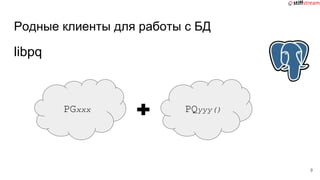
libpq
9
PGxxx PQyyy()
Родные клиенты для работы с БД
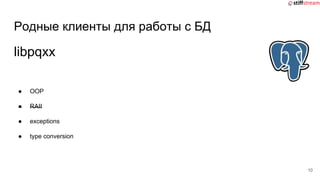
● OOP
● RAII
● exceptions
● type conversion
10
libpqxx
Родные клиенты для работы с БД
#include <stdio.h>
#include <stdlib.h>
#include <string.h>
int main() {
EXEC SQL BEGIN DECLARE SECTION;
char str[25];
int i, count=1;
EXEC SQL END DECLARE SECTION;
EXEC SQL CONNECT TO some_db;
EXEC SQL CREATE TABLE Foo(Item1int,Item2 text);
EXEC SQL INSERT INTO My_Table VALUES(1,‘txt1’);
EXEC SQL INSERT INTO My_Table VALUES(2,‘txt1’);
EXEC SQL DECLARE CUR CURSOR FOR SELECT * FROM
My_Table;
...
#include <ecpglib.h>
#include <ecpgerrno.h>
#include <sqlca.h>
#include <stdio.h>
#include <stdlib.h>
#include <string.h>
int main() {
/* exec sql begin declare section */
char str [ 25 ] ;
int i , count = 1 ;
/* exec sql end declare section */
{ ECPGconnect(__LINE__, 0, "some_db" , NULL, NULL , NULL, 0); }
{ ECPGdo(__LINE__, 0, 1, NULL, 0, ECPGst_normal, "create table
Foo ( Item1 int , Item2 text )", ECPGt_EOIT, ECPGt_EORT);}
{ ECPGdo(__LINE__, 0, 1, NULL, 0, ECPGst_normal, "insert into
Foo values ( 1 , 'txt1' )", ECPGt_EOIT, ECPGt_EORT);}
{ ECPGdo(__LINE__, 0, 1, NULL, 0, ECPGst_normal, "insert into
Foo values ( 2 , 'txt2' )", ECPGt_EOIT, ECPGt_EORT);}
/* declare CUR cursor for select * from Foo */
{ ECPGdo(__LINE__, 0, 1, NULL, 0, ECPGst_normal, "declare CUR
cursor for select * from Foo", ECPGt_EOIT, ECPGt_EORT);}
ECPG
Родные клиенты для работы с БД
● https://www.mysql.com/
● https://dev.mysql.com/doc/connectors/en/connector-c.html
● https://dev.mysql.com/doc/connectors/en/connector-cpp.html
12
Родные клиенты для работы с БД
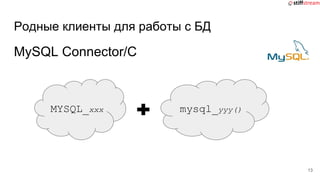
MySQL Connector/C
13
MYSQL_xxx mysql_yyy()
Родные клиенты для работы с БД
MySQL Connector/C++
● OOP
● RAII
● exceptions
● type conversion
14
Родные клиенты для работы с БД
● https://www.oracle.com/database/index.html
● Instant-clients:
http://www.oracle.com/technetwork/database/features/instant-client/index-097
480.html
● OCI:
http://docs.oracle.com/database/122/LNOCI/instant-client.htm#LNOCI-GUID-
AAB0378F-2C7B-41EB-ACAC-18DD5D052B01
● OCCI:
http://docs.oracle.com/database/122/LNCPP/installation-and-upgrading.htm#
LNCPP002
● Pro*C:
http://docs.oracle.com/database/122/LNPCC/introduction.htm#LNPCC3028
15
Родные клиенты для работы с БД
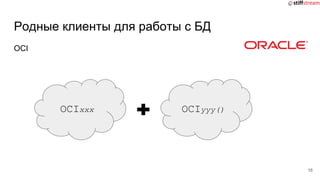
OCI
16
OCIxxx OCIyyy()
Родные клиенты для работы с БД
OCCI
● OOP
● RAII
● exceptions
17
Родные клиенты для работы с БД
● http://www.microsoft.com/sqlserver/
● https://docs.microsoft.com/en-us/sql/relational-databases/
native-client/sql-server-native-client-programming
● https://docs.microsoft.com/en-us/sql/odbc/reference/odbc
-programmer-s-reference
18
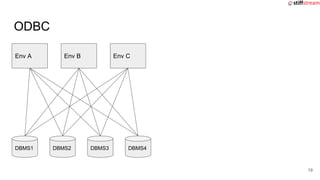
ODBC
DBMS2
19
Env A Env B Env C
DBMS1 DBMS2 DBMS3 DBMS4
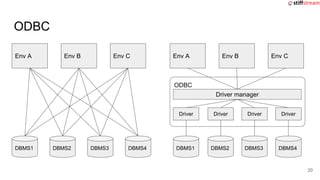
ODBC
20
Env A Env B Env C
DBMS1 DBMS2 DBMS3 DBMS4
Env A Env B Env C
DBMS1 DBMS2 DBMS3 DBMS4
ODBC
Driver manager
Driver Driver Driver Driver
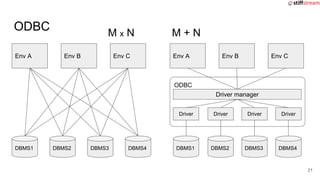
ODBC
DBMS2
21
Env A Env B Env C
DBMS1 DBMS2 DBMS3 DBMS4
DBMS2
Env A Env B Env C
DBMS1 DBMS2 DBMS3 DBMS4
ODBC
Driver manager
Driver Driver Driver Driver
M x N M + N
ODBC
API...
22
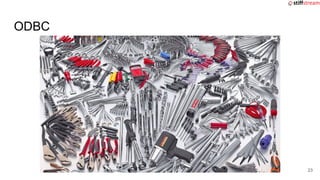
ODBC
23
“Сторонние” библиотеки
для доступа к БД
24
Что же есть готового?
25
Что же есть готового?
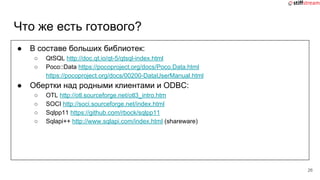
● В составе больших библиотек:
○ QtSQL http://doc.qt.io/qt-5/qtsql-index.html
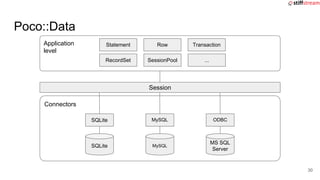
○ Poco::Data https://pocoproject.org/docs/Poco.Data.html
https://pocoproject.org/docs/00200-DataUserManual.html
● Обертки над родными клиентами и ODBC:
○ OTL http://otl.sourceforge.net/otl3_intro.htm
○ SOCI http://soci.sourceforge.net/index.html
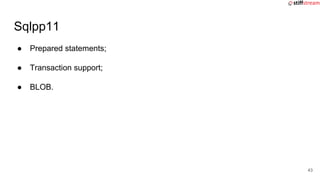
○ Sqlpp11 https://github.com/rbock/sqlpp11
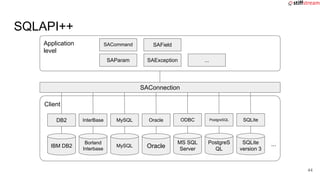
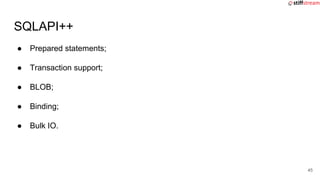
○ Sqlapi++ http://www.sqlapi.com/index.html (shareware)
26
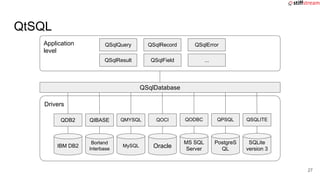
Application
level
QSqlDatabase
Drivers
QtSQL
IBM DB2
QDB2
Borland
Interbase
QIBASE
MySQL
QMYSQL QOCI
Oracle
MS SQL
Server
QODBC
PostgreS
QL
QPSQL
SQLite
version 3
QSQLITE
QSqlQuery
QSqlResult QSqlField
QSqlRecord QSqlError
...
27
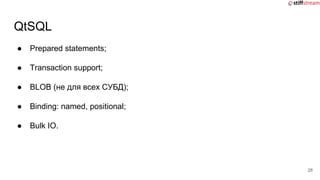
● Prepared statements;
● Transaction support;
● BLOB (не для всех СУБД);
● Binding: named, positional;
● Bulk IO.
QtSQL
28
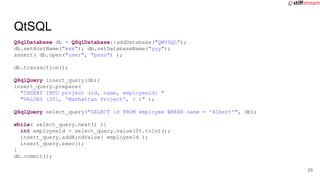
QSqlDatabase db = QSqlDatabase::addDatabase("QMYSQL");
db.setHostName("xxx"); db.setDatabaseName("yyy");
assert( db.open("user", "pass") );
db.transaction();
QSqlQuery insert_query(db);
insert_query.prepare(
"INSERT INTO project (id, name, employeeid) "
"VALUES (201, 'Manhattan Project', ? )" );
QSqlQuery select_query("SELECT id FROM employee WHERE name = 'Albert'", db);
while( select_query.next() ){
int employeeId = select_query.value(0).toInt();
insert_query.addBindValue( employeeId );
insert_query.exec();
}
db.commit();
QtSQL
29
Application
level
Session
Connectors
Poco::Data
SQLite
SQLite
MySQL
MySQL
MS SQL
Server
ODBC
Statement
RecordSet SessionPool
Row Transaction
...
30
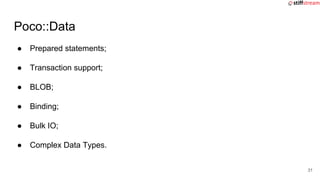
● Prepared statements;
● Transaction support;
● BLOB;
● Binding;
● Bulk IO;
● Complex Data Types.
Poco::Data
31
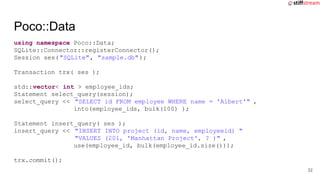
using namespace Poco::Data;
SQLite::Connector::registerConnector();
Session ses("SQLite", "sample.db");
Transaction trx( ses );
std::vector< int > employee_ids;
Statement select_query(session);
select_query << "SELECT id FROM employee WHERE name = 'Albert'" ,
into(employee_ids, bulk(100) );
Statement insert_query( ses );
insert_query << "INSERT INTO project (id, name, employeeid) "
"VALUES (201, 'Manhattan Project', ? )" ,
use(employee_id, bulk(employee_id.size()));
trx.commit();
Poco::Data
32
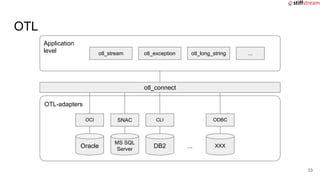
Application
level
otl_connect
OTL-adapters
OTL
MS SQL
Server
SNAC
DB2
CLI
XXX
ODBC
otl_stream otl_exception
Oracle
OCI
...
otl_long_string ...
33
● Header-only
● Prepared statements;
● Transaction support;
● BLOB;
● Binding;
● Bulk IO.
OTL
34
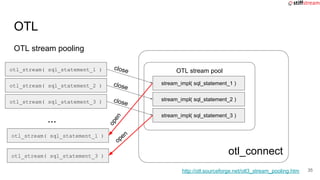
otl_connect
OTL stream pooling
OTL
35
OTL stream poolotl_stream( sql_statement_1 )
otl_stream( sql_statement_2 )
otl_stream( sql_statement_3 )
http://otl.sourceforge.net/otl3_stream_pooling.htm
stream_impl( sql_statement_1 )
stream_impl( sql_statement_2 )
stream_impl( sql_statement_3 )
...
otl_stream( sql_statement_1 )
otl_stream( sql_statement_3 )
close
close
close
open
open
● Header-only
● Prepared statements;
● Transaction support;
● BLOB;
● Binding;
● Bulk IO.
OTL
36
#define OTL_ODBC_MSSQL_2008 // Compile OTL 4/ODBC, MS SQL 2008
#include <otlv4.h>
// ...
otl_connect::otl_initialize();
otl_connect db( "usr/pass@myserver" );
otl_stream selector(10, "SELECT id FROM employee WHERE name = :name<char[32]>" , db );
selector << "Albert";
std::vector< int > ids;
while( !select_query.eof() ) {
int id;
selector >> id;
ids.push_back( id );
}
otl_nocommit_stream inserter(10, "INSERT INTO project (id, name, employeeid) "
"VALUES (201, 'Manhattan Project', :id<int> )" , db );
for( auto id : ids ){
inserter << id;
}
inserter.flush();
db.commit();
OTL
37
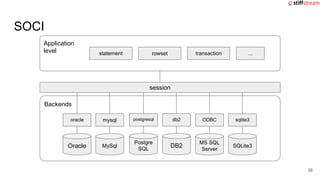
Application
level
session
Backends
SOCI
MySql
mysql
DB2
db2
MS SQL
Server
ODBC
statement rowset
Oracle
oracle
transaction ...
Postgre
SQL
postgresql
SQLite3
sqlite3
38
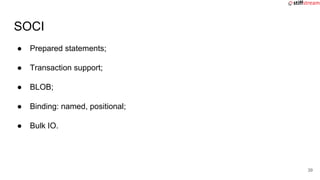
● Prepared statements;
● Transaction support;
● BLOB;
● Binding: named, positional;
● Bulk IO.
SOCI
39
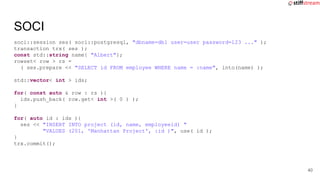
soci::session ses( soci::postgresql, "dbname=db1 user=user password=123 ..." );
transaction trx( ses );
const std::string name{ "Albert"};
rowset< row > rs =
( ses.prepare << "SELECT id FROM employee WHERE name = :name", into(name) );
std::vector< int > ids;
for( const auto & row : rs ){
ids.push_back( row.get< int >( 0 ) );
}
for( auto id : ids ){
ses << "INSERT INTO project (id, name, employeeid) "
"VALUES (201, 'Manhattan Project', :id )", use( id );
}
trx.commit();
SOCI
40
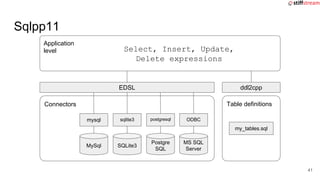
Application
level
EDSL
Connectors
Sqlpp11
MySql
mysql
MS SQL
Server
ODBC
Postgre
SQL
postgresql
SQLite3
sqlite3
Select, Insert, Update,
Delete expressions
ddl2cpp
Table definitions
my_tables.sql
41
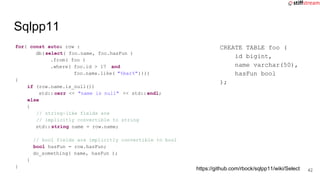
for( const auto& row :
db(select( foo.name, foo.hasFun )
.from( foo )
.where( foo.id > 17 and
foo.name.like( "%bar%"))))
{
if (row.name.is_null())
std:: cerr << "name is null" << std::endl;
else
{
// string-like fields are
// implicitly convertible to string
std:: string name = row.name;
// bool fields are implicitly convertible to bool
bool hasFun = row.hasFun;
do_something( name, hasFun );
}
}
Sqlpp11
CREATE TABLE foo (
id bigint,
name varchar(50),
hasFun bool
);
https://github.com/rbock/sqlpp11/wiki/Select 42
● Prepared statements;
● Transaction support;
● BLOB.
Sqlpp11
43
Application
level
SAConnection
Client
SQLAPI++
IBM DB2
DB2
Borland
Interbase
InterBase
MySQL
MySQL Oracle
Oracle
MS SQL
Server
ODBC
PostgreS
QL
PostgreSQL
SQLite
version 3
SQLite
SACommand
SAParam SAException
SAField
...
...
44
● Prepared statements;
● Transaction support;
● BLOB;
● Binding;
● Bulk IO.
SQLAPI++
45
SAConnection con;
con.Connect( "myserver", "user", "pass", SA_Oracle_Client);
SACommand cmd( &con, "SELECT id FROM employee WHERE name ='Albert'" );
cmd.Execute();
std::vector< int > ids;
while( cmd.FetchNext() ){
ids.push_back( cmd[1].asLong() );
}
cmd.setCommandText( "INSERT INTO project (id, name, employeeid) "
"VALUES (201, 'Manhattan Project', ? )" )
for( auto id : ids ){
cmd.Param(2).setAsLong() = id;
cmd.Execute();
}
con.Commit();
SQLAPI++
46
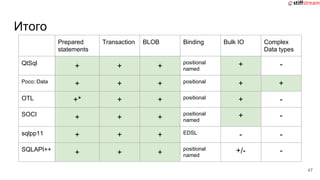
Итого
Prepared
statements
Transaction BLOB Binding Bulk IO Complex
Data types
QtSql
+ + +
positional
named
+ -
Poco::Data
+ + + positional + +
OTL +* + + positional + -
SOCI
+ + +
positional
named
+ -
sqlpp11 + + + EDSL - -
SQLAPI++
+ + +
positional
named
+/- -
47
Что будет завтра
48
cppstddb
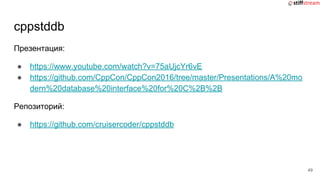
Презентация:
● https://www.youtube.com/watch?v=75aUjcYr6vE
● https://github.com/CppCon/CppCon2016/tree/master/Presentations/A%20mo
dern%20database%20interface%20for%20C%2B%2B
Репозиторий:
● https://github.com/cruisercoder/cppstddb
49
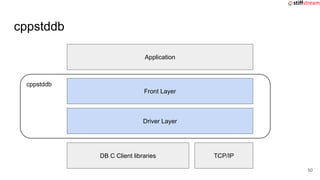
cppstddb
cppstddb
Application
Front Layer
Driver Layer
DB C Client libraries TCP/IP
50
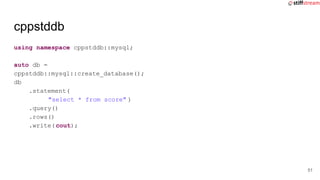
cppstddb
using namespace cppstddb::mysql;
auto db =
cppstddb::mysql::create_database();
db
.statement(
"select * from score" )
.query()
.rows()
.write(cout);
51
cppstddb
using namespace cppstddb::mysql;
auto db =
cppstddb::mysql::create_database();
db
.statement(
"select * from score" )
.query()
.rows()
.write(cout);
auto db =
cppstddb::mysql::create_database();
auto rowset =
db.connection()
.statement(
"select * from score" )
.query()
.rows();
for(auto row : rowset) {
auto f = row[0];
std::cout << f << "n";
}
52
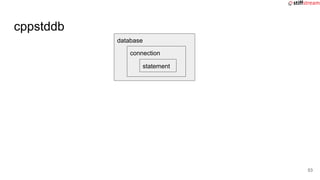
cppstddb
database
connection
statement
53
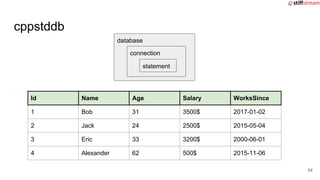
cppstddb
Id Name Age Salary WorksSince
1 Bob 31 3500$ 2017-01-02
2 Jack 24 2500$ 2015-05-04
3 Eric 33 3200$ 2000-06-01
4 Alexander 62 500$ 2015-11-06
database
connection
statement
54
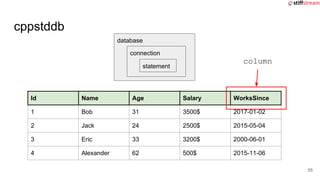
cppstddb
Id Name Age Salary WorksSince
1 Bob 31 3500$ 2017-01-02
2 Jack 24 2500$ 2015-05-04
3 Eric 33 3200$ 2000-06-01
4 Alexander 62 500$ 2015-11-06
database
connection
statement
column
55
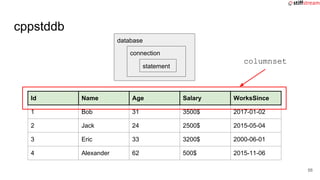
cppstddb
Id Name Age Salary WorksSince
1 Bob 31 3500$ 2017-01-02
2 Jack 24 2500$ 2015-05-04
3 Eric 33 3200$ 2000-06-01
4 Alexander 62 500$ 2015-11-06
database
connection
statement
columnset
56
cppstddb
Id Name Age Salary WorksSince
1 Bob 31 3500$ 2017-01-02
2 Jack 24 2500$ 2015-05-04
3 Eric 33 3200$ 2000-06-01
4 Alexander 62 500$ 2015-11-06
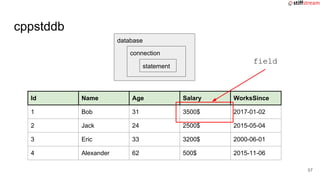
database
connection
statement
field
57
cppstddb
for(auto row : db.query( "select name from students" ) ){
auto name_field = row[ 0 ];
// ok if not null
auto name = name_field.as< std:: string >();
// ok
auto name_opt = name_field.optional< std:: string >();
// error
auto name_opt = name_field.as< int >();
}
58
cppstddb
Id Name Age Salary WorksSince
1 Bob 31 3500$ 2017-01-02
2 Jack 24 2500$ 2015-05-04
3 Eric 33 3200$ 2000-06-01
4 Alexander 62 500$ 2015-11-06
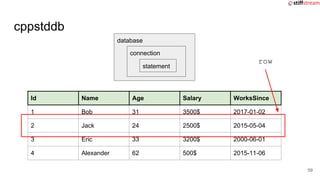
database
connection
statement
row
59
cppstddb
for(auto row :
db.query(
"select s, i, d from table") ){
string s;
int i;
date d;
row.into( s, i, d );
// ...
}
auto field_s_idx = rows.columns()["s"];
auto field_i_idx = rows.columns()["i"];
auto field_d_idx = rows.columns()["d"];
for(auto row :
db.query(
"select s, i, d from table") ){
string s = row[field_s_idx];
int i = row[field_i_idx];
date d = row[field_d_idx];
// ...
}
60
cppstddb
Id Name Age Salary WorksSince
1 Bob 31 3500$ 2017-01-02
2 Jack 24 2500$ 2015-05-04
3 Eric 33 3200$ 2000-06-01
4 Alexander 62 500$ 2015-11-06
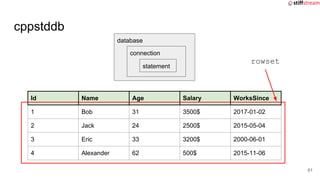
database
connection
statement
rowset
61
cppstddb
using namespace cppstddb::mysql;
auto db = create_database("mysql://server/db");
auto con = db.connection();
auto stmt = con.query("select * from person");
auto rows = stmt.rows();
for (auto i = rows.begin(); i != rows.end(); ++i) {
for(int c = 0; c != row.width(); ++c) {
auto field = row[c];
cout << “value: “ << field << “n”;
}
cout << “n”;
}
62
cppstddb
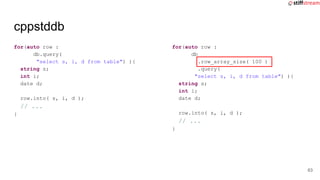
for(auto row :
db.query(
"select s, i, d from table") ){
string s;
int i;
date d;
row.into( s, i, d );
// ...
}
for(auto row :
db
.row_array_size( 100 )
.query(
"select s, i, d from table") ){
string s;
int i;
date d;
row.into( s, i, d );
// ...
}
63
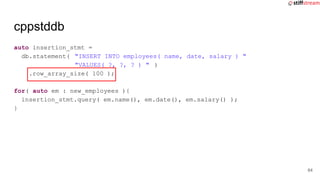
cppstddb
auto insertion_stmt =
db.statement( "INSERT INTO employees( name, date, salary ) "
"VALUES( ?, ?, ? ) " )
.row_array_size( 100 );
for( auto em : new_employees ){
insertion_stmt.query( em.name(), em.date(), em.salary() );
}
64
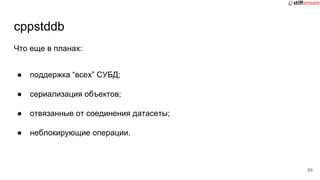
cppstddb
Что еще в планах:
● поддержка “всех” СУБД;
● сериализация объектов;
● отвязанные от соединения датасеты;
● неблокирующие операции.
65
Вопросы?
Николай Гродзицкий
ngrodzitski@stiffstream.com

Работа с реляционными базами данных в C++

  • 1.
    Работа с реляционными БДв C++ Николай Гродзицкий
  • 2.
  • 3.
    О чем пойдетречь? 1. Родные клиенты для работы с БД 3
  • 4.
    О чем пойдетречь? 1. Родные клиенты для работы с БД 2. “Сторонние” библиотеки для доступа к БД 4
  • 5.
    О чем пойдетречь? 1. Родные клиенты для работы с БД 2. “Сторонние” библиотеки для доступа к БД 3. Что будет завтра? 5
  • 6.
    Родные клиенты дляработы с БД 6 ODBC
  • 7.
    Родные клиенты дляработы с БД 7
  • 8.
    Родные клиенты дляработы с БД ● http://postgresql.org/ ● https://www.postgresql.org/docs/9.6/static/libpq.html ● https://www.postgresql.org/docs/9.6/static/ecpg.html ● https://github.com/jtv/libpqxx 8
  • 9.
    Родные клиенты дляработы с БД libpq 9 PGxxx PQyyy()
  • 10.
    Родные клиенты дляработы с БД ● OOP ● RAII ● exceptions ● type conversion 10 libpqxx
  • 11.
    Родные клиенты дляработы с БД #include <stdio.h> #include <stdlib.h> #include <string.h> int main() { EXEC SQL BEGIN DECLARE SECTION; char str[25]; int i, count=1; EXEC SQL END DECLARE SECTION; EXEC SQL CONNECT TO some_db; EXEC SQL CREATE TABLE Foo(Item1int,Item2 text); EXEC SQL INSERT INTO My_Table VALUES(1,‘txt1’); EXEC SQL INSERT INTO My_Table VALUES(2,‘txt1’); EXEC SQL DECLARE CUR CURSOR FOR SELECT * FROM My_Table; ... #include <ecpglib.h> #include <ecpgerrno.h> #include <sqlca.h> #include <stdio.h> #include <stdlib.h> #include <string.h> int main() { /* exec sql begin declare section */ char str [ 25 ] ; int i , count = 1 ; /* exec sql end declare section */ { ECPGconnect(__LINE__, 0, "some_db" , NULL, NULL , NULL, 0); } { ECPGdo(__LINE__, 0, 1, NULL, 0, ECPGst_normal, "create table Foo ( Item1 int , Item2 text )", ECPGt_EOIT, ECPGt_EORT);} { ECPGdo(__LINE__, 0, 1, NULL, 0, ECPGst_normal, "insert into Foo values ( 1 , 'txt1' )", ECPGt_EOIT, ECPGt_EORT);} { ECPGdo(__LINE__, 0, 1, NULL, 0, ECPGst_normal, "insert into Foo values ( 2 , 'txt2' )", ECPGt_EOIT, ECPGt_EORT);} /* declare CUR cursor for select * from Foo */ { ECPGdo(__LINE__, 0, 1, NULL, 0, ECPGst_normal, "declare CUR cursor for select * from Foo", ECPGt_EOIT, ECPGt_EORT);} ECPG
  • 12.
    Родные клиенты дляработы с БД ● https://www.mysql.com/ ● https://dev.mysql.com/doc/connectors/en/connector-c.html ● https://dev.mysql.com/doc/connectors/en/connector-cpp.html 12
  • 13.
    Родные клиенты дляработы с БД MySQL Connector/C 13 MYSQL_xxx mysql_yyy()
  • 14.
    Родные клиенты дляработы с БД MySQL Connector/C++ ● OOP ● RAII ● exceptions ● type conversion 14
  • 15.
    Родные клиенты дляработы с БД ● https://www.oracle.com/database/index.html ● Instant-clients: http://www.oracle.com/technetwork/database/features/instant-client/index-097 480.html ● OCI: http://docs.oracle.com/database/122/LNOCI/instant-client.htm#LNOCI-GUID- AAB0378F-2C7B-41EB-ACAC-18DD5D052B01 ● OCCI: http://docs.oracle.com/database/122/LNCPP/installation-and-upgrading.htm# LNCPP002 ● Pro*C: http://docs.oracle.com/database/122/LNPCC/introduction.htm#LNPCC3028 15
  • 16.
    Родные клиенты дляработы с БД OCI 16 OCIxxx OCIyyy()
  • 17.
    Родные клиенты дляработы с БД OCCI ● OOP ● RAII ● exceptions 17
  • 18.
    Родные клиенты дляработы с БД ● http://www.microsoft.com/sqlserver/ ● https://docs.microsoft.com/en-us/sql/relational-databases/ native-client/sql-server-native-client-programming ● https://docs.microsoft.com/en-us/sql/odbc/reference/odbc -programmer-s-reference 18
  • 19.
    ODBC DBMS2 19 Env A EnvB Env C DBMS1 DBMS2 DBMS3 DBMS4
  • 20.
    ODBC 20 Env A EnvB Env C DBMS1 DBMS2 DBMS3 DBMS4 Env A Env B Env C DBMS1 DBMS2 DBMS3 DBMS4 ODBC Driver manager Driver Driver Driver Driver
  • 21.
    ODBC DBMS2 21 Env A EnvB Env C DBMS1 DBMS2 DBMS3 DBMS4 DBMS2 Env A Env B Env C DBMS1 DBMS2 DBMS3 DBMS4 ODBC Driver manager Driver Driver Driver Driver M x N M + N
  • 22.
  • 23.
  • 24.
  • 25.
    Что же естьготового? 25
  • 26.
    Что же естьготового? ● В составе больших библиотек: ○ QtSQL http://doc.qt.io/qt-5/qtsql-index.html ○ Poco::Data https://pocoproject.org/docs/Poco.Data.html https://pocoproject.org/docs/00200-DataUserManual.html ● Обертки над родными клиентами и ODBC: ○ OTL http://otl.sourceforge.net/otl3_intro.htm ○ SOCI http://soci.sourceforge.net/index.html ○ Sqlpp11 https://github.com/rbock/sqlpp11 ○ Sqlapi++ http://www.sqlapi.com/index.html (shareware) 26
  • 27.
    Application level QSqlDatabase Drivers QtSQL IBM DB2 QDB2 Borland Interbase QIBASE MySQL QMYSQL QOCI Oracle MSSQL Server QODBC PostgreS QL QPSQL SQLite version 3 QSQLITE QSqlQuery QSqlResult QSqlField QSqlRecord QSqlError ... 27
  • 28.
    ● Prepared statements; ●Transaction support; ● BLOB (не для всех СУБД); ● Binding: named, positional; ● Bulk IO. QtSQL 28
  • 29.
    QSqlDatabase db =QSqlDatabase::addDatabase("QMYSQL"); db.setHostName("xxx"); db.setDatabaseName("yyy"); assert( db.open("user", "pass") ); db.transaction(); QSqlQuery insert_query(db); insert_query.prepare( "INSERT INTO project (id, name, employeeid) " "VALUES (201, 'Manhattan Project', ? )" ); QSqlQuery select_query("SELECT id FROM employee WHERE name = 'Albert'", db); while( select_query.next() ){ int employeeId = select_query.value(0).toInt(); insert_query.addBindValue( employeeId ); insert_query.exec(); } db.commit(); QtSQL 29
  • 30.
  • 31.
    ● Prepared statements; ●Transaction support; ● BLOB; ● Binding; ● Bulk IO; ● Complex Data Types. Poco::Data 31
  • 32.
    using namespace Poco::Data; SQLite::Connector::registerConnector(); Sessionses("SQLite", "sample.db"); Transaction trx( ses ); std::vector< int > employee_ids; Statement select_query(session); select_query << "SELECT id FROM employee WHERE name = 'Albert'" , into(employee_ids, bulk(100) ); Statement insert_query( ses ); insert_query << "INSERT INTO project (id, name, employeeid) " "VALUES (201, 'Manhattan Project', ? )" , use(employee_id, bulk(employee_id.size())); trx.commit(); Poco::Data 32
  • 33.
  • 34.
    ● Header-only ● Preparedstatements; ● Transaction support; ● BLOB; ● Binding; ● Bulk IO. OTL 34
  • 35.
    otl_connect OTL stream pooling OTL 35 OTLstream poolotl_stream( sql_statement_1 ) otl_stream( sql_statement_2 ) otl_stream( sql_statement_3 ) http://otl.sourceforge.net/otl3_stream_pooling.htm stream_impl( sql_statement_1 ) stream_impl( sql_statement_2 ) stream_impl( sql_statement_3 ) ... otl_stream( sql_statement_1 ) otl_stream( sql_statement_3 ) close close close open open
  • 36.
    ● Header-only ● Preparedstatements; ● Transaction support; ● BLOB; ● Binding; ● Bulk IO. OTL 36
  • 37.
    #define OTL_ODBC_MSSQL_2008 //Compile OTL 4/ODBC, MS SQL 2008 #include <otlv4.h> // ... otl_connect::otl_initialize(); otl_connect db( "usr/pass@myserver" ); otl_stream selector(10, "SELECT id FROM employee WHERE name = :name<char[32]>" , db ); selector << "Albert"; std::vector< int > ids; while( !select_query.eof() ) { int id; selector >> id; ids.push_back( id ); } otl_nocommit_stream inserter(10, "INSERT INTO project (id, name, employeeid) " "VALUES (201, 'Manhattan Project', :id<int> )" , db ); for( auto id : ids ){ inserter << id; } inserter.flush(); db.commit(); OTL 37
  • 38.
  • 39.
    ● Prepared statements; ●Transaction support; ● BLOB; ● Binding: named, positional; ● Bulk IO. SOCI 39
  • 40.
    soci::session ses( soci::postgresql,"dbname=db1 user=user password=123 ..." ); transaction trx( ses ); const std::string name{ "Albert"}; rowset< row > rs = ( ses.prepare << "SELECT id FROM employee WHERE name = :name", into(name) ); std::vector< int > ids; for( const auto & row : rs ){ ids.push_back( row.get< int >( 0 ) ); } for( auto id : ids ){ ses << "INSERT INTO project (id, name, employeeid) " "VALUES (201, 'Manhattan Project', :id )", use( id ); } trx.commit(); SOCI 40
  • 41.
  • 42.
    for( const auto&row : db(select( foo.name, foo.hasFun ) .from( foo ) .where( foo.id > 17 and foo.name.like( "%bar%")))) { if (row.name.is_null()) std:: cerr << "name is null" << std::endl; else { // string-like fields are // implicitly convertible to string std:: string name = row.name; // bool fields are implicitly convertible to bool bool hasFun = row.hasFun; do_something( name, hasFun ); } } Sqlpp11 CREATE TABLE foo ( id bigint, name varchar(50), hasFun bool ); https://github.com/rbock/sqlpp11/wiki/Select 42
  • 43.
    ● Prepared statements; ●Transaction support; ● BLOB. Sqlpp11 43
  • 44.
    Application level SAConnection Client SQLAPI++ IBM DB2 DB2 Borland Interbase InterBase MySQL MySQL Oracle Oracle MSSQL Server ODBC PostgreS QL PostgreSQL SQLite version 3 SQLite SACommand SAParam SAException SAField ... ... 44
  • 45.
    ● Prepared statements; ●Transaction support; ● BLOB; ● Binding; ● Bulk IO. SQLAPI++ 45
  • 46.
    SAConnection con; con.Connect( "myserver","user", "pass", SA_Oracle_Client); SACommand cmd( &con, "SELECT id FROM employee WHERE name ='Albert'" ); cmd.Execute(); std::vector< int > ids; while( cmd.FetchNext() ){ ids.push_back( cmd[1].asLong() ); } cmd.setCommandText( "INSERT INTO project (id, name, employeeid) " "VALUES (201, 'Manhattan Project', ? )" ) for( auto id : ids ){ cmd.Param(2).setAsLong() = id; cmd.Execute(); } con.Commit(); SQLAPI++ 46
  • 47.
    Итого Prepared statements Transaction BLOB BindingBulk IO Complex Data types QtSql + + + positional named + - Poco::Data + + + positional + + OTL +* + + positional + - SOCI + + + positional named + - sqlpp11 + + + EDSL - - SQLAPI++ + + + positional named +/- - 47
  • 48.
  • 49.
  • 50.
  • 51.
    cppstddb using namespace cppstddb::mysql; autodb = cppstddb::mysql::create_database(); db .statement( "select * from score" ) .query() .rows() .write(cout); 51
  • 52.
    cppstddb using namespace cppstddb::mysql; autodb = cppstddb::mysql::create_database(); db .statement( "select * from score" ) .query() .rows() .write(cout); auto db = cppstddb::mysql::create_database(); auto rowset = db.connection() .statement( "select * from score" ) .query() .rows(); for(auto row : rowset) { auto f = row[0]; std::cout << f << "n"; } 52
  • 53.
  • 54.
    cppstddb Id Name AgeSalary WorksSince 1 Bob 31 3500$ 2017-01-02 2 Jack 24 2500$ 2015-05-04 3 Eric 33 3200$ 2000-06-01 4 Alexander 62 500$ 2015-11-06 database connection statement 54
  • 55.
    cppstddb Id Name AgeSalary WorksSince 1 Bob 31 3500$ 2017-01-02 2 Jack 24 2500$ 2015-05-04 3 Eric 33 3200$ 2000-06-01 4 Alexander 62 500$ 2015-11-06 database connection statement column 55
  • 56.
    cppstddb Id Name AgeSalary WorksSince 1 Bob 31 3500$ 2017-01-02 2 Jack 24 2500$ 2015-05-04 3 Eric 33 3200$ 2000-06-01 4 Alexander 62 500$ 2015-11-06 database connection statement columnset 56
  • 57.
    cppstddb Id Name AgeSalary WorksSince 1 Bob 31 3500$ 2017-01-02 2 Jack 24 2500$ 2015-05-04 3 Eric 33 3200$ 2000-06-01 4 Alexander 62 500$ 2015-11-06 database connection statement field 57
  • 58.
    cppstddb for(auto row :db.query( "select name from students" ) ){ auto name_field = row[ 0 ]; // ok if not null auto name = name_field.as< std:: string >(); // ok auto name_opt = name_field.optional< std:: string >(); // error auto name_opt = name_field.as< int >(); } 58
  • 59.
    cppstddb Id Name AgeSalary WorksSince 1 Bob 31 3500$ 2017-01-02 2 Jack 24 2500$ 2015-05-04 3 Eric 33 3200$ 2000-06-01 4 Alexander 62 500$ 2015-11-06 database connection statement row 59
  • 60.
    cppstddb for(auto row : db.query( "selects, i, d from table") ){ string s; int i; date d; row.into( s, i, d ); // ... } auto field_s_idx = rows.columns()["s"]; auto field_i_idx = rows.columns()["i"]; auto field_d_idx = rows.columns()["d"]; for(auto row : db.query( "select s, i, d from table") ){ string s = row[field_s_idx]; int i = row[field_i_idx]; date d = row[field_d_idx]; // ... } 60
  • 61.
    cppstddb Id Name AgeSalary WorksSince 1 Bob 31 3500$ 2017-01-02 2 Jack 24 2500$ 2015-05-04 3 Eric 33 3200$ 2000-06-01 4 Alexander 62 500$ 2015-11-06 database connection statement rowset 61
  • 62.
    cppstddb using namespace cppstddb::mysql; autodb = create_database("mysql://server/db"); auto con = db.connection(); auto stmt = con.query("select * from person"); auto rows = stmt.rows(); for (auto i = rows.begin(); i != rows.end(); ++i) { for(int c = 0; c != row.width(); ++c) { auto field = row[c]; cout << “value: “ << field << “n”; } cout << “n”; } 62
  • 63.
    cppstddb for(auto row : db.query( "selects, i, d from table") ){ string s; int i; date d; row.into( s, i, d ); // ... } for(auto row : db .row_array_size( 100 ) .query( "select s, i, d from table") ){ string s; int i; date d; row.into( s, i, d ); // ... } 63
  • 64.
    cppstddb auto insertion_stmt = db.statement("INSERT INTO employees( name, date, salary ) " "VALUES( ?, ?, ? ) " ) .row_array_size( 100 ); for( auto em : new_employees ){ insertion_stmt.query( em.name(), em.date(), em.salary() ); } 64
  • 65.
    cppstddb Что еще впланах: ● поддержка “всех” СУБД; ● сериализация объектов; ● отвязанные от соединения датасеты; ● неблокирующие операции. 65
  • 66.