Building The Virtual Machine
           Igor Stasenko

           RMoD Team
      INRIA Lille Nord-Europe


             Edinburgh
            ESUG, 2011
Outline

• Automated VM build system
• Preparing your environment for build
• Build VM
• Customizing builds


                               2
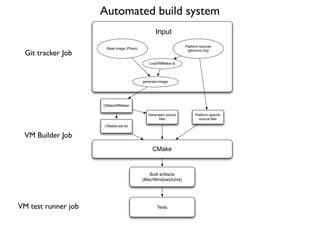
Automated build system
                                                  Input
                                                                 Platform sources
                      Base image (Pharo)
  Git tracker Job                                                 (gitorious.org)


                                              LoadVMMaker.st


                                           generator.image


                     CMakeVMMaker

                                              Generated source         Platform-specific
                                                    files                 source files

                     CMakeLists.txt


 VM Builder Job
                                                CMake


                                              Built artifacts
                                           (Mac/Windows/Unix)


VM test runner job                                 Tests
Why git?
Git is distributed source management tool, while SVN
is centralized one.

This means that git fits better for developing and
managing open-source projects driven by community
rather than single or selected team of developers.

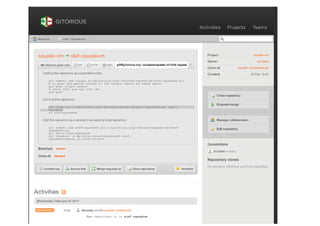
With gitorious.org, one can easily make own branch
publicly available, without need to ask for VIP’s
permission.


                            5
Getting VM platform sources

git clone git://gitorious.org/cogvm/blessed.git cogvm

(but do not try it right now!!)

For our exercise, download sources tarball from here:
https://ci.lille.inria.fr/pharo/view/Cog/
Job named: Cog Git Tracker (blessed)

cog.tar.gz
vmmaker-image.zip

                              6
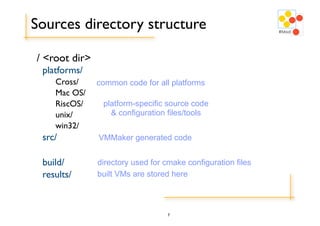
Sources directory structure

/ <root dir>
 platforms/
    Cross/     common code for all platforms
    Mac OS/
    RiscOS/     platform-specific source code
    unix/         & configuration files/tools
    win32/
 src/          VMMaker generated code


 build/        directory used for cmake configuration files
 results/      built VMs are stored here


                                   7
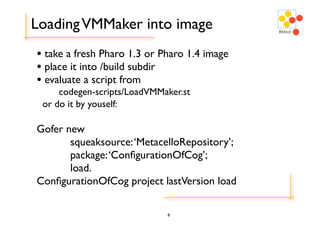
Loading VMMaker into image
• take a fresh Pharo 1.3 or Pharo 1.4 image
• place it into /build subdir
• evaluate a script from
     codegen-scripts/LoadVMMaker.st
 or do it by youself:

Gofer new
	

    squeaksource: ‘MetacelloRepository’;
	

    package: ‘ConfigurationOfCog’;
	

    load.
ConfigurationOfCog project lastVersion load

                             8
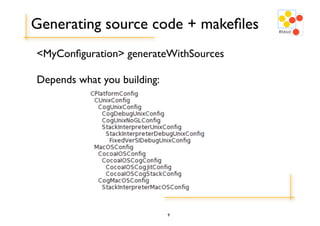
Generating source code + makefiles
<MyConfiguration> generateWithSources

Depends what you building:


                             9
Preparing build environment
Mac
Windows
Unix

Too much for the slide :)

Follow a guide, made by Mariano Martinez Peck:

http://code.google.com/p/cog/wiki/Guide


                            10
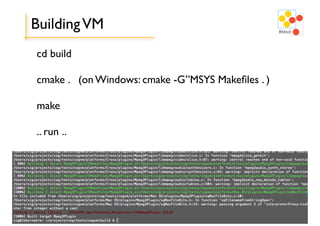
Building VM
cd build

cmake . (on Windows: cmake -G”MSYS Makefiles . )

make

.. run ..


                          11
Customizing builds: plugins
Adding custom plugins:

CogMacOSConfig new
 addExternalPlugins: #( FT2Plugin );
 addInternalPlugins: #( UnixOSProcessPlugin );
 generateSources; generate.

You could also completely replace the plugins to build,
using #internalPlugins: and #externalPlugins:
to supply own set of plugins for build.


                             12
Creating own configuration
- as you do for anything in smalltalk:
  - subclass from appropriate XYZConfig class
  - change flags/settings
  - provide own default plugins
  - etc

MyConfig generateWithSources.


                           13

Building the VM

  • 1.
    Building The VirtualMachine Igor Stasenko RMoD Team INRIA Lille Nord-Europe Edinburgh ESUG, 2011
  • 2.
    Outline • Automated VMbuild system • Preparing your environment for build • Build VM • Customizing builds 2
  • 3.
    Automated build system Input Platform sources Base image (Pharo) Git tracker Job (gitorious.org) LoadVMMaker.st generator.image CMakeVMMaker Generated source Platform-specific files source files CMakeLists.txt VM Builder Job CMake Built artifacts (Mac/Windows/Unix) VM test runner job Tests
  • 5.
    Why git? Git isdistributed source management tool, while SVN is centralized one. This means that git fits better for developing and managing open-source projects driven by community rather than single or selected team of developers. With gitorious.org, one can easily make own branch publicly available, without need to ask for VIP’s permission. 5
  • 6.
    Getting VM platformsources git clone git://gitorious.org/cogvm/blessed.git cogvm (but do not try it right now!!) For our exercise, download sources tarball from here: https://ci.lille.inria.fr/pharo/view/Cog/ Job named: Cog Git Tracker (blessed) cog.tar.gz vmmaker-image.zip 6
  • 7.
    Sources directory structure /<root dir> platforms/ Cross/ common code for all platforms Mac OS/ RiscOS/ platform-specific source code unix/ & configuration files/tools win32/ src/ VMMaker generated code build/ directory used for cmake configuration files results/ built VMs are stored here 7
  • 8.
    Loading VMMaker intoimage • take a fresh Pharo 1.3 or Pharo 1.4 image • place it into /build subdir • evaluate a script from codegen-scripts/LoadVMMaker.st or do it by youself: Gofer new squeaksource: ‘MetacelloRepository’; package: ‘ConfigurationOfCog’; load. ConfigurationOfCog project lastVersion load 8
  • 9.
    Generating source code+ makefiles <MyConfiguration> generateWithSources Depends what you building: 9
  • 10.
    Preparing build environment Mac Windows Unix Toomuch for the slide :) Follow a guide, made by Mariano Martinez Peck: http://code.google.com/p/cog/wiki/Guide 10
  • 11.
    Building VM cd build cmake. (on Windows: cmake -G”MSYS Makefiles . ) make .. run .. 11
  • 12.
    Customizing builds: plugins Addingcustom plugins: CogMacOSConfig new addExternalPlugins: #( FT2Plugin ); addInternalPlugins: #( UnixOSProcessPlugin ); generateSources; generate. You could also completely replace the plugins to build, using #internalPlugins: and #externalPlugins: to supply own set of plugins for build. 12
  • 13.
    Creating own configuration -as you do for anything in smalltalk: - subclass from appropriate XYZConfig class - change flags/settings - provide own default plugins - etc MyConfig generateWithSources. 13