Amazon Alexa OverviewJohn Brady, Technical Architect
#NxNWTechMeetup
- Why are Voice first devices getting close to mainstream?
- Why concentrating on Amazon Alexa for now?
- What is Amazon Alexa?
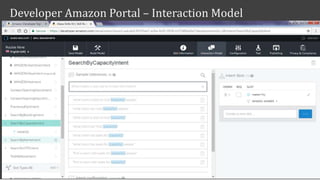
- Alexa Skills Development Overview – Interaction Model
- Account Linking Overview
- OAuth2.0 and OpenID Connect
Agenda
Why?
- Advances in AI, speech recognition and natural language processing.
- Plunging cost of processing and data storage.
What’s next?
- In 2017, will be 24.5 million devices shipped, leading to 33 million voice-first devices in circulation.
- Edison research predict 75% US households will have smart speakers [Amazon Echo, etc.] by end 2020.
- Gartner predicts 30% of web information requests by 2020 will be via audio-centric technologies.
- BMW announced Alexa will be integrated into BMWs starting in mid-2018.
“Whoever wins voice will be the dominant tech company
of the next decade, like Google was for the web
and Intel was for the computing age.”
– Adam Cheynor (Inventor of Siri and founder of Viv –
Voice startup bought by Samsung)
Why are Voice first devices getting close to mainstream?
Why Amazon Alexa?
"Amazon’s Echo speaker will have 70.6% of users in
2017, with Google Home at 23.8% of the market”
Forbes, May 2017
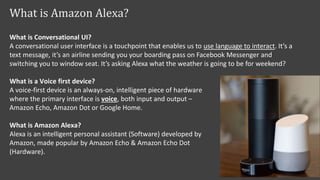
What is Conversational UI?
A conversational user interface is a touchpoint that enables us to use language to interact. It’s a
text message, it’s an airline sending you your boarding pass on Facebook Messenger and
switching you to window seat. It’s asking Alexa what the weather is going to be for weekend?
What is a Voice first device?
A voice-first device is an always-on, intelligent piece of hardware
where the primary interface is voice, both input and output –
Amazon Echo, Amazon Dot or Google Home.
What is Amazon Alexa?
Alexa is an intelligent personal assistant (Software) developed by
Amazon, made popular by Amazon Echo & Amazon Echo Dot
(Hardware).
What is Amazon Alexa?
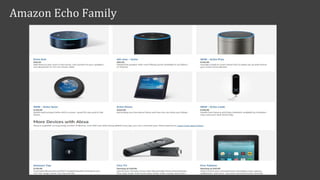
Amazon Echo Family
#NxNWTechMeetup
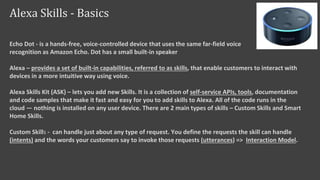
Echo Dot - is a hands-free, voice-controlled device that uses the same far-field voice
recognition as Amazon Echo. Dot has a small built-in speaker
Alexa – provides a set of built-in capabilities, referred to as skills, that enable customers to interact with
devices in a more intuitive way using voice.
Alexa Skills Kit (ASK) – lets you add new Skills. It is a collection of self-service APIs, tools, documentation
and code samples that make it fast and easy for you to add skills to Alexa. All of the code runs in the
cloud — nothing is installed on any user device. There are 2 main types of skills – Custom Skills and Smart
Home Skills.
Custom Skills - can handle just about any type of request. You define the requests the skill can handle
(intents) and the words your customers say to invoke those requests (utterances) => Interaction Model.
Alexa Skills - Basics
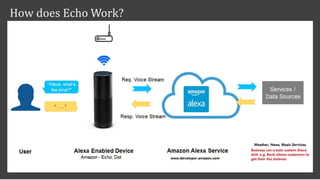
How does Echo Work?
Uploading Alexa Skill to Amazon Alexa Service
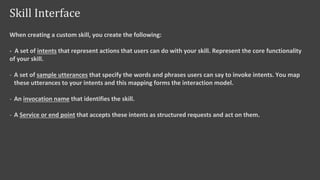
When creating a custom skill, you create the following:
- A set of intents that represent actions that users can do with your skill. Represent the core functionality
of your skill.
- A set of sample utterances that specify the words and phrases users can say to invoke intents. You map
these utterances to your intents and this mapping forms the interaction model.
- An invocation name that identifies the skill.
- A Service or end point that accepts these intents as structured requests and act on them.
Skill Interface
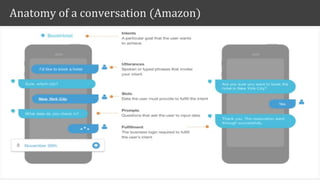
Anatomy of a conversation (Amazon)
Developer Amazon Portal – Interaction Model
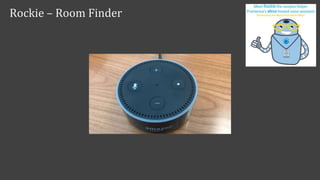
Rockie – Room Finder
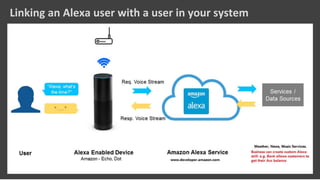
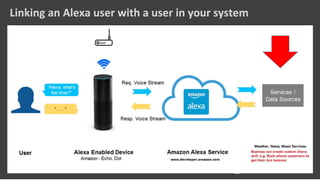
Linking an Alexa user with a user in your system
- Account linking is needed when the skill needs to connect with a system that requires authentication.
How Account Linking Works:
 To connect an Alexa user with an account in your system, you need to provide an OAuth access
token that uniquely identifies the user within your system.
 Alexa service stores this token and includes it in requests sent to your skill’s service. Your skill can
then use the token to authenticate with your system on behalf of the user.
- Using account linking in the Alexa Skills Kit requires use of the OAuth 2.0 Authorization Framework.
- Two OAuth authorization grant types are supported (4 OAuth Authorization grant types in total):
- 1. Authorization code grant (More secure but more complex)
- 2. Implicit grant
Linking Alexa user with user in your system – Account Linking
- OAuth 2 is an authorization framework that enables applications to obtain limited access to user
accounts on an HTTP service, such as Facebook or GitHub.
- OAuth Access Token represents user's authorization to perform a certain action which is done by the
application. It is used for accessing endpoints over HTTP carried in the Authorization header
- OpenID Connect is a simple identity layer built on top of the OAuth 2.0 protocol.
- OpenID Connect is recommendation if you are building a web application that is hosted on a server and
accessed via a browser.
The OAuth 2.0 Authorization Framework: https://tools.ietf.org/html/rfc6749
OpenID Connect Core: http://openid.net/specs/openid-connect-core-1_0.html
OAuth2 Authorization and OpenID Connect
Q&A
References
• https://developer.amazon.com/alexa
• https://developer.amazon.com/public/solutions/alexa/alexa-skills-kit/docs/linking-
an-alexa-user-with-a-user-in-your-system
• https://tools.ietf.org/html/rfc6749 (OAuth 2.0 Authorization Framework)
• http://openid.net/specs/openid-connect-core-1_0.html
• https://www.thoughtworks.com/insights/blog/why-conversational-ui-why-
now?utm_campaign=innovation&utm_medium=social&utm_source=twitter
• https://nodeschool.io/

Amazon Alexa Development Overview

  • 1.
    Amazon Alexa OverviewJohnBrady, Technical Architect #NxNWTechMeetup
  • 2.
    - Why areVoice first devices getting close to mainstream? - Why concentrating on Amazon Alexa for now? - What is Amazon Alexa? - Alexa Skills Development Overview – Interaction Model - Account Linking Overview - OAuth2.0 and OpenID Connect Agenda
  • 3.
    Why? - Advances inAI, speech recognition and natural language processing. - Plunging cost of processing and data storage. What’s next? - In 2017, will be 24.5 million devices shipped, leading to 33 million voice-first devices in circulation. - Edison research predict 75% US households will have smart speakers [Amazon Echo, etc.] by end 2020. - Gartner predicts 30% of web information requests by 2020 will be via audio-centric technologies. - BMW announced Alexa will be integrated into BMWs starting in mid-2018. “Whoever wins voice will be the dominant tech company of the next decade, like Google was for the web and Intel was for the computing age.” – Adam Cheynor (Inventor of Siri and founder of Viv – Voice startup bought by Samsung) Why are Voice first devices getting close to mainstream?
  • 4.
    Why Amazon Alexa? "Amazon’sEcho speaker will have 70.6% of users in 2017, with Google Home at 23.8% of the market” Forbes, May 2017
  • 5.
    What is ConversationalUI? A conversational user interface is a touchpoint that enables us to use language to interact. It’s a text message, it’s an airline sending you your boarding pass on Facebook Messenger and switching you to window seat. It’s asking Alexa what the weather is going to be for weekend? What is a Voice first device? A voice-first device is an always-on, intelligent piece of hardware where the primary interface is voice, both input and output – Amazon Echo, Amazon Dot or Google Home. What is Amazon Alexa? Alexa is an intelligent personal assistant (Software) developed by Amazon, made popular by Amazon Echo & Amazon Echo Dot (Hardware). What is Amazon Alexa?
  • 6.
  • 7.
    Echo Dot -is a hands-free, voice-controlled device that uses the same far-field voice recognition as Amazon Echo. Dot has a small built-in speaker Alexa – provides a set of built-in capabilities, referred to as skills, that enable customers to interact with devices in a more intuitive way using voice. Alexa Skills Kit (ASK) – lets you add new Skills. It is a collection of self-service APIs, tools, documentation and code samples that make it fast and easy for you to add skills to Alexa. All of the code runs in the cloud — nothing is installed on any user device. There are 2 main types of skills – Custom Skills and Smart Home Skills. Custom Skills - can handle just about any type of request. You define the requests the skill can handle (intents) and the words your customers say to invoke those requests (utterances) => Interaction Model. Alexa Skills - Basics
  • 8.
  • 9.
    Uploading Alexa Skillto Amazon Alexa Service
  • 10.
    When creating acustom skill, you create the following: - A set of intents that represent actions that users can do with your skill. Represent the core functionality of your skill. - A set of sample utterances that specify the words and phrases users can say to invoke intents. You map these utterances to your intents and this mapping forms the interaction model. - An invocation name that identifies the skill. - A Service or end point that accepts these intents as structured requests and act on them. Skill Interface
  • 11.
    Anatomy of aconversation (Amazon)
  • 12.
    Developer Amazon Portal– Interaction Model
  • 13.
  • 14.
    Linking an Alexauser with a user in your system
  • 15.
    Linking an Alexauser with a user in your system
  • 16.
    - Account linkingis needed when the skill needs to connect with a system that requires authentication. How Account Linking Works:  To connect an Alexa user with an account in your system, you need to provide an OAuth access token that uniquely identifies the user within your system.  Alexa service stores this token and includes it in requests sent to your skill’s service. Your skill can then use the token to authenticate with your system on behalf of the user. - Using account linking in the Alexa Skills Kit requires use of the OAuth 2.0 Authorization Framework. - Two OAuth authorization grant types are supported (4 OAuth Authorization grant types in total): - 1. Authorization code grant (More secure but more complex) - 2. Implicit grant Linking Alexa user with user in your system – Account Linking
  • 17.
    - OAuth 2is an authorization framework that enables applications to obtain limited access to user accounts on an HTTP service, such as Facebook or GitHub. - OAuth Access Token represents user's authorization to perform a certain action which is done by the application. It is used for accessing endpoints over HTTP carried in the Authorization header - OpenID Connect is a simple identity layer built on top of the OAuth 2.0 protocol. - OpenID Connect is recommendation if you are building a web application that is hosted on a server and accessed via a browser. The OAuth 2.0 Authorization Framework: https://tools.ietf.org/html/rfc6749 OpenID Connect Core: http://openid.net/specs/openid-connect-core-1_0.html OAuth2 Authorization and OpenID Connect
  • 18.
  • 19.
    References • https://developer.amazon.com/alexa • https://developer.amazon.com/public/solutions/alexa/alexa-skills-kit/docs/linking- an-alexa-user-with-a-user-in-your-system •https://tools.ietf.org/html/rfc6749 (OAuth 2.0 Authorization Framework) • http://openid.net/specs/openid-connect-core-1_0.html • https://www.thoughtworks.com/insights/blog/why-conversational-ui-why- now?utm_campaign=innovation&utm_medium=social&utm_source=twitter • https://nodeschool.io/

Editor's Notes

  • #6 > Amazon released Echo 36 months ago > Google home Apple Siri (Much to be done) Microsoft Cortana > Soon to be released Microsoft Invoke and Apple HomePod
  • #7 > Amazon released Echo 36 months ago > Google home Apple Siri (Much to be done) Microsoft Cortana > Soon to be released Microsoft Invoke and Apple HomePod
  • #8 Next slides will go into more depth on interaction model
  • #11 Basics of the Alexa State Machine Tell => terminates the session with the response (Straight Forward Request Response) Ask => Send a response but ask more questions (Keep Session Open) The Response Object This object returns four methods: tell, tellWithCard, ask, and askWithCard. The Tell Methods tell(speechOutput) tellWithCard(speechOutput, cardTitle, cardContent) We have two methods here which will respond to the user and end the session. First is tell, which accepts a string that Alexa will speak to the user, and tellWithCard, which accepts a string that Alexa speaks to the user, a string that serves as the card title, and a string that serves as the body of the card. The card is displayed within the Amazon Echo app. The Ask Methods ask(speechOutput, repromptSpeech) askWithCard(speechOutput, repromptSpeech, cardTitle, cardContent) These methods are just like the tell methods, except for two key differences. First, the session is kept open, waiting for a further response from the user. Second, the second argument is a string that Alexa will speak to the user if they haven’t responded to specify what they want.
  • #12 Intent – determine what function within the handler will be executed. Amazon have predefined Intents
  • #13 Amazon ASK CLI for deployments rather than manually configuring in developer.amazon.com GUI.
  • #14  The Response Object This object returns four methods: tell, tellWithCard, ask, and askWithCard. The Tell Methods tell(speechOutput) tellWithCard(speechOutput, cardTitle, cardContent) We have two methods here which will respond to the user and end the session. First is tell, which accepts a string that Alexa will speak to the user, and tellWithCard, which accepts a string that Alexa speaks to the user, a string that serves as the card title, and a string that serves as the body of the card. The card is displayed within the Amazon Echo app. The Ask Methods ask(speechOutput, repromptSpeech) askWithCard(speechOutput, repromptSpeech, cardTitle, cardContent) These methods are just like the tell methods, except for two key differences. First, the session is kept open, waiting for a further response from the user. Second, the second argument is a string that Alexa will speak to the user if they haven’t responded to specify what they want.
  • #17  The Response Object Authorization versus Authentication Emit Types Below. This object returns four methods: tell, tellWithCard (Card gets send to the app associate with Echo Dot), ask, and askWithCard. The Tell Methods (Closes the session after sending the response) tell(speechOutput) tellWithCard(speechOutput, cardTitle, cardContent) We have two methods here which will respond to the user and end the session. First is tell, which accepts a string that Alexa will speak to the user, and tellWithCard, which accepts a string that Alexa speaks to the user, a string that serves as the card title, and a string that serves as the body of the card. The card is displayed within the Amazon Echo app. The Ask Methods (Keep session open (Multiple request/response cycles) for asking more questions – e.g. booking a holiday, get more info) ask(speechOutput, repromptSpeech) askWithCard(speechOutput, repromptSpeech, cardTitle, cardContent) These methods are just like the tell methods, except for two key differences. First, the session is kept open, waiting for a further response from the user. Second, the second argument is a string that Alexa will speak to the user if they haven’t responded to specify what they want. The primary difference between these two types is in how the access token is obtained from your system. From the end user’s perspective, there is no difference.
  • #18 > OAuth 2.0 Underlying security platform > Alexa proprietary signature validation Resource Owner Role: User The resource owner is the user who authorizes an application to access their account. The application's access to the user's account is limited to the "scope" of the authorization granted (e.g. read or write access). Resource Role / Authorization Server Role: API The resource server hosts the protected user accounts, and the authorization server verifies the identity of the user then issues access tokens to the application. From an application developer's point of view, a service's API fulfills both the resource and authorization server roles. We will refer to both of these roles combined, as the Service or API role. Client: Application The client is the application that wants to access the user's account. Before it may do so, it must be authorized by the user, and the authorization must be validated by the API.
  • #20  The Response Object This object returns four methods: tell, tellWithCard, ask, and askWithCard. The Tell Methods tell(speechOutput) tellWithCard(speechOutput, cardTitle, cardContent) We have two methods here which will respond to the user and end the session. First is tell, which accepts a string that Alexa will speak to the user, and tellWithCard, which accepts a string that Alexa speaks to the user, a string that serves as the card title, and a string that serves as the body of the card. The card is displayed within the Amazon Echo app. The Ask Methods ask(speechOutput, repromptSpeech) askWithCard(speechOutput, repromptSpeech, cardTitle, cardContent) These methods are just like the tell methods, except for two key differences. First, the session is kept open, waiting for a further response from the user. Second, the second argument is a string that Alexa will speak to the user if they haven’t responded to specify what they want.