1
Building a small Data Centre
Cause we’re not all Facebook, Google, Amazon, Microsoft…
Karl Brumund, Dyn
NANOG 65
2
Dyn
● what we do
○ DNS, email, Internet Intelligence
● from where
○ 28 sites, 100s of probes, clouds
■ 4 core sites
■ building regional core sites in EU and AP
● what this talk is about
○ new core site network
3
First what not to do
it was a learning experience…
4
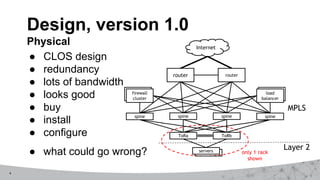
● CLOS design
● redundancy
● lots of bandwidth
● looks good
● buy
● install
● configure
● what could go wrong?
Design, version 1.0
Physical Internet
firewall
cluster
load
balancer
router router
spine spine
spine
spine
ToRa ToRb
servers
Layer 2
MPLS
only 1 rack
shown
5
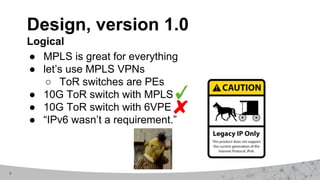
● MPLS is great for everything
● let’s use MPLS VPNs
○ ToR switches are PEs
● 10G ToR switch with MPLS
● 10G ToR switch with 6VPE
● “IPv6 wasn’t a requirement.”
Design, version 1.0
Logical
6
reboot time
● let’s start over
● this time lets engineer it
7
Define the Problem
● legacy DCs were good, but didn’t scale
○ Bandwidth, Redundancy, Security
● legacy servers & apps = more brownfield than green
● but we’re not building DCs with 1000s of servers
○ want it good, fast and cheap enough
○ need 20 racks now, 200 tomorrow
8
Get Requirements
● good
○ scalable and supportable by existing teams
○ standard protocols; not proprietary
● fast
● cheap
○ not too expensive
● fits us
○ can’t move everything to VMs or overlay today
● just works
○ so I’m not paged at 3am
9
Things we had to figure out
1. Routing
○ actually make it work this time, including IPv6
2. Security
○ let’s do better
3. Service Mobility
○ be able to move/upgrade instances easily
10
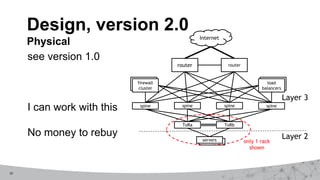
see version 1.0
I can work with this
No money to rebuy
Design, version 2.0
Physical Internet
firewall
cluster
load
balancers
router router
spine spine
spine
spine
ToRa ToRb
servers
Layer 2
only 1 rack
shown
Layer 3
11
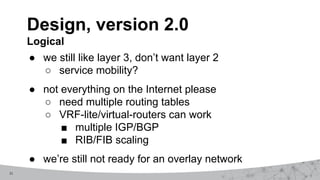
● we still like layer 3, don’t want layer 2
○ service mobility?
● not everything on the Internet please
○ need multiple routing tables
○ VRF-lite/virtual-routers can work
■ multiple IGP/BGP
■ RIB/FIB scaling
● we’re still not ready for an overlay network
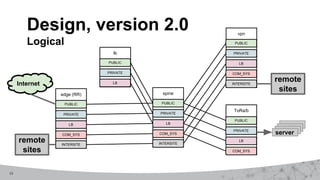
Design, version 2.0
Logical
12
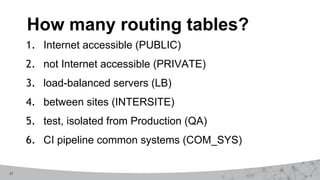
1. Internet accessible (PUBLIC)
2. not Internet accessible (PRIVATE)
3. load-balanced servers (LB)
4. between sites (INTERSITE)
5. test, isolated from Production (QA)
6. CI pipeline common systems (COM_SYS)
How many routing tables?
13
Design, version 2.0
Logical
edge (RR) spine
PUBLIC
COM_SYS
PRIVATE
LB
PUBLIC
COM_SYS
PRIVATE
LB
vpn
PUBLIC
COM_SYS
PRIVATE
LB
ToRa/b
PUBLIC
COM_SYS
PRIVATE
LB
INTERSITE
INTERSITE INTERSITE
lb
PUBLIC
PRIVATE
LB
Internet
remote
sites
remote
sites
server
14
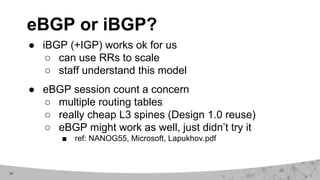
eBGP or iBGP?
● iBGP (+IGP) works ok for us
○ can use RRs to scale
○ staff understand this model
● eBGP session count a concern
○ multiple routing tables
○ really cheap L3 spines (Design 1.0 reuse)
○ eBGP might work as well, just didn’t try it
■ ref: NANOG55, Microsoft, Lapukhov.pdf
15
What IGP?
● OSPFv2/v3 or OSPFv3 or IS-IS
○ we picked OSPFv2/v3
○ any choice would have worked
● draft-ietf-v6ops-design-choices-08
16
● from one instance to another
● route-exchange can become confusing fast
● BGP communities make it manageable
● keep it as simple as possible
● mostly on spines for us
Route Exchange
17
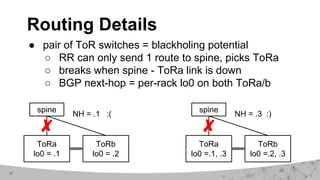
● pair of ToR switches = blackholing potential
○ RR can only send 1 route to spine, picks ToRa
○ breaks when spine - ToRa link is down
○ BGP next-hop = per-rack lo0 on both ToRa/b
Routing Details
spine
ToRa
lo0 = .1
ToRb
lo0 = .2
NH = .1 :(
spine
ToRa
lo0 =.1, .3
ToRb
lo0 =.2, .3
NH = .3 :)
18
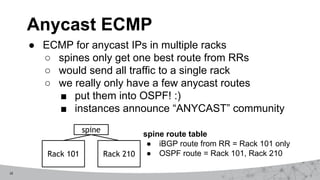
● ECMP for anycast IPs in multiple racks
○ spines only get one best route from RRs
○ would send all traffic to a single rack
○ we really only have a few anycast routes
■ put them into OSPF! :)
■ instances announce “ANYCAST” community
Anycast ECMP
spine
Rack 101 Rack 210
spine route table
● iBGP route from RR = Rack 101 only
● OSPF route = Rack 101, Rack 210
19
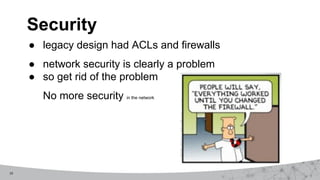
● legacy design had ACLs and firewalls
● network security is clearly a problem
● so get rid of the problem
No more security in the network
Security
20
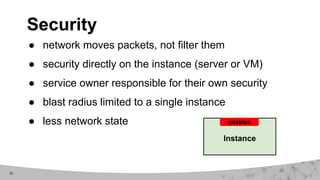
● network moves packets, not filter them
● security directly on the instance (server or VM)
● service owner responsible for their own security
● blast radius limited to a single instance
● less network state
Security
Instance
iptables
21
● install base security when instance built
○ ssh and monitoring, rest blocked
● service owners add the rules they need
○ CI pipeline makes this easy
● automated audits and verification
● needed to educate and convince service owners
○ many meetings over many months
How we deploy security
22
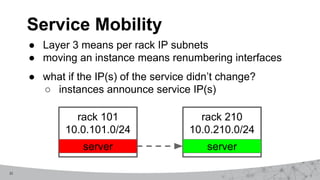
● Layer 3 means per rack IP subnets
● moving an instance means renumbering interfaces
● what if the IP(s) of the service didn’t change?
○ instances announce service IP(s)
Service Mobility
rack 101
10.0.101.0/24
server
rack 210
10.0.210.0/24
server
23
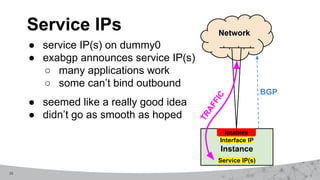
● service IP(s) on dummy0
● exabgp announces service IP(s)
○ many applications work
○ some can’t bind outbound
● seemed like a really good idea
● didn’t go as smooth as hoped
Service IPs Network
Instance
iptables
Service IP(s)
Interface IP
BGP
T
R
A
F
F
I
C
24
● ToR switches fully automated
○ trivial to add more as DC grows
○ any manual changes are overwritten
○ ref: NANOG63, Kipper, cvicente
● rest of network is semi-automated
○ partially controlled by Kipper
○ partially manual, but being automated
Network Deployment
25
What We Learned - Design
● A design documented in advance is good.
● A design that can be implemented is better.
● Design it right, not just easy.
● Validate as much as you can before you deploy.
● Integrating legacy into new is hard.
○ Integrating legacy cruft is harder.
● Everything is YMMV.
26
What We Learned - Network
● Cheap L3 switches are great
○ beware limitations (RIB, FIB, TCAM, features)
● Multiple routing tables are a pain; a few is ok.
● Automation is your friend. Seriously. Do it!
● BGP communities make routing scalable and sane.
● There is no such thing as partially in production.
● Staff experience levels are really important.
27
What We Learned - Security
● Moving security to instances was the right decision.
● Commercial solutions to deploy and audit suck.
○ IPv6 support is lacking. Hello vendors?
○ We rolled our own because we had to.
● Many service owners don’t know flows of their code.
○ never had to care before; network managed it
○ service owners now own their security
28
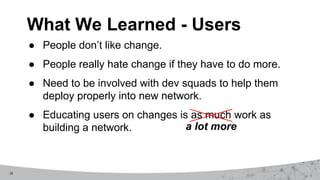
What We Learned - Users
● People don’t like change.
● People really hate change if they have to do more.
● Need to be involved with dev squads to help them
deploy properly into new network.
● Educating users on changes is as much work as
building a network. a lot more
29
Summary
● Many different ways to build DCs and networks.
● This solution works for us. YMMV
● Our network moves bits to servers running apps
delivering services. Our customers buy services.
● User, business, legacy >> network
30
INTERNET
PERFORMANCE.
DELIVERED.
Thank you
kbrumund@dyn.com
For more information on
Dyn’s services visit dyn.com

Building a Small Datacenter

  • 1.
    1 Building a smallData Centre Cause we’re not all Facebook, Google, Amazon, Microsoft… Karl Brumund, Dyn NANOG 65
  • 2.
    2 Dyn ● what wedo ○ DNS, email, Internet Intelligence ● from where ○ 28 sites, 100s of probes, clouds ■ 4 core sites ■ building regional core sites in EU and AP ● what this talk is about ○ new core site network
  • 3.
    3 First what notto do it was a learning experience…
  • 4.
    4 ● CLOS design ●redundancy ● lots of bandwidth ● looks good ● buy ● install ● configure ● what could go wrong? Design, version 1.0 Physical Internet firewall cluster load balancer router router spine spine spine spine ToRa ToRb servers Layer 2 MPLS only 1 rack shown
  • 5.
    5 ● MPLS isgreat for everything ● let’s use MPLS VPNs ○ ToR switches are PEs ● 10G ToR switch with MPLS ● 10G ToR switch with 6VPE ● “IPv6 wasn’t a requirement.” Design, version 1.0 Logical
  • 6.
    6 reboot time ● let’sstart over ● this time lets engineer it
  • 7.
    7 Define the Problem ●legacy DCs were good, but didn’t scale ○ Bandwidth, Redundancy, Security ● legacy servers & apps = more brownfield than green ● but we’re not building DCs with 1000s of servers ○ want it good, fast and cheap enough ○ need 20 racks now, 200 tomorrow
  • 8.
    8 Get Requirements ● good ○scalable and supportable by existing teams ○ standard protocols; not proprietary ● fast ● cheap ○ not too expensive ● fits us ○ can’t move everything to VMs or overlay today ● just works ○ so I’m not paged at 3am
  • 9.
    9 Things we hadto figure out 1. Routing ○ actually make it work this time, including IPv6 2. Security ○ let’s do better 3. Service Mobility ○ be able to move/upgrade instances easily
  • 10.
    10 see version 1.0 Ican work with this No money to rebuy Design, version 2.0 Physical Internet firewall cluster load balancers router router spine spine spine spine ToRa ToRb servers Layer 2 only 1 rack shown Layer 3
  • 11.
    11 ● we stilllike layer 3, don’t want layer 2 ○ service mobility? ● not everything on the Internet please ○ need multiple routing tables ○ VRF-lite/virtual-routers can work ■ multiple IGP/BGP ■ RIB/FIB scaling ● we’re still not ready for an overlay network Design, version 2.0 Logical
  • 12.
    12 1. Internet accessible(PUBLIC) 2. not Internet accessible (PRIVATE) 3. load-balanced servers (LB) 4. between sites (INTERSITE) 5. test, isolated from Production (QA) 6. CI pipeline common systems (COM_SYS) How many routing tables?
  • 13.
    13 Design, version 2.0 Logical edge(RR) spine PUBLIC COM_SYS PRIVATE LB PUBLIC COM_SYS PRIVATE LB vpn PUBLIC COM_SYS PRIVATE LB ToRa/b PUBLIC COM_SYS PRIVATE LB INTERSITE INTERSITE INTERSITE lb PUBLIC PRIVATE LB Internet remote sites remote sites server
  • 14.
    14 eBGP or iBGP? ●iBGP (+IGP) works ok for us ○ can use RRs to scale ○ staff understand this model ● eBGP session count a concern ○ multiple routing tables ○ really cheap L3 spines (Design 1.0 reuse) ○ eBGP might work as well, just didn’t try it ■ ref: NANOG55, Microsoft, Lapukhov.pdf
  • 15.
    15 What IGP? ● OSPFv2/v3or OSPFv3 or IS-IS ○ we picked OSPFv2/v3 ○ any choice would have worked ● draft-ietf-v6ops-design-choices-08
  • 16.
    16 ● from oneinstance to another ● route-exchange can become confusing fast ● BGP communities make it manageable ● keep it as simple as possible ● mostly on spines for us Route Exchange
  • 17.
    17 ● pair ofToR switches = blackholing potential ○ RR can only send 1 route to spine, picks ToRa ○ breaks when spine - ToRa link is down ○ BGP next-hop = per-rack lo0 on both ToRa/b Routing Details spine ToRa lo0 = .1 ToRb lo0 = .2 NH = .1 :( spine ToRa lo0 =.1, .3 ToRb lo0 =.2, .3 NH = .3 :)
  • 18.
    18 ● ECMP foranycast IPs in multiple racks ○ spines only get one best route from RRs ○ would send all traffic to a single rack ○ we really only have a few anycast routes ■ put them into OSPF! :) ■ instances announce “ANYCAST” community Anycast ECMP spine Rack 101 Rack 210 spine route table ● iBGP route from RR = Rack 101 only ● OSPF route = Rack 101, Rack 210
  • 19.
    19 ● legacy designhad ACLs and firewalls ● network security is clearly a problem ● so get rid of the problem No more security in the network Security
  • 20.
    20 ● network movespackets, not filter them ● security directly on the instance (server or VM) ● service owner responsible for their own security ● blast radius limited to a single instance ● less network state Security Instance iptables
  • 21.
    21 ● install basesecurity when instance built ○ ssh and monitoring, rest blocked ● service owners add the rules they need ○ CI pipeline makes this easy ● automated audits and verification ● needed to educate and convince service owners ○ many meetings over many months How we deploy security
  • 22.
    22 ● Layer 3means per rack IP subnets ● moving an instance means renumbering interfaces ● what if the IP(s) of the service didn’t change? ○ instances announce service IP(s) Service Mobility rack 101 10.0.101.0/24 server rack 210 10.0.210.0/24 server
  • 23.
    23 ● service IP(s)on dummy0 ● exabgp announces service IP(s) ○ many applications work ○ some can’t bind outbound ● seemed like a really good idea ● didn’t go as smooth as hoped Service IPs Network Instance iptables Service IP(s) Interface IP BGP T R A F F I C
  • 24.
    24 ● ToR switchesfully automated ○ trivial to add more as DC grows ○ any manual changes are overwritten ○ ref: NANOG63, Kipper, cvicente ● rest of network is semi-automated ○ partially controlled by Kipper ○ partially manual, but being automated Network Deployment
  • 25.
    25 What We Learned- Design ● A design documented in advance is good. ● A design that can be implemented is better. ● Design it right, not just easy. ● Validate as much as you can before you deploy. ● Integrating legacy into new is hard. ○ Integrating legacy cruft is harder. ● Everything is YMMV.
  • 26.
    26 What We Learned- Network ● Cheap L3 switches are great ○ beware limitations (RIB, FIB, TCAM, features) ● Multiple routing tables are a pain; a few is ok. ● Automation is your friend. Seriously. Do it! ● BGP communities make routing scalable and sane. ● There is no such thing as partially in production. ● Staff experience levels are really important.
  • 27.
    27 What We Learned- Security ● Moving security to instances was the right decision. ● Commercial solutions to deploy and audit suck. ○ IPv6 support is lacking. Hello vendors? ○ We rolled our own because we had to. ● Many service owners don’t know flows of their code. ○ never had to care before; network managed it ○ service owners now own their security
  • 28.
    28 What We Learned- Users ● People don’t like change. ● People really hate change if they have to do more. ● Need to be involved with dev squads to help them deploy properly into new network. ● Educating users on changes is as much work as building a network. a lot more
  • 29.
    29 Summary ● Many differentways to build DCs and networks. ● This solution works for us. YMMV ● Our network moves bits to servers running apps delivering services. Our customers buy services. ● User, business, legacy >> network
  • 30.