Before we begin…
Do you have
snacks/fluids?
Have you created
your personal AWS
account?
Cloud Network Security
Using AWS Day 1
Hello, I’m Franca
Platform Engineer @ SEEK
Currently responsible for
supporting Seek’s Shared Cloud
Networking solutions!
Co-Organiser for DevOps Girls
‘Fell’ into Cloud Networking, but
LOVE it!
Passionate about diversity,
inclusion and non-traditional
pathways to technology
Always learning
Bec our Teaching Assistant
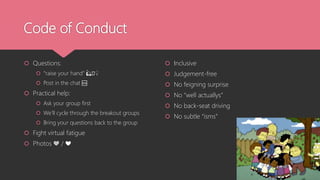
Code of Conduct
 Questions:
 “raise your hand” 🙋🏿♀️
 Post in the chat 🆘
 Practical help:
 Ask your group first
 We’ll cycle through the breakout groups
 Bring your questions back to the group
 Fight virtual fatigue
 Photos 💚 / ❤️
 Inclusive
 Judgement-free
 No feigning surprise
 No “well actuallys”
 No back-seat driving
 No subtle “isms”
Who are you?
Image sourced from: https://broadlygenderphotos.vice.com/
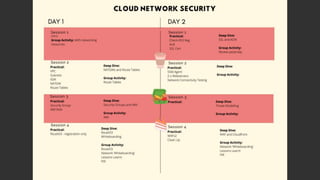
Our Agenda for the 2 days
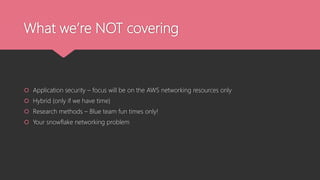
What we’re NOT covering
 Application security – focus will be on the AWS networking resources only
 Hybrid (only if we have time)
 Research methods – Blue team fun times only!
 Your snowflake networking problem
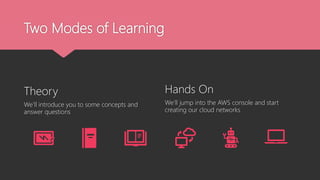
Two Modes of Learning
Theory
We’ll introduce you to some concepts and
answer questions
Hands On
We’ll jump into the AWS console and start
creating our cloud networks
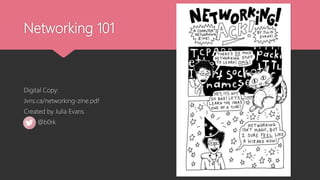
Networking 101
Digital Copy:
Jvns.ca/networking-zine.pdf
Created by Julia Evans
@b0rk
The what and why of AWS
What is AWS?
 Over 200+ services to enable cloud based
infrastructure that you can manage
 One of many providers of cloud infra such as
MS Azure, Google, IBM, and more
 Data storage, compute power, networking,
web hosting, etc
Why do we use AWS?
 Enables scalable infrastructure in a highly
secure environment
 Reliable, flexible, and available
 Unparalleled service offerings (150+ more
than Google)
 Best in class support, redundancy, and
availability
History: What came before AWS?
Then:
 Long lived, dedicated servers
 Long lead times for new contracted infra
 Estimated infra, often over-provisioned
 Fixed hardware, low scalability
Now:
 Short lived, shared services
 Cost shared by consumers
 Infra on demand
 Virtual hardware, highly scalable
Shared Responsibility Model
Security OF the cloud
 Hardware
 Physical Access
 Software e.g. NGINX EC2 image
Security IN the cloud
 Application Security
 Configuration of AWS Resources e.g. s3
 IAM
 Cloud Network Security
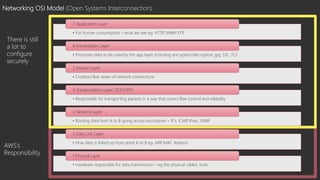
Networking OSI Model (Open Systems Interconnection)
• For human consumption – what we see eg. HTTP
, SNMP
, FTP
7 Application Layer
• Processes data to be used by the app layer, including encryption/decryption, jpg, SSL, TLS
6 Presentation Layer
• Creation/Tear down of network connections
5 Session Layer
• Responsible for transporting packets in a way that covers flow control and reliability
4 Transportation Layer (TCP/UDP)
• Routing data from A to B going across boundaries – IP’s, ICMP
, IPsec, IGMP
3 Network Layer
• How data is linked up from point A to B eg. ARP
, MAC Address
2 Data Link Layer
• Hardware responsible for data transmission – eg the physical cables, hubs
1 Physical Layer
AWS’s
Responsibility
There is still
a lot to
configure
securely
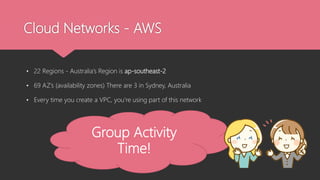
Cloud Networks - AWS
• 22 Regions - Australia’s Region is ap-southeast-2
• 69 AZ’s (availability zones) There are 3 in Sydney, Australia
• Every time you create a VPC, you’re using part of this network
Group Activity
Time!
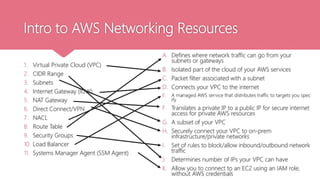
Intro to AWS Networking Resources
1. Virtual Private Cloud (VPC)
2. CIDR Range
3. Subnets
4. Internet Gateway (IGW)
5. NAT Gateway
6. Direct Connect/VPN
7. NACL
8. Route Table
9. Security Groups
10. Load Balancer
11. Systems Manager Agent (SSM Agent)
A. Defines where network traffic can go from your
subnets or gateways
B. Isolated part of the cloud of your AWS services
C. Packet filter associated with a subnet
D. Connects your VPC to the internet
E. A managed AWS service that distributes traffic to targets you spec
ify
F. Translates a private IP to a public IP for secure internet
access for private AWS resources
G. A subset of your VPC
H. Securely connect your VPC to on-prem
infrastructure/private networks
I. Set of rules to block/allow inbound/outbound network
traffic
J. Determines number of IPs your VPC can have
K. Allow you to connect to an EC2 using an IAM role,
without AWS credentials
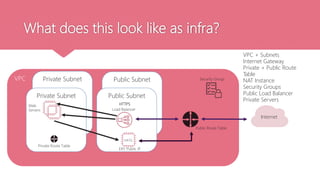
What does this look like as infra?
VPC Public Subnet
Private Subnet
Public Subnet
Private Subnet
Internet
VPC + Subnets
Internet Gateway
Private + Public Route
Table
NAT Instance
Security Groups
Public Load Balancer
Private Servers
NATG
Load Balancer
Web
Servers
Security Group
Public Route Table
Private Route Table
EIP/ Public IP
HTTPS
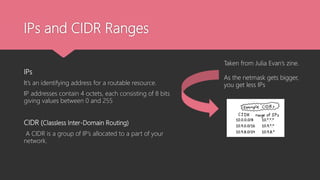
IPs and CIDR Ranges
IPs
It’s an identifying address for a routable resource.
IP addresses contain 4 octets, each consisting of 8 bits
giving values between 0 and 255
CIDR (Classless Inter-Domain Routing)
A CIDR is a group of IP’s allocated to a part of your
network.
Taken from Julia Evan’s zine.
As the netmask gets bigger,
you get less IPs
Key Terms…
Netmask
/x tells you how many IP’s are available in your CIDR – the smaller the number, the more IPs you have. E.g.
/24 indicates there are 265 IP’s available
Network ID
This is part of your IP that is shared for all resources within your network. E.g. 193.164.2.44 and
193.164.2.35 are part of the same network
Host ID
This is part of your IP that is unique to one resource. E.g. 193.164.2.44 and 193.164.2.35 are IP’s for different
resources
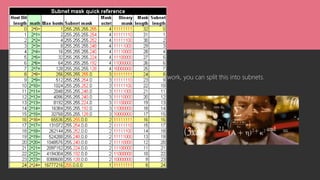
Subnetting
Once you know how many IP’s are available in your network, you can split this into subnets.
We will not be covering subnetting today
Play around with subnetting though:
https://cidr.xyz
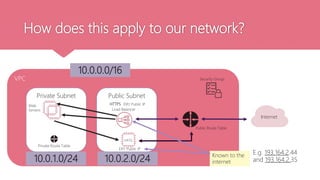
How does this apply to our network?
VPC
Private Subnet Public Subnet
Internet
NATG
Load Balancer
Web
Servers
Security Group
Public Route Table
Private Route Table
EIP/ Public IP
HTTPS
10.0.0.0/16
10.0.1.0/24 10.0.2.0/24 Known to the
internet
EIP/ Public IP
E.g. 193.164.2.44
and 193.164.2.35
Let’s get into the console!
 We’re going to use step-by-step guides in GitHub to build….
 VPC
 Public Subnet
 Private Subnet

1_cloud_network_security_intro.pptx

  • 1.
    Before we begin… Doyou have snacks/fluids? Have you created your personal AWS account?
  • 2.
  • 4.
    Hello, I’m Franca PlatformEngineer @ SEEK Currently responsible for supporting Seek’s Shared Cloud Networking solutions! Co-Organiser for DevOps Girls ‘Fell’ into Cloud Networking, but LOVE it! Passionate about diversity, inclusion and non-traditional pathways to technology Always learning
  • 5.
  • 6.
    Code of Conduct Questions:  “raise your hand” 🙋🏿♀️  Post in the chat 🆘  Practical help:  Ask your group first  We’ll cycle through the breakout groups  Bring your questions back to the group  Fight virtual fatigue  Photos 💚 / ❤️  Inclusive  Judgement-free  No feigning surprise  No “well actuallys”  No back-seat driving  No subtle “isms”
  • 7.
    Who are you? Imagesourced from: https://broadlygenderphotos.vice.com/
  • 8.
    Our Agenda forthe 2 days
  • 9.
    What we’re NOTcovering  Application security – focus will be on the AWS networking resources only  Hybrid (only if we have time)  Research methods – Blue team fun times only!  Your snowflake networking problem
  • 10.
    Two Modes ofLearning Theory We’ll introduce you to some concepts and answer questions Hands On We’ll jump into the AWS console and start creating our cloud networks
  • 11.
  • 12.
    The what andwhy of AWS What is AWS?  Over 200+ services to enable cloud based infrastructure that you can manage  One of many providers of cloud infra such as MS Azure, Google, IBM, and more  Data storage, compute power, networking, web hosting, etc Why do we use AWS?  Enables scalable infrastructure in a highly secure environment  Reliable, flexible, and available  Unparalleled service offerings (150+ more than Google)  Best in class support, redundancy, and availability
  • 13.
    History: What camebefore AWS? Then:  Long lived, dedicated servers  Long lead times for new contracted infra  Estimated infra, often over-provisioned  Fixed hardware, low scalability Now:  Short lived, shared services  Cost shared by consumers  Infra on demand  Virtual hardware, highly scalable
  • 14.
    Shared Responsibility Model SecurityOF the cloud  Hardware  Physical Access  Software e.g. NGINX EC2 image Security IN the cloud  Application Security  Configuration of AWS Resources e.g. s3  IAM  Cloud Network Security
  • 15.
    Networking OSI Model(Open Systems Interconnection) • For human consumption – what we see eg. HTTP , SNMP , FTP 7 Application Layer • Processes data to be used by the app layer, including encryption/decryption, jpg, SSL, TLS 6 Presentation Layer • Creation/Tear down of network connections 5 Session Layer • Responsible for transporting packets in a way that covers flow control and reliability 4 Transportation Layer (TCP/UDP) • Routing data from A to B going across boundaries – IP’s, ICMP , IPsec, IGMP 3 Network Layer • How data is linked up from point A to B eg. ARP , MAC Address 2 Data Link Layer • Hardware responsible for data transmission – eg the physical cables, hubs 1 Physical Layer AWS’s Responsibility There is still a lot to configure securely
  • 16.
    Cloud Networks -AWS • 22 Regions - Australia’s Region is ap-southeast-2 • 69 AZ’s (availability zones) There are 3 in Sydney, Australia • Every time you create a VPC, you’re using part of this network Group Activity Time!
  • 17.
    Intro to AWSNetworking Resources 1. Virtual Private Cloud (VPC) 2. CIDR Range 3. Subnets 4. Internet Gateway (IGW) 5. NAT Gateway 6. Direct Connect/VPN 7. NACL 8. Route Table 9. Security Groups 10. Load Balancer 11. Systems Manager Agent (SSM Agent) A. Defines where network traffic can go from your subnets or gateways B. Isolated part of the cloud of your AWS services C. Packet filter associated with a subnet D. Connects your VPC to the internet E. A managed AWS service that distributes traffic to targets you spec ify F. Translates a private IP to a public IP for secure internet access for private AWS resources G. A subset of your VPC H. Securely connect your VPC to on-prem infrastructure/private networks I. Set of rules to block/allow inbound/outbound network traffic J. Determines number of IPs your VPC can have K. Allow you to connect to an EC2 using an IAM role, without AWS credentials
  • 18.
    What does thislook like as infra? VPC Public Subnet Private Subnet Public Subnet Private Subnet Internet VPC + Subnets Internet Gateway Private + Public Route Table NAT Instance Security Groups Public Load Balancer Private Servers NATG Load Balancer Web Servers Security Group Public Route Table Private Route Table EIP/ Public IP HTTPS
  • 19.
    IPs and CIDRRanges IPs It’s an identifying address for a routable resource. IP addresses contain 4 octets, each consisting of 8 bits giving values between 0 and 255 CIDR (Classless Inter-Domain Routing) A CIDR is a group of IP’s allocated to a part of your network. Taken from Julia Evan’s zine. As the netmask gets bigger, you get less IPs
  • 20.
    Key Terms… Netmask /x tellsyou how many IP’s are available in your CIDR – the smaller the number, the more IPs you have. E.g. /24 indicates there are 265 IP’s available Network ID This is part of your IP that is shared for all resources within your network. E.g. 193.164.2.44 and 193.164.2.35 are part of the same network Host ID This is part of your IP that is unique to one resource. E.g. 193.164.2.44 and 193.164.2.35 are IP’s for different resources
  • 21.
    Subnetting Once you knowhow many IP’s are available in your network, you can split this into subnets. We will not be covering subnetting today Play around with subnetting though: https://cidr.xyz
  • 22.
    How does thisapply to our network? VPC Private Subnet Public Subnet Internet NATG Load Balancer Web Servers Security Group Public Route Table Private Route Table EIP/ Public IP HTTPS 10.0.0.0/16 10.0.1.0/24 10.0.2.0/24 Known to the internet EIP/ Public IP E.g. 193.164.2.44 and 193.164.2.35
  • 23.
    Let’s get intothe console!  We’re going to use step-by-step guides in GitHub to build….  VPC  Public Subnet  Private Subnet

Editor's Notes

  • #4 Before beginning we would like to acknowledge the Traditional Owners of country throughout Australia and recognise their continuing connection to land, waters and culture. I am presenting from the lands of the Wurundjeri people and I wish to acknowledge them as Traditional Owners. I also acknowledge the fact that we are spread out and pay I respects to all Traditional Owners from all areas where we have gathered from today. This includes Elders, past, present and emerging as well as any Aboriginal Elders of other communities who may be joining us today.
  • #7 Two ways to ask questions: ‘raise your hand’ Or post it in the chat Practical help - ask your group We’ll cycle through the breakout rooms and ask if anyone needs help Still outstanding Q’s: raise it when we’re all back together No feigning surprise The first rule means you shouldn't act surprised when people say they don't know something. This applies to both technical things ("What?! I can't believe you don't know what the stack is!") and non-technical things ("You don't know who RMS is?!"). Feigning surprise has absolutely no social or educational benefit: When people feign surprise, it's usually to make them feel better about themselves and others feel worse. And even when that's not the intention, it's almost always the effect. As you've probably already guessed, this rule is tightly coupled to our belief in the importance of people feeling comfortable saying "I don't know" and "I don't understand." No well-actually's A well-actually happens when someone says something that's almost - but not entirely - correct, and you say, "well, actually…" and then give a minor correction. This is especially annoying when the correction has no bearing on the actual conversation. This doesn't mean the Recurse Center isn't about truth-seeking or that we don't care about being precise. Almost all well-actually's in our experience are about grandstanding, not truth-seeking. (Thanks to Miguel de Icaza for originally coining the term "well-actually.") No back-seat driving If you overhear people working through a problem, you shouldn't intermittently lob advice across the room. This can lead to the "too many cooks" problem, but more important, it can be rude and disruptive to half-participate in a conversation. This isn't to say you shouldn't help, offer advice, or join conversations. On the contrary, we encourage all those things. Rather, it just means that when you want to help out or work with others, you should fully engage and not just butt in sporadically. No subtle -isms Our last social rule bans subtle racism, sexism, homophobia, transphobia, and other kinds of bias. This one is different from the rest, because it covers a class of behaviors instead of one very specific pattern. Subtle -isms are small things that make others feel unwelcome, things that we all sometimes do by mistake. For example, saying "It's so easy my grandmother could do it" is a subtle -ism. Like the other three social rules, this one is often accidentally broken. Like the other three, it's not a big deal to mess up – you just apologize and move on. If you see a subtle -ism at the Recurse Center, you can point it out to the relevant person, either publicly or privately, or you can ask one of the faculty to say something. After this, we ask that all further discussion move off of public channels. If you are a third party, and you don't see what could be biased about the comment that was made, feel free to talk to faculty. Please don't say, "Comment X wasn't homophobic!" Similarly, please don't pile on to someone who made a mistake. The "subtle" in "subtle -isms" means that it's probably not obvious to everyone right away what was wrong with the comment.
  • #8 Who you are – where you work/study or job you’d love to nab 2 things you’d like to get out of the training If you get time… does your group have something in common? Can you find it? How specific can you get with it?
  • #12 Zine talk about Ips, CIDR ranges, SSL, ports, subnets Examples of pages to take note of Also: https://jvns.ca/blog/2018/07/24/ip-addresses-routing/
  • #15 AWS Data Centers: https://aws.amazon.com/compliance/data-center/data-centers/
  • #18 Reference sheet that translates between different cloud providers