Build Social Apps for Facebook


                             Md Emran Hasan            M A Hossain Tonu
                             Co-founder, CTO          Sr. Software Engineer
                          Right Brain Solution Ltd.       Somewhere in...


Friday, February 24, 12
Overview

                  •       Why work with Facebook?

                  •       Facebook Platform

                  •       General Application Types

                  •       Live app development


Friday, February 24, 12
Why Facebook?


Friday, February 24, 12
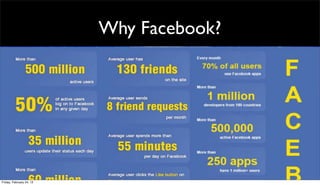
Why Facebook?

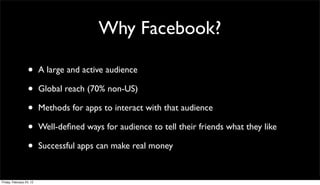
                  •       A large and active audience

                  •       Global reach (70% non-US)

                  •       Methods for apps to interact with that audience

                  •       Well-defined ways for audience to tell their friends what they like

                  •       Successful apps can make real money


Friday, February 24, 12
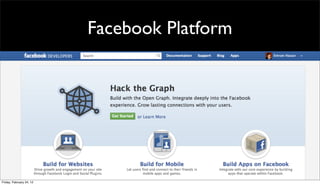
Facebook Platform


Friday, February 24, 12
•   Blog: http://www.keenertech.com
•   Facebook: http://www.facebook.com/keenertech
•   Twitter: dkeener2010
•   Email: dkeener@keenertech.com
           dkeener@metrostarsystems.com
The Development
 Landscape
From a PHP Mindset…
• Facebook was designed with PHP in mind
• Integration features were clunky at best
• …including an API (sort of)

But they bought FriendFeed in Aug 2009

• Key tech people were ex-Google
• Knew API’s and scalability issues
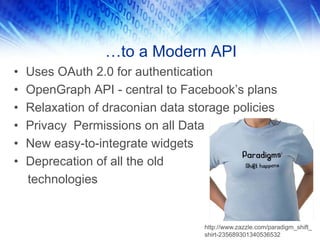
…to a Modern API
•   Uses OAuth 2.0 for authentication
•   OpenGraph API - central to Facebook’s plans
•   Relaxation of draconian data storage policies
•   Privacy Permissions on all Data
•   New easy-to-integrate widgets
•   Deprecation of all the old
    technologies


                                   http://www.zazzle.com/paradigm_shift_
                                   shirt-235689301340536532
It’s Been a Rocky Road…
• Facebook still outgrowing the PHP mindset
• No “dev” version of Facebook to test apps
  against upcoming platform changes
• Their REST interfaces may not do REST in
  the way you expect:
 - https://graph.facebook.com/me/friends
 - https://graph.facebook.com/me/home (News Feed)


Just accept it and move on…
Gone, Deprecated, etc.

1. Old REST Web Services

2. FBML and FBJS
 • HTML with extensions
 • JavaScript w/ extensions

3. Facebook Connect
 • Single sign-on for external sites
 • Rebranded as part of OpenGraph API
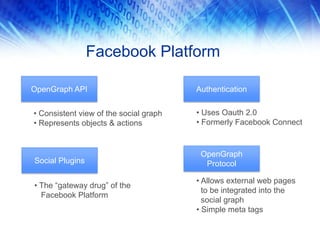
Facebook Platform

OpenGraph API                           Authentication


• Consistent view of the social graph   • Uses Oauth 2.0
• Represents objects & actions          • Formerly Facebook Connect


                                         OpenGraph
Social Plugins                            Protocol

                                        • Allows external web pages
• The “gateway drug” of the
                                          to be integrated into the
  Facebook Platform
                                          social graph
                                        • Simple meta tags
It’s Still a Moving Target
• Facebook changes often, and with
  little warning
• 3rd party libs always lag behind
  platform changes…
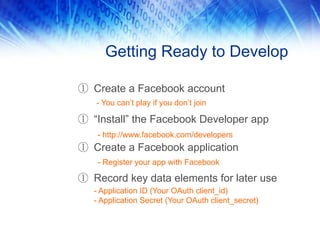
Getting Ready to Develop

① Create a Facebook account
   - You can’t play if you don’t join

① “Install” the Facebook Developer app
    - http://www.facebook.com/developers
① Create a Facebook application
    - Register your app with Facebook

① Record key data elements for later use
   - Application ID (Your OAuth client_id)
   - Application Secret (Your OAuth client_secret)
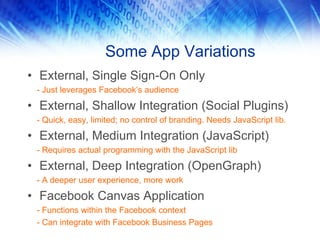
Some App Variations
• External, Single Sign-On Only
 - Just leverages Facebook’s audience

• External, Shallow Integration (Social Plugins)
 - Quick, easy, limited; no control of branding. Needs JavaScript lib.

• External, Medium Integration (JavaScript)
 - Requires actual programming with the JavaScript lib

• External, Deep Integration (OpenGraph)
 - A deeper user experience, more work

• Facebook Canvas Application
 - Functions within the Facebook context
 - Can integrate with Facebook Business Pages
Example 1: Single Sign-On

        (JavaScript)
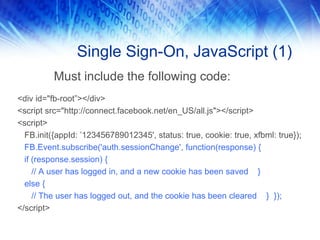
Single Sign-On, JavaScript (1)
          Must include the following code:
<div id="fb-root”></div>
<script src="http://connect.facebook.net/en_US/all.js"></script>
<script>
  FB.init({appId: ’123456789012345', status: true, cookie: true, xfbml: true});
  FB.Event.subscribe('auth.sessionChange', function(response) {
  if (response.session) {
     // A user has logged in, and a new cookie has been saved }
  else {
     // The user has logged out, and the cookie has been cleared } });
</script>
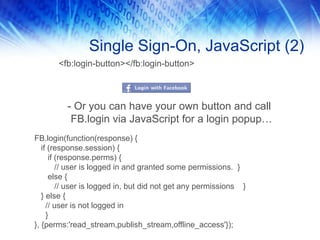
Single Sign-On, JavaScript (2)
       <fb:login-button></fb:login-button>


          - Or you can have your own button and call
           FB.login via JavaScript for a login popup…
FB.login(function(response) {
   if (response.session) {
      if (response.perms) {
         // user is logged in and granted some permissions. }
      else {
         // user is logged in, but did not get any permissions }
   } else {
     // user is not logged in
     }
}, {perms:'read_stream,publish_stream,offline_access'});
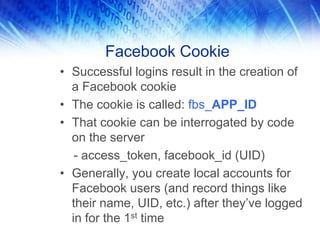
Facebook Cookie
• Successful logins result in the creation of
  a Facebook cookie
• The cookie is called: fbs_APP_ID
• That cookie can be interrogated by code
  on the server
   - access_token, facebook_id (UID)
• Generally, you create local accounts for
  Facebook users (and record things like
  their name, UID, etc.) after they’ve logged
  in for the 1st time
Example 2: Profile Pics

        (HTML)
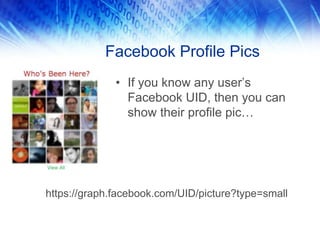
Facebook Profile Pics
              • If you know any user’s
                Facebook UID, then you can
                show their profile pic…


https://graph.facebook.com/UID/picture?type=small
Tips and Best Practices
Practical Tips
• Look carefully at performance
  - Control the number of Facebook calls on a page
  - Consider FQL to get data more efficiently
  - FQL has been updated to use OpenGraph
  - Cache data where possible
• If you use the canvas, use the iframe sub-type
  - Better control of the output
  - No need for HTML to be scrubbed (or mangled) by Facebook
• Do periodic regression tests on production code
For Canvas Apps
• “Hybrid Apps” is the way to go
• Limited functionality works within the
  Facebook “canvas”
• For advanced features, users taken to a
  separate site
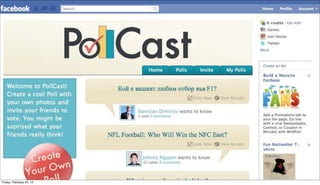
• Example: PollCast – Users can take polls
  within Facebook, but they create them by
  going to a separate site
Resources
• Facebook Developer Resources
    - http://www.facebook.com/developers
    - http://developer.facebook.com
• AllFacebook.com
    - http://www.allfacebook.com
•   “Developing Facebook Platform Applications with Rails” by
    Michael J. Mangino, Pragmatic Programmers, 2008
    - Seriously outdated, but interesting
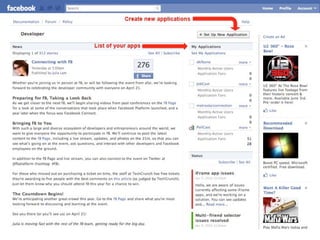
Appendix A: App Creation
As a prerequisite for developing
applications for Facebook, you must first
register your app…

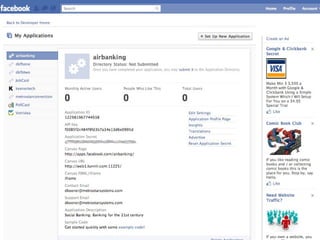
This appendix shows the various Facebook
pages involved in the process

NOTE: These 3 screenshots are out-of-
date now, but the basic tasks are still
the same.
What’s the Big Deal?
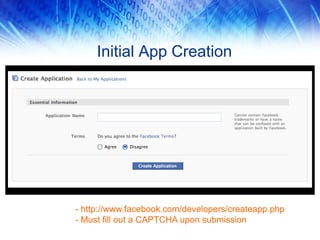
Initial App Creation


- http://www.facebook.com/developers/createapp.php
- Must fill out a CAPTCHA upon submission
Appendix C: Other Examples
Some more code examples:

• Example 4: Social Plugins (“Like” Button)
• Example 5: Metadata
• Example 6: Canvas App
Example 4: Social Plugins
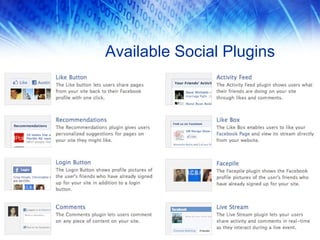
Social Plugins
• Leverages Facebook’s JavaScript SDK
• Can easily add social plugins to web sites
• Enables rapid “shallow integration”
• Eight type of social plugins available
• Each widget supports customization
  options
• Customization is still limited, though
Available Social Plugins
Adding a Like Button
• “Like” will cause the web page to be
   promoted on the user’s News Feed…and
   will also appear for their friends
• The number of people who “Like” an item
  impacts how often the item will be shown
  on Facebook news feeds
• Facebook will retrieve info about the page
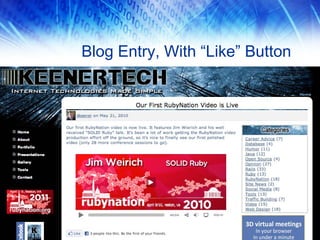
Blog Entry, With “Like” Button
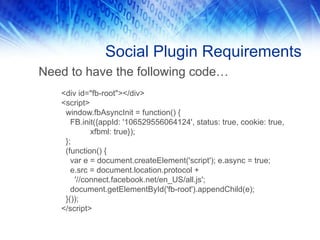
Social Plugin Requirements
Need to have the following code…
   <div id="fb-root"></div>
   <script>
    window.fbAsyncInit = function() {
      FB.init({appId: '106529556064124', status: true, cookie: true,
            xfbml: true});
    };
    (function() {
      var e = document.createElement('script'); e.async = true;
      e.src = document.location.protocol +
       '//connect.facebook.net/en_US/all.js';
      document.getElementById('fb-root').appendChild(e);
    }());
   </script>
Example 5: Metadata
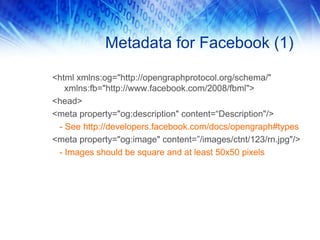
Metadata for Facebook (1)

<html xmlns:og="http://opengraphprotocol.org/schema/"
   xmlns:fb="http://www.facebook.com/2008/fbml">
<head>
<meta property="og:description" content=“Description"/>
 - See http://developers.facebook.com/docs/opengraph#types
<meta property="og:image" content=”/images/ctnt/123/rn.jpg"/>
 - Images should be square and at least 50x50 pixels
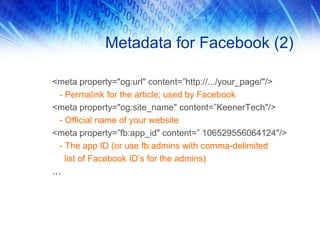
Metadata for Facebook (2)

<meta property="og:url" content=”http://.../your_page/"/>
 - Permalink for the article; used by Facebook
<meta property="og:site_name" content=”KeenerTech"/>
 - Official name of your website
<meta property=”fb:app_id" content=” 106529556064124"/>
 - The app ID (or use fb:admins with comma-delimited
   list of Facebook ID’s for the admins)
…
Example 6: Canvas App
Facebook Application
• Entire app functions within the “canvas,”
  i.e.- within the Facebook context
• Two sub-types:
  - Canvas: Deprecated.
  - Iframe: External app functions within an
    iframe
• Many games use iframes with an
  embedded Flash app
• Mostly the same as external apps…now
What Is the Canvas?
The canvas is the area within the Facebook
web site that your application can control.

  - As a “Canvas” app, or…
  - An external app running in an iframe

It looks like this…
This is the Canvas
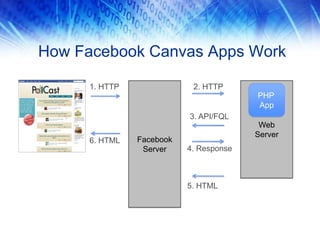
How Facebook Canvas Apps Work

      1. HTTP               2. HTTP
                                         PHP
                                         App
                           3. API/FQL
                                          Web
                                         Server
      6. HTML   Facebook
                 Server    4. Response


                           5. HTML
Live app development


Friday, February 24, 12

Build social apps for Facebook

  • 1.
    Build Social Appsfor Facebook Md Emran Hasan M A Hossain Tonu Co-founder, CTO Sr. Software Engineer Right Brain Solution Ltd. Somewhere in... Friday, February 24, 12
  • 2.
    Overview • Why work with Facebook? • Facebook Platform • General Application Types • Live app development Friday, February 24, 12
  • 3.
  • 4.
  • 5.
  • 6.
  • 7.
    Why Facebook? • A large and active audience • Global reach (70% non-US) • Methods for apps to interact with that audience • Well-defined ways for audience to tell their friends what they like • Successful apps can make real money Friday, February 24, 12
  • 8.
  • 9.
    Blog: http://www.keenertech.com • Facebook: http://www.facebook.com/keenertech • Twitter: dkeener2010 • Email: dkeener@keenertech.com dkeener@metrostarsystems.com
  • 10.
  • 13.
    From a PHPMindset… • Facebook was designed with PHP in mind • Integration features were clunky at best • …including an API (sort of) But they bought FriendFeed in Aug 2009 • Key tech people were ex-Google • Knew API’s and scalability issues
  • 14.
    …to a ModernAPI • Uses OAuth 2.0 for authentication • OpenGraph API - central to Facebook’s plans • Relaxation of draconian data storage policies • Privacy Permissions on all Data • New easy-to-integrate widgets • Deprecation of all the old technologies http://www.zazzle.com/paradigm_shift_ shirt-235689301340536532
  • 15.
    It’s Been aRocky Road… • Facebook still outgrowing the PHP mindset • No “dev” version of Facebook to test apps against upcoming platform changes • Their REST interfaces may not do REST in the way you expect: - https://graph.facebook.com/me/friends - https://graph.facebook.com/me/home (News Feed) Just accept it and move on…
  • 16.
    Gone, Deprecated, etc. 1.Old REST Web Services 2. FBML and FBJS • HTML with extensions • JavaScript w/ extensions 3. Facebook Connect • Single sign-on for external sites • Rebranded as part of OpenGraph API
  • 17.
    Facebook Platform OpenGraph API Authentication • Consistent view of the social graph • Uses Oauth 2.0 • Represents objects & actions • Formerly Facebook Connect OpenGraph Social Plugins Protocol • Allows external web pages • The “gateway drug” of the to be integrated into the Facebook Platform social graph • Simple meta tags
  • 18.
    It’s Still aMoving Target • Facebook changes often, and with little warning • 3rd party libs always lag behind platform changes…
  • 19.
    Getting Ready toDevelop ① Create a Facebook account - You can’t play if you don’t join ① “Install” the Facebook Developer app - http://www.facebook.com/developers ① Create a Facebook application - Register your app with Facebook ① Record key data elements for later use - Application ID (Your OAuth client_id) - Application Secret (Your OAuth client_secret)
  • 20.
    Some App Variations •External, Single Sign-On Only - Just leverages Facebook’s audience • External, Shallow Integration (Social Plugins) - Quick, easy, limited; no control of branding. Needs JavaScript lib. • External, Medium Integration (JavaScript) - Requires actual programming with the JavaScript lib • External, Deep Integration (OpenGraph) - A deeper user experience, more work • Facebook Canvas Application - Functions within the Facebook context - Can integrate with Facebook Business Pages
  • 21.
    Example 1: SingleSign-On (JavaScript)
  • 22.
    Single Sign-On, JavaScript(1) Must include the following code: <div id="fb-root”></div> <script src="http://connect.facebook.net/en_US/all.js"></script> <script> FB.init({appId: ’123456789012345', status: true, cookie: true, xfbml: true}); FB.Event.subscribe('auth.sessionChange', function(response) { if (response.session) { // A user has logged in, and a new cookie has been saved } else { // The user has logged out, and the cookie has been cleared } }); </script>
  • 23.
    Single Sign-On, JavaScript(2) <fb:login-button></fb:login-button> - Or you can have your own button and call FB.login via JavaScript for a login popup… FB.login(function(response) { if (response.session) { if (response.perms) { // user is logged in and granted some permissions. } else { // user is logged in, but did not get any permissions } } else { // user is not logged in } }, {perms:'read_stream,publish_stream,offline_access'});
  • 24.
    Facebook Cookie • Successfullogins result in the creation of a Facebook cookie • The cookie is called: fbs_APP_ID • That cookie can be interrogated by code on the server - access_token, facebook_id (UID) • Generally, you create local accounts for Facebook users (and record things like their name, UID, etc.) after they’ve logged in for the 1st time
  • 25.
    Example 2: ProfilePics (HTML)
  • 26.
    Facebook Profile Pics • If you know any user’s Facebook UID, then you can show their profile pic… https://graph.facebook.com/UID/picture?type=small
  • 27.
    Tips and BestPractices
  • 28.
    Practical Tips • Lookcarefully at performance - Control the number of Facebook calls on a page - Consider FQL to get data more efficiently - FQL has been updated to use OpenGraph - Cache data where possible • If you use the canvas, use the iframe sub-type - Better control of the output - No need for HTML to be scrubbed (or mangled) by Facebook • Do periodic regression tests on production code
  • 29.
    For Canvas Apps •“Hybrid Apps” is the way to go • Limited functionality works within the Facebook “canvas” • For advanced features, users taken to a separate site • Example: PollCast – Users can take polls within Facebook, but they create them by going to a separate site
  • 30.
    Resources • Facebook DeveloperResources - http://www.facebook.com/developers - http://developer.facebook.com • AllFacebook.com - http://www.allfacebook.com • “Developing Facebook Platform Applications with Rails” by Michael J. Mangino, Pragmatic Programmers, 2008 - Seriously outdated, but interesting
  • 31.
    Appendix A: AppCreation As a prerequisite for developing applications for Facebook, you must first register your app… This appendix shows the various Facebook pages involved in the process NOTE: These 3 screenshots are out-of- date now, but the basic tasks are still the same.
  • 32.
  • 33.
    Initial App Creation -http://www.facebook.com/developers/createapp.php - Must fill out a CAPTCHA upon submission
  • 35.
    Appendix C: OtherExamples Some more code examples: • Example 4: Social Plugins (“Like” Button) • Example 5: Metadata • Example 6: Canvas App
  • 36.
  • 37.
    Social Plugins • LeveragesFacebook’s JavaScript SDK • Can easily add social plugins to web sites • Enables rapid “shallow integration” • Eight type of social plugins available • Each widget supports customization options • Customization is still limited, though
  • 38.
  • 39.
    Adding a LikeButton • “Like” will cause the web page to be promoted on the user’s News Feed…and will also appear for their friends • The number of people who “Like” an item impacts how often the item will be shown on Facebook news feeds • Facebook will retrieve info about the page
  • 40.
    Blog Entry, With“Like” Button
  • 41.
    Social Plugin Requirements Needto have the following code… <div id="fb-root"></div> <script> window.fbAsyncInit = function() { FB.init({appId: '106529556064124', status: true, cookie: true, xfbml: true}); }; (function() { var e = document.createElement('script'); e.async = true; e.src = document.location.protocol + '//connect.facebook.net/en_US/all.js'; document.getElementById('fb-root').appendChild(e); }()); </script>
  • 42.
  • 43.
    Metadata for Facebook(1) <html xmlns:og="http://opengraphprotocol.org/schema/" xmlns:fb="http://www.facebook.com/2008/fbml"> <head> <meta property="og:description" content=“Description"/> - See http://developers.facebook.com/docs/opengraph#types <meta property="og:image" content=”/images/ctnt/123/rn.jpg"/> - Images should be square and at least 50x50 pixels
  • 44.
    Metadata for Facebook(2) <meta property="og:url" content=”http://.../your_page/"/> - Permalink for the article; used by Facebook <meta property="og:site_name" content=”KeenerTech"/> - Official name of your website <meta property=”fb:app_id" content=” 106529556064124"/> - The app ID (or use fb:admins with comma-delimited list of Facebook ID’s for the admins) …
  • 45.
  • 46.
    Facebook Application • Entireapp functions within the “canvas,” i.e.- within the Facebook context • Two sub-types: - Canvas: Deprecated. - Iframe: External app functions within an iframe • Many games use iframes with an embedded Flash app • Mostly the same as external apps…now
  • 47.
    What Is theCanvas? The canvas is the area within the Facebook web site that your application can control. - As a “Canvas” app, or… - An external app running in an iframe It looks like this…
  • 48.
  • 49.
    How Facebook CanvasApps Work 1. HTTP 2. HTTP PHP App 3. API/FQL Web Server 6. HTML Facebook Server 4. Response 5. HTML
  • 50.