T7
Test Management
5/8/2014 11:15:00 AM
Bugfest!
Presented by:
Shaun Bradshaw
Zenergy Technologies, Inc.
Brought to you by:
340 Corporate Way, Suite 300, Orange Park, FL 32073
888-268-8770 ∙ 904-278-0524 ∙ sqeinfo@sqe.com ∙ www.sqe.com
Shaun Bradshaw
Zenergy Technologies, Inc.
For the past sixteen years Shaun Bradshaw has helped clients improve the quality of their
software by advising, instructing, and mentoring them at a strategic level in QA and test process
improvement. His focus on effective testing and test management techniques, as well as
practical metric implementations, creates demand for him as a consultant and frequent speaker
at major conferences. Shaun is well known on a variety of QA topics, particularly test metrics
like the S-Curve and Zero Bug Bounce. As one of the founders of Zenergy Technologies, Shaun
heads up Zenergy’s remote testing services for multiple clients and has guided both start-ups
and multi-billion dollar corporations in their quests for better quality software.
1
BugfestBugfest!!
Exterminating Pesky Bugs usingExterminating Pesky Bugs using KanbanKanban
TechniquesTechniques
Shaun Bradshaw
shaun.bradshaw@zenergytechnologies.com
BugfestBugfest!!
Exterminating Pesky Bugs usingExterminating Pesky Bugs using KanbanKanban
TechniquesTechniques
Shaun Bradshaw
shaun.bradshaw@zenergytechnologies.com
SlideSlide 22 Software Peace Of Mind In ActionSoftware Peace Of Mind In Action
• What is a Bugfest
• Kanban Primer
• Is a Bugfest right for you
• Squashing Bugs with Kanban Techniques
• Q & A
Agenda
2
SlideSlide 33 Software Peace Of Mind In ActionSoftware Peace Of Mind In Action
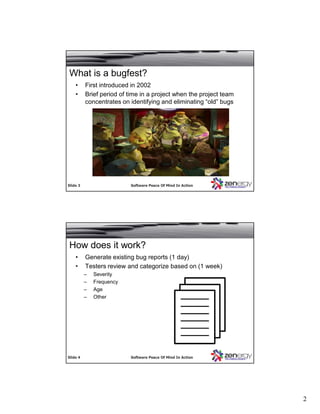
What is a bugfest?
• First introduced in 2002
• Brief period of time in a project when the project team
concentrates on identifying and eliminating “old” bugs
SlideSlide 44 Software Peace Of Mind In ActionSoftware Peace Of Mind In Action
• Generate existing bug reports (1 day)
• Testers review and categorize based on (1 week)
– Severity
– Frequency
– Age
– Other
How does it work?
3
SlideSlide 55 Software Peace Of Mind In ActionSoftware Peace Of Mind In Action
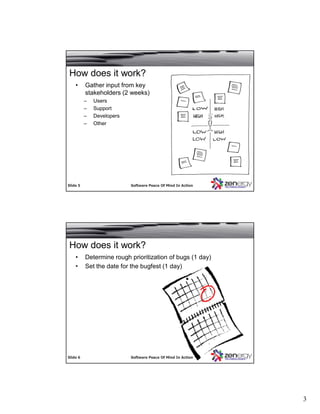
• Gather input from key
stakeholders (2 weeks)
– Users
– Support
– Developers
– Other
How does it work?
SlideSlide 66 Software Peace Of Mind In ActionSoftware Peace Of Mind In Action
• Determine rough prioritization of bugs (1 day)
• Set the date for the bugfest (1 day)
How does it work?
4
SlideSlide 77 Software Peace Of Mind In ActionSoftware Peace Of Mind In Action
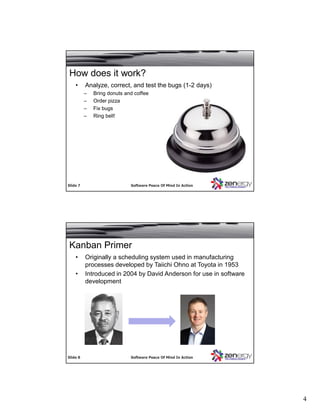
• Analyze, correct, and test the bugs (1-2 days)
– Bring donuts and coffee
– Order pizza
– Fix bugs
– Ring bell!
How does it work?
SlideSlide 88 Software Peace Of Mind In ActionSoftware Peace Of Mind In Action
Kanban Primer
• Originally a scheduling system used in manufacturing
processes developed by Taiichi Ohno at Toyota in 1953
• Introduced in 2004 by David Anderson for use in software
development
5
SlideSlide 99 Software Peace Of Mind In ActionSoftware Peace Of Mind In Action
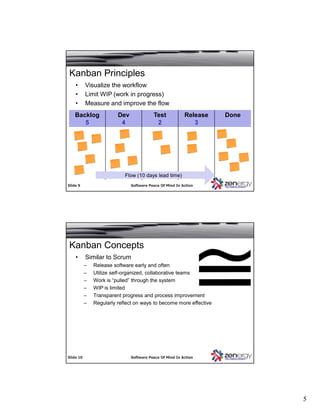
Kanban Principles
• Visualize the workflow
• Limit WIP (work in progress)
• Measure and improve the flow
Backlog
5
Dev
4
Test
2
Release
3
Done
Flow (10 days lead time)Flow (10 days lead time)
SlideSlide 1010 Software Peace Of Mind In ActionSoftware Peace Of Mind In Action
Kanban Concepts
• Similar to Scrum
– Release software early and often
– Utilize self-organized, collaborative teams
– Work is “pulled” through the system
– WIP is limited
– Transparent progress and process improvement
– Regularly reflect on ways to become more effective
6
SlideSlide 1111 Software Peace Of Mind In ActionSoftware Peace Of Mind In Action
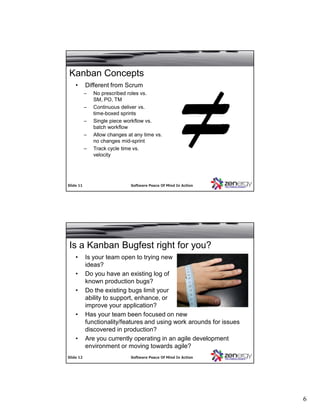
Kanban Concepts
• Different from Scrum
– No prescribed roles vs.
SM, PO, TM
– Continuous deliver vs.
time-boxed sprints
– Single piece workflow vs.
batch workflow
– Allow changes at any time vs.
no changes mid-sprint
– Track cycle time vs.
velocity
SlideSlide 1212 Software Peace Of Mind In ActionSoftware Peace Of Mind In Action
Is a Kanban Bugfest right for you?
• Is your team open to trying new
ideas?
• Do you have an existing log of
known production bugs?
• Do the existing bugs limit your
ability to support, enhance, or
improve your application?
• Has your team been focused on new
functionality/features and using work arounds for issues
discovered in production?
• Are you currently operating in an agile development
environment or moving towards agile?
7
SlideSlide 1313 Software Peace Of Mind In ActionSoftware Peace Of Mind In Action
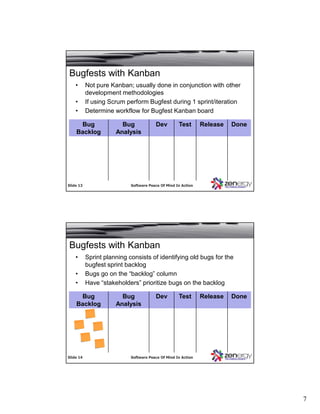
Bugfests with Kanban
• Not pure Kanban; usually done in conjunction with other
development methodologies
• If using Scrum perform Bugfest during 1 sprint/iteration
• Determine workflow for Bugfest Kanban board
Bug
Backlog
Bug
Analysis
Dev Test Release Done
SlideSlide 1414 Software Peace Of Mind In ActionSoftware Peace Of Mind In Action
Bugfests with Kanban
• Sprint planning consists of identifying old bugs for the
bugfest sprint backlog
• Bugs go on the “backlog” column
• Have “stakeholders” prioritize bugs on the backlog
Bug
Backlog
Bug
Analysis
Dev Test Release Done
8
SlideSlide 1515 Software Peace Of Mind In ActionSoftware Peace Of Mind In Action
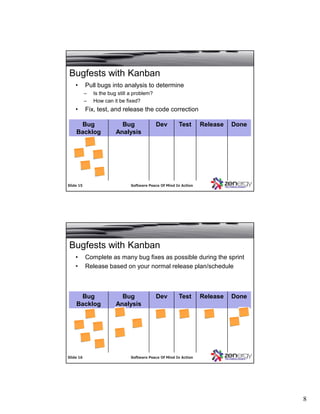
Bugfests with Kanban
• Pull bugs into analysis to determine
– Is the bug still a problem?
– How can it be fixed?
• Fix, test, and release the code correction
Bug
Backlog
Bug
Analysis
Dev Test Release Done
SlideSlide 1616 Software Peace Of Mind In ActionSoftware Peace Of Mind In Action
Bugfests with Kanban
• Complete as many bug fixes as possible during the sprint
• Release based on your normal release plan/schedule
Bug
Backlog
Bug
Analysis
Dev Test Release Done
9
SlideSlide 1717 Software Peace Of Mind In ActionSoftware Peace Of Mind In Action
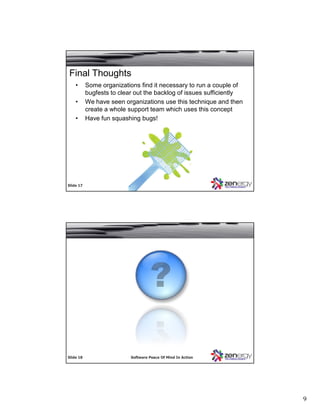
Final Thoughts
• Some organizations find it necessary to run a couple of
bugfests to clear out the backlog of issues sufficiently
• We have seen organizations use this technique and then
create a whole support team which uses this concept
• Have fun squashing bugs!
SlideSlide 1818 Software Peace Of Mind In ActionSoftware Peace Of Mind In Action

Bugfest!

  • 1.
    T7 Test Management 5/8/2014 11:15:00AM Bugfest! Presented by: Shaun Bradshaw Zenergy Technologies, Inc. Brought to you by: 340 Corporate Way, Suite 300, Orange Park, FL 32073 888-268-8770 ∙ 904-278-0524 ∙ sqeinfo@sqe.com ∙ www.sqe.com
  • 2.
    Shaun Bradshaw Zenergy Technologies,Inc. For the past sixteen years Shaun Bradshaw has helped clients improve the quality of their software by advising, instructing, and mentoring them at a strategic level in QA and test process improvement. His focus on effective testing and test management techniques, as well as practical metric implementations, creates demand for him as a consultant and frequent speaker at major conferences. Shaun is well known on a variety of QA topics, particularly test metrics like the S-Curve and Zero Bug Bounce. As one of the founders of Zenergy Technologies, Shaun heads up Zenergy’s remote testing services for multiple clients and has guided both start-ups and multi-billion dollar corporations in their quests for better quality software.
  • 3.
    1 BugfestBugfest!! Exterminating Pesky BugsusingExterminating Pesky Bugs using KanbanKanban TechniquesTechniques Shaun Bradshaw shaun.bradshaw@zenergytechnologies.com BugfestBugfest!! Exterminating Pesky Bugs usingExterminating Pesky Bugs using KanbanKanban TechniquesTechniques Shaun Bradshaw shaun.bradshaw@zenergytechnologies.com SlideSlide 22 Software Peace Of Mind In ActionSoftware Peace Of Mind In Action • What is a Bugfest • Kanban Primer • Is a Bugfest right for you • Squashing Bugs with Kanban Techniques • Q & A Agenda
  • 4.
    2 SlideSlide 33 SoftwarePeace Of Mind In ActionSoftware Peace Of Mind In Action What is a bugfest? • First introduced in 2002 • Brief period of time in a project when the project team concentrates on identifying and eliminating “old” bugs SlideSlide 44 Software Peace Of Mind In ActionSoftware Peace Of Mind In Action • Generate existing bug reports (1 day) • Testers review and categorize based on (1 week) – Severity – Frequency – Age – Other How does it work?
  • 5.
    3 SlideSlide 55 SoftwarePeace Of Mind In ActionSoftware Peace Of Mind In Action • Gather input from key stakeholders (2 weeks) – Users – Support – Developers – Other How does it work? SlideSlide 66 Software Peace Of Mind In ActionSoftware Peace Of Mind In Action • Determine rough prioritization of bugs (1 day) • Set the date for the bugfest (1 day) How does it work?
  • 6.
    4 SlideSlide 77 SoftwarePeace Of Mind In ActionSoftware Peace Of Mind In Action • Analyze, correct, and test the bugs (1-2 days) – Bring donuts and coffee – Order pizza – Fix bugs – Ring bell! How does it work? SlideSlide 88 Software Peace Of Mind In ActionSoftware Peace Of Mind In Action Kanban Primer • Originally a scheduling system used in manufacturing processes developed by Taiichi Ohno at Toyota in 1953 • Introduced in 2004 by David Anderson for use in software development
  • 7.
    5 SlideSlide 99 SoftwarePeace Of Mind In ActionSoftware Peace Of Mind In Action Kanban Principles • Visualize the workflow • Limit WIP (work in progress) • Measure and improve the flow Backlog 5 Dev 4 Test 2 Release 3 Done Flow (10 days lead time)Flow (10 days lead time) SlideSlide 1010 Software Peace Of Mind In ActionSoftware Peace Of Mind In Action Kanban Concepts • Similar to Scrum – Release software early and often – Utilize self-organized, collaborative teams – Work is “pulled” through the system – WIP is limited – Transparent progress and process improvement – Regularly reflect on ways to become more effective
  • 8.
    6 SlideSlide 1111 SoftwarePeace Of Mind In ActionSoftware Peace Of Mind In Action Kanban Concepts • Different from Scrum – No prescribed roles vs. SM, PO, TM – Continuous deliver vs. time-boxed sprints – Single piece workflow vs. batch workflow – Allow changes at any time vs. no changes mid-sprint – Track cycle time vs. velocity SlideSlide 1212 Software Peace Of Mind In ActionSoftware Peace Of Mind In Action Is a Kanban Bugfest right for you? • Is your team open to trying new ideas? • Do you have an existing log of known production bugs? • Do the existing bugs limit your ability to support, enhance, or improve your application? • Has your team been focused on new functionality/features and using work arounds for issues discovered in production? • Are you currently operating in an agile development environment or moving towards agile?
  • 9.
    7 SlideSlide 1313 SoftwarePeace Of Mind In ActionSoftware Peace Of Mind In Action Bugfests with Kanban • Not pure Kanban; usually done in conjunction with other development methodologies • If using Scrum perform Bugfest during 1 sprint/iteration • Determine workflow for Bugfest Kanban board Bug Backlog Bug Analysis Dev Test Release Done SlideSlide 1414 Software Peace Of Mind In ActionSoftware Peace Of Mind In Action Bugfests with Kanban • Sprint planning consists of identifying old bugs for the bugfest sprint backlog • Bugs go on the “backlog” column • Have “stakeholders” prioritize bugs on the backlog Bug Backlog Bug Analysis Dev Test Release Done
  • 10.
    8 SlideSlide 1515 SoftwarePeace Of Mind In ActionSoftware Peace Of Mind In Action Bugfests with Kanban • Pull bugs into analysis to determine – Is the bug still a problem? – How can it be fixed? • Fix, test, and release the code correction Bug Backlog Bug Analysis Dev Test Release Done SlideSlide 1616 Software Peace Of Mind In ActionSoftware Peace Of Mind In Action Bugfests with Kanban • Complete as many bug fixes as possible during the sprint • Release based on your normal release plan/schedule Bug Backlog Bug Analysis Dev Test Release Done
  • 11.
    9 SlideSlide 1717 SoftwarePeace Of Mind In ActionSoftware Peace Of Mind In Action Final Thoughts • Some organizations find it necessary to run a couple of bugfests to clear out the backlog of issues sufficiently • We have seen organizations use this technique and then create a whole support team which uses this concept • Have fun squashing bugs! SlideSlide 1818 Software Peace Of Mind In ActionSoftware Peace Of Mind In Action