BT-Pusher Bluetooth
            Marketing System
                  USER GUIDE
                       Version 1.0.0


      GuangZhou DeviceGate Technology Co.,Ltd.


Web    http://www.bt-pusher.com/en

Add    Room 501&512, Tower No.1,ShiShangMingYuan Building,No.77

       ZhongShangDaDaoZhong,TianHe,GuangZhou,China

Mail   bt-pusher@devicegate.com   devicegate@gmail.com

Tel    0086-20-82317785,   0086-20-82317786

Fax    0086-20-62201638
Intro

What can BT-Pusher Bluetooth Marketing System bring to you?
    1. Are you worrying about printing, distributing leaflets?Do you want your shop to be

       remembered by every passenger? BT-Pusher Bluetooth Marketing System utilizes the

       Bluetooth technology, it can help you find every potential customer and send leaflets,

       e-coupons and so on, to customers directly.

    2. Do you want you company to stand out in the crowd? Do you want to arm your

       company with hi-tech products? BT-Pusher Bluetooth Marketing System make your

       customers fell that your company is keeping up with the pulse of the digital world, so

       that it can improve the image of your company in the eyes of customers.

    3. Do you want to distribute leaflets every day for free? With the help of BT-Pusher

       Bluetooth Marketing System, you can do this 24 hours non-stop.

    4. Are you wondering how come just some customers give feed-back while you have

       distributed thousands of cards? Just because even customer themselves don’t know

       where the card is. So, what can we do? With BT-Pusher Bluetooth Marketing System,

       you can send an e-card with your phone number, fax, web-site, email, IM number and

       so on, into the mobiles of customers directly. As long as your e-card is accepted and

       saved in the mobiles of customers, your business will be boosted with no doubt.


                                     Page - 2 - of 14
What are the advantages of BT-Pusher Bluetooth Marketing System?
     1. With the leading single-point-multi-receiving technology, receiving multi files just in

   one single click.

     2. With the creative files sending forecast technology, what to be sent are straightforward,

   make your customers fell more friendly and comfortable.

     3. BT-Pusher Bluetooth Marketing System can send a batch of files to multi customers

   simultaneously with just several clicks.

     4. Files sent results statistics in pie chart, what is popular is intuitively clear.


Functionalities
     1. Search the Bluetooth clients (mobiles e.g.) within (about 30 meters) automatically.

     2. Establish link with Bluetooth clients (mobiles e.g.) and send files automatically.

     3. Sending to seven Bluetooth clients simultaneously.

     4. All formats are supported: text, image(jpg, gif, png, e.g.),mp3, mp4, 3gp, e.g.

     5. As fast as 100kB/s, depends on the Bluetooth class of mobile and actual environment.

     6. Transport distance: 30 meters (in radius) in open environment.

     7. Non-stop searching, no duplicated sending.


Field Of Application:
     1. restaurants, hotels

     2. shops, malls

     3. exhibitions

     4. waiting room, departure hall

     5. reception room

     6. cinema, recreation center


                                          Page - 3 - of 14
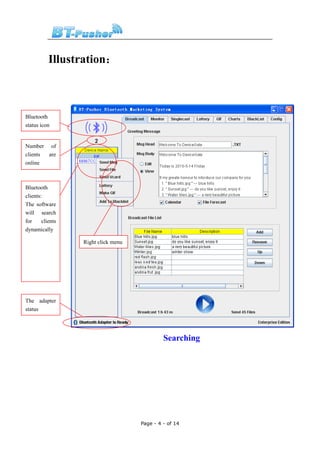
Illustration:


Bluetooth
status icon


Number of
clients are
online


Bluetooth
clients:
The software
will search
for     clients
dynamically

                  Right click menu


The adapter
status


                                              Searching


                                     Page - 4 - of 14
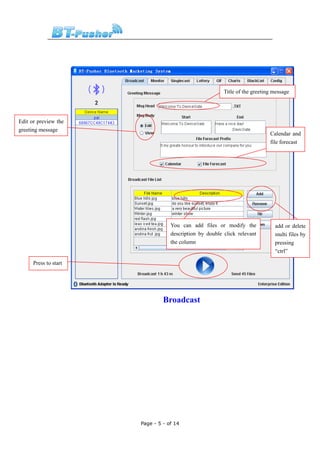
Title of the greeting message


Edit or preview the
greeting message
                                                                             Calendar and
                                                                             file forecast


                                   You can add files or modify the             add or delete
                                   description by double click relevant        multi files by
                                   the column                                  pressing
                                                                               “ctrl”

      Press to start


                                Broadcast


                       Page - 5 - of 14
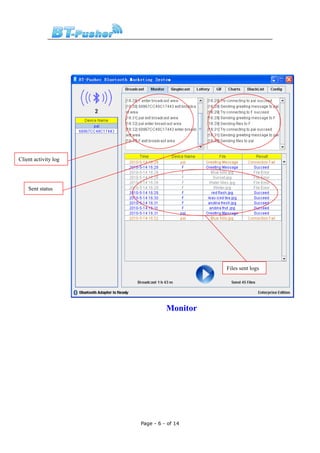
Client activity log


    Sent status


                                          Files sent logs


                                Monitor


                      Page - 6 - of 14
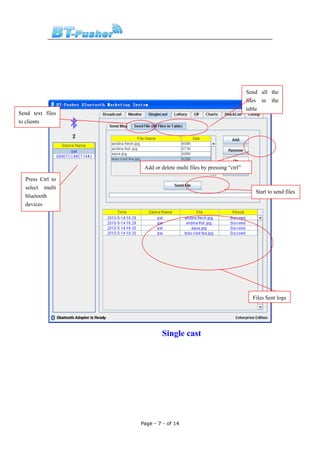
Send all the
                                                                  files in the
                                                                  table
Send text files
to clients


                   Add or delete multi files by pressing “ctrl”

  Press Ctrl to
  select multi
                                                                     Start to send files
  bluetooth
  devices


                                                                    Files Sent logs


                           Single cast


                  Page - 7 - of 14
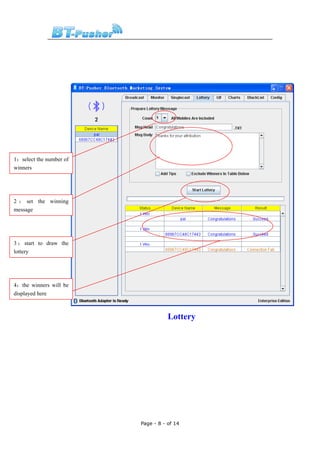
1:select the number of
winners


2 : set the winning
message


3 : start to draw the
lottery


4:the winners will be
displayed here


                                    Lottery


                         Page - 8 - of 14
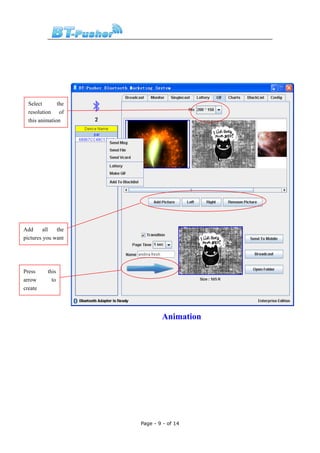
Select       the
  resolution of
  this animation


Add      all  the
pictures you want


Press     this
arrow       to
create


                             Animation


                     Page - 9 - of 14
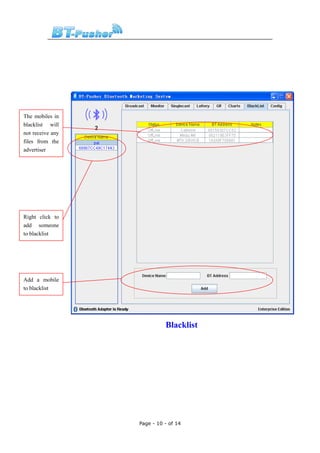
The mobiles in
blacklist will
not receive any
files from the
advertiser


Right click to
add someone
to blacklist


Add a mobile
to blacklist


                            Blacklist


                  Page - 10 - of 14
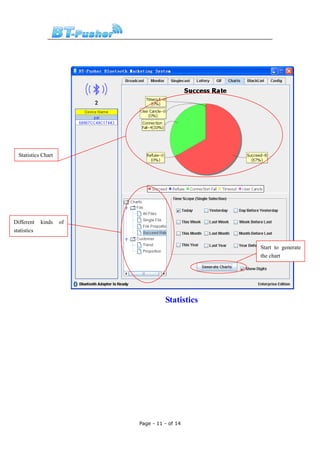
Statistics Chart


Different    kinds   of
statistics

                                                 Start to generate
                                                 the chart


                                    Statistics


                          Page - 11 - of 14
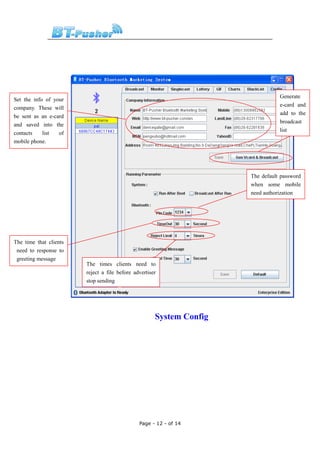
Generate
Set the info of your
                                                                                 e-card and
company. These will
                                                                                 add to the
be sent as an e-card
                                                                                 broadcast
and saved into the
                                                                                 list
contacts    list  of
mobile phone.


                                                                      The default password
                                                                      when some mobile
                                                                      need authorization


The time that clients
 need to response to
 greeting message
                        The times clients need to
                        reject a file before advertiser
                        stop sending


                                                      System Config


                                               Page - 12 - of 14
Q&A
 1.   Q: Can’t run the software?

      A: Probably because you have not installed the JRE1.6, please browse the disc and find

      “JRE_update.exe”, double click it and install.


 2.   Q: Bluetooth adapter is not ready?

      A: Make sure the Bluetooth adapter is inserted correctly.


 3.   Q: Unable to save the broadcast list?

      A: The broadcast list is saved automatically when system begins to broadcast, if you

      want to save it, just click the “broadcast” button.


 4.   Q: What shall it fill in if I don’t have web site or email?

      A: Leave it blank.


 5.   Q: If I have two mobile phones, where should I fill the second number?

      A: You can fill it in the “landline phone” column.


 6.   Q: Why can’t it start when I log on windows?

      A: Probably because you have installed some kind of registry monitor software. You

      need to stop the registry monitor software and run the setup again. When the setup is

      finished, start the registry monitor software again.


 7.   Q: What does Bluetooth time out mean?

      A: It means that, BT-Pusher Bluetooth Marketing System has already established a link

      with the client (mobile e.g.), but customer didn’t response to it in a specific time period

      (30 seconds).If someone didn’t notice the file-receiving notification in that time period,

      this message will appear.


                                     Page - 13 - of 14
8.   Q: What does “reject Limit” mean?

     A: BT-Pusher Bluetooth Marketing System is user-friendly software. When customers

       don’t realize this kind of advertising or the benefit of Bluetooth advertising, for the

       sake of security, they probably will reject receiving the file. If customer rejects, then

       BT-Pusher Bluetooth Marketing System will stop sending. But when the customer

       comes again next time, BT-Pusher Bluetooth Marketing System will try to send file to

       him again. When the same customer rejects for 3 times, BT-Pusher Bluetooth

       Marketing System will not send anything to him any more.


9.   Q: About the statistics, why does it just display one curve when I choose three

     days?

     A: Because the data is the same these three days, the three curves overlay in one place.

      It occurs mostly when there is no statistics data or all the data is zero. As time pass by,

      you will see the beautiful curves.


10. Q: Why it fails to broadcast if I use another Bluetooth adapter?

     A: This software is an intellectual property of Extreme Blue, so it must go with the

     adapter shipped with the software to enable the broadcast functionality.


11. Q: What is greeting message?

     A: Greeting message is an innovative technology developed by Extreme Blue. The

      benefits of greeting message are as follows:

               a) Make a user friendly greeting to customer.

               b) Tell the customers what will be sent


Thank you for choosing BT-Pusher device!


                                    Page - 14 - of 14

Bt pusher bluetooth marketing software system user guide

  • 1.
    BT-Pusher Bluetooth Marketing System USER GUIDE Version 1.0.0 GuangZhou DeviceGate Technology Co.,Ltd. Web http://www.bt-pusher.com/en Add Room 501&512, Tower No.1,ShiShangMingYuan Building,No.77 ZhongShangDaDaoZhong,TianHe,GuangZhou,China Mail bt-pusher@devicegate.com devicegate@gmail.com Tel 0086-20-82317785, 0086-20-82317786 Fax 0086-20-62201638
  • 2.
    Intro What can BT-PusherBluetooth Marketing System bring to you? 1. Are you worrying about printing, distributing leaflets?Do you want your shop to be remembered by every passenger? BT-Pusher Bluetooth Marketing System utilizes the Bluetooth technology, it can help you find every potential customer and send leaflets, e-coupons and so on, to customers directly. 2. Do you want you company to stand out in the crowd? Do you want to arm your company with hi-tech products? BT-Pusher Bluetooth Marketing System make your customers fell that your company is keeping up with the pulse of the digital world, so that it can improve the image of your company in the eyes of customers. 3. Do you want to distribute leaflets every day for free? With the help of BT-Pusher Bluetooth Marketing System, you can do this 24 hours non-stop. 4. Are you wondering how come just some customers give feed-back while you have distributed thousands of cards? Just because even customer themselves don’t know where the card is. So, what can we do? With BT-Pusher Bluetooth Marketing System, you can send an e-card with your phone number, fax, web-site, email, IM number and so on, into the mobiles of customers directly. As long as your e-card is accepted and saved in the mobiles of customers, your business will be boosted with no doubt. Page - 2 - of 14
  • 3.
    What are theadvantages of BT-Pusher Bluetooth Marketing System? 1. With the leading single-point-multi-receiving technology, receiving multi files just in one single click. 2. With the creative files sending forecast technology, what to be sent are straightforward, make your customers fell more friendly and comfortable. 3. BT-Pusher Bluetooth Marketing System can send a batch of files to multi customers simultaneously with just several clicks. 4. Files sent results statistics in pie chart, what is popular is intuitively clear. Functionalities 1. Search the Bluetooth clients (mobiles e.g.) within (about 30 meters) automatically. 2. Establish link with Bluetooth clients (mobiles e.g.) and send files automatically. 3. Sending to seven Bluetooth clients simultaneously. 4. All formats are supported: text, image(jpg, gif, png, e.g.),mp3, mp4, 3gp, e.g. 5. As fast as 100kB/s, depends on the Bluetooth class of mobile and actual environment. 6. Transport distance: 30 meters (in radius) in open environment. 7. Non-stop searching, no duplicated sending. Field Of Application: 1. restaurants, hotels 2. shops, malls 3. exhibitions 4. waiting room, departure hall 5. reception room 6. cinema, recreation center Page - 3 - of 14
  • 4.
    Illustration: Bluetooth status icon Number of clientsare online Bluetooth clients: The software will search for clients dynamically Right click menu The adapter status Searching Page - 4 - of 14
  • 5.
    Title of thegreeting message Edit or preview the greeting message Calendar and file forecast You can add files or modify the add or delete description by double click relevant multi files by the column pressing “ctrl” Press to start Broadcast Page - 5 - of 14
  • 6.
    Client activity log Sent status Files sent logs Monitor Page - 6 - of 14
  • 7.
    Send all the files in the table Send text files to clients Add or delete multi files by pressing “ctrl” Press Ctrl to select multi Start to send files bluetooth devices Files Sent logs Single cast Page - 7 - of 14
  • 8.
    1:select the numberof winners 2 : set the winning message 3 : start to draw the lottery 4:the winners will be displayed here Lottery Page - 8 - of 14
  • 9.
    Select the resolution of this animation Add all the pictures you want Press this arrow to create Animation Page - 9 - of 14
  • 10.
    The mobiles in blacklistwill not receive any files from the advertiser Right click to add someone to blacklist Add a mobile to blacklist Blacklist Page - 10 - of 14
  • 11.
    Statistics Chart Different kinds of statistics Start to generate the chart Statistics Page - 11 - of 14
  • 12.
    Generate Set the infoof your e-card and company. These will add to the be sent as an e-card broadcast and saved into the list contacts list of mobile phone. The default password when some mobile need authorization The time that clients need to response to greeting message The times clients need to reject a file before advertiser stop sending System Config Page - 12 - of 14
  • 13.
    Q&A 1. Q: Can’t run the software? A: Probably because you have not installed the JRE1.6, please browse the disc and find “JRE_update.exe”, double click it and install. 2. Q: Bluetooth adapter is not ready? A: Make sure the Bluetooth adapter is inserted correctly. 3. Q: Unable to save the broadcast list? A: The broadcast list is saved automatically when system begins to broadcast, if you want to save it, just click the “broadcast” button. 4. Q: What shall it fill in if I don’t have web site or email? A: Leave it blank. 5. Q: If I have two mobile phones, where should I fill the second number? A: You can fill it in the “landline phone” column. 6. Q: Why can’t it start when I log on windows? A: Probably because you have installed some kind of registry monitor software. You need to stop the registry monitor software and run the setup again. When the setup is finished, start the registry monitor software again. 7. Q: What does Bluetooth time out mean? A: It means that, BT-Pusher Bluetooth Marketing System has already established a link with the client (mobile e.g.), but customer didn’t response to it in a specific time period (30 seconds).If someone didn’t notice the file-receiving notification in that time period, this message will appear. Page - 13 - of 14
  • 14.
    8. Q: What does “reject Limit” mean? A: BT-Pusher Bluetooth Marketing System is user-friendly software. When customers don’t realize this kind of advertising or the benefit of Bluetooth advertising, for the sake of security, they probably will reject receiving the file. If customer rejects, then BT-Pusher Bluetooth Marketing System will stop sending. But when the customer comes again next time, BT-Pusher Bluetooth Marketing System will try to send file to him again. When the same customer rejects for 3 times, BT-Pusher Bluetooth Marketing System will not send anything to him any more. 9. Q: About the statistics, why does it just display one curve when I choose three days? A: Because the data is the same these three days, the three curves overlay in one place. It occurs mostly when there is no statistics data or all the data is zero. As time pass by, you will see the beautiful curves. 10. Q: Why it fails to broadcast if I use another Bluetooth adapter? A: This software is an intellectual property of Extreme Blue, so it must go with the adapter shipped with the software to enable the broadcast functionality. 11. Q: What is greeting message? A: Greeting message is an innovative technology developed by Extreme Blue. The benefits of greeting message are as follows: a) Make a user friendly greeting to customer. b) Tell the customers what will be sent Thank you for choosing BT-Pusher device! Page - 14 - of 14