THE BRIDGE PATTERN
PREPARED BY :
NAHIN KUMAR DEY
ROLL : 1507019
MD. AZAHAR ALAM
ROLL : 1507024
MD. FAZLE RASUL
ROLL : 1507029
Course No : CSE- 3120
Course Name : Software Engineering and Information System.
Course Teachers :
Md. Abdus Salim Mollah
Assistant professor,
Dept. of Computer Science and Engineering,
KUET.
Shaikh Akib Shahriyar
Lecturar,
Dept. of Computer Science and Engineering,
KUET.
DESIGN PATTERNS
In software engineering, a design pattern is a general repeatable
solution to a commonly occurring problem in software design.
Design patterns provide a standard terminology and are specific to
particular scenario. Design patterns are mainly of four kinds namely
Creational patterns
Structural patterns
Behavioral patterns
J2EE patterns
THE BRIDGE PATTERN
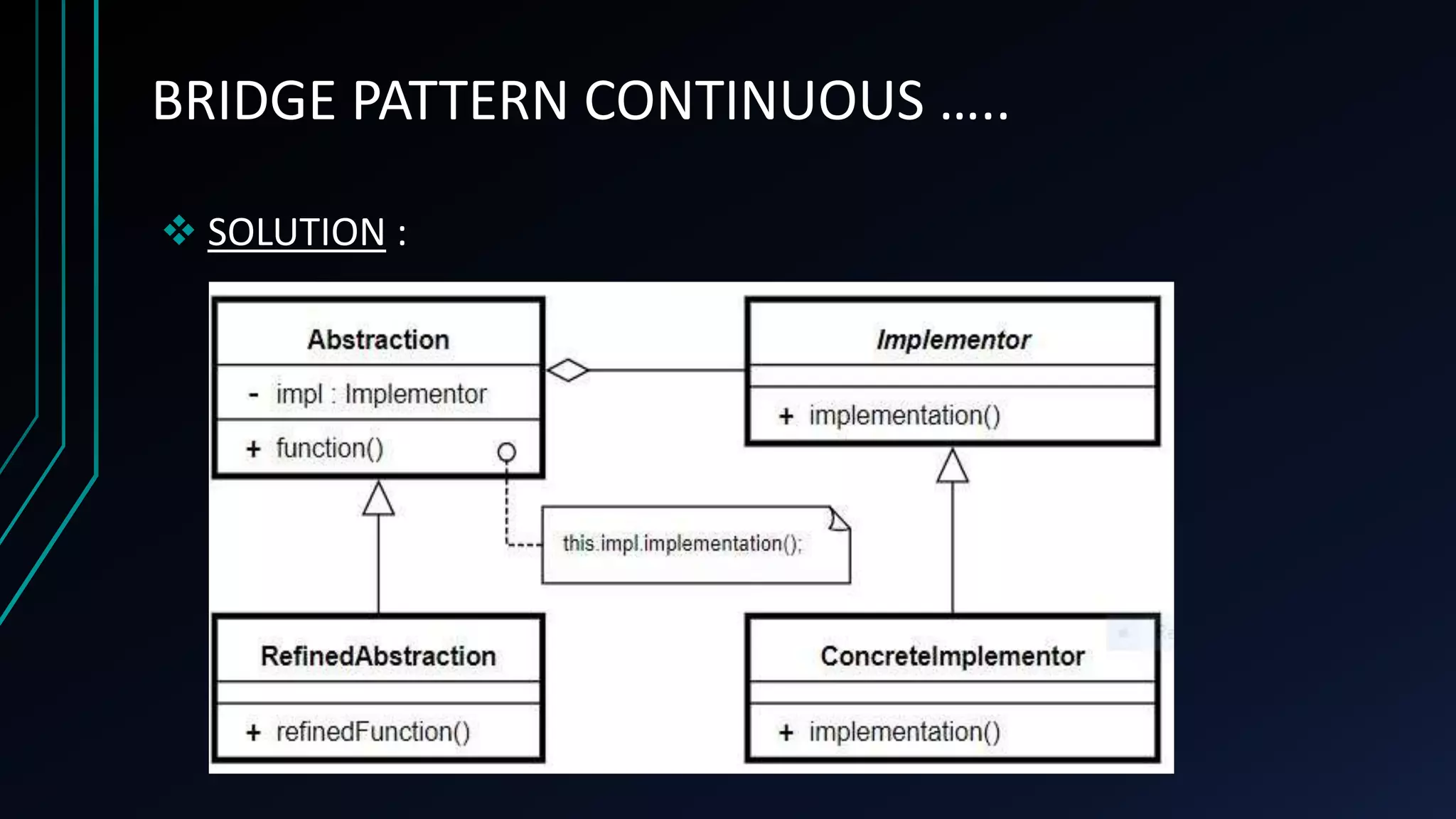
Bridge pattern is one type of structural pattern and is widely used for
developing software. The bridge uses encapsulation, aggregation, and can
use inheritance to separate responsibilities into different classes.
When a class varies often, the features of object-oriented programming
become very useful because changes to a program's code can be made
easily with minimal prior knowledge about the program. The bridge
pattern is useful when both the class and what it does vary often.
BRIDGE PATTERN CONTINUOUS …..
 CONTEXT :
It is often desirable to decouple an abstraction
from its implementation so that so that the two can vary
independently.
So , often we need to break the serial relation
between a superclass and it’s subordinates to make them
work independently without relating to each other.
BRIDGE PATTERN CONTINUOUS …..
 PROBLEM :
In case, the class and what it does vary too often
the complexity of the system increases drastically and the
system gets way too complicated each time we make a
single modification.
What Design should we use in such cases so that
we can add more classes whenever we need to without
affecting the system complexity ?
BRIDGE PATTERN CONTINUOUS …..
 FORCES :
The design is to separate a class's
interface from its implementation so that we can
vary or replace the implementation without
changing the client code.
BRIDGE PATTERN CONTINUOUS …..
 SOLUTION :
BRIDGE PATTERN CONTINUOUS …..
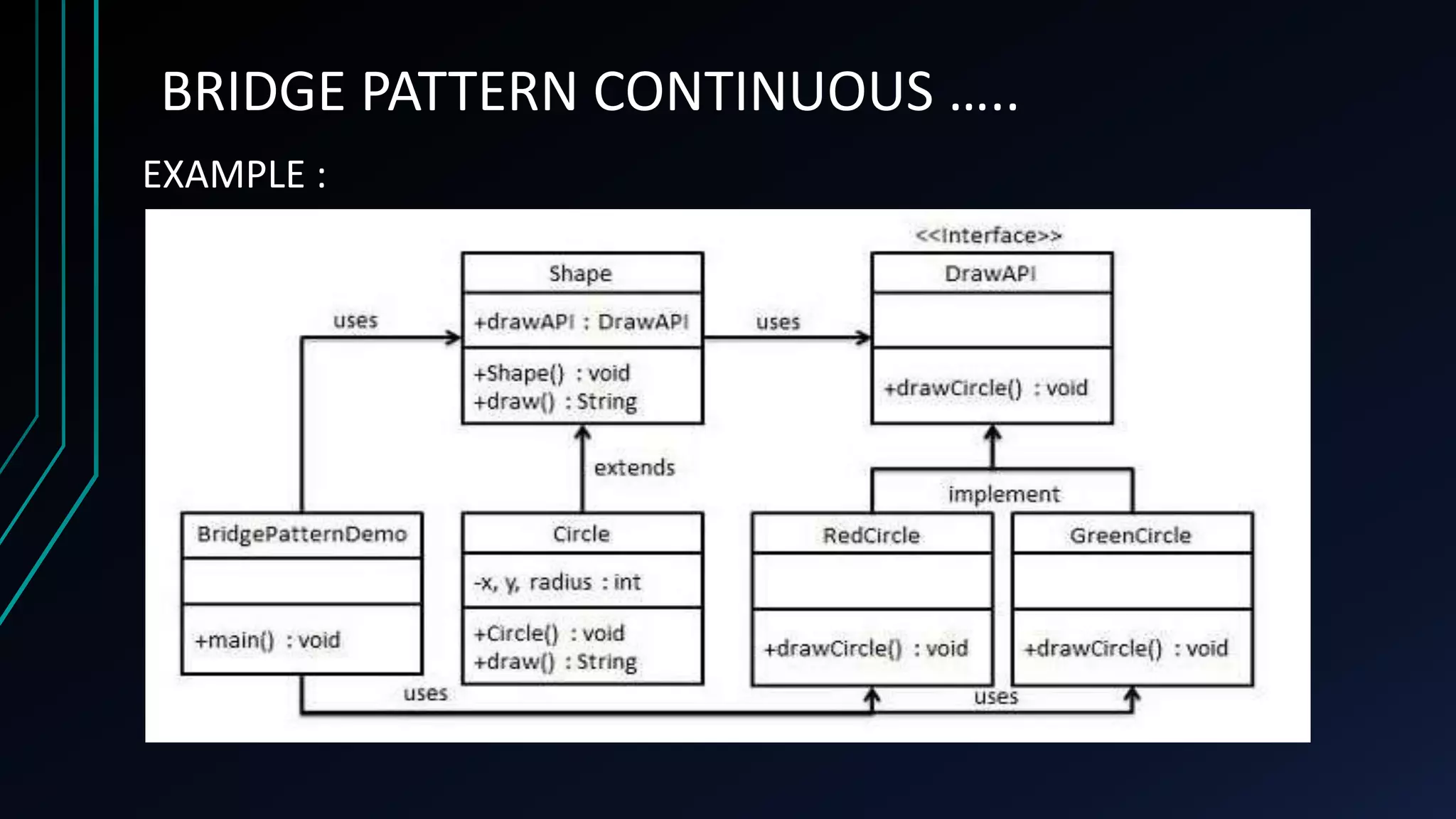
EXAMPLE :
Step 1: Create bridge implementer interface
DrawApi.java :
Public Interface DrawApi {
public void drawCircle(int radius, int x, int y);
}
Step 2 : Create concrete bridge implementer classes implementing
the DrawApi interface.
RedCircle.java
public class RedCircle implements DrawAPI {
public void drawCircle(int radius, int x, int y) {
System.out.println("Drawing Circle[ color: red, radius: "
+ radius + ", x: " + x + ", " + y + "]");
}
}
GreenCircle.java
public class GreenCircle implements DrawAPI {
@Override
public void drawCircle(int radius, int x, int y) {
System.out.println("Drawing Circle[ color: green,
radius: " + radius + ", x: " + x + ", " + y + "]");
}
}
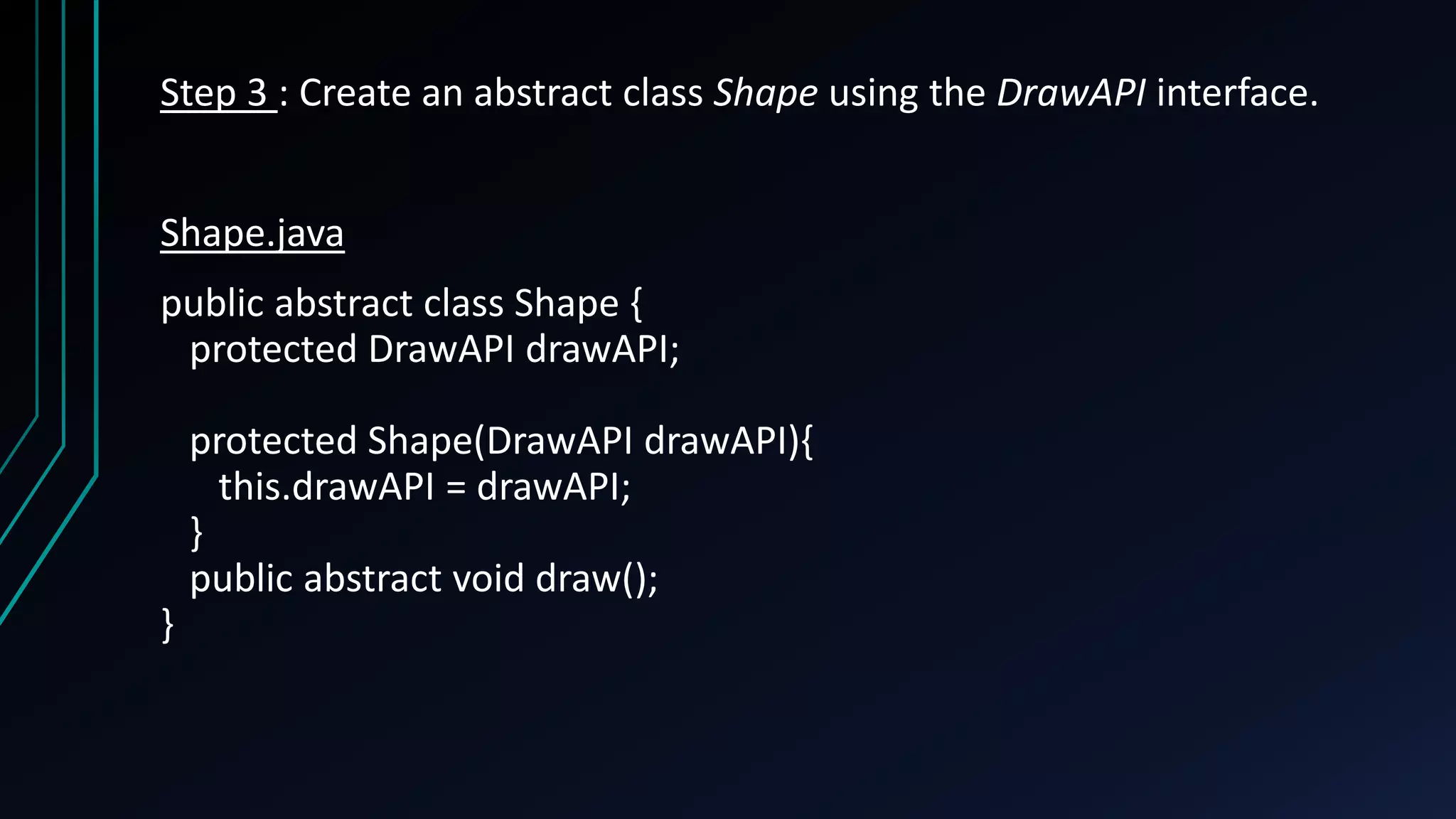
Step 3 : Create an abstract class Shape using the DrawAPI interface.
Shape.java
public abstract class Shape {
protected DrawAPI drawAPI;
protected Shape(DrawAPI drawAPI){
this.drawAPI = drawAPI;
}
public abstract void draw();
}
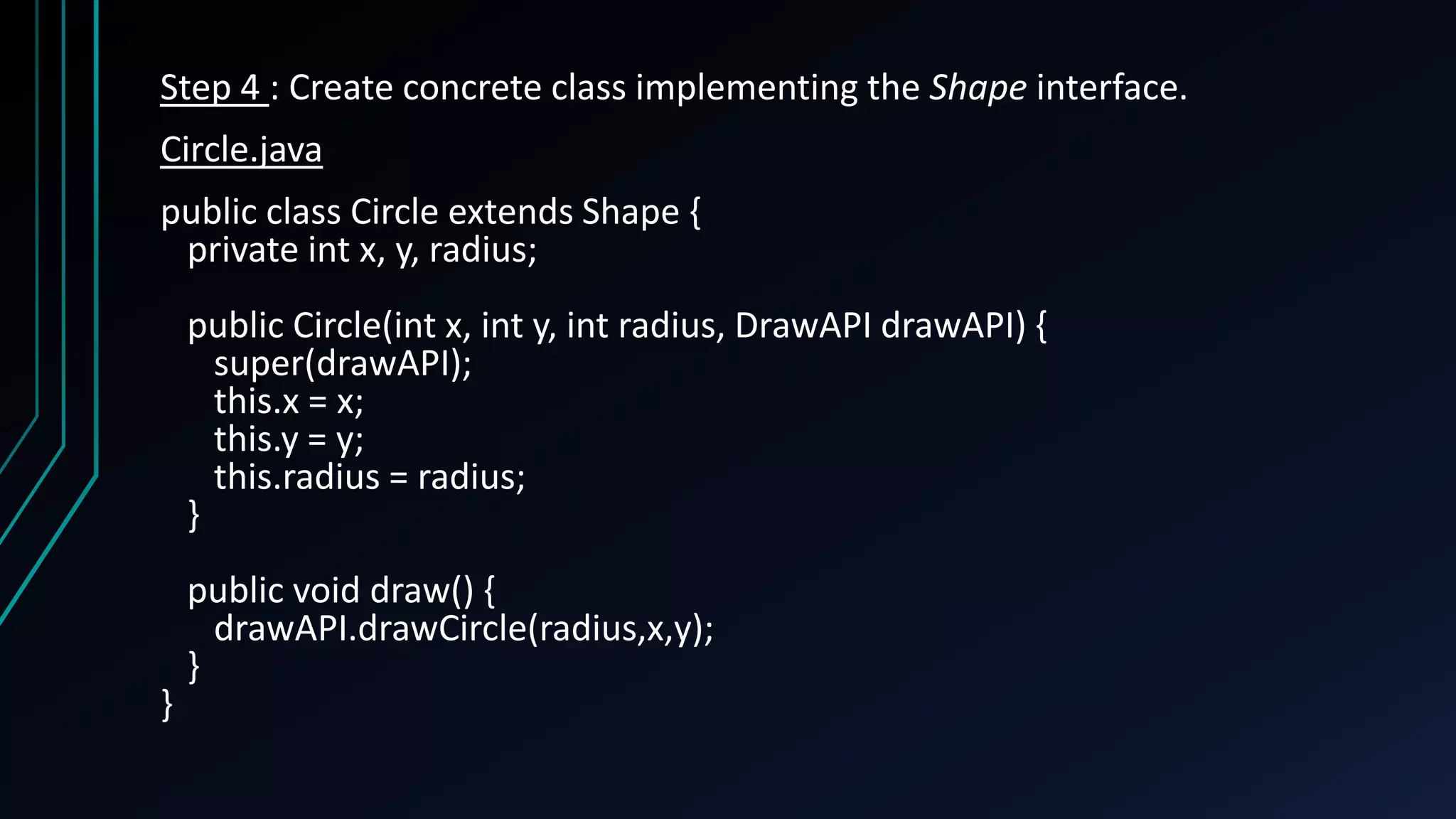
Step 4 : Create concrete class implementing the Shape interface.
Circle.java
public class Circle extends Shape {
private int x, y, radius;
public Circle(int x, int y, int radius, DrawAPI drawAPI) {
super(drawAPI);
this.x = x;
this.y = y;
this.radius = radius;
}
public void draw() {
drawAPI.drawCircle(radius,x,y);
}
}
Step 5 : Use the Shape and DrawAPI classes to draw different colored
circles.
BridgePatternDemo.java
public class BridgePatternDemo {
public static void main(String[] args) {
Shape redCircle = new Circle(100,100, 10, new RedCircle());
Shape greenCircle = new Circle(100,100, 10, new GreenCircle());
redCircle.draw();
greenCircle.draw();
}
}
Step 6 : Verify the output.
Drawing Circle[ color: red, radius: 10, x: 100, 100]
Drawing Circle[ color: green, radius: 10, x: 100, 100]
THANK YOU

Bridge Pattern

  • 1.
    THE BRIDGE PATTERN PREPAREDBY : NAHIN KUMAR DEY ROLL : 1507019 MD. AZAHAR ALAM ROLL : 1507024 MD. FAZLE RASUL ROLL : 1507029
  • 2.
    Course No :CSE- 3120 Course Name : Software Engineering and Information System. Course Teachers : Md. Abdus Salim Mollah Assistant professor, Dept. of Computer Science and Engineering, KUET. Shaikh Akib Shahriyar Lecturar, Dept. of Computer Science and Engineering, KUET.
  • 3.
    DESIGN PATTERNS In softwareengineering, a design pattern is a general repeatable solution to a commonly occurring problem in software design. Design patterns provide a standard terminology and are specific to particular scenario. Design patterns are mainly of four kinds namely Creational patterns Structural patterns Behavioral patterns J2EE patterns
  • 4.
    THE BRIDGE PATTERN Bridgepattern is one type of structural pattern and is widely used for developing software. The bridge uses encapsulation, aggregation, and can use inheritance to separate responsibilities into different classes. When a class varies often, the features of object-oriented programming become very useful because changes to a program's code can be made easily with minimal prior knowledge about the program. The bridge pattern is useful when both the class and what it does vary often.
  • 5.
    BRIDGE PATTERN CONTINUOUS…..  CONTEXT : It is often desirable to decouple an abstraction from its implementation so that so that the two can vary independently. So , often we need to break the serial relation between a superclass and it’s subordinates to make them work independently without relating to each other.
  • 6.
    BRIDGE PATTERN CONTINUOUS…..  PROBLEM : In case, the class and what it does vary too often the complexity of the system increases drastically and the system gets way too complicated each time we make a single modification. What Design should we use in such cases so that we can add more classes whenever we need to without affecting the system complexity ?
  • 7.
    BRIDGE PATTERN CONTINUOUS…..  FORCES : The design is to separate a class's interface from its implementation so that we can vary or replace the implementation without changing the client code.
  • 8.
    BRIDGE PATTERN CONTINUOUS…..  SOLUTION :
  • 9.
  • 10.
    Step 1: Createbridge implementer interface DrawApi.java : Public Interface DrawApi { public void drawCircle(int radius, int x, int y); }
  • 11.
    Step 2 :Create concrete bridge implementer classes implementing the DrawApi interface. RedCircle.java public class RedCircle implements DrawAPI { public void drawCircle(int radius, int x, int y) { System.out.println("Drawing Circle[ color: red, radius: " + radius + ", x: " + x + ", " + y + "]"); } }
  • 12.
    GreenCircle.java public class GreenCircleimplements DrawAPI { @Override public void drawCircle(int radius, int x, int y) { System.out.println("Drawing Circle[ color: green, radius: " + radius + ", x: " + x + ", " + y + "]"); } }
  • 13.
    Step 3 :Create an abstract class Shape using the DrawAPI interface. Shape.java public abstract class Shape { protected DrawAPI drawAPI; protected Shape(DrawAPI drawAPI){ this.drawAPI = drawAPI; } public abstract void draw(); }
  • 14.
    Step 4 :Create concrete class implementing the Shape interface. Circle.java public class Circle extends Shape { private int x, y, radius; public Circle(int x, int y, int radius, DrawAPI drawAPI) { super(drawAPI); this.x = x; this.y = y; this.radius = radius; } public void draw() { drawAPI.drawCircle(radius,x,y); } }
  • 15.
    Step 5 :Use the Shape and DrawAPI classes to draw different colored circles. BridgePatternDemo.java public class BridgePatternDemo { public static void main(String[] args) { Shape redCircle = new Circle(100,100, 10, new RedCircle()); Shape greenCircle = new Circle(100,100, 10, new GreenCircle()); redCircle.draw(); greenCircle.draw(); } }
  • 16.
    Step 6 :Verify the output. Drawing Circle[ color: red, radius: 10, x: 100, 100] Drawing Circle[ color: green, radius: 10, x: 100, 100]
  • 17.