BRIBERY TRAINING INSTRUCTIONS


   Once you click on the link, you will be
     brought to the following screen.
BRIBERY TRAINING INSTRUCTIONS


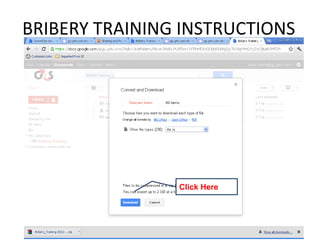
                 Hover your cursor over the
                 arrow to see the
                 menu, and Click
                 ‘Download’.

            Click Here
BRIBERY TRAINING INSTRUCTIONS


                Click Here
BRIBERY TRAINING INSTRUCTIONS

              Now go to your
              ‘Downloads’ folder
              (Usually following the map
              shown here)


                      Right-Click on the Icon
                      and Press ‘Extract Here
BRIBERY TRAINING INSTRUCTIONS


               Once the Extract is
               done, an additional folder
               will appear. Double Click
               on this folder.
BRIBERY TRAINING INSTRUCTIONS


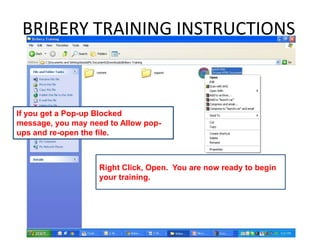
If you get a Pop-up Blocked
message, you may need to Allow pop-
ups and re-open the file.


                    Right Click, Open. You are now ready to begin
                    your training.
BRIBERY TRAINING INSTRUCTIONS
This training will take approximately 45 minutes to
complete.

Once the training is opened it can only be run once, please
ensure you can commit to completing the training before
you open it. Employees with incomplete sessions can no
longer do the web version of the training and must opt for
the Printed workbook.

Each section must be completed to move to the next
section. Once all sections are complete a short test will be
administered. You must print your certificate and submit to
HR as proof of completion.

If you encounter any difficulties, please contact the Human
Resources Manager @ kezia.sablan@gu.g4s.com.

Bribery training instructions

  • 1.
    BRIBERY TRAINING INSTRUCTIONS Once you click on the link, you will be brought to the following screen.
  • 2.
    BRIBERY TRAINING INSTRUCTIONS Hover your cursor over the arrow to see the menu, and Click ‘Download’. Click Here
  • 3.
  • 4.
  • 5.
    BRIBERY TRAINING INSTRUCTIONS Now go to your ‘Downloads’ folder (Usually following the map shown here) Right-Click on the Icon and Press ‘Extract Here
  • 6.
    BRIBERY TRAINING INSTRUCTIONS Once the Extract is done, an additional folder will appear. Double Click on this folder.
  • 7.
    BRIBERY TRAINING INSTRUCTIONS Ifyou get a Pop-up Blocked message, you may need to Allow pop- ups and re-open the file. Right Click, Open. You are now ready to begin your training.
  • 8.
    BRIBERY TRAINING INSTRUCTIONS Thistraining will take approximately 45 minutes to complete. Once the training is opened it can only be run once, please ensure you can commit to completing the training before you open it. Employees with incomplete sessions can no longer do the web version of the training and must opt for the Printed workbook. Each section must be completed to move to the next section. Once all sections are complete a short test will be administered. You must print your certificate and submit to HR as proof of completion. If you encounter any difficulties, please contact the Human Resources Manager @ kezia.sablan@gu.g4s.com.