Box2D: An Acquired Taste
Tonight

Capabilities

Essentials

Do's and Don'ts

RUBE basics
Brian May
(reincarnation of Sir Isaac Newton)
Assumptions

You know what Box2D does

You've set up Box2D successfully

You know high school-level physics

Not assuming you're using RUBE
Important Resources

Class documentation
–
Looks like a lot, but most you won't use

Official manual (no, seriously)

RUBE (it's not too late to get it!)
–
Useful even when not using it as a level editor

iforce2d (Box2D tutorials by the RUBE
author)

The official testbed
World Conventions

Uses meters, kilograms, and seconds
for units

Y-axis goes upwards

Negative coordinates okay

World is infinitely large

Rigid bodies
–
No scaling or deformation
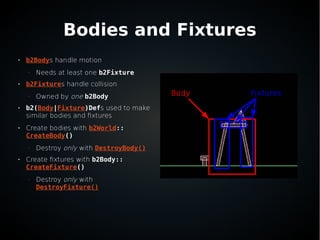
Bodies and Fixtures

b2Bodys handle motion
–
Needs at least one b2Fixture

b2Fixtures handle collision
–
Owned by one b2Body

b2(Body|Fixture)Defs used to make
similar bodies and fixtures

Create bodies with b2World::
CreateBody()
–
Destroy only with DestroyBody()

Create fixtures with b2Body::
CreateFixture()
–
Destroy only with
DestroyFixture()
Body Fixtures
Body/Fixture Properties

Position/Angle

Type
–
Static, dynamic, or kinematic bodies

(Line|Angul)ar (Velocity|Damping)
–
Kinda like air resistance

Fixed rotation

Awake

Sleep enabled

Bullet
–
More precise (but slower) collision detection
between dynamic bodies

Active (Is it on?)
–
Not the same as awake

Gravity scale

User data

Shape
–
Circle, convex polygon, line, or
polyline

Friction

Restitution
–
Bounciness

Density

Sensor
–
Don't be pushed back by
collisions (very useful)

Filter

User data
Rendering

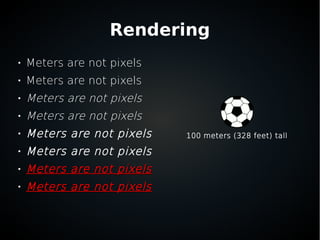
Meters are not pixels

Meters are not pixels

Meters are not pixels

Meters are not pixels

Meters are not pixels

Meters are not pixels

Meters are not pixelsMeters are not pixels

Meters are not pixelsMeters are not pixels
100 meters (328 feet) tall
Rendering

Pick a pixel ↔ meter conversion
–
I personally use 64px = 1 meter

Scale only when rendering
–
Or turning screen input into world
coordinates

Game logic and design decisions
should be in meters
Rendering

Bodies/Fixtures govern sprite
positions on screen

When adding to the render list, take
the world coordinates, scale by your
factor, subtract Viewport coordinates

No need for AnimatedSprite to
maintain position any more
Joints

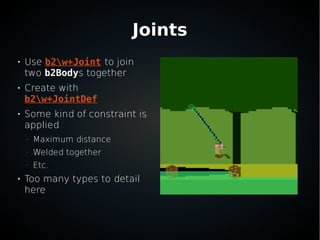
Use b2w+Joint to join
two b2Bodys together

Create with
b2w+JointDef

Some kind of constraint is
applied
–
Maximum distance
–
Welded together
–
Etc.

Too many types to detail
here
Game Logic

Use b2ContactListener
–
Don't use the body/fixture list

(Begin|End)Contact() is self-explanatory

PreSolve() called every frame before the
two fixtures are pushed back
–
For advanced contact manipulation

PostSolve() after they're pushed away
–
For game logic based on physics response
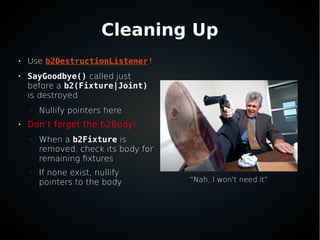
Cleaning Up

Use b2DestructionListener!

SayGoodbye() called just
before a b2(Fixture|Joint)
is destroyed
–
Nullify pointers here

Don't forget the b2Body!
–
When a b2Fixture is
removed, check its body for
remaining fixtures
–
If none exist, nullify
pointers to the body “Nah, I won't need it”
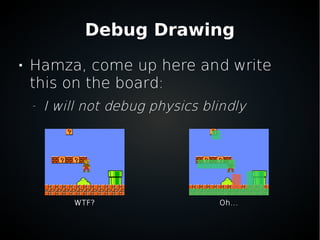
Debug Drawing

Hamza, come up here and write
this on the board:
–
I will not debug physics blindly
WTF? Oh...
Debug Drawing

Implement b2Draw

Given coordinates and colors, draw lines

Make (DirectX|SFML)Graphics
implement it
–
Use sf::C(onvex|ircle)Shape for SFML
–
Use ID3DXLine for DirectX

Doesn't need to be fast, just needs to be
correct and toggle-able
Making Things Move

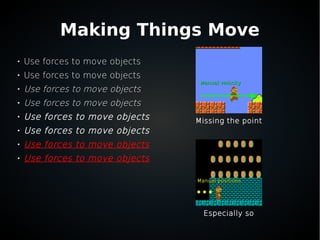
Use forces to move objects

Use forces to move objects

Use forces to move objects

Use forces to move objects

Use forces to move objects

Use forces to move objects

Use forces to move objects

Use forces to move objects
Missing the point
Especially so
Manual positionsManual positions
Manual velocityManual velocity
Making Things Move

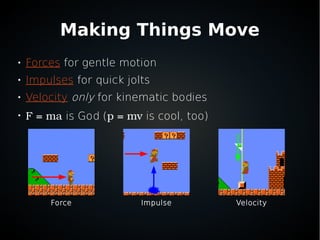
Forces for gentle motion

Impulses for quick jolts

Velocity only for kinematic bodies

F = ma is God (p = mv is cool, too)
VelocityImpulseForce
Finer Control

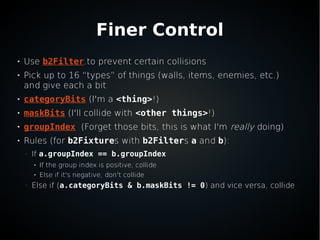
Use b2Filter.to prevent certain collisions

Pick up to 16 “types” of things (walls, items, enemies, etc.)
and give each a bit

categoryBits (I'm a <thing>!)

maskBits (I'll collide with <other things>!)

groupIndex (Forget those bits, this is what I'm really doing)

Rules (for b2Fixtures with b2Filters a and b):
–
If a.groupIndex == b.groupIndex
●
If the group index is positive, collide
●
Else if it's negative, don't collide
–
Else if (a.categoryBits & b.maskBits != 0) and vice versa, collide
Rays and Rectangles

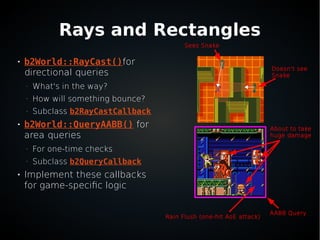
b2World::RayCast()for
directional queries
–
What's in the way?
–
How will something bounce?
–
Subclass b2RayCastCallback

b2World::QueryAABB() for
area queries
–
For one-time checks
–
Subclass b2QueryCallback

Implement these callbacks
for game-specific logic
Doesn't see
Snake
Sees Snake
AABB Query
Rain Flush (one-hit AoE attack)
About to take
huge damage
RUBE

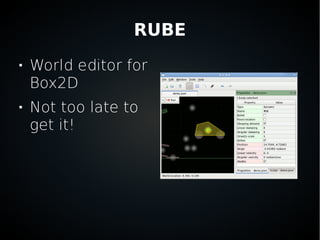
World editor for
Box2D

Not too late to
get it!
Loading RUBE Worlds

Use b2dJson

b2dJson::readFromFile()
–
That's it

Get custom properties with
b2dJson::getCustomPropertiesForItem()
That's All, Folks

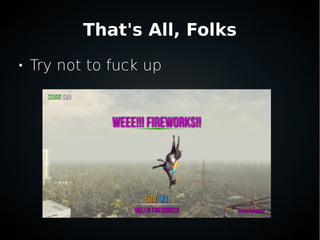
Try not to fuck up

Box2D

  • 1.
  • 2.
    Tonight  Capabilities  Essentials  Do's and Don'ts  RUBEbasics Brian May (reincarnation of Sir Isaac Newton)
  • 3.
    Assumptions  You know whatBox2D does  You've set up Box2D successfully  You know high school-level physics  Not assuming you're using RUBE
  • 4.
    Important Resources  Class documentation – Lookslike a lot, but most you won't use  Official manual (no, seriously)  RUBE (it's not too late to get it!) – Useful even when not using it as a level editor  iforce2d (Box2D tutorials by the RUBE author)  The official testbed
  • 5.
    World Conventions  Uses meters,kilograms, and seconds for units  Y-axis goes upwards  Negative coordinates okay  World is infinitely large  Rigid bodies – No scaling or deformation
  • 6.
    Bodies and Fixtures  b2Bodyshandle motion – Needs at least one b2Fixture  b2Fixtures handle collision – Owned by one b2Body  b2(Body|Fixture)Defs used to make similar bodies and fixtures  Create bodies with b2World:: CreateBody() – Destroy only with DestroyBody()  Create fixtures with b2Body:: CreateFixture() – Destroy only with DestroyFixture() Body Fixtures
  • 7.
    Body/Fixture Properties  Position/Angle  Type – Static, dynamic,or kinematic bodies  (Line|Angul)ar (Velocity|Damping) – Kinda like air resistance  Fixed rotation  Awake  Sleep enabled  Bullet – More precise (but slower) collision detection between dynamic bodies  Active (Is it on?) – Not the same as awake  Gravity scale  User data  Shape – Circle, convex polygon, line, or polyline  Friction  Restitution – Bounciness  Density  Sensor – Don't be pushed back by collisions (very useful)  Filter  User data
  • 8.
    Rendering  Meters are notpixels  Meters are not pixels  Meters are not pixels  Meters are not pixels  Meters are not pixels  Meters are not pixels  Meters are not pixelsMeters are not pixels  Meters are not pixelsMeters are not pixels 100 meters (328 feet) tall
  • 9.
    Rendering  Pick a pixel↔ meter conversion – I personally use 64px = 1 meter  Scale only when rendering – Or turning screen input into world coordinates  Game logic and design decisions should be in meters
  • 10.
    Rendering  Bodies/Fixtures govern sprite positionson screen  When adding to the render list, take the world coordinates, scale by your factor, subtract Viewport coordinates  No need for AnimatedSprite to maintain position any more
  • 11.
    Joints  Use b2w+Joint tojoin two b2Bodys together  Create with b2w+JointDef  Some kind of constraint is applied – Maximum distance – Welded together – Etc.  Too many types to detail here
  • 12.
    Game Logic  Use b2ContactListener – Don'tuse the body/fixture list  (Begin|End)Contact() is self-explanatory  PreSolve() called every frame before the two fixtures are pushed back – For advanced contact manipulation  PostSolve() after they're pushed away – For game logic based on physics response
  • 13.
    Cleaning Up  Use b2DestructionListener!  SayGoodbye()called just before a b2(Fixture|Joint) is destroyed – Nullify pointers here  Don't forget the b2Body! – When a b2Fixture is removed, check its body for remaining fixtures – If none exist, nullify pointers to the body “Nah, I won't need it”
  • 14.
    Debug Drawing  Hamza, comeup here and write this on the board: – I will not debug physics blindly WTF? Oh...
  • 15.
    Debug Drawing  Implement b2Draw  Givencoordinates and colors, draw lines  Make (DirectX|SFML)Graphics implement it – Use sf::C(onvex|ircle)Shape for SFML – Use ID3DXLine for DirectX  Doesn't need to be fast, just needs to be correct and toggle-able
  • 16.
    Making Things Move  Useforces to move objects  Use forces to move objects  Use forces to move objects  Use forces to move objects  Use forces to move objects  Use forces to move objects  Use forces to move objects  Use forces to move objects Missing the point Especially so Manual positionsManual positions Manual velocityManual velocity
  • 17.
    Making Things Move  Forcesfor gentle motion  Impulses for quick jolts  Velocity only for kinematic bodies  F = ma is God (p = mv is cool, too) VelocityImpulseForce
  • 18.
    Finer Control  Use b2Filter.toprevent certain collisions  Pick up to 16 “types” of things (walls, items, enemies, etc.) and give each a bit  categoryBits (I'm a <thing>!)  maskBits (I'll collide with <other things>!)  groupIndex (Forget those bits, this is what I'm really doing)  Rules (for b2Fixtures with b2Filters a and b): – If a.groupIndex == b.groupIndex ● If the group index is positive, collide ● Else if it's negative, don't collide – Else if (a.categoryBits & b.maskBits != 0) and vice versa, collide
  • 19.
    Rays and Rectangles  b2World::RayCast()for directionalqueries – What's in the way? – How will something bounce? – Subclass b2RayCastCallback  b2World::QueryAABB() for area queries – For one-time checks – Subclass b2QueryCallback  Implement these callbacks for game-specific logic Doesn't see Snake Sees Snake AABB Query Rain Flush (one-hit AoE attack) About to take huge damage
  • 20.
  • 21.
    Loading RUBE Worlds  Useb2dJson  b2dJson::readFromFile() – That's it  Get custom properties with b2dJson::getCustomPropertiesForItem()
  • 22.