Chipmunk Physics

Integrating A Physics Engine with UIKIT


             Carl Brown
           CocoaCoder.org
            12 July 2012
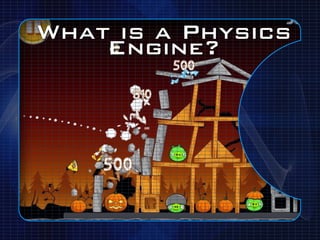
What is a Physics
    Engine?
What Physics
Engines are there?


‣Box2D
‣Chipmunk Physics
Why might one
 choose Box2D?

‣Larger Community
‣More Examples
‣Continuous Collisions ("Bullets")
‣Good Enough for Angry Birds
Why Chipmunk?
 ‣ C w/Objective-C* instead of C++
    ‣ //I *HATE* C++


*Objective-C Wrapper requires $89 indie license, C is MIT licensed/Free
Why Chipmunk?
 ‣ C w/Objective-C* instead of C++
    ‣ //I *HATE* C++
 ‣ Global (Space) Origin in the same
   place as UIView
    ‣(Seems different for Box2D)


*Objective-C Wrapper requires $89 indie license, C is MIT licensed/Free
Why Chipmunk?
 ‣ C w/Objective-C* instead of C++
    ‣ //I *HATE* C++
 ‣ Global (Space) Origin in the same
   place as UIView
    ‣(Seems different for Box2D)
 ‣ Units in pixels instead of meters


*Objective-C Wrapper requires $89 indie license, C is MIT licensed/Free
Why Chipmunk?
 ‣ C w/Objective-C* instead of C++
    ‣ //I *HATE* C++
 ‣ Global (Space) Origin in the same
   place as UIView
    ‣(Seems different for Box2D)
 ‣ Units in pixels instead of meters
 ‣ Box2D: body->DoThing(&shapeObject)
    ‣ //I find that annoying
*Objective-C Wrapper requires $89 indie license, C is MIT licensed/Free
Why Chipmunk?
 ‣ C w/Objective-C* instead of C++
    ‣ //I *HATE* C++
 ‣ Global (Space) Origin in the same
   place as UIView
    ‣(Seems different for Box2D)
 ‣ Units in pixels instead of meters
 ‣ Box2D: body->DoThing(&shapeObject)
    ‣ //I find that annoying
*Objective-C Wrapper requires $89 indie license, C is MIT licensed/Free
See http://www.cocoanetics.com/2010/05/physics-101-uikit-app-with-box2d-for-gravity/ for
Box2D code
What about
       Cocos2D?

‣ Cocos2D is a Gaming Framework
‣ Uses Sprites/Scenes (kinda like Views)
‣ Integrates Either Box2D or Chipmunk
What about
       Cocos2D?

‣ Cocos2D is a Gaming Framework
‣ Uses Sprites/Scenes (kinda like Views)
‣ Integrates Either Box2D or Chipmunk
‣ Still need to deal with Physics Engine
What about
       Cocos2D?

‣ Cocos2D is a Gaming Framework
‣ Uses Sprites/Scenes (kinda like Views)
‣ Integrates Either Box2D or Chipmunk
‣ Still need to deal with Physics Engine
‣ Might as well learn Physics w/UIKit
What about
      Cocos2D?

‣ Cocos2D is a Gaming Framework
‣ Uses Sprites/Scenes (kinda like Views)
‣ Integrates Either Box2D or Chipmunk
‣ Still need to deal with Physics Engine
‣ Might as well learn Physics w/UIKit
‣ Cocos2D + Physics Way too long a talk
Integrating
  Chipmunk with
      UIKit
‣Create Space
Integrating
  Chipmunk with
      UIKit
‣Create Space
‣Create Body+shape for UIView
Integrating
  Chipmunk with
      UIKit
‣Create Space
‣Create Body+shape for UIView
‣Iterate Space
Integrating
   Chipmunk with
       UIKit
‣Create Space
‣Create Body+shape for UIView
‣Iterate Space
‣Reset Frame Coordinates
 ‣ Happens Third, but we'll talk about it Last
Chipmunk Spaces

!self.space = [[ChipmunkSpace alloc] init];
!
[self.space addBounds:self.view.bounds
  thickness:10.0f
  elasticity:1.0f friction:1.0f
  layers:CP_ALL_LAYERS group:CP_NO_GROUP
  collisionType:borderType];

!self.space.gravity = cpv(0.0f, 10.0f);
Space Parameters
‣ Bounds
 ‣ Walls around the Space that things bounce off of
Space Parameters
‣ Bounds
 ‣ Walls around the Space that things bounce off of
‣ Elasticity
 ‣ "Bounciness"
Space Parameters
‣ Bounds
 ‣ Walls around the Space that things bounce off of
‣ Elasticity
 ‣ "Bounciness"
‣ Friction
Space Parameters
‣ Bounds
 ‣ Walls around the Space that things bounce off of
‣ Elasticity
 ‣ "Bounciness"
‣ Friction
‣ Layers/Group/CollisionType
 ‣ Think "Collision Filters"
 ‣ Allow for "Friendly Fire" type scenarios
Space Parameters
‣ Bounds
 ‣ Walls around the Space that things bounce off of
‣ Elasticity
 ‣ "Bounciness"
‣ Friction
‣ Layers/Group/CollisionType
 ‣ Think "Collision Filters"
 ‣ Allow for "Friendly Fire" type scenarios
‣ Gravity
Chipmunk Body/
          Shape
ChipmunkBody *body = [self.space add:[ChipmunkBody
bodyWithMass:mass andMoment:cpMomentForBox(mass,
view.bounds.size.width, view.bounds.size.height)]];

[body setData:view]; //Make retrievable

ChipmunkShape *shape = [self.space add:
[ChipmunkPolyShape boxWithBody:body
width:view.bounds.size.width
height:view.bounds.size.height]];

shape.friction = 0.8f;
shape.elasticity = 0.1f;
Chipmunk Body/
      Shape

‣ Body
 ‣ Used for motion
 ‣ Acceleration/Mass/Momentum/Energy/Rotation/Etc
Chipmunk Body/
      Shape

‣ Body
 ‣ Used for motion
 ‣ Acceleration/Mass/Momentum/Energy/Rotation/Etc
‣ Shape
 ‣ Used for Collisions and Intersections
Iterate Space
  _displayLink = [CADisplayLink displayLinkWithTarget:self
selector:@selector(update:)];
![self.displayLink addToRunLoop:[NSRunLoop mainRunLoop]
forMode:NSRunLoopCommonModes];


-(void) update:(id) sender {
!cpFloat dt =
self.displayLink.duration*self.displayLink.frameInterval;
![self.space step:dt];

    for (ChipmunkBody *body in self.space.bodies) {
      UIView *view = (UIView *) [body data];
      [view setTransform:body.affineTransform];
    }
}

         *DisplayLink requires the QuartzCore Framework
Display Link


‣ Calls a method on every screen refresh
‣ Used to update Motion/Position
‣ Can be set to every N frames
[Space Step]

‣ Tell the physics simulator to advance by
 a given timestep
‣ Simple multiplication here
‣ Using an accumulator is more accurate
 ‣ See: http://gafferongames.com/game-physics/fix-
  your-timestep/
setTransform


‣ Chipmunk creates an AffineTransform
 for each body on each step
‣ Use that value to set the "transform"
 property of the UIView
What the @#$% is
   a Transform?
‣ Remember Matrix Math?
 ‣ Yeah, I didn't think so
‣ It's a Mathematical representation (matrix)
 that's used to describe Position and
 Rotation of an object
‣ You don't have to understand them to use
 them
 ‣ Though it helps when debugging
 ‣ See http://iphonedevelopment.blogspot.com/2008/10/
  demystifying-cgaffinetransform.html for more
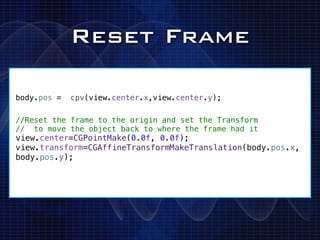
Reset Frame

body.pos =   cpv(view.center.x,view.center.y);

//Reset the frame to the origin and set the Transform
// to move the object back to where the frame had it
view.center=CGPointMake(0.0f, 0.0f);
view.transform=CGAffineTransformMakeTranslation(body.pos.x,
body.pos.y);
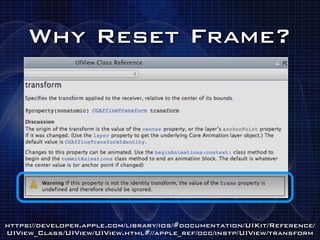
Why Reset Frame?


https://developer.apple.com/library/ios/#documentation/UIKit/Reference/
UIView_Class/UIView/UIView.html#//apple_ref/occ/instp/UIView/transform
Wait, What?
‣Think of it like This:
‣ You can EITHER use a Frame OR a Transform
 to Position views
‣ NEVER BOTH
‣ IF you set both, they interact with each
 other in weird ways
Wait, What?
‣Think of it like This:
‣ You can EITHER use a Frame OR a Transform
 to Position views
‣ NEVER BOTH
‣ IF you set both, they interact with each
 other in weird ways
‣ To Switch: set one to Origin and then set the
 other to the same place
Wait, What?
‣Think of it like This:
‣ You can EITHER use a Frame OR a Transform
 to Position views
‣ NEVER BOTH
‣ IF you set both, they interact with each
 other in weird ways
‣ To Switch: set one to Origin and then set the
 other to the same place
‣ Happens fast enough, hard to notice
 ‣ You can Hide or remove subview first if it's noticeable
Now we're set up


Not much of a game so far.

       Now What?
Collision
        Callbacks

‣ "Kill Pigs"
‣ Add Score
‣ Play Sounds
‣ [Space setDefaultCollisionHandler:...]
Joints &
      Constraints

‣ "Build House to shoot Birds at"
‣ "Hook up Spring to Slingshot"
‣ [Space addConstraint:...]
‣ http://www.youtube.com/watch?v=ZgJJZTS0aMM
Apply Impulses


‣ "Shoot something out of a cannon"
‣ [Body applyImpulse:offset:...]
RayCasting
(ChipmunkSegmentQueryInfo)


 ‣ Does "Bullet" handling (Avoids
  Tunneling)
 ‣ [Space segmentQueryFirstFrom:to:...]
Where Do I get it?


‣ Downloads:
 ‣ http://chipmunk-physics.net/downloads.php
‣ Documentation:
 ‣ http://chipmunk-physics.net/documentation.php

Chipmunk physics presentation

  • 1.
    Chipmunk Physics Integrating APhysics Engine with UIKIT Carl Brown CocoaCoder.org 12 July 2012
  • 2.
    What is aPhysics Engine?
  • 3.
    What Physics Engines arethere? ‣Box2D ‣Chipmunk Physics
  • 4.
    Why might one choose Box2D? ‣Larger Community ‣More Examples ‣Continuous Collisions ("Bullets") ‣Good Enough for Angry Birds
  • 5.
    Why Chipmunk? ‣C w/Objective-C* instead of C++ ‣ //I *HATE* C++ *Objective-C Wrapper requires $89 indie license, C is MIT licensed/Free
  • 6.
    Why Chipmunk? ‣C w/Objective-C* instead of C++ ‣ //I *HATE* C++ ‣ Global (Space) Origin in the same place as UIView ‣(Seems different for Box2D) *Objective-C Wrapper requires $89 indie license, C is MIT licensed/Free
  • 7.
    Why Chipmunk? ‣C w/Objective-C* instead of C++ ‣ //I *HATE* C++ ‣ Global (Space) Origin in the same place as UIView ‣(Seems different for Box2D) ‣ Units in pixels instead of meters *Objective-C Wrapper requires $89 indie license, C is MIT licensed/Free
  • 8.
    Why Chipmunk? ‣C w/Objective-C* instead of C++ ‣ //I *HATE* C++ ‣ Global (Space) Origin in the same place as UIView ‣(Seems different for Box2D) ‣ Units in pixels instead of meters ‣ Box2D: body->DoThing(&shapeObject) ‣ //I find that annoying *Objective-C Wrapper requires $89 indie license, C is MIT licensed/Free
  • 9.
    Why Chipmunk? ‣C w/Objective-C* instead of C++ ‣ //I *HATE* C++ ‣ Global (Space) Origin in the same place as UIView ‣(Seems different for Box2D) ‣ Units in pixels instead of meters ‣ Box2D: body->DoThing(&shapeObject) ‣ //I find that annoying *Objective-C Wrapper requires $89 indie license, C is MIT licensed/Free See http://www.cocoanetics.com/2010/05/physics-101-uikit-app-with-box2d-for-gravity/ for Box2D code
  • 10.
    What about Cocos2D? ‣ Cocos2D is a Gaming Framework ‣ Uses Sprites/Scenes (kinda like Views) ‣ Integrates Either Box2D or Chipmunk
  • 11.
    What about Cocos2D? ‣ Cocos2D is a Gaming Framework ‣ Uses Sprites/Scenes (kinda like Views) ‣ Integrates Either Box2D or Chipmunk ‣ Still need to deal with Physics Engine
  • 12.
    What about Cocos2D? ‣ Cocos2D is a Gaming Framework ‣ Uses Sprites/Scenes (kinda like Views) ‣ Integrates Either Box2D or Chipmunk ‣ Still need to deal with Physics Engine ‣ Might as well learn Physics w/UIKit
  • 13.
    What about Cocos2D? ‣ Cocos2D is a Gaming Framework ‣ Uses Sprites/Scenes (kinda like Views) ‣ Integrates Either Box2D or Chipmunk ‣ Still need to deal with Physics Engine ‣ Might as well learn Physics w/UIKit ‣ Cocos2D + Physics Way too long a talk
  • 14.
    Integrating Chipmunkwith UIKit ‣Create Space
  • 15.
    Integrating Chipmunkwith UIKit ‣Create Space ‣Create Body+shape for UIView
  • 16.
    Integrating Chipmunkwith UIKit ‣Create Space ‣Create Body+shape for UIView ‣Iterate Space
  • 17.
    Integrating Chipmunk with UIKit ‣Create Space ‣Create Body+shape for UIView ‣Iterate Space ‣Reset Frame Coordinates ‣ Happens Third, but we'll talk about it Last
  • 18.
    Chipmunk Spaces !self.space =[[ChipmunkSpace alloc] init]; ! [self.space addBounds:self.view.bounds thickness:10.0f elasticity:1.0f friction:1.0f layers:CP_ALL_LAYERS group:CP_NO_GROUP collisionType:borderType]; !self.space.gravity = cpv(0.0f, 10.0f);
  • 19.
    Space Parameters ‣ Bounds ‣ Walls around the Space that things bounce off of
  • 20.
    Space Parameters ‣ Bounds ‣ Walls around the Space that things bounce off of ‣ Elasticity ‣ "Bounciness"
  • 21.
    Space Parameters ‣ Bounds ‣ Walls around the Space that things bounce off of ‣ Elasticity ‣ "Bounciness" ‣ Friction
  • 22.
    Space Parameters ‣ Bounds ‣ Walls around the Space that things bounce off of ‣ Elasticity ‣ "Bounciness" ‣ Friction ‣ Layers/Group/CollisionType ‣ Think "Collision Filters" ‣ Allow for "Friendly Fire" type scenarios
  • 23.
    Space Parameters ‣ Bounds ‣ Walls around the Space that things bounce off of ‣ Elasticity ‣ "Bounciness" ‣ Friction ‣ Layers/Group/CollisionType ‣ Think "Collision Filters" ‣ Allow for "Friendly Fire" type scenarios ‣ Gravity
  • 24.
    Chipmunk Body/ Shape ChipmunkBody *body = [self.space add:[ChipmunkBody bodyWithMass:mass andMoment:cpMomentForBox(mass, view.bounds.size.width, view.bounds.size.height)]]; [body setData:view]; //Make retrievable ChipmunkShape *shape = [self.space add: [ChipmunkPolyShape boxWithBody:body width:view.bounds.size.width height:view.bounds.size.height]]; shape.friction = 0.8f; shape.elasticity = 0.1f;
  • 25.
    Chipmunk Body/ Shape ‣ Body ‣ Used for motion ‣ Acceleration/Mass/Momentum/Energy/Rotation/Etc
  • 26.
    Chipmunk Body/ Shape ‣ Body ‣ Used for motion ‣ Acceleration/Mass/Momentum/Energy/Rotation/Etc ‣ Shape ‣ Used for Collisions and Intersections
  • 27.
    Iterate Space _displayLink = [CADisplayLink displayLinkWithTarget:self selector:@selector(update:)]; ![self.displayLink addToRunLoop:[NSRunLoop mainRunLoop] forMode:NSRunLoopCommonModes]; -(void) update:(id) sender { !cpFloat dt = self.displayLink.duration*self.displayLink.frameInterval; ![self.space step:dt]; for (ChipmunkBody *body in self.space.bodies) { UIView *view = (UIView *) [body data]; [view setTransform:body.affineTransform]; } } *DisplayLink requires the QuartzCore Framework
  • 28.
    Display Link ‣ Callsa method on every screen refresh ‣ Used to update Motion/Position ‣ Can be set to every N frames
  • 29.
    [Space Step] ‣ Tellthe physics simulator to advance by a given timestep ‣ Simple multiplication here ‣ Using an accumulator is more accurate ‣ See: http://gafferongames.com/game-physics/fix- your-timestep/
  • 30.
    setTransform ‣ Chipmunk createsan AffineTransform for each body on each step ‣ Use that value to set the "transform" property of the UIView
  • 31.
    What the @#$%is a Transform? ‣ Remember Matrix Math? ‣ Yeah, I didn't think so ‣ It's a Mathematical representation (matrix) that's used to describe Position and Rotation of an object ‣ You don't have to understand them to use them ‣ Though it helps when debugging ‣ See http://iphonedevelopment.blogspot.com/2008/10/ demystifying-cgaffinetransform.html for more
  • 32.
    Reset Frame body.pos = cpv(view.center.x,view.center.y); //Reset the frame to the origin and set the Transform // to move the object back to where the frame had it view.center=CGPointMake(0.0f, 0.0f); view.transform=CGAffineTransformMakeTranslation(body.pos.x, body.pos.y);
  • 33.
  • 34.
    Wait, What? ‣Think ofit like This: ‣ You can EITHER use a Frame OR a Transform to Position views ‣ NEVER BOTH ‣ IF you set both, they interact with each other in weird ways
  • 35.
    Wait, What? ‣Think ofit like This: ‣ You can EITHER use a Frame OR a Transform to Position views ‣ NEVER BOTH ‣ IF you set both, they interact with each other in weird ways ‣ To Switch: set one to Origin and then set the other to the same place
  • 36.
    Wait, What? ‣Think ofit like This: ‣ You can EITHER use a Frame OR a Transform to Position views ‣ NEVER BOTH ‣ IF you set both, they interact with each other in weird ways ‣ To Switch: set one to Origin and then set the other to the same place ‣ Happens fast enough, hard to notice ‣ You can Hide or remove subview first if it's noticeable
  • 37.
    Now we're setup Not much of a game so far. Now What?
  • 38.
    Collision Callbacks ‣ "Kill Pigs" ‣ Add Score ‣ Play Sounds ‣ [Space setDefaultCollisionHandler:...]
  • 39.
    Joints & Constraints ‣ "Build House to shoot Birds at" ‣ "Hook up Spring to Slingshot" ‣ [Space addConstraint:...] ‣ http://www.youtube.com/watch?v=ZgJJZTS0aMM
  • 40.
    Apply Impulses ‣ "Shootsomething out of a cannon" ‣ [Body applyImpulse:offset:...]
  • 41.
    RayCasting (ChipmunkSegmentQueryInfo) ‣ Does"Bullet" handling (Avoids Tunneling) ‣ [Space segmentQueryFirstFrom:to:...]
  • 42.
    Where Do Iget it? ‣ Downloads: ‣ http://chipmunk-physics.net/downloads.php ‣ Documentation: ‣ http://chipmunk-physics.net/documentation.php