Box vs OneDrive: Which
Is the Best Cloud Storage
for Businesses?
Let's Compare Some Key Features To
Help You Make An Informed Decision
For Your Business
Box Pricing
• Pricing and Storage: Box offers
unlimited storage at prices
ranging from $15 to $35 per user
per month
• File Limits: Box has a maximum
file size upload limit of 150 GB
and a file sync limit of 100 GB per
day
• Pricing and Storage: OneDrive
plans range from $6.00 to
$22.00 per user per month, with
1 TB of storage
OneDrive Pricing
• File Limits: OneDrive allows file
uploads of up to 250 GB and
has a file sync limit of 250 GB
per day
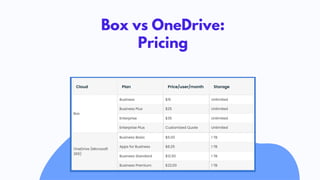
Box vs OneDrive:
Pricing
Office Apps Integration
• Integrates with native apps like Box
Notes, Microsoft 365, and Google
Workspace apps
• Supports third-party app
integration
• Seamlessly integrates with all
Microsoft apps
• Has a deep integration with
Outlook and SharePoint Online
• Supports third-party app
integration
File Support
• Box Unsupported file types: .bak, .tmp,
thumbs.DB, desktop.ini, ._dstore.
• OneDrive Unsupported file types: TMP,
desktop.ini, ._dstore.
Content Sharing &
Collaboration
• Seamless Sharing: Box facilitates file
and folder sharing with permissions,
shareable links, collaborator invites,
and content access requests
• Efficient Collaboration: Box provides
essential collaboration features for
teams to work together on shared
content
• Collaboration Boost: Integrated with
Microsoft Teams and SharePoint
Online for advanced teamwork
• Effortless SharePoint Integration:
Generate links for new files and folders,
enhancing collaboration within
SharePoint
Security
• Box employs AES 256-bit encryption
for data at rest, ensuring strong
security for stored files
• Data transmitted over the network is
also protected by AES 256-bit
encryption, ensuring secure
communication channels
Security
• OneDrive for Business in Microsoft
365 ensures robust security with AES
256-bit encryption for data at rest
• Data transmitted over the network is
protected by TLS encryption,
ensuring secure communication
channels
VISIT OUR
WEBSITE!
support@cloudfuze.com
www.cloudfuze.com

Box vs OneDrive

  • 1.
    Box vs OneDrive:Which Is the Best Cloud Storage for Businesses?
  • 2.
    Let's Compare SomeKey Features To Help You Make An Informed Decision For Your Business
  • 3.
    Box Pricing • Pricingand Storage: Box offers unlimited storage at prices ranging from $15 to $35 per user per month • File Limits: Box has a maximum file size upload limit of 150 GB and a file sync limit of 100 GB per day
  • 4.
    • Pricing andStorage: OneDrive plans range from $6.00 to $22.00 per user per month, with 1 TB of storage OneDrive Pricing • File Limits: OneDrive allows file uploads of up to 250 GB and has a file sync limit of 250 GB per day
  • 5.
  • 6.
    Office Apps Integration •Integrates with native apps like Box Notes, Microsoft 365, and Google Workspace apps • Supports third-party app integration
  • 7.
    • Seamlessly integrateswith all Microsoft apps • Has a deep integration with Outlook and SharePoint Online • Supports third-party app integration
  • 8.
    File Support • BoxUnsupported file types: .bak, .tmp, thumbs.DB, desktop.ini, ._dstore. • OneDrive Unsupported file types: TMP, desktop.ini, ._dstore.
  • 9.
    Content Sharing & Collaboration •Seamless Sharing: Box facilitates file and folder sharing with permissions, shareable links, collaborator invites, and content access requests • Efficient Collaboration: Box provides essential collaboration features for teams to work together on shared content
  • 10.
    • Collaboration Boost:Integrated with Microsoft Teams and SharePoint Online for advanced teamwork • Effortless SharePoint Integration: Generate links for new files and folders, enhancing collaboration within SharePoint
  • 11.
    Security • Box employsAES 256-bit encryption for data at rest, ensuring strong security for stored files • Data transmitted over the network is also protected by AES 256-bit encryption, ensuring secure communication channels
  • 12.
    Security • OneDrive forBusiness in Microsoft 365 ensures robust security with AES 256-bit encryption for data at rest • Data transmitted over the network is protected by TLS encryption, ensuring secure communication channels
  • 13.