BOOTSTRAP 4 ALPHA 3
Submitted To-
Computer Department
Submitted By -
Shubham Kanojia
III-Year
1511
Introduction
 Before study Bootstrap 4 , we must know that what is Bootstrap? Actually
Bootstrap is the most popular HTML, CSS, and JavaScript framework for
developing responsive, mobile-first web sites.
 And Bootstrap 4 is new version of Bootstrap.
History of Bootstrap
 It was developed by Mark otto and Jacob thornton in August 9,2011 at
Twitter ,US.
 Firstly its name was Twitter Blueprint, Then renamed as Bootstrap.
 On Jan 31, 2012 Bootstrap 2 was launched. This release added the twelve-
column grid layout and responsive design components.
 On Oct 29,2013 Bootstrap 3 was launched.This release moving to a mobile
first approach .
 At last, on July 27,2016 , Bootstrap 4 Alpha 3 is released.
Features
1. SASS (Syntactically Awesome Style Sheets)
 One of the biggest changes in Bootstrap 4 is moving
from Less to Sass,
 Sass is an extension of CSS3 which adds nested rules,
variables, mixins, selector inheritance, and more.
 Sass generates well formatted CSS and makes your
stylesheets easier to organize and maintain.
 Compass, Bourbon, and Susy are open-source CSS
Authoring Framework.
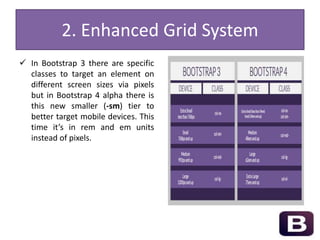
2. Enhanced Grid System
 In Bootstrap 3 there are specific
classes to target an element on
different screen sizes via pixels
but in Bootstrap 4 alpha there is
this new smaller (-sm) tier to
better target mobile devices. This
time it’s in rem and em units
instead of pixels.
3. Dropped Support for IE8
 Bootstrap 4 alpha is drops Internet Explorer 8 support. One of the biggest
problems with IE8 is that it doesn’t support CSS media queries, which play
an important role in implementing responsive design within the
framework.
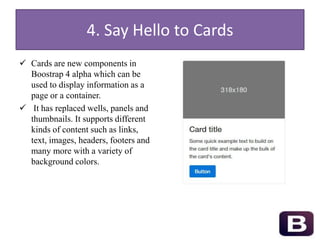
4. Say Hello to Cards
 Cards are new components in
Boostrap 4 alpha which can be
used to display information as a
page or a container.
 It has replaced wells, panels and
thumbnails. It supports different
kinds of content such as links,
text, images, headers, footers and
many more with a variety of
background colors.
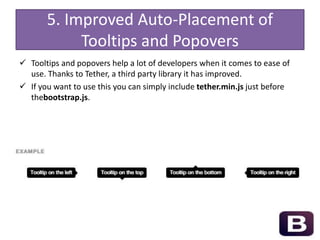
5. Improved Auto-Placement of
Tooltips and Popovers
 Tooltips and popovers help a lot of developers when it comes to ease of
use. Thanks to Tether, a third party library it has improved.
 If you want to use this you can simply include tether.min.js just before
thebootstrap.js.
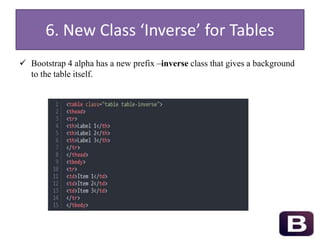
6. New Class ‘Inverse’ for Tables
 Bootstrap 4 alpha has a new prefix –inverse class that gives a background
to the table itself.
Advantages
 It compiles faster than earlier version because it moves from LESS to SASS.
 New updation, makes yours sites more professional.
 It takes less time to design your page.
 Campatible with all Screen sizes such as for Tablets,Desktop,small and
extra small mobiles.
Disadvantages
 Your website layout is looks similar as others website layout.
 Web –designer becomes jobless.
 Lack of Creativity .
 Due to lack of creativity many visitors don’t take much interest on yours
websites.
Conclusion
 With the coming of bootstrap 4, your websites are compatible with many
different platforms.
 Developer works to reduce the size of CSS file so that your website open in
more short time.
 After some time ,Bootstrap 5 will be here,which completely drop out the
use of IE 9,freeing many front-end developers to design anything without
any problem.
References
 http://v4-alpha.getbootstrap.com/
 http://blog.getbootstrap.com/2015/08/19/bootstrap-4-alpha/
 http://www.hongkiat.com/blog/boostrap-4-best-features/
 http://www.quackit.com/bootstrap/bootstrap_4/tutorial/
 https://scotch.io/bar-talk/whats-new-in-bootstrap-4
 https://webdesign.tutsplus.com/articles/new-features-in-bootstrap-4-alpha--
cms-24730
THANK YOU
Any Question????

Bootstrap 4 Alpha 3

  • 1.
    BOOTSTRAP 4 ALPHA3 Submitted To- Computer Department Submitted By - Shubham Kanojia III-Year 1511
  • 2.
    Introduction  Before studyBootstrap 4 , we must know that what is Bootstrap? Actually Bootstrap is the most popular HTML, CSS, and JavaScript framework for developing responsive, mobile-first web sites.  And Bootstrap 4 is new version of Bootstrap.
  • 3.
    History of Bootstrap It was developed by Mark otto and Jacob thornton in August 9,2011 at Twitter ,US.  Firstly its name was Twitter Blueprint, Then renamed as Bootstrap.  On Jan 31, 2012 Bootstrap 2 was launched. This release added the twelve- column grid layout and responsive design components.  On Oct 29,2013 Bootstrap 3 was launched.This release moving to a mobile first approach .  At last, on July 27,2016 , Bootstrap 4 Alpha 3 is released.
  • 4.
    Features 1. SASS (SyntacticallyAwesome Style Sheets)  One of the biggest changes in Bootstrap 4 is moving from Less to Sass,  Sass is an extension of CSS3 which adds nested rules, variables, mixins, selector inheritance, and more.  Sass generates well formatted CSS and makes your stylesheets easier to organize and maintain.  Compass, Bourbon, and Susy are open-source CSS Authoring Framework.
  • 5.
    2. Enhanced GridSystem  In Bootstrap 3 there are specific classes to target an element on different screen sizes via pixels but in Bootstrap 4 alpha there is this new smaller (-sm) tier to better target mobile devices. This time it’s in rem and em units instead of pixels.
  • 6.
    3. Dropped Supportfor IE8  Bootstrap 4 alpha is drops Internet Explorer 8 support. One of the biggest problems with IE8 is that it doesn’t support CSS media queries, which play an important role in implementing responsive design within the framework.
  • 7.
    4. Say Helloto Cards  Cards are new components in Boostrap 4 alpha which can be used to display information as a page or a container.  It has replaced wells, panels and thumbnails. It supports different kinds of content such as links, text, images, headers, footers and many more with a variety of background colors.
  • 8.
    5. Improved Auto-Placementof Tooltips and Popovers  Tooltips and popovers help a lot of developers when it comes to ease of use. Thanks to Tether, a third party library it has improved.  If you want to use this you can simply include tether.min.js just before thebootstrap.js.
  • 9.
    6. New Class‘Inverse’ for Tables  Bootstrap 4 alpha has a new prefix –inverse class that gives a background to the table itself.
  • 10.
    Advantages  It compilesfaster than earlier version because it moves from LESS to SASS.  New updation, makes yours sites more professional.  It takes less time to design your page.  Campatible with all Screen sizes such as for Tablets,Desktop,small and extra small mobiles.
  • 11.
    Disadvantages  Your websitelayout is looks similar as others website layout.  Web –designer becomes jobless.  Lack of Creativity .  Due to lack of creativity many visitors don’t take much interest on yours websites.
  • 12.
    Conclusion  With thecoming of bootstrap 4, your websites are compatible with many different platforms.  Developer works to reduce the size of CSS file so that your website open in more short time.  After some time ,Bootstrap 5 will be here,which completely drop out the use of IE 9,freeing many front-end developers to design anything without any problem.
  • 13.
    References  http://v4-alpha.getbootstrap.com/  http://blog.getbootstrap.com/2015/08/19/bootstrap-4-alpha/ http://www.hongkiat.com/blog/boostrap-4-best-features/  http://www.quackit.com/bootstrap/bootstrap_4/tutorial/  https://scotch.io/bar-talk/whats-new-in-bootstrap-4  https://webdesign.tutsplus.com/articles/new-features-in-bootstrap-4-alpha-- cms-24730
  • 14.