Topic on - How To creaTe a pages on websiTeTopic on - How To creaTe a pages on websiTe
Session - 2016-17
presenTed by
cH dinesH
M.sc 3rd
seM
cs
SYNOPSIS:
• Introduction
• What is Blogger?
• Uses of Blogger
• Advantages of Blogger
• Steps to create to Website
• Steps to create Pages
• Advantages to create
different Pages in Website
• Conclusion
Introduction (Blogger)
• Introduced in 1990s by Internet
forum company WebEx.
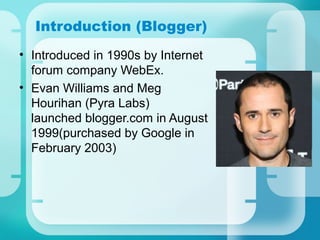
• Evan Williams and Meg
Hourihan (Pyra Labs)
launched blogger.com in August
1999(purchased by Google in
February 2003)
Introduction (Web Site)
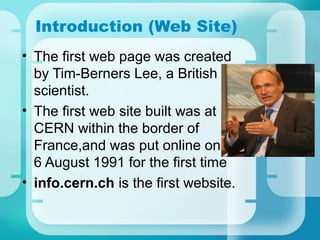
• The first web page was created
by Tim-Berners Lee, a British
scientist.
• The first web site built was at
CERN within the border of
France,and was put online on
6 August 1991 for the first time
• info.cern.ch is the first website.
What is Blogger?
• A blog is a type of website
or part of a website. Blogs
are usually maintained by
an individual with regular
entries of commentary,
descriptions of events, or
other material such as
graphics or video.
Uses of Blogger
• Blogger uses to post any
description, photos,
media, videos or details
of any things.
• It uses to build user
friendly interface for
posting the files in your
website.
Advantages of Blogger
• Easily access.
• Free bloggers also
available.
• Give large amount of
space to store files.
• Easily handle by user.
Some Bloggers Names:
• Wordpress
• Weebly
• Google blogger
• Windblog
Steps to create website:
• Search the website name
whether it is available or
not.
• Creating a domain name.
• Finding a host.
• Attach Blogger to your
Website.
Step 1 : Search the website name:
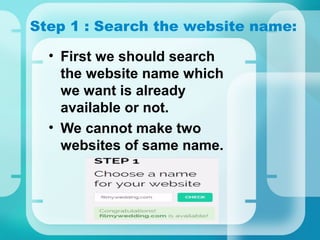
• First we should search
the website name which
we want is already
available or not.
• We cannot make two
websites of same name.
Step2: Creating a Domain Name
• Choosing a proper
domain name
– Make it short
– Be search-engine friendly
– Don’t use the words that
sound the same but have
different spellings ( for
example the word to ( to-
two-too and 2)
– Avoid numbers and capital
letters
• Purchasing and registering
your Domain Name.
• Free Domains are also
available with limitations in
features.
Step2: Creating a Domain Name
Some Domains Site Names:
• GoDaddy.com
• Big Rock.com
• Domains.com
• Domainsclick.com
• Gdomain.com
Step3: Finding a Host
• A web host provides you with
the tools, space and support
to create your web pages.
• Hosting is the backbone of
any website .
• It's where you go to build,
maintain, and publish your
web pages.
Advantages/Disadvantages –
Hosting
• Advantages:
- Free accounts also available.
- Easy access.
- Freedom of Creativity.
• Disadvantages:
- Limited space
- Account expires.
Some Hosting Sites:
• HostGator.com
• Cloudstore.com
• Storebox.com
• Hostbox.com
• Unlimtestore.com
• Webhoster.com
Step 4 : Attach Blogger to
Website
• First of all register in any of the
blogger site to open your account
in it.
• Then purchase blogger or you
can use free version of blogger.
• Then generate the link in blogger
and attach it to your web site.
• Eg- Word press, Weebly, Google
Blogger etc.
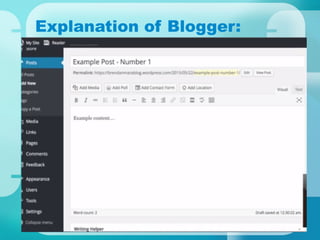
Explanation of Blogger:
Publish your website to
Search Engine:
• First you have create account
in any of the search engine(eg-
Google) in which you want to
publish.
• Then attach your website URL
in search engine account.
• Then you can search your
website in search engine in
which you publish.
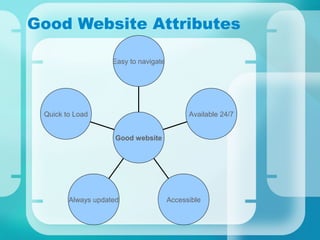
Good Website Attributes
Quick to Load
Always updated Accessible
Available 24/7
Easy to navigate
Good website
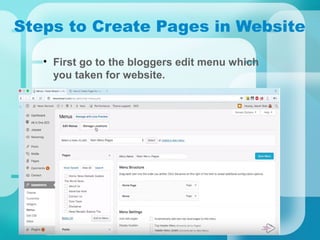
Steps to Create Pages in Website
• First go to the bloggers edit menu which
you taken for website.
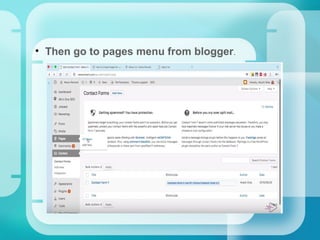
• Then go to pages menu from blogger.
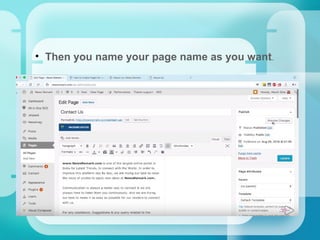
• Then you name your page name as you want.
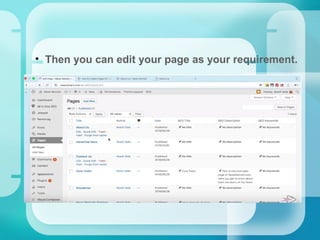
• Then you can edit your page as your requirement.
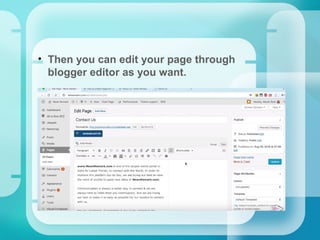
• Then you can edit your page through
blogger editor as you want.
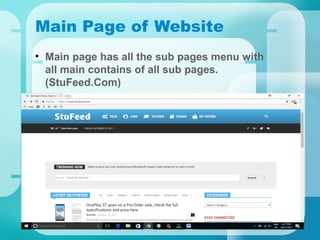
Main Page of Website
• Main page has all the sub pages menu with
all main contains of all sub pages.
(StuFeed.Com)
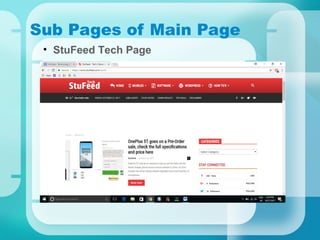
Sub Pages of Main Page
• StuFeed Tech Page
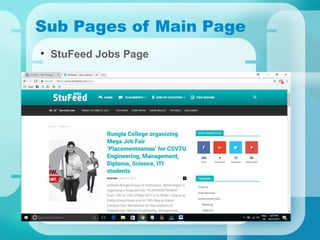
Sub Pages of Main Page
• StuFeed Jobs Page
Sub Pages of Main Page
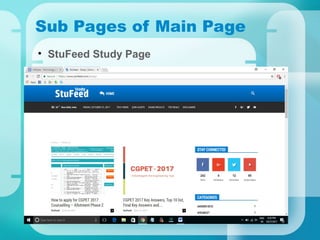
• StuFeed Study Page
Advantages to create different pages in
website
• Easily edit the particular page.
• User Friendly.
• Easy to access the paricular page
data.
• Easy to find the errors occurs in
website.
• Easy to analysis the requirements
need for website.
Conclusion
• To create and design your
own website:
- Must have the proper tools
- Find a host
- Create a domain name
- Create a website
- Publish your files
- Submit Your website to a
search engine
Questions
THANK
YOU

Blogger INTRODUCTION

  • 1.
    Topic on -How To creaTe a pages on websiTeTopic on - How To creaTe a pages on websiTe Session - 2016-17 presenTed by cH dinesH M.sc 3rd seM cs
  • 2.
    SYNOPSIS: • Introduction • Whatis Blogger? • Uses of Blogger • Advantages of Blogger • Steps to create to Website • Steps to create Pages • Advantages to create different Pages in Website • Conclusion
  • 3.
    Introduction (Blogger) • Introducedin 1990s by Internet forum company WebEx. • Evan Williams and Meg Hourihan (Pyra Labs) launched blogger.com in August 1999(purchased by Google in February 2003)
  • 4.
    Introduction (Web Site) •The first web page was created by Tim-Berners Lee, a British scientist. • The first web site built was at CERN within the border of France,and was put online on 6 August 1991 for the first time • info.cern.ch is the first website.
  • 5.
    What is Blogger? •A blog is a type of website or part of a website. Blogs are usually maintained by an individual with regular entries of commentary, descriptions of events, or other material such as graphics or video.
  • 6.
    Uses of Blogger •Blogger uses to post any description, photos, media, videos or details of any things. • It uses to build user friendly interface for posting the files in your website.
  • 7.
    Advantages of Blogger •Easily access. • Free bloggers also available. • Give large amount of space to store files. • Easily handle by user.
  • 8.
    Some Bloggers Names: •Wordpress • Weebly • Google blogger • Windblog
  • 9.
    Steps to createwebsite: • Search the website name whether it is available or not. • Creating a domain name. • Finding a host. • Attach Blogger to your Website.
  • 10.
    Step 1 :Search the website name: • First we should search the website name which we want is already available or not. • We cannot make two websites of same name.
  • 11.
    Step2: Creating aDomain Name • Choosing a proper domain name – Make it short – Be search-engine friendly – Don’t use the words that sound the same but have different spellings ( for example the word to ( to- two-too and 2) – Avoid numbers and capital letters
  • 12.
    • Purchasing andregistering your Domain Name. • Free Domains are also available with limitations in features. Step2: Creating a Domain Name
  • 13.
    Some Domains SiteNames: • GoDaddy.com • Big Rock.com • Domains.com • Domainsclick.com • Gdomain.com
  • 14.
    Step3: Finding aHost • A web host provides you with the tools, space and support to create your web pages. • Hosting is the backbone of any website . • It's where you go to build, maintain, and publish your web pages.
  • 15.
    Advantages/Disadvantages – Hosting • Advantages: -Free accounts also available. - Easy access. - Freedom of Creativity. • Disadvantages: - Limited space - Account expires.
  • 16.
    Some Hosting Sites: •HostGator.com • Cloudstore.com • Storebox.com • Hostbox.com • Unlimtestore.com • Webhoster.com
  • 17.
    Step 4 :Attach Blogger to Website • First of all register in any of the blogger site to open your account in it. • Then purchase blogger or you can use free version of blogger. • Then generate the link in blogger and attach it to your web site. • Eg- Word press, Weebly, Google Blogger etc.
  • 18.
  • 19.
    Publish your websiteto Search Engine: • First you have create account in any of the search engine(eg- Google) in which you want to publish. • Then attach your website URL in search engine account. • Then you can search your website in search engine in which you publish.
  • 20.
    Good Website Attributes Quickto Load Always updated Accessible Available 24/7 Easy to navigate Good website
  • 21.
    Steps to CreatePages in Website • First go to the bloggers edit menu which you taken for website.
  • 22.
    • Then goto pages menu from blogger.
  • 23.
    • Then youname your page name as you want.
  • 24.
    • Then youcan edit your page as your requirement.
  • 25.
    • Then youcan edit your page through blogger editor as you want.
  • 26.
    Main Page ofWebsite • Main page has all the sub pages menu with all main contains of all sub pages. (StuFeed.Com)
  • 27.
    Sub Pages ofMain Page • StuFeed Tech Page
  • 28.
    Sub Pages ofMain Page • StuFeed Jobs Page
  • 29.
    Sub Pages ofMain Page • StuFeed Study Page
  • 30.
    Advantages to createdifferent pages in website • Easily edit the particular page. • User Friendly. • Easy to access the paricular page data. • Easy to find the errors occurs in website. • Easy to analysis the requirements need for website.
  • 31.
    Conclusion • To createand design your own website: - Must have the proper tools - Find a host - Create a domain name - Create a website - Publish your files - Submit Your website to a search engine
  • 32.
  • 33.