Blackboard Collaborate
Ultra
Dan Hahn
hahn23@Illinois.edu
Join a demo room: http://go.illinois.edu/bbcollabdemo
What is Collaborate?
• Product of Blackboard (Illinois Compass)
• “Classic” or “Legacy” was once Elluminate
• Java based & requires a Collaborate Launcher
• On campus since about 2009
• Few/no updates
• Ultra
• HTML 5 based
• Been on campus since about 2016
• Monthly updates
Capabilities
• Application/Screen share
• Whiteboard
• Group work via "Breakout
Rooms"
• Recording
• Webcams
• Large Events
• Live captioning
• Guest links
• Polling
• Phone/Teleconferencing
option
• Chat/Private Chat
• Raise Hand
• Live feedback
• Connection indicator
Available via LMS
• Illinois Compass
• Free to use as of Fall 2015 (previously administered by CITL)
• ATLAS Moodle
• School of Information Science Moodle
• Off campus guests can be brought in via Guest Link
Both Collaborates are still available
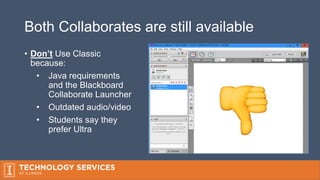
• Don’t Use Classic
because:
• Java requirements
and the Blackboard
Collaborate Launcher
• Outdated audio/video
• Students say they
prefer Ultra
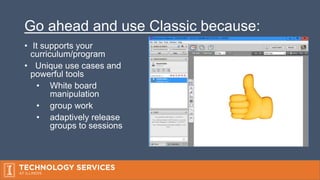
Go ahead and use Classic because:
• It supports your
curriculum/program
• Unique use cases and
powerful tools
• White board
manipulation
• group work
• adaptively release
groups to sessions
Blackboard Collaborate
Ultra
Everything you need to know
Bb Collaborate Ultra Ideal for
• Advising, Guest Speaking, Office hours
• Lectures or classes that would otherwise be canceled
• Online programs
• Large webinars (500 participant limit)
• HD Document webcams
• Impromptu Meetings
Supported Browsers
• Firefox and Chrome
• Application sharing
• All other browsers require a flash plug-in
• Join via mobile app
• Blackboard
• Blackboard Instructor
User Permissions
• Moderator
• start/stop recording, start polling, setup breakout groups, elevate privileges of
other users
• Presenter
• Share an Application or File Sharing, progress slides
• Participant
• Can share audio/video, draw on whiteboard, post to chat
Presenting
• Application Sharing
• Done via browser plugin for Chrome or Firefox
• Share entire desktop or just an application
• File sharing
• Powerpoint, PDF, or image files. 50 MB limit
Participating
• Chat and private chat
• Whiteboard
• Toggle yourself as away
• Share video and audio
• Raise hand
• Participate in polling
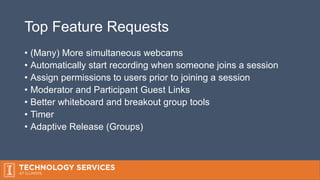
Top Feature Requests
• (Many) More simultaneous webcams
• Automatically start recording when someone joins a session
• Assign permissions to users prior to joining a session
• Moderator and Participant Guest Links
• Better whiteboard and breakout group tools
• Timer
• Adaptive Release (Groups)
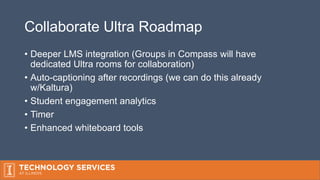
Collaborate Ultra Roadmap
• Deeper LMS integration (Groups in Compass will have
dedicated Ultra rooms for collaboration)
• Auto-captioning after recordings (we can do this already
w/Kaltura)
• Student engagement analytics
• Timer
• Enhanced whiteboard tools
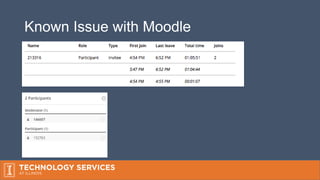
Known Issue with Moodle
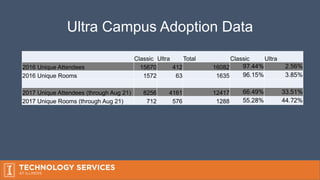
Ultra Campus Adoption Data
Classic Ultra Total Classic Ultra
2016 Unique Attendees 15670 412 16082 97.44% 2.56%
2016 Unique Rooms 1572 63 1635 96.15% 3.85%
2017 Unique Attendees (through Aug 21) 8256 4161 12417 66.49% 33.51%
2017 Unique Rooms (through Aug 21) 712 576 1288 55.28% 44.72%
Thank you / Demo / Questions?
• Dan Hahn hahn23@illinois.edu
• Download these slides: https://uofi.box.com/v/bbcollabdemo
• Join the demo: http://go.illinois.edu/bbcollabdemo
• Intro video: http://go.illinois.edu/collabultraintro
• We have an email list: blackboardcollaborate@lists.illinois.edu

Blackboard Collaborate Ultra Campus Update Fall 2017

  • 1.
    Blackboard Collaborate Ultra Dan Hahn hahn23@Illinois.edu Joina demo room: http://go.illinois.edu/bbcollabdemo
  • 2.
    What is Collaborate? •Product of Blackboard (Illinois Compass) • “Classic” or “Legacy” was once Elluminate • Java based & requires a Collaborate Launcher • On campus since about 2009 • Few/no updates • Ultra • HTML 5 based • Been on campus since about 2016 • Monthly updates
  • 3.
    Capabilities • Application/Screen share •Whiteboard • Group work via "Breakout Rooms" • Recording • Webcams • Large Events • Live captioning • Guest links • Polling • Phone/Teleconferencing option • Chat/Private Chat • Raise Hand • Live feedback • Connection indicator
  • 4.
    Available via LMS •Illinois Compass • Free to use as of Fall 2015 (previously administered by CITL) • ATLAS Moodle • School of Information Science Moodle • Off campus guests can be brought in via Guest Link
  • 5.
    Both Collaborates arestill available • Don’t Use Classic because: • Java requirements and the Blackboard Collaborate Launcher • Outdated audio/video • Students say they prefer Ultra
  • 6.
    Go ahead anduse Classic because: • It supports your curriculum/program • Unique use cases and powerful tools • White board manipulation • group work • adaptively release groups to sessions
  • 7.
  • 8.
    Bb Collaborate UltraIdeal for • Advising, Guest Speaking, Office hours • Lectures or classes that would otherwise be canceled • Online programs • Large webinars (500 participant limit) • HD Document webcams • Impromptu Meetings
  • 9.
    Supported Browsers • Firefoxand Chrome • Application sharing • All other browsers require a flash plug-in • Join via mobile app • Blackboard • Blackboard Instructor
  • 10.
    User Permissions • Moderator •start/stop recording, start polling, setup breakout groups, elevate privileges of other users • Presenter • Share an Application or File Sharing, progress slides • Participant • Can share audio/video, draw on whiteboard, post to chat
  • 11.
    Presenting • Application Sharing •Done via browser plugin for Chrome or Firefox • Share entire desktop or just an application • File sharing • Powerpoint, PDF, or image files. 50 MB limit
  • 12.
    Participating • Chat andprivate chat • Whiteboard • Toggle yourself as away • Share video and audio • Raise hand • Participate in polling
  • 13.
    Top Feature Requests •(Many) More simultaneous webcams • Automatically start recording when someone joins a session • Assign permissions to users prior to joining a session • Moderator and Participant Guest Links • Better whiteboard and breakout group tools • Timer • Adaptive Release (Groups)
  • 14.
    Collaborate Ultra Roadmap •Deeper LMS integration (Groups in Compass will have dedicated Ultra rooms for collaboration) • Auto-captioning after recordings (we can do this already w/Kaltura) • Student engagement analytics • Timer • Enhanced whiteboard tools
  • 15.
  • 16.
    Ultra Campus AdoptionData Classic Ultra Total Classic Ultra 2016 Unique Attendees 15670 412 16082 97.44% 2.56% 2016 Unique Rooms 1572 63 1635 96.15% 3.85% 2017 Unique Attendees (through Aug 21) 8256 4161 12417 66.49% 33.51% 2017 Unique Rooms (through Aug 21) 712 576 1288 55.28% 44.72%
  • 17.
    Thank you /Demo / Questions? • Dan Hahn hahn23@illinois.edu • Download these slides: https://uofi.box.com/v/bbcollabdemo • Join the demo: http://go.illinois.edu/bbcollabdemo • Intro video: http://go.illinois.edu/collabultraintro • We have an email list: blackboardcollaborate@lists.illinois.edu

Editor's Notes

  • #3 Collaborate is the companion software to Blackboard Learn. Blackboard Learn is anynchronous, collaborate is web conferencing software for education.
  • #5 Everyone with an active NetID and AD credentials can use it
  • #7 There’s no plan by the vendor at this time to discontinue support of this
  • #9 Supplement traditional classes online cirriculum Easy to use easy to obtain via Development site
  • #10 If your computer can run the latest Chrome or FF then out of the box you can use Collaborate
  • #17 The data from Bb migrated and now it’s not possible to pull aggregate usage data via .csv – it’s on the roadmap to add this to the new backend Two department that I know have moved to Collaborate Ultra exclusively are - College of Education - School of Labor and Employee Relations