Indiana Secretary of State                                           Bookkeeper Manual
                                                                    X. Reporting Analysis

X.       Reporting Analysis

         As the Bookkeeper, it is easy to get ‘lost’ in a numerical World. The key
element to remember is – What is the real World application to these values?
The Bookkeeper must constantly strive to analyze the scope of the Indiana
Secretary of State operations.


Questions the Bookkeeper should ask themselves:
What are the different filing types our Office receives?
Is there a constant trend among those filings?
Are these filings time sensitive?
What could be improved to increase filings?
How can I store data to evaluate these filings?


         If the Bookkeeper feels there is a ‘better way’ to store and analyze
historical data, it is the responsibility of such to suggest these improvements to
the Director of Operations. All opinions and suggestions are valued across the
board from the Executive Staff and welcome every opportunity to improve
processes for our customers.
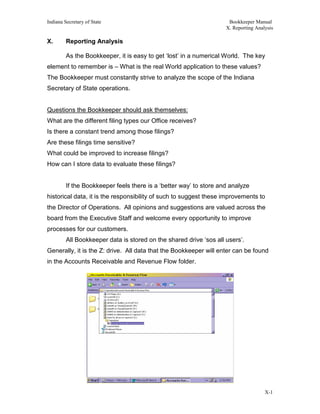
         All Bookkeeper data is stored on the shared drive ‘sos all users’.
Generally, it is the Z: drive. All data that the Bookkeeper will enter can be found
in the Accounts Receivable and Revenue Flow folder.


                                                                                     X-1
Indiana Secretary of State                                           Bookkeeper Manual
                                                                    X. Reporting Analysis

         The Accounts Receivable and Revenue flow folder can be found in the
Operations folder in the shared drive. All fiscal activity will occur within these
folders.


Activities within the Shared Drive – Operations folder:
•   Fixed Asset Inventory
•   Accounts Payable
•   Staffing/New Hire Documentation
•   Employee Communications
•   Forms
•   Director of Operations Memorandums of Understanding on process
•   Division Filings Activity
•   Daily Deposit image scans/Revenue tracking
•   Division Reports
•   Procurement/Purchasing


    The Bookkeeper is considered a cross-trained position with the Operations of
the Indiana Secretary of State’s Office. The Director of Operations will conduct
regular training sessions with the Bookkeeper on a variety of related tasks. To
familiarize early, it is suggested the Bookkeeper become familiar with all the
inter-workings of the Operations folder.


    The Bookkeeper will track the following daily:
    •    Image scans of the Report of Collections form
    •    Daily values of each Fund/Center into a quarterly spreadsheet
    •    Wire Transfer Data
    •    Refunds progress/process
    •    Filings Activity
    •    Dedicated Account Revenue Balances


                                                                                     X-2
Indiana Secretary of State                                      Bookkeeper Manual
                                                               X. Reporting Analysis


Shown above are the folders listed in Accounts Receivable/Revenue folder


The Cash Flow Activity Folder is separated by Fiscal Years - and Quarters


                                                                                X-3
Indiana Secretary of State                                         Bookkeeper Manual
                                                                  X. Reporting Analysis

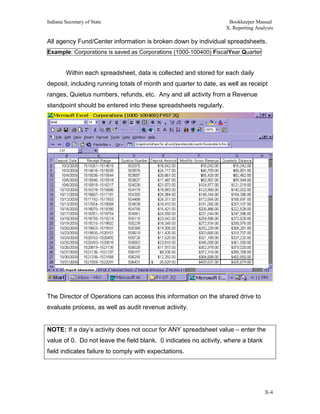
All agency Fund/Center information is broken down by individual spreadsheets.
Example: Corporations is saved as Corporations (1000-100400) FiscalYear Quarter


         Within each spreadsheet, data is collected and stored for each daily
deposit, including running totals of month and quarter to date, as well as receipt
ranges, Quietus numbers, refunds, etc. Any and all activity from a Revenue
standpoint should be entered into these spreadsheets regularly.


The Director of Operations can access this information on the shared drive to
evaluate process, as well as audit revenue activity.


NOTE: If a day’s activity does not occur for ANY spreadsheet value – enter the
value of 0. Do not leave the field blank. 0 indicates no activity, where a blank
field indicates failure to comply with expectations.


                                                                                   X-4
Indiana Secretary of State                                         Bookkeeper Manual
                                                                  X. Reporting Analysis

         Customer Refunds are also stored in the Accounts Receivable and
Revenue Activity folder. All refunds must be entered into the Master
Spreadsheet, as referenced in prior chapters.


         The Report of Collections folder is also found in the Accounts Receivable
and Revenue flow folder. This is where the Daily Deposit Report of Collections
scan will be stored.


The Report of Collections folder is also separated out by Fiscal Year – Quarter-
Month.


Image scans will be saved as the date of deposit. For example January 1st 2006
would be saved as 01012006.TIF


                                                                                   X-5
Indiana Secretary of State                                           Bookkeeper Manual
                                                                    X. Reporting Analysis

         All image scans are saved as .TIF files due to their small size and faster
load times. Image scans are done through the Microsoft Paint program. Simply
open Paint (Generally found under the Accessories option)
Under File toolbar menu – select From Scanner or Camera


Remember to stamp ‘COPY’ on all scanned Report of Collections.
The scan should occur after the drop-off to the Treasurer’s Office to obtain the
Quietus number. Shown below is an example month of ROC scans.


                                                                                     X-6
Indiana Secretary of State                                           Bookkeeper Manual
                                                                    X. Reporting Analysis

         These image scans reinforce that the Daily Deposit was indeed submitted
to the Treasurer’s Office.


         Wire Transfers have their own folder – and are saved by the frequency of
received.


Example: Enhance Access Deposits are done monthly; therefore they are
saved as the month/year applicable.


         The purpose of these spreadsheets is to ensure the integrity of all
deposits. Daily deposit information should be stored as an additional audit
measure, and to evaluate process/forecast future filing activity.


         Information tracked by the Bookkeeper could lead to additional staff being
hired. It could also be used for outreach program’s evaluation criteria, as well as
revenue projections necessary to comply with budget proposals.


         Situations will arise over the course of employment for the Bookkeeper
that may or may not be specifically covered in this manual. The basic principles
such as retention of supporting documentation will be a constant of all
applications. If there is ever any question on how to handle a process, evaluate
an incident, or general troubleshooting please consult the Director of Operations.


                                                                                     X-7

BK Chapter 10.pdf

  • 1.
    Indiana Secretary ofState Bookkeeper Manual X. Reporting Analysis X. Reporting Analysis As the Bookkeeper, it is easy to get ‘lost’ in a numerical World. The key element to remember is – What is the real World application to these values? The Bookkeeper must constantly strive to analyze the scope of the Indiana Secretary of State operations. Questions the Bookkeeper should ask themselves: What are the different filing types our Office receives? Is there a constant trend among those filings? Are these filings time sensitive? What could be improved to increase filings? How can I store data to evaluate these filings? If the Bookkeeper feels there is a ‘better way’ to store and analyze historical data, it is the responsibility of such to suggest these improvements to the Director of Operations. All opinions and suggestions are valued across the board from the Executive Staff and welcome every opportunity to improve processes for our customers. All Bookkeeper data is stored on the shared drive ‘sos all users’. Generally, it is the Z: drive. All data that the Bookkeeper will enter can be found in the Accounts Receivable and Revenue Flow folder. X-1
  • 2.
    Indiana Secretary ofState Bookkeeper Manual X. Reporting Analysis The Accounts Receivable and Revenue flow folder can be found in the Operations folder in the shared drive. All fiscal activity will occur within these folders. Activities within the Shared Drive – Operations folder: • Fixed Asset Inventory • Accounts Payable • Staffing/New Hire Documentation • Employee Communications • Forms • Director of Operations Memorandums of Understanding on process • Division Filings Activity • Daily Deposit image scans/Revenue tracking • Division Reports • Procurement/Purchasing The Bookkeeper is considered a cross-trained position with the Operations of the Indiana Secretary of State’s Office. The Director of Operations will conduct regular training sessions with the Bookkeeper on a variety of related tasks. To familiarize early, it is suggested the Bookkeeper become familiar with all the inter-workings of the Operations folder. The Bookkeeper will track the following daily: • Image scans of the Report of Collections form • Daily values of each Fund/Center into a quarterly spreadsheet • Wire Transfer Data • Refunds progress/process • Filings Activity • Dedicated Account Revenue Balances X-2
  • 3.
    Indiana Secretary ofState Bookkeeper Manual X. Reporting Analysis Shown above are the folders listed in Accounts Receivable/Revenue folder The Cash Flow Activity Folder is separated by Fiscal Years - and Quarters X-3
  • 4.
    Indiana Secretary ofState Bookkeeper Manual X. Reporting Analysis All agency Fund/Center information is broken down by individual spreadsheets. Example: Corporations is saved as Corporations (1000-100400) FiscalYear Quarter Within each spreadsheet, data is collected and stored for each daily deposit, including running totals of month and quarter to date, as well as receipt ranges, Quietus numbers, refunds, etc. Any and all activity from a Revenue standpoint should be entered into these spreadsheets regularly. The Director of Operations can access this information on the shared drive to evaluate process, as well as audit revenue activity. NOTE: If a day’s activity does not occur for ANY spreadsheet value – enter the value of 0. Do not leave the field blank. 0 indicates no activity, where a blank field indicates failure to comply with expectations. X-4
  • 5.
    Indiana Secretary ofState Bookkeeper Manual X. Reporting Analysis Customer Refunds are also stored in the Accounts Receivable and Revenue Activity folder. All refunds must be entered into the Master Spreadsheet, as referenced in prior chapters. The Report of Collections folder is also found in the Accounts Receivable and Revenue flow folder. This is where the Daily Deposit Report of Collections scan will be stored. The Report of Collections folder is also separated out by Fiscal Year – Quarter- Month. Image scans will be saved as the date of deposit. For example January 1st 2006 would be saved as 01012006.TIF X-5
  • 6.
    Indiana Secretary ofState Bookkeeper Manual X. Reporting Analysis All image scans are saved as .TIF files due to their small size and faster load times. Image scans are done through the Microsoft Paint program. Simply open Paint (Generally found under the Accessories option) Under File toolbar menu – select From Scanner or Camera Remember to stamp ‘COPY’ on all scanned Report of Collections. The scan should occur after the drop-off to the Treasurer’s Office to obtain the Quietus number. Shown below is an example month of ROC scans. X-6
  • 7.
    Indiana Secretary ofState Bookkeeper Manual X. Reporting Analysis These image scans reinforce that the Daily Deposit was indeed submitted to the Treasurer’s Office. Wire Transfers have their own folder – and are saved by the frequency of received. Example: Enhance Access Deposits are done monthly; therefore they are saved as the month/year applicable. The purpose of these spreadsheets is to ensure the integrity of all deposits. Daily deposit information should be stored as an additional audit measure, and to evaluate process/forecast future filing activity. Information tracked by the Bookkeeper could lead to additional staff being hired. It could also be used for outreach program’s evaluation criteria, as well as revenue projections necessary to comply with budget proposals. Situations will arise over the course of employment for the Bookkeeper that may or may not be specifically covered in this manual. The basic principles such as retention of supporting documentation will be a constant of all applications. If there is ever any question on how to handle a process, evaluate an incident, or general troubleshooting please consult the Director of Operations. X-7