
sneak preview

Social Intranet

     www.bitrix24.com
Activity Stream


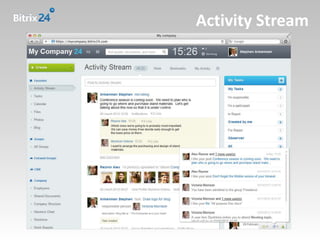
Tasks, projects, contacts directory, employee and workgroup
changes, CRM, etc. - all of these are displayed in the Activity
Stream (based on access permissions of each user and according
to their personal settings). This is your starting and ending point
for all your projects and daily activities in Bitrix24.
Activity Stream
Instant Messenger


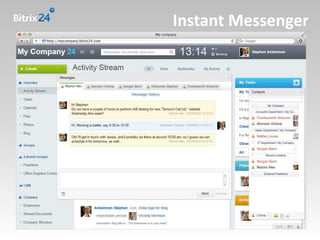
Each user tab of the Instant Messenger contains both the
current conversation and the "History" icon which displays all
messages ever exchanged with this user. A small pane with
company contacts and a "New Message / New Notification"
indicator is attached to the bottom of the page by default (can
be dragged-and-dropped to 6 different locations).
Instant Messenger
‘Like’ Button & Ratings


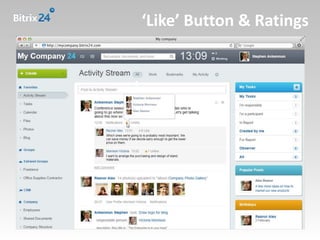
Liking content shows the opinions of coworkers and also
influences search results, as liked content is shown with priority
in search results. In this way, useful and popular content remains
easy to find. The ‘Like’ button is found in the Activity
Stream, Documents, Tasks, Comments, Blogs, etc..
‘Like’ Button & Ratings
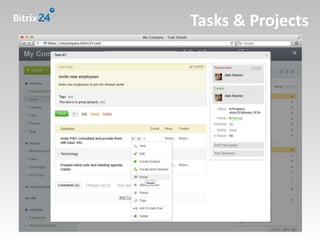
Tasks & Projects


Tasks and Projects are accessible directly from the Activity
Stream, plus you can instantly open a Task or a Project when you
get a notification on your screen. Tasks and Projects are opened
in floating windows above the content. Subtasks and any
changes in an existing Task can be done in the floating window.
Tasks & Projects
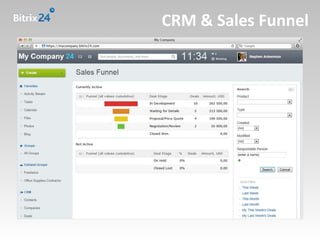
CRM & Sales Funnel


The CRM contains instruments to create reports, import/export
contacts, carry out analysis, and to perform segmentation of the
target audience as precisely as needed. You can also send emails
to a chosen set of contacts or leads in the CRM. The Sales Funnel
is generated according to lead statuses automatically.
CRM & Sales Funnel
release date is

April 12, 2012

                  www.bitrix24.com

Bitrix24: Social Intranet (Sneak Preview)

  • 1.
  • 2.
    Activity Stream Tasks, projects,contacts directory, employee and workgroup changes, CRM, etc. - all of these are displayed in the Activity Stream (based on access permissions of each user and according to their personal settings). This is your starting and ending point for all your projects and daily activities in Bitrix24.
  • 3.
  • 4.
    Instant Messenger Each usertab of the Instant Messenger contains both the current conversation and the "History" icon which displays all messages ever exchanged with this user. A small pane with company contacts and a "New Message / New Notification" indicator is attached to the bottom of the page by default (can be dragged-and-dropped to 6 different locations).
  • 5.
  • 6.
    ‘Like’ Button &Ratings Liking content shows the opinions of coworkers and also influences search results, as liked content is shown with priority in search results. In this way, useful and popular content remains easy to find. The ‘Like’ button is found in the Activity Stream, Documents, Tasks, Comments, Blogs, etc..
  • 7.
  • 8.
    Tasks & Projects Tasksand Projects are accessible directly from the Activity Stream, plus you can instantly open a Task or a Project when you get a notification on your screen. Tasks and Projects are opened in floating windows above the content. Subtasks and any changes in an existing Task can be done in the floating window.
  • 9.
  • 10.
    CRM & SalesFunnel The CRM contains instruments to create reports, import/export contacts, carry out analysis, and to perform segmentation of the target audience as precisely as needed. You can also send emails to a chosen set of contacts or leads in the CRM. The Sales Funnel is generated according to lead statuses automatically.
  • 11.
  • 12.
    release date is April12, 2012 www.bitrix24.com