PUBLIC
FactoryTalk® View SE and
Logix integration
2022
PUBLIC | Copyright ©2020 Rockwell Automation, Inc. | 2
Agenda
FactoryTalk® View SE and
Logix controller integration
points
Alarming and Diagnostics with
FactoryTalk® View SE and Logix
controllers
1 2
FactoryTalk® View SE and
Logix controller integration
PUBLIC
Why Logix +
FactoryTalk® View
SE?
The FactoryTalk® platform was built to optimize
communications and share information with Logix
controllers
One vendor for automation software and equipment
means better integration and cross-system support
Lower TCO through consolidation of support contracts
and licensing
PUBLIC • Copyright ©2021 Rockwell Automation, Inc. 5
Logix controller firmware and
FactoryTalk® Linx work together with data
objects that transfer between controller
and HMI faster than any other solution
High-performance
communications Optimized communications via
FactoryTalk® Linx Enterprise
BENEFITS
• FactoryTalk® View HMI Server requests for controller
data are prioritized and optimized by FactoryTalk® Live
Data
• After a FactoryTalk® Live Data connection is
established, subsequent visualized data loads much
faster than with other data servers
• FactoryTalk® View SE provides options for optimization
of on-screen tag data
Global connections, alarms, macros,
and screen tags have higher priority
Configure HMI tag scan rates, cached
displays, and trend updates to
customize optimization of on-screen
tag data
PUBLIC • Copyright ©2021 Rockwell Automation, Inc. 6
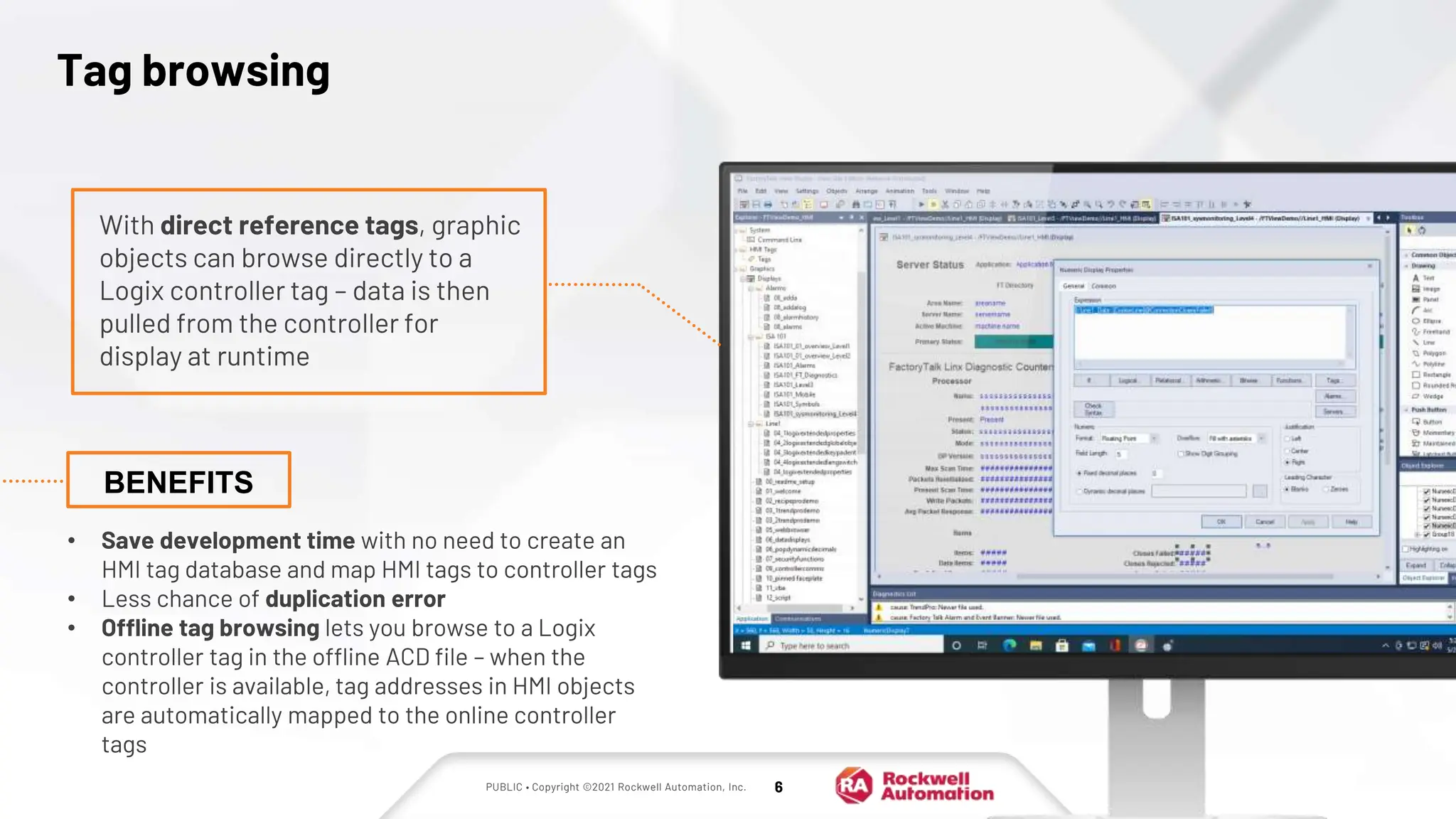
Tag browsing
• Save development time with no need to create an
HMI tag database and map HMI tags to controller tags
• Less chance of duplication error
• Offline tag browsing lets you browse to a Logix
controller tag in the offline ACD file – when the
controller is available, tag addresses in HMI objects
are automatically mapped to the online controller
tags
With direct reference tags, graphic
objects can browse directly to a
Logix controller tag – data is then
pulled from the controller for
display at runtime
BENEFITS
PUBLIC • Copyright ©2021 Rockwell Automation, Inc. 7
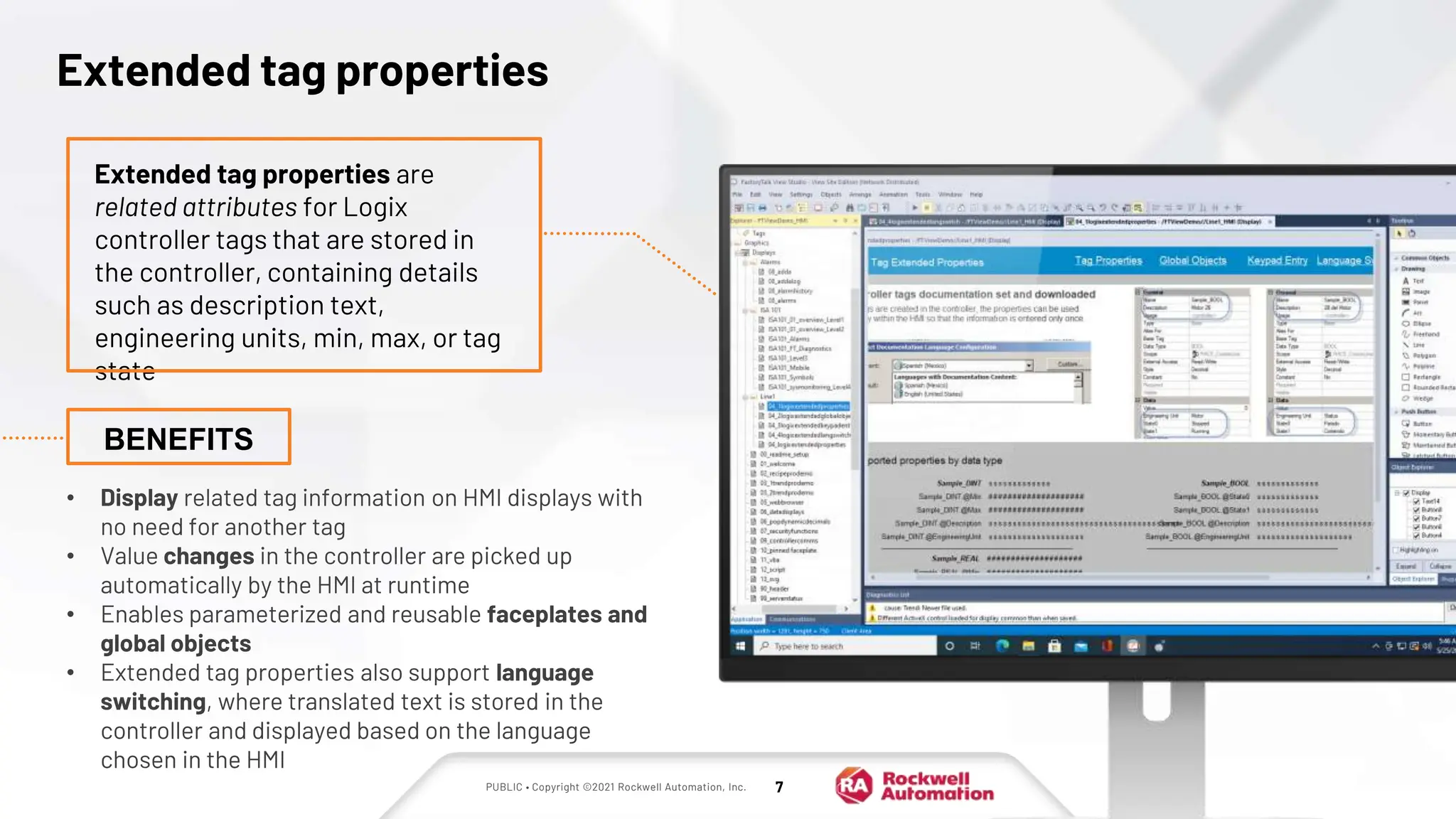
Extended tag properties
• Display related tag information on HMI displays with
no need for another tag
• Value changes in the controller are picked up
automatically by the HMI at runtime
• Enables parameterized and reusable faceplates and
global objects
• Extended tag properties also support language
switching, where translated text is stored in the
controller and displayed based on the language
chosen in the HMI
Extended tag properties are
related attributes for Logix
controller tags that are stored in
the controller, containing details
such as description text,
engineering units, min, max, or tag
state
BENEFITS
PUBLIC • Copyright ©2021 Rockwell Automation, Inc. 8
• Single supplier from controller to HMI
• Optimized communications with
FactoryTalk® Live Data
• No need for HMI tags
• Online and offline browsing to controller
tags directly from display objects in the HMI
• Make use of Extended Tag Properties from
the Logix controller in the HMI
Summary:
Benefits of using
FactoryTalk® View SE with
Logix controllers
PUBLIC • Copyright ©2021 Rockwell Automation, Inc. 9
Alarming and Diagnostics
with FactoryTalk® View SE
and Logix controllers
PUBLIC • Copyright ©2021 Rockwell Automation, Inc. 10
FactoryTalk® View SE
+ Logix alarms
Logix controllers and the FactoryTalk® platform
automatically share alarm and device diagnostics
Pre-built objects for operator HMI displays require no
configuration
Flexible options for alarm interaction allow actions
such as viewing, acknowledgment, or shelving from
the HMI, web browser, or mobile devices
PUBLIC • Copyright ©2021 Rockwell Automation, Inc. 11
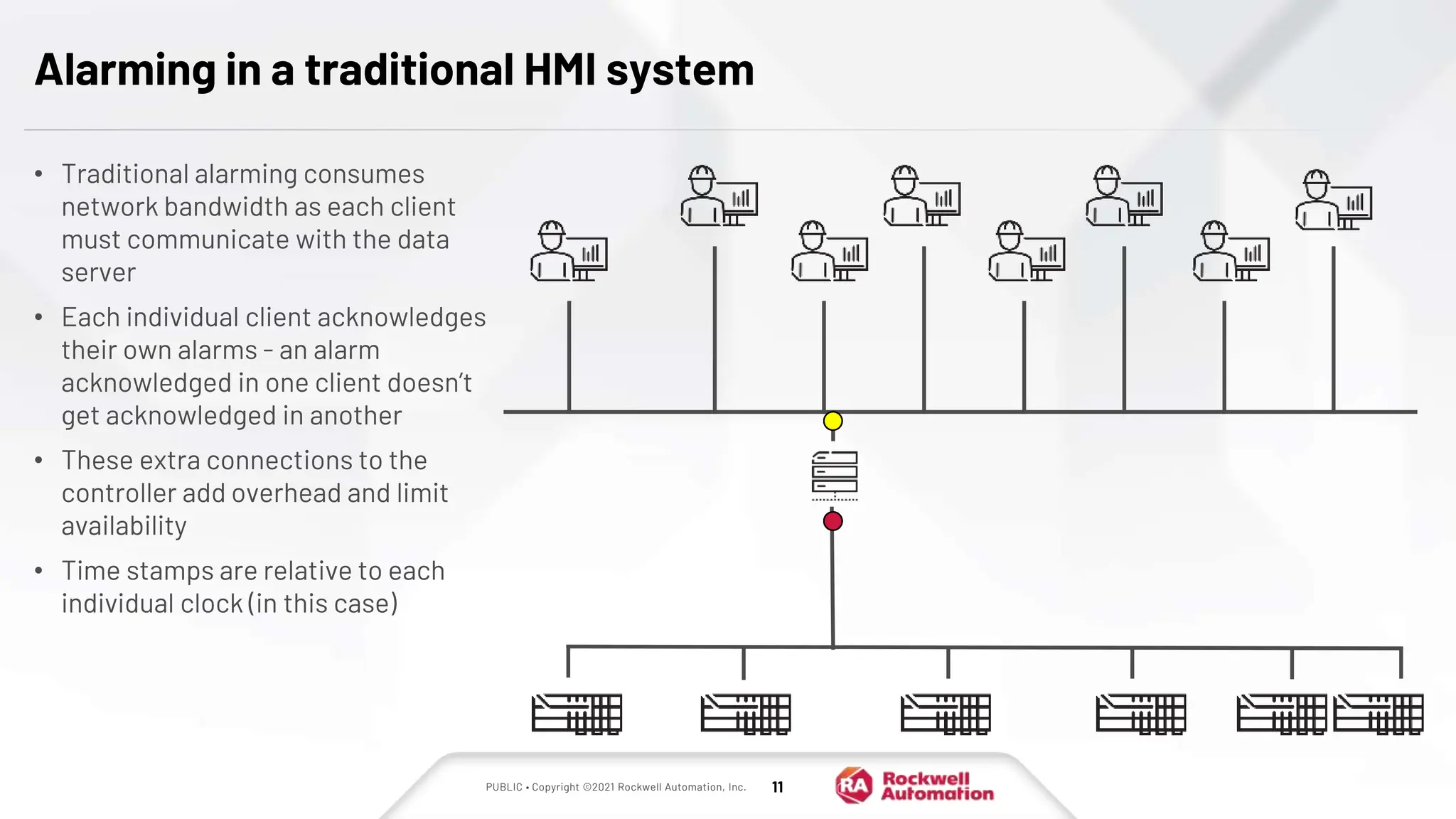
Alarming in a traditional HMI system
• Traditional alarming consumes
network bandwidth as each client
must communicate with the data
server
• Each individual client acknowledges
their own alarms - an alarm
acknowledged in one client doesn’t
get acknowledged in another
• These extra connections to the
controller add overhead and limit
availability
• Time stamps are relative to each
individual clock (in this case)
PUBLIC • Copyright ©2021 Rockwell Automation, Inc. 12
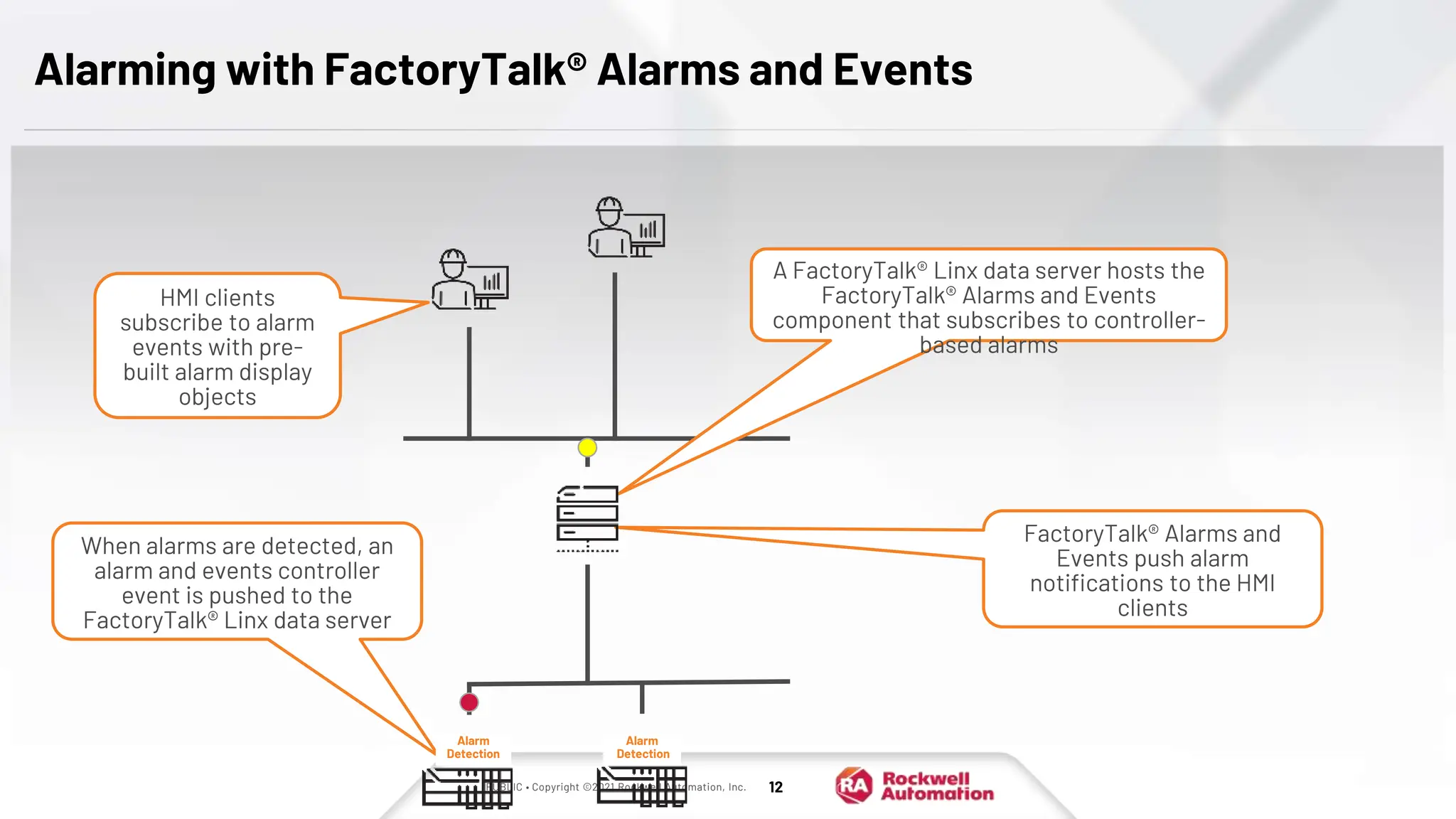
Alarming with FactoryTalk® Alarms and Events
A FactoryTalk® Linx data server hosts the
FactoryTalk® Alarms and Events
component that subscribes to controller-
based alarms
When alarms are detected, an
alarm and events controller
event is pushed to the
FactoryTalk® Linx data server
HMI clients
subscribe to alarm
events with pre-
built alarm display
objects
FactoryTalk® Alarms and
Events push alarm
notifications to the HMI
clients
Alarm
Detection
Alarm
Detection
PUBLIC • Copyright ©2021 Rockwell Automation, Inc. 13
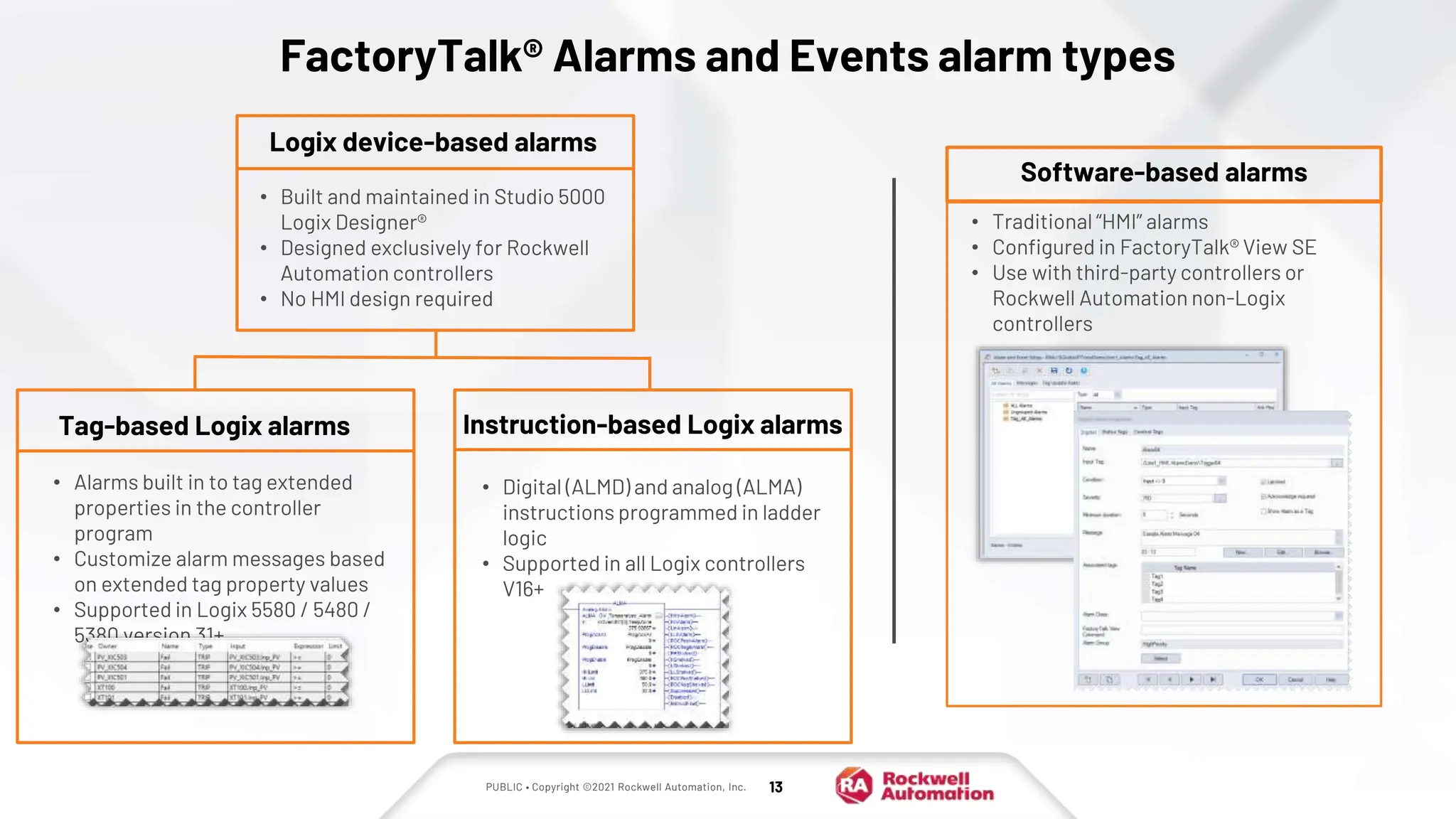
FactoryTalk® Alarms and Events alarm types
Software-based alarms
• Traditional “HMI” alarms
• Configured in FactoryTalk® View SE
• Use with third-party controllers or
Rockwell Automation non-Logix
controllers
Logix device-based alarms
• Built and maintained in Studio 5000
Logix Designer®
• Designed exclusively for Rockwell
Automation controllers
• No HMI design required
Tag-based Logix alarms
• Alarms built in to tag extended
properties in the controller
program
• Customize alarm messages based
on extended tag property values
• Supported in Logix 5580 / 5480 /
5380 version 31+
Instruction-based Logix alarms
• Digital (ALMD) and analog (ALMA)
instructions programmed in ladder
logic
• Supported in all Logix controllers
V16+
PUBLIC • Copyright ©2021 Rockwell Automation, Inc. 14
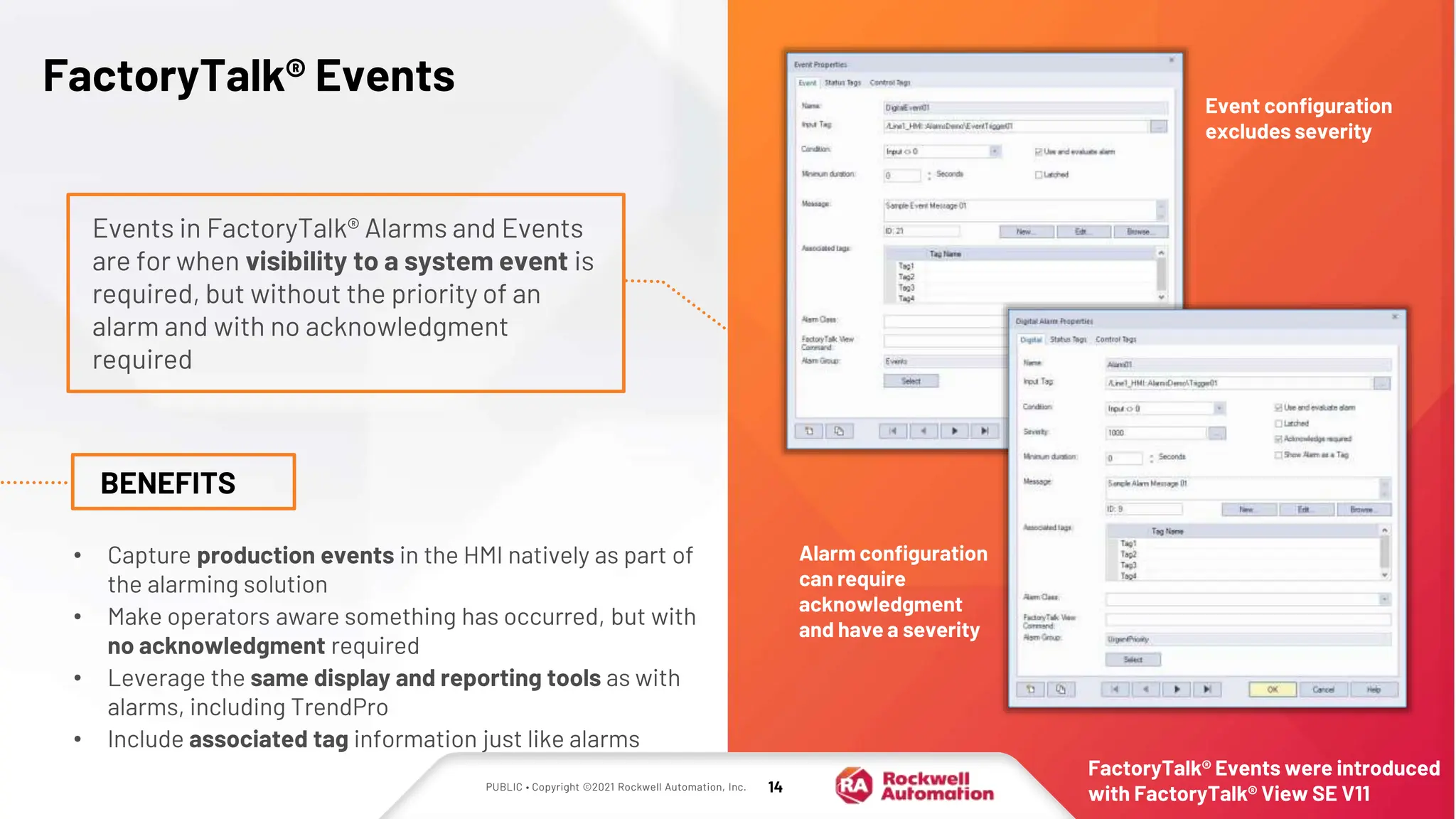
FactoryTalk® Events
Events in FactoryTalk® Alarms and Events
are for when visibility to a system event is
required, but without the priority of an
alarm and with no acknowledgment
required
BENEFITS
• Capture production events in the HMI natively as part of
the alarming solution
• Make operators aware something has occurred, but with
no acknowledgment required
• Leverage the same display and reporting tools as with
alarms, including TrendPro
• Include associated tag information just like alarms
Event configuration
excludes severity
Alarm configuration
can require
acknowledgment
and have a severity
FactoryTalk® Events were introduced
with FactoryTalk® View SE V11
PUBLIC • Copyright ©2021 Rockwell Automation, Inc. 15
Automatic Diagnostics
Access and display diagnostic information without additional programming
• No programming through alarms to get and display
diagnostic information
• Provide contextual information from the Logix
project with the diagnostic event
• Device diagnostics follow the lifecycle of the device
BENEFITS
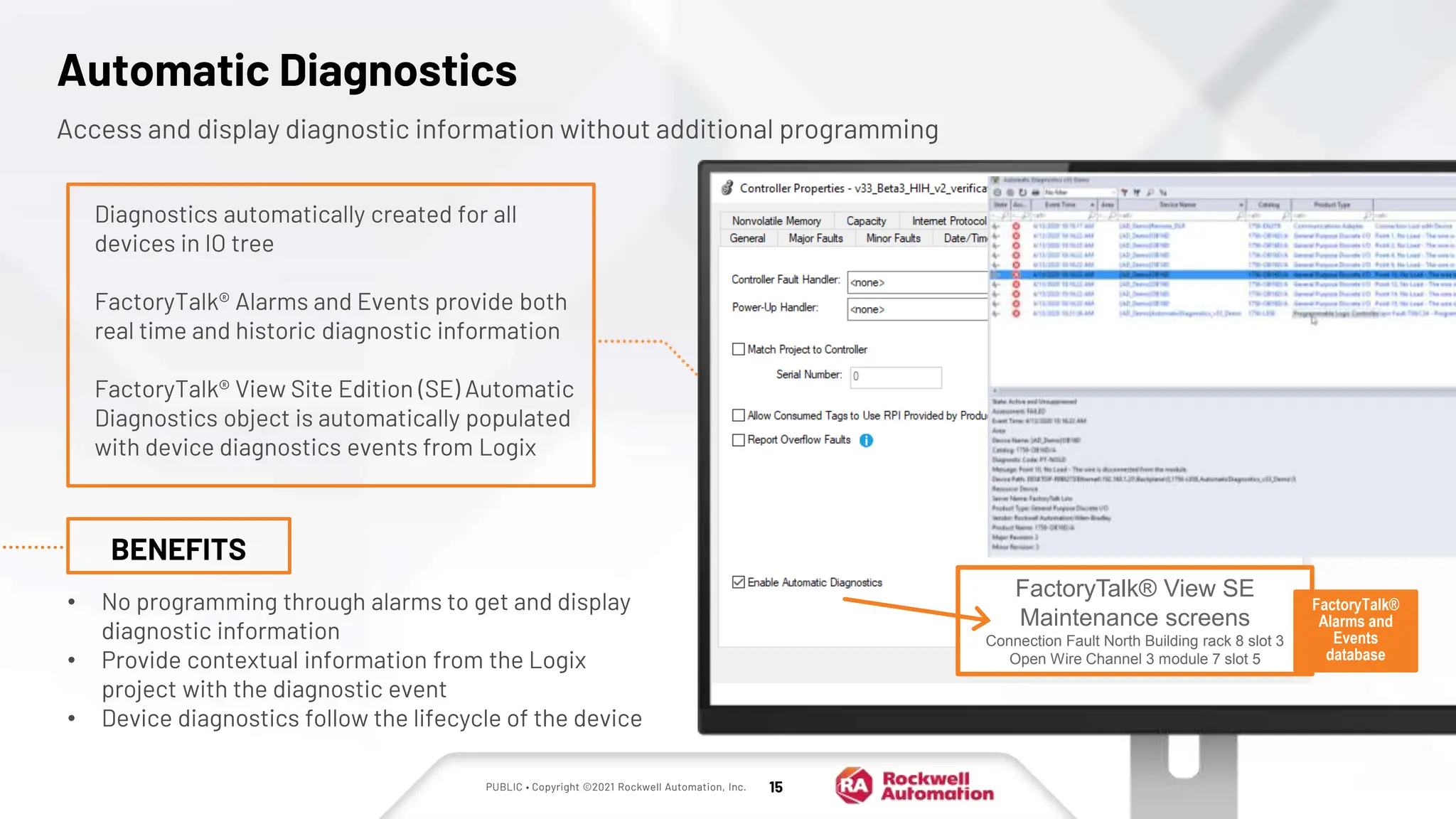
Diagnostics automatically created for all
devices in IO tree
FactoryTalk® Alarms and Events provide both
real time and historic diagnostic information
FactoryTalk® View Site Edition (SE) Automatic
Diagnostics object is automatically populated
with device diagnostics events from Logix
FactoryTalk® View SE
Maintenance screens
Connection Fault North Building rack 8 slot 3
Open Wire Channel 3 module 7 slot 5
FactoryTalk®
Alarms and
Events
database
PUBLIC • Copyright ©2021 Rockwell Automation, Inc. 16
Modularity and online maintenance with Logix tag-based alarms
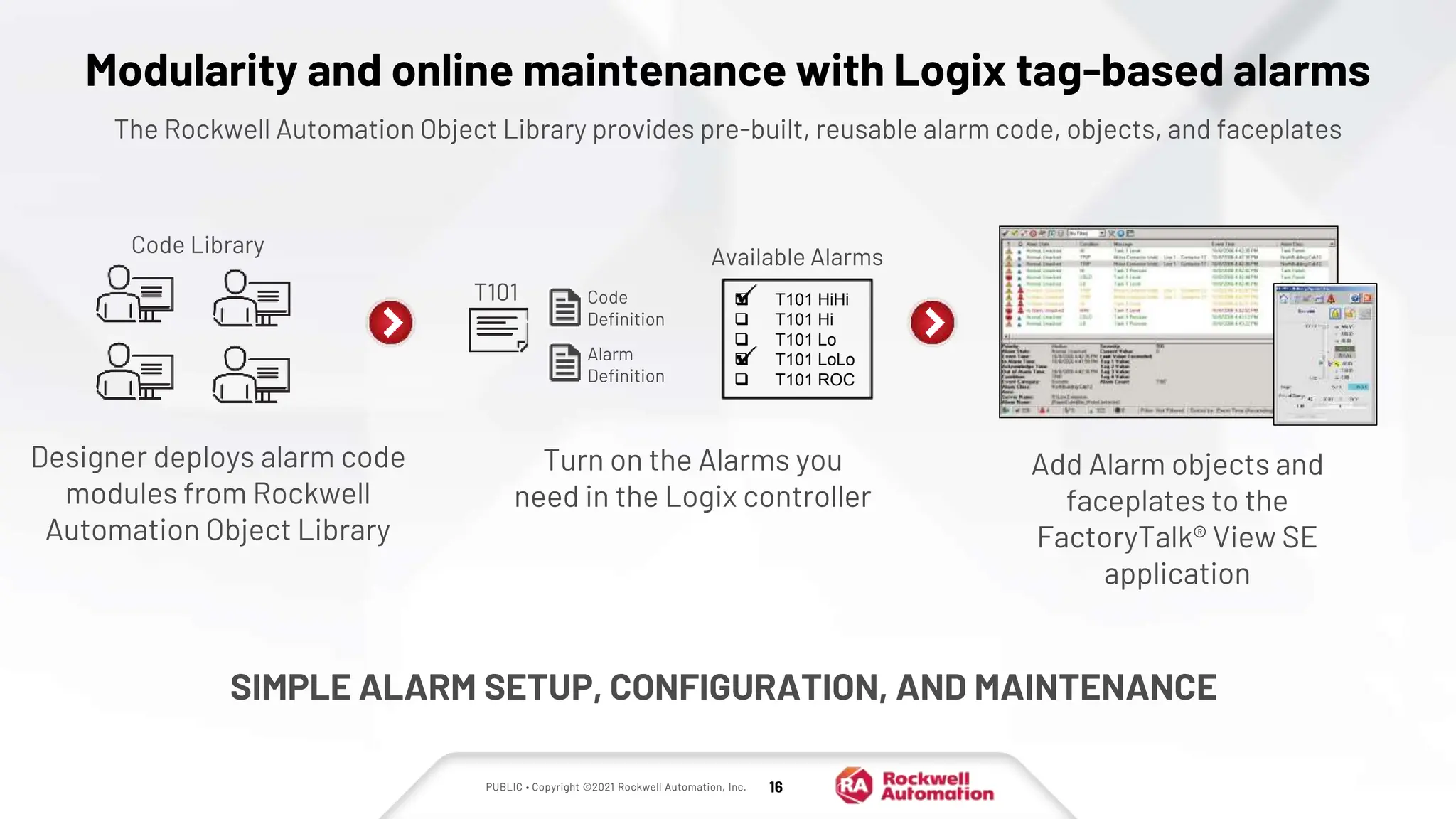
The Rockwell Automation Object Library provides pre-built, reusable alarm code, objects, and faceplates
Turn on the Alarms you
need in the Logix controller
Add Alarm objects and
faceplates to the
FactoryTalk® View SE
application
SIMPLE ALARM SETUP, CONFIGURATION, AND MAINTENANCE
Code
Definition
Alarm
Definition
T101
Code Library
Available Alarms
 T101 HiHi
 T101 Hi
 T101 Lo
 T101 LoLo
 T101 ROC
Designer deploys alarm code
modules from Rockwell
Automation Object Library
PUBLIC • Copyright ©2021 Rockwell Automation, Inc. 17
Alarm objects in FactoryTalk® View SE
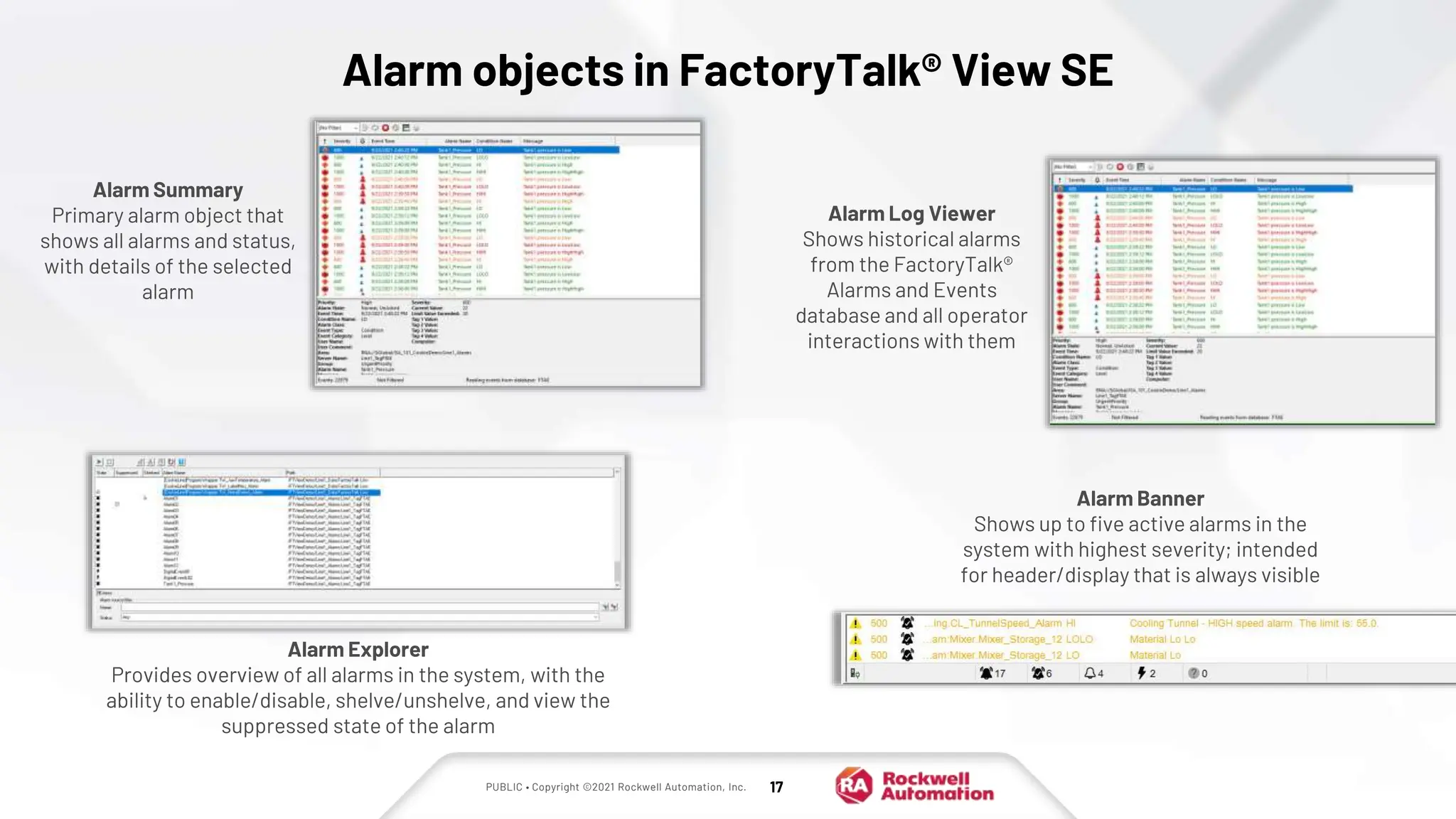
Alarm Summary
Primary alarm object that
shows all alarms and status,
with details of the selected
alarm
Alarm Banner
Shows up to five active alarms in the
system with highest severity; intended
for header/display that is always visible
Alarm Explorer
Provides overview of all alarms in the system, with the
ability to enable/disable, shelve/unshelve, and view the
suppressed state of the alarm
Alarm Log Viewer
Shows historical alarms
from the FactoryTalk®
Alarms and Events
database and all operator
interactions with them
PUBLIC • Copyright ©2021 Rockwell Automation, Inc. 18
FactoryTalk® View SE TrendPro
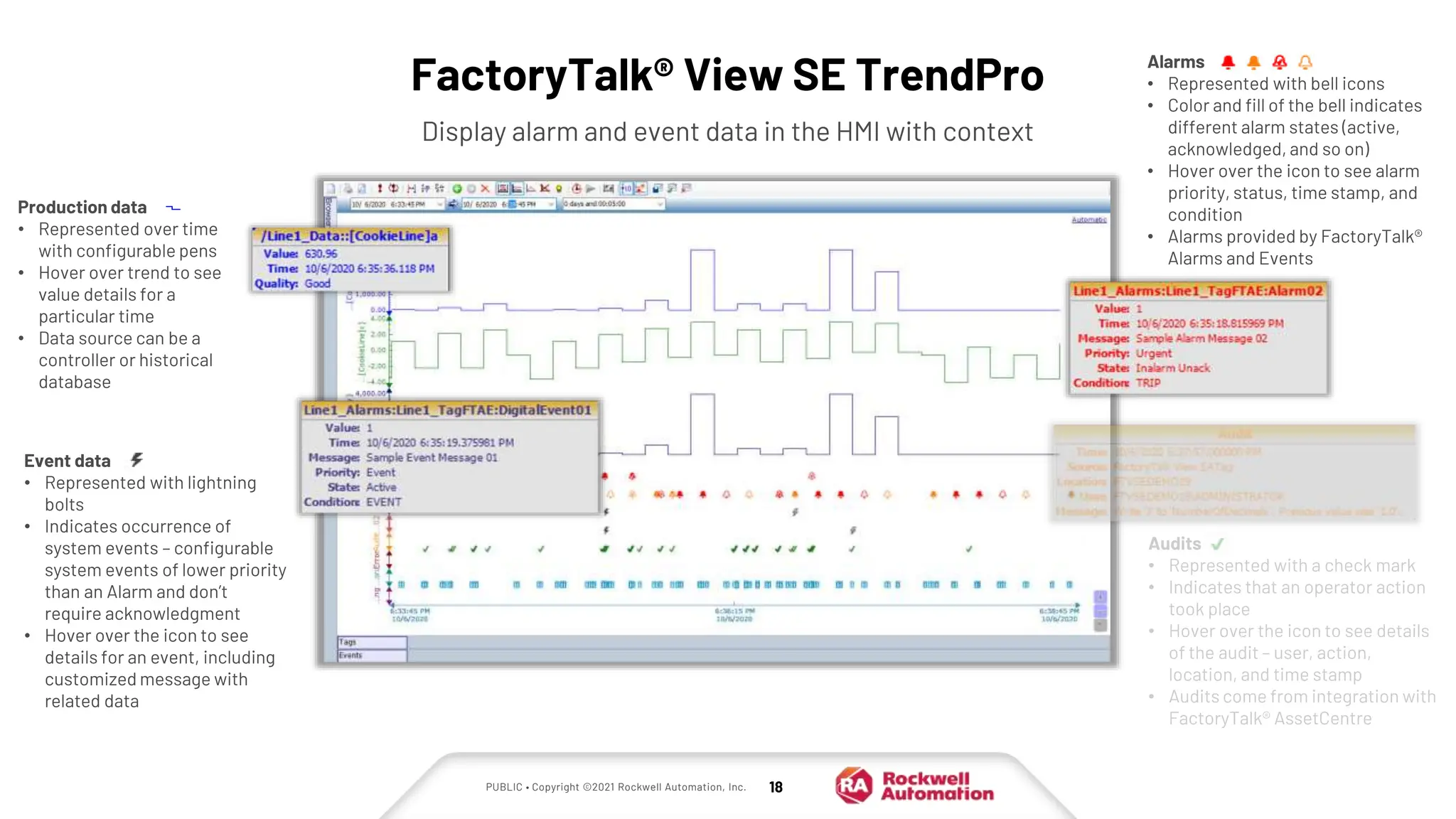
Display alarm and event data in the HMI with context
Event data
• Represented with lightning
bolts
• Indicates occurrence of
system events – configurable
system events of lower priority
than an Alarm and don’t
require acknowledgment
• Hover over the icon to see
details for an event, including
customized message with
related data
Audits
• Represented with a check mark
• Indicates that an operator action
took place
• Hover over the icon to see details
of the audit – user, action,
location, and time stamp
• Audits come from integration with
FactoryTalk® AssetCentre
Production data
• Represented over time
with configurable pens
• Hover over trend to see
value details for a
particular time
• Data source can be a
controller or historical
database
Alarms
• Represented with bell icons
• Color and fill of the bell indicates
different alarm states (active,
acknowledged, and so on)
• Hover over the icon to see alarm
priority, status, time stamp, and
condition
• Alarms provided by FactoryTalk®
Alarms and Events
PUBLIC • Copyright ©2021 Rockwell Automation, Inc. 19
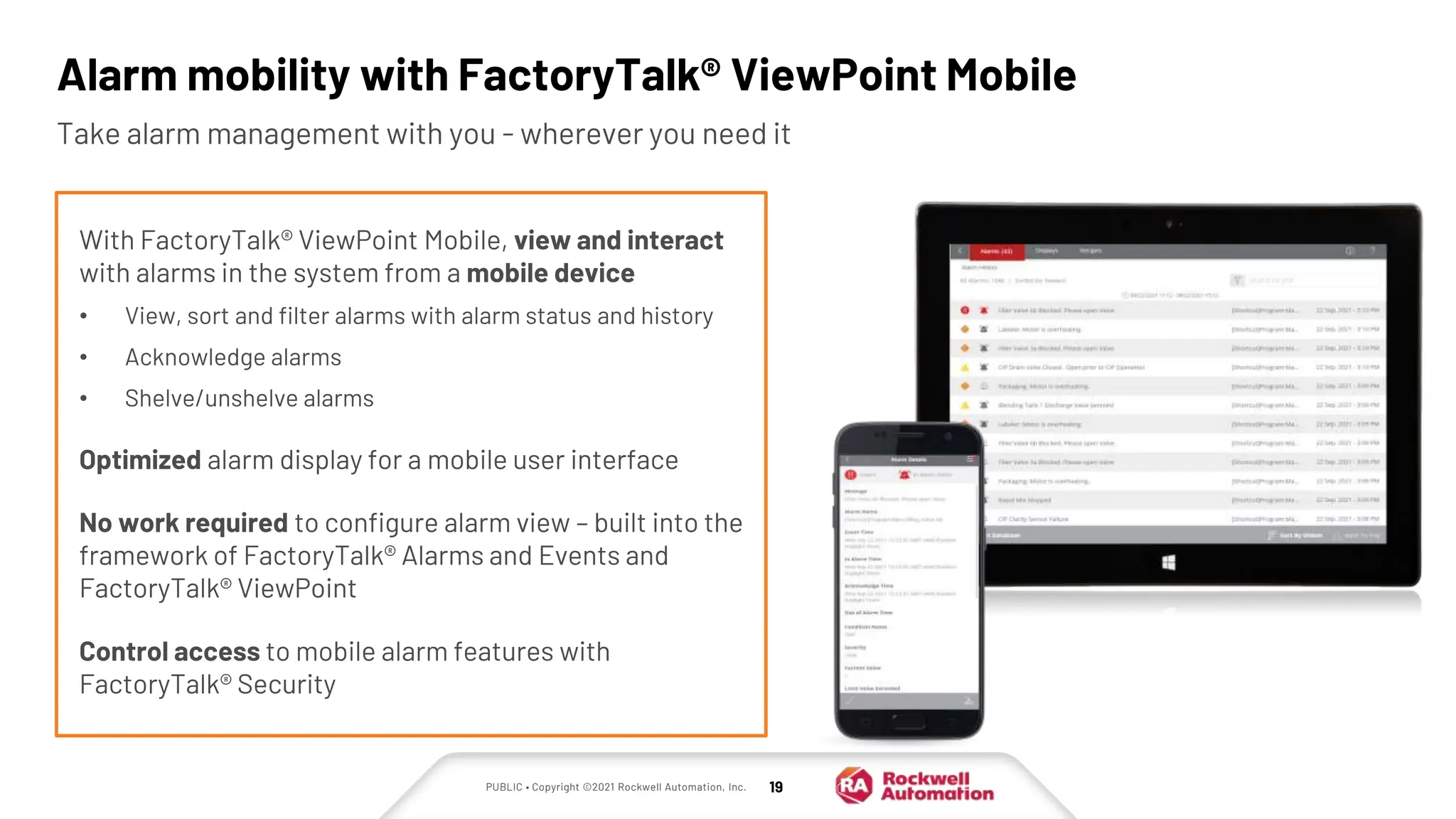
Alarm mobility with FactoryTalk® ViewPoint Mobile
Take alarm management with you - wherever you need it
With FactoryTalk® ViewPoint Mobile, view and interact
with alarms in the system from a mobile device
• View, sort and filter alarms with alarm status and history
• Acknowledge alarms
• Shelve/unshelve alarms
Optimized alarm display for a mobile user interface
No work required to configure alarm view – built into the
framework of FactoryTalk® Alarms and Events and
FactoryTalk® ViewPoint
Control access to mobile alarm features with
FactoryTalk® Security
PUBLIC • Copyright ©2021 Rockwell Automation, Inc. 20
WIN-911 SeQent Ocean Data Systems SyTech
Alarm notification and
management integrated
with the FactoryTalk®
platform
• Choose voice, email,
text, or mobile app alarm
notifications
• Smart escalation lets
you manage who
receives alarm
notifications based on
type, severity, or worker
roles and schedules
• Visit them on the web
XLReporter provides
workbooks and web
reports automatically and
on demand
• Low cost, easy reporting
solution from on-
premise or remote data
• Use included report
templates or design your
own
• Share reports by email,
FTP, or XLReporter Web
Portal
• Visit them on the web
Scalable alarm notification
platform
• Notify users via two-way
radio, smartphones,
pagers, speakers, and
more
• Enables customizable
digital signage content
and audio control
• Visit them on the web
Dream Report provides
automated reports and
dashboards
• KPI reports and
dashboards delivered to
the right users
• Alarm-related stat
functions for ISA 18.2
compliance
• Automated regulatory
and compliance reports
• Visit them on the web
Alarming Technology Partners
Rockwell Automation Technology Partners provide alarm functionality integrated with FactoryTalk® Alarms and
Events
PUBLIC • Copyright ©2021 Rockwell Automation, Inc. 21
Learn more about alarming with FactoryTalk® View SE
White papers and guides
• PlantPAx® Rationalization &
Implementation White Paper
• Performance Benchmarking and Alarm
Philosophy Development
• Economic and Effective Alarm
Management
• RA Process HMI Style Guide
• Create & Maintain Effective User
Environments with Efficient Graphics
Additional resources
• FactoryTalk® View SE YouTube
playlist (look for the Logix + View
video series)
Technology Partners
• Ocean Data Systems
• SeQent
• SyTech
• WIN-911
PUBLIC • Copyright ©2021 Rockwell Automation, Inc. 22
Thank you!

Benefits of FactoryTalk View SE and Logix Controller Integration.PPTX

  • 1.
    PUBLIC FactoryTalk® View SEand Logix integration 2022
  • 2.
    PUBLIC | Copyright©2020 Rockwell Automation, Inc. | 2 Agenda FactoryTalk® View SE and Logix controller integration points Alarming and Diagnostics with FactoryTalk® View SE and Logix controllers 1 2
  • 3.
    FactoryTalk® View SEand Logix controller integration
  • 4.
    PUBLIC Why Logix + FactoryTalk®View SE? The FactoryTalk® platform was built to optimize communications and share information with Logix controllers One vendor for automation software and equipment means better integration and cross-system support Lower TCO through consolidation of support contracts and licensing
  • 5.
    PUBLIC • Copyright©2021 Rockwell Automation, Inc. 5 Logix controller firmware and FactoryTalk® Linx work together with data objects that transfer between controller and HMI faster than any other solution High-performance communications Optimized communications via FactoryTalk® Linx Enterprise BENEFITS • FactoryTalk® View HMI Server requests for controller data are prioritized and optimized by FactoryTalk® Live Data • After a FactoryTalk® Live Data connection is established, subsequent visualized data loads much faster than with other data servers • FactoryTalk® View SE provides options for optimization of on-screen tag data Global connections, alarms, macros, and screen tags have higher priority Configure HMI tag scan rates, cached displays, and trend updates to customize optimization of on-screen tag data
  • 6.
    PUBLIC • Copyright©2021 Rockwell Automation, Inc. 6 Tag browsing • Save development time with no need to create an HMI tag database and map HMI tags to controller tags • Less chance of duplication error • Offline tag browsing lets you browse to a Logix controller tag in the offline ACD file – when the controller is available, tag addresses in HMI objects are automatically mapped to the online controller tags With direct reference tags, graphic objects can browse directly to a Logix controller tag – data is then pulled from the controller for display at runtime BENEFITS
  • 7.
    PUBLIC • Copyright©2021 Rockwell Automation, Inc. 7 Extended tag properties • Display related tag information on HMI displays with no need for another tag • Value changes in the controller are picked up automatically by the HMI at runtime • Enables parameterized and reusable faceplates and global objects • Extended tag properties also support language switching, where translated text is stored in the controller and displayed based on the language chosen in the HMI Extended tag properties are related attributes for Logix controller tags that are stored in the controller, containing details such as description text, engineering units, min, max, or tag state BENEFITS
  • 8.
    PUBLIC • Copyright©2021 Rockwell Automation, Inc. 8 • Single supplier from controller to HMI • Optimized communications with FactoryTalk® Live Data • No need for HMI tags • Online and offline browsing to controller tags directly from display objects in the HMI • Make use of Extended Tag Properties from the Logix controller in the HMI Summary: Benefits of using FactoryTalk® View SE with Logix controllers
  • 9.
    PUBLIC • Copyright©2021 Rockwell Automation, Inc. 9 Alarming and Diagnostics with FactoryTalk® View SE and Logix controllers
  • 10.
    PUBLIC • Copyright©2021 Rockwell Automation, Inc. 10 FactoryTalk® View SE + Logix alarms Logix controllers and the FactoryTalk® platform automatically share alarm and device diagnostics Pre-built objects for operator HMI displays require no configuration Flexible options for alarm interaction allow actions such as viewing, acknowledgment, or shelving from the HMI, web browser, or mobile devices
  • 11.
    PUBLIC • Copyright©2021 Rockwell Automation, Inc. 11 Alarming in a traditional HMI system • Traditional alarming consumes network bandwidth as each client must communicate with the data server • Each individual client acknowledges their own alarms - an alarm acknowledged in one client doesn’t get acknowledged in another • These extra connections to the controller add overhead and limit availability • Time stamps are relative to each individual clock (in this case)
  • 12.
    PUBLIC • Copyright©2021 Rockwell Automation, Inc. 12 Alarming with FactoryTalk® Alarms and Events A FactoryTalk® Linx data server hosts the FactoryTalk® Alarms and Events component that subscribes to controller- based alarms When alarms are detected, an alarm and events controller event is pushed to the FactoryTalk® Linx data server HMI clients subscribe to alarm events with pre- built alarm display objects FactoryTalk® Alarms and Events push alarm notifications to the HMI clients Alarm Detection Alarm Detection
  • 13.
    PUBLIC • Copyright©2021 Rockwell Automation, Inc. 13 FactoryTalk® Alarms and Events alarm types Software-based alarms • Traditional “HMI” alarms • Configured in FactoryTalk® View SE • Use with third-party controllers or Rockwell Automation non-Logix controllers Logix device-based alarms • Built and maintained in Studio 5000 Logix Designer® • Designed exclusively for Rockwell Automation controllers • No HMI design required Tag-based Logix alarms • Alarms built in to tag extended properties in the controller program • Customize alarm messages based on extended tag property values • Supported in Logix 5580 / 5480 / 5380 version 31+ Instruction-based Logix alarms • Digital (ALMD) and analog (ALMA) instructions programmed in ladder logic • Supported in all Logix controllers V16+
  • 14.
    PUBLIC • Copyright©2021 Rockwell Automation, Inc. 14 FactoryTalk® Events Events in FactoryTalk® Alarms and Events are for when visibility to a system event is required, but without the priority of an alarm and with no acknowledgment required BENEFITS • Capture production events in the HMI natively as part of the alarming solution • Make operators aware something has occurred, but with no acknowledgment required • Leverage the same display and reporting tools as with alarms, including TrendPro • Include associated tag information just like alarms Event configuration excludes severity Alarm configuration can require acknowledgment and have a severity FactoryTalk® Events were introduced with FactoryTalk® View SE V11
  • 15.
    PUBLIC • Copyright©2021 Rockwell Automation, Inc. 15 Automatic Diagnostics Access and display diagnostic information without additional programming • No programming through alarms to get and display diagnostic information • Provide contextual information from the Logix project with the diagnostic event • Device diagnostics follow the lifecycle of the device BENEFITS Diagnostics automatically created for all devices in IO tree FactoryTalk® Alarms and Events provide both real time and historic diagnostic information FactoryTalk® View Site Edition (SE) Automatic Diagnostics object is automatically populated with device diagnostics events from Logix FactoryTalk® View SE Maintenance screens Connection Fault North Building rack 8 slot 3 Open Wire Channel 3 module 7 slot 5 FactoryTalk® Alarms and Events database
  • 16.
    PUBLIC • Copyright©2021 Rockwell Automation, Inc. 16 Modularity and online maintenance with Logix tag-based alarms The Rockwell Automation Object Library provides pre-built, reusable alarm code, objects, and faceplates Turn on the Alarms you need in the Logix controller Add Alarm objects and faceplates to the FactoryTalk® View SE application SIMPLE ALARM SETUP, CONFIGURATION, AND MAINTENANCE Code Definition Alarm Definition T101 Code Library Available Alarms  T101 HiHi  T101 Hi  T101 Lo  T101 LoLo  T101 ROC Designer deploys alarm code modules from Rockwell Automation Object Library
  • 17.
    PUBLIC • Copyright©2021 Rockwell Automation, Inc. 17 Alarm objects in FactoryTalk® View SE Alarm Summary Primary alarm object that shows all alarms and status, with details of the selected alarm Alarm Banner Shows up to five active alarms in the system with highest severity; intended for header/display that is always visible Alarm Explorer Provides overview of all alarms in the system, with the ability to enable/disable, shelve/unshelve, and view the suppressed state of the alarm Alarm Log Viewer Shows historical alarms from the FactoryTalk® Alarms and Events database and all operator interactions with them
  • 18.
    PUBLIC • Copyright©2021 Rockwell Automation, Inc. 18 FactoryTalk® View SE TrendPro Display alarm and event data in the HMI with context Event data • Represented with lightning bolts • Indicates occurrence of system events – configurable system events of lower priority than an Alarm and don’t require acknowledgment • Hover over the icon to see details for an event, including customized message with related data Audits • Represented with a check mark • Indicates that an operator action took place • Hover over the icon to see details of the audit – user, action, location, and time stamp • Audits come from integration with FactoryTalk® AssetCentre Production data • Represented over time with configurable pens • Hover over trend to see value details for a particular time • Data source can be a controller or historical database Alarms • Represented with bell icons • Color and fill of the bell indicates different alarm states (active, acknowledged, and so on) • Hover over the icon to see alarm priority, status, time stamp, and condition • Alarms provided by FactoryTalk® Alarms and Events
  • 19.
    PUBLIC • Copyright©2021 Rockwell Automation, Inc. 19 Alarm mobility with FactoryTalk® ViewPoint Mobile Take alarm management with you - wherever you need it With FactoryTalk® ViewPoint Mobile, view and interact with alarms in the system from a mobile device • View, sort and filter alarms with alarm status and history • Acknowledge alarms • Shelve/unshelve alarms Optimized alarm display for a mobile user interface No work required to configure alarm view – built into the framework of FactoryTalk® Alarms and Events and FactoryTalk® ViewPoint Control access to mobile alarm features with FactoryTalk® Security
  • 20.
    PUBLIC • Copyright©2021 Rockwell Automation, Inc. 20 WIN-911 SeQent Ocean Data Systems SyTech Alarm notification and management integrated with the FactoryTalk® platform • Choose voice, email, text, or mobile app alarm notifications • Smart escalation lets you manage who receives alarm notifications based on type, severity, or worker roles and schedules • Visit them on the web XLReporter provides workbooks and web reports automatically and on demand • Low cost, easy reporting solution from on- premise or remote data • Use included report templates or design your own • Share reports by email, FTP, or XLReporter Web Portal • Visit them on the web Scalable alarm notification platform • Notify users via two-way radio, smartphones, pagers, speakers, and more • Enables customizable digital signage content and audio control • Visit them on the web Dream Report provides automated reports and dashboards • KPI reports and dashboards delivered to the right users • Alarm-related stat functions for ISA 18.2 compliance • Automated regulatory and compliance reports • Visit them on the web Alarming Technology Partners Rockwell Automation Technology Partners provide alarm functionality integrated with FactoryTalk® Alarms and Events
  • 21.
    PUBLIC • Copyright©2021 Rockwell Automation, Inc. 21 Learn more about alarming with FactoryTalk® View SE White papers and guides • PlantPAx® Rationalization & Implementation White Paper • Performance Benchmarking and Alarm Philosophy Development • Economic and Effective Alarm Management • RA Process HMI Style Guide • Create & Maintain Effective User Environments with Efficient Graphics Additional resources • FactoryTalk® View SE YouTube playlist (look for the Logix + View video series) Technology Partners • Ocean Data Systems • SeQent • SyTech • WIN-911
  • 22.
    PUBLIC • Copyright©2021 Rockwell Automation, Inc. 22 Thank you!

Editor's Notes

  • #6 Logix controller firmware and FactoryTalk® Linx work in conjunction to build data objects that transfer from controller  HMI and vice versa faster than any other solution When a FactoryTalk® View HMI Server requests data from a Logix controller, prioritization and optimization take place: Global connections, alarms, macros, and screen tags have higher priority optimization Other data is served, but optimized data is returned more quickly and in another “message” from the controller This HMI Server to FactoryTalk® Linx communications is via FactoryTalk® Live Data – optimized, much faster than OPC FactoryTalk® View SE provides options for optimizing on-screen tag data Data requests from displays, once created, are not ‘destroyed’ as with other data servers – this means data loads much faster after the first connection FactoryTalk® FactoryTalk® View SE tag scan rates are set by display, not by communications node FactoryTalk® View allows cached displays; a cached display is loaded in the background – so graphics are data are displayed faster when the display is pulled up and rendered Trend displays can be configured as “always updating” so that when the display is pulled up, cached and live data can be displayed immediately rather than waiting for a comms request to supply it
  • #7 Some HMIs have their own tag database, and tags in the controller are mapped to tags in that tag database These are called “HMI tags” With FactoryTalk® View Studio, you can browse from graphic objects directly to data points in the controller, rather than re-creating an HMI tag database and then mapping to controller tags This is called a “direct reference” to a tag – graphic objects point directly to a tag value in the controller Save development time with no duplication of controller tag information in the HMI Less chance of duplication error – create tags once in the controller and browse to them from the HMI At runtime, graphic objects pull data directly from the controller via FactoryTalk® Live Data and FactoryTalk® Linx, with no tag database in between
  • #8 What are extended tag properties? Extended tag properties are “related attributes” of tags stored in the Logix controller, such as description text, engineering units, min, max, or tag state They also support language switching – translated text is stored in the controller, and when a user switches language in the HMI, text in the appropriate language is pulled from the controller and displayed Why are extended tag properties useful? Logix extended property values can be displayed on HMI displays For example, to show min/max value for a tag with no need for another tag or text –min/max value is pulled from the controller and displayed in text box via direct reference Controller setting / value changes are picked up (inherited) automatically at runtime Enhances FactoryTalk® View SE productivity by enabling parameterized reusable faceplates and global objects Change-based communications to minimize system impact (no polling the controller for tag or extended property values) Controller’s memory is the master copy – providing a “single version of the truth”
  • #11 The first video in the FactoryTalk® View SE and Logix integration series talked about the benefits of FactoryTalk® View+Logix integration. This video will cover integration of alarms, events, and diagnostics across Logix controllers, FTA&E, and FactoryTalk® FactoryTalk® View SE and benefits like: Automatic sharing of alarms, events and device diagnostics between the Logix controller and the HMI via the FactoryTalk® platform, specifically FTAE The pre-built objects provided by FactoryTalk® View SE that require no configuration to display alarms, events, and diagnostics to the HMI operator at runtime And flexible options for interacting with alarms, including FactoryTalk® View SE and mobile devices, and some of Rockwell Automation technology partners
  • #14 There are two kinds of alarms with FactoryTalk® Alarms and Events: Server based – or alarms that are managed and created in FactoryTalk® View Logix based – or alarms that are managed and created in Logix Designer application Regardless of which style you choose, or even using both, the alarms are all summarized in common display tools in the HMI, so the operator has no idea where that alarm lives, nor do they must. Server-based alarms are used primarily to support legacy (or non-Logix based) controllers or a customer that has third-party controllers they must support with alarms. This is also the style of alarms that are supported for RSView®32 migration and legacy HMI alarms. What other legacy alarms? A conversion tool exists for customers with RSView®32 and legacy HMI alarms to convert those alarms to FTAE server-based alarms. Version 10 is the LAST version to support HMI Tag Alarms! User is notified when (can’t recall the exact steps)
  • #15 Event Use cases: System startup, Sequence / procedure finishes, trigger an event to tell operators it’s done
  • #16 AD – It’s the manufacturing version of an EKG – tells you that the system is running, or there’s a problem with devices communicating with the controller. Device has a problem (ex: controller fault, I/O disconnect) and operator knows where to focus their attention. Anything in the I/O tree provides a status to the controller – that gets fed into AD. No programing required, built in to the system – subscribe to the controller with FTAE, and any AD info from that controller will show up in the AD viewer. Shortcut in FactoryTalk® Linx maps to the controller ---------------- One of the most important new features of version 33 is the ability to automatically create device diagnostic information between your Logix Designer program and your FactoryTalk® View SE version 12 project. Now your devices are ready to start populating your diagnostic view in FactoryTalk® View SE V12 with information - because automatic diagnostics-ready devices have it enabled by default – no action is required by the user. Notes: This feature requires FactoryTalk® FactoryTalk® View SE v12 or higher. Devices that had AD enabled today include 5x80 controllers. 1756 IO, 5094 IO. Note included today: 5069 IO, in-chassis 5380 IO. All devices in the IO tree will at a minimum provide communication fault indication.
  • #18 Pre-built alarm objects to slap into the HMI and use, with no configuration Summary/banner, explorer, log viewer All configurable – columns, colors, filters, etc Other reusable content: process object library