Logix5000ControllersGeneralInstructionsReferenceManual
CatalogNumbers 1756ControlLogix,1768CompactLogix,1769CompactLogix,1789SoftLogix,1794FlexLogix,PowerFlex700S
with DriveLogix
Reference Manual
Important User Information
Read this document and the documents listed in the additional resources section about installation, configuration, and
operation of this equipment before you install, configure, operate, or maintain this product. Users are required to
familiarize themselves with installation and wiring instructions in addition to requirements of all applicable codes, laws,
and standards.
Activities including installation, adjustments, putting into service, use, assembly, disassembly, and maintenance are required
to be carried out by suitably trained personnel in accordance with applicable code of practice.
If this equipment is used in a manner not specified by the manufacturer, the protection provided by the equipment may be
impaired.
In no event will Rockwell Automation, Inc. be responsible or liable for indirect or consequential damages resulting from the
use or application of this equipment.
The examples and diagrams in this manual are included solely for illustrative purposes. Because of the many variables and
requirements associated with any particular installation, Rockwell Automation, Inc. cannot assume responsibility or
liability for actual use based on the examples and diagrams.
No patent liability is assumed by Rockwell Automation, Inc. with respect to use of information, circuits, equipment, or
software described in this manual.
Reproduction of the contents of this manual, in whole or in part, without written permission of Rockwell Automation,
Inc., is prohibited.
Throughout this manual, when necessary, we use notes to make you aware of safety considerations.
Labels may also be on or inside the equipment to provide specific precautions.
Allen-Bradley, Rockwell Software, Rockwell Automation, RSLogix, ControlLogix, CompactLogix, SoftLogix, FlexLogix, DriveLogix, PowerFlex, Logix5000, SLC, MicroLogix, PLC-2, PLC-3, PLC-5, PhaseManager,
RSLinx, RSView, FactoryTalk, PlantPAx, Studio 5000, and Studio 5000 Automation Engineering & Design Environment are trademarks of Rockwell Automation, Inc.
Trademarks not belonging to Rockwell Automation are property of their respective companies.
WARNING: Identifies information about practices or circumstances that can cause an explosion in a hazardous environment,
which may lead to personal injury or death, property damage, or economic loss.
ATTENTION: Identifies information about practices or circumstances that can lead to personal injury or death, property
damage, or economic loss. Attentions help you identify a hazard, avoid a hazard, and recognize the consequence.
IMPORTANT Identifies information that is critical for successful application and understanding of the product.
SHOCK HAZARD: Labels may be on or inside the equipment, for example, a drive or motor, to alert people that dangerous
voltage may be present.
BURN HAZARD: Labels may be on or inside the equipment, for example, a drive or motor, to alert people that surfaces may
reach dangerous temperatures.
ARC FLASH HAZARD: Labels may be on or inside the equipment, for example, a motor control center, to alert people to
potential Arc Flash. Arc Flash will cause severe injury or death. Wear proper Personal Protective Equipment (PPE). Follow ALL
Regulatory requirements for safe work practices and for Personal Protective Equipment (PPE).
Rockwell Automation Publication 1756-RM003P-EN-P - December 2014 3
Summary of Changes
This manual contains new and updated information. Changes throughout this
revision are marked by change bars, as shown to the right of this paragraph.
Topic Page
ALMD instruction operand descriptions and graphics for Relay Ladder Logic and Function Block Diagram languages 44
ALARM_DIGITAL structure input parameter descriptions 45
Shelve operands added to ALARM_DIGITAL structure output parameter descriptions 47
RSLinx® software and alarm log data access. Replaced RSView® software with FactoryTalk® View software 48
Relay Ladder action for Prescan condition 49
Structured Text and Function Block action for Prescan condition, EnableIn and Postscan condition 51
Corrected Relay Ladder Logix graphic with Shelved parameter 53
Corrected Function Block Diagram ALMD tag graphic 54
Analog alarm operand descriptions 55
ALARM_ANALOG structure input parameter descriptions 56
Shelve operands added to ALARM_ANALOG input parameter descriptions 57
Shelve operands added to ALARM_ANALOG output parameter descriptions 61
Relay Ladder action descriptions changed 65
Structured Text and Function Block action includes xShelved parameters and various other changes 66
Corrected RLL and FBD ALMA tag graphics 71
Corrected ALMD and ALMA tag graphic and Configuration tab graphics 72
Corrected ALMD and ALMA Messages tab graphics 74
Corrected ALMD and ALMA Status tab graphics 77
Added updated buffer alarm information 77
Added ProgUnshelve, OperShelve and OperSuppress elements to the Alarm Structure Elements in the Programmatically Access Alarm Information
section
78
Corrected ALMA tag graphic 79
Corrected text for when an alarm is Disabled per version 21.00.00 changes, added Shelve, Suppress and Disable alarms information with state model
for alarms
79
Updated State Alarms graphics 81
Controller memory use: added digital alarm memory consumption 83
Controller memory use: added analog alarm memory consumption 84
Scan execution times for analog and digital alarm instructions 85
CIP Generic messages 171
Added additional controllers to the ProductCode attribute in the ControllerDevice Attributes table 194
Watchdog and battery bit descriptions corrected for MajorFaultBits and MinorFaultBits 199
Added 16#9000 and 16#A000 values to the EntryStatus attribute in the Module Attributes table 200
Added Path attribute to the Module Attributes table 201
Important table added for ** operand and REALs for the CPT instruction 257
Information added for ** operand for the CPT instruction 260
Removed code 51 from DTOS Structured Text Fault Condition table 627
Removed code 51 from RTOS Structured Text Fault Condition table 629
4 Rockwell Automation Publication 1756-RM003P-EN-P - December 2014
Summary of Changes
Notes:
Rockwell Automation Publication 1756-RM003P-EN-P - December 2014 5
Table of Contents
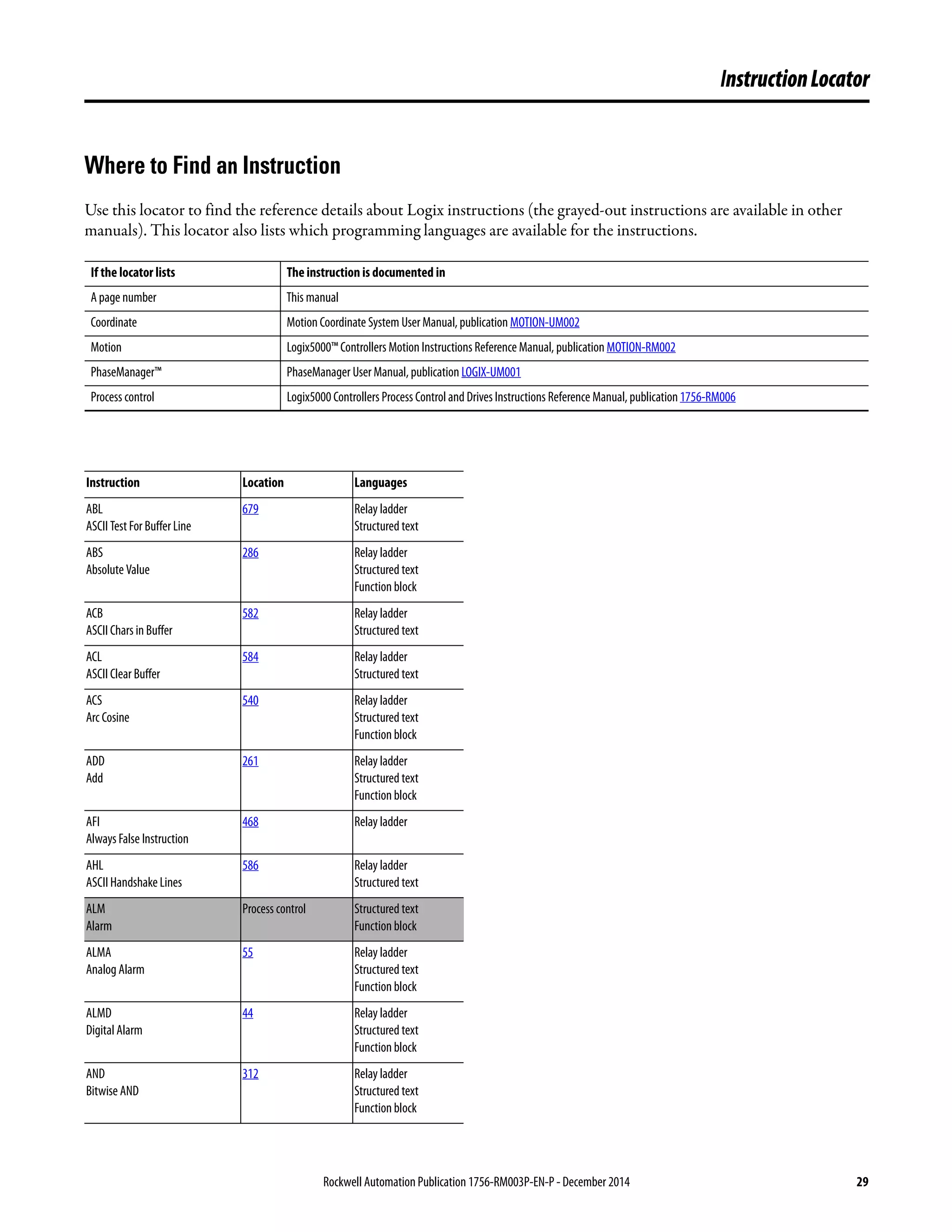
Where to Find an Instruction . . . . . . . . . . . . . . . . . . . . . . . . . . . . . . . . . . . . . 29
Preface Introduction. . . . . . . . . . . . . . . . . . . . . . . . . . . . . . . . . . . . . . . . . . . . . . . . . . . . . 37
Who Should Use This Manual . . . . . . . . . . . . . . . . . . . . . . . . . . . . . . . . . . . . 37
Purpose of This Manual . . . . . . . . . . . . . . . . . . . . . . . . . . . . . . . . . . . . . . . . . . 37
Common Information for All Instructions . . . . . . . . . . . . . . . . . . . . . . . . . 38
Conventions and Related Terms . . . . . . . . . . . . . . . . . . . . . . . . . . . . . . . . . . 38
Relay Ladder Rung Condition. . . . . . . . . . . . . . . . . . . . . . . . . . . . . . . . . 39
Function Block States. . . . . . . . . . . . . . . . . . . . . . . . . . . . . . . . . . . . . . . . . 40
Studio 5000 Environment . . . . . . . . . . . . . . . . . . . . . . . . . . . . . . . . . . . . . . . . 41
Additional Resources. . . . . . . . . . . . . . . . . . . . . . . . . . . . . . . . . . . . . . . . . . . . . 41
Chapter1
FactoryTalkAlarmsandEvents
Logix-basedInstructions
(ALMD,ALMA)
Digital Alarm (ALMD). . . . . . . . . . . . . . . . . . . . . . . . . . . . . . . . . . . . . . . . . . . 44
Relay Ladder . . . . . . . . . . . . . . . . . . . . . . . . . . . . . . . . . . . . . . . . . . . . . . . . . 44
Structured Text . . . . . . . . . . . . . . . . . . . . . . . . . . . . . . . . . . . . . . . . . . . . . . 44
Function Block. . . . . . . . . . . . . . . . . . . . . . . . . . . . . . . . . . . . . . . . . . . . . . . 44
ALARM_DIGITAL Structure . . . . . . . . . . . . . . . . . . . . . . . . . . . . . . . . 45
State Diagrams When Acknowledgement Required . . . . . . . . . . . . . 49
State Diagrams When Acknowledgment Not Required. . . . . . . . . . 49
ALMD Alarm Acknowledge Required and Latched . . . . . . . . . . . . . 51
ALMD Alarm Acknowledge Required and Not Latched. . . . . . . . . 52
ALMD Alarm Acknowledge Not Required and Latched. . . . . . . . . 52
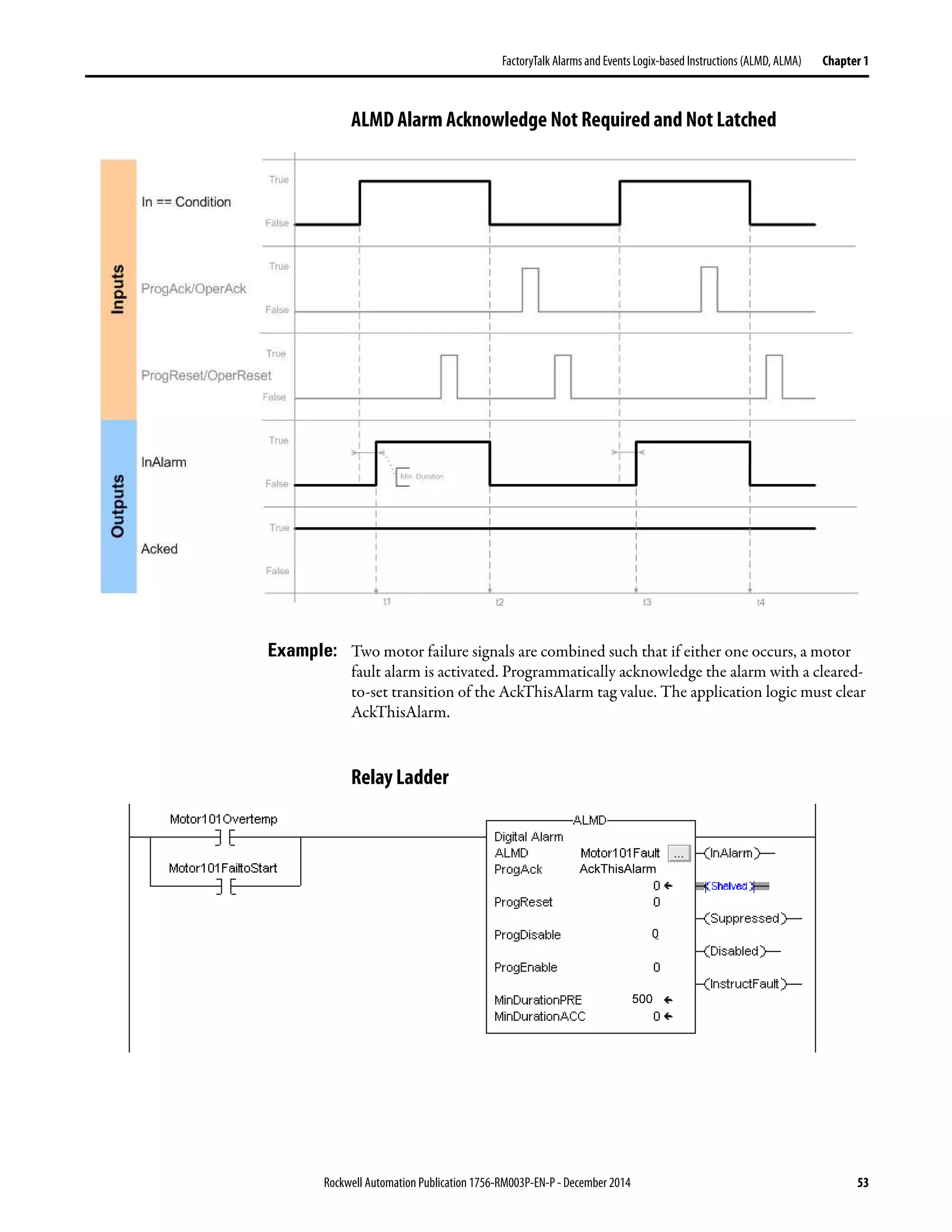
ALMD Alarm Acknowledge Not Required and Not Latched . . . . 53
Relay Ladder . . . . . . . . . . . . . . . . . . . . . . . . . . . . . . . . . . . . . . . . . . . . . . . . . 53
Structured Text . . . . . . . . . . . . . . . . . . . . . . . . . . . . . . . . . . . . . . . . . . . . . . 54
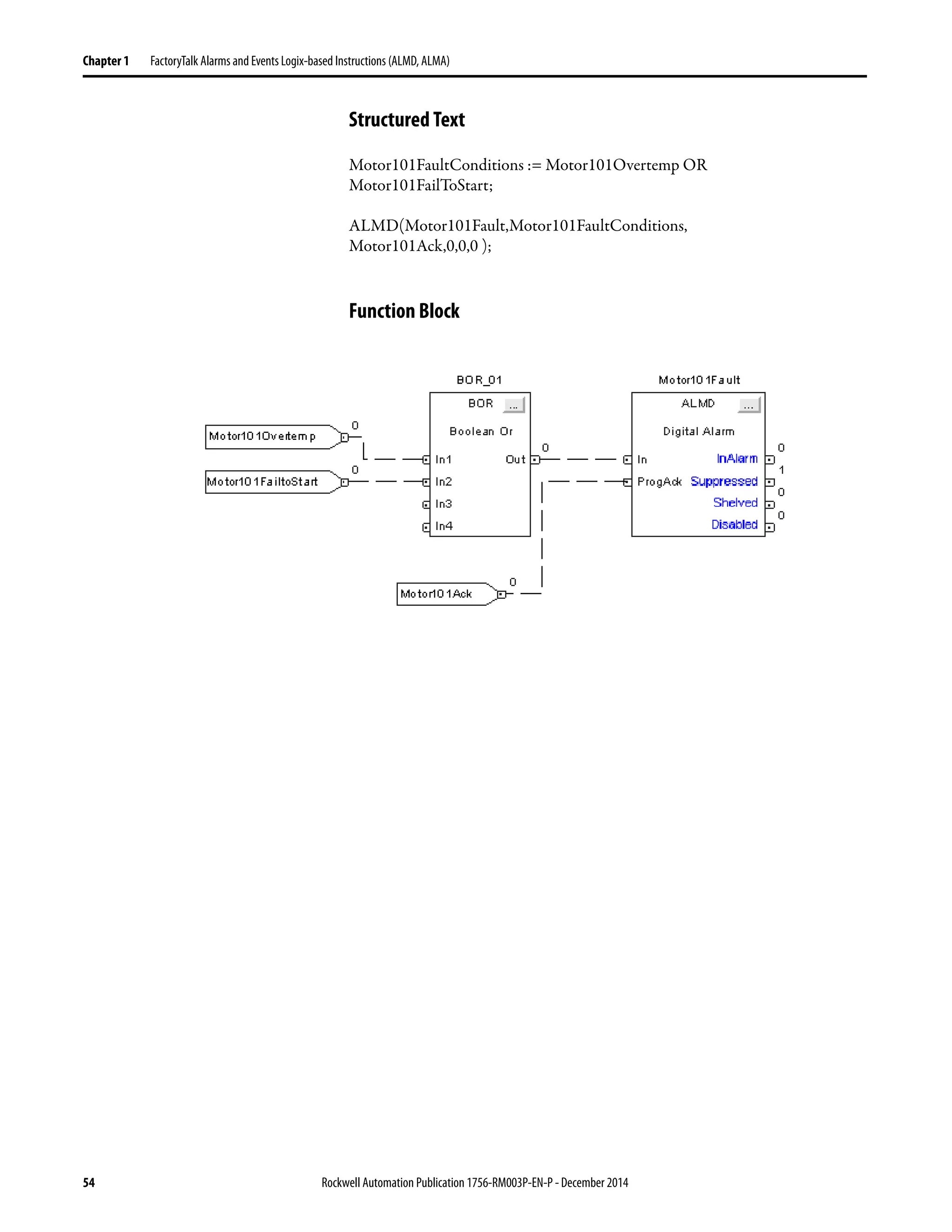
Function Block. . . . . . . . . . . . . . . . . . . . . . . . . . . . . . . . . . . . . . . . . . . . . . . 54
Analog Alarm (ALMA). . . . . . . . . . . . . . . . . . . . . . . . . . . . . . . . . . . . . . . . . . . 55
Relay Ladder . . . . . . . . . . . . . . . . . . . . . . . . . . . . . . . . . . . . . . . . . . . . . . . . . 55
Structured Text . . . . . . . . . . . . . . . . . . . . . . . . . . . . . . . . . . . . . . . . . . . . . . 55
Function Block. . . . . . . . . . . . . . . . . . . . . . . . . . . . . . . . . . . . . . . . . . . . . . . 55
ALARM_ANALOG Structure. . . . . . . . . . . . . . . . . . . . . . . . . . . . . . . . 56
State Diagrams When Acknowledgement Required . . . . . . . . . . . . . 64
State Diagrams When Acknowledgement Not Required. . . . . . . . . 65
ALMA Level Condition Acknowledge Required . . . . . . . . . . . . . . . . 67
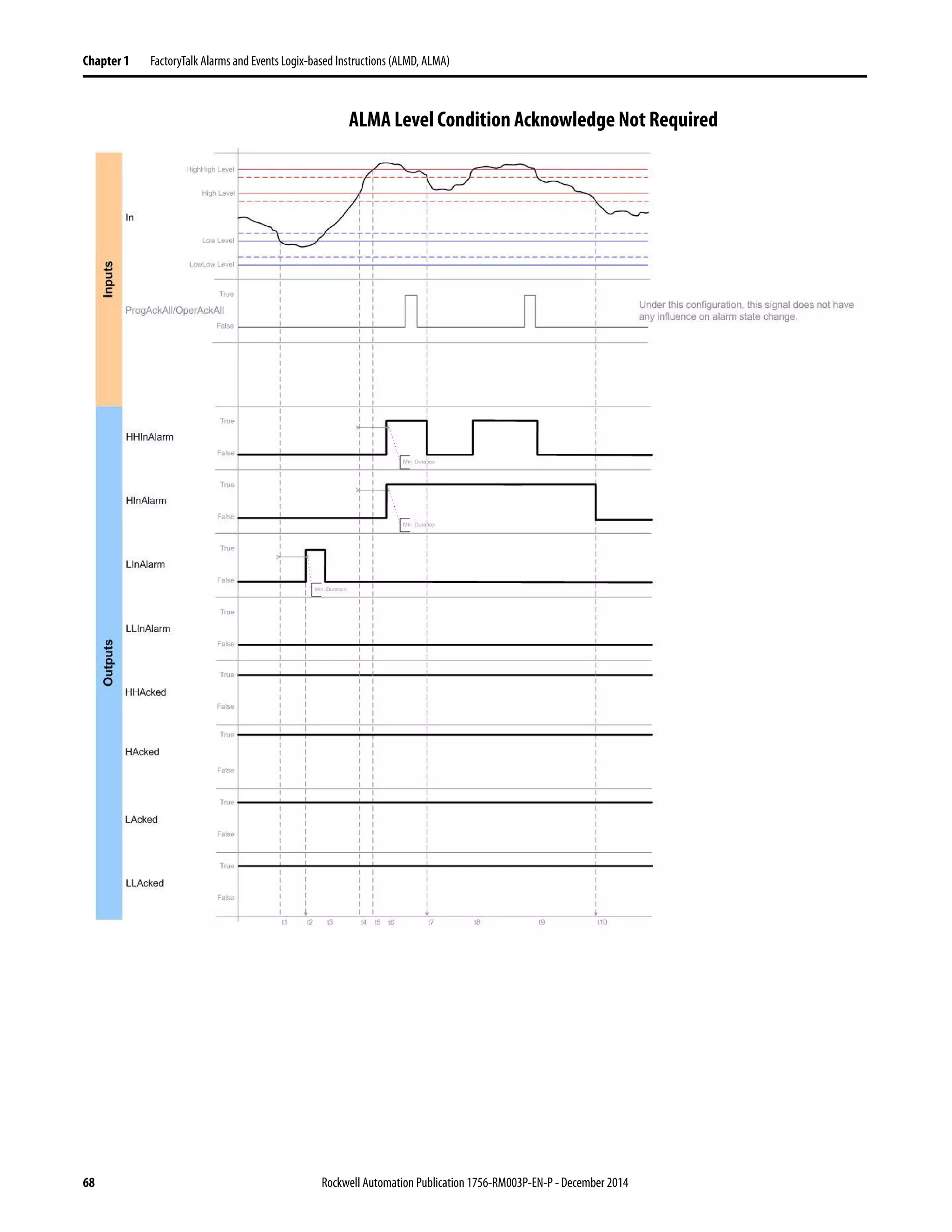
ALMA Level Condition Acknowledge Not Required. . . . . . . . . . . . 68
ALMA Rate of Change Acknowledge Required . . . . . . . . . . . . . . . . 69
ALMA Rate of Change Acknowledge Not Required . . . . . . . . . . . . 70
Relay Ladder . . . . . . . . . . . . . . . . . . . . . . . . . . . . . . . . . . . . . . . . . . . . . . . . . 71
Structured Text . . . . . . . . . . . . . . . . . . . . . . . . . . . . . . . . . . . . . . . . . . . . . . 71
Function Block. . . . . . . . . . . . . . . . . . . . . . . . . . . . . . . . . . . . . . . . . . . . . . . 71
Configure an Alarm Instruction. . . . . . . . . . . . . . . . . . . . . . . . . . . . . . . . . . . 72
Enter Alarm Message Text . . . . . . . . . . . . . . . . . . . . . . . . . . . . . . . . . . . . . . . . 74
Message String Variables . . . . . . . . . . . . . . . . . . . . . . . . . . . . . . . . . . . . . . 75
Multiple Language Versions of Alarm Messages . . . . . . . . . . . . . . . . . 76
Monitor Alarm Status . . . . . . . . . . . . . . . . . . . . . . . . . . . . . . . . . . . . . . . . . . . . 77
6 Rockwell Automation Publication1756-RM003P-EN-P - December 2014
Table of Contents
Alarms Log . . . . . . . . . . . . . . . . . . . . . . . . . . . . . . . . . . . . . . . . . . . . . . . . . . . . . . 77
Programmatically Access Alarm Information . . . . . . . . . . . . . . . . . . . . . . . 78
Shelve, Suppress, or Disable Alarms . . . . . . . . . . . . . . . . . . . . . . . . . . . . . . . . 79
Controller-based Alarm Execution. . . . . . . . . . . . . . . . . . . . . . . . . . . . . . . . . 83
Controller Memory Use. . . . . . . . . . . . . . . . . . . . . . . . . . . . . . . . . . . . . . . 83
Scan Time . . . . . . . . . . . . . . . . . . . . . . . . . . . . . . . . . . . . . . . . . . . . . . . . . . . 85
Chapter2
BitInstructions
(XIC,XIO,OTE,OTL,OTU,ONS,OSR,
OSF,OSRI,OSFI)
Bit Addressing . . . . . . . . . . . . . . . . . . . . . . . . . . . . . . . . . . . . . . . . . . . . . . . . . . . 88
Examine If Closed (XIC) . . . . . . . . . . . . . . . . . . . . . . . . . . . . . . . . . . . . . . . . . 90
Relay Ladder . . . . . . . . . . . . . . . . . . . . . . . . . . . . . . . . . . . . . . . . . . . . . . . . . 90
Structured Text . . . . . . . . . . . . . . . . . . . . . . . . . . . . . . . . . . . . . . . . . . . . . . 90
Relay Ladder . . . . . . . . . . . . . . . . . . . . . . . . . . . . . . . . . . . . . . . . . . . . . . . . . 91
Structured Text . . . . . . . . . . . . . . . . . . . . . . . . . . . . . . . . . . . . . . . . . . . . . . 91
Relay Ladder . . . . . . . . . . . . . . . . . . . . . . . . . . . . . . . . . . . . . . . . . . . . . . . . . 92
Structured Text . . . . . . . . . . . . . . . . . . . . . . . . . . . . . . . . . . . . . . . . . . . . . . 92
Examine If Open (XIO) . . . . . . . . . . . . . . . . . . . . . . . . . . . . . . . . . . . . . . . . . . 93
Relay Ladder . . . . . . . . . . . . . . . . . . . . . . . . . . . . . . . . . . . . . . . . . . . . . . . . . 93
Structured Text . . . . . . . . . . . . . . . . . . . . . . . . . . . . . . . . . . . . . . . . . . . . . . 93
Relay Ladder . . . . . . . . . . . . . . . . . . . . . . . . . . . . . . . . . . . . . . . . . . . . . . . . . 95
Structured Text . . . . . . . . . . . . . . . . . . . . . . . . . . . . . . . . . . . . . . . . . . . . . . 95
Relay Ladder . . . . . . . . . . . . . . . . . . . . . . . . . . . . . . . . . . . . . . . . . . . . . . . . . 95
Structured Text . . . . . . . . . . . . . . . . . . . . . . . . . . . . . . . . . . . . . . . . . . . . . . 95
Output Energize (OTE) . . . . . . . . . . . . . . . . . . . . . . . . . . . . . . . . . . . . . . . . . . 96
Relay Ladder . . . . . . . . . . . . . . . . . . . . . . . . . . . . . . . . . . . . . . . . . . . . . . . . . 96
Structured Text . . . . . . . . . . . . . . . . . . . . . . . . . . . . . . . . . . . . . . . . . . . . . . 96
Relay Ladder . . . . . . . . . . . . . . . . . . . . . . . . . . . . . . . . . . . . . . . . . . . . . . . . . 97
Structured Text . . . . . . . . . . . . . . . . . . . . . . . . . . . . . . . . . . . . . . . . . . . . . . 97
Output Latch (OTL) . . . . . . . . . . . . . . . . . . . . . . . . . . . . . . . . . . . . . . . . . . . . . 98
Relay Ladder . . . . . . . . . . . . . . . . . . . . . . . . . . . . . . . . . . . . . . . . . . . . . . . . . 98
Structured Text . . . . . . . . . . . . . . . . . . . . . . . . . . . . . . . . . . . . . . . . . . . . . . 98
Relay Ladder . . . . . . . . . . . . . . . . . . . . . . . . . . . . . . . . . . . . . . . . . . . . . . . . . 99
Structured Text . . . . . . . . . . . . . . . . . . . . . . . . . . . . . . . . . . . . . . . . . . . . . . 99
Output Unlatch (OTU) . . . . . . . . . . . . . . . . . . . . . . . . . . . . . . . . . . . . . . . . . 100
Relay Ladder . . . . . . . . . . . . . . . . . . . . . . . . . . . . . . . . . . . . . . . . . . . . . . . . 100
Structured Text . . . . . . . . . . . . . . . . . . . . . . . . . . . . . . . . . . . . . . . . . . . . . 100
Relay Ladder . . . . . . . . . . . . . . . . . . . . . . . . . . . . . . . . . . . . . . . . . . . . . . . . 101
Structured Text . . . . . . . . . . . . . . . . . . . . . . . . . . . . . . . . . . . . . . . . . . . . . 101
One Shot (ONS) . . . . . . . . . . . . . . . . . . . . . . . . . . . . . . . . . . . . . . . . . . . . . . . . 102
Relay Ladder . . . . . . . . . . . . . . . . . . . . . . . . . . . . . . . . . . . . . . . . . . . . . . . . 102
Structured Text . . . . . . . . . . . . . . . . . . . . . . . . . . . . . . . . . . . . . . . . . . . . . 102
Relay Ladder . . . . . . . . . . . . . . . . . . . . . . . . . . . . . . . . . . . . . . . . . . . . . . . . 104
Structured Text . . . . . . . . . . . . . . . . . . . . . . . . . . . . . . . . . . . . . . . . . . . . . 104
One Shot Rising (OSR). . . . . . . . . . . . . . . . . . . . . . . . . . . . . . . . . . . . . . . . . . 105
Relay Ladder . . . . . . . . . . . . . . . . . . . . . . . . . . . . . . . . . . . . . . . . . . . . . . . . 105
One Shot Falling (OSF). . . . . . . . . . . . . . . . . . . . . . . . . . . . . . . . . . . . . . . . . . 107
Relay Ladder Operands . . . . . . . . . . . . . . . . . . . . . . . . . . . . . . . . . . . . . . 107
Rockwell Automation Publication 1756-RM003P-EN-P - December 2014 7
Table of Contents
One Shot Rising with Input (OSRI) . . . . . . . . . . . . . . . . . . . . . . . . . . . . . . 109
Structured Text . . . . . . . . . . . . . . . . . . . . . . . . . . . . . . . . . . . . . . . . . . . . . 109
Function Block. . . . . . . . . . . . . . . . . . . . . . . . . . . . . . . . . . . . . . . . . . . . . . 109
FBD_ONESHOT Structure . . . . . . . . . . . . . . . . . . . . . . . . . . . . . . . . . 109
Structured Text . . . . . . . . . . . . . . . . . . . . . . . . . . . . . . . . . . . . . . . . . . . . . 111
Function Block. . . . . . . . . . . . . . . . . . . . . . . . . . . . . . . . . . . . . . . . . . . . . . 111
One Shot Falling with Input (OSFI). . . . . . . . . . . . . . . . . . . . . . . . . . . . . . 112
Structured Text . . . . . . . . . . . . . . . . . . . . . . . . . . . . . . . . . . . . . . . . . . . . . 112
Function Block. . . . . . . . . . . . . . . . . . . . . . . . . . . . . . . . . . . . . . . . . . . . . . 112
FBD_ONESHOT Structure . . . . . . . . . . . . . . . . . . . . . . . . . . . . . . . . . 112
Structured Text . . . . . . . . . . . . . . . . . . . . . . . . . . . . . . . . . . . . . . . . . . . . . 114
Function Block. . . . . . . . . . . . . . . . . . . . . . . . . . . . . . . . . . . . . . . . . . . . . . 114
Chapter3
TimerandCounterInstructions
(TON,TOF,RTO,TONR,TOFR,RTOR,
CTU,CTD,CTUD,RES)
Timer On Delay (TON). . . . . . . . . . . . . . . . . . . . . . . . . . . . . . . . . . . . . . . . . 116
Relay Ladder . . . . . . . . . . . . . . . . . . . . . . . . . . . . . . . . . . . . . . . . . . . . . . . . 116
TIMER Structure . . . . . . . . . . . . . . . . . . . . . . . . . . . . . . . . . . . . . . . . . . . 116
Timer Off Delay (TOF) . . . . . . . . . . . . . . . . . . . . . . . . . . . . . . . . . . . . . . . . . 120
Relay Ladder . . . . . . . . . . . . . . . . . . . . . . . . . . . . . . . . . . . . . . . . . . . . . . . . 120
TIMER Structure . . . . . . . . . . . . . . . . . . . . . . . . . . . . . . . . . . . . . . . . . . . 120
Retentive Timer On (RTO) . . . . . . . . . . . . . . . . . . . . . . . . . . . . . . . . . . . . . 124
Relay Ladder . . . . . . . . . . . . . . . . . . . . . . . . . . . . . . . . . . . . . . . . . . . . . . . . 124
TIMER Structure . . . . . . . . . . . . . . . . . . . . . . . . . . . . . . . . . . . . . . . . . . . 124
Timer On Delay with Reset (TONR). . . . . . . . . . . . . . . . . . . . . . . . . . . . . 128
Structured Text . . . . . . . . . . . . . . . . . . . . . . . . . . . . . . . . . . . . . . . . . . . . . 128
Function Block. . . . . . . . . . . . . . . . . . . . . . . . . . . . . . . . . . . . . . . . . . . . . . 128
FBD_TIMER Structure . . . . . . . . . . . . . . . . . . . . . . . . . . . . . . . . . . . . . 128
Structured Text . . . . . . . . . . . . . . . . . . . . . . . . . . . . . . . . . . . . . . . . . . . . . 131
Function Block Example . . . . . . . . . . . . . . . . . . . . . . . . . . . . . . . . . . . . . 131
Timer Off Delay with Reset (TOFR) . . . . . . . . . . . . . . . . . . . . . . . . . . . . . 132
Structured Text . . . . . . . . . . . . . . . . . . . . . . . . . . . . . . . . . . . . . . . . . . . . . 132
Function Block Operands. . . . . . . . . . . . . . . . . . . . . . . . . . . . . . . . . . . . 132
FBD_TIMER Structure . . . . . . . . . . . . . . . . . . . . . . . . . . . . . . . . . . . . . 132
Structured Text . . . . . . . . . . . . . . . . . . . . . . . . . . . . . . . . . . . . . . . . . . . . . 135
Function Block. . . . . . . . . . . . . . . . . . . . . . . . . . . . . . . . . . . . . . . . . . . . . . 135
Retentive Timer On with Reset (RTOR) . . . . . . . . . . . . . . . . . . . . . . . . . 136
Structured Text . . . . . . . . . . . . . . . . . . . . . . . . . . . . . . . . . . . . . . . . . . . . . 136
Function Block Operands. . . . . . . . . . . . . . . . . . . . . . . . . . . . . . . . . . . . 136
FBD_TIMER Structure . . . . . . . . . . . . . . . . . . . . . . . . . . . . . . . . . . . . . 136
Structured Text . . . . . . . . . . . . . . . . . . . . . . . . . . . . . . . . . . . . . . . . . . . . . 139
Function Block. . . . . . . . . . . . . . . . . . . . . . . . . . . . . . . . . . . . . . . . . . . . . . 139
Count Up (CTU). . . . . . . . . . . . . . . . . . . . . . . . . . . . . . . . . . . . . . . . . . . . . . . 140
Relay Ladder . . . . . . . . . . . . . . . . . . . . . . . . . . . . . . . . . . . . . . . . . . . . . . . . 140
COUNTER Structure. . . . . . . . . . . . . . . . . . . . . . . . . . . . . . . . . . . . . . . 140
Count Down (CTD). . . . . . . . . . . . . . . . . . . . . . . . . . . . . . . . . . . . . . . . . . . . 144
Relay Ladder . . . . . . . . . . . . . . . . . . . . . . . . . . . . . . . . . . . . . . . . . . . . . . . . 144
COUNTER Structure. . . . . . . . . . . . . . . . . . . . . . . . . . . . . . . . . . . . . . . 144
8 Rockwell Automation Publication1756-RM003P-EN-P - December 2014
Table of Contents
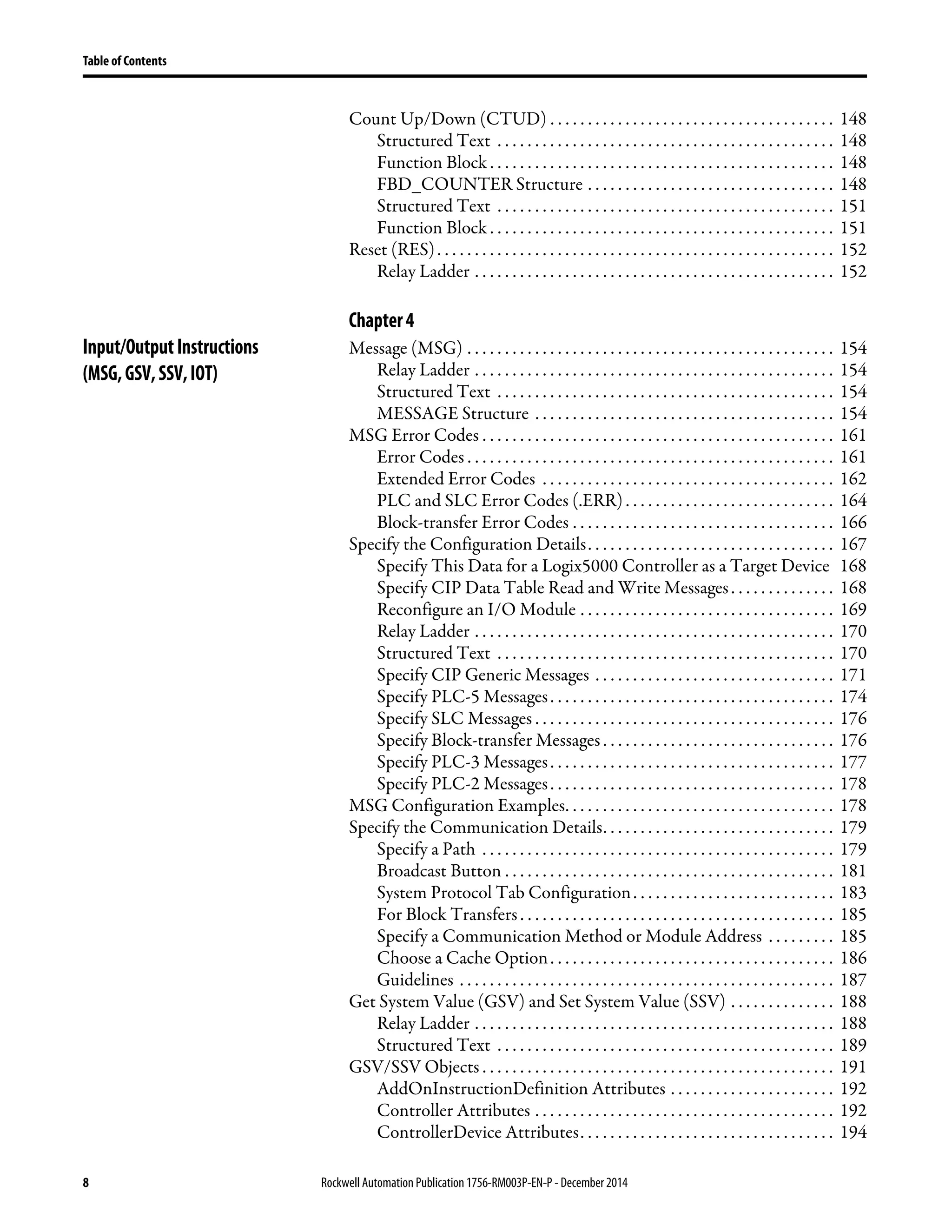
Count Up/Down (CTUD) . . . . . . . . . . . . . . . . . . . . . . . . . . . . . . . . . . . . . . 148
Structured Text . . . . . . . . . . . . . . . . . . . . . . . . . . . . . . . . . . . . . . . . . . . . . 148
Function Block . . . . . . . . . . . . . . . . . . . . . . . . . . . . . . . . . . . . . . . . . . . . . . 148
FBD_COUNTER Structure . . . . . . . . . . . . . . . . . . . . . . . . . . . . . . . . . 148
Structured Text . . . . . . . . . . . . . . . . . . . . . . . . . . . . . . . . . . . . . . . . . . . . . 151
Function Block . . . . . . . . . . . . . . . . . . . . . . . . . . . . . . . . . . . . . . . . . . . . . . 151
Reset (RES). . . . . . . . . . . . . . . . . . . . . . . . . . . . . . . . . . . . . . . . . . . . . . . . . . . . . 152
Relay Ladder . . . . . . . . . . . . . . . . . . . . . . . . . . . . . . . . . . . . . . . . . . . . . . . . 152
Chapter4
Input/OutputInstructions
(MSG,GSV,SSV,IOT)
Message (MSG) . . . . . . . . . . . . . . . . . . . . . . . . . . . . . . . . . . . . . . . . . . . . . . . . . 154
Relay Ladder . . . . . . . . . . . . . . . . . . . . . . . . . . . . . . . . . . . . . . . . . . . . . . . . 154
Structured Text . . . . . . . . . . . . . . . . . . . . . . . . . . . . . . . . . . . . . . . . . . . . . 154
MESSAGE Structure . . . . . . . . . . . . . . . . . . . . . . . . . . . . . . . . . . . . . . . . 154
MSG Error Codes . . . . . . . . . . . . . . . . . . . . . . . . . . . . . . . . . . . . . . . . . . . . . . . 161
Error Codes . . . . . . . . . . . . . . . . . . . . . . . . . . . . . . . . . . . . . . . . . . . . . . . . . 161
Extended Error Codes . . . . . . . . . . . . . . . . . . . . . . . . . . . . . . . . . . . . . . . 162
PLC and SLC Error Codes (.ERR). . . . . . . . . . . . . . . . . . . . . . . . . . . . 164
Block-transfer Error Codes . . . . . . . . . . . . . . . . . . . . . . . . . . . . . . . . . . . 166
Specify the Configuration Details. . . . . . . . . . . . . . . . . . . . . . . . . . . . . . . . . 167
Specify This Data for a Logix5000 Controller as a Target Device 168
Specify CIP Data Table Read and Write Messages. . . . . . . . . . . . . . 168
Reconfigure an I/O Module . . . . . . . . . . . . . . . . . . . . . . . . . . . . . . . . . . 169
Relay Ladder . . . . . . . . . . . . . . . . . . . . . . . . . . . . . . . . . . . . . . . . . . . . . . . . 170
Structured Text . . . . . . . . . . . . . . . . . . . . . . . . . . . . . . . . . . . . . . . . . . . . . 170
Specify CIP Generic Messages . . . . . . . . . . . . . . . . . . . . . . . . . . . . . . . . 171
Specify PLC-5 Messages. . . . . . . . . . . . . . . . . . . . . . . . . . . . . . . . . . . . . . 174
Specify SLC Messages . . . . . . . . . . . . . . . . . . . . . . . . . . . . . . . . . . . . . . . . 176
Specify Block-transfer Messages . . . . . . . . . . . . . . . . . . . . . . . . . . . . . . . 176
Specify PLC-3 Messages. . . . . . . . . . . . . . . . . . . . . . . . . . . . . . . . . . . . . . 177
Specify PLC-2 Messages. . . . . . . . . . . . . . . . . . . . . . . . . . . . . . . . . . . . . . 178
MSG Configuration Examples. . . . . . . . . . . . . . . . . . . . . . . . . . . . . . . . . . . . 178
Specify the Communication Details. . . . . . . . . . . . . . . . . . . . . . . . . . . . . . . 179
Specify a Path . . . . . . . . . . . . . . . . . . . . . . . . . . . . . . . . . . . . . . . . . . . . . . . 179
Broadcast Button . . . . . . . . . . . . . . . . . . . . . . . . . . . . . . . . . . . . . . . . . . . . 181
System Protocol Tab Configuration. . . . . . . . . . . . . . . . . . . . . . . . . . . 183
For Block Transfers. . . . . . . . . . . . . . . . . . . . . . . . . . . . . . . . . . . . . . . . . . 185
Specify a Communication Method or Module Address . . . . . . . . . 185
Choose a Cache Option. . . . . . . . . . . . . . . . . . . . . . . . . . . . . . . . . . . . . . 186
Guidelines . . . . . . . . . . . . . . . . . . . . . . . . . . . . . . . . . . . . . . . . . . . . . . . . . . 187
Get System Value (GSV) and Set System Value (SSV) . . . . . . . . . . . . . . 188
Relay Ladder . . . . . . . . . . . . . . . . . . . . . . . . . . . . . . . . . . . . . . . . . . . . . . . . 188
Structured Text . . . . . . . . . . . . . . . . . . . . . . . . . . . . . . . . . . . . . . . . . . . . . 189
GSV/SSV Objects . . . . . . . . . . . . . . . . . . . . . . . . . . . . . . . . . . . . . . . . . . . . . . . 191
AddOnInstructionDefinition Attributes . . . . . . . . . . . . . . . . . . . . . . 192
Controller Attributes . . . . . . . . . . . . . . . . . . . . . . . . . . . . . . . . . . . . . . . . 192
ControllerDevice Attributes. . . . . . . . . . . . . . . . . . . . . . . . . . . . . . . . . . 194
Rockwell Automation Publication 1756-RM003P-EN-P - December 2014 9
Table of Contents
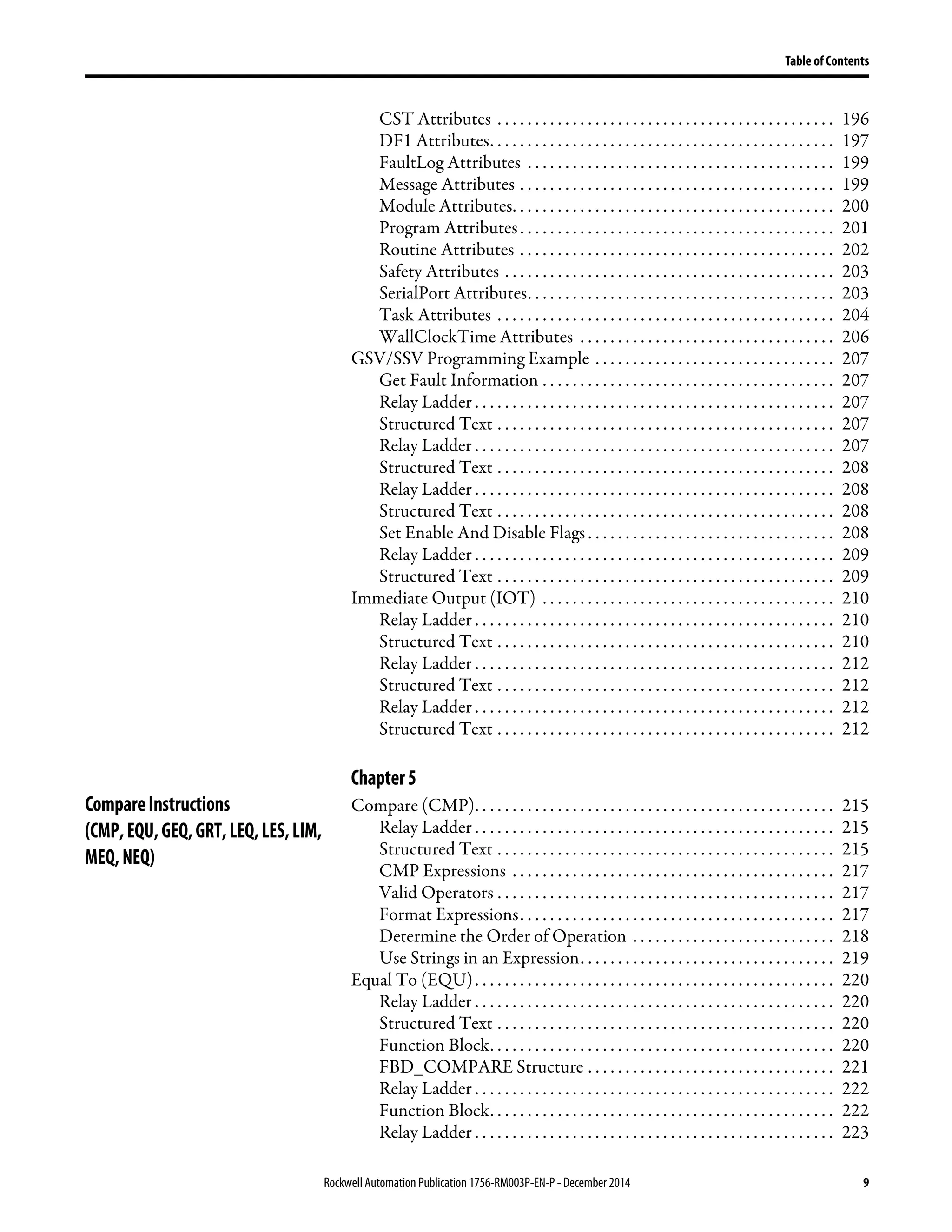
CST Attributes . . . . . . . . . . . . . . . . . . . . . . . . . . . . . . . . . . . . . . . . . . . . . 196
DF1 Attributes. . . . . . . . . . . . . . . . . . . . . . . . . . . . . . . . . . . . . . . . . . . . . . 197
FaultLog Attributes . . . . . . . . . . . . . . . . . . . . . . . . . . . . . . . . . . . . . . . . . 199
Message Attributes . . . . . . . . . . . . . . . . . . . . . . . . . . . . . . . . . . . . . . . . . . 199
Module Attributes. . . . . . . . . . . . . . . . . . . . . . . . . . . . . . . . . . . . . . . . . . . 200
Program Attributes. . . . . . . . . . . . . . . . . . . . . . . . . . . . . . . . . . . . . . . . . . 201
Routine Attributes . . . . . . . . . . . . . . . . . . . . . . . . . . . . . . . . . . . . . . . . . . 202
Safety Attributes . . . . . . . . . . . . . . . . . . . . . . . . . . . . . . . . . . . . . . . . . . . . 203
SerialPort Attributes. . . . . . . . . . . . . . . . . . . . . . . . . . . . . . . . . . . . . . . . . 203
Task Attributes . . . . . . . . . . . . . . . . . . . . . . . . . . . . . . . . . . . . . . . . . . . . . 204
WallClockTime Attributes . . . . . . . . . . . . . . . . . . . . . . . . . . . . . . . . . . 206
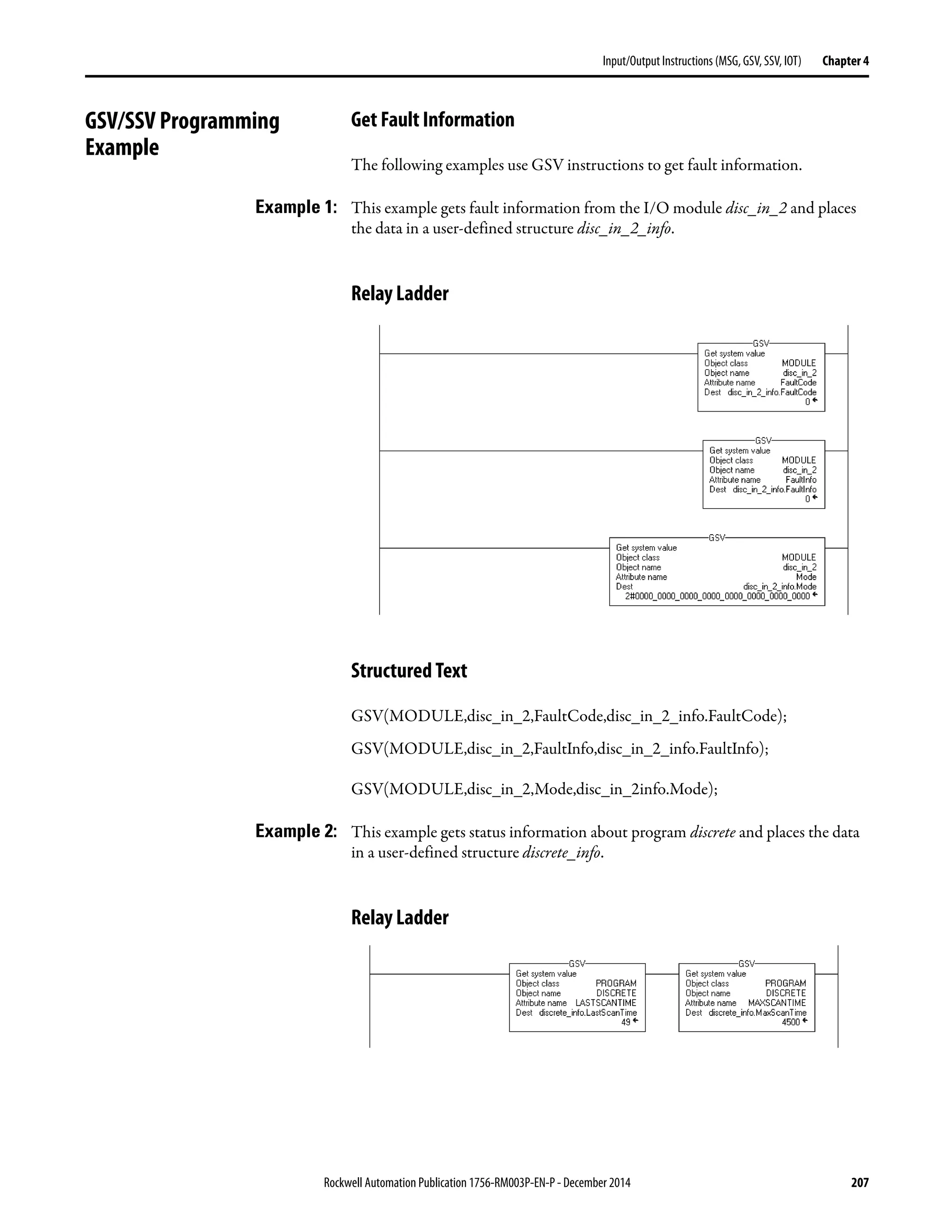
GSV/SSV Programming Example . . . . . . . . . . . . . . . . . . . . . . . . . . . . . . . . 207
Get Fault Information . . . . . . . . . . . . . . . . . . . . . . . . . . . . . . . . . . . . . . . 207
Relay Ladder . . . . . . . . . . . . . . . . . . . . . . . . . . . . . . . . . . . . . . . . . . . . . . . . 207
Structured Text . . . . . . . . . . . . . . . . . . . . . . . . . . . . . . . . . . . . . . . . . . . . . 207
Relay Ladder . . . . . . . . . . . . . . . . . . . . . . . . . . . . . . . . . . . . . . . . . . . . . . . . 207
Structured Text . . . . . . . . . . . . . . . . . . . . . . . . . . . . . . . . . . . . . . . . . . . . . 208
Relay Ladder . . . . . . . . . . . . . . . . . . . . . . . . . . . . . . . . . . . . . . . . . . . . . . . . 208
Structured Text . . . . . . . . . . . . . . . . . . . . . . . . . . . . . . . . . . . . . . . . . . . . . 208
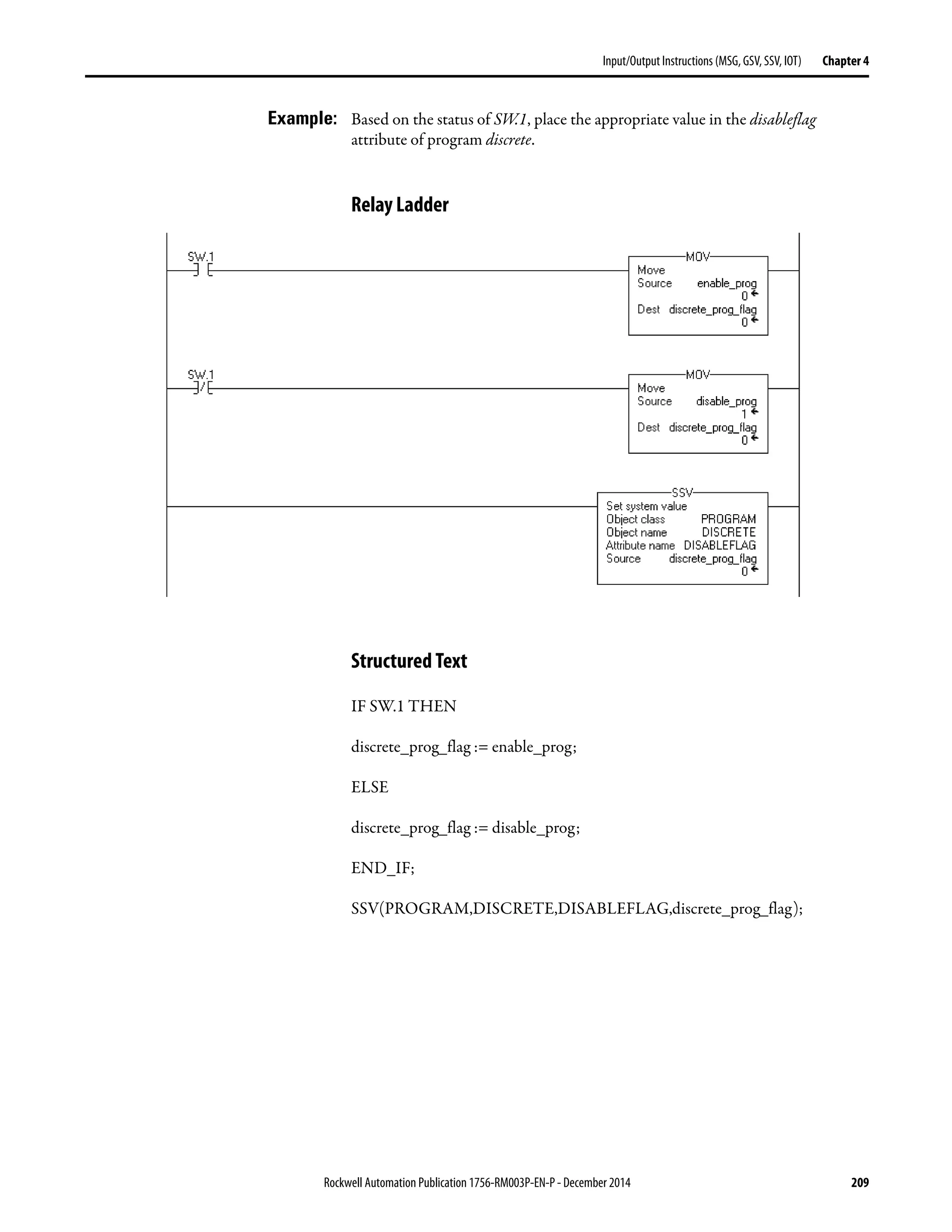
Set Enable And Disable Flags . . . . . . . . . . . . . . . . . . . . . . . . . . . . . . . . . 208
Relay Ladder . . . . . . . . . . . . . . . . . . . . . . . . . . . . . . . . . . . . . . . . . . . . . . . . 209
Structured Text . . . . . . . . . . . . . . . . . . . . . . . . . . . . . . . . . . . . . . . . . . . . . 209
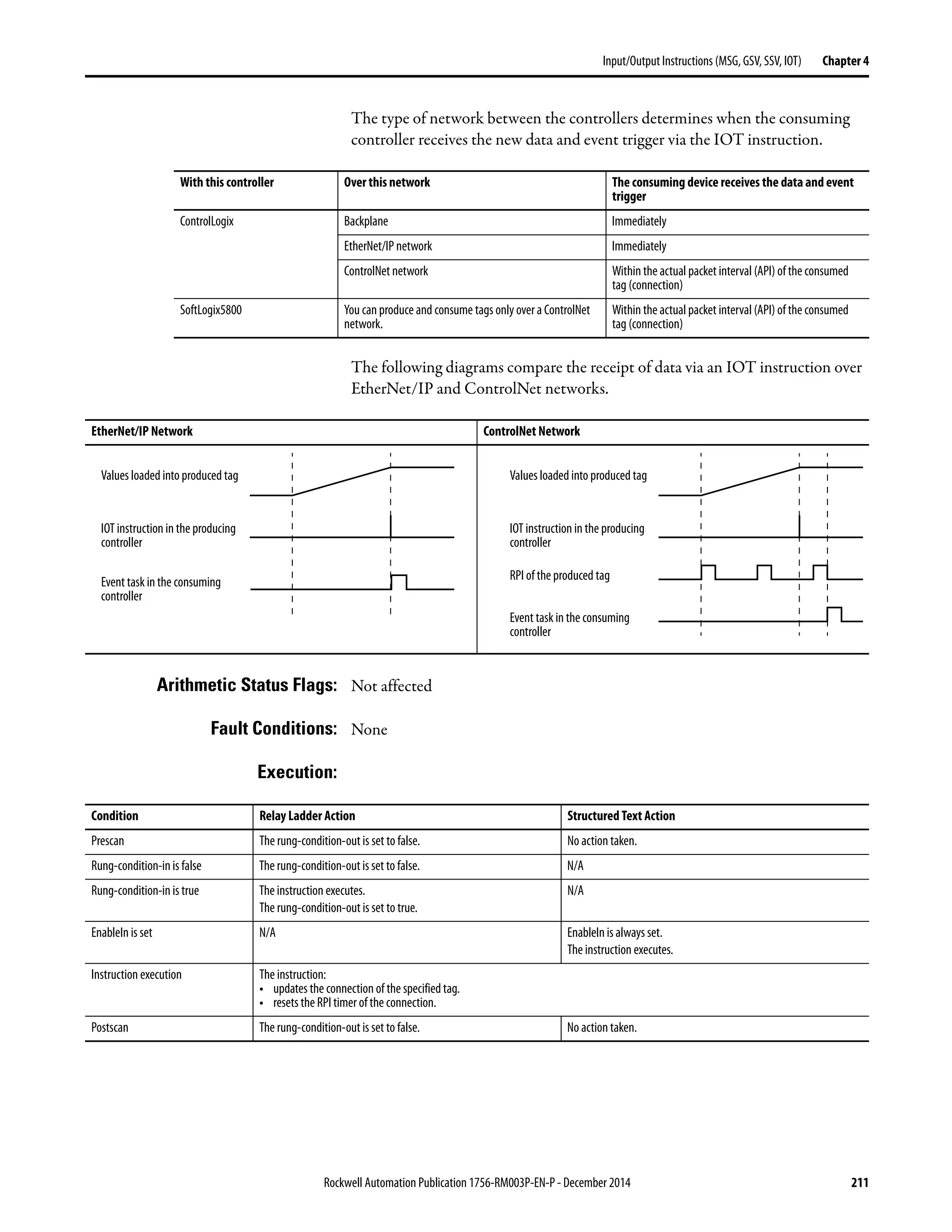
Immediate Output (IOT) . . . . . . . . . . . . . . . . . . . . . . . . . . . . . . . . . . . . . . . 210
Relay Ladder . . . . . . . . . . . . . . . . . . . . . . . . . . . . . . . . . . . . . . . . . . . . . . . . 210
Structured Text . . . . . . . . . . . . . . . . . . . . . . . . . . . . . . . . . . . . . . . . . . . . . 210
Relay Ladder . . . . . . . . . . . . . . . . . . . . . . . . . . . . . . . . . . . . . . . . . . . . . . . . 212
Structured Text . . . . . . . . . . . . . . . . . . . . . . . . . . . . . . . . . . . . . . . . . . . . . 212
Relay Ladder . . . . . . . . . . . . . . . . . . . . . . . . . . . . . . . . . . . . . . . . . . . . . . . . 212
Structured Text . . . . . . . . . . . . . . . . . . . . . . . . . . . . . . . . . . . . . . . . . . . . . 212
Chapter5
CompareInstructions
(CMP,EQU,GEQ,GRT,LEQ,LES,LIM,
MEQ,NEQ)
Compare (CMP). . . . . . . . . . . . . . . . . . . . . . . . . . . . . . . . . . . . . . . . . . . . . . . . 215
Relay Ladder . . . . . . . . . . . . . . . . . . . . . . . . . . . . . . . . . . . . . . . . . . . . . . . . 215
Structured Text . . . . . . . . . . . . . . . . . . . . . . . . . . . . . . . . . . . . . . . . . . . . . 215
CMP Expressions . . . . . . . . . . . . . . . . . . . . . . . . . . . . . . . . . . . . . . . . . . . 217
Valid Operators . . . . . . . . . . . . . . . . . . . . . . . . . . . . . . . . . . . . . . . . . . . . . 217
Format Expressions. . . . . . . . . . . . . . . . . . . . . . . . . . . . . . . . . . . . . . . . . . 217
Determine the Order of Operation . . . . . . . . . . . . . . . . . . . . . . . . . . . 218
Use Strings in an Expression. . . . . . . . . . . . . . . . . . . . . . . . . . . . . . . . . . 219
Equal To (EQU). . . . . . . . . . . . . . . . . . . . . . . . . . . . . . . . . . . . . . . . . . . . . . . . 220
Relay Ladder . . . . . . . . . . . . . . . . . . . . . . . . . . . . . . . . . . . . . . . . . . . . . . . . 220
Structured Text . . . . . . . . . . . . . . . . . . . . . . . . . . . . . . . . . . . . . . . . . . . . . 220
Function Block. . . . . . . . . . . . . . . . . . . . . . . . . . . . . . . . . . . . . . . . . . . . . . 220
FBD_COMPARE Structure . . . . . . . . . . . . . . . . . . . . . . . . . . . . . . . . . 221
Relay Ladder . . . . . . . . . . . . . . . . . . . . . . . . . . . . . . . . . . . . . . . . . . . . . . . . 222
Function Block. . . . . . . . . . . . . . . . . . . . . . . . . . . . . . . . . . . . . . . . . . . . . . 222
Relay Ladder . . . . . . . . . . . . . . . . . . . . . . . . . . . . . . . . . . . . . . . . . . . . . . . . 223
10 Rockwell Automation Publication1756-RM003P-EN-P - December 2014
Table of Contents
Structured Text . . . . . . . . . . . . . . . . . . . . . . . . . . . . . . . . . . . . . . . . . . . . . 223
Function Block . . . . . . . . . . . . . . . . . . . . . . . . . . . . . . . . . . . . . . . . . . . . . . 223
Greater Than or Equal To (GEQ) . . . . . . . . . . . . . . . . . . . . . . . . . . . . . . . . 224
Relay Ladder . . . . . . . . . . . . . . . . . . . . . . . . . . . . . . . . . . . . . . . . . . . . . . . . 224
Structured Text . . . . . . . . . . . . . . . . . . . . . . . . . . . . . . . . . . . . . . . . . . . . . 224
Function Block . . . . . . . . . . . . . . . . . . . . . . . . . . . . . . . . . . . . . . . . . . . . . . 225
FBD_COMPARE Structure . . . . . . . . . . . . . . . . . . . . . . . . . . . . . . . . . 225
Relay Ladder . . . . . . . . . . . . . . . . . . . . . . . . . . . . . . . . . . . . . . . . . . . . . . . . 226
Function Block . . . . . . . . . . . . . . . . . . . . . . . . . . . . . . . . . . . . . . . . . . . . . . 226
Relay Ladder . . . . . . . . . . . . . . . . . . . . . . . . . . . . . . . . . . . . . . . . . . . . . . . . 227
Structured Text . . . . . . . . . . . . . . . . . . . . . . . . . . . . . . . . . . . . . . . . . . . . . 227
Function Block . . . . . . . . . . . . . . . . . . . . . . . . . . . . . . . . . . . . . . . . . . . . . . 227
Greater Than (GRT) . . . . . . . . . . . . . . . . . . . . . . . . . . . . . . . . . . . . . . . . . . . . 228
Relay Ladder . . . . . . . . . . . . . . . . . . . . . . . . . . . . . . . . . . . . . . . . . . . . . . . . 228
Structured Text . . . . . . . . . . . . . . . . . . . . . . . . . . . . . . . . . . . . . . . . . . . . . 228
Function Block . . . . . . . . . . . . . . . . . . . . . . . . . . . . . . . . . . . . . . . . . . . . . . 228
FBD_COMPARE Structure . . . . . . . . . . . . . . . . . . . . . . . . . . . . . . . . . 229
Relay Ladder . . . . . . . . . . . . . . . . . . . . . . . . . . . . . . . . . . . . . . . . . . . . . . . . 230
Function Block . . . . . . . . . . . . . . . . . . . . . . . . . . . . . . . . . . . . . . . . . . . . . . 230
Relay Ladder . . . . . . . . . . . . . . . . . . . . . . . . . . . . . . . . . . . . . . . . . . . . . . . . 231
Structured Text . . . . . . . . . . . . . . . . . . . . . . . . . . . . . . . . . . . . . . . . . . . . . 231
Function Block . . . . . . . . . . . . . . . . . . . . . . . . . . . . . . . . . . . . . . . . . . . . . . 231
Less Than or Equal To (LEQ) . . . . . . . . . . . . . . . . . . . . . . . . . . . . . . . . . . . . 232
Relay Ladder . . . . . . . . . . . . . . . . . . . . . . . . . . . . . . . . . . . . . . . . . . . . . . . . 232
Structured Text . . . . . . . . . . . . . . . . . . . . . . . . . . . . . . . . . . . . . . . . . . . . . 232
Function Block . . . . . . . . . . . . . . . . . . . . . . . . . . . . . . . . . . . . . . . . . . . . . . 232
FBD_COMPARE Structure . . . . . . . . . . . . . . . . . . . . . . . . . . . . . . . . . 233
Relay Ladder . . . . . . . . . . . . . . . . . . . . . . . . . . . . . . . . . . . . . . . . . . . . . . . . 234
Function Block . . . . . . . . . . . . . . . . . . . . . . . . . . . . . . . . . . . . . . . . . . . . . . 234
Relay Ladder . . . . . . . . . . . . . . . . . . . . . . . . . . . . . . . . . . . . . . . . . . . . . . . . 235
Structured Text . . . . . . . . . . . . . . . . . . . . . . . . . . . . . . . . . . . . . . . . . . . . . 235
Function Block . . . . . . . . . . . . . . . . . . . . . . . . . . . . . . . . . . . . . . . . . . . . . . 235
Less Than (LES) . . . . . . . . . . . . . . . . . . . . . . . . . . . . . . . . . . . . . . . . . . . . . . . . 236
Relay Ladder . . . . . . . . . . . . . . . . . . . . . . . . . . . . . . . . . . . . . . . . . . . . . . . . 236
Structured Text . . . . . . . . . . . . . . . . . . . . . . . . . . . . . . . . . . . . . . . . . . . . . 236
Function Block . . . . . . . . . . . . . . . . . . . . . . . . . . . . . . . . . . . . . . . . . . . . . . 236
FBD_COMPARE Structure . . . . . . . . . . . . . . . . . . . . . . . . . . . . . . . . . 237
Relay Ladder . . . . . . . . . . . . . . . . . . . . . . . . . . . . . . . . . . . . . . . . . . . . . . . . 238
Function Block . . . . . . . . . . . . . . . . . . . . . . . . . . . . . . . . . . . . . . . . . . . . . . 238
Relay Ladder . . . . . . . . . . . . . . . . . . . . . . . . . . . . . . . . . . . . . . . . . . . . . . . . 239
Structured Text . . . . . . . . . . . . . . . . . . . . . . . . . . . . . . . . . . . . . . . . . . . . . 239
Function Block . . . . . . . . . . . . . . . . . . . . . . . . . . . . . . . . . . . . . . . . . . . . . . 239
Limit (LIM) . . . . . . . . . . . . . . . . . . . . . . . . . . . . . . . . . . . . . . . . . . . . . . . . . . . . 240
Relay Ladder . . . . . . . . . . . . . . . . . . . . . . . . . . . . . . . . . . . . . . . . . . . . . . . . 240
Structured Text . . . . . . . . . . . . . . . . . . . . . . . . . . . . . . . . . . . . . . . . . . . . . 240
Function Block . . . . . . . . . . . . . . . . . . . . . . . . . . . . . . . . . . . . . . . . . . . . . . 240
FBD_LIMIT Structure . . . . . . . . . . . . . . . . . . . . . . . . . . . . . . . . . . . . . . 241
Rockwell Automation Publication 1756-RM003P-EN-P - December 2014 11
Table of Contents
Relay Ladder . . . . . . . . . . . . . . . . . . . . . . . . . . . . . . . . . . . . . . . . . . . . . . . . 243
Function Block. . . . . . . . . . . . . . . . . . . . . . . . . . . . . . . . . . . . . . . . . . . . . . 243
Relay Ladder . . . . . . . . . . . . . . . . . . . . . . . . . . . . . . . . . . . . . . . . . . . . . . . . 244
Structured Text . . . . . . . . . . . . . . . . . . . . . . . . . . . . . . . . . . . . . . . . . . . . . 244
Function Block. . . . . . . . . . . . . . . . . . . . . . . . . . . . . . . . . . . . . . . . . . . . . . 244
Relay Ladder . . . . . . . . . . . . . . . . . . . . . . . . . . . . . . . . . . . . . . . . . . . . . . . . 245
Structured Text . . . . . . . . . . . . . . . . . . . . . . . . . . . . . . . . . . . . . . . . . . . . . 245
Function Block. . . . . . . . . . . . . . . . . . . . . . . . . . . . . . . . . . . . . . . . . . . . . . 245
Mask Equal To (MEQ). . . . . . . . . . . . . . . . . . . . . . . . . . . . . . . . . . . . . . . . . . 246
Relay Ladder . . . . . . . . . . . . . . . . . . . . . . . . . . . . . . . . . . . . . . . . . . . . . . . . 246
Structured Text . . . . . . . . . . . . . . . . . . . . . . . . . . . . . . . . . . . . . . . . . . . . . 246
Function Block. . . . . . . . . . . . . . . . . . . . . . . . . . . . . . . . . . . . . . . . . . . . . . 247
FBD_MASK_EQUAL Structure. . . . . . . . . . . . . . . . . . . . . . . . . . . . . 247
Entering an Immediate Mask Value . . . . . . . . . . . . . . . . . . . . . . . . . . . 247
Relay Ladder . . . . . . . . . . . . . . . . . . . . . . . . . . . . . . . . . . . . . . . . . . . . . . . . 248
Function Block. . . . . . . . . . . . . . . . . . . . . . . . . . . . . . . . . . . . . . . . . . . . . . 248
Relay Ladder . . . . . . . . . . . . . . . . . . . . . . . . . . . . . . . . . . . . . . . . . . . . . . . . 249
Structured Text . . . . . . . . . . . . . . . . . . . . . . . . . . . . . . . . . . . . . . . . . . . . . 249
Function Block. . . . . . . . . . . . . . . . . . . . . . . . . . . . . . . . . . . . . . . . . . . . . . 249
Relay Ladder . . . . . . . . . . . . . . . . . . . . . . . . . . . . . . . . . . . . . . . . . . . . . . . . 250
Structured Text . . . . . . . . . . . . . . . . . . . . . . . . . . . . . . . . . . . . . . . . . . . . . 250
Function Block. . . . . . . . . . . . . . . . . . . . . . . . . . . . . . . . . . . . . . . . . . . . . . 250
Not Equal To (NEQ) . . . . . . . . . . . . . . . . . . . . . . . . . . . . . . . . . . . . . . . . . . . 251
Relay Ladder . . . . . . . . . . . . . . . . . . . . . . . . . . . . . . . . . . . . . . . . . . . . . . . . 251
Structured Text . . . . . . . . . . . . . . . . . . . . . . . . . . . . . . . . . . . . . . . . . . . . . 251
Function Block. . . . . . . . . . . . . . . . . . . . . . . . . . . . . . . . . . . . . . . . . . . . . . 251
FBD_COMPARE Structure . . . . . . . . . . . . . . . . . . . . . . . . . . . . . . . . . 252
Relay Ladder . . . . . . . . . . . . . . . . . . . . . . . . . . . . . . . . . . . . . . . . . . . . . . . . 253
Function Block. . . . . . . . . . . . . . . . . . . . . . . . . . . . . . . . . . . . . . . . . . . . . . 253
Relay Ladder . . . . . . . . . . . . . . . . . . . . . . . . . . . . . . . . . . . . . . . . . . . . . . . . 254
Structured Text . . . . . . . . . . . . . . . . . . . . . . . . . . . . . . . . . . . . . . . . . . . . . 254
Function Block. . . . . . . . . . . . . . . . . . . . . . . . . . . . . . . . . . . . . . . . . . . . . . 254
Chapter6
Compute/MathInstructions
(CPT,ADD,SUB,MUL,DIV,MOD,SQR,
SQRT,NEG,ABS)
Compute (CPT) . . . . . . . . . . . . . . . . . . . . . . . . . . . . . . . . . . . . . . . . . . . . . . . . 257
Relay Ladder . . . . . . . . . . . . . . . . . . . . . . . . . . . . . . . . . . . . . . . . . . . . . . . . 257
Structured Text . . . . . . . . . . . . . . . . . . . . . . . . . . . . . . . . . . . . . . . . . . . . . 257
Valid Operators . . . . . . . . . . . . . . . . . . . . . . . . . . . . . . . . . . . . . . . . . . . . . 259
Format Expressions. . . . . . . . . . . . . . . . . . . . . . . . . . . . . . . . . . . . . . . . . . 259
Determine the Order of Operation . . . . . . . . . . . . . . . . . . . . . . . . . . . 260
Add (ADD) . . . . . . . . . . . . . . . . . . . . . . . . . . . . . . . . . . . . . . . . . . . . . . . . . . . . 261
Relay Ladder . . . . . . . . . . . . . . . . . . . . . . . . . . . . . . . . . . . . . . . . . . . . . . . . 261
Structured Text . . . . . . . . . . . . . . . . . . . . . . . . . . . . . . . . . . . . . . . . . . . . . 261
Function Block. . . . . . . . . . . . . . . . . . . . . . . . . . . . . . . . . . . . . . . . . . . . . . 262
FBD_MATH Structure . . . . . . . . . . . . . . . . . . . . . . . . . . . . . . . . . . . . . 262
Relay Ladder . . . . . . . . . . . . . . . . . . . . . . . . . . . . . . . . . . . . . . . . . . . . . . . . 263
Function Block. . . . . . . . . . . . . . . . . . . . . . . . . . . . . . . . . . . . . . . . . . . . . . 263
12 Rockwell Automation Publication1756-RM003P-EN-P - December 2014
Table of Contents
Relay Ladder . . . . . . . . . . . . . . . . . . . . . . . . . . . . . . . . . . . . . . . . . . . . . . . . 264
Structured Text . . . . . . . . . . . . . . . . . . . . . . . . . . . . . . . . . . . . . . . . . . . . . 264
Function Block . . . . . . . . . . . . . . . . . . . . . . . . . . . . . . . . . . . . . . . . . . . . . . 264
Subtract (SUB). . . . . . . . . . . . . . . . . . . . . . . . . . . . . . . . . . . . . . . . . . . . . . . . . . 265
Relay Ladder . . . . . . . . . . . . . . . . . . . . . . . . . . . . . . . . . . . . . . . . . . . . . . . . 265
Structured Text . . . . . . . . . . . . . . . . . . . . . . . . . . . . . . . . . . . . . . . . . . . . . 265
Function Block . . . . . . . . . . . . . . . . . . . . . . . . . . . . . . . . . . . . . . . . . . . . . . 266
FBD_MATH Structure. . . . . . . . . . . . . . . . . . . . . . . . . . . . . . . . . . . . . . 266
Relay Ladder . . . . . . . . . . . . . . . . . . . . . . . . . . . . . . . . . . . . . . . . . . . . . . . . 266
Function Block . . . . . . . . . . . . . . . . . . . . . . . . . . . . . . . . . . . . . . . . . . . . . . 267
Relay Ladder . . . . . . . . . . . . . . . . . . . . . . . . . . . . . . . . . . . . . . . . . . . . . . . . 267
Structured Text . . . . . . . . . . . . . . . . . . . . . . . . . . . . . . . . . . . . . . . . . . . . . 267
Function Block . . . . . . . . . . . . . . . . . . . . . . . . . . . . . . . . . . . . . . . . . . . . . . 267
Multiply (MUL) . . . . . . . . . . . . . . . . . . . . . . . . . . . . . . . . . . . . . . . . . . . . . . . . 268
Relay Ladder . . . . . . . . . . . . . . . . . . . . . . . . . . . . . . . . . . . . . . . . . . . . . . . . 268
Structured Text . . . . . . . . . . . . . . . . . . . . . . . . . . . . . . . . . . . . . . . . . . . . . 268
Function Block . . . . . . . . . . . . . . . . . . . . . . . . . . . . . . . . . . . . . . . . . . . . . . 269
FBD_MATH Structure. . . . . . . . . . . . . . . . . . . . . . . . . . . . . . . . . . . . . . 269
Relay Ladder . . . . . . . . . . . . . . . . . . . . . . . . . . . . . . . . . . . . . . . . . . . . . . . . 269
Function Block . . . . . . . . . . . . . . . . . . . . . . . . . . . . . . . . . . . . . . . . . . . . . . 270
Relay Ladder . . . . . . . . . . . . . . . . . . . . . . . . . . . . . . . . . . . . . . . . . . . . . . . . 270
Structured Text . . . . . . . . . . . . . . . . . . . . . . . . . . . . . . . . . . . . . . . . . . . . . 270
Function Block . . . . . . . . . . . . . . . . . . . . . . . . . . . . . . . . . . . . . . . . . . . . . . 270
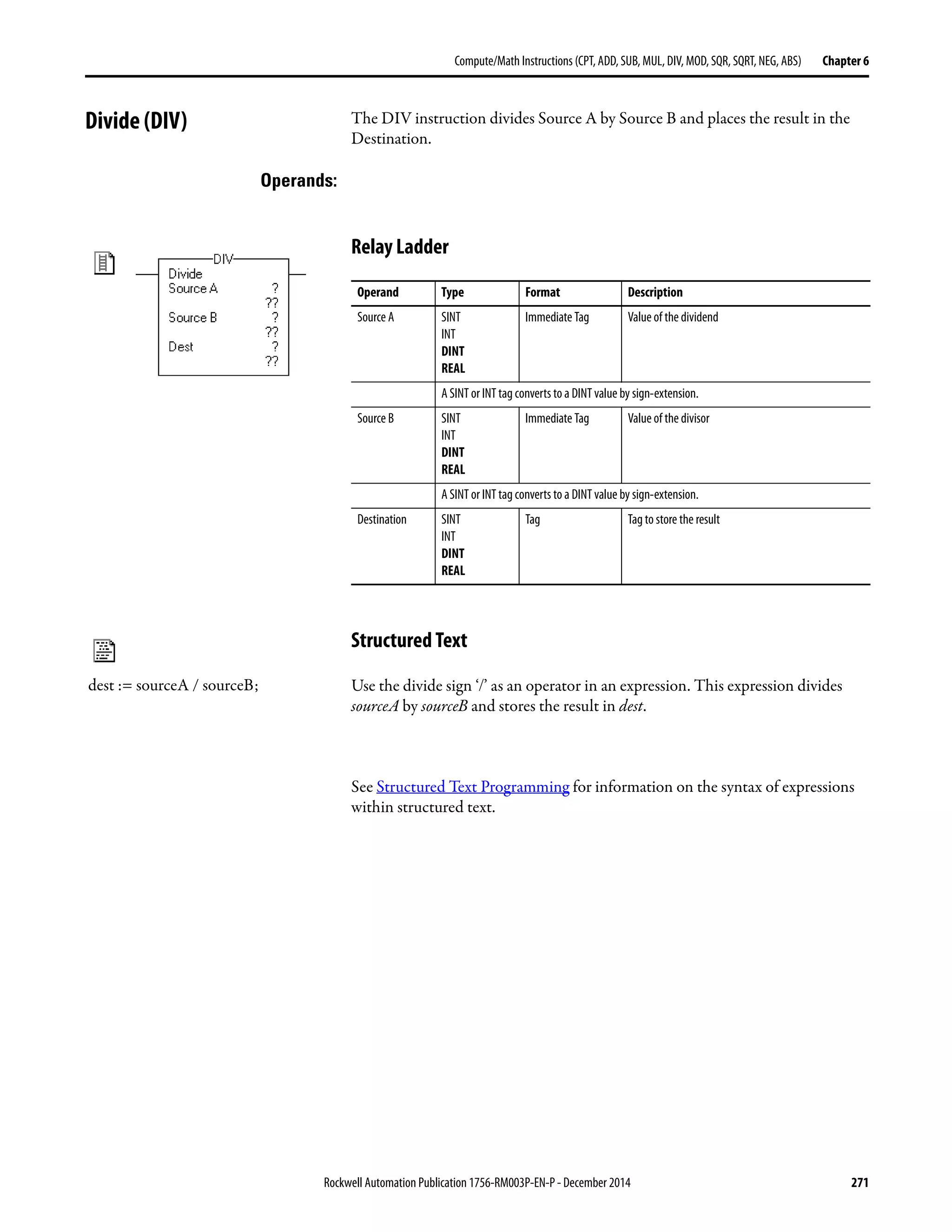
Divide (DIV) . . . . . . . . . . . . . . . . . . . . . . . . . . . . . . . . . . . . . . . . . . . . . . . . . . . 271
Relay Ladder . . . . . . . . . . . . . . . . . . . . . . . . . . . . . . . . . . . . . . . . . . . . . . . . 271
Structured Text . . . . . . . . . . . . . . . . . . . . . . . . . . . . . . . . . . . . . . . . . . . . . 271
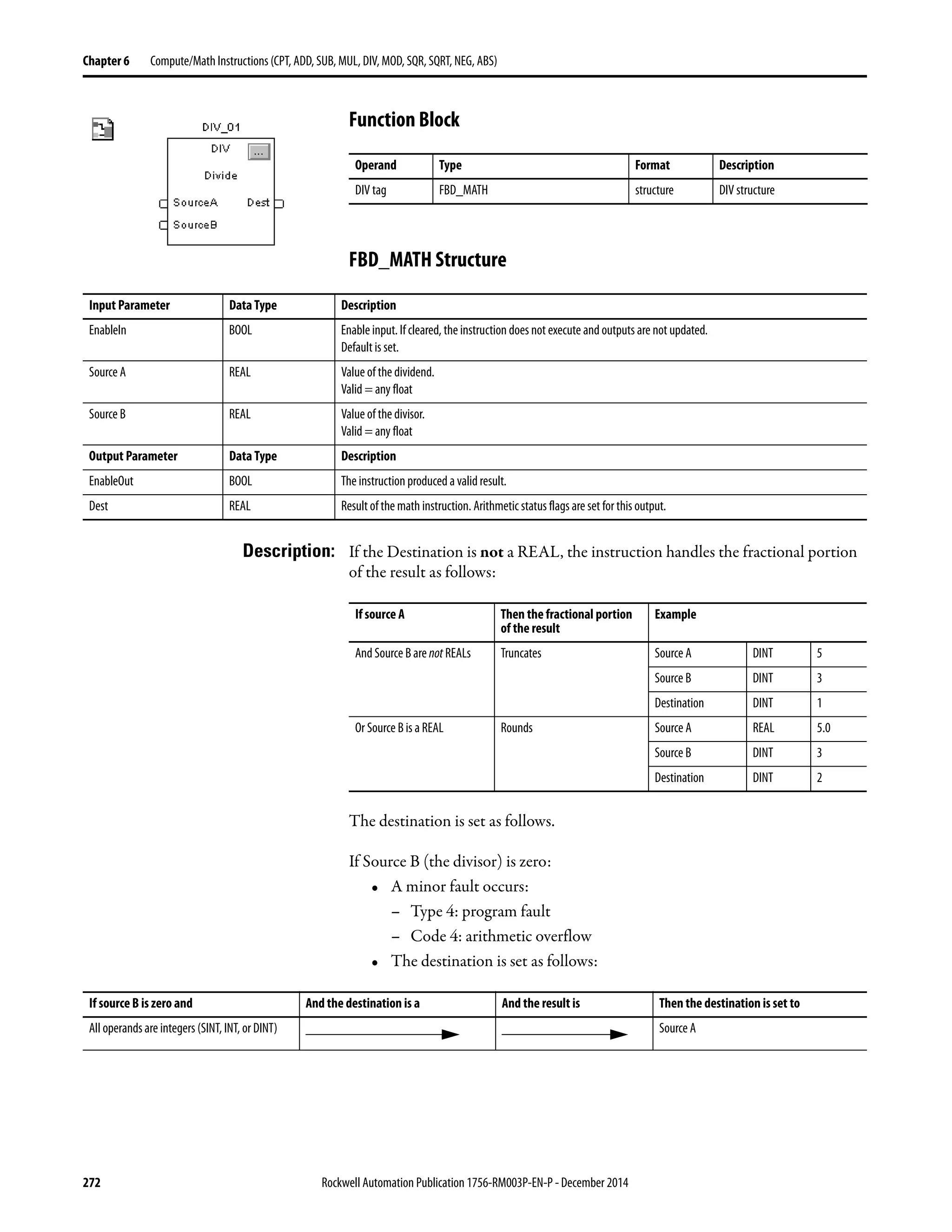
Function Block . . . . . . . . . . . . . . . . . . . . . . . . . . . . . . . . . . . . . . . . . . . . . . 272
FBD_MATH Structure. . . . . . . . . . . . . . . . . . . . . . . . . . . . . . . . . . . . . . 272
Relay Ladder . . . . . . . . . . . . . . . . . . . . . . . . . . . . . . . . . . . . . . . . . . . . . . . . 273
Function Block . . . . . . . . . . . . . . . . . . . . . . . . . . . . . . . . . . . . . . . . . . . . . . 273
Relay Ladder . . . . . . . . . . . . . . . . . . . . . . . . . . . . . . . . . . . . . . . . . . . . . . . . 274
Structured Text . . . . . . . . . . . . . . . . . . . . . . . . . . . . . . . . . . . . . . . . . . . . . 274
Function Block . . . . . . . . . . . . . . . . . . . . . . . . . . . . . . . . . . . . . . . . . . . . . . 274
Relay Ladder . . . . . . . . . . . . . . . . . . . . . . . . . . . . . . . . . . . . . . . . . . . . . . . . 275
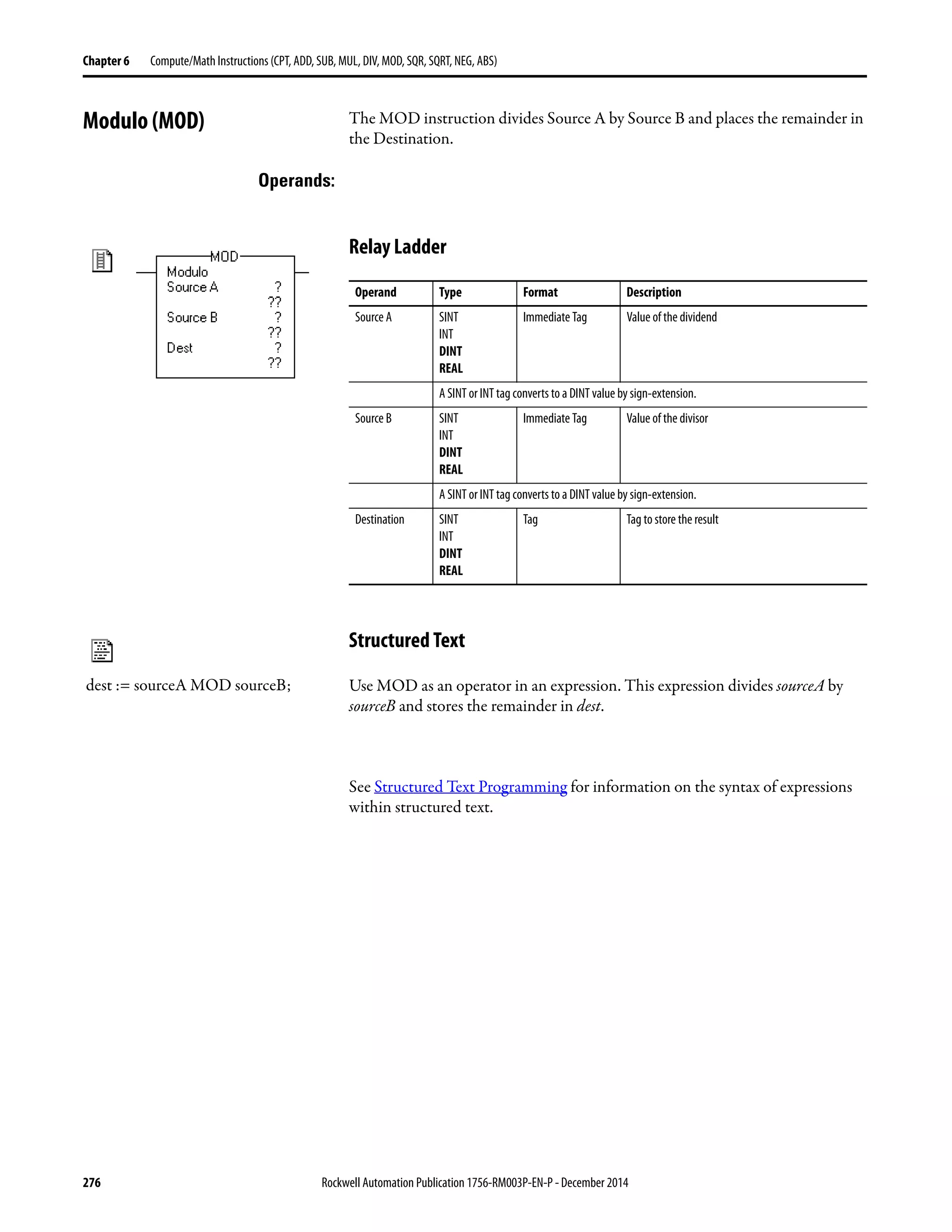
Modulo (MOD) . . . . . . . . . . . . . . . . . . . . . . . . . . . . . . . . . . . . . . . . . . . . . . . . 276
Relay Ladder . . . . . . . . . . . . . . . . . . . . . . . . . . . . . . . . . . . . . . . . . . . . . . . . 276
Structured Text . . . . . . . . . . . . . . . . . . . . . . . . . . . . . . . . . . . . . . . . . . . . . 276
Function Block . . . . . . . . . . . . . . . . . . . . . . . . . . . . . . . . . . . . . . . . . . . . . . 277
FBD_MATH Structure. . . . . . . . . . . . . . . . . . . . . . . . . . . . . . . . . . . . . . 277
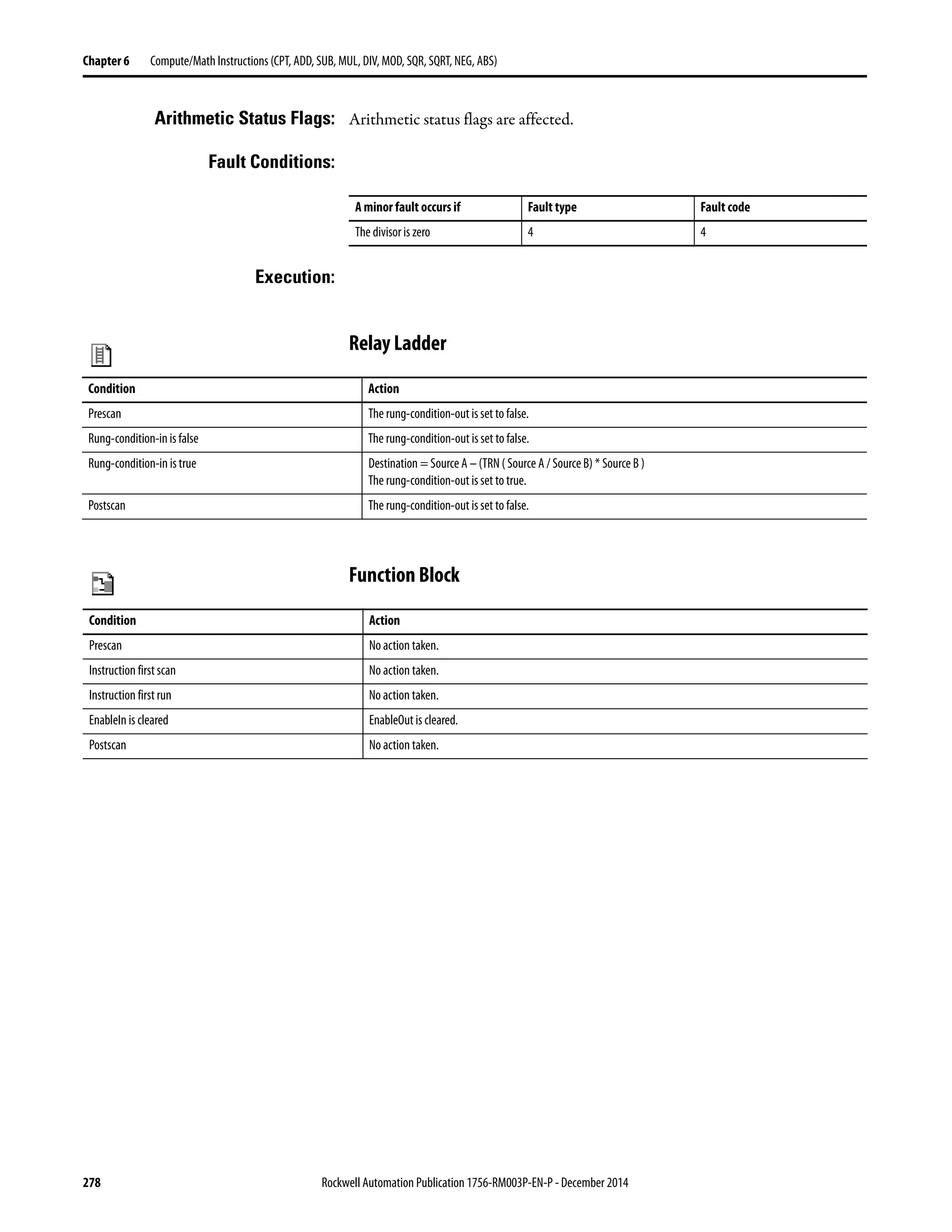
Relay Ladder . . . . . . . . . . . . . . . . . . . . . . . . . . . . . . . . . . . . . . . . . . . . . . . . 278
Function Block . . . . . . . . . . . . . . . . . . . . . . . . . . . . . . . . . . . . . . . . . . . . . . 278
Relay Ladder . . . . . . . . . . . . . . . . . . . . . . . . . . . . . . . . . . . . . . . . . . . . . . . . 279
Structured Text . . . . . . . . . . . . . . . . . . . . . . . . . . . . . . . . . . . . . . . . . . . . . 279
Function Block . . . . . . . . . . . . . . . . . . . . . . . . . . . . . . . . . . . . . . . . . . . . . . 279
Square Root (SQR). . . . . . . . . . . . . . . . . . . . . . . . . . . . . . . . . . . . . . . . . . . . . . 280
Relay Ladder . . . . . . . . . . . . . . . . . . . . . . . . . . . . . . . . . . . . . . . . . . . . . . . . 280
Structured Text . . . . . . . . . . . . . . . . . . . . . . . . . . . . . . . . . . . . . . . . . . . . . 280
Rockwell Automation Publication 1756-RM003P-EN-P - December 2014 13
Table of Contents
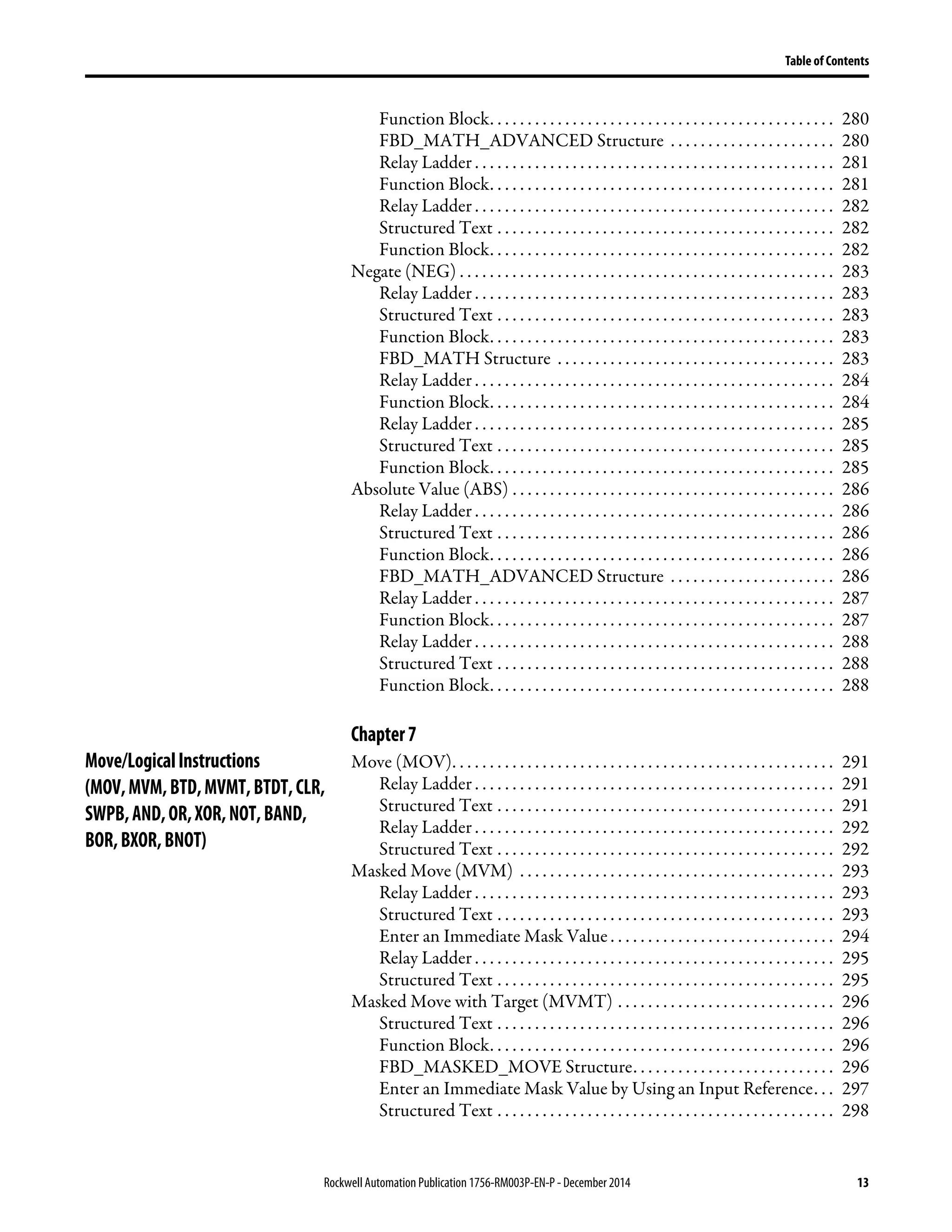
Function Block. . . . . . . . . . . . . . . . . . . . . . . . . . . . . . . . . . . . . . . . . . . . . . 280
FBD_MATH_ADVANCED Structure . . . . . . . . . . . . . . . . . . . . . . 280
Relay Ladder . . . . . . . . . . . . . . . . . . . . . . . . . . . . . . . . . . . . . . . . . . . . . . . . 281
Function Block. . . . . . . . . . . . . . . . . . . . . . . . . . . . . . . . . . . . . . . . . . . . . . 281
Relay Ladder . . . . . . . . . . . . . . . . . . . . . . . . . . . . . . . . . . . . . . . . . . . . . . . . 282
Structured Text . . . . . . . . . . . . . . . . . . . . . . . . . . . . . . . . . . . . . . . . . . . . . 282
Function Block. . . . . . . . . . . . . . . . . . . . . . . . . . . . . . . . . . . . . . . . . . . . . . 282
Negate (NEG) . . . . . . . . . . . . . . . . . . . . . . . . . . . . . . . . . . . . . . . . . . . . . . . . . . 283
Relay Ladder . . . . . . . . . . . . . . . . . . . . . . . . . . . . . . . . . . . . . . . . . . . . . . . . 283
Structured Text . . . . . . . . . . . . . . . . . . . . . . . . . . . . . . . . . . . . . . . . . . . . . 283
Function Block. . . . . . . . . . . . . . . . . . . . . . . . . . . . . . . . . . . . . . . . . . . . . . 283
FBD_MATH Structure . . . . . . . . . . . . . . . . . . . . . . . . . . . . . . . . . . . . . 283
Relay Ladder . . . . . . . . . . . . . . . . . . . . . . . . . . . . . . . . . . . . . . . . . . . . . . . . 284
Function Block. . . . . . . . . . . . . . . . . . . . . . . . . . . . . . . . . . . . . . . . . . . . . . 284
Relay Ladder . . . . . . . . . . . . . . . . . . . . . . . . . . . . . . . . . . . . . . . . . . . . . . . . 285
Structured Text . . . . . . . . . . . . . . . . . . . . . . . . . . . . . . . . . . . . . . . . . . . . . 285
Function Block. . . . . . . . . . . . . . . . . . . . . . . . . . . . . . . . . . . . . . . . . . . . . . 285
Absolute Value (ABS) . . . . . . . . . . . . . . . . . . . . . . . . . . . . . . . . . . . . . . . . . . . 286
Relay Ladder . . . . . . . . . . . . . . . . . . . . . . . . . . . . . . . . . . . . . . . . . . . . . . . . 286
Structured Text . . . . . . . . . . . . . . . . . . . . . . . . . . . . . . . . . . . . . . . . . . . . . 286
Function Block. . . . . . . . . . . . . . . . . . . . . . . . . . . . . . . . . . . . . . . . . . . . . . 286
FBD_MATH_ADVANCED Structure . . . . . . . . . . . . . . . . . . . . . . 286
Relay Ladder . . . . . . . . . . . . . . . . . . . . . . . . . . . . . . . . . . . . . . . . . . . . . . . . 287
Function Block. . . . . . . . . . . . . . . . . . . . . . . . . . . . . . . . . . . . . . . . . . . . . . 287
Relay Ladder . . . . . . . . . . . . . . . . . . . . . . . . . . . . . . . . . . . . . . . . . . . . . . . . 288
Structured Text . . . . . . . . . . . . . . . . . . . . . . . . . . . . . . . . . . . . . . . . . . . . . 288
Function Block. . . . . . . . . . . . . . . . . . . . . . . . . . . . . . . . . . . . . . . . . . . . . . 288
Chapter7
Move/LogicalInstructions
(MOV,MVM,BTD,MVMT,BTDT,CLR,
SWPB,AND,OR,XOR,NOT,BAND,
BOR,BXOR,BNOT)
Move (MOV). . . . . . . . . . . . . . . . . . . . . . . . . . . . . . . . . . . . . . . . . . . . . . . . . . . 291
Relay Ladder . . . . . . . . . . . . . . . . . . . . . . . . . . . . . . . . . . . . . . . . . . . . . . . . 291
Structured Text . . . . . . . . . . . . . . . . . . . . . . . . . . . . . . . . . . . . . . . . . . . . . 291
Relay Ladder . . . . . . . . . . . . . . . . . . . . . . . . . . . . . . . . . . . . . . . . . . . . . . . . 292
Structured Text . . . . . . . . . . . . . . . . . . . . . . . . . . . . . . . . . . . . . . . . . . . . . 292
Masked Move (MVM) . . . . . . . . . . . . . . . . . . . . . . . . . . . . . . . . . . . . . . . . . . 293
Relay Ladder . . . . . . . . . . . . . . . . . . . . . . . . . . . . . . . . . . . . . . . . . . . . . . . . 293
Structured Text . . . . . . . . . . . . . . . . . . . . . . . . . . . . . . . . . . . . . . . . . . . . . 293
Enter an Immediate Mask Value . . . . . . . . . . . . . . . . . . . . . . . . . . . . . . 294
Relay Ladder . . . . . . . . . . . . . . . . . . . . . . . . . . . . . . . . . . . . . . . . . . . . . . . . 295
Structured Text . . . . . . . . . . . . . . . . . . . . . . . . . . . . . . . . . . . . . . . . . . . . . 295
Masked Move with Target (MVMT) . . . . . . . . . . . . . . . . . . . . . . . . . . . . . 296
Structured Text . . . . . . . . . . . . . . . . . . . . . . . . . . . . . . . . . . . . . . . . . . . . . 296
Function Block. . . . . . . . . . . . . . . . . . . . . . . . . . . . . . . . . . . . . . . . . . . . . . 296
FBD_MASKED_MOVE Structure. . . . . . . . . . . . . . . . . . . . . . . . . . . 296
Enter an Immediate Mask Value by Using an Input Reference. . . 297
Structured Text . . . . . . . . . . . . . . . . . . . . . . . . . . . . . . . . . . . . . . . . . . . . . 298
14 Rockwell Automation Publication1756-RM003P-EN-P - December 2014
Table of Contents
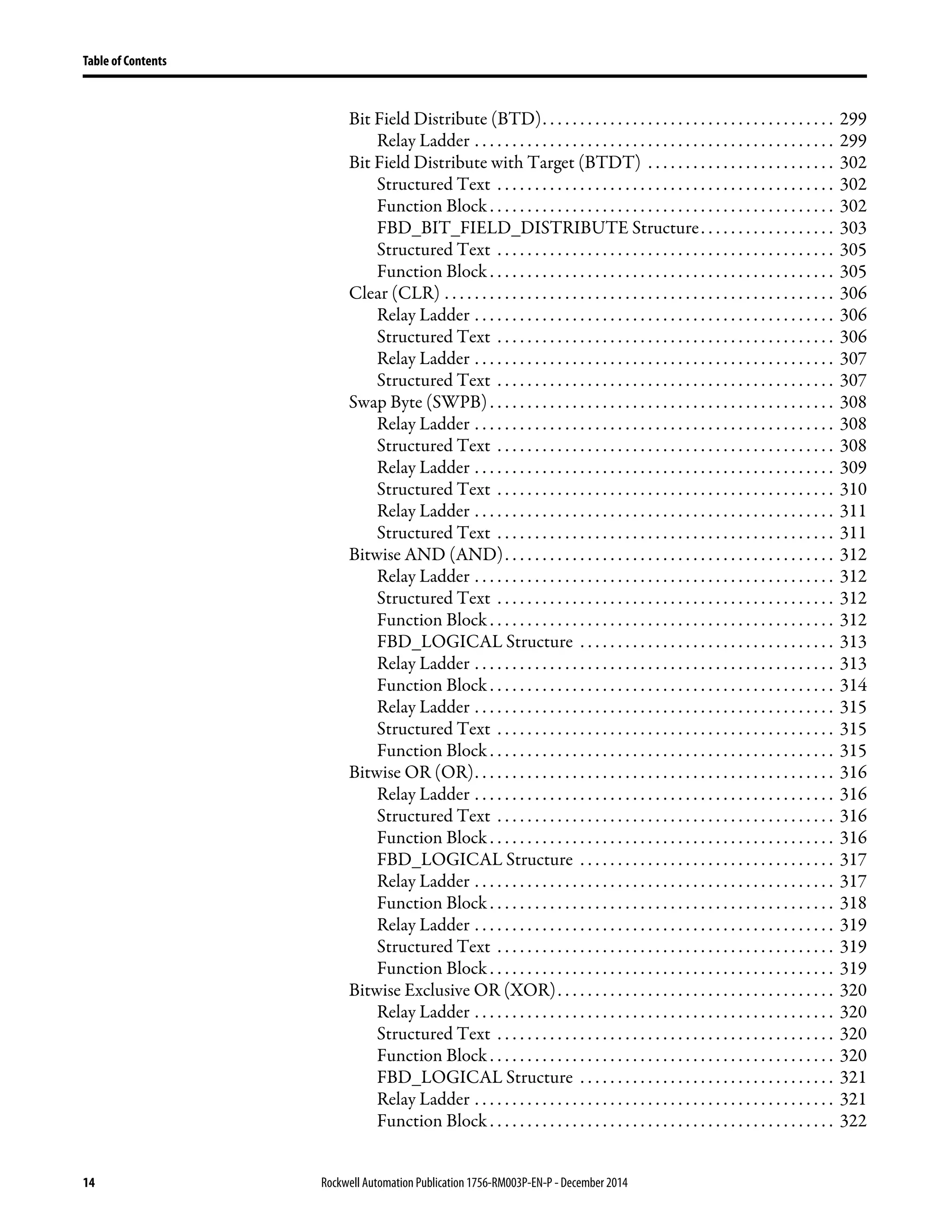
Bit Field Distribute (BTD). . . . . . . . . . . . . . . . . . . . . . . . . . . . . . . . . . . . . . . 299
Relay Ladder . . . . . . . . . . . . . . . . . . . . . . . . . . . . . . . . . . . . . . . . . . . . . . . . 299
Bit Field Distribute with Target (BTDT) . . . . . . . . . . . . . . . . . . . . . . . . . 302
Structured Text . . . . . . . . . . . . . . . . . . . . . . . . . . . . . . . . . . . . . . . . . . . . . 302
Function Block . . . . . . . . . . . . . . . . . . . . . . . . . . . . . . . . . . . . . . . . . . . . . . 302
FBD_BIT_FIELD_DISTRIBUTE Structure. . . . . . . . . . . . . . . . . . 303
Structured Text . . . . . . . . . . . . . . . . . . . . . . . . . . . . . . . . . . . . . . . . . . . . . 305
Function Block . . . . . . . . . . . . . . . . . . . . . . . . . . . . . . . . . . . . . . . . . . . . . . 305
Clear (CLR) . . . . . . . . . . . . . . . . . . . . . . . . . . . . . . . . . . . . . . . . . . . . . . . . . . . . 306
Relay Ladder . . . . . . . . . . . . . . . . . . . . . . . . . . . . . . . . . . . . . . . . . . . . . . . . 306
Structured Text . . . . . . . . . . . . . . . . . . . . . . . . . . . . . . . . . . . . . . . . . . . . . 306
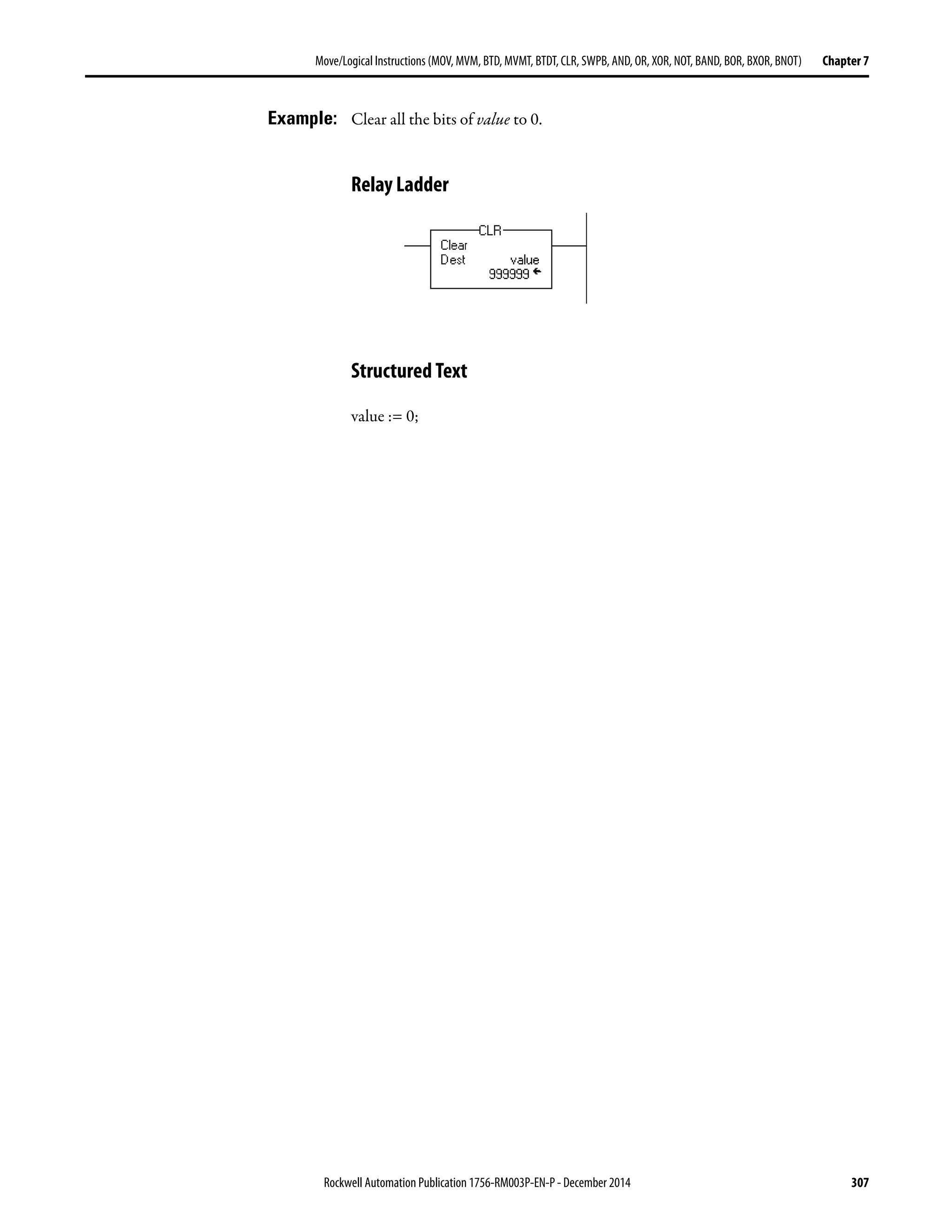
Relay Ladder . . . . . . . . . . . . . . . . . . . . . . . . . . . . . . . . . . . . . . . . . . . . . . . . 307
Structured Text . . . . . . . . . . . . . . . . . . . . . . . . . . . . . . . . . . . . . . . . . . . . . 307
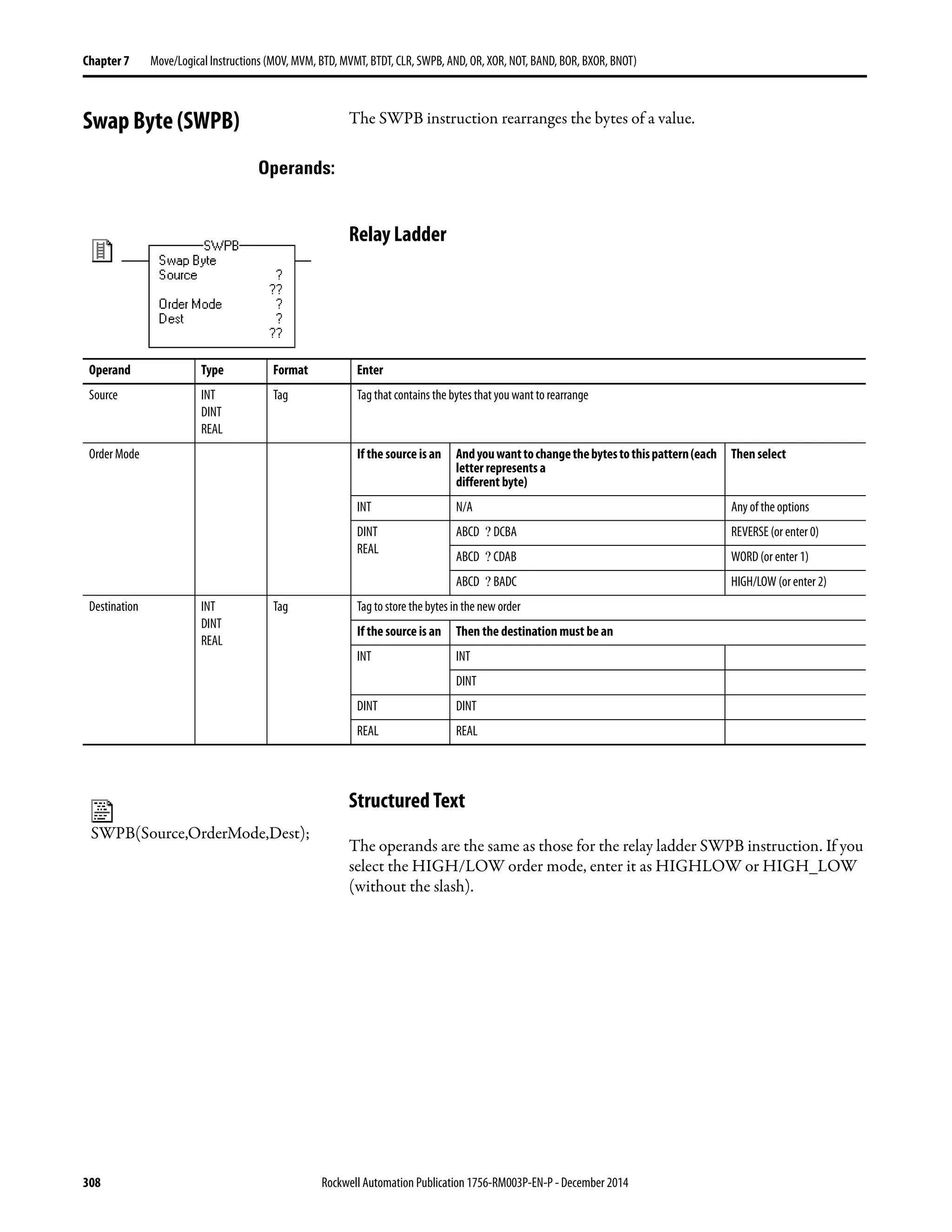
Swap Byte (SWPB). . . . . . . . . . . . . . . . . . . . . . . . . . . . . . . . . . . . . . . . . . . . . . 308
Relay Ladder . . . . . . . . . . . . . . . . . . . . . . . . . . . . . . . . . . . . . . . . . . . . . . . . 308
Structured Text . . . . . . . . . . . . . . . . . . . . . . . . . . . . . . . . . . . . . . . . . . . . . 308
Relay Ladder . . . . . . . . . . . . . . . . . . . . . . . . . . . . . . . . . . . . . . . . . . . . . . . . 309
Structured Text . . . . . . . . . . . . . . . . . . . . . . . . . . . . . . . . . . . . . . . . . . . . . 310
Relay Ladder . . . . . . . . . . . . . . . . . . . . . . . . . . . . . . . . . . . . . . . . . . . . . . . . 311
Structured Text . . . . . . . . . . . . . . . . . . . . . . . . . . . . . . . . . . . . . . . . . . . . . 311
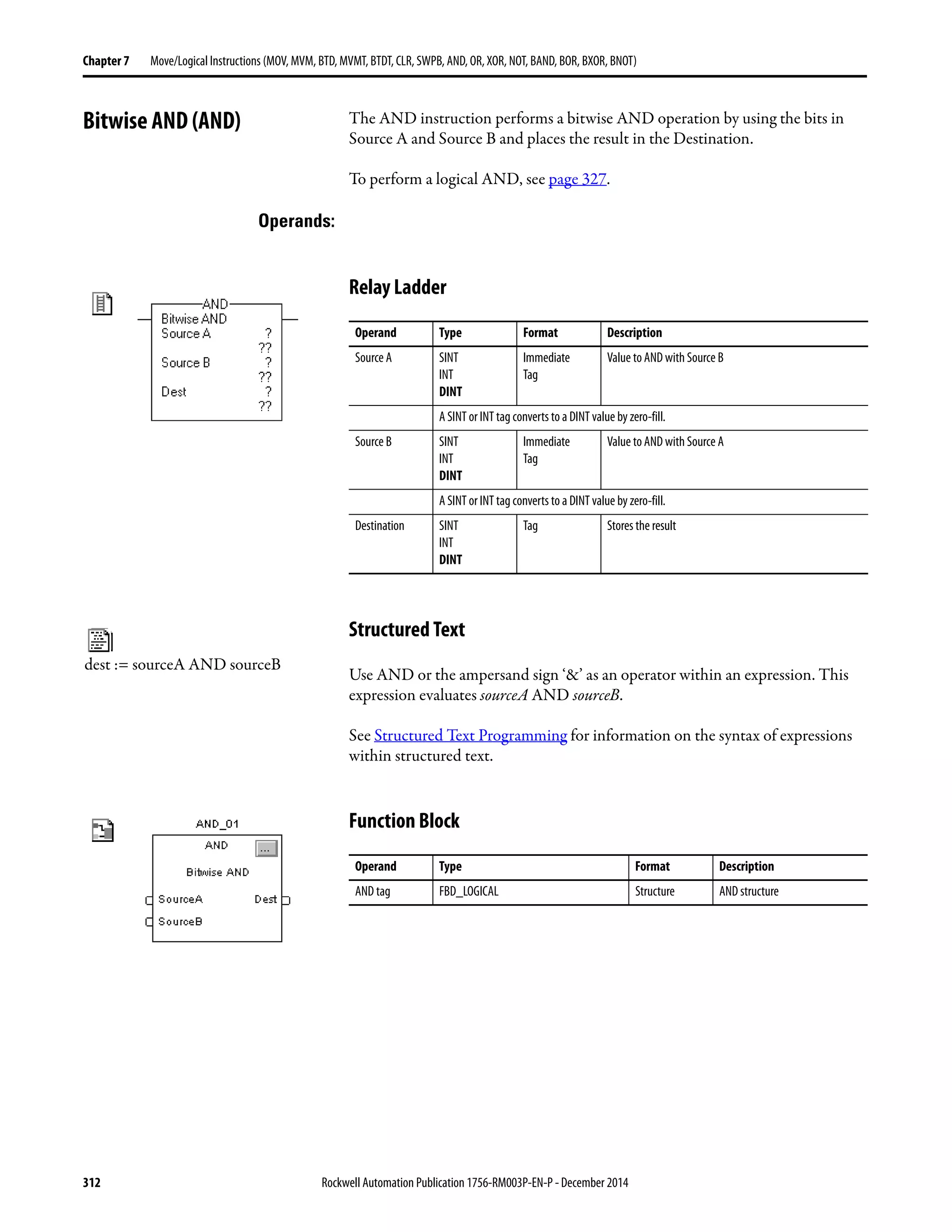
Bitwise AND (AND). . . . . . . . . . . . . . . . . . . . . . . . . . . . . . . . . . . . . . . . . . . . 312
Relay Ladder . . . . . . . . . . . . . . . . . . . . . . . . . . . . . . . . . . . . . . . . . . . . . . . . 312
Structured Text . . . . . . . . . . . . . . . . . . . . . . . . . . . . . . . . . . . . . . . . . . . . . 312
Function Block . . . . . . . . . . . . . . . . . . . . . . . . . . . . . . . . . . . . . . . . . . . . . . 312
FBD_LOGICAL Structure . . . . . . . . . . . . . . . . . . . . . . . . . . . . . . . . . . 313
Relay Ladder . . . . . . . . . . . . . . . . . . . . . . . . . . . . . . . . . . . . . . . . . . . . . . . . 313
Function Block . . . . . . . . . . . . . . . . . . . . . . . . . . . . . . . . . . . . . . . . . . . . . . 314
Relay Ladder . . . . . . . . . . . . . . . . . . . . . . . . . . . . . . . . . . . . . . . . . . . . . . . . 315
Structured Text . . . . . . . . . . . . . . . . . . . . . . . . . . . . . . . . . . . . . . . . . . . . . 315
Function Block . . . . . . . . . . . . . . . . . . . . . . . . . . . . . . . . . . . . . . . . . . . . . . 315
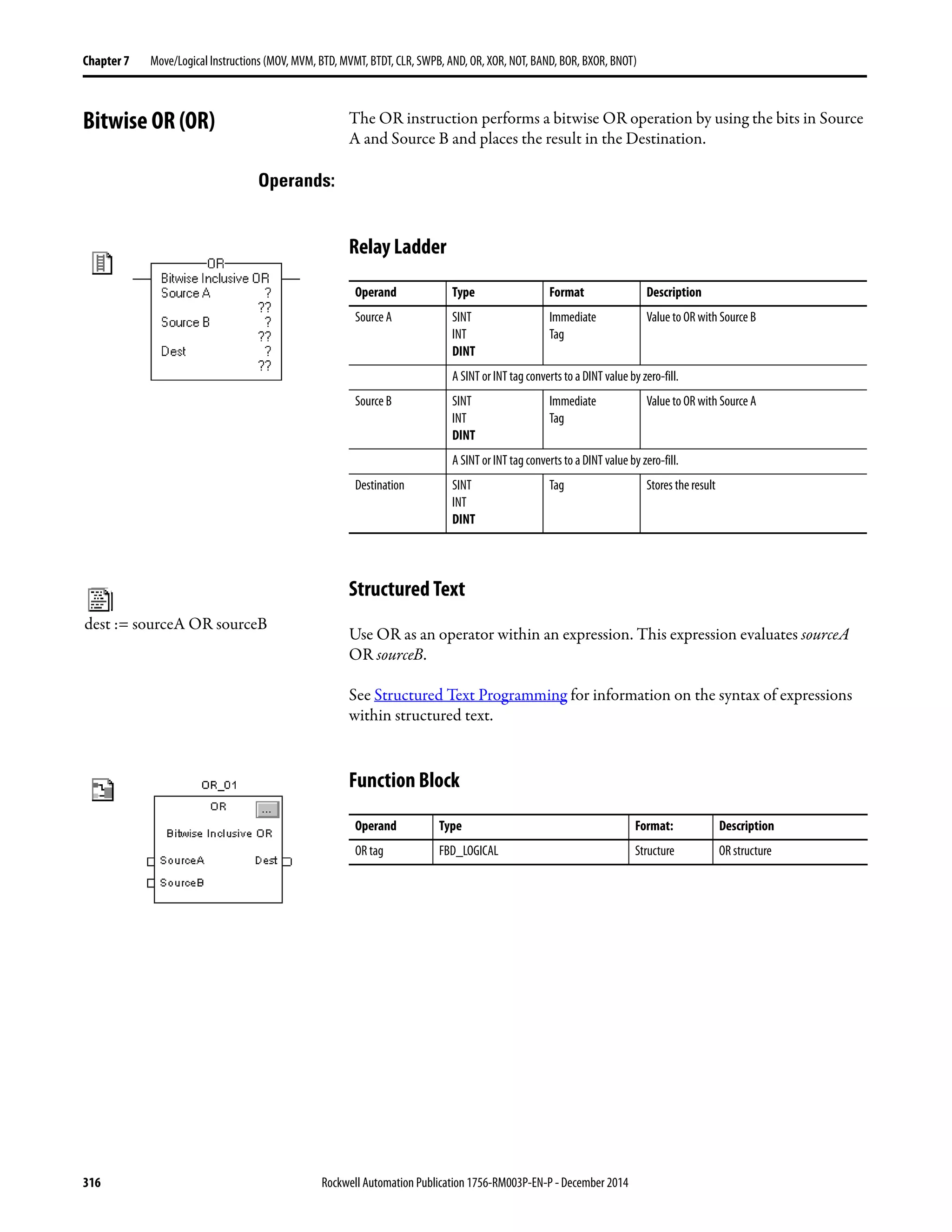
Bitwise OR (OR). . . . . . . . . . . . . . . . . . . . . . . . . . . . . . . . . . . . . . . . . . . . . . . . 316
Relay Ladder . . . . . . . . . . . . . . . . . . . . . . . . . . . . . . . . . . . . . . . . . . . . . . . . 316
Structured Text . . . . . . . . . . . . . . . . . . . . . . . . . . . . . . . . . . . . . . . . . . . . . 316
Function Block . . . . . . . . . . . . . . . . . . . . . . . . . . . . . . . . . . . . . . . . . . . . . . 316
FBD_LOGICAL Structure . . . . . . . . . . . . . . . . . . . . . . . . . . . . . . . . . . 317
Relay Ladder . . . . . . . . . . . . . . . . . . . . . . . . . . . . . . . . . . . . . . . . . . . . . . . . 317
Function Block . . . . . . . . . . . . . . . . . . . . . . . . . . . . . . . . . . . . . . . . . . . . . . 318
Relay Ladder . . . . . . . . . . . . . . . . . . . . . . . . . . . . . . . . . . . . . . . . . . . . . . . . 319
Structured Text . . . . . . . . . . . . . . . . . . . . . . . . . . . . . . . . . . . . . . . . . . . . . 319
Function Block . . . . . . . . . . . . . . . . . . . . . . . . . . . . . . . . . . . . . . . . . . . . . . 319
Bitwise Exclusive OR (XOR). . . . . . . . . . . . . . . . . . . . . . . . . . . . . . . . . . . . . 320
Relay Ladder . . . . . . . . . . . . . . . . . . . . . . . . . . . . . . . . . . . . . . . . . . . . . . . . 320
Structured Text . . . . . . . . . . . . . . . . . . . . . . . . . . . . . . . . . . . . . . . . . . . . . 320
Function Block . . . . . . . . . . . . . . . . . . . . . . . . . . . . . . . . . . . . . . . . . . . . . . 320
FBD_LOGICAL Structure . . . . . . . . . . . . . . . . . . . . . . . . . . . . . . . . . . 321
Relay Ladder . . . . . . . . . . . . . . . . . . . . . . . . . . . . . . . . . . . . . . . . . . . . . . . . 321
Function Block . . . . . . . . . . . . . . . . . . . . . . . . . . . . . . . . . . . . . . . . . . . . . . 322
Rockwell Automation Publication 1756-RM003P-EN-P - December 2014 15
Table of Contents
Relay Ladder . . . . . . . . . . . . . . . . . . . . . . . . . . . . . . . . . . . . . . . . . . . . . . . . 323
Structured Text . . . . . . . . . . . . . . . . . . . . . . . . . . . . . . . . . . . . . . . . . . . . . 323
Function Block. . . . . . . . . . . . . . . . . . . . . . . . . . . . . . . . . . . . . . . . . . . . . . 323
Bitwise NOT (NOT) . . . . . . . . . . . . . . . . . . . . . . . . . . . . . . . . . . . . . . . . . . . 324
Relay Ladder . . . . . . . . . . . . . . . . . . . . . . . . . . . . . . . . . . . . . . . . . . . . . . . . 324
Structured Text . . . . . . . . . . . . . . . . . . . . . . . . . . . . . . . . . . . . . . . . . . . . . 324
Function Block. . . . . . . . . . . . . . . . . . . . . . . . . . . . . . . . . . . . . . . . . . . . . . 324
FBD_LOGICAL Structure . . . . . . . . . . . . . . . . . . . . . . . . . . . . . . . . . . 325
Relay Ladder . . . . . . . . . . . . . . . . . . . . . . . . . . . . . . . . . . . . . . . . . . . . . . . . 325
Function Block. . . . . . . . . . . . . . . . . . . . . . . . . . . . . . . . . . . . . . . . . . . . . . 326
Relay Ladder . . . . . . . . . . . . . . . . . . . . . . . . . . . . . . . . . . . . . . . . . . . . . . . . 326
Structured Text . . . . . . . . . . . . . . . . . . . . . . . . . . . . . . . . . . . . . . . . . . . . . 326
Function Block. . . . . . . . . . . . . . . . . . . . . . . . . . . . . . . . . . . . . . . . . . . . . . 326
Boolean AND (BAND) . . . . . . . . . . . . . . . . . . . . . . . . . . . . . . . . . . . . . . . . . 327
Structured Text . . . . . . . . . . . . . . . . . . . . . . . . . . . . . . . . . . . . . . . . . . . . . 327
Function Block. . . . . . . . . . . . . . . . . . . . . . . . . . . . . . . . . . . . . . . . . . . . . . 327
FBD_BOOLEAN_AND Structure. . . . . . . . . . . . . . . . . . . . . . . . . . . 327
Structured Text . . . . . . . . . . . . . . . . . . . . . . . . . . . . . . . . . . . . . . . . . . . . . 328
Function Block. . . . . . . . . . . . . . . . . . . . . . . . . . . . . . . . . . . . . . . . . . . . . . 329
Structured Text . . . . . . . . . . . . . . . . . . . . . . . . . . . . . . . . . . . . . . . . . . . . . 329
Boolean OR (BOR) . . . . . . . . . . . . . . . . . . . . . . . . . . . . . . . . . . . . . . . . . . . . . 330
Structured Text . . . . . . . . . . . . . . . . . . . . . . . . . . . . . . . . . . . . . . . . . . . . . 330
Function Block. . . . . . . . . . . . . . . . . . . . . . . . . . . . . . . . . . . . . . . . . . . . . . 330
FBD_BOOLEAN_OR Structure. . . . . . . . . . . . . . . . . . . . . . . . . . . . . 330
Structured Text . . . . . . . . . . . . . . . . . . . . . . . . . . . . . . . . . . . . . . . . . . . . . 331
Function Block. . . . . . . . . . . . . . . . . . . . . . . . . . . . . . . . . . . . . . . . . . . . . . 331
Structured Text . . . . . . . . . . . . . . . . . . . . . . . . . . . . . . . . . . . . . . . . . . . . . 332
Boolean Exclusive OR (BXOR) . . . . . . . . . . . . . . . . . . . . . . . . . . . . . . . . . . 333
Structured Text . . . . . . . . . . . . . . . . . . . . . . . . . . . . . . . . . . . . . . . . . . . . . 333
Function Block. . . . . . . . . . . . . . . . . . . . . . . . . . . . . . . . . . . . . . . . . . . . . . 333
FBD_BOOLEAN_XOR Structure . . . . . . . . . . . . . . . . . . . . . . . . . . . 333
Structured Text . . . . . . . . . . . . . . . . . . . . . . . . . . . . . . . . . . . . . . . . . . . . . 334
Function Block. . . . . . . . . . . . . . . . . . . . . . . . . . . . . . . . . . . . . . . . . . . . . . 334
Structured Text . . . . . . . . . . . . . . . . . . . . . . . . . . . . . . . . . . . . . . . . . . . . . 335
Boolean NOT (BNOT) . . . . . . . . . . . . . . . . . . . . . . . . . . . . . . . . . . . . . . . . . 336
Structured Text . . . . . . . . . . . . . . . . . . . . . . . . . . . . . . . . . . . . . . . . . . . . . 336
Function Block. . . . . . . . . . . . . . . . . . . . . . . . . . . . . . . . . . . . . . . . . . . . . . 336
FBD_BOOLEAN_NOT Structure. . . . . . . . . . . . . . . . . . . . . . . . . . . 336
Structured Text . . . . . . . . . . . . . . . . . . . . . . . . . . . . . . . . . . . . . . . . . . . . . 337
Function Block. . . . . . . . . . . . . . . . . . . . . . . . . . . . . . . . . . . . . . . . . . . . . . 337
Structured Text . . . . . . . . . . . . . . . . . . . . . . . . . . . . . . . . . . . . . . . . . . . . . 337
Chapter8
Array(file)/Misc.Instructions
(FAL,FSC,COP,CPS,FLL,AVE,SRT,
STD,SIZE)
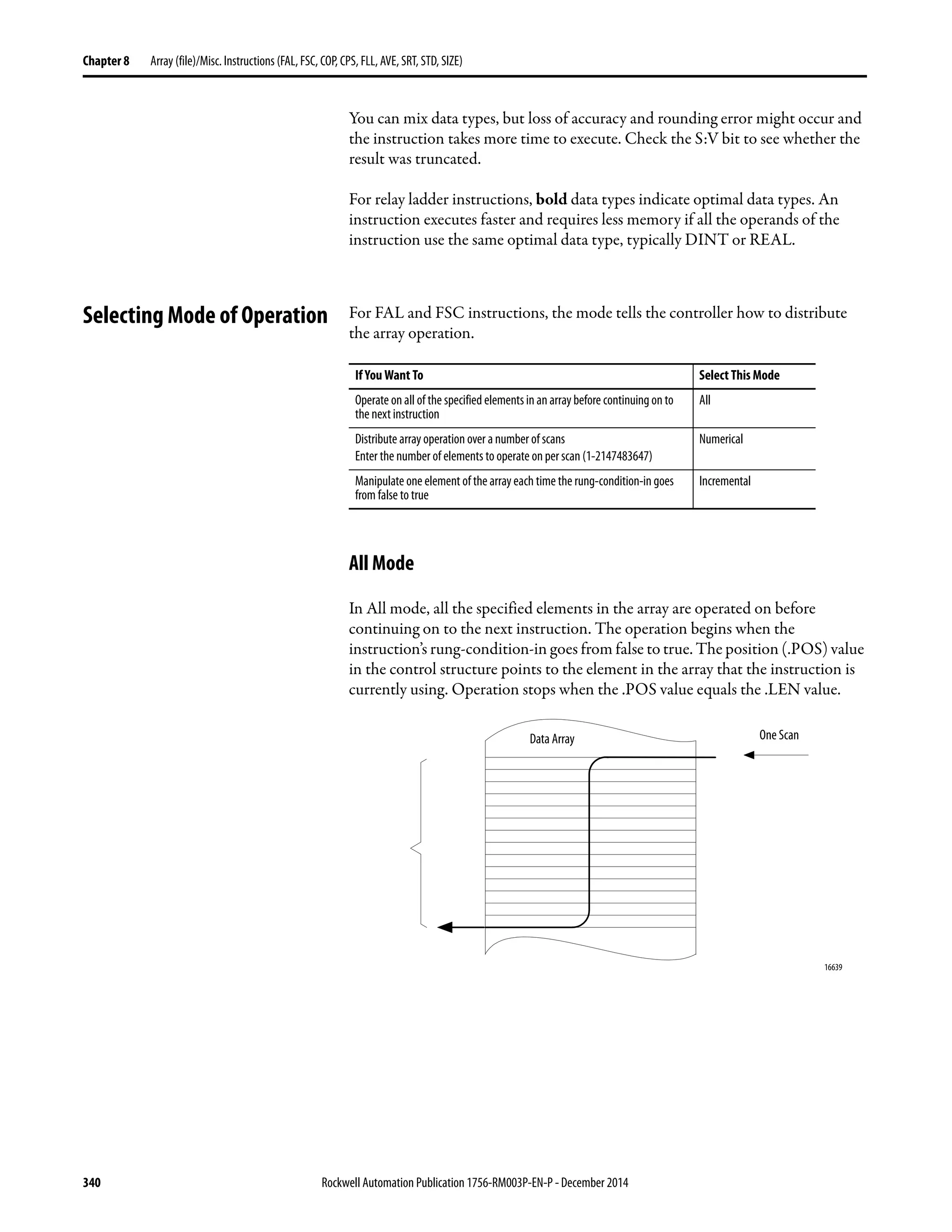
Selecting Mode of Operation. . . . . . . . . . . . . . . . . . . . . . . . . . . . . . . . . . . . . 340
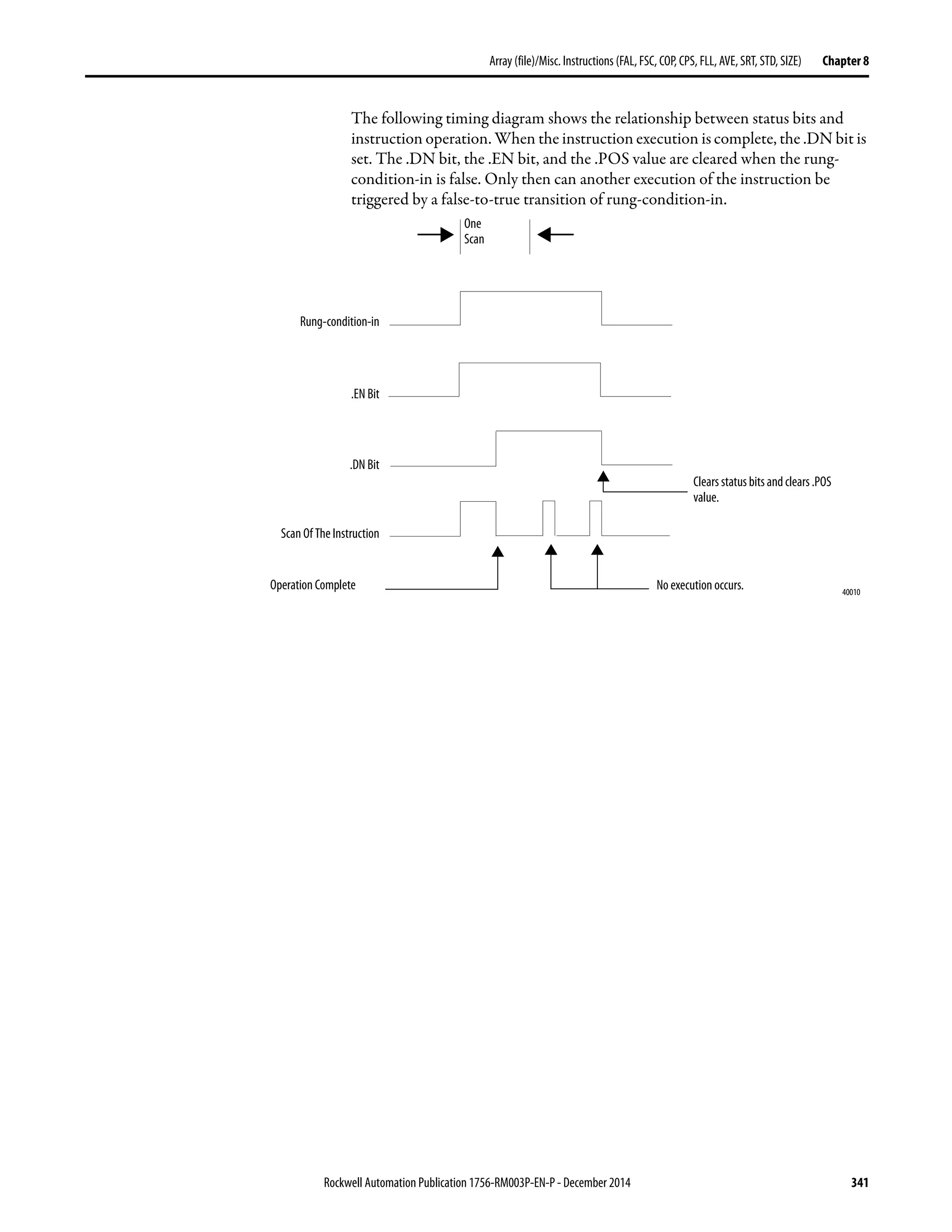
All Mode . . . . . . . . . . . . . . . . . . . . . . . . . . . . . . . . . . . . . . . . . . . . . . . . . . . 340
Numerical Mode . . . . . . . . . . . . . . . . . . . . . . . . . . . . . . . . . . . . . . . . . . . . 342
Incremental Mode. . . . . . . . . . . . . . . . . . . . . . . . . . . . . . . . . . . . . . . . . . . 343
16 Rockwell Automation Publication1756-RM003P-EN-P - December 2014
Table of Contents
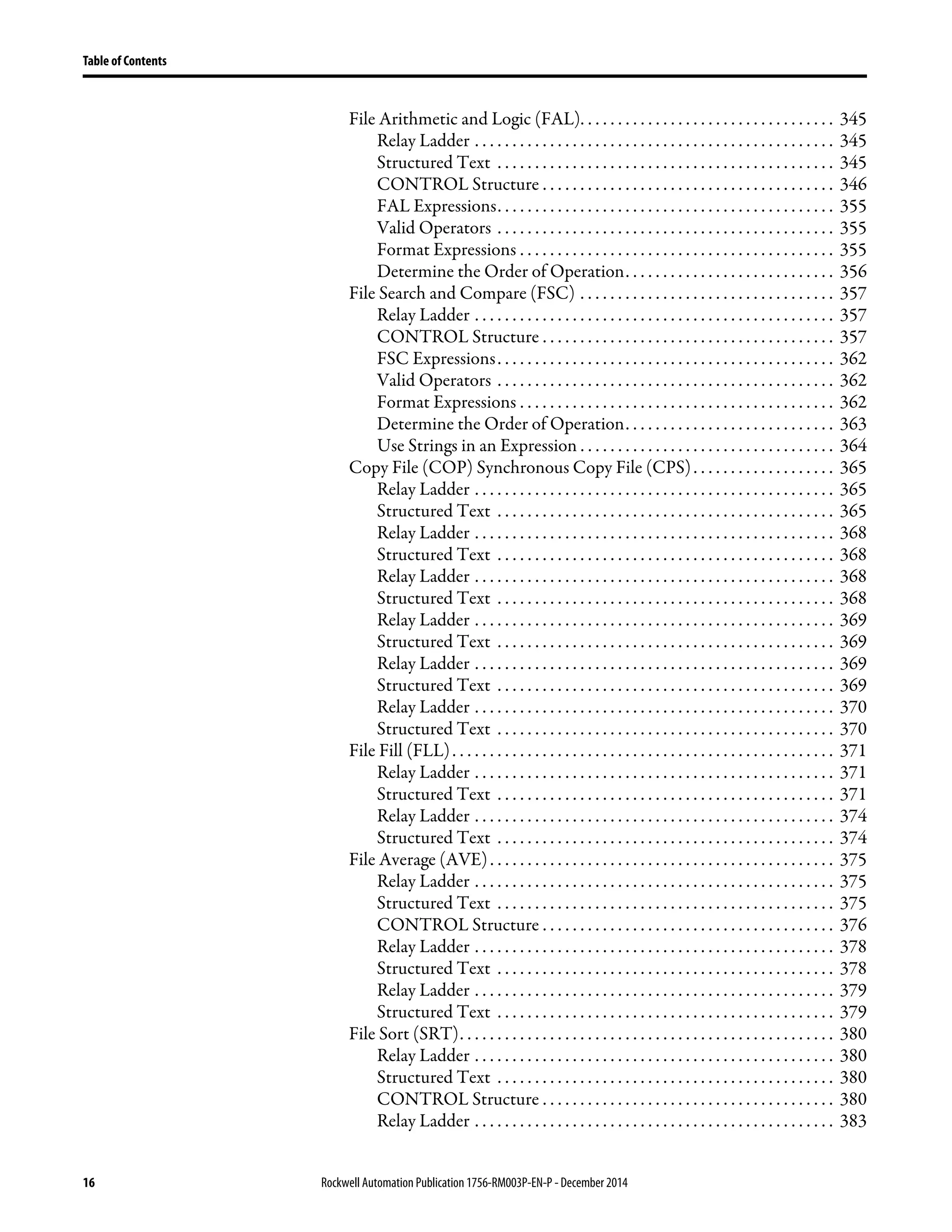
File Arithmetic and Logic (FAL). . . . . . . . . . . . . . . . . . . . . . . . . . . . . . . . . . 345
Relay Ladder . . . . . . . . . . . . . . . . . . . . . . . . . . . . . . . . . . . . . . . . . . . . . . . . 345
Structured Text . . . . . . . . . . . . . . . . . . . . . . . . . . . . . . . . . . . . . . . . . . . . . 345
CONTROL Structure . . . . . . . . . . . . . . . . . . . . . . . . . . . . . . . . . . . . . . . 346
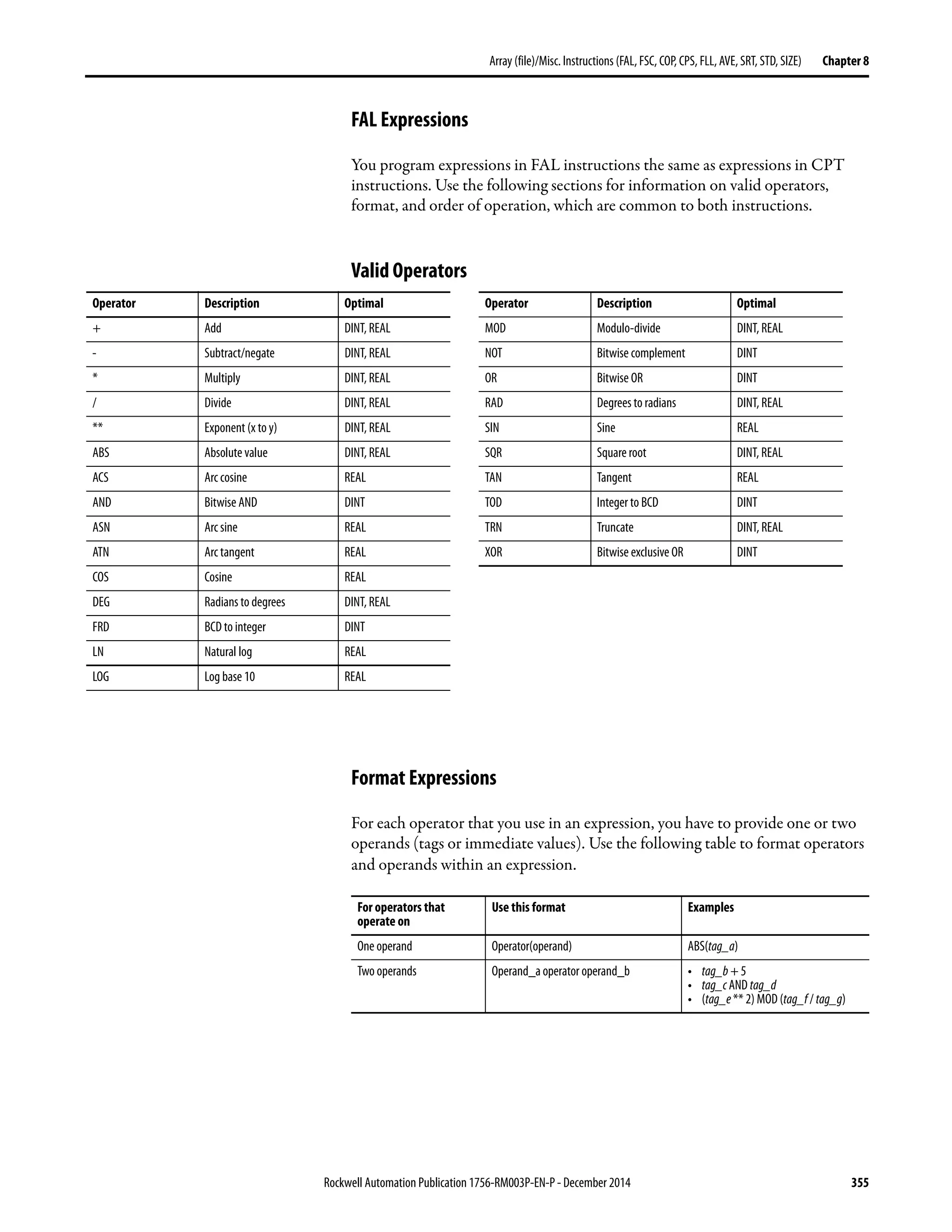
FAL Expressions. . . . . . . . . . . . . . . . . . . . . . . . . . . . . . . . . . . . . . . . . . . . . 355
Valid Operators . . . . . . . . . . . . . . . . . . . . . . . . . . . . . . . . . . . . . . . . . . . . . 355
Format Expressions . . . . . . . . . . . . . . . . . . . . . . . . . . . . . . . . . . . . . . . . . . 355
Determine the Order of Operation. . . . . . . . . . . . . . . . . . . . . . . . . . . . 356
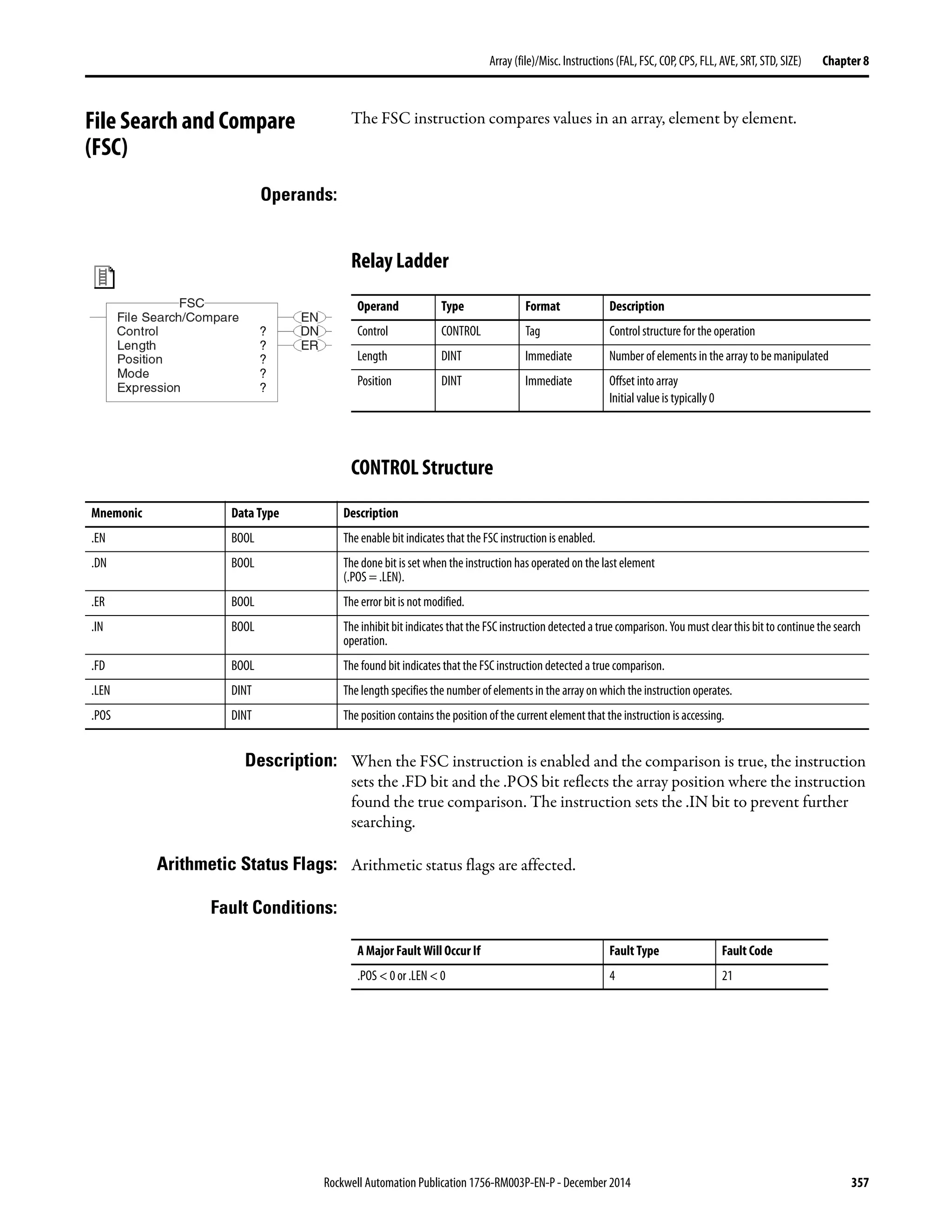
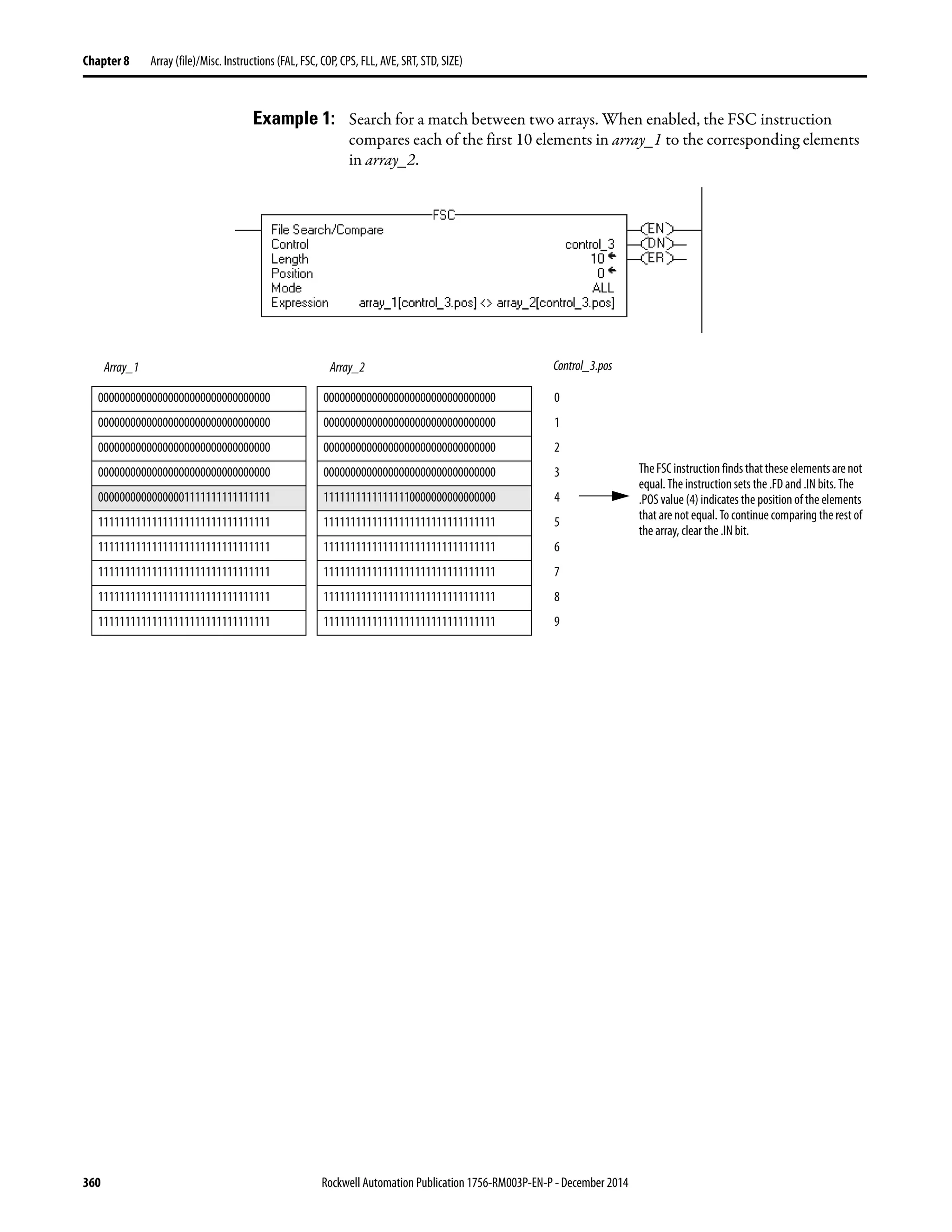
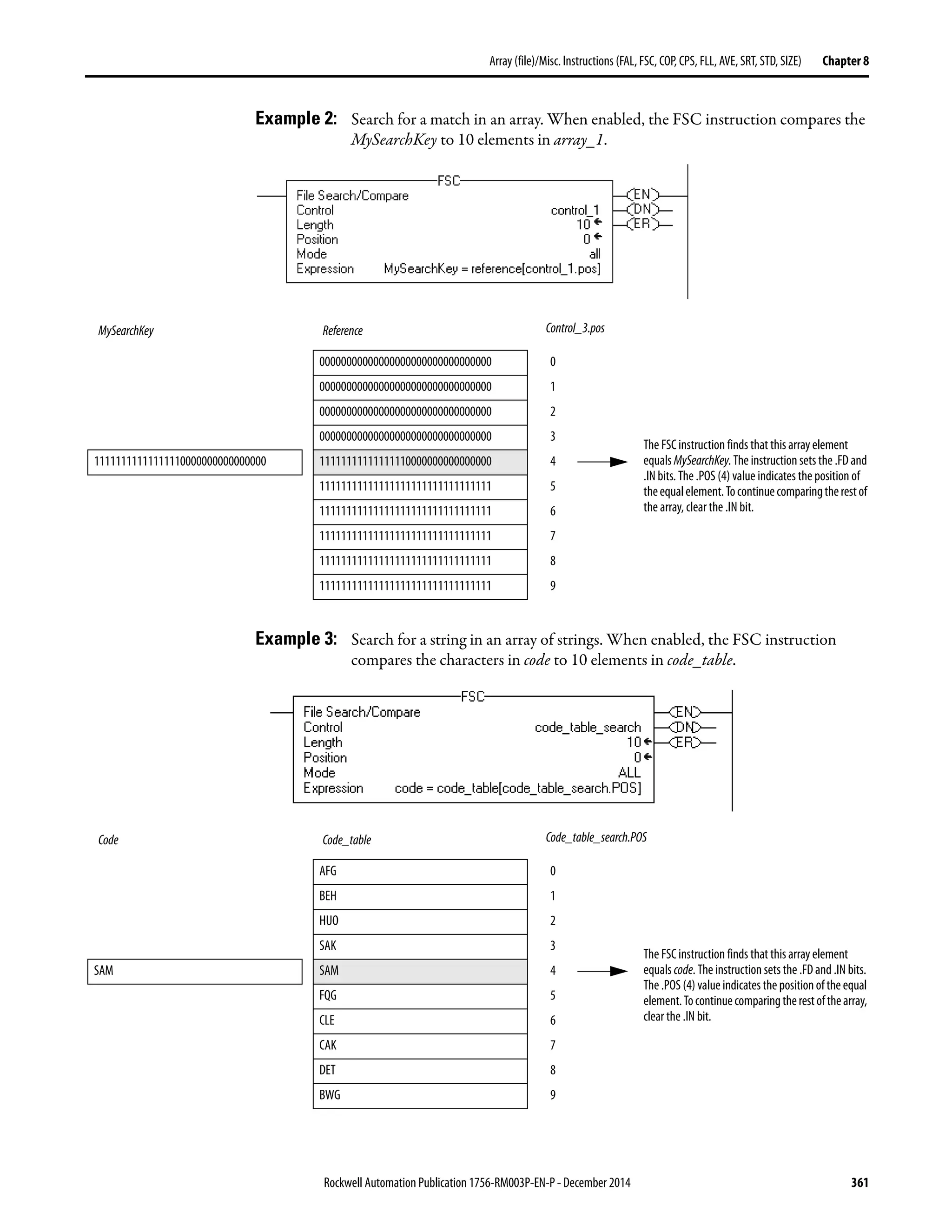
File Search and Compare (FSC) . . . . . . . . . . . . . . . . . . . . . . . . . . . . . . . . . . 357
Relay Ladder . . . . . . . . . . . . . . . . . . . . . . . . . . . . . . . . . . . . . . . . . . . . . . . . 357
CONTROL Structure . . . . . . . . . . . . . . . . . . . . . . . . . . . . . . . . . . . . . . . 357
FSC Expressions. . . . . . . . . . . . . . . . . . . . . . . . . . . . . . . . . . . . . . . . . . . . . 362
Valid Operators . . . . . . . . . . . . . . . . . . . . . . . . . . . . . . . . . . . . . . . . . . . . . 362
Format Expressions . . . . . . . . . . . . . . . . . . . . . . . . . . . . . . . . . . . . . . . . . . 362
Determine the Order of Operation. . . . . . . . . . . . . . . . . . . . . . . . . . . . 363
Use Strings in an Expression . . . . . . . . . . . . . . . . . . . . . . . . . . . . . . . . . . 364
Copy File (COP) Synchronous Copy File (CPS). . . . . . . . . . . . . . . . . . . 365
Relay Ladder . . . . . . . . . . . . . . . . . . . . . . . . . . . . . . . . . . . . . . . . . . . . . . . . 365
Structured Text . . . . . . . . . . . . . . . . . . . . . . . . . . . . . . . . . . . . . . . . . . . . . 365
Relay Ladder . . . . . . . . . . . . . . . . . . . . . . . . . . . . . . . . . . . . . . . . . . . . . . . . 368
Structured Text . . . . . . . . . . . . . . . . . . . . . . . . . . . . . . . . . . . . . . . . . . . . . 368
Relay Ladder . . . . . . . . . . . . . . . . . . . . . . . . . . . . . . . . . . . . . . . . . . . . . . . . 368
Structured Text . . . . . . . . . . . . . . . . . . . . . . . . . . . . . . . . . . . . . . . . . . . . . 368
Relay Ladder . . . . . . . . . . . . . . . . . . . . . . . . . . . . . . . . . . . . . . . . . . . . . . . . 369
Structured Text . . . . . . . . . . . . . . . . . . . . . . . . . . . . . . . . . . . . . . . . . . . . . 369
Relay Ladder . . . . . . . . . . . . . . . . . . . . . . . . . . . . . . . . . . . . . . . . . . . . . . . . 369
Structured Text . . . . . . . . . . . . . . . . . . . . . . . . . . . . . . . . . . . . . . . . . . . . . 369
Relay Ladder . . . . . . . . . . . . . . . . . . . . . . . . . . . . . . . . . . . . . . . . . . . . . . . . 370
Structured Text . . . . . . . . . . . . . . . . . . . . . . . . . . . . . . . . . . . . . . . . . . . . . 370
File Fill (FLL). . . . . . . . . . . . . . . . . . . . . . . . . . . . . . . . . . . . . . . . . . . . . . . . . . . 371
Relay Ladder . . . . . . . . . . . . . . . . . . . . . . . . . . . . . . . . . . . . . . . . . . . . . . . . 371
Structured Text . . . . . . . . . . . . . . . . . . . . . . . . . . . . . . . . . . . . . . . . . . . . . 371
Relay Ladder . . . . . . . . . . . . . . . . . . . . . . . . . . . . . . . . . . . . . . . . . . . . . . . . 374
Structured Text . . . . . . . . . . . . . . . . . . . . . . . . . . . . . . . . . . . . . . . . . . . . . 374
File Average (AVE). . . . . . . . . . . . . . . . . . . . . . . . . . . . . . . . . . . . . . . . . . . . . . 375
Relay Ladder . . . . . . . . . . . . . . . . . . . . . . . . . . . . . . . . . . . . . . . . . . . . . . . . 375
Structured Text . . . . . . . . . . . . . . . . . . . . . . . . . . . . . . . . . . . . . . . . . . . . . 375
CONTROL Structure . . . . . . . . . . . . . . . . . . . . . . . . . . . . . . . . . . . . . . . 376
Relay Ladder . . . . . . . . . . . . . . . . . . . . . . . . . . . . . . . . . . . . . . . . . . . . . . . . 378
Structured Text . . . . . . . . . . . . . . . . . . . . . . . . . . . . . . . . . . . . . . . . . . . . . 378
Relay Ladder . . . . . . . . . . . . . . . . . . . . . . . . . . . . . . . . . . . . . . . . . . . . . . . . 379
Structured Text . . . . . . . . . . . . . . . . . . . . . . . . . . . . . . . . . . . . . . . . . . . . . 379
File Sort (SRT). . . . . . . . . . . . . . . . . . . . . . . . . . . . . . . . . . . . . . . . . . . . . . . . . . 380
Relay Ladder . . . . . . . . . . . . . . . . . . . . . . . . . . . . . . . . . . . . . . . . . . . . . . . . 380
Structured Text . . . . . . . . . . . . . . . . . . . . . . . . . . . . . . . . . . . . . . . . . . . . . 380
CONTROL Structure . . . . . . . . . . . . . . . . . . . . . . . . . . . . . . . . . . . . . . . 380
Relay Ladder . . . . . . . . . . . . . . . . . . . . . . . . . . . . . . . . . . . . . . . . . . . . . . . . 383
Rockwell Automation Publication 1756-RM003P-EN-P - December 2014 17
Table of Contents
Structured Text . . . . . . . . . . . . . . . . . . . . . . . . . . . . . . . . . . . . . . . . . . . . . 383
Relay Ladder . . . . . . . . . . . . . . . . . . . . . . . . . . . . . . . . . . . . . . . . . . . . . . . . 384
Structured Text . . . . . . . . . . . . . . . . . . . . . . . . . . . . . . . . . . . . . . . . . . . . . 384
File Standard Deviation (STD). . . . . . . . . . . . . . . . . . . . . . . . . . . . . . . . . . . 385
Relay Ladder . . . . . . . . . . . . . . . . . . . . . . . . . . . . . . . . . . . . . . . . . . . . . . . . 385
CONTROL Structure. . . . . . . . . . . . . . . . . . . . . . . . . . . . . . . . . . . . . . . 385
Structured Text . . . . . . . . . . . . . . . . . . . . . . . . . . . . . . . . . . . . . . . . . . . . . 386
Relay Ladder . . . . . . . . . . . . . . . . . . . . . . . . . . . . . . . . . . . . . . . . . . . . . . . . 389
Structured Text . . . . . . . . . . . . . . . . . . . . . . . . . . . . . . . . . . . . . . . . . . . . . 389
Relay Ladder . . . . . . . . . . . . . . . . . . . . . . . . . . . . . . . . . . . . . . . . . . . . . . . . 390
Structured Text . . . . . . . . . . . . . . . . . . . . . . . . . . . . . . . . . . . . . . . . . . . . . 391
Size In Elements (SIZE) . . . . . . . . . . . . . . . . . . . . . . . . . . . . . . . . . . . . . . . . . 392
Relay Ladder . . . . . . . . . . . . . . . . . . . . . . . . . . . . . . . . . . . . . . . . . . . . . . . . 392
Structured Text . . . . . . . . . . . . . . . . . . . . . . . . . . . . . . . . . . . . . . . . . . . . . 392
Relay Ladder . . . . . . . . . . . . . . . . . . . . . . . . . . . . . . . . . . . . . . . . . . . . . . . . 393
Structured Text . . . . . . . . . . . . . . . . . . . . . . . . . . . . . . . . . . . . . . . . . . . . . 393
Relay Ladder . . . . . . . . . . . . . . . . . . . . . . . . . . . . . . . . . . . . . . . . . . . . . . . . 394
Structured Text . . . . . . . . . . . . . . . . . . . . . . . . . . . . . . . . . . . . . . . . . . . . . 394
Relay Ladder . . . . . . . . . . . . . . . . . . . . . . . . . . . . . . . . . . . . . . . . . . . . . . . . 395
Structured Text . . . . . . . . . . . . . . . . . . . . . . . . . . . . . . . . . . . . . . . . . . . . . 395
Chapter9
Array(file)/ShiftInstructions
(BSL,BSR,FFL,FFU,LFL,LFU)
Bit Shift Left (BSL) . . . . . . . . . . . . . . . . . . . . . . . . . . . . . . . . . . . . . . . . . . . . . 398
Relay Ladder . . . . . . . . . . . . . . . . . . . . . . . . . . . . . . . . . . . . . . . . . . . . . . . . 398
CONTROL Structure. . . . . . . . . . . . . . . . . . . . . . . . . . . . . . . . . . . . . . . 398
Bit Shift Right (BSR). . . . . . . . . . . . . . . . . . . . . . . . . . . . . . . . . . . . . . . . . . . . 402
Relay Ladder . . . . . . . . . . . . . . . . . . . . . . . . . . . . . . . . . . . . . . . . . . . . . . . . 402
CONTROL Structure. . . . . . . . . . . . . . . . . . . . . . . . . . . . . . . . . . . . . . . 402
FIFO Load (FFL) . . . . . . . . . . . . . . . . . . . . . . . . . . . . . . . . . . . . . . . . . . . . . . . 406
Relay Ladder . . . . . . . . . . . . . . . . . . . . . . . . . . . . . . . . . . . . . . . . . . . . . . . . 406
CONTROL Structure. . . . . . . . . . . . . . . . . . . . . . . . . . . . . . . . . . . . . . . 407
FIFO Unload (FFU) . . . . . . . . . . . . . . . . . . . . . . . . . . . . . . . . . . . . . . . . . . . . 412
Relay Ladder . . . . . . . . . . . . . . . . . . . . . . . . . . . . . . . . . . . . . . . . . . . . . . . . 412
CONTROL Structure. . . . . . . . . . . . . . . . . . . . . . . . . . . . . . . . . . . . . . . 413
LIFO Load (LFL) . . . . . . . . . . . . . . . . . . . . . . . . . . . . . . . . . . . . . . . . . . . . . . . 418
Relay Ladder . . . . . . . . . . . . . . . . . . . . . . . . . . . . . . . . . . . . . . . . . . . . . . . . 418
CONTROL Structure. . . . . . . . . . . . . . . . . . . . . . . . . . . . . . . . . . . . . . . 419
LIFO Unload (LFU) . . . . . . . . . . . . . . . . . . . . . . . . . . . . . . . . . . . . . . . . . . . . 424
Relay Ladder . . . . . . . . . . . . . . . . . . . . . . . . . . . . . . . . . . . . . . . . . . . . . . . . 424
CONTROL Structure. . . . . . . . . . . . . . . . . . . . . . . . . . . . . . . . . . . . . . . 425
Chapter10
SequencerInstructions
(SQI,SQO,SQL)
Sequencer Input (SQI) . . . . . . . . . . . . . . . . . . . . . . . . . . . . . . . . . . . . . . . . . . 432
Relay Ladder . . . . . . . . . . . . . . . . . . . . . . . . . . . . . . . . . . . . . . . . . . . . . . . . 432
CONTROL Structure. . . . . . . . . . . . . . . . . . . . . . . . . . . . . . . . . . . . . . . 432
Enter an Immediate Mask Value . . . . . . . . . . . . . . . . . . . . . . . . . . . . . . 433
18 Rockwell Automation Publication1756-RM003P-EN-P - December 2014
Table of Contents
Use SQI without SQO. . . . . . . . . . . . . . . . . . . . . . . . . . . . . . . . . . . . . . . 435
Sequencer Output (SQO). . . . . . . . . . . . . . . . . . . . . . . . . . . . . . . . . . . . . . . . 436
Relay Ladder . . . . . . . . . . . . . . . . . . . . . . . . . . . . . . . . . . . . . . . . . . . . . . . . 436
Enter an Immediate Mask Value . . . . . . . . . . . . . . . . . . . . . . . . . . . . . . 437
Using SQI with SQO . . . . . . . . . . . . . . . . . . . . . . . . . . . . . . . . . . . . . . . . 439
Resetting the Position of SQO. . . . . . . . . . . . . . . . . . . . . . . . . . . . . . . . 439
Sequencer Load (SQL). . . . . . . . . . . . . . . . . . . . . . . . . . . . . . . . . . . . . . . . . . . 440
Relay Ladder . . . . . . . . . . . . . . . . . . . . . . . . . . . . . . . . . . . . . . . . . . . . . . . . 440
CONTROL Structure . . . . . . . . . . . . . . . . . . . . . . . . . . . . . . . . . . . . . . . 440
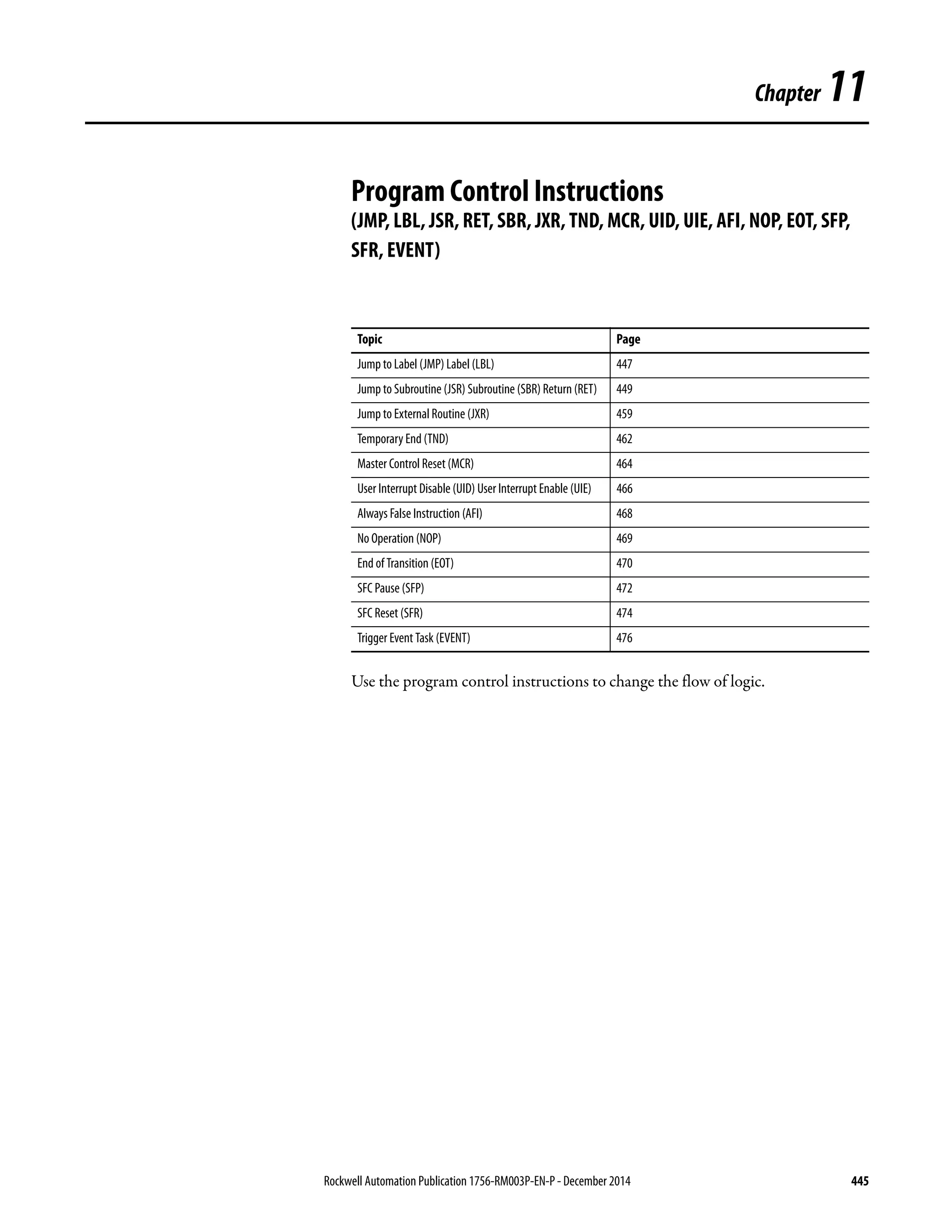
Chapter11
ProgramControlInstructions
(JMP,LBL,JSR,RET,SBR,JXR,TND,
MCR,UID,UIE,AFI,NOP,EOT,SFP,
SFR,EVENT)
Jump to Label (JMP)
Label (LBL). . . . . . . . . . . . . . . . . . . . . . . . . . . . . . . . . . . . . . . . . . . . . . . . . . . . . 447
Relay Ladder . . . . . . . . . . . . . . . . . . . . . . . . . . . . . . . . . . . . . . . . . . . . . . . . 447
Jump to Subroutine (JSR)
Subroutine (SBR) Return (RET) . . . . . . . . . . . . . . . . . . . . . . . . . . . . . . . . . 449
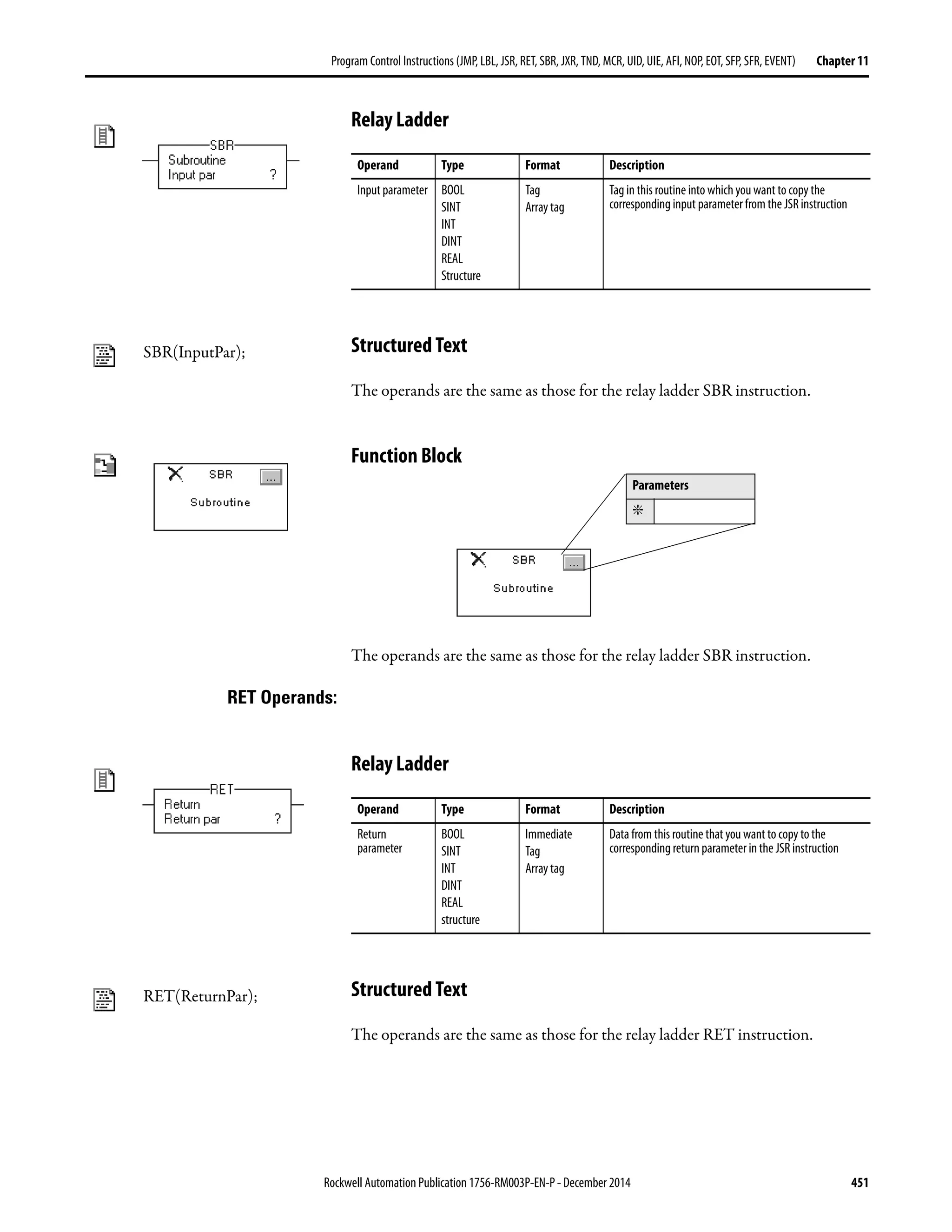
Relay Ladder . . . . . . . . . . . . . . . . . . . . . . . . . . . . . . . . . . . . . . . . . . . . . . . . 449
Structured Text . . . . . . . . . . . . . . . . . . . . . . . . . . . . . . . . . . . . . . . . . . . . . 450
Function Block . . . . . . . . . . . . . . . . . . . . . . . . . . . . . . . . . . . . . . . . . . . . . . 450
Relay Ladder . . . . . . . . . . . . . . . . . . . . . . . . . . . . . . . . . . . . . . . . . . . . . . . . 451
Structured Text . . . . . . . . . . . . . . . . . . . . . . . . . . . . . . . . . . . . . . . . . . . . . 451
Function Block . . . . . . . . . . . . . . . . . . . . . . . . . . . . . . . . . . . . . . . . . . . . . . 451
Relay Ladder . . . . . . . . . . . . . . . . . . . . . . . . . . . . . . . . . . . . . . . . . . . . . . . . 451
Structured Text . . . . . . . . . . . . . . . . . . . . . . . . . . . . . . . . . . . . . . . . . . . . . 451
Function Block . . . . . . . . . . . . . . . . . . . . . . . . . . . . . . . . . . . . . . . . . . . . . . 452
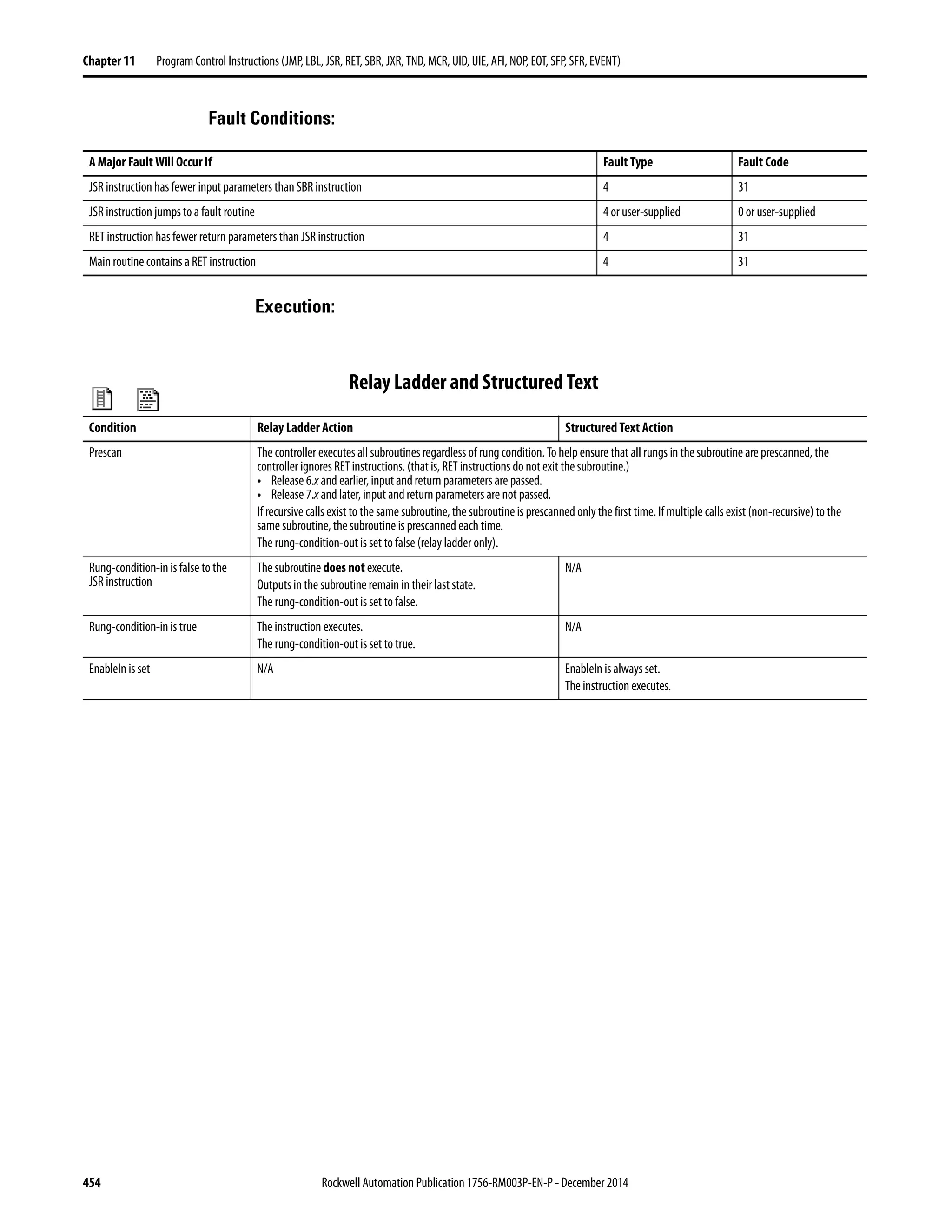
Relay Ladder and Structured Text. . . . . . . . . . . . . . . . . . . . . . . . . . . . . 454
Function Block . . . . . . . . . . . . . . . . . . . . . . . . . . . . . . . . . . . . . . . . . . . . . . 455
Relay Ladder . . . . . . . . . . . . . . . . . . . . . . . . . . . . . . . . . . . . . . . . . . . . . . . . 456
Structured Text . . . . . . . . . . . . . . . . . . . . . . . . . . . . . . . . . . . . . . . . . . . . . 456
Relay Ladder . . . . . . . . . . . . . . . . . . . . . . . . . . . . . . . . . . . . . . . . . . . . . . . . 457
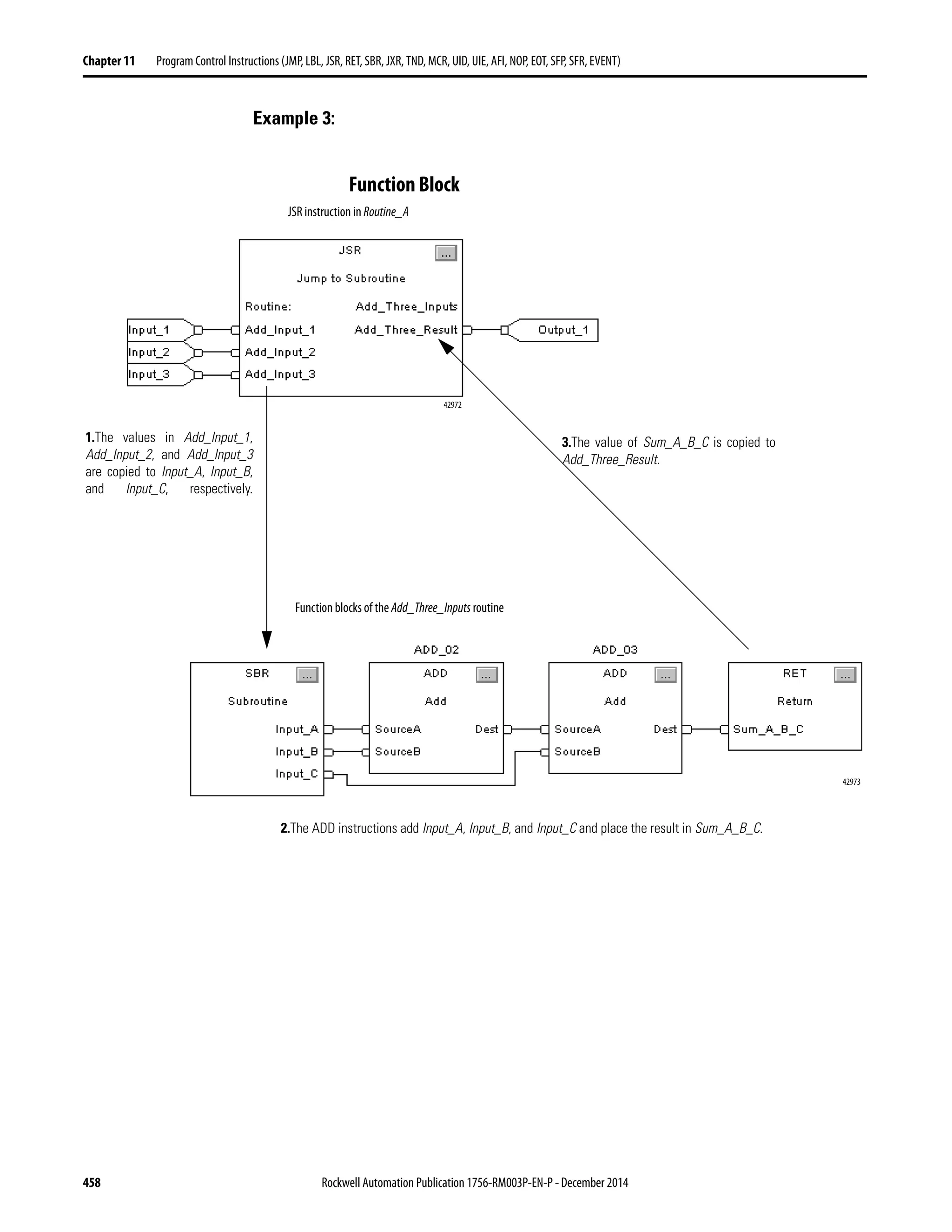
Function Block . . . . . . . . . . . . . . . . . . . . . . . . . . . . . . . . . . . . . . . . . . . . . . 458
Jump to External Routine (JXR). . . . . . . . . . . . . . . . . . . . . . . . . . . . . . . . . . 459
Relay Ladder . . . . . . . . . . . . . . . . . . . . . . . . . . . . . . . . . . . . . . . . . . . . . . . . 459
EXT_ROUTINE_CONTROL Structure. . . . . . . . . . . . . . . . . . . . . 460
Temporary End (TND). . . . . . . . . . . . . . . . . . . . . . . . . . . . . . . . . . . . . . . . . . 462
Relay Ladder Operands . . . . . . . . . . . . . . . . . . . . . . . . . . . . . . . . . . . . . . 462
Structured Text . . . . . . . . . . . . . . . . . . . . . . . . . . . . . . . . . . . . . . . . . . . . . 462
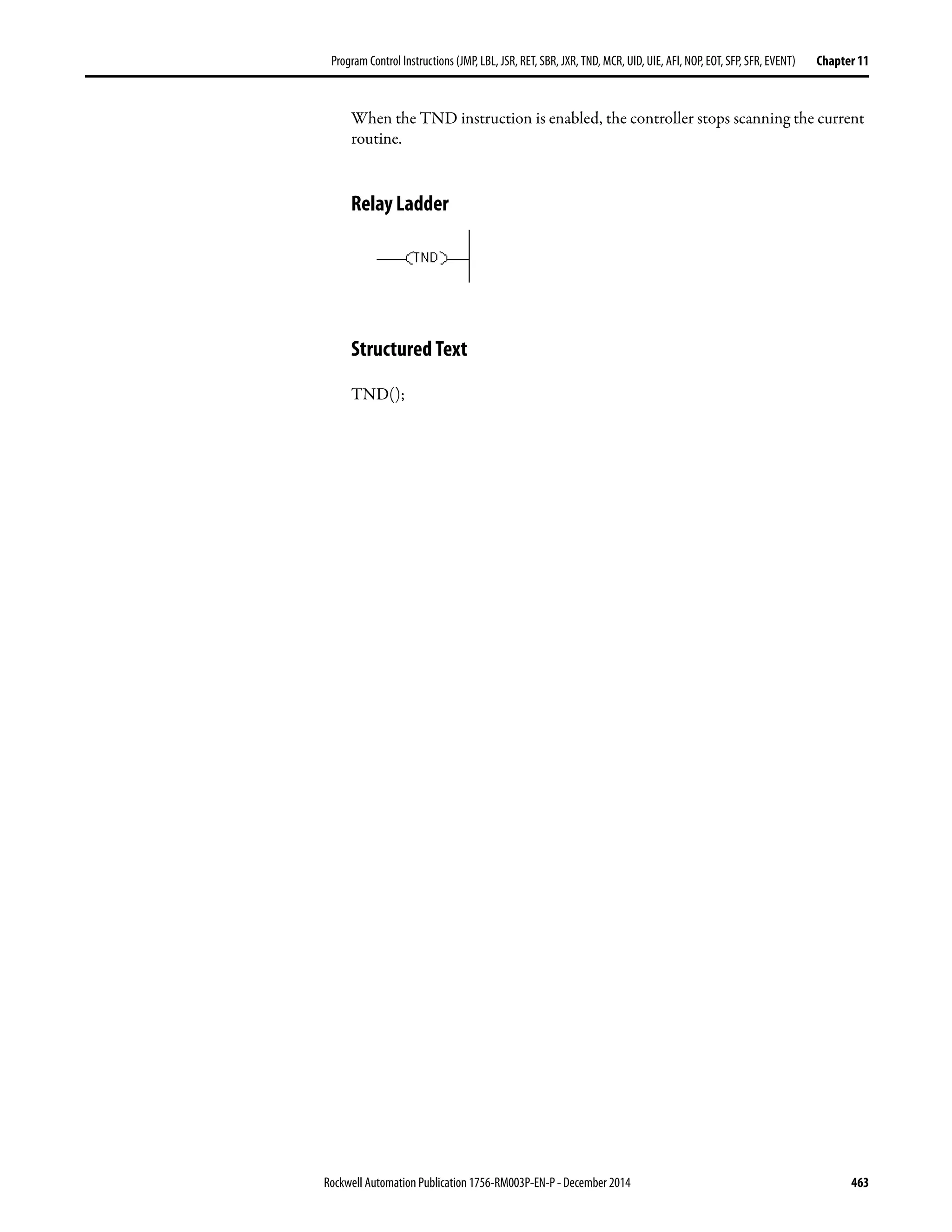
Relay Ladder . . . . . . . . . . . . . . . . . . . . . . . . . . . . . . . . . . . . . . . . . . . . . . . . 463
Structured Text . . . . . . . . . . . . . . . . . . . . . . . . . . . . . . . . . . . . . . . . . . . . . 463
Master Control Reset (MCR) . . . . . . . . . . . . . . . . . . . . . . . . . . . . . . . . . . . . 464
Relay Ladder . . . . . . . . . . . . . . . . . . . . . . . . . . . . . . . . . . . . . . . . . . . . . . . . 464
User Interrupt Disable (UID) User Interrupt Enable (UIE). . . . . . . . . 466
Relay Ladder . . . . . . . . . . . . . . . . . . . . . . . . . . . . . . . . . . . . . . . . . . . . . . . . 466
Structured Text . . . . . . . . . . . . . . . . . . . . . . . . . . . . . . . . . . . . . . . . . . . . . 466
Relay Ladder . . . . . . . . . . . . . . . . . . . . . . . . . . . . . . . . . . . . . . . . . . . . . . . . 467
Structured Text . . . . . . . . . . . . . . . . . . . . . . . . . . . . . . . . . . . . . . . . . . . . . 467
Always False Instruction (AFI) . . . . . . . . . . . . . . . . . . . . . . . . . . . . . . . . . . . 468
Rockwell Automation Publication 1756-RM003P-EN-P - December 2014 19
Table of Contents
Relay Ladder . . . . . . . . . . . . . . . . . . . . . . . . . . . . . . . . . . . . . . . . . . . . . . . . 468
No Operation (NOP) . . . . . . . . . . . . . . . . . . . . . . . . . . . . . . . . . . . . . . . . . . . 469
Relay Ladder . . . . . . . . . . . . . . . . . . . . . . . . . . . . . . . . . . . . . . . . . . . . . . . . 469
End of Transition (EOT). . . . . . . . . . . . . . . . . . . . . . . . . . . . . . . . . . . . . . . . 470
Relay Ladder . . . . . . . . . . . . . . . . . . . . . . . . . . . . . . . . . . . . . . . . . . . . . . . . 470
Structured Text . . . . . . . . . . . . . . . . . . . . . . . . . . . . . . . . . . . . . . . . . . . . . 470
Relay Ladder . . . . . . . . . . . . . . . . . . . . . . . . . . . . . . . . . . . . . . . . . . . . . . . . 471
Structured Text . . . . . . . . . . . . . . . . . . . . . . . . . . . . . . . . . . . . . . . . . . . . . 471
SFC Pause (SFP). . . . . . . . . . . . . . . . . . . . . . . . . . . . . . . . . . . . . . . . . . . . . . . . 472
Relay Ladder . . . . . . . . . . . . . . . . . . . . . . . . . . . . . . . . . . . . . . . . . . . . . . . . 472
Structured Text . . . . . . . . . . . . . . . . . . . . . . . . . . . . . . . . . . . . . . . . . . . . . 472
Relay Ladder . . . . . . . . . . . . . . . . . . . . . . . . . . . . . . . . . . . . . . . . . . . . . . . . 473
Structured Text . . . . . . . . . . . . . . . . . . . . . . . . . . . . . . . . . . . . . . . . . . . . . 474
SFC Reset (SFR). . . . . . . . . . . . . . . . . . . . . . . . . . . . . . . . . . . . . . . . . . . . . . . . 474
Relay Ladder Operands . . . . . . . . . . . . . . . . . . . . . . . . . . . . . . . . . . . . . . 474
Structured Text . . . . . . . . . . . . . . . . . . . . . . . . . . . . . . . . . . . . . . . . . . . . . 474
Relay Ladder . . . . . . . . . . . . . . . . . . . . . . . . . . . . . . . . . . . . . . . . . . . . . . . . 475
Structured Text . . . . . . . . . . . . . . . . . . . . . . . . . . . . . . . . . . . . . . . . . . . . . 475
Trigger Event Task (EVENT). . . . . . . . . . . . . . . . . . . . . . . . . . . . . . . . . . . . 476
Relay Ladder . . . . . . . . . . . . . . . . . . . . . . . . . . . . . . . . . . . . . . . . . . . . . . . . 476
Structured Text . . . . . . . . . . . . . . . . . . . . . . . . . . . . . . . . . . . . . . . . . . . . . 476
Programmatically Determine if an EVENT Instruction Triggered
a Task . . . . . . . . . . . . . . . . . . . . . . . . . . . . . . . . . . . . . . . . . . . . . . . . . . . . . . 476
Relay Ladder . . . . . . . . . . . . . . . . . . . . . . . . . . . . . . . . . . . . . . . . . . . . . . . . 477
Structured Text . . . . . . . . . . . . . . . . . . . . . . . . . . . . . . . . . . . . . . . . . . . . . 478
Chapter12
For/BreakInstructions
(FOR,FOR...DO,BRK,EXIT,RET)
For (FOR). . . . . . . . . . . . . . . . . . . . . . . . . . . . . . . . . . . . . . . . . . . . . . . . . . . . . . 482
Relay Ladder . . . . . . . . . . . . . . . . . . . . . . . . . . . . . . . . . . . . . . . . . . . . . . . . 482
Structured Text . . . . . . . . . . . . . . . . . . . . . . . . . . . . . . . . . . . . . . . . . . . . . 482
Break (BRK). . . . . . . . . . . . . . . . . . . . . . . . . . . . . . . . . . . . . . . . . . . . . . . . . . . . 485
Relay Ladder . . . . . . . . . . . . . . . . . . . . . . . . . . . . . . . . . . . . . . . . . . . . . . . . 485
Structured Text . . . . . . . . . . . . . . . . . . . . . . . . . . . . . . . . . . . . . . . . . . . . . 485
Return (RET) . . . . . . . . . . . . . . . . . . . . . . . . . . . . . . . . . . . . . . . . . . . . . . . . . . 486
Relay Ladder . . . . . . . . . . . . . . . . . . . . . . . . . . . . . . . . . . . . . . . . . . . . . . . . 486
Chapter13
SpecialInstructions
(FBC,DDT,DTR,PID)
File Bit Comparison (FBC) . . . . . . . . . . . . . . . . . . . . . . . . . . . . . . . . . . . . . . 490
Relay Ladder . . . . . . . . . . . . . . . . . . . . . . . . . . . . . . . . . . . . . . . . . . . . . . . . 490
COMPARE Structure . . . . . . . . . . . . . . . . . . . . . . . . . . . . . . . . . . . . . . . 490
RESULT Structure. . . . . . . . . . . . . . . . . . . . . . . . . . . . . . . . . . . . . . . . . . 491
Select the Search Mode . . . . . . . . . . . . . . . . . . . . . . . . . . . . . . . . . . . . . . 491
Diagnostic Detect (DDT) . . . . . . . . . . . . . . . . . . . . . . . . . . . . . . . . . . . . . . . 497
Relay Ladder . . . . . . . . . . . . . . . . . . . . . . . . . . . . . . . . . . . . . . . . . . . . . . . . 497
COMPARE Structure . . . . . . . . . . . . . . . . . . . . . . . . . . . . . . . . . . . . . . . 497
RESULT Structure. . . . . . . . . . . . . . . . . . . . . . . . . . . . . . . . . . . . . . . . . . 498
20 Rockwell Automation Publication1756-RM003P-EN-P - December 2014
Table of Contents
Select the Search Mode. . . . . . . . . . . . . . . . . . . . . . . . . . . . . . . . . . . . . . . 498
Data Transitional (DTR) . . . . . . . . . . . . . . . . . . . . . . . . . . . . . . . . . . . . . . . . 504
Relay Ladder . . . . . . . . . . . . . . . . . . . . . . . . . . . . . . . . . . . . . . . . . . . . . . . . 504
Enter an Immediate Mask Value . . . . . . . . . . . . . . . . . . . . . . . . . . . . . . 504
Proportional Integral Derivative (PID). . . . . . . . . . . . . . . . . . . . . . . . . . . . 507
Relay Ladder . . . . . . . . . . . . . . . . . . . . . . . . . . . . . . . . . . . . . . . . . . . . . . . . 507
Structured Text . . . . . . . . . . . . . . . . . . . . . . . . . . . . . . . . . . . . . . . . . . . . . 508
PID Structure . . . . . . . . . . . . . . . . . . . . . . . . . . . . . . . . . . . . . . . . . . . . . . . 508
Configure a PID Instruction . . . . . . . . . . . . . . . . . . . . . . . . . . . . . . . . . . . . . 512
Specify Tuning . . . . . . . . . . . . . . . . . . . . . . . . . . . . . . . . . . . . . . . . . . . . . . 512
Specify Configuration. . . . . . . . . . . . . . . . . . . . . . . . . . . . . . . . . . . . . . . . 513
Specify Alarms. . . . . . . . . . . . . . . . . . . . . . . . . . . . . . . . . . . . . . . . . . . . . . . 513
Specify Scaling. . . . . . . . . . . . . . . . . . . . . . . . . . . . . . . . . . . . . . . . . . . . . . . 514
Use PID Instructions . . . . . . . . . . . . . . . . . . . . . . . . . . . . . . . . . . . . . . . . . . . . 514
Anti-reset Windup and Bumpless Transfer from Manual to Auto 516
PID Instruction Timing. . . . . . . . . . . . . . . . . . . . . . . . . . . . . . . . . . . . . . 517
Relay Ladder . . . . . . . . . . . . . . . . . . . . . . . . . . . . . . . . . . . . . . . . . . . . . . . . 518
Structured Text . . . . . . . . . . . . . . . . . . . . . . . . . . . . . . . . . . . . . . . . . . . . . 518
Relay Ladder . . . . . . . . . . . . . . . . . . . . . . . . . . . . . . . . . . . . . . . . . . . . . . . . 519
Structured Text . . . . . . . . . . . . . . . . . . . . . . . . . . . . . . . . . . . . . . . . . . . . . 519
Relay Ladder . . . . . . . . . . . . . . . . . . . . . . . . . . . . . . . . . . . . . . . . . . . . . . . . 520
Structured Text . . . . . . . . . . . . . . . . . . . . . . . . . . . . . . . . . . . . . . . . . . . . . 521
Bumpless Restart . . . . . . . . . . . . . . . . . . . . . . . . . . . . . . . . . . . . . . . . . . . . 521
Derivative Smoothing. . . . . . . . . . . . . . . . . . . . . . . . . . . . . . . . . . . . . . . . 522
Set the Deadband. . . . . . . . . . . . . . . . . . . . . . . . . . . . . . . . . . . . . . . . . . . . 522
Use Output Limiting . . . . . . . . . . . . . . . . . . . . . . . . . . . . . . . . . . . . . . . . 523
Feedforward or Output Biasing . . . . . . . . . . . . . . . . . . . . . . . . . . . . . . . 523
Cascade Loops . . . . . . . . . . . . . . . . . . . . . . . . . . . . . . . . . . . . . . . . . . . . . . 523
Relay Ladder . . . . . . . . . . . . . . . . . . . . . . . . . . . . . . . . . . . . . . . . . . . . . . . . 524
Structured Text . . . . . . . . . . . . . . . . . . . . . . . . . . . . . . . . . . . . . . . . . . . . . 524
Control a Ratio. . . . . . . . . . . . . . . . . . . . . . . . . . . . . . . . . . . . . . . . . . . . . . 524
Relay Ladder . . . . . . . . . . . . . . . . . . . . . . . . . . . . . . . . . . . . . . . . . . . . . . . . 524
Structured Text . . . . . . . . . . . . . . . . . . . . . . . . . . . . . . . . . . . . . . . . . . . . . 525
PID Theory. . . . . . . . . . . . . . . . . . . . . . . . . . . . . . . . . . . . . . . . . . . . . . . . . . . . . 526
PID Process . . . . . . . . . . . . . . . . . . . . . . . . . . . . . . . . . . . . . . . . . . . . . . . . . 526
PID Process with Master/Slave Loops . . . . . . . . . . . . . . . . . . . . . . . . . 526
Chapter14
TrigonometricInstructions
(SIN,COS,TAN,ASN,ASIN,ACS,ACOS,
ATN,ATAN)
Sine (SIN) . . . . . . . . . . . . . . . . . . . . . . . . . . . . . . . . . . . . . . . . . . . . . . . . . . . . . . 528
Relay Ladder . . . . . . . . . . . . . . . . . . . . . . . . . . . . . . . . . . . . . . . . . . . . . . . . 528
Structured Text . . . . . . . . . . . . . . . . . . . . . . . . . . . . . . . . . . . . . . . . . . . . . 528
Function Block . . . . . . . . . . . . . . . . . . . . . . . . . . . . . . . . . . . . . . . . . . . . . . 528
FBD_MATH_ADVANCED Structure. . . . . . . . . . . . . . . . . . . . . . . 528
Relay Ladder . . . . . . . . . . . . . . . . . . . . . . . . . . . . . . . . . . . . . . . . . . . . . . . . 529
Function Block . . . . . . . . . . . . . . . . . . . . . . . . . . . . . . . . . . . . . . . . . . . . . . 529
Relay Ladder . . . . . . . . . . . . . . . . . . . . . . . . . . . . . . . . . . . . . . . . . . . . . . . . 530
Structured Text . . . . . . . . . . . . . . . . . . . . . . . . . . . . . . . . . . . . . . . . . . . . . 530
Rockwell Automation Publication 1756-RM003P-EN-P - December 2014 21
Table of Contents
Function Block. . . . . . . . . . . . . . . . . . . . . . . . . . . . . . . . . . . . . . . . . . . . . . 530
Cosine (COS) . . . . . . . . . . . . . . . . . . . . . . . . . . . . . . . . . . . . . . . . . . . . . . . . . . 531
Relay Ladder . . . . . . . . . . . . . . . . . . . . . . . . . . . . . . . . . . . . . . . . . . . . . . . . 531
Structured Text . . . . . . . . . . . . . . . . . . . . . . . . . . . . . . . . . . . . . . . . . . . . . 531
Function Block. . . . . . . . . . . . . . . . . . . . . . . . . . . . . . . . . . . . . . . . . . . . . . 531
FBD_MATH_ADVANCED Structure . . . . . . . . . . . . . . . . . . . . . . 531
Relay Ladder . . . . . . . . . . . . . . . . . . . . . . . . . . . . . . . . . . . . . . . . . . . . . . . . 532
Function Block. . . . . . . . . . . . . . . . . . . . . . . . . . . . . . . . . . . . . . . . . . . . . . 532
Relay Ladder . . . . . . . . . . . . . . . . . . . . . . . . . . . . . . . . . . . . . . . . . . . . . . . 533
Structured Text . . . . . . . . . . . . . . . . . . . . . . . . . . . . . . . . . . . . . . . . . . . . . 533
Function Block. . . . . . . . . . . . . . . . . . . . . . . . . . . . . . . . . . . . . . . . . . . . . . 533
Tangent (TAN) . . . . . . . . . . . . . . . . . . . . . . . . . . . . . . . . . . . . . . . . . . . . . . . . 534
Relay Ladder . . . . . . . . . . . . . . . . . . . . . . . . . . . . . . . . . . . . . . . . . . . . . . . . 534
Structured Text . . . . . . . . . . . . . . . . . . . . . . . . . . . . . . . . . . . . . . . . . . . . . 534
Function Block. . . . . . . . . . . . . . . . . . . . . . . . . . . . . . . . . . . . . . . . . . . . . . 534
FBD_MATH_ADVANCED Structure . . . . . . . . . . . . . . . . . . . . . . 534
Relay Ladder . . . . . . . . . . . . . . . . . . . . . . . . . . . . . . . . . . . . . . . . . . . . . . . . 535
Function Block. . . . . . . . . . . . . . . . . . . . . . . . . . . . . . . . . . . . . . . . . . . . . . 535
Relay Ladder . . . . . . . . . . . . . . . . . . . . . . . . . . . . . . . . . . . . . . . . . . . . . . . . 535
Structured Text . . . . . . . . . . . . . . . . . . . . . . . . . . . . . . . . . . . . . . . . . . . . . 536
Function Block. . . . . . . . . . . . . . . . . . . . . . . . . . . . . . . . . . . . . . . . . . . . . . 536
Arc Sine (ASN) . . . . . . . . . . . . . . . . . . . . . . . . . . . . . . . . . . . . . . . . . . . . . . . . . 537
Relay Ladder . . . . . . . . . . . . . . . . . . . . . . . . . . . . . . . . . . . . . . . . . . . . . . . . 537
Structured Text . . . . . . . . . . . . . . . . . . . . . . . . . . . . . . . . . . . . . . . . . . . . . 537
Function Block. . . . . . . . . . . . . . . . . . . . . . . . . . . . . . . . . . . . . . . . . . . . . . 537
FBD_MATH_ADVANCED Structure . . . . . . . . . . . . . . . . . . . . . . 537
Relay Ladder . . . . . . . . . . . . . . . . . . . . . . . . . . . . . . . . . . . . . . . . . . . . . . . . 538
Function Block. . . . . . . . . . . . . . . . . . . . . . . . . . . . . . . . . . . . . . . . . . . . . . 538
Relay Ladder . . . . . . . . . . . . . . . . . . . . . . . . . . . . . . . . . . . . . . . . . . . . . . . . 538
Structured Text . . . . . . . . . . . . . . . . . . . . . . . . . . . . . . . . . . . . . . . . . . . . . 539
Function Block. . . . . . . . . . . . . . . . . . . . . . . . . . . . . . . . . . . . . . . . . . . . . . 539
Arc Cosine (ACS) . . . . . . . . . . . . . . . . . . . . . . . . . . . . . . . . . . . . . . . . . . . . . . 540
Relay Ladder . . . . . . . . . . . . . . . . . . . . . . . . . . . . . . . . . . . . . . . . . . . . . . . . 540
Structured Text . . . . . . . . . . . . . . . . . . . . . . . . . . . . . . . . . . . . . . . . . . . . . 540
Function Block. . . . . . . . . . . . . . . . . . . . . . . . . . . . . . . . . . . . . . . . . . . . . . 540
FBD_MATH_ADVANCED Structure . . . . . . . . . . . . . . . . . . . . . . 540
Relay Ladder . . . . . . . . . . . . . . . . . . . . . . . . . . . . . . . . . . . . . . . . . . . . . . . . 541
Function Block. . . . . . . . . . . . . . . . . . . . . . . . . . . . . . . . . . . . . . . . . . . . . . 541
Relay Ladder . . . . . . . . . . . . . . . . . . . . . . . . . . . . . . . . . . . . . . . . . . . . . . . . 541
Structured Text . . . . . . . . . . . . . . . . . . . . . . . . . . . . . . . . . . . . . . . . . . . . . 542
Function Block. . . . . . . . . . . . . . . . . . . . . . . . . . . . . . . . . . . . . . . . . . . . . . 542
Arc Tangent (ATN). . . . . . . . . . . . . . . . . . . . . . . . . . . . . . . . . . . . . . . . . . . . . 543
Relay Ladder . . . . . . . . . . . . . . . . . . . . . . . . . . . . . . . . . . . . . . . . . . . . . . . . 543
Structured Text . . . . . . . . . . . . . . . . . . . . . . . . . . . . . . . . . . . . . . . . . . . . . 543
Function Block. . . . . . . . . . . . . . . . . . . . . . . . . . . . . . . . . . . . . . . . . . . . . . 543
FBD_MATH_ADVANCED Structure . . . . . . . . . . . . . . . . . . . . . . 544
Relay Ladder . . . . . . . . . . . . . . . . . . . . . . . . . . . . . . . . . . . . . . . . . . . . . . . . 544
22 Rockwell Automation Publication1756-RM003P-EN-P - December 2014
Table of Contents
Function Block . . . . . . . . . . . . . . . . . . . . . . . . . . . . . . . . . . . . . . . . . . . . . . 544
Relay Ladder . . . . . . . . . . . . . . . . . . . . . . . . . . . . . . . . . . . . . . . . . . . . . . . . 545
Structured Text . . . . . . . . . . . . . . . . . . . . . . . . . . . . . . . . . . . . . . . . . . . . . 545
Function Block . . . . . . . . . . . . . . . . . . . . . . . . . . . . . . . . . . . . . . . . . . . . . . 545
Chapter15
AdvancedMathInstructions
(LN,LOG,XPY)
Natural Log (LN) . . . . . . . . . . . . . . . . . . . . . . . . . . . . . . . . . . . . . . . . . . . . . . . 548
Relay Ladder . . . . . . . . . . . . . . . . . . . . . . . . . . . . . . . . . . . . . . . . . . . . . . . . 548
Structured Text . . . . . . . . . . . . . . . . . . . . . . . . . . . . . . . . . . . . . . . . . . . . . 548
Function Block . . . . . . . . . . . . . . . . . . . . . . . . . . . . . . . . . . . . . . . . . . . . . . 548
FBD_MATH_ADVANCED Structure. . . . . . . . . . . . . . . . . . . . . . . 548
Relay Ladder . . . . . . . . . . . . . . . . . . . . . . . . . . . . . . . . . . . . . . . . . . . . . . . . 549
Function Block . . . . . . . . . . . . . . . . . . . . . . . . . . . . . . . . . . . . . . . . . . . . . . 549
Relay Ladder Example. . . . . . . . . . . . . . . . . . . . . . . . . . . . . . . . . . . . . . . . 549
Structured Text . . . . . . . . . . . . . . . . . . . . . . . . . . . . . . . . . . . . . . . . . . . . . 550
Function Block . . . . . . . . . . . . . . . . . . . . . . . . . . . . . . . . . . . . . . . . . . . . . . 550
Log Base 10 (LOG). . . . . . . . . . . . . . . . . . . . . . . . . . . . . . . . . . . . . . . . . . . . . . 551
Relay Ladder . . . . . . . . . . . . . . . . . . . . . . . . . . . . . . . . . . . . . . . . . . . . . . . . 551
Structured Text . . . . . . . . . . . . . . . . . . . . . . . . . . . . . . . . . . . . . . . . . . . . . 551
Function Block . . . . . . . . . . . . . . . . . . . . . . . . . . . . . . . . . . . . . . . . . . . . . . 551
FBD_MATH_ADVANCED Structure. . . . . . . . . . . . . . . . . . . . . . . 551
Relay Ladder . . . . . . . . . . . . . . . . . . . . . . . . . . . . . . . . . . . . . . . . . . . . . . . . 552
Function Block . . . . . . . . . . . . . . . . . . . . . . . . . . . . . . . . . . . . . . . . . . . . . . 552
Relay Ladder . . . . . . . . . . . . . . . . . . . . . . . . . . . . . . . . . . . . . . . . . . . . . . . . 552
Structured Text . . . . . . . . . . . . . . . . . . . . . . . . . . . . . . . . . . . . . . . . . . . . . 553
Function Block . . . . . . . . . . . . . . . . . . . . . . . . . . . . . . . . . . . . . . . . . . . . . . 553
X to the Power of Y (XPY). . . . . . . . . . . . . . . . . . . . . . . . . . . . . . . . . . . . . . . 554
Relay Ladder . . . . . . . . . . . . . . . . . . . . . . . . . . . . . . . . . . . . . . . . . . . . . . . . 554
Structured Text . . . . . . . . . . . . . . . . . . . . . . . . . . . . . . . . . . . . . . . . . . . . . 554
Function Block . . . . . . . . . . . . . . . . . . . . . . . . . . . . . . . . . . . . . . . . . . . . . . 554
FBD_MATH Structure. . . . . . . . . . . . . . . . . . . . . . . . . . . . . . . . . . . . . . 555
Relay Ladder . . . . . . . . . . . . . . . . . . . . . . . . . . . . . . . . . . . . . . . . . . . . . . . . 556
Function Block . . . . . . . . . . . . . . . . . . . . . . . . . . . . . . . . . . . . . . . . . . . . . . 556
Relay Ladder . . . . . . . . . . . . . . . . . . . . . . . . . . . . . . . . . . . . . . . . . . . . . . . . 556
Structured Text . . . . . . . . . . . . . . . . . . . . . . . . . . . . . . . . . . . . . . . . . . . . . 557
Function Block . . . . . . . . . . . . . . . . . . . . . . . . . . . . . . . . . . . . . . . . . . . . . . 557
Chapter16
MathConversionInstructions
(DEG,RAD,TOD,FRD,TRN,TRUNC)
Degrees (DEG). . . . . . . . . . . . . . . . . . . . . . . . . . . . . . . . . . . . . . . . . . . . . . . . . . 560
Relay Ladder . . . . . . . . . . . . . . . . . . . . . . . . . . . . . . . . . . . . . . . . . . . . . . . . 560
Structured Text . . . . . . . . . . . . . . . . . . . . . . . . . . . . . . . . . . . . . . . . . . . . . 560
Function Block . . . . . . . . . . . . . . . . . . . . . . . . . . . . . . . . . . . . . . . . . . . . . . 560
FBD_MATH_ADVANCED Structure. . . . . . . . . . . . . . . . . . . . . . . 561
Relay Ladder . . . . . . . . . . . . . . . . . . . . . . . . . . . . . . . . . . . . . . . . . . . . . . . . 561
Function Block . . . . . . . . . . . . . . . . . . . . . . . . . . . . . . . . . . . . . . . . . . . . . . 561
Relay Ladder . . . . . . . . . . . . . . . . . . . . . . . . . . . . . . . . . . . . . . . . . . . . . . . . 562
Rockwell Automation Publication 1756-RM003P-EN-P - December 2014 23
Table of Contents
Structured Text . . . . . . . . . . . . . . . . . . . . . . . . . . . . . . . . . . . . . . . . . . . . . 562
Function Block. . . . . . . . . . . . . . . . . . . . . . . . . . . . . . . . . . . . . . . . . . . . . . 562
Radians (RAD) . . . . . . . . . . . . . . . . . . . . . . . . . . . . . . . . . . . . . . . . . . . . . . . . . 563
Relay Ladder . . . . . . . . . . . . . . . . . . . . . . . . . . . . . . . . . . . . . . . . . . . . . . . . 563
Structured Text . . . . . . . . . . . . . . . . . . . . . . . . . . . . . . . . . . . . . . . . . . . . . 563
Function Block. . . . . . . . . . . . . . . . . . . . . . . . . . . . . . . . . . . . . . . . . . . . . . 563
FBD_MATH_ADVANCED Structure . . . . . . . . . . . . . . . . . . . . . . 564
Relay Ladder . . . . . . . . . . . . . . . . . . . . . . . . . . . . . . . . . . . . . . . . . . . . . . . . 564
Function Block. . . . . . . . . . . . . . . . . . . . . . . . . . . . . . . . . . . . . . . . . . . . . . 564
Relay Ladder . . . . . . . . . . . . . . . . . . . . . . . . . . . . . . . . . . . . . . . . . . . . . . . . 565
Structured Text . . . . . . . . . . . . . . . . . . . . . . . . . . . . . . . . . . . . . . . . . . . . . 565
Function Block. . . . . . . . . . . . . . . . . . . . . . . . . . . . . . . . . . . . . . . . . . . . . . 565
Convert to BCD (TOD) . . . . . . . . . . . . . . . . . . . . . . . . . . . . . . . . . . . . . . . . 566
Relay Ladder . . . . . . . . . . . . . . . . . . . . . . . . . . . . . . . . . . . . . . . . . . . . . . . . 566
Function Block. . . . . . . . . . . . . . . . . . . . . . . . . . . . . . . . . . . . . . . . . . . . . . 566
FBD_CONVERT Structure . . . . . . . . . . . . . . . . . . . . . . . . . . . . . . . . . 566
Relay Ladder . . . . . . . . . . . . . . . . . . . . . . . . . . . . . . . . . . . . . . . . . . . . . . . . 567
Function Block. . . . . . . . . . . . . . . . . . . . . . . . . . . . . . . . . . . . . . . . . . . . . . 568
Relay Ladder . . . . . . . . . . . . . . . . . . . . . . . . . . . . . . . . . . . . . . . . . . . . . . . . 568
Function Block. . . . . . . . . . . . . . . . . . . . . . . . . . . . . . . . . . . . . . . . . . . . . . 568
Convert to Integer (FRD) . . . . . . . . . . . . . . . . . . . . . . . . . . . . . . . . . . . . . . . 569
Relay Ladder . . . . . . . . . . . . . . . . . . . . . . . . . . . . . . . . . . . . . . . . . . . . . . . . 569
Function Block. . . . . . . . . . . . . . . . . . . . . . . . . . . . . . . . . . . . . . . . . . . . . . 569
FBD_CONVERT Structure . . . . . . . . . . . . . . . . . . . . . . . . . . . . . . . . . 569
Relay Ladder . . . . . . . . . . . . . . . . . . . . . . . . . . . . . . . . . . . . . . . . . . . . . . . . 570
Function Block. . . . . . . . . . . . . . . . . . . . . . . . . . . . . . . . . . . . . . . . . . . . . . 570
Relay Ladder . . . . . . . . . . . . . . . . . . . . . . . . . . . . . . . . . . . . . . . . . . . . . . . . 570
Function Block. . . . . . . . . . . . . . . . . . . . . . . . . . . . . . . . . . . . . . . . . . . . . . 570
Truncate (TRN) . . . . . . . . . . . . . . . . . . . . . . . . . . . . . . . . . . . . . . . . . . . . . . . . 571
Relay Ladder . . . . . . . . . . . . . . . . . . . . . . . . . . . . . . . . . . . . . . . . . . . . . . . . 571
Structured Text . . . . . . . . . . . . . . . . . . . . . . . . . . . . . . . . . . . . . . . . . . . . . 571
Function Block. . . . . . . . . . . . . . . . . . . . . . . . . . . . . . . . . . . . . . . . . . . . . . 571
FBD_TRUNCATE Structure . . . . . . . . . . . . . . . . . . . . . . . . . . . . . . . 571
Relay Ladder . . . . . . . . . . . . . . . . . . . . . . . . . . . . . . . . . . . . . . . . . . . . . . . . 572
Function Block. . . . . . . . . . . . . . . . . . . . . . . . . . . . . . . . . . . . . . . . . . . . . . 572
Relay Ladder . . . . . . . . . . . . . . . . . . . . . . . . . . . . . . . . . . . . . . . . . . . . . . . . 573
Structured Text . . . . . . . . . . . . . . . . . . . . . . . . . . . . . . . . . . . . . . . . . . . . . 573
Function Block. . . . . . . . . . . . . . . . . . . . . . . . . . . . . . . . . . . . . . . . . . . . . . 573
Chapter17
ASCIISerialPortInstructions
(ABL,ACB,ACL,AHL,ARD,ARL,AWA,
AWT)
Instruction Execution. . . . . . . . . . . . . . . . . . . . . . . . . . . . . . . . . . . . . . . . 576
ASCII Error Codes. . . . . . . . . . . . . . . . . . . . . . . . . . . . . . . . . . . . . . . . . . 578
String Data Types . . . . . . . . . . . . . . . . . . . . . . . . . . . . . . . . . . . . . . . . . . . 578
ASCII Test For Buffer Line (ABL) . . . . . . . . . . . . . . . . . . . . . . . . . . . . . . . 579
Relay Ladder . . . . . . . . . . . . . . . . . . . . . . . . . . . . . . . . . . . . . . . . . . . . . . . . 579
Structured Text . . . . . . . . . . . . . . . . . . . . . . . . . . . . . . . . . . . . . . . . . . . . . 579
SERIAL_PORT_CONTROL Structure. . . . . . . . . . . . . . . . . . . . . . 579
24 Rockwell Automation Publication1756-RM003P-EN-P - December 2014
Table of Contents
Relay Ladder . . . . . . . . . . . . . . . . . . . . . . . . . . . . . . . . . . . . . . . . . . . . . . . . 580
Structured Text . . . . . . . . . . . . . . . . . . . . . . . . . . . . . . . . . . . . . . . . . . . . . 581
ASCII Chars in Buffer (ACB). . . . . . . . . . . . . . . . . . . . . . . . . . . . . . . . . . . . 582
Relay Ladder . . . . . . . . . . . . . . . . . . . . . . . . . . . . . . . . . . . . . . . . . . . . . . . . 582
Structured Text . . . . . . . . . . . . . . . . . . . . . . . . . . . . . . . . . . . . . . . . . . . . . 582
SERIAL_PORT_CONTROL Structure . . . . . . . . . . . . . . . . . . . . . . 582
Relay Ladder . . . . . . . . . . . . . . . . . . . . . . . . . . . . . . . . . . . . . . . . . . . . . . . . 583
Structured Text . . . . . . . . . . . . . . . . . . . . . . . . . . . . . . . . . . . . . . . . . . . . . 583
ASCII Clear Buffer (ACL). . . . . . . . . . . . . . . . . . . . . . . . . . . . . . . . . . . . . . . 584
Relay Ladder . . . . . . . . . . . . . . . . . . . . . . . . . . . . . . . . . . . . . . . . . . . . . . . . 584
Structured Text . . . . . . . . . . . . . . . . . . . . . . . . . . . . . . . . . . . . . . . . . . . . . 584
Relay Ladder . . . . . . . . . . . . . . . . . . . . . . . . . . . . . . . . . . . . . . . . . . . . . . . . 585
Structured Text . . . . . . . . . . . . . . . . . . . . . . . . . . . . . . . . . . . . . . . . . . . . . 585
ASCII Handshake Lines (AHL). . . . . . . . . . . . . . . . . . . . . . . . . . . . . . . . . . 586
Relay Ladder . . . . . . . . . . . . . . . . . . . . . . . . . . . . . . . . . . . . . . . . . . . . . . . . 586
Structured Text . . . . . . . . . . . . . . . . . . . . . . . . . . . . . . . . . . . . . . . . . . . . . 586
SERIAL_PORT_CONTROL Structure . . . . . . . . . . . . . . . . . . . . . . 587
Relay Ladder . . . . . . . . . . . . . . . . . . . . . . . . . . . . . . . . . . . . . . . . . . . . . . . . 588
Structured Text . . . . . . . . . . . . . . . . . . . . . . . . . . . . . . . . . . . . . . . . . . . . . 589
ASCII Read (ARD) . . . . . . . . . . . . . . . . . . . . . . . . . . . . . . . . . . . . . . . . . . . . . 590
Relay Ladder . . . . . . . . . . . . . . . . . . . . . . . . . . . . . . . . . . . . . . . . . . . . . . . . 590
Structured Text . . . . . . . . . . . . . . . . . . . . . . . . . . . . . . . . . . . . . . . . . . . . . 590
SERIAL_PORT_CONTROL Structure . . . . . . . . . . . . . . . . . . . . . . 591
Relay Ladder . . . . . . . . . . . . . . . . . . . . . . . . . . . . . . . . . . . . . . . . . . . . . . . . 592
Structured Text . . . . . . . . . . . . . . . . . . . . . . . . . . . . . . . . . . . . . . . . . . . . . 593
ASCII Read Line (ARL) . . . . . . . . . . . . . . . . . . . . . . . . . . . . . . . . . . . . . . . . . 594
Relay Ladder . . . . . . . . . . . . . . . . . . . . . . . . . . . . . . . . . . . . . . . . . . . . . . . . 594
Structured Text . . . . . . . . . . . . . . . . . . . . . . . . . . . . . . . . . . . . . . . . . . . . . 595
SERIAL_PORT_CONTROL Structure . . . . . . . . . . . . . . . . . . . . . . 595
Relay Ladder . . . . . . . . . . . . . . . . . . . . . . . . . . . . . . . . . . . . . . . . . . . . . . . . 596
Structured Text . . . . . . . . . . . . . . . . . . . . . . . . . . . . . . . . . . . . . . . . . . . . . 597
ASCII Write Append (AWA). . . . . . . . . . . . . . . . . . . . . . . . . . . . . . . . . . . . 598
Relay Ladder . . . . . . . . . . . . . . . . . . . . . . . . . . . . . . . . . . . . . . . . . . . . . . . . 598
Structured Text . . . . . . . . . . . . . . . . . . . . . . . . . . . . . . . . . . . . . . . . . . . . . 598
SERIAL_PORT_CONTROL Structure . . . . . . . . . . . . . . . . . . . . . . 599
Relay Ladder . . . . . . . . . . . . . . . . . . . . . . . . . . . . . . . . . . . . . . . . . . . . . . . . 600
Structured Text . . . . . . . . . . . . . . . . . . . . . . . . . . . . . . . . . . . . . . . . . . . . . 600
Relay Ladder . . . . . . . . . . . . . . . . . . . . . . . . . . . . . . . . . . . . . . . . . . . . . . . . 601
Structured Text . . . . . . . . . . . . . . . . . . . . . . . . . . . . . . . . . . . . . . . . . . . . . 601
ASCII Write (AWT). . . . . . . . . . . . . . . . . . . . . . . . . . . . . . . . . . . . . . . . . . . . 602
Relay Ladder . . . . . . . . . . . . . . . . . . . . . . . . . . . . . . . . . . . . . . . . . . . . . . . . 602
Structured Text . . . . . . . . . . . . . . . . . . . . . . . . . . . . . . . . . . . . . . . . . . . . . 602
SERIAL_PORT_CONTROL Structure . . . . . . . . . . . . . . . . . . . . . . 603
Relay Ladder . . . . . . . . . . . . . . . . . . . . . . . . . . . . . . . . . . . . . . . . . . . . . . . . 604
Structured Text . . . . . . . . . . . . . . . . . . . . . . . . . . . . . . . . . . . . . . . . . . . . . 604
Relay Ladder . . . . . . . . . . . . . . . . . . . . . . . . . . . . . . . . . . . . . . . . . . . . . . . . 605
Structured Text . . . . . . . . . . . . . . . . . . . . . . . . . . . . . . . . . . . . . . . . . . . . . 605
Rockwell Automation Publication 1756-RM003P-EN-P - December 2014 25
Table of Contents
Chapter18
ASCIIStringInstructions
(CONCAT,DELETE,FIND,INSERT,MID)
String Data Types . . . . . . . . . . . . . . . . . . . . . . . . . . . . . . . . . . . . . . . . . . . 609
String Concatenate (CONCAT). . . . . . . . . . . . . . . . . . . . . . . . . . . . . . . . . 610
Relay Ladder . . . . . . . . . . . . . . . . . . . . . . . . . . . . . . . . . . . . . . . . . . . . . . . . 610
Structured Text . . . . . . . . . . . . . . . . . . . . . . . . . . . . . . . . . . . . . . . . . . . . . 610
Relay Ladder . . . . . . . . . . . . . . . . . . . . . . . . . . . . . . . . . . . . . . . . . . . . . . . . 611
Structured Text . . . . . . . . . . . . . . . . . . . . . . . . . . . . . . . . . . . . . . . . . . . . . 611
String Delete (DELETE) . . . . . . . . . . . . . . . . . . . . . . . . . . . . . . . . . . . . . . . . 612
Relay Ladder . . . . . . . . . . . . . . . . . . . . . . . . . . . . . . . . . . . . . . . . . . . . . . . . 612
Structured Text . . . . . . . . . . . . . . . . . . . . . . . . . . . . . . . . . . . . . . . . . . . . . 612
Relay Ladder . . . . . . . . . . . . . . . . . . . . . . . . . . . . . . . . . . . . . . . . . . . . . . . . 613
Structured Text . . . . . . . . . . . . . . . . . . . . . . . . . . . . . . . . . . . . . . . . . . . . . 613
Find String (FIND) . . . . . . . . . . . . . . . . . . . . . . . . . . . . . . . . . . . . . . . . . . . . . 614
Relay Ladder . . . . . . . . . . . . . . . . . . . . . . . . . . . . . . . . . . . . . . . . . . . . . . . . 614
Structured Text . . . . . . . . . . . . . . . . . . . . . . . . . . . . . . . . . . . . . . . . . . . . . 614
Relay Ladder . . . . . . . . . . . . . . . . . . . . . . . . . . . . . . . . . . . . . . . . . . . . . . . . 615
Structured Text . . . . . . . . . . . . . . . . . . . . . . . . . . . . . . . . . . . . . . . . . . . . . 615
Insert String (INSERT) . . . . . . . . . . . . . . . . . . . . . . . . . . . . . . . . . . . . . . . . . 616
Relay Ladder . . . . . . . . . . . . . . . . . . . . . . . . . . . . . . . . . . . . . . . . . . . . . . . . 616
Structured Text . . . . . . . . . . . . . . . . . . . . . . . . . . . . . . . . . . . . . . . . . . . . . 616
Relay Ladder . . . . . . . . . . . . . . . . . . . . . . . . . . . . . . . . . . . . . . . . . . . . . . . . 617
Structured Text . . . . . . . . . . . . . . . . . . . . . . . . . . . . . . . . . . . . . . . . . . . . . 617
Middle String (MID). . . . . . . . . . . . . . . . . . . . . . . . . . . . . . . . . . . . . . . . . . . . 618
Relay Ladder . . . . . . . . . . . . . . . . . . . . . . . . . . . . . . . . . . . . . . . . . . . . . . . . 618
Structured Text . . . . . . . . . . . . . . . . . . . . . . . . . . . . . . . . . . . . . . . . . . . . . 618
Relay Ladder . . . . . . . . . . . . . . . . . . . . . . . . . . . . . . . . . . . . . . . . . . . . . . . . 619
Structured Text . . . . . . . . . . . . . . . . . . . . . . . . . . . . . . . . . . . . . . . . . . . . . 619
Chapter19
ASCIIConversionInstructions
(STOD,STOR,DTOS,RTOS,UPPER,
LOWER)
String Data Types . . . . . . . . . . . . . . . . . . . . . . . . . . . . . . . . . . . . . . . . . . . 622
String To DINT (STOD) . . . . . . . . . . . . . . . . . . . . . . . . . . . . . . . . . . . . . . . 623
Relay Ladder . . . . . . . . . . . . . . . . . . . . . . . . . . . . . . . . . . . . . . . . . . . . . . . . 623
Structured Text . . . . . . . . . . . . . . . . . . . . . . . . . . . . . . . . . . . . . . . . . . . . . 623
Relay Ladder . . . . . . . . . . . . . . . . . . . . . . . . . . . . . . . . . . . . . . . . . . . . . . . . 624
Structured Text . . . . . . . . . . . . . . . . . . . . . . . . . . . . . . . . . . . . . . . . . . . . . 624
String To REAL (STOR). . . . . . . . . . . . . . . . . . . . . . . . . . . . . . . . . . . . . . . . 625
Relay Ladder Operands . . . . . . . . . . . . . . . . . . . . . . . . . . . . . . . . . . . . . . 625
Structured Text . . . . . . . . . . . . . . . . . . . . . . . . . . . . . . . . . . . . . . . . . . . . . 625
Relay Ladder . . . . . . . . . . . . . . . . . . . . . . . . . . . . . . . . . . . . . . . . . . . . . . . . 626
Structured Text . . . . . . . . . . . . . . . . . . . . . . . . . . . . . . . . . . . . . . . . . . . . . 626
DINT to String (DTOS) . . . . . . . . . . . . . . . . . . . . . . . . . . . . . . . . . . . . . . . . 627
Relay Ladder . . . . . . . . . . . . . . . . . . . . . . . . . . . . . . . . . . . . . . . . . . . . . . . . 627
Structured Text . . . . . . . . . . . . . . . . . . . . . . . . . . . . . . . . . . . . . . . . . . . . . 627
Relay Ladder . . . . . . . . . . . . . . . . . . . . . . . . . . . . . . . . . . . . . . . . . . . . . . . . 628
Structured Text . . . . . . . . . . . . . . . . . . . . . . . . . . . . . . . . . . . . . . . . . . . . . 628
26 Rockwell Automation Publication1756-RM003P-EN-P - December 2014
Table of Contents
REAL to String (RTOS) . . . . . . . . . . . . . . . . . . . . . . . . . . . . . . . . . . . . . . . . . 629
Relay Ladder . . . . . . . . . . . . . . . . . . . . . . . . . . . . . . . . . . . . . . . . . . . . . . . . 629
Structured Text . . . . . . . . . . . . . . . . . . . . . . . . . . . . . . . . . . . . . . . . . . . . . 629
Relay Ladder . . . . . . . . . . . . . . . . . . . . . . . . . . . . . . . . . . . . . . . . . . . . . . . . 630
Structured Text . . . . . . . . . . . . . . . . . . . . . . . . . . . . . . . . . . . . . . . . . . . . . 630
Upper Case (UPPER) . . . . . . . . . . . . . . . . . . . . . . . . . . . . . . . . . . . . . . . . . . . 631
Relay Ladder . . . . . . . . . . . . . . . . . . . . . . . . . . . . . . . . . . . . . . . . . . . . . . . . 631
Structured Text . . . . . . . . . . . . . . . . . . . . . . . . . . . . . . . . . . . . . . . . . . . . . 631
Relay Ladder . . . . . . . . . . . . . . . . . . . . . . . . . . . . . . . . . . . . . . . . . . . . . . . . 632
Structured Text . . . . . . . . . . . . . . . . . . . . . . . . . . . . . . . . . . . . . . . . . . . . . 632
Lower Case (LOWER) . . . . . . . . . . . . . . . . . . . . . . . . . . . . . . . . . . . . . . . . . . 633
Relay Ladder . . . . . . . . . . . . . . . . . . . . . . . . . . . . . . . . . . . . . . . . . . . . . . . . 633
Structured Text . . . . . . . . . . . . . . . . . . . . . . . . . . . . . . . . . . . . . . . . . . . . . 633
Relay Ladder . . . . . . . . . . . . . . . . . . . . . . . . . . . . . . . . . . . . . . . . . . . . . . . . 634
Structured Text . . . . . . . . . . . . . . . . . . . . . . . . . . . . . . . . . . . . . . . . . . . . . 634
Chapter20
DebugInstructions
(BPT,TPT)
Breakpoints (BPT) . . . . . . . . . . . . . . . . . . . . . . . . . . . . . . . . . . . . . . . . . . . . . . 635
Relay Ladder . . . . . . . . . . . . . . . . . . . . . . . . . . . . . . . . . . . . . . . . . . . . . . . . 635
String Format . . . . . . . . . . . . . . . . . . . . . . . . . . . . . . . . . . . . . . . . . . . . . . . 636
Tracepoints (TPT) . . . . . . . . . . . . . . . . . . . . . . . . . . . . . . . . . . . . . . . . . . . . . . 639
Relay Ladder . . . . . . . . . . . . . . . . . . . . . . . . . . . . . . . . . . . . . . . . . . . . . . . . 639
String Format . . . . . . . . . . . . . . . . . . . . . . . . . . . . . . . . . . . . . . . . . . . . . . . 639
AppendixA
CommonAttributes Introduction . . . . . . . . . . . . . . . . . . . . . . . . . . . . . . . . . . . . . . . . . . . . . . . . . . . . 643
Status Flags . . . . . . . . . . . . . . . . . . . . . . . . . . . . . . . . . . . . . . . . . . . . . . . . . . . . . 643
Expressions in Array Subscripts . . . . . . . . . . . . . . . . . . . . . . . . . . . . . . . 645
Immediate Values . . . . . . . . . . . . . . . . . . . . . . . . . . . . . . . . . . . . . . . . . . . . . . . 645
Floating Point Values . . . . . . . . . . . . . . . . . . . . . . . . . . . . . . . . . . . . . . . . . . . . 646
Guidelines for Floating-point Math Operations . . . . . . . . . . . . . . . . 646
Totalizer Examples . . . . . . . . . . . . . . . . . . . . . . . . . . . . . . . . . . . . . . . . . . 647
Data Conversions . . . . . . . . . . . . . . . . . . . . . . . . . . . . . . . . . . . . . . . . . . . . . . . 648
Data Types . . . . . . . . . . . . . . . . . . . . . . . . . . . . . . . . . . . . . . . . . . . . . . . . . . . . . 649
LINT Data Type Considerations . . . . . . . . . . . . . . . . . . . . . . . . . . . . . 649
SINT or INT to DINT . . . . . . . . . . . . . . . . . . . . . . . . . . . . . . . . . . . . . . 649
Integer to REAL. . . . . . . . . . . . . . . . . . . . . . . . . . . . . . . . . . . . . . . . . . . . . 651
DINT to SINT or INT . . . . . . . . . . . . . . . . . . . . . . . . . . . . . . . . . . . . . . 651
REAL to an Integer . . . . . . . . . . . . . . . . . . . . . . . . . . . . . . . . . . . . . . . . . . 652
AppendixB
FunctionBlockAttributes Introduction . . . . . . . . . . . . . . . . . . . . . . . . . . . . . . . . . . . . . . . . . . . . . . . . . . . . 653
Function Block Elements . . . . . . . . . . . . . . . . . . . . . . . . . . . . . . . . . . . . . . . . 653
Latching Data. . . . . . . . . . . . . . . . . . . . . . . . . . . . . . . . . . . . . . . . . . . . . . . . . . . 654
Order of Execution . . . . . . . . . . . . . . . . . . . . . . . . . . . . . . . . . . . . . . . . . . . . . . 656
Resolve a Loop . . . . . . . . . . . . . . . . . . . . . . . . . . . . . . . . . . . . . . . . . . . . . . 656
Rockwell Automation Publication 1756-RM003P-EN-P - December 2014 27
Table of Contents
Resolve Data Flow between Two Blocks. . . . . . . . . . . . . . . . . . . . . . . 658
Create a One Scan Delay. . . . . . . . . . . . . . . . . . . . . . . . . . . . . . . . . . . . . 658
Summary . . . . . . . . . . . . . . . . . . . . . . . . . . . . . . . . . . . . . . . . . . . . . . . . . . . 659
Function Block Responses to Overflow Conditions . . . . . . . . . . . . . . . . 659
Timing Modes . . . . . . . . . . . . . . . . . . . . . . . . . . . . . . . . . . . . . . . . . . . . . . . . . . 659
Common Instruction Parameters for Timing Modes . . . . . . . . . . . 660
Overview of Timing Modes . . . . . . . . . . . . . . . . . . . . . . . . . . . . . . . . . . 663
Program/Operator Control. . . . . . . . . . . . . . . . . . . . . . . . . . . . . . . . . . . . . . 664
AppendixC
StructuredTextProgramming Introduction. . . . . . . . . . . . . . . . . . . . . . . . . . . . . . . . . . . . . . . . . . . . . . . . . . . . 669
Structured Text Syntax . . . . . . . . . . . . . . . . . . . . . . . . . . . . . . . . . . . . . . . . . . 669
Assignments . . . . . . . . . . . . . . . . . . . . . . . . . . . . . . . . . . . . . . . . . . . . . . . . . . . . 670
Specify a Non-retentive Assignment . . . . . . . . . . . . . . . . . . . . . . . . . . 671
Assign an ASCII Character to a String . . . . . . . . . . . . . . . . . . . . . . . . 672
Expressions . . . . . . . . . . . . . . . . . . . . . . . . . . . . . . . . . . . . . . . . . . . . . . . . . . . . . 673
Use Arithmetic Operators and Functions. . . . . . . . . . . . . . . . . . . . . . 674
Use Relational Operators . . . . . . . . . . . . . . . . . . . . . . . . . . . . . . . . . . . . 675
Use Logical Operators . . . . . . . . . . . . . . . . . . . . . . . . . . . . . . . . . . . . . . . 677
Use Bitwise Operators . . . . . . . . . . . . . . . . . . . . . . . . . . . . . . . . . . . . . . . 678
Determine the Order of Execution. . . . . . . . . . . . . . . . . . . . . . . . . . . . 678
Instructions . . . . . . . . . . . . . . . . . . . . . . . . . . . . . . . . . . . . . . . . . . . . . . . . . . . . 679
Constructs . . . . . . . . . . . . . . . . . . . . . . . . . . . . . . . . . . . . . . . . . . . . . . . . . . . . . 680
Some Key Words are Reserved. . . . . . . . . . . . . . . . . . . . . . . . . . . . . . . . 680
IF...THEN . . . . . . . . . . . . . . . . . . . . . . . . . . . . . . . . . . . . . . . . . . . . . . . . . . . . . 681
Structured Text . . . . . . . . . . . . . . . . . . . . . . . . . . . . . . . . . . . . . . . . . . . . . 681
CASE...OF . . . . . . . . . . . . . . . . . . . . . . . . . . . . . . . . . . . . . . . . . . . . . . . . . . . . . 684
Structured Text . . . . . . . . . . . . . . . . . . . . . . . . . . . . . . . . . . . . . . . . . . . . . 684
FOR…DO. . . . . . . . . . . . . . . . . . . . . . . . . . . . . . . . . . . . . . . . . . . . . . . . . . . . . . 687
Structured Text . . . . . . . . . . . . . . . . . . . . . . . . . . . . . . . . . . . . . . . . . . . . . 687
WHILE…DO . . . . . . . . . . . . . . . . . . . . . . . . . . . . . . . . . . . . . . . . . . . . . . . . . . 690
Structured Text . . . . . . . . . . . . . . . . . . . . . . . . . . . . . . . . . . . . . . . . . . . . . 690
REPEAT…UNTIL . . . . . . . . . . . . . . . . . . . . . . . . . . . . . . . . . . . . . . . . . . . . . 693
Structured Text . . . . . . . . . . . . . . . . . . . . . . . . . . . . . . . . . . . . . . . . . . . . . 693
Comments . . . . . . . . . . . . . . . . . . . . . . . . . . . . . . . . . . . . . . . . . . . . . . . . . . . . . 696
Index . . . . . . . . . . . . . . . . . . . . . . . . . . . . . . . . . . . . . . . . . . . . . . . . . . . . . . . . . . . . . . . . 697
28 Rockwell Automation Publication1756-RM003P-EN-P - December 2014
Table of Contents
Notes:
Rockwell AutomationPublication 1756-RM003P-EN-P - December 2014 29
InstructionLocator
Where to Find an Instruction
Use this locator to find the reference details about Logix instructions (the grayed-out instructions are available in other
manuals). This locator also lists which programming languages are available for the instructions.
If the locator lists The instruction is documented in
A page number This manual
Coordinate Motion Coordinate System User Manual, publication MOTION-UM002
Motion Logix5000™ Controllers Motion Instructions Reference Manual, publication MOTION-RM002
PhaseManager™ PhaseManager User Manual, publication LOGIX-UM001
Process control Logix5000 Controllers Process Control and Drives Instructions Reference Manual, publication1756-RM006
Instruction Location Languages
ABL
ASCII Test For Buffer Line
679 Relay ladder
Structured text
ABS
Absolute Value
286 Relay ladder
Structured text
Function block
ACB
ASCII Chars in Buffer
582 Relay ladder
Structured text
ACL
ASCII Clear Buffer
584 Relay ladder
Structured text
ACS
Arc Cosine
540 Relay ladder
Structured text
Function block
ADD
Add
261 Relay ladder
Structured text
Function block
AFI
Always False Instruction
468 Relay ladder
AHL
ASCII Handshake Lines
586 Relay ladder
Structured text
ALM
Alarm
Process control Structured text
Function block
ALMA
Analog Alarm
55 Relay ladder
Structured text
Function block
ALMD
Digital Alarm
44 Relay ladder
Structured text
Function block
AND
Bitwise AND
312 Relay ladder
Structured text
Function block
30 Rockwell Automation Publication 1756-RM003P-EN-P - December 2014
Instruction Locator
ARD
ASCII Read
590 Relay ladder
Structured text
ARL
ASCII Read Line
594 Relay ladder
Structured text
ASN
Arc Sine
537 Relay ladder
Structured text
Function block
ATN
Arc Tangent
543 Relay ladder
Structured text
Function block
AVE
File Average
375 Relay ladder
AWA
ASCII Write Append
598 Relay ladder
Structured text
AWT
ASCII Write
602 Relay ladder
Structured text
BAND
Boolean AND
327 Structured text
Function block
BNOT
Boolean NOT
336 Structured text
Function block
BOR
Boolean OR
330 Structured text
Function block
BPT
Breakpoints
635 Relay ladder
BRK
Break
485 Relay ladder
BSL
Bit Shift Left
398 Relay ladder
BSR
Bit Shift Right
402 Relay ladder
BTD
Bit Field Distribute
299 Relay ladder
BTDT
Bit Field Distribute with Target
302 Structured text
Function block
BTR
Message
176 Relay ladder
Structured text
BTW
Message
176 Relay ladder
Structured text
BXOR
Boolean Exclusive OR
333 Structured text
Function block
CC
Coordinated Control
Process control Structured text
Function block
CLR
Clear
306 Relay ladder
Structured text
Instruction Location Languages
CMP
Compare
215 Relay ladder
CONCAT
String Concatenate
610 Relay ladder
Structured text
COP
Copy File
365 Relay ladder
Structured text
COS
Cosine
531 Relay ladder
Structured text
Function block
CPS
Synchronous Copy File
365 Relay Ladder
Structured text
CPT
Compute
257 Relay ladder
CTD
Count Down
144 Relay ladder
CTU
Count Up
140 Relay ladder
CTUD
Count Up/Down
148 Structured text
Function block
D2SD
Discrete 2-State Device
Process control Structured text
Function block
D3SD
Discrete 3-State Device
Process control Structured text
Function block
DDT
Diagnostic Detect
497 Relay ladder
DEDT
Deadtime
Process control Structured text
Function block
DEG
Degrees
560 Relay ladder
Structured text
Function block
DELETE
String Delete
612 Relay ladder
Structured text
DERV
Derivative
Process control Structured text
Function block
DFF
D Flip-Flop
Process control Structured text
Function block
DIV
Divide
271 Relay ladder
Structured text
Function block
DTOS
DINT to String
627 Relay ladder
Structured text
DTR
Data Transitional
504 Relay ladder
EOT
End of Transition
470 Relay ladder
Structured text
Instruction Location Languages
Rockwell Automation Publication 1756-RM003P-EN-P - December 2014 31
Instruction Locator
EQU
Equal to
220 Relay ladder
Structured text
Function block
ESEL
Enhanced Select
Process control Structured text
Function block
EVENT
Trigger Event Task
476 Relay ladder
Structured text
FAL
File Arithmetic and Logic
345 Relay ladder
FBC
File Bit Comparison
490 Relay ladder
FFL
FIFO Load
406 Relay ladder
FFU
FIFO Unload
412 Relay ladder
FGEN
Function Generator
Process control Structured text
Function block
FIND
Find String
614 Relay ladder
Structured text
FLL
File Fill
371 Relay ladder
FOR
For
482 Relay ladder
FRD
Convert to Integer
569 Relay ladder
Function block
FSC
File Search and Compare
357 Relay ladder
GEQ
Greater than or Equal to
224 Relay ladder
Structured text
Function block
GRT
Greater Than
228 Relay ladder
Structured text
Function block
GSV
Get System Value
188 Relay ladder
Structured text
HLL
High/Low Limit
Process control Structured text
Function block
HPF
High Pass Filter
Process control Structured text
Function block
ICON
Input Wire Connector
653 Function block
IMC
Internal Model Control
Process control Structured text
Function block
INSERT
Insert String
616 Relay ladder
Structured text
Instruction Location Languages
INTG
Integrator
Processcontrol Structured text
Function block
IOT
Immediate Output
210 Relay ladder
Structured text
IREF
Input Reference
653 Function block
JKFF
JK Flip-Flop
Processcontrol Structured text
Function block
JMP
Jump to Label
447 Relay ladder
JSR
Jump to Subroutine
449 Relay ladder
Structured text
Function block
JXR
Jump to External Routine
459 Relay ladder
LBL
Label
447 Relay ladder
LDL2
Second-Order Lead Lag
Processcontrol Structured text
Function block
LDLG
Lead-Lag
Processcontrol Structured text
Function block
LEQ
Less Than or Equal to
232 Relay ladder
Structured text
Function block
LES
Less Than
236 Relay ladder
Structured text
Function block
LFL
LIFO Load
418 Relay ladder
LFU
LIFO Unload
424 Relay ladder
LIM
Limit
240 Relay ladder
Function block
LN
Natural Log
548 Relay ladder
Structured text
Function block
LOG
Log Base 10
551 Relay ladder
Structured text
Function block
LOWER
Lower Case
633 Relay ladder
Structured text
LPF
Low Pass Filter
Processcontrol Structured text
Function block
MAAT
Motion Apply Axis Tuning
Motion Relay ladder
Structured text
Instruction Location Languages
32 Rockwell Automation Publication 1756-RM003P-EN-P - December 2014
Instruction Locator
MAFR
Motion Axis Fault Reset
Motion Relay ladder
Structured text
MAG
Motion Axis Gear
Motion Relay ladder
Structured text
MAHD
Motion Apply Hookup Diagnostics
Motion Relay ladder
Structured text
MAH
Motion Axis Home
Motion Relay ladder
Structured text
MAJ
Motion Axis Jog
Motion Relay ladder
Structured text
MAM
Motion Axis Move
Motion Relay ladder
Structured text
MAOC
Motion Arm Output Cam
Motion Relay ladder
Structured text
MAPC
Motion Axis Position Cam
Motion Relay ladder
Structured text
MAR
Motion Arm Registration
Motion Relay ladder
Structured text
MASD
Motion Axis Shutdown
Motion Relay ladder
Structured text
MAS
Motion Axis Stop
Motion Relay ladder
Structured text
MASR
Motion Axis Shutdown Reset
Motion Relay ladder
Structured text
MATC
Motion Axis Time Cam
Motion Relay ladder
Structured text
MAVE
Moving Average
Process control Structured text
Function block
MAW
Motion Arm Watch
Motion Relay ladder
Structured text
MAXC
Maximum Capture
Process control Structured text
Function Block
MCCD
Motion Coordinated Change
Dynamics
Coordinate Relay ladder
Structured text
MCCM
Motion Coordinated Circular Move
Coordinate Relay ladder
Structured text
MCCP
Motion Calculate Cam Profile
Motion Relay ladder
Structured text
MCD
Motion Change Dynamics
Motion Relay ladder
Structured text
MCLM
Motion Coordinated Linear Move
Coordinate Relay ladder
Structured text
MCR
Master Control Reset
464 Relay ladder
Instruction Location Languages
MCSD
Motion Coordinated Shutdown
Coordinate Relay ladder
Structured text
MCS
Motion Coordinated Stop
Coordinate Relay ladder
Structured Text
MCSR
Motion Coordinated Shutdown
Reset
Coordinate Relay ladder
Structured text
MCT
Motion Coordinated Transform
Coordinate Relay ladder
Structured text
MCTP
Motion Calculate Transform
Position
Coordinate Relay ladder
Structured text
MDAC
Motion Master Driven Axis Control
Motion Relay ladder
Structured text
MDCC
Motion Master DrivenCoordinated
Control
Motion Relay ladder
Structured text
MDF
Motion Direct Drive Off
Motion Relay ladder
Structured text
MDOC
Motion Disarm Output Cam
Motion Relay ladder
Structured text
MDO
Motion Direct Drive On
Motion Relay ladder
Structured text
MDR
Motion Disarm Registration
Motion Relay ladder
Structured text
MDW
Motion Disarm Watch
Motion Relay ladder
Structured text
MEQ
Mask Equal to
246 Relay ladder
Structured text
Function Block
MGSD
Motion Group Shutdown
Motion Relay ladder
Structured text
MGS
Motion Group Stop
Motion Relay ladder
Structured text
MGSP
Motion Group Strobe Position
Motion Relay ladder
Structured text
MGSR
Motion Group Shutdown Reset
Motion Relay ladder
Structured text
MID
Middle String
618 Relay ladder
Structured text
MINC
Minimum Capture
Process control Structured text
Function block
MMC
Modular Multivariable Control
Process control Structured text
Function block
Instruction Location Languages
Rockwell Automation Publication 1756-RM003P-EN-P - December 2014 33
Instruction Locator
MOD
Modulo
276 Relay ladder
Structured text
Function block
MOV
Move
291 Relay ladder
MRAT
Motion Run Axis Tuning
Motion Relay ladder
Structured text
MRHD
Motion Run Hookup Diagnostics
Motion Relay ladder
Structured text
MRP
Motion Redefine Position
Motion Relay ladder
Structured text
MSF
Motion Servo Off
Motion Relay ladder
Structured text
MSG
Message
154 Relay ladder
Structured text
MSO
Motion Servo On
Motion Relay ladder
Structured text
MSTD
Moving Standard Deviation
Process control Structured text
Function block
MUL
Multiply
268 Relay ladder
Structured text
Function block
MUX
Multiplexer
Process control Function block
MVM
Masked Move
293 Relay ladder
MVMT
Masked Move with Target
296 Structured text
Function block
NEG
Negate
283 Relay ladder
Structured text
Function block
NEQ
Not Equal to
251 Relay ladder
Structured text
Function block
NOP
No Operation
469 Relay ladder
NOT
Bitwise NOT
324 Relay ladder
Structured text
Function block
NTCH
Notch Filter
Process control Structured text
Function block
OCON
Output Wire Connector
653 Function block
ONS
One Shot
102 Relay ladder
Instruction Location Languages
OR
Bitwise OR
316 Relay ladder
Structured text
Function block
OREF
Output Reference
653 Function block
OSFI
One Shot Falling with Input
112 Structured text
Function block
OSF
One Shot Falling
107 Relay ladder
OSRI
One Shot Rising with Input
109 Structured text
Function block
OSR
One Shot Rising
105 Relay ladder
OTE
Output Energize
96 Relay ladder
OTL
Output Latch
98 Relay ladder
OTU
Output Unlatch
100 Relay ladder
PATT
Attach to Equipment Phase
PhaseManager Relay ladder
Structured text
PCLF
Equipment Phase Clear Failure
PhaseManager Relay ladder
Structured text
PCMD
Equipment Phase Command
PhaseManager Relay ladder
Structured text
PDET
Detach from Equipment Phase
PhaseManager Relay ladder
Structured text
PFL
Equipment Phase Failure
PhaseManager Relay ladder
Structured text
PIDE
Enhanced PID
Processcontrol Structured text
Function block
PID
Proportional Integral Derivative
507 Relay ladder
Structured text
PI
Proportional + Integral
Processcontrol Structured text
Function block
PMUL
Pulse Multiplier
Processcontrol Structured text
Function block
POSP
Position Proportional
Processcontrol Structured text
Function block
POVR
Equipment Phase Override
Command
PhaseManager Relay ladder
Structured text
PPD
Equipment Phase Paused
PhaseManager Relay ladder
Structured text
Instruction Location Languages
34 Rockwell Automation Publication 1756-RM003P-EN-P - December 2014
Instruction Locator
PRNP
Equipment Phase New Parameters
PhaseManager Relay ladder
Structured text
PSC
Phase State Complete
PhaseManager Relay ladder
Structured text
PXRQ
EquipmentPhaseExternalRequest
PhaseManager Relay ladder
Structured text
RAD
Radians
563 Relay ladder
Structured text
Function block
RESD
Reset Dominant
Process control Structured text
Function block
RES
Reset
152 Relay ladder
RET
Return
449 and 486 Relay ladder
Structured text
Function block
RLIM
Rate Limiter
Process control Structured text
Function block
RMPS
Ramp/Soak
Process control Structured text
Function block
RTO
Retentive Timer On
136 Relay ladder
RTOR
Retentive Timer On with Reset
136 Structured text
Function block
RTOS
REAL to String
629 Relay ladder
Structured text
SBR
Subroutine
449 Relay ladder
Structured text
Function block
SCL
Scale
Process control Structured text
Function block
SCRV
S-Curve
Process control Structured text
Function block
SEL
Select
Process control Function block
SETD
Set Dominant
Process control Structured text
Function block
SFP
SFC Pause
472 Relay ladder
Structured text
SFR
SFC Reset
474 Relay ladder
Structured text
SIN
Sine
528 Relay ladder
Structured text
Function block
Instruction Location Languages
SIZE
Size In Elements
392 Relay ladder
Structured text
SNEG
Selected Negate
Process control Structured text
Function block
SOC
Second-Order Controller
Process control Structured text
Function block
SQI
Sequencer Input
432 Relay ladder
SQL
Sequencer Load
440 Relay ladder
SQO
Sequencer Output
436 Relay ladder
SQR
Square Root
280 Relay ladder
Function block
SQRT
Square Root
280 Structured text
SRT
File Sort
380 Relay ladder
Structured text
SRTP
Split Range Time Proportional
Process control Structured text
Function block
SSUM
Selected Summer
Process control Structured text
Function block
SSV
Set System Value
188 Relay ladder
Structured text
STD
File Standard Deviation
385 Relay ladder
STOD
String To DINT
623 Relay ladder
Structured text
STOR
String To REAL
625 Relay ladder
Structured text
SUB
Subtract
265 Relay ladder
Structured text
Function block
SWPB
Swap Byte
308 Relay ladder
Structured text
TAN
Tangent
534 Relay ladder
Structured text
Function block
TND
Temporary End
462 Relay ladder
TOD
Convert to BCD
566 Relay ladder
Function block
TOFR
Timer Off Delay with Reset
132 Structured text
Function block
Instruction Location Languages
Rockwell Automation Publication 1756-RM003P-EN-P - December 2014 35
Instruction Locator
TOF
Timer Off Delay
120 Relay ladder
TONR
Timer On Delay with Reset
128 Structured text
Function block
TON
Timer On Delay
116 Relay ladder
TOT
Totalizer
Process control Structured text
Function block
TPT
Tracepoints
639 Relay ladder
TRN
Truncate
571 Relay ladder
Function block
TRUNC
Truncate
571 Structured text
UID
User Interrupt Disable
466 Relay ladder
Structured text
UIE
User Interrupt Enable
466 Relay ladder
Structured text
UPDN
Up/Down Accumulator
Process control Structured text
Function block
UPPER
Upper Case
631 Relay ladder
Structured text
XIC
Examine If Closed
90 Relay ladder
XIO
Examine If Open
93 Relay ladder
XOR
Bitwise Exclusive OR
320 Relay ladder
Structured text
Function block
XPY
X to the Power of Y
554 Relay ladder
Structured text
Function block
Instruction Location Languages
36 Rockwell Automation Publication 1756-RM003P-EN-P - December 2014
Instruction Locator
Notes:
Rockwell Automation Publication 1756-RM003P-EN-P - December 2014 37
Preface
Introduction This manual provides a programmer with details about each available instruction
for a Logix-based controller.
Who Should Use This Manual You should be familiar with how the Logix-based controller stores and processes
data.
Novice programmers should read all of the details about an instruction before
using the instruction. Experienced programmers can refer to the instruction
information to verify details.
Purpose of This Manual This manual is one of a set of related manuals that shows common procedures for
programming and operating Logix5000™ controllers. For a complete list of
common procedures manuals, see the Logix5000 Controllers Common
Procedures Programming Manual, publication 1756-PM001.
The term Logix5000 controller refers to any controller that is based on the
Logix5000 operating system, such as:
• CompactLogix™ controllers
• ControlLogix® controllers
• DriveLogix™ controllers
• FlexLogix™ controllers
• SoftLogix™5800 controllers
Table 1 - Description of Instruction Format
Section Information
Instruction name Identifies the instruction.
Defines whether the instruction is an input or an output instruction.
Operands Lists all the operands of the instruction.
Instruction structure Lists control status bits and values, if any, of the instruction,
Description Describes the instruction’s use.
Defines any differences when the instruction is enabled and disabled, if appropriate.
Arithmetic status flags Defines whether or not the instruction affects arithmetic status flags.
If available in relay ladder, describes the operands.
If available in function block, describes the operands.
The pins shown on a default function block are only the default pins. The operands table lists all the possible
pins for a function block.
If available in structured text, describes the operands.
38 Rockwell Automation Publication 1756-RM003P-EN-P - December 2014
Preface
The following icons help identify language-specific information.
Common Information for
All Instructions
The Logix5000 instruction set has some common attributes.
Conventions and
Related Terms
This manual uses set and clear to define the status of bits (Boolean) and
values (non-Boolean).
Fault conditions Defines whetheror notthe instruction generates minor or major faults. If so, defines the fault type and code.
Execution Defines the specifics of how the instruction operates.
Example Provides at least one programming example in each available programming language.
Includes a description explaining each example.
Table 1 - Description of Instruction Format
Section Information
Icon Programming Language
Relay ladder
Structured text
Function block
Information Appendix
Common attributes Common Attributes defines:
• Arithmetic status flags
• Data types
• Keywords
Function block attributes Function Block Attributes defines:
• Program andoperator control
• Timing modes
Term Means
Set The bit is set to 1 (ON).
A value is set to any non-zero number.
Clear The bit is cleared to 0 (OFF).
All the bits in a value are cleared to 0.
Rockwell Automation Publication 1756-RM003P-EN-P - December 2014 39
Preface
If an operand or parameter supports more than one data type, the bold data types
indicate optimal data types. An instruction executes faster and requires less
memory if all the operands of the instruction use the same optimal data type,
typically DINT or REAL.
Relay Ladder Rung Condition
The controller evaluates ladder instructions based on the rung condition
preceding the instruction (rung-condition-in). Based on the rung-condition-in
and the instruction, the controller sets the rung condition following the
instruction (rung-condition-out), which in turn, affects any subsequent
instruction.
If the rung-condition-in to an input instruction is true, the controller evaluates
the instruction and sets the rung-condition-out based on the results of the
instruction. If the instruction evaluates to true, the rung-condition-out is true; if
the instruction evaluates to false, the rung-condition-out is false.
The controller also prescans instructions. Prescan is a special scan of all routines
in the controller. The controller scans all main routines and subroutines during
prescan, but ignores jumps that could skip the execution of instructions. The
controller executes all FOR loops and subroutine calls. If a subroutine is called
more than once, it is executed each time it is called. The controller uses prescan of
relay ladder instructions to reset non-retentive I/O and internal values.
During prescan, input values are not current and outputs are not written. The
following conditions generate prescan:
• Toggle from Program to Run mode.
• Automatically enter Run mode from a power-up condition.
Prescan does not occur for a program when the following occurs:
• The program becomes scheduled while the controller is running.
• The program is unscheduled when the controller enters Run mode.
Input Instruction
Rung-
condition-in
Output Instruction
Rung-
condition-out
40 Rockwell Automation Publication 1756-RM003P-EN-P - December 2014
Preface
Function Block States
The controller evaluates function block instructions based on the state of
different conditions.
Every function block instruction also includes EnableIn and EnableOut
parameters:
• Function block instructions execute normally when EnableIn is set.
• When EnableIn is cleared, the function block instruction either executes
prescan logic, postscan logic, or just skips normal algorithm execution.
• EnableOut mirrors EnableIn, however, if function block execution detects
an overflow condition EnableOut is also cleared.
• Function block execution resumes where it left off when EnableIn toggles
from cleared to set. However, there are some function block instructions
that specify special functionality, such as re-initialization, when EnableIn
toggles from cleared to set. For function block instructions with time base
parameters, whenever the timing mode is Oversample, the instruction
always resumes were it left off when EnableIn toggles from cleared to set.
If the EnableIn parameter is not wired, the instruction always executes as normal
and EnableIn remains set. If you clear EnableIn, it changes to set the next time the
instruction executes.
IMPORTANT When programming in function block, restrict the range of
engineering units to +/-10+/-15
because internal floating point
calculations are done by using single precision floating point.
Engineeringunitsoutsideofthisrangemayresultinalossofaccuracy
if results approach the limitations of single precision floating point
(+/-10+/-38
).
Possible Condition Description
Prescan Prescanforfunctionblockroutinesisthesameasforrelayladderroutines.TheonlydifferenceisthattheEnableinparameterforeachfunction
block instruction is cleared during prescan.
Instruction first scan Instruction first scan refers to the first time aninstruction is executed after prescan. The controller uses instruction first scan to readcurrent
inputs and determine the appropriate state to be in.
Instruction first run Instruction first run refers to the first time the instruction executes with anew instance of a data structure. The controller uses instruction first
run to generate coefficientsand other data stores that do not change for a function block after initial download.
Rockwell Automation Publication 1756-RM003P-EN-P - December 2014 41
Preface
Studio 5000 Environment The Studio 5000 Engineering and Design Environment™ combines engineering
and design elements into a common environment. The first element in the Studio
5000® environment is the Logix Designer application. The Logix Designer
application is the rebranding of RSLogix™ 5000 software and will continue to be
the product to program Logix5000 controllers for discrete, process, batch,
motion, safety, and drive-based solutions.
Additional Resources See these manuals and documents for more information about using motion
modules in a Logix5000 control system.
You can view or download Rockwell Automation publications at
http:/www.rockwellautomation.com/literature/. To order paper copies of
technical documentation, contact your local Allen-Bradley distributor or
Rockwell Automation sales representative.
Resource Description
Logix5000 Controllers Common Procedures Programming Manual, publication 1756-
PM001
Provides links to a collection of programming manuals that describe how you can use
procedures that are common to all Logix5000 controller projects.
Motion Coordinate System User Manual, publication MOTION-UM002 Provides information to create a coordinate system by using Logix5000 motion modules.
Logix5000ControllersMotionInstructionsReferenceManual,publication MOTION-RM002 Provides a programmer with details about the motion
instructions that are available for a Logix5000 controller.
PhaseManager User Manual, publication LOGIX-UM001 Shows you how to set up and program a Logix5000 controller to use equipment phases.
Logix5000 Controllers Process Control and Drives Instructions Reference Manual,
publication 1756-RM006
Provides a programmer with details about each available
instruction for a Logix-based controller with regard to process control and drives.
PlantPAx Automation System Reference Manual, publication PROCES-RM001 Provides information about how to set up a PlantPAx® system.
42 Rockwell Automation Publication 1756-RM003P-EN-P - December 2014
Preface
Notes:
Rockwell Automation Publication 1756-RM003P-EN-P - December 2014 43
Chapter 1
FactoryTalk Alarms and Events
Logix-based Instructions
(ALMD, ALMA)
These Logix-based alarm instructions are available in relay ladder, structured text,
and function block diagram. These instructions detect alarm conditions and
publish alarm events that can be displayed and logged through FactoryTalk View
Alarms and Events servers.
Topic Page
Digital Alarm (ALMD) 44
Analog Alarm (ALMA) 55
Configure an Alarm Instruction 72
Enter Alarm Message Text 74
Monitor AlarmStatus 77
Programmatically Access Alarm Information 78
Shelve, Suppress, or Disable Alarms 79
Controller-based Alarm Execution 83
If you want to Use this instruction Available in Page
Detect alarms based on Boolean (true/false)
conditions
ALMD Relay ladder
Structured text
Function block
44
Detect alarms based on the level or rate of
change of a value
ALMA Relay ladder
Structured text
Function block
55
44 Rockwell Automation Publication 1756-RM003P-EN-P - December 2014
Chapter 1 FactoryTalk Alarms and Events Logix-based Instructions (ALMD, ALMA)
Digital Alarm (ALMD) The ALMD instruction detects alarms based on Boolean (true/false) conditions.
Program (Prog) and operator (Oper) control parameters provide an interface for
alarm commands.
Operands:
Relay Ladder
In relay ladder, the alarm condition input (In) is obtained from the rung
condition.
Structured Text
The operands are the same as those for the relay ladder ALMD instruction, with
one exception as indicated above.
Function Block
Operand Type Format Description
ALMD tag ALARM_DIGITAL Structure Tag using ALMD structure.
Operand Type Format Description
ALMD tag ALARM_DIGITAL Structure Tag using ALMD structure.
ALMD(ALMD, In, ProgAck,
ProgReset, ProgDisable, ProgEnable);
Rockwell Automation Publication 1756-RM003P-EN-P - December 2014 45
FactoryTalk Alarmsand Events Logix-based Instructions (ALMD, ALMA) Chapter 1
ALARM_DIGITAL Structure
Input Parameter Data Type Description
EnableIn BOOL Relay Ladder
Corresponds to the rung state. Does not affect processing.
Function Block
If cleared, the instruction does not execute and outputs are not updated.
If set, the instruction executes.
Default is set.
Structured Text
No effect. The instruction always executes.
In BOOL The digital signal input to the instruction.
Default is cleared.
Relay Ladder
Function Block
Follows the rung condition. Set if the rung condition is true. Cleared if the rung condition is false.
Structured Text
Copied from instruction operand.
InFault BOOL Bad health indicator for the input. The user application may set InFault to indicate the input signal has an error. When set,
the instruction sets InFaulted (Status.1). When cleared, the instruction clears InFaulted (Status .1). In either case, the
instruction continues to evaluate In for alarm conditions.
Default is cleared (good health).
Condition BOOL Specifies how alarm is activated. When Condition is set, the alarm condition is activated when In is set. When Condition is
cleared, the alarm condition is activated when In is cleared.
Default is set.
AckRequired BOOL Specifies whether alarm acknowledgement is required. When set, acknowledgement is required. When cleared,
acknowledgement is not required and Acked is always set.
Default is set.
Latched BOOL Specifies whether the alarm is latched. Latched alarms remain InAlarm when the alarm condition becomes false, untila
Reset command is received. When set, the alarm is latched. When cleared, the alarm is unlatched.
A latched alarm can be reset only when the alarm condition is false.
Default is cleared.
ProgAck BOOL For Relay Ladder Logic, on transition from cleared to set, acknowledges alarm (if acknowledgement is required).
Default is cleared.
Relay Ladder
Copies value from the instruction operand.
Structured Text
Copies value from the instruction operand.
OperAck BOOL Set by the operator interface to acknowledge the alarm. Takes effect only if the alarm is unacknowledged. The instruction
clears this parameter.
Default is cleared.
ProgReset BOOL For Relay Ladder Logic, on transition from cleared to set, acknowledges alarm (if acknowledgement is required).
Default is cleared.
Relay Ladder
Copied from the instruction operand.
Structured Text
Copied from the instruction operand.
OperReset BOOL Set by the operator interface to reset the latched alarm. Takes effect only if the latched alarm is InAlarm and the alarm
condition is false. The alarm instruction clears this parameter.
Default is cleared.
ProgSuppress BOOL Set by the user program to suppress the alarm.
Default is cleared.
OperSuppress BOOL Set by the operator interface to suppress the alarm.The alarminstruction clears this parameter.
Default is cleared.
46 Rockwell Automation Publication 1756-RM003P-EN-P - December 2014
Chapter 1 FactoryTalk Alarms and Events Logix-based Instructions (ALMD, ALMA)
ProgUnsuppress BOOL Set by the user program to unsuppress the alarm. Takes precedence over Suppress commands.
Default is cleared.
OperUnsuppress BOOL Set by the operator interface to unsuppress the alarm. Takes precedence over Suppress commands. The alarm instruction
clears this parameter.
Default is cleared.
OperShelve BOOL Set bythe operator interfacetoshelveorreshelvethealarm.Takes actionontransitionfromcleared toset. Theinstruction
clears this parameter.
Unshelve commands take precedence over Shelve commands.
Connecting a push button to the OperShelve tag:
The alarm instruction only processes the OperShelve tag on transition from cleared to set to prevent unwanted reshelving
of the alarm. For example, if an operator presses a push button to shelve the alarm while the ProgUnshelve tag is set, the
alarm is not shelved because the ProgUnshelve tag takes precedence. To shelvethe alarm, the operator can release and
press the push button again onceProgUnshelve is cleared.
ProgUnshelve BOOL Set by the user program to unshelve the alarm. Takes precedence over Shelve commands. Default is cleared.
For more information on shelving an alarm, see the description for the OperShelve parameter.
OperUnshelve BOOL Set by the operator interface to unshelve the alarm. The alarm instruction clears this parameter. Takes precedence over
Shelve commands. Default is cleared.
For more information on shelving an alarm, see the description for the OperShelve parameter.
ProgDisable BOOL Set by the user program to disable the alarm. Takes action on transition from cleared toset.
Default is cleared.
Relay Ladder
Copied from the instruction operand.
Structured Text
Copied from the instruction operand.
OperDisable BOOL Set by the operator interface to disable the alarm. The alarm instruction clears this parameter.
Default is cleared.
ProgEnable BOOL Set by the user program to enablethe alarm. Takes precedence over a Disable command. Takes action on transition from
cleared to set.
Default is cleared.
Relay Ladder
Copied from the instruction operand.
Structured Text
Copied from the instruction operand.
OperEnable BOOL Set by the operator interface to enable the alarm. Takesprecedenceover Disable command. The alarm instruction clears
this parameter.
Default is cleared.
AlarmCountReset BOOL Set by the operator interface to reset the alarm count to zero. The alarm instruction clears this parameter.
Default is cleared.
UseProgTime BOOL Specifies whether to use the controller’s clock or the ProgTime value to timestamp alarm state change events. When set,
the ProgTime value provides timestamp. When cleared, the controller’s clock provides timestamp.
Default is cleared.
ProgTime LINT If UseProgTime is set, this value is used to provide the timestamp value for all events. This lets the applicationapply
timestamps obtained from the alarm source, such as a sequence-of-events input module.
Severity DINT Severity of the alarm. This does not affect processing of alarms by the controller, but can be used for sorting andfiltering
functions at the alarm subscriber.
Valid = 1...1000 (1000 = most severe; 1 = least severe).
Default = 500.
Input Parameter Data Type Description
Rockwell Automation Publication 1756-RM003P-EN-P - December 2014 47
FactoryTalk Alarmsand Events Logix-based Instructions (ALMD, ALMA) Chapter 1
MinDurationPRE DINT Minimumdurationpreset (milliseconds)forthe alarm condition toremaintrue before the alarmismarkedasInAlarmand
alarmnotificationissenttoclients.Thecontrollercollectsalarmdataassoonasthealarmconditionisdetected,sonodata
is lost while waiting to meet the minimum duration.
Valid = 0...2,147,483,647.
Default = 0.
You do not want to use some other tag on the MinDurationPRE faceplate to control the state, then enter the ALMD tag
.MinDurationPRE on the instruction faceplate, for example, myalmd.MinDurationPRE.
ShelveDuration DINT Length of time in minutes to shelve an alarm.Set by the operator interface to unshelve the alarm. The alarm instruction
clears this parameter. Takes precedence over Shelve commands. Default is cleared.
Minimum time is one minute. Maximum time is defined by MaxShelveDuration.
MaxShelveDuration DINT Maximumtimedurationinminutesforwhichanalarmcanbeshelved.Formoreinformationonshelvinganalarm,seethe
description for ShelveDuration parameter.
Input Parameter Data Type Description
Output Parameter Data Type Description
EnableOut BOOL Enable output.
InAlarm BOOL Alarm active status. Set when the alarm is active. Cleared when the alarm is not active (normal status).
Acked BOOL Alarm acknowledged status. Set when the alarm is acknowledged. Cleared when the alarm is not acknowledged.
Acked is always set when AckRequired is cleared.
InAlarmUnack BOOL Combined alarm active and acknowledged status. Set when the alarm is active (InAlarm is set) and unacknowledged
(Acked is cleared). Cleared when the alarm is normal (inactive), acknowledged, or both.
Suppressed BOOL Suppressed status of the alarm. Set when the alarm is suppressed. Cleared when the alarm is not suppressed.
Shelved BOOL Set by the operator to shelve the alarm. Takes action on transition from cleared to set.
Cleared when alarm is unshelved.
Disabled BOOL Disabled status of the alarm. Set when the alarm is disabled. Cleared when the alarm is enabled.
Commissioned BOOL Reserved for future use.
MinDurationACC DINT Elapsed time since the alarm was detected. When this value reaches MinDurationPRE, the alarm
becomes active (InAlarm is set), and a notification is sent to clients.
AlarmCount DINT Number of times the alarm hasbeen activated (InAlarm is set). If the maximum value is reached, the counter leaves the
value at the maximum count value.
InAlarmTime LINT Timestamp of alarm detection.
AckTime LINT Timestampof alarmacknowledgement.If thealarm does not requireacknowledgement, this timestampis equalto alarm
time.
RetToNormalTime LINT Timestamp of alarm returning to a normal state.
AlarmCountResetTime LINT Timestamp indicating when the alarm count was reset.
ShelveTime LINT Timestamp indicating when the alarm was shelved the last time. Each time the alarm is shelved, the timestamp is set to
the current time.
For more information on shelving an alarm, see the description for the Shelved parameter.
UnshelveTime LINT Timestamp indicating when the alarm is going to be unshelved. This value is set every time the alarm is shelved(even if
the alarm has already been shelved). The timestamp is determined by adding the ShelveDuration to the current time. If
the alarm is unshelved programmatically or by an operator, then the value is set to the current time.
For more information on shelving an alarm, see the description for the Shelved parameter.
Status DINT Combined status indicators:
Status.0 = InstructFault.
Status.1= InFaulted.
Status.2 = SeverityInv.
48 Rockwell Automation Publication 1756-RM003P-EN-P - December 2014
Chapter 1 FactoryTalk Alarms and Events Logix-based Instructions (ALMD, ALMA)
Description: The ALMD instruction detects alarms based on Boolean (true/false) conditions.
The ALMD instruction provides additional functionality when used with
RSLinx Enterprise and FactoryTalk View SE software. You can display alarms in
the Alarm Summary, Alarm Banner, Alarm Status Explorer, and Alarm Log
Viewer displays in FactoryTalk View SE software.
RSLinx Enterprise software subscribes to Alarm Log in the controller. If a
connection to RSLinx Enterprise software is lost, the controller continues to
store alarm data into the log and data can be accessed when the communication is
restored.
InstructFault (Status.0) BOOL Instructionerrorconditionsexist.Thisisnotaminorormajorcontrollererror.Checktheremainingstatusbitstodetermine
what occurred.
InFaulted (Status.1) BOOL User program has set InFault to indicate bad quality input data. Alarm continues to evaluate In for alarm condition.
SeverityInv (Status.2) BOOL Alarm severity configuration is invalid.
If severity <1, the instruction uses Severity = 1.
If severity >1000, the instruction uses Severity = 1000.
Output Parameter Data Type Description
Rockwell Automation Publication 1756-RM003P-EN-P - December 2014 49
FactoryTalk Alarmsand Events Logix-based Instructions (ALMD, ALMA) Chapter 1
State Diagrams When Acknowledgement Required
1. Alarm can be acked several different ways: ProgAck, OperAck, clients (Studio 5000 software, FactoryTalk View software.
2. Alarm can be reset several different ways: ProgReset, OperReset, clients (Studio 5000 software, FactoryTalk View software.
State Diagrams When Acknowledgment Not Required
1. Alarm can be acked several different ways: ProgReset, OperReset, clients (Studio 5000 software, FactoryTalk View software.
Arithmetic Status Flags: None
Latched = True
InAlarm = False
Acked = True
InAlarm = True
Acked = False
In = Condition, MinDurationACC >= MinDurationPRE
InAlarm = True
Acked = True
In != Condition, Reset 2
Ack1
In != Condition, Reset2
Latched = False
InAlarm = False
Acked = True
InAlarm = True
Acked = False
In = Condition, MinDurationACC >= MinDurationPRE
In != Condition
InAlarm = False
Acked = False
InAlarm = True
Acked = True
In != Condition
Ack1
Ack1
In = Condition, MinDurationACC >= MinDurationPRE
InAlarm = False InAlarm = True
In = Condition, MinDurationACC >= MinDurationPRE
In != Condition
Acked = True
Latched = False
InAlarm = False InAlarm = True
In = Condition, MinDurationACC >= MinDurationPRE
In != Condition, Reset1
Acked = True
Latched = True
50 Rockwell Automation Publication 1756-RM003P-EN-P - December 2014
Chapter 1 FactoryTalk Alarms and Events Logix-based Instructions (ALMD, ALMA)
Fault Conditions: None
Execution:
Condition Relay Ladder Action
Prescan The rung-condition-out is set to false.
InAlarm and Shelved are cleared and Acked is set.
All operator requests and timestamps are cleared.
Rung-condition-in is false The rung-condition-out is set to false.
EnableIn and EnableOut are cleared.
The In parameter is cleared, and the instruction evaluates to determine the
alarm state.
Rung-condition-in is true The rung-condition-out is set to true.
EnableIn and EnableOut are set.
The In parameter is set, and the instruction evaluates to determine the alarm
state.
Postscan The rung-condition-out is set to false.
Condition Function Block Action Structured Text Action
Prescan All operator requests and timestamps are cleared.
InAlarm, Shelved, and EnableOut are cleared and Acked is set.
All operator requests and timestamps are cleared.
InAlarm, Shelved and EnableOut are cleared and Acked is set.
Instruction first scan No action taken. No action taken.
Instruction first run No action taken. No action taken.
EnableIn is cleared The instruction does not execute. All operator requests are cleared.
EnableOut is cleared.
The instruction executes.
EnableOut is cleared.
EnableIn is set The instruction executes.
EnableOut is set.
The instruction executes.
EnableOut is always set.
Postscan EnableOut is cleared. EnableOut is cleared.
Rockwell Automation Publication 1756-RM003P-EN-P - December 2014 51
FactoryTalk Alarmsand Events Logix-based Instructions (ALMD, ALMA) Chapter 1
ALMD Alarm Acknowledge Required and Latched
52 Rockwell Automation Publication 1756-RM003P-EN-P - December 2014
Chapter 1 FactoryTalk Alarms and Events Logix-based Instructions (ALMD, ALMA)
ALMD Alarm Acknowledge Required and Not Latched
ALMD Alarm Acknowledge Not Required and Latched
Rockwell Automation Publication 1756-RM003P-EN-P - December 2014 53
FactoryTalk Alarmsand Events Logix-based Instructions (ALMD, ALMA) Chapter 1
ALMD Alarm Acknowledge Not Required and Not Latched
Example: Two motor failure signals are combined such that if either one occurs, a motor
fault alarm is activated. Programmatically acknowledge the alarm with a cleared-
to-set transition of the AckThisAlarm tag value. The application logic must clear
AckThisAlarm.
Relay Ladder
AckThisAlarm
0
500
54 Rockwell Automation Publication 1756-RM003P-EN-P - December 2014
Chapter 1 FactoryTalk Alarms and Events Logix-based Instructions (ALMD, ALMA)
Structured Text
Motor101FaultConditions := Motor101Overtemp OR
Motor101FailToStart;
ALMD(Motor101Fault,Motor101FaultConditions,
Motor101Ack,0,0,0 );
Function Block
Rockwell Automation Publication 1756-RM003P-EN-P - December 2014 55
FactoryTalk Alarmsand Events Logix-based Instructions (ALMD, ALMA) Chapter 1
Analog Alarm (ALMA) The ALMA instruction detects alarms based on the level or rate of change of an
analog value. Program (Prog) and operator (Oper) control parameters provide an
interface for alarm commands.
Operands:
Relay Ladder
Structured Text
The operands are the same as those for the relay ladder ALMD instruction, with
a few exceptions as indicated above.
Function Block
Operand Type Format Description
ALMA tag ALARM_ANALOG Structure ALMA structure.
Operand Type Format Description
ALMA tag ALARM_ANALOG Structure ALMA structure.
ALMA(ALMA, In, ProgAckAll,
ProgDisable, ProgEnable);
56 Rockwell Automation Publication 1756-RM003P-EN-P - December 2014
Chapter 1 FactoryTalk Alarms and Events Logix-based Instructions (ALMD, ALMA)
ALARM_ANALOG Structure
Input Parameter Data Type Description
EnableIn BOOL Relay Ladder
Corresponds to the rung state. If cleared, the instruction does not execute and outputs are not updated.
Structured Text
If cleared, the instruction does not execute and outputs are not updated.
Default is set.
Function Block
If cleared, the instruction does not execute and outputs are not updated.
Default is set.
In REAL The alarm inputvalue, which is comparedwith alarmlimits to detect alarm conditions.
Default = 0.0.
Relay Ladder
Copied from the instruction operand.
Structured Text
Copied from instruction operand.
InFault BOOL Bad health indicator for the input. The user application may set InFault to indicate the input signalhas anerror. When set, the
instruction sets InFaulted (Status.1). When cleared, the instruction clears InFaulted (Status.1). In either case, the instruction
continues to evaluateIn foralarmconditions.
Default is cleared (good health).
HHEnabled BOOL High High alarm condition detection. Set to enable detection of the High High alarm condition. Clear to disable detection of
the High High alarm condition.
Default is set.
HEnabled BOOL High alarm condition detection. Set to enabledetection of the High alarm condition. Clear to disable detection of the High
alarm condition.
Default is set.
LEnabled BOOL Lowalarmconditiondetection.SettoenabledetectionoftheLowalarmcondition.CleartodisabledetectionoftheLowalarm
condition.
Default is set.
LLEnabled BOOL Low Low alarm condition detection. Setto enable detection of the LowLow alarm condition. Clear to disable detection of the
Low Low alarm condition.
Default is set.
AckRequired BOOL Specifies whether alarm acknowledgement is required. When set, acknowledgement is required. When cleared,
acknowledgement is not required and HHAcked, HAcked, LAcked, LLAcked, ROCPosAcked, and ROCNegAcked are always set.
Default is set.
ProgAckAll BOOL For Relay Ladder Logic, on transition from cleared to set, acknowledges alarm(if acknowledgement allowed).
Default is cleared.
Relay Ladder
Copies value from the instruction operand.
Structured Text
Copies value from the instruction operand.
OperAckAll BOOL Set by the operator interface to acknowledge all conditions of this alarm. Takes effect only if an alarm condition is
unacknowledged. The alarm instruction clears this parameter.
Default is cleared.
HHProgAck BOOL High High program acknowledge. Set by the user program to acknowledge a High High condition. Requires a cleared-to-set
transition while the alarm condition is unacknowledged.
Default is cleared.
HHOperAck BOOL High High operator acknowledge. Set by the operator interface to acknowledge a High High condition. Requires a cleared-to-
set transition while the alarm condition is unacknowledged. The alarm instruction clears this parameter.
Default is cleared.
HProgAck BOOL High program acknowledge. Set by the user program to acknowledge a High condition. Requires a cleared-to-set transition
while the alarm condition is unacknowledged.
Default is cleared.
Rockwell Automation Publication 1756-RM003P-EN-P - December 2014 57
FactoryTalk Alarmsand Events Logix-based Instructions (ALMD, ALMA) Chapter 1
HOperAck BOOL High operator acknowledge. Set by the operator interface toacknowledge a High condition. Requires a cleared-to-set
transition while the alarm condition is Unacknowledged. The alarm instruction clears this parameter.
Default is cleared.
LProgAck BOOL Low program acknowledge. Set by the user program to acknowledge a Low condition. Requires a cleared-to-set transition
while the alarm condition is unacknowledged.
Default is cleared.
LOperAck BOOL Lowoperatoracknowledge.SetbytheoperatorinterfacetoacknowledgeaLowcondition.Requiresacleared-to-settransition
while the alarm condition is unacknowledged. The alarm instruction clears this parameter.
Default is cleared.
LLProgAck BOOL Low Low program acknowledge. Set by the user program to acknowledge a Low Low condition. Requires a cleared-to-set
transition while the alarm condition is unacknowledged.
Default is cleared.
LLOperAck BOOL Low Low operator acknowledge. Set bythe operator interface toacknowledgeaLowLowcondition. Requires acleared-to-set
transition while the alarm condition is unacknowledged. The alarm instruction clears this parameter.
Default is cleared.
ROCPosProgAck BOOL Positive rate of change program acknowledge. Set by the user program to acknowledge a positive rate-of-change condition.
Requires a cleared-to-set transition while the alarm condition is unacknowledged.
Default is cleared.
ROCPosOperAck BOOL Positive rate of change operator acknowledge. Set by the operator interface to acknowledge a positive rate-of-change
condition.Requires acleared-to-set transition whilethe alarmconditionis unacknowledged.Thealarminstructionclearsthis
parameter.
Default is cleared.
ROCNegProgAck BOOL Negativerateofchangeprogramacknowledge.Setbytheuserprogramtoacknowledgeanegativerate-of-changecondition.
Requires a cleared-to-set transition while the alarm condition is unacknowledged.
Default is cleared.
ROCNegOperAck BOOL Negative rate of change operator acknowledge. Set by the operator interface to acknowledge a negative rate-of-change
condition.Requires acleared-to-set transition whilethe alarmconditionis unacknowledged.Thealarminstructionclearsthis
parameter.
Default is cleared.
ProgSuppress BOOL Set by the user program to suppress the alarm.
Default is cleared.
OperSuppress BOOL Set by the operator interface to suppress the alarm. The alarm instruction clears this parameter.
Default is cleared.
ProgUnsuppress BOOL Set by the user program to unsuppress the alarm. Takes precedence over Suppress commands.
Default is cleared.
OperUnsuppress BOOL Set by the operator interface to unsuppress the alarm. Takes precedence over Suppress commands. The alarm instruction
clears this parameter.
Default is cleared.
HHOperShelve BOOL High-high operator shelve. Set by the operator to shelve or reshelve a high-high condition. Takes action on transition from
cleared toset. The alarm instruction clears this parameter.
Default is cleared.
Connecting a push button to the OperShelve tag:
The alarm instruction only processesthe OperShelve tag on transition from cleared to set to prevent unwanted reshelving of
thealarm.Forexample,ifanoperatorpressesapushbuttontoshelvethealarmwhiletheProgUnshelvetagisset,thealarmis
not shelved because the ProgUnshelve tag takes precedence. To shelve the alarm, the operator can release and press the push
button again once ProgUnshelve is cleared.
HOperShelve BOOL High operator shelve. Set by the operator interface to shelve or reshelve a high condition. Takes action on transition from
cleared toset. The alarm instruction clears this parameter.
Default is cleared.
Unshelve commands take precedence over Shelve commands.
Connecting a push button to the OperShelve tag:
The alarm instruction only processesthe OperShelve tag on transition from cleared to set to prevent unwanted reshelving of
thealarm.Forexample,ifanoperatorpressesapushbuttontoshelvethealarmwhiletheProgUnshelvetagisset,thealarmis
not shelved because the ProgUnshelve tag takes precedence. To shelve the alarm, the operator can release and press the push
button again once ProgUnshelve is cleared.
Input Parameter Data Type Description
58 Rockwell Automation Publication 1756-RM003P-EN-P - December 2014
Chapter 1 FactoryTalk Alarms and Events Logix-based Instructions (ALMD, ALMA)
LOperShelve BOOL Lowoperatorshelve.Setbytheoperatorinterfacetoshelveorreshelvealowcondition.Requiresachangefromaclearedstate
in one program scan to a set state in the next program scan. The alarm instruction clears this parameter. Default is cleared.
Unshelve commands take precedence over Shelve commands.
Connecting a push button to the OperShelve tag.
LLOperShelve BOOL Low-low operator shelve. Set by the operator interface to shelve or reshelve a low-low condition. Requires a change from a
cleared state in one program scan toa set state in the next program scan. The alarm instruction clears this parameter. Default
is cleared.
Unshelve commands take precedence over Shelve commands.
Connecting a push button to the OperShelve tag.
ROCPosOperShelve BOOL Positive rate-of-change operator shelve. Set by the operator interface to shelve or reshelve a positive rate-of-change
condition. Requires a change from a cleared state in one program scan to a set state in the next program scan. The alarm
instruction clears this parameter. Default is cleared.
Unshelve commands take precedence over Shelve commands.
Connecting a push button to the OperShelve tag.
ROCNegOperShelve BOOL Negative rate-of-change operator shelve. Set by the operator interface to shelveor reshelve a negative rate-of-change
condition. Requires a change from a cleared state in one program scan to a set state in the next program scan. The alarm
instruction clears this parameter. Default is cleared.
Unshelve commands take precedence over Shelve commands.
Connecting a push button to the OperShelve tag.
ProgUnshelveAll BOOL Setbytheuserprogramtounshelveallconditionsonthisalarm.Ifbothshelveandunshelveareset,unshelvecommandstake
precedence over shelve commands. Default is cleared.
HHOperUnshelve BOOL High-highoperatorunshelve.Setbytheoperatorinterfacetounshelveahigh-highcondition.Thealarminstructionclearsthis
parameter. If both shelve and unshelve are set, unshelve commands take precedence over shelve commands. Default is
cleared.
HOperUnshelve BOOL High operator unshelve. Set by the operator interface to unshelve a high condition. The alarm instruction clears this
parameter. If both shelve and unshelve are set, unshelve commands take precedence over shelve commands. Default is
cleared.
LOperUnshelve BOOL Lowoperator unshelve. Set bythe operator interfaceto unshelvea lowcondition.The alarminstruction clears this parameter.
If both shelve and unshelve are set, unshelve commands take precedence over shelve commands. Default is cleared.
LLOperUnshelve BOOL Low-low operator unshelve. Set by theoperator interface to unshelve a low-low condition. The alarm instruction clears this
parameter. If both shelve and unshelve are set, unshelve commands take precedence over shelve commands. Default is
cleared.
ROCPosOperUnshelve BOOL Positive rate-of-changeoperator unshelve. Set by the operator interface to unshelve a positive rate-of-change condition. The
alarm instruction clears this parameter. If both shelve and unshelve are set, unshelve commands take precedence over shelve
commands. Default is cleared.
ROCNegOperUnshelve BOOL Negative rate-of-change operator unshelve. Set by the operator interface to unshelve a negative rate-of-change condition.
The alarm instruction clears this parameter. If both shelve and unshelve are set, unshelve commands take precedence over
shelve commands. Default is cleared.
ProgDisable BOOL Set by the user program to disable the alarm. On transition from cleared to set, disables the alarm.
Default is cleared.
Relay Ladder
Copied from the instruction operand.
Structured Text
Copied from the instruction operand.
OperDisable BOOL Set by the operator interface to disable the alarm.The alarm instruction clearsthis parameter.
Default is cleared.
ProgEnable BOOL Set by the user program to enable the alarm. Takes precedence over a Disable command. Takes action on transition from
cleared toset.
Default is cleared.
Relay Ladder
Copied from the instruction operand.
Structured Text
Copied from the instruction operand.
OperEnable BOOL Set by the operator interface to enablethe alarm. Takes precedence over Disable command. The alarm instruction clears this
parameter.
Default is cleared.
Input Parameter Data Type Description
Rockwell Automation Publication 1756-RM003P-EN-P - December 2014 59
FactoryTalk Alarmsand Events Logix-based Instructions (ALMD, ALMA) Chapter 1
AlarmCountReset BOOL Set by the user program to reset the alarm counts for all conditions.
Default is cleared.
HHMinDurationEnable BOOL High-high minimum duration enable. Set to enable minimum duration timer when detecting the high-high condition.
Default is enabled.
HMinDurationEnable BOOL High minimum duration enable. Set to enable minimum duration timer when detecting the high condition. Default is
enabled.
LMinDurationEnable BOOL Low minimum duration enable. Set to enable minimum duration timer when detecting the low condition. Default is enabled.
LLMinDurationEnable BOOL Low-low minimum durationenable. Set to enable minimum durationtimer when detectingthe low-low condition. Default is
enabled.
HHLimit REAL High High alarm limit.
Valid = HLimit < HHLimit < maximum positive float.
Default = 0.0.
HHSeverity DINT Severity of the High High alarmcondition. This does not affect processing of alarms bythe controller,but can be used for
sorting and filtering functions at the alarm subscriber.
Valid = 1...1000 (1000 = mostsevere; 1 = least severe).
Default = 500.
HLimit REAL High alarm limit.
Valid = LLimit < HLimit < HHLimit.
Default = 0.0.
HSeverity DINT Severity of the High alarm condition. This does not affect processing of alarms by the controller, but can be used for sorting
and filtering functions at the alarm subscriber.
Valid = 1...1000 (1000 = mostsevere; 1 = least severe).
Default = 500.
LLimit REAL Low alarm limit.
Valid = LLLimit < LLimit < HLimit.
Default = 0.0.
LSeverity DINT SeverityoftheLowalarmcondition.Thisdoesnotaffectprocessingofalarmsbythecontroller,butcanbeused forsortingand
filtering functions at the alarm subscriber.
Valid = 1...1000 (1000 = mostsevere; 1 = least severe).
Default = 500.
LLLimit REAL Low Low alarm limit.
Valid = maximum negative float < LLLimit < LLimit.
Default = 0.0
LLSeverity DINT SeverityoftheLowLowalarmcondition.Thisdoesnotaffectprocessingofalarmsbythecontroller,butcanbeusedforsorting
and filtering functions at the alarm subscriber.
Valid = 1...1000 (1000 = mostsevere; 1 = least severe).
Default = 500.
MinDurationPRE DINT Minimumdurationpreset(milliseconds)foranalarmlevelconditionto remaintruebefore theconditionis markedasInAlarm
and alarm notification is sent to clients. The controller collects alarm data as soon as the alarm condition is detected, so no
data is lost while waiting to meet the minimum duration. Does not apply to rate-of-change conditions.
MinDurationPREappliesonlytothefirstexcursionfromnormalineitherdirection.Forexample,oncetheHighconditiontimes
out, the High High condition will become active immediately, while a low condition will wait for the time-out period.
Valid = 0...2,147,483,647.
Default = 0.
ShelveDuration DINT Timeduration(inminutes)forwhichashelvedalarmwillbeshelved.Minimumtimeisoneminute.Maximumtimeisdefined
by MaxShelveDuration.
MaxShelveDuration DINT Maximum time duration (in minutes) for which an alarm can be shelved.
Input Parameter Data Type Description
60 Rockwell Automation Publication 1756-RM003P-EN-P - December 2014
Chapter 1 FactoryTalk Alarms and Events Logix-based Instructions (ALMD, ALMA)
Deadband REAL Deadband for detecting that High High, High, Low, and Low Low alarm levels have returned tonormal.
A non-zero Deadband can reduce alarm condition chattering if the In value is continually changing but remaining near the
level condition threshold. The Deadband value does not affect the transition tothe InAlarm (active) state. Once a level
condition is active, but before the condition will return to the inactive (normal) state, theIn value must either:
• drop below the threshold minus the deadband (for High and High High conditions).
OR
• rise above the threshold plus the deadband (for Low and Low Low conditions).
The Deadband is not used to condition the Minimum Duration time measurement.
Valid = 0 ≤ Deadband < Span from first enabled low alarm to the first enabled high alarm.
Default = 0.0.
ROCPosLimit REAL Limit for an increasing rate-of-change in units per second. Detection is enabled for any value > 0.0 if ROCPeriod is also > 0.0.
Valid = 0.0...maximum possible float.
Default = 0.0.
ROCPosSeverity DINT Severityoftheincreasingrate-of-changecondition.Thisdoesnotaffectprocessingofalarmsbythecontroller,butcanbeused
for sorting and filtering functions at the alarm subscriber.
Valid = 1...1000 (1000 = mostsevere; 1 = least severe).
Default = 500.
ROCNegLimit REAL Limit for a decreasing rate-of-change in units per second. Detection is enabled for any value > 0.0 if ROCPeriod is also > 0.0.
Valid = 0.0...maximum possible float.
Default = 0.0.
ROCNegSeverity DINT Severity of the decreasing rate-of-change condition. This does not affect processing of alarms by the controller, but can be
used for sorting and filtering functions at the alarm subscriber.
Valid = 1...1000 (1000 = mostsevere; 1 = least severe).
Default = 500.
ROCPeriod REAL Timeperiodinsecondsforcalculation(samplinginterval)oftherateofchangevalue.Eachtimethesamplingintervalexpires,
a new sampleof In is stored, and ROC is recalculated.
Rate-of-change detection is enabled for any value > 0.0.
Valid = 0.0...maximum possible float.
Default = 0.0.
Input Parameter Data Type Description
Output Parameter Data Type Description
EnableOut BOOL Enable output.
InAlarm BOOL Alarm active status. Set when any alarm condition is active. Cleared when all alarm conditions are not active (normal
status).
AnyInAlarmUnack BOOL Combined alarm active and acknowledged status. Set when any alarm condition is detected and unacknowledged.
Cleared when all alarm conditions are normal (inactive), acknowledged, or both.
HHInAlarm BOOL High High alarmcondition status.Set when a High High condition exists. Clearedwhen no High High condition exists.
HInAlarm BOOL High alarm condition status. Set when a High condition exists. Cleared when no High condition exists.
LInAlarm BOOL Low alarm condition status. Set when a Low condition exists. Cleared when no Low condition exists.
LLInAlarm BOOL Low Low alarm condition status. Set when a Low Low condition exists. Cleared when no Low Low condition exists.
ROCPosInAlarm BOOL Positive rate-of-changealarm condition status.Setwhen a positive rate-of-change condition exists. Clearedwhen no
positive rate-of-change condition exists.
ROCNegInAlarm BOOL Negative rate-of-change alarm condition status.Setwhen a negative rate-of-change condition exists. Cleared when no
negative rate-of-change condition exists.
ROC REAL Calculated rate-of-change of the In value. This value isupdated when the instruction is scanned following each elapsed
ROCPeriod. The ROC value is used to evaluate the ROCPosInAlarm and ROCNegInAlarm conditions.
ROC = (current sample of In – previous sample of In) / ROCPeriod.
HHAcked BOOL High High condition acknowledged status.Set when a High High condition is acknowledged.Always set when
AckRequiredis cleared. Cleared when a High High condition is not acknowledged.
HAcked BOOL High condition acknowledged status. Set when a High condition is acknowledged. Always set when AckRequiredis
cleared. Cleared when a High condition is not acknowledged.
Rockwell Automation Publication 1756-RM003P-EN-P - December 2014 61
FactoryTalk Alarmsand Events Logix-based Instructions (ALMD, ALMA) Chapter 1
LAcked BOOL Low condition acknowledged status.Set when a Lowcondition is acknowledged.Always set when AckRequiredis
cleared. Cleared when a Low condition is not acknowledged.
LLAcked BOOL LowLowconditionacknowledgedstatus.SetwhenaLowLowconditionisacknowledged.AlwayssetwhenAckRequired
is cleared. Cleared when a Low Low condition is not acknowledged.
ROCPosAcked BOOL Positive rate-of-change conditionacknowledged status. Set whena positive rate-of-changecondition is acknowledged.
Always set when AckRequired is cleared. Cleared when a positiverate-of-change condition is not acknowledged.
ROCNegAcked BOOL Negative rate-of-change condition acknowledged status.Setwhen a negative rate-of-change condition is
acknowledged. Always set when AckRequired is cleared. Cleared when a negative rate-of-change condition is not
acknowledged.
HHInAlarmUnack BOOL Combined High High condition active and unacknowledged status. Set when the High High condition is active
(HHInAlarm is set) and unacknowledged. Cleared when the High High condition is normal (inactive), acknowledged, or
both.
HInAlarmUnack BOOL CombinedHighconditionactiveandunacknowledgedstatus.SetwhentheHighconditionisactive(HInAlarmisset)and
unacknowledged. Cleared when the High condition is normal (inactive), acknowledged, or both.
LInAlarmUnack BOOL Combined Low condition active and unacknowledged status. Set when the Low condition is active (LInAlarm is set) and
unacknowledged. Cleared when the Low condition is normal (inactive), acknowledged, or both.
LLInAlarmUnack BOOL Combined Low Low condition active and unacknowledged status. Set when the Low Low condition is active (LLInAlarm
is set) and unacknowledged. Cleared when the Low Low condition is normal (inactive), acknowledged, or both.
ROCPosInAlarmUnack BOOL Combined positive rate-of-change condition active and unacknowledged status. Set when the positive rate-of-change
condition is active (ROCPosInAlarm is set) and unacknowledged. Cleared when the positive rate-of-change condition is
normal (inactive), acknowledged, or both.
ROCNegInAlarmUnack BOOL Combinednegativerate-of-changeconditionactiveandunacknowledgedstatus.Setwhenthenegativerate-of-change
conditionis active(ROCNegInAlarmisset)andunacknowledged. Clearedwhenthenegative rate-of-change conditionis
normal (inactive), acknowledged, or both.
Suppressed BOOL Suppressed status of the alarm. Set when the alarm is suppressed. Cleared when the alarm is not suppressed.
HHShelved BOOL High-high condition shelved status. Set when a high-high condition is shelved. Cleared when high-high condition is
unshelved.
HShelved BOOL High condition shelved status. Set when a high condition is shelved. Cleared when high condition is unshelved.
LShelved BOOL Low condition shelved status. Set when a low condition is shelved. Cleared when low condition is unshelved.
LLShelved BOOL Low-low condition shelved status. Set when a low-low condition is shelved. Cleared when low-low condition is
unshelved.
ROCPosShelved BOOL Positive rate-of-change condition shelvedstatus.Set whenapositive rate-of-change conditionis shelved.Clearedwhen
positive rate-of-change condition is unshelved.
ROCNegShelved BOOL Negative rate-of-change condition shelved status. Set when a negative rate-of-change condition is shelved. Cleared
when negative rate-of-change condition is unshelved.
Commissioned BOOL Reserved for future use.
Disabled BOOL Disabled status of the alarm. Set when the alarm is disabled. Cleared when the alarm is enabled.
Output Parameter Data Type Description
62 Rockwell Automation Publication 1756-RM003P-EN-P - December 2014
Chapter 1 FactoryTalk Alarms and Events Logix-based Instructions (ALMD, ALMA)
MinDurationACC DINT Elapsed time since an alarm condition was detected. When this value reaches MinDurationPRE, the alarm becomes
active (InAlarm is set),and alarm notification is sent to clients. Does not apply to rate of change conditions or to
conditions for which the minimum duration detection is disabled.
If the alarm condition becomes inactive before MinDurationACC reaches MinDurationPRE, then the MinDuration timer is
stopped. MinDurationACC is not reset so it keeps its last value. MinDurationACC is reset when an alarm level condition is
newly detected and thus the MinDuration timer is started again.
The MinDuration timer can be stopped beforeexpiration if EnableIn is cleared or the alarm is disabled. In all of these
cases, MinDurationACC keeps its last value and is not reset until the MinDuration timer is started again.
HHInAlarmTime LINT Timestamp when the ALMA instruction detected that the In value exceeded the High High condition limit for the most
recent transition to the active state.
HHAlarmCount DINT The number of times the High High condition has been activated. If the maximum value is reached, the counter leaves
the value at the maximum count value.
HInAlarmTime LINT Timestamp when the ALMA instruction detected that the In value exceeded the High condition limit for the most recent
transition to the active state.
HAlarmCount DINT The number of times the Highcondition has been activated. If the maximum value is reached, the counter leaves the
value at the maximum count value.
LInAlarmTime LINT Timestamp when the ALMA instruction detected thatthe In value exceeded the Low condition limit for the most recent
transition to the active state.
LAlarmCount DINT The number of times the Low condition has been activated. If the maximum value is reached, the counter leaves the
value at the maximum count value.
LLInAlarmTime LINT Timestamp when the ALMA instruction detected that the In value exceeded the Low Low condition limit for the most
recent transition to the active state.
LLAlarmCount DINT ThenumberoftimestheLowLowconditionhasbeenactivated.Ifthemaximumvalueisreached,thecounterleavesthe
value at the maximum count value.
ROCPosInAlarmTime LINT Timestamp when the ALMA instruction detected that the In value exceeded the positive rate-of-change condition limit
for the most recent transition to the active state.
ROCPosInAlarmCount DINT The number of times the positive rate-of-change condition has been activated. If the maximum value is reached, the
counter leaves the valueat the maximum count value.
ROCNegInAlarmTime LINT Timestamp when the ALMAinstruction detected that the In value exceeded the negative rate-of-change condition limit
for the most recent transition to the active state.
ROCNegAlarmCount DINT The number of times the negative rate-of-change condition has been activated. If the maximum value is reached, the
counter leaves the valueat the maximum count value.
AckTime LINT Timestampofmostrecentconditionacknowledgement.Ifthealarmdoesnotrequireacknowledgement,thistimestamp
is equal to most recent condition alarm time.
RetToNormalTime LINT Timestamp of alarm returning to a normal state.
AlarmCountResetTime LINT Timestamp indicating when the alarm count was reset.
ShelveTime LINT Timestamp indicates when an alarm condition was shelved the last time. Each time alarm condition is shelved the
timestamp is set to current time.
UnshelveTime LINT Timestamp indicating when all alarm conditions are going to be unshelved. Value is set only when no alarm condition is
shelved yet or when an alarm condition is reshelved. The timestamp is determined as sum of the ShelveDuration time
period and current time. If an alarm condition is unshelved programmatically or by an operator and no other alarm
condition is shelved, then value is set to the current time.
Status DINT Combined status indicators:
Status.0 = InstructFault.
Status.1 = InFaulted.
Status.2 = SeverityInv.
Status.3 = AlarmLimitsInv.
Status.4 = DeadbandInv.
Status.5 = ROCPosLimitInv.
Status.6 = ROCNegLimitInv.
Status.7 = ROCPeriodInv.
InstructFault (Status.0) BOOL Instruction error conditions exist. This is not a minor or major controller error. Check the remaining status bits to
determine what occurred.
Output Parameter Data Type Description
Rockwell Automation Publication 1756-RM003P-EN-P - December 2014 63
FactoryTalk Alarmsand Events Logix-based Instructions (ALMD, ALMA) Chapter 1
InFaulted (Status.1) BOOL User program has set InFault to indicatebad quality input data. Alarm continues to evaluate In for alarm conditions.
SeverityInv (Status.2) BOOL Alarm severity configuration is invalid.
If severity <1, the instruction uses Severity = 1.
If severity >1000, the instruction uses Severity = 1000.
AlarmLimitsInv (Status.3) BOOL Alarm Limit configuration is invalid (for example, LLimit < LLLimit). If invalid, the instruction clears all level conditions
active bits. Until the fault is cleared, no new level conditions can be detected.
DeadbandInv (Status.4) BOOL Deadband configuration is invalid. If invalid, the instruction uses Deadband = 0.0.
Valid = 0 ≤ Deadband < Span from first enabled low alarm to the first enabled high alarm.
ROCPosLimitInv (Status.5) BOOL Positive rate-of-change limit invalid. If invalid, the instruction uses ROCPosLimit = 0.0, which disables positive rate-of-
change detection.
ROCNegLimitInv (Status.6) BOOL Negative rate-of-change limit invalid. If invalid, theinstruction uses ROCNegLimit = 0.0, which disables negative rate-
of-change detection.
ROCPeriodInv (Status.7) BOOL Rate-of-change period invalid.If invalid, the instructionuses ROCPeriod= 0.0, whichdisables rate-of-change detection.
Output Parameter Data Type Description
64 Rockwell Automation Publication 1756-RM003P-EN-P - December 2014
Chapter 1 FactoryTalk Alarms and Events Logix-based Instructions (ALMD, ALMA)
Description The ALMA instruction detects alarms based on the level or rate of change of a
value.
The ALMA instruction provides additional functionality when used with
FactoryTalk View SE software. You can display alarms in the Alarm Summary,
Alarm Banner, Alarm Status Explorer, and Alarm Log Viewer displays in
FactoryTalk View SE software.
FactoryTalk Alarms and Events server subscribes to alarms in the controller. Use
the output parameters to monitor the instruction to see the alarm subscription
status and to display alarm status changes. If a connection to the FactoryTalk
Alarms and Events server is lost, the controller can briefly buffer alarm data until
the connection is restored.
State Diagrams When Acknowledgement Required
HInAlarm = False
HAcked = True
HInAlarm = True
HAcked = False
In >= HLimit, MinDurationACC >= MinDurationPRE
In < (Hlimit - Deadband)
HInAlarm = False
HAcked = False
HInAlarm = True
HAcked = True
In < (HLimit - Deadband)
Ack1
Ack1
HHInAlarm = False
HHAcked = True
HHInAlarm = True
HHAcked = False
In >= HHLimit, MinDurationACC >= MinDurationPRE
In < (HHLimit - Deadband)
HHInAlarm = False
HHAcked = False
HHInAlarm = True
HHAcked = True
In < (HHLimit - Deadband)
Ack1
Ack1
LInAlarm = False
LAcked = True
LInAlarm = True
LAcked = False
In <= LLimit, MinDurationACC >= MinDurationPRE
In > (Llimit + Deadband)
LInAlarm = False
LAcked = False
LInAlarm = True
LAcked = True
In > (LLimit + Deadband)
Ack1
Ack1
LLInAlarm = False
LLAcked = True
LLInAlarm = True
LLAcked = False
In <= LLLimit, MinDurationACC >= MinDurationPRE
In > (LLLimit + Deadband)
LLInAlarm = False
LLAcked = False
LLInAlarm = True
LLAcked = True
In > (LLLimit + Deadband)
Ack1
RocPosInAlarm = False
RocPosAcked = True
RocPosInAlarm = True
RocPosAcked = False
ROC >= RocPosLimit
ROC < RocPosLimit
RocPosInAlarm = False
RocPosAcked = False
RocPosInAlarm = True
RocPosAcked = True
ROC < RocPosLimit Ack1
Ack1
l,
RocNegInAlarm = False
RocNegAcked = True
RocNegInAlarm = True
RocNegAcked = False
ROC <= -RocNegLimit
ROC > -RocNegLimit
RocNegInAlarm = False
RocNegAcked = False
RocNegInAlarm = True
RocNegAcked = True
ROC > -RocNegLimit
Ack1
Ack1
,
Ack1
In >= HLimit, MinDurationACC >= MinDurationPRE
In >= HHLimit, MinDurationACC >= MinDurationPRE
In <= LLimit, MinDurationACC >= MinDurationPRE
In <= LLLimit, MinDurationACC >= MinDurationPRE
ROC >= RocPosLimit
ROC <= -RocNegLimit
ROCPeriod
sSample)In(Previou-Sample)In(Current
ROC =
Where a new sample is collected on the
next scan after the ROCPeriod has elapsed.
1
H alarm condition can be acked by several different ways: HProgAck, HOperAck, ProgAckAll, OperAckAll,
clients (Studio 5000 software, FactoryTalk View software).
1
HH alarm condition can be acked by several different ways: HHProgAck, HHOperAck, ProgAckAll, OperAckAll,
clients (Studio 5000 software, FactoryTalk View software).
1
L alarm condition can be acked by several different ways: LProgAck, LOperAck, ProgAckAll, OperAckAll,
clients (Studio 5000 software, FactoryTalk View software).
1
LL alarm condition can be acked by several different ways: LLProgAck, LLOperAck, ProgAckAll, OperAckAll,
clients (Studio 5000 software, FactoryTalk View software).
1
ROCNeg alarm condition can be acked by several different ways: RocNegProgAck, RocNegOperAck, ProgAckAll,
OperAckAll, clients (Studio 5000 software, FactoryTalk View software).
1
ROCPos alarm condition can be acked by several different ways: RocPosProgAck, RocPosOperAck, ProgAckAll,
OperAckAll, clients (Studio 5000 software, FactoryTalk View software).
Rockwell Automation Publication 1756-RM003P-EN-P - December 2014 65
FactoryTalk Alarmsand Events Logix-based Instructions (ALMD, ALMA) Chapter 1
State Diagrams When Acknowledgement Not Required
Arithmetic Status Flags: Arithmetic status flags are set for the ROC output.
Fault Conditions:
Execution:
HInAlarm = False HInAlarm = True
In >= HLimit, MinDurationACC >= MinDurationPRE
In < (HLimit - Deadband)
HAcked = True
LInAlarm = False LInAlarm = True
In <= LLimit, MinDurationACC >= MinDurationPRE
In > (LLimit + Deadband)
LAcked = True
HHInAlarm = False HHInAlarm = True
In >= HHLimit, MinDurationACC >= MinDurationPRE
In < (HHLimit - Deadband)
HHAcked = True
LLInAlarm = False LLInAlarm = True
In <= LLLimit, MinDurationACC >= MinDurationPRE
In > (LLLimit + Deadband)
LLAcked = True
RocPosInAlarm = False RocPosInAlarm = True
ROC >= ROCPosLimit
ROC < ROCPosLimit
RocPosAcked = True
ROCPeriod
sSample)In(Previou-Sample)In(Current
ROC =
RocNegInAlarm = False RocNegInAlarm = True
ROC <= -ROCNegLimit
ROC > -ROCNegLimit
RocNegAcked = True
Where a new sample is collected on the
next scan after the ROCPeriod has elapsed.
Minor Fault Fault Type Fault Code
ROC overflow 4 4
Condition Relay Ladder Action
Prescan The rung-condition-out is set to false.
All of thexInAlarm parameters and xShelved are cleared and all alarm
conditions are acknowledged.
All operator requests and timestamps are cleared.
Rung-condition-in is false The instruction does not execute.
EnableOut is cleared.
The rung-condition-out is set to false.
Rung-condition-in is true The instruction executes.
EnableOut is set.
The rung-condition-out is set to true.
Postscan The rung-condition-out is set to false.
66 Rockwell Automation Publication 1756-RM003P-EN-P - December 2014
Chapter 1 FactoryTalk Alarms and Events Logix-based Instructions (ALMD, ALMA)
Condition Function Block Action Structured Text Action
Prescan All operator requests and timestamps are cleared.
AllofthexInAlarmandxShelvedparametersarecleared.EnableOutis
cleared. All alarm conditions are acknowledged.
All operator requests and timestamps are cleared.
AllofthexInAlarmandxShelvedparametersarecleared.EnableOutis
cleared. All alarm conditions are acknowledged.
Instruction first scan No action taken. No action taken.
Instruction first run No action taken. No action taken.
EnableIn is false The instruction does not execute. All operator requests are cleared.
EnableOut is cleared.
The instruction does not execute.
EnableOut is cleared.
EnableIn is true The instruction executes.
EnableOut is set.
The instruction executes.
EnableOut is always set to true.
Postscan EnableOut is cleared. EnableOut is cleared to false.
Rockwell Automation Publication 1756-RM003P-EN-P - December 2014 67
FactoryTalk Alarmsand Events Logix-based Instructions (ALMD, ALMA) Chapter 1
ALMA Level Condition Acknowledge Required
68 Rockwell Automation Publication 1756-RM003P-EN-P - December 2014
Chapter 1 FactoryTalk Alarms and Events Logix-based Instructions (ALMD, ALMA)
ALMA Level Condition Acknowledge Not Required
Rockwell Automation Publication 1756-RM003P-EN-P - December 2014 69
FactoryTalk Alarmsand Events Logix-based Instructions (ALMD, ALMA) Chapter 1
ALMA Rate of Change Acknowledge Required
70 Rockwell Automation Publication 1756-RM003P-EN-P - December 2014
Chapter 1 FactoryTalk Alarms and Events Logix-based Instructions (ALMD, ALMA)
ALMA Rate of Change Acknowledge Not Required
Rockwell Automation Publication 1756-RM003P-EN-P - December 2014 71
FactoryTalk Alarmsand Events Logix-based Instructions (ALMD, ALMA) Chapter 1
Example: A tank alarm is activated if the tank level surpasses a High or High limit.
Programmatically acknowledge all the alarm conditions with a cleared-to-set
transition of the Tank32LevelAck tag value. The application logic must clear
Tank32LevelAck.
Relay Ladder
Structured Text
ALMA(Tank32Level,Tank32LT,Tank32LevelAck,0, 0);
Function Block
72 Rockwell Automation Publication 1756-RM003P-EN-P - December 2014
Chapter 1 FactoryTalk Alarms and Events Logix-based Instructions (ALMD, ALMA)
Configure an Alarm
Instruction
After you enter an ALMD or ALMA instruction and specify the alarm tag name,
use the Alarm Configuration dialog box to specify the details of the message.
The Properties dialog box for the alarm instruction includes a Configuration tab.
For each alarm instruction, configure this information.
Option Description
Condition - ALMD instruction Condition to trigger the alarm.
Select Input=1 for an active alarm when In=1. Select Input=0 for an active alarm when In=0.
Input Level - ALMA instruction
Input Rate of Change - ALMA instruction
Input Level (High High, High, Low, or Low Low) or Input Rate of Change (Positive or Negative) to trigger an alarm.
Select the alarm conditions and enter the limits for those conditions. Disable rate-of-change conditions by entering a 0
for the period or limit.
Rockwell Automation Publication 1756-RM003P-EN-P - December 2014 73
FactoryTalk Alarmsand Events Logix-based Instructions (ALMD, ALMA) Chapter 1
You can edit all aspects of the alarm configuration offline and online. Online
edits of the configuration impacting run-time behavior on new and existing
alarms are immediately sent to FactoryTalk subscribers (legacy HMI terminals
that are just polling the tags do not automatically update). FactoryTalk
subscribers do not have to re-subscribe to receive updated information. Online
changes automatically propagate from the controller alarm structure to the rest of
the architecture.
Severity Select a severity range from 1…1000to rank the importance of an alarm condition. A severity of 1 is for low priority
alarms; a severity of 1000 is for an emergency condition.
By default, in the FactoryTalk Alarms and Events system, severity ranges are mapped to priorities as follows:
• 1…250 are low priority.
• 251…500 are medium priority.
• 501…750 are high priority.
• 751…1000 are urgent priority.
Youcanconfiguretheseverity-to-prioritymappingintheFactoryTalkAlarmsandEventssystem.SeetheFactoryTalkhelp
for details.
Minimum Duration Enter the amount of time in ms an alarm condition must be active before reporting the alarm.
Latched - ALMD instruction Select Latched if you want the alarm to stay active (InAlarm) after the alarm condition returns to inactive (normal).
Latchedalarmsrequirearesetcommandtotransitiontonormal.Theresetcommandmustbereceivedafterthecondition
returns to normal.
Acknowledge commands will not reset a latched alarm.
Deadband - ALMA instruction Specify a Deadband value to reduce alarm condition chattering caused by small fluctuations in the In value.
Thedeadbandvaluedoesnotaffectthe alarmlimit forthe transitionintothe active state,andisalso notusedduring the
Minimum Duration interval.
Once a level condition becomes active (InAlarm), it will remainactive until the In value crosses back over the limit by the
specified deadband. For example, if the High limit is 80, theLow limit is 20, and the Deadband is 5, the High condition
will be active at ≥ 80 and return to normal at ≤ 75; the Low condition will be active at ≤ 20 and return to normal
at ≥ ≤ 25.
The Deadband has no effect on Rate of Change alarm conditions.
Acknowledgement Required Alarms are configured to require acknowledgement by default. Acknowledgement indicates that an operatoris aware of
the alarm condition, whether or not conditions have returned to normal.
Clear the Acknowledgement Required setting when you want the alarm to appear and disappear from the Alarm
Summary on the HMI with no operator interaction.
Alarms that do not require acknowledgement always have the Acked status set.
If a digital alarm is configured as latched, the reset command also acknowledges the alarm.
Alarm class Usethealarmclasstogrouprelatedalarms.Specifythealarmclassexactlythesameforeachalarmyouwantinthesame
class.The alarm classis case sensitive.
For example, specify class Tank Farm A togroup all the tankalarms for a specific area. Or specify class Control Loop to
group all alarms for PID loops.
You can thendisplay and filter alarms at the HMI based onthe class. For example, an operator can display all tank alarms
or all PID loop alarms.
The alarm class does not limit the alarms that an Alarm Summary object subscribes to. Use the alarm class to filter the
alarmsthatdisplaytoanoperatoroncetheyhavebeenreceivedbytheAlarmSummaryobject.FactoryTalkViewsoftware
can filter the alarm class substituting wild cards for characters.
View command Execute a command on the operator station when requested by an operator for a specific alarm. This lets an operator
execute any standard FactoryTalk View command, such as call specific faceplates and displays, execute macros, access
help files, and launch external applications. When the alarm condition occurs and is displayed to the operator, a button
on the summary and banner displays lets the operator run an associated view command.
Becarefultoenterthecorrectcommandsyntaxandtestthecommandatruntimeasthereisnoerrorcheckingperformed
when the command is entered.
Shelve Duration Enter the amount of time in minutes to shelve an alarm condition.
Maximum Shelve Duration Enter the maximumtime duration in minutes forwhich an alarm condition can be shelved.
Option Description
74 Rockwell Automation Publication 1756-RM003P-EN-P - December 2014
Chapter 1 FactoryTalk Alarms and Events Logix-based Instructions (ALMD, ALMA)
Enter Alarm Message Text Enter appropriate message text to display when an alarm condition is active
(InAlarm). For an ALMD instruction, you enter the message information on the
Configuration tab. For an ALMA instruction, you enter the message information
on the Message tab.
To define an alarm message, specify this information.
Option Description
Message string The message string contains the information to display to the operator regarding the alarm. In addition to entering text,
youcanalsoembed variableinformation. In thealarm messageeditor, select the variable you want andaddit anywhere
in the message string.
Themessagestringcanhaveamaximumof255characters,includingthecharactersthatspecifyanyembeddedvariables
(not the number of characters in the actual values of theembedded variables). For example, /*S:0 %Tag1*/ specifies a
string tag andadds 13 characters towards the total string length, but the actual value of the string tag could contain 82
characters.
You cannot programmatically access the alarm message string from the alarm tag. To change the alarm message based
on specific events, configure one of the associated tags as a string data type and embed that associated tag in the
message.
You can have multiple language versionsof messages. You enter the different language via the import/export utility. For
more information, seepage 76.
Associated tags Youcan select as many as four additionaltags fromthecontroller project to associatewiththealarm. Thevalues ofthese
tagsaresentwithanalarmmessagetothealarmserver.Forexample,adigitalalarmforapressurereliefvalvemightalso
include information such as pump speed and tank temperature.
Associatedtagsmaybeanyatomicdatatype(BOOL,DINT,INT,SINT,orREAL)oraSTRING.TheymaybeelementsinaUDT
or an Array. Variable array references are not allowed. If the alarm is controller-scoped, the associated tags must also be
controller-scoped.
Optionally, embed the associated tags into the message text string.
Associatedtagvaluesarealwayssentwiththealarm,viewable bytheoperator,andenteredinthehistorylog,regardless
of whether you embed them in the message string.
Rockwell Automation Publication 1756-RM003P-EN-P - December 2014 75
FactoryTalk Alarmsand Events Logix-based Instructions (ALMD, ALMA) Chapter 1
Message String Variables
The code varies depending on the type of tag you select, how many digits or
characters are in a tag value, and whether you want to left fill the empty bits with
spaces or zeroes. See the following example.
All of this variable information is included with the alarm data, viewable by the
operator, and entered in the history log, regardless of whether you embed the
information in the message text.
Variable Embeds in the message string Default code added to message string
Alarm name Thenameofthealarm,whichconsistsofthecontrollername,program
name, and tag name. For example,
[Zone1Controller]Program:Main.MyAlarmTagName.
/*S:0 %AlarmName*/
Condition name The condition that triggers the alarm:
• Digital alarm displays the trip.
• Analog alarm displays HiHi, Hi, Lo, LoLo, ROC_POS, or ROC_NEG.
/*S:0 %ConditionName*/
Input value The input value to the alarm:
• Digital alarm displays 0 or 1.
• Analog alarm displays the value of the input variable being
monitored by the alarm.
/*N:5 %InputValue NOFILL DP:0*/
Limit value The threshold of the alarm:
• Digital alarm displays 0 or 1.
• Analog alarm displays the actual configured range check for the
analog alarm condition.
/*N:5 %LimitValue NOFILL DP:0*/
Severity The configured severity of the alarm condition. /*N:5 %Severity NOFILL DP:0*/
Values of associated tags The value of a tag configured to be included with the alarm event. /*N:5 %Tag1 NOFILL DP:0*/
Tag Code
BOOL value /*N:1 %Tag1 NOFILL DP:0*/
DINT value, 9 digits, space left fill /*N:9 %Tag2 SPACEFILL DP:0*/
REALinputvalue,9digits(includesdecimal),3 digitsafterdecimal,zeroleft
fill
/*N:9 %InputValue NOFILL DP:3*/
REAL value, 8 digits (includes decimal), 4 digits after decimal, zero left fill /*N:8 %Tag3 ZEROFILL DP:4*/
String value, no fixed width /*S:0 %Tag4*/
String value, 26 characters, fixed width /*S:26 %Tag4*/
76 Rockwell Automation Publication 1756-RM003P-EN-P - December 2014
Chapter 1 FactoryTalk Alarms and Events Logix-based Instructions (ALMD, ALMA)
Multiple Language Versions of Alarm Messages
You can maintain alarm messages in multiple languages. Either enter the different
languages in the associated language versions of Logix Designer application or in
an import/export (.CSV or .TXT) file.
You can access alarm message text from an import/export (.CSV or .TXT) file
and add additional lines for translated versions of the original message string.
Messages in different languages use ISO language codes in the TYPE column.
Alarm message text, including embedded variable codes, for the operator is in the
DESCRIPTION column. The SPECIFIER identifies the alarm condition.
Use the import/export utility to create and translate message strings into multiple
languages. The .TXT import/export format supports double-byte characters, so
you can use this format for all languages, including Chinese, Japanese, and
Korean. The .CSV import/export format does not support double-byte
characters.
Importing and exporting messages always performs a merge. Deleting a message
in a .CSV or .TXT file does not delete the message from the .ACD file. To delete
a message, import the .CSV or .TXT file with the type, name, and specifier fields
filled in but the description blank.
Rockwell Automation Publication 1756-RM003P-EN-P - December 2014 77
FactoryTalk Alarmsand Events Logix-based Instructions (ALMD, ALMA) Chapter 1
Monitor Alarm Status On the Status tab of the alarm dialog box, monitor the alarm condition,
acknowledge an alarm, disable an alarm, suppress an alarm, shelve an alarm or
reset an alarm. Use the dialog box selections to see how an alarm behaves, without
needing an operational HMI.
Alarms Log In order to receive controller-based alarm messages, the alarm client (Factory
Talk Alarms and Events server) must establish a subscription to the Alarm Log
object in the Logix controller.
As alarm state changes occur, the alarm instructions in the controller store the
necessary information (such as timestamps and associated tag values) to the
Alarm Log. The publisher mechanism delivers the alarm messages to each
subscriber as quickly as possible.
When the Alarm Log is full, the oldest alarm messages are rewritten. The size of
the Alarm Log is controller-family dependent.
When the subscriber re-establishes a connection, it begins to receive current
alarm messages. The historic data is available and the subscriber can obtain the
sequence number of the first (and last message) to see what data is missed during
the disconnect period.
78 Rockwell Automation Publication 1756-RM003P-EN-P - December 2014
Chapter 1 FactoryTalk Alarms and Events Logix-based Instructions (ALMD, ALMA)
Programmatically Access
Alarm Information
Each alarm instruction has an alarm structure that stores alarm configuration and
execution information. The alarm structure includes both Program and Operator
control elements and operator elements. The alarm instructions do not use mode
settings to determine whether program access or operator access is active, so these
elements are always active.
There are three ways to perform actions on an alarm instruction.
When you create an alarm instruction, you must create and assign a tag of the
correct alarm data type for that alarm. For example, create MyDigitalAlarm of
data type ALARM_DIGITAL. In relay ladder, these instruction parameters must
be entered on the instruction:
• ProgAck
• ProgReset
• ProgDisable
• ProgEnable
In relay ladder and structured text, the value or tag you assign to an instruction
parameter (such as ProgAck) is automatically written to the alarm tag member
(such as MyAnalogAlarm.ProgAck) each time the instruction is scanned.
Access Alarm Structure Elements Considerations
User program • ProgAck
• ProgReset
• ProgUnshelve
• ProgSuppress
• ProgDisable
• ProgEnable
Use controller logic to programmatically access elements of the alarming system. For
example, the control program can determine whether to disable a series of alarms that
are related to a single root cause. For example, the control program could disable an
alarm instruction, MyDigitalAlarmof data type ALARM_DIGITAL, by accessing the tag
member MyDigitalAlarm.ProgDisable.
Custom HMI • OperAck
• OperReset
• OperShelve
• OperUnshelve
• OperSuppress
• OperDisable
• OperEnable
CreateacustomHMIfaceplateto accesselementsofthe alarmingsystem. Forexample,if
the operator needs to remove a tool, rather than manually disable or suppress alarms
individually from the alarmingscreens, the operator can press adisable key that accesses
a tag MyDigitalAlarm.OperDisable.
Operator parameters work with any Rockwell Automation or third-party operator
interface to allow control of alarmstates.
When an operator parameter is set, the instruction evaluates whether it can respond to
the request, then always resets the parameter.
Standard HMI object Not accessible Normal operator interaction is through the alarm summary, alarm banner, and alarm
status explorer objects in the FactoryTalk View application. This interaction is similar to
the custom HMI option described above, but there is no programmatic visibility or
interaction.
Rockwell Automation Publication 1756-RM003P-EN-P - December 2014 79
FactoryTalk Alarmsand Events Logix-based Instructions (ALMD, ALMA) Chapter 1
In relay ladder and structured text, if you want to programmatically access the
alarm structure, assign the structure tag to the parameter on the instruction. For
example, to use MyAnalogAlarm.ProgAck in logic, assign the tag
MyAnalogAlarm.ProgAck to the ProgAck parameter.
Shelve, Suppress, or Disable
Alarms
FactoryTalk Alarms and Events system provides three mechanisms to prevent
indication of the alarm in the alarm summary: suppress, shelve, and disable.
Shelve and Suppress allow you to clear the alarm from the alarm summary or
banner while you are resolving a known alarm, without continuing to view alarm
information once the alarm is acknowledged. Shelve has an automatic timeout,
after which the alarm is automatically Unshelved and returned to the operator
view. Suppress does not have an automatic timeout. If the alarm is
unacknowledged at the time it is Shelved or Suppressed, it will continue to appear
on the alarm summary and banner until it has been acknowledged, at which
point, it will be removed from view. A Shelved or Suppressed alarm is still able to
transition alarm status (except becoming unacknowledged), send alarm state
changes to subscribers, log state changes in the historical database, and is
responsive to other programmatic or operator interactions:
• When an alarm is Suppressed or Shelved, it continues to function
normally, monitor the In parameter for alarm conditions, and respond to
Acknowledge requests. All subscribers are notified of this event, and any
alarm messages generated while the alarm is in the Suppressed or Shelved
state include the Suppressed or Shelved status. An alarm is not allowed to
become unacknowledged while Shelved or Suppressed.
• When an alarm is Unsuppressed or Unshelved, all subscribers are notified
and alarm messages to subscribers no longer include the Suppressed or
Shelved status. If the alarm is active when Unsuppressed or Unshelved and
acknowledge is required, the alarm becomes unacknowledged (Acked is
cleared).
80 Rockwell Automation Publication 1756-RM003P-EN-P - December 2014
Chapter 1 FactoryTalk Alarms and Events Logix-based Instructions (ALMD, ALMA)
Disable an alarm to take the alarm out-of-service in the control program. A
disabled alarm does not transition alarm status or get logged in the historical
database. If the alarm is Unacknowledged at the time it is Disabled, it will
continue to appear on the alarm summary and banner until it has been
Acknowledged, at which point it will be removed from view. A disabled alarm
can be re-enabled in the Alarm Status Explorer in FactoryTalk View SE software:
• When an alarm is Disabled, all of its conditions are inactivated (InAlarm is
cleared) except the Acknowledged status if Unacknowledged. The In
parameter is not monitored for alarm conditions, but will respond to an
Acknowledged event. All subscribers are notified of this event.
• When an alarm is Enabled, it begins to monitor the In parameter for alarm
conditions. All subscribers are notified of this event. If the alarm is active
when Enabled and Acknowledge is required, the alarm becomes
Unacknowledged (Acked is cleared).
Shelve, Suppress, and Disable are all methods to suppress indication of alarms,
following ANSI/ISA-18.2-2009, Management of Alarm Systems for the Process
Industries. You can use Shelve, Suppress, and Disable functionality to track
operator-initiated actions from design-initiated actions and maintenance actions.
Following this method, use Shelve to initiate this action by the operator
(equivalent to the Shelve state in ISA 18.2). The controller must use Suppress to
programmatically inhibit operator notification (equivalent to the Suppress-by-
Design state in ISA 18.2). Use Disable to inhibit the alarm for maintenance
purposes (equivalent to Out-of-Service state in ISA 18.2).
Rockwell Automation Publication 1756-RM003P-EN-P - December 2014 81
FactoryTalk Alarmsand Events Logix-based Instructions (ALMD, ALMA) Chapter 1
Figure 1 - State Model for Alarms
82 Rockwell Automation Publication 1756-RM003P-EN-P - December 2014
Chapter 1 FactoryTalk Alarms and Events Logix-based Instructions (ALMD, ALMA)
Table 2 - State Model for Alarms
Note Description
1 The Program Unshelve command is provided so that the user hasa means, usinga small amount of programming,to unshelve alarms based on
an event, for example End of Shift.
2 Following ANSI/ISA-18.2-2009, Suppress could be usedto provideSuppress-by-Design functionality. Suppress couldalso beusedto provide Out-
of-Service if logging while Out-of-Service is desired and logging while Suppressed-by-Design is not desired. Operator commands for Suppress/
Unsuppress are provided, but would not be used if using Suppress to implement Suppress-by-Design as outlined in ISA 18.2.
3 Following ANSI/ISA-18.2-2009, Disable could be used to provideOut-of-Service state described by the standard.Disablecould also be used to
provide Suppress-by-Design if logging while Suppressed-by-Design is not desired and logging while Out-of-Serviceis desired. Operator
commands for Enable/Disable are provided, but would not be used if using Suppress to implement Suppress-by-Design as outlined in ISA 18.2.
4 While Disabled, Suppressed, or Shelved, an acknowledged alarm will not become unacknowledged.
5 While Disabled, Suppressed, or Shelved, if acknowledge is required, an unacknowledged alarm will remain unacknowledged until it is
acknowledged.
6 An alarm will become unacknowledged if the alarm is InAlarm when an alarm changes state to Enabled, Unsuppressed, and Unshelved.
Rockwell Automation Publication 1756-RM003P-EN-P - December 2014 83
FactoryTalk Alarmsand Events Logix-based Instructions (ALMD, ALMA) Chapter 1
Controller-based Alarm
Execution
Controller-based alarms process inputs from two sources.
Use care when determining where to place alarm instructions in the application.
The accuracy of the timestamps are affected by how quickly the instruction is
scanned after the alarm condition changes state. MinDuration time accumulation
and Rate of Change calculations require repeated scanning, within time intervals
determined by the user application. Alarm instructions must continue to be
scanned after the alarm condition becomes false, so that the ReturnToNormal
transition may be detected. For example, if you desire 10 ms accuracy on
timestamps, you could place the alarm instructions that need that resolution in a
10 ms periodic task.
Controller Memory Use
As a guideline, use the following alarm sizes for a rough calculation of controller
memory usage:
• Typically 1 KB per digital alarm with no associated tags
Source Description
Alarm tag members Alarm tag members are, for the most part, processed when the user application scans the alarm instruction. This
includes:
• processing changes to configuration parameters.
• evaluating the alarm condition.
• measuring elapsedtime forMinDuration.
• capturing InAlarmTime and RetToNormalTime timestamps.
• capturing associated tag values.
• processing Prog and Oper commands.
Client messages Client messages are processed as they are received, asynchronously to the programscan:
• Reset, Acknowledge, Disable/Enable, Shelve/Unshelve and Suppress/Unsuppress commands from a Studio 5000
Environment terminal
• Reset, Acknowledge, Disable/Enable,Shelve/Unshelve andSuppress/Unsuppresscommands from a FactoryTalkView
SE alarm subscriber
Digital Alarm Example Approximate Size
Digital alarm with no associated tags 1056 bytes
Digital alarm with no associated tags and this configuration:
• Alarm message: Contactor Fault
• Alarm Class: Tank Farm A
1144 bytes
Digital alarm with two associated tags and this configuration:
• Alarm message: Contactor Fault
• Alarm Class: Tank Farm A
• Associated Tag 1 = DINT data type
• Associated Tag 2 = DINT data type
1216 bytes
Digital alarm with two associated tags and this configuration:
• Alarm message: Contactor Fault
• Alarm Class: Tank Farm A
• Associated Tag 1 = DINT data type
• Associated Tag 2 = STRING data type
1560 bytes
84 Rockwell Automation Publication 1756-RM003P-EN-P - December 2014
Chapter 1 FactoryTalk Alarms and Events Logix-based Instructions (ALMD, ALMA)
• Typically 2.2 KB per analog alarm with no associated tags
Longer message strings, as well as message strings for multiple languages,
consume additional memory from your controller.
Actual memory usage will depend on how the alarm is configured, message
length, and any associated tags passed with the alarm.
Analog Alarm Example Approximate Size
Analog alarm with no associatedtags 2496 bytes
Analog alarm with no associatedtags andthis configuration:
• HH Alarm message: Level Alarm
• H Alarm Message: Level Alarm
• L Alarm Message: Level Alarm
• LL Alarm Message:Level Alarm
• Rate of Change Positive Message: Fill Too Fast
• Rate of Change Negative Message: Empty Too Fast
• Alarm Class: Tank Farm A
2624 bytes
Analog alarm with two associatedtagsand this configuration:
• HH Alarm message: Level Alarm
• H Alarm Message: Level Alarm
• L Alarm Message: Level Alarm
• LL Alarm Message:Level Alarm
• Rate of Change Positive Message: Fill Too Fast
• Rate of Change Negative Message: Empty Too Fast
• Alarm Class: Tank Farm A
• Associated Tag 1 = DINT data type
• Associated Tag 2 = DINT data type
2952 bytes
Analog alarm with two associatedtagsand this configuration:
• HH Alarm message: Level Alarm
• H Alarm Message: Level Alarm
• L Alarm Message: Level Alarm
• LL Alarm Message:Level Alarm
• Rate of Change Positive Message: Fill Too Fast
• Rate of Change Negative Message: Empty Too Fast
• Alarm Class: Tank Farm A
• Associated Tag 1 = DINT data type
• Associated Tag 2 = STRING data type
4632 bytes
Rockwell Automation Publication 1756-RM003P-EN-P - December 2014 85
FactoryTalk Alarmsand Events Logix-based Instructions (ALMD, ALMA) Chapter 1
Scan Time
These execution times show how ALMD instructions and ALMA instructions
affect total scan time in a 1756-L7x nonredundant controller.
An alarm state change is any event that changes the condition of the alarm, such
as acknowledging or suppressing the alarm. Minimize the potential for a large
number of alarms changing state simultaneously (alarm bursts) by creating
dependencies on related alarms. Large alarm bursts can have a significant impact
on application code scan time.
Rung State Execution Times
Digital Alarm (ALMD) Analog Alarm (ALMA)
No Input/State change 6.6 μs —
Activation 15.7 μs —
EnableIn true (rung value
for RLL) No Input/State
change
— 15 μs
HAlarm Condition/
Activation
— 21.1 μs
HHAlarm Condition/
Activation
— 25 μs
EnableIn/False — 4.7 μs
86 Rockwell Automation Publication 1756-RM003P-EN-P - December 2014
Chapter 1 FactoryTalk Alarms and Events Logix-based Instructions (ALMD, ALMA)
Notes:
Rockwell Automation Publication 1756-RM003P-EN-P - December 2014 87
Chapter 2
Bit Instructions
(XIC, XIO, OTE, OTL, OTU, ONS, OSR, OSF, OSRI, OSFI)
Use the bit (relay-type) instructions to monitor and control the status of bits.
Topic Page
Bit Addressing 88
Examine If Closed (XIC) 90
Examine If Open (XIO) 93
Output Energize (OTE) 96
Output Latch (OTL) 98
Output Unlatch (OTU) 100
One Shot (ONS) 102
One Shot Rising (OSR) 105
One Shot Falling (OSF) 107
One Shot Rising with Input (OSRI) 109
One Shot Falling with Input (OSFI) 112
If you want to Use this instruction Available in Page
Enable outputs when a bit is set XIC Relay ladder
Structured text(1)
90
Enable outputs when a bit is cleared XIO Relay ladder
Structured text(1)
93
Set a bit OTE Relay ladder
Structured text(1)
96
Set a bit (retentive) OTL Relay ladder
Structured text(1)
98
Clear bit (retentive) OTU Relay ladder
Structured text(1)
100
Enable outputs for one scan each time a rung goes true ONS Relay ladder
Structured text(1)
102
Set a bit for one scan each time a rung goes true OSR Relay ladder 105
Set a bit for one scan each time the rung goes false OSF Relay ladder 107
Set a bit for one scan each time the input bit is set in function
block
OSRI Structured text
Function block
109
Set a bit for one scan each time the input bit is cleared in
function block
OSFI Structured text
Function block
112
(1) There is no equivalent structured text instruction. Use other structured text programming to achieve the same result. See the description for the instruction.
88 Rockwell Automation Publication 1756-RM003P-EN-P - December 2014
Chapter 2 Bit Instructions (XIC, XIO, OTE, OTL, OTU, ONS, OSR, OSF, OSRI, OSFI)
Bit Addressing Bits in a Logix controller exist in one of several forms:
• BOOL tag
• BOOL array
• Bits within an integer (SINT, INT, or DINT) tag
• Bits within an integer array
Any of the above constructs may also exist as members of a structure, whether it’s
a system defined data type (SDT) or user-defined data type (UDT).
Bits defined as BOOLs are referenced simply by name. For example, XIC
myBool.
Bits within BOOL arrays are referenced by a subscript appended to the array
name. Subscripts can be a literal value (for example, XIC boolArray[31]), a tag
(for example, XIC boolArray[index]), or an expression (for example, XIC
boolArray[index+1]).
Bits within an integer tag or integer array may be addressed similarly. This is what
Logix often refers to as bit addressing mode for integers. IEC 61131-3 might
refer to it as ‘partial access of ANY_BIT variables’. Bit addressing for integers is
programmed by adding a dot (or period) to the integer indicating subelement
processing followed by a subscript (for example, myInteger[3].11 addresses bit
11, subelement [3]of the myInteger array). There is a shorthand form for literal
subscripts in this case, which is simply a dot followed by the literal value (for
example, myInteger.3, meaning bit 3 of myInteger). Similar to subscripts for
BOOL arrays above, one can specify a tag or expression for the subscript.
Integer arrays are dealt with similarly except that you must specify a member of
the array from which indexing begins. For example, XIC
myIntArray[4].[index+1] says to start at the 5th element of myIntArray and
access bit ‘index+1.’ Bounds checking is performed on all subscripts to make sure
the reference does not go beyond the boundary of the data object specified.
Literals are checked for conformance during verification.
Rockwell Automation Publication 1756-RM003P-EN-P - December 2014 89
Bit Instructions (XIC, XIO, OTE, OTL, OTU, ONS, OSR, OSF, OSRI, OSFI) Chapter 2
Example: Indirect Serial Bit Reference in a DINT array
Tag
MyBits : DINT[10]
BitRef : DINT
EndTag
MOV(34,BitRef)
XIC(MyBits[(BitRef AND NOT 31)/32].[BitRef AND 31])
Explanation
(BitRef AND NOT 31)/32=Calculates the element in the DINT
.[BitRef AND 31]=Calculates the bit within the element
If the tag MyBits is defined as an INT or SINT, the mask value would be 15 or 7,
respectively. Both the Diagnostic Detect (DDT) and File Bit Compare (FBC)
instructions provide a bit number as a result of their operation. These
instructions are limited to DINT arrays, and so the indirect addressing example
can be used to programmatically locate the bit number returned from these
instructions.
90 Rockwell Automation Publication 1756-RM003P-EN-P - December 2014
Chapter 2 Bit Instructions (XIC, XIO, OTE, OTL, OTU, ONS, OSR, OSF, OSRI, OSFI)
Examine If Closed (XIC) The XIC instruction examines the data bit to see if it is set.
Operands:
Relay Ladder
Structured Text
Structured text does not have an XIC instruction, but you can achieve the same
results by using an IF…THEN construct.
IF data_bit THEN
<statement>;
END_IF;
See Function Block Attributes for information on the syntax of constructs within
structured text.
Description: The XIC instruction examines the data bit to see if it is set.
Arithmetic Status Flags: Not affected
Fault Conditions: None
Operand Type Format Description
Data bit BOOL Tag Bit to be tested
Rockwell Automation Publication 1756-RM003P-EN-P - December 2014 91
Bit Instructions (XIC, XIO, OTE, OTL, OTU, ONS, OSR, OSF, OSRI, OSFI) Chapter 2
Execution:
Example 1: If limit_switch_1 is set, this enables the next instruction (the rung-condition-out
is true).
Relay Ladder
Structured Text
IF limit_switch THEN
<statement>;
END_IF;
Condition Relay Ladder Action
Prescan The rung-condition-out is set to false.
Rung-condition-in is false The rung-condition-out is set to false.
Postscan The rung-condition-out is set to false.
Examine data bit.
Data Bit = 0
Data Bit = 1
Rung-condition-out is
set to false.
Rung-condition-out is set
to true.
Rung-condition-in is true
End
92 Rockwell Automation Publication 1756-RM003P-EN-P - December 2014
Chapter 2 Bit Instructions (XIC, XIO, OTE, OTL, OTU, ONS, OSR, OSF, OSRI, OSFI)
Example 2: If S:V is set (indicates that an overflow has occurred), this enables the next
instruction (the rung-condition-out is true).
Relay Ladder
Structured Text
IF S:V THEN
<statement>;
END_IF;
Rockwell Automation Publication 1756-RM003P-EN-P - December 2014 93
Bit Instructions (XIC, XIO, OTE, OTL, OTU, ONS, OSR, OSF, OSRI, OSFI) Chapter 2
Examine If Open (XIO) The XIO instruction examines the data bit to see if it is cleared.
Operands:
Relay Ladder
Structured Text
Structured text does not have an XIO instruction, but you can achieve the same
results by using an IF...THEN construct.
IF NOT data_bit THEN
<statement>;
END_IF;
See Function Block Attributes for information on the syntax of constructs within
structured text.
Description: The XIO instruction examines the data bit to see if it is cleared.
Arithmetic Status Flags: Not affected
Fault Conditions: None
Operand Type Format Description
Data bit BOOL Tag Bit to be tested
94 Rockwell Automation Publication 1756-RM003P-EN-P - December 2014
Chapter 2 Bit Instructions (XIC, XIO, OTE, OTL, OTU, ONS, OSR, OSF, OSRI, OSFI)
Execution:
Condition Relay Ladder Action
Prescan The rung-condition-out is set to false.
Rung-condition-in is false The rung-condition-out is set to false.
Postscan The rung-condition-out is set to false.
Examine data bit.
Data Bit = 0
Data Bit = 1
Rung-condition-out is
set to true.
Rung-condition-out is set
to false.
Rung-condition-in is true
End
Rockwell Automation Publication 1756-RM003P-EN-P - December 2014 95
Bit Instructions (XIC, XIO, OTE, OTL, OTU, ONS, OSR, OSF, OSRI, OSFI) Chapter 2
Example 1: If limit_switch_2 is cleared, this enables the next instruction (the rung-condition-
out is true).
Relay Ladder
Structured Text
IF NOT limit_switch_2 THEN
<statement>;
END_IF;
Example 2: If S:V is cleared (indicates that no overflow has occurred), this enables the next
instruction (the rung-condition-out is true).
Relay Ladder
Structured Text
IF NOT S:V THEN
<statement>;
END_IF;
96 Rockwell Automation Publication 1756-RM003P-EN-P - December 2014
Chapter 2 Bit Instructions (XIC, XIO, OTE, OTL, OTU, ONS, OSR, OSF, OSRI, OSFI)
Output Energize (OTE) The OTE instruction sets or clears the data bit.
Operands:
Relay Ladder
Structured Text
Structured text does not have an OTE instruction, but you can achieve the same
results by using a non-retentive assignment.
data_bit [:=] BOOL_expression;
See Function Block Attributes for information on the syntax of assignments and
expressions within structured text.
Description: When the OTE instruction is enabled, the controller sets the data bit. When the
OTE instruction is disabled, the controller clears the data bit.
Arithmetic Status Flags: Not affected
Fault Conditions: None
Execution:
Operand Type Format Description
Data bit BOOL Tag Bit to be set or cleared
Condition Relay Ladder Action
Prescan The data bit is cleared.
The rung-condition-out is set to false.
Rung-condition-in is false The data bit is cleared.
The rung-condition-out is set to false.
Rung-condition-in is true The data bit is set.
The rung-condition-out is set to true.
Postscan The data bit is cleared.
The rung-condition-out is set to false.
Rockwell Automation Publication 1756-RM003P-EN-P - December 2014 97
Bit Instructions (XIC, XIO, OTE, OTL, OTU, ONS, OSR, OSF, OSRI, OSFI) Chapter 2
Example: When switch is set, the OTE instruction sets (turns on) light_1. When switch is
cleared, the OTE instruction clears (turns off) light_1.
Relay Ladder
Structured Text
light_1 [:=] switch;
98 Rockwell Automation Publication 1756-RM003P-EN-P - December 2014
Chapter 2 Bit Instructions (XIC, XIO, OTE, OTL, OTU, ONS, OSR, OSF, OSRI, OSFI)
Output Latch (OTL) The OTL instruction sets (latches) the data bit.
Operands:
Relay Ladder
Structured Text
Structured text does not have an OTL instruction, but you can achieve the same
results by using an IF...THEN construct and an assignment.
IF BOOL_expression THEN
data_bit := 1;
END_IF;
See Function Block Attributes for information on the syntax of constructs,
expressions, and assignments within structured text.
Description: When enabled, the OTL instruction sets the data bit. The data bit remains set
until it is cleared, typically by an OTU instruction. When disabled, the OTL
instruction does not change the status of the data bit.
Arithmetic Status Flags: Not affected
Fault Conditions: None
Execution:
Operand Type Format Description
Data bit BOOL Tag Bit to be set
Condition Relay Ladder Action
Prescan The data bit is not modified.
The rung-condition-out is set to false.
Rung-condition-in is false The data bit isnot modified.
The rung-condition-out is set to false.
Rung-condition-in is true The data bit is set.
The rung-condition-out is set to true.
Postscan The data bit is not modified.
The rung-condition-out is set to false.
Rockwell Automation Publication 1756-RM003P-EN-P - December 2014 99
Bit Instructions (XIC, XIO, OTE, OTL, OTU, ONS, OSR, OSF, OSRI, OSFI) Chapter 2
Example: When enabled, the OTL instruction sets light_2. This bit remains set until it is
cleared, typically by an OTU instruction.
Relay Ladder
Structured Text
IF BOOL_expression THEN
light_2 := 1;
END_IF;
100 Rockwell Automation Publication 1756-RM003P-EN-P - December 2014
Chapter 2 Bit Instructions (XIC, XIO, OTE, OTL, OTU, ONS, OSR, OSF, OSRI, OSFI)
Output Unlatch (OTU) The OTU instruction clears (unlatches) the data bit.
Operands:
Relay Ladder
Structured Text
Structured text does not have an OTU instruction, but you can achieve the same
results by using an IF...THEN construct and an assignment.
IF BOOL_expression THEN
data_bit := 0;
END_IF;
See Function Block Attributes for information on the syntax of constructs,
expressions, and assignments within structured text.
Description: When enabled, the OTU instruction clears the data bit. When disabled, the
OTU instruction does not change the status of the data bit.
Arithmetic Status Flags: Not affected
Fault Conditions: None
Execution:
Operand Type Format Description
Data bit BOOL Tag Bit to be cleared
Condition Relay Ladder Action
Prescan The data bit is not modified.
The rung-condition-out is set to false.
Rung-condition-in is false The data bit isnot modified.
The rung-condition-out is set to false.
Rung-condition-in is true The data bit is cleared.
The rung-condition-out is set to true.
Postscan The data bit is not modified.
The rung-condition-out is set to false.
Rockwell Automation Publication 1756-RM003P-EN-P - December 2014 101
Bit Instructions (XIC, XIO, OTE, OTL, OTU, ONS, OSR, OSF, OSRI, OSFI) Chapter 2
Example: When enabled, the OTU instruction clears light_2.
Relay Ladder
Structured Text
IF BOOL_expression THEN
light_2 := 0;
END_IF;
102 Rockwell Automation Publication 1756-RM003P-EN-P - December 2014
Chapter 2 Bit Instructions (XIC, XIO, OTE, OTL, OTU, ONS, OSR, OSF, OSRI, OSFI)
One Shot (ONS) The ONS instruction enables or disables the remainder of the rung, depending
on the status of the storage bit.
Operands:
Relay Ladder
Structured Text
Structured text does not have an ONS instruction, but you can achieve the same
results by using an IF...THEN construct.
IF BOOL_expression AND NOT storage_bit THEN
<statement>;
END_IF;
storage_bit := BOOL_expression;
See Function Block Attributes for information on the syntax of constructs,
expressions, and expressions within structured text.
Description: When enabled and the storage bit is cleared, the ONS instruction enables the
remainder of the rung. When disabled or when the storage bit is set, the ONS
instruction disables the remainder of the rung.
Arithmetic Status Flags: Not affected
Fault Conditions: None
Operand Type Format Description
Storage bit BOOL Tag Internal storage bit.
Stores the rung-condition-in from the last time the
instruction was executed
Rockwell Automation Publication 1756-RM003P-EN-P - December 2014 103
Bit Instructions (XIC, XIO, OTE, OTL, OTU, ONS, OSR, OSF, OSRI, OSFI) Chapter 2
Execution:
Condition Relay Ladder Action
Prescan The storage bit is set to prevent an invalid trigger during the first scan.
The rung-condition-out is set to false.
Rung-condition-in is false The storage bit is cleared.
The rung-condition-out is set to false.
Postscan The storage bit is cleared.
The rung-condition-out is set to false.
Rung-condition-in is true
End
Examine
storage bit.
Storage Bit = 0
storage bit = 1
Storage bit is set.
Rung-condition-out is
set to true.
Storage bit remains set.
Rung-condition-out is set to
false.
104 Rockwell Automation Publication 1756-RM003P-EN-P - December 2014
Chapter 2 Bit Instructions (XIC, XIO, OTE, OTL, OTU, ONS, OSR, OSF, OSRI, OSFI)
Example: You typically precede the ONS instruction with an input instruction because you
scan the ONS instruction when it is enabled and when it is disabled for it to
operate correctly. Once the ONS instruction is enabled, the rung-condition-in
must go clear or the storage bit must be cleared for the ONS instruction to be
enabled again.
On any scan for which limit_switch_1 is cleared or storage_1 is set, this rung has
no affect. On any scan for which limit_switch_1 is set and storage_1 is cleared, the
ONS instruction sets storage_1 and the ADD instruction increments sum by 1.
As long as limit_switch_1 stays set, sum stays the same value. The limit_switch_1
must go from cleared to set again for sum to be
incremented again.
Relay Ladder
Structured Text
IF limit_switch_1 AND NOT storage_1 THEN
sum := sum + 1;
END_IF;
storage_1 := limit_switch_1;
Rockwell Automation Publication 1756-RM003P-EN-P - December 2014 105
Bit Instructions (XIC, XIO, OTE, OTL, OTU, ONS, OSR, OSF, OSRI, OSFI) Chapter 2
One Shot Rising (OSR) The OSR instruction sets or clears the output bit, depending on the status of the
storage bit.
This instruction is available in structured text and function block as OSRI,
see page 109.
Operands:
Relay Ladder
Description: When enabled and the storage bit is cleared, the OSR instruction sets the output
bit. When enabled and the storage bit is set or when disabled, the OSR
instruction clears the output bit .
Arithmetic Status Flags: Not affected
Fault Conditions: None
Operand Type Format Description
Storage bit BOOL Tag Internal storage bit
Stores the rung-condition-in from the last time the
instruction was executed
Output bit BOOL Tag Bit to be set
Rung-condition-in
Storage Bit
Output Bit
Instruction is
executed
Instruction resets during
next scan execution
106 Rockwell Automation Publication 1756-RM003P-EN-P - December 2014
Chapter 2 Bit Instructions (XIC, XIO, OTE, OTL, OTU, ONS, OSR, OSF, OSRI, OSFI)
Execution:
Example: Each time limit_switch_1 goes from cleared to set, the OSR instruction sets
output_bit_1 and the ADD instruction increments sum by five. As long as
limit_switch_1 stays set, sum stays the same value. The limit_switch_1 must go
from cleared to set again for sum to be incremented again. You can use
output_bit_1 on multiple rungs to trigger other operations
Condition Relay Ladder Action
Prescan. The storage bit is set to prevent an invalid trigger during the first scan.
The output bit is cleared.
The rung-condition-out is set to false.
Rung-condition-in is false. The storage bit is cleared.
The output bit is not modified.
The rung-condition-out is set to false.
Postscan The storage bit is cleared.
The output bit is not modified.
The rung-condition-out is set to false.
Rung-condition-in is true.
End
Examine
storage bit.
Storage Bit = 0
Storage Bit = 1
Storage bit is set.
Output bit is set.
Rung-condition-out is
set to true.
Storage bit remains set.
Output bit is cleared.
Rung-condition-out is set to
true.
Rockwell Automation Publication 1756-RM003P-EN-P - December 2014 107
Bit Instructions (XIC, XIO, OTE, OTL, OTU, ONS, OSR, OSF, OSRI, OSFI) Chapter 2
One Shot Falling (OSF) The OSF instruction sets or clears the output bit depending on the status of the
storage bit.
This instruction is available in structured text and function block as OSFI, see
page 112.
Operands:
Relay Ladder Operands
Description: When disabled and the storage bit is set, the OSF instruction sets the output bit.
When disabled and the storage bit is cleared, or when enabled, the OSF
instruction clears the output bit.
Arithmetic Status Flags: Not affected
Fault Conditions: None
Operand Type Format Description
Storage bit BOOL Tag Internal storage bit
Stores the rung-condition-in from the last time the
instruction was executed
Output bit BOOL Tag Bit to be set
Rung-condition-in
Storage Bit
Output Bit
Instruction is
executed
Instruction resets during
next scan execution
108 Rockwell Automation Publication 1756-RM003P-EN-P - December 2014
Chapter 2 Bit Instructions (XIC, XIO, OTE, OTL, OTU, ONS, OSR, OSF, OSRI, OSFI)
Execution:
Example: Each time limit_switch_1 goes from set to cleared, the OSF instruction sets
output_bit_2 and the ADD instruction increments sum by 5. As long as
limit_switch_1 stays cleared, sum stays the same value. The limit_switch_1 must
go from set to cleared again for sum to be incremented again. You can use
output_bit_2 on multiple rungs to trigger other operations.
Condition Relay Ladder Action
Prescan. The storage bit is cleared to prevent an invalid triggerduring the first scan.
The output bit is cleared.
The rung-condition-out is set to false.
Rung-condition-in is true. The storage bit is set.
The output bit is cleared.
The rung-condition-out is set to true.
Postscan. See rung-condition-in is false above.
Rung-condition-in is false.
End
Examine
storage bit.
Storage Bit = 0
Storage Bit = 1
Storage bit remains cleared.
Output bit is cleared.
Rung-condition-out is set. to
false.
Storage bit is cleared.
Output bit is set.
Rung-condition-out is set
to false.
Rockwell Automation Publication 1756-RM003P-EN-P - December 2014 109
Bit Instructions (XIC, XIO, OTE, OTL, OTU, ONS, OSR, OSF, OSRI, OSFI) Chapter 2
One Shot Rising with Input
(OSRI)
The OSRI instruction sets the output bit for one execution cycle when the input
bit toggles from cleared to set.
This instruction is available in relay ladder as OSR, see page 105.
Operands:
Structured Text
Function Block
FBD_ONESHOT Structure
Operand Type Format Description
OSRI tag FBD_ONESHOT Structure OSRI structure
Operand Type Format Description
OSRI tag FBD_ONESHOT Structure OSRI structure
OSRI(OSRI_tag);
Input Parameter Data Type Description
EnableIn BOOL Function Block
If cleared, the instruction does not execute and outputs are not updated.
If set, the instruction executes.
Default is set.
Structured Text
No effect. The instruction executes.
InputBit BOOL Input bit. This is equivalent to rung condition for therelay ladder OSR instruction.
Default is cleared.
Output Parameter Data Type Description
EnableOut BOOL The instruction produced a valid result.
OutputBit BOOL Output bit.
110 Rockwell Automation Publication 1756-RM003P-EN-P - December 2014
Chapter 2 Bit Instructions (XIC, XIO, OTE, OTL, OTU, ONS, OSR, OSF, OSRI, OSFI)
Description: When InputBit is set and InputBitn-1 is cleared, the OSRI instruction sets
OutputBit. When InputBitn-1 is set or when InputBit is cleared, the OSRI
instruction clears OutputBit.
Arithmetic Status Flags: Not affected
Fault Conditions: None
Execution:
InputBit
OutputBit
40048
Instruction is
executed
Instructionresetsduringnext
scan execution
InputBitn-1
Condition Function Block Action Structured Text Action
Prescan Noaction taken. No action taken.
Instruction first scan InputBitn-1 is set. InputBitn-1 is set.
Instruction first run InputBitn-1 is set. InputBitn-1 is set.
EnableIn is cleared EnableOut is cleared, the instruction does nothing, and the outputs
are not updated.
N/A
EnableIn is set On aclearedto set transition of InputBit, the instruction sets InputBit
n-1.
The instruction executes.
EnableOut is set.
On a clearedto set transition of InputBit, the instruction sets InputBit
n-1.
EnableIn is always set.
The instruction executes.
Postscan Noaction taken. No action taken.
Rockwell Automation Publication 1756-RM003P-EN-P - December 2014 111
Bit Instructions (XIC, XIO, OTE, OTL, OTU, ONS, OSR, OSF, OSRI, OSFI) Chapter 2
Example: When limit_switch1 goes from cleared to set, the OSRI instruction sets
OutputBit for one scan.
Structured Text
OSRI_01.InputBit := limit_switch1;
OSRI(OSRI_01);
State := OSRI_01.OutputBit;
Function Block
112 Rockwell Automation Publication 1756-RM003P-EN-P - December 2014
Chapter 2 Bit Instructions (XIC, XIO, OTE, OTL, OTU, ONS, OSR, OSF, OSRI, OSFI)
One Shot Falling with Input
(OSFI)
The OSFI instruction sets the OutputBit for one execution cycle when the
InputBit toggles from set to cleared.
This instruction is available in relay ladder as OSF, see page 107.
Operands:
Structured Text
Function Block
FBD_ONESHOT Structure
Operand Type Format Description
OSFI tag FBD_ONESHOT Structure OSFI structure
Operand Type Format Description
OSFI tag FBD_ONESHOT Structure OSFI structure
OSFI(OSFI_tag);
Input Parameter Data Type Description
EnableIn BOOL Function Block
If cleared, the instruction does not execute and outputs are not updated.
If set, the instruction executes.
Default is set.
Structured Text
No effect. The instruction executes.
InputBit BOOL Input bit. This is equivalent to rung condition for therelay ladder OSFinstruction
Default is cleared.
Output Parameter Data Type Description
EnableOut BOOL The instruction produced a valid result.
OutputBit BOOL Output bit.
Rockwell Automation Publication 1756-RM003P-EN-P - December 2014 113
Bit Instructions (XIC, XIO, OTE, OTL, OTU, ONS, OSR, OSF, OSRI, OSFI) Chapter 2
Description: When the InputBit is cleared and the InputBitn-1 is set, the OSFI instruction sets
the OutputBit. When InputBit n-1 is cleared or when InputBit is set, the OSFI
instruction clears the OutputBit.
Arithmetic Status Flags: Not affected
Fault Conditions: None
Execution:
InputBit
OutputBit
Instruction is
executed
Instruction resets during
next scan execution
InputBit n-1
40047
Condition Function Block Action Structured Text Action
Prescan Noaction taken. No action taken.
Instruction first scan InputBitn-1 is cleared. InputBitn-1 is cleared.
Instruction first run InputBitn-1 is cleared. InputBitn-1 is cleared.
EnableIn is cleared EnableOut is cleared, the instruction does nothing, and the outputs
are not updated.
N/A
EnableIn is set On a cleared to set transition of InputBit, the instruction clears
InputBit n-1.
The instruction executes.
EnableOut is set.
On a cleared to set transition of InputBit, the instruction clears
InputBit n-1.
EnableIn is always set.
The instruction executes.
Postscan Noaction taken. No action taken.
114 Rockwell Automation Publication 1756-RM003P-EN-P - December 2014
Chapter 2 Bit Instructions (XIC, XIO, OTE, OTL, OTU, ONS, OSR, OSF, OSRI, OSFI)
Example: When limit_switch1 goes from set to cleared, the OSFI instruction sets
OutputBit for one scan.
Structured Text
OSFI_01.InputBit := limit_switch1;
OSFI(OSFI_01);
Output_state := OSFI_01.OutputBit;
Function Block
Rockwell Automation Publication 1756-RM003P-EN-P - December 2014 115
Chapter 3
Timer and Counter Instructions
(TON, TOF, RTO, TONR, TOFR, RTOR, CTU, CTD, CTUD, RES)
Timers and counters control operations based on time or the number
of events.
The time base for all timers is 1 ms.
Topic Page
Timer On Delay (TON) 116
Timer Off Delay (TOF) 120
Retentive Timer On (RTO) 124
Timer On Delay with Reset (TONR) 128
Timer Off Delay with Reset (TOFR) 132
Retentive Timer On with Reset (RTOR) 136
Count Up (CTU) 140
Count Down (CTD) 144
CountUp/Down (CTUD) 148
Reset (RES) 152
If you want to Use this instruction Available in these languages Page
Time how long a timer isenabled TON Relay ladder 116
Time how long a timer is disabled TOF Relay ladder 120
Accumulate time RTO Relay ladder 124
Time how long a timer is enabled with built-in reset in
function block
TONR Structured text
Function block
128
Time how long a timer is disabled with built-in reset in
function block
TOFR Structure text
Function block
132
Accumulate time with built-in reset in function block RTOR Structured text
Function block
136
Count up CTU Relay ladder 140
Count down CTD Relay ladder 144
Count up and count down in function block CTUD Structured text
Function block
148
Reset a timer or counter RES Relay ladder 152
116 Rockwell Automation Publication 1756-RM003P-EN-P - December 2014
Chapter 3 Timer and Counter Instructions (TON, TOF, RTO, TONR, TOFR, RTOR, CTU, CTD, CTUD, RES)
Timer On Delay (TON) The TON instruction is a non-retentive timer that accumulates time when the
instruction is enabled (rung-condition-in is true).
This instruction is available in structured text and function block as TONR.
Operands:
Relay Ladder
TIMER Structure
Description: The TON instruction accumulates time until the following occurs:
• The TON instruction is disabled
• The .ACC ≥ .PRE
The time base is always 1 ms. For example, for a two-second timer, enter 2000 for
the .PRE value.
Operand Type Format Description
Timer TIMER Tag Timer structure
Preset DINT Immediate Tag How long to delay (accumulate time)
Accum DINT Immediate Tag Total milliseconds the timer has counted
Initial value is typically 0
Mnemonic Data Type Description
.EN BOOL The enable bit indicates that the TON instruction is enabled.
.TT BOOL The timing bit indicates that a timing operation is in process.
.DN BOOL The done bit is set when .ACC ≥ .PRE.
.PRE DINT The preset value specifies thevalue (1 ms units) thattheaccumulatedvaluemust reachbeforethe instructionsetsthe.DN
bit.
.ACC DINT The accumulated value specifies the number of milliseconds that have elapsed since the TON instruction was enabled.
Rockwell Automation Publication 1756-RM003P-EN-P - December 2014 117
Timer and Counter Instructions (TON, TOF, RTO, TONR, TOFR, RTOR, CTU, CTD, CTUD, RES) Chapter 3
When the TON instruction is disabled, the .ACC value is cleared.
A timer runs by subtracting the time of its last scan from the time now:
ACC = ACC + (current_time - last_time_scanned)
After it updates the ACC, the timer sets last_time_scanned = current_time. This
gets the timer ready for the next scan.
Arithmetic Status Flags: Not affected
Fault Conditions:
Rung-condition-in
Timer Enable Bit (.EN)
Timer Done Bit (.DN)
Timer Accumulated Value (.ACC)
Timer Timing Bit (.TT)
Preset
0 16649
Timer did not reach
.PRE value
ON
Delay
IMPORTANT Make sure to scan the timer at least every 69 minutes while it runs. Otherwise, the ACC value won’t
be correct.
The last_time_scanned value has a range of up to 69 minutes. The timer’s calculation rolls over if
you don’t scan the timer within 69 minutes. The ACC value won’t be correct if this happens.
While a timer runs, scan it within 69 minutes if you put it in the following:
• A subroutine
• A section of code that is between JMP and LBL instructions
• A sequential function chart (SFC)
• An event or periodic task
• A state routine of a phase
A major fault will occur if Fault type Fault code
.PRE < 0 4 34
.ACC < 0 4 34
118 Rockwell Automation Publication 1756-RM003P-EN-P - December 2014
Chapter 3 Timer and Counter Instructions (TON, TOF, RTO, TONR, TOFR, RTOR, CTU, CTD, CTUD, RES)
Execution:
Condition Relay Ladder Action
Prescan The .EN, .TT, and .DN bits are cleared.
The .ACC value is cleared.
The rung-condition-out is set to false.
Rung-condition-in is false The .EN, .TT, and .DN bits are cleared.
The .ACC value is cleared.
The rung-condition-out is set to false.
Postscan The rung-condition-out is set to false.
Examine .DN Bit .DN Bit = 1
.DN Bit = 0
.EN bit is set.
TT bit is set
last_time = current_time
Rung-condition-in is true.
Examine .ACC
.ACC ≥ .PRE
.ACC < .PRE
.TT bit is set.
.ACC = .ACC + (current_time - last_time)
last_time = current_time
.ACC Value Rolls Over
No
Yes
Examine .EN Bit
.EN Bit = 0
.EN Bit = 1
Rung-condition-out is set to
true.
End
.DN is set
.TT bit is cleared
.ACC = 2,147,483,647
Rockwell Automation Publication 1756-RM003P-EN-P - December 2014 119
Timer and Counter Instructions (TON, TOF, RTO, TONR, TOFR, RTOR, CTU, CTD, CTUD, RES) Chapter 3
Example: When limit_switch_1 is set, light_2 is on for 180 ms (timer_1 is timing). When
timer_1.acc reaches 180, light_2 goes off and light_3 goes on. Light_3 remains on
until the TOF instruction is disabled. If limit_switch_1 is cleared while timer_1 is
timing, light_2 goes off.
120 Rockwell Automation Publication 1756-RM003P-EN-P - December 2014
Chapter 3 Timer and Counter Instructions (TON, TOF, RTO, TONR, TOFR, RTOR, CTU, CTD, CTUD, RES)
Timer Off Delay (TOF) The TOF instruction is a non-retentive timer that accumulates time when the
instruction is enabled (rung-condition-in is false). This instruction is available in
structured text and function block as TOFR.
Operands:
Relay Ladder
TIMER Structure
Description: The TOF instruction accumulates time until the following occurs:
• The TOF instruction is disabled
• The .ACC ≥ .PRE
The time base is always 1 ms. For example, for a two-second timer, enter 2000 for
the .PRE value.
Operand Type Format Description
Timer TIMER Tag Timer structure
Preset DINT Immediate How long to delay (accumulate time)
Accum DINT Immediate Total milliseconds the timer has counted
Initial valueis typically 0
Mnemonic Data Type Description
.EN BOOL The enable bit indicates that the TOF instruction is enabled.
.TT BOOL The timing bit indicates that a timing operation is in process
.DN BOOL The done bit is cleared when .ACC ≥ .PRE.
.PRE DINT The preset value specifies the value (1 ms units) that the accumulated value must reach before the instruction clears the
.DN bit.
.ACC DINT The accumulated value specifies the number of milliseconds that have elapsed since the TOF instruction was enabled.
Rockwell Automation Publication 1756-RM003P-EN-P - December 2014 121
Timer and Counter Instructions (TON, TOF, RTO, TONR, TOFR, RTOR, CTU, CTD, CTUD, RES) Chapter 3
When the TOF instruction is disabled, the .ACC value is cleared.
A timer runs by subtracting the time of its last scan from the time now:
ACC = ACC + (current_time - last_time_scanned)
After it updates the ACC, the timer sets last_time_scanned = current_time. This
gets the timer ready for the next scan.
Arithmetic Status Flags: Not affected
Fault Conditions:
Rung-condition-in
Timer Enable Bit (.EN)
Timer Done Bit (.DN)
Timer Accumulated Value (.ACC)
Timer Timing Bit (.TT)
0 16650
Timer did not reach .PRE value
Preset
OFF Delay
IMPORTANT Make sure to scan the timer at least every 69 minutes while it runs. Otherwise, the ACC value won’t
be correct.
Thelast_time_scannedvalue has a range of up to 69 minutes. The timer’s calculation rolls over if
you don’t scan the timer within 69 minutes. The ACC value won’t be correct if this happens.
While a timer runs, scan it within 69 minutes if you put it in the following:
• A subroutine
• A section of code that is between JMP and LBL instructions
• A sequential function chart (SFC)
• An event or periodic task
• A state routine of a phase
A major fault will occur if Fault type Fault code
.PRE < 0 4 34
.ACC < 0 4 34
122 Rockwell Automation Publication 1756-RM003P-EN-P - December 2014
Chapter 3 Timer and Counter Instructions (TON, TOF, RTO, TONR, TOFR, RTOR, CTU, CTD, CTUD, RES)
Execution:
Condition Relay Ladder Action
Prescan The .EN, .TT, and .DN bits are cleared.
The .ACC value is set to equal the .PRE value.
The rung-condition-out is set to false.
Rung-condition-in is true The .EN, .TT, and .DN bits are set.
The .ACC value is cleared.
The rung-condition-out is set to true.
Postscan The rung-condition-out is set to false.
Examine .DN bit.
.DN Bit = 0
.DN Bit = 1
.EN bit is cleared.
last_time = current_time
Rung-condition-in is false
Examine .ACC .ACC ≥ .PRE
.ACC < .PRE
.ACC = .ACC + (current_time - last_time)
last_time = current_time
.ACC Value Rolls Over
No
Yes
.ACC = 2,147,483,647
Examine .EN Bit.
.EN bit = 1
.EN bit = 0
Rung-condition-out is set to false.
End
.DN is cleared
.TT bit is cleared
.EN bit is cleared
.TT bit is set.
Rockwell Automation Publication 1756-RM003P-EN-P - December 2014 123
Timer and Counter Instructions (TON, TOF, RTO, TONR, TOFR, RTOR, CTU, CTD, CTUD, RES) Chapter 3
Example: When limit_switch_2 is cleared, light_2 is on for 180 ms (timer_2 is timing).
When timer_2.acc reaches 180, light_2 goes off and light_3 goes on. Light_3
remains on until the TOF instruction is enabled. If limit_switch_2 is set while
timer_2 is timing, light_2 goes off.
124 Rockwell Automation Publication 1756-RM003P-EN-P - December 2014
Chapter 3 Timer and Counter Instructions (TON, TOF, RTO, TONR, TOFR, RTOR, CTU, CTD, CTUD, RES)
Retentive Timer On (RTO) The RTO instruction is a retentive timer that accumulates time when the
instruction is enabled. This instruction is available in structured text and
function block as RTOR.
Operands:
Relay Ladder
TIMER Structure
Operand Type Format Description
Timer TIMER Tag Timer structure
Preset DINT Immediate How long to delay (accumulate time)
Accum DINT Immediate Number of milliseconds the timer has counted
Initial valueis typically 0
Mnemonic Data Type Description
.EN BOOL The enable bit indicates that the RTO instruction is enabled.
.TT BOOL The timing bit indicates that a timing operation is in process
.DN BOOL The done bit indicates that .ACC ≥ .PRE.
.PRE DINT The preset value specifies thevalue (1 ms units) thattheaccumulatedvaluemust reachbeforethe instructionsetsthe.DN
bit.
.ACC DINT The accumulated value specifies the number of milliseconds that have elapsed since the RTO instruction was enabled.
Rockwell Automation Publication 1756-RM003P-EN-P - December 2014 125
Timer and Counter Instructions (TON, TOF, RTO, TONR, TOFR, RTOR, CTU, CTD, CTUD, RES) Chapter 3
Description: The RTO instruction accumulates time until it is disabled. When the RTO
instruction is disabled, it retains its .ACC value. You must clear the .ACC value,
typically with a RES instruction referencing the same TIMER structure.
The time base is always 1 ms. For example, for a 2-second timer, enter 2000 for
the .PRE value.
A timer runs by subtracting the time of its last scan from the time now:
ACC = ACC + (current_time - last_time_scanned)
After it updates the ACC, the timer sets last_time_scanned = current_time. This
gets the timer ready for the next scan.
Rung-condition-in
Timer Enable Bit (.EN)
Timer Done Bit (.DN)
Timer Accumulated Value (.ACC)
Timer Timing Bit (.TT)
Preset
0
16651
Rung Condition Controlling RES Instruction
Timer did not reach .PRE value
IMPORTANT Make sure to scan the timer at least every 69 minutes while it runs. Otherwise, the ACC value won’t
be correct.
Thelast_time_scannedvalue has a range of up to 69 minutes. The timer’s calculation rolls over if
you don’t scan the timer within 69 minutes. The ACC value won’t be correct if this happens.
While a timer runs, scan it within 69 minutes if you put it in the following:
• A subroutine
• A section of code that is between JMP and LBL instructions
• A sequential function chart (SFC)
• An event or periodic task
• A state routine of a phase
126 Rockwell Automation Publication 1756-RM003P-EN-P - December 2014
Chapter 3 Timer and Counter Instructions (TON, TOF, RTO, TONR, TOFR, RTOR, CTU, CTD, CTUD, RES)
Arithmetic Status Flags: Not affected
Fault Conditions:
Execution:
A major fault will occur if Fault type Fault code
.PRE < 0 4 34
.ACC < 0 4 34
Condition Relay Ladder Action
Prescan The .EN, .TT, and .DN bits are cleared.
The .ACC value is not modified.
The rung-condition-out is set to false.
Rung-condition-in is false The .EN and .TT bits are cleared.
The .DN bit is not modified.
The .ACC value is not modified.
The rung-condition-out is set to false.
Postscan The rung-condition-out is set to false.
Examine .DN bit.
.DN Bit = 1
.DN Bit = 0
.EN bit is set.
.TT bit is set.
last_time = current_time
Rung-condition-in is true
Examine .ACC
.ACC ≥ .PRE
.ACC < .PRE
.TT bit is set.
.ACC = .ACC + (current_time - last_time)
last_time = current_time
.ACC value rolls over.
No
Yes
.ACC = 2,147,483,647
Examine .EN Bit.
.EN Bit = 0
.EN Bit = 1
Rung-condition-out is set to true.
End
.DN is set.
.TT bit is cleared.
Rockwell Automation Publication 1756-RM003P-EN-P - December 2014 127
Timer and Counter Instructions (TON, TOF, RTO, TONR, TOFR, RTOR, CTU, CTD, CTUD, RES) Chapter 3
Example: When limit_switch_1 is set, light_1 is on for 180 ms (timer_2 is timing). When
timer_3.acc reaches 180, light_1 goes off and light_2 goes on. Light_2 remains
until timer_3 is reset. If limit_switch_2 is cleared while timer_3 is timing, light_1
remains on. When limit_switch_2 is set, the RES instruction resets timer_3
(clears status bits and .ACC value).
128 Rockwell Automation Publication 1756-RM003P-EN-P - December 2014
Chapter 3 Timer and Counter Instructions (TON, TOF, RTO, TONR, TOFR, RTOR, CTU, CTD, CTUD, RES)
Timer On Delay with Reset
(TONR)
The TONR instruction is a non-retentive timer that accumulates time when
TimerEnable is set. This instruction is available in relay ladder as two separate
instructions:
• TON (See page 116).
• RES (See page 152).
Operands:
Structured Text
Function Block
FBD_TIMER Structure
Variable Type Format Description
TONR tag FBD_TIMER Structure TONR structure
Operand Type Format Description
TONR tag FBD_TIMER Structure TONR structure
TONR(TONR_tag);
Input Parameter Data Type Description
EnableIn BOOL Function Block
If cleared, the instruction does not execute and outputs are not updated.
If set, the instruction executes.
Default is set.
Structured Text
No effect. The instruction executes.
TimerEnable BOOL If set, this enables the timer to run and accumulate time.
Default is cleared.
PRE DINT Timer preset value. This is the value in 1ms units that ACC must reach before timing is finished. If invalid, the instruction
sets the appropriate bit in Status and the timer does notexecute.
Valid = 0 to maximum positive integer
Reset BOOL Request to reset the timer. When set, the timer resets.
Default is cleared.
Output Parameter Data Type Description
EnableOut BOOL The instruction produced a valid result.
ACC BOOL Accumulated time in milliseconds.
EN BOOL Timer enabled output. Indicates the timer instruction is enabled.
TT BOOL Timer timing output. When set, a timing operation is in progress.
DN BOOL Timing done output. Indicates when the accumulated time is greater than or equal to the preset value.
Status DINT Status of the function block.
InstructFault (Status.0) BOOL The instruction detected one of the following execution errors. This is not a minor or major controller error. Check the
remaining status bits to determine what occurred.
PresetInv (Status.1) BOOL The preset value is invalid.
Rockwell Automation Publication 1756-RM003P-EN-P - December 2014 129
Timer and Counter Instructions (TON, TOF, RTO, TONR, TOFR, RTOR, CTU, CTD, CTUD, RES) Chapter 3
Description: The TONR instruction accumulates time until the following occurs:
• TONR instruction is disabled
• ACC ≥ PRE
The time base is always 1 ms. For example, for a two-second timer, enter 2000 for
the PRE value.
Set the Reset input parameter to reset the instruction. If TimerEnable is set when
Reset is set, the TONR instruction begins timing again when Reset is cleared.
A timer runs by subtracting the time of its last scan from the time now:
ACC = ACC + (current_time - last_time_scanned)
After it updates the ACC, the timer sets last_time_scanned = current_time. This
gets the timer ready for the next scan.
TimerEnable
Enable Bit (EN)
Timer Done Bit (DN)
Timer Accumulated Value (ACC)
Timer Timing Bit (TT)
Preset
0
16649
ON
Delay
Timer did not reach PRE value
IMPORTANT Make sure to scan the timer at least every 69 minutes while it runs. Otherwise, the ACC value won’t
be correct.
Thelast_time_scanned value has a range of up to 69 minutes. The timer’s calculation rolls over if
you don’t scan the timer within 69 minutes. The ACC value won’t be correct if this happens.
While a timer runs, scan it within 69 minutes if you put it in the following:
• A subroutine
• A section of codethat is between JMP and LBL instructions
• A sequential function chart (SFC)
• An event or periodic task
• A state routine of a phase
130 Rockwell Automation Publication 1756-RM003P-EN-P - December 2014
Chapter 3 Timer and Counter Instructions (TON, TOF, RTO, TONR, TOFR, RTOR, CTU, CTD, CTUD, RES)
Arithmetic Status Flags: Not affected
Fault Conditions: None
Execution:
Condition Function Block Action Structured Text Action
Prescan Noaction taken. No action taken.
Instruction first scan EN, TT and DN are cleared.
ACC value is set to 0.
EN, TT and DN are cleared.
ACC value is set to 0.
Instruction first run EN, TT and DN are cleared.
ACC value is set to 0.
EN, TT and DN are cleared.
ACC value is set to 0.
EnableIn is cleared EnableOut is cleared, the instruction does nothing, and the outputs
are not updated.
N/A
EnableIn is set When EnableIn transitions from cleared to set, the instruction
initializes as described for instruction first scan.
The instruction executes.
EnableOut is set.
EnableIn is always set.
The instruction executes.
Reset When the Reset input parameter is set, the instruction clears EN, TT
and DN and sets
ACC = zero.
When the Reset input parameter is set,the instruction clearsEN, TT
and DN and sets
ACC = zero.
Postscan Noaction taken. No action taken.
Rockwell Automation Publication 1756-RM003P-EN-P - December 2014 131
Timer and Counter Instructions (TON, TOF, RTO, TONR, TOFR, RTOR, CTU, CTD, CTUD, RES) Chapter 3
Example: Each scan that limit_switch1 is set, the TONR instruction increments the ACC
value by elapsed time until the ACC value reaches the PRE value. When
ACC ≥ PRE, the DN parameter is set, and timer_state is set.
Structured Text
TONR_01.Preset := 500;
TONR_01.Reset : = reset;
TONR_O1.TimerEnable := limit_switch1;
TONR(TONR_01);
timer_state := TONR_01.DN;
Function Block Example
132 Rockwell Automation Publication 1756-RM003P-EN-P - December 2014
Chapter 3 Timer and Counter Instructions (TON, TOF, RTO, TONR, TOFR, RTOR, CTU, CTD, CTUD, RES)
Timer Off Delay with Reset
(TOFR)
The TOFR instruction is a non-retentive timer that accumulates time when
TimerEnable is cleared. This instruction is available in relay ladder as two
separate instructions:
• TOF (See page 116).
• RES (See page 152).
Operands:
Structured Text
Function Block Operands
FBD_TIMER Structure
Variable Type Format Description
TOFR tag FBD_TIMER Structure TOFR structure
Operand Type Format Description
TOFR tag FBD_TIMER Structure TOFR structure
TOFR(TOFR_tag);
Input Parameter Data Type Description
EnableIn BOOL Function Block
If cleared, the instruction does not execute and outputs are not updated.
If set, the instruction executes.
Default is set.
Structured Text
No effect. The instruction executes.
TimerEnable BOOL If cleared, this enables the timer to run and accumulate time.
Default is cleared.
PRE DINT Timer preset value. This is the value in 1ms units that ACC must reach before timing is finished. If invalid, the instructions
sets the appropriate bit in Status and the timer does notexecute.
Valid = 0 to maximum positive integer
Reset BOOL Request to reset the timer. When set, the timer resets.
Default is cleared.
Output Parameter Data Type Description
EnableOut BOOL The instruction produced a valid result.
ACC BOOL Accumulated time in milliseconds.
EN BOOL Timer enabled output. Indicates the timer instruction is enabled.
TT BOOL Timer timing output. When set, a timing operation is in progress.
DN BOOL Timing done output. Indicates when accumulated time is greater than or equal to preset.
Status DINT Status of the function block.
InstructFault (Status.0) BOOL The instruction detected one of the following execution errors. This is not a minor or major controller error. Check the
remaining status bits to determine what occurred.
PresetInv (Status.1) BOOL The preset value is invalid.
Rockwell Automation Publication 1756-RM003P-EN-P - December 2014 133
Timer and Counter Instructions (TON, TOF, RTO, TONR, TOFR, RTOR, CTU, CTD, CTUD, RES) Chapter 3
Description: The TOFR instruction accumulates time until the following occurs:
• TOFR instruction is disabled
• ACC ≥ PRE
The time base is always 1 ms. For example, for a two-second timer, enter 2000 for
the PRE value.
Set the Reset input parameter to reset the instruction. If TimerEnable is cleared
when Reset is set, the TOFR instruction does not begin timing again when Reset
is cleared.
A timer runs by subtracting the time of its last scan from the time now:
ACC = ACC + (current_time - last_time_scanned)
After it updates the ACC, the timer sets last_time_scanned = current_time. This
gets the timer ready for the next scan.
TimerEnable
Enable Bit (EN)
Timer Done Bit (DN)
Timer Accumulated Value (ACC)
Timer Timing Bit (TT)
0
OFF Delay
16650
Timer did not reach PRE value
Preset
IMPORTANT Make sure to scan the timer at least every 69 minutes while it runs. Otherwise, the ACC value won’t
be correct.
The last_time_scanned value has a range of up to 69 minutes. The timer’s calculation rolls over if
you don’t scan the timer within 69 minutes. The ACC value won’t be correct if this happens.
While a timer runs, scan it within 69 minutes if you put it in the following:
• A subroutine
• A section of code that is between JMP and LBL instructions
• A sequential function chart (SFC)
• An event or periodic task
• A state routine of a phase
134 Rockwell Automation Publication 1756-RM003P-EN-P - December 2014
Chapter 3 Timer and Counter Instructions (TON, TOF, RTO, TONR, TOFR, RTOR, CTU, CTD, CTUD, RES)
Arithmetic Status Flags: Not affected
Fault Conditions: None
Execution:
Condition Function Block Action Structured Text Action
Prescan Noaction taken. No action taken.
Instruction first scan EN, TT and DN are cleared.
ACC value is set to PRE.
EN, TT and DN are cleared.
ACC value is set to PRE.
Instruction first run EN, TT and DN are cleared.
ACC value is set to PRE.
EN, TT and DN are cleared.
ACC value is set to PRE.
EnableIn is cleared EnableOut is cleared, the instruction does nothing, and the outputs
are not updated.
N/A
EnableIn is set When EnableIn transitions from cleared to set, the instruction
initializes as described for instruction first scan.
The instruction executes.
EnableOut is set.
EnableIn is always set.
The instruction executes.
Reset When the Reset input parameter is set, the instruction clears EN, TT
and DN and sets
ACC=PRE.NotethatthisisdifferentthanusingaRESinstructionona
TOF instruction.
When the Reset input parameter is set,the instruction clearsEN, TT
and DN and sets
ACC=PRE.NotethatthisisdifferentthanusingaRESinstructionona
TOF instruction.
Postscan Noaction taken. No action taken.
Rockwell Automation Publication 1756-RM003P-EN-P - December 2014 135
Timer and Counter Instructions (TON, TOF, RTO, TONR, TOFR, RTOR, CTU, CTD, CTUD, RES) Chapter 3
Example: Each scan after limit_switch1 is cleared, the TOFR instruction increments the
ACC value by elapsed time until the ACC value reaches the PRE value. When
ACC ≥ PRE, the DN parameter is cleared, and timer_state2 is set.
Structured Text
TOFR_01.Preset := 500
TOFR_01.Reset := reset;
TOFR_O1.TimerEnable := limit_switch1;
TOFR(TOFR_01);
timer_state2 := TOFR_01.DN;
Function Block
136 Rockwell Automation Publication 1756-RM003P-EN-P - December 2014
Chapter 3 Timer and Counter Instructions (TON, TOF, RTO, TONR, TOFR, RTOR, CTU, CTD, CTUD, RES)
Retentive Timer On with
Reset (RTOR)
The RTOR instruction is a retentive timer that accumulates time when
TimerEnable is set.
This instruction is available in relay ladder as two separate instructions:
• RTO (See page 124).
• RES (See page 152).
Operands:
Structured Text
Function Block Operands
FBD_TIMER Structure
Variable Type Format Description
RTOR tag FBD_TIMER Structure RTOR structure
Operand Type Format Description
RTOR tag FBD_TIMER Structure RTOR structure
RTOR(RTOR_tag);
Input Parameter Data Type Description
EnableIn BOOL Function Block
If cleared, the instruction does not execute and outputs are not updated.
If set, the instruction executes.
Default is set.
Structured Text
No effect. The instruction executes.
TimerEnable BOOL If set, this enables the timer to run and accumulate time.
Default is cleared.
PRE DINT Timer preset value. This is the value in 1ms units that ACC must reach before timing is finished. If invalid, the instruction
sets the appropriate bit in Status and the timer does notexecute.
Valid = 0 to maximum positive integer
Reset BOOL Request to reset the timer. When set, the timer resets.
Output Parameter Data Type Description
EnableOut BOOL The instruction produced a valid result.
ACC DINT Accumulated time in milliseconds. This value is retained even while the TimerEnable input is cleared. This makes the
behavior of this block different than the TONR block.
EN BOOL Timer enabled output. Indicates the timer instruction is enabled.
TT BOOL Timer timing output. When set, a timing operation is in progress.
DN BOOL Timing done output. Indicates when accumulated time is greater than or equal to preset.
Status DINT Status of the function block.
InstructFault (Status.0) BOOL The instruction detected one of the following execution errors. This is not a minor or major controller error. Check the
remaining status bits to determine what occurred.
PresetInv (Status.1) BOOL The preset value is invalid.
Rockwell Automation Publication 1756-RM003P-EN-P - December 2014 137
Timer and Counter Instructions (TON, TOF, RTO, TONR, TOFR, RTOR, CTU, CTD, CTUD, RES) Chapter 3
Description: The RTOR instruction accumulates time until it is disabled. When the RTOR
instruction is disabled, it retains its ACC value. You must clear the .ACC value
by using the Reset input.
The time base is always 1 ms. For example, for a two-second timer, enter 2000 for
the PRE value.
Set the Reset input parameter to reset the instruction. If TimerEnable is set when
Reset is set, the RTOR instruction begins timing again when Reset is cleared.
A timer runs by subtracting the time of its last scan from the time now:
ACC = ACC + (current_time - last_time_scanned)
After it updates the ACC, the timer sets last_time_scanned = current_time. This
gets the timer ready for the next scan.
TimerEnable
Enable Bit (EN)
Timer Done Bit (DN)
Timer Accumulated Value (ACC)
Timer Timing Bit (TT)
Preset
0
16651
Reset
Timerdid not reach PRE value
IMPORTANT Make sure to scan the timer at least every 69 minutes while it runs. Otherwise, the ACC value won’t
be correct.
Thelast_time_scanned value has a range of up to 69 minutes. The timer’s calculation rolls over if
you don’t scan the timer within 69 minutes. The ACC value won’t be correct if this happens.
While a timer runs, scan it within 69 minutes if you put it in a:
• Subroutine
• Section of code that is between JMP and LBL instructions
• Sequential function chart (SFC)
• Event or periodic task
• State routine of a phase
138 Rockwell Automation Publication 1756-RM003P-EN-P - December 2014
Chapter 3 Timer and Counter Instructions (TON, TOF, RTO, TONR, TOFR, RTOR, CTU, CTD, CTUD, RES)
Arithmetic Status Flags: Not affected
Fault Conditions: None
Execution:
Condition Function Block Action Structured Text Action
Prescan Noaction taken. No action taken.
Instruction first scan EN, TT and DN are cleared.
ACC value is not modified.
EN, TT and DN are cleared.
ACC value is not modified.
Instruction first run EN, TT and DN are cleared.
ACC value is not modified.
EN, TT and DN are cleared.
ACC value is not modified.
EnableIn is cleared EnableOut is cleared, the instruction does nothing, and the outputs
are not updated.
N/A
EnableIn is set Function Block
When EnableIn transitions from cleared toset, the instruction
initializes as described for instruction first scan.
The instruction executes.
EnableOut is set.
EnableIn is always set.
The instruction executes.
Reset When the Reset input parameter is set, the instruction clears EN, TT
and DN and sets
ACC = zero.
When the Reset input parameter is set,the instruction clearsEN, TT
and DN and sets
ACC = zero.
Postscan Noaction taken. No action taken.
Rockwell Automation Publication 1756-RM003P-EN-P - December 2014 139
Timer and Counter Instructions (TON, TOF, RTO, TONR, TOFR, RTOR, CTU, CTD, CTUD, RES) Chapter 3
Example: Each scan that limit_switch1 is set, the RTOR instruction increments the ACC
value by elapsed time until the ACC value reaches the PRE value. When
ACC ≥ PRE, the DN parameter is set, and timer_state3 is set.
Structured Text
RTOR_01.Preset := 500
RTOR_01.Reset := reset;
RTOR_O1.TimerEnable := limit_switch1;
RTOR(RTOR_01);
timer_state3 := RTOR_01.DN;
Function Block
140 Rockwell Automation Publication 1756-RM003P-EN-P - December 2014
Chapter 3 Timer and Counter Instructions (TON, TOF, RTO, TONR, TOFR, RTOR, CTU, CTD, CTUD, RES)
Count Up (CTU) The CTU instruction counts upward.
This instruction is available in structured text and function block as CTUD.
Operands:
Relay Ladder
COUNTER Structure
Description: When enabled and the .CU bit is cleared, the CTU instruction increments the
counter by one. When enabled and the .CU bit is set, or when disabled, the CTU
instruction retains its .ACC value.
Operand Type Format Description
Counter COUNTER Tag Counter structure
Preset DINT Immediate How high to count
Accum DINT Immediate Number of times the counter has counted
Initial valueis typically 0
Mnemonic Data Type Description
.CU BOOL The count up enable bit indicates that the CTU instruction is enabled.
.DN BOOL The done bit indicates that .ACC ≥ .PRE.
.OV BOOL The overflow bit indicates that the counter exceeded the upper limit of 2,147,483,647. The counter then rolls over to -
2,147,483,648 and begins counting up again.
.UN BOOL The underflow bit indicates that the counter exceeded the lower limit of -2,147,483,648. The counter then rolls over to
2,147,483,647 and begins counting down again.
.PRE DINT The preset value specifies the value that the accumulated value must reach before the instruction sets the.DN bit.
.ACC DINT The accumulated value specifies the number of transitions the instruction has counted.
Rung-condition-in
Count-up Enable Bit (.CU)
Count-up Done Bit (.DN)
Counter Accumulated Value (.ACC)
Preset
16636
Rockwell Automation Publication 1756-RM003P-EN-P - December 2014 141
Timer and Counter Instructions (TON, TOF, RTO, TONR, TOFR, RTOR, CTU, CTD, CTUD, RES) Chapter 3
The accumulated value continues incrementing, even after the .DN bit is set. To
clear the accumulated value, use a RES instruction that references the counter
structure or write 0 to the accumulated value.
Arithmetic Status Flags: Not affected
Fault Conditions: None
142 Rockwell Automation Publication 1756-RM003P-EN-P - December 2014
Chapter 3 Timer and Counter Instructions (TON, TOF, RTO, TONR, TOFR, RTOR, CTU, CTD, CTUD, RES)
Execution:
Condition Relay Ladder Action
Prescan The .CU bit is set toprevent invalid increments during the first program scan.
The rung-condition-out is set to false.
Rung-condition-in is false The .CU bit is cleared.
The rung-condition-out is set to false.
Postscan The rung-condition-out is set to false.
Examine .CU bit.
.CU Bit = 0
.CU Bit = 1
Rung-condition-in is true
.ACC Value
rolls over
Yes
No
Examine .UN Bit
.UN Bit = 0
.UN Bit = 1
.CU bit is set.
.ACC = .ACC + 1
Examine .OV Bit
.OV Bit = 0
Examine .UN Bit
.UN bit = 1
.UN bit = 0
.UN bit is cleared.
.DN Bit is cleared
OV bitis cleared
.OV bit is set.
Examine .ACC
.ACC ≥ .PRE
.ACC < .PRE
.DN bit is set.
Rung-condition-out is set to
true.
End
.OV Bit = 1
.DN bit is cleared.
Rockwell Automation Publication 1756-RM003P-EN-P - December 2014 143
Timer and Counter Instructions (TON, TOF, RTO, TONR, TOFR, RTOR, CTU, CTD, CTUD, RES) Chapter 3
Example: After limit_switch_1 goes from disabled to enabled 10 times, the .DN bit is set
and light_1 turns on. If limit_switch_1 continues to go from disabled to enabled,
counter_1 continues to increment its count and the .DN bit remains set. When
limit_switch_2 is enabled, the RES instruction resets counter_1 (clears the status
bits and the .ACC value) and light_1 turns off.
144 Rockwell Automation Publication 1756-RM003P-EN-P - December 2014
Chapter 3 Timer and Counter Instructions (TON, TOF, RTO, TONR, TOFR, RTOR, CTU, CTD, CTUD, RES)
Count Down (CTD) The CTD instruction counts downward.
This instruction is available in structured text and function block as CTUD.
Operands:
Relay Ladder
COUNTER Structure
Operand Type Format Description
Counter COUNTER Tag Counter structure
Preset DINT Immediate How low to count
Accum DINT Immediate Number of times the counter has counted
Initial valueis typically 0
Mnemonic Data Type Description
.CD BOOL The count down enable bit indicates that the CTD instruction is enabled.
.DN BOOL The done bit indicates that .ACC ≥ .PRE.
.OV BOOL The overflow bit indicates that the counter exceeded the upper limit of 2,147,483,647. The counter then rolls over to -
2,147,483,648 and begins counting up again.
.UN BOOL The underflow bit indicates that the counter exceeded the lower limit of -2,147,483,648. The counter then rolls over to
2,147,483,647 and begins counting down again.
.PRE DINT The preset value specifies the value that the accumulated value must reach before the instruction sets the.DN bit.
.ACC DINT The accumulated value specifies the number of transitions the instruction has counted.
Rockwell Automation Publication 1756-RM003P-EN-P - December 2014 145
Timer and Counter Instructions (TON, TOF, RTO, TONR, TOFR, RTOR, CTU, CTD, CTUD, RES) Chapter 3
Description: The CTD instruction is typically used with a CTU instruction that references
the same counter structure.
When enabled and the .CD bit is cleared, the CTD instruction decrements the
counter by one. When enabled and the .CD bit is set, or when disabled, the CTD
instruction retains its .ACC value.
The accumulated value continues decrementing, even after the .DN bit is set. To
clear the accumulated value, use a RES instruction that references the counter
structure or write 0 to the accumulated value.
Arithmetic Status Flags: Not affected
Fault Conditions: None
Execution:
Rung-condition-in
Count-down Enable Bit (.CD)
Count-down Done Bit (.DN)
Counter Accumulated Value (.ACC)
Preset
16637
146 Rockwell Automation Publication 1756-RM003P-EN-P - December 2014
Chapter 3 Timer and Counter Instructions (TON, TOF, RTO, TONR, TOFR, RTOR, CTU, CTD, CTUD, RES)
Condition Relay Ladder Action
Prescan The .CD bit is set to prevent invalid decrements during the first program scan.
The rung-condition-out is set to false.
Rung-condition-in is false The .CD bit is cleared.
The rung-condition-out is set to false.
Postscan The rung-condition-out is set to false.
Examine .CD bit.
.CD Bit = 0
.CD bit = 1
Rung-condition-in is true
.ACC Value Rolls Over
Yes
No
Examine .UN Bit.
.UN bit = 0
.UN Bit = 1
.CD bit is set.
.ACC = .ACC - 1
Examine .OV Bit
.OV Bit = 0
Examine .OV Bit
.OV bit = 1
.OV bit is cleared.
.DN bit is cleared.
.UN bit is cleared.
.UN bit is set.
Examine .ACC
.ACC ≥ .PRE
.DN bit is set.
Rung-condition-out is set to
true.
End
.OV Bit = 1
.ACC < .PRE
.DN bit is cleared.
Rockwell Automation Publication 1756-RM003P-EN-P - December 2014 147
Timer and Counter Instructions (TON, TOF, RTO, TONR, TOFR, RTOR, CTU, CTD, CTUD, RES) Chapter 3
Example: A conveyor brings parts into a buffer zone. Each time a part enters,
limit_switch_1 is enabled and counter_1 increments by one. Each time a part
leaves, limit_switch_2 is enabled and counter_1 decrements by one. If there are
100 parts in the buffer zone (counter_1.dn is set), conveyor_A turns on and stops
the conveyor from bringing in any more parts until the buffer has room for more
parts.
148 Rockwell Automation Publication 1756-RM003P-EN-P - December 2014
Chapter 3 Timer and Counter Instructions (TON, TOF, RTO, TONR, TOFR, RTOR, CTU, CTD, CTUD, RES)
Count Up/Down (CTUD) The CTUD instruction counts up by one when CUEnable transitions from clear
to set. The instruction counts down by one when CDEnable transitions from
clear to set. This instruction is available in relay ladder as three separate
instructions:
• CTU (Seepage 140)
• CTD (See page 144)
• RES (See page 152)
Operands:
Structured Text
Function Block
FBD_COUNTER Structure
Variable Type Format Description
CTUD tag FBD_COUNTER Structure CTUD structure
Operand Type Format Description
CTUD tag FBD_COUNTER Structure CTUD structure
CTUD(CTUD_tag);
Input Parameter Data Type Description
EnableIn BOOL Function Block
If cleared, the instruction does not execute and outputs are not updated.
If set, the instruction executes.
Default is set.
Structured Text
No effect. The instruction executes.
CUEnable BOOL Enableup count. When input toggles from clear to set, accumulator counts up by one.
Default is cleared.
CDEnable BOOL Enable down count. When input toggles from clear to set, accumulator counts down by one.
Default is cleared.
PRE DINT Counter preset value. This is the value the accumulated value must reach before DN is set.
Valid = any integer
Default is 0.
Reset BOOL Request to reset the timer. When set, the counter resets.
Default is cleared.
Rockwell Automation Publication 1756-RM003P-EN-P - December 2014 149
Timer and Counter Instructions (TON, TOF, RTO, TONR, TOFR, RTOR, CTU, CTD, CTUD, RES) Chapter 3
Description When enabled and CUEnable is set, the CTUD instructions increments the
counter by one. When enabled and CDEnable is set, the CTUD instruction
decrements the counter by one. Both the CUEnable and CDEnable input
parameters can both be toggled during the same scan. The instruction executes
the count up prior to the count down.
Figure 2 - Counting Up
Output Parameter Data Type Description
EnableOut BOOL The instruction produced a valid result.
ACC DINT Accumulated value.
CU BOOL Count up enabled.
CD BOOL Count down enabled.
DN BOOL Counting done. Set when accumulated value is greater than or equal to preset.
OV BOOL Counter overflow. Indicates the counter exceeded the upper limit of 2,147,483,647.
The counter then rolls over to −2,147,483,648 and begins counting down again.
UN BOOL Counter underflow. Indicates the counter exceeded the lower limit of−2,147,483,648.
The counter then rolls over to 2,147,483,647 and begins counting down again.
CUEnable
Count-up Enable Bit (CU)
Count-up Done Bit (DN)
Counter Accumulated Value (ACC)
Preset
16636
150 Rockwell Automation Publication 1756-RM003P-EN-P - December 2014
Chapter 3 Timer and Counter Instructions (TON, TOF, RTO, TONR, TOFR, RTOR, CTU, CTD, CTUD, RES)
Figure 3 - Counting Down
When disabled, the CTUD instruction retains its accumulated value. Set the
Reset input parameter of the FBD_COUNTER structure to reset the
instruction.
Arithmetic Status Flags: Not affected
Fault Conditions: None
Execution:
CDEnable
Count-down Enable Bit (CD)
Count-down Done Bit (DN)
Counter Accumulated Value (ACC)
Preset
16637
Condition Function Block Action Structured Text Action
Prescan No initialization required. No initialization required.
Instruction first scan CUEnablen-1 and CDEnablen-1 are set. CUEnablen-1 and CDEnablen-1 are set.
Instruction first run CUEnablen-1 and CDEnablen-1 are set. CUEnablen-1 and CDEnablen-1 are set.
EnableIn is cleared EnableOut is cleared, the instruction does nothing, and the outputs
are not updated.
N/A
EnableIn is set The instruction sets CUEnablen-1 and CDEnablen-1.
On a cleared to set transition of EnableIn:
• the instruction executes.
• EnableOut is set.
The instruction sets CUEnablen-1 and CDEnablen-1.
EnableIn is always set.
The instruction executes.
Reset When set, the instruction clearsCUEnablen-1, CDEnablen-1, CU, CD,
DN, OV, and UN and sets
ACC = zero.
When set, the instruction clears CUEnablen-1, CDEnablen-1, CU, CD,
DN, OV, and UN and sets
ACC = zero.
Postscan Noaction taken. No action taken.
Rockwell Automation Publication 1756-RM003P-EN-P - December 2014 151
Timer and Counter Instructions (TON, TOF, RTO, TONR, TOFR, RTOR, CTU, CTD, CTUD, RES) Chapter 3
Example: When limit_switch1 goes from cleared to set, CUEnable is set for one scan and
the CTUD instruction increments the ACC value by 1. When
ACC ≥ PRE, the DN parameter is set, which enables the function block
instruction following the CTUD instruction.
Structured Text
CTUD_01.Preset := 500;
CTUD_01.Reset := Restart;
CTUD_O1.CUEnable := limit_switch1;
CTUD(CTUD_01);
counter_state := CTUD_01.DN;
Function Block
152 Rockwell Automation Publication 1756-RM003P-EN-P - December 2014
Chapter 3 Timer and Counter Instructions (TON, TOF, RTO, TONR, TOFR, RTOR, CTU, CTD, CTUD, RES)
Reset (RES) The RES instruction resets a TIMER, COUNTER, or CONTROL structure.
Operands:
Relay Ladder
Description: When enabled the RES instruction clears these elements.
Arithmetic Status Flags: Not affected
Fault Conditions: None
Execution:
Operand Type Format Description
Structure TIMER
CONTROL
COUNTER
Tag Structure to reset
When using a RES instruction
for a
The instruction clears
TIMER .ACC value
Control status bits
COUNTER .ACC value
Control status bits
CONTROL .POS value
Control status bits
ATTENTION: Because the RES instruction clears the .ACC value, .DN bit,
and .TT bit, do not use the RES instruction to reset a TOF timer.
Condition Relay Ladder Action
Prescan The rung-condition-out is set to false.
Rung-condition-in is false The rung-condition-out is set to false.
Rung-condition-in is true The RES instruction resets the specified structure.
The rung-condition-out is set to true.
Postscan The rung-condition-out is set to false.
Rockwell Automation Publication 1756-RM003P-EN-P - December 2014 153
Chapter 4
Input/Output Instructions
(MSG, GSV, SSV, IOT)
The input/output instructions read or write data to, or from, a controller or
module.
Topic Page
Message (MSG) 154
MSG Error Codes 161
Specify the Configuration Details 167
MSG Configuration Examples 178
Specify the Communication Details 179
Get System Value (GSV) and Set System Value (SSV) 188
GSV/SSV Objects 191
GSV/SSV Programming Example 207
Immediate Output (IOT) 210
If you want to Use this instruction Available in these languages Page
Send data to or from another module MSG Relay ladder
Structured text
154
Get controller status information GSV Relay ladder
Structured text
188
Set controller status information SSV Relay ladder
Structured text
188
Send output values to an I/O module or consuming controller
at a specific point in your logic.
Trigger an event task in another controller.
IOT Relay ladder
Structured text
210
154 Rockwell Automation Publication 1756-RM003P-EN-P - December 2014
Chapter 4 Input/Output Instructions (MSG, GSV, SSV, IOT)
Message (MSG) The MSG instruction asynchronously reads or writes a block of data to another
module on a network.
Operands:
Relay Ladder
Structured Text
The operands are the same as those for the relay ladder MSG instruction.
MESSAGE Structure
Operand Type Format Description
Message control MESSAGE Tag Message structure
MSG(MessageControl);
TIP We recommend that you always include an XIO of the MSG.EN bit as an in-series MSG rung precondition.
This helps to reduce other ring preconditions from triggering the rung until the MSG completes or errors.
IMPORTANT If modifying the default values for the UnconnectedTimeout or ConnectionRate, do not enter values lower than 1 second.
If values lower than 1 second are used, it may cause the controller to do the following:
• Drop off the backplane and require the controller to be power cycled to recover communications
• Experience a unrecoverable major fault
ATTENTION: The controller changes the DN, ER, EW, and ST bits asynchronous to the scan of your logic. If you check these
status bits more than once in your program, use a copy of these bits and examine the state of the copied values, otherwise
your logic may not work as expected.
One way to make a copy is to use the FLAGS word. Copy the FLAGS word to another tag and check the bits in the copy.
IMPORTANT Do not change or manipulate the following status bits of a MSG instruction, as this may cause an unrecoverable fault to
occur:
• DN
• EN
• ER
• EW
• ST
Rockwell Automation Publication 1756-RM003P-EN-P - December 2014 155
Input/Output Instructions (MSG, GSV, SSV, IOT) Chapter 4
Mnemonic Data Type Description
.FLAGS INT The FLAGS member provides access tothe status members (bits) in one 16-bit word.
This bit Is this member
2 .EW
4 .ER
5 .DN
6 .ST
7 .EN
8 .TO
9 .EN_CC
Important: Do not change or manipulate the EN, EW, ER, DN, or ST bits of the FLAGS member. For example, do not clear the entire
FLAGS word. The controller ignores the change and uses the internally-stored values of the bits.
.ERR INT If the .ER bit is set, the error code word identifies error codes for the MSG instruction. Manipulating these bits can cause an
unrecoverable major fault in the controller. See MSG Error Codes on page 161.
.EXERR INT The extended error code word specifies additional error code information for some errorcodes. See Extended Error Codes on
page 162.
.REQ_LEN INT The requested length specifies how many words the message instruction will attempt totransfer.
.DN_LEN INT The done length identifies how many words actually transferred.
.EW BOOL Theenablewaitingbitissetwhenthecontrollerdetectsthatamessagerequesthasenteredthequeue.Thecontrollerresetsthe.EW
bit when the .ST bit is set.
Important: Do not change or manipulate the EW bit. The controller ignores the change and uses the internally-stored value of the
bit. Manipulating these bits can cause an unrecoverable major fault in the controller.
.ER BOOL Theerrorbitissetwhenthecontrollerdetectsthatatransferfailed.The.ERbitisresetthenexttimetherung-condition-ingoesfrom
false to true.
Important: Do not change or manipulate the ERbit. Manipulating these bits can cause an unrecoverable major fault in the
controller.
.DN BOOL The done bit is set when the last packet of the message is successfully transferred. The .DN bit is reset the next timethe rung-
condition-in goes from false to true.
Important: Do not change or manipulate the DNbit. Manipulating these bits can cause an unrecoverable major fault in the
controller.
.ST BOOL The start bit is set when the controller begins executing the MSG instruction. The .ST bit is reset when the .DN bit or the .ER bit is set.
Important: Do not change or manipulate the ST bit. The controller ignores the change and uses the internally-stored value of the
bit. Manipulating these bits can cause an unrecoverable major fault in the controller.
.EN BOOL The enable bit is set when the rung-condition-in goes true and remains set until either the .DN bit or the .ER bit is set and the rung-
condition-in is false. If the rung-condition-in goes false, but the .DN bit and the .ER bit are cleared, the .EN bit remains set.
Important: Do not change or manipulate the EN bit. Manipulating these bits can cause an unrecoverable major fault in the
controller.
.TO BOOL If you manually set the .TO bit, the controller stops processing the message and sets the .ER bit.
.EN_CC BOOL The enable cache bit determines how to manage the MSG connection. Refer to Choose a Cache Option on page 186 Connections for
MSG instructions going out the serial port are not cached, even if the .EN_CC bit is set.
.ERR_SRC SINT Used by Logix Designer application to show the error path on the Message Configuration dialog box
.DestinationLink INT To change the Destination Link of a DH+ or CIP with Source ID message, set this member to the required value.
.DestinationNode INT To change the Destination Node of a DH+ or CIP with Source ID message, set this member to the required value.
.SourceLink INT To change the Source Link of a DH+ or CIP with Source ID message, set this member to the required value.
.Class INT To change the Class parameter of a CIP Generic message, set this member to the required value.
.Attribute INT To change the Attribute parameter of a CIP Generic message, set this member to the required value.
.Instance DINT To change the Instance parameter of a CIP Generic message, set this member to the required value.
156 Rockwell Automation Publication 1756-RM003P-EN-P - December 2014
Chapter 4 Input/Output Instructions (MSG, GSV, SSV, IOT)
.LocalIndex DINT Ifyouuseanasterisk[*]todesignatetheelementnumber ofthelocalarray,theLocalIndexprovidestheelementnumber.Tochange
the element number, set this member to the required value.
If the message Then the local array is
Reads data Destination element
Writes data Sourceelement
.Channel SINT To send the message out a different channel of the 1756-DHRIO module, set this member to the required value. Use either the ASCII
character A or B.
.Rack SINT To change the rack number fora block transfer message, set this member to the required rack number (octal).
.Group SINT To change the group number for a block transfer message, set this member to the required group number (octal).
.Slot SINT To change the slot number for a block transfer message, set this member to the required slot number.
Ifthemessagegoesover
this network
Then specify the slot number
Universal remote I/O Octal
ControlNet Decimal (0…15)
.Path STRING To send the message to a different controller, set this member to the new path.
• Enter the path as hexadecimal values.
• Omit commas [,]
For example, for a path of 1, 0, 2, 42, 1, 3, enter $01$00$02$2A$01$03.
To browse to a device and automatically create a portion or all of the new string, right-click a string tag and choose ‘Goto Message
PathEditor’.
.RemoteIndex DINT If you use an asterisk [*] to designate the element number of the remote array, the RemoteIndex provides the element number. To
change the element number, set this member to the required value.
If the message Then the remote array is
Reads data Source element
Writes data Destination element
.RemoteElement STRING To specify a different tag or address in the controller to which the message is sent, set this member to the required value. Enter the
tag or address as ASCII characters.
If the message Then the remote array is
Reads data Source element
Writes data Destination element
.UnconnnectedTimeout DINT Time out for an unconnected messageor for making a connection. The default value is 30 seconds.
If the message is Then
Unconnected The ER bit turns on if the controller doesn’t get a response within the UnconnectedTimeout time.
Connected The ER bit turns on if the controller doesn’t get a response for making the connection within the
UnconnectedTimeout time.
.ConnectionRate DINT Timeoutforaconnectedmessageonceithasaconnection.Thistimeoutisfortheresponsefromtheotherdeviceaboutthesending
of the data.
• This time out applies only after the connection is made.
• The time out = ConnectionRatex TimeoutMultiplier.
• The default ConnectionRate is 7.5 seconds.
• The default TimeoutMultiplier is 0 (which is a multiplication factor of 4).
• The default time out for connected messages is 30 seconds (7.5 seconds x 4 = 30 seconds).
• To change the time out, change the ConnectionRate and leave the TimeoutMultiplier at the default value.
.TimeoutMultiplier SINT
Mnemonic Data Type Description
Rockwell Automation Publication 1756-RM003P-EN-P - December 2014 157
Input/Output Instructions (MSG, GSV, SSV, IOT) Chapter 4
Description The MSG instruction transfers elements of data.
This is a transitional instruction:
• In relay ladder, toggle the rung-condition-in from cleared to set each
time the instruction should execute.
• In structured text, condition the instruction so that it executes only on a
transition.
See Appendix B.
The size of each element depends on the data types you specify and the type of
message command you use.
Connection with .EN_CC = 1
Rung-condition-in
.EW bit
Connection with .EN_CC = 0
41382
.ST bit
.DN bit or .ER bit
.EN bit
1 2 3 4 5 6 7
158 Rockwell Automation Publication 1756-RM003P-EN-P - December 2014
Chapter 4 Input/Output Instructions (MSG, GSV, SSV, IOT)
Execution:
Where Description Where Description
1 Rung-condition-in is true.
.EN is set.
.EW is set.
Connection is opened*.
5 Message is sent.
.ST is set.
.EW is cleared.
2 Message is sent.
.ST is set.
.EW is cleared.
6 Message is done or errored.
Rung-condition-in is still true.
.DN or .ER is set.
.ST is cleared.
Connection is closed (if .EN_CC = 0).
3 Message is done or errored.
Rung-condition-in is false.
.DN or .ER is set.
.ST is cleared.
Connection is closed (if .EN_CC = 0).
.EN is cleared (rung-condition-in is false).
7 Rung-condition-in goes falseand .DN or .ER is set.
.EN is cleared.
4 Rung-condition-in is true.
.DN or .ER was previously set.
.EN is set.
.EW is setCconnection is opened*.
.DN or .ER is cleared.
N/A N/A
Condition Relay Ladder Action Structured Text Action
Prescan The rung-condition-out is set to false. No action taken.
Rockwell Automation Publication 1756-RM003P-EN-P - December 2014 159
Input/Output Instructions (MSG, GSV, SSV, IOT) Chapter 4
Rung-condition-in is true. The instruction executes.
The rung-condition-out is set to true.
N/A
Condition Relay Ladder Action Structured Text Action
Rung-condition-in is false.
(does not apply to structured text)
End
Rung-condition-out is set to
false.
Examine .EN Bit
.EN bit = 1
.EN Bit = 0
Examine .EW Bit
.EW bit = 1
.EW Bit = 0
Examine .ST Bit
.ST bit = 1
.ST Bit = 0
Examine .DN Bit
.DN bit = 1
.DN Bit = 0
Examine .DN Bit
.DN Bit = 1
.DN Bit = 0
Examine .ER Bit
.ER Bit = 1
.ER Bit = 0
.EN bit is cleared.
Examine .ER Bit
.ER Bit = 1 .ER Bit = 0
Block-transfer
Command
Module Path Valid
Yes No
No
Execute message request.
.EW bit is set.
Module Connection
Running
No
Yes
Yes
.ER bit is set.
160 Rockwell Automation Publication 1756-RM003P-EN-P - December 2014
Chapter 4 Input/Output Instructions (MSG, GSV, SSV, IOT)
Condition Relay Ladder Action Structured Text Action
EnableIn is set. N/A EnableIn is always set.
The instruction executes.
Instruction execution
End
Rung-condition-out is set to
false.
.EN Bit = 0
Examine .EW Bit
.EW Bit = 1
.EW Bit = 0
Examine .ST Bit
.ST Bit = 1
.ST Bit = 0
Examine .DN Bit
.DN Bit = 1
.DN bit = 0
Examine .ER bit.
.ER Bit = 1 .ER Bit = 0
Block-transfer
Command
Module Path Valid
Yes No
No
.EW, .ST, .TO, .DN, and .ER bits are cleared.
.EN bit is set.
Execute message request.
.EW bit is set.
Module Connection
Running
No
Yes
Yes
.ER bit is set.
Examine .ENBit
.EN Bit = 1
Examine .EW Bit
.EW Bit = 0
Examine .ST Bit
.ST Bit = 0
.EW, .ST, .TO, .DN, and .ER Bits are cleared.
.EN bit is set.
.EN bit is set.
.EW bit = 1
.ST Bit = 1
Rockwell Automation Publication 1756-RM003P-EN-P - December 2014 161
Input/Output Instructions (MSG, GSV, SSV, IOT) Chapter 4
Arithmetic Status Flags: Not affected
Fault Conditions: None
MSG Error Codes The error codes depend on the type of MSG instruction.
Error Codes
The Logix Designer application does not always display the full description.
Postscan The rung-condition-out is set to false. No action taken.
Condition Relay Ladder Action Structured Text Action
Error Code (Hex) Description Display In Software
0001 Connection failure (see extended error codes) Same as description
0002 Insufficient resource
0003 Invalid value
0004 IOI syntax error (see extended error codes)
0005 Destinationunknown,classunsupported,instanceundefinedorstructureelement
undefined (see extended error codes)
0006 Insufficient packet space
0007 Connection lost
0008 Service unsupported
0009 Error in data segment or invalid attribute value
000A Attribute list error
000B State already exists
000C Object model conflict
000D Object already exists
000E Attribute cannot be set
000F Permission denied
0010 Device state conflict
0011 Reply will not fit
0012 Fragment primitive
0013 Insufficient command data
0014 Attribute not supported
0015 Too much data
001A Bridge request too large
001B Bridge response too large
001C Attribute list shortage
162 Rockwell Automation Publication 1756-RM003P-EN-P - December 2014
Chapter 4 Input/Output Instructions (MSG, GSV, SSV, IOT)
Extended Error Codes
The Logix Designer application does not display any text for the extended error
codes.
These are the extended error codes for error code 0001.
001D Invalid attribute list Same as description
001E Embedded service error
001F Connection related failure (see extended error codes)
0022 Invalid reply received
0025 Key segment error
0026 Invalid IOI error
0027 Unexpected attribute in list
0028 DeviceNet error - invalid member ID
0029 DeviceNet error - member not settable
00D1 Module not in run state Unknown error
00FB Message port not supported
00FC Message unsupported data type
00FD Message uninitialized
00FE Message timeout
00FF General error (see extended error codes)
Error Code (Hex) Description Display In Software
Extended
Error Code
(Hex)
Description
0100 Connection in use
0103 Transport not supported
0106 Ownership conflict
0107 Connection not found
0108 Invalid connection type
0109 Invalid connection size
0110 Module not configured
0111 EPR not supported
0114 Wrong module
0115 Wrong device type
0116 Wrong revision
0118 Invalid configuration format
011A Application out of connections
0203 Connection timeout
0204 Unconnected message timeout
0205 Unconnected send parameter error
0206 Message too large
0301 No buffer memory
0302 Bandwidth not available
0303 No screeners available
0305 Signature match
0311 Port not available
0312 Link address notavailable
0315 Invalid segment type
0317 Connection not scheduled
Extended
Error Code
(Hex)
Description
Rockwell Automation Publication 1756-RM003P-EN-P - December 2014 163
Input/Output Instructions (MSG, GSV, SSV, IOT) Chapter 4
These are the extended error codes for error code 001F.
These are the extended error codes for error code 0004 and 0005.
These are the extended error codes for error code 00FF.
Extended Error Code (Hex) Description
0203 Connection timeout
Extended Error Code (Hex) Description
0000 extended status out of memory
0001 extended status out of instances
Extended
Error Code
(Hex)
Description
2001 Excessive IOI
2002 Bad parameter value
2018 Semaphore reject
201B Size too small
201C Invalid size
2100 Privilege failure
2101 Invalid keyswitch position
2102 Password invalid
2103 No password issued
2104 Address out of range
2105 Address and how many out of range
2106 Data in use
2107 Type is invalid or not supported
2108 Controller in upload or download mode
2109 Attempt to change number of array dimensions
210A Invalid symbol name
210B Symbol does not exist
210E Search failed
210F Task cannot start
2110 Unable to write
2111 Unable toread
2112 Shared routine not editable
2113 Controller in faulted mode
2114 Run mode inhibited
Extended
Error Code
(Hex)
Description
164 Rockwell Automation Publication 1756-RM003P-EN-P - December 2014
Chapter 4 Input/Output Instructions (MSG, GSV, SSV, IOT)
PLC and SLC Error Codes (.ERR)
Logix firmware revision 10.x and later provides new error codes for errors that are
associated with PLC and SLC™ message types (PCCC messages).
• This change lets RSLogix 5000 software display a more meaningful
description for many of the errors. Previously the software did not give a
description for any of the errors associated with the 00F0 error code.
• The change also makes the error codes more consistent with errors
returned by other controllers, such as PLC-5® controllers.
The following table shows the change in the error codes from R9.x and earlier to
R10.x and later. As a result of the change, the .ERR member returns a unique
value for each PCCC error. The .EXERR is no longer required for these errors.
Table 3 - PLC and SLC Error Codes (hex)
R9.x And Earlier R10.x And Later Description
.ERR .EXERR .ERR .EXERR
0010 1000 Illegal command or format from local processor
0020 2000 Communication module not working
0030 3000 Remote node is missing, disconnected, or shut down
0040 4000 Processor connected but faulted (hardware)
0050 5000 Wrong station number
0060 6000 Requested function is not available
0070 7000 Processor is in Program mode
0080 8000 Processor’s compatibility file does notexist
0090 9000 Remote node cannot buffer command
00B0 B000 Processor is downloading so it is not accessible
00F0 0001 F001 Processor incorrectly converted the address
00F0 0002 F002 Incomplete address
00F0 0003 F003 Incorrect address
00F0 0004 F004 Illegal address format - symbol not found
00F0 0005 F005 Illegaladdressformat-symbolhas0orgreaterthanthemaximumnumberofcharacterssupportedby
the device
00F0 0006 F006 Address file does not exist in target processor
00F0 0007 F007 Destination file is too small for the number of words requested
00F0 0008 F008 Cannot complete request
Situation changed during multipacket operation
00F0 0009 F009 Data or file is too large
Memory unavailable
00F0 000A F00A Target processor cannot put requested information in packets
00F0 000B F00B Privilege error; access denied
00F0 000C F00C Requested function is not available
00F0 000D F00D Request is redundant
00F0 000E F00E Command cannot be executed
Rockwell Automation Publication 1756-RM003P-EN-P - December 2014 165
Input/Output Instructions (MSG, GSV, SSV, IOT) Chapter 4
00F0 000F F00F Overflow; histogram overflow
00F0 0010 F010 No access
00F0 0011 F011 Data type requested does not match data available
00F0 0012 F012 Incorrect command parameters
00F0 0013 F013 Address reference exists to deleted area
00F0 0014 F014 Command execution failure for unknown reason
PLC-3® histogram overflow
00F0 0015 F015 Data conversion error
00F0 0016 F016 The scanner is not available to communicate with a 1771 rack adapter
00F0 0017 F017 The adapter is no available tocommunicate with the module
00F0 0018 F018 The 1771 module response was not valid
00F0 0019 F019 Duplicate label
00F0 001A F01A File owner active - the file is being used
00F0 001B F01B Program owner active - someone is downloading or editing online
00F0 001C F01C Disk file is write protected or otherwise not accessible (offline only)
00F0 001D F01D Disk file is being used by another application
Update not performed (offline only)
Table 3 - PLC and SLC Error Codes (hex) (Continued)
R9.x And Earlier R10.x And Later Description
.ERR .EXERR .ERR .EXERR
166 Rockwell Automation Publication 1756-RM003P-EN-P - December 2014
Chapter 4 Input/Output Instructions (MSG, GSV, SSV, IOT)
Block-transfer Error Codes
These are the Logix5000 block-transfer specific error codes.
Error Code (Hex) Description Display In Software
00D0 The scanner did not receive a block-transfer response from the block-transfer module within 3.5 seconds of the request Unknown error
00D1 The checksum from the read response did not match the checksum of the data stream
00D2 The scanner requested either a read or write but the block-transfer module responded with theopposite
00D3 The scanner requested a length and the block-transfer module responded with a different length
00D6 The scanner received a response from the block-transfer module indicating the write request failed
00EA The scanner was not configured to communicate withthe rack that would contain this block-transfer module
00EB The logical slot specified is not available for the given rack size
00EC There is currently a block-transfer request in progress and a response is required before another request can begin
00ED The size of the block-transfer request is not consistent with valid block-transfer size requests
00EE The type of block-transfer request is not consistent with the expected BT_READ or BT_WRITE
00EF The scanner was unable to find an available slot in the block-transfer table to accommodatethe block-transfer request
00F0 The scanner received a request to reset the remote I/O channels while there were outstanding block-transfers
00F3 Queues for remote block-transfers are full
00F5 No communication channels are configured for the requested rack or slot
00F6 No communication channels are configured for remote I/O
00F7 The block-transfer timeout, set in the instruction, timed out before completion
00F8 Error in block-transfer protocol - unsolicited block-transfer
00F9 Block-transfer data was lost due to a bad communication channel
00FA The block-transfer module requested a different length than the associated block-transfer instruction
00FB The checksum of the block-transfer read data was wrong
00FC There was an invalid transfer of block-transfer write data between the adapter and the block-transfer module
00FD The size of the block-transfer plus the size of the index in the block-transfer data table was greater than the size of the
block-transfer data table file
Rockwell Automation Publication 1756-RM003P-EN-P - December 2014 167
Input/Output Instructions (MSG, GSV, SSV, IOT) Chapter 4
Specify the Configuration
Details
After you enter the MSG instruction and specify the MESSAGE structure, use
the Message Configuration dialog box to specify the details of the message.
The details you configure depend on the message type you select.
Figure 4 - Message Configuration Tab
Clickhere to configure the MSG instruction
45634
If the target device is Select one of these message types Page
Logix5000 controller CIP Data Table Read 168
CIP Data Table Write
I/O module that you configureby using Logix Designer
application
Module Reconfigure 169
CIP Generic 171
PLC-5 controller PLC5 Typed Read 174
PLC5 Typed Write
PLC5 Word Range Read
PLC5 Word Range Write
SLC controller
MicroLogix™
controller
SLC Typed Read 176
SLC Typed Write
Block-transfer module Block-Transfer Read 176
Block-Transfer Write
168 Rockwell Automation Publication 1756-RM003P-EN-P - December 2014
Chapter 4 Input/Output Instructions (MSG, GSV, SSV, IOT)
Specify This Data for a Logix5000 Controller as a Target Device
Use this configuration information if a Logix5000 controller is the target device.
Specify CIP Data Table Read and Write Messages
The CIP Data Table Read and Write message types transfer data between
Logix5000 controllers.
PLC-3 processor PLC3 typed read 177
PLC3 typed write
PLC3 word range read
PLC3 word range write
PLC-2® processor PLC2 unprotected read 178
PLC2 unprotected write
For this property Specify
Source Element • If you select a read message type, the Source Element is the address of the data you want to read in the target device. Use the addressing
syntax of the target device.
• Ifyouselectawritemessagetype,theSourceTagisthefirstelementofthetagthatyouwanttosendtothetargetdevice.Ifyouselectawrite
message type, the Source Tag is the first element of the tag that you want to send to the target device.
• The only source data type that is not supported is Boolean. All other data types—SINT, INT, DINT, LINT, REAL—can be used. Any structure
type predefined, module-defined, or user-defined also can be used to send messages.
Source Length Thenumberofelementsyouread/writedependsonthetypeofdatayouareusing.Anelementreferstoone‘chunk’ ofrelateddata.Forexample,
tag timer1 is one element that consists of one timer control structure.
Destination Element • If you select a read message type, the Destination Element is the first element of the tag in the
Logix5000 controller where you want to store the data you read from the target device.
• If you select a write message type, the Destination Element is the address of the location in the target device where you want to write
the data.
Select this command If you want to
CIP Data Table Read Read data from another controller.
The Source and Destination types must match.
CIP Data Table Write Writedata toanother controller.
The Source and Destination types must match.
Rockwell Automation Publication 1756-RM003P-EN-P - December 2014 169
Input/Output Instructions (MSG, GSV, SSV, IOT) Chapter 4
Reconfigure an I/O Module
Use the Module Reconfigure message to send new configuration information to
an I/O module.
During the reconfiguration, the following occurs:
• Input modules continue to send input data to the controller.
• Output modules continue to control their output devices.
A Module Reconfigure message requires this configuration properties.
In this property Select
Message Type Module Reconfigure
170 Rockwell Automation Publication 1756-RM003P-EN-P - December 2014
Chapter 4 Input/Output Instructions (MSG, GSV, SSV, IOT)
Example: Follow these steps to reconfigure an I/O module.
1. Set the required member of the configuration tag of the module to the new
value.
2. Send a Module Reconfigure message to the module.
When reconfigure[5] is set, set the high alarm to 60 for the local module in slot 4.
The Module Reconfigure message then sends the new alarm value to the module.
The one shot instruction prevents the rung from sending multiple messages to
the module while the reconfigure[5] is on.
Relay Ladder
Structured Text
IF reconfigure[5] AND NOT reconfigure[6]THEN
Local:4:C.Ch0Config.HAlarmLimit := 60;
IF NOT change_Halarm.EN THEN
MSG(change_Halarm);
END_IF;
END_IF;
reconfigure[6] := reconfigure[5];
TIP We recommend that you always include an XIO of the MSG.EN bit as an in-series MSG
rung precondition.
Rockwell Automation Publication 1756-RM003P-EN-P - December 2014 171
Input/Output Instructions (MSG, GSV, SSV, IOT) Chapter 4
Specify CIP Generic Messages
IMPORTANT ControlLogix modules have services that can be invoked by using a MSG
instruction and choosing the CIP Generic message type.
If you want to In this property Type or select
Perform a pulse test on a digital output module Message Type CIP Generic
Service Type Pulse Test
Source tag_name of type INT [5]
This array contains Description
tag_name[0] Bit mask of points to test (test only one point at a time)
tag_name[1] Reserved, leave 0
tag_name[2] Pulse width (hundreds of μs, usually 20)
tag_name[3] Zero cross delay for ControlLogix I/O (hundreds of μs,
usually 40)
tag_name[4] Verify delay
Destination Blank
Get audit value Message Type CIP Generic
Service Type Audit Value Get
Source Element Cannot change this field, blank
Source Length Cannot change this field, set to 0 bytes
Destination Element This array contains Description
tag_name of type DINT[2] or
LINT
This tag contains the Audit Value for the controller.
IMPORTANT: We recommend using the DINT[2] data type
to avoid limitations when working with LINT data types in
Allen-Bradley® controllers.
Get controller events monitored for changes
See Table 4
Message Type CIP Generic
Service Type Changes to Detect Get
Source Element Cannot change this field, blank
Source Length Cannot change this field, set to 0 bytes
Destination Element This array contains Description
tag_name of type DINT[2] or
LINT
Thistagrepresentsabitmaskofthechangesmonitoredfor
the controller.
IMPORTANT: We recommend using the DINT[2] data type
to avoid limitations when working with LINT data types in
Allen-Bradley controllers.
172 Rockwell Automation Publication 1756-RM003P-EN-P - December 2014
Chapter 4 Input/Output Instructions (MSG, GSV, SSV, IOT)
Set controller events monitored for changes
See Table 4
Message Type CIP Generic
Service Type Changes to Detect Set
Source Element This array contains Description
tag_name of type DINT[2] or
LINT
Thistagrepresentsabitmaskofthechangesmonitoredfor
the controller.
IMPORTANT: We recommend using the DINT[2] data type
to avoid limitations when working with LINT data types in
Allen-Bradley controllers.
Source Length Cannot change this field, set to 8 bytes
Destination Element Cannotchange this field, blank
Reset electronic fuses on a digital output module Message Type CIP Generic
Service Type Reset Electronic Fuse
Source tag name of type DINT
This tag represents a bit mask of the points to reset fuses on.
Destination Leave blank
Reset latched diagnostics on a digital input module Message Type CIP Generic
Service Type Reset Latched Diagnostics (I)
Source tag_name of type DINT
This tag represents a bit mask of the points to reset diagnostics on.
Reset latched diagnostics on a digital output module Message Type CIP Generic
Service Type Reset Latched Diagnostics (O)
Source tag_name of type DINT
This tag represents a bit mask of the points to reset diagnostics on.
Unlatch the alarm of an analog input module Message Type CIP Generic
Service Type Select which alarm that you want to unlatch.
• Unlatch All Alarms (I)
• Unlatch Analog High Alarm (I)
• Unlatch Analog High High Alarm (I)
• Unlatch Analog Low Alarm (I)
• Unlatch Analog Low Low Alarm (I)
• Unlatch Rate Alarm (I)
Instance Channel of the alarm that you want to unlatch
Unlatch the alarm of an analog output module Message Type CIP Generic
Service Type Select which alarm that you want to unlatch.
• Unlatch All Alarms (O)
• Unlatch High Alarm (O)
• Unlatch Low Alarm (O)
• Unlatch Ramp Alarm (O)
Instance Channel of the alarm that you want to unlatch
If you want to In this property Type or select
Rockwell Automation Publication 1756-RM003P-EN-P - December 2014 173
Input/Output Instructions (MSG, GSV, SSV, IOT) Chapter 4
Table 4 - Get/Set Controller Events Monitored for Changes Bit Definitions
Tag Names Data Type Bit Definition
Get Controller Events Monitored for Changes
Set Controller Events Monitored for Changes
DINT[0] Bit
0
1
2
3
4
5
6
7
8
9
10
11
12
13
14
15
16
17
18
19
20
21
22
23
24
25
26
27
28
29
30
31
Meaning
Store to removable media through Logix Designer application
Online edits were accepted, tested, or assembled
Partial import online transaction completed
SFC Forces were enabled
SFC Forces were disabled
SFC Forces were removed
SFC Forces were modified
I/O Forces were enabled
I/O Forces were disabled
I/O Forces were removed
I/O Forces were changed
Firmwareupdate from unconnected source
Firmware update via removable media
Mode change via workstation
Mode change via mode switch
A major fault occurred
Major faults were cleared
Major faults were cleared via mode switch
Task properties were modified
Program properties were modified
Controller timeslice options were modified
Removable media was removed
Removable media was inserted
Safety signature created
Safety signature deleted
Safety lock
Safety unlock
Constant tag value changed
Constant tag multiple values changed
Constant tag attribute cleared
Tag set as constant
Custom log entry added
DINT[1] 32
33
34
35…63
Change that affects correlation
Helps protect signature in Run mode attribute set
Helps protect signature in Run mode attribute cleared
Unused
174 Rockwell Automation Publication 1756-RM003P-EN-P - December 2014
Chapter 4 Input/Output Instructions (MSG, GSV, SSV, IOT)
Specify PLC-5 Messages
Use the PLC-5 message types to communicate with PLC-5 controllers.
IMPORTANT Selecting the CIP Generic message type enables the Large Connection option on the Communication tab. Use large CIP
Generic connections when a message is greater than 480 bytes. (500 bytes is typical, but note that there are headers at the
front of the message.) Large CIP connections can be used for messages up to 3980 bytes.
The Large Connection checkbox is enabled only when the Connected box is checked and CIP Generic is selected as the
message type on the Configuration tab (see Figure 4 on page 167).
The Large Connection option is available only in Logix Designer application, version 21.00.00 or later and RSLogix 5000
software, version 20.00.00 or later.
Select this command If you want to
PLC5 Typed Read Read 16-bit integer, floating-point, or string type data and maintain data integrity. See Data types for PLC5 Typed
Read and Typed Write messages on page 175.
PLC5 Typed Write Write 16-bit integer, floating-point, or string type data and maintain data integrity. See Data types for PLC5 Typed
Read and Typed Write messages on page 175
PLC5 Word Range Read Read a contiguous range of 16-bit words in PLC-5 memory regardless of data type.
This command starts at the address specified as the Source Element and reads sequentially the number of 16-bit
words requested.
The data from the Source Element is stored, starting at the address specified as the Destination Tag.
PLC5 Word Range Write Writea contiguous range of 16-bit words from Logix5000 memory regardless of data type to PLC-5 memory.
This command starts at the address specified as the Source Tag and reads sequentially the number of 16-bit words
requested.
The data from the Source Tag is stored, starting at the address specified as the Destination Element in the PLC-5
processor.
Rockwell Automation Publication 1756-RM003P-EN-P - December 2014 175
Input/Output Instructions (MSG, GSV, SSV, IOT) Chapter 4
The following table shows the data types to use with PLC5 Typed Read and
PLC5 Typed Write messages.
The Typed Read and Typed Write commands also work with SLC 5/03
processors (OS303 and above), SLC 5/04 processors (OS402 and above),
and SLC 5/05 processors.
The following diagrams show how the typed and word-range commands differ.
The example uses read commands from a PLC-5 processor to a Logix5000
controller.
Table 5 - Data types for PLC5 Typed Read and Typed Write messages
For this PLC-5 data type Usethis Logix5000 data type
B INT
F REAL
N INT
DINT (Only write DINT values to a PLC-5 controller if the value is ≥ −
32,768 and ≤ 32,767.)
S INT
ST STRING
16-bit words in PLC-5 processor 32-bit words in Logix5000 controller
The typed commands maintain data structure and value.
1
2
3
4
Typed Read Command
1
2
3
4
16-bit words in PLC-5 processor 32-bit words in Logix5000 controller
The word-range commands fill the destination tag contiguously. Data
structure and value change depending on the destination data type.
1
2
3
4
Word-range Read Command
1
3
2
4
176 Rockwell Automation Publication 1756-RM003P-EN-P - December 2014
Chapter 4 Input/Output Instructions (MSG, GSV, SSV, IOT)
Specify SLC Messages
Use the SLC message types to communicate with SLC and MicroLogix
controllers. The following table shows which data types that the instruction lets
you access. The table also shows the corresponding Logix5000 data type.
Specify Block-transfer Messages
The block-transfer message types are used to communicate with block-transfer
modules over a Universal Remote I/O network.
To configure a block-transfer message, follow these guidelines:
• The source (for BTW) and destination (for BTR) tags must be large
enough to accept the requested data, except for MESSAGE, AXIS, and
MODULE structures.
• Specify how many 16-bit integers (INT) to send or receive. You can
specify from 0…64 integers.
For this SLC or MicroLogix data type Use this Logix5000 data type
F REAL
L (MicroLogix 1200 and 1500 controllers) DINT
N INT
If you want to Select this command
Read data from a block-transfer module
This message type replaces the BTR instruction
Block-Transfer Read
Write data toa block-transfer module
This message type replaces the BTW instruction
Block-Transfer Write
If you want the Then specify
Block-transfer module to determine how many 16-bit integers to
send (BTR)
0 for the number of elements
Controller to send 64 integers (BTW)
Rockwell Automation Publication 1756-RM003P-EN-P - December 2014 177
Input/Output Instructions (MSG, GSV, SSV, IOT) Chapter 4
Specify PLC-3 Messages
The PLC-3 message types are designed for PLC-3 processors.
The following diagrams show how the typed and word-range commands differ.
The example uses read commands from a PLC-3 processor to a Logix5000
controller.
Select this command If you want to
PLC3 Typed Read Read integer or REAL type data.
Forintegers,thiscommandreads16-bitintegersfromthePLC-3processorandstorestheminSINT,INT,orDINTdata
arrays in the Logix5000 controller and maintains data integrity.
This command also reads floating-point data from the PLC-3 and stores it in a REAL data type tag in the Logix5000
controller.
PLC3 Typed Write Write integer or REAL type data.
This command writes SINT or INT data, to the PLC-3 integer file and maintains data integrity. You can write DINT
data as long as it fits within an INT data type (−32,768 ≥ data ≤ 32,767).
This command also writes REAL type data from the Logix5000 controller toa PLC-3 floating-point file.
PLC3 Word Range Read Read a contiguous range of 16-bit words in PLC-3 memory regardless of data type.
This command starts at the address specified as the Source Element and reads sequentially the number of 16-bit
words requested.
The data from the Source Element is stored, starting at the address specified as the Destination Tag.
PLC3 Word Range Write Writea contiguous range of 16-bit words from Logix5000 memory regardless of data type to PLC-3 memory.
This command starts at the address specified as the Source Tag and reads sequentially the number of 16-bit words
requested.
The data from the Source Tag is stored, starting at the address specified as the Destination Element in the PLC-3
processor.
16-bit words in PLC-3 processor 32-bit words in Logix5000 controller
The typed commands maintain data structure and value.
1
2
3
4
Typed Read Command
1
2
3
4
16-bit words in PLC-3 processor 32-bit words in Logix5000 controller
The word-range commands fill the destination tag contiguously. Data
structure and value change depending on the destination data type.
1
2
3
4
Word-range Read Command
1
3
2
4
178 Rockwell Automation Publication 1756-RM003P-EN-P - December 2014
Chapter 4 Input/Output Instructions (MSG, GSV, SSV, IOT)
Specify PLC-2 Messages
The PLC-2 message types are designed for PLC-2 processors.
The message transfer uses 16-bit words, so make sure the Logix5000 tag
appropriately stores the transferred data (typically as an INTarray).
MSG Configuration Examples The following examples show source and destination tags and elements for
different controller combinations.
The table explains the path for MSG instructions originating from a Logix5000
controller and being writing to another controller.
The table explains the path for MSG instructions originating from a
Logix5000 controller and reading from another controller.
Select this command If you want to
PLC2 Unprotected Read Read 16-bit words from any area of the PLC-2 data table or the PLC-2 compatibility file of another processor.
PLC2 Unprotected Write Write 16-bit words to any area of the PLC-2 data table or the PLC-2 compatibility file of another processor.
Message Path Example Source and Destination
Logix5000 → Logix5000 Source tag array_1[0]
Destination tag array_2[0]
You can usean alias tag for the source tag (in originating Logix5000 controller).
You cannot use an alias forthe destination tag. The destination must be a base tag.
Logix5000 → PLC-5
Logix5000 → SLC
Source tag array_1[0]
Destination element N7:10
You can usean alias tag for the source tag (in originating Logix5000 controller).
Logix5000 → PLC-2 Source tag array_1[0]
Destination element 010
Message Path Example Source and Destination
Logix5000 → Logix5000 Source tag array_1[0]
Destination tag array_2[0]
You cannot use an alias tag for the source tag. The source must be a base tag.
You can use an alias tag for the destination tag (in originating Logix5000 controller).
Logix5000 → PLC-5
Logix5000 → SLC
Source element N7:10
Destination tag array_1[0]
You can use an alias tag for the destination tag (in originating Logix5000 controller).
Logix5000 → PLC-2 Source element 010
Destination tag array_1[0]
Rockwell Automation Publication 1756-RM003P-EN-P - December 2014 179
Input/Output Instructions (MSG, GSV, SSV, IOT) Chapter 4
Specify the
Communication Details
You typically set up a broadcast in ladder logic or structured text programs. In
ladder logic, you can add a rung and click on the MSG property to access the
Message Configuration dialog box to set up a new message. In structured text,
you type MSG (aMsg) and then right-click on aMsg to get the Message
Configuration dialog box to configure a message.
To configure a MSG instruction, you specify these details on the
Communication tab.
Specify a Path
The path shows the route that the message takes to get to the destination. It uses
either names from the I/O configuration of the controller, numbers that you
type, or both. You can default the path by using the broadcast button, which must
be enabled with the system protocol and message type.
Specify a Path
Specify a Communication Method or Module
Address
Choose a Cache Option
Broadcast Button
If Then
The I/O configuration of the controller has the module
that gets the message.
UseBrowse to select the module.
The I/O configuration of the controller has only the local
communication module.
1. Use Browse to select the local communication module.
2. Type the rest of the path.
TheI/Oconfigurationofthecontrollerdoesn’thave anyof
the modules that you need for the message.
Type the path.
180 Rockwell Automation Publication 1756-RM003P-EN-P - December 2014
Chapter 4 Input/Output Instructions (MSG, GSV, SSV, IOT)
Example
The I/O configuration of the controller has the module
that gets the message.
The I/O configuration of the controller has only the local
communication module.
TheI/Oconfigurationofthecontrollerdoesn’thave anyof
the modules that you need for the message.
Click Browse and select the module.
Go to the local communication module.
Go out the EtherNet/IP port…
...to the address of 10.10.10.10.
Go across the backplane…
...to the module in slot 0.
...to the local communication module on slot 1
Go out the ControlNet port….
...to node 4
Go across the backplane…
...to the module in slot 0.
Go across the backplane…
Rockwell Automation Publication 1756-RM003P-EN-P - December 2014 181
Input/Output Instructions (MSG, GSV, SSV, IOT) Chapter 4
To type a path, use this format:
port, next_address, port, next_address, …
Broadcast Button
This functionality for RSLogix 5000 software, beginning with version 18,
enhances the ability to define the route and message type that are required to
send a message to its destination. You still can type in a path, such as ‘2,255’.
However, manually entering a path is problematic for two reasons:
• The number entered into the path may be confusing.
• It’s error-prone, as you may forget to set up other conditions, such as
system protocol and message type.
The Broadcast button, when enabled, allows you to default the path by selecting
an available channel(s) in a combo box. The number of channels listed in the
combo box depends on the current controller.
Where Is
For this network Type
Port Backplane 1
DF1 (serial, serial channel 0) 2
ControlNet
EtherNet/IP
DH+ channel A
DH+ channel B 3
DF1 channel 1 (serial channel 1)
Next_address Backplane Slot number of the module
DF1 (serial) Station address (0-254)
ControlNet Node number (1-99 decimal)
DH+ 8# followed by the node number (1-77 octal)
For example, tospecify the octal node address of 37, type 8#37.
EtherNet/IP You can specify a module on an EtherNet/IP network by using any of these formats:
IP address (for example, 10.10.10.10)
IP address:Port (for example, 10.10.10.10:24)
DNS name (for example, tanks)
DNS name:Port (for example, tanks:24)
182 Rockwell Automation Publication 1756-RM003P-EN-P - December 2014
Chapter 4 Input/Output Instructions (MSG, GSV, SSV, IOT)
By default, the Path radio button on the Communication tab is active (dot in
radio button). Do these steps to enable the Broadcast button and select a channel
to default a path for the message.
1. On the Controller Organizer, right-click Controller, and choose
Properties.
The Controller Properties dialog box appears.
2. Click the System Protocol tab.
3. Choose DF1 Master in the Protocol box.
The Polling mode defaults ‘Message Based’ (slave can initiate messages).
4. Click OK.
5. In ladder logic, click the box inside the MSG tag.
The Message Configuration dialog box appears with the Configuration
tab open.
6. In the Message Type box, choose CIP Data Table Write.(1)
See page 167 for an example.
7. Click OK.
You have enabled the Broadcast button on the Communication tab.
8. Click the Communication tab.
9. Next to the Broadcast button, choose a channel in the combo box. The
number of channels in the combo box depends on the controller.
When you select channel 0 or 1, the corresponding message path on the
Message Configuration dialog box defaults to 2,255 (channel 0) or
3,255 (channel 1). The Path grays out to not allow you to manually enter a
path value.
10. Click OK.
(1) See system protocol instructions on page 183 to enable the Broadcast button.
Rockwell Automation Publication 1756-RM003P-EN-P - December 2014 183
Input/Output Instructions (MSG, GSV, SSV, IOT) Chapter 4
System Protocol Tab Configuration
To run broadcast in ControlLogix controllers in the Logix Designer application,
you must configure the System Protocol tab in the Controller Properties dialog
box. The protocol must be compatible with the message type of ‘write’ on the
Message Configuration dialog box.
See page 167 for an example in the Message Type box.
Follow these steps to set up the system protocol to be compatible with the
broadcast feature.
1. Create or open an existing controller in the application.
2. On the Controller Organizer, right-click the controller name, and choose
Properties.
The Controller Properties dialog box appears.
3. Click System Protocol tab.
184 Rockwell Automation Publication 1756-RM003P-EN-P - December 2014
Chapter 4 Input/Output Instructions (MSG, GSV, SSV, IOT)
4. Choose a protocol from the Protocol box.
5. Enter the information on the System Protocol tab for each protocol
outlined below.
6. Click OK.
IMPORTANT The Message Type box on the Message Configuration Tab dialog box
must be write-typed to be compatible with the system protocol.
Otherwise, the Broadcast button is disabled.
Topic Description
Protocol DF-1 Master
Station Address Type controller station address number
Transmit Retries 3
ACK Timeout 50
Reply Message Wait 5
Polling Mode Choose from the following modes:
·‘Message Based’ to poll the slave using message
instruction
·‘Slavecan initiate message’ for slave toslave broadcast
·‘Standard’ to have the schedule poll for the slave
Error Detection BCC
Duplicate Detection Enabled (checked)
Topic Description
Protocol DF-1 Slave
Station Address Type controller station address number
Transmit Retries 3
Slave Poll Timeout 3000
EOT Suppression Disable (unchecked)
Error Detection BCC
Duplicate Detection Enabled (checked)
Topic Description
Protocol DF-1 Slave
Station Address Type controller station address number
Enable Store and Forward Enable box (checkmark) to use store and forward tag
Error Detection BCC
Rockwell Automation Publication 1756-RM003P-EN-P - December 2014 185
Input/Output Instructions (MSG, GSV, SSV, IOT) Chapter 4
For Block Transfers
For block transfer messages, add the following modules to the I/O configuration
of the controller.
Specify a Communication Method or Module Address
Use the following table to select a communication method or module address for
the message.
For block-transfers over this network Add these modules to the I/O configuration
ControlNet • Local communication module (for example, 1756-CNB module)
• Remote adapter module (for example, 1771-ACN module)
Universal remote I/O • Local communication module (for example, 1756-DHRIO module)
• One remote adapter module (for example, 1771-ASB module) for each rack, or portion of a rack, in the chassis
• Block-transfer module(optional)
If the destination device is Then select And specify
Logix5000 controller CIP No other specifications required.
PLC-5 controller over an EtherNet/IP
network
PLC-5 controller over a ControlNet network
SLC 5/05 controller
PLC-5 controller over a DH+ network DH+ Channel Channel A or B of the 1756-DHRIO module that is connected to
the DH+ network.
SLC controller over a DH+ network Source Link LinkIDassignedtothebackplaneofthecontrollerintherouting
table of the 1756-DHRIO module. (The source node in the
routingtableisautomaticallytheslotnumberofthecontroller.).
PLC-3 processor Destination Link Link ID of the remote DH+ link where the target device resides.
PLC-2 processor Destination Node Station address of the target device, in octal.
If there is only one DH+ link and you did not use the RSLinx software to configure the DH/RIO
module for remote links, specify 0 for both the Source Link and the Destination Link.
Application on a workstation that is
receiving an unsolicited message routed
over an EtherNet/IP or ControlNet network
through
RSLinx software
CIP with Source ID
(This lets the application receive
data from a controller.)
Source Link Remote ID of the topic in RSLinx software.
Destination Link Virtual Link ID set up in RSLinx
software (0…65535).
Destination Node Destination ID (0…77 octal) provided by the application to
RSLinx software. For a DDE topic in RSLinx software, use 77.
The slot number of the ControlLogix controller is used as the Source Node.
Block transfer module over a universal
remote I/O network
RIO Channel Channel A or B of the 1756-DHRIO module that is connected to
the RIO network.
Rack Rack number (octal) of the module.
Group Group number of the module.
Slot Slot number that the module is in.
Block transfer module over a ControlNet
network
ControlNet Slot Slot number that the module is in.
186 Rockwell Automation Publication 1756-RM003P-EN-P - December 2014
Chapter 4 Input/Output Instructions (MSG, GSV, SSV, IOT)
Choose a Cache Option
Depending on how you configure a MSG instruction, it may use a connection to
send or receive data.
If a MSG instruction uses a connection, you have the option to leave the
connection open (cache) or close the connection when the message is done
transmitting.
The controller has the following limits on the number of connections that you
can cache.
If several messages go to the same device, the messages may be able to share a
connection.
This type of message And this communication method Uses a connection
CIP data table read or write Your option(1)
PLC-2, PLC-3, PLC-5, or SLC (all types) CIP
CIP with Source ID
DH+ X
CIP generic Your option(2)
Block-transfer read or write X
(1) CIP data table read or write messages can be connected or unconnected. But, for most applications, we recommend you leave CIP data table read or write
messages connected.
(2) CIP generic messages can be connected or unconnected. But, for most applications, we recommend you leave CIP generic messages unconnected.
If you Then
Cache the connection The connection stays open after the MSG instruction is done. This optimizes
execution time. Opening a connection each time the message executes increases
execution time.
Do not cache the connection The connection closes after the MSG instruction is done. This frees up that
connection for other uses.
If you have this software and
firmware revision
Then you can cache
11.x or earlier • Block transfer messages for up to 16 connections.
• Other types of messages for up to 16 connections.
12.x or later Up to 32 connections.
If the MSG instructions are to And they are Then
Different devices Each MSG instruction uses 1 connection.
Same device Enabled at the same time Each MSG instruction uses 1 connection.
NOT enabled at the same time The MSG instruction uses 1 connection and 1 cached
buffer. They share the connection and the buffer.
Rockwell Automation Publication 1756-RM003P-EN-P - December 2014 187
Input/Output Instructions (MSG, GSV, SSV, IOT) Chapter 4
Guidelines
As you plan and program your MSG instructions, follow these guidelines.
EXAMPLE Share a Connection
If the controller alternates between sending a block-transfer
read message and a block-transfer write message to the same
module, then together both messages count as one connec-
tion. Caching both messages counts as one on the cache list.
Guideline Details
1. For each MSG instruction, create a control tag. Each MSG instruction requires its own control tag.
• Data type = MESSAGE
• Scope = controller
• The tag cannot be part of an array or a user-defined data type.
2. Keep the source and/or destination data at the controller
scope.
A MSG instruction can access only tags that are in the Controller Tags folder (controller scope).
3. If your MSG is to a device that uses 16-bit integers, use a
buffer of INTs in the MSG and DINTs throughout the project.
Ifyourmessageistoadevicethatuses16-bitintegers,suchasaPLC-5orSLC500controller,andittransfersintegers
(not REALs), use a buffer of INTs in the message and DINTs throughout the project.
This increases the efficiency of your project because Logix controllers execute more efficiently and use less memory
when working with 32-bit integers (DINTs).
To convert between INTs and DINTs, see the Logix5000 Controllers Common Procedures Programming Manual,
publication 1756-PM001.
4. Cache the connected MSGs that execute most frequently. Cache the connection for those MSG instructions that execute most frequently, up to the maximum number
permissible for your controller revision.
This optimizes execution time because the controller does not have to open a connection each time the message
executes.
5. If you want to enable more than 16 MSGs at one time, use
some type of management strategy.
If you enable more than 16 MSGs at one time, some MSG instructions may experience delays in entering the queue.
To help make sure that each message executes, use one of these options:
• Enableeach message in sequence.
• Enablethe messages in groups.
• Program a message to communicate with multiple devices. For more information, see the Logix5000 Controllers
Common Procedures Programming Manual,
publication 1756-PM001.
• Program logic to coordinate the execution of messages. For more information,
see the Logix5000 Controllers Common Procedures Programming Manual,
publication 1756-PM001.
6. Keep the number of unconnected and uncached MSGs less
than the number of unconnected buffers.
The controller can have 10…40 unconnected buffers.The default number is 10.
• If all the unconnected buffers are in use when an instruction leaves the message queue, the instruction errors
and does not transfer the data.
• You can increase the number of unconnected buffers (40 max), but continue to follow guideline 5.
• To increase the number of unconnected buffers, see the Logix5000 Controllers Common Procedures
Programming Manual, publication 1756-PM001.
188 Rockwell Automation Publication 1756-RM003P-EN-P - December 2014
Chapter 4 Input/Output Instructions (MSG, GSV, SSV, IOT)
Get System Value (GSV) and
Set System Value (SSV)
The GSV/SSV instructions get and set controller system data that is stored
in objects.
Operands:
Relay Ladder
Operand Type Format Description
Class name Name Name of object.
Instance name Name Name of specificobject, when object requires name.
Attribute Name Name Attribute of object.
Data type depends on the attribute you select.
Destination (GSV) SINT
INT
DINT
REAL
structure
Tag Destination for attribute data.
Source (SSV) SINT
INT
DINT
REAL
structure
Tag Tagthat contains data you wantto copyto the attribute.
Rockwell Automation Publication 1756-RM003P-EN-P - December 2014 189
Input/Output Instructions (MSG, GSV, SSV, IOT) Chapter 4
Structured Text
The operands for are the same as those for the relay ladder GSV
and SSV instructions.
Description: The GSV/SSV instructions get and set controller system data that is stored in
objects. The controller stores system data in objects. There is no status file, as in
the PLC-5 processor.
When enabled, the GSV instruction retrieves the specified information and
places it in the destination. When enabled, the SSV instruction sets the specified
attribute with data from the source.
When you enter a GSV/SSV instruction, the programming software displays the
valid object classes, object names, and attribute names for each instruction. For
the GSV instruction, you can get values for all the available attributes. For the
SSV instruction, the software displays only those attributes are allowed to set
(SSV).
GSV(ClassName,InstanceName,AttributeName,Dest);
SSV(ClassName,InstanceName,AttributeName,Source);
ATTENTION: Use the GSV and SSV instructions carefully. Making changes to objects may cause
unexpected controller operation or injury to personnel.
You must test and confirm that the instructions don’t change data that you don’t want them to
change.
The GSV and SSV instructions write or read past a member into other members of a tag. If the tag is
too small, the instructions don’t write or read the data. They log a minor fault instead.
Example 1
Member_A is too small for the attribute. So the GSV instruction writes the last value to Member_B.
Example 2
My_Tag is too small for the attribute. So the GSV instruction stops and logs a minor fault.
190 Rockwell Automation Publication 1756-RM003P-EN-P - December 2014
Chapter 4 Input/Output Instructions (MSG, GSV, SSV, IOT)
The GSV/SSV Objects section shows each object’s attributes and their associated
data types. For example, the MajorFaultRecord attribute of the Program object
needs a DINT[11] data type.
Arithmetic Status Flags: Not affected
Fault Conditions:
Execution:
A minor fault will occur if Fault type Fault code
Invalid object address 4 5
Specified an object that does not support
GSV/SSV
4 6
Invalid attribute 4 6
Did not supply enough information for an
SSV instruction
4 6
The GSV destination was not large enough to hold the requested
data
4 7
Condition Relay Ladder Action Structured Text Action
Prescan The rung-condition-out is set to false. No action taken
Rung-condition-in is false The rung-condition-out is set to false. N/A
Rung-condition-in is true The instruction executes.
The rung-condition-out is set to true.
N/A
EnableIn is set N/A EnableIn is always set.
The instruction executes.
Instruction executes Get or set the specified value. Get or set the specified value.
Postscan The rung-condition-out is set to false. No action taken.
Rockwell Automation Publication 1756-RM003P-EN-P - December 2014 191
Input/Output Instructions (MSG, GSV, SSV, IOT) Chapter 4
GSV/SSV Objects When you enter a GSV/SSV instruction, you specify the object and its attribute
that you want to access. In some cases, there will be more than one instance of the
same type of object, so you might also have to specify the object name. For
example, there can be several tasks in your application. Each task has its own
TASK object that you access by the task name.
You can access these objects.
ATTENTION: For the GSV instruction, only the specified size of data is
copied to the destination. For example, if the attribute is specified as a
SINT and the destination is a DINT, only the lower 8 bits of the DINT
destination are updated, leaving the remaining 24 bits unchanged.
Table 6 - GSV/SSV Objects
For information about this object See this page or publication
AddOnInstructionDefinition 192
Axis See theSERCOS Motion Configuration and Startup User
Manual,
publication MOTION-UM001.Axis_Consumed
Axis_Generic
Axis_Generic_Drive
Servo
Servo_Drive
Virtual
Axis_CIP_Drive See the Integrated Motion on the EtherNet/IP Network
Configuration and Startup User Manual,
publication MOTION-UM003.
Controller 192
ControllerDevice 194
CoordinateSystem See the Motion Coordinate System User Manual,
publication MOTION-UM002.
CST 196
DF1 197
FaultLog 199
Message 199
Module 200
MotionGroup See theMotion Reference Manual,
publication MOTION-RM001.
Program 201
Redundancy See theControlLogix Enhanced Redundancy System User
Manual,
publication 1756-UM535.
Routine 202
SafetyAddonInstructionDefinition, SafetyController,
SafetyProgram, SafetyRoutine, SafetyTask.
See the GuardLogix Controllers User Manual, publication
1756-UM020.
SerialPort 203
192 Rockwell Automation Publication 1756-RM003P-EN-P - December 2014
Chapter 4 Input/Output Instructions (MSG, GSV, SSV, IOT)
AddOnInstructionDefinition Attributes
The AddOnInstructionDefinition object lets you customize instructions for sets
of commonly-used logic, provides a common interface to this logic, and provides
documentation for the instruction.
For details, see the Logix5000 Controllers Add-On Instructions Programming
Manual, publication 1756-PM010.
Controller Attributes
The Controller object provides status information about controller execution.
Task 204
TimeSynchronization SeetheIntegratedArchitectureandCIPSyncConfiguration
Application Technique, publication IA-AT003.
WallClockTime 206
Table 6 - GSV/SSV Objects
Attribute Data Type Instruction
within
Standard Task
Instruction
within Safety
Task
Description
LastEditDate LINT GSV None Date and time stamp of thelast edit to an Add-On Instruction definition.
MajorRevision DINT GSV None Major revision number of the Add-On Instruction.
MinorRevision DINT GSV None Minor revision number of the Add-On Instruction.
Name String GSV GSV Name of the Add-On Instruction.
RevisionExtendedText String GSV None Text describing the revision of the Add-On Instruction.
SafetySignature
ID
DINT GSV None In a safety project, the ID number, date, and timestamp of an Add-On Instruction definition.
SignatureID DINT GSV None 32-bit identification number of an Add-On Instruction definition.
Vendor String GSV None Vendor that created the Add-On Instruction.
Attribute Data Type Instruction Description
Audit Value DINT[2], LINT GSV The audit value is a unique value that is generated when a project is downloaded to the controller or loaded from
removable storage. When a change is detected, this value is updated.
To specify which changes are monitored, use the ChangesToDetect attribute.
Note: We recommend using the DINT[2] data type to avoidlimitations when working with LINT data types in
Rockwell Automation controllers.
ChangesToDetect
See Table 4
DINT[2], LINT GSV, SSV Used to specify which changes are monitored. When a monitored change occurs, the Audit Value is updated.
Note: We recommend using the DINT[2] data type to avoidlimitations when working with LINT data types in
Rockwell Automation controllers.
CanUseRPIFrom
Producer
DINT GSV Identifies whether to use the RPI specified by the producer.
Value Meaning
0 Do not use the RPI specified by the producer
1 Use the RPI specified by the producer
ControllerLog
Execution
Modification
Count
DINT GSV
SSV
Number of controller log entries that originated from a program/task properties change, an online edit, or a
controller timeslice change. It can also be configured to include log entries originating from forces. The number will
be reset if RAM enters a bad state. The number is not capped at the largest DINT, and a rollover can occur.
Rockwell Automation Publication 1756-RM003P-EN-P - December 2014 193
Input/Output Instructions (MSG, GSV, SSV, IOT) Chapter 4
ControllerLog
TotalEntryCount
DINT GSV
SSV
Numberofcontrollerlogentriessincethelastfirmwareupgrade.ThenumberwillberesetifRAMentersabadstate.
The number is capped at the largest DINT.
DataTablePad
Percentage
INT GSV Percentage (0...100) of free data table memory set aside.
IgnoreArrayFaultsDurin
gPostScan
SINT GSV
SSV
Used to configure the suppression of selected faults encountered when an SFC action is postscanned. Only valid
when SFCs are configured for automatic reset.
Value Meaning
0 Do not suppress faults during postscan execution
(default behavior - recommended).
1 Major faults 4/20 (Array subscripttoo large) and 4/83 (Value out of range)
are automatically suppressed while postscanning SFC actions.
When a fault is suppressed, the controller uses an internalfault handler to automatically clear the fault. This causes
the faulted instruction to be skipped, with execution resuming at the following instruction.
Because the fault handler is internal, you do not have to configure a fault handler to get this behavior. In fact, even
if a fault handler is configured, a suppressed fault will not trigger it.
InhibitAutomatic
FirmwareUpdate
BOOL GSV
SSV
Identifies whether to enable the firmware supervisor.
Value Meaning
0 Do not execute the firmware supervisor
1 Execute the firmware supervisor
KeepTestEditsOnSwitch
over
SINT GSV Identifies whether to maintain test edits on controller switchover.
Value Meaning
0 Automatically untest edits at switchover
1 Continue test edits at switchover
Name String GSV Name of the controller.
Redundancy
Enabled
SINT GSV Identifies whether the controller is configured for redundancy.
Value Meaning
0 Notconfigured forredundancy
1 Configured for redundancy
ShareUnused
TimeSlice
INT GSV
SSV
Identifies how the continuous task and the background tasks shared any unused timeslice.
Value Meaning
0 The operatingsystem will not give control to the continuous task even if background is done.
1 Continuous task still runs if the background tasks are done (default).
2 or greater will cause a minor fault to be logged and the setting remains unchanged.
TimeSlice INT GSV
SSV
Percentage of available CPU (10...90)that is assigned to communications. This value cannot be changed when the
keyswitch is in the Run position.
Attribute Data Type Instruction Description
194 Rockwell Automation Publication 1756-RM003P-EN-P - December 2014
Chapter 4 Input/Output Instructions (MSG, GSV, SSV, IOT)
ControllerDevice Attributes
The ControllerDevice object identifies the physical hardware of the controller.
Attribute Data Type Instruction Description
DeviceName SINT[33] GSV ASCIIstringthatidentifiesthecatalognumberofthecontrollerandmemoryboard.Thefirstbytecontainsacountof
the number of ASCII characters returned in the array string.
ProductCode INT GSV Identifies the type of controller:
Value Meaning
15 SoftLogix5800
49 PowerFlex® with DriveLogix5725
52 PowerFlex with DriveLogix5730
53 Emulator
54 1756-L61 ControlLogix
55 1756-L62 ControlLogix
56 1756-L63 ControlLogix
57 1756-L64 ControlLogix
64 1769-L31 CompactLogix
65 1769-L35E CompactLogix
67 1756-L61S GuardLogix
68 1756-L62S GuardLogix
69 1756-LSP GuardLogix
72 1768-L43 CompactLogix
74 1768-L45 CompactLogix
76 1769-L32C CompactLogix
77 1769-L32E CompactLogix
80 1769-L35CR CompactLogix
85 1756-L65 ControlLogix
86 1756-L63S GuardLogix
87 1769-L23E-QB1 CompactLogix
88 1769-L23-QBFC1 CompactLogix
89 1769-L23E-QBFC1 CompactLogix
92 1756-L71
93 1756-L72
94 1756-L73
95 1756-L74
96 1756-L75
106 1769-L30ER
107 1769-L33ER
108 1769-L36ERM
109 1769-L30ER-NSE
110 1769-L33ERM
146 1756-L7SP
147 1756-L72S
148 1756-L73S
149 1769-L24ER-QB1B
150 1769-L24ER-QBFC1B
151 1769-L27ERM-QBFC1B
153 1769-L16ER-BB1B
154 1769-L18ER-BB1B
155 1769-L18ERM-BB1B
156 1769-L30ERM
158 1756-L71S
ProductRev INT GSV Identifiesthecurrentproductrevision.Displayshouldbehexadecimal.Thelowbytecontainsthemajorrevision;the
high byte contains the minorrevision.
SerialNumber DINT GSV Serial number of the device. The serial number is assigned when the device is built.
Rockwell Automation Publication 1756-RM003P-EN-P - December 2014 195
Input/Output Instructions (MSG, GSV, SSV, IOT) Chapter 4
Status INT GSV Device Status Bits
7...4 Meaning
0000 Reserved
0001 Flash update in progress
0010 Reserved
0011 Reserved
0100 Flash is bad
0101 Faulted modes
0110 Run
0111 Program
Fault Status Bits
11...8 Meaning
0001 Recoverable minor fault
0010 Unrecoverable minor fault
0100 Recoverable major fault
1000 Unrecoverable major fault
Controller Status Bits
13...12 Meaning
01 Keyswitch in run
10 Keyswitch in program
11 Keyswitch in remote
15...14 Meaning
01 Controller is changing modes
10 Debug mode if controller in run mode
Type INT GSV Identifies the device as a controller. Controller = 14.
Vendor INT GSV Identifies the vendor of the device. Allen-Bradley = 0001.
Attribute Data Type Instruction Description
196 Rockwell Automation Publication 1756-RM003P-EN-P - December 2014
Chapter 4 Input/Output Instructions (MSG, GSV, SSV, IOT)
CST Attributes
The coordinated system time (CST) object provides coordinated system time for
the devices in one chassis.
Attribute Data Type Instruction Description
CurrentStatus INT GSV Current status of the coordinated system time.
Bit Meaning
0 Timer hardware faulted: the device’s internal timer hardware is in a faulted state
1 Ramping enabled: the current value of the timer’s lower 16+ bits ramp up to
the requested value, rather than snap to the lower value.
2 System time master: the CST object is a master time source in the
ControlLogix system
3 Synchronized: the CST object’s 64-bit CurrentValue is synchronized by master
CST object via a system time update
4 Local network master: the CST object is the local network master time source
5 Relay mode: the CST object is acting in a time relay mode
6 Duplicate master detected: a duplicate local network time master was
detected.
This bit is always 0 for time-dependent nodes.
7 Unused
8 -9 00 = time dependent node
01 = time master node
10 = time relay node
11 = Unused
10-15 Unused
CurrentValue DINT[2] GSV Current value of the timer. DINT[0] contains the lower 32; DINT[1] contains the upper 32 bits. The timersource is
adjusted to match the value supplied in update services and from local communication network synchronization.
Theadjustmentis either arampingto therequestedvalueoranimmediatesetting to therequestvalue,as reported
in the CurrentStatus attribute.
Rockwell Automation Publication 1756-RM003P-EN-P - December 2014 197
Input/Output Instructions (MSG, GSV, SSV, IOT) Chapter 4
DF1 Attributes
The DF1 object provides an interface to the DF1 communication driver that you
can configure for the serial port.
Attribute Data Type Instruction Description
ACKTimeout DINT GSV The amount of time to wait for an acknowledgment to a message transmission (point-to-point and master only).
Valid value 0-32,767. Delay in counts of 20 msec periods. Default is 50 (1 second).
Diagnostic
Counters
INT[19] GSV Array of diagnostic counters for the DF1 communication driver.
Word offset DF1 point-to-point DF1 slaveMaster
0 Signature (0x0043) Signature (0x0042) Signature (0x0044)
1 Modem bits Modem bits Modem bits
2 Packets sent Packets sent Packets sent
3 Packets received Packets received Packets received
4 Undelivered packets Undelivered packets Undelivered packets
5 Unused Messages retried Messages retried
6 NAKsreceived NAKs received Unused
7 ENQs received Poll packets received Unused
8 Bad packets NAKed Bad packets not ACKed Bad packets not ACKed
9 No memory sent NAK No memory not ACKed Unused
10 Duplicate packets received Duplicate packets received Duplicate packets received
11 Bad characters received Unused Unused
12 DCD recoveries count DCD recoveries count DCD recoveries count
13 Lost modem count Lost modem count Lost modem count
14 Unused Unused Priority scan time maximum
15 Unused Unused Priority scan time last
16 Unused Unused Normal scan time maximum
17 Unused Unused Normal scant time last
18 ENQs sent Unused Unused
Duplicate
Detection
SINT GSV Enables duplicate message detection.
Value Meaning
0 Duplicate message detection disabled
Non zeroDuplicate message detection enabled
Embedded
ResponseEnable
SINT GSV Enables embedded response functionality (point-to-point only).
Value Meaning
0 Initiated only after one is received (default)
1 Enabledunconditionally
EnableStoreFwd SINT GSV Enables the store and forward behavior when receiving a message.
Value Meaning
0 Do not forward message
Non zero. See the store and forward table when receiving a message (default)
ENQTransmit
Limit
SINT GSV The number of inquiries (ENQs) to send after an ACK timeout (point-to-point only). Valid value 0-127. Default
setting is 3.
EOTSuppression SINT GSV Enable suppressing EOT transmissions in response to poll packets (slave only).
Value Meaning
0 EOT suppression disabled (disabled)
Non zeroEOT suppression enabled
ErrorDetection SINT GSV Specifies the error-detection scheme.
Value Meaning
0 BCC (default)
1 CRC
MasterMessageTransmit SINT GSV Current value of the master message transmission (master only).
Value Meaning
0 Between station polls (default)
1 In poll sequence (in place of master’s station number)
MaxStation
Address
SINT GSV Current value (0...31) of the maximum node address on a DH-485 network. Default is 31.
NAKReceiveLimit SINT GSV The number of NAKs received in response to a message before stopping transmission (point-to-point
communication only). Valid value 0...127. Default is 3.
198 Rockwell Automation Publication 1756-RM003P-EN-P - December 2014
Chapter 4 Input/Output Instructions (MSG, GSV, SSV, IOT)
NormalPollGroupSize INT GSV Number of stations to poll in the normalpoll nodearray after polling all the stations in the priority poll node array
(masteronly).
Valid value 0...255. Default is 0.
PollingMode SINT GSV Current polling mode (master only). Default setting is 1.
Value Meaning
0 Message-based, but don’t allow slaves to initiate messages
1 Message-based, but allow slaves to initiate messages (default)
2 Standard, single-message transfer per node scan
3 Standard, multiple-message transfer per node scan
ReplyMessage
Wait
DINT GSV The time (acting as a master) to wait after receiving an ACK before polling the slave for a response (master only).
Valid value 0...65,535. Delay in counts of 20 msec periods.The default is 5 periods (100 msec).
SlavePollTimeout DINT GSV The amount of time in msecs that the slave waits for the master to poll before the slave declares that it is unable to
transmit because the master is inactive (slave only). Valid value 0...32,767. Delay in counts of 20 msec periods. The
default is 3000 periods (1 minute).
StationAddress INT GSV Current station address of the serial port. Valid value 0...254. Default is 0.
TokenHoldFactor SINT GSV Current value (1...4) of the maximum number of messages sent by this node before passing the token on a DH-485
network. Default is 1.
TransmitRetries SINT GSV Number of times to resend a message without getting an acknowledgment (master and slave only).
Valid value 0...127. Default is 3.
PendingACK
Timeout
DINT SSV Pending value for the ACKTimeout attribute.
Pending
Duplicate
Detection
SINT SSV Pending value for the DuplicateDetection attribute.
Pending
Embedded
ResponseEnable
SINT SSV Pending value for the EmbeddedResponse attribute.
PendingEnable
StoreFwd
SINT SSV Pending value for the EnableStoreFwd attribute.
PendingENQ
TransmitLimit
SINT SSV Pending value for the ENQTransmitLimit attribute.
PendingEOT
Suppression
SINT SSV Pending value for the EOTSuppression attribute.
PendingError
Detection
SINT SSV Pending value for the ErrorDetection attribute.
PendingMaster
Message
Transmit
SINT SSV Pending value for the MasterMessageTransmit attribute.
PendingMax
StationAddress
SINT SSV Pending value for the MaxStationAddress attribute.
PendingNAK
ReceiveLimit
SINT SSV Pending value for the NAKReceiveLimit attribute.
PendingNormal
PollGroupSize
INT SSV Pending value for the NormalPollGroupSize attribute.
PendingPolling
Mode
SINT SSV Pending value for the PollingMode attribute.
PendingReply
MessageWait
DINT SSV Pending value for the ReplyMessageWait attribute.
PendingSlavePollTimeout DINT SSV Pending value for the SlavePollTimeout attribute.
Attribute Data Type Instruction Description
Rockwell Automation Publication 1756-RM003P-EN-P - December 2014 199
Input/Output Instructions (MSG, GSV, SSV, IOT) Chapter 4
FaultLog Attributes
The FaultLog object provides fault information about the controller.
Message Attributes
You can access the Message object through the GSV/SSV instructions. Specify
the message tag name to determine which Message object you want. The Message
object provides an interface to setup and trigger peer-to-peer communications.
This object replaces the MG data type of the
PLC-5 processor.
PendingStation
Address
INT SSV Pending value for the StationAddress attribute.
PendingToken
HoldFactory
SINT SSV Pending value for the TokenHoldFactor attribute.
PendingTransmitRetries SINT SSV Pending value for the TransmitRetries attribute.
Attribute Data Type Instruction Description
MajorEvents INT GSV
SSV
How many major faults have occurred since the last time this counter was reset.
MajorFaultBits DINT GSV
SSV
Individual bits indicate the reason for the current major fault.
Bit Meaning
1
3
4
5
6
7
8
11
Power loss
I/O
Instruction execution (program)
Fault Handler
Watchdog
Stack
Modechange
Motion
MinorEvents INT GSV
SSV
How many minor faults have occurred since the last time this counter was reset.
MinorFaultBits DINT GSV
SSV
Individual bits indicate the reason for the current minor fault.
Bit
4
6
9
10
Meaning
Instruction execution (program)
Watchdog
Serial port
Battery/Energy Storage Module (ESM)(1)
(1) Battery for 1756-L6x, 1769-L2x, and 1769-L3x controllers. ESM for 1756-L7x controllers and CompactLogix 5370 series controllers.
Attribute Data Type Instruction Description
ConnectionPath SINT[130] GSV
SSV
Data to setup the connection path. The first two bytes (low byte and high byte) arethe length in bytes of the
connection path.
ConnectionRate DINT GSV
SSV
Requested packet rate of the connection.
200 Rockwell Automation Publication 1756-RM003P-EN-P - December 2014
Chapter 4 Input/Output Instructions (MSG, GSV, SSV, IOT)
Module Attributes
The Module object provides status information about a module. To select a
particular Module object, set the Object Name operand of the GSV/SSV
instruction to the module name. The specified module must be present in the
I/O Configuration section of the controller organizer and must have a device
name.
MessageType SINT GSV
SSV
Specifies the type of message.
Value Meaning
0 Not initialized
Port SINT GSV
SSV
Indicates which port the message should be sent on.
Value Meaning
1 Backplane
2 Serial port
Timeout
Multiplier
SINT GSV
SSV
Determines when a connection should be considered timed out and closed.
Value Meaning
0 Connection will timeout in 4times the update rate default)
1 Connection will timeout in 8 times the update rate
2 Connection will timeout in 16 times the update rate
Unconnected
Timeout
DINT GSV
SSV
Timeout in microseconds for all unconnected messages. The default is 30,000,000 microseconds (30 s).
Attribute Data Type Instruction Description
EntryStatus INT GSV Specifies the current state of the specified map entry. The lower 12 bits should be masked when performing a
comparison operation. Only bits 12...15 are valid.
Value Meaning
16#0000 Standby: the controller is powering up.
16#1000 Faulted: any of the Module object’s connections to the associated
module fail. This value should not be used to determine if the module
failed because the Module object leaves this state periodically
when trying to reconnect to the module. Instead, test for Running
state (16#4000). Check for FaultCode not equal to 0 to determine if
a module is faulted. When Faulted, the FaultCode and FaultInfo
attributes are valid until the fault condition is corrected.
16#2000 Validating: the Module object is verifying Module object integrity
prior to establishing connections to the module.
16#3000 Connecting: the Module object is initiating connections to the
module.
16#4000 Running: all connections to the module are established and data is
transferring.
16#5000 Shutting down: the Module object is in the process of shutting down
all connections to the module.
16#6000 Inhibited: the Module object isinhibited (the inhibit bit in the Mode
attribute is set).
16#7000 Waiting: the parent object upon which this Module object depends
is not running.
16#9000 Firmware Updating: Firmware supervisor is attempting to flash the module.
16#A000 Configuring: Controller is downloading configuration to themodule.
FaultCode INT GSV A number that identifies a module fault, if one occurs.
FaultInfo DINT GSV Provides specific information about the Module object fault code.
Firmware
SupervisorStatus
INT GSV Identifies current operating state of the firmware supervisor feature.
Value Meaning
0 Module updates are not being executed
1 Module updates are being executed
Rockwell Automation Publication 1756-RM003P-EN-P - December 2014 201
Input/Output Instructions (MSG, GSV, SSV, IOT) Chapter 4
Program Attributes
The Program object provides status information about a program. Specify the
program name to determine the Program object you want.
ForceStatus INT GSV Specifies the status of forces.
Bit Meaning
0 Forces installed (1=yes, 0-no)
1 Forces enabled (1=yes, 0=no)
Instance DINT GSV Provides the instance number of this module object.
LEDStatus INT GSV Specifies the current state of the I/O status indicator on the front of the controller.(1)
Value Meaning
0 Status indicator off: No Module objects are configured for the controller.
(There are no modules in the I/O Configuration section of the controller organizer.)
1 Flashing red: None of the Module objects are Running.
2 Flashing green: At least one Module object is not Running.
3 Solid green: All the Module objects are Running.
You do not enter an object name with this attribute because this attribute applies to the entire collection of
modules.
Mode INT GSV
SSV
Specifies the current mode of the Module object.
Bit Meaning
0 If set, causes a major fault to be generated if any of the Module object
connections fault while the controller is in Run mode.
2 If set, causes the Module object to enter Inhibited stateafter shutting
down all the connections to the module.
Path SINT
Array
GSV Specifies the path to the module being referenced. This is a new attribute starting in version 24 software.
Byte Meaning
0-1 Length of the path in bytes. If 0, length of theSINT array is insufficient to hold the returned module
path.
If SINT array length is insufficient to hold the path, the array is zeroed out, and a minor fault is logged.
(1) The 1756-L7x controllers do not have a status indicator display on the front of the controller, but do use this functionality.
Attribute Data Type Instruction Description
Attribute Data Type Instruction
within
Standard Task
Instruction
within Safety
Task
Description
DisableFlag SINT GSV
SSV
None Controls this program’s execution.
Value Meaning
0 Execution enabled
non-zero) Execution disabled
DINT GSV GSV A non-zero value will disable.
LastScanTime DINT GSV
SSV
None Time it took to execute this program the last time it was executed. Time is in microseconds.
MajorFault
Record
DINT[11] GSV
SSV
GSV
SSV
Records major faults for this program
We recommend that you create a user-defined structure to simplify access to the MajorFaultRecord attribute:
Name Data Type Style Description
TimeLow DINT Decimal Lower 32 bits of fault timestamp value
TimeHigh DINT Decimal Upper 32 bits of fault timestamp value
Type INT Decimal Fault type (program, I/O, and so forth)
Code INT Decimal Unique code for the fault (depends on fault type)
Info DINT[8] Hexadecimal Fault specific information (depends on fault type and code)
202 Rockwell Automation Publication 1756-RM003P-EN-P - December 2014
Chapter 4 Input/Output Instructions (MSG, GSV, SSV, IOT)
Routine Attributes
The Routine object provides status information about a routine. Specify the
routine name to determine which Routine object that you want.
MinorFault
Record
DINT[11] GSV
SSV
GSV
SSV
Records minor faults for this program
We recommend that you create a user-defined structure to simplify access to the MinorFaultRecord attribute:
Name Data Type Style Description
TimeLow DINT Decimal Lower 32 bits of fault timestamp value
TimeHigh DINT Decimal Upper 32 bits of fault timestamp value
Type INT Decimal Fault type (program, I/O, and so forth)
Code INT Decimal Unique code for the fault (depends on fault type)
Info DINT[8] Hexadecimal Fault specific information (depends on fault type and code)
MaxScanTime DINT GSV
SSV
None Maximum recorded execution time for this program. Time is in microseconds.
Name String GSV GSV Name of the program.
Attribute Data Type Instruction
within
Standard Task
Instruction
within Safety
Task
Description
Attribute Data Type Instruction
within
Standard Task
Instruction
within Safety
Task
Description
Instance DINT GSV GSV Provides the instance number for this routine object. Valid values are 0…65,535.
Name String GSV GSV Name of the routine.
SFCPaused INT GSV None In an SFC routine, indicates whether the SFC is paused.
Value Meaning
0 SFC is not paused
1 SFC is paused
SFCResuming INT GSV
SSV
None In an SFC routine, indicates whether the SFC is resuming execution.
Value Meaning
0 SFC is not executing. This attribute is automatically set to 0 at the end of a scan in
which the chart was executed
1 SFCis executing.Stepandactiontimers willretaintheirprevious value if configured
to do so. This attribute is automatically set to 1 on the first scan after a chart is
unpaused.
Rockwell Automation Publication 1756-RM003P-EN-P - December 2014 203
Input/Output Instructions (MSG, GSV, SSV, IOT) Chapter 4
Safety Attributes
The Safety Controller object provides safety status and safety signature
information. The SafetyTask and SafetyFaultRecord attributes can capture
information about non-recoverable faults.
See the GuardLogix Controllers User Manual, publication 1756-UM020.
SerialPort Attributes
The SerialPort object provides an interface to the serial communication port.
Attribute Data Type Instruction
within
Standard Task
Instruction
within Safety
Task
Description
SafetyLocked SINT GSV None Indicates whether the controller is safety locked or unlocked.
SafetyStatus INT GSV None Specifies the safety status as:
Value Meaning
1000000000000000 Safety task OK.
1000000000000001 Safety task inoperable.
00000000000000000 Partner missing.
00000000000000001 Partner unavailable.
00000000000000010 Hardware incompatible.
00000000000000011 Firmware incompatible.
SafetySignature
Exists
SINT GSV GSV Indicates whether the safety task signature is present.
SafetySignature
ID
DINT GSV None 32-bit identification number.
SafetySignature String GSV None 32-bit identification number.
SafetyTaskFault
Record
DINT[11] GSV None Records safety task faults.
Attribute Data Type Instruction Description
BaudRate DINT GSV Specifies the baud rate. Valid values are 110, 300, 600, 1200, 2400, 4800, 9600, and 19200 (default).
ComDriverID SINT GSV Specifies the specific driver.
Value Meaning
0xA2 DF1 (default)
0xA3 ASCII
DataBits SINT GSV Specifies the number of bits of data per character.
Value Meaning
7 7 data bits (ASCII only)
8 8 data bits (default)
DCDDelay INT GSV Specifies the amountoftime to wait forthe datacarrierdetect (DCD) tobecome lowbefore erroring thepacket. The
delay is in counts of 1 s packets. Default is 0 counter.
Parity SINT GSV Specifies the parity.
Value Meaning
0 No parity (no default)
1 Odd parity (ASCII only)
2 Even parity
RTSOffDelay INT GSV Amount of time to delay turning off the RTS line after the last character has been transmitted. Valid value
0...32,767. Delay in counts of 20msec periods. The default is 0 msec.
RTSSendDelay INT GSV Amount of time to delaytransmitting the first character of a message after turning on the RTS line. Valid value
0...32,767. Delay in counts of 20msec periods. The default is 0 msec.
204 Rockwell Automation Publication 1756-RM003P-EN-P - December 2014
Chapter 4 Input/Output Instructions (MSG, GSV, SSV, IOT)
Task Attributes
The Task object provides status information about a task. Specify the task name
to determine which Task object that you want.
StopBits SINT GSV Specifies the number of stop bits.
Value Meaning
1 1 stop bit (default)
2 2 stop bits (ASCII only)
PendingBaudRate DINT SSV Pending value for the BaudRate attribute.
PendingCOM
DriverID
SINT SSV Pending value for the COMDriverID attribute.
PendingDataBits SINT SSV Pending value for the DataBits attribute.
PendingDCD
Delay
INT SSV Pending value for the DCDDelay attribute.
PendingParity SINT SSV Pending value for the Parity attribute.
PendingRTSOff
Delay
INT SSV Pending value for the RTSOffDelay attribute.
PendingRTSSendDelay INT SSV Pending value for the RTSSendDelay attribute.
PendingStopBits SINT SSV Pending value for the StopBits attribute.
Attribute Data Type Instruction Description
Attribute Data Type Instruction
within
Standard Task
Instruction
within Safety
Task
Description
DisableUpdate
Outputs
DINT GSV
SSV
None Enables or disables the processing of outputs at theend of a task.
Value Meaning
0 Enable the processing of outputs at the end of the task
Non zero Disable the processing of outputs at the end of the task
EnableTimeOut DINT GSV
SSV
None Enables or disables the timeout function of an event task.
Value Meaning
0 Disable the timeout function
Non zero Enable the timeout function
InhibitTask DINT GSV
SSV
None Preventsthetaskfromexecuting.Ifataskisinhibited,thecontrollerstillprescansthetaskwhen
the controller transitions from program to run or test mode.
Value Meaning
0 Enable the task 0 (default)
Non zero Inhibit (disable) the task
Instance DINT GSV GSV Provides the instance number of this task object. Valid values are 0...31.
LastScanTime DINT GSV
SSV
None Time it took to execute this task the last time it was executed. Time is in microseconds.
MaximumInterval DINT[2] GSV
SSV
None The maximum time interval between successive executions of the task. DINT[0] contains the
lower 32 bits of the value; DINT[1] contains the upper 32 bits of the value. A value of 0 indicates
1 or less executions of the task.
MaximumScan
Time
DINT GSV
SSV
None Maximum recorded execution time for this program. Time is in microseconds.
MinimumInterval DINT[2] GSV
SSV
None The minimum time interval between successive executions of the task. DINT[0] contains the
lower 32 bits of the value; DINT[1] contains the upper 32 bits of the value. A value of 0 indicates
1 or less executions of the task.
Name String GSV GSV Name of the task.
Rockwell Automation Publication 1756-RM003P-EN-P - December 2014 205
Input/Output Instructions (MSG, GSV, SSV, IOT) Chapter 4
OverlapCount DINT GSV
SSV
GSV
SSV
Number of times that the task was triggered while it was still executing. Valid for an event or a
periodic task. To clear the count, set the attribute to 0.
Priority INT GSV
SSV
GSV Relative priority of this task as compared to the other tasks. Valid values 0...15.
Rate DINT GSV
SSV
GSV The time interval between executions of the task. Time is in microseconds.
StartTime DINT[2] GSV
SSV
None Value of WALLCLOCKTIME when the last execution of the task was started. DINT[0] contains the
lower 32 bits of the value; DINT[1] contains the upper 32 bits of the value.
Status DINT GSV
SSV
None Status informationabout the task.Oncethe controller sets oneofthesebits,youmustmanually
clear the bit.
Bit Meaning
0 An EVENT instruction triggered the task (event task only)
1 A timeout triggered the task (event task only)
2 An overlap occurred for this task
Watchdog DINT GSV
SSV
GSV Time limit for execution of all programs associated with this task. Time is in microseconds.
If you enter 0, these values are assigned:
Time Task Type
0.5 sec Periodic
5.0 sec Continuous
Attribute Data Type Instruction
within
Standard Task
Instruction
within Safety
Task
Description
206 Rockwell Automation Publication 1756-RM003P-EN-P - December 2014
Chapter 4 Input/Output Instructions (MSG, GSV, SSV, IOT)
WallClockTime Attributes
The WallClockTime object provides a timestamp that the controller can use for
scheduling.
Attribute Data Type Instruction Description
ApplyDST SINT GSV
SSV
Identifies whether to enable daylight savings time.
Value Meaning
0 Do not adjust for daylight savings time
non zero Adjust for daylight savings time
CSTOffset DINT[2] GSV
SSV
Positive offset from the CurrentValue of the CST object (coordinated system time, see page 196).
DINT[0] contains the lower 32 bits of the value; DINT[1] contains the upper32 bits of the value.Value
in μs. The default is 0.
CurrentValue DINT[2] GSV
SSV
Current value of the wall clock time. DINT[0] contains the lower 32 bits of thevalue; DINT[1] contains
the upper 32 bits of the value. The value is the number of microseconds that have elapsed since 0000
hours 1 January 1972. The CST and WALLCLOCKTIME objects are mathematically related in the
controller. For example, if you add the CST CurrentValue and the WALLCLOCKTIME CTSOffset, the result
is the WALLCLOCKTIME CurrentValue.
DateTime DINT[7] GSV
SSV
The date and time.
Value Meaning
DINT[0] Year
DINT[1] Month (1...12)
DINT[2] Day (1...31)
DINT[3] Hour (0...23)
DINT[4] Minute (0...59)
DINT[5] Seconds (0...59)
DINT[6] Microseconds (0...999,999)
DSTAdjustment INT GSV
SSV
The number of minutes to adjust for daylight saving time.
LocalDateTime DINT[7] GSV
SSV
Current adjusted local time.
Value Meaning
DINT[0] Year
DINT[1] Month (1...12)
DINT[2] Day (1...31)
DINT[3] Hour (0...23)
DINT[4] Minute (0...59)
DINT[5] Seconds (0...59)
DINT[6] Microseconds (0...999,999)
TimeZoneString INT GSV
SSV
Time zone for the time value.
Rockwell Automation Publication 1756-RM003P-EN-P - December 2014 207
Input/Output Instructions (MSG, GSV, SSV, IOT) Chapter 4
GSV/SSV Programming
Example
Get Fault Information
The following examples use GSV instructions to get fault information.
Example 1: This example gets fault information from the I/O module disc_in_2 and places
the data in a user-defined structure disc_in_2_info.
Relay Ladder
Structured Text
GSV(MODULE,disc_in_2,FaultCode,disc_in_2_info.FaultCode);
GSV(MODULE,disc_in_2,FaultInfo,disc_in_2_info.FaultInfo);
GSV(MODULE,disc_in_2,Mode,disc_in_2info.Mode);
Example 2: This example gets status information about program discrete and places the data
in a user-defined structure discrete_info.
Relay Ladder
208 Rockwell Automation Publication 1756-RM003P-EN-P - December 2014
Chapter 4 Input/Output Instructions (MSG, GSV, SSV, IOT)
Structured Text
GSV(PROGRAM,DISCRETE,LASTSCANTIME,
discrete_info.LastScanTime);
GSV(PROGRAM,DISCRETE,MAXSCANTIME,discrete_info.MaxScanTim
e);
Example 3: This example gets status information about task IO_test and places the data in a
user-defined structure io_test_info.
Relay Ladder
Structured Text
GSV(TASK,IO_TEST,LASTSCANTIME,io_test_info.LastScanTime);
GSV(TASK,IO_TEST,MAXSCANTIME,io_test_info.MaxScanTime);
GSV(TASK,IO_TEST,WATCHDOG,io_test_info.WatchDog);
Set Enable And Disable Flags
The following example uses the SSV instruction to enable or disable a program.
You could also use this method to enable or disable an I/O module, which is
similar to using inhibit bits with a PLC-5 processor.
Rockwell Automation Publication 1756-RM003P-EN-P - December 2014 209
Input/Output Instructions (MSG, GSV, SSV, IOT) Chapter 4
Example: Based on the status of SW.1, place the appropriate value in the disableflag
attribute of program discrete.
Relay Ladder
Structured Text
IF SW.1 THEN
discrete_prog_flag := enable_prog;
ELSE
discrete_prog_flag := disable_prog;
END_IF;
SSV(PROGRAM,DISCRETE,DISABLEFLAG,discrete_prog_flag);
210 Rockwell Automation Publication 1756-RM003P-EN-P - December 2014
Chapter 4 Input/Output Instructions (MSG, GSV, SSV, IOT)
Immediate Output (IOT) The IOT instruction immediately updates the specified output data (output tag
or produced tag).
Operands:
Relay Ladder
Structured Text
The operands are the same as those for the relay ladder IOT instruction.
Description: The IOT instruction overrides the requested packet interval (RPI) of an output
connection and sends fresh data over the connection:
• An output connection is a connection that is associated with the output
tag of an I/O module or with a produced tag.
• If the connection is for a produced tag, the IOT instruction also sends the
event trigger to the consuming controller. This lets the IOT instruction
trigger an event task in the consuming controller.
To use an IOT instruction and a produced tag to trigger an event task in a
consumer controller, configure the produced tag as shown below.
Operand Type Format Description
Update Tag Tag Tag that you want to update, either:
• output tag of an I/O module
• produced tag
Donot choose a member or element of a tag. For example,
Local:5:0 is OK but Local:5:0.Data is not OK.
IOT(output_tag);
Check this box.
This configures the tag to update its event trigger
only via an IOTinstruction.
Rockwell Automation Publication 1756-RM003P-EN-P - December 2014 211
Input/Output Instructions (MSG, GSV, SSV, IOT) Chapter 4
The type of network between the controllers determines when the consuming
controller receives the new data and event trigger via the IOT instruction.
The following diagrams compare the receipt of data via an IOT instruction over
EtherNet/IP and ControlNet networks.
Arithmetic Status Flags: Not affected
Fault Conditions: None
Execution:
With this controller Over this network The consuming device receives the data and event
trigger
ControlLogix Backplane Immediately
EtherNet/IP network Immediately
ControlNet network Within the actual packet interval (API) of the consumed
tag (connection)
SoftLogix5800 You can produce and consume tags only over a ControlNet
network.
Within the actual packet interval (API) of the consumed
tag (connection)
EtherNet/IP Network ControlNet Network
Event task in the consuming
controller
Values loaded into produced tag
IOT instruction in the producing
controller
Event task in the consuming
controller
Values loaded into produced tag
IOT instruction in the producing
controller
RPI of the produced tag
Condition Relay Ladder Action Structured Text Action
Prescan The rung-condition-out is set to false. No action taken.
Rung-condition-in is false The rung-condition-out is set to false. N/A
Rung-condition-in is true The instruction executes.
The rung-condition-out is set to true.
N/A
EnableIn is set N/A EnableIn is always set.
The instruction executes.
Instruction execution The instruction:
• updates the connection of the specified tag.
• resets the RPI timer of the connection.
Postscan The rung-condition-out is set to false. No action taken.
212 Rockwell Automation Publication 1756-RM003P-EN-P - December 2014
Chapter 4 Input/Output Instructions (MSG, GSV, SSV, IOT)
Example 1: When the IOT instruction executes, it immediately sends the values of the
Local:5:0 tag to the output module.
Relay Ladder
Structured Text
IOT (Local:5:O);
Example 2: This controller controls station 24 and produces data for the next station (station
25). To use an IOT instruction to signal the transmission of new data, the
produced tag is configured as shown below:
Relay Ladder
Structured Text
Produced_Tag is configured to update its event trigger via an IOT instruction.
If New_Data = on, then the following occurs for one scan:
The CPS instruction sets Produced_Tag= Source_Tag.
The IOT instruction updates Produced_Tag and sends this update to the consuming controller (station 25). When the consuming controller receives this
update, it triggers the associated event task in that controller.
IF New_Data AND NOT Trigger_Consumer THEN
CPS (Source_Tag,Produced_Tag,1);
IOT (Produced_Tag);
END_IF;
Trigger_Consumer := New_Data;
Rockwell Automation Publication 1756-RM003P-EN-P - December 2014 213
Chapter 5
Compare Instructions
(CMP, EQU, GEQ, GRT, LEQ, LES, LIM, MEQ, NEQ)
The compare instructions let you compare values by using an expression or a
specific compare instruction.
Topic Page
Compare (CMP) 215
Equal To (EQU) 220
Greater Than or Equal To (GEQ) 224
Greater Than (GRT) 228
Less Than or Equal To(LEQ) 232
Less Than (LES) 236
Limit (LIM) 240
Mask Equal To (MEQ) 246
Not Equal To(NEQ) 251
If you want to Use this instruction Available in these languages Page
Compare values based on an expression CMP Relay ladder
Structured text(1)
215
Test whether two values are equal EQU Relay ladder
Structured text(2)
Function block
220
Test whether one value is greater than or equal to a second
value
GEQ Relay ladder
Structured text(1)
Function block
224
Test whether one value is greater than a second value GRT Relay ladder
Structured text(1)
Function block
228
Test whether one value is less than or equal to a second value LEQ Relay ladder
Structured text(1)
Function block
232
Test whether one value is less than a second value LES Relay ladder
Structured text(1)
Function block
236
214 Rockwell Automation Publication 1756-RM003P-EN-P - December 2014
Chapter 5 Compare Instructions (CMP, EQU, GEQ, GRT, LEQ, LES, LIM, MEQ, NEQ)
You can compare values of different data types, such as floating point
and integer.
For relay ladder instructions, bold data types indicate optimal data types. An
instruction executes faster and requires less memory if all the operands of the
instruction use the same optimal data type, typically DINT or REAL.
Test whether one value is between two other values LIM Relay ladder
Structured text(1)
Function block
240
Pass two values through a mask and test whether they are
equal
MEQ Relay ladder
Structured text(1)
Function block
246
Test whether one value is not equal to a second value NEQ Relay ladder
Structured text(1)
Function block
251
(1) There is no equivalent structured text instruction. Use other structured text programming to achieve the same result. See the description for the instruction.
(2) There is no equivalent structured text instruction.Use the operator in an expression.
If you want to Use this instruction Available in these languages Page
IMPORTANT REAL values are rarely absolutely equal. If you need to determine the equality
of two REAL values, use the LIM instruction.
Rockwell Automation Publication 1756-RM003P-EN-P - December 2014 215
Compare Instructions (CMP, EQU, GEQ, GRT, LEQ, LES, LIM, MEQ, NEQ) Chapter 5
Compare (CMP) The CMP instruction performs a comparison on the arithmetic operations you
specify in the expression.
Operands:
Relay Ladder
Structured Text
Structured text does not have a CMP instruction, but you can achieve the same
results by using an IF...THEN construct and expression.
IF BOOL_expression THEN
<statement>;
END_IF;
See Structured Text Programming for information on the syntax of constructs
and expressions within structured text.
Description: Define the CMP expression by using operators, tags, and immediate values. Use
parentheses ( ) to define sections of more complex expressions.
The execution of a CMP instruction is slightly slower and uses more memory
than the execution of the other comparison instructions. The advantage of the
CMP instruction is that it allows you to enter complex expressions in
one instruction.
Arithmetic Status Flags: The CMP instruction affects only the arithmetic status flags if the expression
contains an operator (for example, +, −, *, /) that affects the arithmetic
status flags.
Fault Conditions: None
Operand Type Format Description
Expression SINT
INT
DINT
REAL
string
Immediate Tag An expression consisting of tags and/or immediate
values separated by operators.
A SINT or INT tag converts to a DINT value by sign-extension.
216 Rockwell Automation Publication 1756-RM003P-EN-P - December 2014
Chapter 5 Compare Instructions (CMP, EQU, GEQ, GRT, LEQ, LES, LIM, MEQ, NEQ)
Execution:
Examples: If the CMP instruction finds the expression true, the rung-condition-out is set to
true.
If you enter an expression without a comparison operator, such as
value_1 + value_2, or value_1, the instruction evaluates the expression
as explained in the table.
Condition Relay Ladder Action
Prescan The rung-condition-out is set to false.
Rung-condition-in is false The rung-condition-out is set to false.
Postscan The rung-condition-out is set to false.
End
EvaluateExpression
Expression is true.
Expression is false.
Rung-condition-out is set
to true.
Rung-condition-out is set
to false.
Rung-condition-in is true
Ifthe expression is The rung-condition-out is set to
Non-zero True
Zero False
Rockwell Automation Publication 1756-RM003P-EN-P - December 2014 217
Compare Instructions (CMP, EQU, GEQ, GRT, LEQ, LES, LIM, MEQ, NEQ) Chapter 5
CMP Expressions
You program expressions in CMP instructions the same as expressions in FSC
instructions. Use the following sections for information on valid operators,
format, and order of operation, which are common to both instructions.
Valid Operators
Format Expressions
For each operator that you use in an expression, you have to provide one or two
operands (tags or immediate values). Use this table to format operators and
operands within an expression.
Operator: Description Optimal
+ Add DINT, REAL
- Subtract/negate DINT, REAL
* Multiply DINT, REAL
/ Divide DINT, REAL
= Equal DINT, REAL
< Less than DINT, REAL
<= Less than or equal DINT, REAL
> Greater than DINT, REAL
>= Greater than or equal DINT, REAL
<> Not equal DINT, REAL
** Exponent (x to y) DINT, REAL
ABS Absolute value DINT, REAL
ACS Arc cosine REAL
AND Bitwise AND DINT
ASN Arc sine REAL
ATN Arc tangent REAL
COS Cosine REAL
DEG Radians to degrees DINT, REAL
FRD BCD to integer DINT
LN Natural log REAL
LOG Log base10 REAL
MOD Modulo-divide DINT, REAL
NOT Bitwise complement DINT
OR Bitwise OR DINT
RAD Degrees to radians DINT, REAL
SIN Sine REAL
SQR Square root DINT, REAL
TAN Tangent REAL
TOD Integer to BCD DINT
TRN Truncate DINT, REAL
XOR Bitwise exclusive OR DINT
Operator: Description Optimal
Operators that operate
on
Use this format Examples
One operand Operator (operand) ABS(tag_a)
Two operands Operand_a operator operand_b ·tag_b+5
·tag_c AND tag_d
·(tag_e**2) MOD (tag_f / tag_g)
218 Rockwell Automation Publication 1756-RM003P-EN-P - December 2014
Chapter 5 Compare Instructions (CMP, EQU, GEQ, GRT, LEQ, LES, LIM, MEQ, NEQ)
Determine the Order of Operation
The operations you write into the expression are performed by the instruction in
a prescribed order, not necessarily the order you write them. You can override the
order of operation by grouping terms within parentheses, forcing the instruction
to perform an operation within the parentheses ahead of other operations.
Operations of equal order are performed from left to right.
Order Operation
1. ( )
2. ABS, ACS, ASN, ATN, COS, DEG, FRD, LN, LOG, RAD, SIN, SQR,
TAN, TOD, TRN
3. **
4. − (negate), NOT
5. *, /, MOD
6. <, <=, >, >=, =
7. − (subtract), +
8. AND
9. XOR
10. OR
Rockwell Automation Publication 1756-RM003P-EN-P - December 2014 219
Compare Instructions (CMP, EQU, GEQ, GRT, LEQ, LES, LIM, MEQ, NEQ) Chapter 5
Use Strings in an Expression
Use a relay ladder or structured text expression to compare string data types. To
use strings in an expression, follow these guidelines:
• An expression lets you compare two string tags.
• You cannot enter ASCII characters directly into the expression.
• Only the following operators are permitted.
• Strings are equal if their characters match.
• ASCII characters are case sensitive. Upper case ‘A’ ($41) is not equal to
lower case ‘a’ ($61).
• The hexadecimal values of the characters determine if one string is less
than or greater than another string. For the hex code of a character, see the
back cover of this manual.
• When the two strings are sorted as in a telephone directory, the order of
the strings determines which one is greater.
Operator Description
= Equal
< Less than
<= Less than or equal
> Greater than
>= Greater than or equal
<> Not equal
ASCII Characters Hex Codes
1ab $31$61$62
1b $31$62
A $41
AB $41$42
B $42
a $61
ab $61$62
G
r
e
a
t
e
r
L
e
s
s
e
r
AB < B
a > B
220 Rockwell Automation Publication 1756-RM003P-EN-P - December 2014
Chapter 5 Compare Instructions (CMP, EQU, GEQ, GRT, LEQ, LES, LIM, MEQ, NEQ)
Equal To (EQU) The EQU instruction tests whether Source A is equal to Source B.
Operands:
Relay Ladder
• If you enter a SINT or INT tag, the value converts to a DINT value by
sign-extension.
• REAL values are rarely absolutely equal. If you need to determine the
equality of two REAL values, use the LIM instruction.
• String data types are:
– default STRING data type.
– any new string data type that you create.
• To test the characters of a string, enter a string tag for both Source A and
Source B.
Structured Text
Use the equal sign ‘=’ as an operator within an expression. This expression
evaluates whether sourceA is equal to sourceB.
See Structured Text Programming for information on the syntax of expressions
within structured text.
Function Block
Operand Type Format Description
Source A SINT
INT
DINT
REAL
string
Immediate Tag Value totest against Source B
Source B SINT
INT
DINT
REAL
string
Immediate Tag Value totest against Source A
Operand Type Format Description
EQU tag FBD_COMPARE Structure EQU structure
IF sourceA = sourceB THEN
Rockwell Automation Publication 1756-RM003P-EN-P - December 2014 221
Compare Instructions (CMP, EQU, GEQ, GRT, LEQ, LES, LIM, MEQ, NEQ) Chapter 5
FBD_COMPARE Structure
Description: Use the EQU instruction to compare two numbers or two strings of ASCII
characters. When you compare strings, note the following:
• Strings are equal if their characters match.
• ASCII characters are case sensitive. Upper case ‘A’ ($41) is not equal to
lower case ‘a’ ($61).
Arithmetic Status Flags: Not affected
Fault Conditions: None
Execution:
Input Parameter Data Type Description
EnableIn BOOL Enable input. If cleared, the instruction does not execute and outputs are not updated.
Default is set.
SourceA REAL Value to test against SourceB.
Valid = any float
SourceB REAL Value to test against SourceA.
Valid = any float
Output Parameter Data Type Description
EnableOut BOOL The instruction produced a valid result.
Dest BOOL Result of the instruction. This is equivalent to rung-condition-out of the relay ladder EQUinstruction.
222 Rockwell Automation Publication 1756-RM003P-EN-P - December 2014
Chapter 5 Compare Instructions (CMP, EQU, GEQ, GRT, LEQ, LES, LIM, MEQ, NEQ)
Relay Ladder
Function Block
Condition Action
Prescan The rung-condition-out is set to false.
Rung-condition-in is false The rung-condition-out is set to false.
Postscan The rung-condition-out is set to false.
Rung-condition-in is true
End
Source A = Source B
Yes
No
Rung-condition-out is set
to true.
Rung-condition-out is set
to false.
Condition Action
Prescan No action taken.
Instruction first scan No action taken.
Instruction first run No action taken.
EnableIn is cleared EnableOut is cleared.
EnableIn is set The instruction executes.
EnableOut is set.
Postscan No action taken.
Rockwell Automation Publication 1756-RM003P-EN-P - December 2014 223
Compare Instructions (CMP, EQU, GEQ, GRT, LEQ, LES, LIM, MEQ, NEQ) Chapter 5
Example: If value_1 is equal to value_2, set light_a. If value_1 is not equal to value_2, clear
light_a.
Relay Ladder
Structured Text
light_a := (value_1 = value_2);
Function Block
224 Rockwell Automation Publication 1756-RM003P-EN-P - December 2014
Chapter 5 Compare Instructions (CMP, EQU, GEQ, GRT, LEQ, LES, LIM, MEQ, NEQ)
Greater Than or Equal To
(GEQ)
The GEQ instruction tests whether Source A is greater than or equal to Source B.
Operands:
Relay Ladder
• If you enter a SINT or INT tag, the value converts to a DINT value by
sign-extension.
• String data types are:
– default STRING data type.
– any new string data type that you create.
• To test the characters of a string, enter a string tag for both Source A and
Source B.
Structured Text
Use adjacent greater than and equal signs ‘>=’ as an operator within an
expression. This expression evaluates whether sourceA is greater than or equal to
sourceB.
See Structured Text Programming for information on the syntax of expressions
within structured text.
Operand Type Format Description
Source A SINT
INT
DINT
REAL
string
Immediate Tag Valueto test against Source B
Source B SINT
INT
DINT
REAL
string
Immediate Tag Valueto test against Source A
IF sourceA >= sourceB THEN
Rockwell Automation Publication 1756-RM003P-EN-P - December 2014 225
Compare Instructions (CMP, EQU, GEQ, GRT, LEQ, LES, LIM, MEQ, NEQ) Chapter 5
Function Block
FBD_COMPARE Structure
Description: The GEQ instruction tests whether Source A is greater than or equal to Source B.
When you compare strings, note the following:
• The hexadecimal values of the characters determine if one string is less
than or greater than another string. For the hex code of a character, see the
back cover of this manual.
• When the two strings are sorted as in a telephone directory, the order of
the strings determines which one is greater.
Operand Type Format Description
GEQ tag FBD_COMPARE Structure GEQ structure
Input Parameter Data Type Description
EnableIn BOOL Enable input. If cleared, the instruction does not execute and outputs are not updated.
Default is set.
SourceA REAL Value to test against SourceB.
Valid = any float
SourceB REAL Value to test against SourceA.
Valid = any float
Output Parameter Data Type Description
EnableOut BOOL The instruction produced a valid result.
Dest BOOL Result of the instruction. This is equivalent torung-condition-out for the relay ladder GEQ instruction.
ASCII Characters Hex Codes
1ab $31$61$62
1b $31$62
A $41
AB $41$42
B $42
a $61
ab $61$62
G
r
e
a
t
e
r
L
e
s
s
e
r
AB < B
a > B
226 Rockwell Automation Publication 1756-RM003P-EN-P - December 2014
Chapter 5 Compare Instructions (CMP, EQU, GEQ, GRT, LEQ, LES, LIM, MEQ, NEQ)
Arithmetic Status Flags: Not affected
Fault Conditions: None
Execution:
Relay Ladder
Function Block
Condition Action
Prescan The rung-condition-out is set to false.
Rung-condition-in is false The rung-condition-out is set to false.
Postscan The rung-condition-out is set to false.
Rung-condition-in is true
End
Source A ≥ Source B
Yes
no
Rung-condition-out is set
to true.
Rung-condition-out is set
to false.
Condition Action
Prescan No action taken.
Instruction first scan No action taken.
Instruction first run No action taken.
EnableIn is cleared EnableOut is cleared.
EnableIn is set The instruction executes.
EnableOut is set.
Postscan No action taken.
Rockwell Automation Publication 1756-RM003P-EN-P - December 2014 227
Compare Instructions (CMP, EQU, GEQ, GRT, LEQ, LES, LIM, MEQ, NEQ) Chapter 5
Example: If value_1 is greater than or equal to value_2, set light_b. If value_1 is less than
value_2, clear light_b.
Relay Ladder
Structured Text
light_b := (value_1 >= value_2);
Function Block
228 Rockwell Automation Publication 1756-RM003P-EN-P - December 2014
Chapter 5 Compare Instructions (CMP, EQU, GEQ, GRT, LEQ, LES, LIM, MEQ, NEQ)
Greater Than (GRT) The GRT instruction tests whether Source A is greater than Source B.
Operands:
Relay Ladder
• If you enter a SINT or INT tag, the value converts to a DINT value by
sign-extension.
• String data types are:
– default STRING data type.
– any new string data type that you create.
• To test the characters of a string, enter a string tag for both Source A and
Source B.
Structured Text
Use the greater than sign ‘>’ as an operator within an expression. This expression
evaluates whether sourceA is greater than sourceB.
See Structured Text Programming for information on the syntax of expressions
within structured text.
Function Block
Operand Type Format Description
Source A SINT
INT
DINT
REAL
string
Immediate Tag Value to test against Source B
Source B SINT
INT
DINT
REAL
string
Immediate Tag Value to test against Source A
Operand Type Format Description
GRT tag FBD_COMPARE Structure GRT structure
IF sourceA > sourceB THEN
Rockwell Automation Publication 1756-RM003P-EN-P - December 2014 229
Compare Instructions (CMP, EQU, GEQ, GRT, LEQ, LES, LIM, MEQ, NEQ) Chapter 5
FBD_COMPARE Structure
Description: The GRT instruction tests whether Source A is greater than Source B.
When you compare strings, note the following:
• The hexadecimal values of the characters determine if one string is less
than or greater than another string. For the hex code of a character, see the
back cover of this manual.
• When the two strings are sorted as in a telephone directory, the order of
the strings determines which one is greater.
Arithmetic Status Flags: Not affected
Fault Conditions: None
Execution:
Input Parameter Data Type Description
EnableIn BOOL Enable input. If cleared, the instruction does not execute and outputs are not updated.
Default is set.
SourceA REAL Value to test against SourceB.
Valid = any float
SourceB REAL Value to test against SourceA.
Valid = any float
Output Parameter Data Type Description
EnableOut BOOL The instruction produced a valid result.
Dest BOOL Result of the instruction. This is equivalent torung-condition-out for the relay ladder GRTinstruction.
ASCII Characters Hex Codes
1ab $31$61$62
1b $31$62
A $41
AB $41$42
B $42
a $61
ab $61$62
G
r
e
a
t
e
r
L
e
s
s
e
r
AB < B
a > B
230 Rockwell Automation Publication 1756-RM003P-EN-P - December 2014
Chapter 5 Compare Instructions (CMP, EQU, GEQ, GRT, LEQ, LES, LIM, MEQ, NEQ)
Relay Ladder
Function Block
Condition Action
Prescan The rung-condition-out is set to false.
Rung-condition-in is false The rung-condition-out is set to false.
Postscan The rung-condition-out is set to false.
Rung-condition-in is true
End
Source A > Source B
Yes
No
Rung-condition-out is set
to true.
Rung-condition-out is set
to false.
Condition Action
Prescan No action taken.
Instruction first scan No action taken.
Instruction first run No action taken.
EnableIn is cleared EnableOut is cleared.
EnableIn is set The instruction executes.
EnableOut is set.
Postscan No action taken.
Rockwell Automation Publication 1756-RM003P-EN-P - December 2014 231
Compare Instructions (CMP, EQU, GEQ, GRT, LEQ, LES, LIM, MEQ, NEQ) Chapter 5
Example: If value_1 is greater than value_2, set light_1. If value_1 is less than or equal to
value_2, clear light_1.
Relay Ladder
Structured Text
light_1 := (value_1 > value_2);
Function Block
232 Rockwell Automation Publication 1756-RM003P-EN-P - December 2014
Chapter 5 Compare Instructions (CMP, EQU, GEQ, GRT, LEQ, LES, LIM, MEQ, NEQ)
Less Than or Equal To (LEQ) The LEQ instruction tests whether Source A is less than or equal to Source B.
Operands:
Relay Ladder
• If you enter a SINT or INT tag, the value converts to a DINT value by
sign-extension.
• String data types are:
– default STRING data type.
– any new string data type that you create.
• To test the characters of a string, enter a string tag for both Source A and
Source B.
Structured Text
Use adjacent less than and equal signs ‘<=’ as an operator within an expression.
This expression evaluates whether sourceA is less than or
equal to sourceB.
See Structured Text Programming for information on the syntax of expressions
within structured text.
Function Block
Operand Type Format Description
Source A SINT
INT
DINT
REAL
string
Immediate Tag Value to test against SourceB
Source B SINT
INT
DINT
REAL
string
Immediate Tag Value to test against SourceA
Operand Type Format Description
LEQ tag FBD_COMPARE Structure LEQ structure
IF sourceA <= sourceB THEN
Rockwell Automation Publication 1756-RM003P-EN-P - December 2014 233
Compare Instructions (CMP, EQU, GEQ, GRT, LEQ, LES, LIM, MEQ, NEQ) Chapter 5
FBD_COMPARE Structure
Description: The LEQ instruction tests whether Source A is less than or equal to Source B.
When you compare strings, note the following:
• The hexadecimal values of the characters determine if one string is less
than or greater than another string. For the hex code of a character, see the
back cover of this manual.
• When the two strings are sorted as in a telephone directory, the order of
the strings determines which one is greater.
Arithmetic Status Flags: Not affected
Fault Conditions: None
Execution:
Input Parameter Data Type Description
EnableIn BOOL Enable input. If cleared, the instruction does not execute and outputs are not updated.
Default is set.
SourceA REAL Value to test against SourceB.
Valid = any float
SourceB REAL Value to test against SourceA.
Valid = any float
Output Parameter Data Type Description
EnableOut BOOL The instruction produced a valid result.
Dest BOOL Result of the instruction. This is equivalent torung-condition-out for the relay ladder LEQ instruction.
ASCII Characters Hex Codes
1ab $31$61$62
1b $31$62
A $41
AB $41$42
B $42
a $61
ab $61$62
G
re
a
t
e
r
L
e
s
s
e
r
AB < B
a > B
234 Rockwell Automation Publication 1756-RM003P-EN-P - December 2014
Chapter 5 Compare Instructions (CMP, EQU, GEQ, GRT, LEQ, LES, LIM, MEQ, NEQ)
Relay Ladder
Function Block
Condition Action
Prescan The rung-condition-out is set to false.
Rung-condition-in is false The rung-condition-out is set to false.
Postscan The rung-condition-out is set to false.
Rung-condition-in is true
End
Source A ≤ Source B
Yes
no
Rung-condition-out is set
to true.
Rung-condition-out is set
to false.
Condition Action
Prescan No action taken.
Instruction first scan No action taken.
Instruction first run No action taken.
EnableIn is cleared EnableOut is cleared.
EnableIn is set The instruction executes.
EnableOut is set.
Postscan No action taken.
Rockwell Automation Publication 1756-RM003P-EN-P - December 2014 235
Compare Instructions (CMP, EQU, GEQ, GRT, LEQ, LES, LIM, MEQ, NEQ) Chapter 5
Example: If value_1 is less than or equal to value_2, set light_2. If value_1 is greater than
value_2, clear light_2.
Relay Ladder
Structured Text
light_2 := (value_1 <= value_2);
Function Block
236 Rockwell Automation Publication 1756-RM003P-EN-P - December 2014
Chapter 5 Compare Instructions (CMP, EQU, GEQ, GRT, LEQ, LES, LIM, MEQ, NEQ)
Less Than (LES) The LES instruction tests whether Source A is less than Source B.
Operands:
Relay Ladder
• If you enter a SINT or INT tag, the value converts to a DINT value by
sign-extension.
• String data types are:
– default STRING data type.
– any new string data type that you create.
• To test the characters of a string, enter a string tag for both Source A and
Source B.
Structured Text
Use the less than sign ‘<‘ as an operator within an expression. This expression
evaluates whether sourceA is less than sourceB.
See Structured Text Programming for information on the syntax of expressions
within structured text.
Function Block
Operand Type Format Description
Source A SINT
INT
DINT
REAL
string
Immediate Tag Value to test against Source B
Source B SINT
INT
DINT
REAL
string
Immediate Tag Value to test against Source A
Operand Type Format Description
LES tag FBD_COMPARE Structure LES structure
IF sourceA < sourceB THEN
Rockwell Automation Publication 1756-RM003P-EN-P - December 2014 237
Compare Instructions (CMP, EQU, GEQ, GRT, LEQ, LES, LIM, MEQ, NEQ) Chapter 5
FBD_COMPARE Structure
Description: The LES instruction tests whether Source A is less than Source B.
When you compare strings, note the following:
• The hexadecimal values of the characters determine if one string is less
than or greater than another string. For the hex code of a character, see the
back cover of this manual.
• When the two strings are sorted as in a telephone directory, the order of
the strings determines which one is greater.
Arithmetic Status Flags: Not affected
Fault Conditions: None
Execution:
Input Parameter Data Type Description
EnableIn BOOL Enable input. If cleared, the instruction does not execute and outputs are not updated.
Default is set.
SourceA REAL Value to test against SourceB.
Valid = any float
SourceB REAL Value to test against SourceA.
Valid = any float
Output Parameter Data Type Description
EnableOut BOOL The instruction produced a valid result.
Dest BOOL Result of the instruction. This is equivalent to rung-condition-out for the relay ladder LES instruction.
ASCII Characters Hex Codes
1ab $31$61$62
1b $31$62
A $41
AB $41$42
B $42
a $61
ab $61$62
G
re
a
t
e
r
L
e
s
s
e
r
AB < B
a > B
238 Rockwell Automation Publication 1756-RM003P-EN-P - December 2014
Chapter 5 Compare Instructions (CMP, EQU, GEQ, GRT, LEQ, LES, LIM, MEQ, NEQ)
Relay Ladder
Function Block
Condition Action
Prescan The rung-condition-out is set to false.
Rung-condition-in is false The rung-condition-out is set to false.
Postscan The rung-condition-out is set to false.
Rung-condition-in is true
End
Source A < Source B
Yes
no
Rung-condition-out is set
to true.
Rung-condition-out is set
to false.
Condition: Action
Prescan No action taken.
Instruction first scan No action taken.
Instruction first run No action taken.
EnableIn is false EnableOut is cleared.
EnableIn is true The instruction executes.
EnableOut is set.
Postscan No action taken.
Rockwell Automation Publication 1756-RM003P-EN-P - December 2014 239
Compare Instructions (CMP, EQU, GEQ, GRT, LEQ, LES, LIM, MEQ, NEQ) Chapter 5
Example: If value_1 is less than value_2, set light_3. If value_1 is greater than or equal to
value_2, clear light_3.
Relay Ladder
Structured Text
light_3 := (value_1 < value_2);
Function Block
240 Rockwell Automation Publication 1756-RM003P-EN-P - December 2014
Chapter 5 Compare Instructions (CMP, EQU, GEQ, GRT, LEQ, LES, LIM, MEQ, NEQ)
Limit (LIM) The LIM instruction tests whether the Test value is within the range of the Low
Limit to the High Limit.
Operands:
Relay Ladder
Structured Text
Structured text does not have a LIM instruction, but you can achieve the same
results by using structured text.
IF (LowLimit <= HighLimit AND
(Test >= LowLimit AND Test <= HighLimit)) OR
(LowLimit >= HighLimit AND
(Test <= LowLimit OR Test >= HighLimit)) THEN
<statement>;
END_IF;
Function Block
Operand Type Format Description
Low limit SINT
INT
DINT
REAL
Immediate Tag Value of lower limit
A SINT or INT tag converts to a DINT value by sign-extension.
Test SINT
INT
DINT
REAL
Immediate Tag Value to test
A SINT or INT tag converts to a DINT value by sign-extension.
High limit SINT
INT
DINT
REAL
Immediate Tag Value of upper limit
A SINT or INT tag converts to a DINT value by sign-extension.
Operand Type Format Description
LIM tag FBD_LIMIT Structure LIM structure
Rockwell Automation Publication 1756-RM003P-EN-P - December 2014 241
Compare Instructions (CMP, EQU, GEQ, GRT, LEQ, LES, LIM, MEQ, NEQ) Chapter 5
FBD_LIMIT Structure
Input Parameter Data Type Description
EnableIn BOOL If cleared, the instruction does not execute and outputs are not updated.
If set, the instruction executes as described under Execution.
Default is set.
LowLimit REAL Value of lower limit.
Valid = any float
Test REAL Value to test against limits.
Valid = any float
Output Parameter Data Type Description
EnableOut BOOL The instruction produced a valid result.
Dest BOOL Result of the instruction. This is equivalent to rung-condition-out for the relay ladder LIM instruction.
HighLimit REAL Value of upper limit.
Valid = any float
242 Rockwell Automation Publication 1756-RM003P-EN-P - December 2014
Chapter 5 Compare Instructions (CMP, EQU, GEQ, GRT, LEQ, LES, LIM, MEQ, NEQ)
Description: The LIM instruction tests whether the Test value is within the range of the Low
Limit to the High Limit.
Signed integers ‘roll over’ from the maximum positive number to the maximum
negative number when the most significant bit is set. For example, in 16-bit
integers (INT type), the maximum positive integer is 32,767, which is
represented in hexadecimal as 16#7FFF (bits 0 …14 are all set). If you increment
that number by one, the result is 16#8000 (bit 15 is set). For signed integers,
hexadecimal 16#8000 is equal to -32,768 decimal. Incrementing from this point
on until all 16 bits are set ends up at 16#FFFF, which is equal to -1 decimal.
This can be shown as a circular number line (see the following diagrams). The
LIM instruction starts at the Low Limit and increments clockwise until it reaches
the High Limit. Any Test value in the clockwise range from the Low Limit to the
High Limit sets the rung-condition-out to true. Any Test value in the clockwise
range from the High Limit to the Low Limit sets the rung-condition-out to false.
Arithmetic Status Flags: Not affected
Fault Conditions: None
If Low Limit And Test Value Is The Rung-condition-out Is
≤ High Limit Equal to or between limits True
Not equal to or outside limits False
≥ High Limit Equal to or outside limits True
Not equal to or inside limits False
−1
0
+1
Low Limit
High Limit
+n−(n+1)
n = Maximum Value
Low Limit ≤ High Limit
The instruction is true if the test value is equal to or between the low and high limit
Low Limit ≥ High Limit
The instruction is true if the test value is equal to or outside the low and high
limit
−1
0
+1
High Limit
Low Limit
+n−(n+1)
n = Maximum Value
Rockwell Automation Publication 1756-RM003P-EN-P - December 2014 243
Compare Instructions (CMP, EQU, GEQ, GRT, LEQ, LES, LIM, MEQ, NEQ) Chapter 5
Execution:
Relay Ladder
Function Block
Condition Action
Prescan The rung-condition-out is set to false.
Rung-condition-in is false The rung-condition-out is set to false.
Postscan The rung-condition-out is set to false.
Rung-condition-in is true
End
Evaluate Limit
Comparison is true.
Comparison is false.
Rung-condition-out is set
to true.
Rung-condition-out is set
to false.
Condition Action
Prescan No action taken.
Instruction first scan No action taken.
Instruction first run No action taken.
EnableIn is cleared EnableOut is cleared, the instruction does nothing, and the outputs are not updated.
EnableIn is set The instruction executes.
EnableOut is set.
Postscan No action taken.
244 Rockwell Automation Publication 1756-RM003P-EN-P - December 2014
Chapter 5 Compare Instructions (CMP, EQU, GEQ, GRT, LEQ, LES, LIM, MEQ, NEQ)
Example 1: Low Limit ≤ High Limit:
When 0 ≤ value ≥ 100, set light_1. If value < 0 or value >100, clear light_1.
Relay Ladder
Structured Text
IF (value <= 100 AND(value >= 0 AND value <= 100)) OR
value >= 100 AND value <= 0 OR value >= 100)) THEN
light_1 := 1;
ELSE
light_1 := 0;
END_IF;
Function Block
Rockwell Automation Publication 1756-RM003P-EN-P - December 2014 245
Compare Instructions (CMP, EQU, GEQ, GRT, LEQ, LES, LIM, MEQ, NEQ) Chapter 5
Example 2: Low Limit ≥ High Limit:
When value ≥ 0 or value ≤ −100, set light_1. If value < 0 or value >−100,
clear light_1.
Relay Ladder
Structured Text
IF (0 <= -100 AND value >= 0 AND value <= -100)) OR
(0 >= -100 AND(value <= 0 OR value >= -100)) THEN
light_1 := 1;
ELSE
light_1 := 0;
END_IF;
Function Block
246 Rockwell Automation Publication 1756-RM003P-EN-P - December 2014
Chapter 5 Compare Instructions (CMP, EQU, GEQ, GRT, LEQ, LES, LIM, MEQ, NEQ)
Mask Equal To (MEQ) The MEQ instruction passes the Source and Compare values through a Mask
and compares the results.
Operands:
Relay Ladder
Structured Text
Structured text does not have an MEQ instruction, but you can achieve the same
results by using structured text.
IF (Source AND Mask) = (Compare AND Mask) THEN
<statement>;
END_IF;
Operand Type Format Description
Source SINT
INT
DINT
Immediate Tag Value to test againstCompare
A SINT or INT tag converts to a DINT value by zero-fill.
Mask SINT
INT
DINT
Immediate Tag Defines which bits to block or pass
A SINT or INT tag converts to a DINT value by zero-fill.
Compare SINT
INT
DINT
Immediate Tag Value to test against Source
A SINT or INT tag converts to a DINT value by zero-fill.
Rockwell Automation Publication 1756-RM003P-EN-P - December 2014 247
Compare Instructions (CMP, EQU, GEQ, GRT, LEQ, LES, LIM, MEQ, NEQ) Chapter 5
Function Block
FBD_MASK_EQUAL Structure
Description: A ‘1’ in the mask means the data bit is passed. A ‘0’ in the mask means the data bit
is blocked. Typically, the Source, Mask, and Compare values are all the same data
type.
If you mix integer data types, the instruction fills the upper bits of the smaller
integer data types with 0s so that they are the same size as the largest data type.
Entering an Immediate Mask Value
When you enter a mask, the programming software defaults to decimal values. If
you want to enter a mask by using another format, precede the value with the
correct prefix.
Operand Type Format Description
MEQ tag FBD_MASK_EQUAL Structure MEQ structure
Input Parameter Data Type Description
EnableIn BOOL If cleared, the instruction does not execute and outputs are not updated.
If set, the instruction executes as described under Execution.
Default is set.
Source DINT Valueto test against Compare.
Valid = any integer
Mask DINT Defines which bits to block (mask).
Valid = any integer
Compare DINT Compare value.
Valid = any integer
Output Parameter Data Type Description
EnableOut BOOL The instruction produced a valid result.
Dest BOOL Result of the instruction. This is equivalent to rung-condition-out for the relay ladder MEQ instruction.
Prefix Description
16# Hexadecimal
For example; 16#0F0F
8# Octal
For example; 8#16
2# Binary
For example; 2#00110011
248 Rockwell Automation Publication 1756-RM003P-EN-P - December 2014
Chapter 5 Compare Instructions (CMP, EQU, GEQ, GRT, LEQ, LES, LIM, MEQ, NEQ)
Arithmetic Status Flags: Not affected
Fault Conditions: None
Execution:
Relay Ladder
Function Block
Condition Action
Prescan The rung-condition-out is set to false.
Rung-condition-in is false The rung-condition-out is set to false.
Postscan The rung-condition-out is set to false.
Rung-condition-in is true
End
Masked Source =
Masked Compare
Yes
no
Rung-condition-out is set
to true.
Rung-condition-out is set
to false.
Condition Action
Prescan No action taken.
Instruction first scan No action taken.
Instruction first run No action taken.
EnableIn is cleared EnableOut is cleared, the instruction does nothing, and the outputs are not updated.
EnableIn is set The instruction executes.
EnableOut is set.
Postscan No action taken.
Rockwell Automation Publication 1756-RM003P-EN-P - December 2014 249
Compare Instructions (CMP, EQU, GEQ, GRT, LEQ, LES, LIM, MEQ, NEQ) Chapter 5
Example 1: If the masked value_1 is equal to the masked value_2, set light_1. If the masked
value_1 is not equal to the masked value_2, clear light_1. This example shows
that the masked values are equal. A 0 in the mask restrains the instruction from
comparing that bit (shown by x in the example).
Relay Ladder
Structured Text
light_1 := ((value_1 AND mask_1)=(value_2 AND mask_2));
Function Block
value_1 0 1 0 1 0 1 0 1 1 1 1 1 1 1 1 1 value_2 0 1 0 1 0 1 0 1 1 1 1 1 0 0 0 0
mask_1 1 1 1 1 1 1 1 1 1 1 1 1 0 0 0 0 mask_1 1 1 1 1 1 1 1 1 1 1 1 1 0 0 0 0
masked value_1 0 1 0 1 0 1 0 1 1 1 1 1 x x x x masked value_2 0 1 0 1 0 1 0 1 1 1 1 1 x x x x
250 Rockwell Automation Publication 1756-RM003P-EN-P - December 2014
Chapter 5 Compare Instructions (CMP, EQU, GEQ, GRT, LEQ, LES, LIM, MEQ, NEQ)
Example 2: If the masked value_1 is equal to the masked value_2, set light_1. If the masked
value_1 is not equal to the masked value_2, clear light_1. This example shows
that the masked values are not equal. A 0 in the mask restrains the instruction
from comparing that bit (shown by x in the example).
Relay Ladder
Structured Text
light_1 := ((value_1 AND mask_1)=(value_2 AND mask_2));
Function Block
value_1 0 1 0 1 0 1 0 1 1 1 1 1 1 1 1 1 value_2 0 1 0 1 0 1 0 1 1 1 1 1 0 0 0 0
mask_1 0 0 0 0 0 0 0 0 0 0 0 0 1 1 1 1 mask_1 0 0 0 0 0 0 0 0 0 0 0 0 1 1 1 1
masked value_1 x x x x x x x x x x x x 1 1 1 1 masked value_2 x x x x x x x x x x x x 0 0 0 0
Rockwell Automation Publication 1756-RM003P-EN-P - December 2014 251
Compare Instructions (CMP, EQU, GEQ, GRT, LEQ, LES, LIM, MEQ, NEQ) Chapter 5
Not Equal To (NEQ) The NEQ instruction tests whether Source A is not equal to Source B.
Operands:
Relay Ladder
• If you enter a SINT or INT tag, the value converts to a DINT value by
sign-extension.
• String data types are:
– default STRING data type.
– any new string data type that you create.
• To test the characters of a string, enter a string tag for both Source A and
Source B.
Structured Text
Use the less than and greater than signs ‘<>’ together as an operator within
an expression. This expression evaluates whether sourceA is not equal to sourceB.
See Structured Text Programming for information on the syntax of expressions
within structured text.
Function Block
Operand Type Format Description
Source A SINT
INT
DINT
REAL
string
Immediate Tag Value to test against Source B
Source B SINT
INT
DINT
REAL
string
Immediate Tag Value to test against Source A
Operand Type Format Description
NEQ tag FBD_COMPARE Structure NEQ structure
IF sourceA <> sourceB THEN
252 Rockwell Automation Publication 1756-RM003P-EN-P - December 2014
Chapter 5 Compare Instructions (CMP, EQU, GEQ, GRT, LEQ, LES, LIM, MEQ, NEQ)
FBD_COMPARE Structure
Description: The NEQ instruction tests whether Source A is not equal to Source B.
When you compare strings:
• strings are not equal if any of their characters do not match.
• ASCII characters are case sensitive. Upper case ‘A’ ($41) is not equal to
lower case ‘a’ ($61).
Arithmetic Status Flags: Not affected
Fault Conditions: None
Execution:
Input Parameter Data Type Description
EnableIn BOOL Enable input. If cleared, the instruction does not execute and outputs are not updated.
Default is set.
SourceA REAL Value to test against SourceB.
Valid = any float
SourceB REAL Value to test against SourceA.
Valid = any float
Output Parameter Data Type Description
EnableOut BOOL The instruction produced a valid result.
Dest BOOL Result of the instruction. This is equivalent to rung-condition-out for the relay ladder NEQ instruction.
ASCII Characters Hex Codes
1ab $31$61$62
1b $31$62
A $41
AB $41$42
B $42
a $61
ab $61$62
Gr
e
at
er
L
es
se
r AB < B
a > B
Rockwell Automation Publication 1756-RM003P-EN-P - December 2014 253
Compare Instructions (CMP, EQU, GEQ, GRT, LEQ, LES, LIM, MEQ, NEQ) Chapter 5
Relay Ladder
Function Block
Condition Action
Prescan The rung-condition-out is set to false.
Rung-condition-in is false The rung-condition-out is set to false.
Postscan The rung-condition-out is set to false.
Rung-condition-in is true
End
Source A = Source B
Yes
no
Rung-condition-out is set
to true.
Rung-condition-out is set
to false.
Condition Action
Prescan No action taken.
Instruction first scan No action taken.
Instruction first run No action taken.
EnableIn is cleared EnableOut is cleared.
EnableIn is set The instruction executes.
EnableOut is set.
Postscan No action taken.
254 Rockwell Automation Publication 1756-RM003P-EN-P - December 2014
Chapter 5 Compare Instructions (CMP, EQU, GEQ, GRT, LEQ, LES, LIM, MEQ, NEQ)
Example: If value_1 is not equal to value_2, set light_4. If value_1 is equal to value_2, clear
light_4.
Relay Ladder
Structured Text
light_4 := (value_1 <> value_2);
Function Block
Rockwell Automation Publication 1756-RM003P-EN-P - December 2014 255
Chapter 6
Compute/Math Instructions
(CPT, ADD, SUB, MUL, DIV, MOD, SQR, SQRT, NEG, ABS)
The compute/math instructions evaluate arithmetic operations by using an
expression or a specific arithmetic instruction.
Topic Page
Compute (CPT) 257
Add (ADD) 261
Subtract (SUB) 265
Multiply (MUL) 268
Divide (DIV) 271
Modulo (MOD) 276
Square Root (SQR) 280
Negate (NEG) 283
Absolute Value (ABS) 286
If you want to Use this instruction Available in these languages Page
Evaluate an expression CPT Relay ladder
Structured text(1)
257
Add two values ADD Relay ladder
Structured text(2)
Function block
261
Subtract two values SUB Relay ladder
Structured text(2)
Function block
265
Multiply two values MUL Relay ladder
Structured text(2)
Function block
268
Divide two values DIV Relay ladder
Structured text(2)
Function block
271
Determine the remainder after one value is divided by another MOD Relay ladder
Structured text(2)
Function block
276
256 Rockwell Automation Publication 1756-RM003P-EN-P - December 2014
Chapter 6 Compute/Math Instructions (CPT, ADD, SUB, MUL, DIV, MOD, SQR, SQRT, NEG, ABS)
You can mix data types, but loss of accuracy and rounding error might occur and
the instruction takes more time to execute. Check the S:V bit to see whether the
result was truncated.
For relay ladder instructions, bold data types indicate optimal data types. An
instruction executes faster and requires less memory if all the operands of the
instruction use the same optimal data type, typically DINT or REAL.
Calculate the square root of a value SQR
SQRT(3)
Relay ladder
Structured text
Function block
280
Take the opposite sign of a value NEG Relay ladder
Structured text(2)
Function block
283
Take the absolutevalue of a value ABS Relay ladder
Structured text
Function block
286
(1) There is no equivalent structured text instruction. Use other structured text programming to achieve the same result. See the description for the instruction.
(2) There is no equivalent structured text instruction.Use the operator in an expression.
(3) Structured text only.
If you want to Use this instruction Available in these languages Page
Rockwell Automation Publication 1756-RM003P-EN-P - December 2014 257
Compute/Math Instructions (CPT, ADD, SUB, MUL, DIV, MOD, SQR, SQRT, NEG, ABS) Chapter 6
Compute (CPT) The CPT instruction performs the arithmetic operations you define in the
expression.
Operands:
Relay Ladder
Structured Text
Structured text does not have a CPT instruction, but you can achieve the same
results by using an assignment and expression.
destination := numeric_expression;
See Structured Text Programming for information on the syntax of assignments
and expressions within structured text.
Description: The CPT instruction performs the arithmetic operations you define in the
expression. When enabled, the CPT instruction evaluates the expression and
places the result in the Destination.
The execution of a CPT instruction is slightly slower and uses more memory
than the execution of the other compute/math instructions. The advantage of the
CPT instruction is that it allows you to enter complex expressions in one
instruction.
IMPORTANT If x**y is used, all variables (includingconstants) will be converted to REALs.
This can result in the Destination being rounded or the loss of precision/
resolution.
Operand Type Format Description
Destination SINT
INT
DINT
REAL
Tag Tag to store the result
Expression SINT
INT
DINT
REAL
Immediate Tag An expression consisting of tags and/or immediate
values separatedbyoperators
A SINT or INT tag converts to a DINT value by sign-extension.
TIP There is no limit to the length of an expression.
258 Rockwell Automation Publication 1756-RM003P-EN-P - December 2014
Chapter 6 Compute/Math Instructions (CPT, ADD, SUB, MUL, DIV, MOD, SQR, SQRT, NEG, ABS)
Arithmetic Status Flags: Arithmetic status flags are affected.
Fault Conditions: None
Execution:
Example 1: When enabled, the CPT instruction evaluates value_1 multiplied by 5 and
divides that result by the result of value_2 divided by 7 and places the final result
in result_1.
Example 2: When enabled, the CPT instruction truncates float_value_1 and float_value_2,
raises the truncated float_value_2 to the power of two and divides the truncated
float_value_1 by that result, and stores the remainder after the division in
float_value_result_cpt.
Condition Relay Ladder Action
Prescan The rung-condition-out is set to false.
Rung-condition-in is false The rung-condition-out is set to false.
Rung-condition-in is true The instruction evaluates the Expression and places the result in the Destination.
The rung-condition-out is set to true.
Postscan The rung-condition-out is set to false.
Rockwell Automation Publication 1756-RM003P-EN-P - December 2014 259
Compute/Math Instructions (CPT, ADD, SUB, MUL, DIV, MOD, SQR, SQRT, NEG, ABS) Chapter 6
Valid Operators
Format Expressions
For each operator that you use in an expression, you have to provide one or two
operands (tags or immediate values). Use the following table to format operators
and operands within an expression.
Operator Description Optimal
+ add DINT, REAL
- subtract/negate DINT, REAL
* multiply DINT, REAL
/ divide DINT, REAL
** exponent (x to y) DINT, REAL
ABS absolute value DINT, REAL
ACS arc cosine REAL
AND bitwise AND DINT
ASN arc sine REAL
ATN arc tangent REAL
COS cosine REAL
DEG radians to degrees DINT, REAL
FRD BCD to integer DINT
LN natural log REAL
LOG log base 10 REAL
MOD modulo-divide DINT, REAL
NOT bitwise complement DINT
OR bitwise OR DINT
RAD degrees to radians DINT, REAL
SIN sine REAL
SQR square root DINT, REAL
TAN tangent REAL
TOD integer to BCD DINT
TRN truncate DINT, REAL
XOR bitwise exclusive OR DINT
Operator Description Optimal
For operators that
operate on
Use this format Examples
One operand Operator(operand) ABS(tag_a)
Two operands Operand_a operator operand_b ·tag_b + 5
·tag_c AND tag_d
·(tag_e** 2) MOD (tag_f / tag_g)
260 Rockwell Automation Publication 1756-RM003P-EN-P - December 2014
Chapter 6 Compute/Math Instructions (CPT, ADD, SUB, MUL, DIV, MOD, SQR, SQRT, NEG, ABS)
Determine the Order of Operation
The operations you write into the expression are performed by the instruction in
a prescribed order, not necessarily the order you write them. You can override the
order of operation by grouping terms within parentheses, forcing the instruction
to perform an operation within the parentheses ahead of other operations.
Operations of equal order are performed from left to right.
Order Operation
1. ( )
2. ABS, ACS, ASN, ATN, COS, DEG, FRD, LN, LOG, RAD, SIN, SQR,
TAN, TOD, TRN
3. **
IMPORTANT: If x**y is used, the CPT instruction will be
calculated using REALs. This may result in the Destination
being rounded or the loss of precision/resolution.
4. − (negate), NOT
5. *, /, MOD
6. − (subtract), +
7. AND
8. XOR
9. OR
Rockwell Automation Publication 1756-RM003P-EN-P - December 2014 261
Compute/Math Instructions (CPT, ADD, SUB, MUL, DIV, MOD, SQR, SQRT, NEG, ABS) Chapter 6
Add (ADD) The ADD instruction adds Source A to Source B and places the result in the
Destination.
Operands:
Relay Ladder
Structured Text
Use the plus sign “+” as an operator within an expression. This expression adds
sourceA to sourceB and stores the result in dest.
See Structured Text Programming for information on the syntax of expressions
within structured text.
Operand Type Format Description
Source A SINT
INT
DINT
REAL
Immediate Tag Value to add to Source B
A SINT or INT tag converts to a DINT value by sign-extension.
Source B SINT
INT
DINT
REAL
Immediate Tag Value to add to Source A
A SINT or INT tag converts to a DINT value by sign-extension.
Destination SINT
INT
DINT
REAL
Tag Tag to store the result
dest := sourceA + sourceB;
262 Rockwell Automation Publication 1756-RM003P-EN-P - December 2014
Chapter 6 Compute/Math Instructions (CPT, ADD, SUB, MUL, DIV, MOD, SQR, SQRT, NEG, ABS)
Function Block
FBD_MATH Structure
Description: The ADD instruction adds Source A to Source B and places the result in the
Destination.
Operand Type Format Description
ADD tag FBD_MATH Structure ADD structure
Input Parameter Data Type Description
EnableIn BOOL Enable input. If cleared, the instruction does not execute and outputs are not updated.
Default is set.
SourceA REAL Value to add to SourceB.
Valid = any float
SourceB REAL Value to add to SourceA.
Valid = any float
Output Parameter Data Type Description
EnableOut BOOL The instruction produced a valid result.
Dest REAL Result of the math instruction. Arithmetic status flags are set for this output.
Rockwell Automation Publication 1756-RM003P-EN-P - December 2014 263
Compute/Math Instructions (CPT, ADD, SUB, MUL, DIV, MOD, SQR, SQRT, NEG, ABS) Chapter 6
Arithmetic Status Flags: Arithmetic status flags are affected.
Fault Conditions: None
Execution:
Relay Ladder
Function Block
Condition Action
Prescan The rung-condition-out is set to false.
Rung-condition-in is false The rung-condition-out is set to false.
Rung-condition-in is true Destination = Source A + Source B
The rung-condition-out is set to true.
Postscan The rung-condition-out is set to false.
Condition Action
Prescan No action taken.
Instruction first scan No action taken.
Instruction first run No action taken.
EnableIn is cleared EnableOut is cleared.
EnableIn is set The instruction executes.
EnableOut is set.
Postscan No action taken.
264 Rockwell Automation Publication 1756-RM003P-EN-P - December 2014
Chapter 6 Compute/Math Instructions (CPT, ADD, SUB, MUL, DIV, MOD, SQR, SQRT, NEG, ABS)
Example: Add float_value_1 to float_value_2 and place the result in add_result.
Relay Ladder
Structured Text
add_result := float_value_1 + float_value_2;
Function Block
Rockwell Automation Publication 1756-RM003P-EN-P - December 2014 265
Compute/Math Instructions (CPT, ADD, SUB, MUL, DIV, MOD, SQR, SQRT, NEG, ABS) Chapter 6
Subtract (SUB) The SUB instruction subtracts Source B from Source A and places the result in
the Destination.
Operands:
Relay Ladder
Structured Text
Use the minus sign “−” as an operator in an expression. This expression subtracts
sourceB from sourceA and stores the result in dest.
See Structured Text Programming for information on the syntax of expressions
within structured text.
Operand Type Format Description
Source A SINT
INT
DINT
REAL
Immediate Tag Value from which to subtract Source B
A SINT or INT tag converts to a DINT value by sign-extension.
Source B SINT
INT
DINT
REAL
Immediate Tag Value to subtract from Source A
A SINT or INT tag converts to a DINT value by sign-extension.
Destination SINT
INT
DINT
REAL
Tag Tag to storethe result
dest := sourceA - sourceB;
266 Rockwell Automation Publication 1756-RM003P-EN-P - December 2014
Chapter 6 Compute/Math Instructions (CPT, ADD, SUB, MUL, DIV, MOD, SQR, SQRT, NEG, ABS)
Function Block
FBD_MATH Structure
Description: The SUB instruction subtracts Source B from Source A and places the result in
the Destination.
Arithmetic Status Flags: Arithmetic status flags are affected.
Fault Conditions: None
Execution:
Relay Ladder
Operand Type Format Description
SUB tag FBD_MATH structure SUB structure
Input Parameter Data Type Description
EnableIn BOOL Enable input. If cleared, the instruction does not execute and outputs are not updated.
Default is set.
SourceA REAL Value from which to subtract SourceB.
Valid = any float
SourceB REAL Value to subtract from SourceA.
Valid = any float
Output Parameter Data Type Description
EnableOut BOOL The instruction produced a valid result.
Dest REAL Result of the math instruction. Arithmetic status flags are set for this output.
Condition Action
Prescan The rung-condition-out is set to false.
Rung-condition-in is false The rung-condition-out is set to false.
Rung-condition-in is true Destination = Source B - Source A
The rung-condition-out is set to true.
Postscan The rung-condition-out is set to false.
Rockwell Automation Publication 1756-RM003P-EN-P - December 2014 267
Compute/Math Instructions (CPT, ADD, SUB, MUL, DIV, MOD, SQR, SQRT, NEG, ABS) Chapter 6
Function Block
Example: Subtract float_value_2 from float_value_1 and place the result in subtract_result.
Relay Ladder
Structured Text
subtract_result := float_value_1 - float_value_2;
Function Block
Condition Action
Prescan No action taken.
Instruction first scan No action taken.
Instruction first run No action taken.
EnableIn is cleared EnableOut is cleared.
EnableIn is set The instruction executes.
EnableOut is set.
Postscan No action taken.
268 Rockwell Automation Publication 1756-RM003P-EN-P - December 2014
Chapter 6 Compute/Math Instructions (CPT, ADD, SUB, MUL, DIV, MOD, SQR, SQRT, NEG, ABS)
Multiply (MUL) The MUL instruction multiplies Source A with Source B and places the result in
the Destination.
Operands:
Relay Ladder
Structured Text
Use the multiply sign “∗” as an operator in an expression. This expression
multiplies sourceA by sourceB and stores the result in dest.
See Structured Text Programming for information on the syntax of expressions
within structured text.
Operand Type Format Description
Source A SINT
INT
DINT
REAL
Immediate Tag Value of the multiplicand
A SINT or INT tag converts to a DINT value by sign-extension.
Source B SINT
INT
DINT
REAL
Immediate Tag Value of the multiplier
A SINT or INT tag converts to a DINT value by sign-extension.
Destination SINT
INT
DINT
REAL
Tag Tag to store the result
dest := sourceA * sourceB;
Rockwell Automation Publication 1756-RM003P-EN-P - December 2014 269
Compute/Math Instructions (CPT, ADD, SUB, MUL, DIV, MOD, SQR, SQRT, NEG, ABS) Chapter 6
Function Block
FBD_MATH Structure
Description: The MUL instruction multiplies Source A with Source B and places the result in
the Destination.
Arithmetic Status Flags: Arithmetic status flags are affected.
Fault Conditions: None
Execution:
Relay Ladder
Operand Type Format Description
MUL tag FBD_MATH Structure MUL structure
Input Parameter Data Type Description
EnableIn BOOL Enable input. If cleared, the instruction does not execute and outputs are not updated.
Default is set.
Source A REAL Value of the multiplicand.
Valid = any float
Source B REAL Value of the multiplier.
Valid = any float
Output Parameter Data Type Description
EnableOut BOOL The instruction produced a valid result.
Dest REAL Result of the math instruction. Arithmetic status flags are set for this output.
Condition Action
Prescan The rung-condition-out is set to false.
Rung-condition-in is false The rung-condition-out is set to false.
Rung-condition-in is true Destination = Source B x Source A
The rung-condition-out is set to true.
Postscan The rung-condition-out is set to false.
270 Rockwell Automation Publication 1756-RM003P-EN-P - December 2014
Chapter 6 Compute/Math Instructions (CPT, ADD, SUB, MUL, DIV, MOD, SQR, SQRT, NEG, ABS)
Function Block
Example: Multiply float_value_1 by float_value_2 and place the result in multiply_result.
Relay Ladder
Structured Text
multiply_result := float_value_1 ∗ float_value_2;
Function Block
Condition Action
Prescan No action taken.
Instruction first scan No action taken.
Instruction first run No action taken.
EnableIn is cleared EnableOut is cleared.
EnableIn is set The instruction executes.
EnableOut is set.
Postscan No action taken.
Rockwell Automation Publication 1756-RM003P-EN-P - December 2014 271
Compute/Math Instructions (CPT, ADD, SUB, MUL, DIV, MOD, SQR, SQRT, NEG, ABS) Chapter 6
Divide (DIV) The DIV instruction divides Source A by Source B and places the result in the
Destination.
Operands:
Relay Ladder
Structured Text
Use the divide sign ‘/’ as an operator in an expression. This expression divides
sourceA by sourceB and stores the result in dest.
See Structured Text Programming for information on the syntax of expressions
within structured text.
Operand Type Format Description
Source A SINT
INT
DINT
REAL
Immediate Tag Valueof the dividend
A SINT or INT tag converts to a DINT value by sign-extension.
Source B SINT
INT
DINT
REAL
Immediate Tag Valueof the divisor
A SINT or INT tag converts to a DINT value by sign-extension.
Destination SINT
INT
DINT
REAL
Tag Tag to store the result
dest := sourceA / sourceB;
272 Rockwell Automation Publication 1756-RM003P-EN-P - December 2014
Chapter 6 Compute/Math Instructions (CPT, ADD, SUB, MUL, DIV, MOD, SQR, SQRT, NEG, ABS)
Function Block
FBD_MATH Structure
Description: If the Destination is not a REAL, the instruction handles the fractional portion
of the result as follows:
The destination is set as follows.
If Source B (the divisor) is zero:
• A minor fault occurs:
– Type 4: program fault
– Code 4: arithmetic overflow
• The destination is set as follows:
Operand Type Format Description
DIV tag FBD_MATH structure DIV structure
Input Parameter Data Type Description
EnableIn BOOL Enable input. If cleared, the instruction does not execute and outputs are not updated.
Default is set.
Source A REAL Value of the dividend.
Valid = any float
Source B REAL Value of the divisor.
Valid = any float
Output Parameter Data Type Description
EnableOut BOOL The instruction produced a valid result.
Dest REAL Result of the math instruction. Arithmetic status flags are set for this output.
Ifsource A Then the fractional portion
of the result
Example
And Source B are not REALs Truncates Source A DINT 5
Source B DINT 3
Destination DINT 1
Or Source B is a REAL Rounds Source A REAL 5.0
Source B DINT 3
Destination DINT 2
If source B is zero and And the destination is a And the result is Then the destination is set to
All operands are integers (SINT, INT, or DINT) Source A
Rockwell Automation Publication 1756-RM003P-EN-P - December 2014 273
Compute/Math Instructions (CPT, ADD, SUB, MUL, DIV, MOD, SQR, SQRT, NEG, ABS) Chapter 6
To detect a possible divide-by-zero, examine the minor fault bit (S:MINOR). See
Logix5000 Controllers Common Procedures Programming Manual, publication
1756-PM001.
Arithmetic Status Flags: Arithmetic status flags are affected.
Fault Conditions:
Execution:
Relay Ladder
Function Block
At least one operand is a REAL SINT, INT, or DINT Positive -1
Negative 0
REAL Positive 1.$ (positiveinfinity)
Negative -1.$ (negative infinity)
If source B is zero and And the destination is a And the result is Then the destination is set to
A minor fault occurs if Fault type Fault code
The divisor is zero 4 4
Condition Action
Prescan The rung-condition-out is set to false.
Rung-condition-in is false The rung-condition-out is set to false.
Rung-condition-in is true Destination = Source A / Source B
The rung-condition-out is set to true.
Postscan The rung-condition-out is set to false.
Condition Action
Prescan No action taken.
Instruction first scan No action taken.
Instruction first run No action taken.
EnableIn is cleared EnableOut is cleared.
EnableIn is set The instruction executes.
EnableOut is set.
Postscan No action taken.
274 Rockwell Automation Publication 1756-RM003P-EN-P - December 2014
Chapter 6 Compute/Math Instructions (CPT, ADD, SUB, MUL, DIV, MOD, SQR, SQRT, NEG, ABS)
Example 1: Divide float_value_1 by float_value_2 and place the result in divide_result.
Relay Ladder
Structured Text
divide_result := float_value_1 / float_value_2;
Function Block
Rockwell Automation Publication 1756-RM003P-EN-P - December 2014 275
Compute/Math Instructions (CPT, ADD, SUB, MUL, DIV, MOD, SQR, SQRT, NEG, ABS) Chapter 6
Example 2: The DIV and MOV instructions work together to divide two integers, round the
result, and place the result in an integer tag:
• The DIV instruction divides dint_a by dint_b.
• To round the result, the Destination is a REAL tag. (If the destination was
an integer tag (SINT, INT, or DINT), the instruction would truncate the
result.)
• The MOV instruction moves the rounded result (real_temp) from the
DIV to divide_result_rounded.
• Since divide_result_rounded is a DINT tag the value from real_temp is
rounded and placed in the DINT destination.
Relay Ladder
43009
276 Rockwell Automation Publication 1756-RM003P-EN-P - December 2014
Chapter 6 Compute/Math Instructions (CPT, ADD, SUB, MUL, DIV, MOD, SQR, SQRT, NEG, ABS)
Modulo (MOD) The MOD instruction divides Source A by Source B and places the remainder in
the Destination.
Operands:
Relay Ladder
Structured Text
Use MOD as an operator in an expression. This expression divides sourceA by
sourceB and stores the remainder in dest.
See Structured Text Programming for information on the syntax of expressions
within structured text.
Operand Type Format Description
Source A SINT
INT
DINT
REAL
Immediate Tag Value of the dividend
A SINT or INT tag converts to a DINT value by sign-extension.
Source B SINT
INT
DINT
REAL
Immediate Tag Value of the divisor
A SINT or INT tag converts to a DINT value by sign-extension.
Destination SINT
INT
DINT
REAL
Tag Tag to store the result
dest := sourceA MOD sourceB;
Rockwell Automation Publication 1756-RM003P-EN-P - December 2014 277
Compute/Math Instructions (CPT, ADD, SUB, MUL, DIV, MOD, SQR, SQRT, NEG, ABS) Chapter 6
Function Block
FBD_MATH Structure
Description: If Source B (the divisor) is zero, the following happens:
• A minor fault occurs:
– Type 4: program fault
– Code 4: arithmetic overflow
• The destination is set as follows.
To detect a possible divide-by-zero, examine the minor fault bit (S:MINOR).
See Logix5000 Controllers Common Procedures Programming Manual,
publication 1756-PM001.
Operand Type Format Description
MOD tag FBD_MATH Structure MOD structure
Input Parameter Data Type Description
EnableIn BOOL Enable input. If cleared, the instruction does not execute and outputs are not updated.
Default is set.
Source A REAL Value of the dividend.
Valid = any float
Source B REAL Value of the divisor.
Valid = any float
Output Parameter Data Type Description
EnableOut BOOL The instruction produced a valid result.
Dest REAL Result of the math instruction. Arithmetic status flags are set for this output.
If source B is zero and And the destination is a And the result is Then the destination is set to
All operands are integers (SINT, INT, or DINT) Source A
At least one operand is a REAL SINT, INT, or DINT Positive -1
The S:N and S:Z flags are not set.
Negative 0
REAL Positive 1.$ (positiveinfinity)
Negative -1.$ (negative infinity)
IMPORTANT The MOD instruction does not capture an overflow that may have occurred
during the calculation. If an overflow occurs, a minor fault will be generated,
but the S:V bit will not be set.
278 Rockwell Automation Publication 1756-RM003P-EN-P - December 2014
Chapter 6 Compute/Math Instructions (CPT, ADD, SUB, MUL, DIV, MOD, SQR, SQRT, NEG, ABS)
Arithmetic Status Flags: Arithmetic status flags are affected.
Fault Conditions:
Execution:
Relay Ladder
Function Block
A minor fault occurs if Fault type Fault code
The divisor is zero 4 4
Condition Action
Prescan The rung-condition-out is set to false.
Rung-condition-in is false The rung-condition-out is set to false.
Rung-condition-in is true Destination = Source A – (TRN ( Source A / SourceB) * Source B )
The rung-condition-out is set to true.
Postscan The rung-condition-out is set to false.
Condition Action
Prescan No action taken.
Instruction first scan No action taken.
Instruction first run No action taken.
EnableIn is cleared EnableOut is cleared.
Postscan No action taken.
Rockwell Automation Publication 1756-RM003P-EN-P - December 2014 279
Compute/Math Instructions (CPT, ADD, SUB, MUL, DIV, MOD, SQR, SQRT, NEG, ABS) Chapter 6
Example: Divide dividend by divisor and place the remainder in remainder. In this example,
three goes into 10 three times, with a remainder of one.
Relay Ladder
Structured Text
remainder := dividend MOD divisor;
Function Block
280 Rockwell Automation Publication 1756-RM003P-EN-P - December 2014
Chapter 6 Compute/Math Instructions (CPT, ADD, SUB, MUL, DIV, MOD, SQR, SQRT, NEG, ABS)
Square Root (SQR) The SQR instruction computes the square root of the Source and places the
result in the Destination.
Operands:
Relay Ladder
Structured Text
Use SQRT as a function. This expression computes the square root of source and
stores the result in dest.
See Structured Text Programming for information on the syntax of expressions
within structured text.
Function Block
FBD_MATH_ADVANCED Structure
Operand Type Format Description
Source SINT
INT
DINT
REAL
Immediate Tag Find the square root of this value
A SINT or INT tag converts to a DINT value by sign-extension.
Destination SINT
INT
DINT
REAL
Tag Tag to store the result
Operand Type Format Description
SQR tag FBD_MATH_ADVANCED Structure SQR structure
dest := SQRT(source);
Input Parameter Data Type Description
EnableIn BOOL Enable input. If cleared, the instruction does not execute and outputs are not updated.
Default is set.
Source REAL Find the square root of this value.
Valid = any float
Output Parameter Data Type Description
EnableOut BOOL The instruction produced a valid result.
Dest REAL Result of the math instruction. Arithmetic status flags are set for this output.
Rockwell Automation Publication 1756-RM003P-EN-P - December 2014 281
Compute/Math Instructions (CPT, ADD, SUB, MUL, DIV, MOD, SQR, SQRT, NEG, ABS) Chapter 6
Description: If the Destination is not a REAL, the instruction handles the fractional portion
of the result as follows:
If the Source is negative, the instruction takes the absolute value of the Source
before calculating the square root.
Arithmetic Status Flags: Arithmetic status flags are affected.
Fault Conditions: None
Execution:
Relay Ladder
Function Block
If the source is Then the fractional portion
of the result
Example
Not a REAL Truncates Source DINT 3
Destination DINT 1
A REAL Rounds Source REAL 3.0
Destination DINT 2
Condition Action
Prescan The rung-condition-out is set to false.
Rung-condition-in is false The rung-condition-out is set to false.
Rung-condition-in is true
The rung-condition-out is set to true.
Postscan The rung-condition-out is set to false.
Destination Source=
Condition Action
Prescan No action taken.
Instruction first scan No action taken.
Instruction first run No action taken.
EnableIn is cleared EnableOut is cleared.
EnableIn is set The instruction executes.
EnableOut is set.
Postscan No action taken.
282 Rockwell Automation Publication 1756-RM003P-EN-P - December 2014
Chapter 6 Compute/Math Instructions (CPT, ADD, SUB, MUL, DIV, MOD, SQR, SQRT, NEG, ABS)
Example: Calculate the square root of value_1 and place the result in sqr_result.
Relay Ladder
Structured Text
sqr_result := SQRT(value_1);
Function Block
Rockwell Automation Publication 1756-RM003P-EN-P - December 2014 283
Compute/Math Instructions (CPT, ADD, SUB, MUL, DIV, MOD, SQR, SQRT, NEG, ABS) Chapter 6
Negate (NEG) The NEG instruction changes the sign of the Source and places the result in the
Destination.
Operands:
Relay Ladder
Structured Text
Use the minus sign ‘−’ as an operator in an expression. This expression changes
the sign of source and stores the result in dest.
See Structured Text Programming for information on the syntax of expressions
within structured text.
Function Block
FBD_MATH Structure
Operand Type Format Description
Source SINT
INT
DINT
REAL
Immediate Tag Value to negate
A SINT or INT tag converts to a DINT value by sign-extension.
Destination SINT
INT
DINT
REAL
Tag Tag to store the result
Operand Type Format Description
NEG tag FBD_MATH_ADVANCED Structure NEG structure
dest := -source;
Input Parameter Data Type Description
EnableIn BOOL Enable input. If cleared, the instruction does not execute and outputs are not updated.
Default is set.
Source REAL Value to negate.
Valid = any float
Output Parameter Data Type Description
EnableOut BOOL The instruction produced a valid result.
Dest REAL Result of the math instruction. Arithmetic status flags are set for this output.
284 Rockwell Automation Publication 1756-RM003P-EN-P - December 2014
Chapter 6 Compute/Math Instructions (CPT, ADD, SUB, MUL, DIV, MOD, SQR, SQRT, NEG, ABS)
Description: If you negate a negative value, the result is positive. If you negate a positive value,
the result is negative.
Arithmetic Status Flags: Arithmetic status flags are affected.
Fault Conditions: None
Execution:
Relay Ladder
Function Block
Condition Action
Prescan The rung-condition-out is set to false.
Rung-condition-in is false The rung-condition-out is set to false.
Rung-condition-in is true Destination = 0 − Source
The rung-condition-out is set to true.
Postscan The rung-condition-out is set to false.
Condition Action
Prescan No action taken.
Instruction first scan No action taken.
Instruction first run No action taken.
EnableIn is cleared EnableOut is cleared.
EnableIn is set The instruction executes.
EnableOut is set.
Postscan No action taken.
Rockwell Automation Publication 1756-RM003P-EN-P - December 2014 285
Compute/Math Instructions (CPT, ADD, SUB, MUL, DIV, MOD, SQR, SQRT, NEG, ABS) Chapter 6
Example: Change the sign of value_1 and place the result in negate_result.
Relay Ladder
Structured Text
negate_result := -value_1;
Function Block
286 Rockwell Automation Publication 1756-RM003P-EN-P - December 2014
Chapter 6 Compute/Math Instructions (CPT, ADD, SUB, MUL, DIV, MOD, SQR, SQRT, NEG, ABS)
Absolute Value (ABS) The ABS instruction takes the absolute value of the Source and places the result
in the Destination.
Operands:
Relay Ladder
Structured Text
Use ABS as a function. This expression computes the absolute value of source and
stores the result in dest.
See Structured Text Programming for information on the syntax of expressions
within structured text.
Function Block
FBD_MATH_ADVANCED Structure
Operand Type Format Description
Source SINT
INT
DINT
REAL
Immediate Tag Value of which to take the absolute value
A SINT or INT tag converts to a DINT value by sign-extension.
Destination SINT
INT
DINT
REAL
Tag Tag to store the result
Operand Type Format Description
ABS tag FBD_MATH_ADVANCED structure ABS structure
dest := ABS(source);
Input Parameter Data Type Description
EnableIn BOOL Enable input. If cleared, the instruction does not execute and outputs are not updated.
Default is set.
Source REAL Value of which to take the absolute value.
Valid = any float
Output Parameter Data Type Description
EnableOut BOOL The instruction produced a valid result.
Dest REAL Result of the math instruction. Arithmetic status flags are set for this output.
Rockwell Automation Publication 1756-RM003P-EN-P - December 2014 287
Compute/Math Instructions (CPT, ADD, SUB, MUL, DIV, MOD, SQR, SQRT, NEG, ABS) Chapter 6
Description: The ABS instruction takes the absolute value of the Source and places the result
in the Destination.
Arithmetic Status Flags: Arithmetic status flags are affected.
Fault Conditions: None
Execution:
Relay Ladder
Function Block
Condition Action
Prescan The rung-condition-out is set to false.
Rung-condition-in is false The rung-condition-out is set to false.
Rung-condition-in is true Destination = | Source |
The rung-condition-out is set to true.
Postscan The rung-condition-out is set to false.
Condition Action
Prescan No action taken.
Instruction first scan No action taken.
Instruction first run No action taken.
EnableIn is cleared EnableOut is cleared.
EnableIn is set The instruction executes.
EnableOut is set.
Postscan No action taken.
288 Rockwell Automation Publication 1756-RM003P-EN-P - December 2014
Chapter 6 Compute/Math Instructions (CPT, ADD, SUB, MUL, DIV, MOD, SQR, SQRT, NEG, ABS)
Example: Place the absolute value of value_1 into value_1_absolute. In this example, the
absolute value of negative four is positive four.
Relay Ladder
Structured Text
value_1_absolute := ABS(value_1);
Function Block
Rockwell Automation Publication 1756-RM003P-EN-P - December 2014 289
Chapter 7
Move/Logical Instructions
(MOV, MVM, BTD, MVMT, BTDT, CLR, SWPB, AND, OR, XOR, NOT, BAND,
BOR, BXOR, BNOT)
The move instructions modify and move its, and the logical instructions perform
operations on bits.
You can mix data types, but loss of accuracy and rounding error might occur and
the instruction takes more time to execute. Check the S:V bit to see whether the
result was truncated.
For relay ladder instructions, bold data types indicate optimal data types. An
instruction executes faster and requires less memory if all the operands of the
instruction use the same optimal data type, typically DINT or REAL.
The move instructions modify and move bits.
Topic Page
Move (MOV) 291
Masked Move (MVM) 293
Masked Move with Target (MVMT) 296
Bit Field Distribute (BTD) 299
Bit Field Distribute with Target (BTDT) 302
Clear(CLR) 306
Swap Byte (SWPB) 308
Bitwise AND (AND) 312
Bitwise OR (OR) 316
Bitwise Exclusive OR (XOR) 320
Bitwise NOT (NOT) 324
Boolean AND (BAND) 327
Boolean OR (BOR) 330
Boolean Exclusive OR (BXOR) 333
Boolean NOT (BNOT) 336
290 Rockwell Automation Publication 1756-RM003P-EN-P - December 2014
Chapter 7 Move/Logical Instructions (MOV, MVM, BTD, MVMT, BTDT, CLR, SWPB, AND, OR, XOR, NOT, BAND, BOR, BXOR, BNOT)
The logical instructions perform operations on bits.
If you want to Use this instruction Available in these languages Page
Copy a value MOV Relay ladder
Structured text(1)
291
Copy a specific part of an integer MVM Relay ladder 293
Copy a specific part of an integer in function block MVMT Structured text
Function block
296
Movebits within an integer or between integers BTD Relay ladder 299
Movebits within an integer or between integers in function
block
BTDT Structured text
Function block
302
Clear a value CLR Structured text(1)
Relay ladder
306
Rearrange the bytes of a INT, DINT, or REAL tag SWPB Relay ladder
Structured text
308
(1) There is no equivalent structured text instruction. Use other structured text programming to achieve the same result. See the description for the instruction.
If you want to Use this instruction Available in these languages Page
Bitwise AND Operation Bitwise AND
&(1)
Relay ladder
Structured text(2)
Function block
312
Bitwise OR operation Bitwise OR Relay ladder
Structured text(2)
Function block
316
Bitwise, exclusive OR operation Bitwise XOR Relay ladder
Structured text(2)
Function block
320
Bitwise NOT operation Bitwise NOT Relay ladder
Structured text(2)
Function block
324
Logically AND as many as eight boolean inputs. Boolean AND (BAND) Structured text(2)
Function block
327
Logically OR as many as eight boolean inputs. Boolean OR (BOR) Structured text(2)
Function block
330
Perform an exclusive OR on two boolean inputs. Boolean Exclusive OR (BXOR) Structured text(2)
Function block
333
Complement a boolean input. Boolean NOT (BNOT) Structured text(2)
Function block
336
(1) Structured text only.
(2) In structured text, the AND, OR, XOR, and NOT operations can be bitwise or logical.
Rockwell Automation Publication 1756-RM003P-EN-P - December 2014 291
Move/Logical Instructions (MOV, MVM, BTD, MVMT, BTDT,CLR, SWPB, AND, OR, XOR, NOT, BAND, BOR, BXOR, BNOT) Chapter 7
Move (MOV) The MOV instruction copies the Source to the Destination. The Source remains
unchanged.
Operands:
Relay Ladder
Structured Text
Use an assignment ‘:=’ with an expression. This assignment moves the value in
source to dest.
See Structured Text Programming for information on the syntax of expressions
and assignments within structured text.
Description: The MOV instruction copies the Source to the Destination. The Source remains
unchanged.
Operand Type Format Description
Source SINT
INT
DINT
REAL
Immediate
Tag
Value tomove (copy)
A SINT or INT tag converts to a DINT value by sign-extension.
Destination SINT
INT
DINT
REAL
Tag Tag to store the result
dest := source;
292 Rockwell Automation Publication 1756-RM003P-EN-P - December 2014
Chapter 7 Move/Logical Instructions (MOV, MVM, BTD, MVMT, BTDT, CLR, SWPB, AND, OR, XOR, NOT, BAND, BOR, BXOR, BNOT)
Arithmetic Status Flags: Arithmetic status flags are affected.
Fault Conditions: None
Execution:
Example: Move the data in value_1 to value_2.
Relay Ladder
Structured Text
value_2 := value _1;
Condition Relay Ladder Action
Prescan The rung-condition-out is set to false.
Rung-condition-in is false The rung-condition-out is set to false.
Rung-condition-in is true The instruction copies the Source into the Destination.
The rung-condition-out is set to true.
Postscan The rung-condition-out is set to false.
Rockwell Automation Publication 1756-RM003P-EN-P - December 2014 293
Move/Logical Instructions (MOV, MVM, BTD, MVMT, BTDT,CLR, SWPB, AND, OR, XOR, NOT, BAND, BOR, BXOR, BNOT) Chapter 7
Masked Move (MVM) The MVM instruction copies the Source to a Destination and allows portions of
the data to be masked.
This instruction is available in structured text and function block as MVMT, see
page 296.
Operands:
Relay Ladder
Structured Text
This instruction is available in structured text as MVMT. Or you can combine
bitwise logic within an expression and assign the result to the destination. This
expression performs a masked move on Source.
See Structured Text Programming for information on the syntax of expressions
and assignments within structured text.
Description: The MVM instruction uses a Mask to either pass or block Source data bits. A ‘1’
in the mask means the data bit is passed. A ‘0’ in the mask means the data bit
is blocked.
If you mix integer data types, the instruction fills the upper bits of the smaller
integer data types with 0s so that they are the same size as the largest data type.
Operand Type Format Description
Source SINT
INT
DINT
Immediate
Tag
Value tomove
A SINT or INT tag converts to a DINT value by zero-fill.
Mask SINT
INT
DINT
Immediate
Tag
Which bits to block or pass
A SINT or INT tag converts to a DINT value by zero-fill.
Destination SINT
INT
DINT
Tag Tag to store the result
dest := (Dest AND NOT (Mask))
OR (Source AND Mask);
294 Rockwell Automation Publication 1756-RM003P-EN-P - December 2014
Chapter 7 Move/Logical Instructions (MOV, MVM, BTD, MVMT, BTDT, CLR, SWPB, AND, OR, XOR, NOT, BAND, BOR, BXOR, BNOT)
Enter an Immediate Mask Value
When you enter a mask, the programming software defaults to decimal values. If
you want to enter a mask by using another format, precede the value with the
correct prefix.
Arithmetic Status Flags Arithmetic status flags are affected.
Fault Conditions None
Execution:
Example: Copy data from value_a to value_b, while allowing data to be masked (a 0 masks
the data in value_a).
Prefix Description
16# Hexadecimal
For example; 16#0F0F
8# Octal
For example; 8#16
2# Binary
For example; 2#00110011
Condition Relay Ladder Action
Prescan The rung-condition-out is set to false.
Rung-condition-in is false The rung-condition-out is set to false.
Rung-condition-in is true The instructionpassestheSourcethroughthe Mask andcopiestheresultinto the Destination. Unmaskedbits in the
Destination remain unchanged.
The rung-condition-out is set to true.
Postscan The rung-condition-out is set to false.
1 1 1 1 1 1 1 1 1 1 1 1 1 1 1 1 1 1 1 1 1 1 1 1 1 1 1 1 1 1 1 1
0 1 0 1 0 1 0 1 0 1 0 1 0 1 0 1 0 1 0 1 0 1 0 1 0 1 0 1 0 1 0 1
1 1 1 1 0 0 0 0 1 1 1 1 0 0 0 0 1 1 1 1 0 0 0 0 1 1 1 1 0 0 0 0
0 1 0 1 1 1 1 1 0 1 0 1 1 1 1 1 0 1 0 1 1 1 1 1 0 1 0 1 1 1 1 1
Theshadedboxesshowthebitsthatchanged invalue_b.
Rockwell Automation Publication 1756-RM003P-EN-P - December 2014 295
Move/Logical Instructions (MOV, MVM, BTD, MVMT, BTDT,CLR, SWPB, AND, OR, XOR, NOT, BAND, BOR, BXOR, BNOT) Chapter 7
Relay Ladder
Structured Text
value_b := (value_b AND NOT (mask_2)) OR
(value_a AND mask_2);
296 Rockwell Automation Publication 1756-RM003P-EN-P - December 2014
Chapter 7 Move/Logical Instructions (MOV, MVM, BTD, MVMT, BTDT, CLR, SWPB, AND, OR, XOR, NOT, BAND, BOR, BXOR, BNOT)
Masked Move with Target
(MVMT)
The MVMT instruction first copies the Target to the Destination. Then the
instruction compares the masked Source to the Destination and makes any
required changes to the Destination. The Target and the Source remain
unchanged.
This instruction is available in relay ladder as MVM, see page 293.
Operands:
Structured Text
Function Block
FBD_MASKED_MOVE Structure
Variable Type Format Description:
MVMT tag FBD_MASKED_MOVE Structure MVMT structure
Operand Type Format Description
MVMT tag FBD_MASKED_MOVE Structure MVMT structure
MVMT(MVMT_tag);
Input Parameter Data Type Description
EnableIn BOOL Function Block
If cleared, the instruction does not execute and outputs are not updated.
If set, the instruction executes.
Default is set.
Structured Text
No effect. The instruction executes.
Source DINT Input value to move to Destination based on value of Mask.
Valid = any integer
Mask DINT Mask of bits to move from Source to Dest. All bits set to one cause the corresponding bits to move from Source to Dest. All
bits that are set to zero cause the corresponding bits not to move from Source to Dest.
Valid = any integer
Target DINT Input value to move to Dest prior to moving Source bits through the Mask.
Valid = any integer
Output Parameter Data Type Description
EnableOut BOOL The instruction produced a valid result.
Dest DINT Result of masked move instruction. Arithmetic status flags are set for this output.
Rockwell Automation Publication 1756-RM003P-EN-P - December 2014 297
Move/Logical Instructions (MOV, MVM, BTD, MVMT, BTDT,CLR, SWPB, AND, OR, XOR, NOT, BAND, BOR, BXOR, BNOT) Chapter 7
Description: When enabled, the MVMT instruction uses a Mask to either pass or block
Source data bits. A ‘1’ in the mask means the data bit is passed. A ‘0’ in the mask
means the data bit is blocked.
If you mix integer data types, the instruction fills the upper bits of the smaller
integer data types with 0s so that they are the same size as the largest data type.
Enter an Immediate Mask Value by Using an Input Reference
When you enter a mask, the programming software defaults to decimal values. If
you want to enter a mask by using another format, precede the value with the
correct prefix.
Arithmetic Status Flags: Arithmetic status flags are affected.
Fault Conditions: None
Execution:
Prefix Description
16# Hexadecimal
For example; 16#0F0F
8# Octal
For example; 8#16
2# Binary
For example; 2#00110011
Condition Function Block Action Structured Text Action
Prescan Noaction taken. No action taken.
Instruction first scan No action taken. No action taken.
Instruction first run No action taken. No action taken.
EnableIn is cleared EnableOut is cleared, the instruction does nothing, and the outputs
are not updated.
N/A
EnableIn is set The instruction executes.
EnableOut is set.
EnableIn is always set.
The instruction executes.
Postscan Noaction taken. No action taken.
298 Rockwell Automation Publication 1756-RM003P-EN-P - December 2014
Chapter 7 Move/Logical Instructions (MOV, MVM, BTD, MVMT, BTDT, CLR, SWPB, AND, OR, XOR, NOT, BAND, BOR, BXOR, BNOT)
Example: 1. Copy Target into Dest.
2. Mask Source and compare it to Dest. Any required changes are made in
Dest. Source and Target remain unchanged. A 0 in the mask restrains the
instruction from comparing that bit (shown by x in the example).
Structured Text
MVMT_01.Source := value_1;
MVMT_01.Mask := mask1;
MVMT_01.Target := target;
MVMT(MVMT_01);
value_masked := MVMT_01.Dest;
Function Block
Target 1 1 1 1 1 1 1 1 1 1 1 1 1 1 1 1 1 1 1 1 1 1 1 1 1 1 1 1 1 1 1 1
Dest 1 1 1 1 1 1 1 1 1 1 1 1 1 1 1 1 1 1 1 1 1 1 1 1 1 1 1 1 1 1 1 1
Source 0 1 0 1 0 1 0 1 0 1 0 1 0 1 0 1 0 1 0 1 0 1 0 1 0 1 0 1 0 1 0 1
Mask1 1 1 1 1 0 0 0 0 1 1 1 1 0 0 0 0 1 1 1 1 0 0 0 0 1 1 1 1 0 0 0 0
Dest 0 1 0 1 1 1 1 1 0 1 0 1 1 1 1 1 0 1 0 1 1 1 1 1 0 1 0 1 1 1 1 1
Theshadedboxesshowthebitsthatchanged.
Rockwell Automation Publication 1756-RM003P-EN-P - December 2014 299
Move/Logical Instructions (MOV, MVM, BTD, MVMT, BTDT,CLR, SWPB, AND, OR, XOR, NOT, BAND, BOR, BXOR, BNOT) Chapter 7
Bit Field Distribute (BTD) The BTD instruction copies the specified bits from the Source, shifts the bits to
the appropriate position, and writes the bits into the Destination.
This instruction is available in structured text and function block as BTDT,
see page 302.
Operands:
Relay Ladder
Description: When enabled, the BTD instruction copies a group of bits from the Source to the
Destination. The group of bits is identified by the Source bit (lowest bit number
of the group) and the Length (number of bits to copy). The Destination bit
identifies the lowest bit number bit to start with in the Destination. The Source
remains unchanged.
If the length of the bit field extends beyond the Destination, the instruction does
not save the extra bits. Any extra bits do not wrap to the next word.
If you mix integer data types, the instruction fills the upper bits of the smaller
integer data types with 0s so that they are the same size as the largest data type.
Arithmetic Status Flags: Not affected
Fault Conditions: None
Operand Type Format Description
Source SINT
INT
DINT
Immediate
Tag
Tag that contains the bits tomove
A SINT or INT tag converts to a DINT value by zero-fill.
Source bit DINT Immediate
(0-31 DINT)
(0-15 INT)
(0-7 SINT)
Number of the bit (lowest bit number) from where to start
the move
Must be within the valid range for the Source data type
Destination SINT
INT
DINT
Tag Tag where to move the bits
Destination bit DINT Immediate
(0-31 DINT)
(0-15 INT)
(0-7 SINT)
The number of the bit (lowest bit number) where to start
copying bits from the Source
Mustbewithinthe validrangefortheDestinationdatatype
Length DINT Immediate (1-
32)
Number of bits to move
300 Rockwell Automation Publication 1756-RM003P-EN-P - December 2014
Chapter 7 Move/Logical Instructions (MOV, MVM, BTD, MVMT, BTDT, CLR, SWPB, AND, OR, XOR, NOT, BAND, BOR, BXOR, BNOT)
Execution:
Example 1: When enabled, the BTD instruction moves bits within value_1.
Condition Relay Ladder Action
Prescan The rung-condition-out is set to false.
Rung-condition-in is false The rung-condition-out is set to false.
Rung-condition-in is true The instruction copies and shifts the Source bits to the Destination.
The rung-condition-out is set to true.
Postscan The rung-condition-out is set to false.
value_1 Before BTD Instruction 1 1 1 1 1 1 1 1 1 1 1 1 1 1 1 1 1 1 1 1 1 0 0 0 0 0 0 0 0 0 0 0
value_1 After BTD Instruction 1 1 1 1 1 1 1 1 1 1 1 1 1 1 1 1 0 0 0 0 0 0 0 0 0 0 0 0 0 0 0 0
Theshadedboxesshowthebitsthatchangedinvalue_1.
Source BitDestination Bit
Rockwell Automation Publication 1756-RM003P-EN-P - December 2014 301
Move/Logical Instructions (MOV, MVM, BTD, MVMT, BTDT,CLR, SWPB, AND, OR, XOR, NOT, BAND, BOR, BXOR, BNOT) Chapter 7
Example 2: When enabled, the BTD instruction moves 10 bits from value_1 to value_2.
value_1 1 1 1 1 1 1 1 1 1 1 1 1 1 1 1 1 1 1 1 1 1 1 1 1 1 1 1 1 1 1 1 1
value_2 Before BTD Instruction 0 0 0 0 0 0 0 0 0 0 0 0 0 0 0 0 0 0 0 0 0 0 0 0 0 0 0 0 0 0 0 0
value_2 After BTD Instruction 0 0 0 0 0 0 0 0 0 0 0 0 0 0 0 0 0 1 1 1 1 1 1 1 1 1 1 0 0 0 0 0
Theshadedboxesshowthebitsthatchanged invalue_2.
source bit
destination bit
302 Rockwell Automation Publication 1756-RM003P-EN-P - December 2014
Chapter 7 Move/Logical Instructions (MOV, MVM, BTD, MVMT, BTDT, CLR, SWPB, AND, OR, XOR, NOT, BAND, BOR, BXOR, BNOT)
Bit Field Distribute with
Target (BTDT)
The BTDT instruction first copies the Target to the Destination. Then the
instruction copies the specified bits from the Source, shifts the bits to the
appropriate position, and writes the bits into the Destination. The Target and
Source remain unchanged.
This instruction is available in relay ladder as BTD, see page 299.
Operands:
Structured Text
Function Block
Variable Type Format Description
BTDT tag FBD_BIT_FIELD_DISTRIBUTE Structure BTDT structure
Operand Type Format Description
BTDT tag FBD_BIT_FIELD_DISTRIBUTE Structure BTDT structure
BTDT(BTDT_tag);
Rockwell Automation Publication 1756-RM003P-EN-P - December 2014 303
Move/Logical Instructions (MOV, MVM, BTD, MVMT, BTDT,CLR, SWPB, AND, OR, XOR, NOT, BAND, BOR, BXOR, BNOT) Chapter 7
FBD_BIT_FIELD_DISTRIBUTE Structure
Description: When enabled, the BTD instruction copies a group of bits from the Source to the
Destination. The group of bits is identified by the Source bit (lowest bit number
of the group) and the Length (number of bits to copy). The Destination bit
identifies the lowest bit number bit to start with in the Destination. The Source
remains unchanged.
If the length of the bit field extends beyond the Destination, the instruction does
not save the extra bits. Any extra bits do not wrap to the next word.
Arithmetic Status Flags: Arithmetic status flags are affected
Fault Conditions: None
Input Parameter Data Type Description
EnableIn BOOL Function Block:
If cleared, the instruction does not execute and outputs are not updated.
If set, the instruction executes.
Default is set.
Structured Text:
No effect. The instruction executes.
Source DINT Input value containing the bits to move to Destination.
Valid = any integer
SourceBit DINT The bit position in Source (lowest bit number from where tostart the move).
Valid = 0…31
Length DINT Number of bits to move.
Valid = 1…32
DestBit DINT The bit position in Dest (lowest bit number to start copying bits into).
Valid = 0…31
Target DINT Input valueto moveto Dest prior to moving bits from the Source.
Valid = any integer
Output Parameter Data Type Description
EnableOut BOOL The instruction produced a valid result.
Dest DINT Result of the bit move operation. Arithmetic status flags are set for this output.
304 Rockwell Automation Publication 1756-RM003P-EN-P - December 2014
Chapter 7 Move/Logical Instructions (MOV, MVM, BTD, MVMT, BTDT, CLR, SWPB, AND, OR, XOR, NOT, BAND, BOR, BXOR, BNOT)
Execution:
Example: 1. The controller copies Target into Dest.
2. The SourceBit and the Length specify which bits in Source to copy into
Dest, starting at DestBit. Source and Target remain unchanged.
Condition Function Block Action Structured Text Action
Prescan Noaction taken. No action taken.
Instruction first scan No action taken. No action taken.
Instruction first run No action taken. No action taken.
EnableIn is cleared EnableOut is cleared, the instruction does nothing, and the outputs
are not updated.
N/A
EnableIn is set The instruction executes.
EnableOut is set.
EnableIn is always set.
The instruction executes.
Postscan Noaction taken. No action taken.
Target 1 1 1 1 1 1 1 1 1 1 1 1 1 1 1 1 1 1 1 1 1 0 0 0 0 0 0 0 0 0 0 0
Dest 1 1 1 1 1 1 1 1 1 1 1 1 1 1 1 1 1 1 1 1 1 0 0 0 0 0 0 0 0 0 0 0
Source 1 1 1 1 1 1 1 1 1 1 1 1 1 1 1 1 1 1 1 1 1 0 0 0 0 0 0 0 0 0 0 0
Dest 1 1 1 1 1 1 1 1 1 1 1 1 1 1 1 1 0 0 0 0 0 0 0 0 0 0 0 0 0 0 0 0
SourceBitDestBit
Rockwell Automation Publication 1756-RM003P-EN-P - December 2014 305
Move/Logical Instructions (MOV, MVM, BTD, MVMT, BTDT,CLR, SWPB, AND, OR, XOR, NOT, BAND, BOR, BXOR, BNOT) Chapter 7
Structured Text
BTDT_01.Source := source;
BTDT_01.SourceBit := source_bit;
BTDT_01.Length := length;
BTDT_01.DestBit := dest_bit;
BTDT_01.Target := target;
BTDT(BTDT_01);
distributed_value := BTDT_01.Dest;
Function Block
306 Rockwell Automation Publication 1756-RM003P-EN-P - December 2014
Chapter 7 Move/Logical Instructions (MOV, MVM, BTD, MVMT, BTDT, CLR, SWPB, AND, OR, XOR, NOT, BAND, BOR, BXOR, BNOT)
Clear (CLR) The CLR instruction clears all the bits of the Destination.
Operands:
Relay Ladder
Structured Text
Structured text does not have a CLR instruction. Instead, assign 0 to the tag you
want to clear. This assignment statement clears dest.
See Structured Text Programming for information on the syntax of expressions
and assignment statements within structured text.
Description: The CLR instruction clears all the bits of the Destination.
Arithmetic Status Flags: Arithmetic status flags are affected.
Fault Conditions: None
Execution:
Operand Type Format Description
Destination SINT
INT
DINT
REAL
Tag Tag to clear
dest := 0;
Condition Relay Ladder Action
Prescan The rung-condition-out is set to false.
Rung-condition-in is false The rung-condition-out is set to false.
Rung-condition-in is true The instruction clears the Destination.
The rung-condition-out is set to true.
Postscan The rung-condition-out is set to false.
Rockwell Automation Publication 1756-RM003P-EN-P - December 2014 307
Move/Logical Instructions (MOV, MVM, BTD, MVMT, BTDT,CLR, SWPB, AND, OR, XOR, NOT, BAND, BOR, BXOR, BNOT) Chapter 7
Example: Clear all the bits of value to 0.
Relay Ladder
Structured Text
value := 0;
308 Rockwell Automation Publication 1756-RM003P-EN-P - December 2014
Chapter 7 Move/Logical Instructions (MOV, MVM, BTD, MVMT, BTDT, CLR, SWPB, AND, OR, XOR, NOT, BAND, BOR, BXOR, BNOT)
Swap Byte (SWPB) The SWPB instruction rearranges the bytes of a value.
Operands:
Relay Ladder
Structured Text
The operands are the same as those for the relay ladder SWPB instruction. If you
select the HIGH/LOW order mode, enter it as HIGHLOW or HIGH_LOW
(without the slash).
Operand Type Format Enter
Source INT
DINT
REAL
Tag Tag that contains the bytes that you want to rearrange
Order Mode If the source is an Andyouwanttochangethebytestothispattern(each
letter represents a
different byte)
Then select
INT N/A Any of the options
DINT
REAL
ABCD ? DCBA REVERSE (or enter 0)
ABCD ? CDAB WORD (or enter 1)
ABCD ? BADC HIGH/LOW (or enter 2)
Destination INT
DINT
REAL
Tag Tag to store the bytes in the new order
If the source is an Then the destination must be an
INT INT
DINT
DINT DINT
REAL REAL
SWPB(Source,OrderMode,Dest);
Rockwell Automation Publication 1756-RM003P-EN-P - December 2014 309
Move/Logical Instructions (MOV, MVM, BTD, MVMT, BTDT,CLR, SWPB, AND, OR, XOR, NOT, BAND, BOR, BXOR, BNOT) Chapter 7
Description: The SWPB instruction rearranges the order of the bytes of the Source. It places
the result in the Destination.
When you read or write ASCII characters, you typically do not need to swap
characters. The ASCII read and write instructions (ARD, ARL, AWA, AWT)
automatically swap characters, as shown below.
Arithmetic Status Flags: Not affected
Fault Conditions: None
Execution:
Example 1: The three SWPB instructions each reorder the bytes of DINT_1 according to a
different order mode. The display style is ASCII, and each character represents
one byte. Each instruction places the bytes, in the new order, in a different
Destination.
Relay Ladder
42969
42968
B A
Tag Name Value Style Type
bar_code[0] AB ASCII INT
A B
bar code reader
Condition Relay Ladder Action Structured Text Action
Prescan The rung-condition-out is set to false. No action taken
Rung-condition-in is false The rung-condition-out is set to false. N/A
Rung-condition-in is true The rung-condition-out is set to true. N/A
EnableIn is set N/A EnableIn is always set.
The instruction executes.
Instruction execution The instruction rearranges the specified bytes. The instruction rearranges the specified bytes.
Postscan The rung-condition-out is set to false. No action taken.
310 Rockwell Automation Publication 1756-RM003P-EN-P - December 2014
Chapter 7 Move/Logical Instructions (MOV, MVM, BTD, MVMT, BTDT, CLR, SWPB, AND, OR, XOR, NOT, BAND, BOR, BXOR, BNOT)
Structured Text
SWPB(DINT_1,REVERSE,DINT_1_reverse);
SWPB(DINT_1,WORD,DINT_1_swap_word);
SWPB(DINT_1,HIGHLOW,DINT_1_swap_high_low);
Example 2: The following example reverses the bytes in each element of an array. For an
RSLogix 5000 project that contains this example, open the
RSLogix 5000ProjectsSamples folder, Swap_Bytes_in_Array.ACD file.
1. Initialize the tags. The SIZE instruction finds the number of elements in
array and stores that value in array_length. A subsequent instruction uses
this value to determine when the routine has acted on all the elements in
the array.
2. Reverse the bytes in one element of array.
• The SWPB instruction reverses the bytes of the element number that is
indicated by the value of index. For example, when index equals 0, the
SWPB instruction acts on array[0].
• The ADD instruction increments index. The next time the instruction
executes, the SWPB instruction acts on the next element in array.
3. Determine when the SWPB instruction has acted on all the elements in
the array.
• If index is less then the number of elements in the array (array_length),
then continue with the next element in the array.
• If index equals array_length, then the SWPB has acted on all the elements
in the array.
Rockwell Automation Publication 1756-RM003P-EN-P - December 2014 311
Move/Logical Instructions (MOV, MVM, BTD, MVMT, BTDT,CLR, SWPB, AND, OR, XOR, NOT, BAND, BOR, BXOR, BNOT) Chapter 7
Relay Ladder
Structured Text
index := 0;
SIZE (array[0],0,array_length);
REPEAT
SWPB(array[index],REVERSE,array_bytes_reverse[index]);
index := index + 1;
UNTIL(index >= array_length)END_REPEAT;
Initialize the tags.
Reverse the bytes.
Determine whetherthe SWPB instruction has actedon all the elements in the array.
312 Rockwell Automation Publication 1756-RM003P-EN-P - December 2014
Chapter 7 Move/Logical Instructions (MOV, MVM, BTD, MVMT, BTDT, CLR, SWPB, AND, OR, XOR, NOT, BAND, BOR, BXOR, BNOT)
Bitwise AND (AND) The AND instruction performs a bitwise AND operation by using the bits in
Source A and Source B and places the result in the Destination.
To perform a logical AND, see page 327.
Operands:
Relay Ladder
Structured Text
Use AND or the ampersand sign ‘&’ as an operator within an expression. This
expression evaluates sourceA AND sourceB.
See Structured Text Programming for information on the syntax of expressions
within structured text.
Function Block
Operand Type Format Description
Source A SINT
INT
DINT
Immediate
Tag
Value to AND with Source B
A SINT or INT tag converts to a DINT value by zero-fill.
Source B SINT
INT
DINT
Immediate
Tag
Value to AND with Source A
A SINT or INT tag converts to a DINT value by zero-fill.
Destination SINT
INT
DINT
Tag Stores the result
Operand Type Format Description
AND tag FBD_LOGICAL Structure AND structure
dest := sourceA AND sourceB
Rockwell Automation Publication 1756-RM003P-EN-P - December 2014 313
Move/Logical Instructions (MOV, MVM, BTD, MVMT, BTDT,CLR, SWPB, AND, OR, XOR, NOT, BAND, BOR, BXOR, BNOT) Chapter 7
FBD_LOGICAL Structure
Description: When enabled, the instruction evaluates the AND operation.
If you mix integer data types, the instruction fills the upper bits of the smaller
integer data types with 0s so that they are the same size as the largest data type.
Arithmetic Status Flags: Arithmetic status flags are affected.
Fault Conditions: None
Execution:
Relay Ladder
Input Parameter Data Type Description
EnableIn BOOL Enable input. If cleared, the instruction does not execute and outputs are not updated.
Default is set.
SourceA DINT Value to AND with SourceB.
Valid = any integer
SourceB DINT Value to AND with SourceA.
Valid = any integer
Output Parameter Data Type Description
EnableOut BOOL The instruction produced a valid result.
Dest DINT Result of the instruction. Arithmetic status flags are set for this output.
If the bit in Source A
is
AndthebitinSource
B is
The bit in the
destination is
0 0 0
0 1 0
1 0 0
1 1 1
Condition Action
Prescan The rung-condition-out is set to false.
Rung-condition-in is false The rung-condition-out is set to false.
Rung-condition-in is true The instruction performs a bitwise AND operation.
The rung-condition-out is set to true.
Postscan The rung-condition-out is set to false.
314 Rockwell Automation Publication 1756-RM003P-EN-P - December 2014
Chapter 7 Move/Logical Instructions (MOV, MVM, BTD, MVMT, BTDT, CLR, SWPB, AND, OR, XOR, NOT, BAND, BOR, BXOR, BNOT)
Function Block
Example: When enabled, the AND instruction performs a bitwise AND operation on
SourceA and SourceB and places the result in the Dest.
Condition Action
Prescan No action taken.
Instruction first scan No action taken.
Instruction first run No action taken.
EnableIn is cleared EnableOut is cleared.
EnableIn is set The instruction executes.
EnableOut is set.
Postscan No action taken.
SourceA 0 0 0 0 0 0 0 0 0 0 0 0 0 1 0 1 0 1 0 1 0 1 0 1 1 1 1 1 1 1 1 1
SourceB 0 0 0 0 0 0 0 0 0 0 0 0 1 1 1 1 1 1 1 1 0 0 0 0 0 0 0 0 0 0 0 0
Dest 0 0 0 0 0 0 0 0 0 0 0 0 0 1 0 1 0 1 0 1 0 0 0 0 0 0 0 0 0 0 0 0
Rockwell Automation Publication 1756-RM003P-EN-P - December 2014 315
Move/Logical Instructions (MOV, MVM, BTD, MVMT, BTDT,CLR, SWPB, AND, OR, XOR, NOT, BAND, BOR, BXOR, BNOT) Chapter 7
Relay Ladder
Structured Text
value_result_and := value_1 AND value_2;
Function Block
316 Rockwell Automation Publication 1756-RM003P-EN-P - December 2014
Chapter 7 Move/Logical Instructions (MOV, MVM, BTD, MVMT, BTDT, CLR, SWPB, AND, OR, XOR, NOT, BAND, BOR, BXOR, BNOT)
Bitwise OR (OR) The OR instruction performs a bitwise OR operation by using the bits in Source
A and Source B and places the result in the Destination.
Operands:
Relay Ladder
Structured Text
Use OR as an operator within an expression. This expression evaluates sourceA
OR sourceB.
See Structured Text Programming for information on the syntax of expressions
within structured text.
Function Block
Operand Type Format Description
Source A SINT
INT
DINT
Immediate
Tag
Value to OR with Source B
A SINT or INT tag converts to a DINT value by zero-fill.
Source B SINT
INT
DINT
Immediate
Tag
Value to OR with Source A
A SINT or INT tag converts to a DINT value by zero-fill.
Destination SINT
INT
DINT
Tag Stores the result
Operand Type Format: Description
OR tag FBD_LOGICAL Structure OR structure
dest := sourceA OR sourceB
Rockwell Automation Publication 1756-RM003P-EN-P - December 2014 317
Move/Logical Instructions (MOV, MVM, BTD, MVMT, BTDT,CLR, SWPB, AND, OR, XOR, NOT, BAND, BOR, BXOR, BNOT) Chapter 7
FBD_LOGICAL Structure
Description: When enabled, the instruction evaluates the OR operation.
If you mix integer data types, the instruction fills the upper bits of the smaller
integer data types with 0s so that they are the same size as the largest data type.
Arithmetic Status Flags Arithmetic status flags are affected.
Fault Conditions: None
Execution:
Relay Ladder
Input Parameter Data Type Description
EnableIn BOOL Enable input. If cleared, the instruction does not execute and outputs are not updated.
Default is set.
SourceA DINT Value to OR with SourceB.
Valid = any integer
SourceB DINT Value to OR with SourceA.
Valid = any integer
Output Parameter Data Type Description
EnableOut BOOL The instruction produced a valid result.
Dest DINT Result of the instruction. Arithmetic status flags are set for this output.
If the bit in Source A
is
AndthebitinSource
B is
The bit in the destination
is
0 0 0
0 1 1
1 0 1
1 1 1
Condition Action
Prescan The rung-condition-out is set to false.
Rung-condition-in is false The rung-condition-out is set to false.
Rung-condition-in is true The instruction performs a bitwise OR operation.
The rung-condition-out is set to true.
Postscan The rung-condition-out is set to false.
318 Rockwell Automation Publication 1756-RM003P-EN-P - December 2014
Chapter 7 Move/Logical Instructions (MOV, MVM, BTD, MVMT, BTDT, CLR, SWPB, AND, OR, XOR, NOT, BAND, BOR, BXOR, BNOT)
Function Block
Example: When enabled, the OR instruction performs a bitwise OR operation on SourceA
and SourceB and places the result in Dest.
Condition Action
Prescan No action taken.
Instruction first scan No action taken.
Instruction first run No action taken.
EnableIn is cleared EnableOut is cleared.
EnableIn is set The instruction executes.
EnableOut is set.
Postscan No action taken.
SourceA 0 0 0 0 0 0 0 0 0 0 0 0 0 1 0 1 0 1 0 1 0 1 0 1 1 1 1 1 1 1 1 1
SourceB 0 0 0 0 0 0 0 0 0 0 0 0 1 1 1 1 1 1 1 1 0 0 0 0 0 0 0 0 0 0 0 0
Dest 0 0 0 0 0 0 0 0 0 0 0 0 1 1 1 1 1 1 1 1 0 1 0 1 1 1 1 1 1 1 1 1
Rockwell Automation Publication 1756-RM003P-EN-P - December 2014 319
Move/Logical Instructions (MOV, MVM, BTD, MVMT, BTDT,CLR, SWPB, AND, OR, XOR, NOT, BAND, BOR, BXOR, BNOT) Chapter 7
Relay Ladder
Structured Text
value_result_or := value_1 OR value_2;
Function Block
320 Rockwell Automation Publication 1756-RM003P-EN-P - December 2014
Chapter 7 Move/Logical Instructions (MOV, MVM, BTD, MVMT, BTDT, CLR, SWPB, AND, OR, XOR, NOT, BAND, BOR, BXOR, BNOT)
Bitwise Exclusive OR (XOR) The XOR instruction performs a bitwise XOR operation by using the bits in
Source A and Source B and places the result in the Destination.
To perform a logical XOR, see page 333.
Operands:
Relay Ladder
Structured Text
Use XOR as an operator within an expression. This expression evaluates sourceA
XOR sourceB.
See Structured Text Programming for information on the syntax of expressions
within structured text.
Function Block
Operand Type Format Description
Source A SINT
INT
DINT
Immediate
Tag
Value to XOR with Source B
A SINT or INT tag converts to a DINT value by zero-fill.
Source B SINT
INT
DINT
Immediate
Tag
Value to XOR with Source A
A SINT or INT tag converts to a DINT value by zero-fill.
Destination SINT
INT
DINT
Tag Stores the result
Operand Type Format Description
XOR tag FBD_LOGICAL Structure XOR structure
dest := sourceA XOR sourceB
Rockwell Automation Publication 1756-RM003P-EN-P - December 2014 321
Move/Logical Instructions (MOV, MVM, BTD, MVMT, BTDT,CLR, SWPB, AND, OR, XOR, NOT, BAND, BOR, BXOR, BNOT) Chapter 7
FBD_LOGICAL Structure
Description: When enabled, the instruction evaluates the XOR operation.
If you mix integer data types, the instruction fills the upper bits of the smaller
integer data types with 0s so that they are the same size as the largest data type.
Arithmetic Status Flags Arithmetic status flags are affected.
Fault Conditions: None
Execution:
Relay Ladder
Input Parameter Data Type Description
EnableIn BOOL Enable input. If cleared, the instruction does not execute and outputs are not updated.
Default is set.
SourceA DINT Value to XOR with SourceB.
Valid = any integer
SourceB DINT Value to XOR with SourceA.
Valid = any integer
Output Parameter: Data Type Description
EnableOut BOOL The instruction produced a valid result.
Dest DINT Result of the instruction. Arithmetic status flags are set for this output.
If the bit in Source A
is
AndthebitinSource
B is
The bit in the
destination is
0 0 0
0 1 1
1 0 1
1 1 0
Condition Action
Prescan The rung-condition-out is set to false.
Rung-condition-in is false The rung-condition-out is set to false.
Rung-condition-in is true The instruction performs a bitwise OR operation.
The rung-condition-out is set to true.
Postscan The rung-condition-out is set to false.
322 Rockwell Automation Publication 1756-RM003P-EN-P - December 2014
Chapter 7 Move/Logical Instructions (MOV, MVM, BTD, MVMT, BTDT, CLR, SWPB, AND, OR, XOR, NOT, BAND, BOR, BXOR, BNOT)
Function Block
Example: When enabled, the XOR instruction performs a bitwise XOR operation on
SourceA and SourceB and places the result in the destination tag.
Condition Action
Prescan No action taken.
Instruction first scan No action taken.
Instruction first run No action taken.
EnableIn is cleared EnableOut is cleared.
EnableIn is set The instruction executes.
EnableOut is set.
Postscan No action taken.
value_1 0 0 0 0 0 0 0 0 0 0 0 0 0 1 0 1 0 1 0 1 0 1 0 1 1 1 1 1 1 1 1 1
value_2 0 0 0 0 0 0 0 0 0 0 0 0 1 1 1 1 1 1 1 1 0 0 0 0 0 0 0 0 0 0 0 0
value_result_xor 0 0 0 0 0 0 0 0 0 0 0 0 1 0 1 0 1 0 1 0 0 1 0 1 1 1 1 1 1 1 1 1
Rockwell Automation Publication 1756-RM003P-EN-P - December 2014 323
Move/Logical Instructions (MOV, MVM, BTD, MVMT, BTDT,CLR, SWPB, AND, OR, XOR, NOT, BAND, BOR, BXOR, BNOT) Chapter 7
Relay Ladder
Structured Text
value_result_xor := value_1 XOR value_2;
Function Block
324 Rockwell Automation Publication 1756-RM003P-EN-P - December 2014
Chapter 7 Move/Logical Instructions (MOV, MVM, BTD, MVMT, BTDT, CLR, SWPB, AND, OR, XOR, NOT, BAND, BOR, BXOR, BNOT)
Bitwise NOT (NOT) The NOT instruction performs a bitwise NOT operation by using the bits in the
Source and places the result in the Destination.
To perform a logical NOT, see page 336.
Operands:
Relay Ladder
Structured Text
Use NOT as an operator within an expression. This expression evaluates NOT
source.
See Structured Text Programming for information on the syntax of expressions
within structured text.
Function Block
Operand Type Format Description
Source SINT
INT
DINT
Immediate
Tag
Value to NOT
A SINT or INT tag converts to a DINT value by zero-fill.
Destination SINT
INT
DINT
Tag Stores the result
Operand Type Format Description
NOT tag FBD_LOGICAL Structure NOT structure
dest := NOT source
Rockwell Automation Publication 1756-RM003P-EN-P - December 2014 325
Move/Logical Instructions (MOV, MVM, BTD, MVMT, BTDT,CLR, SWPB, AND, OR, XOR, NOT, BAND, BOR, BXOR, BNOT) Chapter 7
FBD_LOGICAL Structure
Description: When enabled, the instruction evaluates the NOToperation.
If you mix integer data types, the instruction fills the upper bits of the smaller
integer data types with 0s so that they are the same size as the largest data type.
Arithmetic Status Flags: Arithmetic status flags are affected.
Fault Conditions: None
Execution:
Relay Ladder
Input Parameter Data Type Description
EnableIn BOOL Enable input. If cleared, the instruction does not execute and outputs are not updated.
default is set
Source DINT Value to NOT.
valid = any integer
Output Parameter Data Type Description
EnableOut BOOL The instruction produced a valid result.
Dest DINT Result of the instruction. Arithmetic status flags are set for this output.
Ifthe bit in the
Source is
The bit in the destination
is
0 1
1 0
Condition Action
Prescan The rung-condition-out is set to false.
Rung-condition-in is false The rung-condition-out is set to false.
Rung-condition-in is true The instruction performs a bitwise NOT operation.
The rung-condition-out is set to true.
Postscan The rung-condition-out is set to false.
326 Rockwell Automation Publication 1756-RM003P-EN-P - December 2014
Chapter 7 Move/Logical Instructions (MOV, MVM, BTD, MVMT, BTDT, CLR, SWPB, AND, OR, XOR, NOT, BAND, BOR, BXOR, BNOT)
Function Block
Example: When enabled, the NOT instruction performs a bitwise NOT operation on
Source and places the result in Dest.
Relay Ladder
Structured Text
value_result_not := NOT value_1;
Function Block
Condition Action
Prescan No action taken.
Instruction first scan No action taken.
Instruction first run No action taken.
EnableIn is cleared EnableOut is cleared.
EnableIn is set The instruction executes.
EnableOut is set.
Postscan No action taken.
value_1 0 0 0 0 0 0 0 0 0 0 0 0 0 1 0 1 0 1 0 1 0 1 0 1 1 1 1 1 1 1 1 1
value_result_not 1 1 1 1 1 1 1 1 1 1 1 1 1 0 1 0 1 0 1 0 1 0 1 0 0 0 0 0 0 0 0 0
Rockwell Automation Publication 1756-RM003P-EN-P - December 2014 327
Move/Logical Instructions (MOV, MVM, BTD, MVMT, BTDT,CLR, SWPB, AND, OR, XOR, NOT, BAND, BOR, BXOR, BNOT) Chapter 7
Boolean AND (BAND) The BAND instruction logically AND as many as eight boolean inputs.
To perform a bitwise AND, see page 312.
Operands:
Structured Text
Use AND or the ampersand sign ‘&’ as an operator within an expression. The
operands must be BOOL values or expressions that evaluate to BOOL values.
This expression evaluates whether operandA and operandB are both set (true).
See Appendix B for information on the syntax of expressions within structured
text.
Function Block
FBD_BOOLEAN_AND Structure
Operand Type Format Description
BAND tag FBD_BOOLEAN_AND Structure BAND structure
IF operandA AND operandB THEN
<statement>;
Input Parameter Data Type Description
EnableIn BOOL Enable input. If cleared, the instruction does not execute and outputs are not updated.
Default is set.
In1 BOOL First boolean input.
Default is set.
In2 BOOL Second boolean input.
Default is set.
In3 BOOL Third boolean input.
Default is set.
In4 BOOL Fourth boolean input.
Default is set.
In5 BOOL Fifth boolean input.
defaultis set.
In6 BOOL Sixth boolean input.
Default is set.
In7 BOOL Seventh boolean input.
Default is set.
In8 BOOL Eighth boolean input.
Default is set.
Output Parameter Data Type Description
EnableOut BOOL Enable output.
Out BOOL The output of the instruction.
328 Rockwell Automation Publication 1756-RM003P-EN-P - December 2014
Chapter 7 Move/Logical Instructions (MOV, MVM, BTD, MVMT, BTDT, CLR, SWPB, AND, OR, XOR, NOT, BAND, BOR, BXOR, BNOT)
Description: The BAND instruction ANDs as many as eight boolean inputs. If an input is not
used, it defaults to set (1).
Out = In1 AND In2 AND In3 AND In4 AND In5 AND In6 AND In7 AND
In8
Arithmetic Status Flags: Not affected
Fault Conditions: None
Execution:
Example 1: This example ANDs bool_in1 and bool_in2 and places the result in
value_result_and.
Structured Text
value_result_and := bool_in1 AND bool_in2;
Condition Function Block Action
Prescan No action taken.
Instruction first scan No action taken.
Instruction first run No action taken.
EnableIn is cleared EnableOut is cleared.
EnableIn is set The instruction executes.
EnableOut is set.
Postscan No action taken.
If BOOL_IN1 is If BOOL_IN2 is Then VALUE_RESULT_AND is
0 0 0
0 1 0
1 0 0
1 1 1
Rockwell Automation Publication 1756-RM003P-EN-P - December 2014 329
Move/Logical Instructions (MOV, MVM, BTD, MVMT, BTDT,CLR, SWPB, AND, OR, XOR, NOT, BAND, BOR, BXOR, BNOT) Chapter 7
Function Block
Example 2: If both bool_in1 and bool_in2 are set (true), light1 is set (on). Otherwise, light1 is
cleared (off ).
Structured Text
IF bool_in1 AND bool_in2 THEN
light1 := 1;
ELSE
light1 := 0;
END_IF;
330 Rockwell Automation Publication 1756-RM003P-EN-P - December 2014
Chapter 7 Move/Logical Instructions (MOV, MVM, BTD, MVMT, BTDT, CLR, SWPB, AND, OR, XOR, NOT, BAND, BOR, BXOR, BNOT)
Boolean OR (BOR) The BOR instruction logically OR as many as eight boolean inputs.
To perform a bitwise OR, see page 316.
Operands:
Structured Text
Use OR as an operator within an expression. The operands must be BOOL
values or expressions that evaluate to BOOL values. This expression evaluates
whether operandA or operandB or both are set (true).
See Appendix B for information on the syntax of expressions within structured
text.
Function Block
FBD_BOOLEAN_OR Structure
Operand Type Format Description
BOR tag FBD_BOOLEAN_OR Structure BOR structure
IF operandA OR operandB THEN
<statement>;
Input Parameter Data Type Description
EnableIn BOOL Enable input. If cleared, the instruction does not execute and outputs are not updated.
Default is set.
In1 BOOL First boolean input.
Default is cleared.
In2 BOOL Second boolean input.
Default is cleared.
In3 BOOL Third boolean input.
Default is cleared.
In4 BOOL Fourth boolean input.
Default is cleared.
In5 BOOL Fifth boolean input.
Default is cleared.
In6 BOOL Sixth boolean input.
Default is cleared.
In7 BOOL Seventh boolean input.
Default is cleared.
In8 BOOL Eighth boolean input.
Default is cleared.
Output Parameter Data Type Description
EnableOut BOOL Enable output.
Out BOOL The output of the instruction.
Rockwell Automation Publication 1756-RM003P-EN-P - December 2014 331
Move/Logical Instructions (MOV, MVM, BTD, MVMT, BTDT,CLR, SWPB, AND, OR, XOR, NOT, BAND, BOR, BXOR, BNOT) Chapter 7
Description: The BOR instruction ORs as many as eight boolean inputs. If an input is not
used, it defaults to cleared (0).
Out = In1 OR In2 OR In3 OR In4 OR In5 OR In6 OR In7 OR In8
Arithmetic Status Flags: Not affected
Fault Conditions: None
Execution:
Example 1: This example ORs bool_in1 and bool_in2 and places the result in value_result_or.
Structured Text
value_result_or := bool_in1 OR bool_in2;
Function Block
Condition Function Block Action
Prescan No action taken.
Instruction first scan No action taken.
Instruction first run No action taken.
EnableIn is cleared EnableOut is cleared.
EnableIn is set The instruction executes.
EnableOut is set.
Postscan No action taken.
If BOOL_IN1 is If BOOL_IN2 is Then VALUE_RESULT_OR is
0 0 0
0 1 1
1 0 1
1 1 1
332 Rockwell Automation Publication 1756-RM003P-EN-P - December 2014
Chapter 7 Move/Logical Instructions (MOV, MVM, BTD, MVMT, BTDT, CLR, SWPB, AND, OR, XOR, NOT, BAND, BOR, BXOR, BNOT)
Example 2: In this example, light1 is set (on) if the following occurs:
• Only bool_in1 is set (true)
• Only bool_in2 is set (true)
• Both bool_in1 and bool_in2 are set (true)
Otherwise, light1 is cleared (off).
Structured Text
IF bool_in1 OR bool_in2 THEN
light1 := 1;
ELSE
light1 := 0;
END_IF;
Rockwell Automation Publication 1756-RM003P-EN-P - December 2014 333
Move/Logical Instructions (MOV, MVM, BTD, MVMT, BTDT,CLR, SWPB, AND, OR, XOR, NOT, BAND, BOR, BXOR, BNOT) Chapter 7
Boolean Exclusive OR (BXOR) The BXOR performs an exclusive OR on two boolean inputs.
To perform a bitwise XOR, see page 320.
Operands:
Structured Text
Use XOR as an operator within an expression. The operands must be BOOL
values or expressions that evaluate to BOOL values. This expression evaluates
whether only operandA or only operandB is set (true).
See Appendix B for information on the syntax of expressions within structured
text.
Function Block
FBD_BOOLEAN_XOR Structure
Description: The BXOR instruction performs an exclusive OR on two boolean inputs.
Out = In1 XOR In2
Arithmetic Status Flags: Not affected
Fault Conditions: None
Operand Type Format Description
BXOR tag FBD_BOOLEAN_XOR Structure BXOR structure
IF operandA XOR operandB THEN
<statement>;
END_IF;
Input Parameter Data Type Description
EnableIn BOOL Enable input. If cleared, the instruction does not execute and outputs are not updated.
Default is set.
In1 BOOL First boolean input.
Default is cleared.
In2 BOOL Second boolean input.
Default is cleared.
Output Parameter Data Type Description
EnableOut BOOL Enable output.
Out BOOL The output of the instruction.
334 Rockwell Automation Publication 1756-RM003P-EN-P - December 2014
Chapter 7 Move/Logical Instructions (MOV, MVM, BTD, MVMT, BTDT, CLR, SWPB, AND, OR, XOR, NOT, BAND, BOR, BXOR, BNOT)
Execution:
Example 1: This example performs an exclusive OR on bool_in1 and bool_in2 and places the
result in value_result_xor.
Structured Text
value_result_xor := bool_in1 XOR bool_in2;
Function Block
Example 2: In this example, light1 is set (on) if :
• Only bool_in1 is set (true)
• Only bool_in2 is set (true)
Otherwise, light1 is cleared (off).
Condition Function Block Action
Prescan No action taken.
Instruction first scan No action taken.
Instruction first run No action taken.
EnableIn is cleared EnableOut is cleared.
EnableIn is set The instruction executes.
EnableOut is set.
Postscan No action taken.
If BOOL_IN1 is If BOOL_IN2 is Then VALUE_RESULT_XOR is
0 0 0
0 1 1
1 0 1
1 1 0
Rockwell Automation Publication 1756-RM003P-EN-P - December 2014 335
Move/Logical Instructions (MOV, MVM, BTD, MVMT, BTDT,CLR, SWPB, AND, OR, XOR, NOT, BAND, BOR, BXOR, BNOT) Chapter 7
Structured Text
IF bool_in1 XOR bool_in2 THEN
light1 := 1;
ELSE
light1 := 0;
END_IF;
336 Rockwell Automation Publication 1756-RM003P-EN-P - December 2014
Chapter 7 Move/Logical Instructions (MOV, MVM, BTD, MVMT, BTDT, CLR, SWPB, AND, OR, XOR, NOT, BAND, BOR, BXOR, BNOT)
Boolean NOT (BNOT) The BNOT instruction complements a boolean input.
To perform a bitwise NOT, see page 324.
Operands:
Structured Text
Use NOT as an operator within an expression. The operand must be a BOOL
values or expressions that evaluate to BOOL values. This expression evaluates
whether operand is cleared (false).
See Structured Text Programming for information on the syntax of expressions
within structured text.
Function Block
FBD_BOOLEAN_NOT Structure
Description: The BNOT instruction complements a boolean input.
Out = NOT In
Arithmetic Status Flags: Not affected
Fault Conditions: None
Operand Type Format Description
BNOT tag FBD_BOOLEAN_NOT Structure BNOT structure
IF NOT operand THEN
<statement>;
Input Parameter Data Type Description
EnableIn BOOL Enable input. If cleared, the instruction does not execute and outputs are not updated.
Default is set.
In BOOL Input to the instruction.
Default is set.
Output Parameter Data Type Description:
EnableOut BOOL Enable output.
Out BOOL The output of the instruction.
Rockwell Automation Publication 1756-RM003P-EN-P - December 2014 337
Move/Logical Instructions (MOV, MVM, BTD, MVMT, BTDT,CLR, SWPB, AND, OR, XOR, NOT, BAND, BOR, BXOR, BNOT) Chapter 7
Execution:
Example 1: This example complements bool_in1 and places the result in value_result_not.
Structured Text
value_result_not := NOT bool_in1;
Function Block
Example 2: If bool_in1 is cleared, light1 is cleared (off). Otherwise, light1 is set (on).
Structured Text
IF NOT bool_in1 THEN
light1 := 0;
ELSE
light1 := 1;
END_IF;
Condition Function Block Action
Prescan No action taken.
Instruction first scan No action taken.
Instruction first run No action taken.
EnableIn is cleared EnableOut is cleared.
EnableIn is set The instruction executes.
EnableOut is set.
Postscan No action taken.
If BOOL_IN1 is Then VALUE_RESULT_NOT is
0 1
1 0
338 Rockwell Automation Publication 1756-RM003P-EN-P - December 2014
Chapter 7 Move/Logical Instructions (MOV, MVM, BTD, MVMT, BTDT, CLR, SWPB, AND, OR, XOR, NOT, BAND, BOR, BXOR, BNOT)
Notes:
Rockwell Automation Publication 1756-RM003P-EN-P - December 2014 339
Chapter 8
Array (file)/Misc. Instructions
(FAL, FSC, COP, CPS, FLL, AVE, SRT, STD, SIZE)
The file/miscellaneous instructions operate on arrays of data.
Topic Page
Selecting Mode of Operation 340
File Arithmetic andLogic (FAL) 345
File Search and Compare (FSC) 357
Copy File (COP) Synchronous Copy File (CPS) 365
File Fill (FLL) 371
File Average (AVE) 375
File Sort (SRT) 380
File Standard Deviation (STD) 385
Size In Elements (SIZE) 392
If you want to Use this instruction Available in these languages Page
Perform arithmetic, logic, shift, and function operations on
values in arrays
FAL Relay ladder
Structured text(1)
345
Search for and compare values in arrays FSC Relay ladder 357
Copy the contents of one array into another array COP Relay ladder
Structured text
365
Copy the contents of one array into another array without
interruption
CPS Relay ladder
Structured text
365
Fill an array with specific data FLL Relay ladder
Structured text(1)
371
Calculate the average of an array of values AVE Relay ladder
Structured text(1)
375
Sort one dimension of array data into ascending order SRT Relay ladder
Structured text
380
Calculate the standard deviation of an array of values STD Relay ladder
Structured text(1)
385
Find the size of a dimension of an array SIZE Relay ladder
Structured text
392
(1) There is no equivalent structured text instruction. Use other structured text programming to achieve the same result. See the description for the instruction.
340 Rockwell Automation Publication 1756-RM003P-EN-P - December 2014
Chapter 8 Array (file)/Misc. Instructions (FAL, FSC, COP, CPS, FLL, AVE, SRT, STD, SIZE)
You can mix data types, but loss of accuracy and rounding error might occur and
the instruction takes more time to execute. Check the S:V bit to see whether the
result was truncated.
For relay ladder instructions, bold data types indicate optimal data types. An
instruction executes faster and requires less memory if all the operands of the
instruction use the same optimal data type, typically DINT or REAL.
Selecting Mode of Operation For FAL and FSC instructions, the mode tells the controller how to distribute
the array operation.
All Mode
In All mode, all the specified elements in the array are operated on before
continuing on to the next instruction. The operation begins when the
instruction’s rung-condition-in goes from false to true. The position (.POS) value
in the control structure points to the element in the array that the instruction is
currently using. Operation stops when the .POS value equals the .LEN value.
If You Want To Select This Mode
Operate on all of the specified elements in an array before continuing on to
the next instruction
All
Distribute array operation over a number of scans
Enter the number of elements to operate on per scan (1-2147483647)
Numerical
Manipulate one element of the array each time the rung-condition-in goes
from false to true
Incremental
Data Array One Scan
16639
Rockwell Automation Publication 1756-RM003P-EN-P - December 2014 341
Array (file)/Misc. Instructions (FAL, FSC, COP, CPS, FLL, AVE, SRT, STD, SIZE) Chapter 8
The following timing diagram shows the relationship between status bits and
instruction operation. When the instruction execution is complete, the .DN bit is
set. The .DN bit, the .EN bit, and the .POS value are cleared when the rung-
condition-in is false. Only then can another execution of the instruction be
triggered by a false-to-true transition of rung-condition-in.
One
Scan
Operation Complete
Clears status bitsandclears.POS
value.
Rung-condition-in
.EN Bit
.DN Bit
Scan Of The Instruction
40010
No execution occurs.
342 Rockwell Automation Publication 1756-RM003P-EN-P - December 2014
Chapter 8 Array (file)/Misc. Instructions (FAL, FSC, COP, CPS, FLL, AVE, SRT, STD, SIZE)
Numerical Mode
Numerical mode distributes the array operation over a number of scans. This
mode is useful when working with non-time-critical data or large amounts of
data. You enter the number of elements to operate on for each scan, which keeps
scan time shorter.
Execution is triggered when the rung-condition-in goes from false to true. Once
triggered, the instruction is executed each time it is scanned for the number of
scans necessary to complete operating on the entire array. Once triggered, rung-
condition-in can change repeatedly without interrupting execution of the
instruction.
IMPORTANT Avoid using the results of a file instruction operating in numerical mode
until the .DN bit is set.
One Scan
16641
Second Scan
Next Scan
Rockwell Automation Publication 1756-RM003P-EN-P - December 2014 343
Array (file)/Misc. Instructions (FAL, FSC, COP, CPS, FLL, AVE, SRT, STD, SIZE) Chapter 8
The following timing diagram shows the relationship between status bits and
instruction operation. When the instruction execution is complete, the .DN bit is
set.
If the rung-condition-in is true at completion, the .EN and .DN bit are set until
the rung-condition-in goes false. When the rung-condition-in goes false, these
bits are cleared and the .POS value is cleared.
If the rung-condition-in is false at completion, the .EN bit is cleared immediately.
One scan after the .EN bit is cleared, the .DN bit and the .POS value are cleared.
Incremental Mode
Incremental mode manipulates one element of the array each time the
instruction’s rung-condition-in goes from false to true.
Multiple Scans Multiple Scans
Rung-condition-in
.EN Bit
.DN Bit
Scan Of The Instruction
Clears Status Bits And clears.POS
Value
ClearsStatusBitsAndclears.POS
Value
Rung is Trueat Completion Rung is False at Completion
40013Operation Complete Operation Complete
16643
1st Instruction Enable
2nd Instruction Enable
3rd Instruction Enable
Last Instruction Enable
344 Rockwell Automation Publication 1756-RM003P-EN-P - December 2014
Chapter 8 Array (file)/Misc. Instructions (FAL, FSC, COP, CPS, FLL, AVE, SRT, STD, SIZE)
The following timing diagram shows the relationship between status bits and
instruction operation. Execution occurs only in a scan in which the rung-
condition-in goes from false to true. Each time this occurs, only one element of
the array is manipulated. If the rung-condition-in remains true for more than one
scan, the instruction only executes during the first scan.
The .EN bit is set when rung-condition-in is true. The .DN bit is set when the
last element in the array has been manipulated. When the last element has been
manipulated and the rung-condition-in goes false, the .EN bit, the .DN bit, and
the .POS value are cleared.
The difference between incremental mode and numerical mode at a rate of one
element per scan is as follows:
• Numerical mode with any number of elements per scan requires only one
false-to-true transition of the rung-condition-in to start execution. The
instruction continues to execute the specified number of elements each
scan until completion regardless of the state of the rung-condition-in.
• Incremental mode requires the rung-condition-in to change from false to
true to manipulate one element in the array.
One
Scan
Rung-condition-in
.EN Bit
.DN Bit
Scan Of The Instruction
Operation Complete Clears Status Bits And clears .POS
Value
40014
Rockwell Automation Publication 1756-RM003P-EN-P - December 2014 345
Array (file)/Misc. Instructions (FAL, FSC, COP, CPS, FLL, AVE, SRT, STD, SIZE) Chapter 8
File Arithmetic and Logic
(FAL)
The FAL instruction performs copy, arithmetic, logic, and function operations
on data stored in an array.
Operands:
Relay Ladder
Structured Text
Structured text does not have an FAL instruction, but you can achieve the same
results by using a SIZE instruction and a FOR...DO or other loop construct.
SIZE(destination,0,length-1);
FOR position = 0 TO length DO
destination[position] := numeric_expression;
END_FOR;
See Structured Text Programming for information on the syntax of constructs
within structured text.
Operand Type Format Description
Control CONTROL Tag Control structure for the operation
Length DINT Immediate Number of elements in the array to
be manipulated
Position DINT Immediate Current element in array
Initial value is typically 0
Mode DINT Immediate How to distribute the operation
Select INC, ALL, or enter a number
Destination SINT
INT
DINT
REAL
Tag Tag to store the result
Expression SINT
INT
DINT
REAL
Immediate
Tag
An expression consisting of tags and/or
immediate values separated by operators
A SINT or INT tag converts to a DINT value by sign-extension.
346 Rockwell Automation Publication 1756-RM003P-EN-P - December 2014
Chapter 8 Array (file)/Misc. Instructions (FAL, FSC, COP, CPS, FLL, AVE, SRT, STD, SIZE)
CONTROL Structure
Description: The FAL instruction performs the same operations on arrays as the CPT
instruction performs on elements.
The examples that start on page 352 show how to use the .POS value to step
through an array. If a subscript in the expression of the Destination is out of
range, the FAL instruction generates a major fault (type 4, code 20).
Arithmetic Status Flags: Arithmetic status flags are affected.
Fault Conditions:
Mnemonic Data Type Description
.EN BOOL The enable bit indicates that the FAL instruction is enabled.
.DN BOOL The done bit is set when the instruction has operated on the last element (.POS = .LEN).
.ER BOOL The error bit is set if the expression generates an overflow (S:V is set). The instruction stops executing until the program
clears the .ER bit. The .POS value contains the position of the element that caused the overflow.
.LEN DINT The length specifies the number of elements in the arrayon which the FAL instruction operates.
.POS DINT The position contains the position of the current element that the instruction is accessing.
A major fault will occur if Fault type Fault code
Subscript is out of range 4 20
.POS < 0 or .LEN < 0 4 21
Rockwell Automation Publication 1756-RM003P-EN-P - December 2014 347
Array (file)/Misc. Instructions (FAL, FSC, COP, CPS, FLL, AVE, SRT, STD, SIZE) Chapter 8
Execution:
Condition Relay Ladder Action
Prescan The rung-condition-out is set to false.
Examine .DN Bit
.DN Bit = 0
.DN Bit = 1
Rung-condition-in is false.
Rung-condition-out is set to
false.
End
.EN bit is cleared.
.ER bit is cleared.
.DN bit is cleared.
.POS value is cleared.
INC Mode
No
Yes
ALL Mode
No
Yes
.EN bit is cleared.
.POS = .POS + 1
Numeric
Mode
Internal bit is cleared
.LEN < 0 Or
.POS < 0
Yes
No
Major Fault
.POS = .POS - 1
.POS = 0
Yes
No
.DN bit is set .
.EN bit is set.
.POS < .LEN
No
Yes
.LEN > Mode
Yes
No
Mode = .LEN
.LEN = 0
Yes
No
.DN bit is set.
.EN bit is cleared.
page 351
348 Rockwell Automation Publication 1756-RM003P-EN-P - December 2014
Chapter 8 Array (file)/Misc. Instructions (FAL, FSC, COP, CPS, FLL, AVE, SRT, STD, SIZE)
Condition Relay Ladder Action
Rung-condition-in is true.
Rung-condition-out is set to
true.
End
Examine .DN Bit
.DN Bit = 0
.DN Bit = 1
.LEN = 0
No
Yes
INC mode
No
Yes
ALL Mode
No
Yes
Loop_count=
Loop_count- 1
Loop_count < 0
No
Yes
.POS =.POS + 1
Evaluate Expression
.POS = .POS + 1
Examine S:V
No
Yes
.ER bit is set.
.POS = .LEN
No
Yes
.DN bit is set.
.EN bit is set.
.POS = .POS + 1
Examine .ER Bit
.ER Bit = 0
.ER Bit = 1
.DN bit is set.
.EN bit is set.
INC
Mode
ALL
Mode
Numeric
Mode
Common
page 351
page 349 page 350
.LEN<0or.POS
< 0
Yes
No
Major Fault
Rockwell Automation Publication 1756-RM003P-EN-P - December 2014 349
Array (file)/Misc. Instructions (FAL, FSC, COP, CPS, FLL, AVE, SRT, STD, SIZE) Chapter 8
Condition Relay Ladder Action
Examine .EN Bit
.EN Bit = 1
.EN Bit = 0
.POS = .POS + 1
.POS ≥ .LEN
Yes
No
.EN bit is set.
loop_count = 1
.POS = .POS - 1
Examine
internal bit.
Bit = 1
Bit = 0
Internal bit is set.
INC
Mode
Common
.POS = .POS - 1
.POS = 0
Yes
No
.DN bit is set.
.EN bit is set.
Rung-condition-out is set to
true.
End
page 348
350 Rockwell Automation Publication 1756-RM003P-EN-P - December 2014
Chapter 8 Array (file)/Misc. Instructions (FAL, FSC, COP, CPS, FLL, AVE, SRT, STD, SIZE)
Condition Relay Ladder Action
Examine .EN bit.
.EN Bit = 0
.EN Bit = 1
.POS = .POS + 1
.POS ≥ .LEN
Yes
No
Loop_count = .LEN - .POS
.POS = .POS - 1
Examine
internal bit.
Bit = 1
Bit = 0
.EN bit is set.
ALL
Mode
Common
.POS = .POS - 1
.POS = 0
Yes
No
.DN bit is set .
.EN bit is set.
Rung-condition-out is set to
true.
end
page 348
Rockwell Automation Publication 1756-RM003P-EN-P - December 2014 351
Array (file)/Misc. Instructions (FAL, FSC, COP, CPS, FLL, AVE, SRT, STD, SIZE) Chapter 8
Postscan The rung-condition-out is set to false.
Condition Relay Ladder Action
Examine .EN bit.
.EN Bit = 1
.EN Bit = 0
.POS = .POS + 1
.POS ≥ .LEN
Yes
No
Examine
internal bit.
Bit = 1
Bit = 0
Internal bit is set.
Numeric
Mode
Common
.POS = .POS - 1
.POS = 0
Yes
No
.DN bit is set.
.EN bit is set.
Rung-condition-out is set to
true.
End
.LEN ≥ mode
Yes
No
Mode = .LEN
.EN bit is set.
loop_count = .LEN - .POS
.POS = .POS - 1
Mode≥
loop_count
No
.EN bit is set.
Loop_count = mode
Yes
page 348
352 Rockwell Automation Publication 1756-RM003P-EN-P - December 2014
Chapter 8 Array (file)/Misc. Instructions (FAL, FSC, COP, CPS, FLL, AVE, SRT, STD, SIZE)
Example 1: When enabled, the FAL instruction copies each element of array_2 into the same
position within array_1.
Example 2: When enabled, the FAL instruction copies value_1 into the first 10 positions of
the second dimension of array_2.
Example 3: Each time the FAL instruction is enabled, it copies the current value of array_1 to
value_1. The FAL instruction uses incremental mode, so only one array value is
copied each time the instruction is enabled. The next time the instruction is
enabled, the instruction overwrites value_1 with the next value in array_1.
Example 4: When enabled, the FAL instruction adds value_1 and value_2 and stores the
result in the current position of array_1.
Array-to-Array Copy
Expression:
array_2[control_2.pos]
Destination:
array_1[control_2.pos]
Element-to-Array Copy
Expression:
value_1
Destination:
array_2[0,control_2.pos]
Array-to-Element Copy
Expression:
array_1[control_1.pos]
Destination:
value_1
Arithmetic Operation: (Element + Element) to Array
Expression:
value_1+ value_2
Destination:
array_1[control_1.pos]
Rockwell Automation Publication 1756-RM003P-EN-P - December 2014 353
Array (file)/Misc. Instructions (FAL, FSC, COP, CPS, FLL, AVE, SRT, STD, SIZE) Chapter 8
Example 5: When enabled, the FAL instruction divides the value in the current position of
array_2 with the value in the current position of array_3 and stores the result in
the current position of array_1.
Example 6: When enabled, the FAL instruction adds the value at the current position in
array_1 to value_1 and stores the result in the current position in array_3. The
instruction must execute 10 times for the entire array_1 and array_3 to be
manipulated.
Arithmetic Operation: (Array / Array) to Array
Expression:
array_2[control_2.pos]/array_3[control_2.pos]
Destination:
array_1[control_2.pos]
Arithmetic Operation: (Array + eEement) to Array
Expression:
array_1[control_1.pos]+value_1
Destination:
array_3[control_1.pos]
354 Rockwell Automation Publication 1756-RM003P-EN-P - December 2014
Chapter 8 Array (file)/Misc. Instructions (FAL, FSC, COP, CPS, FLL, AVE, SRT, STD, SIZE)
Example 7: Each time the FAL instruction is enabled, it adds value_1 to the current value of
array_1 and stores the result in value_2. The FAL instruction uses incremental
mode, so only one array value is added to value_1 each time the instruction is
enabled. The next time the instruction is enabled, the instruction overwrites
value_2.
Example 8: When enabled, the FAL instruction multiplies the current value of array_1 by the
current value of array_3 and stores the result in value_1. The FAL instruction
uses incremental mode, so only one pair of array values is multiplied each time the
instruction is enabled. The next time the instruction is enabled, the instruction
overwrites value_1.
Arithmetic Operation: (Element + Array) to Element
Expression:
value_1+array_1[control_1.pos]
Destination:
value_2
Arithmetic Operation: (Array ∗ Array) to Element
Expression:
array_1[control_1.pos]* array_3[control_1.pos]
Destination:
value_1
Rockwell Automation Publication 1756-RM003P-EN-P - December 2014 355
Array (file)/Misc. Instructions (FAL, FSC, COP, CPS, FLL, AVE, SRT, STD, SIZE) Chapter 8
FAL Expressions
You program expressions in FAL instructions the same as expressions in CPT
instructions. Use the following sections for information on valid operators,
format, and order of operation, which are common to both instructions.
Valid Operators
Format Expressions
For each operator that you use in an expression, you have to provide one or two
operands (tags or immediate values). Use the following table to format operators
and operands within an expression.
Operator Description Optimal
+ Add DINT, REAL
- Subtract/negate DINT, REAL
* Multiply DINT, REAL
/ Divide DINT, REAL
** Exponent (x to y) DINT, REAL
ABS Absolute value DINT, REAL
ACS Arc cosine REAL
AND Bitwise AND DINT
ASN Arc sine REAL
ATN Arc tangent REAL
COS Cosine REAL
DEG Radians to degrees DINT, REAL
FRD BCD to integer DINT
LN Natural log REAL
LOG Log base 10 REAL
MOD Modulo-divide DINT, REAL
NOT Bitwise complement DINT
OR Bitwise OR DINT
RAD Degrees to radians DINT, REAL
SIN Sine REAL
SQR Square root DINT, REAL
TAN Tangent REAL
TOD Integer to BCD DINT
TRN Truncate DINT, REAL
XOR Bitwise exclusive OR DINT
Operator Description Optimal
For operators that
operate on
Use this format Examples
One operand Operator(operand) ABS(tag_a)
Two operands Operand_a operator operand_b • tag_b + 5
• tag_cAND tag_d
• (tag_e** 2) MOD (tag_f / tag_g)
356 Rockwell Automation Publication 1756-RM003P-EN-P - December 2014
Chapter 8 Array (file)/Misc. Instructions (FAL, FSC, COP, CPS, FLL, AVE, SRT, STD, SIZE)
Determine the Order of Operation
The operations you write into the expression are performed by the instruction in
a prescribed order, not necessarily the order you write them. You can override the
order of operation by grouping terms within parentheses, forcing the instruction
to perform an operation within the parentheses ahead of other operations.
Operations of equal order are performed from left to right.
Order Operation
1. ( )
2. ABS, ACS, ASN, ATN, COS, DEG, FRD, LN, LOG, RAD, SIN, SQR,
TAN, TOD, TRN
3. **
4. − (negate), NOT
5. *, /, MOD
6. − (subtract), +
7. AND
8. XOR
9. OR
Rockwell Automation Publication 1756-RM003P-EN-P - December 2014 357
Array (file)/Misc. Instructions (FAL, FSC, COP, CPS, FLL, AVE, SRT, STD, SIZE) Chapter 8
File Search and Compare
(FSC)
The FSC instruction compares values in an array, element by element.
Operands:
Relay Ladder
CONTROL Structure
Description: When the FSC instruction is enabled and the comparison is true, the instruction
sets the .FD bit and the .POS bit reflects the array position where the instruction
found the true comparison. The instruction sets the .IN bit to prevent further
searching.
Arithmetic Status Flags: Arithmetic status flags are affected.
Fault Conditions:
Operand Type Format Description
Control CONTROL Tag Control structure for the operation
Length DINT Immediate Number of elements in the array to bemanipulated
Position DINT Immediate Offset into array
Initial valueis typically 0
Mnemonic Data Type Description
.EN BOOL The enable bit indicates that the FSC instruction is enabled.
.DN BOOL The done bit is set when theinstruction has operated on the last element
(.POS =.LEN).
.ER BOOL The error bit is not modified.
.IN BOOL The inhibit bit indicates that the FSC instruction detected a true comparison. You must clear this bit to continue the search
operation.
.FD BOOL The found bit indicates that the FSC instruction detected a true comparison.
.LEN DINT The length specifies the number of elements in the arrayon which the instruction operates.
.POS DINT The position contains the position of the current element that the instruction is accessing.
A Major Fault Will Occur If Fault Type Fault Code
.POS < 0 or .LEN < 0 4 21
358 Rockwell Automation Publication 1756-RM003P-EN-P - December 2014
Chapter 8 Array (file)/Misc. Instructions (FAL, FSC, COP, CPS, FLL, AVE, SRT, STD, SIZE)
Execution:
Condition Relay Ladder Action
Prescan The rung-condition-out is set to false.
Examine .DN bit.
.DN Bit = 0
.DN Bit = 1
Rung-condition-in is false.
Rung-condition-out is set to
false.
End
.EN bit is cleared.
.ER bit is cleared.
.DN bit is cleared.
.POS value is cleared.
INC Mode
No
Yes
ALL Mode
No
Yes
.EN bit is cleared.
.POS = .POS + 1
Numeric
Mode
Internalbitis cleared.
.LEN < 0 or
.POS < 0
Yes
No
Major Fault
.POS = .POS - 1
.POS = 0
Yes
No
.DN bit is set.
.EN bit is set.
.POS < .LEN
No
Yes
.LEN > mode
Yes
No
Mode = .LEN
.LEN = 0
Yes
No
.DN bit is set.
.EN bit is cleared.
page 351
Rockwell Automation Publication 1756-RM003P-EN-P - December 2014 359
Array (file)/Misc. Instructions (FAL, FSC, COP, CPS, FLL, AVE, SRT, STD, SIZE) Chapter 8
Postscan The rung-condition-out is set to false.
Condition Relay Ladder Action
Rung-condition-in is true.
Rung-condition-out is
set to true.
Examine .IN bit.
.DN Bit = 0
.DN Bit = 1
.LEN = 0
No
Yes
INC Mode
No
yes
ALL mode
No
Yes
Loop_count =
Loop_count - 1
Loop_count< 0
No
yes
.POS = .POS + 1
Evaluate Comparison
.POS = .POS + 1
Match
No
Yes
.EN bit is set.
.FD bit is set.
.IN bit is set.
.POS = .LEN
No
Yes
.DN bit is set.
.EN bit is set.
.POS = .POS + 1
Examine .ER bit.
.ER Bit = 0
.ER Bit = 1
.DN bit is set.
.EN bit is set.
INC
Mode
ALL
Mode
Numeric
Mode
Common
page 351
page 349 page 350
.LEN<0or.POS
< 0
Yes
No
Major Fault
Examine .DN bit.
.DN Bit = 1
.IN Bit = 0
.DN Bit = 0
360 Rockwell Automation Publication 1756-RM003P-EN-P - December 2014
Chapter 8 Array (file)/Misc. Instructions (FAL, FSC, COP, CPS, FLL, AVE, SRT, STD, SIZE)
Example 1: Search for a match between two arrays. When enabled, the FSC instruction
compares each of the first 10 elements in array_1 to the corresponding elements
in array_2.
00000000000000000000000000000000
00000000000000000000000000000000
00000000000000000000000000000000
00000000000000000000000000000000
00000000000000001111111111111111
11111111111111111111111111111111
11111111111111111111111111111111
11111111111111111111111111111111
11111111111111111111111111111111
11111111111111111111111111111111
00000000000000000000000000000000 0
00000000000000000000000000000000 1
00000000000000000000000000000000 2
00000000000000000000000000000000 3
11111111111111110000000000000000 4
11111111111111111111111111111111 5
11111111111111111111111111111111 6
11111111111111111111111111111111 7
11111111111111111111111111111111 8
11111111111111111111111111111111 9
Array_1 Array_2
TheFSCinstructionfindsthattheseelementsarenot
equal. The instruction sets the .FD and .IN bits. The
.POS value (4) indicates the position of the elements
that are not equal. To continue comparing the rest of
the array, clear the .IN bit.
Control_3.pos
Rockwell Automation Publication 1756-RM003P-EN-P - December 2014 361
Array (file)/Misc. Instructions (FAL, FSC, COP, CPS, FLL, AVE, SRT, STD, SIZE) Chapter 8
Example 2: Search for a match in an array. When enabled, the FSC instruction compares the
MySearchKey to 10 elements in array_1.
Example 3: Search for a string in an array of strings. When enabled, the FSC instruction
compares the characters in code to 10 elements in code_table.
00000000000000000000000000000000 0
00000000000000000000000000000000 1
00000000000000000000000000000000 2
00000000000000000000000000000000 3
11111111111111110000000000000000 4
11111111111111111111111111111111 5
11111111111111111111111111111111 6
11111111111111111111111111111111 7
11111111111111111111111111111111 8
11111111111111111111111111111111 9
MySearchKey Reference
The FSC instruction finds that this array element
equals MySearchKey. The instruction sets the .FD and
.IN bits. The .POS (4) value indicates the position of
theequalelement.Tocontinuecomparingtherestof
the array, clear the .IN bit.
Control_3.pos
11111111111111110000000000000000
SAM
AFG 0
BEH 1
HUO 2
SAK 3
SAM 4
FQG 5
CLE 6
CAK 7
DET 8
BWG 9
Code Code_table
The FSC instruction finds that this array element
equals code. The instruction sets the .FD and .IN bits.
The .POS (4) valueindicatesthepositionofthe equal
element.Tocontinuecomparingtherestofthearray,
clear the .IN bit.
Code_table_search.POS
362 Rockwell Automation Publication 1756-RM003P-EN-P - December 2014
Chapter 8 Array (file)/Misc. Instructions (FAL, FSC, COP, CPS, FLL, AVE, SRT, STD, SIZE)
FSC Expressions
You program expressions in FSC instructions the same as expressions in CMP
instructions. Use the following sections for information on valid operators,
format, and order of operation, which are common to both instructions.
Valid Operators
Format Expressions
For each operator that you use in an expression, you have to provide one or two
operands (tags or immediate values). Use the following table to format operators
and operands within an expression.
Operator Description Optimal
+ Add DINT, REAL
- Subtract/negate DINT, REAL
* Multiply DINT, REAL
/ Divide DINT, REAL
= Equal DINT, REAL
< Less than DINT, REAL
<= Less than or equal DINT, REAL
> Greater than DINT, REAL
>= Greater than or equal DINT, REAL
<> Not equal DINT, REAL
** Exponent (x to y) DINT, REAL
ABS Absolute value DINT, REAL
ACS Arc cosine REAL
AND Bitwise AND DINT
ASN Arc sine REAL
ATN Arc tangent REAL
COS Cosine REAL
DEG Radians to degrees DINT, REAL
FRD BCD to integer DINT
LN Natural log REAL
LOG Log base10 REAL
MOD Modulo-divide DINT, REAL
NOT Bbitwise complement DINT
OR Bitwise OR DINT
RAD Degrees to radians DINT, REAL
SIN Sine REAL
SQR Square root DINT, REAL
TAN Tangent REAL
TOD Integer to BCD DINT
TRN Truncate DINT, REAL
XOR Bitwise exclusive OR DINT
Operator Description Optimal
For operators that
operate on
Use this format Examples
One operand Operator(operand) ABS(tag_a)
Two operands Operand_a operator operand_b • tag_b + 5
• tag_cAND tag_d
• (tag_e** 2) MOD (tag_f / tag_g)
Rockwell Automation Publication 1756-RM003P-EN-P - December 2014 363
Array (file)/Misc. Instructions (FAL, FSC, COP, CPS, FLL, AVE, SRT, STD, SIZE) Chapter 8
Determine the Order of Operation
The operations you write into the expression are performed by the instruction in
a prescribed order, not necessarily the order you write them. You can override the
order of operation by grouping terms within parentheses, forcing the instruction
to perform an operation within the parentheses ahead of other operations.
Operations of equal order are performed from left to right.
Order Operation
1. ( )
2. ABS, ACS, ASN, ATN, COS, DEG, FRD, LN, LOG, RAD, SIN, SQR,
TAN, TOD, TRN
3. **
4. − (negate), NOT
5. *, /, MOD
6. <, <=, >, >=, =
7. − (subtract), +
8. AND
9. XOR
10. OR
364 Rockwell Automation Publication 1756-RM003P-EN-P - December 2014
Chapter 8 Array (file)/Misc. Instructions (FAL, FSC, COP, CPS, FLL, AVE, SRT, STD, SIZE)
Use Strings in an Expression
To use strings of ASCII characters in an expression, follow these guidelines:
• An expression lets you compare two string tags.
• You cannot enter ASCII characters directly into the expression.
• Only the following operators are permitted.
• Strings are equal if their characters match.
• ASCII characters are case sensitive. Upper case ‘A’ ($41) is not equal to
lower case ‘a’ ($61).
• The hexadecimal values of the characters determine if one string is less
than or greater than another string. For the hex code of a character, see the
back cover of this manual.
• When the two strings are sorted as in a telephone directory, the order of
the strings determines which one is greater.
Operator Description
= Equal
< Less than
<= Less than or equal
> Greater than
>= Greater than or equal
<> Not equal
ASCII Characters Hex Codes
1ab $31$61$62
1b $31$62
A $41
AB $41$42
B $42
a $61
ab $61$62
G
r
e
a
t
e
r
L
e
ss
e
r
AB < B
a > B
Rockwell Automation Publication 1756-RM003P-EN-P - December 2014 365
Array (file)/Misc. Instructions (FAL, FSC, COP, CPS, FLL, AVE, SRT, STD, SIZE) Chapter 8
Copy File (COP) Synchronous
Copy File (CPS)
The COP and CPS instructions copy the value(s) in the Source to the
Destination. The Source remains unchanged.
Operands:
Relay Ladder
Structured Text
The operands are the same as those for the relay ladder COP and
CPS instructions.
Description: During execution of the COP and CPS instructions, other controller actions may
try to interrupt the copy operation and change the source or destination data.
Operand Type Format Description
Source SINT
INT
DINT
REAL
string
structure
Tag Initial element to copy.
Important: the Source and Destination operands should be
the same data type, or unexpected results may occur.
Destination SINT
INT
DINT
REAL
string
structure
Tag Initial element to be overwritten by the Source
Important: the Source and Destination operands should be
the same data type, or unexpected results may occur.
Length DINT Immediate
Tag
Number of Destination elements to copy.
COP(Source,Dest,Length);
If the source or destination is And you want to Then select Notes
• Produced tag
• Consumed tag
• I/O data
• Data that another task can overwrite
Prevent the data from changing during the copy
operation
CPS • TasksthatattempttointerruptaCPSinstructionare
delayed until the instruction is done.
• To estimate the execution time of the CPS
instruction, see ControlLogixSystemUserManual,
publication 1756-UM001.
Allow the data to change during the copy
operation
COP
None of the above COP
366 Rockwell Automation Publication 1756-RM003P-EN-P - December 2014
Chapter 8 Array (file)/Misc. Instructions (FAL, FSC, COP, CPS, FLL, AVE, SRT, STD, SIZE)
The number of bytes copied is:
Byte Count = Length ∗ (number of bytes in the Destination data type)
Arithmetic Status Flags: Not affected
Fault Conditions: None
ATTENTION: If the byte count is greater than the length of the Source, unpredictable data is
copied for the remaining elements.
IMPORTANT You must test and confirm that the instruction doesn’t change data that you don’t want it to
change.
The COP and CPS instructions operate on contiguous memory. They do a straight byte-to-byte
memory copy. In some cases,they write past the array into other members of the tag. This happens
if the length is too big and the tag is a user-defined data type.
The Length is too big if it is more than the total number of elements in the Destination array.
If the tag is Then
User-defined data type If the Length is too big, the instruction writes past the end of the array into other
members of the tag. It stops at the end of the tag. No major fault is generated.
NOT user-defined data type IftheLengthistoobig,theinstructionstopsattheendofthearray.Nomajorfault
is generated.
Rockwell Automation Publication 1756-RM003P-EN-P - December 2014 367
Array (file)/Misc. Instructions (FAL, FSC, COP, CPS, FLL, AVE, SRT, STD, SIZE) Chapter 8
Execution:
Example 1: Both array_4 and array_5 are the same data type. When enabled, the COP
instruction copies the first 10 elements of array_4 into the first 10 elements of
array_5.
Condition Relay Ladder Action Structured Text Action
Prescan The rung-condition-out is set to false. No action taken.
Rung-condition-in is false The rung-condition-out is set to false. N/A
Rung-condition-in is true The instruction executes.
The rung-condition-out is set to true.
N/A
EnableIn is set N/A EnableIn is always set.
The instruction executes.
Postscan The rung-condition-out is set to false. No action taken.
Instruction Execution
Rung-condition-out is set to
true.
End
End_address=start_address+(Length∗numberof
bytes in a destination element)
Yes
No
End_address > end of
destination array
End_address= end of destination array
Source_address= Source
Yes
No
Destination_address =
end_address
Copy data insource_address todestination_address.
Source_address= source_address+ 1
Destination_address=destination_address+ 1
368 Rockwell Automation Publication 1756-RM003P-EN-P - December 2014
Chapter 8 Array (file)/Misc. Instructions (FAL, FSC, COP, CPS, FLL, AVE, SRT, STD, SIZE)
Relay Ladder
Structured Text
COP(array_4[0],array_5[0],10);
Example 2: When enabled, the COP instruction copies the structure timer_1 into element 5
of array_timer. The instruction copies only one structure to one array element.
Relay Ladder
Structured Text
COP(timer_1,array_timer[5],1);
Rockwell Automation Publication 1756-RM003P-EN-P - December 2014 369
Array (file)/Misc. Instructions (FAL, FSC, COP, CPS, FLL, AVE, SRT, STD, SIZE) Chapter 8
Example 3: The project_data array (100 elements) stores a variety of values that change at
different times in the application. To send a complete image of project_data at one
instance in time to another controller, the CPS instruction copies project_data to
produced_array.
• While the CPS instruction copies the data, no I/O updates or other tasks
can change the data.
• The produced_array tag produces the data on a ControlNet network for
consumption by other controllers.
• To use the same image of data (that is, a synchronized copy of the data), the
consuming controller (s) uses a CPS instruction to copy the data from the
consumed tag to another tag for use in the application.
Relay Ladder
Structured Text
CPS(project_data[0],produced_array[0],100);
Example 4: Local:0:I.Data stores the input data for the DeviceNet network that is connected
to the 1756-DNB module in slot 0. To synchronize the inputs with the
application, the CPS instruction copies the input data to input_buffer.
• While the CPS instruction copies the data, no I/O updates can change the
data.
• As the application executes, it uses for its inputs the input data in
input_buffer.
Relay Ladder
Structured Text
CPS(Local:0:I.Data[0],input_buffer[0],20);
370 Rockwell Automation Publication 1756-RM003P-EN-P - December 2014
Chapter 8 Array (file)/Misc. Instructions (FAL, FSC, COP, CPS, FLL, AVE, SRT, STD, SIZE)
Example 5: This example initializes an array of timer structures. When enabled, the MOV
instructions initialize the .PRE and .ACC values of the first array_timer element.
When enabled, the COP instruction copies a contiguous block of bytes, starting
at array_timer[0]. The length is nine timer structures.
Relay Ladder
Structured Text
IF S:FS THEN
array_timer[0].pre := 500;
array_timer[0].acc := 0;
COP(array_timer[0],array_timer[1],10);
END_IF;
Array_timer[0] First the instruction copies timer[0] values
to timer[1].
Array_timer[1] Thentheinstructioncopiestimer[1]values
to timer[2].
Array_timer[2] Thentheinstructioncopiestimer[2]values
to timer[3].
Array_timer[3] Thentheinstructioncopiestimer[3]values
to timer[4].
Array_timer[4]
•
•
•
Array_timer[9] Finally, the instruction copies timer[9]
values to timer[10].
Array_timer[10]
Rockwell Automation Publication 1756-RM003P-EN-P - December 2014 371
Array (file)/Misc. Instructions (FAL, FSC, COP, CPS, FLL, AVE, SRT, STD, SIZE) Chapter 8
File Fill (FLL) The FLL instruction fills elements of an array with the Source value. The Source
remains unchanged.
Operands:
Relay Ladder
Structured Text
Structured text does not have an FLL instruction, but you can achieve the same
results by using a SIZE instruction and a FOR...DO or other loop construct.
SIZE(destination,0,length);
FOR position = 0 TO length-1 DO
destination[position] := source;
END_FOR;
See Structured Text Programming for information on the syntax of constructs
within structured text.
Operand Type Format: Description
Source SINT
INT
DINT
REAL
Immediate
Tag
Element to copy.
Important: the Source and Destination operands should be
the same data type, or unexpected results may occur.
Destination SINT
INT
DINT
REAL
structure
Tag Initial element to be overwritten by the Source
Important: the Source and Destination operands should be
the same data type, or unexpected results may occur
The preferred way to initialize a structureis to use the COP
instruction.
Length DINT Immediate Number of elements to fill.
372 Rockwell Automation Publication 1756-RM003P-EN-P - December 2014
Chapter 8 Array (file)/Misc. Instructions (FAL, FSC, COP, CPS, FLL, AVE, SRT, STD, SIZE)
Description: The number of bytes filled is:
Byte count = Length ∗ (number of bytes in the Destination data type)
For best results, the Source and Destination should be the same type. If you want
to fill a structure, use the COP instruction on page 365. If you mix data types for
the Source and Destination, the Destination elements are filled with converted
Source values.
Arithmetic Status Flags: Not affected
Fault Conditions: None
Execution:
IMPORTANT You must test and confirm that the instruction doesn’t change data that you don’t want it to
change.
The FLL instruction operates on contiguous data memory. In some cases, the instruction writes past
the array into other members of the tag. This happens if the length is too big and the tag is a user-
defined data type.
The Length is too big if it is more than the total number of elements in the Destination array.
If the tag is Then
User-defined data type If the Length is too big, the instruction writes past the end of the array into other
members of the tag. It stops at the end of the tag. No major fault is generated.
NOT user-defined data type IftheLengthistoobig,theinstructionstopsattheendofthearray.Nomajorfault
is generated.
If The Source Is And The Destination Is The Source Is Converted To
SINT, INT, DINT, or REAL SINT SINT
SINT, INT, DINT, or REAL INT INT
SINT, INT, DINT, or REAL DINT DINT
SINT, INT, DINT, or REAL REAL REAL
SINT Structure SINT (not converted)
INT Structure INT (not converted)
DINT Structure DINT (not converted)
REAL Structure REAL (not converted)
Rockwell Automation Publication 1756-RM003P-EN-P - December 2014 373
Array (file)/Misc. Instructions (FAL, FSC, COP, CPS, FLL, AVE, SRT, STD, SIZE) Chapter 8
Condition Relay Ladder Action
Prescan The rung-condition-out is set to false.
Rung-condition-in is false The rung-condition-out is set to false.
Postscan The rung-condition-out is set to false.
End
Rung-condition-in is true.
Rung-condition-out is set to
true.
End_address=start_address + (Length ∗
number of bytes in a destination element)
Yes
No
End_address >endof
destination array
End_address= end of destination array
Source_address = Source
Yes
No
Destination_address =
end_address
Copy data insource_addressto destination
_address
Destination_address=destination_address +
1
374 Rockwell Automation Publication 1756-RM003P-EN-P - December 2014
Chapter 8 Array (file)/Misc. Instructions (FAL, FSC, COP, CPS, FLL, AVE, SRT, STD, SIZE)
Example: The FLL instruction copies the value in value_1 into dest_1
Relay Ladder
Structured Text
dest_1 := value_1;
Source (value_1) Data
Type
Source (value_1) Value Destination (dest_1)
Data Type
Destination (dest_1)
Value After FLL
SINT 16#80 (-128) DINT 16#FFFF FF80 (-128)
DINT 16#1234 5678 SINT 16#78
SINT 16#01 REAL 1.0
REAL 2.0 INT 16#0002
SINT 16#01 TIMER 16#0101 0101
16#0101 0101
16#0101 0101
INT 16#0001 TIMER 16#0001 0001
16#0001 0001
16#0001 0001
DINT 16#0000 0001 TIMER 16#0000 0001
16#0000 0001
16#0000 0001
Rockwell Automation Publication 1756-RM003P-EN-P - December 2014 375
Array (file)/Misc. Instructions (FAL, FSC, COP, CPS, FLL, AVE, SRT, STD, SIZE) Chapter 8
File Average (AVE) The AVE instruction calculates the average of a set of values.
Operands:
Relay Ladder
Structured Text
Structured text does not have an AVE instruction, but you can achieve the same
results by using a SIZE instruction and a FOR...DO or other loop construct.
SIZE(array,0,length);
sum := 0;
FOR position = 0 TO length-1 DO
sum := sum + array[position];
END_FOR;
destination := sum / length;
See Structured Text Programming for information on the syntax of constructs
within structured text.
Operand Type Format Description
Array SINT
INT
DINT
REAL
Array tag Find the average of the values in this array
Specify the first element of the group of elements to
average
Donot use CONTROL.POS in the subscript
Dimension to
vary
DINT Immediate
(0, 1, 2)
Which dimension to use
Depending on the number of dimensions, the order is:
array[dim_0,dim_1,dim_2]
array[dim_0,dim_1]
array[dim_0]
Destination SINT
INT
DINT
REAL
Tag Result of the operation
Control CONTROL Tag Control structure for the operation
Length DINT Immediate Number of elements of the array to average
Position DINT Immediate Current element in the array
Initial valueis typically 0
376 Rockwell Automation Publication 1756-RM003P-EN-P - December 2014
Chapter 8 Array (file)/Misc. Instructions (FAL, FSC, COP, CPS, FLL, AVE, SRT, STD, SIZE)
CONTROL Structure
Description: The AVE instruction calculates the average of a set of values.
Arithmetic Status Flags: Arithmetic status flags are affected.
Fault Conditions:
Mnemonic Data Type Description
.EN BOOL The enable bit indicates that the AVE instruction is enabled.
.DN BOOL The done bit is set when the instruction has operated on the last element in the array (.POS = .LEN).
.ER BOOL The errorbit issetifthe instructiongeneratesan overflow.Theinstruction stopsexecutinguntilthe programclearsthe.ER
bit. The position of the element that caused the overflow is stored in the .POS value.
.LEN DINT The length specifies the number of elements in the arrayon which the instruction operates.
.POS DINT The position contains the position of the current element that the instruction is accessing.
IMPORTANT MakesuretheLengthdoesnotcausetheinstructiontoexceedthespecified
Dimension to vary. If this happens, the Destination will be incorrect.
A Major Fault Will Occur If Fault Type Fault Code
.POS < 0 or .LEN < 0 4 21
Dimension to vary does not exist for the specified array 4 20
Rockwell Automation Publication 1756-RM003P-EN-P - December 2014 377
Array (file)/Misc. Instructions (FAL, FSC, COP, CPS, FLL, AVE, SRT, STD, SIZE) Chapter 8
Execution:
Condition Relay Ladder Action
Prescan The .EN bit is cleared.
The .DN bit is cleared.
The .ER bit is cleared.
The rung-condition-out is set to false.
Rung-condition-in is true The AVE instruction calculates the average by adding all the specified elements in the array and dividing by the
number of elements.
Internally, the instruction uses a FAL instruction to calculate the average:
Expression = average calculation
Mode = ALL
For details on how the FAL instruction executes, see page 347.
Postscan The rung-condition-out is set to false.
End
Examine .DN Bit
.DN Bit = 0
.DN Bit = 1
Rung-condition-in is false.
Rung-condition-out is set to
false.
.EN bit is cleared.
.ER bit is cleared.
.DN bit is cleared.
.POS value is cleared.
378 Rockwell Automation Publication 1756-RM003P-EN-P - December 2014
Chapter 8 Array (file)/Misc. Instructions (FAL, FSC, COP, CPS, FLL, AVE, SRT, STD, SIZE)
Example 1: Average array_dint, which is DINT[4,5].
Relay Ladder
Structured Text
SIZE(array_dint,0,length);
sum := 0;
FOR position = 0 TO (length-1) DO
sum := sum + array_dint[position];
END_FOR;
dint_ave := sum / length;
Dimension 1
Dimension 0
0 20 19 18 17 16
15 14 13 12 11
10 9 8 7 6
5 4 3 2 1
1
2
3
0 1 2 3 4
AVE
19 14 9 4+ + +
4
-------------------------------------
46
4
------ 11.5= = =
dint_ave = 12
Subscripts
Rockwell Automation Publication 1756-RM003P-EN-P - December 2014 379
Array (file)/Misc. Instructions (FAL, FSC, COP, CPS, FLL, AVE, SRT, STD, SIZE) Chapter 8
Example 2: Average array_dint, which is DINT[4,5].
Relay Ladder
Structured Text
SIZE(array_dint,1,length);
sum := 0;
FOR position = 0 TO (length-1) DO
sum := sum + array_dint[position];
END_FOR;
dint_ave := sum / length;
Dimension 1
Dimension 0
0 20 19 18 17 16
15 14 13 12 11
10 9 8 7 6
5 4 3 2 1
1
2
3
0 1 2 3 4
AVE
5 4 3 2 1+ + + +
5
----------------------------------------
15
5
------ 3= = =
Subscripts
dint_ave = 3
380 Rockwell Automation Publication 1756-RM003P-EN-P - December 2014
Chapter 8 Array (file)/Misc. Instructions (FAL, FSC, COP, CPS, FLL, AVE, SRT, STD, SIZE)
File Sort (SRT) The SRT instruction sorts a set of values in one dimension (Dim to vary) of the
Array into ascending order.
Operands:
Relay Ladder
Structured Text
The operands are the same as those for the relay ladder SRT instruction.
However, you specify the Length and Position values by accessing the .LEN and
.POS members of the CONTROL structure, rather than by including values in
the operand list.
CONTROL Structure
Operand Type Format Description
Array SINT
INT
DINT
REAL
Array tag Array to sort
Specify the first element of the group of elements to sort
Donot use CONTROL.POS in the subscript
Dimension to
vary
DINT Immediate
(0, 1, 2)
Which dimension to use
Depending on the number of dimensions, the order is:
array[dim_0,dim_1,dim_2]
array[dim_0,dim_1]
array[dim_0]
Control CONTROL Tag Control structure for the operation
Length DINT Immediate Number of elements of the array to sort
Position DINT Immediate Current element in the array
Initial valueis typically 0
SRT(Array,Dimtovary,
Control);
Mnemonic Data Type Description
.EN BOOL The enable bit indicates that the SRT instruction is enabled.
.DN BOOL The done bit is set when the specified elements have been sorted.
.ER BOOL The error bit is set when either .LEN < 0 or .POS < 0. Either of these conditions also generates a major fault.
.LEN DINT The length specifies the number of elements in the array on which the instruction
.POS DINT The position contains the position of the current element that the instruction is accessing.
Rockwell Automation Publication 1756-RM003P-EN-P - December 2014 381
Array (file)/Misc. Instructions (FAL, FSC, COP, CPS, FLL, AVE, SRT, STD, SIZE) Chapter 8
Description: The SRT instruction sorts a set of values in one dimension (Dim to vary) of the
Array into ascending order.
This is a transitional instruction:
• In relay ladder, toggle the rung-condition-in from cleared to set each
time the instruction should execute.
• In structured text, condition the instruction so that it only executes on a
transition. See Structured Text Programming.
Arithmetic Status Flags: Arithmetic status flags are affected.
Fault Conditions:
IMPORTANT You must test and confirm that the instruction doesn’t change data
that you don’t want it to change.
The SRT instruction operates on contiguous memory. In some cases,
the instruction changes data in other members of the tag. This
happens if the length is too big and the tag is a user-defined data
type.
IMPORTANT Make sure the Length does not cause the instruction to exceed the
specified Dimension to vary. If this happens, unexpected results will
occur.
A Major Fault Will Occur If Fault Type Fault Code
.POS < 0 or .LEN < 0 4 21
Dimension to vary does not exist for the specified array 4 20
Instruction tries to access data outside of the array
boundaries
4 20
382 Rockwell Automation Publication 1756-RM003P-EN-P - December 2014
Chapter 8 Array (file)/Misc. Instructions (FAL, FSC, COP, CPS, FLL, AVE, SRT, STD, SIZE)
Execution:
Condition Relay Ladder Action Structured Text Action
Prescan The .EN bit is cleared.
The .DN bit is cleared.
The .ER bit is cleared.
The rung-condition-out is set to false.
The .EN bit is cleared.
The .DN bit is cleared.
The .ER bit is cleared.
N/A
Rung-condition-in is true The instruction executes.
The rung-condition-out is set to true.
N/A
EnableIn is set N/A EnableIn is always set.
The instruction executes.
Instruction execution The instruction sorts the specified elements of the array into
ascending order.
The instruction sorts the specified elements of the array into
ascending order.
Postscan The rung-condition-out is set to false. No action taken.
Examine .DN Bit .DN Bit = 0
.DN Bit = 1
Rung-condition-out is set to
false.
End
.EN bit is cleared.
.ER bit is cleared.
.DN bit is cleared.
.POS value is cleared.
Rung-condition-in is false.
Rockwell Automation Publication 1756-RM003P-EN-P - December 2014 383
Array (file)/Misc. Instructions (FAL, FSC, COP, CPS, FLL, AVE, SRT, STD, SIZE) Chapter 8
Example 1: Sort int _array, which is DINT[4,5].
Relay Ladder
Structured Text
control_1.LEN := 4;
control_1.POS := 0;
SRT(int_array[0,2],0,control_1);
Example 2: Sort int _array, which is DINT[4,5].
Dimension 1
Dimension 0
0 20 19 18 17 16
15 14 13 12 11
10 9 8 7 6
5 4 3 2 1
1
2
3
0 1 2 3 4
Dimension 1
Dimension 0
0 20 19 3 17 16
15 14 8 12 11
10 9 13 7 6
5 4 18 2 1
1
2
3
0 1 2 3 4
Before After
Subscripts
Subscripts
Dimension 1
Dimension 0
0 20 19 18 17 16
15 14 13 12 11
10 9 8 7 6
5 4 3 2 1
1
2
3
0 1 2 3 4
Dimension 1
Dimension 0
0 20 19 18 17 16
15 14 13 12 11
6 7 8 9 10
5 4 3 2 1
1
2
3
0 1 2 3 4
Before After
Subscripts
Subscripts
384 Rockwell Automation Publication 1756-RM003P-EN-P - December 2014
Chapter 8 Array (file)/Misc. Instructions (FAL, FSC, COP, CPS, FLL, AVE, SRT, STD, SIZE)
Relay Ladder
Structured Text
control_1.LEN := 5;
control_1.POS := 0;
SRT(int_array[2,0],1,control_1);
Rockwell Automation Publication 1756-RM003P-EN-P - December 2014 385
Array (file)/Misc. Instructions (FAL, FSC, COP, CPS, FLL, AVE, SRT, STD, SIZE) Chapter 8
File Standard Deviation (STD) The STD instruction calculates the standard deviation of a set of values in one
dimension of the Array and stores the result in the Destination.
Operands:
Relay Ladder
CONTROL Structure
Operand Type Format Description
Array SINT
INT
DINT
REAL
Array tag Find the standard deviation of the values in this array
Specify the first element of the group of elements to use in
calculating the standard deviation
Donot use CONTROL.POS in the subscript
A SINT or INT tag converts to a DINT value by sign-extension.
Dimension to
vary
DINT Immediate
(0, 1, 2)
Which dimension to use
Depending on the number of dimensions, the order is:
array[dim_0,dim_1,dim_2]
array[dim_0,dim_1]
array[dim_0]
Destination REAL Tag Result of the operation
Control CONTROL Tag Control structure for the operation
Length DINT Immediate Number of elements of the arrayto use in calculatingthe
standard deviation
Position DINT Immediate Current element in the array
Initial valueis typically 0
Mnemonic Data Type Description
.EN BOOL The enable bit indicates that the STD instruction is enabled.
.DN BOOL The done bit is set when the calculation is complete.
.ER BOOL Theerrorbitissetwhentheinstructiongeneratesanoverflow.Theinstructionstopsexecutinguntiltheprogramclearsthe
.ER bit. The position of the element that caused the overflow is stored in the .POS value.
.LEN DINT The length specifies the number of elements in the arrayon which the instruction operates.
.POS DINT The position contains the position of the current element that the instruction is accessing.
386 Rockwell Automation Publication 1756-RM003P-EN-P - December 2014
Chapter 8 Array (file)/Misc. Instructions (FAL, FSC, COP, CPS, FLL, AVE, SRT, STD, SIZE)
Structured Text
Structured text does not have an STD instruction, but you can achieve the same
results by using a SIZE instruction and a FOR...DO or other loop construct.
SIZE(array,0,length);
sum := 0;
FOR position = 0 TO length-1 DO
sum := sum + array[position];
END_FOR;
average := sum / length;
sum := 0;
FOR position = 0 TO length-1 DO
sum := sum + ((array[position] - average)**2);
END_FOR;
destination := SQRT(sum /(length-1));
See Structured Text Programming for information on the syntax of constructs
within structured text.
Rockwell Automation Publication 1756-RM003P-EN-P - December 2014 387
Array (file)/Misc. Instructions (FAL, FSC, COP, CPS, FLL, AVE, SRT, STD, SIZE) Chapter 8
Description: The standard deviation is calculated according to this formula:
Where:
• start = dimension-to-vary subscript of the array operand
• xi = variable element in the array
• N = number of specified elements in the array
• AVE =
IMPORTANT Make sure the length does not cause the instruction to exceed the
specified dimension to vary. If this happens, the destination will be
incorrect.
X start i+( ) AVE–〈 〉
2
[ ]
i 1=
N
∑
⎝ ⎠
⎜ ⎟
⎜ ⎟
⎛ ⎞
N 1–( )
--------------------------------------------------------------------
Standard Deviation =
x start i+( )
i 1=
N
∑
⎝ ⎠
⎜ ⎟
⎜ ⎟
⎛ ⎞
N
-----------------------------------------
388 Rockwell Automation Publication 1756-RM003P-EN-P - December 2014
Chapter 8 Array (file)/Misc. Instructions (FAL, FSC, COP, CPS, FLL, AVE, SRT, STD, SIZE)
Arithmetic Status Flags: Arithmetic status flags are affected.
Fault Conditions:
Execution:
A major fault will occur if Fault type Fault code
.POS < 0 or .LEN < 0 4 21
Dimension to vary does not exist for the specified array 4 20
Condition Relay Ladder Action
Prescan The .EN bit is cleared.
The .DN bit is cleared.
The .ER bit is cleared.
The rung-condition-out is set to false.
Rung-condition-in is true The STD instruction calculatesthe standard deviation of the specified elements.
Internally, the instruction uses a FAL instruction to calculate the average:
Expression = standard deviation calculation
Mode = ALL
For details on how the FAL instruction executes, see page 347.
Postscan The rung-condition-out is set to false.
Examine .DN bit. .DN Bit = 0
.DN Bit = 1
Rung-condition-in is false.
Rung-condition-out is set to
End
.EN bit is cleared.
.ER bit is cleared.
.DN bit is cleared.
Rockwell Automation Publication 1756-RM003P-EN-P - December 2014 389
Array (file)/Misc. Instructions (FAL, FSC, COP, CPS, FLL, AVE, SRT, STD, SIZE) Chapter 8
Example 1: Calculate the standard deviation of dint_array, which is DINT[4,5].
Relay Ladder
Structured Text
SIZE(dint_array,0,length);
sum := 0;
FOR position = 0 TO (length-1) DO
sum := sum + dint_array[position];
END_FOR;
average := sum / length;
sum := 0;
FOR position = 0 TO (length-1) DO
sum := sum + ((dint_array[position] - average)**2);
END_FOR;
real_std := SQRT(sum / (length-1));
Dimension 1
Dimension 0
0 20 19 18 17 16
15 14 13 12 11
10 9 8 7 6
5 4 3 2 1
1
2
3
0 1 2 3 4
STD
16 8.5–〈 〉
2
11 8.5–〈 〉
2
6 8.5–〈 〉
2
1 8.5–〈 〉
2
+ + +
4 1–〈 〉
--------------------------------------------------------------------------------------------------------------------------- 6.454972= =
AVE
16 11 6 1+ + +
4
-------------------------------------
34
4
------ 8.5= = =
Subscripts
real_std = 6.454972
390 Rockwell Automation Publication 1756-RM003P-EN-P - December 2014
Chapter 8 Array (file)/Misc. Instructions (FAL, FSC, COP, CPS, FLL, AVE, SRT, STD, SIZE)
Example 2: Calculate the standard deviation of dint_array, which is DINT[4,5].
Relay Ladder
Dimension 1
Dimension 0
0 20 19 18 17 16
15 14 13 12 11
10 9 8 7 6
5 4 3 2 1
1
2
3
0 1 2 3 4
STD
20 18–〈 〉
2
19 18–〈 〉
2
18 18–〈 〉
2
17 18–〈 〉
2
16 18–〈 〉
2
+ + + +
5 1–〈 〉
------------------------------------------------------------------------------------------------------------------------------------------------------------ 1.581139= =
AVE
20 19 18 17 16+ + + +
5
-------------------------------------------------------
90
5
------ 18= = =
Subscripts
real_std = 1.581139
Rockwell Automation Publication 1756-RM003P-EN-P - December 2014 391
Array (file)/Misc. Instructions (FAL, FSC, COP, CPS, FLL, AVE, SRT, STD, SIZE) Chapter 8
Structured Text
SIZE(dint_array,1,length);
sum := 0;
FOR position = 0 TO (length-1) DO
sum := sum + dint_array[position];
END_FOR;
average := sum / length;
sum := 0;
FOR position = 0 TO (length-1) DO
sum := sum + ((dint_array[position] - average)**2);
END_FOR;
real_std := SQRT(sum / (length-1));
392 Rockwell Automation Publication 1756-RM003P-EN-P - December 2014
Chapter 8 Array (file)/Misc. Instructions (FAL, FSC, COP, CPS, FLL, AVE, SRT, STD, SIZE)
Size In Elements (SIZE) The SIZE instruction finds the size of a dimension of an array.
Operands:
Relay Ladder
Structured Text
The operands are the same as those for the relay ladder SIZE instruction.
Description: The SIZE instruction finds the number of elements (size) in the designated
dimension of the Source array and places the result in the Size operand.
• The instruction finds the size of one dimension of an array.
• The instruction operates on an:
– Array
– Array in a structure
– Array that is part of a larger array
Arithmetic Status Flags: Not affected
Fault Conditions: None.
Operand Type Format Description
Source SINT
INT
DINT
REAL
structure
string
Arraytag Array on which the instruction is to operate
Dimension to
Vary
DINT Immediate(0,1,
2)
Dimension to use:
Size SINT
INT
DINT
REAL
Tag Tag to store the number of elements in the specified
dimension of the array
For The Size Of Enter
First dimension 0
Second dimension 1
Third dimension 2
SIZE(Source,Dimtovary,Size);
Rockwell Automation Publication 1756-RM003P-EN-P - December 2014 393
Array (file)/Misc. Instructions (FAL, FSC, COP, CPS, FLL, AVE, SRT, STD, SIZE) Chapter 8
Execution:
Example 1: Find the number of elements in dimension 0 (first dimension) of array_a. Store
the size in array_a_size. In this example, dimension 0 of array_a has 10 elements.
Relay Ladder
Structured Text
SIZE(array_a,0,array_a_size);
Condition Relay Ladder Action Structured Text Action
Prescan The rung-condition-out is set to false. No action taken.
Rung-condition-in is false The rung-condition-out is set to false. N/A
Rung-condition-in is true The instruction executes.
The rung-condition-out is set to true.
N/A
EnableIn is set N/A EnableIn is always set.
The instruction executes.
Instruction execution The instruction finds the size of a dimension. The instruction finds the size of a dimension.
Postscan The rung-condition-out is set to false. No action taken.
Size in Elements
Source array_a[0]
255
Dim. To Vary 0
Size array_a_size
10
SIZE
394 Rockwell Automation Publication 1756-RM003P-EN-P - December 2014
Chapter 8 Array (file)/Misc. Instructions (FAL, FSC, COP, CPS, FLL, AVE, SRT, STD, SIZE)
Example 2: Find the number of elements in the DATA member of string_1, which is a string.
Store the size in string_1_size. In this example, the DATA member of string_1 has
82 elements. (The string uses the default STRING data type.) Since each element
holds one character, string_1 can contain up to 82 characters.
Relay Ladder
Structured Text
SIZE(string_1.DATA[0],0,string_1_size);
Size in Elements
Source string_1.DATA[0]
'$00'
Dim. To Vary 0
Size string_1_size
82
SIZE
Rockwell Automation Publication 1756-RM003P-EN-P - December 2014 395
Array (file)/Misc. Instructions (FAL, FSC, COP, CPS, FLL, AVE, SRT, STD, SIZE) Chapter 8
Example 3: Strings_a is an array of string structures. The SIZE instruction finds the number
of elements in the DATA member of the string structure and stores the size in
data_size_a. In this example, the DATA member has 24 elements. (The string
structure has a user-specified length of 24.)
Relay Ladder
Structured Text
SIZE(strings_a[0].DATA[0],0,data_size_a);
Size in Elements
Source strings_a[0].DATA[0]
'$00'
Dim. To Vary 0
Size data_size_a
24
SIZE
396 Rockwell Automation Publication 1756-RM003P-EN-P - December 2014
Chapter 8 Array (file)/Misc. Instructions (FAL, FSC, COP, CPS, FLL, AVE, SRT, STD, SIZE)
Notes:
Rockwell Automation Publication 1756-RM003P-EN-P - December 2014 397
Chapter 9
Array (file)/Shift Instructions
(BSL, BSR, FFL, FFU, LFL, LFU)
Use the array (file)/shift instructions to modify the location of data within arrays.
You can mix data types, but loss of accuracy and rounding errors might occur.
For relay ladder instructions, bold data types indicate optimal data types. An
instruction executes faster and requires less memory if all the operands of the
instruction use the same optimal data type, typically DINT or REAL.
Topic Page
Bit Shift Left (BSL) 398
Bit Shift Right (BSR) 402
FIFO Load (FFL) 406
FIFO Unload (FFU) 412
LIFO Load (LFL) 418
LIFO Unload (LFU) 424
If you want to Use this instruction Available in these languages Page
Load bits into, shift bits through, and unload bits from a bit
array one bit at atime
BSL Relay ladder 398
BSR Relay ladder 402
Load and unload values in the same order FFL Relay ladder 406
FFU Relay ladder 412
Load and unload values in reverse order LFL Relay ladder 418
LFU Relay ladder 424
398 Rockwell Automation Publication 1756-RM003P-EN-P - December 2014
Chapter 9 Array (file)/Shift Instructions (BSL, BSR, FFL, FFU, LFL, LFU)
Bit Shift Left (BSL) The BSL instruction shifts the specified bits within the Array one position left.
Operands:
Relay Ladder
CONTROL Structure
Description: When enabled, the instruction unloads the uppermost bit of the specified bits to
the .UL bit, shifts the remaining bits one position left, and loads Source bit into
bit 0 of Array.
Arithmetic Status Flags: Not affected
Fault Conditions:
Operand Type Format Description
Array DINT Array tag Array to modify
Specify the element where to begin the shift
Do not use CONTROL.POS in the subscript
Control CONTROL Tag Control structure for the operation
Source bit BOOL Tag Bit to load
Length DINT Immediate Number of bits in the array to shift
Mnemonic Data Type Description
.EN BOOL The enable bit indicates that the BSL instruction is enabled.
.DN BOOL The done bit is set to indicate that bits shifted one position to the left.
.UL BOOL The unload bit is the instruction’s output. The .UL bit stores the status of the bit that was shifted out of the range of bits.
.ER BOOL The error bit is set when .LEN < 0.
.LEN DINT The length specifies the number of array bits to shift.
IMPORTANT You must test and confirm that the instruction doesn’t change data
that you don’t want it to change.
TheBSL instruction operates on contiguous memory. If an Array is a
member array, such as contained within astructure, itis possible that
the instruction could shift beyond the Array’s boundary into other
members following it. You must take care in choosing a length
whereby this does not happen.
A major fault will occur if Fault type Fault code
Length exceeds the size of Array's storage area. 4 20
Rockwell Automation Publication 1756-RM003P-EN-P - December 2014 399
Array(file)/Shift Instructions (BSL, BSR, FFL, FFU, LFL, LFU) Chapter 9
Execution:
Condition Relay Ladder Action
Prescan The .EN bit is cleared.
The .DN bit is cleared.
The .ER bit is cleared.
The .POS value is cleared.
The rung-condition-out is set to false.
Rung-condition-in is false The .EN bit is cleared.
The .DN bit is cleared.
The .ER bit is cleared.
The .POS value is cleared.
The rung-condition-out is set to false.
400 Rockwell Automation Publication 1756-RM003P-EN-P - December 2014
Chapter 9 Array (file)/Shift Instructions (BSL, BSR, FFL, FFU, LFL, LFU)
Example 1: When enabled, the BSL instruction starts at bit 0 in array_dint[0]. The
instruction unloads array_dint[0].9 into the .UL bit, shifts the remaining bits,
Postscan The rung-condition-out is set to false.
Condition Relay Ladder Action
Rung-condition-in is true.
Examine .EN Bit
.EN Bit = 1
.EN Bit = 0
End
.DN bit is set.
Shift array one position to the left.
.EN bit is set.
Rung-condition-out is set to
true.
.DN bit is set.
.POS = .LEN
.LEN = 0
Yes
No
.LEN < 0
Yes
No
Source
Bit
.UL Bit Array
Examine Source Bit
.Source Bit = 1
.Source Bit = 0
.UL bit remains set.
.UL bit is set.
.ER bit is set.
Rockwell Automation Publication 1756-RM003P-EN-P - December 2014 401
Array(file)/Shift Instructions (BSL, BSR, FFL, FFU, LFL, LFU) Chapter 9
and loads input_1 into array_dint[0].0. The values in the remaining bits
(10…31) are invalid.
Example 2: When enabled, the BSL instruction starts at bit 0 in array_dint[0]. The
instruction unloads array_dint[1].25 into the .UL bit, shifts the remaining bits,
and loads input_1 into array_dint[0].0. The values in the remaining bits (31…26
in array_dint[1]) are invalid. Note how array_dint[0].31 shifts across words to
array_dint[1].0.
9 8 7 6 5 4 3 2 1 0
array_dint[0]
Before shift
1 1 1 1 0 0 0 0 1 1 1 1 0 0 0 0 1 1 1 1 0 0 0 0 1 1 1 1 0 0 0 0
9 8 7 6 5 4 3 2 1 0
array_dint[0]
After shift
0 1 1 1 1 0 0 0 0 1
1
input_1
0
.UL bit
These bits shift left
31 0
array_dint[0] 1 1 1 1 0 0 0 0 1 1 1 1 0 0 0 0 1 1 1 1 0 0 0 0 1 1 1 1 0 0 0 0
31 0
array_dint[1] 0 0 1 1 1 1 0 0 0 0 1 1 1 1 0 0 0 0 1 1 1 1 0 0 0 0
1
input_1
These bits shift left
0
.UL bit
These bits shift left
402 Rockwell Automation Publication 1756-RM003P-EN-P - December 2014
Chapter 9 Array (file)/Shift Instructions (BSL, BSR, FFL, FFU, LFL, LFU)
Bit Shift Right (BSR) The BSR instruction shifts the specified bits within the Array one position right.
Operands:
Relay Ladder
CONTROL Structure
Description: When enabled, the instruction unloads the value at bit 0 of Array to the .UL bit,
shifts the remaining bits one position right, and loads Source bit into the
uppermost bit of the specified bits.
Operand Type Format Description
Array DINT Array tag Array to modify
Specify the element where to begin the shift
Do not use CONTROL.POS in the subscript
Control CONTROL Tag Control structure for the operation
Source bit BOOL Tag Bit to load
Length DINT Immediate Number of bits in the array to shift
Mnemonic Data Type Description
.EN BOOL The enable bit indicates that the BSR instruction is enabled.
.DN BOOL The done bit is set to indicate that bits shifted one position to the right.
.UL BOOL The unload bit is the instruction’s output. The .UL bit stores the status of the bit that was shifted out of the range of bits.
.ER BOOL The error bit is set when .LEN < 0.
.LEN DINT The length specifies the number of array bits to shift.
IMPORTANT You must test and confirm that the instruction doesn’t change data
that you don’t want it to change.
The BSR instruction operates on contiguous memory.If an Array is a
member array, such as contained within astructure, itis possible that
the instruction could shift beyond the Array’s boundary into other
members following it. You must take care in choosing a length
whereby this does not happen.
Rockwell Automation Publication 1756-RM003P-EN-P - December 2014 403
Array(file)/Shift Instructions (BSL, BSR, FFL, FFU, LFL, LFU) Chapter 9
Arithmetic Status Flags: Not affected
Fault Conditions:
Execution:
A major fault will occur if Fault type Fault code
Length exceeds the size of Array's storage area. 4 20
Condition Relay Ladder Action
Prescan The .EN bit is cleared.
The .DN bit is cleared.
The .ER bit is cleared.
The .POS value is cleared.
The rung-condition-out is set to false.
Rung-condition-in is false The .EN bit is cleared.
The .DN bit is cleared.
The .ER bit is cleared.
The .POS value is cleared.
The rung-condition-out is set to false.
404 Rockwell Automation Publication 1756-RM003P-EN-P - December 2014
Chapter 9 Array (file)/Shift Instructions (BSL, BSR, FFL, FFU, LFL, LFU)
Condition Relay Ladder Action
Postscan The rung-condition-out is set to false.
Rung-condition-in is true.
Examine .EN bit.
.EN Bit = 1
.EN Bit = 0
End
.DN bit is set.
Shift array one position to the right.
Rung-condition-outisset to
true.
.DN bit is set.
.POS = .LEN
.LEN = 0
Yes
No
.LEN < 0
Yes
No
Source
bit .UL BitArray
Examine source bit.
.Source Bit = 1
.Source Bit = 0
.UL bit remains set.
.UL bit is set.
.ER bit is set.
.EN Bit is set.
Rockwell Automation Publication 1756-RM003P-EN-P - December 2014 405
Array(file)/Shift Instructions (BSL, BSR, FFL, FFU, LFL, LFU) Chapter 9
Example 1: When enabled, the BSR instruction starts at bit 9 in array_dint[0]. The
instruction unloads array_dint[0].0 into the .UL bit, shifts the remaining bits
right, and loads input_1 into array_dint[0].9. The values in the remaining bits
(10…31) are invalid.
Example 2: When enabled, the BSR instruction starts at bit 25 in array_dint[1]. The
instruction unloads array_dint[0].0 into the .UL bit, shifts the remaining bits
right, and loads input_1 into array_dint[1].25. The values in the remaining bits
(31…26 in dint_array[1]) are invalid. Note how array_dint[1].0 shifts across
words into array_dint[0].31.
9 8 7 6 5 4 3 2 1 0
array_dint[0]
Before shift
1 1 1 1 0 0 0 0 1 1 1 1 0 0 0 0 1 1 1 1 0 0 0 0 1 1 1 1 0 0 0 0
9 8 7 6 5 4 3 2 1 0
array_dint[0]
After shift
1 0 0 1 1 1 1 0 0 0
These bits shift right
0
.UL bit
1
input_1
31 0
array_dint[0] 1 1 1 1 0 0 0 0 1 1 1 1 0 0 0 0 1 1 1 1 0 0 0 0 1 1 1 1 0 0 0 0
31 0
array_dint[1] 0 0 1 1 1 1 0 0 0 0 1 1 1 1 0 0 0 0 1 1 1 1 0 0 0 0
These bits shift right
0
.UL bit
These bits shift right1
input_1
406 Rockwell Automation Publication 1756-RM003P-EN-P - December 2014
Chapter 9 Array (file)/Shift Instructions (BSL, BSR, FFL, FFU, LFL, LFU)
FIFO Load (FFL) The FFL instruction copies the Source value to the FIFO.
Operands:
Relay Ladder
If you use a user-defined structure as the data type for the Source or FIFO
operand, use the same structure for both operands.
Operand Type Format Description
Source SINT
INT
DINT
REAL
string
structure
Immediate
Tag
Data to be stored in the FIFO
The Source converts to the data type of the array tag. A smaller integer converts to a larger integer
by sign-extension.
FIFO SINT
INT
DINT
REAL
string
structure
Array tag FIFO to modify
Specify the first element of the FIFO
Do not use CONTROL.POS in the subscript
Control CONTROL Tag Control structure for the operation
Typically use the same CONTROL as the associated FFU
Length DINT Immediate Maximum number of elements the FIFO can hold at one
time
Position DINT Immediate Next location in the FIFO where the instruction loads data
Initial value is typically 0
Rockwell Automation Publication 1756-RM003P-EN-P - December 2014 407
Array(file)/Shift Instructions (BSL, BSR, FFL, FFU, LFL, LFU) Chapter 9
CONTROL Structure
Description: Use the FFL instruction with the FFU instruction to store and retrieve data in a
first-in/first-out order. When used in pairs, the FFL and FFU instructions
establish an asynchronous shift register.
Typically, the Source and the FIFO are the same data type.
When enabled, the FFL instruction loads the Source value into the position in
the FIFO identified by the .POS value. The instruction loads one value each time
the instruction is enabled, until the FIFO is full.
Arithmetic Status Flags: Not affected
Fault Conditions:
Mnemonic Data Type Description
.EN BOOL The enable bit indicates that the FFL instruction is enabled.
.DN BOOL The done bit is set to indicate that the FIFO is full (.POS = .LEN). The .DN bit inhibits loading the FIFO until .POS < .LEN.
.EM BOOL The empty bit indicates that the FIFO is empty. If .LEN ≤ 0 or .POS < 0, both the .EM bit and .DN bit are set.
.LEN DINT The length specifies the maximum number of elements the FIFO can hold at one time.
.POS DINT The position identifies the location in the FIFO where the instruction will load the next value.
IMPORTANT You must test and confirm that the instruction doesn’t change data
that you don’t want it to change.
The FFL instruction operates on contiguous memory. In some cases,
the instruction loads data past the array into other members of the
tag. This happens if the length istoobig and the tag is auser-defined
data type.
A major fault will occur if Fault type Fault code
(starting element + .POS) > FIFO array size 4 20
408 Rockwell Automation Publication 1756-RM003P-EN-P - December 2014
Chapter 9 Array (file)/Shift Instructions (BSL, BSR, FFL, FFU, LFL, LFU)
Execution:
Condition Relay Ladder Action
Prescan
End
.EN bit is set to prevent a false
load when scan begins.
Rung-condition-out is set to
false.
.LEN < 0
Yes
No
.POS < 0
Yes
.EM is cleared.
.DN is cleared.
No
.POS = 0
Yes
No
.EM is set.
.POS ≥ .LEN
Yes
No
.DN is set.
.EM is set.
.DN is set.
Rockwell Automation Publication 1756-RM003P-EN-P - December 2014 409
Array(file)/Shift Instructions (BSL, BSR, FFL, FFU, LFL, LFU) Chapter 9
Condition Relay Ladder Action
Rung-condition-in is false.
End
.EN bit is cleared.
Rung-condition-out is set to
false.
.LEN < 0
Yes
No
.POS < 0
Yes
.EM is cleared.
.DN is cleared.
No
.POS = 0
Yes
No
.EM is set.
.POS ≥ .LEN
Yes
No
.DN is set.
.EM is set.
.DN is set.
410 Rockwell Automation Publication 1756-RM003P-EN-P - December 2014
Chapter 9 Array (file)/Shift Instructions (BSL, BSR, FFL, FFU, LFL, LFU)
Postscan The rung-condition-out is set to false.
Condition Relay Ladder Action
Rung-condition-in is true.
End
Rung-condition-out is set to
true.
Examine .EN bit.
.EN = 0
.EN = 1
.EN bit is set. .LEN < 0
Yes
No
.POS < 0
Yes
No
.EM bit is set.
.DN is set.
.EM bit is cleared.
.DN is cleared.
.POS = .POS + 1
.POS ≥ .LEN
Yes
No
.DN bit is set.
.POS or .LEN >
Size Of Array
Yes
No
Major Fault
.POS > .LEN
Yes
No
.POS = .POS - 1
FIFO[.POS - 1] = Source
.LEN < 0
Yes
No
.POS < 0
Yes
No
.EM bit is cleared.
.DN is cleared.
.POS = 0
Yes
No
.EM bit is set.
.POS ≥ .LEN
Yes
No
.DN bit is set.
.EM bit is set.
.DN is set.
Rockwell Automation Publication 1756-RM003P-EN-P - December 2014 411
Array(file)/Shift Instructions (BSL, BSR, FFL, FFU, LFL, LFU) Chapter 9
Example: When enabled, the FFL instruction loads value_1 into the next position in the
FIFO, which is array_dint[5] in this example.
BeforeFIFOload AfterFIFOload
array_dint[0] 00000 00000
11111 11111
22222 22222
33333 control_1.pos=5 33333
44444 value_1= 55555 44444
array_dint[5] 00000 55555
00000 00000 control_1.pos=6
00000 00000
00000 00000
00000 00000
412 Rockwell Automation Publication 1756-RM003P-EN-P - December 2014
Chapter 9 Array (file)/Shift Instructions (BSL, BSR, FFL, FFU, LFL, LFU)
FIFO Unload (FFU) The FFU instruction unloads the value from position 0 (first position) of the
FIFO and stores that value in the Destination. The remaining data in the FIFO
shifts down one position.
Operands:
Relay Ladder
If you use a user-defined structure as the data type for the FIFO or Destination
operand, use the same structure for both operands.
Operand Type Format Description
FIFO SINT
INT
DINT
REAL
string
structure
Array tag FIFO to modify
Specify the first element of the FIFO
Do not use CONTROL.POS in the subscript
Destination SINT
INT
DINT
REAL
string
structure
Tag Value that exits the FIFO
TheDestinationvalueconvertstothedatatypeoftheDestinationtag.Asmallerintegerconvertsto
a larger integer by sign-extension.
Control CONTROL Tag Control structure for the operation
Typically use the same CONTROL as the associated FFL
Length DINT Immediate Maximum number of elements the FIFO can hold at one
time
Position DINT Immediate Next location in the FIFO where the instruction unloads
data
Initial valueis typically 0
Rockwell Automation Publication 1756-RM003P-EN-P - December 2014 413
Array(file)/Shift Instructions (BSL, BSR, FFL, FFU, LFL, LFU) Chapter 9
CONTROL Structure
Description: Use the FFU instruction with the FFL instruction to store and retrieve data in a
first-in/first-out order.
When enabled, the FFU instruction unloads data from the first element of the
FIFO and places that value in the Destination. The instruction unloads one value
each time the instruction is enabled, until the FIFO is empty. If the FIFO is
empty, the FFU returns 0 to the Destination.
Arithmetic Status Flags: Not affected
Fault Conditions:
Mnemonic Data Type Description
.EU BOOL The enable unload bit indicates that the FFU instruction is enabled. The .EU bit is set to preset a false unload when the
program scan begins.
.DN BOOL The done bit is set to indicate that the FIFO is full (.POS = .LEN).
.EM BOOL The empty bit indicates that the FIFO is empty. If .LEN ≤ 0 or .POS < 0, the .EM bit and .DN bits are set.
.LEN DINT The length specifies the maximum number of elements in the FIFO.
.POS DINT The position identifies the end of the data that has been loaded into the FIFO.
IMPORTANT You must test and confirm that the instruction doesn’t change data
that you don’t want it to change.
The FFU instruction operates on contiguous memory. In some cases,
the instruction unloads data from other members of the tag. This
happens if the length is too big and the tag is a user-defined data
type.
A major fault will occur if Fault type Fault code
Length > FIFO array size 4 20
414 Rockwell Automation Publication 1756-RM003P-EN-P - December 2014
Chapter 9 Array (file)/Shift Instructions (BSL, BSR, FFL, FFU, LFL, LFU)
Execution:
Condition Relay Ladder Action
Prescan
End
.EU bit is set to prevent a false
unload when scan begins.
Rung-condition-out is set to
false.
.LEN < 0
Yes
No
.POS < 0
Yes
.EM is cleared.
.DN is cleared.
No
.POS = 0
Yes
No
.EM is set.
.POS ≥ .LEN
Yes
No
.DN is set.
.EM is set.
.DN is set.
Rockwell Automation Publication 1756-RM003P-EN-P - December 2014 415
Array(file)/Shift Instructions (BSL, BSR, FFL, FFU, LFL, LFU) Chapter 9
Condition Relay Ladder Action
Rung-condition-in is false.
End
.EU bit is cleared.
Rung-condition-out is set to
false.
.LEN < 0
Yes
No
.POS < 0
Yes
.EM is cleared.
.DN is cleared.
No
.POS = 0
Yes
No
.EM is set.
.POS ≥ .LEN
Yes
No
.DN is set.
.EM is set.
.DN is set.
416 Rockwell Automation Publication 1756-RM003P-EN-P - December 2014
Chapter 9 Array (file)/Shift Instructions (BSL, BSR, FFL, FFU, LFL, LFU)
Postscan The rung-condition-out is set to false.
Condition Relay Ladder Action
Rung-condition-in is true.
End
Examine .EU bit.
.EU = 0
.EU = 1
.EU bit is set. .LEN < 0
Yes
No
.POS < 0
Yes
No
.EM bit is set..EM bit is cleared.
.DN is cleared.
.LEN > Size
Of Array
Yes
No
Major Fault
.POS ≤ 1
Yes
No
.EM bit is set.
.LEN < 0 Yes
No
.POS < 0
Yes
No
.EM bit is cleared.
.DN is cleared.
.POS = 0
Yes
No
.EM bit is set.
.POS ≥ .LEN
Yes
No
.DN bit is set.
.EM bit is set.
.DN is set.
.POS < 1
Yes
No
Destination = 0
.POS = .POS -1
Destination = FIFO[0]
FIFO[i - 1] = FIFO[i]
i = i +1
i < .LEN
Yes
No
Rung-condition-outissetto
true.
Rockwell Automation Publication 1756-RM003P-EN-P - December 2014 417
Array(file)/Shift Instructions (BSL, BSR, FFL, FFU, LFL, LFU) Chapter 9
Example: When enabled, the FFU instruction unloads array_dint[0] into value_2 and
shifts the remaining elements in array_dint.
BeforeFIFOunload AfterFIFOunload
array_dint[0] 00000 11111
11111 22222
22222 33333
33333 44444
44444 55555
array_dint[5] 55555 00000 control_1.pos=5
00000 control_1.pos=6 00000 value_2=00000
00000 00000
00000 00000
00000 00000
418 Rockwell Automation Publication 1756-RM003P-EN-P - December 2014
Chapter 9 Array (file)/Shift Instructions (BSL, BSR, FFL, FFU, LFL, LFU)
LIFO Load (LFL) The LFL instruction copies the Source value to the LIFO.
Operands:
Relay Ladder
If you use a user-defined structure as the data type for the Source or LIFO
operand, use the same structure for both operands.
Operand Type Format Description
Source SINT
INT
DINT
REAL
string
structure
Immediate
Tag
Data to be stored inthe LIFO
The Source converts to the data type of the array tag. A smaller integer converts to a larger integer
by sign-extension.
LIFO SINT
INT
DINT
REAL
string
structure
Array tag LIFO to modify
Specify thefirst element of the LIFO
Do not use CONTROL.POS in the subscript
Control CONTROL Tag Control structure for the operation
Typically use the same CONTROL as the associated LFU
Length DINT Immediate Maximum number of elements the LIFO can hold at one
time
Position DINT Immediate Next location in the LIFO where the instruction loads data
initial value is typically0
Rockwell Automation Publication 1756-RM003P-EN-P - December 2014 419
Array(file)/Shift Instructions (BSL, BSR, FFL, FFU, LFL, LFU) Chapter 9
CONTROL Structure
Description: Use the LFL instruction with the LFU instruction to store and retrieve data in a
last-in/first-out order. When used in pairs, the LFL and LFU instructions
establish an asynchronous shift register.
Typically, the Source and the LIFO are the same data type.
When enabled, the LFL instruction loads the Source value into the position in
the LIFO identified by the .POS value. The instruction loads one value each time
the instruction is enabled, until the LIFO is full.
Arithmetic Status Flags: Not affected
Fault Conditions:
Mnemonic Data Type Description:
.EN BOOL The enable bit indicates that the LFL instruction is enabled.
.DN BOOL The done bit is set to indicate that the LIFO is full (.POS = .LEN). The .DN bit inhibits loading the LIFO until .POS < .LEN.
.EM BOOL The empty bit indicates that the LIFO is empty. If .LEN ≤ 0 or .POS < 0, both the .EM bit and .DN bit are set.
.LEN DINT The length specifies the maximum number of elements the LIFO can hold at one time.
.POS DINT The position identifies thelocation in the LIFO where the instruction will load thenext value.
IMPORTANT You must test and confirm that the instruction doesn’t change data
that you don’t want it to change.
The LFL instruction operates on contiguous memory. In some cases,
the instruction loads data past the array into other members of the
tag. This happens if the length istoobig and the tag is auser-defined
data type.
A major fault will occur if Fault type Fault code
(starting element + .POS) > LIFOarraysize 4 20
420 Rockwell Automation Publication 1756-RM003P-EN-P - December 2014
Chapter 9 Array (file)/Shift Instructions (BSL, BSR, FFL, FFU, LFL, LFU)
Execution:
Condition Relay Ladder Action
Prescan
End
.EN bit is set to prevent a false load when
scan begins.
Rung-condition-out is set to
false.
.LEN < 0
Yes
No
.POS < 0
Yes
.EM is cleared.
.DN is cleared.
No
.POS = 0
Yes
No
.EM is set.
.POS ≥ .LEN
Yes
No
.DN is set.
.EM is set.
.DN is set.
Rockwell Automation Publication 1756-RM003P-EN-P - December 2014 421
Array(file)/Shift Instructions (BSL, BSR, FFL, FFU, LFL, LFU) Chapter 9
Condition Relay Ladder Action
Rung-condition-in is false.
End
.EN bit is cleared.
Rung-condition-out isset to
false.
.LEN < 0
Yes
No
.POS < 0
Yes
.EM is cleared.
.DN is cleared.
No
.POS = 0
Yes
No
.EM is set.
.POS ≥ .LEN
Yes
No
.DN is set.
.EM is set.
.DN is set.
422 Rockwell Automation Publication 1756-RM003P-EN-P - December 2014
Chapter 9 Array (file)/Shift Instructions (BSL, BSR, FFL, FFU, LFL, LFU)
Condition Relay Ladder Action
Rung-condition-in is true.
End
Rung-condition-out isset to
true.
Examine .EN bit.
.EN = 0
.EN = 1
.EN bit is set. .LEN < 0
Yes
No
.POS < 0
Yes
No
.EM bit is set.
.DN is set.
.EM bit is cleared.
.DN is cleared.
.POS = .POS + 1
.POS ≥ .LEN
Yes
No
.DN bit is set.
.POS or .LEN >
Size Of Array
Yes
No
Major Fault
.POS > .LEN
Yes
No
.POS = .POS - 1
FIFO[.POS - 1] = Source
.LEN < 0
Yes
No
.POS < 0 Yes
No
.EM bit is cleared.
.DN is cleared.
.POS = 0
Yes
No
.EM bit is set.
.POS ≥ .LEN
Yes
No
.DN bit is set.
.EM bit is set.
.DN is set.
Rockwell Automation Publication 1756-RM003P-EN-P - December 2014 423
Array(file)/Shift Instructions (BSL, BSR, FFL, FFU, LFL, LFU) Chapter 9
Example: When enabled, the LFL instruction loads value_1 into the next position in the
LIFO, which is array_dint[5] in this example.
BeforeLIFO load AfterLIFO load
array_dint[0] 00000 00000
11111 11111
22222 22222
33333 control_1.pos=5 33333
44444 value_1= 55555 44444
array_dint[5] 00000 55555
00000 00000 control_1.pos=6
00000 00000
00000 00000
00000 00000
424 Rockwell Automation Publication 1756-RM003P-EN-P - December 2014
Chapter 9 Array (file)/Shift Instructions (BSL, BSR, FFL, FFU, LFL, LFU)
LIFO Unload (LFU) The LFU instruction unloads the value at .POS of the LIFO and stores 0 in that
location.
Operands:
Relay Ladder
If you use a user-defined structure as the data type for the LIFO or Destination
operand, use the same structure for both operands.
Operand Type Format Description
LIFO SINT
INT
DINT
REAL
string
structure
Array tag LIFO to modify
Specify the first element of the LIFO
Do not use CONTROL.POS in the subscript
Destination SINT
INT
DINT
REAL
string
structure
Tag Value that exits the LIFO
TheDestinationvalueconvertstothedatatypeoftheDestinationtag.Asmallerintegerconvertsto
a larger integer by sign-extension.
Control CONTROL Tag Control structure for the operation
Typically use the same CONTROL as the associated LFL
Length DINT Immediate Maximum number of elements the LIFO can hold at one
time
Position DINT Immediate Next location in the LIFO where the instruction unloads
data
Initial value is typically 0
Rockwell Automation Publication 1756-RM003P-EN-P - December 2014 425
Array(file)/Shift Instructions (BSL, BSR, FFL, FFU, LFL, LFU) Chapter 9
CONTROL Structure
Description: Use the LFU instruction with the LFL instruction to store and retrieve data in a
last-in/first-out order.
When enabled, the LFU instruction unloads the value at .POS of the LIFO and
places that value in the Destination. The instruction unloads one value and
replaces it with 0 each time the instruction is enabled, until the LIFO is empty. If
the LIFO is empty, the LFU returns 0 to the Destination.
Arithmetic Status Flags: Not affected
Fault Conditions:
Mnemonic Data Type: Description
.EU BOOL The enable unload bit indicates that the LFUinstruction is enabled. The .EU bit is set to preset a false unload when the
program scan begins.
.DN BOOL The done bit is set to indicate that the LIFO is full (.POS = .LEN).
.EM BOOL The empty bit indicates that the LIFO is empty. If .LEN ≤ 0 or .POS < 0, both the .EM bit and .DN bit are set.
.LEN DINT The length specifies the maximum number of elements the LIFO can hold at one time.
.POS DINT The position identifies the end of the data that has been loaded into the LIFO.
IMPORTANT You must test and confirm that the instruction doesn’t change data
that you don’t want it to change.
The LFU instruction operates on contiguous memory. In some cases,
the instruction unloads data from other members of the tag. This
happens if the length is too big and the tag is a user-defined data
type.
A major fault will occur if Fault type Fault code
Length > LIFO array size 4 20
426 Rockwell Automation Publication 1756-RM003P-EN-P - December 2014
Chapter 9 Array (file)/Shift Instructions (BSL, BSR, FFL, FFU, LFL, LFU)
Execution:
Condition Relay Ladder Action
Prescan
End
.EU bit is set to prevent a false
unload when scan begins.
rung-condition-out is set to
false.
.LEN < 0
Yes
No
.POS < 0
Yes
.EM is cleared.
.DN is cleared
No
.POS = 0
Yes
No
.EM is set.
.POS ≥ .LEN
Yes
no
.DN is set.
.EM is set
.DN is set
Rockwell Automation Publication 1756-RM003P-EN-P - December 2014 427
Array(file)/Shift Instructions (BSL, BSR, FFL, FFU, LFL, LFU) Chapter 9
Condition Relay Ladder Action
Rung-condition-in is false.
End
.EU bit is cleared.
Rung-condition-out is set to
false.
.LEN < 0
Yes
No
.POS < 0
Yes
.EM is cleared.
.DN is cleared.
No
.POS = 0
Yes
No
.EM is set.
.POS ≥ .LEN
Yes
No
.DN is set.
.EM is set.
.DN is set.
428 Rockwell Automation Publication 1756-RM003P-EN-P - December 2014
Chapter 9 Array (file)/Shift Instructions (BSL, BSR, FFL, FFU, LFL, LFU)
Postscan The rung-condition-out is set to false.
Condition Relay Ladder Action
Rung-condition-in is true.
End
Rung-condition-outisset to
true.
Examine .EU bit.
.EU = 0
.EU = 1
.EU bit is set. .LEN < 0
Yes
No
.POS < 0
Yes
No
.EM bit is set.
.DN is set.
.EM bit is cleared.
.DN is cleared.
.LEN > Size Of
Array
Yes
No
Major Fault
.POS ≤ 1
Yes
No
.EM bit is set.
.LEN < 0
Yes
No
.POS < 0
Yes
No
.EM bit is cleared
.DN is cleared
.POS = 0
Yes
No
.EM bit is set.
.POS ≥ .LEN
Yes
No
.DN bit is set.
.EM bit is set.
.DN is set.
.POS < 1
Yes
No
.POS > .LEN
Yes
No
.POS = .LEN
Destination = 0
Destination = LIFO[control.POS]
LIFO[control.POS) = 0
.POS = .POS -1
Rockwell Automation Publication 1756-RM003P-EN-P - December 2014 429
Array(file)/Shift Instructions (BSL, BSR, FFL, FFU, LFL, LFU) Chapter 9
Example: When enabled, the LFU instruction unloads array_dint[5] into value_2.
BeforeLIFO unload AfterLIFO unload
array_dint[0] 00000 00000
11111 11111
22222 22222
33333 33333
44444 44444
array_dint[5] 55555 00000 control_1.pos=5
00000 control_1.pos=6 00000 value_2=55555
00000 00000
00000 00000
00000 00000
430 Rockwell Automation Publication 1756-RM003P-EN-P - December 2014
Chapter 9 Array (file)/Shift Instructions (BSL, BSR, FFL, FFU, LFL, LFU)
Notes:
Rockwell Automation Publication 1756-RM003P-EN-P - December 2014 431
Chapter 10
Sequencer Instructions
(SQI, SQO, SQL)
No action taken. Sequencer instructions monitor consistent and repeatable
operations.
For relay ladder instructions, bold data types indicate optimal data types. An
instruction executes faster and requires less memory if all the operands of the
instruction use the same optimal data type, typically DINT or REAL.
Topic Page
Sequencer Input (SQI) 432
Sequencer Output (SQO) 436
Sequencer Load (SQL) 440
If you want to Use this instruction Available in these languages Page
Detect when a step is complete SQI Relay ladder 432
Set output conditions for the next step SQO Relay ladder 436
Load reference conditions into sequencer arrays SQL Relay ladder 440
432 Rockwell Automation Publication 1756-RM003P-EN-P - December 2014
Chapter 10 Sequencer Instructions (SQI, SQO, SQL)
Sequencer Input (SQI) The SQI instruction detects when a step is complete in a sequence pair of SQO/
SQI instructions.
Operands:
Relay Ladder
CONTROL Structure
Description: When enabled, the SQI instruction compares a Source element through a Mask
to an Array element for equality.
Typically use the same CONTROL structure as the SQO and SQL instructions.
The SQI instruction operates on contiguous memory.
Operand Type Format Description
Array DINT Array tag Sequencer array
Specify the first element of the sequencer array
Do not use CONTROL.POS in the subscript
Mask SINT
INT
DINT
Tag
Immediate
Which bits to block or pass
A SINT or INT tag converts to a DINT value by sign-extension.
Source SINT
INT
DINT
Tag Input data forthe sequencer array
A SINT or INT tag converts to a DINT value by sign-extension.
Control CONTROL Tag Control structure for the operation
Typically use the same CONTROL as the SQO and SQL
instructions
Length DINT Immediate Number of elements in the Array (sequencer table) to
compare
Position DINT Immediate Current position in the array
initial value is typically 0
Mnemonic Data Type Description
.ER BOOL The error bit is set when .LEN ≤ 0, .POS < 0, or .POS > .LEN.
.LEN DINT The length specifies the number of steps in the sequencer array.
.POS DINT The position identifies theelement that the instruction is currently comparing.
Rockwell Automation Publication 1756-RM003P-EN-P - December 2014 433
Sequencer Instructions (SQI, SQO, SQL) Chapter 10
Enter an Immediate Mask Value
When you enter a mask, the programming software defaults to decimal values. If
you want to enter a mask by using another format, precede the value with the
correct prefix.
Arithmetic Status Flags: Not affected
Fault Conditions: None
Prefix Description
16# Hexadecimal
For example; 16#0F0F
8# Octal
For example; 8#16
2# Binary
For example; 2#00110011
434 Rockwell Automation Publication 1756-RM003P-EN-P - December 2014
Chapter 10 Sequencer Instructions (SQI, SQO, SQL)
Execution:
Condition: Relay Ladder Action
Prescan The rung-condition-out is set to false.
Rung-condition-in is false The rung-condition-out is set to false.
Postscan The rung-condition-out is set to false.
.LEN≤ 0 .POS < 0
or
.POS > .LEN
Masked Source =
MaskedArray[.POS]
Yes
Rung-condition-in is true.
No
End
.ER bit is set.
Rung-condition-out is set to false.
yes
.ER bit is cleared.
No
Rung-condition-out is set to true.
Rockwell Automation Publication 1756-RM003P-EN-P - December 2014 435
Sequencer Instructions (SQI, SQO, SQL) Chapter 10
Example: When enabled, the SQI instruction passes value_2 through the mask to
determine whether the result is equal to the current element in array_dint. The
masked comparison is true, so the rung-condition-out goes true.
A 0 in the mask means the bit is not compared (designated by sextets in
this example).
Use SQI without SQO
If you use the SQI instruction without a paired SQO instruction, you have to
externally increment the sequencer array.
The SQI instruction compares the source value. The ADD instruction
increments the sequencer array. The GRT determined whether another value is
available to check in the sequencer array. The MOV instruction resets the
position value after completely stepping through the sequencer array one time.
SQI Operand Example Values (DINTs Displayed In Binary)
Source xxxxxxxx xxxxxxxx xxxx0101 xxxx1010
Mask 00000000 00000000 00001111 00001111
Array xxxxxxxx xxxxxxxx xxxx0101 xxxx1010
436 Rockwell Automation Publication 1756-RM003P-EN-P - December 2014
Chapter 10 Sequencer Instructions (SQI, SQO, SQL)
Sequencer Output (SQO) The SQO instruction sets output conditions for the next step of a sequence pair
of SQO/SQI instructions.
Operands:
Relay Ladder
CONTROL Structure
Description: When enabled, the SQO instruction increments the position, moves the data at
the position through the Mask, and stores the result in the Destination. If .POS >
.LEN, the instruction wraps around to the beginning of the sequencer array and
continues with .POS = 1.
Typically, use the same CONTROL structure as the SQI and SQL instructions.
The SQO instruction operates on contiguous memory.
Operand Type Format Description
Array DINT Array tag Sequencer array
Specify the first element of the sequencer array
Do not use CONTROL.POS in the subscript
Mask SINT
INT
DINT
Tag
Immediate
Which bits to block or pass
A SINT or INT tag converts to a DINT value by sign-extension.
Destination DINT Tag Output data from the sequencer array
Control CONTROL Tag Control structure for the operation
typically use the same CONTROL as the SQI and SQL
instructions
Length DINT Immediate Number of elements in the Array (sequencer table)
to output
Position DINT Immediate Current position in the array
Initial value is typically 0
Mnemonic Data Type Description
.EN BOOL The enable bit indicates that the SQO instruction is enabled.
.DN BOOL The done bit is set when all the specified elements have been moved to the Destination.
.ER BOOL The error bit is set when .LEN ≤ 0, .POS < 0, or .POS > .LEN.
.LEN DINT The length specifies the number of steps in the sequencer array.
.POS DINT The position identifies the element that the controller is currently manipulating.
Rockwell Automation Publication 1756-RM003P-EN-P - December 2014 437
Sequencer Instructions (SQI, SQO, SQL) Chapter 10
Enter an Immediate Mask Value
When you enter a mask, the programming software defaults to decimal values. If
you want to enter a mask by using another format, precede the value with the
correct prefix.
Arithmetic Status Flags Not affected
Fault Conditions: None
Prefix Description
16# Hexadecimal
For example; 16#0F0F
8# Octal
For example; 8#16
2# Binary
For example; 2#00110011
438 Rockwell Automation Publication 1756-RM003P-EN-P - December 2014
Chapter 10 Sequencer Instructions (SQI, SQO, SQL)
Execution:
Condition Relay Ladder Action
Prescan The .EN bit is set to prevent a false load when the program scan begins.
The rung-condition-out is set to false.
Rung-condition-in is false The .EN bit is cleared.
The rung-condition-out is set to false.
Postscan The rung-condition-out is set to false.
Rung-condition-in is true.
.LEN ≤ 0 or
.POS < 0
No
Yes
.DN bit is set.
.POS = .LEN
No
Yes
Examine .EN
bit.
.EN = 0
.EN = 1
.EN bit is set.
.ER bit is cleared.
.DN bit is set.
.POS ≥ .LEN
Yes
No
.POS = .POS + 1
.POS Value
rolls over
Yes
No
.ER bit is set.
Rung-condition-out is
set to true.
.DN bit is set..POS = .LEN Yes
No
Destination=(DestinationAND(NOT(Mask)))OR
(Array[control.POS] AND Mask)
.POS > .LEN No
Yes
.POS = 1
Goto
Error
Error
Rockwell Automation Publication 1756-RM003P-EN-P - December 2014 439
Sequencer Instructions (SQI, SQO, SQL) Chapter 10
Example: When enabled, the SQO instruction increments the position, passes the data at
that position in array_dint through the mask, and stores the result in value_1.
A 0 in the mask means the bit is not compared (designated by xxxx in
this example).
Using SQI with SQO
If you pair an SQI instruction with an SQO instruction, make sure that both
instructions use the same Control, Length, and Position values.
Resetting the Position of SQO
Each time the controller goes from Program to Run mode, the SQO instruction
clears (initializes) the .POS value. To reset .POS to the initialization value (.POS
= 0), use a RES instruction to clear the position value. This example uses the
status of the first-scan bit to clear the .POS value.
SQO Operand Example Values (Using INTS Displayed In Binary)
Array xxxxxxxx xxxxxxxx xxxx0101 xxxx1010
Mask 00000000 00000000 00001111 00001111
Destination xxxxxxxx xxxxxxxx xxxx0101 xxxx1010
440 Rockwell Automation Publication 1756-RM003P-EN-P - December 2014
Chapter 10 Sequencer Instructions (SQI, SQO, SQL)
Sequencer Load (SQL) The SQL instruction loads reference conditions into a sequencer array.
Operands:
Relay Ladder
CONTROL Structure
Description: When enabled, the SQL instruction increments to the next position in the
sequencer array and loads the Source value into that position. If the .DN bit is set
or if .POS ≥ .LEN, the instruction sets .POS=1.
Typically use the same CONTROL structure as the SQI and SQO instructions.
Arithmetic Status Flags: Not affected
Operand Type Format Description
Array DINT Array tag Sequencer array
Specify the first element of the sequencer array
Do not use CONTROL.POS in the subscript
Source SINT
INT
DINT
Tag
Immediate
Input data to load into the sequencerarray
A SINT or INT tag converts to a DINT value by sign-extension.
Control CONTROL Tag Control structure for the operation
Typically use the same CONTROL as the SQI and SQO
instructions
Length DINT Immediate NumberofelementsintheArray(sequencertable)to load
Position DINT Immediate Current position in the array
Initial value is typically 0
Mnemonic Data Type Description
.EN BOOL The enable bit indicates that the SQL instruction is enabled.
.DN BOOL The done bit is set when all the specified elements have been loaded into Array.
.ER BOOL The error bit is set when .LEN ≤ 0, .POS < 0, or .POS > .LEN.
.LEN DINT The length specifies the number of steps in the sequencer array.
.POS DINT The position identifies the element that the controller is currently manipulating.
IMPORTANT You must test and confirm that the instruction doesn’t change data
that you don’t want it to change.
The SQL instruction operates on contiguous memory. In some cases,
the instruction loads data past the array into other members of the
tag. This happensif the length istoobig and the tag is auser-defined
data type.
Rockwell Automation Publication 1756-RM003P-EN-P - December 2014 441
Sequencer Instructions (SQI, SQO, SQL) Chapter 10
Fault Conditions:
Execution:
A major fault will occur if Fault type Fault code
Length > size of Array 4 20
Condition Relay Ladder Action
Prescan The .EN bit is set to prevent a false load when the program scan begins.
The rung-condition-out is set to false.
Rung-condition-in is false The .EN bit is cleared.
The rung-condition-out is set to false.
442 Rockwell Automation Publication 1756-RM003P-EN-P - December 2014
Chapter 10 Sequencer Instructions (SQI, SQO, SQL)
Postscan The rung-condition-out is set to false.
Condition Relay Ladder Action
Rung-condition-in is true.
.LEN ≤ 0 or
.POS < 0
No
Yes
.DN bit is set.
.POS = .LEN
No
Yes
examine .EN bit
.EN = 0
.EN = 1
.EN bit is set.
.ER bit is cleared.
.DN bit is set.
.POS ≥ .LEN
Yes
No
.POS = .POS + 1
.POS Value
Rolls Over
Yes
No
.ER bit is set.
end
Rung-condition-out is set to
true.
.DN bit is set..POS = .LEN
Yes
No
.POS > .LEN
No
Yes
.POS = 1
Goto
Error
Error
.LEN > size of
array
Yes
No
Array[control.POS] = Source
Major Fault
Rockwell Automation Publication 1756-RM003P-EN-P - December 2014 443
Sequencer Instructions (SQI, SQO, SQL) Chapter 10
Example: When enabled, the SQL instruction loads value_3 into the next position in the
sequencer array, which is array_dint[5] in this example.
Before load After load
array_dint[0] 00000 00000
11111 11111
22222 22222
33333 control_1.pos= 5 33333
44444 value_3 = 55555 44444
array_dint[5] 00000 55555
00000 00000 control_1.pos= 6
00000 00000
00000 00000
00000 00000
444 Rockwell Automation Publication 1756-RM003P-EN-P - December 2014
Chapter 10 Sequencer Instructions (SQI, SQO, SQL)
Notes:
Rockwell Automation Publication 1756-RM003P-EN-P - December 2014 445
Chapter 11
Program Control Instructions
(JMP, LBL, JSR, RET, SBR, JXR, TND, MCR, UID, UIE, AFI, NOP, EOT, SFP,
SFR, EVENT)
Use the program control instructions to change the flow of logic.
Topic Page
Jump to Label (JMP) Label (LBL) 447
Jump to Subroutine (JSR) Subroutine (SBR) Return (RET) 449
Jump to External Routine (JXR) 459
Temporary End (TND) 462
Master Control Reset (MCR) 464
User Interrupt Disable (UID) User Interrupt Enable (UIE) 466
Always False Instruction (AFI) 468
No Operation (NOP) 469
End of Transition (EOT) 470
SFC Pause (SFP) 472
SFC Reset (SFR) 474
Trigger Event Task (EVENT) 476
446 Rockwell Automation Publication 1756-RM003P-EN-P - December 2014
Chapter 11 Program Control Instructions (JMP, LBL, JSR, RET, SBR, JXR, TND, MCR, UID, UIE, AFI, NOP, EOT, SFP, SFR, EVENT)
If you want to Use this instruction Available in these languages Page
Jump over a section of logic that does not always need to be
executed
JMP
LBL
Relay ladder 447
Jump to a separate routine, pass data to the routine, execute
the routine, and return results
JSR
SBR
RET
Relay ladder
Function block
Structured text
436
Jump to an external routine (SoftLogix5800 controller only) JXR Relay ladder 459
Mark a temporary end that halts routine execution TND Relay ladder
Structured text
462
Disable all the rungs in a section of logic MCR Relay ladder 464
Disable user tasks UID Relay ladder
Structured text
466
Enable user tasks UIE Relay ladder
Structured text
466
Disable a rung AFI Relay ladder 468
Insert a placeholder in the logic NOP Relay ladder 469
End a transition for a sequential function chart EOT Relay ladder
Structured text
470
Pause a sequential function chart SFP Relay ladder
Structured text
472
Reset a sequential function chart SFR Relay ladder
Structured text
474
Trigger the execution of an event task EVENT Relay ladder
Structured text
476
Rockwell Automation Publication 1756-RM003P-EN-P - December 2014 447
Program Control Instructions (JMP, LBL, JSR, RET, SBR, JXR, TND, MCR, UID, UIE, AFI, NOP, EOT, SFP, SFR, EVENT) Chapter 11
Jump to Label (JMP)
Label (LBL)
The JMP and LBL instructions skip portions of ladder logic.
Operands:
Relay Ladder
Description: When enabled, the JMP instruction skips to the referenced LBL instruction and
the controller continues executing from there. When disabled, the JMP
instruction does not affect ladder execution.
The JMP instruction can move ladder execution forward or backward. Jumping
forward to a label saves program scan time by omitting a logic segment until it’s
needed. Jumping backward lets the controller repeat iterations of logic.
Be careful not to jump backward an excessive number of times. The watchdog
timer could time out because the controller never reaches the end of the logic,
which in turn faults the controller.
The LBL instruction is the target of the JMP instruction that has the same label
name. Make sure the LBL instruction is the first instruction on its rung.
A label name must be unique within a routine. The name can include the
following:
• Have as many as 40 characters
• Contain letters, numbers, and underscores (_)
Arithmetic Status Flags: Not affected
Fault Conditions:
Operand Type Format Description
JMP instruction
Label name Label name Enter name for associated LBL instruction
LBL instruction
Label name Label name Execution jumps to LBL instruction with referenced label
name
ATTENTION: Jumped logic is not scanned. Place critical logic outside
the jumped zone.
A major fault will occur if Fault type Fault code
Label does not exist 4 42
448 Rockwell Automation Publication 1756-RM003P-EN-P - December 2014
Chapter 11 Program Control Instructions (JMP, LBL, JSR, RET, SBR, JXR, TND, MCR, UID, UIE, AFI, NOP, EOT, SFP, SFR, EVENT)
Execution:
Example: When the JMP instruction is enabled, execution jumps over successive rungs of
logic until it reaches the rung that contains the LBL instruction
with label_20.
Condition: Relay Ladder Action
Prescan The rung-condition-out is set to false.
Rung-condition-in is false The rung-condition-out is set to false.
Rung-condition-in is true The rung-condition-out is set to true.
Execution jumps to the rung that contains theLBL instruction with the referenced label name.
Postscan The rung-condition-out is set to false.
[Other Rungs of Code]
Rockwell Automation Publication 1756-RM003P-EN-P - December 2014 449
Program Control Instructions (JMP, LBL, JSR, RET, SBR, JXR, TND, MCR, UID, UIE, AFI, NOP, EOT, SFP, SFR, EVENT) Chapter 11
Jump to Subroutine (JSR)
Subroutine (SBR) Return
(RET)
The JSR instruction jumps execution to a different routine. The SBR and RET
instructions are optional instructions that exchange data with the JSR
instruction.
JSR Operands:
Relay Ladder
Operand Type Format Description
Routine name ROUTINE Name Routine to execute (that is, subroutine)
Input parameter BOOL
SINT
INT
DINT
REAL
Structure
Immediate
Tag
Array tag
Data from this routine that you want to copy to a tag in the
subroutine
• Input parameters are optional.
• Enter multiple input parameters, if needed.
Return
parameter
BOOL
SINT
INT
DINT
REAL
Structure
Tag
Array tag
Tag in this routine to which you want to copy a result of the
subroutine
• Return parameters are optional.
• Enter multiple return parameters, if needed.
450 Rockwell Automation Publication 1756-RM003P-EN-P - December 2014
Chapter 11 Program Control Instructions (JMP, LBL, JSR, RET, SBR, JXR, TND, MCR, UID, UIE, AFI, NOP, EOT, SFP, SFR, EVENT)
JSR Operands Continued:
Structured Text
Function Block
The operands are the same as those for the relay ladder JSR instruction.
SBR Operands: The SBR instruction must be the first instruction in a relay ladder or structured
text routine.
Operand Type Format Description
Routine name ROUTINE Name Routine to execute (that is, subroutine)
Input count SINT
INT
DINT
REAL
Immediate Number of input parameters
Input parameter BOOL
SINT
INT
DINT
REAL
Structure
Immediate
Tag
Array tag
Data from this routine that you want to copy to a tag in the
subroutine
• Input parameters are optional.
• Enter multiple input parameters, if needed.
Return
parameter
BOOL
SINT
INT
DINT
REAL
Structure
Tag
Array tag
Tag in this routine to which you want to copy a result of the
subroutine
• Return parameters are optional.
• Enter multiple return parameters, if needed.
ATTENTION: For each parameter in a SBR or RET instruction, use the
same data type (including any array dimensions) as the corresponding
parameter in the JSR instruction. Using different data types may
produce unexpected results.
JSR(RoutineName,InputCount,
InputPar,ReturnPar);
Input Parameters Return Parameters
❇ ❇
Rockwell Automation Publication 1756-RM003P-EN-P - December 2014 451
Program Control Instructions (JMP, LBL, JSR, RET, SBR, JXR, TND, MCR, UID, UIE, AFI, NOP, EOT, SFP, SFR, EVENT) Chapter 11
Relay Ladder
Structured Text
The operands are the same as those for the relay ladder SBR instruction.
Function Block
The operands are the same as those for the relay ladder SBR instruction.
RET Operands:
Relay Ladder
Structured Text
The operands are the same as those for the relay ladder RET instruction.
Operand Type Format Description
Input parameter BOOL
SINT
INT
DINT
REAL
Structure
Tag
Array tag
Tag in this routine into which you want to copy the
corresponding input parameter from the JSR instruction
SBR(InputPar);
Parameters
❇
Operand Type Format Description
Return
parameter
BOOL
SINT
INT
DINT
REAL
structure
Immediate
Tag
Array tag
Data from this routine that you want to copy tothe
corresponding return parameter in the JSR instruction
RET(ReturnPar);
452 Rockwell Automation Publication 1756-RM003P-EN-P - December 2014
Chapter 11 Program Control Instructions (JMP, LBL, JSR, RET, SBR, JXR, TND, MCR, UID, UIE, AFI, NOP, EOT, SFP, SFR, EVENT)
Function Block
The operands are the same as those for the relay ladder RET instruction.
Description: The JSR instruction initiates the execution of the specified routine, which is
referred to as a subroutine.
• The subroutine executes one time.
• After the subroutine executes, logic execution returns to the routine that
contains the JSR instruction.
Use these guidelines to program a jump to a subroutine.
Parameters
❇
IMPORTANT Do not use a JSR instruction to call (execute) the main routine.
• You can put a JSR instruction in the main routine or any
other routine.
• If you use a JSR instruction to call the main routine and
then put a RET instruction in the main routine, a major
fault occurs (type 4, code 31).
Rockwell Automation Publication 1756-RM003P-EN-P - December 2014 453
Program Control Instructions (JMP, LBL, JSR, RET, SBR, JXR, TND, MCR, UID, UIE, AFI, NOP, EOT, SFP, SFR, EVENT) Chapter 11
The following diagram illustrates how the instructions operate.
There are no restrictions, other than controller memory, on the number of nested
routines you can have or the number of parameters you pass or return.
Arithmetic Status Flags: Arithmetic status flags are affected.
Calling Routine
JSR
SBR
RET
RET
JSR
1. If you want to copy data to a tag in the
subroutine, enter an input parameter.
2. If you want to copy a result of the subroutine to
a tag in this routine, enter a return parameter.
3. Enter as many input and return parameters as
you need.
SBR
1. IftheJSRinstructionhasaninputparameter,
enter an SBR instruction.
2. Place the SBR instruction as the first
instruction in the routine.
3. Foreach input parameter in the JSR
instruction, enter the tag into which you
want to copy the data.
42974
Subroutine
RET
1. If the JSR instruction has a return parameter, enter an RET
instruction.
2. Place the RET instruction as the last instruction in the routine.
3. For each return parameter in the JSR instruction, enter a return
parameter to send to the JSR instruction.
4. In a ladder routine, place additional RET instructions to exit the
subroutine based on different input conditions, if required.
(Function block routines only permit one RET instruction.)
Main Routine
Level 1
subroutine action_1
Level 3
subroutine action_3
Level 2
subroutine action_2
JSRJSR
JSR
SBRSBRSBR
RETRETRET
action_1
action_2 action_3
454 Rockwell Automation Publication 1756-RM003P-EN-P - December 2014
Chapter 11 Program Control Instructions (JMP, LBL, JSR, RET, SBR, JXR, TND, MCR, UID, UIE, AFI, NOP, EOT, SFP, SFR, EVENT)
Fault Conditions:
Execution:
Relay Ladder and Structured Text
A Major Fault Will Occur If Fault Type Fault Code
JSR instruction has fewer input parameters than SBR instruction 4 31
JSR instruction jumps to a fault routine 4 or user-supplied 0 or user-supplied
RET instruction has fewer return parameters than JSR instruction 4 31
Main routine contains a RET instruction 4 31
Condition Relay Ladder Action Structured Text Action
Prescan The controller executes all subroutines regardless of rung condition. To help ensure that all rungs in the subroutine are prescanned, the
controller ignores RET instructions. (that is, RET instructions do not exit the subroutine.)
• Release 6.x and earlier, input and return parameters are passed.
• Release 7.x and later, input and return parameters are not passed.
If recursive calls exist to the same subroutine, the subroutine is prescanned only the first time. If multiple calls exist (non-recursive) to the
same subroutine, the subroutine is prescanned each time.
The rung-condition-out is set to false (relay ladder only).
Rung-condition-in is false to the
JSR instruction
The subroutine does not execute.
Outputs in the subroutine remain in their last state.
The rung-condition-out is set to false.
N/A
Rung-condition-in is true The instruction executes.
The rung-condition-out is set to true.
N/A
EnableIn is set N/A EnableIn is always set.
The instruction executes.
Rockwell Automation Publication 1756-RM003P-EN-P - December 2014 455
Program Control Instructions (JMP, LBL, JSR, RET, SBR, JXR, TND, MCR, UID, UIE, AFI, NOP, EOT, SFP, SFR, EVENT) Chapter 11
Function Block
Instruction execution.
Postscan Same action as prescan described above. Same action as prescan described above.
Condition Relay Ladder Action Structured Text Action
Input Parameters
Yes
No
JSR copies input parameters to
appropriate SBR tags.
End
Logic execution begins in routine
identified by JSR.
End Of Subroutine
Yes
No
Rung-condition-out is set to false.
Continue executing routine.
Return Parameters
Yes
No
RET copies return parameters to
appropriate JSR tags.
Rung-condition-out is set to true.
Logic execution returns to JSR.
RET Instruction
Yes
No
Condition Action
Prescan No action taken.
Instruction first scan No action taken.
Instruction first run No action taken.
Normal execution 1. If the routine contains an SBR instruction, the controller first executes the SBR instruction.
2. The controller latchesall data values in IREFs.
3. The controller executes theother function blocks in the order that is determined by their wiring. This includes other JSR instructions.
4. The controller writes outputs in OREFs.
5. If the routine contains an RET instruction, the controller executes the RET instruction last.
Postscan The subroutine is called.
If the routine is an SFC routine, the routine in initialized the same as it is during prescan.
456 Rockwell Automation Publication 1756-RM003P-EN-P - December 2014
Chapter 11 Program Control Instructions (JMP, LBL, JSR, RET, SBR, JXR, TND, MCR, UID, UIE, AFI, NOP, EOT, SFP, SFR, EVENT)
Example 1: The JSR instruction passes value_1 and value_2 to routine_1.
The SBR instruction receives value_1 and value_2 from the JSR instruction and
copies those values to value_a and value_b, respectively. Logic execution
continues in this routine.
The RET instruction sends float_a to the JSR instruction. The JSR instruction
receives float_a and copies the value to float_value_1. Logic execution continues
with the next instruction following the JSR instruction.
Relay Ladder
Structured Text
Routine Program
Main routine
Subroutine
[Otherrungsofcode]
Routine Program
Main routine JSR(routine_1,2,value_1,value_2,float_value_1);
Subroutine SBR(value_a,value_b);
<statements>;
RET(float_a);
Rockwell Automation Publication 1756-RM003P-EN-P - December 2014 457
Program Control Instructions (JMP, LBL, JSR, RET, SBR, JXR, TND, MCR, UID, UIE, AFI, NOP, EOT, SFP, SFR, EVENT) Chapter 11
Example 2:
Relay Ladder
MainRoutine
When abc is on, subroutine_1executes, calculates the number of cookies, and places a value in cookies_1.
Adds the value in cookies_1 to cookies_2 and stores the result in total_cookies.
Subroutine_1
When def is on, the RET instruction returns value_1 to the JSR cookies_1 parameter and the rest of the subroutine is not scanned.
When def is off (previous rung) and ghi is on, the RET instruction returns value_2 to the JSR cookies_1 parameter and the rest of the subroutine is not scanned.
When both def and ghi are off (previous rungs), the RET instruction returns value_3 to the JSR cookies_1 parameter.
458 Rockwell Automation Publication 1756-RM003P-EN-P - December 2014
Chapter 11 Program Control Instructions (JMP, LBL, JSR, RET, SBR, JXR, TND, MCR, UID, UIE, AFI, NOP, EOT, SFP, SFR, EVENT)
Example 3:
Function Block
42973
42972
2.The ADD instructions add Input_A, Input_B, and Input_C and place the result in Sum_A_B_C.
JSR instruction in Routine_A
Function blocks of the Add_Three_Inputs routine
1.The values in Add_Input_1,
Add_Input_2, and Add_Input_3
are copied to Input_A, Input_B,
and Input_C, respectively.
3.The value of Sum_A_B_C is copied to
Add_Three_Result.
Rockwell Automation Publication 1756-RM003P-EN-P - December 2014 459
Program Control Instructions (JMP, LBL, JSR, RET, SBR, JXR, TND, MCR, UID, UIE, AFI, NOP, EOT, SFP, SFR, EVENT) Chapter 11
Jump to External Routine
(JXR)
The JXR instruction executes an external routine. This instruction is only
supported by the SoftLogix5800 controllers.
Operands:
Relay Ladder
.
Operand Type Format Description
External routine
name
ROUTINE Name External routine to execute
External routine
control
EXT_ROUTINE_CONT
ROL
Tag Control structure
Parameter BOOL
SINT
INT
DINT
REAL
structure
Immediate
Tag
Array tag
Data from this routine that you want to copy to a variable in the external routine
• Parameters are optional.
• Enter multiple parameters, if needed.
• You can have as many as 10 parameters.
Return parameter BOOL
SINT
INT
DINT
REAL
Tag Tag in this routineto which you want to copy a result of the external routine
• The return parameter is optional.
• You can have only one return parameter
460 Rockwell Automation Publication 1756-RM003P-EN-P - December 2014
Chapter 11 Program Control Instructions (JMP, LBL, JSR, RET, SBR, JXR, TND, MCR, UID, UIE, AFI, NOP, EOT, SFP, SFR, EVENT)
EXT_ROUTINE_CONTROL Structure
Description: Use the Jump to External Routine (JXR) instruction to call the external routine
from a ladder routine in your project. The JXR instruction supports multiple
parameters so you can pass values between the ladder routine and the external
routine.
The JXR instruction is similar to the Jump to Subroutine (JSR) instruction. The
JXR instruction initiates the execution of the specified external routine:
• The external routine executes one time.
• After the external routine executes, logic execution returns to the routine
that contains the JXR instruction.
Arithmetic Status Flags: Arithmetic status flags are not affected.
Mnemonic Data Type Description Implementation
ErrorCode SINT Ifanerroroccurs,thisvalueidentifiestheerror.Validvaluesare
from 0-255.
There are no predefined error codes. The developer of the
external routine must provide the error codes.
NumParams SINT This valueindicates thenumber of parameters associated with
this instruction.
Display only - this information is derived from the
instruction entry.
ParameterDefs EXT_ROUTINE_
PARAMETERS[10]
This array contains definitions of the parameters to pass to the
external routine. Theinstruction can pass as many as 10
parameters.
Display only - this information is derived from the
instruction entry.
ReturnParamDef EXT_ROUTIN_
PARAMETERS
This value contains definitions of the return parameter from
the external routine. There is only one return parameter.
Display only - this information is derived from the
instruction entry.
EN BOOL When set, the enable bit indicates that the JXR instruction is
enabled.
The external routine sets this bit.
ReturnsValue BOOL Ifset,thisbitindicatesthatareturnparameterwasenteredfor
the instruction. If cleared, this bit indicates that no return
parameter was entered for the instruction.
Display only - this information is derived from the
instruction entry.
DN BOOL The done bit is set when theexternal routine has executed
once to completion.
The external routine sets this bit.
ER BOOL The error bit is set if an error occurs. The instruction stops
executing until the program clears the error bit.
The external routine sets this bit.
FirstScan BOOL This bit identifies whether this is the first scan after switching
the controller to Run mode. Use FirstScan to initialize the
external routine, if needed.
The controller sets this bit to reflect scan status.
EnableOut BOOL Enable output. The external routine sets this bit.
EnableIn BOOL Enable input. The controller sets this bit to reflect rung-condition-in. The
instruction executes regardless of rung condition. The
developer of the external routineshould monitorthis status
andact accordingly.
User1 BOOL These bits are available for the user. The controller does not
initialize these bits.
Eithertheexternalroutineortheuserprogramcansetthese
bits.
User0 BOOL
ScanType1 BOOL These bits identify the current scan type:
Bit Values: Scan Type:
00 Normal
01 Pre Scan
10 Post Scan (not applicable to relay ladder
programs)
The controller sets these bits to reflect scan status.
ScanType0 BOOL
Rockwell Automation Publication 1756-RM003P-EN-P - December 2014 461
Program Control Instructions (JMP, LBL, JSR, RET, SBR, JXR, TND, MCR, UID, UIE, AFI, NOP, EOT, SFP, SFR, EVENT) Chapter 11
Fault Conditions:
Execution: The JXR can be synchronous or asynchronous depending on the implementation
of the DLL. The code in the DLL also determines how to respond to scan status,
rung-condition-in status, and rung-condition-out status.
For more information on using the JXR instruction and creating
external routines, see the SoftLogix5800 System User Manual,
publication 1789-UM002.
A major fault will occur if Fault Type Fault Code:
• An exception occurs in the external routine DLL.
• The DLL could not be loaded.
• The entry point was not found in the DLL.
4 88
462 Rockwell Automation Publication 1756-RM003P-EN-P - December 2014
Chapter 11 Program Control Instructions (JMP, LBL, JSR, RET, SBR, JXR, TND, MCR, UID, UIE, AFI, NOP, EOT, SFP, SFR, EVENT)
Temporary End (TND) The TND instruction acts as a boundary.
Operands:
Relay Ladder Operands
None
Structured Text
None
You must enter the parentheses () after the instruction mnemonic, even though
there are no operands.
Description: When enabled, the TND instruction lets the controller execute logic only up to
this instruction.
When enabled, the TND instruction acts as the end of the routine. When the
controller scans a TND instruction, the controller moves to the end of the
current routine. If the TND instruction is in a subroutine, control returns to the
calling routine. If the TND instruction is in a main routine, control returns to the
next program within the current task.
Arithmetic Status Flags: Not affected
Fault Conditions: None
Execution:
Example: You can use the TND instruction when debugging or troubleshooting to execute
logic up to a certain point. Progressively move the TND instruction through the
logic as you debug each new section.
TND();
Condition Relay Ladder Action Structured Text Action
Prescan The rung-condition-out is set to false. No action taken.
Rung-condition-in is false The rung-condition-out is set to false. N/A
Rung-condition-in is true The instruction executes.
The rung-condition-out is set to true.
N/A
EnableIn is set N/A EnableIn is always set.
The instruction executes.
Instruction execution The current routine terminates. The current routine terminates.
Postscan The rung-condition-out is set to false. No action taken.
Rockwell Automation Publication 1756-RM003P-EN-P - December 2014 463
Program Control Instructions (JMP, LBL, JSR, RET, SBR, JXR, TND, MCR, UID, UIE, AFI, NOP, EOT, SFP, SFR, EVENT) Chapter 11
When the TND instruction is enabled, the controller stops scanning the current
routine.
Relay Ladder
Structured Text
TND();
464 Rockwell Automation Publication 1756-RM003P-EN-P - December 2014
Chapter 11 Program Control Instructions (JMP, LBL, JSR, RET, SBR, JXR, TND, MCR, UID, UIE, AFI, NOP, EOT, SFP, SFR, EVENT)
Master Control Reset (MCR) The MCR instruction, used in pairs, creates a program zone that can disable all
rungs within the MCR instructions.
Operands:
Relay Ladder
None
Description: When the MCR zone is enabled, the rungs in the MCR zone are scanned for
normal true or false conditions. When disabled, the controller still scans rungs
within an MCR zone, but scan time is reduced because non-retentive outputs in
the zone are disabled. The rung-condition-in is false for all the instructions inside
of the disabled MCR zone.
When you program an MCR zone, note the following:
• You must end the zone with an unconditional MCR instruction.
• You cannot nest one MCR zone within another.
• Do not jump into an MCR zone. If the zone is false, jumping into the zone
activates the zone from the point to which you jumped to the end of the
zone.
• If an MCR zone continues to the end of the routine, you do not have to
program an MCR instruction to end the zone.
The MCR instruction is not a substitute for a hard-wired master control relay
that provides emergency-stop capability. You should still install a hard-wired
master control relay to provide emergency I/O power shutdown.
Arithmetic Status Flags: Not affected
Fault Conditions: None
ATTENTION:Donot overlap or nestMCR zones.Each MCRzone mustbe
separate and complete. If they overlap or nest, unpredictable machine
operation could occur with possible damage to equipment or injury
to personnel.
ATTENTION: Place critical operations outside the MCR zone. If you start
instructions such as timers in a MCR zone, instruction execution stops
when the zone is disabled and the timer is cleared.
Rockwell Automation Publication 1756-RM003P-EN-P - December 2014 465
Program Control Instructions (JMP, LBL, JSR, RET, SBR, JXR, TND, MCR, UID, UIE, AFI, NOP, EOT, SFP, SFR, EVENT) Chapter 11
Execution:
Example: When the first MCR instruction is enabled (input_1, input_2, and input_3 are
set), the controller executes the rungs in the MCR zone (between the two MCR
instructions) and sets or clears outputs, depending on input conditions.
When the first MCR instruction is disabled (input_1, input_2, and input_3 are
not all set), the controller executes the rungs in the MCR zone (between the two
MCR instructions) and the rung-condition-in goes false for all the rungs in the
MCR zone, regardless of input conditions.
Condition Relay Ladder Action
Prescan The rung-condition-out is set to false.
Rung-condition-in is false The rung-condition-out is set to false.
The instructions in the zone are scanned, but the rung-condition-in is false and non-retentive outputs in the zone
are disabled.
Rung-condition-in is true The rung-condition-out is set to true.
The instructions in the zone are scanned normally.
Postscan The rung-condition-out is set to false.
466 Rockwell Automation Publication 1756-RM003P-EN-P - December 2014
Chapter 11 Program Control Instructions (JMP, LBL, JSR, RET, SBR, JXR, TND, MCR, UID, UIE, AFI, NOP, EOT, SFP, SFR, EVENT)
User Interrupt Disable (UID)
User Interrupt Enable (UIE)
The UID instruction and the UIE instruction work together to prevent a small
number of critical rungs from being interrupted by other tasks.
Operands:
Relay Ladder
None
Structured Text
None
You must enter the parentheses () after the instruction mnemonic, even though
there are no operands.
Description: When the rung-condition-in is true, the:
• UID instruction prevents higher-priority tasks from interrupting the
current task but does not disable execution of a fault routine or the
Controller Fault Handler.
• UIE instruction enables other tasks to interrupt the current task.
Follow these steps to prevent a series of rungs from being interrupted.
1. Limit the number of rungs that you do not want interrupted to as few as
possible.
Disabling interrupts for a prolonged period of time can produce
communication loss.
2. Above the first rung that you do not want interrupted, enter a rung and a
UID instruction.
3. After the last rung in the series that you do not want interrupted, enter a
rung and a UIE instruction.
4. If required, you can nest pairs of UID/UIE instructions.
Arithmetic Status Flags: Not affected
Fault Conditions: None
UID();
Rockwell Automation Publication 1756-RM003P-EN-P - December 2014 467
Program Control Instructions (JMP, LBL, JSR, RET, SBR, JXR, TND, MCR, UID, UIE, AFI, NOP, EOT, SFP, SFR, EVENT) Chapter 11
Execution:
Example: When an error occurs (error_bit is on), the FSC instruction checks the error code
against a list of critical errors. If the FSC instruction finds that the error is critical
(error_check.FD is on), an alarm is annunciated. The UID and UIE instructions
prevent any other tasks from interrupting the error checking and alarming.
Relay Ladder
Structured Text
UID();
<statements>
UIE();
Condition Relay Ladder Action Structured Text Action
Prescan The rung-condition-out is set to false. No action taken.
Rung-condition-in is false The rung-condition-out is set to false. N/A
Rung-condition-in is true The instruction executes.
The rung-condition-out is set to true.
N/A
EnableIn is set N/A EnableIn is always set.
The instruction executes.
Instruction execution The UID instruction prevents interruption by higher-priority tasks.
The UIE instruction enables interruption by higher-priority tasks.
Postscan The rung-condition-out is set to false. No action taken.
UID
error_bit
EN
DN
ER
File Search/Compare
Control error_check
Length 10
Position 8
Mode ALL
Expression error_code=error_list[error_check.POS]
FSC
error_check.FD alarm
UIE
468 Rockwell Automation Publication 1756-RM003P-EN-P - December 2014
Chapter 11 Program Control Instructions (JMP, LBL, JSR, RET, SBR, JXR, TND, MCR, UID, UIE, AFI, NOP, EOT, SFP, SFR, EVENT)
Always False Instruction (AFI) The AFI instruction sets its rung-condition-out to false.
Operands:
Relay Ladder
None
Description: The AFI instruction sets its rung-condition-out to false.
Arithmetic Status Flags: Not affected
Fault Conditions: None
Execution:
Example: Use the AFI instruction to temporarily disable a rung while you are debugging a
program.
When enabled, the AFI disables all the instructions on this rung.
Condition Relay Ladder Action:
Prescan The rung-condition-out is set to false.
Rung-condition-in is false The rung-condition-out is set to false.
Rung-condition-in is true The rung-condition-out is set to false.
Postscan The rung-condition-out is set to false.
Rockwell Automation Publication 1756-RM003P-EN-P - December 2014 469
Program Control Instructions (JMP, LBL, JSR, RET, SBR, JXR, TND, MCR, UID, UIE, AFI, NOP, EOT, SFP, SFR, EVENT) Chapter 11
No Operation (NOP) The NOP instruction functions as a placeholder.
Operands:
Relay Ladder
None
Description: You can place the NOP instruction anywhere on a rung. When enabled the NOP
instruction performs no operation. When disabled, the NOP instruction
performs no operation.
Arithmetic Status Flags: Not affected
Fault Conditions: None
Execution:
Example This instruction is useful for locating unconditional branches when you place the
NOP instruction on the branch.
The NOP instruction bypasses the XIC instruction to enable the output.
Condition Relay Ladder Action
Prescan The rung-condition-out is set to false.
Rung-condition-in is false The rung-condition-out is set to false.
Rung-condition-in is true The rung-condition-out is set to true.
Postscan The rung-condition-out is set to false.
470 Rockwell Automation Publication 1756-RM003P-EN-P - December 2014
Chapter 11 Program Control Instructions (JMP, LBL, JSR, RET, SBR, JXR, TND, MCR, UID, UIE, AFI, NOP, EOT, SFP, SFR, EVENT)
End of Transition (EOT) The EOT instruction returns a boolean state to an SFC transition.
Operands:
Relay Ladder
Structured Text
The operands are the same as those for the relay ladder EOT instruction.
Description: Because the EOT instruction returns a boolean state, multiple SFC routines can
share the same routine that contains the EOT instruction. If the calling routine is
not a transition, the EOT instruction acts as a TND instruction
(see page 462).
The Logix implementation of the EOT instruction differs from that in a PLC-5
controller. In a PLC-5 controller, the EOT instruction has no parameters.
Instead, the PLC-5 EOT instruction returns rung condition as its state. In a
Logix controller, the return parameter returns the transition state since rung
condition is not available in all Logix programming languages.
Arithmetic Status Flags: Not affected
Fault Conditions: None
Execution:
Example: When both limit_switch1 and interlock_1 are set, set state. After timer_1
completes, EOT returns the value of state to the calling routine.
Operand Type Format Description
Data bit BOOL Tag State of the transition
(0=executing, 1=completed)
EOT(data_bit);
Condition Relay Ladder Action Structured Text Action
Prescan The rung-condition-out is set to false. No action taken.
Rung-condition-in is false The rung-condition-out is set to false. N/A
Rung-condition-in is true The instruction executes.
The rung-condition-out is set to true.
N/A
EnableIn is set N/A EnableIn is always set.
The instruction executes.
Instruction execution The instruction returns the data bit value to the calling routine.
Postscan The rung-condition-out is set to false. No action taken.
Rockwell Automation Publication 1756-RM003P-EN-P - December 2014 471
Program Control Instructions (JMP, LBL, JSR, RET, SBR, JXR, TND, MCR, UID, UIE, AFI, NOP, EOT, SFP, SFR, EVENT) Chapter 11
Relay Ladder
Structured Text
state := limit_switch1 AND interlock_1;
IF timer_1.DN THEN
EOT(state);
END_IF;
472 Rockwell Automation Publication 1756-RM003P-EN-P - December 2014
Chapter 11 Program Control Instructions (JMP, LBL, JSR, RET, SBR, JXR, TND, MCR, UID, UIE, AFI, NOP, EOT, SFP, SFR, EVENT)
SFC Pause (SFP) The SFP instruction pauses an SFC routine.
Operands:
Relay Ladder
Structured Text
The operands are the same as those for the relay ladder SFP instruction.
Description: The SFP instruction lets you pause an executing SFC routine. If an SFC routine
is in the paused state, use the SFP instruction again to change the state and
resume execution of the routine.
Also, use the SFP instruction to resume SFC execution after using an SFR
instruction (see page 474) to reset an SFC routine.
Arithmetic Status Flags: Not affected
Fault Conditions:
Execution:
Example: If sfc_en_p is set, pause the SFC routine named normal. Restart the SFC when
sfc_en_e is set.
Operand Type Format Description
SFCRoutine
Name
ROUTINE Name SFC routine to pause
TargetState DINT Immediate
Tag
Select one:
Executing (or enter 0)
Paused (or enter 1)
SFP(SFCRoutineName,
TargetState);
A major fault will occur if Fault type Fault code
Routine type is not an SFC routine 4 85
Condition Relay Ladder Action Structured Text Action
Prescan The rung-condition-out is set to false. No action taken.
Rung-condition-in is false The rung-condition-out is set to false. N/A
Rung-condition-in is true The instruction executes.
The rung-condition-out is set to true.
N/A
EnableIn is set N/A EnableIn is always set.
The instruction executes.
Instruction execution The instruction pauses or resumes execution of the specified SFC routine.
Postscan The rung-condition-out is set to false. No action taken.
Rockwell Automation Publication 1756-RM003P-EN-P - December 2014 473
Program Control Instructions (JMP, LBL, JSR, RET, SBR, JXR, TND, MCR, UID, UIE, AFI, NOP, EOT, SFP, SFR, EVENT) Chapter 11
Relay Ladder
Pause the SFC routine.
Resume executing the SFC routine.
474 Rockwell Automation Publication 1756-RM003P-EN-P - December 2014
Chapter 11 Program Control Instructions (JMP, LBL, JSR, RET, SBR, JXR, TND, MCR, UID, UIE, AFI, NOP, EOT, SFP, SFR, EVENT)
Structured Text
Pause the SFC routine: IF (sfp_en_p) THEN
SFP(normal,paused);
sfp_en_p := 0;
END_IF;
Resume executing the SFC
routine:
IF (sfp_en_e) THEN
SFP(normal,executing);
sfp_en_e := 0;
END_IF;
SFC Reset (SFR) The SFR instruction resets the execution of a SFC routine at a specified step.
Operands:
Relay Ladder Operands
Structured Text
The operands are the same as those for the relay ladder SFR instruction.
Description: When the SFR instruction is enabled:
• In the specified SFC routine, all stored actions stop executing (reset).
• The SFC begins executing at the specified step.
If the target step is 0, the chart will be reset to its initial step.
The Logix implementation of the SFR instruction differs from that in a PLC-5
controller. In the PLC-5 controller, the SFR executed when the rung condition
Operand Type Format Description
SFCRoutine
Name
ROUTINE Name SFC routine to reset
Step Name SFC_STEP Tag Target step where to resume execution
SFR(SFCRoutineName,StepName);
Rockwell Automation Publication 1756-RM003P-EN-P - December 2014 475
Program Control Instructions (JMP, LBL, JSR, RET, SBR, JXR, TND, MCR, UID, UIE, AFI, NOP, EOT, SFP, SFR, EVENT) Chapter 11
was true. After reset, the SFC would remain paused until the rung containing the
SFR became false. This allowed the execution following a reset to be delayed.
This pause/un-pause feature of the PLC-5 SFR instruction was decoupled from
the rung condition and moved into the SFP instruction.
Arithmetic Status Flags: Not affected
Fault Conditions:
Execution:
Example: If a specific condition occurs (shutdown is set), restart the SFC at step initialize.
Relay Ladder
Structured Text
IF shutdown THEN
SFR(mySFC,initialize);
END_IF;
A major fault will occur if Fault type Fault code
Routine type is not an SFC routine 4 85
Specified target step does not exist in theSFC routine 4 89
Condition Relay Ladder Action Structured Text Action
Prescan The rung-condition-out is set to false. No action taken.
Rung-condition-in is false The rung-condition-out is set to false. N/A
Rung-condition-in is true The instruction executes.
The rung-condition-out is set to true.
N/A
EnableIn is set N/A EnableIn is always set.
The instruction executes.
Instruction execution The instruction resets the specified SFC routine. The instruction resets the specified SFC routine.
Postscan The rung-condition-out is set to false. No action taken.
476 Rockwell Automation Publication 1756-RM003P-EN-P - December 2014
Chapter 11 Program Control Instructions (JMP, LBL, JSR, RET, SBR, JXR, TND, MCR, UID, UIE, AFI, NOP, EOT, SFP, SFR, EVENT)
Trigger Event Task (EVENT) The EVENT instruction triggers one execution of an event task.
Operands:
Relay Ladder
Structured Text
The operands are the same as those for the relay ladder EVENT instruction.
Description: Use the EVENT instruction to programmatically execute an event task:
• Each time the instruction executes, it triggers the specified event task.
• Make sure that you give the event task enough time to complete its
execution before you trigger it again. If not, an overlap occurs.
• If you execute an EVENT instruction while the event task is already
executing, the controller increments the overlap counter but it does not
trigger the event task.
ProgrammaticallyDetermineifan EVENTInstructionTriggeredaTask
To determine if an EVENT instruction triggered an event task, use a
Get SystemValue (GSV) instruction to monitor the Status attribute of the task.
The controller does not clear the bits of the Status attribute once they are set.
• To use a bit for new status information, you must manually clear the bit.
• Use a Set System Value (SSV) instruction to set the attribute to a different
value.
Operand Type Format Description
Task TASK Name Event task to execute
The instruction lets you choose other types of tasks, but it
does not execute them.
EVENT(task_name);
Table 7 - Status Attribute of the TASK Object
Attribute Data Type Instruction Description
Status DINT GSV
SSV
Provides status information about the task. Once the controller sets a bit, you must manually clear the
bit to determine if another fault of that type occurred.
To determine if Examine this bit
An EVENT instruction triggered the task (event
task only).
0
A time-out triggered the task (event task only). 1
An overlap occurred for this task. 2
Rockwell Automation Publication 1756-RM003P-EN-P - December 2014 477
Program Control Instructions (JMP, LBL, JSR, RET, SBR, JXR, TND, MCR, UID, UIE, AFI, NOP, EOT, SFP, SFR, EVENT) Chapter 11
Arithmetic Status Flags: Not affected
Fault Conditions: None
Execution:
Example 1: A controller uses multiple programs but a common shut down procedure. Each
program uses a program-scoped tag named Shut_Down_Line that turns on if the
program detects a condition that requires a shut down. The logic in each
program executes as follows:
If Shut_Down_Line = on (conditions require a shut down) then
Execute the Shut_Down task one time
Relay Ladder
ProgramA
ProgramB
Condition Relay Ladder Action Structured Text Action
Prescan The rung-condition-out is set to false. No action taken.
Rung-condition-in is false The rung-condition-out is set to false. N/A
Rung-condition-in is true The instruction executes. N/A
The rung-condition-out is set to true.
EnableIn is set N/A EnableIn is always set.
The instruction executes.
Instruction execution The instruction triggers one execution of the specified event task
Postscan The rung-condition-out is set to false. No action taken.
478 Rockwell Automation Publication 1756-RM003P-EN-P - December 2014
Chapter 11 Program Control Instructions (JMP, LBL, JSR, RET, SBR, JXR, TND, MCR, UID, UIE, AFI, NOP, EOT, SFP, SFR, EVENT)
Structured Text
ProgramA
ProgramB
IF Shut_Down_Line AND NOT Shut_Down_Line_One_Shot THEN
EVENT (Shut_Down);
END_IF;
Shut_Down_Line_One_Shot := Shut_Down_Line;
IF Shut_Down_Line AND NOT Shut_Down_Line_One_Shot THEN
EVENT (Shut_Down);
END_IF;
Shut_Down_Line_One_Shot := Shut_Down_Line;
Rockwell Automation Publication 1756-RM003P-EN-P - December 2014 479
Program Control Instructions (JMP, LBL, JSR, RET, SBR, JXR, TND, MCR, UID, UIE, AFI, NOP, EOT, SFP, SFR, EVENT) Chapter 11
Example 2: The following example uses an EVENT instruction to initialize an event task.
(Another type of event normally triggers the event task.)
Continuous task
If Initialize_Task_1 = 1 then
The ONS instruction limits the execution of the EVENT instruction to one scan.
The EVENT instruction triggers an execution of Task_1 (event task).
Task_1 (event task)
TheGSVinstructionsetsTask_Status(DINTtag)=Statusattributefortheeventtask.IntheInstanceNameattribute,THISmeanstheTASKobjectforthe
task that the instruction is in (that is,Task_1).
IfTask_Status.0=1thenanEVENTinstructiontriggeredtheeventtask(thatis,whenthecontinuoustaskexecutesitsEVENTinstructionto initializethe
event task).
The RES instruction resets a counter that the event task uses.
The controller does not clear the bits of the Status attribute once they are set. To use a bit for new status information, youmust manually clear the bit.
If Task_Status.0 = 1 then clear that bit.
The OTU instruction sets Task_Status.0 = 0.
The SSV instruction sets the Status attribute of THIS task (Task_1) = Task_Status. This includes the cleared bit.
480 Rockwell Automation Publication 1756-RM003P-EN-P - December 2014
Chapter 11 Program Control Instructions (JMP, LBL, JSR, RET, SBR, JXR, TND, MCR, UID, UIE, AFI, NOP, EOT, SFP, SFR, EVENT)
Notes:
Rockwell Automation Publication 1756-RM003P-EN-P - December 2014 481
Chapter 12
For/Break Instructions
(FOR, FOR...DO, BRK, EXIT, RET)
Use the FOR instruction to repeatedly call a subroutine. Use the BRK instruction
to interrupt the execution of a subroutine.
Topic Page
For (FOR) 482
Break (BRK) 485
Return (RET) 486
If you want to Use this instruction Available in these languages Page
Repeatedly execute a routine FOR
FOR...DO(1)
Relay ladder
Structured text
482
Terminate the repeated execution of a routine BRK
EXIT(1)
Relay ladder
Structured text
485
Return to the FOR instruction RET Relay ladder 486
(1) Structured text only.
482 Rockwell Automation Publication 1756-RM003P-EN-P - December 2014
Chapter 12 For/Break Instructions (FOR, FOR...DO, BRK, EXIT, RET)
For (FOR) The FOR instruction executes a routine repeatedly.
Operands:
Relay Ladder
Structured Text
Use the FOR...DO construct. See Structured Text Programming for information
on structured text constructs.
Description:
When enabled, the FOR instruction repeatedly executes the Routine until the
Index value exceeds the Terminal value. This instruction does not pass parameters
to the routine.
Each time the FOR instruction executes the routine, it adds the Step size to the
Index.
Operand Type Format Description
Routine name ROUTINE Routine Name Routine to execute
Index DINT Tag Counts how many times the routine has been executed
Initial value SINT
INT
DINT
Immediate
Tag
Value at which to start the index
Terminal value SINT
INT
DINT
Immediate
Tag
Value at which to stop executing the routine
Step size SINT
INT
DINT
Immediate
Tag
Amount toadd to the index each time the FOR instruction
executes the routine
FOR count:= initial_value TO
final_value BY increment DO
<statement>;
IMPORTANT Do not use a FOR instruction to call (execute) the main routine.
• You can put a FOR instruction in the main routine
or any other routine.
• If you use a FOR instruction to call the main routine
and then put a RET instruction in the main routine,
a major fault occurs (type 4, code 31).
Rockwell Automation Publication 1756-RM003P-EN-P - December 2014 483
For/Break Instructions (FOR, FOR...DO, BRK, EXIT, RET) Chapter 12
Be careful not to loop too many times in a single scan. An excessive number of
repetitions can cause the controller’s watchdog to timeout, which causes a major
fault.
Arithmetic Status Flags: Not affected
Fault Conditions:
Execution:
A major fault will occur if Fault Type Fault Code
Main routine contains a RETinstruction 4 31
Condition Relay Ladder Action
Prescan The rung-condition-out is set to false.
The controller executes the subroutine once.
If recursive FOR instruction0s exist to the same subroutine, the subroutine is prescanned only the first time. If
multiple FOR instructions exist (non-recursive) to the same subroutine, the subroutine is prescanned each time.
Rung-condition-in is false The rung-condition-out is set to false.
Postscan The rung-condition-out is set to false.
Index ≥ Terminal Value
NoYes
Execute Routine
index =(index+ step_size)
Rung-condition-in is true.
End
Index= initial_value
Rung-condition-out is set to true.
Step size <0
No
Yes
Index ≤ Terminal Value
No
Yes
GotoEnd
EndGoto
End
484 Rockwell Automation Publication 1756-RM003P-EN-P - December 2014
Chapter 12 For/Break Instructions (FOR, FOR...DO, BRK, EXIT, RET)
Example: When enabled, the FOR instruction repeatedly executes routine_2 and
increments value_2 by 1 each time. When value_2 is > 10 or a BRK instruction is
enabled, the FOR instruction no longer executes routine_2.
Rockwell Automation Publication 1756-RM003P-EN-P - December 2014 485
For/Break Instructions (FOR, FOR...DO, BRK, EXIT, RET) Chapter 12
Break (BRK) The BRK instruction interrupts the execution of a routine that was called by a
FOR instruction.
Operands:
Relay Ladder
None
Structured Text
Use the EXIT statement in a loop construct. See Appendix B for information on
structured text constructs.
Description: When enabled, the BRK instruction exits the routine and returns the controller
to the instruction that follows the FOR.
If there are nested FOR instructions, a BRK instruction returns control to the
innermost FOR instruction.
Arithmetic Status Flags: Not affected
Fault Conditions: None
Execution:
Example: When enabled, the BRK instruction stops executing the current routine and
returns to the instruction that follows the calling FOR instruction.
EXIT;
Condition Relay Ladder Action
Prescan The rung-condition-out is set to false.
Rung-condition-in is false The rung-condition-out is set to false.
Rung-condition-in is true The rung-condition-out is set to true.
Execution returns to the instruction that follows the calling FOR instruction.
Postscan The rung-condition-out is set to false.
486 Rockwell Automation Publication 1756-RM003P-EN-P - December 2014
Chapter 12 For/Break Instructions (FOR, FOR...DO, BRK, EXIT, RET)
Return (RET) The RET instruction returns to the calling FOR instruction.
Operands:
Relay Ladder
None
Description:
When enabled, the RET instruction returns to the FOR instruction. The FOR
instruction increments the Index value by the Step size and executes the
subroutine again. If the Index value exceeds the Terminal value, the FOR
instruction completes and execution moves on to the instruction that follows the
FOR instruction.
The FOR instruction does not use parameters. The FOR instruction ignores any
parameters you enter in a RET instruction.
You could also use a TND instruction to end execution of a subroutine.
Arithmetic Status Flags: Not affected
Fault Conditions:
Execution:
Example: The FOR instruction repeatedly executes routine_2 and increments value_2 by 1
each time. When value_2 is > 10 or a BRK instruction is enabled, the FOR
instruction no longer executes routine_2.
IMPORTANT Do not place a RET instruction in the main routine. If you place a RET
instruction in the main routine, a major fault occurs
(type 4, code 31).
A major fault will occur if Fault type Fault code
Main routine contains a RETinstruction 4 31
Condition: Relay Ladder Action
Prescan The rung-condition-out is set to false.
Rung-condition-in is false The rung-condition-out is set to false.
Rung-condition-in is true Returns the specified parameters to the calling routine.
The rung-condition-out is set to true.
Postscan The rung-condition-out is set to false.
Rockwell Automation Publication 1756-RM003P-EN-P - December 2014 487
For/Break Instructions (FOR, FOR...DO, BRK, EXIT, RET) Chapter 12
The RET instruction returns to the calling FOR instruction. The FOR
instruction either executes the subroutine again and increments the Index value
by the Step size or, if the Index value exceeds the Terminal value, the FOR
instruction is complete and execution moves on to the instruction that follows
the FOR instruction.
Calling Routine Subroutine
488 Rockwell Automation Publication 1756-RM003P-EN-P - December 2014
Chapter 12 For/Break Instructions (FOR, FOR...DO, BRK, EXIT, RET)
Notes:
Rockwell Automation Publication 1756-RM003P-EN-P - December 2014 489
Chapter 13
Special Instructions
(FBC, DDT, DTR, PID)
The special instructions perform application-specific operations.
Topic Page
File Bit Comparison (FBC) 490
Diagnostic Detect (DDT) 497
Data Transitional (DTR) 504
Proportional Integral Derivative (PID) 507
Configure a PID Instruction 512
Use PID Instructions 514
PID Theory 526
If you want to Use this instruction Available in these languages Page
Compare data against a known, goodreference and record any
mismatches
FBC Relay ladder 490
Compare data against a known, good reference, record any
mismatches, and update the reference to match the source
DDT Relay ladder 497
Pass thesource data throughamaskandcompare theresult to
referencedata. Thenwritethesource into the reference forthe
next comparison
DTR Relay ladder 504
Control a PID loop PID Relay ladder
Structured text
507
490 Rockwell Automation Publication 1756-RM003P-EN-P - December 2014
Chapter 13 Special Instructions (FBC, DDT, DTR, PID)
File Bit Comparison (FBC) The FBC instruction compares bits in a Source array with bits in a Reference
array.
Operands:
Relay Ladder
COMPARE Structure
Operand Type Format Description:
Source DINT Array tag Array to compare to the reference
Do not use CONTROL.POS in the subscript
Reference DINT Array tag Array to compare to the source
Do not use CONTROL.POS in the subscript
Result DINT Array tag Array to store the result
Do not use CONTROL.POS in thesubscripts
Cmp control CONTROL Structure Control structure for the compare
Length DINT Immediate Number of bits tocompare
Position DINT Immediate Current position in the source
Initial value is typically 0
Result control CONTROL Structure Control structure for the results
Length DINT Immediate Number of storage locations in the result
Position DINT Immediate Current position in the result
Initial value is typically 0
ATTENTION: Use different tags for the compare control structure and
the result control structure. Using the same tag for both could result in
unpredictable operation, possibly causing equipment damage and/or
injury to personnel.
Mnemonic Data Type Description
.EN BOOL The enable bit indicates that the FBC instruction is enabled.
.DN BOOL The done bit is set when the FBC instruction compares the last bit in the Source and Reference arrays.
.FD BOOL The found bit is set each time the FBC instruction records a mismatch (one-at-a-time operation) or after recording all
mismatches (all-per-scan operation).
.IN BOOL The inhibit bit indicatesthe FBC search mode.
0 = all mode
1 = one mismatch at a time mode
.ER BOOL The error bit is set if the compare .POS < 0, the compare .LEN < 0, the result.POS < 0 or the result .LEN < 0. The
instruction stops executing until the program clears the .ER bit.
.LEN DINT The length value identifies the number of bits to compare.
.POS DINT The position value identifies the current bit.
Rockwell Automation Publication 1756-RM003P-EN-P - December 2014 491
Special Instructions (FBC, DDT, DTR, PID) Chapter 13
RESULT Structure
Description: When enabled, the FBC instruction compares the bits in the Source array with
the bits in the Reference array and records the bit number of each mismatch in
the Result array.
The difference between the DDT and FBC instructions is that each time the
DDT instruction finds a mismatch, the instruction changes the reference bit to
match the source bit. The FBC instruction does not change the reference bit.
Select the Search Mode
Arithmetic Status Flags: Not affected
Fault Conditions:
Mnemonic Data Type Description
.DN BOOL The done bit is set when the Result array is full.
.LEN DINT The length value identifies the number of storage locations in the Result array.
.POS DINT The position value identifies the current position in the Result array.
IMPORTANT You must test and confirm that the instruction doesn’t change data
that you don’t want it to change.
The FBC instruction operates on contiguous memory. In some cases,
the instruction searches or writes past the array into other members
of the tag. This happens if a length is too big and the tag is a user-
defined data type.
If you want to detect Select this mode
One mismatch at a time Set the .IN bit in the compare CONTROL structure.
Each time the rung-condition-in goes from false to true, the FBC instruction searches for the next mismatch
between the Source and Reference arrays. Upon finding a mismatch, the instruction sets the .FD bit, records the
position of the mismatch, and stops executing.
All mismatches Clear the .IN bit in the compare CONTROL structure.
Each time the rung-condition-in goes from false to true, the FSC instruction searches for all mismatches between
the Source and Reference arrays.
A major fault will occur if Fault type Fault code
Result.POS > Size of Result array 4 20
492 Rockwell Automation Publication 1756-RM003P-EN-P - December 2014
Chapter 13 Special Instructions (FBC, DDT, DTR, PID)
Execution:
Condition Relay Ladder Action
Prescan.
End
Compare.EN bit is cleared.
Compare.FD bit is cleared.
Rung-condition-out is set to
false.
Examine
compare.DN bit.
Compare.DN = 0
compare.DN = 1
Compare.DN bit is cleared.
Compare.POS value is cleared.
Result.DN bit is cleared.
Result.POS value is cleared.
Rockwell Automation Publication 1756-RM003P-EN-P - December 2014 493
Special Instructions (FBC, DDT, DTR, PID) Chapter 13
Condition Relay Ladder Action
Rung-condition-in is false.
End
Compare.EN bit is cleared.
Compare.FD bit is cleared.
Rung-condition-out is set to
false.
Examine
compare.DN bit.
Compare.DN = 0
Compare.DN = 1
Compare DN bit is cleared.
Compare.POS value is cleared.
Result.DN bit is cleared.
Result.POS value is cleared.
494 Rockwell Automation Publication 1756-RM003P-EN-P - December 2014
Chapter 13 Special Instructions (FBC, DDT, DTR, PID)
Condition Relay Ladder Action
Examinecompare.EN
bit.
Compare.EN = 1
Compare.EN = 0
Rung-condition-in is true.
Examine
compare.DN bit.
Compare.DN = 1
Compare.DN = 0
CompareEN bit is set.
Compare.ER bit is cleared.
Compare.FD bit is cleared.
Compare.LEN ≤ 0
Yes
No
Compare.POS < 0
Yes
No Compare.ER bit is set.
Compare
page 495
End
Rung-condition-outissetto
true.
Goto
Exit
Exit
Goto
Exit
Goto
Exit
Rockwell Automation Publication 1756-RM003P-EN-P - December 2014 495
Special Instructions (FBC, DDT, DTR, PID) Chapter 13
Postscan The rung-condition-out is set to false.
Condition Relay Ladder Action
Compare.POS ≥
Compare.LEN
Yes
No
Compare.POS = compare.LEN
Compare.DN bit is set.
Compare
Goto
Exit
Source[compare.POS] =
Reference[compare.POS]
No
Yes
Examine result.DN
bit.
Result.DN = 1
Result.DN = 0
Compare.POS =
compare.POS + 1
Compare.FD bit is set.
Result.DN bit is cleared.
Result.POS value is cleared.
Result.POS < 0
Yes
No
Result.LEN ≤ 0
Yes
No Compare.ER bit is set.
Goto
Exit
Yes
no
Major Fault
Result[result.POS] = compare.POS
result.POS = result.POS + 1
Result.POS >
result.LEN
No
yes
Result.DN bit is set.
page 494
page 494
Result.POS >
size of result array
496 Rockwell Automation Publication 1756-RM003P-EN-P - December 2014
Chapter 13 Special Instructions (FBC, DDT, DTR, PID)
Example: When enabled, the FBC instruction compares the source array_dint1 to the
reference array_dint2 and stores the locations of any mismatches in the result
array_dint3.
Source array_dint1 0 0 0 0 0 0 0 0 0 0 0 0 0 0 0 0 0 0 0 0 0 0 0 0 0 0 0 0 0 0 0 0
Reference
array_dint2
0 0 0 0 0 0 0 0 0 0 0 0 0 0 0 0 0 0 0 0 0 0 0 0 0 0 1 0 1 0 0 0
Result array_dint3 5 3
Rockwell Automation Publication 1756-RM003P-EN-P - December 2014 497
Special Instructions (FBC, DDT, DTR, PID) Chapter 13
Diagnostic Detect (DDT) The DDT instruction compares bits in a Source array with bits in a Reference
array to determine changes of state.
Operands:
Relay Ladder
COMPARE Structure
Operand Type Format Description
Source DINT Array tag Array to compare to the reference
Do notuseCONTROL.POS in the subscript
Reference DINT Array tag Array to compare to the source
Do notuseCONTROL.POS in the subscript
Result DINT Array tag Array to store the results
Do notuseCONTROL.POS in the subscript
Cmp control CONTROL Structure Control structure forthe compare
Length DINT Immediate Number of bits to compare
Position DINT Immediate Current position in the source
Initial value typically 0
Result control CONTROL Structure Control structure for the results
Length DINT Immediate Number of storage locations in the result
Position DINT Immediate Current position in the result
Initial value typically 0
ATTENTION: Use different tags for the compare control structure and
the result control structure. Using the same tag for both could result in
unpredictable operation, possibly causing equipment damage and/or
injury to personnel.
Mnemonic Data Type Description
.EN BOOL The enable bit indicates that the DDT instruction is enabled.
.DN BOOL The done bit is set when the DDT instruction compares thelast bit in the Source andReference arrays.
.FD BOOL The found bit is set each time the DDT instruction records a mismatch (one-at-a-time operation) or afterrecording all
mismatches (all-per-scan operation).
.IN BOOL The inhibit bit indicatesthe DDTsearch mode.
0 = all mode
1 = one mismatch at a time mode
.ER BOOL The error bit is set if the compare .POS < 0, the compare .LEN < 0, the result.POS < 0 or the result .LEN < 0. The
instruction stops executing until the program clears the .ER bit.
.LEN DINT The length value identifies the number of bits to compare.
.POS DINT The position value identifies the current bit.
498 Rockwell Automation Publication 1756-RM003P-EN-P - December 2014
Chapter 13 Special Instructions (FBC, DDT, DTR, PID)
RESULT Structure
Description: When enabled, the DDT instruction compares the bits in the Source array with
the bits in the Reference array, records the bit number of each mismatch in the
Result array, and changes the value of the Reference bit to match the value of the
corresponding Source bit.
The difference between the DDT and FBC instructions is that each time the
DDT instruction finds a mismatch, the DDT instruction changes the reference
bit to match the source bit. The FBC instruction does not change the reference
bit.
Select the Search Mode
Arithmetic Status Flags: Not affected
Fault Conditions:
Mnemonic Data Type Description
.DN BOOL The done bit is set when the Result array is full.
.LEN DINT The length value identifies the number of storage locations in the Result array.
.POS DINT The position value identifies the current position in the Result array.
IMPORTANT You must test and confirm that the instruction doesn’t change data
that you don’t want it to change.
The DDT instruction operates on contiguous memory. In some cases,
the instruction searches or writes past the array into other members
of the tag. This happens if a length is too big and the tag is a user-
defined data type.
If you want to detect Select this mode
One mismatch at a time Set the .IN bit in the compare CONTROL structure.
Each time the rung-condition-in goes from false to true, the DDT instruction searches for the next mismatch
between the Source and Reference arrays. Upon finding a mismatch, the instruction sets the .FD bit, records the
position of the mismatch, and stops executing.
All mismatches Clear the .IN bit in the compare CONTROL structure.
Each time the rung-condition-in goes from false to true, the DDT instruction searches for all mismatches between
the Source and Reference arrays.
A major fault will occur if Fault type Fault code
Result.POS > size of Result array 4 20
Rockwell Automation Publication 1756-RM003P-EN-P - December 2014 499
Special Instructions (FBC, DDT, DTR, PID) Chapter 13
Execution:
Condition: Relay Ladder Action
Prescan
End
Compare.EN bit is cleared.
Compare.FD bit is cleared.
Rung-condition-out is set to
false.
Examine
Compare.DN bit.
Compare.DN = 0
Compare.DN = 1
Compare.DN bit is cleared.
Compare.POS value is cleared.
Result.DN bit is cleared.
Result.POS value is cleared.
500 Rockwell Automation Publication 1756-RM003P-EN-P - December 2014
Chapter 13 Special Instructions (FBC, DDT, DTR, PID)
Condition: Relay Ladder Action
Rung-condition-in is false.
End
Compare.EN bit is cleared.
Compare.FD bit is cleared.
Rung-condition-out is set to
false.
Examine
Compare.DN bit.
Compare.DN = 0
Compare.DN = 1
Compare DN bit is cleared.
Compare.POS value is cleared.
Result.DN bit is cleared.
Result.POS value is cleared.
Rockwell Automation Publication 1756-RM003P-EN-P - December 2014 501
Special Instructions (FBC, DDT, DTR, PID) Chapter 13
Condition: Relay Ladder Action
ExamineCompare.EN
bit.
Compare.EN = 1
Compare.EN = 0
Rung-condition-in is true.
Examine
Compare.DN bit.
Compare.DN bit = 1
compare.DN bit = 0
CompareEN bit is set.
Compare.ER bit is cleared.
Compare.FD bit is cleared.
Compare.LEN ≤ 0
Yes
No
Compare.POS < 0
Yes
No Compare.ER bit is set.
Compare
page 502
End
Rung-condition-outissetto
true.
Goto
Exit
Exit
Goto
Exit
Goto
Exit
502 Rockwell Automation Publication 1756-RM003P-EN-P - December 2014
Chapter 13 Special Instructions (FBC, DDT, DTR, PID)
Postscan The rung-condition-out is set to false.
Condition: Relay Ladder Action
Compare.POS ≥
Compare.LEN
Yes
No
Compare.POS = compare.LEN
Compare.DN bit is set.
Compare
Goto
Exit
Source[compare.POS] =
Reference[compare.POS]
No
Yes
Examine result.DN
bit.
Result.DN = 1
Result.DN = 0
Compare.POS =
Compare.POS + 1
Compare.FD bit is set.
Reference[compare.POS]
= Source[compare.POS]
Result.DN bit is cleared.
Result.POS value is cleared.
Result.POS < 0
Yes
No
Result.LEN ≤ 0
Yes
no Compare.ER bit is set.
Goto
Yes
no
Major Fault
Result[result.POS] = Compare.POS
Result.POS = Result.POS + 1
Result.POS ≥
Result.LEN
No
Yes
Result.DN bit is set.
page 501
page 494
Result.POS >
Size of result array
Rockwell Automation Publication 1756-RM003P-EN-P - December 2014 503
Special Instructions (FBC, DDT, DTR, PID) Chapter 13
Example: When enabled, the DDT instruction compares the source array_dint1 to the
reference array_dint2 and stores the locations of any mismatches in the result
array_dint3. The controller also changes the mismatched bits in the reference
array_dint2 to match the source array_dint1.
Source
array_dint1
0 0 0 0 0 0 0 0 0 0 0 0 0 0 0 0 0 0 0 0 0 0 0 0 0 0 0 0 0 0 0 0
Reference (before compare)
array_dint2
0 0 0 0 0 0 0 0 0 0 0 0 0 0 0 0 0 0 0 0 0 0 0 0 0 0 1 0 1 0 0 0
Result
array_dint3
5 3
Reference (after compare)
array_dint2
0 0 0 0 0 0 0 0 0 0 0 0 0 0 0 0 0 0 0 0 0 0 0 0 0 0 0 0 0 0 0 0
504 Rockwell Automation Publication 1756-RM003P-EN-P - December 2014
Chapter 13 Special Instructions (FBC, DDT, DTR, PID)
Data Transitional (DTR) The DTR instruction passes the Source value through a Mask and compares the
result with the Reference value.
Operands:
Relay Ladder
Description: The DTR instruction passes the Source value through a Mask and compares the
result with the Reference value. The DTR instruction also writes the masked
Source value into the Reference value for the next comparison. The Source
remains unchanged.
A ‘1’ in the mask means the data bit is passed. A ‘0’ in the mask means the data bit
is blocked.
When the masked Source differs from the Reference, the rung-condition-out
goes true for one scan. When the masked Source is the same as the Reference, the
rung-condition-out is false.
Enter an Immediate Mask Value
When you enter a mask, the programming software defaults to decimal values. If
you want to enter a mask using another format, precede the value with the correct
prefix.
Arithmetic Status Flags: Not affected
Operand Type Format Description
Source DINT Immediate
Tag
Array to compare to the reference
Mask DINT Immediate
Tag
Which bits to block or pass
Reference DINT Tag Array to compare to the source
ATTENTION: Online programming with this instruction can be
dangerous. If the Reference value is different than the Source value, the
rung-condition-out goes true. Use caution if you insert this instruction
when the processor is in Run or Remote Run mode.
Prefix Description
16# Hexadecimal
For example; 16#0F0F
8# Octal
For example; 8#16
2# Binary
For example; 2#00110011
Rockwell Automation Publication 1756-RM003P-EN-P - December 2014 505
Special Instructions (FBC, DDT, DTR, PID) Chapter 13
Fault Conditions: None
Execution:
Condition Relay Ladder Action
Prescan The Reference = Source AND Mask.
The rung-condition-out is set to false.
Rung-condition-in is false The Reference = Source AND Mask.
The rung-condition-out is set to false.
Postscan The rung-condition-out is set to false.
Rung-condition-in is true
end
masked source =
reference
no
yes
reference is set equal to masked source
rung-condition-out is set to true
rung-condition-out is set
to false
506 Rockwell Automation Publication 1756-RM003P-EN-P - December 2014
Chapter 13 Special Instructions (FBC, DDT, DTR, PID)
Example: When enabled, the DTR instruction masks value_1. If there is a difference in the
two values, the rung-condition-out is set to true.
A 0 in the mask leaves the bit unchanged.
13385
The rung remains false as long as the input value
does not change.
Therungremainstrueforonescanwhenachange
is detected.
0
1 8 3 1 8 7
Mask = 0FFF
1 8 7
Source
value_1
Reference
value_2
1 8 3
1 8 3
1 8 3
Current Scan
Previous Scan Previous Scan
Current Scan
Example 1 Example 2
97
0
0
0
0
0 0 0 1 1 1 1 1 1 1 1 1 1 1 1 0 0 0 0 1 1 1 1 1 1 1 1 1 1 1 1
Rockwell Automation Publication 1756-RM003P-EN-P - December 2014 507
Special Instructions (FBC, DDT, DTR, PID) Chapter 13
Proportional Integral
Derivative (PID)
The PID instruction controls a process variable such as flow, pressure,
temperature, or level.
Operands:
Relay Ladder
Operand Type Format Description
PID PID Structure PID structure
Process variable SINT
INT
DINT
REAL
Tag Value you want to control
Tieback SINT
INT
DINT
REAL
Immediate
Tag
(Optional) Output of a hardware hand/auto station that is bypassing the output of the controller
Enter 0 if you don’t want to use this parameter.
Control variable SINT
INT
DINT
REAL
Tag Value that goes to the final control device (valve, damper, and so forth)
If you are using the deadband, the Control variable must be REAL or it will be forced to 0 when the error is within the
deadband.
PID master loop PID Structure (Optional) PID tag for the master PID
If you are performing cascade control and this PID is a slave loop, enter the name of the master PID. Enter 0 if you don’t
want to use this parameter.
Inhold bit BOOL Tag (Optional) Current status of the inhold bit from a 1756 analog output channel to support bumpless restart
Enter 0 if you don’t want to use this parameter.
Inhold value SINT
INT
DINT
REAL
Tag (Optional) Data readback value from a 1756 analog output channel to support bumpless restart
Enter 0 if you don’t want to use this parameter.
Setpoint Displays current value of the setpoint
Process variable Displays current value of the scaled Process Variable
Output % Displays current output percentage value
508 Rockwell Automation Publication 1756-RM003P-EN-P - December 2014
Chapter 13 Special Instructions (FBC, DDT, DTR, PID)
Structured Text
The operands are the same as those for the relay ladder PID instruction.
However, you specify the Setpoint, Process Variable, and Output percent by
accessing the .SP, .PV.and .OUT members of the PID structure, rather than by
including values in the operand list.
PID Structure
PID(PID,ProcessVariable,
Tieback,ControlVariable,
PIDMasterLoop,InholdBit,
InHoldValue);
Mnemonic: Data Type Description
.CTL DINT The .CTL member provides access to the status members(bits) in one, 32-bit word. The PID instruction sets bits 07…15.
This bit Is this member
31 .EN
30 .CT
29 .CL
28 .PVT
27 .DOE
26 .SWM
25 .CA
24 .MO
23 .PE
22 .NDF
21 .NOBC
20 .NOZC
This bit Is this member, which the PID instruction sets
15 .INI
14 .SPOR
13 .OLL
12 .OLH
11 .EWD
10 .DVNA
09 .DVPA
08 .PVLA
07 .PVHA
.SP REAL Setpoint
.KP REAL Independent Proportional gain (unitless)
Dependent Controller gain (unitless)
.KI REAL Independent Integral gain (1/sec)
Dependent Reset time (minutes per repeat)
.KD REAL Independent Derivative gain (seconds)
Dependent Rate time (minutes)
.BIAS REAL Feedforward or bias %
Rockwell Automation Publication 1756-RM003P-EN-P - December 2014 509
Special Instructions (FBC, DDT, DTR, PID) Chapter 13
.MAXS REAL Maximum engineering unit scaling value
.MINS REAL Minimum engineering unit scaling value
.DB REAL Deadband engineering units
.SO REAL Set output %
.MAXO REAL Maximum output limit (% of output)
.MINO REAL Minimum output limit (% of output)
.UPD REAL Loop update time (seconds)
.PV REAL Scaled PV value
.ERR REAL Scaled error value
.OUT REAL Output %
.PVH REAL Process variable high alarm limit
.PVL REAL Process variable low alarm limit
.DVP REAL Positive deviation alarm limit
.DVN REAL Negative deviation alarm limit
.PVDB REAL Process variable alarm deadband
.DVDB REAL Deviation alarm deadband
.MAXI REAL Maximum PV value (unscaled input)
.MINI REAL Minimum PV value (unscaled input)
.TIE REAL Tieback value for manual control
.MAXCV REAL Maximum CV value (corresponding to 100%)
.MINCV REAL Minimum CV value (corresponding to 0%)
.MINTIE REAL Minimum tieback value (corresponding to 100%)
.MAXTIE REAL Maximum tieback value (corresponding to 0%)
Mnemonic: Data Type Description
510 Rockwell Automation Publication 1756-RM003P-EN-P - December 2014
Chapter 13 Special Instructions (FBC, DDT, DTR, PID)
.DATA REAL[17] The .DATA member stores:
Element Description
.DATA[0] Integral accumulation
.DATA[1] Derivative smoothing temporary value
.DATA[2] Previous .PV value
.DATA[3] Previous .ERR value
.DATA[4] Previous valid .SP value
.DATA[5] Percent scaling constant
.DATA[6] .PV scaling constant
.DATA[7] Derivative scaling constant
.DATA[8] Previous .KP value
.DATA[9] Previous .KI value
.DATA[10] Previous .KD value
.DATA[11] Dependent gain .KP
.DATA[12] Dependent gain .KI
.DATA[13] Dependent gain .KD
.DATA[14] Previous .CV value
.DATA[15] .CV descaling constant
.DATA[16] Tieback descaling constant
.EN BOOL Enabled
.CT BOOL Cascade type (0=slave; 1=master)
.CL BOOL Cascade loop (0=no; 1=yes)
.PVT BOOL Process variable tracking (0=no; 1=yes)
.DOE BOOL Derivative of (0=PV; 1=error)
.SWM BOOL Software manual mode (0=no-auto; 1=yes- sw manual)
.CA BOOL Control action (0 means E=SP-PV; 1 means E=PV-SP)
.MO BOOL Station mode (0=automatic; 1=manual)
.PE BOOL PID equation (0=independent; 1=dependent)
.NDF BOOL No derivative smoothing
(0=derivative smoothing filter enabled; 1=derivative smoothing filter disabled)
.NOBC BOOL No bias back calculation
(0=bias back calculation enabled; 1=bias back calculation disabled)
.NOZC BOOL No zero crossing deadband
(0=deadband is zero crossing; 1=deadband is not zero crossing)
.INI BOOL PID initialized (0=no; 1=yes)
.SPOR BOOL Setpoint out of range (0=no; 1=yes)
.OLL BOOL CV is below minimum output limit (0=no; 1=yes)
.OLH BOOL CV is above maximumoutput limit (0=no; 1=yes)
.EWD BOOL Error is within deadband (0=no; 1=yes)
.DVNA BOOL Deviation is alarmed low (0=no; 1=yes)
Mnemonic: Data Type Description
Rockwell Automation Publication 1756-RM003P-EN-P - December 2014 511
Special Instructions (FBC, DDT, DTR, PID) Chapter 13
Description: The PID instruction typically receives the process variable (PV) from an analog
input module and modulates a control variable output (CV) on an analog output
module in order to maintain the process variable at the desired setpoint.
The .EN bit indicates execution status. The .EN bit is set when the rung-
condition-in transitions from false to true. The .EN bit is cleared when the rung-
condition-in becomes false. The PID instruction does not use a .DN bit. The
PID instruction executes every scan as long as the rung-condition-in is true.
Arithmetic Status Flags: Not affected
Fault Conditions:
Execution:
.DVPA BOOL Deviation is alarmed high (0=no; 1=yes)
.PVLA BOOL PV is alarmed low (0=no; 1=yes)
.PVHA BOOL PV is alarmed high (0=no; 1=yes)
Mnemonic: Data Type Description
Rung State
Execution of the PID instruction
.EN bit
IMPORTANT These faults were major faults in the PLC-5 controller.
A minor fault will occur if Fault type Fault code
.UPD ≤ 0 4 35
Setpoint out of range 4 36
Condition Action Action
Prescan The rung-condition-out is set to false. No action taken.
Rung-condition-in is false The rung-condition-out is set to false. N/A
Rung-condition-in is true The instruction executes.
The rung-condition-out is set to true.
N/A
EnableIn is set N/A EnableIn is always set.
The instruction executes.
Instruction execution The instruction executes the PID loop. The instruction executes the PID loop.
Postscan The rung-condition-out is set to false. No action taken.
512 Rockwell Automation Publication 1756-RM003P-EN-P - December 2014
Chapter 13 Special Instructions (FBC, DDT, DTR, PID)
Configure a PID Instruction After you enter the PID instruction and specify the PID structure, you use the
configuration tabs to specify how the PID instruction should function.
Specify Tuning
Select the Tuning tab. Changes take affect as soon as you click on another field,
click OK, click Apply, or press Enter.
Click here to configure the PID
instruction
In this field Specify
Setpoint (SP) Enter a setpoint value (.SP).
Set output % Enter a set output percentage (.SO).
In software manual mode, this value is used for the output.
In auto mode,this value displays the output %.
Output bias Enter an output bias percentage (.BIAS).
Proportional gain (Kp) Enter the proportional gain (.KP).
Forindependent gains, it’s the proportional gain (unitless).
For dependent gains, it’s the controller gain (unitless).
Integral gain (Ki) Enter the integral gain (.KI).
For independent gains, it’s the integral gain (1/sec).
For dependent gains, it’s the reset time (minutes per repeat).
Derivative time (Kd) Enter the derivative gain (.KD).
For independent gains, it’s the derivative gain (seconds).
For dependent gains, it’s the rate time minutes).
Manual mode Select either manual (.MO) or software manual (.SWM).
Manual mode overrides softwaremanual mode if both are selected.
Rockwell Automation Publication 1756-RM003P-EN-P - December 2014 513
Special Instructions (FBC, DDT, DTR, PID) Chapter 13
Specify Configuration
Select the Configuration tab. You must click OK or Apply for any changes to take
effect.
Specify Alarms
Select the Alarms tab. You must click OK or Apply for any changes to
take effect.
In this field Specify
PID equation Select independent gains or dependent gains (.PE).
Use independent when you want the three gains (P, I, and D) to operate independently. Use dependent when you
want an overall controller gain that affects all three terms (P, I, and D).
Control action Select either E=PV-SP or E=SP-PV for the control action (.CA).
Derivative of Select PV or error (.DOE).
Use the derivative of PV to reduce the risk of output spikes resulting from setpoint changes. Use the derivative of
error for fast responses to setpoint changes when the algorithm can tolerate overshoots.
Loop update time Enter the updatetime (.UPD) for the instruction.
CV high limit Enter a high limit for the control variable (.MAXO).(1)
CV low limit Enter a low limit for the control variable (.MINO).(1)
Deadband value Enter a deadband value (.DB).
No derivative smoothing Enable or disable this selection (.NDF).
No bias calculation Enable or disable this selection (.NOBC).
No zero crossing in deadband Enable or disable this selection (.NOZC).
PV tracking Enableor disable this selection (.PVT).
Cascade loop Enable or disable this selection (.CL).
Cascade type If cascade loop is enabled, select either slave or master (.CT).
(1) When using the ladder-based PID instruction, if you set MAXO = MINO, the PID instruction will reset these values
to default. MAXO = 100.0 and MINO = 0.0
In this field Specify
PV high Enter a PV high alarm value (.PVH).
PV low Enter a PV low alarm value (.PVL).
PV deadband Enter a PV alarm deadband value (.PVDB).
Positive deviation Enter a positive deviation value (.DVP).
Negative deviation Enter a negative deviation value (.DVN).
Deviation deadband Enter a deviation alarm deadband value (.DVDB).
514 Rockwell Automation Publication 1756-RM003P-EN-P - December 2014
Chapter 13 Special Instructions (FBC, DDT, DTR, PID)
Specify Scaling
Select the Scaling tab. You must click OK or Apply for any changes to
take effect.
Use PID Instructions PID closed-loop control holds a process variable at a desired set point. The
illustration shows an example of a flow-rate/fluid level.
In the above example, the level in the tank is compared against the setpoint. If the
level is higher than the setpoint, the PID equation increases the control variable
and causes the outlet valve from the tank to open; thereby decreasing the level in
the tank.
The PID equation used in the PID instruction is a positional form equation with
the option of using either independent gains or dependent gains. When using
independent gains, the proportional, integral, and derivative gains affect only
their specific proportional, integral, or derivative terms respectively. When using
dependent gains, the proportional gain is replaced with a controller gain that
In this field Specify
PV unscaled maximum Enter a maximum PV value (.MAXI) that equals themaximum unscaled value received from the analog input
channel for the PV value.
PV unscaled minimum EnteraminimumPVvalue(.MINI)thatequalstheminimumunscaledvaluereceivedfromtheanaloginputchannel
for the PV value.
PV engineering units maximum Enter the maximum engineering units corresponding to .MAXI (.MAXS)(1)
PV engineering units minimum Enter the minimum engineering units corresponding to .MINI (.MINS)(1)
CV maximum Enter a maximum CV value corresponding to 100% (.MAXCV).
CV minimum Enter a minimum CV value corresponding to 0% (.MINCV).
Tieback maximum Enter a maximum tieback value(.MAXTIE)thatequals the maximum unscaled value receivedfromtheanaloginput
channel for the tieback value.
Tieback minimum Enter a minimum tieback value (.MINTIE) that equals the minimum unscaledvaluereceived from the analog input
channel for the tieback value.
PID Initialized If you change scaling constants during Run mode, turn this off to reinitialize internal descaling values (.INI).
(1) When using the ladder-based PID instruction, if you set MAXO = MINO, the PID instruction will reset these values
to default. MAXO = 100.0 and MINO = 0.0
-
+
14271
Setpoint
Flow Rate
Error
PID Equation
Control VariableProcessVariable
Level Detector
Rockwell Automation Publication 1756-RM003P-EN-P - December 2014 515
Special Instructions (FBC, DDT, DTR, PID) Chapter 13
affects all three terms. You can use either form of equation to perform the same
type of control. The two equation types are merely provided to let you use the
equation type with which you are most familiar.
Gains Option Derivative Of Equation
Dependent gains
(ISA standard)
Error (E)
Process variable (PV)
Independent gains Error (E)
Process variable (PV)
CV KC E
1
Ti
---- Edt Td
dE
dt
-------+
0
t
∫+ BIAS+=
CV KC E
1
Ti
---- Edt Td–
dPV
dt
-----------
0
t
∫+ BIAS+=
E = SP - PV
CV KC E
1
Ti
---- Edt Td
dPV
dt
-----------+
0
t
∫+ BIAS+=
E = PV - SP
CV KPE Ki+ Edt Kd
dE
dt
-------+
0
t
∫ BIAS+=
CV KPE Ki+ Edt Kd–
dPV
dt
-----------
0
t
∫ BIAS+=
E = SP - PV
CV KPE Ki+ Edt Kd
dPV
dt
-----------+
0
t
∫ BIAS+=
E = PV - SP
516 Rockwell Automation Publication 1756-RM003P-EN-P - December 2014
Chapter 13 Special Instructions (FBC, DDT, DTR, PID)
Where:
If you do not want to use a particular term of the PID equation, just set its gain to
zero. For example if you want no derivative action, set Kd or Td equal to zero.
Anti-reset Windup and Bumpless Transfer from Manual to Auto
The PID instruction automatically avoids reset windup by preventing the integral
term from accumulating whenever the CV output reaches its maximum or
minimum values, as set by .MAXO and .MINO. The accumulated integral term
remains frozen until the CV output drops below its maximum limit or rises above
its minimum limit. Then normal integral accumulation automatically resumes.
The PID instruction supports two manual modes of control.
Variable Description
KP Proportional gain (unitless)
Kp = Kc unitless
Ki Integral gain (seconds-1
)
To convert between Ki (integral gain) and Ti (reset time), use:
Kd Derivative gain (seconds)
To convert between Kd (derivative gain) and Td (rate time), use:
Kd = Kc (Td) 60
KC Controller gain (unitless)
Ti Reset time (minutes/repeat)
Td Rate time (minutes)
SP Setpoint
PV Process variable
E Error [(SP-PV) or (PV-SP)]
BIAS Feedforward or bias
CV Control variable
dt Loop update time
Ki
KC
60Ti
-----------=
Manual Mode of Control Description
Software manual (.SWM) Also known as set output mode
Lets the user set the output % from the software
The set output (.SO) value is used as the output of the loop. The set output value typically comes from an operator
input from an operator interface device.
Manual (.MO) Takes the tieback value, as an input, and adjusts its internal variables to generate the same value at the output
The tieback input to the PID instruction is scaled to 0-100% according to the values of .MINTIE and .MAXTIE and is
used as the output of the loop. The tieback input typically comes from the output of a hardware hand/auto station
that is bypassing the output from the controller.
Important: Manual mode overrides software manual mode if both mode bits are set on.
Rockwell Automation Publication 1756-RM003P-EN-P - December 2014 517
Special Instructions (FBC, DDT, DTR, PID) Chapter 13
The PID instruction also automatically provides bumpless transfers from
software manual mode to auto mode or from manual to auto mode. The PID
instruction back-calculates the value of the integral accumulation term required
to make the CV output track either the set output (.SO) value in software manual
mode or the tieback input in manual mode. In this manner, when the loop
switches to auto mode, the CV output starts off from the set output or tieback
value and no ‘bump’ in output value occurs.
The PID instruction can also automatically provide a bumpless transfer from
manual to auto even if integral control is not used (that is Ki = 0). In this case the
instruction modifies the .BIAS term to make the CV output track either the set
output or tieback values. When automatic control is resumed, the .BIAS term
will maintain its last value. You can disable back-calculation of the .BIAS term by
setting the .NOBC bit in the PID data structure. Be aware that if you set .NOBC
true, the PID instruction no longer provides a bumpless transfer from manual to
auto when integral control is not used.
PID Instruction Timing
The PID instruction and the sampling of the process variable need to be updated
at a periodic rate. This update time is related to the physical process you are
controlling. For very slow loops, such as temperature loops, an update time of
once per second or even longer is usually sufficient to obtain good control.
Somewhat faster loops, such as pressure or flow loops, may require an update time
such as once every 250 ms. Only rare cases, such as tension control on an
unwinder spool, require loop updates as fast as every 10 ms
or faster.
Because the PID instruction uses a time base in its calculation, you need to
synchronize execution of this instruction with sampling of the
process variable (PV).
The easiest way to execute the PID instruction is to put the PID instruction in a
periodic task. Set the loop update time (.UPD) equal to the periodic task rate and
make sure that the PID instruction is executed every scan of the
periodic task.
518 Rockwell Automation Publication 1756-RM003P-EN-P - December 2014
Chapter 13 Special Instructions (FBC, DDT, DTR, PID)
Relay Ladder
Structured Text
PID(TIC101,Local:0:I.Ch0Data,Local:0:I.Ch1Data,
Local:1:O.Ch4Data,0,Local:1:I.Ch4InHold,
Local:1:I.Ch4Data);
When using a periodic task, make sure that the analog input used for the process
variable is updated to the processor at a rate that is significantly faster than the
rate of the periodic task. Ideally, the process variable should be sent to the
processor at least five…10 times faster than the periodic task rate. This minimizes
the time difference between actual samples of the process variable and execution
of the PID loop. For example, if the PID loop is in a 250 ms periodic task, use a
loop update time of 250 ms (.UPD = .25), and configure the analog input
module to produce data at least about every 25…50 ms.
Another, somewhat less accurate, method of executing a PID instruction is to
place the instruction in a continuous task and use a timer done bit to trigger
execution of the PID instruction.
Rockwell Automation Publication 1756-RM003P-EN-P - December 2014 519
Special Instructions (FBC, DDT, DTR, PID) Chapter 13
Relay Ladder
Structured Text
PID_timer.pre := 1000
TONR(PID_timer);
IF PID_timer.DN THEN
PID(TIC101,Local:0:I.Ch0Data,Local:0:I.Ch1Data,
Local:1:O.Ch0Data,0,Local:1:I.Ch0InHold,
Local:1:I.Ch0Data);
END_IF;
In this method, the loop update time of the PID instruction should be set equal
to the timer preset. As in the case of using a periodic task, you should set the
analog input module to produce the process variable at a significantly faster rate
than the loop update time. You should only use the timer method of PID
execution for loops with loop update times that are at least several times longer
than the worst-case execution time for your continuous task.
The most accurate way to execute a PID instruction is to use the real time
sampling (RTS) feature of the 1756 analog input modules. The analog input
module samples its inputs at the real time sampling rate you configure when you
set up the module. When the module’s real time sample period expires, it updates
its inputs and updates a rolling timestamp (represented by the
.RollingTimestamp member of the analog input data structure) produced by the
module.
520 Rockwell Automation Publication 1756-RM003P-EN-P - December 2014
Chapter 13 Special Instructions (FBC, DDT, DTR, PID)
The timestamp ranges from 0…32,767 ms. Monitor the timestamp. When it
changes, a new process variable sample has been received. Every time a timestamp
changes, execute the PID instruction once. Because the process variable sample is
driven by the analog input module, the input sample time is very accurate, and
the loop update time used by the PID instruction should be set equal to the RTS
time of the analog input module.
To make sure that you do not miss samples of the process variable, execute your
logic at a rate faster than the RTS time. For example, if the RTS time is 250 ms,
you could put the PID logic in a periodic task that runs every
100 ms to make sure that you never miss a sample. You could even place the PID
logic in a continuous task, as long as you make sure that the logic would be
updated more frequently than once every 250 ms.
An example of the RTS method of execution is shown below. The execution of
the PID instruction depends on receiving new analog input data. If the analog
input module fails or is removed, the controller stops receiving rolling
timestamps and the PID loop stops executing. You should monitor the status bit
of the PV analog input and, if it shows bad status, force the loop into software
manual mode, and execute the loop every scan. This lets the operator still
manually change the output of the PID loop.
Relay Ladder
Rockwell Automation Publication 1756-RM003P-EN-P - December 2014 521
Special Instructions (FBC, DDT, DTR, PID) Chapter 13
Structured Text
IF (Local:0:I.Ch0Fault) THEN
TIC101.SWM [:=] 1;
ELSE
TIC101.SWM := 0;
END_IF;
IF (Local:0:I.RollingTimestamp<>PreviousTimestamp) OR
(Local:0:I.Ch0Fault) THEN
PreviousTimestamp := Local:0:I.RollingTimestamp;
PID(TIC101,Local:0:I.Ch0Data,Local:0:I.Ch1Data,
Local:1:O.Ch0Data,0,Local:1:I.Ch0InHold,
Local:1:I.Ch0Data);
END_IF;
Bumpless Restart
The PID instruction can interact with the 1756 analog output modules to
support a bumpless restart when the controller changes from Program
to Run mode or when the controller powers up.
When a 1756 analog output module loses communications with the controller or
senses that the controller is in Program mode, the analog output module sets its
outputs to the fault condition values you specified when you configured the
module. When the controller then returns to Run mode or re-establishes
communications with the analog output module, you can have the PID
instruction automatically reset its control variable output equal to the analog
output by using the Inhold bit and Inhold Value parameters on the
PID instruction.
522 Rockwell Automation Publication 1756-RM003P-EN-P - December 2014
Chapter 13 Special Instructions (FBC, DDT, DTR, PID)
Instructions for setting a bumpless restart.
Derivative Smoothing
The derivative calculation is enhanced by a derivative smoothing filter. This first
order, low pass, digital filter helps to minimize large derivative term spikes caused
by noise in the PV. This smoothing becomes more aggressive with larger values of
derivative gain. You can disable derivative smoothing if your process requires very
large values of derivative gain (Kd > 10, for example). To disable derivative
smoothing, select the “No derivative smoothing” option on the Configuration
tab or set the .NDF bit in the PID structure.
Set the Deadband
The adjustable deadband lets you select an error range above and below the
setpoint where output does not change as long as the error remains within this
range. This deadband lets you control how closely the process variable matches
the setpoint without changing the output. The deadband also helps to minimize
wear and tear on your final control device.
Do this Details
Configure the 1756 analog output module’s channel that receives
the control variable from the PID instruction
Select the “hold for initialization” checkbox on the properties page for the specific channel of the module.
This tells the analog output module that when the controller returns to Run mode or re-establishes
communications with the module, the module should hold the analog output at its current value until the
valuesentfromthecontrollermatches(within0.1%ofspan)thecurrentvalueusedbytheoutputchannel.The
controller’s output will ramp tothe currently held output value by making use of the .BIAS term. This ramping
is similar to auto bumpless transfer.
Enter the Inhold bit tag and Inhold Value tag in the PID instruction The 1756 analog output module returns two values for each channel in its input data structure. The InHold
status bit (.Ch2InHold, for example), when true, indicates that the analog output channel is holding its value.
The Data readback value (.Ch2Data, for example) shows the current output value in engineering units.
Enter the tag of the InHold status bit as the InHold bit parameter of the PID instruction. Enter the tag of the
Data readbackvalue as the Inhold Value parameter.
When he Inhold bit goes true, the PID instruction moves the Inhold Value into the Control variable output and
re-initializes to support a bumpless restart at that value. When the analog output module receives this value
back from the controller, it turns off the InHold status bit, which allows the PID instruction to start controlling
normally.
Error Within Deadband Range
+ Deadband
Setpoint
- Deadband
Time 41026
Rockwell Automation Publication 1756-RM003P-EN-P - December 2014 523
Special Instructions (FBC, DDT, DTR, PID) Chapter 13
Zero-crossing is deadband control that lets the instruction use the error for
computational purposes as the process variable crosses into the deadband until
the process variable crosses the setpoint. Once the process variable crosses the
setpoint (error crosses zero and changes sign) and as long as the process variable
remains in the deadband, the output will not change.
The deadband extends above and below the setpoint by the value you specify.
Enter zero to inhibit the deadband. The deadband has the same scaled units as
the setpoint. You can use the deadband without the zero-crossing feature by
selecting the ‘no zero crossing for deadband’ option on the Configuration tab or
set the .NOZC bit in the PID structure.
If you are using the deadband, the Control variable must be REAL or it will be
forced to zero when the error is within the deadband.
Use Output Limiting
You can set an output limit (percentage of output) on the control output. When
the instruction detects that the output has reached a limit, it sets an alarm bit and
prevents the output from exceeding either the lower or
upper limit.
Feedforward or Output Biasing
You can feedforward a disturbance from the system by feeding the .BIAS value
into the PID instruction’s feedforward/bias value.
The feedforward value represents a disturbance fed into the PID instruction
before the disturbance has a chance to change the process variable. Feedforward is
often used to control processes with a transportation lag. For example, a
feedforward value representing ‘cold water poured into a warm mix’ could boost
the output value faster than waiting for the process variable to change as a result
of the mixing.
A bias value is typically used when no integral control is used. In this case, the bias
value can be adjusted to maintain the output in the range required to keep the PV
near the setpoint.
Cascade Loops
The PID cascades two loops by assigning the output in percent of the master loop
to the setpoint of the slave loop. The slave loop automatically converts the output
of the master loop into the correct engineering units for the setpoint of the slave
loop, based on the slave loop’s values for .MAXS
and .MINS.
524 Rockwell Automation Publication 1756-RM003P-EN-P - December 2014
Chapter 13 Special Instructions (FBC, DDT, DTR, PID)
Relay Ladder
Structured Text
PID(master,pv_master,0,cv_master,0,0,0);
PID (slave,pv_slave,0,cv_slave,master,0,0);
Control a Ratio
You can maintain two values in a ratio by using these parameters:
• Uncontrolled value
• Controlled value (the resultant setpoint to be used by the PID instruction)
• Ratio between these two values
Relay Ladder
Rockwell Automation Publication 1756-RM003P-EN-P - December 2014 525
Special Instructions (FBC, DDT, DTR, PID) Chapter 13
Structured Text
pid_2.sp := uncontrolled_flow * ratio
PID(pid_2,pv_2,tieback_2,cv_2,0,0,0);
For this multiplication parameter Enter this value
Destination Controlled value
Source A Uncontrolled value
Source B Ratio
526 Rockwell Automation Publication 1756-RM003P-EN-P - December 2014
Chapter 13 Special Instructions (FBC, DDT, DTR, PID)
PID Theory The following figures show the process flow for PID instructions.
PID Process
PID Process with Master/Slave Loops
+
-
-1
+
SP
Displayed as EUs
Error Displayed
as EUs
Software A/M
or
A/M Station Mode Control Action
Auto SP-PV
(Error)
Manual
No
Yes
PVT
SP
PV-SP
Converts Binary to
Engineering Units
(PV-mini)(maxs-mins) + mins
maxi-mini
PV
PV
Displayed as EUs
Converts Units to %
Error X 100
maxs-mins
PID Calculation
Output
Bias %
Software A/M
Mode
Auto
Auto(Out%)
Set Output %
Converts Tieback Units to
%
tieback-mintie
maxtie-mintie
x 100
Manual
Manual
Output
Limiting
Set Output %
A/M Station Mode
Output (CV)
Displayed as % of
EU Scale
Convert % to CV Units
CV%(maxcv-mincv)
100
+ mincv
CV
+
-
-1
+
+
-
-1
+
SP
Auto
Manual
PVT
No
Yes
Converts Binary to
EngineeringUnits
(PV-mini)(maxs-mins)
maxi-mini
+ mins
PV
SP-PV
PV-SP
(Error)
Converts Units to %
Error X 100
maxs-mins
PID Calculation
Output
Bias %
Software A/M
Mode
Auto
Auto(Out%)
Output
Limiting
Set Output %
A/M Station Mode
Set Output % Manual
Manual
(Master.Out)
SP
PV
Master
Loop Software A/M
or
A/M Station Mode
Control Action
Slave Loop
(Master.Out)
Converts Binary to
EngineeringUnits
(PV-mini)(maxs-mins)
maxi-mini
+ mins
(SP)
PV
Converts % to
Engineering Units
Converts Tieback Units to
%
tieback-mintie
maxtie-mintie
x 100
Converts Units to %
Error X 100
maxs-mins
Converts Units to %
Error X 100
maxs-mins
X (maxs-mins)
100
+ mins
Control Action
SP-PV
PV-SP
PIDCalculation
Output
Bias %
Set Output %
Auto
Auto
Manual
Manual
A/M Station Mode
Output
Limiting
Software A/M
Mode
Set Output %
Convert % to CVUnits
CV%(maxcv-mincv)
100
+ mincv
Items referencedinthisboxareparameters,
units, and modes as they pertain to the
designated Slave loop.
Manual
Manual
Auto
Software A/M
Mode
Rockwell Automation Publication 1756-RM003P-EN-P - December 2014 527
Chapter 14
Trigonometric Instructions
(SIN, COS, TAN, ASN, ASIN, ACS, ACOS, ATN, ATAN)
The trigonometric instructions evaluate arithmetic operations by using
trigonometric operations.
You can mix data types, but loss of accuracy and rounding error might occur and
the instruction takes more time to execute. Check the overflow status bit (S:V) to
see whether the result was truncated.
For relay ladder instructions, bold data types indicate optimal data types. An
instruction executes faster and requires less memory if all the operands of the
instruction use the same optimal data type, typically DINT or REAL.
Topic Page
Sine (SIN) 528
Cosine (COS) 531
Tangent (TAN) 534
Arc Sine (ASN) 537
Arc Cosine (ACS) 540
Arc Tangent (ATN) 543
If you want to Use this instruction Available in these languages Page
Take the sine of a value SIN Relay ladder
Structured text
Function block
528
Take the cosineof a value COS Relay ladder
Structured text
Function block
531
Take the tangent of a value TAN Relay ladder
Structured text
Function block
534
Take the arc sine of a value ASN
ASIN(1)
Relay ladder
Structured text
Function block
537
Take the arc cosine of a value ACS
ACOS(1)
Relay ladder
Structured text
Function block
540
Take the arc tangent of a value ATN
ATAN(1)
Relay ladder
Structured text
Function block
543
(1) Structured text only.
528 Rockwell Automation Publication 1756-RM003P-EN-P - December 2014
Chapter 14 Trigonometric Instructions (SIN, COS, TAN, ASN, ASIN, ACS, ACOS, ATN, ATAN)
Sine (SIN) The SIN instruction takes the sine of the Source value (in radians) and stores the
result in the Destination.
Operands:
Relay Ladder
Structured Text
Use SIN as a function. This function computes the sine of source and stores the
result in dest.
See Structured Text Programming for information on the syntax of expressions
within structured text.
Function Block
FBD_MATH_ADVANCED Structure
Operand Type Format Description
Source SINT
INT
DINT
REAL
Immediate
Tag
Find the sine of this value
Destination SINT
INT
DINT
REAL
Tag Tag to store the result
Operand Type Format Description
SIN tag FBD_MATH_ADVANCED Structure SIN structure
dest := SIN(source);
Input Parameter Data Type Description
EnableIn BOOL Enable input. If cleared, the instruction does not execute and outputs are not updated.
Default is set.
Source REAL Input to the math instruction.
Valid = any float
Output Parameter Data Type Description
EnableOut BOOL The instruction produced a valid result.
Dest REAL Result of the math instruction. Arithmetic status flags are set for this output.
Rockwell Automation Publication 1756-RM003P-EN-P - December 2014 529
Trigonometric Instructions (SIN, COS, TAN, ASN, ASIN, ACS, ACOS, ATN, ATAN) Chapter 14
Description: The Source must be greater than or equal to -205887.4 (-2πx215) and less than or
equal to 205887.4 (2πx215
). The resulting value in the Destination is always
greater than or equal to -1 and less than or equal to 1.
Arithmetic Status Flags: Arithmetic status flags are affected.
Fault Conditions: None
Execution:
Relay Ladder
Function Block
Example: Calculate the sine of value and place the result in result.
Condition Action
Prescan The rung-condition-out is set to false.
Rung-condition-in is false The rung-condition-out is set to false.
Rung-condition-in is true The controller calculates the sine of the Source and places the result in the Destination.
The rung-condition-out is set to true.
Postscan The rung-condition-out is set to false.
Condition Action
Prescan No action taken.
Instruction first scan No action taken.
Iinstruction first run No action taken.
EnableIn is cleared EnableOut is cleared.
EnableIn is set The instruction executes.
EnableOut is set.
Postscan No action taken.
530 Rockwell Automation Publication 1756-RM003P-EN-P - December 2014
Chapter 14 Trigonometric Instructions (SIN, COS, TAN, ASN, ASIN, ACS, ACOS, ATN, ATAN)
Relay Ladder
Structured Text
result := SIN(value);
Function Block
Rockwell Automation Publication 1756-RM003P-EN-P - December 2014 531
Trigonometric Instructions (SIN, COS, TAN, ASN, ASIN, ACS, ACOS, ATN, ATAN) Chapter 14
Cosine (COS) The COS instruction takes the cosine of the Source value (in radians) and stores
the result in the Destination.
Operands:
Relay Ladder
Structured Text
Use COS as a function. This function computes the cosine of source and stores
the result in dest.
See Structured Text Programming for information on the syntax of expressions
within structured text.
Function Block
FBD_MATH_ADVANCED Structure
Operand Type Format Description
Source SINT
INT
DINT
REAL
Immediate
Tag
Find the cosine of this value
Destination SINT
INT
DINT
REAL
Tag Tag to store the result
Operand Type Format Description
COS tag FBD_MATH_ADVANCED Structure COS structure
dest := COS(source);
Input Parameter Data Type Description
EnableIn BOOL Enable input. If cleared, the instruction does not execute and outputs are not updated.
Default is set.
Source REAL Input to the math instruction.
Valid = any float
Output Parameter Data Type Description
EnableOut BOOL The instruction produced a valid result.
Dest REAL Result of the math instruction. Arithmetic status flags are set for this output.
532 Rockwell Automation Publication 1756-RM003P-EN-P - December 2014
Chapter 14 Trigonometric Instructions (SIN, COS, TAN, ASN, ASIN, ACS, ACOS, ATN, ATAN)
Description: The Source must be greater than or equal to -205887.4 (-2πx215) and less than or
equal to 205887.4 (2πx215
). The resulting value in the Destination is always
greater than or equal to -1 and less than or equal to 1.
Arithmetic Status Flags: Arithmetic status flags are affected.
Fault Conditions: None
Execution:
Relay Ladder
Function Block
Example: Calculate the cosine of value and place the result in result.
Condition Action
Prescan The rung-condition-out is set to false.
Rung-condition-in is false The rung-condition-out is set to false.
Rung-condition-in is true The controller calculates the cosine of the Source and places the result in the Destination.
The rung-condition-out is set to true.
Postscan The rung-condition-out is set to false.
Condition Action
Prescan No action taken.
Instruction first scan No action taken.
Instruction first run No action taken.
EnableIn is cleared EnableOut is cleared.
EnableIn is set The instruction executes.
EnableOut is set.
Postscan No action taken.
Rockwell Automation Publication 1756-RM003P-EN-P - December 2014 533
Trigonometric Instructions (SIN, COS, TAN, ASN, ASIN, ACS, ACOS, ATN, ATAN) Chapter 14
Relay Ladder
Structured Text
result := COS(value);
Function Block
534 Rockwell Automation Publication 1756-RM003P-EN-P - December 2014
Chapter 14 Trigonometric Instructions (SIN, COS, TAN, ASN, ASIN, ACS, ACOS, ATN, ATAN)
Tangent (TAN) The TAN instruction takes the tangent of the Source value (in radians) and
stores the result in the Destination.
Operands:
Relay Ladder
Structured Text
Use TAN as a function. This function computes the tangent of source and stores
the result in dest.
See Structured Text Programming for information on the syntax of expressions
within structured text.
Function Block
FBD_MATH_ADVANCED Structure
Description: The Source must be greater than or equal to -102943.7(-2πx214
) and less than or
equal to 102943.7 (2πx214).
Operand Type Format Description
Source SINT
INT
DINT
REAL
Immediate
Tag
Find the tangent of this value
Destination SINT
INT
DINT
REAL
Tag Tag to store the result
Operand Type Format Description
TAN tag FBD_MATH_ADVANCED Structure TAN structure
dest := TAN(source);
Input Parameter Data Type Description
EnableIn BOOL Enable input. If cleared, the instruction does not execute and outputs are not updated.
Default is set.
Source REAL Input to the math instruction.
Valid = any float
Output Parameter Data Type Description
EnableOut BOOL The instruction produced a valid result.
Dest REAL Result of the math instruction. Arithmetic status flags are set for this output.
Rockwell Automation Publication 1756-RM003P-EN-P - December 2014 535
Trigonometric Instructions (SIN, COS, TAN, ASN, ASIN, ACS, ACOS, ATN, ATAN) Chapter 14
Arithmetic Status Flags: Arithmetic status flags are affected.
Fault Conditions: None
Execution:
Relay Ladder
Function Block
Example: Calculate the tangent of value and place the result in result.
Relay Ladder
Condition Action
Prescan The rung-condition-out is set to false.
Rung-condition-in is false The rung-condition-out is set to false.
Rung-condition-in is true The controller calculates the tangent of the Source and places the result in the Destination.
The rung-condition-out is set to true.
Postscan The rung-condition-out is set to false.
Condition Action
Prescan No action taken.
Instruction first scan No action taken.
Instruction first run No action taken.
EnableIn is cleared EnableOut is cleared.
EnableIn is set The instruction executes.
EnableOut is set.
Postscan No action taken.
536 Rockwell Automation Publication 1756-RM003P-EN-P - December 2014
Chapter 14 Trigonometric Instructions (SIN, COS, TAN, ASN, ASIN, ACS, ACOS, ATN, ATAN)
Structured Text
result := TAN(value);
Function Block
Rockwell Automation Publication 1756-RM003P-EN-P - December 2014 537
Trigonometric Instructions (SIN, COS, TAN, ASN, ASIN, ACS, ACOS, ATN, ATAN) Chapter 14
Arc Sine (ASN) The ASN instruction takes the arc sine of the Source value and stores the result in
the Destination (in radians).
Operands:
Relay Ladder
Structured Text
Use ASIN as a function. This function computes the arc sine of source and stores
the result in dest.
See Structured Text Programming for information on the syntax of expressions
within structured text.
Function Block
FBD_MATH_ADVANCED Structure
Description: The Source must be greater than or equal to -1 and less than or equal to 1. The
resulting value in the Destination is always greater than or equal to -π/2 and less
than or equal to π/2 (where π = 3.141593).
Operand Type Format Description
Source SINT
INT
DINT
REAL
Immediate
Tag
Find the arc sine of this value
Destination SINT
INT
DINT
REAL
Tag Tag to store the result
Operand Type Format Description
ASN tag FBD_MATH_ADVANCED Structure ASN structure
dest := ASIN(source);
Input Parameter Data Type Description
EnableIn BOOL Enable input. If cleared, the instruction does not execute and outputs are not updated.
Default is set.
Source REAL Input to the math instruction.
Valid = any float
Output Parameter Data Type Description
EnableOut BOOL The instruction produced a valid result.
Dest REAL Result of the math instruction. Arithmetic status flags are set for this output.
538 Rockwell Automation Publication 1756-RM003P-EN-P - December 2014
Chapter 14 Trigonometric Instructions (SIN, COS, TAN, ASN, ASIN, ACS, ACOS, ATN, ATAN)
Arithmetic Status Flags: Arithmetic status flags are affected.
Fault Conditions: None
Execution:
Relay Ladder
Function Block
Example: Calculate the arc sine of value and place the result in result.
Relay Ladder
Condition Action
Prescan The rung-condition-out is set to false.
Rung-condition-in is false The rung-condition-out is set to false.
Rung-condition-in is true The controller calculates the arc sine of the Source and places the result in the Destination.
The rung-condition-out is set to true.
Postscan The rung-condition-out is set to false.
Condition Action
Prescan No action taken.
Instruction first scan No action taken.
Instruction first run No action taken.
EnableIn is cleared EnableOut is cleared.
EnableIn is set The instruction executes.
EnableOut is set.
Postscan No action taken.
Rockwell Automation Publication 1756-RM003P-EN-P - December 2014 539
Trigonometric Instructions (SIN, COS, TAN, ASN, ASIN, ACS, ACOS, ATN, ATAN) Chapter 14
Structured Text
result := ASIN(value);
Function Block
540 Rockwell Automation Publication 1756-RM003P-EN-P - December 2014
Chapter 14 Trigonometric Instructions (SIN, COS, TAN, ASN, ASIN, ACS, ACOS, ATN, ATAN)
Arc Cosine (ACS) The ACS instruction takes the arc cosine of the Source value and stores the result
in the Destination (in radians).
Operands:
Relay Ladder
Structured Text
Use ACOS as a function. This function computes the arc cosine of source and
stores the result in dest.
See Structured Text Programming for information on the syntax of expressions
within structured text.
Function Block
FBD_MATH_ADVANCED Structure
Description: The Source must be greater than or equal to -1 and less than or equal to 1. The
resulting value in the Destination is always greater than or equal to 0 or less than
or equal to π (where π = 3.141593).
Operand Type Format Description
Source SINT
INT
DINT
REAL
Immediate
Tag
Find the arc cosine of this value
Destination SINT
INT
DINT
REAL
Tag Tag to store the result
Operand Type Format Description
ACS tag FBD_MATH_ADVANCED Structure ACS structure
dest := ACOS(source);
Input Parameter Data Type Description:
EnableIn BOOL Enable input. If cleared, the instruction does not execute and outputs are not updated.
Default is set.
Source REAL Input to the math instruction.
Valid = any float
Output Parameter Data Type Description
EnableOut BOOL The instruction produced a valid result.
Dest REAL Result of the math instruction. Arithmetic status flags are set for this output.
Rockwell Automation Publication 1756-RM003P-EN-P - December 2014 541
Trigonometric Instructions (SIN, COS, TAN, ASN, ASIN, ACS, ACOS, ATN, ATAN) Chapter 14
Arithmetic Status Flags: Arithmetic status flags are affected.
Fault Conditions: None
Execution:
Relay Ladder
Function Block
Example: Calculate the arc cosine of value and place the result in result.
Relay Ladder
Condition Action
Prescan The rung-condition-out is set to false.
Rung-condition-in is false The rung-condition-out is set to false.
Rung-condition-in is true The controller calculates the arc cosine of the Source and places the result in the Destination.
The rung-condition-out is set to true.
Postscan The rung-condition-out is set to false.
Condition: Action
Prescan No action taken.
Instruction first scan No action taken.
Instruction first run No action taken.
EnableIn is cleared EnableOut is cleared.
EnableIn is set The instruction executes.
EnableOut is set.
Postscan No action taken.
542 Rockwell Automation Publication 1756-RM003P-EN-P - December 2014
Chapter 14 Trigonometric Instructions (SIN, COS, TAN, ASN, ASIN, ACS, ACOS, ATN, ATAN)
Structured Text
result := ACOS(value);
Function Block
Rockwell Automation Publication 1756-RM003P-EN-P - December 2014 543
Trigonometric Instructions (SIN, COS, TAN, ASN, ASIN, ACS, ACOS, ATN, ATAN) Chapter 14
Arc Tangent (ATN) The ATN instruction takes the arc tangent of the Source value and stores the
result in the Destination (in radians).
Operands:
Relay Ladder
Structured Text
Use ATAN as a function. This function computes the arc tangent of source and
stores the result in dest.
See Structured Text Programming for information on the syntax of expressions
within structured text.
Function Block
Operand: Type Format Description
Source SINT
INT
DINT
REAL
Immediate
Tag
Find the arc tangent of this value
Destination SINT
INT
DINT
REAL
Tag Tag to store the result
Operand Type Format Description
ATN tag FBD_MATH_ADVANCED Structure ATN structure
dest := ATAN(source);
544 Rockwell Automation Publication 1756-RM003P-EN-P - December 2014
Chapter 14 Trigonometric Instructions (SIN, COS, TAN, ASN, ASIN, ACS, ACOS, ATN, ATAN)
FBD_MATH_ADVANCED Structure
Description: The resulting value in the Destination is always greater than or equal to -π/2 and
less than or equal to π/2 (where π = 3.141593).
Arithmetic Status Flags: Arithmetic status flags are affected.
Fault Conditions: None
Execution:
Relay Ladder
Function Block
Input Parameter Data Type Description
EnableIn BOOL Enable input. If cleared, the instruction does not execute and outputs are not updated.
Default is set.
Source REAL Input to the math instruction.
Valid = any float
Output Parameter Data Type Description
EnableOut BOOL The instruction produced a valid result.
Dest REAL Result of the math instruction. Arithmetic status flags are set for this output.
Condition Action
Prescan The rung-condition-out is set to false.
Rrung-condition-in is false The rung-condition-out is set to false.
Rung-condition-in is true The controller calculates the arc tangent of the Source and places the result in the Destination.
The rung-condition-out is set to true.
Postscan The rung-condition-out is set to false.
Condition Action
Prescan No action taken.
Instruction first scan No action taken.
Instruction first run No action taken.
EnableIn is cleared EnableOut is cleared.
EnableIn is set The instruction executes.
EnableOut is set.
Postscan No action taken.
Rockwell Automation Publication 1756-RM003P-EN-P - December 2014 545
Trigonometric Instructions (SIN, COS, TAN, ASN, ASIN, ACS, ACOS, ATN, ATAN) Chapter 14
Example: Calculate the arc tangent of value and place the result in result.
Relay Ladder
Structured Text
result := ATAN(value);
Function Block
546 Rockwell Automation Publication 1756-RM003P-EN-P - December 2014
Chapter 14 Trigonometric Instructions (SIN, COS, TAN, ASN, ASIN, ACS, ACOS, ATN, ATAN)
Notes:
Rockwell Automation Publication 1756-RM003P-EN-P - December 2014 547
Chapter 15
Advanced Math Instructions
(LN, LOG, XPY)
The advanced math instructions include these instructions.
You can mix data types, but loss of accuracy and rounding error might occur and
the instruction takes more time to execute. Check the S:V bit to see whether the
result was truncated.
For relay ladder instructions, bold data types indicate optimal data types. An
instruction executes faster and requires less memory if all the operands of the
instruction use the same optimal data type, typically DINT or REAL.
Topic Page
Natural Log (LN) 548
Log Base 10 (LOG) 551
X to the Power of Y (XPY) 554
If you want to Use this instruction Available in these languages Page
Take the natural log of a value LN Relay ladder
Structured text
Function block
548
Take the log base 10 of a value LOG Relay ladder
Structured text
Function block
551
Raise a value to the power of another value XPY Relay ladder
Structured text(1)
Function block
554
(1) There is no equivalent structured text instruction.Use the operator in an expression.
548 Rockwell Automation Publication 1756-RM003P-EN-P - December 2014
Chapter 15 Advanced Math Instructions (LN, LOG, XPY)
Natural Log (LN) The LN instruction takes the natural log of the Source and stores the result in the
Destination.
Operands:
Relay Ladder
Structured Text
Use LN as a function. This function computes the natural log of source and stores
the result in dest.
See Structured Text Programming for information on the syntax of expressions
within structured text.
Function Block
FBD_MATH_ADVANCED Structure
Description: The Source must be greater than zero, otherwise the overflow status bit (S:V) is
set. The resulting Destination is greater than or equal to -87.33655 and
less than or equal to 88.72284.
Operand Type Format Description
Source SINT
INT
DINT
REAL
Immediate
Tag
Find the natural log of this value
Destination SINT
INT
DINT
REAL
Tag Tag to store the result
Operand Type Format Description
LN tag FBD_MATH_ADVANCED Structure LN structure
dest := LN(source);
Input Parameter Data Type Description
EnableIn BOOL Enable input. If cleared, the instruction does not execute and outputs are not updated.
Default is set.
Source REAL Input to math instruction.
Valid = any float
Output Parameter Data Type Description
EnableOut BOOL The instruction produced a valid result.
Rockwell Automation Publication 1756-RM003P-EN-P - December 2014 549
Advanced Math Instructions (LN, LOG, XPY) Chapter 15
Arithmetic Status Flags: Arithmetic status flags are affected.
Fault Conditions: None
Execution:
Relay Ladder
Function Block
Example: Calculate the natural log of value and place the result in result.
Relay Ladder Example
Condition Action
Prescan The rung-condition-out is set to false.
Rung-condition-in is false The rung-condition-out is set to false.
Rung-condition-in is true The controller calculates the natural log of the Source and places the result in the Destination.
The rung-condition-out is set to true.
Postscan The rung-condition-out is set to false.
Condition Action
Prescan No action taken.
Instruction first scan No action taken.
Instruction first run No action taken.
EnableIn is cleared EnableOut is cleared.
EnableIn is set The instruction executes.
EnableOut is set.
Postscan No action taken.
550 Rockwell Automation Publication 1756-RM003P-EN-P - December 2014
Chapter 15 Advanced Math Instructions (LN, LOG, XPY)
Structured Text
result := LN(value);
Function Block
Rockwell Automation Publication 1756-RM003P-EN-P - December 2014 551
Advanced Math Instructions (LN, LOG, XPY) Chapter 15
Log Base 10 (LOG) The LOG instruction takes the log base 10 of the Source and stores the result in
the Destination.
Operands:
Relay Ladder
Structured Text
Use LOG as a function. This function computes the log of source and stores the
result in dest.
See Structured Text Programming for information on the syntax of expressions
within structured text.
Function Block
FBD_MATH_ADVANCED Structure
Description: The Source must be greater than zero, otherwise the overflow status bit (S:V) is
set. The resulting Destination is greater than or equal to -37.92978 and
less than or equal to 38.53184.
Operand Type Format Description
Source SINT
INT
DINT
REAL
Immediate
Tag
Find the log of this value
Destination SINT
INT
DINT
REAL
Tag Tag to store the result
Operand Type Format Description
LOG tag FBD_MATH_ADVANCED Structure LOG structure
dest := LOG(source);
Input Parameter Data Type Description
EnableIn BOOL Enable input. If cleared, the instruction does not execute and outputs are not updated.
Default is set.
Source REAL Input to math instruction.
Valid = any float
Output Parameter Data Type Description
EnableOut BOOL The instruction produced a valid result.
Dest REAL Result of the math instruction. Arithmetic status flags are set for this output.
552 Rockwell Automation Publication 1756-RM003P-EN-P - December 2014
Chapter 15 Advanced Math Instructions (LN, LOG, XPY)
Arithmetic Status Flags: Arithmetic status flags are affected.
Fault Conditions: None
Execution:
Relay Ladder
Function Block
Example: Calculate the log of value and place the result in result.
Relay Ladder
Condition Action
Prescan The rung-condition-out is set to false.
Rung-condition-in is false The rung-condition-out is set to false.
Rung-condition-in is true The controller calculates the log of the Source and places the result in the Destination.
The rung-condition-out is set to true.
Postscan The rung-condition-out is set to false.
Condition Action
Prescan No action taken.
Instruction first scan No action taken.
Instruction first run No action taken.
EnableIn is cleared EnableOut is cleared.
EnableIn is set The instruction executes.
EnableOut is set.
Postscan No action taken.
Rockwell Automation Publication 1756-RM003P-EN-P - December 2014 553
Advanced Math Instructions (LN, LOG, XPY) Chapter 15
Structured Text
result := LOG(value);
Function Block
554 Rockwell Automation Publication 1756-RM003P-EN-P - December 2014
Chapter 15 Advanced Math Instructions (LN, LOG, XPY)
X to the Power of Y (XPY) The XPY instruction takes Source A (X) to the power of Source B (Y) and stores
the result in the Destination.
Operands:
Relay Ladder
Structured Text
Use two, adjacent multiply signs ‘∗∗’ as an operator within an expression. This
expression takes sourceX to the power of sourceY and stores the result
in dest.
See Structured Text Programming for information on the syntax of expressions
within structured text.
Function Block
Operand Type Format Description
Source X SINT
INT
DINT
REAL
Immediate
Tag
Base value
Source Y SINT
INT
DINT
REAL
Immediate
Tag
Exponent
Destination SINT
INT
DINT
REAL
Tag Tag to store the result
Operand Type Format Description
XPY tag FBD_MATH Structure XPY structure
dest := sourceX ** sourceY;
Rockwell Automation Publication 1756-RM003P-EN-P - December 2014 555
Advanced Math Instructions (LN, LOG, XPY) Chapter 15
FBD_MATH Structure
Description: If Source X is negative, SourceY must be an integer value or a minor fault will
occur.
The XPY instruction uses this algorithm: Destination = X**Y
The controller evaluates x0=1 and 0x=0.
Arithmetic Status Flags: Arithmetic status flags are affected.
Fault Conditions:
Input Parameter Data Type Description
EnableIn BOOL Enable input. If cleared, the instruction does not execute and outputs are not updated.
Default is set.
Source X REAL Base value.
Valid = any float
Source Y REAL Exponent.
Valid = any float
Output Parameter Data Type Description
EnableOut BOOL The instruction produced a valid result.
Dest REAL Result of the math instruction. Arithmetic status flags are set for this output.
A Minor Fault Will Occur If Fault Type Fault Code
Source X is negative and Source Y is not an integer value 4 4
556 Rockwell Automation Publication 1756-RM003P-EN-P - December 2014
Chapter 15 Advanced Math Instructions (LN, LOG, XPY)
Execution:
Relay Ladder
Function Block
Example: The XPY instruction takes value_1 to the power of value_2 and places the result
in result.
Relay Ladder
Condition Action
Prescan The rung-condition-out is set to false.
Rung-condition-in is false The rung-condition-out is set to false.
Rung-condition-in is true The controller takes Source X tothe power of Source Y and places the result in the Destination.
The rung-condition-out is set to true.
Postscan The rung-condition-out is set to false.
Condition Action
Prescan No action taken.
Instruction first scan No action taken.
Instruction first run No action taken.
EnableIn is cleared EnableOut is cleared.
EnableIn is set The instruction executes.
EnableOut is set.
Postscan No action taken.
Rockwell Automation Publication 1756-RM003P-EN-P - December 2014 557
Advanced Math Instructions (LN, LOG, XPY) Chapter 15
Structured Text
result := (value_1 ∗∗ value_2);
Function Block
558 Rockwell Automation Publication 1756-RM003P-EN-P - December 2014
Chapter 15 Advanced Math Instructions (LN, LOG, XPY)
Notes:
Rockwell Automation Publication 1756-RM003P-EN-P - December 2014 559
Chapter 16
Math Conversion Instructions
(DEG, RAD, TOD, FRD, TRN, TRUNC)
The math conversion instructions convert values.
You can mix data types, but loss of accuracy and rounding error might occur and
the instruction takes more time to execute. Check the S:V bit to see whether the
result was truncated.
For relay ladder instructions, bold data types indicate optimal data types. An
instruction executes faster and requires less memory if all the operands of the
instruction use the same optimal data type, typically DINT or REAL.
Topic Page
Degrees (DEG) 560
Radians (RAD) 563
Convert to BCD (TOD) 566
Convert to Integer (FRD) 569
Truncate (TRN) 571
If you want to Use this instruction Available in these languages Page
Convert radians to degrees DEG Relay ladder
Structured text
Function block
560
Convert degrees to radians RAD Relay ladder
Structured text
Function block
563
Convert an integer value to a BCD value TOD Relay ladder
Function block
566
Convert a BCD value to an integer value FRD Relay ladder
Function block
569
Remove the fractional part of a value TRN
TRUNC(1)
Relay ladder
Structured text
Function block
571
(1) Structured text only.
560 Rockwell Automation Publication 1756-RM003P-EN-P - December 2014
Chapter 16 Math Conversion Instructions (DEG, RAD, TOD, FRD, TRN, TRUNC)
Degrees (DEG) The DEG instruction converts the Source (in radians) to degrees and stores the
result in the Destination.
Operands:
Relay Ladder
Structured Text
Use DEG as a function. This function converts source to degrees and stores the
result in dest.
See Structured Text Programming for information on the syntax of expressions
within structured text.
Function Block
Operand Type Format Description
Source SINT
INT
DINT
REAL
Immediate
Tag
Value to convert to degrees
Destination SINT
INT
DINT
REAL
Tag Tag to store the result
Operand Type Format Description
DEG tag FBD_MATH_ADVANCED Structure DEG structure
dest := DEG(source);
Rockwell Automation Publication 1756-RM003P-EN-P - December 2014 561
Math Conversion Instructions (DEG, RAD, TOD, FRD, TRN, TRUNC) Chapter 16
FBD_MATH_ADVANCED Structure
Description: The DEG instruction uses this algorithm:
Source*180/π (where π = 3.141593)
Arithmetic Status Flags: Arithmetic status flags are affected.
Fault Conditions: None
Execution:
Relay Ladder
Function Block
Example: Convert value to degrees and place the result in result.
Input Parameter Data Type Description
EnableIn BOOL Enable input. If cleared, the instruction does not execute and outputs are not updated.
Default is set.
Source REAL Input to the conversion instruction.
Valid = any float
Output Parameter Data Type Description
EnableOut BOOL The instruction produced a valid result.
Dest REAL Result of the conversion instruction. Arithmetic status flags are set for this output.
Condition Action
Prescan The rung-condition-out is set to false.
Rung-condition-in is false The rung-condition-out is set to false.
Rung-condition-in is true The controller converts the Source to degrees and places the result in the Destination.
The rung-condition-out is set to true.
Postscan The rung-condition-out is set to false.
Condition Action
Prescan No action taken.
Instruction first scan No action taken.
Instruction first run No action taken.
EnableIn is cleared EnableOut is cleared.
EnableIn is set The instruction executes.
EnableOut is set.
Postscan No action taken.
562 Rockwell Automation Publication 1756-RM003P-EN-P - December 2014
Chapter 16 Math Conversion Instructions (DEG, RAD, TOD, FRD, TRN, TRUNC)
Relay Ladder
Structured Text
result := DEG(value);
Function Block
Rockwell Automation Publication 1756-RM003P-EN-P - December 2014 563
Math Conversion Instructions (DEG, RAD, TOD, FRD, TRN, TRUNC) Chapter 16
Radians (RAD) The RAD instruction converts the Source (in degrees) to radians and stores the
result in the Destination.
Operands:
Relay Ladder
Structured Text
Use RAD as a function. This function converts source to radians and stores the
result in dest.
See Structured Text Programming for information on the syntax of expressions
within structured text.
Function Block
Operand Type Format Description
Source SINT
INT
DINT
REAL
Immediate
Tag
Value to convert to radians
Destination SINT
INT
DINT
REAL
Tag Tag to store the result
Operand Type Format Description
RAD tag FBD_MATH_ADVANCED structure RAD structure
dest := RAD(source);
564 Rockwell Automation Publication 1756-RM003P-EN-P - December 2014
Chapter 16 Math Conversion Instructions (DEG, RAD, TOD, FRD, TRN, TRUNC)
FBD_MATH_ADVANCED Structure
Description: The RAD instruction uses this algorithm:
Source*π/180 (where π = 3.141593)
Arithmetic Status Flags: Arithmetic status flags are affected.
Fault Conditions: None
Execution:
Relay Ladder
Function Block
Example Convert value to radians and place the result in result.
Input Parameter Data Type Description
EnableIn BOOL Enable input. If cleared, the instruction does not execute and outputs are not updated.
Default is set.
Source REAL Input to the conversion instruction.
Valid = any float
Output Parameter Data Type Description
EnableOut BOOL The instruction produced a valid result.
Dest REAL Result of the conversion instruction. Arithmetic status flags are set for this output.
Condition Action
Prescan The rung-condition-out is set to false.
Rung-condition-in is false The rung-condition-out is set to false.
Rung-condition-in is true The controller converts the Source to radians and places the result in the Destination.
The rung-condition-out is set to true.
Postscan The rung-condition-out is set to false.
Condition Action
Prescan No action taken.
Instruction first scan No action taken.
Instruction first run No action taken.
EnableIn is cleared EnableOut is cleared.
EnableIn is set The instruction executes.
EnableOut is set.
Postscan No action taken.
Rockwell Automation Publication 1756-RM003P-EN-P - December 2014 565
Math Conversion Instructions (DEG, RAD, TOD, FRD, TRN, TRUNC) Chapter 16
Relay Ladder
Structured Text
result := RAD(value);
Function Block
566 Rockwell Automation Publication 1756-RM003P-EN-P - December 2014
Chapter 16 Math Conversion Instructions (DEG, RAD, TOD, FRD, TRN, TRUNC)
Convert to BCD (TOD) The TOD instruction converts a decimal value (0 ≤ Source ≤ 99,999,999) to a BCD
value and stores the result in the Destination.
Operands:
Relay Ladder
Function Block
FBD_CONVERT Structure
Description: BCD is the Binary Coded Decimal number system that expresses individual
decimal digits (0…9) in a 4-bit binary notation.
If you enter a negative Source, the instruction generates a minor fault and clears
the Destination.
Operand Type Format Description
Source SINT
INT
DINT
Immediate
Tag
Value to convert to decimal
A SINT or INT tag converts to a DINT value by zero-fill.
Destination SINT
INT
DINT
Tag Stores the result
Operand Type Format Description
TOD tag FBD_CONVERT Structure TOD structure
Input Parameter Data Type Description
EnableIn BOOL Enable input. If cleared, the instruction does not execute and outputs are not updated.
Default is set.
Source DINT Input to the conversion instruction.
Valid = any integer
Output Parameter Data Type Description
EnableOut BOOL The instruction produced a valid result.
Dest DINT Result of the conversion instruction. Arithmetic status flags are set for this output.
Rockwell Automation Publication 1756-RM003P-EN-P - December 2014 567
Math Conversion Instructions (DEG, RAD, TOD, FRD, TRN, TRUNC) Chapter 16
Arithmetic Status Flags: Arithmetic status flags are affected.
Fault Conditions:
Execution:
Relay Ladder
A minor fault will occur if Fault Type Fault Code
Source < 0 4 4
Condition Action
Prescan The rung-condition-out is set to false.
Rung-condition-in is false The rung-condition-out is set to false.
Rung-condition-in is true The controller converts the Source to BCD and places the result in the Destination.
The rung-condition-out is set to true.
Postscan The rung-condition-out is set to false.
Rung-condition-in is true.
End
Source < 0
No
Yes
Source > 99,999,999
No
Yes
Convert source to BCD.
S:V is set to 1.
Rung-condition-out is set
to true.
568 Rockwell Automation Publication 1756-RM003P-EN-P - December 2014
Chapter 16 Math Conversion Instructions (DEG, RAD, TOD, FRD, TRN, TRUNC)
Function Block
Example: The TOD instruction converts value_1 to a BCD value and places the result in
result_a.
Relay Ladder
Function Block
Condition Action
Prescan No action taken.
Instruction first scan No action taken.
Instruction first run No action taken.
EnableIn is cleared EnableOut is cleared.
EnableIn is set The instruction executes.
EnableOut is set.
Postscan No action taken.
Rockwell Automation Publication 1756-RM003P-EN-P - December 2014 569
Math Conversion Instructions (DEG, RAD, TOD, FRD, TRN, TRUNC) Chapter 16
Convert to Integer (FRD) The FRD instruction converts a BCD value (Source) to a decimal value and
stores the result in the Destination.
Operands:
Relay Ladder
Function Block
FBD_CONVERT Structure
Description: The FRD instruction converts a BCD value (Source) to a decimal value and
stores the result in the Destination.
Arithmetic Status Flags: Arithmetic status flags are affected.
Fault Conditions: None
Execution:
Operand Type Format Description
Source SINT
INT
DINT
Immediate
Tag
Value to convert to decimal
A SINT or INT tag converts to a DINT value by zero-fill.
Destination SINT
INT
DINT
Tag Stores the result
Operand Type Format: Description
FRD tag FBD_CONVERT Structure FRD structure
Input Parameter Data Type Description
EnableIn BOOL Enable input. If cleared, the instruction does not execute and outputs are not updated.
Default is set.
Source DINT Input to the conversion instruction.
Valid = any integer
Output Parameter Data Type Description
EnableOut BOOL The instruction produced a valid result.
Dest DINT Result of the conversion instruction. Arithmetic status flags are set for this output.
570 Rockwell Automation Publication 1756-RM003P-EN-P - December 2014
Chapter 16 Math Conversion Instructions (DEG, RAD, TOD, FRD, TRN, TRUNC)
Relay Ladder
Function Block
Example: The FRD instruction converts value_a to a decimal value and places the result in
result_1.
Relay Ladder
Function Block
Condition Action
Prescan The rung-condition-out is set to false.
Rung-condition-in is false The rung-condition-out is set to false.
Rung-condition-in is true The controller converts the Source to a decimal value and places the result in the Destination.
The rung-condition-out is set to true.
Postscan The rung-condition-out is set to false.
Condition Action
Prescan No action taken.
Instruction first scan No action taken.
Instruction first run No action taken.
EnableIn is cleared EnableOut is cleared.
EnableIn is set The instruction executes.
EnableOut is set.
Postscan No action taken.
Rockwell Automation Publication 1756-RM003P-EN-P - December 2014 571
Math Conversion Instructions (DEG, RAD, TOD, FRD, TRN, TRUNC) Chapter 16
Truncate (TRN) The TRN instruction removes (truncates) the fractional part of the Source and
stores the result in the Destination.
Operands:
Relay Ladder
Structured Text
Use TRUNC as a function. This function truncates source and stores the result in
dest.
See Structured Text Programming for information on the syntax of expressions
within structured text.
Function Block
FBD_TRUNCATE Structure
Operand Type Format Description
Source REAL Immediate
Tag
Value to truncate
Destination SINT
INT
DINT
REAL
Tag Tag to store the result
Operand Type Format Description
TRN tag FBD_TRUNCATE Structure TRN structure
dest := TRUNC(source);
Input Parameter Data Type Description
EnableIn BOOL Enable input. If cleared, the instruction does not execute and outputs are not updated.
Default is set.
Source REAL Input to the conversion instruction.
Valid = any float
Output Parameter Data Type Description
EnableOut BOOL The instruction produced a valid result.
Dest DINT Result of the conversion instruction. Arithmetic status flags are set for this output.
572 Rockwell Automation Publication 1756-RM003P-EN-P - December 2014
Chapter 16 Math Conversion Instructions (DEG, RAD, TOD, FRD, TRN, TRUNC)
Description: Truncating does not round the value; rather, the non-fractional part remains the
same regardless of the value of the fractional part.
Arithmetic Status Flags: Arithmetic status flags are affected.
Fault Conditions: None
Execution:
Relay Ladder
Function Block
Condition Action
Prescan The rung-condition-out is set to false.
Rung-condition-in is false The rung-condition-out is set to false.
Rung-condition-in is true The controller removes the fractional part of the Source and places the result in the Destination.
The rung-condition-out is set to true.
Postscan The rung-condition-out is set to false.
Condition Action
Prescan No action taken.
Instruction first scan No action taken.
Instruction first run No action taken.
EnableIn is cleared EnableOut is cleared.
EnableIn is set The instruction executes.
EnableOut is set.
Postscan No action taken.
Rockwell Automation Publication 1756-RM003P-EN-P - December 2014 573
Math Conversion Instructions (DEG, RAD, TOD, FRD, TRN, TRUNC) Chapter 16
Example: Remove the fractional part of float_value_1, leaving the non-fractional part the
same, and place the result in float_value_1_truncated.
Relay Ladder
Structured Text
float_value_1_truncated := TRUNC(float_value_1);
Function Block
574 Rockwell Automation Publication 1756-RM003P-EN-P - December 2014
Chapter 16 Math Conversion Instructions (DEG, RAD, TOD, FRD, TRN, TRUNC)
Notes:
Rockwell Automation Publication 1756-RM003P-EN-P - December 2014 575
Chapter 17
ASCII Serial Port Instructions
(ABL, ACB, ACL, AHL, ARD, ARL, AWA, AWT)
Use the ASCII serial port instructions to read and write ASCII characters.
Topic Page
ASCII Test For Buffer Line (ABL) 579
ASCII Chars in Buffer (ACB) 582
ASCII Clear Buffer (ACL) 584
ASCII Handshake Lines (AHL) 586
ASCII Read (ARD) 590
ASCII Read Line (ARL) 594
ASCII Write Append (AWA) 598
ASCII Write (AWT) 602
IMPORTANT To use the ASCII serial port instructions, you must configure the serial port
of the controller. For procedures, see the Logix5000 Controllers Common
Procedures Programming Manual,
publication 1756-PM001.
The 1756-L7x controllers do not have a serial port and do not use the ASCII
Read/Write instructions. In addition, you cannot redirect an ASCII Read/
Write instruction to the USB port.
576 Rockwell Automation Publication 1756-RM003P-EN-P - December 2014
Chapter 17 ASCII Serial Port Instructions (ABL, ACB, ACL, AHL, ARD, ARL, AWA, AWT)
Instruction Execution
ASCII serial port instructions execute asynchronous to the scan of the logic.
Each ASCII serial port instruction (except ACL) uses a
SERIAL_PORT_CONTROL structure to perform these functions:
• Control the execution of the instruction
• Provide status information about the instruction
If you want to For example Use this instruction Available in these
languages
Page
Determine when the buffer contains termination
characters
Check for data that contains termination
characters
ABL Relay ladder
Structured text
579
Count the characters in the buffer Check for the required number of characters
before reading the buffer
ACB Relay ladder
Structured text
582
Clear the buffer • Remove old data from the buffer at start-up.
• Synchronize the buffer with a device.
ACL Relay ladder
Structured text
584
Clear out ASCII Serial Port instructions that are
currently executing or are in the queue
Obtain the status of the serial port control lines Cause a modem to hang up AHL Relay ladder
Structured text
586
Turn on or off the DTR signal
Turn on or off the RTS signal
Read a fixed number of characters Read data from a device that sends the same
number of characters each transmission
ARD Relay ladder
Structured text
590
Read a varying number of characters, up toand
including the first set of termination characters
Read data from a device that sends a varying
number of characters each transmission
ARL Relay ladder
Structured text
594
Sendcharactersandautomaticallyappendoneor
two additional characters to mark the end of the
data
Send messages that always use the same
termination character(s)
AWA Relay ladder
Structured text
598
Send characters Send messages that use a varietyof termination
characters
AWT Relay ladder
Structured text
602
InstructionenterstheASCII
queue.
ASCII Queue
Instruction 1 Instructionatthetopofthe
queue executes.
BufferSerial Port
Instruction 2
Instruction 3
Instruction 4
Rung-condition-in of
instructiontransitionsfrom
false to true.
Data flows between
task and buffer.
Data flows between buffer
and serial port.
Logic ASCII Task
Rockwell Automation Publication 1756-RM003P-EN-P - December 2014 577
ASCII Serial Port Instructions (ABL, ACB, ACL, AHL, ARD, ARL, AWA, AWT) Chapter 17
The following timing diagram depicts the changes in the status bits as an ABL
instruction tests the buffer for termination characters.
The ASCII queue holds up to 16 instructions. When the queue is full, an
instruction tries to enter the queue on each subsequent scan of the instruction, as
depicted below.
Scan Scan Scan Scan
Enters Queue Resets status bits.
Executes When scanned and .DN or
.ER are set, sets the .EM bit.
In this example, finds
termination
characters.
Rung-condition-in false true false true false
.EN off on off on off
.EU off on
.RN off on off on off
.DN or .ER off on off on
.FD off on off on
.EM off on off on
Scan Scan Scan Scan
Enters queue
Attempts to enter queue but queue is full
Rung-condition-in false true false
.EN off on
.EU off on
578 Rockwell Automation Publication 1756-RM003P-EN-P - December 2014
Chapter 17 ASCII Serial Port Instructions (ABL, ACB, ACL, AHL, ARD, ARL, AWA, AWT)
ASCII Error Codes
If an ASCII serial port instruction fails to execute, the ERROR member of its
SERIAL_PORT_CONTROL structure will contain one of the following
hexadecimal error codes.
String Data Types
You store ASCII characters in tags that use a string data type.
• You can use the default STRING data type. It stores up to 82 characters.
• You can create a new string data type that stores less or more characters.
To create a new string data type, see the Logix5000 Controllers Common
Procedures Programming Manual, publication 1756-PM001.
Each string data type contains the following members.
This hex code Indicates that the
16#2 Modem went offline.
16#3 CTS signal was lost during communication.
16#4 Serial port was in system mode.
16#A Before the instruction executed, the .UL bit was set. This prevents the execution of the instruction.
16#C The controller changed from Run mode to Program mode. This stops the execution of an ASCII serial port instruction and clears the queue.
16#D IntheControllerPropertiesdialogbox,UserProtocoltab,thebuffersizeorecho modeparameterswerechangedandapplied.Thisstopstheexecutionofan
ASCII serial port instruction and clears the queue.
16#E ACL instruction executed.
16#F Serial port configuration changed from User mode to System mode. This stops the execution of an ASCII serial port instruction and clears the ASCII serial
port instruction queue.
16#51 The LEN value of the string tag is either negative or greater than the DATA size of the string tag.
16#54 The Serial Port Control Length is greater than the size of the buffer.
16#55 The Serial Port Control Length is either negative or greater than the size of the Source or Destination.
Name Data Type Description Notes
LEN DINT Number of characters in the
string
The LEN automatically updates to the new count of characters whenever you:
• See the String Browser dialog box to enter characters.
• See instructions that read, convert, or manipulate a string.
The LEN shows the length of the current string. The DATA member may contain additional, old characters,
which are not included in theLEN count.
DATA SINT array ASCII characters of the string • To access the characters of the string, address the name of the tag.
For example, to access the characters of the string_1 tag, enter string_1.
• Each element of the DATA array contains one character.
• You can create new string data types that store less or more characters.
Rockwell Automation Publication 1756-RM003P-EN-P - December 2014 579
ASCII Serial Port Instructions (ABL, ACB, ACL, AHL, ARD, ARL, AWA, AWT) Chapter 17
ASCII Test For Buffer Line
(ABL)
The ABL instruction counts the characters in the buffer up to and including the
first termination character.
Operands:
Relay Ladder
Structured Text
The operands are the same as those for the relay ladder ABL instruction. You
access the Character Count value via the .POS member of the
SERIAL_PORT_CONTROL structure.
SERIAL_PORT_CONTROL Structure
Description The ABL instruction searches the buffer for the first set of termination
characters. If the instruction finds the termination characters, it does the
following:
• Sets the .FD bit.
Operand Type Format Description
Channel DINT Immediate
Tag
0
Serial Port
Control
SERIAL_PORT_
CONTROL
Tag Tag that controls the operation
Character Count DINT Immediate 0
During execution, displays the number of characters
in the buffer, including the first set of termination
characters.
EN
DN
ER
ASCII Test For Buffer Line
Channel ?
SerialPort Control ?
Character Count ?
ABL
ABL(Channel
SerialPortControl);
Mnemonic Data Type Description
.EN BOOL The enable bit indicates that the instruction is enabled.
.EU BOOL The queue bit indicates that the instruction entered the ASCII queue.
.DN BOOL The done bit indicates when the instruction is done, but it is asynchronous to the logic scan.
.RN BOOL The run bit indicatesthat the instruction is executing.
.EM BOOL The empty bit indicates that the instruction is done, but it is synchronous to the logic scan.
.ER BOOL The error bit indicates when the instruction fails (errors).
.FD BOOL The found bit indicates that the instruction found the termination character or characters.
.POS DINT The position determines the number of characters in the buffer, up to and including the first set of termination characters.
The instruction only returns this number after it finds the termination character or characters.
.ERROR DINT The error contains a hexadecimal value that identifies the cause of an error.
580 Rockwell Automation Publication 1756-RM003P-EN-P - December 2014
Chapter 17 ASCII Serial Port Instructions (ABL, ACB, ACL, AHL, ARD, ARL, AWA, AWT)
• Counts the characters in the buffer up to and including the first set of
termination characters.
The Controller Properties dialog box, User Protocol tab, defines the ASCII
characters that the instruction considers as the termination characters.
Follow these guidelines to program the ABL instruction.
1. Configure the serial port of the controller for user mode and define the
characters that serve as the termination characters.
2. This is a transitional instruction.
• In relay ladder, toggle the rung-condition-in from cleared to set each
time the instruction should execute.
• In structured text, condition the instruction so that it executes only on a
transition.
Arithmetic Status Flags: Not affected
Fault Conditions: None
Execution:
Example: Continuously test the buffer for the termination characters.
Relay Ladder
Condition Relay Ladder Action Structured Text Action
Prescan The rung-condition-out is set to false. No action taken.
Rung-condition-in is false The rung-condition-out is set to false. N/A
Rung-condition-in is true The instruction executes when rung-condition-in toggles from
cleared to set.
The rung-condition-out is set to true.
N/A
EnableIn is set N/A EnableIn is always set.
The instruction executes.
Instruction execution The instruction counts the characters in thebuffer.
The .EN bit is set.
The remaining status bits, except .UL, are cleared.
The instruction attempts to enter the ASCII queue.
Postscan The rung-condition-out is set to false. No action taken.
/
MV_line.EN
EN
DN
ER
ASCII Test For Buffer Line
Channel 0
SerialPort Control MV_line
Character Count 0
ABL
Rockwell Automation Publication 1756-RM003P-EN-P - December 2014 581
ASCII Serial Port Instructions (ABL, ACB, ACL, AHL, ARD, ARL, AWA, AWT) Chapter 17
Structured Text
ABL(0,MV_line);
582 Rockwell Automation Publication 1756-RM003P-EN-P - December 2014
Chapter 17 ASCII Serial Port Instructions (ABL, ACB, ACL, AHL, ARD, ARL, AWA, AWT)
ASCII Chars in Buffer (ACB) The ACB instruction counts the characters in the buffer.
Operands:
Relay Ladder
Structured Text
The operands are the same as those for the relay ladder ACB instruction.
However, you specify the Character Count value by accessing the .POS member
of the SERIAL_PORT_CONTROL structure, rather than by including the
value in the operand list.
SERIAL_PORT_CONTROL Structure
Operand Type Format Enter
Channel DINT Immediate
Tag
0
Serial Port
Control
SERIAL_PORT_
CONTROL
Tag Tag that controls the operation
Character Count DINT Immediate 0
During execution, displays the number of characters in
the buffer.
EN
DN
ER
ASCII Chars in Buffer
Channel ?
SerialPort Control ?
Character Count ?
ACB
ACB(Channel
SerialPortControl);
Mnemonic Data Type Description
.EN BOOL The enable bit indicates that the instruction is enabled.
.EU BOOL The queue bit indicates that the instruction entered the ASCII queue.
.DN BOOL The done bit indicates when the instruction is done, but it is asynchronous to the logic scan.
.RN BOOL The run bit indicatesthat the instruction is executing.
.EM BOOL The empty bit indicates that the instruction is done, but it is synchronous to the logic scan.
.ER BOOL The error bit indicates when the instruction fails (errors).
.FD BOOL The found bit indicates thatthe instruction found a character.
.POS DINT The position determines the number of characters in the buffer, up to and including the first set of termination characters.
.ERROR DINT The error contains a hexadecimal value that identifies the cause of an error.
Rockwell Automation Publication 1756-RM003P-EN-P - December 2014 583
ASCII Serial Port Instructions (ABL, ACB, ACL, AHL, ARD, ARL, AWA, AWT) Chapter 17
Description: The ACB instruction counts the characters in the buffer.
Follow these guidelines to program the ACB instruction.
1. Configure the serial port of the controller for user mode.
2. This is a transitional instruction.
• In relay ladder, toggle the rung-condition-in from cleared to set each
time the instruction should execute.
• In structured text, condition the instruction so that it executes only on a
transition.
Arithmetic Status Flags: Not affected
Fault Conditions: None
Execution:
Example: Continuously count the characters in the buffer.
Relay Ladder
Structured Text
ACB(0,bar_code_count);
Condition Relay Ladder Action Structured Text Action
Prescan The rung-condition-out is set to false. No action taken.
Rung-condition-in is false The rung-condition-out is set to false. N/A
Rung-condition-in is true The instruction executes when rung-condition-in toggles from
cleared to set.
The rung-condition-out is set to true.
N/A
EnableIn is set N/A EnableIn is always set.
The instruction executes.
Instruction execution The instruction counts the characters in thebuffer.
The .EN bit is set.
The remaining status bits, except .UL, are cleared.
The instruction attempts to enter the ASCII queue.
Postscan The rung-condition-out is set to false. No action taken.
/
bar_code_count.EN
EN
DN
ER
ASCII Chars in Buffer
Channel 0
SerialPort Control bar_code_count
Character Count 0
ACB
584 Rockwell Automation Publication 1756-RM003P-EN-P - December 2014
Chapter 17 ASCII Serial Port Instructions (ABL, ACB, ACL, AHL, ARD, ARL, AWA, AWT)
ASCII Clear Buffer (ACL) The ACL instruction immediately clears the buffer and ASCII queue.
Operands:
Relay Ladder
Structured Text
The operands are the same as those for the relay ladder ACL instruction.
Description: The ACL instruction immediately performs one or both of the following actions:
• Clears the buffer of characters and clears the ASCII queue of
read instructions
• Clears the ASCII queue of write instructions
Follow these guidelines to program the ACL instruction.
1. Configure the serial port of the controller:
2. To determine if an instruction was removed from the queue or aborted,
examine the following of the appropriate instruction.
• .ER bit is set.
• .ERROR member is 16#E.
Arithmetic Status Flags: Not affected
Fault Conditions: None
Operand Type Format Enter
Channel DINT Immediate
Tag
0
Clear Serial Port
Read
BOOL Immediate
Tag
To empty thebuffer and remove ARD and ARL instructions
from the queue, enter Yes.
Clear Serial Port
Write
BOOL Immediate
Tag
To remove AWA and AWT instructions from the queue,
enter Yes.
ASCII Clear Buffer
Channel ?
Clear Serial Port Read
Clear Serial Port Write
ACL
ACL(Channel,
ClearSerialPortRead,
ClearSerialPortWrite);
If Your Application Then
Uses ARD or ARL instructions Select User mode
Does not use ARD or ARL instructions Select either System or User mode
Rockwell Automation Publication 1756-RM003P-EN-P - December 2014 585
ASCII Serial Port Instructions (ABL, ACB, ACL, AHL, ARD, ARL, AWA, AWT) Chapter 17
Execution:
Example: When the controller enters Run mode, clear the buffer and the ASCII queue.
Relay Ladder
Structured Text
osri_1.InputBit := S:FS;
OSRI(osri_1);
IF (osri_1.OutputBit) THEN
ACL(0,0,1);
END_IF;
Condition Relay Ladder Action Structured Text Action
Prescan The rung-condition-out is set to false. No action taken.
Rung-condition-in is false The rung-condition-out is set to false. N/A
Rung-condition-in is true The instruction executes.
The rung-condition-out is set to true.
N/A
EnableIn is set N/A EnableIn is always set.
The instruction executes.
Instruction execution The instruction clears the specified instructions and buffer(s).
Postscan The rung-condition-out is set to false. No action taken.
S:FS
ASCII Clear Buffer
Channel 0
Clear Serial Port Read 1
Clear Serial Port Write 1
ACL
586 Rockwell Automation Publication 1756-RM003P-EN-P - December 2014
Chapter 17 ASCII Serial Port Instructions (ABL, ACB, ACL, AHL, ARD, ARL, AWA, AWT)
ASCII Handshake Lines (AHL) The AHL instruction obtains the status of control lines and turns on or off the
DTR and RTS signals.
Operands:
Relay Ladder
Structured Text
The operands are the same as those for the relay ladder AHL instruction.
However, you specify the Channel Status value by accessing the .POS member of
the SERIAL_PORT_CONTROL structure, rather than by including the value
in the operand list.
EN
DN
ER
ASCII Handshake Lines
Channel ?
AND Mask ?
??
OR Mask ?
??
SerialPort Control ?
Channel Status(Decimal) ?
AHL
Operand Type Format Enter
Channel DINT Immediate
Tag
0
ANDMask DINT Immediate
Tag
Refer to the description.
ORMask DINT Immediate
Tag
Serial Port Control SERIAL_PORT_CONTROL Tag Tag that controls the operation
Channel Status (Decimal) DINT Immediate 0
During execution, displays the status of the control lines.
For the Status Of This Control Line Examine This Bit:
CTS 0
RTS 1
DSR 2
DCD 3
DTR 4
Received the XOFF character 5
AHL(Channel,ANDMask,ORMask,
SerialPortControl);
Rockwell Automation Publication 1756-RM003P-EN-P - December 2014 587
ASCII Serial Port Instructions (ABL, ACB, ACL, AHL, ARD, ARL, AWA, AWT) Chapter 17
SERIAL_PORT_CONTROL Structure
Description: The AHL instruction can do the following:
• Obtain the status of the control lines of the serial port
• Turn on or off the data terminal ready (DTR) signal
• Turn on or off the request to send signal (RTS)
Follow these guidelines to program the AHL instruction.
1. Configure the serial port of the controller.
2. Use the following table to select the correct values for the ANDMask and
ORMask operands.
Mnemonic Data Type Description
.EN BOOL The enable bit indicates that the instruction is enabled.
.EU BOOL The queue bit indicates that the instruction entered the ASCII queue.
.DN BOOL The done bit indicates when the instruction is done, but it is asynchronous to the logic scan.
.RN BOOL The run bit indicatesthat the instruction is executing.
.EM BOOL The empty bit indicates that the instruction is done, but it is synchronous to the logic scan.
.ER BOOL The error bit indicates when the instruction fails (errors).
.FD BOOL The found bit does not apply to this instruction.
.POS DINT The position stores the status of the control lines.
.ERROR DINT The error contains a hexadecimal value that identifies the cause of an error.
If your application Then
Uses ARD or ARL instructions Select User mode
Does not use ARD or ARL instructions Select either System or User mode
To turn DTR And turn RTS Enter this ANDMask
value
And enter this ORMask
value
Off Off 3 0
On 1 2
Unchanged 1 0
On Off 2 1
On 0 3
Unchanged 0 1
Unchanged Off 2 0
On 0 2
Unchanged 0 0
588 Rockwell Automation Publication 1756-RM003P-EN-P - December 2014
Chapter 17 ASCII Serial Port Instructions (ABL, ACB, ACL, AHL, ARD, ARL, AWA, AWT)
3. This is a transitional instruction.
• In relay ladder, toggle the rung-condition-in from cleared to set each
time the instruction should execute.
• In structured text, condition the instruction so that it executes only on a
transition.
Arithmetic Status Flags: Not affected
Fault Conditions:
Execution:
Example: When get_control_line_status becomes set, obtain the status of the control lines
of the serial port and store the status in the Channel Status operand. To view the
status of a specific control line, monitor the SerialPortControl tag and expand
the POS member.
Relay Ladder
Type Code Cause Recovery Method
4 57 The AHL instruction failed to execute because the serial port is set to no
handshaking.
Either:
• Change the Control Line setting of the serial port.
• Delete the AHL instruction.
Condition Relay Ladder Action Structured Text Action
Prescan The rung-condition-out is set to false. No action taken.
Rung-condition-in is false The rung-condition-out is set to false. N/A
Rung-condition-in is true The instruction executes when rung-condition-in toggles from
cleared to set.
The rung-condition-out is set to true.
N/A
EnableIn is set N/A EnableIn is always set.
The instruction executes.
Instruction execution The instruction obtains the control line status and turns on or off DTR and RTS signals.
The .EN bit is set.
The remaining status bits, except .UL, are cleared.
The instruction attempts to enter the ASCII queue.
Postscan The rung-condition-out is set to false. No action taken.
get_control_line_status
EN
DN
ER
ASCII Handshake Lines
Channel 0
AND Mask 0
OR Mask 0
SerialPort Control serial_port
Channel Status(Decimal) 29
AHL
Rockwell Automation Publication 1756-RM003P-EN-P - December 2014 589
ASCII Serial Port Instructions (ABL, ACB, ACL, AHL, ARD, ARL, AWA, AWT) Chapter 17
Structured Text
osri_1.InputBit := get_control_line_status;
OSRI(osri_1);
IF (osri_1.OutputBit) THEN
AHL(0,0,0,serial_port);
END_IF;
590 Rockwell Automation Publication 1756-RM003P-EN-P - December 2014
Chapter 17 ASCII Serial Port Instructions (ABL, ACB, ACL, AHL, ARD, ARL, AWA, AWT)
ASCII Read (ARD) The ARD instruction removes characters from the buffer and stores them in the
Destination.
Operands:
Relay Ladder
Structured Text
The operands are the same as those for the relay ladder ARD instruction.
However, you specify the Serial Port Control Length and the Characters Read
values by accessing the .LEN and .POS members of the
SERIAL_PORT_CONTROL structure, rather than by including the values in
the operand list.
EN
DN
ER
ASCII Read
Channel ?
Destination ?
??
SerialPort Control ?
SerialPort Control Length ?
Characters Read ?
ARD
Operand Type Format Enter Notes
Channel DINT Immediate
Tag
0
Destination String
SINT
INT
DINT
Tag Tag into which the characters are
moved (read):
• For a string data type, enter the
name of the tag.
• For a SINT, INT, or DINT array,
enter the first element of the
array.
• If you want to compare, convert, or manipulate the
characters, use a string data type.
• String data types are:
– default STRING data type
– any new string data type that you create
Serial Port
Control
SERIAL_PORT_
CONTROL
Tag Tag that controls the operation
Serial Port
Control Length
DINT Immediate Numberofcharacterstomovetothe
destination (read)
• TheSerialPort ControlLengthmustbelessthanor equalto
the size of the Destination.
• IfyouwanttosettheSerialPortControlLengthequaltothe
size of the Destination, enter 0.
Characters Read DINT Immediate 0 During execution,displays the number of characters that were
read.
ARD(Channel,Destination,
SerialPortControl);
Rockwell Automation Publication 1756-RM003P-EN-P - December 2014 591
ASCII Serial Port Instructions (ABL, ACB, ACL, AHL, ARD, ARL, AWA, AWT) Chapter 17
SERIAL_PORT_CONTROL Structure
Description: The ARD instruction removes the specified number of characters from the buffer
and stores them in the Destination.
• The ARD instruction continues to execute until it removes the specified
number of characters (Serial Port Control Length).
• While the ARD instruction is executing, no other ASCII Serial Port
instruction executes.
Follow these guidelines to program the ARD instruction.
1. Configure the serial port of the controller for user mode.
2. Use the results of an ACB instruction to trigger the ARD instruction. This
prevents the ARD instruction from holding up the ASCII queue while it
waits for the required number of characters.
3. This is a transitional instruction.
• In relay ladder, toggle the rung-condition-in from cleared to set each
time the instruction should execute.
• In structured text, condition the instruction so that it executes only on a
transition.
4. To trigger a subsequent action when the instruction is done, examine the
EM bit.
Arithmetic Status Flags: Not affected
Fault Conditions: None
Mnemonic Data Type Description
.EN BOOL The enable bit indicates that the instruction is enabled.
.EU BOOL The queue bit indicates that the instruction entered the ASCII queue.
.DN BOOL The done bit indicates when the instruction is done, but it is asynchronous to the logic scan.
.RN BOOL The run bit indicatesthat the instruction is executing.
.EM BOOL The empty bit indicates that the instruction is done, but it is synchronous to the logic scan.
.ER BOOL The error bit indicates when the instruction fails (errors).
.FD BOOL The found bit does not apply to this instruction.
.LEN DINT The length indicates the number of characters to move to the destination (read).
.POS DINT The position displays the number of characters that were read.
.ERROR DINT The error contains a hexadecimal value that identifies the cause of an error.
592 Rockwell Automation Publication 1756-RM003P-EN-P - December 2014
Chapter 17 ASCII Serial Port Instructions (ABL, ACB, ACL, AHL, ARD, ARL, AWA, AWT)
Execution:
Example: A bar code reader sends bar codes to the serial port (channel 0) of the controller.
Each bar code contains 24 characters. To determine when the controller receives
a bar code, the ACB instruction continuously counts the characters in the buffer.
When the buffer contains at least 24 characters, the controller has received a bar
code. The ARD instruction moves the bar code to the DATA member of the
bag_bar_code tag, which is a string.
Relay Ladder
Condition Relay Ladder Action Structured Text Action
Prescan The rung-condition-out is set to false. No action taken.
Rung-condition-in is false The rung-condition-out is set to false. N/A
Rung-condition-in is true The instruction executes when rung-condition-in toggles from
cleared to set.
The rung-condition-out is set to true.
N/A
EnableIn is set N/A EnableIn is always set.
The instruction executes.
Instruction execution The instruction removes characters from the buffer and stores them in the destination.
The .EN bit is set.
The remaining status bits, except .UL, are cleared.
The instruction attempts to enter the ASCII queue.
Postscan The rung-condition-out is set to false. No action taken.
/
bar_code_count.EN
EN
DN
ER
ASCII Chars in Buffer
Channel 0
SerialPort Control bar_code_count
Character Count 0
ACB
Grtr Than or Eql (A>=B)
Source A bar_code_count.pos
0
Source B 24
GEQ
EN
DN
ER
ASCII Read
Channel 0
Destination bag_bar_code
''
SerialPort Control bar_code_read
SerialPort Control Length 24
Characters Read 0
ARD
Rockwell Automation Publication 1756-RM003P-EN-P - December 2014 593
ASCII Serial Port Instructions (ABL, ACB, ACL, AHL, ARD, ARL, AWA, AWT) Chapter 17
Structured Text
ACB(0,bar_code_count);
IF bar_code_count.POS >= 24 THEN
bar_code_read.LEN := 24;
ARD(0,bag_bar_code,bar_code_read);
END_IF;
594 Rockwell Automation Publication 1756-RM003P-EN-P - December 2014
Chapter 17 ASCII Serial Port Instructions (ABL, ACB, ACL, AHL, ARD, ARL, AWA, AWT)
ASCII Read Line (ARL) The ARL instruction removes specified characters from the buffer and stores
them in the Destination.
Operands:
Relay Ladder
EN
DN
ER
ASCII Read Line
Channel ?
Destination ?
??
SerialPort Control ?
SerialPort Control Length ?
Characters Read ?
ARL
Operand Type Format Enter Notes
Channel DINT Immediate
Tag
0
Destination String
SINT
INT
DINT
Tag Tag into which the characters are
moved (read):
• For a string data type, enter the
name of the tag.
• For a SINT, INT, or DINT array,
enter the first element of the
array.
• If you want to compare, convert, or manipulate the
characters, use a string data type.
• String data types are:
– Default STRING data type
– Any new string data type that you create
Serial Port
Control
SERIAL_PORT_
CONTROL
Tag Tag that controls the operation
Serial Port Control
Length
DINT Immediate Maximum number of characters to
readifnoterminationcharactersare
found
• Enter the maximum number of characters that any
message will contain (that is, when to stop reading if no
termination characters are found).
Forexample, if messages range from 3 to 6 characters in
length, enter 6.
• TheSerialPort ControlLengthmustbelessthanor equalto
the size of the Destination.
• IfyouwanttosettheSerialPortControlLengthequaltothe
size of the Destination, enter 0.
Characters Read DINT immediate 0 During execution,displays the number of characters that were
read.
Rockwell Automation Publication 1756-RM003P-EN-P - December 2014 595
ASCII Serial Port Instructions (ABL, ACB, ACL, AHL, ARD, ARL, AWA, AWT) Chapter 17
Structured Text
The operands are the same as those for the relay ladder ARL instruction.
However, you specify the Serial Port Control Length and the Characters Read
values by accessing the .LEN and .POS members of the
SERIAL_PORT_CONTROL structure, rather than by including the values in
the operand list.
SERIAL_PORT_CONTROL Structure
Description: The ARL instruction removes characters from the buffer and stores them in the
Destination.
• The ARL instruction continues to execute until it removes either the:
– first set of termination characters
– specified number of characters (Serial Port Control Length)
• While the ARL instruction is executing, no other ASCII serial port
instruction executes.
Follow these guidelines to program the ARL instruction.
1. Configure the serial port of the controller.
a. Select User mode.
b. Define the characters that serve as the termination characters.
2. Use the results of an ABL instruction to trigger the ARL instruction. This
prevents the ARL instruction from holding up the ASCII queue while it
waits for the termination characters.
3. This is a transitional instruction.
• In relay ladder, toggle the rung-condition-in from cleared to set each
time the instruction should execute.
• In structured text, condition the instruction so that it executes only on a
transition.
ARL(Channel,Destination,
SerialPortControl);
Mnemonic Data Type Description
.EN BOOL The enable bit indicates that the instruction is enabled.
.EU BOOL The queue bit indicates that the instruction entered the ASCII queue.
.DN BOOL The done bit indicates when the instruction is done, but it is asynchronous to the logic scan.
.RN BOOL The run bit indicatesthat the instruction is executing.
.EM BOOL The empty bit indicates that the instruction is done, but it is synchronous to the logic scan.
.ER BOOL The error bit indicates when the instruction fails (errors).
.FD BOOL The found bit does not apply to this instruction.
.LEN DINT The length indicates the maximum number of characters to move to the destination (that is, when to stop reading if no
termination characters are found).
.POS DINT The position displays the number of characters that were read.
.ERROR DINT The error contains a hexadecimal value that identifies the cause of an error.
596 Rockwell Automation Publication 1756-RM003P-EN-P - December 2014
Chapter 17 ASCII Serial Port Instructions (ABL, ACB, ACL, AHL, ARD, ARL, AWA, AWT)
4. To trigger a subsequent action when the instruction is done, examine the
EM bit.
Arithmetic Status Flags: Not affected
Fault Conditions: None
Execution:
Example: Continuously test the buffer for a message from a MessageView terminal. Since
each message ends in a carriage return ($r), the carriage return is configured as the
termination character in the Controller Properties
dialog box, User Protocol tab. When the ABL finds a carriage return, its sets the
FD bit.
When the ABL instruction finds the carriage return (MV_line.FD is set), the
controller has received a complete message. The ARL instruction removes the
characters from the buffer, up to and including the carriage return, and places
them in the DATA member of the MV_msg tag, which is a string.
Relay Ladder
Condition Relay Ladder Action Structured Text Action
Prescan The rung-condition-out is set to false. No action taken.
Rung-condition-in is false The rung-condition-out is set to false. N/A
Rung-condition-in is true The instruction executes when rung-condition-in toggles from
cleared to set.
The rung-condition-out is set to true.
N/A
EnableIn is set N/A EnableIn is always set.
The instruction executes.
Instruction execution The instruction removes the specified characters from the buffer and stores them in the destination.
The .EN bit is set.
The remaining status bits, except .UL, are cleared.
The instruction attempts to enter the ASCII queue.
Postscan The rung-condition-out is set to false. No action taken.
/
MV_line.EN
EN
DN
ER
ASCII Test For Buffer Line
Channel 0
SerialPort Control MV_line
Character Count 0
ABL
Rockwell Automation Publication 1756-RM003P-EN-P - December 2014 597
ASCII Serial Port Instructions (ABL, ACB, ACL, AHL, ARD, ARL, AWA, AWT) Chapter 17
Structured Text
ABL(0,MV_line);
osri_1.InputBit := MVLine.FD;
OSRI(osri_1);
IF (osri_1.OutputBit) THEN
mv_read.LEN := 12;
ARL(0,MV_msg,MV_read);
END_IF;
MV_line.FD
EN
DN
ER
ASCII Read Line
Channel 0
Destination MV_msg
''
SerialPort Control MV_read
SerialPort Control Length 12
Characters Read 0
ARL
598 Rockwell Automation Publication 1756-RM003P-EN-P - December 2014
Chapter 17 ASCII Serial Port Instructions (ABL, ACB, ACL, AHL, ARD, ARL, AWA, AWT)
ASCII Write Append (AWA) The AWA instruction sends a specified number of characters of the Source tag to
a serial device and appends either one or two predefined characters.
Operands:
Relay Ladder
Structured Text
The operands are the same as those for the relay ladder AWA instruction.
However, you specify the Serial Port Control Length and the Characters Sent
values by accessing the .LEN and .POS members of the
SERIAL_PORT_CONTROL structure, rather than by including the values in
the operand list.
EN
DN
ER
ASCII Write Append
Channel ?
Source ?
??
SerialPort Control ?
SerialPort Control Length ?
Characters Sent ?
AWA
Operand Type Format Enter Notes
Channel DINT Immediate
Tag
0
Source string
SINT
INT
DINT
Tag Tagthat contains the characters to
send:
• For a string data type, enter the
name of the tag.
• For a SINT, INT, or DINT array,
enter the first element of the
array.
• If you want to compare, convert, or manipulate the
characters, use a string data type.
• String data types are:
– Default STRING data type
– Any new string data type that you create
Serial Port
Control
SERIAL_PORT_
CONTROL
Tag Tag that controls the operation
Serial Port Control
Length
DINT Immediate Number of characters to send • TheSerialPort ControlLengthmustbelessthanor equalto
the size of the Source.
• IfyouwanttosettheSerialPortControlLengthequaltothe
number of characters in the Source, enter 0.
Characters Sent DINT Immediate 0 During execution,displays the number of characters that were
sent.
AWA(Channel,Source,
SerialPortControl);
Rockwell Automation Publication 1756-RM003P-EN-P - December 2014 599
ASCII Serial Port Instructions (ABL, ACB, ACL, AHL, ARD, ARL, AWA, AWT) Chapter 17
SERIAL_PORT_CONTROL Structure
Description: The AWA instruction does the following:
• Sends the specified number of characters (Serial Port Control Length) of
the Source tag to the device that is connected to the serial port of the
controller
• Adds to the end of the characters (appends) either one or two characters
that are defined in the Controller Properties dialog box, User Protocol tab
Follow these guidelines to program the AWA instruction.
1. Configure the serial port of the controller.
a. Does your application also include ARD or ARL instructions?
b. Define the characters to append to the data.
2. This is a transitional instruction.
• In relay ladder, toggle the rung-condition-in from cleared to set each
time the instruction should execute.
• In structured text, condition the instruction so that it executes only on a
transition.
3. Each time the instruction executes, do you always send the same number of
characters?
Arithmetic Status Flags: Not affected
Mnemonic Data Type Description
.EN BOOL The enable bit indicates that the instruction is enabled.
.EU BOOL The queue bit indicates that the instruction entered the ASCII queue.
.DN BOOL The done bit indicates when the instruction is done, but it is asynchronous to the logic scan.
.RN BOOL The run bit indicatesthat the instruction is executing.
.EM BOOL The empty bit indicates that the instruction is done, but it is synchronous to the logic scan.
.ER BOOL The error bit indicates when the instruction fails (errors).
.FD BOOL The found bit does not apply to this instruction.
.LEN DINT The length indicates the number of characters to send.
.POS DINT The position displays the number of characters that were sent.
.ERROR DINT The error contains a hexadecimal value that identifies the cause of an error.
If Then
Yes Select User mode
No Select either System or User mode
If Then
Yes In the Serial Port Control Length, enter the number of characters to send.
No Before the instruction executes, set the LEN member of the Source tag to the LEN member
of the Serial Port Control tag.
600 Rockwell Automation Publication 1756-RM003P-EN-P - December 2014
Chapter 17 ASCII Serial Port Instructions (ABL, ACB, ACL, AHL, ARD, ARL, AWA, AWT)
Fault Conditions: None
Execution:
Example 1: When the temperature exceeds the high limit (temp_high is set), the AWA
instruction sends a message to a MessageView terminal that is connected to the
serial port of the controller. The message contains five characters from the DATA
member of the string[1] tag, which is a string. (The $14 counts as one character.
It is the hex code for the Ctrl-T character.) The instruction also sends (appends)
the characters defined in the controller properties. In this example, the AWA
instruction sends a carriage return ($0D), which marks the end of the message.
Relay Ladder
Structured Text
IF temp_high THEN
temp_high_write.LEN := 5;
AWA(0,string[1],temp_high_write);
temp_high := 0;
END_IF;
Condition Relay Ladder Action Structured Text Action
Prescan The rung-condition-out is set to false. No action taken.
Rung-condition-in is false The rung-condition-out is set to false. N/A
Rung-condition-in is true The instruction executes when rung-condition-in toggles from
cleared to set.
The rung-condition-out is set to true.
N/A
EnableIn is set N/A EnableIn is always set.
The instruction executes.
Instruction execution The instruction sends a specified number of characters and appends either one or two predefined characters.
The .EN bit is set.
The remaining status bits, except .UL, are cleared.
The instruction attempts to enter the ASCII queue.
Postscan The rung-condition-out is set to false. No action taken.
temp_high
EN
DN
ER
ASCII Write Append
Channel 0
Source string[1]
'$14251'
SerialPort Control temp_high_write
SerialPort Control Length 5
Characters Sent 6
AWA
Rockwell Automation Publication 1756-RM003P-EN-P - December 2014 601
ASCII Serial Port Instructions (ABL, ACB, ACL, AHL, ARD, ARL, AWA, AWT) Chapter 17
Example 2: When alarm is set, the AWA instruction sends the specified number of characters
in alarm_msg and appends a termination character (s). Because the number of
characters in alarm_msg varies, the rung first moves the length of the string
(alarm_msg.LEN) to the Serial Port Control Length of the AWA instruction
(alarm_write.LEN). In alarm_msg, the $14 counts as one character. It is the hex
code for the Ctrl-T character.
Relay Ladder
Structured Text
osri_1.InputBit := alarm;
OSRI(osri_1);
IF (osri_1.OutputBit) THEN
alarm_write.LEN := alarm_msg.LEN;
AWA(0,alarm_msg,alarm_write);
END_IF;
alarm
Move
Source alarm_msg.LEN
5
Dest alarm_write.LEN
5
MOV
EN
DN
ER
ASCII Write Append
Channel 0
Source alarm_msg
'$14251'
SerialPort Control alarm_write
SerialPort Control Length 5
Characters Sent 6
AWA
602 Rockwell Automation Publication 1756-RM003P-EN-P - December 2014
Chapter 17 ASCII Serial Port Instructions (ABL, ACB, ACL, AHL, ARD, ARL, AWA, AWT)
ASCII Write (AWT) The AWT instruction sends a specified number of characters of the Source tag to
a serial device.
Operands:
Relay Ladder
Structured Text
The operands are the same as those for the relay ladder AWT instruction.
However, you specify the Serial Port Control Length and the Characters Sent
values by accessing the .LEN and .POS members of the
SERIAL_PORT_CONTROL structure, rather than by including the values in
the operand list.
EN
DN
ER
ASCII Write
Channel ?
Source ?
??
SerialPort Control ?
SerialPort Control Length ?
Characters Sent ?
AWT
Operand Type Format Enter Notes
Channel DINT Immediate
Tag
0
Source String
SINT
INT
DINT
Tag Tagthat contains the characters to
send:
• For a string data type, enter the
name of the tag.
• For a SINT, INT, or DINT array,
enter the first element of the
array.
• If you want to compare, convert, or manipulate the
characters, use a string data type.
• String data types are:
– Default STRING data type
– Any new string data type that you create
Serial Port
Control
SERIAL_PORT_
CONTROL
Tag Tag that controls the operation
Serial Port Control
Length
DINT Immediate Number of characters to send • TheSerialPort ControlLengthmustbelessthanor equalto
the size of the Source.
• IfyouwanttosettheSerialPortControlLengthequaltothe
number of characters in the Source, enter 0.
Characters Sent DINT Immediate 0 During execution,displays the number of characters that were
sent.
AWT(Channel,Source,
SerialPortControl);
Rockwell Automation Publication 1756-RM003P-EN-P - December 2014 603
ASCII Serial Port Instructions (ABL, ACB, ACL, AHL, ARD, ARL, AWA, AWT) Chapter 17
SERIAL_PORT_CONTROL Structure
Description: The AWT instruction sends the specified number of characters (Serial Port
Control Length) of the Source tag to the device that is connected to the serial
port of the controller.
Follow these guidelines to program the AWT instruction.
1. Configure the serial port of the controller.
2. This is a transitional instruction.
• In relay ladder, toggle the rung-condition-in from cleared to set each
time the instruction should execute.
• In structured text, condition the instruction so that it executes only on a
transition.
3. Each time the instruction executes, do you always send the same number of
characters?
Arithmetic Status Flags: Not affected
Fault Conditions: None
Mnemonic Data Type Description
.EN BOOL The enable bit indicates that the instruction is enabled.
.EU BOOL The queue bit indicates that the instruction entered the ASCII queue.
.DN BOOL The done bit indicates when the instruction is done, but it is asynchronous to the logic scan.
.RN BOOL The run bit indicatesthat the instruction is executing.
.EM BOOL The empty bit indicates that the instruction is done, but it is synchronous to the logic scan.
.ER BOOL The error bit indicates when the instruction fails (errors).
.FD BOOL The found bit does not apply to this instruction.
.LEN DINT The length indicates the number of characters to send.
.POS DINT The position displays the number of characters that were sent.
.ERROR DINT The error contains a hexadecimal value that identifies the cause of an error.
If your application Then
Uses ARD or ARL instructions Select User mode
Does not use ARD or ARL instructions Select either System or User mode
If Then
Yes In the Serial Port Control Length, enter the number of characters to send.
No Before the instruction executes, move the LEN member of the Sourcetag to the LEN
member of the Serial Port Control tag.
604 Rockwell Automation Publication 1756-RM003P-EN-P - December 2014
Chapter 17 ASCII Serial Port Instructions (ABL, ACB, ACL, AHL, ARD, ARL, AWA, AWT)
Execution:
Example 1: When the temperature reaches the low limit (temp_low is set), the AWT
instruction sends a message to the MessageView terminal that is connected to the
serial port of the controller. The message contains nine characters from the
DATA member of the string[2] tag, which is a string. (The $14 counts as one
character. It is the hex code for the Ctrl-T character.) The last character is a
carriage return ($r), which marks the end of the message.
Relay Ladder
Structured Text
osri_1.InputBit := temp_low;
OSRI(osri_1);
IF (osri_1.OutputBit) THEN
temp_low_write.LEN := 9;
AWT(0,string[2],temp_low_write);
END_IF;
Condition Relay Ladder Action Structured Text Action
Prescan The rung-condition-out is set to false. No action taken.
Rung-condition-in is false The rung-condition-out is set to false. N/A
Rung-condition-in is true The instruction executes when rung-condition-in toggles from
cleared to set.
The rung-condition-out is set to true.
N/A
EnableIn is set N/A EnableIn is always set.
The instruction executes.
Instruction execution The instruction sends a specified number of characters.
The .EN bit is set.
The remaining status bits, except .UL, are cleared.
The instruction attempts to enter the ASCII queue.
Postscan The rung-condition-out is set to false. No action taken.
temp_low
EN
DN
ER
ASCII Write
Channel 0
Source string[2]
'$14222401$r'
SerialPort Control temp_low_write
SerialPort Control Length 9
Characters Sent 9
AWT
Rockwell Automation Publication 1756-RM003P-EN-P - December 2014 605
ASCII Serial Port Instructions (ABL, ACB, ACL, AHL, ARD, ARL, AWA, AWT) Chapter 17
Example 2: When MV_update is set, the AWT instruction sends the characters in MV_msg.
Because the number of characters in MV_msg varies, the rung first moves the
length of the string (MV_msg.LEN) to the Serial Port Control Length of the
AWT instruction (MV_write.LEN). In MV_msg, the $16 counts as one
character. It is the hex code for the Ctrl-V character.
Relay Ladder
Structured Text
osri_1.InputBit := MV_update;
OSRI(osri_1);
IF (osri_1.OutputBit) THEN
MV_write.LEN := Mv_msg.LEN;
AWT(0,MV_msg,MV_write);
END_IF;
MV_update
Move
Source MV_msg.LEN
10
Dest MV_write.LEN
10
MOV
EN
DN
ER
ASCII Write
Channel 0
Source MV_msg
'$16136581$r'
SerialPort Control MV_write
SerialPort Control Length 10
Characters Sent 10
AWT
606 Rockwell Automation Publication 1756-RM003P-EN-P - December 2014
Chapter 17 ASCII Serial Port Instructions (ABL, ACB, ACL, AHL, ARD, ARL, AWA, AWT)
Notes:
Rockwell Automation Publication 1756-RM003P-EN-P - December 2014 607
Chapter 18
ASCII String Instructions
(CONCAT, DELETE, FIND, INSERT, MID)
Use the ASCII string instructions to modify and create strings of
ASCII characters.
Topic Page
String Concatenate (CONCAT) 610
String Delete (DELETE) 612
Find String (FIND) 614
Insert String (INSERT) 616
Middle String (MID) 618
If you want to For example Use this instruction Available in these
languages
Page
Add characters to the end of a string Add termination characters or delimiters toa
string
CONCAT Relay ladder
Structured text
610
Delete characters from a string Removeheaderorcontrolcharactersfromastring DELETE Relay ladder
Structured text
612
Determine the starting character of a sub-string Locate a group of characters within a string FIND Relay ladder
Structured text
614
Insert characters into a string Create a string that uses variables INSERT Relay ladder
Structured text
616
Extract characters from a string Extract information from a bar code MID Relay ladder
Structured text
618
608 Rockwell Automation Publication 1756-RM003P-EN-P - December 2014
Chapter 18 ASCII String Instructions (CONCAT, DELETE, FIND, INSERT, MID)
You can also use the following instructions to compare or convert
ASCII characters.
If you want to Use this instruction Page
Compare a string to another string CMP 219
See if the characters are equal to specific characters EQU 220
See if the characters are not equal to specific characters NEQ 251
See if the characters are equal to or greater than specific characters GEQ 224
See if the characters are greater than specific characters GRT 228
See if the characters are equal to or less than specific characters LEQ 232
See if the characters are less than specific characters LES 236
Rearrange the bytes of a INT, DINT, or REAL tag SWPB 308
Find a string in an array of strings FSC 357
Convert characters to a SINT, INT, DINT, or REAL value STOD 623
Convert characters to a REAL value STOR 625
Convert a SINT, INT, DINT, or REAL value to a string of ASCII characters DTOS 627
Convert REAL value to a string of ASCII characters RTOS 629
Rockwell Automation Publication 1756-RM003P-EN-P - December 2014 609
ASCII String Instructions (CONCAT, DELETE, FIND, INSERT, MID) Chapter 18
String Data Types
You store ASCII characters in tags that use a string data type.
• You can use the default STRING data type. It stores up to 82 characters.
• You can create a new string data type that stores less or more characters.
To create a new string data type, see the Logix5000 Controllers Common
Procedures Programming Manual, publication 1756-PM001.
Each string data type contains the following members.
Name Data Type Description Notes
LEN DINT Number of characters in the
string
The LEN automatically updates to the new count of characters whenever you:
·Use the String Browser dialog box to enter characters.
·Use instructions that read, convert, or manipulate a string.
The LEN shows the length of the current string. The DATA member may contain additional, old characters,
which are not included in theLEN count.
DATA SINT array ASCII characters of the string ·To access the characters of the string, address the name of the tag.
For example, to access the characters of the string_1 tag, enter string_1.
·Each element of the DATA array contains one character.
·You can create new string data types that store less or more characters.
610 Rockwell Automation Publication 1756-RM003P-EN-P - December 2014
Chapter 18 ASCII String Instructions (CONCAT, DELETE, FIND, INSERT, MID)
String Concatenate (CONCAT) The CONCAT instruction adds ASCII characters to the end of a string.
Operands:
Relay Ladder
Structured Text
The operands are the same as those for the relay ladder CONCAT instruction.
Description: The CONCAT instruction combines the characters in Source A with the
characters in Source B and places the result in the Destination.
• The characters from Source A are first, followed by the characters from
Source B.
• Unless Source A and the Destination are the same tag, Source A remains
unchanged.
Arithmetic Status Flags: Not affected
Fault Conditions:
String Concatenate
Source A ?
??
Source B ?
??
Dest ?
??
CONCAT
Operand Type Format Enter Notes
Source A String Tag Tag that contains the initial
characters
String data types are:
·default STRING data type.
·any new string data type that you create.
Source B String Tag Tag that contains the end characters
Destination String Tag Tag to store the result
CONCAT(SourceA,SourceB,
Dest);
Type Code Cause Recovery Method
4 51 The LEN value of the string tag is greater than
the DATA size of the string tag.
1. Check that no instruction is writing to the LEN member of the string tag.
2. In the LEN value, enter the number of characters that the string contains.
Rockwell Automation Publication 1756-RM003P-EN-P - December 2014 611
ASCII String Instructions (CONCAT, DELETE, FIND, INSERT, MID) Chapter 18
Execution:
Example: To trigger a message in a MessageView terminal, the controller must send an
ASCII string that contains a message number and node number. String_1
contains the message number. When add_node is set, the CONCAT instruction
adds the characters in node_num_ascii (node number) to the end of the
characters in string_1 and then stores the result in msg.
Relay Ladder
Structured Text
IF add_node THEN
CONCAT(string_1,node_num_ascii,msg);
add_node := 0;
END_IF;
Condition Relay Ladder Action Structured Text Action
Prescan The rung-condition-out is set to false. No action taken.
Rung-condition-in is false The rung-condition-out is set to false. N/A
Rung-condition-in is true The instruction executes.
The rung-condition-out is set to true.
N/A
EnableIn is set N/A EnableIn is always set.
The instruction executes.
Instruction execution The instruction concatenates thestrings.
Postscan The rung-condition-out is set to false. No action taken.
add_node
String Concatenate
Source A string_1
'$1423'
Source B node_num_ascii
'1'
Dest msg
'$14231'
CONCAT
612 Rockwell Automation Publication 1756-RM003P-EN-P - December 2014
Chapter 18 ASCII String Instructions (CONCAT, DELETE, FIND, INSERT, MID)
String Delete (DELETE) The DELETE instruction does not automatically remove all ASCII characters
from a string. An algorithm determines which characters in the string are
removed depending on the starting position, quantity, and size of the Source.
Operands:
Relay Ladder
The DELETE instruction does the following:
• Copies the string from the Source to the Destination, ignoring deleted
characters and updating the Destination string with the number of
characters copied
• Updates the length of the Destination string by the position of characters
in the Source string and the number of characters being deleted
• Leaves the Source unchanged unless the Source and the Destination are
the same tag
Structured Text
The operands are the same as those for the relay ladder DELETE instruction.
Arithmetic Status Flags: Not affected
Fault Conditions:
String Delete
Source ?
??
Qty ?
??
Start ?
??
Dest ?
??
DELETE
Operand Type Format Enter Notes
Source string Tag Tag that contains the string from
which you want to delete characters
String data types are:
·Default STRING data type
·Any new string data type that you create
Quantity SINT
INT
DINT
Immediate
Tag
Number of characters to delete The Start plus the Quantity must beless than or equal tothe
DATA size of the Source.
Start SINT
INT
DINT
Immediate
Tag
Position of the first character to
delete
Enter a number between 1 and the DATA size of the Source.
Destination string Tag Tag to store the result
DELETE(Source,Qty,Start,
Type Code Cause Recovery Method
4 51 The LEN value of the string tag is greater than
the DATA size of the string tag.
1. Check that no instruction is writing to the LEN member of the string tag.
2. In the LEN value, enter the number of characters that the string contains.
4 56 The Start or Quantity value is invalid. 1. Checkthat the Start value is between 1 and the DATA size of the Source.
2. Check that the Start value plus the Quantity valueis less than or equal to the DATA size of the
Source.
Rockwell Automation Publication 1756-RM003P-EN-P - December 2014 613
ASCII String Instructions (CONCAT, DELETE, FIND, INSERT, MID) Chapter 18
Execution:
Example: ASCII information from a terminal contains a header character. After the
controller reads the data (term_read.EM is set) the DELETE instruction removes
the header character.
Relay Ladder
Structured Text
IF term_read.EM THEN
DELETE(term_input,1,1,term_text);
term_read.EM := 0;
END_IF;
Condition Relay Ladder Action Structured Text Action
Prescan The rung-condition-out is set to false. No action taken
Rung-condition-in is false The rung-condition-out is set to false. N/A
Rung-condition-in is true The instruction executes.
The rung-condition-out is set to true.
N/A
EnableIn is set N/A EnableIn is always set.
The instruction executes.
Instruction execution The instruction deletes the specified characters.
Postscan The rung-condition-out is set to false. No action taken.
term_read.EM
String Delete
Source term_input
'$0655'
Qty 1
Start 1
Dest term_text
'55'
DELETE
614 Rockwell Automation Publication 1756-RM003P-EN-P - December 2014
Chapter 18 ASCII String Instructions (CONCAT, DELETE, FIND, INSERT, MID)
Find String (FIND) The FIND instruction locates the starting position of a specified string within
another string.
Operands:
Relay Ladder
Structured Text
The operands are the same as those for the relay ladder FIND instruction
described above.
Description: The FIND instruction searches the Source string for the Search string. If the
instruction finds the Search string, the Result shows the starting position of the
Search string within the Source string.
Arithmetic Status Flags: Not affected
Fault Conditions:
Find String
Source ?
??
Search ?
??
Start ?
??
Result ?
??
FIND
Operand Type Format Enter Notes
Source String Tag String to search in String data types are:
·Default STRING data type
·Any new string data type that you createSearch String Tag String to find
Start SINT
INT
DINT
Immediate
Tag
Position in Source to start the search Enter a number between 1 and the DATA size of the Source.
Result SINT
INT
DINT
Tag Tag that stores the starting position
of the string tofind
FIND(Source,Search,Start,
Type Code Cause Recovery Method
4 51 The LEN value of the string tag is greater than
the DATA size of the string tag.
1. Check that no instruction is writing to the LEN member of the string tag.
2. In the LEN value, enter the number of characters that the string contains.
4 56 The Start value is invalid. Check that the Start value is between 1 and the DATA size of the Source.
Rockwell Automation Publication 1756-RM003P-EN-P - December 2014 615
ASCII String Instructions (CONCAT, DELETE, FIND, INSERT, MID) Chapter 18
Execution:
Example: A message from a MessageView terminal contains several pieces of information.
The backslash character [  ] separates each piece of information. To locate a piece
of information, the FIND instruction searches for the backslash character and
records its position in find_pos.
Relay Ladder
Structured Text
IF MV_read.EM THEN
FIND(MV_msg,find,1,find_pos);
MV_read.EM := 0;
END_IF;
Condition Relay Ladder Action Structured Text Action
Prescan The rung-condition-out is set to false. No action taken.
Rung-condition-in is false The rung-condition-out is set to false. N/A
Rung-condition-in is true The instruction executes.
The rung-condition-out is set to true.
N/A
EnableIn is set N/A EnableIn is always set.
The instruction executes.
Instruction execution The instruction searches for the specified characters.
Postscan The rung-condition-out is set to false. No action taken.
MV_read.EM
Find String
Source MV_msg
'$06324121$r'
Search find
''
Start 1
Result find_pos
5
FIND
616 Rockwell Automation Publication 1756-RM003P-EN-P - December 2014
Chapter 18 ASCII String Instructions (CONCAT, DELETE, FIND, INSERT, MID)
Insert String (INSERT) The INSERT instruction adds ASCII characters to a specified location within a
string.
Operands:
Relay Ladder
Structured Text
The operands are the same as those for the relay ladder INSERT instruction.
Description: The INSERT instruction adds the characters in Source B to a designated position
within Source A and places the result in the Destination.
• Start defines where in Source A that Source B is added.
• Unless Source A and the Destination are the same tag, Source A remains
unchanged.
Arithmetic Status Flags: Not affected
Fault Conditions:
Insert String
Source A ?
??
Source B ?
??
Start ?
??
Dest ?
??
INSERT
Operand Type Format Enter Notes
Source A String Tag String to add the characters to String data types are:
·Default STRING data type
·Any new string data type that you createSource B String Tag String containing the characters to
add
Start SINT
INT
DINT
Immediate
Tag
Position in Source A to add the
characters
Enter a number between 1 and the DATA size of the Source.
Result String Tag String to store the result
INSERT(SourceA,SourceB,
Type Code Cause Recovery Method
4 51 The LEN value of the string tag is greater than
the DATA size of the string tag.
1. Check that no instruction is writing to the LEN member of the string tag.
2. In the LEN value, enter the number of characters that the string contains.
4 56 The Start value is invalid. Check that the Start value is between 1 and the DATA size of the Source.
Rockwell Automation Publication 1756-RM003P-EN-P - December 2014 617
ASCII String Instructions (CONCAT, DELETE, FIND, INSERT, MID) Chapter 18
Execution:
Example: When temp_high is set, the INSERT instruction adds the characters in string_2
to position 2 within string_1 and places the result in string_3:
Relay Ladder
Structured Text
IF temp_high THEN
INSERT(string_1,string_2,2,string_3);
temp_high := 0;
END_IF;
Condition Relay Ladder Action Structured Text Action
Prescan The rung-condition-out is set to false. No action taken.
Rung-condition-in is false The rung-condition-out is set to false. N/A
Rung-condition-in is true The instruction executes.
The rung-condition-out is set to true.
N/A
EnableIn is set N/A EnableIn is always set.
The instruction executes.
Instruction execution The instruction inserts the specifiedcharacters.
Postscan The rung-condition-out is set to false. No action taken.
temp_high
Insert String
Source A stri
'AD'
Source B stri
'BC'
Start
Dest s
'ABCD'
INSERT
618 Rockwell Automation Publication 1756-RM003P-EN-P - December 2014
Chapter 18 ASCII String Instructions (CONCAT, DELETE, FIND, INSERT, MID)
Middle String (MID) The MID instruction copies a specified number of ASCII characters from a
string and stores them in another string.
Operands:
Relay Ladder
Structured Text
The operands are the same as those for the relay ladder MID instruction.
Description: The MID instruction copies a group of characters from the Source and places the
result in the Destination.
• The Start position and Quantity define the characters to copy.
• Unless the Source and Destination are the same tag, the Source remains
unchanged.
Arithmetic Status Flags: Not affected
Fault Conditions:
Middle String
Source ?
??
Qty ?
??
Start ?
??
Dest ?
??
MID
Operand Type Format Enter Notes
Source String Tag String to copy characters from String data types are:
·Default STRING data type
·Any new string data type that you create
Quantity SINT
INT
DINT
Immediate
Tag
Number of characters to copy The Start plus the Quantity must beless than or equal tothe
DATA size of the Source.
Start SINT
INT
DINT
Immediate
Tag
Position of the first character to copy Enter a number between 1 and the DATA size of the Source.
Destination String Tag String to copy the characters to
MID(Source,Qty,Start,
Type Code Cause Recovery Method
4 51 The LEN value of the string tag is greater than
the DATA size of the string tag.
1. Check that no instruction is writing to the LEN member of the string tag.
2. In the LEN value, enter the number of characters that the string contains.
4 56 The Start or Quantity value is invalid. 1. Checkthat the Start value is between 1 and the DATA size of the Source.
2. Check that the Start value plus the Quantity valueis less than or equal to the DATA size of the
Source.
Rockwell Automation Publication 1756-RM003P-EN-P - December 2014 619
ASCII String Instructions (CONCAT, DELETE, FIND, INSERT, MID) Chapter 18
Execution:
Example: In a baggage handling conveyor of an airport, each bag gets a bar code. Characters
9…17 of the bar code are the flight number and destination airport of the bag.
After the bar code is read (bag_read.EM is set) the MID instruction copies the
flight number and destination airport to the bag_flt_and_dest string.
Relay Ladder
Structured Text
IF bag_read.EM THEN
MID(bar_barcode,9,9,bag_flt_and_dest);
bag_read.EM := 0;
END_IF;
Condition Relay Ladder Action Structured Text Action
Prescan The rung-condition-out is set to false. No action taken.
Rung-condition-in is false The rung-condition-out is set to false. N/A
Rung-condition-in is true The instruction executes.
The rung-condition-out is set to true.
N/A
EnableIn is set N/A EnableIn is always set.
The instruction executes.
Instruction execution The instruction copies the specified characters from a string andstores them in another string.
Postscan The rung-condition-out is set to false. No action taken.
bag_read.EM
Middle String
Source bag_barcode
'NWA HOP 5058 AMS 01'
Qty 9
Start
Dest bag_flt_and_dest
'5058 AMS '
MID
620 Rockwell Automation Publication 1756-RM003P-EN-P - December 2014
Chapter 18 ASCII String Instructions (CONCAT, DELETE, FIND, INSERT, MID)
Notes:
Rockwell Automation Publication 1756-RM003P-EN-P - December 2014 621
Chapter 19
ASCII Conversion Instructions
(STOD, STOR, DTOS, RTOS, UPPER, LOWER)
Use the ASCII conversion instructions to alter the format of data.
Topic Page
String To DINT (STOD) 623
String To REAL (STOR) 625
DINT to String (DTOS) 627
REAL to String (RTOS) 629
Upper Case (UPPER) 631
Lower Case (LOWER) 633
If you want to For example Use this instruction Available in these
languages
Page
Convert the ASCII representation of an integer
value to a SINT,INT, DINT, or REAL value
ConvertavaluefromaweightscaleorotherASCII
device to an integer so you can use it in your logic
STOD Relay ladder
Structured text
623
Convert the ASCII representation of a floating-
point value to a REAL value
ConvertavaluefromaweightscaleorotherASCII
device to a REAL value so you can use it in your
logic
STOR Relay ladder
Structured text
625
ConvertaSINT,INT,DINT,orREALvaluetoastring
of ASCII characters
Convert a variable to an ASCII string so you can
send it to a MessageView terminal
DTOS Relay ladder
Structured text
627
Convert a REAL value to a string of ASCII
characters
Convert a variable to an ASCII string so you can
send it to a MessageView terminal
RTOS Relay ladder
Structured text
629
Convert the letters in a string of ASCII characters
to upper case
Convertanentrymadebyanoperatortoallupper
case so you can search for it in an array
UPPER Relay ladder
Structured text
631
Convert the letters in a string of ASCII characters
to lower case
Convertanentrymadebyanoperatortoalllower
case so you can search for it in an array
LOWER Relay ladder
Structured text
633
622 Rockwell Automation Publication 1756-RM003P-EN-P - December 2014
Chapter 19 ASCII Conversion Instructions (STOD, STOR, DTOS, RTOS, UPPER, LOWER)
You can also use the following instructions to compare or manipulate
ASCII characters.
String Data Types
You store ASCII characters in tags that use a string data type.
• You can use the default STRING data type. It stores up to 82 characters.
• You can create a new string data type that stores less or more characters.
To create a new string data type, see the Logix5000 Controllers Common
Procedures Programming Manual, publication 1756-PM001.
Each string data type contains the following members.
If you want to Use this instruction Page
Add characters to the end of a string CONCAT 610
Delete characters from a string DELETE 612
Determine the starting character of a sub-string FIND 614
Insert characters into a string INSERT 616
Extract characters from a string MID 618
Rearrange the bytes of a INT, DINT, or REAL tag SWPB 308
Compare a string to another string CMP 215
See if the characters are equal to specific characters EQU 220
See if the characters are not equal to specific characters NEQ 251
See if the characters are equal to or greater than specific characters GEQ 224
See if the characters are greater than specific characters GRT 228
See if the characters are equal to or less than specific characters LEQ 232
See if the characters are less than specific characters LES 236
Find a string in an array of strings FSC 357
Name Data Type Description Notes
LEN DINT Number of characters in the
string
The LEN automatically updates to the new count of characters whenever you do the following:
• Use the String Browser dialog box to enter characters.
• Use instructions that read, convert, or manipulatea string.
The LEN shows the length of the current string. The DATA member may contain additional, old characters,
which are not included in theLEN count.
DATA SINT array ASCII characters of the string • To access the characters of the string, address the name of the tag.
For example, to access the characters of the string_1 tag, enter string_1.
·Each element of the DATA array contains one character.
·You can create new string data types that store less or more characters.
Rockwell Automation Publication 1756-RM003P-EN-P - December 2014 623
ASCII Conversion Instructions (STOD, STOR, DTOS, RTOS, UPPER, LOWER) Chapter 19
String To DINT (STOD) The STOD instruction converts the ASCII representation of an integer to an
integer or REAL value.
Operands:
Relay Ladder
Structured Text
The operands are the same as those for the relay ladder STOD instruction.
Description: The STOD converts the Source to an integer and places the result in the
Destination.
• The instruction converts positive and negative numbers.
• If the Source string contains non-numeric characters, the STOD converts
the first set of contiguous numbers:
– The instruction skips any initial control or non-numeric characters
(except the minus sign in front of a number).
– If the string contains multiple groups of numbers that are separated by
delimiters (for example, / ), the instruction converts only the first group
of numbers.
Arithmetic Status Flags: Arithmetic status flags are affected.
String To DINT
Source ?
??
Dest ?
??
STOD
Operand Type Format Enter Notes
Source String Tag Tag that contains the value in ASCII String data types are:
• default STRING data type.
• any new string data type that you create.
Destination SINT
INT
DINT
REAL
Tag Tag to store the integer value If the Source value is a floating-point number, the instruction
converts only the non-fractional part of the number
(regardless of the destination data type).
STOD(Source,Dest);
624 Rockwell Automation Publication 1756-RM003P-EN-P - December 2014
Chapter 19 ASCII Conversion Instructions (STOD, STOR, DTOS, RTOS, UPPER, LOWER)
Fault Conditions
Execution:
Example: When MV_read.EM is set, the STOD instruction converts the first set of
numeric characters in MV_msg to an integer value. The instruction skips the
initial control character ($06) and stops at the delimiter (  ).
Relay Ladder
Structured Text
IF MV_read.EM THEN
STOD(MV_msg,MV_msg_nmbr);
MV_read.EM := 0;
END_IF;
Type Code Cause Recovery Method
4 51 The LEN value of the string tag is greater than the DATA size of the string
tag.
1. Check that no instruction is writing to the LEN member of the string
tag.
2. In the LEN value, enter the number of characters that the string
contains.
4 53 The output number is beyond the limits of the destination data type. Either:
• Reduce the size of the ASCII value.
• Use a larger data type for the destination.
Condition Relay Ladder Action Structured Text Action
Prescan The rung-condition-out is set to false. No action taken.
Rung-condition-in is false The rung-condition-out is set to false. N/A
Rung-condition-in is true The instruction executes.
The rung-condition-out is set to true.
N/A
EnableIn is set N/A EnableIn is always set.
The instruction executes.
Instruction execution SC is set.
Destination is cleared.
The instruction converts the Source.
If the result is zero, then S:Z is set
Postscan The rung-condition-out is set to false. No action taken.
MV_read.EM
String To DINT
Source MV_msg
'$06324121$r'
Dest MV_msg_nmbr
324
STOD
Rockwell Automation Publication 1756-RM003P-EN-P - December 2014 625
ASCII Conversion Instructions (STOD, STOR, DTOS, RTOS, UPPER, LOWER) Chapter 19
String To REAL (STOR) The STOR instruction converts the ASCII representation of a floating-point
value to a REAL value.
Operands:
Relay Ladder Operands
Structured Text
The operands are the same as those for the relay ladder STOR instruction.
Description: The STOR converts the Source to a REAL value and places the result in the
Destination.
• The instruction converts positive and negative numbers.
• If the Source string contains non-numeric characters, the STOR converts
the first set of contiguous numbers, including the decimal point [ . ]:
– The instruction skips any initial control or non-numeric characters
(except the minus sign in front of a number).
– If the string contains multiple groups of numbers that are separated by
delimiters (for example, / ), the instruction converts only the first group
of numbers.
Arithmetic Status Flags: Arithmetic status flags are affected.
Fault Conditions:
String to Real
Source ?
??
Dest ?
??
STOR
Operand Type Format Enter Notes
Source String Tag Tag that contains the value in ASCII String data types are:
• Default STRING data type
• Any new string data type that you create
Destination REAL Tag Tag to store the REAL value
STOR(Source,Dest);
Type Code Cause Recovery Method
4 51 The LEN value of the string tag is greater than the DATA size of the string
tag.
1. Check that no instruction is writing to the LEN member of the string
tag.
2. In the LEN value, enter the number of characters that the string
contains.
4 53 The output number is beyond the limits of the destination data type. Either:
• Reduce the size of the ASCII value.
• Use a larger data type for the destination.
626 Rockwell Automation Publication 1756-RM003P-EN-P - December 2014
Chapter 19 ASCII Conversion Instructions (STOD, STOR, DTOS, RTOS, UPPER, LOWER)
Execution:
Example: After reading the weight from a scale (weight_read.EM is set) the STOR
instruction converts the numeric characters in weight_ascii to a REAL value.
You may see a slight difference between the fractional parts of the Source and
Destination.
Relay Ladder
Structured Text
IF weight_read.EM THEN
STOR(weight_ascii,weight);
weight_read.EM := 0;
END_IF;
Condition Relay Ladder Action Structured Text Action
Prescan The rung-condition-out is set to false. No action taken.
Rung-condition-in is false The rung-condition-out is set to false. N/A
Rung-condition-in is true The instruction executes.
The rung-condition-out is set to true.
N/A
EnableIn is set N/A EnableIn is always set.
The instruction executes.
Instruction execution S:C is set.
Destination is cleared.
The instruction converts the Source.
If the result is zero, then S:Z is set
Postscan The rung-condition-out is set to false. No action taken.
weight_read.EM
String to Real
Source weight_ascii
'428.259'
Dest weight
428.259
STOR
Rockwell Automation Publication 1756-RM003P-EN-P - December 2014 627
ASCII Conversion Instructions (STOD, STOR, DTOS, RTOS, UPPER, LOWER) Chapter 19
DINT to String (DTOS) The DTOS instruction produces the ASCII representation of a value.
Operands:
Relay Ladder
Structured Text
The operands are the same as those for the relay ladder DTOS instruction.
Description: The DTOS converts the Source to a string of ASCII characters and places the
result in the Destination.
Arithmetic Status Flags: Not affected
Fault Conditions:
DINT to String
Source ?
??
Dest ?
??
DTOS
Operand Type Format Enter Notes
Source SINT
INT
DINT
REAL
Tag Tagthat contains the value If the Source is a REAL,the instruction converts it to a DINT
value. .
Destination String Tag Tag to store the ASCII value String data types are:
• default STRING data type.
• any new string data type that you create.
DTOS(Source,Dest);
Type Code Cause Recovery Method
4 52 The output string is larger than the destination. Createa new string data type that is large enough for the output string.
Use the new string data type as the data type for the destination.
628 Rockwell Automation Publication 1756-RM003P-EN-P - December 2014
Chapter 19 ASCII Conversion Instructions (STOD, STOR, DTOS, RTOS, UPPER, LOWER)
Execution:
Example: When temp_high is set, the DTOS instruction converts the value in msg_num to
a string of ASCII characters and places the result in msg_num_ascii. Subsequent
rungs insert or concatenate msg_num_ascii with other strings to produce a
complete message for a display terminal.
Relay Ladder
Structured Text
IF temp_high THEN
DTOS(msg_num,msg_num_ascii);
temp_high := 0;
END_IF;
Condition Relay Ladder Action Structured Text Action
Prescan The rung-condition-out is set to false. No action taken.
Rung-condition-in is false The rung-condition-out is set to false. N/A
Rung-condition-in is true The instruction executes.
The rung-condition-out is set to true.
N/A
EnableIn is set N/A EnableIn is always set.
The instruction executes.
Instruction execution The instruction converts the source.
Postscan The rung-condition-out is set to false. No action taken.
temp_high
DINT to String
Source msg_num
23
Dest msg_num_ascii
'23'
DTOS
Rockwell Automation Publication 1756-RM003P-EN-P - December 2014 629
ASCII Conversion Instructions (STOD, STOR, DTOS, RTOS, UPPER, LOWER) Chapter 19
REAL to String (RTOS) The RTOS instruction produces the ASCII representation of a REAL value.
Operands:
Relay Ladder
Structured Text
The operands are the same as those for the relay ladder RTOS instruction.
Description: The RTOS converts the Source to a string of ASCII characters and places the
result in the Destination.
Arithmetic Status Flags: Not affected
Fault Conditions:
Execution:
Real to String
Source ?
??
Dest ?
??
RTOS
Operand Type Format Enter Notes
Source REAL Tag Tag that contains the REAL value
Destination String Tag Tag to store the ASCII value String data types are:
• Default STRING data type
• Any new string data type that you create
RTOS(Source,Dest);
Type Code Cause Recovery Method
4 52 The output string is larger than the destination. Createa new string data type that is large enough for the output string.
Use the new string data type as the data type for the destination.
Condition Relay Ladder Action Structured Text Action
Prescan The rung-condition-out is set to false. No action taken.
Rung-condition-in is false The rung-condition-out is set to false. N/A
Rung-condition-in is true The instruction executes.
The rung-condition-out is set to true.
N/A
EnableIn is set N/A EnableIn is always set.
The instruction executes.
Instruction execution The instruction converts the source.
Postscan The rung-condition-out is set to false. No action taken.
630 Rockwell Automation Publication 1756-RM003P-EN-P - December 2014
Chapter 19 ASCII Conversion Instructions (STOD, STOR, DTOS, RTOS, UPPER, LOWER)
Example: When send_data is set, the RTOS instruction converts the value in data_1 to a
string of ASCII characters and places the result in data_1_ascii. Subsequent
rungs insert or concatenate data_1_ascii with other strings to produce a complete
message for a display terminal.
You may see a slight difference between the fractional parts of the Source and
Destination.
Relay Ladder
Structured Text
IF send_data THEN
RTOS(data_1,data_1_ascii);
send_data := 0;
END_IF;
send_data
Real to String
Source data_1
15.3001
Dest data_1_ascii
'15.3001003'
RTOS
Rockwell Automation Publication 1756-RM003P-EN-P - December 2014 631
ASCII Conversion Instructions (STOD, STOR, DTOS, RTOS, UPPER, LOWER) Chapter 19
Upper Case (UPPER) The UPPER instruction converts the alphabetical characters in a string to upper
case characters.
Operands:
Relay Ladder
Structured Text
The operands are the same as those for the relay ladder UPPER instruction.
Description: The UPPER instruction converts to upper case all the letters in the Source and
places the result in the Destination.
• ASCII characters are case sensitive. Upper case ‘A’ ($41) is not equal to
lower case ‘a’ ($61).
• If operators directly enter ASCII characters, convert the characters to all
upper case or all lower case before you compare them.
Any characters in the Source string that are not letters remain unchanged.
Arithmetic Status Flags: Not affected
Fault Conditions: None
Execution:
Example: To find information about a specific item, an operator enters the catalog number
of the item into an ASCII terminal. After the controller reads the input from a
Operand Type Format Description
Source String Tag Tagthat containsthe charactersthatyouwantto convertto
upper case
Destination String Tag Tagto store the characters in upper case
UPPER(Source,Dest);
Condition Relay Ladder Action Structured Text Action
Prescan The rung-condition-out is set to false. No action taken.
Rung-condition-in is false The rung-condition-out is set to false. N/A
Rung-condition-in is true The instruction executes.
The rung-condition-out is set to true.
N/A
EnableIn is set N/A EnableIn is always set.
The instruction executes.
Instruction execution The instruction converts the Source to upper case.
Postscan The rung-condition-out is set to false. No action taken.
632 Rockwell Automation Publication 1756-RM003P-EN-P - December 2014
Chapter 19 ASCII Conversion Instructions (STOD, STOR, DTOS, RTOS, UPPER, LOWER)
terminal (terminal_read.EM is set), the UPPER instruction converts the
characters in catalog_number to all upper case characters and stores the result in
catalog_number_upper_case. A subsequent rung then searches an array for
characters that match those in catalog_number_upper_case.
Relay Ladder
Structured Text
IF terminal_read.EM THEN
UPPER(catalog_number,catalog_number_upper_case);
terminal_read.EM := 0;
END_IF;
Rockwell Automation Publication 1756-RM003P-EN-P - December 2014 633
ASCII Conversion Instructions (STOD, STOR, DTOS, RTOS, UPPER, LOWER) Chapter 19
Lower Case (LOWER) The LOWER instruction converts the alphabetical characters in a string to lower
case characters.
Operands:
Relay Ladder
Structured Text
The operands are the same as those for the relay ladder LOWER instruction.
Description: The LOWER instruction converts to lower case all the letters in the Source and
places the result in the Destination.
• ASCII characters are case sensitive. Upper case ‘A’ ($41) is not equal to
lower case ‘a’ ($61).
• If operators directly enter ASCII characters, convert the characters to all
upper case or all lower case before you compare them.
Any characters in the Source string that are not letters remain unchanged.
Arithmetic Status Flags: Not affected
Fault Conditions: None
Execution:
Example: To find information about a specific item, an operator enters the item number
into an ASCII terminal. After the controller reads the input from a terminal
Operand Type Format Description
Source String Tag Tagthat containsthe charactersthatyouwantto convertto
lower case
Destination String Tag Tagto store the characters in lowercase
LOWER(Source,Dest);
Condition Relay Ladder Action Structured Text Action
Prescan The rung-condition-out is set to false. No action taken.
Rung-condition-in is false The rung-condition-out is set to false. N/A
Rung-condition-in is true The instruction executes.
The rung-condition-out is set to true.
N/A
EnableIn is set N/A EnableIn is always set.
The instruction executes.
Instruction execution The instruction converts the Source to lower case.
Postscan The rung-condition-out is set to false. No action taken.
634 Rockwell Automation Publication 1756-RM003P-EN-P - December 2014
Chapter 19 ASCII Conversion Instructions (STOD, STOR, DTOS, RTOS, UPPER, LOWER)
(terminal_read.EM is set), the LOWER instruction converts the characters in
item_number to all lower case characters and stores the result in
item_number_lower_case. A subsequent rung then searches an array for
characters that match those in item_number_lower_case.
Relay Ladder
Structured Text
IF terminal_read.EM THEN
LOWER(item_number,item_number_lower_case);
terminal_read.EM := 0;
END_IF;
Rockwell Automation Publication 1756-RM003P-EN-P - December 2014 635
Chapter 20
Debug Instructions
(BPT, TPT)
Use the debug instructions to monitor the state of your logic when it is in
conditions that you determine. These instructions are compatible only with
RSLogix Emulate 5000 software, with which you can emulate a
Logix5000 controller on your personal computer.
Breakpoints (BPT) Breakpoints stop program emulation when a rung is true.
Operands:
Relay Ladder
Topic Page
Breakpoints (BPT) 635
Tracepoints (TPT) 639
If you want to Use this instruction Available in these languages Page
Stop program emulation when a rung is true BPT Relay ladder 635
Log data you select when a rung is true TPT Relay ladder 639
Operand Type Format Description
Format String Tag A string that sets the formatting for the text that appears in
the trace window for the breakpoint.
Trace This BOOL, SINT, INT, DINT,
REAL
Tag The tag that has a value you want to
display in the trace window.
636 Rockwell Automation Publication 1756-RM003P-EN-P - December 2014
Chapter 20 Debug Instructions (BPT, TPT)
Description: Breakpoints are programmed with the Breakpoint output instruction (BPT).
When the inputs on a rung containing a BPT instruction are true, the
BPT instruction stops program execution. The software displays a window
indicating that the breakpoint triggered and the values that triggered it.
When a breakpoint triggers, the emulator displays a window informing you that a
breakpoint occurred. The title bar of the window shows the slot containing the
emulator that encountered the breakpoint.
When you click OK, the emulator resumes program execution. If the conditions
that triggered the breakpoint persist, the breakpoint will recur.
In addition, the emulator opens a trace window for the breakpoint. The trace
window displays information about the breakpoint and the values.
String Format
With the Format string in the tracepoint and breakpoint instructions, you can
control how the traced tags appear in the traces or breakpoint windows. The
format of the string is:
heading:(text)%(type)
where heading is a text string identifying the tracepoint or breakpoint, text is a
string describing the tag (or any other text you choose), and %(type) indicates the
format of the tag. You need one type indicator for each tag you are tracing with
the tracepoint or breakpoint instruction.
For example, you could format a tracepoint string as shown.
My tracepoint:Tag 1 = %e and Tag 2 = %d
The %e formats the first traced tag as double-precision float with an exponent,
and %d formats the second traced tag as a signed decimal integer.
IMPORTANT ATTENTION: When a breakpoint triggers, you will not be able to
edit your project until you permit the execution to continue. You
can go online with the emulator to observe the state of your
project, but you will not be able to edit it. If you try to accept a
rung edit while a breakpoint is triggered, you will see a dialog box
saying the controller is not in the correct mode.
Rockwell Automation Publication 1756-RM003P-EN-P - December 2014 637
Debug Instructions (BPT, TPT) Chapter 20
In this case, you would have a tracepoint instruction that has two Trace This
operands (one for a REAL and one for an INT, although the value of any tag can
be formatted with any flag).
The resulting tracepoint window that would appear when the tracepoint is
triggered would look like the example.
Arithmetic Status Flags: Not affected
Fault Conditions: None
Execution:
Theheading(thetextprecedingthecoloninthe
format string) appears here.
Theslotnumberindicatestheslotcontainingthe
emulator module that has the tracepoint or
breakpoint being traced in the trace window.
The text for the REAL (represented in the
format string as %e) appears here. The text for the INT (represented
in the format string as %d)
appears here.
Condition Relay Ladder Action
Prescan The rung-condition-out is set to false.
Rung-condition-in is false The rung-condition-out is set to false.
Rung-condition-in is true The rung-condition-out is set to true.
Execution jumps to the rung that contains theLBL instruction with the referenced label name.
Postscan The rung-condition-out is set to false.
638 Rockwell Automation Publication 1756-RM003P-EN-P - December 2014
Chapter 20 Debug Instructions (BPT, TPT)
Example: You can display many tag values with the BPT instruction. However, the
formatting string can contain only 82 characters. Because the formatting string
requires two characters for each tag you want in the breakpoint, you cannot trace
more than 41 tags with a single BPT instruction. However, to separate tag data in
your traces, you will need to include spaces and other formatting, thus reducing
the number of tag values that one BPT instruction can effectively display to far
fewer than 41.
This rung shows a breakpoint that stops program execution when an analog value
is greater than 3.02 or less than 2.01.
You want to display the breakpoint information in the Format string (myformat).
In this case, the format string contains the following text:
Breakpoint:The input value is %f
When the breakpoint triggers, the breakpoint trace window shows the characters
before the colon (‘Breakpoint’) in the title bar of the trace window. The other
characters make up the traces. In this example, %f represents the first (and in this
case, the only) tag to be traced (‘analogvalue’).
The resulting traces appear as shown here.
Rockwell Automation Publication 1756-RM003P-EN-P - December 2014 639
Debug Instructions (BPT, TPT) Chapter 20
Tracepoints (TPT) Trace points log data you select when a rung is true.
Operands:
Relay Ladder
Description: Tracepoints are programmed with the tracepoint output instruction (TPT).
When the inputs on a rung containing a TPT instruction are true, the
TPT instruction writes a trace entry to a trace display or log file.
You can trace many tags with the TPT instruction. However, the formatting
string can contain only 82 characters. Because the formatting string requires two
characters for each tag you want to trace, you cannot trace more than 41 tags with
a single TPT instruction. However, to separate tag data in your traces, you will
need to include spaces and other formatting, thus reducing the number of tags
that one TPT instruction can effectively trace to far
fewer than 41.
String Format
With the Format string in the tracepoint and breakpoint instructions, you can
control how the traced tags appear in the traces or breakpoint windows. The
format of the string is as shown here:
heading:(text)%(type)
where heading is a text string identifying the tracepoint or breakpoint, text is a
string describing the tag (or any other text you choose), and %(type) indicates the
format of the tag. You need one type indicator for each tag you are tracing with
the tracepoint or breakpoint instruction.
For example, you could format a tracepoint string as shown.
My tracepoint:Tag 1 = %e and Tag 2 = %d
The %e formats the first traced tag as double-precision float with an exponent,
and %d formats the second traced tag as a signed decimal integer.
Operand Type Format Description
Format String Tag A string that sets the formatting for the
trace reports (both on-screen and logged
to disk).
Trace This BOOL, SINT, INT,
DINT,
REAL
Tag The tag you want to trace.
640 Rockwell Automation Publication 1756-RM003P-EN-P - December 2014
Chapter 20 Debug Instructions (BPT, TPT)
In this case, you would have a tracepoint instruction that has two Trace This
operands (one for a REAL and one for an INT, although the value of any tag can
be formatted with any flag).
The resulting tracepoint window that would appear when the tracepoint is
triggered would look like the example.
.Arithmetic Status Flags: Not affected
Fault Conditions: None
Execution:
Theheading(thetextprecedingthecoloninthe
format string) appears here.
Theslotnumberindicatestheslotcontainingthe
emulator module that has the tracepoint or
breakpoint being traced in the trace window.
The text for the REAL (represented in the
format string as %e) appears here. The text for the INT (represented
in the format string as %d)
appears here.
Condition: Relay Ladder Action
Prescan The rung-condition-out is set to false.
Rung-condition-in is false The rung-condition-out is set to false.
Rung-condition-in is true The rung-condition-out is set to true.
Execution jumps to the rung that contains theLBL instruction with the referenced label name.
Postscan The rung-condition-out is set to false.
Rockwell Automation Publication 1756-RM003P-EN-P - December 2014 641
Debug Instructions (BPT, TPT) Chapter 20
Example: This rung triggers a trace of three analog values when any one of them exceeds a
given value (30.01).
You want to display the tracepoint information in the Format string (myformat).
In this case, the format string contains this text:
Analog inputs trace:Analog inputs = %f, %f, and %f
When the tracepoint triggers, the characters before the colon (‘Analog inputs
trace’) appear in the title bar of the trace window. The other characters make up
the traces. In this example, %f represents the tags to be traced (‘analogvalue1,’
‘analogvalue2,’ and ‘analogvalue3’).
The resulting traces appear as shown here.
642 Rockwell Automation Publication 1756-RM003P-EN-P - December 2014
Chapter 20 Debug Instructions (BPT, TPT)
When this trace is logged to disk, the characters before the colon appear in the
traces.
This indicates which tracepoint caused which trace entry. This is an example of a
trace entry. ‘Analog inputs trace:’ is the heading text from the tracepoint's format
string.
Analog inputs trace: Analog inputs = 31.00201, 30.282000, and 30.110001.
Rockwell Automation Publication 1756-RM003P-EN-P - December 2014 643
Appendix A
Common Attributes
Introduction This appendix describes attributes that are common to the Logix instructions.
Status Flags To access controller configuration and status in your logic, use the Get System
Value (GSV) and Set System Value (SSV) instructions. There is a also a set of
status Status Flags that you can access directly with relay and structured text
instructions. These flags are not tags and you cannot create aliases for them.
For Information About See Page
Immediate Values 645
Floating Point Values 646
Status Flag Description
S:FS First scan flag
The first scan flag is set by the controller on the first scan
of routines in a program. Thisflag can be used with only
the XIC and XIOrelay instructions or instructured text like
a Boolean variable. You can use this flag to initialize data
for use in later scans.
Sometimes called the ‘first pass’ bit.
S:N Negative flag
Thecontroller setsthenegative flagwhentheresult of an
arithmetic or logical operation is a negative value. This
flagcanbeusedonlywithXIC,XIO,OTE,OTLandOTUrelay
instructions or in structuredtext like a Boolean variable.
You can use this flag as a quick test for a negative value.
UsingS:NismoreefficientthanusingtheCMPinstruction.
Thismathstatusflagisclearedatthestartofexecutingan
instruction capable of setting this flag.
Sometimes called the ‘sign’ bit.
If a computation results in a NAN value, the sign bit is
irrelevant and could be positive or negative. In this
situation, the software displays 1#.NAN with no sign.
An integer divide returns the numerator when the
denominator is 0, but does not set this flag.
644 Rockwell Automation Publication 1756-RM003P-EN-P - December 2014
Appendix A Common Attributes
Status Flag Description
S:Z Zero flag
The zero flag is set by the controller when the result of an
arithmetic or logical operation is zero. This flag can be
used with only the XIC, XIO, OTE, OTL and OTU relay
instructions or in structuredtext like a Boolean variable.
You can use this flag as a quick test for a zero value. Using
S:Z is more efficient than using the CMP instruction.
Themathstatusflagisclearedatthestartofexecutingan
instruction capable of setting this flag.
An integer divide returns the numerator when the
denominator is 0, but does not set this flag.
S:V Overflow flag
The controllersetstheoverflowflagwhentheresultofan
arithmeticoperationresultedinanoverflow.Thisflagcan
be used with only theXIC, XIO, OTE, OTL and OTU relay
instructions or in structuredtext like a Boolean variable.
You can use this flag to check that the result of an
operation is still inrange. For example, adding 1to a SINT
generates an overflow when the value goes from
127…128.
The overlow flag generates a minor fault when it
transitions from false to true.
Thismathstatusflagisclearedatthestartofexecutingan
instruction capable of setting this flag.
Sometimes called the ‘overflow’ bit.
The MOD instruction does not capture an overflow that
may have occurred during the calculation. If an overflow
occurs,aminorfaultwillbegenerated,buttheS:Vbitwill
not be set.
S:C Carry flag
The controller sets the carry flag when the result of an
arithmetic operation resulted in the generation of a carry
out of the most significant bit. This flag can be used with
onlytheXIC,XIO, OTE, OTUand OTL relayinstructionsorin
structured text like a Boolean variable.
Thismathstatusflagisclearedatthestartofexecutingan
instruction capable of setting this flag.
Sometimes called the ‘carry’ bit.
S:MINOR Minor fault flag
The controller sets the minor fault flag when there is at
least one minor program fault. This flag can be used with
onlytheXIC,XIO, OTE, OTL and OTU relayinstructionsorin
structured text like a Boolean variable. You could use this
flag to test that a minor fault has occurred and take
appropriate action. This bit is triggered only by
programming faults (like overflow). It will not be
triggered by a battery fault. The bit is cleared on every
scan. An OTL can be used to explicitly program a minor
fault occurrence.
Rockwell Automation Publication 1756-RM003P-EN-P - December 2014 645
Common Attributes Appendix A
Expressions in Array Subscripts
Expressions set status flags based on the results of arithmetic operations. If you
have an array subscript as an expression, both the expression and the instruction
could generate minor faults.
Under certain circumstances, the S:Z status flag may be set if the expression of an
array element evaluates to zero. In this example, Array[Element*3], 0 if
Element=0 the subscript [Element*3] evaluates to 0 and the S:Z bit will be set.
Immediate Values When you enter an immediate value (constant) in decimal format
(for example, -2, 3) the controller stores the value by using 32 bits. If you enter a
value in a radix other than decimal, such as binary or hexadecimal, and do not
specify all 32 bits, the controller places a zero in the bits that you do not specify
(zero-fill).
IMPORTANT Zero-filling of immediate values
If you enter The controller stores
-1 16#ffff ffff (-1)
16#ffff (-1) 16#0000 ffff (65535)
8#1234 (668) 16#0000 029c (668)
2#1010 (10) 16#0000 000a (10)
646 Rockwell Automation Publication 1756-RM003P-EN-P - December 2014
Appendix A Common Attributes
Floating Point Values Logix controllers handle floating point values according to the IEEE 754
standard for binary floating-point arithmetic. This standard defines how floating
point numbers are stored and calculated. The IEEE 754 standard for floating
point math was designed to provide speed and the ability to handle very large
numbers in a reasonable amount of storage space.
Not all decimal values can be represented in binary format to the exact value,
which results in a loss of precision. This standard is widely used throughout
industry, including in computer operating systems. As a result, there is no way to
control the number of digits to the right of the decimal point in logic in a
Logix5000 controller.
For example, in most cases, if you subtract 10 from 10.1, you expect the result to
be 0.1. In a Logix controller, the result could very well be 0.10000038. In this
example, the difference between 0.1 and 0.10000038 is .000038%, or practically
zero. For most operations, this small inaccuracy is insignificant. To put things in
perspective, if you were sending a floating point value to an analog output
module, there would be no difference in the output voltage for a value being sent
to the module that differs by .000038%. Again, this applies to most cases, but not
necessarily every time.
Guidelines for Floating-point Math Operations
Follow these guidelines:
• When performing certain floating-point math operations, there may be a
loss of precision and you may receive unexpected results. In general,
floating-point numbers are quite accurate, but floating-point processors
have their own internal precision that can impact resultant values.
• Do not use floating point math for money values or for totalizer functions.
Use INT or DINT values, scale the values up, and keep track of the
decimal place (or use one INT or DINT value for dollars, and a second
INT or DINT value for cents).
• Do not compare floating-point numbers. Instead, check for values within a
range. The LIM instruction is provided specifically for this purpose.
Rockwell Automation Publication 1756-RM003P-EN-P - December 2014 647
Common Attributes Appendix A
Totalizer Examples
The IEEE 754 standard affects totalization applications such that errors occur
when adding very small numbers to very large numbers. The standard requires
exponents in the two operands to be the same. Since the fractional component is
only 23 bits, as the exponent gets larger, the fractional component approaches
zero.
This can be seen when adding 1 to a number over a period of time. When the sum
is in the 16 million range, the number 1 becomes 0 because the exponent is so
large, a 1 is insignificant, and gets shifted out of the equation. The result is that a
0 is added instead of a 1.
To work around this, do math on small numbers until the results get large. Then,
transfer them to another location for additional large-number math. For
example:
x is the small incremented variable.
y is the large incremented variable.
z is the total current count that can be used anywhere.
x-x+1;
if x = 100,000;
{
y = y + 100,000;
x = 0;
}
z = y + x;
Or another example:
x+ x + some_tiny_number;
if (x >= 100)
{
z += 100;
x -= 100; // there might be a tiny remainder …
}
648 Rockwell Automation Publication 1756-RM003P-EN-P - December 2014
Appendix A Common Attributes
Data Conversions Data conversions occur when you mix data types in your programming.
Instructions execute faster and require less memory if all the operands of the
instruction use:
• The same data type.
• An optimal data type:
– In the ‘Operands’ section of each instruction in this manual, a bold data
type indicates an optimal data type.
– The DINT and REAL data types are typically the optimal data types.
– Most function block instruction support only one data type (the
optimal data type) for its operands.
If you mix data types and use tags that are not the optimal data type, the
controller converts the data according to these rules.
• Are any of the operands a REAL value?
• After instruction execution, the result (a DINT or REAL value) converts
To the destination data type, if necessary
You cannot specify a BOOL tag in an instruction that operates on integer or
REAL data types.
Because the conversion of data takes additional time and memory, you can
increase the efficiency of your programs by doing the following:
• Using the same data type throughout the instruction.
• Minimizing the use of the SINT or INT data types.
In other words, use all DINT tags or all REAL tags, along with immediate values,
in your instructions.
The following sections explain how the data is converted when you use SINT or
INT tags or when you mix data types.
When programming Conversions can occur when you
Relay Ladder Logic Mix data types for the parameters within one instruction
Function Block Wire two parametersthat have different data types
If Then input operands (for example, source, tag in an expression, limit) convert to
Yes REALs
No DINTs
Rockwell Automation Publication 1756-RM003P-EN-P - December 2014 649
Common Attributes Appendix A
Data Types LINT Data Type Considerations
When using LINT data types, many limitations apply. A LINT data type cannot
be used in most instructions. Limitations are as follows:
• The LINT data type is not supported in Machine Edition. The LINT data
type is a 64-bit word; ME uses only 32-bit words.
• The LINT data type is not supported by HMIs.
• The LINT data type is not supported in most instructions.
When using LINT data types, consider the following descriptions when these
issues occur.
SINT or INT to DINT
For those instructions that convert SINT or INT values to DINT values, the
‘Operands’ sections in this manual identify the conversion method.
The following example shows the results of converting a value using sign-
extension and zero-fill.
TIP LINTs can only be used with Move and Copy instructions. They are used with
the CST/WallClock Time attribute, time synchronization and Add-On
Instructions.You cannot Add, Subtract, Multiply, or Divide this tag type.
How to Description
Move/copy two double-integer DINT values into one LINT Create a double integer array of two elements, total of 64
bits (that is, DINT[2], which can then be copied into one
long integer.
Correct Date/Time Display error Whenataghasanegativevalue,itcannotbedisplayedas
Date/Time. In the tag editor, check whether the value is
negative bychanging the style of thetag from Date/Time
to Binary. When the most significant bit (leftmost one) is
1,thevalueisnegativeandthereforecannotbedisplayed
as a Date or Time.
This conversion method Converts data by placing
Sign-extension The value of the leftmost bit (the sign of thevalue) into eachbitposition to
the left of the existing bits until there are 32 bits.
Zero-fill Zeroes to the left of the existing bits until there are 32 bits.
This value 2#1111_1111_1111_1111 (-1)
Converts to this value by
sign-extension
2#1111_1111_1111_1111_1111_1111_1111_1111 (-1)
Converts to this value by
zero-fill
2#0000_0000_0000_0000_1111_1111_1111_1111 (65535)
650 Rockwell Automation Publication 1756-RM003P-EN-P - December 2014
Appendix A Common Attributes
Because immediate values are always zero-filled, the conversion of a SINT or
INT value may produce unexpected results. In the following example, the
comparison is false because Source A, an INT, converts by sign-extension; while
Source B, an immediate value, is zero-filled.
If you use a SINT or INT tag and an immediate value in an instruction that
converts data by sign-extension, use one of these methods to handle immediate
values.
• Specify any immediate value in the decimal radix.
• If you are entering the value in a radix other than decimal, specify all
32 bits of the immediate value. To do so, enter the value of the leftmost bit
into each bit position to its left until there are 32 bits.
• Create a tag for each operand and use the same data type throughout the
instruction. To assign a constant value, either:
– Enter it into one of the tags.
– Add a MOV instruction that moves the value into one of the tags.
• Use a MEQ instruction to check only the required bits.
The following examples show two ways to mix an immediate value with an INT
tag. Both examples check the bits of a 1771 I/O module to determine if all the
bits are on. Since the input data word of a 1771 I/O module is an INT tag, it is
easiest to use a 16-bit constant value.
IMPORTANT Mixing an INT tag with an immediate value
ATTENTION: Since remote_rack_1:I.Data[0] is an INT tag, the value to
check it against is also entered as an INT tag.
adder Logic Listing - Total number of rungs: 3
Equal
Source A remote_rack_1:I.Data[0]
2#1111_1111_1111_1111
Source B2#1111_1111_1111_1111
EQU
42093
Equal
Source Aremote_rack_1:I.Data[0]
2#1111_1111_1111_1111
Source B int_0
2#1111_1111_1111_1111
EQU
42093
Rockwell Automation Publication 1756-RM003P-EN-P - December 2014 651
Common Attributes Appendix A
Integer to REAL
The controller stores REAL values in IEEE single-precision, floating-point
number format. It uses one bit for the sign of the value, 23 bits for the base value,
and eight bits for the exponent (32 bits total). If you mix an integer tag (SINT,
INT, or DINT) and a REAL tag as inputs in the same instruction, the controller
converts the integer value to a REAL value before the instruction executes.
• A SINT or INT value always converts to the same REAL value.
• A DINT value may not convert to the same REAL value:
– A REAL value uses up to 24 bits for the base value (23 stored bits plus a
‘hidden’ bit).
– A DINT value uses up to 32 bits for the value (one for the sign and 31
for the value).
– If the DINT value requires more than 24 significant bits, it may not
convert to the same REAL value. If it will not, the controller rounds to
the nearest REAL value by using 24 significant bits.
DINT to SINT or INT
To convert a DINT value to a SINT or INT value, the controller truncates the
upper portion of the DINT and sets the overflow status flag, if necessary. The
following example shows the result of a DINT to SINT or INT conversion.
IMPORTANT Mixing an INT tag with an immediate value
Since remote_rack_1:I.Data[0] is an INT tag, the value to check it against
first moves into int_0, also an INT tag. The EQU instruction then compares
both tags.
IMPORTANT Conversion of a DINT to an INT and a SINT
2#1111_1111_1111_1111
Move
Source2#1111_1111_1111_1111
Dest int_0
2#1111_1111_1111_1111
MOV
Equal
Source Aremote_rack_1:I.Data[0]
2#1111_1111_1111_1111
Source B int_0
2#1111_1111_1111_1111
EQU
42093
This DINT value Converts to this smaller value
16#0001_0081 (65,665) INT: 16#0081 (129)
SINT: 16#81 (-127)
652 Rockwell Automation Publication 1756-RM003P-EN-P - December 2014
Appendix A Common Attributes
REAL to an Integer
To convert a REAL value to an integer value, the controller rounds the fractional
part and truncates the upper portion of the non-fractional part. If data is lost, the
controller sets the overflow status flag. Numbers round as in the following
examples.
• Numbers other than x.5 round to the nearest whole number.
• X.5 rounds to the nearest even number.
The following example shows the result of converting REAL values to DINT
values.
IMPORTANT Conversion of REAL values to DINT values
IMPORTANT The arithmetic status flags are set based on the value being stored.
Instructions that normally do not affect arithmetic status keywords might
appear to do so if type conversion occurs because of mixed data types for
theinstructionparameters.Thetypeconversionprocesssetsthearithmetic
status keywords.
This REAL value Converts to this DINT value
-2.5 -2
-1.6 -2
-1.5 -2
-1.4 -1
1.4 1
1.5 2
1.6 2
2.5 2
Rockwell Automation Publication 1756-RM003P-EN-P - December 2014 653
Appendix B
Function Block Attributes
Introduction This appendix describes issues that are unique with function block instructions.
Review the information in this appendix to make sure you understand how your
function block routines will operate.
Function Block Elements To control a device, use these elements.
IMPORTANT When programming in function block, restrict the range of
engineering units to +/-10+/-15 because internal floating point
calculations are done by using single precision floating point.
Engineeringunitsoutsideofthisrangemayresultinalossofaccuracy
if results approach the limitations of single precision floating point
(+/-10+/-38
).
Input Reference (IREF) Function Block
Output Wire
Connector (OCON)
Output Reference (OREF)
Input Wire
Connector (ICON)
654 Rockwell Automation Publication 1756-RM003P-EN-P - December 2014
Appendix B Function Block Attributes
Use the table to choose your function block elements.
Latching Data If you use an IREF to specify input data for a function block instruction, the data
in that IREF is latched for the scan of the function block routine. The IREF
latches data from program-scoped and controller-scoped tags. The controller
updates all IREF data at the beginning of each scan.
In this example, the value of tagA is stored at the beginning of the routine’s
execution. The stored value is used when Block_01 executes. The same stored
value is also used when Blcock_02 executes. If the value of tagA changes during
execution of the routine, the stored value of tagA in the IREF does not change
until the next execution of the routine.
If you want to Use a
Supply a value from an input device or tag Input reference (IREF)
Send a value to an output device or tag Output reference (OREF)
Perform an operation on an input value or values and produce an
output value or values
Function block
Transfer data between function blocks when they are:
·Far apart on the same sheet
·On different sheets within the same routine
Output wire connector (OCON) and an input wire connector (ICON)
Disperse data to several points in the routine Single output wire connector (OCON) and multiple input wire
connectors (ICON)
IREF
tagA
Block_01
Block_02
Rockwell Automation Publication 1756-RM003P-EN-P - December 2014 655
Function Block Attributes Appendix B
This example is the same as the one above. The value of tagA is stored only once
at the beginning of the routine’s execution. The routine uses this stored value
throughout the routine.
Starting with RSLogix 5000 software, version 11, you can use the same tag in
multiple IREFs and an OREF in the same routine. Because the values of tags in
IREFs are latched every scan through the routine, all IREFs will use the same
value, even if an OREF obtains a different tag value during execution of the
routine.
In this example, if tagA has a value of 25.4 when the routine starts executing this
scan, and Block_01 changes the value of tagA to 50.9, the second IREF wired
into Block_02 will still use a value of 25.4 when Block_02 executes this scan. The
new tagA value of 50.9 will not be used by any IREFs in this routine until the
start of the next scan.
tagA
Block_01
Block_02
tagA
656 Rockwell Automation Publication 1756-RM003P-EN-P - December 2014
Appendix B Function Block Attributes
Order of Execution The Logix Designer application automatically determines the order of execution
for the function blocks in a routine when you do the following:
• Verify a function block routine.
• Verify a project that contains a function block routine.
• Download a project that contains a function block routine.
You define execution order by wiring function blocks together and indicating the
data flow of any feedback wires, if necessary.
If function blocks are not wired together, it does not matter which block executes
first. There is no data flow between the blocks.
If you wire the blocks sequentially, the execution order moves from input to
output. The inputs of a block require data to be available before the controller
can execute that block. For example, block 2 has to execute before block 3
because the outputs of block 2 feed the inputs of block 3.
Execution order is relative only to the blocks that are wired together. The
following example is fine because the two groups of blocks are not wired together.
The blocks within a specific group execute in the appropriate order in relation to
the blocks in that group.
Resolve a Loop
To create a feedback loop around a block, wire an output pin of the block to an
input pin of the same block. The following example is okay. The loop contains
only a single block, so execution order does not matter.
1 2 3
1 3 5
2 4 6
Rockwell Automation Publication 1756-RM003P-EN-P - December 2014 657
Function Block Attributes Appendix B
If a group of blocks are in a loop, the controller cannot determine which block to
execute first. In other words, it cannot resolve the loop.
To identify which block to execute first, mark the input wire that creates the loop
(the feedback wire) with the Assume Data Available indicator. In the following
example, block 1 uses the output from block 3 that was produced in the previous
execution of the routine.
The Assume Data Available indicator defines the data flow within the loop. The
arrow indicates that the data serves as input to the first block in the loop.
Do not mark all the wires of a loop with the Assume Data Available indicator.
This input pin uses an output that the block
produced on the previous scan.
?? ?
1 2 3
This input pin uses the output that block 3
produced on the previous scan.
Assume Data Available indicator
This is okay This is NOT okay
The Assume Data Available indicator defines the data flow within the loop.
The controller cannot resolve the loop because all the wires use the Assume Data
Available indicator.AssumeDataAvailableindicator
21 ??
658 Rockwell Automation Publication 1756-RM003P-EN-P - December 2014
Appendix B Function Block Attributes
Resolve Data Flow between Two Blocks
If you use two or more wires to connect two blocks, use the same data flow
indicators for all of the wires between the two blocks.
Create a One Scan Delay
To produce a one scan delay between blocks, use the Assume Data Available
indicator. In the following example, block 1 executes first. It uses the output from
block 2 that was produced in the previous scan of the routine.
This is okay This is not okay
Neither wire uses the Assume Data Available indicator.
Both wires use the Assume Data Available indicator.
One wire uses the Assume Data Available indicator while the other wire does not.
Assume Data Available
Indicator
2 1
Assume Data Available Indicator
Rockwell Automation Publication 1756-RM003P-EN-P - December 2014 659
Function Block Attributes Appendix B
Summary
A function block routine executes in this order.
1. The controller latches all data values in IREFs.
2. The controller executes the other function blocks in the order determined
by how they are wired.
3. The controller writes outputs in OREFs.
Function Block Responses to
Overflow Conditions
In general, the function block instructions that maintain history do not update
history with ±NAN, or ±INF values when an overflow occurs. Each instruction
has one of these responses to an overflow condition.
Timing Modes These process control and drives instructions support different timing modes.
Response 1
Blocks execute their algorithm and check the result for
±NAN or ±INF. If ±NAN or ±INF, the block outputs
±NAN or ±INF.
Response 2
Blocks with output limiting execute their algorithm and
check the result for ±NAN or ±INF. Theoutput limits are
defined by the HighLimit and LowLimit input parameters.
If ±INF, the block outputs a limited result. If ±NAN, the
output limits are not used and the block outputs ±NAN.
Response 3
The overflow condition does not apply. These instructions
typically have a boolean output.
ALMNTCH
DEDTPMUL
DERVPOSP
ESELRLIM
FGENRMPS
HPFSCRV
LDL2SEL
LDLGSNEG
LPFSRTP
MAVESSUM
MAXCTOT
MINCUPDN
MSTD
MUX
HLL
INTG
PI
PIDE
SCL
SOC
BANDOSRI
BNOTRESD
BORRTOR
BXORSETD
CUTDTOFR
D2SDTONR
D3SD
DFF
JKFF
OSFI
DEDT
DERV
HPF
INTG
LDL2
LDLG
LPF
NTCH
PI
PIDE
RLIM
SCRV
SOC
TOT
660 Rockwell Automation Publication 1756-RM003P-EN-P - December 2014
Appendix B Function Block Attributes
There are three different timing modes.
Time-based instructions require a constant value for DeltaT in order for the
control algorithm to properly calculate the process output. If DeltaT varies, a
discontinuity occurs in the process output. The severity of the discontinuity
depends on the instruction and range over which DeltaT varies.
A discontinuity occurs if the following happens:
• Instruction is not executed during a scan.
• Instruction is executed multiple times during a task.
• Task is running and the task scan rate or the sample time of the process
input changes.
• User changes the time-base mode while the task is running.
• Order parameter is changed on a filter block while the task is running.
Changing the Order parameter selects a different control algorithm within
the instruction.
Common Instruction Parameters for Timing Modes
The instructions that support time-base modes have these input and output
parameters.
Timing Mode Description
Periodic Periodicmodeisthedefaultmodeandissuitableformostcontrolapplications.Werecommendthatyouplacetheinstructionsthatusethismode
in a routine that executes in a periodic task. The delta time (DeltaT) for the instruction is determined as follows:
If the instruction
executes in a
Then DeltaT equals
Periodic task Period of the task
Event or continuous task Elapsed time since the previous execution
Thecontrollertruncatestheelapsedtimetowholemilliseconds(ms).Forexample,iftheelapsedtime=10.5ms,
the controller sets DeltaT = 10 ms.
The update of the process input needs to be synchronized with the execution of the task or sampled 5-10 times faster than the task executes in
order to minimize the sampling errorbetween the input and the instruction.
Oversample In oversample mode, the delta time (DeltaT) used by the instruction is the value written into the OversampleDT parameter of the instruction. If
the process input has a time stamp value, use the real time sampling mode instead.
Addlogictoyourprogramtocontrolwhentheinstructionexecutes.Forexample,youcanuseatimersettotheOversampleDeltaTvaluetocontrol
the execution by using the EnableIn input of the instruction.
The process input needs to be sampled 5-10 times faster than theinstruction is executed in order to minimize the sampling error between the
input andthe instruction.
Real time sampling In the real time sampling mode, the delta time(DeltaT) used bythe instruction is the difference between two time stamp values that correspond
to the updates of the process input. Use this mode when the process input has a time stamp associated with its updates and you need precise
coordination.
The time stamp value is read from the tag name entered for the RTSTimeStamp parameter of the instruction. Normally this tag name is a
parameter on the input module associated with the process input.
The instruction compares the configured RTSTime value (expected update period) against the calculated DeltaT to determine if every update of
theprocessinputisbeingreadbytheinstruction.IfDeltaTisnotwithin1millisecondoftheconfigurationtime,theinstructionsetstheRTSMissed
status bit to indicate that a problem exists reading updates for the input on the module.
Rockwell Automation Publication 1756-RM003P-EN-P - December 2014 661
Function Block Attributes Appendix B
InputParameters
Input Parameter Data Type Description
TimingMode DINT Selects timing execution mode.
Value: Description:
0 Periodic mode
1 Oversample mode
2 Real time sampling mode
Valid = 0…2
Default = 0
When TimingMode = 0 and task is periodic, periodic timing is enabled and DeltaT is set to the task scan rate. When
TimingMode = 0 and task is event or continuous, periodic timing is enabled and DeltaT is set equal to the elapsed time
span since the last time the instruction was executed.
When TimingMode = 1, oversample timing is enabled and DeltaT is set to the value of the OversampleDT parameter.
When TimingMode = 2, real time sampling timing is enabled and DeltaT is the difference between the current and
previous time stamp values read from the module associated with the input.
If TimingMode invalid, the instruction sets the appropriate bit in Status.
OversampleDT REAL Execution time for oversample timing. The value used for DeltaT is in seconds. If TimingMode = 1, then OversampleDT =
0.0 disables the execution of the control algorithm. If invalid, the instructionsets DeltaT =0.0 and sets the appropriate bit
in Status.
Valid = 0…4194.303 seconds
Default = 0.0
RTSTime DINT Module update period for real time sampling timing. The expected DeltaT update period is in milliseconds. The update
period is normally the value that was used to configure the module’s update time. If invalid, the instruction sets the
appropriate bit in Status and disables RTSMissed checking.
Valid = 1…32,767ms
Default = 1
RTSTimeStamp DINT Module time stamp value for real time sampling timing. The time stamp value that corresponds to the last update of the
input signal. This value is used to calculate DeltaT. If invalid, the instruction sets the appropriate bit in Status, disables
execution of the control algorithm, and disables RTSMissed checking.
Valid =1…32,767ms (wraps from 32767 to0)
1 count = 1 millisecond
Default = 0
662 Rockwell Automation Publication 1756-RM003P-EN-P - December 2014
Appendix B Function Block Attributes
Output Parameters
Output Parameter Data Type Description
DeltaT REAL Elapsed time between updates. This is the elapsed time in seconds used by the control algorithm to calculate the process
output.
Periodic:DeltaT=taskscanrateiftask isPeriodictask,DeltaT=elapsedtimesinceprevious instructionexecutioniftaskis
Event or Continuous task
Oversample: DeltaT = OversampleDT
Real Time Sampling: DeltaT = (RTSTimeStampn - RTSTimeStampn-1)
Status DINT Status of the function block.
TimingModeInv (Status.27) BOOL Invalid TimingMode value.
RTSMissed (Status.28) BOOL Only used in real time samplingmode. Set when ABS | DeltaT - RTSTime | > 1 (.001 second).
RTSTimeInv (Status.29) BOOL Invalid RTSTime value.
RTSTimeStampInv (Status.30) BOOL Invalid RTSTimeStamp value.
DeltaTInv (Status.31) BOOL Invalid DeltaT value.
Rockwell Automation Publication 1756-RM003P-EN-P - December 2014 663
Function Block Attributes Appendix B
Overview of Timing Modes
The following diagram shows how an instruction determines the appropriate
timing mode.
TimingMode = 2TimingMode = 1TimingMode = 0
Determine Time-base Mode
Real Time TimingOversample TimingPeriodic Timing
Determine Task Type
Periodic Task Event or Continuous Task
DeltaT = OversampleDT
If DeltaT < 0 or DeltaT > 4194.303 s the
instruction sets DeltaT = 0.0 and sets the
appropriate bit in Status.
If DeltaT > 0, the instruction executes.
DeltaT = RTSTimeStampn - RTSTimeStampn-1
If DeltaT > 0, the instruction executes.
If |RTSTIME - DeltaT| > 1, the instruction sets RTSMissed bit in
Status.
DeltaT = Task scan time
If DeltaT > 0, the instruction executes.
DeltaT = Elapsed time since last execution
If DeltaT > 0, the instruction executes.
664 Rockwell Automation Publication 1756-RM003P-EN-P - December 2014
Appendix B Function Block Attributes
Program/Operator Control Several instructions support the concept of Program/Operator control. These
instructions include the following:
• Enhanced Select (ESEL)
• Totalizer (TOT)
• Enhanced PID (PIDE)
• Ramp/Soak (RMPS)
• Discrete 2-State Device (D2SD)
• Discrete 3-State Device (D3SD)
Program/Operator control lets you control these instructions simultaneously
from both your user program and from an operator interface device. When in
Program control, the instruction is controlled by the Program inputs to the
instruction; when in Operator control, the instruction is controlled by the
Operator inputs to the instruction.
Program or Operator control is determined by using these inputs.
To determine whether an instruction is in Program or Control control, examine
the ProgOper output. If ProgOper is set, the instruction is in Program control; if
ProgOper is cleared, the instruction is in Operator control.
Operator control takes precedence over Program control if both input request
bits are set. For example, if ProgProgReq and ProgOperReq are both set, the
instruction goes to Operator control.
The Program request inputs take precedence over the Operator request inputs.
This provides the capability to use the ProgProgReq and ProgOperReq inputs to
‘lock’ an instruction in a desired control.
Input Description
.ProgProgReq A program request to go to Program control.
.ProgOperReq A program request to go to Operator control.
.OperProgReq An operator request to go to Program control.
.OperOperReq An operator request to go to Operator control.
Rockwell Automation Publication 1756-RM003P-EN-P - December 2014 665
Function Block Attributes Appendix B
For example, let’s assume that a Totalizer instruction will always be used in
Operator control, and your user program will never control the running or
stopping of the Totalizer. In this case, you could wire a literal value of 1 into the
ProgOperReq. This would prevent the operator from ever putting the Totalizer
into Program control by setting the OperProgReq from an operator interface
device.
Likewise, constantly setting the ProgProgReq can ‘lock’ the instruction into
Program control. This is useful for automatic startup sequences when you want
the program to control the action of the instruction without worrying about an
operator inadvertently taking control of the instruction.
Because the ProgOperReq input is always
set, pressing the “Program” button on the
faceplate (which sets the OperProgReg
input) has no effect. Normally, setting
OperProgReq puts the TOT in Program
control.
Wiring a ‘1’ into ProgOperReq means the user
program always wants the TOT to be in
Operator control
666 Rockwell Automation Publication 1756-RM003P-EN-P - December 2014
Appendix B Function Block Attributes
In this example, you have the program set the ProgProgReq input during the
startup, and then clear the ProgProgReq input once the startup was complete.
Once the ProgProgReq input is cleared, the instruction remains in Program
control until it receives a request to change. For example, the operator
could set the OperOperReq input from a faceplate to take over control of that
instruction.
The following example shows how to lock an instruction into Program control.
Operator request inputs to an instruction are always cleared by the instruction
when it executes. This allows operator interfaces to work with these instructions
by merely setting the desired mode request bit. You don’t have to program the
operator interface to reset the request bits. For example, if an operator interface
sets the OperAutoReq input to a PIDE instruction, when the PIDE instruction
executes, it determines what the appropriate response should be and clears the
OperAutoReq.
Program request inputs are not normally cleared by the instruction because these
are normally wired as inputs into the instruction. If the instruction clears these
inputs, the input would just get set again by the wired input. There might be
situations where you want to use other logic to set the Program requests in such a
manner that you want the Program requests to be cleared by the instruction. In
this case, you can set the ProgValueReset input and the instruction will always
clear the Program mode request inputs when it executes.
When StartupSequenceActive is set,
the PIDE instruction is placed in
Program control and Manual mode.
The StartupCV value is used as the
loop output.
Rockwell Automation Publication 1756-RM003P-EN-P - December 2014 667
Function Block Attributes Appendix B
In this example, a rung of ladder logic in another routine is used to one-shot latch
a ProgAutoReq to a PIDE instruction when a push button is pushed. Because the
PIDE instruction automatically clears the Program mode requests, you don’t have
to write any ladder logic to clear the ProgAutoReq after the routine executes, and
the PIDE instruction will receive only one request to go to Auto every time the
push button is pressed.
When the TIC101AutoReq push button is pressed, one-shot latch ProgAutoReq for the PIDE instruction TIC101. TIC101 has been
configured with the ProgValueReset input set, so when the PIDE instruction executes, it automatically clears ProgAutoReq.
668 Rockwell Automation Publication 1756-RM003P-EN-P - December 2014
Appendix B Function Block Attributes
Notes:
Rockwell Automation Publication 1756-RM003P-EN-P - December 2014 669
Appendix C
Structured Text Programming
Introduction This appendix describes issues that are unique with structured text programming.
Review the information in this appendix to make sure you understand how your
structured text programming executes.
Structured Text Syntax Structured text is a textual programming language that uses statements to define
what to execute.
• Structured text is not case sensitive.
• Use tabs and carriage returns (separate lines) to make your structured text
easier to read. They have no effect on the execution of the structured text.
Structured text is not case sensitive. Structured text can contain these
components.
Topic Page
Structured Text Syntax 669
Assignments 670
Expressions 673
Instructions 679
Constructs 680
Comments 696
Term Definition Examples
Assignment
(see page 670)
Use an assignment statement to assign values to tags.
The := operator is the assignment operator.
Terminate the assignment with a semi colon ‘;.’
tag := expression;
Expression
(see page 673)
An expressionis part ofa complete assignment or construct statement. An expressionevaluates
toa number (numerical expression) or to a true or false state (BOOL expression).
An expression contains:
Tags A named area of the memory where data is stored (BOOL,
SINT,INT,DINT, REAL, string).
value1
Immediate A constant value. 4
Operators A symbol or mnemonic that specifies an operation within an
expression.
tag1 + tag2
tag1 >= value1
Functions When executed, a function yields one value. Use parentheses to
contain the operand of a function.
Even though their syntax is similar, functions differ from instructions
in that functions can be used only in expressions. Instructions cannot
be used in expressions.
function(tag1)
670 Rockwell Automation Publication 1756-RM003P-EN-P - December 2014
Appendix C Structured Text Programming
Assignments Use an assignment to change the value stored within a tag. An assignment has this
syntax:
tag := expression ;
where:
The tag retains the assigned value until another assignment changes the value.
The expression can be simple, such as an immediate value or another tag name, or
the expression can be complex and include several operators and/or functions.
See Expressions on page 673.
Instruction
(see page 679)
An instruction is a standalone statement.
An instruction uses parenthesis to contain its operands.
Depending on the instruction, there can be zero, one, or multiple operands.
When executed, an instruction yields one or more values that are part of a data structure.
Terminate the instruction with a semi colon(;).
Even though their syntaxis similar, instructions differ from functions in that instructions cannot
be used in expressions. Functions can be used only in expressions.
instruction();
instruction(operand);
instruction(operand1, operand2,operand3);
Construct
(see page 680)
A conditional statement used to trigger structured text code (that is, other statements).
Terminate the construct with a semi colon (;).
IF...THEN
CASE
FOR...DO
WHILE...DO
REPEAT...UNTIL
EXIT
Comment
(see page 696)
Text that explains or clarifies what a section of structured text does.
• Use comments to make it easier to interpret the structured text.
• Comments do not affect the execution of the structured text.
• Comments can appear anywhere in structured text.
//comment
(*start of comment . . . end of comment*)
/*start of comment . . . end of comment*/
Term Definition Examples
Component Description
Tag Represents the tag that is getting the new value
The tag must be a BOOL, SINT, INT, DINT, or REAL
:= Is the assignment symbol
Expression Represents the new value to assign to the tag
If tagis this data type Use this type of expression
BOOL BOOL expression
SINT
INT
DINT
REAL
Numeric expression
; Ends the assignment
Rockwell Automation Publication 1756-RM003P-EN-P - December 2014 671
Structured Text Programming Appendix C
Specify a Non-retentive Assignment
The non-retentive assignment is different from the regular assignment described
above in that the tag in a non-retentive assignment is reset to zero each time the
controller does the following:
• Enters the RUN mode.
• Leaves the step of an SFC if you configure the SFC for Automatic reset.
(This applies only if you embed the assignment in the action of the step or
use the action to call a structured text routine via a JSR instruction.)
A non-retentive assignment has this syntax:
tag [:=] expression ;
where:
Component Description
Tag Represents the tag that is getting the new value
The tag must be a BOOL, SINT, INT, DINT, or REAL
[:=] Is the non-retentive assignmentsymbol
Expression Represents the new value to assign to the tag
If tag is this data type Use this type of expression
BOOL BOOL expression
SINT
INT
DINT
REAL
Numeric expression
; Ends the assignment
672 Rockwell Automation Publication 1756-RM003P-EN-P - December 2014
Appendix C Structured Text Programming
Assign an ASCII Character to a String
Use the assignment operator to assign an ASCII character to an element of the
DATA member of a string tag. To assign a character, specify the value of the
character or specify the tag name, DATA member, and element of the character.
The table shows some examples.
To add or insert a string of characters to a string tag, use either of these ASCII
string instructions.
This Is Okay This Is Not Okay
string1.DATA[0]:= 65; string1.DATA[0] := A;
string1.DATA[0]:= string2.DATA[0]; string1 := string2;
To Use this instruction
Add characters to the end of a string CONCAT
Insert characters into a string INSERT
Rockwell Automation Publication 1756-RM003P-EN-P - December 2014 673
Structured Text Programming Appendix C
Expressions An expression is a tag name, equation, or comparison. To write an expression, use
any of the following:
• Tag name that stores the value (variable)
• Number that you enter directly into the expression (immediate value)
• Functions, such as: ABS, TRUNC
• Operators, such as: +, -, <, >, And, Or
As you write expressions, follow these general rules:
• Use any combination of upper-case and lower-case letter. For example,
these three variations of ‘AND’ are acceptable: AND, And, and.
• For more complex requirements, use parentheses to group expressions
within expressions. This makes the whole expression easier to read and
helps to ensure that the expression executes in the desired sequence. See
Determine the Order of Execution on page 678.
In structured text, you use two types of expressions.
BOOL expression: An expression that produces either the BOOL value of
1 (true) or 0 (false).
• A bool expression uses bool tags, relational operators, and logical
operators to compare values or check if conditions are true or false.
For example, tag1>65.
• A simple bool expression can be a single BOOL tag.
• Typically, you use bool expressions to condition the execution of other
logic.
Numeric expression: An expression that calculates an integer or floating-point
value.
• A numeric expression uses arithmetic operators, arithmetic functions, and
bitwise operators. For example, tag1+5.
• Often, you nest a numeric expression within a bool expression. For
example, (tag1+5)>65.
Use the table to choose operators for your expressions.
If you want to Then
Calculate an arithmetic value Use Arithmetic Operators and Functions on page 674.
Compare two values or strings Use Relational Operators on page 675.
Check if conditions are true or false Use Logical Operators on page 677.
Compare the bits within values Use Bitwise Operators on page 678.
674 Rockwell Automation Publication 1756-RM003P-EN-P - December 2014
Appendix C Structured Text Programming
Use Arithmetic Operators and Functions
You can combine multiple operators and functions in arithmetic expressions.
Arithmetic operators calculate new values.
Arithmetic functions perform math operations. Specify a constant, a non-
boolean tag, or an expression for the function.
The table shows some examples.
To Use this operator Optimal data type
Add + DINT, REAL
Subtract/negate - DINT, REAL
Multiply * DINT, REAL
Exponent (x to the power of y) ** DINT, REAL
Divide / DINT, REAL
Modulo-divide MOD DINT,REAL
For Use this function Optimal data type
Absolute value ABS (numeric_expression) DINT, REAL
Arc cosine ACOS (numeric_expression) REAL
Arc sine ASIN (numeric_expression) REAL
Arc tangent ATAN (numeric_expression) REAL
Cosine COS (numeric_expression) REAL
Radians to degrees DEG (numeric_expression) DINT, REAL
Natural log LN (numeric_expression) REAL
Log base 10 LOG (numeric_expression) REAL
Degrees to radians RAD (numeric_expression) DINT, REAL
Sine SIN (numeric_expression) REAL
Square root SQRT (numeric_expression) DINT, REAL
Tangent TAN (numeric_expression) REAL
Truncate TRUNC (numeric_expression) DINT, REAL
Use this format Example
For this situation Write
value1operatorvalue2 If gain_4 and gain_4_adj are DINT tags and your specification says:
‘Add 15 to gain_4 and store the result in gain_4_adj’"
gain_4_adj := gain_4+15;
operatorvalue1 If alarm and high_alarm are DINT tags and your specification says:
‘Negate high_alarm and store the result in alarm.’
alarm:= -high_alarm;
function(numeric_expression) If overtraveland overtravel_POS are DINT tags and your
specification says: ‘Calculate the absolute value of overtravel and
store the result in overtravel_POS.’
overtravel_POS := ABS(overtravel);
value1operator(function((value2+value3)/2) If adjustment and position are DINT tags and sensor1 and sensor2
areREALtagsandyourspecificationsays:‘Findtheabsolutevalue of
the average of sensor1 and sensor2, add the adjustment, and store
the result in position.’
position := adjustment + ABS((sensor1 +
sensor2)/2);
Rockwell Automation Publication 1756-RM003P-EN-P - December 2014 675
Structured Text Programming Appendix C
Use Relational Operators
Relational operators compare two values or strings to provide a true or false
result. The result of a relational operation is a BOOL value.
Use these relational operators.
The table shows some examples.
If the comparison is The result is
True 1
False 0
For this comparison Use this operator Optimal data type
Equal = DINT, REAL, string
Less than < DINT, REAL, string
Less than or equal <= DINT, REAL, string
Greater than > DINT, REAL, string
Greater than or equal >= DINT, REAL, string
Not equal <> DINT, REAL, string
Use this format Example
For this situation Write
value1operatorvalue2 If tempisaDINT tag andyourspecificationsays:‘Iftempisless
than 100⋅ then…’
IF temp<100 THEN...
stringtag1operatorstringtag2 If bar_code and dest are string tags and your specification
says: ‘If bar_code equals dest then…’
IF bar_code=dest THEN...
char1operatorchar2
To enter an ASCII character directly into the expression,
enter the decimal value of the character.
If bar_code is a string tag and your specification says: ‘If
bar_code.DATA[0] equals ’A’ then…’
IF bar_code.DATA[0]=65 THEN...
bool_tag := bool_expressions If countand lengthareDINTtags, doneis a BOOL tag, and your
specification says: ‘If count is greater than or equal to length,
you aredone counting.’
Done := (count >= length);
676 Rockwell Automation Publication 1756-RM003P-EN-P - December 2014
Appendix C Structured Text Programming
How Strings Are Evaluated The hexadecimal values of the ASCII characters determine if one string is less
than or greater than another string.
• When the two strings are sorted as in a telephone directory, the order of
the strings determines which one is greater.
• Strings are equal if their characters match.
• Characters are case sensitive. Uppercase ‘A’ ($41) is not equal to lowercase
‘a’ ($61).
ASCII Characters Hex Codes
1ab $31$61$62
1b $31$62
A $41
AB $41$42
B $42
a $61
ab $61$62
Gr
e
at
er
L
es
se
r AB < B
a > B
Rockwell Automation Publication 1756-RM003P-EN-P - December 2014 677
Structured Text Programming Appendix C
Use Logical Operators
Logical operators let you check if multiple conditions are true or false. The result
of a logical operation is a BOOL value.
Use these logical operators.
The table shows some examples.
If the comparison is The result is
True 1
False 0
For Use this operator Data type
Logical AND &, AND BOOL
Logical OR OR BOOL
Logical exclusive OR XOR BOOL
Logical complement NOT BOOL
Use this format Example
For this situation Write
BOOLtag If photoeye is a BOOL tag and your specification says: ‘If
photoeye is on then…’
IF photoeye THEN...
NOT BOOLtag If photoeye is a BOOL tag and your specification says: ‘If
photoeye is off then…’
IF NOT photoeye THEN...
expression1& expression2 If photoeye is a BOOL tag, temp is a DINT tag, and your
specificationsays: ‘If photoeye is on andtemp is less than 100⋅
then…’
IF photoeye & (temp<100) THEN...
expression1ORexpression2 If photoeye is a BOOL tag, temp is a DINT tag, and your
specification says: ‘If photoeye is on or temp is less than 100⋅
then…’
IF photoeye OR (temp<100) THEN...
expression1XOR expression2 If photoeye1 and photoeye2 are BOOL tags and your
specification says: ‘If:
• photoeye1 is on while photoeye 2 is off
• photoeye1 is off while photoeye 2 is on
then…’
IF photoeye1 XOR photoeye2 THEN...
BOOLtag := expression1 & expression2 Ifphotoeye1andphotoeye2areBOOLtags,openisaBOOLtag,
and your specification says: ‘If photoeye1 and photoeye2 are
both on, set open to true’.
Open := photoeye1 & photoeye2;
678 Rockwell Automation Publication 1756-RM003P-EN-P - December 2014
Appendix C Structured Text Programming
Use BitwiseOperators
Bitwise operators manipulate the bits within a value based on two values.
This is an example.
Determine the Order of Execution
The operations you write into an expression are performed in a prescribed order,
not necessarily from left to right.
• Operations of equal order are performed from left to right.
• If an expression contains multiple operators or functions, group the
conditions in parenthesis ( ) . This helps to ensure that the correct order of
execution and makes it easier to read the expression.
For Use this operator Optimal data type
Bitwise AND &, AND DINT
Bitwise OR OR DINT
Bitwise exclusive OR XOR DINT
Bitwise complement NOT DINT
Use this format Example
For this situation Write
value1operatorvalue2 Ifinput1,input2,andresult1areDINTtagsandyourspecificationsays:
‘Calculate the bitwise result of input1 andinput2. Store the result in
result1.’
result1 := input1 AND input2;
Order Operation
1. ( )
2. function (…)
3. **
4. − (negate)
5. NOT
6. *, /, MOD
7. +, - (subtract)
8. <, <=, >, >=
9. =, <>
10. &, AND
11. XOR
12. OR
Rockwell Automation Publication 1756-RM003P-EN-P - December 2014 679
Structured Text Programming Appendix C
Instructions Structured text statements can also be instructions. See the Locator Table
on page 29 for a list of the instructions available in structured text. A structured
text instruction executes each time it is scanned. A structured text instruction
within a construct executes every time the conditions of the construct are true. If
the conditions of the construct are false, the statements within the construct are
not scanned. There is no rung-condition or state transition that triggers
execution.
This differs from function block instructions that use EnableIn to trigger
execution. Structured text instructions execute as if EnableIn is always set.
This also differs from relay ladder instructions that use rung-condition-in to
trigger execution. Some relay ladder instructions only execute when rung-
condition-in toggles from false to true. These are transitional relay ladder
instructions. In structured text, instructions will execute each time they are
scanned unless you pre-condition the execution of the structured text
instruction.
For example, the ABL instruction is a transitional instruction in relay ladder. In
this example, the ABL instruction only executes on a scan when tag_xic
transitions from cleared to set. The ABL instruction does not execute when
tag_xic stays set or when tag_xic is cleared.
In structured text, if you write this example as:
IF tag_xic THEN ABL(0,serial_control);
END_IF;
The ABL instruction will execute every scan that tag_xic is set, not just when
tag_xic transitions from cleared to set.
If you want the ABL instruction to execute only when tag_xic transitions from
cleared to set, you have to condition the structured text instruction. Use a
one shot to trigger execution.
osri_1.InputBit := tag_xic;
OSRI(osri_1);
IF (osri_1.OutputBit) THEN
ABL(0,serial_control);
END_IF;
680 Rockwell Automation Publication 1756-RM003P-EN-P - December 2014
Appendix C Structured Text Programming
Constructs Constructs can be programmed alone or nested within other constructs.
Some Key Words are Reserved
These constructs are not available:
• GOTO
• REPEAT
Logix Designer application will not let you use them as tag names or constructs.
If you want to Use this construct Available in these languages Page
Do something if or whenspecific conditions occur IF...THEN Structured text 681
Select what to do based on a numerical value CASE...OF Structured text 684
Do something a specific number of times before doing
anything else
FOR...DO Structured text 687
Keep doing something as long as certain conditions are true WHILE...DO Structured text 690
Keep doing something until a condition is true REPEAT...UNTIL Structured text 693
Rockwell Automation Publication 1756-RM003P-EN-P - December 2014 681
Structured Text Programming Appendix C
IF...THEN Use IF…THEN to do something if or when specific conditions occur.
Operands:
Structured Text
Description: The syntax is described in the table.
To use ELSIF or ELSE, follow these guidelines.
1. To select from several possible groups of statements, add one or more
ELSIF statements.
• Each ELSIF represents an alternative path.
• Specify as many ELSIF paths as you need.
• The controller executes the first true IF or ELSIF and skips the rest of
the ELSIFs and the ELSE.
2. To do something when all of the IF or ELSIF conditions are false, add an
ELSE statement.
Operand Type Format Enter
Bool_
expression
BOOL Tag
expression
BOOLtagorexpressionthatevaluatestoaBOOLvalue
(BOOL expression)
IF bool_expression THEN
<statement>;
IF bool_expression1 THEN
<statement >; Statements to execute when
bool_expression1is true
.
.
.
optional ELSIF bool_expression2 THEN
<statement>; Statements to execute when
bool_expression2 is true
.
.
.
optional ELSE
<statement>; Statements to execute when both
expressions are false
.
.
.
END_IF;
682 Rockwell Automation Publication 1756-RM003P-EN-P - December 2014
Appendix C Structured Text Programming
The table summarizes different combinations of IF, THEN, ELSIF,
and ELSE.
Arithmetic Status Flags Not affected
Fault Conditions: None
Example 1: IF…THEN
Example 2: IF…THEN…ELSE
If you want to And Use this construct
Do something if or when conditions are true Do nothing if conditions are false IF…THEN
Do something else if conditions are false IF…THEN…ELSE
Choose from alternative statements (or groups of
statements) based on input conditions
Do nothing if conditions are false IF…THEN…ELSIF
Assign default statements if all conditions are false IF…THEN…ELSIF…ELSE
If you want this Enter this structured text
IF rejects > 3 then IF rejects > 3 THEN
conveyor = off (0) conveyor := 0;
alarm = on (1) alarm := 1;
END_IF;
If you want this Enter this structured text
If conveyor direction contact = forward (1) then IF conveyor_direction THEN
light =off light := 0;
Otherwise light = on ELSE
light [:=] 1;
END_IF;
Rockwell Automation Publication 1756-RM003P-EN-P - December 2014 683
Structured Text Programming Appendix C
The [:=] tells the controller to clear light whenever the controller does the
following:
• Enters the RUN mode.
• Leaves the step of an SFC if you configure the SFC for Automatic reset.
(This applies only if you embed the assignment in the action of the step or
use the action to call a structured text routine via a JSR instruction.)
Example 3: IF…THEN…ELSIF
The [:=] tells the controller to clear Sugar.Inlet whenever the controller does the
following:
• Enters the RUN mode.
• Leaves the step of an SFC if you configure the SFC for Automatic reset.
(This applies only if you embed the assignment in the action of the step or
use the action to call a structured text routine via a JSR instruction.)
Example 4: IF…THEN…ELSIF…ELSE
If you want this Enter this structured text
If sugar low limit switch = low (on) and sugar high limit switch = not high
(on) then
IF Sugar.Low & Sugar.High THEN
inlet valve = open (on) Sugar.Inlet [:=] 1;
Until sugar high limit switch = high (off) ELSIF NOT(Sugar.High) THEN
Sugar.Inlet := 0;
END_IF;
If you want this Enter this structured text
If tank temperature > 100 IF tank.temp > 200 THEN
then pump = slow pump.fast :=1; pump.slow :=0; pump.off :=0;
If tank temperature > 200 ELSIF tank.temp > 100 THEN
then pump = fast pump.fast :=0; pump.slow :=1; pump.off :=0;
Otherwise pump = off ELSE
pump.fast :=0; pump.slow :=0; pump.off :=1;
END_IF;
684 Rockwell Automation Publication 1756-RM003P-EN-P - December 2014
Appendix C Structured Text Programming
CASE...OF Use CASE to select what to do based on a numerical value.
Operands:
Structured Text
Description: The syntax is described in the table.
See the table on page 686 for valid selector values.
Operand Type Format Enter
Numeric_
expression
SINT
INT
DINT
REAL
Tag
expression
Tag or expression that evaluates toa number
(numeric expression)
Selector SINT
INT
DINT
REAL
Immediate Same type as numeric_expression
IMPORTANT If you use REAL values, use a range of values for a selector because a REAL
value is more likely to be within a range of values than an exact match of
one, specific value.
CASE numeric_expression OF
selector1: statement;
selectorN: statement;
ELSE
CASE numeric_expression OF
Specify as many alternative
selector values (paths) as you
need.
selector1 : <statement>;
.
.
.
Statements to execute when
numeric_expression = selector1
selector2 : <statement>;
.
.
.
Statements to execute when
numeric_expression = selector2
selector3 : <statement>;
.
.
.
Statements to execute when
numeric_expression = selector3
optional ELSE
<statement>;
.
.
.
Statements to execute when
numeric_expression ≠any selector
END_CASE;
Rockwell Automation Publication 1756-RM003P-EN-P - December 2014 685
Structured Text Programming Appendix C
These are the syntax for entering the selector values.
The CASE construct is similar to a switch statement in the C or C++
programming languages. However, with the CASE construct the controller
executes only the statements that are associated with the first matching selector
value. Execution always breaks after the statements of that selector and goes to
the END_CASE statement.
Arithmetic Status Flags: Not affected
Fault Conditions: None
When selector is Enter
One value value: statement
Multiple, distinct values value1, value2, valueN: <statement>
Use a comma (,) to separate each value.
A range of values value1..valueN : <statement>
Use two periods (..) to identify the range.
Distinctvaluesplusarangeofvalues valuea,valueb,value1..valueN: <statement>
686 Rockwell Automation Publication 1756-RM003P-EN-P - December 2014
Appendix C Structured Text Programming
Example
The [:=] tells the controller to also clear the outlet tags whenever the controller
does the following:
• Enters the RUN mode.
• Leaves the step of an SFC if you configure the SFC for Automatic reset.
(This applies only if you embed the assignment in the action of the step or
use the action to call a structured text routine via a JSR instruction.)
If you want this Enter this structured text
If recipe number = 1 then
Ingredient A outlet 1 = open (1)
Ingredient B outlet 4 = open (1)
CASE recipe_number OF
1:
Ingredient_A.Outlet_1 :=1;
Ingredient_B.Outlet_4 :=1;
If recipe number = 2 or 3 then
Ingredient A outlet 4 = open (1)
Ingredient B outlet 2 = open (1)
2,3:
Ingredient_A.Outlet_4 :=1;
Ingredient_B.Outlet_2 :=1;
If recipe number = 4, 5, 6, or 7 then
Ingredient A outlet 4 = open (1)
Ingredient B outlet 2 = open (1)
4…7:
Ingredient_A.Outlet_4 :=1;
Ingredient_B.Outlet_2 :=1;
If recipe number = 8, 11, 12, or 13 then
Ingredient A outlet 1 = open (1)
Ingredient B outlet 4 = open (1)
8,11…13
Ingredient_A.Outlet_1 :=1;
Ingredient_B.Outlet_4 :=1;
Otherwise all outlets = closed (0) ELSE
Ingredient_A.Outlet_1 [:=]0;
Ingredient_A.Outlet_4 [:=]0;
Ingredient_B.Outlet_2 [:=]0;
Ingredient_B.Outlet_4 [:=]0;
END_CASE;
Rockwell Automation Publication 1756-RM003P-EN-P - December 2014 687
Structured Text Programming Appendix C
FOR…DO Use the FOR…DO loop to do something a specific number of times before doing
anything else.
Operands:
Structured Text
Description: The syntax is described in the table.
Operand Type Format Description
count SINT
INT
DINT
Tag Tag to store count position as the FOR…DO executes
initial_value SINT
INT
DINT
Tag
expression
Immediate
Must evaluate to a number
Specifies initial value for count
final_value SINT
INT
DINT
Tag
expression
Immediate
Specifies final value for count, which determines
when to exit the loop
increment SINT
INT
DINT
Tag
expression
Immediate
(Optional) amount toincrement count each time
through the loop
If you don’t specify an increment, the count
increments by 1.
IMPORTANT Makesurethatyoudonotiteratewithinthelooptoomanytimesina
single scan.
• The controller does not execute any other statements
in the routine until it completes the loop.
• If the time that it takes to complete the loop is
greater than the watchdog timer for the task, a major
fault occurs.
• Consider using a different construct, such as
IF...THEN.
FOR count:= initial_value TO
final_value BY increment DO
<statement>;
END_FOR;
FOR count:= initial_value
TO final_value
Optional { BY increment Ifyoudon’tspecifyanincrement,theloopincrementsby
1.
DO
<statement>;
Optional IF bool_expression THEN
EXIT; If there are conditions when you want to exit the loop
early, use other statements, such as an IF...THEN
construct, to condition an EXIT statement.END_IF;
END_FOR;
688 Rockwell Automation Publication 1756-RM003P-EN-P - December 2014
Appendix C Structured Text Programming
The following diagrams show how a FOR...DO loop executes and how an EXIT
statement leaves the loop early.
Arithmetic Status Flags: Not affected
Fault Conditions:
Example 1:
Statement 1
Statement2
Statement 3
Statement 4
…
DonexNumberOf
Times?
No
Yes
Rest Of The Routine
Statement 1
Statement 2
Statement 3
Statement 4
…
Exit ?
DonexNumberOf
Times?
No
Yes
Rest Of The Routine
Yes
No
The FOR…DO loop executes a specific number of times. To stop the loop before the count reaches the last value, use an EXIT
statement.
A major fault will occur if Fault type Fault code
The construct loops too long. 6 1
If you want this Enter this structured text
Clear bits 0…31 in an array of BOOLs:
1. Initialize the subscript tag to 0.
2. Cleararray[subscript] . For example, when
subscript = 5, clear array[5].
3. Add 1 to subscript.
4. If subscript is ≤ to31, repeat 2 and 3.
Otherwise, stop.
For subscript:=0 to 31 by 1 do
array[subscript] := 0;
End_for;
Rockwell Automation Publication 1756-RM003P-EN-P - December 2014 689
Structured Text Programming Appendix C
Example 2:
If you want this Enter this structured text
A user-defined data type (structure) stores the following information about an
item in your inventory:
• Barcode ID of the item (string data type)
• Quantity in stock of the item (DINT data type)
Anarrayoftheabovestructurecontainsan elementforeachdifferentiteminyour
inventory.Youwanttosearchthearrayforaspecificproduct(useitsbarcode)and
determine the quantity that is in stock.
1. Get the size (number of items) of theInventory array and store the result in
Inventory_Items (DINT tag).
2. Initialize the position tag to 0.
3. If Barcode matches the ID of an item in the array, then:
a. Set theQuantity tag = Inventory[position].Qty. This produces the quantity
in stock of the item.
b. Stop.
Barcode is a string tag that stores the bar code of the item for which you are
searching. For example, when
position= 5, compare Barcode to Inventory[5].ID.
4. Add 1 toposition.
5. Ifpositionis≤to(Inventory_Items-1),repeat3and4.Sinceelementnumbers
start at 0, the last element is 1 less than the number of elements in the array.
Otherwise, stop.
SIZE(Inventory,0,Inventory_Items);
For position:=0 toInventory_Items - 1 do
If Barcode = Inventory[position].ID then
Quantity := Inventory[position].Qty;
Exit;
End_if;
End_for;
690 Rockwell Automation Publication 1756-RM003P-EN-P - December 2014
Appendix C Structured Text Programming
WHILE…DO Use the WHILE…DO loop to keep doing something as long as certain
conditions are true.
Operands:
Structured Text
Description: The syntax is described in the table.
Operand Type Format Enter
Bool_
expression
BOOL Tag
expression
BOOL tag or expression thatevaluates to a BOOL value
IMPORTANT Make sure that you do not iterate within the loop too many
times in a single scan.
• The controller does not execute any other statements in
the routine until it completes the loop.
• If the time that it takes to complete the loop is greater
than the watchdog timer for the task, a major fault
occurs.
• Consider using a different construct, such as IF...THEN.
WHILE bool_expression DO
<statement>;
WHILE bool_expression1 DO
<statement>; Statements to execute while bool_expression1 is true
Optional IF bool_expression2 THEN
EXIT; If there are conditions when you want to exit the loop
early, use other statements, such as an IF...THEN
construct, to condition an EXIT statement.END_IF;
END_WHILE;
Rockwell Automation Publication 1756-RM003P-EN-P - December 2014 691
Structured Text Programming Appendix C
The following diagrams show how a WHILE...DO loop executes and how an
EXIT statement leaves the loop early.
Arithmetic Status Flags: Not affected
Fault Conditions:
Example 1:
While the bool_expression is true, the controller
executes only the statements within the WHILE…DO loop.
Tostoptheloopbeforetheconditionsaretrue,useanEXITstatement.
Statement 1
Statement 2
Statement 3
Statement 4
…
Exit ?
BOOL expression
True
False
Rest Of The Routine
Yes
No
Statement 1
Statement 2
Statement 3
Statement 4
…
BOOL expression
True
False
Rest Of The Routine
A major fault will occur if Fault type Fault code
The construct loops too long 6 1
If you want this Enter this structured text
The WHILE...DO loop evaluates its conditions first. If the conditions are true, the
controller then executes the statements within the loop.
This differs from the REPEAT...UNTIL loop because the REPEAT...UNTIL loop
executesthestatementsintheconstructandthendeterminesiftheconditionsare
true before executing the statements again. The statements in a REPEAT...UNTIL
looparealwaysexecutedatleastonce.ThestatementsinaWHILE...DOloopmight
never be executed.
pos:= 0;
While ((pos <= 100) & structarray[pos].value <> targetvalue)) do
pos := pos + 2;
String_tag.DATA[pos] := SINT_array[pos];
end_while;
692 Rockwell Automation Publication 1756-RM003P-EN-P - December 2014
Appendix C Structured Text Programming
Example 2:
If you want this Enter this structured text
Move ASCII characters from a SINT array into a string tag. (In a SINT array, each
element holds one character.) Stop when you reach the carriage return.
1. InitializeElement_number to 0.
2. Count the number of elements inSINT_array (array that contains the ASCII
characters) and store the result in SINT_array_size (DINT tag).
3. If the character atSINT_array[element_number] = 13 (decimal value of the
carriage return), then stop.
4. SetString_tag[element_number] = the characterat
SINT_array[element_number].
5. Add 1 to element_number. This lets the controller check the next character in
SINT_array.
6. Set the Length member of String_tag = element_number. (This records the
number of characters inString_tag so far.)
7. If element_number = SINT_array_size, then stop. (You are at the end of the
array and it does not contain a carriage return.)
8. Go to step 3.
element_number := 0;
SIZE(SINT_array, 0, SINT_array_size);
While SINT_array[element_number] <> 13 do
String_tag.DATA[element_number] := SINT_array[element_number];
element_number := element_number + 1;
String_tag.LEN := element_number;
If element_number = SINT_array_sizethen
exit;
end_if;
end_while;
Rockwell Automation Publication 1756-RM003P-EN-P - December 2014 693
Structured Text Programming Appendix C
REPEAT…UNTIL Use the REPEAT…UNTIL loop to keep doing something until conditions are
true.
Operands:
Structured Text
Description: The syntax is described in the table.
Operand Type Format Enter
bool_
expression
BOOL Tag
expression
BOOLtagorexpressionthatevaluatestoaBOOLvalue
(BOOL expression)
IMPORTANT Make sure that you do not iterate within the loop too
many times in a single scan.
• The controller does not execute any other statements in the routine until it completes
the loop.
• If the time that it takes to complete the loop is greater than the watchdog timer for
the task, a major fault occurs.
• Consider using a different construct, such as IF...THEN.
REPEAT
<statement>;
REPEAT
<statement>; statements to execute while bool_expression1 is false
Optional IF bool_expression2 THEN
EXIT; If there are conditions when you want to exit the loop
early, use other statements, such as an IF...THEN
construct, to condition an EXIT statement.END_IF;
UNTIL bool_expression1
END_REPEAT;
694 Rockwell Automation Publication 1756-RM003P-EN-P - December 2014
Appendix C Structured Text Programming
The following diagrams show how a REPEAT...UNTIL loop executes and how
an EXIT statement leaves the loop early.
Arithmetic Status Flags: Not affected
Fault Conditions:
Example 1:
While the bool_expression is false, the controller executes
only the statements within the REPEAT…UNTIL loop.
To stop the loop before the conditions are false, use an EXIT
statement.
Statement 1
Statement 2
Statement 3
Statement 4
…
BOOL expression
False
True
Rest Of The Routine
BOOL expression
False
True
Rest Of The Routine
Statement 1
Statement 2
Statement 3
statement 4
…
Exit ? Yes
No
A major fault will occur if Fault type Fault code
The construct loops too long 6 1
If you want this Enter this structured text
The REPEAT...UNTIL loop executes the statements in the construct and then
determines if the conditions are truebefore executing the statements again.
This differs from the WHILE...DO loop because the WHILE...DO The WHILE...DO
loop evaluates its conditions first. If the conditions are true, the controller then
executes the statements within the loop. The statements in a REPEAT...UNTIL loop
are always executed at least once. The statements in a WHILE...DO loop might
never be executed.
pos:= -1;
REPEAT
pos := pos + 2;
UNTIL ((pos = 101) OR (structarray[pos].value = targetvalue))
end_repeat;
Rockwell Automation Publication 1756-RM003P-EN-P - December 2014 695
Structured Text Programming Appendix C
Example 2:
If you want this Enter this structured text
Move ASCII characters from a SINT array into a string tag. (In a SINT array, each
element holds one character.) Stop when you reach the carriage return.
1. InitializeElement_number to 0.
2. Count the number of elements inSINT_array (array that contains the ASCII
characters) and store the result in SINT_array_size (DINT tag).
3. SetString_tag[element_number] = the characterat
SINT_array[element_number].
4. Add 1 to element_number. This lets the controller check the next character in
SINT_array.
5. Set the Length member of String_tag = element_number. (This records the
number of characters inString_tag so far.)
6. If element_number = SINT_array_size, then stop. (You are at the end of the
array and it does not contain a
carriage return.)
7. If the character atSINT_array[element_number] = 13 (decimal value of the
carriage return), then stop.
Otherwise, go tostep 3.
element_number := 0;
SIZE(SINT_array, 0, SINT_array_size);
Repeat
String_tag.DATA[element_number] := SINT_array[element_number];
element_number := element_number + 1;
String_tag.LEN := element_number;
If element_number = SINT_array_sizethen
exit;
end_if;
Until SINT_array[element_number] = 13
end_repeat;
696 Rockwell Automation Publication 1756-RM003P-EN-P - December 2014
Appendix C Structured Text Programming
Comments To make your structured text easier to interpret, add comments to it.
• Comments let you use plain language to describe how your structured text
works.
• Comments do not affect the execution of the structured text.
The table describes how to add comments to your structured text.
The table shows some examples.
To add a comment Use one of these formats
On a single line //comment
(*comment*)
/*comment*/
At the end of a line of structured text
Within a line of structured text (*comment*)
/*comment*/
That spans more than one line (*start of comment . . . end of
comment*)
/*start of comment . . . end of
comment*/
Format Example
//comment At the beginning of a line
//Check conveyor belt direction
IF conveyor_direction THEN...
At the end of a line
ELSE //If conveyor isn’t moving, set alarm light
light := 1;
END_IF;
(*comment*) Sugar.Inlet[:=]1;(*open the inlet*)
IF Sugar.Low (*low level LS*)& Sugar.High (*high level LS*)THEN...
(*Controls the speed of the recirculation pump. The speed depends on the temperature in thetank.*)
IF tank.temp > 200 THEN...
/*comment*/ Sugar.Inlet:=0;/*close the inlet*/
IF bar_code=65 /*A*/ THEN...
/*Gets thenumber of elements in the Inventory array and stores the value in the Inventory_Items tag*/
SIZE(Inventory,0,Inventory_Items);
Rockwell Automation Publication 1756-RM003P-EN-P - December 2014 697
Index
A
ABL instruction 579
ABS instruction 286
absolute value 286
ACB instruction 582
ACL instruction 584
ACS instruction 540
ADD instruction 261
addition 261
addressing
bit 88
advanced math instructions
introduction 547
LN 548
log 551
XPY 554
AFI instruction 468
AHL instruction 586
alarms 513
and events instructions
alarm status 77
ALMA, analog alarm 55
buffer alarms 77
configuration 72
controller-based alarm execution 83
message text 74
programmatically access 78
suppress or disable alarms 79
all mode 340
ALMA instruction 55
ALMD
digital alarm 44
instruction
alarms and events instructions 44
always false instruction 468
AND instruction 312
arc
cosine 540
sine 537
tangent 543
ARD instruction 590
arithmetic
operators
structured text 674
status flags
overflow 659
ARL instruction 594
array instructions
AVE 375
BSL 398
BSR 402
COP 365
CPS 365
DDT 497
FAL 345
FBC 490
FFL 406
FFU 412
file/misc. 339
FLL 371
FSC 357
LFL 418
LFU 424
mode of operation 340
RES 152
sequencer 431
shift 397
size 392
SQI 432
SQL 440
SQO 436
SRT 380
STD 385
array subscript
expressions 645
ASCII
chars in buffer 582
clear buffer 584
handshake lines 586
instructions
ABL 579
ACB 582
ACL 584
AHL 586
ARD 590
ARL 594
AWA 598
AWT 602
CONCAT 610
delete 612
DTOS 627
find 614
insert 616
lower case 633
MID 618
RTOS 629
STOD 623
STOR 625
SWPB 308
upper case 631
read 590
read line 594
structured text assignment 672
test for buffer line 579
write 602
write append 598
ASN instruction 537
698 Rockwell Automation Publication 1756-RM003P-EN-P - December 2014
Index
assignment
ASCII character 672
non-retentive 671
retentive 670
assume data available 656, 658
ATN instruction 543
attributes
converting data types 648
immediate
values 645
AVE instruction 375
average 375
AWA instruction 598
AWT instruction 602
B
BAND 327
bit
addressing 88
field distribute 299
field distribute with target 302
instructions
introduction 87
ONS 102
OSF 107
OSFI 112
OSR 105
OSRI 109
OTE 96
OTL 98
OTU 100
XIO 93
shift left 398
shift right 402
bitwise
AND 312
exclusive OR 320
NOT 324
operators
structured text 678
OR 316
BNOT 336
BOOL expression
structured text 673
Boolean
AND 327
Exclusive OR 333
NOT 336
OR 330
BOR 330
break 485
BRK instruction 485
BSL instruction 398
BSR instruction 402
BTD instruction 299
BTDT instruction 302
buffer alarms 77
BXOR 333
C
cache
connection 186
CASE 684
CIP
large connection option 174
clear 306
CLR instruction 306
CMP instruction 215
comments
structured text 696
common attributes 643
converting data types 648
immediate values 645
compare 215
instructions
CMP 215
EQU 220
expression format 217, 362
GEQ 224
GRT 228
introduction 213
LEQ 232
LES 236
LIM 240
MEQ 246
NEQ 251
order of operation 218, 363
valid operators 217, 362
structure 490, 497
compute 257
instructions
ABS 286
ADD 261
CPT 257
DIV 271
expression format 259, 355
introduction 255
MOD 276
MUL 268
NEG 283
order of operation 260, 356
SQR 280
SUB 265
valid operators 259, 355
CONCAT instruction 610
configuring 167
MSG instruction 167
PID instruction 512
connection
cache 186
connector
function block diagram 653
construct
structured text 680
control structure 346, 357, 376, 380, 385, 398,
402,407,413,418,419,425,432,436,
440, 460
Rockwell Automation Publication 1756-RM003P-EN-P - December 2014 699
Index
conversion instructions
DEG 560
FRD 569
introduction 559
RAD 563
TOD 566
TRN 571
convert
data types 648
to BCD 566
to integer 569
COP instruction 365
copy 365
COS instruction 531
cosine 531
count
down 144
up 140
up/down 148
counter instructions
CTD 144
CTU 140
CTUD 148
introduction 115
RES 152
counter structure 140, 144
CPS instruction 365
CPT instruction 257
CTD instruction 144
CTU instruction 140
CTUD instruction 148
D
data transitional 504
data type
LINT 649
DDT instruction
operands 497
search mode 498
deadband 522
debug instructions 635
DEG instruction 560
degree 560
delete instruction 612
description
structured text 696
diagnostic detect 497
DINT to String 627
disable flag
status 201
DIV instruction 271
division 271
document
structured text 696
DTOS instruction 627
DTR instruction 504
E
elements
size instruction 392
end of transition instruction 470
EOT instruction 470
EQU instruction 220
equal to 220
error codes
ASCII 578
MSG instruction 161
event
instruction 476
task
trigger via consumed tag 210
trigger via event instruction 476
examine if open 93
execution order 656
exponential 554
expression
array subscript 645
BOOL expression
structured text 673
format 217, 259, 355, 362
numeric expression
structured text 673
order of execution
structured text 678
order of operation 218, 260, 356, 363
structured text
arithmetic operators 674
bitwise operators 678
functions 674
logical operators 677
overview 673
relational operators 675
valid operators 217, 259, 355, 362
F
FAL instruction
mode of operation 340
operands 345
FBC instruction
operands 490
search mode 491
FBD_BIT_FIELD_DISTRIBUTE structure 303
FBD_BOOLEAN_AND structure 327
FBD_BOOLEAN_NOT structure 336
FBD_BOOLEAN_OR structure 330
FBD_BOOLEAN_XOR structure 333
FBD_COMPARE structure 221, 225, 229, 233,
237, 252
FBD_CONVERT structure 566, 569
FBD_COUNTER structure 148
FBD_LIMIT structure 241
FBD_LOGICAL structure 313, 317, 321, 325
FBD_MASK_EQUAL structure 247
FBD_MASKED_MOVE structure 296
FBD_MATH structure 262, 266, 269, 272, 277,
283, 555
700 Rockwell Automation Publication 1756-RM003P-EN-P - December 2014
Index
FBD_MATH_ADVANCED structure 280, 286,
528,531,534,537,540,544,548,551,
561, 564
FBD_ONESHOT structure 109, 112
FBD_TIMER structure 128, 132, 136
FBD_TRUNCATE structure 571
feedback loop
function block diagram 656
feedforward 523
FFL instruction 406
FFU instruction 412
FIFO load 406
FIFO unload 412
file
arithmetic and logic 345
bit comparison 490
fill 371
instructions. See array instructions
search and compare 357
find instruction 614
find string 614
FLL instruction 371
floating point value 646
FOR instruction 482
FOR…DO 687
for/break instructions
BRK 485
FOR 482
introduction 481
RET 486
FRD instruction 569
FSC instruction
mode of operation 340
operands 357
function block diagram
choose elements 653
create a scan delay 658
resolve a loop 656
resolve data flow between blocks 658
functions
structured text 674
G
GEQ instruction 224
get system value 188
greater
than 228
than or equal to 224
GRT instruction 228
GSV instruction
objects 191
operands 188
I
icon 653
if...then 681
immediate
output instruction 210
immediate values 645
incremental mode 343
input
reference 653
wire connector 653
input/output instructions
GSV 188
introduction 153
IOT 210
MSG 154
SSV 188
insert
instruction 616
string 616
instructions
advanced math 547
alarms and events 43
array
ASCII conversion 621
ASCII serial port 575
ASCII string manipulation 607
bit 87
compare 213
compute 255
conversion 559
counter 115
debug 635
for/break 481
input/output 153
logical 289
math conversion 559
move 289
program control 445
sequencer 431
serial port 575
shift 397
special 489
string conversion 621
string manipulation 607
timer 115
trigonometric 527
IOT instruction 210
IREF 653
J
JMP instruction 447, 635, 639
JSR instruction 449
jump 447, 635, 639
to subroutine 449
JXR instruction
control structure 460
L
label 447, 635, 639
large connection option
CIP 174
latching data 654
LBL instruction 447, 635, 639
Rockwell Automation Publication 1756-RM003P-EN-P - December 2014 701
Index
LEQ instruction 232
LES instruction 236
less
than 236
than or equal to 232
LFL instruction 418
LFU instruction 424
LIFO load 418
LIFO unload 424
LIM instruction 240
limit 240
LINT
data type 649
LN instruction 548
log
base 10 551
instruction 551
natural 548
logical
instructions
AND 312
introduction 289
NOT 324
OR 316
XOR 320
operators
structured text 677
lower case 633
instruction 633
M
masked
equal to 246
move 293
move with target 296
masks 504
master control reset 464
math
conversion instructions
DEG 560
FRD 569
introduction 559
RAD 563
TOD 566
TRN 571
operators
structured text 674
MCR instruction 464
MEQ instruction 246
message 154
cach connections 186
programming guidelines 187
structure 154
MID instruction 618
middle string 618
mixing data types 648
MOD instruction 276
mode of operation 340
modulo division 276
MOV instruction 291
move 291
instructions
BTD 299
BTDT 302
CLR 306
introduction 289
MOV 291
MVM 293
MVMT 296
move/logical instructions
BAND 327
BNOT 336
BOR 330
BXOR 333
MSG
instruction 167
cache connection 186
communication method 185
error codes 161
operands 154
programming guidelines 187
structure 154
MUL instruction 268
multiplication 268
MVM instruction 293
MVMT instruction 296
N
natural log 548
NEG instruction 283
negate 283
NEQ instruction 251
no operation 469
NOP instruction 469
not equal to 251
NOT instruction 324
numeric expression 673
numerical mode 342
O
objects
GSV/SSV instruction 191
OCON 653
one shot 102
falling 107
falling with input 112
rising 105
rising with input 109
ONS instruction 102
operators 217, 259, 355, 362
order of execution
structured text 678
OR instruction 316
order of execution 656
structured text expression 678
order of operation 218, 260, 356, 363
OREF 653
702 Rockwell Automation Publication 1756-RM003P-EN-P - December 2014
Index
OSF instruction 107
OSFI instruction 112
OSR instruction 105
OSRI instruction 109
OTE instruction 96
OTL instruction 98
OTU instruction 100
output
biasing 523
energize 96
latch 98
reference 653
unlatch 100
update immediately 210
wire connector 653
overflow conditions 659
P
pause SFC instruction 472
PID
instruction
alarms 513
configuring 512
deadband 522
feedforward 523
operands 507
output biasing 523
scaling 514
tuning 512
structure 508
postscan
structured text 671
program
control instructions
AFI 468
EOT 470
event 476
introduction 445
JMP 447, 635, 639
JSR 449
LBL 447, 635, 639
MCR 464
NOP 469
RET 449
SBR 449
TND 462
UID 466
UIE 466
operator control
overview 664
proportional, integral, and derivative 507
R
RAD instruction 563
radians 563
REAL to String 629
relational operators
structured text 675
REPEAT…UNTIL 693
RES instruction 152
reset 152
SFC instruction 474
result
structure 491, 498
RET instruction 449, 486
retentive
timer on 124
timer on with reset 136
return 449, 486
RTO instruction 124
RTOR instruction 136
RTOS instruction 629
S
SBR instruction 449
scaling 514
scan delay
function block diagram 658
search
mode 491, 498
string 614
sequencer
input 432
instructions
SQI 432
SQL 440
SQO 436
load 440
nstructions
introduction 431
output 436
serial port
control
structure 576,578,579,582,587,591,
595, 599, 603
instructions
ABL 579
ACB 582
ACL 584
AHL 586
ARD 590
ARL 594
AWA 598
AWT 602
introduction 575
set system value 188
SFP instruction 472
SFR instruction 474
shift instructions
BSL 398
BSR 402
FFL 406
FFU 412
introduction 397
LFL 418
LFU 424
SIN instruction 528
sine 528
size
instruction 392
size in elements 392
Rockwell Automation Publication 1756-RM003P-EN-P - December 2014 703
Index
sort 380
special instructions
DDT 497
DTR 504
FBC 490
introduction 489
PID 507
SFP 472
SFR 474
SQI instruction 432
SQL instruction 440
SQO instruction 436
SQR instruction 280
square root 280
SRT instruction 380
SSV instruction
objects 191
operands 188
standard deviation 385
status
disable flag 201
status flags 643
STD instructions 385
STOD instruction 623
STOR instruction 625
string
concatenate 610
conversion instructions
DTOS 627
introduction 621
lower case 633
RTOS 629
STOD 623
STOR 625
SWPB 308
upper case 631
data type 577, 609, 622
delete 612
evaluation in structured text 676
manipulation instructions
CONCAT 610
delete 612
find 614
insert 616
introduction 607
MID 618
structure 577, 609, 622
to DINT 623
to REAL 625
structure
message 154
structured text
arithmetic operators 674
assign ASCII character 672
assignment 670
bitwise operators 678
CASE 684
comments 696
components 669
contructs 680
evaluation of strings 676
expression 673
FOR…DO 687
functions 674
if...then 681
logical operators 677
non-retentive assignment 671
numeric expression 673
relational operators 675
REPEAT…UNTIL 693
while…do 690
structures
compare 490, 497
control 346, 357, 376, 380, 385, 398, 402,
407, 413, 418, 419, 425, 432,
436, 440
counter 140, 144
FBD_BIT_FIELD_DISTRIBUTE 303
FBD_BOOLEAN_AND 327
FBD_BOOLEAN_NOT 336
FBD_BOOLEAN_OR 330
FBD_BOOLEAN_XOR 333
FBD_COMPARE 221, 225, 229, 233, 237, 252
FBD_CONVERT 566, 569
FBD_COUNTER 148
FBD_LIMIT 241
FBD_LOGICAL 313, 317, 321, 325
FBD_MASK_EQUAL 247
FBD_MASKED_MOVE 296
FBD_MATH 262, 266, 269, 272, 277, 283,
555
FBD_MATH_ADVANCED 280, 286, 528, 531,
534, 537, 540, 544, 548, 551,
561, 564
FBD_ONESHOT 109, 112
FBD_TIMER 128, 132, 136
FBD_TRUNCATE 571
message 154
PID 508
RES instruction 152
result 491, 498
serial port control 576, 578, 579, 582, 587,
591, 595, 599, 603
string 577, 609, 622
timer 116, 120, 124
SUB instruction 265
subroutine 449
subtraction 265
swap byte 308
SWPB instruction 308
synchronous copy 365
T
TAN instruction 534
704 Rockwell Automation Publication 1756-RM003P-EN-P - December 2014
Index
tangent 534
task
trigger event task 476
trigger via consumed tag 210
temporary end 462
timer
instructions
introduction 115
RES 152
RTO 124
RTOR 136
TOF 120
TOFR 132
TON 116
TONR 128
off delay 120
off delay with reset 132
on delay 116
on delay with reset 128
structure 116, 120, 124
timing modes 659
TND instruction 462
TOD instruction 566
TOF instruction 120
TOFR instruction 132
TON instruction 116
TONR instruction 128
trigger
event task 476
event task instruction 476
trigonometric instructions
ACS 540
ASN 537
ATN 543
COS 531
introduction 527
SIN 528
TAN 534
TRN instruction 571
truncate 571
tuning 512
U
UID instruction 466
UIE instruction 466
unresolved loop
function block diagram 656
update output 210
upper case 631
instruction 631
user
interrupt disable 466
interrupt enable 466
W
while…do 690
X
X to the power of Y 554
XIO instruction 93
XOR instruction 320
XPY instruction 554
Publication 1756-RM003P-EN-P -December 2014
Supersedes Publication 1756-RM003O-EN-P - November 2012 Copyright © 2014 Rockwell Automation, Inc. All rights reserved. Printed in the U.S.A.
Rockwell Automation Support
Rockwell Automation provides technical information on the Web to assist you in using its products.
At http://www.rockwellautomation.com/support you can find technical and application notes, sample code, and links to
software service packs. You can also visit our Support Center at https://rockwellautomation.custhelp.com/ for software
updates, support chats and forums, technical information, FAQs, and to sign up for product notification updates.
In addition, we offer multiple support programs for installation, configuration, and troubleshooting. For more
information, contact your local distributor or Rockwell Automation representative, or visit
http://www.rockwellautomation.com/services/online-phone.
Installation Assistance
If you experience a problem within the first 24 hours of installation, review the information that is contained in this
manual. You can contact Customer Support for initial help in getting your product up and running.
New Product Satisfaction Return
Rockwell Automation tests all of its products to help ensure that they are fully operational when shipped from the
manufacturing facility. However, if your product is not functioning and needs to be returned, follow these procedures.
Documentation Feedback
Your comments will help us serve your documentation needs better. If you have any suggestions on how to improve this
document, complete this form, publication RA-DU002, available at http://www.rockwellautomation.com/literature/.
United States or Canada 1.440.646.3434
Outside United States or Canada Use the Worldwide Locator at http://www.rockwellautomation.com/rockwellautomation/support/overview.page, or contact your local
Rockwell Automation representative.
United States Contact your distributor. You must provide a Customer Support case number (call the phone number above toobtain one) to your
distributor to complete the return process.
Outside United States Please contact your local Rockwell Automation representative for the return procedure.
Rockwell Otomasyon Ticaret A.Ş., Kar Plaza İş Merkezi E Blok Kat:6 34752 İçerenköy, İstanbul, Tel: +90 (216) 5698400
Rockwell Automation maintains current product environmental information on its website at
http://www.rockwellautomation.com/rockwellautomation/about-us/sustainability-ethics/product-environmental-compliance.page.

1756 rm003 -en-p

  • 1.
  • 2.
    Important User Information Readthis document and the documents listed in the additional resources section about installation, configuration, and operation of this equipment before you install, configure, operate, or maintain this product. Users are required to familiarize themselves with installation and wiring instructions in addition to requirements of all applicable codes, laws, and standards. Activities including installation, adjustments, putting into service, use, assembly, disassembly, and maintenance are required to be carried out by suitably trained personnel in accordance with applicable code of practice. If this equipment is used in a manner not specified by the manufacturer, the protection provided by the equipment may be impaired. In no event will Rockwell Automation, Inc. be responsible or liable for indirect or consequential damages resulting from the use or application of this equipment. The examples and diagrams in this manual are included solely for illustrative purposes. Because of the many variables and requirements associated with any particular installation, Rockwell Automation, Inc. cannot assume responsibility or liability for actual use based on the examples and diagrams. No patent liability is assumed by Rockwell Automation, Inc. with respect to use of information, circuits, equipment, or software described in this manual. Reproduction of the contents of this manual, in whole or in part, without written permission of Rockwell Automation, Inc., is prohibited. Throughout this manual, when necessary, we use notes to make you aware of safety considerations. Labels may also be on or inside the equipment to provide specific precautions. Allen-Bradley, Rockwell Software, Rockwell Automation, RSLogix, ControlLogix, CompactLogix, SoftLogix, FlexLogix, DriveLogix, PowerFlex, Logix5000, SLC, MicroLogix, PLC-2, PLC-3, PLC-5, PhaseManager, RSLinx, RSView, FactoryTalk, PlantPAx, Studio 5000, and Studio 5000 Automation Engineering & Design Environment are trademarks of Rockwell Automation, Inc. Trademarks not belonging to Rockwell Automation are property of their respective companies. WARNING: Identifies information about practices or circumstances that can cause an explosion in a hazardous environment, which may lead to personal injury or death, property damage, or economic loss. ATTENTION: Identifies information about practices or circumstances that can lead to personal injury or death, property damage, or economic loss. Attentions help you identify a hazard, avoid a hazard, and recognize the consequence. IMPORTANT Identifies information that is critical for successful application and understanding of the product. SHOCK HAZARD: Labels may be on or inside the equipment, for example, a drive or motor, to alert people that dangerous voltage may be present. BURN HAZARD: Labels may be on or inside the equipment, for example, a drive or motor, to alert people that surfaces may reach dangerous temperatures. ARC FLASH HAZARD: Labels may be on or inside the equipment, for example, a motor control center, to alert people to potential Arc Flash. Arc Flash will cause severe injury or death. Wear proper Personal Protective Equipment (PPE). Follow ALL Regulatory requirements for safe work practices and for Personal Protective Equipment (PPE).
  • 3.
    Rockwell Automation Publication1756-RM003P-EN-P - December 2014 3 Summary of Changes This manual contains new and updated information. Changes throughout this revision are marked by change bars, as shown to the right of this paragraph. Topic Page ALMD instruction operand descriptions and graphics for Relay Ladder Logic and Function Block Diagram languages 44 ALARM_DIGITAL structure input parameter descriptions 45 Shelve operands added to ALARM_DIGITAL structure output parameter descriptions 47 RSLinx® software and alarm log data access. Replaced RSView® software with FactoryTalk® View software 48 Relay Ladder action for Prescan condition 49 Structured Text and Function Block action for Prescan condition, EnableIn and Postscan condition 51 Corrected Relay Ladder Logix graphic with Shelved parameter 53 Corrected Function Block Diagram ALMD tag graphic 54 Analog alarm operand descriptions 55 ALARM_ANALOG structure input parameter descriptions 56 Shelve operands added to ALARM_ANALOG input parameter descriptions 57 Shelve operands added to ALARM_ANALOG output parameter descriptions 61 Relay Ladder action descriptions changed 65 Structured Text and Function Block action includes xShelved parameters and various other changes 66 Corrected RLL and FBD ALMA tag graphics 71 Corrected ALMD and ALMA tag graphic and Configuration tab graphics 72 Corrected ALMD and ALMA Messages tab graphics 74 Corrected ALMD and ALMA Status tab graphics 77 Added updated buffer alarm information 77 Added ProgUnshelve, OperShelve and OperSuppress elements to the Alarm Structure Elements in the Programmatically Access Alarm Information section 78 Corrected ALMA tag graphic 79 Corrected text for when an alarm is Disabled per version 21.00.00 changes, added Shelve, Suppress and Disable alarms information with state model for alarms 79 Updated State Alarms graphics 81 Controller memory use: added digital alarm memory consumption 83 Controller memory use: added analog alarm memory consumption 84 Scan execution times for analog and digital alarm instructions 85 CIP Generic messages 171 Added additional controllers to the ProductCode attribute in the ControllerDevice Attributes table 194 Watchdog and battery bit descriptions corrected for MajorFaultBits and MinorFaultBits 199 Added 16#9000 and 16#A000 values to the EntryStatus attribute in the Module Attributes table 200 Added Path attribute to the Module Attributes table 201 Important table added for ** operand and REALs for the CPT instruction 257 Information added for ** operand for the CPT instruction 260 Removed code 51 from DTOS Structured Text Fault Condition table 627 Removed code 51 from RTOS Structured Text Fault Condition table 629
  • 4.
    4 Rockwell AutomationPublication 1756-RM003P-EN-P - December 2014 Summary of Changes Notes:
  • 5.
    Rockwell Automation Publication1756-RM003P-EN-P - December 2014 5 Table of Contents Where to Find an Instruction . . . . . . . . . . . . . . . . . . . . . . . . . . . . . . . . . . . . . 29 Preface Introduction. . . . . . . . . . . . . . . . . . . . . . . . . . . . . . . . . . . . . . . . . . . . . . . . . . . . . 37 Who Should Use This Manual . . . . . . . . . . . . . . . . . . . . . . . . . . . . . . . . . . . . 37 Purpose of This Manual . . . . . . . . . . . . . . . . . . . . . . . . . . . . . . . . . . . . . . . . . . 37 Common Information for All Instructions . . . . . . . . . . . . . . . . . . . . . . . . . 38 Conventions and Related Terms . . . . . . . . . . . . . . . . . . . . . . . . . . . . . . . . . . 38 Relay Ladder Rung Condition. . . . . . . . . . . . . . . . . . . . . . . . . . . . . . . . . 39 Function Block States. . . . . . . . . . . . . . . . . . . . . . . . . . . . . . . . . . . . . . . . . 40 Studio 5000 Environment . . . . . . . . . . . . . . . . . . . . . . . . . . . . . . . . . . . . . . . . 41 Additional Resources. . . . . . . . . . . . . . . . . . . . . . . . . . . . . . . . . . . . . . . . . . . . . 41 Chapter1 FactoryTalkAlarmsandEvents Logix-basedInstructions (ALMD,ALMA) Digital Alarm (ALMD). . . . . . . . . . . . . . . . . . . . . . . . . . . . . . . . . . . . . . . . . . . 44 Relay Ladder . . . . . . . . . . . . . . . . . . . . . . . . . . . . . . . . . . . . . . . . . . . . . . . . . 44 Structured Text . . . . . . . . . . . . . . . . . . . . . . . . . . . . . . . . . . . . . . . . . . . . . . 44 Function Block. . . . . . . . . . . . . . . . . . . . . . . . . . . . . . . . . . . . . . . . . . . . . . . 44 ALARM_DIGITAL Structure . . . . . . . . . . . . . . . . . . . . . . . . . . . . . . . . 45 State Diagrams When Acknowledgement Required . . . . . . . . . . . . . 49 State Diagrams When Acknowledgment Not Required. . . . . . . . . . 49 ALMD Alarm Acknowledge Required and Latched . . . . . . . . . . . . . 51 ALMD Alarm Acknowledge Required and Not Latched. . . . . . . . . 52 ALMD Alarm Acknowledge Not Required and Latched. . . . . . . . . 52 ALMD Alarm Acknowledge Not Required and Not Latched . . . . 53 Relay Ladder . . . . . . . . . . . . . . . . . . . . . . . . . . . . . . . . . . . . . . . . . . . . . . . . . 53 Structured Text . . . . . . . . . . . . . . . . . . . . . . . . . . . . . . . . . . . . . . . . . . . . . . 54 Function Block. . . . . . . . . . . . . . . . . . . . . . . . . . . . . . . . . . . . . . . . . . . . . . . 54 Analog Alarm (ALMA). . . . . . . . . . . . . . . . . . . . . . . . . . . . . . . . . . . . . . . . . . . 55 Relay Ladder . . . . . . . . . . . . . . . . . . . . . . . . . . . . . . . . . . . . . . . . . . . . . . . . . 55 Structured Text . . . . . . . . . . . . . . . . . . . . . . . . . . . . . . . . . . . . . . . . . . . . . . 55 Function Block. . . . . . . . . . . . . . . . . . . . . . . . . . . . . . . . . . . . . . . . . . . . . . . 55 ALARM_ANALOG Structure. . . . . . . . . . . . . . . . . . . . . . . . . . . . . . . . 56 State Diagrams When Acknowledgement Required . . . . . . . . . . . . . 64 State Diagrams When Acknowledgement Not Required. . . . . . . . . 65 ALMA Level Condition Acknowledge Required . . . . . . . . . . . . . . . . 67 ALMA Level Condition Acknowledge Not Required. . . . . . . . . . . . 68 ALMA Rate of Change Acknowledge Required . . . . . . . . . . . . . . . . 69 ALMA Rate of Change Acknowledge Not Required . . . . . . . . . . . . 70 Relay Ladder . . . . . . . . . . . . . . . . . . . . . . . . . . . . . . . . . . . . . . . . . . . . . . . . . 71 Structured Text . . . . . . . . . . . . . . . . . . . . . . . . . . . . . . . . . . . . . . . . . . . . . . 71 Function Block. . . . . . . . . . . . . . . . . . . . . . . . . . . . . . . . . . . . . . . . . . . . . . . 71 Configure an Alarm Instruction. . . . . . . . . . . . . . . . . . . . . . . . . . . . . . . . . . . 72 Enter Alarm Message Text . . . . . . . . . . . . . . . . . . . . . . . . . . . . . . . . . . . . . . . . 74 Message String Variables . . . . . . . . . . . . . . . . . . . . . . . . . . . . . . . . . . . . . . 75 Multiple Language Versions of Alarm Messages . . . . . . . . . . . . . . . . . 76 Monitor Alarm Status . . . . . . . . . . . . . . . . . . . . . . . . . . . . . . . . . . . . . . . . . . . . 77
  • 6.
    6 Rockwell AutomationPublication1756-RM003P-EN-P - December 2014 Table of Contents Alarms Log . . . . . . . . . . . . . . . . . . . . . . . . . . . . . . . . . . . . . . . . . . . . . . . . . . . . . . 77 Programmatically Access Alarm Information . . . . . . . . . . . . . . . . . . . . . . . 78 Shelve, Suppress, or Disable Alarms . . . . . . . . . . . . . . . . . . . . . . . . . . . . . . . . 79 Controller-based Alarm Execution. . . . . . . . . . . . . . . . . . . . . . . . . . . . . . . . . 83 Controller Memory Use. . . . . . . . . . . . . . . . . . . . . . . . . . . . . . . . . . . . . . . 83 Scan Time . . . . . . . . . . . . . . . . . . . . . . . . . . . . . . . . . . . . . . . . . . . . . . . . . . . 85 Chapter2 BitInstructions (XIC,XIO,OTE,OTL,OTU,ONS,OSR, OSF,OSRI,OSFI) Bit Addressing . . . . . . . . . . . . . . . . . . . . . . . . . . . . . . . . . . . . . . . . . . . . . . . . . . . 88 Examine If Closed (XIC) . . . . . . . . . . . . . . . . . . . . . . . . . . . . . . . . . . . . . . . . . 90 Relay Ladder . . . . . . . . . . . . . . . . . . . . . . . . . . . . . . . . . . . . . . . . . . . . . . . . . 90 Structured Text . . . . . . . . . . . . . . . . . . . . . . . . . . . . . . . . . . . . . . . . . . . . . . 90 Relay Ladder . . . . . . . . . . . . . . . . . . . . . . . . . . . . . . . . . . . . . . . . . . . . . . . . . 91 Structured Text . . . . . . . . . . . . . . . . . . . . . . . . . . . . . . . . . . . . . . . . . . . . . . 91 Relay Ladder . . . . . . . . . . . . . . . . . . . . . . . . . . . . . . . . . . . . . . . . . . . . . . . . . 92 Structured Text . . . . . . . . . . . . . . . . . . . . . . . . . . . . . . . . . . . . . . . . . . . . . . 92 Examine If Open (XIO) . . . . . . . . . . . . . . . . . . . . . . . . . . . . . . . . . . . . . . . . . . 93 Relay Ladder . . . . . . . . . . . . . . . . . . . . . . . . . . . . . . . . . . . . . . . . . . . . . . . . . 93 Structured Text . . . . . . . . . . . . . . . . . . . . . . . . . . . . . . . . . . . . . . . . . . . . . . 93 Relay Ladder . . . . . . . . . . . . . . . . . . . . . . . . . . . . . . . . . . . . . . . . . . . . . . . . . 95 Structured Text . . . . . . . . . . . . . . . . . . . . . . . . . . . . . . . . . . . . . . . . . . . . . . 95 Relay Ladder . . . . . . . . . . . . . . . . . . . . . . . . . . . . . . . . . . . . . . . . . . . . . . . . . 95 Structured Text . . . . . . . . . . . . . . . . . . . . . . . . . . . . . . . . . . . . . . . . . . . . . . 95 Output Energize (OTE) . . . . . . . . . . . . . . . . . . . . . . . . . . . . . . . . . . . . . . . . . . 96 Relay Ladder . . . . . . . . . . . . . . . . . . . . . . . . . . . . . . . . . . . . . . . . . . . . . . . . . 96 Structured Text . . . . . . . . . . . . . . . . . . . . . . . . . . . . . . . . . . . . . . . . . . . . . . 96 Relay Ladder . . . . . . . . . . . . . . . . . . . . . . . . . . . . . . . . . . . . . . . . . . . . . . . . . 97 Structured Text . . . . . . . . . . . . . . . . . . . . . . . . . . . . . . . . . . . . . . . . . . . . . . 97 Output Latch (OTL) . . . . . . . . . . . . . . . . . . . . . . . . . . . . . . . . . . . . . . . . . . . . . 98 Relay Ladder . . . . . . . . . . . . . . . . . . . . . . . . . . . . . . . . . . . . . . . . . . . . . . . . . 98 Structured Text . . . . . . . . . . . . . . . . . . . . . . . . . . . . . . . . . . . . . . . . . . . . . . 98 Relay Ladder . . . . . . . . . . . . . . . . . . . . . . . . . . . . . . . . . . . . . . . . . . . . . . . . . 99 Structured Text . . . . . . . . . . . . . . . . . . . . . . . . . . . . . . . . . . . . . . . . . . . . . . 99 Output Unlatch (OTU) . . . . . . . . . . . . . . . . . . . . . . . . . . . . . . . . . . . . . . . . . 100 Relay Ladder . . . . . . . . . . . . . . . . . . . . . . . . . . . . . . . . . . . . . . . . . . . . . . . . 100 Structured Text . . . . . . . . . . . . . . . . . . . . . . . . . . . . . . . . . . . . . . . . . . . . . 100 Relay Ladder . . . . . . . . . . . . . . . . . . . . . . . . . . . . . . . . . . . . . . . . . . . . . . . . 101 Structured Text . . . . . . . . . . . . . . . . . . . . . . . . . . . . . . . . . . . . . . . . . . . . . 101 One Shot (ONS) . . . . . . . . . . . . . . . . . . . . . . . . . . . . . . . . . . . . . . . . . . . . . . . . 102 Relay Ladder . . . . . . . . . . . . . . . . . . . . . . . . . . . . . . . . . . . . . . . . . . . . . . . . 102 Structured Text . . . . . . . . . . . . . . . . . . . . . . . . . . . . . . . . . . . . . . . . . . . . . 102 Relay Ladder . . . . . . . . . . . . . . . . . . . . . . . . . . . . . . . . . . . . . . . . . . . . . . . . 104 Structured Text . . . . . . . . . . . . . . . . . . . . . . . . . . . . . . . . . . . . . . . . . . . . . 104 One Shot Rising (OSR). . . . . . . . . . . . . . . . . . . . . . . . . . . . . . . . . . . . . . . . . . 105 Relay Ladder . . . . . . . . . . . . . . . . . . . . . . . . . . . . . . . . . . . . . . . . . . . . . . . . 105 One Shot Falling (OSF). . . . . . . . . . . . . . . . . . . . . . . . . . . . . . . . . . . . . . . . . . 107 Relay Ladder Operands . . . . . . . . . . . . . . . . . . . . . . . . . . . . . . . . . . . . . . 107
  • 7.
    Rockwell Automation Publication1756-RM003P-EN-P - December 2014 7 Table of Contents One Shot Rising with Input (OSRI) . . . . . . . . . . . . . . . . . . . . . . . . . . . . . . 109 Structured Text . . . . . . . . . . . . . . . . . . . . . . . . . . . . . . . . . . . . . . . . . . . . . 109 Function Block. . . . . . . . . . . . . . . . . . . . . . . . . . . . . . . . . . . . . . . . . . . . . . 109 FBD_ONESHOT Structure . . . . . . . . . . . . . . . . . . . . . . . . . . . . . . . . . 109 Structured Text . . . . . . . . . . . . . . . . . . . . . . . . . . . . . . . . . . . . . . . . . . . . . 111 Function Block. . . . . . . . . . . . . . . . . . . . . . . . . . . . . . . . . . . . . . . . . . . . . . 111 One Shot Falling with Input (OSFI). . . . . . . . . . . . . . . . . . . . . . . . . . . . . . 112 Structured Text . . . . . . . . . . . . . . . . . . . . . . . . . . . . . . . . . . . . . . . . . . . . . 112 Function Block. . . . . . . . . . . . . . . . . . . . . . . . . . . . . . . . . . . . . . . . . . . . . . 112 FBD_ONESHOT Structure . . . . . . . . . . . . . . . . . . . . . . . . . . . . . . . . . 112 Structured Text . . . . . . . . . . . . . . . . . . . . . . . . . . . . . . . . . . . . . . . . . . . . . 114 Function Block. . . . . . . . . . . . . . . . . . . . . . . . . . . . . . . . . . . . . . . . . . . . . . 114 Chapter3 TimerandCounterInstructions (TON,TOF,RTO,TONR,TOFR,RTOR, CTU,CTD,CTUD,RES) Timer On Delay (TON). . . . . . . . . . . . . . . . . . . . . . . . . . . . . . . . . . . . . . . . . 116 Relay Ladder . . . . . . . . . . . . . . . . . . . . . . . . . . . . . . . . . . . . . . . . . . . . . . . . 116 TIMER Structure . . . . . . . . . . . . . . . . . . . . . . . . . . . . . . . . . . . . . . . . . . . 116 Timer Off Delay (TOF) . . . . . . . . . . . . . . . . . . . . . . . . . . . . . . . . . . . . . . . . . 120 Relay Ladder . . . . . . . . . . . . . . . . . . . . . . . . . . . . . . . . . . . . . . . . . . . . . . . . 120 TIMER Structure . . . . . . . . . . . . . . . . . . . . . . . . . . . . . . . . . . . . . . . . . . . 120 Retentive Timer On (RTO) . . . . . . . . . . . . . . . . . . . . . . . . . . . . . . . . . . . . . 124 Relay Ladder . . . . . . . . . . . . . . . . . . . . . . . . . . . . . . . . . . . . . . . . . . . . . . . . 124 TIMER Structure . . . . . . . . . . . . . . . . . . . . . . . . . . . . . . . . . . . . . . . . . . . 124 Timer On Delay with Reset (TONR). . . . . . . . . . . . . . . . . . . . . . . . . . . . . 128 Structured Text . . . . . . . . . . . . . . . . . . . . . . . . . . . . . . . . . . . . . . . . . . . . . 128 Function Block. . . . . . . . . . . . . . . . . . . . . . . . . . . . . . . . . . . . . . . . . . . . . . 128 FBD_TIMER Structure . . . . . . . . . . . . . . . . . . . . . . . . . . . . . . . . . . . . . 128 Structured Text . . . . . . . . . . . . . . . . . . . . . . . . . . . . . . . . . . . . . . . . . . . . . 131 Function Block Example . . . . . . . . . . . . . . . . . . . . . . . . . . . . . . . . . . . . . 131 Timer Off Delay with Reset (TOFR) . . . . . . . . . . . . . . . . . . . . . . . . . . . . . 132 Structured Text . . . . . . . . . . . . . . . . . . . . . . . . . . . . . . . . . . . . . . . . . . . . . 132 Function Block Operands. . . . . . . . . . . . . . . . . . . . . . . . . . . . . . . . . . . . 132 FBD_TIMER Structure . . . . . . . . . . . . . . . . . . . . . . . . . . . . . . . . . . . . . 132 Structured Text . . . . . . . . . . . . . . . . . . . . . . . . . . . . . . . . . . . . . . . . . . . . . 135 Function Block. . . . . . . . . . . . . . . . . . . . . . . . . . . . . . . . . . . . . . . . . . . . . . 135 Retentive Timer On with Reset (RTOR) . . . . . . . . . . . . . . . . . . . . . . . . . 136 Structured Text . . . . . . . . . . . . . . . . . . . . . . . . . . . . . . . . . . . . . . . . . . . . . 136 Function Block Operands. . . . . . . . . . . . . . . . . . . . . . . . . . . . . . . . . . . . 136 FBD_TIMER Structure . . . . . . . . . . . . . . . . . . . . . . . . . . . . . . . . . . . . . 136 Structured Text . . . . . . . . . . . . . . . . . . . . . . . . . . . . . . . . . . . . . . . . . . . . . 139 Function Block. . . . . . . . . . . . . . . . . . . . . . . . . . . . . . . . . . . . . . . . . . . . . . 139 Count Up (CTU). . . . . . . . . . . . . . . . . . . . . . . . . . . . . . . . . . . . . . . . . . . . . . . 140 Relay Ladder . . . . . . . . . . . . . . . . . . . . . . . . . . . . . . . . . . . . . . . . . . . . . . . . 140 COUNTER Structure. . . . . . . . . . . . . . . . . . . . . . . . . . . . . . . . . . . . . . . 140 Count Down (CTD). . . . . . . . . . . . . . . . . . . . . . . . . . . . . . . . . . . . . . . . . . . . 144 Relay Ladder . . . . . . . . . . . . . . . . . . . . . . . . . . . . . . . . . . . . . . . . . . . . . . . . 144 COUNTER Structure. . . . . . . . . . . . . . . . . . . . . . . . . . . . . . . . . . . . . . . 144
  • 8.
    8 Rockwell AutomationPublication1756-RM003P-EN-P - December 2014 Table of Contents Count Up/Down (CTUD) . . . . . . . . . . . . . . . . . . . . . . . . . . . . . . . . . . . . . . 148 Structured Text . . . . . . . . . . . . . . . . . . . . . . . . . . . . . . . . . . . . . . . . . . . . . 148 Function Block . . . . . . . . . . . . . . . . . . . . . . . . . . . . . . . . . . . . . . . . . . . . . . 148 FBD_COUNTER Structure . . . . . . . . . . . . . . . . . . . . . . . . . . . . . . . . . 148 Structured Text . . . . . . . . . . . . . . . . . . . . . . . . . . . . . . . . . . . . . . . . . . . . . 151 Function Block . . . . . . . . . . . . . . . . . . . . . . . . . . . . . . . . . . . . . . . . . . . . . . 151 Reset (RES). . . . . . . . . . . . . . . . . . . . . . . . . . . . . . . . . . . . . . . . . . . . . . . . . . . . . 152 Relay Ladder . . . . . . . . . . . . . . . . . . . . . . . . . . . . . . . . . . . . . . . . . . . . . . . . 152 Chapter4 Input/OutputInstructions (MSG,GSV,SSV,IOT) Message (MSG) . . . . . . . . . . . . . . . . . . . . . . . . . . . . . . . . . . . . . . . . . . . . . . . . . 154 Relay Ladder . . . . . . . . . . . . . . . . . . . . . . . . . . . . . . . . . . . . . . . . . . . . . . . . 154 Structured Text . . . . . . . . . . . . . . . . . . . . . . . . . . . . . . . . . . . . . . . . . . . . . 154 MESSAGE Structure . . . . . . . . . . . . . . . . . . . . . . . . . . . . . . . . . . . . . . . . 154 MSG Error Codes . . . . . . . . . . . . . . . . . . . . . . . . . . . . . . . . . . . . . . . . . . . . . . . 161 Error Codes . . . . . . . . . . . . . . . . . . . . . . . . . . . . . . . . . . . . . . . . . . . . . . . . . 161 Extended Error Codes . . . . . . . . . . . . . . . . . . . . . . . . . . . . . . . . . . . . . . . 162 PLC and SLC Error Codes (.ERR). . . . . . . . . . . . . . . . . . . . . . . . . . . . 164 Block-transfer Error Codes . . . . . . . . . . . . . . . . . . . . . . . . . . . . . . . . . . . 166 Specify the Configuration Details. . . . . . . . . . . . . . . . . . . . . . . . . . . . . . . . . 167 Specify This Data for a Logix5000 Controller as a Target Device 168 Specify CIP Data Table Read and Write Messages. . . . . . . . . . . . . . 168 Reconfigure an I/O Module . . . . . . . . . . . . . . . . . . . . . . . . . . . . . . . . . . 169 Relay Ladder . . . . . . . . . . . . . . . . . . . . . . . . . . . . . . . . . . . . . . . . . . . . . . . . 170 Structured Text . . . . . . . . . . . . . . . . . . . . . . . . . . . . . . . . . . . . . . . . . . . . . 170 Specify CIP Generic Messages . . . . . . . . . . . . . . . . . . . . . . . . . . . . . . . . 171 Specify PLC-5 Messages. . . . . . . . . . . . . . . . . . . . . . . . . . . . . . . . . . . . . . 174 Specify SLC Messages . . . . . . . . . . . . . . . . . . . . . . . . . . . . . . . . . . . . . . . . 176 Specify Block-transfer Messages . . . . . . . . . . . . . . . . . . . . . . . . . . . . . . . 176 Specify PLC-3 Messages. . . . . . . . . . . . . . . . . . . . . . . . . . . . . . . . . . . . . . 177 Specify PLC-2 Messages. . . . . . . . . . . . . . . . . . . . . . . . . . . . . . . . . . . . . . 178 MSG Configuration Examples. . . . . . . . . . . . . . . . . . . . . . . . . . . . . . . . . . . . 178 Specify the Communication Details. . . . . . . . . . . . . . . . . . . . . . . . . . . . . . . 179 Specify a Path . . . . . . . . . . . . . . . . . . . . . . . . . . . . . . . . . . . . . . . . . . . . . . . 179 Broadcast Button . . . . . . . . . . . . . . . . . . . . . . . . . . . . . . . . . . . . . . . . . . . . 181 System Protocol Tab Configuration. . . . . . . . . . . . . . . . . . . . . . . . . . . 183 For Block Transfers. . . . . . . . . . . . . . . . . . . . . . . . . . . . . . . . . . . . . . . . . . 185 Specify a Communication Method or Module Address . . . . . . . . . 185 Choose a Cache Option. . . . . . . . . . . . . . . . . . . . . . . . . . . . . . . . . . . . . . 186 Guidelines . . . . . . . . . . . . . . . . . . . . . . . . . . . . . . . . . . . . . . . . . . . . . . . . . . 187 Get System Value (GSV) and Set System Value (SSV) . . . . . . . . . . . . . . 188 Relay Ladder . . . . . . . . . . . . . . . . . . . . . . . . . . . . . . . . . . . . . . . . . . . . . . . . 188 Structured Text . . . . . . . . . . . . . . . . . . . . . . . . . . . . . . . . . . . . . . . . . . . . . 189 GSV/SSV Objects . . . . . . . . . . . . . . . . . . . . . . . . . . . . . . . . . . . . . . . . . . . . . . . 191 AddOnInstructionDefinition Attributes . . . . . . . . . . . . . . . . . . . . . . 192 Controller Attributes . . . . . . . . . . . . . . . . . . . . . . . . . . . . . . . . . . . . . . . . 192 ControllerDevice Attributes. . . . . . . . . . . . . . . . . . . . . . . . . . . . . . . . . . 194
  • 9.
    Rockwell Automation Publication1756-RM003P-EN-P - December 2014 9 Table of Contents CST Attributes . . . . . . . . . . . . . . . . . . . . . . . . . . . . . . . . . . . . . . . . . . . . . 196 DF1 Attributes. . . . . . . . . . . . . . . . . . . . . . . . . . . . . . . . . . . . . . . . . . . . . . 197 FaultLog Attributes . . . . . . . . . . . . . . . . . . . . . . . . . . . . . . . . . . . . . . . . . 199 Message Attributes . . . . . . . . . . . . . . . . . . . . . . . . . . . . . . . . . . . . . . . . . . 199 Module Attributes. . . . . . . . . . . . . . . . . . . . . . . . . . . . . . . . . . . . . . . . . . . 200 Program Attributes. . . . . . . . . . . . . . . . . . . . . . . . . . . . . . . . . . . . . . . . . . 201 Routine Attributes . . . . . . . . . . . . . . . . . . . . . . . . . . . . . . . . . . . . . . . . . . 202 Safety Attributes . . . . . . . . . . . . . . . . . . . . . . . . . . . . . . . . . . . . . . . . . . . . 203 SerialPort Attributes. . . . . . . . . . . . . . . . . . . . . . . . . . . . . . . . . . . . . . . . . 203 Task Attributes . . . . . . . . . . . . . . . . . . . . . . . . . . . . . . . . . . . . . . . . . . . . . 204 WallClockTime Attributes . . . . . . . . . . . . . . . . . . . . . . . . . . . . . . . . . . 206 GSV/SSV Programming Example . . . . . . . . . . . . . . . . . . . . . . . . . . . . . . . . 207 Get Fault Information . . . . . . . . . . . . . . . . . . . . . . . . . . . . . . . . . . . . . . . 207 Relay Ladder . . . . . . . . . . . . . . . . . . . . . . . . . . . . . . . . . . . . . . . . . . . . . . . . 207 Structured Text . . . . . . . . . . . . . . . . . . . . . . . . . . . . . . . . . . . . . . . . . . . . . 207 Relay Ladder . . . . . . . . . . . . . . . . . . . . . . . . . . . . . . . . . . . . . . . . . . . . . . . . 207 Structured Text . . . . . . . . . . . . . . . . . . . . . . . . . . . . . . . . . . . . . . . . . . . . . 208 Relay Ladder . . . . . . . . . . . . . . . . . . . . . . . . . . . . . . . . . . . . . . . . . . . . . . . . 208 Structured Text . . . . . . . . . . . . . . . . . . . . . . . . . . . . . . . . . . . . . . . . . . . . . 208 Set Enable And Disable Flags . . . . . . . . . . . . . . . . . . . . . . . . . . . . . . . . . 208 Relay Ladder . . . . . . . . . . . . . . . . . . . . . . . . . . . . . . . . . . . . . . . . . . . . . . . . 209 Structured Text . . . . . . . . . . . . . . . . . . . . . . . . . . . . . . . . . . . . . . . . . . . . . 209 Immediate Output (IOT) . . . . . . . . . . . . . . . . . . . . . . . . . . . . . . . . . . . . . . . 210 Relay Ladder . . . . . . . . . . . . . . . . . . . . . . . . . . . . . . . . . . . . . . . . . . . . . . . . 210 Structured Text . . . . . . . . . . . . . . . . . . . . . . . . . . . . . . . . . . . . . . . . . . . . . 210 Relay Ladder . . . . . . . . . . . . . . . . . . . . . . . . . . . . . . . . . . . . . . . . . . . . . . . . 212 Structured Text . . . . . . . . . . . . . . . . . . . . . . . . . . . . . . . . . . . . . . . . . . . . . 212 Relay Ladder . . . . . . . . . . . . . . . . . . . . . . . . . . . . . . . . . . . . . . . . . . . . . . . . 212 Structured Text . . . . . . . . . . . . . . . . . . . . . . . . . . . . . . . . . . . . . . . . . . . . . 212 Chapter5 CompareInstructions (CMP,EQU,GEQ,GRT,LEQ,LES,LIM, MEQ,NEQ) Compare (CMP). . . . . . . . . . . . . . . . . . . . . . . . . . . . . . . . . . . . . . . . . . . . . . . . 215 Relay Ladder . . . . . . . . . . . . . . . . . . . . . . . . . . . . . . . . . . . . . . . . . . . . . . . . 215 Structured Text . . . . . . . . . . . . . . . . . . . . . . . . . . . . . . . . . . . . . . . . . . . . . 215 CMP Expressions . . . . . . . . . . . . . . . . . . . . . . . . . . . . . . . . . . . . . . . . . . . 217 Valid Operators . . . . . . . . . . . . . . . . . . . . . . . . . . . . . . . . . . . . . . . . . . . . . 217 Format Expressions. . . . . . . . . . . . . . . . . . . . . . . . . . . . . . . . . . . . . . . . . . 217 Determine the Order of Operation . . . . . . . . . . . . . . . . . . . . . . . . . . . 218 Use Strings in an Expression. . . . . . . . . . . . . . . . . . . . . . . . . . . . . . . . . . 219 Equal To (EQU). . . . . . . . . . . . . . . . . . . . . . . . . . . . . . . . . . . . . . . . . . . . . . . . 220 Relay Ladder . . . . . . . . . . . . . . . . . . . . . . . . . . . . . . . . . . . . . . . . . . . . . . . . 220 Structured Text . . . . . . . . . . . . . . . . . . . . . . . . . . . . . . . . . . . . . . . . . . . . . 220 Function Block. . . . . . . . . . . . . . . . . . . . . . . . . . . . . . . . . . . . . . . . . . . . . . 220 FBD_COMPARE Structure . . . . . . . . . . . . . . . . . . . . . . . . . . . . . . . . . 221 Relay Ladder . . . . . . . . . . . . . . . . . . . . . . . . . . . . . . . . . . . . . . . . . . . . . . . . 222 Function Block. . . . . . . . . . . . . . . . . . . . . . . . . . . . . . . . . . . . . . . . . . . . . . 222 Relay Ladder . . . . . . . . . . . . . . . . . . . . . . . . . . . . . . . . . . . . . . . . . . . . . . . . 223
  • 10.
    10 Rockwell AutomationPublication1756-RM003P-EN-P - December 2014 Table of Contents Structured Text . . . . . . . . . . . . . . . . . . . . . . . . . . . . . . . . . . . . . . . . . . . . . 223 Function Block . . . . . . . . . . . . . . . . . . . . . . . . . . . . . . . . . . . . . . . . . . . . . . 223 Greater Than or Equal To (GEQ) . . . . . . . . . . . . . . . . . . . . . . . . . . . . . . . . 224 Relay Ladder . . . . . . . . . . . . . . . . . . . . . . . . . . . . . . . . . . . . . . . . . . . . . . . . 224 Structured Text . . . . . . . . . . . . . . . . . . . . . . . . . . . . . . . . . . . . . . . . . . . . . 224 Function Block . . . . . . . . . . . . . . . . . . . . . . . . . . . . . . . . . . . . . . . . . . . . . . 225 FBD_COMPARE Structure . . . . . . . . . . . . . . . . . . . . . . . . . . . . . . . . . 225 Relay Ladder . . . . . . . . . . . . . . . . . . . . . . . . . . . . . . . . . . . . . . . . . . . . . . . . 226 Function Block . . . . . . . . . . . . . . . . . . . . . . . . . . . . . . . . . . . . . . . . . . . . . . 226 Relay Ladder . . . . . . . . . . . . . . . . . . . . . . . . . . . . . . . . . . . . . . . . . . . . . . . . 227 Structured Text . . . . . . . . . . . . . . . . . . . . . . . . . . . . . . . . . . . . . . . . . . . . . 227 Function Block . . . . . . . . . . . . . . . . . . . . . . . . . . . . . . . . . . . . . . . . . . . . . . 227 Greater Than (GRT) . . . . . . . . . . . . . . . . . . . . . . . . . . . . . . . . . . . . . . . . . . . . 228 Relay Ladder . . . . . . . . . . . . . . . . . . . . . . . . . . . . . . . . . . . . . . . . . . . . . . . . 228 Structured Text . . . . . . . . . . . . . . . . . . . . . . . . . . . . . . . . . . . . . . . . . . . . . 228 Function Block . . . . . . . . . . . . . . . . . . . . . . . . . . . . . . . . . . . . . . . . . . . . . . 228 FBD_COMPARE Structure . . . . . . . . . . . . . . . . . . . . . . . . . . . . . . . . . 229 Relay Ladder . . . . . . . . . . . . . . . . . . . . . . . . . . . . . . . . . . . . . . . . . . . . . . . . 230 Function Block . . . . . . . . . . . . . . . . . . . . . . . . . . . . . . . . . . . . . . . . . . . . . . 230 Relay Ladder . . . . . . . . . . . . . . . . . . . . . . . . . . . . . . . . . . . . . . . . . . . . . . . . 231 Structured Text . . . . . . . . . . . . . . . . . . . . . . . . . . . . . . . . . . . . . . . . . . . . . 231 Function Block . . . . . . . . . . . . . . . . . . . . . . . . . . . . . . . . . . . . . . . . . . . . . . 231 Less Than or Equal To (LEQ) . . . . . . . . . . . . . . . . . . . . . . . . . . . . . . . . . . . . 232 Relay Ladder . . . . . . . . . . . . . . . . . . . . . . . . . . . . . . . . . . . . . . . . . . . . . . . . 232 Structured Text . . . . . . . . . . . . . . . . . . . . . . . . . . . . . . . . . . . . . . . . . . . . . 232 Function Block . . . . . . . . . . . . . . . . . . . . . . . . . . . . . . . . . . . . . . . . . . . . . . 232 FBD_COMPARE Structure . . . . . . . . . . . . . . . . . . . . . . . . . . . . . . . . . 233 Relay Ladder . . . . . . . . . . . . . . . . . . . . . . . . . . . . . . . . . . . . . . . . . . . . . . . . 234 Function Block . . . . . . . . . . . . . . . . . . . . . . . . . . . . . . . . . . . . . . . . . . . . . . 234 Relay Ladder . . . . . . . . . . . . . . . . . . . . . . . . . . . . . . . . . . . . . . . . . . . . . . . . 235 Structured Text . . . . . . . . . . . . . . . . . . . . . . . . . . . . . . . . . . . . . . . . . . . . . 235 Function Block . . . . . . . . . . . . . . . . . . . . . . . . . . . . . . . . . . . . . . . . . . . . . . 235 Less Than (LES) . . . . . . . . . . . . . . . . . . . . . . . . . . . . . . . . . . . . . . . . . . . . . . . . 236 Relay Ladder . . . . . . . . . . . . . . . . . . . . . . . . . . . . . . . . . . . . . . . . . . . . . . . . 236 Structured Text . . . . . . . . . . . . . . . . . . . . . . . . . . . . . . . . . . . . . . . . . . . . . 236 Function Block . . . . . . . . . . . . . . . . . . . . . . . . . . . . . . . . . . . . . . . . . . . . . . 236 FBD_COMPARE Structure . . . . . . . . . . . . . . . . . . . . . . . . . . . . . . . . . 237 Relay Ladder . . . . . . . . . . . . . . . . . . . . . . . . . . . . . . . . . . . . . . . . . . . . . . . . 238 Function Block . . . . . . . . . . . . . . . . . . . . . . . . . . . . . . . . . . . . . . . . . . . . . . 238 Relay Ladder . . . . . . . . . . . . . . . . . . . . . . . . . . . . . . . . . . . . . . . . . . . . . . . . 239 Structured Text . . . . . . . . . . . . . . . . . . . . . . . . . . . . . . . . . . . . . . . . . . . . . 239 Function Block . . . . . . . . . . . . . . . . . . . . . . . . . . . . . . . . . . . . . . . . . . . . . . 239 Limit (LIM) . . . . . . . . . . . . . . . . . . . . . . . . . . . . . . . . . . . . . . . . . . . . . . . . . . . . 240 Relay Ladder . . . . . . . . . . . . . . . . . . . . . . . . . . . . . . . . . . . . . . . . . . . . . . . . 240 Structured Text . . . . . . . . . . . . . . . . . . . . . . . . . . . . . . . . . . . . . . . . . . . . . 240 Function Block . . . . . . . . . . . . . . . . . . . . . . . . . . . . . . . . . . . . . . . . . . . . . . 240 FBD_LIMIT Structure . . . . . . . . . . . . . . . . . . . . . . . . . . . . . . . . . . . . . . 241
  • 11.
    Rockwell Automation Publication1756-RM003P-EN-P - December 2014 11 Table of Contents Relay Ladder . . . . . . . . . . . . . . . . . . . . . . . . . . . . . . . . . . . . . . . . . . . . . . . . 243 Function Block. . . . . . . . . . . . . . . . . . . . . . . . . . . . . . . . . . . . . . . . . . . . . . 243 Relay Ladder . . . . . . . . . . . . . . . . . . . . . . . . . . . . . . . . . . . . . . . . . . . . . . . . 244 Structured Text . . . . . . . . . . . . . . . . . . . . . . . . . . . . . . . . . . . . . . . . . . . . . 244 Function Block. . . . . . . . . . . . . . . . . . . . . . . . . . . . . . . . . . . . . . . . . . . . . . 244 Relay Ladder . . . . . . . . . . . . . . . . . . . . . . . . . . . . . . . . . . . . . . . . . . . . . . . . 245 Structured Text . . . . . . . . . . . . . . . . . . . . . . . . . . . . . . . . . . . . . . . . . . . . . 245 Function Block. . . . . . . . . . . . . . . . . . . . . . . . . . . . . . . . . . . . . . . . . . . . . . 245 Mask Equal To (MEQ). . . . . . . . . . . . . . . . . . . . . . . . . . . . . . . . . . . . . . . . . . 246 Relay Ladder . . . . . . . . . . . . . . . . . . . . . . . . . . . . . . . . . . . . . . . . . . . . . . . . 246 Structured Text . . . . . . . . . . . . . . . . . . . . . . . . . . . . . . . . . . . . . . . . . . . . . 246 Function Block. . . . . . . . . . . . . . . . . . . . . . . . . . . . . . . . . . . . . . . . . . . . . . 247 FBD_MASK_EQUAL Structure. . . . . . . . . . . . . . . . . . . . . . . . . . . . . 247 Entering an Immediate Mask Value . . . . . . . . . . . . . . . . . . . . . . . . . . . 247 Relay Ladder . . . . . . . . . . . . . . . . . . . . . . . . . . . . . . . . . . . . . . . . . . . . . . . . 248 Function Block. . . . . . . . . . . . . . . . . . . . . . . . . . . . . . . . . . . . . . . . . . . . . . 248 Relay Ladder . . . . . . . . . . . . . . . . . . . . . . . . . . . . . . . . . . . . . . . . . . . . . . . . 249 Structured Text . . . . . . . . . . . . . . . . . . . . . . . . . . . . . . . . . . . . . . . . . . . . . 249 Function Block. . . . . . . . . . . . . . . . . . . . . . . . . . . . . . . . . . . . . . . . . . . . . . 249 Relay Ladder . . . . . . . . . . . . . . . . . . . . . . . . . . . . . . . . . . . . . . . . . . . . . . . . 250 Structured Text . . . . . . . . . . . . . . . . . . . . . . . . . . . . . . . . . . . . . . . . . . . . . 250 Function Block. . . . . . . . . . . . . . . . . . . . . . . . . . . . . . . . . . . . . . . . . . . . . . 250 Not Equal To (NEQ) . . . . . . . . . . . . . . . . . . . . . . . . . . . . . . . . . . . . . . . . . . . 251 Relay Ladder . . . . . . . . . . . . . . . . . . . . . . . . . . . . . . . . . . . . . . . . . . . . . . . . 251 Structured Text . . . . . . . . . . . . . . . . . . . . . . . . . . . . . . . . . . . . . . . . . . . . . 251 Function Block. . . . . . . . . . . . . . . . . . . . . . . . . . . . . . . . . . . . . . . . . . . . . . 251 FBD_COMPARE Structure . . . . . . . . . . . . . . . . . . . . . . . . . . . . . . . . . 252 Relay Ladder . . . . . . . . . . . . . . . . . . . . . . . . . . . . . . . . . . . . . . . . . . . . . . . . 253 Function Block. . . . . . . . . . . . . . . . . . . . . . . . . . . . . . . . . . . . . . . . . . . . . . 253 Relay Ladder . . . . . . . . . . . . . . . . . . . . . . . . . . . . . . . . . . . . . . . . . . . . . . . . 254 Structured Text . . . . . . . . . . . . . . . . . . . . . . . . . . . . . . . . . . . . . . . . . . . . . 254 Function Block. . . . . . . . . . . . . . . . . . . . . . . . . . . . . . . . . . . . . . . . . . . . . . 254 Chapter6 Compute/MathInstructions (CPT,ADD,SUB,MUL,DIV,MOD,SQR, SQRT,NEG,ABS) Compute (CPT) . . . . . . . . . . . . . . . . . . . . . . . . . . . . . . . . . . . . . . . . . . . . . . . . 257 Relay Ladder . . . . . . . . . . . . . . . . . . . . . . . . . . . . . . . . . . . . . . . . . . . . . . . . 257 Structured Text . . . . . . . . . . . . . . . . . . . . . . . . . . . . . . . . . . . . . . . . . . . . . 257 Valid Operators . . . . . . . . . . . . . . . . . . . . . . . . . . . . . . . . . . . . . . . . . . . . . 259 Format Expressions. . . . . . . . . . . . . . . . . . . . . . . . . . . . . . . . . . . . . . . . . . 259 Determine the Order of Operation . . . . . . . . . . . . . . . . . . . . . . . . . . . 260 Add (ADD) . . . . . . . . . . . . . . . . . . . . . . . . . . . . . . . . . . . . . . . . . . . . . . . . . . . . 261 Relay Ladder . . . . . . . . . . . . . . . . . . . . . . . . . . . . . . . . . . . . . . . . . . . . . . . . 261 Structured Text . . . . . . . . . . . . . . . . . . . . . . . . . . . . . . . . . . . . . . . . . . . . . 261 Function Block. . . . . . . . . . . . . . . . . . . . . . . . . . . . . . . . . . . . . . . . . . . . . . 262 FBD_MATH Structure . . . . . . . . . . . . . . . . . . . . . . . . . . . . . . . . . . . . . 262 Relay Ladder . . . . . . . . . . . . . . . . . . . . . . . . . . . . . . . . . . . . . . . . . . . . . . . . 263 Function Block. . . . . . . . . . . . . . . . . . . . . . . . . . . . . . . . . . . . . . . . . . . . . . 263
  • 12.
    12 Rockwell AutomationPublication1756-RM003P-EN-P - December 2014 Table of Contents Relay Ladder . . . . . . . . . . . . . . . . . . . . . . . . . . . . . . . . . . . . . . . . . . . . . . . . 264 Structured Text . . . . . . . . . . . . . . . . . . . . . . . . . . . . . . . . . . . . . . . . . . . . . 264 Function Block . . . . . . . . . . . . . . . . . . . . . . . . . . . . . . . . . . . . . . . . . . . . . . 264 Subtract (SUB). . . . . . . . . . . . . . . . . . . . . . . . . . . . . . . . . . . . . . . . . . . . . . . . . . 265 Relay Ladder . . . . . . . . . . . . . . . . . . . . . . . . . . . . . . . . . . . . . . . . . . . . . . . . 265 Structured Text . . . . . . . . . . . . . . . . . . . . . . . . . . . . . . . . . . . . . . . . . . . . . 265 Function Block . . . . . . . . . . . . . . . . . . . . . . . . . . . . . . . . . . . . . . . . . . . . . . 266 FBD_MATH Structure. . . . . . . . . . . . . . . . . . . . . . . . . . . . . . . . . . . . . . 266 Relay Ladder . . . . . . . . . . . . . . . . . . . . . . . . . . . . . . . . . . . . . . . . . . . . . . . . 266 Function Block . . . . . . . . . . . . . . . . . . . . . . . . . . . . . . . . . . . . . . . . . . . . . . 267 Relay Ladder . . . . . . . . . . . . . . . . . . . . . . . . . . . . . . . . . . . . . . . . . . . . . . . . 267 Structured Text . . . . . . . . . . . . . . . . . . . . . . . . . . . . . . . . . . . . . . . . . . . . . 267 Function Block . . . . . . . . . . . . . . . . . . . . . . . . . . . . . . . . . . . . . . . . . . . . . . 267 Multiply (MUL) . . . . . . . . . . . . . . . . . . . . . . . . . . . . . . . . . . . . . . . . . . . . . . . . 268 Relay Ladder . . . . . . . . . . . . . . . . . . . . . . . . . . . . . . . . . . . . . . . . . . . . . . . . 268 Structured Text . . . . . . . . . . . . . . . . . . . . . . . . . . . . . . . . . . . . . . . . . . . . . 268 Function Block . . . . . . . . . . . . . . . . . . . . . . . . . . . . . . . . . . . . . . . . . . . . . . 269 FBD_MATH Structure. . . . . . . . . . . . . . . . . . . . . . . . . . . . . . . . . . . . . . 269 Relay Ladder . . . . . . . . . . . . . . . . . . . . . . . . . . . . . . . . . . . . . . . . . . . . . . . . 269 Function Block . . . . . . . . . . . . . . . . . . . . . . . . . . . . . . . . . . . . . . . . . . . . . . 270 Relay Ladder . . . . . . . . . . . . . . . . . . . . . . . . . . . . . . . . . . . . . . . . . . . . . . . . 270 Structured Text . . . . . . . . . . . . . . . . . . . . . . . . . . . . . . . . . . . . . . . . . . . . . 270 Function Block . . . . . . . . . . . . . . . . . . . . . . . . . . . . . . . . . . . . . . . . . . . . . . 270 Divide (DIV) . . . . . . . . . . . . . . . . . . . . . . . . . . . . . . . . . . . . . . . . . . . . . . . . . . . 271 Relay Ladder . . . . . . . . . . . . . . . . . . . . . . . . . . . . . . . . . . . . . . . . . . . . . . . . 271 Structured Text . . . . . . . . . . . . . . . . . . . . . . . . . . . . . . . . . . . . . . . . . . . . . 271 Function Block . . . . . . . . . . . . . . . . . . . . . . . . . . . . . . . . . . . . . . . . . . . . . . 272 FBD_MATH Structure. . . . . . . . . . . . . . . . . . . . . . . . . . . . . . . . . . . . . . 272 Relay Ladder . . . . . . . . . . . . . . . . . . . . . . . . . . . . . . . . . . . . . . . . . . . . . . . . 273 Function Block . . . . . . . . . . . . . . . . . . . . . . . . . . . . . . . . . . . . . . . . . . . . . . 273 Relay Ladder . . . . . . . . . . . . . . . . . . . . . . . . . . . . . . . . . . . . . . . . . . . . . . . . 274 Structured Text . . . . . . . . . . . . . . . . . . . . . . . . . . . . . . . . . . . . . . . . . . . . . 274 Function Block . . . . . . . . . . . . . . . . . . . . . . . . . . . . . . . . . . . . . . . . . . . . . . 274 Relay Ladder . . . . . . . . . . . . . . . . . . . . . . . . . . . . . . . . . . . . . . . . . . . . . . . . 275 Modulo (MOD) . . . . . . . . . . . . . . . . . . . . . . . . . . . . . . . . . . . . . . . . . . . . . . . . 276 Relay Ladder . . . . . . . . . . . . . . . . . . . . . . . . . . . . . . . . . . . . . . . . . . . . . . . . 276 Structured Text . . . . . . . . . . . . . . . . . . . . . . . . . . . . . . . . . . . . . . . . . . . . . 276 Function Block . . . . . . . . . . . . . . . . . . . . . . . . . . . . . . . . . . . . . . . . . . . . . . 277 FBD_MATH Structure. . . . . . . . . . . . . . . . . . . . . . . . . . . . . . . . . . . . . . 277 Relay Ladder . . . . . . . . . . . . . . . . . . . . . . . . . . . . . . . . . . . . . . . . . . . . . . . . 278 Function Block . . . . . . . . . . . . . . . . . . . . . . . . . . . . . . . . . . . . . . . . . . . . . . 278 Relay Ladder . . . . . . . . . . . . . . . . . . . . . . . . . . . . . . . . . . . . . . . . . . . . . . . . 279 Structured Text . . . . . . . . . . . . . . . . . . . . . . . . . . . . . . . . . . . . . . . . . . . . . 279 Function Block . . . . . . . . . . . . . . . . . . . . . . . . . . . . . . . . . . . . . . . . . . . . . . 279 Square Root (SQR). . . . . . . . . . . . . . . . . . . . . . . . . . . . . . . . . . . . . . . . . . . . . . 280 Relay Ladder . . . . . . . . . . . . . . . . . . . . . . . . . . . . . . . . . . . . . . . . . . . . . . . . 280 Structured Text . . . . . . . . . . . . . . . . . . . . . . . . . . . . . . . . . . . . . . . . . . . . . 280
  • 13.
    Rockwell Automation Publication1756-RM003P-EN-P - December 2014 13 Table of Contents Function Block. . . . . . . . . . . . . . . . . . . . . . . . . . . . . . . . . . . . . . . . . . . . . . 280 FBD_MATH_ADVANCED Structure . . . . . . . . . . . . . . . . . . . . . . 280 Relay Ladder . . . . . . . . . . . . . . . . . . . . . . . . . . . . . . . . . . . . . . . . . . . . . . . . 281 Function Block. . . . . . . . . . . . . . . . . . . . . . . . . . . . . . . . . . . . . . . . . . . . . . 281 Relay Ladder . . . . . . . . . . . . . . . . . . . . . . . . . . . . . . . . . . . . . . . . . . . . . . . . 282 Structured Text . . . . . . . . . . . . . . . . . . . . . . . . . . . . . . . . . . . . . . . . . . . . . 282 Function Block. . . . . . . . . . . . . . . . . . . . . . . . . . . . . . . . . . . . . . . . . . . . . . 282 Negate (NEG) . . . . . . . . . . . . . . . . . . . . . . . . . . . . . . . . . . . . . . . . . . . . . . . . . . 283 Relay Ladder . . . . . . . . . . . . . . . . . . . . . . . . . . . . . . . . . . . . . . . . . . . . . . . . 283 Structured Text . . . . . . . . . . . . . . . . . . . . . . . . . . . . . . . . . . . . . . . . . . . . . 283 Function Block. . . . . . . . . . . . . . . . . . . . . . . . . . . . . . . . . . . . . . . . . . . . . . 283 FBD_MATH Structure . . . . . . . . . . . . . . . . . . . . . . . . . . . . . . . . . . . . . 283 Relay Ladder . . . . . . . . . . . . . . . . . . . . . . . . . . . . . . . . . . . . . . . . . . . . . . . . 284 Function Block. . . . . . . . . . . . . . . . . . . . . . . . . . . . . . . . . . . . . . . . . . . . . . 284 Relay Ladder . . . . . . . . . . . . . . . . . . . . . . . . . . . . . . . . . . . . . . . . . . . . . . . . 285 Structured Text . . . . . . . . . . . . . . . . . . . . . . . . . . . . . . . . . . . . . . . . . . . . . 285 Function Block. . . . . . . . . . . . . . . . . . . . . . . . . . . . . . . . . . . . . . . . . . . . . . 285 Absolute Value (ABS) . . . . . . . . . . . . . . . . . . . . . . . . . . . . . . . . . . . . . . . . . . . 286 Relay Ladder . . . . . . . . . . . . . . . . . . . . . . . . . . . . . . . . . . . . . . . . . . . . . . . . 286 Structured Text . . . . . . . . . . . . . . . . . . . . . . . . . . . . . . . . . . . . . . . . . . . . . 286 Function Block. . . . . . . . . . . . . . . . . . . . . . . . . . . . . . . . . . . . . . . . . . . . . . 286 FBD_MATH_ADVANCED Structure . . . . . . . . . . . . . . . . . . . . . . 286 Relay Ladder . . . . . . . . . . . . . . . . . . . . . . . . . . . . . . . . . . . . . . . . . . . . . . . . 287 Function Block. . . . . . . . . . . . . . . . . . . . . . . . . . . . . . . . . . . . . . . . . . . . . . 287 Relay Ladder . . . . . . . . . . . . . . . . . . . . . . . . . . . . . . . . . . . . . . . . . . . . . . . . 288 Structured Text . . . . . . . . . . . . . . . . . . . . . . . . . . . . . . . . . . . . . . . . . . . . . 288 Function Block. . . . . . . . . . . . . . . . . . . . . . . . . . . . . . . . . . . . . . . . . . . . . . 288 Chapter7 Move/LogicalInstructions (MOV,MVM,BTD,MVMT,BTDT,CLR, SWPB,AND,OR,XOR,NOT,BAND, BOR,BXOR,BNOT) Move (MOV). . . . . . . . . . . . . . . . . . . . . . . . . . . . . . . . . . . . . . . . . . . . . . . . . . . 291 Relay Ladder . . . . . . . . . . . . . . . . . . . . . . . . . . . . . . . . . . . . . . . . . . . . . . . . 291 Structured Text . . . . . . . . . . . . . . . . . . . . . . . . . . . . . . . . . . . . . . . . . . . . . 291 Relay Ladder . . . . . . . . . . . . . . . . . . . . . . . . . . . . . . . . . . . . . . . . . . . . . . . . 292 Structured Text . . . . . . . . . . . . . . . . . . . . . . . . . . . . . . . . . . . . . . . . . . . . . 292 Masked Move (MVM) . . . . . . . . . . . . . . . . . . . . . . . . . . . . . . . . . . . . . . . . . . 293 Relay Ladder . . . . . . . . . . . . . . . . . . . . . . . . . . . . . . . . . . . . . . . . . . . . . . . . 293 Structured Text . . . . . . . . . . . . . . . . . . . . . . . . . . . . . . . . . . . . . . . . . . . . . 293 Enter an Immediate Mask Value . . . . . . . . . . . . . . . . . . . . . . . . . . . . . . 294 Relay Ladder . . . . . . . . . . . . . . . . . . . . . . . . . . . . . . . . . . . . . . . . . . . . . . . . 295 Structured Text . . . . . . . . . . . . . . . . . . . . . . . . . . . . . . . . . . . . . . . . . . . . . 295 Masked Move with Target (MVMT) . . . . . . . . . . . . . . . . . . . . . . . . . . . . . 296 Structured Text . . . . . . . . . . . . . . . . . . . . . . . . . . . . . . . . . . . . . . . . . . . . . 296 Function Block. . . . . . . . . . . . . . . . . . . . . . . . . . . . . . . . . . . . . . . . . . . . . . 296 FBD_MASKED_MOVE Structure. . . . . . . . . . . . . . . . . . . . . . . . . . . 296 Enter an Immediate Mask Value by Using an Input Reference. . . 297 Structured Text . . . . . . . . . . . . . . . . . . . . . . . . . . . . . . . . . . . . . . . . . . . . . 298
  • 14.
    14 Rockwell AutomationPublication1756-RM003P-EN-P - December 2014 Table of Contents Bit Field Distribute (BTD). . . . . . . . . . . . . . . . . . . . . . . . . . . . . . . . . . . . . . . 299 Relay Ladder . . . . . . . . . . . . . . . . . . . . . . . . . . . . . . . . . . . . . . . . . . . . . . . . 299 Bit Field Distribute with Target (BTDT) . . . . . . . . . . . . . . . . . . . . . . . . . 302 Structured Text . . . . . . . . . . . . . . . . . . . . . . . . . . . . . . . . . . . . . . . . . . . . . 302 Function Block . . . . . . . . . . . . . . . . . . . . . . . . . . . . . . . . . . . . . . . . . . . . . . 302 FBD_BIT_FIELD_DISTRIBUTE Structure. . . . . . . . . . . . . . . . . . 303 Structured Text . . . . . . . . . . . . . . . . . . . . . . . . . . . . . . . . . . . . . . . . . . . . . 305 Function Block . . . . . . . . . . . . . . . . . . . . . . . . . . . . . . . . . . . . . . . . . . . . . . 305 Clear (CLR) . . . . . . . . . . . . . . . . . . . . . . . . . . . . . . . . . . . . . . . . . . . . . . . . . . . . 306 Relay Ladder . . . . . . . . . . . . . . . . . . . . . . . . . . . . . . . . . . . . . . . . . . . . . . . . 306 Structured Text . . . . . . . . . . . . . . . . . . . . . . . . . . . . . . . . . . . . . . . . . . . . . 306 Relay Ladder . . . . . . . . . . . . . . . . . . . . . . . . . . . . . . . . . . . . . . . . . . . . . . . . 307 Structured Text . . . . . . . . . . . . . . . . . . . . . . . . . . . . . . . . . . . . . . . . . . . . . 307 Swap Byte (SWPB). . . . . . . . . . . . . . . . . . . . . . . . . . . . . . . . . . . . . . . . . . . . . . 308 Relay Ladder . . . . . . . . . . . . . . . . . . . . . . . . . . . . . . . . . . . . . . . . . . . . . . . . 308 Structured Text . . . . . . . . . . . . . . . . . . . . . . . . . . . . . . . . . . . . . . . . . . . . . 308 Relay Ladder . . . . . . . . . . . . . . . . . . . . . . . . . . . . . . . . . . . . . . . . . . . . . . . . 309 Structured Text . . . . . . . . . . . . . . . . . . . . . . . . . . . . . . . . . . . . . . . . . . . . . 310 Relay Ladder . . . . . . . . . . . . . . . . . . . . . . . . . . . . . . . . . . . . . . . . . . . . . . . . 311 Structured Text . . . . . . . . . . . . . . . . . . . . . . . . . . . . . . . . . . . . . . . . . . . . . 311 Bitwise AND (AND). . . . . . . . . . . . . . . . . . . . . . . . . . . . . . . . . . . . . . . . . . . . 312 Relay Ladder . . . . . . . . . . . . . . . . . . . . . . . . . . . . . . . . . . . . . . . . . . . . . . . . 312 Structured Text . . . . . . . . . . . . . . . . . . . . . . . . . . . . . . . . . . . . . . . . . . . . . 312 Function Block . . . . . . . . . . . . . . . . . . . . . . . . . . . . . . . . . . . . . . . . . . . . . . 312 FBD_LOGICAL Structure . . . . . . . . . . . . . . . . . . . . . . . . . . . . . . . . . . 313 Relay Ladder . . . . . . . . . . . . . . . . . . . . . . . . . . . . . . . . . . . . . . . . . . . . . . . . 313 Function Block . . . . . . . . . . . . . . . . . . . . . . . . . . . . . . . . . . . . . . . . . . . . . . 314 Relay Ladder . . . . . . . . . . . . . . . . . . . . . . . . . . . . . . . . . . . . . . . . . . . . . . . . 315 Structured Text . . . . . . . . . . . . . . . . . . . . . . . . . . . . . . . . . . . . . . . . . . . . . 315 Function Block . . . . . . . . . . . . . . . . . . . . . . . . . . . . . . . . . . . . . . . . . . . . . . 315 Bitwise OR (OR). . . . . . . . . . . . . . . . . . . . . . . . . . . . . . . . . . . . . . . . . . . . . . . . 316 Relay Ladder . . . . . . . . . . . . . . . . . . . . . . . . . . . . . . . . . . . . . . . . . . . . . . . . 316 Structured Text . . . . . . . . . . . . . . . . . . . . . . . . . . . . . . . . . . . . . . . . . . . . . 316 Function Block . . . . . . . . . . . . . . . . . . . . . . . . . . . . . . . . . . . . . . . . . . . . . . 316 FBD_LOGICAL Structure . . . . . . . . . . . . . . . . . . . . . . . . . . . . . . . . . . 317 Relay Ladder . . . . . . . . . . . . . . . . . . . . . . . . . . . . . . . . . . . . . . . . . . . . . . . . 317 Function Block . . . . . . . . . . . . . . . . . . . . . . . . . . . . . . . . . . . . . . . . . . . . . . 318 Relay Ladder . . . . . . . . . . . . . . . . . . . . . . . . . . . . . . . . . . . . . . . . . . . . . . . . 319 Structured Text . . . . . . . . . . . . . . . . . . . . . . . . . . . . . . . . . . . . . . . . . . . . . 319 Function Block . . . . . . . . . . . . . . . . . . . . . . . . . . . . . . . . . . . . . . . . . . . . . . 319 Bitwise Exclusive OR (XOR). . . . . . . . . . . . . . . . . . . . . . . . . . . . . . . . . . . . . 320 Relay Ladder . . . . . . . . . . . . . . . . . . . . . . . . . . . . . . . . . . . . . . . . . . . . . . . . 320 Structured Text . . . . . . . . . . . . . . . . . . . . . . . . . . . . . . . . . . . . . . . . . . . . . 320 Function Block . . . . . . . . . . . . . . . . . . . . . . . . . . . . . . . . . . . . . . . . . . . . . . 320 FBD_LOGICAL Structure . . . . . . . . . . . . . . . . . . . . . . . . . . . . . . . . . . 321 Relay Ladder . . . . . . . . . . . . . . . . . . . . . . . . . . . . . . . . . . . . . . . . . . . . . . . . 321 Function Block . . . . . . . . . . . . . . . . . . . . . . . . . . . . . . . . . . . . . . . . . . . . . . 322
  • 15.
    Rockwell Automation Publication1756-RM003P-EN-P - December 2014 15 Table of Contents Relay Ladder . . . . . . . . . . . . . . . . . . . . . . . . . . . . . . . . . . . . . . . . . . . . . . . . 323 Structured Text . . . . . . . . . . . . . . . . . . . . . . . . . . . . . . . . . . . . . . . . . . . . . 323 Function Block. . . . . . . . . . . . . . . . . . . . . . . . . . . . . . . . . . . . . . . . . . . . . . 323 Bitwise NOT (NOT) . . . . . . . . . . . . . . . . . . . . . . . . . . . . . . . . . . . . . . . . . . . 324 Relay Ladder . . . . . . . . . . . . . . . . . . . . . . . . . . . . . . . . . . . . . . . . . . . . . . . . 324 Structured Text . . . . . . . . . . . . . . . . . . . . . . . . . . . . . . . . . . . . . . . . . . . . . 324 Function Block. . . . . . . . . . . . . . . . . . . . . . . . . . . . . . . . . . . . . . . . . . . . . . 324 FBD_LOGICAL Structure . . . . . . . . . . . . . . . . . . . . . . . . . . . . . . . . . . 325 Relay Ladder . . . . . . . . . . . . . . . . . . . . . . . . . . . . . . . . . . . . . . . . . . . . . . . . 325 Function Block. . . . . . . . . . . . . . . . . . . . . . . . . . . . . . . . . . . . . . . . . . . . . . 326 Relay Ladder . . . . . . . . . . . . . . . . . . . . . . . . . . . . . . . . . . . . . . . . . . . . . . . . 326 Structured Text . . . . . . . . . . . . . . . . . . . . . . . . . . . . . . . . . . . . . . . . . . . . . 326 Function Block. . . . . . . . . . . . . . . . . . . . . . . . . . . . . . . . . . . . . . . . . . . . . . 326 Boolean AND (BAND) . . . . . . . . . . . . . . . . . . . . . . . . . . . . . . . . . . . . . . . . . 327 Structured Text . . . . . . . . . . . . . . . . . . . . . . . . . . . . . . . . . . . . . . . . . . . . . 327 Function Block. . . . . . . . . . . . . . . . . . . . . . . . . . . . . . . . . . . . . . . . . . . . . . 327 FBD_BOOLEAN_AND Structure. . . . . . . . . . . . . . . . . . . . . . . . . . . 327 Structured Text . . . . . . . . . . . . . . . . . . . . . . . . . . . . . . . . . . . . . . . . . . . . . 328 Function Block. . . . . . . . . . . . . . . . . . . . . . . . . . . . . . . . . . . . . . . . . . . . . . 329 Structured Text . . . . . . . . . . . . . . . . . . . . . . . . . . . . . . . . . . . . . . . . . . . . . 329 Boolean OR (BOR) . . . . . . . . . . . . . . . . . . . . . . . . . . . . . . . . . . . . . . . . . . . . . 330 Structured Text . . . . . . . . . . . . . . . . . . . . . . . . . . . . . . . . . . . . . . . . . . . . . 330 Function Block. . . . . . . . . . . . . . . . . . . . . . . . . . . . . . . . . . . . . . . . . . . . . . 330 FBD_BOOLEAN_OR Structure. . . . . . . . . . . . . . . . . . . . . . . . . . . . . 330 Structured Text . . . . . . . . . . . . . . . . . . . . . . . . . . . . . . . . . . . . . . . . . . . . . 331 Function Block. . . . . . . . . . . . . . . . . . . . . . . . . . . . . . . . . . . . . . . . . . . . . . 331 Structured Text . . . . . . . . . . . . . . . . . . . . . . . . . . . . . . . . . . . . . . . . . . . . . 332 Boolean Exclusive OR (BXOR) . . . . . . . . . . . . . . . . . . . . . . . . . . . . . . . . . . 333 Structured Text . . . . . . . . . . . . . . . . . . . . . . . . . . . . . . . . . . . . . . . . . . . . . 333 Function Block. . . . . . . . . . . . . . . . . . . . . . . . . . . . . . . . . . . . . . . . . . . . . . 333 FBD_BOOLEAN_XOR Structure . . . . . . . . . . . . . . . . . . . . . . . . . . . 333 Structured Text . . . . . . . . . . . . . . . . . . . . . . . . . . . . . . . . . . . . . . . . . . . . . 334 Function Block. . . . . . . . . . . . . . . . . . . . . . . . . . . . . . . . . . . . . . . . . . . . . . 334 Structured Text . . . . . . . . . . . . . . . . . . . . . . . . . . . . . . . . . . . . . . . . . . . . . 335 Boolean NOT (BNOT) . . . . . . . . . . . . . . . . . . . . . . . . . . . . . . . . . . . . . . . . . 336 Structured Text . . . . . . . . . . . . . . . . . . . . . . . . . . . . . . . . . . . . . . . . . . . . . 336 Function Block. . . . . . . . . . . . . . . . . . . . . . . . . . . . . . . . . . . . . . . . . . . . . . 336 FBD_BOOLEAN_NOT Structure. . . . . . . . . . . . . . . . . . . . . . . . . . . 336 Structured Text . . . . . . . . . . . . . . . . . . . . . . . . . . . . . . . . . . . . . . . . . . . . . 337 Function Block. . . . . . . . . . . . . . . . . . . . . . . . . . . . . . . . . . . . . . . . . . . . . . 337 Structured Text . . . . . . . . . . . . . . . . . . . . . . . . . . . . . . . . . . . . . . . . . . . . . 337 Chapter8 Array(file)/Misc.Instructions (FAL,FSC,COP,CPS,FLL,AVE,SRT, STD,SIZE) Selecting Mode of Operation. . . . . . . . . . . . . . . . . . . . . . . . . . . . . . . . . . . . . 340 All Mode . . . . . . . . . . . . . . . . . . . . . . . . . . . . . . . . . . . . . . . . . . . . . . . . . . . 340 Numerical Mode . . . . . . . . . . . . . . . . . . . . . . . . . . . . . . . . . . . . . . . . . . . . 342 Incremental Mode. . . . . . . . . . . . . . . . . . . . . . . . . . . . . . . . . . . . . . . . . . . 343
  • 16.
    16 Rockwell AutomationPublication1756-RM003P-EN-P - December 2014 Table of Contents File Arithmetic and Logic (FAL). . . . . . . . . . . . . . . . . . . . . . . . . . . . . . . . . . 345 Relay Ladder . . . . . . . . . . . . . . . . . . . . . . . . . . . . . . . . . . . . . . . . . . . . . . . . 345 Structured Text . . . . . . . . . . . . . . . . . . . . . . . . . . . . . . . . . . . . . . . . . . . . . 345 CONTROL Structure . . . . . . . . . . . . . . . . . . . . . . . . . . . . . . . . . . . . . . . 346 FAL Expressions. . . . . . . . . . . . . . . . . . . . . . . . . . . . . . . . . . . . . . . . . . . . . 355 Valid Operators . . . . . . . . . . . . . . . . . . . . . . . . . . . . . . . . . . . . . . . . . . . . . 355 Format Expressions . . . . . . . . . . . . . . . . . . . . . . . . . . . . . . . . . . . . . . . . . . 355 Determine the Order of Operation. . . . . . . . . . . . . . . . . . . . . . . . . . . . 356 File Search and Compare (FSC) . . . . . . . . . . . . . . . . . . . . . . . . . . . . . . . . . . 357 Relay Ladder . . . . . . . . . . . . . . . . . . . . . . . . . . . . . . . . . . . . . . . . . . . . . . . . 357 CONTROL Structure . . . . . . . . . . . . . . . . . . . . . . . . . . . . . . . . . . . . . . . 357 FSC Expressions. . . . . . . . . . . . . . . . . . . . . . . . . . . . . . . . . . . . . . . . . . . . . 362 Valid Operators . . . . . . . . . . . . . . . . . . . . . . . . . . . . . . . . . . . . . . . . . . . . . 362 Format Expressions . . . . . . . . . . . . . . . . . . . . . . . . . . . . . . . . . . . . . . . . . . 362 Determine the Order of Operation. . . . . . . . . . . . . . . . . . . . . . . . . . . . 363 Use Strings in an Expression . . . . . . . . . . . . . . . . . . . . . . . . . . . . . . . . . . 364 Copy File (COP) Synchronous Copy File (CPS). . . . . . . . . . . . . . . . . . . 365 Relay Ladder . . . . . . . . . . . . . . . . . . . . . . . . . . . . . . . . . . . . . . . . . . . . . . . . 365 Structured Text . . . . . . . . . . . . . . . . . . . . . . . . . . . . . . . . . . . . . . . . . . . . . 365 Relay Ladder . . . . . . . . . . . . . . . . . . . . . . . . . . . . . . . . . . . . . . . . . . . . . . . . 368 Structured Text . . . . . . . . . . . . . . . . . . . . . . . . . . . . . . . . . . . . . . . . . . . . . 368 Relay Ladder . . . . . . . . . . . . . . . . . . . . . . . . . . . . . . . . . . . . . . . . . . . . . . . . 368 Structured Text . . . . . . . . . . . . . . . . . . . . . . . . . . . . . . . . . . . . . . . . . . . . . 368 Relay Ladder . . . . . . . . . . . . . . . . . . . . . . . . . . . . . . . . . . . . . . . . . . . . . . . . 369 Structured Text . . . . . . . . . . . . . . . . . . . . . . . . . . . . . . . . . . . . . . . . . . . . . 369 Relay Ladder . . . . . . . . . . . . . . . . . . . . . . . . . . . . . . . . . . . . . . . . . . . . . . . . 369 Structured Text . . . . . . . . . . . . . . . . . . . . . . . . . . . . . . . . . . . . . . . . . . . . . 369 Relay Ladder . . . . . . . . . . . . . . . . . . . . . . . . . . . . . . . . . . . . . . . . . . . . . . . . 370 Structured Text . . . . . . . . . . . . . . . . . . . . . . . . . . . . . . . . . . . . . . . . . . . . . 370 File Fill (FLL). . . . . . . . . . . . . . . . . . . . . . . . . . . . . . . . . . . . . . . . . . . . . . . . . . . 371 Relay Ladder . . . . . . . . . . . . . . . . . . . . . . . . . . . . . . . . . . . . . . . . . . . . . . . . 371 Structured Text . . . . . . . . . . . . . . . . . . . . . . . . . . . . . . . . . . . . . . . . . . . . . 371 Relay Ladder . . . . . . . . . . . . . . . . . . . . . . . . . . . . . . . . . . . . . . . . . . . . . . . . 374 Structured Text . . . . . . . . . . . . . . . . . . . . . . . . . . . . . . . . . . . . . . . . . . . . . 374 File Average (AVE). . . . . . . . . . . . . . . . . . . . . . . . . . . . . . . . . . . . . . . . . . . . . . 375 Relay Ladder . . . . . . . . . . . . . . . . . . . . . . . . . . . . . . . . . . . . . . . . . . . . . . . . 375 Structured Text . . . . . . . . . . . . . . . . . . . . . . . . . . . . . . . . . . . . . . . . . . . . . 375 CONTROL Structure . . . . . . . . . . . . . . . . . . . . . . . . . . . . . . . . . . . . . . . 376 Relay Ladder . . . . . . . . . . . . . . . . . . . . . . . . . . . . . . . . . . . . . . . . . . . . . . . . 378 Structured Text . . . . . . . . . . . . . . . . . . . . . . . . . . . . . . . . . . . . . . . . . . . . . 378 Relay Ladder . . . . . . . . . . . . . . . . . . . . . . . . . . . . . . . . . . . . . . . . . . . . . . . . 379 Structured Text . . . . . . . . . . . . . . . . . . . . . . . . . . . . . . . . . . . . . . . . . . . . . 379 File Sort (SRT). . . . . . . . . . . . . . . . . . . . . . . . . . . . . . . . . . . . . . . . . . . . . . . . . . 380 Relay Ladder . . . . . . . . . . . . . . . . . . . . . . . . . . . . . . . . . . . . . . . . . . . . . . . . 380 Structured Text . . . . . . . . . . . . . . . . . . . . . . . . . . . . . . . . . . . . . . . . . . . . . 380 CONTROL Structure . . . . . . . . . . . . . . . . . . . . . . . . . . . . . . . . . . . . . . . 380 Relay Ladder . . . . . . . . . . . . . . . . . . . . . . . . . . . . . . . . . . . . . . . . . . . . . . . . 383
  • 17.
    Rockwell Automation Publication1756-RM003P-EN-P - December 2014 17 Table of Contents Structured Text . . . . . . . . . . . . . . . . . . . . . . . . . . . . . . . . . . . . . . . . . . . . . 383 Relay Ladder . . . . . . . . . . . . . . . . . . . . . . . . . . . . . . . . . . . . . . . . . . . . . . . . 384 Structured Text . . . . . . . . . . . . . . . . . . . . . . . . . . . . . . . . . . . . . . . . . . . . . 384 File Standard Deviation (STD). . . . . . . . . . . . . . . . . . . . . . . . . . . . . . . . . . . 385 Relay Ladder . . . . . . . . . . . . . . . . . . . . . . . . . . . . . . . . . . . . . . . . . . . . . . . . 385 CONTROL Structure. . . . . . . . . . . . . . . . . . . . . . . . . . . . . . . . . . . . . . . 385 Structured Text . . . . . . . . . . . . . . . . . . . . . . . . . . . . . . . . . . . . . . . . . . . . . 386 Relay Ladder . . . . . . . . . . . . . . . . . . . . . . . . . . . . . . . . . . . . . . . . . . . . . . . . 389 Structured Text . . . . . . . . . . . . . . . . . . . . . . . . . . . . . . . . . . . . . . . . . . . . . 389 Relay Ladder . . . . . . . . . . . . . . . . . . . . . . . . . . . . . . . . . . . . . . . . . . . . . . . . 390 Structured Text . . . . . . . . . . . . . . . . . . . . . . . . . . . . . . . . . . . . . . . . . . . . . 391 Size In Elements (SIZE) . . . . . . . . . . . . . . . . . . . . . . . . . . . . . . . . . . . . . . . . . 392 Relay Ladder . . . . . . . . . . . . . . . . . . . . . . . . . . . . . . . . . . . . . . . . . . . . . . . . 392 Structured Text . . . . . . . . . . . . . . . . . . . . . . . . . . . . . . . . . . . . . . . . . . . . . 392 Relay Ladder . . . . . . . . . . . . . . . . . . . . . . . . . . . . . . . . . . . . . . . . . . . . . . . . 393 Structured Text . . . . . . . . . . . . . . . . . . . . . . . . . . . . . . . . . . . . . . . . . . . . . 393 Relay Ladder . . . . . . . . . . . . . . . . . . . . . . . . . . . . . . . . . . . . . . . . . . . . . . . . 394 Structured Text . . . . . . . . . . . . . . . . . . . . . . . . . . . . . . . . . . . . . . . . . . . . . 394 Relay Ladder . . . . . . . . . . . . . . . . . . . . . . . . . . . . . . . . . . . . . . . . . . . . . . . . 395 Structured Text . . . . . . . . . . . . . . . . . . . . . . . . . . . . . . . . . . . . . . . . . . . . . 395 Chapter9 Array(file)/ShiftInstructions (BSL,BSR,FFL,FFU,LFL,LFU) Bit Shift Left (BSL) . . . . . . . . . . . . . . . . . . . . . . . . . . . . . . . . . . . . . . . . . . . . . 398 Relay Ladder . . . . . . . . . . . . . . . . . . . . . . . . . . . . . . . . . . . . . . . . . . . . . . . . 398 CONTROL Structure. . . . . . . . . . . . . . . . . . . . . . . . . . . . . . . . . . . . . . . 398 Bit Shift Right (BSR). . . . . . . . . . . . . . . . . . . . . . . . . . . . . . . . . . . . . . . . . . . . 402 Relay Ladder . . . . . . . . . . . . . . . . . . . . . . . . . . . . . . . . . . . . . . . . . . . . . . . . 402 CONTROL Structure. . . . . . . . . . . . . . . . . . . . . . . . . . . . . . . . . . . . . . . 402 FIFO Load (FFL) . . . . . . . . . . . . . . . . . . . . . . . . . . . . . . . . . . . . . . . . . . . . . . . 406 Relay Ladder . . . . . . . . . . . . . . . . . . . . . . . . . . . . . . . . . . . . . . . . . . . . . . . . 406 CONTROL Structure. . . . . . . . . . . . . . . . . . . . . . . . . . . . . . . . . . . . . . . 407 FIFO Unload (FFU) . . . . . . . . . . . . . . . . . . . . . . . . . . . . . . . . . . . . . . . . . . . . 412 Relay Ladder . . . . . . . . . . . . . . . . . . . . . . . . . . . . . . . . . . . . . . . . . . . . . . . . 412 CONTROL Structure. . . . . . . . . . . . . . . . . . . . . . . . . . . . . . . . . . . . . . . 413 LIFO Load (LFL) . . . . . . . . . . . . . . . . . . . . . . . . . . . . . . . . . . . . . . . . . . . . . . . 418 Relay Ladder . . . . . . . . . . . . . . . . . . . . . . . . . . . . . . . . . . . . . . . . . . . . . . . . 418 CONTROL Structure. . . . . . . . . . . . . . . . . . . . . . . . . . . . . . . . . . . . . . . 419 LIFO Unload (LFU) . . . . . . . . . . . . . . . . . . . . . . . . . . . . . . . . . . . . . . . . . . . . 424 Relay Ladder . . . . . . . . . . . . . . . . . . . . . . . . . . . . . . . . . . . . . . . . . . . . . . . . 424 CONTROL Structure. . . . . . . . . . . . . . . . . . . . . . . . . . . . . . . . . . . . . . . 425 Chapter10 SequencerInstructions (SQI,SQO,SQL) Sequencer Input (SQI) . . . . . . . . . . . . . . . . . . . . . . . . . . . . . . . . . . . . . . . . . . 432 Relay Ladder . . . . . . . . . . . . . . . . . . . . . . . . . . . . . . . . . . . . . . . . . . . . . . . . 432 CONTROL Structure. . . . . . . . . . . . . . . . . . . . . . . . . . . . . . . . . . . . . . . 432 Enter an Immediate Mask Value . . . . . . . . . . . . . . . . . . . . . . . . . . . . . . 433
  • 18.
    18 Rockwell AutomationPublication1756-RM003P-EN-P - December 2014 Table of Contents Use SQI without SQO. . . . . . . . . . . . . . . . . . . . . . . . . . . . . . . . . . . . . . . 435 Sequencer Output (SQO). . . . . . . . . . . . . . . . . . . . . . . . . . . . . . . . . . . . . . . . 436 Relay Ladder . . . . . . . . . . . . . . . . . . . . . . . . . . . . . . . . . . . . . . . . . . . . . . . . 436 Enter an Immediate Mask Value . . . . . . . . . . . . . . . . . . . . . . . . . . . . . . 437 Using SQI with SQO . . . . . . . . . . . . . . . . . . . . . . . . . . . . . . . . . . . . . . . . 439 Resetting the Position of SQO. . . . . . . . . . . . . . . . . . . . . . . . . . . . . . . . 439 Sequencer Load (SQL). . . . . . . . . . . . . . . . . . . . . . . . . . . . . . . . . . . . . . . . . . . 440 Relay Ladder . . . . . . . . . . . . . . . . . . . . . . . . . . . . . . . . . . . . . . . . . . . . . . . . 440 CONTROL Structure . . . . . . . . . . . . . . . . . . . . . . . . . . . . . . . . . . . . . . . 440 Chapter11 ProgramControlInstructions (JMP,LBL,JSR,RET,SBR,JXR,TND, MCR,UID,UIE,AFI,NOP,EOT,SFP, SFR,EVENT) Jump to Label (JMP) Label (LBL). . . . . . . . . . . . . . . . . . . . . . . . . . . . . . . . . . . . . . . . . . . . . . . . . . . . . 447 Relay Ladder . . . . . . . . . . . . . . . . . . . . . . . . . . . . . . . . . . . . . . . . . . . . . . . . 447 Jump to Subroutine (JSR) Subroutine (SBR) Return (RET) . . . . . . . . . . . . . . . . . . . . . . . . . . . . . . . . . 449 Relay Ladder . . . . . . . . . . . . . . . . . . . . . . . . . . . . . . . . . . . . . . . . . . . . . . . . 449 Structured Text . . . . . . . . . . . . . . . . . . . . . . . . . . . . . . . . . . . . . . . . . . . . . 450 Function Block . . . . . . . . . . . . . . . . . . . . . . . . . . . . . . . . . . . . . . . . . . . . . . 450 Relay Ladder . . . . . . . . . . . . . . . . . . . . . . . . . . . . . . . . . . . . . . . . . . . . . . . . 451 Structured Text . . . . . . . . . . . . . . . . . . . . . . . . . . . . . . . . . . . . . . . . . . . . . 451 Function Block . . . . . . . . . . . . . . . . . . . . . . . . . . . . . . . . . . . . . . . . . . . . . . 451 Relay Ladder . . . . . . . . . . . . . . . . . . . . . . . . . . . . . . . . . . . . . . . . . . . . . . . . 451 Structured Text . . . . . . . . . . . . . . . . . . . . . . . . . . . . . . . . . . . . . . . . . . . . . 451 Function Block . . . . . . . . . . . . . . . . . . . . . . . . . . . . . . . . . . . . . . . . . . . . . . 452 Relay Ladder and Structured Text. . . . . . . . . . . . . . . . . . . . . . . . . . . . . 454 Function Block . . . . . . . . . . . . . . . . . . . . . . . . . . . . . . . . . . . . . . . . . . . . . . 455 Relay Ladder . . . . . . . . . . . . . . . . . . . . . . . . . . . . . . . . . . . . . . . . . . . . . . . . 456 Structured Text . . . . . . . . . . . . . . . . . . . . . . . . . . . . . . . . . . . . . . . . . . . . . 456 Relay Ladder . . . . . . . . . . . . . . . . . . . . . . . . . . . . . . . . . . . . . . . . . . . . . . . . 457 Function Block . . . . . . . . . . . . . . . . . . . . . . . . . . . . . . . . . . . . . . . . . . . . . . 458 Jump to External Routine (JXR). . . . . . . . . . . . . . . . . . . . . . . . . . . . . . . . . . 459 Relay Ladder . . . . . . . . . . . . . . . . . . . . . . . . . . . . . . . . . . . . . . . . . . . . . . . . 459 EXT_ROUTINE_CONTROL Structure. . . . . . . . . . . . . . . . . . . . . 460 Temporary End (TND). . . . . . . . . . . . . . . . . . . . . . . . . . . . . . . . . . . . . . . . . . 462 Relay Ladder Operands . . . . . . . . . . . . . . . . . . . . . . . . . . . . . . . . . . . . . . 462 Structured Text . . . . . . . . . . . . . . . . . . . . . . . . . . . . . . . . . . . . . . . . . . . . . 462 Relay Ladder . . . . . . . . . . . . . . . . . . . . . . . . . . . . . . . . . . . . . . . . . . . . . . . . 463 Structured Text . . . . . . . . . . . . . . . . . . . . . . . . . . . . . . . . . . . . . . . . . . . . . 463 Master Control Reset (MCR) . . . . . . . . . . . . . . . . . . . . . . . . . . . . . . . . . . . . 464 Relay Ladder . . . . . . . . . . . . . . . . . . . . . . . . . . . . . . . . . . . . . . . . . . . . . . . . 464 User Interrupt Disable (UID) User Interrupt Enable (UIE). . . . . . . . . 466 Relay Ladder . . . . . . . . . . . . . . . . . . . . . . . . . . . . . . . . . . . . . . . . . . . . . . . . 466 Structured Text . . . . . . . . . . . . . . . . . . . . . . . . . . . . . . . . . . . . . . . . . . . . . 466 Relay Ladder . . . . . . . . . . . . . . . . . . . . . . . . . . . . . . . . . . . . . . . . . . . . . . . . 467 Structured Text . . . . . . . . . . . . . . . . . . . . . . . . . . . . . . . . . . . . . . . . . . . . . 467 Always False Instruction (AFI) . . . . . . . . . . . . . . . . . . . . . . . . . . . . . . . . . . . 468
  • 19.
    Rockwell Automation Publication1756-RM003P-EN-P - December 2014 19 Table of Contents Relay Ladder . . . . . . . . . . . . . . . . . . . . . . . . . . . . . . . . . . . . . . . . . . . . . . . . 468 No Operation (NOP) . . . . . . . . . . . . . . . . . . . . . . . . . . . . . . . . . . . . . . . . . . . 469 Relay Ladder . . . . . . . . . . . . . . . . . . . . . . . . . . . . . . . . . . . . . . . . . . . . . . . . 469 End of Transition (EOT). . . . . . . . . . . . . . . . . . . . . . . . . . . . . . . . . . . . . . . . 470 Relay Ladder . . . . . . . . . . . . . . . . . . . . . . . . . . . . . . . . . . . . . . . . . . . . . . . . 470 Structured Text . . . . . . . . . . . . . . . . . . . . . . . . . . . . . . . . . . . . . . . . . . . . . 470 Relay Ladder . . . . . . . . . . . . . . . . . . . . . . . . . . . . . . . . . . . . . . . . . . . . . . . . 471 Structured Text . . . . . . . . . . . . . . . . . . . . . . . . . . . . . . . . . . . . . . . . . . . . . 471 SFC Pause (SFP). . . . . . . . . . . . . . . . . . . . . . . . . . . . . . . . . . . . . . . . . . . . . . . . 472 Relay Ladder . . . . . . . . . . . . . . . . . . . . . . . . . . . . . . . . . . . . . . . . . . . . . . . . 472 Structured Text . . . . . . . . . . . . . . . . . . . . . . . . . . . . . . . . . . . . . . . . . . . . . 472 Relay Ladder . . . . . . . . . . . . . . . . . . . . . . . . . . . . . . . . . . . . . . . . . . . . . . . . 473 Structured Text . . . . . . . . . . . . . . . . . . . . . . . . . . . . . . . . . . . . . . . . . . . . . 474 SFC Reset (SFR). . . . . . . . . . . . . . . . . . . . . . . . . . . . . . . . . . . . . . . . . . . . . . . . 474 Relay Ladder Operands . . . . . . . . . . . . . . . . . . . . . . . . . . . . . . . . . . . . . . 474 Structured Text . . . . . . . . . . . . . . . . . . . . . . . . . . . . . . . . . . . . . . . . . . . . . 474 Relay Ladder . . . . . . . . . . . . . . . . . . . . . . . . . . . . . . . . . . . . . . . . . . . . . . . . 475 Structured Text . . . . . . . . . . . . . . . . . . . . . . . . . . . . . . . . . . . . . . . . . . . . . 475 Trigger Event Task (EVENT). . . . . . . . . . . . . . . . . . . . . . . . . . . . . . . . . . . . 476 Relay Ladder . . . . . . . . . . . . . . . . . . . . . . . . . . . . . . . . . . . . . . . . . . . . . . . . 476 Structured Text . . . . . . . . . . . . . . . . . . . . . . . . . . . . . . . . . . . . . . . . . . . . . 476 Programmatically Determine if an EVENT Instruction Triggered a Task . . . . . . . . . . . . . . . . . . . . . . . . . . . . . . . . . . . . . . . . . . . . . . . . . . . . . . 476 Relay Ladder . . . . . . . . . . . . . . . . . . . . . . . . . . . . . . . . . . . . . . . . . . . . . . . . 477 Structured Text . . . . . . . . . . . . . . . . . . . . . . . . . . . . . . . . . . . . . . . . . . . . . 478 Chapter12 For/BreakInstructions (FOR,FOR...DO,BRK,EXIT,RET) For (FOR). . . . . . . . . . . . . . . . . . . . . . . . . . . . . . . . . . . . . . . . . . . . . . . . . . . . . . 482 Relay Ladder . . . . . . . . . . . . . . . . . . . . . . . . . . . . . . . . . . . . . . . . . . . . . . . . 482 Structured Text . . . . . . . . . . . . . . . . . . . . . . . . . . . . . . . . . . . . . . . . . . . . . 482 Break (BRK). . . . . . . . . . . . . . . . . . . . . . . . . . . . . . . . . . . . . . . . . . . . . . . . . . . . 485 Relay Ladder . . . . . . . . . . . . . . . . . . . . . . . . . . . . . . . . . . . . . . . . . . . . . . . . 485 Structured Text . . . . . . . . . . . . . . . . . . . . . . . . . . . . . . . . . . . . . . . . . . . . . 485 Return (RET) . . . . . . . . . . . . . . . . . . . . . . . . . . . . . . . . . . . . . . . . . . . . . . . . . . 486 Relay Ladder . . . . . . . . . . . . . . . . . . . . . . . . . . . . . . . . . . . . . . . . . . . . . . . . 486 Chapter13 SpecialInstructions (FBC,DDT,DTR,PID) File Bit Comparison (FBC) . . . . . . . . . . . . . . . . . . . . . . . . . . . . . . . . . . . . . . 490 Relay Ladder . . . . . . . . . . . . . . . . . . . . . . . . . . . . . . . . . . . . . . . . . . . . . . . . 490 COMPARE Structure . . . . . . . . . . . . . . . . . . . . . . . . . . . . . . . . . . . . . . . 490 RESULT Structure. . . . . . . . . . . . . . . . . . . . . . . . . . . . . . . . . . . . . . . . . . 491 Select the Search Mode . . . . . . . . . . . . . . . . . . . . . . . . . . . . . . . . . . . . . . 491 Diagnostic Detect (DDT) . . . . . . . . . . . . . . . . . . . . . . . . . . . . . . . . . . . . . . . 497 Relay Ladder . . . . . . . . . . . . . . . . . . . . . . . . . . . . . . . . . . . . . . . . . . . . . . . . 497 COMPARE Structure . . . . . . . . . . . . . . . . . . . . . . . . . . . . . . . . . . . . . . . 497 RESULT Structure. . . . . . . . . . . . . . . . . . . . . . . . . . . . . . . . . . . . . . . . . . 498
  • 20.
    20 Rockwell AutomationPublication1756-RM003P-EN-P - December 2014 Table of Contents Select the Search Mode. . . . . . . . . . . . . . . . . . . . . . . . . . . . . . . . . . . . . . . 498 Data Transitional (DTR) . . . . . . . . . . . . . . . . . . . . . . . . . . . . . . . . . . . . . . . . 504 Relay Ladder . . . . . . . . . . . . . . . . . . . . . . . . . . . . . . . . . . . . . . . . . . . . . . . . 504 Enter an Immediate Mask Value . . . . . . . . . . . . . . . . . . . . . . . . . . . . . . 504 Proportional Integral Derivative (PID). . . . . . . . . . . . . . . . . . . . . . . . . . . . 507 Relay Ladder . . . . . . . . . . . . . . . . . . . . . . . . . . . . . . . . . . . . . . . . . . . . . . . . 507 Structured Text . . . . . . . . . . . . . . . . . . . . . . . . . . . . . . . . . . . . . . . . . . . . . 508 PID Structure . . . . . . . . . . . . . . . . . . . . . . . . . . . . . . . . . . . . . . . . . . . . . . . 508 Configure a PID Instruction . . . . . . . . . . . . . . . . . . . . . . . . . . . . . . . . . . . . . 512 Specify Tuning . . . . . . . . . . . . . . . . . . . . . . . . . . . . . . . . . . . . . . . . . . . . . . 512 Specify Configuration. . . . . . . . . . . . . . . . . . . . . . . . . . . . . . . . . . . . . . . . 513 Specify Alarms. . . . . . . . . . . . . . . . . . . . . . . . . . . . . . . . . . . . . . . . . . . . . . . 513 Specify Scaling. . . . . . . . . . . . . . . . . . . . . . . . . . . . . . . . . . . . . . . . . . . . . . . 514 Use PID Instructions . . . . . . . . . . . . . . . . . . . . . . . . . . . . . . . . . . . . . . . . . . . . 514 Anti-reset Windup and Bumpless Transfer from Manual to Auto 516 PID Instruction Timing. . . . . . . . . . . . . . . . . . . . . . . . . . . . . . . . . . . . . . 517 Relay Ladder . . . . . . . . . . . . . . . . . . . . . . . . . . . . . . . . . . . . . . . . . . . . . . . . 518 Structured Text . . . . . . . . . . . . . . . . . . . . . . . . . . . . . . . . . . . . . . . . . . . . . 518 Relay Ladder . . . . . . . . . . . . . . . . . . . . . . . . . . . . . . . . . . . . . . . . . . . . . . . . 519 Structured Text . . . . . . . . . . . . . . . . . . . . . . . . . . . . . . . . . . . . . . . . . . . . . 519 Relay Ladder . . . . . . . . . . . . . . . . . . . . . . . . . . . . . . . . . . . . . . . . . . . . . . . . 520 Structured Text . . . . . . . . . . . . . . . . . . . . . . . . . . . . . . . . . . . . . . . . . . . . . 521 Bumpless Restart . . . . . . . . . . . . . . . . . . . . . . . . . . . . . . . . . . . . . . . . . . . . 521 Derivative Smoothing. . . . . . . . . . . . . . . . . . . . . . . . . . . . . . . . . . . . . . . . 522 Set the Deadband. . . . . . . . . . . . . . . . . . . . . . . . . . . . . . . . . . . . . . . . . . . . 522 Use Output Limiting . . . . . . . . . . . . . . . . . . . . . . . . . . . . . . . . . . . . . . . . 523 Feedforward or Output Biasing . . . . . . . . . . . . . . . . . . . . . . . . . . . . . . . 523 Cascade Loops . . . . . . . . . . . . . . . . . . . . . . . . . . . . . . . . . . . . . . . . . . . . . . 523 Relay Ladder . . . . . . . . . . . . . . . . . . . . . . . . . . . . . . . . . . . . . . . . . . . . . . . . 524 Structured Text . . . . . . . . . . . . . . . . . . . . . . . . . . . . . . . . . . . . . . . . . . . . . 524 Control a Ratio. . . . . . . . . . . . . . . . . . . . . . . . . . . . . . . . . . . . . . . . . . . . . . 524 Relay Ladder . . . . . . . . . . . . . . . . . . . . . . . . . . . . . . . . . . . . . . . . . . . . . . . . 524 Structured Text . . . . . . . . . . . . . . . . . . . . . . . . . . . . . . . . . . . . . . . . . . . . . 525 PID Theory. . . . . . . . . . . . . . . . . . . . . . . . . . . . . . . . . . . . . . . . . . . . . . . . . . . . . 526 PID Process . . . . . . . . . . . . . . . . . . . . . . . . . . . . . . . . . . . . . . . . . . . . . . . . . 526 PID Process with Master/Slave Loops . . . . . . . . . . . . . . . . . . . . . . . . . 526 Chapter14 TrigonometricInstructions (SIN,COS,TAN,ASN,ASIN,ACS,ACOS, ATN,ATAN) Sine (SIN) . . . . . . . . . . . . . . . . . . . . . . . . . . . . . . . . . . . . . . . . . . . . . . . . . . . . . . 528 Relay Ladder . . . . . . . . . . . . . . . . . . . . . . . . . . . . . . . . . . . . . . . . . . . . . . . . 528 Structured Text . . . . . . . . . . . . . . . . . . . . . . . . . . . . . . . . . . . . . . . . . . . . . 528 Function Block . . . . . . . . . . . . . . . . . . . . . . . . . . . . . . . . . . . . . . . . . . . . . . 528 FBD_MATH_ADVANCED Structure. . . . . . . . . . . . . . . . . . . . . . . 528 Relay Ladder . . . . . . . . . . . . . . . . . . . . . . . . . . . . . . . . . . . . . . . . . . . . . . . . 529 Function Block . . . . . . . . . . . . . . . . . . . . . . . . . . . . . . . . . . . . . . . . . . . . . . 529 Relay Ladder . . . . . . . . . . . . . . . . . . . . . . . . . . . . . . . . . . . . . . . . . . . . . . . . 530 Structured Text . . . . . . . . . . . . . . . . . . . . . . . . . . . . . . . . . . . . . . . . . . . . . 530
  • 21.
    Rockwell Automation Publication1756-RM003P-EN-P - December 2014 21 Table of Contents Function Block. . . . . . . . . . . . . . . . . . . . . . . . . . . . . . . . . . . . . . . . . . . . . . 530 Cosine (COS) . . . . . . . . . . . . . . . . . . . . . . . . . . . . . . . . . . . . . . . . . . . . . . . . . . 531 Relay Ladder . . . . . . . . . . . . . . . . . . . . . . . . . . . . . . . . . . . . . . . . . . . . . . . . 531 Structured Text . . . . . . . . . . . . . . . . . . . . . . . . . . . . . . . . . . . . . . . . . . . . . 531 Function Block. . . . . . . . . . . . . . . . . . . . . . . . . . . . . . . . . . . . . . . . . . . . . . 531 FBD_MATH_ADVANCED Structure . . . . . . . . . . . . . . . . . . . . . . 531 Relay Ladder . . . . . . . . . . . . . . . . . . . . . . . . . . . . . . . . . . . . . . . . . . . . . . . . 532 Function Block. . . . . . . . . . . . . . . . . . . . . . . . . . . . . . . . . . . . . . . . . . . . . . 532 Relay Ladder . . . . . . . . . . . . . . . . . . . . . . . . . . . . . . . . . . . . . . . . . . . . . . . 533 Structured Text . . . . . . . . . . . . . . . . . . . . . . . . . . . . . . . . . . . . . . . . . . . . . 533 Function Block. . . . . . . . . . . . . . . . . . . . . . . . . . . . . . . . . . . . . . . . . . . . . . 533 Tangent (TAN) . . . . . . . . . . . . . . . . . . . . . . . . . . . . . . . . . . . . . . . . . . . . . . . . 534 Relay Ladder . . . . . . . . . . . . . . . . . . . . . . . . . . . . . . . . . . . . . . . . . . . . . . . . 534 Structured Text . . . . . . . . . . . . . . . . . . . . . . . . . . . . . . . . . . . . . . . . . . . . . 534 Function Block. . . . . . . . . . . . . . . . . . . . . . . . . . . . . . . . . . . . . . . . . . . . . . 534 FBD_MATH_ADVANCED Structure . . . . . . . . . . . . . . . . . . . . . . 534 Relay Ladder . . . . . . . . . . . . . . . . . . . . . . . . . . . . . . . . . . . . . . . . . . . . . . . . 535 Function Block. . . . . . . . . . . . . . . . . . . . . . . . . . . . . . . . . . . . . . . . . . . . . . 535 Relay Ladder . . . . . . . . . . . . . . . . . . . . . . . . . . . . . . . . . . . . . . . . . . . . . . . . 535 Structured Text . . . . . . . . . . . . . . . . . . . . . . . . . . . . . . . . . . . . . . . . . . . . . 536 Function Block. . . . . . . . . . . . . . . . . . . . . . . . . . . . . . . . . . . . . . . . . . . . . . 536 Arc Sine (ASN) . . . . . . . . . . . . . . . . . . . . . . . . . . . . . . . . . . . . . . . . . . . . . . . . . 537 Relay Ladder . . . . . . . . . . . . . . . . . . . . . . . . . . . . . . . . . . . . . . . . . . . . . . . . 537 Structured Text . . . . . . . . . . . . . . . . . . . . . . . . . . . . . . . . . . . . . . . . . . . . . 537 Function Block. . . . . . . . . . . . . . . . . . . . . . . . . . . . . . . . . . . . . . . . . . . . . . 537 FBD_MATH_ADVANCED Structure . . . . . . . . . . . . . . . . . . . . . . 537 Relay Ladder . . . . . . . . . . . . . . . . . . . . . . . . . . . . . . . . . . . . . . . . . . . . . . . . 538 Function Block. . . . . . . . . . . . . . . . . . . . . . . . . . . . . . . . . . . . . . . . . . . . . . 538 Relay Ladder . . . . . . . . . . . . . . . . . . . . . . . . . . . . . . . . . . . . . . . . . . . . . . . . 538 Structured Text . . . . . . . . . . . . . . . . . . . . . . . . . . . . . . . . . . . . . . . . . . . . . 539 Function Block. . . . . . . . . . . . . . . . . . . . . . . . . . . . . . . . . . . . . . . . . . . . . . 539 Arc Cosine (ACS) . . . . . . . . . . . . . . . . . . . . . . . . . . . . . . . . . . . . . . . . . . . . . . 540 Relay Ladder . . . . . . . . . . . . . . . . . . . . . . . . . . . . . . . . . . . . . . . . . . . . . . . . 540 Structured Text . . . . . . . . . . . . . . . . . . . . . . . . . . . . . . . . . . . . . . . . . . . . . 540 Function Block. . . . . . . . . . . . . . . . . . . . . . . . . . . . . . . . . . . . . . . . . . . . . . 540 FBD_MATH_ADVANCED Structure . . . . . . . . . . . . . . . . . . . . . . 540 Relay Ladder . . . . . . . . . . . . . . . . . . . . . . . . . . . . . . . . . . . . . . . . . . . . . . . . 541 Function Block. . . . . . . . . . . . . . . . . . . . . . . . . . . . . . . . . . . . . . . . . . . . . . 541 Relay Ladder . . . . . . . . . . . . . . . . . . . . . . . . . . . . . . . . . . . . . . . . . . . . . . . . 541 Structured Text . . . . . . . . . . . . . . . . . . . . . . . . . . . . . . . . . . . . . . . . . . . . . 542 Function Block. . . . . . . . . . . . . . . . . . . . . . . . . . . . . . . . . . . . . . . . . . . . . . 542 Arc Tangent (ATN). . . . . . . . . . . . . . . . . . . . . . . . . . . . . . . . . . . . . . . . . . . . . 543 Relay Ladder . . . . . . . . . . . . . . . . . . . . . . . . . . . . . . . . . . . . . . . . . . . . . . . . 543 Structured Text . . . . . . . . . . . . . . . . . . . . . . . . . . . . . . . . . . . . . . . . . . . . . 543 Function Block. . . . . . . . . . . . . . . . . . . . . . . . . . . . . . . . . . . . . . . . . . . . . . 543 FBD_MATH_ADVANCED Structure . . . . . . . . . . . . . . . . . . . . . . 544 Relay Ladder . . . . . . . . . . . . . . . . . . . . . . . . . . . . . . . . . . . . . . . . . . . . . . . . 544
  • 22.
    22 Rockwell AutomationPublication1756-RM003P-EN-P - December 2014 Table of Contents Function Block . . . . . . . . . . . . . . . . . . . . . . . . . . . . . . . . . . . . . . . . . . . . . . 544 Relay Ladder . . . . . . . . . . . . . . . . . . . . . . . . . . . . . . . . . . . . . . . . . . . . . . . . 545 Structured Text . . . . . . . . . . . . . . . . . . . . . . . . . . . . . . . . . . . . . . . . . . . . . 545 Function Block . . . . . . . . . . . . . . . . . . . . . . . . . . . . . . . . . . . . . . . . . . . . . . 545 Chapter15 AdvancedMathInstructions (LN,LOG,XPY) Natural Log (LN) . . . . . . . . . . . . . . . . . . . . . . . . . . . . . . . . . . . . . . . . . . . . . . . 548 Relay Ladder . . . . . . . . . . . . . . . . . . . . . . . . . . . . . . . . . . . . . . . . . . . . . . . . 548 Structured Text . . . . . . . . . . . . . . . . . . . . . . . . . . . . . . . . . . . . . . . . . . . . . 548 Function Block . . . . . . . . . . . . . . . . . . . . . . . . . . . . . . . . . . . . . . . . . . . . . . 548 FBD_MATH_ADVANCED Structure. . . . . . . . . . . . . . . . . . . . . . . 548 Relay Ladder . . . . . . . . . . . . . . . . . . . . . . . . . . . . . . . . . . . . . . . . . . . . . . . . 549 Function Block . . . . . . . . . . . . . . . . . . . . . . . . . . . . . . . . . . . . . . . . . . . . . . 549 Relay Ladder Example. . . . . . . . . . . . . . . . . . . . . . . . . . . . . . . . . . . . . . . . 549 Structured Text . . . . . . . . . . . . . . . . . . . . . . . . . . . . . . . . . . . . . . . . . . . . . 550 Function Block . . . . . . . . . . . . . . . . . . . . . . . . . . . . . . . . . . . . . . . . . . . . . . 550 Log Base 10 (LOG). . . . . . . . . . . . . . . . . . . . . . . . . . . . . . . . . . . . . . . . . . . . . . 551 Relay Ladder . . . . . . . . . . . . . . . . . . . . . . . . . . . . . . . . . . . . . . . . . . . . . . . . 551 Structured Text . . . . . . . . . . . . . . . . . . . . . . . . . . . . . . . . . . . . . . . . . . . . . 551 Function Block . . . . . . . . . . . . . . . . . . . . . . . . . . . . . . . . . . . . . . . . . . . . . . 551 FBD_MATH_ADVANCED Structure. . . . . . . . . . . . . . . . . . . . . . . 551 Relay Ladder . . . . . . . . . . . . . . . . . . . . . . . . . . . . . . . . . . . . . . . . . . . . . . . . 552 Function Block . . . . . . . . . . . . . . . . . . . . . . . . . . . . . . . . . . . . . . . . . . . . . . 552 Relay Ladder . . . . . . . . . . . . . . . . . . . . . . . . . . . . . . . . . . . . . . . . . . . . . . . . 552 Structured Text . . . . . . . . . . . . . . . . . . . . . . . . . . . . . . . . . . . . . . . . . . . . . 553 Function Block . . . . . . . . . . . . . . . . . . . . . . . . . . . . . . . . . . . . . . . . . . . . . . 553 X to the Power of Y (XPY). . . . . . . . . . . . . . . . . . . . . . . . . . . . . . . . . . . . . . . 554 Relay Ladder . . . . . . . . . . . . . . . . . . . . . . . . . . . . . . . . . . . . . . . . . . . . . . . . 554 Structured Text . . . . . . . . . . . . . . . . . . . . . . . . . . . . . . . . . . . . . . . . . . . . . 554 Function Block . . . . . . . . . . . . . . . . . . . . . . . . . . . . . . . . . . . . . . . . . . . . . . 554 FBD_MATH Structure. . . . . . . . . . . . . . . . . . . . . . . . . . . . . . . . . . . . . . 555 Relay Ladder . . . . . . . . . . . . . . . . . . . . . . . . . . . . . . . . . . . . . . . . . . . . . . . . 556 Function Block . . . . . . . . . . . . . . . . . . . . . . . . . . . . . . . . . . . . . . . . . . . . . . 556 Relay Ladder . . . . . . . . . . . . . . . . . . . . . . . . . . . . . . . . . . . . . . . . . . . . . . . . 556 Structured Text . . . . . . . . . . . . . . . . . . . . . . . . . . . . . . . . . . . . . . . . . . . . . 557 Function Block . . . . . . . . . . . . . . . . . . . . . . . . . . . . . . . . . . . . . . . . . . . . . . 557 Chapter16 MathConversionInstructions (DEG,RAD,TOD,FRD,TRN,TRUNC) Degrees (DEG). . . . . . . . . . . . . . . . . . . . . . . . . . . . . . . . . . . . . . . . . . . . . . . . . . 560 Relay Ladder . . . . . . . . . . . . . . . . . . . . . . . . . . . . . . . . . . . . . . . . . . . . . . . . 560 Structured Text . . . . . . . . . . . . . . . . . . . . . . . . . . . . . . . . . . . . . . . . . . . . . 560 Function Block . . . . . . . . . . . . . . . . . . . . . . . . . . . . . . . . . . . . . . . . . . . . . . 560 FBD_MATH_ADVANCED Structure. . . . . . . . . . . . . . . . . . . . . . . 561 Relay Ladder . . . . . . . . . . . . . . . . . . . . . . . . . . . . . . . . . . . . . . . . . . . . . . . . 561 Function Block . . . . . . . . . . . . . . . . . . . . . . . . . . . . . . . . . . . . . . . . . . . . . . 561 Relay Ladder . . . . . . . . . . . . . . . . . . . . . . . . . . . . . . . . . . . . . . . . . . . . . . . . 562
  • 23.
    Rockwell Automation Publication1756-RM003P-EN-P - December 2014 23 Table of Contents Structured Text . . . . . . . . . . . . . . . . . . . . . . . . . . . . . . . . . . . . . . . . . . . . . 562 Function Block. . . . . . . . . . . . . . . . . . . . . . . . . . . . . . . . . . . . . . . . . . . . . . 562 Radians (RAD) . . . . . . . . . . . . . . . . . . . . . . . . . . . . . . . . . . . . . . . . . . . . . . . . . 563 Relay Ladder . . . . . . . . . . . . . . . . . . . . . . . . . . . . . . . . . . . . . . . . . . . . . . . . 563 Structured Text . . . . . . . . . . . . . . . . . . . . . . . . . . . . . . . . . . . . . . . . . . . . . 563 Function Block. . . . . . . . . . . . . . . . . . . . . . . . . . . . . . . . . . . . . . . . . . . . . . 563 FBD_MATH_ADVANCED Structure . . . . . . . . . . . . . . . . . . . . . . 564 Relay Ladder . . . . . . . . . . . . . . . . . . . . . . . . . . . . . . . . . . . . . . . . . . . . . . . . 564 Function Block. . . . . . . . . . . . . . . . . . . . . . . . . . . . . . . . . . . . . . . . . . . . . . 564 Relay Ladder . . . . . . . . . . . . . . . . . . . . . . . . . . . . . . . . . . . . . . . . . . . . . . . . 565 Structured Text . . . . . . . . . . . . . . . . . . . . . . . . . . . . . . . . . . . . . . . . . . . . . 565 Function Block. . . . . . . . . . . . . . . . . . . . . . . . . . . . . . . . . . . . . . . . . . . . . . 565 Convert to BCD (TOD) . . . . . . . . . . . . . . . . . . . . . . . . . . . . . . . . . . . . . . . . 566 Relay Ladder . . . . . . . . . . . . . . . . . . . . . . . . . . . . . . . . . . . . . . . . . . . . . . . . 566 Function Block. . . . . . . . . . . . . . . . . . . . . . . . . . . . . . . . . . . . . . . . . . . . . . 566 FBD_CONVERT Structure . . . . . . . . . . . . . . . . . . . . . . . . . . . . . . . . . 566 Relay Ladder . . . . . . . . . . . . . . . . . . . . . . . . . . . . . . . . . . . . . . . . . . . . . . . . 567 Function Block. . . . . . . . . . . . . . . . . . . . . . . . . . . . . . . . . . . . . . . . . . . . . . 568 Relay Ladder . . . . . . . . . . . . . . . . . . . . . . . . . . . . . . . . . . . . . . . . . . . . . . . . 568 Function Block. . . . . . . . . . . . . . . . . . . . . . . . . . . . . . . . . . . . . . . . . . . . . . 568 Convert to Integer (FRD) . . . . . . . . . . . . . . . . . . . . . . . . . . . . . . . . . . . . . . . 569 Relay Ladder . . . . . . . . . . . . . . . . . . . . . . . . . . . . . . . . . . . . . . . . . . . . . . . . 569 Function Block. . . . . . . . . . . . . . . . . . . . . . . . . . . . . . . . . . . . . . . . . . . . . . 569 FBD_CONVERT Structure . . . . . . . . . . . . . . . . . . . . . . . . . . . . . . . . . 569 Relay Ladder . . . . . . . . . . . . . . . . . . . . . . . . . . . . . . . . . . . . . . . . . . . . . . . . 570 Function Block. . . . . . . . . . . . . . . . . . . . . . . . . . . . . . . . . . . . . . . . . . . . . . 570 Relay Ladder . . . . . . . . . . . . . . . . . . . . . . . . . . . . . . . . . . . . . . . . . . . . . . . . 570 Function Block. . . . . . . . . . . . . . . . . . . . . . . . . . . . . . . . . . . . . . . . . . . . . . 570 Truncate (TRN) . . . . . . . . . . . . . . . . . . . . . . . . . . . . . . . . . . . . . . . . . . . . . . . . 571 Relay Ladder . . . . . . . . . . . . . . . . . . . . . . . . . . . . . . . . . . . . . . . . . . . . . . . . 571 Structured Text . . . . . . . . . . . . . . . . . . . . . . . . . . . . . . . . . . . . . . . . . . . . . 571 Function Block. . . . . . . . . . . . . . . . . . . . . . . . . . . . . . . . . . . . . . . . . . . . . . 571 FBD_TRUNCATE Structure . . . . . . . . . . . . . . . . . . . . . . . . . . . . . . . 571 Relay Ladder . . . . . . . . . . . . . . . . . . . . . . . . . . . . . . . . . . . . . . . . . . . . . . . . 572 Function Block. . . . . . . . . . . . . . . . . . . . . . . . . . . . . . . . . . . . . . . . . . . . . . 572 Relay Ladder . . . . . . . . . . . . . . . . . . . . . . . . . . . . . . . . . . . . . . . . . . . . . . . . 573 Structured Text . . . . . . . . . . . . . . . . . . . . . . . . . . . . . . . . . . . . . . . . . . . . . 573 Function Block. . . . . . . . . . . . . . . . . . . . . . . . . . . . . . . . . . . . . . . . . . . . . . 573 Chapter17 ASCIISerialPortInstructions (ABL,ACB,ACL,AHL,ARD,ARL,AWA, AWT) Instruction Execution. . . . . . . . . . . . . . . . . . . . . . . . . . . . . . . . . . . . . . . . 576 ASCII Error Codes. . . . . . . . . . . . . . . . . . . . . . . . . . . . . . . . . . . . . . . . . . 578 String Data Types . . . . . . . . . . . . . . . . . . . . . . . . . . . . . . . . . . . . . . . . . . . 578 ASCII Test For Buffer Line (ABL) . . . . . . . . . . . . . . . . . . . . . . . . . . . . . . . 579 Relay Ladder . . . . . . . . . . . . . . . . . . . . . . . . . . . . . . . . . . . . . . . . . . . . . . . . 579 Structured Text . . . . . . . . . . . . . . . . . . . . . . . . . . . . . . . . . . . . . . . . . . . . . 579 SERIAL_PORT_CONTROL Structure. . . . . . . . . . . . . . . . . . . . . . 579
  • 24.
    24 Rockwell AutomationPublication1756-RM003P-EN-P - December 2014 Table of Contents Relay Ladder . . . . . . . . . . . . . . . . . . . . . . . . . . . . . . . . . . . . . . . . . . . . . . . . 580 Structured Text . . . . . . . . . . . . . . . . . . . . . . . . . . . . . . . . . . . . . . . . . . . . . 581 ASCII Chars in Buffer (ACB). . . . . . . . . . . . . . . . . . . . . . . . . . . . . . . . . . . . 582 Relay Ladder . . . . . . . . . . . . . . . . . . . . . . . . . . . . . . . . . . . . . . . . . . . . . . . . 582 Structured Text . . . . . . . . . . . . . . . . . . . . . . . . . . . . . . . . . . . . . . . . . . . . . 582 SERIAL_PORT_CONTROL Structure . . . . . . . . . . . . . . . . . . . . . . 582 Relay Ladder . . . . . . . . . . . . . . . . . . . . . . . . . . . . . . . . . . . . . . . . . . . . . . . . 583 Structured Text . . . . . . . . . . . . . . . . . . . . . . . . . . . . . . . . . . . . . . . . . . . . . 583 ASCII Clear Buffer (ACL). . . . . . . . . . . . . . . . . . . . . . . . . . . . . . . . . . . . . . . 584 Relay Ladder . . . . . . . . . . . . . . . . . . . . . . . . . . . . . . . . . . . . . . . . . . . . . . . . 584 Structured Text . . . . . . . . . . . . . . . . . . . . . . . . . . . . . . . . . . . . . . . . . . . . . 584 Relay Ladder . . . . . . . . . . . . . . . . . . . . . . . . . . . . . . . . . . . . . . . . . . . . . . . . 585 Structured Text . . . . . . . . . . . . . . . . . . . . . . . . . . . . . . . . . . . . . . . . . . . . . 585 ASCII Handshake Lines (AHL). . . . . . . . . . . . . . . . . . . . . . . . . . . . . . . . . . 586 Relay Ladder . . . . . . . . . . . . . . . . . . . . . . . . . . . . . . . . . . . . . . . . . . . . . . . . 586 Structured Text . . . . . . . . . . . . . . . . . . . . . . . . . . . . . . . . . . . . . . . . . . . . . 586 SERIAL_PORT_CONTROL Structure . . . . . . . . . . . . . . . . . . . . . . 587 Relay Ladder . . . . . . . . . . . . . . . . . . . . . . . . . . . . . . . . . . . . . . . . . . . . . . . . 588 Structured Text . . . . . . . . . . . . . . . . . . . . . . . . . . . . . . . . . . . . . . . . . . . . . 589 ASCII Read (ARD) . . . . . . . . . . . . . . . . . . . . . . . . . . . . . . . . . . . . . . . . . . . . . 590 Relay Ladder . . . . . . . . . . . . . . . . . . . . . . . . . . . . . . . . . . . . . . . . . . . . . . . . 590 Structured Text . . . . . . . . . . . . . . . . . . . . . . . . . . . . . . . . . . . . . . . . . . . . . 590 SERIAL_PORT_CONTROL Structure . . . . . . . . . . . . . . . . . . . . . . 591 Relay Ladder . . . . . . . . . . . . . . . . . . . . . . . . . . . . . . . . . . . . . . . . . . . . . . . . 592 Structured Text . . . . . . . . . . . . . . . . . . . . . . . . . . . . . . . . . . . . . . . . . . . . . 593 ASCII Read Line (ARL) . . . . . . . . . . . . . . . . . . . . . . . . . . . . . . . . . . . . . . . . . 594 Relay Ladder . . . . . . . . . . . . . . . . . . . . . . . . . . . . . . . . . . . . . . . . . . . . . . . . 594 Structured Text . . . . . . . . . . . . . . . . . . . . . . . . . . . . . . . . . . . . . . . . . . . . . 595 SERIAL_PORT_CONTROL Structure . . . . . . . . . . . . . . . . . . . . . . 595 Relay Ladder . . . . . . . . . . . . . . . . . . . . . . . . . . . . . . . . . . . . . . . . . . . . . . . . 596 Structured Text . . . . . . . . . . . . . . . . . . . . . . . . . . . . . . . . . . . . . . . . . . . . . 597 ASCII Write Append (AWA). . . . . . . . . . . . . . . . . . . . . . . . . . . . . . . . . . . . 598 Relay Ladder . . . . . . . . . . . . . . . . . . . . . . . . . . . . . . . . . . . . . . . . . . . . . . . . 598 Structured Text . . . . . . . . . . . . . . . . . . . . . . . . . . . . . . . . . . . . . . . . . . . . . 598 SERIAL_PORT_CONTROL Structure . . . . . . . . . . . . . . . . . . . . . . 599 Relay Ladder . . . . . . . . . . . . . . . . . . . . . . . . . . . . . . . . . . . . . . . . . . . . . . . . 600 Structured Text . . . . . . . . . . . . . . . . . . . . . . . . . . . . . . . . . . . . . . . . . . . . . 600 Relay Ladder . . . . . . . . . . . . . . . . . . . . . . . . . . . . . . . . . . . . . . . . . . . . . . . . 601 Structured Text . . . . . . . . . . . . . . . . . . . . . . . . . . . . . . . . . . . . . . . . . . . . . 601 ASCII Write (AWT). . . . . . . . . . . . . . . . . . . . . . . . . . . . . . . . . . . . . . . . . . . . 602 Relay Ladder . . . . . . . . . . . . . . . . . . . . . . . . . . . . . . . . . . . . . . . . . . . . . . . . 602 Structured Text . . . . . . . . . . . . . . . . . . . . . . . . . . . . . . . . . . . . . . . . . . . . . 602 SERIAL_PORT_CONTROL Structure . . . . . . . . . . . . . . . . . . . . . . 603 Relay Ladder . . . . . . . . . . . . . . . . . . . . . . . . . . . . . . . . . . . . . . . . . . . . . . . . 604 Structured Text . . . . . . . . . . . . . . . . . . . . . . . . . . . . . . . . . . . . . . . . . . . . . 604 Relay Ladder . . . . . . . . . . . . . . . . . . . . . . . . . . . . . . . . . . . . . . . . . . . . . . . . 605 Structured Text . . . . . . . . . . . . . . . . . . . . . . . . . . . . . . . . . . . . . . . . . . . . . 605
  • 25.
    Rockwell Automation Publication1756-RM003P-EN-P - December 2014 25 Table of Contents Chapter18 ASCIIStringInstructions (CONCAT,DELETE,FIND,INSERT,MID) String Data Types . . . . . . . . . . . . . . . . . . . . . . . . . . . . . . . . . . . . . . . . . . . 609 String Concatenate (CONCAT). . . . . . . . . . . . . . . . . . . . . . . . . . . . . . . . . 610 Relay Ladder . . . . . . . . . . . . . . . . . . . . . . . . . . . . . . . . . . . . . . . . . . . . . . . . 610 Structured Text . . . . . . . . . . . . . . . . . . . . . . . . . . . . . . . . . . . . . . . . . . . . . 610 Relay Ladder . . . . . . . . . . . . . . . . . . . . . . . . . . . . . . . . . . . . . . . . . . . . . . . . 611 Structured Text . . . . . . . . . . . . . . . . . . . . . . . . . . . . . . . . . . . . . . . . . . . . . 611 String Delete (DELETE) . . . . . . . . . . . . . . . . . . . . . . . . . . . . . . . . . . . . . . . . 612 Relay Ladder . . . . . . . . . . . . . . . . . . . . . . . . . . . . . . . . . . . . . . . . . . . . . . . . 612 Structured Text . . . . . . . . . . . . . . . . . . . . . . . . . . . . . . . . . . . . . . . . . . . . . 612 Relay Ladder . . . . . . . . . . . . . . . . . . . . . . . . . . . . . . . . . . . . . . . . . . . . . . . . 613 Structured Text . . . . . . . . . . . . . . . . . . . . . . . . . . . . . . . . . . . . . . . . . . . . . 613 Find String (FIND) . . . . . . . . . . . . . . . . . . . . . . . . . . . . . . . . . . . . . . . . . . . . . 614 Relay Ladder . . . . . . . . . . . . . . . . . . . . . . . . . . . . . . . . . . . . . . . . . . . . . . . . 614 Structured Text . . . . . . . . . . . . . . . . . . . . . . . . . . . . . . . . . . . . . . . . . . . . . 614 Relay Ladder . . . . . . . . . . . . . . . . . . . . . . . . . . . . . . . . . . . . . . . . . . . . . . . . 615 Structured Text . . . . . . . . . . . . . . . . . . . . . . . . . . . . . . . . . . . . . . . . . . . . . 615 Insert String (INSERT) . . . . . . . . . . . . . . . . . . . . . . . . . . . . . . . . . . . . . . . . . 616 Relay Ladder . . . . . . . . . . . . . . . . . . . . . . . . . . . . . . . . . . . . . . . . . . . . . . . . 616 Structured Text . . . . . . . . . . . . . . . . . . . . . . . . . . . . . . . . . . . . . . . . . . . . . 616 Relay Ladder . . . . . . . . . . . . . . . . . . . . . . . . . . . . . . . . . . . . . . . . . . . . . . . . 617 Structured Text . . . . . . . . . . . . . . . . . . . . . . . . . . . . . . . . . . . . . . . . . . . . . 617 Middle String (MID). . . . . . . . . . . . . . . . . . . . . . . . . . . . . . . . . . . . . . . . . . . . 618 Relay Ladder . . . . . . . . . . . . . . . . . . . . . . . . . . . . . . . . . . . . . . . . . . . . . . . . 618 Structured Text . . . . . . . . . . . . . . . . . . . . . . . . . . . . . . . . . . . . . . . . . . . . . 618 Relay Ladder . . . . . . . . . . . . . . . . . . . . . . . . . . . . . . . . . . . . . . . . . . . . . . . . 619 Structured Text . . . . . . . . . . . . . . . . . . . . . . . . . . . . . . . . . . . . . . . . . . . . . 619 Chapter19 ASCIIConversionInstructions (STOD,STOR,DTOS,RTOS,UPPER, LOWER) String Data Types . . . . . . . . . . . . . . . . . . . . . . . . . . . . . . . . . . . . . . . . . . . 622 String To DINT (STOD) . . . . . . . . . . . . . . . . . . . . . . . . . . . . . . . . . . . . . . . 623 Relay Ladder . . . . . . . . . . . . . . . . . . . . . . . . . . . . . . . . . . . . . . . . . . . . . . . . 623 Structured Text . . . . . . . . . . . . . . . . . . . . . . . . . . . . . . . . . . . . . . . . . . . . . 623 Relay Ladder . . . . . . . . . . . . . . . . . . . . . . . . . . . . . . . . . . . . . . . . . . . . . . . . 624 Structured Text . . . . . . . . . . . . . . . . . . . . . . . . . . . . . . . . . . . . . . . . . . . . . 624 String To REAL (STOR). . . . . . . . . . . . . . . . . . . . . . . . . . . . . . . . . . . . . . . . 625 Relay Ladder Operands . . . . . . . . . . . . . . . . . . . . . . . . . . . . . . . . . . . . . . 625 Structured Text . . . . . . . . . . . . . . . . . . . . . . . . . . . . . . . . . . . . . . . . . . . . . 625 Relay Ladder . . . . . . . . . . . . . . . . . . . . . . . . . . . . . . . . . . . . . . . . . . . . . . . . 626 Structured Text . . . . . . . . . . . . . . . . . . . . . . . . . . . . . . . . . . . . . . . . . . . . . 626 DINT to String (DTOS) . . . . . . . . . . . . . . . . . . . . . . . . . . . . . . . . . . . . . . . . 627 Relay Ladder . . . . . . . . . . . . . . . . . . . . . . . . . . . . . . . . . . . . . . . . . . . . . . . . 627 Structured Text . . . . . . . . . . . . . . . . . . . . . . . . . . . . . . . . . . . . . . . . . . . . . 627 Relay Ladder . . . . . . . . . . . . . . . . . . . . . . . . . . . . . . . . . . . . . . . . . . . . . . . . 628 Structured Text . . . . . . . . . . . . . . . . . . . . . . . . . . . . . . . . . . . . . . . . . . . . . 628
  • 26.
    26 Rockwell AutomationPublication1756-RM003P-EN-P - December 2014 Table of Contents REAL to String (RTOS) . . . . . . . . . . . . . . . . . . . . . . . . . . . . . . . . . . . . . . . . . 629 Relay Ladder . . . . . . . . . . . . . . . . . . . . . . . . . . . . . . . . . . . . . . . . . . . . . . . . 629 Structured Text . . . . . . . . . . . . . . . . . . . . . . . . . . . . . . . . . . . . . . . . . . . . . 629 Relay Ladder . . . . . . . . . . . . . . . . . . . . . . . . . . . . . . . . . . . . . . . . . . . . . . . . 630 Structured Text . . . . . . . . . . . . . . . . . . . . . . . . . . . . . . . . . . . . . . . . . . . . . 630 Upper Case (UPPER) . . . . . . . . . . . . . . . . . . . . . . . . . . . . . . . . . . . . . . . . . . . 631 Relay Ladder . . . . . . . . . . . . . . . . . . . . . . . . . . . . . . . . . . . . . . . . . . . . . . . . 631 Structured Text . . . . . . . . . . . . . . . . . . . . . . . . . . . . . . . . . . . . . . . . . . . . . 631 Relay Ladder . . . . . . . . . . . . . . . . . . . . . . . . . . . . . . . . . . . . . . . . . . . . . . . . 632 Structured Text . . . . . . . . . . . . . . . . . . . . . . . . . . . . . . . . . . . . . . . . . . . . . 632 Lower Case (LOWER) . . . . . . . . . . . . . . . . . . . . . . . . . . . . . . . . . . . . . . . . . . 633 Relay Ladder . . . . . . . . . . . . . . . . . . . . . . . . . . . . . . . . . . . . . . . . . . . . . . . . 633 Structured Text . . . . . . . . . . . . . . . . . . . . . . . . . . . . . . . . . . . . . . . . . . . . . 633 Relay Ladder . . . . . . . . . . . . . . . . . . . . . . . . . . . . . . . . . . . . . . . . . . . . . . . . 634 Structured Text . . . . . . . . . . . . . . . . . . . . . . . . . . . . . . . . . . . . . . . . . . . . . 634 Chapter20 DebugInstructions (BPT,TPT) Breakpoints (BPT) . . . . . . . . . . . . . . . . . . . . . . . . . . . . . . . . . . . . . . . . . . . . . . 635 Relay Ladder . . . . . . . . . . . . . . . . . . . . . . . . . . . . . . . . . . . . . . . . . . . . . . . . 635 String Format . . . . . . . . . . . . . . . . . . . . . . . . . . . . . . . . . . . . . . . . . . . . . . . 636 Tracepoints (TPT) . . . . . . . . . . . . . . . . . . . . . . . . . . . . . . . . . . . . . . . . . . . . . . 639 Relay Ladder . . . . . . . . . . . . . . . . . . . . . . . . . . . . . . . . . . . . . . . . . . . . . . . . 639 String Format . . . . . . . . . . . . . . . . . . . . . . . . . . . . . . . . . . . . . . . . . . . . . . . 639 AppendixA CommonAttributes Introduction . . . . . . . . . . . . . . . . . . . . . . . . . . . . . . . . . . . . . . . . . . . . . . . . . . . . 643 Status Flags . . . . . . . . . . . . . . . . . . . . . . . . . . . . . . . . . . . . . . . . . . . . . . . . . . . . . 643 Expressions in Array Subscripts . . . . . . . . . . . . . . . . . . . . . . . . . . . . . . . 645 Immediate Values . . . . . . . . . . . . . . . . . . . . . . . . . . . . . . . . . . . . . . . . . . . . . . . 645 Floating Point Values . . . . . . . . . . . . . . . . . . . . . . . . . . . . . . . . . . . . . . . . . . . . 646 Guidelines for Floating-point Math Operations . . . . . . . . . . . . . . . . 646 Totalizer Examples . . . . . . . . . . . . . . . . . . . . . . . . . . . . . . . . . . . . . . . . . . 647 Data Conversions . . . . . . . . . . . . . . . . . . . . . . . . . . . . . . . . . . . . . . . . . . . . . . . 648 Data Types . . . . . . . . . . . . . . . . . . . . . . . . . . . . . . . . . . . . . . . . . . . . . . . . . . . . . 649 LINT Data Type Considerations . . . . . . . . . . . . . . . . . . . . . . . . . . . . . 649 SINT or INT to DINT . . . . . . . . . . . . . . . . . . . . . . . . . . . . . . . . . . . . . . 649 Integer to REAL. . . . . . . . . . . . . . . . . . . . . . . . . . . . . . . . . . . . . . . . . . . . . 651 DINT to SINT or INT . . . . . . . . . . . . . . . . . . . . . . . . . . . . . . . . . . . . . . 651 REAL to an Integer . . . . . . . . . . . . . . . . . . . . . . . . . . . . . . . . . . . . . . . . . . 652 AppendixB FunctionBlockAttributes Introduction . . . . . . . . . . . . . . . . . . . . . . . . . . . . . . . . . . . . . . . . . . . . . . . . . . . . 653 Function Block Elements . . . . . . . . . . . . . . . . . . . . . . . . . . . . . . . . . . . . . . . . 653 Latching Data. . . . . . . . . . . . . . . . . . . . . . . . . . . . . . . . . . . . . . . . . . . . . . . . . . . 654 Order of Execution . . . . . . . . . . . . . . . . . . . . . . . . . . . . . . . . . . . . . . . . . . . . . . 656 Resolve a Loop . . . . . . . . . . . . . . . . . . . . . . . . . . . . . . . . . . . . . . . . . . . . . . 656
  • 27.
    Rockwell Automation Publication1756-RM003P-EN-P - December 2014 27 Table of Contents Resolve Data Flow between Two Blocks. . . . . . . . . . . . . . . . . . . . . . . 658 Create a One Scan Delay. . . . . . . . . . . . . . . . . . . . . . . . . . . . . . . . . . . . . 658 Summary . . . . . . . . . . . . . . . . . . . . . . . . . . . . . . . . . . . . . . . . . . . . . . . . . . . 659 Function Block Responses to Overflow Conditions . . . . . . . . . . . . . . . . 659 Timing Modes . . . . . . . . . . . . . . . . . . . . . . . . . . . . . . . . . . . . . . . . . . . . . . . . . . 659 Common Instruction Parameters for Timing Modes . . . . . . . . . . . 660 Overview of Timing Modes . . . . . . . . . . . . . . . . . . . . . . . . . . . . . . . . . . 663 Program/Operator Control. . . . . . . . . . . . . . . . . . . . . . . . . . . . . . . . . . . . . . 664 AppendixC StructuredTextProgramming Introduction. . . . . . . . . . . . . . . . . . . . . . . . . . . . . . . . . . . . . . . . . . . . . . . . . . . . 669 Structured Text Syntax . . . . . . . . . . . . . . . . . . . . . . . . . . . . . . . . . . . . . . . . . . 669 Assignments . . . . . . . . . . . . . . . . . . . . . . . . . . . . . . . . . . . . . . . . . . . . . . . . . . . . 670 Specify a Non-retentive Assignment . . . . . . . . . . . . . . . . . . . . . . . . . . 671 Assign an ASCII Character to a String . . . . . . . . . . . . . . . . . . . . . . . . 672 Expressions . . . . . . . . . . . . . . . . . . . . . . . . . . . . . . . . . . . . . . . . . . . . . . . . . . . . . 673 Use Arithmetic Operators and Functions. . . . . . . . . . . . . . . . . . . . . . 674 Use Relational Operators . . . . . . . . . . . . . . . . . . . . . . . . . . . . . . . . . . . . 675 Use Logical Operators . . . . . . . . . . . . . . . . . . . . . . . . . . . . . . . . . . . . . . . 677 Use Bitwise Operators . . . . . . . . . . . . . . . . . . . . . . . . . . . . . . . . . . . . . . . 678 Determine the Order of Execution. . . . . . . . . . . . . . . . . . . . . . . . . . . . 678 Instructions . . . . . . . . . . . . . . . . . . . . . . . . . . . . . . . . . . . . . . . . . . . . . . . . . . . . 679 Constructs . . . . . . . . . . . . . . . . . . . . . . . . . . . . . . . . . . . . . . . . . . . . . . . . . . . . . 680 Some Key Words are Reserved. . . . . . . . . . . . . . . . . . . . . . . . . . . . . . . . 680 IF...THEN . . . . . . . . . . . . . . . . . . . . . . . . . . . . . . . . . . . . . . . . . . . . . . . . . . . . . 681 Structured Text . . . . . . . . . . . . . . . . . . . . . . . . . . . . . . . . . . . . . . . . . . . . . 681 CASE...OF . . . . . . . . . . . . . . . . . . . . . . . . . . . . . . . . . . . . . . . . . . . . . . . . . . . . . 684 Structured Text . . . . . . . . . . . . . . . . . . . . . . . . . . . . . . . . . . . . . . . . . . . . . 684 FOR…DO. . . . . . . . . . . . . . . . . . . . . . . . . . . . . . . . . . . . . . . . . . . . . . . . . . . . . . 687 Structured Text . . . . . . . . . . . . . . . . . . . . . . . . . . . . . . . . . . . . . . . . . . . . . 687 WHILE…DO . . . . . . . . . . . . . . . . . . . . . . . . . . . . . . . . . . . . . . . . . . . . . . . . . . 690 Structured Text . . . . . . . . . . . . . . . . . . . . . . . . . . . . . . . . . . . . . . . . . . . . . 690 REPEAT…UNTIL . . . . . . . . . . . . . . . . . . . . . . . . . . . . . . . . . . . . . . . . . . . . . 693 Structured Text . . . . . . . . . . . . . . . . . . . . . . . . . . . . . . . . . . . . . . . . . . . . . 693 Comments . . . . . . . . . . . . . . . . . . . . . . . . . . . . . . . . . . . . . . . . . . . . . . . . . . . . . 696 Index . . . . . . . . . . . . . . . . . . . . . . . . . . . . . . . . . . . . . . . . . . . . . . . . . . . . . . . . . . . . . . . . 697
  • 28.
    28 Rockwell AutomationPublication1756-RM003P-EN-P - December 2014 Table of Contents Notes:
  • 29.
    Rockwell AutomationPublication 1756-RM003P-EN-P- December 2014 29 InstructionLocator Where to Find an Instruction Use this locator to find the reference details about Logix instructions (the grayed-out instructions are available in other manuals). This locator also lists which programming languages are available for the instructions. If the locator lists The instruction is documented in A page number This manual Coordinate Motion Coordinate System User Manual, publication MOTION-UM002 Motion Logix5000™ Controllers Motion Instructions Reference Manual, publication MOTION-RM002 PhaseManager™ PhaseManager User Manual, publication LOGIX-UM001 Process control Logix5000 Controllers Process Control and Drives Instructions Reference Manual, publication1756-RM006 Instruction Location Languages ABL ASCII Test For Buffer Line 679 Relay ladder Structured text ABS Absolute Value 286 Relay ladder Structured text Function block ACB ASCII Chars in Buffer 582 Relay ladder Structured text ACL ASCII Clear Buffer 584 Relay ladder Structured text ACS Arc Cosine 540 Relay ladder Structured text Function block ADD Add 261 Relay ladder Structured text Function block AFI Always False Instruction 468 Relay ladder AHL ASCII Handshake Lines 586 Relay ladder Structured text ALM Alarm Process control Structured text Function block ALMA Analog Alarm 55 Relay ladder Structured text Function block ALMD Digital Alarm 44 Relay ladder Structured text Function block AND Bitwise AND 312 Relay ladder Structured text Function block
  • 30.
    30 Rockwell AutomationPublication 1756-RM003P-EN-P - December 2014 Instruction Locator ARD ASCII Read 590 Relay ladder Structured text ARL ASCII Read Line 594 Relay ladder Structured text ASN Arc Sine 537 Relay ladder Structured text Function block ATN Arc Tangent 543 Relay ladder Structured text Function block AVE File Average 375 Relay ladder AWA ASCII Write Append 598 Relay ladder Structured text AWT ASCII Write 602 Relay ladder Structured text BAND Boolean AND 327 Structured text Function block BNOT Boolean NOT 336 Structured text Function block BOR Boolean OR 330 Structured text Function block BPT Breakpoints 635 Relay ladder BRK Break 485 Relay ladder BSL Bit Shift Left 398 Relay ladder BSR Bit Shift Right 402 Relay ladder BTD Bit Field Distribute 299 Relay ladder BTDT Bit Field Distribute with Target 302 Structured text Function block BTR Message 176 Relay ladder Structured text BTW Message 176 Relay ladder Structured text BXOR Boolean Exclusive OR 333 Structured text Function block CC Coordinated Control Process control Structured text Function block CLR Clear 306 Relay ladder Structured text Instruction Location Languages CMP Compare 215 Relay ladder CONCAT String Concatenate 610 Relay ladder Structured text COP Copy File 365 Relay ladder Structured text COS Cosine 531 Relay ladder Structured text Function block CPS Synchronous Copy File 365 Relay Ladder Structured text CPT Compute 257 Relay ladder CTD Count Down 144 Relay ladder CTU Count Up 140 Relay ladder CTUD Count Up/Down 148 Structured text Function block D2SD Discrete 2-State Device Process control Structured text Function block D3SD Discrete 3-State Device Process control Structured text Function block DDT Diagnostic Detect 497 Relay ladder DEDT Deadtime Process control Structured text Function block DEG Degrees 560 Relay ladder Structured text Function block DELETE String Delete 612 Relay ladder Structured text DERV Derivative Process control Structured text Function block DFF D Flip-Flop Process control Structured text Function block DIV Divide 271 Relay ladder Structured text Function block DTOS DINT to String 627 Relay ladder Structured text DTR Data Transitional 504 Relay ladder EOT End of Transition 470 Relay ladder Structured text Instruction Location Languages
  • 31.
    Rockwell Automation Publication1756-RM003P-EN-P - December 2014 31 Instruction Locator EQU Equal to 220 Relay ladder Structured text Function block ESEL Enhanced Select Process control Structured text Function block EVENT Trigger Event Task 476 Relay ladder Structured text FAL File Arithmetic and Logic 345 Relay ladder FBC File Bit Comparison 490 Relay ladder FFL FIFO Load 406 Relay ladder FFU FIFO Unload 412 Relay ladder FGEN Function Generator Process control Structured text Function block FIND Find String 614 Relay ladder Structured text FLL File Fill 371 Relay ladder FOR For 482 Relay ladder FRD Convert to Integer 569 Relay ladder Function block FSC File Search and Compare 357 Relay ladder GEQ Greater than or Equal to 224 Relay ladder Structured text Function block GRT Greater Than 228 Relay ladder Structured text Function block GSV Get System Value 188 Relay ladder Structured text HLL High/Low Limit Process control Structured text Function block HPF High Pass Filter Process control Structured text Function block ICON Input Wire Connector 653 Function block IMC Internal Model Control Process control Structured text Function block INSERT Insert String 616 Relay ladder Structured text Instruction Location Languages INTG Integrator Processcontrol Structured text Function block IOT Immediate Output 210 Relay ladder Structured text IREF Input Reference 653 Function block JKFF JK Flip-Flop Processcontrol Structured text Function block JMP Jump to Label 447 Relay ladder JSR Jump to Subroutine 449 Relay ladder Structured text Function block JXR Jump to External Routine 459 Relay ladder LBL Label 447 Relay ladder LDL2 Second-Order Lead Lag Processcontrol Structured text Function block LDLG Lead-Lag Processcontrol Structured text Function block LEQ Less Than or Equal to 232 Relay ladder Structured text Function block LES Less Than 236 Relay ladder Structured text Function block LFL LIFO Load 418 Relay ladder LFU LIFO Unload 424 Relay ladder LIM Limit 240 Relay ladder Function block LN Natural Log 548 Relay ladder Structured text Function block LOG Log Base 10 551 Relay ladder Structured text Function block LOWER Lower Case 633 Relay ladder Structured text LPF Low Pass Filter Processcontrol Structured text Function block MAAT Motion Apply Axis Tuning Motion Relay ladder Structured text Instruction Location Languages
  • 32.
    32 Rockwell AutomationPublication 1756-RM003P-EN-P - December 2014 Instruction Locator MAFR Motion Axis Fault Reset Motion Relay ladder Structured text MAG Motion Axis Gear Motion Relay ladder Structured text MAHD Motion Apply Hookup Diagnostics Motion Relay ladder Structured text MAH Motion Axis Home Motion Relay ladder Structured text MAJ Motion Axis Jog Motion Relay ladder Structured text MAM Motion Axis Move Motion Relay ladder Structured text MAOC Motion Arm Output Cam Motion Relay ladder Structured text MAPC Motion Axis Position Cam Motion Relay ladder Structured text MAR Motion Arm Registration Motion Relay ladder Structured text MASD Motion Axis Shutdown Motion Relay ladder Structured text MAS Motion Axis Stop Motion Relay ladder Structured text MASR Motion Axis Shutdown Reset Motion Relay ladder Structured text MATC Motion Axis Time Cam Motion Relay ladder Structured text MAVE Moving Average Process control Structured text Function block MAW Motion Arm Watch Motion Relay ladder Structured text MAXC Maximum Capture Process control Structured text Function Block MCCD Motion Coordinated Change Dynamics Coordinate Relay ladder Structured text MCCM Motion Coordinated Circular Move Coordinate Relay ladder Structured text MCCP Motion Calculate Cam Profile Motion Relay ladder Structured text MCD Motion Change Dynamics Motion Relay ladder Structured text MCLM Motion Coordinated Linear Move Coordinate Relay ladder Structured text MCR Master Control Reset 464 Relay ladder Instruction Location Languages MCSD Motion Coordinated Shutdown Coordinate Relay ladder Structured text MCS Motion Coordinated Stop Coordinate Relay ladder Structured Text MCSR Motion Coordinated Shutdown Reset Coordinate Relay ladder Structured text MCT Motion Coordinated Transform Coordinate Relay ladder Structured text MCTP Motion Calculate Transform Position Coordinate Relay ladder Structured text MDAC Motion Master Driven Axis Control Motion Relay ladder Structured text MDCC Motion Master DrivenCoordinated Control Motion Relay ladder Structured text MDF Motion Direct Drive Off Motion Relay ladder Structured text MDOC Motion Disarm Output Cam Motion Relay ladder Structured text MDO Motion Direct Drive On Motion Relay ladder Structured text MDR Motion Disarm Registration Motion Relay ladder Structured text MDW Motion Disarm Watch Motion Relay ladder Structured text MEQ Mask Equal to 246 Relay ladder Structured text Function Block MGSD Motion Group Shutdown Motion Relay ladder Structured text MGS Motion Group Stop Motion Relay ladder Structured text MGSP Motion Group Strobe Position Motion Relay ladder Structured text MGSR Motion Group Shutdown Reset Motion Relay ladder Structured text MID Middle String 618 Relay ladder Structured text MINC Minimum Capture Process control Structured text Function block MMC Modular Multivariable Control Process control Structured text Function block Instruction Location Languages
  • 33.
    Rockwell Automation Publication1756-RM003P-EN-P - December 2014 33 Instruction Locator MOD Modulo 276 Relay ladder Structured text Function block MOV Move 291 Relay ladder MRAT Motion Run Axis Tuning Motion Relay ladder Structured text MRHD Motion Run Hookup Diagnostics Motion Relay ladder Structured text MRP Motion Redefine Position Motion Relay ladder Structured text MSF Motion Servo Off Motion Relay ladder Structured text MSG Message 154 Relay ladder Structured text MSO Motion Servo On Motion Relay ladder Structured text MSTD Moving Standard Deviation Process control Structured text Function block MUL Multiply 268 Relay ladder Structured text Function block MUX Multiplexer Process control Function block MVM Masked Move 293 Relay ladder MVMT Masked Move with Target 296 Structured text Function block NEG Negate 283 Relay ladder Structured text Function block NEQ Not Equal to 251 Relay ladder Structured text Function block NOP No Operation 469 Relay ladder NOT Bitwise NOT 324 Relay ladder Structured text Function block NTCH Notch Filter Process control Structured text Function block OCON Output Wire Connector 653 Function block ONS One Shot 102 Relay ladder Instruction Location Languages OR Bitwise OR 316 Relay ladder Structured text Function block OREF Output Reference 653 Function block OSFI One Shot Falling with Input 112 Structured text Function block OSF One Shot Falling 107 Relay ladder OSRI One Shot Rising with Input 109 Structured text Function block OSR One Shot Rising 105 Relay ladder OTE Output Energize 96 Relay ladder OTL Output Latch 98 Relay ladder OTU Output Unlatch 100 Relay ladder PATT Attach to Equipment Phase PhaseManager Relay ladder Structured text PCLF Equipment Phase Clear Failure PhaseManager Relay ladder Structured text PCMD Equipment Phase Command PhaseManager Relay ladder Structured text PDET Detach from Equipment Phase PhaseManager Relay ladder Structured text PFL Equipment Phase Failure PhaseManager Relay ladder Structured text PIDE Enhanced PID Processcontrol Structured text Function block PID Proportional Integral Derivative 507 Relay ladder Structured text PI Proportional + Integral Processcontrol Structured text Function block PMUL Pulse Multiplier Processcontrol Structured text Function block POSP Position Proportional Processcontrol Structured text Function block POVR Equipment Phase Override Command PhaseManager Relay ladder Structured text PPD Equipment Phase Paused PhaseManager Relay ladder Structured text Instruction Location Languages
  • 34.
    34 Rockwell AutomationPublication 1756-RM003P-EN-P - December 2014 Instruction Locator PRNP Equipment Phase New Parameters PhaseManager Relay ladder Structured text PSC Phase State Complete PhaseManager Relay ladder Structured text PXRQ EquipmentPhaseExternalRequest PhaseManager Relay ladder Structured text RAD Radians 563 Relay ladder Structured text Function block RESD Reset Dominant Process control Structured text Function block RES Reset 152 Relay ladder RET Return 449 and 486 Relay ladder Structured text Function block RLIM Rate Limiter Process control Structured text Function block RMPS Ramp/Soak Process control Structured text Function block RTO Retentive Timer On 136 Relay ladder RTOR Retentive Timer On with Reset 136 Structured text Function block RTOS REAL to String 629 Relay ladder Structured text SBR Subroutine 449 Relay ladder Structured text Function block SCL Scale Process control Structured text Function block SCRV S-Curve Process control Structured text Function block SEL Select Process control Function block SETD Set Dominant Process control Structured text Function block SFP SFC Pause 472 Relay ladder Structured text SFR SFC Reset 474 Relay ladder Structured text SIN Sine 528 Relay ladder Structured text Function block Instruction Location Languages SIZE Size In Elements 392 Relay ladder Structured text SNEG Selected Negate Process control Structured text Function block SOC Second-Order Controller Process control Structured text Function block SQI Sequencer Input 432 Relay ladder SQL Sequencer Load 440 Relay ladder SQO Sequencer Output 436 Relay ladder SQR Square Root 280 Relay ladder Function block SQRT Square Root 280 Structured text SRT File Sort 380 Relay ladder Structured text SRTP Split Range Time Proportional Process control Structured text Function block SSUM Selected Summer Process control Structured text Function block SSV Set System Value 188 Relay ladder Structured text STD File Standard Deviation 385 Relay ladder STOD String To DINT 623 Relay ladder Structured text STOR String To REAL 625 Relay ladder Structured text SUB Subtract 265 Relay ladder Structured text Function block SWPB Swap Byte 308 Relay ladder Structured text TAN Tangent 534 Relay ladder Structured text Function block TND Temporary End 462 Relay ladder TOD Convert to BCD 566 Relay ladder Function block TOFR Timer Off Delay with Reset 132 Structured text Function block Instruction Location Languages
  • 35.
    Rockwell Automation Publication1756-RM003P-EN-P - December 2014 35 Instruction Locator TOF Timer Off Delay 120 Relay ladder TONR Timer On Delay with Reset 128 Structured text Function block TON Timer On Delay 116 Relay ladder TOT Totalizer Process control Structured text Function block TPT Tracepoints 639 Relay ladder TRN Truncate 571 Relay ladder Function block TRUNC Truncate 571 Structured text UID User Interrupt Disable 466 Relay ladder Structured text UIE User Interrupt Enable 466 Relay ladder Structured text UPDN Up/Down Accumulator Process control Structured text Function block UPPER Upper Case 631 Relay ladder Structured text XIC Examine If Closed 90 Relay ladder XIO Examine If Open 93 Relay ladder XOR Bitwise Exclusive OR 320 Relay ladder Structured text Function block XPY X to the Power of Y 554 Relay ladder Structured text Function block Instruction Location Languages
  • 36.
    36 Rockwell AutomationPublication 1756-RM003P-EN-P - December 2014 Instruction Locator Notes:
  • 37.
    Rockwell Automation Publication1756-RM003P-EN-P - December 2014 37 Preface Introduction This manual provides a programmer with details about each available instruction for a Logix-based controller. Who Should Use This Manual You should be familiar with how the Logix-based controller stores and processes data. Novice programmers should read all of the details about an instruction before using the instruction. Experienced programmers can refer to the instruction information to verify details. Purpose of This Manual This manual is one of a set of related manuals that shows common procedures for programming and operating Logix5000™ controllers. For a complete list of common procedures manuals, see the Logix5000 Controllers Common Procedures Programming Manual, publication 1756-PM001. The term Logix5000 controller refers to any controller that is based on the Logix5000 operating system, such as: • CompactLogix™ controllers • ControlLogix® controllers • DriveLogix™ controllers • FlexLogix™ controllers • SoftLogix™5800 controllers Table 1 - Description of Instruction Format Section Information Instruction name Identifies the instruction. Defines whether the instruction is an input or an output instruction. Operands Lists all the operands of the instruction. Instruction structure Lists control status bits and values, if any, of the instruction, Description Describes the instruction’s use. Defines any differences when the instruction is enabled and disabled, if appropriate. Arithmetic status flags Defines whether or not the instruction affects arithmetic status flags. If available in relay ladder, describes the operands. If available in function block, describes the operands. The pins shown on a default function block are only the default pins. The operands table lists all the possible pins for a function block. If available in structured text, describes the operands.
  • 38.
    38 Rockwell AutomationPublication 1756-RM003P-EN-P - December 2014 Preface The following icons help identify language-specific information. Common Information for All Instructions The Logix5000 instruction set has some common attributes. Conventions and Related Terms This manual uses set and clear to define the status of bits (Boolean) and values (non-Boolean). Fault conditions Defines whetheror notthe instruction generates minor or major faults. If so, defines the fault type and code. Execution Defines the specifics of how the instruction operates. Example Provides at least one programming example in each available programming language. Includes a description explaining each example. Table 1 - Description of Instruction Format Section Information Icon Programming Language Relay ladder Structured text Function block Information Appendix Common attributes Common Attributes defines: • Arithmetic status flags • Data types • Keywords Function block attributes Function Block Attributes defines: • Program andoperator control • Timing modes Term Means Set The bit is set to 1 (ON). A value is set to any non-zero number. Clear The bit is cleared to 0 (OFF). All the bits in a value are cleared to 0.
  • 39.
    Rockwell Automation Publication1756-RM003P-EN-P - December 2014 39 Preface If an operand or parameter supports more than one data type, the bold data types indicate optimal data types. An instruction executes faster and requires less memory if all the operands of the instruction use the same optimal data type, typically DINT or REAL. Relay Ladder Rung Condition The controller evaluates ladder instructions based on the rung condition preceding the instruction (rung-condition-in). Based on the rung-condition-in and the instruction, the controller sets the rung condition following the instruction (rung-condition-out), which in turn, affects any subsequent instruction. If the rung-condition-in to an input instruction is true, the controller evaluates the instruction and sets the rung-condition-out based on the results of the instruction. If the instruction evaluates to true, the rung-condition-out is true; if the instruction evaluates to false, the rung-condition-out is false. The controller also prescans instructions. Prescan is a special scan of all routines in the controller. The controller scans all main routines and subroutines during prescan, but ignores jumps that could skip the execution of instructions. The controller executes all FOR loops and subroutine calls. If a subroutine is called more than once, it is executed each time it is called. The controller uses prescan of relay ladder instructions to reset non-retentive I/O and internal values. During prescan, input values are not current and outputs are not written. The following conditions generate prescan: • Toggle from Program to Run mode. • Automatically enter Run mode from a power-up condition. Prescan does not occur for a program when the following occurs: • The program becomes scheduled while the controller is running. • The program is unscheduled when the controller enters Run mode. Input Instruction Rung- condition-in Output Instruction Rung- condition-out
  • 40.
    40 Rockwell AutomationPublication 1756-RM003P-EN-P - December 2014 Preface Function Block States The controller evaluates function block instructions based on the state of different conditions. Every function block instruction also includes EnableIn and EnableOut parameters: • Function block instructions execute normally when EnableIn is set. • When EnableIn is cleared, the function block instruction either executes prescan logic, postscan logic, or just skips normal algorithm execution. • EnableOut mirrors EnableIn, however, if function block execution detects an overflow condition EnableOut is also cleared. • Function block execution resumes where it left off when EnableIn toggles from cleared to set. However, there are some function block instructions that specify special functionality, such as re-initialization, when EnableIn toggles from cleared to set. For function block instructions with time base parameters, whenever the timing mode is Oversample, the instruction always resumes were it left off when EnableIn toggles from cleared to set. If the EnableIn parameter is not wired, the instruction always executes as normal and EnableIn remains set. If you clear EnableIn, it changes to set the next time the instruction executes. IMPORTANT When programming in function block, restrict the range of engineering units to +/-10+/-15 because internal floating point calculations are done by using single precision floating point. Engineeringunitsoutsideofthisrangemayresultinalossofaccuracy if results approach the limitations of single precision floating point (+/-10+/-38 ). Possible Condition Description Prescan Prescanforfunctionblockroutinesisthesameasforrelayladderroutines.TheonlydifferenceisthattheEnableinparameterforeachfunction block instruction is cleared during prescan. Instruction first scan Instruction first scan refers to the first time aninstruction is executed after prescan. The controller uses instruction first scan to readcurrent inputs and determine the appropriate state to be in. Instruction first run Instruction first run refers to the first time the instruction executes with anew instance of a data structure. The controller uses instruction first run to generate coefficientsand other data stores that do not change for a function block after initial download.
  • 41.
    Rockwell Automation Publication1756-RM003P-EN-P - December 2014 41 Preface Studio 5000 Environment The Studio 5000 Engineering and Design Environment™ combines engineering and design elements into a common environment. The first element in the Studio 5000® environment is the Logix Designer application. The Logix Designer application is the rebranding of RSLogix™ 5000 software and will continue to be the product to program Logix5000 controllers for discrete, process, batch, motion, safety, and drive-based solutions. Additional Resources See these manuals and documents for more information about using motion modules in a Logix5000 control system. You can view or download Rockwell Automation publications at http:/www.rockwellautomation.com/literature/. To order paper copies of technical documentation, contact your local Allen-Bradley distributor or Rockwell Automation sales representative. Resource Description Logix5000 Controllers Common Procedures Programming Manual, publication 1756- PM001 Provides links to a collection of programming manuals that describe how you can use procedures that are common to all Logix5000 controller projects. Motion Coordinate System User Manual, publication MOTION-UM002 Provides information to create a coordinate system by using Logix5000 motion modules. Logix5000ControllersMotionInstructionsReferenceManual,publication MOTION-RM002 Provides a programmer with details about the motion instructions that are available for a Logix5000 controller. PhaseManager User Manual, publication LOGIX-UM001 Shows you how to set up and program a Logix5000 controller to use equipment phases. Logix5000 Controllers Process Control and Drives Instructions Reference Manual, publication 1756-RM006 Provides a programmer with details about each available instruction for a Logix-based controller with regard to process control and drives. PlantPAx Automation System Reference Manual, publication PROCES-RM001 Provides information about how to set up a PlantPAx® system.
  • 42.
    42 Rockwell AutomationPublication 1756-RM003P-EN-P - December 2014 Preface Notes:
  • 43.
    Rockwell Automation Publication1756-RM003P-EN-P - December 2014 43 Chapter 1 FactoryTalk Alarms and Events Logix-based Instructions (ALMD, ALMA) These Logix-based alarm instructions are available in relay ladder, structured text, and function block diagram. These instructions detect alarm conditions and publish alarm events that can be displayed and logged through FactoryTalk View Alarms and Events servers. Topic Page Digital Alarm (ALMD) 44 Analog Alarm (ALMA) 55 Configure an Alarm Instruction 72 Enter Alarm Message Text 74 Monitor AlarmStatus 77 Programmatically Access Alarm Information 78 Shelve, Suppress, or Disable Alarms 79 Controller-based Alarm Execution 83 If you want to Use this instruction Available in Page Detect alarms based on Boolean (true/false) conditions ALMD Relay ladder Structured text Function block 44 Detect alarms based on the level or rate of change of a value ALMA Relay ladder Structured text Function block 55
  • 44.
    44 Rockwell AutomationPublication 1756-RM003P-EN-P - December 2014 Chapter 1 FactoryTalk Alarms and Events Logix-based Instructions (ALMD, ALMA) Digital Alarm (ALMD) The ALMD instruction detects alarms based on Boolean (true/false) conditions. Program (Prog) and operator (Oper) control parameters provide an interface for alarm commands. Operands: Relay Ladder In relay ladder, the alarm condition input (In) is obtained from the rung condition. Structured Text The operands are the same as those for the relay ladder ALMD instruction, with one exception as indicated above. Function Block Operand Type Format Description ALMD tag ALARM_DIGITAL Structure Tag using ALMD structure. Operand Type Format Description ALMD tag ALARM_DIGITAL Structure Tag using ALMD structure. ALMD(ALMD, In, ProgAck, ProgReset, ProgDisable, ProgEnable);
  • 45.
    Rockwell Automation Publication1756-RM003P-EN-P - December 2014 45 FactoryTalk Alarmsand Events Logix-based Instructions (ALMD, ALMA) Chapter 1 ALARM_DIGITAL Structure Input Parameter Data Type Description EnableIn BOOL Relay Ladder Corresponds to the rung state. Does not affect processing. Function Block If cleared, the instruction does not execute and outputs are not updated. If set, the instruction executes. Default is set. Structured Text No effect. The instruction always executes. In BOOL The digital signal input to the instruction. Default is cleared. Relay Ladder Function Block Follows the rung condition. Set if the rung condition is true. Cleared if the rung condition is false. Structured Text Copied from instruction operand. InFault BOOL Bad health indicator for the input. The user application may set InFault to indicate the input signal has an error. When set, the instruction sets InFaulted (Status.1). When cleared, the instruction clears InFaulted (Status .1). In either case, the instruction continues to evaluate In for alarm conditions. Default is cleared (good health). Condition BOOL Specifies how alarm is activated. When Condition is set, the alarm condition is activated when In is set. When Condition is cleared, the alarm condition is activated when In is cleared. Default is set. AckRequired BOOL Specifies whether alarm acknowledgement is required. When set, acknowledgement is required. When cleared, acknowledgement is not required and Acked is always set. Default is set. Latched BOOL Specifies whether the alarm is latched. Latched alarms remain InAlarm when the alarm condition becomes false, untila Reset command is received. When set, the alarm is latched. When cleared, the alarm is unlatched. A latched alarm can be reset only when the alarm condition is false. Default is cleared. ProgAck BOOL For Relay Ladder Logic, on transition from cleared to set, acknowledges alarm (if acknowledgement is required). Default is cleared. Relay Ladder Copies value from the instruction operand. Structured Text Copies value from the instruction operand. OperAck BOOL Set by the operator interface to acknowledge the alarm. Takes effect only if the alarm is unacknowledged. The instruction clears this parameter. Default is cleared. ProgReset BOOL For Relay Ladder Logic, on transition from cleared to set, acknowledges alarm (if acknowledgement is required). Default is cleared. Relay Ladder Copied from the instruction operand. Structured Text Copied from the instruction operand. OperReset BOOL Set by the operator interface to reset the latched alarm. Takes effect only if the latched alarm is InAlarm and the alarm condition is false. The alarm instruction clears this parameter. Default is cleared. ProgSuppress BOOL Set by the user program to suppress the alarm. Default is cleared. OperSuppress BOOL Set by the operator interface to suppress the alarm.The alarminstruction clears this parameter. Default is cleared.
  • 46.
    46 Rockwell AutomationPublication 1756-RM003P-EN-P - December 2014 Chapter 1 FactoryTalk Alarms and Events Logix-based Instructions (ALMD, ALMA) ProgUnsuppress BOOL Set by the user program to unsuppress the alarm. Takes precedence over Suppress commands. Default is cleared. OperUnsuppress BOOL Set by the operator interface to unsuppress the alarm. Takes precedence over Suppress commands. The alarm instruction clears this parameter. Default is cleared. OperShelve BOOL Set bythe operator interfacetoshelveorreshelvethealarm.Takes actionontransitionfromcleared toset. Theinstruction clears this parameter. Unshelve commands take precedence over Shelve commands. Connecting a push button to the OperShelve tag: The alarm instruction only processes the OperShelve tag on transition from cleared to set to prevent unwanted reshelving of the alarm. For example, if an operator presses a push button to shelve the alarm while the ProgUnshelve tag is set, the alarm is not shelved because the ProgUnshelve tag takes precedence. To shelvethe alarm, the operator can release and press the push button again onceProgUnshelve is cleared. ProgUnshelve BOOL Set by the user program to unshelve the alarm. Takes precedence over Shelve commands. Default is cleared. For more information on shelving an alarm, see the description for the OperShelve parameter. OperUnshelve BOOL Set by the operator interface to unshelve the alarm. The alarm instruction clears this parameter. Takes precedence over Shelve commands. Default is cleared. For more information on shelving an alarm, see the description for the OperShelve parameter. ProgDisable BOOL Set by the user program to disable the alarm. Takes action on transition from cleared toset. Default is cleared. Relay Ladder Copied from the instruction operand. Structured Text Copied from the instruction operand. OperDisable BOOL Set by the operator interface to disable the alarm. The alarm instruction clears this parameter. Default is cleared. ProgEnable BOOL Set by the user program to enablethe alarm. Takes precedence over a Disable command. Takes action on transition from cleared to set. Default is cleared. Relay Ladder Copied from the instruction operand. Structured Text Copied from the instruction operand. OperEnable BOOL Set by the operator interface to enable the alarm. Takesprecedenceover Disable command. The alarm instruction clears this parameter. Default is cleared. AlarmCountReset BOOL Set by the operator interface to reset the alarm count to zero. The alarm instruction clears this parameter. Default is cleared. UseProgTime BOOL Specifies whether to use the controller’s clock or the ProgTime value to timestamp alarm state change events. When set, the ProgTime value provides timestamp. When cleared, the controller’s clock provides timestamp. Default is cleared. ProgTime LINT If UseProgTime is set, this value is used to provide the timestamp value for all events. This lets the applicationapply timestamps obtained from the alarm source, such as a sequence-of-events input module. Severity DINT Severity of the alarm. This does not affect processing of alarms by the controller, but can be used for sorting andfiltering functions at the alarm subscriber. Valid = 1...1000 (1000 = most severe; 1 = least severe). Default = 500. Input Parameter Data Type Description
  • 47.
    Rockwell Automation Publication1756-RM003P-EN-P - December 2014 47 FactoryTalk Alarmsand Events Logix-based Instructions (ALMD, ALMA) Chapter 1 MinDurationPRE DINT Minimumdurationpreset (milliseconds)forthe alarm condition toremaintrue before the alarmismarkedasInAlarmand alarmnotificationissenttoclients.Thecontrollercollectsalarmdataassoonasthealarmconditionisdetected,sonodata is lost while waiting to meet the minimum duration. Valid = 0...2,147,483,647. Default = 0. You do not want to use some other tag on the MinDurationPRE faceplate to control the state, then enter the ALMD tag .MinDurationPRE on the instruction faceplate, for example, myalmd.MinDurationPRE. ShelveDuration DINT Length of time in minutes to shelve an alarm.Set by the operator interface to unshelve the alarm. The alarm instruction clears this parameter. Takes precedence over Shelve commands. Default is cleared. Minimum time is one minute. Maximum time is defined by MaxShelveDuration. MaxShelveDuration DINT Maximumtimedurationinminutesforwhichanalarmcanbeshelved.Formoreinformationonshelvinganalarm,seethe description for ShelveDuration parameter. Input Parameter Data Type Description Output Parameter Data Type Description EnableOut BOOL Enable output. InAlarm BOOL Alarm active status. Set when the alarm is active. Cleared when the alarm is not active (normal status). Acked BOOL Alarm acknowledged status. Set when the alarm is acknowledged. Cleared when the alarm is not acknowledged. Acked is always set when AckRequired is cleared. InAlarmUnack BOOL Combined alarm active and acknowledged status. Set when the alarm is active (InAlarm is set) and unacknowledged (Acked is cleared). Cleared when the alarm is normal (inactive), acknowledged, or both. Suppressed BOOL Suppressed status of the alarm. Set when the alarm is suppressed. Cleared when the alarm is not suppressed. Shelved BOOL Set by the operator to shelve the alarm. Takes action on transition from cleared to set. Cleared when alarm is unshelved. Disabled BOOL Disabled status of the alarm. Set when the alarm is disabled. Cleared when the alarm is enabled. Commissioned BOOL Reserved for future use. MinDurationACC DINT Elapsed time since the alarm was detected. When this value reaches MinDurationPRE, the alarm becomes active (InAlarm is set), and a notification is sent to clients. AlarmCount DINT Number of times the alarm hasbeen activated (InAlarm is set). If the maximum value is reached, the counter leaves the value at the maximum count value. InAlarmTime LINT Timestamp of alarm detection. AckTime LINT Timestampof alarmacknowledgement.If thealarm does not requireacknowledgement, this timestampis equalto alarm time. RetToNormalTime LINT Timestamp of alarm returning to a normal state. AlarmCountResetTime LINT Timestamp indicating when the alarm count was reset. ShelveTime LINT Timestamp indicating when the alarm was shelved the last time. Each time the alarm is shelved, the timestamp is set to the current time. For more information on shelving an alarm, see the description for the Shelved parameter. UnshelveTime LINT Timestamp indicating when the alarm is going to be unshelved. This value is set every time the alarm is shelved(even if the alarm has already been shelved). The timestamp is determined by adding the ShelveDuration to the current time. If the alarm is unshelved programmatically or by an operator, then the value is set to the current time. For more information on shelving an alarm, see the description for the Shelved parameter. Status DINT Combined status indicators: Status.0 = InstructFault. Status.1= InFaulted. Status.2 = SeverityInv.
  • 48.
    48 Rockwell AutomationPublication 1756-RM003P-EN-P - December 2014 Chapter 1 FactoryTalk Alarms and Events Logix-based Instructions (ALMD, ALMA) Description: The ALMD instruction detects alarms based on Boolean (true/false) conditions. The ALMD instruction provides additional functionality when used with RSLinx Enterprise and FactoryTalk View SE software. You can display alarms in the Alarm Summary, Alarm Banner, Alarm Status Explorer, and Alarm Log Viewer displays in FactoryTalk View SE software. RSLinx Enterprise software subscribes to Alarm Log in the controller. If a connection to RSLinx Enterprise software is lost, the controller continues to store alarm data into the log and data can be accessed when the communication is restored. InstructFault (Status.0) BOOL Instructionerrorconditionsexist.Thisisnotaminorormajorcontrollererror.Checktheremainingstatusbitstodetermine what occurred. InFaulted (Status.1) BOOL User program has set InFault to indicate bad quality input data. Alarm continues to evaluate In for alarm condition. SeverityInv (Status.2) BOOL Alarm severity configuration is invalid. If severity <1, the instruction uses Severity = 1. If severity >1000, the instruction uses Severity = 1000. Output Parameter Data Type Description
  • 49.
    Rockwell Automation Publication1756-RM003P-EN-P - December 2014 49 FactoryTalk Alarmsand Events Logix-based Instructions (ALMD, ALMA) Chapter 1 State Diagrams When Acknowledgement Required 1. Alarm can be acked several different ways: ProgAck, OperAck, clients (Studio 5000 software, FactoryTalk View software. 2. Alarm can be reset several different ways: ProgReset, OperReset, clients (Studio 5000 software, FactoryTalk View software. State Diagrams When Acknowledgment Not Required 1. Alarm can be acked several different ways: ProgReset, OperReset, clients (Studio 5000 software, FactoryTalk View software. Arithmetic Status Flags: None Latched = True InAlarm = False Acked = True InAlarm = True Acked = False In = Condition, MinDurationACC >= MinDurationPRE InAlarm = True Acked = True In != Condition, Reset 2 Ack1 In != Condition, Reset2 Latched = False InAlarm = False Acked = True InAlarm = True Acked = False In = Condition, MinDurationACC >= MinDurationPRE In != Condition InAlarm = False Acked = False InAlarm = True Acked = True In != Condition Ack1 Ack1 In = Condition, MinDurationACC >= MinDurationPRE InAlarm = False InAlarm = True In = Condition, MinDurationACC >= MinDurationPRE In != Condition Acked = True Latched = False InAlarm = False InAlarm = True In = Condition, MinDurationACC >= MinDurationPRE In != Condition, Reset1 Acked = True Latched = True
  • 50.
    50 Rockwell AutomationPublication 1756-RM003P-EN-P - December 2014 Chapter 1 FactoryTalk Alarms and Events Logix-based Instructions (ALMD, ALMA) Fault Conditions: None Execution: Condition Relay Ladder Action Prescan The rung-condition-out is set to false. InAlarm and Shelved are cleared and Acked is set. All operator requests and timestamps are cleared. Rung-condition-in is false The rung-condition-out is set to false. EnableIn and EnableOut are cleared. The In parameter is cleared, and the instruction evaluates to determine the alarm state. Rung-condition-in is true The rung-condition-out is set to true. EnableIn and EnableOut are set. The In parameter is set, and the instruction evaluates to determine the alarm state. Postscan The rung-condition-out is set to false. Condition Function Block Action Structured Text Action Prescan All operator requests and timestamps are cleared. InAlarm, Shelved, and EnableOut are cleared and Acked is set. All operator requests and timestamps are cleared. InAlarm, Shelved and EnableOut are cleared and Acked is set. Instruction first scan No action taken. No action taken. Instruction first run No action taken. No action taken. EnableIn is cleared The instruction does not execute. All operator requests are cleared. EnableOut is cleared. The instruction executes. EnableOut is cleared. EnableIn is set The instruction executes. EnableOut is set. The instruction executes. EnableOut is always set. Postscan EnableOut is cleared. EnableOut is cleared.
  • 51.
    Rockwell Automation Publication1756-RM003P-EN-P - December 2014 51 FactoryTalk Alarmsand Events Logix-based Instructions (ALMD, ALMA) Chapter 1 ALMD Alarm Acknowledge Required and Latched
  • 52.
    52 Rockwell AutomationPublication 1756-RM003P-EN-P - December 2014 Chapter 1 FactoryTalk Alarms and Events Logix-based Instructions (ALMD, ALMA) ALMD Alarm Acknowledge Required and Not Latched ALMD Alarm Acknowledge Not Required and Latched
  • 53.
    Rockwell Automation Publication1756-RM003P-EN-P - December 2014 53 FactoryTalk Alarmsand Events Logix-based Instructions (ALMD, ALMA) Chapter 1 ALMD Alarm Acknowledge Not Required and Not Latched Example: Two motor failure signals are combined such that if either one occurs, a motor fault alarm is activated. Programmatically acknowledge the alarm with a cleared- to-set transition of the AckThisAlarm tag value. The application logic must clear AckThisAlarm. Relay Ladder AckThisAlarm 0 500
  • 54.
    54 Rockwell AutomationPublication 1756-RM003P-EN-P - December 2014 Chapter 1 FactoryTalk Alarms and Events Logix-based Instructions (ALMD, ALMA) Structured Text Motor101FaultConditions := Motor101Overtemp OR Motor101FailToStart; ALMD(Motor101Fault,Motor101FaultConditions, Motor101Ack,0,0,0 ); Function Block
  • 55.
    Rockwell Automation Publication1756-RM003P-EN-P - December 2014 55 FactoryTalk Alarmsand Events Logix-based Instructions (ALMD, ALMA) Chapter 1 Analog Alarm (ALMA) The ALMA instruction detects alarms based on the level or rate of change of an analog value. Program (Prog) and operator (Oper) control parameters provide an interface for alarm commands. Operands: Relay Ladder Structured Text The operands are the same as those for the relay ladder ALMD instruction, with a few exceptions as indicated above. Function Block Operand Type Format Description ALMA tag ALARM_ANALOG Structure ALMA structure. Operand Type Format Description ALMA tag ALARM_ANALOG Structure ALMA structure. ALMA(ALMA, In, ProgAckAll, ProgDisable, ProgEnable);
  • 56.
    56 Rockwell AutomationPublication 1756-RM003P-EN-P - December 2014 Chapter 1 FactoryTalk Alarms and Events Logix-based Instructions (ALMD, ALMA) ALARM_ANALOG Structure Input Parameter Data Type Description EnableIn BOOL Relay Ladder Corresponds to the rung state. If cleared, the instruction does not execute and outputs are not updated. Structured Text If cleared, the instruction does not execute and outputs are not updated. Default is set. Function Block If cleared, the instruction does not execute and outputs are not updated. Default is set. In REAL The alarm inputvalue, which is comparedwith alarmlimits to detect alarm conditions. Default = 0.0. Relay Ladder Copied from the instruction operand. Structured Text Copied from instruction operand. InFault BOOL Bad health indicator for the input. The user application may set InFault to indicate the input signalhas anerror. When set, the instruction sets InFaulted (Status.1). When cleared, the instruction clears InFaulted (Status.1). In either case, the instruction continues to evaluateIn foralarmconditions. Default is cleared (good health). HHEnabled BOOL High High alarm condition detection. Set to enable detection of the High High alarm condition. Clear to disable detection of the High High alarm condition. Default is set. HEnabled BOOL High alarm condition detection. Set to enabledetection of the High alarm condition. Clear to disable detection of the High alarm condition. Default is set. LEnabled BOOL Lowalarmconditiondetection.SettoenabledetectionoftheLowalarmcondition.CleartodisabledetectionoftheLowalarm condition. Default is set. LLEnabled BOOL Low Low alarm condition detection. Setto enable detection of the LowLow alarm condition. Clear to disable detection of the Low Low alarm condition. Default is set. AckRequired BOOL Specifies whether alarm acknowledgement is required. When set, acknowledgement is required. When cleared, acknowledgement is not required and HHAcked, HAcked, LAcked, LLAcked, ROCPosAcked, and ROCNegAcked are always set. Default is set. ProgAckAll BOOL For Relay Ladder Logic, on transition from cleared to set, acknowledges alarm(if acknowledgement allowed). Default is cleared. Relay Ladder Copies value from the instruction operand. Structured Text Copies value from the instruction operand. OperAckAll BOOL Set by the operator interface to acknowledge all conditions of this alarm. Takes effect only if an alarm condition is unacknowledged. The alarm instruction clears this parameter. Default is cleared. HHProgAck BOOL High High program acknowledge. Set by the user program to acknowledge a High High condition. Requires a cleared-to-set transition while the alarm condition is unacknowledged. Default is cleared. HHOperAck BOOL High High operator acknowledge. Set by the operator interface to acknowledge a High High condition. Requires a cleared-to- set transition while the alarm condition is unacknowledged. The alarm instruction clears this parameter. Default is cleared. HProgAck BOOL High program acknowledge. Set by the user program to acknowledge a High condition. Requires a cleared-to-set transition while the alarm condition is unacknowledged. Default is cleared.
  • 57.
    Rockwell Automation Publication1756-RM003P-EN-P - December 2014 57 FactoryTalk Alarmsand Events Logix-based Instructions (ALMD, ALMA) Chapter 1 HOperAck BOOL High operator acknowledge. Set by the operator interface toacknowledge a High condition. Requires a cleared-to-set transition while the alarm condition is Unacknowledged. The alarm instruction clears this parameter. Default is cleared. LProgAck BOOL Low program acknowledge. Set by the user program to acknowledge a Low condition. Requires a cleared-to-set transition while the alarm condition is unacknowledged. Default is cleared. LOperAck BOOL Lowoperatoracknowledge.SetbytheoperatorinterfacetoacknowledgeaLowcondition.Requiresacleared-to-settransition while the alarm condition is unacknowledged. The alarm instruction clears this parameter. Default is cleared. LLProgAck BOOL Low Low program acknowledge. Set by the user program to acknowledge a Low Low condition. Requires a cleared-to-set transition while the alarm condition is unacknowledged. Default is cleared. LLOperAck BOOL Low Low operator acknowledge. Set bythe operator interface toacknowledgeaLowLowcondition. Requires acleared-to-set transition while the alarm condition is unacknowledged. The alarm instruction clears this parameter. Default is cleared. ROCPosProgAck BOOL Positive rate of change program acknowledge. Set by the user program to acknowledge a positive rate-of-change condition. Requires a cleared-to-set transition while the alarm condition is unacknowledged. Default is cleared. ROCPosOperAck BOOL Positive rate of change operator acknowledge. Set by the operator interface to acknowledge a positive rate-of-change condition.Requires acleared-to-set transition whilethe alarmconditionis unacknowledged.Thealarminstructionclearsthis parameter. Default is cleared. ROCNegProgAck BOOL Negativerateofchangeprogramacknowledge.Setbytheuserprogramtoacknowledgeanegativerate-of-changecondition. Requires a cleared-to-set transition while the alarm condition is unacknowledged. Default is cleared. ROCNegOperAck BOOL Negative rate of change operator acknowledge. Set by the operator interface to acknowledge a negative rate-of-change condition.Requires acleared-to-set transition whilethe alarmconditionis unacknowledged.Thealarminstructionclearsthis parameter. Default is cleared. ProgSuppress BOOL Set by the user program to suppress the alarm. Default is cleared. OperSuppress BOOL Set by the operator interface to suppress the alarm. The alarm instruction clears this parameter. Default is cleared. ProgUnsuppress BOOL Set by the user program to unsuppress the alarm. Takes precedence over Suppress commands. Default is cleared. OperUnsuppress BOOL Set by the operator interface to unsuppress the alarm. Takes precedence over Suppress commands. The alarm instruction clears this parameter. Default is cleared. HHOperShelve BOOL High-high operator shelve. Set by the operator to shelve or reshelve a high-high condition. Takes action on transition from cleared toset. The alarm instruction clears this parameter. Default is cleared. Connecting a push button to the OperShelve tag: The alarm instruction only processesthe OperShelve tag on transition from cleared to set to prevent unwanted reshelving of thealarm.Forexample,ifanoperatorpressesapushbuttontoshelvethealarmwhiletheProgUnshelvetagisset,thealarmis not shelved because the ProgUnshelve tag takes precedence. To shelve the alarm, the operator can release and press the push button again once ProgUnshelve is cleared. HOperShelve BOOL High operator shelve. Set by the operator interface to shelve or reshelve a high condition. Takes action on transition from cleared toset. The alarm instruction clears this parameter. Default is cleared. Unshelve commands take precedence over Shelve commands. Connecting a push button to the OperShelve tag: The alarm instruction only processesthe OperShelve tag on transition from cleared to set to prevent unwanted reshelving of thealarm.Forexample,ifanoperatorpressesapushbuttontoshelvethealarmwhiletheProgUnshelvetagisset,thealarmis not shelved because the ProgUnshelve tag takes precedence. To shelve the alarm, the operator can release and press the push button again once ProgUnshelve is cleared. Input Parameter Data Type Description
  • 58.
    58 Rockwell AutomationPublication 1756-RM003P-EN-P - December 2014 Chapter 1 FactoryTalk Alarms and Events Logix-based Instructions (ALMD, ALMA) LOperShelve BOOL Lowoperatorshelve.Setbytheoperatorinterfacetoshelveorreshelvealowcondition.Requiresachangefromaclearedstate in one program scan to a set state in the next program scan. The alarm instruction clears this parameter. Default is cleared. Unshelve commands take precedence over Shelve commands. Connecting a push button to the OperShelve tag. LLOperShelve BOOL Low-low operator shelve. Set by the operator interface to shelve or reshelve a low-low condition. Requires a change from a cleared state in one program scan toa set state in the next program scan. The alarm instruction clears this parameter. Default is cleared. Unshelve commands take precedence over Shelve commands. Connecting a push button to the OperShelve tag. ROCPosOperShelve BOOL Positive rate-of-change operator shelve. Set by the operator interface to shelve or reshelve a positive rate-of-change condition. Requires a change from a cleared state in one program scan to a set state in the next program scan. The alarm instruction clears this parameter. Default is cleared. Unshelve commands take precedence over Shelve commands. Connecting a push button to the OperShelve tag. ROCNegOperShelve BOOL Negative rate-of-change operator shelve. Set by the operator interface to shelveor reshelve a negative rate-of-change condition. Requires a change from a cleared state in one program scan to a set state in the next program scan. The alarm instruction clears this parameter. Default is cleared. Unshelve commands take precedence over Shelve commands. Connecting a push button to the OperShelve tag. ProgUnshelveAll BOOL Setbytheuserprogramtounshelveallconditionsonthisalarm.Ifbothshelveandunshelveareset,unshelvecommandstake precedence over shelve commands. Default is cleared. HHOperUnshelve BOOL High-highoperatorunshelve.Setbytheoperatorinterfacetounshelveahigh-highcondition.Thealarminstructionclearsthis parameter. If both shelve and unshelve are set, unshelve commands take precedence over shelve commands. Default is cleared. HOperUnshelve BOOL High operator unshelve. Set by the operator interface to unshelve a high condition. The alarm instruction clears this parameter. If both shelve and unshelve are set, unshelve commands take precedence over shelve commands. Default is cleared. LOperUnshelve BOOL Lowoperator unshelve. Set bythe operator interfaceto unshelvea lowcondition.The alarminstruction clears this parameter. If both shelve and unshelve are set, unshelve commands take precedence over shelve commands. Default is cleared. LLOperUnshelve BOOL Low-low operator unshelve. Set by theoperator interface to unshelve a low-low condition. The alarm instruction clears this parameter. If both shelve and unshelve are set, unshelve commands take precedence over shelve commands. Default is cleared. ROCPosOperUnshelve BOOL Positive rate-of-changeoperator unshelve. Set by the operator interface to unshelve a positive rate-of-change condition. The alarm instruction clears this parameter. If both shelve and unshelve are set, unshelve commands take precedence over shelve commands. Default is cleared. ROCNegOperUnshelve BOOL Negative rate-of-change operator unshelve. Set by the operator interface to unshelve a negative rate-of-change condition. The alarm instruction clears this parameter. If both shelve and unshelve are set, unshelve commands take precedence over shelve commands. Default is cleared. ProgDisable BOOL Set by the user program to disable the alarm. On transition from cleared to set, disables the alarm. Default is cleared. Relay Ladder Copied from the instruction operand. Structured Text Copied from the instruction operand. OperDisable BOOL Set by the operator interface to disable the alarm.The alarm instruction clearsthis parameter. Default is cleared. ProgEnable BOOL Set by the user program to enable the alarm. Takes precedence over a Disable command. Takes action on transition from cleared toset. Default is cleared. Relay Ladder Copied from the instruction operand. Structured Text Copied from the instruction operand. OperEnable BOOL Set by the operator interface to enablethe alarm. Takes precedence over Disable command. The alarm instruction clears this parameter. Default is cleared. Input Parameter Data Type Description
  • 59.
    Rockwell Automation Publication1756-RM003P-EN-P - December 2014 59 FactoryTalk Alarmsand Events Logix-based Instructions (ALMD, ALMA) Chapter 1 AlarmCountReset BOOL Set by the user program to reset the alarm counts for all conditions. Default is cleared. HHMinDurationEnable BOOL High-high minimum duration enable. Set to enable minimum duration timer when detecting the high-high condition. Default is enabled. HMinDurationEnable BOOL High minimum duration enable. Set to enable minimum duration timer when detecting the high condition. Default is enabled. LMinDurationEnable BOOL Low minimum duration enable. Set to enable minimum duration timer when detecting the low condition. Default is enabled. LLMinDurationEnable BOOL Low-low minimum durationenable. Set to enable minimum durationtimer when detectingthe low-low condition. Default is enabled. HHLimit REAL High High alarm limit. Valid = HLimit < HHLimit < maximum positive float. Default = 0.0. HHSeverity DINT Severity of the High High alarmcondition. This does not affect processing of alarms bythe controller,but can be used for sorting and filtering functions at the alarm subscriber. Valid = 1...1000 (1000 = mostsevere; 1 = least severe). Default = 500. HLimit REAL High alarm limit. Valid = LLimit < HLimit < HHLimit. Default = 0.0. HSeverity DINT Severity of the High alarm condition. This does not affect processing of alarms by the controller, but can be used for sorting and filtering functions at the alarm subscriber. Valid = 1...1000 (1000 = mostsevere; 1 = least severe). Default = 500. LLimit REAL Low alarm limit. Valid = LLLimit < LLimit < HLimit. Default = 0.0. LSeverity DINT SeverityoftheLowalarmcondition.Thisdoesnotaffectprocessingofalarmsbythecontroller,butcanbeused forsortingand filtering functions at the alarm subscriber. Valid = 1...1000 (1000 = mostsevere; 1 = least severe). Default = 500. LLLimit REAL Low Low alarm limit. Valid = maximum negative float < LLLimit < LLimit. Default = 0.0 LLSeverity DINT SeverityoftheLowLowalarmcondition.Thisdoesnotaffectprocessingofalarmsbythecontroller,butcanbeusedforsorting and filtering functions at the alarm subscriber. Valid = 1...1000 (1000 = mostsevere; 1 = least severe). Default = 500. MinDurationPRE DINT Minimumdurationpreset(milliseconds)foranalarmlevelconditionto remaintruebefore theconditionis markedasInAlarm and alarm notification is sent to clients. The controller collects alarm data as soon as the alarm condition is detected, so no data is lost while waiting to meet the minimum duration. Does not apply to rate-of-change conditions. MinDurationPREappliesonlytothefirstexcursionfromnormalineitherdirection.Forexample,oncetheHighconditiontimes out, the High High condition will become active immediately, while a low condition will wait for the time-out period. Valid = 0...2,147,483,647. Default = 0. ShelveDuration DINT Timeduration(inminutes)forwhichashelvedalarmwillbeshelved.Minimumtimeisoneminute.Maximumtimeisdefined by MaxShelveDuration. MaxShelveDuration DINT Maximum time duration (in minutes) for which an alarm can be shelved. Input Parameter Data Type Description
  • 60.
    60 Rockwell AutomationPublication 1756-RM003P-EN-P - December 2014 Chapter 1 FactoryTalk Alarms and Events Logix-based Instructions (ALMD, ALMA) Deadband REAL Deadband for detecting that High High, High, Low, and Low Low alarm levels have returned tonormal. A non-zero Deadband can reduce alarm condition chattering if the In value is continually changing but remaining near the level condition threshold. The Deadband value does not affect the transition tothe InAlarm (active) state. Once a level condition is active, but before the condition will return to the inactive (normal) state, theIn value must either: • drop below the threshold minus the deadband (for High and High High conditions). OR • rise above the threshold plus the deadband (for Low and Low Low conditions). The Deadband is not used to condition the Minimum Duration time measurement. Valid = 0 ≤ Deadband < Span from first enabled low alarm to the first enabled high alarm. Default = 0.0. ROCPosLimit REAL Limit for an increasing rate-of-change in units per second. Detection is enabled for any value > 0.0 if ROCPeriod is also > 0.0. Valid = 0.0...maximum possible float. Default = 0.0. ROCPosSeverity DINT Severityoftheincreasingrate-of-changecondition.Thisdoesnotaffectprocessingofalarmsbythecontroller,butcanbeused for sorting and filtering functions at the alarm subscriber. Valid = 1...1000 (1000 = mostsevere; 1 = least severe). Default = 500. ROCNegLimit REAL Limit for a decreasing rate-of-change in units per second. Detection is enabled for any value > 0.0 if ROCPeriod is also > 0.0. Valid = 0.0...maximum possible float. Default = 0.0. ROCNegSeverity DINT Severity of the decreasing rate-of-change condition. This does not affect processing of alarms by the controller, but can be used for sorting and filtering functions at the alarm subscriber. Valid = 1...1000 (1000 = mostsevere; 1 = least severe). Default = 500. ROCPeriod REAL Timeperiodinsecondsforcalculation(samplinginterval)oftherateofchangevalue.Eachtimethesamplingintervalexpires, a new sampleof In is stored, and ROC is recalculated. Rate-of-change detection is enabled for any value > 0.0. Valid = 0.0...maximum possible float. Default = 0.0. Input Parameter Data Type Description Output Parameter Data Type Description EnableOut BOOL Enable output. InAlarm BOOL Alarm active status. Set when any alarm condition is active. Cleared when all alarm conditions are not active (normal status). AnyInAlarmUnack BOOL Combined alarm active and acknowledged status. Set when any alarm condition is detected and unacknowledged. Cleared when all alarm conditions are normal (inactive), acknowledged, or both. HHInAlarm BOOL High High alarmcondition status.Set when a High High condition exists. Clearedwhen no High High condition exists. HInAlarm BOOL High alarm condition status. Set when a High condition exists. Cleared when no High condition exists. LInAlarm BOOL Low alarm condition status. Set when a Low condition exists. Cleared when no Low condition exists. LLInAlarm BOOL Low Low alarm condition status. Set when a Low Low condition exists. Cleared when no Low Low condition exists. ROCPosInAlarm BOOL Positive rate-of-changealarm condition status.Setwhen a positive rate-of-change condition exists. Clearedwhen no positive rate-of-change condition exists. ROCNegInAlarm BOOL Negative rate-of-change alarm condition status.Setwhen a negative rate-of-change condition exists. Cleared when no negative rate-of-change condition exists. ROC REAL Calculated rate-of-change of the In value. This value isupdated when the instruction is scanned following each elapsed ROCPeriod. The ROC value is used to evaluate the ROCPosInAlarm and ROCNegInAlarm conditions. ROC = (current sample of In – previous sample of In) / ROCPeriod. HHAcked BOOL High High condition acknowledged status.Set when a High High condition is acknowledged.Always set when AckRequiredis cleared. Cleared when a High High condition is not acknowledged. HAcked BOOL High condition acknowledged status. Set when a High condition is acknowledged. Always set when AckRequiredis cleared. Cleared when a High condition is not acknowledged.
  • 61.
    Rockwell Automation Publication1756-RM003P-EN-P - December 2014 61 FactoryTalk Alarmsand Events Logix-based Instructions (ALMD, ALMA) Chapter 1 LAcked BOOL Low condition acknowledged status.Set when a Lowcondition is acknowledged.Always set when AckRequiredis cleared. Cleared when a Low condition is not acknowledged. LLAcked BOOL LowLowconditionacknowledgedstatus.SetwhenaLowLowconditionisacknowledged.AlwayssetwhenAckRequired is cleared. Cleared when a Low Low condition is not acknowledged. ROCPosAcked BOOL Positive rate-of-change conditionacknowledged status. Set whena positive rate-of-changecondition is acknowledged. Always set when AckRequired is cleared. Cleared when a positiverate-of-change condition is not acknowledged. ROCNegAcked BOOL Negative rate-of-change condition acknowledged status.Setwhen a negative rate-of-change condition is acknowledged. Always set when AckRequired is cleared. Cleared when a negative rate-of-change condition is not acknowledged. HHInAlarmUnack BOOL Combined High High condition active and unacknowledged status. Set when the High High condition is active (HHInAlarm is set) and unacknowledged. Cleared when the High High condition is normal (inactive), acknowledged, or both. HInAlarmUnack BOOL CombinedHighconditionactiveandunacknowledgedstatus.SetwhentheHighconditionisactive(HInAlarmisset)and unacknowledged. Cleared when the High condition is normal (inactive), acknowledged, or both. LInAlarmUnack BOOL Combined Low condition active and unacknowledged status. Set when the Low condition is active (LInAlarm is set) and unacknowledged. Cleared when the Low condition is normal (inactive), acknowledged, or both. LLInAlarmUnack BOOL Combined Low Low condition active and unacknowledged status. Set when the Low Low condition is active (LLInAlarm is set) and unacknowledged. Cleared when the Low Low condition is normal (inactive), acknowledged, or both. ROCPosInAlarmUnack BOOL Combined positive rate-of-change condition active and unacknowledged status. Set when the positive rate-of-change condition is active (ROCPosInAlarm is set) and unacknowledged. Cleared when the positive rate-of-change condition is normal (inactive), acknowledged, or both. ROCNegInAlarmUnack BOOL Combinednegativerate-of-changeconditionactiveandunacknowledgedstatus.Setwhenthenegativerate-of-change conditionis active(ROCNegInAlarmisset)andunacknowledged. Clearedwhenthenegative rate-of-change conditionis normal (inactive), acknowledged, or both. Suppressed BOOL Suppressed status of the alarm. Set when the alarm is suppressed. Cleared when the alarm is not suppressed. HHShelved BOOL High-high condition shelved status. Set when a high-high condition is shelved. Cleared when high-high condition is unshelved. HShelved BOOL High condition shelved status. Set when a high condition is shelved. Cleared when high condition is unshelved. LShelved BOOL Low condition shelved status. Set when a low condition is shelved. Cleared when low condition is unshelved. LLShelved BOOL Low-low condition shelved status. Set when a low-low condition is shelved. Cleared when low-low condition is unshelved. ROCPosShelved BOOL Positive rate-of-change condition shelvedstatus.Set whenapositive rate-of-change conditionis shelved.Clearedwhen positive rate-of-change condition is unshelved. ROCNegShelved BOOL Negative rate-of-change condition shelved status. Set when a negative rate-of-change condition is shelved. Cleared when negative rate-of-change condition is unshelved. Commissioned BOOL Reserved for future use. Disabled BOOL Disabled status of the alarm. Set when the alarm is disabled. Cleared when the alarm is enabled. Output Parameter Data Type Description
  • 62.
    62 Rockwell AutomationPublication 1756-RM003P-EN-P - December 2014 Chapter 1 FactoryTalk Alarms and Events Logix-based Instructions (ALMD, ALMA) MinDurationACC DINT Elapsed time since an alarm condition was detected. When this value reaches MinDurationPRE, the alarm becomes active (InAlarm is set),and alarm notification is sent to clients. Does not apply to rate of change conditions or to conditions for which the minimum duration detection is disabled. If the alarm condition becomes inactive before MinDurationACC reaches MinDurationPRE, then the MinDuration timer is stopped. MinDurationACC is not reset so it keeps its last value. MinDurationACC is reset when an alarm level condition is newly detected and thus the MinDuration timer is started again. The MinDuration timer can be stopped beforeexpiration if EnableIn is cleared or the alarm is disabled. In all of these cases, MinDurationACC keeps its last value and is not reset until the MinDuration timer is started again. HHInAlarmTime LINT Timestamp when the ALMA instruction detected that the In value exceeded the High High condition limit for the most recent transition to the active state. HHAlarmCount DINT The number of times the High High condition has been activated. If the maximum value is reached, the counter leaves the value at the maximum count value. HInAlarmTime LINT Timestamp when the ALMA instruction detected that the In value exceeded the High condition limit for the most recent transition to the active state. HAlarmCount DINT The number of times the Highcondition has been activated. If the maximum value is reached, the counter leaves the value at the maximum count value. LInAlarmTime LINT Timestamp when the ALMA instruction detected thatthe In value exceeded the Low condition limit for the most recent transition to the active state. LAlarmCount DINT The number of times the Low condition has been activated. If the maximum value is reached, the counter leaves the value at the maximum count value. LLInAlarmTime LINT Timestamp when the ALMA instruction detected that the In value exceeded the Low Low condition limit for the most recent transition to the active state. LLAlarmCount DINT ThenumberoftimestheLowLowconditionhasbeenactivated.Ifthemaximumvalueisreached,thecounterleavesthe value at the maximum count value. ROCPosInAlarmTime LINT Timestamp when the ALMA instruction detected that the In value exceeded the positive rate-of-change condition limit for the most recent transition to the active state. ROCPosInAlarmCount DINT The number of times the positive rate-of-change condition has been activated. If the maximum value is reached, the counter leaves the valueat the maximum count value. ROCNegInAlarmTime LINT Timestamp when the ALMAinstruction detected that the In value exceeded the negative rate-of-change condition limit for the most recent transition to the active state. ROCNegAlarmCount DINT The number of times the negative rate-of-change condition has been activated. If the maximum value is reached, the counter leaves the valueat the maximum count value. AckTime LINT Timestampofmostrecentconditionacknowledgement.Ifthealarmdoesnotrequireacknowledgement,thistimestamp is equal to most recent condition alarm time. RetToNormalTime LINT Timestamp of alarm returning to a normal state. AlarmCountResetTime LINT Timestamp indicating when the alarm count was reset. ShelveTime LINT Timestamp indicates when an alarm condition was shelved the last time. Each time alarm condition is shelved the timestamp is set to current time. UnshelveTime LINT Timestamp indicating when all alarm conditions are going to be unshelved. Value is set only when no alarm condition is shelved yet or when an alarm condition is reshelved. The timestamp is determined as sum of the ShelveDuration time period and current time. If an alarm condition is unshelved programmatically or by an operator and no other alarm condition is shelved, then value is set to the current time. Status DINT Combined status indicators: Status.0 = InstructFault. Status.1 = InFaulted. Status.2 = SeverityInv. Status.3 = AlarmLimitsInv. Status.4 = DeadbandInv. Status.5 = ROCPosLimitInv. Status.6 = ROCNegLimitInv. Status.7 = ROCPeriodInv. InstructFault (Status.0) BOOL Instruction error conditions exist. This is not a minor or major controller error. Check the remaining status bits to determine what occurred. Output Parameter Data Type Description
  • 63.
    Rockwell Automation Publication1756-RM003P-EN-P - December 2014 63 FactoryTalk Alarmsand Events Logix-based Instructions (ALMD, ALMA) Chapter 1 InFaulted (Status.1) BOOL User program has set InFault to indicatebad quality input data. Alarm continues to evaluate In for alarm conditions. SeverityInv (Status.2) BOOL Alarm severity configuration is invalid. If severity <1, the instruction uses Severity = 1. If severity >1000, the instruction uses Severity = 1000. AlarmLimitsInv (Status.3) BOOL Alarm Limit configuration is invalid (for example, LLimit < LLLimit). If invalid, the instruction clears all level conditions active bits. Until the fault is cleared, no new level conditions can be detected. DeadbandInv (Status.4) BOOL Deadband configuration is invalid. If invalid, the instruction uses Deadband = 0.0. Valid = 0 ≤ Deadband < Span from first enabled low alarm to the first enabled high alarm. ROCPosLimitInv (Status.5) BOOL Positive rate-of-change limit invalid. If invalid, the instruction uses ROCPosLimit = 0.0, which disables positive rate-of- change detection. ROCNegLimitInv (Status.6) BOOL Negative rate-of-change limit invalid. If invalid, theinstruction uses ROCNegLimit = 0.0, which disables negative rate- of-change detection. ROCPeriodInv (Status.7) BOOL Rate-of-change period invalid.If invalid, the instructionuses ROCPeriod= 0.0, whichdisables rate-of-change detection. Output Parameter Data Type Description
  • 64.
    64 Rockwell AutomationPublication 1756-RM003P-EN-P - December 2014 Chapter 1 FactoryTalk Alarms and Events Logix-based Instructions (ALMD, ALMA) Description The ALMA instruction detects alarms based on the level or rate of change of a value. The ALMA instruction provides additional functionality when used with FactoryTalk View SE software. You can display alarms in the Alarm Summary, Alarm Banner, Alarm Status Explorer, and Alarm Log Viewer displays in FactoryTalk View SE software. FactoryTalk Alarms and Events server subscribes to alarms in the controller. Use the output parameters to monitor the instruction to see the alarm subscription status and to display alarm status changes. If a connection to the FactoryTalk Alarms and Events server is lost, the controller can briefly buffer alarm data until the connection is restored. State Diagrams When Acknowledgement Required HInAlarm = False HAcked = True HInAlarm = True HAcked = False In >= HLimit, MinDurationACC >= MinDurationPRE In < (Hlimit - Deadband) HInAlarm = False HAcked = False HInAlarm = True HAcked = True In < (HLimit - Deadband) Ack1 Ack1 HHInAlarm = False HHAcked = True HHInAlarm = True HHAcked = False In >= HHLimit, MinDurationACC >= MinDurationPRE In < (HHLimit - Deadband) HHInAlarm = False HHAcked = False HHInAlarm = True HHAcked = True In < (HHLimit - Deadband) Ack1 Ack1 LInAlarm = False LAcked = True LInAlarm = True LAcked = False In <= LLimit, MinDurationACC >= MinDurationPRE In > (Llimit + Deadband) LInAlarm = False LAcked = False LInAlarm = True LAcked = True In > (LLimit + Deadband) Ack1 Ack1 LLInAlarm = False LLAcked = True LLInAlarm = True LLAcked = False In <= LLLimit, MinDurationACC >= MinDurationPRE In > (LLLimit + Deadband) LLInAlarm = False LLAcked = False LLInAlarm = True LLAcked = True In > (LLLimit + Deadband) Ack1 RocPosInAlarm = False RocPosAcked = True RocPosInAlarm = True RocPosAcked = False ROC >= RocPosLimit ROC < RocPosLimit RocPosInAlarm = False RocPosAcked = False RocPosInAlarm = True RocPosAcked = True ROC < RocPosLimit Ack1 Ack1 l, RocNegInAlarm = False RocNegAcked = True RocNegInAlarm = True RocNegAcked = False ROC <= -RocNegLimit ROC > -RocNegLimit RocNegInAlarm = False RocNegAcked = False RocNegInAlarm = True RocNegAcked = True ROC > -RocNegLimit Ack1 Ack1 , Ack1 In >= HLimit, MinDurationACC >= MinDurationPRE In >= HHLimit, MinDurationACC >= MinDurationPRE In <= LLimit, MinDurationACC >= MinDurationPRE In <= LLLimit, MinDurationACC >= MinDurationPRE ROC >= RocPosLimit ROC <= -RocNegLimit ROCPeriod sSample)In(Previou-Sample)In(Current ROC = Where a new sample is collected on the next scan after the ROCPeriod has elapsed. 1 H alarm condition can be acked by several different ways: HProgAck, HOperAck, ProgAckAll, OperAckAll, clients (Studio 5000 software, FactoryTalk View software). 1 HH alarm condition can be acked by several different ways: HHProgAck, HHOperAck, ProgAckAll, OperAckAll, clients (Studio 5000 software, FactoryTalk View software). 1 L alarm condition can be acked by several different ways: LProgAck, LOperAck, ProgAckAll, OperAckAll, clients (Studio 5000 software, FactoryTalk View software). 1 LL alarm condition can be acked by several different ways: LLProgAck, LLOperAck, ProgAckAll, OperAckAll, clients (Studio 5000 software, FactoryTalk View software). 1 ROCNeg alarm condition can be acked by several different ways: RocNegProgAck, RocNegOperAck, ProgAckAll, OperAckAll, clients (Studio 5000 software, FactoryTalk View software). 1 ROCPos alarm condition can be acked by several different ways: RocPosProgAck, RocPosOperAck, ProgAckAll, OperAckAll, clients (Studio 5000 software, FactoryTalk View software).
  • 65.
    Rockwell Automation Publication1756-RM003P-EN-P - December 2014 65 FactoryTalk Alarmsand Events Logix-based Instructions (ALMD, ALMA) Chapter 1 State Diagrams When Acknowledgement Not Required Arithmetic Status Flags: Arithmetic status flags are set for the ROC output. Fault Conditions: Execution: HInAlarm = False HInAlarm = True In >= HLimit, MinDurationACC >= MinDurationPRE In < (HLimit - Deadband) HAcked = True LInAlarm = False LInAlarm = True In <= LLimit, MinDurationACC >= MinDurationPRE In > (LLimit + Deadband) LAcked = True HHInAlarm = False HHInAlarm = True In >= HHLimit, MinDurationACC >= MinDurationPRE In < (HHLimit - Deadband) HHAcked = True LLInAlarm = False LLInAlarm = True In <= LLLimit, MinDurationACC >= MinDurationPRE In > (LLLimit + Deadband) LLAcked = True RocPosInAlarm = False RocPosInAlarm = True ROC >= ROCPosLimit ROC < ROCPosLimit RocPosAcked = True ROCPeriod sSample)In(Previou-Sample)In(Current ROC = RocNegInAlarm = False RocNegInAlarm = True ROC <= -ROCNegLimit ROC > -ROCNegLimit RocNegAcked = True Where a new sample is collected on the next scan after the ROCPeriod has elapsed. Minor Fault Fault Type Fault Code ROC overflow 4 4 Condition Relay Ladder Action Prescan The rung-condition-out is set to false. All of thexInAlarm parameters and xShelved are cleared and all alarm conditions are acknowledged. All operator requests and timestamps are cleared. Rung-condition-in is false The instruction does not execute. EnableOut is cleared. The rung-condition-out is set to false. Rung-condition-in is true The instruction executes. EnableOut is set. The rung-condition-out is set to true. Postscan The rung-condition-out is set to false.
  • 66.
    66 Rockwell AutomationPublication 1756-RM003P-EN-P - December 2014 Chapter 1 FactoryTalk Alarms and Events Logix-based Instructions (ALMD, ALMA) Condition Function Block Action Structured Text Action Prescan All operator requests and timestamps are cleared. AllofthexInAlarmandxShelvedparametersarecleared.EnableOutis cleared. All alarm conditions are acknowledged. All operator requests and timestamps are cleared. AllofthexInAlarmandxShelvedparametersarecleared.EnableOutis cleared. All alarm conditions are acknowledged. Instruction first scan No action taken. No action taken. Instruction first run No action taken. No action taken. EnableIn is false The instruction does not execute. All operator requests are cleared. EnableOut is cleared. The instruction does not execute. EnableOut is cleared. EnableIn is true The instruction executes. EnableOut is set. The instruction executes. EnableOut is always set to true. Postscan EnableOut is cleared. EnableOut is cleared to false.
  • 67.
    Rockwell Automation Publication1756-RM003P-EN-P - December 2014 67 FactoryTalk Alarmsand Events Logix-based Instructions (ALMD, ALMA) Chapter 1 ALMA Level Condition Acknowledge Required
  • 68.
    68 Rockwell AutomationPublication 1756-RM003P-EN-P - December 2014 Chapter 1 FactoryTalk Alarms and Events Logix-based Instructions (ALMD, ALMA) ALMA Level Condition Acknowledge Not Required
  • 69.
    Rockwell Automation Publication1756-RM003P-EN-P - December 2014 69 FactoryTalk Alarmsand Events Logix-based Instructions (ALMD, ALMA) Chapter 1 ALMA Rate of Change Acknowledge Required
  • 70.
    70 Rockwell AutomationPublication 1756-RM003P-EN-P - December 2014 Chapter 1 FactoryTalk Alarms and Events Logix-based Instructions (ALMD, ALMA) ALMA Rate of Change Acknowledge Not Required
  • 71.
    Rockwell Automation Publication1756-RM003P-EN-P - December 2014 71 FactoryTalk Alarmsand Events Logix-based Instructions (ALMD, ALMA) Chapter 1 Example: A tank alarm is activated if the tank level surpasses a High or High limit. Programmatically acknowledge all the alarm conditions with a cleared-to-set transition of the Tank32LevelAck tag value. The application logic must clear Tank32LevelAck. Relay Ladder Structured Text ALMA(Tank32Level,Tank32LT,Tank32LevelAck,0, 0); Function Block
  • 72.
    72 Rockwell AutomationPublication 1756-RM003P-EN-P - December 2014 Chapter 1 FactoryTalk Alarms and Events Logix-based Instructions (ALMD, ALMA) Configure an Alarm Instruction After you enter an ALMD or ALMA instruction and specify the alarm tag name, use the Alarm Configuration dialog box to specify the details of the message. The Properties dialog box for the alarm instruction includes a Configuration tab. For each alarm instruction, configure this information. Option Description Condition - ALMD instruction Condition to trigger the alarm. Select Input=1 for an active alarm when In=1. Select Input=0 for an active alarm when In=0. Input Level - ALMA instruction Input Rate of Change - ALMA instruction Input Level (High High, High, Low, or Low Low) or Input Rate of Change (Positive or Negative) to trigger an alarm. Select the alarm conditions and enter the limits for those conditions. Disable rate-of-change conditions by entering a 0 for the period or limit.
  • 73.
    Rockwell Automation Publication1756-RM003P-EN-P - December 2014 73 FactoryTalk Alarmsand Events Logix-based Instructions (ALMD, ALMA) Chapter 1 You can edit all aspects of the alarm configuration offline and online. Online edits of the configuration impacting run-time behavior on new and existing alarms are immediately sent to FactoryTalk subscribers (legacy HMI terminals that are just polling the tags do not automatically update). FactoryTalk subscribers do not have to re-subscribe to receive updated information. Online changes automatically propagate from the controller alarm structure to the rest of the architecture. Severity Select a severity range from 1…1000to rank the importance of an alarm condition. A severity of 1 is for low priority alarms; a severity of 1000 is for an emergency condition. By default, in the FactoryTalk Alarms and Events system, severity ranges are mapped to priorities as follows: • 1…250 are low priority. • 251…500 are medium priority. • 501…750 are high priority. • 751…1000 are urgent priority. Youcanconfiguretheseverity-to-prioritymappingintheFactoryTalkAlarmsandEventssystem.SeetheFactoryTalkhelp for details. Minimum Duration Enter the amount of time in ms an alarm condition must be active before reporting the alarm. Latched - ALMD instruction Select Latched if you want the alarm to stay active (InAlarm) after the alarm condition returns to inactive (normal). Latchedalarmsrequirearesetcommandtotransitiontonormal.Theresetcommandmustbereceivedafterthecondition returns to normal. Acknowledge commands will not reset a latched alarm. Deadband - ALMA instruction Specify a Deadband value to reduce alarm condition chattering caused by small fluctuations in the In value. Thedeadbandvaluedoesnotaffectthe alarmlimit forthe transitionintothe active state,andisalso notusedduring the Minimum Duration interval. Once a level condition becomes active (InAlarm), it will remainactive until the In value crosses back over the limit by the specified deadband. For example, if the High limit is 80, theLow limit is 20, and the Deadband is 5, the High condition will be active at ≥ 80 and return to normal at ≤ 75; the Low condition will be active at ≤ 20 and return to normal at ≥ ≤ 25. The Deadband has no effect on Rate of Change alarm conditions. Acknowledgement Required Alarms are configured to require acknowledgement by default. Acknowledgement indicates that an operatoris aware of the alarm condition, whether or not conditions have returned to normal. Clear the Acknowledgement Required setting when you want the alarm to appear and disappear from the Alarm Summary on the HMI with no operator interaction. Alarms that do not require acknowledgement always have the Acked status set. If a digital alarm is configured as latched, the reset command also acknowledges the alarm. Alarm class Usethealarmclasstogrouprelatedalarms.Specifythealarmclassexactlythesameforeachalarmyouwantinthesame class.The alarm classis case sensitive. For example, specify class Tank Farm A togroup all the tankalarms for a specific area. Or specify class Control Loop to group all alarms for PID loops. You can thendisplay and filter alarms at the HMI based onthe class. For example, an operator can display all tank alarms or all PID loop alarms. The alarm class does not limit the alarms that an Alarm Summary object subscribes to. Use the alarm class to filter the alarmsthatdisplaytoanoperatoroncetheyhavebeenreceivedbytheAlarmSummaryobject.FactoryTalkViewsoftware can filter the alarm class substituting wild cards for characters. View command Execute a command on the operator station when requested by an operator for a specific alarm. This lets an operator execute any standard FactoryTalk View command, such as call specific faceplates and displays, execute macros, access help files, and launch external applications. When the alarm condition occurs and is displayed to the operator, a button on the summary and banner displays lets the operator run an associated view command. Becarefultoenterthecorrectcommandsyntaxandtestthecommandatruntimeasthereisnoerrorcheckingperformed when the command is entered. Shelve Duration Enter the amount of time in minutes to shelve an alarm condition. Maximum Shelve Duration Enter the maximumtime duration in minutes forwhich an alarm condition can be shelved. Option Description
  • 74.
    74 Rockwell AutomationPublication 1756-RM003P-EN-P - December 2014 Chapter 1 FactoryTalk Alarms and Events Logix-based Instructions (ALMD, ALMA) Enter Alarm Message Text Enter appropriate message text to display when an alarm condition is active (InAlarm). For an ALMD instruction, you enter the message information on the Configuration tab. For an ALMA instruction, you enter the message information on the Message tab. To define an alarm message, specify this information. Option Description Message string The message string contains the information to display to the operator regarding the alarm. In addition to entering text, youcanalsoembed variableinformation. In thealarm messageeditor, select the variable you want andaddit anywhere in the message string. Themessagestringcanhaveamaximumof255characters,includingthecharactersthatspecifyanyembeddedvariables (not the number of characters in the actual values of theembedded variables). For example, /*S:0 %Tag1*/ specifies a string tag andadds 13 characters towards the total string length, but the actual value of the string tag could contain 82 characters. You cannot programmatically access the alarm message string from the alarm tag. To change the alarm message based on specific events, configure one of the associated tags as a string data type and embed that associated tag in the message. You can have multiple language versionsof messages. You enter the different language via the import/export utility. For more information, seepage 76. Associated tags Youcan select as many as four additionaltags fromthecontroller project to associatewiththealarm. Thevalues ofthese tagsaresentwithanalarmmessagetothealarmserver.Forexample,adigitalalarmforapressurereliefvalvemightalso include information such as pump speed and tank temperature. Associatedtagsmaybeanyatomicdatatype(BOOL,DINT,INT,SINT,orREAL)oraSTRING.TheymaybeelementsinaUDT or an Array. Variable array references are not allowed. If the alarm is controller-scoped, the associated tags must also be controller-scoped. Optionally, embed the associated tags into the message text string. Associatedtagvaluesarealwayssentwiththealarm,viewable bytheoperator,andenteredinthehistorylog,regardless of whether you embed them in the message string.
  • 75.
    Rockwell Automation Publication1756-RM003P-EN-P - December 2014 75 FactoryTalk Alarmsand Events Logix-based Instructions (ALMD, ALMA) Chapter 1 Message String Variables The code varies depending on the type of tag you select, how many digits or characters are in a tag value, and whether you want to left fill the empty bits with spaces or zeroes. See the following example. All of this variable information is included with the alarm data, viewable by the operator, and entered in the history log, regardless of whether you embed the information in the message text. Variable Embeds in the message string Default code added to message string Alarm name Thenameofthealarm,whichconsistsofthecontrollername,program name, and tag name. For example, [Zone1Controller]Program:Main.MyAlarmTagName. /*S:0 %AlarmName*/ Condition name The condition that triggers the alarm: • Digital alarm displays the trip. • Analog alarm displays HiHi, Hi, Lo, LoLo, ROC_POS, or ROC_NEG. /*S:0 %ConditionName*/ Input value The input value to the alarm: • Digital alarm displays 0 or 1. • Analog alarm displays the value of the input variable being monitored by the alarm. /*N:5 %InputValue NOFILL DP:0*/ Limit value The threshold of the alarm: • Digital alarm displays 0 or 1. • Analog alarm displays the actual configured range check for the analog alarm condition. /*N:5 %LimitValue NOFILL DP:0*/ Severity The configured severity of the alarm condition. /*N:5 %Severity NOFILL DP:0*/ Values of associated tags The value of a tag configured to be included with the alarm event. /*N:5 %Tag1 NOFILL DP:0*/ Tag Code BOOL value /*N:1 %Tag1 NOFILL DP:0*/ DINT value, 9 digits, space left fill /*N:9 %Tag2 SPACEFILL DP:0*/ REALinputvalue,9digits(includesdecimal),3 digitsafterdecimal,zeroleft fill /*N:9 %InputValue NOFILL DP:3*/ REAL value, 8 digits (includes decimal), 4 digits after decimal, zero left fill /*N:8 %Tag3 ZEROFILL DP:4*/ String value, no fixed width /*S:0 %Tag4*/ String value, 26 characters, fixed width /*S:26 %Tag4*/
  • 76.
    76 Rockwell AutomationPublication 1756-RM003P-EN-P - December 2014 Chapter 1 FactoryTalk Alarms and Events Logix-based Instructions (ALMD, ALMA) Multiple Language Versions of Alarm Messages You can maintain alarm messages in multiple languages. Either enter the different languages in the associated language versions of Logix Designer application or in an import/export (.CSV or .TXT) file. You can access alarm message text from an import/export (.CSV or .TXT) file and add additional lines for translated versions of the original message string. Messages in different languages use ISO language codes in the TYPE column. Alarm message text, including embedded variable codes, for the operator is in the DESCRIPTION column. The SPECIFIER identifies the alarm condition. Use the import/export utility to create and translate message strings into multiple languages. The .TXT import/export format supports double-byte characters, so you can use this format for all languages, including Chinese, Japanese, and Korean. The .CSV import/export format does not support double-byte characters. Importing and exporting messages always performs a merge. Deleting a message in a .CSV or .TXT file does not delete the message from the .ACD file. To delete a message, import the .CSV or .TXT file with the type, name, and specifier fields filled in but the description blank.
  • 77.
    Rockwell Automation Publication1756-RM003P-EN-P - December 2014 77 FactoryTalk Alarmsand Events Logix-based Instructions (ALMD, ALMA) Chapter 1 Monitor Alarm Status On the Status tab of the alarm dialog box, monitor the alarm condition, acknowledge an alarm, disable an alarm, suppress an alarm, shelve an alarm or reset an alarm. Use the dialog box selections to see how an alarm behaves, without needing an operational HMI. Alarms Log In order to receive controller-based alarm messages, the alarm client (Factory Talk Alarms and Events server) must establish a subscription to the Alarm Log object in the Logix controller. As alarm state changes occur, the alarm instructions in the controller store the necessary information (such as timestamps and associated tag values) to the Alarm Log. The publisher mechanism delivers the alarm messages to each subscriber as quickly as possible. When the Alarm Log is full, the oldest alarm messages are rewritten. The size of the Alarm Log is controller-family dependent. When the subscriber re-establishes a connection, it begins to receive current alarm messages. The historic data is available and the subscriber can obtain the sequence number of the first (and last message) to see what data is missed during the disconnect period.
  • 78.
    78 Rockwell AutomationPublication 1756-RM003P-EN-P - December 2014 Chapter 1 FactoryTalk Alarms and Events Logix-based Instructions (ALMD, ALMA) Programmatically Access Alarm Information Each alarm instruction has an alarm structure that stores alarm configuration and execution information. The alarm structure includes both Program and Operator control elements and operator elements. The alarm instructions do not use mode settings to determine whether program access or operator access is active, so these elements are always active. There are three ways to perform actions on an alarm instruction. When you create an alarm instruction, you must create and assign a tag of the correct alarm data type for that alarm. For example, create MyDigitalAlarm of data type ALARM_DIGITAL. In relay ladder, these instruction parameters must be entered on the instruction: • ProgAck • ProgReset • ProgDisable • ProgEnable In relay ladder and structured text, the value or tag you assign to an instruction parameter (such as ProgAck) is automatically written to the alarm tag member (such as MyAnalogAlarm.ProgAck) each time the instruction is scanned. Access Alarm Structure Elements Considerations User program • ProgAck • ProgReset • ProgUnshelve • ProgSuppress • ProgDisable • ProgEnable Use controller logic to programmatically access elements of the alarming system. For example, the control program can determine whether to disable a series of alarms that are related to a single root cause. For example, the control program could disable an alarm instruction, MyDigitalAlarmof data type ALARM_DIGITAL, by accessing the tag member MyDigitalAlarm.ProgDisable. Custom HMI • OperAck • OperReset • OperShelve • OperUnshelve • OperSuppress • OperDisable • OperEnable CreateacustomHMIfaceplateto accesselementsofthe alarmingsystem. Forexample,if the operator needs to remove a tool, rather than manually disable or suppress alarms individually from the alarmingscreens, the operator can press adisable key that accesses a tag MyDigitalAlarm.OperDisable. Operator parameters work with any Rockwell Automation or third-party operator interface to allow control of alarmstates. When an operator parameter is set, the instruction evaluates whether it can respond to the request, then always resets the parameter. Standard HMI object Not accessible Normal operator interaction is through the alarm summary, alarm banner, and alarm status explorer objects in the FactoryTalk View application. This interaction is similar to the custom HMI option described above, but there is no programmatic visibility or interaction.
  • 79.
    Rockwell Automation Publication1756-RM003P-EN-P - December 2014 79 FactoryTalk Alarmsand Events Logix-based Instructions (ALMD, ALMA) Chapter 1 In relay ladder and structured text, if you want to programmatically access the alarm structure, assign the structure tag to the parameter on the instruction. For example, to use MyAnalogAlarm.ProgAck in logic, assign the tag MyAnalogAlarm.ProgAck to the ProgAck parameter. Shelve, Suppress, or Disable Alarms FactoryTalk Alarms and Events system provides three mechanisms to prevent indication of the alarm in the alarm summary: suppress, shelve, and disable. Shelve and Suppress allow you to clear the alarm from the alarm summary or banner while you are resolving a known alarm, without continuing to view alarm information once the alarm is acknowledged. Shelve has an automatic timeout, after which the alarm is automatically Unshelved and returned to the operator view. Suppress does not have an automatic timeout. If the alarm is unacknowledged at the time it is Shelved or Suppressed, it will continue to appear on the alarm summary and banner until it has been acknowledged, at which point, it will be removed from view. A Shelved or Suppressed alarm is still able to transition alarm status (except becoming unacknowledged), send alarm state changes to subscribers, log state changes in the historical database, and is responsive to other programmatic or operator interactions: • When an alarm is Suppressed or Shelved, it continues to function normally, monitor the In parameter for alarm conditions, and respond to Acknowledge requests. All subscribers are notified of this event, and any alarm messages generated while the alarm is in the Suppressed or Shelved state include the Suppressed or Shelved status. An alarm is not allowed to become unacknowledged while Shelved or Suppressed. • When an alarm is Unsuppressed or Unshelved, all subscribers are notified and alarm messages to subscribers no longer include the Suppressed or Shelved status. If the alarm is active when Unsuppressed or Unshelved and acknowledge is required, the alarm becomes unacknowledged (Acked is cleared).
  • 80.
    80 Rockwell AutomationPublication 1756-RM003P-EN-P - December 2014 Chapter 1 FactoryTalk Alarms and Events Logix-based Instructions (ALMD, ALMA) Disable an alarm to take the alarm out-of-service in the control program. A disabled alarm does not transition alarm status or get logged in the historical database. If the alarm is Unacknowledged at the time it is Disabled, it will continue to appear on the alarm summary and banner until it has been Acknowledged, at which point it will be removed from view. A disabled alarm can be re-enabled in the Alarm Status Explorer in FactoryTalk View SE software: • When an alarm is Disabled, all of its conditions are inactivated (InAlarm is cleared) except the Acknowledged status if Unacknowledged. The In parameter is not monitored for alarm conditions, but will respond to an Acknowledged event. All subscribers are notified of this event. • When an alarm is Enabled, it begins to monitor the In parameter for alarm conditions. All subscribers are notified of this event. If the alarm is active when Enabled and Acknowledge is required, the alarm becomes Unacknowledged (Acked is cleared). Shelve, Suppress, and Disable are all methods to suppress indication of alarms, following ANSI/ISA-18.2-2009, Management of Alarm Systems for the Process Industries. You can use Shelve, Suppress, and Disable functionality to track operator-initiated actions from design-initiated actions and maintenance actions. Following this method, use Shelve to initiate this action by the operator (equivalent to the Shelve state in ISA 18.2). The controller must use Suppress to programmatically inhibit operator notification (equivalent to the Suppress-by- Design state in ISA 18.2). Use Disable to inhibit the alarm for maintenance purposes (equivalent to Out-of-Service state in ISA 18.2).
  • 81.
    Rockwell Automation Publication1756-RM003P-EN-P - December 2014 81 FactoryTalk Alarmsand Events Logix-based Instructions (ALMD, ALMA) Chapter 1 Figure 1 - State Model for Alarms
  • 82.
    82 Rockwell AutomationPublication 1756-RM003P-EN-P - December 2014 Chapter 1 FactoryTalk Alarms and Events Logix-based Instructions (ALMD, ALMA) Table 2 - State Model for Alarms Note Description 1 The Program Unshelve command is provided so that the user hasa means, usinga small amount of programming,to unshelve alarms based on an event, for example End of Shift. 2 Following ANSI/ISA-18.2-2009, Suppress could be usedto provideSuppress-by-Design functionality. Suppress couldalso beusedto provide Out- of-Service if logging while Out-of-Service is desired and logging while Suppressed-by-Design is not desired. Operator commands for Suppress/ Unsuppress are provided, but would not be used if using Suppress to implement Suppress-by-Design as outlined in ISA 18.2. 3 Following ANSI/ISA-18.2-2009, Disable could be used to provideOut-of-Service state described by the standard.Disablecould also be used to provide Suppress-by-Design if logging while Suppressed-by-Design is not desired and logging while Out-of-Serviceis desired. Operator commands for Enable/Disable are provided, but would not be used if using Suppress to implement Suppress-by-Design as outlined in ISA 18.2. 4 While Disabled, Suppressed, or Shelved, an acknowledged alarm will not become unacknowledged. 5 While Disabled, Suppressed, or Shelved, if acknowledge is required, an unacknowledged alarm will remain unacknowledged until it is acknowledged. 6 An alarm will become unacknowledged if the alarm is InAlarm when an alarm changes state to Enabled, Unsuppressed, and Unshelved.
  • 83.
    Rockwell Automation Publication1756-RM003P-EN-P - December 2014 83 FactoryTalk Alarmsand Events Logix-based Instructions (ALMD, ALMA) Chapter 1 Controller-based Alarm Execution Controller-based alarms process inputs from two sources. Use care when determining where to place alarm instructions in the application. The accuracy of the timestamps are affected by how quickly the instruction is scanned after the alarm condition changes state. MinDuration time accumulation and Rate of Change calculations require repeated scanning, within time intervals determined by the user application. Alarm instructions must continue to be scanned after the alarm condition becomes false, so that the ReturnToNormal transition may be detected. For example, if you desire 10 ms accuracy on timestamps, you could place the alarm instructions that need that resolution in a 10 ms periodic task. Controller Memory Use As a guideline, use the following alarm sizes for a rough calculation of controller memory usage: • Typically 1 KB per digital alarm with no associated tags Source Description Alarm tag members Alarm tag members are, for the most part, processed when the user application scans the alarm instruction. This includes: • processing changes to configuration parameters. • evaluating the alarm condition. • measuring elapsedtime forMinDuration. • capturing InAlarmTime and RetToNormalTime timestamps. • capturing associated tag values. • processing Prog and Oper commands. Client messages Client messages are processed as they are received, asynchronously to the programscan: • Reset, Acknowledge, Disable/Enable, Shelve/Unshelve and Suppress/Unsuppress commands from a Studio 5000 Environment terminal • Reset, Acknowledge, Disable/Enable,Shelve/Unshelve andSuppress/Unsuppresscommands from a FactoryTalkView SE alarm subscriber Digital Alarm Example Approximate Size Digital alarm with no associated tags 1056 bytes Digital alarm with no associated tags and this configuration: • Alarm message: Contactor Fault • Alarm Class: Tank Farm A 1144 bytes Digital alarm with two associated tags and this configuration: • Alarm message: Contactor Fault • Alarm Class: Tank Farm A • Associated Tag 1 = DINT data type • Associated Tag 2 = DINT data type 1216 bytes Digital alarm with two associated tags and this configuration: • Alarm message: Contactor Fault • Alarm Class: Tank Farm A • Associated Tag 1 = DINT data type • Associated Tag 2 = STRING data type 1560 bytes
  • 84.
    84 Rockwell AutomationPublication 1756-RM003P-EN-P - December 2014 Chapter 1 FactoryTalk Alarms and Events Logix-based Instructions (ALMD, ALMA) • Typically 2.2 KB per analog alarm with no associated tags Longer message strings, as well as message strings for multiple languages, consume additional memory from your controller. Actual memory usage will depend on how the alarm is configured, message length, and any associated tags passed with the alarm. Analog Alarm Example Approximate Size Analog alarm with no associatedtags 2496 bytes Analog alarm with no associatedtags andthis configuration: • HH Alarm message: Level Alarm • H Alarm Message: Level Alarm • L Alarm Message: Level Alarm • LL Alarm Message:Level Alarm • Rate of Change Positive Message: Fill Too Fast • Rate of Change Negative Message: Empty Too Fast • Alarm Class: Tank Farm A 2624 bytes Analog alarm with two associatedtagsand this configuration: • HH Alarm message: Level Alarm • H Alarm Message: Level Alarm • L Alarm Message: Level Alarm • LL Alarm Message:Level Alarm • Rate of Change Positive Message: Fill Too Fast • Rate of Change Negative Message: Empty Too Fast • Alarm Class: Tank Farm A • Associated Tag 1 = DINT data type • Associated Tag 2 = DINT data type 2952 bytes Analog alarm with two associatedtagsand this configuration: • HH Alarm message: Level Alarm • H Alarm Message: Level Alarm • L Alarm Message: Level Alarm • LL Alarm Message:Level Alarm • Rate of Change Positive Message: Fill Too Fast • Rate of Change Negative Message: Empty Too Fast • Alarm Class: Tank Farm A • Associated Tag 1 = DINT data type • Associated Tag 2 = STRING data type 4632 bytes
  • 85.
    Rockwell Automation Publication1756-RM003P-EN-P - December 2014 85 FactoryTalk Alarmsand Events Logix-based Instructions (ALMD, ALMA) Chapter 1 Scan Time These execution times show how ALMD instructions and ALMA instructions affect total scan time in a 1756-L7x nonredundant controller. An alarm state change is any event that changes the condition of the alarm, such as acknowledging or suppressing the alarm. Minimize the potential for a large number of alarms changing state simultaneously (alarm bursts) by creating dependencies on related alarms. Large alarm bursts can have a significant impact on application code scan time. Rung State Execution Times Digital Alarm (ALMD) Analog Alarm (ALMA) No Input/State change 6.6 μs — Activation 15.7 μs — EnableIn true (rung value for RLL) No Input/State change — 15 μs HAlarm Condition/ Activation — 21.1 μs HHAlarm Condition/ Activation — 25 μs EnableIn/False — 4.7 μs
  • 86.
    86 Rockwell AutomationPublication 1756-RM003P-EN-P - December 2014 Chapter 1 FactoryTalk Alarms and Events Logix-based Instructions (ALMD, ALMA) Notes:
  • 87.
    Rockwell Automation Publication1756-RM003P-EN-P - December 2014 87 Chapter 2 Bit Instructions (XIC, XIO, OTE, OTL, OTU, ONS, OSR, OSF, OSRI, OSFI) Use the bit (relay-type) instructions to monitor and control the status of bits. Topic Page Bit Addressing 88 Examine If Closed (XIC) 90 Examine If Open (XIO) 93 Output Energize (OTE) 96 Output Latch (OTL) 98 Output Unlatch (OTU) 100 One Shot (ONS) 102 One Shot Rising (OSR) 105 One Shot Falling (OSF) 107 One Shot Rising with Input (OSRI) 109 One Shot Falling with Input (OSFI) 112 If you want to Use this instruction Available in Page Enable outputs when a bit is set XIC Relay ladder Structured text(1) 90 Enable outputs when a bit is cleared XIO Relay ladder Structured text(1) 93 Set a bit OTE Relay ladder Structured text(1) 96 Set a bit (retentive) OTL Relay ladder Structured text(1) 98 Clear bit (retentive) OTU Relay ladder Structured text(1) 100 Enable outputs for one scan each time a rung goes true ONS Relay ladder Structured text(1) 102 Set a bit for one scan each time a rung goes true OSR Relay ladder 105 Set a bit for one scan each time the rung goes false OSF Relay ladder 107 Set a bit for one scan each time the input bit is set in function block OSRI Structured text Function block 109 Set a bit for one scan each time the input bit is cleared in function block OSFI Structured text Function block 112 (1) There is no equivalent structured text instruction. Use other structured text programming to achieve the same result. See the description for the instruction.
  • 88.
    88 Rockwell AutomationPublication 1756-RM003P-EN-P - December 2014 Chapter 2 Bit Instructions (XIC, XIO, OTE, OTL, OTU, ONS, OSR, OSF, OSRI, OSFI) Bit Addressing Bits in a Logix controller exist in one of several forms: • BOOL tag • BOOL array • Bits within an integer (SINT, INT, or DINT) tag • Bits within an integer array Any of the above constructs may also exist as members of a structure, whether it’s a system defined data type (SDT) or user-defined data type (UDT). Bits defined as BOOLs are referenced simply by name. For example, XIC myBool. Bits within BOOL arrays are referenced by a subscript appended to the array name. Subscripts can be a literal value (for example, XIC boolArray[31]), a tag (for example, XIC boolArray[index]), or an expression (for example, XIC boolArray[index+1]). Bits within an integer tag or integer array may be addressed similarly. This is what Logix often refers to as bit addressing mode for integers. IEC 61131-3 might refer to it as ‘partial access of ANY_BIT variables’. Bit addressing for integers is programmed by adding a dot (or period) to the integer indicating subelement processing followed by a subscript (for example, myInteger[3].11 addresses bit 11, subelement [3]of the myInteger array). There is a shorthand form for literal subscripts in this case, which is simply a dot followed by the literal value (for example, myInteger.3, meaning bit 3 of myInteger). Similar to subscripts for BOOL arrays above, one can specify a tag or expression for the subscript. Integer arrays are dealt with similarly except that you must specify a member of the array from which indexing begins. For example, XIC myIntArray[4].[index+1] says to start at the 5th element of myIntArray and access bit ‘index+1.’ Bounds checking is performed on all subscripts to make sure the reference does not go beyond the boundary of the data object specified. Literals are checked for conformance during verification.
  • 89.
    Rockwell Automation Publication1756-RM003P-EN-P - December 2014 89 Bit Instructions (XIC, XIO, OTE, OTL, OTU, ONS, OSR, OSF, OSRI, OSFI) Chapter 2 Example: Indirect Serial Bit Reference in a DINT array Tag MyBits : DINT[10] BitRef : DINT EndTag MOV(34,BitRef) XIC(MyBits[(BitRef AND NOT 31)/32].[BitRef AND 31]) Explanation (BitRef AND NOT 31)/32=Calculates the element in the DINT .[BitRef AND 31]=Calculates the bit within the element If the tag MyBits is defined as an INT or SINT, the mask value would be 15 or 7, respectively. Both the Diagnostic Detect (DDT) and File Bit Compare (FBC) instructions provide a bit number as a result of their operation. These instructions are limited to DINT arrays, and so the indirect addressing example can be used to programmatically locate the bit number returned from these instructions.
  • 90.
    90 Rockwell AutomationPublication 1756-RM003P-EN-P - December 2014 Chapter 2 Bit Instructions (XIC, XIO, OTE, OTL, OTU, ONS, OSR, OSF, OSRI, OSFI) Examine If Closed (XIC) The XIC instruction examines the data bit to see if it is set. Operands: Relay Ladder Structured Text Structured text does not have an XIC instruction, but you can achieve the same results by using an IF…THEN construct. IF data_bit THEN <statement>; END_IF; See Function Block Attributes for information on the syntax of constructs within structured text. Description: The XIC instruction examines the data bit to see if it is set. Arithmetic Status Flags: Not affected Fault Conditions: None Operand Type Format Description Data bit BOOL Tag Bit to be tested
  • 91.
    Rockwell Automation Publication1756-RM003P-EN-P - December 2014 91 Bit Instructions (XIC, XIO, OTE, OTL, OTU, ONS, OSR, OSF, OSRI, OSFI) Chapter 2 Execution: Example 1: If limit_switch_1 is set, this enables the next instruction (the rung-condition-out is true). Relay Ladder Structured Text IF limit_switch THEN <statement>; END_IF; Condition Relay Ladder Action Prescan The rung-condition-out is set to false. Rung-condition-in is false The rung-condition-out is set to false. Postscan The rung-condition-out is set to false. Examine data bit. Data Bit = 0 Data Bit = 1 Rung-condition-out is set to false. Rung-condition-out is set to true. Rung-condition-in is true End
  • 92.
    92 Rockwell AutomationPublication 1756-RM003P-EN-P - December 2014 Chapter 2 Bit Instructions (XIC, XIO, OTE, OTL, OTU, ONS, OSR, OSF, OSRI, OSFI) Example 2: If S:V is set (indicates that an overflow has occurred), this enables the next instruction (the rung-condition-out is true). Relay Ladder Structured Text IF S:V THEN <statement>; END_IF;
  • 93.
    Rockwell Automation Publication1756-RM003P-EN-P - December 2014 93 Bit Instructions (XIC, XIO, OTE, OTL, OTU, ONS, OSR, OSF, OSRI, OSFI) Chapter 2 Examine If Open (XIO) The XIO instruction examines the data bit to see if it is cleared. Operands: Relay Ladder Structured Text Structured text does not have an XIO instruction, but you can achieve the same results by using an IF...THEN construct. IF NOT data_bit THEN <statement>; END_IF; See Function Block Attributes for information on the syntax of constructs within structured text. Description: The XIO instruction examines the data bit to see if it is cleared. Arithmetic Status Flags: Not affected Fault Conditions: None Operand Type Format Description Data bit BOOL Tag Bit to be tested
  • 94.
    94 Rockwell AutomationPublication 1756-RM003P-EN-P - December 2014 Chapter 2 Bit Instructions (XIC, XIO, OTE, OTL, OTU, ONS, OSR, OSF, OSRI, OSFI) Execution: Condition Relay Ladder Action Prescan The rung-condition-out is set to false. Rung-condition-in is false The rung-condition-out is set to false. Postscan The rung-condition-out is set to false. Examine data bit. Data Bit = 0 Data Bit = 1 Rung-condition-out is set to true. Rung-condition-out is set to false. Rung-condition-in is true End
  • 95.
    Rockwell Automation Publication1756-RM003P-EN-P - December 2014 95 Bit Instructions (XIC, XIO, OTE, OTL, OTU, ONS, OSR, OSF, OSRI, OSFI) Chapter 2 Example 1: If limit_switch_2 is cleared, this enables the next instruction (the rung-condition- out is true). Relay Ladder Structured Text IF NOT limit_switch_2 THEN <statement>; END_IF; Example 2: If S:V is cleared (indicates that no overflow has occurred), this enables the next instruction (the rung-condition-out is true). Relay Ladder Structured Text IF NOT S:V THEN <statement>; END_IF;
  • 96.
    96 Rockwell AutomationPublication 1756-RM003P-EN-P - December 2014 Chapter 2 Bit Instructions (XIC, XIO, OTE, OTL, OTU, ONS, OSR, OSF, OSRI, OSFI) Output Energize (OTE) The OTE instruction sets or clears the data bit. Operands: Relay Ladder Structured Text Structured text does not have an OTE instruction, but you can achieve the same results by using a non-retentive assignment. data_bit [:=] BOOL_expression; See Function Block Attributes for information on the syntax of assignments and expressions within structured text. Description: When the OTE instruction is enabled, the controller sets the data bit. When the OTE instruction is disabled, the controller clears the data bit. Arithmetic Status Flags: Not affected Fault Conditions: None Execution: Operand Type Format Description Data bit BOOL Tag Bit to be set or cleared Condition Relay Ladder Action Prescan The data bit is cleared. The rung-condition-out is set to false. Rung-condition-in is false The data bit is cleared. The rung-condition-out is set to false. Rung-condition-in is true The data bit is set. The rung-condition-out is set to true. Postscan The data bit is cleared. The rung-condition-out is set to false.
  • 97.
    Rockwell Automation Publication1756-RM003P-EN-P - December 2014 97 Bit Instructions (XIC, XIO, OTE, OTL, OTU, ONS, OSR, OSF, OSRI, OSFI) Chapter 2 Example: When switch is set, the OTE instruction sets (turns on) light_1. When switch is cleared, the OTE instruction clears (turns off) light_1. Relay Ladder Structured Text light_1 [:=] switch;
  • 98.
    98 Rockwell AutomationPublication 1756-RM003P-EN-P - December 2014 Chapter 2 Bit Instructions (XIC, XIO, OTE, OTL, OTU, ONS, OSR, OSF, OSRI, OSFI) Output Latch (OTL) The OTL instruction sets (latches) the data bit. Operands: Relay Ladder Structured Text Structured text does not have an OTL instruction, but you can achieve the same results by using an IF...THEN construct and an assignment. IF BOOL_expression THEN data_bit := 1; END_IF; See Function Block Attributes for information on the syntax of constructs, expressions, and assignments within structured text. Description: When enabled, the OTL instruction sets the data bit. The data bit remains set until it is cleared, typically by an OTU instruction. When disabled, the OTL instruction does not change the status of the data bit. Arithmetic Status Flags: Not affected Fault Conditions: None Execution: Operand Type Format Description Data bit BOOL Tag Bit to be set Condition Relay Ladder Action Prescan The data bit is not modified. The rung-condition-out is set to false. Rung-condition-in is false The data bit isnot modified. The rung-condition-out is set to false. Rung-condition-in is true The data bit is set. The rung-condition-out is set to true. Postscan The data bit is not modified. The rung-condition-out is set to false.
  • 99.
    Rockwell Automation Publication1756-RM003P-EN-P - December 2014 99 Bit Instructions (XIC, XIO, OTE, OTL, OTU, ONS, OSR, OSF, OSRI, OSFI) Chapter 2 Example: When enabled, the OTL instruction sets light_2. This bit remains set until it is cleared, typically by an OTU instruction. Relay Ladder Structured Text IF BOOL_expression THEN light_2 := 1; END_IF;
  • 100.
    100 Rockwell AutomationPublication 1756-RM003P-EN-P - December 2014 Chapter 2 Bit Instructions (XIC, XIO, OTE, OTL, OTU, ONS, OSR, OSF, OSRI, OSFI) Output Unlatch (OTU) The OTU instruction clears (unlatches) the data bit. Operands: Relay Ladder Structured Text Structured text does not have an OTU instruction, but you can achieve the same results by using an IF...THEN construct and an assignment. IF BOOL_expression THEN data_bit := 0; END_IF; See Function Block Attributes for information on the syntax of constructs, expressions, and assignments within structured text. Description: When enabled, the OTU instruction clears the data bit. When disabled, the OTU instruction does not change the status of the data bit. Arithmetic Status Flags: Not affected Fault Conditions: None Execution: Operand Type Format Description Data bit BOOL Tag Bit to be cleared Condition Relay Ladder Action Prescan The data bit is not modified. The rung-condition-out is set to false. Rung-condition-in is false The data bit isnot modified. The rung-condition-out is set to false. Rung-condition-in is true The data bit is cleared. The rung-condition-out is set to true. Postscan The data bit is not modified. The rung-condition-out is set to false.
  • 101.
    Rockwell Automation Publication1756-RM003P-EN-P - December 2014 101 Bit Instructions (XIC, XIO, OTE, OTL, OTU, ONS, OSR, OSF, OSRI, OSFI) Chapter 2 Example: When enabled, the OTU instruction clears light_2. Relay Ladder Structured Text IF BOOL_expression THEN light_2 := 0; END_IF;
  • 102.
    102 Rockwell AutomationPublication 1756-RM003P-EN-P - December 2014 Chapter 2 Bit Instructions (XIC, XIO, OTE, OTL, OTU, ONS, OSR, OSF, OSRI, OSFI) One Shot (ONS) The ONS instruction enables or disables the remainder of the rung, depending on the status of the storage bit. Operands: Relay Ladder Structured Text Structured text does not have an ONS instruction, but you can achieve the same results by using an IF...THEN construct. IF BOOL_expression AND NOT storage_bit THEN <statement>; END_IF; storage_bit := BOOL_expression; See Function Block Attributes for information on the syntax of constructs, expressions, and expressions within structured text. Description: When enabled and the storage bit is cleared, the ONS instruction enables the remainder of the rung. When disabled or when the storage bit is set, the ONS instruction disables the remainder of the rung. Arithmetic Status Flags: Not affected Fault Conditions: None Operand Type Format Description Storage bit BOOL Tag Internal storage bit. Stores the rung-condition-in from the last time the instruction was executed
  • 103.
    Rockwell Automation Publication1756-RM003P-EN-P - December 2014 103 Bit Instructions (XIC, XIO, OTE, OTL, OTU, ONS, OSR, OSF, OSRI, OSFI) Chapter 2 Execution: Condition Relay Ladder Action Prescan The storage bit is set to prevent an invalid trigger during the first scan. The rung-condition-out is set to false. Rung-condition-in is false The storage bit is cleared. The rung-condition-out is set to false. Postscan The storage bit is cleared. The rung-condition-out is set to false. Rung-condition-in is true End Examine storage bit. Storage Bit = 0 storage bit = 1 Storage bit is set. Rung-condition-out is set to true. Storage bit remains set. Rung-condition-out is set to false.
  • 104.
    104 Rockwell AutomationPublication 1756-RM003P-EN-P - December 2014 Chapter 2 Bit Instructions (XIC, XIO, OTE, OTL, OTU, ONS, OSR, OSF, OSRI, OSFI) Example: You typically precede the ONS instruction with an input instruction because you scan the ONS instruction when it is enabled and when it is disabled for it to operate correctly. Once the ONS instruction is enabled, the rung-condition-in must go clear or the storage bit must be cleared for the ONS instruction to be enabled again. On any scan for which limit_switch_1 is cleared or storage_1 is set, this rung has no affect. On any scan for which limit_switch_1 is set and storage_1 is cleared, the ONS instruction sets storage_1 and the ADD instruction increments sum by 1. As long as limit_switch_1 stays set, sum stays the same value. The limit_switch_1 must go from cleared to set again for sum to be incremented again. Relay Ladder Structured Text IF limit_switch_1 AND NOT storage_1 THEN sum := sum + 1; END_IF; storage_1 := limit_switch_1;
  • 105.
    Rockwell Automation Publication1756-RM003P-EN-P - December 2014 105 Bit Instructions (XIC, XIO, OTE, OTL, OTU, ONS, OSR, OSF, OSRI, OSFI) Chapter 2 One Shot Rising (OSR) The OSR instruction sets or clears the output bit, depending on the status of the storage bit. This instruction is available in structured text and function block as OSRI, see page 109. Operands: Relay Ladder Description: When enabled and the storage bit is cleared, the OSR instruction sets the output bit. When enabled and the storage bit is set or when disabled, the OSR instruction clears the output bit . Arithmetic Status Flags: Not affected Fault Conditions: None Operand Type Format Description Storage bit BOOL Tag Internal storage bit Stores the rung-condition-in from the last time the instruction was executed Output bit BOOL Tag Bit to be set Rung-condition-in Storage Bit Output Bit Instruction is executed Instruction resets during next scan execution
  • 106.
    106 Rockwell AutomationPublication 1756-RM003P-EN-P - December 2014 Chapter 2 Bit Instructions (XIC, XIO, OTE, OTL, OTU, ONS, OSR, OSF, OSRI, OSFI) Execution: Example: Each time limit_switch_1 goes from cleared to set, the OSR instruction sets output_bit_1 and the ADD instruction increments sum by five. As long as limit_switch_1 stays set, sum stays the same value. The limit_switch_1 must go from cleared to set again for sum to be incremented again. You can use output_bit_1 on multiple rungs to trigger other operations Condition Relay Ladder Action Prescan. The storage bit is set to prevent an invalid trigger during the first scan. The output bit is cleared. The rung-condition-out is set to false. Rung-condition-in is false. The storage bit is cleared. The output bit is not modified. The rung-condition-out is set to false. Postscan The storage bit is cleared. The output bit is not modified. The rung-condition-out is set to false. Rung-condition-in is true. End Examine storage bit. Storage Bit = 0 Storage Bit = 1 Storage bit is set. Output bit is set. Rung-condition-out is set to true. Storage bit remains set. Output bit is cleared. Rung-condition-out is set to true.
  • 107.
    Rockwell Automation Publication1756-RM003P-EN-P - December 2014 107 Bit Instructions (XIC, XIO, OTE, OTL, OTU, ONS, OSR, OSF, OSRI, OSFI) Chapter 2 One Shot Falling (OSF) The OSF instruction sets or clears the output bit depending on the status of the storage bit. This instruction is available in structured text and function block as OSFI, see page 112. Operands: Relay Ladder Operands Description: When disabled and the storage bit is set, the OSF instruction sets the output bit. When disabled and the storage bit is cleared, or when enabled, the OSF instruction clears the output bit. Arithmetic Status Flags: Not affected Fault Conditions: None Operand Type Format Description Storage bit BOOL Tag Internal storage bit Stores the rung-condition-in from the last time the instruction was executed Output bit BOOL Tag Bit to be set Rung-condition-in Storage Bit Output Bit Instruction is executed Instruction resets during next scan execution
  • 108.
    108 Rockwell AutomationPublication 1756-RM003P-EN-P - December 2014 Chapter 2 Bit Instructions (XIC, XIO, OTE, OTL, OTU, ONS, OSR, OSF, OSRI, OSFI) Execution: Example: Each time limit_switch_1 goes from set to cleared, the OSF instruction sets output_bit_2 and the ADD instruction increments sum by 5. As long as limit_switch_1 stays cleared, sum stays the same value. The limit_switch_1 must go from set to cleared again for sum to be incremented again. You can use output_bit_2 on multiple rungs to trigger other operations. Condition Relay Ladder Action Prescan. The storage bit is cleared to prevent an invalid triggerduring the first scan. The output bit is cleared. The rung-condition-out is set to false. Rung-condition-in is true. The storage bit is set. The output bit is cleared. The rung-condition-out is set to true. Postscan. See rung-condition-in is false above. Rung-condition-in is false. End Examine storage bit. Storage Bit = 0 Storage Bit = 1 Storage bit remains cleared. Output bit is cleared. Rung-condition-out is set. to false. Storage bit is cleared. Output bit is set. Rung-condition-out is set to false.
  • 109.
    Rockwell Automation Publication1756-RM003P-EN-P - December 2014 109 Bit Instructions (XIC, XIO, OTE, OTL, OTU, ONS, OSR, OSF, OSRI, OSFI) Chapter 2 One Shot Rising with Input (OSRI) The OSRI instruction sets the output bit for one execution cycle when the input bit toggles from cleared to set. This instruction is available in relay ladder as OSR, see page 105. Operands: Structured Text Function Block FBD_ONESHOT Structure Operand Type Format Description OSRI tag FBD_ONESHOT Structure OSRI structure Operand Type Format Description OSRI tag FBD_ONESHOT Structure OSRI structure OSRI(OSRI_tag); Input Parameter Data Type Description EnableIn BOOL Function Block If cleared, the instruction does not execute and outputs are not updated. If set, the instruction executes. Default is set. Structured Text No effect. The instruction executes. InputBit BOOL Input bit. This is equivalent to rung condition for therelay ladder OSR instruction. Default is cleared. Output Parameter Data Type Description EnableOut BOOL The instruction produced a valid result. OutputBit BOOL Output bit.
  • 110.
    110 Rockwell AutomationPublication 1756-RM003P-EN-P - December 2014 Chapter 2 Bit Instructions (XIC, XIO, OTE, OTL, OTU, ONS, OSR, OSF, OSRI, OSFI) Description: When InputBit is set and InputBitn-1 is cleared, the OSRI instruction sets OutputBit. When InputBitn-1 is set or when InputBit is cleared, the OSRI instruction clears OutputBit. Arithmetic Status Flags: Not affected Fault Conditions: None Execution: InputBit OutputBit 40048 Instruction is executed Instructionresetsduringnext scan execution InputBitn-1 Condition Function Block Action Structured Text Action Prescan Noaction taken. No action taken. Instruction first scan InputBitn-1 is set. InputBitn-1 is set. Instruction first run InputBitn-1 is set. InputBitn-1 is set. EnableIn is cleared EnableOut is cleared, the instruction does nothing, and the outputs are not updated. N/A EnableIn is set On aclearedto set transition of InputBit, the instruction sets InputBit n-1. The instruction executes. EnableOut is set. On a clearedto set transition of InputBit, the instruction sets InputBit n-1. EnableIn is always set. The instruction executes. Postscan Noaction taken. No action taken.
  • 111.
    Rockwell Automation Publication1756-RM003P-EN-P - December 2014 111 Bit Instructions (XIC, XIO, OTE, OTL, OTU, ONS, OSR, OSF, OSRI, OSFI) Chapter 2 Example: When limit_switch1 goes from cleared to set, the OSRI instruction sets OutputBit for one scan. Structured Text OSRI_01.InputBit := limit_switch1; OSRI(OSRI_01); State := OSRI_01.OutputBit; Function Block
  • 112.
    112 Rockwell AutomationPublication 1756-RM003P-EN-P - December 2014 Chapter 2 Bit Instructions (XIC, XIO, OTE, OTL, OTU, ONS, OSR, OSF, OSRI, OSFI) One Shot Falling with Input (OSFI) The OSFI instruction sets the OutputBit for one execution cycle when the InputBit toggles from set to cleared. This instruction is available in relay ladder as OSF, see page 107. Operands: Structured Text Function Block FBD_ONESHOT Structure Operand Type Format Description OSFI tag FBD_ONESHOT Structure OSFI structure Operand Type Format Description OSFI tag FBD_ONESHOT Structure OSFI structure OSFI(OSFI_tag); Input Parameter Data Type Description EnableIn BOOL Function Block If cleared, the instruction does not execute and outputs are not updated. If set, the instruction executes. Default is set. Structured Text No effect. The instruction executes. InputBit BOOL Input bit. This is equivalent to rung condition for therelay ladder OSFinstruction Default is cleared. Output Parameter Data Type Description EnableOut BOOL The instruction produced a valid result. OutputBit BOOL Output bit.
  • 113.
    Rockwell Automation Publication1756-RM003P-EN-P - December 2014 113 Bit Instructions (XIC, XIO, OTE, OTL, OTU, ONS, OSR, OSF, OSRI, OSFI) Chapter 2 Description: When the InputBit is cleared and the InputBitn-1 is set, the OSFI instruction sets the OutputBit. When InputBit n-1 is cleared or when InputBit is set, the OSFI instruction clears the OutputBit. Arithmetic Status Flags: Not affected Fault Conditions: None Execution: InputBit OutputBit Instruction is executed Instruction resets during next scan execution InputBit n-1 40047 Condition Function Block Action Structured Text Action Prescan Noaction taken. No action taken. Instruction first scan InputBitn-1 is cleared. InputBitn-1 is cleared. Instruction first run InputBitn-1 is cleared. InputBitn-1 is cleared. EnableIn is cleared EnableOut is cleared, the instruction does nothing, and the outputs are not updated. N/A EnableIn is set On a cleared to set transition of InputBit, the instruction clears InputBit n-1. The instruction executes. EnableOut is set. On a cleared to set transition of InputBit, the instruction clears InputBit n-1. EnableIn is always set. The instruction executes. Postscan Noaction taken. No action taken.
  • 114.
    114 Rockwell AutomationPublication 1756-RM003P-EN-P - December 2014 Chapter 2 Bit Instructions (XIC, XIO, OTE, OTL, OTU, ONS, OSR, OSF, OSRI, OSFI) Example: When limit_switch1 goes from set to cleared, the OSFI instruction sets OutputBit for one scan. Structured Text OSFI_01.InputBit := limit_switch1; OSFI(OSFI_01); Output_state := OSFI_01.OutputBit; Function Block
  • 115.
    Rockwell Automation Publication1756-RM003P-EN-P - December 2014 115 Chapter 3 Timer and Counter Instructions (TON, TOF, RTO, TONR, TOFR, RTOR, CTU, CTD, CTUD, RES) Timers and counters control operations based on time or the number of events. The time base for all timers is 1 ms. Topic Page Timer On Delay (TON) 116 Timer Off Delay (TOF) 120 Retentive Timer On (RTO) 124 Timer On Delay with Reset (TONR) 128 Timer Off Delay with Reset (TOFR) 132 Retentive Timer On with Reset (RTOR) 136 Count Up (CTU) 140 Count Down (CTD) 144 CountUp/Down (CTUD) 148 Reset (RES) 152 If you want to Use this instruction Available in these languages Page Time how long a timer isenabled TON Relay ladder 116 Time how long a timer is disabled TOF Relay ladder 120 Accumulate time RTO Relay ladder 124 Time how long a timer is enabled with built-in reset in function block TONR Structured text Function block 128 Time how long a timer is disabled with built-in reset in function block TOFR Structure text Function block 132 Accumulate time with built-in reset in function block RTOR Structured text Function block 136 Count up CTU Relay ladder 140 Count down CTD Relay ladder 144 Count up and count down in function block CTUD Structured text Function block 148 Reset a timer or counter RES Relay ladder 152
  • 116.
    116 Rockwell AutomationPublication 1756-RM003P-EN-P - December 2014 Chapter 3 Timer and Counter Instructions (TON, TOF, RTO, TONR, TOFR, RTOR, CTU, CTD, CTUD, RES) Timer On Delay (TON) The TON instruction is a non-retentive timer that accumulates time when the instruction is enabled (rung-condition-in is true). This instruction is available in structured text and function block as TONR. Operands: Relay Ladder TIMER Structure Description: The TON instruction accumulates time until the following occurs: • The TON instruction is disabled • The .ACC ≥ .PRE The time base is always 1 ms. For example, for a two-second timer, enter 2000 for the .PRE value. Operand Type Format Description Timer TIMER Tag Timer structure Preset DINT Immediate Tag How long to delay (accumulate time) Accum DINT Immediate Tag Total milliseconds the timer has counted Initial value is typically 0 Mnemonic Data Type Description .EN BOOL The enable bit indicates that the TON instruction is enabled. .TT BOOL The timing bit indicates that a timing operation is in process. .DN BOOL The done bit is set when .ACC ≥ .PRE. .PRE DINT The preset value specifies thevalue (1 ms units) thattheaccumulatedvaluemust reachbeforethe instructionsetsthe.DN bit. .ACC DINT The accumulated value specifies the number of milliseconds that have elapsed since the TON instruction was enabled.
  • 117.
    Rockwell Automation Publication1756-RM003P-EN-P - December 2014 117 Timer and Counter Instructions (TON, TOF, RTO, TONR, TOFR, RTOR, CTU, CTD, CTUD, RES) Chapter 3 When the TON instruction is disabled, the .ACC value is cleared. A timer runs by subtracting the time of its last scan from the time now: ACC = ACC + (current_time - last_time_scanned) After it updates the ACC, the timer sets last_time_scanned = current_time. This gets the timer ready for the next scan. Arithmetic Status Flags: Not affected Fault Conditions: Rung-condition-in Timer Enable Bit (.EN) Timer Done Bit (.DN) Timer Accumulated Value (.ACC) Timer Timing Bit (.TT) Preset 0 16649 Timer did not reach .PRE value ON Delay IMPORTANT Make sure to scan the timer at least every 69 minutes while it runs. Otherwise, the ACC value won’t be correct. The last_time_scanned value has a range of up to 69 minutes. The timer’s calculation rolls over if you don’t scan the timer within 69 minutes. The ACC value won’t be correct if this happens. While a timer runs, scan it within 69 minutes if you put it in the following: • A subroutine • A section of code that is between JMP and LBL instructions • A sequential function chart (SFC) • An event or periodic task • A state routine of a phase A major fault will occur if Fault type Fault code .PRE < 0 4 34 .ACC < 0 4 34
  • 118.
    118 Rockwell AutomationPublication 1756-RM003P-EN-P - December 2014 Chapter 3 Timer and Counter Instructions (TON, TOF, RTO, TONR, TOFR, RTOR, CTU, CTD, CTUD, RES) Execution: Condition Relay Ladder Action Prescan The .EN, .TT, and .DN bits are cleared. The .ACC value is cleared. The rung-condition-out is set to false. Rung-condition-in is false The .EN, .TT, and .DN bits are cleared. The .ACC value is cleared. The rung-condition-out is set to false. Postscan The rung-condition-out is set to false. Examine .DN Bit .DN Bit = 1 .DN Bit = 0 .EN bit is set. TT bit is set last_time = current_time Rung-condition-in is true. Examine .ACC .ACC ≥ .PRE .ACC < .PRE .TT bit is set. .ACC = .ACC + (current_time - last_time) last_time = current_time .ACC Value Rolls Over No Yes Examine .EN Bit .EN Bit = 0 .EN Bit = 1 Rung-condition-out is set to true. End .DN is set .TT bit is cleared .ACC = 2,147,483,647
  • 119.
    Rockwell Automation Publication1756-RM003P-EN-P - December 2014 119 Timer and Counter Instructions (TON, TOF, RTO, TONR, TOFR, RTOR, CTU, CTD, CTUD, RES) Chapter 3 Example: When limit_switch_1 is set, light_2 is on for 180 ms (timer_1 is timing). When timer_1.acc reaches 180, light_2 goes off and light_3 goes on. Light_3 remains on until the TOF instruction is disabled. If limit_switch_1 is cleared while timer_1 is timing, light_2 goes off.
  • 120.
    120 Rockwell AutomationPublication 1756-RM003P-EN-P - December 2014 Chapter 3 Timer and Counter Instructions (TON, TOF, RTO, TONR, TOFR, RTOR, CTU, CTD, CTUD, RES) Timer Off Delay (TOF) The TOF instruction is a non-retentive timer that accumulates time when the instruction is enabled (rung-condition-in is false). This instruction is available in structured text and function block as TOFR. Operands: Relay Ladder TIMER Structure Description: The TOF instruction accumulates time until the following occurs: • The TOF instruction is disabled • The .ACC ≥ .PRE The time base is always 1 ms. For example, for a two-second timer, enter 2000 for the .PRE value. Operand Type Format Description Timer TIMER Tag Timer structure Preset DINT Immediate How long to delay (accumulate time) Accum DINT Immediate Total milliseconds the timer has counted Initial valueis typically 0 Mnemonic Data Type Description .EN BOOL The enable bit indicates that the TOF instruction is enabled. .TT BOOL The timing bit indicates that a timing operation is in process .DN BOOL The done bit is cleared when .ACC ≥ .PRE. .PRE DINT The preset value specifies the value (1 ms units) that the accumulated value must reach before the instruction clears the .DN bit. .ACC DINT The accumulated value specifies the number of milliseconds that have elapsed since the TOF instruction was enabled.
  • 121.
    Rockwell Automation Publication1756-RM003P-EN-P - December 2014 121 Timer and Counter Instructions (TON, TOF, RTO, TONR, TOFR, RTOR, CTU, CTD, CTUD, RES) Chapter 3 When the TOF instruction is disabled, the .ACC value is cleared. A timer runs by subtracting the time of its last scan from the time now: ACC = ACC + (current_time - last_time_scanned) After it updates the ACC, the timer sets last_time_scanned = current_time. This gets the timer ready for the next scan. Arithmetic Status Flags: Not affected Fault Conditions: Rung-condition-in Timer Enable Bit (.EN) Timer Done Bit (.DN) Timer Accumulated Value (.ACC) Timer Timing Bit (.TT) 0 16650 Timer did not reach .PRE value Preset OFF Delay IMPORTANT Make sure to scan the timer at least every 69 minutes while it runs. Otherwise, the ACC value won’t be correct. Thelast_time_scannedvalue has a range of up to 69 minutes. The timer’s calculation rolls over if you don’t scan the timer within 69 minutes. The ACC value won’t be correct if this happens. While a timer runs, scan it within 69 minutes if you put it in the following: • A subroutine • A section of code that is between JMP and LBL instructions • A sequential function chart (SFC) • An event or periodic task • A state routine of a phase A major fault will occur if Fault type Fault code .PRE < 0 4 34 .ACC < 0 4 34
  • 122.
    122 Rockwell AutomationPublication 1756-RM003P-EN-P - December 2014 Chapter 3 Timer and Counter Instructions (TON, TOF, RTO, TONR, TOFR, RTOR, CTU, CTD, CTUD, RES) Execution: Condition Relay Ladder Action Prescan The .EN, .TT, and .DN bits are cleared. The .ACC value is set to equal the .PRE value. The rung-condition-out is set to false. Rung-condition-in is true The .EN, .TT, and .DN bits are set. The .ACC value is cleared. The rung-condition-out is set to true. Postscan The rung-condition-out is set to false. Examine .DN bit. .DN Bit = 0 .DN Bit = 1 .EN bit is cleared. last_time = current_time Rung-condition-in is false Examine .ACC .ACC ≥ .PRE .ACC < .PRE .ACC = .ACC + (current_time - last_time) last_time = current_time .ACC Value Rolls Over No Yes .ACC = 2,147,483,647 Examine .EN Bit. .EN bit = 1 .EN bit = 0 Rung-condition-out is set to false. End .DN is cleared .TT bit is cleared .EN bit is cleared .TT bit is set.
  • 123.
    Rockwell Automation Publication1756-RM003P-EN-P - December 2014 123 Timer and Counter Instructions (TON, TOF, RTO, TONR, TOFR, RTOR, CTU, CTD, CTUD, RES) Chapter 3 Example: When limit_switch_2 is cleared, light_2 is on for 180 ms (timer_2 is timing). When timer_2.acc reaches 180, light_2 goes off and light_3 goes on. Light_3 remains on until the TOF instruction is enabled. If limit_switch_2 is set while timer_2 is timing, light_2 goes off.
  • 124.
    124 Rockwell AutomationPublication 1756-RM003P-EN-P - December 2014 Chapter 3 Timer and Counter Instructions (TON, TOF, RTO, TONR, TOFR, RTOR, CTU, CTD, CTUD, RES) Retentive Timer On (RTO) The RTO instruction is a retentive timer that accumulates time when the instruction is enabled. This instruction is available in structured text and function block as RTOR. Operands: Relay Ladder TIMER Structure Operand Type Format Description Timer TIMER Tag Timer structure Preset DINT Immediate How long to delay (accumulate time) Accum DINT Immediate Number of milliseconds the timer has counted Initial valueis typically 0 Mnemonic Data Type Description .EN BOOL The enable bit indicates that the RTO instruction is enabled. .TT BOOL The timing bit indicates that a timing operation is in process .DN BOOL The done bit indicates that .ACC ≥ .PRE. .PRE DINT The preset value specifies thevalue (1 ms units) thattheaccumulatedvaluemust reachbeforethe instructionsetsthe.DN bit. .ACC DINT The accumulated value specifies the number of milliseconds that have elapsed since the RTO instruction was enabled.
  • 125.
    Rockwell Automation Publication1756-RM003P-EN-P - December 2014 125 Timer and Counter Instructions (TON, TOF, RTO, TONR, TOFR, RTOR, CTU, CTD, CTUD, RES) Chapter 3 Description: The RTO instruction accumulates time until it is disabled. When the RTO instruction is disabled, it retains its .ACC value. You must clear the .ACC value, typically with a RES instruction referencing the same TIMER structure. The time base is always 1 ms. For example, for a 2-second timer, enter 2000 for the .PRE value. A timer runs by subtracting the time of its last scan from the time now: ACC = ACC + (current_time - last_time_scanned) After it updates the ACC, the timer sets last_time_scanned = current_time. This gets the timer ready for the next scan. Rung-condition-in Timer Enable Bit (.EN) Timer Done Bit (.DN) Timer Accumulated Value (.ACC) Timer Timing Bit (.TT) Preset 0 16651 Rung Condition Controlling RES Instruction Timer did not reach .PRE value IMPORTANT Make sure to scan the timer at least every 69 minutes while it runs. Otherwise, the ACC value won’t be correct. Thelast_time_scannedvalue has a range of up to 69 minutes. The timer’s calculation rolls over if you don’t scan the timer within 69 minutes. The ACC value won’t be correct if this happens. While a timer runs, scan it within 69 minutes if you put it in the following: • A subroutine • A section of code that is between JMP and LBL instructions • A sequential function chart (SFC) • An event or periodic task • A state routine of a phase
  • 126.
    126 Rockwell AutomationPublication 1756-RM003P-EN-P - December 2014 Chapter 3 Timer and Counter Instructions (TON, TOF, RTO, TONR, TOFR, RTOR, CTU, CTD, CTUD, RES) Arithmetic Status Flags: Not affected Fault Conditions: Execution: A major fault will occur if Fault type Fault code .PRE < 0 4 34 .ACC < 0 4 34 Condition Relay Ladder Action Prescan The .EN, .TT, and .DN bits are cleared. The .ACC value is not modified. The rung-condition-out is set to false. Rung-condition-in is false The .EN and .TT bits are cleared. The .DN bit is not modified. The .ACC value is not modified. The rung-condition-out is set to false. Postscan The rung-condition-out is set to false. Examine .DN bit. .DN Bit = 1 .DN Bit = 0 .EN bit is set. .TT bit is set. last_time = current_time Rung-condition-in is true Examine .ACC .ACC ≥ .PRE .ACC < .PRE .TT bit is set. .ACC = .ACC + (current_time - last_time) last_time = current_time .ACC value rolls over. No Yes .ACC = 2,147,483,647 Examine .EN Bit. .EN Bit = 0 .EN Bit = 1 Rung-condition-out is set to true. End .DN is set. .TT bit is cleared.
  • 127.
    Rockwell Automation Publication1756-RM003P-EN-P - December 2014 127 Timer and Counter Instructions (TON, TOF, RTO, TONR, TOFR, RTOR, CTU, CTD, CTUD, RES) Chapter 3 Example: When limit_switch_1 is set, light_1 is on for 180 ms (timer_2 is timing). When timer_3.acc reaches 180, light_1 goes off and light_2 goes on. Light_2 remains until timer_3 is reset. If limit_switch_2 is cleared while timer_3 is timing, light_1 remains on. When limit_switch_2 is set, the RES instruction resets timer_3 (clears status bits and .ACC value).
  • 128.
    128 Rockwell AutomationPublication 1756-RM003P-EN-P - December 2014 Chapter 3 Timer and Counter Instructions (TON, TOF, RTO, TONR, TOFR, RTOR, CTU, CTD, CTUD, RES) Timer On Delay with Reset (TONR) The TONR instruction is a non-retentive timer that accumulates time when TimerEnable is set. This instruction is available in relay ladder as two separate instructions: • TON (See page 116). • RES (See page 152). Operands: Structured Text Function Block FBD_TIMER Structure Variable Type Format Description TONR tag FBD_TIMER Structure TONR structure Operand Type Format Description TONR tag FBD_TIMER Structure TONR structure TONR(TONR_tag); Input Parameter Data Type Description EnableIn BOOL Function Block If cleared, the instruction does not execute and outputs are not updated. If set, the instruction executes. Default is set. Structured Text No effect. The instruction executes. TimerEnable BOOL If set, this enables the timer to run and accumulate time. Default is cleared. PRE DINT Timer preset value. This is the value in 1ms units that ACC must reach before timing is finished. If invalid, the instruction sets the appropriate bit in Status and the timer does notexecute. Valid = 0 to maximum positive integer Reset BOOL Request to reset the timer. When set, the timer resets. Default is cleared. Output Parameter Data Type Description EnableOut BOOL The instruction produced a valid result. ACC BOOL Accumulated time in milliseconds. EN BOOL Timer enabled output. Indicates the timer instruction is enabled. TT BOOL Timer timing output. When set, a timing operation is in progress. DN BOOL Timing done output. Indicates when the accumulated time is greater than or equal to the preset value. Status DINT Status of the function block. InstructFault (Status.0) BOOL The instruction detected one of the following execution errors. This is not a minor or major controller error. Check the remaining status bits to determine what occurred. PresetInv (Status.1) BOOL The preset value is invalid.
  • 129.
    Rockwell Automation Publication1756-RM003P-EN-P - December 2014 129 Timer and Counter Instructions (TON, TOF, RTO, TONR, TOFR, RTOR, CTU, CTD, CTUD, RES) Chapter 3 Description: The TONR instruction accumulates time until the following occurs: • TONR instruction is disabled • ACC ≥ PRE The time base is always 1 ms. For example, for a two-second timer, enter 2000 for the PRE value. Set the Reset input parameter to reset the instruction. If TimerEnable is set when Reset is set, the TONR instruction begins timing again when Reset is cleared. A timer runs by subtracting the time of its last scan from the time now: ACC = ACC + (current_time - last_time_scanned) After it updates the ACC, the timer sets last_time_scanned = current_time. This gets the timer ready for the next scan. TimerEnable Enable Bit (EN) Timer Done Bit (DN) Timer Accumulated Value (ACC) Timer Timing Bit (TT) Preset 0 16649 ON Delay Timer did not reach PRE value IMPORTANT Make sure to scan the timer at least every 69 minutes while it runs. Otherwise, the ACC value won’t be correct. Thelast_time_scanned value has a range of up to 69 minutes. The timer’s calculation rolls over if you don’t scan the timer within 69 minutes. The ACC value won’t be correct if this happens. While a timer runs, scan it within 69 minutes if you put it in the following: • A subroutine • A section of codethat is between JMP and LBL instructions • A sequential function chart (SFC) • An event or periodic task • A state routine of a phase
  • 130.
    130 Rockwell AutomationPublication 1756-RM003P-EN-P - December 2014 Chapter 3 Timer and Counter Instructions (TON, TOF, RTO, TONR, TOFR, RTOR, CTU, CTD, CTUD, RES) Arithmetic Status Flags: Not affected Fault Conditions: None Execution: Condition Function Block Action Structured Text Action Prescan Noaction taken. No action taken. Instruction first scan EN, TT and DN are cleared. ACC value is set to 0. EN, TT and DN are cleared. ACC value is set to 0. Instruction first run EN, TT and DN are cleared. ACC value is set to 0. EN, TT and DN are cleared. ACC value is set to 0. EnableIn is cleared EnableOut is cleared, the instruction does nothing, and the outputs are not updated. N/A EnableIn is set When EnableIn transitions from cleared to set, the instruction initializes as described for instruction first scan. The instruction executes. EnableOut is set. EnableIn is always set. The instruction executes. Reset When the Reset input parameter is set, the instruction clears EN, TT and DN and sets ACC = zero. When the Reset input parameter is set,the instruction clearsEN, TT and DN and sets ACC = zero. Postscan Noaction taken. No action taken.
  • 131.
    Rockwell Automation Publication1756-RM003P-EN-P - December 2014 131 Timer and Counter Instructions (TON, TOF, RTO, TONR, TOFR, RTOR, CTU, CTD, CTUD, RES) Chapter 3 Example: Each scan that limit_switch1 is set, the TONR instruction increments the ACC value by elapsed time until the ACC value reaches the PRE value. When ACC ≥ PRE, the DN parameter is set, and timer_state is set. Structured Text TONR_01.Preset := 500; TONR_01.Reset : = reset; TONR_O1.TimerEnable := limit_switch1; TONR(TONR_01); timer_state := TONR_01.DN; Function Block Example
  • 132.
    132 Rockwell AutomationPublication 1756-RM003P-EN-P - December 2014 Chapter 3 Timer and Counter Instructions (TON, TOF, RTO, TONR, TOFR, RTOR, CTU, CTD, CTUD, RES) Timer Off Delay with Reset (TOFR) The TOFR instruction is a non-retentive timer that accumulates time when TimerEnable is cleared. This instruction is available in relay ladder as two separate instructions: • TOF (See page 116). • RES (See page 152). Operands: Structured Text Function Block Operands FBD_TIMER Structure Variable Type Format Description TOFR tag FBD_TIMER Structure TOFR structure Operand Type Format Description TOFR tag FBD_TIMER Structure TOFR structure TOFR(TOFR_tag); Input Parameter Data Type Description EnableIn BOOL Function Block If cleared, the instruction does not execute and outputs are not updated. If set, the instruction executes. Default is set. Structured Text No effect. The instruction executes. TimerEnable BOOL If cleared, this enables the timer to run and accumulate time. Default is cleared. PRE DINT Timer preset value. This is the value in 1ms units that ACC must reach before timing is finished. If invalid, the instructions sets the appropriate bit in Status and the timer does notexecute. Valid = 0 to maximum positive integer Reset BOOL Request to reset the timer. When set, the timer resets. Default is cleared. Output Parameter Data Type Description EnableOut BOOL The instruction produced a valid result. ACC BOOL Accumulated time in milliseconds. EN BOOL Timer enabled output. Indicates the timer instruction is enabled. TT BOOL Timer timing output. When set, a timing operation is in progress. DN BOOL Timing done output. Indicates when accumulated time is greater than or equal to preset. Status DINT Status of the function block. InstructFault (Status.0) BOOL The instruction detected one of the following execution errors. This is not a minor or major controller error. Check the remaining status bits to determine what occurred. PresetInv (Status.1) BOOL The preset value is invalid.
  • 133.
    Rockwell Automation Publication1756-RM003P-EN-P - December 2014 133 Timer and Counter Instructions (TON, TOF, RTO, TONR, TOFR, RTOR, CTU, CTD, CTUD, RES) Chapter 3 Description: The TOFR instruction accumulates time until the following occurs: • TOFR instruction is disabled • ACC ≥ PRE The time base is always 1 ms. For example, for a two-second timer, enter 2000 for the PRE value. Set the Reset input parameter to reset the instruction. If TimerEnable is cleared when Reset is set, the TOFR instruction does not begin timing again when Reset is cleared. A timer runs by subtracting the time of its last scan from the time now: ACC = ACC + (current_time - last_time_scanned) After it updates the ACC, the timer sets last_time_scanned = current_time. This gets the timer ready for the next scan. TimerEnable Enable Bit (EN) Timer Done Bit (DN) Timer Accumulated Value (ACC) Timer Timing Bit (TT) 0 OFF Delay 16650 Timer did not reach PRE value Preset IMPORTANT Make sure to scan the timer at least every 69 minutes while it runs. Otherwise, the ACC value won’t be correct. The last_time_scanned value has a range of up to 69 minutes. The timer’s calculation rolls over if you don’t scan the timer within 69 minutes. The ACC value won’t be correct if this happens. While a timer runs, scan it within 69 minutes if you put it in the following: • A subroutine • A section of code that is between JMP and LBL instructions • A sequential function chart (SFC) • An event or periodic task • A state routine of a phase
  • 134.
    134 Rockwell AutomationPublication 1756-RM003P-EN-P - December 2014 Chapter 3 Timer and Counter Instructions (TON, TOF, RTO, TONR, TOFR, RTOR, CTU, CTD, CTUD, RES) Arithmetic Status Flags: Not affected Fault Conditions: None Execution: Condition Function Block Action Structured Text Action Prescan Noaction taken. No action taken. Instruction first scan EN, TT and DN are cleared. ACC value is set to PRE. EN, TT and DN are cleared. ACC value is set to PRE. Instruction first run EN, TT and DN are cleared. ACC value is set to PRE. EN, TT and DN are cleared. ACC value is set to PRE. EnableIn is cleared EnableOut is cleared, the instruction does nothing, and the outputs are not updated. N/A EnableIn is set When EnableIn transitions from cleared to set, the instruction initializes as described for instruction first scan. The instruction executes. EnableOut is set. EnableIn is always set. The instruction executes. Reset When the Reset input parameter is set, the instruction clears EN, TT and DN and sets ACC=PRE.NotethatthisisdifferentthanusingaRESinstructionona TOF instruction. When the Reset input parameter is set,the instruction clearsEN, TT and DN and sets ACC=PRE.NotethatthisisdifferentthanusingaRESinstructionona TOF instruction. Postscan Noaction taken. No action taken.
  • 135.
    Rockwell Automation Publication1756-RM003P-EN-P - December 2014 135 Timer and Counter Instructions (TON, TOF, RTO, TONR, TOFR, RTOR, CTU, CTD, CTUD, RES) Chapter 3 Example: Each scan after limit_switch1 is cleared, the TOFR instruction increments the ACC value by elapsed time until the ACC value reaches the PRE value. When ACC ≥ PRE, the DN parameter is cleared, and timer_state2 is set. Structured Text TOFR_01.Preset := 500 TOFR_01.Reset := reset; TOFR_O1.TimerEnable := limit_switch1; TOFR(TOFR_01); timer_state2 := TOFR_01.DN; Function Block
  • 136.
    136 Rockwell AutomationPublication 1756-RM003P-EN-P - December 2014 Chapter 3 Timer and Counter Instructions (TON, TOF, RTO, TONR, TOFR, RTOR, CTU, CTD, CTUD, RES) Retentive Timer On with Reset (RTOR) The RTOR instruction is a retentive timer that accumulates time when TimerEnable is set. This instruction is available in relay ladder as two separate instructions: • RTO (See page 124). • RES (See page 152). Operands: Structured Text Function Block Operands FBD_TIMER Structure Variable Type Format Description RTOR tag FBD_TIMER Structure RTOR structure Operand Type Format Description RTOR tag FBD_TIMER Structure RTOR structure RTOR(RTOR_tag); Input Parameter Data Type Description EnableIn BOOL Function Block If cleared, the instruction does not execute and outputs are not updated. If set, the instruction executes. Default is set. Structured Text No effect. The instruction executes. TimerEnable BOOL If set, this enables the timer to run and accumulate time. Default is cleared. PRE DINT Timer preset value. This is the value in 1ms units that ACC must reach before timing is finished. If invalid, the instruction sets the appropriate bit in Status and the timer does notexecute. Valid = 0 to maximum positive integer Reset BOOL Request to reset the timer. When set, the timer resets. Output Parameter Data Type Description EnableOut BOOL The instruction produced a valid result. ACC DINT Accumulated time in milliseconds. This value is retained even while the TimerEnable input is cleared. This makes the behavior of this block different than the TONR block. EN BOOL Timer enabled output. Indicates the timer instruction is enabled. TT BOOL Timer timing output. When set, a timing operation is in progress. DN BOOL Timing done output. Indicates when accumulated time is greater than or equal to preset. Status DINT Status of the function block. InstructFault (Status.0) BOOL The instruction detected one of the following execution errors. This is not a minor or major controller error. Check the remaining status bits to determine what occurred. PresetInv (Status.1) BOOL The preset value is invalid.
  • 137.
    Rockwell Automation Publication1756-RM003P-EN-P - December 2014 137 Timer and Counter Instructions (TON, TOF, RTO, TONR, TOFR, RTOR, CTU, CTD, CTUD, RES) Chapter 3 Description: The RTOR instruction accumulates time until it is disabled. When the RTOR instruction is disabled, it retains its ACC value. You must clear the .ACC value by using the Reset input. The time base is always 1 ms. For example, for a two-second timer, enter 2000 for the PRE value. Set the Reset input parameter to reset the instruction. If TimerEnable is set when Reset is set, the RTOR instruction begins timing again when Reset is cleared. A timer runs by subtracting the time of its last scan from the time now: ACC = ACC + (current_time - last_time_scanned) After it updates the ACC, the timer sets last_time_scanned = current_time. This gets the timer ready for the next scan. TimerEnable Enable Bit (EN) Timer Done Bit (DN) Timer Accumulated Value (ACC) Timer Timing Bit (TT) Preset 0 16651 Reset Timerdid not reach PRE value IMPORTANT Make sure to scan the timer at least every 69 minutes while it runs. Otherwise, the ACC value won’t be correct. Thelast_time_scanned value has a range of up to 69 minutes. The timer’s calculation rolls over if you don’t scan the timer within 69 minutes. The ACC value won’t be correct if this happens. While a timer runs, scan it within 69 minutes if you put it in a: • Subroutine • Section of code that is between JMP and LBL instructions • Sequential function chart (SFC) • Event or periodic task • State routine of a phase
  • 138.
    138 Rockwell AutomationPublication 1756-RM003P-EN-P - December 2014 Chapter 3 Timer and Counter Instructions (TON, TOF, RTO, TONR, TOFR, RTOR, CTU, CTD, CTUD, RES) Arithmetic Status Flags: Not affected Fault Conditions: None Execution: Condition Function Block Action Structured Text Action Prescan Noaction taken. No action taken. Instruction first scan EN, TT and DN are cleared. ACC value is not modified. EN, TT and DN are cleared. ACC value is not modified. Instruction first run EN, TT and DN are cleared. ACC value is not modified. EN, TT and DN are cleared. ACC value is not modified. EnableIn is cleared EnableOut is cleared, the instruction does nothing, and the outputs are not updated. N/A EnableIn is set Function Block When EnableIn transitions from cleared toset, the instruction initializes as described for instruction first scan. The instruction executes. EnableOut is set. EnableIn is always set. The instruction executes. Reset When the Reset input parameter is set, the instruction clears EN, TT and DN and sets ACC = zero. When the Reset input parameter is set,the instruction clearsEN, TT and DN and sets ACC = zero. Postscan Noaction taken. No action taken.
  • 139.
    Rockwell Automation Publication1756-RM003P-EN-P - December 2014 139 Timer and Counter Instructions (TON, TOF, RTO, TONR, TOFR, RTOR, CTU, CTD, CTUD, RES) Chapter 3 Example: Each scan that limit_switch1 is set, the RTOR instruction increments the ACC value by elapsed time until the ACC value reaches the PRE value. When ACC ≥ PRE, the DN parameter is set, and timer_state3 is set. Structured Text RTOR_01.Preset := 500 RTOR_01.Reset := reset; RTOR_O1.TimerEnable := limit_switch1; RTOR(RTOR_01); timer_state3 := RTOR_01.DN; Function Block
  • 140.
    140 Rockwell AutomationPublication 1756-RM003P-EN-P - December 2014 Chapter 3 Timer and Counter Instructions (TON, TOF, RTO, TONR, TOFR, RTOR, CTU, CTD, CTUD, RES) Count Up (CTU) The CTU instruction counts upward. This instruction is available in structured text and function block as CTUD. Operands: Relay Ladder COUNTER Structure Description: When enabled and the .CU bit is cleared, the CTU instruction increments the counter by one. When enabled and the .CU bit is set, or when disabled, the CTU instruction retains its .ACC value. Operand Type Format Description Counter COUNTER Tag Counter structure Preset DINT Immediate How high to count Accum DINT Immediate Number of times the counter has counted Initial valueis typically 0 Mnemonic Data Type Description .CU BOOL The count up enable bit indicates that the CTU instruction is enabled. .DN BOOL The done bit indicates that .ACC ≥ .PRE. .OV BOOL The overflow bit indicates that the counter exceeded the upper limit of 2,147,483,647. The counter then rolls over to - 2,147,483,648 and begins counting up again. .UN BOOL The underflow bit indicates that the counter exceeded the lower limit of -2,147,483,648. The counter then rolls over to 2,147,483,647 and begins counting down again. .PRE DINT The preset value specifies the value that the accumulated value must reach before the instruction sets the.DN bit. .ACC DINT The accumulated value specifies the number of transitions the instruction has counted. Rung-condition-in Count-up Enable Bit (.CU) Count-up Done Bit (.DN) Counter Accumulated Value (.ACC) Preset 16636
  • 141.
    Rockwell Automation Publication1756-RM003P-EN-P - December 2014 141 Timer and Counter Instructions (TON, TOF, RTO, TONR, TOFR, RTOR, CTU, CTD, CTUD, RES) Chapter 3 The accumulated value continues incrementing, even after the .DN bit is set. To clear the accumulated value, use a RES instruction that references the counter structure or write 0 to the accumulated value. Arithmetic Status Flags: Not affected Fault Conditions: None
  • 142.
    142 Rockwell AutomationPublication 1756-RM003P-EN-P - December 2014 Chapter 3 Timer and Counter Instructions (TON, TOF, RTO, TONR, TOFR, RTOR, CTU, CTD, CTUD, RES) Execution: Condition Relay Ladder Action Prescan The .CU bit is set toprevent invalid increments during the first program scan. The rung-condition-out is set to false. Rung-condition-in is false The .CU bit is cleared. The rung-condition-out is set to false. Postscan The rung-condition-out is set to false. Examine .CU bit. .CU Bit = 0 .CU Bit = 1 Rung-condition-in is true .ACC Value rolls over Yes No Examine .UN Bit .UN Bit = 0 .UN Bit = 1 .CU bit is set. .ACC = .ACC + 1 Examine .OV Bit .OV Bit = 0 Examine .UN Bit .UN bit = 1 .UN bit = 0 .UN bit is cleared. .DN Bit is cleared OV bitis cleared .OV bit is set. Examine .ACC .ACC ≥ .PRE .ACC < .PRE .DN bit is set. Rung-condition-out is set to true. End .OV Bit = 1 .DN bit is cleared.
  • 143.
    Rockwell Automation Publication1756-RM003P-EN-P - December 2014 143 Timer and Counter Instructions (TON, TOF, RTO, TONR, TOFR, RTOR, CTU, CTD, CTUD, RES) Chapter 3 Example: After limit_switch_1 goes from disabled to enabled 10 times, the .DN bit is set and light_1 turns on. If limit_switch_1 continues to go from disabled to enabled, counter_1 continues to increment its count and the .DN bit remains set. When limit_switch_2 is enabled, the RES instruction resets counter_1 (clears the status bits and the .ACC value) and light_1 turns off.
  • 144.
    144 Rockwell AutomationPublication 1756-RM003P-EN-P - December 2014 Chapter 3 Timer and Counter Instructions (TON, TOF, RTO, TONR, TOFR, RTOR, CTU, CTD, CTUD, RES) Count Down (CTD) The CTD instruction counts downward. This instruction is available in structured text and function block as CTUD. Operands: Relay Ladder COUNTER Structure Operand Type Format Description Counter COUNTER Tag Counter structure Preset DINT Immediate How low to count Accum DINT Immediate Number of times the counter has counted Initial valueis typically 0 Mnemonic Data Type Description .CD BOOL The count down enable bit indicates that the CTD instruction is enabled. .DN BOOL The done bit indicates that .ACC ≥ .PRE. .OV BOOL The overflow bit indicates that the counter exceeded the upper limit of 2,147,483,647. The counter then rolls over to - 2,147,483,648 and begins counting up again. .UN BOOL The underflow bit indicates that the counter exceeded the lower limit of -2,147,483,648. The counter then rolls over to 2,147,483,647 and begins counting down again. .PRE DINT The preset value specifies the value that the accumulated value must reach before the instruction sets the.DN bit. .ACC DINT The accumulated value specifies the number of transitions the instruction has counted.
  • 145.
    Rockwell Automation Publication1756-RM003P-EN-P - December 2014 145 Timer and Counter Instructions (TON, TOF, RTO, TONR, TOFR, RTOR, CTU, CTD, CTUD, RES) Chapter 3 Description: The CTD instruction is typically used with a CTU instruction that references the same counter structure. When enabled and the .CD bit is cleared, the CTD instruction decrements the counter by one. When enabled and the .CD bit is set, or when disabled, the CTD instruction retains its .ACC value. The accumulated value continues decrementing, even after the .DN bit is set. To clear the accumulated value, use a RES instruction that references the counter structure or write 0 to the accumulated value. Arithmetic Status Flags: Not affected Fault Conditions: None Execution: Rung-condition-in Count-down Enable Bit (.CD) Count-down Done Bit (.DN) Counter Accumulated Value (.ACC) Preset 16637
  • 146.
    146 Rockwell AutomationPublication 1756-RM003P-EN-P - December 2014 Chapter 3 Timer and Counter Instructions (TON, TOF, RTO, TONR, TOFR, RTOR, CTU, CTD, CTUD, RES) Condition Relay Ladder Action Prescan The .CD bit is set to prevent invalid decrements during the first program scan. The rung-condition-out is set to false. Rung-condition-in is false The .CD bit is cleared. The rung-condition-out is set to false. Postscan The rung-condition-out is set to false. Examine .CD bit. .CD Bit = 0 .CD bit = 1 Rung-condition-in is true .ACC Value Rolls Over Yes No Examine .UN Bit. .UN bit = 0 .UN Bit = 1 .CD bit is set. .ACC = .ACC - 1 Examine .OV Bit .OV Bit = 0 Examine .OV Bit .OV bit = 1 .OV bit is cleared. .DN bit is cleared. .UN bit is cleared. .UN bit is set. Examine .ACC .ACC ≥ .PRE .DN bit is set. Rung-condition-out is set to true. End .OV Bit = 1 .ACC < .PRE .DN bit is cleared.
  • 147.
    Rockwell Automation Publication1756-RM003P-EN-P - December 2014 147 Timer and Counter Instructions (TON, TOF, RTO, TONR, TOFR, RTOR, CTU, CTD, CTUD, RES) Chapter 3 Example: A conveyor brings parts into a buffer zone. Each time a part enters, limit_switch_1 is enabled and counter_1 increments by one. Each time a part leaves, limit_switch_2 is enabled and counter_1 decrements by one. If there are 100 parts in the buffer zone (counter_1.dn is set), conveyor_A turns on and stops the conveyor from bringing in any more parts until the buffer has room for more parts.
  • 148.
    148 Rockwell AutomationPublication 1756-RM003P-EN-P - December 2014 Chapter 3 Timer and Counter Instructions (TON, TOF, RTO, TONR, TOFR, RTOR, CTU, CTD, CTUD, RES) Count Up/Down (CTUD) The CTUD instruction counts up by one when CUEnable transitions from clear to set. The instruction counts down by one when CDEnable transitions from clear to set. This instruction is available in relay ladder as three separate instructions: • CTU (Seepage 140) • CTD (See page 144) • RES (See page 152) Operands: Structured Text Function Block FBD_COUNTER Structure Variable Type Format Description CTUD tag FBD_COUNTER Structure CTUD structure Operand Type Format Description CTUD tag FBD_COUNTER Structure CTUD structure CTUD(CTUD_tag); Input Parameter Data Type Description EnableIn BOOL Function Block If cleared, the instruction does not execute and outputs are not updated. If set, the instruction executes. Default is set. Structured Text No effect. The instruction executes. CUEnable BOOL Enableup count. When input toggles from clear to set, accumulator counts up by one. Default is cleared. CDEnable BOOL Enable down count. When input toggles from clear to set, accumulator counts down by one. Default is cleared. PRE DINT Counter preset value. This is the value the accumulated value must reach before DN is set. Valid = any integer Default is 0. Reset BOOL Request to reset the timer. When set, the counter resets. Default is cleared.
  • 149.
    Rockwell Automation Publication1756-RM003P-EN-P - December 2014 149 Timer and Counter Instructions (TON, TOF, RTO, TONR, TOFR, RTOR, CTU, CTD, CTUD, RES) Chapter 3 Description When enabled and CUEnable is set, the CTUD instructions increments the counter by one. When enabled and CDEnable is set, the CTUD instruction decrements the counter by one. Both the CUEnable and CDEnable input parameters can both be toggled during the same scan. The instruction executes the count up prior to the count down. Figure 2 - Counting Up Output Parameter Data Type Description EnableOut BOOL The instruction produced a valid result. ACC DINT Accumulated value. CU BOOL Count up enabled. CD BOOL Count down enabled. DN BOOL Counting done. Set when accumulated value is greater than or equal to preset. OV BOOL Counter overflow. Indicates the counter exceeded the upper limit of 2,147,483,647. The counter then rolls over to −2,147,483,648 and begins counting down again. UN BOOL Counter underflow. Indicates the counter exceeded the lower limit of−2,147,483,648. The counter then rolls over to 2,147,483,647 and begins counting down again. CUEnable Count-up Enable Bit (CU) Count-up Done Bit (DN) Counter Accumulated Value (ACC) Preset 16636
  • 150.
    150 Rockwell AutomationPublication 1756-RM003P-EN-P - December 2014 Chapter 3 Timer and Counter Instructions (TON, TOF, RTO, TONR, TOFR, RTOR, CTU, CTD, CTUD, RES) Figure 3 - Counting Down When disabled, the CTUD instruction retains its accumulated value. Set the Reset input parameter of the FBD_COUNTER structure to reset the instruction. Arithmetic Status Flags: Not affected Fault Conditions: None Execution: CDEnable Count-down Enable Bit (CD) Count-down Done Bit (DN) Counter Accumulated Value (ACC) Preset 16637 Condition Function Block Action Structured Text Action Prescan No initialization required. No initialization required. Instruction first scan CUEnablen-1 and CDEnablen-1 are set. CUEnablen-1 and CDEnablen-1 are set. Instruction first run CUEnablen-1 and CDEnablen-1 are set. CUEnablen-1 and CDEnablen-1 are set. EnableIn is cleared EnableOut is cleared, the instruction does nothing, and the outputs are not updated. N/A EnableIn is set The instruction sets CUEnablen-1 and CDEnablen-1. On a cleared to set transition of EnableIn: • the instruction executes. • EnableOut is set. The instruction sets CUEnablen-1 and CDEnablen-1. EnableIn is always set. The instruction executes. Reset When set, the instruction clearsCUEnablen-1, CDEnablen-1, CU, CD, DN, OV, and UN and sets ACC = zero. When set, the instruction clears CUEnablen-1, CDEnablen-1, CU, CD, DN, OV, and UN and sets ACC = zero. Postscan Noaction taken. No action taken.
  • 151.
    Rockwell Automation Publication1756-RM003P-EN-P - December 2014 151 Timer and Counter Instructions (TON, TOF, RTO, TONR, TOFR, RTOR, CTU, CTD, CTUD, RES) Chapter 3 Example: When limit_switch1 goes from cleared to set, CUEnable is set for one scan and the CTUD instruction increments the ACC value by 1. When ACC ≥ PRE, the DN parameter is set, which enables the function block instruction following the CTUD instruction. Structured Text CTUD_01.Preset := 500; CTUD_01.Reset := Restart; CTUD_O1.CUEnable := limit_switch1; CTUD(CTUD_01); counter_state := CTUD_01.DN; Function Block
  • 152.
    152 Rockwell AutomationPublication 1756-RM003P-EN-P - December 2014 Chapter 3 Timer and Counter Instructions (TON, TOF, RTO, TONR, TOFR, RTOR, CTU, CTD, CTUD, RES) Reset (RES) The RES instruction resets a TIMER, COUNTER, or CONTROL structure. Operands: Relay Ladder Description: When enabled the RES instruction clears these elements. Arithmetic Status Flags: Not affected Fault Conditions: None Execution: Operand Type Format Description Structure TIMER CONTROL COUNTER Tag Structure to reset When using a RES instruction for a The instruction clears TIMER .ACC value Control status bits COUNTER .ACC value Control status bits CONTROL .POS value Control status bits ATTENTION: Because the RES instruction clears the .ACC value, .DN bit, and .TT bit, do not use the RES instruction to reset a TOF timer. Condition Relay Ladder Action Prescan The rung-condition-out is set to false. Rung-condition-in is false The rung-condition-out is set to false. Rung-condition-in is true The RES instruction resets the specified structure. The rung-condition-out is set to true. Postscan The rung-condition-out is set to false.
  • 153.
    Rockwell Automation Publication1756-RM003P-EN-P - December 2014 153 Chapter 4 Input/Output Instructions (MSG, GSV, SSV, IOT) The input/output instructions read or write data to, or from, a controller or module. Topic Page Message (MSG) 154 MSG Error Codes 161 Specify the Configuration Details 167 MSG Configuration Examples 178 Specify the Communication Details 179 Get System Value (GSV) and Set System Value (SSV) 188 GSV/SSV Objects 191 GSV/SSV Programming Example 207 Immediate Output (IOT) 210 If you want to Use this instruction Available in these languages Page Send data to or from another module MSG Relay ladder Structured text 154 Get controller status information GSV Relay ladder Structured text 188 Set controller status information SSV Relay ladder Structured text 188 Send output values to an I/O module or consuming controller at a specific point in your logic. Trigger an event task in another controller. IOT Relay ladder Structured text 210
  • 154.
    154 Rockwell AutomationPublication 1756-RM003P-EN-P - December 2014 Chapter 4 Input/Output Instructions (MSG, GSV, SSV, IOT) Message (MSG) The MSG instruction asynchronously reads or writes a block of data to another module on a network. Operands: Relay Ladder Structured Text The operands are the same as those for the relay ladder MSG instruction. MESSAGE Structure Operand Type Format Description Message control MESSAGE Tag Message structure MSG(MessageControl); TIP We recommend that you always include an XIO of the MSG.EN bit as an in-series MSG rung precondition. This helps to reduce other ring preconditions from triggering the rung until the MSG completes or errors. IMPORTANT If modifying the default values for the UnconnectedTimeout or ConnectionRate, do not enter values lower than 1 second. If values lower than 1 second are used, it may cause the controller to do the following: • Drop off the backplane and require the controller to be power cycled to recover communications • Experience a unrecoverable major fault ATTENTION: The controller changes the DN, ER, EW, and ST bits asynchronous to the scan of your logic. If you check these status bits more than once in your program, use a copy of these bits and examine the state of the copied values, otherwise your logic may not work as expected. One way to make a copy is to use the FLAGS word. Copy the FLAGS word to another tag and check the bits in the copy. IMPORTANT Do not change or manipulate the following status bits of a MSG instruction, as this may cause an unrecoverable fault to occur: • DN • EN • ER • EW • ST
  • 155.
    Rockwell Automation Publication1756-RM003P-EN-P - December 2014 155 Input/Output Instructions (MSG, GSV, SSV, IOT) Chapter 4 Mnemonic Data Type Description .FLAGS INT The FLAGS member provides access tothe status members (bits) in one 16-bit word. This bit Is this member 2 .EW 4 .ER 5 .DN 6 .ST 7 .EN 8 .TO 9 .EN_CC Important: Do not change or manipulate the EN, EW, ER, DN, or ST bits of the FLAGS member. For example, do not clear the entire FLAGS word. The controller ignores the change and uses the internally-stored values of the bits. .ERR INT If the .ER bit is set, the error code word identifies error codes for the MSG instruction. Manipulating these bits can cause an unrecoverable major fault in the controller. See MSG Error Codes on page 161. .EXERR INT The extended error code word specifies additional error code information for some errorcodes. See Extended Error Codes on page 162. .REQ_LEN INT The requested length specifies how many words the message instruction will attempt totransfer. .DN_LEN INT The done length identifies how many words actually transferred. .EW BOOL Theenablewaitingbitissetwhenthecontrollerdetectsthatamessagerequesthasenteredthequeue.Thecontrollerresetsthe.EW bit when the .ST bit is set. Important: Do not change or manipulate the EW bit. The controller ignores the change and uses the internally-stored value of the bit. Manipulating these bits can cause an unrecoverable major fault in the controller. .ER BOOL Theerrorbitissetwhenthecontrollerdetectsthatatransferfailed.The.ERbitisresetthenexttimetherung-condition-ingoesfrom false to true. Important: Do not change or manipulate the ERbit. Manipulating these bits can cause an unrecoverable major fault in the controller. .DN BOOL The done bit is set when the last packet of the message is successfully transferred. The .DN bit is reset the next timethe rung- condition-in goes from false to true. Important: Do not change or manipulate the DNbit. Manipulating these bits can cause an unrecoverable major fault in the controller. .ST BOOL The start bit is set when the controller begins executing the MSG instruction. The .ST bit is reset when the .DN bit or the .ER bit is set. Important: Do not change or manipulate the ST bit. The controller ignores the change and uses the internally-stored value of the bit. Manipulating these bits can cause an unrecoverable major fault in the controller. .EN BOOL The enable bit is set when the rung-condition-in goes true and remains set until either the .DN bit or the .ER bit is set and the rung- condition-in is false. If the rung-condition-in goes false, but the .DN bit and the .ER bit are cleared, the .EN bit remains set. Important: Do not change or manipulate the EN bit. Manipulating these bits can cause an unrecoverable major fault in the controller. .TO BOOL If you manually set the .TO bit, the controller stops processing the message and sets the .ER bit. .EN_CC BOOL The enable cache bit determines how to manage the MSG connection. Refer to Choose a Cache Option on page 186 Connections for MSG instructions going out the serial port are not cached, even if the .EN_CC bit is set. .ERR_SRC SINT Used by Logix Designer application to show the error path on the Message Configuration dialog box .DestinationLink INT To change the Destination Link of a DH+ or CIP with Source ID message, set this member to the required value. .DestinationNode INT To change the Destination Node of a DH+ or CIP with Source ID message, set this member to the required value. .SourceLink INT To change the Source Link of a DH+ or CIP with Source ID message, set this member to the required value. .Class INT To change the Class parameter of a CIP Generic message, set this member to the required value. .Attribute INT To change the Attribute parameter of a CIP Generic message, set this member to the required value. .Instance DINT To change the Instance parameter of a CIP Generic message, set this member to the required value.
  • 156.
    156 Rockwell AutomationPublication 1756-RM003P-EN-P - December 2014 Chapter 4 Input/Output Instructions (MSG, GSV, SSV, IOT) .LocalIndex DINT Ifyouuseanasterisk[*]todesignatetheelementnumber ofthelocalarray,theLocalIndexprovidestheelementnumber.Tochange the element number, set this member to the required value. If the message Then the local array is Reads data Destination element Writes data Sourceelement .Channel SINT To send the message out a different channel of the 1756-DHRIO module, set this member to the required value. Use either the ASCII character A or B. .Rack SINT To change the rack number fora block transfer message, set this member to the required rack number (octal). .Group SINT To change the group number for a block transfer message, set this member to the required group number (octal). .Slot SINT To change the slot number for a block transfer message, set this member to the required slot number. Ifthemessagegoesover this network Then specify the slot number Universal remote I/O Octal ControlNet Decimal (0…15) .Path STRING To send the message to a different controller, set this member to the new path. • Enter the path as hexadecimal values. • Omit commas [,] For example, for a path of 1, 0, 2, 42, 1, 3, enter $01$00$02$2A$01$03. To browse to a device and automatically create a portion or all of the new string, right-click a string tag and choose ‘Goto Message PathEditor’. .RemoteIndex DINT If you use an asterisk [*] to designate the element number of the remote array, the RemoteIndex provides the element number. To change the element number, set this member to the required value. If the message Then the remote array is Reads data Source element Writes data Destination element .RemoteElement STRING To specify a different tag or address in the controller to which the message is sent, set this member to the required value. Enter the tag or address as ASCII characters. If the message Then the remote array is Reads data Source element Writes data Destination element .UnconnnectedTimeout DINT Time out for an unconnected messageor for making a connection. The default value is 30 seconds. If the message is Then Unconnected The ER bit turns on if the controller doesn’t get a response within the UnconnectedTimeout time. Connected The ER bit turns on if the controller doesn’t get a response for making the connection within the UnconnectedTimeout time. .ConnectionRate DINT Timeoutforaconnectedmessageonceithasaconnection.Thistimeoutisfortheresponsefromtheotherdeviceaboutthesending of the data. • This time out applies only after the connection is made. • The time out = ConnectionRatex TimeoutMultiplier. • The default ConnectionRate is 7.5 seconds. • The default TimeoutMultiplier is 0 (which is a multiplication factor of 4). • The default time out for connected messages is 30 seconds (7.5 seconds x 4 = 30 seconds). • To change the time out, change the ConnectionRate and leave the TimeoutMultiplier at the default value. .TimeoutMultiplier SINT Mnemonic Data Type Description
  • 157.
    Rockwell Automation Publication1756-RM003P-EN-P - December 2014 157 Input/Output Instructions (MSG, GSV, SSV, IOT) Chapter 4 Description The MSG instruction transfers elements of data. This is a transitional instruction: • In relay ladder, toggle the rung-condition-in from cleared to set each time the instruction should execute. • In structured text, condition the instruction so that it executes only on a transition. See Appendix B. The size of each element depends on the data types you specify and the type of message command you use. Connection with .EN_CC = 1 Rung-condition-in .EW bit Connection with .EN_CC = 0 41382 .ST bit .DN bit or .ER bit .EN bit 1 2 3 4 5 6 7
  • 158.
    158 Rockwell AutomationPublication 1756-RM003P-EN-P - December 2014 Chapter 4 Input/Output Instructions (MSG, GSV, SSV, IOT) Execution: Where Description Where Description 1 Rung-condition-in is true. .EN is set. .EW is set. Connection is opened*. 5 Message is sent. .ST is set. .EW is cleared. 2 Message is sent. .ST is set. .EW is cleared. 6 Message is done or errored. Rung-condition-in is still true. .DN or .ER is set. .ST is cleared. Connection is closed (if .EN_CC = 0). 3 Message is done or errored. Rung-condition-in is false. .DN or .ER is set. .ST is cleared. Connection is closed (if .EN_CC = 0). .EN is cleared (rung-condition-in is false). 7 Rung-condition-in goes falseand .DN or .ER is set. .EN is cleared. 4 Rung-condition-in is true. .DN or .ER was previously set. .EN is set. .EW is setCconnection is opened*. .DN or .ER is cleared. N/A N/A Condition Relay Ladder Action Structured Text Action Prescan The rung-condition-out is set to false. No action taken.
  • 159.
    Rockwell Automation Publication1756-RM003P-EN-P - December 2014 159 Input/Output Instructions (MSG, GSV, SSV, IOT) Chapter 4 Rung-condition-in is true. The instruction executes. The rung-condition-out is set to true. N/A Condition Relay Ladder Action Structured Text Action Rung-condition-in is false. (does not apply to structured text) End Rung-condition-out is set to false. Examine .EN Bit .EN bit = 1 .EN Bit = 0 Examine .EW Bit .EW bit = 1 .EW Bit = 0 Examine .ST Bit .ST bit = 1 .ST Bit = 0 Examine .DN Bit .DN bit = 1 .DN Bit = 0 Examine .DN Bit .DN Bit = 1 .DN Bit = 0 Examine .ER Bit .ER Bit = 1 .ER Bit = 0 .EN bit is cleared. Examine .ER Bit .ER Bit = 1 .ER Bit = 0 Block-transfer Command Module Path Valid Yes No No Execute message request. .EW bit is set. Module Connection Running No Yes Yes .ER bit is set.
  • 160.
    160 Rockwell AutomationPublication 1756-RM003P-EN-P - December 2014 Chapter 4 Input/Output Instructions (MSG, GSV, SSV, IOT) Condition Relay Ladder Action Structured Text Action EnableIn is set. N/A EnableIn is always set. The instruction executes. Instruction execution End Rung-condition-out is set to false. .EN Bit = 0 Examine .EW Bit .EW Bit = 1 .EW Bit = 0 Examine .ST Bit .ST Bit = 1 .ST Bit = 0 Examine .DN Bit .DN Bit = 1 .DN bit = 0 Examine .ER bit. .ER Bit = 1 .ER Bit = 0 Block-transfer Command Module Path Valid Yes No No .EW, .ST, .TO, .DN, and .ER bits are cleared. .EN bit is set. Execute message request. .EW bit is set. Module Connection Running No Yes Yes .ER bit is set. Examine .ENBit .EN Bit = 1 Examine .EW Bit .EW Bit = 0 Examine .ST Bit .ST Bit = 0 .EW, .ST, .TO, .DN, and .ER Bits are cleared. .EN bit is set. .EN bit is set. .EW bit = 1 .ST Bit = 1
  • 161.
    Rockwell Automation Publication1756-RM003P-EN-P - December 2014 161 Input/Output Instructions (MSG, GSV, SSV, IOT) Chapter 4 Arithmetic Status Flags: Not affected Fault Conditions: None MSG Error Codes The error codes depend on the type of MSG instruction. Error Codes The Logix Designer application does not always display the full description. Postscan The rung-condition-out is set to false. No action taken. Condition Relay Ladder Action Structured Text Action Error Code (Hex) Description Display In Software 0001 Connection failure (see extended error codes) Same as description 0002 Insufficient resource 0003 Invalid value 0004 IOI syntax error (see extended error codes) 0005 Destinationunknown,classunsupported,instanceundefinedorstructureelement undefined (see extended error codes) 0006 Insufficient packet space 0007 Connection lost 0008 Service unsupported 0009 Error in data segment or invalid attribute value 000A Attribute list error 000B State already exists 000C Object model conflict 000D Object already exists 000E Attribute cannot be set 000F Permission denied 0010 Device state conflict 0011 Reply will not fit 0012 Fragment primitive 0013 Insufficient command data 0014 Attribute not supported 0015 Too much data 001A Bridge request too large 001B Bridge response too large 001C Attribute list shortage
  • 162.
    162 Rockwell AutomationPublication 1756-RM003P-EN-P - December 2014 Chapter 4 Input/Output Instructions (MSG, GSV, SSV, IOT) Extended Error Codes The Logix Designer application does not display any text for the extended error codes. These are the extended error codes for error code 0001. 001D Invalid attribute list Same as description 001E Embedded service error 001F Connection related failure (see extended error codes) 0022 Invalid reply received 0025 Key segment error 0026 Invalid IOI error 0027 Unexpected attribute in list 0028 DeviceNet error - invalid member ID 0029 DeviceNet error - member not settable 00D1 Module not in run state Unknown error 00FB Message port not supported 00FC Message unsupported data type 00FD Message uninitialized 00FE Message timeout 00FF General error (see extended error codes) Error Code (Hex) Description Display In Software Extended Error Code (Hex) Description 0100 Connection in use 0103 Transport not supported 0106 Ownership conflict 0107 Connection not found 0108 Invalid connection type 0109 Invalid connection size 0110 Module not configured 0111 EPR not supported 0114 Wrong module 0115 Wrong device type 0116 Wrong revision 0118 Invalid configuration format 011A Application out of connections 0203 Connection timeout 0204 Unconnected message timeout 0205 Unconnected send parameter error 0206 Message too large 0301 No buffer memory 0302 Bandwidth not available 0303 No screeners available 0305 Signature match 0311 Port not available 0312 Link address notavailable 0315 Invalid segment type 0317 Connection not scheduled Extended Error Code (Hex) Description
  • 163.
    Rockwell Automation Publication1756-RM003P-EN-P - December 2014 163 Input/Output Instructions (MSG, GSV, SSV, IOT) Chapter 4 These are the extended error codes for error code 001F. These are the extended error codes for error code 0004 and 0005. These are the extended error codes for error code 00FF. Extended Error Code (Hex) Description 0203 Connection timeout Extended Error Code (Hex) Description 0000 extended status out of memory 0001 extended status out of instances Extended Error Code (Hex) Description 2001 Excessive IOI 2002 Bad parameter value 2018 Semaphore reject 201B Size too small 201C Invalid size 2100 Privilege failure 2101 Invalid keyswitch position 2102 Password invalid 2103 No password issued 2104 Address out of range 2105 Address and how many out of range 2106 Data in use 2107 Type is invalid or not supported 2108 Controller in upload or download mode 2109 Attempt to change number of array dimensions 210A Invalid symbol name 210B Symbol does not exist 210E Search failed 210F Task cannot start 2110 Unable to write 2111 Unable toread 2112 Shared routine not editable 2113 Controller in faulted mode 2114 Run mode inhibited Extended Error Code (Hex) Description
  • 164.
    164 Rockwell AutomationPublication 1756-RM003P-EN-P - December 2014 Chapter 4 Input/Output Instructions (MSG, GSV, SSV, IOT) PLC and SLC Error Codes (.ERR) Logix firmware revision 10.x and later provides new error codes for errors that are associated with PLC and SLC™ message types (PCCC messages). • This change lets RSLogix 5000 software display a more meaningful description for many of the errors. Previously the software did not give a description for any of the errors associated with the 00F0 error code. • The change also makes the error codes more consistent with errors returned by other controllers, such as PLC-5® controllers. The following table shows the change in the error codes from R9.x and earlier to R10.x and later. As a result of the change, the .ERR member returns a unique value for each PCCC error. The .EXERR is no longer required for these errors. Table 3 - PLC and SLC Error Codes (hex) R9.x And Earlier R10.x And Later Description .ERR .EXERR .ERR .EXERR 0010 1000 Illegal command or format from local processor 0020 2000 Communication module not working 0030 3000 Remote node is missing, disconnected, or shut down 0040 4000 Processor connected but faulted (hardware) 0050 5000 Wrong station number 0060 6000 Requested function is not available 0070 7000 Processor is in Program mode 0080 8000 Processor’s compatibility file does notexist 0090 9000 Remote node cannot buffer command 00B0 B000 Processor is downloading so it is not accessible 00F0 0001 F001 Processor incorrectly converted the address 00F0 0002 F002 Incomplete address 00F0 0003 F003 Incorrect address 00F0 0004 F004 Illegal address format - symbol not found 00F0 0005 F005 Illegaladdressformat-symbolhas0orgreaterthanthemaximumnumberofcharacterssupportedby the device 00F0 0006 F006 Address file does not exist in target processor 00F0 0007 F007 Destination file is too small for the number of words requested 00F0 0008 F008 Cannot complete request Situation changed during multipacket operation 00F0 0009 F009 Data or file is too large Memory unavailable 00F0 000A F00A Target processor cannot put requested information in packets 00F0 000B F00B Privilege error; access denied 00F0 000C F00C Requested function is not available 00F0 000D F00D Request is redundant 00F0 000E F00E Command cannot be executed
  • 165.
    Rockwell Automation Publication1756-RM003P-EN-P - December 2014 165 Input/Output Instructions (MSG, GSV, SSV, IOT) Chapter 4 00F0 000F F00F Overflow; histogram overflow 00F0 0010 F010 No access 00F0 0011 F011 Data type requested does not match data available 00F0 0012 F012 Incorrect command parameters 00F0 0013 F013 Address reference exists to deleted area 00F0 0014 F014 Command execution failure for unknown reason PLC-3® histogram overflow 00F0 0015 F015 Data conversion error 00F0 0016 F016 The scanner is not available to communicate with a 1771 rack adapter 00F0 0017 F017 The adapter is no available tocommunicate with the module 00F0 0018 F018 The 1771 module response was not valid 00F0 0019 F019 Duplicate label 00F0 001A F01A File owner active - the file is being used 00F0 001B F01B Program owner active - someone is downloading or editing online 00F0 001C F01C Disk file is write protected or otherwise not accessible (offline only) 00F0 001D F01D Disk file is being used by another application Update not performed (offline only) Table 3 - PLC and SLC Error Codes (hex) (Continued) R9.x And Earlier R10.x And Later Description .ERR .EXERR .ERR .EXERR
  • 166.
    166 Rockwell AutomationPublication 1756-RM003P-EN-P - December 2014 Chapter 4 Input/Output Instructions (MSG, GSV, SSV, IOT) Block-transfer Error Codes These are the Logix5000 block-transfer specific error codes. Error Code (Hex) Description Display In Software 00D0 The scanner did not receive a block-transfer response from the block-transfer module within 3.5 seconds of the request Unknown error 00D1 The checksum from the read response did not match the checksum of the data stream 00D2 The scanner requested either a read or write but the block-transfer module responded with theopposite 00D3 The scanner requested a length and the block-transfer module responded with a different length 00D6 The scanner received a response from the block-transfer module indicating the write request failed 00EA The scanner was not configured to communicate withthe rack that would contain this block-transfer module 00EB The logical slot specified is not available for the given rack size 00EC There is currently a block-transfer request in progress and a response is required before another request can begin 00ED The size of the block-transfer request is not consistent with valid block-transfer size requests 00EE The type of block-transfer request is not consistent with the expected BT_READ or BT_WRITE 00EF The scanner was unable to find an available slot in the block-transfer table to accommodatethe block-transfer request 00F0 The scanner received a request to reset the remote I/O channels while there were outstanding block-transfers 00F3 Queues for remote block-transfers are full 00F5 No communication channels are configured for the requested rack or slot 00F6 No communication channels are configured for remote I/O 00F7 The block-transfer timeout, set in the instruction, timed out before completion 00F8 Error in block-transfer protocol - unsolicited block-transfer 00F9 Block-transfer data was lost due to a bad communication channel 00FA The block-transfer module requested a different length than the associated block-transfer instruction 00FB The checksum of the block-transfer read data was wrong 00FC There was an invalid transfer of block-transfer write data between the adapter and the block-transfer module 00FD The size of the block-transfer plus the size of the index in the block-transfer data table was greater than the size of the block-transfer data table file
  • 167.
    Rockwell Automation Publication1756-RM003P-EN-P - December 2014 167 Input/Output Instructions (MSG, GSV, SSV, IOT) Chapter 4 Specify the Configuration Details After you enter the MSG instruction and specify the MESSAGE structure, use the Message Configuration dialog box to specify the details of the message. The details you configure depend on the message type you select. Figure 4 - Message Configuration Tab Clickhere to configure the MSG instruction 45634 If the target device is Select one of these message types Page Logix5000 controller CIP Data Table Read 168 CIP Data Table Write I/O module that you configureby using Logix Designer application Module Reconfigure 169 CIP Generic 171 PLC-5 controller PLC5 Typed Read 174 PLC5 Typed Write PLC5 Word Range Read PLC5 Word Range Write SLC controller MicroLogix™ controller SLC Typed Read 176 SLC Typed Write Block-transfer module Block-Transfer Read 176 Block-Transfer Write
  • 168.
    168 Rockwell AutomationPublication 1756-RM003P-EN-P - December 2014 Chapter 4 Input/Output Instructions (MSG, GSV, SSV, IOT) Specify This Data for a Logix5000 Controller as a Target Device Use this configuration information if a Logix5000 controller is the target device. Specify CIP Data Table Read and Write Messages The CIP Data Table Read and Write message types transfer data between Logix5000 controllers. PLC-3 processor PLC3 typed read 177 PLC3 typed write PLC3 word range read PLC3 word range write PLC-2® processor PLC2 unprotected read 178 PLC2 unprotected write For this property Specify Source Element • If you select a read message type, the Source Element is the address of the data you want to read in the target device. Use the addressing syntax of the target device. • Ifyouselectawritemessagetype,theSourceTagisthefirstelementofthetagthatyouwanttosendtothetargetdevice.Ifyouselectawrite message type, the Source Tag is the first element of the tag that you want to send to the target device. • The only source data type that is not supported is Boolean. All other data types—SINT, INT, DINT, LINT, REAL—can be used. Any structure type predefined, module-defined, or user-defined also can be used to send messages. Source Length Thenumberofelementsyouread/writedependsonthetypeofdatayouareusing.Anelementreferstoone‘chunk’ ofrelateddata.Forexample, tag timer1 is one element that consists of one timer control structure. Destination Element • If you select a read message type, the Destination Element is the first element of the tag in the Logix5000 controller where you want to store the data you read from the target device. • If you select a write message type, the Destination Element is the address of the location in the target device where you want to write the data. Select this command If you want to CIP Data Table Read Read data from another controller. The Source and Destination types must match. CIP Data Table Write Writedata toanother controller. The Source and Destination types must match.
  • 169.
    Rockwell Automation Publication1756-RM003P-EN-P - December 2014 169 Input/Output Instructions (MSG, GSV, SSV, IOT) Chapter 4 Reconfigure an I/O Module Use the Module Reconfigure message to send new configuration information to an I/O module. During the reconfiguration, the following occurs: • Input modules continue to send input data to the controller. • Output modules continue to control their output devices. A Module Reconfigure message requires this configuration properties. In this property Select Message Type Module Reconfigure
  • 170.
    170 Rockwell AutomationPublication 1756-RM003P-EN-P - December 2014 Chapter 4 Input/Output Instructions (MSG, GSV, SSV, IOT) Example: Follow these steps to reconfigure an I/O module. 1. Set the required member of the configuration tag of the module to the new value. 2. Send a Module Reconfigure message to the module. When reconfigure[5] is set, set the high alarm to 60 for the local module in slot 4. The Module Reconfigure message then sends the new alarm value to the module. The one shot instruction prevents the rung from sending multiple messages to the module while the reconfigure[5] is on. Relay Ladder Structured Text IF reconfigure[5] AND NOT reconfigure[6]THEN Local:4:C.Ch0Config.HAlarmLimit := 60; IF NOT change_Halarm.EN THEN MSG(change_Halarm); END_IF; END_IF; reconfigure[6] := reconfigure[5]; TIP We recommend that you always include an XIO of the MSG.EN bit as an in-series MSG rung precondition.
  • 171.
    Rockwell Automation Publication1756-RM003P-EN-P - December 2014 171 Input/Output Instructions (MSG, GSV, SSV, IOT) Chapter 4 Specify CIP Generic Messages IMPORTANT ControlLogix modules have services that can be invoked by using a MSG instruction and choosing the CIP Generic message type. If you want to In this property Type or select Perform a pulse test on a digital output module Message Type CIP Generic Service Type Pulse Test Source tag_name of type INT [5] This array contains Description tag_name[0] Bit mask of points to test (test only one point at a time) tag_name[1] Reserved, leave 0 tag_name[2] Pulse width (hundreds of μs, usually 20) tag_name[3] Zero cross delay for ControlLogix I/O (hundreds of μs, usually 40) tag_name[4] Verify delay Destination Blank Get audit value Message Type CIP Generic Service Type Audit Value Get Source Element Cannot change this field, blank Source Length Cannot change this field, set to 0 bytes Destination Element This array contains Description tag_name of type DINT[2] or LINT This tag contains the Audit Value for the controller. IMPORTANT: We recommend using the DINT[2] data type to avoid limitations when working with LINT data types in Allen-Bradley® controllers. Get controller events monitored for changes See Table 4 Message Type CIP Generic Service Type Changes to Detect Get Source Element Cannot change this field, blank Source Length Cannot change this field, set to 0 bytes Destination Element This array contains Description tag_name of type DINT[2] or LINT Thistagrepresentsabitmaskofthechangesmonitoredfor the controller. IMPORTANT: We recommend using the DINT[2] data type to avoid limitations when working with LINT data types in Allen-Bradley controllers.
  • 172.
    172 Rockwell AutomationPublication 1756-RM003P-EN-P - December 2014 Chapter 4 Input/Output Instructions (MSG, GSV, SSV, IOT) Set controller events monitored for changes See Table 4 Message Type CIP Generic Service Type Changes to Detect Set Source Element This array contains Description tag_name of type DINT[2] or LINT Thistagrepresentsabitmaskofthechangesmonitoredfor the controller. IMPORTANT: We recommend using the DINT[2] data type to avoid limitations when working with LINT data types in Allen-Bradley controllers. Source Length Cannot change this field, set to 8 bytes Destination Element Cannotchange this field, blank Reset electronic fuses on a digital output module Message Type CIP Generic Service Type Reset Electronic Fuse Source tag name of type DINT This tag represents a bit mask of the points to reset fuses on. Destination Leave blank Reset latched diagnostics on a digital input module Message Type CIP Generic Service Type Reset Latched Diagnostics (I) Source tag_name of type DINT This tag represents a bit mask of the points to reset diagnostics on. Reset latched diagnostics on a digital output module Message Type CIP Generic Service Type Reset Latched Diagnostics (O) Source tag_name of type DINT This tag represents a bit mask of the points to reset diagnostics on. Unlatch the alarm of an analog input module Message Type CIP Generic Service Type Select which alarm that you want to unlatch. • Unlatch All Alarms (I) • Unlatch Analog High Alarm (I) • Unlatch Analog High High Alarm (I) • Unlatch Analog Low Alarm (I) • Unlatch Analog Low Low Alarm (I) • Unlatch Rate Alarm (I) Instance Channel of the alarm that you want to unlatch Unlatch the alarm of an analog output module Message Type CIP Generic Service Type Select which alarm that you want to unlatch. • Unlatch All Alarms (O) • Unlatch High Alarm (O) • Unlatch Low Alarm (O) • Unlatch Ramp Alarm (O) Instance Channel of the alarm that you want to unlatch If you want to In this property Type or select
  • 173.
    Rockwell Automation Publication1756-RM003P-EN-P - December 2014 173 Input/Output Instructions (MSG, GSV, SSV, IOT) Chapter 4 Table 4 - Get/Set Controller Events Monitored for Changes Bit Definitions Tag Names Data Type Bit Definition Get Controller Events Monitored for Changes Set Controller Events Monitored for Changes DINT[0] Bit 0 1 2 3 4 5 6 7 8 9 10 11 12 13 14 15 16 17 18 19 20 21 22 23 24 25 26 27 28 29 30 31 Meaning Store to removable media through Logix Designer application Online edits were accepted, tested, or assembled Partial import online transaction completed SFC Forces were enabled SFC Forces were disabled SFC Forces were removed SFC Forces were modified I/O Forces were enabled I/O Forces were disabled I/O Forces were removed I/O Forces were changed Firmwareupdate from unconnected source Firmware update via removable media Mode change via workstation Mode change via mode switch A major fault occurred Major faults were cleared Major faults were cleared via mode switch Task properties were modified Program properties were modified Controller timeslice options were modified Removable media was removed Removable media was inserted Safety signature created Safety signature deleted Safety lock Safety unlock Constant tag value changed Constant tag multiple values changed Constant tag attribute cleared Tag set as constant Custom log entry added DINT[1] 32 33 34 35…63 Change that affects correlation Helps protect signature in Run mode attribute set Helps protect signature in Run mode attribute cleared Unused
  • 174.
    174 Rockwell AutomationPublication 1756-RM003P-EN-P - December 2014 Chapter 4 Input/Output Instructions (MSG, GSV, SSV, IOT) Specify PLC-5 Messages Use the PLC-5 message types to communicate with PLC-5 controllers. IMPORTANT Selecting the CIP Generic message type enables the Large Connection option on the Communication tab. Use large CIP Generic connections when a message is greater than 480 bytes. (500 bytes is typical, but note that there are headers at the front of the message.) Large CIP connections can be used for messages up to 3980 bytes. The Large Connection checkbox is enabled only when the Connected box is checked and CIP Generic is selected as the message type on the Configuration tab (see Figure 4 on page 167). The Large Connection option is available only in Logix Designer application, version 21.00.00 or later and RSLogix 5000 software, version 20.00.00 or later. Select this command If you want to PLC5 Typed Read Read 16-bit integer, floating-point, or string type data and maintain data integrity. See Data types for PLC5 Typed Read and Typed Write messages on page 175. PLC5 Typed Write Write 16-bit integer, floating-point, or string type data and maintain data integrity. See Data types for PLC5 Typed Read and Typed Write messages on page 175 PLC5 Word Range Read Read a contiguous range of 16-bit words in PLC-5 memory regardless of data type. This command starts at the address specified as the Source Element and reads sequentially the number of 16-bit words requested. The data from the Source Element is stored, starting at the address specified as the Destination Tag. PLC5 Word Range Write Writea contiguous range of 16-bit words from Logix5000 memory regardless of data type to PLC-5 memory. This command starts at the address specified as the Source Tag and reads sequentially the number of 16-bit words requested. The data from the Source Tag is stored, starting at the address specified as the Destination Element in the PLC-5 processor.
  • 175.
    Rockwell Automation Publication1756-RM003P-EN-P - December 2014 175 Input/Output Instructions (MSG, GSV, SSV, IOT) Chapter 4 The following table shows the data types to use with PLC5 Typed Read and PLC5 Typed Write messages. The Typed Read and Typed Write commands also work with SLC 5/03 processors (OS303 and above), SLC 5/04 processors (OS402 and above), and SLC 5/05 processors. The following diagrams show how the typed and word-range commands differ. The example uses read commands from a PLC-5 processor to a Logix5000 controller. Table 5 - Data types for PLC5 Typed Read and Typed Write messages For this PLC-5 data type Usethis Logix5000 data type B INT F REAL N INT DINT (Only write DINT values to a PLC-5 controller if the value is ≥ − 32,768 and ≤ 32,767.) S INT ST STRING 16-bit words in PLC-5 processor 32-bit words in Logix5000 controller The typed commands maintain data structure and value. 1 2 3 4 Typed Read Command 1 2 3 4 16-bit words in PLC-5 processor 32-bit words in Logix5000 controller The word-range commands fill the destination tag contiguously. Data structure and value change depending on the destination data type. 1 2 3 4 Word-range Read Command 1 3 2 4
  • 176.
    176 Rockwell AutomationPublication 1756-RM003P-EN-P - December 2014 Chapter 4 Input/Output Instructions (MSG, GSV, SSV, IOT) Specify SLC Messages Use the SLC message types to communicate with SLC and MicroLogix controllers. The following table shows which data types that the instruction lets you access. The table also shows the corresponding Logix5000 data type. Specify Block-transfer Messages The block-transfer message types are used to communicate with block-transfer modules over a Universal Remote I/O network. To configure a block-transfer message, follow these guidelines: • The source (for BTW) and destination (for BTR) tags must be large enough to accept the requested data, except for MESSAGE, AXIS, and MODULE structures. • Specify how many 16-bit integers (INT) to send or receive. You can specify from 0…64 integers. For this SLC or MicroLogix data type Use this Logix5000 data type F REAL L (MicroLogix 1200 and 1500 controllers) DINT N INT If you want to Select this command Read data from a block-transfer module This message type replaces the BTR instruction Block-Transfer Read Write data toa block-transfer module This message type replaces the BTW instruction Block-Transfer Write If you want the Then specify Block-transfer module to determine how many 16-bit integers to send (BTR) 0 for the number of elements Controller to send 64 integers (BTW)
  • 177.
    Rockwell Automation Publication1756-RM003P-EN-P - December 2014 177 Input/Output Instructions (MSG, GSV, SSV, IOT) Chapter 4 Specify PLC-3 Messages The PLC-3 message types are designed for PLC-3 processors. The following diagrams show how the typed and word-range commands differ. The example uses read commands from a PLC-3 processor to a Logix5000 controller. Select this command If you want to PLC3 Typed Read Read integer or REAL type data. Forintegers,thiscommandreads16-bitintegersfromthePLC-3processorandstorestheminSINT,INT,orDINTdata arrays in the Logix5000 controller and maintains data integrity. This command also reads floating-point data from the PLC-3 and stores it in a REAL data type tag in the Logix5000 controller. PLC3 Typed Write Write integer or REAL type data. This command writes SINT or INT data, to the PLC-3 integer file and maintains data integrity. You can write DINT data as long as it fits within an INT data type (−32,768 ≥ data ≤ 32,767). This command also writes REAL type data from the Logix5000 controller toa PLC-3 floating-point file. PLC3 Word Range Read Read a contiguous range of 16-bit words in PLC-3 memory regardless of data type. This command starts at the address specified as the Source Element and reads sequentially the number of 16-bit words requested. The data from the Source Element is stored, starting at the address specified as the Destination Tag. PLC3 Word Range Write Writea contiguous range of 16-bit words from Logix5000 memory regardless of data type to PLC-3 memory. This command starts at the address specified as the Source Tag and reads sequentially the number of 16-bit words requested. The data from the Source Tag is stored, starting at the address specified as the Destination Element in the PLC-3 processor. 16-bit words in PLC-3 processor 32-bit words in Logix5000 controller The typed commands maintain data structure and value. 1 2 3 4 Typed Read Command 1 2 3 4 16-bit words in PLC-3 processor 32-bit words in Logix5000 controller The word-range commands fill the destination tag contiguously. Data structure and value change depending on the destination data type. 1 2 3 4 Word-range Read Command 1 3 2 4
  • 178.
    178 Rockwell AutomationPublication 1756-RM003P-EN-P - December 2014 Chapter 4 Input/Output Instructions (MSG, GSV, SSV, IOT) Specify PLC-2 Messages The PLC-2 message types are designed for PLC-2 processors. The message transfer uses 16-bit words, so make sure the Logix5000 tag appropriately stores the transferred data (typically as an INTarray). MSG Configuration Examples The following examples show source and destination tags and elements for different controller combinations. The table explains the path for MSG instructions originating from a Logix5000 controller and being writing to another controller. The table explains the path for MSG instructions originating from a Logix5000 controller and reading from another controller. Select this command If you want to PLC2 Unprotected Read Read 16-bit words from any area of the PLC-2 data table or the PLC-2 compatibility file of another processor. PLC2 Unprotected Write Write 16-bit words to any area of the PLC-2 data table or the PLC-2 compatibility file of another processor. Message Path Example Source and Destination Logix5000 → Logix5000 Source tag array_1[0] Destination tag array_2[0] You can usean alias tag for the source tag (in originating Logix5000 controller). You cannot use an alias forthe destination tag. The destination must be a base tag. Logix5000 → PLC-5 Logix5000 → SLC Source tag array_1[0] Destination element N7:10 You can usean alias tag for the source tag (in originating Logix5000 controller). Logix5000 → PLC-2 Source tag array_1[0] Destination element 010 Message Path Example Source and Destination Logix5000 → Logix5000 Source tag array_1[0] Destination tag array_2[0] You cannot use an alias tag for the source tag. The source must be a base tag. You can use an alias tag for the destination tag (in originating Logix5000 controller). Logix5000 → PLC-5 Logix5000 → SLC Source element N7:10 Destination tag array_1[0] You can use an alias tag for the destination tag (in originating Logix5000 controller). Logix5000 → PLC-2 Source element 010 Destination tag array_1[0]
  • 179.
    Rockwell Automation Publication1756-RM003P-EN-P - December 2014 179 Input/Output Instructions (MSG, GSV, SSV, IOT) Chapter 4 Specify the Communication Details You typically set up a broadcast in ladder logic or structured text programs. In ladder logic, you can add a rung and click on the MSG property to access the Message Configuration dialog box to set up a new message. In structured text, you type MSG (aMsg) and then right-click on aMsg to get the Message Configuration dialog box to configure a message. To configure a MSG instruction, you specify these details on the Communication tab. Specify a Path The path shows the route that the message takes to get to the destination. It uses either names from the I/O configuration of the controller, numbers that you type, or both. You can default the path by using the broadcast button, which must be enabled with the system protocol and message type. Specify a Path Specify a Communication Method or Module Address Choose a Cache Option Broadcast Button If Then The I/O configuration of the controller has the module that gets the message. UseBrowse to select the module. The I/O configuration of the controller has only the local communication module. 1. Use Browse to select the local communication module. 2. Type the rest of the path. TheI/Oconfigurationofthecontrollerdoesn’thave anyof the modules that you need for the message. Type the path.
  • 180.
    180 Rockwell AutomationPublication 1756-RM003P-EN-P - December 2014 Chapter 4 Input/Output Instructions (MSG, GSV, SSV, IOT) Example The I/O configuration of the controller has the module that gets the message. The I/O configuration of the controller has only the local communication module. TheI/Oconfigurationofthecontrollerdoesn’thave anyof the modules that you need for the message. Click Browse and select the module. Go to the local communication module. Go out the EtherNet/IP port… ...to the address of 10.10.10.10. Go across the backplane… ...to the module in slot 0. ...to the local communication module on slot 1 Go out the ControlNet port…. ...to node 4 Go across the backplane… ...to the module in slot 0. Go across the backplane…
  • 181.
    Rockwell Automation Publication1756-RM003P-EN-P - December 2014 181 Input/Output Instructions (MSG, GSV, SSV, IOT) Chapter 4 To type a path, use this format: port, next_address, port, next_address, … Broadcast Button This functionality for RSLogix 5000 software, beginning with version 18, enhances the ability to define the route and message type that are required to send a message to its destination. You still can type in a path, such as ‘2,255’. However, manually entering a path is problematic for two reasons: • The number entered into the path may be confusing. • It’s error-prone, as you may forget to set up other conditions, such as system protocol and message type. The Broadcast button, when enabled, allows you to default the path by selecting an available channel(s) in a combo box. The number of channels listed in the combo box depends on the current controller. Where Is For this network Type Port Backplane 1 DF1 (serial, serial channel 0) 2 ControlNet EtherNet/IP DH+ channel A DH+ channel B 3 DF1 channel 1 (serial channel 1) Next_address Backplane Slot number of the module DF1 (serial) Station address (0-254) ControlNet Node number (1-99 decimal) DH+ 8# followed by the node number (1-77 octal) For example, tospecify the octal node address of 37, type 8#37. EtherNet/IP You can specify a module on an EtherNet/IP network by using any of these formats: IP address (for example, 10.10.10.10) IP address:Port (for example, 10.10.10.10:24) DNS name (for example, tanks) DNS name:Port (for example, tanks:24)
  • 182.
    182 Rockwell AutomationPublication 1756-RM003P-EN-P - December 2014 Chapter 4 Input/Output Instructions (MSG, GSV, SSV, IOT) By default, the Path radio button on the Communication tab is active (dot in radio button). Do these steps to enable the Broadcast button and select a channel to default a path for the message. 1. On the Controller Organizer, right-click Controller, and choose Properties. The Controller Properties dialog box appears. 2. Click the System Protocol tab. 3. Choose DF1 Master in the Protocol box. The Polling mode defaults ‘Message Based’ (slave can initiate messages). 4. Click OK. 5. In ladder logic, click the box inside the MSG tag. The Message Configuration dialog box appears with the Configuration tab open. 6. In the Message Type box, choose CIP Data Table Write.(1) See page 167 for an example. 7. Click OK. You have enabled the Broadcast button on the Communication tab. 8. Click the Communication tab. 9. Next to the Broadcast button, choose a channel in the combo box. The number of channels in the combo box depends on the controller. When you select channel 0 or 1, the corresponding message path on the Message Configuration dialog box defaults to 2,255 (channel 0) or 3,255 (channel 1). The Path grays out to not allow you to manually enter a path value. 10. Click OK. (1) See system protocol instructions on page 183 to enable the Broadcast button.
  • 183.
    Rockwell Automation Publication1756-RM003P-EN-P - December 2014 183 Input/Output Instructions (MSG, GSV, SSV, IOT) Chapter 4 System Protocol Tab Configuration To run broadcast in ControlLogix controllers in the Logix Designer application, you must configure the System Protocol tab in the Controller Properties dialog box. The protocol must be compatible with the message type of ‘write’ on the Message Configuration dialog box. See page 167 for an example in the Message Type box. Follow these steps to set up the system protocol to be compatible with the broadcast feature. 1. Create or open an existing controller in the application. 2. On the Controller Organizer, right-click the controller name, and choose Properties. The Controller Properties dialog box appears. 3. Click System Protocol tab.
  • 184.
    184 Rockwell AutomationPublication 1756-RM003P-EN-P - December 2014 Chapter 4 Input/Output Instructions (MSG, GSV, SSV, IOT) 4. Choose a protocol from the Protocol box. 5. Enter the information on the System Protocol tab for each protocol outlined below. 6. Click OK. IMPORTANT The Message Type box on the Message Configuration Tab dialog box must be write-typed to be compatible with the system protocol. Otherwise, the Broadcast button is disabled. Topic Description Protocol DF-1 Master Station Address Type controller station address number Transmit Retries 3 ACK Timeout 50 Reply Message Wait 5 Polling Mode Choose from the following modes: ·‘Message Based’ to poll the slave using message instruction ·‘Slavecan initiate message’ for slave toslave broadcast ·‘Standard’ to have the schedule poll for the slave Error Detection BCC Duplicate Detection Enabled (checked) Topic Description Protocol DF-1 Slave Station Address Type controller station address number Transmit Retries 3 Slave Poll Timeout 3000 EOT Suppression Disable (unchecked) Error Detection BCC Duplicate Detection Enabled (checked) Topic Description Protocol DF-1 Slave Station Address Type controller station address number Enable Store and Forward Enable box (checkmark) to use store and forward tag Error Detection BCC
  • 185.
    Rockwell Automation Publication1756-RM003P-EN-P - December 2014 185 Input/Output Instructions (MSG, GSV, SSV, IOT) Chapter 4 For Block Transfers For block transfer messages, add the following modules to the I/O configuration of the controller. Specify a Communication Method or Module Address Use the following table to select a communication method or module address for the message. For block-transfers over this network Add these modules to the I/O configuration ControlNet • Local communication module (for example, 1756-CNB module) • Remote adapter module (for example, 1771-ACN module) Universal remote I/O • Local communication module (for example, 1756-DHRIO module) • One remote adapter module (for example, 1771-ASB module) for each rack, or portion of a rack, in the chassis • Block-transfer module(optional) If the destination device is Then select And specify Logix5000 controller CIP No other specifications required. PLC-5 controller over an EtherNet/IP network PLC-5 controller over a ControlNet network SLC 5/05 controller PLC-5 controller over a DH+ network DH+ Channel Channel A or B of the 1756-DHRIO module that is connected to the DH+ network. SLC controller over a DH+ network Source Link LinkIDassignedtothebackplaneofthecontrollerintherouting table of the 1756-DHRIO module. (The source node in the routingtableisautomaticallytheslotnumberofthecontroller.). PLC-3 processor Destination Link Link ID of the remote DH+ link where the target device resides. PLC-2 processor Destination Node Station address of the target device, in octal. If there is only one DH+ link and you did not use the RSLinx software to configure the DH/RIO module for remote links, specify 0 for both the Source Link and the Destination Link. Application on a workstation that is receiving an unsolicited message routed over an EtherNet/IP or ControlNet network through RSLinx software CIP with Source ID (This lets the application receive data from a controller.) Source Link Remote ID of the topic in RSLinx software. Destination Link Virtual Link ID set up in RSLinx software (0…65535). Destination Node Destination ID (0…77 octal) provided by the application to RSLinx software. For a DDE topic in RSLinx software, use 77. The slot number of the ControlLogix controller is used as the Source Node. Block transfer module over a universal remote I/O network RIO Channel Channel A or B of the 1756-DHRIO module that is connected to the RIO network. Rack Rack number (octal) of the module. Group Group number of the module. Slot Slot number that the module is in. Block transfer module over a ControlNet network ControlNet Slot Slot number that the module is in.
  • 186.
    186 Rockwell AutomationPublication 1756-RM003P-EN-P - December 2014 Chapter 4 Input/Output Instructions (MSG, GSV, SSV, IOT) Choose a Cache Option Depending on how you configure a MSG instruction, it may use a connection to send or receive data. If a MSG instruction uses a connection, you have the option to leave the connection open (cache) or close the connection when the message is done transmitting. The controller has the following limits on the number of connections that you can cache. If several messages go to the same device, the messages may be able to share a connection. This type of message And this communication method Uses a connection CIP data table read or write Your option(1) PLC-2, PLC-3, PLC-5, or SLC (all types) CIP CIP with Source ID DH+ X CIP generic Your option(2) Block-transfer read or write X (1) CIP data table read or write messages can be connected or unconnected. But, for most applications, we recommend you leave CIP data table read or write messages connected. (2) CIP generic messages can be connected or unconnected. But, for most applications, we recommend you leave CIP generic messages unconnected. If you Then Cache the connection The connection stays open after the MSG instruction is done. This optimizes execution time. Opening a connection each time the message executes increases execution time. Do not cache the connection The connection closes after the MSG instruction is done. This frees up that connection for other uses. If you have this software and firmware revision Then you can cache 11.x or earlier • Block transfer messages for up to 16 connections. • Other types of messages for up to 16 connections. 12.x or later Up to 32 connections. If the MSG instructions are to And they are Then Different devices Each MSG instruction uses 1 connection. Same device Enabled at the same time Each MSG instruction uses 1 connection. NOT enabled at the same time The MSG instruction uses 1 connection and 1 cached buffer. They share the connection and the buffer.
  • 187.
    Rockwell Automation Publication1756-RM003P-EN-P - December 2014 187 Input/Output Instructions (MSG, GSV, SSV, IOT) Chapter 4 Guidelines As you plan and program your MSG instructions, follow these guidelines. EXAMPLE Share a Connection If the controller alternates between sending a block-transfer read message and a block-transfer write message to the same module, then together both messages count as one connec- tion. Caching both messages counts as one on the cache list. Guideline Details 1. For each MSG instruction, create a control tag. Each MSG instruction requires its own control tag. • Data type = MESSAGE • Scope = controller • The tag cannot be part of an array or a user-defined data type. 2. Keep the source and/or destination data at the controller scope. A MSG instruction can access only tags that are in the Controller Tags folder (controller scope). 3. If your MSG is to a device that uses 16-bit integers, use a buffer of INTs in the MSG and DINTs throughout the project. Ifyourmessageistoadevicethatuses16-bitintegers,suchasaPLC-5orSLC500controller,andittransfersintegers (not REALs), use a buffer of INTs in the message and DINTs throughout the project. This increases the efficiency of your project because Logix controllers execute more efficiently and use less memory when working with 32-bit integers (DINTs). To convert between INTs and DINTs, see the Logix5000 Controllers Common Procedures Programming Manual, publication 1756-PM001. 4. Cache the connected MSGs that execute most frequently. Cache the connection for those MSG instructions that execute most frequently, up to the maximum number permissible for your controller revision. This optimizes execution time because the controller does not have to open a connection each time the message executes. 5. If you want to enable more than 16 MSGs at one time, use some type of management strategy. If you enable more than 16 MSGs at one time, some MSG instructions may experience delays in entering the queue. To help make sure that each message executes, use one of these options: • Enableeach message in sequence. • Enablethe messages in groups. • Program a message to communicate with multiple devices. For more information, see the Logix5000 Controllers Common Procedures Programming Manual, publication 1756-PM001. • Program logic to coordinate the execution of messages. For more information, see the Logix5000 Controllers Common Procedures Programming Manual, publication 1756-PM001. 6. Keep the number of unconnected and uncached MSGs less than the number of unconnected buffers. The controller can have 10…40 unconnected buffers.The default number is 10. • If all the unconnected buffers are in use when an instruction leaves the message queue, the instruction errors and does not transfer the data. • You can increase the number of unconnected buffers (40 max), but continue to follow guideline 5. • To increase the number of unconnected buffers, see the Logix5000 Controllers Common Procedures Programming Manual, publication 1756-PM001.
  • 188.
    188 Rockwell AutomationPublication 1756-RM003P-EN-P - December 2014 Chapter 4 Input/Output Instructions (MSG, GSV, SSV, IOT) Get System Value (GSV) and Set System Value (SSV) The GSV/SSV instructions get and set controller system data that is stored in objects. Operands: Relay Ladder Operand Type Format Description Class name Name Name of object. Instance name Name Name of specificobject, when object requires name. Attribute Name Name Attribute of object. Data type depends on the attribute you select. Destination (GSV) SINT INT DINT REAL structure Tag Destination for attribute data. Source (SSV) SINT INT DINT REAL structure Tag Tagthat contains data you wantto copyto the attribute.
  • 189.
    Rockwell Automation Publication1756-RM003P-EN-P - December 2014 189 Input/Output Instructions (MSG, GSV, SSV, IOT) Chapter 4 Structured Text The operands for are the same as those for the relay ladder GSV and SSV instructions. Description: The GSV/SSV instructions get and set controller system data that is stored in objects. The controller stores system data in objects. There is no status file, as in the PLC-5 processor. When enabled, the GSV instruction retrieves the specified information and places it in the destination. When enabled, the SSV instruction sets the specified attribute with data from the source. When you enter a GSV/SSV instruction, the programming software displays the valid object classes, object names, and attribute names for each instruction. For the GSV instruction, you can get values for all the available attributes. For the SSV instruction, the software displays only those attributes are allowed to set (SSV). GSV(ClassName,InstanceName,AttributeName,Dest); SSV(ClassName,InstanceName,AttributeName,Source); ATTENTION: Use the GSV and SSV instructions carefully. Making changes to objects may cause unexpected controller operation or injury to personnel. You must test and confirm that the instructions don’t change data that you don’t want them to change. The GSV and SSV instructions write or read past a member into other members of a tag. If the tag is too small, the instructions don’t write or read the data. They log a minor fault instead. Example 1 Member_A is too small for the attribute. So the GSV instruction writes the last value to Member_B. Example 2 My_Tag is too small for the attribute. So the GSV instruction stops and logs a minor fault.
  • 190.
    190 Rockwell AutomationPublication 1756-RM003P-EN-P - December 2014 Chapter 4 Input/Output Instructions (MSG, GSV, SSV, IOT) The GSV/SSV Objects section shows each object’s attributes and their associated data types. For example, the MajorFaultRecord attribute of the Program object needs a DINT[11] data type. Arithmetic Status Flags: Not affected Fault Conditions: Execution: A minor fault will occur if Fault type Fault code Invalid object address 4 5 Specified an object that does not support GSV/SSV 4 6 Invalid attribute 4 6 Did not supply enough information for an SSV instruction 4 6 The GSV destination was not large enough to hold the requested data 4 7 Condition Relay Ladder Action Structured Text Action Prescan The rung-condition-out is set to false. No action taken Rung-condition-in is false The rung-condition-out is set to false. N/A Rung-condition-in is true The instruction executes. The rung-condition-out is set to true. N/A EnableIn is set N/A EnableIn is always set. The instruction executes. Instruction executes Get or set the specified value. Get or set the specified value. Postscan The rung-condition-out is set to false. No action taken.
  • 191.
    Rockwell Automation Publication1756-RM003P-EN-P - December 2014 191 Input/Output Instructions (MSG, GSV, SSV, IOT) Chapter 4 GSV/SSV Objects When you enter a GSV/SSV instruction, you specify the object and its attribute that you want to access. In some cases, there will be more than one instance of the same type of object, so you might also have to specify the object name. For example, there can be several tasks in your application. Each task has its own TASK object that you access by the task name. You can access these objects. ATTENTION: For the GSV instruction, only the specified size of data is copied to the destination. For example, if the attribute is specified as a SINT and the destination is a DINT, only the lower 8 bits of the DINT destination are updated, leaving the remaining 24 bits unchanged. Table 6 - GSV/SSV Objects For information about this object See this page or publication AddOnInstructionDefinition 192 Axis See theSERCOS Motion Configuration and Startup User Manual, publication MOTION-UM001.Axis_Consumed Axis_Generic Axis_Generic_Drive Servo Servo_Drive Virtual Axis_CIP_Drive See the Integrated Motion on the EtherNet/IP Network Configuration and Startup User Manual, publication MOTION-UM003. Controller 192 ControllerDevice 194 CoordinateSystem See the Motion Coordinate System User Manual, publication MOTION-UM002. CST 196 DF1 197 FaultLog 199 Message 199 Module 200 MotionGroup See theMotion Reference Manual, publication MOTION-RM001. Program 201 Redundancy See theControlLogix Enhanced Redundancy System User Manual, publication 1756-UM535. Routine 202 SafetyAddonInstructionDefinition, SafetyController, SafetyProgram, SafetyRoutine, SafetyTask. See the GuardLogix Controllers User Manual, publication 1756-UM020. SerialPort 203
  • 192.
    192 Rockwell AutomationPublication 1756-RM003P-EN-P - December 2014 Chapter 4 Input/Output Instructions (MSG, GSV, SSV, IOT) AddOnInstructionDefinition Attributes The AddOnInstructionDefinition object lets you customize instructions for sets of commonly-used logic, provides a common interface to this logic, and provides documentation for the instruction. For details, see the Logix5000 Controllers Add-On Instructions Programming Manual, publication 1756-PM010. Controller Attributes The Controller object provides status information about controller execution. Task 204 TimeSynchronization SeetheIntegratedArchitectureandCIPSyncConfiguration Application Technique, publication IA-AT003. WallClockTime 206 Table 6 - GSV/SSV Objects Attribute Data Type Instruction within Standard Task Instruction within Safety Task Description LastEditDate LINT GSV None Date and time stamp of thelast edit to an Add-On Instruction definition. MajorRevision DINT GSV None Major revision number of the Add-On Instruction. MinorRevision DINT GSV None Minor revision number of the Add-On Instruction. Name String GSV GSV Name of the Add-On Instruction. RevisionExtendedText String GSV None Text describing the revision of the Add-On Instruction. SafetySignature ID DINT GSV None In a safety project, the ID number, date, and timestamp of an Add-On Instruction definition. SignatureID DINT GSV None 32-bit identification number of an Add-On Instruction definition. Vendor String GSV None Vendor that created the Add-On Instruction. Attribute Data Type Instruction Description Audit Value DINT[2], LINT GSV The audit value is a unique value that is generated when a project is downloaded to the controller or loaded from removable storage. When a change is detected, this value is updated. To specify which changes are monitored, use the ChangesToDetect attribute. Note: We recommend using the DINT[2] data type to avoidlimitations when working with LINT data types in Rockwell Automation controllers. ChangesToDetect See Table 4 DINT[2], LINT GSV, SSV Used to specify which changes are monitored. When a monitored change occurs, the Audit Value is updated. Note: We recommend using the DINT[2] data type to avoidlimitations when working with LINT data types in Rockwell Automation controllers. CanUseRPIFrom Producer DINT GSV Identifies whether to use the RPI specified by the producer. Value Meaning 0 Do not use the RPI specified by the producer 1 Use the RPI specified by the producer ControllerLog Execution Modification Count DINT GSV SSV Number of controller log entries that originated from a program/task properties change, an online edit, or a controller timeslice change. It can also be configured to include log entries originating from forces. The number will be reset if RAM enters a bad state. The number is not capped at the largest DINT, and a rollover can occur.
  • 193.
    Rockwell Automation Publication1756-RM003P-EN-P - December 2014 193 Input/Output Instructions (MSG, GSV, SSV, IOT) Chapter 4 ControllerLog TotalEntryCount DINT GSV SSV Numberofcontrollerlogentriessincethelastfirmwareupgrade.ThenumberwillberesetifRAMentersabadstate. The number is capped at the largest DINT. DataTablePad Percentage INT GSV Percentage (0...100) of free data table memory set aside. IgnoreArrayFaultsDurin gPostScan SINT GSV SSV Used to configure the suppression of selected faults encountered when an SFC action is postscanned. Only valid when SFCs are configured for automatic reset. Value Meaning 0 Do not suppress faults during postscan execution (default behavior - recommended). 1 Major faults 4/20 (Array subscripttoo large) and 4/83 (Value out of range) are automatically suppressed while postscanning SFC actions. When a fault is suppressed, the controller uses an internalfault handler to automatically clear the fault. This causes the faulted instruction to be skipped, with execution resuming at the following instruction. Because the fault handler is internal, you do not have to configure a fault handler to get this behavior. In fact, even if a fault handler is configured, a suppressed fault will not trigger it. InhibitAutomatic FirmwareUpdate BOOL GSV SSV Identifies whether to enable the firmware supervisor. Value Meaning 0 Do not execute the firmware supervisor 1 Execute the firmware supervisor KeepTestEditsOnSwitch over SINT GSV Identifies whether to maintain test edits on controller switchover. Value Meaning 0 Automatically untest edits at switchover 1 Continue test edits at switchover Name String GSV Name of the controller. Redundancy Enabled SINT GSV Identifies whether the controller is configured for redundancy. Value Meaning 0 Notconfigured forredundancy 1 Configured for redundancy ShareUnused TimeSlice INT GSV SSV Identifies how the continuous task and the background tasks shared any unused timeslice. Value Meaning 0 The operatingsystem will not give control to the continuous task even if background is done. 1 Continuous task still runs if the background tasks are done (default). 2 or greater will cause a minor fault to be logged and the setting remains unchanged. TimeSlice INT GSV SSV Percentage of available CPU (10...90)that is assigned to communications. This value cannot be changed when the keyswitch is in the Run position. Attribute Data Type Instruction Description
  • 194.
    194 Rockwell AutomationPublication 1756-RM003P-EN-P - December 2014 Chapter 4 Input/Output Instructions (MSG, GSV, SSV, IOT) ControllerDevice Attributes The ControllerDevice object identifies the physical hardware of the controller. Attribute Data Type Instruction Description DeviceName SINT[33] GSV ASCIIstringthatidentifiesthecatalognumberofthecontrollerandmemoryboard.Thefirstbytecontainsacountof the number of ASCII characters returned in the array string. ProductCode INT GSV Identifies the type of controller: Value Meaning 15 SoftLogix5800 49 PowerFlex® with DriveLogix5725 52 PowerFlex with DriveLogix5730 53 Emulator 54 1756-L61 ControlLogix 55 1756-L62 ControlLogix 56 1756-L63 ControlLogix 57 1756-L64 ControlLogix 64 1769-L31 CompactLogix 65 1769-L35E CompactLogix 67 1756-L61S GuardLogix 68 1756-L62S GuardLogix 69 1756-LSP GuardLogix 72 1768-L43 CompactLogix 74 1768-L45 CompactLogix 76 1769-L32C CompactLogix 77 1769-L32E CompactLogix 80 1769-L35CR CompactLogix 85 1756-L65 ControlLogix 86 1756-L63S GuardLogix 87 1769-L23E-QB1 CompactLogix 88 1769-L23-QBFC1 CompactLogix 89 1769-L23E-QBFC1 CompactLogix 92 1756-L71 93 1756-L72 94 1756-L73 95 1756-L74 96 1756-L75 106 1769-L30ER 107 1769-L33ER 108 1769-L36ERM 109 1769-L30ER-NSE 110 1769-L33ERM 146 1756-L7SP 147 1756-L72S 148 1756-L73S 149 1769-L24ER-QB1B 150 1769-L24ER-QBFC1B 151 1769-L27ERM-QBFC1B 153 1769-L16ER-BB1B 154 1769-L18ER-BB1B 155 1769-L18ERM-BB1B 156 1769-L30ERM 158 1756-L71S ProductRev INT GSV Identifiesthecurrentproductrevision.Displayshouldbehexadecimal.Thelowbytecontainsthemajorrevision;the high byte contains the minorrevision. SerialNumber DINT GSV Serial number of the device. The serial number is assigned when the device is built.
  • 195.
    Rockwell Automation Publication1756-RM003P-EN-P - December 2014 195 Input/Output Instructions (MSG, GSV, SSV, IOT) Chapter 4 Status INT GSV Device Status Bits 7...4 Meaning 0000 Reserved 0001 Flash update in progress 0010 Reserved 0011 Reserved 0100 Flash is bad 0101 Faulted modes 0110 Run 0111 Program Fault Status Bits 11...8 Meaning 0001 Recoverable minor fault 0010 Unrecoverable minor fault 0100 Recoverable major fault 1000 Unrecoverable major fault Controller Status Bits 13...12 Meaning 01 Keyswitch in run 10 Keyswitch in program 11 Keyswitch in remote 15...14 Meaning 01 Controller is changing modes 10 Debug mode if controller in run mode Type INT GSV Identifies the device as a controller. Controller = 14. Vendor INT GSV Identifies the vendor of the device. Allen-Bradley = 0001. Attribute Data Type Instruction Description
  • 196.
    196 Rockwell AutomationPublication 1756-RM003P-EN-P - December 2014 Chapter 4 Input/Output Instructions (MSG, GSV, SSV, IOT) CST Attributes The coordinated system time (CST) object provides coordinated system time for the devices in one chassis. Attribute Data Type Instruction Description CurrentStatus INT GSV Current status of the coordinated system time. Bit Meaning 0 Timer hardware faulted: the device’s internal timer hardware is in a faulted state 1 Ramping enabled: the current value of the timer’s lower 16+ bits ramp up to the requested value, rather than snap to the lower value. 2 System time master: the CST object is a master time source in the ControlLogix system 3 Synchronized: the CST object’s 64-bit CurrentValue is synchronized by master CST object via a system time update 4 Local network master: the CST object is the local network master time source 5 Relay mode: the CST object is acting in a time relay mode 6 Duplicate master detected: a duplicate local network time master was detected. This bit is always 0 for time-dependent nodes. 7 Unused 8 -9 00 = time dependent node 01 = time master node 10 = time relay node 11 = Unused 10-15 Unused CurrentValue DINT[2] GSV Current value of the timer. DINT[0] contains the lower 32; DINT[1] contains the upper 32 bits. The timersource is adjusted to match the value supplied in update services and from local communication network synchronization. Theadjustmentis either arampingto therequestedvalueoranimmediatesetting to therequestvalue,as reported in the CurrentStatus attribute.
  • 197.
    Rockwell Automation Publication1756-RM003P-EN-P - December 2014 197 Input/Output Instructions (MSG, GSV, SSV, IOT) Chapter 4 DF1 Attributes The DF1 object provides an interface to the DF1 communication driver that you can configure for the serial port. Attribute Data Type Instruction Description ACKTimeout DINT GSV The amount of time to wait for an acknowledgment to a message transmission (point-to-point and master only). Valid value 0-32,767. Delay in counts of 20 msec periods. Default is 50 (1 second). Diagnostic Counters INT[19] GSV Array of diagnostic counters for the DF1 communication driver. Word offset DF1 point-to-point DF1 slaveMaster 0 Signature (0x0043) Signature (0x0042) Signature (0x0044) 1 Modem bits Modem bits Modem bits 2 Packets sent Packets sent Packets sent 3 Packets received Packets received Packets received 4 Undelivered packets Undelivered packets Undelivered packets 5 Unused Messages retried Messages retried 6 NAKsreceived NAKs received Unused 7 ENQs received Poll packets received Unused 8 Bad packets NAKed Bad packets not ACKed Bad packets not ACKed 9 No memory sent NAK No memory not ACKed Unused 10 Duplicate packets received Duplicate packets received Duplicate packets received 11 Bad characters received Unused Unused 12 DCD recoveries count DCD recoveries count DCD recoveries count 13 Lost modem count Lost modem count Lost modem count 14 Unused Unused Priority scan time maximum 15 Unused Unused Priority scan time last 16 Unused Unused Normal scan time maximum 17 Unused Unused Normal scant time last 18 ENQs sent Unused Unused Duplicate Detection SINT GSV Enables duplicate message detection. Value Meaning 0 Duplicate message detection disabled Non zeroDuplicate message detection enabled Embedded ResponseEnable SINT GSV Enables embedded response functionality (point-to-point only). Value Meaning 0 Initiated only after one is received (default) 1 Enabledunconditionally EnableStoreFwd SINT GSV Enables the store and forward behavior when receiving a message. Value Meaning 0 Do not forward message Non zero. See the store and forward table when receiving a message (default) ENQTransmit Limit SINT GSV The number of inquiries (ENQs) to send after an ACK timeout (point-to-point only). Valid value 0-127. Default setting is 3. EOTSuppression SINT GSV Enable suppressing EOT transmissions in response to poll packets (slave only). Value Meaning 0 EOT suppression disabled (disabled) Non zeroEOT suppression enabled ErrorDetection SINT GSV Specifies the error-detection scheme. Value Meaning 0 BCC (default) 1 CRC MasterMessageTransmit SINT GSV Current value of the master message transmission (master only). Value Meaning 0 Between station polls (default) 1 In poll sequence (in place of master’s station number) MaxStation Address SINT GSV Current value (0...31) of the maximum node address on a DH-485 network. Default is 31. NAKReceiveLimit SINT GSV The number of NAKs received in response to a message before stopping transmission (point-to-point communication only). Valid value 0...127. Default is 3.
  • 198.
    198 Rockwell AutomationPublication 1756-RM003P-EN-P - December 2014 Chapter 4 Input/Output Instructions (MSG, GSV, SSV, IOT) NormalPollGroupSize INT GSV Number of stations to poll in the normalpoll nodearray after polling all the stations in the priority poll node array (masteronly). Valid value 0...255. Default is 0. PollingMode SINT GSV Current polling mode (master only). Default setting is 1. Value Meaning 0 Message-based, but don’t allow slaves to initiate messages 1 Message-based, but allow slaves to initiate messages (default) 2 Standard, single-message transfer per node scan 3 Standard, multiple-message transfer per node scan ReplyMessage Wait DINT GSV The time (acting as a master) to wait after receiving an ACK before polling the slave for a response (master only). Valid value 0...65,535. Delay in counts of 20 msec periods.The default is 5 periods (100 msec). SlavePollTimeout DINT GSV The amount of time in msecs that the slave waits for the master to poll before the slave declares that it is unable to transmit because the master is inactive (slave only). Valid value 0...32,767. Delay in counts of 20 msec periods. The default is 3000 periods (1 minute). StationAddress INT GSV Current station address of the serial port. Valid value 0...254. Default is 0. TokenHoldFactor SINT GSV Current value (1...4) of the maximum number of messages sent by this node before passing the token on a DH-485 network. Default is 1. TransmitRetries SINT GSV Number of times to resend a message without getting an acknowledgment (master and slave only). Valid value 0...127. Default is 3. PendingACK Timeout DINT SSV Pending value for the ACKTimeout attribute. Pending Duplicate Detection SINT SSV Pending value for the DuplicateDetection attribute. Pending Embedded ResponseEnable SINT SSV Pending value for the EmbeddedResponse attribute. PendingEnable StoreFwd SINT SSV Pending value for the EnableStoreFwd attribute. PendingENQ TransmitLimit SINT SSV Pending value for the ENQTransmitLimit attribute. PendingEOT Suppression SINT SSV Pending value for the EOTSuppression attribute. PendingError Detection SINT SSV Pending value for the ErrorDetection attribute. PendingMaster Message Transmit SINT SSV Pending value for the MasterMessageTransmit attribute. PendingMax StationAddress SINT SSV Pending value for the MaxStationAddress attribute. PendingNAK ReceiveLimit SINT SSV Pending value for the NAKReceiveLimit attribute. PendingNormal PollGroupSize INT SSV Pending value for the NormalPollGroupSize attribute. PendingPolling Mode SINT SSV Pending value for the PollingMode attribute. PendingReply MessageWait DINT SSV Pending value for the ReplyMessageWait attribute. PendingSlavePollTimeout DINT SSV Pending value for the SlavePollTimeout attribute. Attribute Data Type Instruction Description
  • 199.
    Rockwell Automation Publication1756-RM003P-EN-P - December 2014 199 Input/Output Instructions (MSG, GSV, SSV, IOT) Chapter 4 FaultLog Attributes The FaultLog object provides fault information about the controller. Message Attributes You can access the Message object through the GSV/SSV instructions. Specify the message tag name to determine which Message object you want. The Message object provides an interface to setup and trigger peer-to-peer communications. This object replaces the MG data type of the PLC-5 processor. PendingStation Address INT SSV Pending value for the StationAddress attribute. PendingToken HoldFactory SINT SSV Pending value for the TokenHoldFactor attribute. PendingTransmitRetries SINT SSV Pending value for the TransmitRetries attribute. Attribute Data Type Instruction Description Attribute Data Type Instruction Description MajorEvents INT GSV SSV How many major faults have occurred since the last time this counter was reset. MajorFaultBits DINT GSV SSV Individual bits indicate the reason for the current major fault. Bit Meaning 1 3 4 5 6 7 8 11 Power loss I/O Instruction execution (program) Fault Handler Watchdog Stack Modechange Motion MinorEvents INT GSV SSV How many minor faults have occurred since the last time this counter was reset. MinorFaultBits DINT GSV SSV Individual bits indicate the reason for the current minor fault. Bit 4 6 9 10 Meaning Instruction execution (program) Watchdog Serial port Battery/Energy Storage Module (ESM)(1) (1) Battery for 1756-L6x, 1769-L2x, and 1769-L3x controllers. ESM for 1756-L7x controllers and CompactLogix 5370 series controllers. Attribute Data Type Instruction Description ConnectionPath SINT[130] GSV SSV Data to setup the connection path. The first two bytes (low byte and high byte) arethe length in bytes of the connection path. ConnectionRate DINT GSV SSV Requested packet rate of the connection.
  • 200.
    200 Rockwell AutomationPublication 1756-RM003P-EN-P - December 2014 Chapter 4 Input/Output Instructions (MSG, GSV, SSV, IOT) Module Attributes The Module object provides status information about a module. To select a particular Module object, set the Object Name operand of the GSV/SSV instruction to the module name. The specified module must be present in the I/O Configuration section of the controller organizer and must have a device name. MessageType SINT GSV SSV Specifies the type of message. Value Meaning 0 Not initialized Port SINT GSV SSV Indicates which port the message should be sent on. Value Meaning 1 Backplane 2 Serial port Timeout Multiplier SINT GSV SSV Determines when a connection should be considered timed out and closed. Value Meaning 0 Connection will timeout in 4times the update rate default) 1 Connection will timeout in 8 times the update rate 2 Connection will timeout in 16 times the update rate Unconnected Timeout DINT GSV SSV Timeout in microseconds for all unconnected messages. The default is 30,000,000 microseconds (30 s). Attribute Data Type Instruction Description Attribute Data Type Instruction Description EntryStatus INT GSV Specifies the current state of the specified map entry. The lower 12 bits should be masked when performing a comparison operation. Only bits 12...15 are valid. Value Meaning 16#0000 Standby: the controller is powering up. 16#1000 Faulted: any of the Module object’s connections to the associated module fail. This value should not be used to determine if the module failed because the Module object leaves this state periodically when trying to reconnect to the module. Instead, test for Running state (16#4000). Check for FaultCode not equal to 0 to determine if a module is faulted. When Faulted, the FaultCode and FaultInfo attributes are valid until the fault condition is corrected. 16#2000 Validating: the Module object is verifying Module object integrity prior to establishing connections to the module. 16#3000 Connecting: the Module object is initiating connections to the module. 16#4000 Running: all connections to the module are established and data is transferring. 16#5000 Shutting down: the Module object is in the process of shutting down all connections to the module. 16#6000 Inhibited: the Module object isinhibited (the inhibit bit in the Mode attribute is set). 16#7000 Waiting: the parent object upon which this Module object depends is not running. 16#9000 Firmware Updating: Firmware supervisor is attempting to flash the module. 16#A000 Configuring: Controller is downloading configuration to themodule. FaultCode INT GSV A number that identifies a module fault, if one occurs. FaultInfo DINT GSV Provides specific information about the Module object fault code. Firmware SupervisorStatus INT GSV Identifies current operating state of the firmware supervisor feature. Value Meaning 0 Module updates are not being executed 1 Module updates are being executed
  • 201.
    Rockwell Automation Publication1756-RM003P-EN-P - December 2014 201 Input/Output Instructions (MSG, GSV, SSV, IOT) Chapter 4 Program Attributes The Program object provides status information about a program. Specify the program name to determine the Program object you want. ForceStatus INT GSV Specifies the status of forces. Bit Meaning 0 Forces installed (1=yes, 0-no) 1 Forces enabled (1=yes, 0=no) Instance DINT GSV Provides the instance number of this module object. LEDStatus INT GSV Specifies the current state of the I/O status indicator on the front of the controller.(1) Value Meaning 0 Status indicator off: No Module objects are configured for the controller. (There are no modules in the I/O Configuration section of the controller organizer.) 1 Flashing red: None of the Module objects are Running. 2 Flashing green: At least one Module object is not Running. 3 Solid green: All the Module objects are Running. You do not enter an object name with this attribute because this attribute applies to the entire collection of modules. Mode INT GSV SSV Specifies the current mode of the Module object. Bit Meaning 0 If set, causes a major fault to be generated if any of the Module object connections fault while the controller is in Run mode. 2 If set, causes the Module object to enter Inhibited stateafter shutting down all the connections to the module. Path SINT Array GSV Specifies the path to the module being referenced. This is a new attribute starting in version 24 software. Byte Meaning 0-1 Length of the path in bytes. If 0, length of theSINT array is insufficient to hold the returned module path. If SINT array length is insufficient to hold the path, the array is zeroed out, and a minor fault is logged. (1) The 1756-L7x controllers do not have a status indicator display on the front of the controller, but do use this functionality. Attribute Data Type Instruction Description Attribute Data Type Instruction within Standard Task Instruction within Safety Task Description DisableFlag SINT GSV SSV None Controls this program’s execution. Value Meaning 0 Execution enabled non-zero) Execution disabled DINT GSV GSV A non-zero value will disable. LastScanTime DINT GSV SSV None Time it took to execute this program the last time it was executed. Time is in microseconds. MajorFault Record DINT[11] GSV SSV GSV SSV Records major faults for this program We recommend that you create a user-defined structure to simplify access to the MajorFaultRecord attribute: Name Data Type Style Description TimeLow DINT Decimal Lower 32 bits of fault timestamp value TimeHigh DINT Decimal Upper 32 bits of fault timestamp value Type INT Decimal Fault type (program, I/O, and so forth) Code INT Decimal Unique code for the fault (depends on fault type) Info DINT[8] Hexadecimal Fault specific information (depends on fault type and code)
  • 202.
    202 Rockwell AutomationPublication 1756-RM003P-EN-P - December 2014 Chapter 4 Input/Output Instructions (MSG, GSV, SSV, IOT) Routine Attributes The Routine object provides status information about a routine. Specify the routine name to determine which Routine object that you want. MinorFault Record DINT[11] GSV SSV GSV SSV Records minor faults for this program We recommend that you create a user-defined structure to simplify access to the MinorFaultRecord attribute: Name Data Type Style Description TimeLow DINT Decimal Lower 32 bits of fault timestamp value TimeHigh DINT Decimal Upper 32 bits of fault timestamp value Type INT Decimal Fault type (program, I/O, and so forth) Code INT Decimal Unique code for the fault (depends on fault type) Info DINT[8] Hexadecimal Fault specific information (depends on fault type and code) MaxScanTime DINT GSV SSV None Maximum recorded execution time for this program. Time is in microseconds. Name String GSV GSV Name of the program. Attribute Data Type Instruction within Standard Task Instruction within Safety Task Description Attribute Data Type Instruction within Standard Task Instruction within Safety Task Description Instance DINT GSV GSV Provides the instance number for this routine object. Valid values are 0…65,535. Name String GSV GSV Name of the routine. SFCPaused INT GSV None In an SFC routine, indicates whether the SFC is paused. Value Meaning 0 SFC is not paused 1 SFC is paused SFCResuming INT GSV SSV None In an SFC routine, indicates whether the SFC is resuming execution. Value Meaning 0 SFC is not executing. This attribute is automatically set to 0 at the end of a scan in which the chart was executed 1 SFCis executing.Stepandactiontimers willretaintheirprevious value if configured to do so. This attribute is automatically set to 1 on the first scan after a chart is unpaused.
  • 203.
    Rockwell Automation Publication1756-RM003P-EN-P - December 2014 203 Input/Output Instructions (MSG, GSV, SSV, IOT) Chapter 4 Safety Attributes The Safety Controller object provides safety status and safety signature information. The SafetyTask and SafetyFaultRecord attributes can capture information about non-recoverable faults. See the GuardLogix Controllers User Manual, publication 1756-UM020. SerialPort Attributes The SerialPort object provides an interface to the serial communication port. Attribute Data Type Instruction within Standard Task Instruction within Safety Task Description SafetyLocked SINT GSV None Indicates whether the controller is safety locked or unlocked. SafetyStatus INT GSV None Specifies the safety status as: Value Meaning 1000000000000000 Safety task OK. 1000000000000001 Safety task inoperable. 00000000000000000 Partner missing. 00000000000000001 Partner unavailable. 00000000000000010 Hardware incompatible. 00000000000000011 Firmware incompatible. SafetySignature Exists SINT GSV GSV Indicates whether the safety task signature is present. SafetySignature ID DINT GSV None 32-bit identification number. SafetySignature String GSV None 32-bit identification number. SafetyTaskFault Record DINT[11] GSV None Records safety task faults. Attribute Data Type Instruction Description BaudRate DINT GSV Specifies the baud rate. Valid values are 110, 300, 600, 1200, 2400, 4800, 9600, and 19200 (default). ComDriverID SINT GSV Specifies the specific driver. Value Meaning 0xA2 DF1 (default) 0xA3 ASCII DataBits SINT GSV Specifies the number of bits of data per character. Value Meaning 7 7 data bits (ASCII only) 8 8 data bits (default) DCDDelay INT GSV Specifies the amountoftime to wait forthe datacarrierdetect (DCD) tobecome lowbefore erroring thepacket. The delay is in counts of 1 s packets. Default is 0 counter. Parity SINT GSV Specifies the parity. Value Meaning 0 No parity (no default) 1 Odd parity (ASCII only) 2 Even parity RTSOffDelay INT GSV Amount of time to delay turning off the RTS line after the last character has been transmitted. Valid value 0...32,767. Delay in counts of 20msec periods. The default is 0 msec. RTSSendDelay INT GSV Amount of time to delaytransmitting the first character of a message after turning on the RTS line. Valid value 0...32,767. Delay in counts of 20msec periods. The default is 0 msec.
  • 204.
    204 Rockwell AutomationPublication 1756-RM003P-EN-P - December 2014 Chapter 4 Input/Output Instructions (MSG, GSV, SSV, IOT) Task Attributes The Task object provides status information about a task. Specify the task name to determine which Task object that you want. StopBits SINT GSV Specifies the number of stop bits. Value Meaning 1 1 stop bit (default) 2 2 stop bits (ASCII only) PendingBaudRate DINT SSV Pending value for the BaudRate attribute. PendingCOM DriverID SINT SSV Pending value for the COMDriverID attribute. PendingDataBits SINT SSV Pending value for the DataBits attribute. PendingDCD Delay INT SSV Pending value for the DCDDelay attribute. PendingParity SINT SSV Pending value for the Parity attribute. PendingRTSOff Delay INT SSV Pending value for the RTSOffDelay attribute. PendingRTSSendDelay INT SSV Pending value for the RTSSendDelay attribute. PendingStopBits SINT SSV Pending value for the StopBits attribute. Attribute Data Type Instruction Description Attribute Data Type Instruction within Standard Task Instruction within Safety Task Description DisableUpdate Outputs DINT GSV SSV None Enables or disables the processing of outputs at theend of a task. Value Meaning 0 Enable the processing of outputs at the end of the task Non zero Disable the processing of outputs at the end of the task EnableTimeOut DINT GSV SSV None Enables or disables the timeout function of an event task. Value Meaning 0 Disable the timeout function Non zero Enable the timeout function InhibitTask DINT GSV SSV None Preventsthetaskfromexecuting.Ifataskisinhibited,thecontrollerstillprescansthetaskwhen the controller transitions from program to run or test mode. Value Meaning 0 Enable the task 0 (default) Non zero Inhibit (disable) the task Instance DINT GSV GSV Provides the instance number of this task object. Valid values are 0...31. LastScanTime DINT GSV SSV None Time it took to execute this task the last time it was executed. Time is in microseconds. MaximumInterval DINT[2] GSV SSV None The maximum time interval between successive executions of the task. DINT[0] contains the lower 32 bits of the value; DINT[1] contains the upper 32 bits of the value. A value of 0 indicates 1 or less executions of the task. MaximumScan Time DINT GSV SSV None Maximum recorded execution time for this program. Time is in microseconds. MinimumInterval DINT[2] GSV SSV None The minimum time interval between successive executions of the task. DINT[0] contains the lower 32 bits of the value; DINT[1] contains the upper 32 bits of the value. A value of 0 indicates 1 or less executions of the task. Name String GSV GSV Name of the task.
  • 205.
    Rockwell Automation Publication1756-RM003P-EN-P - December 2014 205 Input/Output Instructions (MSG, GSV, SSV, IOT) Chapter 4 OverlapCount DINT GSV SSV GSV SSV Number of times that the task was triggered while it was still executing. Valid for an event or a periodic task. To clear the count, set the attribute to 0. Priority INT GSV SSV GSV Relative priority of this task as compared to the other tasks. Valid values 0...15. Rate DINT GSV SSV GSV The time interval between executions of the task. Time is in microseconds. StartTime DINT[2] GSV SSV None Value of WALLCLOCKTIME when the last execution of the task was started. DINT[0] contains the lower 32 bits of the value; DINT[1] contains the upper 32 bits of the value. Status DINT GSV SSV None Status informationabout the task.Oncethe controller sets oneofthesebits,youmustmanually clear the bit. Bit Meaning 0 An EVENT instruction triggered the task (event task only) 1 A timeout triggered the task (event task only) 2 An overlap occurred for this task Watchdog DINT GSV SSV GSV Time limit for execution of all programs associated with this task. Time is in microseconds. If you enter 0, these values are assigned: Time Task Type 0.5 sec Periodic 5.0 sec Continuous Attribute Data Type Instruction within Standard Task Instruction within Safety Task Description
  • 206.
    206 Rockwell AutomationPublication 1756-RM003P-EN-P - December 2014 Chapter 4 Input/Output Instructions (MSG, GSV, SSV, IOT) WallClockTime Attributes The WallClockTime object provides a timestamp that the controller can use for scheduling. Attribute Data Type Instruction Description ApplyDST SINT GSV SSV Identifies whether to enable daylight savings time. Value Meaning 0 Do not adjust for daylight savings time non zero Adjust for daylight savings time CSTOffset DINT[2] GSV SSV Positive offset from the CurrentValue of the CST object (coordinated system time, see page 196). DINT[0] contains the lower 32 bits of the value; DINT[1] contains the upper32 bits of the value.Value in μs. The default is 0. CurrentValue DINT[2] GSV SSV Current value of the wall clock time. DINT[0] contains the lower 32 bits of thevalue; DINT[1] contains the upper 32 bits of the value. The value is the number of microseconds that have elapsed since 0000 hours 1 January 1972. The CST and WALLCLOCKTIME objects are mathematically related in the controller. For example, if you add the CST CurrentValue and the WALLCLOCKTIME CTSOffset, the result is the WALLCLOCKTIME CurrentValue. DateTime DINT[7] GSV SSV The date and time. Value Meaning DINT[0] Year DINT[1] Month (1...12) DINT[2] Day (1...31) DINT[3] Hour (0...23) DINT[4] Minute (0...59) DINT[5] Seconds (0...59) DINT[6] Microseconds (0...999,999) DSTAdjustment INT GSV SSV The number of minutes to adjust for daylight saving time. LocalDateTime DINT[7] GSV SSV Current adjusted local time. Value Meaning DINT[0] Year DINT[1] Month (1...12) DINT[2] Day (1...31) DINT[3] Hour (0...23) DINT[4] Minute (0...59) DINT[5] Seconds (0...59) DINT[6] Microseconds (0...999,999) TimeZoneString INT GSV SSV Time zone for the time value.
  • 207.
    Rockwell Automation Publication1756-RM003P-EN-P - December 2014 207 Input/Output Instructions (MSG, GSV, SSV, IOT) Chapter 4 GSV/SSV Programming Example Get Fault Information The following examples use GSV instructions to get fault information. Example 1: This example gets fault information from the I/O module disc_in_2 and places the data in a user-defined structure disc_in_2_info. Relay Ladder Structured Text GSV(MODULE,disc_in_2,FaultCode,disc_in_2_info.FaultCode); GSV(MODULE,disc_in_2,FaultInfo,disc_in_2_info.FaultInfo); GSV(MODULE,disc_in_2,Mode,disc_in_2info.Mode); Example 2: This example gets status information about program discrete and places the data in a user-defined structure discrete_info. Relay Ladder
  • 208.
    208 Rockwell AutomationPublication 1756-RM003P-EN-P - December 2014 Chapter 4 Input/Output Instructions (MSG, GSV, SSV, IOT) Structured Text GSV(PROGRAM,DISCRETE,LASTSCANTIME, discrete_info.LastScanTime); GSV(PROGRAM,DISCRETE,MAXSCANTIME,discrete_info.MaxScanTim e); Example 3: This example gets status information about task IO_test and places the data in a user-defined structure io_test_info. Relay Ladder Structured Text GSV(TASK,IO_TEST,LASTSCANTIME,io_test_info.LastScanTime); GSV(TASK,IO_TEST,MAXSCANTIME,io_test_info.MaxScanTime); GSV(TASK,IO_TEST,WATCHDOG,io_test_info.WatchDog); Set Enable And Disable Flags The following example uses the SSV instruction to enable or disable a program. You could also use this method to enable or disable an I/O module, which is similar to using inhibit bits with a PLC-5 processor.
  • 209.
    Rockwell Automation Publication1756-RM003P-EN-P - December 2014 209 Input/Output Instructions (MSG, GSV, SSV, IOT) Chapter 4 Example: Based on the status of SW.1, place the appropriate value in the disableflag attribute of program discrete. Relay Ladder Structured Text IF SW.1 THEN discrete_prog_flag := enable_prog; ELSE discrete_prog_flag := disable_prog; END_IF; SSV(PROGRAM,DISCRETE,DISABLEFLAG,discrete_prog_flag);
  • 210.
    210 Rockwell AutomationPublication 1756-RM003P-EN-P - December 2014 Chapter 4 Input/Output Instructions (MSG, GSV, SSV, IOT) Immediate Output (IOT) The IOT instruction immediately updates the specified output data (output tag or produced tag). Operands: Relay Ladder Structured Text The operands are the same as those for the relay ladder IOT instruction. Description: The IOT instruction overrides the requested packet interval (RPI) of an output connection and sends fresh data over the connection: • An output connection is a connection that is associated with the output tag of an I/O module or with a produced tag. • If the connection is for a produced tag, the IOT instruction also sends the event trigger to the consuming controller. This lets the IOT instruction trigger an event task in the consuming controller. To use an IOT instruction and a produced tag to trigger an event task in a consumer controller, configure the produced tag as shown below. Operand Type Format Description Update Tag Tag Tag that you want to update, either: • output tag of an I/O module • produced tag Donot choose a member or element of a tag. For example, Local:5:0 is OK but Local:5:0.Data is not OK. IOT(output_tag); Check this box. This configures the tag to update its event trigger only via an IOTinstruction.
  • 211.
    Rockwell Automation Publication1756-RM003P-EN-P - December 2014 211 Input/Output Instructions (MSG, GSV, SSV, IOT) Chapter 4 The type of network between the controllers determines when the consuming controller receives the new data and event trigger via the IOT instruction. The following diagrams compare the receipt of data via an IOT instruction over EtherNet/IP and ControlNet networks. Arithmetic Status Flags: Not affected Fault Conditions: None Execution: With this controller Over this network The consuming device receives the data and event trigger ControlLogix Backplane Immediately EtherNet/IP network Immediately ControlNet network Within the actual packet interval (API) of the consumed tag (connection) SoftLogix5800 You can produce and consume tags only over a ControlNet network. Within the actual packet interval (API) of the consumed tag (connection) EtherNet/IP Network ControlNet Network Event task in the consuming controller Values loaded into produced tag IOT instruction in the producing controller Event task in the consuming controller Values loaded into produced tag IOT instruction in the producing controller RPI of the produced tag Condition Relay Ladder Action Structured Text Action Prescan The rung-condition-out is set to false. No action taken. Rung-condition-in is false The rung-condition-out is set to false. N/A Rung-condition-in is true The instruction executes. The rung-condition-out is set to true. N/A EnableIn is set N/A EnableIn is always set. The instruction executes. Instruction execution The instruction: • updates the connection of the specified tag. • resets the RPI timer of the connection. Postscan The rung-condition-out is set to false. No action taken.
  • 212.
    212 Rockwell AutomationPublication 1756-RM003P-EN-P - December 2014 Chapter 4 Input/Output Instructions (MSG, GSV, SSV, IOT) Example 1: When the IOT instruction executes, it immediately sends the values of the Local:5:0 tag to the output module. Relay Ladder Structured Text IOT (Local:5:O); Example 2: This controller controls station 24 and produces data for the next station (station 25). To use an IOT instruction to signal the transmission of new data, the produced tag is configured as shown below: Relay Ladder Structured Text Produced_Tag is configured to update its event trigger via an IOT instruction. If New_Data = on, then the following occurs for one scan: The CPS instruction sets Produced_Tag= Source_Tag. The IOT instruction updates Produced_Tag and sends this update to the consuming controller (station 25). When the consuming controller receives this update, it triggers the associated event task in that controller. IF New_Data AND NOT Trigger_Consumer THEN CPS (Source_Tag,Produced_Tag,1); IOT (Produced_Tag); END_IF; Trigger_Consumer := New_Data;
  • 213.
    Rockwell Automation Publication1756-RM003P-EN-P - December 2014 213 Chapter 5 Compare Instructions (CMP, EQU, GEQ, GRT, LEQ, LES, LIM, MEQ, NEQ) The compare instructions let you compare values by using an expression or a specific compare instruction. Topic Page Compare (CMP) 215 Equal To (EQU) 220 Greater Than or Equal To (GEQ) 224 Greater Than (GRT) 228 Less Than or Equal To(LEQ) 232 Less Than (LES) 236 Limit (LIM) 240 Mask Equal To (MEQ) 246 Not Equal To(NEQ) 251 If you want to Use this instruction Available in these languages Page Compare values based on an expression CMP Relay ladder Structured text(1) 215 Test whether two values are equal EQU Relay ladder Structured text(2) Function block 220 Test whether one value is greater than or equal to a second value GEQ Relay ladder Structured text(1) Function block 224 Test whether one value is greater than a second value GRT Relay ladder Structured text(1) Function block 228 Test whether one value is less than or equal to a second value LEQ Relay ladder Structured text(1) Function block 232 Test whether one value is less than a second value LES Relay ladder Structured text(1) Function block 236
  • 214.
    214 Rockwell AutomationPublication 1756-RM003P-EN-P - December 2014 Chapter 5 Compare Instructions (CMP, EQU, GEQ, GRT, LEQ, LES, LIM, MEQ, NEQ) You can compare values of different data types, such as floating point and integer. For relay ladder instructions, bold data types indicate optimal data types. An instruction executes faster and requires less memory if all the operands of the instruction use the same optimal data type, typically DINT or REAL. Test whether one value is between two other values LIM Relay ladder Structured text(1) Function block 240 Pass two values through a mask and test whether they are equal MEQ Relay ladder Structured text(1) Function block 246 Test whether one value is not equal to a second value NEQ Relay ladder Structured text(1) Function block 251 (1) There is no equivalent structured text instruction. Use other structured text programming to achieve the same result. See the description for the instruction. (2) There is no equivalent structured text instruction.Use the operator in an expression. If you want to Use this instruction Available in these languages Page IMPORTANT REAL values are rarely absolutely equal. If you need to determine the equality of two REAL values, use the LIM instruction.
  • 215.
    Rockwell Automation Publication1756-RM003P-EN-P - December 2014 215 Compare Instructions (CMP, EQU, GEQ, GRT, LEQ, LES, LIM, MEQ, NEQ) Chapter 5 Compare (CMP) The CMP instruction performs a comparison on the arithmetic operations you specify in the expression. Operands: Relay Ladder Structured Text Structured text does not have a CMP instruction, but you can achieve the same results by using an IF...THEN construct and expression. IF BOOL_expression THEN <statement>; END_IF; See Structured Text Programming for information on the syntax of constructs and expressions within structured text. Description: Define the CMP expression by using operators, tags, and immediate values. Use parentheses ( ) to define sections of more complex expressions. The execution of a CMP instruction is slightly slower and uses more memory than the execution of the other comparison instructions. The advantage of the CMP instruction is that it allows you to enter complex expressions in one instruction. Arithmetic Status Flags: The CMP instruction affects only the arithmetic status flags if the expression contains an operator (for example, +, −, *, /) that affects the arithmetic status flags. Fault Conditions: None Operand Type Format Description Expression SINT INT DINT REAL string Immediate Tag An expression consisting of tags and/or immediate values separated by operators. A SINT or INT tag converts to a DINT value by sign-extension.
  • 216.
    216 Rockwell AutomationPublication 1756-RM003P-EN-P - December 2014 Chapter 5 Compare Instructions (CMP, EQU, GEQ, GRT, LEQ, LES, LIM, MEQ, NEQ) Execution: Examples: If the CMP instruction finds the expression true, the rung-condition-out is set to true. If you enter an expression without a comparison operator, such as value_1 + value_2, or value_1, the instruction evaluates the expression as explained in the table. Condition Relay Ladder Action Prescan The rung-condition-out is set to false. Rung-condition-in is false The rung-condition-out is set to false. Postscan The rung-condition-out is set to false. End EvaluateExpression Expression is true. Expression is false. Rung-condition-out is set to true. Rung-condition-out is set to false. Rung-condition-in is true Ifthe expression is The rung-condition-out is set to Non-zero True Zero False
  • 217.
    Rockwell Automation Publication1756-RM003P-EN-P - December 2014 217 Compare Instructions (CMP, EQU, GEQ, GRT, LEQ, LES, LIM, MEQ, NEQ) Chapter 5 CMP Expressions You program expressions in CMP instructions the same as expressions in FSC instructions. Use the following sections for information on valid operators, format, and order of operation, which are common to both instructions. Valid Operators Format Expressions For each operator that you use in an expression, you have to provide one or two operands (tags or immediate values). Use this table to format operators and operands within an expression. Operator: Description Optimal + Add DINT, REAL - Subtract/negate DINT, REAL * Multiply DINT, REAL / Divide DINT, REAL = Equal DINT, REAL < Less than DINT, REAL <= Less than or equal DINT, REAL > Greater than DINT, REAL >= Greater than or equal DINT, REAL <> Not equal DINT, REAL ** Exponent (x to y) DINT, REAL ABS Absolute value DINT, REAL ACS Arc cosine REAL AND Bitwise AND DINT ASN Arc sine REAL ATN Arc tangent REAL COS Cosine REAL DEG Radians to degrees DINT, REAL FRD BCD to integer DINT LN Natural log REAL LOG Log base10 REAL MOD Modulo-divide DINT, REAL NOT Bitwise complement DINT OR Bitwise OR DINT RAD Degrees to radians DINT, REAL SIN Sine REAL SQR Square root DINT, REAL TAN Tangent REAL TOD Integer to BCD DINT TRN Truncate DINT, REAL XOR Bitwise exclusive OR DINT Operator: Description Optimal Operators that operate on Use this format Examples One operand Operator (operand) ABS(tag_a) Two operands Operand_a operator operand_b ·tag_b+5 ·tag_c AND tag_d ·(tag_e**2) MOD (tag_f / tag_g)
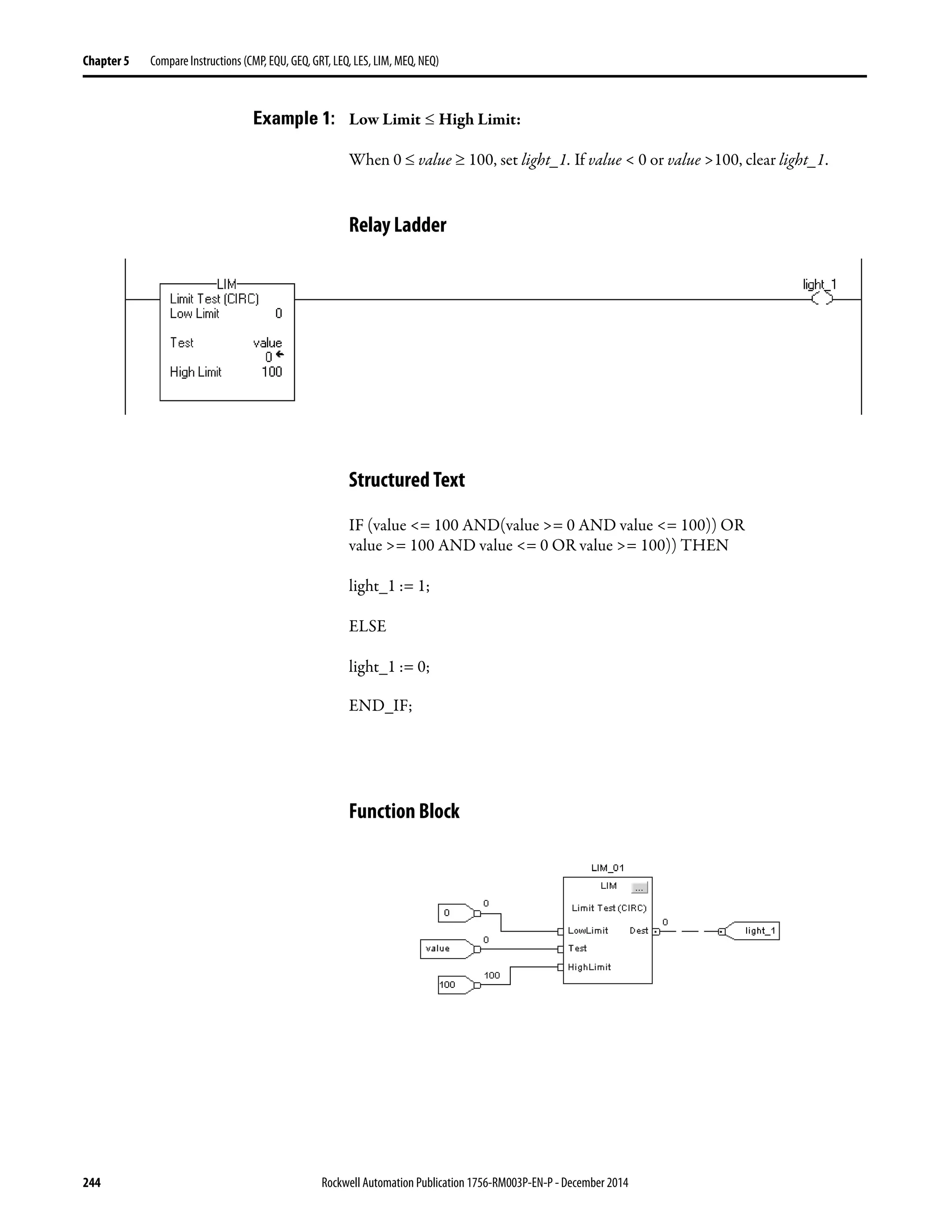
  • 218.
    218 Rockwell AutomationPublication 1756-RM003P-EN-P - December 2014 Chapter 5 Compare Instructions (CMP, EQU, GEQ, GRT, LEQ, LES, LIM, MEQ, NEQ) Determine the Order of Operation The operations you write into the expression are performed by the instruction in a prescribed order, not necessarily the order you write them. You can override the order of operation by grouping terms within parentheses, forcing the instruction to perform an operation within the parentheses ahead of other operations. Operations of equal order are performed from left to right. Order Operation 1. ( ) 2. ABS, ACS, ASN, ATN, COS, DEG, FRD, LN, LOG, RAD, SIN, SQR, TAN, TOD, TRN 3. ** 4. − (negate), NOT 5. *, /, MOD 6. <, <=, >, >=, = 7. − (subtract), + 8. AND 9. XOR 10. OR
  • 219.
    Rockwell Automation Publication1756-RM003P-EN-P - December 2014 219 Compare Instructions (CMP, EQU, GEQ, GRT, LEQ, LES, LIM, MEQ, NEQ) Chapter 5 Use Strings in an Expression Use a relay ladder or structured text expression to compare string data types. To use strings in an expression, follow these guidelines: • An expression lets you compare two string tags. • You cannot enter ASCII characters directly into the expression. • Only the following operators are permitted. • Strings are equal if their characters match. • ASCII characters are case sensitive. Upper case ‘A’ ($41) is not equal to lower case ‘a’ ($61). • The hexadecimal values of the characters determine if one string is less than or greater than another string. For the hex code of a character, see the back cover of this manual. • When the two strings are sorted as in a telephone directory, the order of the strings determines which one is greater. Operator Description = Equal < Less than <= Less than or equal > Greater than >= Greater than or equal <> Not equal ASCII Characters Hex Codes 1ab $31$61$62 1b $31$62 A $41 AB $41$42 B $42 a $61 ab $61$62 G r e a t e r L e s s e r AB < B a > B
  • 220.
    220 Rockwell AutomationPublication 1756-RM003P-EN-P - December 2014 Chapter 5 Compare Instructions (CMP, EQU, GEQ, GRT, LEQ, LES, LIM, MEQ, NEQ) Equal To (EQU) The EQU instruction tests whether Source A is equal to Source B. Operands: Relay Ladder • If you enter a SINT or INT tag, the value converts to a DINT value by sign-extension. • REAL values are rarely absolutely equal. If you need to determine the equality of two REAL values, use the LIM instruction. • String data types are: – default STRING data type. – any new string data type that you create. • To test the characters of a string, enter a string tag for both Source A and Source B. Structured Text Use the equal sign ‘=’ as an operator within an expression. This expression evaluates whether sourceA is equal to sourceB. See Structured Text Programming for information on the syntax of expressions within structured text. Function Block Operand Type Format Description Source A SINT INT DINT REAL string Immediate Tag Value totest against Source B Source B SINT INT DINT REAL string Immediate Tag Value totest against Source A Operand Type Format Description EQU tag FBD_COMPARE Structure EQU structure IF sourceA = sourceB THEN
  • 221.
    Rockwell Automation Publication1756-RM003P-EN-P - December 2014 221 Compare Instructions (CMP, EQU, GEQ, GRT, LEQ, LES, LIM, MEQ, NEQ) Chapter 5 FBD_COMPARE Structure Description: Use the EQU instruction to compare two numbers or two strings of ASCII characters. When you compare strings, note the following: • Strings are equal if their characters match. • ASCII characters are case sensitive. Upper case ‘A’ ($41) is not equal to lower case ‘a’ ($61). Arithmetic Status Flags: Not affected Fault Conditions: None Execution: Input Parameter Data Type Description EnableIn BOOL Enable input. If cleared, the instruction does not execute and outputs are not updated. Default is set. SourceA REAL Value to test against SourceB. Valid = any float SourceB REAL Value to test against SourceA. Valid = any float Output Parameter Data Type Description EnableOut BOOL The instruction produced a valid result. Dest BOOL Result of the instruction. This is equivalent to rung-condition-out of the relay ladder EQUinstruction.
  • 222.
    222 Rockwell AutomationPublication 1756-RM003P-EN-P - December 2014 Chapter 5 Compare Instructions (CMP, EQU, GEQ, GRT, LEQ, LES, LIM, MEQ, NEQ) Relay Ladder Function Block Condition Action Prescan The rung-condition-out is set to false. Rung-condition-in is false The rung-condition-out is set to false. Postscan The rung-condition-out is set to false. Rung-condition-in is true End Source A = Source B Yes No Rung-condition-out is set to true. Rung-condition-out is set to false. Condition Action Prescan No action taken. Instruction first scan No action taken. Instruction first run No action taken. EnableIn is cleared EnableOut is cleared. EnableIn is set The instruction executes. EnableOut is set. Postscan No action taken.
  • 223.
    Rockwell Automation Publication1756-RM003P-EN-P - December 2014 223 Compare Instructions (CMP, EQU, GEQ, GRT, LEQ, LES, LIM, MEQ, NEQ) Chapter 5 Example: If value_1 is equal to value_2, set light_a. If value_1 is not equal to value_2, clear light_a. Relay Ladder Structured Text light_a := (value_1 = value_2); Function Block
  • 224.
    224 Rockwell AutomationPublication 1756-RM003P-EN-P - December 2014 Chapter 5 Compare Instructions (CMP, EQU, GEQ, GRT, LEQ, LES, LIM, MEQ, NEQ) Greater Than or Equal To (GEQ) The GEQ instruction tests whether Source A is greater than or equal to Source B. Operands: Relay Ladder • If you enter a SINT or INT tag, the value converts to a DINT value by sign-extension. • String data types are: – default STRING data type. – any new string data type that you create. • To test the characters of a string, enter a string tag for both Source A and Source B. Structured Text Use adjacent greater than and equal signs ‘>=’ as an operator within an expression. This expression evaluates whether sourceA is greater than or equal to sourceB. See Structured Text Programming for information on the syntax of expressions within structured text. Operand Type Format Description Source A SINT INT DINT REAL string Immediate Tag Valueto test against Source B Source B SINT INT DINT REAL string Immediate Tag Valueto test against Source A IF sourceA >= sourceB THEN
  • 225.
    Rockwell Automation Publication1756-RM003P-EN-P - December 2014 225 Compare Instructions (CMP, EQU, GEQ, GRT, LEQ, LES, LIM, MEQ, NEQ) Chapter 5 Function Block FBD_COMPARE Structure Description: The GEQ instruction tests whether Source A is greater than or equal to Source B. When you compare strings, note the following: • The hexadecimal values of the characters determine if one string is less than or greater than another string. For the hex code of a character, see the back cover of this manual. • When the two strings are sorted as in a telephone directory, the order of the strings determines which one is greater. Operand Type Format Description GEQ tag FBD_COMPARE Structure GEQ structure Input Parameter Data Type Description EnableIn BOOL Enable input. If cleared, the instruction does not execute and outputs are not updated. Default is set. SourceA REAL Value to test against SourceB. Valid = any float SourceB REAL Value to test against SourceA. Valid = any float Output Parameter Data Type Description EnableOut BOOL The instruction produced a valid result. Dest BOOL Result of the instruction. This is equivalent torung-condition-out for the relay ladder GEQ instruction. ASCII Characters Hex Codes 1ab $31$61$62 1b $31$62 A $41 AB $41$42 B $42 a $61 ab $61$62 G r e a t e r L e s s e r AB < B a > B
  • 226.
    226 Rockwell AutomationPublication 1756-RM003P-EN-P - December 2014 Chapter 5 Compare Instructions (CMP, EQU, GEQ, GRT, LEQ, LES, LIM, MEQ, NEQ) Arithmetic Status Flags: Not affected Fault Conditions: None Execution: Relay Ladder Function Block Condition Action Prescan The rung-condition-out is set to false. Rung-condition-in is false The rung-condition-out is set to false. Postscan The rung-condition-out is set to false. Rung-condition-in is true End Source A ≥ Source B Yes no Rung-condition-out is set to true. Rung-condition-out is set to false. Condition Action Prescan No action taken. Instruction first scan No action taken. Instruction first run No action taken. EnableIn is cleared EnableOut is cleared. EnableIn is set The instruction executes. EnableOut is set. Postscan No action taken.
  • 227.
    Rockwell Automation Publication1756-RM003P-EN-P - December 2014 227 Compare Instructions (CMP, EQU, GEQ, GRT, LEQ, LES, LIM, MEQ, NEQ) Chapter 5 Example: If value_1 is greater than or equal to value_2, set light_b. If value_1 is less than value_2, clear light_b. Relay Ladder Structured Text light_b := (value_1 >= value_2); Function Block
  • 228.
    228 Rockwell AutomationPublication 1756-RM003P-EN-P - December 2014 Chapter 5 Compare Instructions (CMP, EQU, GEQ, GRT, LEQ, LES, LIM, MEQ, NEQ) Greater Than (GRT) The GRT instruction tests whether Source A is greater than Source B. Operands: Relay Ladder • If you enter a SINT or INT tag, the value converts to a DINT value by sign-extension. • String data types are: – default STRING data type. – any new string data type that you create. • To test the characters of a string, enter a string tag for both Source A and Source B. Structured Text Use the greater than sign ‘>’ as an operator within an expression. This expression evaluates whether sourceA is greater than sourceB. See Structured Text Programming for information on the syntax of expressions within structured text. Function Block Operand Type Format Description Source A SINT INT DINT REAL string Immediate Tag Value to test against Source B Source B SINT INT DINT REAL string Immediate Tag Value to test against Source A Operand Type Format Description GRT tag FBD_COMPARE Structure GRT structure IF sourceA > sourceB THEN
  • 229.
    Rockwell Automation Publication1756-RM003P-EN-P - December 2014 229 Compare Instructions (CMP, EQU, GEQ, GRT, LEQ, LES, LIM, MEQ, NEQ) Chapter 5 FBD_COMPARE Structure Description: The GRT instruction tests whether Source A is greater than Source B. When you compare strings, note the following: • The hexadecimal values of the characters determine if one string is less than or greater than another string. For the hex code of a character, see the back cover of this manual. • When the two strings are sorted as in a telephone directory, the order of the strings determines which one is greater. Arithmetic Status Flags: Not affected Fault Conditions: None Execution: Input Parameter Data Type Description EnableIn BOOL Enable input. If cleared, the instruction does not execute and outputs are not updated. Default is set. SourceA REAL Value to test against SourceB. Valid = any float SourceB REAL Value to test against SourceA. Valid = any float Output Parameter Data Type Description EnableOut BOOL The instruction produced a valid result. Dest BOOL Result of the instruction. This is equivalent torung-condition-out for the relay ladder GRTinstruction. ASCII Characters Hex Codes 1ab $31$61$62 1b $31$62 A $41 AB $41$42 B $42 a $61 ab $61$62 G r e a t e r L e s s e r AB < B a > B
  • 230.
    230 Rockwell AutomationPublication 1756-RM003P-EN-P - December 2014 Chapter 5 Compare Instructions (CMP, EQU, GEQ, GRT, LEQ, LES, LIM, MEQ, NEQ) Relay Ladder Function Block Condition Action Prescan The rung-condition-out is set to false. Rung-condition-in is false The rung-condition-out is set to false. Postscan The rung-condition-out is set to false. Rung-condition-in is true End Source A > Source B Yes No Rung-condition-out is set to true. Rung-condition-out is set to false. Condition Action Prescan No action taken. Instruction first scan No action taken. Instruction first run No action taken. EnableIn is cleared EnableOut is cleared. EnableIn is set The instruction executes. EnableOut is set. Postscan No action taken.
  • 231.
    Rockwell Automation Publication1756-RM003P-EN-P - December 2014 231 Compare Instructions (CMP, EQU, GEQ, GRT, LEQ, LES, LIM, MEQ, NEQ) Chapter 5 Example: If value_1 is greater than value_2, set light_1. If value_1 is less than or equal to value_2, clear light_1. Relay Ladder Structured Text light_1 := (value_1 > value_2); Function Block
  • 232.
    232 Rockwell AutomationPublication 1756-RM003P-EN-P - December 2014 Chapter 5 Compare Instructions (CMP, EQU, GEQ, GRT, LEQ, LES, LIM, MEQ, NEQ) Less Than or Equal To (LEQ) The LEQ instruction tests whether Source A is less than or equal to Source B. Operands: Relay Ladder • If you enter a SINT or INT tag, the value converts to a DINT value by sign-extension. • String data types are: – default STRING data type. – any new string data type that you create. • To test the characters of a string, enter a string tag for both Source A and Source B. Structured Text Use adjacent less than and equal signs ‘<=’ as an operator within an expression. This expression evaluates whether sourceA is less than or equal to sourceB. See Structured Text Programming for information on the syntax of expressions within structured text. Function Block Operand Type Format Description Source A SINT INT DINT REAL string Immediate Tag Value to test against SourceB Source B SINT INT DINT REAL string Immediate Tag Value to test against SourceA Operand Type Format Description LEQ tag FBD_COMPARE Structure LEQ structure IF sourceA <= sourceB THEN
  • 233.
    Rockwell Automation Publication1756-RM003P-EN-P - December 2014 233 Compare Instructions (CMP, EQU, GEQ, GRT, LEQ, LES, LIM, MEQ, NEQ) Chapter 5 FBD_COMPARE Structure Description: The LEQ instruction tests whether Source A is less than or equal to Source B. When you compare strings, note the following: • The hexadecimal values of the characters determine if one string is less than or greater than another string. For the hex code of a character, see the back cover of this manual. • When the two strings are sorted as in a telephone directory, the order of the strings determines which one is greater. Arithmetic Status Flags: Not affected Fault Conditions: None Execution: Input Parameter Data Type Description EnableIn BOOL Enable input. If cleared, the instruction does not execute and outputs are not updated. Default is set. SourceA REAL Value to test against SourceB. Valid = any float SourceB REAL Value to test against SourceA. Valid = any float Output Parameter Data Type Description EnableOut BOOL The instruction produced a valid result. Dest BOOL Result of the instruction. This is equivalent torung-condition-out for the relay ladder LEQ instruction. ASCII Characters Hex Codes 1ab $31$61$62 1b $31$62 A $41 AB $41$42 B $42 a $61 ab $61$62 G re a t e r L e s s e r AB < B a > B
  • 234.
    234 Rockwell AutomationPublication 1756-RM003P-EN-P - December 2014 Chapter 5 Compare Instructions (CMP, EQU, GEQ, GRT, LEQ, LES, LIM, MEQ, NEQ) Relay Ladder Function Block Condition Action Prescan The rung-condition-out is set to false. Rung-condition-in is false The rung-condition-out is set to false. Postscan The rung-condition-out is set to false. Rung-condition-in is true End Source A ≤ Source B Yes no Rung-condition-out is set to true. Rung-condition-out is set to false. Condition Action Prescan No action taken. Instruction first scan No action taken. Instruction first run No action taken. EnableIn is cleared EnableOut is cleared. EnableIn is set The instruction executes. EnableOut is set. Postscan No action taken.
  • 235.
    Rockwell Automation Publication1756-RM003P-EN-P - December 2014 235 Compare Instructions (CMP, EQU, GEQ, GRT, LEQ, LES, LIM, MEQ, NEQ) Chapter 5 Example: If value_1 is less than or equal to value_2, set light_2. If value_1 is greater than value_2, clear light_2. Relay Ladder Structured Text light_2 := (value_1 <= value_2); Function Block
  • 236.
    236 Rockwell AutomationPublication 1756-RM003P-EN-P - December 2014 Chapter 5 Compare Instructions (CMP, EQU, GEQ, GRT, LEQ, LES, LIM, MEQ, NEQ) Less Than (LES) The LES instruction tests whether Source A is less than Source B. Operands: Relay Ladder • If you enter a SINT or INT tag, the value converts to a DINT value by sign-extension. • String data types are: – default STRING data type. – any new string data type that you create. • To test the characters of a string, enter a string tag for both Source A and Source B. Structured Text Use the less than sign ‘<‘ as an operator within an expression. This expression evaluates whether sourceA is less than sourceB. See Structured Text Programming for information on the syntax of expressions within structured text. Function Block Operand Type Format Description Source A SINT INT DINT REAL string Immediate Tag Value to test against Source B Source B SINT INT DINT REAL string Immediate Tag Value to test against Source A Operand Type Format Description LES tag FBD_COMPARE Structure LES structure IF sourceA < sourceB THEN
  • 237.
    Rockwell Automation Publication1756-RM003P-EN-P - December 2014 237 Compare Instructions (CMP, EQU, GEQ, GRT, LEQ, LES, LIM, MEQ, NEQ) Chapter 5 FBD_COMPARE Structure Description: The LES instruction tests whether Source A is less than Source B. When you compare strings, note the following: • The hexadecimal values of the characters determine if one string is less than or greater than another string. For the hex code of a character, see the back cover of this manual. • When the two strings are sorted as in a telephone directory, the order of the strings determines which one is greater. Arithmetic Status Flags: Not affected Fault Conditions: None Execution: Input Parameter Data Type Description EnableIn BOOL Enable input. If cleared, the instruction does not execute and outputs are not updated. Default is set. SourceA REAL Value to test against SourceB. Valid = any float SourceB REAL Value to test against SourceA. Valid = any float Output Parameter Data Type Description EnableOut BOOL The instruction produced a valid result. Dest BOOL Result of the instruction. This is equivalent to rung-condition-out for the relay ladder LES instruction. ASCII Characters Hex Codes 1ab $31$61$62 1b $31$62 A $41 AB $41$42 B $42 a $61 ab $61$62 G re a t e r L e s s e r AB < B a > B
  • 238.
    238 Rockwell AutomationPublication 1756-RM003P-EN-P - December 2014 Chapter 5 Compare Instructions (CMP, EQU, GEQ, GRT, LEQ, LES, LIM, MEQ, NEQ) Relay Ladder Function Block Condition Action Prescan The rung-condition-out is set to false. Rung-condition-in is false The rung-condition-out is set to false. Postscan The rung-condition-out is set to false. Rung-condition-in is true End Source A < Source B Yes no Rung-condition-out is set to true. Rung-condition-out is set to false. Condition: Action Prescan No action taken. Instruction first scan No action taken. Instruction first run No action taken. EnableIn is false EnableOut is cleared. EnableIn is true The instruction executes. EnableOut is set. Postscan No action taken.
  • 239.
    Rockwell Automation Publication1756-RM003P-EN-P - December 2014 239 Compare Instructions (CMP, EQU, GEQ, GRT, LEQ, LES, LIM, MEQ, NEQ) Chapter 5 Example: If value_1 is less than value_2, set light_3. If value_1 is greater than or equal to value_2, clear light_3. Relay Ladder Structured Text light_3 := (value_1 < value_2); Function Block
  • 240.
    240 Rockwell AutomationPublication 1756-RM003P-EN-P - December 2014 Chapter 5 Compare Instructions (CMP, EQU, GEQ, GRT, LEQ, LES, LIM, MEQ, NEQ) Limit (LIM) The LIM instruction tests whether the Test value is within the range of the Low Limit to the High Limit. Operands: Relay Ladder Structured Text Structured text does not have a LIM instruction, but you can achieve the same results by using structured text. IF (LowLimit <= HighLimit AND (Test >= LowLimit AND Test <= HighLimit)) OR (LowLimit >= HighLimit AND (Test <= LowLimit OR Test >= HighLimit)) THEN <statement>; END_IF; Function Block Operand Type Format Description Low limit SINT INT DINT REAL Immediate Tag Value of lower limit A SINT or INT tag converts to a DINT value by sign-extension. Test SINT INT DINT REAL Immediate Tag Value to test A SINT or INT tag converts to a DINT value by sign-extension. High limit SINT INT DINT REAL Immediate Tag Value of upper limit A SINT or INT tag converts to a DINT value by sign-extension. Operand Type Format Description LIM tag FBD_LIMIT Structure LIM structure
  • 241.
    Rockwell Automation Publication1756-RM003P-EN-P - December 2014 241 Compare Instructions (CMP, EQU, GEQ, GRT, LEQ, LES, LIM, MEQ, NEQ) Chapter 5 FBD_LIMIT Structure Input Parameter Data Type Description EnableIn BOOL If cleared, the instruction does not execute and outputs are not updated. If set, the instruction executes as described under Execution. Default is set. LowLimit REAL Value of lower limit. Valid = any float Test REAL Value to test against limits. Valid = any float Output Parameter Data Type Description EnableOut BOOL The instruction produced a valid result. Dest BOOL Result of the instruction. This is equivalent to rung-condition-out for the relay ladder LIM instruction. HighLimit REAL Value of upper limit. Valid = any float
  • 242.
    242 Rockwell AutomationPublication 1756-RM003P-EN-P - December 2014 Chapter 5 Compare Instructions (CMP, EQU, GEQ, GRT, LEQ, LES, LIM, MEQ, NEQ) Description: The LIM instruction tests whether the Test value is within the range of the Low Limit to the High Limit. Signed integers ‘roll over’ from the maximum positive number to the maximum negative number when the most significant bit is set. For example, in 16-bit integers (INT type), the maximum positive integer is 32,767, which is represented in hexadecimal as 16#7FFF (bits 0 …14 are all set). If you increment that number by one, the result is 16#8000 (bit 15 is set). For signed integers, hexadecimal 16#8000 is equal to -32,768 decimal. Incrementing from this point on until all 16 bits are set ends up at 16#FFFF, which is equal to -1 decimal. This can be shown as a circular number line (see the following diagrams). The LIM instruction starts at the Low Limit and increments clockwise until it reaches the High Limit. Any Test value in the clockwise range from the Low Limit to the High Limit sets the rung-condition-out to true. Any Test value in the clockwise range from the High Limit to the Low Limit sets the rung-condition-out to false. Arithmetic Status Flags: Not affected Fault Conditions: None If Low Limit And Test Value Is The Rung-condition-out Is ≤ High Limit Equal to or between limits True Not equal to or outside limits False ≥ High Limit Equal to or outside limits True Not equal to or inside limits False −1 0 +1 Low Limit High Limit +n−(n+1) n = Maximum Value Low Limit ≤ High Limit The instruction is true if the test value is equal to or between the low and high limit Low Limit ≥ High Limit The instruction is true if the test value is equal to or outside the low and high limit −1 0 +1 High Limit Low Limit +n−(n+1) n = Maximum Value
  • 243.
    Rockwell Automation Publication1756-RM003P-EN-P - December 2014 243 Compare Instructions (CMP, EQU, GEQ, GRT, LEQ, LES, LIM, MEQ, NEQ) Chapter 5 Execution: Relay Ladder Function Block Condition Action Prescan The rung-condition-out is set to false. Rung-condition-in is false The rung-condition-out is set to false. Postscan The rung-condition-out is set to false. Rung-condition-in is true End Evaluate Limit Comparison is true. Comparison is false. Rung-condition-out is set to true. Rung-condition-out is set to false. Condition Action Prescan No action taken. Instruction first scan No action taken. Instruction first run No action taken. EnableIn is cleared EnableOut is cleared, the instruction does nothing, and the outputs are not updated. EnableIn is set The instruction executes. EnableOut is set. Postscan No action taken.
  • 244.
    244 Rockwell AutomationPublication 1756-RM003P-EN-P - December 2014 Chapter 5 Compare Instructions (CMP, EQU, GEQ, GRT, LEQ, LES, LIM, MEQ, NEQ) Example 1: Low Limit ≤ High Limit: When 0 ≤ value ≥ 100, set light_1. If value < 0 or value >100, clear light_1. Relay Ladder Structured Text IF (value <= 100 AND(value >= 0 AND value <= 100)) OR value >= 100 AND value <= 0 OR value >= 100)) THEN light_1 := 1; ELSE light_1 := 0; END_IF; Function Block
  • 245.
    Rockwell Automation Publication1756-RM003P-EN-P - December 2014 245 Compare Instructions (CMP, EQU, GEQ, GRT, LEQ, LES, LIM, MEQ, NEQ) Chapter 5 Example 2: Low Limit ≥ High Limit: When value ≥ 0 or value ≤ −100, set light_1. If value < 0 or value >−100, clear light_1. Relay Ladder Structured Text IF (0 <= -100 AND value >= 0 AND value <= -100)) OR (0 >= -100 AND(value <= 0 OR value >= -100)) THEN light_1 := 1; ELSE light_1 := 0; END_IF; Function Block
  • 246.
    246 Rockwell AutomationPublication 1756-RM003P-EN-P - December 2014 Chapter 5 Compare Instructions (CMP, EQU, GEQ, GRT, LEQ, LES, LIM, MEQ, NEQ) Mask Equal To (MEQ) The MEQ instruction passes the Source and Compare values through a Mask and compares the results. Operands: Relay Ladder Structured Text Structured text does not have an MEQ instruction, but you can achieve the same results by using structured text. IF (Source AND Mask) = (Compare AND Mask) THEN <statement>; END_IF; Operand Type Format Description Source SINT INT DINT Immediate Tag Value to test againstCompare A SINT or INT tag converts to a DINT value by zero-fill. Mask SINT INT DINT Immediate Tag Defines which bits to block or pass A SINT or INT tag converts to a DINT value by zero-fill. Compare SINT INT DINT Immediate Tag Value to test against Source A SINT or INT tag converts to a DINT value by zero-fill.
  • 247.
    Rockwell Automation Publication1756-RM003P-EN-P - December 2014 247 Compare Instructions (CMP, EQU, GEQ, GRT, LEQ, LES, LIM, MEQ, NEQ) Chapter 5 Function Block FBD_MASK_EQUAL Structure Description: A ‘1’ in the mask means the data bit is passed. A ‘0’ in the mask means the data bit is blocked. Typically, the Source, Mask, and Compare values are all the same data type. If you mix integer data types, the instruction fills the upper bits of the smaller integer data types with 0s so that they are the same size as the largest data type. Entering an Immediate Mask Value When you enter a mask, the programming software defaults to decimal values. If you want to enter a mask by using another format, precede the value with the correct prefix. Operand Type Format Description MEQ tag FBD_MASK_EQUAL Structure MEQ structure Input Parameter Data Type Description EnableIn BOOL If cleared, the instruction does not execute and outputs are not updated. If set, the instruction executes as described under Execution. Default is set. Source DINT Valueto test against Compare. Valid = any integer Mask DINT Defines which bits to block (mask). Valid = any integer Compare DINT Compare value. Valid = any integer Output Parameter Data Type Description EnableOut BOOL The instruction produced a valid result. Dest BOOL Result of the instruction. This is equivalent to rung-condition-out for the relay ladder MEQ instruction. Prefix Description 16# Hexadecimal For example; 16#0F0F 8# Octal For example; 8#16 2# Binary For example; 2#00110011
  • 248.
    248 Rockwell AutomationPublication 1756-RM003P-EN-P - December 2014 Chapter 5 Compare Instructions (CMP, EQU, GEQ, GRT, LEQ, LES, LIM, MEQ, NEQ) Arithmetic Status Flags: Not affected Fault Conditions: None Execution: Relay Ladder Function Block Condition Action Prescan The rung-condition-out is set to false. Rung-condition-in is false The rung-condition-out is set to false. Postscan The rung-condition-out is set to false. Rung-condition-in is true End Masked Source = Masked Compare Yes no Rung-condition-out is set to true. Rung-condition-out is set to false. Condition Action Prescan No action taken. Instruction first scan No action taken. Instruction first run No action taken. EnableIn is cleared EnableOut is cleared, the instruction does nothing, and the outputs are not updated. EnableIn is set The instruction executes. EnableOut is set. Postscan No action taken.
  • 249.
    Rockwell Automation Publication1756-RM003P-EN-P - December 2014 249 Compare Instructions (CMP, EQU, GEQ, GRT, LEQ, LES, LIM, MEQ, NEQ) Chapter 5 Example 1: If the masked value_1 is equal to the masked value_2, set light_1. If the masked value_1 is not equal to the masked value_2, clear light_1. This example shows that the masked values are equal. A 0 in the mask restrains the instruction from comparing that bit (shown by x in the example). Relay Ladder Structured Text light_1 := ((value_1 AND mask_1)=(value_2 AND mask_2)); Function Block value_1 0 1 0 1 0 1 0 1 1 1 1 1 1 1 1 1 value_2 0 1 0 1 0 1 0 1 1 1 1 1 0 0 0 0 mask_1 1 1 1 1 1 1 1 1 1 1 1 1 0 0 0 0 mask_1 1 1 1 1 1 1 1 1 1 1 1 1 0 0 0 0 masked value_1 0 1 0 1 0 1 0 1 1 1 1 1 x x x x masked value_2 0 1 0 1 0 1 0 1 1 1 1 1 x x x x
  • 250.
    250 Rockwell AutomationPublication 1756-RM003P-EN-P - December 2014 Chapter 5 Compare Instructions (CMP, EQU, GEQ, GRT, LEQ, LES, LIM, MEQ, NEQ) Example 2: If the masked value_1 is equal to the masked value_2, set light_1. If the masked value_1 is not equal to the masked value_2, clear light_1. This example shows that the masked values are not equal. A 0 in the mask restrains the instruction from comparing that bit (shown by x in the example). Relay Ladder Structured Text light_1 := ((value_1 AND mask_1)=(value_2 AND mask_2)); Function Block value_1 0 1 0 1 0 1 0 1 1 1 1 1 1 1 1 1 value_2 0 1 0 1 0 1 0 1 1 1 1 1 0 0 0 0 mask_1 0 0 0 0 0 0 0 0 0 0 0 0 1 1 1 1 mask_1 0 0 0 0 0 0 0 0 0 0 0 0 1 1 1 1 masked value_1 x x x x x x x x x x x x 1 1 1 1 masked value_2 x x x x x x x x x x x x 0 0 0 0
  • 251.
    Rockwell Automation Publication1756-RM003P-EN-P - December 2014 251 Compare Instructions (CMP, EQU, GEQ, GRT, LEQ, LES, LIM, MEQ, NEQ) Chapter 5 Not Equal To (NEQ) The NEQ instruction tests whether Source A is not equal to Source B. Operands: Relay Ladder • If you enter a SINT or INT tag, the value converts to a DINT value by sign-extension. • String data types are: – default STRING data type. – any new string data type that you create. • To test the characters of a string, enter a string tag for both Source A and Source B. Structured Text Use the less than and greater than signs ‘<>’ together as an operator within an expression. This expression evaluates whether sourceA is not equal to sourceB. See Structured Text Programming for information on the syntax of expressions within structured text. Function Block Operand Type Format Description Source A SINT INT DINT REAL string Immediate Tag Value to test against Source B Source B SINT INT DINT REAL string Immediate Tag Value to test against Source A Operand Type Format Description NEQ tag FBD_COMPARE Structure NEQ structure IF sourceA <> sourceB THEN
  • 252.
    252 Rockwell AutomationPublication 1756-RM003P-EN-P - December 2014 Chapter 5 Compare Instructions (CMP, EQU, GEQ, GRT, LEQ, LES, LIM, MEQ, NEQ) FBD_COMPARE Structure Description: The NEQ instruction tests whether Source A is not equal to Source B. When you compare strings: • strings are not equal if any of their characters do not match. • ASCII characters are case sensitive. Upper case ‘A’ ($41) is not equal to lower case ‘a’ ($61). Arithmetic Status Flags: Not affected Fault Conditions: None Execution: Input Parameter Data Type Description EnableIn BOOL Enable input. If cleared, the instruction does not execute and outputs are not updated. Default is set. SourceA REAL Value to test against SourceB. Valid = any float SourceB REAL Value to test against SourceA. Valid = any float Output Parameter Data Type Description EnableOut BOOL The instruction produced a valid result. Dest BOOL Result of the instruction. This is equivalent to rung-condition-out for the relay ladder NEQ instruction. ASCII Characters Hex Codes 1ab $31$61$62 1b $31$62 A $41 AB $41$42 B $42 a $61 ab $61$62 Gr e at er L es se r AB < B a > B
  • 253.
    Rockwell Automation Publication1756-RM003P-EN-P - December 2014 253 Compare Instructions (CMP, EQU, GEQ, GRT, LEQ, LES, LIM, MEQ, NEQ) Chapter 5 Relay Ladder Function Block Condition Action Prescan The rung-condition-out is set to false. Rung-condition-in is false The rung-condition-out is set to false. Postscan The rung-condition-out is set to false. Rung-condition-in is true End Source A = Source B Yes no Rung-condition-out is set to true. Rung-condition-out is set to false. Condition Action Prescan No action taken. Instruction first scan No action taken. Instruction first run No action taken. EnableIn is cleared EnableOut is cleared. EnableIn is set The instruction executes. EnableOut is set. Postscan No action taken.
  • 254.
    254 Rockwell AutomationPublication 1756-RM003P-EN-P - December 2014 Chapter 5 Compare Instructions (CMP, EQU, GEQ, GRT, LEQ, LES, LIM, MEQ, NEQ) Example: If value_1 is not equal to value_2, set light_4. If value_1 is equal to value_2, clear light_4. Relay Ladder Structured Text light_4 := (value_1 <> value_2); Function Block
  • 255.
    Rockwell Automation Publication1756-RM003P-EN-P - December 2014 255 Chapter 6 Compute/Math Instructions (CPT, ADD, SUB, MUL, DIV, MOD, SQR, SQRT, NEG, ABS) The compute/math instructions evaluate arithmetic operations by using an expression or a specific arithmetic instruction. Topic Page Compute (CPT) 257 Add (ADD) 261 Subtract (SUB) 265 Multiply (MUL) 268 Divide (DIV) 271 Modulo (MOD) 276 Square Root (SQR) 280 Negate (NEG) 283 Absolute Value (ABS) 286 If you want to Use this instruction Available in these languages Page Evaluate an expression CPT Relay ladder Structured text(1) 257 Add two values ADD Relay ladder Structured text(2) Function block 261 Subtract two values SUB Relay ladder Structured text(2) Function block 265 Multiply two values MUL Relay ladder Structured text(2) Function block 268 Divide two values DIV Relay ladder Structured text(2) Function block 271 Determine the remainder after one value is divided by another MOD Relay ladder Structured text(2) Function block 276
  • 256.
    256 Rockwell AutomationPublication 1756-RM003P-EN-P - December 2014 Chapter 6 Compute/Math Instructions (CPT, ADD, SUB, MUL, DIV, MOD, SQR, SQRT, NEG, ABS) You can mix data types, but loss of accuracy and rounding error might occur and the instruction takes more time to execute. Check the S:V bit to see whether the result was truncated. For relay ladder instructions, bold data types indicate optimal data types. An instruction executes faster and requires less memory if all the operands of the instruction use the same optimal data type, typically DINT or REAL. Calculate the square root of a value SQR SQRT(3) Relay ladder Structured text Function block 280 Take the opposite sign of a value NEG Relay ladder Structured text(2) Function block 283 Take the absolutevalue of a value ABS Relay ladder Structured text Function block 286 (1) There is no equivalent structured text instruction. Use other structured text programming to achieve the same result. See the description for the instruction. (2) There is no equivalent structured text instruction.Use the operator in an expression. (3) Structured text only. If you want to Use this instruction Available in these languages Page
  • 257.
    Rockwell Automation Publication1756-RM003P-EN-P - December 2014 257 Compute/Math Instructions (CPT, ADD, SUB, MUL, DIV, MOD, SQR, SQRT, NEG, ABS) Chapter 6 Compute (CPT) The CPT instruction performs the arithmetic operations you define in the expression. Operands: Relay Ladder Structured Text Structured text does not have a CPT instruction, but you can achieve the same results by using an assignment and expression. destination := numeric_expression; See Structured Text Programming for information on the syntax of assignments and expressions within structured text. Description: The CPT instruction performs the arithmetic operations you define in the expression. When enabled, the CPT instruction evaluates the expression and places the result in the Destination. The execution of a CPT instruction is slightly slower and uses more memory than the execution of the other compute/math instructions. The advantage of the CPT instruction is that it allows you to enter complex expressions in one instruction. IMPORTANT If x**y is used, all variables (includingconstants) will be converted to REALs. This can result in the Destination being rounded or the loss of precision/ resolution. Operand Type Format Description Destination SINT INT DINT REAL Tag Tag to store the result Expression SINT INT DINT REAL Immediate Tag An expression consisting of tags and/or immediate values separatedbyoperators A SINT or INT tag converts to a DINT value by sign-extension. TIP There is no limit to the length of an expression.
  • 258.
    258 Rockwell AutomationPublication 1756-RM003P-EN-P - December 2014 Chapter 6 Compute/Math Instructions (CPT, ADD, SUB, MUL, DIV, MOD, SQR, SQRT, NEG, ABS) Arithmetic Status Flags: Arithmetic status flags are affected. Fault Conditions: None Execution: Example 1: When enabled, the CPT instruction evaluates value_1 multiplied by 5 and divides that result by the result of value_2 divided by 7 and places the final result in result_1. Example 2: When enabled, the CPT instruction truncates float_value_1 and float_value_2, raises the truncated float_value_2 to the power of two and divides the truncated float_value_1 by that result, and stores the remainder after the division in float_value_result_cpt. Condition Relay Ladder Action Prescan The rung-condition-out is set to false. Rung-condition-in is false The rung-condition-out is set to false. Rung-condition-in is true The instruction evaluates the Expression and places the result in the Destination. The rung-condition-out is set to true. Postscan The rung-condition-out is set to false.
  • 259.
    Rockwell Automation Publication1756-RM003P-EN-P - December 2014 259 Compute/Math Instructions (CPT, ADD, SUB, MUL, DIV, MOD, SQR, SQRT, NEG, ABS) Chapter 6 Valid Operators Format Expressions For each operator that you use in an expression, you have to provide one or two operands (tags or immediate values). Use the following table to format operators and operands within an expression. Operator Description Optimal + add DINT, REAL - subtract/negate DINT, REAL * multiply DINT, REAL / divide DINT, REAL ** exponent (x to y) DINT, REAL ABS absolute value DINT, REAL ACS arc cosine REAL AND bitwise AND DINT ASN arc sine REAL ATN arc tangent REAL COS cosine REAL DEG radians to degrees DINT, REAL FRD BCD to integer DINT LN natural log REAL LOG log base 10 REAL MOD modulo-divide DINT, REAL NOT bitwise complement DINT OR bitwise OR DINT RAD degrees to radians DINT, REAL SIN sine REAL SQR square root DINT, REAL TAN tangent REAL TOD integer to BCD DINT TRN truncate DINT, REAL XOR bitwise exclusive OR DINT Operator Description Optimal For operators that operate on Use this format Examples One operand Operator(operand) ABS(tag_a) Two operands Operand_a operator operand_b ·tag_b + 5 ·tag_c AND tag_d ·(tag_e** 2) MOD (tag_f / tag_g)
  • 260.
    260 Rockwell AutomationPublication 1756-RM003P-EN-P - December 2014 Chapter 6 Compute/Math Instructions (CPT, ADD, SUB, MUL, DIV, MOD, SQR, SQRT, NEG, ABS) Determine the Order of Operation The operations you write into the expression are performed by the instruction in a prescribed order, not necessarily the order you write them. You can override the order of operation by grouping terms within parentheses, forcing the instruction to perform an operation within the parentheses ahead of other operations. Operations of equal order are performed from left to right. Order Operation 1. ( ) 2. ABS, ACS, ASN, ATN, COS, DEG, FRD, LN, LOG, RAD, SIN, SQR, TAN, TOD, TRN 3. ** IMPORTANT: If x**y is used, the CPT instruction will be calculated using REALs. This may result in the Destination being rounded or the loss of precision/resolution. 4. − (negate), NOT 5. *, /, MOD 6. − (subtract), + 7. AND 8. XOR 9. OR
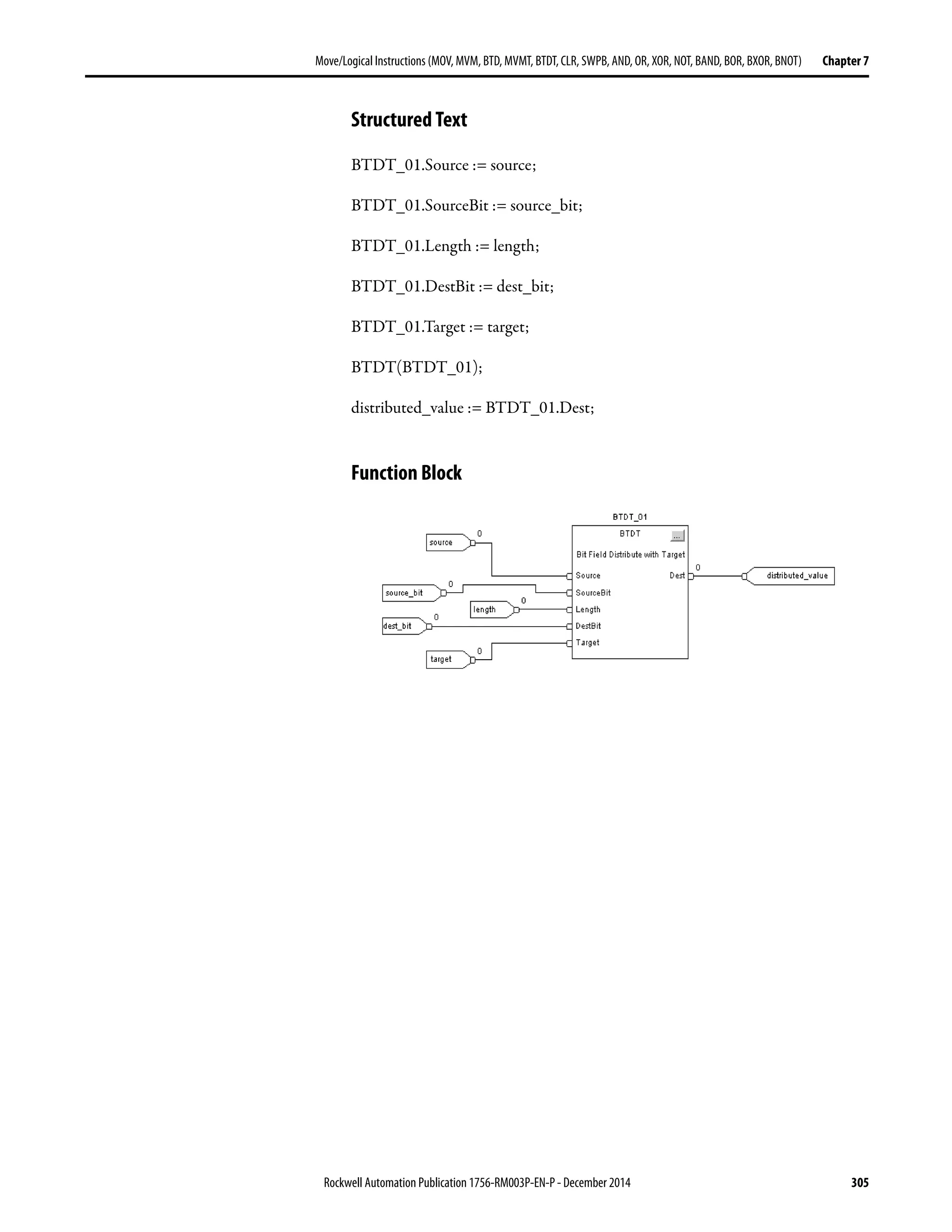
  • 261.
    Rockwell Automation Publication1756-RM003P-EN-P - December 2014 261 Compute/Math Instructions (CPT, ADD, SUB, MUL, DIV, MOD, SQR, SQRT, NEG, ABS) Chapter 6 Add (ADD) The ADD instruction adds Source A to Source B and places the result in the Destination. Operands: Relay Ladder Structured Text Use the plus sign “+” as an operator within an expression. This expression adds sourceA to sourceB and stores the result in dest. See Structured Text Programming for information on the syntax of expressions within structured text. Operand Type Format Description Source A SINT INT DINT REAL Immediate Tag Value to add to Source B A SINT or INT tag converts to a DINT value by sign-extension. Source B SINT INT DINT REAL Immediate Tag Value to add to Source A A SINT or INT tag converts to a DINT value by sign-extension. Destination SINT INT DINT REAL Tag Tag to store the result dest := sourceA + sourceB;
  • 262.
    262 Rockwell AutomationPublication 1756-RM003P-EN-P - December 2014 Chapter 6 Compute/Math Instructions (CPT, ADD, SUB, MUL, DIV, MOD, SQR, SQRT, NEG, ABS) Function Block FBD_MATH Structure Description: The ADD instruction adds Source A to Source B and places the result in the Destination. Operand Type Format Description ADD tag FBD_MATH Structure ADD structure Input Parameter Data Type Description EnableIn BOOL Enable input. If cleared, the instruction does not execute and outputs are not updated. Default is set. SourceA REAL Value to add to SourceB. Valid = any float SourceB REAL Value to add to SourceA. Valid = any float Output Parameter Data Type Description EnableOut BOOL The instruction produced a valid result. Dest REAL Result of the math instruction. Arithmetic status flags are set for this output.
  • 263.
    Rockwell Automation Publication1756-RM003P-EN-P - December 2014 263 Compute/Math Instructions (CPT, ADD, SUB, MUL, DIV, MOD, SQR, SQRT, NEG, ABS) Chapter 6 Arithmetic Status Flags: Arithmetic status flags are affected. Fault Conditions: None Execution: Relay Ladder Function Block Condition Action Prescan The rung-condition-out is set to false. Rung-condition-in is false The rung-condition-out is set to false. Rung-condition-in is true Destination = Source A + Source B The rung-condition-out is set to true. Postscan The rung-condition-out is set to false. Condition Action Prescan No action taken. Instruction first scan No action taken. Instruction first run No action taken. EnableIn is cleared EnableOut is cleared. EnableIn is set The instruction executes. EnableOut is set. Postscan No action taken.
  • 264.
    264 Rockwell AutomationPublication 1756-RM003P-EN-P - December 2014 Chapter 6 Compute/Math Instructions (CPT, ADD, SUB, MUL, DIV, MOD, SQR, SQRT, NEG, ABS) Example: Add float_value_1 to float_value_2 and place the result in add_result. Relay Ladder Structured Text add_result := float_value_1 + float_value_2; Function Block
  • 265.
    Rockwell Automation Publication1756-RM003P-EN-P - December 2014 265 Compute/Math Instructions (CPT, ADD, SUB, MUL, DIV, MOD, SQR, SQRT, NEG, ABS) Chapter 6 Subtract (SUB) The SUB instruction subtracts Source B from Source A and places the result in the Destination. Operands: Relay Ladder Structured Text Use the minus sign “−” as an operator in an expression. This expression subtracts sourceB from sourceA and stores the result in dest. See Structured Text Programming for information on the syntax of expressions within structured text. Operand Type Format Description Source A SINT INT DINT REAL Immediate Tag Value from which to subtract Source B A SINT or INT tag converts to a DINT value by sign-extension. Source B SINT INT DINT REAL Immediate Tag Value to subtract from Source A A SINT or INT tag converts to a DINT value by sign-extension. Destination SINT INT DINT REAL Tag Tag to storethe result dest := sourceA - sourceB;
  • 266.
    266 Rockwell AutomationPublication 1756-RM003P-EN-P - December 2014 Chapter 6 Compute/Math Instructions (CPT, ADD, SUB, MUL, DIV, MOD, SQR, SQRT, NEG, ABS) Function Block FBD_MATH Structure Description: The SUB instruction subtracts Source B from Source A and places the result in the Destination. Arithmetic Status Flags: Arithmetic status flags are affected. Fault Conditions: None Execution: Relay Ladder Operand Type Format Description SUB tag FBD_MATH structure SUB structure Input Parameter Data Type Description EnableIn BOOL Enable input. If cleared, the instruction does not execute and outputs are not updated. Default is set. SourceA REAL Value from which to subtract SourceB. Valid = any float SourceB REAL Value to subtract from SourceA. Valid = any float Output Parameter Data Type Description EnableOut BOOL The instruction produced a valid result. Dest REAL Result of the math instruction. Arithmetic status flags are set for this output. Condition Action Prescan The rung-condition-out is set to false. Rung-condition-in is false The rung-condition-out is set to false. Rung-condition-in is true Destination = Source B - Source A The rung-condition-out is set to true. Postscan The rung-condition-out is set to false.
  • 267.
    Rockwell Automation Publication1756-RM003P-EN-P - December 2014 267 Compute/Math Instructions (CPT, ADD, SUB, MUL, DIV, MOD, SQR, SQRT, NEG, ABS) Chapter 6 Function Block Example: Subtract float_value_2 from float_value_1 and place the result in subtract_result. Relay Ladder Structured Text subtract_result := float_value_1 - float_value_2; Function Block Condition Action Prescan No action taken. Instruction first scan No action taken. Instruction first run No action taken. EnableIn is cleared EnableOut is cleared. EnableIn is set The instruction executes. EnableOut is set. Postscan No action taken.
  • 268.
    268 Rockwell AutomationPublication 1756-RM003P-EN-P - December 2014 Chapter 6 Compute/Math Instructions (CPT, ADD, SUB, MUL, DIV, MOD, SQR, SQRT, NEG, ABS) Multiply (MUL) The MUL instruction multiplies Source A with Source B and places the result in the Destination. Operands: Relay Ladder Structured Text Use the multiply sign “∗” as an operator in an expression. This expression multiplies sourceA by sourceB and stores the result in dest. See Structured Text Programming for information on the syntax of expressions within structured text. Operand Type Format Description Source A SINT INT DINT REAL Immediate Tag Value of the multiplicand A SINT or INT tag converts to a DINT value by sign-extension. Source B SINT INT DINT REAL Immediate Tag Value of the multiplier A SINT or INT tag converts to a DINT value by sign-extension. Destination SINT INT DINT REAL Tag Tag to store the result dest := sourceA * sourceB;
  • 269.
    Rockwell Automation Publication1756-RM003P-EN-P - December 2014 269 Compute/Math Instructions (CPT, ADD, SUB, MUL, DIV, MOD, SQR, SQRT, NEG, ABS) Chapter 6 Function Block FBD_MATH Structure Description: The MUL instruction multiplies Source A with Source B and places the result in the Destination. Arithmetic Status Flags: Arithmetic status flags are affected. Fault Conditions: None Execution: Relay Ladder Operand Type Format Description MUL tag FBD_MATH Structure MUL structure Input Parameter Data Type Description EnableIn BOOL Enable input. If cleared, the instruction does not execute and outputs are not updated. Default is set. Source A REAL Value of the multiplicand. Valid = any float Source B REAL Value of the multiplier. Valid = any float Output Parameter Data Type Description EnableOut BOOL The instruction produced a valid result. Dest REAL Result of the math instruction. Arithmetic status flags are set for this output. Condition Action Prescan The rung-condition-out is set to false. Rung-condition-in is false The rung-condition-out is set to false. Rung-condition-in is true Destination = Source B x Source A The rung-condition-out is set to true. Postscan The rung-condition-out is set to false.
  • 270.
    270 Rockwell AutomationPublication 1756-RM003P-EN-P - December 2014 Chapter 6 Compute/Math Instructions (CPT, ADD, SUB, MUL, DIV, MOD, SQR, SQRT, NEG, ABS) Function Block Example: Multiply float_value_1 by float_value_2 and place the result in multiply_result. Relay Ladder Structured Text multiply_result := float_value_1 ∗ float_value_2; Function Block Condition Action Prescan No action taken. Instruction first scan No action taken. Instruction first run No action taken. EnableIn is cleared EnableOut is cleared. EnableIn is set The instruction executes. EnableOut is set. Postscan No action taken.
  • 271.
    Rockwell Automation Publication1756-RM003P-EN-P - December 2014 271 Compute/Math Instructions (CPT, ADD, SUB, MUL, DIV, MOD, SQR, SQRT, NEG, ABS) Chapter 6 Divide (DIV) The DIV instruction divides Source A by Source B and places the result in the Destination. Operands: Relay Ladder Structured Text Use the divide sign ‘/’ as an operator in an expression. This expression divides sourceA by sourceB and stores the result in dest. See Structured Text Programming for information on the syntax of expressions within structured text. Operand Type Format Description Source A SINT INT DINT REAL Immediate Tag Valueof the dividend A SINT or INT tag converts to a DINT value by sign-extension. Source B SINT INT DINT REAL Immediate Tag Valueof the divisor A SINT or INT tag converts to a DINT value by sign-extension. Destination SINT INT DINT REAL Tag Tag to store the result dest := sourceA / sourceB;
  • 272.
    272 Rockwell AutomationPublication 1756-RM003P-EN-P - December 2014 Chapter 6 Compute/Math Instructions (CPT, ADD, SUB, MUL, DIV, MOD, SQR, SQRT, NEG, ABS) Function Block FBD_MATH Structure Description: If the Destination is not a REAL, the instruction handles the fractional portion of the result as follows: The destination is set as follows. If Source B (the divisor) is zero: • A minor fault occurs: – Type 4: program fault – Code 4: arithmetic overflow • The destination is set as follows: Operand Type Format Description DIV tag FBD_MATH structure DIV structure Input Parameter Data Type Description EnableIn BOOL Enable input. If cleared, the instruction does not execute and outputs are not updated. Default is set. Source A REAL Value of the dividend. Valid = any float Source B REAL Value of the divisor. Valid = any float Output Parameter Data Type Description EnableOut BOOL The instruction produced a valid result. Dest REAL Result of the math instruction. Arithmetic status flags are set for this output. Ifsource A Then the fractional portion of the result Example And Source B are not REALs Truncates Source A DINT 5 Source B DINT 3 Destination DINT 1 Or Source B is a REAL Rounds Source A REAL 5.0 Source B DINT 3 Destination DINT 2 If source B is zero and And the destination is a And the result is Then the destination is set to All operands are integers (SINT, INT, or DINT) Source A
  • 273.
    Rockwell Automation Publication1756-RM003P-EN-P - December 2014 273 Compute/Math Instructions (CPT, ADD, SUB, MUL, DIV, MOD, SQR, SQRT, NEG, ABS) Chapter 6 To detect a possible divide-by-zero, examine the minor fault bit (S:MINOR). See Logix5000 Controllers Common Procedures Programming Manual, publication 1756-PM001. Arithmetic Status Flags: Arithmetic status flags are affected. Fault Conditions: Execution: Relay Ladder Function Block At least one operand is a REAL SINT, INT, or DINT Positive -1 Negative 0 REAL Positive 1.$ (positiveinfinity) Negative -1.$ (negative infinity) If source B is zero and And the destination is a And the result is Then the destination is set to A minor fault occurs if Fault type Fault code The divisor is zero 4 4 Condition Action Prescan The rung-condition-out is set to false. Rung-condition-in is false The rung-condition-out is set to false. Rung-condition-in is true Destination = Source A / Source B The rung-condition-out is set to true. Postscan The rung-condition-out is set to false. Condition Action Prescan No action taken. Instruction first scan No action taken. Instruction first run No action taken. EnableIn is cleared EnableOut is cleared. EnableIn is set The instruction executes. EnableOut is set. Postscan No action taken.
  • 274.
    274 Rockwell AutomationPublication 1756-RM003P-EN-P - December 2014 Chapter 6 Compute/Math Instructions (CPT, ADD, SUB, MUL, DIV, MOD, SQR, SQRT, NEG, ABS) Example 1: Divide float_value_1 by float_value_2 and place the result in divide_result. Relay Ladder Structured Text divide_result := float_value_1 / float_value_2; Function Block
  • 275.
    Rockwell Automation Publication1756-RM003P-EN-P - December 2014 275 Compute/Math Instructions (CPT, ADD, SUB, MUL, DIV, MOD, SQR, SQRT, NEG, ABS) Chapter 6 Example 2: The DIV and MOV instructions work together to divide two integers, round the result, and place the result in an integer tag: • The DIV instruction divides dint_a by dint_b. • To round the result, the Destination is a REAL tag. (If the destination was an integer tag (SINT, INT, or DINT), the instruction would truncate the result.) • The MOV instruction moves the rounded result (real_temp) from the DIV to divide_result_rounded. • Since divide_result_rounded is a DINT tag the value from real_temp is rounded and placed in the DINT destination. Relay Ladder 43009
  • 276.
    276 Rockwell AutomationPublication 1756-RM003P-EN-P - December 2014 Chapter 6 Compute/Math Instructions (CPT, ADD, SUB, MUL, DIV, MOD, SQR, SQRT, NEG, ABS) Modulo (MOD) The MOD instruction divides Source A by Source B and places the remainder in the Destination. Operands: Relay Ladder Structured Text Use MOD as an operator in an expression. This expression divides sourceA by sourceB and stores the remainder in dest. See Structured Text Programming for information on the syntax of expressions within structured text. Operand Type Format Description Source A SINT INT DINT REAL Immediate Tag Value of the dividend A SINT or INT tag converts to a DINT value by sign-extension. Source B SINT INT DINT REAL Immediate Tag Value of the divisor A SINT or INT tag converts to a DINT value by sign-extension. Destination SINT INT DINT REAL Tag Tag to store the result dest := sourceA MOD sourceB;
  • 277.
    Rockwell Automation Publication1756-RM003P-EN-P - December 2014 277 Compute/Math Instructions (CPT, ADD, SUB, MUL, DIV, MOD, SQR, SQRT, NEG, ABS) Chapter 6 Function Block FBD_MATH Structure Description: If Source B (the divisor) is zero, the following happens: • A minor fault occurs: – Type 4: program fault – Code 4: arithmetic overflow • The destination is set as follows. To detect a possible divide-by-zero, examine the minor fault bit (S:MINOR). See Logix5000 Controllers Common Procedures Programming Manual, publication 1756-PM001. Operand Type Format Description MOD tag FBD_MATH Structure MOD structure Input Parameter Data Type Description EnableIn BOOL Enable input. If cleared, the instruction does not execute and outputs are not updated. Default is set. Source A REAL Value of the dividend. Valid = any float Source B REAL Value of the divisor. Valid = any float Output Parameter Data Type Description EnableOut BOOL The instruction produced a valid result. Dest REAL Result of the math instruction. Arithmetic status flags are set for this output. If source B is zero and And the destination is a And the result is Then the destination is set to All operands are integers (SINT, INT, or DINT) Source A At least one operand is a REAL SINT, INT, or DINT Positive -1 The S:N and S:Z flags are not set. Negative 0 REAL Positive 1.$ (positiveinfinity) Negative -1.$ (negative infinity) IMPORTANT The MOD instruction does not capture an overflow that may have occurred during the calculation. If an overflow occurs, a minor fault will be generated, but the S:V bit will not be set.
  • 278.
    278 Rockwell AutomationPublication 1756-RM003P-EN-P - December 2014 Chapter 6 Compute/Math Instructions (CPT, ADD, SUB, MUL, DIV, MOD, SQR, SQRT, NEG, ABS) Arithmetic Status Flags: Arithmetic status flags are affected. Fault Conditions: Execution: Relay Ladder Function Block A minor fault occurs if Fault type Fault code The divisor is zero 4 4 Condition Action Prescan The rung-condition-out is set to false. Rung-condition-in is false The rung-condition-out is set to false. Rung-condition-in is true Destination = Source A – (TRN ( Source A / SourceB) * Source B ) The rung-condition-out is set to true. Postscan The rung-condition-out is set to false. Condition Action Prescan No action taken. Instruction first scan No action taken. Instruction first run No action taken. EnableIn is cleared EnableOut is cleared. Postscan No action taken.
  • 279.
    Rockwell Automation Publication1756-RM003P-EN-P - December 2014 279 Compute/Math Instructions (CPT, ADD, SUB, MUL, DIV, MOD, SQR, SQRT, NEG, ABS) Chapter 6 Example: Divide dividend by divisor and place the remainder in remainder. In this example, three goes into 10 three times, with a remainder of one. Relay Ladder Structured Text remainder := dividend MOD divisor; Function Block
  • 280.
    280 Rockwell AutomationPublication 1756-RM003P-EN-P - December 2014 Chapter 6 Compute/Math Instructions (CPT, ADD, SUB, MUL, DIV, MOD, SQR, SQRT, NEG, ABS) Square Root (SQR) The SQR instruction computes the square root of the Source and places the result in the Destination. Operands: Relay Ladder Structured Text Use SQRT as a function. This expression computes the square root of source and stores the result in dest. See Structured Text Programming for information on the syntax of expressions within structured text. Function Block FBD_MATH_ADVANCED Structure Operand Type Format Description Source SINT INT DINT REAL Immediate Tag Find the square root of this value A SINT or INT tag converts to a DINT value by sign-extension. Destination SINT INT DINT REAL Tag Tag to store the result Operand Type Format Description SQR tag FBD_MATH_ADVANCED Structure SQR structure dest := SQRT(source); Input Parameter Data Type Description EnableIn BOOL Enable input. If cleared, the instruction does not execute and outputs are not updated. Default is set. Source REAL Find the square root of this value. Valid = any float Output Parameter Data Type Description EnableOut BOOL The instruction produced a valid result. Dest REAL Result of the math instruction. Arithmetic status flags are set for this output.
  • 281.
    Rockwell Automation Publication1756-RM003P-EN-P - December 2014 281 Compute/Math Instructions (CPT, ADD, SUB, MUL, DIV, MOD, SQR, SQRT, NEG, ABS) Chapter 6 Description: If the Destination is not a REAL, the instruction handles the fractional portion of the result as follows: If the Source is negative, the instruction takes the absolute value of the Source before calculating the square root. Arithmetic Status Flags: Arithmetic status flags are affected. Fault Conditions: None Execution: Relay Ladder Function Block If the source is Then the fractional portion of the result Example Not a REAL Truncates Source DINT 3 Destination DINT 1 A REAL Rounds Source REAL 3.0 Destination DINT 2 Condition Action Prescan The rung-condition-out is set to false. Rung-condition-in is false The rung-condition-out is set to false. Rung-condition-in is true The rung-condition-out is set to true. Postscan The rung-condition-out is set to false. Destination Source= Condition Action Prescan No action taken. Instruction first scan No action taken. Instruction first run No action taken. EnableIn is cleared EnableOut is cleared. EnableIn is set The instruction executes. EnableOut is set. Postscan No action taken.
  • 282.
    282 Rockwell AutomationPublication 1756-RM003P-EN-P - December 2014 Chapter 6 Compute/Math Instructions (CPT, ADD, SUB, MUL, DIV, MOD, SQR, SQRT, NEG, ABS) Example: Calculate the square root of value_1 and place the result in sqr_result. Relay Ladder Structured Text sqr_result := SQRT(value_1); Function Block
  • 283.
    Rockwell Automation Publication1756-RM003P-EN-P - December 2014 283 Compute/Math Instructions (CPT, ADD, SUB, MUL, DIV, MOD, SQR, SQRT, NEG, ABS) Chapter 6 Negate (NEG) The NEG instruction changes the sign of the Source and places the result in the Destination. Operands: Relay Ladder Structured Text Use the minus sign ‘−’ as an operator in an expression. This expression changes the sign of source and stores the result in dest. See Structured Text Programming for information on the syntax of expressions within structured text. Function Block FBD_MATH Structure Operand Type Format Description Source SINT INT DINT REAL Immediate Tag Value to negate A SINT or INT tag converts to a DINT value by sign-extension. Destination SINT INT DINT REAL Tag Tag to store the result Operand Type Format Description NEG tag FBD_MATH_ADVANCED Structure NEG structure dest := -source; Input Parameter Data Type Description EnableIn BOOL Enable input. If cleared, the instruction does not execute and outputs are not updated. Default is set. Source REAL Value to negate. Valid = any float Output Parameter Data Type Description EnableOut BOOL The instruction produced a valid result. Dest REAL Result of the math instruction. Arithmetic status flags are set for this output.
  • 284.
    284 Rockwell AutomationPublication 1756-RM003P-EN-P - December 2014 Chapter 6 Compute/Math Instructions (CPT, ADD, SUB, MUL, DIV, MOD, SQR, SQRT, NEG, ABS) Description: If you negate a negative value, the result is positive. If you negate a positive value, the result is negative. Arithmetic Status Flags: Arithmetic status flags are affected. Fault Conditions: None Execution: Relay Ladder Function Block Condition Action Prescan The rung-condition-out is set to false. Rung-condition-in is false The rung-condition-out is set to false. Rung-condition-in is true Destination = 0 − Source The rung-condition-out is set to true. Postscan The rung-condition-out is set to false. Condition Action Prescan No action taken. Instruction first scan No action taken. Instruction first run No action taken. EnableIn is cleared EnableOut is cleared. EnableIn is set The instruction executes. EnableOut is set. Postscan No action taken.
  • 285.
    Rockwell Automation Publication1756-RM003P-EN-P - December 2014 285 Compute/Math Instructions (CPT, ADD, SUB, MUL, DIV, MOD, SQR, SQRT, NEG, ABS) Chapter 6 Example: Change the sign of value_1 and place the result in negate_result. Relay Ladder Structured Text negate_result := -value_1; Function Block
  • 286.
    286 Rockwell AutomationPublication 1756-RM003P-EN-P - December 2014 Chapter 6 Compute/Math Instructions (CPT, ADD, SUB, MUL, DIV, MOD, SQR, SQRT, NEG, ABS) Absolute Value (ABS) The ABS instruction takes the absolute value of the Source and places the result in the Destination. Operands: Relay Ladder Structured Text Use ABS as a function. This expression computes the absolute value of source and stores the result in dest. See Structured Text Programming for information on the syntax of expressions within structured text. Function Block FBD_MATH_ADVANCED Structure Operand Type Format Description Source SINT INT DINT REAL Immediate Tag Value of which to take the absolute value A SINT or INT tag converts to a DINT value by sign-extension. Destination SINT INT DINT REAL Tag Tag to store the result Operand Type Format Description ABS tag FBD_MATH_ADVANCED structure ABS structure dest := ABS(source); Input Parameter Data Type Description EnableIn BOOL Enable input. If cleared, the instruction does not execute and outputs are not updated. Default is set. Source REAL Value of which to take the absolute value. Valid = any float Output Parameter Data Type Description EnableOut BOOL The instruction produced a valid result. Dest REAL Result of the math instruction. Arithmetic status flags are set for this output.
  • 287.
    Rockwell Automation Publication1756-RM003P-EN-P - December 2014 287 Compute/Math Instructions (CPT, ADD, SUB, MUL, DIV, MOD, SQR, SQRT, NEG, ABS) Chapter 6 Description: The ABS instruction takes the absolute value of the Source and places the result in the Destination. Arithmetic Status Flags: Arithmetic status flags are affected. Fault Conditions: None Execution: Relay Ladder Function Block Condition Action Prescan The rung-condition-out is set to false. Rung-condition-in is false The rung-condition-out is set to false. Rung-condition-in is true Destination = | Source | The rung-condition-out is set to true. Postscan The rung-condition-out is set to false. Condition Action Prescan No action taken. Instruction first scan No action taken. Instruction first run No action taken. EnableIn is cleared EnableOut is cleared. EnableIn is set The instruction executes. EnableOut is set. Postscan No action taken.
  • 288.
    288 Rockwell AutomationPublication 1756-RM003P-EN-P - December 2014 Chapter 6 Compute/Math Instructions (CPT, ADD, SUB, MUL, DIV, MOD, SQR, SQRT, NEG, ABS) Example: Place the absolute value of value_1 into value_1_absolute. In this example, the absolute value of negative four is positive four. Relay Ladder Structured Text value_1_absolute := ABS(value_1); Function Block
  • 289.
    Rockwell Automation Publication1756-RM003P-EN-P - December 2014 289 Chapter 7 Move/Logical Instructions (MOV, MVM, BTD, MVMT, BTDT, CLR, SWPB, AND, OR, XOR, NOT, BAND, BOR, BXOR, BNOT) The move instructions modify and move its, and the logical instructions perform operations on bits. You can mix data types, but loss of accuracy and rounding error might occur and the instruction takes more time to execute. Check the S:V bit to see whether the result was truncated. For relay ladder instructions, bold data types indicate optimal data types. An instruction executes faster and requires less memory if all the operands of the instruction use the same optimal data type, typically DINT or REAL. The move instructions modify and move bits. Topic Page Move (MOV) 291 Masked Move (MVM) 293 Masked Move with Target (MVMT) 296 Bit Field Distribute (BTD) 299 Bit Field Distribute with Target (BTDT) 302 Clear(CLR) 306 Swap Byte (SWPB) 308 Bitwise AND (AND) 312 Bitwise OR (OR) 316 Bitwise Exclusive OR (XOR) 320 Bitwise NOT (NOT) 324 Boolean AND (BAND) 327 Boolean OR (BOR) 330 Boolean Exclusive OR (BXOR) 333 Boolean NOT (BNOT) 336
  • 290.
    290 Rockwell AutomationPublication 1756-RM003P-EN-P - December 2014 Chapter 7 Move/Logical Instructions (MOV, MVM, BTD, MVMT, BTDT, CLR, SWPB, AND, OR, XOR, NOT, BAND, BOR, BXOR, BNOT) The logical instructions perform operations on bits. If you want to Use this instruction Available in these languages Page Copy a value MOV Relay ladder Structured text(1) 291 Copy a specific part of an integer MVM Relay ladder 293 Copy a specific part of an integer in function block MVMT Structured text Function block 296 Movebits within an integer or between integers BTD Relay ladder 299 Movebits within an integer or between integers in function block BTDT Structured text Function block 302 Clear a value CLR Structured text(1) Relay ladder 306 Rearrange the bytes of a INT, DINT, or REAL tag SWPB Relay ladder Structured text 308 (1) There is no equivalent structured text instruction. Use other structured text programming to achieve the same result. See the description for the instruction. If you want to Use this instruction Available in these languages Page Bitwise AND Operation Bitwise AND &(1) Relay ladder Structured text(2) Function block 312 Bitwise OR operation Bitwise OR Relay ladder Structured text(2) Function block 316 Bitwise, exclusive OR operation Bitwise XOR Relay ladder Structured text(2) Function block 320 Bitwise NOT operation Bitwise NOT Relay ladder Structured text(2) Function block 324 Logically AND as many as eight boolean inputs. Boolean AND (BAND) Structured text(2) Function block 327 Logically OR as many as eight boolean inputs. Boolean OR (BOR) Structured text(2) Function block 330 Perform an exclusive OR on two boolean inputs. Boolean Exclusive OR (BXOR) Structured text(2) Function block 333 Complement a boolean input. Boolean NOT (BNOT) Structured text(2) Function block 336 (1) Structured text only. (2) In structured text, the AND, OR, XOR, and NOT operations can be bitwise or logical.
  • 291.
    Rockwell Automation Publication1756-RM003P-EN-P - December 2014 291 Move/Logical Instructions (MOV, MVM, BTD, MVMT, BTDT,CLR, SWPB, AND, OR, XOR, NOT, BAND, BOR, BXOR, BNOT) Chapter 7 Move (MOV) The MOV instruction copies the Source to the Destination. The Source remains unchanged. Operands: Relay Ladder Structured Text Use an assignment ‘:=’ with an expression. This assignment moves the value in source to dest. See Structured Text Programming for information on the syntax of expressions and assignments within structured text. Description: The MOV instruction copies the Source to the Destination. The Source remains unchanged. Operand Type Format Description Source SINT INT DINT REAL Immediate Tag Value tomove (copy) A SINT or INT tag converts to a DINT value by sign-extension. Destination SINT INT DINT REAL Tag Tag to store the result dest := source;
  • 292.
    292 Rockwell AutomationPublication 1756-RM003P-EN-P - December 2014 Chapter 7 Move/Logical Instructions (MOV, MVM, BTD, MVMT, BTDT, CLR, SWPB, AND, OR, XOR, NOT, BAND, BOR, BXOR, BNOT) Arithmetic Status Flags: Arithmetic status flags are affected. Fault Conditions: None Execution: Example: Move the data in value_1 to value_2. Relay Ladder Structured Text value_2 := value _1; Condition Relay Ladder Action Prescan The rung-condition-out is set to false. Rung-condition-in is false The rung-condition-out is set to false. Rung-condition-in is true The instruction copies the Source into the Destination. The rung-condition-out is set to true. Postscan The rung-condition-out is set to false.
  • 293.
    Rockwell Automation Publication1756-RM003P-EN-P - December 2014 293 Move/Logical Instructions (MOV, MVM, BTD, MVMT, BTDT,CLR, SWPB, AND, OR, XOR, NOT, BAND, BOR, BXOR, BNOT) Chapter 7 Masked Move (MVM) The MVM instruction copies the Source to a Destination and allows portions of the data to be masked. This instruction is available in structured text and function block as MVMT, see page 296. Operands: Relay Ladder Structured Text This instruction is available in structured text as MVMT. Or you can combine bitwise logic within an expression and assign the result to the destination. This expression performs a masked move on Source. See Structured Text Programming for information on the syntax of expressions and assignments within structured text. Description: The MVM instruction uses a Mask to either pass or block Source data bits. A ‘1’ in the mask means the data bit is passed. A ‘0’ in the mask means the data bit is blocked. If you mix integer data types, the instruction fills the upper bits of the smaller integer data types with 0s so that they are the same size as the largest data type. Operand Type Format Description Source SINT INT DINT Immediate Tag Value tomove A SINT or INT tag converts to a DINT value by zero-fill. Mask SINT INT DINT Immediate Tag Which bits to block or pass A SINT or INT tag converts to a DINT value by zero-fill. Destination SINT INT DINT Tag Tag to store the result dest := (Dest AND NOT (Mask)) OR (Source AND Mask);
  • 294.
    294 Rockwell AutomationPublication 1756-RM003P-EN-P - December 2014 Chapter 7 Move/Logical Instructions (MOV, MVM, BTD, MVMT, BTDT, CLR, SWPB, AND, OR, XOR, NOT, BAND, BOR, BXOR, BNOT) Enter an Immediate Mask Value When you enter a mask, the programming software defaults to decimal values. If you want to enter a mask by using another format, precede the value with the correct prefix. Arithmetic Status Flags Arithmetic status flags are affected. Fault Conditions None Execution: Example: Copy data from value_a to value_b, while allowing data to be masked (a 0 masks the data in value_a). Prefix Description 16# Hexadecimal For example; 16#0F0F 8# Octal For example; 8#16 2# Binary For example; 2#00110011 Condition Relay Ladder Action Prescan The rung-condition-out is set to false. Rung-condition-in is false The rung-condition-out is set to false. Rung-condition-in is true The instructionpassestheSourcethroughthe Mask andcopiestheresultinto the Destination. Unmaskedbits in the Destination remain unchanged. The rung-condition-out is set to true. Postscan The rung-condition-out is set to false. 1 1 1 1 1 1 1 1 1 1 1 1 1 1 1 1 1 1 1 1 1 1 1 1 1 1 1 1 1 1 1 1 0 1 0 1 0 1 0 1 0 1 0 1 0 1 0 1 0 1 0 1 0 1 0 1 0 1 0 1 0 1 0 1 1 1 1 1 0 0 0 0 1 1 1 1 0 0 0 0 1 1 1 1 0 0 0 0 1 1 1 1 0 0 0 0 0 1 0 1 1 1 1 1 0 1 0 1 1 1 1 1 0 1 0 1 1 1 1 1 0 1 0 1 1 1 1 1 Theshadedboxesshowthebitsthatchanged invalue_b.
  • 295.
    Rockwell Automation Publication1756-RM003P-EN-P - December 2014 295 Move/Logical Instructions (MOV, MVM, BTD, MVMT, BTDT,CLR, SWPB, AND, OR, XOR, NOT, BAND, BOR, BXOR, BNOT) Chapter 7 Relay Ladder Structured Text value_b := (value_b AND NOT (mask_2)) OR (value_a AND mask_2);
  • 296.
    296 Rockwell AutomationPublication 1756-RM003P-EN-P - December 2014 Chapter 7 Move/Logical Instructions (MOV, MVM, BTD, MVMT, BTDT, CLR, SWPB, AND, OR, XOR, NOT, BAND, BOR, BXOR, BNOT) Masked Move with Target (MVMT) The MVMT instruction first copies the Target to the Destination. Then the instruction compares the masked Source to the Destination and makes any required changes to the Destination. The Target and the Source remain unchanged. This instruction is available in relay ladder as MVM, see page 293. Operands: Structured Text Function Block FBD_MASKED_MOVE Structure Variable Type Format Description: MVMT tag FBD_MASKED_MOVE Structure MVMT structure Operand Type Format Description MVMT tag FBD_MASKED_MOVE Structure MVMT structure MVMT(MVMT_tag); Input Parameter Data Type Description EnableIn BOOL Function Block If cleared, the instruction does not execute and outputs are not updated. If set, the instruction executes. Default is set. Structured Text No effect. The instruction executes. Source DINT Input value to move to Destination based on value of Mask. Valid = any integer Mask DINT Mask of bits to move from Source to Dest. All bits set to one cause the corresponding bits to move from Source to Dest. All bits that are set to zero cause the corresponding bits not to move from Source to Dest. Valid = any integer Target DINT Input value to move to Dest prior to moving Source bits through the Mask. Valid = any integer Output Parameter Data Type Description EnableOut BOOL The instruction produced a valid result. Dest DINT Result of masked move instruction. Arithmetic status flags are set for this output.
  • 297.
    Rockwell Automation Publication1756-RM003P-EN-P - December 2014 297 Move/Logical Instructions (MOV, MVM, BTD, MVMT, BTDT,CLR, SWPB, AND, OR, XOR, NOT, BAND, BOR, BXOR, BNOT) Chapter 7 Description: When enabled, the MVMT instruction uses a Mask to either pass or block Source data bits. A ‘1’ in the mask means the data bit is passed. A ‘0’ in the mask means the data bit is blocked. If you mix integer data types, the instruction fills the upper bits of the smaller integer data types with 0s so that they are the same size as the largest data type. Enter an Immediate Mask Value by Using an Input Reference When you enter a mask, the programming software defaults to decimal values. If you want to enter a mask by using another format, precede the value with the correct prefix. Arithmetic Status Flags: Arithmetic status flags are affected. Fault Conditions: None Execution: Prefix Description 16# Hexadecimal For example; 16#0F0F 8# Octal For example; 8#16 2# Binary For example; 2#00110011 Condition Function Block Action Structured Text Action Prescan Noaction taken. No action taken. Instruction first scan No action taken. No action taken. Instruction first run No action taken. No action taken. EnableIn is cleared EnableOut is cleared, the instruction does nothing, and the outputs are not updated. N/A EnableIn is set The instruction executes. EnableOut is set. EnableIn is always set. The instruction executes. Postscan Noaction taken. No action taken.
  • 298.
    298 Rockwell AutomationPublication 1756-RM003P-EN-P - December 2014 Chapter 7 Move/Logical Instructions (MOV, MVM, BTD, MVMT, BTDT, CLR, SWPB, AND, OR, XOR, NOT, BAND, BOR, BXOR, BNOT) Example: 1. Copy Target into Dest. 2. Mask Source and compare it to Dest. Any required changes are made in Dest. Source and Target remain unchanged. A 0 in the mask restrains the instruction from comparing that bit (shown by x in the example). Structured Text MVMT_01.Source := value_1; MVMT_01.Mask := mask1; MVMT_01.Target := target; MVMT(MVMT_01); value_masked := MVMT_01.Dest; Function Block Target 1 1 1 1 1 1 1 1 1 1 1 1 1 1 1 1 1 1 1 1 1 1 1 1 1 1 1 1 1 1 1 1 Dest 1 1 1 1 1 1 1 1 1 1 1 1 1 1 1 1 1 1 1 1 1 1 1 1 1 1 1 1 1 1 1 1 Source 0 1 0 1 0 1 0 1 0 1 0 1 0 1 0 1 0 1 0 1 0 1 0 1 0 1 0 1 0 1 0 1 Mask1 1 1 1 1 0 0 0 0 1 1 1 1 0 0 0 0 1 1 1 1 0 0 0 0 1 1 1 1 0 0 0 0 Dest 0 1 0 1 1 1 1 1 0 1 0 1 1 1 1 1 0 1 0 1 1 1 1 1 0 1 0 1 1 1 1 1 Theshadedboxesshowthebitsthatchanged.
  • 299.
    Rockwell Automation Publication1756-RM003P-EN-P - December 2014 299 Move/Logical Instructions (MOV, MVM, BTD, MVMT, BTDT,CLR, SWPB, AND, OR, XOR, NOT, BAND, BOR, BXOR, BNOT) Chapter 7 Bit Field Distribute (BTD) The BTD instruction copies the specified bits from the Source, shifts the bits to the appropriate position, and writes the bits into the Destination. This instruction is available in structured text and function block as BTDT, see page 302. Operands: Relay Ladder Description: When enabled, the BTD instruction copies a group of bits from the Source to the Destination. The group of bits is identified by the Source bit (lowest bit number of the group) and the Length (number of bits to copy). The Destination bit identifies the lowest bit number bit to start with in the Destination. The Source remains unchanged. If the length of the bit field extends beyond the Destination, the instruction does not save the extra bits. Any extra bits do not wrap to the next word. If you mix integer data types, the instruction fills the upper bits of the smaller integer data types with 0s so that they are the same size as the largest data type. Arithmetic Status Flags: Not affected Fault Conditions: None Operand Type Format Description Source SINT INT DINT Immediate Tag Tag that contains the bits tomove A SINT or INT tag converts to a DINT value by zero-fill. Source bit DINT Immediate (0-31 DINT) (0-15 INT) (0-7 SINT) Number of the bit (lowest bit number) from where to start the move Must be within the valid range for the Source data type Destination SINT INT DINT Tag Tag where to move the bits Destination bit DINT Immediate (0-31 DINT) (0-15 INT) (0-7 SINT) The number of the bit (lowest bit number) where to start copying bits from the Source Mustbewithinthe validrangefortheDestinationdatatype Length DINT Immediate (1- 32) Number of bits to move
  • 300.
    300 Rockwell AutomationPublication 1756-RM003P-EN-P - December 2014 Chapter 7 Move/Logical Instructions (MOV, MVM, BTD, MVMT, BTDT, CLR, SWPB, AND, OR, XOR, NOT, BAND, BOR, BXOR, BNOT) Execution: Example 1: When enabled, the BTD instruction moves bits within value_1. Condition Relay Ladder Action Prescan The rung-condition-out is set to false. Rung-condition-in is false The rung-condition-out is set to false. Rung-condition-in is true The instruction copies and shifts the Source bits to the Destination. The rung-condition-out is set to true. Postscan The rung-condition-out is set to false. value_1 Before BTD Instruction 1 1 1 1 1 1 1 1 1 1 1 1 1 1 1 1 1 1 1 1 1 0 0 0 0 0 0 0 0 0 0 0 value_1 After BTD Instruction 1 1 1 1 1 1 1 1 1 1 1 1 1 1 1 1 0 0 0 0 0 0 0 0 0 0 0 0 0 0 0 0 Theshadedboxesshowthebitsthatchangedinvalue_1. Source BitDestination Bit
  • 301.
    Rockwell Automation Publication1756-RM003P-EN-P - December 2014 301 Move/Logical Instructions (MOV, MVM, BTD, MVMT, BTDT,CLR, SWPB, AND, OR, XOR, NOT, BAND, BOR, BXOR, BNOT) Chapter 7 Example 2: When enabled, the BTD instruction moves 10 bits from value_1 to value_2. value_1 1 1 1 1 1 1 1 1 1 1 1 1 1 1 1 1 1 1 1 1 1 1 1 1 1 1 1 1 1 1 1 1 value_2 Before BTD Instruction 0 0 0 0 0 0 0 0 0 0 0 0 0 0 0 0 0 0 0 0 0 0 0 0 0 0 0 0 0 0 0 0 value_2 After BTD Instruction 0 0 0 0 0 0 0 0 0 0 0 0 0 0 0 0 0 1 1 1 1 1 1 1 1 1 1 0 0 0 0 0 Theshadedboxesshowthebitsthatchanged invalue_2. source bit destination bit
  • 302.
    302 Rockwell AutomationPublication 1756-RM003P-EN-P - December 2014 Chapter 7 Move/Logical Instructions (MOV, MVM, BTD, MVMT, BTDT, CLR, SWPB, AND, OR, XOR, NOT, BAND, BOR, BXOR, BNOT) Bit Field Distribute with Target (BTDT) The BTDT instruction first copies the Target to the Destination. Then the instruction copies the specified bits from the Source, shifts the bits to the appropriate position, and writes the bits into the Destination. The Target and Source remain unchanged. This instruction is available in relay ladder as BTD, see page 299. Operands: Structured Text Function Block Variable Type Format Description BTDT tag FBD_BIT_FIELD_DISTRIBUTE Structure BTDT structure Operand Type Format Description BTDT tag FBD_BIT_FIELD_DISTRIBUTE Structure BTDT structure BTDT(BTDT_tag);
  • 303.
    Rockwell Automation Publication1756-RM003P-EN-P - December 2014 303 Move/Logical Instructions (MOV, MVM, BTD, MVMT, BTDT,CLR, SWPB, AND, OR, XOR, NOT, BAND, BOR, BXOR, BNOT) Chapter 7 FBD_BIT_FIELD_DISTRIBUTE Structure Description: When enabled, the BTD instruction copies a group of bits from the Source to the Destination. The group of bits is identified by the Source bit (lowest bit number of the group) and the Length (number of bits to copy). The Destination bit identifies the lowest bit number bit to start with in the Destination. The Source remains unchanged. If the length of the bit field extends beyond the Destination, the instruction does not save the extra bits. Any extra bits do not wrap to the next word. Arithmetic Status Flags: Arithmetic status flags are affected Fault Conditions: None Input Parameter Data Type Description EnableIn BOOL Function Block: If cleared, the instruction does not execute and outputs are not updated. If set, the instruction executes. Default is set. Structured Text: No effect. The instruction executes. Source DINT Input value containing the bits to move to Destination. Valid = any integer SourceBit DINT The bit position in Source (lowest bit number from where tostart the move). Valid = 0…31 Length DINT Number of bits to move. Valid = 1…32 DestBit DINT The bit position in Dest (lowest bit number to start copying bits into). Valid = 0…31 Target DINT Input valueto moveto Dest prior to moving bits from the Source. Valid = any integer Output Parameter Data Type Description EnableOut BOOL The instruction produced a valid result. Dest DINT Result of the bit move operation. Arithmetic status flags are set for this output.
  • 304.
    304 Rockwell AutomationPublication 1756-RM003P-EN-P - December 2014 Chapter 7 Move/Logical Instructions (MOV, MVM, BTD, MVMT, BTDT, CLR, SWPB, AND, OR, XOR, NOT, BAND, BOR, BXOR, BNOT) Execution: Example: 1. The controller copies Target into Dest. 2. The SourceBit and the Length specify which bits in Source to copy into Dest, starting at DestBit. Source and Target remain unchanged. Condition Function Block Action Structured Text Action Prescan Noaction taken. No action taken. Instruction first scan No action taken. No action taken. Instruction first run No action taken. No action taken. EnableIn is cleared EnableOut is cleared, the instruction does nothing, and the outputs are not updated. N/A EnableIn is set The instruction executes. EnableOut is set. EnableIn is always set. The instruction executes. Postscan Noaction taken. No action taken. Target 1 1 1 1 1 1 1 1 1 1 1 1 1 1 1 1 1 1 1 1 1 0 0 0 0 0 0 0 0 0 0 0 Dest 1 1 1 1 1 1 1 1 1 1 1 1 1 1 1 1 1 1 1 1 1 0 0 0 0 0 0 0 0 0 0 0 Source 1 1 1 1 1 1 1 1 1 1 1 1 1 1 1 1 1 1 1 1 1 0 0 0 0 0 0 0 0 0 0 0 Dest 1 1 1 1 1 1 1 1 1 1 1 1 1 1 1 1 0 0 0 0 0 0 0 0 0 0 0 0 0 0 0 0 SourceBitDestBit
  • 305.
    Rockwell Automation Publication1756-RM003P-EN-P - December 2014 305 Move/Logical Instructions (MOV, MVM, BTD, MVMT, BTDT,CLR, SWPB, AND, OR, XOR, NOT, BAND, BOR, BXOR, BNOT) Chapter 7 Structured Text BTDT_01.Source := source; BTDT_01.SourceBit := source_bit; BTDT_01.Length := length; BTDT_01.DestBit := dest_bit; BTDT_01.Target := target; BTDT(BTDT_01); distributed_value := BTDT_01.Dest; Function Block
  • 306.
    306 Rockwell AutomationPublication 1756-RM003P-EN-P - December 2014 Chapter 7 Move/Logical Instructions (MOV, MVM, BTD, MVMT, BTDT, CLR, SWPB, AND, OR, XOR, NOT, BAND, BOR, BXOR, BNOT) Clear (CLR) The CLR instruction clears all the bits of the Destination. Operands: Relay Ladder Structured Text Structured text does not have a CLR instruction. Instead, assign 0 to the tag you want to clear. This assignment statement clears dest. See Structured Text Programming for information on the syntax of expressions and assignment statements within structured text. Description: The CLR instruction clears all the bits of the Destination. Arithmetic Status Flags: Arithmetic status flags are affected. Fault Conditions: None Execution: Operand Type Format Description Destination SINT INT DINT REAL Tag Tag to clear dest := 0; Condition Relay Ladder Action Prescan The rung-condition-out is set to false. Rung-condition-in is false The rung-condition-out is set to false. Rung-condition-in is true The instruction clears the Destination. The rung-condition-out is set to true. Postscan The rung-condition-out is set to false.
  • 307.
    Rockwell Automation Publication1756-RM003P-EN-P - December 2014 307 Move/Logical Instructions (MOV, MVM, BTD, MVMT, BTDT,CLR, SWPB, AND, OR, XOR, NOT, BAND, BOR, BXOR, BNOT) Chapter 7 Example: Clear all the bits of value to 0. Relay Ladder Structured Text value := 0;
  • 308.
    308 Rockwell AutomationPublication 1756-RM003P-EN-P - December 2014 Chapter 7 Move/Logical Instructions (MOV, MVM, BTD, MVMT, BTDT, CLR, SWPB, AND, OR, XOR, NOT, BAND, BOR, BXOR, BNOT) Swap Byte (SWPB) The SWPB instruction rearranges the bytes of a value. Operands: Relay Ladder Structured Text The operands are the same as those for the relay ladder SWPB instruction. If you select the HIGH/LOW order mode, enter it as HIGHLOW or HIGH_LOW (without the slash). Operand Type Format Enter Source INT DINT REAL Tag Tag that contains the bytes that you want to rearrange Order Mode If the source is an Andyouwanttochangethebytestothispattern(each letter represents a different byte) Then select INT N/A Any of the options DINT REAL ABCD ? DCBA REVERSE (or enter 0) ABCD ? CDAB WORD (or enter 1) ABCD ? BADC HIGH/LOW (or enter 2) Destination INT DINT REAL Tag Tag to store the bytes in the new order If the source is an Then the destination must be an INT INT DINT DINT DINT REAL REAL SWPB(Source,OrderMode,Dest);
  • 309.
    Rockwell Automation Publication1756-RM003P-EN-P - December 2014 309 Move/Logical Instructions (MOV, MVM, BTD, MVMT, BTDT,CLR, SWPB, AND, OR, XOR, NOT, BAND, BOR, BXOR, BNOT) Chapter 7 Description: The SWPB instruction rearranges the order of the bytes of the Source. It places the result in the Destination. When you read or write ASCII characters, you typically do not need to swap characters. The ASCII read and write instructions (ARD, ARL, AWA, AWT) automatically swap characters, as shown below. Arithmetic Status Flags: Not affected Fault Conditions: None Execution: Example 1: The three SWPB instructions each reorder the bytes of DINT_1 according to a different order mode. The display style is ASCII, and each character represents one byte. Each instruction places the bytes, in the new order, in a different Destination. Relay Ladder 42969 42968 B A Tag Name Value Style Type bar_code[0] AB ASCII INT A B bar code reader Condition Relay Ladder Action Structured Text Action Prescan The rung-condition-out is set to false. No action taken Rung-condition-in is false The rung-condition-out is set to false. N/A Rung-condition-in is true The rung-condition-out is set to true. N/A EnableIn is set N/A EnableIn is always set. The instruction executes. Instruction execution The instruction rearranges the specified bytes. The instruction rearranges the specified bytes. Postscan The rung-condition-out is set to false. No action taken.
  • 310.
    310 Rockwell AutomationPublication 1756-RM003P-EN-P - December 2014 Chapter 7 Move/Logical Instructions (MOV, MVM, BTD, MVMT, BTDT, CLR, SWPB, AND, OR, XOR, NOT, BAND, BOR, BXOR, BNOT) Structured Text SWPB(DINT_1,REVERSE,DINT_1_reverse); SWPB(DINT_1,WORD,DINT_1_swap_word); SWPB(DINT_1,HIGHLOW,DINT_1_swap_high_low); Example 2: The following example reverses the bytes in each element of an array. For an RSLogix 5000 project that contains this example, open the RSLogix 5000ProjectsSamples folder, Swap_Bytes_in_Array.ACD file. 1. Initialize the tags. The SIZE instruction finds the number of elements in array and stores that value in array_length. A subsequent instruction uses this value to determine when the routine has acted on all the elements in the array. 2. Reverse the bytes in one element of array. • The SWPB instruction reverses the bytes of the element number that is indicated by the value of index. For example, when index equals 0, the SWPB instruction acts on array[0]. • The ADD instruction increments index. The next time the instruction executes, the SWPB instruction acts on the next element in array. 3. Determine when the SWPB instruction has acted on all the elements in the array. • If index is less then the number of elements in the array (array_length), then continue with the next element in the array. • If index equals array_length, then the SWPB has acted on all the elements in the array.
  • 311.
    Rockwell Automation Publication1756-RM003P-EN-P - December 2014 311 Move/Logical Instructions (MOV, MVM, BTD, MVMT, BTDT,CLR, SWPB, AND, OR, XOR, NOT, BAND, BOR, BXOR, BNOT) Chapter 7 Relay Ladder Structured Text index := 0; SIZE (array[0],0,array_length); REPEAT SWPB(array[index],REVERSE,array_bytes_reverse[index]); index := index + 1; UNTIL(index >= array_length)END_REPEAT; Initialize the tags. Reverse the bytes. Determine whetherthe SWPB instruction has actedon all the elements in the array.
  • 312.
    312 Rockwell AutomationPublication 1756-RM003P-EN-P - December 2014 Chapter 7 Move/Logical Instructions (MOV, MVM, BTD, MVMT, BTDT, CLR, SWPB, AND, OR, XOR, NOT, BAND, BOR, BXOR, BNOT) Bitwise AND (AND) The AND instruction performs a bitwise AND operation by using the bits in Source A and Source B and places the result in the Destination. To perform a logical AND, see page 327. Operands: Relay Ladder Structured Text Use AND or the ampersand sign ‘&’ as an operator within an expression. This expression evaluates sourceA AND sourceB. See Structured Text Programming for information on the syntax of expressions within structured text. Function Block Operand Type Format Description Source A SINT INT DINT Immediate Tag Value to AND with Source B A SINT or INT tag converts to a DINT value by zero-fill. Source B SINT INT DINT Immediate Tag Value to AND with Source A A SINT or INT tag converts to a DINT value by zero-fill. Destination SINT INT DINT Tag Stores the result Operand Type Format Description AND tag FBD_LOGICAL Structure AND structure dest := sourceA AND sourceB
  • 313.
    Rockwell Automation Publication1756-RM003P-EN-P - December 2014 313 Move/Logical Instructions (MOV, MVM, BTD, MVMT, BTDT,CLR, SWPB, AND, OR, XOR, NOT, BAND, BOR, BXOR, BNOT) Chapter 7 FBD_LOGICAL Structure Description: When enabled, the instruction evaluates the AND operation. If you mix integer data types, the instruction fills the upper bits of the smaller integer data types with 0s so that they are the same size as the largest data type. Arithmetic Status Flags: Arithmetic status flags are affected. Fault Conditions: None Execution: Relay Ladder Input Parameter Data Type Description EnableIn BOOL Enable input. If cleared, the instruction does not execute and outputs are not updated. Default is set. SourceA DINT Value to AND with SourceB. Valid = any integer SourceB DINT Value to AND with SourceA. Valid = any integer Output Parameter Data Type Description EnableOut BOOL The instruction produced a valid result. Dest DINT Result of the instruction. Arithmetic status flags are set for this output. If the bit in Source A is AndthebitinSource B is The bit in the destination is 0 0 0 0 1 0 1 0 0 1 1 1 Condition Action Prescan The rung-condition-out is set to false. Rung-condition-in is false The rung-condition-out is set to false. Rung-condition-in is true The instruction performs a bitwise AND operation. The rung-condition-out is set to true. Postscan The rung-condition-out is set to false.
  • 314.
    314 Rockwell AutomationPublication 1756-RM003P-EN-P - December 2014 Chapter 7 Move/Logical Instructions (MOV, MVM, BTD, MVMT, BTDT, CLR, SWPB, AND, OR, XOR, NOT, BAND, BOR, BXOR, BNOT) Function Block Example: When enabled, the AND instruction performs a bitwise AND operation on SourceA and SourceB and places the result in the Dest. Condition Action Prescan No action taken. Instruction first scan No action taken. Instruction first run No action taken. EnableIn is cleared EnableOut is cleared. EnableIn is set The instruction executes. EnableOut is set. Postscan No action taken. SourceA 0 0 0 0 0 0 0 0 0 0 0 0 0 1 0 1 0 1 0 1 0 1 0 1 1 1 1 1 1 1 1 1 SourceB 0 0 0 0 0 0 0 0 0 0 0 0 1 1 1 1 1 1 1 1 0 0 0 0 0 0 0 0 0 0 0 0 Dest 0 0 0 0 0 0 0 0 0 0 0 0 0 1 0 1 0 1 0 1 0 0 0 0 0 0 0 0 0 0 0 0
  • 315.
    Rockwell Automation Publication1756-RM003P-EN-P - December 2014 315 Move/Logical Instructions (MOV, MVM, BTD, MVMT, BTDT,CLR, SWPB, AND, OR, XOR, NOT, BAND, BOR, BXOR, BNOT) Chapter 7 Relay Ladder Structured Text value_result_and := value_1 AND value_2; Function Block
  • 316.
    316 Rockwell AutomationPublication 1756-RM003P-EN-P - December 2014 Chapter 7 Move/Logical Instructions (MOV, MVM, BTD, MVMT, BTDT, CLR, SWPB, AND, OR, XOR, NOT, BAND, BOR, BXOR, BNOT) Bitwise OR (OR) The OR instruction performs a bitwise OR operation by using the bits in Source A and Source B and places the result in the Destination. Operands: Relay Ladder Structured Text Use OR as an operator within an expression. This expression evaluates sourceA OR sourceB. See Structured Text Programming for information on the syntax of expressions within structured text. Function Block Operand Type Format Description Source A SINT INT DINT Immediate Tag Value to OR with Source B A SINT or INT tag converts to a DINT value by zero-fill. Source B SINT INT DINT Immediate Tag Value to OR with Source A A SINT or INT tag converts to a DINT value by zero-fill. Destination SINT INT DINT Tag Stores the result Operand Type Format: Description OR tag FBD_LOGICAL Structure OR structure dest := sourceA OR sourceB
  • 317.
    Rockwell Automation Publication1756-RM003P-EN-P - December 2014 317 Move/Logical Instructions (MOV, MVM, BTD, MVMT, BTDT,CLR, SWPB, AND, OR, XOR, NOT, BAND, BOR, BXOR, BNOT) Chapter 7 FBD_LOGICAL Structure Description: When enabled, the instruction evaluates the OR operation. If you mix integer data types, the instruction fills the upper bits of the smaller integer data types with 0s so that they are the same size as the largest data type. Arithmetic Status Flags Arithmetic status flags are affected. Fault Conditions: None Execution: Relay Ladder Input Parameter Data Type Description EnableIn BOOL Enable input. If cleared, the instruction does not execute and outputs are not updated. Default is set. SourceA DINT Value to OR with SourceB. Valid = any integer SourceB DINT Value to OR with SourceA. Valid = any integer Output Parameter Data Type Description EnableOut BOOL The instruction produced a valid result. Dest DINT Result of the instruction. Arithmetic status flags are set for this output. If the bit in Source A is AndthebitinSource B is The bit in the destination is 0 0 0 0 1 1 1 0 1 1 1 1 Condition Action Prescan The rung-condition-out is set to false. Rung-condition-in is false The rung-condition-out is set to false. Rung-condition-in is true The instruction performs a bitwise OR operation. The rung-condition-out is set to true. Postscan The rung-condition-out is set to false.
  • 318.
    318 Rockwell AutomationPublication 1756-RM003P-EN-P - December 2014 Chapter 7 Move/Logical Instructions (MOV, MVM, BTD, MVMT, BTDT, CLR, SWPB, AND, OR, XOR, NOT, BAND, BOR, BXOR, BNOT) Function Block Example: When enabled, the OR instruction performs a bitwise OR operation on SourceA and SourceB and places the result in Dest. Condition Action Prescan No action taken. Instruction first scan No action taken. Instruction first run No action taken. EnableIn is cleared EnableOut is cleared. EnableIn is set The instruction executes. EnableOut is set. Postscan No action taken. SourceA 0 0 0 0 0 0 0 0 0 0 0 0 0 1 0 1 0 1 0 1 0 1 0 1 1 1 1 1 1 1 1 1 SourceB 0 0 0 0 0 0 0 0 0 0 0 0 1 1 1 1 1 1 1 1 0 0 0 0 0 0 0 0 0 0 0 0 Dest 0 0 0 0 0 0 0 0 0 0 0 0 1 1 1 1 1 1 1 1 0 1 0 1 1 1 1 1 1 1 1 1
  • 319.
    Rockwell Automation Publication1756-RM003P-EN-P - December 2014 319 Move/Logical Instructions (MOV, MVM, BTD, MVMT, BTDT,CLR, SWPB, AND, OR, XOR, NOT, BAND, BOR, BXOR, BNOT) Chapter 7 Relay Ladder Structured Text value_result_or := value_1 OR value_2; Function Block
  • 320.
    320 Rockwell AutomationPublication 1756-RM003P-EN-P - December 2014 Chapter 7 Move/Logical Instructions (MOV, MVM, BTD, MVMT, BTDT, CLR, SWPB, AND, OR, XOR, NOT, BAND, BOR, BXOR, BNOT) Bitwise Exclusive OR (XOR) The XOR instruction performs a bitwise XOR operation by using the bits in Source A and Source B and places the result in the Destination. To perform a logical XOR, see page 333. Operands: Relay Ladder Structured Text Use XOR as an operator within an expression. This expression evaluates sourceA XOR sourceB. See Structured Text Programming for information on the syntax of expressions within structured text. Function Block Operand Type Format Description Source A SINT INT DINT Immediate Tag Value to XOR with Source B A SINT or INT tag converts to a DINT value by zero-fill. Source B SINT INT DINT Immediate Tag Value to XOR with Source A A SINT or INT tag converts to a DINT value by zero-fill. Destination SINT INT DINT Tag Stores the result Operand Type Format Description XOR tag FBD_LOGICAL Structure XOR structure dest := sourceA XOR sourceB
  • 321.
    Rockwell Automation Publication1756-RM003P-EN-P - December 2014 321 Move/Logical Instructions (MOV, MVM, BTD, MVMT, BTDT,CLR, SWPB, AND, OR, XOR, NOT, BAND, BOR, BXOR, BNOT) Chapter 7 FBD_LOGICAL Structure Description: When enabled, the instruction evaluates the XOR operation. If you mix integer data types, the instruction fills the upper bits of the smaller integer data types with 0s so that they are the same size as the largest data type. Arithmetic Status Flags Arithmetic status flags are affected. Fault Conditions: None Execution: Relay Ladder Input Parameter Data Type Description EnableIn BOOL Enable input. If cleared, the instruction does not execute and outputs are not updated. Default is set. SourceA DINT Value to XOR with SourceB. Valid = any integer SourceB DINT Value to XOR with SourceA. Valid = any integer Output Parameter: Data Type Description EnableOut BOOL The instruction produced a valid result. Dest DINT Result of the instruction. Arithmetic status flags are set for this output. If the bit in Source A is AndthebitinSource B is The bit in the destination is 0 0 0 0 1 1 1 0 1 1 1 0 Condition Action Prescan The rung-condition-out is set to false. Rung-condition-in is false The rung-condition-out is set to false. Rung-condition-in is true The instruction performs a bitwise OR operation. The rung-condition-out is set to true. Postscan The rung-condition-out is set to false.
  • 322.
    322 Rockwell AutomationPublication 1756-RM003P-EN-P - December 2014 Chapter 7 Move/Logical Instructions (MOV, MVM, BTD, MVMT, BTDT, CLR, SWPB, AND, OR, XOR, NOT, BAND, BOR, BXOR, BNOT) Function Block Example: When enabled, the XOR instruction performs a bitwise XOR operation on SourceA and SourceB and places the result in the destination tag. Condition Action Prescan No action taken. Instruction first scan No action taken. Instruction first run No action taken. EnableIn is cleared EnableOut is cleared. EnableIn is set The instruction executes. EnableOut is set. Postscan No action taken. value_1 0 0 0 0 0 0 0 0 0 0 0 0 0 1 0 1 0 1 0 1 0 1 0 1 1 1 1 1 1 1 1 1 value_2 0 0 0 0 0 0 0 0 0 0 0 0 1 1 1 1 1 1 1 1 0 0 0 0 0 0 0 0 0 0 0 0 value_result_xor 0 0 0 0 0 0 0 0 0 0 0 0 1 0 1 0 1 0 1 0 0 1 0 1 1 1 1 1 1 1 1 1
  • 323.
    Rockwell Automation Publication1756-RM003P-EN-P - December 2014 323 Move/Logical Instructions (MOV, MVM, BTD, MVMT, BTDT,CLR, SWPB, AND, OR, XOR, NOT, BAND, BOR, BXOR, BNOT) Chapter 7 Relay Ladder Structured Text value_result_xor := value_1 XOR value_2; Function Block
  • 324.
    324 Rockwell AutomationPublication 1756-RM003P-EN-P - December 2014 Chapter 7 Move/Logical Instructions (MOV, MVM, BTD, MVMT, BTDT, CLR, SWPB, AND, OR, XOR, NOT, BAND, BOR, BXOR, BNOT) Bitwise NOT (NOT) The NOT instruction performs a bitwise NOT operation by using the bits in the Source and places the result in the Destination. To perform a logical NOT, see page 336. Operands: Relay Ladder Structured Text Use NOT as an operator within an expression. This expression evaluates NOT source. See Structured Text Programming for information on the syntax of expressions within structured text. Function Block Operand Type Format Description Source SINT INT DINT Immediate Tag Value to NOT A SINT or INT tag converts to a DINT value by zero-fill. Destination SINT INT DINT Tag Stores the result Operand Type Format Description NOT tag FBD_LOGICAL Structure NOT structure dest := NOT source
  • 325.
    Rockwell Automation Publication1756-RM003P-EN-P - December 2014 325 Move/Logical Instructions (MOV, MVM, BTD, MVMT, BTDT,CLR, SWPB, AND, OR, XOR, NOT, BAND, BOR, BXOR, BNOT) Chapter 7 FBD_LOGICAL Structure Description: When enabled, the instruction evaluates the NOToperation. If you mix integer data types, the instruction fills the upper bits of the smaller integer data types with 0s so that they are the same size as the largest data type. Arithmetic Status Flags: Arithmetic status flags are affected. Fault Conditions: None Execution: Relay Ladder Input Parameter Data Type Description EnableIn BOOL Enable input. If cleared, the instruction does not execute and outputs are not updated. default is set Source DINT Value to NOT. valid = any integer Output Parameter Data Type Description EnableOut BOOL The instruction produced a valid result. Dest DINT Result of the instruction. Arithmetic status flags are set for this output. Ifthe bit in the Source is The bit in the destination is 0 1 1 0 Condition Action Prescan The rung-condition-out is set to false. Rung-condition-in is false The rung-condition-out is set to false. Rung-condition-in is true The instruction performs a bitwise NOT operation. The rung-condition-out is set to true. Postscan The rung-condition-out is set to false.
  • 326.
    326 Rockwell AutomationPublication 1756-RM003P-EN-P - December 2014 Chapter 7 Move/Logical Instructions (MOV, MVM, BTD, MVMT, BTDT, CLR, SWPB, AND, OR, XOR, NOT, BAND, BOR, BXOR, BNOT) Function Block Example: When enabled, the NOT instruction performs a bitwise NOT operation on Source and places the result in Dest. Relay Ladder Structured Text value_result_not := NOT value_1; Function Block Condition Action Prescan No action taken. Instruction first scan No action taken. Instruction first run No action taken. EnableIn is cleared EnableOut is cleared. EnableIn is set The instruction executes. EnableOut is set. Postscan No action taken. value_1 0 0 0 0 0 0 0 0 0 0 0 0 0 1 0 1 0 1 0 1 0 1 0 1 1 1 1 1 1 1 1 1 value_result_not 1 1 1 1 1 1 1 1 1 1 1 1 1 0 1 0 1 0 1 0 1 0 1 0 0 0 0 0 0 0 0 0
  • 327.
    Rockwell Automation Publication1756-RM003P-EN-P - December 2014 327 Move/Logical Instructions (MOV, MVM, BTD, MVMT, BTDT,CLR, SWPB, AND, OR, XOR, NOT, BAND, BOR, BXOR, BNOT) Chapter 7 Boolean AND (BAND) The BAND instruction logically AND as many as eight boolean inputs. To perform a bitwise AND, see page 312. Operands: Structured Text Use AND or the ampersand sign ‘&’ as an operator within an expression. The operands must be BOOL values or expressions that evaluate to BOOL values. This expression evaluates whether operandA and operandB are both set (true). See Appendix B for information on the syntax of expressions within structured text. Function Block FBD_BOOLEAN_AND Structure Operand Type Format Description BAND tag FBD_BOOLEAN_AND Structure BAND structure IF operandA AND operandB THEN <statement>; Input Parameter Data Type Description EnableIn BOOL Enable input. If cleared, the instruction does not execute and outputs are not updated. Default is set. In1 BOOL First boolean input. Default is set. In2 BOOL Second boolean input. Default is set. In3 BOOL Third boolean input. Default is set. In4 BOOL Fourth boolean input. Default is set. In5 BOOL Fifth boolean input. defaultis set. In6 BOOL Sixth boolean input. Default is set. In7 BOOL Seventh boolean input. Default is set. In8 BOOL Eighth boolean input. Default is set. Output Parameter Data Type Description EnableOut BOOL Enable output. Out BOOL The output of the instruction.
  • 328.
    328 Rockwell AutomationPublication 1756-RM003P-EN-P - December 2014 Chapter 7 Move/Logical Instructions (MOV, MVM, BTD, MVMT, BTDT, CLR, SWPB, AND, OR, XOR, NOT, BAND, BOR, BXOR, BNOT) Description: The BAND instruction ANDs as many as eight boolean inputs. If an input is not used, it defaults to set (1). Out = In1 AND In2 AND In3 AND In4 AND In5 AND In6 AND In7 AND In8 Arithmetic Status Flags: Not affected Fault Conditions: None Execution: Example 1: This example ANDs bool_in1 and bool_in2 and places the result in value_result_and. Structured Text value_result_and := bool_in1 AND bool_in2; Condition Function Block Action Prescan No action taken. Instruction first scan No action taken. Instruction first run No action taken. EnableIn is cleared EnableOut is cleared. EnableIn is set The instruction executes. EnableOut is set. Postscan No action taken. If BOOL_IN1 is If BOOL_IN2 is Then VALUE_RESULT_AND is 0 0 0 0 1 0 1 0 0 1 1 1
  • 329.
    Rockwell Automation Publication1756-RM003P-EN-P - December 2014 329 Move/Logical Instructions (MOV, MVM, BTD, MVMT, BTDT,CLR, SWPB, AND, OR, XOR, NOT, BAND, BOR, BXOR, BNOT) Chapter 7 Function Block Example 2: If both bool_in1 and bool_in2 are set (true), light1 is set (on). Otherwise, light1 is cleared (off ). Structured Text IF bool_in1 AND bool_in2 THEN light1 := 1; ELSE light1 := 0; END_IF;
  • 330.
    330 Rockwell AutomationPublication 1756-RM003P-EN-P - December 2014 Chapter 7 Move/Logical Instructions (MOV, MVM, BTD, MVMT, BTDT, CLR, SWPB, AND, OR, XOR, NOT, BAND, BOR, BXOR, BNOT) Boolean OR (BOR) The BOR instruction logically OR as many as eight boolean inputs. To perform a bitwise OR, see page 316. Operands: Structured Text Use OR as an operator within an expression. The operands must be BOOL values or expressions that evaluate to BOOL values. This expression evaluates whether operandA or operandB or both are set (true). See Appendix B for information on the syntax of expressions within structured text. Function Block FBD_BOOLEAN_OR Structure Operand Type Format Description BOR tag FBD_BOOLEAN_OR Structure BOR structure IF operandA OR operandB THEN <statement>; Input Parameter Data Type Description EnableIn BOOL Enable input. If cleared, the instruction does not execute and outputs are not updated. Default is set. In1 BOOL First boolean input. Default is cleared. In2 BOOL Second boolean input. Default is cleared. In3 BOOL Third boolean input. Default is cleared. In4 BOOL Fourth boolean input. Default is cleared. In5 BOOL Fifth boolean input. Default is cleared. In6 BOOL Sixth boolean input. Default is cleared. In7 BOOL Seventh boolean input. Default is cleared. In8 BOOL Eighth boolean input. Default is cleared. Output Parameter Data Type Description EnableOut BOOL Enable output. Out BOOL The output of the instruction.
  • 331.
    Rockwell Automation Publication1756-RM003P-EN-P - December 2014 331 Move/Logical Instructions (MOV, MVM, BTD, MVMT, BTDT,CLR, SWPB, AND, OR, XOR, NOT, BAND, BOR, BXOR, BNOT) Chapter 7 Description: The BOR instruction ORs as many as eight boolean inputs. If an input is not used, it defaults to cleared (0). Out = In1 OR In2 OR In3 OR In4 OR In5 OR In6 OR In7 OR In8 Arithmetic Status Flags: Not affected Fault Conditions: None Execution: Example 1: This example ORs bool_in1 and bool_in2 and places the result in value_result_or. Structured Text value_result_or := bool_in1 OR bool_in2; Function Block Condition Function Block Action Prescan No action taken. Instruction first scan No action taken. Instruction first run No action taken. EnableIn is cleared EnableOut is cleared. EnableIn is set The instruction executes. EnableOut is set. Postscan No action taken. If BOOL_IN1 is If BOOL_IN2 is Then VALUE_RESULT_OR is 0 0 0 0 1 1 1 0 1 1 1 1
  • 332.
    332 Rockwell AutomationPublication 1756-RM003P-EN-P - December 2014 Chapter 7 Move/Logical Instructions (MOV, MVM, BTD, MVMT, BTDT, CLR, SWPB, AND, OR, XOR, NOT, BAND, BOR, BXOR, BNOT) Example 2: In this example, light1 is set (on) if the following occurs: • Only bool_in1 is set (true) • Only bool_in2 is set (true) • Both bool_in1 and bool_in2 are set (true) Otherwise, light1 is cleared (off). Structured Text IF bool_in1 OR bool_in2 THEN light1 := 1; ELSE light1 := 0; END_IF;
  • 333.
    Rockwell Automation Publication1756-RM003P-EN-P - December 2014 333 Move/Logical Instructions (MOV, MVM, BTD, MVMT, BTDT,CLR, SWPB, AND, OR, XOR, NOT, BAND, BOR, BXOR, BNOT) Chapter 7 Boolean Exclusive OR (BXOR) The BXOR performs an exclusive OR on two boolean inputs. To perform a bitwise XOR, see page 320. Operands: Structured Text Use XOR as an operator within an expression. The operands must be BOOL values or expressions that evaluate to BOOL values. This expression evaluates whether only operandA or only operandB is set (true). See Appendix B for information on the syntax of expressions within structured text. Function Block FBD_BOOLEAN_XOR Structure Description: The BXOR instruction performs an exclusive OR on two boolean inputs. Out = In1 XOR In2 Arithmetic Status Flags: Not affected Fault Conditions: None Operand Type Format Description BXOR tag FBD_BOOLEAN_XOR Structure BXOR structure IF operandA XOR operandB THEN <statement>; END_IF; Input Parameter Data Type Description EnableIn BOOL Enable input. If cleared, the instruction does not execute and outputs are not updated. Default is set. In1 BOOL First boolean input. Default is cleared. In2 BOOL Second boolean input. Default is cleared. Output Parameter Data Type Description EnableOut BOOL Enable output. Out BOOL The output of the instruction.
  • 334.
    334 Rockwell AutomationPublication 1756-RM003P-EN-P - December 2014 Chapter 7 Move/Logical Instructions (MOV, MVM, BTD, MVMT, BTDT, CLR, SWPB, AND, OR, XOR, NOT, BAND, BOR, BXOR, BNOT) Execution: Example 1: This example performs an exclusive OR on bool_in1 and bool_in2 and places the result in value_result_xor. Structured Text value_result_xor := bool_in1 XOR bool_in2; Function Block Example 2: In this example, light1 is set (on) if : • Only bool_in1 is set (true) • Only bool_in2 is set (true) Otherwise, light1 is cleared (off). Condition Function Block Action Prescan No action taken. Instruction first scan No action taken. Instruction first run No action taken. EnableIn is cleared EnableOut is cleared. EnableIn is set The instruction executes. EnableOut is set. Postscan No action taken. If BOOL_IN1 is If BOOL_IN2 is Then VALUE_RESULT_XOR is 0 0 0 0 1 1 1 0 1 1 1 0
  • 335.
    Rockwell Automation Publication1756-RM003P-EN-P - December 2014 335 Move/Logical Instructions (MOV, MVM, BTD, MVMT, BTDT,CLR, SWPB, AND, OR, XOR, NOT, BAND, BOR, BXOR, BNOT) Chapter 7 Structured Text IF bool_in1 XOR bool_in2 THEN light1 := 1; ELSE light1 := 0; END_IF;
  • 336.
    336 Rockwell AutomationPublication 1756-RM003P-EN-P - December 2014 Chapter 7 Move/Logical Instructions (MOV, MVM, BTD, MVMT, BTDT, CLR, SWPB, AND, OR, XOR, NOT, BAND, BOR, BXOR, BNOT) Boolean NOT (BNOT) The BNOT instruction complements a boolean input. To perform a bitwise NOT, see page 324. Operands: Structured Text Use NOT as an operator within an expression. The operand must be a BOOL values or expressions that evaluate to BOOL values. This expression evaluates whether operand is cleared (false). See Structured Text Programming for information on the syntax of expressions within structured text. Function Block FBD_BOOLEAN_NOT Structure Description: The BNOT instruction complements a boolean input. Out = NOT In Arithmetic Status Flags: Not affected Fault Conditions: None Operand Type Format Description BNOT tag FBD_BOOLEAN_NOT Structure BNOT structure IF NOT operand THEN <statement>; Input Parameter Data Type Description EnableIn BOOL Enable input. If cleared, the instruction does not execute and outputs are not updated. Default is set. In BOOL Input to the instruction. Default is set. Output Parameter Data Type Description: EnableOut BOOL Enable output. Out BOOL The output of the instruction.
  • 337.
    Rockwell Automation Publication1756-RM003P-EN-P - December 2014 337 Move/Logical Instructions (MOV, MVM, BTD, MVMT, BTDT,CLR, SWPB, AND, OR, XOR, NOT, BAND, BOR, BXOR, BNOT) Chapter 7 Execution: Example 1: This example complements bool_in1 and places the result in value_result_not. Structured Text value_result_not := NOT bool_in1; Function Block Example 2: If bool_in1 is cleared, light1 is cleared (off). Otherwise, light1 is set (on). Structured Text IF NOT bool_in1 THEN light1 := 0; ELSE light1 := 1; END_IF; Condition Function Block Action Prescan No action taken. Instruction first scan No action taken. Instruction first run No action taken. EnableIn is cleared EnableOut is cleared. EnableIn is set The instruction executes. EnableOut is set. Postscan No action taken. If BOOL_IN1 is Then VALUE_RESULT_NOT is 0 1 1 0
  • 338.
    338 Rockwell AutomationPublication 1756-RM003P-EN-P - December 2014 Chapter 7 Move/Logical Instructions (MOV, MVM, BTD, MVMT, BTDT, CLR, SWPB, AND, OR, XOR, NOT, BAND, BOR, BXOR, BNOT) Notes:
  • 339.
    Rockwell Automation Publication1756-RM003P-EN-P - December 2014 339 Chapter 8 Array (file)/Misc. Instructions (FAL, FSC, COP, CPS, FLL, AVE, SRT, STD, SIZE) The file/miscellaneous instructions operate on arrays of data. Topic Page Selecting Mode of Operation 340 File Arithmetic andLogic (FAL) 345 File Search and Compare (FSC) 357 Copy File (COP) Synchronous Copy File (CPS) 365 File Fill (FLL) 371 File Average (AVE) 375 File Sort (SRT) 380 File Standard Deviation (STD) 385 Size In Elements (SIZE) 392 If you want to Use this instruction Available in these languages Page Perform arithmetic, logic, shift, and function operations on values in arrays FAL Relay ladder Structured text(1) 345 Search for and compare values in arrays FSC Relay ladder 357 Copy the contents of one array into another array COP Relay ladder Structured text 365 Copy the contents of one array into another array without interruption CPS Relay ladder Structured text 365 Fill an array with specific data FLL Relay ladder Structured text(1) 371 Calculate the average of an array of values AVE Relay ladder Structured text(1) 375 Sort one dimension of array data into ascending order SRT Relay ladder Structured text 380 Calculate the standard deviation of an array of values STD Relay ladder Structured text(1) 385 Find the size of a dimension of an array SIZE Relay ladder Structured text 392 (1) There is no equivalent structured text instruction. Use other structured text programming to achieve the same result. See the description for the instruction.
  • 340.
    340 Rockwell AutomationPublication 1756-RM003P-EN-P - December 2014 Chapter 8 Array (file)/Misc. Instructions (FAL, FSC, COP, CPS, FLL, AVE, SRT, STD, SIZE) You can mix data types, but loss of accuracy and rounding error might occur and the instruction takes more time to execute. Check the S:V bit to see whether the result was truncated. For relay ladder instructions, bold data types indicate optimal data types. An instruction executes faster and requires less memory if all the operands of the instruction use the same optimal data type, typically DINT or REAL. Selecting Mode of Operation For FAL and FSC instructions, the mode tells the controller how to distribute the array operation. All Mode In All mode, all the specified elements in the array are operated on before continuing on to the next instruction. The operation begins when the instruction’s rung-condition-in goes from false to true. The position (.POS) value in the control structure points to the element in the array that the instruction is currently using. Operation stops when the .POS value equals the .LEN value. If You Want To Select This Mode Operate on all of the specified elements in an array before continuing on to the next instruction All Distribute array operation over a number of scans Enter the number of elements to operate on per scan (1-2147483647) Numerical Manipulate one element of the array each time the rung-condition-in goes from false to true Incremental Data Array One Scan 16639
  • 341.
    Rockwell Automation Publication1756-RM003P-EN-P - December 2014 341 Array (file)/Misc. Instructions (FAL, FSC, COP, CPS, FLL, AVE, SRT, STD, SIZE) Chapter 8 The following timing diagram shows the relationship between status bits and instruction operation. When the instruction execution is complete, the .DN bit is set. The .DN bit, the .EN bit, and the .POS value are cleared when the rung- condition-in is false. Only then can another execution of the instruction be triggered by a false-to-true transition of rung-condition-in. One Scan Operation Complete Clears status bitsandclears.POS value. Rung-condition-in .EN Bit .DN Bit Scan Of The Instruction 40010 No execution occurs.
  • 342.
    342 Rockwell AutomationPublication 1756-RM003P-EN-P - December 2014 Chapter 8 Array (file)/Misc. Instructions (FAL, FSC, COP, CPS, FLL, AVE, SRT, STD, SIZE) Numerical Mode Numerical mode distributes the array operation over a number of scans. This mode is useful when working with non-time-critical data or large amounts of data. You enter the number of elements to operate on for each scan, which keeps scan time shorter. Execution is triggered when the rung-condition-in goes from false to true. Once triggered, the instruction is executed each time it is scanned for the number of scans necessary to complete operating on the entire array. Once triggered, rung- condition-in can change repeatedly without interrupting execution of the instruction. IMPORTANT Avoid using the results of a file instruction operating in numerical mode until the .DN bit is set. One Scan 16641 Second Scan Next Scan
  • 343.
    Rockwell Automation Publication1756-RM003P-EN-P - December 2014 343 Array (file)/Misc. Instructions (FAL, FSC, COP, CPS, FLL, AVE, SRT, STD, SIZE) Chapter 8 The following timing diagram shows the relationship between status bits and instruction operation. When the instruction execution is complete, the .DN bit is set. If the rung-condition-in is true at completion, the .EN and .DN bit are set until the rung-condition-in goes false. When the rung-condition-in goes false, these bits are cleared and the .POS value is cleared. If the rung-condition-in is false at completion, the .EN bit is cleared immediately. One scan after the .EN bit is cleared, the .DN bit and the .POS value are cleared. Incremental Mode Incremental mode manipulates one element of the array each time the instruction’s rung-condition-in goes from false to true. Multiple Scans Multiple Scans Rung-condition-in .EN Bit .DN Bit Scan Of The Instruction Clears Status Bits And clears.POS Value ClearsStatusBitsAndclears.POS Value Rung is Trueat Completion Rung is False at Completion 40013Operation Complete Operation Complete 16643 1st Instruction Enable 2nd Instruction Enable 3rd Instruction Enable Last Instruction Enable
  • 344.
    344 Rockwell AutomationPublication 1756-RM003P-EN-P - December 2014 Chapter 8 Array (file)/Misc. Instructions (FAL, FSC, COP, CPS, FLL, AVE, SRT, STD, SIZE) The following timing diagram shows the relationship between status bits and instruction operation. Execution occurs only in a scan in which the rung- condition-in goes from false to true. Each time this occurs, only one element of the array is manipulated. If the rung-condition-in remains true for more than one scan, the instruction only executes during the first scan. The .EN bit is set when rung-condition-in is true. The .DN bit is set when the last element in the array has been manipulated. When the last element has been manipulated and the rung-condition-in goes false, the .EN bit, the .DN bit, and the .POS value are cleared. The difference between incremental mode and numerical mode at a rate of one element per scan is as follows: • Numerical mode with any number of elements per scan requires only one false-to-true transition of the rung-condition-in to start execution. The instruction continues to execute the specified number of elements each scan until completion regardless of the state of the rung-condition-in. • Incremental mode requires the rung-condition-in to change from false to true to manipulate one element in the array. One Scan Rung-condition-in .EN Bit .DN Bit Scan Of The Instruction Operation Complete Clears Status Bits And clears .POS Value 40014
  • 345.
    Rockwell Automation Publication1756-RM003P-EN-P - December 2014 345 Array (file)/Misc. Instructions (FAL, FSC, COP, CPS, FLL, AVE, SRT, STD, SIZE) Chapter 8 File Arithmetic and Logic (FAL) The FAL instruction performs copy, arithmetic, logic, and function operations on data stored in an array. Operands: Relay Ladder Structured Text Structured text does not have an FAL instruction, but you can achieve the same results by using a SIZE instruction and a FOR...DO or other loop construct. SIZE(destination,0,length-1); FOR position = 0 TO length DO destination[position] := numeric_expression; END_FOR; See Structured Text Programming for information on the syntax of constructs within structured text. Operand Type Format Description Control CONTROL Tag Control structure for the operation Length DINT Immediate Number of elements in the array to be manipulated Position DINT Immediate Current element in array Initial value is typically 0 Mode DINT Immediate How to distribute the operation Select INC, ALL, or enter a number Destination SINT INT DINT REAL Tag Tag to store the result Expression SINT INT DINT REAL Immediate Tag An expression consisting of tags and/or immediate values separated by operators A SINT or INT tag converts to a DINT value by sign-extension.
  • 346.
    346 Rockwell AutomationPublication 1756-RM003P-EN-P - December 2014 Chapter 8 Array (file)/Misc. Instructions (FAL, FSC, COP, CPS, FLL, AVE, SRT, STD, SIZE) CONTROL Structure Description: The FAL instruction performs the same operations on arrays as the CPT instruction performs on elements. The examples that start on page 352 show how to use the .POS value to step through an array. If a subscript in the expression of the Destination is out of range, the FAL instruction generates a major fault (type 4, code 20). Arithmetic Status Flags: Arithmetic status flags are affected. Fault Conditions: Mnemonic Data Type Description .EN BOOL The enable bit indicates that the FAL instruction is enabled. .DN BOOL The done bit is set when the instruction has operated on the last element (.POS = .LEN). .ER BOOL The error bit is set if the expression generates an overflow (S:V is set). The instruction stops executing until the program clears the .ER bit. The .POS value contains the position of the element that caused the overflow. .LEN DINT The length specifies the number of elements in the arrayon which the FAL instruction operates. .POS DINT The position contains the position of the current element that the instruction is accessing. A major fault will occur if Fault type Fault code Subscript is out of range 4 20 .POS < 0 or .LEN < 0 4 21
  • 347.
    Rockwell Automation Publication1756-RM003P-EN-P - December 2014 347 Array (file)/Misc. Instructions (FAL, FSC, COP, CPS, FLL, AVE, SRT, STD, SIZE) Chapter 8 Execution: Condition Relay Ladder Action Prescan The rung-condition-out is set to false. Examine .DN Bit .DN Bit = 0 .DN Bit = 1 Rung-condition-in is false. Rung-condition-out is set to false. End .EN bit is cleared. .ER bit is cleared. .DN bit is cleared. .POS value is cleared. INC Mode No Yes ALL Mode No Yes .EN bit is cleared. .POS = .POS + 1 Numeric Mode Internal bit is cleared .LEN < 0 Or .POS < 0 Yes No Major Fault .POS = .POS - 1 .POS = 0 Yes No .DN bit is set . .EN bit is set. .POS < .LEN No Yes .LEN > Mode Yes No Mode = .LEN .LEN = 0 Yes No .DN bit is set. .EN bit is cleared. page 351
  • 348.
    348 Rockwell AutomationPublication 1756-RM003P-EN-P - December 2014 Chapter 8 Array (file)/Misc. Instructions (FAL, FSC, COP, CPS, FLL, AVE, SRT, STD, SIZE) Condition Relay Ladder Action Rung-condition-in is true. Rung-condition-out is set to true. End Examine .DN Bit .DN Bit = 0 .DN Bit = 1 .LEN = 0 No Yes INC mode No Yes ALL Mode No Yes Loop_count= Loop_count- 1 Loop_count < 0 No Yes .POS =.POS + 1 Evaluate Expression .POS = .POS + 1 Examine S:V No Yes .ER bit is set. .POS = .LEN No Yes .DN bit is set. .EN bit is set. .POS = .POS + 1 Examine .ER Bit .ER Bit = 0 .ER Bit = 1 .DN bit is set. .EN bit is set. INC Mode ALL Mode Numeric Mode Common page 351 page 349 page 350 .LEN<0or.POS < 0 Yes No Major Fault
  • 349.
    Rockwell Automation Publication1756-RM003P-EN-P - December 2014 349 Array (file)/Misc. Instructions (FAL, FSC, COP, CPS, FLL, AVE, SRT, STD, SIZE) Chapter 8 Condition Relay Ladder Action Examine .EN Bit .EN Bit = 1 .EN Bit = 0 .POS = .POS + 1 .POS ≥ .LEN Yes No .EN bit is set. loop_count = 1 .POS = .POS - 1 Examine internal bit. Bit = 1 Bit = 0 Internal bit is set. INC Mode Common .POS = .POS - 1 .POS = 0 Yes No .DN bit is set. .EN bit is set. Rung-condition-out is set to true. End page 348
  • 350.
    350 Rockwell AutomationPublication 1756-RM003P-EN-P - December 2014 Chapter 8 Array (file)/Misc. Instructions (FAL, FSC, COP, CPS, FLL, AVE, SRT, STD, SIZE) Condition Relay Ladder Action Examine .EN bit. .EN Bit = 0 .EN Bit = 1 .POS = .POS + 1 .POS ≥ .LEN Yes No Loop_count = .LEN - .POS .POS = .POS - 1 Examine internal bit. Bit = 1 Bit = 0 .EN bit is set. ALL Mode Common .POS = .POS - 1 .POS = 0 Yes No .DN bit is set . .EN bit is set. Rung-condition-out is set to true. end page 348
  • 351.
    Rockwell Automation Publication1756-RM003P-EN-P - December 2014 351 Array (file)/Misc. Instructions (FAL, FSC, COP, CPS, FLL, AVE, SRT, STD, SIZE) Chapter 8 Postscan The rung-condition-out is set to false. Condition Relay Ladder Action Examine .EN bit. .EN Bit = 1 .EN Bit = 0 .POS = .POS + 1 .POS ≥ .LEN Yes No Examine internal bit. Bit = 1 Bit = 0 Internal bit is set. Numeric Mode Common .POS = .POS - 1 .POS = 0 Yes No .DN bit is set. .EN bit is set. Rung-condition-out is set to true. End .LEN ≥ mode Yes No Mode = .LEN .EN bit is set. loop_count = .LEN - .POS .POS = .POS - 1 Mode≥ loop_count No .EN bit is set. Loop_count = mode Yes page 348
  • 352.
    352 Rockwell AutomationPublication 1756-RM003P-EN-P - December 2014 Chapter 8 Array (file)/Misc. Instructions (FAL, FSC, COP, CPS, FLL, AVE, SRT, STD, SIZE) Example 1: When enabled, the FAL instruction copies each element of array_2 into the same position within array_1. Example 2: When enabled, the FAL instruction copies value_1 into the first 10 positions of the second dimension of array_2. Example 3: Each time the FAL instruction is enabled, it copies the current value of array_1 to value_1. The FAL instruction uses incremental mode, so only one array value is copied each time the instruction is enabled. The next time the instruction is enabled, the instruction overwrites value_1 with the next value in array_1. Example 4: When enabled, the FAL instruction adds value_1 and value_2 and stores the result in the current position of array_1. Array-to-Array Copy Expression: array_2[control_2.pos] Destination: array_1[control_2.pos] Element-to-Array Copy Expression: value_1 Destination: array_2[0,control_2.pos] Array-to-Element Copy Expression: array_1[control_1.pos] Destination: value_1 Arithmetic Operation: (Element + Element) to Array Expression: value_1+ value_2 Destination: array_1[control_1.pos]
  • 353.
    Rockwell Automation Publication1756-RM003P-EN-P - December 2014 353 Array (file)/Misc. Instructions (FAL, FSC, COP, CPS, FLL, AVE, SRT, STD, SIZE) Chapter 8 Example 5: When enabled, the FAL instruction divides the value in the current position of array_2 with the value in the current position of array_3 and stores the result in the current position of array_1. Example 6: When enabled, the FAL instruction adds the value at the current position in array_1 to value_1 and stores the result in the current position in array_3. The instruction must execute 10 times for the entire array_1 and array_3 to be manipulated. Arithmetic Operation: (Array / Array) to Array Expression: array_2[control_2.pos]/array_3[control_2.pos] Destination: array_1[control_2.pos] Arithmetic Operation: (Array + eEement) to Array Expression: array_1[control_1.pos]+value_1 Destination: array_3[control_1.pos]
  • 354.
    354 Rockwell AutomationPublication 1756-RM003P-EN-P - December 2014 Chapter 8 Array (file)/Misc. Instructions (FAL, FSC, COP, CPS, FLL, AVE, SRT, STD, SIZE) Example 7: Each time the FAL instruction is enabled, it adds value_1 to the current value of array_1 and stores the result in value_2. The FAL instruction uses incremental mode, so only one array value is added to value_1 each time the instruction is enabled. The next time the instruction is enabled, the instruction overwrites value_2. Example 8: When enabled, the FAL instruction multiplies the current value of array_1 by the current value of array_3 and stores the result in value_1. The FAL instruction uses incremental mode, so only one pair of array values is multiplied each time the instruction is enabled. The next time the instruction is enabled, the instruction overwrites value_1. Arithmetic Operation: (Element + Array) to Element Expression: value_1+array_1[control_1.pos] Destination: value_2 Arithmetic Operation: (Array ∗ Array) to Element Expression: array_1[control_1.pos]* array_3[control_1.pos] Destination: value_1
  • 355.
    Rockwell Automation Publication1756-RM003P-EN-P - December 2014 355 Array (file)/Misc. Instructions (FAL, FSC, COP, CPS, FLL, AVE, SRT, STD, SIZE) Chapter 8 FAL Expressions You program expressions in FAL instructions the same as expressions in CPT instructions. Use the following sections for information on valid operators, format, and order of operation, which are common to both instructions. Valid Operators Format Expressions For each operator that you use in an expression, you have to provide one or two operands (tags or immediate values). Use the following table to format operators and operands within an expression. Operator Description Optimal + Add DINT, REAL - Subtract/negate DINT, REAL * Multiply DINT, REAL / Divide DINT, REAL ** Exponent (x to y) DINT, REAL ABS Absolute value DINT, REAL ACS Arc cosine REAL AND Bitwise AND DINT ASN Arc sine REAL ATN Arc tangent REAL COS Cosine REAL DEG Radians to degrees DINT, REAL FRD BCD to integer DINT LN Natural log REAL LOG Log base 10 REAL MOD Modulo-divide DINT, REAL NOT Bitwise complement DINT OR Bitwise OR DINT RAD Degrees to radians DINT, REAL SIN Sine REAL SQR Square root DINT, REAL TAN Tangent REAL TOD Integer to BCD DINT TRN Truncate DINT, REAL XOR Bitwise exclusive OR DINT Operator Description Optimal For operators that operate on Use this format Examples One operand Operator(operand) ABS(tag_a) Two operands Operand_a operator operand_b • tag_b + 5 • tag_cAND tag_d • (tag_e** 2) MOD (tag_f / tag_g)
  • 356.
    356 Rockwell AutomationPublication 1756-RM003P-EN-P - December 2014 Chapter 8 Array (file)/Misc. Instructions (FAL, FSC, COP, CPS, FLL, AVE, SRT, STD, SIZE) Determine the Order of Operation The operations you write into the expression are performed by the instruction in a prescribed order, not necessarily the order you write them. You can override the order of operation by grouping terms within parentheses, forcing the instruction to perform an operation within the parentheses ahead of other operations. Operations of equal order are performed from left to right. Order Operation 1. ( ) 2. ABS, ACS, ASN, ATN, COS, DEG, FRD, LN, LOG, RAD, SIN, SQR, TAN, TOD, TRN 3. ** 4. − (negate), NOT 5. *, /, MOD 6. − (subtract), + 7. AND 8. XOR 9. OR
  • 357.
    Rockwell Automation Publication1756-RM003P-EN-P - December 2014 357 Array (file)/Misc. Instructions (FAL, FSC, COP, CPS, FLL, AVE, SRT, STD, SIZE) Chapter 8 File Search and Compare (FSC) The FSC instruction compares values in an array, element by element. Operands: Relay Ladder CONTROL Structure Description: When the FSC instruction is enabled and the comparison is true, the instruction sets the .FD bit and the .POS bit reflects the array position where the instruction found the true comparison. The instruction sets the .IN bit to prevent further searching. Arithmetic Status Flags: Arithmetic status flags are affected. Fault Conditions: Operand Type Format Description Control CONTROL Tag Control structure for the operation Length DINT Immediate Number of elements in the array to bemanipulated Position DINT Immediate Offset into array Initial valueis typically 0 Mnemonic Data Type Description .EN BOOL The enable bit indicates that the FSC instruction is enabled. .DN BOOL The done bit is set when theinstruction has operated on the last element (.POS =.LEN). .ER BOOL The error bit is not modified. .IN BOOL The inhibit bit indicates that the FSC instruction detected a true comparison. You must clear this bit to continue the search operation. .FD BOOL The found bit indicates that the FSC instruction detected a true comparison. .LEN DINT The length specifies the number of elements in the arrayon which the instruction operates. .POS DINT The position contains the position of the current element that the instruction is accessing. A Major Fault Will Occur If Fault Type Fault Code .POS < 0 or .LEN < 0 4 21
  • 358.
    358 Rockwell AutomationPublication 1756-RM003P-EN-P - December 2014 Chapter 8 Array (file)/Misc. Instructions (FAL, FSC, COP, CPS, FLL, AVE, SRT, STD, SIZE) Execution: Condition Relay Ladder Action Prescan The rung-condition-out is set to false. Examine .DN bit. .DN Bit = 0 .DN Bit = 1 Rung-condition-in is false. Rung-condition-out is set to false. End .EN bit is cleared. .ER bit is cleared. .DN bit is cleared. .POS value is cleared. INC Mode No Yes ALL Mode No Yes .EN bit is cleared. .POS = .POS + 1 Numeric Mode Internalbitis cleared. .LEN < 0 or .POS < 0 Yes No Major Fault .POS = .POS - 1 .POS = 0 Yes No .DN bit is set. .EN bit is set. .POS < .LEN No Yes .LEN > mode Yes No Mode = .LEN .LEN = 0 Yes No .DN bit is set. .EN bit is cleared. page 351
  • 359.
    Rockwell Automation Publication1756-RM003P-EN-P - December 2014 359 Array (file)/Misc. Instructions (FAL, FSC, COP, CPS, FLL, AVE, SRT, STD, SIZE) Chapter 8 Postscan The rung-condition-out is set to false. Condition Relay Ladder Action Rung-condition-in is true. Rung-condition-out is set to true. Examine .IN bit. .DN Bit = 0 .DN Bit = 1 .LEN = 0 No Yes INC Mode No yes ALL mode No Yes Loop_count = Loop_count - 1 Loop_count< 0 No yes .POS = .POS + 1 Evaluate Comparison .POS = .POS + 1 Match No Yes .EN bit is set. .FD bit is set. .IN bit is set. .POS = .LEN No Yes .DN bit is set. .EN bit is set. .POS = .POS + 1 Examine .ER bit. .ER Bit = 0 .ER Bit = 1 .DN bit is set. .EN bit is set. INC Mode ALL Mode Numeric Mode Common page 351 page 349 page 350 .LEN<0or.POS < 0 Yes No Major Fault Examine .DN bit. .DN Bit = 1 .IN Bit = 0 .DN Bit = 0
  • 360.
    360 Rockwell AutomationPublication 1756-RM003P-EN-P - December 2014 Chapter 8 Array (file)/Misc. Instructions (FAL, FSC, COP, CPS, FLL, AVE, SRT, STD, SIZE) Example 1: Search for a match between two arrays. When enabled, the FSC instruction compares each of the first 10 elements in array_1 to the corresponding elements in array_2. 00000000000000000000000000000000 00000000000000000000000000000000 00000000000000000000000000000000 00000000000000000000000000000000 00000000000000001111111111111111 11111111111111111111111111111111 11111111111111111111111111111111 11111111111111111111111111111111 11111111111111111111111111111111 11111111111111111111111111111111 00000000000000000000000000000000 0 00000000000000000000000000000000 1 00000000000000000000000000000000 2 00000000000000000000000000000000 3 11111111111111110000000000000000 4 11111111111111111111111111111111 5 11111111111111111111111111111111 6 11111111111111111111111111111111 7 11111111111111111111111111111111 8 11111111111111111111111111111111 9 Array_1 Array_2 TheFSCinstructionfindsthattheseelementsarenot equal. The instruction sets the .FD and .IN bits. The .POS value (4) indicates the position of the elements that are not equal. To continue comparing the rest of the array, clear the .IN bit. Control_3.pos
  • 361.
    Rockwell Automation Publication1756-RM003P-EN-P - December 2014 361 Array (file)/Misc. Instructions (FAL, FSC, COP, CPS, FLL, AVE, SRT, STD, SIZE) Chapter 8 Example 2: Search for a match in an array. When enabled, the FSC instruction compares the MySearchKey to 10 elements in array_1. Example 3: Search for a string in an array of strings. When enabled, the FSC instruction compares the characters in code to 10 elements in code_table. 00000000000000000000000000000000 0 00000000000000000000000000000000 1 00000000000000000000000000000000 2 00000000000000000000000000000000 3 11111111111111110000000000000000 4 11111111111111111111111111111111 5 11111111111111111111111111111111 6 11111111111111111111111111111111 7 11111111111111111111111111111111 8 11111111111111111111111111111111 9 MySearchKey Reference The FSC instruction finds that this array element equals MySearchKey. The instruction sets the .FD and .IN bits. The .POS (4) value indicates the position of theequalelement.Tocontinuecomparingtherestof the array, clear the .IN bit. Control_3.pos 11111111111111110000000000000000 SAM AFG 0 BEH 1 HUO 2 SAK 3 SAM 4 FQG 5 CLE 6 CAK 7 DET 8 BWG 9 Code Code_table The FSC instruction finds that this array element equals code. The instruction sets the .FD and .IN bits. The .POS (4) valueindicatesthepositionofthe equal element.Tocontinuecomparingtherestofthearray, clear the .IN bit. Code_table_search.POS
  • 362.
    362 Rockwell AutomationPublication 1756-RM003P-EN-P - December 2014 Chapter 8 Array (file)/Misc. Instructions (FAL, FSC, COP, CPS, FLL, AVE, SRT, STD, SIZE) FSC Expressions You program expressions in FSC instructions the same as expressions in CMP instructions. Use the following sections for information on valid operators, format, and order of operation, which are common to both instructions. Valid Operators Format Expressions For each operator that you use in an expression, you have to provide one or two operands (tags or immediate values). Use the following table to format operators and operands within an expression. Operator Description Optimal + Add DINT, REAL - Subtract/negate DINT, REAL * Multiply DINT, REAL / Divide DINT, REAL = Equal DINT, REAL < Less than DINT, REAL <= Less than or equal DINT, REAL > Greater than DINT, REAL >= Greater than or equal DINT, REAL <> Not equal DINT, REAL ** Exponent (x to y) DINT, REAL ABS Absolute value DINT, REAL ACS Arc cosine REAL AND Bitwise AND DINT ASN Arc sine REAL ATN Arc tangent REAL COS Cosine REAL DEG Radians to degrees DINT, REAL FRD BCD to integer DINT LN Natural log REAL LOG Log base10 REAL MOD Modulo-divide DINT, REAL NOT Bbitwise complement DINT OR Bitwise OR DINT RAD Degrees to radians DINT, REAL SIN Sine REAL SQR Square root DINT, REAL TAN Tangent REAL TOD Integer to BCD DINT TRN Truncate DINT, REAL XOR Bitwise exclusive OR DINT Operator Description Optimal For operators that operate on Use this format Examples One operand Operator(operand) ABS(tag_a) Two operands Operand_a operator operand_b • tag_b + 5 • tag_cAND tag_d • (tag_e** 2) MOD (tag_f / tag_g)
  • 363.
    Rockwell Automation Publication1756-RM003P-EN-P - December 2014 363 Array (file)/Misc. Instructions (FAL, FSC, COP, CPS, FLL, AVE, SRT, STD, SIZE) Chapter 8 Determine the Order of Operation The operations you write into the expression are performed by the instruction in a prescribed order, not necessarily the order you write them. You can override the order of operation by grouping terms within parentheses, forcing the instruction to perform an operation within the parentheses ahead of other operations. Operations of equal order are performed from left to right. Order Operation 1. ( ) 2. ABS, ACS, ASN, ATN, COS, DEG, FRD, LN, LOG, RAD, SIN, SQR, TAN, TOD, TRN 3. ** 4. − (negate), NOT 5. *, /, MOD 6. <, <=, >, >=, = 7. − (subtract), + 8. AND 9. XOR 10. OR
  • 364.
    364 Rockwell AutomationPublication 1756-RM003P-EN-P - December 2014 Chapter 8 Array (file)/Misc. Instructions (FAL, FSC, COP, CPS, FLL, AVE, SRT, STD, SIZE) Use Strings in an Expression To use strings of ASCII characters in an expression, follow these guidelines: • An expression lets you compare two string tags. • You cannot enter ASCII characters directly into the expression. • Only the following operators are permitted. • Strings are equal if their characters match. • ASCII characters are case sensitive. Upper case ‘A’ ($41) is not equal to lower case ‘a’ ($61). • The hexadecimal values of the characters determine if one string is less than or greater than another string. For the hex code of a character, see the back cover of this manual. • When the two strings are sorted as in a telephone directory, the order of the strings determines which one is greater. Operator Description = Equal < Less than <= Less than or equal > Greater than >= Greater than or equal <> Not equal ASCII Characters Hex Codes 1ab $31$61$62 1b $31$62 A $41 AB $41$42 B $42 a $61 ab $61$62 G r e a t e r L e ss e r AB < B a > B
  • 365.
    Rockwell Automation Publication1756-RM003P-EN-P - December 2014 365 Array (file)/Misc. Instructions (FAL, FSC, COP, CPS, FLL, AVE, SRT, STD, SIZE) Chapter 8 Copy File (COP) Synchronous Copy File (CPS) The COP and CPS instructions copy the value(s) in the Source to the Destination. The Source remains unchanged. Operands: Relay Ladder Structured Text The operands are the same as those for the relay ladder COP and CPS instructions. Description: During execution of the COP and CPS instructions, other controller actions may try to interrupt the copy operation and change the source or destination data. Operand Type Format Description Source SINT INT DINT REAL string structure Tag Initial element to copy. Important: the Source and Destination operands should be the same data type, or unexpected results may occur. Destination SINT INT DINT REAL string structure Tag Initial element to be overwritten by the Source Important: the Source and Destination operands should be the same data type, or unexpected results may occur. Length DINT Immediate Tag Number of Destination elements to copy. COP(Source,Dest,Length); If the source or destination is And you want to Then select Notes • Produced tag • Consumed tag • I/O data • Data that another task can overwrite Prevent the data from changing during the copy operation CPS • TasksthatattempttointerruptaCPSinstructionare delayed until the instruction is done. • To estimate the execution time of the CPS instruction, see ControlLogixSystemUserManual, publication 1756-UM001. Allow the data to change during the copy operation COP None of the above COP
  • 366.
    366 Rockwell AutomationPublication 1756-RM003P-EN-P - December 2014 Chapter 8 Array (file)/Misc. Instructions (FAL, FSC, COP, CPS, FLL, AVE, SRT, STD, SIZE) The number of bytes copied is: Byte Count = Length ∗ (number of bytes in the Destination data type) Arithmetic Status Flags: Not affected Fault Conditions: None ATTENTION: If the byte count is greater than the length of the Source, unpredictable data is copied for the remaining elements. IMPORTANT You must test and confirm that the instruction doesn’t change data that you don’t want it to change. The COP and CPS instructions operate on contiguous memory. They do a straight byte-to-byte memory copy. In some cases,they write past the array into other members of the tag. This happens if the length is too big and the tag is a user-defined data type. The Length is too big if it is more than the total number of elements in the Destination array. If the tag is Then User-defined data type If the Length is too big, the instruction writes past the end of the array into other members of the tag. It stops at the end of the tag. No major fault is generated. NOT user-defined data type IftheLengthistoobig,theinstructionstopsattheendofthearray.Nomajorfault is generated.
  • 367.
    Rockwell Automation Publication1756-RM003P-EN-P - December 2014 367 Array (file)/Misc. Instructions (FAL, FSC, COP, CPS, FLL, AVE, SRT, STD, SIZE) Chapter 8 Execution: Example 1: Both array_4 and array_5 are the same data type. When enabled, the COP instruction copies the first 10 elements of array_4 into the first 10 elements of array_5. Condition Relay Ladder Action Structured Text Action Prescan The rung-condition-out is set to false. No action taken. Rung-condition-in is false The rung-condition-out is set to false. N/A Rung-condition-in is true The instruction executes. The rung-condition-out is set to true. N/A EnableIn is set N/A EnableIn is always set. The instruction executes. Postscan The rung-condition-out is set to false. No action taken. Instruction Execution Rung-condition-out is set to true. End End_address=start_address+(Length∗numberof bytes in a destination element) Yes No End_address > end of destination array End_address= end of destination array Source_address= Source Yes No Destination_address = end_address Copy data insource_address todestination_address. Source_address= source_address+ 1 Destination_address=destination_address+ 1
  • 368.
    368 Rockwell AutomationPublication 1756-RM003P-EN-P - December 2014 Chapter 8 Array (file)/Misc. Instructions (FAL, FSC, COP, CPS, FLL, AVE, SRT, STD, SIZE) Relay Ladder Structured Text COP(array_4[0],array_5[0],10); Example 2: When enabled, the COP instruction copies the structure timer_1 into element 5 of array_timer. The instruction copies only one structure to one array element. Relay Ladder Structured Text COP(timer_1,array_timer[5],1);
  • 369.
    Rockwell Automation Publication1756-RM003P-EN-P - December 2014 369 Array (file)/Misc. Instructions (FAL, FSC, COP, CPS, FLL, AVE, SRT, STD, SIZE) Chapter 8 Example 3: The project_data array (100 elements) stores a variety of values that change at different times in the application. To send a complete image of project_data at one instance in time to another controller, the CPS instruction copies project_data to produced_array. • While the CPS instruction copies the data, no I/O updates or other tasks can change the data. • The produced_array tag produces the data on a ControlNet network for consumption by other controllers. • To use the same image of data (that is, a synchronized copy of the data), the consuming controller (s) uses a CPS instruction to copy the data from the consumed tag to another tag for use in the application. Relay Ladder Structured Text CPS(project_data[0],produced_array[0],100); Example 4: Local:0:I.Data stores the input data for the DeviceNet network that is connected to the 1756-DNB module in slot 0. To synchronize the inputs with the application, the CPS instruction copies the input data to input_buffer. • While the CPS instruction copies the data, no I/O updates can change the data. • As the application executes, it uses for its inputs the input data in input_buffer. Relay Ladder Structured Text CPS(Local:0:I.Data[0],input_buffer[0],20);
  • 370.
    370 Rockwell AutomationPublication 1756-RM003P-EN-P - December 2014 Chapter 8 Array (file)/Misc. Instructions (FAL, FSC, COP, CPS, FLL, AVE, SRT, STD, SIZE) Example 5: This example initializes an array of timer structures. When enabled, the MOV instructions initialize the .PRE and .ACC values of the first array_timer element. When enabled, the COP instruction copies a contiguous block of bytes, starting at array_timer[0]. The length is nine timer structures. Relay Ladder Structured Text IF S:FS THEN array_timer[0].pre := 500; array_timer[0].acc := 0; COP(array_timer[0],array_timer[1],10); END_IF; Array_timer[0] First the instruction copies timer[0] values to timer[1]. Array_timer[1] Thentheinstructioncopiestimer[1]values to timer[2]. Array_timer[2] Thentheinstructioncopiestimer[2]values to timer[3]. Array_timer[3] Thentheinstructioncopiestimer[3]values to timer[4]. Array_timer[4] • • • Array_timer[9] Finally, the instruction copies timer[9] values to timer[10]. Array_timer[10]
  • 371.
    Rockwell Automation Publication1756-RM003P-EN-P - December 2014 371 Array (file)/Misc. Instructions (FAL, FSC, COP, CPS, FLL, AVE, SRT, STD, SIZE) Chapter 8 File Fill (FLL) The FLL instruction fills elements of an array with the Source value. The Source remains unchanged. Operands: Relay Ladder Structured Text Structured text does not have an FLL instruction, but you can achieve the same results by using a SIZE instruction and a FOR...DO or other loop construct. SIZE(destination,0,length); FOR position = 0 TO length-1 DO destination[position] := source; END_FOR; See Structured Text Programming for information on the syntax of constructs within structured text. Operand Type Format: Description Source SINT INT DINT REAL Immediate Tag Element to copy. Important: the Source and Destination operands should be the same data type, or unexpected results may occur. Destination SINT INT DINT REAL structure Tag Initial element to be overwritten by the Source Important: the Source and Destination operands should be the same data type, or unexpected results may occur The preferred way to initialize a structureis to use the COP instruction. Length DINT Immediate Number of elements to fill.
  • 372.
    372 Rockwell AutomationPublication 1756-RM003P-EN-P - December 2014 Chapter 8 Array (file)/Misc. Instructions (FAL, FSC, COP, CPS, FLL, AVE, SRT, STD, SIZE) Description: The number of bytes filled is: Byte count = Length ∗ (number of bytes in the Destination data type) For best results, the Source and Destination should be the same type. If you want to fill a structure, use the COP instruction on page 365. If you mix data types for the Source and Destination, the Destination elements are filled with converted Source values. Arithmetic Status Flags: Not affected Fault Conditions: None Execution: IMPORTANT You must test and confirm that the instruction doesn’t change data that you don’t want it to change. The FLL instruction operates on contiguous data memory. In some cases, the instruction writes past the array into other members of the tag. This happens if the length is too big and the tag is a user- defined data type. The Length is too big if it is more than the total number of elements in the Destination array. If the tag is Then User-defined data type If the Length is too big, the instruction writes past the end of the array into other members of the tag. It stops at the end of the tag. No major fault is generated. NOT user-defined data type IftheLengthistoobig,theinstructionstopsattheendofthearray.Nomajorfault is generated. If The Source Is And The Destination Is The Source Is Converted To SINT, INT, DINT, or REAL SINT SINT SINT, INT, DINT, or REAL INT INT SINT, INT, DINT, or REAL DINT DINT SINT, INT, DINT, or REAL REAL REAL SINT Structure SINT (not converted) INT Structure INT (not converted) DINT Structure DINT (not converted) REAL Structure REAL (not converted)
  • 373.
    Rockwell Automation Publication1756-RM003P-EN-P - December 2014 373 Array (file)/Misc. Instructions (FAL, FSC, COP, CPS, FLL, AVE, SRT, STD, SIZE) Chapter 8 Condition Relay Ladder Action Prescan The rung-condition-out is set to false. Rung-condition-in is false The rung-condition-out is set to false. Postscan The rung-condition-out is set to false. End Rung-condition-in is true. Rung-condition-out is set to true. End_address=start_address + (Length ∗ number of bytes in a destination element) Yes No End_address >endof destination array End_address= end of destination array Source_address = Source Yes No Destination_address = end_address Copy data insource_addressto destination _address Destination_address=destination_address + 1
  • 374.
    374 Rockwell AutomationPublication 1756-RM003P-EN-P - December 2014 Chapter 8 Array (file)/Misc. Instructions (FAL, FSC, COP, CPS, FLL, AVE, SRT, STD, SIZE) Example: The FLL instruction copies the value in value_1 into dest_1 Relay Ladder Structured Text dest_1 := value_1; Source (value_1) Data Type Source (value_1) Value Destination (dest_1) Data Type Destination (dest_1) Value After FLL SINT 16#80 (-128) DINT 16#FFFF FF80 (-128) DINT 16#1234 5678 SINT 16#78 SINT 16#01 REAL 1.0 REAL 2.0 INT 16#0002 SINT 16#01 TIMER 16#0101 0101 16#0101 0101 16#0101 0101 INT 16#0001 TIMER 16#0001 0001 16#0001 0001 16#0001 0001 DINT 16#0000 0001 TIMER 16#0000 0001 16#0000 0001 16#0000 0001
  • 375.
    Rockwell Automation Publication1756-RM003P-EN-P - December 2014 375 Array (file)/Misc. Instructions (FAL, FSC, COP, CPS, FLL, AVE, SRT, STD, SIZE) Chapter 8 File Average (AVE) The AVE instruction calculates the average of a set of values. Operands: Relay Ladder Structured Text Structured text does not have an AVE instruction, but you can achieve the same results by using a SIZE instruction and a FOR...DO or other loop construct. SIZE(array,0,length); sum := 0; FOR position = 0 TO length-1 DO sum := sum + array[position]; END_FOR; destination := sum / length; See Structured Text Programming for information on the syntax of constructs within structured text. Operand Type Format Description Array SINT INT DINT REAL Array tag Find the average of the values in this array Specify the first element of the group of elements to average Donot use CONTROL.POS in the subscript Dimension to vary DINT Immediate (0, 1, 2) Which dimension to use Depending on the number of dimensions, the order is: array[dim_0,dim_1,dim_2] array[dim_0,dim_1] array[dim_0] Destination SINT INT DINT REAL Tag Result of the operation Control CONTROL Tag Control structure for the operation Length DINT Immediate Number of elements of the array to average Position DINT Immediate Current element in the array Initial valueis typically 0
  • 376.
    376 Rockwell AutomationPublication 1756-RM003P-EN-P - December 2014 Chapter 8 Array (file)/Misc. Instructions (FAL, FSC, COP, CPS, FLL, AVE, SRT, STD, SIZE) CONTROL Structure Description: The AVE instruction calculates the average of a set of values. Arithmetic Status Flags: Arithmetic status flags are affected. Fault Conditions: Mnemonic Data Type Description .EN BOOL The enable bit indicates that the AVE instruction is enabled. .DN BOOL The done bit is set when the instruction has operated on the last element in the array (.POS = .LEN). .ER BOOL The errorbit issetifthe instructiongeneratesan overflow.Theinstruction stopsexecutinguntilthe programclearsthe.ER bit. The position of the element that caused the overflow is stored in the .POS value. .LEN DINT The length specifies the number of elements in the arrayon which the instruction operates. .POS DINT The position contains the position of the current element that the instruction is accessing. IMPORTANT MakesuretheLengthdoesnotcausetheinstructiontoexceedthespecified Dimension to vary. If this happens, the Destination will be incorrect. A Major Fault Will Occur If Fault Type Fault Code .POS < 0 or .LEN < 0 4 21 Dimension to vary does not exist for the specified array 4 20
  • 377.
    Rockwell Automation Publication1756-RM003P-EN-P - December 2014 377 Array (file)/Misc. Instructions (FAL, FSC, COP, CPS, FLL, AVE, SRT, STD, SIZE) Chapter 8 Execution: Condition Relay Ladder Action Prescan The .EN bit is cleared. The .DN bit is cleared. The .ER bit is cleared. The rung-condition-out is set to false. Rung-condition-in is true The AVE instruction calculates the average by adding all the specified elements in the array and dividing by the number of elements. Internally, the instruction uses a FAL instruction to calculate the average: Expression = average calculation Mode = ALL For details on how the FAL instruction executes, see page 347. Postscan The rung-condition-out is set to false. End Examine .DN Bit .DN Bit = 0 .DN Bit = 1 Rung-condition-in is false. Rung-condition-out is set to false. .EN bit is cleared. .ER bit is cleared. .DN bit is cleared. .POS value is cleared.
  • 378.
    378 Rockwell AutomationPublication 1756-RM003P-EN-P - December 2014 Chapter 8 Array (file)/Misc. Instructions (FAL, FSC, COP, CPS, FLL, AVE, SRT, STD, SIZE) Example 1: Average array_dint, which is DINT[4,5]. Relay Ladder Structured Text SIZE(array_dint,0,length); sum := 0; FOR position = 0 TO (length-1) DO sum := sum + array_dint[position]; END_FOR; dint_ave := sum / length; Dimension 1 Dimension 0 0 20 19 18 17 16 15 14 13 12 11 10 9 8 7 6 5 4 3 2 1 1 2 3 0 1 2 3 4 AVE 19 14 9 4+ + + 4 ------------------------------------- 46 4 ------ 11.5= = = dint_ave = 12 Subscripts
  • 379.
    Rockwell Automation Publication1756-RM003P-EN-P - December 2014 379 Array (file)/Misc. Instructions (FAL, FSC, COP, CPS, FLL, AVE, SRT, STD, SIZE) Chapter 8 Example 2: Average array_dint, which is DINT[4,5]. Relay Ladder Structured Text SIZE(array_dint,1,length); sum := 0; FOR position = 0 TO (length-1) DO sum := sum + array_dint[position]; END_FOR; dint_ave := sum / length; Dimension 1 Dimension 0 0 20 19 18 17 16 15 14 13 12 11 10 9 8 7 6 5 4 3 2 1 1 2 3 0 1 2 3 4 AVE 5 4 3 2 1+ + + + 5 ---------------------------------------- 15 5 ------ 3= = = Subscripts dint_ave = 3
  • 380.
    380 Rockwell AutomationPublication 1756-RM003P-EN-P - December 2014 Chapter 8 Array (file)/Misc. Instructions (FAL, FSC, COP, CPS, FLL, AVE, SRT, STD, SIZE) File Sort (SRT) The SRT instruction sorts a set of values in one dimension (Dim to vary) of the Array into ascending order. Operands: Relay Ladder Structured Text The operands are the same as those for the relay ladder SRT instruction. However, you specify the Length and Position values by accessing the .LEN and .POS members of the CONTROL structure, rather than by including values in the operand list. CONTROL Structure Operand Type Format Description Array SINT INT DINT REAL Array tag Array to sort Specify the first element of the group of elements to sort Donot use CONTROL.POS in the subscript Dimension to vary DINT Immediate (0, 1, 2) Which dimension to use Depending on the number of dimensions, the order is: array[dim_0,dim_1,dim_2] array[dim_0,dim_1] array[dim_0] Control CONTROL Tag Control structure for the operation Length DINT Immediate Number of elements of the array to sort Position DINT Immediate Current element in the array Initial valueis typically 0 SRT(Array,Dimtovary, Control); Mnemonic Data Type Description .EN BOOL The enable bit indicates that the SRT instruction is enabled. .DN BOOL The done bit is set when the specified elements have been sorted. .ER BOOL The error bit is set when either .LEN < 0 or .POS < 0. Either of these conditions also generates a major fault. .LEN DINT The length specifies the number of elements in the array on which the instruction .POS DINT The position contains the position of the current element that the instruction is accessing.
  • 381.
    Rockwell Automation Publication1756-RM003P-EN-P - December 2014 381 Array (file)/Misc. Instructions (FAL, FSC, COP, CPS, FLL, AVE, SRT, STD, SIZE) Chapter 8 Description: The SRT instruction sorts a set of values in one dimension (Dim to vary) of the Array into ascending order. This is a transitional instruction: • In relay ladder, toggle the rung-condition-in from cleared to set each time the instruction should execute. • In structured text, condition the instruction so that it only executes on a transition. See Structured Text Programming. Arithmetic Status Flags: Arithmetic status flags are affected. Fault Conditions: IMPORTANT You must test and confirm that the instruction doesn’t change data that you don’t want it to change. The SRT instruction operates on contiguous memory. In some cases, the instruction changes data in other members of the tag. This happens if the length is too big and the tag is a user-defined data type. IMPORTANT Make sure the Length does not cause the instruction to exceed the specified Dimension to vary. If this happens, unexpected results will occur. A Major Fault Will Occur If Fault Type Fault Code .POS < 0 or .LEN < 0 4 21 Dimension to vary does not exist for the specified array 4 20 Instruction tries to access data outside of the array boundaries 4 20
  • 382.
    382 Rockwell AutomationPublication 1756-RM003P-EN-P - December 2014 Chapter 8 Array (file)/Misc. Instructions (FAL, FSC, COP, CPS, FLL, AVE, SRT, STD, SIZE) Execution: Condition Relay Ladder Action Structured Text Action Prescan The .EN bit is cleared. The .DN bit is cleared. The .ER bit is cleared. The rung-condition-out is set to false. The .EN bit is cleared. The .DN bit is cleared. The .ER bit is cleared. N/A Rung-condition-in is true The instruction executes. The rung-condition-out is set to true. N/A EnableIn is set N/A EnableIn is always set. The instruction executes. Instruction execution The instruction sorts the specified elements of the array into ascending order. The instruction sorts the specified elements of the array into ascending order. Postscan The rung-condition-out is set to false. No action taken. Examine .DN Bit .DN Bit = 0 .DN Bit = 1 Rung-condition-out is set to false. End .EN bit is cleared. .ER bit is cleared. .DN bit is cleared. .POS value is cleared. Rung-condition-in is false.
  • 383.
    Rockwell Automation Publication1756-RM003P-EN-P - December 2014 383 Array (file)/Misc. Instructions (FAL, FSC, COP, CPS, FLL, AVE, SRT, STD, SIZE) Chapter 8 Example 1: Sort int _array, which is DINT[4,5]. Relay Ladder Structured Text control_1.LEN := 4; control_1.POS := 0; SRT(int_array[0,2],0,control_1); Example 2: Sort int _array, which is DINT[4,5]. Dimension 1 Dimension 0 0 20 19 18 17 16 15 14 13 12 11 10 9 8 7 6 5 4 3 2 1 1 2 3 0 1 2 3 4 Dimension 1 Dimension 0 0 20 19 3 17 16 15 14 8 12 11 10 9 13 7 6 5 4 18 2 1 1 2 3 0 1 2 3 4 Before After Subscripts Subscripts Dimension 1 Dimension 0 0 20 19 18 17 16 15 14 13 12 11 10 9 8 7 6 5 4 3 2 1 1 2 3 0 1 2 3 4 Dimension 1 Dimension 0 0 20 19 18 17 16 15 14 13 12 11 6 7 8 9 10 5 4 3 2 1 1 2 3 0 1 2 3 4 Before After Subscripts Subscripts
  • 384.
    384 Rockwell AutomationPublication 1756-RM003P-EN-P - December 2014 Chapter 8 Array (file)/Misc. Instructions (FAL, FSC, COP, CPS, FLL, AVE, SRT, STD, SIZE) Relay Ladder Structured Text control_1.LEN := 5; control_1.POS := 0; SRT(int_array[2,0],1,control_1);
  • 385.
    Rockwell Automation Publication1756-RM003P-EN-P - December 2014 385 Array (file)/Misc. Instructions (FAL, FSC, COP, CPS, FLL, AVE, SRT, STD, SIZE) Chapter 8 File Standard Deviation (STD) The STD instruction calculates the standard deviation of a set of values in one dimension of the Array and stores the result in the Destination. Operands: Relay Ladder CONTROL Structure Operand Type Format Description Array SINT INT DINT REAL Array tag Find the standard deviation of the values in this array Specify the first element of the group of elements to use in calculating the standard deviation Donot use CONTROL.POS in the subscript A SINT or INT tag converts to a DINT value by sign-extension. Dimension to vary DINT Immediate (0, 1, 2) Which dimension to use Depending on the number of dimensions, the order is: array[dim_0,dim_1,dim_2] array[dim_0,dim_1] array[dim_0] Destination REAL Tag Result of the operation Control CONTROL Tag Control structure for the operation Length DINT Immediate Number of elements of the arrayto use in calculatingthe standard deviation Position DINT Immediate Current element in the array Initial valueis typically 0 Mnemonic Data Type Description .EN BOOL The enable bit indicates that the STD instruction is enabled. .DN BOOL The done bit is set when the calculation is complete. .ER BOOL Theerrorbitissetwhentheinstructiongeneratesanoverflow.Theinstructionstopsexecutinguntiltheprogramclearsthe .ER bit. The position of the element that caused the overflow is stored in the .POS value. .LEN DINT The length specifies the number of elements in the arrayon which the instruction operates. .POS DINT The position contains the position of the current element that the instruction is accessing.
  • 386.
    386 Rockwell AutomationPublication 1756-RM003P-EN-P - December 2014 Chapter 8 Array (file)/Misc. Instructions (FAL, FSC, COP, CPS, FLL, AVE, SRT, STD, SIZE) Structured Text Structured text does not have an STD instruction, but you can achieve the same results by using a SIZE instruction and a FOR...DO or other loop construct. SIZE(array,0,length); sum := 0; FOR position = 0 TO length-1 DO sum := sum + array[position]; END_FOR; average := sum / length; sum := 0; FOR position = 0 TO length-1 DO sum := sum + ((array[position] - average)**2); END_FOR; destination := SQRT(sum /(length-1)); See Structured Text Programming for information on the syntax of constructs within structured text.
  • 387.
    Rockwell Automation Publication1756-RM003P-EN-P - December 2014 387 Array (file)/Misc. Instructions (FAL, FSC, COP, CPS, FLL, AVE, SRT, STD, SIZE) Chapter 8 Description: The standard deviation is calculated according to this formula: Where: • start = dimension-to-vary subscript of the array operand • xi = variable element in the array • N = number of specified elements in the array • AVE = IMPORTANT Make sure the length does not cause the instruction to exceed the specified dimension to vary. If this happens, the destination will be incorrect. X start i+( ) AVE–〈 〉 2 [ ] i 1= N ∑ ⎝ ⎠ ⎜ ⎟ ⎜ ⎟ ⎛ ⎞ N 1–( ) -------------------------------------------------------------------- Standard Deviation = x start i+( ) i 1= N ∑ ⎝ ⎠ ⎜ ⎟ ⎜ ⎟ ⎛ ⎞ N -----------------------------------------
  • 388.
    388 Rockwell AutomationPublication 1756-RM003P-EN-P - December 2014 Chapter 8 Array (file)/Misc. Instructions (FAL, FSC, COP, CPS, FLL, AVE, SRT, STD, SIZE) Arithmetic Status Flags: Arithmetic status flags are affected. Fault Conditions: Execution: A major fault will occur if Fault type Fault code .POS < 0 or .LEN < 0 4 21 Dimension to vary does not exist for the specified array 4 20 Condition Relay Ladder Action Prescan The .EN bit is cleared. The .DN bit is cleared. The .ER bit is cleared. The rung-condition-out is set to false. Rung-condition-in is true The STD instruction calculatesthe standard deviation of the specified elements. Internally, the instruction uses a FAL instruction to calculate the average: Expression = standard deviation calculation Mode = ALL For details on how the FAL instruction executes, see page 347. Postscan The rung-condition-out is set to false. Examine .DN bit. .DN Bit = 0 .DN Bit = 1 Rung-condition-in is false. Rung-condition-out is set to End .EN bit is cleared. .ER bit is cleared. .DN bit is cleared.
  • 389.
    Rockwell Automation Publication1756-RM003P-EN-P - December 2014 389 Array (file)/Misc. Instructions (FAL, FSC, COP, CPS, FLL, AVE, SRT, STD, SIZE) Chapter 8 Example 1: Calculate the standard deviation of dint_array, which is DINT[4,5]. Relay Ladder Structured Text SIZE(dint_array,0,length); sum := 0; FOR position = 0 TO (length-1) DO sum := sum + dint_array[position]; END_FOR; average := sum / length; sum := 0; FOR position = 0 TO (length-1) DO sum := sum + ((dint_array[position] - average)**2); END_FOR; real_std := SQRT(sum / (length-1)); Dimension 1 Dimension 0 0 20 19 18 17 16 15 14 13 12 11 10 9 8 7 6 5 4 3 2 1 1 2 3 0 1 2 3 4 STD 16 8.5–〈 〉 2 11 8.5–〈 〉 2 6 8.5–〈 〉 2 1 8.5–〈 〉 2 + + + 4 1–〈 〉 --------------------------------------------------------------------------------------------------------------------------- 6.454972= = AVE 16 11 6 1+ + + 4 ------------------------------------- 34 4 ------ 8.5= = = Subscripts real_std = 6.454972
  • 390.
    390 Rockwell AutomationPublication 1756-RM003P-EN-P - December 2014 Chapter 8 Array (file)/Misc. Instructions (FAL, FSC, COP, CPS, FLL, AVE, SRT, STD, SIZE) Example 2: Calculate the standard deviation of dint_array, which is DINT[4,5]. Relay Ladder Dimension 1 Dimension 0 0 20 19 18 17 16 15 14 13 12 11 10 9 8 7 6 5 4 3 2 1 1 2 3 0 1 2 3 4 STD 20 18–〈 〉 2 19 18–〈 〉 2 18 18–〈 〉 2 17 18–〈 〉 2 16 18–〈 〉 2 + + + + 5 1–〈 〉 ------------------------------------------------------------------------------------------------------------------------------------------------------------ 1.581139= = AVE 20 19 18 17 16+ + + + 5 ------------------------------------------------------- 90 5 ------ 18= = = Subscripts real_std = 1.581139
  • 391.
    Rockwell Automation Publication1756-RM003P-EN-P - December 2014 391 Array (file)/Misc. Instructions (FAL, FSC, COP, CPS, FLL, AVE, SRT, STD, SIZE) Chapter 8 Structured Text SIZE(dint_array,1,length); sum := 0; FOR position = 0 TO (length-1) DO sum := sum + dint_array[position]; END_FOR; average := sum / length; sum := 0; FOR position = 0 TO (length-1) DO sum := sum + ((dint_array[position] - average)**2); END_FOR; real_std := SQRT(sum / (length-1));
  • 392.
    392 Rockwell AutomationPublication 1756-RM003P-EN-P - December 2014 Chapter 8 Array (file)/Misc. Instructions (FAL, FSC, COP, CPS, FLL, AVE, SRT, STD, SIZE) Size In Elements (SIZE) The SIZE instruction finds the size of a dimension of an array. Operands: Relay Ladder Structured Text The operands are the same as those for the relay ladder SIZE instruction. Description: The SIZE instruction finds the number of elements (size) in the designated dimension of the Source array and places the result in the Size operand. • The instruction finds the size of one dimension of an array. • The instruction operates on an: – Array – Array in a structure – Array that is part of a larger array Arithmetic Status Flags: Not affected Fault Conditions: None. Operand Type Format Description Source SINT INT DINT REAL structure string Arraytag Array on which the instruction is to operate Dimension to Vary DINT Immediate(0,1, 2) Dimension to use: Size SINT INT DINT REAL Tag Tag to store the number of elements in the specified dimension of the array For The Size Of Enter First dimension 0 Second dimension 1 Third dimension 2 SIZE(Source,Dimtovary,Size);
  • 393.
    Rockwell Automation Publication1756-RM003P-EN-P - December 2014 393 Array (file)/Misc. Instructions (FAL, FSC, COP, CPS, FLL, AVE, SRT, STD, SIZE) Chapter 8 Execution: Example 1: Find the number of elements in dimension 0 (first dimension) of array_a. Store the size in array_a_size. In this example, dimension 0 of array_a has 10 elements. Relay Ladder Structured Text SIZE(array_a,0,array_a_size); Condition Relay Ladder Action Structured Text Action Prescan The rung-condition-out is set to false. No action taken. Rung-condition-in is false The rung-condition-out is set to false. N/A Rung-condition-in is true The instruction executes. The rung-condition-out is set to true. N/A EnableIn is set N/A EnableIn is always set. The instruction executes. Instruction execution The instruction finds the size of a dimension. The instruction finds the size of a dimension. Postscan The rung-condition-out is set to false. No action taken. Size in Elements Source array_a[0] 255 Dim. To Vary 0 Size array_a_size 10 SIZE
  • 394.
    394 Rockwell AutomationPublication 1756-RM003P-EN-P - December 2014 Chapter 8 Array (file)/Misc. Instructions (FAL, FSC, COP, CPS, FLL, AVE, SRT, STD, SIZE) Example 2: Find the number of elements in the DATA member of string_1, which is a string. Store the size in string_1_size. In this example, the DATA member of string_1 has 82 elements. (The string uses the default STRING data type.) Since each element holds one character, string_1 can contain up to 82 characters. Relay Ladder Structured Text SIZE(string_1.DATA[0],0,string_1_size); Size in Elements Source string_1.DATA[0] '$00' Dim. To Vary 0 Size string_1_size 82 SIZE
  • 395.
    Rockwell Automation Publication1756-RM003P-EN-P - December 2014 395 Array (file)/Misc. Instructions (FAL, FSC, COP, CPS, FLL, AVE, SRT, STD, SIZE) Chapter 8 Example 3: Strings_a is an array of string structures. The SIZE instruction finds the number of elements in the DATA member of the string structure and stores the size in data_size_a. In this example, the DATA member has 24 elements. (The string structure has a user-specified length of 24.) Relay Ladder Structured Text SIZE(strings_a[0].DATA[0],0,data_size_a); Size in Elements Source strings_a[0].DATA[0] '$00' Dim. To Vary 0 Size data_size_a 24 SIZE
  • 396.
    396 Rockwell AutomationPublication 1756-RM003P-EN-P - December 2014 Chapter 8 Array (file)/Misc. Instructions (FAL, FSC, COP, CPS, FLL, AVE, SRT, STD, SIZE) Notes:
  • 397.
    Rockwell Automation Publication1756-RM003P-EN-P - December 2014 397 Chapter 9 Array (file)/Shift Instructions (BSL, BSR, FFL, FFU, LFL, LFU) Use the array (file)/shift instructions to modify the location of data within arrays. You can mix data types, but loss of accuracy and rounding errors might occur. For relay ladder instructions, bold data types indicate optimal data types. An instruction executes faster and requires less memory if all the operands of the instruction use the same optimal data type, typically DINT or REAL. Topic Page Bit Shift Left (BSL) 398 Bit Shift Right (BSR) 402 FIFO Load (FFL) 406 FIFO Unload (FFU) 412 LIFO Load (LFL) 418 LIFO Unload (LFU) 424 If you want to Use this instruction Available in these languages Page Load bits into, shift bits through, and unload bits from a bit array one bit at atime BSL Relay ladder 398 BSR Relay ladder 402 Load and unload values in the same order FFL Relay ladder 406 FFU Relay ladder 412 Load and unload values in reverse order LFL Relay ladder 418 LFU Relay ladder 424
  • 398.
    398 Rockwell AutomationPublication 1756-RM003P-EN-P - December 2014 Chapter 9 Array (file)/Shift Instructions (BSL, BSR, FFL, FFU, LFL, LFU) Bit Shift Left (BSL) The BSL instruction shifts the specified bits within the Array one position left. Operands: Relay Ladder CONTROL Structure Description: When enabled, the instruction unloads the uppermost bit of the specified bits to the .UL bit, shifts the remaining bits one position left, and loads Source bit into bit 0 of Array. Arithmetic Status Flags: Not affected Fault Conditions: Operand Type Format Description Array DINT Array tag Array to modify Specify the element where to begin the shift Do not use CONTROL.POS in the subscript Control CONTROL Tag Control structure for the operation Source bit BOOL Tag Bit to load Length DINT Immediate Number of bits in the array to shift Mnemonic Data Type Description .EN BOOL The enable bit indicates that the BSL instruction is enabled. .DN BOOL The done bit is set to indicate that bits shifted one position to the left. .UL BOOL The unload bit is the instruction’s output. The .UL bit stores the status of the bit that was shifted out of the range of bits. .ER BOOL The error bit is set when .LEN < 0. .LEN DINT The length specifies the number of array bits to shift. IMPORTANT You must test and confirm that the instruction doesn’t change data that you don’t want it to change. TheBSL instruction operates on contiguous memory. If an Array is a member array, such as contained within astructure, itis possible that the instruction could shift beyond the Array’s boundary into other members following it. You must take care in choosing a length whereby this does not happen. A major fault will occur if Fault type Fault code Length exceeds the size of Array's storage area. 4 20
  • 399.
    Rockwell Automation Publication1756-RM003P-EN-P - December 2014 399 Array(file)/Shift Instructions (BSL, BSR, FFL, FFU, LFL, LFU) Chapter 9 Execution: Condition Relay Ladder Action Prescan The .EN bit is cleared. The .DN bit is cleared. The .ER bit is cleared. The .POS value is cleared. The rung-condition-out is set to false. Rung-condition-in is false The .EN bit is cleared. The .DN bit is cleared. The .ER bit is cleared. The .POS value is cleared. The rung-condition-out is set to false.
  • 400.
    400 Rockwell AutomationPublication 1756-RM003P-EN-P - December 2014 Chapter 9 Array (file)/Shift Instructions (BSL, BSR, FFL, FFU, LFL, LFU) Example 1: When enabled, the BSL instruction starts at bit 0 in array_dint[0]. The instruction unloads array_dint[0].9 into the .UL bit, shifts the remaining bits, Postscan The rung-condition-out is set to false. Condition Relay Ladder Action Rung-condition-in is true. Examine .EN Bit .EN Bit = 1 .EN Bit = 0 End .DN bit is set. Shift array one position to the left. .EN bit is set. Rung-condition-out is set to true. .DN bit is set. .POS = .LEN .LEN = 0 Yes No .LEN < 0 Yes No Source Bit .UL Bit Array Examine Source Bit .Source Bit = 1 .Source Bit = 0 .UL bit remains set. .UL bit is set. .ER bit is set.
  • 401.
    Rockwell Automation Publication1756-RM003P-EN-P - December 2014 401 Array(file)/Shift Instructions (BSL, BSR, FFL, FFU, LFL, LFU) Chapter 9 and loads input_1 into array_dint[0].0. The values in the remaining bits (10…31) are invalid. Example 2: When enabled, the BSL instruction starts at bit 0 in array_dint[0]. The instruction unloads array_dint[1].25 into the .UL bit, shifts the remaining bits, and loads input_1 into array_dint[0].0. The values in the remaining bits (31…26 in array_dint[1]) are invalid. Note how array_dint[0].31 shifts across words to array_dint[1].0. 9 8 7 6 5 4 3 2 1 0 array_dint[0] Before shift 1 1 1 1 0 0 0 0 1 1 1 1 0 0 0 0 1 1 1 1 0 0 0 0 1 1 1 1 0 0 0 0 9 8 7 6 5 4 3 2 1 0 array_dint[0] After shift 0 1 1 1 1 0 0 0 0 1 1 input_1 0 .UL bit These bits shift left 31 0 array_dint[0] 1 1 1 1 0 0 0 0 1 1 1 1 0 0 0 0 1 1 1 1 0 0 0 0 1 1 1 1 0 0 0 0 31 0 array_dint[1] 0 0 1 1 1 1 0 0 0 0 1 1 1 1 0 0 0 0 1 1 1 1 0 0 0 0 1 input_1 These bits shift left 0 .UL bit These bits shift left
  • 402.
    402 Rockwell AutomationPublication 1756-RM003P-EN-P - December 2014 Chapter 9 Array (file)/Shift Instructions (BSL, BSR, FFL, FFU, LFL, LFU) Bit Shift Right (BSR) The BSR instruction shifts the specified bits within the Array one position right. Operands: Relay Ladder CONTROL Structure Description: When enabled, the instruction unloads the value at bit 0 of Array to the .UL bit, shifts the remaining bits one position right, and loads Source bit into the uppermost bit of the specified bits. Operand Type Format Description Array DINT Array tag Array to modify Specify the element where to begin the shift Do not use CONTROL.POS in the subscript Control CONTROL Tag Control structure for the operation Source bit BOOL Tag Bit to load Length DINT Immediate Number of bits in the array to shift Mnemonic Data Type Description .EN BOOL The enable bit indicates that the BSR instruction is enabled. .DN BOOL The done bit is set to indicate that bits shifted one position to the right. .UL BOOL The unload bit is the instruction’s output. The .UL bit stores the status of the bit that was shifted out of the range of bits. .ER BOOL The error bit is set when .LEN < 0. .LEN DINT The length specifies the number of array bits to shift. IMPORTANT You must test and confirm that the instruction doesn’t change data that you don’t want it to change. The BSR instruction operates on contiguous memory.If an Array is a member array, such as contained within astructure, itis possible that the instruction could shift beyond the Array’s boundary into other members following it. You must take care in choosing a length whereby this does not happen.
  • 403.
    Rockwell Automation Publication1756-RM003P-EN-P - December 2014 403 Array(file)/Shift Instructions (BSL, BSR, FFL, FFU, LFL, LFU) Chapter 9 Arithmetic Status Flags: Not affected Fault Conditions: Execution: A major fault will occur if Fault type Fault code Length exceeds the size of Array's storage area. 4 20 Condition Relay Ladder Action Prescan The .EN bit is cleared. The .DN bit is cleared. The .ER bit is cleared. The .POS value is cleared. The rung-condition-out is set to false. Rung-condition-in is false The .EN bit is cleared. The .DN bit is cleared. The .ER bit is cleared. The .POS value is cleared. The rung-condition-out is set to false.
  • 404.
    404 Rockwell AutomationPublication 1756-RM003P-EN-P - December 2014 Chapter 9 Array (file)/Shift Instructions (BSL, BSR, FFL, FFU, LFL, LFU) Condition Relay Ladder Action Postscan The rung-condition-out is set to false. Rung-condition-in is true. Examine .EN bit. .EN Bit = 1 .EN Bit = 0 End .DN bit is set. Shift array one position to the right. Rung-condition-outisset to true. .DN bit is set. .POS = .LEN .LEN = 0 Yes No .LEN < 0 Yes No Source bit .UL BitArray Examine source bit. .Source Bit = 1 .Source Bit = 0 .UL bit remains set. .UL bit is set. .ER bit is set. .EN Bit is set.
  • 405.
    Rockwell Automation Publication1756-RM003P-EN-P - December 2014 405 Array(file)/Shift Instructions (BSL, BSR, FFL, FFU, LFL, LFU) Chapter 9 Example 1: When enabled, the BSR instruction starts at bit 9 in array_dint[0]. The instruction unloads array_dint[0].0 into the .UL bit, shifts the remaining bits right, and loads input_1 into array_dint[0].9. The values in the remaining bits (10…31) are invalid. Example 2: When enabled, the BSR instruction starts at bit 25 in array_dint[1]. The instruction unloads array_dint[0].0 into the .UL bit, shifts the remaining bits right, and loads input_1 into array_dint[1].25. The values in the remaining bits (31…26 in dint_array[1]) are invalid. Note how array_dint[1].0 shifts across words into array_dint[0].31. 9 8 7 6 5 4 3 2 1 0 array_dint[0] Before shift 1 1 1 1 0 0 0 0 1 1 1 1 0 0 0 0 1 1 1 1 0 0 0 0 1 1 1 1 0 0 0 0 9 8 7 6 5 4 3 2 1 0 array_dint[0] After shift 1 0 0 1 1 1 1 0 0 0 These bits shift right 0 .UL bit 1 input_1 31 0 array_dint[0] 1 1 1 1 0 0 0 0 1 1 1 1 0 0 0 0 1 1 1 1 0 0 0 0 1 1 1 1 0 0 0 0 31 0 array_dint[1] 0 0 1 1 1 1 0 0 0 0 1 1 1 1 0 0 0 0 1 1 1 1 0 0 0 0 These bits shift right 0 .UL bit These bits shift right1 input_1
  • 406.
    406 Rockwell AutomationPublication 1756-RM003P-EN-P - December 2014 Chapter 9 Array (file)/Shift Instructions (BSL, BSR, FFL, FFU, LFL, LFU) FIFO Load (FFL) The FFL instruction copies the Source value to the FIFO. Operands: Relay Ladder If you use a user-defined structure as the data type for the Source or FIFO operand, use the same structure for both operands. Operand Type Format Description Source SINT INT DINT REAL string structure Immediate Tag Data to be stored in the FIFO The Source converts to the data type of the array tag. A smaller integer converts to a larger integer by sign-extension. FIFO SINT INT DINT REAL string structure Array tag FIFO to modify Specify the first element of the FIFO Do not use CONTROL.POS in the subscript Control CONTROL Tag Control structure for the operation Typically use the same CONTROL as the associated FFU Length DINT Immediate Maximum number of elements the FIFO can hold at one time Position DINT Immediate Next location in the FIFO where the instruction loads data Initial value is typically 0
  • 407.
    Rockwell Automation Publication1756-RM003P-EN-P - December 2014 407 Array(file)/Shift Instructions (BSL, BSR, FFL, FFU, LFL, LFU) Chapter 9 CONTROL Structure Description: Use the FFL instruction with the FFU instruction to store and retrieve data in a first-in/first-out order. When used in pairs, the FFL and FFU instructions establish an asynchronous shift register. Typically, the Source and the FIFO are the same data type. When enabled, the FFL instruction loads the Source value into the position in the FIFO identified by the .POS value. The instruction loads one value each time the instruction is enabled, until the FIFO is full. Arithmetic Status Flags: Not affected Fault Conditions: Mnemonic Data Type Description .EN BOOL The enable bit indicates that the FFL instruction is enabled. .DN BOOL The done bit is set to indicate that the FIFO is full (.POS = .LEN). The .DN bit inhibits loading the FIFO until .POS < .LEN. .EM BOOL The empty bit indicates that the FIFO is empty. If .LEN ≤ 0 or .POS < 0, both the .EM bit and .DN bit are set. .LEN DINT The length specifies the maximum number of elements the FIFO can hold at one time. .POS DINT The position identifies the location in the FIFO where the instruction will load the next value. IMPORTANT You must test and confirm that the instruction doesn’t change data that you don’t want it to change. The FFL instruction operates on contiguous memory. In some cases, the instruction loads data past the array into other members of the tag. This happens if the length istoobig and the tag is auser-defined data type. A major fault will occur if Fault type Fault code (starting element + .POS) > FIFO array size 4 20
  • 408.
    408 Rockwell AutomationPublication 1756-RM003P-EN-P - December 2014 Chapter 9 Array (file)/Shift Instructions (BSL, BSR, FFL, FFU, LFL, LFU) Execution: Condition Relay Ladder Action Prescan End .EN bit is set to prevent a false load when scan begins. Rung-condition-out is set to false. .LEN < 0 Yes No .POS < 0 Yes .EM is cleared. .DN is cleared. No .POS = 0 Yes No .EM is set. .POS ≥ .LEN Yes No .DN is set. .EM is set. .DN is set.
  • 409.
    Rockwell Automation Publication1756-RM003P-EN-P - December 2014 409 Array(file)/Shift Instructions (BSL, BSR, FFL, FFU, LFL, LFU) Chapter 9 Condition Relay Ladder Action Rung-condition-in is false. End .EN bit is cleared. Rung-condition-out is set to false. .LEN < 0 Yes No .POS < 0 Yes .EM is cleared. .DN is cleared. No .POS = 0 Yes No .EM is set. .POS ≥ .LEN Yes No .DN is set. .EM is set. .DN is set.
  • 410.
    410 Rockwell AutomationPublication 1756-RM003P-EN-P - December 2014 Chapter 9 Array (file)/Shift Instructions (BSL, BSR, FFL, FFU, LFL, LFU) Postscan The rung-condition-out is set to false. Condition Relay Ladder Action Rung-condition-in is true. End Rung-condition-out is set to true. Examine .EN bit. .EN = 0 .EN = 1 .EN bit is set. .LEN < 0 Yes No .POS < 0 Yes No .EM bit is set. .DN is set. .EM bit is cleared. .DN is cleared. .POS = .POS + 1 .POS ≥ .LEN Yes No .DN bit is set. .POS or .LEN > Size Of Array Yes No Major Fault .POS > .LEN Yes No .POS = .POS - 1 FIFO[.POS - 1] = Source .LEN < 0 Yes No .POS < 0 Yes No .EM bit is cleared. .DN is cleared. .POS = 0 Yes No .EM bit is set. .POS ≥ .LEN Yes No .DN bit is set. .EM bit is set. .DN is set.
  • 411.
    Rockwell Automation Publication1756-RM003P-EN-P - December 2014 411 Array(file)/Shift Instructions (BSL, BSR, FFL, FFU, LFL, LFU) Chapter 9 Example: When enabled, the FFL instruction loads value_1 into the next position in the FIFO, which is array_dint[5] in this example. BeforeFIFOload AfterFIFOload array_dint[0] 00000 00000 11111 11111 22222 22222 33333 control_1.pos=5 33333 44444 value_1= 55555 44444 array_dint[5] 00000 55555 00000 00000 control_1.pos=6 00000 00000 00000 00000 00000 00000
  • 412.
    412 Rockwell AutomationPublication 1756-RM003P-EN-P - December 2014 Chapter 9 Array (file)/Shift Instructions (BSL, BSR, FFL, FFU, LFL, LFU) FIFO Unload (FFU) The FFU instruction unloads the value from position 0 (first position) of the FIFO and stores that value in the Destination. The remaining data in the FIFO shifts down one position. Operands: Relay Ladder If you use a user-defined structure as the data type for the FIFO or Destination operand, use the same structure for both operands. Operand Type Format Description FIFO SINT INT DINT REAL string structure Array tag FIFO to modify Specify the first element of the FIFO Do not use CONTROL.POS in the subscript Destination SINT INT DINT REAL string structure Tag Value that exits the FIFO TheDestinationvalueconvertstothedatatypeoftheDestinationtag.Asmallerintegerconvertsto a larger integer by sign-extension. Control CONTROL Tag Control structure for the operation Typically use the same CONTROL as the associated FFL Length DINT Immediate Maximum number of elements the FIFO can hold at one time Position DINT Immediate Next location in the FIFO where the instruction unloads data Initial valueis typically 0
  • 413.
    Rockwell Automation Publication1756-RM003P-EN-P - December 2014 413 Array(file)/Shift Instructions (BSL, BSR, FFL, FFU, LFL, LFU) Chapter 9 CONTROL Structure Description: Use the FFU instruction with the FFL instruction to store and retrieve data in a first-in/first-out order. When enabled, the FFU instruction unloads data from the first element of the FIFO and places that value in the Destination. The instruction unloads one value each time the instruction is enabled, until the FIFO is empty. If the FIFO is empty, the FFU returns 0 to the Destination. Arithmetic Status Flags: Not affected Fault Conditions: Mnemonic Data Type Description .EU BOOL The enable unload bit indicates that the FFU instruction is enabled. The .EU bit is set to preset a false unload when the program scan begins. .DN BOOL The done bit is set to indicate that the FIFO is full (.POS = .LEN). .EM BOOL The empty bit indicates that the FIFO is empty. If .LEN ≤ 0 or .POS < 0, the .EM bit and .DN bits are set. .LEN DINT The length specifies the maximum number of elements in the FIFO. .POS DINT The position identifies the end of the data that has been loaded into the FIFO. IMPORTANT You must test and confirm that the instruction doesn’t change data that you don’t want it to change. The FFU instruction operates on contiguous memory. In some cases, the instruction unloads data from other members of the tag. This happens if the length is too big and the tag is a user-defined data type. A major fault will occur if Fault type Fault code Length > FIFO array size 4 20
  • 414.
    414 Rockwell AutomationPublication 1756-RM003P-EN-P - December 2014 Chapter 9 Array (file)/Shift Instructions (BSL, BSR, FFL, FFU, LFL, LFU) Execution: Condition Relay Ladder Action Prescan End .EU bit is set to prevent a false unload when scan begins. Rung-condition-out is set to false. .LEN < 0 Yes No .POS < 0 Yes .EM is cleared. .DN is cleared. No .POS = 0 Yes No .EM is set. .POS ≥ .LEN Yes No .DN is set. .EM is set. .DN is set.
  • 415.
    Rockwell Automation Publication1756-RM003P-EN-P - December 2014 415 Array(file)/Shift Instructions (BSL, BSR, FFL, FFU, LFL, LFU) Chapter 9 Condition Relay Ladder Action Rung-condition-in is false. End .EU bit is cleared. Rung-condition-out is set to false. .LEN < 0 Yes No .POS < 0 Yes .EM is cleared. .DN is cleared. No .POS = 0 Yes No .EM is set. .POS ≥ .LEN Yes No .DN is set. .EM is set. .DN is set.
  • 416.
    416 Rockwell AutomationPublication 1756-RM003P-EN-P - December 2014 Chapter 9 Array (file)/Shift Instructions (BSL, BSR, FFL, FFU, LFL, LFU) Postscan The rung-condition-out is set to false. Condition Relay Ladder Action Rung-condition-in is true. End Examine .EU bit. .EU = 0 .EU = 1 .EU bit is set. .LEN < 0 Yes No .POS < 0 Yes No .EM bit is set..EM bit is cleared. .DN is cleared. .LEN > Size Of Array Yes No Major Fault .POS ≤ 1 Yes No .EM bit is set. .LEN < 0 Yes No .POS < 0 Yes No .EM bit is cleared. .DN is cleared. .POS = 0 Yes No .EM bit is set. .POS ≥ .LEN Yes No .DN bit is set. .EM bit is set. .DN is set. .POS < 1 Yes No Destination = 0 .POS = .POS -1 Destination = FIFO[0] FIFO[i - 1] = FIFO[i] i = i +1 i < .LEN Yes No Rung-condition-outissetto true.
  • 417.
    Rockwell Automation Publication1756-RM003P-EN-P - December 2014 417 Array(file)/Shift Instructions (BSL, BSR, FFL, FFU, LFL, LFU) Chapter 9 Example: When enabled, the FFU instruction unloads array_dint[0] into value_2 and shifts the remaining elements in array_dint. BeforeFIFOunload AfterFIFOunload array_dint[0] 00000 11111 11111 22222 22222 33333 33333 44444 44444 55555 array_dint[5] 55555 00000 control_1.pos=5 00000 control_1.pos=6 00000 value_2=00000 00000 00000 00000 00000 00000 00000
  • 418.
    418 Rockwell AutomationPublication 1756-RM003P-EN-P - December 2014 Chapter 9 Array (file)/Shift Instructions (BSL, BSR, FFL, FFU, LFL, LFU) LIFO Load (LFL) The LFL instruction copies the Source value to the LIFO. Operands: Relay Ladder If you use a user-defined structure as the data type for the Source or LIFO operand, use the same structure for both operands. Operand Type Format Description Source SINT INT DINT REAL string structure Immediate Tag Data to be stored inthe LIFO The Source converts to the data type of the array tag. A smaller integer converts to a larger integer by sign-extension. LIFO SINT INT DINT REAL string structure Array tag LIFO to modify Specify thefirst element of the LIFO Do not use CONTROL.POS in the subscript Control CONTROL Tag Control structure for the operation Typically use the same CONTROL as the associated LFU Length DINT Immediate Maximum number of elements the LIFO can hold at one time Position DINT Immediate Next location in the LIFO where the instruction loads data initial value is typically0
  • 419.
    Rockwell Automation Publication1756-RM003P-EN-P - December 2014 419 Array(file)/Shift Instructions (BSL, BSR, FFL, FFU, LFL, LFU) Chapter 9 CONTROL Structure Description: Use the LFL instruction with the LFU instruction to store and retrieve data in a last-in/first-out order. When used in pairs, the LFL and LFU instructions establish an asynchronous shift register. Typically, the Source and the LIFO are the same data type. When enabled, the LFL instruction loads the Source value into the position in the LIFO identified by the .POS value. The instruction loads one value each time the instruction is enabled, until the LIFO is full. Arithmetic Status Flags: Not affected Fault Conditions: Mnemonic Data Type Description: .EN BOOL The enable bit indicates that the LFL instruction is enabled. .DN BOOL The done bit is set to indicate that the LIFO is full (.POS = .LEN). The .DN bit inhibits loading the LIFO until .POS < .LEN. .EM BOOL The empty bit indicates that the LIFO is empty. If .LEN ≤ 0 or .POS < 0, both the .EM bit and .DN bit are set. .LEN DINT The length specifies the maximum number of elements the LIFO can hold at one time. .POS DINT The position identifies thelocation in the LIFO where the instruction will load thenext value. IMPORTANT You must test and confirm that the instruction doesn’t change data that you don’t want it to change. The LFL instruction operates on contiguous memory. In some cases, the instruction loads data past the array into other members of the tag. This happens if the length istoobig and the tag is auser-defined data type. A major fault will occur if Fault type Fault code (starting element + .POS) > LIFOarraysize 4 20
  • 420.
    420 Rockwell AutomationPublication 1756-RM003P-EN-P - December 2014 Chapter 9 Array (file)/Shift Instructions (BSL, BSR, FFL, FFU, LFL, LFU) Execution: Condition Relay Ladder Action Prescan End .EN bit is set to prevent a false load when scan begins. Rung-condition-out is set to false. .LEN < 0 Yes No .POS < 0 Yes .EM is cleared. .DN is cleared. No .POS = 0 Yes No .EM is set. .POS ≥ .LEN Yes No .DN is set. .EM is set. .DN is set.
  • 421.
    Rockwell Automation Publication1756-RM003P-EN-P - December 2014 421 Array(file)/Shift Instructions (BSL, BSR, FFL, FFU, LFL, LFU) Chapter 9 Condition Relay Ladder Action Rung-condition-in is false. End .EN bit is cleared. Rung-condition-out isset to false. .LEN < 0 Yes No .POS < 0 Yes .EM is cleared. .DN is cleared. No .POS = 0 Yes No .EM is set. .POS ≥ .LEN Yes No .DN is set. .EM is set. .DN is set.
  • 422.
    422 Rockwell AutomationPublication 1756-RM003P-EN-P - December 2014 Chapter 9 Array (file)/Shift Instructions (BSL, BSR, FFL, FFU, LFL, LFU) Condition Relay Ladder Action Rung-condition-in is true. End Rung-condition-out isset to true. Examine .EN bit. .EN = 0 .EN = 1 .EN bit is set. .LEN < 0 Yes No .POS < 0 Yes No .EM bit is set. .DN is set. .EM bit is cleared. .DN is cleared. .POS = .POS + 1 .POS ≥ .LEN Yes No .DN bit is set. .POS or .LEN > Size Of Array Yes No Major Fault .POS > .LEN Yes No .POS = .POS - 1 FIFO[.POS - 1] = Source .LEN < 0 Yes No .POS < 0 Yes No .EM bit is cleared. .DN is cleared. .POS = 0 Yes No .EM bit is set. .POS ≥ .LEN Yes No .DN bit is set. .EM bit is set. .DN is set.
  • 423.
    Rockwell Automation Publication1756-RM003P-EN-P - December 2014 423 Array(file)/Shift Instructions (BSL, BSR, FFL, FFU, LFL, LFU) Chapter 9 Example: When enabled, the LFL instruction loads value_1 into the next position in the LIFO, which is array_dint[5] in this example. BeforeLIFO load AfterLIFO load array_dint[0] 00000 00000 11111 11111 22222 22222 33333 control_1.pos=5 33333 44444 value_1= 55555 44444 array_dint[5] 00000 55555 00000 00000 control_1.pos=6 00000 00000 00000 00000 00000 00000
  • 424.
    424 Rockwell AutomationPublication 1756-RM003P-EN-P - December 2014 Chapter 9 Array (file)/Shift Instructions (BSL, BSR, FFL, FFU, LFL, LFU) LIFO Unload (LFU) The LFU instruction unloads the value at .POS of the LIFO and stores 0 in that location. Operands: Relay Ladder If you use a user-defined structure as the data type for the LIFO or Destination operand, use the same structure for both operands. Operand Type Format Description LIFO SINT INT DINT REAL string structure Array tag LIFO to modify Specify the first element of the LIFO Do not use CONTROL.POS in the subscript Destination SINT INT DINT REAL string structure Tag Value that exits the LIFO TheDestinationvalueconvertstothedatatypeoftheDestinationtag.Asmallerintegerconvertsto a larger integer by sign-extension. Control CONTROL Tag Control structure for the operation Typically use the same CONTROL as the associated LFL Length DINT Immediate Maximum number of elements the LIFO can hold at one time Position DINT Immediate Next location in the LIFO where the instruction unloads data Initial value is typically 0
  • 425.
    Rockwell Automation Publication1756-RM003P-EN-P - December 2014 425 Array(file)/Shift Instructions (BSL, BSR, FFL, FFU, LFL, LFU) Chapter 9 CONTROL Structure Description: Use the LFU instruction with the LFL instruction to store and retrieve data in a last-in/first-out order. When enabled, the LFU instruction unloads the value at .POS of the LIFO and places that value in the Destination. The instruction unloads one value and replaces it with 0 each time the instruction is enabled, until the LIFO is empty. If the LIFO is empty, the LFU returns 0 to the Destination. Arithmetic Status Flags: Not affected Fault Conditions: Mnemonic Data Type: Description .EU BOOL The enable unload bit indicates that the LFUinstruction is enabled. The .EU bit is set to preset a false unload when the program scan begins. .DN BOOL The done bit is set to indicate that the LIFO is full (.POS = .LEN). .EM BOOL The empty bit indicates that the LIFO is empty. If .LEN ≤ 0 or .POS < 0, both the .EM bit and .DN bit are set. .LEN DINT The length specifies the maximum number of elements the LIFO can hold at one time. .POS DINT The position identifies the end of the data that has been loaded into the LIFO. IMPORTANT You must test and confirm that the instruction doesn’t change data that you don’t want it to change. The LFU instruction operates on contiguous memory. In some cases, the instruction unloads data from other members of the tag. This happens if the length is too big and the tag is a user-defined data type. A major fault will occur if Fault type Fault code Length > LIFO array size 4 20
  • 426.
    426 Rockwell AutomationPublication 1756-RM003P-EN-P - December 2014 Chapter 9 Array (file)/Shift Instructions (BSL, BSR, FFL, FFU, LFL, LFU) Execution: Condition Relay Ladder Action Prescan End .EU bit is set to prevent a false unload when scan begins. rung-condition-out is set to false. .LEN < 0 Yes No .POS < 0 Yes .EM is cleared. .DN is cleared No .POS = 0 Yes No .EM is set. .POS ≥ .LEN Yes no .DN is set. .EM is set .DN is set
  • 427.
    Rockwell Automation Publication1756-RM003P-EN-P - December 2014 427 Array(file)/Shift Instructions (BSL, BSR, FFL, FFU, LFL, LFU) Chapter 9 Condition Relay Ladder Action Rung-condition-in is false. End .EU bit is cleared. Rung-condition-out is set to false. .LEN < 0 Yes No .POS < 0 Yes .EM is cleared. .DN is cleared. No .POS = 0 Yes No .EM is set. .POS ≥ .LEN Yes No .DN is set. .EM is set. .DN is set.
  • 428.
    428 Rockwell AutomationPublication 1756-RM003P-EN-P - December 2014 Chapter 9 Array (file)/Shift Instructions (BSL, BSR, FFL, FFU, LFL, LFU) Postscan The rung-condition-out is set to false. Condition Relay Ladder Action Rung-condition-in is true. End Rung-condition-outisset to true. Examine .EU bit. .EU = 0 .EU = 1 .EU bit is set. .LEN < 0 Yes No .POS < 0 Yes No .EM bit is set. .DN is set. .EM bit is cleared. .DN is cleared. .LEN > Size Of Array Yes No Major Fault .POS ≤ 1 Yes No .EM bit is set. .LEN < 0 Yes No .POS < 0 Yes No .EM bit is cleared .DN is cleared .POS = 0 Yes No .EM bit is set. .POS ≥ .LEN Yes No .DN bit is set. .EM bit is set. .DN is set. .POS < 1 Yes No .POS > .LEN Yes No .POS = .LEN Destination = 0 Destination = LIFO[control.POS] LIFO[control.POS) = 0 .POS = .POS -1
  • 429.
    Rockwell Automation Publication1756-RM003P-EN-P - December 2014 429 Array(file)/Shift Instructions (BSL, BSR, FFL, FFU, LFL, LFU) Chapter 9 Example: When enabled, the LFU instruction unloads array_dint[5] into value_2. BeforeLIFO unload AfterLIFO unload array_dint[0] 00000 00000 11111 11111 22222 22222 33333 33333 44444 44444 array_dint[5] 55555 00000 control_1.pos=5 00000 control_1.pos=6 00000 value_2=55555 00000 00000 00000 00000 00000 00000
  • 430.
    430 Rockwell AutomationPublication 1756-RM003P-EN-P - December 2014 Chapter 9 Array (file)/Shift Instructions (BSL, BSR, FFL, FFU, LFL, LFU) Notes:
  • 431.
    Rockwell Automation Publication1756-RM003P-EN-P - December 2014 431 Chapter 10 Sequencer Instructions (SQI, SQO, SQL) No action taken. Sequencer instructions monitor consistent and repeatable operations. For relay ladder instructions, bold data types indicate optimal data types. An instruction executes faster and requires less memory if all the operands of the instruction use the same optimal data type, typically DINT or REAL. Topic Page Sequencer Input (SQI) 432 Sequencer Output (SQO) 436 Sequencer Load (SQL) 440 If you want to Use this instruction Available in these languages Page Detect when a step is complete SQI Relay ladder 432 Set output conditions for the next step SQO Relay ladder 436 Load reference conditions into sequencer arrays SQL Relay ladder 440
  • 432.
    432 Rockwell AutomationPublication 1756-RM003P-EN-P - December 2014 Chapter 10 Sequencer Instructions (SQI, SQO, SQL) Sequencer Input (SQI) The SQI instruction detects when a step is complete in a sequence pair of SQO/ SQI instructions. Operands: Relay Ladder CONTROL Structure Description: When enabled, the SQI instruction compares a Source element through a Mask to an Array element for equality. Typically use the same CONTROL structure as the SQO and SQL instructions. The SQI instruction operates on contiguous memory. Operand Type Format Description Array DINT Array tag Sequencer array Specify the first element of the sequencer array Do not use CONTROL.POS in the subscript Mask SINT INT DINT Tag Immediate Which bits to block or pass A SINT or INT tag converts to a DINT value by sign-extension. Source SINT INT DINT Tag Input data forthe sequencer array A SINT or INT tag converts to a DINT value by sign-extension. Control CONTROL Tag Control structure for the operation Typically use the same CONTROL as the SQO and SQL instructions Length DINT Immediate Number of elements in the Array (sequencer table) to compare Position DINT Immediate Current position in the array initial value is typically 0 Mnemonic Data Type Description .ER BOOL The error bit is set when .LEN ≤ 0, .POS < 0, or .POS > .LEN. .LEN DINT The length specifies the number of steps in the sequencer array. .POS DINT The position identifies theelement that the instruction is currently comparing.
  • 433.
    Rockwell Automation Publication1756-RM003P-EN-P - December 2014 433 Sequencer Instructions (SQI, SQO, SQL) Chapter 10 Enter an Immediate Mask Value When you enter a mask, the programming software defaults to decimal values. If you want to enter a mask by using another format, precede the value with the correct prefix. Arithmetic Status Flags: Not affected Fault Conditions: None Prefix Description 16# Hexadecimal For example; 16#0F0F 8# Octal For example; 8#16 2# Binary For example; 2#00110011
  • 434.
    434 Rockwell AutomationPublication 1756-RM003P-EN-P - December 2014 Chapter 10 Sequencer Instructions (SQI, SQO, SQL) Execution: Condition: Relay Ladder Action Prescan The rung-condition-out is set to false. Rung-condition-in is false The rung-condition-out is set to false. Postscan The rung-condition-out is set to false. .LEN≤ 0 .POS < 0 or .POS > .LEN Masked Source = MaskedArray[.POS] Yes Rung-condition-in is true. No End .ER bit is set. Rung-condition-out is set to false. yes .ER bit is cleared. No Rung-condition-out is set to true.
  • 435.
    Rockwell Automation Publication1756-RM003P-EN-P - December 2014 435 Sequencer Instructions (SQI, SQO, SQL) Chapter 10 Example: When enabled, the SQI instruction passes value_2 through the mask to determine whether the result is equal to the current element in array_dint. The masked comparison is true, so the rung-condition-out goes true. A 0 in the mask means the bit is not compared (designated by sextets in this example). Use SQI without SQO If you use the SQI instruction without a paired SQO instruction, you have to externally increment the sequencer array. The SQI instruction compares the source value. The ADD instruction increments the sequencer array. The GRT determined whether another value is available to check in the sequencer array. The MOV instruction resets the position value after completely stepping through the sequencer array one time. SQI Operand Example Values (DINTs Displayed In Binary) Source xxxxxxxx xxxxxxxx xxxx0101 xxxx1010 Mask 00000000 00000000 00001111 00001111 Array xxxxxxxx xxxxxxxx xxxx0101 xxxx1010
  • 436.
    436 Rockwell AutomationPublication 1756-RM003P-EN-P - December 2014 Chapter 10 Sequencer Instructions (SQI, SQO, SQL) Sequencer Output (SQO) The SQO instruction sets output conditions for the next step of a sequence pair of SQO/SQI instructions. Operands: Relay Ladder CONTROL Structure Description: When enabled, the SQO instruction increments the position, moves the data at the position through the Mask, and stores the result in the Destination. If .POS > .LEN, the instruction wraps around to the beginning of the sequencer array and continues with .POS = 1. Typically, use the same CONTROL structure as the SQI and SQL instructions. The SQO instruction operates on contiguous memory. Operand Type Format Description Array DINT Array tag Sequencer array Specify the first element of the sequencer array Do not use CONTROL.POS in the subscript Mask SINT INT DINT Tag Immediate Which bits to block or pass A SINT or INT tag converts to a DINT value by sign-extension. Destination DINT Tag Output data from the sequencer array Control CONTROL Tag Control structure for the operation typically use the same CONTROL as the SQI and SQL instructions Length DINT Immediate Number of elements in the Array (sequencer table) to output Position DINT Immediate Current position in the array Initial value is typically 0 Mnemonic Data Type Description .EN BOOL The enable bit indicates that the SQO instruction is enabled. .DN BOOL The done bit is set when all the specified elements have been moved to the Destination. .ER BOOL The error bit is set when .LEN ≤ 0, .POS < 0, or .POS > .LEN. .LEN DINT The length specifies the number of steps in the sequencer array. .POS DINT The position identifies the element that the controller is currently manipulating.
  • 437.
    Rockwell Automation Publication1756-RM003P-EN-P - December 2014 437 Sequencer Instructions (SQI, SQO, SQL) Chapter 10 Enter an Immediate Mask Value When you enter a mask, the programming software defaults to decimal values. If you want to enter a mask by using another format, precede the value with the correct prefix. Arithmetic Status Flags Not affected Fault Conditions: None Prefix Description 16# Hexadecimal For example; 16#0F0F 8# Octal For example; 8#16 2# Binary For example; 2#00110011
  • 438.
    438 Rockwell AutomationPublication 1756-RM003P-EN-P - December 2014 Chapter 10 Sequencer Instructions (SQI, SQO, SQL) Execution: Condition Relay Ladder Action Prescan The .EN bit is set to prevent a false load when the program scan begins. The rung-condition-out is set to false. Rung-condition-in is false The .EN bit is cleared. The rung-condition-out is set to false. Postscan The rung-condition-out is set to false. Rung-condition-in is true. .LEN ≤ 0 or .POS < 0 No Yes .DN bit is set. .POS = .LEN No Yes Examine .EN bit. .EN = 0 .EN = 1 .EN bit is set. .ER bit is cleared. .DN bit is set. .POS ≥ .LEN Yes No .POS = .POS + 1 .POS Value rolls over Yes No .ER bit is set. Rung-condition-out is set to true. .DN bit is set..POS = .LEN Yes No Destination=(DestinationAND(NOT(Mask)))OR (Array[control.POS] AND Mask) .POS > .LEN No Yes .POS = 1 Goto Error Error
  • 439.
    Rockwell Automation Publication1756-RM003P-EN-P - December 2014 439 Sequencer Instructions (SQI, SQO, SQL) Chapter 10 Example: When enabled, the SQO instruction increments the position, passes the data at that position in array_dint through the mask, and stores the result in value_1. A 0 in the mask means the bit is not compared (designated by xxxx in this example). Using SQI with SQO If you pair an SQI instruction with an SQO instruction, make sure that both instructions use the same Control, Length, and Position values. Resetting the Position of SQO Each time the controller goes from Program to Run mode, the SQO instruction clears (initializes) the .POS value. To reset .POS to the initialization value (.POS = 0), use a RES instruction to clear the position value. This example uses the status of the first-scan bit to clear the .POS value. SQO Operand Example Values (Using INTS Displayed In Binary) Array xxxxxxxx xxxxxxxx xxxx0101 xxxx1010 Mask 00000000 00000000 00001111 00001111 Destination xxxxxxxx xxxxxxxx xxxx0101 xxxx1010
  • 440.
    440 Rockwell AutomationPublication 1756-RM003P-EN-P - December 2014 Chapter 10 Sequencer Instructions (SQI, SQO, SQL) Sequencer Load (SQL) The SQL instruction loads reference conditions into a sequencer array. Operands: Relay Ladder CONTROL Structure Description: When enabled, the SQL instruction increments to the next position in the sequencer array and loads the Source value into that position. If the .DN bit is set or if .POS ≥ .LEN, the instruction sets .POS=1. Typically use the same CONTROL structure as the SQI and SQO instructions. Arithmetic Status Flags: Not affected Operand Type Format Description Array DINT Array tag Sequencer array Specify the first element of the sequencer array Do not use CONTROL.POS in the subscript Source SINT INT DINT Tag Immediate Input data to load into the sequencerarray A SINT or INT tag converts to a DINT value by sign-extension. Control CONTROL Tag Control structure for the operation Typically use the same CONTROL as the SQI and SQO instructions Length DINT Immediate NumberofelementsintheArray(sequencertable)to load Position DINT Immediate Current position in the array Initial value is typically 0 Mnemonic Data Type Description .EN BOOL The enable bit indicates that the SQL instruction is enabled. .DN BOOL The done bit is set when all the specified elements have been loaded into Array. .ER BOOL The error bit is set when .LEN ≤ 0, .POS < 0, or .POS > .LEN. .LEN DINT The length specifies the number of steps in the sequencer array. .POS DINT The position identifies the element that the controller is currently manipulating. IMPORTANT You must test and confirm that the instruction doesn’t change data that you don’t want it to change. The SQL instruction operates on contiguous memory. In some cases, the instruction loads data past the array into other members of the tag. This happensif the length istoobig and the tag is auser-defined data type.
  • 441.
    Rockwell Automation Publication1756-RM003P-EN-P - December 2014 441 Sequencer Instructions (SQI, SQO, SQL) Chapter 10 Fault Conditions: Execution: A major fault will occur if Fault type Fault code Length > size of Array 4 20 Condition Relay Ladder Action Prescan The .EN bit is set to prevent a false load when the program scan begins. The rung-condition-out is set to false. Rung-condition-in is false The .EN bit is cleared. The rung-condition-out is set to false.
  • 442.
    442 Rockwell AutomationPublication 1756-RM003P-EN-P - December 2014 Chapter 10 Sequencer Instructions (SQI, SQO, SQL) Postscan The rung-condition-out is set to false. Condition Relay Ladder Action Rung-condition-in is true. .LEN ≤ 0 or .POS < 0 No Yes .DN bit is set. .POS = .LEN No Yes examine .EN bit .EN = 0 .EN = 1 .EN bit is set. .ER bit is cleared. .DN bit is set. .POS ≥ .LEN Yes No .POS = .POS + 1 .POS Value Rolls Over Yes No .ER bit is set. end Rung-condition-out is set to true. .DN bit is set..POS = .LEN Yes No .POS > .LEN No Yes .POS = 1 Goto Error Error .LEN > size of array Yes No Array[control.POS] = Source Major Fault
  • 443.
    Rockwell Automation Publication1756-RM003P-EN-P - December 2014 443 Sequencer Instructions (SQI, SQO, SQL) Chapter 10 Example: When enabled, the SQL instruction loads value_3 into the next position in the sequencer array, which is array_dint[5] in this example. Before load After load array_dint[0] 00000 00000 11111 11111 22222 22222 33333 control_1.pos= 5 33333 44444 value_3 = 55555 44444 array_dint[5] 00000 55555 00000 00000 control_1.pos= 6 00000 00000 00000 00000 00000 00000
  • 444.
    444 Rockwell AutomationPublication 1756-RM003P-EN-P - December 2014 Chapter 10 Sequencer Instructions (SQI, SQO, SQL) Notes:
  • 445.
    Rockwell Automation Publication1756-RM003P-EN-P - December 2014 445 Chapter 11 Program Control Instructions (JMP, LBL, JSR, RET, SBR, JXR, TND, MCR, UID, UIE, AFI, NOP, EOT, SFP, SFR, EVENT) Use the program control instructions to change the flow of logic. Topic Page Jump to Label (JMP) Label (LBL) 447 Jump to Subroutine (JSR) Subroutine (SBR) Return (RET) 449 Jump to External Routine (JXR) 459 Temporary End (TND) 462 Master Control Reset (MCR) 464 User Interrupt Disable (UID) User Interrupt Enable (UIE) 466 Always False Instruction (AFI) 468 No Operation (NOP) 469 End of Transition (EOT) 470 SFC Pause (SFP) 472 SFC Reset (SFR) 474 Trigger Event Task (EVENT) 476
  • 446.
    446 Rockwell AutomationPublication 1756-RM003P-EN-P - December 2014 Chapter 11 Program Control Instructions (JMP, LBL, JSR, RET, SBR, JXR, TND, MCR, UID, UIE, AFI, NOP, EOT, SFP, SFR, EVENT) If you want to Use this instruction Available in these languages Page Jump over a section of logic that does not always need to be executed JMP LBL Relay ladder 447 Jump to a separate routine, pass data to the routine, execute the routine, and return results JSR SBR RET Relay ladder Function block Structured text 436 Jump to an external routine (SoftLogix5800 controller only) JXR Relay ladder 459 Mark a temporary end that halts routine execution TND Relay ladder Structured text 462 Disable all the rungs in a section of logic MCR Relay ladder 464 Disable user tasks UID Relay ladder Structured text 466 Enable user tasks UIE Relay ladder Structured text 466 Disable a rung AFI Relay ladder 468 Insert a placeholder in the logic NOP Relay ladder 469 End a transition for a sequential function chart EOT Relay ladder Structured text 470 Pause a sequential function chart SFP Relay ladder Structured text 472 Reset a sequential function chart SFR Relay ladder Structured text 474 Trigger the execution of an event task EVENT Relay ladder Structured text 476
  • 447.
    Rockwell Automation Publication1756-RM003P-EN-P - December 2014 447 Program Control Instructions (JMP, LBL, JSR, RET, SBR, JXR, TND, MCR, UID, UIE, AFI, NOP, EOT, SFP, SFR, EVENT) Chapter 11 Jump to Label (JMP) Label (LBL) The JMP and LBL instructions skip portions of ladder logic. Operands: Relay Ladder Description: When enabled, the JMP instruction skips to the referenced LBL instruction and the controller continues executing from there. When disabled, the JMP instruction does not affect ladder execution. The JMP instruction can move ladder execution forward or backward. Jumping forward to a label saves program scan time by omitting a logic segment until it’s needed. Jumping backward lets the controller repeat iterations of logic. Be careful not to jump backward an excessive number of times. The watchdog timer could time out because the controller never reaches the end of the logic, which in turn faults the controller. The LBL instruction is the target of the JMP instruction that has the same label name. Make sure the LBL instruction is the first instruction on its rung. A label name must be unique within a routine. The name can include the following: • Have as many as 40 characters • Contain letters, numbers, and underscores (_) Arithmetic Status Flags: Not affected Fault Conditions: Operand Type Format Description JMP instruction Label name Label name Enter name for associated LBL instruction LBL instruction Label name Label name Execution jumps to LBL instruction with referenced label name ATTENTION: Jumped logic is not scanned. Place critical logic outside the jumped zone. A major fault will occur if Fault type Fault code Label does not exist 4 42
  • 448.
    448 Rockwell AutomationPublication 1756-RM003P-EN-P - December 2014 Chapter 11 Program Control Instructions (JMP, LBL, JSR, RET, SBR, JXR, TND, MCR, UID, UIE, AFI, NOP, EOT, SFP, SFR, EVENT) Execution: Example: When the JMP instruction is enabled, execution jumps over successive rungs of logic until it reaches the rung that contains the LBL instruction with label_20. Condition: Relay Ladder Action Prescan The rung-condition-out is set to false. Rung-condition-in is false The rung-condition-out is set to false. Rung-condition-in is true The rung-condition-out is set to true. Execution jumps to the rung that contains theLBL instruction with the referenced label name. Postscan The rung-condition-out is set to false. [Other Rungs of Code]
  • 449.
    Rockwell Automation Publication1756-RM003P-EN-P - December 2014 449 Program Control Instructions (JMP, LBL, JSR, RET, SBR, JXR, TND, MCR, UID, UIE, AFI, NOP, EOT, SFP, SFR, EVENT) Chapter 11 Jump to Subroutine (JSR) Subroutine (SBR) Return (RET) The JSR instruction jumps execution to a different routine. The SBR and RET instructions are optional instructions that exchange data with the JSR instruction. JSR Operands: Relay Ladder Operand Type Format Description Routine name ROUTINE Name Routine to execute (that is, subroutine) Input parameter BOOL SINT INT DINT REAL Structure Immediate Tag Array tag Data from this routine that you want to copy to a tag in the subroutine • Input parameters are optional. • Enter multiple input parameters, if needed. Return parameter BOOL SINT INT DINT REAL Structure Tag Array tag Tag in this routine to which you want to copy a result of the subroutine • Return parameters are optional. • Enter multiple return parameters, if needed.
  • 450.
    450 Rockwell AutomationPublication 1756-RM003P-EN-P - December 2014 Chapter 11 Program Control Instructions (JMP, LBL, JSR, RET, SBR, JXR, TND, MCR, UID, UIE, AFI, NOP, EOT, SFP, SFR, EVENT) JSR Operands Continued: Structured Text Function Block The operands are the same as those for the relay ladder JSR instruction. SBR Operands: The SBR instruction must be the first instruction in a relay ladder or structured text routine. Operand Type Format Description Routine name ROUTINE Name Routine to execute (that is, subroutine) Input count SINT INT DINT REAL Immediate Number of input parameters Input parameter BOOL SINT INT DINT REAL Structure Immediate Tag Array tag Data from this routine that you want to copy to a tag in the subroutine • Input parameters are optional. • Enter multiple input parameters, if needed. Return parameter BOOL SINT INT DINT REAL Structure Tag Array tag Tag in this routine to which you want to copy a result of the subroutine • Return parameters are optional. • Enter multiple return parameters, if needed. ATTENTION: For each parameter in a SBR or RET instruction, use the same data type (including any array dimensions) as the corresponding parameter in the JSR instruction. Using different data types may produce unexpected results. JSR(RoutineName,InputCount, InputPar,ReturnPar); Input Parameters Return Parameters ❇ ❇
  • 451.
    Rockwell Automation Publication1756-RM003P-EN-P - December 2014 451 Program Control Instructions (JMP, LBL, JSR, RET, SBR, JXR, TND, MCR, UID, UIE, AFI, NOP, EOT, SFP, SFR, EVENT) Chapter 11 Relay Ladder Structured Text The operands are the same as those for the relay ladder SBR instruction. Function Block The operands are the same as those for the relay ladder SBR instruction. RET Operands: Relay Ladder Structured Text The operands are the same as those for the relay ladder RET instruction. Operand Type Format Description Input parameter BOOL SINT INT DINT REAL Structure Tag Array tag Tag in this routine into which you want to copy the corresponding input parameter from the JSR instruction SBR(InputPar); Parameters ❇ Operand Type Format Description Return parameter BOOL SINT INT DINT REAL structure Immediate Tag Array tag Data from this routine that you want to copy tothe corresponding return parameter in the JSR instruction RET(ReturnPar);
  • 452.
    452 Rockwell AutomationPublication 1756-RM003P-EN-P - December 2014 Chapter 11 Program Control Instructions (JMP, LBL, JSR, RET, SBR, JXR, TND, MCR, UID, UIE, AFI, NOP, EOT, SFP, SFR, EVENT) Function Block The operands are the same as those for the relay ladder RET instruction. Description: The JSR instruction initiates the execution of the specified routine, which is referred to as a subroutine. • The subroutine executes one time. • After the subroutine executes, logic execution returns to the routine that contains the JSR instruction. Use these guidelines to program a jump to a subroutine. Parameters ❇ IMPORTANT Do not use a JSR instruction to call (execute) the main routine. • You can put a JSR instruction in the main routine or any other routine. • If you use a JSR instruction to call the main routine and then put a RET instruction in the main routine, a major fault occurs (type 4, code 31).
  • 453.
    Rockwell Automation Publication1756-RM003P-EN-P - December 2014 453 Program Control Instructions (JMP, LBL, JSR, RET, SBR, JXR, TND, MCR, UID, UIE, AFI, NOP, EOT, SFP, SFR, EVENT) Chapter 11 The following diagram illustrates how the instructions operate. There are no restrictions, other than controller memory, on the number of nested routines you can have or the number of parameters you pass or return. Arithmetic Status Flags: Arithmetic status flags are affected. Calling Routine JSR SBR RET RET JSR 1. If you want to copy data to a tag in the subroutine, enter an input parameter. 2. If you want to copy a result of the subroutine to a tag in this routine, enter a return parameter. 3. Enter as many input and return parameters as you need. SBR 1. IftheJSRinstructionhasaninputparameter, enter an SBR instruction. 2. Place the SBR instruction as the first instruction in the routine. 3. Foreach input parameter in the JSR instruction, enter the tag into which you want to copy the data. 42974 Subroutine RET 1. If the JSR instruction has a return parameter, enter an RET instruction. 2. Place the RET instruction as the last instruction in the routine. 3. For each return parameter in the JSR instruction, enter a return parameter to send to the JSR instruction. 4. In a ladder routine, place additional RET instructions to exit the subroutine based on different input conditions, if required. (Function block routines only permit one RET instruction.) Main Routine Level 1 subroutine action_1 Level 3 subroutine action_3 Level 2 subroutine action_2 JSRJSR JSR SBRSBRSBR RETRETRET action_1 action_2 action_3
  • 454.
    454 Rockwell AutomationPublication 1756-RM003P-EN-P - December 2014 Chapter 11 Program Control Instructions (JMP, LBL, JSR, RET, SBR, JXR, TND, MCR, UID, UIE, AFI, NOP, EOT, SFP, SFR, EVENT) Fault Conditions: Execution: Relay Ladder and Structured Text A Major Fault Will Occur If Fault Type Fault Code JSR instruction has fewer input parameters than SBR instruction 4 31 JSR instruction jumps to a fault routine 4 or user-supplied 0 or user-supplied RET instruction has fewer return parameters than JSR instruction 4 31 Main routine contains a RET instruction 4 31 Condition Relay Ladder Action Structured Text Action Prescan The controller executes all subroutines regardless of rung condition. To help ensure that all rungs in the subroutine are prescanned, the controller ignores RET instructions. (that is, RET instructions do not exit the subroutine.) • Release 6.x and earlier, input and return parameters are passed. • Release 7.x and later, input and return parameters are not passed. If recursive calls exist to the same subroutine, the subroutine is prescanned only the first time. If multiple calls exist (non-recursive) to the same subroutine, the subroutine is prescanned each time. The rung-condition-out is set to false (relay ladder only). Rung-condition-in is false to the JSR instruction The subroutine does not execute. Outputs in the subroutine remain in their last state. The rung-condition-out is set to false. N/A Rung-condition-in is true The instruction executes. The rung-condition-out is set to true. N/A EnableIn is set N/A EnableIn is always set. The instruction executes.
  • 455.
    Rockwell Automation Publication1756-RM003P-EN-P - December 2014 455 Program Control Instructions (JMP, LBL, JSR, RET, SBR, JXR, TND, MCR, UID, UIE, AFI, NOP, EOT, SFP, SFR, EVENT) Chapter 11 Function Block Instruction execution. Postscan Same action as prescan described above. Same action as prescan described above. Condition Relay Ladder Action Structured Text Action Input Parameters Yes No JSR copies input parameters to appropriate SBR tags. End Logic execution begins in routine identified by JSR. End Of Subroutine Yes No Rung-condition-out is set to false. Continue executing routine. Return Parameters Yes No RET copies return parameters to appropriate JSR tags. Rung-condition-out is set to true. Logic execution returns to JSR. RET Instruction Yes No Condition Action Prescan No action taken. Instruction first scan No action taken. Instruction first run No action taken. Normal execution 1. If the routine contains an SBR instruction, the controller first executes the SBR instruction. 2. The controller latchesall data values in IREFs. 3. The controller executes theother function blocks in the order that is determined by their wiring. This includes other JSR instructions. 4. The controller writes outputs in OREFs. 5. If the routine contains an RET instruction, the controller executes the RET instruction last. Postscan The subroutine is called. If the routine is an SFC routine, the routine in initialized the same as it is during prescan.
  • 456.
    456 Rockwell AutomationPublication 1756-RM003P-EN-P - December 2014 Chapter 11 Program Control Instructions (JMP, LBL, JSR, RET, SBR, JXR, TND, MCR, UID, UIE, AFI, NOP, EOT, SFP, SFR, EVENT) Example 1: The JSR instruction passes value_1 and value_2 to routine_1. The SBR instruction receives value_1 and value_2 from the JSR instruction and copies those values to value_a and value_b, respectively. Logic execution continues in this routine. The RET instruction sends float_a to the JSR instruction. The JSR instruction receives float_a and copies the value to float_value_1. Logic execution continues with the next instruction following the JSR instruction. Relay Ladder Structured Text Routine Program Main routine Subroutine [Otherrungsofcode] Routine Program Main routine JSR(routine_1,2,value_1,value_2,float_value_1); Subroutine SBR(value_a,value_b); <statements>; RET(float_a);
  • 457.
    Rockwell Automation Publication1756-RM003P-EN-P - December 2014 457 Program Control Instructions (JMP, LBL, JSR, RET, SBR, JXR, TND, MCR, UID, UIE, AFI, NOP, EOT, SFP, SFR, EVENT) Chapter 11 Example 2: Relay Ladder MainRoutine When abc is on, subroutine_1executes, calculates the number of cookies, and places a value in cookies_1. Adds the value in cookies_1 to cookies_2 and stores the result in total_cookies. Subroutine_1 When def is on, the RET instruction returns value_1 to the JSR cookies_1 parameter and the rest of the subroutine is not scanned. When def is off (previous rung) and ghi is on, the RET instruction returns value_2 to the JSR cookies_1 parameter and the rest of the subroutine is not scanned. When both def and ghi are off (previous rungs), the RET instruction returns value_3 to the JSR cookies_1 parameter.
  • 458.
    458 Rockwell AutomationPublication 1756-RM003P-EN-P - December 2014 Chapter 11 Program Control Instructions (JMP, LBL, JSR, RET, SBR, JXR, TND, MCR, UID, UIE, AFI, NOP, EOT, SFP, SFR, EVENT) Example 3: Function Block 42973 42972 2.The ADD instructions add Input_A, Input_B, and Input_C and place the result in Sum_A_B_C. JSR instruction in Routine_A Function blocks of the Add_Three_Inputs routine 1.The values in Add_Input_1, Add_Input_2, and Add_Input_3 are copied to Input_A, Input_B, and Input_C, respectively. 3.The value of Sum_A_B_C is copied to Add_Three_Result.
  • 459.
    Rockwell Automation Publication1756-RM003P-EN-P - December 2014 459 Program Control Instructions (JMP, LBL, JSR, RET, SBR, JXR, TND, MCR, UID, UIE, AFI, NOP, EOT, SFP, SFR, EVENT) Chapter 11 Jump to External Routine (JXR) The JXR instruction executes an external routine. This instruction is only supported by the SoftLogix5800 controllers. Operands: Relay Ladder . Operand Type Format Description External routine name ROUTINE Name External routine to execute External routine control EXT_ROUTINE_CONT ROL Tag Control structure Parameter BOOL SINT INT DINT REAL structure Immediate Tag Array tag Data from this routine that you want to copy to a variable in the external routine • Parameters are optional. • Enter multiple parameters, if needed. • You can have as many as 10 parameters. Return parameter BOOL SINT INT DINT REAL Tag Tag in this routineto which you want to copy a result of the external routine • The return parameter is optional. • You can have only one return parameter
  • 460.
    460 Rockwell AutomationPublication 1756-RM003P-EN-P - December 2014 Chapter 11 Program Control Instructions (JMP, LBL, JSR, RET, SBR, JXR, TND, MCR, UID, UIE, AFI, NOP, EOT, SFP, SFR, EVENT) EXT_ROUTINE_CONTROL Structure Description: Use the Jump to External Routine (JXR) instruction to call the external routine from a ladder routine in your project. The JXR instruction supports multiple parameters so you can pass values between the ladder routine and the external routine. The JXR instruction is similar to the Jump to Subroutine (JSR) instruction. The JXR instruction initiates the execution of the specified external routine: • The external routine executes one time. • After the external routine executes, logic execution returns to the routine that contains the JXR instruction. Arithmetic Status Flags: Arithmetic status flags are not affected. Mnemonic Data Type Description Implementation ErrorCode SINT Ifanerroroccurs,thisvalueidentifiestheerror.Validvaluesare from 0-255. There are no predefined error codes. The developer of the external routine must provide the error codes. NumParams SINT This valueindicates thenumber of parameters associated with this instruction. Display only - this information is derived from the instruction entry. ParameterDefs EXT_ROUTINE_ PARAMETERS[10] This array contains definitions of the parameters to pass to the external routine. Theinstruction can pass as many as 10 parameters. Display only - this information is derived from the instruction entry. ReturnParamDef EXT_ROUTIN_ PARAMETERS This value contains definitions of the return parameter from the external routine. There is only one return parameter. Display only - this information is derived from the instruction entry. EN BOOL When set, the enable bit indicates that the JXR instruction is enabled. The external routine sets this bit. ReturnsValue BOOL Ifset,thisbitindicatesthatareturnparameterwasenteredfor the instruction. If cleared, this bit indicates that no return parameter was entered for the instruction. Display only - this information is derived from the instruction entry. DN BOOL The done bit is set when theexternal routine has executed once to completion. The external routine sets this bit. ER BOOL The error bit is set if an error occurs. The instruction stops executing until the program clears the error bit. The external routine sets this bit. FirstScan BOOL This bit identifies whether this is the first scan after switching the controller to Run mode. Use FirstScan to initialize the external routine, if needed. The controller sets this bit to reflect scan status. EnableOut BOOL Enable output. The external routine sets this bit. EnableIn BOOL Enable input. The controller sets this bit to reflect rung-condition-in. The instruction executes regardless of rung condition. The developer of the external routineshould monitorthis status andact accordingly. User1 BOOL These bits are available for the user. The controller does not initialize these bits. Eithertheexternalroutineortheuserprogramcansetthese bits. User0 BOOL ScanType1 BOOL These bits identify the current scan type: Bit Values: Scan Type: 00 Normal 01 Pre Scan 10 Post Scan (not applicable to relay ladder programs) The controller sets these bits to reflect scan status. ScanType0 BOOL
  • 461.
    Rockwell Automation Publication1756-RM003P-EN-P - December 2014 461 Program Control Instructions (JMP, LBL, JSR, RET, SBR, JXR, TND, MCR, UID, UIE, AFI, NOP, EOT, SFP, SFR, EVENT) Chapter 11 Fault Conditions: Execution: The JXR can be synchronous or asynchronous depending on the implementation of the DLL. The code in the DLL also determines how to respond to scan status, rung-condition-in status, and rung-condition-out status. For more information on using the JXR instruction and creating external routines, see the SoftLogix5800 System User Manual, publication 1789-UM002. A major fault will occur if Fault Type Fault Code: • An exception occurs in the external routine DLL. • The DLL could not be loaded. • The entry point was not found in the DLL. 4 88
  • 462.
    462 Rockwell AutomationPublication 1756-RM003P-EN-P - December 2014 Chapter 11 Program Control Instructions (JMP, LBL, JSR, RET, SBR, JXR, TND, MCR, UID, UIE, AFI, NOP, EOT, SFP, SFR, EVENT) Temporary End (TND) The TND instruction acts as a boundary. Operands: Relay Ladder Operands None Structured Text None You must enter the parentheses () after the instruction mnemonic, even though there are no operands. Description: When enabled, the TND instruction lets the controller execute logic only up to this instruction. When enabled, the TND instruction acts as the end of the routine. When the controller scans a TND instruction, the controller moves to the end of the current routine. If the TND instruction is in a subroutine, control returns to the calling routine. If the TND instruction is in a main routine, control returns to the next program within the current task. Arithmetic Status Flags: Not affected Fault Conditions: None Execution: Example: You can use the TND instruction when debugging or troubleshooting to execute logic up to a certain point. Progressively move the TND instruction through the logic as you debug each new section. TND(); Condition Relay Ladder Action Structured Text Action Prescan The rung-condition-out is set to false. No action taken. Rung-condition-in is false The rung-condition-out is set to false. N/A Rung-condition-in is true The instruction executes. The rung-condition-out is set to true. N/A EnableIn is set N/A EnableIn is always set. The instruction executes. Instruction execution The current routine terminates. The current routine terminates. Postscan The rung-condition-out is set to false. No action taken.
  • 463.
    Rockwell Automation Publication1756-RM003P-EN-P - December 2014 463 Program Control Instructions (JMP, LBL, JSR, RET, SBR, JXR, TND, MCR, UID, UIE, AFI, NOP, EOT, SFP, SFR, EVENT) Chapter 11 When the TND instruction is enabled, the controller stops scanning the current routine. Relay Ladder Structured Text TND();
  • 464.
    464 Rockwell AutomationPublication 1756-RM003P-EN-P - December 2014 Chapter 11 Program Control Instructions (JMP, LBL, JSR, RET, SBR, JXR, TND, MCR, UID, UIE, AFI, NOP, EOT, SFP, SFR, EVENT) Master Control Reset (MCR) The MCR instruction, used in pairs, creates a program zone that can disable all rungs within the MCR instructions. Operands: Relay Ladder None Description: When the MCR zone is enabled, the rungs in the MCR zone are scanned for normal true or false conditions. When disabled, the controller still scans rungs within an MCR zone, but scan time is reduced because non-retentive outputs in the zone are disabled. The rung-condition-in is false for all the instructions inside of the disabled MCR zone. When you program an MCR zone, note the following: • You must end the zone with an unconditional MCR instruction. • You cannot nest one MCR zone within another. • Do not jump into an MCR zone. If the zone is false, jumping into the zone activates the zone from the point to which you jumped to the end of the zone. • If an MCR zone continues to the end of the routine, you do not have to program an MCR instruction to end the zone. The MCR instruction is not a substitute for a hard-wired master control relay that provides emergency-stop capability. You should still install a hard-wired master control relay to provide emergency I/O power shutdown. Arithmetic Status Flags: Not affected Fault Conditions: None ATTENTION:Donot overlap or nestMCR zones.Each MCRzone mustbe separate and complete. If they overlap or nest, unpredictable machine operation could occur with possible damage to equipment or injury to personnel. ATTENTION: Place critical operations outside the MCR zone. If you start instructions such as timers in a MCR zone, instruction execution stops when the zone is disabled and the timer is cleared.
  • 465.
    Rockwell Automation Publication1756-RM003P-EN-P - December 2014 465 Program Control Instructions (JMP, LBL, JSR, RET, SBR, JXR, TND, MCR, UID, UIE, AFI, NOP, EOT, SFP, SFR, EVENT) Chapter 11 Execution: Example: When the first MCR instruction is enabled (input_1, input_2, and input_3 are set), the controller executes the rungs in the MCR zone (between the two MCR instructions) and sets or clears outputs, depending on input conditions. When the first MCR instruction is disabled (input_1, input_2, and input_3 are not all set), the controller executes the rungs in the MCR zone (between the two MCR instructions) and the rung-condition-in goes false for all the rungs in the MCR zone, regardless of input conditions. Condition Relay Ladder Action Prescan The rung-condition-out is set to false. Rung-condition-in is false The rung-condition-out is set to false. The instructions in the zone are scanned, but the rung-condition-in is false and non-retentive outputs in the zone are disabled. Rung-condition-in is true The rung-condition-out is set to true. The instructions in the zone are scanned normally. Postscan The rung-condition-out is set to false.
  • 466.
    466 Rockwell AutomationPublication 1756-RM003P-EN-P - December 2014 Chapter 11 Program Control Instructions (JMP, LBL, JSR, RET, SBR, JXR, TND, MCR, UID, UIE, AFI, NOP, EOT, SFP, SFR, EVENT) User Interrupt Disable (UID) User Interrupt Enable (UIE) The UID instruction and the UIE instruction work together to prevent a small number of critical rungs from being interrupted by other tasks. Operands: Relay Ladder None Structured Text None You must enter the parentheses () after the instruction mnemonic, even though there are no operands. Description: When the rung-condition-in is true, the: • UID instruction prevents higher-priority tasks from interrupting the current task but does not disable execution of a fault routine or the Controller Fault Handler. • UIE instruction enables other tasks to interrupt the current task. Follow these steps to prevent a series of rungs from being interrupted. 1. Limit the number of rungs that you do not want interrupted to as few as possible. Disabling interrupts for a prolonged period of time can produce communication loss. 2. Above the first rung that you do not want interrupted, enter a rung and a UID instruction. 3. After the last rung in the series that you do not want interrupted, enter a rung and a UIE instruction. 4. If required, you can nest pairs of UID/UIE instructions. Arithmetic Status Flags: Not affected Fault Conditions: None UID();
  • 467.
    Rockwell Automation Publication1756-RM003P-EN-P - December 2014 467 Program Control Instructions (JMP, LBL, JSR, RET, SBR, JXR, TND, MCR, UID, UIE, AFI, NOP, EOT, SFP, SFR, EVENT) Chapter 11 Execution: Example: When an error occurs (error_bit is on), the FSC instruction checks the error code against a list of critical errors. If the FSC instruction finds that the error is critical (error_check.FD is on), an alarm is annunciated. The UID and UIE instructions prevent any other tasks from interrupting the error checking and alarming. Relay Ladder Structured Text UID(); <statements> UIE(); Condition Relay Ladder Action Structured Text Action Prescan The rung-condition-out is set to false. No action taken. Rung-condition-in is false The rung-condition-out is set to false. N/A Rung-condition-in is true The instruction executes. The rung-condition-out is set to true. N/A EnableIn is set N/A EnableIn is always set. The instruction executes. Instruction execution The UID instruction prevents interruption by higher-priority tasks. The UIE instruction enables interruption by higher-priority tasks. Postscan The rung-condition-out is set to false. No action taken. UID error_bit EN DN ER File Search/Compare Control error_check Length 10 Position 8 Mode ALL Expression error_code=error_list[error_check.POS] FSC error_check.FD alarm UIE
  • 468.
    468 Rockwell AutomationPublication 1756-RM003P-EN-P - December 2014 Chapter 11 Program Control Instructions (JMP, LBL, JSR, RET, SBR, JXR, TND, MCR, UID, UIE, AFI, NOP, EOT, SFP, SFR, EVENT) Always False Instruction (AFI) The AFI instruction sets its rung-condition-out to false. Operands: Relay Ladder None Description: The AFI instruction sets its rung-condition-out to false. Arithmetic Status Flags: Not affected Fault Conditions: None Execution: Example: Use the AFI instruction to temporarily disable a rung while you are debugging a program. When enabled, the AFI disables all the instructions on this rung. Condition Relay Ladder Action: Prescan The rung-condition-out is set to false. Rung-condition-in is false The rung-condition-out is set to false. Rung-condition-in is true The rung-condition-out is set to false. Postscan The rung-condition-out is set to false.
  • 469.
    Rockwell Automation Publication1756-RM003P-EN-P - December 2014 469 Program Control Instructions (JMP, LBL, JSR, RET, SBR, JXR, TND, MCR, UID, UIE, AFI, NOP, EOT, SFP, SFR, EVENT) Chapter 11 No Operation (NOP) The NOP instruction functions as a placeholder. Operands: Relay Ladder None Description: You can place the NOP instruction anywhere on a rung. When enabled the NOP instruction performs no operation. When disabled, the NOP instruction performs no operation. Arithmetic Status Flags: Not affected Fault Conditions: None Execution: Example This instruction is useful for locating unconditional branches when you place the NOP instruction on the branch. The NOP instruction bypasses the XIC instruction to enable the output. Condition Relay Ladder Action Prescan The rung-condition-out is set to false. Rung-condition-in is false The rung-condition-out is set to false. Rung-condition-in is true The rung-condition-out is set to true. Postscan The rung-condition-out is set to false.
  • 470.
    470 Rockwell AutomationPublication 1756-RM003P-EN-P - December 2014 Chapter 11 Program Control Instructions (JMP, LBL, JSR, RET, SBR, JXR, TND, MCR, UID, UIE, AFI, NOP, EOT, SFP, SFR, EVENT) End of Transition (EOT) The EOT instruction returns a boolean state to an SFC transition. Operands: Relay Ladder Structured Text The operands are the same as those for the relay ladder EOT instruction. Description: Because the EOT instruction returns a boolean state, multiple SFC routines can share the same routine that contains the EOT instruction. If the calling routine is not a transition, the EOT instruction acts as a TND instruction (see page 462). The Logix implementation of the EOT instruction differs from that in a PLC-5 controller. In a PLC-5 controller, the EOT instruction has no parameters. Instead, the PLC-5 EOT instruction returns rung condition as its state. In a Logix controller, the return parameter returns the transition state since rung condition is not available in all Logix programming languages. Arithmetic Status Flags: Not affected Fault Conditions: None Execution: Example: When both limit_switch1 and interlock_1 are set, set state. After timer_1 completes, EOT returns the value of state to the calling routine. Operand Type Format Description Data bit BOOL Tag State of the transition (0=executing, 1=completed) EOT(data_bit); Condition Relay Ladder Action Structured Text Action Prescan The rung-condition-out is set to false. No action taken. Rung-condition-in is false The rung-condition-out is set to false. N/A Rung-condition-in is true The instruction executes. The rung-condition-out is set to true. N/A EnableIn is set N/A EnableIn is always set. The instruction executes. Instruction execution The instruction returns the data bit value to the calling routine. Postscan The rung-condition-out is set to false. No action taken.
  • 471.
    Rockwell Automation Publication1756-RM003P-EN-P - December 2014 471 Program Control Instructions (JMP, LBL, JSR, RET, SBR, JXR, TND, MCR, UID, UIE, AFI, NOP, EOT, SFP, SFR, EVENT) Chapter 11 Relay Ladder Structured Text state := limit_switch1 AND interlock_1; IF timer_1.DN THEN EOT(state); END_IF;
  • 472.
    472 Rockwell AutomationPublication 1756-RM003P-EN-P - December 2014 Chapter 11 Program Control Instructions (JMP, LBL, JSR, RET, SBR, JXR, TND, MCR, UID, UIE, AFI, NOP, EOT, SFP, SFR, EVENT) SFC Pause (SFP) The SFP instruction pauses an SFC routine. Operands: Relay Ladder Structured Text The operands are the same as those for the relay ladder SFP instruction. Description: The SFP instruction lets you pause an executing SFC routine. If an SFC routine is in the paused state, use the SFP instruction again to change the state and resume execution of the routine. Also, use the SFP instruction to resume SFC execution after using an SFR instruction (see page 474) to reset an SFC routine. Arithmetic Status Flags: Not affected Fault Conditions: Execution: Example: If sfc_en_p is set, pause the SFC routine named normal. Restart the SFC when sfc_en_e is set. Operand Type Format Description SFCRoutine Name ROUTINE Name SFC routine to pause TargetState DINT Immediate Tag Select one: Executing (or enter 0) Paused (or enter 1) SFP(SFCRoutineName, TargetState); A major fault will occur if Fault type Fault code Routine type is not an SFC routine 4 85 Condition Relay Ladder Action Structured Text Action Prescan The rung-condition-out is set to false. No action taken. Rung-condition-in is false The rung-condition-out is set to false. N/A Rung-condition-in is true The instruction executes. The rung-condition-out is set to true. N/A EnableIn is set N/A EnableIn is always set. The instruction executes. Instruction execution The instruction pauses or resumes execution of the specified SFC routine. Postscan The rung-condition-out is set to false. No action taken.
  • 473.
    Rockwell Automation Publication1756-RM003P-EN-P - December 2014 473 Program Control Instructions (JMP, LBL, JSR, RET, SBR, JXR, TND, MCR, UID, UIE, AFI, NOP, EOT, SFP, SFR, EVENT) Chapter 11 Relay Ladder Pause the SFC routine. Resume executing the SFC routine.
  • 474.
    474 Rockwell AutomationPublication 1756-RM003P-EN-P - December 2014 Chapter 11 Program Control Instructions (JMP, LBL, JSR, RET, SBR, JXR, TND, MCR, UID, UIE, AFI, NOP, EOT, SFP, SFR, EVENT) Structured Text Pause the SFC routine: IF (sfp_en_p) THEN SFP(normal,paused); sfp_en_p := 0; END_IF; Resume executing the SFC routine: IF (sfp_en_e) THEN SFP(normal,executing); sfp_en_e := 0; END_IF; SFC Reset (SFR) The SFR instruction resets the execution of a SFC routine at a specified step. Operands: Relay Ladder Operands Structured Text The operands are the same as those for the relay ladder SFR instruction. Description: When the SFR instruction is enabled: • In the specified SFC routine, all stored actions stop executing (reset). • The SFC begins executing at the specified step. If the target step is 0, the chart will be reset to its initial step. The Logix implementation of the SFR instruction differs from that in a PLC-5 controller. In the PLC-5 controller, the SFR executed when the rung condition Operand Type Format Description SFCRoutine Name ROUTINE Name SFC routine to reset Step Name SFC_STEP Tag Target step where to resume execution SFR(SFCRoutineName,StepName);
  • 475.
    Rockwell Automation Publication1756-RM003P-EN-P - December 2014 475 Program Control Instructions (JMP, LBL, JSR, RET, SBR, JXR, TND, MCR, UID, UIE, AFI, NOP, EOT, SFP, SFR, EVENT) Chapter 11 was true. After reset, the SFC would remain paused until the rung containing the SFR became false. This allowed the execution following a reset to be delayed. This pause/un-pause feature of the PLC-5 SFR instruction was decoupled from the rung condition and moved into the SFP instruction. Arithmetic Status Flags: Not affected Fault Conditions: Execution: Example: If a specific condition occurs (shutdown is set), restart the SFC at step initialize. Relay Ladder Structured Text IF shutdown THEN SFR(mySFC,initialize); END_IF; A major fault will occur if Fault type Fault code Routine type is not an SFC routine 4 85 Specified target step does not exist in theSFC routine 4 89 Condition Relay Ladder Action Structured Text Action Prescan The rung-condition-out is set to false. No action taken. Rung-condition-in is false The rung-condition-out is set to false. N/A Rung-condition-in is true The instruction executes. The rung-condition-out is set to true. N/A EnableIn is set N/A EnableIn is always set. The instruction executes. Instruction execution The instruction resets the specified SFC routine. The instruction resets the specified SFC routine. Postscan The rung-condition-out is set to false. No action taken.
  • 476.
    476 Rockwell AutomationPublication 1756-RM003P-EN-P - December 2014 Chapter 11 Program Control Instructions (JMP, LBL, JSR, RET, SBR, JXR, TND, MCR, UID, UIE, AFI, NOP, EOT, SFP, SFR, EVENT) Trigger Event Task (EVENT) The EVENT instruction triggers one execution of an event task. Operands: Relay Ladder Structured Text The operands are the same as those for the relay ladder EVENT instruction. Description: Use the EVENT instruction to programmatically execute an event task: • Each time the instruction executes, it triggers the specified event task. • Make sure that you give the event task enough time to complete its execution before you trigger it again. If not, an overlap occurs. • If you execute an EVENT instruction while the event task is already executing, the controller increments the overlap counter but it does not trigger the event task. ProgrammaticallyDetermineifan EVENTInstructionTriggeredaTask To determine if an EVENT instruction triggered an event task, use a Get SystemValue (GSV) instruction to monitor the Status attribute of the task. The controller does not clear the bits of the Status attribute once they are set. • To use a bit for new status information, you must manually clear the bit. • Use a Set System Value (SSV) instruction to set the attribute to a different value. Operand Type Format Description Task TASK Name Event task to execute The instruction lets you choose other types of tasks, but it does not execute them. EVENT(task_name); Table 7 - Status Attribute of the TASK Object Attribute Data Type Instruction Description Status DINT GSV SSV Provides status information about the task. Once the controller sets a bit, you must manually clear the bit to determine if another fault of that type occurred. To determine if Examine this bit An EVENT instruction triggered the task (event task only). 0 A time-out triggered the task (event task only). 1 An overlap occurred for this task. 2
  • 477.
    Rockwell Automation Publication1756-RM003P-EN-P - December 2014 477 Program Control Instructions (JMP, LBL, JSR, RET, SBR, JXR, TND, MCR, UID, UIE, AFI, NOP, EOT, SFP, SFR, EVENT) Chapter 11 Arithmetic Status Flags: Not affected Fault Conditions: None Execution: Example 1: A controller uses multiple programs but a common shut down procedure. Each program uses a program-scoped tag named Shut_Down_Line that turns on if the program detects a condition that requires a shut down. The logic in each program executes as follows: If Shut_Down_Line = on (conditions require a shut down) then Execute the Shut_Down task one time Relay Ladder ProgramA ProgramB Condition Relay Ladder Action Structured Text Action Prescan The rung-condition-out is set to false. No action taken. Rung-condition-in is false The rung-condition-out is set to false. N/A Rung-condition-in is true The instruction executes. N/A The rung-condition-out is set to true. EnableIn is set N/A EnableIn is always set. The instruction executes. Instruction execution The instruction triggers one execution of the specified event task Postscan The rung-condition-out is set to false. No action taken.
  • 478.
    478 Rockwell AutomationPublication 1756-RM003P-EN-P - December 2014 Chapter 11 Program Control Instructions (JMP, LBL, JSR, RET, SBR, JXR, TND, MCR, UID, UIE, AFI, NOP, EOT, SFP, SFR, EVENT) Structured Text ProgramA ProgramB IF Shut_Down_Line AND NOT Shut_Down_Line_One_Shot THEN EVENT (Shut_Down); END_IF; Shut_Down_Line_One_Shot := Shut_Down_Line; IF Shut_Down_Line AND NOT Shut_Down_Line_One_Shot THEN EVENT (Shut_Down); END_IF; Shut_Down_Line_One_Shot := Shut_Down_Line;
  • 479.
    Rockwell Automation Publication1756-RM003P-EN-P - December 2014 479 Program Control Instructions (JMP, LBL, JSR, RET, SBR, JXR, TND, MCR, UID, UIE, AFI, NOP, EOT, SFP, SFR, EVENT) Chapter 11 Example 2: The following example uses an EVENT instruction to initialize an event task. (Another type of event normally triggers the event task.) Continuous task If Initialize_Task_1 = 1 then The ONS instruction limits the execution of the EVENT instruction to one scan. The EVENT instruction triggers an execution of Task_1 (event task). Task_1 (event task) TheGSVinstructionsetsTask_Status(DINTtag)=Statusattributefortheeventtask.IntheInstanceNameattribute,THISmeanstheTASKobjectforthe task that the instruction is in (that is,Task_1). IfTask_Status.0=1thenanEVENTinstructiontriggeredtheeventtask(thatis,whenthecontinuoustaskexecutesitsEVENTinstructionto initializethe event task). The RES instruction resets a counter that the event task uses. The controller does not clear the bits of the Status attribute once they are set. To use a bit for new status information, youmust manually clear the bit. If Task_Status.0 = 1 then clear that bit. The OTU instruction sets Task_Status.0 = 0. The SSV instruction sets the Status attribute of THIS task (Task_1) = Task_Status. This includes the cleared bit.
  • 480.
    480 Rockwell AutomationPublication 1756-RM003P-EN-P - December 2014 Chapter 11 Program Control Instructions (JMP, LBL, JSR, RET, SBR, JXR, TND, MCR, UID, UIE, AFI, NOP, EOT, SFP, SFR, EVENT) Notes:
  • 481.
    Rockwell Automation Publication1756-RM003P-EN-P - December 2014 481 Chapter 12 For/Break Instructions (FOR, FOR...DO, BRK, EXIT, RET) Use the FOR instruction to repeatedly call a subroutine. Use the BRK instruction to interrupt the execution of a subroutine. Topic Page For (FOR) 482 Break (BRK) 485 Return (RET) 486 If you want to Use this instruction Available in these languages Page Repeatedly execute a routine FOR FOR...DO(1) Relay ladder Structured text 482 Terminate the repeated execution of a routine BRK EXIT(1) Relay ladder Structured text 485 Return to the FOR instruction RET Relay ladder 486 (1) Structured text only.
  • 482.
    482 Rockwell AutomationPublication 1756-RM003P-EN-P - December 2014 Chapter 12 For/Break Instructions (FOR, FOR...DO, BRK, EXIT, RET) For (FOR) The FOR instruction executes a routine repeatedly. Operands: Relay Ladder Structured Text Use the FOR...DO construct. See Structured Text Programming for information on structured text constructs. Description: When enabled, the FOR instruction repeatedly executes the Routine until the Index value exceeds the Terminal value. This instruction does not pass parameters to the routine. Each time the FOR instruction executes the routine, it adds the Step size to the Index. Operand Type Format Description Routine name ROUTINE Routine Name Routine to execute Index DINT Tag Counts how many times the routine has been executed Initial value SINT INT DINT Immediate Tag Value at which to start the index Terminal value SINT INT DINT Immediate Tag Value at which to stop executing the routine Step size SINT INT DINT Immediate Tag Amount toadd to the index each time the FOR instruction executes the routine FOR count:= initial_value TO final_value BY increment DO <statement>; IMPORTANT Do not use a FOR instruction to call (execute) the main routine. • You can put a FOR instruction in the main routine or any other routine. • If you use a FOR instruction to call the main routine and then put a RET instruction in the main routine, a major fault occurs (type 4, code 31).
  • 483.
    Rockwell Automation Publication1756-RM003P-EN-P - December 2014 483 For/Break Instructions (FOR, FOR...DO, BRK, EXIT, RET) Chapter 12 Be careful not to loop too many times in a single scan. An excessive number of repetitions can cause the controller’s watchdog to timeout, which causes a major fault. Arithmetic Status Flags: Not affected Fault Conditions: Execution: A major fault will occur if Fault Type Fault Code Main routine contains a RETinstruction 4 31 Condition Relay Ladder Action Prescan The rung-condition-out is set to false. The controller executes the subroutine once. If recursive FOR instruction0s exist to the same subroutine, the subroutine is prescanned only the first time. If multiple FOR instructions exist (non-recursive) to the same subroutine, the subroutine is prescanned each time. Rung-condition-in is false The rung-condition-out is set to false. Postscan The rung-condition-out is set to false. Index ≥ Terminal Value NoYes Execute Routine index =(index+ step_size) Rung-condition-in is true. End Index= initial_value Rung-condition-out is set to true. Step size <0 No Yes Index ≤ Terminal Value No Yes GotoEnd EndGoto End
  • 484.
    484 Rockwell AutomationPublication 1756-RM003P-EN-P - December 2014 Chapter 12 For/Break Instructions (FOR, FOR...DO, BRK, EXIT, RET) Example: When enabled, the FOR instruction repeatedly executes routine_2 and increments value_2 by 1 each time. When value_2 is > 10 or a BRK instruction is enabled, the FOR instruction no longer executes routine_2.
  • 485.
    Rockwell Automation Publication1756-RM003P-EN-P - December 2014 485 For/Break Instructions (FOR, FOR...DO, BRK, EXIT, RET) Chapter 12 Break (BRK) The BRK instruction interrupts the execution of a routine that was called by a FOR instruction. Operands: Relay Ladder None Structured Text Use the EXIT statement in a loop construct. See Appendix B for information on structured text constructs. Description: When enabled, the BRK instruction exits the routine and returns the controller to the instruction that follows the FOR. If there are nested FOR instructions, a BRK instruction returns control to the innermost FOR instruction. Arithmetic Status Flags: Not affected Fault Conditions: None Execution: Example: When enabled, the BRK instruction stops executing the current routine and returns to the instruction that follows the calling FOR instruction. EXIT; Condition Relay Ladder Action Prescan The rung-condition-out is set to false. Rung-condition-in is false The rung-condition-out is set to false. Rung-condition-in is true The rung-condition-out is set to true. Execution returns to the instruction that follows the calling FOR instruction. Postscan The rung-condition-out is set to false.
  • 486.
    486 Rockwell AutomationPublication 1756-RM003P-EN-P - December 2014 Chapter 12 For/Break Instructions (FOR, FOR...DO, BRK, EXIT, RET) Return (RET) The RET instruction returns to the calling FOR instruction. Operands: Relay Ladder None Description: When enabled, the RET instruction returns to the FOR instruction. The FOR instruction increments the Index value by the Step size and executes the subroutine again. If the Index value exceeds the Terminal value, the FOR instruction completes and execution moves on to the instruction that follows the FOR instruction. The FOR instruction does not use parameters. The FOR instruction ignores any parameters you enter in a RET instruction. You could also use a TND instruction to end execution of a subroutine. Arithmetic Status Flags: Not affected Fault Conditions: Execution: Example: The FOR instruction repeatedly executes routine_2 and increments value_2 by 1 each time. When value_2 is > 10 or a BRK instruction is enabled, the FOR instruction no longer executes routine_2. IMPORTANT Do not place a RET instruction in the main routine. If you place a RET instruction in the main routine, a major fault occurs (type 4, code 31). A major fault will occur if Fault type Fault code Main routine contains a RETinstruction 4 31 Condition: Relay Ladder Action Prescan The rung-condition-out is set to false. Rung-condition-in is false The rung-condition-out is set to false. Rung-condition-in is true Returns the specified parameters to the calling routine. The rung-condition-out is set to true. Postscan The rung-condition-out is set to false.
  • 487.
    Rockwell Automation Publication1756-RM003P-EN-P - December 2014 487 For/Break Instructions (FOR, FOR...DO, BRK, EXIT, RET) Chapter 12 The RET instruction returns to the calling FOR instruction. The FOR instruction either executes the subroutine again and increments the Index value by the Step size or, if the Index value exceeds the Terminal value, the FOR instruction is complete and execution moves on to the instruction that follows the FOR instruction. Calling Routine Subroutine
  • 488.
    488 Rockwell AutomationPublication 1756-RM003P-EN-P - December 2014 Chapter 12 For/Break Instructions (FOR, FOR...DO, BRK, EXIT, RET) Notes:
  • 489.
    Rockwell Automation Publication1756-RM003P-EN-P - December 2014 489 Chapter 13 Special Instructions (FBC, DDT, DTR, PID) The special instructions perform application-specific operations. Topic Page File Bit Comparison (FBC) 490 Diagnostic Detect (DDT) 497 Data Transitional (DTR) 504 Proportional Integral Derivative (PID) 507 Configure a PID Instruction 512 Use PID Instructions 514 PID Theory 526 If you want to Use this instruction Available in these languages Page Compare data against a known, goodreference and record any mismatches FBC Relay ladder 490 Compare data against a known, good reference, record any mismatches, and update the reference to match the source DDT Relay ladder 497 Pass thesource data throughamaskandcompare theresult to referencedata. Thenwritethesource into the reference forthe next comparison DTR Relay ladder 504 Control a PID loop PID Relay ladder Structured text 507
  • 490.
    490 Rockwell AutomationPublication 1756-RM003P-EN-P - December 2014 Chapter 13 Special Instructions (FBC, DDT, DTR, PID) File Bit Comparison (FBC) The FBC instruction compares bits in a Source array with bits in a Reference array. Operands: Relay Ladder COMPARE Structure Operand Type Format Description: Source DINT Array tag Array to compare to the reference Do not use CONTROL.POS in the subscript Reference DINT Array tag Array to compare to the source Do not use CONTROL.POS in the subscript Result DINT Array tag Array to store the result Do not use CONTROL.POS in thesubscripts Cmp control CONTROL Structure Control structure for the compare Length DINT Immediate Number of bits tocompare Position DINT Immediate Current position in the source Initial value is typically 0 Result control CONTROL Structure Control structure for the results Length DINT Immediate Number of storage locations in the result Position DINT Immediate Current position in the result Initial value is typically 0 ATTENTION: Use different tags for the compare control structure and the result control structure. Using the same tag for both could result in unpredictable operation, possibly causing equipment damage and/or injury to personnel. Mnemonic Data Type Description .EN BOOL The enable bit indicates that the FBC instruction is enabled. .DN BOOL The done bit is set when the FBC instruction compares the last bit in the Source and Reference arrays. .FD BOOL The found bit is set each time the FBC instruction records a mismatch (one-at-a-time operation) or after recording all mismatches (all-per-scan operation). .IN BOOL The inhibit bit indicatesthe FBC search mode. 0 = all mode 1 = one mismatch at a time mode .ER BOOL The error bit is set if the compare .POS < 0, the compare .LEN < 0, the result.POS < 0 or the result .LEN < 0. The instruction stops executing until the program clears the .ER bit. .LEN DINT The length value identifies the number of bits to compare. .POS DINT The position value identifies the current bit.
  • 491.
    Rockwell Automation Publication1756-RM003P-EN-P - December 2014 491 Special Instructions (FBC, DDT, DTR, PID) Chapter 13 RESULT Structure Description: When enabled, the FBC instruction compares the bits in the Source array with the bits in the Reference array and records the bit number of each mismatch in the Result array. The difference between the DDT and FBC instructions is that each time the DDT instruction finds a mismatch, the instruction changes the reference bit to match the source bit. The FBC instruction does not change the reference bit. Select the Search Mode Arithmetic Status Flags: Not affected Fault Conditions: Mnemonic Data Type Description .DN BOOL The done bit is set when the Result array is full. .LEN DINT The length value identifies the number of storage locations in the Result array. .POS DINT The position value identifies the current position in the Result array. IMPORTANT You must test and confirm that the instruction doesn’t change data that you don’t want it to change. The FBC instruction operates on contiguous memory. In some cases, the instruction searches or writes past the array into other members of the tag. This happens if a length is too big and the tag is a user- defined data type. If you want to detect Select this mode One mismatch at a time Set the .IN bit in the compare CONTROL structure. Each time the rung-condition-in goes from false to true, the FBC instruction searches for the next mismatch between the Source and Reference arrays. Upon finding a mismatch, the instruction sets the .FD bit, records the position of the mismatch, and stops executing. All mismatches Clear the .IN bit in the compare CONTROL structure. Each time the rung-condition-in goes from false to true, the FSC instruction searches for all mismatches between the Source and Reference arrays. A major fault will occur if Fault type Fault code Result.POS > Size of Result array 4 20
  • 492.
    492 Rockwell AutomationPublication 1756-RM003P-EN-P - December 2014 Chapter 13 Special Instructions (FBC, DDT, DTR, PID) Execution: Condition Relay Ladder Action Prescan. End Compare.EN bit is cleared. Compare.FD bit is cleared. Rung-condition-out is set to false. Examine compare.DN bit. Compare.DN = 0 compare.DN = 1 Compare.DN bit is cleared. Compare.POS value is cleared. Result.DN bit is cleared. Result.POS value is cleared.
  • 493.
    Rockwell Automation Publication1756-RM003P-EN-P - December 2014 493 Special Instructions (FBC, DDT, DTR, PID) Chapter 13 Condition Relay Ladder Action Rung-condition-in is false. End Compare.EN bit is cleared. Compare.FD bit is cleared. Rung-condition-out is set to false. Examine compare.DN bit. Compare.DN = 0 Compare.DN = 1 Compare DN bit is cleared. Compare.POS value is cleared. Result.DN bit is cleared. Result.POS value is cleared.
  • 494.
    494 Rockwell AutomationPublication 1756-RM003P-EN-P - December 2014 Chapter 13 Special Instructions (FBC, DDT, DTR, PID) Condition Relay Ladder Action Examinecompare.EN bit. Compare.EN = 1 Compare.EN = 0 Rung-condition-in is true. Examine compare.DN bit. Compare.DN = 1 Compare.DN = 0 CompareEN bit is set. Compare.ER bit is cleared. Compare.FD bit is cleared. Compare.LEN ≤ 0 Yes No Compare.POS < 0 Yes No Compare.ER bit is set. Compare page 495 End Rung-condition-outissetto true. Goto Exit Exit Goto Exit Goto Exit
  • 495.
    Rockwell Automation Publication1756-RM003P-EN-P - December 2014 495 Special Instructions (FBC, DDT, DTR, PID) Chapter 13 Postscan The rung-condition-out is set to false. Condition Relay Ladder Action Compare.POS ≥ Compare.LEN Yes No Compare.POS = compare.LEN Compare.DN bit is set. Compare Goto Exit Source[compare.POS] = Reference[compare.POS] No Yes Examine result.DN bit. Result.DN = 1 Result.DN = 0 Compare.POS = compare.POS + 1 Compare.FD bit is set. Result.DN bit is cleared. Result.POS value is cleared. Result.POS < 0 Yes No Result.LEN ≤ 0 Yes No Compare.ER bit is set. Goto Exit Yes no Major Fault Result[result.POS] = compare.POS result.POS = result.POS + 1 Result.POS > result.LEN No yes Result.DN bit is set. page 494 page 494 Result.POS > size of result array
  • 496.
    496 Rockwell AutomationPublication 1756-RM003P-EN-P - December 2014 Chapter 13 Special Instructions (FBC, DDT, DTR, PID) Example: When enabled, the FBC instruction compares the source array_dint1 to the reference array_dint2 and stores the locations of any mismatches in the result array_dint3. Source array_dint1 0 0 0 0 0 0 0 0 0 0 0 0 0 0 0 0 0 0 0 0 0 0 0 0 0 0 0 0 0 0 0 0 Reference array_dint2 0 0 0 0 0 0 0 0 0 0 0 0 0 0 0 0 0 0 0 0 0 0 0 0 0 0 1 0 1 0 0 0 Result array_dint3 5 3
  • 497.
    Rockwell Automation Publication1756-RM003P-EN-P - December 2014 497 Special Instructions (FBC, DDT, DTR, PID) Chapter 13 Diagnostic Detect (DDT) The DDT instruction compares bits in a Source array with bits in a Reference array to determine changes of state. Operands: Relay Ladder COMPARE Structure Operand Type Format Description Source DINT Array tag Array to compare to the reference Do notuseCONTROL.POS in the subscript Reference DINT Array tag Array to compare to the source Do notuseCONTROL.POS in the subscript Result DINT Array tag Array to store the results Do notuseCONTROL.POS in the subscript Cmp control CONTROL Structure Control structure forthe compare Length DINT Immediate Number of bits to compare Position DINT Immediate Current position in the source Initial value typically 0 Result control CONTROL Structure Control structure for the results Length DINT Immediate Number of storage locations in the result Position DINT Immediate Current position in the result Initial value typically 0 ATTENTION: Use different tags for the compare control structure and the result control structure. Using the same tag for both could result in unpredictable operation, possibly causing equipment damage and/or injury to personnel. Mnemonic Data Type Description .EN BOOL The enable bit indicates that the DDT instruction is enabled. .DN BOOL The done bit is set when the DDT instruction compares thelast bit in the Source andReference arrays. .FD BOOL The found bit is set each time the DDT instruction records a mismatch (one-at-a-time operation) or afterrecording all mismatches (all-per-scan operation). .IN BOOL The inhibit bit indicatesthe DDTsearch mode. 0 = all mode 1 = one mismatch at a time mode .ER BOOL The error bit is set if the compare .POS < 0, the compare .LEN < 0, the result.POS < 0 or the result .LEN < 0. The instruction stops executing until the program clears the .ER bit. .LEN DINT The length value identifies the number of bits to compare. .POS DINT The position value identifies the current bit.
  • 498.
    498 Rockwell AutomationPublication 1756-RM003P-EN-P - December 2014 Chapter 13 Special Instructions (FBC, DDT, DTR, PID) RESULT Structure Description: When enabled, the DDT instruction compares the bits in the Source array with the bits in the Reference array, records the bit number of each mismatch in the Result array, and changes the value of the Reference bit to match the value of the corresponding Source bit. The difference between the DDT and FBC instructions is that each time the DDT instruction finds a mismatch, the DDT instruction changes the reference bit to match the source bit. The FBC instruction does not change the reference bit. Select the Search Mode Arithmetic Status Flags: Not affected Fault Conditions: Mnemonic Data Type Description .DN BOOL The done bit is set when the Result array is full. .LEN DINT The length value identifies the number of storage locations in the Result array. .POS DINT The position value identifies the current position in the Result array. IMPORTANT You must test and confirm that the instruction doesn’t change data that you don’t want it to change. The DDT instruction operates on contiguous memory. In some cases, the instruction searches or writes past the array into other members of the tag. This happens if a length is too big and the tag is a user- defined data type. If you want to detect Select this mode One mismatch at a time Set the .IN bit in the compare CONTROL structure. Each time the rung-condition-in goes from false to true, the DDT instruction searches for the next mismatch between the Source and Reference arrays. Upon finding a mismatch, the instruction sets the .FD bit, records the position of the mismatch, and stops executing. All mismatches Clear the .IN bit in the compare CONTROL structure. Each time the rung-condition-in goes from false to true, the DDT instruction searches for all mismatches between the Source and Reference arrays. A major fault will occur if Fault type Fault code Result.POS > size of Result array 4 20
  • 499.
    Rockwell Automation Publication1756-RM003P-EN-P - December 2014 499 Special Instructions (FBC, DDT, DTR, PID) Chapter 13 Execution: Condition: Relay Ladder Action Prescan End Compare.EN bit is cleared. Compare.FD bit is cleared. Rung-condition-out is set to false. Examine Compare.DN bit. Compare.DN = 0 Compare.DN = 1 Compare.DN bit is cleared. Compare.POS value is cleared. Result.DN bit is cleared. Result.POS value is cleared.
  • 500.
    500 Rockwell AutomationPublication 1756-RM003P-EN-P - December 2014 Chapter 13 Special Instructions (FBC, DDT, DTR, PID) Condition: Relay Ladder Action Rung-condition-in is false. End Compare.EN bit is cleared. Compare.FD bit is cleared. Rung-condition-out is set to false. Examine Compare.DN bit. Compare.DN = 0 Compare.DN = 1 Compare DN bit is cleared. Compare.POS value is cleared. Result.DN bit is cleared. Result.POS value is cleared.
  • 501.
    Rockwell Automation Publication1756-RM003P-EN-P - December 2014 501 Special Instructions (FBC, DDT, DTR, PID) Chapter 13 Condition: Relay Ladder Action ExamineCompare.EN bit. Compare.EN = 1 Compare.EN = 0 Rung-condition-in is true. Examine Compare.DN bit. Compare.DN bit = 1 compare.DN bit = 0 CompareEN bit is set. Compare.ER bit is cleared. Compare.FD bit is cleared. Compare.LEN ≤ 0 Yes No Compare.POS < 0 Yes No Compare.ER bit is set. Compare page 502 End Rung-condition-outissetto true. Goto Exit Exit Goto Exit Goto Exit
  • 502.
    502 Rockwell AutomationPublication 1756-RM003P-EN-P - December 2014 Chapter 13 Special Instructions (FBC, DDT, DTR, PID) Postscan The rung-condition-out is set to false. Condition: Relay Ladder Action Compare.POS ≥ Compare.LEN Yes No Compare.POS = compare.LEN Compare.DN bit is set. Compare Goto Exit Source[compare.POS] = Reference[compare.POS] No Yes Examine result.DN bit. Result.DN = 1 Result.DN = 0 Compare.POS = Compare.POS + 1 Compare.FD bit is set. Reference[compare.POS] = Source[compare.POS] Result.DN bit is cleared. Result.POS value is cleared. Result.POS < 0 Yes No Result.LEN ≤ 0 Yes no Compare.ER bit is set. Goto Yes no Major Fault Result[result.POS] = Compare.POS Result.POS = Result.POS + 1 Result.POS ≥ Result.LEN No Yes Result.DN bit is set. page 501 page 494 Result.POS > Size of result array
  • 503.
    Rockwell Automation Publication1756-RM003P-EN-P - December 2014 503 Special Instructions (FBC, DDT, DTR, PID) Chapter 13 Example: When enabled, the DDT instruction compares the source array_dint1 to the reference array_dint2 and stores the locations of any mismatches in the result array_dint3. The controller also changes the mismatched bits in the reference array_dint2 to match the source array_dint1. Source array_dint1 0 0 0 0 0 0 0 0 0 0 0 0 0 0 0 0 0 0 0 0 0 0 0 0 0 0 0 0 0 0 0 0 Reference (before compare) array_dint2 0 0 0 0 0 0 0 0 0 0 0 0 0 0 0 0 0 0 0 0 0 0 0 0 0 0 1 0 1 0 0 0 Result array_dint3 5 3 Reference (after compare) array_dint2 0 0 0 0 0 0 0 0 0 0 0 0 0 0 0 0 0 0 0 0 0 0 0 0 0 0 0 0 0 0 0 0
  • 504.
    504 Rockwell AutomationPublication 1756-RM003P-EN-P - December 2014 Chapter 13 Special Instructions (FBC, DDT, DTR, PID) Data Transitional (DTR) The DTR instruction passes the Source value through a Mask and compares the result with the Reference value. Operands: Relay Ladder Description: The DTR instruction passes the Source value through a Mask and compares the result with the Reference value. The DTR instruction also writes the masked Source value into the Reference value for the next comparison. The Source remains unchanged. A ‘1’ in the mask means the data bit is passed. A ‘0’ in the mask means the data bit is blocked. When the masked Source differs from the Reference, the rung-condition-out goes true for one scan. When the masked Source is the same as the Reference, the rung-condition-out is false. Enter an Immediate Mask Value When you enter a mask, the programming software defaults to decimal values. If you want to enter a mask using another format, precede the value with the correct prefix. Arithmetic Status Flags: Not affected Operand Type Format Description Source DINT Immediate Tag Array to compare to the reference Mask DINT Immediate Tag Which bits to block or pass Reference DINT Tag Array to compare to the source ATTENTION: Online programming with this instruction can be dangerous. If the Reference value is different than the Source value, the rung-condition-out goes true. Use caution if you insert this instruction when the processor is in Run or Remote Run mode. Prefix Description 16# Hexadecimal For example; 16#0F0F 8# Octal For example; 8#16 2# Binary For example; 2#00110011
  • 505.
    Rockwell Automation Publication1756-RM003P-EN-P - December 2014 505 Special Instructions (FBC, DDT, DTR, PID) Chapter 13 Fault Conditions: None Execution: Condition Relay Ladder Action Prescan The Reference = Source AND Mask. The rung-condition-out is set to false. Rung-condition-in is false The Reference = Source AND Mask. The rung-condition-out is set to false. Postscan The rung-condition-out is set to false. Rung-condition-in is true end masked source = reference no yes reference is set equal to masked source rung-condition-out is set to true rung-condition-out is set to false
  • 506.
    506 Rockwell AutomationPublication 1756-RM003P-EN-P - December 2014 Chapter 13 Special Instructions (FBC, DDT, DTR, PID) Example: When enabled, the DTR instruction masks value_1. If there is a difference in the two values, the rung-condition-out is set to true. A 0 in the mask leaves the bit unchanged. 13385 The rung remains false as long as the input value does not change. Therungremainstrueforonescanwhenachange is detected. 0 1 8 3 1 8 7 Mask = 0FFF 1 8 7 Source value_1 Reference value_2 1 8 3 1 8 3 1 8 3 Current Scan Previous Scan Previous Scan Current Scan Example 1 Example 2 97 0 0 0 0 0 0 0 1 1 1 1 1 1 1 1 1 1 1 1 0 0 0 0 1 1 1 1 1 1 1 1 1 1 1 1
  • 507.
    Rockwell Automation Publication1756-RM003P-EN-P - December 2014 507 Special Instructions (FBC, DDT, DTR, PID) Chapter 13 Proportional Integral Derivative (PID) The PID instruction controls a process variable such as flow, pressure, temperature, or level. Operands: Relay Ladder Operand Type Format Description PID PID Structure PID structure Process variable SINT INT DINT REAL Tag Value you want to control Tieback SINT INT DINT REAL Immediate Tag (Optional) Output of a hardware hand/auto station that is bypassing the output of the controller Enter 0 if you don’t want to use this parameter. Control variable SINT INT DINT REAL Tag Value that goes to the final control device (valve, damper, and so forth) If you are using the deadband, the Control variable must be REAL or it will be forced to 0 when the error is within the deadband. PID master loop PID Structure (Optional) PID tag for the master PID If you are performing cascade control and this PID is a slave loop, enter the name of the master PID. Enter 0 if you don’t want to use this parameter. Inhold bit BOOL Tag (Optional) Current status of the inhold bit from a 1756 analog output channel to support bumpless restart Enter 0 if you don’t want to use this parameter. Inhold value SINT INT DINT REAL Tag (Optional) Data readback value from a 1756 analog output channel to support bumpless restart Enter 0 if you don’t want to use this parameter. Setpoint Displays current value of the setpoint Process variable Displays current value of the scaled Process Variable Output % Displays current output percentage value
  • 508.
    508 Rockwell AutomationPublication 1756-RM003P-EN-P - December 2014 Chapter 13 Special Instructions (FBC, DDT, DTR, PID) Structured Text The operands are the same as those for the relay ladder PID instruction. However, you specify the Setpoint, Process Variable, and Output percent by accessing the .SP, .PV.and .OUT members of the PID structure, rather than by including values in the operand list. PID Structure PID(PID,ProcessVariable, Tieback,ControlVariable, PIDMasterLoop,InholdBit, InHoldValue); Mnemonic: Data Type Description .CTL DINT The .CTL member provides access to the status members(bits) in one, 32-bit word. The PID instruction sets bits 07…15. This bit Is this member 31 .EN 30 .CT 29 .CL 28 .PVT 27 .DOE 26 .SWM 25 .CA 24 .MO 23 .PE 22 .NDF 21 .NOBC 20 .NOZC This bit Is this member, which the PID instruction sets 15 .INI 14 .SPOR 13 .OLL 12 .OLH 11 .EWD 10 .DVNA 09 .DVPA 08 .PVLA 07 .PVHA .SP REAL Setpoint .KP REAL Independent Proportional gain (unitless) Dependent Controller gain (unitless) .KI REAL Independent Integral gain (1/sec) Dependent Reset time (minutes per repeat) .KD REAL Independent Derivative gain (seconds) Dependent Rate time (minutes) .BIAS REAL Feedforward or bias %
  • 509.
    Rockwell Automation Publication1756-RM003P-EN-P - December 2014 509 Special Instructions (FBC, DDT, DTR, PID) Chapter 13 .MAXS REAL Maximum engineering unit scaling value .MINS REAL Minimum engineering unit scaling value .DB REAL Deadband engineering units .SO REAL Set output % .MAXO REAL Maximum output limit (% of output) .MINO REAL Minimum output limit (% of output) .UPD REAL Loop update time (seconds) .PV REAL Scaled PV value .ERR REAL Scaled error value .OUT REAL Output % .PVH REAL Process variable high alarm limit .PVL REAL Process variable low alarm limit .DVP REAL Positive deviation alarm limit .DVN REAL Negative deviation alarm limit .PVDB REAL Process variable alarm deadband .DVDB REAL Deviation alarm deadband .MAXI REAL Maximum PV value (unscaled input) .MINI REAL Minimum PV value (unscaled input) .TIE REAL Tieback value for manual control .MAXCV REAL Maximum CV value (corresponding to 100%) .MINCV REAL Minimum CV value (corresponding to 0%) .MINTIE REAL Minimum tieback value (corresponding to 100%) .MAXTIE REAL Maximum tieback value (corresponding to 0%) Mnemonic: Data Type Description
  • 510.
    510 Rockwell AutomationPublication 1756-RM003P-EN-P - December 2014 Chapter 13 Special Instructions (FBC, DDT, DTR, PID) .DATA REAL[17] The .DATA member stores: Element Description .DATA[0] Integral accumulation .DATA[1] Derivative smoothing temporary value .DATA[2] Previous .PV value .DATA[3] Previous .ERR value .DATA[4] Previous valid .SP value .DATA[5] Percent scaling constant .DATA[6] .PV scaling constant .DATA[7] Derivative scaling constant .DATA[8] Previous .KP value .DATA[9] Previous .KI value .DATA[10] Previous .KD value .DATA[11] Dependent gain .KP .DATA[12] Dependent gain .KI .DATA[13] Dependent gain .KD .DATA[14] Previous .CV value .DATA[15] .CV descaling constant .DATA[16] Tieback descaling constant .EN BOOL Enabled .CT BOOL Cascade type (0=slave; 1=master) .CL BOOL Cascade loop (0=no; 1=yes) .PVT BOOL Process variable tracking (0=no; 1=yes) .DOE BOOL Derivative of (0=PV; 1=error) .SWM BOOL Software manual mode (0=no-auto; 1=yes- sw manual) .CA BOOL Control action (0 means E=SP-PV; 1 means E=PV-SP) .MO BOOL Station mode (0=automatic; 1=manual) .PE BOOL PID equation (0=independent; 1=dependent) .NDF BOOL No derivative smoothing (0=derivative smoothing filter enabled; 1=derivative smoothing filter disabled) .NOBC BOOL No bias back calculation (0=bias back calculation enabled; 1=bias back calculation disabled) .NOZC BOOL No zero crossing deadband (0=deadband is zero crossing; 1=deadband is not zero crossing) .INI BOOL PID initialized (0=no; 1=yes) .SPOR BOOL Setpoint out of range (0=no; 1=yes) .OLL BOOL CV is below minimum output limit (0=no; 1=yes) .OLH BOOL CV is above maximumoutput limit (0=no; 1=yes) .EWD BOOL Error is within deadband (0=no; 1=yes) .DVNA BOOL Deviation is alarmed low (0=no; 1=yes) Mnemonic: Data Type Description
  • 511.
    Rockwell Automation Publication1756-RM003P-EN-P - December 2014 511 Special Instructions (FBC, DDT, DTR, PID) Chapter 13 Description: The PID instruction typically receives the process variable (PV) from an analog input module and modulates a control variable output (CV) on an analog output module in order to maintain the process variable at the desired setpoint. The .EN bit indicates execution status. The .EN bit is set when the rung- condition-in transitions from false to true. The .EN bit is cleared when the rung- condition-in becomes false. The PID instruction does not use a .DN bit. The PID instruction executes every scan as long as the rung-condition-in is true. Arithmetic Status Flags: Not affected Fault Conditions: Execution: .DVPA BOOL Deviation is alarmed high (0=no; 1=yes) .PVLA BOOL PV is alarmed low (0=no; 1=yes) .PVHA BOOL PV is alarmed high (0=no; 1=yes) Mnemonic: Data Type Description Rung State Execution of the PID instruction .EN bit IMPORTANT These faults were major faults in the PLC-5 controller. A minor fault will occur if Fault type Fault code .UPD ≤ 0 4 35 Setpoint out of range 4 36 Condition Action Action Prescan The rung-condition-out is set to false. No action taken. Rung-condition-in is false The rung-condition-out is set to false. N/A Rung-condition-in is true The instruction executes. The rung-condition-out is set to true. N/A EnableIn is set N/A EnableIn is always set. The instruction executes. Instruction execution The instruction executes the PID loop. The instruction executes the PID loop. Postscan The rung-condition-out is set to false. No action taken.
  • 512.
    512 Rockwell AutomationPublication 1756-RM003P-EN-P - December 2014 Chapter 13 Special Instructions (FBC, DDT, DTR, PID) Configure a PID Instruction After you enter the PID instruction and specify the PID structure, you use the configuration tabs to specify how the PID instruction should function. Specify Tuning Select the Tuning tab. Changes take affect as soon as you click on another field, click OK, click Apply, or press Enter. Click here to configure the PID instruction In this field Specify Setpoint (SP) Enter a setpoint value (.SP). Set output % Enter a set output percentage (.SO). In software manual mode, this value is used for the output. In auto mode,this value displays the output %. Output bias Enter an output bias percentage (.BIAS). Proportional gain (Kp) Enter the proportional gain (.KP). Forindependent gains, it’s the proportional gain (unitless). For dependent gains, it’s the controller gain (unitless). Integral gain (Ki) Enter the integral gain (.KI). For independent gains, it’s the integral gain (1/sec). For dependent gains, it’s the reset time (minutes per repeat). Derivative time (Kd) Enter the derivative gain (.KD). For independent gains, it’s the derivative gain (seconds). For dependent gains, it’s the rate time minutes). Manual mode Select either manual (.MO) or software manual (.SWM). Manual mode overrides softwaremanual mode if both are selected.
  • 513.
    Rockwell Automation Publication1756-RM003P-EN-P - December 2014 513 Special Instructions (FBC, DDT, DTR, PID) Chapter 13 Specify Configuration Select the Configuration tab. You must click OK or Apply for any changes to take effect. Specify Alarms Select the Alarms tab. You must click OK or Apply for any changes to take effect. In this field Specify PID equation Select independent gains or dependent gains (.PE). Use independent when you want the three gains (P, I, and D) to operate independently. Use dependent when you want an overall controller gain that affects all three terms (P, I, and D). Control action Select either E=PV-SP or E=SP-PV for the control action (.CA). Derivative of Select PV or error (.DOE). Use the derivative of PV to reduce the risk of output spikes resulting from setpoint changes. Use the derivative of error for fast responses to setpoint changes when the algorithm can tolerate overshoots. Loop update time Enter the updatetime (.UPD) for the instruction. CV high limit Enter a high limit for the control variable (.MAXO).(1) CV low limit Enter a low limit for the control variable (.MINO).(1) Deadband value Enter a deadband value (.DB). No derivative smoothing Enable or disable this selection (.NDF). No bias calculation Enable or disable this selection (.NOBC). No zero crossing in deadband Enable or disable this selection (.NOZC). PV tracking Enableor disable this selection (.PVT). Cascade loop Enable or disable this selection (.CL). Cascade type If cascade loop is enabled, select either slave or master (.CT). (1) When using the ladder-based PID instruction, if you set MAXO = MINO, the PID instruction will reset these values to default. MAXO = 100.0 and MINO = 0.0 In this field Specify PV high Enter a PV high alarm value (.PVH). PV low Enter a PV low alarm value (.PVL). PV deadband Enter a PV alarm deadband value (.PVDB). Positive deviation Enter a positive deviation value (.DVP). Negative deviation Enter a negative deviation value (.DVN). Deviation deadband Enter a deviation alarm deadband value (.DVDB).
  • 514.
    514 Rockwell AutomationPublication 1756-RM003P-EN-P - December 2014 Chapter 13 Special Instructions (FBC, DDT, DTR, PID) Specify Scaling Select the Scaling tab. You must click OK or Apply for any changes to take effect. Use PID Instructions PID closed-loop control holds a process variable at a desired set point. The illustration shows an example of a flow-rate/fluid level. In the above example, the level in the tank is compared against the setpoint. If the level is higher than the setpoint, the PID equation increases the control variable and causes the outlet valve from the tank to open; thereby decreasing the level in the tank. The PID equation used in the PID instruction is a positional form equation with the option of using either independent gains or dependent gains. When using independent gains, the proportional, integral, and derivative gains affect only their specific proportional, integral, or derivative terms respectively. When using dependent gains, the proportional gain is replaced with a controller gain that In this field Specify PV unscaled maximum Enter a maximum PV value (.MAXI) that equals themaximum unscaled value received from the analog input channel for the PV value. PV unscaled minimum EnteraminimumPVvalue(.MINI)thatequalstheminimumunscaledvaluereceivedfromtheanaloginputchannel for the PV value. PV engineering units maximum Enter the maximum engineering units corresponding to .MAXI (.MAXS)(1) PV engineering units minimum Enter the minimum engineering units corresponding to .MINI (.MINS)(1) CV maximum Enter a maximum CV value corresponding to 100% (.MAXCV). CV minimum Enter a minimum CV value corresponding to 0% (.MINCV). Tieback maximum Enter a maximum tieback value(.MAXTIE)thatequals the maximum unscaled value receivedfromtheanaloginput channel for the tieback value. Tieback minimum Enter a minimum tieback value (.MINTIE) that equals the minimum unscaledvaluereceived from the analog input channel for the tieback value. PID Initialized If you change scaling constants during Run mode, turn this off to reinitialize internal descaling values (.INI). (1) When using the ladder-based PID instruction, if you set MAXO = MINO, the PID instruction will reset these values to default. MAXO = 100.0 and MINO = 0.0 - + 14271 Setpoint Flow Rate Error PID Equation Control VariableProcessVariable Level Detector
  • 515.
    Rockwell Automation Publication1756-RM003P-EN-P - December 2014 515 Special Instructions (FBC, DDT, DTR, PID) Chapter 13 affects all three terms. You can use either form of equation to perform the same type of control. The two equation types are merely provided to let you use the equation type with which you are most familiar. Gains Option Derivative Of Equation Dependent gains (ISA standard) Error (E) Process variable (PV) Independent gains Error (E) Process variable (PV) CV KC E 1 Ti ---- Edt Td dE dt -------+ 0 t ∫+ BIAS+= CV KC E 1 Ti ---- Edt Td– dPV dt ----------- 0 t ∫+ BIAS+= E = SP - PV CV KC E 1 Ti ---- Edt Td dPV dt -----------+ 0 t ∫+ BIAS+= E = PV - SP CV KPE Ki+ Edt Kd dE dt -------+ 0 t ∫ BIAS+= CV KPE Ki+ Edt Kd– dPV dt ----------- 0 t ∫ BIAS+= E = SP - PV CV KPE Ki+ Edt Kd dPV dt -----------+ 0 t ∫ BIAS+= E = PV - SP
  • 516.
    516 Rockwell AutomationPublication 1756-RM003P-EN-P - December 2014 Chapter 13 Special Instructions (FBC, DDT, DTR, PID) Where: If you do not want to use a particular term of the PID equation, just set its gain to zero. For example if you want no derivative action, set Kd or Td equal to zero. Anti-reset Windup and Bumpless Transfer from Manual to Auto The PID instruction automatically avoids reset windup by preventing the integral term from accumulating whenever the CV output reaches its maximum or minimum values, as set by .MAXO and .MINO. The accumulated integral term remains frozen until the CV output drops below its maximum limit or rises above its minimum limit. Then normal integral accumulation automatically resumes. The PID instruction supports two manual modes of control. Variable Description KP Proportional gain (unitless) Kp = Kc unitless Ki Integral gain (seconds-1 ) To convert between Ki (integral gain) and Ti (reset time), use: Kd Derivative gain (seconds) To convert between Kd (derivative gain) and Td (rate time), use: Kd = Kc (Td) 60 KC Controller gain (unitless) Ti Reset time (minutes/repeat) Td Rate time (minutes) SP Setpoint PV Process variable E Error [(SP-PV) or (PV-SP)] BIAS Feedforward or bias CV Control variable dt Loop update time Ki KC 60Ti -----------= Manual Mode of Control Description Software manual (.SWM) Also known as set output mode Lets the user set the output % from the software The set output (.SO) value is used as the output of the loop. The set output value typically comes from an operator input from an operator interface device. Manual (.MO) Takes the tieback value, as an input, and adjusts its internal variables to generate the same value at the output The tieback input to the PID instruction is scaled to 0-100% according to the values of .MINTIE and .MAXTIE and is used as the output of the loop. The tieback input typically comes from the output of a hardware hand/auto station that is bypassing the output from the controller. Important: Manual mode overrides software manual mode if both mode bits are set on.
  • 517.
    Rockwell Automation Publication1756-RM003P-EN-P - December 2014 517 Special Instructions (FBC, DDT, DTR, PID) Chapter 13 The PID instruction also automatically provides bumpless transfers from software manual mode to auto mode or from manual to auto mode. The PID instruction back-calculates the value of the integral accumulation term required to make the CV output track either the set output (.SO) value in software manual mode or the tieback input in manual mode. In this manner, when the loop switches to auto mode, the CV output starts off from the set output or tieback value and no ‘bump’ in output value occurs. The PID instruction can also automatically provide a bumpless transfer from manual to auto even if integral control is not used (that is Ki = 0). In this case the instruction modifies the .BIAS term to make the CV output track either the set output or tieback values. When automatic control is resumed, the .BIAS term will maintain its last value. You can disable back-calculation of the .BIAS term by setting the .NOBC bit in the PID data structure. Be aware that if you set .NOBC true, the PID instruction no longer provides a bumpless transfer from manual to auto when integral control is not used. PID Instruction Timing The PID instruction and the sampling of the process variable need to be updated at a periodic rate. This update time is related to the physical process you are controlling. For very slow loops, such as temperature loops, an update time of once per second or even longer is usually sufficient to obtain good control. Somewhat faster loops, such as pressure or flow loops, may require an update time such as once every 250 ms. Only rare cases, such as tension control on an unwinder spool, require loop updates as fast as every 10 ms or faster. Because the PID instruction uses a time base in its calculation, you need to synchronize execution of this instruction with sampling of the process variable (PV). The easiest way to execute the PID instruction is to put the PID instruction in a periodic task. Set the loop update time (.UPD) equal to the periodic task rate and make sure that the PID instruction is executed every scan of the periodic task.
  • 518.
    518 Rockwell AutomationPublication 1756-RM003P-EN-P - December 2014 Chapter 13 Special Instructions (FBC, DDT, DTR, PID) Relay Ladder Structured Text PID(TIC101,Local:0:I.Ch0Data,Local:0:I.Ch1Data, Local:1:O.Ch4Data,0,Local:1:I.Ch4InHold, Local:1:I.Ch4Data); When using a periodic task, make sure that the analog input used for the process variable is updated to the processor at a rate that is significantly faster than the rate of the periodic task. Ideally, the process variable should be sent to the processor at least five…10 times faster than the periodic task rate. This minimizes the time difference between actual samples of the process variable and execution of the PID loop. For example, if the PID loop is in a 250 ms periodic task, use a loop update time of 250 ms (.UPD = .25), and configure the analog input module to produce data at least about every 25…50 ms. Another, somewhat less accurate, method of executing a PID instruction is to place the instruction in a continuous task and use a timer done bit to trigger execution of the PID instruction.
  • 519.
    Rockwell Automation Publication1756-RM003P-EN-P - December 2014 519 Special Instructions (FBC, DDT, DTR, PID) Chapter 13 Relay Ladder Structured Text PID_timer.pre := 1000 TONR(PID_timer); IF PID_timer.DN THEN PID(TIC101,Local:0:I.Ch0Data,Local:0:I.Ch1Data, Local:1:O.Ch0Data,0,Local:1:I.Ch0InHold, Local:1:I.Ch0Data); END_IF; In this method, the loop update time of the PID instruction should be set equal to the timer preset. As in the case of using a periodic task, you should set the analog input module to produce the process variable at a significantly faster rate than the loop update time. You should only use the timer method of PID execution for loops with loop update times that are at least several times longer than the worst-case execution time for your continuous task. The most accurate way to execute a PID instruction is to use the real time sampling (RTS) feature of the 1756 analog input modules. The analog input module samples its inputs at the real time sampling rate you configure when you set up the module. When the module’s real time sample period expires, it updates its inputs and updates a rolling timestamp (represented by the .RollingTimestamp member of the analog input data structure) produced by the module.
  • 520.
    520 Rockwell AutomationPublication 1756-RM003P-EN-P - December 2014 Chapter 13 Special Instructions (FBC, DDT, DTR, PID) The timestamp ranges from 0…32,767 ms. Monitor the timestamp. When it changes, a new process variable sample has been received. Every time a timestamp changes, execute the PID instruction once. Because the process variable sample is driven by the analog input module, the input sample time is very accurate, and the loop update time used by the PID instruction should be set equal to the RTS time of the analog input module. To make sure that you do not miss samples of the process variable, execute your logic at a rate faster than the RTS time. For example, if the RTS time is 250 ms, you could put the PID logic in a periodic task that runs every 100 ms to make sure that you never miss a sample. You could even place the PID logic in a continuous task, as long as you make sure that the logic would be updated more frequently than once every 250 ms. An example of the RTS method of execution is shown below. The execution of the PID instruction depends on receiving new analog input data. If the analog input module fails or is removed, the controller stops receiving rolling timestamps and the PID loop stops executing. You should monitor the status bit of the PV analog input and, if it shows bad status, force the loop into software manual mode, and execute the loop every scan. This lets the operator still manually change the output of the PID loop. Relay Ladder
  • 521.
    Rockwell Automation Publication1756-RM003P-EN-P - December 2014 521 Special Instructions (FBC, DDT, DTR, PID) Chapter 13 Structured Text IF (Local:0:I.Ch0Fault) THEN TIC101.SWM [:=] 1; ELSE TIC101.SWM := 0; END_IF; IF (Local:0:I.RollingTimestamp<>PreviousTimestamp) OR (Local:0:I.Ch0Fault) THEN PreviousTimestamp := Local:0:I.RollingTimestamp; PID(TIC101,Local:0:I.Ch0Data,Local:0:I.Ch1Data, Local:1:O.Ch0Data,0,Local:1:I.Ch0InHold, Local:1:I.Ch0Data); END_IF; Bumpless Restart The PID instruction can interact with the 1756 analog output modules to support a bumpless restart when the controller changes from Program to Run mode or when the controller powers up. When a 1756 analog output module loses communications with the controller or senses that the controller is in Program mode, the analog output module sets its outputs to the fault condition values you specified when you configured the module. When the controller then returns to Run mode or re-establishes communications with the analog output module, you can have the PID instruction automatically reset its control variable output equal to the analog output by using the Inhold bit and Inhold Value parameters on the PID instruction.
  • 522.
    522 Rockwell AutomationPublication 1756-RM003P-EN-P - December 2014 Chapter 13 Special Instructions (FBC, DDT, DTR, PID) Instructions for setting a bumpless restart. Derivative Smoothing The derivative calculation is enhanced by a derivative smoothing filter. This first order, low pass, digital filter helps to minimize large derivative term spikes caused by noise in the PV. This smoothing becomes more aggressive with larger values of derivative gain. You can disable derivative smoothing if your process requires very large values of derivative gain (Kd > 10, for example). To disable derivative smoothing, select the “No derivative smoothing” option on the Configuration tab or set the .NDF bit in the PID structure. Set the Deadband The adjustable deadband lets you select an error range above and below the setpoint where output does not change as long as the error remains within this range. This deadband lets you control how closely the process variable matches the setpoint without changing the output. The deadband also helps to minimize wear and tear on your final control device. Do this Details Configure the 1756 analog output module’s channel that receives the control variable from the PID instruction Select the “hold for initialization” checkbox on the properties page for the specific channel of the module. This tells the analog output module that when the controller returns to Run mode or re-establishes communications with the module, the module should hold the analog output at its current value until the valuesentfromthecontrollermatches(within0.1%ofspan)thecurrentvalueusedbytheoutputchannel.The controller’s output will ramp tothe currently held output value by making use of the .BIAS term. This ramping is similar to auto bumpless transfer. Enter the Inhold bit tag and Inhold Value tag in the PID instruction The 1756 analog output module returns two values for each channel in its input data structure. The InHold status bit (.Ch2InHold, for example), when true, indicates that the analog output channel is holding its value. The Data readback value (.Ch2Data, for example) shows the current output value in engineering units. Enter the tag of the InHold status bit as the InHold bit parameter of the PID instruction. Enter the tag of the Data readbackvalue as the Inhold Value parameter. When he Inhold bit goes true, the PID instruction moves the Inhold Value into the Control variable output and re-initializes to support a bumpless restart at that value. When the analog output module receives this value back from the controller, it turns off the InHold status bit, which allows the PID instruction to start controlling normally. Error Within Deadband Range + Deadband Setpoint - Deadband Time 41026
  • 523.
    Rockwell Automation Publication1756-RM003P-EN-P - December 2014 523 Special Instructions (FBC, DDT, DTR, PID) Chapter 13 Zero-crossing is deadband control that lets the instruction use the error for computational purposes as the process variable crosses into the deadband until the process variable crosses the setpoint. Once the process variable crosses the setpoint (error crosses zero and changes sign) and as long as the process variable remains in the deadband, the output will not change. The deadband extends above and below the setpoint by the value you specify. Enter zero to inhibit the deadband. The deadband has the same scaled units as the setpoint. You can use the deadband without the zero-crossing feature by selecting the ‘no zero crossing for deadband’ option on the Configuration tab or set the .NOZC bit in the PID structure. If you are using the deadband, the Control variable must be REAL or it will be forced to zero when the error is within the deadband. Use Output Limiting You can set an output limit (percentage of output) on the control output. When the instruction detects that the output has reached a limit, it sets an alarm bit and prevents the output from exceeding either the lower or upper limit. Feedforward or Output Biasing You can feedforward a disturbance from the system by feeding the .BIAS value into the PID instruction’s feedforward/bias value. The feedforward value represents a disturbance fed into the PID instruction before the disturbance has a chance to change the process variable. Feedforward is often used to control processes with a transportation lag. For example, a feedforward value representing ‘cold water poured into a warm mix’ could boost the output value faster than waiting for the process variable to change as a result of the mixing. A bias value is typically used when no integral control is used. In this case, the bias value can be adjusted to maintain the output in the range required to keep the PV near the setpoint. Cascade Loops The PID cascades two loops by assigning the output in percent of the master loop to the setpoint of the slave loop. The slave loop automatically converts the output of the master loop into the correct engineering units for the setpoint of the slave loop, based on the slave loop’s values for .MAXS and .MINS.
  • 524.
    524 Rockwell AutomationPublication 1756-RM003P-EN-P - December 2014 Chapter 13 Special Instructions (FBC, DDT, DTR, PID) Relay Ladder Structured Text PID(master,pv_master,0,cv_master,0,0,0); PID (slave,pv_slave,0,cv_slave,master,0,0); Control a Ratio You can maintain two values in a ratio by using these parameters: • Uncontrolled value • Controlled value (the resultant setpoint to be used by the PID instruction) • Ratio between these two values Relay Ladder
  • 525.
    Rockwell Automation Publication1756-RM003P-EN-P - December 2014 525 Special Instructions (FBC, DDT, DTR, PID) Chapter 13 Structured Text pid_2.sp := uncontrolled_flow * ratio PID(pid_2,pv_2,tieback_2,cv_2,0,0,0); For this multiplication parameter Enter this value Destination Controlled value Source A Uncontrolled value Source B Ratio
  • 526.
    526 Rockwell AutomationPublication 1756-RM003P-EN-P - December 2014 Chapter 13 Special Instructions (FBC, DDT, DTR, PID) PID Theory The following figures show the process flow for PID instructions. PID Process PID Process with Master/Slave Loops + - -1 + SP Displayed as EUs Error Displayed as EUs Software A/M or A/M Station Mode Control Action Auto SP-PV (Error) Manual No Yes PVT SP PV-SP Converts Binary to Engineering Units (PV-mini)(maxs-mins) + mins maxi-mini PV PV Displayed as EUs Converts Units to % Error X 100 maxs-mins PID Calculation Output Bias % Software A/M Mode Auto Auto(Out%) Set Output % Converts Tieback Units to % tieback-mintie maxtie-mintie x 100 Manual Manual Output Limiting Set Output % A/M Station Mode Output (CV) Displayed as % of EU Scale Convert % to CV Units CV%(maxcv-mincv) 100 + mincv CV + - -1 + + - -1 + SP Auto Manual PVT No Yes Converts Binary to EngineeringUnits (PV-mini)(maxs-mins) maxi-mini + mins PV SP-PV PV-SP (Error) Converts Units to % Error X 100 maxs-mins PID Calculation Output Bias % Software A/M Mode Auto Auto(Out%) Output Limiting Set Output % A/M Station Mode Set Output % Manual Manual (Master.Out) SP PV Master Loop Software A/M or A/M Station Mode Control Action Slave Loop (Master.Out) Converts Binary to EngineeringUnits (PV-mini)(maxs-mins) maxi-mini + mins (SP) PV Converts % to Engineering Units Converts Tieback Units to % tieback-mintie maxtie-mintie x 100 Converts Units to % Error X 100 maxs-mins Converts Units to % Error X 100 maxs-mins X (maxs-mins) 100 + mins Control Action SP-PV PV-SP PIDCalculation Output Bias % Set Output % Auto Auto Manual Manual A/M Station Mode Output Limiting Software A/M Mode Set Output % Convert % to CVUnits CV%(maxcv-mincv) 100 + mincv Items referencedinthisboxareparameters, units, and modes as they pertain to the designated Slave loop. Manual Manual Auto Software A/M Mode
  • 527.
    Rockwell Automation Publication1756-RM003P-EN-P - December 2014 527 Chapter 14 Trigonometric Instructions (SIN, COS, TAN, ASN, ASIN, ACS, ACOS, ATN, ATAN) The trigonometric instructions evaluate arithmetic operations by using trigonometric operations. You can mix data types, but loss of accuracy and rounding error might occur and the instruction takes more time to execute. Check the overflow status bit (S:V) to see whether the result was truncated. For relay ladder instructions, bold data types indicate optimal data types. An instruction executes faster and requires less memory if all the operands of the instruction use the same optimal data type, typically DINT or REAL. Topic Page Sine (SIN) 528 Cosine (COS) 531 Tangent (TAN) 534 Arc Sine (ASN) 537 Arc Cosine (ACS) 540 Arc Tangent (ATN) 543 If you want to Use this instruction Available in these languages Page Take the sine of a value SIN Relay ladder Structured text Function block 528 Take the cosineof a value COS Relay ladder Structured text Function block 531 Take the tangent of a value TAN Relay ladder Structured text Function block 534 Take the arc sine of a value ASN ASIN(1) Relay ladder Structured text Function block 537 Take the arc cosine of a value ACS ACOS(1) Relay ladder Structured text Function block 540 Take the arc tangent of a value ATN ATAN(1) Relay ladder Structured text Function block 543 (1) Structured text only.
  • 528.
    528 Rockwell AutomationPublication 1756-RM003P-EN-P - December 2014 Chapter 14 Trigonometric Instructions (SIN, COS, TAN, ASN, ASIN, ACS, ACOS, ATN, ATAN) Sine (SIN) The SIN instruction takes the sine of the Source value (in radians) and stores the result in the Destination. Operands: Relay Ladder Structured Text Use SIN as a function. This function computes the sine of source and stores the result in dest. See Structured Text Programming for information on the syntax of expressions within structured text. Function Block FBD_MATH_ADVANCED Structure Operand Type Format Description Source SINT INT DINT REAL Immediate Tag Find the sine of this value Destination SINT INT DINT REAL Tag Tag to store the result Operand Type Format Description SIN tag FBD_MATH_ADVANCED Structure SIN structure dest := SIN(source); Input Parameter Data Type Description EnableIn BOOL Enable input. If cleared, the instruction does not execute and outputs are not updated. Default is set. Source REAL Input to the math instruction. Valid = any float Output Parameter Data Type Description EnableOut BOOL The instruction produced a valid result. Dest REAL Result of the math instruction. Arithmetic status flags are set for this output.
  • 529.
    Rockwell Automation Publication1756-RM003P-EN-P - December 2014 529 Trigonometric Instructions (SIN, COS, TAN, ASN, ASIN, ACS, ACOS, ATN, ATAN) Chapter 14 Description: The Source must be greater than or equal to -205887.4 (-2πx215) and less than or equal to 205887.4 (2πx215 ). The resulting value in the Destination is always greater than or equal to -1 and less than or equal to 1. Arithmetic Status Flags: Arithmetic status flags are affected. Fault Conditions: None Execution: Relay Ladder Function Block Example: Calculate the sine of value and place the result in result. Condition Action Prescan The rung-condition-out is set to false. Rung-condition-in is false The rung-condition-out is set to false. Rung-condition-in is true The controller calculates the sine of the Source and places the result in the Destination. The rung-condition-out is set to true. Postscan The rung-condition-out is set to false. Condition Action Prescan No action taken. Instruction first scan No action taken. Iinstruction first run No action taken. EnableIn is cleared EnableOut is cleared. EnableIn is set The instruction executes. EnableOut is set. Postscan No action taken.
  • 530.
    530 Rockwell AutomationPublication 1756-RM003P-EN-P - December 2014 Chapter 14 Trigonometric Instructions (SIN, COS, TAN, ASN, ASIN, ACS, ACOS, ATN, ATAN) Relay Ladder Structured Text result := SIN(value); Function Block
  • 531.
    Rockwell Automation Publication1756-RM003P-EN-P - December 2014 531 Trigonometric Instructions (SIN, COS, TAN, ASN, ASIN, ACS, ACOS, ATN, ATAN) Chapter 14 Cosine (COS) The COS instruction takes the cosine of the Source value (in radians) and stores the result in the Destination. Operands: Relay Ladder Structured Text Use COS as a function. This function computes the cosine of source and stores the result in dest. See Structured Text Programming for information on the syntax of expressions within structured text. Function Block FBD_MATH_ADVANCED Structure Operand Type Format Description Source SINT INT DINT REAL Immediate Tag Find the cosine of this value Destination SINT INT DINT REAL Tag Tag to store the result Operand Type Format Description COS tag FBD_MATH_ADVANCED Structure COS structure dest := COS(source); Input Parameter Data Type Description EnableIn BOOL Enable input. If cleared, the instruction does not execute and outputs are not updated. Default is set. Source REAL Input to the math instruction. Valid = any float Output Parameter Data Type Description EnableOut BOOL The instruction produced a valid result. Dest REAL Result of the math instruction. Arithmetic status flags are set for this output.
  • 532.
    532 Rockwell AutomationPublication 1756-RM003P-EN-P - December 2014 Chapter 14 Trigonometric Instructions (SIN, COS, TAN, ASN, ASIN, ACS, ACOS, ATN, ATAN) Description: The Source must be greater than or equal to -205887.4 (-2πx215) and less than or equal to 205887.4 (2πx215 ). The resulting value in the Destination is always greater than or equal to -1 and less than or equal to 1. Arithmetic Status Flags: Arithmetic status flags are affected. Fault Conditions: None Execution: Relay Ladder Function Block Example: Calculate the cosine of value and place the result in result. Condition Action Prescan The rung-condition-out is set to false. Rung-condition-in is false The rung-condition-out is set to false. Rung-condition-in is true The controller calculates the cosine of the Source and places the result in the Destination. The rung-condition-out is set to true. Postscan The rung-condition-out is set to false. Condition Action Prescan No action taken. Instruction first scan No action taken. Instruction first run No action taken. EnableIn is cleared EnableOut is cleared. EnableIn is set The instruction executes. EnableOut is set. Postscan No action taken.
  • 533.
    Rockwell Automation Publication1756-RM003P-EN-P - December 2014 533 Trigonometric Instructions (SIN, COS, TAN, ASN, ASIN, ACS, ACOS, ATN, ATAN) Chapter 14 Relay Ladder Structured Text result := COS(value); Function Block
  • 534.
    534 Rockwell AutomationPublication 1756-RM003P-EN-P - December 2014 Chapter 14 Trigonometric Instructions (SIN, COS, TAN, ASN, ASIN, ACS, ACOS, ATN, ATAN) Tangent (TAN) The TAN instruction takes the tangent of the Source value (in radians) and stores the result in the Destination. Operands: Relay Ladder Structured Text Use TAN as a function. This function computes the tangent of source and stores the result in dest. See Structured Text Programming for information on the syntax of expressions within structured text. Function Block FBD_MATH_ADVANCED Structure Description: The Source must be greater than or equal to -102943.7(-2πx214 ) and less than or equal to 102943.7 (2πx214). Operand Type Format Description Source SINT INT DINT REAL Immediate Tag Find the tangent of this value Destination SINT INT DINT REAL Tag Tag to store the result Operand Type Format Description TAN tag FBD_MATH_ADVANCED Structure TAN structure dest := TAN(source); Input Parameter Data Type Description EnableIn BOOL Enable input. If cleared, the instruction does not execute and outputs are not updated. Default is set. Source REAL Input to the math instruction. Valid = any float Output Parameter Data Type Description EnableOut BOOL The instruction produced a valid result. Dest REAL Result of the math instruction. Arithmetic status flags are set for this output.
  • 535.
    Rockwell Automation Publication1756-RM003P-EN-P - December 2014 535 Trigonometric Instructions (SIN, COS, TAN, ASN, ASIN, ACS, ACOS, ATN, ATAN) Chapter 14 Arithmetic Status Flags: Arithmetic status flags are affected. Fault Conditions: None Execution: Relay Ladder Function Block Example: Calculate the tangent of value and place the result in result. Relay Ladder Condition Action Prescan The rung-condition-out is set to false. Rung-condition-in is false The rung-condition-out is set to false. Rung-condition-in is true The controller calculates the tangent of the Source and places the result in the Destination. The rung-condition-out is set to true. Postscan The rung-condition-out is set to false. Condition Action Prescan No action taken. Instruction first scan No action taken. Instruction first run No action taken. EnableIn is cleared EnableOut is cleared. EnableIn is set The instruction executes. EnableOut is set. Postscan No action taken.
  • 536.
    536 Rockwell AutomationPublication 1756-RM003P-EN-P - December 2014 Chapter 14 Trigonometric Instructions (SIN, COS, TAN, ASN, ASIN, ACS, ACOS, ATN, ATAN) Structured Text result := TAN(value); Function Block
  • 537.
    Rockwell Automation Publication1756-RM003P-EN-P - December 2014 537 Trigonometric Instructions (SIN, COS, TAN, ASN, ASIN, ACS, ACOS, ATN, ATAN) Chapter 14 Arc Sine (ASN) The ASN instruction takes the arc sine of the Source value and stores the result in the Destination (in radians). Operands: Relay Ladder Structured Text Use ASIN as a function. This function computes the arc sine of source and stores the result in dest. See Structured Text Programming for information on the syntax of expressions within structured text. Function Block FBD_MATH_ADVANCED Structure Description: The Source must be greater than or equal to -1 and less than or equal to 1. The resulting value in the Destination is always greater than or equal to -π/2 and less than or equal to π/2 (where π = 3.141593). Operand Type Format Description Source SINT INT DINT REAL Immediate Tag Find the arc sine of this value Destination SINT INT DINT REAL Tag Tag to store the result Operand Type Format Description ASN tag FBD_MATH_ADVANCED Structure ASN structure dest := ASIN(source); Input Parameter Data Type Description EnableIn BOOL Enable input. If cleared, the instruction does not execute and outputs are not updated. Default is set. Source REAL Input to the math instruction. Valid = any float Output Parameter Data Type Description EnableOut BOOL The instruction produced a valid result. Dest REAL Result of the math instruction. Arithmetic status flags are set for this output.
  • 538.
    538 Rockwell AutomationPublication 1756-RM003P-EN-P - December 2014 Chapter 14 Trigonometric Instructions (SIN, COS, TAN, ASN, ASIN, ACS, ACOS, ATN, ATAN) Arithmetic Status Flags: Arithmetic status flags are affected. Fault Conditions: None Execution: Relay Ladder Function Block Example: Calculate the arc sine of value and place the result in result. Relay Ladder Condition Action Prescan The rung-condition-out is set to false. Rung-condition-in is false The rung-condition-out is set to false. Rung-condition-in is true The controller calculates the arc sine of the Source and places the result in the Destination. The rung-condition-out is set to true. Postscan The rung-condition-out is set to false. Condition Action Prescan No action taken. Instruction first scan No action taken. Instruction first run No action taken. EnableIn is cleared EnableOut is cleared. EnableIn is set The instruction executes. EnableOut is set. Postscan No action taken.
  • 539.
    Rockwell Automation Publication1756-RM003P-EN-P - December 2014 539 Trigonometric Instructions (SIN, COS, TAN, ASN, ASIN, ACS, ACOS, ATN, ATAN) Chapter 14 Structured Text result := ASIN(value); Function Block
  • 540.
    540 Rockwell AutomationPublication 1756-RM003P-EN-P - December 2014 Chapter 14 Trigonometric Instructions (SIN, COS, TAN, ASN, ASIN, ACS, ACOS, ATN, ATAN) Arc Cosine (ACS) The ACS instruction takes the arc cosine of the Source value and stores the result in the Destination (in radians). Operands: Relay Ladder Structured Text Use ACOS as a function. This function computes the arc cosine of source and stores the result in dest. See Structured Text Programming for information on the syntax of expressions within structured text. Function Block FBD_MATH_ADVANCED Structure Description: The Source must be greater than or equal to -1 and less than or equal to 1. The resulting value in the Destination is always greater than or equal to 0 or less than or equal to π (where π = 3.141593). Operand Type Format Description Source SINT INT DINT REAL Immediate Tag Find the arc cosine of this value Destination SINT INT DINT REAL Tag Tag to store the result Operand Type Format Description ACS tag FBD_MATH_ADVANCED Structure ACS structure dest := ACOS(source); Input Parameter Data Type Description: EnableIn BOOL Enable input. If cleared, the instruction does not execute and outputs are not updated. Default is set. Source REAL Input to the math instruction. Valid = any float Output Parameter Data Type Description EnableOut BOOL The instruction produced a valid result. Dest REAL Result of the math instruction. Arithmetic status flags are set for this output.
  • 541.
    Rockwell Automation Publication1756-RM003P-EN-P - December 2014 541 Trigonometric Instructions (SIN, COS, TAN, ASN, ASIN, ACS, ACOS, ATN, ATAN) Chapter 14 Arithmetic Status Flags: Arithmetic status flags are affected. Fault Conditions: None Execution: Relay Ladder Function Block Example: Calculate the arc cosine of value and place the result in result. Relay Ladder Condition Action Prescan The rung-condition-out is set to false. Rung-condition-in is false The rung-condition-out is set to false. Rung-condition-in is true The controller calculates the arc cosine of the Source and places the result in the Destination. The rung-condition-out is set to true. Postscan The rung-condition-out is set to false. Condition: Action Prescan No action taken. Instruction first scan No action taken. Instruction first run No action taken. EnableIn is cleared EnableOut is cleared. EnableIn is set The instruction executes. EnableOut is set. Postscan No action taken.
  • 542.
    542 Rockwell AutomationPublication 1756-RM003P-EN-P - December 2014 Chapter 14 Trigonometric Instructions (SIN, COS, TAN, ASN, ASIN, ACS, ACOS, ATN, ATAN) Structured Text result := ACOS(value); Function Block
  • 543.
    Rockwell Automation Publication1756-RM003P-EN-P - December 2014 543 Trigonometric Instructions (SIN, COS, TAN, ASN, ASIN, ACS, ACOS, ATN, ATAN) Chapter 14 Arc Tangent (ATN) The ATN instruction takes the arc tangent of the Source value and stores the result in the Destination (in radians). Operands: Relay Ladder Structured Text Use ATAN as a function. This function computes the arc tangent of source and stores the result in dest. See Structured Text Programming for information on the syntax of expressions within structured text. Function Block Operand: Type Format Description Source SINT INT DINT REAL Immediate Tag Find the arc tangent of this value Destination SINT INT DINT REAL Tag Tag to store the result Operand Type Format Description ATN tag FBD_MATH_ADVANCED Structure ATN structure dest := ATAN(source);
  • 544.
    544 Rockwell AutomationPublication 1756-RM003P-EN-P - December 2014 Chapter 14 Trigonometric Instructions (SIN, COS, TAN, ASN, ASIN, ACS, ACOS, ATN, ATAN) FBD_MATH_ADVANCED Structure Description: The resulting value in the Destination is always greater than or equal to -π/2 and less than or equal to π/2 (where π = 3.141593). Arithmetic Status Flags: Arithmetic status flags are affected. Fault Conditions: None Execution: Relay Ladder Function Block Input Parameter Data Type Description EnableIn BOOL Enable input. If cleared, the instruction does not execute and outputs are not updated. Default is set. Source REAL Input to the math instruction. Valid = any float Output Parameter Data Type Description EnableOut BOOL The instruction produced a valid result. Dest REAL Result of the math instruction. Arithmetic status flags are set for this output. Condition Action Prescan The rung-condition-out is set to false. Rrung-condition-in is false The rung-condition-out is set to false. Rung-condition-in is true The controller calculates the arc tangent of the Source and places the result in the Destination. The rung-condition-out is set to true. Postscan The rung-condition-out is set to false. Condition Action Prescan No action taken. Instruction first scan No action taken. Instruction first run No action taken. EnableIn is cleared EnableOut is cleared. EnableIn is set The instruction executes. EnableOut is set. Postscan No action taken.
  • 545.
    Rockwell Automation Publication1756-RM003P-EN-P - December 2014 545 Trigonometric Instructions (SIN, COS, TAN, ASN, ASIN, ACS, ACOS, ATN, ATAN) Chapter 14 Example: Calculate the arc tangent of value and place the result in result. Relay Ladder Structured Text result := ATAN(value); Function Block
  • 546.
    546 Rockwell AutomationPublication 1756-RM003P-EN-P - December 2014 Chapter 14 Trigonometric Instructions (SIN, COS, TAN, ASN, ASIN, ACS, ACOS, ATN, ATAN) Notes:
  • 547.
    Rockwell Automation Publication1756-RM003P-EN-P - December 2014 547 Chapter 15 Advanced Math Instructions (LN, LOG, XPY) The advanced math instructions include these instructions. You can mix data types, but loss of accuracy and rounding error might occur and the instruction takes more time to execute. Check the S:V bit to see whether the result was truncated. For relay ladder instructions, bold data types indicate optimal data types. An instruction executes faster and requires less memory if all the operands of the instruction use the same optimal data type, typically DINT or REAL. Topic Page Natural Log (LN) 548 Log Base 10 (LOG) 551 X to the Power of Y (XPY) 554 If you want to Use this instruction Available in these languages Page Take the natural log of a value LN Relay ladder Structured text Function block 548 Take the log base 10 of a value LOG Relay ladder Structured text Function block 551 Raise a value to the power of another value XPY Relay ladder Structured text(1) Function block 554 (1) There is no equivalent structured text instruction.Use the operator in an expression.
  • 548.
    548 Rockwell AutomationPublication 1756-RM003P-EN-P - December 2014 Chapter 15 Advanced Math Instructions (LN, LOG, XPY) Natural Log (LN) The LN instruction takes the natural log of the Source and stores the result in the Destination. Operands: Relay Ladder Structured Text Use LN as a function. This function computes the natural log of source and stores the result in dest. See Structured Text Programming for information on the syntax of expressions within structured text. Function Block FBD_MATH_ADVANCED Structure Description: The Source must be greater than zero, otherwise the overflow status bit (S:V) is set. The resulting Destination is greater than or equal to -87.33655 and less than or equal to 88.72284. Operand Type Format Description Source SINT INT DINT REAL Immediate Tag Find the natural log of this value Destination SINT INT DINT REAL Tag Tag to store the result Operand Type Format Description LN tag FBD_MATH_ADVANCED Structure LN structure dest := LN(source); Input Parameter Data Type Description EnableIn BOOL Enable input. If cleared, the instruction does not execute and outputs are not updated. Default is set. Source REAL Input to math instruction. Valid = any float Output Parameter Data Type Description EnableOut BOOL The instruction produced a valid result.
  • 549.
    Rockwell Automation Publication1756-RM003P-EN-P - December 2014 549 Advanced Math Instructions (LN, LOG, XPY) Chapter 15 Arithmetic Status Flags: Arithmetic status flags are affected. Fault Conditions: None Execution: Relay Ladder Function Block Example: Calculate the natural log of value and place the result in result. Relay Ladder Example Condition Action Prescan The rung-condition-out is set to false. Rung-condition-in is false The rung-condition-out is set to false. Rung-condition-in is true The controller calculates the natural log of the Source and places the result in the Destination. The rung-condition-out is set to true. Postscan The rung-condition-out is set to false. Condition Action Prescan No action taken. Instruction first scan No action taken. Instruction first run No action taken. EnableIn is cleared EnableOut is cleared. EnableIn is set The instruction executes. EnableOut is set. Postscan No action taken.
  • 550.
    550 Rockwell AutomationPublication 1756-RM003P-EN-P - December 2014 Chapter 15 Advanced Math Instructions (LN, LOG, XPY) Structured Text result := LN(value); Function Block
  • 551.
    Rockwell Automation Publication1756-RM003P-EN-P - December 2014 551 Advanced Math Instructions (LN, LOG, XPY) Chapter 15 Log Base 10 (LOG) The LOG instruction takes the log base 10 of the Source and stores the result in the Destination. Operands: Relay Ladder Structured Text Use LOG as a function. This function computes the log of source and stores the result in dest. See Structured Text Programming for information on the syntax of expressions within structured text. Function Block FBD_MATH_ADVANCED Structure Description: The Source must be greater than zero, otherwise the overflow status bit (S:V) is set. The resulting Destination is greater than or equal to -37.92978 and less than or equal to 38.53184. Operand Type Format Description Source SINT INT DINT REAL Immediate Tag Find the log of this value Destination SINT INT DINT REAL Tag Tag to store the result Operand Type Format Description LOG tag FBD_MATH_ADVANCED Structure LOG structure dest := LOG(source); Input Parameter Data Type Description EnableIn BOOL Enable input. If cleared, the instruction does not execute and outputs are not updated. Default is set. Source REAL Input to math instruction. Valid = any float Output Parameter Data Type Description EnableOut BOOL The instruction produced a valid result. Dest REAL Result of the math instruction. Arithmetic status flags are set for this output.
  • 552.
    552 Rockwell AutomationPublication 1756-RM003P-EN-P - December 2014 Chapter 15 Advanced Math Instructions (LN, LOG, XPY) Arithmetic Status Flags: Arithmetic status flags are affected. Fault Conditions: None Execution: Relay Ladder Function Block Example: Calculate the log of value and place the result in result. Relay Ladder Condition Action Prescan The rung-condition-out is set to false. Rung-condition-in is false The rung-condition-out is set to false. Rung-condition-in is true The controller calculates the log of the Source and places the result in the Destination. The rung-condition-out is set to true. Postscan The rung-condition-out is set to false. Condition Action Prescan No action taken. Instruction first scan No action taken. Instruction first run No action taken. EnableIn is cleared EnableOut is cleared. EnableIn is set The instruction executes. EnableOut is set. Postscan No action taken.
  • 553.
    Rockwell Automation Publication1756-RM003P-EN-P - December 2014 553 Advanced Math Instructions (LN, LOG, XPY) Chapter 15 Structured Text result := LOG(value); Function Block
  • 554.
    554 Rockwell AutomationPublication 1756-RM003P-EN-P - December 2014 Chapter 15 Advanced Math Instructions (LN, LOG, XPY) X to the Power of Y (XPY) The XPY instruction takes Source A (X) to the power of Source B (Y) and stores the result in the Destination. Operands: Relay Ladder Structured Text Use two, adjacent multiply signs ‘∗∗’ as an operator within an expression. This expression takes sourceX to the power of sourceY and stores the result in dest. See Structured Text Programming for information on the syntax of expressions within structured text. Function Block Operand Type Format Description Source X SINT INT DINT REAL Immediate Tag Base value Source Y SINT INT DINT REAL Immediate Tag Exponent Destination SINT INT DINT REAL Tag Tag to store the result Operand Type Format Description XPY tag FBD_MATH Structure XPY structure dest := sourceX ** sourceY;
  • 555.
    Rockwell Automation Publication1756-RM003P-EN-P - December 2014 555 Advanced Math Instructions (LN, LOG, XPY) Chapter 15 FBD_MATH Structure Description: If Source X is negative, SourceY must be an integer value or a minor fault will occur. The XPY instruction uses this algorithm: Destination = X**Y The controller evaluates x0=1 and 0x=0. Arithmetic Status Flags: Arithmetic status flags are affected. Fault Conditions: Input Parameter Data Type Description EnableIn BOOL Enable input. If cleared, the instruction does not execute and outputs are not updated. Default is set. Source X REAL Base value. Valid = any float Source Y REAL Exponent. Valid = any float Output Parameter Data Type Description EnableOut BOOL The instruction produced a valid result. Dest REAL Result of the math instruction. Arithmetic status flags are set for this output. A Minor Fault Will Occur If Fault Type Fault Code Source X is negative and Source Y is not an integer value 4 4
  • 556.
    556 Rockwell AutomationPublication 1756-RM003P-EN-P - December 2014 Chapter 15 Advanced Math Instructions (LN, LOG, XPY) Execution: Relay Ladder Function Block Example: The XPY instruction takes value_1 to the power of value_2 and places the result in result. Relay Ladder Condition Action Prescan The rung-condition-out is set to false. Rung-condition-in is false The rung-condition-out is set to false. Rung-condition-in is true The controller takes Source X tothe power of Source Y and places the result in the Destination. The rung-condition-out is set to true. Postscan The rung-condition-out is set to false. Condition Action Prescan No action taken. Instruction first scan No action taken. Instruction first run No action taken. EnableIn is cleared EnableOut is cleared. EnableIn is set The instruction executes. EnableOut is set. Postscan No action taken.
  • 557.
    Rockwell Automation Publication1756-RM003P-EN-P - December 2014 557 Advanced Math Instructions (LN, LOG, XPY) Chapter 15 Structured Text result := (value_1 ∗∗ value_2); Function Block
  • 558.
    558 Rockwell AutomationPublication 1756-RM003P-EN-P - December 2014 Chapter 15 Advanced Math Instructions (LN, LOG, XPY) Notes:
  • 559.
    Rockwell Automation Publication1756-RM003P-EN-P - December 2014 559 Chapter 16 Math Conversion Instructions (DEG, RAD, TOD, FRD, TRN, TRUNC) The math conversion instructions convert values. You can mix data types, but loss of accuracy and rounding error might occur and the instruction takes more time to execute. Check the S:V bit to see whether the result was truncated. For relay ladder instructions, bold data types indicate optimal data types. An instruction executes faster and requires less memory if all the operands of the instruction use the same optimal data type, typically DINT or REAL. Topic Page Degrees (DEG) 560 Radians (RAD) 563 Convert to BCD (TOD) 566 Convert to Integer (FRD) 569 Truncate (TRN) 571 If you want to Use this instruction Available in these languages Page Convert radians to degrees DEG Relay ladder Structured text Function block 560 Convert degrees to radians RAD Relay ladder Structured text Function block 563 Convert an integer value to a BCD value TOD Relay ladder Function block 566 Convert a BCD value to an integer value FRD Relay ladder Function block 569 Remove the fractional part of a value TRN TRUNC(1) Relay ladder Structured text Function block 571 (1) Structured text only.
  • 560.
    560 Rockwell AutomationPublication 1756-RM003P-EN-P - December 2014 Chapter 16 Math Conversion Instructions (DEG, RAD, TOD, FRD, TRN, TRUNC) Degrees (DEG) The DEG instruction converts the Source (in radians) to degrees and stores the result in the Destination. Operands: Relay Ladder Structured Text Use DEG as a function. This function converts source to degrees and stores the result in dest. See Structured Text Programming for information on the syntax of expressions within structured text. Function Block Operand Type Format Description Source SINT INT DINT REAL Immediate Tag Value to convert to degrees Destination SINT INT DINT REAL Tag Tag to store the result Operand Type Format Description DEG tag FBD_MATH_ADVANCED Structure DEG structure dest := DEG(source);
  • 561.
    Rockwell Automation Publication1756-RM003P-EN-P - December 2014 561 Math Conversion Instructions (DEG, RAD, TOD, FRD, TRN, TRUNC) Chapter 16 FBD_MATH_ADVANCED Structure Description: The DEG instruction uses this algorithm: Source*180/π (where π = 3.141593) Arithmetic Status Flags: Arithmetic status flags are affected. Fault Conditions: None Execution: Relay Ladder Function Block Example: Convert value to degrees and place the result in result. Input Parameter Data Type Description EnableIn BOOL Enable input. If cleared, the instruction does not execute and outputs are not updated. Default is set. Source REAL Input to the conversion instruction. Valid = any float Output Parameter Data Type Description EnableOut BOOL The instruction produced a valid result. Dest REAL Result of the conversion instruction. Arithmetic status flags are set for this output. Condition Action Prescan The rung-condition-out is set to false. Rung-condition-in is false The rung-condition-out is set to false. Rung-condition-in is true The controller converts the Source to degrees and places the result in the Destination. The rung-condition-out is set to true. Postscan The rung-condition-out is set to false. Condition Action Prescan No action taken. Instruction first scan No action taken. Instruction first run No action taken. EnableIn is cleared EnableOut is cleared. EnableIn is set The instruction executes. EnableOut is set. Postscan No action taken.
  • 562.
    562 Rockwell AutomationPublication 1756-RM003P-EN-P - December 2014 Chapter 16 Math Conversion Instructions (DEG, RAD, TOD, FRD, TRN, TRUNC) Relay Ladder Structured Text result := DEG(value); Function Block
  • 563.
    Rockwell Automation Publication1756-RM003P-EN-P - December 2014 563 Math Conversion Instructions (DEG, RAD, TOD, FRD, TRN, TRUNC) Chapter 16 Radians (RAD) The RAD instruction converts the Source (in degrees) to radians and stores the result in the Destination. Operands: Relay Ladder Structured Text Use RAD as a function. This function converts source to radians and stores the result in dest. See Structured Text Programming for information on the syntax of expressions within structured text. Function Block Operand Type Format Description Source SINT INT DINT REAL Immediate Tag Value to convert to radians Destination SINT INT DINT REAL Tag Tag to store the result Operand Type Format Description RAD tag FBD_MATH_ADVANCED structure RAD structure dest := RAD(source);
  • 564.
    564 Rockwell AutomationPublication 1756-RM003P-EN-P - December 2014 Chapter 16 Math Conversion Instructions (DEG, RAD, TOD, FRD, TRN, TRUNC) FBD_MATH_ADVANCED Structure Description: The RAD instruction uses this algorithm: Source*π/180 (where π = 3.141593) Arithmetic Status Flags: Arithmetic status flags are affected. Fault Conditions: None Execution: Relay Ladder Function Block Example Convert value to radians and place the result in result. Input Parameter Data Type Description EnableIn BOOL Enable input. If cleared, the instruction does not execute and outputs are not updated. Default is set. Source REAL Input to the conversion instruction. Valid = any float Output Parameter Data Type Description EnableOut BOOL The instruction produced a valid result. Dest REAL Result of the conversion instruction. Arithmetic status flags are set for this output. Condition Action Prescan The rung-condition-out is set to false. Rung-condition-in is false The rung-condition-out is set to false. Rung-condition-in is true The controller converts the Source to radians and places the result in the Destination. The rung-condition-out is set to true. Postscan The rung-condition-out is set to false. Condition Action Prescan No action taken. Instruction first scan No action taken. Instruction first run No action taken. EnableIn is cleared EnableOut is cleared. EnableIn is set The instruction executes. EnableOut is set. Postscan No action taken.
  • 565.
    Rockwell Automation Publication1756-RM003P-EN-P - December 2014 565 Math Conversion Instructions (DEG, RAD, TOD, FRD, TRN, TRUNC) Chapter 16 Relay Ladder Structured Text result := RAD(value); Function Block
  • 566.
    566 Rockwell AutomationPublication 1756-RM003P-EN-P - December 2014 Chapter 16 Math Conversion Instructions (DEG, RAD, TOD, FRD, TRN, TRUNC) Convert to BCD (TOD) The TOD instruction converts a decimal value (0 ≤ Source ≤ 99,999,999) to a BCD value and stores the result in the Destination. Operands: Relay Ladder Function Block FBD_CONVERT Structure Description: BCD is the Binary Coded Decimal number system that expresses individual decimal digits (0…9) in a 4-bit binary notation. If you enter a negative Source, the instruction generates a minor fault and clears the Destination. Operand Type Format Description Source SINT INT DINT Immediate Tag Value to convert to decimal A SINT or INT tag converts to a DINT value by zero-fill. Destination SINT INT DINT Tag Stores the result Operand Type Format Description TOD tag FBD_CONVERT Structure TOD structure Input Parameter Data Type Description EnableIn BOOL Enable input. If cleared, the instruction does not execute and outputs are not updated. Default is set. Source DINT Input to the conversion instruction. Valid = any integer Output Parameter Data Type Description EnableOut BOOL The instruction produced a valid result. Dest DINT Result of the conversion instruction. Arithmetic status flags are set for this output.
  • 567.
    Rockwell Automation Publication1756-RM003P-EN-P - December 2014 567 Math Conversion Instructions (DEG, RAD, TOD, FRD, TRN, TRUNC) Chapter 16 Arithmetic Status Flags: Arithmetic status flags are affected. Fault Conditions: Execution: Relay Ladder A minor fault will occur if Fault Type Fault Code Source < 0 4 4 Condition Action Prescan The rung-condition-out is set to false. Rung-condition-in is false The rung-condition-out is set to false. Rung-condition-in is true The controller converts the Source to BCD and places the result in the Destination. The rung-condition-out is set to true. Postscan The rung-condition-out is set to false. Rung-condition-in is true. End Source < 0 No Yes Source > 99,999,999 No Yes Convert source to BCD. S:V is set to 1. Rung-condition-out is set to true.
  • 568.
    568 Rockwell AutomationPublication 1756-RM003P-EN-P - December 2014 Chapter 16 Math Conversion Instructions (DEG, RAD, TOD, FRD, TRN, TRUNC) Function Block Example: The TOD instruction converts value_1 to a BCD value and places the result in result_a. Relay Ladder Function Block Condition Action Prescan No action taken. Instruction first scan No action taken. Instruction first run No action taken. EnableIn is cleared EnableOut is cleared. EnableIn is set The instruction executes. EnableOut is set. Postscan No action taken.
  • 569.
    Rockwell Automation Publication1756-RM003P-EN-P - December 2014 569 Math Conversion Instructions (DEG, RAD, TOD, FRD, TRN, TRUNC) Chapter 16 Convert to Integer (FRD) The FRD instruction converts a BCD value (Source) to a decimal value and stores the result in the Destination. Operands: Relay Ladder Function Block FBD_CONVERT Structure Description: The FRD instruction converts a BCD value (Source) to a decimal value and stores the result in the Destination. Arithmetic Status Flags: Arithmetic status flags are affected. Fault Conditions: None Execution: Operand Type Format Description Source SINT INT DINT Immediate Tag Value to convert to decimal A SINT or INT tag converts to a DINT value by zero-fill. Destination SINT INT DINT Tag Stores the result Operand Type Format: Description FRD tag FBD_CONVERT Structure FRD structure Input Parameter Data Type Description EnableIn BOOL Enable input. If cleared, the instruction does not execute and outputs are not updated. Default is set. Source DINT Input to the conversion instruction. Valid = any integer Output Parameter Data Type Description EnableOut BOOL The instruction produced a valid result. Dest DINT Result of the conversion instruction. Arithmetic status flags are set for this output.
  • 570.
    570 Rockwell AutomationPublication 1756-RM003P-EN-P - December 2014 Chapter 16 Math Conversion Instructions (DEG, RAD, TOD, FRD, TRN, TRUNC) Relay Ladder Function Block Example: The FRD instruction converts value_a to a decimal value and places the result in result_1. Relay Ladder Function Block Condition Action Prescan The rung-condition-out is set to false. Rung-condition-in is false The rung-condition-out is set to false. Rung-condition-in is true The controller converts the Source to a decimal value and places the result in the Destination. The rung-condition-out is set to true. Postscan The rung-condition-out is set to false. Condition Action Prescan No action taken. Instruction first scan No action taken. Instruction first run No action taken. EnableIn is cleared EnableOut is cleared. EnableIn is set The instruction executes. EnableOut is set. Postscan No action taken.
  • 571.
    Rockwell Automation Publication1756-RM003P-EN-P - December 2014 571 Math Conversion Instructions (DEG, RAD, TOD, FRD, TRN, TRUNC) Chapter 16 Truncate (TRN) The TRN instruction removes (truncates) the fractional part of the Source and stores the result in the Destination. Operands: Relay Ladder Structured Text Use TRUNC as a function. This function truncates source and stores the result in dest. See Structured Text Programming for information on the syntax of expressions within structured text. Function Block FBD_TRUNCATE Structure Operand Type Format Description Source REAL Immediate Tag Value to truncate Destination SINT INT DINT REAL Tag Tag to store the result Operand Type Format Description TRN tag FBD_TRUNCATE Structure TRN structure dest := TRUNC(source); Input Parameter Data Type Description EnableIn BOOL Enable input. If cleared, the instruction does not execute and outputs are not updated. Default is set. Source REAL Input to the conversion instruction. Valid = any float Output Parameter Data Type Description EnableOut BOOL The instruction produced a valid result. Dest DINT Result of the conversion instruction. Arithmetic status flags are set for this output.
  • 572.
    572 Rockwell AutomationPublication 1756-RM003P-EN-P - December 2014 Chapter 16 Math Conversion Instructions (DEG, RAD, TOD, FRD, TRN, TRUNC) Description: Truncating does not round the value; rather, the non-fractional part remains the same regardless of the value of the fractional part. Arithmetic Status Flags: Arithmetic status flags are affected. Fault Conditions: None Execution: Relay Ladder Function Block Condition Action Prescan The rung-condition-out is set to false. Rung-condition-in is false The rung-condition-out is set to false. Rung-condition-in is true The controller removes the fractional part of the Source and places the result in the Destination. The rung-condition-out is set to true. Postscan The rung-condition-out is set to false. Condition Action Prescan No action taken. Instruction first scan No action taken. Instruction first run No action taken. EnableIn is cleared EnableOut is cleared. EnableIn is set The instruction executes. EnableOut is set. Postscan No action taken.
  • 573.
    Rockwell Automation Publication1756-RM003P-EN-P - December 2014 573 Math Conversion Instructions (DEG, RAD, TOD, FRD, TRN, TRUNC) Chapter 16 Example: Remove the fractional part of float_value_1, leaving the non-fractional part the same, and place the result in float_value_1_truncated. Relay Ladder Structured Text float_value_1_truncated := TRUNC(float_value_1); Function Block
  • 574.
    574 Rockwell AutomationPublication 1756-RM003P-EN-P - December 2014 Chapter 16 Math Conversion Instructions (DEG, RAD, TOD, FRD, TRN, TRUNC) Notes:
  • 575.
    Rockwell Automation Publication1756-RM003P-EN-P - December 2014 575 Chapter 17 ASCII Serial Port Instructions (ABL, ACB, ACL, AHL, ARD, ARL, AWA, AWT) Use the ASCII serial port instructions to read and write ASCII characters. Topic Page ASCII Test For Buffer Line (ABL) 579 ASCII Chars in Buffer (ACB) 582 ASCII Clear Buffer (ACL) 584 ASCII Handshake Lines (AHL) 586 ASCII Read (ARD) 590 ASCII Read Line (ARL) 594 ASCII Write Append (AWA) 598 ASCII Write (AWT) 602 IMPORTANT To use the ASCII serial port instructions, you must configure the serial port of the controller. For procedures, see the Logix5000 Controllers Common Procedures Programming Manual, publication 1756-PM001. The 1756-L7x controllers do not have a serial port and do not use the ASCII Read/Write instructions. In addition, you cannot redirect an ASCII Read/ Write instruction to the USB port.
  • 576.
    576 Rockwell AutomationPublication 1756-RM003P-EN-P - December 2014 Chapter 17 ASCII Serial Port Instructions (ABL, ACB, ACL, AHL, ARD, ARL, AWA, AWT) Instruction Execution ASCII serial port instructions execute asynchronous to the scan of the logic. Each ASCII serial port instruction (except ACL) uses a SERIAL_PORT_CONTROL structure to perform these functions: • Control the execution of the instruction • Provide status information about the instruction If you want to For example Use this instruction Available in these languages Page Determine when the buffer contains termination characters Check for data that contains termination characters ABL Relay ladder Structured text 579 Count the characters in the buffer Check for the required number of characters before reading the buffer ACB Relay ladder Structured text 582 Clear the buffer • Remove old data from the buffer at start-up. • Synchronize the buffer with a device. ACL Relay ladder Structured text 584 Clear out ASCII Serial Port instructions that are currently executing or are in the queue Obtain the status of the serial port control lines Cause a modem to hang up AHL Relay ladder Structured text 586 Turn on or off the DTR signal Turn on or off the RTS signal Read a fixed number of characters Read data from a device that sends the same number of characters each transmission ARD Relay ladder Structured text 590 Read a varying number of characters, up toand including the first set of termination characters Read data from a device that sends a varying number of characters each transmission ARL Relay ladder Structured text 594 Sendcharactersandautomaticallyappendoneor two additional characters to mark the end of the data Send messages that always use the same termination character(s) AWA Relay ladder Structured text 598 Send characters Send messages that use a varietyof termination characters AWT Relay ladder Structured text 602 InstructionenterstheASCII queue. ASCII Queue Instruction 1 Instructionatthetopofthe queue executes. BufferSerial Port Instruction 2 Instruction 3 Instruction 4 Rung-condition-in of instructiontransitionsfrom false to true. Data flows between task and buffer. Data flows between buffer and serial port. Logic ASCII Task
  • 577.
    Rockwell Automation Publication1756-RM003P-EN-P - December 2014 577 ASCII Serial Port Instructions (ABL, ACB, ACL, AHL, ARD, ARL, AWA, AWT) Chapter 17 The following timing diagram depicts the changes in the status bits as an ABL instruction tests the buffer for termination characters. The ASCII queue holds up to 16 instructions. When the queue is full, an instruction tries to enter the queue on each subsequent scan of the instruction, as depicted below. Scan Scan Scan Scan Enters Queue Resets status bits. Executes When scanned and .DN or .ER are set, sets the .EM bit. In this example, finds termination characters. Rung-condition-in false true false true false .EN off on off on off .EU off on .RN off on off on off .DN or .ER off on off on .FD off on off on .EM off on off on Scan Scan Scan Scan Enters queue Attempts to enter queue but queue is full Rung-condition-in false true false .EN off on .EU off on
  • 578.
    578 Rockwell AutomationPublication 1756-RM003P-EN-P - December 2014 Chapter 17 ASCII Serial Port Instructions (ABL, ACB, ACL, AHL, ARD, ARL, AWA, AWT) ASCII Error Codes If an ASCII serial port instruction fails to execute, the ERROR member of its SERIAL_PORT_CONTROL structure will contain one of the following hexadecimal error codes. String Data Types You store ASCII characters in tags that use a string data type. • You can use the default STRING data type. It stores up to 82 characters. • You can create a new string data type that stores less or more characters. To create a new string data type, see the Logix5000 Controllers Common Procedures Programming Manual, publication 1756-PM001. Each string data type contains the following members. This hex code Indicates that the 16#2 Modem went offline. 16#3 CTS signal was lost during communication. 16#4 Serial port was in system mode. 16#A Before the instruction executed, the .UL bit was set. This prevents the execution of the instruction. 16#C The controller changed from Run mode to Program mode. This stops the execution of an ASCII serial port instruction and clears the queue. 16#D IntheControllerPropertiesdialogbox,UserProtocoltab,thebuffersizeorecho modeparameterswerechangedandapplied.Thisstopstheexecutionofan ASCII serial port instruction and clears the queue. 16#E ACL instruction executed. 16#F Serial port configuration changed from User mode to System mode. This stops the execution of an ASCII serial port instruction and clears the ASCII serial port instruction queue. 16#51 The LEN value of the string tag is either negative or greater than the DATA size of the string tag. 16#54 The Serial Port Control Length is greater than the size of the buffer. 16#55 The Serial Port Control Length is either negative or greater than the size of the Source or Destination. Name Data Type Description Notes LEN DINT Number of characters in the string The LEN automatically updates to the new count of characters whenever you: • See the String Browser dialog box to enter characters. • See instructions that read, convert, or manipulate a string. The LEN shows the length of the current string. The DATA member may contain additional, old characters, which are not included in theLEN count. DATA SINT array ASCII characters of the string • To access the characters of the string, address the name of the tag. For example, to access the characters of the string_1 tag, enter string_1. • Each element of the DATA array contains one character. • You can create new string data types that store less or more characters.
  • 579.
    Rockwell Automation Publication1756-RM003P-EN-P - December 2014 579 ASCII Serial Port Instructions (ABL, ACB, ACL, AHL, ARD, ARL, AWA, AWT) Chapter 17 ASCII Test For Buffer Line (ABL) The ABL instruction counts the characters in the buffer up to and including the first termination character. Operands: Relay Ladder Structured Text The operands are the same as those for the relay ladder ABL instruction. You access the Character Count value via the .POS member of the SERIAL_PORT_CONTROL structure. SERIAL_PORT_CONTROL Structure Description The ABL instruction searches the buffer for the first set of termination characters. If the instruction finds the termination characters, it does the following: • Sets the .FD bit. Operand Type Format Description Channel DINT Immediate Tag 0 Serial Port Control SERIAL_PORT_ CONTROL Tag Tag that controls the operation Character Count DINT Immediate 0 During execution, displays the number of characters in the buffer, including the first set of termination characters. EN DN ER ASCII Test For Buffer Line Channel ? SerialPort Control ? Character Count ? ABL ABL(Channel SerialPortControl); Mnemonic Data Type Description .EN BOOL The enable bit indicates that the instruction is enabled. .EU BOOL The queue bit indicates that the instruction entered the ASCII queue. .DN BOOL The done bit indicates when the instruction is done, but it is asynchronous to the logic scan. .RN BOOL The run bit indicatesthat the instruction is executing. .EM BOOL The empty bit indicates that the instruction is done, but it is synchronous to the logic scan. .ER BOOL The error bit indicates when the instruction fails (errors). .FD BOOL The found bit indicates that the instruction found the termination character or characters. .POS DINT The position determines the number of characters in the buffer, up to and including the first set of termination characters. The instruction only returns this number after it finds the termination character or characters. .ERROR DINT The error contains a hexadecimal value that identifies the cause of an error.
  • 580.
    580 Rockwell AutomationPublication 1756-RM003P-EN-P - December 2014 Chapter 17 ASCII Serial Port Instructions (ABL, ACB, ACL, AHL, ARD, ARL, AWA, AWT) • Counts the characters in the buffer up to and including the first set of termination characters. The Controller Properties dialog box, User Protocol tab, defines the ASCII characters that the instruction considers as the termination characters. Follow these guidelines to program the ABL instruction. 1. Configure the serial port of the controller for user mode and define the characters that serve as the termination characters. 2. This is a transitional instruction. • In relay ladder, toggle the rung-condition-in from cleared to set each time the instruction should execute. • In structured text, condition the instruction so that it executes only on a transition. Arithmetic Status Flags: Not affected Fault Conditions: None Execution: Example: Continuously test the buffer for the termination characters. Relay Ladder Condition Relay Ladder Action Structured Text Action Prescan The rung-condition-out is set to false. No action taken. Rung-condition-in is false The rung-condition-out is set to false. N/A Rung-condition-in is true The instruction executes when rung-condition-in toggles from cleared to set. The rung-condition-out is set to true. N/A EnableIn is set N/A EnableIn is always set. The instruction executes. Instruction execution The instruction counts the characters in thebuffer. The .EN bit is set. The remaining status bits, except .UL, are cleared. The instruction attempts to enter the ASCII queue. Postscan The rung-condition-out is set to false. No action taken. / MV_line.EN EN DN ER ASCII Test For Buffer Line Channel 0 SerialPort Control MV_line Character Count 0 ABL
  • 581.
    Rockwell Automation Publication1756-RM003P-EN-P - December 2014 581 ASCII Serial Port Instructions (ABL, ACB, ACL, AHL, ARD, ARL, AWA, AWT) Chapter 17 Structured Text ABL(0,MV_line);
  • 582.
    582 Rockwell AutomationPublication 1756-RM003P-EN-P - December 2014 Chapter 17 ASCII Serial Port Instructions (ABL, ACB, ACL, AHL, ARD, ARL, AWA, AWT) ASCII Chars in Buffer (ACB) The ACB instruction counts the characters in the buffer. Operands: Relay Ladder Structured Text The operands are the same as those for the relay ladder ACB instruction. However, you specify the Character Count value by accessing the .POS member of the SERIAL_PORT_CONTROL structure, rather than by including the value in the operand list. SERIAL_PORT_CONTROL Structure Operand Type Format Enter Channel DINT Immediate Tag 0 Serial Port Control SERIAL_PORT_ CONTROL Tag Tag that controls the operation Character Count DINT Immediate 0 During execution, displays the number of characters in the buffer. EN DN ER ASCII Chars in Buffer Channel ? SerialPort Control ? Character Count ? ACB ACB(Channel SerialPortControl); Mnemonic Data Type Description .EN BOOL The enable bit indicates that the instruction is enabled. .EU BOOL The queue bit indicates that the instruction entered the ASCII queue. .DN BOOL The done bit indicates when the instruction is done, but it is asynchronous to the logic scan. .RN BOOL The run bit indicatesthat the instruction is executing. .EM BOOL The empty bit indicates that the instruction is done, but it is synchronous to the logic scan. .ER BOOL The error bit indicates when the instruction fails (errors). .FD BOOL The found bit indicates thatthe instruction found a character. .POS DINT The position determines the number of characters in the buffer, up to and including the first set of termination characters. .ERROR DINT The error contains a hexadecimal value that identifies the cause of an error.
  • 583.
    Rockwell Automation Publication1756-RM003P-EN-P - December 2014 583 ASCII Serial Port Instructions (ABL, ACB, ACL, AHL, ARD, ARL, AWA, AWT) Chapter 17 Description: The ACB instruction counts the characters in the buffer. Follow these guidelines to program the ACB instruction. 1. Configure the serial port of the controller for user mode. 2. This is a transitional instruction. • In relay ladder, toggle the rung-condition-in from cleared to set each time the instruction should execute. • In structured text, condition the instruction so that it executes only on a transition. Arithmetic Status Flags: Not affected Fault Conditions: None Execution: Example: Continuously count the characters in the buffer. Relay Ladder Structured Text ACB(0,bar_code_count); Condition Relay Ladder Action Structured Text Action Prescan The rung-condition-out is set to false. No action taken. Rung-condition-in is false The rung-condition-out is set to false. N/A Rung-condition-in is true The instruction executes when rung-condition-in toggles from cleared to set. The rung-condition-out is set to true. N/A EnableIn is set N/A EnableIn is always set. The instruction executes. Instruction execution The instruction counts the characters in thebuffer. The .EN bit is set. The remaining status bits, except .UL, are cleared. The instruction attempts to enter the ASCII queue. Postscan The rung-condition-out is set to false. No action taken. / bar_code_count.EN EN DN ER ASCII Chars in Buffer Channel 0 SerialPort Control bar_code_count Character Count 0 ACB
  • 584.
    584 Rockwell AutomationPublication 1756-RM003P-EN-P - December 2014 Chapter 17 ASCII Serial Port Instructions (ABL, ACB, ACL, AHL, ARD, ARL, AWA, AWT) ASCII Clear Buffer (ACL) The ACL instruction immediately clears the buffer and ASCII queue. Operands: Relay Ladder Structured Text The operands are the same as those for the relay ladder ACL instruction. Description: The ACL instruction immediately performs one or both of the following actions: • Clears the buffer of characters and clears the ASCII queue of read instructions • Clears the ASCII queue of write instructions Follow these guidelines to program the ACL instruction. 1. Configure the serial port of the controller: 2. To determine if an instruction was removed from the queue or aborted, examine the following of the appropriate instruction. • .ER bit is set. • .ERROR member is 16#E. Arithmetic Status Flags: Not affected Fault Conditions: None Operand Type Format Enter Channel DINT Immediate Tag 0 Clear Serial Port Read BOOL Immediate Tag To empty thebuffer and remove ARD and ARL instructions from the queue, enter Yes. Clear Serial Port Write BOOL Immediate Tag To remove AWA and AWT instructions from the queue, enter Yes. ASCII Clear Buffer Channel ? Clear Serial Port Read Clear Serial Port Write ACL ACL(Channel, ClearSerialPortRead, ClearSerialPortWrite); If Your Application Then Uses ARD or ARL instructions Select User mode Does not use ARD or ARL instructions Select either System or User mode
  • 585.
    Rockwell Automation Publication1756-RM003P-EN-P - December 2014 585 ASCII Serial Port Instructions (ABL, ACB, ACL, AHL, ARD, ARL, AWA, AWT) Chapter 17 Execution: Example: When the controller enters Run mode, clear the buffer and the ASCII queue. Relay Ladder Structured Text osri_1.InputBit := S:FS; OSRI(osri_1); IF (osri_1.OutputBit) THEN ACL(0,0,1); END_IF; Condition Relay Ladder Action Structured Text Action Prescan The rung-condition-out is set to false. No action taken. Rung-condition-in is false The rung-condition-out is set to false. N/A Rung-condition-in is true The instruction executes. The rung-condition-out is set to true. N/A EnableIn is set N/A EnableIn is always set. The instruction executes. Instruction execution The instruction clears the specified instructions and buffer(s). Postscan The rung-condition-out is set to false. No action taken. S:FS ASCII Clear Buffer Channel 0 Clear Serial Port Read 1 Clear Serial Port Write 1 ACL
  • 586.
    586 Rockwell AutomationPublication 1756-RM003P-EN-P - December 2014 Chapter 17 ASCII Serial Port Instructions (ABL, ACB, ACL, AHL, ARD, ARL, AWA, AWT) ASCII Handshake Lines (AHL) The AHL instruction obtains the status of control lines and turns on or off the DTR and RTS signals. Operands: Relay Ladder Structured Text The operands are the same as those for the relay ladder AHL instruction. However, you specify the Channel Status value by accessing the .POS member of the SERIAL_PORT_CONTROL structure, rather than by including the value in the operand list. EN DN ER ASCII Handshake Lines Channel ? AND Mask ? ?? OR Mask ? ?? SerialPort Control ? Channel Status(Decimal) ? AHL Operand Type Format Enter Channel DINT Immediate Tag 0 ANDMask DINT Immediate Tag Refer to the description. ORMask DINT Immediate Tag Serial Port Control SERIAL_PORT_CONTROL Tag Tag that controls the operation Channel Status (Decimal) DINT Immediate 0 During execution, displays the status of the control lines. For the Status Of This Control Line Examine This Bit: CTS 0 RTS 1 DSR 2 DCD 3 DTR 4 Received the XOFF character 5 AHL(Channel,ANDMask,ORMask, SerialPortControl);
  • 587.
    Rockwell Automation Publication1756-RM003P-EN-P - December 2014 587 ASCII Serial Port Instructions (ABL, ACB, ACL, AHL, ARD, ARL, AWA, AWT) Chapter 17 SERIAL_PORT_CONTROL Structure Description: The AHL instruction can do the following: • Obtain the status of the control lines of the serial port • Turn on or off the data terminal ready (DTR) signal • Turn on or off the request to send signal (RTS) Follow these guidelines to program the AHL instruction. 1. Configure the serial port of the controller. 2. Use the following table to select the correct values for the ANDMask and ORMask operands. Mnemonic Data Type Description .EN BOOL The enable bit indicates that the instruction is enabled. .EU BOOL The queue bit indicates that the instruction entered the ASCII queue. .DN BOOL The done bit indicates when the instruction is done, but it is asynchronous to the logic scan. .RN BOOL The run bit indicatesthat the instruction is executing. .EM BOOL The empty bit indicates that the instruction is done, but it is synchronous to the logic scan. .ER BOOL The error bit indicates when the instruction fails (errors). .FD BOOL The found bit does not apply to this instruction. .POS DINT The position stores the status of the control lines. .ERROR DINT The error contains a hexadecimal value that identifies the cause of an error. If your application Then Uses ARD or ARL instructions Select User mode Does not use ARD or ARL instructions Select either System or User mode To turn DTR And turn RTS Enter this ANDMask value And enter this ORMask value Off Off 3 0 On 1 2 Unchanged 1 0 On Off 2 1 On 0 3 Unchanged 0 1 Unchanged Off 2 0 On 0 2 Unchanged 0 0
  • 588.
    588 Rockwell AutomationPublication 1756-RM003P-EN-P - December 2014 Chapter 17 ASCII Serial Port Instructions (ABL, ACB, ACL, AHL, ARD, ARL, AWA, AWT) 3. This is a transitional instruction. • In relay ladder, toggle the rung-condition-in from cleared to set each time the instruction should execute. • In structured text, condition the instruction so that it executes only on a transition. Arithmetic Status Flags: Not affected Fault Conditions: Execution: Example: When get_control_line_status becomes set, obtain the status of the control lines of the serial port and store the status in the Channel Status operand. To view the status of a specific control line, monitor the SerialPortControl tag and expand the POS member. Relay Ladder Type Code Cause Recovery Method 4 57 The AHL instruction failed to execute because the serial port is set to no handshaking. Either: • Change the Control Line setting of the serial port. • Delete the AHL instruction. Condition Relay Ladder Action Structured Text Action Prescan The rung-condition-out is set to false. No action taken. Rung-condition-in is false The rung-condition-out is set to false. N/A Rung-condition-in is true The instruction executes when rung-condition-in toggles from cleared to set. The rung-condition-out is set to true. N/A EnableIn is set N/A EnableIn is always set. The instruction executes. Instruction execution The instruction obtains the control line status and turns on or off DTR and RTS signals. The .EN bit is set. The remaining status bits, except .UL, are cleared. The instruction attempts to enter the ASCII queue. Postscan The rung-condition-out is set to false. No action taken. get_control_line_status EN DN ER ASCII Handshake Lines Channel 0 AND Mask 0 OR Mask 0 SerialPort Control serial_port Channel Status(Decimal) 29 AHL
  • 589.
    Rockwell Automation Publication1756-RM003P-EN-P - December 2014 589 ASCII Serial Port Instructions (ABL, ACB, ACL, AHL, ARD, ARL, AWA, AWT) Chapter 17 Structured Text osri_1.InputBit := get_control_line_status; OSRI(osri_1); IF (osri_1.OutputBit) THEN AHL(0,0,0,serial_port); END_IF;
  • 590.
    590 Rockwell AutomationPublication 1756-RM003P-EN-P - December 2014 Chapter 17 ASCII Serial Port Instructions (ABL, ACB, ACL, AHL, ARD, ARL, AWA, AWT) ASCII Read (ARD) The ARD instruction removes characters from the buffer and stores them in the Destination. Operands: Relay Ladder Structured Text The operands are the same as those for the relay ladder ARD instruction. However, you specify the Serial Port Control Length and the Characters Read values by accessing the .LEN and .POS members of the SERIAL_PORT_CONTROL structure, rather than by including the values in the operand list. EN DN ER ASCII Read Channel ? Destination ? ?? SerialPort Control ? SerialPort Control Length ? Characters Read ? ARD Operand Type Format Enter Notes Channel DINT Immediate Tag 0 Destination String SINT INT DINT Tag Tag into which the characters are moved (read): • For a string data type, enter the name of the tag. • For a SINT, INT, or DINT array, enter the first element of the array. • If you want to compare, convert, or manipulate the characters, use a string data type. • String data types are: – default STRING data type – any new string data type that you create Serial Port Control SERIAL_PORT_ CONTROL Tag Tag that controls the operation Serial Port Control Length DINT Immediate Numberofcharacterstomovetothe destination (read) • TheSerialPort ControlLengthmustbelessthanor equalto the size of the Destination. • IfyouwanttosettheSerialPortControlLengthequaltothe size of the Destination, enter 0. Characters Read DINT Immediate 0 During execution,displays the number of characters that were read. ARD(Channel,Destination, SerialPortControl);
  • 591.
    Rockwell Automation Publication1756-RM003P-EN-P - December 2014 591 ASCII Serial Port Instructions (ABL, ACB, ACL, AHL, ARD, ARL, AWA, AWT) Chapter 17 SERIAL_PORT_CONTROL Structure Description: The ARD instruction removes the specified number of characters from the buffer and stores them in the Destination. • The ARD instruction continues to execute until it removes the specified number of characters (Serial Port Control Length). • While the ARD instruction is executing, no other ASCII Serial Port instruction executes. Follow these guidelines to program the ARD instruction. 1. Configure the serial port of the controller for user mode. 2. Use the results of an ACB instruction to trigger the ARD instruction. This prevents the ARD instruction from holding up the ASCII queue while it waits for the required number of characters. 3. This is a transitional instruction. • In relay ladder, toggle the rung-condition-in from cleared to set each time the instruction should execute. • In structured text, condition the instruction so that it executes only on a transition. 4. To trigger a subsequent action when the instruction is done, examine the EM bit. Arithmetic Status Flags: Not affected Fault Conditions: None Mnemonic Data Type Description .EN BOOL The enable bit indicates that the instruction is enabled. .EU BOOL The queue bit indicates that the instruction entered the ASCII queue. .DN BOOL The done bit indicates when the instruction is done, but it is asynchronous to the logic scan. .RN BOOL The run bit indicatesthat the instruction is executing. .EM BOOL The empty bit indicates that the instruction is done, but it is synchronous to the logic scan. .ER BOOL The error bit indicates when the instruction fails (errors). .FD BOOL The found bit does not apply to this instruction. .LEN DINT The length indicates the number of characters to move to the destination (read). .POS DINT The position displays the number of characters that were read. .ERROR DINT The error contains a hexadecimal value that identifies the cause of an error.
  • 592.
    592 Rockwell AutomationPublication 1756-RM003P-EN-P - December 2014 Chapter 17 ASCII Serial Port Instructions (ABL, ACB, ACL, AHL, ARD, ARL, AWA, AWT) Execution: Example: A bar code reader sends bar codes to the serial port (channel 0) of the controller. Each bar code contains 24 characters. To determine when the controller receives a bar code, the ACB instruction continuously counts the characters in the buffer. When the buffer contains at least 24 characters, the controller has received a bar code. The ARD instruction moves the bar code to the DATA member of the bag_bar_code tag, which is a string. Relay Ladder Condition Relay Ladder Action Structured Text Action Prescan The rung-condition-out is set to false. No action taken. Rung-condition-in is false The rung-condition-out is set to false. N/A Rung-condition-in is true The instruction executes when rung-condition-in toggles from cleared to set. The rung-condition-out is set to true. N/A EnableIn is set N/A EnableIn is always set. The instruction executes. Instruction execution The instruction removes characters from the buffer and stores them in the destination. The .EN bit is set. The remaining status bits, except .UL, are cleared. The instruction attempts to enter the ASCII queue. Postscan The rung-condition-out is set to false. No action taken. / bar_code_count.EN EN DN ER ASCII Chars in Buffer Channel 0 SerialPort Control bar_code_count Character Count 0 ACB Grtr Than or Eql (A>=B) Source A bar_code_count.pos 0 Source B 24 GEQ EN DN ER ASCII Read Channel 0 Destination bag_bar_code '' SerialPort Control bar_code_read SerialPort Control Length 24 Characters Read 0 ARD
  • 593.
    Rockwell Automation Publication1756-RM003P-EN-P - December 2014 593 ASCII Serial Port Instructions (ABL, ACB, ACL, AHL, ARD, ARL, AWA, AWT) Chapter 17 Structured Text ACB(0,bar_code_count); IF bar_code_count.POS >= 24 THEN bar_code_read.LEN := 24; ARD(0,bag_bar_code,bar_code_read); END_IF;
  • 594.
    594 Rockwell AutomationPublication 1756-RM003P-EN-P - December 2014 Chapter 17 ASCII Serial Port Instructions (ABL, ACB, ACL, AHL, ARD, ARL, AWA, AWT) ASCII Read Line (ARL) The ARL instruction removes specified characters from the buffer and stores them in the Destination. Operands: Relay Ladder EN DN ER ASCII Read Line Channel ? Destination ? ?? SerialPort Control ? SerialPort Control Length ? Characters Read ? ARL Operand Type Format Enter Notes Channel DINT Immediate Tag 0 Destination String SINT INT DINT Tag Tag into which the characters are moved (read): • For a string data type, enter the name of the tag. • For a SINT, INT, or DINT array, enter the first element of the array. • If you want to compare, convert, or manipulate the characters, use a string data type. • String data types are: – Default STRING data type – Any new string data type that you create Serial Port Control SERIAL_PORT_ CONTROL Tag Tag that controls the operation Serial Port Control Length DINT Immediate Maximum number of characters to readifnoterminationcharactersare found • Enter the maximum number of characters that any message will contain (that is, when to stop reading if no termination characters are found). Forexample, if messages range from 3 to 6 characters in length, enter 6. • TheSerialPort ControlLengthmustbelessthanor equalto the size of the Destination. • IfyouwanttosettheSerialPortControlLengthequaltothe size of the Destination, enter 0. Characters Read DINT immediate 0 During execution,displays the number of characters that were read.
  • 595.
    Rockwell Automation Publication1756-RM003P-EN-P - December 2014 595 ASCII Serial Port Instructions (ABL, ACB, ACL, AHL, ARD, ARL, AWA, AWT) Chapter 17 Structured Text The operands are the same as those for the relay ladder ARL instruction. However, you specify the Serial Port Control Length and the Characters Read values by accessing the .LEN and .POS members of the SERIAL_PORT_CONTROL structure, rather than by including the values in the operand list. SERIAL_PORT_CONTROL Structure Description: The ARL instruction removes characters from the buffer and stores them in the Destination. • The ARL instruction continues to execute until it removes either the: – first set of termination characters – specified number of characters (Serial Port Control Length) • While the ARL instruction is executing, no other ASCII serial port instruction executes. Follow these guidelines to program the ARL instruction. 1. Configure the serial port of the controller. a. Select User mode. b. Define the characters that serve as the termination characters. 2. Use the results of an ABL instruction to trigger the ARL instruction. This prevents the ARL instruction from holding up the ASCII queue while it waits for the termination characters. 3. This is a transitional instruction. • In relay ladder, toggle the rung-condition-in from cleared to set each time the instruction should execute. • In structured text, condition the instruction so that it executes only on a transition. ARL(Channel,Destination, SerialPortControl); Mnemonic Data Type Description .EN BOOL The enable bit indicates that the instruction is enabled. .EU BOOL The queue bit indicates that the instruction entered the ASCII queue. .DN BOOL The done bit indicates when the instruction is done, but it is asynchronous to the logic scan. .RN BOOL The run bit indicatesthat the instruction is executing. .EM BOOL The empty bit indicates that the instruction is done, but it is synchronous to the logic scan. .ER BOOL The error bit indicates when the instruction fails (errors). .FD BOOL The found bit does not apply to this instruction. .LEN DINT The length indicates the maximum number of characters to move to the destination (that is, when to stop reading if no termination characters are found). .POS DINT The position displays the number of characters that were read. .ERROR DINT The error contains a hexadecimal value that identifies the cause of an error.
  • 596.
    596 Rockwell AutomationPublication 1756-RM003P-EN-P - December 2014 Chapter 17 ASCII Serial Port Instructions (ABL, ACB, ACL, AHL, ARD, ARL, AWA, AWT) 4. To trigger a subsequent action when the instruction is done, examine the EM bit. Arithmetic Status Flags: Not affected Fault Conditions: None Execution: Example: Continuously test the buffer for a message from a MessageView terminal. Since each message ends in a carriage return ($r), the carriage return is configured as the termination character in the Controller Properties dialog box, User Protocol tab. When the ABL finds a carriage return, its sets the FD bit. When the ABL instruction finds the carriage return (MV_line.FD is set), the controller has received a complete message. The ARL instruction removes the characters from the buffer, up to and including the carriage return, and places them in the DATA member of the MV_msg tag, which is a string. Relay Ladder Condition Relay Ladder Action Structured Text Action Prescan The rung-condition-out is set to false. No action taken. Rung-condition-in is false The rung-condition-out is set to false. N/A Rung-condition-in is true The instruction executes when rung-condition-in toggles from cleared to set. The rung-condition-out is set to true. N/A EnableIn is set N/A EnableIn is always set. The instruction executes. Instruction execution The instruction removes the specified characters from the buffer and stores them in the destination. The .EN bit is set. The remaining status bits, except .UL, are cleared. The instruction attempts to enter the ASCII queue. Postscan The rung-condition-out is set to false. No action taken. / MV_line.EN EN DN ER ASCII Test For Buffer Line Channel 0 SerialPort Control MV_line Character Count 0 ABL
  • 597.
    Rockwell Automation Publication1756-RM003P-EN-P - December 2014 597 ASCII Serial Port Instructions (ABL, ACB, ACL, AHL, ARD, ARL, AWA, AWT) Chapter 17 Structured Text ABL(0,MV_line); osri_1.InputBit := MVLine.FD; OSRI(osri_1); IF (osri_1.OutputBit) THEN mv_read.LEN := 12; ARL(0,MV_msg,MV_read); END_IF; MV_line.FD EN DN ER ASCII Read Line Channel 0 Destination MV_msg '' SerialPort Control MV_read SerialPort Control Length 12 Characters Read 0 ARL
  • 598.
    598 Rockwell AutomationPublication 1756-RM003P-EN-P - December 2014 Chapter 17 ASCII Serial Port Instructions (ABL, ACB, ACL, AHL, ARD, ARL, AWA, AWT) ASCII Write Append (AWA) The AWA instruction sends a specified number of characters of the Source tag to a serial device and appends either one or two predefined characters. Operands: Relay Ladder Structured Text The operands are the same as those for the relay ladder AWA instruction. However, you specify the Serial Port Control Length and the Characters Sent values by accessing the .LEN and .POS members of the SERIAL_PORT_CONTROL structure, rather than by including the values in the operand list. EN DN ER ASCII Write Append Channel ? Source ? ?? SerialPort Control ? SerialPort Control Length ? Characters Sent ? AWA Operand Type Format Enter Notes Channel DINT Immediate Tag 0 Source string SINT INT DINT Tag Tagthat contains the characters to send: • For a string data type, enter the name of the tag. • For a SINT, INT, or DINT array, enter the first element of the array. • If you want to compare, convert, or manipulate the characters, use a string data type. • String data types are: – Default STRING data type – Any new string data type that you create Serial Port Control SERIAL_PORT_ CONTROL Tag Tag that controls the operation Serial Port Control Length DINT Immediate Number of characters to send • TheSerialPort ControlLengthmustbelessthanor equalto the size of the Source. • IfyouwanttosettheSerialPortControlLengthequaltothe number of characters in the Source, enter 0. Characters Sent DINT Immediate 0 During execution,displays the number of characters that were sent. AWA(Channel,Source, SerialPortControl);
  • 599.
    Rockwell Automation Publication1756-RM003P-EN-P - December 2014 599 ASCII Serial Port Instructions (ABL, ACB, ACL, AHL, ARD, ARL, AWA, AWT) Chapter 17 SERIAL_PORT_CONTROL Structure Description: The AWA instruction does the following: • Sends the specified number of characters (Serial Port Control Length) of the Source tag to the device that is connected to the serial port of the controller • Adds to the end of the characters (appends) either one or two characters that are defined in the Controller Properties dialog box, User Protocol tab Follow these guidelines to program the AWA instruction. 1. Configure the serial port of the controller. a. Does your application also include ARD or ARL instructions? b. Define the characters to append to the data. 2. This is a transitional instruction. • In relay ladder, toggle the rung-condition-in from cleared to set each time the instruction should execute. • In structured text, condition the instruction so that it executes only on a transition. 3. Each time the instruction executes, do you always send the same number of characters? Arithmetic Status Flags: Not affected Mnemonic Data Type Description .EN BOOL The enable bit indicates that the instruction is enabled. .EU BOOL The queue bit indicates that the instruction entered the ASCII queue. .DN BOOL The done bit indicates when the instruction is done, but it is asynchronous to the logic scan. .RN BOOL The run bit indicatesthat the instruction is executing. .EM BOOL The empty bit indicates that the instruction is done, but it is synchronous to the logic scan. .ER BOOL The error bit indicates when the instruction fails (errors). .FD BOOL The found bit does not apply to this instruction. .LEN DINT The length indicates the number of characters to send. .POS DINT The position displays the number of characters that were sent. .ERROR DINT The error contains a hexadecimal value that identifies the cause of an error. If Then Yes Select User mode No Select either System or User mode If Then Yes In the Serial Port Control Length, enter the number of characters to send. No Before the instruction executes, set the LEN member of the Source tag to the LEN member of the Serial Port Control tag.
  • 600.
    600 Rockwell AutomationPublication 1756-RM003P-EN-P - December 2014 Chapter 17 ASCII Serial Port Instructions (ABL, ACB, ACL, AHL, ARD, ARL, AWA, AWT) Fault Conditions: None Execution: Example 1: When the temperature exceeds the high limit (temp_high is set), the AWA instruction sends a message to a MessageView terminal that is connected to the serial port of the controller. The message contains five characters from the DATA member of the string[1] tag, which is a string. (The $14 counts as one character. It is the hex code for the Ctrl-T character.) The instruction also sends (appends) the characters defined in the controller properties. In this example, the AWA instruction sends a carriage return ($0D), which marks the end of the message. Relay Ladder Structured Text IF temp_high THEN temp_high_write.LEN := 5; AWA(0,string[1],temp_high_write); temp_high := 0; END_IF; Condition Relay Ladder Action Structured Text Action Prescan The rung-condition-out is set to false. No action taken. Rung-condition-in is false The rung-condition-out is set to false. N/A Rung-condition-in is true The instruction executes when rung-condition-in toggles from cleared to set. The rung-condition-out is set to true. N/A EnableIn is set N/A EnableIn is always set. The instruction executes. Instruction execution The instruction sends a specified number of characters and appends either one or two predefined characters. The .EN bit is set. The remaining status bits, except .UL, are cleared. The instruction attempts to enter the ASCII queue. Postscan The rung-condition-out is set to false. No action taken. temp_high EN DN ER ASCII Write Append Channel 0 Source string[1] '$14251' SerialPort Control temp_high_write SerialPort Control Length 5 Characters Sent 6 AWA
  • 601.
    Rockwell Automation Publication1756-RM003P-EN-P - December 2014 601 ASCII Serial Port Instructions (ABL, ACB, ACL, AHL, ARD, ARL, AWA, AWT) Chapter 17 Example 2: When alarm is set, the AWA instruction sends the specified number of characters in alarm_msg and appends a termination character (s). Because the number of characters in alarm_msg varies, the rung first moves the length of the string (alarm_msg.LEN) to the Serial Port Control Length of the AWA instruction (alarm_write.LEN). In alarm_msg, the $14 counts as one character. It is the hex code for the Ctrl-T character. Relay Ladder Structured Text osri_1.InputBit := alarm; OSRI(osri_1); IF (osri_1.OutputBit) THEN alarm_write.LEN := alarm_msg.LEN; AWA(0,alarm_msg,alarm_write); END_IF; alarm Move Source alarm_msg.LEN 5 Dest alarm_write.LEN 5 MOV EN DN ER ASCII Write Append Channel 0 Source alarm_msg '$14251' SerialPort Control alarm_write SerialPort Control Length 5 Characters Sent 6 AWA
  • 602.
    602 Rockwell AutomationPublication 1756-RM003P-EN-P - December 2014 Chapter 17 ASCII Serial Port Instructions (ABL, ACB, ACL, AHL, ARD, ARL, AWA, AWT) ASCII Write (AWT) The AWT instruction sends a specified number of characters of the Source tag to a serial device. Operands: Relay Ladder Structured Text The operands are the same as those for the relay ladder AWT instruction. However, you specify the Serial Port Control Length and the Characters Sent values by accessing the .LEN and .POS members of the SERIAL_PORT_CONTROL structure, rather than by including the values in the operand list. EN DN ER ASCII Write Channel ? Source ? ?? SerialPort Control ? SerialPort Control Length ? Characters Sent ? AWT Operand Type Format Enter Notes Channel DINT Immediate Tag 0 Source String SINT INT DINT Tag Tagthat contains the characters to send: • For a string data type, enter the name of the tag. • For a SINT, INT, or DINT array, enter the first element of the array. • If you want to compare, convert, or manipulate the characters, use a string data type. • String data types are: – Default STRING data type – Any new string data type that you create Serial Port Control SERIAL_PORT_ CONTROL Tag Tag that controls the operation Serial Port Control Length DINT Immediate Number of characters to send • TheSerialPort ControlLengthmustbelessthanor equalto the size of the Source. • IfyouwanttosettheSerialPortControlLengthequaltothe number of characters in the Source, enter 0. Characters Sent DINT Immediate 0 During execution,displays the number of characters that were sent. AWT(Channel,Source, SerialPortControl);
  • 603.
    Rockwell Automation Publication1756-RM003P-EN-P - December 2014 603 ASCII Serial Port Instructions (ABL, ACB, ACL, AHL, ARD, ARL, AWA, AWT) Chapter 17 SERIAL_PORT_CONTROL Structure Description: The AWT instruction sends the specified number of characters (Serial Port Control Length) of the Source tag to the device that is connected to the serial port of the controller. Follow these guidelines to program the AWT instruction. 1. Configure the serial port of the controller. 2. This is a transitional instruction. • In relay ladder, toggle the rung-condition-in from cleared to set each time the instruction should execute. • In structured text, condition the instruction so that it executes only on a transition. 3. Each time the instruction executes, do you always send the same number of characters? Arithmetic Status Flags: Not affected Fault Conditions: None Mnemonic Data Type Description .EN BOOL The enable bit indicates that the instruction is enabled. .EU BOOL The queue bit indicates that the instruction entered the ASCII queue. .DN BOOL The done bit indicates when the instruction is done, but it is asynchronous to the logic scan. .RN BOOL The run bit indicatesthat the instruction is executing. .EM BOOL The empty bit indicates that the instruction is done, but it is synchronous to the logic scan. .ER BOOL The error bit indicates when the instruction fails (errors). .FD BOOL The found bit does not apply to this instruction. .LEN DINT The length indicates the number of characters to send. .POS DINT The position displays the number of characters that were sent. .ERROR DINT The error contains a hexadecimal value that identifies the cause of an error. If your application Then Uses ARD or ARL instructions Select User mode Does not use ARD or ARL instructions Select either System or User mode If Then Yes In the Serial Port Control Length, enter the number of characters to send. No Before the instruction executes, move the LEN member of the Sourcetag to the LEN member of the Serial Port Control tag.
  • 604.
    604 Rockwell AutomationPublication 1756-RM003P-EN-P - December 2014 Chapter 17 ASCII Serial Port Instructions (ABL, ACB, ACL, AHL, ARD, ARL, AWA, AWT) Execution: Example 1: When the temperature reaches the low limit (temp_low is set), the AWT instruction sends a message to the MessageView terminal that is connected to the serial port of the controller. The message contains nine characters from the DATA member of the string[2] tag, which is a string. (The $14 counts as one character. It is the hex code for the Ctrl-T character.) The last character is a carriage return ($r), which marks the end of the message. Relay Ladder Structured Text osri_1.InputBit := temp_low; OSRI(osri_1); IF (osri_1.OutputBit) THEN temp_low_write.LEN := 9; AWT(0,string[2],temp_low_write); END_IF; Condition Relay Ladder Action Structured Text Action Prescan The rung-condition-out is set to false. No action taken. Rung-condition-in is false The rung-condition-out is set to false. N/A Rung-condition-in is true The instruction executes when rung-condition-in toggles from cleared to set. The rung-condition-out is set to true. N/A EnableIn is set N/A EnableIn is always set. The instruction executes. Instruction execution The instruction sends a specified number of characters. The .EN bit is set. The remaining status bits, except .UL, are cleared. The instruction attempts to enter the ASCII queue. Postscan The rung-condition-out is set to false. No action taken. temp_low EN DN ER ASCII Write Channel 0 Source string[2] '$14222401$r' SerialPort Control temp_low_write SerialPort Control Length 9 Characters Sent 9 AWT
  • 605.
    Rockwell Automation Publication1756-RM003P-EN-P - December 2014 605 ASCII Serial Port Instructions (ABL, ACB, ACL, AHL, ARD, ARL, AWA, AWT) Chapter 17 Example 2: When MV_update is set, the AWT instruction sends the characters in MV_msg. Because the number of characters in MV_msg varies, the rung first moves the length of the string (MV_msg.LEN) to the Serial Port Control Length of the AWT instruction (MV_write.LEN). In MV_msg, the $16 counts as one character. It is the hex code for the Ctrl-V character. Relay Ladder Structured Text osri_1.InputBit := MV_update; OSRI(osri_1); IF (osri_1.OutputBit) THEN MV_write.LEN := Mv_msg.LEN; AWT(0,MV_msg,MV_write); END_IF; MV_update Move Source MV_msg.LEN 10 Dest MV_write.LEN 10 MOV EN DN ER ASCII Write Channel 0 Source MV_msg '$16136581$r' SerialPort Control MV_write SerialPort Control Length 10 Characters Sent 10 AWT
  • 606.
    606 Rockwell AutomationPublication 1756-RM003P-EN-P - December 2014 Chapter 17 ASCII Serial Port Instructions (ABL, ACB, ACL, AHL, ARD, ARL, AWA, AWT) Notes:
  • 607.
    Rockwell Automation Publication1756-RM003P-EN-P - December 2014 607 Chapter 18 ASCII String Instructions (CONCAT, DELETE, FIND, INSERT, MID) Use the ASCII string instructions to modify and create strings of ASCII characters. Topic Page String Concatenate (CONCAT) 610 String Delete (DELETE) 612 Find String (FIND) 614 Insert String (INSERT) 616 Middle String (MID) 618 If you want to For example Use this instruction Available in these languages Page Add characters to the end of a string Add termination characters or delimiters toa string CONCAT Relay ladder Structured text 610 Delete characters from a string Removeheaderorcontrolcharactersfromastring DELETE Relay ladder Structured text 612 Determine the starting character of a sub-string Locate a group of characters within a string FIND Relay ladder Structured text 614 Insert characters into a string Create a string that uses variables INSERT Relay ladder Structured text 616 Extract characters from a string Extract information from a bar code MID Relay ladder Structured text 618
  • 608.
    608 Rockwell AutomationPublication 1756-RM003P-EN-P - December 2014 Chapter 18 ASCII String Instructions (CONCAT, DELETE, FIND, INSERT, MID) You can also use the following instructions to compare or convert ASCII characters. If you want to Use this instruction Page Compare a string to another string CMP 219 See if the characters are equal to specific characters EQU 220 See if the characters are not equal to specific characters NEQ 251 See if the characters are equal to or greater than specific characters GEQ 224 See if the characters are greater than specific characters GRT 228 See if the characters are equal to or less than specific characters LEQ 232 See if the characters are less than specific characters LES 236 Rearrange the bytes of a INT, DINT, or REAL tag SWPB 308 Find a string in an array of strings FSC 357 Convert characters to a SINT, INT, DINT, or REAL value STOD 623 Convert characters to a REAL value STOR 625 Convert a SINT, INT, DINT, or REAL value to a string of ASCII characters DTOS 627 Convert REAL value to a string of ASCII characters RTOS 629
  • 609.
    Rockwell Automation Publication1756-RM003P-EN-P - December 2014 609 ASCII String Instructions (CONCAT, DELETE, FIND, INSERT, MID) Chapter 18 String Data Types You store ASCII characters in tags that use a string data type. • You can use the default STRING data type. It stores up to 82 characters. • You can create a new string data type that stores less or more characters. To create a new string data type, see the Logix5000 Controllers Common Procedures Programming Manual, publication 1756-PM001. Each string data type contains the following members. Name Data Type Description Notes LEN DINT Number of characters in the string The LEN automatically updates to the new count of characters whenever you: ·Use the String Browser dialog box to enter characters. ·Use instructions that read, convert, or manipulate a string. The LEN shows the length of the current string. The DATA member may contain additional, old characters, which are not included in theLEN count. DATA SINT array ASCII characters of the string ·To access the characters of the string, address the name of the tag. For example, to access the characters of the string_1 tag, enter string_1. ·Each element of the DATA array contains one character. ·You can create new string data types that store less or more characters.
  • 610.
    610 Rockwell AutomationPublication 1756-RM003P-EN-P - December 2014 Chapter 18 ASCII String Instructions (CONCAT, DELETE, FIND, INSERT, MID) String Concatenate (CONCAT) The CONCAT instruction adds ASCII characters to the end of a string. Operands: Relay Ladder Structured Text The operands are the same as those for the relay ladder CONCAT instruction. Description: The CONCAT instruction combines the characters in Source A with the characters in Source B and places the result in the Destination. • The characters from Source A are first, followed by the characters from Source B. • Unless Source A and the Destination are the same tag, Source A remains unchanged. Arithmetic Status Flags: Not affected Fault Conditions: String Concatenate Source A ? ?? Source B ? ?? Dest ? ?? CONCAT Operand Type Format Enter Notes Source A String Tag Tag that contains the initial characters String data types are: ·default STRING data type. ·any new string data type that you create. Source B String Tag Tag that contains the end characters Destination String Tag Tag to store the result CONCAT(SourceA,SourceB, Dest); Type Code Cause Recovery Method 4 51 The LEN value of the string tag is greater than the DATA size of the string tag. 1. Check that no instruction is writing to the LEN member of the string tag. 2. In the LEN value, enter the number of characters that the string contains.
  • 611.
    Rockwell Automation Publication1756-RM003P-EN-P - December 2014 611 ASCII String Instructions (CONCAT, DELETE, FIND, INSERT, MID) Chapter 18 Execution: Example: To trigger a message in a MessageView terminal, the controller must send an ASCII string that contains a message number and node number. String_1 contains the message number. When add_node is set, the CONCAT instruction adds the characters in node_num_ascii (node number) to the end of the characters in string_1 and then stores the result in msg. Relay Ladder Structured Text IF add_node THEN CONCAT(string_1,node_num_ascii,msg); add_node := 0; END_IF; Condition Relay Ladder Action Structured Text Action Prescan The rung-condition-out is set to false. No action taken. Rung-condition-in is false The rung-condition-out is set to false. N/A Rung-condition-in is true The instruction executes. The rung-condition-out is set to true. N/A EnableIn is set N/A EnableIn is always set. The instruction executes. Instruction execution The instruction concatenates thestrings. Postscan The rung-condition-out is set to false. No action taken. add_node String Concatenate Source A string_1 '$1423' Source B node_num_ascii '1' Dest msg '$14231' CONCAT
  • 612.
    612 Rockwell AutomationPublication 1756-RM003P-EN-P - December 2014 Chapter 18 ASCII String Instructions (CONCAT, DELETE, FIND, INSERT, MID) String Delete (DELETE) The DELETE instruction does not automatically remove all ASCII characters from a string. An algorithm determines which characters in the string are removed depending on the starting position, quantity, and size of the Source. Operands: Relay Ladder The DELETE instruction does the following: • Copies the string from the Source to the Destination, ignoring deleted characters and updating the Destination string with the number of characters copied • Updates the length of the Destination string by the position of characters in the Source string and the number of characters being deleted • Leaves the Source unchanged unless the Source and the Destination are the same tag Structured Text The operands are the same as those for the relay ladder DELETE instruction. Arithmetic Status Flags: Not affected Fault Conditions: String Delete Source ? ?? Qty ? ?? Start ? ?? Dest ? ?? DELETE Operand Type Format Enter Notes Source string Tag Tag that contains the string from which you want to delete characters String data types are: ·Default STRING data type ·Any new string data type that you create Quantity SINT INT DINT Immediate Tag Number of characters to delete The Start plus the Quantity must beless than or equal tothe DATA size of the Source. Start SINT INT DINT Immediate Tag Position of the first character to delete Enter a number between 1 and the DATA size of the Source. Destination string Tag Tag to store the result DELETE(Source,Qty,Start, Type Code Cause Recovery Method 4 51 The LEN value of the string tag is greater than the DATA size of the string tag. 1. Check that no instruction is writing to the LEN member of the string tag. 2. In the LEN value, enter the number of characters that the string contains. 4 56 The Start or Quantity value is invalid. 1. Checkthat the Start value is between 1 and the DATA size of the Source. 2. Check that the Start value plus the Quantity valueis less than or equal to the DATA size of the Source.
  • 613.
    Rockwell Automation Publication1756-RM003P-EN-P - December 2014 613 ASCII String Instructions (CONCAT, DELETE, FIND, INSERT, MID) Chapter 18 Execution: Example: ASCII information from a terminal contains a header character. After the controller reads the data (term_read.EM is set) the DELETE instruction removes the header character. Relay Ladder Structured Text IF term_read.EM THEN DELETE(term_input,1,1,term_text); term_read.EM := 0; END_IF; Condition Relay Ladder Action Structured Text Action Prescan The rung-condition-out is set to false. No action taken Rung-condition-in is false The rung-condition-out is set to false. N/A Rung-condition-in is true The instruction executes. The rung-condition-out is set to true. N/A EnableIn is set N/A EnableIn is always set. The instruction executes. Instruction execution The instruction deletes the specified characters. Postscan The rung-condition-out is set to false. No action taken. term_read.EM String Delete Source term_input '$0655' Qty 1 Start 1 Dest term_text '55' DELETE
  • 614.
    614 Rockwell AutomationPublication 1756-RM003P-EN-P - December 2014 Chapter 18 ASCII String Instructions (CONCAT, DELETE, FIND, INSERT, MID) Find String (FIND) The FIND instruction locates the starting position of a specified string within another string. Operands: Relay Ladder Structured Text The operands are the same as those for the relay ladder FIND instruction described above. Description: The FIND instruction searches the Source string for the Search string. If the instruction finds the Search string, the Result shows the starting position of the Search string within the Source string. Arithmetic Status Flags: Not affected Fault Conditions: Find String Source ? ?? Search ? ?? Start ? ?? Result ? ?? FIND Operand Type Format Enter Notes Source String Tag String to search in String data types are: ·Default STRING data type ·Any new string data type that you createSearch String Tag String to find Start SINT INT DINT Immediate Tag Position in Source to start the search Enter a number between 1 and the DATA size of the Source. Result SINT INT DINT Tag Tag that stores the starting position of the string tofind FIND(Source,Search,Start, Type Code Cause Recovery Method 4 51 The LEN value of the string tag is greater than the DATA size of the string tag. 1. Check that no instruction is writing to the LEN member of the string tag. 2. In the LEN value, enter the number of characters that the string contains. 4 56 The Start value is invalid. Check that the Start value is between 1 and the DATA size of the Source.
  • 615.
    Rockwell Automation Publication1756-RM003P-EN-P - December 2014 615 ASCII String Instructions (CONCAT, DELETE, FIND, INSERT, MID) Chapter 18 Execution: Example: A message from a MessageView terminal contains several pieces of information. The backslash character [ ] separates each piece of information. To locate a piece of information, the FIND instruction searches for the backslash character and records its position in find_pos. Relay Ladder Structured Text IF MV_read.EM THEN FIND(MV_msg,find,1,find_pos); MV_read.EM := 0; END_IF; Condition Relay Ladder Action Structured Text Action Prescan The rung-condition-out is set to false. No action taken. Rung-condition-in is false The rung-condition-out is set to false. N/A Rung-condition-in is true The instruction executes. The rung-condition-out is set to true. N/A EnableIn is set N/A EnableIn is always set. The instruction executes. Instruction execution The instruction searches for the specified characters. Postscan The rung-condition-out is set to false. No action taken. MV_read.EM Find String Source MV_msg '$06324121$r' Search find '' Start 1 Result find_pos 5 FIND
  • 616.
    616 Rockwell AutomationPublication 1756-RM003P-EN-P - December 2014 Chapter 18 ASCII String Instructions (CONCAT, DELETE, FIND, INSERT, MID) Insert String (INSERT) The INSERT instruction adds ASCII characters to a specified location within a string. Operands: Relay Ladder Structured Text The operands are the same as those for the relay ladder INSERT instruction. Description: The INSERT instruction adds the characters in Source B to a designated position within Source A and places the result in the Destination. • Start defines where in Source A that Source B is added. • Unless Source A and the Destination are the same tag, Source A remains unchanged. Arithmetic Status Flags: Not affected Fault Conditions: Insert String Source A ? ?? Source B ? ?? Start ? ?? Dest ? ?? INSERT Operand Type Format Enter Notes Source A String Tag String to add the characters to String data types are: ·Default STRING data type ·Any new string data type that you createSource B String Tag String containing the characters to add Start SINT INT DINT Immediate Tag Position in Source A to add the characters Enter a number between 1 and the DATA size of the Source. Result String Tag String to store the result INSERT(SourceA,SourceB, Type Code Cause Recovery Method 4 51 The LEN value of the string tag is greater than the DATA size of the string tag. 1. Check that no instruction is writing to the LEN member of the string tag. 2. In the LEN value, enter the number of characters that the string contains. 4 56 The Start value is invalid. Check that the Start value is between 1 and the DATA size of the Source.
  • 617.
    Rockwell Automation Publication1756-RM003P-EN-P - December 2014 617 ASCII String Instructions (CONCAT, DELETE, FIND, INSERT, MID) Chapter 18 Execution: Example: When temp_high is set, the INSERT instruction adds the characters in string_2 to position 2 within string_1 and places the result in string_3: Relay Ladder Structured Text IF temp_high THEN INSERT(string_1,string_2,2,string_3); temp_high := 0; END_IF; Condition Relay Ladder Action Structured Text Action Prescan The rung-condition-out is set to false. No action taken. Rung-condition-in is false The rung-condition-out is set to false. N/A Rung-condition-in is true The instruction executes. The rung-condition-out is set to true. N/A EnableIn is set N/A EnableIn is always set. The instruction executes. Instruction execution The instruction inserts the specifiedcharacters. Postscan The rung-condition-out is set to false. No action taken. temp_high Insert String Source A stri 'AD' Source B stri 'BC' Start Dest s 'ABCD' INSERT
  • 618.
    618 Rockwell AutomationPublication 1756-RM003P-EN-P - December 2014 Chapter 18 ASCII String Instructions (CONCAT, DELETE, FIND, INSERT, MID) Middle String (MID) The MID instruction copies a specified number of ASCII characters from a string and stores them in another string. Operands: Relay Ladder Structured Text The operands are the same as those for the relay ladder MID instruction. Description: The MID instruction copies a group of characters from the Source and places the result in the Destination. • The Start position and Quantity define the characters to copy. • Unless the Source and Destination are the same tag, the Source remains unchanged. Arithmetic Status Flags: Not affected Fault Conditions: Middle String Source ? ?? Qty ? ?? Start ? ?? Dest ? ?? MID Operand Type Format Enter Notes Source String Tag String to copy characters from String data types are: ·Default STRING data type ·Any new string data type that you create Quantity SINT INT DINT Immediate Tag Number of characters to copy The Start plus the Quantity must beless than or equal tothe DATA size of the Source. Start SINT INT DINT Immediate Tag Position of the first character to copy Enter a number between 1 and the DATA size of the Source. Destination String Tag String to copy the characters to MID(Source,Qty,Start, Type Code Cause Recovery Method 4 51 The LEN value of the string tag is greater than the DATA size of the string tag. 1. Check that no instruction is writing to the LEN member of the string tag. 2. In the LEN value, enter the number of characters that the string contains. 4 56 The Start or Quantity value is invalid. 1. Checkthat the Start value is between 1 and the DATA size of the Source. 2. Check that the Start value plus the Quantity valueis less than or equal to the DATA size of the Source.
  • 619.
    Rockwell Automation Publication1756-RM003P-EN-P - December 2014 619 ASCII String Instructions (CONCAT, DELETE, FIND, INSERT, MID) Chapter 18 Execution: Example: In a baggage handling conveyor of an airport, each bag gets a bar code. Characters 9…17 of the bar code are the flight number and destination airport of the bag. After the bar code is read (bag_read.EM is set) the MID instruction copies the flight number and destination airport to the bag_flt_and_dest string. Relay Ladder Structured Text IF bag_read.EM THEN MID(bar_barcode,9,9,bag_flt_and_dest); bag_read.EM := 0; END_IF; Condition Relay Ladder Action Structured Text Action Prescan The rung-condition-out is set to false. No action taken. Rung-condition-in is false The rung-condition-out is set to false. N/A Rung-condition-in is true The instruction executes. The rung-condition-out is set to true. N/A EnableIn is set N/A EnableIn is always set. The instruction executes. Instruction execution The instruction copies the specified characters from a string andstores them in another string. Postscan The rung-condition-out is set to false. No action taken. bag_read.EM Middle String Source bag_barcode 'NWA HOP 5058 AMS 01' Qty 9 Start Dest bag_flt_and_dest '5058 AMS ' MID
  • 620.
    620 Rockwell AutomationPublication 1756-RM003P-EN-P - December 2014 Chapter 18 ASCII String Instructions (CONCAT, DELETE, FIND, INSERT, MID) Notes:
  • 621.
    Rockwell Automation Publication1756-RM003P-EN-P - December 2014 621 Chapter 19 ASCII Conversion Instructions (STOD, STOR, DTOS, RTOS, UPPER, LOWER) Use the ASCII conversion instructions to alter the format of data. Topic Page String To DINT (STOD) 623 String To REAL (STOR) 625 DINT to String (DTOS) 627 REAL to String (RTOS) 629 Upper Case (UPPER) 631 Lower Case (LOWER) 633 If you want to For example Use this instruction Available in these languages Page Convert the ASCII representation of an integer value to a SINT,INT, DINT, or REAL value ConvertavaluefromaweightscaleorotherASCII device to an integer so you can use it in your logic STOD Relay ladder Structured text 623 Convert the ASCII representation of a floating- point value to a REAL value ConvertavaluefromaweightscaleorotherASCII device to a REAL value so you can use it in your logic STOR Relay ladder Structured text 625 ConvertaSINT,INT,DINT,orREALvaluetoastring of ASCII characters Convert a variable to an ASCII string so you can send it to a MessageView terminal DTOS Relay ladder Structured text 627 Convert a REAL value to a string of ASCII characters Convert a variable to an ASCII string so you can send it to a MessageView terminal RTOS Relay ladder Structured text 629 Convert the letters in a string of ASCII characters to upper case Convertanentrymadebyanoperatortoallupper case so you can search for it in an array UPPER Relay ladder Structured text 631 Convert the letters in a string of ASCII characters to lower case Convertanentrymadebyanoperatortoalllower case so you can search for it in an array LOWER Relay ladder Structured text 633
  • 622.
    622 Rockwell AutomationPublication 1756-RM003P-EN-P - December 2014 Chapter 19 ASCII Conversion Instructions (STOD, STOR, DTOS, RTOS, UPPER, LOWER) You can also use the following instructions to compare or manipulate ASCII characters. String Data Types You store ASCII characters in tags that use a string data type. • You can use the default STRING data type. It stores up to 82 characters. • You can create a new string data type that stores less or more characters. To create a new string data type, see the Logix5000 Controllers Common Procedures Programming Manual, publication 1756-PM001. Each string data type contains the following members. If you want to Use this instruction Page Add characters to the end of a string CONCAT 610 Delete characters from a string DELETE 612 Determine the starting character of a sub-string FIND 614 Insert characters into a string INSERT 616 Extract characters from a string MID 618 Rearrange the bytes of a INT, DINT, or REAL tag SWPB 308 Compare a string to another string CMP 215 See if the characters are equal to specific characters EQU 220 See if the characters are not equal to specific characters NEQ 251 See if the characters are equal to or greater than specific characters GEQ 224 See if the characters are greater than specific characters GRT 228 See if the characters are equal to or less than specific characters LEQ 232 See if the characters are less than specific characters LES 236 Find a string in an array of strings FSC 357 Name Data Type Description Notes LEN DINT Number of characters in the string The LEN automatically updates to the new count of characters whenever you do the following: • Use the String Browser dialog box to enter characters. • Use instructions that read, convert, or manipulatea string. The LEN shows the length of the current string. The DATA member may contain additional, old characters, which are not included in theLEN count. DATA SINT array ASCII characters of the string • To access the characters of the string, address the name of the tag. For example, to access the characters of the string_1 tag, enter string_1. ·Each element of the DATA array contains one character. ·You can create new string data types that store less or more characters.
  • 623.
    Rockwell Automation Publication1756-RM003P-EN-P - December 2014 623 ASCII Conversion Instructions (STOD, STOR, DTOS, RTOS, UPPER, LOWER) Chapter 19 String To DINT (STOD) The STOD instruction converts the ASCII representation of an integer to an integer or REAL value. Operands: Relay Ladder Structured Text The operands are the same as those for the relay ladder STOD instruction. Description: The STOD converts the Source to an integer and places the result in the Destination. • The instruction converts positive and negative numbers. • If the Source string contains non-numeric characters, the STOD converts the first set of contiguous numbers: – The instruction skips any initial control or non-numeric characters (except the minus sign in front of a number). – If the string contains multiple groups of numbers that are separated by delimiters (for example, / ), the instruction converts only the first group of numbers. Arithmetic Status Flags: Arithmetic status flags are affected. String To DINT Source ? ?? Dest ? ?? STOD Operand Type Format Enter Notes Source String Tag Tag that contains the value in ASCII String data types are: • default STRING data type. • any new string data type that you create. Destination SINT INT DINT REAL Tag Tag to store the integer value If the Source value is a floating-point number, the instruction converts only the non-fractional part of the number (regardless of the destination data type). STOD(Source,Dest);
  • 624.
    624 Rockwell AutomationPublication 1756-RM003P-EN-P - December 2014 Chapter 19 ASCII Conversion Instructions (STOD, STOR, DTOS, RTOS, UPPER, LOWER) Fault Conditions Execution: Example: When MV_read.EM is set, the STOD instruction converts the first set of numeric characters in MV_msg to an integer value. The instruction skips the initial control character ($06) and stops at the delimiter ( ). Relay Ladder Structured Text IF MV_read.EM THEN STOD(MV_msg,MV_msg_nmbr); MV_read.EM := 0; END_IF; Type Code Cause Recovery Method 4 51 The LEN value of the string tag is greater than the DATA size of the string tag. 1. Check that no instruction is writing to the LEN member of the string tag. 2. In the LEN value, enter the number of characters that the string contains. 4 53 The output number is beyond the limits of the destination data type. Either: • Reduce the size of the ASCII value. • Use a larger data type for the destination. Condition Relay Ladder Action Structured Text Action Prescan The rung-condition-out is set to false. No action taken. Rung-condition-in is false The rung-condition-out is set to false. N/A Rung-condition-in is true The instruction executes. The rung-condition-out is set to true. N/A EnableIn is set N/A EnableIn is always set. The instruction executes. Instruction execution SC is set. Destination is cleared. The instruction converts the Source. If the result is zero, then S:Z is set Postscan The rung-condition-out is set to false. No action taken. MV_read.EM String To DINT Source MV_msg '$06324121$r' Dest MV_msg_nmbr 324 STOD
  • 625.
    Rockwell Automation Publication1756-RM003P-EN-P - December 2014 625 ASCII Conversion Instructions (STOD, STOR, DTOS, RTOS, UPPER, LOWER) Chapter 19 String To REAL (STOR) The STOR instruction converts the ASCII representation of a floating-point value to a REAL value. Operands: Relay Ladder Operands Structured Text The operands are the same as those for the relay ladder STOR instruction. Description: The STOR converts the Source to a REAL value and places the result in the Destination. • The instruction converts positive and negative numbers. • If the Source string contains non-numeric characters, the STOR converts the first set of contiguous numbers, including the decimal point [ . ]: – The instruction skips any initial control or non-numeric characters (except the minus sign in front of a number). – If the string contains multiple groups of numbers that are separated by delimiters (for example, / ), the instruction converts only the first group of numbers. Arithmetic Status Flags: Arithmetic status flags are affected. Fault Conditions: String to Real Source ? ?? Dest ? ?? STOR Operand Type Format Enter Notes Source String Tag Tag that contains the value in ASCII String data types are: • Default STRING data type • Any new string data type that you create Destination REAL Tag Tag to store the REAL value STOR(Source,Dest); Type Code Cause Recovery Method 4 51 The LEN value of the string tag is greater than the DATA size of the string tag. 1. Check that no instruction is writing to the LEN member of the string tag. 2. In the LEN value, enter the number of characters that the string contains. 4 53 The output number is beyond the limits of the destination data type. Either: • Reduce the size of the ASCII value. • Use a larger data type for the destination.
  • 626.
    626 Rockwell AutomationPublication 1756-RM003P-EN-P - December 2014 Chapter 19 ASCII Conversion Instructions (STOD, STOR, DTOS, RTOS, UPPER, LOWER) Execution: Example: After reading the weight from a scale (weight_read.EM is set) the STOR instruction converts the numeric characters in weight_ascii to a REAL value. You may see a slight difference between the fractional parts of the Source and Destination. Relay Ladder Structured Text IF weight_read.EM THEN STOR(weight_ascii,weight); weight_read.EM := 0; END_IF; Condition Relay Ladder Action Structured Text Action Prescan The rung-condition-out is set to false. No action taken. Rung-condition-in is false The rung-condition-out is set to false. N/A Rung-condition-in is true The instruction executes. The rung-condition-out is set to true. N/A EnableIn is set N/A EnableIn is always set. The instruction executes. Instruction execution S:C is set. Destination is cleared. The instruction converts the Source. If the result is zero, then S:Z is set Postscan The rung-condition-out is set to false. No action taken. weight_read.EM String to Real Source weight_ascii '428.259' Dest weight 428.259 STOR
  • 627.
    Rockwell Automation Publication1756-RM003P-EN-P - December 2014 627 ASCII Conversion Instructions (STOD, STOR, DTOS, RTOS, UPPER, LOWER) Chapter 19 DINT to String (DTOS) The DTOS instruction produces the ASCII representation of a value. Operands: Relay Ladder Structured Text The operands are the same as those for the relay ladder DTOS instruction. Description: The DTOS converts the Source to a string of ASCII characters and places the result in the Destination. Arithmetic Status Flags: Not affected Fault Conditions: DINT to String Source ? ?? Dest ? ?? DTOS Operand Type Format Enter Notes Source SINT INT DINT REAL Tag Tagthat contains the value If the Source is a REAL,the instruction converts it to a DINT value. . Destination String Tag Tag to store the ASCII value String data types are: • default STRING data type. • any new string data type that you create. DTOS(Source,Dest); Type Code Cause Recovery Method 4 52 The output string is larger than the destination. Createa new string data type that is large enough for the output string. Use the new string data type as the data type for the destination.
  • 628.
    628 Rockwell AutomationPublication 1756-RM003P-EN-P - December 2014 Chapter 19 ASCII Conversion Instructions (STOD, STOR, DTOS, RTOS, UPPER, LOWER) Execution: Example: When temp_high is set, the DTOS instruction converts the value in msg_num to a string of ASCII characters and places the result in msg_num_ascii. Subsequent rungs insert or concatenate msg_num_ascii with other strings to produce a complete message for a display terminal. Relay Ladder Structured Text IF temp_high THEN DTOS(msg_num,msg_num_ascii); temp_high := 0; END_IF; Condition Relay Ladder Action Structured Text Action Prescan The rung-condition-out is set to false. No action taken. Rung-condition-in is false The rung-condition-out is set to false. N/A Rung-condition-in is true The instruction executes. The rung-condition-out is set to true. N/A EnableIn is set N/A EnableIn is always set. The instruction executes. Instruction execution The instruction converts the source. Postscan The rung-condition-out is set to false. No action taken. temp_high DINT to String Source msg_num 23 Dest msg_num_ascii '23' DTOS
  • 629.
    Rockwell Automation Publication1756-RM003P-EN-P - December 2014 629 ASCII Conversion Instructions (STOD, STOR, DTOS, RTOS, UPPER, LOWER) Chapter 19 REAL to String (RTOS) The RTOS instruction produces the ASCII representation of a REAL value. Operands: Relay Ladder Structured Text The operands are the same as those for the relay ladder RTOS instruction. Description: The RTOS converts the Source to a string of ASCII characters and places the result in the Destination. Arithmetic Status Flags: Not affected Fault Conditions: Execution: Real to String Source ? ?? Dest ? ?? RTOS Operand Type Format Enter Notes Source REAL Tag Tag that contains the REAL value Destination String Tag Tag to store the ASCII value String data types are: • Default STRING data type • Any new string data type that you create RTOS(Source,Dest); Type Code Cause Recovery Method 4 52 The output string is larger than the destination. Createa new string data type that is large enough for the output string. Use the new string data type as the data type for the destination. Condition Relay Ladder Action Structured Text Action Prescan The rung-condition-out is set to false. No action taken. Rung-condition-in is false The rung-condition-out is set to false. N/A Rung-condition-in is true The instruction executes. The rung-condition-out is set to true. N/A EnableIn is set N/A EnableIn is always set. The instruction executes. Instruction execution The instruction converts the source. Postscan The rung-condition-out is set to false. No action taken.
  • 630.
    630 Rockwell AutomationPublication 1756-RM003P-EN-P - December 2014 Chapter 19 ASCII Conversion Instructions (STOD, STOR, DTOS, RTOS, UPPER, LOWER) Example: When send_data is set, the RTOS instruction converts the value in data_1 to a string of ASCII characters and places the result in data_1_ascii. Subsequent rungs insert or concatenate data_1_ascii with other strings to produce a complete message for a display terminal. You may see a slight difference between the fractional parts of the Source and Destination. Relay Ladder Structured Text IF send_data THEN RTOS(data_1,data_1_ascii); send_data := 0; END_IF; send_data Real to String Source data_1 15.3001 Dest data_1_ascii '15.3001003' RTOS
  • 631.
    Rockwell Automation Publication1756-RM003P-EN-P - December 2014 631 ASCII Conversion Instructions (STOD, STOR, DTOS, RTOS, UPPER, LOWER) Chapter 19 Upper Case (UPPER) The UPPER instruction converts the alphabetical characters in a string to upper case characters. Operands: Relay Ladder Structured Text The operands are the same as those for the relay ladder UPPER instruction. Description: The UPPER instruction converts to upper case all the letters in the Source and places the result in the Destination. • ASCII characters are case sensitive. Upper case ‘A’ ($41) is not equal to lower case ‘a’ ($61). • If operators directly enter ASCII characters, convert the characters to all upper case or all lower case before you compare them. Any characters in the Source string that are not letters remain unchanged. Arithmetic Status Flags: Not affected Fault Conditions: None Execution: Example: To find information about a specific item, an operator enters the catalog number of the item into an ASCII terminal. After the controller reads the input from a Operand Type Format Description Source String Tag Tagthat containsthe charactersthatyouwantto convertto upper case Destination String Tag Tagto store the characters in upper case UPPER(Source,Dest); Condition Relay Ladder Action Structured Text Action Prescan The rung-condition-out is set to false. No action taken. Rung-condition-in is false The rung-condition-out is set to false. N/A Rung-condition-in is true The instruction executes. The rung-condition-out is set to true. N/A EnableIn is set N/A EnableIn is always set. The instruction executes. Instruction execution The instruction converts the Source to upper case. Postscan The rung-condition-out is set to false. No action taken.
  • 632.
    632 Rockwell AutomationPublication 1756-RM003P-EN-P - December 2014 Chapter 19 ASCII Conversion Instructions (STOD, STOR, DTOS, RTOS, UPPER, LOWER) terminal (terminal_read.EM is set), the UPPER instruction converts the characters in catalog_number to all upper case characters and stores the result in catalog_number_upper_case. A subsequent rung then searches an array for characters that match those in catalog_number_upper_case. Relay Ladder Structured Text IF terminal_read.EM THEN UPPER(catalog_number,catalog_number_upper_case); terminal_read.EM := 0; END_IF;
  • 633.
    Rockwell Automation Publication1756-RM003P-EN-P - December 2014 633 ASCII Conversion Instructions (STOD, STOR, DTOS, RTOS, UPPER, LOWER) Chapter 19 Lower Case (LOWER) The LOWER instruction converts the alphabetical characters in a string to lower case characters. Operands: Relay Ladder Structured Text The operands are the same as those for the relay ladder LOWER instruction. Description: The LOWER instruction converts to lower case all the letters in the Source and places the result in the Destination. • ASCII characters are case sensitive. Upper case ‘A’ ($41) is not equal to lower case ‘a’ ($61). • If operators directly enter ASCII characters, convert the characters to all upper case or all lower case before you compare them. Any characters in the Source string that are not letters remain unchanged. Arithmetic Status Flags: Not affected Fault Conditions: None Execution: Example: To find information about a specific item, an operator enters the item number into an ASCII terminal. After the controller reads the input from a terminal Operand Type Format Description Source String Tag Tagthat containsthe charactersthatyouwantto convertto lower case Destination String Tag Tagto store the characters in lowercase LOWER(Source,Dest); Condition Relay Ladder Action Structured Text Action Prescan The rung-condition-out is set to false. No action taken. Rung-condition-in is false The rung-condition-out is set to false. N/A Rung-condition-in is true The instruction executes. The rung-condition-out is set to true. N/A EnableIn is set N/A EnableIn is always set. The instruction executes. Instruction execution The instruction converts the Source to lower case. Postscan The rung-condition-out is set to false. No action taken.
  • 634.
    634 Rockwell AutomationPublication 1756-RM003P-EN-P - December 2014 Chapter 19 ASCII Conversion Instructions (STOD, STOR, DTOS, RTOS, UPPER, LOWER) (terminal_read.EM is set), the LOWER instruction converts the characters in item_number to all lower case characters and stores the result in item_number_lower_case. A subsequent rung then searches an array for characters that match those in item_number_lower_case. Relay Ladder Structured Text IF terminal_read.EM THEN LOWER(item_number,item_number_lower_case); terminal_read.EM := 0; END_IF;
  • 635.
    Rockwell Automation Publication1756-RM003P-EN-P - December 2014 635 Chapter 20 Debug Instructions (BPT, TPT) Use the debug instructions to monitor the state of your logic when it is in conditions that you determine. These instructions are compatible only with RSLogix Emulate 5000 software, with which you can emulate a Logix5000 controller on your personal computer. Breakpoints (BPT) Breakpoints stop program emulation when a rung is true. Operands: Relay Ladder Topic Page Breakpoints (BPT) 635 Tracepoints (TPT) 639 If you want to Use this instruction Available in these languages Page Stop program emulation when a rung is true BPT Relay ladder 635 Log data you select when a rung is true TPT Relay ladder 639 Operand Type Format Description Format String Tag A string that sets the formatting for the text that appears in the trace window for the breakpoint. Trace This BOOL, SINT, INT, DINT, REAL Tag The tag that has a value you want to display in the trace window.
  • 636.
    636 Rockwell AutomationPublication 1756-RM003P-EN-P - December 2014 Chapter 20 Debug Instructions (BPT, TPT) Description: Breakpoints are programmed with the Breakpoint output instruction (BPT). When the inputs on a rung containing a BPT instruction are true, the BPT instruction stops program execution. The software displays a window indicating that the breakpoint triggered and the values that triggered it. When a breakpoint triggers, the emulator displays a window informing you that a breakpoint occurred. The title bar of the window shows the slot containing the emulator that encountered the breakpoint. When you click OK, the emulator resumes program execution. If the conditions that triggered the breakpoint persist, the breakpoint will recur. In addition, the emulator opens a trace window for the breakpoint. The trace window displays information about the breakpoint and the values. String Format With the Format string in the tracepoint and breakpoint instructions, you can control how the traced tags appear in the traces or breakpoint windows. The format of the string is: heading:(text)%(type) where heading is a text string identifying the tracepoint or breakpoint, text is a string describing the tag (or any other text you choose), and %(type) indicates the format of the tag. You need one type indicator for each tag you are tracing with the tracepoint or breakpoint instruction. For example, you could format a tracepoint string as shown. My tracepoint:Tag 1 = %e and Tag 2 = %d The %e formats the first traced tag as double-precision float with an exponent, and %d formats the second traced tag as a signed decimal integer. IMPORTANT ATTENTION: When a breakpoint triggers, you will not be able to edit your project until you permit the execution to continue. You can go online with the emulator to observe the state of your project, but you will not be able to edit it. If you try to accept a rung edit while a breakpoint is triggered, you will see a dialog box saying the controller is not in the correct mode.
  • 637.
    Rockwell Automation Publication1756-RM003P-EN-P - December 2014 637 Debug Instructions (BPT, TPT) Chapter 20 In this case, you would have a tracepoint instruction that has two Trace This operands (one for a REAL and one for an INT, although the value of any tag can be formatted with any flag). The resulting tracepoint window that would appear when the tracepoint is triggered would look like the example. Arithmetic Status Flags: Not affected Fault Conditions: None Execution: Theheading(thetextprecedingthecoloninthe format string) appears here. Theslotnumberindicatestheslotcontainingthe emulator module that has the tracepoint or breakpoint being traced in the trace window. The text for the REAL (represented in the format string as %e) appears here. The text for the INT (represented in the format string as %d) appears here. Condition Relay Ladder Action Prescan The rung-condition-out is set to false. Rung-condition-in is false The rung-condition-out is set to false. Rung-condition-in is true The rung-condition-out is set to true. Execution jumps to the rung that contains theLBL instruction with the referenced label name. Postscan The rung-condition-out is set to false.
  • 638.
    638 Rockwell AutomationPublication 1756-RM003P-EN-P - December 2014 Chapter 20 Debug Instructions (BPT, TPT) Example: You can display many tag values with the BPT instruction. However, the formatting string can contain only 82 characters. Because the formatting string requires two characters for each tag you want in the breakpoint, you cannot trace more than 41 tags with a single BPT instruction. However, to separate tag data in your traces, you will need to include spaces and other formatting, thus reducing the number of tag values that one BPT instruction can effectively display to far fewer than 41. This rung shows a breakpoint that stops program execution when an analog value is greater than 3.02 or less than 2.01. You want to display the breakpoint information in the Format string (myformat). In this case, the format string contains the following text: Breakpoint:The input value is %f When the breakpoint triggers, the breakpoint trace window shows the characters before the colon (‘Breakpoint’) in the title bar of the trace window. The other characters make up the traces. In this example, %f represents the first (and in this case, the only) tag to be traced (‘analogvalue’). The resulting traces appear as shown here.
  • 639.
    Rockwell Automation Publication1756-RM003P-EN-P - December 2014 639 Debug Instructions (BPT, TPT) Chapter 20 Tracepoints (TPT) Trace points log data you select when a rung is true. Operands: Relay Ladder Description: Tracepoints are programmed with the tracepoint output instruction (TPT). When the inputs on a rung containing a TPT instruction are true, the TPT instruction writes a trace entry to a trace display or log file. You can trace many tags with the TPT instruction. However, the formatting string can contain only 82 characters. Because the formatting string requires two characters for each tag you want to trace, you cannot trace more than 41 tags with a single TPT instruction. However, to separate tag data in your traces, you will need to include spaces and other formatting, thus reducing the number of tags that one TPT instruction can effectively trace to far fewer than 41. String Format With the Format string in the tracepoint and breakpoint instructions, you can control how the traced tags appear in the traces or breakpoint windows. The format of the string is as shown here: heading:(text)%(type) where heading is a text string identifying the tracepoint or breakpoint, text is a string describing the tag (or any other text you choose), and %(type) indicates the format of the tag. You need one type indicator for each tag you are tracing with the tracepoint or breakpoint instruction. For example, you could format a tracepoint string as shown. My tracepoint:Tag 1 = %e and Tag 2 = %d The %e formats the first traced tag as double-precision float with an exponent, and %d formats the second traced tag as a signed decimal integer. Operand Type Format Description Format String Tag A string that sets the formatting for the trace reports (both on-screen and logged to disk). Trace This BOOL, SINT, INT, DINT, REAL Tag The tag you want to trace.
  • 640.
    640 Rockwell AutomationPublication 1756-RM003P-EN-P - December 2014 Chapter 20 Debug Instructions (BPT, TPT) In this case, you would have a tracepoint instruction that has two Trace This operands (one for a REAL and one for an INT, although the value of any tag can be formatted with any flag). The resulting tracepoint window that would appear when the tracepoint is triggered would look like the example. .Arithmetic Status Flags: Not affected Fault Conditions: None Execution: Theheading(thetextprecedingthecoloninthe format string) appears here. Theslotnumberindicatestheslotcontainingthe emulator module that has the tracepoint or breakpoint being traced in the trace window. The text for the REAL (represented in the format string as %e) appears here. The text for the INT (represented in the format string as %d) appears here. Condition: Relay Ladder Action Prescan The rung-condition-out is set to false. Rung-condition-in is false The rung-condition-out is set to false. Rung-condition-in is true The rung-condition-out is set to true. Execution jumps to the rung that contains theLBL instruction with the referenced label name. Postscan The rung-condition-out is set to false.
  • 641.
    Rockwell Automation Publication1756-RM003P-EN-P - December 2014 641 Debug Instructions (BPT, TPT) Chapter 20 Example: This rung triggers a trace of three analog values when any one of them exceeds a given value (30.01). You want to display the tracepoint information in the Format string (myformat). In this case, the format string contains this text: Analog inputs trace:Analog inputs = %f, %f, and %f When the tracepoint triggers, the characters before the colon (‘Analog inputs trace’) appear in the title bar of the trace window. The other characters make up the traces. In this example, %f represents the tags to be traced (‘analogvalue1,’ ‘analogvalue2,’ and ‘analogvalue3’). The resulting traces appear as shown here.
  • 642.
    642 Rockwell AutomationPublication 1756-RM003P-EN-P - December 2014 Chapter 20 Debug Instructions (BPT, TPT) When this trace is logged to disk, the characters before the colon appear in the traces. This indicates which tracepoint caused which trace entry. This is an example of a trace entry. ‘Analog inputs trace:’ is the heading text from the tracepoint's format string. Analog inputs trace: Analog inputs = 31.00201, 30.282000, and 30.110001.
  • 643.
    Rockwell Automation Publication1756-RM003P-EN-P - December 2014 643 Appendix A Common Attributes Introduction This appendix describes attributes that are common to the Logix instructions. Status Flags To access controller configuration and status in your logic, use the Get System Value (GSV) and Set System Value (SSV) instructions. There is a also a set of status Status Flags that you can access directly with relay and structured text instructions. These flags are not tags and you cannot create aliases for them. For Information About See Page Immediate Values 645 Floating Point Values 646 Status Flag Description S:FS First scan flag The first scan flag is set by the controller on the first scan of routines in a program. Thisflag can be used with only the XIC and XIOrelay instructions or instructured text like a Boolean variable. You can use this flag to initialize data for use in later scans. Sometimes called the ‘first pass’ bit. S:N Negative flag Thecontroller setsthenegative flagwhentheresult of an arithmetic or logical operation is a negative value. This flagcanbeusedonlywithXIC,XIO,OTE,OTLandOTUrelay instructions or in structuredtext like a Boolean variable. You can use this flag as a quick test for a negative value. UsingS:NismoreefficientthanusingtheCMPinstruction. Thismathstatusflagisclearedatthestartofexecutingan instruction capable of setting this flag. Sometimes called the ‘sign’ bit. If a computation results in a NAN value, the sign bit is irrelevant and could be positive or negative. In this situation, the software displays 1#.NAN with no sign. An integer divide returns the numerator when the denominator is 0, but does not set this flag.
  • 644.
    644 Rockwell AutomationPublication 1756-RM003P-EN-P - December 2014 Appendix A Common Attributes Status Flag Description S:Z Zero flag The zero flag is set by the controller when the result of an arithmetic or logical operation is zero. This flag can be used with only the XIC, XIO, OTE, OTL and OTU relay instructions or in structuredtext like a Boolean variable. You can use this flag as a quick test for a zero value. Using S:Z is more efficient than using the CMP instruction. Themathstatusflagisclearedatthestartofexecutingan instruction capable of setting this flag. An integer divide returns the numerator when the denominator is 0, but does not set this flag. S:V Overflow flag The controllersetstheoverflowflagwhentheresultofan arithmeticoperationresultedinanoverflow.Thisflagcan be used with only theXIC, XIO, OTE, OTL and OTU relay instructions or in structuredtext like a Boolean variable. You can use this flag to check that the result of an operation is still inrange. For example, adding 1to a SINT generates an overflow when the value goes from 127…128. The overlow flag generates a minor fault when it transitions from false to true. Thismathstatusflagisclearedatthestartofexecutingan instruction capable of setting this flag. Sometimes called the ‘overflow’ bit. The MOD instruction does not capture an overflow that may have occurred during the calculation. If an overflow occurs,aminorfaultwillbegenerated,buttheS:Vbitwill not be set. S:C Carry flag The controller sets the carry flag when the result of an arithmetic operation resulted in the generation of a carry out of the most significant bit. This flag can be used with onlytheXIC,XIO, OTE, OTUand OTL relayinstructionsorin structured text like a Boolean variable. Thismathstatusflagisclearedatthestartofexecutingan instruction capable of setting this flag. Sometimes called the ‘carry’ bit. S:MINOR Minor fault flag The controller sets the minor fault flag when there is at least one minor program fault. This flag can be used with onlytheXIC,XIO, OTE, OTL and OTU relayinstructionsorin structured text like a Boolean variable. You could use this flag to test that a minor fault has occurred and take appropriate action. This bit is triggered only by programming faults (like overflow). It will not be triggered by a battery fault. The bit is cleared on every scan. An OTL can be used to explicitly program a minor fault occurrence.
  • 645.
    Rockwell Automation Publication1756-RM003P-EN-P - December 2014 645 Common Attributes Appendix A Expressions in Array Subscripts Expressions set status flags based on the results of arithmetic operations. If you have an array subscript as an expression, both the expression and the instruction could generate minor faults. Under certain circumstances, the S:Z status flag may be set if the expression of an array element evaluates to zero. In this example, Array[Element*3], 0 if Element=0 the subscript [Element*3] evaluates to 0 and the S:Z bit will be set. Immediate Values When you enter an immediate value (constant) in decimal format (for example, -2, 3) the controller stores the value by using 32 bits. If you enter a value in a radix other than decimal, such as binary or hexadecimal, and do not specify all 32 bits, the controller places a zero in the bits that you do not specify (zero-fill). IMPORTANT Zero-filling of immediate values If you enter The controller stores -1 16#ffff ffff (-1) 16#ffff (-1) 16#0000 ffff (65535) 8#1234 (668) 16#0000 029c (668) 2#1010 (10) 16#0000 000a (10)
  • 646.
    646 Rockwell AutomationPublication 1756-RM003P-EN-P - December 2014 Appendix A Common Attributes Floating Point Values Logix controllers handle floating point values according to the IEEE 754 standard for binary floating-point arithmetic. This standard defines how floating point numbers are stored and calculated. The IEEE 754 standard for floating point math was designed to provide speed and the ability to handle very large numbers in a reasonable amount of storage space. Not all decimal values can be represented in binary format to the exact value, which results in a loss of precision. This standard is widely used throughout industry, including in computer operating systems. As a result, there is no way to control the number of digits to the right of the decimal point in logic in a Logix5000 controller. For example, in most cases, if you subtract 10 from 10.1, you expect the result to be 0.1. In a Logix controller, the result could very well be 0.10000038. In this example, the difference between 0.1 and 0.10000038 is .000038%, or practically zero. For most operations, this small inaccuracy is insignificant. To put things in perspective, if you were sending a floating point value to an analog output module, there would be no difference in the output voltage for a value being sent to the module that differs by .000038%. Again, this applies to most cases, but not necessarily every time. Guidelines for Floating-point Math Operations Follow these guidelines: • When performing certain floating-point math operations, there may be a loss of precision and you may receive unexpected results. In general, floating-point numbers are quite accurate, but floating-point processors have their own internal precision that can impact resultant values. • Do not use floating point math for money values or for totalizer functions. Use INT or DINT values, scale the values up, and keep track of the decimal place (or use one INT or DINT value for dollars, and a second INT or DINT value for cents). • Do not compare floating-point numbers. Instead, check for values within a range. The LIM instruction is provided specifically for this purpose.
  • 647.
    Rockwell Automation Publication1756-RM003P-EN-P - December 2014 647 Common Attributes Appendix A Totalizer Examples The IEEE 754 standard affects totalization applications such that errors occur when adding very small numbers to very large numbers. The standard requires exponents in the two operands to be the same. Since the fractional component is only 23 bits, as the exponent gets larger, the fractional component approaches zero. This can be seen when adding 1 to a number over a period of time. When the sum is in the 16 million range, the number 1 becomes 0 because the exponent is so large, a 1 is insignificant, and gets shifted out of the equation. The result is that a 0 is added instead of a 1. To work around this, do math on small numbers until the results get large. Then, transfer them to another location for additional large-number math. For example: x is the small incremented variable. y is the large incremented variable. z is the total current count that can be used anywhere. x-x+1; if x = 100,000; { y = y + 100,000; x = 0; } z = y + x; Or another example: x+ x + some_tiny_number; if (x >= 100) { z += 100; x -= 100; // there might be a tiny remainder … }
  • 648.
    648 Rockwell AutomationPublication 1756-RM003P-EN-P - December 2014 Appendix A Common Attributes Data Conversions Data conversions occur when you mix data types in your programming. Instructions execute faster and require less memory if all the operands of the instruction use: • The same data type. • An optimal data type: – In the ‘Operands’ section of each instruction in this manual, a bold data type indicates an optimal data type. – The DINT and REAL data types are typically the optimal data types. – Most function block instruction support only one data type (the optimal data type) for its operands. If you mix data types and use tags that are not the optimal data type, the controller converts the data according to these rules. • Are any of the operands a REAL value? • After instruction execution, the result (a DINT or REAL value) converts To the destination data type, if necessary You cannot specify a BOOL tag in an instruction that operates on integer or REAL data types. Because the conversion of data takes additional time and memory, you can increase the efficiency of your programs by doing the following: • Using the same data type throughout the instruction. • Minimizing the use of the SINT or INT data types. In other words, use all DINT tags or all REAL tags, along with immediate values, in your instructions. The following sections explain how the data is converted when you use SINT or INT tags or when you mix data types. When programming Conversions can occur when you Relay Ladder Logic Mix data types for the parameters within one instruction Function Block Wire two parametersthat have different data types If Then input operands (for example, source, tag in an expression, limit) convert to Yes REALs No DINTs
  • 649.
    Rockwell Automation Publication1756-RM003P-EN-P - December 2014 649 Common Attributes Appendix A Data Types LINT Data Type Considerations When using LINT data types, many limitations apply. A LINT data type cannot be used in most instructions. Limitations are as follows: • The LINT data type is not supported in Machine Edition. The LINT data type is a 64-bit word; ME uses only 32-bit words. • The LINT data type is not supported by HMIs. • The LINT data type is not supported in most instructions. When using LINT data types, consider the following descriptions when these issues occur. SINT or INT to DINT For those instructions that convert SINT or INT values to DINT values, the ‘Operands’ sections in this manual identify the conversion method. The following example shows the results of converting a value using sign- extension and zero-fill. TIP LINTs can only be used with Move and Copy instructions. They are used with the CST/WallClock Time attribute, time synchronization and Add-On Instructions.You cannot Add, Subtract, Multiply, or Divide this tag type. How to Description Move/copy two double-integer DINT values into one LINT Create a double integer array of two elements, total of 64 bits (that is, DINT[2], which can then be copied into one long integer. Correct Date/Time Display error Whenataghasanegativevalue,itcannotbedisplayedas Date/Time. In the tag editor, check whether the value is negative bychanging the style of thetag from Date/Time to Binary. When the most significant bit (leftmost one) is 1,thevalueisnegativeandthereforecannotbedisplayed as a Date or Time. This conversion method Converts data by placing Sign-extension The value of the leftmost bit (the sign of thevalue) into eachbitposition to the left of the existing bits until there are 32 bits. Zero-fill Zeroes to the left of the existing bits until there are 32 bits. This value 2#1111_1111_1111_1111 (-1) Converts to this value by sign-extension 2#1111_1111_1111_1111_1111_1111_1111_1111 (-1) Converts to this value by zero-fill 2#0000_0000_0000_0000_1111_1111_1111_1111 (65535)
  • 650.
    650 Rockwell AutomationPublication 1756-RM003P-EN-P - December 2014 Appendix A Common Attributes Because immediate values are always zero-filled, the conversion of a SINT or INT value may produce unexpected results. In the following example, the comparison is false because Source A, an INT, converts by sign-extension; while Source B, an immediate value, is zero-filled. If you use a SINT or INT tag and an immediate value in an instruction that converts data by sign-extension, use one of these methods to handle immediate values. • Specify any immediate value in the decimal radix. • If you are entering the value in a radix other than decimal, specify all 32 bits of the immediate value. To do so, enter the value of the leftmost bit into each bit position to its left until there are 32 bits. • Create a tag for each operand and use the same data type throughout the instruction. To assign a constant value, either: – Enter it into one of the tags. – Add a MOV instruction that moves the value into one of the tags. • Use a MEQ instruction to check only the required bits. The following examples show two ways to mix an immediate value with an INT tag. Both examples check the bits of a 1771 I/O module to determine if all the bits are on. Since the input data word of a 1771 I/O module is an INT tag, it is easiest to use a 16-bit constant value. IMPORTANT Mixing an INT tag with an immediate value ATTENTION: Since remote_rack_1:I.Data[0] is an INT tag, the value to check it against is also entered as an INT tag. adder Logic Listing - Total number of rungs: 3 Equal Source A remote_rack_1:I.Data[0] 2#1111_1111_1111_1111 Source B2#1111_1111_1111_1111 EQU 42093 Equal Source Aremote_rack_1:I.Data[0] 2#1111_1111_1111_1111 Source B int_0 2#1111_1111_1111_1111 EQU 42093
  • 651.
    Rockwell Automation Publication1756-RM003P-EN-P - December 2014 651 Common Attributes Appendix A Integer to REAL The controller stores REAL values in IEEE single-precision, floating-point number format. It uses one bit for the sign of the value, 23 bits for the base value, and eight bits for the exponent (32 bits total). If you mix an integer tag (SINT, INT, or DINT) and a REAL tag as inputs in the same instruction, the controller converts the integer value to a REAL value before the instruction executes. • A SINT or INT value always converts to the same REAL value. • A DINT value may not convert to the same REAL value: – A REAL value uses up to 24 bits for the base value (23 stored bits plus a ‘hidden’ bit). – A DINT value uses up to 32 bits for the value (one for the sign and 31 for the value). – If the DINT value requires more than 24 significant bits, it may not convert to the same REAL value. If it will not, the controller rounds to the nearest REAL value by using 24 significant bits. DINT to SINT or INT To convert a DINT value to a SINT or INT value, the controller truncates the upper portion of the DINT and sets the overflow status flag, if necessary. The following example shows the result of a DINT to SINT or INT conversion. IMPORTANT Mixing an INT tag with an immediate value Since remote_rack_1:I.Data[0] is an INT tag, the value to check it against first moves into int_0, also an INT tag. The EQU instruction then compares both tags. IMPORTANT Conversion of a DINT to an INT and a SINT 2#1111_1111_1111_1111 Move Source2#1111_1111_1111_1111 Dest int_0 2#1111_1111_1111_1111 MOV Equal Source Aremote_rack_1:I.Data[0] 2#1111_1111_1111_1111 Source B int_0 2#1111_1111_1111_1111 EQU 42093 This DINT value Converts to this smaller value 16#0001_0081 (65,665) INT: 16#0081 (129) SINT: 16#81 (-127)
  • 652.
    652 Rockwell AutomationPublication 1756-RM003P-EN-P - December 2014 Appendix A Common Attributes REAL to an Integer To convert a REAL value to an integer value, the controller rounds the fractional part and truncates the upper portion of the non-fractional part. If data is lost, the controller sets the overflow status flag. Numbers round as in the following examples. • Numbers other than x.5 round to the nearest whole number. • X.5 rounds to the nearest even number. The following example shows the result of converting REAL values to DINT values. IMPORTANT Conversion of REAL values to DINT values IMPORTANT The arithmetic status flags are set based on the value being stored. Instructions that normally do not affect arithmetic status keywords might appear to do so if type conversion occurs because of mixed data types for theinstructionparameters.Thetypeconversionprocesssetsthearithmetic status keywords. This REAL value Converts to this DINT value -2.5 -2 -1.6 -2 -1.5 -2 -1.4 -1 1.4 1 1.5 2 1.6 2 2.5 2
  • 653.
    Rockwell Automation Publication1756-RM003P-EN-P - December 2014 653 Appendix B Function Block Attributes Introduction This appendix describes issues that are unique with function block instructions. Review the information in this appendix to make sure you understand how your function block routines will operate. Function Block Elements To control a device, use these elements. IMPORTANT When programming in function block, restrict the range of engineering units to +/-10+/-15 because internal floating point calculations are done by using single precision floating point. Engineeringunitsoutsideofthisrangemayresultinalossofaccuracy if results approach the limitations of single precision floating point (+/-10+/-38 ). Input Reference (IREF) Function Block Output Wire Connector (OCON) Output Reference (OREF) Input Wire Connector (ICON)
  • 654.
    654 Rockwell AutomationPublication 1756-RM003P-EN-P - December 2014 Appendix B Function Block Attributes Use the table to choose your function block elements. Latching Data If you use an IREF to specify input data for a function block instruction, the data in that IREF is latched for the scan of the function block routine. The IREF latches data from program-scoped and controller-scoped tags. The controller updates all IREF data at the beginning of each scan. In this example, the value of tagA is stored at the beginning of the routine’s execution. The stored value is used when Block_01 executes. The same stored value is also used when Blcock_02 executes. If the value of tagA changes during execution of the routine, the stored value of tagA in the IREF does not change until the next execution of the routine. If you want to Use a Supply a value from an input device or tag Input reference (IREF) Send a value to an output device or tag Output reference (OREF) Perform an operation on an input value or values and produce an output value or values Function block Transfer data between function blocks when they are: ·Far apart on the same sheet ·On different sheets within the same routine Output wire connector (OCON) and an input wire connector (ICON) Disperse data to several points in the routine Single output wire connector (OCON) and multiple input wire connectors (ICON) IREF tagA Block_01 Block_02
  • 655.
    Rockwell Automation Publication1756-RM003P-EN-P - December 2014 655 Function Block Attributes Appendix B This example is the same as the one above. The value of tagA is stored only once at the beginning of the routine’s execution. The routine uses this stored value throughout the routine. Starting with RSLogix 5000 software, version 11, you can use the same tag in multiple IREFs and an OREF in the same routine. Because the values of tags in IREFs are latched every scan through the routine, all IREFs will use the same value, even if an OREF obtains a different tag value during execution of the routine. In this example, if tagA has a value of 25.4 when the routine starts executing this scan, and Block_01 changes the value of tagA to 50.9, the second IREF wired into Block_02 will still use a value of 25.4 when Block_02 executes this scan. The new tagA value of 50.9 will not be used by any IREFs in this routine until the start of the next scan. tagA Block_01 Block_02 tagA
  • 656.
    656 Rockwell AutomationPublication 1756-RM003P-EN-P - December 2014 Appendix B Function Block Attributes Order of Execution The Logix Designer application automatically determines the order of execution for the function blocks in a routine when you do the following: • Verify a function block routine. • Verify a project that contains a function block routine. • Download a project that contains a function block routine. You define execution order by wiring function blocks together and indicating the data flow of any feedback wires, if necessary. If function blocks are not wired together, it does not matter which block executes first. There is no data flow between the blocks. If you wire the blocks sequentially, the execution order moves from input to output. The inputs of a block require data to be available before the controller can execute that block. For example, block 2 has to execute before block 3 because the outputs of block 2 feed the inputs of block 3. Execution order is relative only to the blocks that are wired together. The following example is fine because the two groups of blocks are not wired together. The blocks within a specific group execute in the appropriate order in relation to the blocks in that group. Resolve a Loop To create a feedback loop around a block, wire an output pin of the block to an input pin of the same block. The following example is okay. The loop contains only a single block, so execution order does not matter. 1 2 3 1 3 5 2 4 6
  • 657.
    Rockwell Automation Publication1756-RM003P-EN-P - December 2014 657 Function Block Attributes Appendix B If a group of blocks are in a loop, the controller cannot determine which block to execute first. In other words, it cannot resolve the loop. To identify which block to execute first, mark the input wire that creates the loop (the feedback wire) with the Assume Data Available indicator. In the following example, block 1 uses the output from block 3 that was produced in the previous execution of the routine. The Assume Data Available indicator defines the data flow within the loop. The arrow indicates that the data serves as input to the first block in the loop. Do not mark all the wires of a loop with the Assume Data Available indicator. This input pin uses an output that the block produced on the previous scan. ?? ? 1 2 3 This input pin uses the output that block 3 produced on the previous scan. Assume Data Available indicator This is okay This is NOT okay The Assume Data Available indicator defines the data flow within the loop. The controller cannot resolve the loop because all the wires use the Assume Data Available indicator.AssumeDataAvailableindicator 21 ??
  • 658.
    658 Rockwell AutomationPublication 1756-RM003P-EN-P - December 2014 Appendix B Function Block Attributes Resolve Data Flow between Two Blocks If you use two or more wires to connect two blocks, use the same data flow indicators for all of the wires between the two blocks. Create a One Scan Delay To produce a one scan delay between blocks, use the Assume Data Available indicator. In the following example, block 1 executes first. It uses the output from block 2 that was produced in the previous scan of the routine. This is okay This is not okay Neither wire uses the Assume Data Available indicator. Both wires use the Assume Data Available indicator. One wire uses the Assume Data Available indicator while the other wire does not. Assume Data Available Indicator 2 1 Assume Data Available Indicator
  • 659.
    Rockwell Automation Publication1756-RM003P-EN-P - December 2014 659 Function Block Attributes Appendix B Summary A function block routine executes in this order. 1. The controller latches all data values in IREFs. 2. The controller executes the other function blocks in the order determined by how they are wired. 3. The controller writes outputs in OREFs. Function Block Responses to Overflow Conditions In general, the function block instructions that maintain history do not update history with ±NAN, or ±INF values when an overflow occurs. Each instruction has one of these responses to an overflow condition. Timing Modes These process control and drives instructions support different timing modes. Response 1 Blocks execute their algorithm and check the result for ±NAN or ±INF. If ±NAN or ±INF, the block outputs ±NAN or ±INF. Response 2 Blocks with output limiting execute their algorithm and check the result for ±NAN or ±INF. Theoutput limits are defined by the HighLimit and LowLimit input parameters. If ±INF, the block outputs a limited result. If ±NAN, the output limits are not used and the block outputs ±NAN. Response 3 The overflow condition does not apply. These instructions typically have a boolean output. ALMNTCH DEDTPMUL DERVPOSP ESELRLIM FGENRMPS HPFSCRV LDL2SEL LDLGSNEG LPFSRTP MAVESSUM MAXCTOT MINCUPDN MSTD MUX HLL INTG PI PIDE SCL SOC BANDOSRI BNOTRESD BORRTOR BXORSETD CUTDTOFR D2SDTONR D3SD DFF JKFF OSFI DEDT DERV HPF INTG LDL2 LDLG LPF NTCH PI PIDE RLIM SCRV SOC TOT
  • 660.
    660 Rockwell AutomationPublication 1756-RM003P-EN-P - December 2014 Appendix B Function Block Attributes There are three different timing modes. Time-based instructions require a constant value for DeltaT in order for the control algorithm to properly calculate the process output. If DeltaT varies, a discontinuity occurs in the process output. The severity of the discontinuity depends on the instruction and range over which DeltaT varies. A discontinuity occurs if the following happens: • Instruction is not executed during a scan. • Instruction is executed multiple times during a task. • Task is running and the task scan rate or the sample time of the process input changes. • User changes the time-base mode while the task is running. • Order parameter is changed on a filter block while the task is running. Changing the Order parameter selects a different control algorithm within the instruction. Common Instruction Parameters for Timing Modes The instructions that support time-base modes have these input and output parameters. Timing Mode Description Periodic Periodicmodeisthedefaultmodeandissuitableformostcontrolapplications.Werecommendthatyouplacetheinstructionsthatusethismode in a routine that executes in a periodic task. The delta time (DeltaT) for the instruction is determined as follows: If the instruction executes in a Then DeltaT equals Periodic task Period of the task Event or continuous task Elapsed time since the previous execution Thecontrollertruncatestheelapsedtimetowholemilliseconds(ms).Forexample,iftheelapsedtime=10.5ms, the controller sets DeltaT = 10 ms. The update of the process input needs to be synchronized with the execution of the task or sampled 5-10 times faster than the task executes in order to minimize the sampling errorbetween the input and the instruction. Oversample In oversample mode, the delta time (DeltaT) used by the instruction is the value written into the OversampleDT parameter of the instruction. If the process input has a time stamp value, use the real time sampling mode instead. Addlogictoyourprogramtocontrolwhentheinstructionexecutes.Forexample,youcanuseatimersettotheOversampleDeltaTvaluetocontrol the execution by using the EnableIn input of the instruction. The process input needs to be sampled 5-10 times faster than theinstruction is executed in order to minimize the sampling error between the input andthe instruction. Real time sampling In the real time sampling mode, the delta time(DeltaT) used bythe instruction is the difference between two time stamp values that correspond to the updates of the process input. Use this mode when the process input has a time stamp associated with its updates and you need precise coordination. The time stamp value is read from the tag name entered for the RTSTimeStamp parameter of the instruction. Normally this tag name is a parameter on the input module associated with the process input. The instruction compares the configured RTSTime value (expected update period) against the calculated DeltaT to determine if every update of theprocessinputisbeingreadbytheinstruction.IfDeltaTisnotwithin1millisecondoftheconfigurationtime,theinstructionsetstheRTSMissed status bit to indicate that a problem exists reading updates for the input on the module.
  • 661.
    Rockwell Automation Publication1756-RM003P-EN-P - December 2014 661 Function Block Attributes Appendix B InputParameters Input Parameter Data Type Description TimingMode DINT Selects timing execution mode. Value: Description: 0 Periodic mode 1 Oversample mode 2 Real time sampling mode Valid = 0…2 Default = 0 When TimingMode = 0 and task is periodic, periodic timing is enabled and DeltaT is set to the task scan rate. When TimingMode = 0 and task is event or continuous, periodic timing is enabled and DeltaT is set equal to the elapsed time span since the last time the instruction was executed. When TimingMode = 1, oversample timing is enabled and DeltaT is set to the value of the OversampleDT parameter. When TimingMode = 2, real time sampling timing is enabled and DeltaT is the difference between the current and previous time stamp values read from the module associated with the input. If TimingMode invalid, the instruction sets the appropriate bit in Status. OversampleDT REAL Execution time for oversample timing. The value used for DeltaT is in seconds. If TimingMode = 1, then OversampleDT = 0.0 disables the execution of the control algorithm. If invalid, the instructionsets DeltaT =0.0 and sets the appropriate bit in Status. Valid = 0…4194.303 seconds Default = 0.0 RTSTime DINT Module update period for real time sampling timing. The expected DeltaT update period is in milliseconds. The update period is normally the value that was used to configure the module’s update time. If invalid, the instruction sets the appropriate bit in Status and disables RTSMissed checking. Valid = 1…32,767ms Default = 1 RTSTimeStamp DINT Module time stamp value for real time sampling timing. The time stamp value that corresponds to the last update of the input signal. This value is used to calculate DeltaT. If invalid, the instruction sets the appropriate bit in Status, disables execution of the control algorithm, and disables RTSMissed checking. Valid =1…32,767ms (wraps from 32767 to0) 1 count = 1 millisecond Default = 0
  • 662.
    662 Rockwell AutomationPublication 1756-RM003P-EN-P - December 2014 Appendix B Function Block Attributes Output Parameters Output Parameter Data Type Description DeltaT REAL Elapsed time between updates. This is the elapsed time in seconds used by the control algorithm to calculate the process output. Periodic:DeltaT=taskscanrateiftask isPeriodictask,DeltaT=elapsedtimesinceprevious instructionexecutioniftaskis Event or Continuous task Oversample: DeltaT = OversampleDT Real Time Sampling: DeltaT = (RTSTimeStampn - RTSTimeStampn-1) Status DINT Status of the function block. TimingModeInv (Status.27) BOOL Invalid TimingMode value. RTSMissed (Status.28) BOOL Only used in real time samplingmode. Set when ABS | DeltaT - RTSTime | > 1 (.001 second). RTSTimeInv (Status.29) BOOL Invalid RTSTime value. RTSTimeStampInv (Status.30) BOOL Invalid RTSTimeStamp value. DeltaTInv (Status.31) BOOL Invalid DeltaT value.
  • 663.
    Rockwell Automation Publication1756-RM003P-EN-P - December 2014 663 Function Block Attributes Appendix B Overview of Timing Modes The following diagram shows how an instruction determines the appropriate timing mode. TimingMode = 2TimingMode = 1TimingMode = 0 Determine Time-base Mode Real Time TimingOversample TimingPeriodic Timing Determine Task Type Periodic Task Event or Continuous Task DeltaT = OversampleDT If DeltaT < 0 or DeltaT > 4194.303 s the instruction sets DeltaT = 0.0 and sets the appropriate bit in Status. If DeltaT > 0, the instruction executes. DeltaT = RTSTimeStampn - RTSTimeStampn-1 If DeltaT > 0, the instruction executes. If |RTSTIME - DeltaT| > 1, the instruction sets RTSMissed bit in Status. DeltaT = Task scan time If DeltaT > 0, the instruction executes. DeltaT = Elapsed time since last execution If DeltaT > 0, the instruction executes.
  • 664.
    664 Rockwell AutomationPublication 1756-RM003P-EN-P - December 2014 Appendix B Function Block Attributes Program/Operator Control Several instructions support the concept of Program/Operator control. These instructions include the following: • Enhanced Select (ESEL) • Totalizer (TOT) • Enhanced PID (PIDE) • Ramp/Soak (RMPS) • Discrete 2-State Device (D2SD) • Discrete 3-State Device (D3SD) Program/Operator control lets you control these instructions simultaneously from both your user program and from an operator interface device. When in Program control, the instruction is controlled by the Program inputs to the instruction; when in Operator control, the instruction is controlled by the Operator inputs to the instruction. Program or Operator control is determined by using these inputs. To determine whether an instruction is in Program or Control control, examine the ProgOper output. If ProgOper is set, the instruction is in Program control; if ProgOper is cleared, the instruction is in Operator control. Operator control takes precedence over Program control if both input request bits are set. For example, if ProgProgReq and ProgOperReq are both set, the instruction goes to Operator control. The Program request inputs take precedence over the Operator request inputs. This provides the capability to use the ProgProgReq and ProgOperReq inputs to ‘lock’ an instruction in a desired control. Input Description .ProgProgReq A program request to go to Program control. .ProgOperReq A program request to go to Operator control. .OperProgReq An operator request to go to Program control. .OperOperReq An operator request to go to Operator control.
  • 665.
    Rockwell Automation Publication1756-RM003P-EN-P - December 2014 665 Function Block Attributes Appendix B For example, let’s assume that a Totalizer instruction will always be used in Operator control, and your user program will never control the running or stopping of the Totalizer. In this case, you could wire a literal value of 1 into the ProgOperReq. This would prevent the operator from ever putting the Totalizer into Program control by setting the OperProgReq from an operator interface device. Likewise, constantly setting the ProgProgReq can ‘lock’ the instruction into Program control. This is useful for automatic startup sequences when you want the program to control the action of the instruction without worrying about an operator inadvertently taking control of the instruction. Because the ProgOperReq input is always set, pressing the “Program” button on the faceplate (which sets the OperProgReg input) has no effect. Normally, setting OperProgReq puts the TOT in Program control. Wiring a ‘1’ into ProgOperReq means the user program always wants the TOT to be in Operator control
  • 666.
    666 Rockwell AutomationPublication 1756-RM003P-EN-P - December 2014 Appendix B Function Block Attributes In this example, you have the program set the ProgProgReq input during the startup, and then clear the ProgProgReq input once the startup was complete. Once the ProgProgReq input is cleared, the instruction remains in Program control until it receives a request to change. For example, the operator could set the OperOperReq input from a faceplate to take over control of that instruction. The following example shows how to lock an instruction into Program control. Operator request inputs to an instruction are always cleared by the instruction when it executes. This allows operator interfaces to work with these instructions by merely setting the desired mode request bit. You don’t have to program the operator interface to reset the request bits. For example, if an operator interface sets the OperAutoReq input to a PIDE instruction, when the PIDE instruction executes, it determines what the appropriate response should be and clears the OperAutoReq. Program request inputs are not normally cleared by the instruction because these are normally wired as inputs into the instruction. If the instruction clears these inputs, the input would just get set again by the wired input. There might be situations where you want to use other logic to set the Program requests in such a manner that you want the Program requests to be cleared by the instruction. In this case, you can set the ProgValueReset input and the instruction will always clear the Program mode request inputs when it executes. When StartupSequenceActive is set, the PIDE instruction is placed in Program control and Manual mode. The StartupCV value is used as the loop output.
  • 667.
    Rockwell Automation Publication1756-RM003P-EN-P - December 2014 667 Function Block Attributes Appendix B In this example, a rung of ladder logic in another routine is used to one-shot latch a ProgAutoReq to a PIDE instruction when a push button is pushed. Because the PIDE instruction automatically clears the Program mode requests, you don’t have to write any ladder logic to clear the ProgAutoReq after the routine executes, and the PIDE instruction will receive only one request to go to Auto every time the push button is pressed. When the TIC101AutoReq push button is pressed, one-shot latch ProgAutoReq for the PIDE instruction TIC101. TIC101 has been configured with the ProgValueReset input set, so when the PIDE instruction executes, it automatically clears ProgAutoReq.
  • 668.
    668 Rockwell AutomationPublication 1756-RM003P-EN-P - December 2014 Appendix B Function Block Attributes Notes:
  • 669.
    Rockwell Automation Publication1756-RM003P-EN-P - December 2014 669 Appendix C Structured Text Programming Introduction This appendix describes issues that are unique with structured text programming. Review the information in this appendix to make sure you understand how your structured text programming executes. Structured Text Syntax Structured text is a textual programming language that uses statements to define what to execute. • Structured text is not case sensitive. • Use tabs and carriage returns (separate lines) to make your structured text easier to read. They have no effect on the execution of the structured text. Structured text is not case sensitive. Structured text can contain these components. Topic Page Structured Text Syntax 669 Assignments 670 Expressions 673 Instructions 679 Constructs 680 Comments 696 Term Definition Examples Assignment (see page 670) Use an assignment statement to assign values to tags. The := operator is the assignment operator. Terminate the assignment with a semi colon ‘;.’ tag := expression; Expression (see page 673) An expressionis part ofa complete assignment or construct statement. An expressionevaluates toa number (numerical expression) or to a true or false state (BOOL expression). An expression contains: Tags A named area of the memory where data is stored (BOOL, SINT,INT,DINT, REAL, string). value1 Immediate A constant value. 4 Operators A symbol or mnemonic that specifies an operation within an expression. tag1 + tag2 tag1 >= value1 Functions When executed, a function yields one value. Use parentheses to contain the operand of a function. Even though their syntax is similar, functions differ from instructions in that functions can be used only in expressions. Instructions cannot be used in expressions. function(tag1)
  • 670.
    670 Rockwell AutomationPublication 1756-RM003P-EN-P - December 2014 Appendix C Structured Text Programming Assignments Use an assignment to change the value stored within a tag. An assignment has this syntax: tag := expression ; where: The tag retains the assigned value until another assignment changes the value. The expression can be simple, such as an immediate value or another tag name, or the expression can be complex and include several operators and/or functions. See Expressions on page 673. Instruction (see page 679) An instruction is a standalone statement. An instruction uses parenthesis to contain its operands. Depending on the instruction, there can be zero, one, or multiple operands. When executed, an instruction yields one or more values that are part of a data structure. Terminate the instruction with a semi colon(;). Even though their syntaxis similar, instructions differ from functions in that instructions cannot be used in expressions. Functions can be used only in expressions. instruction(); instruction(operand); instruction(operand1, operand2,operand3); Construct (see page 680) A conditional statement used to trigger structured text code (that is, other statements). Terminate the construct with a semi colon (;). IF...THEN CASE FOR...DO WHILE...DO REPEAT...UNTIL EXIT Comment (see page 696) Text that explains or clarifies what a section of structured text does. • Use comments to make it easier to interpret the structured text. • Comments do not affect the execution of the structured text. • Comments can appear anywhere in structured text. //comment (*start of comment . . . end of comment*) /*start of comment . . . end of comment*/ Term Definition Examples Component Description Tag Represents the tag that is getting the new value The tag must be a BOOL, SINT, INT, DINT, or REAL := Is the assignment symbol Expression Represents the new value to assign to the tag If tagis this data type Use this type of expression BOOL BOOL expression SINT INT DINT REAL Numeric expression ; Ends the assignment
  • 671.
    Rockwell Automation Publication1756-RM003P-EN-P - December 2014 671 Structured Text Programming Appendix C Specify a Non-retentive Assignment The non-retentive assignment is different from the regular assignment described above in that the tag in a non-retentive assignment is reset to zero each time the controller does the following: • Enters the RUN mode. • Leaves the step of an SFC if you configure the SFC for Automatic reset. (This applies only if you embed the assignment in the action of the step or use the action to call a structured text routine via a JSR instruction.) A non-retentive assignment has this syntax: tag [:=] expression ; where: Component Description Tag Represents the tag that is getting the new value The tag must be a BOOL, SINT, INT, DINT, or REAL [:=] Is the non-retentive assignmentsymbol Expression Represents the new value to assign to the tag If tag is this data type Use this type of expression BOOL BOOL expression SINT INT DINT REAL Numeric expression ; Ends the assignment
  • 672.
    672 Rockwell AutomationPublication 1756-RM003P-EN-P - December 2014 Appendix C Structured Text Programming Assign an ASCII Character to a String Use the assignment operator to assign an ASCII character to an element of the DATA member of a string tag. To assign a character, specify the value of the character or specify the tag name, DATA member, and element of the character. The table shows some examples. To add or insert a string of characters to a string tag, use either of these ASCII string instructions. This Is Okay This Is Not Okay string1.DATA[0]:= 65; string1.DATA[0] := A; string1.DATA[0]:= string2.DATA[0]; string1 := string2; To Use this instruction Add characters to the end of a string CONCAT Insert characters into a string INSERT
  • 673.
    Rockwell Automation Publication1756-RM003P-EN-P - December 2014 673 Structured Text Programming Appendix C Expressions An expression is a tag name, equation, or comparison. To write an expression, use any of the following: • Tag name that stores the value (variable) • Number that you enter directly into the expression (immediate value) • Functions, such as: ABS, TRUNC • Operators, such as: +, -, <, >, And, Or As you write expressions, follow these general rules: • Use any combination of upper-case and lower-case letter. For example, these three variations of ‘AND’ are acceptable: AND, And, and. • For more complex requirements, use parentheses to group expressions within expressions. This makes the whole expression easier to read and helps to ensure that the expression executes in the desired sequence. See Determine the Order of Execution on page 678. In structured text, you use two types of expressions. BOOL expression: An expression that produces either the BOOL value of 1 (true) or 0 (false). • A bool expression uses bool tags, relational operators, and logical operators to compare values or check if conditions are true or false. For example, tag1>65. • A simple bool expression can be a single BOOL tag. • Typically, you use bool expressions to condition the execution of other logic. Numeric expression: An expression that calculates an integer or floating-point value. • A numeric expression uses arithmetic operators, arithmetic functions, and bitwise operators. For example, tag1+5. • Often, you nest a numeric expression within a bool expression. For example, (tag1+5)>65. Use the table to choose operators for your expressions. If you want to Then Calculate an arithmetic value Use Arithmetic Operators and Functions on page 674. Compare two values or strings Use Relational Operators on page 675. Check if conditions are true or false Use Logical Operators on page 677. Compare the bits within values Use Bitwise Operators on page 678.
  • 674.
    674 Rockwell AutomationPublication 1756-RM003P-EN-P - December 2014 Appendix C Structured Text Programming Use Arithmetic Operators and Functions You can combine multiple operators and functions in arithmetic expressions. Arithmetic operators calculate new values. Arithmetic functions perform math operations. Specify a constant, a non- boolean tag, or an expression for the function. The table shows some examples. To Use this operator Optimal data type Add + DINT, REAL Subtract/negate - DINT, REAL Multiply * DINT, REAL Exponent (x to the power of y) ** DINT, REAL Divide / DINT, REAL Modulo-divide MOD DINT,REAL For Use this function Optimal data type Absolute value ABS (numeric_expression) DINT, REAL Arc cosine ACOS (numeric_expression) REAL Arc sine ASIN (numeric_expression) REAL Arc tangent ATAN (numeric_expression) REAL Cosine COS (numeric_expression) REAL Radians to degrees DEG (numeric_expression) DINT, REAL Natural log LN (numeric_expression) REAL Log base 10 LOG (numeric_expression) REAL Degrees to radians RAD (numeric_expression) DINT, REAL Sine SIN (numeric_expression) REAL Square root SQRT (numeric_expression) DINT, REAL Tangent TAN (numeric_expression) REAL Truncate TRUNC (numeric_expression) DINT, REAL Use this format Example For this situation Write value1operatorvalue2 If gain_4 and gain_4_adj are DINT tags and your specification says: ‘Add 15 to gain_4 and store the result in gain_4_adj’" gain_4_adj := gain_4+15; operatorvalue1 If alarm and high_alarm are DINT tags and your specification says: ‘Negate high_alarm and store the result in alarm.’ alarm:= -high_alarm; function(numeric_expression) If overtraveland overtravel_POS are DINT tags and your specification says: ‘Calculate the absolute value of overtravel and store the result in overtravel_POS.’ overtravel_POS := ABS(overtravel); value1operator(function((value2+value3)/2) If adjustment and position are DINT tags and sensor1 and sensor2 areREALtagsandyourspecificationsays:‘Findtheabsolutevalue of the average of sensor1 and sensor2, add the adjustment, and store the result in position.’ position := adjustment + ABS((sensor1 + sensor2)/2);
  • 675.
    Rockwell Automation Publication1756-RM003P-EN-P - December 2014 675 Structured Text Programming Appendix C Use Relational Operators Relational operators compare two values or strings to provide a true or false result. The result of a relational operation is a BOOL value. Use these relational operators. The table shows some examples. If the comparison is The result is True 1 False 0 For this comparison Use this operator Optimal data type Equal = DINT, REAL, string Less than < DINT, REAL, string Less than or equal <= DINT, REAL, string Greater than > DINT, REAL, string Greater than or equal >= DINT, REAL, string Not equal <> DINT, REAL, string Use this format Example For this situation Write value1operatorvalue2 If tempisaDINT tag andyourspecificationsays:‘Iftempisless than 100⋅ then…’ IF temp<100 THEN... stringtag1operatorstringtag2 If bar_code and dest are string tags and your specification says: ‘If bar_code equals dest then…’ IF bar_code=dest THEN... char1operatorchar2 To enter an ASCII character directly into the expression, enter the decimal value of the character. If bar_code is a string tag and your specification says: ‘If bar_code.DATA[0] equals ’A’ then…’ IF bar_code.DATA[0]=65 THEN... bool_tag := bool_expressions If countand lengthareDINTtags, doneis a BOOL tag, and your specification says: ‘If count is greater than or equal to length, you aredone counting.’ Done := (count >= length);
  • 676.
    676 Rockwell AutomationPublication 1756-RM003P-EN-P - December 2014 Appendix C Structured Text Programming How Strings Are Evaluated The hexadecimal values of the ASCII characters determine if one string is less than or greater than another string. • When the two strings are sorted as in a telephone directory, the order of the strings determines which one is greater. • Strings are equal if their characters match. • Characters are case sensitive. Uppercase ‘A’ ($41) is not equal to lowercase ‘a’ ($61). ASCII Characters Hex Codes 1ab $31$61$62 1b $31$62 A $41 AB $41$42 B $42 a $61 ab $61$62 Gr e at er L es se r AB < B a > B
  • 677.
    Rockwell Automation Publication1756-RM003P-EN-P - December 2014 677 Structured Text Programming Appendix C Use Logical Operators Logical operators let you check if multiple conditions are true or false. The result of a logical operation is a BOOL value. Use these logical operators. The table shows some examples. If the comparison is The result is True 1 False 0 For Use this operator Data type Logical AND &, AND BOOL Logical OR OR BOOL Logical exclusive OR XOR BOOL Logical complement NOT BOOL Use this format Example For this situation Write BOOLtag If photoeye is a BOOL tag and your specification says: ‘If photoeye is on then…’ IF photoeye THEN... NOT BOOLtag If photoeye is a BOOL tag and your specification says: ‘If photoeye is off then…’ IF NOT photoeye THEN... expression1& expression2 If photoeye is a BOOL tag, temp is a DINT tag, and your specificationsays: ‘If photoeye is on andtemp is less than 100⋅ then…’ IF photoeye & (temp<100) THEN... expression1ORexpression2 If photoeye is a BOOL tag, temp is a DINT tag, and your specification says: ‘If photoeye is on or temp is less than 100⋅ then…’ IF photoeye OR (temp<100) THEN... expression1XOR expression2 If photoeye1 and photoeye2 are BOOL tags and your specification says: ‘If: • photoeye1 is on while photoeye 2 is off • photoeye1 is off while photoeye 2 is on then…’ IF photoeye1 XOR photoeye2 THEN... BOOLtag := expression1 & expression2 Ifphotoeye1andphotoeye2areBOOLtags,openisaBOOLtag, and your specification says: ‘If photoeye1 and photoeye2 are both on, set open to true’. Open := photoeye1 & photoeye2;
  • 678.
    678 Rockwell AutomationPublication 1756-RM003P-EN-P - December 2014 Appendix C Structured Text Programming Use BitwiseOperators Bitwise operators manipulate the bits within a value based on two values. This is an example. Determine the Order of Execution The operations you write into an expression are performed in a prescribed order, not necessarily from left to right. • Operations of equal order are performed from left to right. • If an expression contains multiple operators or functions, group the conditions in parenthesis ( ) . This helps to ensure that the correct order of execution and makes it easier to read the expression. For Use this operator Optimal data type Bitwise AND &, AND DINT Bitwise OR OR DINT Bitwise exclusive OR XOR DINT Bitwise complement NOT DINT Use this format Example For this situation Write value1operatorvalue2 Ifinput1,input2,andresult1areDINTtagsandyourspecificationsays: ‘Calculate the bitwise result of input1 andinput2. Store the result in result1.’ result1 := input1 AND input2; Order Operation 1. ( ) 2. function (…) 3. ** 4. − (negate) 5. NOT 6. *, /, MOD 7. +, - (subtract) 8. <, <=, >, >= 9. =, <> 10. &, AND 11. XOR 12. OR
  • 679.
    Rockwell Automation Publication1756-RM003P-EN-P - December 2014 679 Structured Text Programming Appendix C Instructions Structured text statements can also be instructions. See the Locator Table on page 29 for a list of the instructions available in structured text. A structured text instruction executes each time it is scanned. A structured text instruction within a construct executes every time the conditions of the construct are true. If the conditions of the construct are false, the statements within the construct are not scanned. There is no rung-condition or state transition that triggers execution. This differs from function block instructions that use EnableIn to trigger execution. Structured text instructions execute as if EnableIn is always set. This also differs from relay ladder instructions that use rung-condition-in to trigger execution. Some relay ladder instructions only execute when rung- condition-in toggles from false to true. These are transitional relay ladder instructions. In structured text, instructions will execute each time they are scanned unless you pre-condition the execution of the structured text instruction. For example, the ABL instruction is a transitional instruction in relay ladder. In this example, the ABL instruction only executes on a scan when tag_xic transitions from cleared to set. The ABL instruction does not execute when tag_xic stays set or when tag_xic is cleared. In structured text, if you write this example as: IF tag_xic THEN ABL(0,serial_control); END_IF; The ABL instruction will execute every scan that tag_xic is set, not just when tag_xic transitions from cleared to set. If you want the ABL instruction to execute only when tag_xic transitions from cleared to set, you have to condition the structured text instruction. Use a one shot to trigger execution. osri_1.InputBit := tag_xic; OSRI(osri_1); IF (osri_1.OutputBit) THEN ABL(0,serial_control); END_IF;
  • 680.
    680 Rockwell AutomationPublication 1756-RM003P-EN-P - December 2014 Appendix C Structured Text Programming Constructs Constructs can be programmed alone or nested within other constructs. Some Key Words are Reserved These constructs are not available: • GOTO • REPEAT Logix Designer application will not let you use them as tag names or constructs. If you want to Use this construct Available in these languages Page Do something if or whenspecific conditions occur IF...THEN Structured text 681 Select what to do based on a numerical value CASE...OF Structured text 684 Do something a specific number of times before doing anything else FOR...DO Structured text 687 Keep doing something as long as certain conditions are true WHILE...DO Structured text 690 Keep doing something until a condition is true REPEAT...UNTIL Structured text 693
  • 681.
    Rockwell Automation Publication1756-RM003P-EN-P - December 2014 681 Structured Text Programming Appendix C IF...THEN Use IF…THEN to do something if or when specific conditions occur. Operands: Structured Text Description: The syntax is described in the table. To use ELSIF or ELSE, follow these guidelines. 1. To select from several possible groups of statements, add one or more ELSIF statements. • Each ELSIF represents an alternative path. • Specify as many ELSIF paths as you need. • The controller executes the first true IF or ELSIF and skips the rest of the ELSIFs and the ELSE. 2. To do something when all of the IF or ELSIF conditions are false, add an ELSE statement. Operand Type Format Enter Bool_ expression BOOL Tag expression BOOLtagorexpressionthatevaluatestoaBOOLvalue (BOOL expression) IF bool_expression THEN <statement>; IF bool_expression1 THEN <statement >; Statements to execute when bool_expression1is true . . . optional ELSIF bool_expression2 THEN <statement>; Statements to execute when bool_expression2 is true . . . optional ELSE <statement>; Statements to execute when both expressions are false . . . END_IF;
  • 682.
    682 Rockwell AutomationPublication 1756-RM003P-EN-P - December 2014 Appendix C Structured Text Programming The table summarizes different combinations of IF, THEN, ELSIF, and ELSE. Arithmetic Status Flags Not affected Fault Conditions: None Example 1: IF…THEN Example 2: IF…THEN…ELSE If you want to And Use this construct Do something if or when conditions are true Do nothing if conditions are false IF…THEN Do something else if conditions are false IF…THEN…ELSE Choose from alternative statements (or groups of statements) based on input conditions Do nothing if conditions are false IF…THEN…ELSIF Assign default statements if all conditions are false IF…THEN…ELSIF…ELSE If you want this Enter this structured text IF rejects > 3 then IF rejects > 3 THEN conveyor = off (0) conveyor := 0; alarm = on (1) alarm := 1; END_IF; If you want this Enter this structured text If conveyor direction contact = forward (1) then IF conveyor_direction THEN light =off light := 0; Otherwise light = on ELSE light [:=] 1; END_IF;
  • 683.
    Rockwell Automation Publication1756-RM003P-EN-P - December 2014 683 Structured Text Programming Appendix C The [:=] tells the controller to clear light whenever the controller does the following: • Enters the RUN mode. • Leaves the step of an SFC if you configure the SFC for Automatic reset. (This applies only if you embed the assignment in the action of the step or use the action to call a structured text routine via a JSR instruction.) Example 3: IF…THEN…ELSIF The [:=] tells the controller to clear Sugar.Inlet whenever the controller does the following: • Enters the RUN mode. • Leaves the step of an SFC if you configure the SFC for Automatic reset. (This applies only if you embed the assignment in the action of the step or use the action to call a structured text routine via a JSR instruction.) Example 4: IF…THEN…ELSIF…ELSE If you want this Enter this structured text If sugar low limit switch = low (on) and sugar high limit switch = not high (on) then IF Sugar.Low & Sugar.High THEN inlet valve = open (on) Sugar.Inlet [:=] 1; Until sugar high limit switch = high (off) ELSIF NOT(Sugar.High) THEN Sugar.Inlet := 0; END_IF; If you want this Enter this structured text If tank temperature > 100 IF tank.temp > 200 THEN then pump = slow pump.fast :=1; pump.slow :=0; pump.off :=0; If tank temperature > 200 ELSIF tank.temp > 100 THEN then pump = fast pump.fast :=0; pump.slow :=1; pump.off :=0; Otherwise pump = off ELSE pump.fast :=0; pump.slow :=0; pump.off :=1; END_IF;
  • 684.
    684 Rockwell AutomationPublication 1756-RM003P-EN-P - December 2014 Appendix C Structured Text Programming CASE...OF Use CASE to select what to do based on a numerical value. Operands: Structured Text Description: The syntax is described in the table. See the table on page 686 for valid selector values. Operand Type Format Enter Numeric_ expression SINT INT DINT REAL Tag expression Tag or expression that evaluates toa number (numeric expression) Selector SINT INT DINT REAL Immediate Same type as numeric_expression IMPORTANT If you use REAL values, use a range of values for a selector because a REAL value is more likely to be within a range of values than an exact match of one, specific value. CASE numeric_expression OF selector1: statement; selectorN: statement; ELSE CASE numeric_expression OF Specify as many alternative selector values (paths) as you need. selector1 : <statement>; . . . Statements to execute when numeric_expression = selector1 selector2 : <statement>; . . . Statements to execute when numeric_expression = selector2 selector3 : <statement>; . . . Statements to execute when numeric_expression = selector3 optional ELSE <statement>; . . . Statements to execute when numeric_expression ≠any selector END_CASE;
  • 685.
    Rockwell Automation Publication1756-RM003P-EN-P - December 2014 685 Structured Text Programming Appendix C These are the syntax for entering the selector values. The CASE construct is similar to a switch statement in the C or C++ programming languages. However, with the CASE construct the controller executes only the statements that are associated with the first matching selector value. Execution always breaks after the statements of that selector and goes to the END_CASE statement. Arithmetic Status Flags: Not affected Fault Conditions: None When selector is Enter One value value: statement Multiple, distinct values value1, value2, valueN: <statement> Use a comma (,) to separate each value. A range of values value1..valueN : <statement> Use two periods (..) to identify the range. Distinctvaluesplusarangeofvalues valuea,valueb,value1..valueN: <statement>
  • 686.
    686 Rockwell AutomationPublication 1756-RM003P-EN-P - December 2014 Appendix C Structured Text Programming Example The [:=] tells the controller to also clear the outlet tags whenever the controller does the following: • Enters the RUN mode. • Leaves the step of an SFC if you configure the SFC for Automatic reset. (This applies only if you embed the assignment in the action of the step or use the action to call a structured text routine via a JSR instruction.) If you want this Enter this structured text If recipe number = 1 then Ingredient A outlet 1 = open (1) Ingredient B outlet 4 = open (1) CASE recipe_number OF 1: Ingredient_A.Outlet_1 :=1; Ingredient_B.Outlet_4 :=1; If recipe number = 2 or 3 then Ingredient A outlet 4 = open (1) Ingredient B outlet 2 = open (1) 2,3: Ingredient_A.Outlet_4 :=1; Ingredient_B.Outlet_2 :=1; If recipe number = 4, 5, 6, or 7 then Ingredient A outlet 4 = open (1) Ingredient B outlet 2 = open (1) 4…7: Ingredient_A.Outlet_4 :=1; Ingredient_B.Outlet_2 :=1; If recipe number = 8, 11, 12, or 13 then Ingredient A outlet 1 = open (1) Ingredient B outlet 4 = open (1) 8,11…13 Ingredient_A.Outlet_1 :=1; Ingredient_B.Outlet_4 :=1; Otherwise all outlets = closed (0) ELSE Ingredient_A.Outlet_1 [:=]0; Ingredient_A.Outlet_4 [:=]0; Ingredient_B.Outlet_2 [:=]0; Ingredient_B.Outlet_4 [:=]0; END_CASE;
  • 687.
    Rockwell Automation Publication1756-RM003P-EN-P - December 2014 687 Structured Text Programming Appendix C FOR…DO Use the FOR…DO loop to do something a specific number of times before doing anything else. Operands: Structured Text Description: The syntax is described in the table. Operand Type Format Description count SINT INT DINT Tag Tag to store count position as the FOR…DO executes initial_value SINT INT DINT Tag expression Immediate Must evaluate to a number Specifies initial value for count final_value SINT INT DINT Tag expression Immediate Specifies final value for count, which determines when to exit the loop increment SINT INT DINT Tag expression Immediate (Optional) amount toincrement count each time through the loop If you don’t specify an increment, the count increments by 1. IMPORTANT Makesurethatyoudonotiteratewithinthelooptoomanytimesina single scan. • The controller does not execute any other statements in the routine until it completes the loop. • If the time that it takes to complete the loop is greater than the watchdog timer for the task, a major fault occurs. • Consider using a different construct, such as IF...THEN. FOR count:= initial_value TO final_value BY increment DO <statement>; END_FOR; FOR count:= initial_value TO final_value Optional { BY increment Ifyoudon’tspecifyanincrement,theloopincrementsby 1. DO <statement>; Optional IF bool_expression THEN EXIT; If there are conditions when you want to exit the loop early, use other statements, such as an IF...THEN construct, to condition an EXIT statement.END_IF; END_FOR;
  • 688.
    688 Rockwell AutomationPublication 1756-RM003P-EN-P - December 2014 Appendix C Structured Text Programming The following diagrams show how a FOR...DO loop executes and how an EXIT statement leaves the loop early. Arithmetic Status Flags: Not affected Fault Conditions: Example 1: Statement 1 Statement2 Statement 3 Statement 4 … DonexNumberOf Times? No Yes Rest Of The Routine Statement 1 Statement 2 Statement 3 Statement 4 … Exit ? DonexNumberOf Times? No Yes Rest Of The Routine Yes No The FOR…DO loop executes a specific number of times. To stop the loop before the count reaches the last value, use an EXIT statement. A major fault will occur if Fault type Fault code The construct loops too long. 6 1 If you want this Enter this structured text Clear bits 0…31 in an array of BOOLs: 1. Initialize the subscript tag to 0. 2. Cleararray[subscript] . For example, when subscript = 5, clear array[5]. 3. Add 1 to subscript. 4. If subscript is ≤ to31, repeat 2 and 3. Otherwise, stop. For subscript:=0 to 31 by 1 do array[subscript] := 0; End_for;
  • 689.
    Rockwell Automation Publication1756-RM003P-EN-P - December 2014 689 Structured Text Programming Appendix C Example 2: If you want this Enter this structured text A user-defined data type (structure) stores the following information about an item in your inventory: • Barcode ID of the item (string data type) • Quantity in stock of the item (DINT data type) Anarrayoftheabovestructurecontainsan elementforeachdifferentiteminyour inventory.Youwanttosearchthearrayforaspecificproduct(useitsbarcode)and determine the quantity that is in stock. 1. Get the size (number of items) of theInventory array and store the result in Inventory_Items (DINT tag). 2. Initialize the position tag to 0. 3. If Barcode matches the ID of an item in the array, then: a. Set theQuantity tag = Inventory[position].Qty. This produces the quantity in stock of the item. b. Stop. Barcode is a string tag that stores the bar code of the item for which you are searching. For example, when position= 5, compare Barcode to Inventory[5].ID. 4. Add 1 toposition. 5. Ifpositionis≤to(Inventory_Items-1),repeat3and4.Sinceelementnumbers start at 0, the last element is 1 less than the number of elements in the array. Otherwise, stop. SIZE(Inventory,0,Inventory_Items); For position:=0 toInventory_Items - 1 do If Barcode = Inventory[position].ID then Quantity := Inventory[position].Qty; Exit; End_if; End_for;
  • 690.
    690 Rockwell AutomationPublication 1756-RM003P-EN-P - December 2014 Appendix C Structured Text Programming WHILE…DO Use the WHILE…DO loop to keep doing something as long as certain conditions are true. Operands: Structured Text Description: The syntax is described in the table. Operand Type Format Enter Bool_ expression BOOL Tag expression BOOL tag or expression thatevaluates to a BOOL value IMPORTANT Make sure that you do not iterate within the loop too many times in a single scan. • The controller does not execute any other statements in the routine until it completes the loop. • If the time that it takes to complete the loop is greater than the watchdog timer for the task, a major fault occurs. • Consider using a different construct, such as IF...THEN. WHILE bool_expression DO <statement>; WHILE bool_expression1 DO <statement>; Statements to execute while bool_expression1 is true Optional IF bool_expression2 THEN EXIT; If there are conditions when you want to exit the loop early, use other statements, such as an IF...THEN construct, to condition an EXIT statement.END_IF; END_WHILE;
  • 691.
    Rockwell Automation Publication1756-RM003P-EN-P - December 2014 691 Structured Text Programming Appendix C The following diagrams show how a WHILE...DO loop executes and how an EXIT statement leaves the loop early. Arithmetic Status Flags: Not affected Fault Conditions: Example 1: While the bool_expression is true, the controller executes only the statements within the WHILE…DO loop. Tostoptheloopbeforetheconditionsaretrue,useanEXITstatement. Statement 1 Statement 2 Statement 3 Statement 4 … Exit ? BOOL expression True False Rest Of The Routine Yes No Statement 1 Statement 2 Statement 3 Statement 4 … BOOL expression True False Rest Of The Routine A major fault will occur if Fault type Fault code The construct loops too long 6 1 If you want this Enter this structured text The WHILE...DO loop evaluates its conditions first. If the conditions are true, the controller then executes the statements within the loop. This differs from the REPEAT...UNTIL loop because the REPEAT...UNTIL loop executesthestatementsintheconstructandthendeterminesiftheconditionsare true before executing the statements again. The statements in a REPEAT...UNTIL looparealwaysexecutedatleastonce.ThestatementsinaWHILE...DOloopmight never be executed. pos:= 0; While ((pos <= 100) & structarray[pos].value <> targetvalue)) do pos := pos + 2; String_tag.DATA[pos] := SINT_array[pos]; end_while;
  • 692.
    692 Rockwell AutomationPublication 1756-RM003P-EN-P - December 2014 Appendix C Structured Text Programming Example 2: If you want this Enter this structured text Move ASCII characters from a SINT array into a string tag. (In a SINT array, each element holds one character.) Stop when you reach the carriage return. 1. InitializeElement_number to 0. 2. Count the number of elements inSINT_array (array that contains the ASCII characters) and store the result in SINT_array_size (DINT tag). 3. If the character atSINT_array[element_number] = 13 (decimal value of the carriage return), then stop. 4. SetString_tag[element_number] = the characterat SINT_array[element_number]. 5. Add 1 to element_number. This lets the controller check the next character in SINT_array. 6. Set the Length member of String_tag = element_number. (This records the number of characters inString_tag so far.) 7. If element_number = SINT_array_size, then stop. (You are at the end of the array and it does not contain a carriage return.) 8. Go to step 3. element_number := 0; SIZE(SINT_array, 0, SINT_array_size); While SINT_array[element_number] <> 13 do String_tag.DATA[element_number] := SINT_array[element_number]; element_number := element_number + 1; String_tag.LEN := element_number; If element_number = SINT_array_sizethen exit; end_if; end_while;
  • 693.
    Rockwell Automation Publication1756-RM003P-EN-P - December 2014 693 Structured Text Programming Appendix C REPEAT…UNTIL Use the REPEAT…UNTIL loop to keep doing something until conditions are true. Operands: Structured Text Description: The syntax is described in the table. Operand Type Format Enter bool_ expression BOOL Tag expression BOOLtagorexpressionthatevaluatestoaBOOLvalue (BOOL expression) IMPORTANT Make sure that you do not iterate within the loop too many times in a single scan. • The controller does not execute any other statements in the routine until it completes the loop. • If the time that it takes to complete the loop is greater than the watchdog timer for the task, a major fault occurs. • Consider using a different construct, such as IF...THEN. REPEAT <statement>; REPEAT <statement>; statements to execute while bool_expression1 is false Optional IF bool_expression2 THEN EXIT; If there are conditions when you want to exit the loop early, use other statements, such as an IF...THEN construct, to condition an EXIT statement.END_IF; UNTIL bool_expression1 END_REPEAT;
  • 694.
    694 Rockwell AutomationPublication 1756-RM003P-EN-P - December 2014 Appendix C Structured Text Programming The following diagrams show how a REPEAT...UNTIL loop executes and how an EXIT statement leaves the loop early. Arithmetic Status Flags: Not affected Fault Conditions: Example 1: While the bool_expression is false, the controller executes only the statements within the REPEAT…UNTIL loop. To stop the loop before the conditions are false, use an EXIT statement. Statement 1 Statement 2 Statement 3 Statement 4 … BOOL expression False True Rest Of The Routine BOOL expression False True Rest Of The Routine Statement 1 Statement 2 Statement 3 statement 4 … Exit ? Yes No A major fault will occur if Fault type Fault code The construct loops too long 6 1 If you want this Enter this structured text The REPEAT...UNTIL loop executes the statements in the construct and then determines if the conditions are truebefore executing the statements again. This differs from the WHILE...DO loop because the WHILE...DO The WHILE...DO loop evaluates its conditions first. If the conditions are true, the controller then executes the statements within the loop. The statements in a REPEAT...UNTIL loop are always executed at least once. The statements in a WHILE...DO loop might never be executed. pos:= -1; REPEAT pos := pos + 2; UNTIL ((pos = 101) OR (structarray[pos].value = targetvalue)) end_repeat;
  • 695.
    Rockwell Automation Publication1756-RM003P-EN-P - December 2014 695 Structured Text Programming Appendix C Example 2: If you want this Enter this structured text Move ASCII characters from a SINT array into a string tag. (In a SINT array, each element holds one character.) Stop when you reach the carriage return. 1. InitializeElement_number to 0. 2. Count the number of elements inSINT_array (array that contains the ASCII characters) and store the result in SINT_array_size (DINT tag). 3. SetString_tag[element_number] = the characterat SINT_array[element_number]. 4. Add 1 to element_number. This lets the controller check the next character in SINT_array. 5. Set the Length member of String_tag = element_number. (This records the number of characters inString_tag so far.) 6. If element_number = SINT_array_size, then stop. (You are at the end of the array and it does not contain a carriage return.) 7. If the character atSINT_array[element_number] = 13 (decimal value of the carriage return), then stop. Otherwise, go tostep 3. element_number := 0; SIZE(SINT_array, 0, SINT_array_size); Repeat String_tag.DATA[element_number] := SINT_array[element_number]; element_number := element_number + 1; String_tag.LEN := element_number; If element_number = SINT_array_sizethen exit; end_if; Until SINT_array[element_number] = 13 end_repeat;
  • 696.
    696 Rockwell AutomationPublication 1756-RM003P-EN-P - December 2014 Appendix C Structured Text Programming Comments To make your structured text easier to interpret, add comments to it. • Comments let you use plain language to describe how your structured text works. • Comments do not affect the execution of the structured text. The table describes how to add comments to your structured text. The table shows some examples. To add a comment Use one of these formats On a single line //comment (*comment*) /*comment*/ At the end of a line of structured text Within a line of structured text (*comment*) /*comment*/ That spans more than one line (*start of comment . . . end of comment*) /*start of comment . . . end of comment*/ Format Example //comment At the beginning of a line //Check conveyor belt direction IF conveyor_direction THEN... At the end of a line ELSE //If conveyor isn’t moving, set alarm light light := 1; END_IF; (*comment*) Sugar.Inlet[:=]1;(*open the inlet*) IF Sugar.Low (*low level LS*)& Sugar.High (*high level LS*)THEN... (*Controls the speed of the recirculation pump. The speed depends on the temperature in thetank.*) IF tank.temp > 200 THEN... /*comment*/ Sugar.Inlet:=0;/*close the inlet*/ IF bar_code=65 /*A*/ THEN... /*Gets thenumber of elements in the Inventory array and stores the value in the Inventory_Items tag*/ SIZE(Inventory,0,Inventory_Items);
  • 697.
    Rockwell Automation Publication1756-RM003P-EN-P - December 2014 697 Index A ABL instruction 579 ABS instruction 286 absolute value 286 ACB instruction 582 ACL instruction 584 ACS instruction 540 ADD instruction 261 addition 261 addressing bit 88 advanced math instructions introduction 547 LN 548 log 551 XPY 554 AFI instruction 468 AHL instruction 586 alarms 513 and events instructions alarm status 77 ALMA, analog alarm 55 buffer alarms 77 configuration 72 controller-based alarm execution 83 message text 74 programmatically access 78 suppress or disable alarms 79 all mode 340 ALMA instruction 55 ALMD digital alarm 44 instruction alarms and events instructions 44 always false instruction 468 AND instruction 312 arc cosine 540 sine 537 tangent 543 ARD instruction 590 arithmetic operators structured text 674 status flags overflow 659 ARL instruction 594 array instructions AVE 375 BSL 398 BSR 402 COP 365 CPS 365 DDT 497 FAL 345 FBC 490 FFL 406 FFU 412 file/misc. 339 FLL 371 FSC 357 LFL 418 LFU 424 mode of operation 340 RES 152 sequencer 431 shift 397 size 392 SQI 432 SQL 440 SQO 436 SRT 380 STD 385 array subscript expressions 645 ASCII chars in buffer 582 clear buffer 584 handshake lines 586 instructions ABL 579 ACB 582 ACL 584 AHL 586 ARD 590 ARL 594 AWA 598 AWT 602 CONCAT 610 delete 612 DTOS 627 find 614 insert 616 lower case 633 MID 618 RTOS 629 STOD 623 STOR 625 SWPB 308 upper case 631 read 590 read line 594 structured text assignment 672 test for buffer line 579 write 602 write append 598 ASN instruction 537
  • 698.
    698 Rockwell AutomationPublication 1756-RM003P-EN-P - December 2014 Index assignment ASCII character 672 non-retentive 671 retentive 670 assume data available 656, 658 ATN instruction 543 attributes converting data types 648 immediate values 645 AVE instruction 375 average 375 AWA instruction 598 AWT instruction 602 B BAND 327 bit addressing 88 field distribute 299 field distribute with target 302 instructions introduction 87 ONS 102 OSF 107 OSFI 112 OSR 105 OSRI 109 OTE 96 OTL 98 OTU 100 XIO 93 shift left 398 shift right 402 bitwise AND 312 exclusive OR 320 NOT 324 operators structured text 678 OR 316 BNOT 336 BOOL expression structured text 673 Boolean AND 327 Exclusive OR 333 NOT 336 OR 330 BOR 330 break 485 BRK instruction 485 BSL instruction 398 BSR instruction 402 BTD instruction 299 BTDT instruction 302 buffer alarms 77 BXOR 333 C cache connection 186 CASE 684 CIP large connection option 174 clear 306 CLR instruction 306 CMP instruction 215 comments structured text 696 common attributes 643 converting data types 648 immediate values 645 compare 215 instructions CMP 215 EQU 220 expression format 217, 362 GEQ 224 GRT 228 introduction 213 LEQ 232 LES 236 LIM 240 MEQ 246 NEQ 251 order of operation 218, 363 valid operators 217, 362 structure 490, 497 compute 257 instructions ABS 286 ADD 261 CPT 257 DIV 271 expression format 259, 355 introduction 255 MOD 276 MUL 268 NEG 283 order of operation 260, 356 SQR 280 SUB 265 valid operators 259, 355 CONCAT instruction 610 configuring 167 MSG instruction 167 PID instruction 512 connection cache 186 connector function block diagram 653 construct structured text 680 control structure 346, 357, 376, 380, 385, 398, 402,407,413,418,419,425,432,436, 440, 460
  • 699.
    Rockwell Automation Publication1756-RM003P-EN-P - December 2014 699 Index conversion instructions DEG 560 FRD 569 introduction 559 RAD 563 TOD 566 TRN 571 convert data types 648 to BCD 566 to integer 569 COP instruction 365 copy 365 COS instruction 531 cosine 531 count down 144 up 140 up/down 148 counter instructions CTD 144 CTU 140 CTUD 148 introduction 115 RES 152 counter structure 140, 144 CPS instruction 365 CPT instruction 257 CTD instruction 144 CTU instruction 140 CTUD instruction 148 D data transitional 504 data type LINT 649 DDT instruction operands 497 search mode 498 deadband 522 debug instructions 635 DEG instruction 560 degree 560 delete instruction 612 description structured text 696 diagnostic detect 497 DINT to String 627 disable flag status 201 DIV instruction 271 division 271 document structured text 696 DTOS instruction 627 DTR instruction 504 E elements size instruction 392 end of transition instruction 470 EOT instruction 470 EQU instruction 220 equal to 220 error codes ASCII 578 MSG instruction 161 event instruction 476 task trigger via consumed tag 210 trigger via event instruction 476 examine if open 93 execution order 656 exponential 554 expression array subscript 645 BOOL expression structured text 673 format 217, 259, 355, 362 numeric expression structured text 673 order of execution structured text 678 order of operation 218, 260, 356, 363 structured text arithmetic operators 674 bitwise operators 678 functions 674 logical operators 677 overview 673 relational operators 675 valid operators 217, 259, 355, 362 F FAL instruction mode of operation 340 operands 345 FBC instruction operands 490 search mode 491 FBD_BIT_FIELD_DISTRIBUTE structure 303 FBD_BOOLEAN_AND structure 327 FBD_BOOLEAN_NOT structure 336 FBD_BOOLEAN_OR structure 330 FBD_BOOLEAN_XOR structure 333 FBD_COMPARE structure 221, 225, 229, 233, 237, 252 FBD_CONVERT structure 566, 569 FBD_COUNTER structure 148 FBD_LIMIT structure 241 FBD_LOGICAL structure 313, 317, 321, 325 FBD_MASK_EQUAL structure 247 FBD_MASKED_MOVE structure 296 FBD_MATH structure 262, 266, 269, 272, 277, 283, 555
  • 700.
    700 Rockwell AutomationPublication 1756-RM003P-EN-P - December 2014 Index FBD_MATH_ADVANCED structure 280, 286, 528,531,534,537,540,544,548,551, 561, 564 FBD_ONESHOT structure 109, 112 FBD_TIMER structure 128, 132, 136 FBD_TRUNCATE structure 571 feedback loop function block diagram 656 feedforward 523 FFL instruction 406 FFU instruction 412 FIFO load 406 FIFO unload 412 file arithmetic and logic 345 bit comparison 490 fill 371 instructions. See array instructions search and compare 357 find instruction 614 find string 614 FLL instruction 371 floating point value 646 FOR instruction 482 FOR…DO 687 for/break instructions BRK 485 FOR 482 introduction 481 RET 486 FRD instruction 569 FSC instruction mode of operation 340 operands 357 function block diagram choose elements 653 create a scan delay 658 resolve a loop 656 resolve data flow between blocks 658 functions structured text 674 G GEQ instruction 224 get system value 188 greater than 228 than or equal to 224 GRT instruction 228 GSV instruction objects 191 operands 188 I icon 653 if...then 681 immediate output instruction 210 immediate values 645 incremental mode 343 input reference 653 wire connector 653 input/output instructions GSV 188 introduction 153 IOT 210 MSG 154 SSV 188 insert instruction 616 string 616 instructions advanced math 547 alarms and events 43 array ASCII conversion 621 ASCII serial port 575 ASCII string manipulation 607 bit 87 compare 213 compute 255 conversion 559 counter 115 debug 635 for/break 481 input/output 153 logical 289 math conversion 559 move 289 program control 445 sequencer 431 serial port 575 shift 397 special 489 string conversion 621 string manipulation 607 timer 115 trigonometric 527 IOT instruction 210 IREF 653 J JMP instruction 447, 635, 639 JSR instruction 449 jump 447, 635, 639 to subroutine 449 JXR instruction control structure 460 L label 447, 635, 639 large connection option CIP 174 latching data 654 LBL instruction 447, 635, 639
  • 701.
    Rockwell Automation Publication1756-RM003P-EN-P - December 2014 701 Index LEQ instruction 232 LES instruction 236 less than 236 than or equal to 232 LFL instruction 418 LFU instruction 424 LIFO load 418 LIFO unload 424 LIM instruction 240 limit 240 LINT data type 649 LN instruction 548 log base 10 551 instruction 551 natural 548 logical instructions AND 312 introduction 289 NOT 324 OR 316 XOR 320 operators structured text 677 lower case 633 instruction 633 M masked equal to 246 move 293 move with target 296 masks 504 master control reset 464 math conversion instructions DEG 560 FRD 569 introduction 559 RAD 563 TOD 566 TRN 571 operators structured text 674 MCR instruction 464 MEQ instruction 246 message 154 cach connections 186 programming guidelines 187 structure 154 MID instruction 618 middle string 618 mixing data types 648 MOD instruction 276 mode of operation 340 modulo division 276 MOV instruction 291 move 291 instructions BTD 299 BTDT 302 CLR 306 introduction 289 MOV 291 MVM 293 MVMT 296 move/logical instructions BAND 327 BNOT 336 BOR 330 BXOR 333 MSG instruction 167 cache connection 186 communication method 185 error codes 161 operands 154 programming guidelines 187 structure 154 MUL instruction 268 multiplication 268 MVM instruction 293 MVMT instruction 296 N natural log 548 NEG instruction 283 negate 283 NEQ instruction 251 no operation 469 NOP instruction 469 not equal to 251 NOT instruction 324 numeric expression 673 numerical mode 342 O objects GSV/SSV instruction 191 OCON 653 one shot 102 falling 107 falling with input 112 rising 105 rising with input 109 ONS instruction 102 operators 217, 259, 355, 362 order of execution structured text 678 OR instruction 316 order of execution 656 structured text expression 678 order of operation 218, 260, 356, 363 OREF 653
  • 702.
    702 Rockwell AutomationPublication 1756-RM003P-EN-P - December 2014 Index OSF instruction 107 OSFI instruction 112 OSR instruction 105 OSRI instruction 109 OTE instruction 96 OTL instruction 98 OTU instruction 100 output biasing 523 energize 96 latch 98 reference 653 unlatch 100 update immediately 210 wire connector 653 overflow conditions 659 P pause SFC instruction 472 PID instruction alarms 513 configuring 512 deadband 522 feedforward 523 operands 507 output biasing 523 scaling 514 tuning 512 structure 508 postscan structured text 671 program control instructions AFI 468 EOT 470 event 476 introduction 445 JMP 447, 635, 639 JSR 449 LBL 447, 635, 639 MCR 464 NOP 469 RET 449 SBR 449 TND 462 UID 466 UIE 466 operator control overview 664 proportional, integral, and derivative 507 R RAD instruction 563 radians 563 REAL to String 629 relational operators structured text 675 REPEAT…UNTIL 693 RES instruction 152 reset 152 SFC instruction 474 result structure 491, 498 RET instruction 449, 486 retentive timer on 124 timer on with reset 136 return 449, 486 RTO instruction 124 RTOR instruction 136 RTOS instruction 629 S SBR instruction 449 scaling 514 scan delay function block diagram 658 search mode 491, 498 string 614 sequencer input 432 instructions SQI 432 SQL 440 SQO 436 load 440 nstructions introduction 431 output 436 serial port control structure 576,578,579,582,587,591, 595, 599, 603 instructions ABL 579 ACB 582 ACL 584 AHL 586 ARD 590 ARL 594 AWA 598 AWT 602 introduction 575 set system value 188 SFP instruction 472 SFR instruction 474 shift instructions BSL 398 BSR 402 FFL 406 FFU 412 introduction 397 LFL 418 LFU 424 SIN instruction 528 sine 528 size instruction 392 size in elements 392
  • 703.
    Rockwell Automation Publication1756-RM003P-EN-P - December 2014 703 Index sort 380 special instructions DDT 497 DTR 504 FBC 490 introduction 489 PID 507 SFP 472 SFR 474 SQI instruction 432 SQL instruction 440 SQO instruction 436 SQR instruction 280 square root 280 SRT instruction 380 SSV instruction objects 191 operands 188 standard deviation 385 status disable flag 201 status flags 643 STD instructions 385 STOD instruction 623 STOR instruction 625 string concatenate 610 conversion instructions DTOS 627 introduction 621 lower case 633 RTOS 629 STOD 623 STOR 625 SWPB 308 upper case 631 data type 577, 609, 622 delete 612 evaluation in structured text 676 manipulation instructions CONCAT 610 delete 612 find 614 insert 616 introduction 607 MID 618 structure 577, 609, 622 to DINT 623 to REAL 625 structure message 154 structured text arithmetic operators 674 assign ASCII character 672 assignment 670 bitwise operators 678 CASE 684 comments 696 components 669 contructs 680 evaluation of strings 676 expression 673 FOR…DO 687 functions 674 if...then 681 logical operators 677 non-retentive assignment 671 numeric expression 673 relational operators 675 REPEAT…UNTIL 693 while…do 690 structures compare 490, 497 control 346, 357, 376, 380, 385, 398, 402, 407, 413, 418, 419, 425, 432, 436, 440 counter 140, 144 FBD_BIT_FIELD_DISTRIBUTE 303 FBD_BOOLEAN_AND 327 FBD_BOOLEAN_NOT 336 FBD_BOOLEAN_OR 330 FBD_BOOLEAN_XOR 333 FBD_COMPARE 221, 225, 229, 233, 237, 252 FBD_CONVERT 566, 569 FBD_COUNTER 148 FBD_LIMIT 241 FBD_LOGICAL 313, 317, 321, 325 FBD_MASK_EQUAL 247 FBD_MASKED_MOVE 296 FBD_MATH 262, 266, 269, 272, 277, 283, 555 FBD_MATH_ADVANCED 280, 286, 528, 531, 534, 537, 540, 544, 548, 551, 561, 564 FBD_ONESHOT 109, 112 FBD_TIMER 128, 132, 136 FBD_TRUNCATE 571 message 154 PID 508 RES instruction 152 result 491, 498 serial port control 576, 578, 579, 582, 587, 591, 595, 599, 603 string 577, 609, 622 timer 116, 120, 124 SUB instruction 265 subroutine 449 subtraction 265 swap byte 308 SWPB instruction 308 synchronous copy 365 T TAN instruction 534
  • 704.
    704 Rockwell AutomationPublication 1756-RM003P-EN-P - December 2014 Index tangent 534 task trigger event task 476 trigger via consumed tag 210 temporary end 462 timer instructions introduction 115 RES 152 RTO 124 RTOR 136 TOF 120 TOFR 132 TON 116 TONR 128 off delay 120 off delay with reset 132 on delay 116 on delay with reset 128 structure 116, 120, 124 timing modes 659 TND instruction 462 TOD instruction 566 TOF instruction 120 TOFR instruction 132 TON instruction 116 TONR instruction 128 trigger event task 476 event task instruction 476 trigonometric instructions ACS 540 ASN 537 ATN 543 COS 531 introduction 527 SIN 528 TAN 534 TRN instruction 571 truncate 571 tuning 512 U UID instruction 466 UIE instruction 466 unresolved loop function block diagram 656 update output 210 upper case 631 instruction 631 user interrupt disable 466 interrupt enable 466 W while…do 690 X X to the power of Y 554 XIO instruction 93 XOR instruction 320 XPY instruction 554
  • 706.
    Publication 1756-RM003P-EN-P -December2014 Supersedes Publication 1756-RM003O-EN-P - November 2012 Copyright © 2014 Rockwell Automation, Inc. All rights reserved. Printed in the U.S.A. Rockwell Automation Support Rockwell Automation provides technical information on the Web to assist you in using its products. At http://www.rockwellautomation.com/support you can find technical and application notes, sample code, and links to software service packs. You can also visit our Support Center at https://rockwellautomation.custhelp.com/ for software updates, support chats and forums, technical information, FAQs, and to sign up for product notification updates. In addition, we offer multiple support programs for installation, configuration, and troubleshooting. For more information, contact your local distributor or Rockwell Automation representative, or visit http://www.rockwellautomation.com/services/online-phone. Installation Assistance If you experience a problem within the first 24 hours of installation, review the information that is contained in this manual. You can contact Customer Support for initial help in getting your product up and running. New Product Satisfaction Return Rockwell Automation tests all of its products to help ensure that they are fully operational when shipped from the manufacturing facility. However, if your product is not functioning and needs to be returned, follow these procedures. Documentation Feedback Your comments will help us serve your documentation needs better. If you have any suggestions on how to improve this document, complete this form, publication RA-DU002, available at http://www.rockwellautomation.com/literature/. United States or Canada 1.440.646.3434 Outside United States or Canada Use the Worldwide Locator at http://www.rockwellautomation.com/rockwellautomation/support/overview.page, or contact your local Rockwell Automation representative. United States Contact your distributor. You must provide a Customer Support case number (call the phone number above toobtain one) to your distributor to complete the return process. Outside United States Please contact your local Rockwell Automation representative for the return procedure. Rockwell Otomasyon Ticaret A.Ş., Kar Plaza İş Merkezi E Blok Kat:6 34752 İçerenköy, İstanbul, Tel: +90 (216) 5698400 Rockwell Automation maintains current product environmental information on its website at http://www.rockwellautomation.com/rockwellautomation/about-us/sustainability-ethics/product-environmental-compliance.page.