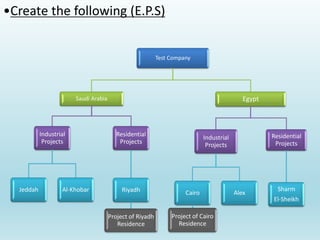
Test Company
Saudi Arabia
Industrial
Projects
Jeddah Al-Khobar
Residential
Projects
Riyadh
Project of Riyadh
Residence
Egypt
Industrial
Projects
Cairo
Project of Cairo
Residence
Alex
Residential
Projects
Sharm
El-Sheikh
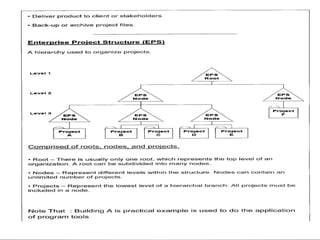
•Create the following (E.P.S)
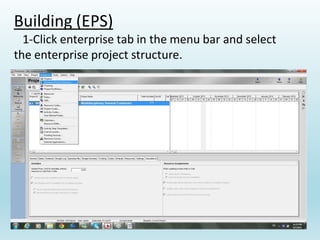
Building (EPS)
1-Click enterprise tab in the menu bar and select
the enterprise project structure.
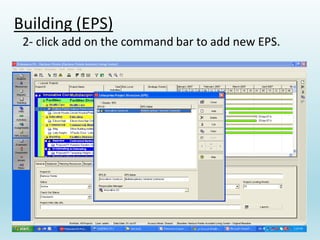
Building (EPS)
2- click add on the command bar to add new EPS.
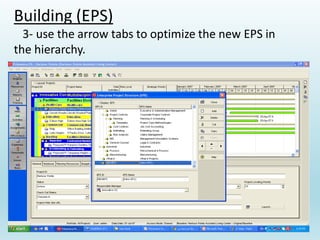
Building (EPS)
3- use the arrow tabs to optimize the new EPS in
the hierarchy.
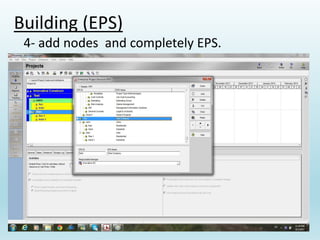
Building (EPS)
4- add nodes and completely EPS.
Organizational break down structure (OBS)
OBS element are assigned as responsible
manager for work within an EPS elements,
project, Work break down structure.
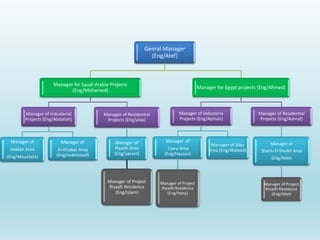
Genral Manager
(Eng/Atef)
Manager for Saudi Arabia Projects
(Eng/Mohamed)
Manager of Industerial
Projects (Eng/Abdallah)
Manager of
Jeddah Area
(Eng/Moustafa)
Manager of
Al-Khobar Area
(Eng/mahmoud)
Manager of Residential
Projects (Eng/alaa)
Manager of
Riyadh Area
(Eng/yasser)
Manager of Project
Riyadh Residence
(Eng/Islam)
Manager for Egypt projects (Eng/Ahmed)
Manager of Industeria
Projects (Eng/Ayman)
Manager of
Cairo Area
(Eng/Hassan)
Manager of Project
Riyadh Residence
(Eng/Hany)
Manager of Alex
Area (Eng/Waleed)
Manager of Residential
Projects (Eng/Ashraf)
Manager of
Sharm El-Sheikh Area
(Eng/Adel)
Manager of Project
Riyadh Residence
(Eng/Islam
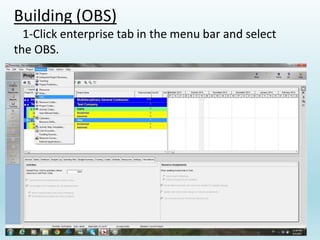
Building (OBS)
1-Click enterprise tab in the menu bar and select
the OBS.
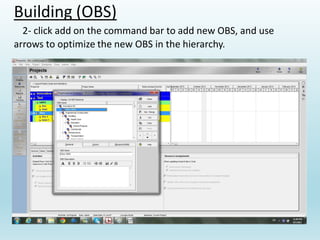
Building (OBS)
2- click add on the command bar to add new OBS, and use
arrows to optimize the new OBS in the hierarchy.
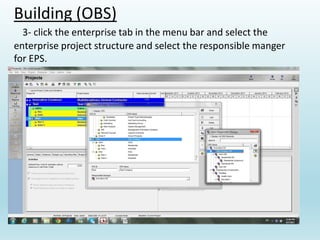
Building (OBS)
3- click the enterprise tab in the menu bar and select the
enterprise project structure and select the responsible manger
for EPS.
calendars.
Calendar is used for scheduling activities, and activity
type determines whether the activity uses the calendar
of the assigned resource or activity calendar.
Types of calendars.
1- Global: contains calendars that can be used by all
projects, available for all resources and activities.
2- Project: contains separate pool of calendars for each
project in the EPS, available for current project only.
3- Resource: contains separate calendar for each
resource.
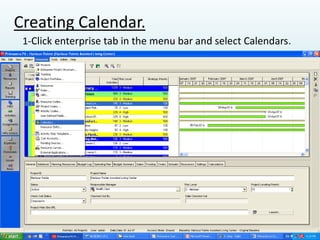
Creating Calendar.
1-Click enterprise tab in the menu bar and select Calendars.
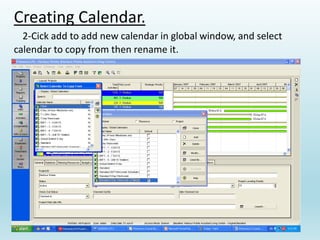
Creating Calendar.
2-Cick add to add new calendar in global window, and select
calendar to copy from then rename it.
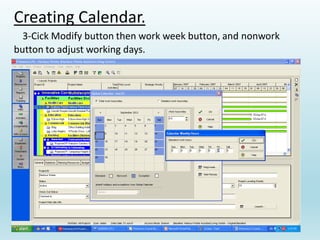
Creating Calendar.
3-Cick Modify button then work week button, and nonwork
button to adjust working days.
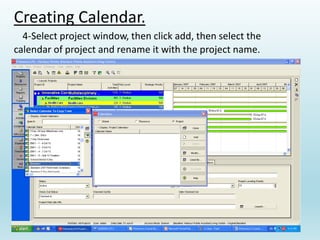
Creating Calendar.
4-Select project window, then click add, then select the
calendar of project and rename it with the project name.

Beginners guide to Primavera P6 to learn the basics

  • 10.
    Test Company Saudi Arabia Industrial Projects JeddahAl-Khobar Residential Projects Riyadh Project of Riyadh Residence Egypt Industrial Projects Cairo Project of Cairo Residence Alex Residential Projects Sharm El-Sheikh •Create the following (E.P.S)
  • 11.
    Building (EPS) 1-Click enterprisetab in the menu bar and select the enterprise project structure.
  • 12.
    Building (EPS) 2- clickadd on the command bar to add new EPS.
  • 13.
    Building (EPS) 3- usethe arrow tabs to optimize the new EPS in the hierarchy.
  • 14.
    Building (EPS) 4- addnodes and completely EPS.
  • 15.
    Organizational break downstructure (OBS) OBS element are assigned as responsible manager for work within an EPS elements, project, Work break down structure.
  • 16.
    Genral Manager (Eng/Atef) Manager forSaudi Arabia Projects (Eng/Mohamed) Manager of Industerial Projects (Eng/Abdallah) Manager of Jeddah Area (Eng/Moustafa) Manager of Al-Khobar Area (Eng/mahmoud) Manager of Residential Projects (Eng/alaa) Manager of Riyadh Area (Eng/yasser) Manager of Project Riyadh Residence (Eng/Islam) Manager for Egypt projects (Eng/Ahmed) Manager of Industeria Projects (Eng/Ayman) Manager of Cairo Area (Eng/Hassan) Manager of Project Riyadh Residence (Eng/Hany) Manager of Alex Area (Eng/Waleed) Manager of Residential Projects (Eng/Ashraf) Manager of Sharm El-Sheikh Area (Eng/Adel) Manager of Project Riyadh Residence (Eng/Islam
  • 17.
    Building (OBS) 1-Click enterprisetab in the menu bar and select the OBS.
  • 18.
    Building (OBS) 2- clickadd on the command bar to add new OBS, and use arrows to optimize the new OBS in the hierarchy.
  • 19.
    Building (OBS) 3- clickthe enterprise tab in the menu bar and select the enterprise project structure and select the responsible manger for EPS.
  • 20.
    calendars. Calendar is usedfor scheduling activities, and activity type determines whether the activity uses the calendar of the assigned resource or activity calendar.
  • 21.
    Types of calendars. 1-Global: contains calendars that can be used by all projects, available for all resources and activities. 2- Project: contains separate pool of calendars for each project in the EPS, available for current project only. 3- Resource: contains separate calendar for each resource.
  • 22.
    Creating Calendar. 1-Click enterprisetab in the menu bar and select Calendars.
  • 23.
    Creating Calendar. 2-Cick addto add new calendar in global window, and select calendar to copy from then rename it.
  • 24.
    Creating Calendar. 3-Cick Modifybutton then work week button, and nonwork button to adjust working days.
  • 25.
    Creating Calendar. 4-Select projectwindow, then click add, then select the calendar of project and rename it with the project name.