Beating the OddsCreating Predictable Revenue in a Tough EconomyJohn RudowPresidentThe Rudow Group, Inc.www.rudowgroup.comBL007
Good Versus Great“A good hockey player skates to where the puck is.  A great hockey player skates to where the puck is going to be.”Wayne GretzkyRetired Professional Hockey Player
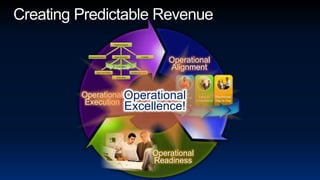
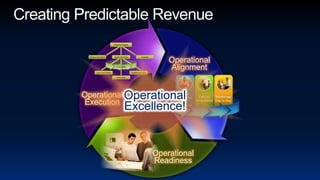
Creating Predictable RevenueOperationalAlignmentOperationalExecutionOperationalExcellence!OperationalReadiness
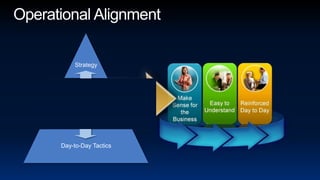
Operational AlignmentStrategyOperational orBusiness PlansDay-to-Day Tactics
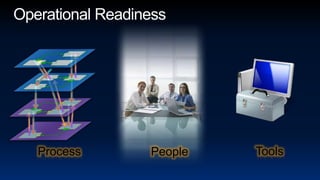
Operational ReadinessToolsProcessPeople
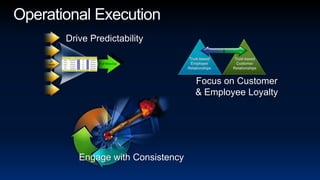
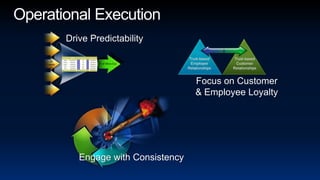
Operational ExecutionDrive PredictabilityFocus on Customer& Employee LoyaltyEngage with Consistency
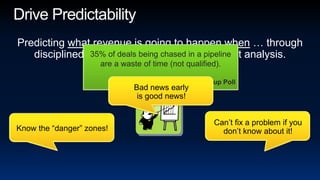
35% of deals being chased in a pipeline are a waste of time (not qualified).Gallup PollDrive PredictabilityPredicting what revenue is going to happen when … through disciplined, systematic pipeline and forecast analysis.Bad news early is good news!Can’t fix a problem if you don’t know about it!Know the “danger” zones!
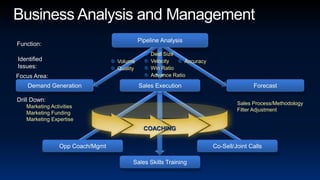
Business Analysis and ManagementPipeline AnalysisFunction:Deal SizeVelocityWin RatioAdvance RatioIdentifiedIssues:AccuracyVolumeQualityFocus Area:ForecastSales ExecutionDemand GenerationDrill Down:Sales Process/MethodologyFilter AdjustmentMarketing ActivitiesMarketing FundingMarketing ExpertiseCOACHINGOpp Coach/MgmtCo-Sell/Joint CallsSales Skills Training
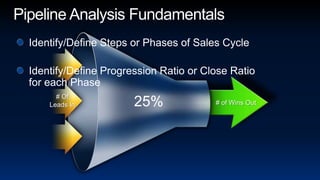
Pipeline Analysis FundamentalsIdentify/Define Steps or Phases of Sales CycleIdentify/Define Progression Ratio or Close Ratio for each Phase # OfLeads In# of Wins Out25%
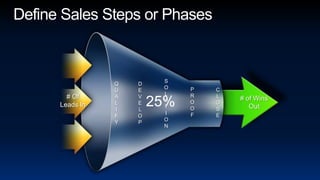
Define Sales Steps or PhasesSOLUTIONQUALIFYDEVELOPPROOFCLOSE25%# OfLeads In# of Wins Out
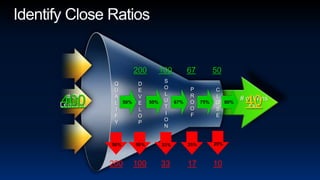
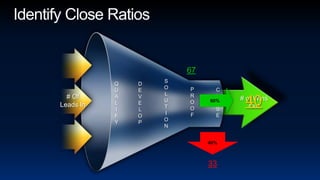
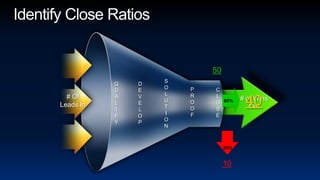
Identify Close Ratios2001006750SOLUTIONQUALIFYDEVELOPPROOFCLOSE40040# OfLeads In# of Wins Out 50% 67% 50% 75% 80%40020%25%50%50%33%200100331710
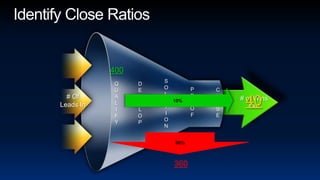
Identify Close Ratios10%400SOLUTIONQUALIFYDEVELOPPROOFCLOSE40# OfLeads In# of Wins Out90%360
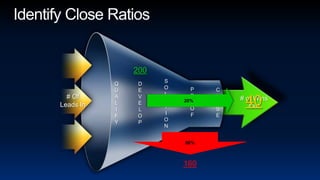
Identify Close Ratios20%200SOLUTIONQUALIFYDEVELOPPROOFCLOSE40# OfLeads In# of Wins Out80%160
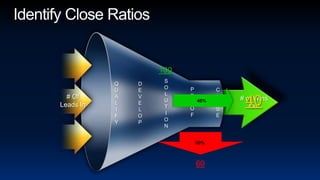
Identify Close Ratios10040%SOLUTIONQUALIFYDEVELOPPROOFCLOSE40# OfLeads In# of Wins Out60%60
Identify Close Ratios67SOLUTIONQUALIFYDEVELOP60%PROOFCLOSE40# OfLeads In# of Wins Out40%33
Identify Close Ratios50SOLUTIONQUALIFYDEVELOPPROOFCLOSE40# OfLeads In80%# of Wins Out20%10
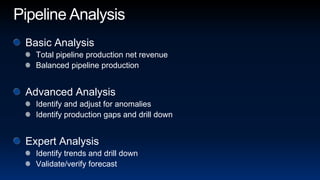
Pipeline AnalysisBasic AnalysisTotal pipeline production net revenueBalanced pipeline productionAdvanced AnalysisIdentify and adjust for anomaliesIdentify production gaps and drill downExpert AnalysisIdentify trends and drill downValidate/verify forecast
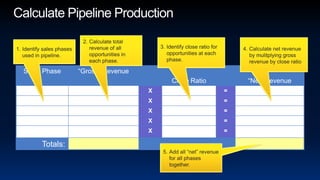
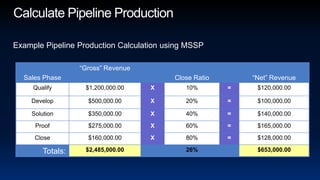
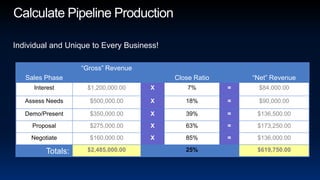
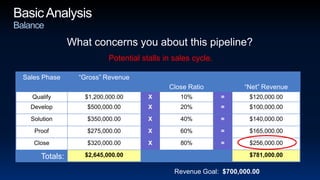
Calculate Pipeline ProductionCalculate total revenue of all opportunities in each phase.Identify close ratio for opportunities at each phase.Calculate net revenue by mulitplying gross revenue by close ratio Identify sales phases used in pipeline.Add all “net” revenue for all phases together.
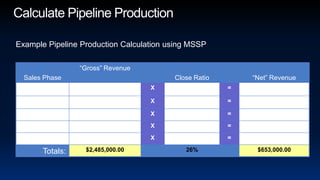
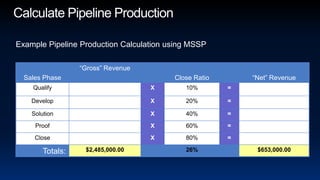
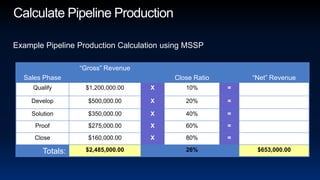
Calculate Pipeline ProductionExample Pipeline Production Calculation using MSSP
Calculate Pipeline ProductionIndividual and Unique to Every Business!
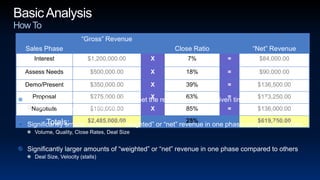
Basic AnalysisHow ToTotal “Net” revenue not sufficient to meet the revenue goal for a given time periodVolume, Quality, Close Rates, Deal SizeSignificantly smaller amounts of “weighted” or “net” revenue in one phase compared to othersVolume, Quality, Close Rates, Deal SizeSignificantly larger amounts of “weighted” or “net” revenue in one phase compared to othersDeal Size, Velocity (stalls)
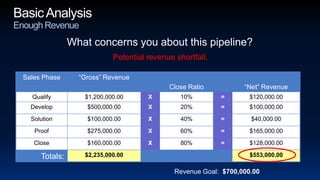
Basic AnalysisEnough RevenueWhat concerns you about this pipeline?Potential revenue shortfall.Revenue Goal:  $700,000.00
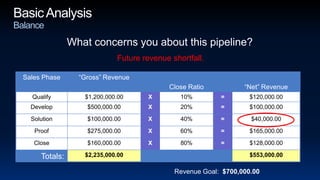
Basic AnalysisBalanceWhat concerns you about this pipeline?Future revenue shortfall.Revenue Goal:  $700,000.00
Basic AnalysisBalanceWhat concerns you about this pipeline?Potential stalls in sales cycle.Revenue Goal:  $700,000.00
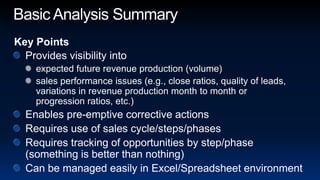
Basic Analysis SummaryKey PointsProvides visibility intoexpected future revenue production (volume)sales performance issues (e.g., close ratios, quality of leads, variations in revenue production month to month or progression ratios, etc.)Enables pre-emptive corrective actionsRequires use of sales cycle/steps/phasesRequires tracking of opportunities by step/phase (something is better than nothing)Can be managed easily in Excel/Spreadsheet environment
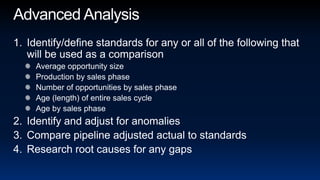
Advanced AnalysisIdentify/define standards for any or all of the following that will be used as a comparisonAverage opportunity sizeProduction by sales phaseNumber of opportunities by sales phaseAge (length) of entire sales cycleAge by sales phaseIdentify and adjust for anomaliesCompare pipeline adjusted actual to standardsResearch root causes for any gaps
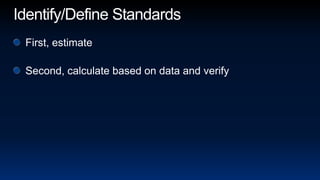
Identify/Define StandardsFirst, estimateSecond, calculate based on data and verify
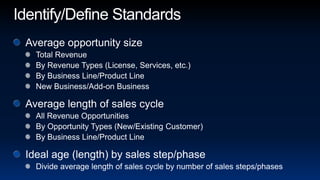
Identify/Define StandardsAverage opportunity sizeTotal RevenueBy Revenue Types (License, Services, etc.)By Business Line/Product LineNew Business/Add-on BusinessAverage length of sales cycleAll Revenue OpportunitiesBy Opportunity Types (New/Existing Customer)By Business Line/Product LineIdeal age (length) by sales step/phaseDivide average length of sales cycle by number of sales steps/phases
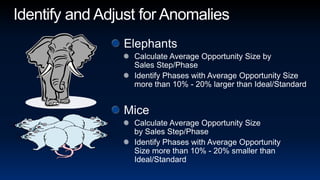
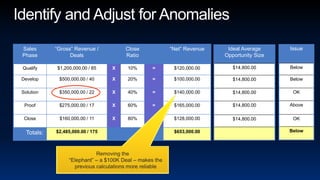
Identify and Adjust for AnomaliesElephantsCalculate Average Opportunity Size by Sales Step/PhaseIdentify Phases with Average Opportunity Size more than 10% - 20% larger than Ideal/StandardMiceCalculate Average Opportunity Size by Sales Step/PhaseIdentify Phases with Average Opportunity Size more than 10% - 20% smaller than Ideal/Standard
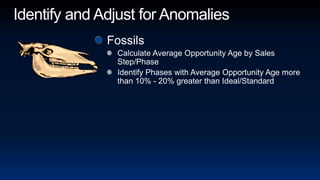
Identify and Adjust for AnomaliesFossilsCalculate Average Opportunity Age by Sales Step/PhaseIdentify Phases with Average Opportunity Age more than 10% - 20% greater than Ideal/Standard
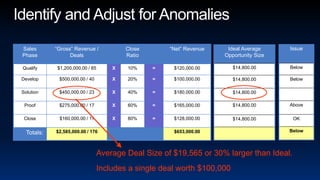
Average Deal Size of $19,565 or 30% larger than Ideal.Includes a single deal worth $100,000Identify and Adjust for Anomalies
Identify and Adjust for AnomaliesRemoving the “Elephant” – a $100K Deal – makes the previous calculations more reliable
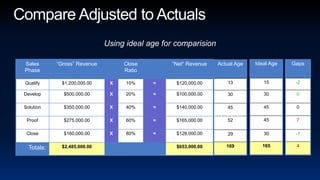
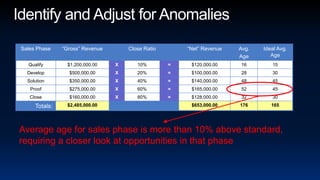
Identify and Adjust for AnomaliesAverage age for sales phase is more than 10% above standard, requiring a closer look at opportunities in that phase
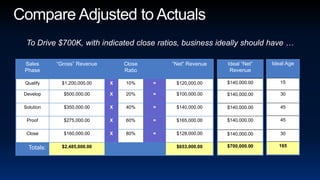
Compare Adjusted to ActualsTo Drive $700K, with indicated close ratios, business ideally should have …
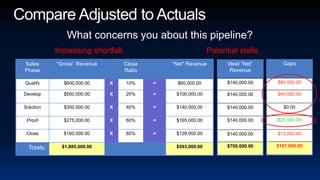
Compare Adjusted to ActualsWhat concerns you about this pipeline?Increasing shortfallPotential stalls
Compare Adjusted to ActualsUsing ideal age for comparisionAnomalies that require adjustment.Average opportunity size more than 10% - 20% less than standard (potential mice).Average opportunity size more than 10% - 20% more than standard (potential elephant).Average age more than 10% - 20% longer than standard (potential fossil).Not enough “weighted” revenue in any given step / phase compared to standard.Decreasing “weighted” revenue in previous steps / phases.Single step / phase with too much “weighted” revenue.Average age longer than standard in any given step / phase.Increasing age in consecutive steps / phases (forward or back).
Advanced Analysis SummaryKey PointsProvides visibility intoanomalies that degrade other calculationsexpected future revenue production (volume)deal size issuesvelocity issues (e.g. opportunity stalls, not enough opportunities, etc.)sales execution issues (e.g. issues with Develop phase)Enables pre-emptive corrective actionsRequires use of sales cycle/stages/phasesRequires tracking of opportunities by stage (something is better than nothing)Requires the formulation of “Standards” or “Ideals” to be used for comparisonsCan be managed (more complex) in Excel/Spreadsheet environment
Expert AnalysisIntegrate trending into analysisMany revenue engine issues are hidden except through trendingRoot cause issues often best highlighted through trendingIntegrate time into analysisTime plays critical role in deep analysisCustomer operates on their own timeSales strategies can influence time
Expert AnalysisDecreasing close ratios in a single phase over timeDecreasing “weighted” revenue in a single phase over timeIncreasing “weighted” revenue in a single phase over timeNet revenue “bubble” not moving forward through phases over timeIncreasing average age in a single phase over timeErratic average age in a single phase over time
Operational ExecutionDrive PredictabilityFocus on Customer& Employee LoyaltyEngage with Consistency
Creating Predictable RevenueOperationalAlignmentOperationalExecutionOperationalExcellence!OperationalReadiness
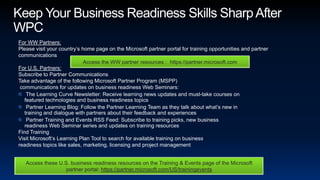
Keep Your Business Readiness Skills Sharp After WPCFor WW Partners: Please visit your country’s home page on the Microsoft partner portal for training opportunities and partner communications   For U.S. Partners: Subscribe to Partner CommunicationsTake advantage of the following Microsoft Partner Program (MSPP) communications for updates on business readiness Web Seminars: The Learning Curve Newsletter: Receive learning news updates and must-take courses on featured technologies and business readiness topics Partner Learning Blog: Follow the Partner Learning Team as they talk about what’s new in training and dialogue with partners about their feedback and experiences Partner Training and Events RSS Feed: Subscribe to training picks, new business readiness Web Seminar series and updates on training resourcesFind Training Visit Microsoft’s Learning Plan Tool to search for available training on business readiness topics like sales, marketing, licensing and project managementAccess the WW partner resources :  https://partner.microsoft.comAccess these U.S. business readiness resources on the Training & Events page of the Microsoft partner portal: https://partner.microsoft.com/US/trainingevents
Your Feedback is Very Important to UsSubmit your Session Evaluation Online and Win! www.digitalwpc.com/evalsPalm Treo Pro Windows Mobile Device!Official Microsoft Gear: Bike Jerseys$25 Conference Store gift certificateBing Backpacks & HatsWinners Every Hour!Or submit NOW on your Mobile Device at: http://www.mspartnerconference.com
© 2009 Microsoft Corporation. All rights reserved. Microsoft, Windows, Windows Vista and other product names are or may be registered trademarks and/or trademarks in the U.S. and/or other countries.The information herein is for informational purposes only and represents the current view of Microsoft Corporation as of the date of this presentation.  Because Microsoft must respond to changing market conditions, it should not be interpreted to be a commitment on the part of Microsoft, and Microsoft cannot guarantee the accuracy of any information provided after the date of this presentation.  MICROSOFT MAKES NO WARRANTIES, EXPRESS, IMPLIED OR STATUTORY, AS TO THE INFORMATION IN THIS PRESENTATION.
Beating the Odds

Beating the Odds

  • 1.
    Beating the OddsCreatingPredictable Revenue in a Tough EconomyJohn RudowPresidentThe Rudow Group, Inc.www.rudowgroup.comBL007
  • 2.
    Good Versus Great“Agood hockey player skates to where the puck is. A great hockey player skates to where the puck is going to be.”Wayne GretzkyRetired Professional Hockey Player
  • 3.
  • 4.
  • 5.
  • 6.
    Operational ExecutionDrive PredictabilityFocuson Customer& Employee LoyaltyEngage with Consistency
  • 7.
    35% of dealsbeing chased in a pipeline are a waste of time (not qualified).Gallup PollDrive PredictabilityPredicting what revenue is going to happen when … through disciplined, systematic pipeline and forecast analysis.Bad news early is good news!Can’t fix a problem if you don’t know about it!Know the “danger” zones!
  • 8.
    Business Analysis andManagementPipeline AnalysisFunction:Deal SizeVelocityWin RatioAdvance RatioIdentifiedIssues:AccuracyVolumeQualityFocus Area:ForecastSales ExecutionDemand GenerationDrill Down:Sales Process/MethodologyFilter AdjustmentMarketing ActivitiesMarketing FundingMarketing ExpertiseCOACHINGOpp Coach/MgmtCo-Sell/Joint CallsSales Skills Training
  • 9.
    Pipeline Analysis FundamentalsIdentify/DefineSteps or Phases of Sales CycleIdentify/Define Progression Ratio or Close Ratio for each Phase # OfLeads In# of Wins Out25%
  • 10.
    Define Sales Stepsor PhasesSOLUTIONQUALIFYDEVELOPPROOFCLOSE25%# OfLeads In# of Wins Out
  • 11.
    Identify Close Ratios2001006750SOLUTIONQUALIFYDEVELOPPROOFCLOSE40040#OfLeads In# of Wins Out 50% 67% 50% 75% 80%40020%25%50%50%33%200100331710
  • 12.
  • 13.
  • 14.
  • 15.
  • 16.
  • 17.
    Pipeline AnalysisBasic AnalysisTotalpipeline production net revenueBalanced pipeline productionAdvanced AnalysisIdentify and adjust for anomaliesIdentify production gaps and drill downExpert AnalysisIdentify trends and drill downValidate/verify forecast
  • 18.
    Calculate Pipeline ProductionCalculatetotal revenue of all opportunities in each phase.Identify close ratio for opportunities at each phase.Calculate net revenue by mulitplying gross revenue by close ratio Identify sales phases used in pipeline.Add all “net” revenue for all phases together.
  • 19.
    Calculate Pipeline ProductionExamplePipeline Production Calculation using MSSP
  • 20.
    Calculate Pipeline ProductionExamplePipeline Production Calculation using MSSP
  • 21.
    Calculate Pipeline ProductionExamplePipeline Production Calculation using MSSP
  • 22.
    Calculate Pipeline ProductionExamplePipeline Production Calculation using MSSP
  • 23.
    Calculate Pipeline ProductionIndividualand Unique to Every Business!
  • 24.
    Basic AnalysisHow ToTotal“Net” revenue not sufficient to meet the revenue goal for a given time periodVolume, Quality, Close Rates, Deal SizeSignificantly smaller amounts of “weighted” or “net” revenue in one phase compared to othersVolume, Quality, Close Rates, Deal SizeSignificantly larger amounts of “weighted” or “net” revenue in one phase compared to othersDeal Size, Velocity (stalls)
  • 25.
    Basic AnalysisEnough RevenueWhatconcerns you about this pipeline?Potential revenue shortfall.Revenue Goal: $700,000.00
  • 26.
    Basic AnalysisBalanceWhat concernsyou about this pipeline?Future revenue shortfall.Revenue Goal: $700,000.00
  • 27.
    Basic AnalysisBalanceWhat concernsyou about this pipeline?Potential stalls in sales cycle.Revenue Goal: $700,000.00
  • 28.
    Basic Analysis SummaryKeyPointsProvides visibility intoexpected future revenue production (volume)sales performance issues (e.g., close ratios, quality of leads, variations in revenue production month to month or progression ratios, etc.)Enables pre-emptive corrective actionsRequires use of sales cycle/steps/phasesRequires tracking of opportunities by step/phase (something is better than nothing)Can be managed easily in Excel/Spreadsheet environment
  • 29.
    Advanced AnalysisIdentify/define standardsfor any or all of the following that will be used as a comparisonAverage opportunity sizeProduction by sales phaseNumber of opportunities by sales phaseAge (length) of entire sales cycleAge by sales phaseIdentify and adjust for anomaliesCompare pipeline adjusted actual to standardsResearch root causes for any gaps
  • 30.
    Identify/Define StandardsFirst, estimateSecond,calculate based on data and verify
  • 31.
    Identify/Define StandardsAverage opportunitysizeTotal RevenueBy Revenue Types (License, Services, etc.)By Business Line/Product LineNew Business/Add-on BusinessAverage length of sales cycleAll Revenue OpportunitiesBy Opportunity Types (New/Existing Customer)By Business Line/Product LineIdeal age (length) by sales step/phaseDivide average length of sales cycle by number of sales steps/phases
  • 32.
    Identify and Adjustfor AnomaliesElephantsCalculate Average Opportunity Size by Sales Step/PhaseIdentify Phases with Average Opportunity Size more than 10% - 20% larger than Ideal/StandardMiceCalculate Average Opportunity Size by Sales Step/PhaseIdentify Phases with Average Opportunity Size more than 10% - 20% smaller than Ideal/Standard
  • 33.
    Identify and Adjustfor AnomaliesFossilsCalculate Average Opportunity Age by Sales Step/PhaseIdentify Phases with Average Opportunity Age more than 10% - 20% greater than Ideal/Standard
  • 34.
    Average Deal Sizeof $19,565 or 30% larger than Ideal.Includes a single deal worth $100,000Identify and Adjust for Anomalies
  • 35.
    Identify and Adjustfor AnomaliesRemoving the “Elephant” – a $100K Deal – makes the previous calculations more reliable
  • 36.
    Identify and Adjustfor AnomaliesAverage age for sales phase is more than 10% above standard, requiring a closer look at opportunities in that phase
  • 37.
    Compare Adjusted toActualsTo Drive $700K, with indicated close ratios, business ideally should have …
  • 38.
    Compare Adjusted toActualsWhat concerns you about this pipeline?Increasing shortfallPotential stalls
  • 39.
    Compare Adjusted toActualsUsing ideal age for comparisionAnomalies that require adjustment.Average opportunity size more than 10% - 20% less than standard (potential mice).Average opportunity size more than 10% - 20% more than standard (potential elephant).Average age more than 10% - 20% longer than standard (potential fossil).Not enough “weighted” revenue in any given step / phase compared to standard.Decreasing “weighted” revenue in previous steps / phases.Single step / phase with too much “weighted” revenue.Average age longer than standard in any given step / phase.Increasing age in consecutive steps / phases (forward or back).
  • 40.
    Advanced Analysis SummaryKeyPointsProvides visibility intoanomalies that degrade other calculationsexpected future revenue production (volume)deal size issuesvelocity issues (e.g. opportunity stalls, not enough opportunities, etc.)sales execution issues (e.g. issues with Develop phase)Enables pre-emptive corrective actionsRequires use of sales cycle/stages/phasesRequires tracking of opportunities by stage (something is better than nothing)Requires the formulation of “Standards” or “Ideals” to be used for comparisonsCan be managed (more complex) in Excel/Spreadsheet environment
  • 41.
    Expert AnalysisIntegrate trendinginto analysisMany revenue engine issues are hidden except through trendingRoot cause issues often best highlighted through trendingIntegrate time into analysisTime plays critical role in deep analysisCustomer operates on their own timeSales strategies can influence time
  • 42.
    Expert AnalysisDecreasing closeratios in a single phase over timeDecreasing “weighted” revenue in a single phase over timeIncreasing “weighted” revenue in a single phase over timeNet revenue “bubble” not moving forward through phases over timeIncreasing average age in a single phase over timeErratic average age in a single phase over time
  • 43.
    Operational ExecutionDrive PredictabilityFocuson Customer& Employee LoyaltyEngage with Consistency
  • 44.
  • 45.
    Keep Your BusinessReadiness Skills Sharp After WPCFor WW Partners: Please visit your country’s home page on the Microsoft partner portal for training opportunities and partner communications For U.S. Partners: Subscribe to Partner CommunicationsTake advantage of the following Microsoft Partner Program (MSPP) communications for updates on business readiness Web Seminars: The Learning Curve Newsletter: Receive learning news updates and must-take courses on featured technologies and business readiness topics Partner Learning Blog: Follow the Partner Learning Team as they talk about what’s new in training and dialogue with partners about their feedback and experiences Partner Training and Events RSS Feed: Subscribe to training picks, new business readiness Web Seminar series and updates on training resourcesFind Training Visit Microsoft’s Learning Plan Tool to search for available training on business readiness topics like sales, marketing, licensing and project managementAccess the WW partner resources : https://partner.microsoft.comAccess these U.S. business readiness resources on the Training & Events page of the Microsoft partner portal: https://partner.microsoft.com/US/trainingevents
  • 46.
    Your Feedback isVery Important to UsSubmit your Session Evaluation Online and Win! www.digitalwpc.com/evalsPalm Treo Pro Windows Mobile Device!Official Microsoft Gear: Bike Jerseys$25 Conference Store gift certificateBing Backpacks & HatsWinners Every Hour!Or submit NOW on your Mobile Device at: http://www.mspartnerconference.com
  • 47.
    © 2009 MicrosoftCorporation. All rights reserved. Microsoft, Windows, Windows Vista and other product names are or may be registered trademarks and/or trademarks in the U.S. and/or other countries.The information herein is for informational purposes only and represents the current view of Microsoft Corporation as of the date of this presentation. Because Microsoft must respond to changing market conditions, it should not be interpreted to be a commitment on the part of Microsoft, and Microsoft cannot guarantee the accuracy of any information provided after the date of this presentation. MICROSOFT MAKES NO WARRANTIES, EXPRESS, IMPLIED OR STATUTORY, AS TO THE INFORMATION IN THIS PRESENTATION.