This document provides information and guidelines about email correspondence and business communications. While some aspects of email style are informal, the overall tone and focus on business uses suggests a more formal style is being described.
EMAIL & BUSINESSCOMMUNICATIONS (A BRIEF INTRODUCTION)
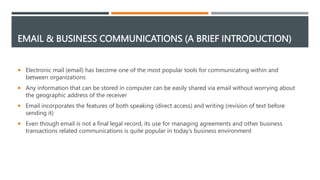
Electronic mail (email) has become one of the most popular tools for communicating within and
between organizations
Any information that can be stored in computer can be easily shared via email without worrying about
the geographic address of the receiver
Email incorporates the features of both speaking (direct access) and writing (revision of text before
sending it)
Even though email is not a final legal record, its use for managing agreements and other business
transactions related communications is quite popular in today’s business environment
3.
IMPORTANCE OF EMAIL(BENEFITS)
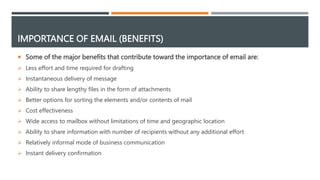
Some of the major benefits that contribute toward the importance of email are:
Less effort and time required for drafting
Instantaneous delivery of message
Ability to share lengthy files in the form of attachments
Better options for sorting the elements and/or contents of mail
Cost effectiveness
Wide access to mailbox without limitations of time and geographic location
Ability to share information with number of recipients without any additional effort
Relatively informal mode of business communication
Instant delivery confirmation
4.
STRUCTURAL ELEMENTS OFEMAIL
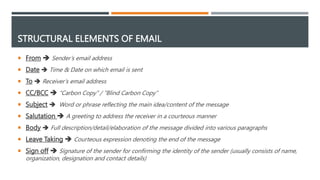
From Sender’s email address
Date Time & Date on which email is sent
To Receiver’s email address
CC/BCC “Carbon Copy” / ”Blind Carbon Copy”
Subject Word or phrase reflecting the main idea/content of the message
Salutation A greeting to address the receiver in a courteous manner
Body Full description/detail/elaboration of the message divided into various paragraphs
Leave Taking Courteous expression denoting the end of the message
Sign off Signature of the sender for confirming the identity of the sender (usually consists of name,
organization, designation and contact details)
5.
PROCEDURE
Log on,that is, connect yourself to a computer network by providing your login id and password
Type the email address of the receiver
Compose the message
Read it carefully and revise, if necessary
Instruct the system to transmit it
Check whether the system shows its successful delivery.
6.
STYLE OF EMAIL
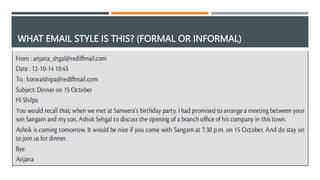
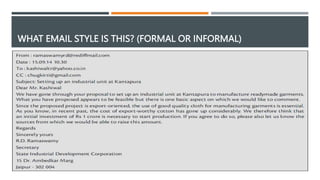
Style of email is quite similar to that of business letters but language used in email is relatively informal
Although lengthy texts, references and introductions are avoided in email, a warm welcome and a little
background is highly recommended (usually up to 2 or maximum 3 sentences)
The principles required for letter writing are also applicable for writing email’s body
As the language of email is relatively informal, use of excessive punctuation is not recommended
Widely accepted and recognized standard acronyms could be used in emails but lesser known short
forms (e.g. “rgds” for regards) could limit the comprehension of receiver which impacts overall efficiency
of the communication
For emphasizing a specific part of message, use of different font is recommended instead of using
embolden texts frequently as it may be interpreted as anger
7.
STYLE OF EMAIL
Adding one’s position in the context of subject at the end of email’s body helps alleviating the positive
and enthusiastic tone
Just like a business letter, email should also be concluded with a courteous word or phrase
Some examples of formal leave taking include “Regards” and “Best Wishes” whereas “Bye”, “Love”,
“Yours” etc. are normally used for personal emails
8.
SUGGESTIONS FOR USINGEMAIL FACILITY
Keep background, status and nature of relationship in mind while composing an email
Focus on providing a clear indication of an action that is required from the receiver
Even though email is relatively informal, do a thorough revision to ensure grammatical correction
Apart from grammatical correctness, message needs to be checked on an emotional scale
Maintain an emotional balance and avoid composing or sending an email in an angry mood
Analyze how the write-up appears on the screen by aligning the text properly and keeping adequate and
equal space between paragraphs
Filter the recipients very carefully that need to be added in CC and BCC sections
Use the facility of email within organization only when necessary
9.
SUGGESTIONS FOR USINGEMAIL FACILITY
Do not forget to use spam filters and try to refrain from responding to unknown emails
Regularly delete unwanted and spam emails so that important ones are not missed or neglected
Use salutation and leave taking in accordance to level of acquaintance
To gain attention of and priority from the receiver, ensure that your subject is specific, meaningful and
appropriate
For complex and lengthy message, use bullets, headings, and even subheadings if it adds to the
understandability of the message
Split your thoughts and verbalize them point-wise
Even though emails are supposed to be as much brief as possible, adding a little more description for
adding a warm human touch to the email would always be helpful
10.
IMPORTANCE OF JARGONS& ACRONYMS
In fast paced business environment, the need for quick transmission of communications has also become
highly necessity for conducting business operations within defined timeline
Jargons and Acronyms are frequently used by professionals to reduce the time of composing and
reading a message
To acquire these efficiency related benefits in communications, understanding of the most commonly
used jargons and acronyms is necessary
11.
COMMONLY USED JARGONS& ACRONYMS
JARGONS
“Bot” A part of software that acts in place of a human being
“Bounce” An undelivered email
“Flame” A hostile message
“Listbot” The part of a software which manages the distribution list
“Mailbot” The part of a software which automatically responds to an email
“Ping” Software utility used to check whether the person at the other end is available
“Spam” Unsolicited emails sent to many people simultaneously
12.
COMMONLY USED JARGONS& ACRONYMS
ACRONYMS
“ASAP” As soon as possible
“BBL” Be back later
“BTW” By the way
“ASE” As stated earlier
“IMV” In my view
“IAE” In any event
“PFA” Please find attached
13.
SECURITY AND PRECAUTIONS
Choose the most appropriate (e.g. telephone) channel according to the circumstances and requirements
of the situation
Only use email facility when necessary
Avoid replying to stranger emails and disclosing your identity without proper confirmation of the source