Kinect SDK 1.7
FACE TRACKING
INTERACTIONS
FUSION
Presented by Reuben Ahmed (Bennett Adelson)
Disclaimer
 Smelly code may be shown
 Purpose
Kinect 1.7 SDK overview
200-level
 WPF/C# examples
Agenda
 Hardware Overview
 System Requirements
 Face Tracking
 Kinect Interactions
 Kinect Fusion
 Future
 Q&A
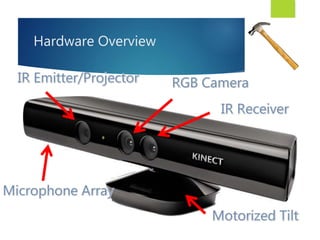
Hardware Overview
Hardware Overview
 ColorStream
 DepthStream
 SkeletonStream
Agenda
 Hardware Overview
 System Requirements
 Face Tracking
 Kinect Interactions
 Kinect Fusion
 Future
 Q&A
System Requirements
 Software
 Visual Studio 2010/2012
 Windows 7/8
 Kinect 1.7 SDK and 1.7 Toolkit (600MB total)
 Hardware
 Kinect for Windows ($230)
 2.66-3ghz Dual Core
 Kinect Fusion
 DirectX 11 Capable GPU
 GTX560/AMD 6950 and higher
Agenda
 Hardware Overview
 System Requirements
 Face Tracking
 Kinect Interactions
 Kinect Fusion
 Future
 Q&A
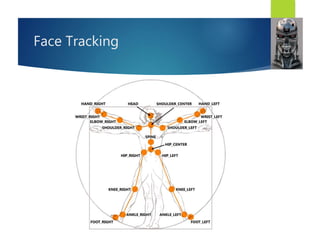
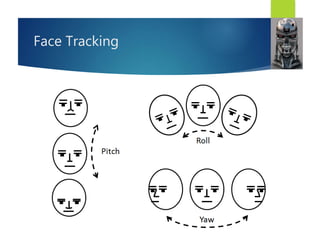
Face Tracking
Refactor
Face Tracking
 References
Microsoft.Kinect
Microsoft.Kinect.Toolkit.FaceTracking
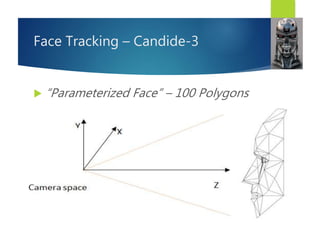
 Candide-3 model – “A parameterized face”
100 polygons
Face Tracking – Candide-3
Refactor
 “Parameterized Face” – 100 Polygons
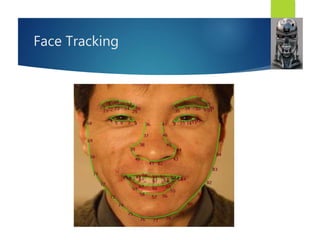
Face Tracking
Refactor
Face Tracking
Refactor
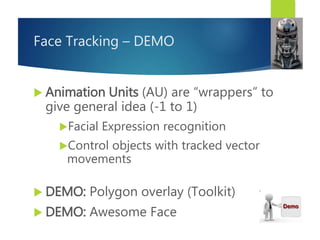
Face Tracking – DEMO
Refactor
 Animation Units (AU) are “wrappers” to
give general idea (-1 to 1)
Facial Expression recognition
Control objects with tracked vector
movements
 DEMO: Polygon overlay (Toolkit)
 DEMO: Awesome Face
Agenda
 Hardware Overview
 System Requirements
 Face Tracking
 Kinect Interactions
 Kinect Fusion
 Future
 Q&A
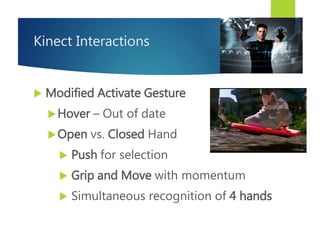
Kinect Interactions
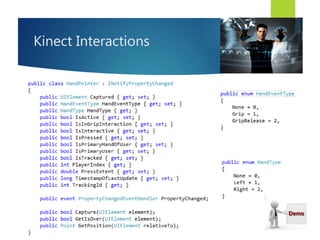
 Modified Activate Gesture
Hover – Out of date
Open vs. Closed Hand
 Push for selection
 Grip and Move with momentum
 Simultaneous recognition of 4 hands
Kinect Interactions
KinectSensorUI
KinectRegion
Add KinectInteraction experiences to an app
KinectUserViewer
Shows an image of the user (depth stream)
KinectTileButton, KinectCircleButton,
KinectScrollViewer
Kinect Interactions
Kinectifying Custom Control
 Checkbox
Kinect Interactions
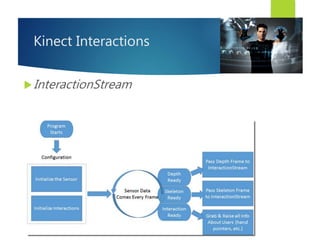
InteractionStream
Kinect Interactions
Agenda
 Hardware Overview
 System Requirements
 Face Tracking
 Kinect Interactions
 Kinect Fusion
 Future
 Q&A
Kinect Fusion
Agenda
 Hardware Overview
 System Requirements
 Face Tracking
 Kinect Interactions
 Kinect Fusion
 Future
 Q&A
Future
 Kinect 1.8 SDK
September 2013
K4W Desktop Apps using HTML5/JS
 Kinect 2.0
 November 2013 SDK
 2014 Hardware
Future
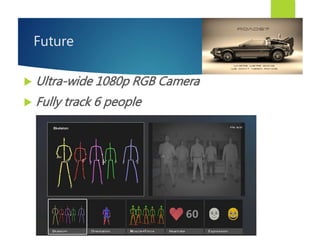
 Ultra-wide 1080p RGB Camera
 Fully track 6 people
Future
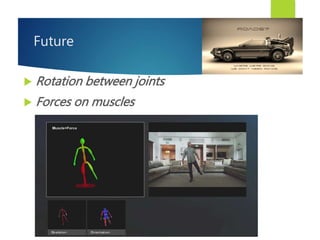
 Rotation between joints
 Forces on muscles
Future
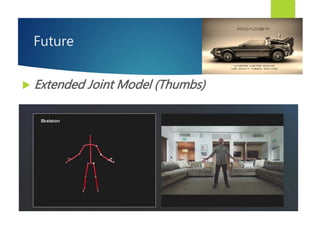
 Extended Joint Model (Thumbs)
Future
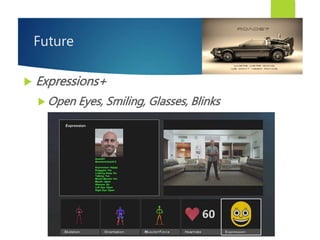
 Expressions+
 Open Eyes, Smiling, Glasses, Blinks
Future
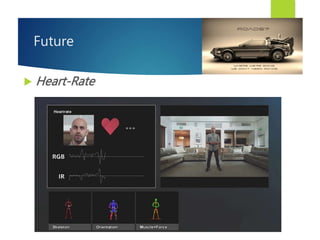
 Heart-Rate
Agenda
 Hardware Overview
 System Requirements
 Face Tracking
 Kinect Interactions
 Kinect Fusion
 Future
 Q&A
Q & A
 Credits/Resources
http://www.icg.isy.liu.se/candide/
main.html
TODO
 Reorganize Demos/Folders
 Demos
 Face Tracking
 Toolkit
 AwesomeFace
 Interactions
 Push
 Grip
 Console App Interactions
 Paint Interaction Demo
 Solitaire Demo
 Note Mouse Up/Mouse Down issue
 Fusion Demo
 Toolkit Demo
 STL file
 Solid Works eDrawing
 Download and show Augmented Reality Video: http://www.kurzweilai.net/kinect-brain-scans-augmented-reality-for-neurosurgeons
 3D Printing of STL
 Fusion Slides
 Re-read articles for talking points
 Rehearse

BA_Kinect1.7SDK

Editor's Notes

  • #2 Subject: Fun new features to code with your Kinect for Windows sensor (SDK 1.7 overview)   Description: Let’s discover what can be done with the latest Kinect SDK. Kinect Fusion and Kinect Interactions have been added. Kinect Fusion allows the Kinect for Windows sensor to scan 3D objects and environments, then model them on a PC.   Kinect Interactions allow developers to create interactive applications with a new, well-designed and ergonomically friendlier interaction language than before.   Join us while we walk through demonstrations of the new feature set! Knowledge of the Kinect sensor’s hardware for this presentation (depth camera via IR emitter, RGB camera, microphone array, etc.) is preferred, but not essential. Understanding and coding towards those lower level topics will not be covered during this presentation.
  • #17 Press for Selection. This provides, along with the new KinectInteraction Controls, improved selection capability and faster interactions. If you’re familiar with previous Kinect for Windows interaction capabilities, this replaces the hover select concept. Grip and Move for Scrolling. This provides, along with the new KinectInteraction Controls, 1-to-1 manipulation for more precise scrolling, as well as large fast scrolls with a fling motion. If you’re familiar with previous Kinect for Windows interaction capabilities, this replaces the hover scroll model.
  • #18 SAMPLE: http://dotneteers.net/blogs/vbandi/archive/2013/03/25/kinect-interactions-with-wpf-part-i-getting-started.aspx Interaction stream outside of WPF (console): http://blogs.msdn.com/b/k4wdev/archive/2013/05/01/using-kinect-interactionstream-outside-of-wpf.aspx Kinect Slider: http://blogs.msdn.com/b/k4wdev/archive/2013/06/20/using-kinect-interactions-to-create-a-slider-control.aspx Controls: http://www.soulsolutions.com.au/Blog/tabid/73/EntryId/851/Kinect-For-Windows-Interactions-Gallery.aspx KinectRegion, KinectUserViewer, KinectTileButton, KinectcircleButton, KinectScrollViewer, InteractionStream
  • #19 SAMPLE: http://dotneteers.net/blogs/vbandi/archive/2013/03/25/kinect-interactions-with-wpf-part-i-getting-started.aspx Interaction stream outside of WPF (console): http://blogs.msdn.com/b/k4wdev/archive/2013/05/01/using-kinect-interactionstream-outside-of-wpf.aspx Kinect Slider: http://blogs.msdn.com/b/k4wdev/archive/2013/06/20/using-kinect-interactions-to-create-a-slider-control.aspx Controls: http://www.soulsolutions.com.au/Blog/tabid/73/EntryId/851/Kinect-For-Windows-Interactions-Gallery.aspx KinectRegion, KinectUserViewer, KinectTileButton, KinectcircleButton, KinectScrollViewer, InteractionStream
  • #20 SAMPLE: http://dotneteers.net/blogs/vbandi/archive/2013/03/25/kinect-interactions-with-wpf-part-i-getting-started.aspx Interaction stream outside of WPF (console): http://blogs.msdn.com/b/k4wdev/archive/2013/05/01/using-kinect-interactionstream-outside-of-wpf.aspx Kinect Slider: http://blogs.msdn.com/b/k4wdev/archive/2013/06/20/using-kinect-interactions-to-create-a-slider-control.aspx Controls: http://www.soulsolutions.com.au/Blog/tabid/73/EntryId/851/Kinect-For-Windows-Interactions-Gallery.aspx KinectRegion, KinectUserViewer, KinectTileButton, KinectcircleButton, KinectScrollViewer, InteractionStream
  • #21 SAMPLE: http://dotneteers.net/blogs/vbandi/archive/2013/03/25/kinect-interactions-with-wpf-part-i-getting-started.aspx Interaction stream outside of WPF (console): http://blogs.msdn.com/b/k4wdev/archive/2013/05/01/using-kinect-interactionstream-outside-of-wpf.aspx Kinect Slider: http://blogs.msdn.com/b/k4wdev/archive/2013/06/20/using-kinect-interactions-to-create-a-slider-control.aspx Controls: http://www.soulsolutions.com.au/Blog/tabid/73/EntryId/851/Kinect-For-Windows-Interactions-Gallery.aspx KinectRegion, KinectUserViewer, KinectTileButton, KinectcircleButton, KinectScrollViewer, InteractionStream
  • #25 http://www.kinectingforwindows.com/ Develop Kinect for Windows Desktop applications using Html5/Javascript Ultra-wide 1080p RGB Camera Fully track 6 persons Extended Joint Model (thumbs) Extended Depth Additoinal Tracking (Rotation between joints, Forces on muscles, skin color, Expressions (open eyes, smiling, etc),
  • #27 Rotation between joints, Forces on muscles
  • #29 Expressions (open eyes, smiling, glasses, eye blinks)