Extra Discussion – Interface vs. Class

● An

interface is a
collection of abstract
methods

● An

interface contains
behaviors
that
a
class implements

●A

class
implements
an interface, thereby
inheriting the abstract
methods of the interface
● A class describes the
attributes and behaviors
of an object

● Unless the class that implements the interface is
abstract, all the methods of the interface need to
be defined in the class

1
Extra Discussion – Interface vs. Class

● SIMILARITY

● An

interface can contain any number of
methods.
● An interface is written in a file with
a .java extension, with the name of
the interface matching the name of the file.
● The bytecode of an interface appears in
a .class file.
● Interfaces appear in packages, and their
corresponding bytecode file must be in a
directory structure that matches the package
name.
2
Extra Discussion – Interface vs. Class

● DIFFERENCE

● You cannot instantiate an interface.
● An interface does not contain any constructors.
● All of the methods in an interface are abstract.
● An interface cannot contain instance fields.
The only fields that can appear in
an interface must be declared both static and
final.
● An interface is not extended by a class; it is
implemented by a class.
● An interface can extend multiple interfaces.
3
Extra Discussion – Interface vs. Class

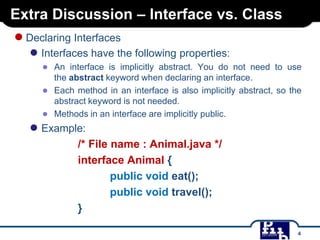
● Declaring Interfaces

● Interfaces have the following properties:
● An interface is implicitly abstract. You do not need to use
the abstract keyword when declaring an interface.
● Each method in an interface is also implicitly abstract, so the
abstract keyword is not needed.
● Methods in an interface are implicitly public.

● Example:

/* File name : Animal.java */
interface Animal {
public void eat();
public void travel();
}
4
Extra Discussion – Interface vs. Class

● Implementing Interfaces
●

●

A class uses the implements keyword to implement an interface. The
implements keyword appears in the class declaration following the
extends portion of the declaration.
Example:
/* File name : MammalInt.java */
public class MammalInt implements Animal{
public void eat(){
System.out.println("Mammal eats");
}
public void travel(){
System.out.println("Mammal travels");
}
public int noOfLegs(){
return 0;
}
public static void main(String args[]){
MammalInt m = new MammalInt();
m.eat();
m.travel();
}
}

5
UML Diagram

Diagram II
Use Case Diagram
● What is Actor? Use Case?
● Use Case Diagram elements

6
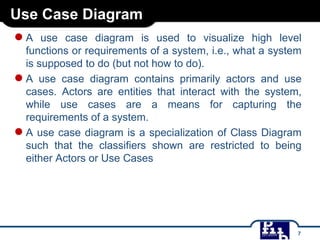
Use Case Diagram

●A

use case diagram is used to visualize high level
functions or requirements of a system, i.e., what a system
is supposed to do (but not how to do).
● A use case diagram contains primarily actors and use
cases. Actors are entities that interact with the system,
while use cases are a means for capturing the
requirements of a system.
● A use case diagram is a specialization of Class Diagram
such that the classifiers shown are restricted to being
either Actors or Use Cases

7
Use Case Diagram elements

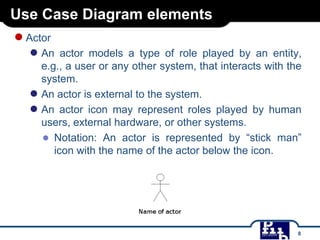
● Actor

● An

actor models a type of role played by an entity,
e.g., a user or any other system, that interacts with the
system.
● An actor is external to the system.
● An actor icon may represent roles played by human
users, external hardware, or other systems.
● Notation: An actor is represented by “stick man”
icon with the name of the actor below the icon.

8
Use Case Diagram elements

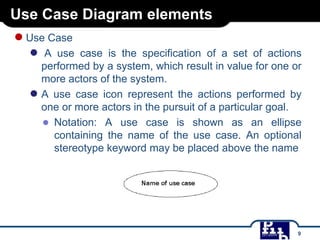
● Use Case
●

A use case is the specification of a set of actions
performed by a system, which result in value for one or
more actors of the system.
● A use case icon represent the actions performed by
one or more actors in the pursuit of a particular goal.
● Notation: A use case is shown as an ellipse
containing the name of the use case. An optional
stereotype keyword may be placed above the name

9
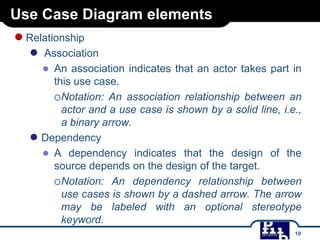
Use Case Diagram elements

● Relationship
●

Association
● An association indicates that an actor takes part in
this use case.
Notation: An association relationship between an
actor and a use case is shown by a solid
line, i.e., a binary arrow.
● Dependency
● A dependency indicates that the design of the
source depends on the design of the target.
Notation: An dependency relationship between
use cases is shown by a dashed arrow. The arrow
may be labeled with an optional stereotype
keyword.
10
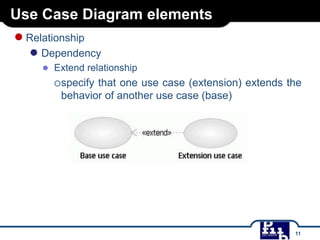
Use Case Diagram elements

● Relationship

● Dependency
● Extend relationship
specify that one use case (extension) extends the
behavior of another use case (base)

11
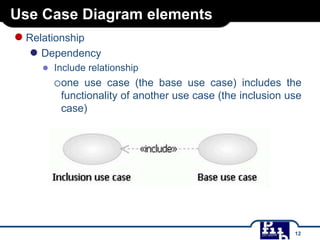
Use Case Diagram elements

● Relationship

● Dependency
● Include relationship
one use case (the base use case) includes the
functionality of another use case (the inclusion use
case)

12
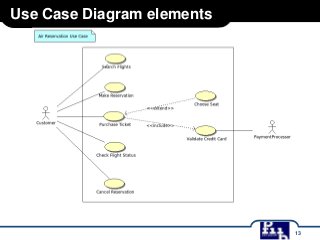
Use Case Diagram elements

13

Bai giang-uml-11feb14

  • 1.
    Extra Discussion –Interface vs. Class ● An interface is a collection of abstract methods ● An interface contains behaviors that a class implements ●A class implements an interface, thereby inheriting the abstract methods of the interface ● A class describes the attributes and behaviors of an object ● Unless the class that implements the interface is abstract, all the methods of the interface need to be defined in the class 1
  • 2.
    Extra Discussion –Interface vs. Class ● SIMILARITY ● An interface can contain any number of methods. ● An interface is written in a file with a .java extension, with the name of the interface matching the name of the file. ● The bytecode of an interface appears in a .class file. ● Interfaces appear in packages, and their corresponding bytecode file must be in a directory structure that matches the package name. 2
  • 3.
    Extra Discussion –Interface vs. Class ● DIFFERENCE ● You cannot instantiate an interface. ● An interface does not contain any constructors. ● All of the methods in an interface are abstract. ● An interface cannot contain instance fields. The only fields that can appear in an interface must be declared both static and final. ● An interface is not extended by a class; it is implemented by a class. ● An interface can extend multiple interfaces. 3
  • 4.
    Extra Discussion –Interface vs. Class ● Declaring Interfaces ● Interfaces have the following properties: ● An interface is implicitly abstract. You do not need to use the abstract keyword when declaring an interface. ● Each method in an interface is also implicitly abstract, so the abstract keyword is not needed. ● Methods in an interface are implicitly public. ● Example: /* File name : Animal.java */ interface Animal { public void eat(); public void travel(); } 4
  • 5.
    Extra Discussion –Interface vs. Class ● Implementing Interfaces ● ● A class uses the implements keyword to implement an interface. The implements keyword appears in the class declaration following the extends portion of the declaration. Example: /* File name : MammalInt.java */ public class MammalInt implements Animal{ public void eat(){ System.out.println("Mammal eats"); } public void travel(){ System.out.println("Mammal travels"); } public int noOfLegs(){ return 0; } public static void main(String args[]){ MammalInt m = new MammalInt(); m.eat(); m.travel(); } } 5
  • 6.
    UML Diagram Diagram II UseCase Diagram ● What is Actor? Use Case? ● Use Case Diagram elements 6
  • 7.
    Use Case Diagram ●A usecase diagram is used to visualize high level functions or requirements of a system, i.e., what a system is supposed to do (but not how to do). ● A use case diagram contains primarily actors and use cases. Actors are entities that interact with the system, while use cases are a means for capturing the requirements of a system. ● A use case diagram is a specialization of Class Diagram such that the classifiers shown are restricted to being either Actors or Use Cases 7
  • 8.
    Use Case Diagramelements ● Actor ● An actor models a type of role played by an entity, e.g., a user or any other system, that interacts with the system. ● An actor is external to the system. ● An actor icon may represent roles played by human users, external hardware, or other systems. ● Notation: An actor is represented by “stick man” icon with the name of the actor below the icon. 8
  • 9.
    Use Case Diagramelements ● Use Case ● A use case is the specification of a set of actions performed by a system, which result in value for one or more actors of the system. ● A use case icon represent the actions performed by one or more actors in the pursuit of a particular goal. ● Notation: A use case is shown as an ellipse containing the name of the use case. An optional stereotype keyword may be placed above the name 9
  • 10.
    Use Case Diagramelements ● Relationship ● Association ● An association indicates that an actor takes part in this use case. Notation: An association relationship between an actor and a use case is shown by a solid line, i.e., a binary arrow. ● Dependency ● A dependency indicates that the design of the source depends on the design of the target. Notation: An dependency relationship between use cases is shown by a dashed arrow. The arrow may be labeled with an optional stereotype keyword. 10
  • 11.
    Use Case Diagramelements ● Relationship ● Dependency ● Extend relationship specify that one use case (extension) extends the behavior of another use case (base) 11
  • 12.
    Use Case Diagramelements ● Relationship ● Dependency ● Include relationship one use case (the base use case) includes the functionality of another use case (the inclusion use case) 12
  • 13.
    Use Case Diagramelements 13