ICT Workshop - I
Indian Institute of Information Technology Surat
Course Code: EC 106
B.Tech, Semester I
Instructors:
Basics of Arduino
Components of a hardware project
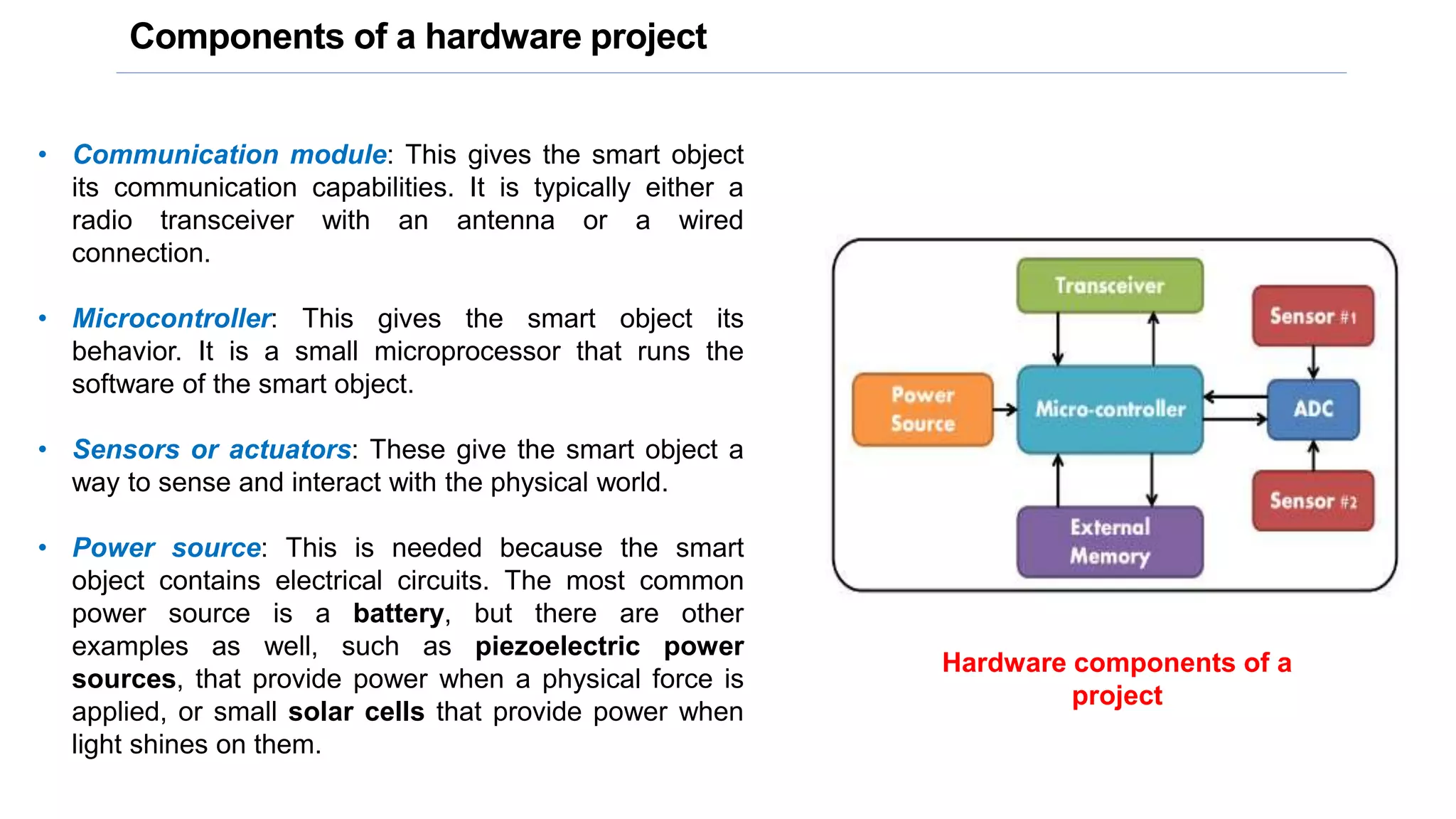
• Communication module: This gives the smart object
its communication capabilities. It is typically either a
radio transceiver with an antenna or a wired
connection.
• Microcontroller: This gives the smart object its
behavior. It is a small microprocessor that runs the
software of the smart object.
• Sensors or actuators: These give the smart object a
way to sense and interact with the physical world.
• Power source: This is needed because the smart
object contains electrical circuits. The most common
power source is a battery, but there are other
examples as well, such as piezoelectric power
sources, that provide power when a physical force is
applied, or small solar cells that provide power when
light shines on them.
Hardware components of a
project
Hardware platforms
Arduino
Galileo
Raspberry Pi
Arduino
Key features of Arduino
Arduino
The Arduino project started in Italy in 2005 as a program for students at the Ivrea Interaction Design
Institute. The aim was to create a low-cost and easy-to-use board for novices and professionals.
Arduino boards have been designed to create devices and prototypes that interact with the
environment using sensors and actuators and multiple communication paradigms. They are
equipped with sets of digital and analog input/output pins, which may be interfaced with expansion
boards (called “shields”) and other external circuits and components.
Arduino Uno Arduino Mega Arduino Nano
https://www.arduino.cc/
Specifications of Arduino Uno
• Microcontroller: ATmega328
• Operating Voltage: 5V
• Input Voltage (recommended): 7-12V
• Input Voltage (limits): 6-20V
• Digital I/O Pins: 14 (of which 6 provide PWM output)
• Analog Input Pins: 6
• DC Current per I/O Pin: 40 mA
• DC Current for 3.3V Pin: 50 mA
• Flash Memory: 32 KB (ATmega328) of which 0.5 KB
used by bootloader
• SRAM: 2 KB (ATmega328)
• EEPROM: 1 KB (ATmega328)
• Clock Speed: 16 MHz
Arduino IDE
The open-source Arduino Software
(IDE) makes it easy to write code and
upload it to the board. It runs on
Windows, Mac OS X, and Linux.
https://www.arduino.cc/en/main/software
The open-source nature of the Arduino
project has facilitated the publication of
many free software libraries that other
developers use to augment their
projects.
Arduino Uno Board Components
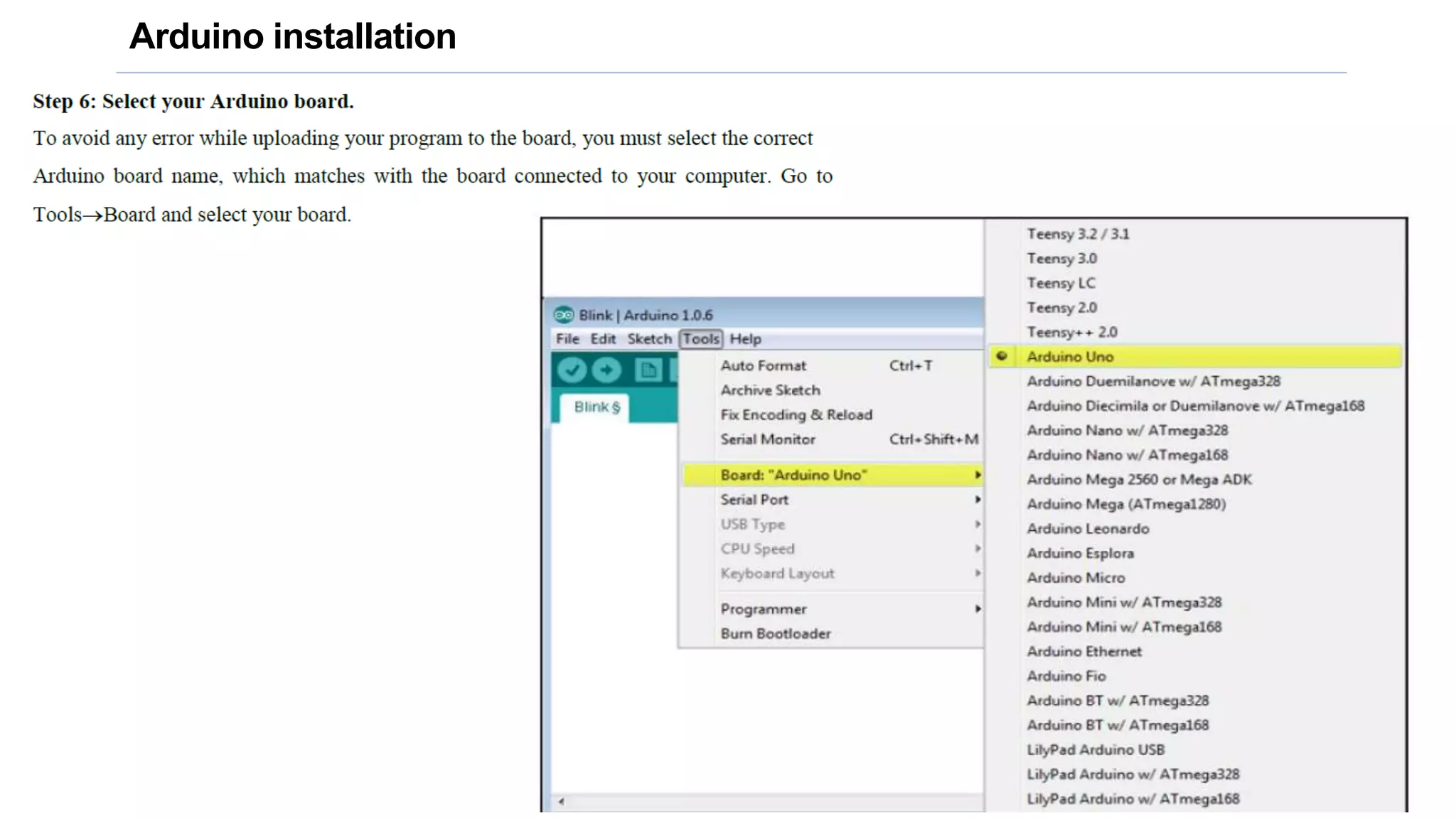
Arduino installation
Arduino IDE
Common errors
Blink LED program
Arduino shields
Arduino shields are the boards, which are plugged over the Arduino board to expand its
functionalities. There are different varieties of shields used for various tasks, such as Arduino motor
shields, Arduino communication shields, etc.
Shield is defined as the hardware device that can be mounted over the board to increase the
capabilities of the projects. It also makes our work easy. For example, Ethernet shields are used to
connect the Arduino board to the Internet. The pin position of the shields is similar to the Arduino
boards. We can also connect the modules and sensors to the shields with the help of the connection
cable.
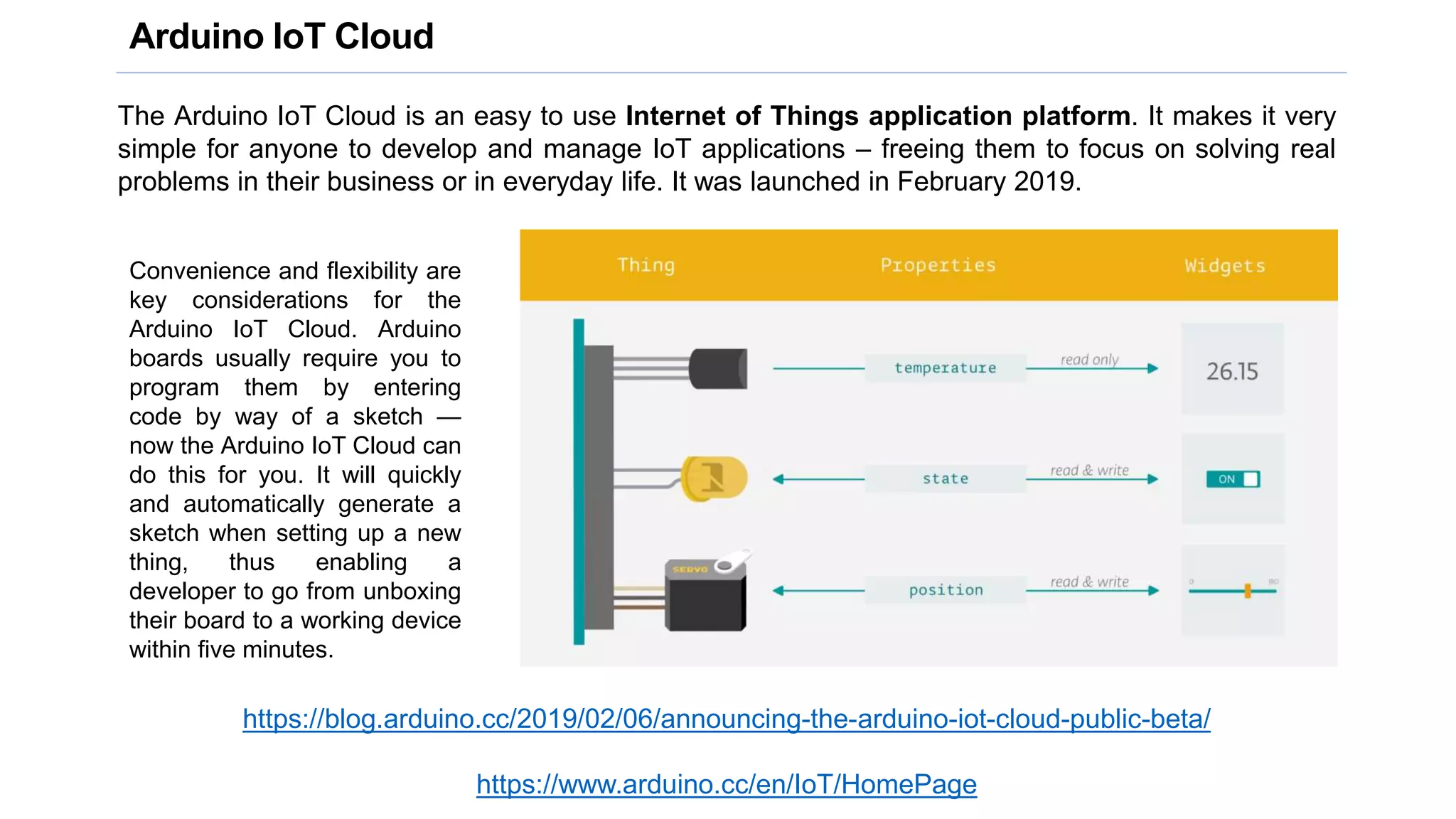
Arduino IoT Cloud
The Arduino IoT Cloud is an easy to use Internet of Things application platform. It makes it very
simple for anyone to develop and manage IoT applications – freeing them to focus on solving real
problems in their business or in everyday life. It was launched in February 2019.
https://blog.arduino.cc/2019/02/06/announcing-the-arduino-iot-cloud-public-beta/
https://www.arduino.cc/en/IoT/HomePage
Convenience and flexibility are
key considerations for the
Arduino IoT Cloud. Arduino
boards usually require you to
program them by entering
code by way of a sketch —
now the Arduino IoT Cloud can
do this for you. It will quickly
and automatically generate a
sketch when setting up a new
thing, thus enabling a
developer to go from unboxing
their board to a working device
within five minutes.
Sensors
A sensor is a device that measures physical parameters from the environment
and converts it into data.
Sensors are a part of our day-to-day life.
If you are using a computer, you are most likely using a mouse, which contains
an optical sensor. If you are using a smartphone, you are using touch sensors
every time you touch the screen.
• Temperature sensors
• Motion sensors
• Light dependent resistor (LDR) sensors
• Infrared (IR) sensors
• Ultrasonic sensors
• Smoke sensors
• Gas sensors
• Refractive index sensors
• Strain sensors
Chemical sensing
Temperature sensors
A temperature sensor collects the data about temperature from a
particular source and converts the data into understandable form for a
device or an user.
Types of temperature sensors
• Thermocouples
• Resistor temperature detectors
• Thermistors
• Infrared sensors
• Semiconductor-based
• Thermometers
Thermocouples
The thermocouple is a kind of temperature sensor that is used to measure the
temperature at one specific point in the form of the EMF or an electric current.
This sensor comprises two dissimilar metal wires that are connected together at
one junction. The temperature can be measured at this junction, and the change
in temperature of the metal wire stimulates the voltages.
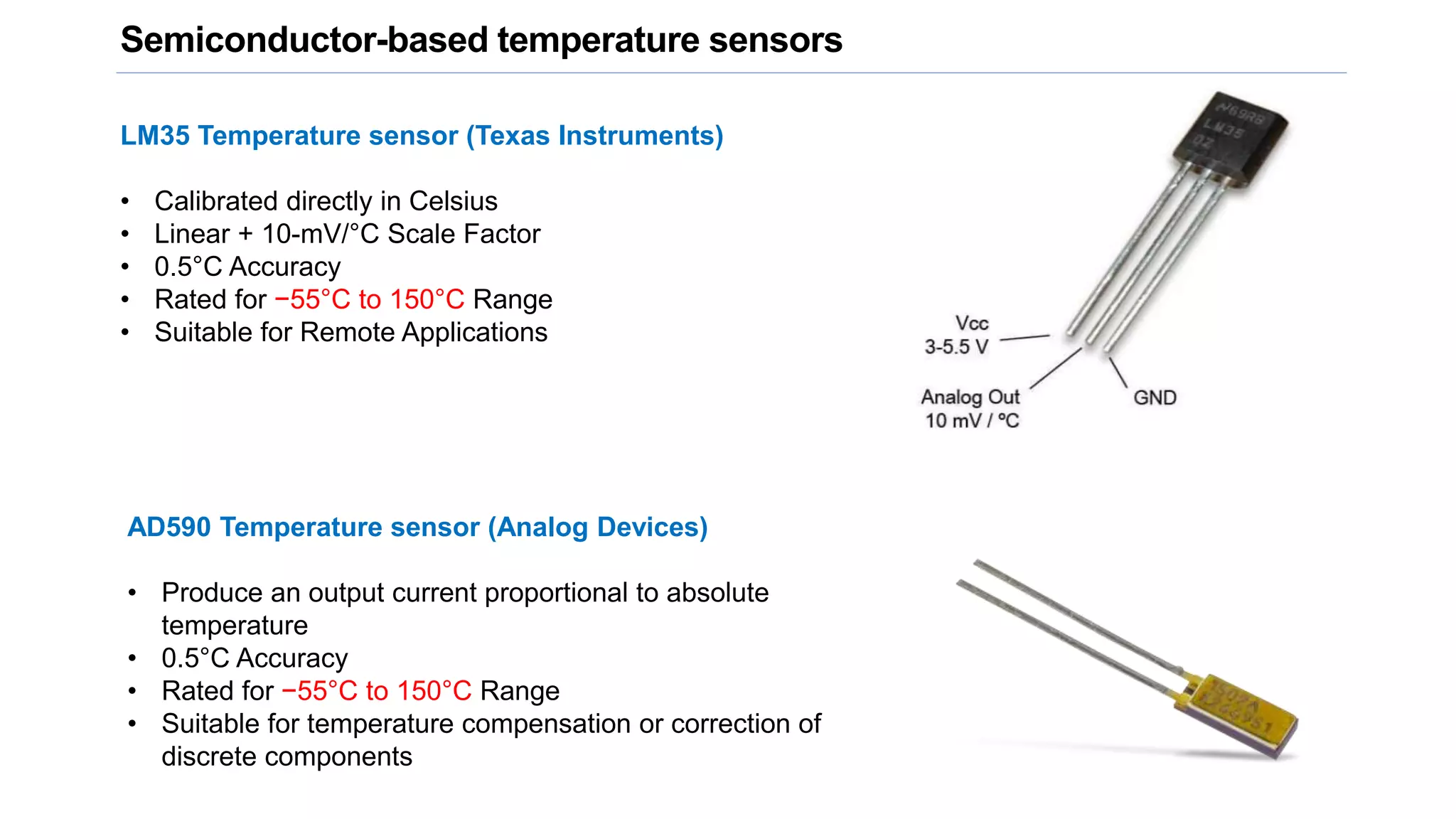
Semiconductor-based temperature sensors
LM35 Temperature sensor (Texas Instruments)
• Calibrated directly in Celsius
• Linear + 10-mV/°C Scale Factor
• 0.5°C Accuracy
• Rated for −55°C to 150°C Range
• Suitable for Remote Applications
AD590 Temperature sensor (Analog Devices)
• Produce an output current proportional to absolute
temperature
• 0.5°C Accuracy
• Rated for −55°C to 150°C Range
• Suitable for temperature compensation or correction of
discrete components
Connecting Arduino to sensors and actuators
Arduino interfaced to a temperature sensor
LM 35 sensor
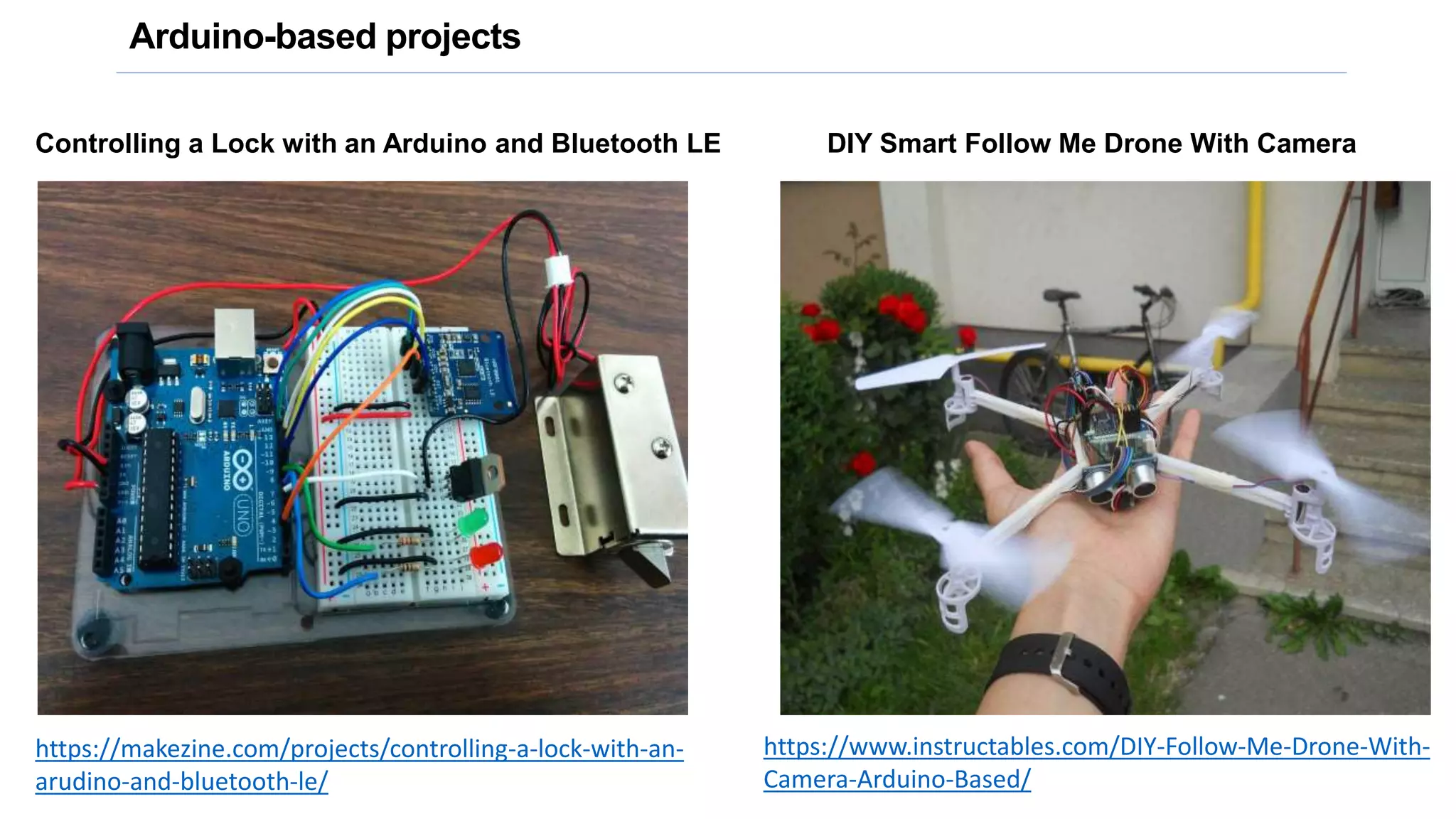
Arduino-based projects
Controlling a Lock with an Arduino and Bluetooth LE
https://makezine.com/projects/controlling-a-lock-with-an-
arudino-and-bluetooth-le/
DIY Smart Follow Me Drone With Camera
https://www.instructables.com/DIY-Follow-Me-Drone-With-
Camera-Arduino-Based/
Arduino project hub
https://create.arduino.cc/projecthub

B1_25Jan21.pptx

  • 1.
    ICT Workshop -I Indian Institute of Information Technology Surat Course Code: EC 106 B.Tech, Semester I Instructors:
  • 2.
  • 3.
    Components of ahardware project • Communication module: This gives the smart object its communication capabilities. It is typically either a radio transceiver with an antenna or a wired connection. • Microcontroller: This gives the smart object its behavior. It is a small microprocessor that runs the software of the smart object. • Sensors or actuators: These give the smart object a way to sense and interact with the physical world. • Power source: This is needed because the smart object contains electrical circuits. The most common power source is a battery, but there are other examples as well, such as piezoelectric power sources, that provide power when a physical force is applied, or small solar cells that provide power when light shines on them. Hardware components of a project
  • 4.
  • 5.
  • 6.
  • 7.
    Arduino The Arduino projectstarted in Italy in 2005 as a program for students at the Ivrea Interaction Design Institute. The aim was to create a low-cost and easy-to-use board for novices and professionals. Arduino boards have been designed to create devices and prototypes that interact with the environment using sensors and actuators and multiple communication paradigms. They are equipped with sets of digital and analog input/output pins, which may be interfaced with expansion boards (called “shields”) and other external circuits and components. Arduino Uno Arduino Mega Arduino Nano https://www.arduino.cc/
  • 8.
    Specifications of ArduinoUno • Microcontroller: ATmega328 • Operating Voltage: 5V • Input Voltage (recommended): 7-12V • Input Voltage (limits): 6-20V • Digital I/O Pins: 14 (of which 6 provide PWM output) • Analog Input Pins: 6 • DC Current per I/O Pin: 40 mA • DC Current for 3.3V Pin: 50 mA • Flash Memory: 32 KB (ATmega328) of which 0.5 KB used by bootloader • SRAM: 2 KB (ATmega328) • EEPROM: 1 KB (ATmega328) • Clock Speed: 16 MHz
  • 9.
    Arduino IDE The open-sourceArduino Software (IDE) makes it easy to write code and upload it to the board. It runs on Windows, Mac OS X, and Linux. https://www.arduino.cc/en/main/software The open-source nature of the Arduino project has facilitated the publication of many free software libraries that other developers use to augment their projects.
  • 10.
  • 11.
  • 12.
  • 13.
  • 14.
  • 15.
  • 16.
  • 17.
  • 18.
  • 19.
  • 20.
  • 21.
  • 22.
  • 23.
    Arduino shields Arduino shieldsare the boards, which are plugged over the Arduino board to expand its functionalities. There are different varieties of shields used for various tasks, such as Arduino motor shields, Arduino communication shields, etc. Shield is defined as the hardware device that can be mounted over the board to increase the capabilities of the projects. It also makes our work easy. For example, Ethernet shields are used to connect the Arduino board to the Internet. The pin position of the shields is similar to the Arduino boards. We can also connect the modules and sensors to the shields with the help of the connection cable.
  • 24.
    Arduino IoT Cloud TheArduino IoT Cloud is an easy to use Internet of Things application platform. It makes it very simple for anyone to develop and manage IoT applications – freeing them to focus on solving real problems in their business or in everyday life. It was launched in February 2019. https://blog.arduino.cc/2019/02/06/announcing-the-arduino-iot-cloud-public-beta/ https://www.arduino.cc/en/IoT/HomePage Convenience and flexibility are key considerations for the Arduino IoT Cloud. Arduino boards usually require you to program them by entering code by way of a sketch — now the Arduino IoT Cloud can do this for you. It will quickly and automatically generate a sketch when setting up a new thing, thus enabling a developer to go from unboxing their board to a working device within five minutes.
  • 25.
    Sensors A sensor isa device that measures physical parameters from the environment and converts it into data. Sensors are a part of our day-to-day life. If you are using a computer, you are most likely using a mouse, which contains an optical sensor. If you are using a smartphone, you are using touch sensors every time you touch the screen. • Temperature sensors • Motion sensors • Light dependent resistor (LDR) sensors • Infrared (IR) sensors • Ultrasonic sensors • Smoke sensors • Gas sensors • Refractive index sensors • Strain sensors Chemical sensing
  • 26.
    Temperature sensors A temperaturesensor collects the data about temperature from a particular source and converts the data into understandable form for a device or an user. Types of temperature sensors • Thermocouples • Resistor temperature detectors • Thermistors • Infrared sensors • Semiconductor-based • Thermometers Thermocouples The thermocouple is a kind of temperature sensor that is used to measure the temperature at one specific point in the form of the EMF or an electric current. This sensor comprises two dissimilar metal wires that are connected together at one junction. The temperature can be measured at this junction, and the change in temperature of the metal wire stimulates the voltages.
  • 27.
    Semiconductor-based temperature sensors LM35Temperature sensor (Texas Instruments) • Calibrated directly in Celsius • Linear + 10-mV/°C Scale Factor • 0.5°C Accuracy • Rated for −55°C to 150°C Range • Suitable for Remote Applications AD590 Temperature sensor (Analog Devices) • Produce an output current proportional to absolute temperature • 0.5°C Accuracy • Rated for −55°C to 150°C Range • Suitable for temperature compensation or correction of discrete components
  • 28.
    Connecting Arduino tosensors and actuators
  • 29.
    Arduino interfaced toa temperature sensor LM 35 sensor
  • 30.
    Arduino-based projects Controlling aLock with an Arduino and Bluetooth LE https://makezine.com/projects/controlling-a-lock-with-an- arudino-and-bluetooth-le/ DIY Smart Follow Me Drone With Camera https://www.instructables.com/DIY-Follow-Me-Drone-With- Camera-Arduino-Based/
  • 31.