Azure Development
Best practices
Wouter Seye
Overview
|   Diagnostics
|   Retry mechanism
|   AppFabric Servicebus
|   Using Blob Storage
|   Codit Framework (Codit.Azure)
|   Connectivity


     Azure Development Best Practices   2
Diagnostics
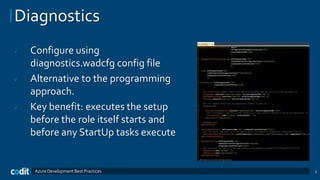
   Configure using
    diagnostics.wadcfg config file
   Alternative to the programming
    approach.
   Key benefit: executes the setup
    before the role itself starts and
    before any StartUp tasks execute


     Azure Development Best Practices   3
Diagnostics
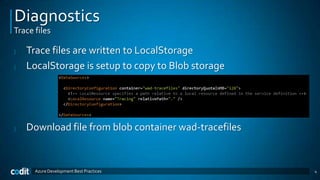
Trace files

|   Trace files are written to LocalStorage
|   LocalStorage is setup to copy to Blob storage


|   Download file from blob container wad-tracefiles


      Azure Development Best Practices                 4
Diagnostics
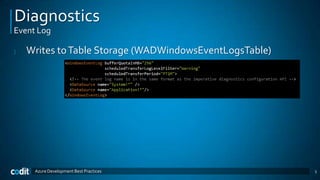
Event Log

|   Writes to Table Storage (WADWindowsEventLogsTable)


     Azure Development Best Practices                    5
Diagnostics
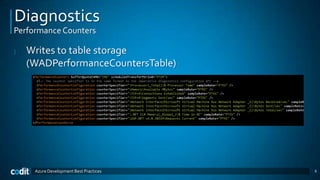
Performance Counters

|   Writes to table storage
    (WADPerformanceCountersTable)


     Azure Development Best Practices   6
Diagnostics
Azure Management Pack for SCOM

|   Discovers Windows Azure applications.
|   Provides status of each role instance.
|   Collects and monitors performance information.
|   Collects and monitors Windows events.
|   Collects and monitors the .NET Framework trace messages
    from each role instance.
|   Grooms performance, event, and the .NET Framework trace
    data from Windows Azure storage account.
|   Changes the number of role instances via a task.

     Azure Development Best Practices                         7
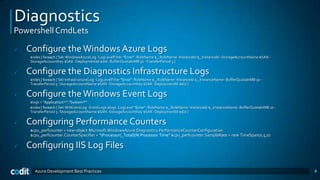
Diagnostics
Powershell CmdLets

   Configure the Windows Azure Logs
     $roles | foreach { Set-WindowsAzureLog -LogLevelFilter "Error" -RoleName $_.RoleName -InstanceId $_.InstanceId -StorageAccountName $SAN -
     StorageAccountKey $SAK -DeploymentId $did -BufferQuotaInMB 50 -TransferPeriod 5 }

   Configure the Diagnostics Infrastructure Logs
     $roles | foreach { Set-InfrastructureLog -LogLevelFilter "Error" -RoleName $_.RoleName -InstanceId $_.InstanceName -BufferQuotaInMB 50 -
     TransferPeriod 5 -StorageAccountName $SAN -StorageAccountKey $SAK -DeploymentId $did }

   Configure the Windows Event Logs
     $logs = "Application!*","System!*“
     $roles | foreach { Set-WAEventLog -EventLogs $logs -LogLevel "Error" -RoleName $_.RoleName -InstanceId $_.InstanceName -BufferQuotaInMB 10 -
     TransferPeriod 5 -StorageAccountName $SAN -StorageAccountKey $SAK -DeploymentId $did }

   Configuring Performance Counters
     $cpu_perfcounter = new-object Microsoft.WindowsAzure.Diagnostics.PerformanceCounterConfiguration
     $cpu_perfcounter.CounterSpecifier = "Processor(_Total)% Processor Time" $cpu_perfcounter.SampleRate = new TimeSpan(0,5,0)

   Configuring IIS Log Files

       Azure Development Best Practices                                                                                                             8
Overview
|   Diagnostics
|   Retry mechanism
|   AppFabric Servicebus
|   Using Blob Storage
|   Codit Framework (Codit.Azure)
|   Connectivity


     Azure Development Best Practices   9
Retry mechanism
Transient Fault Handling

|   SqlAzureTransientErrorDetection
|   StorageTransientErrorDetection
|   ServiceBusTransientErrorDetection


     Azure Development Best Practices   10
Overview
|   Diagnostics
|   Retry mechanism
|   AppFabric Servicebus
|   Using Blob Storage
|   Codit Framework (Codit.Azure)
|   Connectivity


     Azure Development Best Practices   11
AppFabric Servicebus
Brokered Messaging API

|   Ensure that message processing happens strictly within
    the designated lock period. (currently max 5 min)
|   Messaging objects are intended to be created once and
    reused whenever possible.
|    “out-of-the-box” resilience against the faulted
    communication objects.
|   As soon as a BrokeredMessage object is sent to a queue
    or topic, it is consumed by the underlying messaging
    stack and cannot be reused for further operations.
     Azure Development Best Practices                        12
AppFabric Servicebus
Emulator?

|   No service bus development emulator
|   In development each member needs his own NS


     Azure Development Best Practices             13
Overview
|   Diagnostics
|   Retry mechanism
|   AppFabric Servicebus
|   Using Blob Storage
|   Codit Framework (Codit.Azure)
|   Connectivity


     Azure Development Best Practices   14
Using Blob Storage
Leasing

|   Only in REST API
|   Allows for concurrency control
|   The distributed equivalent of a lock
|   Perform initialization on deployment


     Azure Development Best Practices      15
Using Blob Storage
Copy to Local Storage

|   Copy to LocalStorage on startup
|   Re-use Prism’s DirectoryCatalog
|   Faster access
|   Cheaper


     Azure Development Best Practices   16
Overview
|   Diagnostics
|   Retry mechanism
|   AppFabric Servicebus
|   Using Blob Storage
|   Codit Framework (Codit.Azure)
|   Connectivity


     Azure Development Best Practices   17
Codit.Azure
|   Reliable storage classes
    |     CloudBlob
    |     CloudQueue
    |     CloudTable
    |     ServiceBus Topic
    |     ServiceBus Queue
|   BrokeredMessage Extensions
|   Utility classes

        Azure Development Best Practices   18
Overview
|   Diagnostics
|   Retry mechanism
|   AppFabric Servicebus
|   Using Blob Storage
|   Codit Framework (Codit.Azure)
|   Connectivity


     Azure Development Best Practices   19
Connectivity
Issues

|   If the server sits behind an Internet connection with
    dynamically assigned IP addresses
|   If the upstream ISP is blocking select ports
|   If it’s not feasible to open up inbound firewall ports
|   You have no influence over the infrastructure whatsoever


     Azure Development Best Practices                          20
Connectivity
Connect

|   Ideal for on-premise databases
|   Firewall issues
|   Netsh startup command


     Azure Development Best Practices   21
Connectivity
Appfabric Service bus

|   Dll’s not on the cloud machine
|   Install in GAC with startup script
|   Update machine.config with RelayConfigurationInstaller
|   Relay bindings
|   Queues
|   Topics


     Azure Development Best Practices                        22
Connectivity
Port Bridge

|   What if your service isn’t a WCF service or doesn’t speak
    HTTP?
|   What if it speaks
    SMTP, SNMP, POP, IMAP, RDP, TDS, SSH, etc…
|   A point-to-point tunneling utility to help with these
    scenarios


      Azure Development Best Practices                          23

Azure development

  • 1.
  • 2.
    Overview | Diagnostics | Retry mechanism | AppFabric Servicebus | Using Blob Storage | Codit Framework (Codit.Azure) | Connectivity Azure Development Best Practices 2
  • 3.
    Diagnostics  Configure using diagnostics.wadcfg config file  Alternative to the programming approach.  Key benefit: executes the setup before the role itself starts and before any StartUp tasks execute Azure Development Best Practices 3
  • 4.
    Diagnostics Trace files | Trace files are written to LocalStorage | LocalStorage is setup to copy to Blob storage | Download file from blob container wad-tracefiles Azure Development Best Practices 4
  • 5.
    Diagnostics Event Log | Writes to Table Storage (WADWindowsEventLogsTable) Azure Development Best Practices 5
  • 6.
    Diagnostics Performance Counters | Writes to table storage (WADPerformanceCountersTable) Azure Development Best Practices 6
  • 7.
    Diagnostics Azure Management Packfor SCOM | Discovers Windows Azure applications. | Provides status of each role instance. | Collects and monitors performance information. | Collects and monitors Windows events. | Collects and monitors the .NET Framework trace messages from each role instance. | Grooms performance, event, and the .NET Framework trace data from Windows Azure storage account. | Changes the number of role instances via a task. Azure Development Best Practices 7
  • 8.
    Diagnostics Powershell CmdLets  Configure the Windows Azure Logs $roles | foreach { Set-WindowsAzureLog -LogLevelFilter "Error" -RoleName $_.RoleName -InstanceId $_.InstanceId -StorageAccountName $SAN - StorageAccountKey $SAK -DeploymentId $did -BufferQuotaInMB 50 -TransferPeriod 5 }  Configure the Diagnostics Infrastructure Logs $roles | foreach { Set-InfrastructureLog -LogLevelFilter "Error" -RoleName $_.RoleName -InstanceId $_.InstanceName -BufferQuotaInMB 50 - TransferPeriod 5 -StorageAccountName $SAN -StorageAccountKey $SAK -DeploymentId $did }  Configure the Windows Event Logs $logs = "Application!*","System!*“ $roles | foreach { Set-WAEventLog -EventLogs $logs -LogLevel "Error" -RoleName $_.RoleName -InstanceId $_.InstanceName -BufferQuotaInMB 10 - TransferPeriod 5 -StorageAccountName $SAN -StorageAccountKey $SAK -DeploymentId $did }  Configuring Performance Counters $cpu_perfcounter = new-object Microsoft.WindowsAzure.Diagnostics.PerformanceCounterConfiguration $cpu_perfcounter.CounterSpecifier = "Processor(_Total)% Processor Time" $cpu_perfcounter.SampleRate = new TimeSpan(0,5,0)  Configuring IIS Log Files Azure Development Best Practices 8
  • 9.
    Overview | Diagnostics | Retry mechanism | AppFabric Servicebus | Using Blob Storage | Codit Framework (Codit.Azure) | Connectivity Azure Development Best Practices 9
  • 10.
    Retry mechanism Transient FaultHandling | SqlAzureTransientErrorDetection | StorageTransientErrorDetection | ServiceBusTransientErrorDetection Azure Development Best Practices 10
  • 11.
    Overview | Diagnostics | Retry mechanism | AppFabric Servicebus | Using Blob Storage | Codit Framework (Codit.Azure) | Connectivity Azure Development Best Practices 11
  • 12.
    AppFabric Servicebus Brokered MessagingAPI | Ensure that message processing happens strictly within the designated lock period. (currently max 5 min) | Messaging objects are intended to be created once and reused whenever possible. | “out-of-the-box” resilience against the faulted communication objects. | As soon as a BrokeredMessage object is sent to a queue or topic, it is consumed by the underlying messaging stack and cannot be reused for further operations. Azure Development Best Practices 12
  • 13.
    AppFabric Servicebus Emulator? | No service bus development emulator | In development each member needs his own NS Azure Development Best Practices 13
  • 14.
    Overview | Diagnostics | Retry mechanism | AppFabric Servicebus | Using Blob Storage | Codit Framework (Codit.Azure) | Connectivity Azure Development Best Practices 14
  • 15.
    Using Blob Storage Leasing | Only in REST API | Allows for concurrency control | The distributed equivalent of a lock | Perform initialization on deployment Azure Development Best Practices 15
  • 16.
    Using Blob Storage Copyto Local Storage | Copy to LocalStorage on startup | Re-use Prism’s DirectoryCatalog | Faster access | Cheaper Azure Development Best Practices 16
  • 17.
    Overview | Diagnostics | Retry mechanism | AppFabric Servicebus | Using Blob Storage | Codit Framework (Codit.Azure) | Connectivity Azure Development Best Practices 17
  • 18.
    Codit.Azure | Reliable storage classes | CloudBlob | CloudQueue | CloudTable | ServiceBus Topic | ServiceBus Queue | BrokeredMessage Extensions | Utility classes Azure Development Best Practices 18
  • 19.
    Overview | Diagnostics | Retry mechanism | AppFabric Servicebus | Using Blob Storage | Codit Framework (Codit.Azure) | Connectivity Azure Development Best Practices 19
  • 20.
    Connectivity Issues | If the server sits behind an Internet connection with dynamically assigned IP addresses | If the upstream ISP is blocking select ports | If it’s not feasible to open up inbound firewall ports | You have no influence over the infrastructure whatsoever Azure Development Best Practices 20
  • 21.
    Connectivity Connect | Ideal for on-premise databases | Firewall issues | Netsh startup command Azure Development Best Practices 21
  • 22.
    Connectivity Appfabric Service bus | Dll’s not on the cloud machine | Install in GAC with startup script | Update machine.config with RelayConfigurationInstaller | Relay bindings | Queues | Topics Azure Development Best Practices 22
  • 23.
    Connectivity Port Bridge | What if your service isn’t a WCF service or doesn’t speak HTTP? | What if it speaks SMTP, SNMP, POP, IMAP, RDP, TDS, SSH, etc… | A point-to-point tunneling utility to help with these scenarios Azure Development Best Practices 23