JDK 1.1 AWT
     Event Handling
=====================


 Object Computing, Inc.
                          1   AWT Event Handling
AWT

• Abstract Windowing Toolkit package
   – java.awt
• Easier to learn than Motif/X and MFC
• Not as easy as using graphical GUI
  builders
   – several companies are creating them for Java
   – will output Java code that uses the AWT package
• AWT classes fall in four categories
   –    components
   –    containers
   –    layout managers
   –    event handling


   Object Computing, Inc.
                              2          AWT Event Handling
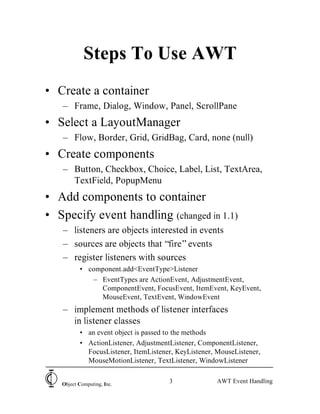
Steps To Use AWT
• Create a container
   – Frame, Dialog, Window, Panel, ScrollPane
• Select a LayoutManager
   – Flow, Border, Grid, GridBag, Card, none (null)
• Create components
   – Button, Checkbox, Choice, Label, List, TextArea,
     TextField, PopupMenu
• Add components to container
• Specify event handling (changed in 1.1)
   – listeners are objects interested in events
   – sources are objects that “fire” events
   – register listeners with sources
          • component.add<EventType>Listener
             – EventTypes are ActionEvent, AdjustmentEvent,
               ComponentEvent, FocusEvent, ItemEvent, KeyEvent,
               MouseEvent, TextEvent, WindowEvent
   – implement methods of listener interfaces
     in listener classes
          • an event object is passed to the methods
          • ActionListener, AdjustmentListener, ComponentListener,
            FocusListener, ItemListener, KeyListener, MouseListener,
            MouseMotionListener, TextListener, WindowListener


   Object Computing, Inc.
                                      3               AWT Event Handling
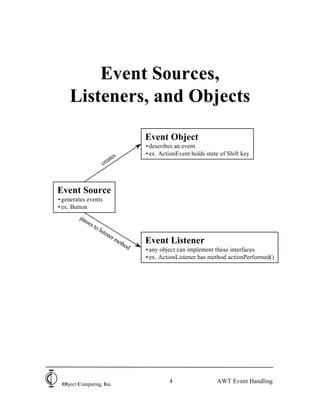
Event Sources,
    Listeners, and Objects

                                     Event Object
                                     • describes an event
                                     • ex. ActionEvent holds state of Shift key
                          tes
                      crea


Event Source
• generates events
• ex. Button
        pas
           ses
               to
                    list
                        ene
                           rm
                             eth
                                od
                                     Event Listener
                                     • any object can implement these interfaces
                                     • ex. ActionListener has method actionPerformed()


 Object Computing, Inc.
                                              4                   AWT Event Handling
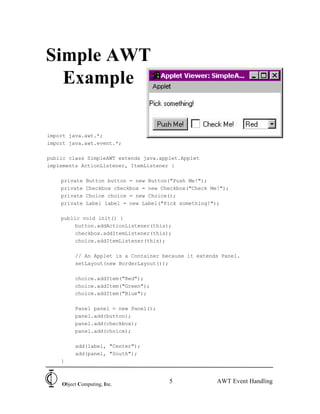
Simple AWT
  Example

import java.awt.*;
import java.awt.event.*;

public class SimpleAWT extends java.applet.Applet
implements ActionListener, ItemListener {

    private   Button button = new Button("Push Me!");
    private   Checkbox checkbox = new Checkbox("Check Me!");
    private   Choice choice = new Choice();
    private   Label label = new Label("Pick something!");

    public void init() {
         button.addActionListener(this);
         checkbox.addItemListener(this);
         choice.addItemListener(this);

         // An Applet is a Container because it extends Panel.
         setLayout(new BorderLayout());

         choice.addItem("Red");
         choice.addItem("Green");
         choice.addItem("Blue");

         Panel panel = new Panel();
         panel.add(button);
         panel.add(checkbox);
         panel.add(choice);

         add(label, "Center");
         add(panel, "South");
    }


    Object Computing, Inc.
                                        5               AWT Event Handling
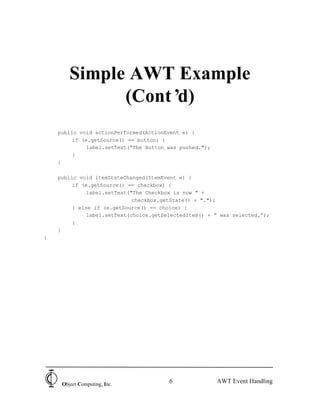
Simple AWT Example
              (Cont’d)
    public void actionPerformed(ActionEvent e) {
         if (e.getSource() == button) {
              label.setText("The Button was pushed.");
         }
    }

    public void itemStateChanged(ItemEvent e) {
         if (e.getSource() == checkbox) {
              label.setText("The Checkbox is now " +
                             checkbox.getState() + ".");
         } else if (e.getSource() == choice) {
              label.setText(choice.getSelectedItem() + “ was selected.”);
         }
    }
}


     Object Computing, Inc.
                                        6                AWT Event Handling
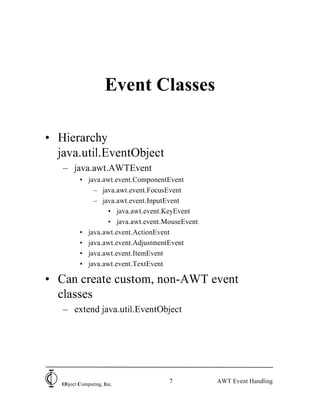
Event Classes

• Hierarchy
  java.util.EventObject
   – java.awt.AWTEvent
          • java.awt.event.ComponentEvent
              – java.awt.event.FocusEvent
              – java.awt.event.InputEvent
                  • java.awt.event.KeyEvent
                  • java.awt.event.MouseEvent
          • java.awt.event.ActionEvent
          • java.awt.event.AdjustmentEvent
          • java.awt.event.ItemEvent
          • java.awt.event.TextEvent

• Can create custom, non-AWT event
  classes
   – extend java.util.EventObject


   Object Computing, Inc.
                                    7           AWT Event Handling
Event Object Contents

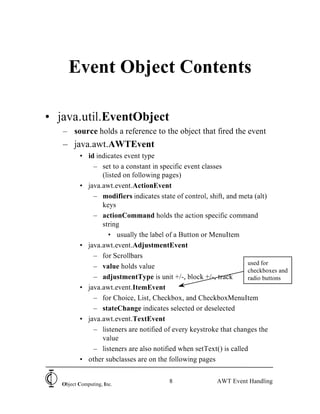
• java.util.EventObject
   – source holds a reference to the object that fired the event
   – java.awt.AWTEvent
          • id indicates event type
              – set to a constant in specific event classes
                 (listed on following pages)
          • java.awt.event.ActionEvent
              – modifiers indicates state of control, shift, and meta (alt)
                 keys
              – actionCommand holds the action specific command
                 string
                   • usually the label of a Button or MenuItem
          • java.awt.event.AdjustmentEvent
              – for Scrollbars
                                                                    used for
              – value holds value
                                                                    checkboxes and
              – adjustmentType is unit +/-, block +/-, track        radio buttons
          • java.awt.event.ItemEvent
              – for Choice, List, Checkbox, and CheckboxMenuItem
              – stateChange indicates selected or deselected
          • java.awt.event.TextEvent
              – listeners are notified of every keystroke that changes the
                 value
              – listeners are also notified when setText() is called
          • other subclasses are on the following pages


   Object Computing, Inc.
                                         8               AWT Event Handling
Event Object Contents
          (Cont’ d)

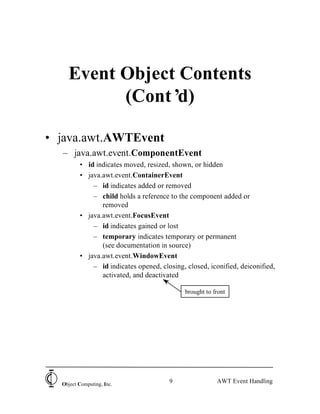
• java.awt.AWTEvent
  – java.awt.event.ComponentEvent
         • id indicates moved, resized, shown, or hidden
         • java.awt.event.ContainerEvent
             – id indicates added or removed
             – child holds a reference to the component added or
                removed
         • java.awt.event.FocusEvent
             – id indicates gained or lost
             – temporary indicates temporary or permanent
                (see documentation in source)
         • java.awt.event.WindowEvent
             – id indicates opened, closing, closed, iconified, deiconified,
                activated, and deactivated

                                             brought to front


  Object Computing, Inc.
                                       9                 AWT Event Handling
Event Object Contents
          (Cont’ d)

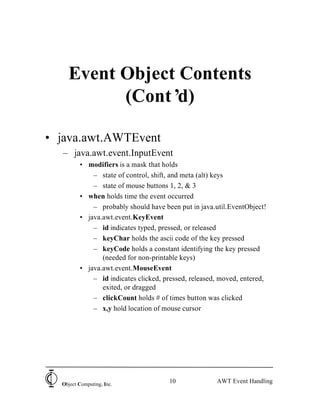
• java.awt.AWTEvent
   – java.awt.event.InputEvent
         • modifiers is a mask that holds
             – state of control, shift, and meta (alt) keys
             – state of mouse buttons 1, 2, & 3
         • when holds time the event occurred
             – probably should have been put in java.util.EventObject!
         • java.awt.event.KeyEvent
             – id indicates typed, pressed, or released
             – keyChar holds the ascii code of the key pressed
             – keyCode holds a constant identifying the key pressed
                (needed for non-printable keys)
         • java.awt.event.MouseEvent
             – id indicates clicked, pressed, released, moved, entered,
                exited, or dragged
             – clickCount holds # of times button was clicked
             – x,y hold location of mouse cursor


  Object Computing, Inc.
                                      10              AWT Event Handling
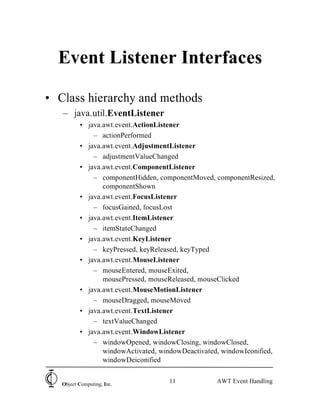
Event Listener Interfaces

• Class hierarchy and methods
   – java.util.EventListener
          • java.awt.event.ActionListener
              – actionPerformed
          • java.awt.event.AdjustmentListener
              – adjustmentValueChanged
          • java.awt.event.ComponentListener
              – componentHidden, componentMoved, componentResized,
                 componentShown
          • java.awt.event.FocusListener
              – focusGained, focusLost
          • java.awt.event.ItemListener
              – itemStateChanged
          • java.awt.event.KeyListener
              – keyPressed, keyReleased, keyTyped
          • java.awt.event.MouseListener
              – mouseEntered, mouseExited,
                 mousePressed, mouseReleased, mouseClicked
          • java.awt.event.MouseMotionListener
              – mouseDragged, mouseMoved
          • java.awt.event.TextListener
              – textValueChanged
          • java.awt.event.WindowListener
              – windowOpened, windowClosing, windowClosed,
                 windowActivated, windowDeactivated, windowIconified,
                 windowDeiconified


   Object Computing, Inc.
                                     11            AWT Event Handling
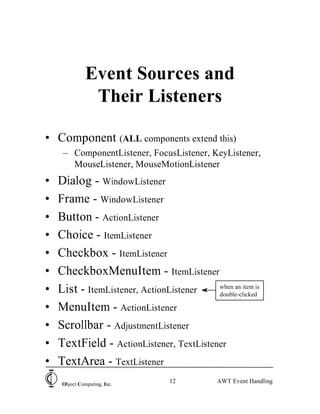
Event Sources and
                Their Listeners

• Component (ALL components extend this)
     – ComponentListener, FocusListener, KeyListener,
       MouseListener, MouseMotionListener
•   Dialog - WindowListener
•   Frame - WindowListener
•   Button - ActionListener
•   Choice - ItemListener
•   Checkbox - ItemListener
•   CheckboxMenuItem - ItemListener
•   List - ItemListener, ActionListener   when an item is
                                          double-clicked

•   MenuItem - ActionListener
•   Scrollbar - AdjustmentListener
•   TextField - ActionListener, TextListener
•   TextArea - TextListener
     Object Computing, Inc.
                                 12          AWT Event Handling
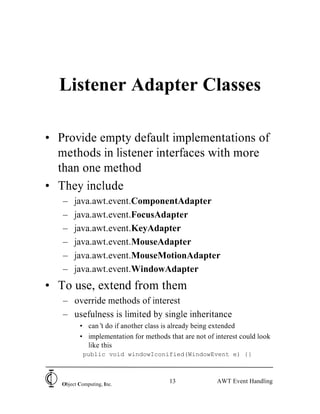
Listener Adapter Classes

• Provide empty default implementations of
  methods in listener interfaces with more
  than one method
• They include
   –    java.awt.event.ComponentAdapter
   –    java.awt.event.FocusAdapter
   –    java.awt.event.KeyAdapter
   –    java.awt.event.MouseAdapter
   –    java.awt.event.MouseMotionAdapter
   –    java.awt.event.WindowAdapter
• To use, extend from them
   – override methods of interest
   – usefulness is limited by single inheritance
          • can’ do if another class is already being extended
                 t
          • implementation for methods that are not of interest could look
            like this
            public void windowIconified(WindowEvent e) {}


   Object Computing, Inc.
                                        13              AWT Event Handling
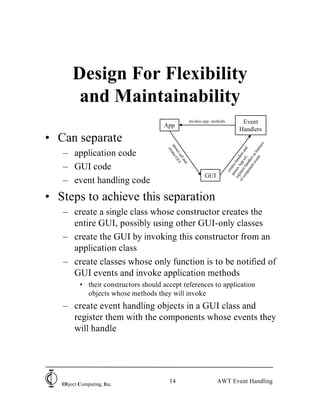
Design For Flexibility
        and Maintainability
                                                         invokes app. methods              Event
                                      App
                                                                                          Handlers
• Can separate


                                                                                                            rs
                                                                                                          ne
                                        pa ates


                                                                                                         d

                                                                                                 nts liste
                                          cre
                                          sse GU


                                                                                  co rs h re an
   – application code

                                              ss


                                                                                of iste App dlers

                                                                                            t e as
                                                elf I


                                                                                    mp an f.,
                                                                                          en rs
                                                                                                 n
                                                   an


                                                                                       on dle
                                                                                               ve
                                                                                      sse ha
                                                     d
   – GUI code


                                                                                    pa ates
                                                                                  reg s
                                                                                      cre
                                                                 GUI
   – event handling code
• Steps to achieve this separation
   – create a single class whose constructor creates the
     entire GUI, possibly using other GUI-only classes
   – create the GUI by invoking this constructor from an
     application class
   – create classes whose only function is to be notified of
     GUI events and invoke application methods
          • their constructors should accept references to application
            objects whose methods they will invoke
   – create event handling objects in a GUI class and
     register them with the components whose events they
     will handle


   Object Computing, Inc.
                                         14                             AWT Event Handling
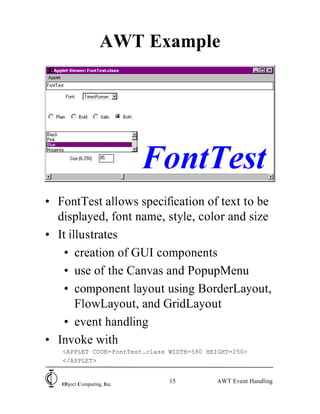
AWT Example


• FontTest allows specification of text to be
  displayed, font name, style, color and size
• It illustrates
   • creation of GUI components
   • use of the Canvas and PopupMenu
   • component layout using BorderLayout,
       FlowLayout, and GridLayout
   • event handling
• Invoke with
   <APPLET CODE=FontTest.class WIDTH=580 HEIGHT=250>
   </APPLET>


   Object Computing, Inc.
                               15          AWT Event Handling
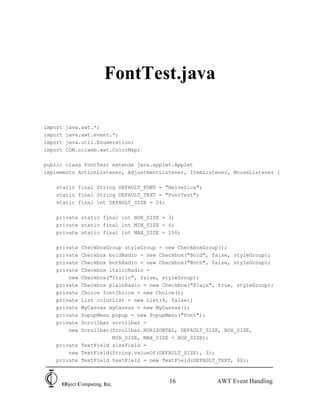
FontTest.java

import   java.awt.*;
import   java.awt.event.*;
import   java.util.Enumeration;
import   COM.ociweb.awt.ColorMap;

public class FontTest extends java.applet.Applet
implements ActionListener, AdjustmentListener, ItemListener, MouseListener {

   static final String DEFAULT_FONT = "Helvetica";
   static final String DEFAULT_TEXT = "FontTest";
   static final int DEFAULT_SIZE = 24;

   private static final int BOX_SIZE = 3;
   private static final int MIN_SIZE = 6;
   private static final int MAX_SIZE = 250;

   private CheckboxGroup styleGroup = new CheckboxGroup();
   private Checkbox boldRadio = new Checkbox("Bold", false, styleGroup);
   private Checkbox bothRadio = new Checkbox("Both", false, styleGroup);
   private Checkbox italicRadio =
       new Checkbox("Italic", false, styleGroup);
   private Checkbox plainRadio = new Checkbox("Plain", true, styleGroup);
   private Choice fontChoice = new Choice();
   private List colorList = new List(4, false);
   private MyCanvas myCanvas = new MyCanvas();
   private PopupMenu popup = new PopupMenu("Font");
   private Scrollbar scrollbar =
       new Scrollbar(Scrollbar.HORIZONTAL, DEFAULT_SIZE, BOX_SIZE,
                     MIN_SIZE, MAX_SIZE + BOX_SIZE);
   private TextField sizeField =
       new TextField(String.valueOf(DEFAULT_SIZE), 3);
   private TextField textField = new TextField(DEFAULT_TEXT, 40);


     Object Computing, Inc.
                                        16             AWT Event Handling
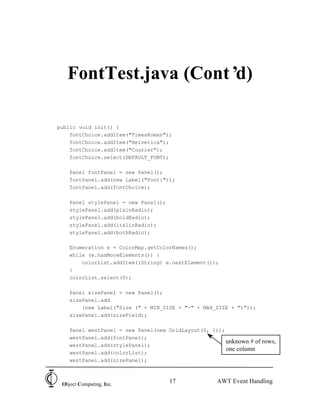
FontTest.java (Cont’d)

public void init() {
    fontChoice.addItem("TimesRoman");
    fontChoice.addItem("Helvetica");
    fontChoice.addItem("Courier");
    fontChoice.select(DEFAULT_FONT);

    Panel fontPanel = new Panel();
    fontPanel.add(new Label("Font:"));
    fontPanel.add(fontChoice);

    Panel stylePanel = new Panel();
    stylePanel.add(plainRadio);
    stylePanel.add(boldRadio);
    stylePanel.add(italicRadio);
    stylePanel.add(bothRadio);

    Enumeration e = ColorMap.getColorNames();
    while (e.hasMoreElements()) {
        colorList.addItem((String) e.nextElement());
    }
    colorList.select(0);

    Panel sizePanel = new Panel();
    sizePanel.add
        (new Label("Size (" + MIN_SIZE + "-" + MAX_SIZE + ")"));
    sizePanel.add(sizeField);

    Panel westPanel = new Panel(new GridLayout(0, 1));
    westPanel.add(fontPanel);
                                                       unknown # of rows,
    westPanel.add(stylePanel);
                                                       one column
    westPanel.add(colorList);
    westPanel.add(sizePanel);


 Object Computing, Inc.
                                      17             AWT Event Handling
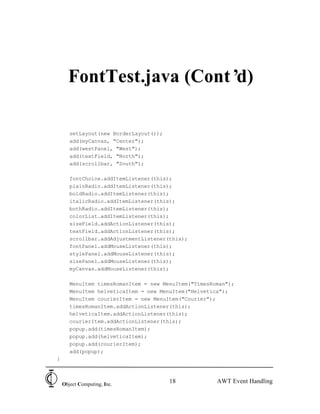
FontTest.java (Cont’d)

       setLayout(new BorderLayout());
       add(myCanvas, "Center");
       add(westPanel, "West");
       add(textField, "North");
       add(scrollbar, "South");

       fontChoice.addItemListener(this);
       plainRadio.addItemListener(this);
       boldRadio.addItemListener(this);
       italicRadio.addItemListener(this);
       bothRadio.addItemListener(this);
       colorList.addItemListener(this);
       sizeField.addActionListener(this);
       textField.addActionListener(this);
       scrollbar.addAdjustmentListener(this);
       fontPanel.addMouseListener(this);
       stylePanel.addMouseListener(this);
       sizePanel.addMouseListener(this);
       myCanvas.addMouseListener(this);

       MenuItem timesRomanItem = new MenuItem("TimesRoman");
       MenuItem helveticaItem = new MenuItem("Helvetica");
       MenuItem courierItem = new MenuItem("Courier");
       timesRomanItem.addActionListener(this);
       helveticaItem.addActionListener(this);
       courierItem.addActionListener(this);
       popup.add(timesRomanItem);
       popup.add(helveticaItem);
       popup.add(courierItem);
       add(popup);
}


    Object Computing, Inc.
                                        18            AWT Event Handling
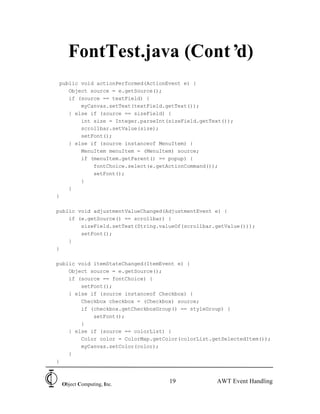
FontTest.java (Cont’d)
 public void actionPerformed(ActionEvent e) {
    Object source = e.getSource();
    if (source == textField) {
        myCanvas.setText(textField.getText());
    } else if (source == sizeField) {
        int size = Integer.parseInt(sizeField.getText());
        scrollbar.setValue(size);
        setFont();
    } else if (source instanceof MenuItem) {
        MenuItem menuItem = (MenuItem) source;
        if (menuItem.getParent() == popup) {
            fontChoice.select(e.getActionCommand());
            setFont();
        }
    }
}

public void adjustmentValueChanged(AdjustmentEvent e) {
    if (e.getSource() == scrollbar) {
        sizeField.setText(String.valueOf(scrollbar.getValue()));
        setFont();
    }
}

public void itemStateChanged(ItemEvent e) {
    Object source = e.getSource();
    if (source == fontChoice) {
        setFont();
    } else if (source instanceof Checkbox) {
        Checkbox checkbox = (Checkbox) source;
        if (checkbox.getCheckboxGroup() == styleGroup) {
            setFont();
        }
    } else if (source == colorList) {
        Color color = ColorMap.getColor(colorList.getSelectedItem());
        myCanvas.setColor(color);
    }
}


 Object Computing, Inc.
                                    19             AWT Event Handling
FontTest.java (Cont’d)

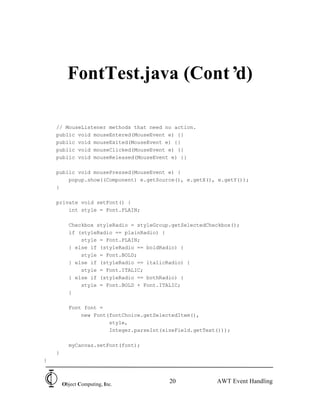
    // MouseListener methods that need no action.
    public void mouseEntered(MouseEvent e) {}
    public void mouseExited(MouseEvent e) {}
    public void mouseClicked(MouseEvent e) {}
    public void mouseReleased(MouseEvent e) {}

    public void mousePressed(MouseEvent e) {
        popup.show((Component) e.getSource(), e.getX(), e.getY());
    }

    private void setFont() {
        int style = Font.PLAIN;

          Checkbox styleRadio = styleGroup.getSelectedCheckbox();
          if (styleRadio == plainRadio) {
              style = Font.PLAIN;
          } else if (styleRadio == boldRadio) {
              style = Font.BOLD;
          } else if (styleRadio == italicRadio) {
              style = Font.ITALIC;
          } else if (styleRadio == bothRadio) {
              style = Font.BOLD + Font.ITALIC;
          }

          Font font =
              new Font(fontChoice.getSelectedItem(),
                       style,
                       Integer.parseInt(sizeField.getText()));

          myCanvas.setFont(font);
    }
}


        Object Computing, Inc.
                                          20             AWT Event Handling
FontTest.java (Cont’d)

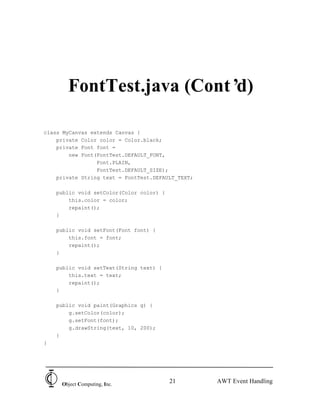
class MyCanvas extends Canvas {
    private Color color = Color.black;
    private Font font =
        new Font(FontTest.DEFAULT_FONT,
                 Font.PLAIN,
                 FontTest.DEFAULT_SIZE);
    private String text = FontTest.DEFAULT_TEXT;

    public void setColor(Color color) {
        this.color = color;
        repaint();
    }

    public void setFont(Font font) {
        this.font = font;
        repaint();
    }

    public void setText(String text) {
        this.text = text;
        repaint();
    }

    public void paint(Graphics g) {
        g.setColor(color);
        g.setFont(font);
        g.drawString(text, 10, 200);
    }
}


     Object Computing, Inc.
                                          21       AWT Event Handling
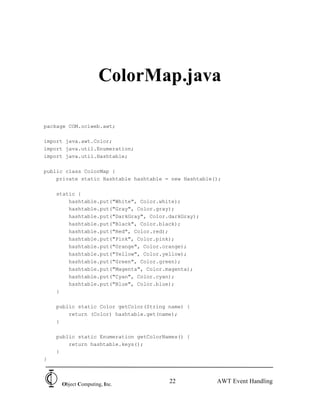
ColorMap.java

package COM.ociweb.awt;

import java.awt.Color;
import java.util.Enumeration;
import java.util.Hashtable;

public class ColorMap {
    private static Hashtable hashtable = new Hashtable();

    static {
        hashtable.put("White", Color.white);
        hashtable.put("Gray", Color.gray);
        hashtable.put("DarkGray", Color.darkGray);
        hashtable.put("Black", Color.black);
        hashtable.put("Red", Color.red);
        hashtable.put("Pink", Color.pink);
        hashtable.put("Orange", Color.orange);
        hashtable.put("Yellow", Color.yellow);
        hashtable.put("Green", Color.green);
        hashtable.put("Magenta", Color.magenta);
        hashtable.put("Cyan", Color.cyan);
        hashtable.put("Blue", Color.blue);
    }

    public static Color getColor(String name) {
        return (Color) hashtable.get(name);
    }

    public static Enumeration getColorNames() {
        return hashtable.keys();
    }
}


     Object Computing, Inc.
                                        22             AWT Event Handling
Appendix A


                   JDK 1.0
                    AWT
                Event Handling


Object Computing, Inc.
                          23      AWT Event Handling
1.0 Default Event Handling
              (delegation-based event handling was added in Java 1.1)


• Provided by Component class
• handleEvent(Event evt)
   – first method invoked when an event occurs
   – default implementation tests for specific types of
     events and invokes the methods below
• Methods to handle specific types of events
   – default implementations do nothing
   – they are
          • mouseDown and mouseUp
          • mouseDrag and mouseMove
          • mouseEnter and mouseExit
          • keyDown and keyUp
          • gotFocus and lostFocus
             – from mouse click, tab key, or requestFocus method
          • action (discussed two slides ahead)

• All event handling methods return boolean
   – indicates whether they handled the event
   – if false, the event is handled recursively by
     containers

   Object Computing, Inc.
                                            24                AWT Event Handling
Overriding 1.0 Default
       Event Handling
• Custom event handling methods other than
  handleEvent
   – created by overriding implementations in Component
     which do nothing
   – invoked by the default handleEvent implementation
• Custom handleEvent method
   – created by overriding implementation in Component
   – can handle all events by comparing id field to
     constants in Event class to see what kind of event
     occurred
   – if overridden, other event handling methods will not
     be invoked unless
          • they are invoked directly from this method
              – not recommended approach
          • this method invokes the handleEvent method of a superclass
              – recommended approach
              – do this if the event is not one you wish to handle in your
                 handleEvent method
              – invoke with “return super.handleEvent(e); ”
              – first superclass to implement handleEvent is typically
                 Component which disperses the event to methods which
                 handle specific types of events


   Object Computing, Inc.
                                        25              AWT Event Handling
1.0 Action Events
• Most user interface components generate
  “action” events
   – Label and TextArea don’ generate any events
                              t
   – List and Scrollbar generate events that are not
     “action” events
          • must be handled in a handleEvent method,
            not an action method

• Default handleEvent invokes
  public boolean action(Event evt, Object what)

• Second argument varies based on the
  component
   – Button
          • String representing button label
   – Checkbox (and radiobutton)
          • Boolean state (true for on, false for off)
          • generated when picked
   – Choice (option menu)
          • String representing selected item
   – TextField
          • null
          • generated when user presses return key
          • not when field is exited with mouse or tab key
             – use lostFocus method to catch that


   Object Computing, Inc.
                                         26              AWT Event Handling

AWTEventModel

  • 1.
    JDK 1.1 AWT Event Handling ===================== Object Computing, Inc. 1 AWT Event Handling
  • 2.
    AWT • Abstract WindowingToolkit package – java.awt • Easier to learn than Motif/X and MFC • Not as easy as using graphical GUI builders – several companies are creating them for Java – will output Java code that uses the AWT package • AWT classes fall in four categories – components – containers – layout managers – event handling Object Computing, Inc. 2 AWT Event Handling
  • 3.
    Steps To UseAWT • Create a container – Frame, Dialog, Window, Panel, ScrollPane • Select a LayoutManager – Flow, Border, Grid, GridBag, Card, none (null) • Create components – Button, Checkbox, Choice, Label, List, TextArea, TextField, PopupMenu • Add components to container • Specify event handling (changed in 1.1) – listeners are objects interested in events – sources are objects that “fire” events – register listeners with sources • component.add<EventType>Listener – EventTypes are ActionEvent, AdjustmentEvent, ComponentEvent, FocusEvent, ItemEvent, KeyEvent, MouseEvent, TextEvent, WindowEvent – implement methods of listener interfaces in listener classes • an event object is passed to the methods • ActionListener, AdjustmentListener, ComponentListener, FocusListener, ItemListener, KeyListener, MouseListener, MouseMotionListener, TextListener, WindowListener Object Computing, Inc. 3 AWT Event Handling
  • 4.
    Event Sources, Listeners, and Objects Event Object • describes an event • ex. ActionEvent holds state of Shift key tes crea Event Source • generates events • ex. Button pas ses to list ene rm eth od Event Listener • any object can implement these interfaces • ex. ActionListener has method actionPerformed() Object Computing, Inc. 4 AWT Event Handling
  • 5.
    Simple AWT Example import java.awt.*; import java.awt.event.*; public class SimpleAWT extends java.applet.Applet implements ActionListener, ItemListener { private Button button = new Button("Push Me!"); private Checkbox checkbox = new Checkbox("Check Me!"); private Choice choice = new Choice(); private Label label = new Label("Pick something!"); public void init() { button.addActionListener(this); checkbox.addItemListener(this); choice.addItemListener(this); // An Applet is a Container because it extends Panel. setLayout(new BorderLayout()); choice.addItem("Red"); choice.addItem("Green"); choice.addItem("Blue"); Panel panel = new Panel(); panel.add(button); panel.add(checkbox); panel.add(choice); add(label, "Center"); add(panel, "South"); } Object Computing, Inc. 5 AWT Event Handling
  • 6.
    Simple AWT Example (Cont’d) public void actionPerformed(ActionEvent e) { if (e.getSource() == button) { label.setText("The Button was pushed."); } } public void itemStateChanged(ItemEvent e) { if (e.getSource() == checkbox) { label.setText("The Checkbox is now " + checkbox.getState() + "."); } else if (e.getSource() == choice) { label.setText(choice.getSelectedItem() + “ was selected.”); } } } Object Computing, Inc. 6 AWT Event Handling
  • 7.
    Event Classes • Hierarchy java.util.EventObject – java.awt.AWTEvent • java.awt.event.ComponentEvent – java.awt.event.FocusEvent – java.awt.event.InputEvent • java.awt.event.KeyEvent • java.awt.event.MouseEvent • java.awt.event.ActionEvent • java.awt.event.AdjustmentEvent • java.awt.event.ItemEvent • java.awt.event.TextEvent • Can create custom, non-AWT event classes – extend java.util.EventObject Object Computing, Inc. 7 AWT Event Handling
  • 8.
    Event Object Contents •java.util.EventObject – source holds a reference to the object that fired the event – java.awt.AWTEvent • id indicates event type – set to a constant in specific event classes (listed on following pages) • java.awt.event.ActionEvent – modifiers indicates state of control, shift, and meta (alt) keys – actionCommand holds the action specific command string • usually the label of a Button or MenuItem • java.awt.event.AdjustmentEvent – for Scrollbars used for – value holds value checkboxes and – adjustmentType is unit +/-, block +/-, track radio buttons • java.awt.event.ItemEvent – for Choice, List, Checkbox, and CheckboxMenuItem – stateChange indicates selected or deselected • java.awt.event.TextEvent – listeners are notified of every keystroke that changes the value – listeners are also notified when setText() is called • other subclasses are on the following pages Object Computing, Inc. 8 AWT Event Handling
  • 9.
    Event Object Contents (Cont’ d) • java.awt.AWTEvent – java.awt.event.ComponentEvent • id indicates moved, resized, shown, or hidden • java.awt.event.ContainerEvent – id indicates added or removed – child holds a reference to the component added or removed • java.awt.event.FocusEvent – id indicates gained or lost – temporary indicates temporary or permanent (see documentation in source) • java.awt.event.WindowEvent – id indicates opened, closing, closed, iconified, deiconified, activated, and deactivated brought to front Object Computing, Inc. 9 AWT Event Handling
  • 10.
    Event Object Contents (Cont’ d) • java.awt.AWTEvent – java.awt.event.InputEvent • modifiers is a mask that holds – state of control, shift, and meta (alt) keys – state of mouse buttons 1, 2, & 3 • when holds time the event occurred – probably should have been put in java.util.EventObject! • java.awt.event.KeyEvent – id indicates typed, pressed, or released – keyChar holds the ascii code of the key pressed – keyCode holds a constant identifying the key pressed (needed for non-printable keys) • java.awt.event.MouseEvent – id indicates clicked, pressed, released, moved, entered, exited, or dragged – clickCount holds # of times button was clicked – x,y hold location of mouse cursor Object Computing, Inc. 10 AWT Event Handling
  • 11.
    Event Listener Interfaces •Class hierarchy and methods – java.util.EventListener • java.awt.event.ActionListener – actionPerformed • java.awt.event.AdjustmentListener – adjustmentValueChanged • java.awt.event.ComponentListener – componentHidden, componentMoved, componentResized, componentShown • java.awt.event.FocusListener – focusGained, focusLost • java.awt.event.ItemListener – itemStateChanged • java.awt.event.KeyListener – keyPressed, keyReleased, keyTyped • java.awt.event.MouseListener – mouseEntered, mouseExited, mousePressed, mouseReleased, mouseClicked • java.awt.event.MouseMotionListener – mouseDragged, mouseMoved • java.awt.event.TextListener – textValueChanged • java.awt.event.WindowListener – windowOpened, windowClosing, windowClosed, windowActivated, windowDeactivated, windowIconified, windowDeiconified Object Computing, Inc. 11 AWT Event Handling
  • 12.
    Event Sources and Their Listeners • Component (ALL components extend this) – ComponentListener, FocusListener, KeyListener, MouseListener, MouseMotionListener • Dialog - WindowListener • Frame - WindowListener • Button - ActionListener • Choice - ItemListener • Checkbox - ItemListener • CheckboxMenuItem - ItemListener • List - ItemListener, ActionListener when an item is double-clicked • MenuItem - ActionListener • Scrollbar - AdjustmentListener • TextField - ActionListener, TextListener • TextArea - TextListener Object Computing, Inc. 12 AWT Event Handling
  • 13.
    Listener Adapter Classes •Provide empty default implementations of methods in listener interfaces with more than one method • They include – java.awt.event.ComponentAdapter – java.awt.event.FocusAdapter – java.awt.event.KeyAdapter – java.awt.event.MouseAdapter – java.awt.event.MouseMotionAdapter – java.awt.event.WindowAdapter • To use, extend from them – override methods of interest – usefulness is limited by single inheritance • can’ do if another class is already being extended t • implementation for methods that are not of interest could look like this public void windowIconified(WindowEvent e) {} Object Computing, Inc. 13 AWT Event Handling
  • 14.
    Design For Flexibility and Maintainability invokes app. methods Event App Handlers • Can separate rs ne pa ates d nts liste cre sse GU co rs h re an – application code ss of iste App dlers t e as elf I mp an f., en rs n an on dle ve sse ha d – GUI code pa ates reg s cre GUI – event handling code • Steps to achieve this separation – create a single class whose constructor creates the entire GUI, possibly using other GUI-only classes – create the GUI by invoking this constructor from an application class – create classes whose only function is to be notified of GUI events and invoke application methods • their constructors should accept references to application objects whose methods they will invoke – create event handling objects in a GUI class and register them with the components whose events they will handle Object Computing, Inc. 14 AWT Event Handling
  • 15.
    AWT Example • FontTestallows specification of text to be displayed, font name, style, color and size • It illustrates • creation of GUI components • use of the Canvas and PopupMenu • component layout using BorderLayout, FlowLayout, and GridLayout • event handling • Invoke with <APPLET CODE=FontTest.class WIDTH=580 HEIGHT=250> </APPLET> Object Computing, Inc. 15 AWT Event Handling
  • 16.
    FontTest.java import java.awt.*; import java.awt.event.*; import java.util.Enumeration; import COM.ociweb.awt.ColorMap; public class FontTest extends java.applet.Applet implements ActionListener, AdjustmentListener, ItemListener, MouseListener { static final String DEFAULT_FONT = "Helvetica"; static final String DEFAULT_TEXT = "FontTest"; static final int DEFAULT_SIZE = 24; private static final int BOX_SIZE = 3; private static final int MIN_SIZE = 6; private static final int MAX_SIZE = 250; private CheckboxGroup styleGroup = new CheckboxGroup(); private Checkbox boldRadio = new Checkbox("Bold", false, styleGroup); private Checkbox bothRadio = new Checkbox("Both", false, styleGroup); private Checkbox italicRadio = new Checkbox("Italic", false, styleGroup); private Checkbox plainRadio = new Checkbox("Plain", true, styleGroup); private Choice fontChoice = new Choice(); private List colorList = new List(4, false); private MyCanvas myCanvas = new MyCanvas(); private PopupMenu popup = new PopupMenu("Font"); private Scrollbar scrollbar = new Scrollbar(Scrollbar.HORIZONTAL, DEFAULT_SIZE, BOX_SIZE, MIN_SIZE, MAX_SIZE + BOX_SIZE); private TextField sizeField = new TextField(String.valueOf(DEFAULT_SIZE), 3); private TextField textField = new TextField(DEFAULT_TEXT, 40); Object Computing, Inc. 16 AWT Event Handling
  • 17.
    FontTest.java (Cont’d) public voidinit() { fontChoice.addItem("TimesRoman"); fontChoice.addItem("Helvetica"); fontChoice.addItem("Courier"); fontChoice.select(DEFAULT_FONT); Panel fontPanel = new Panel(); fontPanel.add(new Label("Font:")); fontPanel.add(fontChoice); Panel stylePanel = new Panel(); stylePanel.add(plainRadio); stylePanel.add(boldRadio); stylePanel.add(italicRadio); stylePanel.add(bothRadio); Enumeration e = ColorMap.getColorNames(); while (e.hasMoreElements()) { colorList.addItem((String) e.nextElement()); } colorList.select(0); Panel sizePanel = new Panel(); sizePanel.add (new Label("Size (" + MIN_SIZE + "-" + MAX_SIZE + ")")); sizePanel.add(sizeField); Panel westPanel = new Panel(new GridLayout(0, 1)); westPanel.add(fontPanel); unknown # of rows, westPanel.add(stylePanel); one column westPanel.add(colorList); westPanel.add(sizePanel); Object Computing, Inc. 17 AWT Event Handling
  • 18.
    FontTest.java (Cont’d) setLayout(new BorderLayout()); add(myCanvas, "Center"); add(westPanel, "West"); add(textField, "North"); add(scrollbar, "South"); fontChoice.addItemListener(this); plainRadio.addItemListener(this); boldRadio.addItemListener(this); italicRadio.addItemListener(this); bothRadio.addItemListener(this); colorList.addItemListener(this); sizeField.addActionListener(this); textField.addActionListener(this); scrollbar.addAdjustmentListener(this); fontPanel.addMouseListener(this); stylePanel.addMouseListener(this); sizePanel.addMouseListener(this); myCanvas.addMouseListener(this); MenuItem timesRomanItem = new MenuItem("TimesRoman"); MenuItem helveticaItem = new MenuItem("Helvetica"); MenuItem courierItem = new MenuItem("Courier"); timesRomanItem.addActionListener(this); helveticaItem.addActionListener(this); courierItem.addActionListener(this); popup.add(timesRomanItem); popup.add(helveticaItem); popup.add(courierItem); add(popup); } Object Computing, Inc. 18 AWT Event Handling
  • 19.
    FontTest.java (Cont’d) publicvoid actionPerformed(ActionEvent e) { Object source = e.getSource(); if (source == textField) { myCanvas.setText(textField.getText()); } else if (source == sizeField) { int size = Integer.parseInt(sizeField.getText()); scrollbar.setValue(size); setFont(); } else if (source instanceof MenuItem) { MenuItem menuItem = (MenuItem) source; if (menuItem.getParent() == popup) { fontChoice.select(e.getActionCommand()); setFont(); } } } public void adjustmentValueChanged(AdjustmentEvent e) { if (e.getSource() == scrollbar) { sizeField.setText(String.valueOf(scrollbar.getValue())); setFont(); } } public void itemStateChanged(ItemEvent e) { Object source = e.getSource(); if (source == fontChoice) { setFont(); } else if (source instanceof Checkbox) { Checkbox checkbox = (Checkbox) source; if (checkbox.getCheckboxGroup() == styleGroup) { setFont(); } } else if (source == colorList) { Color color = ColorMap.getColor(colorList.getSelectedItem()); myCanvas.setColor(color); } } Object Computing, Inc. 19 AWT Event Handling
  • 20.
    FontTest.java (Cont’d) // MouseListener methods that need no action. public void mouseEntered(MouseEvent e) {} public void mouseExited(MouseEvent e) {} public void mouseClicked(MouseEvent e) {} public void mouseReleased(MouseEvent e) {} public void mousePressed(MouseEvent e) { popup.show((Component) e.getSource(), e.getX(), e.getY()); } private void setFont() { int style = Font.PLAIN; Checkbox styleRadio = styleGroup.getSelectedCheckbox(); if (styleRadio == plainRadio) { style = Font.PLAIN; } else if (styleRadio == boldRadio) { style = Font.BOLD; } else if (styleRadio == italicRadio) { style = Font.ITALIC; } else if (styleRadio == bothRadio) { style = Font.BOLD + Font.ITALIC; } Font font = new Font(fontChoice.getSelectedItem(), style, Integer.parseInt(sizeField.getText())); myCanvas.setFont(font); } } Object Computing, Inc. 20 AWT Event Handling
  • 21.
    FontTest.java (Cont’d) class MyCanvasextends Canvas { private Color color = Color.black; private Font font = new Font(FontTest.DEFAULT_FONT, Font.PLAIN, FontTest.DEFAULT_SIZE); private String text = FontTest.DEFAULT_TEXT; public void setColor(Color color) { this.color = color; repaint(); } public void setFont(Font font) { this.font = font; repaint(); } public void setText(String text) { this.text = text; repaint(); } public void paint(Graphics g) { g.setColor(color); g.setFont(font); g.drawString(text, 10, 200); } } Object Computing, Inc. 21 AWT Event Handling
  • 22.
    ColorMap.java package COM.ociweb.awt; import java.awt.Color; importjava.util.Enumeration; import java.util.Hashtable; public class ColorMap { private static Hashtable hashtable = new Hashtable(); static { hashtable.put("White", Color.white); hashtable.put("Gray", Color.gray); hashtable.put("DarkGray", Color.darkGray); hashtable.put("Black", Color.black); hashtable.put("Red", Color.red); hashtable.put("Pink", Color.pink); hashtable.put("Orange", Color.orange); hashtable.put("Yellow", Color.yellow); hashtable.put("Green", Color.green); hashtable.put("Magenta", Color.magenta); hashtable.put("Cyan", Color.cyan); hashtable.put("Blue", Color.blue); } public static Color getColor(String name) { return (Color) hashtable.get(name); } public static Enumeration getColorNames() { return hashtable.keys(); } } Object Computing, Inc. 22 AWT Event Handling
  • 23.
    Appendix A JDK 1.0 AWT Event Handling Object Computing, Inc. 23 AWT Event Handling
  • 24.
    1.0 Default EventHandling (delegation-based event handling was added in Java 1.1) • Provided by Component class • handleEvent(Event evt) – first method invoked when an event occurs – default implementation tests for specific types of events and invokes the methods below • Methods to handle specific types of events – default implementations do nothing – they are • mouseDown and mouseUp • mouseDrag and mouseMove • mouseEnter and mouseExit • keyDown and keyUp • gotFocus and lostFocus – from mouse click, tab key, or requestFocus method • action (discussed two slides ahead) • All event handling methods return boolean – indicates whether they handled the event – if false, the event is handled recursively by containers Object Computing, Inc. 24 AWT Event Handling
  • 25.
    Overriding 1.0 Default Event Handling • Custom event handling methods other than handleEvent – created by overriding implementations in Component which do nothing – invoked by the default handleEvent implementation • Custom handleEvent method – created by overriding implementation in Component – can handle all events by comparing id field to constants in Event class to see what kind of event occurred – if overridden, other event handling methods will not be invoked unless • they are invoked directly from this method – not recommended approach • this method invokes the handleEvent method of a superclass – recommended approach – do this if the event is not one you wish to handle in your handleEvent method – invoke with “return super.handleEvent(e); ” – first superclass to implement handleEvent is typically Component which disperses the event to methods which handle specific types of events Object Computing, Inc. 25 AWT Event Handling
  • 26.
    1.0 Action Events •Most user interface components generate “action” events – Label and TextArea don’ generate any events t – List and Scrollbar generate events that are not “action” events • must be handled in a handleEvent method, not an action method • Default handleEvent invokes public boolean action(Event evt, Object what) • Second argument varies based on the component – Button • String representing button label – Checkbox (and radiobutton) • Boolean state (true for on, false for off) • generated when picked – Choice (option menu) • String representing selected item – TextField • null • generated when user presses return key • not when field is exited with mouse or tab key – use lostFocus method to catch that Object Computing, Inc. 26 AWT Event Handling