VPN connectivity between GCP and Azure
BY :AMIT PANDEY
What IsVPN?
we can say Virtual Private Network or VPN, is a method of linking two locations like they are
on a local private Network.
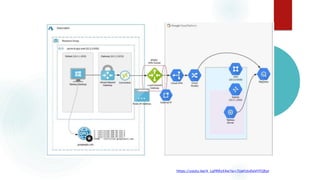
Here we are trying to connect two cloud network over VPN connectivity.
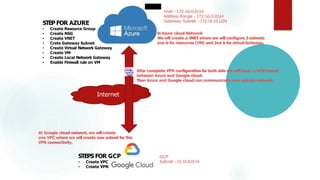
Internet
Vnet - 172.16.0.0/16
Address Range - 172.16.0.0/24
Gateway Subnet - 172.16.10.1/24
GCP
Subnet - 10.10.0.0/16
STEPS FOR GCP
• Create VPC
• Create VPN
STEP FOR AZURE
• Create Resource Group
• Create NSG
• Create VNET
• Crete Gateway Subnet
• Create Virtual Network Gateway
• Create VM
• Create Local Network Gateway
• Enable Firewall rule on VM
In Azure cloud Network
We will create a VNET where we will configure 2 subnets
one is for resources (VM) and 2nd is for virtual Gateway.
At Google cloud network, we will create
one VPC where we will create one subnet for this
VPN connectivity.
After complete VPN configuration for both side we will have a VPN tunnel
between Azure and Google cloud.
Then Azure and Google cloud can communicate over private network.
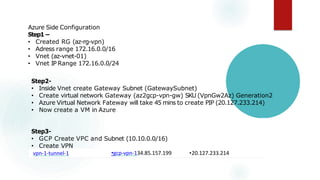
Azure Side Configuration
Step1 –
• Created RG (az-rg-vpn)
• Adress range 172.16.0.0/16
• Vnet (az-vnet-01)
• Vnet IP Range 172.16.0.0/24
Step2-
• Inside Vnet create Gateway Subnet (GatewaySubnet)
• Create virtual network Gateway (az2gcp-vpn-gw) SKU (VpnGw2Az) Generation2
• Azure Virtual Network Fateway will take 45 mins to create PIP (20.127.233.214)
• Now create a VM in Azure
Step3-
• GCP Create VPC and Subnet (10.10.0.0/16)
• Create VPN
vpn-1-tunnel-1 •gcp-vpn-134.85.157.199 •20.127.233.214
Step4-
• Create local network Gateway
• Create connection in local network Gateway
• Login on both VM (GCP or Azure) ping each other
Azure Cloud
Vnet - 172.16.0.0/16 ( Address Range - 172.16.0.0/24)
Gateway Subnet - 172.16.10.1/24
GCP
Subnet - 10.10.0.0/16
AGRG
sub - 172.16.0.0/24
Azure --->RG --->AGVNET --->Gateway Subnet (172.16.10.0/24)
Virtual Network Gateway -- AG-virtualnetGW ( it will take 45 min to create)52.163.218.30
Now Create Virtual Machine
GCP-
Create VPC (AGVPC) ---- Subnet
Firewall rule for allow all
Create VPN -->VPN PIP (35.198.247.248)
Remote peer IP Address - Azure side Public IP 52.163.218.30(AG-VirtualnetGW)
Routing Option - Static
Local Subnet -
Remote Network IP Range - 172.16.0.0/16
Secret Key - 123456
Azure -->Local Network Gateway
Name xyz
IP Address - GCP VPN IP
Address Space - GCP Subnet (10.10.0.0/16)
Resource group
https://youtu.be/4_LqPRRzX4w?si=7UeFctvEeVHTQEpr

VPN connectivity between GCP and Azure-converted.pptx

  • 1.
    VPN connectivity betweenGCP and Azure BY :AMIT PANDEY What IsVPN? we can say Virtual Private Network or VPN, is a method of linking two locations like they are on a local private Network. Here we are trying to connect two cloud network over VPN connectivity.
  • 2.
    Internet Vnet - 172.16.0.0/16 AddressRange - 172.16.0.0/24 Gateway Subnet - 172.16.10.1/24 GCP Subnet - 10.10.0.0/16 STEPS FOR GCP • Create VPC • Create VPN STEP FOR AZURE • Create Resource Group • Create NSG • Create VNET • Crete Gateway Subnet • Create Virtual Network Gateway • Create VM • Create Local Network Gateway • Enable Firewall rule on VM In Azure cloud Network We will create a VNET where we will configure 2 subnets one is for resources (VM) and 2nd is for virtual Gateway. At Google cloud network, we will create one VPC where we will create one subnet for this VPN connectivity. After complete VPN configuration for both side we will have a VPN tunnel between Azure and Google cloud. Then Azure and Google cloud can communicate over private network.
  • 3.
    Azure Side Configuration Step1– • Created RG (az-rg-vpn) • Adress range 172.16.0.0/16 • Vnet (az-vnet-01) • Vnet IP Range 172.16.0.0/24 Step2- • Inside Vnet create Gateway Subnet (GatewaySubnet) • Create virtual network Gateway (az2gcp-vpn-gw) SKU (VpnGw2Az) Generation2 • Azure Virtual Network Fateway will take 45 mins to create PIP (20.127.233.214) • Now create a VM in Azure Step3- • GCP Create VPC and Subnet (10.10.0.0/16) • Create VPN vpn-1-tunnel-1 •gcp-vpn-134.85.157.199 •20.127.233.214
  • 4.
    Step4- • Create localnetwork Gateway • Create connection in local network Gateway • Login on both VM (GCP or Azure) ping each other
  • 5.
    Azure Cloud Vnet -172.16.0.0/16 ( Address Range - 172.16.0.0/24) Gateway Subnet - 172.16.10.1/24 GCP Subnet - 10.10.0.0/16 AGRG sub - 172.16.0.0/24 Azure --->RG --->AGVNET --->Gateway Subnet (172.16.10.0/24) Virtual Network Gateway -- AG-virtualnetGW ( it will take 45 min to create)52.163.218.30 Now Create Virtual Machine GCP- Create VPC (AGVPC) ---- Subnet Firewall rule for allow all Create VPN -->VPN PIP (35.198.247.248) Remote peer IP Address - Azure side Public IP 52.163.218.30(AG-VirtualnetGW) Routing Option - Static Local Subnet - Remote Network IP Range - 172.16.0.0/16 Secret Key - 123456 Azure -->Local Network Gateway Name xyz IP Address - GCP VPN IP Address Space - GCP Subnet (10.10.0.0/16) Resource group
  • 6.
  • 7.