Simple Storage Service
THE AWS STORAGE SERVICE
S U B M I T T E D B Y :
D H A N A N J A Y A L O O R K A R
E M A I L : D H A N A N J A Y 5 3 1 5 @ G M A I L . C O M
Agenda
Introduction
Basic Usage
Features
Configurations
Bucket properties
Bucket restrictions and limitations
Use Cases
Pricing
Introduction to S3
The infinite object based storage facility in the cloud.
A RESTful (or SOAP) data storage API.
Full access control per file or user.
Preauthorize direct uploads by users.
Billed by capacity stored and transfer rates
Individual Amazon S3 objects can range in 1 byte to 5 terabytes.
Basic Usage
Creating/Listing Buckets
Globally unique “buckets” hold files on S3.
Uploading/Listing Files
Files are “objects” stored under “keys” on S3.
Downloading a File
You can stream files to and from S3.
Features of S3
The Good Scalable: effectively “unlimited” storage.
Reliable: 99.999999999% guaranteed uptime and very redundant
Inexpensive: rates for GB in cents
First 1 TB / month $0.0300 per GB
Universal: everything supports it
Objects in S3 Trillions of Objects (000,000,000,000s) Servicing over 2 million requests per
Second
Secure
Supports data transfer over SSL and automatic encryption of your data once it is uploaded. You
can also configure bucket policies to manage object permissions and control access to your data using
AWS IAM.
Features continue..
Send Event Notifications
Amazon S3 can send event notifications when objects are uploaded to Amazon S3. Amazon S3
event notifications can be delivered using Amazon SQS or Amazon SNS, or sent directly to AWS Lambda,
enabling you to trigger workflows, alerts, or other processing.
High Performance
Amazon S3 supports multi-part uploads to help maximize network throughput and resiliency, and
lets you choose the AWS region to store your data close to the end user and minimize network latency.
Integrated
Amazon S3 is integrated with other AWS services to simplify uploading and downloading data
from Amazon S3 and make it easier to build solutions that use a range of AWS services. Amazon S3
integrations include Amazon CloudFront, Amazon Kinesis, Amazon RDS, Amazon Glacier, Amazon
EBS, Amazon DynamoDB, Amazon Redshift, Amazon Route 53, Amazon EMR, and AWS Lambda.
Configurations
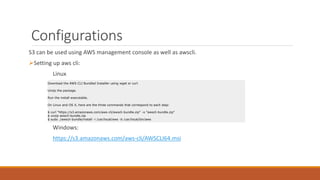
S3 can be used using AWS management console as well as awscli.
Setting up aws cli:
Linux
Windows:
https://s3.amazonaws.com/aws-cli/AWSCLI64.msi
Download the AWS CLI Bundled Installer using wget or curl.
Unzip the package.
Run the install executable.
On Linux and OS X, here are the three commands that correspond to each step:
$ curl "https://s3.amazonaws.com/aws-cli/awscli-bundle.zip" -o "awscli-bundle.zip"
$ unzip awscli-bundle.zip
$ sudo ./awscli-bundle/install -i /usr/local/aws -b /usr/local/bin/aws
Bucket properties
Managing Bucket Logging
Enabling Bucket Versioning
Properties continue..
Bucket permissions specify who is allowed access to the objects in a bucket and what
permissions you have granted them. For example, one person might have only read permission
while another might have read and write permissions.
Bucket restrictions and limitations
Each AWS account can own up to 100 buckets at a time.
Bucket name must be globally unique.
Bucket ownership is not transferable; however, if a bucket is empty, you can delete it.
Default Bucket permissions for Account owner is “full”.
Bucket names must be at least 3 and no more than 63 characters long.
Bucket names must be a series of one or more labels. Adjacent labels are separated by a single
period (.). Bucket names can contain lowercase letters, numbers, and hyphens. Each label must
start and end with a lowercase letter or a number.
Bucket names must not be formatted as an IP address (e.g., 192.168.5.4).
Use Cases:
Backup and Archiving
Content Storage & Distribution
Big Data Analytics
Static Website Hosting
Cloud-native Application Data
Disaster Recovery
Pricing
Charges for using S3 is based on the location of your buckets.
You are billed according to storage(average), data transfer in and out and the number of
requests per month.
There is no minimum fee to use S3, you pay for only what you use.
You can view your current charges incurred almost immediately on the S3 portal.
Detailed usage reports can also be downloaded in xml or csv format.
References
http://aws.amazon.com/s3/
https://aws.amazon.com/blogs/aws/amazon-s3-object-size-limit/
http://www.hongkiat.com/blog/amazon-s3-the-beginners-guide/

AWS simple storage service

  • 1.
    Simple Storage Service THEAWS STORAGE SERVICE S U B M I T T E D B Y : D H A N A N J A Y A L O O R K A R E M A I L : D H A N A N J A Y 5 3 1 5 @ G M A I L . C O M
  • 2.
  • 3.
    Introduction to S3 Theinfinite object based storage facility in the cloud. A RESTful (or SOAP) data storage API. Full access control per file or user. Preauthorize direct uploads by users. Billed by capacity stored and transfer rates Individual Amazon S3 objects can range in 1 byte to 5 terabytes.
  • 4.
    Basic Usage Creating/Listing Buckets Globallyunique “buckets” hold files on S3. Uploading/Listing Files Files are “objects” stored under “keys” on S3. Downloading a File You can stream files to and from S3.
  • 5.
    Features of S3 TheGood Scalable: effectively “unlimited” storage. Reliable: 99.999999999% guaranteed uptime and very redundant Inexpensive: rates for GB in cents First 1 TB / month $0.0300 per GB Universal: everything supports it Objects in S3 Trillions of Objects (000,000,000,000s) Servicing over 2 million requests per Second Secure Supports data transfer over SSL and automatic encryption of your data once it is uploaded. You can also configure bucket policies to manage object permissions and control access to your data using AWS IAM.
  • 6.
    Features continue.. Send EventNotifications Amazon S3 can send event notifications when objects are uploaded to Amazon S3. Amazon S3 event notifications can be delivered using Amazon SQS or Amazon SNS, or sent directly to AWS Lambda, enabling you to trigger workflows, alerts, or other processing. High Performance Amazon S3 supports multi-part uploads to help maximize network throughput and resiliency, and lets you choose the AWS region to store your data close to the end user and minimize network latency. Integrated Amazon S3 is integrated with other AWS services to simplify uploading and downloading data from Amazon S3 and make it easier to build solutions that use a range of AWS services. Amazon S3 integrations include Amazon CloudFront, Amazon Kinesis, Amazon RDS, Amazon Glacier, Amazon EBS, Amazon DynamoDB, Amazon Redshift, Amazon Route 53, Amazon EMR, and AWS Lambda.
  • 7.
    Configurations S3 can beused using AWS management console as well as awscli. Setting up aws cli: Linux Windows: https://s3.amazonaws.com/aws-cli/AWSCLI64.msi Download the AWS CLI Bundled Installer using wget or curl. Unzip the package. Run the install executable. On Linux and OS X, here are the three commands that correspond to each step: $ curl "https://s3.amazonaws.com/aws-cli/awscli-bundle.zip" -o "awscli-bundle.zip" $ unzip awscli-bundle.zip $ sudo ./awscli-bundle/install -i /usr/local/aws -b /usr/local/bin/aws
  • 8.
    Bucket properties Managing BucketLogging Enabling Bucket Versioning
  • 9.
    Properties continue.. Bucket permissionsspecify who is allowed access to the objects in a bucket and what permissions you have granted them. For example, one person might have only read permission while another might have read and write permissions.
  • 10.
    Bucket restrictions andlimitations Each AWS account can own up to 100 buckets at a time. Bucket name must be globally unique. Bucket ownership is not transferable; however, if a bucket is empty, you can delete it. Default Bucket permissions for Account owner is “full”. Bucket names must be at least 3 and no more than 63 characters long. Bucket names must be a series of one or more labels. Adjacent labels are separated by a single period (.). Bucket names can contain lowercase letters, numbers, and hyphens. Each label must start and end with a lowercase letter or a number. Bucket names must not be formatted as an IP address (e.g., 192.168.5.4).
  • 11.
    Use Cases: Backup andArchiving Content Storage & Distribution Big Data Analytics Static Website Hosting Cloud-native Application Data Disaster Recovery
  • 12.
    Pricing Charges for usingS3 is based on the location of your buckets. You are billed according to storage(average), data transfer in and out and the number of requests per month. There is no minimum fee to use S3, you pay for only what you use. You can view your current charges incurred almost immediately on the S3 portal. Detailed usage reports can also be downloaded in xml or csv format.
  • 13.