Amazon Web Services.
From infrastructure
to platform Roman Gomolko
rg@audienceproject.com
AudienceProject
• Developing products that allow to learn digital audiences
• Started using AWS more than 5 years ago
• Fully migrated to AWS more than 2 years ago
• Processing 4 billions requests monthly
• Generating reports based on 8 billions of requests with batched reports
• Online reports on 300 millions of records
• Used ~40% of services provided by AWS
• Totally happy regarding using AWS
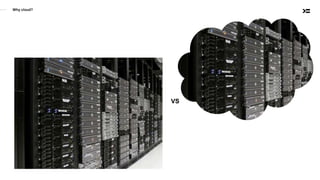
Why cloud?
VS
Amazon provides Infrastructure as a Services
• Virtual server (EC2) with operating system preinstalled
- Wide choice of instance types optimized for CPU, RAM or I/O
- Preinstalled operating systems or custom images
- Pay per hour of use
• Magnetic or SSD drives
- attach to running instances
- provisioned or size-dependent IOPs
- up to 64 Tb (SSD)
- backups
• Networking & Firewall
- Easy IP management
- Load balancers
- VPN & VPC
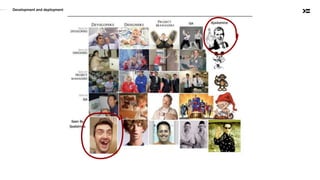
Development and deployment
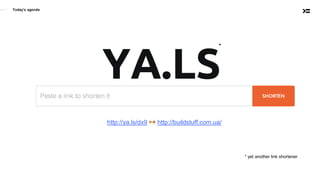
Today’s agenda
YA.LS
* yet another link shortener
*
http://ya.ls/dx9 ↣ http://buildstuff.com.ua/
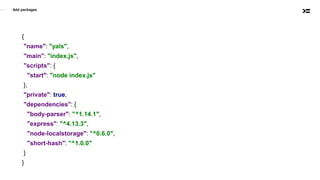
Add packages
{
"name": "yals",
"main": "index.js",
"scripts": {
"start": "node index.js"
},
"private": true,
"dependencies": {
"body-parser": "^1.14.1",
"express": "^4.13.3",
"node-localstorage": "^0.6.0",
"short-hash": "^1.0.0"
}
}
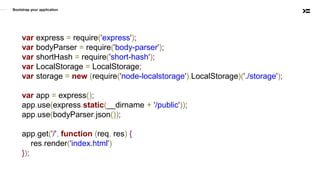
Bootstrap your application
var express = require('express');
var bodyParser = require('body-parser');
var shortHash = require('short-hash');
var LocalStorage = LocalStorage;
var storage = new (require('node-localstorage').LocalStorage)('./storage');
var app = express();
app.use(express.static(__dirname + '/public'));
app.use(bodyParser.json());
app.get('/', function (req, res) {
res.render('index.html')
});
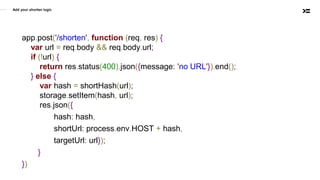
Add your shorten logic
app.post('/shorten', function (req, res) {
var url = req.body && req.body.url;
if (!url) {
return res.status(400).json({message: 'no URL'}).end();
} else {
var hash = shortHash(url);
storage.setItem(hash, url);
res.json({
hash: hash,
shortUrl: process.env.HOST + hash,
targetUrl: url});
}
})
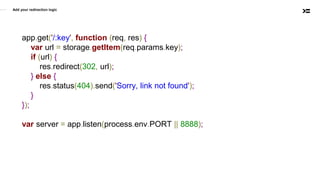
Add your redirection logic
app.get('/:key', function (req, res) {
var url = storage.getItem(req.params.key);
if (url) {
res.redirect(302, url);
} else {
res.status(404).send('Sorry, link not found');
}
});
var server = app.listen(process.env.PORT || 8888);
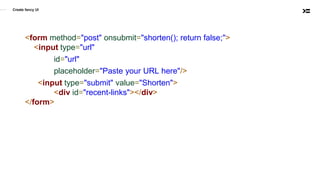
<form method="post" onsubmit="shorten(); return false;">
<input type="url"
id="url"
placeholder="Paste your URL here"/>
<input type="submit" value="Shorten">
<div id="recent-links"></div>
</form>
Create fancy UI
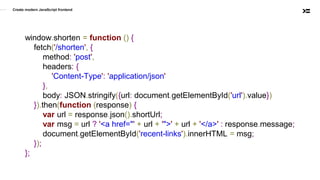
window.shorten = function () {
fetch('/shorten', {
method: 'post',
headers: {
'Content-Type': 'application/json'
},
body: JSON.stringify({url: document.getElementById('url').value})
}).then(function (response) {
var url = response.json().shortUrl;
var msg = url ? '<a href="' + url + '">' + url + '</a>' : response.message;
document.getElementById('recent-links').innerHTML = msg;
});
};
Create modern JavaScript frontend
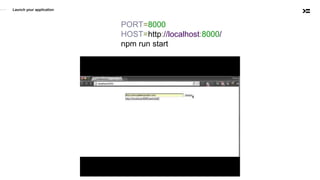
PORT=8000
HOST=http://localhost:8000/
npm run start
Launch your application
Deploy your application to the AWS
Elastic Beanstalk
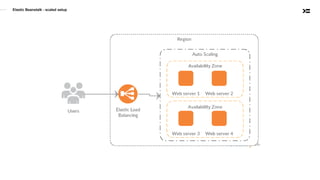
• Quick deployment and management of Web application
• PHP, ASP.NET, Python, NodeJS, Docker etc
• No need to setup infrastructure
• Performance metrics
• Scale up and scale down
• Rolling updates
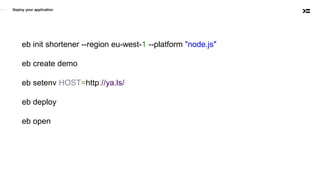
Deploy your application
eb init shortener --region eu-west-1 --platform "node.js"
eb create demo
eb setenv HOST=http://ya.ls/
eb deploy
eb open
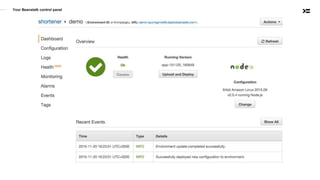
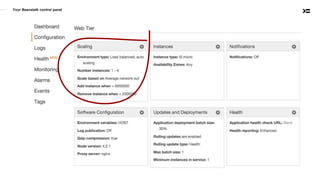
Your Beanstalk control panel
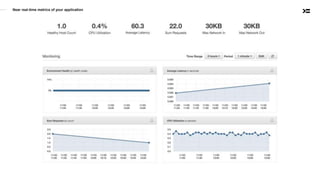
Near real-time metrics of your application
Your Beanstalk control panel
Elastic Beanstalk - scaled setup
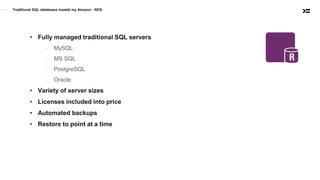
Traditional SQL databases hosteb my Amazon - RDS
• Fully managed traditional SQL servers
- MySQL
- MS SQL
- PostgreSQL
- Oracle
• Variety of server sizes
• Licenses included into price
• Automated backups
• Restore to point at a time
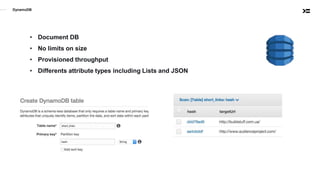
• Document DB
• No limits on size
• Provisioned throughput
• Differents attribute types including Lists and JSON
DynamoDB
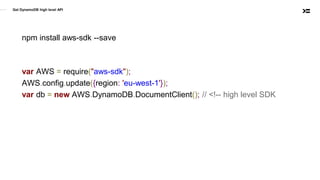
Get DynamoDB high level API
npm install aws-sdk --save
var AWS = require("aws-sdk");
AWS.config.update({region: 'eu-west-1'});
var db = new AWS.DynamoDB.DocumentClient(); // <!-- high level SDK
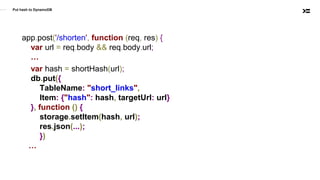
Put hash to DynamoDB
app.post('/shorten', function (req, res) {
var url = req.body && req.body.url;
…
var hash = shortHash(url);
db.put({
TableName: "short_links",
Item: {"hash": hash, targetUrl: url}
}, function () {
storage.setItem(hash, url);
res.json(...);
})
…
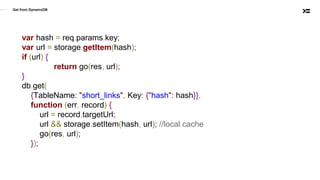
Get from DynamoDB
var hash = req.params.key;
var url = storage.getItem(hash);
if (url) {
return go(res, url);
}
db.get(
{TableName: "short_links", Key: {"hash": hash}},
function (err, record) {
url = record.targetUrl;
url && storage.setItem(hash, url); //local cache
go(res, url);
});
Security considerations - IAM
• Identity and Access Management
• Generate policies that describes
- what operations
- are allowed or denied
- to what AWS resources
- (in what circumstances)
• Apply policy to:
- IAM User identified by Access Key and Secret key
- EC2 instance
• vim ~/.aws/credentials
[dev]
aws_access_key_id = AKIA....
aws_secret_access_key = PQC+9o…
• AWS_PROFIEL=dev PORT=8000 HOST=http://localhost:8000/ npm run start
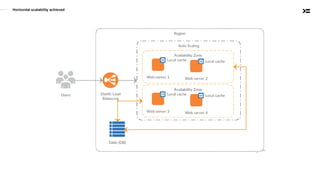
Horizontal scalability achieved
Adding screenshot functionality
var webshot = require('webshot');
webshot(targetUrl, hash + '.png', function(err) {
// Screenshot is ready. Where I should save it?
});
S3
• Virtually unlimited storage
• Reliable
• Fast
• Secure
• Accessible from Internet
Making screenshot
function makeScreenshot(url, hash, callback) {
var fileName = hash + '.png';
webshot(url, fileName, function (err) {
if (err) { return callback(err); }
var stream = fs.createReadStream(fileName)
s3.upload({
Bucket: 'yals-screenshots',
Key: fileName,
ACL: "public-read",
ContentType: "image/png",
Body: stream
}, callback);
});
}
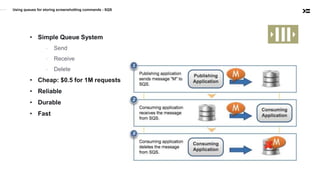
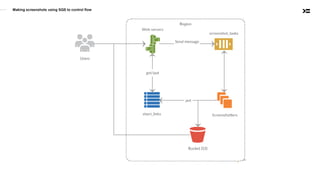
Using queues for storing screenshotting commands - SQS
• Simple Queue System
- Send
- Receive
- Delete
• Cheap: $0.5 for 1M requests
• Reliable
• Durable
• Fast
Making screenshots using SQS to control flow
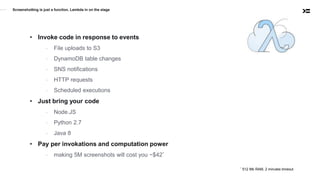
Screenshotting is just a function. Lambda in on the stage
• Invoke code in response to events
- File uploads to S3
- DynamoDB table changes
- SNS notifications
- HTTP requests
- Scheduled executions
• Just bring your code
- Node.JS
- Python 2.7
- Java 8
• Pay per invokations and computation power
- making 5M screenshots will cost you ~$42*
* 512 Mb RAM, 2 minutes timeout
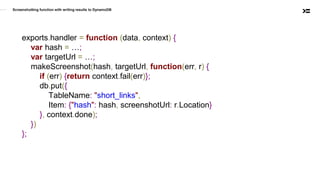
Screenshotting function with writing results to DynamoDB
exports.handler = function (data, context) {
var hash = …;
var targetUrl = …;
makeScreenshot(hash, targetUrl, function(err, r) {
if (err) {return context.fail(err)};
db.put({
TableName: "short_links",
Item: {"hash": hash, screenshotUrl: r.Location}
}, context.done);
})
};
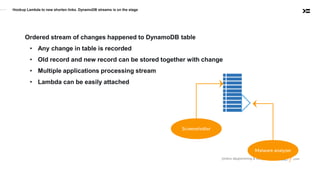
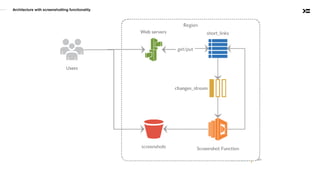
Hookup Lambda to new shorten links. DynamoDB streams is on the stage
Ordered stream of changes happened to DynamoDB table
• Any change in table is recorded
• Old record and new record can be stored together with change
• Multiple applications processing stream
• Lambda can be easily attached
Fine tuning screenshotting Lambda
exports.handler = function (data, context) {
var item = data.Records[0].dynamodb.NewImage;
var hash = item.hash.S;
var targetUrl = item.targetUrl.S;
var screenshotUrl = item.screenshotUrl.S;
if (screenshotUrl){
return context.success("Screenshot already taken");
}
makeScreenshot(hash, targetUrl, function(err, r) {
...
Architecture with screenshotting functionality
Static content delivery - CloudFront
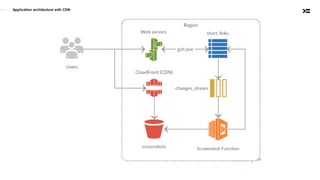
• CDN for static and dynamic content
• Web and Streaming distributions
• Seamless integration with S3
• Own SSL certificates, free for SNI
• Requests logging and delivery to S3
• Serving dynamic content from Beanstalk, Load balancers and own servers
• Device detection
• Cost effective
Application architecture with CDN
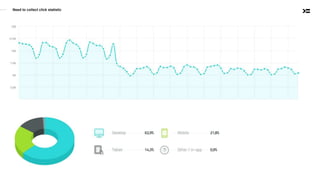
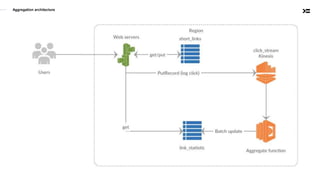
Need to collect click statistic
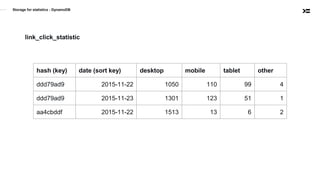
Storage for statistics - DynamoDB
link_click_statistic
hash (key) date (sort key) desktop mobile tablet other
ddd79ad9 2015-11-22 1050 110 99 4
ddd79ad9 2015-11-23 1301 123 51 1
aa4cbddf 2015-11-22 1513 13 6 2
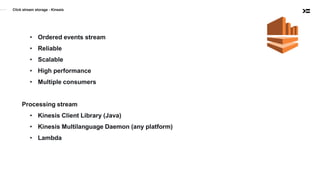
Click stream storage - Kinesis
• Ordered events stream
• Reliable
• Scalable
• High performance
• Multiple consumers
Processing stream
• Kinesis Client Library (Java)
• Kinesis Multilanguage Daemon (any platform)
• Lambda
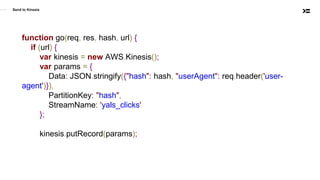
Send to Kinesis
function go(req, res, hash, url) {
if (url) {
var kinesis = new AWS.Kinesis();
var params = {
Data: JSON.stringify({"hash": hash, "userAgent": req.header('user-
agent')}),
PartitionKey: "hash",
StreamName: 'yals_clicks'
};
kinesis.putRecord(params);
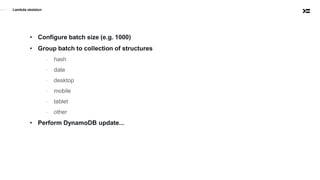
Lambda skeleton
• Configure batch size (e.g. 1000)
• Group batch to collection of structures
- hash
- date
- desktop
- mobile
- tablet
- other
• Perform DynamoDB update...
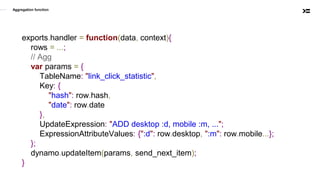
Aggregation function
exports.handler = function(data, context){
rows = ...;
// Agg
var params = {
TableName: "link_click_statistic",
Key: {
"hash": row.hash,
"date": row.date
},
UpdateExpression: "ADD desktop :d, mobile :m, ...";
ExpressionAttributeValues: {":d": row.desktop, ":m": row.mobile...};
};
dynamo.updateItem(params, send_next_item);
}
Aggregation architecture
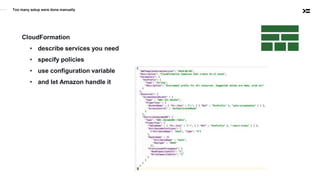
Too many setup were done manually
CloudFormation
• describe services you need
• specify policies
• use configuration variable
• and let Amazon handle it
Quick recap
• Beanstalk - websites hostings
• RDS - hosted relational DB
• DynamoDB - document DB with cool features
• SQS - simple queue service
• S3 - infinite file storage
• CloudFront - static and dynamic content delivery
• Lambda - running code in response to event
• Kinesis - operate with data streams as wizard
• IAM - security in cloud
• CloudFormation - automated cloud resources provisioning
Thank you
Checkout sources https://github.com/romanych/yals
Further watching
• https://www.youtube.com/watch?v=KmHGrONoif4
• https://www.youtube.com/watch?v=8u9wIC1xNt8
• https://www.youtube.com/watch?v=pBLdMCksM3A
• https://www.youtube.com/watch?v=ZBxWZ9bgd44
• https://www.youtube.com/watch?v=TnfqJYPjD9I
• https://www.youtube.com/watch?v=6R44BADNJA8

AWS as platform for scalable applications

  • 1.
    Amazon Web Services. Frominfrastructure to platform Roman Gomolko rg@audienceproject.com
  • 2.
    AudienceProject • Developing productsthat allow to learn digital audiences • Started using AWS more than 5 years ago • Fully migrated to AWS more than 2 years ago • Processing 4 billions requests monthly • Generating reports based on 8 billions of requests with batched reports • Online reports on 300 millions of records • Used ~40% of services provided by AWS • Totally happy regarding using AWS
  • 3.
  • 4.
    Amazon provides Infrastructureas a Services • Virtual server (EC2) with operating system preinstalled - Wide choice of instance types optimized for CPU, RAM or I/O - Preinstalled operating systems or custom images - Pay per hour of use • Magnetic or SSD drives - attach to running instances - provisioned or size-dependent IOPs - up to 64 Tb (SSD) - backups • Networking & Firewall - Easy IP management - Load balancers - VPN & VPC
  • 6.
  • 7.
    Today’s agenda YA.LS * yetanother link shortener * http://ya.ls/dx9 ↣ http://buildstuff.com.ua/
  • 8.
    Add packages { "name": "yals", "main":"index.js", "scripts": { "start": "node index.js" }, "private": true, "dependencies": { "body-parser": "^1.14.1", "express": "^4.13.3", "node-localstorage": "^0.6.0", "short-hash": "^1.0.0" } }
  • 9.
    Bootstrap your application varexpress = require('express'); var bodyParser = require('body-parser'); var shortHash = require('short-hash'); var LocalStorage = LocalStorage; var storage = new (require('node-localstorage').LocalStorage)('./storage'); var app = express(); app.use(express.static(__dirname + '/public')); app.use(bodyParser.json()); app.get('/', function (req, res) { res.render('index.html') });
  • 10.
    Add your shortenlogic app.post('/shorten', function (req, res) { var url = req.body && req.body.url; if (!url) { return res.status(400).json({message: 'no URL'}).end(); } else { var hash = shortHash(url); storage.setItem(hash, url); res.json({ hash: hash, shortUrl: process.env.HOST + hash, targetUrl: url}); } })
  • 11.
    Add your redirectionlogic app.get('/:key', function (req, res) { var url = storage.getItem(req.params.key); if (url) { res.redirect(302, url); } else { res.status(404).send('Sorry, link not found'); } }); var server = app.listen(process.env.PORT || 8888);
  • 12.
    <form method="post" onsubmit="shorten();return false;"> <input type="url" id="url" placeholder="Paste your URL here"/> <input type="submit" value="Shorten"> <div id="recent-links"></div> </form> Create fancy UI
  • 13.
    window.shorten = function() { fetch('/shorten', { method: 'post', headers: { 'Content-Type': 'application/json' }, body: JSON.stringify({url: document.getElementById('url').value}) }).then(function (response) { var url = response.json().shortUrl; var msg = url ? '<a href="' + url + '">' + url + '</a>' : response.message; document.getElementById('recent-links').innerHTML = msg; }); }; Create modern JavaScript frontend
  • 14.
  • 15.
  • 16.
    Elastic Beanstalk • Quickdeployment and management of Web application • PHP, ASP.NET, Python, NodeJS, Docker etc • No need to setup infrastructure • Performance metrics • Scale up and scale down • Rolling updates
  • 17.
    Deploy your application ebinit shortener --region eu-west-1 --platform "node.js" eb create demo eb setenv HOST=http://ya.ls/ eb deploy eb open
  • 18.
  • 19.
    Near real-time metricsof your application
  • 20.
  • 21.
    Elastic Beanstalk -scaled setup
  • 22.
    Traditional SQL databaseshosteb my Amazon - RDS • Fully managed traditional SQL servers - MySQL - MS SQL - PostgreSQL - Oracle • Variety of server sizes • Licenses included into price • Automated backups • Restore to point at a time
  • 23.
    • Document DB •No limits on size • Provisioned throughput • Differents attribute types including Lists and JSON DynamoDB
  • 24.
    Get DynamoDB highlevel API npm install aws-sdk --save var AWS = require("aws-sdk"); AWS.config.update({region: 'eu-west-1'}); var db = new AWS.DynamoDB.DocumentClient(); // <!-- high level SDK
  • 25.
    Put hash toDynamoDB app.post('/shorten', function (req, res) { var url = req.body && req.body.url; … var hash = shortHash(url); db.put({ TableName: "short_links", Item: {"hash": hash, targetUrl: url} }, function () { storage.setItem(hash, url); res.json(...); }) …
  • 26.
    Get from DynamoDB varhash = req.params.key; var url = storage.getItem(hash); if (url) { return go(res, url); } db.get( {TableName: "short_links", Key: {"hash": hash}}, function (err, record) { url = record.targetUrl; url && storage.setItem(hash, url); //local cache go(res, url); });
  • 27.
    Security considerations -IAM • Identity and Access Management • Generate policies that describes - what operations - are allowed or denied - to what AWS resources - (in what circumstances) • Apply policy to: - IAM User identified by Access Key and Secret key - EC2 instance • vim ~/.aws/credentials [dev] aws_access_key_id = AKIA.... aws_secret_access_key = PQC+9o… • AWS_PROFIEL=dev PORT=8000 HOST=http://localhost:8000/ npm run start
  • 28.
  • 29.
    Adding screenshot functionality varwebshot = require('webshot'); webshot(targetUrl, hash + '.png', function(err) { // Screenshot is ready. Where I should save it? });
  • 30.
    S3 • Virtually unlimitedstorage • Reliable • Fast • Secure • Accessible from Internet
  • 31.
    Making screenshot function makeScreenshot(url,hash, callback) { var fileName = hash + '.png'; webshot(url, fileName, function (err) { if (err) { return callback(err); } var stream = fs.createReadStream(fileName) s3.upload({ Bucket: 'yals-screenshots', Key: fileName, ACL: "public-read", ContentType: "image/png", Body: stream }, callback); }); }
  • 32.
    Using queues forstoring screenshotting commands - SQS • Simple Queue System - Send - Receive - Delete • Cheap: $0.5 for 1M requests • Reliable • Durable • Fast
  • 33.
    Making screenshots usingSQS to control flow
  • 34.
    Screenshotting is justa function. Lambda in on the stage • Invoke code in response to events - File uploads to S3 - DynamoDB table changes - SNS notifications - HTTP requests - Scheduled executions • Just bring your code - Node.JS - Python 2.7 - Java 8 • Pay per invokations and computation power - making 5M screenshots will cost you ~$42* * 512 Mb RAM, 2 minutes timeout
  • 35.
    Screenshotting function withwriting results to DynamoDB exports.handler = function (data, context) { var hash = …; var targetUrl = …; makeScreenshot(hash, targetUrl, function(err, r) { if (err) {return context.fail(err)}; db.put({ TableName: "short_links", Item: {"hash": hash, screenshotUrl: r.Location} }, context.done); }) };
  • 36.
    Hookup Lambda tonew shorten links. DynamoDB streams is on the stage Ordered stream of changes happened to DynamoDB table • Any change in table is recorded • Old record and new record can be stored together with change • Multiple applications processing stream • Lambda can be easily attached
  • 37.
    Fine tuning screenshottingLambda exports.handler = function (data, context) { var item = data.Records[0].dynamodb.NewImage; var hash = item.hash.S; var targetUrl = item.targetUrl.S; var screenshotUrl = item.screenshotUrl.S; if (screenshotUrl){ return context.success("Screenshot already taken"); } makeScreenshot(hash, targetUrl, function(err, r) { ...
  • 38.
  • 39.
    Static content delivery- CloudFront • CDN for static and dynamic content • Web and Streaming distributions • Seamless integration with S3 • Own SSL certificates, free for SNI • Requests logging and delivery to S3 • Serving dynamic content from Beanstalk, Load balancers and own servers • Device detection • Cost effective
  • 40.
  • 41.
    Need to collectclick statistic
  • 42.
    Storage for statistics- DynamoDB link_click_statistic hash (key) date (sort key) desktop mobile tablet other ddd79ad9 2015-11-22 1050 110 99 4 ddd79ad9 2015-11-23 1301 123 51 1 aa4cbddf 2015-11-22 1513 13 6 2
  • 43.
    Click stream storage- Kinesis • Ordered events stream • Reliable • Scalable • High performance • Multiple consumers Processing stream • Kinesis Client Library (Java) • Kinesis Multilanguage Daemon (any platform) • Lambda
  • 44.
    Send to Kinesis functiongo(req, res, hash, url) { if (url) { var kinesis = new AWS.Kinesis(); var params = { Data: JSON.stringify({"hash": hash, "userAgent": req.header('user- agent')}), PartitionKey: "hash", StreamName: 'yals_clicks' }; kinesis.putRecord(params);
  • 45.
    Lambda skeleton • Configurebatch size (e.g. 1000) • Group batch to collection of structures - hash - date - desktop - mobile - tablet - other • Perform DynamoDB update...
  • 46.
    Aggregation function exports.handler =function(data, context){ rows = ...; // Agg var params = { TableName: "link_click_statistic", Key: { "hash": row.hash, "date": row.date }, UpdateExpression: "ADD desktop :d, mobile :m, ..."; ExpressionAttributeValues: {":d": row.desktop, ":m": row.mobile...}; }; dynamo.updateItem(params, send_next_item); }
  • 47.
  • 48.
    Too many setupwere done manually CloudFormation • describe services you need • specify policies • use configuration variable • and let Amazon handle it
  • 49.
    Quick recap • Beanstalk- websites hostings • RDS - hosted relational DB • DynamoDB - document DB with cool features • SQS - simple queue service • S3 - infinite file storage • CloudFront - static and dynamic content delivery • Lambda - running code in response to event • Kinesis - operate with data streams as wizard • IAM - security in cloud • CloudFormation - automated cloud resources provisioning
  • 50.
    Thank you Checkout sourceshttps://github.com/romanych/yals
  • 51.
    Further watching • https://www.youtube.com/watch?v=KmHGrONoif4 •https://www.youtube.com/watch?v=8u9wIC1xNt8 • https://www.youtube.com/watch?v=pBLdMCksM3A • https://www.youtube.com/watch?v=ZBxWZ9bgd44 • https://www.youtube.com/watch?v=TnfqJYPjD9I • https://www.youtube.com/watch?v=6R44BADNJA8