Automating 
Performance Optimization 
For Modern Web Applications 
Copyright © 2014 Accenture LLP. All Rights Reserved.
Agenda 
• Definitions 
• Disclaimers and Caveats 
• Automating Performance Optimization 
– Methodology 
– Tools 
– JavaScript 
– CSS 
– Images 
– Some Manual (Code Review) Items 
Copyright © 2014 Accenture LLP. All Rights Reserved. 
• Q & A 
• Appendices 
Page 2
What is Perf Automation, anyway? 
Copyright © 2014 Accenture LLP. All Rights Reserved. 
Page 3 
• Make performance optimization part of the 
development process, not just something developers 
are supposed to think about. 
• If performance is not part of the process from the 
beginning, it won’t be thought about until the very 
end! 
Performance Optimization can be made part of the build 
process, and integrated into DevOps. Then it becomes part of 
the daily activity of a development team!
Disclaimers and Caveats 
Copyright © 2014 Accenture LLP. All Rights Reserved. 
Page 4 
• Disclaimers 
– Disclaimer #1: Great performance still requires great code! 
– Disclaimer #2: Not just an asset pipeline! 
– Disclaimer #3: Of course you can’t automate all 
performance optimization… but you can automate some 
important things. 
• Caveat 
– Most premature optimization is bad! However, some can be 
good (seriously)
What is automated client performance 
optimization? 
• Answer: Reducing file size, http downloads, render 
Copyright © 2014 Accenture LLP. All Rights Reserved. 
Page 5 
time, improving code performance as part of an 
automatic process 
• Scope: performance-related tuning we can do by 
setting up automatic tasks in build/optimize tasks
DevOps for JS Apps 
Copyright © 2014 Accenture LLP. All Rights Reserved. 
Page 6 
Code written & 
check-in 
requested 
Grunt runs automated 
mocha behavior with chai 
assertions and unit tests via 
phantomjs & casperjs 
Grunt provides 
Automated task 
scripting 
Passes 
Automated QA 
Jenkins 
begins 
automated 
build & deploy 
process 
JS Hint runs 
code quality 
tests 
Feedback is 
passed to 
developers 
QA Testers test on multiple devices 
mocha 
Code is packaged 
& readied for 
deploy by Grunt 
Check-in merged to 
Phabricator branch 
for pre-commit 
review by senior 
developers 
Code is deployed to 
test environments by 
Jenkins 
Once code 
review is 
approved, git 
is used to 
push the code 
update to 
sprint branch
Methodology: Define 
• Think through everything you need to work through 
or that could slow your application down: 
– Lots of unused CSS rules (bootstrap, jqueryUI etc are big 
Copyright © 2014 Accenture LLP. All Rights Reserved. 
Page 7 
culprits here) 
– Not-so-responsive images on a responsive site 
– Multiple media query definitions 
– Un-optimized images 
– Other
Methodology: Solve 
• Use a task automation tool to automate as much as 
possible (humans make mistakes!) 
• What can’t be done with the automation tool, include 
Copyright © 2014 Accenture LLP. All Rights Reserved. 
Page 8 
as part of a development process where humans 
intervene at the right places 
• Code review, code review, code review... 
… 
… 
Code review!
Tools of the trade 
Copyright © 2014 Accenture LLP. All Rights Reserved. 
Page 9 
or
• Inline CSS: Automatically inline uncommonly used 
CSS rules 
– Make sure those rules are in files with other uncommonly 
Copyright © 2014 Accenture LLP. All Rights Reserved. 
CSS 
Page 10 
used rules 
• Defcon 5: Remove unused CSS with unCSS 
– Note: if you’re not careful, this will remove all the css 
applied by JS/pseudoclasses 
– Make liberal use of the ignore file 
– Include dynamically applied CSS in its own files, so you 
can ignore it
Copyright © 2014 Accenture LLP. All Rights Reserved. 
Images 
Page 11 
• Optimize them! 
– Images run through most modern 
optimization/compression algorithms (e.g. optipng, jpgtran) 
are virtually indistinguishable from source images. 
• Not even creatives can tell the difference, honest! 
• Make responsive images automatically 
– Set sizes according to breakpoints, etc 
– Combine with Imager.js to make real magic 
• Sprites 
– For appropriate icons, create sprites or… 
– Create a Webfont from svg icons!
Copyright © 2014 Accenture LLP. All Rights Reserved. 
JavaScript 
Page 12 
• Use automated code quality tools, 
embedded in a grunt analyze or 
gulp analyze task 
• Embed these tools into your build / CI 
process 
• Require.js! 
• Peer review constantly, ideally with a 
tool like Phabricator, embedded into 
your dev process
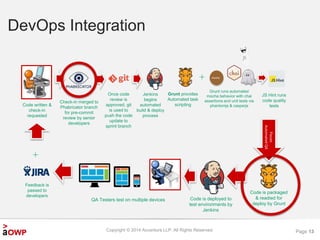
DevOps Integration 
Copyright © 2014 Accenture LLP. All Rights Reserved. 
Page 13 
Code written & 
check-in 
requested 
Grunt runs automated 
mocha behavior with chai 
assertions and unit tests via 
phantomjs & casperjs 
Grunt provides 
Automated task 
scripting 
Passes 
Automated QA 
Jenkins 
begins 
automated 
build & deploy 
process 
JS Hint runs 
code quality 
tests 
Feedback is 
passed to 
developers 
QA Testers test on multiple devices 
mocha 
Code is packaged 
& readied for 
deploy by Grunt 
Check-in merged to 
Phabricator branch 
for pre-commit 
review by senior 
developers 
Code is deployed to 
test environments by 
Jenkins 
Once code 
review is 
approved, git 
is used to 
push the code 
update to 
sprint branch
Questions? 
Copyright © 2014 Accenture LLP. All Rights Reserved. 
Page 14
Appendix: Tasks 
Copyright © 2014 Accenture LLP. All Rights Reserved. 
Page 15 
• JavaScript 
– grunt-contrib-jshint 
– gulp-jshint 
– grunt-eslint 
– gulp-eslint 
• CSS 
– grunt-contrib-cssmin 
– gulp-cssmin 
– grunt-inline-css 
– grunt-uncss 
• Images 
– grunt-contrib-imagemin 
– gulp-imagemin 
– grunt-responsive-images 
– Imager.js 
– grunt-spritesmith 
– grunt-webfont 
– adept-jpg-compressor

Automated perf optimization - html5 dev conf

  • 1.
    Automating Performance Optimization For Modern Web Applications Copyright © 2014 Accenture LLP. All Rights Reserved.
  • 2.
    Agenda • Definitions • Disclaimers and Caveats • Automating Performance Optimization – Methodology – Tools – JavaScript – CSS – Images – Some Manual (Code Review) Items Copyright © 2014 Accenture LLP. All Rights Reserved. • Q & A • Appendices Page 2
  • 3.
    What is PerfAutomation, anyway? Copyright © 2014 Accenture LLP. All Rights Reserved. Page 3 • Make performance optimization part of the development process, not just something developers are supposed to think about. • If performance is not part of the process from the beginning, it won’t be thought about until the very end! Performance Optimization can be made part of the build process, and integrated into DevOps. Then it becomes part of the daily activity of a development team!
  • 4.
    Disclaimers and Caveats Copyright © 2014 Accenture LLP. All Rights Reserved. Page 4 • Disclaimers – Disclaimer #1: Great performance still requires great code! – Disclaimer #2: Not just an asset pipeline! – Disclaimer #3: Of course you can’t automate all performance optimization… but you can automate some important things. • Caveat – Most premature optimization is bad! However, some can be good (seriously)
  • 5.
    What is automatedclient performance optimization? • Answer: Reducing file size, http downloads, render Copyright © 2014 Accenture LLP. All Rights Reserved. Page 5 time, improving code performance as part of an automatic process • Scope: performance-related tuning we can do by setting up automatic tasks in build/optimize tasks
  • 6.
    DevOps for JSApps Copyright © 2014 Accenture LLP. All Rights Reserved. Page 6 Code written & check-in requested Grunt runs automated mocha behavior with chai assertions and unit tests via phantomjs & casperjs Grunt provides Automated task scripting Passes Automated QA Jenkins begins automated build & deploy process JS Hint runs code quality tests Feedback is passed to developers QA Testers test on multiple devices mocha Code is packaged & readied for deploy by Grunt Check-in merged to Phabricator branch for pre-commit review by senior developers Code is deployed to test environments by Jenkins Once code review is approved, git is used to push the code update to sprint branch
  • 7.
    Methodology: Define •Think through everything you need to work through or that could slow your application down: – Lots of unused CSS rules (bootstrap, jqueryUI etc are big Copyright © 2014 Accenture LLP. All Rights Reserved. Page 7 culprits here) – Not-so-responsive images on a responsive site – Multiple media query definitions – Un-optimized images – Other
  • 8.
    Methodology: Solve •Use a task automation tool to automate as much as possible (humans make mistakes!) • What can’t be done with the automation tool, include Copyright © 2014 Accenture LLP. All Rights Reserved. Page 8 as part of a development process where humans intervene at the right places • Code review, code review, code review... … … Code review!
  • 9.
    Tools of thetrade Copyright © 2014 Accenture LLP. All Rights Reserved. Page 9 or
  • 10.
    • Inline CSS:Automatically inline uncommonly used CSS rules – Make sure those rules are in files with other uncommonly Copyright © 2014 Accenture LLP. All Rights Reserved. CSS Page 10 used rules • Defcon 5: Remove unused CSS with unCSS – Note: if you’re not careful, this will remove all the css applied by JS/pseudoclasses – Make liberal use of the ignore file – Include dynamically applied CSS in its own files, so you can ignore it
  • 11.
    Copyright © 2014Accenture LLP. All Rights Reserved. Images Page 11 • Optimize them! – Images run through most modern optimization/compression algorithms (e.g. optipng, jpgtran) are virtually indistinguishable from source images. • Not even creatives can tell the difference, honest! • Make responsive images automatically – Set sizes according to breakpoints, etc – Combine with Imager.js to make real magic • Sprites – For appropriate icons, create sprites or… – Create a Webfont from svg icons!
  • 12.
    Copyright © 2014Accenture LLP. All Rights Reserved. JavaScript Page 12 • Use automated code quality tools, embedded in a grunt analyze or gulp analyze task • Embed these tools into your build / CI process • Require.js! • Peer review constantly, ideally with a tool like Phabricator, embedded into your dev process
  • 13.
    DevOps Integration Copyright© 2014 Accenture LLP. All Rights Reserved. Page 13 Code written & check-in requested Grunt runs automated mocha behavior with chai assertions and unit tests via phantomjs & casperjs Grunt provides Automated task scripting Passes Automated QA Jenkins begins automated build & deploy process JS Hint runs code quality tests Feedback is passed to developers QA Testers test on multiple devices mocha Code is packaged & readied for deploy by Grunt Check-in merged to Phabricator branch for pre-commit review by senior developers Code is deployed to test environments by Jenkins Once code review is approved, git is used to push the code update to sprint branch
  • 14.
    Questions? Copyright ©2014 Accenture LLP. All Rights Reserved. Page 14
  • 15.
    Appendix: Tasks Copyright© 2014 Accenture LLP. All Rights Reserved. Page 15 • JavaScript – grunt-contrib-jshint – gulp-jshint – grunt-eslint – gulp-eslint • CSS – grunt-contrib-cssmin – gulp-cssmin – grunt-inline-css – grunt-uncss • Images – grunt-contrib-imagemin – gulp-imagemin – grunt-responsive-images – Imager.js – grunt-spritesmith – grunt-webfont – adept-jpg-compressor

Editor's Notes

  • #2 Hi, I’m Matt Lancaster. I want to talk to you about a topic near and dear to my heart: client side performance optimization.
  • #5 Disclaimer #1 – Review, Review… Friends don’t let friends (who came over from Java) do the wrong kind of OOP First rule of triage == treat severe but quickly manageable wounds first: you will never get to other worthwhile perf issues if patient dies on the table Premature Opt like… other things done premat, everyone ends up frustrated in end… everyone has bad time Greatest thing since sliced bread to add a bunch of caching layers, don’t
  • #6 How many of you have perf SLAs? Build complex client-side applications?
  • #11 grunt-contrib-cssmin gulp-cssmin grunt-inline-css grunt-uncss
  • #12 grunt-contrib-imagemin gulp-imagemin grunt-responsive-images Imager.js grunt-spritesmith grunt-webfont
  • #13 grunt-contrib-jshint gulp-jshint grunt-eslint gulp-eslint