
OData
An Introduction and Examples
© 2012 SAP AG. All rights reserved. 2
Agenda
Why We Need OData
A Basic Introduction to OData
Structure of an OData Service
OData Operations
OData Query Language
© 2012 SAP AG. All rights reserved. 3
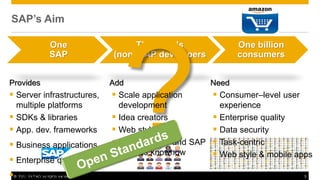
SAP’s Aim
One
SAP
Thousands
(non) SAP developers
One billion
consumers
Provides
 Server infrastructures,
multiple platforms
 SDKs & libraries
 App. dev. frameworks
 Business applications
 Enterprise quality
 Data security
Add
 Scale application
development
 Idea creators
 Web style apps
 Limited ABAP and SAP
process knowhow
Need
 Consumer–level user
experience
 Enterprise quality
 Data security
 Task-centric
 Web style & mobile apps
© 2012 SAP AG. All rights reserved. 4
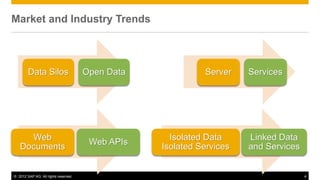
Market and Industry Trends
Server Services
Data Silos Open Data
Isolated Data
Isolated Services
Linked Data
and Services
Web
Documents
Web APIs
© 2012 SAP AG. All rights reserved. 6
Agenda
Why We Need OData
A Basic Introduction to OData
Structure of an OData Service
OData Operations
OData Query Language
© 2012 SAP AG. All rights reserved. 7
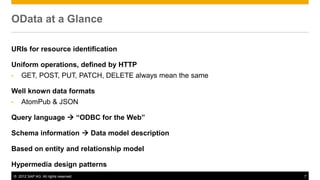
OData at a Glance
URIs for resource identification
Uniform operations, defined by HTTP
• GET, POST, PUT, PATCH, DELETE always mean the same
Well known data formats
• AtomPub & JSON
Query language  “ODBC for the Web”
Schema information  Data model description
Based on entity and relationship model
Hypermedia design patterns
© 2012 SAP AG. All rights reserved. 8
Agenda
Why We Need OData
A Basic Introduction to OData
Structure of an OData Service
OData Operations
OData Query Language
© 2012 SAP AG. All rights reserved. 9
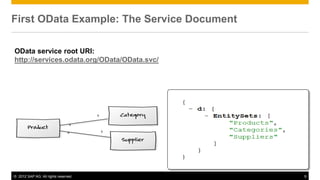
First OData Example: The Service Document
OData service root URI:
http://services.odata.org/OData/OData.svc/
© 2012 SAP AG. All rights reserved. 10
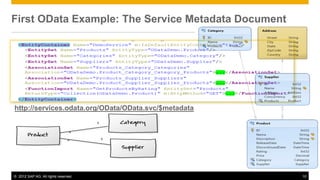
First OData Example: The Service Metadata Document
OData service root URI:
http://services.odata.org/OData/OData.svc/
OData service metadata URI :=
<OData service root URI> + “$metadata”
http://services.odata.org/OData/OData.svc/$metadata
© 2012 SAP AG. All rights reserved. 11
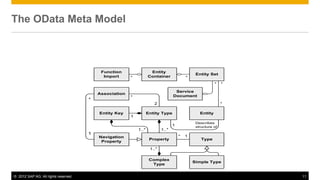
The OData Meta Model
Entity Type
Navigation
Property
Property Type
Simple Type
Complex
Type
Entity Set
Entity
*
*
1..*
1..*
1
*
Entity Key
1..*
1
Association
2
*
Entity
Container
Service
Document
Function
Import *
1
Describes
structure of
1
*
*
*
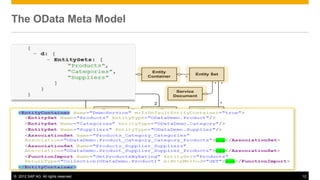
© 2012 SAP AG. All rights reserved. 12
Entity Type
Navigation
Property
Property Type
Simple Type
Complex
Type
Entity Set
Entity
*
*
1..*
1..*
1
*
Entity Key
1..*
1
Association
2
*
Entity
Container
Service
Document
Function
Import *
1
Describes
structure of
1
*
*
*
The OData Meta Model
© 2012 SAP AG. All rights reserved. 13
Entity Type
Navigation
Property
Property Type
Simple Type
Complex
Type
Entity Set
Entity
*
*
1..*
1..*
1
*
Entity Key
1..*
1
Association
2
*
Entity
Container
Service
Document
Function
Import *
1
Describes
structure of
1
*
*
*
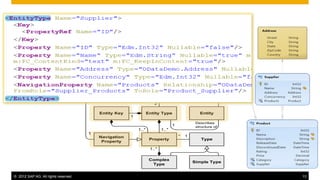
The OData Meta Model
© 2012 SAP AG. All rights reserved. 14
Entity Type
Navigation
Property
Property Type
Simple Type
Complex
Type
Entity Set
Entity
*
*
1..*
1..*
1
*
Entity Key
1..*
1
Association
2
*
Entity
Container
Service
Document
Function
Import *
1
Describes
structure of
1
*
*
*
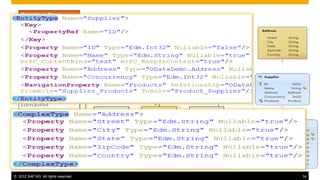
The OData type system
© 2012 SAP AG. All rights reserved. 15
Agenda
Why We Need OData
A Basic Introduction to OData
Structure of an OData Service
OData Operations
OData Query Language
© 2012 SAP AG. All rights reserved. 16
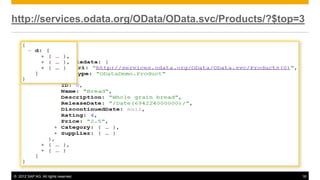
http://services.odata.org/OData/OData.svc/Products/?$top=3
© 2012 SAP AG. All rights reserved. 17
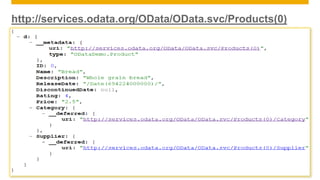
http://services.odata.org/OData/OData.svc/Products(0)
© 2012 SAP AG. All rights reserved. 18
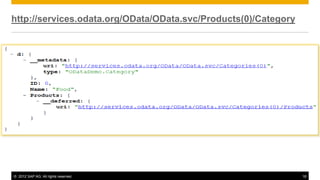
http://services.odata.org/OData/OData.svc/Products(0)/Category
© 2012 SAP AG. All rights reserved. 19
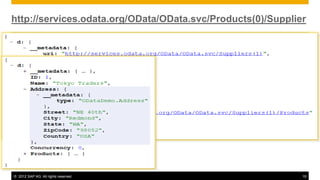
http://services.odata.org/OData/OData.svc/Products(0)/Supplier
© 2012 SAP AG. All rights reserved. 20
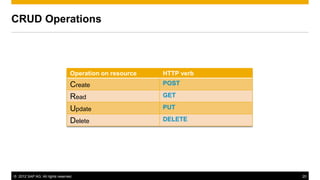
CRUD Operations
Operation on resource HTTP verb
Create POST
Read GET
Update PUT
Delete DELETE
© 2012 SAP AG. All rights reserved. 21
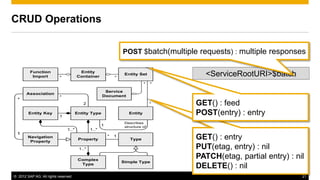
<ServiceRootURI>$batch
Entity Type
Navigation
Property
Property Type
Simple Type
Complex
Type
Entity Set
Entity
*
*
1..*
1..*
1
*
Entity Key
1..*
1
Association
2
*
Entity
Container
Service
Document
Function
Import *
1
Describes
structure of
1
*
*
*
CRUD Operations
POST $batch(multiple requests) : multiple responses
GET() : entry
PUT(etag, entry) : nil
PATCH(etag, partial entry) : nil
DELETE() : nil
GET() : feed
POST(entry) : entry
© 2012 SAP AG. All rights reserved. 22
Entity Type
Navigation
Property
Property Type
Simple Type
Complex
Type
Entity Set
Entity
*
*
1..*
1..*
1
*
Entity Key
1..*
1
Association
2
*
Entity
Container
Service
Document
Function
Import *
1
Describes
structure of
1
*
*
*
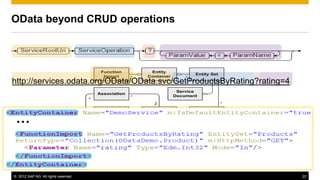
OData beyond CRUD operations
…
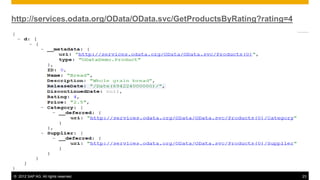
http://services.odata.org/OData/OData.svc/GetProductsByRating?rating=4
© 2012 SAP AG. All rights reserved. 23
http://services.odata.org/OData/OData.svc/GetProductsByRating?rating=4
© 2012 SAP AG. All rights reserved. 24
Agenda
Why We Need OData
A Basic Introduction to OData
Structure of an OData Service
OData Operations
OData Query Language
© 2012 SAP AG. All rights reserved. 25
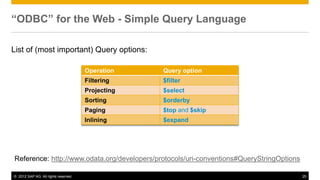
“ODBC” for the Web - Simple Query Language
List of (most important) Query options:
Reference: http://www.odata.org/developers/protocols/uri-conventions#QueryStringOptions
Operation Query option
Filtering $filter
Projecting $select
Sorting $orderby
Paging $top and $skip
Inlining $expand
© 2012 SAP AG. All rights reserved. 26
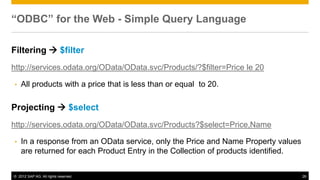
“ODBC” for the Web - Simple Query Language
Filtering  $filter
http://services.odata.org/OData/OData.svc/Products/?$filter=Price le 20
• All products with a price that is less than or equal to 20.
Projecting  $select
http://services.odata.org/OData/OData.svc/Products?$select=Price,Name
• In a response from an OData service, only the Price and Name Property values
are returned for each Product Entry in the Collection of products identified.
© 2012 SAP AG. All rights reserved. 27
“ODBC” for the Web - Simple Query Language
Sorting  $orderby
http://services.odata.org/OData/OData.svc/Products?$orderby=Rating asc
• All Product Entries returned in ascending order when sorted by the Rating
Property.
© 2012 SAP AG. All rights reserved. 28
“ODBC” for the Web - Simple Query Language
Paging  $top and $skip
http://services.odata.org/OData/OData.svc/Products?$top=5
• The first 5 Product Entries are returned where the Set of Products is sorted using a scheme
determined by the OData service.
http://services.odata.org/OData/OData.svc/Products?$top=5&$orderby=Name desc
• The first 5 Product Entries are returned in descending order when sorted by the Name
property.
http://services.odata.org/OData/OData.svc/Categories(1)/Products?$skip=2
• The set of Product Entries (associated with the Category Entry identified by key value 1)
starting with the third product.
Typical Programming Patterns
for UI-Centric Applications
© 2012 SAP AG. All rights reserved. 30
$filter and $select
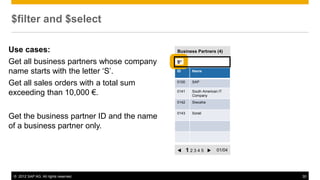
Use cases:
Get all business partners whose company
name starts with the letter ‘S’.
Get all sales orders with a total sum
exceeding than 10,000 €.
Get the business partner ID and the name
of a business partner only.
ID Name
0100 SAP
0141 South American IT
Company
0142 Siwusha
0143 Sorali
Business Partners (4)
t 1 2 3 4 5 u 01/04
S*
© 2012 SAP AG. All rights reserved. 31
Query Options: $filter & $select
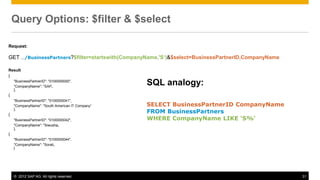
Request:
GET …/BusinessPartners?$filter=startswith(CompanyName,'S‘)&$select=BusinessPartnerID,CompanyName
Result
{
"BusinessPartnerID": "0100000000",
"CompanyName": "SAP„
},
{
"BusinessPartnerID": "0100000041",
"CompanyName": "South American IT Company“
},
{
"BusinessPartnerID": "0100000042",
"CompanyName": "Siwusha„
},
{
"BusinessPartnerID": "0100000044",
"CompanyName": "Sorali„
}
SQL analogy:
SELECT BusinessPartnerID CompanyName
FROM BusinessPartners
WHERE CompanyName LIKE ‘S%‘
© 2012 SAP AG. All rights reserved. 32
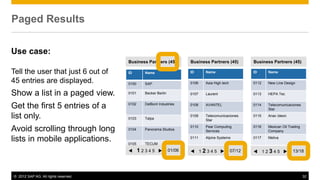
Paged Results
ID Name
0100 SAP
0101 Becker Berlin
0102 DelBont Industries
0103 Talpa
0104 Panorama Studios
0105 TECUM
t 1 2 3 4 5 u 01/06
ID Name
0106 Asia High tech
0107 Laurent
0108 AVANTEL
0109 Telecomunicaciones
Star
0110 Pear Computing
Services
0111 Alpine Systems
Business Partners (45) Business Partners (45)
t 1 2 3 4 5 u 07/12
ID Name
0112 New Line Design
0113 HEPA Tec
0114 Telecomunicaciones
Star
0115 Anav Ideon
0116 Mexican Oil Trading
Company
0117 Meliva
Business Partners (45)
t 1 2 3 4 5 u 13/18
Use case:
Tell the user that just 6 out of
45 entries are displayed.
Show a list in a paged view.
Get the first 5 entries of a
list only.
Avoid scrolling through long
lists in mobile applications.
© 2012 SAP AG. All rights reserved. 33
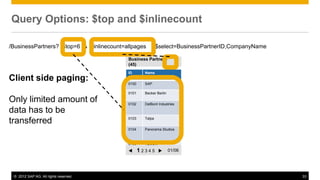
Query Options: $top and $inlinecount
ID Name
0100 SAP
0101 Becker Berlin
0102 DelBont Industries
0103 Talpa
0104 Panorama Studios
0105 TECUM
t 1 2 3 4 5 u 01/06
Business Partners
(45)
/BusinessPartners? $top=6 & $inlinecount=allpages &$select=BusinessPartnerID,CompanyName & $skip=6
Client side paging:
Only limited amount of
data has to be
transferred
© 2012 SAP AG. All rights reserved. 34
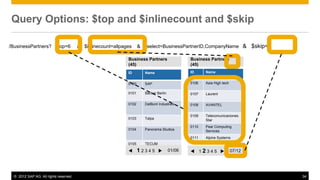
Query Options: $top and $inlinecount and $skip
ID Name
0100 SAP
0101 Becker Berlin
0102 DelBont Industries
0103 Talpa
0104 Panorama Studios
0105 TECUM
t 1 2 3 4 5 u 01/06
ID Name
0106 Asia High tech
0107 Laurent
0108 AVANTEL
0109 Telecomunicaciones
Star
0110 Pear Computing
Services
0111 Alpine Systems
Business Partners
(45)
Business Partners
(45)
t 1 2 3 4 5 u 07/12
/BusinessPartners? $top=6 & $inlinecount=allpages & $select=BusinessPartnerID,CompanyName & $skip=6
© 2012 SAP AG. All rights reserved. 35
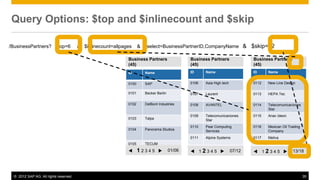
Query Options: $top and $inlinecount and $skip
ID Name
0100 SAP
0101 Becker Berlin
0102 DelBont Industries
0103 Talpa
0104 Panorama Studios
0105 TECUM
t 1 2 3 4 5 u 01/06
ID Name
0106 Asia High tech
0107 Laurent
0108 AVANTEL
0109 Telecomunicaciones
Star
0110 Pear Computing
Services
0111 Alpine Systems
Business Partners
(45)
Business Partners
(45)
t 1 2 3 4 5 u 07/12
ID Name
0112 New Line Design
0113 HEPA Tec
0114 Telecomunicaciones
Star
0115 Anav Ideon
0116 Mexican Oil Trading
Company
0117 Meliva
Business Partners
(45)
t 1 2 3 4 5 u 13/18
/BusinessPartners? $top=6 & $inlinecount=allpages & $select=BusinessPartnerID,CompanyName & $skip=12
© 2012 SAP AG. All rights reserved. 36
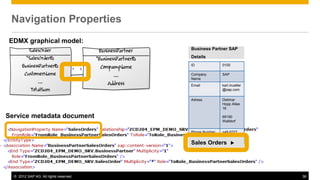
Navigation Properties
EDMX graphical model:
Service metadata document
ID 0100
Company
Name
SAP
Email karl.mueller
@sap.com
Adress Dietmar
Hopp Allee
16
69190
Walldorf
Phone Number +49 6227
…
Sales Orders u
Business Partner SAP
Details
© 2012 SAP AG. All rights reserved. 37
Navigation Properties
GET
/BusinessPartners('0100000000')/SalesOrd
ers ID 0100
Company
Name
SAP
Email karl.mueller
@sap.com
Adress Dietmar
Hopp Allee
16
69190
Walldorf
Phone Number +49 6227
…
Sales Orders u
Business Partner SAP
Details
ID Sum Status
0526 1137.64
EUR l
0527 1137.64
EUR l
0509 3972.22
EUR l
Sales Orders
Customer = SAP
results": [
{
"Currency": "EUR",
"Status": "N",
"SalesOrderID": "0500000026",
"TotalSum": "1137.64"
},
{
"Currency": "EUR",
"Status": "N",
"SalesOrderID": "0500000027",
"TotalSum": "1137.64"
},
{
"Currency": "EUR",
"Status": "N",
"SalesOrderID": "0500000009",
"TotalSum": "3972.22"
}
]
© 2012 SAP AG. All rights reserved. 39
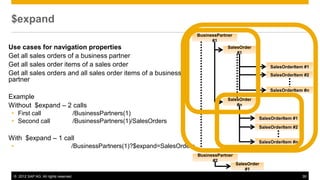
$expand
Use cases for navigation properties
Get all sales orders of a business partner
Get all sales order items of a sales order
Get all sales orders and all sales order items of a business
partner
Example
Without $expand – 2 calls
• First call /BusinessPartners(1)
• Second call /BusinessPartners(1)/SalesOrders
With $expand – 1 call
• /BusinessPartners(1)?$expand=SalesOrders
SalesOrder
#n
SalesOrderItem #1
SalesOrderItem #2
SalesOrderItem #n
SalesOrder
#1
SalesOrderItem #1
SalesOrderItem #2
SalesOrderItem #n
BusinessPartner
#1
SalesOrder
#1
BusinessPartner
#2
© 2012 SAP AG. All rights reserved. 40
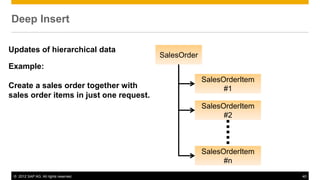
Deep Insert
Updates of hierarchical data
Example:
Create a sales order together with
sales order items in just one request.
SalesOrder
SalesOrderItem
#1
SalesOrderItem
#2
SalesOrderItem
#n
© 2012 SAP AG. All rights reserved. 41
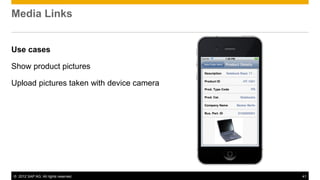
Media Links
Use cases
Show product pictures
Upload pictures taken with device camera
© 2012 SAP AG. All rights reserved. 42
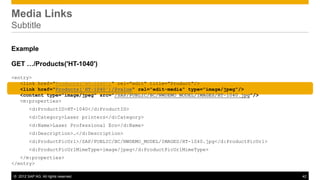
Media Links
Subtitle
Example
GET …/Products('HT-1040')
<entry>
<link href="Products('HT-1040')" rel="edit" title="Product"/>
<link href="Products('HT-1040')/$value" rel="edit-media" type="image/jpeg"/>
<content type="image/jpeg" src="/SAP/PUBLIC/BC/NWDEMO_MODEL/IMAGES/HT-1040.jpg"/>
<m:properties>
<d:ProductID>HT-1040</d:ProductID>
<d:Category>Laser printers</d:Category>
<d:Name>Laser Professional Eco</d:Name>
<d:Description>…</d:Description>
<d:ProductPicUrl>/SAP/PUBLIC/BC/NWDEMO_MODEL/IMAGES/HT-1040.jpg</d:ProductPicUrl>
<d:ProductPicUrlMimeType>image/jpeg</d:ProductPicUrlMimeType>
</m:properties>
</entry>
© 2012 SAP AG. All rights reserved. 43
For more information about the topics discussed in this lesson, see:
 http://www.odata.org
 Open Data Protocol by Example (focusing on the Atom protocol)
 http://blogs.msdn.com/b/lightswitch/archive/2012/03/22/lightswitch-
architecture-odata.aspx
Related Information
Thank You!

Autodesk Technical Webinar: SAP NetWeaver Gateway Part 2

  • 1.
  • 2.
    © 2012 SAPAG. All rights reserved. 2 Agenda Why We Need OData A Basic Introduction to OData Structure of an OData Service OData Operations OData Query Language
  • 3.
    © 2012 SAPAG. All rights reserved. 3 SAP’s Aim One SAP Thousands (non) SAP developers One billion consumers Provides  Server infrastructures, multiple platforms  SDKs & libraries  App. dev. frameworks  Business applications  Enterprise quality  Data security Add  Scale application development  Idea creators  Web style apps  Limited ABAP and SAP process knowhow Need  Consumer–level user experience  Enterprise quality  Data security  Task-centric  Web style & mobile apps
  • 4.
    © 2012 SAPAG. All rights reserved. 4 Market and Industry Trends Server Services Data Silos Open Data Isolated Data Isolated Services Linked Data and Services Web Documents Web APIs
  • 5.
    © 2012 SAPAG. All rights reserved. 6 Agenda Why We Need OData A Basic Introduction to OData Structure of an OData Service OData Operations OData Query Language
  • 6.
    © 2012 SAPAG. All rights reserved. 7 OData at a Glance URIs for resource identification Uniform operations, defined by HTTP • GET, POST, PUT, PATCH, DELETE always mean the same Well known data formats • AtomPub & JSON Query language  “ODBC for the Web” Schema information  Data model description Based on entity and relationship model Hypermedia design patterns
  • 7.
    © 2012 SAPAG. All rights reserved. 8 Agenda Why We Need OData A Basic Introduction to OData Structure of an OData Service OData Operations OData Query Language
  • 8.
    © 2012 SAPAG. All rights reserved. 9 First OData Example: The Service Document OData service root URI: http://services.odata.org/OData/OData.svc/
  • 9.
    © 2012 SAPAG. All rights reserved. 10 First OData Example: The Service Metadata Document OData service root URI: http://services.odata.org/OData/OData.svc/ OData service metadata URI := <OData service root URI> + “$metadata” http://services.odata.org/OData/OData.svc/$metadata
  • 10.
    © 2012 SAPAG. All rights reserved. 11 The OData Meta Model Entity Type Navigation Property Property Type Simple Type Complex Type Entity Set Entity * * 1..* 1..* 1 * Entity Key 1..* 1 Association 2 * Entity Container Service Document Function Import * 1 Describes structure of 1 * * *
  • 11.
    © 2012 SAPAG. All rights reserved. 12 Entity Type Navigation Property Property Type Simple Type Complex Type Entity Set Entity * * 1..* 1..* 1 * Entity Key 1..* 1 Association 2 * Entity Container Service Document Function Import * 1 Describes structure of 1 * * * The OData Meta Model
  • 12.
    © 2012 SAPAG. All rights reserved. 13 Entity Type Navigation Property Property Type Simple Type Complex Type Entity Set Entity * * 1..* 1..* 1 * Entity Key 1..* 1 Association 2 * Entity Container Service Document Function Import * 1 Describes structure of 1 * * * The OData Meta Model
  • 13.
    © 2012 SAPAG. All rights reserved. 14 Entity Type Navigation Property Property Type Simple Type Complex Type Entity Set Entity * * 1..* 1..* 1 * Entity Key 1..* 1 Association 2 * Entity Container Service Document Function Import * 1 Describes structure of 1 * * * The OData type system
  • 14.
    © 2012 SAPAG. All rights reserved. 15 Agenda Why We Need OData A Basic Introduction to OData Structure of an OData Service OData Operations OData Query Language
  • 15.
    © 2012 SAPAG. All rights reserved. 16 http://services.odata.org/OData/OData.svc/Products/?$top=3
  • 16.
    © 2012 SAPAG. All rights reserved. 17 http://services.odata.org/OData/OData.svc/Products(0)
  • 17.
    © 2012 SAPAG. All rights reserved. 18 http://services.odata.org/OData/OData.svc/Products(0)/Category
  • 18.
    © 2012 SAPAG. All rights reserved. 19 http://services.odata.org/OData/OData.svc/Products(0)/Supplier
  • 19.
    © 2012 SAPAG. All rights reserved. 20 CRUD Operations Operation on resource HTTP verb Create POST Read GET Update PUT Delete DELETE
  • 20.
    © 2012 SAPAG. All rights reserved. 21 <ServiceRootURI>$batch Entity Type Navigation Property Property Type Simple Type Complex Type Entity Set Entity * * 1..* 1..* 1 * Entity Key 1..* 1 Association 2 * Entity Container Service Document Function Import * 1 Describes structure of 1 * * * CRUD Operations POST $batch(multiple requests) : multiple responses GET() : entry PUT(etag, entry) : nil PATCH(etag, partial entry) : nil DELETE() : nil GET() : feed POST(entry) : entry
  • 21.
    © 2012 SAPAG. All rights reserved. 22 Entity Type Navigation Property Property Type Simple Type Complex Type Entity Set Entity * * 1..* 1..* 1 * Entity Key 1..* 1 Association 2 * Entity Container Service Document Function Import * 1 Describes structure of 1 * * * OData beyond CRUD operations … http://services.odata.org/OData/OData.svc/GetProductsByRating?rating=4
  • 22.
    © 2012 SAPAG. All rights reserved. 23 http://services.odata.org/OData/OData.svc/GetProductsByRating?rating=4
  • 23.
    © 2012 SAPAG. All rights reserved. 24 Agenda Why We Need OData A Basic Introduction to OData Structure of an OData Service OData Operations OData Query Language
  • 24.
    © 2012 SAPAG. All rights reserved. 25 “ODBC” for the Web - Simple Query Language List of (most important) Query options: Reference: http://www.odata.org/developers/protocols/uri-conventions#QueryStringOptions Operation Query option Filtering $filter Projecting $select Sorting $orderby Paging $top and $skip Inlining $expand
  • 25.
    © 2012 SAPAG. All rights reserved. 26 “ODBC” for the Web - Simple Query Language Filtering  $filter http://services.odata.org/OData/OData.svc/Products/?$filter=Price le 20 • All products with a price that is less than or equal to 20. Projecting  $select http://services.odata.org/OData/OData.svc/Products?$select=Price,Name • In a response from an OData service, only the Price and Name Property values are returned for each Product Entry in the Collection of products identified.
  • 26.
    © 2012 SAPAG. All rights reserved. 27 “ODBC” for the Web - Simple Query Language Sorting  $orderby http://services.odata.org/OData/OData.svc/Products?$orderby=Rating asc • All Product Entries returned in ascending order when sorted by the Rating Property.
  • 27.
    © 2012 SAPAG. All rights reserved. 28 “ODBC” for the Web - Simple Query Language Paging  $top and $skip http://services.odata.org/OData/OData.svc/Products?$top=5 • The first 5 Product Entries are returned where the Set of Products is sorted using a scheme determined by the OData service. http://services.odata.org/OData/OData.svc/Products?$top=5&$orderby=Name desc • The first 5 Product Entries are returned in descending order when sorted by the Name property. http://services.odata.org/OData/OData.svc/Categories(1)/Products?$skip=2 • The set of Product Entries (associated with the Category Entry identified by key value 1) starting with the third product.
  • 28.
    Typical Programming Patterns forUI-Centric Applications
  • 29.
    © 2012 SAPAG. All rights reserved. 30 $filter and $select Use cases: Get all business partners whose company name starts with the letter ‘S’. Get all sales orders with a total sum exceeding than 10,000 €. Get the business partner ID and the name of a business partner only. ID Name 0100 SAP 0141 South American IT Company 0142 Siwusha 0143 Sorali Business Partners (4) t 1 2 3 4 5 u 01/04 S*
  • 30.
    © 2012 SAPAG. All rights reserved. 31 Query Options: $filter & $select Request: GET …/BusinessPartners?$filter=startswith(CompanyName,'S‘)&$select=BusinessPartnerID,CompanyName Result { "BusinessPartnerID": "0100000000", "CompanyName": "SAP„ }, { "BusinessPartnerID": "0100000041", "CompanyName": "South American IT Company“ }, { "BusinessPartnerID": "0100000042", "CompanyName": "Siwusha„ }, { "BusinessPartnerID": "0100000044", "CompanyName": "Sorali„ } SQL analogy: SELECT BusinessPartnerID CompanyName FROM BusinessPartners WHERE CompanyName LIKE ‘S%‘
  • 31.
    © 2012 SAPAG. All rights reserved. 32 Paged Results ID Name 0100 SAP 0101 Becker Berlin 0102 DelBont Industries 0103 Talpa 0104 Panorama Studios 0105 TECUM t 1 2 3 4 5 u 01/06 ID Name 0106 Asia High tech 0107 Laurent 0108 AVANTEL 0109 Telecomunicaciones Star 0110 Pear Computing Services 0111 Alpine Systems Business Partners (45) Business Partners (45) t 1 2 3 4 5 u 07/12 ID Name 0112 New Line Design 0113 HEPA Tec 0114 Telecomunicaciones Star 0115 Anav Ideon 0116 Mexican Oil Trading Company 0117 Meliva Business Partners (45) t 1 2 3 4 5 u 13/18 Use case: Tell the user that just 6 out of 45 entries are displayed. Show a list in a paged view. Get the first 5 entries of a list only. Avoid scrolling through long lists in mobile applications.
  • 32.
    © 2012 SAPAG. All rights reserved. 33 Query Options: $top and $inlinecount ID Name 0100 SAP 0101 Becker Berlin 0102 DelBont Industries 0103 Talpa 0104 Panorama Studios 0105 TECUM t 1 2 3 4 5 u 01/06 Business Partners (45) /BusinessPartners? $top=6 & $inlinecount=allpages &$select=BusinessPartnerID,CompanyName & $skip=6 Client side paging: Only limited amount of data has to be transferred
  • 33.
    © 2012 SAPAG. All rights reserved. 34 Query Options: $top and $inlinecount and $skip ID Name 0100 SAP 0101 Becker Berlin 0102 DelBont Industries 0103 Talpa 0104 Panorama Studios 0105 TECUM t 1 2 3 4 5 u 01/06 ID Name 0106 Asia High tech 0107 Laurent 0108 AVANTEL 0109 Telecomunicaciones Star 0110 Pear Computing Services 0111 Alpine Systems Business Partners (45) Business Partners (45) t 1 2 3 4 5 u 07/12 /BusinessPartners? $top=6 & $inlinecount=allpages & $select=BusinessPartnerID,CompanyName & $skip=6
  • 34.
    © 2012 SAPAG. All rights reserved. 35 Query Options: $top and $inlinecount and $skip ID Name 0100 SAP 0101 Becker Berlin 0102 DelBont Industries 0103 Talpa 0104 Panorama Studios 0105 TECUM t 1 2 3 4 5 u 01/06 ID Name 0106 Asia High tech 0107 Laurent 0108 AVANTEL 0109 Telecomunicaciones Star 0110 Pear Computing Services 0111 Alpine Systems Business Partners (45) Business Partners (45) t 1 2 3 4 5 u 07/12 ID Name 0112 New Line Design 0113 HEPA Tec 0114 Telecomunicaciones Star 0115 Anav Ideon 0116 Mexican Oil Trading Company 0117 Meliva Business Partners (45) t 1 2 3 4 5 u 13/18 /BusinessPartners? $top=6 & $inlinecount=allpages & $select=BusinessPartnerID,CompanyName & $skip=12
  • 35.
    © 2012 SAPAG. All rights reserved. 36 Navigation Properties EDMX graphical model: Service metadata document ID 0100 Company Name SAP Email karl.mueller @sap.com Adress Dietmar Hopp Allee 16 69190 Walldorf Phone Number +49 6227 … Sales Orders u Business Partner SAP Details
  • 36.
    © 2012 SAPAG. All rights reserved. 37 Navigation Properties GET /BusinessPartners('0100000000')/SalesOrd ers ID 0100 Company Name SAP Email karl.mueller @sap.com Adress Dietmar Hopp Allee 16 69190 Walldorf Phone Number +49 6227 … Sales Orders u Business Partner SAP Details ID Sum Status 0526 1137.64 EUR l 0527 1137.64 EUR l 0509 3972.22 EUR l Sales Orders Customer = SAP results": [ { "Currency": "EUR", "Status": "N", "SalesOrderID": "0500000026", "TotalSum": "1137.64" }, { "Currency": "EUR", "Status": "N", "SalesOrderID": "0500000027", "TotalSum": "1137.64" }, { "Currency": "EUR", "Status": "N", "SalesOrderID": "0500000009", "TotalSum": "3972.22" } ]
  • 37.
    © 2012 SAPAG. All rights reserved. 39 $expand Use cases for navigation properties Get all sales orders of a business partner Get all sales order items of a sales order Get all sales orders and all sales order items of a business partner Example Without $expand – 2 calls • First call /BusinessPartners(1) • Second call /BusinessPartners(1)/SalesOrders With $expand – 1 call • /BusinessPartners(1)?$expand=SalesOrders SalesOrder #n SalesOrderItem #1 SalesOrderItem #2 SalesOrderItem #n SalesOrder #1 SalesOrderItem #1 SalesOrderItem #2 SalesOrderItem #n BusinessPartner #1 SalesOrder #1 BusinessPartner #2
  • 38.
    © 2012 SAPAG. All rights reserved. 40 Deep Insert Updates of hierarchical data Example: Create a sales order together with sales order items in just one request. SalesOrder SalesOrderItem #1 SalesOrderItem #2 SalesOrderItem #n
  • 39.
    © 2012 SAPAG. All rights reserved. 41 Media Links Use cases Show product pictures Upload pictures taken with device camera
  • 40.
    © 2012 SAPAG. All rights reserved. 42 Media Links Subtitle Example GET …/Products('HT-1040') <entry> <link href="Products('HT-1040')" rel="edit" title="Product"/> <link href="Products('HT-1040')/$value" rel="edit-media" type="image/jpeg"/> <content type="image/jpeg" src="/SAP/PUBLIC/BC/NWDEMO_MODEL/IMAGES/HT-1040.jpg"/> <m:properties> <d:ProductID>HT-1040</d:ProductID> <d:Category>Laser printers</d:Category> <d:Name>Laser Professional Eco</d:Name> <d:Description>…</d:Description> <d:ProductPicUrl>/SAP/PUBLIC/BC/NWDEMO_MODEL/IMAGES/HT-1040.jpg</d:ProductPicUrl> <d:ProductPicUrlMimeType>image/jpeg</d:ProductPicUrlMimeType> </m:properties> </entry>
  • 41.
    © 2012 SAPAG. All rights reserved. 43 For more information about the topics discussed in this lesson, see:  http://www.odata.org  Open Data Protocol by Example (focusing on the Atom protocol)  http://blogs.msdn.com/b/lightswitch/archive/2012/03/22/lightswitch- architecture-odata.aspx Related Information
  • 42.