GW100 SAP NetWeaver Gateway
Gateway Service Consumption
May 2012


                              INTE
                                  RNA
                                     L
Objectives


                          At the end of this chapter, you will understand:
                          Ÿ  The general principles of consuming a Gateway Service
                          Ÿ  Creation of OData proxy objects
                          Ÿ  Creating an iPhone Application to Consume a Gateway Service
                          Ÿ  Consumption of Gateway Services using Java Server Pages and
                              JavaScript + HTML5


©  2012 SAP AG. All rights reserved.                                                        2
Agenda

u    Gateway Service Consumption Overview
u    Creating OData Proxy Objects
u    Using the Gateway Developer Tool for XCode – Building an iPhone App
u    Consumption Exercises – Java Server Pages, JavaScript


 ©  2012 SAP AG. All rights reserved.                                       3
Agenda

u    Gateway Service Consumption Overview
u    Creating OData Proxy Objects
u    Using the Gateway Developer Tool for XCode – Building an iPhone App
u    Consumption Exercises – Java Server Pages, JavaScript


 ©  2012 SAP AG. All rights reserved.                                       4
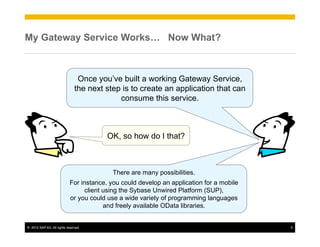
My Gateway Service Works… Now What?


                                 Once you’ve built a working Gateway Service,
                                the next step is to create an application that can
                                             consume this service.


                                          OK, so how do I that?


                                            There are many possibilities.
                             For instance, you could develop an application for a mobile
                                   client using the Sybase Unwired Platform (SUP),
                             or you could use a wide variety of programming languages
                                          and freely available OData libraries.


©  2012 SAP AG. All rights reserved.                                                       5
Gateway Service Consumption – Where to Start?

Since the application that consumes a Gateway Service executes outside the scope
of an SAP system, you will first need to choose a programming environment.


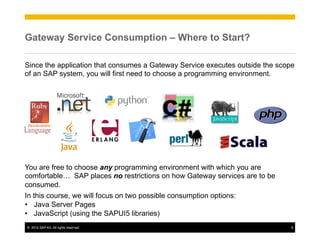
You are free to choose any programming environment with which you are
comfortable… SAP places no restrictions on how Gateway services are to be
consumed.
In this course, we will focus on two possible consumption options:
•  Java Server Pages
•  JavaScript (using the SAPUI5 libraries)
©  2012 SAP AG. All rights reserved.                                           6
Gateway Service Consumption – General Principles

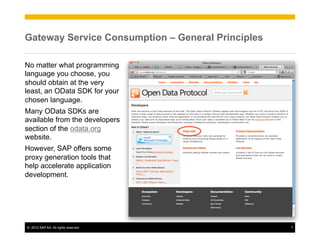
No matter what programming
language you choose, you
should obtain at the very
least, an OData SDK for your
chosen language.
Many OData SDKs are
available from the developers
section of the odata.org
website.
However, SAP offers some
proxy generation tools that
help accelerate application
development.


©  2012 SAP AG. All rights reserved.               7
Agenda

u    Gateway Service Consumption Overview
u    Creating OData Proxy Objects
u    Using the Gateway Developer Tool for XCode – Building an iPhone App
u    Consumption Exercises – Java Server Pages, JavaScript


 ©  2012 SAP AG. All rights reserved.                                       8
Gateway Service Consumption – Proxy Generation

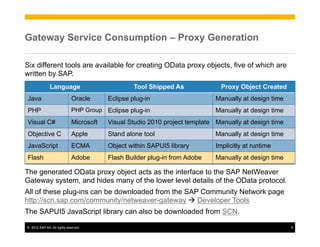
Six different tools are available for creating OData proxy objects, five of which are
written by SAP.
               Language                            Tool Shipped As              Proxy Object Created
Java                          Oracle      Eclipse plug-in                     Manually at design time
PHP                           PHP Group Eclipse plug-in                       Manually at design time
Visual C#                     Microsoft   Visual Studio 2010 project template Manually at design time
Objective C                   Apple       Stand alone tool                    Manually at design time
JavaScript                    ECMA        Object within SAPUI5 library        Implicitly at runtime
Flash                         Adobe       Flash Builder plug-in from Adobe    Manually at design time

The generated OData proxy object acts as the interface to the SAP NetWeaver
Gateway system, and hides many of the lower level details of the OData protocol.
All of these plug-ins can be downloaded from the SAP Community Network page
http://scn.sap.com/community/netweaver-gateway à Developer Tools
The SAPUI5 JavaScript library can also be downloaded from SCN.

©  2012 SAP AG. All rights reserved.                                                                    9
Gateway Proxy Generation – Eclipse (Java or PHP)


                                                                SAP NetWeaver
                                                                  Gateway


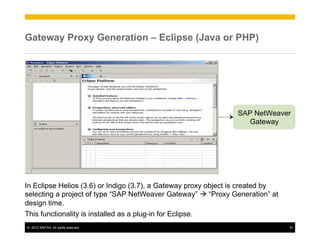
In Eclipse Helios (3.6) or Indigo (3.7), a Gateway proxy object is created by
selecting a project of type “SAP NetWeaver Gateway” à “Proxy Generation” at
design time.
This functionality is installed as a plug-in for Eclipse.
©  2012 SAP AG. All rights reserved.                                            10
Gateway Proxy Generation – Eclipse (Java or PHP)


                                                                SAP NetWeaver
                                                                  Gateway


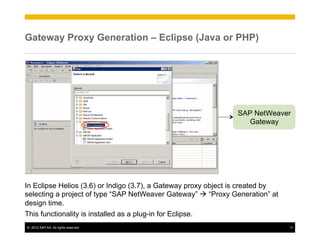
In Eclipse Helios (3.6) or Indigo (3.7), a Gateway proxy object is created by
selecting a project of type “SAP NetWeaver Gateway” à “Proxy Generation” at
design time.
This functionality is installed as a plug-in for Eclipse.
©  2012 SAP AG. All rights reserved.                                            11
Gateway Proxy Generation – Visual Studio 2010 (C#)


                                                                  SAP NetWeaver
                                                                    Gateway


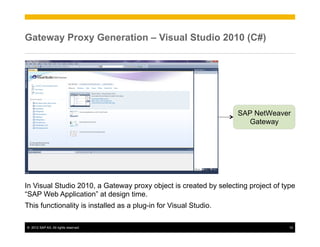
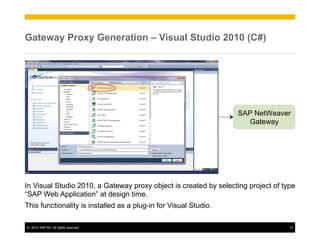
In Visual Studio 2010, a Gateway proxy object is created by selecting project of type
“SAP Web Application” at design time.
This functionality is installed as a plug-in for Visual Studio.

©  2012 SAP AG. All rights reserved.                                               12
Gateway Proxy Generation – Visual Studio 2010 (C#)


                                                                  SAP NetWeaver
                                                                    Gateway


In Visual Studio 2010, a Gateway proxy object is created by selecting project of type
“SAP Web Application” at design time.
This functionality is installed as a plug-in for Visual Studio.

©  2012 SAP AG. All rights reserved.                                               13
Gateway Proxy Generation – Flash Builder ≥4.5 (MXML)


                                                                   SAP NetWeaver
                                                                     Gateway


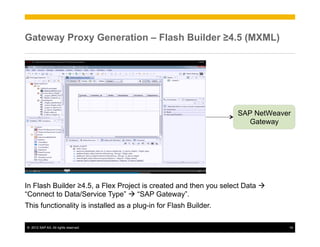
In Flash Builder ≥4.5, a Flex Project is created and then you select Data à
“Connect to Data/Service Type” à “SAP Gateway”.
This functionality is installed as a plug-in for Flash Builder.

©  2012 SAP AG. All rights reserved.                                           14
Gateway Proxy Generation – XCode (Objective C)


                                                                  Generated
                                                                 XCode Project


                                                                SAP NetWeaver
                                                                  Gateway


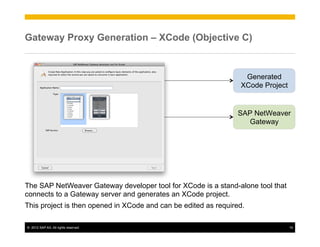
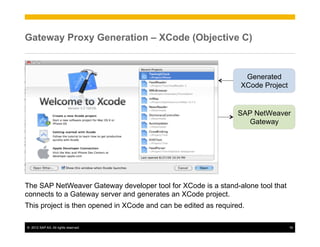
The SAP NetWeaver Gateway developer tool for XCode is a stand-alone tool that
connects to a Gateway server and generates an XCode project.
This project is then opened in XCode and can be edited as required.

©  2012 SAP AG. All rights reserved.                                             15
Gateway Proxy Generation – XCode (Objective C)


                                                                  Generated
                                                                 XCode Project


                                                                SAP NetWeaver
                                                                  Gateway


The SAP NetWeaver Gateway developer tool for XCode is a stand-alone tool that
connects to a Gateway server and generates an XCode project.
This project is then opened in XCode and can be edited as required.

©  2012 SAP AG. All rights reserved.                                             16
Gateway Proxy Generation – SAPUI5 (JavaScript+HTML5)


                                                                    SAP NetWeaver
                                                                      Gateway


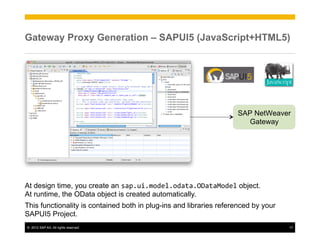
At design time, you create an sap.ui.model.odata.ODataModel object.
At runtime, the OData object is created automatically.
This functionality is contained both in plug-ins and libraries referenced by your
SAPUI5 Project.
©  2012 SAP AG. All rights reserved.                                                17
Agenda

u    Gateway Service Consumption Overview
u    Creating OData Proxy Objects
u    Using the Gateway Developer Tool for XCode – Building an iPhone App
u    Consumption Exercises – Java Server Pages, JavaScript


 ©  2012 SAP AG. All rights reserved.                                       18
Creating a Basic iPhone Application – 1/11


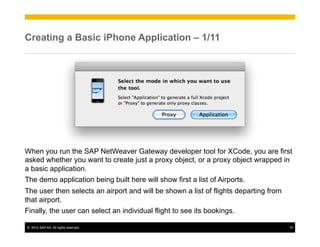
When you run the SAP NetWeaver Gateway developer tool for XCode, you are first
asked whether you want to create just a proxy object, or a proxy object wrapped in
a basic application.
The demo application being built here will show first a list of Airports.
The user then selects an airport and will be shown a list of flights departing from
that airport.
Finally, the user can select an individual flight to see its bookings.

©  2012 SAP AG. All rights reserved.                                                  19
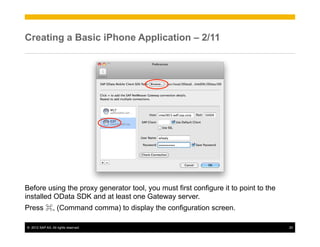
Creating a Basic iPhone Application – 2/11


Before using the proxy generator tool, you must first configure it to point to the
installed OData SDK and at least one Gateway server.
Press ⌘, (Command comma) to display the configuration screen.

©  2012 SAP AG. All rights reserved.                                                 20
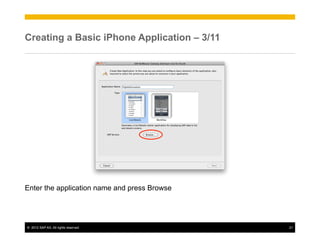
Creating a Basic iPhone Application – 3/11


Enter the application name and press Browse


©  2012 SAP AG. All rights reserved.          21
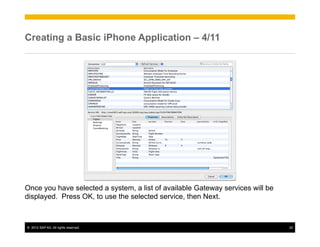
Creating a Basic iPhone Application – 4/11


Once you have selected a system, a list of available Gateway services will be
displayed. Press OK, to use the selected service, then Next.


©  2012 SAP AG. All rights reserved.                                            22
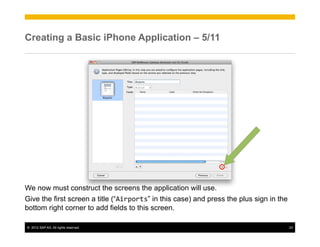
Creating a Basic iPhone Application – 5/11


We now must construct the screens the application will use.
Give the first screen a title (“Airports” in this case) and press the plus sign in the
bottom right corner to add fields to this screen.

©  2012 SAP AG. All rights reserved.                                                     23
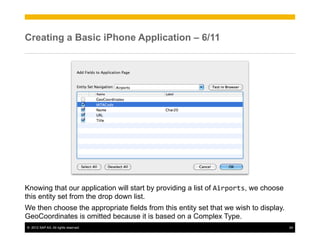
Creating a Basic iPhone Application – 6/11


Knowing that our application will start by providing a list of Airports, we choose
this entity set from the drop down list.
We then choose the appropriate fields from this entity set that we wish to display.
GeoCoordinates is omitted because it is based on a Complex Type.
©  2012 SAP AG. All rights reserved.                                                  24
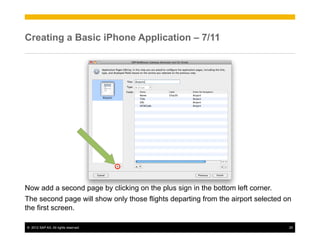
Creating a Basic iPhone Application – 7/11


Now add a second page by clicking on the plus sign in the bottom left corner.
The second page will show only those flights departing from the airport selected on
the first screen.

©  2012 SAP AG. All rights reserved.                                              25
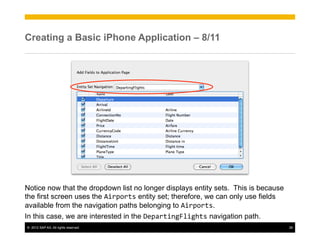
Creating a Basic iPhone Application – 8/11


Notice now that the dropdown list no longer displays entity sets. This is because
the first screen uses the Airports entity set; therefore, we can only use fields
available from the navigation paths belonging to Airports.
In this case, we are interested in the DepartingFlights navigation path.
©  2012 SAP AG. All rights reserved.                                                26
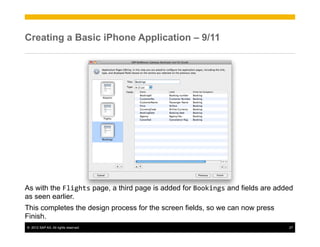
Creating a Basic iPhone Application – 9/11


As with the Flights page, a third page is added for Bookings and fields are added
as seen earlier.
This completes the design process for the screen fields, so we can now press
Finish.
©  2012 SAP AG. All rights reserved.                                           27
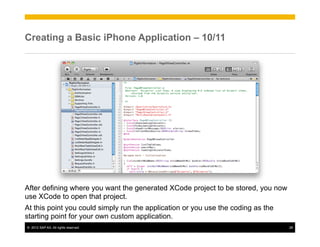
Creating a Basic iPhone Application – 10/11


After defining where you want the generated XCode project to be stored, you now
use XCode to open that project.
At this point you could simply run the application or you use the coding as the
starting point for your own custom application.
©  2012 SAP AG. All rights reserved.                                              28
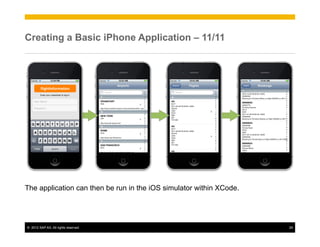
Creating a Basic iPhone Application – 11/11


The application can then be run in the iOS simulator within XCode.


©  2012 SAP AG. All rights reserved.                                 29
Agenda

u    Gateway Service Consumption Overview
u    Creating OData Proxy Objects
u    iPhone App Creation
u    Consumption Exercises – Java Server Pages, JavaScript


 ©  2012 SAP AG. All rights reserved.                         30
Hands-on Exercise


Exercise 14
Consume a Gateway Service Using Java
Server Pages


©  2012 SAP AG. All rights reserved.   31
Hands-on Exercise


Exercise 15
Consume a Gateway Service Using the
SAPUI5 JavaScript Libraries (Read-only)


©  2012 SAP AG. All rights reserved.      32
Summary


                          You should now understand:
                          Ÿ  The general principles of consuming a Gateway Service
                          Ÿ  Creation of OData proxy objects
                          Ÿ  Creation of an iPhone Application to Consume a Gateway Service
                          Ÿ  Consumption of Gateway Services using Java Server Pages and
                              JavaScript + HTML5


©  2012 SAP AG. All rights reserved.                                                           33
© 2012 SAP AG. All rights reserved


No part of this publication may be reproduced or transmitted in any form or for any purpose   Business Objects and the Business Objects logo, BusinessObjects, Crystal Reports, Crystal
without the express permission of SAP AG. The information contained herein may be             Decisions, Web Intelligence, Xcelsius, and other Business Objects products and services
changed without prior notice.                                                                 mentioned herein as well as their respective logos are trademarks or registered trademarks
                                                                                              of Business Objects Software Ltd. Business Objects is an SAP company.
Some software products marketed by SAP AG and its distributors contain proprietary
software components of other software vendors.                                                Sybase and Adaptive Server, iAnywhere, Sybase 365, SQL Anywhere, and other Sybase
Microsoft, Windows, Excel, Outlook, and PowerPoint are registered trademarks of Microsoft     products and services mentioned herein as well as their respective logos are trademarks or
                                                                                              registered trademarks of Sybase, Inc. Sybase is an SAP company.
Corporation.
                                                                                              All other product and service names mentioned are the trademarks of their respective
IBM, DB2, DB2 Universal Database, System i, System i5, System p, System p5, System x,
                                                                                              companies. Data contained in this document serves informational purposes only. National
System z, System z10, System z9, z10, z9, iSeries, pSeries, xSeries, zSeries, eServer, z/
                                                                                              product specifications may vary.
VM, z/OS, i5/OS, S/390, OS/390, OS/400, AS/400, S/390 Parallel Enterprise Server,
PowerVM, Power Architecture, POWER6+, POWER6, POWER5+, POWER5, POWER,                         The information in this document is proprietary to SAP. No part of this document may be
OpenPower, PowerPC, BatchPipes, BladeCenter, System Storage, GPFS, HACMP,                     reproduced, copied, or transmitted in any form or for any purpose without the express prior
RETAIN, DB2 Connect, RACF, Redbooks, OS/2, Parallel Sysplex, MVS/ESA, AIX, Intelligent        written permission of SAP AG.
Miner, WebSphere, Netfinity, Tivoli and Informix are trademarks or registered trademarks of   This document is a preliminary version and not subject to your license agreement or any
IBM Corporation.                                                                              other agreement with SAP. This document contains only intended strategies, developments,
Linux is the registered trademark of Linus Torvalds in the U.S. and other countries.          and functionalities of the SAP® product and is not intended to be binding upon SAP to any
Adobe, the Adobe logo, Acrobat, PostScript, and Reader are either trademarks or registered    particular course of business, product strategy, and/or development. Please note that this
                                                                                              document is subject to change and may be changed by SAP at any time without notice.
trademarks of Adobe Systems Incorporated in the United States and/or other countries.
                                                                                              SAP assumes no responsibility for errors or omissions in this document. SAP does not
Oracle is a registered trademark of Oracle Corporation.
                                                                                              warrant the accuracy or completeness of the information, text, graphics, links, or other items
UNIX, X/Open, OSF/1, and Motif are registered trademarks of the Open Group.                   contained within this material. This document is provided without a warranty of any kind,
Citrix, ICA, Program Neighborhood, MetaFrame, WinFrame, VideoFrame, and MultiWin are          either express or implied, including but not limited to the implied warranties of
trademarks or registered trademarks of Citrix Systems, Inc.                                   merchantability, fitness for a particular purpose, or non-infringement.
HTML, XML, XHTML and W3C are trademarks or registered trademarks of W3C®, World               SAP shall have no liability for damages of any kind including without limitation direct, special,
Wide Web Consortium, Massachusetts Institute of Technology.                                   indirect, or consequential damages that may result from the use of these materials. This
                                                                                              limitation shall not apply in cases of intent or gross negligence.
Java is a registered trademark of Sun Microsystems, Inc.
                                                                                              The statutory liability for personal injury and defective products is not affected. SAP has no
JavaScript is a registered trademark of Sun Microsystems, Inc., used under license for        control over the information that you may access through the use of hot links contained in
technology invented and implemented by Netscape.                                              these materials and does not endorse your use of third-party Web pages nor provide any
SAP, R/3, SAP NetWeaver, Duet, PartnerEdge, ByDesign, SAP BusinessObjects Explorer,           warranty whatsoever relating to third-party Web pages.
StreamWork, and other SAP products and services mentioned herein as well as their
respective logos are trademarks or registered trademarks of SAP AG in Germany and other
countries.


 ©  2012 SAP AG. All rights reserved.                                                                                                                                                     34

NetWeaver Gateway- Gateway Service Consumption

  • 1.
    GW100 SAP NetWeaverGateway Gateway Service Consumption May 2012 INTE RNA L
  • 2.
    Objectives At the end of this chapter, you will understand: Ÿ  The general principles of consuming a Gateway Service Ÿ  Creation of OData proxy objects Ÿ  Creating an iPhone Application to Consume a Gateway Service Ÿ  Consumption of Gateway Services using Java Server Pages and JavaScript + HTML5 ©  2012 SAP AG. All rights reserved. 2
  • 3.
    Agenda u  Gateway Service Consumption Overview u  Creating OData Proxy Objects u  Using the Gateway Developer Tool for XCode – Building an iPhone App u  Consumption Exercises – Java Server Pages, JavaScript ©  2012 SAP AG. All rights reserved. 3
  • 4.
    Agenda u  Gateway Service Consumption Overview u  Creating OData Proxy Objects u  Using the Gateway Developer Tool for XCode – Building an iPhone App u  Consumption Exercises – Java Server Pages, JavaScript ©  2012 SAP AG. All rights reserved. 4
  • 5.
    My Gateway ServiceWorks… Now What? Once you’ve built a working Gateway Service, the next step is to create an application that can consume this service. OK, so how do I that? There are many possibilities. For instance, you could develop an application for a mobile client using the Sybase Unwired Platform (SUP), or you could use a wide variety of programming languages and freely available OData libraries. ©  2012 SAP AG. All rights reserved. 5
  • 6.
    Gateway Service Consumption– Where to Start? Since the application that consumes a Gateway Service executes outside the scope of an SAP system, you will first need to choose a programming environment. You are free to choose any programming environment with which you are comfortable… SAP places no restrictions on how Gateway services are to be consumed. In this course, we will focus on two possible consumption options: •  Java Server Pages •  JavaScript (using the SAPUI5 libraries) ©  2012 SAP AG. All rights reserved. 6
  • 7.
    Gateway Service Consumption– General Principles No matter what programming language you choose, you should obtain at the very least, an OData SDK for your chosen language. Many OData SDKs are available from the developers section of the odata.org website. However, SAP offers some proxy generation tools that help accelerate application development. ©  2012 SAP AG. All rights reserved. 7
  • 8.
    Agenda u  Gateway Service Consumption Overview u  Creating OData Proxy Objects u  Using the Gateway Developer Tool for XCode – Building an iPhone App u  Consumption Exercises – Java Server Pages, JavaScript ©  2012 SAP AG. All rights reserved. 8
  • 9.
    Gateway Service Consumption– Proxy Generation Six different tools are available for creating OData proxy objects, five of which are written by SAP. Language Tool Shipped As Proxy Object Created Java Oracle Eclipse plug-in Manually at design time PHP PHP Group Eclipse plug-in Manually at design time Visual C# Microsoft Visual Studio 2010 project template Manually at design time Objective C Apple Stand alone tool Manually at design time JavaScript ECMA Object within SAPUI5 library Implicitly at runtime Flash Adobe Flash Builder plug-in from Adobe Manually at design time The generated OData proxy object acts as the interface to the SAP NetWeaver Gateway system, and hides many of the lower level details of the OData protocol. All of these plug-ins can be downloaded from the SAP Community Network page http://scn.sap.com/community/netweaver-gateway à Developer Tools The SAPUI5 JavaScript library can also be downloaded from SCN. ©  2012 SAP AG. All rights reserved. 9
  • 10.
    Gateway Proxy Generation– Eclipse (Java or PHP) SAP NetWeaver Gateway In Eclipse Helios (3.6) or Indigo (3.7), a Gateway proxy object is created by selecting a project of type “SAP NetWeaver Gateway” à “Proxy Generation” at design time. This functionality is installed as a plug-in for Eclipse. ©  2012 SAP AG. All rights reserved. 10
  • 11.
    Gateway Proxy Generation– Eclipse (Java or PHP) SAP NetWeaver Gateway In Eclipse Helios (3.6) or Indigo (3.7), a Gateway proxy object is created by selecting a project of type “SAP NetWeaver Gateway” à “Proxy Generation” at design time. This functionality is installed as a plug-in for Eclipse. ©  2012 SAP AG. All rights reserved. 11
  • 12.
    Gateway Proxy Generation– Visual Studio 2010 (C#) SAP NetWeaver Gateway In Visual Studio 2010, a Gateway proxy object is created by selecting project of type “SAP Web Application” at design time. This functionality is installed as a plug-in for Visual Studio. ©  2012 SAP AG. All rights reserved. 12
  • 13.
    Gateway Proxy Generation– Visual Studio 2010 (C#) SAP NetWeaver Gateway In Visual Studio 2010, a Gateway proxy object is created by selecting project of type “SAP Web Application” at design time. This functionality is installed as a plug-in for Visual Studio. ©  2012 SAP AG. All rights reserved. 13
  • 14.
    Gateway Proxy Generation– Flash Builder ≥4.5 (MXML) SAP NetWeaver Gateway In Flash Builder ≥4.5, a Flex Project is created and then you select Data à “Connect to Data/Service Type” à “SAP Gateway”. This functionality is installed as a plug-in for Flash Builder. ©  2012 SAP AG. All rights reserved. 14
  • 15.
    Gateway Proxy Generation– XCode (Objective C) Generated XCode Project SAP NetWeaver Gateway The SAP NetWeaver Gateway developer tool for XCode is a stand-alone tool that connects to a Gateway server and generates an XCode project. This project is then opened in XCode and can be edited as required. ©  2012 SAP AG. All rights reserved. 15
  • 16.
    Gateway Proxy Generation– XCode (Objective C) Generated XCode Project SAP NetWeaver Gateway The SAP NetWeaver Gateway developer tool for XCode is a stand-alone tool that connects to a Gateway server and generates an XCode project. This project is then opened in XCode and can be edited as required. ©  2012 SAP AG. All rights reserved. 16
  • 17.
    Gateway Proxy Generation– SAPUI5 (JavaScript+HTML5) SAP NetWeaver Gateway At design time, you create an sap.ui.model.odata.ODataModel object. At runtime, the OData object is created automatically. This functionality is contained both in plug-ins and libraries referenced by your SAPUI5 Project. ©  2012 SAP AG. All rights reserved. 17
  • 18.
    Agenda u  Gateway Service Consumption Overview u  Creating OData Proxy Objects u  Using the Gateway Developer Tool for XCode – Building an iPhone App u  Consumption Exercises – Java Server Pages, JavaScript ©  2012 SAP AG. All rights reserved. 18
  • 19.
    Creating a BasiciPhone Application – 1/11 When you run the SAP NetWeaver Gateway developer tool for XCode, you are first asked whether you want to create just a proxy object, or a proxy object wrapped in a basic application. The demo application being built here will show first a list of Airports. The user then selects an airport and will be shown a list of flights departing from that airport. Finally, the user can select an individual flight to see its bookings. ©  2012 SAP AG. All rights reserved. 19
  • 20.
    Creating a BasiciPhone Application – 2/11 Before using the proxy generator tool, you must first configure it to point to the installed OData SDK and at least one Gateway server. Press ⌘, (Command comma) to display the configuration screen. ©  2012 SAP AG. All rights reserved. 20
  • 21.
    Creating a BasiciPhone Application – 3/11 Enter the application name and press Browse ©  2012 SAP AG. All rights reserved. 21
  • 22.
    Creating a BasiciPhone Application – 4/11 Once you have selected a system, a list of available Gateway services will be displayed. Press OK, to use the selected service, then Next. ©  2012 SAP AG. All rights reserved. 22
  • 23.
    Creating a BasiciPhone Application – 5/11 We now must construct the screens the application will use. Give the first screen a title (“Airports” in this case) and press the plus sign in the bottom right corner to add fields to this screen. ©  2012 SAP AG. All rights reserved. 23
  • 24.
    Creating a BasiciPhone Application – 6/11 Knowing that our application will start by providing a list of Airports, we choose this entity set from the drop down list. We then choose the appropriate fields from this entity set that we wish to display. GeoCoordinates is omitted because it is based on a Complex Type. ©  2012 SAP AG. All rights reserved. 24
  • 25.
    Creating a BasiciPhone Application – 7/11 Now add a second page by clicking on the plus sign in the bottom left corner. The second page will show only those flights departing from the airport selected on the first screen. ©  2012 SAP AG. All rights reserved. 25
  • 26.
    Creating a BasiciPhone Application – 8/11 Notice now that the dropdown list no longer displays entity sets. This is because the first screen uses the Airports entity set; therefore, we can only use fields available from the navigation paths belonging to Airports. In this case, we are interested in the DepartingFlights navigation path. ©  2012 SAP AG. All rights reserved. 26
  • 27.
    Creating a BasiciPhone Application – 9/11 As with the Flights page, a third page is added for Bookings and fields are added as seen earlier. This completes the design process for the screen fields, so we can now press Finish. ©  2012 SAP AG. All rights reserved. 27
  • 28.
    Creating a BasiciPhone Application – 10/11 After defining where you want the generated XCode project to be stored, you now use XCode to open that project. At this point you could simply run the application or you use the coding as the starting point for your own custom application. ©  2012 SAP AG. All rights reserved. 28
  • 29.
    Creating a BasiciPhone Application – 11/11 The application can then be run in the iOS simulator within XCode. ©  2012 SAP AG. All rights reserved. 29
  • 30.
    Agenda u  Gateway Service Consumption Overview u  Creating OData Proxy Objects u  iPhone App Creation u  Consumption Exercises – Java Server Pages, JavaScript ©  2012 SAP AG. All rights reserved. 30
  • 31.
    Hands-on Exercise Exercise 14 Consumea Gateway Service Using Java Server Pages ©  2012 SAP AG. All rights reserved. 31
  • 32.
    Hands-on Exercise Exercise 15 Consumea Gateway Service Using the SAPUI5 JavaScript Libraries (Read-only) ©  2012 SAP AG. All rights reserved. 32
  • 33.
    Summary You should now understand: Ÿ  The general principles of consuming a Gateway Service Ÿ  Creation of OData proxy objects Ÿ  Creation of an iPhone Application to Consume a Gateway Service Ÿ  Consumption of Gateway Services using Java Server Pages and JavaScript + HTML5 ©  2012 SAP AG. All rights reserved. 33
  • 34.
    © 2012 SAPAG. All rights reserved No part of this publication may be reproduced or transmitted in any form or for any purpose Business Objects and the Business Objects logo, BusinessObjects, Crystal Reports, Crystal without the express permission of SAP AG. The information contained herein may be Decisions, Web Intelligence, Xcelsius, and other Business Objects products and services changed without prior notice. mentioned herein as well as their respective logos are trademarks or registered trademarks of Business Objects Software Ltd. Business Objects is an SAP company. Some software products marketed by SAP AG and its distributors contain proprietary software components of other software vendors. Sybase and Adaptive Server, iAnywhere, Sybase 365, SQL Anywhere, and other Sybase Microsoft, Windows, Excel, Outlook, and PowerPoint are registered trademarks of Microsoft products and services mentioned herein as well as their respective logos are trademarks or registered trademarks of Sybase, Inc. Sybase is an SAP company. Corporation. All other product and service names mentioned are the trademarks of their respective IBM, DB2, DB2 Universal Database, System i, System i5, System p, System p5, System x, companies. Data contained in this document serves informational purposes only. National System z, System z10, System z9, z10, z9, iSeries, pSeries, xSeries, zSeries, eServer, z/ product specifications may vary. VM, z/OS, i5/OS, S/390, OS/390, OS/400, AS/400, S/390 Parallel Enterprise Server, PowerVM, Power Architecture, POWER6+, POWER6, POWER5+, POWER5, POWER, The information in this document is proprietary to SAP. No part of this document may be OpenPower, PowerPC, BatchPipes, BladeCenter, System Storage, GPFS, HACMP, reproduced, copied, or transmitted in any form or for any purpose without the express prior RETAIN, DB2 Connect, RACF, Redbooks, OS/2, Parallel Sysplex, MVS/ESA, AIX, Intelligent written permission of SAP AG. Miner, WebSphere, Netfinity, Tivoli and Informix are trademarks or registered trademarks of This document is a preliminary version and not subject to your license agreement or any IBM Corporation. other agreement with SAP. This document contains only intended strategies, developments, Linux is the registered trademark of Linus Torvalds in the U.S. and other countries. and functionalities of the SAP® product and is not intended to be binding upon SAP to any Adobe, the Adobe logo, Acrobat, PostScript, and Reader are either trademarks or registered particular course of business, product strategy, and/or development. Please note that this document is subject to change and may be changed by SAP at any time without notice. trademarks of Adobe Systems Incorporated in the United States and/or other countries. SAP assumes no responsibility for errors or omissions in this document. SAP does not Oracle is a registered trademark of Oracle Corporation. warrant the accuracy or completeness of the information, text, graphics, links, or other items UNIX, X/Open, OSF/1, and Motif are registered trademarks of the Open Group. contained within this material. This document is provided without a warranty of any kind, Citrix, ICA, Program Neighborhood, MetaFrame, WinFrame, VideoFrame, and MultiWin are either express or implied, including but not limited to the implied warranties of trademarks or registered trademarks of Citrix Systems, Inc. merchantability, fitness for a particular purpose, or non-infringement. HTML, XML, XHTML and W3C are trademarks or registered trademarks of W3C®, World SAP shall have no liability for damages of any kind including without limitation direct, special, Wide Web Consortium, Massachusetts Institute of Technology. indirect, or consequential damages that may result from the use of these materials. This limitation shall not apply in cases of intent or gross negligence. Java is a registered trademark of Sun Microsystems, Inc. The statutory liability for personal injury and defective products is not affected. SAP has no JavaScript is a registered trademark of Sun Microsystems, Inc., used under license for control over the information that you may access through the use of hot links contained in technology invented and implemented by Netscape. these materials and does not endorse your use of third-party Web pages nor provide any SAP, R/3, SAP NetWeaver, Duet, PartnerEdge, ByDesign, SAP BusinessObjects Explorer, warranty whatsoever relating to third-party Web pages. StreamWork, and other SAP products and services mentioned herein as well as their respective logos are trademarks or registered trademarks of SAP AG in Germany and other countries. ©  2012 SAP AG. All rights reserved. 34